Showing preview only (1,214K chars total). Download the full file or copy to clipboard to get everything.
Repository: disler/single-file-agents
Branch: main
Commit: ae5826a4165c
Files: 193
Total size: 1.1 MB
Directory structure:
gitextract_m5kdaf2m/

├── .gitignore
├── CLAUDE.md
├── README.md
├── ai_docs/
│   ├── anthropic-new-text-editor.md
│   ├── anthropic-token-efficient-tool-use.md
│   ├── building-eff-agents.md
│   ├── existing_anthropic_computer_use_code.md
│   ├── fc_openai_agents.md
│   ├── openai-function-calling.md
│   ├── python_anthropic.md
│   ├── python_genai.md
│   └── python_openai.md
├── codebase-architectures/
│   ├── .gitignore
│   ├── README.md
│   ├── atomic-composable-architecture/
│   │   ├── README.md
│   │   ├── atom/
│   │   │   ├── auth.py
│   │   │   ├── notifications.py
│   │   │   └── validation.py
│   │   ├── main.py
│   │   ├── molecule/
│   │   │   ├── alerting.py
│   │   │   └── user_management.py
│   │   └── organism/
│   │       ├── alerts_api.py
│   │       └── user_api.py
│   ├── layered-architecture/
│   │   ├── README.md
│   │   ├── api/
│   │   │   ├── category_api.py
│   │   │   └── product_api.py
│   │   ├── data/
│   │   │   └── database.py
│   │   ├── main.py
│   │   ├── models/
│   │   │   ├── category.py
│   │   │   └── product.py
│   │   ├── services/
│   │   │   ├── category_service.py
│   │   │   └── product_service.py
│   │   └── utils/
│   │       └── logger.py
│   ├── pipeline-architecture/
│   │   ├── README.md
│   │   ├── data/
│   │   │   ├── .gitkeep
│   │   │   └── sales_data.json
│   │   ├── main.py
│   │   ├── output/
│   │   │   ├── .gitkeep
│   │   │   └── sales_analysis.json
│   │   ├── pipeline_manager/
│   │   │   ├── data_pipeline.py
│   │   │   └── pipeline_manager.py
│   │   ├── shared/
│   │   │   └── utilities.py
│   │   └── steps/
│   │       ├── input_stage.py
│   │       ├── output_stage.py
│   │       └── processing_stage.py
│   └── vertical-slice-architecture/
│       ├── README.md
│       ├── features/
│       │   ├── projects/
│       │   │   ├── README.md
│       │   │   ├── api.py
│       │   │   ├── model.py
│       │   │   └── service.py
│       │   ├── tasks/
│       │   │   ├── README.md
│       │   │   ├── api.py
│       │   │   ├── model.py
│       │   │   └── service.py
│       │   └── users/
│       │       ├── README.md
│       │       ├── api.py
│       │       ├── model.py
│       │       └── service.py
│       └── main.py
├── data/
│   ├── analytics.csv
│   └── analytics.json
├── example-agent-codebase-arch/
│   ├── README.md
│   ├── __init__.py
│   ├── atomic-composable-architecture/
│   │   ├── __init__.py
│   │   ├── atom/
│   │   │   ├── __init__.py
│   │   │   ├── file_tools/
│   │   │   │   ├── __init__.py
│   │   │   │   ├── insert_tool.py
│   │   │   │   ├── read_tool.py
│   │   │   │   ├── replace_tool.py
│   │   │   │   ├── result_tool.py
│   │   │   │   ├── undo_tool.py
│   │   │   │   └── write_tool.py
│   │   │   ├── logging/
│   │   │   │   ├── __init__.py
│   │   │   │   ├── console.py
│   │   │   │   └── display.py
│   │   │   └── path_utils/
│   │   │       ├── __init__.py
│   │   │       ├── directory.py
│   │   │       ├── extension.py
│   │   │       ├── normalize.py
│   │   │       └── validation.py
│   │   ├── membrane/
│   │   │   ├── __init__.py
│   │   │   ├── main_file_agent.py
│   │   │   └── mcp_file_agent.py
│   │   ├── molecule/
│   │   │   ├── __init__.py
│   │   │   ├── file_crud.py
│   │   │   ├── file_reader.py
│   │   │   └── file_writer.py
│   │   └── organism/
│   │       ├── __init__.py
│   │       └── file_agent.py
│   └── vertical-slice-architecture/
│       ├── __init__.py
│       ├── features/
│       │   ├── __init__.py
│       │   ├── blog_agent/
│       │   │   ├── __init__.py
│       │   │   ├── blog_agent.py
│       │   │   ├── blog_manager.py
│       │   │   ├── create_tool.py
│       │   │   ├── delete_tool.py
│       │   │   ├── model_tools.py
│       │   │   ├── read_tool.py
│       │   │   ├── search_tool.py
│       │   │   ├── tool_handler.py
│       │   │   └── update_tool.py
│       │   ├── blog_agent_v2/
│       │   │   ├── __init__.py
│       │   │   ├── blog_agent.py
│       │   │   ├── blog_manager.py
│       │   │   ├── create_tool.py
│       │   │   ├── delete_tool.py
│       │   │   ├── model_tools.py
│       │   │   ├── read_tool.py
│       │   │   ├── search_tool.py
│       │   │   ├── tool_handler.py
│       │   │   └── update_tool.py
│       │   ├── file_agent/
│       │   │   ├── __init__.py
│       │   │   ├── api_tools.py
│       │   │   ├── create_tool.py
│       │   │   ├── file_agent.py
│       │   │   ├── file_editor.py
│       │   │   ├── file_writer.py
│       │   │   ├── insert_tool.py
│       │   │   ├── model_tools.py
│       │   │   ├── read_tool.py
│       │   │   ├── replace_tool.py
│       │   │   ├── service_tools.py
│       │   │   ├── tool_handler.py
│       │   │   └── write_tool.py
│       │   ├── file_agent_v2/
│       │   │   ├── __init__.py
│       │   │   ├── api_tools.py
│       │   │   ├── create_tool.py
│       │   │   ├── file_agent.py
│       │   │   ├── file_editor.py
│       │   │   ├── file_writer.py
│       │   │   ├── insert_tool.py
│       │   │   ├── model_tools.py
│       │   │   ├── read_tool.py
│       │   │   ├── replace_tool.py
│       │   │   ├── service_tools.py
│       │   │   ├── tool_handler.py
│       │   │   └── write_tool.py
│       │   └── file_agent_v2_gemini/
│       │       ├── __init__.py
│       │       ├── api_tools.py
│       │       ├── create_tool.py
│       │       ├── file_agent.py
│       │       ├── file_editor.py
│       │       ├── file_writer.py
│       │       ├── insert_tool.py
│       │       ├── model_tools.py
│       │       ├── read_tool.py
│       │       ├── replace_tool.py
│       │       ├── service_tools.py
│       │       ├── tool_handler.py
│       │       └── write_tool.py
│       └── main.py
├── extra/
│   ├── ai_code_basic.sh
│   ├── ai_code_reflect.sh
│   ├── create_db.py
│   ├── gist_poc.py
│   └── gist_poc.sh
├── openai-agents-examples/
│   ├── 01_basic_agent.py
│   ├── 02_multi_agent.py
│   ├── 03_sync_agent.py
│   ├── 04_agent_with_tracing.py
│   ├── 05_agent_with_function_tools.py
│   ├── 06_agent_with_custom_tools.py
│   ├── 07_agent_with_handoffs.py
│   ├── 08_agent_with_agent_as_tool.py
│   ├── 09_agent_with_context_management.py
│   ├── 10_agent_with_guardrails.py
│   ├── 11_agent_orchestration.py
│   ├── 12_anthropic_agent.py
│   ├── 13_research_blog_system.py
│   ├── README.md
│   ├── fix_imports.py
│   ├── install_dependencies.sh
│   ├── summary.md
│   ├── test_all_examples.sh
│   └── test_imports.py
├── sfa_bash_editor_agent_anthropic_v2.py
├── sfa_bash_editor_agent_anthropic_v3.py
├── sfa_codebase_context_agent_v3.py
├── sfa_codebase_context_agent_w_ripgrep_v3.py
├── sfa_duckdb_anthropic_v2.py
├── sfa_duckdb_gemini_v1.py
├── sfa_duckdb_gemini_v2.py
├── sfa_duckdb_openai_v2.py
├── sfa_file_editor_sonny37_v1.py
├── sfa_jq_gemini_v1.py
├── sfa_meta_prompt_openai_v1.py
├── sfa_openai_agent_sdk_v1.py
├── sfa_openai_agent_sdk_v1_minimal.py
├── sfa_poc.py
├── sfa_polars_csv_agent_anthropic_v3.py
├── sfa_polars_csv_agent_openai_v2.py
├── sfa_scrapper_agent_openai_v2.py
└── sfa_sqlite_openai_v2.py
================================================
FILE CONTENTS
================================================
================================================
FILE: .gitignore
================================================
.aider*
session_dir/
data/*
!data/mock.json
!data/mock.db
!data/mock.sqlite
!data/analytics.json
!data/analytics.db
!data/analytics.sqlite
!data/analytics.csv
specs/
patterns.log
paic-patterns.log
.env
relevant_files.json
output_relevant_files.json
package-lock.json
agent_workspace/
__pycache__/
*.pyc
*.pyo
*.pyd
================================================
FILE: CLAUDE.md
================================================
# CLAUDE.md - Single File Agents Repository
## Commands
- **Run agents**: `uv run <agent_filename.py> [options]`
## Environment
- Set API keys before running agents:
```bash
export GEMINI_API_KEY='your-api-key-here'
export OPENAI_API_KEY='your-api-key-here'
export ANTHROPIC_API_KEY='your-api-key-here'
export FIRECRAWL_API_KEY='your-api-key-here'
```
## Code Style
- Single file agents with embedded dependencies (using `uv`)
- Dependencies specified at top of file in `/// script` comments
- Include example usage in docstrings
- Detailed error handling with user-friendly messages
- Consistent format for command-line arguments
## Structure
- Each agent focuses on a single capability (DuckDB, SQLite, JQ, etc.)
- Command-line arguments use argparse with consistent patterns
- File naming: `sfa_<capability>_<provider>_v<version>.py`
## Usage
> We use astral `uv` as our python package manager.
>
> This enables us to run SINGLE FILE AGENTS with embedded dependencies.
To run an agent, use the following command:
```bash
uv run sfa_<capability>_<provider>_v<version>.py <arguments>
```
================================================
FILE: README.md
================================================
# Single File Agents (SFA)
> Premise: #1: What if we could pack single purpose, powerful AI Agents into a single python file?
>
> Premise: #2: What's the best structural pattern for building Agents that can improve in capability as compute and intelligence increases?


## What is this?
A collection of powerful single-file agents built on top of [uv](https://github.com/astral/uv) - the modern Python package installer and resolver.
These agents aim to do one thing and one thing only. They demonstrate precise prompt engineering and GenAI patterns for practical tasks many of which I share on the [IndyDevDan YouTube channel](https://www.youtube.com/@indydevdan). Watch us walk through the Single File Agent in [this video](https://youtu.be/YAIJV48QlXc).
You can also check out [this video](https://youtu.be/vq-vTsbSSZ0) where we use [Devin](https://devin.ai/), [Cursor](https://www.cursor.com/), [Aider](https://aider.chat/), and [PAIC-Patterns](https://agenticengineer.com/principled-ai-coding) to build three new agents with powerful spec (plan) prompts.
This repo contains a few agents built across the big 3 GenAI providers (Gemini, OpenAI, Anthropic).
## Quick Start
Export your API keys:
```bash
export GEMINI_API_KEY='your-api-key-here'
export OPENAI_API_KEY='your-api-key-here'
export ANTHROPIC_API_KEY='your-api-key-here'
export FIRECRAWL_API_KEY='your-api-key-here' # Get your API key from https://www.firecrawl.dev/
```
JQ Agent:
```bash
uv run sfa_jq_gemini_v1.py --exe "Filter scores above 80 from data/analytics.json and save to high_scores.json"
```
DuckDB Agent (OpenAI):
```bash
# Tip tier
uv run sfa_duckdb_openai_v2.py -d ./data/analytics.db -p "Show me all users with score above 80"
```
DuckDB Agent (Anthropic):
```bash
# Tip tier
uv run sfa_duckdb_anthropic_v2.py -d ./data/analytics.db -p "Show me all users with score above 80"
```
DuckDB Agent (Gemini):
```bash
# Buggy but usually works
uv run sfa_duckdb_gemini_v2.py -d ./data/analytics.db -p "Show me all users with score above 80"
```
SQLite Agent (OpenAI):
```bash
uv run sfa_sqlite_openai_v2.py -d ./data/analytics.sqlite -p "Show me all users with score above 80"
```
Meta Prompt Generator:
```bash
uv run sfa_meta_prompt_openai_v1.py \
--purpose "generate mermaid diagrams" \
--instructions "generate a mermaid valid chart, use diagram type specified or default flow, use examples to understand the structure of the output" \
--sections "user-prompt" \
--variables "user-prompt"
```
### Bash Editor Agent (Anthropic)
> (sfa_bash_editor_agent_anthropic_v2.py)
An AI-powered assistant that can both edit files and execute bash commands using Claude's tool use capabilities.
Example usage:
```bash
# View a file
uv run sfa_bash_editor_agent_anthropic_v2.py --prompt "Show me the first 10 lines of README.md"
# Create a new file
uv run sfa_bash_editor_agent_anthropic_v2.py --prompt "Create a new file called hello.txt with 'Hello World!' in it"
# Replace text in a file
uv run sfa_bash_editor_agent_anthropic_v2.py --prompt "Create a new file called hello.txt with 'Hello World!' in it. Then update hello.txt to say 'Hello AI Coding World'"
# Execute a bash command
uv run sfa_bash_editor_agent_anthropic_v2.py --prompt "List all Python files in the current directory sorted by size"
```
### Polars CSV Agent (OpenAI)
> (sfa_polars_csv_agent_openai_v2.py)
An AI-powered assistant that generates and executes Polars data transformations for CSV files using OpenAI's function calling capabilities.
Example usage:
```bash
# Run Polars CSV agent with default compute loops (10)
uv run sfa_polars_csv_agent_openai_v2.py -i "data/analytics.csv" -p "What is the average age of the users?"
# Run with custom compute loops
uv run sfa_polars_csv_agent_openai_v2.py -i "data/analytics.csv" -p "What is the average age of the users?" -c 5
```
### Web Scraper Agent (OpenAI)
> (sfa_scrapper_agent_openai_v2.py)
An AI-powered web scraping and content filtering assistant that uses OpenAI's function calling capabilities and the Firecrawl API for efficient web scraping.
Example usage:
```bash
# Basic scraping with markdown list output
uv run sfa_scrapper_agent_openai_v2.py -u "https://example.com" -p "Scrap and format each sentence as a separate line in a markdown list" -o "example.md"
# Advanced scraping with specific content extraction
uv run sfa_scrapper_agent_openai_v2.py \
--url https://agenticengineer.com/principled-ai-coding \
--prompt "What are the names and descriptions of each lesson?" \
--output-file-path paic-lessons.md \
-c 10
```
## Features
- **Self-contained**: Each agent is a single file with embedded dependencies
- **Minimal, Precise Agents**: Carefully crafted prompts for small agents that can do one thing really well
- **Modern Python**: Built on uv for fast, reliable dependency management
- **Run From The Cloud**: With uv, you can run these scripts from your server or right from a gist (see my gists commands)
- **Patternful**: Building effective agents is about setting up the right prompts, tools, and process for your use case. Once you setup a great pattern, you can re-use it over and over. That's part of the magic of these SFA's.
## Test Data
The project includes a test duckdb database (`data/analytics.db`), a sqlite database (`data/analytics.sqlite`), and a JSON file (`data/analytics.json`) for testing purposes. The database contains sample user data with the following characteristics:
### User Table
- 30 sample users with varied attributes
- Fields: id (UUID), name, age, city, score, is_active, status, created_at
- Test data includes:
- Names: Alice, Bob, Charlie, Diana, Eric, Fiona, Jane, John
- Cities: Berlin, London, New York, Paris, Singapore, Sydney, Tokyo, Toronto
- Status values: active, inactive, pending, archived
- Age range: 20-65
- Score range: 3.1-96.18
- Date range: 2023-2025
Perfect for testing filtering, sorting, and aggregation operations with realistic data variations.
## Agents
> Note: We're using the term 'agent' loosely for some of these SFA's. We have prompts, prompt chains, and a couple are official Agents.
### JQ Command Agent
> (sfa_jq_gemini_v1.py)
An AI-powered assistant that generates precise jq commands for JSON processing
Example usage:
```bash
# Generate and execute a jq command
uv run sfa_jq_gemini_v1.py --exe "Filter scores above 80 from data/analytics.json and save to high_scores.json"
# Generate command only
uv run sfa_jq_gemini_v1.py "Filter scores above 80 from data/analytics.json and save to high_scores.json"
```
### DuckDB Agents
> (sfa_duckdb_openai_v2.py, sfa_duckdb_anthropic_v2.py, sfa_duckdb_gemini_v2.py, sfa_duckdb_gemini_v1.py)
We have three DuckDB agents that demonstrate different approaches and capabilities across major AI providers:
#### DuckDB OpenAI Agent (sfa_duckdb_openai_v2.py, sfa_duckdb_openai_v1.py)
An AI-powered assistant that generates and executes DuckDB SQL queries using OpenAI's function calling capabilities.
Example usage:
```bash
# Run DuckDB agent with default compute loops (10)
uv run sfa_duckdb_openai_v2.py -d ./data/analytics.db -p "Show me all users with score above 80"
# Run with custom compute loops
uv run sfa_duckdb_openai_v2.py -d ./data/analytics.db -p "Show me all users with score above 80" -c 5
```
#### DuckDB Anthropic Agent (sfa_duckdb_anthropic_v2.py)
An AI-powered assistant that generates and executes DuckDB SQL queries using Claude's tool use capabilities.
Example usage:
```bash
# Run DuckDB agent with default compute loops (10)
uv run sfa_duckdb_anthropic_v2.py -d ./data/analytics.db -p "Show me all users with score above 80"
# Run with custom compute loops
uv run sfa_duckdb_anthropic_v2.py -d ./data/analytics.db -p "Show me all users with score above 80" -c 5
```
#### DuckDB Gemini Agent (sfa_duckdb_gemini_v2.py)
An AI-powered assistant that generates and executes DuckDB SQL queries using Gemini's function calling capabilities.
Example usage:
```bash
# Run DuckDB agent with default compute loops (10)
uv run sfa_duckdb_gemini_v2.py -d ./data/analytics.db -p "Show me all users with score above 80"
# Run with custom compute loops
uv run sfa_duckdb_gemini_v2.py -d ./data/analytics.db -p "Show me all users with score above 80" -c 5
```
### Meta Prompt Generator (sfa_meta_prompt_openai_v1.py)
An AI-powered assistant that generates comprehensive, structured prompts for language models.
Example usage:
```bash
# Generate a meta prompt using command-line arguments.
# Optional arguments are marked with a ?.
uv run sfa_meta_prompt_openai_v1.py \
--purpose "generate mermaid diagrams" \
--instructions "generate a mermaid valid chart, use diagram type specified or default flow, use examples to understand the structure of the output" \
--sections "examples, user-prompt" \
--examples "create examples of 3 basic mermaid charts with <user-chart-request> and <chart-response> blocks" \
--variables "user-prompt"
# Without optional arguments, the script will enter interactive mode.
uv run sfa_meta_prompt_openai_v1.py \
--purpose "generate mermaid diagrams" \
--instructions "generate a mermaid valid chart, use diagram type specified or default flow, use examples to understand the structure of the output"
# Interactive Mode
# Just run the script without any flags to enter interactive mode.
# You'll be prompted step by step for:
# - Purpose (required): The main goal of your prompt
# - Instructions (required): Detailed instructions for the model
# - Sections (optional): Additional sections to include
# - Examples (optional): Example inputs and outputs
# - Variables (optional): Placeholders for dynamic content
uv run sfa_meta_prompt_openai_v1.py
```
### Git Agent
> Up for a challenge?
## Requirements
- Python 3.8+
- uv package manager
- GEMINI_API_KEY (for Gemini-based agents)
- OPENAI_API_KEY (for OpenAI-based agents)
- ANTHROPIC_API_KEY (for Anthropic-based agents)
- jq command-line JSON processor (for JQ agent)
- DuckDB CLI (for DuckDB agents)
### Installing Required Tools
#### jq Installation
macOS:
```bash
brew install jq
```
Windows:
- Download from [stedolan.github.io/jq/download](https://stedolan.github.io/jq/download/)
- Or install with Chocolatey: `choco install jq`
#### DuckDB Installation
macOS:
```bash
brew install duckdb
```
Windows:
- Download the CLI executable from [duckdb.org/docs/installation](https://duckdb.org/docs/installation)
- Add the executable location to your system PATH
## Installation
1. Install uv:
```bash
curl -LsSf https://astral.sh/uv/install.sh | sh
```
2. Clone this repository:
```bash
git clone <repository-url>
```
3. Set your Gemini API key (for JQ generator):
```bash
export GEMINI_API_KEY='your-api-key-here'
# Set your OpenAI API key (for DuckDB agents):
export OPENAI_API_KEY='your-api-key-here'
# Set your Anthropic API key (for DuckDB agents):
export ANTHROPIC_API_KEY='your-api-key-here'
```
## Shout Outs + Resources for you
- [uv](https://github.com/astral/uv) - The engineers creating uv are built different. Thank you for fixing the python ecosystem.
- [Simon Willison](https://simonwillison.net) - Simon introduced me to the fact that you can [use uv to run single file python scripts](https://simonwillison.net/2024/Aug/20/uv-unified-python-packaging/) with dependencies. Massive thanks for all your work. He runs one of the most valuable blogs for engineers in the world.
- [Building Effective Agents](https://www.anthropic.com/research/building-effective-agents) - A proper breakdown of how to build useful units of value built on top of GenAI.
- [Part Time Larry](https://youtu.be/zm0Vo6Di3V8?si=oBetAgc5ifhBmK03) - Larry has a great breakdown on the new Python GenAI library and delivers great hands on, actionable GenAI x Finance information.
- [Aider](https://aider.chat/) - AI Coding done right. Maximum control over your AI Coding Experience. Enough said.
---
- [New Gemini Python SDK](https://github.com/google-gemini/generative-ai-python)
- [Anthropic Agent Chatbot Example](https://github.com/anthropics/courses/blob/master/tool_use/06_chatbot_with_multiple_tools.ipynb)
- [Anthropic Customer Service Agent](https://github.com/anthropics/anthropic-cookbook/blob/main/tool_use/customer_service_agent.ipynb)
## AI Coding
## Context Priming
Read README.md, CLAUDE.md, ai_docs/*, and run git ls-files to understand this codebase.
## License
MIT License - feel free to use this code in your own projects.
If you find value from my work: give a shout out and tag my YT channel [IndyDevDan](https://www.youtube.com/@indydevdan).
================================================
FILE: ai_docs/anthropic-new-text-editor.md
================================================
Claude can use an Anthropic-defined text editor tool to view and modify text files, helping you debug, fix, and improve your code or other text documents. This allows Claude to directly interact with your files, providing hands-on assistance rather than just suggesting changes.
## Before using the text editor tool
### Use a compatible model
Anthropic's text editor tool is only available for Claude 3.5 Sonnet and Claude 3.7 Sonnet:
* **Claude 3.7 Sonnet**: `text_editor_20250124`
* **Claude 3.5 Sonnet**: `text_editor_20241022`
Both versions provide identical capabilities - the version you use should match the model you're working with.
### Assess your use case fit
Some examples of when to use the text editor tool are:
* **Code debugging**: Have Claude identify and fix bugs in your code, from syntax errors to logic issues.
* **Code refactoring**: Let Claude improve your code structure, readability, and performance through targeted edits.
* **Documentation generation**: Ask Claude to add docstrings, comments, or README files to your codebase.
* **Test creation**: Have Claude create unit tests for your code based on its understanding of the implementation.
---
## Use the text editor tool
Provide the text editor tool (named `str_replace_editor`) to Claude using the Messages API:
The text editor tool can be used in the following way:
### Text editor tool commands
The text editor tool supports several commands for viewing and modifying files:
#### view
The `view` command allows Claude to examine the contents of a file. It can read the entire file or a specific range of lines.
Parameters:
* `command`: Must be "view"
* `path`: The path to the file to view
* `view_range` (optional): An array of two integers specifying the start and end line numbers to view. Line numbers are 1-indexed, and -1 for the end line means read to the end of the file.
#### str\_replace
The `str_replace` command allows Claude to replace a specific string in a file with a new string. This is used for making precise edits.
Parameters:
* `command`: Must be "str\_replace"
* `path`: The path to the file to modify
* `old_str`: The text to replace (must match exactly, including whitespace and indentation)
* `new_str`: The new text to insert in place of the old text
#### create
The `create` command allows Claude to create a new file with specified content.
Parameters:
* `command`: Must be "create"
* `path`: The path where the new file should be created
* `file_text`: The content to write to the new file
#### insert
The `insert` command allows Claude to insert text at a specific location in a file.
Parameters:
* `command`: Must be "insert"
* `path`: The path to the file to modify
* `insert_line`: The line number after which to insert the text (0 for beginning of file)
* `new_str`: The text to insert
#### undo\_edit
The `undo_edit` command allows Claude to revert the last edit made to a file.
Parameters:
* `command`: Must be "undo\_edit"
* `path`: The path to the file whose last edit should be undone
### Example: Fixing a syntax error with the text editor tool
This example demonstrates how Claude uses the text editor tool to fix a syntax error in a Python file.
First, your application provides Claude with the text editor tool and a prompt to fix a syntax error:
Claude will use the text editor tool first to view the file:
Your application should then read the file and return its contents to Claude:
Claude will identify the syntax error and use the `str_replace` command to fix it:
Your application should then make the edit and return the result:
Finally, Claude will provide a complete explanation of the fix:
---
## Implement the text editor tool
The text editor tool is implemented as a schema-less tool, identified by `type: "text_editor_20250124"`. When using this tool, you don't need to provide an input schema as with other tools; the schema is built into Claude's model and can't be modified.
### Handle errors
When using the text editor tool, various errors may occur. Here is guidance on how to handle them:
### Follow implementation best practices
---
## Pricing and token usage
The text editor tool uses the same pricing structure as other tools used with Claude. It follows the standard input and output token pricing based on the Claude model you're using.
In addition to the base tokens, the following additional input tokens are needed for the text editor tool:
| Tool | Additional input tokens |
| --- | --- |
| `text_editor_20241022` (Claude 3.5 Sonnet) | 700 tokens |
| `text_editor_20250124` (Claude 3.7 Sonnet) | 700 tokens |
For more detailed information about tool pricing, see [Tool use pricing](about:/en/docs/build-with-claude/tool-use#pricing).
## Integrate the text editor tool with computer use
The text editor tool can be used alongside the [computer use tool](/en/docs/agents-and-tools/computer-use) and other Anthropic-defined tools. When combining these tools, you'll need to:
1. Include the appropriate beta header (if using with computer use)
2. Match the tool version with the model you're using
3. Account for the additional token usage for all tools included in your request
For more information about using the text editor tool in a computer use context, see the [Computer use](/en/docs/agents-and-tools/computer-use).
## Change log
| Date | Version | Changes |
| --- | --- | --- |
| March 13, 2025 | `text_editor_20250124` | Introduction of standalone Text Editor Tool documentation. This version is optimized for Claude 3.7 Sonnet but has identical capabilities to the previous version. |
| October 22, 2024 | `text_editor_20241022` | Initial release of the Text Editor Tool with Claude 3.5 Sonnet. Provides capabilities for viewing, creating, and editing files through the `view`, `create`, `str_replace`, `insert`, and `undo_edit` commands. |
## Next steps
Here are some ideas for how to use the text editor tool in more convenient and powerful ways:
* **Integrate with your development workflow**: Build the text editor tool into your development tools or IDE
* **Create a code review system**: Have Claude review your code and make improvements
* **Build a debugging assistant**: Create a system where Claude can help you diagnose and fix issues in your code
* **Implement file format conversion**: Let Claude help you convert files from one format to another
* **Automate documentation**: Set up workflows for Claude to automatically document your code
As you build applications with the text editor tool, we're excited to see how you leverage Claude's capabilities to enhance your development workflow and productivity.
================================================
FILE: ai_docs/anthropic-token-efficient-tool-use.md
================================================
# Token-Efficient Tool Use
The upgraded Claude 3.7 Sonnet model is capable of calling tools in a token-efficient manner. Requests save an average of 14% in output tokens, up to 70%, which also reduces latency. Exact token reduction and latency improvements depend on the overall response shape and size.
To use this beta feature, simply add the beta header `token-efficient-tools-2025-02-19` to a tool use request with `claude-3-7-sonnet-20250219`. If you are using the SDK, ensure that you are using the beta SDK with `anthropic.beta.messages`.
Here's an example of how to use token-efficient tools with the API:
```python
# Sample code to demonstrate token-efficient tools
import anthropic
from anthropic.beta import messages as beta_messages
client = anthropic.Anthropic()
# Use the beta messages endpoint with token-efficient tools
response = beta_messages.create(
model="claude-3-7-sonnet-20250219",
max_tokens=1000,
beta_features=["token-efficient-tools-2025-02-19"],
tools=[{
"name": "get_weather",
"description": "Get the current weather for a location",
"input_schema": {
"type": "object",
"properties": {
"location": {
"type": "string",
"description": "The city and state"
}
},
"required": ["location"]
}
}],
messages=[{
"role": "user",
"content": "What's the weather in San Francisco?"
}]
)
```
The above request should, on average, use fewer input and output tokens than a normal request. To confirm this, try making the same request but remove `token-efficient-tools-2025-02-19` from the beta headers list.
# Text Editor Tool
Claude can use an Anthropic-defined text editor tool to view and modify text files, helping you debug, fix, and improve your code or other text documents. This allows Claude to directly interact with your files, providing hands-on assistance rather than just suggesting changes.
## Before using the text editor tool
### Use a compatible model
Anthropic's text editor tool is only available for Claude 3.5 Sonnet and Claude 3.7 Sonnet:
* **Claude 3.7 Sonnet**: `text_editor_20250124`
* **Claude 3.5 Sonnet**: `text_editor_20241022`
Both versions provide identical capabilities - the version you use should match the model you're working with.
### Assess your use case fit
Some examples of when to use the text editor tool are:
* **Code debugging**: Have Claude identify and fix bugs in your code, from syntax errors to logic issues.
* **Code refactoring**: Let Claude improve your code structure, readability, and performance through targeted edits.
* **Documentation generation**: Ask Claude to add docstrings, comments, or README files to your codebase.
* **Test creation**: Have Claude create unit tests for your code based on its understanding of the implementation.
## Text editor tool commands
The text editor tool supports several commands for viewing and modifying files:
### view
The `view` command allows Claude to examine the contents of a file. It can read the entire file or a specific range of lines.
Parameters:
* `command`: Must be "view"
* `path`: The path to the file to view
* `view_range` (optional): An array of two integers specifying the start and end line numbers to view. Line numbers are 1-indexed, and -1 for the end line means read to the end of the file.
### str_replace
The `str_replace` command allows Claude to replace a specific string in a file with a new string. This is used for making precise edits.
Parameters:
* `command`: Must be "str_replace"
* `path`: The path to the file to modify
* `old_str`: The text to replace (must match exactly, including whitespace and indentation)
* `new_str`: The new text to insert in place of the old text
### create
The `create` command allows Claude to create a new file with specified content.
Parameters:
* `command`: Must be "create"
* `path`: The path where the new file should be created
* `file_text`: The content to write to the new file
### insert
The `insert` command allows Claude to insert text at a specific location in a file.
Parameters:
* `command`: Must be "insert"
* `path`: The path to the file to modify
* `insert_line`: The line number after which to insert the text (0 for beginning of file)
* `new_str`: The text to insert
### undo_edit
The `undo_edit` command allows Claude to revert the last edit made to a file.
Parameters:
* `command`: Must be "undo_edit"
* `path`: The path to the file whose last edit should be undone
## Pricing and token usage
The text editor tool uses the same pricing structure as other tools used with Claude. It follows the standard input and output token pricing based on the Claude model you're using.
In addition to the base tokens, the following additional input tokens are needed for the text editor tool:
| Tool | Additional input tokens |
| --- | --- |
| `text_editor_20241022` (Claude 3.5 Sonnet) | 700 tokens |
| `text_editor_20250124` (Claude 3.7 Sonnet) | 700 tokens |
## Change log
| Date | Version | Changes |
| --- | --- | --- |
| March 13, 2025 | `text_editor_20250124` | Introduction of standalone Text Editor Tool documentation. This version is optimized for Claude 3.7 Sonnet but has identical capabilities to the previous version. |
| October 22, 2024 | `text_editor_20241022` | Initial release of the Text Editor Tool with Claude 3.5 Sonnet. Provides capabilities for viewing, creating, and editing files through the `view`, `create`, `str_replace`, `insert`, and `undo_edit` commands. |
================================================
FILE: ai_docs/building-eff-agents.md
================================================
Product
# Building effective agents
Dec 19, 2024
Over the past year, we've worked with dozens of teams building large language model (LLM) agents across industries. Consistently, the most successful implementations weren't using complex frameworks or specialized libraries. Instead, they were building with simple, composable patterns.
In this post, we share what we’ve learned from working with our customers and building agents ourselves, and give practical advice for developers on building effective agents.
## What are agents?
"Agent" can be defined in several ways. Some customers define agents as fully autonomous systems that operate independently over extended periods, using various tools to accomplish complex tasks. Others use the term to describe more prescriptive implementations that follow predefined workflows. At Anthropic, we categorize all these variations as **agentic systems**, but draw an important architectural distinction between **workflows** and **agents**:
- **Workflows** are systems where LLMs and tools are orchestrated through predefined code paths.
- **Agents**, on the other hand, are systems where LLMs dynamically direct their own processes and tool usage, maintaining control over how they accomplish tasks.
Below, we will explore both types of agentic systems in detail. In Appendix 1 (“Agents in Practice”), we describe two domains where customers have found particular value in using these kinds of systems.
## When (and when not) to use agents
When building applications with LLMs, we recommend finding the simplest solution possible, and only increasing complexity when needed. This might mean not building agentic systems at all. Agentic systems often trade latency and cost for better task performance, and you should consider when this tradeoff makes sense.
When more complexity is warranted, workflows offer predictability and consistency for well-defined tasks, whereas agents are the better option when flexibility and model-driven decision-making are needed at scale. For many applications, however, optimizing single LLM calls with retrieval and in-context examples is usually enough.
## When and how to use frameworks
There are many frameworks that make agentic systems easier to implement, including:
- [LangGraph](https://langchain-ai.github.io/langgraph/) from LangChain;
- Amazon Bedrock's [AI Agent framework](https://aws.amazon.com/bedrock/agents/);
- [Rivet](https://rivet.ironcladapp.com/), a drag and drop GUI LLM workflow builder; and
- [Vellum](https://www.vellum.ai/), another GUI tool for building and testing complex workflows.
These frameworks make it easy to get started by simplifying standard low-level tasks like calling LLMs, defining and parsing tools, and chaining calls together. However, they often create extra layers of abstraction that can obscure the underlying prompts and responses, making them harder to debug. They can also make it tempting to add complexity when a simpler setup would suffice.
We suggest that developers start by using LLM APIs directly: many patterns can be implemented in a few lines of code. If you do use a framework, ensure you understand the underlying code. Incorrect assumptions about what's under the hood are a common source of customer error.
See our [cookbook](https://github.com/anthropics/anthropic-cookbook/tree/main/patterns/agents) for some sample implementations.
## Building blocks, workflows, and agents
In this section, we’ll explore the common patterns for agentic systems we’ve seen in production. We'll start with our foundational building block—the augmented LLM—and progressively increase complexity, from simple compositional workflows to autonomous agents.
### Building block: The augmented LLM
The basic building block of agentic systems is an LLM enhanced with augmentations such as retrieval, tools, and memory. Our current models can actively use these capabilities—generating their own search queries, selecting appropriate tools, and determining what information to retain.
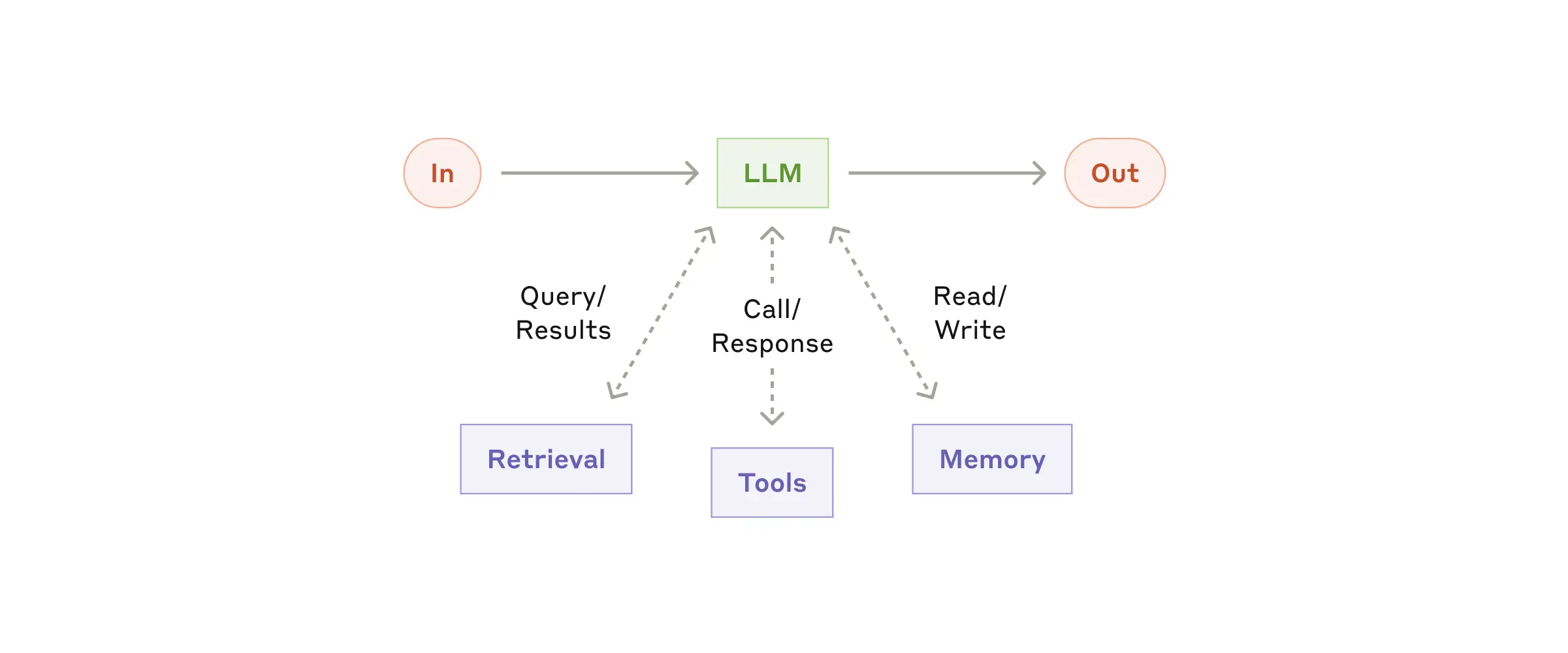The augmented LLM
We recommend focusing on two key aspects of the implementation: tailoring these capabilities to your specific use case and ensuring they provide an easy, well-documented interface for your LLM. While there are many ways to implement these augmentations, one approach is through our recently released [Model Context Protocol](https://www.anthropic.com/news/model-context-protocol), which allows developers to integrate with a growing ecosystem of third-party tools with a simple [client implementation](https://modelcontextprotocol.io/tutorials/building-a-client#building-mcp-clients).
For the remainder of this post, we'll assume each LLM call has access to these augmented capabilities.
### Workflow: Prompt chaining
Prompt chaining decomposes a task into a sequence of steps, where each LLM call processes the output of the previous one. You can add programmatic checks (see "gate” in the diagram below) on any intermediate steps to ensure that the process is still on track.
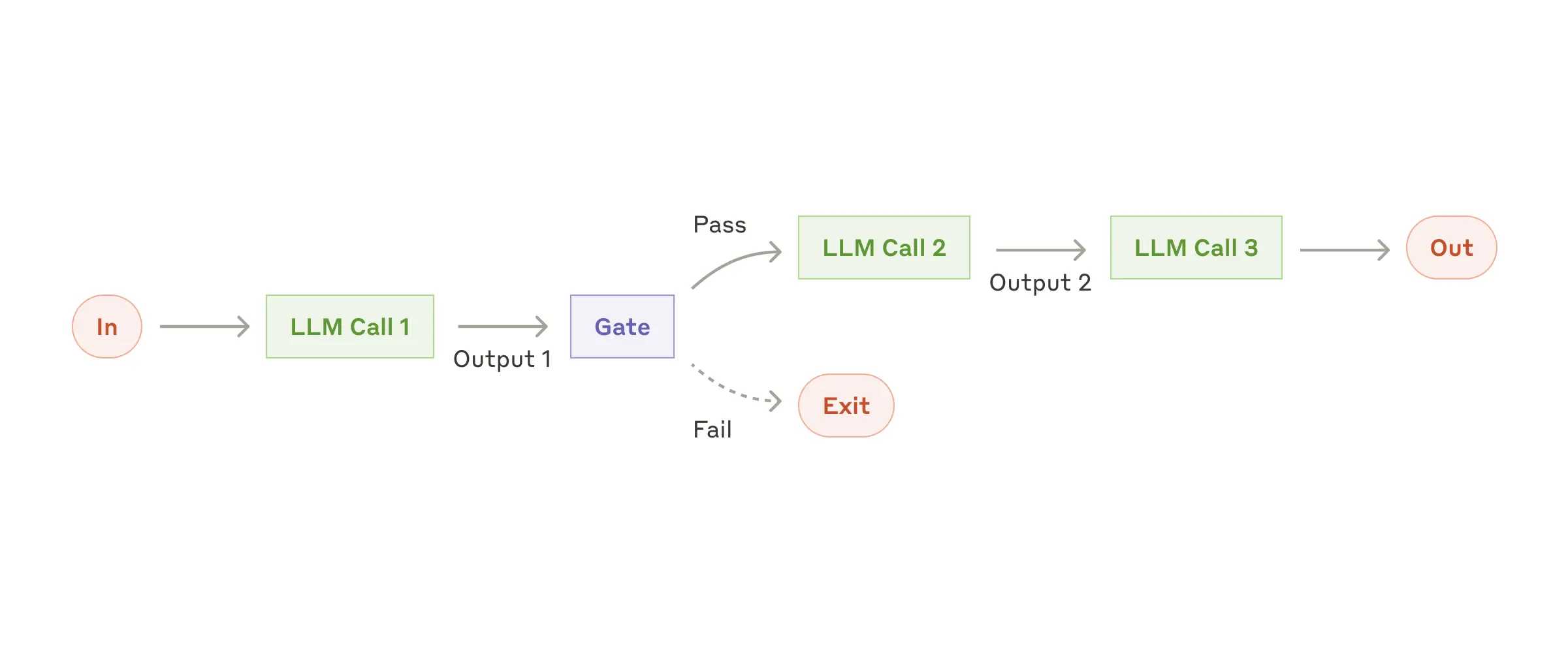The prompt chaining workflow
**When to use this workflow:** This workflow is ideal for situations where the task can be easily and cleanly decomposed into fixed subtasks. The main goal is to trade off latency for higher accuracy, by making each LLM call an easier task.
**Examples where prompt chaining is useful:**
- Generating Marketing copy, then translating it into a different language.
- Writing an outline of a document, checking that the outline meets certain criteria, then writing the document based on the outline.
### Workflow: Routing
Routing classifies an input and directs it to a specialized followup task. This workflow allows for separation of concerns, and building more specialized prompts. Without this workflow, optimizing for one kind of input can hurt performance on other inputs.
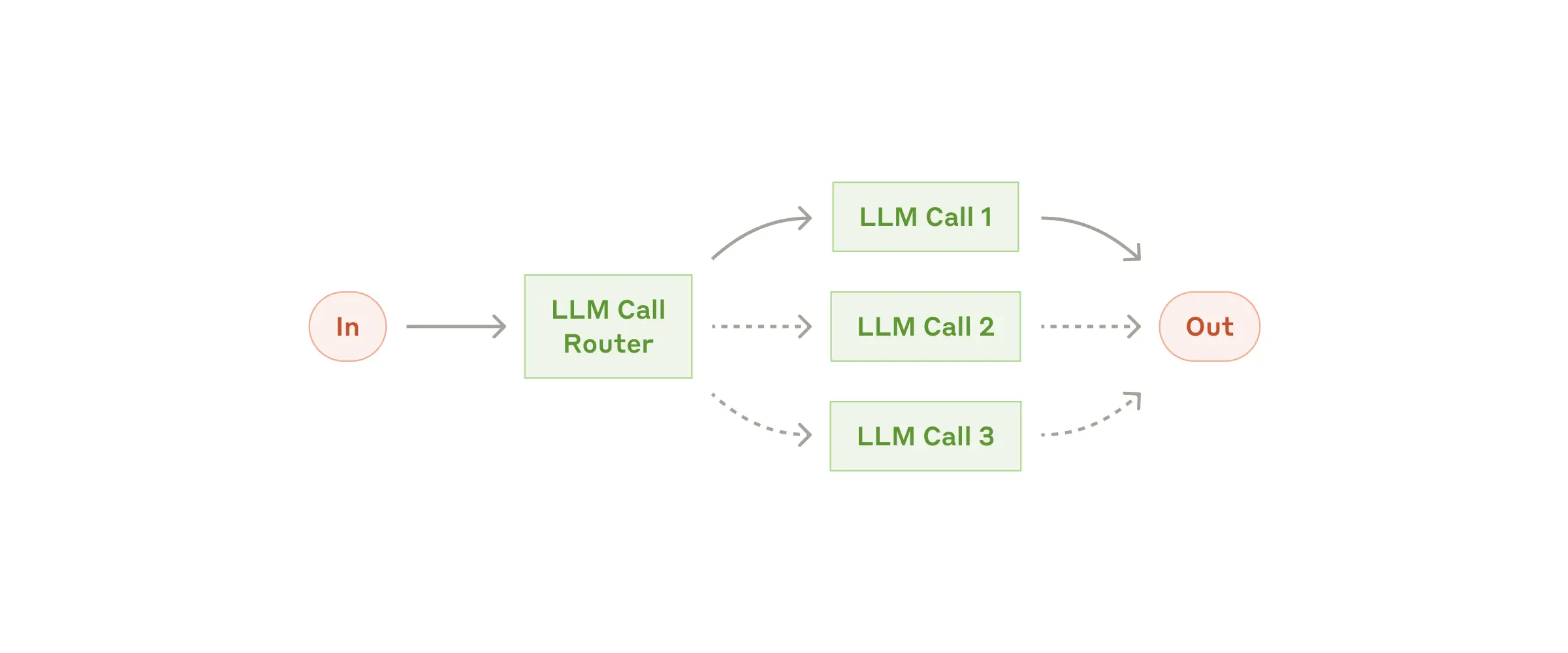The routing workflow
**When to use this workflow:** Routing works well for complex tasks where there are distinct categories that are better handled separately, and where classification can be handled accurately, either by an LLM or a more traditional classification model/algorithm.
**Examples where routing is useful:**
- Directing different types of customer service queries (general questions, refund requests, technical support) into different downstream processes, prompts, and tools.
- Routing easy/common questions to smaller models like Claude 3.5 Haiku and hard/unusual questions to more capable models like Claude 3.5 Sonnet to optimize cost and speed.
### Workflow: Parallelization
LLMs can sometimes work simultaneously on a task and have their outputs aggregated programmatically. This workflow, parallelization, manifests in two key variations:
- **Sectioning**: Breaking a task into independent subtasks run in parallel.
- **Voting:** Running the same task multiple times to get diverse outputs.
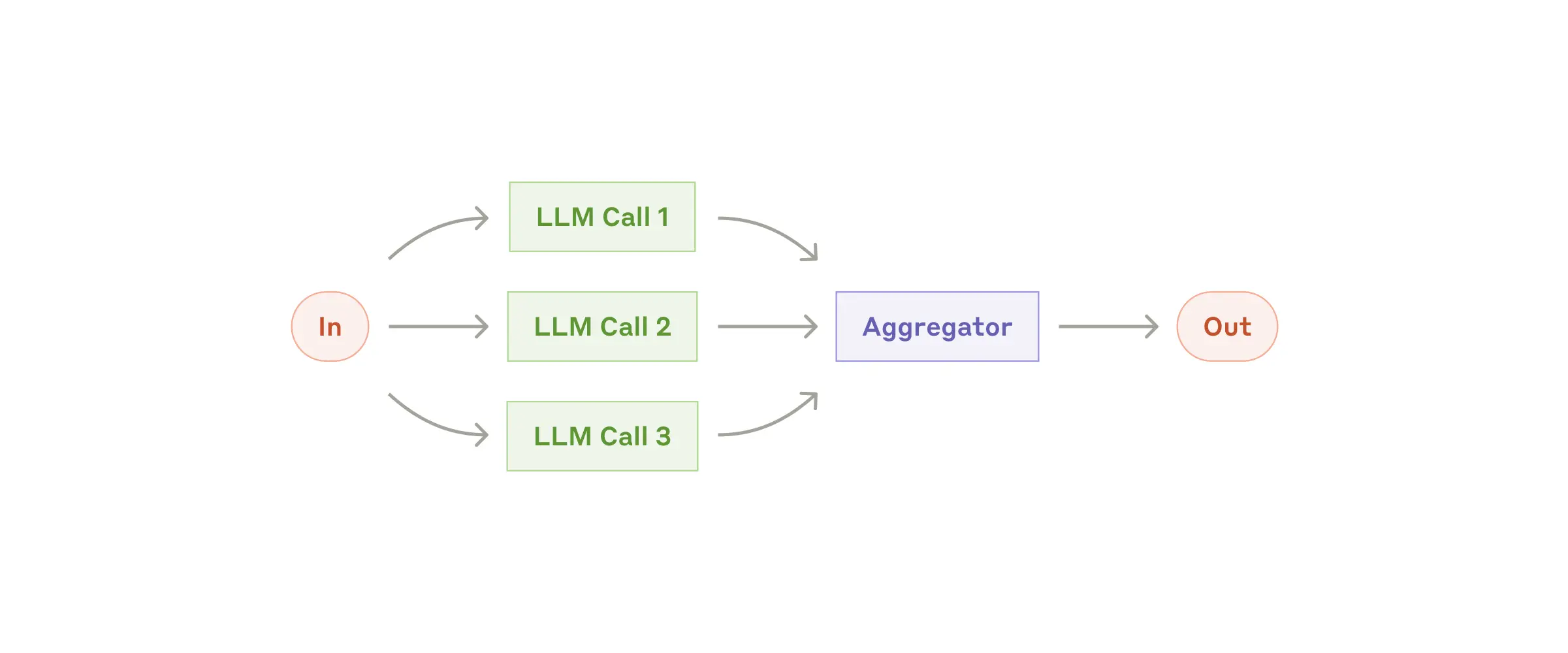The parallelization workflow
**When to use this workflow:** Parallelization is effective when the divided subtasks can be parallelized for speed, or when multiple perspectives or attempts are needed for higher confidence results. For complex tasks with multiple considerations, LLMs generally perform better when each consideration is handled by a separate LLM call, allowing focused attention on each specific aspect.
**Examples where parallelization is useful:**
- **Sectioning**:
- Implementing guardrails where one model instance processes user queries while another screens them for inappropriate content or requests. This tends to perform better than having the same LLM call handle both guardrails and the core response.
- Automating evals for evaluating LLM performance, where each LLM call evaluates a different aspect of the model’s performance on a given prompt.
- **Voting**:
- Reviewing a piece of code for vulnerabilities, where several different prompts review and flag the code if they find a problem.
- Evaluating whether a given piece of content is inappropriate, with multiple prompts evaluating different aspects or requiring different vote thresholds to balance false positives and negatives.
### Workflow: Orchestrator-workers
In the orchestrator-workers workflow, a central LLM dynamically breaks down tasks, delegates them to worker LLMs, and synthesizes their results.
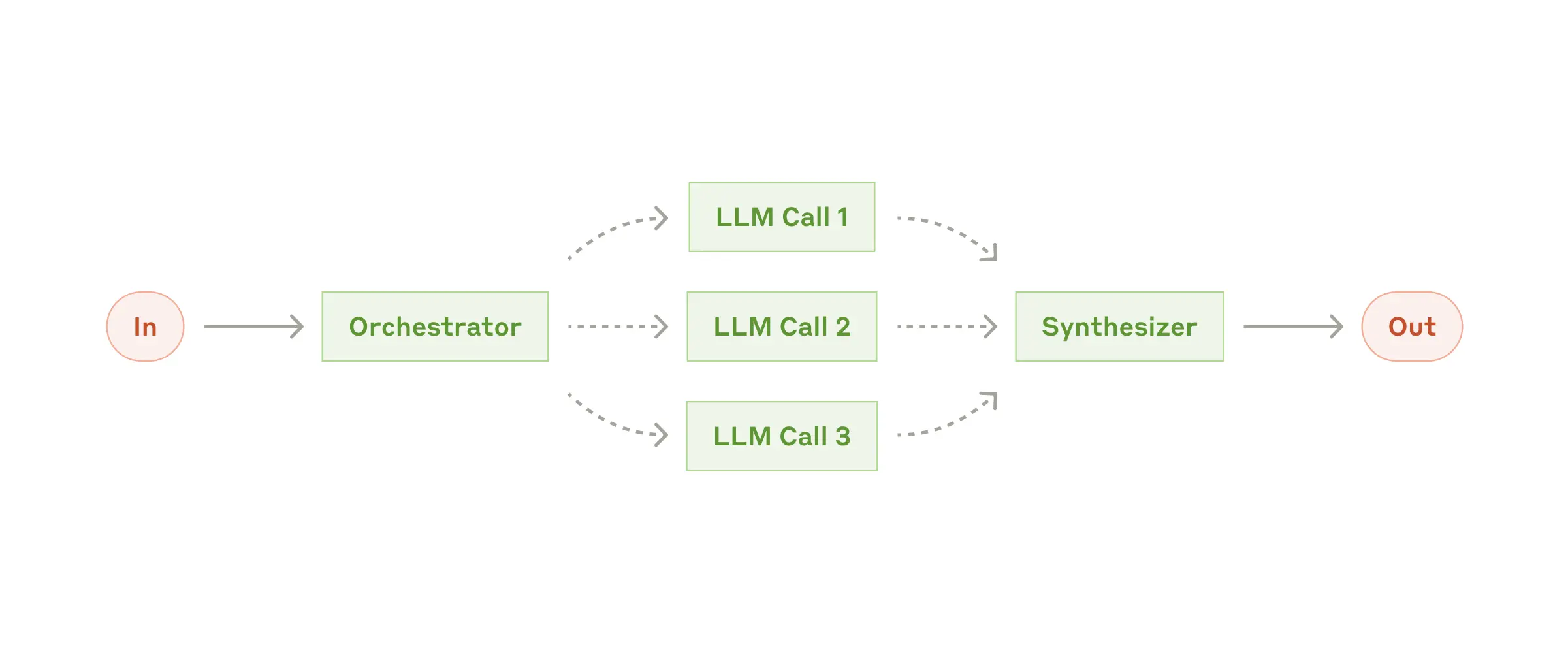The orchestrator-workers workflow
**When to use this workflow:** This workflow is well-suited for complex tasks where you can’t predict the subtasks needed (in coding, for example, the number of files that need to be changed and the nature of the change in each file likely depend on the task). Whereas it’s topographically similar, the key difference from parallelization is its flexibility—subtasks aren't pre-defined, but determined by the orchestrator based on the specific input.
**Example where orchestrator-workers is useful:**
- Coding products that make complex changes to multiple files each time.
- Search tasks that involve gathering and analyzing information from multiple sources for possible relevant information.
### Workflow: Evaluator-optimizer
In the evaluator-optimizer workflow, one LLM call generates a response while another provides evaluation and feedback in a loop.
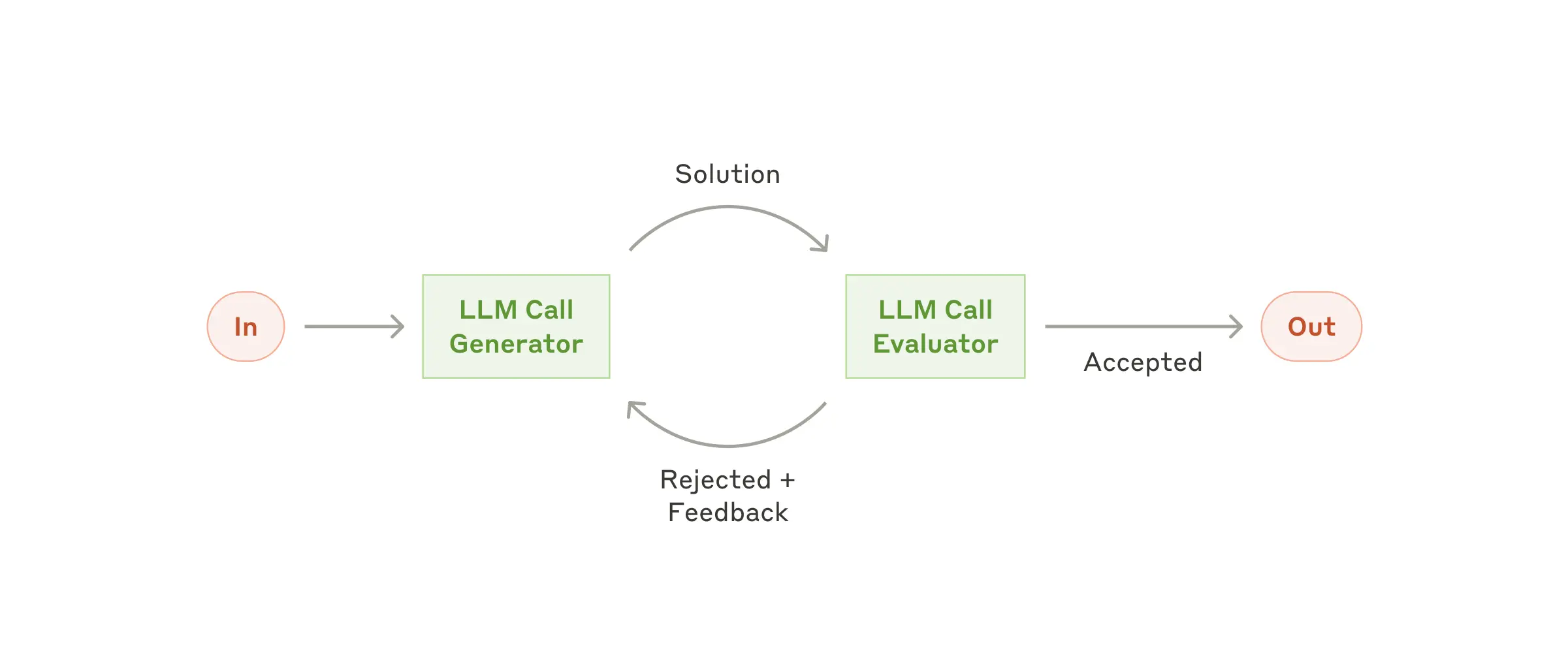The evaluator-optimizer workflow
**When to use this workflow:** This workflow is particularly effective when we have clear evaluation criteria, and when iterative refinement provides measurable value. The two signs of good fit are, first, that LLM responses can be demonstrably improved when a human articulates their feedback; and second, that the LLM can provide such feedback. This is analogous to the iterative writing process a human writer might go through when producing a polished document.
**Examples where evaluator-optimizer is useful:**
- Literary translation where there are nuances that the translator LLM might not capture initially, but where an evaluator LLM can provide useful critiques.
- Complex search tasks that require multiple rounds of searching and analysis to gather comprehensive information, where the evaluator decides whether further searches are warranted.
### Agents
Agents are emerging in production as LLMs mature in key capabilities—understanding complex inputs, engaging in reasoning and planning, using tools reliably, and recovering from errors. Agents begin their work with either a command from, or interactive discussion with, the human user. Once the task is clear, agents plan and operate independently, potentially returning to the human for further information or judgement. During execution, it's crucial for the agents to gain “ground truth” from the environment at each step (such as tool call results or code execution) to assess its progress. Agents can then pause for human feedback at checkpoints or when encountering blockers. The task often terminates upon completion, but it’s also common to include stopping conditions (such as a maximum number of iterations) to maintain control.
Agents can handle sophisticated tasks, but their implementation is often straightforward. They are typically just LLMs using tools based on environmental feedback in a loop. It is therefore crucial to design toolsets and their documentation clearly and thoughtfully. We expand on best practices for tool development in Appendix 2 ("Prompt Engineering your Tools").
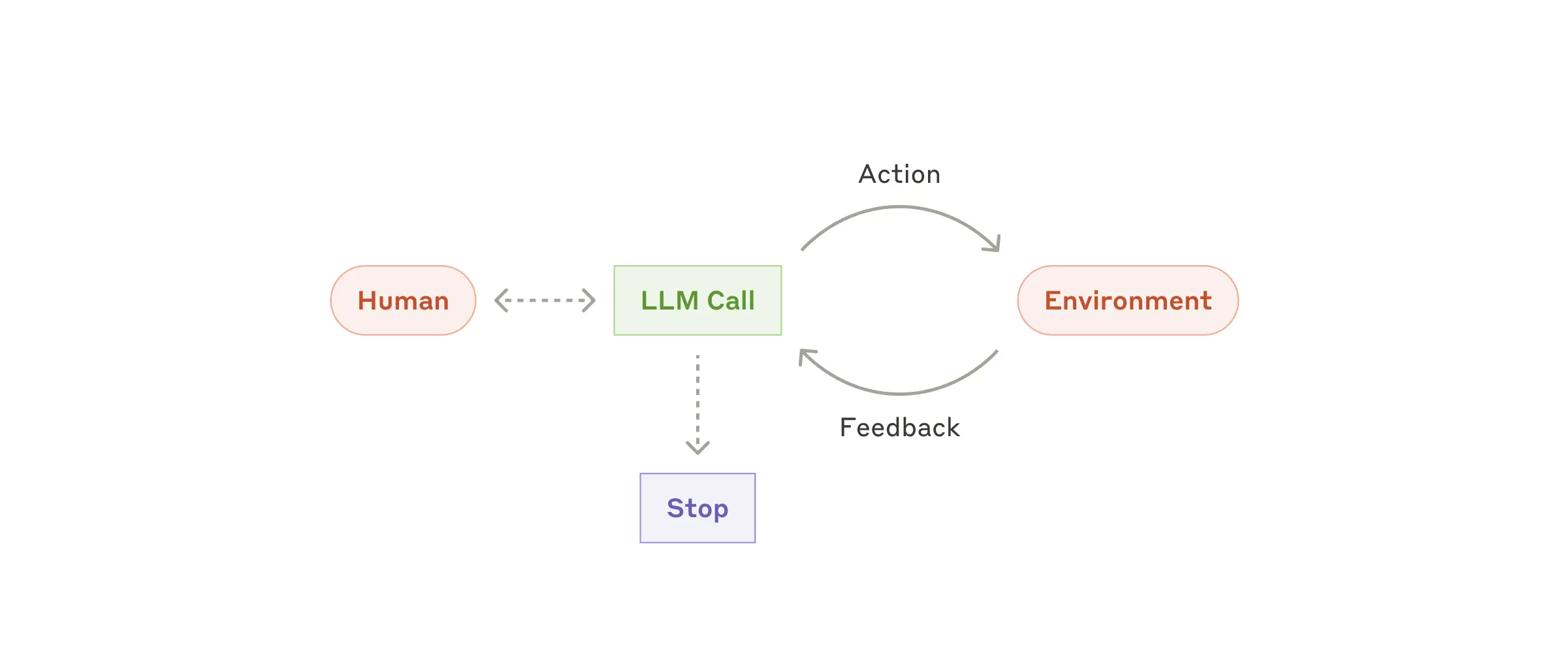Autonomous agent
**When to use agents:** Agents can be used for open-ended problems where it’s difficult or impossible to predict the required number of steps, and where you can’t hardcode a fixed path. The LLM will potentially operate for many turns, and you must have some level of trust in its decision-making. Agents' autonomy makes them ideal for scaling tasks in trusted environments.
The autonomous nature of agents means higher costs, and the potential for compounding errors. We recommend extensive testing in sandboxed environments, along with the appropriate guardrails.
**Examples where agents are useful:**
The following examples are from our own implementations:
- A coding Agent to resolve [SWE-bench tasks](https://www.anthropic.com/research/swe-bench-sonnet), which involve edits to many files based on a task description;
- Our [“computer use” reference implementation](https://github.com/anthropics/anthropic-quickstarts/tree/main/computer-use-demo), where Claude uses a computer to accomplish tasks.
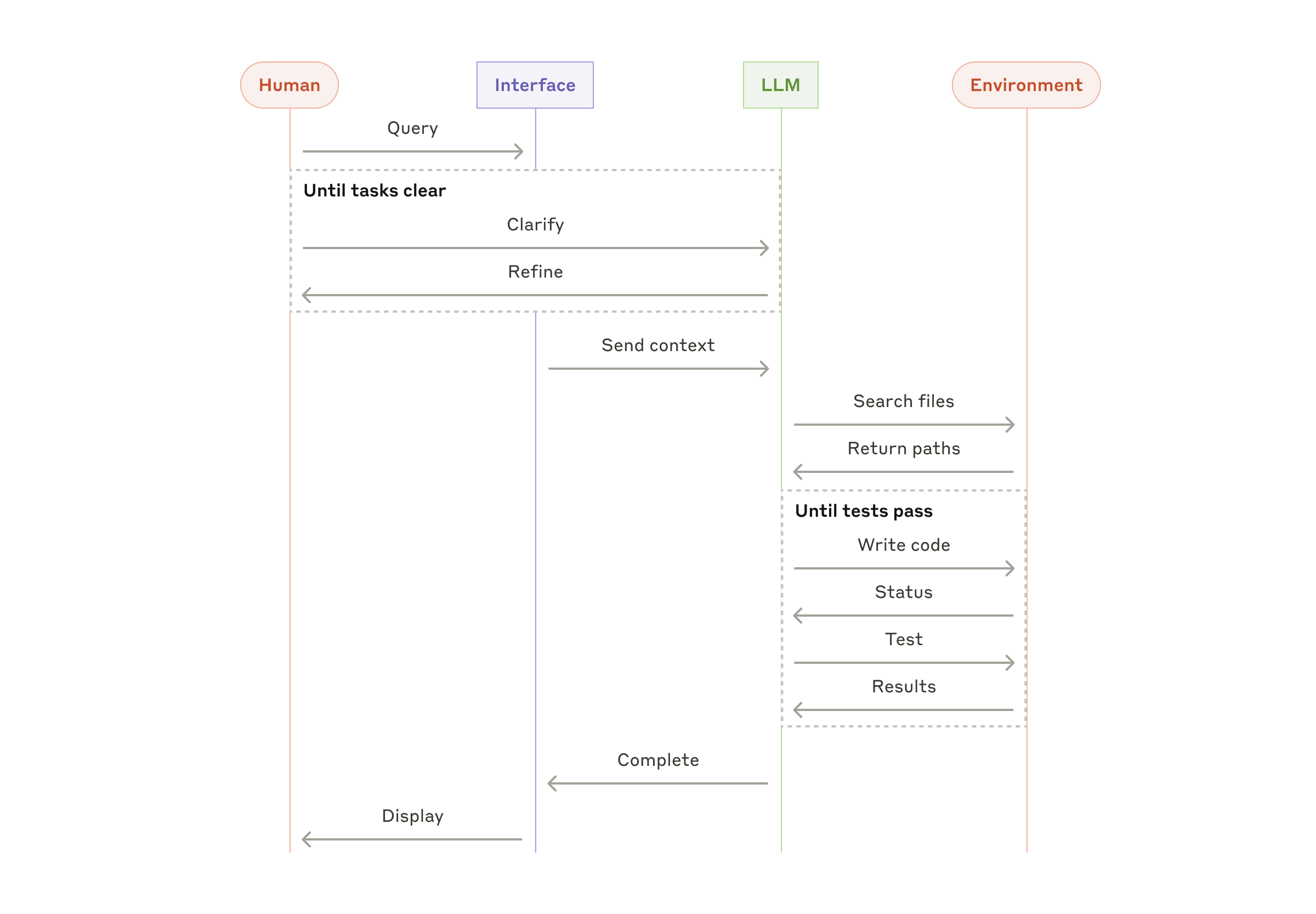High-level flow of a coding agent
## Combining and customizing these patterns
These building blocks aren't prescriptive. They're common patterns that developers can shape and combine to fit different use cases. The key to success, as with any LLM features, is measuring performance and iterating on implementations. To repeat: you should consider adding complexity _only_ when it demonstrably improves outcomes.
## Summary
Success in the LLM space isn't about building the most sophisticated system. It's about building the _right_ system for your needs. Start with simple prompts, optimize them with comprehensive evaluation, and add multi-step agentic systems only when simpler solutions fall short.
When implementing agents, we try to follow three core principles:
1. Maintain **simplicity** in your agent's design.
2. Prioritize **transparency** by explicitly showing the agent’s planning steps.
3. Carefully craft your agent-computer interface (ACI) through thorough tool **documentation and testing**.
Frameworks can help you get started quickly, but don't hesitate to reduce abstraction layers and build with basic components as you move to production. By following these principles, you can create agents that are not only powerful but also reliable, maintainable, and trusted by their users.
### Acknowledgements
Written by Erik Schluntz and Barry Zhang. This work draws upon our experiences building agents at Anthropic and the valuable insights shared by our customers, for which we're deeply grateful.
## Appendix 1: Agents in practice
Our work with customers has revealed two particularly promising applications for AI agents that demonstrate the practical value of the patterns discussed above. Both applications illustrate how agents add the most value for tasks that require both conversation and action, have clear success criteria, enable feedback loops, and integrate meaningful human oversight.
### A. Customer support
Customer support combines familiar chatbot interfaces with enhanced capabilities through tool integration. This is a natural fit for more open-ended agents because:
- Support interactions naturally follow a conversation flow while requiring access to external information and actions;
- Tools can be integrated to pull customer data, order history, and knowledge base articles;
- Actions such as issuing refunds or updating tickets can be handled programmatically; and
- Success can be clearly measured through user-defined resolutions.
Several companies have demonstrated the viability of this approach through usage-based pricing models that charge only for successful resolutions, showing confidence in their agents' effectiveness.
### B. Coding agents
The software development space has shown remarkable potential for LLM features, with capabilities evolving from code completion to autonomous problem-solving. Agents are particularly effective because:
- Code solutions are verifiable through automated tests;
- Agents can iterate on solutions using test results as feedback;
- The problem space is well-defined and structured; and
- Output quality can be measured objectively.
In our own implementation, agents can now solve real GitHub issues in the [SWE-bench Verified](https://www.anthropic.com/research/swe-bench-sonnet) benchmark based on the pull request description alone. However, whereas automated testing helps verify functionality, human review remains crucial for ensuring solutions align with broader system requirements.
## Appendix 2: Prompt engineering your tools
No matter which agentic system you're building, tools will likely be an important part of your agent. [Tools](https://www.anthropic.com/news/tool-use-ga) enable Claude to interact with external services and APIs by specifying their exact structure and definition in our API. When Claude responds, it will include a [tool use block](https://docs.anthropic.com/en/docs/build-with-claude/tool-use#example-api-response-with-a-tool-use-content-block) in the API response if it plans to invoke a tool. Tool definitions and specifications should be given just as much prompt engineering attention as your overall prompts. In this brief appendix, we describe how to prompt engineer your tools.
There are often several ways to specify the same action. For instance, you can specify a file edit by writing a diff, or by rewriting the entire file. For structured output, you can return code inside markdown or inside JSON. In software engineering, differences like these are cosmetic and can be converted losslessly from one to the other. However, some formats are much more difficult for an LLM to write than others. Writing a diff requires knowing how many lines are changing in the chunk header before the new code is written. Writing code inside JSON (compared to markdown) requires extra escaping of newlines and quotes.
Our suggestions for deciding on tool formats are the following:
- Give the model enough tokens to "think" before it writes itself into a corner.
- Keep the format close to what the model has seen naturally occurring in text on the internet.
- Make sure there's no formatting "overhead" such as having to keep an accurate count of thousands of lines of code, or string-escaping any code it writes.
One rule of thumb is to think about how much effort goes into human-computer interfaces (HCI), and plan to invest just as much effort in creating good _agent_-computer interfaces (ACI). Here are some thoughts on how to do so:
- Put yourself in the model's shoes. Is it obvious how to use this tool, based on the description and parameters, or would you need to think carefully about it? If so, then it’s probably also true for the model. A good tool definition often includes example usage, edge cases, input format requirements, and clear boundaries from other tools.
- How can you change parameter names or descriptions to make things more obvious? Think of this as writing a great docstring for a junior developer on your team. This is especially important when using many similar tools.
- Test how the model uses your tools: Run many example inputs in our [workbench](https://console.anthropic.com/workbench) to see what mistakes the model makes, and iterate.
- [Poka-yoke](https://en.wikipedia.org/wiki/Poka-yoke) your tools. Change the arguments so that it is harder to make mistakes.
While building our agent for [SWE-bench](https://www.anthropic.com/research/swe-bench-sonnet), we actually spent more time optimizing our tools than the overall prompt. For example, we found that the model would make mistakes with tools using relative filepaths after the agent had moved out of the root directory. To fix this, we changed the tool to always require absolute filepaths—and we found that the model used this method flawlessly.
[Share on Twitter](https://twitter.com/intent/tweet?text=https://www.anthropic.com/research/building-effective-agents)[Share on LinkedIn](https://www.linkedin.com/shareArticle?mini=true&url=https://www.anthropic.com/research/building-effective-agents)
================================================
FILE: ai_docs/existing_anthropic_computer_use_code.md
================================================
```python
import os
import anthropic
import argparse
import yaml
import subprocess
from datetime import datetime
import uuid
from typing import Dict, Any, List, Optional, Union
import traceback
import sys
import logging
from logging.handlers import RotatingFileHandler
EDITOR_DIR = os.path.join(os.getcwd(), "editor_dir")
SESSIONS_DIR = os.path.join(os.getcwd(), "sessions")
os.makedirs(SESSIONS_DIR, exist_ok=True)
# Fetch system prompts from environment variables or use defaults
BASH_SYSTEM_PROMPT = os.environ.get(
"BASH_SYSTEM_PROMPT", "You are a helpful assistant that can execute bash commands."
)
EDITOR_SYSTEM_PROMPT = os.environ.get(
"EDITOR_SYSTEM_PROMPT",
"You are a helpful assistant that helps users edit text files.",
)
class SessionLogger:
def __init__(self, session_id: str, sessions_dir: str):
self.session_id = session_id
self.sessions_dir = sessions_dir
self.logger = self._setup_logging()
# Initialize token counters
self.total_input_tokens = 0
self.total_output_tokens = 0
def _setup_logging(self) -> logging.Logger:
"""Configure logging for the session"""
log_formatter = logging.Formatter(
"%(asctime)s - %(name)s - %(levelname)s - %(prefix)s - %(message)s"
)
log_file = os.path.join(self.sessions_dir, f"{self.session_id}.log")
file_handler = RotatingFileHandler(
log_file, maxBytes=1024 * 1024, backupCount=5
)
file_handler.setFormatter(log_formatter)
console_handler = logging.StreamHandler()
console_handler.setFormatter(log_formatter)
logger = logging.getLogger(self.session_id)
logger.addHandler(file_handler)
logger.addHandler(console_handler)
logger.setLevel(logging.DEBUG)
return logger
def update_token_usage(self, input_tokens: int, output_tokens: int):
"""Update the total token usage."""
self.total_input_tokens += input_tokens
self.total_output_tokens += output_tokens
def log_total_cost(self):
"""Calculate and log the total cost based on token usage."""
cost_per_million_input_tokens = 3.0 # $3.00 per million input tokens
cost_per_million_output_tokens = 15.0 # $15.00 per million output tokens
total_input_cost = (
self.total_input_tokens / 1_000_000
) * cost_per_million_input_tokens
total_output_cost = (
self.total_output_tokens / 1_000_000
) * cost_per_million_output_tokens
total_cost = total_input_cost + total_output_cost
prefix = "📊 session"
self.logger.info(
f"Total input tokens: {self.total_input_tokens}", extra={"prefix": prefix}
)
self.logger.info(
f"Total output tokens: {self.total_output_tokens}", extra={"prefix": prefix}
)
self.logger.info(
f"Total input cost: ${total_input_cost:.6f}", extra={"prefix": prefix}
)
self.logger.info(
f"Total output cost: ${total_output_cost:.6f}", extra={"prefix": prefix}
)
self.logger.info(f"Total cost: ${total_cost:.6f}", extra={"prefix": prefix})
class EditorSession:
def __init__(self, session_id: Optional[str] = None):
"""Initialize editor session with optional existing session ID"""
self.session_id = session_id or self._create_session_id()
self.sessions_dir = SESSIONS_DIR
self.editor_dir = EDITOR_DIR
self.client = anthropic.Anthropic(api_key=os.environ.get("ANTHROPIC_API_KEY"))
self.messages = []
# Create editor directory if needed
os.makedirs(self.editor_dir, exist_ok=True)
# Initialize logger placeholder
self.logger = None
# Set log prefix
self.log_prefix = "📝 file_editor"
def set_logger(self, session_logger: SessionLogger):
"""Set the logger for the session and store the SessionLogger instance."""
self.session_logger = session_logger
self.logger = logging.LoggerAdapter(
self.session_logger.logger, {"prefix": self.log_prefix}
)
def _create_session_id(self) -> str:
"""Create a new session ID"""
timestamp = datetime.now().strftime("%Y%m%d-%H%M%S")
return f"{timestamp}-{uuid.uuid4().hex[:6]}"
def _get_editor_path(self, path: str) -> str:
"""Convert API path to local editor directory path"""
# Strip any leading /repo/ from the path
clean_path = path.replace("/repo/", "", 1)
# Join with editor_dir
full_path = os.path.join(self.editor_dir, clean_path)
# Create the directory structure if it doesn't exist
os.makedirs(os.path.dirname(full_path), exist_ok=True)
return full_path
def _handle_view(self, path: str, _: Dict[str, Any]) -> Dict[str, Any]:
"""Handle view command"""
editor_path = self._get_editor_path(path)
if os.path.exists(editor_path):
with open(editor_path, "r") as f:
return {"content": f.read()}
return {"error": f"File {editor_path} does not exist"}
def _handle_create(self, path: str, tool_call: Dict[str, Any]) -> Dict[str, Any]:
"""Handle create command"""
os.makedirs(os.path.dirname(path), exist_ok=True)
with open(path, "w") as f:
f.write(tool_call["file_text"])
return {"content": f"File created at {path}"}
def _handle_str_replace(
self, path: str, tool_call: Dict[str, Any]
) -> Dict[str, Any]:
"""Handle str_replace command"""
with open(path, "r") as f:
content = f.read()
if tool_call["old_str"] not in content:
return {"error": "old_str not found in file"}
new_content = content.replace(
tool_call["old_str"], tool_call.get("new_str", "")
)
with open(path, "w") as f:
f.write(new_content)
return {"content": "File updated successfully"}
def _handle_insert(self, path: str, tool_call: Dict[str, Any]) -> Dict[str, Any]:
"""Handle insert command"""
with open(path, "r") as f:
lines = f.readlines()
insert_line = tool_call["insert_line"]
if insert_line > len(lines):
return {"error": "insert_line beyond file length"}
lines.insert(insert_line, tool_call["new_str"] + "\n")
with open(path, "w") as f:
f.writelines(lines)
return {"content": "Content inserted successfully"}
def log_to_session(self, data: Dict[str, Any], section: str) -> None:
"""Log data to session log file"""
self.logger.info(f"{section}: {data}")
def handle_text_editor_tool(self, tool_call: Dict[str, Any]) -> Dict[str, Any]:
"""Handle text editor tool calls"""
try:
command = tool_call["command"]
if not all(key in tool_call for key in ["command", "path"]):
return {"error": "Missing required fields"}
# Get path and ensure directory exists
path = self._get_editor_path(tool_call["path"])
handlers = {
"view": self._handle_view,
"create": self._handle_create,
"str_replace": self._handle_str_replace,
"insert": self._handle_insert,
}
handler = handlers.get(command)
if not handler:
return {"error": f"Unknown command {command}"}
return handler(path, tool_call)
except Exception as e:
self.logger.error(f"Error in handle_text_editor_tool: {str(e)}")
return {"error": str(e)}
def process_tool_calls(
self, tool_calls: List[anthropic.types.ContentBlock]
) -> List[Dict[str, Any]]:
"""Process tool calls and return results"""
results = []
for tool_call in tool_calls:
if tool_call.type == "tool_use" and tool_call.name == "str_replace_editor":
# Log the keys and first 20 characters of the values of the tool_call
for key, value in tool_call.input.items():
truncated_value = str(value)[:20] + (
"..." if len(str(value)) > 20 else ""
)
self.logger.info(
f"Tool call key: {key}, Value (truncated): {truncated_value}"
)
result = self.handle_text_editor_tool(tool_call.input)
# Convert result to match expected tool result format
is_error = False
if result.get("error"):
is_error = True
tool_result_content = [{"type": "text", "text": result["error"]}]
else:
tool_result_content = [
{"type": "text", "text": result.get("content", "")}
]
results.append(
{
"tool_call_id": tool_call.id,
"output": {
"type": "tool_result",
"content": tool_result_content,
"tool_use_id": tool_call.id,
"is_error": is_error,
},
}
)
return results
def process_edit(self, edit_prompt: str) -> None:
"""Main method to process editing prompts"""
try:
# Initial message with proper content structure
api_message = {
"role": "user",
"content": [{"type": "text", "text": edit_prompt}],
}
self.messages = [api_message]
self.logger.info(f"User input: {api_message}")
while True:
response = self.client.beta.messages.create(
model="claude-3-5-sonnet-20241022",
max_tokens=4096,
messages=self.messages,
tools=[
{"type": "text_editor_20241022", "name": "str_replace_editor"}
],
system=EDITOR_SYSTEM_PROMPT,
betas=["computer-use-2024-10-22"],
)
# Extract token usage from the response
input_tokens = getattr(response.usage, "input_tokens", 0)
output_tokens = getattr(response.usage, "output_tokens", 0)
self.logger.info(
f"API usage: input_tokens={input_tokens}, output_tokens={output_tokens}"
)
# Update token counts in SessionLogger
self.session_logger.update_token_usage(input_tokens, output_tokens)
self.logger.info(f"API response: {response.model_dump()}")
# Convert response content to message params
response_content = []
for block in response.content:
if block.type == "text":
response_content.append({"type": "text", "text": block.text})
else:
response_content.append(block.model_dump())
# Add assistant response to messages
self.messages.append({"role": "assistant", "content": response_content})
if response.stop_reason != "tool_use":
print(response.content[0].text)
break
tool_results = self.process_tool_calls(response.content)
# Add tool results as user message
if tool_results:
self.messages.append(
{"role": "user", "content": [tool_results[0]["output"]]}
)
if tool_results[0]["output"]["is_error"]:
self.logger.error(
f"Error: {tool_results[0]['output']['content']}"
)
break
# After the execution loop, log the total cost
self.session_logger.log_total_cost()
except Exception as e:
self.logger.error(f"Error in process_edit: {str(e)}")
self.logger.error(traceback.format_exc())
raise
class BashSession:
def __init__(self, session_id: Optional[str] = None, no_agi: bool = False):
"""Initialize Bash session with optional existing session ID"""
self.session_id = session_id or self._create_session_id()
self.sessions_dir = SESSIONS_DIR
self.client = anthropic.Anthropic(api_key=os.environ.get("ANTHROPIC_API_KEY"))
self.messages = []
# Initialize a persistent environment dictionary for subprocesses
self.environment = os.environ.copy()
# Initialize logger placeholder
self.logger = None
# Set log prefix
self.log_prefix = "🐚 bash"
# Store the no_agi flag
self.no_agi = no_agi
def set_logger(self, session_logger: SessionLogger):
"""Set the logger for the session and store the SessionLogger instance."""
self.session_logger = session_logger
self.logger = logging.LoggerAdapter(
session_logger.logger, {"prefix": self.log_prefix}
)
def _create_session_id(self) -> str:
"""Create a new session ID"""
timestamp = datetime.now().strftime("%Y%m%d-%H:%M:%S-%f")
# return f"{timestamp}-{uuid.uuid4().hex[:6]}"
return f"{timestamp}"
def _handle_bash_command(self, tool_call: Dict[str, Any]) -> Dict[str, Any]:
"""Handle bash command execution"""
try:
command = tool_call.get("command")
restart = tool_call.get("restart", False)
if restart:
self.environment = os.environ.copy() # Reset the environment
self.logger.info("Bash session restarted.")
return {"content": "Bash session restarted."}
if not command:
self.logger.error("No command provided to execute.")
return {"error": "No command provided to execute."}
# Check if no_agi is enabled
if self.no_agi:
self.logger.info(f"Mock executing bash command: {command}")
return {"content": "in mock mode, command did not run"}
# Log the command being executed
self.logger.info(f"Executing bash command: {command}")
# Execute the command in a subprocess
result = subprocess.run(
command,
shell=True,
stdout=subprocess.PIPE,
stderr=subprocess.PIPE,
env=self.environment,
text=True,
executable="/bin/bash",
)
output = result.stdout.strip()
error_output = result.stderr.strip()
# Log the outputs
if output:
self.logger.info(
f"Command output:\n\n```output for '{command[:20]}...'\n{output}\n```"
)
if error_output:
self.logger.error(
f"Command error output:\n\n```error for '{command}'\n{error_output}\n```"
)
if result.returncode != 0:
error_message = error_output or "Command execution failed."
return {"error": error_message}
return {"content": output}
except Exception as e:
self.logger.error(f"Error in _handle_bash_command: {str(e)}")
self.logger.error(traceback.format_exc())
return {"error": str(e)}
def process_tool_calls(
self, tool_calls: List[anthropic.types.ContentBlock]
) -> List[Dict[str, Any]]:
"""Process tool calls and return results"""
results = []
for tool_call in tool_calls:
if tool_call.type == "tool_use" and tool_call.name == "bash":
self.logger.info(f"Bash tool call input: {tool_call.input}")
result = self._handle_bash_command(tool_call.input)
# Convert result to match expected tool result format
is_error = False
if result.get("error"):
is_error = True
tool_result_content = [{"type": "text", "text": result["error"]}]
else:
tool_result_content = [
{"type": "text", "text": result.get("content", "")}
]
results.append(
{
"tool_call_id": tool_call.id,
"output": {
"type": "tool_result",
"content": tool_result_content,
"tool_use_id": tool_call.id,
"is_error": is_error,
},
}
)
return results
def process_bash_command(self, bash_prompt: str) -> None:
"""Main method to process bash commands via the assistant"""
try:
# Initial message with proper content structure
api_message = {
"role": "user",
"content": [{"type": "text", "text": bash_prompt}],
}
self.messages = [api_message]
self.logger.info(f"User input: {api_message}")
while True:
response = self.client.beta.messages.create(
model="claude-3-5-sonnet-20241022",
max_tokens=4096,
messages=self.messages,
tools=[{"type": "bash_20241022", "name": "bash"}],
system=BASH_SYSTEM_PROMPT,
betas=["computer-use-2024-10-22"],
)
# Extract token usage from the response
input_tokens = getattr(response.usage, "input_tokens", 0)
output_tokens = getattr(response.usage, "output_tokens", 0)
self.logger.info(
f"API usage: input_tokens={input_tokens}, output_tokens={output_tokens}"
)
# Update token counts in SessionLogger
self.session_logger.update_token_usage(input_tokens, output_tokens)
self.logger.info(f"API response: {response.model_dump()}")
# Convert response content to message params
response_content = []
for block in response.content:
if block.type == "text":
response_content.append({"type": "text", "text": block.text})
else:
response_content.append(block.model_dump())
# Add assistant response to messages
self.messages.append({"role": "assistant", "content": response_content})
if response.stop_reason != "tool_use":
# Print the assistant's final response
print(response.content[0].text)
break
tool_results = self.process_tool_calls(response.content)
# Add tool results as user message
if tool_results:
self.messages.append(
{"role": "user", "content": [tool_results[0]["output"]]}
)
if tool_results[0]["output"]["is_error"]:
self.logger.error(
f"Error: {tool_results[0]['output']['content']}"
)
break
# After the execution loop, log the total cost
self.session_logger.log_total_cost()
except Exception as e:
self.logger.error(f"Error in process_bash_command: {str(e)}")
self.logger.error(traceback.format_exc())
raise
def main():
"""Main entry point"""
parser = argparse.ArgumentParser()
parser.add_argument("prompt", help="The prompt for Claude", nargs="?")
parser.add_argument(
"--mode", choices=["editor", "bash"], default="editor", help="Mode to run"
)
parser.add_argument(
"--no-agi",
action="store_true",
help="When set, commands will not be executed, but will return 'command ran'.",
)
args = parser.parse_args()
# Create a shared session ID
session_id = datetime.now().strftime("%Y%m%d-%H%M%S") + "-" + uuid.uuid4().hex[:6]
# Create a single SessionLogger instance
session_logger = SessionLogger(session_id, SESSIONS_DIR)
if args.mode == "editor":
session = EditorSession(session_id=session_id)
# Pass the logger via setter method
session.set_logger(session_logger)
print(f"Session ID: {session.session_id}")
session.process_edit(args.prompt)
elif args.mode == "bash":
session = BashSession(session_id=session_id, no_agi=args.no_agi)
# Pass the logger via setter method
session.set_logger(session_logger)
print(f"Session ID: {session.session_id}")
session.process_bash_command(args.prompt)
if __name__ == "__main__":
main()
```
================================================
FILE: ai_docs/fc_openai_agents.md
================================================
# OpenAI Agents SDK Documentation
This file contains documentation for the OpenAI Agents SDK, scraped from the official documentation site.
## Overview
The [OpenAI Agents SDK](https://github.com/openai/openai-agents-python) enables you to build agentic AI apps in a lightweight, easy-to-use package with very few abstractions. It's a production-ready upgrade of the previous experimentation for agents, [Swarm](https://github.com/openai/swarm/tree/main). The Agents SDK has a very small set of primitives:
- **Agents**, which are LLMs equipped with instructions and tools
- **Handoffs**, which allow agents to delegate to other agents for specific tasks
- **Guardrails**, which enable the inputs to agents to be validated
In combination with Python, these primitives are powerful enough to express complex relationships between tools and agents, and allow you to build real-world applications without a steep learning curve. In addition, the SDK comes with built-in **tracing** that lets you visualize and debug your agentic flows, as well as evaluate them and even fine-tune models for your application.
### Why use the Agents SDK
The SDK has two driving design principles:
1. Enough features to be worth using, but few enough primitives to make it quick to learn.
2. Works great out of the box, but you can customize exactly what happens.
Here are the main features of the SDK:
- Agent loop: Built-in agent loop that handles calling tools, sending results to the LLM, and looping until the LLM is done.
- Python-first: Use built-in language features to orchestrate and chain agents, rather than needing to learn new abstractions.
- Handoffs: A powerful feature to coordinate and delegate between multiple agents.
- Guardrails: Run input validations and checks in parallel to your agents, breaking early if the checks fail.
- Function tools: Turn any Python function into a tool, with automatic schema generation and Pydantic-powered validation.
- Tracing: Built-in tracing that lets you visualize, debug and monitor your workflows, as well as use the OpenAI suite of evaluation, fine-tuning and distillation tools.
### Installation
```bash
pip install openai-agents
```
### Hello world example
```python
from agents import Agent, Runner
agent = Agent(name="Assistant", instructions="You are a helpful assistant")
result = Runner.run_sync(agent, "Write a haiku about recursion in programming.")
print(result.final_output)
# Code within the code,
# Functions calling themselves,
# Infinite loop's dance.
```
## Quickstart
### Create a project and virtual environment
```bash
mkdir my_project
cd my_project
python -m venv .venv
source .venv/bin/activate
pip install openai-agents
export OPENAI_API_KEY=sk-...
```
### Create your first agent
```python
from agents import Agent
agent = Agent(
name="Math Tutor",
instructions="You provide help with math problems. Explain your reasoning at each step and include examples",
)
```
### Add a few more agents
```python
from agents import Agent
history_tutor_agent = Agent(
name="History Tutor",
handoff_description="Specialist agent for historical questions",
instructions="You provide assistance with historical queries. Explain important events and context clearly.",
)
math_tutor_agent = Agent(
name="Math Tutor",
handoff_description="Specialist agent for math questions",
instructions="You provide help with math problems. Explain your reasoning at each step and include examples",
)
```
### Define your handoffs
```python
triage_agent = Agent(
name="Triage Agent",
instructions="You determine which agent to use based on the user's homework question",
handoffs=[history_tutor_agent, math_tutor_agent]
)
```
### Run the agent orchestration
```python
from agents import Runner
async def main():
result = await Runner.run(triage_agent, "What is the capital of France?")
print(result.final_output)
```
### Add a guardrail
```python
from agents import GuardrailFunctionOutput, Agent, Runner
from pydantic import BaseModel
class HomeworkOutput(BaseModel):
is_homework: bool
reasoning: str
guardrail_agent = Agent(
name="Guardrail check",
instructions="Check if the user is asking about homework.",
output_type=HomeworkOutput,
)
async def homework_guardrail(ctx, agent, input_data):
result = await Runner.run(guardrail_agent, input_data, context=ctx.context)
final_output = result.final_output_as(HomeworkOutput)
return GuardrailFunctionOutput(
output_info=final_output,
tripwire_triggered=not final_output.is_homework,
)
```
### Put it all together
```python
from agents import Agent, InputGuardrail,GuardrailFunctionOutput, Runner
from pydantic import BaseModel
import asyncio
class HomeworkOutput(BaseModel):
is_homework: bool
reasoning: str
guardrail_agent = Agent(
name="Guardrail check",
instructions="Check if the user is asking about homework.",
output_type=HomeworkOutput,
)
math_tutor_agent = Agent(
name="Math Tutor",
handoff_description="Specialist agent for math questions",
instructions="You provide help with math problems. Explain your reasoning at each step and include examples",
)
history_tutor_agent = Agent(
name="History Tutor",
handoff_description="Specialist agent for historical questions",
instructions="You provide assistance with historical queries. Explain important events and context clearly.",
)
async def homework_guardrail(ctx, agent, input_data):
result = await Runner.run(guardrail_agent, input_data, context=ctx.context)
final_output = result.final_output_as(HomeworkOutput)
return GuardrailFunctionOutput(
output_info=final_output,
tripwire_triggered=not final_output.is_homework,
)
triage_agent = Agent(
name="Triage Agent",
instructions="You determine which agent to use based on the user's homework question",
handoffs=[history_tutor_agent, math_tutor_agent],
input_guardrails=[
InputGuardrail(guardrail_function=homework_guardrail),
],
)
async def main():
result = await Runner.run(triage_agent, "who was the first president of the united states?")
print(result.final_output)
result = await Runner.run(triage_agent, "what is life")
print(result.final_output)
if __name__ == "__main__":
asyncio.run(main())
```
## Agents
Agents are the core building block in your apps. An agent is a large language model (LLM), configured with instructions and tools.
### Basic configuration
The most common properties of an agent you'll configure are:
- `instructions`: also known as a developer message or system prompt.
- `model`: which LLM to use, and optional `model_settings` to configure model tuning parameters like temperature, top_p, etc.
- `tools`: Tools that the agent can use to achieve its tasks.
```python
from agents import Agent, ModelSettings, function_tool
@function_tool
def get_weather(city: str) -> str:
return f"The weather in {city} is sunny"
agent = Agent(
name="Haiku agent",
instructions="Always respond in haiku form",
model="o3-mini",
tools=[get_weather],
)
```
### Context
Agents are generic on their `context` type. Context is a dependency-injection tool: it's an object you create and pass to `Runner.run()`, that is passed to every agent, tool, handoff etc, and it serves as a grab bag of dependencies and state for the agent run. You can provide any Python object as the context.
### Output types
By default, agents produce plain text (i.e. `str`) outputs. If you want the agent to produce a particular type of output, you can use the `output_type` parameter.
### Handoffs
Handoffs are sub-agents that the agent can delegate to. You provide a list of handoffs, and the agent can choose to delegate to them if relevant.
### Dynamic instructions
In most cases, you can provide instructions when you create the agent. However, you can also provide dynamic instructions via a function.
### Lifecycle events (hooks)
Sometimes, you want to observe the lifecycle of an agent. For example, you may want to log events, or pre-fetch data when certain events occur.
### Guardrails
Guardrails allow you to run checks/validations on user input, in parallel to the agent running.
### Cloning/copying agents
By using the `clone()` method on an agent, you can duplicate an Agent, and optionally change any properties you like.
## Handoffs
Handoffs allow an agent to delegate tasks to another agent. This is particularly useful in scenarios where different agents specialize in distinct areas.
### Creating a handoff
All agents have a `handoffs` param, which can either take an `Agent` directly, or a `Handoff` object that customizes the Handoff.
### Basic Usage
```python
from agents import Agent, handoff
billing_agent = Agent(name="Billing agent")
refund_agent = Agent(name="Refund agent")
triage_agent = Agent(name="Triage agent", handoffs=[billing_agent, handoff(refund_agent)])
```
### Customizing handoffs
The `handoff()` function lets you customize various aspects like tool name, description, callbacks, and input filtering.
### Handoff inputs
You can have the LLM provide data when calling a handoff, which is useful for logging or other purposes.
### Input filters
When a handoff occurs, the new agent sees the entire previous conversation history by default. Input filters allow you to modify this behavior.
### Recommended prompts
To ensure LLMs understand handoffs properly, include information about handoffs in your agent instructions.
## Tools
Tools let agents take actions: things like fetching data, running code, calling external APIs, and even using a computer. There are three classes of tools in the Agent SDK:
- Hosted tools: run on LLM servers alongside the AI models
- Function calling: allow you to use any Python function as a tool
- Agents as tools: allow you to use an agent as a tool
### Hosted tools
OpenAI offers built-in tools like `WebSearchTool`, `FileSearchTool`, and `ComputerTool`.
### Function tools
You can use any Python function as a tool. The Agents SDK will automatically set up the tool with appropriate name, description and schema.
```python
import json
from typing_extensions import TypedDict
from agents import Agent, FunctionTool, RunContextWrapper, function_tool
class Location(TypedDict):
lat: float
long: float
@function_tool
async def fetch_weather(location: Location) -> str:
"""Fetch the weather for a given location.
Args:
location: The location to fetch the weather for.
"""
# In real life, we'd fetch the weather from a weather API
return "sunny"
@function_tool(name_override="fetch_data")
def read_file(ctx: RunContextWrapper[Any], path: str, directory: str | None = None) -> str:
"""Read the contents of a file."""
# In real life, we'd read the file from the file system
return "<file contents>"
```
### Agents as tools
In some workflows, you may want a central agent to orchestrate a network of specialized agents, instead of handing off control.
### Handling errors in function tools
You can customize error handling for function tools using the `failure_error_function` parameter.
## Results
When you call the `Runner.run` methods, you get either a `RunResult` or `RunResultStreaming` object containing information about the agent run.
### Final output
The `final_output` property contains the final output of the last agent that ran.
### Inputs for the next turn
You can use `result.to_input_list()` to turn the result into an input list that concatenates the original input you provided with items generated during the agent run.
### Last agent
The `last_agent` property contains the last agent that ran, which can be useful for subsequent user interactions.
### New items
The `new_items` property contains the new items generated during the run, including messages, tool calls, handoffs, etc.
## Running agents
You can run agents via the `Runner` class with three options:
1. `Runner.run()` - async method returning a `RunResult`
2. `Runner.run_sync()` - sync wrapper around `run()`
3. `Runner.run_streamed()` - async method that streams LLM events as they occur
### The agent loop
When you use the run method, the runner executes a loop:
1. Call the LLM for the current agent with the current input
2. Process the LLM output:
- If it's a final output, end the loop and return the result
- If it's a handoff, update the current agent and input, and re-run the loop
- If it's tool calls, run the tools, append results, and re-run the loop
3. If max_turns is exceeded, raise an exception
### Run config
The `run_config` parameter lets you configure various global settings for the agent run.
### Conversations/chat threads
Each run represents a single logical turn in a chat conversation. You can use `RunResultBase.to_input_list()` to get inputs for the next turn.
## Tracing
The Agents SDK includes built-in tracing, collecting a comprehensive record of events during an agent run: LLM generations, tool calls, handoffs, guardrails, and custom events.
### Traces and spans
- **Traces** represent a single end-to-end operation of a "workflow"
- **Spans** represent operations that have a start and end time
### Default tracing
By default, the SDK traces the entire run, each agent execution, LLM generations, function tool calls, guardrails, and handoffs.
### Higher level traces
Sometimes, you might want multiple calls to `run()` to be part of a single trace:
```python
from agents import Agent, Runner, trace
async def main():
agent = Agent(name="Joke generator", instructions="Tell funny jokes.")
with trace("Joke workflow"):
first_result = await Runner.run(agent, "Tell me a joke")
second_result = await Runner.run(agent, f"Rate this joke: {first_result.final_output}")
print(f"Joke: {first_result.final_output}")
print(f"Rating: {second_result.final_output}")
```
### Custom trace processors
You can customize tracing to send traces to alternative or additional backends:
1. `add_trace_processor()` adds an additional processor alongside the default one
2. `set_trace_processors()` replaces the default processor entirely
## Context Management
Context is an overloaded term with two main aspects:
1. **Local context**: Data and dependencies available to your code during tool function execution, callbacks, lifecycle hooks, etc.
2. **LLM context**: Data the LLM sees when generating a response
### Local context
This is represented via the `RunContextWrapper` class and allows you to pass any Python object to be available throughout the agent run:
```python
import asyncio
from dataclasses import dataclass
from agents import Agent, RunContextWrapper, Runner, function_tool
@dataclass
class UserInfo:
name: str
uid: int
@function_tool
async def fetch_user_age(wrapper: RunContextWrapper[UserInfo]) -> str:
return f"User {wrapper.context.name} is 47 years old"
async def main():
user_info = UserInfo(name="John", uid=123)
agent = Agent[UserInfo](
name="Assistant",
tools=[fetch_user_age],
)
result = await Runner.run(
starting_agent=agent,
input="What is the age of the user?",
context=user_info,
)
print(result.final_output)
# The user John is 47 years old.
```
### Agent/LLM context
When an LLM is called, it can only see data from the conversation history. There are several ways to make data available:
1. Add it to the Agent `instructions` (system prompt)
2. Add it to the `input` when calling `Runner.run`
3. Expose it via function tools for on-demand access
4. Use retrieval or web search tools to fetch relevant contextual data
## Model Context Protocol (MCP)
The [Model Context Protocol](https://modelcontextprotocol.io/introduction) (aka MCP) is a way to provide tools and context to the LLM. MCP provides a standardized way to connect AI models to different data sources and tools.
### MCP Servers
The Agents SDK supports two types of MCP servers:
1. **stdio servers** run as a subprocess of your application (locally)
2. **HTTP over SSE servers** run remotely (connect via URL)
You can use `MCPServerStdio` and `MCPServerSse` classes to connect to these servers:
```python
from agents.mcp.server import MCPServerStdio, MCPServerSse
# Example using the filesystem MCP server
async with MCPServerStdio(
params={
"command": "npx",
"args": ["-y", "@modelcontextprotocol/server-filesystem", samples_dir],
}
) as server:
tools = await server.list_tools()
```
### Using MCP Servers with Agents
MCP servers can be added directly to Agents:
```python
agent = Agent(
name="Assistant",
instructions="Use the tools to achieve the task",
mcp_servers=[mcp_server_1, mcp_server_2]
)
```
When the Agent runs, it will automatically call `list_tools()` on all MCP servers, making the LLM aware of all available tools. When the LLM calls a tool from an MCP server, the SDK handles calling `call_tool()` on that server.
### Caching Tool Lists
For better performance, especially with remote servers, you can cache the list of tools:
```python
mcp_server = MCPServerSse(
url="https://example.com/mcp",
cache_tools_list=True # Enable caching
)
# Later, if needed, clear the cache
mcp_server.invalidate_tools_cache()
```
Only use caching when you're certain the tool list will not change during execution.
### Tracing MCP Operations
The Agents SDK's tracing system automatically captures MCP operations, including:
1. Calls to MCP servers to list tools
2. MCP-related information on function calls
This makes it easier to debug and analyze your agent's interactions with MCP tools.
### Use a different LLM
```python
import asyncio
import os
from openai import AsyncOpenAI
from agents import Agent, OpenAIChatCompletionsModel, Runner, function_tool, set_tracing_disabled
BASE_URL = os.getenv("EXAMPLE_BASE_URL") or ""
API_KEY = os.getenv("EXAMPLE_API_KEY") or ""
MODEL_NAME = os.getenv("EXAMPLE_MODEL_NAME") or ""
if not BASE_URL or not API_KEY or not MODEL_NAME:
raise ValueError(
"Please set EXAMPLE_BASE_URL, EXAMPLE_API_KEY, EXAMPLE_MODEL_NAME via env var or code."
)
"""This example uses a custom provider for a specific agent. Steps:
1. Create a custom OpenAI client.
2. Create a `Model` that uses the custom client.
3. Set the `model` on the Agent.
Note that in this example, we disable tracing under the assumption that you don't have an API key
from platform.openai.com. If you do have one, you can either set the `OPENAI_API_KEY` env var
or call set_tracing_export_api_key() to set a tracing specific key.
"""
client = AsyncOpenAI(base_url=BASE_URL, api_key=API_KEY)
set_tracing_disabled(disabled=True)
# An alternate approach that would also work:
# PROVIDER = OpenAIProvider(openai_client=client)
# agent = Agent(..., model="some-custom-model")
# Runner.run(agent, ..., run_config=RunConfig(model_provider=PROVIDER))
@function_tool
def get_weather(city: str):
print(f"[debug] getting weather for {city}")
return f"The weather in {city} is sunny."
async def main():
# This agent will use the custom LLM provider
agent = Agent(
name="Assistant",
instructions="You only respond in haikus.",
model=OpenAIChatCompletionsModel(model=MODEL_NAME, openai_client=client),
tools=[get_weather],
)
result = await Runner.run(agent, "What's the weather in Tokyo?")
print(result.final_output)
if __name__ == "__main__":
asyncio.run(main())
```
================================================
FILE: ai_docs/openai-function-calling.md
================================================
Log in [Sign up](https://platform.openai.com/signup)
# Function calling
Copy page
Enable models to fetch data and take actions.
**Function calling** provides a powerful and flexible way for OpenAI models to interface with your code or external services, and has two primary use cases:
| | |
| --- | --- |
| **Fetching Data** | Retrieve up-to-date information to incorporate into the model's response (RAG). Useful for searching knowledge bases and retrieving specific data from APIs (e.g. current weather data). |
| **Taking Action** | Perform actions like submitting a form, calling APIs, modifying application state (UI/frontend or backend), or taking agentic workflow actions (like [handing off](https://cookbook.openai.com/examples/orchestrating_agents) the conversation). |
If you only want the model to produce JSON, see our docs on [structured outputs](https://platform.openai.com/docs/guides/structured-outputs).
Get weatherGet weatherSend emailSend emailSearch knowledge baseSearch knowledge base
Get weather
Function calling example with get\_weather function
python
```python
1
2
3
4
5
6
7
8
9
10
11
12
13
14
15
16
17
18
19
20
21
22
23
24
25
26
27
28
29
30
31
32
33
from openai import OpenAI
client = OpenAI()
tools = [{\
"type": "function",\
"function": {\
"name": "get_weather",\
"description": "Get current temperature for a given location.",\
"parameters": {\
"type": "object",\
"properties": {\
"location": {\
"type": "string",\
"description": "City and country e.g. Bogotá, Colombia"\
}\
},\
"required": [\
"location"\
],\
"additionalProperties": False\
},\
"strict": True\
}\
}]
completion = client.chat.completions.create(
model="gpt-4o",
messages=[{"role": "user", "content": "What is the weather like in Paris today?"}],
tools=tools
)
print(completion.choices[0].message.tool_calls)
```
```javascript
1
2
3
4
5
6
7
8
9
10
11
12
13
14
15
16
17
18
19
20
21
22
23
24
25
26
27
28
29
30
31
32
33
34
import { OpenAI } from "openai";
const openai = new OpenAI();
const tools = [{\
"type": "function",\
"function": {\
"name": "get_weather",\
"description": "Get current temperature for a given location.",\
"parameters": {\
"type": "object",\
"properties": {\
"location": {\
"type": "string",\
"description": "City and country e.g. Bogotá, Colombia"\
}\
},\
"required": [\
"location"\
],\
"additionalProperties": false\
},\
"strict": true\
}\
}];
const completion = await openai.chat.completions.create({
model: "gpt-4o",
messages: [{ role: "user", content: "What is the weather like in Paris today?" }],
tools,
store: true,
});
console.log(completion.choices[0].message.tool_calls);
```
```bash
1
2
3
4
5
6
7
8
9
10
11
12
13
14
15
16
17
18
19
20
21
22
23
24
25
26
27
28
29
30
31
32
33
34
35
curl https://api.openai.com/v1/chat/completions \
-H "Content-Type: application/json" \
-H "Authorization: Bearer $OPENAI_API_KEY" \
-d '{
"model": "gpt-4o",
"messages": [\
{\
"role": "user",\
"content": "What is the weather like in Paris today?"\
}\
],
"tools": [\
{\
"type": "function",\
"function": {\
"name": "get_weather",\
"description": "Get current temperature for a given location.",\
"parameters": {\
"type": "object",\
"properties": {\
"location": {\
"type": "string",\
"description": "City and country e.g. Bogotá, Colombia"\
}\
},\
"required": [\
"location"\
],\
"additionalProperties": false\
},\
"strict": true\
}\
}\
]
}'
```
Output
```json
1
2
3
4
5
6
7
8
[{\
"id": "call_12345xyz",\
"type": "function",\
"function": {\
"name": "get_weather",\
"arguments": "{\"location\":\"Paris, France\"}"\
}\
}]
```
Send email
Function calling example with send\_email function
python
```python
1
2
3
4
5
6
7
8
9
10
11
12
13
14
15
16
17
18
19
20
21
22
23
24
25
26
27
28
29
30
31
32
33
34
35
36
37
38
39
40
41
42
43
from openai import OpenAI
client = OpenAI()
tools = [{\
"type": "function",\
"function": {\
"name": "send_email",\
"description": "Send an email to a given recipient with a subject and message.",\
"parameters": {\
"type": "object",\
"properties": {\
"to": {\
"type": "string",\
"description": "The recipient email address."\
},\
"subject": {\
"type": "string",\
"description": "Email subject line."\
},\
"body": {\
"type": "string",\
"description": "Body of the email message."\
}\
},\
"required": [\
"to",\
"subject",\
"body"\
],\
"additionalProperties": False\
},\
"strict": True\
}\
}]
completion = client.chat.completions.create(
model="gpt-4o",
messages=[{"role": "user", "content": "Can you send an email to ilan@example.com and katia@example.com saying hi?"}],
tools=tools
)
print(completion.choices[0].message.tool_calls)
```
```javascript
1
2
3
4
5
6
7
8
9
10
11
12
13
14
15
16
17
18
19
20
21
22
23
24
25
26
27
28
29
30
31
32
33
34
35
36
37
38
39
40
41
42
43
44
import { OpenAI } from "openai";
const openai = new OpenAI();
const tools = [{\
"type": "function",\
"function": {\
"name": "send_email",\
"description": "Send an email to a given recipient with a subject and message.",\
"parameters": {\
"type": "object",\
"properties": {\
"to": {\
"type": "string",\
"description": "The recipient email address."\
},\
"subject": {\
"type": "string",\
"description": "Email subject line."\
},\
"body": {\
"type": "string",\
"description": "Body of the email message."\
}\
},\
"required": [\
"to",\
"subject",\
"body"\
],\
"additionalProperties": false\
},\
"strict": true\
}\
}];
const completion = await openai.chat.completions.create({
model: "gpt-4o",
messages: [{ role: "user", content: "Can you send an email to ilan@example.com and katia@example.com saying hi?" }],
tools,
store: true,
});
console.log(completion.choices[0].message.tool_calls);
```
```bash
1
2
3
4
5
6
7
8
9
10
11
12
13
14
15
16
17
18
19
20
21
22
23
24
25
26
27
28
29
30
31
32
33
34
35
36
37
38
39
40
41
42
43
44
45
curl https://api.openai.com/v1/chat/completions \
-H "Content-Type: application/json" \
-H "Authorization: Bearer $OPENAI_API_KEY" \
-d '{
"model": "gpt-4o",
"messages": [\
{\
"role": "user",\
"content": "Can you send an email to ilan@example.com and katia@example.com saying hi?"\
}\
],
"tools": [\
{\
"type": "function",\
"function": {\
"name": "send_email",\
"description": "Send an email to a given recipient with a subject and message.",\
"parameters": {\
"type": "object",\
"properties": {\
"to": {\
"type": "string",\
"description": "The recipient email address."\
},\
"subject": {\
"type": "string",\
"description": "Email subject line."\
},\
"body": {\
"type": "string",\
"description": "Body of the email message."\
}\
},\
"required": [\
"to",\
"subject",\
"body"\
],\
"additionalProperties": false\
},\
"strict": true\
}\
}\
]
}'
```
Output
```json
1
2
3
4
5
6
7
8
9
10
11
12
13
14
15
16
17
18
[\
{\
"id": "call_9876abc",\
"type": "function",\
"function": {\
"name": "send_email",\
"arguments": "{\"to\":\"ilan@example.com\",\"subject\":\"Hello!\",\"body\":\"Just wanted to say hi\"}"\
}\
},\
{\
"id": "call_9876abc",\
"type": "function",\
"function": {\
"name": "send_email",\
"arguments": "{\"to\":\"katia@example.com\",\"subject\":\"Hello!\",\"body\":\"Just wanted to say hi\"}"\
}\
}\
]
```
Search knowledge base
Function calling example with search\_knowledge\_base function
python
```python
1
2
3
4
5
6
7
8
9
10
11
12
13
14
15
16
17
18
19
20
21
22
23
24
25
26
27
28
29
30
31
32
33
34
35
36
37
38
39
40
41
42
43
44
45
46
47
48
49
50
51
52
53
54
55
56
57
58
59
60
61
62
63
64
65
66
67
68
69
from openai import OpenAI
client = OpenAI()
tools = [{\
"type": "function",\
"function": {\
"name": "search_knowledge_base",\
"description": "Query a knowledge base to retrieve relevant info on a topic.",\
"parameters": {\
"type": "object",\
"properties": {\
"query": {\
"type": "string",\
"description": "The user question or search query."\
},\
"options": {\
"type": "object",\
"properties": {\
"num_results": {\
"type": "number",\
"description": "Number of top results to return."\
},\
"domain_filter": {\
"type": [\
"string",\
"null"\
],\
"description": "Optional domain to narrow the search (e.g. 'finance', 'medical'). Pass null if not needed."\
},\
"sort_by": {\
"type": [\
"string",\
"null"\
],\
"enum": [\
"relevance",\
"date",\
"popularity",\
"alphabetical"\
],\
"description": "How to sort results. Pass null if not needed."\
}\
},\
"required": [\
"num_results",\
"domain_filter",\
"sort_by"\
],\
"additionalProperties": False\
}\
},\
"required": [\
"query",\
"options"\
],\
"additionalProperties": False\
},\
"strict": True\
}\
}]
completion = client.chat.completions.create(
model="gpt-4o",
messages=[{"role": "user", "content": "Can you find information about ChatGPT in the AI knowledge base?"}],
tools=tools
)
print(completion.choices[0].message.tool_calls)
```
```javascript
1
2
3
4
5
6
7
8
9
10
11
12
13
14
15
16
17
18
19
20
21
22
23
24
25
26
27
28
29
30
31
32
33
34
35
36
37
38
39
40
41
42
43
44
45
46
47
48
49
50
51
52
53
54
55
56
57
58
59
60
61
62
63
64
65
66
67
68
69
70
import { OpenAI } from "openai";
const openai = new OpenAI();
const tools = [{\
"type": "function",\
"function": {\
"name": "search_knowledge_base",\
"description": "Query a knowledge base to retrieve relevant info on a topic.",\
"parameters": {\
"type": "object",\
"properties": {\
"query": {\
"type": "string",\
"description": "The user question or search query."\
},\
"options": {\
"type": "object",\
"properties": {\
"num_results": {\
"type": "number",\
"description": "Number of top results to return."\
},\
"domain_filter": {\
"type": [\
"string",\
"null"\
],\
"description": "Optional domain to narrow the search (e.g. 'finance', 'medical'). Pass null if not needed."\
},\
"sort_by": {\
"type": [\
"string",\
"null"\
],\
"enum": [\
"relevance",\
"date",\
"popularity",\
"alphabetical"\
],\
"description": "How to sort results. Pass null if not needed."\
}\
},\
"required": [\
"num_results",\
"domain_filter",\
"sort_by"\
],\
"additionalProperties": false\
}\
},\
"required": [\
"query",\
"options"\
],\
"additionalProperties": false\
},\
"strict": true\
}\
}];
const completion = await openai.chat.completions.create({
model: "gpt-4o",
messages: [{ role: "user", content: "Can you find information about ChatGPT in the AI knowledge base?" }],
tools,
store: true,
});
console.log(completion.choices[0].message.tool_calls);
```
```bash
1
2
3
4
5
6
7
8
9
10
11
12
13
14
15
16
17
18
19
20
21
22
23
24
25
26
27
28
29
30
31
32
33
34
35
36
37
38
39
40
41
42
43
44
45
46
47
48
49
50
51
52
53
54
55
56
57
58
59
60
61
62
63
64
65
66
67
68
69
70
71
curl https://api.openai.com/v1/chat/completions \
-H "Content-Type: application/json" \
-H "Authorization: Bearer $OPENAI_API_KEY" \
-d '{
"model": "gpt-4o",
"messages": [\
{\
"role": "user",\
"content": "Can you find information about ChatGPT in the AI knowledge base?"\
}\
],
"tools": [\
{\
"type": "function",\
"function": {\
"name": "search_knowledge_base",\
"description": "Query a knowledge base to retrieve relevant info on a topic.",\
"parameters": {\
"type": "object",\
"properties": {\
"query": {\
"type": "string",\
"description": "The user question or search query."\
},\
"options": {\
"type": "object",\
"properties": {\
"num_results": {\
"type": "number",\
"description": "Number of top results to return."\
},\
"domain_filter": {\
"type": [\
"string",\
"null"\
],\
"description": "Optional domain to narrow the search (e.g. 'finance', 'medical'). Pass null if not needed."\
},\
"sort_by": {\
"type": [\
"string",\
"null"\
],\
"enum": [\
"relevance",\
"date",\
"popularity",\
"alphabetical"\
],\
"description": "How to sort results. Pass null if not needed."\
}\
},\
"required": [\
"num_results",\
"domain_filter",\
"sort_by"\
],\
"additionalProperties": false\
}\
},\
"required": [\
"query",\
"options"\
],\
"additionalProperties": false\
},\
"strict": true\
}\
}\
]
}'
```
Output
```json
1
2
3
4
5
6
7
8
[{\
"id": "call_4567xyz",\
"type": "function",\
"function": {\
"name": "search_knowledge_base",\
"arguments": "{\"query\":\"What is ChatGPT?\",\"options\":{\"num_results\":3,\"domain_filter\":null,\"sort_by\":\"relevance\"}}"\
}\
}]
```
Experiment with function calling and [generate function schemas](https://platform.openai.com/docs/guides/prompt-generation) in the [Playground](https://platform.openai.com/playground)!
## Overview
You can extend the capabilities of OpenAI models by giving them access to `tools`, which can have one of two forms:
| | |
| --- | --- |
| **Function Calling** | Developer-defined code. |
| **Hosted Tools** | OpenAI-built tools. ( _e.g. file search, code interpreter_)<br>Only available in the [Assistants API](https://platform.openai.com/docs/assistants/tools). |
This guide will cover how you can give the model access to your own functions through **function calling**. Based on the system prompt and messages, the model may decide to call these functions — **instead of (or in addition to) generating text or audio**.
You'll then execute the function code, send back the results, and the model will incorporate them into its final response.
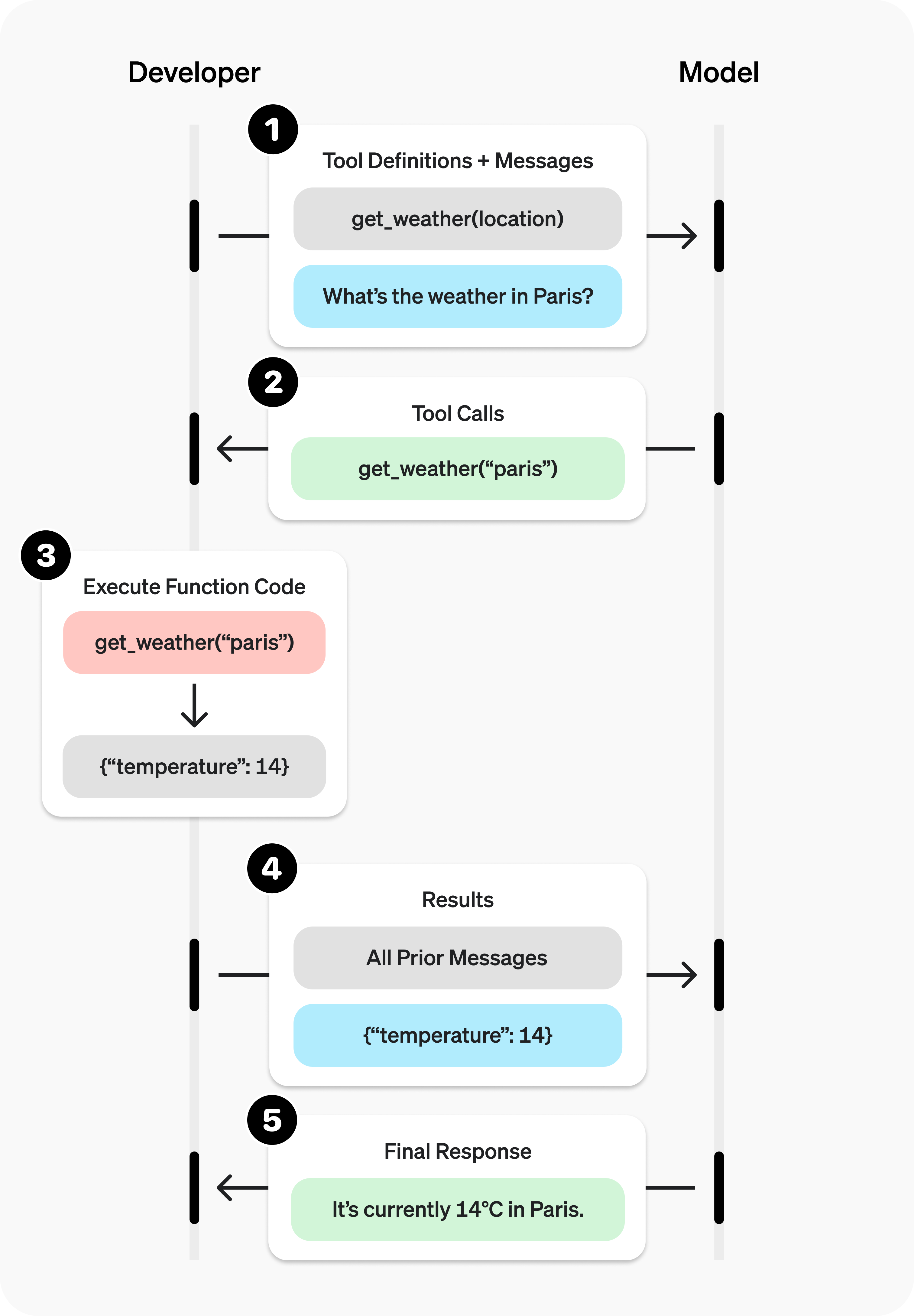
### Sample function
Let's look at the steps to allow a model to use a real `get_weather` function defined below:
Sample get\_weather function implemented in your codebase
python
```python
1
2
3
4
5
6
import requests
def get_weather(latitude, longitude):
response = requests.get(f"https://api.open-meteo.com/v1/forecast?latitude={latitude}&longitude={longitude}¤t=temperature_2m,wind_speed_10m&hourly=temperature_2m,relative_humidity_2m,wind_speed_10m")
data = response.json()
return data['current']['temperature_2m']
```
```javascript
1
2
3
4
5
async function getWeather(latitude, longitude) {
const response = await fetch(`https://api.open-meteo.com/v1/forecast?latitude=${latitude}&longitude=${longitude}¤t=temperature_2m,wind_speed_10m&hourly=temperature_2m,relative_humidity_2m,wind_speed_10m`);
const data = await response.json();
return data.current.temperature_2m;
}
```
Unlike the diagram earlier, this function expects precise `latitude` and `longitude` instead of a general `location` parameter. (However, our models can automatically determine the coordinates for many locations!)
### Function calling steps
**Call model with [functions defined](https://platform.openai.com/docs/guides/function-calling#defining-functions)** – along with your system and user messages.
Step 1: Call model with get\_weather tool defined
python
```python
1
2
3
4
5
6
7
8
9
10
11
12
13
14
15
16
17
18
19
20
21
22
23
24
25
26
27
28
29
30
from openai import OpenAI
import json
client = OpenAI()
tools = [{\
"type": "function",\
"function": {\
"name": "get_weather",\
"description": "Get current temperature for provided coordinates in celsius.",\
"parameters": {\
"type": "object",\
"properties": {\
"latitude": {"type": "number"},\
"longitude": {"type": "number"}\
},\
"required": ["latitude", "longitude"],\
"additionalProperties": False\
},\
"strict": True\
}\
}]
messages = [{"role": "user", "content": "What's the weather like in Paris today?"}]
completion = client.chat.completions.create(
model="gpt-4o",
messages=messages,
tools=tools,
)
```
```javascript
1
2
3
4
5
6
7
8
9
10
11
12
13
14
15
16
17
18
19
20
21
22
23
24
25
26
27
28
29
30
31
32
33
34
35
import { OpenAI } from "openai";
const openai = new OpenAI();
const tools = [{\
type: "function",\
function: {\
name: "get_weather",\
description: "Get current temperature for provided coordinates in celsius.",\
parameters: {\
type: "object",\
properties: {\
latitude: { type: "number" },\
longitude: { type: "number" }\
},\
required: ["latitude", "longitude"],\
additionalProperties: false\
},\
strict: true\
}\
}];
const messages = [\
{\
role: "user",\
content: "What's the weather like in Paris today?"\
}\
];
const completion = await openai.chat.completions.create({
model: "gpt-4o",
messages,
tools,
store: true,
});
```
**Model decides to call function(s)** – model returns the **name** and **input arguments**.
completion.choices\[0\].message.tool\_calls
```json
1
2
3
4
5
6
7
8
[{\
"id": "call_12345xyz",\
"type": "function",\
"function": {\
"name": "get_weather",\
"arguments": "{\"latitude\":48.8566,\"longitude\":2.3522}"\
}\
}]
```
**Execute function code** – parse the model's response and [handle function calls](https://platform.openai.com/docs/guides/function-calling#handling-function-calls).
Step 3: Execute get\_weather function
python
```python
1
2
3
4
tool_call = completion.choices[0].message.tool_calls[0]
args = json.loads(tool_call.function.arguments)
result = get_weather(args["latitude"], args["longitude"])
```
```javascript
1
2
3
4
const toolCall = completion.choices[0].message.tool_calls[0];
const args = JSON.parse(toolCall.function.arguments);
const result = await get_weather(args.latitude, args.longitude);
```
**Supply model with results** – so it can incorporate them into its final response.
Step 4: Supply result and call model again
python
```python
1
2
3
4
5
6
7
8
9
10
11
12
messages.append(completion.choices[0].message) # append model's function call message
messages.append({ # append result message
"role": "tool",
"tool_call_id": tool_call.id,
"content": str(result)
})
completion_2 = client.chat.completions.create(
model="gpt-4o",
messages=messages,
tools=tools,
)
```
```javascript
1
2
3
4
5
6
7
8
9
10
11
12
13
14
15
messages.push(completion.choices[0].message); // append model's function call message
messages.push({ // append result message
role: "tool",
tool_call_id: toolCall.id,
content: result.toString()
});
const completion2 = await openai.chat.completions.create({
model: "gpt-4o",
messages,
tools,
store: true,
});
console.log(completion2.choices[0].message.content);
```
**Model responds** – incorporating the result in its output.
completion\_2.choices\[0\].message.content
```json
"The current temperature in Paris is 14°C (57.2°F)."
```
## Defining functions
Functions can be set in the `tools` parameter of each API request inside a `function` object.
A function is defined by its schema, which informs the model what it does and what input arguments it expects. It comprises the following fields:
| Field | Description |
| --- | --- |
| `name` | The function's name (e.g. `get_weather`) |
| `description` | Details on when and how to use the function |
| `parameters` | [JSON schema](https://json-schema.org/) defining the function's input arguments |
Take a look at this example or generate your own below (or in our [Playground](https://platform.openai.com/playground)).
Generate
Example function schema
```json
1
2
3
4
5
6
7
8
9
10
11
12
13
14
15
16
17
18
19
20
21
22
23
24
25
26
27
28
29
30
{
"type": "function",
"function": {
"name": "get_weather",
"description": "Retrieves current weather for the given location.",
"parameters": {
"type": "object",
"properties": {
"location": {
"type": "string",
"description": "City and country e.g. Bogotá, Colombia"
},
"units": {
"type": "string",
"enum": [\
"celsius",\
"fahrenheit"\
],
"description": "Units the temperature will be returned in."
}
},
"required": [\
"location",\
"units"\
],
"additionalProperties": false
},
"strict": true
}
}
```
Because the `parameters` are defined by a [JSON schema](https://json-schema.org/), you can leverage many of its rich features like property types, enums, descriptions, nested objects, and, recursive objects.
(Optional) Function calling wth pydantic and zod
While we encourage you to define your function schemas directly, our SDKs have helpers to convert `pydantic` and `zod` objects into schemas. Not all `pydantic` and `zod` features are supported.
Define objects to represent function schema
python
```python
1
2
3
4
5
6
7
8
9
10
11
12
13
14
15
16
17
18
19
20
from openai import OpenAI, pydantic_function_tool
from pydantic import BaseModel, Field
client = OpenAI()
class GetWeather(BaseModel):
location: str = Field(
...,
description="City and country e.g. Bogotá, Colombia"
)
tools = [pydantic_function_tool(GetWeather)]
completion = client.chat.completions.create(
model="gpt-4o",
messages=[{"role": "user", "content": "What's the weather like in Paris today?"}],
tools=tools
)
print(completion.choices[0].message.tool_calls)
```
```javascript
1
2
3
4
5
6
7
8
9
10
11
12
13
14
15
16
17
18
19
20
21
22
23
24
25
26
import OpenAI from "openai";
import { z } from "zod";
import { zodFunction } from "openai/helpers/zod";
const openai = new OpenAI();
const GetWeatherParameters = z.object({
location: z.string().describe("City and country e.g. Bogotá, Colombia"),
});
const tools = [\
zodFunction({ name: "getWeather", parameters: GetWeatherParameters }),\
];
const messages = [\
{ role: "user", content: "What's the weather like in Paris today?" },\
];
const response = await openai.chat.completions.create({
model: "gpt-4o",
messages,
tools,
store: true,
});
console.log(response.choices[0].message.tool_calls);
```
### Best practices for defining functions
1. **Write clear and detailed function names, parameter descriptions, and instructions.**
- **Explicitly describe the purpose of the function and each parameter** (and its format), and what the output represents.
- **Use the system prompt to describe when (and when not) to use each function.** Generally, tell the model _exactly_ what to do.
- **Include examples and edge cases**, especially to rectify any recurring failures. ( **Note:** Adding examples may hurt performance for [reasoning models](https://platform.openai.com/docs/guides/reasoning).)
2. **Apply software engineering best practices.**
- **Make the functions obvious and intuitive**. ( [principle of least surprise](https://en.wikipedia.org/wiki/Principle_of_least_astonishment))
- **Use enums** and object structure to make invalid states unrepresentable. (e.g. `toggle_light(on: bool, off: bool)` allows for invalid calls)
- **Pass the intern test.** Can an intern/human correctly use the function given nothing but what you gave the model? (If not, what questions do they ask you? Add the answers to the prompt.)
3. **Offload the burden from the model and use code where possible.**
- **Don't make the model fill arguments you already know.** For example, if you already have an `order_id` based on a previous menu, don't have an `order_id` param – instead, have no params `submit_refund()` and pass the `order_id` with code.
- **Combine functions that are always called in sequence.** For example, if you always call `mark_location()` after `query_location()`, just move the marking logic into the query function call.
4. **Keep the number of functions small for higher accuracy.**
- **Evaluate your performance** with different numbers of functions.
- **Aim for fewer than 20 functions** at any one time, though this is just a soft suggestion.
5. **Leverage OpenAI resources.**
- **Generate and iterate on function schemas** in the [Playground](https://platform.openai.com/playground).
- **Consider [fine-tuning](https://platform.openai.com/docs/guides/fine-tuning) to increase function calling accuracy** for large numbers of functions or difficult tasks. ( [cookbook](https://cookbook.openai.com/examples/fine_tuning_for_function_calling))
### Token Usage
Under the hood, functions are injected into the system message in a syntax the model has been trained on. This means functions count against the model's context limit and are billed as input tokens. If you run into token limits, we suggest limiting the number of functions or the length of the descriptions you provide for function parameters.
It is also possible to use [fine-tuning](https://platform.openai.com/docs/guides/fine-tuning#fine-tuning-examples) to reduce the number of tokens used if you have many functions defined in your tools specification.
## Handling function calls
When the model calls a function, you must execute it and return the result. Since model responses can include zero, one, or multiple calls, it is best practice to assume there are several.
The response has an array of `tool_calls`, each with an `id` (used later to submit the function result) and a `function` containing a `name` and JSON-encoded `arguments`.
Sample response with multiple function calls
```json
1
2
3
4
5
6
7
8
9
10
11
12
13
14
15
16
17
18
19
20
21
22
23
24
25
26
[\
{\
"id": "call_12345xyz",\
"type": "function",\
"function": {\
"name": "get_weather",\
"arguments": "{\"location\":\"Paris, France\"}"\
}\
},\
{\
"id": "call_67890abc",\
"type": "function",\
"function": {\
"name": "get_weather",\
"arguments": "{\"location\":\"Bogotá, Colombia\"}"\
}\
},\
{\
"id": "call_99999def",\
"type": "function",\
"function": {\
"name": "send_email",\
"arguments": "{\"to\":\"bob@email.com\",\"body\":\"Hi bob\"}"\
}\
}\
]
```
Execute function calls and append results
python
```python
1
2
3
4
5
6
7
8
9
10
for tool_call in completion.choices[0].message.tool_calls:
name = tool_call.function.name
args = json.loads(tool_call.function.arguments)
result = call_function(name, args)
messages.append({
"role": "tool",
"tool_call_id": tool_call.id,
"content": result
})
```
```javascript
1
2
3
4
5
6
7
8
9
10
11
for (const toolCall of completion.choices[0].message.tool_calls) {
const name = toolCall.function.name;
const args = JSON.parse(toolCall.function.arguments);
const result = callFunction(name, args);
messages.push({
role: "tool",
tool_call_id: toolCall.id,
content: result.toString()
});
}
```
In the example above, we have a hypothetical `call_function` to route each call. Here’s a possible implementation:
Execute function calls and append results
python
```python
1
2
3
4
5
def call_function(name, args):
if name == "get_weather":
return get_weather(**args)
if name == "send_email":
return send_email(**args)
```
```javascript
1
2
3
4
5
6
7
8
const callFunction = async (name, args) => {
if (name === "get_weather") {
return getWeather(args.latitude, args.longitude);
}
if (name === "send_email") {
return sendEmail(args.to, args.body);
}
};
```
### Formatting results
A result must be a string, but the format is up to you (JSON, error codes, plain text, etc.). The model will interpret that string as needed.
If your function has no return value (e.g. `send_email`), simply return a string to indicate success or failure. (e.g. `"success"`)
### Incorporating results into response
After appending the results to your `messages`, you can send them back to the model to get a final response.
Send results back to model
python
```python
1
2
3
4
5
completion = client.chat.completions.create(
model="gpt-4o",
messages=messages,
tools=tools,
)
```
```javascript
1
2
3
4
5
6
const completion = await openai.chat.completions.create({
model: "gpt-4o",
messages,
tools,
store: true,
});
```
Final response
```json
"It's about 15°C in Paris, 18°C in Bogotá, and I've sent that email to Bob."
```
## Additional configurations
### Tool choice
By default the model will determine when and how many tools to use. You can force specific behavior with the `tool_choice` parameter.
1. **Auto:** ( _Default_) Call zero, one, or multiple functions. `tool_choice: "auto"`
2. **Required:** Call one or more functions.
`tool_choice: "required"`
3. **Forced Function:** Call exactly one specific function.
`tool_choice: {"type": "function", "function": {"name": "get_weather"}}`
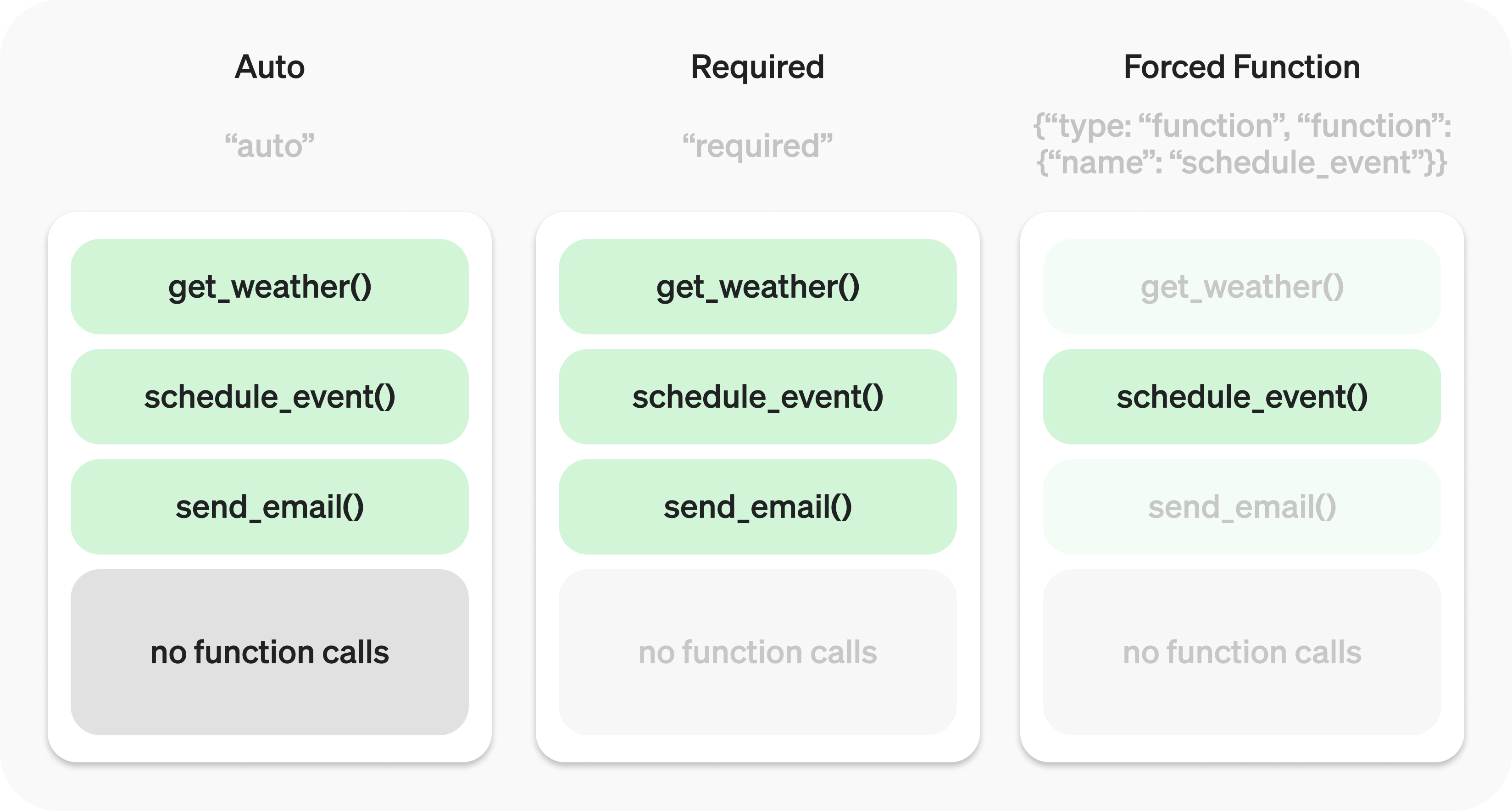
You can also set `tool_choice` to `"none"` to imitate the behavior of passing no functions.
### Parallel function calling
The model may choose to call multiple functions in a single turn. You can prevent this by setting `parallel_tool_calls` to `false`, which ensures exactly zero or one tool is called.
**Note:** Currently, if the model calls multiple functions in one turn then [strict mode](https://platform.openai.com/docs/guides/function-calling#strict-mode) will be disabled for those calls.
### Strict mode
Setting `strict` to `true` will ensure function calls reliably adhere to the function schema, instead of being best effort. We recommend always enabling strict mode.
Under the hood, strict mode works by leveraging our [structured outputs](https://platform.openai.com/docs/guides/structured-outputs) feature and therefore introduces a couple requirements:
1. `additionalProperties` must be set to `false` for each object in the `parameters`.
2. All fields in `properties` must be marked as `required`.
You can denote optional fields by adding `null` as a `type` option (see example below).
Strict mode enabledStrict mode enabledStrict mode disabledStrict mode disabled
Strict mode enabled
```json
1
2
3
4
5
6
7
8
9
10
11
12
13
14
15
16
17
18
19
20
21
22
23
24
{
"type": "function",
"function": {
"name": "get_weather",
"description": "Retrieves current weather for the given location.",
"strict": true,
"parameters": {
"type": "object",
"properties": {
"location": {
"type": "string",
"description": "City and country e.g. Bogotá, Colombia"
},
"units": {
"type": ["string", "null"],
"enum": ["celsius", "fahrenheit"],
"description": "Units the temperature will be returned in."
}
},
"required": ["location", "units"],
"additionalProperties": false
}
}
}
```
Strict mode disabled
```json
1
2
3
4
5
6
7
8
9
10
11
12
13
14
15
16
17
18
19
20
21
22
{
"type": "function",
"function": {
"name": "get_weather",
"description": "Retrieves current weather for the given location.",
"parameters": {
"type": "object",
"properties": {
"location": {
"type": "string",
"description": "City and country e.g. Bogotá, Colombia"
},
"units": {
"type": "string",
"enum": ["celsius", "fahrenheit"],
"description": "Units the temperature will be returned in."
}
},
"required": ["location"],
}
}
}
```
All schemas generated in the [playground](https://platform.openai.com/playground) have strict mode enabled.
While we recommend you enable strict mode, it has a few limitations:
1. Some features of JSON schema are not supported. (See [supported schemas](https://platform.openai.com/docs/guides/structured-outputs?context=with_parse#supported-schemas).)
2. Schemas undergo additional processing on the first request (and are then cached). If your schemas vary from request to request, this may result in higher latencies.
3. Schemas are cached for performance, and are not eligible for [zero data retention](https://platform.openai.com/docs/models#how-we-use-your-data).
## Streaming
Streaming can be used to surface progress by showing which function is called as the model fills its arguments, and even displaying the arguments in real time.
Streaming function calls is very similar to streaming regular responses: you set `stream` to `true` and get chunks with `delta` objects.
Streaming function calls
python
```python
1
2
3
4
5
6
7
8
9
10
11
12
13
14
15
16
17
18
19
20
21
22
23
24
25
26
27
28
29
30
31
32
33
34
from openai import OpenAI
client = OpenAI()
tools = [{\
"type": "function",\
"function": {\
"name": "get_weather",\
"description": "Get current temperature for a given location.",\
"parameters": {\
"type": "object",\
"properties": {\
"location": {\
"type": "string",\
"description": "City and country e.g. Bogotá, Colombia"\
}\
},\
"required": ["location"],\
"additionalProperties": False\
},\
"strict": True\
}\
}]
stream = client.chat.completions.create(
model="gpt-4o",
messages=[{"role": "user", "content": "What's the weather like in Paris today?"}],
tools=tools,
stream=True
)
for chunk in stream:
delta = chunk.choices[0].delta
print(delta.tool_calls)
```
```javascript
1
2
3
4
5
6
7
8
9
10
11
12
13
14
15
16
17
18
19
20
21
22
23
24
25
26
27
28
29
30
31
32
33
34
35
36
import { OpenAI } from "openai";
const openai = new OpenAI();
const tools = [{\
"type": "function",\
"function": {\
"name": "get_weather",\
"description": "Get current temperature for a given location.",\
"parameters": {\
"type": "object",\
"properties": {\
"location": {\
"type": "string",\
"description": "City and country e.g. Bogotá, Colombia"\
}\
},\
"required": ["location"],\
"additionalProperties": false\
},\
"strict": true\
}\
}];
const stream = await openai.chat.completions.create({
model: "gpt-4o",
messages: [{ role: "user", content: "What's the weather like in Paris today?" }],
tools,
stream: true,
store: true,
});
for await (const chunk of stream) {
const delta = chunk.choices[0].delta;
console.log(delta.tool_calls);
}
```
Output delta.tool\_calls
```json
1
2
3
4
5
6
7
8
9
[{"index": 0, "id": "call_DdmO9pD3xa9XTPNJ32zg2hcA", "function": {"arguments": "", "name": "get_weather"}, "type": "function"}]
[{"index": 0, "id": null, "function": {"arguments": "{\"", "name": null}, "type": null}]
[{"index": 0, "id": null, "function": {"arguments": "location", "name": null}, "type": null}]
[{"index": 0, "id": null, "function": {"arguments": "\":\"", "name": null}, "type": null}]
[{"index": 0, "id": null, "function": {"arguments": "Paris", "name": null}, "type": null}]
[{"index": 0, "id": null, "function": {"arguments": ",", "name": null}, "type": null}]
[{"index": 0, "id": null, "function": {"arguments": " France", "name": null}, "type": null}]
[{"index": 0, "id": null, "function": {"arguments": "\"}", "name": null}, "type": null}]
null
```
Instead of aggregating chunks into a single `content` string, however, you're aggregating chunks into an encoded `arguments` JSON object.
When the model calls one or more functions the `tool_calls` field of each `delta` will be populated. Each `tool_call` contains the following fields:
| Field | Description |
| --- | --- |
| `index` | Identifies which function call the `delta` is for |
| `id` | Tool call id. |
| `function` | Function call delta ( `name` and `arguments`) |
| `type` | Type of `tool_call` (always `function` for function calls) |
Many of these fields are only set for the first `delta` of each tool call, like `id`, `function.name`, and `type`.
Below is a code snippet demonstrating how to aggregate the `delta` s into a final `tool_calls` object.
Accumulating tool\_call deltas
python
```python
1
2
3
4
5
6
7
8
9
10
final_tool_calls = {}
for chunk in stream:
for tool_call in chunk.choices[0].delta.tool_calls or []:
index = tool_call.index
if index not in final_tool_calls:
final_tool_calls[index] = tool_call
final_tool_calls[index].function.arguments += tool_call.function.arguments
```
```javascript
1
2
3
4
5
6
7
8
9
10
11
12
13
14
const finalToolCalls = {};
for await (const chunk of stream) {
const toolCalls = chunk.choices[0].delta.tool_calls || [];
for (const toolCall of toolCalls) {
const { index } = toolCall;
if (!finalToolCalls[index]) {
finalToolCalls[index] = toolCall;
}
finalToolCalls[index].function.arguments += toolCall.function.arguments;
}
}
```
Accumulated final\_tool\_calls\[0\]
```json
1
2
3
4
5
6
7
8
{
"index": 0,
"id": "call_RzfkBpJgzeR0S242qfvjadNe",
"function": {
"name": "get_weather",
"arguments": "{\"location\":\"Paris, France\"}"
}
}
```
================================================
FILE: ai_docs/python_anthropic.md
================================================
[Anthropic home page](https://docs.anthropic.com/)
English
Search...
Ctrl K
Search...
Navigation
Build with Claude
Tool use (function calling)
[Welcome](https://docs.anthropic.com/en/home) [User Guides](https://docs.anthropic.com/en/docs/welcome) [API Reference](https://docs.anthropic.com/en/api/getting-started) [Prompt Library](https://docs.anthropic.com/en/prompt-library/library) [Release Notes](https://docs.anthropic.com/en/release-notes/overview) [Developer Newsletter](https://docs.anthropic.com/en/developer-newsletter/overview)
Claude is capable of interacting with external client-side tools and functions, allowing you to equip Claude with your own custom tools to perform a wider variety of tasks.
Learn everything you need to master tool use with Claude via our new
comprehensive [tool use\\
course](https://github.com/anthropics/courses/tree/master/tool_use)! Please
continue to share your ideas and suggestions using this
[form](https://forms.gle/BFnYc6iCkWoRzFgk7).
Here’s an example of how to provide tools to Claude using the Messages API:
Shell
Python
Copy
```bash
curl https://api.anthropic.com/v1/messages \
-H "content-type: application/json" \
-H "x-api-key: $ANTHROPIC_API_KEY" \
-H "anthropic-version: 2023-06-01" \
-d '{
"model": "claude-3-5-sonnet-20241022",
"max_tokens": 1024,
"tools": [\
{\
"name": "get_weather",\
"description": "Get the current weather in a given location",\
"input_schema": {\
"type": "object",\
"properties": {\
"location": {\
"type": "string",\
"description": "The city and state, e.g. San Francisco, CA"\
}\
},\
"required": ["location"]\
}\
}\
],
"messages": [\
{\
"role": "user",\
"content": "What is the weather like in San Francisco?"\
}\
]
}'
```
* * *
## [](https://docs.anthropic.com/en/docs/build-with-claude/tool-use\#how-tool-use-works) How tool use works
Integrate external tools with Claude in these steps:
1
Provide Claude with tools and a user prompt
- Define tools with names, descriptions, and input schemas in your API request.
- Include a user prompt that might require these tools, e.g., “What’s the weather in San Francisco?”
2
Claude decides to use a tool
- Claude assesses if any tools can help with the user’s query.
- If yes, Claude constructs a properly formatted tool use request.
- The API response has a `stop_reason` of `tool_use`, signaling Claude’s intent.
3
Extract tool input, run code, and return results
- On your end, extract the tool name and input from Claude’s request.
- Execute the actual tool code client-side.
- Continue the conversation with a new `user` message containing a `tool_result` content block.
4
Claude uses tool result to formulate a response
- Claude analyzes the tool results to craft its final response to the original user prompt.
Note: Steps 3 and 4 are optional. For some workflows, Claude’s tool use request (step 2) might be all you need, without sending results back to Claude.
**Tools are user-provided**
It’s important to note that Claude does not have access to any built-in server-side tools. All tools must be explicitly provided by you, the user, in each API request. This gives you full control and flexibility over the tools Claude can use.
The [computer use (beta)](https://docs.anthropic.com/en/docs/build-with-claude/computer-use) functionality is an exception - it introduces tools that are provided by Anthropic but implemented by you, the user.
* * *
## [](https://docs.anthropic.com/en/docs/build-with-claude/tool-use\#how-to-implement-tool-use) How to implement tool use
### [](https://docs.anthropic.com/en/docs/build-with-claude/tool-use\#choosing-a-model) Choosing a model
Generally, use Claude 3.5 Sonnet or Claude 3 Opus for complex tools and ambiguous queries; they handle multiple tools better and seek clarification when needed.
Use Claude 3.5 Haiku or Claude 3 Haiku for straightforward tools, but note they may infer missing parameters.
### [](https://docs.anthropic.com/en/docs/build-with-claude/tool-use\#specifying-tools) Specifying tools
Tools are specified in the `tools` top-level parameter of the API request. Each tool definition includes:
| Parameter | Description |
| --- | --- |
| `name` | The name of the tool. Must match the regex `^[a-zA-Z0-9_-]{1,64}$`. |
| `description` | A detailed plaintext description of what the tool does, when it should be used, and how it behaves. |
| `input_schema` | A [JSON Schema](https://json-schema.org/) object defining the expected parameters for the tool. |
Example simple tool definition
JSON
Copy
```JSON
{
"name": "get_weather",
"description": "Get the current weather in a given location",
"input_schema": {
"type": "object",
"properties": {
"location": {
"type": "string",
"description": "The city and state, e.g. San Francisco, CA"
},
"unit": {
"type": "string",
"enum": ["celsius", "fahrenheit"],
"description": "The unit of temperature, either 'celsius' or 'fahrenheit'"
}
},
"required": ["location"]
}
}
```
This tool, named `get_weather`, expects an input object with a required `location` string and an optional `unit` string that must be either “celsius” or “fahrenheit”.
#### [](https://docs.anthropic.com/en/docs/build-with-claude/tool-use\#tool-use-system-prompt) Tool use system prompt
When you call the Anthropic API with the `tools` parameter, we construct a special system prompt from the tool definitions, tool configuration, and any user-specified system prompt. The constructed prompt is designed to instruct the model to use the specified tool(s) and provide the necessary context for the tool to operate properly:
Copy
```
In this environment you have access to a set of tools you can use to answer the user's question.
{{ FORMATTING INSTRUCTIONS }}
String and scalar parameters should be specified as is, while lists and objects should use JSON format. Note that spaces for string values are not stripped. The output is not expected to be valid XML and is parsed with regular expressions.
Here are the functions available in JSONSchema format:
{{ TOOL DEFINITIONS IN JSON SCHEMA }}
{{ USER SYSTEM PROMPT }}
{{ TOOL CONFIGURATION }}
```
#### [](https://docs.anthropic.com/en/docs/build-with-claude/tool-use\#best-practices-for-tool-definitions) Best practices for tool definitions
To get the best performance out of Claude when using tools, follow these guidelines:
- **Provide extremely detailed descriptions.** This is by far the most important factor in tool performance. Your descriptions should explain every detail about the tool, including:
- What the tool does
- When it should be used (and when it shouldn’t)
- What each parameter means and how it affects the tool’s behavior
- Any important caveats or limitations, such as what information the tool does not return if the tool name is unclear. The more context you can give Claude about your tools, the better it will be at deciding when and how to use them. Aim for at least 3-4 sentences per tool description, more if the tool is complex.
- **Prioritize descriptions over examples.** While you can include examples of how to use a tool in its description or in the accompanying prompt, this is less important than having a clear and comprehensive explanation of the tool’s purpose and parameters. Only add examples after you’ve fully fleshed out the description.
Example of a good tool description
JSON
Copy
```JSON
{
"name": "get_stock_price",
"description": "Retrieves the current stock price for a given ticker symbol. The ticker symbol must be a valid symbol for a publicly traded company on a major US stock exchange like NYSE or NASDAQ. The tool will return the latest trade price in USD. It should be used when the user asks about the current or most recent price of a specific stock. It will not provide any other information about the stock or company.",
"input_schema": {
"type": "object",
"properties": {
"ticker": {
"type": "string",
"description": "The stock ticker symbol, e.g. AAPL for Apple Inc."
}
},
"required": ["ticker"]
}
}
```
Example poor tool description
JSON
Copy
```JSON
{
"name": "get_stock_price",
"description": "Gets the stock price for a ticker.",
"input_schema": {
"type": "object",
"properties": {
"ticker": {
"type": "string"
}
},
"required": ["ticker"]
}
}
```
The good description clearly explains what the tool does, when to use it, what data it returns, and what the `ticker` parameter means. The poor description is too brief and leaves Claude with many open questions about the tool’s behavior and usage.
### [](https://docs.anthropic.com/en/docs/build-with-claude/tool-use\#controlling-claudes-output) Controlling Claude’s output
#### [](https://docs.anthropic.com/en/docs/build-with-claude/tool-use\#forcing-tool-use) Forcing tool use
In some cases, you may want Claude to use a specific tool to answer the user’s question, even if Claude thinks it can provide an answer without using a tool. You can do this by specifying the tool in the `tool_choice` field like so:
Copy
```
tool_choice = {"type": "tool", "name": "get_weather"}
```
When working with the tool\_choice parameter, we have three possible options:
- `auto` allows Claude to decide whether to call any provided tools or not. This is the default value.
- `any` tells Claude that it must use one of the provided tools, but doesn’t force a particular tool.
- `tool` allows us to force Claude to always use a particular tool.
This diagram illustrates how each option works:

Note that when you have `tool_choice` as `any` or `tool`, we will prefill the assistant message to force a tool to be used. This means that the models will not emit a chain-of-thought `text` content block before `tool_use` content blocks, even if explicitly asked to do so.
Our testing has shown that this should not reduce performance. If you would like to keep chain-of-thought (particularly with Opus) while still requesting that the model use a specific tool, you can use `{"type": "auto"}` for `tool_choice` (the default) and add explicit instructions in a `user` message. For example: `What's the weather like in London? Use the get_weather tool in your response.`
#### [](https://docs.anthropic.com/en/docs/build-with-claude/tool-use\#json-output) JSON output
Tools do not necessarily need to be client-side functions — you can use tools anytime you want the model to return JSON output that follows a provided schema. For example, you might use a `record_summary` tool with a particular schema. See [tool use examples](https://docs.anthropic.com/en/docs/build-with-claude/tool-use#json-mode) for a full working example.
#### [](https://docs.anthropic.com/en/docs/build-with-claude/tool-use\#chain-of-thought) Chain of thought
When using tools, Claude will often show its “chain of thought”, i.e. the step-by-step reasoning it uses to break down the problem and decide which tools to use. The Claude 3 Opus model will do this if `tool_choice` is set to `auto` (this is the default value, see [Forcing tool use](https://docs.anthropic.com/en/docs/build-with-claude/tool-use#forcing-tool-use)), and Sonnet and Haiku can be prompted into doing it.
For example, given the prompt “What’s the weather like in San Francisco right now, and what time is it there?”, Claude might respond with:
JSON
Copy
```JSON
{
"role": "assistant",
"content": [\
{\
"type": "text",\
"text": "<thinking>To answer this question, I will: 1. Use the get_weather tool to get the current weather in San Francisco. 2. Use the get_time tool to get the current time in the America/Los_Angeles timezone, which covers San Francisco, CA.</thinking>"\
},\
{\
"type": "tool_use",\
"id": "toolu_01A09q90qw90lq917835lq9",\
"name": "get_weather",\
"input": {"location": "San Francisco, CA"}\
}\
]
}
```
This chain of thought gives insight into Claude’s reasoning process and can help you debug unexpected behavior.
With the Claude 3 Sonnet model, chain of thought is less common by default, but you can prompt Claude to show its reasoning by adding something like `"Before answering, explain your reasoning step-by-step in tags."` to the user message or system prompt.
It’s important to note that while the `<thinking>` tags are a common convention Claude uses to denote its chain of thought, the exact format (such as what this XML tag is named) may change over time. Your code should treat the chain of thought like any other assistant-generated text, and not rely on the presence or specific formatting of the `<thinking>` tags.
#### [](https://docs.anthropic.com/en/docs/build-with-claude/tool-use\#disabling-parallel-tool-use) Disabling parallel tool use
By default, Claude may use multiple tools to answer a user query. You can disable this behavior by setting `disable_parallel_tool_use=true` in the `tool_choice` field.
- When `tool_choice` type is `auto`, this ensures that Claude uses **at most one** tool
- When `tool_choice` type is `any` or `tool`, this ensures that Claude uses **exactly one** tool
### [](https://docs.anthropic.com/en/docs/build-with-claude/tool-use\#handling-tool-use-and-tool-result-content-blocks) Handling tool use and tool result content blocks
When Claude decides to use one of the tools you’ve provided, it will return a response with a `stop_reason` of `tool_use` and one or more `tool_use` content blocks in the API response that include:
- `id`: A unique identifier for this particular tool use block. This will be used to match up the tool results later.
- `name`: The name of the tool being used.
- `input`: An object containing the input being passed to the tool, conforming to the tool’s `input_schema`.
Example API response with a \`tool\_use\` content block
JSON
Copy
```JSON
{
"id": "msg_01Aq9w938a90dw8q",
"model": "claude-3-5-sonnet-20241022",
"stop_reason": "tool_use",
"role": "assistant",
"content": [\
{\
"type": "text",\
"text": "<thinking>I need to use the get_weather, and the user wants SF, which is likely San Francisco, CA.</thinking>"\
},\
{\
"type": "tool_use",\
"id": "toolu_01A09q90qw90lq917835lq9",\
"name": "get_weather",\
"input": {"location": "San Francisco, CA", "unit": "celsius"}\
}\
]
}
```
When you receive a tool use response, you should:
1. Extract the `name`, `id`, and `input` from the `tool_use` block.
2. Run the actual tool in your codebase corresponding to that tool name, passing in the tool `input`.
3. Continue the conversation by sending a new message with the `role` of `user`, and a `content` block containing the `tool_result` type and the following information:
- `tool_use_id`: The `id` of the tool use request this is a result for.
- `content`: The result of the tool, as a string (e.g. `"content": "15 degrees"`) or list of nested content blocks (e.g. `"content": [{"type": "text", "text": "15 degrees"}]`). These content blocks can use the `text` or `image` types.
- `is_error` (optional): Set to `true` if the tool execution resulted in an error.
Example of successful tool result
JSON
Copy
```JSON
{
"role": "user",
"content": [\
{\
"type": "tool_result",\
"tool_use_id": "toolu_01A09q90qw90lq917835lq9",\
"content": "15 degrees"\
}\
]
}
```
Example of tool result with images
JSON
Copy
```JSON
{
"role": "user",
"content": [\
{\
"type": "tool_result",\
"tool_use_id": "toolu_01A09q90qw90lq917835lq9",\
"content": [\
{"type": "text", "text": "15 degrees"},\
{\
"type": "image",\
"source": {\
"type": "base64",\
"media_type": "image/jpeg",\
"data": "/9j/4AAQSkZJRg...",\
}\
}\
]\
}\
]
}
```
Example of empty tool result
JSON
Copy
```JSON
{
"role": "user",
"content": [\
{\
"type": "tool_result",\
"tool_use_id": "toolu_01A09q90qw90lq917835lq9",\
}\
]
}
```
After receiving the tool result, Claude will use that information to continue generating a response to the original user prompt.
**Differences from other APIs**
Unlike APIs that separate tool use or use special roles like `tool` or `function`, Anthropic’s API integrates tools directly into the `user` and `assistant` message structure.
Messages contain arrays of `text`, `image`, `tool_use`, and `tool_result` blocks. `user` messages include client-side content and `tool_result`, while `assistant` messages contain AI-generated content and `tool_use`.
### [](https://docs.anthropic.com/en/docs/build-with-claude/tool-use\#troubleshooting-errors) Troubleshooting errors
There are a few different types of errors that can occur when using tools with Claude:
Tool execution error
If the tool itself throws an error during execution (e.g. a network error when fetching weather data), you can return the error message in the `content` along with `"is_error": true`:
JSON
Copy
```JSON
{
"role": "user",
"content": [\
{\
"type": "tool_result",\
"tool_use_id": "toolu_01A09q90qw90lq917835lq9",\
"content": "ConnectionError: the weather service API is not available (HTTP 500)",\
"is_error": true\
}\
]
}
```
Claude will then incorporate this error into its response to the user, e.g. “I’m sorry, I was unable to retrieve the current weather because the weather service API is not available. Please try again later.”
Max tokens exceeded
If Claude’s response is cut off due to hitting the `max_tokens` limit, and the truncated response contains an incomplete tool use block, you’ll need to retry the request with a higher `max_tokens` value to get the full tool use.
Invalid tool name
If Claude’s attempted use of a tool is invalid (e.g. missing required parameters), it usually means that the there wasn’t enough information for Claude to use the tool correctly. Your best bet during development is to try the request again with more-detailed `description` values in your tool definitions.
However, you can also continue the conversation forward with a `tool_result` that indicates the error, and Claude will try to use the tool again with the missing information filled in:
JSON
Copy
```JSON
{
"role": "user",
"content": [\
{\
"type": "tool_result",\
"tool_use_id": "toolu_01A09q90qw90lq917835lq9",\
"content": "Error: Missing required 'location' parameter",\
"is_error": true\
}\
]
}
```
If a tool request is invalid or missing parameters, Claude will retry 2-3 times with corrections before apologizing to the user.
<search\_quality\_reflection> tags
To prevent Claude from reflecting on search quality with <search\_quality\_reflection> tags, add “Do not reflect on the quality of the returned search results in your response” to your prompt.
* * *
## [](https://docs.anthropic.com/en/docs/build-with-claude/tool-use\#tool-use-examples) Tool use examples
Here are a few code examples demonstrating various tool use patterns and techniques. For brevity’s sake, the tools are simple tools, and the tool descriptions are shorter than would be ideal to ensure best performance.
Single tool example
Shell
Python
Copy
```bash
curl https://api.anthropic.com/v1/messages \
--header "x-api-key: $ANTHROPIC_API_KEY" \
--header "anthropic-version: 2023-06-01" \
--header "content-type: application/json" \
--data \
'{
"model": "claude-3-5-sonnet-20241022",
"max_tokens": 1024,
"tools": [{\
"name": "get_weather",\
"description": "Get the current weather in a given location",\
"input_schema": {\
"type": "object",\
"properties": {\
"location": {\
"type": "string",\
"description": "The city and state, e.g. San Francisco, CA"\
},\
"unit": {\
"type": "string",\
"enum": ["celsius", "fahrenheit"],\
"description": "The unit of temperature, either \"celsius\" or \"fahrenheit\""\
}\
},\
"required": ["location"]\
}\
}],
"messages": [{"role": "user", "content": "What is the weather like in San Francisco?"}]
}'
```
Claude will return a response similar to:
JSON
Copy
```JSON
{
"id": "msg_01Aq9w938a90dw8q",
"model": "claude-3-5-sonnet-20241022",
"stop_reason": "tool_use",
"role": "assistant",
"content": [\
{\
"type": "text",\
"text": "<thinking>I need to call the get_weather function, and the user wants SF, which is likely San Francisco, CA.</thinking>"\
},\
{\
"type": "tool_use",\
"id": "toolu_01A09q90qw90lq917835lq9",\
"name": "get_weather",\
"input": {"location": "San Francisco, CA", "unit": "celsius"}\
}\
]
}
```
You would then need to execute the `get_weather` function with the provided input, and return the result in a new `user` message:
Shell
Python
Copy
```bash
curl https://api.anthropic.com/v1/messages \
--header "x-api-key: $ANTHROPIC_API_KEY" \
--header "anthropic-version: 2023-06-01" \
--header "content-type: application/json" \
--data \
'{
"model": "claude-3-5-sonnet-20241022",
"max_tokens": 1024,
"tools": [\
{\
"name": "get_weather",\
"description": "Get the current weather in a given location",\
"input_schema": {\
"type": "object",\
"properties": {\
"location": {\
"type": "string",\
"description": "The city and state, e.g. San Francisco, CA"\
},\
"unit": {\
"type": "string",\
"enum": ["celsius", "fahrenheit"],\
"description": "The unit of temperature, either \"celsius\" or \"fahrenheit\""\
}\
},\
"required": ["location"]\
}\
}\
],
"messages": [\
{\
"role": "user",\
"content": "What is the weather like in San Francisco?"\
},\
{\
"role": "assistant",\
"content": [\
{\
"type": "text",\
"text": "<thinking>I need to use get_weather, and the user wants SF, which is likely San Francisco, CA.</thinking>"\
},\
{\
"type": "tool_use",\
"id": "toolu_01A09q90qw90lq917835lq9",\
"name": "get_weather",\
"input": {\
"location": "San Francisco, CA",\
"unit": "celsius"\
}\
}\
]\
},\
{\
"role": "user",\
"content": [\
{\
"type": "tool_result",\
"tool_use_id": "toolu_01A09q90qw90lq917835lq9",\
"content": "15 degrees"\
}\
]\
}\
]
}'
```
This will print Claude’s final response, incorporating the weather data:
JSON
Copy
```JSON
{
"id": "msg_01Aq9w938a90dw8q",
"model": "claude-3-5-sonnet-20241022",
"stop_reason": "stop_sequence",
"role": "assistant",
"content": [\
{\
"type": "text",\
"text": "The current weather in San Francisco is 15 degrees Celsius (59 degrees Fahrenheit). It's a cool day in the city by the bay!"\
}\
]
}
```
Multiple tool example
You can provide Claude with multiple tools to choose from in a single request. Here’s an example with both a `get_weather` and a `get_time` tool, along with a user query that asks for both.
Shell
Python
Copy
```bash
curl https://api.anthropic.com/v1/messages \
--header "x-api-key: $ANTHROPIC_API_KEY" \
--header "anthropic-version: 2023-06-01" \
--header "content-type: application/json" \
--data \
'{
"model": "claude-3-5-sonnet-20241022",
"max_tokens": 1024,
"tools": [{\
"name": "get_weather",\
"description": "Get the current weather in a given location",\
"input_schema": {\
"type": "object",\
"properties": {\
"location": {\
"type": "string",\
"description": "The city and state, e.g. San Francisco, CA"\
},\
"unit": {\
"type": "string",\
"enum": ["celsius", "fahrenheit"],\
"description": "The unit of temperature, either 'celsius' or 'fahrenheit'"\
}\
},\
"required": ["location"]\
}\
},\
{\
"name": "get_time",\
"description": "Get the current time in a given time zone",\
"input_schema": {\
"type": "object",\
"properties": {\
"timezone": {\
"type": "string",\
"description": "The IANA time zone name, e.g. America/Los_Angeles"\
}\
},\
"required": ["timezone"]\
}\
}],
"messages": [{\
"role": "user",\
"content": "What is the weather like right now in New York? Also what time is it there?"\
}]
}'
```
In this case, Claude will most likely try to use two separate tools, one at a time — `get_weather` and then `get_time` — in order to fully answer the user’s question. However, it will also occasionally output two `tool_use` blocks at once, particularly if they are not dependent on each other. You would need to execute each tool and return their results in separate `tool_result` blocks within a single `user` message.
Missing information
If the user’s prompt doesn’t include enough information to fill all the required parameters for a tool, Claude 3 Opus is much more likely to recognize that a parameter is missing and ask for it. Claude 3 Sonnet may ask, especially when prompted to think before outputting a tool request. But it may also do its best to infer a reasonable value.
For example, using the `get_weather` tool above, if you ask Claude “What’s the weather?” without specifying a location, Claude, particularly Claude 3 Sonnet, may make a guess about tools inputs:
JSON
Copy
```JSON
{
"type": "tool_use",
"id": "toolu_01A09q90qw90lq917835lq9",
"name": "get_weather",
"input": {"location": "New York, NY", "unit": "fahrenheit"}
}
```
This behavior is not guaranteed, especially for more ambiguous prompts and for models less intelligent than Claude 3 Opus. If Claude 3 Opus doesn’t have enough context to fill in the required parameters, it is far more likely respond with a clarifying question instead of making a tool call.
Sequential tools
Some tasks may require calling multiple tools in sequence, using the output of one tool as the input to another. In such a case, Claude will call one tool at a time. If prompted to call the tools all at once, Claude is likely to guess parameters for tools further downstream if they are dependent on tool results for tools further upstream.
Here’s an example of using a `get_location` tool to get the user’s location, then passing that location to the `get_weather` tool:
Shell
Python
Copy
```bash
curl https://api.anthropic.com/v1/messages \
--header "x-api-key: $ANTHROPIC_API_KEY" \
--header "anthropic-version: 2023-06-01" \
--header "content-type: application/json" \
--data \
'{
"model": "claude-3-5-sonnet-20241022",
"max_tokens": 1024,
"tools": [\
{\
"name": "get_location",\
"description": "Get the current user location based on their IP address. This tool has no parameters or arguments.",\
"input_schema": {\
"type": "object",\
"properties": {}\
}\
},\
{\
"name": "get_weather",\
"description": "Get the current weather in a given location",\
"input_schema": {\
"type": "object",\
"properties": {\
"location": {\
"type": "string",\
"description": "The city and state, e.g. San Francisco, CA"\
},\
"unit": {\
"type": "string",\
"enum": ["celsius", "fahrenheit"],\
"description": "The unit of temperature, either 'celsius' or 'fahrenheit'"\
}\
},\
"required": ["location"]\
}\
}\
],
"messages": [{\
"role": "user",\
"content": "What is the weather like where I am?"\
}]
}'
```
In this case, Claude would first call the `get_location` tool to get the user’s location. After you return the location in a `tool_result`, Claude would then call `get_weather` with that location to get the final answer.
The full conversation might look like:
| Role | Content |
| --- | --- |
| User | What’s the weather like where I am? |
| Assistant | <thinking>To answer this, I first need to determine the user’s location using the get\_location tool. Then I can pass that location to the get\_weather tool to find the current weather there.</thinking>\[Tool use for get\_location\] |
| User | \[Tool result for get\_location with matching id and result of San Francisco, CA\] |
| Assistant | \[Tool use for get\_weather with the following input\]{ “location”: “San Francisco, CA”, “unit”: “fahrenheit” } |
| User | \[Tool result for get\_weather with matching id and result of “59°F (15°C), mostly cloudy”\] |
| Assistant | Based on your current location in San Francisco, CA, the weather right now is 59°F (15°C) and mostly cloudy. It’s a fairly cool and overcast day in the city. You may want to bring a light jacket if you’re heading outside. |
This example demonstrates how Claude can chain together multiple tool calls to answer a question that requires gathering data from different sources. The key steps are:
1. Claude first realizes it needs the user’s location to answer the weather question, so it calls the `get_location` tool.
2. The user (i.e. the client code) executes the actual `get_location` function and returns the result “San Francisco, CA” in a `tool_result` block.
3. With the location now known, Claude proceeds to call the `get_weather` tool, passing in “San Francisco, CA” as the `location` parameter (as well as a guessed `unit` parameter, as `unit` is not a required parameter).
4. The user again executes the actual `get_weather` function with the provided arguments and returns the weather data in another `tool_result` block.
5. Finally, Claude incorporates the weather data into a natural language response to the original question.
Chain of thought tool use
By default, Claude 3 Opus is prompted to think before it answers a tool use query to best determine whether a tool is necessary, which tool to use, and the appropriate parameters. Claude 3 Sonnet and Claude 3 Haiku are prompted to try to use tools as much as possible and are more likely to call an unnecessary tool or infer missing parameters. To prompt Sonnet or Haiku to better assess the user query before making tool calls, the following prompt can be used:
Chain of thought prompt
`Answer the user's request using relevant tools (if they are available). Before calling a tool, do some analysis within \<thinking>\</thinking> tags. First, think about which of the provided tools is the relevant tool to answer the user's request. Second, go through each of the required parameters of the relevant tool and determine if the user has directly provided or given enough information to infer a value. When deciding if the parameter can be inferred, carefully consider all the context to see if it supports a specific value. If all of the required parameters are present or can be reasonably inferred, close the thinking tag and proceed with the tool call. BUT, if one of the values for a required parameter is missing, DO NOT invoke the function (not even with fillers for the missing params) and instead, ask the user to provide the missing parameters. DO NOT ask for more information on optional parameters if it is not provided. `
JSON mode
You can use tools to get Claude produce JSON output that follows a schema, even if you don’t have any intention of running that output through a tool or function.
When using tools in this way:
- You usually want to provide a **single** tool
- You should set `tool_choice` (see [Forcing tool use](https://docs.anthropic.com/en/docs/tool-use#forcing-tool-use)) to instruct the model to explicitly use that tool
- Remember that the model will pass the `input` to the tool, so the name of the tool and description should be from the model’s perspective.
The following uses a `record_summary` tool to describe an image following a particular format.
Shell
Python
Copy
```bash
#!/bin/bash
IMAGE_URL="https://upload.wikimedia.org/wikipedia/commons/a/a7/Camponotus_flavomarginatus_ant.jpg"
IMAGE_MEDIA_TYPE="image/jpeg"
IMAGE_BASE64=$(curl "$IMAGE_URL" | base64)
curl https://api.anthropic.com/v1/messages \
--header "content-type: application/json" \
--header "x-api-key: $ANTHROPIC_API_KEY" \
--header "anthropic-version: 2023-06-01" \
--data \
'{
"model": "claude-3-5-sonnet-latest",
"max_tokens": 1024,
"tools": [{\
"name": "record_summary",\
"description": "Record summary of an image using well-structured JSON.",\
"input_schema": {\
"type": "object",\
"properties": {\
"key_colors": {\
"type": "array",\
"items": {\
"type": "object",\
"properties": {\
"r": { "type": "number", "description": "red value [0.0, 1.0]" },\
"g": { "type": "number", "description": "green value [0.0, 1.0]" },\
"b": { "type": "number", "description": "blue value [0.0, 1.0]" },\
"name": { "type": "string", "description": "Human-readable color name in snake_case, e.g. \"olive_green\" or \"turquoise\"" }\
},\
"required": [ "r", "g", "b", "name" ]\
},\
"description": "Key colors in the image. Limit to less then four."\
},\
"description": {\
"type": "string",\
"description": "Image description. One to two sentences max."\
},\
"estimated_year": {\
"type": "integer",\
"description": "Estimated year that the images was taken, if is it a photo. Only set this if the image appears to be non-fictional. Rough estimates are okay!"\
}\
},\
"required": [ "key_colors", "description" ]\
}\
}],
"tool_choice": {"type": "tool", "name": "record_summary"},
"messages": [\
{"role": "user", "content": [\
{"type": "image", "source": {\
"type": "base64",\
"media_type": "'$IMAGE_MEDIA_TYPE'",\
"data": "'$IMAGE_BASE64'"\
}},\
{"type": "text", "text": "Describe this image."}\
]}\
]
}'
```
* * *
## [](https://docs.anthropic.com/en/docs/build-with-claude/tool-use\#pricing) Pricing
Tool use requests are priced the same as any other Claude API request, based on the total number of input tokens sent to the model (including in the `tools` parameter) and the number of output tokens generated.”
The additional tokens from tool use come from:
- The `tools` parameter in API requests (tool names, descriptions, and schemas)
- `tool_use` content blocks in API requests and responses
- `tool_result` content blocks in API requests
When you use `tools`, we also automatically include a special system prompt for the model which enables tool use. The number of tool use tokens required for each model are listed below (excluding the additional tokens listed above):
| Model | Tool choice | Tool use system prompt token count |
| --- | --- | --- |
| Claude 3.5 Sonnet (Oct) | `auto`<br>* * *<br> `any`, `tool` | 346 tokens<br>* * *<br>313 tokens |
| Claude 3 Opus | `auto`<br>* * *<br> `any`, `tool` | 530 tokens<br>* * *<br>281 tokens |
| Claude 3 Sonnet | `auto`<br>* * *<br> `any`, `tool` | 159 tokens<br>* * *<br>235 tokens |
| Claude 3 Haiku | `auto`<br>* * *<br> `any`, `tool` | 264 tokens<br>* * *<br>340 tokens |
| Claude 3.5 Sonnet (June) | `auto`<br>* * *<br> `any`, `tool` | 294 tokens<br>* * *<br>261 tokens |
These token counts are added to your normal input and output tokens to calculate the total cost of a request. Refer to our [models overview table](https://docs.anthropic.com/en/docs/models-overview#model-comparison) for current per-model prices.
When you send a tool use prompt, just like any other API request, the response will output both input and output token counts as part of the reported `usage` metrics.
* * *
## [](https://docs.anthropic.com/en/docs/build-with-claude/tool-use\#next-steps) Next Steps
Explore our repository of ready-to-implement tool use code examples in our cookbooks:
[**Calculator Tool** \\
\\
Learn how to integrate a simple calculator tool with Claude for precise numerical computations.](https://github.com/anthropics/anthropic-cookbook/blob/main/tool_use/calculator_tool.ipynb) [**Customer Service Agent** \\
\\
Build a responsive customer service bot that leverages client-side tools to\\
enhance support.](https://github.com/anthropics/anthropic-cookbook/blob/main/tool_use/customer_service_agent.ipynb) [**JSON Extractor** \\
\\
See how Claude and tool use can extract structured data from unstructured text.](https://github.com/anthropics/anthropic-cookbook/blob/main/tool_use/extracting_structured_json.ipynb)
Was this page helpful?
YesNo
[Vision](https://docs.anthropic.com/en/docs/build-with-claude/vision) [Model Context Protocol (MCP)](https://docs.anthropic.com/en/docs/build-with-claude/mcp)
On this page
- [How tool use works](https://docs.anthropic.com/en/docs/build-with-claude/tool-use#how-tool-use-works)
- [How to implement tool use](https://docs.anthropic.com/en/docs/build-with-claude/tool-use#how-to-implement-tool-use)
- [Choosing a model](https://docs.anthropic.com/en/docs/build-with-claude/tool-use#choosing-a-model)
- [Specifying tools](https://docs.anthropic.com/en/docs/build-with-claude/tool-use#specifying-tools)
- [Tool use system prompt](https://docs.anthropic.com/en/docs/build-with-claude/tool-use#tool-use-system-prompt)
- [Best practices for tool definitions](https://docs.anthropic.com/en/docs/build-with-claude/tool-use#best-practices-for-tool-definitions)
- [Controlling Claude’s output](https://docs.anthropic.com/en/docs/build-with-claude/tool-use#controlling-claudes-output)
- [Forcing tool use](https://docs.anthropic.com/en/docs/build-with-claude/tool-use#forcing-tool-use)
- [JSON output](https://docs.anthropic.com/en/docs/build-with-claude/tool-use#json-output)
- [Chain of thought](https://docs.anthropic.com/en/docs/build-with-claude/tool-use#chain-of-thought)
- [Disabling parallel tool use](https://docs.anthropic.com/en/docs/build-with-claude/tool-use#disabling-parallel-tool-use)
- [Handling tool use and tool result content blocks](https://docs.anthropic.com/en/docs/build-with-claude/tool-use#handling-tool-use-and-tool-result-content-blocks)
- [Troubleshooting errors](https://docs.anthropic.com/en/docs/build-with-claude/tool-use#troubleshooting-errors)
- [Tool use examples](https://docs.anthropic.com/en/docs/build-with-claude/tool-use#tool-use-examples)
- [Pricing](https://docs.anthropic.com/en/docs/build-with-claude/tool-use#pricing)
- [Next Steps](https://docs.anthropic.com/en/docs/build-with-claude/tool-use#next-steps)

================================================
FILE: ai_docs/python_genai.md
================================================
# Google Gen AI SDK
[Permalink: Google Gen AI SDK](https://github.com/googleapis/python-genai#google-gen-ai-sdk)
[](https://pypi.org/project/google-genai/)
* * *
**Documentation:** [https://googleapis.github.io/python-genai/](https://googleapis.github.io/python-genai/)
* * *
Google Gen AI Python SDK provides an interface for developers to integrate Google's generative models into their Python applications. It supports the [Gemini Developer API](https://ai.google.dev/gemini-api/docs) and [Vertex AI](https://cloud.google.com/vertex-ai/generative-ai/docs/learn/overview) APIs.
## Installation
[Permalink: Installation](https://github.com/googleapis/python-genai#installation)
```
pip install google-genai
```
## Imports
[Permalink: Imports](https://github.com/googleapis/python-genai#imports)
```
from google import genai
from google.genai import types
```
## Create a client
[Permalink: Create a client](https://github.com/googleapis/python-genai#create-a-client)
Please run one of the following code blocks to create a client for
different services ( [Gemini Developer API](https://ai.google.dev/gemini-api/docs) or [Vertex AI](https://cloud.google.com/vertex-ai/generative-ai/docs/learn/overview)).
```
# Only run this block for Gemini Developer API
client = genai.Client(api_key='GEMINI_API_KEY')
```
```
# Only run this block for Vertex AI API
client = genai.Client(
vertexai=True, project='your-project-id', location='us-central1'
)
```
**(Optional) Using environment variables:**
You can create a client by configuring the necessary environment variables.
Configuration setup instructions depends on whether you're using the Gemini API
on Vertex AI or the ML Dev Gemini API.
**ML Dev Gemini API:** Set `GOOGLE_API_KEY` as shown below:
```
export GOOGLE_API_KEY='your-api-key'
```
**Vertex AI API:** Set `GOOGLE_GENAI_USE_VERTEXAI`, `GOOGLE_CLOUD_PROJECT`
and `GOOGLE_CLOUD_LOCATION`, as shown below:
```
export GOOGLE_GENAI_USE_VERTEXAI=false
export GOOGLE_CLOUD_PROJECT='your-project-id'
export GOOGLE_CLOUD_LOCATION='us-central1'
```
```
client = genai.Client()
```
### API Selection
[Permalink: API Selection](https://github.com/googleapis/python-genai#api-selection)
To set the API version use `http_options`. For example, to set the API version
to `v1` for Vertex AI:
```
client = genai.Client(
vertexai=True, project='your-project-id', location='us-central1',
http_options={'api_version': 'v1'}
)
```
To set the API version to `v1alpha` for the Gemini API:
```
client = genai.Client(api_key='GEMINI_API_KEY',
http_options={'api_version': 'v1alpha'})
```
## Types
[Permalink: Types](https://github.com/googleapis/python-genai#types)
Parameter types can be specified as either dictionaries( `TypedDict`) or
[Pydantic Models](https://pydantic.readthedocs.io/en/stable/model.html).
Pydantic model types are available in the `types` module.
## Models
[Permalink: Models](https://github.com/googleapis/python-genai#models)
The `client.models` modules exposes model inferencing and model getters.
### Generate Content
[Permalink: Generate Content](https://github.com/googleapis/python-genai#generate-content)
#### with text content
[Permalink: with text content](https://github.com/googleapis/python-genai#with-text-content)
```
response = client.models.generate_content(
model='gemini-2.0-flash-001', contents='why is the sky blue?'
)
print(response.text)
```
#### with uploaded file (Gemini API only)
[Permalink: with uploaded file (Gemini API only)](https://github.com/googleapis/python-genai#with-uploaded-file-gemini-api-only)
download the file in console.
```
!wget -q https://storage.googleapis.com/generativeai-downloads/data/a11.txt
```
python code.
```
file = client.files.upload(file='a11.txt')
response = client.models.generate_content(
model='gemini-2.0-flash-001',
contents=['Could you summarize this file?', file]
)
print(response.text)
```
#### How to structure `contents`
[Permalink: How to structure contents](https://github.com/googleapis/python-genai#how-to-structure-contents)
There are several ways to structure the `contents` in your request.
Provide a single string as shown in the text example above:
```
contents='Can you recommend some things to do in Boston and New York in the winter?'
```
Provide a single `Content` instance with multiple `Part` instances:
```
contents=types.Content(parts=[\
types.Part.from_text(text='Can you recommend some things to do in Boston in the winter?'),\
types.Part.from_text(text='Can you recommend some things to do in New York in the winter?')\
], role='user')
```
When sending more than one input type, provide a list with multiple `Content`
instances:
```
contents=[\
'What is this a picture of?',\
types.Part.from_uri(\
file_uri='gs://generativeai-downloads/images/scones.jpg',\
mime_type='image/jpeg',\
),\
],
```
### System Instructions and Other Configs
[Permalink: System Instructions and Other Configs](https://github.com/googleapis/python-genai#system-instructions-and-other-configs)
```
response = client.models.generate_content(
model='gemini-2.0-flash-001',
contents='high',
config=types.GenerateContentConfig(
system_instruction='I say high, you say low',
temperature=0.3,
),
)
print(response.text)
```
### Typed Config
[Permalink: Typed Config](https://github.com/googleapis/python-genai#typed-config)
All API methods support Pydantic types for parameters as well as
dictionaries. You can get the type from `google.genai.types`.
```
response = client.models.generate_content(
model='gemini-2.0-flash-001',
contents=types.Part.from_text(text='Why is the sky blue?'),
config=types.GenerateContentConfig(
temperature=0,
top_p=0.95,
top_k=20,
candidate_count=1,
seed=5,
max_output_tokens=100,
stop_sequences=['STOP!'],
presence_penalty=0.0,
frequency_penalty=0.0,
),
)
print(response.text)
```
### List Base Models
[Permalink: List Base Models](https://github.com/googleapis/python-genai#list-base-models)
To retrieve tuned models, see [list tuned models](https://github.com/googleapis/python-genai#list-tuned-models).
```
for model in client.models.list():
print(model)
```
```
pager = client.models.list(config={'page_size': 10})
print(pager.page_size)
print(pager[0])
pager.next_page()
print(pager[0])
```
#### Async
[Permalink: Async](https://github.com/googleapis/python-genai#async)
```
async for job in await client.aio.models.list():
print(job)
```
```
async_pager = await client.aio.models.list(config={'page_size': 10})
print(async_pager.page_size)
print(async_pager[0])
await async_pager.next_page()
print(async_pager[0])
```
### Safety Settings
[Permalink: Safety Settings](https://github.com/googleapis/python-genai#safety-settings)
```
response = client.models.generate_content(
model='gemini-2.0-flash-001',
contents='Say something bad.',
config=types.GenerateContentConfig(
safety_settings=[\
types.SafetySetting(\
category='HARM_CATEGORY_HATE_SPEECH',\
threshold='BLOCK_ONLY_HIGH',\
)\
]
),
)
print(response.text)
```
### Function Calling
[Permalink: Function Calling](https://github.com/googleapis/python-genai#function-calling)
#### Automatic Python function Support
[Permalink: Automatic Python function Support](https://github.com/googleapis/python-genai#automatic-python-function-support)
You can pass a Python function directly and it will be automatically
called and responded.
```
def get_current_weather(location: str) -> str:
"""Returns the current weather.
Args:
location: The city and state, e.g. San Francisco, CA
"""
return 'sunny'
response = client.models.generate_content(
model='gemini-2.0-flash-001',
contents='What is the weather like in Boston?',
config=types.GenerateContentConfig(tools=[get_current_weather]),
)
print(response.text)
```
#### Manually declare and invoke a function for function calling
[Permalink: Manually declare and invoke a function for function calling](https://github.com/googleapis/python-genai#manually-declare-and-invoke-a-function-for-function-calling)
If you don't want to use the automatic function support, you can manually
declare the function and invoke it.
The following example shows how to declare a function and pass it as a tool.
Then you will receive a function call part in the response.
```
function = types.FunctionDeclaration(
name='get_current_weather',
description='Get the current weather in a given location',
parameters=types.Schema(
type='OBJECT',
properties={
'location': types.Schema(
type='STRING',
description='The city and state, e.g. San Francisco, CA',
),
},
required=['location'],
),
)
tool = types.Tool(function_declarations=[function])
response = client.models.generate_content(
model='gemini-2.0-flash-001',
contents='What is the weather like in Boston?',
config=types.GenerateContentConfig(tools=[tool]),
)
print(response.function_calls[0])
```
After you receive the function call part from the model, you can invoke the function
and get the function response. And then you can pass the function response to
the model.
The following example shows how to do it for a simple function invocation.
```
user_prompt_content = types.Content(
role='user',
parts=[types.Part.from_text(text='What is the weather like in Boston?')],
)
function_call_part = response.function_calls[0]
function_call_content = response.candidates[0].content
try:
function_result = get_current_weather(
**function_call_part.function_call.args
)
function_response = {'result': function_result}
except (
Exception
) as e: # instead of raising the exception, you can let the model handle it
function_response = {'error': str(e)}
function_response_part = types.Part.from_function_response(
name=function_call_part.name,
response=function_response,
)
function_response_content = types.Content(
role='tool', parts=[function_response_part]
)
response = client.models.generate_content(
model='gemini-2.0-flash-001',
contents=[\
user_prompt_content,\
function_call_content,\
function_response_content,\
],
config=types.GenerateContentConfig(
tools=[tool],
),
)
print(response.text)
```
#### Function calling with `ANY` tools config mode
[Permalink: Function calling with ANY tools config mode](https://github.com/googleapis/python-genai#function-calling-with-any-tools-config-mode)
If you configure function calling mode to be `ANY`, then the model will always
return function call parts. If you also pass a python function as a tool, by
default the SDK will perform automatic function calling until the remote calls exceed the
maximum remote call for automatic function calling (default to 10 times).
If you'd like to disable automatic function calling in `ANY` mode:
```
def get_current_weather(location: str) -> str:
"""Returns the current weather.
Args:
location: The city and state, e.g. San Francisco, CA
"""
return "sunny"
response = client.models.generate_content(
model="gemini-2.0-flash-001",
contents="What is the weather like in Boston?",
config=types.GenerateContentConfig(
tools=[get_current_weather],
automatic_function_calling=types.AutomaticFunctionCallingConfig(
disable=True
),
tool_config=types.ToolConfig(
function_calling_config=types.FunctionCallingConfig(mode='ANY')
),
),
)
```
If you'd like to set `x` number of automatic function call turns, you can
configure the maximum remote calls to be `x + 1`.
Assuming you prefer `1` turn for automatic function calling.
```
def get_current_weather(location: str) -> str:
"""Returns the current weather.
Args:
location: The city and state, e.g. San Francisco, CA
"""
return "sunny"
response = client.models.generate_content(
model="gemini-2.0-flash-001",
contents="What is the weather like in Boston?",
config=types.GenerateContentConfig(
tools=[get_current_weather],
automatic_function_calling=types.AutomaticFunctionCallingConfig(
maximum_remote_calls=2
),
tool_config=types.ToolConfig(
function_calling_config=types.FunctionCallingConfig(mode='ANY')
),
),
)
```
### JSON Response Schema
[Permalink: JSON Response Schema](https://github.com/googleapis/python-genai#json-response-schema)
#### Pydantic Model Schema support
[Permalink: Pydantic Model Schema support](https://github.com/googleapis/python-genai#pydantic-model-schema-support)
Schemas can be provided as Pydantic Models.
```
from pydantic import BaseModel
class CountryInfo(BaseModel):
name: str
population: int
capital: str
continent: str
gdp: int
official_language: str
total_area_sq_mi: int
response = client.models.generate_content(
model='gemini-2.0-flash-001',
contents='Give me information for the United States.',
config=types.GenerateContentConfig(
response_mime_type='application/json',
response_schema=CountryInfo,
),
)
print(response.text)
```
```
response = client.models.generate_content(
model='gemini-2.0-flash-001',
contents='Give me information for the United States.',
config=types.GenerateContentConfig(
response_mime_type='application/json',
response_schema={
'required': [\
'name',\
'population',\
'capital',\
'continent',\
'gdp',\
'official_language',\
'total_area_sq_mi',\
],
'properties': {
'name': {'type': 'STRING'},
'population': {'type': 'INTEGER'},
'capital': {'type': 'STRING'},
'continent': {'type': 'STRING'},
'gdp': {'type': 'INTEGER'},
'official_language': {'type': 'STRING'},
'total_area_sq_mi': {'type': 'INTEGER'},
},
'type': 'OBJECT',
},
),
)
print(response.text)
```
### Enum Response Schema
[Permalink: Enum Response Schema](https://github.com/googleapis/python-genai#enum-response-schema)
#### Text Response
[Permalink: Text Response](https://github.com/googleapis/python-genai#text-response)
You can set response\_mime\_type to 'text/x.enum' to return one of those enum
values as the response.
```
class InstrumentEnum(Enum):
PERCUSSION = 'Percussion'
STRING = 'String'
WOODWIND = 'Woodwind'
BRASS = 'Brass'
KEYBOARD = 'Keyboard'
response = client.models.generate_content(
model='gemini-2.0-flash-001',
contents='What instrument plays multiple notes at once?',
config={
'response_mime_type': 'text/x.enum',
'response_schema': InstrumentEnum,
},
)
print(response.text)
```
#### JSON Response
[Permalink: JSON Response](https://github.com/googleapis/python-genai#json-response)
You can also set response\_mime\_type to 'application/json', the response will be identical but in quotes.
```
from enum import Enum
class InstrumentEnum(Enum):
PERCUSSION = 'Percussion'
STRING = 'String'
WOODWIND = 'Woodwind'
BRASS = 'Brass'
KEYBOARD = 'Keyboard'
response = client.models.generate_content(
model='gemini-2.0-flash-001',
contents='What instrument plays multiple notes at once?',
config={
'response_mime_type': 'application/json',
'response_schema': InstrumentEnum,
},
)
print(response.text)
```
### Streaming
[Permalink: Streaming](https://github.com/googleapis/python-genai#streaming)
#### Streaming for text content
[Permalink: Streaming for text content](https://github.com/googleapis/python-genai#streaming-for-text-content)
```
for chunk in client.models.generate_content_stream(
model='gemini-2.0-flash-001', contents='Tell me a story in 300 words.'
):
print(chunk.text, end='')
```
#### Streaming for image content
[Permalink: Streaming for image content](https://github.com/googleapis/python-genai#streaming-for-image-content)
If your image is stored in [Google Cloud Storage](https://cloud.google.com/storage),
you can use the `from_uri` class method to create a `Part` object.
```
for chunk in client.models.generate_content_stream(
model='gemini-2.0-flash-001',
contents=[\
'What is this image about?',\
types.Part.from_uri(\
file_uri='gs://generativeai-downloads/images/scones.jpg',\
mime_type='image/jpeg',\
),\
],
):
print(chunk.text, end='')
```
If your image is stored in your local file system, you can read it in as bytes
data and use the `from_bytes` class method to create a `Part` object.
```
YOUR_IMAGE_PATH = 'your_image_path'
YOUR_IMAGE_MIME_TYPE = 'your_image_mime_type'
with open(YOUR_IMAGE_PATH, 'rb') as f:
image_bytes = f.read()
for chunk in client.models.generate_content_stream(
model='gemini-2.0-flash-001',
contents=[\
'What is this image about?',\
types.Part.from_bytes(data=image_bytes, mime_type=YOUR_IMAGE_MIME_TYPE),\
],
):
print(chunk.text, end='')
```
### Async
[Permalink: Async](https://github.com/googleapis/python-genai#async-1)
`client.aio` exposes all the analogous [`async` methods](https://docs.python.org/3/library/asyncio.html)
that are available on `client`
For example, `client.aio.models.generate_content` is the `async` version
of `client.models.generate_content`
```
response = await client.aio.models.generate_content(
model='gemini-2.0-flash-001', contents='Tell me a story in 300 words.'
)
print(response.text)
```
### Streaming
[Permalink: Streaming](https://github.com/googleapis/python-genai#streaming-1)
```
async for chunk in await client.aio.models.generate_content_stream(
model='gemini-2.0-flash-001', contents='Tell me a story in 300 words.'
):
print(chunk.text, end='')
```
### Count Tokens and Compute Tokens
[Permalink: Count Tokens and Compute Tokens](https://github.com/googleapis/python-genai#count-tokens-and-compute-tokens)
```
response = client.models.count_tokens(
model='gemini-2.0-flash-001',
contents='why is the sky blue?',
)
print(response)
```
#### Compute Tokens
[Permalink: Compute Tokens](https://github.com/googleapis/python-genai#compute-tokens)
Compute tokens is only supported in Vertex AI.
```
response = client.models.compute_tokens(
model='gemini-2.0-flash-001',
contents='why is the sky blue?',
)
print(response)
```
##### Async
[Permalink: Async](https://github.com/googleapis/python-genai#async-2)
```
response = await client.aio.models.count_tokens(
model='gemini-2.0-flash-001',
contents='why is the sky blue?',
)
print(response)
```
### Embed Content
[Permalink: Embed Content](https://github.com/googleapis/python-genai#embed-content)
```
response = client.models.embed_content(
model='text-embedding-004',
contents='why is the sky blue?',
)
print(response)
```
```
# multiple contents with config
response = client.models.embed_content(
model='text-embedding-004',
contents=['why is the sky blue?', 'What is your age?'],
config=types.EmbedContentConfig(output_dimensionality=10),
)
print(response)
```
### Imagen
[Permalink: Imagen](https://github.com/googleapis/python-genai#imagen)
#### Generate Images
[Permalink: Generate Images](https://github.com/googleapis/python-genai#generate-images)
Support for generate images in Gemini Developer API is behind an allowlist
```
# Generate Image
response1 = client.models.generate_images(
model='imagen-3.0-generate-002',
prompt='An umbrella in the foreground, and a rainy night sky in the background',
config=types.GenerateImagesConfig(
negative_prompt='human',
number_of_images=1,
include_rai_reason=True,
output_mime_type='image/jpeg',
),
)
response1.generated_images[0].image.show()
```
#### Upscale Image
[Permalink: Upscale Image](https://github.com/googleapis/python-genai#upscale-image)
Upscale image is only supported in Vertex AI.
```
# Upscale the generated image from above
response2 = client.models.upscale_image(
model='imagen-3.0-generate-001',
image=response1.generated_images[0].image,
upscale_factor='x2',
config=types.UpscaleImageConfig(
include_rai_reason=True,
output_mime_type='image/jpeg',
),
)
response2.generated_images[0].image.show()
```
#### Edit Image
[Permalink: Edit Image](https://github.com/googleapis/python-genai#edit-image)
Edit image uses a separate model from generate and upscale.
Edit image is only supported in Vertex AI.
```
# Edit the generated image from above
from google.genai.types import RawReferenceImage, MaskReferenceImage
raw_ref_image = RawReferenceImage(
reference_id=1,
reference_image=response1.generated_images[0].image,
)
# Model computes a mask of the background
mask_ref_image = MaskReferenceImage(
reference_id=2,
config=types.MaskReferenceConfig(
mask_mode='MASK_MODE_BACKGROUND',
mask_dilation=0,
),
)
response3 = client.models.edit_image(
model='imagen-3.0-capability-001',
prompt='Sunlight and clear sky',
reference_images=[raw_ref_image, mask_ref_image],
config=types.EditImageConfig(
edit_mode='EDIT_MODE_INPAINT_INSERTION',
number_of_images=1,
negative_prompt='human',
include_rai_reason=True,
output_mime_type='image/jpeg',
),
)
response3.generated_images[0].image.show()
```
## Chats
[Permalink: Chats](https://github.com/googleapis/python-genai#chats)
Create a chat session to start a multi-turn conversations with the model.
### Send Message
[Permalink: Send Message](https://github.com/googleapis/python-genai#send-message)
```
chat = client.chats.create(model='gemini-2.0-flash-001')
response = chat.send_message('tell me a story')
print(response.text)
```
### Streaming
[Permalink: Streaming](https://github.com/googleapis/python-genai#streaming-2)
```
chat = client.chats.create(model='gemini-2.0-flash-001')
for chunk in chat.send_message_stream('tell me a story'):
print(chunk.text)
```
### Async
[Permalink: Async](https://github.com/googleapis/python-genai#async-3)
```
chat = client.aio.chats.create(model='gemini-2.0-flash-001')
response = await chat.send_message('tell me a story')
print(response.text)
```
### Async Streaming
[Permalink: Async Streaming](https://github.com/googleapis/python-genai#async-streaming)
```
chat = client.aio.chats.create(model='gemini-2.0-flash-001')
async for chunk in await chat.send_message_stream('tell me a story'):
print(chunk.text)
```
## Files
[Permalink: Files](https://github.com/googleapis/python-genai#files)
Files are only supported in Gemini Developer API.
```
!gsutil cp gs://cloud-samples-data/generative-ai/pdf/2312.11805v3.pdf .
!gsutil cp gs://cloud-samples-data/generative-ai/pdf/2403.05530.pdf .
```
### Upload
[Permalink: Upload](https://github.com/googleapis/python-genai#upload)
```
file1 = client.files.upload(file='2312.11805v3.pdf')
file2 = client.files.upload(file='2403.05530.pdf')
print(file1)
print(file2)
```
### Get
[Permalink: Get](https://github.com/googleapis/python-genai#get)
```
file1 = client.files.upload(file='2312.11805v3.pdf')
file_info = client.files.get(name=file1.name)
```
### Delete
[Permalink: Delete](https://github.com/googleapis/python-genai#delete)
```
file3 = client.files.upload(file='2312.11805v3.pdf')
client.files.delete(name=file3.name)
```
## Caches
[Permalink: Caches](https://github.com/googleapis/python-genai#caches)
`client.caches` contains the control plane APIs for cached content
### Create
[Permalink: Create](https://github.com/googleapis/python-genai#create)
```
if client.vertexai:
file_uris = [\
'gs://cloud-samples-data/generative-ai/pdf/2312.11805v3.pdf',\
'gs://cloud-samples-data/generative-ai/pdf/2403.05530.pdf',\
]
else:
file_uris = [file1.uri, file2.uri]
cached_content = client.caches.create(
model='gemini-1.5-pro-002',
config=types.CreateCachedContentConfig(
contents=[\
types.Content(\
role='user',\
parts=[\
types.Part.from_uri(\
file_uri=file_uris[0], mime_type='application/pdf'\
),\
types.Part.from_uri(\
file_uri=file_uris[1],\
mime_type='application/pdf',\
),\
],\
)\
],
system_instruction='What is the sum of the two pdfs?',
display_name='test cache',
ttl='3600s',
),
)
```
### Get
[Permalink: Get](https://github.com/googleapis/python-genai#get-1)
```
cached_content = client.caches.get(name=cached_content.name)
```
### Generate Content with Caches
[Permalink: Generate Content with Caches](https://github.com/googleapis/python-genai#generate-content-with-caches)
```
response = client.models.generate_content(
model='gemini-1.5-pro-002',
contents='Summarize the pdfs',
gitextract_m5kdaf2m/ ├── .gitignore ├── CLAUDE.md ├── README.md ├── ai_docs/ │ ├── anthropic-new-text-editor.md │ ├── anthropic-token-efficient-tool-use.md │ ├── building-eff-agents.md │ ├── existing_anthropic_computer_use_code.md │ ├── fc_openai_agents.md │ ├── openai-function-calling.md │ ├── python_anthropic.md │ ├── python_genai.md │ └── python_openai.md ├── codebase-architectures/ │ ├── .gitignore │ ├── README.md │ ├── atomic-composable-architecture/ │ │ ├── README.md │ │ ├── atom/ │ │ │ ├── auth.py │ │ │ ├── notifications.py │ │ │ └── validation.py │ │ ├── main.py │ │ ├── molecule/ │ │ │ ├── alerting.py │ │ │ └── user_management.py │ │ └── organism/ │ │ ├── alerts_api.py │ │ └── user_api.py │ ├── layered-architecture/ │ │ ├── README.md │ │ ├── api/ │ │ │ ├── category_api.py │ │ │ └── product_api.py │ │ ├── data/ │ │ │ └── database.py │ │ ├── main.py │ │ ├── models/ │ │ │ ├── category.py │ │ │ └── product.py │ │ ├── services/ │ │ │ ├── category_service.py │ │ │ └── product_service.py │ │ └── utils/ │ │ └── logger.py │ ├── pipeline-architecture/ │ │ ├── README.md │ │ ├── data/ │ │ │ ├── .gitkeep │ │ │ └── sales_data.json │ │ ├── main.py │ │ ├── output/ │ │ │ ├── .gitkeep │ │ │ └── sales_analysis.json │ │ ├── pipeline_manager/ │ │ │ ├── data_pipeline.py │ │ │ └── pipeline_manager.py │ │ ├── shared/ │ │ │ └── utilities.py │ │ └── steps/ │ │ ├── input_stage.py │ │ ├── output_stage.py │ │ └── processing_stage.py │ └── vertical-slice-architecture/ │ ├── README.md │ ├── features/ │ │ ├── projects/ │ │ │ ├── README.md │ │ │ ├── api.py │ │ │ ├── model.py │ │ │ └── service.py │ │ ├── tasks/ │ │ │ ├── README.md │ │ │ ├── api.py │ │ │ ├── model.py │ │ │ └── service.py │ │ └── users/ │ │ ├── README.md │ │ ├── api.py │ │ ├── model.py │ │ └── service.py │ └── main.py ├── data/ │ ├── analytics.csv │ └── analytics.json ├── example-agent-codebase-arch/ │ ├── README.md │ ├── __init__.py │ ├── atomic-composable-architecture/ │ │ ├── __init__.py │ │ ├── atom/ │ │ │ ├── __init__.py │ │ │ ├── file_tools/ │ │ │ │ ├── __init__.py │ │ │ │ ├── insert_tool.py │ │ │ │ ├── read_tool.py │ │ │ │ ├── replace_tool.py │ │ │ │ ├── result_tool.py │ │ │ │ ├── undo_tool.py │ │ │ │ └── write_tool.py │ │ │ ├── logging/ │ │ │ │ ├── __init__.py │ │ │ │ ├── console.py │ │ │ │ └── display.py │ │ │ └── path_utils/ │ │ │ ├── __init__.py │ │ │ ├── directory.py │ │ │ ├── extension.py │ │ │ ├── normalize.py │ │ │ └── validation.py │ │ ├── membrane/ │ │ │ ├── __init__.py │ │ │ ├── main_file_agent.py │ │ │ └── mcp_file_agent.py │ │ ├── molecule/ │ │ │ ├── __init__.py │ │ │ ├── file_crud.py │ │ │ ├── file_reader.py │ │ │ └── file_writer.py │ │ └── organism/ │ │ ├── __init__.py │ │ └── file_agent.py │ └── vertical-slice-architecture/ │ ├── __init__.py │ ├── features/ │ │ ├── __init__.py │ │ ├── blog_agent/ │ │ │ ├── __init__.py │ │ │ ├── blog_agent.py │ │ │ ├── blog_manager.py │ │ │ ├── create_tool.py │ │ │ ├── delete_tool.py │ │ │ ├── model_tools.py │ │ │ ├── read_tool.py │ │ │ ├── search_tool.py │ │ │ ├── tool_handler.py │ │ │ └── update_tool.py │ │ ├── blog_agent_v2/ │ │ │ ├── __init__.py │ │ │ ├── blog_agent.py │ │ │ ├── blog_manager.py │ │ │ ├── create_tool.py │ │ │ ├── delete_tool.py │ │ │ ├── model_tools.py │ │ │ ├── read_tool.py │ │ │ ├── search_tool.py │ │ │ ├── tool_handler.py │ │ │ └── update_tool.py │ │ ├── file_agent/ │ │ │ ├── __init__.py │ │ │ ├── api_tools.py │ │ │ ├── create_tool.py │ │ │ ├── file_agent.py │ │ │ ├── file_editor.py │ │ │ ├── file_writer.py │ │ │ ├── insert_tool.py │ │ │ ├── model_tools.py │ │ │ ├── read_tool.py │ │ │ ├── replace_tool.py │ │ │ ├── service_tools.py │ │ │ ├── tool_handler.py │ │ │ └── write_tool.py │ │ ├── file_agent_v2/ │ │ │ ├── __init__.py │ │ │ ├── api_tools.py │ │ │ ├── create_tool.py │ │ │ ├── file_agent.py │ │ │ ├── file_editor.py │ │ │ ├── file_writer.py │ │ │ ├── insert_tool.py │ │ │ ├── model_tools.py │ │ │ ├── read_tool.py │ │ │ ├── replace_tool.py │ │ │ ├── service_tools.py │ │ │ ├── tool_handler.py │ │ │ └── write_tool.py │ │ └── file_agent_v2_gemini/ │ │ ├── __init__.py │ │ ├── api_tools.py │ │ ├── create_tool.py │ │ ├── file_agent.py │ │ ├── file_editor.py │ │ ├── file_writer.py │ │ ├── insert_tool.py │ │ ├── model_tools.py │ │ ├── read_tool.py │ │ ├── replace_tool.py │ │ ├── service_tools.py │ │ ├── tool_handler.py │ │ └── write_tool.py │ └── main.py ├── extra/ │ ├── ai_code_basic.sh │ ├── ai_code_reflect.sh │ ├── create_db.py │ ├── gist_poc.py │ └── gist_poc.sh ├── openai-agents-examples/ │ ├── 01_basic_agent.py │ ├── 02_multi_agent.py │ ├── 03_sync_agent.py │ ├── 04_agent_with_tracing.py │ ├── 05_agent_with_function_tools.py │ ├── 06_agent_with_custom_tools.py │ ├── 07_agent_with_handoffs.py │ ├── 08_agent_with_agent_as_tool.py │ ├── 09_agent_with_context_management.py │ ├── 10_agent_with_guardrails.py │ ├── 11_agent_orchestration.py │ ├── 12_anthropic_agent.py │ ├── 13_research_blog_system.py │ ├── README.md │ ├── fix_imports.py │ ├── install_dependencies.sh │ ├── summary.md │ ├── test_all_examples.sh │ └── test_imports.py ├── sfa_bash_editor_agent_anthropic_v2.py ├── sfa_bash_editor_agent_anthropic_v3.py ├── sfa_codebase_context_agent_v3.py ├── sfa_codebase_context_agent_w_ripgrep_v3.py ├── sfa_duckdb_anthropic_v2.py ├── sfa_duckdb_gemini_v1.py ├── sfa_duckdb_gemini_v2.py ├── sfa_duckdb_openai_v2.py ├── sfa_file_editor_sonny37_v1.py ├── sfa_jq_gemini_v1.py ├── sfa_meta_prompt_openai_v1.py ├── sfa_openai_agent_sdk_v1.py ├── sfa_openai_agent_sdk_v1_minimal.py ├── sfa_poc.py ├── sfa_polars_csv_agent_anthropic_v3.py ├── sfa_polars_csv_agent_openai_v2.py ├── sfa_scrapper_agent_openai_v2.py └── sfa_sqlite_openai_v2.py
SYMBOL INDEX (670 symbols across 138 files)

FILE: codebase-architectures/atomic-composable-architecture/atom/auth.py
  function hash_password (line 21) | def hash_password(password: str, salt: Optional[str] = None) -> Tuple[st...
  function verify_password (line 39) | def verify_password(password: str, hashed_password: str, salt: str) -> b...
  function register_user (line 54) | def register_user(username: str, password: str, email: str) -> Dict:
  function authenticate (line 87) | def authenticate(username: str, password: str) -> Optional[Dict]:
  function create_token (line 107) | def create_token(user_id: str, expires_in: int = 3600) -> str:
  function validate_token (line 128) | def validate_token(token: str) -> Optional[str]:
  function revoke_token (line 149) | def revoke_token(token: str) -> bool:
  function get_user_by_id (line 164) | def get_user_by_id(user_id: str) -> Optional[Dict]:

FILE: codebase-architectures/atomic-composable-architecture/atom/notifications.py
  function create_notification (line 22) | def create_notification(user_id: str, notification_type: str, data: Dict,
  function get_user_notifications (line 62) | def get_user_notifications(user_id: str, unread_only: bool = False) -> L...
  function mark_notification_as_read (line 81) | def mark_notification_as_read(user_id: str, notification_id: str) -> bool:
  function mark_all_notifications_as_read (line 102) | def mark_all_notifications_as_read(user_id: str) -> int:
  function delete_notification (line 123) | def delete_notification(user_id: str, notification_id: str) -> bool:
  function send_email_notification (line 144) | def send_email_notification(email: str, subject: str, message: str) -> b...
  function send_sms_notification (line 161) | def send_sms_notification(phone_number: str, message: str) -> bool:
  function create_alert (line 177) | def create_alert(user_id: str, message: str, level: str = "info",

FILE: codebase-architectures/atomic-composable-architecture/atom/validation.py
  function validate_required_fields (line 11) | def validate_required_fields(data: Dict[str, Any], required_fields: List...
  function validate_email (line 24) | def validate_email(email: str) -> bool:
  function validate_string_length (line 39) | def validate_string_length(value: str, min_length: int = 0, max_length: ...
  function validate_numeric_range (line 62) | def validate_numeric_range(value: Union[int, float], min_value: Optional...
  function validate_pattern (line 86) | def validate_pattern(value: str, pattern: str) -> bool:
  function validate_username (line 99) | def validate_username(username: str) -> bool:
  function validate_password_strength (line 113) | def validate_password_strength(password: str) -> Dict[str, bool]:
  function validate_data (line 134) | def validate_data(data: Dict[str, Any], schema: Dict[str, Dict[str, Any]...

FILE: codebase-architectures/atomic-composable-architecture/main.py
  function display_header (line 15) | def display_header(text):
  function display_response (line 21) | def display_response(response):
  function main (line 55) | def main():

FILE: codebase-architectures/atomic-composable-architecture/molecule/alerting.py
  function send_user_alert (line 19) | def send_user_alert(user_id: str, message: str, level: str = "info",
  function get_user_alerts (line 85) | def get_user_alerts(user_id: str, unread_only: bool = False,
  function mark_alert_as_read (line 110) | def mark_alert_as_read(user_id: str, notification_id: str) -> bool:
  function mark_all_alerts_as_read (line 123) | def mark_all_alerts_as_read(user_id: str) -> int:
  function delete_user_alert (line 135) | def delete_user_alert(user_id: str, notification_id: str) -> bool:
  function send_system_notification (line 148) | def send_system_notification(user_id: str, notification_type: str,

FILE: codebase-architectures/atomic-composable-architecture/molecule/user_management.py
  function register_new_user (line 19) | def register_new_user(username: str, password: str, email: str) -> Tuple...
  function login_user (line 72) | def login_user(username: str, password: str) -> Tuple[bool, Dict]:
  function validate_user_token (line 105) | def validate_user_token(token: str) -> Tuple[bool, Optional[Dict]]:
  function logout_user (line 128) | def logout_user(token: str) -> bool:
  function update_user_profile (line 140) | def update_user_profile(user_id: str, profile_data: Dict) -> Tuple[bool,...
  function change_password (line 171) | def change_password(user_id: str, current_password: str, new_password: s...

FILE: codebase-architectures/atomic-composable-architecture/organism/alerts_api.py
  class AlertsAPI (line 16) | class AlertsAPI:
    method send_alert (line 20) | def send_alert(token: str, message: str, level: str = "info",
    method get_alerts (line 70) | def get_alerts(token: str, unread_only: bool = False, level: Optional[...
    method mark_as_read (line 105) | def mark_as_read(token: str, notification_id: str) -> Dict:
    method mark_all_as_read (line 142) | def mark_all_as_read(token: str) -> Dict:
    method delete_alert (line 171) | def delete_alert(token: str, notification_id: str) -> Dict:
    method send_system_alert (line 208) | def send_system_alert(token: str, user_id: str, notification_type: str,

FILE: codebase-architectures/atomic-composable-architecture/organism/user_api.py
  class UserAPI (line 15) | class UserAPI:
    method register (line 19) | def register(username: str, password: str, email: str) -> Dict:
    method login (line 47) | def login(username: str, password: str) -> Dict:
    method get_profile (line 74) | def get_profile(token: str) -> Dict:
    method logout (line 100) | def logout(token: str) -> Dict:
    method update_profile (line 126) | def update_profile(token: str, profile_data: Dict) -> Dict:
    method change_password (line 163) | def change_password(token: str, current_password: str, new_password: s...

FILE: codebase-architectures/layered-architecture/api/category_api.py
  class CategoryAPI (line 10) | class CategoryAPI:
    method create_category (line 14) | def create_category(name, description=None):
    method get_category (line 37) | def get_category(category_id):
    method get_all_categories (line 58) | def get_all_categories():
    method update_category (line 74) | def update_category(category_id, name=None, description=None):
    method delete_category (line 102) | def delete_category(category_id):

FILE: codebase-architectures/layered-architecture/api/product_api.py
  class ProductAPI (line 10) | class ProductAPI:
    method create_product (line 14) | def create_product(name, price, category_id=None, description=None, sk...
    method get_product (line 37) | def get_product(product_id):
    method get_by_sku (line 58) | def get_by_sku(sku):
    method get_all_products (line 79) | def get_all_products():
    method get_products_by_category (line 95) | def get_products_by_category(category_id):
    method update_product (line 111) | def update_product(product_id, name=None, price=None, category_id=None...
    method delete_product (line 139) | def delete_product(product_id):

FILE: codebase-architectures/layered-architecture/data/database.py
  class InMemoryDatabase (line 10) | class InMemoryDatabase:
    method __init__ (line 13) | def __init__(self):
    method create_table (line 19) | def create_table(self, table_name):
    method insert (line 25) | def insert(self, table_name, item):
    method get (line 38) | def get(self, table_name, item_id):
    method get_all (line 47) | def get_all(self, table_name):
    method update (line 57) | def update(self, table_name, item_id, item):
    method delete (line 69) | def delete(self, table_name, item_id):
    method query (line 79) | def query(self, table_name, filter_func):

FILE: codebase-architectures/layered-architecture/main.py
  function display_header (line 16) | def display_header(text):
  function display_result (line 22) | def display_result(result):
  function print_item (line 37) | def print_item(item):
  function main (line 45) | def main():

FILE: codebase-architectures/layered-architecture/models/category.py
  class Category (line 9) | class Category:
    method __init__ (line 12) | def __init__(self, name, description=None, id=None):
    method to_dict (line 20) | def to_dict(self):
    method from_dict (line 31) | def from_dict(cls, data):

FILE: codebase-architectures/layered-architecture/models/product.py
  class Product (line 9) | class Product:
    method __init__ (line 12) | def __init__(self, name, price, category_id=None, description=None, sk...
    method to_dict (line 23) | def to_dict(self):
    method from_dict (line 37) | def from_dict(cls, data):

FILE: codebase-architectures/layered-architecture/services/category_service.py
  class CategoryService (line 12) | class CategoryService:
    method create_category (line 16) | def create_category(name, description=None):
    method get_category (line 38) | def get_category(category_id):
    method get_all_categories (line 51) | def get_all_categories():
    method update_category (line 62) | def update_category(category_id, name=None, description=None):
    method delete_category (line 95) | def delete_category(category_id):

FILE: codebase-architectures/layered-architecture/services/product_service.py
  class ProductService (line 12) | class ProductService:
    method create_product (line 16) | def create_product(name, price, category_id=None, description=None, sk...
    method get_product (line 58) | def get_product(product_id):
    method get_by_sku (line 71) | def get_by_sku(sku):
    method get_all_products (line 84) | def get_all_products():
    method get_products_by_category (line 95) | def get_products_by_category(category_id):
    method update_product (line 106) | def update_product(product_id, name=None, price=None, category_id=None...
    method delete_product (line 160) | def delete_product(product_id):

FILE: codebase-architectures/layered-architecture/utils/logger.py
  class Logger (line 16) | class Logger:
    method get_logger (line 20) | def get_logger(name):
    method info (line 25) | def info(logger, message):
    method error (line 30) | def error(logger, message, exc_info=None):
    method warning (line 35) | def warning(logger, message):
    method debug (line 40) | def debug(logger, message):

FILE: codebase-architectures/pipeline-architecture/main.py
  function create_sample_data (line 20) | def create_sample_data():
  function main (line 106) | def main():

FILE: codebase-architectures/pipeline-architecture/pipeline_manager/data_pipeline.py
  class DataProcessingPipeline (line 10) | class DataProcessingPipeline(PipelineManager):
    method __init__ (line 13) | def __init__(self, name="Data Processing Pipeline"):
    method _execute_first_stage (line 17) | def _execute_first_stage(self, input_stage):
    method _execute_stage (line 28) | def _execute_stage(self, stage_instance, previous_result):
    method configure_input (line 103) | def configure_input(self, source, source_type="json", required_fields=...
    method configure_processing (line 117) | def configure_processing(self, config):
    method configure_output (line 126) | def configure_output(self, config):

FILE: codebase-architectures/pipeline-architecture/pipeline_manager/pipeline_manager.py
  class PipelineManager (line 10) | class PipelineManager:
    method __init__ (line 13) | def __init__(self, name="Data Processing Pipeline"):
    method add_stage (line 26) | def add_stage(self, stage_name, stage_instance):
    method run (line 40) | def run(self):
    method _execute_first_stage (line 121) | def _execute_first_stage(self, stage_instance):
    method _execute_stage (line 127) | def _execute_stage(self, stage_instance, previous_result):
    method get_final_result (line 133) | def get_final_result(self):
    method _create_pipeline_result (line 149) | def _create_pipeline_result(self):

FILE: codebase-architectures/pipeline-architecture/shared/utilities.py
  function load_json_file (line 12) | def load_json_file(file_path):
  function save_json_file (line 22) | def save_json_file(data, file_path):
  function load_csv_file (line 31) | def load_csv_file(file_path):
  function save_csv_file (line 42) | def save_csv_file(data, file_path, fieldnames=None):
  function get_timestamp (line 59) | def get_timestamp():
  function validate_required_fields (line 63) | def validate_required_fields(data, required_fields):
  function format_currency (line 74) | def format_currency(amount):
  function format_percentage (line 81) | def format_percentage(value):
  function generate_report_filename (line 88) | def generate_report_filename(prefix="report", extension="json"):

FILE: codebase-architectures/pipeline-architecture/steps/input_stage.py
  class InputStage (line 12) | class InputStage:
    method __init__ (line 15) | def __init__(self):
    method load_data (line 24) | def load_data(self, source, source_type="json"):
    method validate_data (line 63) | def validate_data(self, schema=None, required_fields=None):
    method transform_data (line 109) | def transform_data(self, transform_func):
    method _create_result (line 133) | def _create_result(self):

FILE: codebase-architectures/pipeline-architecture/steps/output_stage.py
  class OutputStage (line 13) | class OutputStage:
    method __init__ (line 16) | def __init__(self):
    method prepare (line 27) | def prepare(self, processing_result):
    method format_as_summary (line 58) | def format_as_summary(self):
    method format_as_detailed_report (line 103) | def format_as_detailed_report(self):
    method save_to_file (line 150) | def save_to_file(self, output_format="json", output_dir="./output", fi...
    method print_results (line 220) | def print_results(self, output_type="summary"):
    method finalize (line 291) | def finalize(self):
    method _create_result (line 311) | def _create_result(self):

FILE: codebase-architectures/pipeline-architecture/steps/processing_stage.py
  class ProcessingStage (line 11) | class ProcessingStage:
    method __init__ (line 14) | def __init__(self):
    method process (line 24) | def process(self, input_result):
    method calculate_statistics (line 50) | def calculate_statistics(self, numeric_fields=None):
    method filter_data (line 127) | def filter_data(self, filter_func, description=None):
    method transform_fields (line 174) | def transform_fields(self, transformations, description=None):
    method finalize (line 221) | def finalize(self):
    method _create_result (line 241) | def _create_result(self):

FILE: codebase-architectures/vertical-slice-architecture/features/projects/api.py
  class ProjectAPI (line 10) | class ProjectAPI:
    method create_project (line 14) | def create_project(name, description=None, user_id=None):
    method get_project (line 24) | def get_project(project_id):
    method get_all_projects (line 32) | def get_all_projects():
    method get_user_projects (line 37) | def get_user_projects(user_id):
    method update_project (line 42) | def update_project(project_id, project_data):
    method delete_project (line 50) | def delete_project(project_id):
    method add_task_to_project (line 58) | def add_task_to_project(project_id, task_id):
    method remove_task_from_project (line 66) | def remove_task_from_project(project_id, task_id):
    method get_project_tasks (line 74) | def get_project_tasks(project_id):

FILE: codebase-architectures/vertical-slice-architecture/features/projects/model.py
  class Project (line 9) | class Project:
    method __init__ (line 12) | def __init__(self, name, description=None, user_id=None, id=None):
    method to_dict (line 21) | def to_dict(self):
    method from_dict (line 34) | def from_dict(cls, data):

FILE: codebase-architectures/vertical-slice-architecture/features/projects/service.py
  class ProjectService (line 11) | class ProjectService:
    method create_project (line 15) | def create_project(project_data):
    method get_project (line 23) | def get_project(project_id):
    method get_all_projects (line 31) | def get_all_projects():
    method get_user_projects (line 36) | def get_user_projects(user_id):
    method update_project (line 42) | def update_project(project_id, project_data):
    method delete_project (line 61) | def delete_project(project_id):
    method add_task_to_project (line 66) | def add_task_to_project(project_id, task_id):
    method remove_task_from_project (line 86) | def remove_task_from_project(project_id, task_id):
    method get_project_tasks (line 102) | def get_project_tasks(project_id):

FILE: codebase-architectures/vertical-slice-architecture/features/tasks/api.py
  class TaskAPI (line 9) | class TaskAPI:
    method create_task (line 13) | def create_task(title, description=None, user_id=None):
    method get_task (line 23) | def get_task(task_id):
    method get_all_tasks (line 31) | def get_all_tasks():
    method get_user_tasks (line 36) | def get_user_tasks(user_id):
    method update_task (line 41) | def update_task(task_id, task_data):
    method delete_task (line 49) | def delete_task(task_id):

FILE: codebase-architectures/vertical-slice-architecture/features/tasks/model.py
  class Task (line 9) | class Task:
    method __init__ (line 12) | def __init__(self, title, description=None, user_id=None, status="pend...
    method to_dict (line 21) | def to_dict(self):
    method from_dict (line 34) | def from_dict(cls, data):

FILE: codebase-architectures/vertical-slice-architecture/features/tasks/service.py
  class TaskService (line 11) | class TaskService:
    method create_task (line 15) | def create_task(task_data):
    method get_task (line 23) | def get_task(task_id):
    method get_all_tasks (line 31) | def get_all_tasks():
    method get_user_tasks (line 36) | def get_user_tasks(user_id):
    method update_task (line 42) | def update_task(task_id, task_data):
    method delete_task (line 61) | def delete_task(task_id):

FILE: codebase-architectures/vertical-slice-architecture/features/users/api.py
  class UserAPI (line 9) | class UserAPI:
    method create_user (line 13) | def create_user(username, email, name=None):
    method get_user (line 26) | def get_user(user_id):
    method get_by_username (line 34) | def get_by_username(username):
    method get_all_users (line 42) | def get_all_users():
    method update_user (line 47) | def update_user(user_id, user_data):
    method delete_user (line 58) | def delete_user(user_id):

FILE: codebase-architectures/vertical-slice-architecture/features/users/model.py
  class User (line 9) | class User:
    method __init__ (line 12) | def __init__(self, username, email, name=None, id=None):
    method to_dict (line 20) | def to_dict(self):
    method from_dict (line 32) | def from_dict(cls, data):

FILE: codebase-architectures/vertical-slice-architecture/features/users/service.py
  class UserService (line 11) | class UserService:
    method create_user (line 15) | def create_user(user_data):
    method get_user (line 29) | def get_user(user_id):
    method get_by_username (line 37) | def get_by_username(username):
    method get_all_users (line 46) | def get_all_users():
    method update_user (line 51) | def update_user(user_id, user_data):
    method delete_user (line 76) | def delete_user(user_id):

FILE: codebase-architectures/vertical-slice-architecture/main.py
  function display_header (line 16) | def display_header(text):
  function display_result (line 22) | def display_result(result):
  function main (line 33) | def main():

FILE: example-agent-codebase-arch/atomic-composable-architecture/atom/file_tools/insert_tool.py
  function insert_in_file (line 22) | def insert_in_file(path: str, insert_line: int, new_str: str) -> FileOpe...

FILE: example-agent-codebase-arch/atomic-composable-architecture/atom/file_tools/read_tool.py
  function read_file (line 20) | def read_file(path: str, start_line: int = None, end_line: int = None) -...

FILE: example-agent-codebase-arch/atomic-composable-architecture/atom/file_tools/replace_tool.py
  function replace_in_file (line 19) | def replace_in_file(path: str, old_str: str, new_str: str) -> FileOperat...

FILE: example-agent-codebase-arch/atomic-composable-architecture/atom/file_tools/result_tool.py
  class FileOperationResult (line 10) | class FileOperationResult:
    method __init__ (line 15) | def __init__(self, success: bool, message: str, data: Any = None):
    method to_dict (line 28) | def to_dict(self) -> Dict[str, Any]:
    method to_response (line 41) | def to_response(self) -> Dict[str, Any]:

FILE: example-agent-codebase-arch/atomic-composable-architecture/atom/file_tools/undo_tool.py
  function undo_edit (line 19) | def undo_edit(path: str) -> FileOperationResult:

FILE: example-agent-codebase-arch/atomic-composable-architecture/atom/file_tools/write_tool.py
  function write_file (line 20) | def write_file(path: str, content: str) -> FileOperationResult:

FILE: example-agent-codebase-arch/atomic-composable-architecture/atom/logging/console.py
  function log_info (line 14) | def log_info(component: str, message: str) -> None:
  function log_warning (line 24) | def log_warning(component: str, message: str) -> None:
  function log_error (line 35) | def log_error(component: str, message: str, exc_info: bool = False) -> N...

FILE: example-agent-codebase-arch/atomic-composable-architecture/atom/logging/display.py
  function display_file_content (line 23) | def display_file_content(path: str, content: str) -> None:
  function display_token_usage (line 35) | def display_token_usage(input_tokens: int, output_tokens: int) -> None:

FILE: example-agent-codebase-arch/atomic-composable-architecture/atom/path_utils/directory.py
  function ensure_directory_exists (line 10) | def ensure_directory_exists(path: str) -> None:

FILE: example-agent-codebase-arch/atomic-composable-architecture/atom/path_utils/extension.py
  function get_file_extension (line 10) | def get_file_extension(path: str) -> str:

FILE: example-agent-codebase-arch/atomic-composable-architecture/atom/path_utils/normalize.py
  function normalize_path (line 10) | def normalize_path(path: str) -> str:

FILE: example-agent-codebase-arch/atomic-composable-architecture/atom/path_utils/validation.py
  function is_valid_path (line 10) | def is_valid_path(path: str) -> bool:
  function file_exists (line 22) | def file_exists(path: str) -> bool:

FILE: example-agent-codebase-arch/atomic-composable-architecture/membrane/main_file_agent.py
  class FileAgent (line 25) | class FileAgent:
    method run (line 31) | def run(prompt: str, api_key: Optional[str] = None, max_tool_use_loops...
  function main (line 82) | def main():

FILE: example-agent-codebase-arch/atomic-composable-architecture/membrane/mcp_file_agent.py
  class FileAgent (line 25) | class FileAgent:
    method run (line 31) | def run(prompt: str, api_key: Optional[str] = None, max_tool_use_loops...
  function main (line 82) | def main():

FILE: example-agent-codebase-arch/atomic-composable-architecture/molecule/file_crud.py
  class FileCRUD (line 17) | class FileCRUD:
    method read (line 23) | def read(path: str, start_line: int = None, end_line: int = None) -> F...
    method write (line 47) | def write(path: str, content: str) -> FileOperationResult:
    method replace (line 70) | def replace(path: str, old_str: str, new_str: str) -> FileOperationRes...
    method insert (line 94) | def insert(path: str, insert_line: int, new_str: str) -> FileOperation...
    method create (line 118) | def create(path: str, content: str) -> FileOperationResult:
    method undo (line 134) | def undo(path: str) -> FileOperationResult:
    method handle_tool_use (line 156) | def handle_tool_use(tool_use: dict) -> dict:

FILE: example-agent-codebase-arch/atomic-composable-architecture/molecule/file_reader.py
  class FileReader (line 17) | class FileReader:
    method read (line 23) | def read(path: str, start_line: int = None, end_line: int = None) -> F...
    method view_file (line 48) | def view_file(path: str, view_range=None) -> FileOperationResult:

FILE: example-agent-codebase-arch/atomic-composable-architecture/molecule/file_writer.py
  class FileWriter (line 17) | class FileWriter:
    method write (line 23) | def write(path: str, content: str) -> FileOperationResult:
    method replace (line 47) | def replace(path: str, old_str: str, new_str: str) -> FileOperationRes...
    method insert (line 72) | def insert(path: str, insert_line: int, new_str: str) -> FileOperation...
    method create (line 97) | def create(path: str, content: str) -> FileOperationResult:

FILE: example-agent-codebase-arch/atomic-composable-architecture/organism/file_agent.py
  class FileEditor (line 30) | class FileEditor:
    method run_agent (line 36) | def run_agent(
  function run_agent (line 232) | def run_agent(

FILE: example-agent-codebase-arch/vertical-slice-architecture/features/blog_agent/blog_agent.py
  class BlogAgent (line 31) | class BlogAgent:
    method run_agent (line 37) | def run_agent(
  function run_agent (line 260) | def run_agent(

FILE: example-agent-codebase-arch/vertical-slice-architecture/features/blog_agent/blog_manager.py
  class BlogManager (line 23) | class BlogManager:
    method create_post (line 29) | def create_post(title: str, content: str, author: str, tags: List[str]...
    method get_post (line 46) | def get_post(post_id: str) -> BlogOperationResult:
    method update_post (line 60) | def update_post(post_id: str, title: Optional[str] = None, content: Op...
    method delete_post (line 79) | def delete_post(post_id: str) -> BlogOperationResult:
    method list_posts (line 93) | def list_posts(tag: Optional[str] = None, author: Optional[str] = None,
    method search_posts (line 110) | def search_posts(query: str, search_content: bool = True,
    method publish_post (line 128) | def publish_post(post_id: str) -> BlogOperationResult:
    method unpublish_post (line 142) | def unpublish_post(post_id: str) -> BlogOperationResult:

FILE: example-agent-codebase-arch/vertical-slice-architecture/features/blog_agent/create_tool.py
  function create_blog_post (line 24) | def create_blog_post(title: str, content: str, author: str, tags: list =...

FILE: example-agent-codebase-arch/vertical-slice-architecture/features/blog_agent/delete_tool.py
  function delete_blog_post (line 23) | def delete_blog_post(post_id: str) -> BlogOperationResult:

FILE: example-agent-codebase-arch/vertical-slice-architecture/features/blog_agent/model_tools.py
  class BlogPost (line 17) | class BlogPost:
    method to_dict (line 29) | def to_dict(self) -> Dict[str, Any]:
    method from_dict (line 43) | def from_dict(cls, data: Dict[str, Any]) -> 'BlogPost':
  class BlogOperationResult (line 57) | class BlogOperationResult:
    method __init__ (line 62) | def __init__(self, success: bool, message: str, data: Any = None):
    method to_dict (line 75) | def to_dict(self) -> Dict[str, Any]:
  class ToolUseRequest (line 89) | class ToolUseRequest:
    method __init__ (line 94) | def __init__(self, command: str, **kwargs):
    method from_dict (line 106) | def from_dict(cls, data: Dict[str, Any]) -> 'ToolUseRequest':

FILE: example-agent-codebase-arch/vertical-slice-architecture/features/blog_agent/read_tool.py
  function read_blog_post (line 23) | def read_blog_post(post_id: str) -> BlogOperationResult:
  function list_blog_posts (line 61) | def list_blog_posts(tag: Optional[str] = None, author: Optional[str] = N...

FILE: example-agent-codebase-arch/vertical-slice-architecture/features/blog_agent/search_tool.py
  function search_blog_posts (line 24) | def search_blog_posts(query: str, search_content: bool = True,

FILE: example-agent-codebase-arch/vertical-slice-architecture/features/blog_agent/tool_handler.py
  function handle_tool_use (line 20) | def handle_tool_use(input_data: Dict[str, Any]) -> Dict[str, Any]:

FILE: example-agent-codebase-arch/vertical-slice-architecture/features/blog_agent/update_tool.py
  function update_blog_post (line 24) | def update_blog_post(post_id: str, title: Optional[str] = None, content:...
  function publish_blog_post (line 83) | def publish_blog_post(post_id: str) -> BlogOperationResult:
  function unpublish_blog_post (line 96) | def unpublish_blog_post(post_id: str) -> BlogOperationResult:

FILE: example-agent-codebase-arch/vertical-slice-architecture/features/blog_agent_v2/blog_agent.py
  class BlogAgent (line 31) | class BlogAgent:
    method run_agent (line 37) | def run_agent(
  function run_agent (line 260) | def run_agent(

FILE: example-agent-codebase-arch/vertical-slice-architecture/features/blog_agent_v2/blog_manager.py
  class BlogManager (line 23) | class BlogManager:
    method create_post (line 29) | def create_post(title: str, content: str, author: str, tags: List[str]...
    method get_post (line 46) | def get_post(post_id: str) -> BlogOperationResult:
    method update_post (line 60) | def update_post(post_id: str, title: Optional[str] = None, content: Op...
    method delete_post (line 79) | def delete_post(post_id: str) -> BlogOperationResult:
    method list_posts (line 93) | def list_posts(tag: Optional[str] = None, author: Optional[str] = None,
    method search_posts (line 110) | def search_posts(query: str, search_content: bool = True,
    method publish_post (line 128) | def publish_post(post_id: str) -> BlogOperationResult:
    method unpublish_post (line 142) | def unpublish_post(post_id: str) -> BlogOperationResult:

FILE: example-agent-codebase-arch/vertical-slice-architecture/features/blog_agent_v2/create_tool.py
  function create_blog_post (line 24) | def create_blog_post(title: str, content: str, author: str, tags: list =...

FILE: example-agent-codebase-arch/vertical-slice-architecture/features/blog_agent_v2/delete_tool.py
  function delete_blog_post (line 23) | def delete_blog_post(post_id: str) -> BlogOperationResult:

FILE: example-agent-codebase-arch/vertical-slice-architecture/features/blog_agent_v2/model_tools.py
  class BlogPost (line 17) | class BlogPost:
    method to_dict (line 29) | def to_dict(self) -> Dict[str, Any]:
    method from_dict (line 43) | def from_dict(cls, data: Dict[str, Any]) -> 'BlogPost':
  class BlogOperationResult (line 57) | class BlogOperationResult:
    method __init__ (line 62) | def __init__(self, success: bool, message: str, data: Any = None):
    method to_dict (line 75) | def to_dict(self) -> Dict[str, Any]:
  class ToolUseRequest (line 89) | class ToolUseRequest:
    method __init__ (line 94) | def __init__(self, command: str, **kwargs):
    method from_dict (line 106) | def from_dict(cls, data: Dict[str, Any]) -> 'ToolUseRequest':

FILE: example-agent-codebase-arch/vertical-slice-architecture/features/blog_agent_v2/read_tool.py
  function read_blog_post (line 23) | def read_blog_post(post_id: str) -> BlogOperationResult:
  function list_blog_posts (line 61) | def list_blog_posts(tag: Optional[str] = None, author: Optional[str] = N...

FILE: example-agent-codebase-arch/vertical-slice-architecture/features/blog_agent_v2/search_tool.py
  function search_blog_posts (line 24) | def search_blog_posts(query: str, search_content: bool = True,

FILE: example-agent-codebase-arch/vertical-slice-architecture/features/blog_agent_v2/tool_handler.py
  function handle_tool_use (line 20) | def handle_tool_use(input_data: Dict[str, Any]) -> Dict[str, Any]:

FILE: example-agent-codebase-arch/vertical-slice-architecture/features/blog_agent_v2/update_tool.py
  function update_blog_post (line 24) | def update_blog_post(post_id: str, title: Optional[str] = None, content:...
  function publish_blog_post (line 83) | def publish_blog_post(post_id: str) -> BlogOperationResult:
  function unpublish_blog_post (line 96) | def unpublish_blog_post(post_id: str) -> BlogOperationResult:

FILE: example-agent-codebase-arch/vertical-slice-architecture/features/file_agent/api_tools.py
  class FileOperationsAPI (line 19) | class FileOperationsAPI:
    method handle_tool_use (line 25) | def handle_tool_use(tool_use: Dict[str, Any]) -> Dict[str, Any]:

FILE: example-agent-codebase-arch/vertical-slice-architecture/features/file_agent/create_tool.py
  function create_file (line 18) | def create_file(path: str, content: str) -> FileOperationResult:

FILE: example-agent-codebase-arch/vertical-slice-architecture/features/file_agent/file_agent.py
  class FileAgent (line 31) | class FileAgent:
    method run_agent (line 37) | def run_agent(
  function run_agent (line 231) | def run_agent(

FILE: example-agent-codebase-arch/vertical-slice-architecture/features/file_agent/file_editor.py
  class FileEditor (line 20) | class FileEditor:
    method read (line 26) | def read(path: str, start_line: Optional[int] = None, end_line: Option...
    method view_file (line 42) | def view_file(path: str, view_range=None) -> FileOperationResult:
    method edit_file (line 64) | def edit_file(path: str, old_str: str, new_str: str) -> FileOperationR...
    method create_file (line 88) | def create_file(path: str, content: str) -> FileOperationResult:
    method insert_line (line 105) | def insert_line(path: str, line_num: int, content: str) -> FileOperati...

FILE: example-agent-codebase-arch/vertical-slice-architecture/features/file_agent/file_writer.py
  class FileWriter (line 22) | class FileWriter:
    method write (line 28) | def write(path: str, content: str) -> FileOperationResult:
    method replace (line 43) | def replace(path: str, old_str: str, new_str: str) -> FileOperationRes...
    method insert (line 59) | def insert(path: str, insert_line: int, new_str: str) -> FileOperation...
    method create (line 75) | def create(path: str, content: str) -> FileOperationResult:

FILE: example-agent-codebase-arch/vertical-slice-architecture/features/file_agent/insert_tool.py
  function insert_in_file (line 17) | def insert_in_file(path: str, insert_line: int, new_str: str) -> FileOpe...

FILE: example-agent-codebase-arch/vertical-slice-architecture/features/file_agent/model_tools.py
  class FileOperationResult (line 14) | class FileOperationResult:
    method __init__ (line 19) | def __init__(self, success: bool, message: str, content: str = "", dat...
    method to_dict (line 34) | def to_dict(self) -> Dict[str, Any]:
  class ToolUseRequest (line 48) | class ToolUseRequest:
    method __init__ (line 53) | def __init__(self, command: str, path: str = None, **kwargs):
    method from_dict (line 67) | def from_dict(cls, data: Dict[str, Any]) -> 'ToolUseRequest':

FILE: example-agent-codebase-arch/vertical-slice-architecture/features/file_agent/read_tool.py
  function read_file (line 18) | def read_file(path: str, start_line: Optional[int] = None, end_line: Opt...

FILE: example-agent-codebase-arch/vertical-slice-architecture/features/file_agent/replace_tool.py
  function replace_in_file (line 17) | def replace_in_file(path: str, old_str: str, new_str: str) -> FileOperat...

FILE: example-agent-codebase-arch/vertical-slice-architecture/features/file_agent/service_tools.py
  class FileOperationService (line 18) | class FileOperationService:
    method view_file (line 24) | def view_file(path: str, view_range=None) -> FileOperationResult:
    method str_replace (line 71) | def str_replace(path: str, old_str: str, new_str: str) -> FileOperatio...
    method create_file (line 116) | def create_file(path: str, file_text: str) -> FileOperationResult:
    method insert_text (line 157) | def insert_text(path: str, insert_line: int, new_str: str) -> FileOper...
    method undo_edit (line 228) | def undo_edit(path: str) -> FileOperationResult:

FILE: example-agent-codebase-arch/vertical-slice-architecture/features/file_agent/tool_handler.py
  function handle_tool_use (line 19) | def handle_tool_use(input_data: Dict[str, Any]) -> Dict[str, Any]:

FILE: example-agent-codebase-arch/vertical-slice-architecture/features/file_agent/write_tool.py
  function write_file (line 17) | def write_file(path: str, content: str) -> FileOperationResult:

FILE: example-agent-codebase-arch/vertical-slice-architecture/features/file_agent_v2/api_tools.py
  class FileOperationsAPI (line 19) | class FileOperationsAPI:
    method handle_tool_use (line 25) | def handle_tool_use(tool_use: Dict[str, Any]) -> Dict[str, Any]:

FILE: example-agent-codebase-arch/vertical-slice-architecture/features/file_agent_v2/create_tool.py
  function create_file (line 18) | def create_file(path: str, content: str) -> FileOperationResult:

FILE: example-agent-codebase-arch/vertical-slice-architecture/features/file_agent_v2/file_agent.py
  class FileAgent (line 31) | class FileAgent:
    method run_agent (line 37) | def run_agent(
  function run_agent (line 231) | def run_agent(

FILE: example-agent-codebase-arch/vertical-slice-architecture/features/file_agent_v2/file_editor.py
  class FileEditor (line 20) | class FileEditor:
    method read (line 26) | def read(path: str, start_line: Optional[int] = None, end_line: Option...
    method view_file (line 42) | def view_file(path: str, view_range=None) -> FileOperationResult:
    method edit_file (line 64) | def edit_file(path: str, old_str: str, new_str: str) -> FileOperationR...
    method create_file (line 88) | def create_file(path: str, content: str) -> FileOperationResult:
    method insert_line (line 105) | def insert_line(path: str, line_num: int, content: str) -> FileOperati...

FILE: example-agent-codebase-arch/vertical-slice-architecture/features/file_agent_v2/file_writer.py
  class FileWriter (line 22) | class FileWriter:
    method write (line 28) | def write(path: str, content: str) -> FileOperationResult:
    method replace (line 43) | def replace(path: str, old_str: str, new_str: str) -> FileOperationRes...
    method insert (line 59) | def insert(path: str, insert_line: int, new_str: str) -> FileOperation...
    method create (line 75) | def create(path: str, content: str) -> FileOperationResult:

FILE: example-agent-codebase-arch/vertical-slice-architecture/features/file_agent_v2/insert_tool.py
  function insert_in_file (line 17) | def insert_in_file(path: str, insert_line: int, new_str: str) -> FileOpe...

FILE: example-agent-codebase-arch/vertical-slice-architecture/features/file_agent_v2/model_tools.py
  class FileOperationResult (line 14) | class FileOperationResult:
    method __init__ (line 19) | def __init__(self, success: bool, message: str, content: str = "", dat...
    method to_dict (line 34) | def to_dict(self) -> Dict[str, Any]:
  class ToolUseRequest (line 48) | class ToolUseRequest:
    method __init__ (line 53) | def __init__(self, command: str, path: str = None, **kwargs):
    method from_dict (line 67) | def from_dict(cls, data: Dict[str, Any]) -> 'ToolUseRequest':

FILE: example-agent-codebase-arch/vertical-slice-architecture/features/file_agent_v2/read_tool.py
  function read_file (line 18) | def read_file(path: str, start_line: Optional[int] = None, end_line: Opt...

FILE: example-agent-codebase-arch/vertical-slice-architecture/features/file_agent_v2/replace_tool.py
  function replace_in_file (line 17) | def replace_in_file(path: str, old_str: str, new_str: str) -> FileOperat...

FILE: example-agent-codebase-arch/vertical-slice-architecture/features/file_agent_v2/service_tools.py
  class FileOperationService (line 18) | class FileOperationService:
    method view_file (line 24) | def view_file(path: str, view_range=None) -> FileOperationResult:
    method str_replace (line 71) | def str_replace(path: str, old_str: str, new_str: str) -> FileOperatio...
    method create_file (line 116) | def create_file(path: str, file_text: str) -> FileOperationResult:
    method insert_text (line 157) | def insert_text(path: str, insert_line: int, new_str: str) -> FileOper...
    method undo_edit (line 228) | def undo_edit(path: str) -> FileOperationResult:

FILE: example-agent-codebase-arch/vertical-slice-architecture/features/file_agent_v2/tool_handler.py
  function handle_tool_use (line 19) | def handle_tool_use(input_data: Dict[str, Any]) -> Dict[str, Any]:

FILE: example-agent-codebase-arch/vertical-slice-architecture/features/file_agent_v2/write_tool.py
  function write_file (line 17) | def write_file(path: str, content: str) -> FileOperationResult:

FILE: example-agent-codebase-arch/vertical-slice-architecture/features/file_agent_v2_gemini/api_tools.py
  class FileOperationsAPI (line 19) | class FileOperationsAPI:
    method handle_tool_use (line 25) | def handle_tool_use(tool_use: Dict[str, Any]) -> Dict[str, Any]:

FILE: example-agent-codebase-arch/vertical-slice-architecture/features/file_agent_v2_gemini/create_tool.py
  function create_file (line 18) | def create_file(path: str, content: str) -> FileOperationResult:

FILE: example-agent-codebase-arch/vertical-slice-architecture/features/file_agent_v2_gemini/file_agent.py
  class FileAgent (line 31) | class FileAgent:
    method run_agent (line 37) | def run_agent(
  function run_agent (line 231) | def run_agent(

FILE: example-agent-codebase-arch/vertical-slice-architecture/features/file_agent_v2_gemini/file_editor.py
  class FileEditor (line 20) | class FileEditor:
    method read (line 26) | def read(path: str, start_line: Optional[int] = None, end_line: Option...
    method view_file (line 42) | def view_file(path: str, view_range=None) -> FileOperationResult:
    method edit_file (line 64) | def edit_file(path: str, old_str: str, new_str: str) -> FileOperationR...
    method create_file (line 88) | def create_file(path: str, content: str) -> FileOperationResult:
    method insert_line (line 105) | def insert_line(path: str, line_num: int, content: str) -> FileOperati...

FILE: example-agent-codebase-arch/vertical-slice-architecture/features/file_agent_v2_gemini/file_writer.py
  class FileWriter (line 22) | class FileWriter:
    method write (line 28) | def write(path: str, content: str) -> FileOperationResult:
    method replace (line 43) | def replace(path: str, old_str: str, new_str: str) -> FileOperationRes...
    method insert (line 59) | def insert(path: str, insert_line: int, new_str: str) -> FileOperation...
    method create (line 75) | def create(path: str, content: str) -> FileOperationResult:

FILE: example-agent-codebase-arch/vertical-slice-architecture/features/file_agent_v2_gemini/insert_tool.py
  function insert_in_file (line 17) | def insert_in_file(path: str, insert_line: int, new_str: str) -> FileOpe...

FILE: example-agent-codebase-arch/vertical-slice-architecture/features/file_agent_v2_gemini/model_tools.py
  class FileOperationResult (line 14) | class FileOperationResult:
    method __init__ (line 19) | def __init__(self, success: bool, message: str, content: str = "", dat...
    method to_dict (line 34) | def to_dict(self) -> Dict[str, Any]:
  class ToolUseRequest (line 48) | class ToolUseRequest:
    method __init__ (line 53) | def __init__(self, command: str, path: str = None, **kwargs):
    method from_dict (line 67) | def from_dict(cls, data: Dict[str, Any]) -> 'ToolUseRequest':

FILE: example-agent-codebase-arch/vertical-slice-architecture/features/file_agent_v2_gemini/read_tool.py
  function read_file (line 18) | def read_file(path: str, start_line: Optional[int] = None, end_line: Opt...

FILE: example-agent-codebase-arch/vertical-slice-architecture/features/file_agent_v2_gemini/replace_tool.py
  function replace_in_file (line 17) | def replace_in_file(path: str, old_str: str, new_str: str) -> FileOperat...

FILE: example-agent-codebase-arch/vertical-slice-architecture/features/file_agent_v2_gemini/service_tools.py
  class FileOperationService (line 18) | class FileOperationService:
    method view_file (line 24) | def view_file(path: str, view_range=None) -> FileOperationResult:
    method str_replace (line 71) | def str_replace(path: str, old_str: str, new_str: str) -> FileOperatio...
    method create_file (line 116) | def create_file(path: str, file_text: str) -> FileOperationResult:
    method insert_text (line 157) | def insert_text(path: str, insert_line: int, new_str: str) -> FileOper...
    method undo_edit (line 228) | def undo_edit(path: str) -> FileOperationResult:

FILE: example-agent-codebase-arch/vertical-slice-architecture/features/file_agent_v2_gemini/tool_handler.py
  function handle_tool_use (line 19) | def handle_tool_use(input_data: Dict[str, Any]) -> Dict[str, Any]:

FILE: example-agent-codebase-arch/vertical-slice-architecture/features/file_agent_v2_gemini/write_tool.py
  function write_file (line 17) | def write_file(path: str, content: str) -> FileOperationResult:

FILE: example-agent-codebase-arch/vertical-slice-architecture/main.py
  function main (line 51) | def main():

FILE: extra/gist_poc.py
  function fetch_gist_content (line 12) | def fetch_gist_content():

FILE: openai-agents-examples/01_basic_agent.py
  function create_basic_agent (line 39) | def create_basic_agent(instructions: str = None) -> Agent:
  function run_basic_agent (line 62) | async def run_basic_agent(prompt: str, agent: Optional[Agent] = None) ->...
  function main (line 83) | def main():
  function test_create_basic_agent (line 109) | def test_create_basic_agent():
  function test_run_basic_agent (line 116) | def test_run_basic_agent():

FILE: openai-agents-examples/02_multi_agent.py
  function create_science_agent (line 39) | def create_science_agent() -> Agent:
  function create_tech_agent (line 60) | def create_tech_agent() -> Agent:
  function create_coordinator_agent (line 81) | def create_coordinator_agent(specialists: List[Agent]) -> Agent:
  function run_multi_agent_system (line 107) | async def run_multi_agent_system(prompt: str) -> str:
  function main (line 130) | def main():
  function test_create_specialist_agents (line 155) | def test_create_specialist_agents():
  function test_create_coordinator_agent (line 165) | def test_create_coordinator_agent():
  function test_run_multi_agent_system (line 176) | def test_run_multi_agent_system():

FILE: openai-agents-examples/03_sync_agent.py
  function create_health_agent (line 38) | def create_health_agent() -> Agent:
  function run_sync_agent (line 59) | def run_sync_agent(prompt: str, agent: Optional[Agent] = None) -> str:
  function main (line 80) | def main():
  function test_create_health_agent (line 105) | def test_create_health_agent():
  function test_run_sync_agent (line 112) | def test_run_sync_agent():

FILE: openai-agents-examples/04_agent_with_tracing.py
  function setup_tracing (line 47) | def setup_tracing():
  function create_geography_agent (line 63) | def create_geography_agent() -> Agent:
  function run_traced_agent (line 82) | async def run_traced_agent(prompt: str, tracer) -> str:
  function main (line 114) | def main():
  function test_create_geography_agent (line 142) | def test_create_geography_agent():
  function test_run_traced_agent (line 149) | def test_run_traced_agent():

FILE: openai-agents-examples/05_agent_with_function_tools.py
  function get_current_weather (line 44) | def get_current_weather(location: str, unit: str) -> str:
  function calculate_distance (line 78) | def calculate_distance(origin: str, destination: str, unit: str) -> str:
  function get_current_time (line 117) | def get_current_time(location: str) -> str:
  function create_travel_assistant (line 133) | def create_travel_assistant() -> Agent:
  function run_function_tool_agent (line 156) | async def run_function_tool_agent(prompt: str) -> str:
  function main (line 175) | def main():
  function test_function_tools (line 200) | def test_function_tools():
  function test_create_travel_assistant (line 218) | def test_create_travel_assistant():
  function test_run_function_tool_agent (line 225) | def test_run_function_tool_agent():

FILE: openai-agents-examples/06_agent_with_custom_tools.py
  class CurrencyConversionInput (line 42) | class CurrencyConversionInput(BaseModel):
  class StockPriceInput (line 48) | class StockPriceInput(BaseModel):
  function convert_currency (line 53) | def convert_currency(params: CurrencyConversionInput) -> str:
  function get_stock_price (line 90) | def get_stock_price(params: StockPriceInput) -> str:
  function create_financial_assistant (line 119) | def create_financial_assistant() -> Agent:
  function run_custom_tool_agent (line 157) | async def run_custom_tool_agent(prompt: str) -> str:
  function main (line 176) | def main():
  function test_custom_tools (line 201) | def test_custom_tools():
  function test_create_financial_assistant (line 217) | def test_create_financial_assistant():
  function test_run_custom_tool_agent (line 226) | def test_run_custom_tool_agent():

FILE: openai-agents-examples/07_agent_with_handoffs.py
  function create_billing_agent (line 39) | def create_billing_agent() -> Agent:
  function create_technical_agent (line 60) | def create_technical_agent() -> Agent:
  function create_account_agent (line 81) | def create_account_agent() -> Agent:
  function create_triage_agent (line 102) | def create_triage_agent(specialists: List[Agent]) -> Agent:
  function run_customer_support_system (line 131) | async def run_customer_support_system(prompt: str) -> str:
  function main (line 155) | def main():
  function test_create_specialist_agents (line 180) | def test_create_specialist_agents():
  function test_create_triage_agent (line 194) | def test_create_triage_agent():
  function test_run_customer_support_system (line 206) | def test_run_customer_support_system():

FILE: openai-agents-examples/08_agent_with_agent_as_tool.py
  function create_research_agent (line 40) | def create_research_agent() -> Agent:
  function create_blog_writer_agent (line 62) | def create_blog_writer_agent(research_agent: Agent) -> Agent:
  function run_blog_writer_system (line 94) | async def run_blog_writer_system(prompt: str) -> str:
  function main (line 117) | def main():
  function test_create_research_agent (line 152) | def test_create_research_agent():
  function test_create_blog_writer_agent (line 160) | def test_create_blog_writer_agent():
  function test_run_blog_writer_system (line 171) | def test_run_blog_writer_system():

FILE: openai-agents-examples/09_agent_with_context_management.py
  function create_conversation_agent (line 40) | def create_conversation_agent() -> Agent:
  function run_conversation_with_context (line 60) | async def run_conversation_with_context(prompt: str, context: Optional[C...
  function simulate_conversation (line 84) | def simulate_conversation(initial_prompt: str, follow_up_prompts: List[s...
  function main (line 109) | def main():
  function test_create_conversation_agent (line 140) | def test_create_conversation_agent():
  function test_run_conversation_with_context (line 147) | def test_run_conversation_with_context():

FILE: openai-agents-examples/10_agent_with_guardrails.py
  class ContentModerationGuardrail (line 44) | class ContentModerationGuardrail(InputGuardrail):
    method __init__ (line 49) | def __init__(self):
    method filter (line 57) | def filter(self, input_str: str) -> Optional[str]:
    method get_rejection_message (line 77) | def get_rejection_message(self, input_str: str) -> str:
  class FormatValidationGuardrail (line 90) | class FormatValidationGuardrail(InputGuardrail):
    method __init__ (line 95) | def __init__(self, min_length: int = 5, max_length: int = 500):
    method filter (line 106) | def filter(self, input_str: str) -> Optional[str]:
    method get_rejection_message (line 125) | def get_rejection_message(self, input_str: str) -> str:
  function create_protected_agent (line 143) | def create_protected_agent() -> Agent:
  function run_protected_agent (line 169) | async def run_protected_agent(prompt: str) -> str:
  function main (line 193) | def main():
  function test_content_moderation_guardrail (line 221) | def test_content_moderation_guardrail():
  function test_format_validation_guardrail (line 234) | def test_format_validation_guardrail():
  function test_create_protected_agent (line 252) | def test_create_protected_agent():
  function test_run_protected_agent (line 260) | def test_run_protected_agent():

FILE: openai-agents-examples/11_agent_orchestration.py
  function create_research_agent (line 40) | def create_research_agent() -> Agent:
  function create_outline_agent (line 62) | def create_outline_agent() -> Agent:
  function create_content_agent (line 84) | def create_content_agent() -> Agent:
  function create_editor_agent (line 106) | def create_editor_agent() -> Agent:
  function create_manager_agent (line 128) | def create_manager_agent(specialists: List[Agent]) -> Agent:
  function orchestrate_content_creation (line 161) | async def orchestrate_content_creation(prompt: str) -> str:
  function main (line 189) | def main():
  function test_create_specialist_agents (line 215) | def test_create_specialist_agents():
  function test_create_manager_agent (line 232) | def test_create_manager_agent():
  function test_orchestrate_content_creation (line 245) | def test_orchestrate_content_creation():

FILE: openai-agents-examples/12_anthropic_agent.py
  class AnthropicModelProvider (line 43) | class AnthropicModelProvider(ModelProvider):
    method __init__ (line 48) | def __init__(self, api_key: Optional[str] = None):
    method generate (line 61) | async def generate(
  function create_anthropic_agent (line 146) | def create_anthropic_agent() -> Agent:
  function run_anthropic_agent (line 172) | async def run_anthropic_agent(prompt: str) -> str:
  function main (line 191) | def main():
  function test_create_anthropic_agent (line 216) | def test_create_anthropic_agent():
  function test_run_anthropic_agent (line 229) | def test_run_anthropic_agent():

FILE: openai-agents-examples/13_research_blog_system.py
  function search_for_information (line 45) | def search_for_information(query: str, depth: int = 3) -> str:
  function analyze_topic (line 135) | def analyze_topic(topic: str) -> str:
  function generate_blog_outline (line 212) | def generate_blog_outline(topic: str, research: str) -> str:
  function format_blog_as_markdown (line 268) | def format_blog_as_markdown(title: str, content: str) -> str:
  function create_research_agent (line 296) | def create_research_agent() -> Agent:
  function create_blog_agent (line 325) | def create_blog_agent() -> Agent:
  function create_coordinator_agent (line 354) | def create_coordinator_agent(specialists: List[Agent]) -> Agent:
  function create_research_blog (line 386) | async def create_research_blog(topic: str) -> str:
  function main (line 412) | def main():
  function test_research_tools (line 446) | def test_research_tools():
  function test_blog_tools (line 458) | def test_blog_tools():
  function test_create_agents (line 477) | def test_create_agents():
  function test_create_research_blog (line 491) | def test_create_research_blog():

FILE: openai-agents-examples/fix_imports.py
  function fix_imports_in_file (line 12) | def fix_imports_in_file(file_path):
  function create_agents_symlink (line 64) | def create_agents_symlink():
  function main (line 80) | def main():

FILE: sfa_bash_editor_agent_anthropic_v2.py
  function tool_view_file (line 217) | def tool_view_file(tool_input: dict) -> dict:
  function tool_create_file (line 244) | def tool_create_file(tool_input: dict) -> dict:
  function tool_str_replace (line 278) | def tool_str_replace(tool_input: dict) -> dict:
  function tool_insert_line (line 324) | def tool_insert_line(tool_input: dict) -> dict:
  function tool_execute_bash (line 378) | def tool_execute_bash(tool_input: dict) -> dict:
  function tool_restart_bash (line 410) | def tool_restart_bash(tool_input: dict) -> dict:
  function tool_complete_task (line 429) | def tool_complete_task(tool_input: dict) -> dict:
  function main (line 446) | def main():

FILE: sfa_bash_editor_agent_anthropic_v3.py
  function tool_view_file (line 217) | def tool_view_file(tool_input: dict) -> dict:
  function tool_create_file (line 245) | def tool_create_file(tool_input: dict) -> dict:
  function tool_str_replace (line 280) | def tool_str_replace(tool_input: dict) -> dict:
  function tool_insert_line (line 327) | def tool_insert_line(tool_input: dict) -> dict:
  function tool_execute_bash (line 382) | def tool_execute_bash(tool_input: dict) -> dict:
  function tool_restart_bash (line 415) | def tool_restart_bash(tool_input: dict) -> dict:
  function tool_complete_task (line 434) | def tool_complete_task(tool_input: dict) -> dict:
  function main (line 451) | def main():

FILE: sfa_codebase_context_agent_v3.py
  function git_list_files (line 67) | def git_list_files(
  function check_file_paths_line_length (line 137) | def check_file_paths_line_length(
  function determine_if_file_is_relevant (line 180) | def determine_if_file_is_relevant(prompt: str, file_path: str, client: A...
  function determine_if_files_are_relevant (line 310) | def determine_if_files_are_relevant(
  function add_relevant_files (line 373) | def add_relevant_files(reasoning: str, file_paths: List[str]) -> str:
  function complete_task_output_relevant_files (line 401) | def complete_task_output_relevant_files(reasoning: str) -> str:
  function display_token_usage (line 435) | def display_token_usage():
  function main (line 623) | def main():

FILE: sfa_codebase_context_agent_w_ripgrep_v3.py
  function git_list_files (line 71) | def git_list_files(
  function check_file_paths_line_length (line 141) | def check_file_paths_line_length(
  function determine_if_file_is_relevant (line 184) | def determine_if_file_is_relevant(prompt: str, file_path: str, client: A...
  function determine_if_files_are_relevant (line 314) | def determine_if_files_are_relevant(
  function add_relevant_files (line 377) | def add_relevant_files(reasoning: str, file_paths: List[str]) -> str:
  function complete_task_output_relevant_files (line 405) | def complete_task_output_relevant_files(reasoning: str) -> str:
  function search_codebase_with_ripgrep (line 439) | def search_codebase_with_ripgrep(
  function display_token_usage (line 542) | def display_token_usage():
  function main (line 767) | def main():

FILE: sfa_duckdb_anthropic_v2.py
  function list_tables (line 158) | def list_tables(reasoning: str) -> List[str]:
  function describe_table (line 183) | def describe_table(reasoning: str, table_name: str) -> str:
  function sample_table (line 211) | def sample_table(reasoning: str, table_name: str, row_sample_size: int) ...
  function run_test_sql_query (line 240) | def run_test_sql_query(reasoning: str, sql_query: str) -> str:
  function run_final_sql_query (line 268) | def run_final_sql_query(reasoning: str, sql_query: str) -> str:
  function main (line 298) | def main():

FILE: sfa_duckdb_gemini_v1.py
  function main (line 114) | def main():

FILE: sfa_duckdb_gemini_v2.py
  function list_tables (line 37) | def list_tables(reasoning: str) -> List[str]:
  function describe_table (line 63) | def describe_table(reasoning: str, table_name: str) -> str:
  function sample_table (line 91) | def sample_table(reasoning: str, table_name: str, row_sample_size: int) ...
  function run_test_sql_query (line 120) | def run_test_sql_query(reasoning: str, sql_query: str) -> str:
  function run_final_sql_query (line 148) | def run_final_sql_query(reasoning: str, sql_query: str) -> str:
  function main (line 300) | def main():

FILE: sfa_duckdb_openai_v2.py
  class ListTablesArgs (line 27) | class ListTablesArgs(BaseModel):
  class DescribeTableArgs (line 33) | class DescribeTableArgs(BaseModel):
  class SampleTableArgs (line 38) | class SampleTableArgs(BaseModel):
  class RunTestSQLQuery (line 46) | class RunTestSQLQuery(BaseModel):
  class RunFinalSQLQuery (line 51) | class RunFinalSQLQuery(BaseModel):
  function list_tables (line 190) | def list_tables(reasoning: str) -> List[str]:
  function describe_table (line 215) | def describe_table(reasoning: str, table_name: str) -> str:
  function sample_table (line 243) | def sample_table(reasoning: str, table_name: str, row_sample_size: int) ...
  function run_test_sql_query (line 272) | def run_test_sql_query(reasoning: str, sql_query: str) -> str:
  function run_final_sql_query (line 300) | def run_final_sql_query(reasoning: str, sql_query: str) -> str:
  function main (line 330) | def main():

FILE: sfa_file_editor_sonny37_v1.py
  function display_token_usage (line 79) | def display_token_usage(input_tokens: int, output_tokens: int) -> None:
  function normalize_path (line 112) | def normalize_path(path: str) -> str:
  function view_file (line 155) | def view_file(path: str, view_range=None) -> Dict[str, Any]:
  function str_replace (line 204) | def str_replace(path: str, old_str: str, new_str: str) -> Dict[str, Any]:
  function create_file (line 249) | def create_file(path: str, file_text: str) -> Dict[str, Any]:
  function insert_text (line 290) | def insert_text(path: str, insert_line: int, new_str: str) -> Dict[str, ...
  function undo_edit (line 361) | def undo_edit(path: str) -> Dict[str, Any]:
  function handle_tool_use (line 393) | def handle_tool_use(tool_use: Dict[str, Any]) -> Dict[str, Any]:
  function run_agent (line 463) | def run_agent(
  function main (line 650) | def main():

FILE: sfa_jq_gemini_v1.py
  function main (line 116) | def main():

FILE: sfa_meta_prompt_openai_v1.py
  function interactive_input (line 307) | def interactive_input():
  function main (line 347) | def main():

FILE: sfa_openai_agent_sdk_v1.py
  function run_basic_agent (line 81) | def run_basic_agent():
  function run_agent_with_model_settings (line 89) | def run_agent_with_model_settings():
  function get_weather (line 103) | def get_weather(city: str) -> str:
  function calculate_mortgage (line 120) | def calculate_mortgage(principal: float, interest_rate: float, years: in...
  function run_agent_with_tools (line 144) | def run_agent_with_tools():
  class Location (line 159) | class Location(TypedDict):
  function get_location_weather (line 165) | def get_location_weather(location: Location) -> str:
  function run_agent_with_complex_types (line 175) | def run_agent_with_complex_types():
  function create_handoff_agents (line 189) | def create_handoff_agents():
  function run_agent_with_handoffs (line 212) | def run_agent_with_handoffs():
  class HomeworkOutput (line 229) | class HomeworkOutput(BaseModel):
  function create_guardrail_agent (line 234) | def create_guardrail_agent():
  function run_agent_with_guardrails (line 261) | def run_agent_with_guardrails():
  function search_database (line 278) | def search_database(query: str) -> List[Dict[str, Any]]:
  function run_agent_with_structured_output (line 300) | def run_agent_with_structured_output():
  function log_conversation (line 329) | def log_conversation(ctx: RunContextWrapper[Dict[str, Any]], message: st...
  function run_agent_with_context (line 341) | def run_agent_with_context():
  function run_tracing_example (line 362) | async def run_tracing_example():
  function run_streaming_example (line 380) | def run_streaming_example():
  function run_agent_with_mcp (line 399) | async def run_agent_with_mcp():
  function main (line 447) | def main():

FILE: sfa_polars_csv_agent_anthropic_v3.py
  function list_columns (line 35) | def list_columns(reasoning: str, csv_path: str) -> List[str]:
  function sample_csv (line 63) | def sample_csv(reasoning: str, csv_path: str, row_count: int) -> str:
  function run_test_polars_code (line 95) | def run_test_polars_code(reasoning: str, polars_python_code: str, csv_pa...
  function run_final_polars_code (line 138) | def run_final_polars_code(
  function main (line 305) | def main():

FILE: sfa_polars_csv_agent_openai_v2.py
  class ListColumnsArgs (line 36) | class ListColumnsArgs(BaseModel):
  class SampleCSVArgs (line 43) | class SampleCSVArgs(BaseModel):
  class RunTestPolarsCodeArgs (line 51) | class RunTestPolarsCodeArgs(BaseModel):
  class RunFinalPolarsCodeArgs (line 57) | class RunFinalPolarsCodeArgs(BaseModel):
  function list_columns (line 194) | def list_columns(reasoning: str, csv_path: str) -> List[str]:
  function sample_csv (line 222) | def sample_csv(reasoning: str, csv_path: str, row_count: int) -> str:
  function run_test_polars_code (line 254) | def run_test_polars_code(reasoning: str, polars_python_code: str) -> str:
  function run_final_polars_code (line 296) | def run_final_polars_code(
  function main (line 341) | def main():

FILE: sfa_scrapper_agent_openai_v2.py
  class ScrapeUrlArgs (line 57) | class ScrapeUrlArgs(BaseModel):
  class ReadLocalFileArgs (line 65) | class ReadLocalFileArgs(BaseModel):
  class UpdateLocalFileArgs (line 72) | class UpdateLocalFileArgs(BaseModel):
  class CompleteTaskArgs (line 80) | class CompleteTaskArgs(BaseModel):
  function log_function_call (line 202) | def log_function_call(function_name: str, function_args: dict):
  function log_function_result (line 214) | def log_function_result(function_name: str, result: str):
  function log_error (line 225) | def log_error(error_msg: str):
  function scrape_url (line 230) | def scrape_url(reasoning: str, url: str, output_file_path: str) -> str:
  function read_local_file (line 262) | def read_local_file(reasoning: str, file_path: str) -> str:
  function update_local_file (line 287) | def update_local_file(reasoning: str, file_path: str, content: str) -> str:
  function complete_task (line 322) | def complete_task(reasoning: str) -> str:
  function main (line 338) | def main():

FILE: sfa_sqlite_openai_v2.py
  class ListTablesArgs (line 28) | class ListTablesArgs(BaseModel):
  class DescribeTableArgs (line 34) | class DescribeTableArgs(BaseModel):
  class SampleTableArgs (line 39) | class SampleTableArgs(BaseModel):
  class RunTestSQLQuery (line 47) | class RunTestSQLQuery(BaseModel):
  class RunFinalSQLQuery (line 52) | class RunFinalSQLQuery(BaseModel):
  function list_tables (line 191) | def list_tables(reasoning: str) -> List[str]:
  function describe_table (line 215) | def describe_table(reasoning: str, table_name: str) -> str:
  function sample_table (line 241) | def sample_table(reasoning: str, table_name: str, row_sample_size: int) ...
  function run_test_sql_query (line 270) | def run_test_sql_query(reasoning: str, sql_query: str) -> str:
  function run_final_sql_query (line 299) | def run_final_sql_query(reasoning: str, sql_query: str) -> str:
  function main (line 330) | def main():
Condensed preview — 193 files, each showing path, character count, and a content snippet. Download the .json file or copy for the full structured content (1,247K chars).
[
{
"path": ".gitignore",
"chars": 323,
"preview": ".aider*\nsession_dir/\n\ndata/*\n!data/mock.json\n!data/mock.db\n!data/mock.sqlite\n!data/analytics.json\n!data/analytics.db\n!da"
},
{
"path": "CLAUDE.md",
"chars": 1107,
"preview": "# CLAUDE.md - Single File Agents Repository\n\n## Commands\n- **Run agents**: `uv run <agent_filename.py> [options]`\n\n## En"
},
{
"path": "README.md",
"chars": 12777,
"preview": "# Single File Agents (SFA)\n> Premise: #1: What if we could pack single purpose, powerful AI Agents into a single python "
},
{
"path": "ai_docs/anthropic-new-text-editor.md",
"chars": 6646,
"preview": "Claude can use an Anthropic-defined text editor tool to view and modify text files, helping you debug, fix, and improve "
},
{
"path": "ai_docs/anthropic-token-efficient-tool-use.md",
"chars": 5610,
"preview": "# Token-Efficient Tool Use\n\nThe upgraded Claude 3.7 Sonnet model is capable of calling tools in a token-efficient manner"
},
{
"path": "ai_docs/building-eff-agents.md",
"chars": 20806,
"preview": "Product\n\n# Building effective agents\n\nDec 19, 2024\n\nOver the past year, we've worked with dozens of teams building large"
},
{
"path": "ai_docs/existing_anthropic_computer_use_code.md",
"chars": 21394,
"preview": "```python\nimport os\nimport anthropic\nimport argparse\nimport yaml\nimport subprocess\nfrom datetime import datetime\nimport "
},
{
"path": "ai_docs/fc_openai_agents.md",
"chars": 19625,
"preview": "# OpenAI Agents SDK Documentation\n\nThis file contains documentation for the OpenAI Agents SDK, scraped from the official"
},
{
"path": "ai_docs/openai-function-calling.md",
"chars": 43770,
"preview": "Log in [Sign up](https://platform.openai.com/signup)\n\n# Function calling\n\nCopy page\n\nEnable models to fetch data and tak"
},
{
"path": "ai_docs/python_anthropic.md",
"chars": 40789,
"preview": "[Anthropic home page\n\n[\n\nYou signed in with another tab or window. ["
},
{
"path": "codebase-architectures/.gitignore",
"chars": 119,
"preview": "# Python bytecode files\n**/__pycache__/\n**/*.pyc\n**/*.pyo\n**/*.pyd\n**/.pytest_cache/\n**/.coverage\n**/*.so\n**/.DS_Store\n"
},
{
"path": "codebase-architectures/README.md",
"chars": 913,
"preview": "# Codebase Architectures\n\nThis directory contains examples of different codebase architectures, each implemented with si"
},
{
"path": "codebase-architectures/atomic-composable-architecture/README.md",
"chars": 2049,
"preview": "# Atomic/Composable Architecture\n\nThis directory demonstrates an Atomic/Composable Architecture implementation with a si"
},
{
"path": "codebase-architectures/atomic-composable-architecture/atom/auth.py",
"chars": 4738,
"preview": "#!/usr/bin/env python3\n\n\"\"\"\nAuthentication module for the Atomic/Composable Architecture.\nThis module provides atomic au"
},
{
"path": "codebase-architectures/atomic-composable-architecture/atom/notifications.py",
"chars": 5757,
"preview": "#!/usr/bin/env python3\n\n\"\"\"\nNotifications module for the Atomic/Composable Architecture.\nThis module provides atomic not"
},
{
"path": "codebase-architectures/atomic-composable-architecture/atom/validation.py",
"chars": 7238,
"preview": "#!/usr/bin/env python3\n\n\"\"\"\nValidation module for the Atomic/Composable Architecture.\nThis module provides atomic valida"
},
{
"path": "codebase-architectures/atomic-composable-architecture/main.py",
"chars": 6496,
"preview": "#!/usr/bin/env -S uv run --script\n\n# /// script\n# dependencies = [\n# ]\n# ///\n\n\"\"\"\nMain application entry point for the A"
},
{
"path": "codebase-architectures/atomic-composable-architecture/molecule/alerting.py",
"chars": 6314,
"preview": "#!/usr/bin/env python3\n\n\"\"\"\nAlerting capability for the Atomic/Composable Architecture.\nThis capability combines notific"
},
{
"path": "codebase-architectures/atomic-composable-architecture/molecule/user_management.py",
"chars": 7220,
"preview": "#!/usr/bin/env python3\n\n\"\"\"\nUser management capability for the Atomic/Composable Architecture.\nThis capability combines "
},
{
"path": "codebase-architectures/atomic-composable-architecture/organism/alerts_api.py",
"chars": 7693,
"preview": "#!/usr/bin/env python3\n\n\"\"\"\nAlerts API endpoints for the Atomic/Composable Architecture.\nThis module combines alerting c"
},
{
"path": "codebase-architectures/atomic-composable-architecture/organism/user_api.py",
"chars": 5663,
"preview": "#!/usr/bin/env python3\n\n\"\"\"\nUser API endpoints for the Atomic/Composable Architecture.\nThis module combines user_managem"
},
{
"path": "codebase-architectures/layered-architecture/README.md",
"chars": 1107,
"preview": "# Layered (N-Tier or MVC) Architecture\n\nThis directory demonstrates a Layered Architecture implementation with a simple "
},
{
"path": "codebase-architectures/layered-architecture/api/category_api.py",
"chars": 4360,
"preview": "#!/usr/bin/env python3\n\n\"\"\"\nCategory API endpoints.\n\"\"\"\n\nfrom services.category_service import CategoryService\nfrom util"
},
{
"path": "codebase-architectures/layered-architecture/api/product_api.py",
"chars": 5461,
"preview": "#!/usr/bin/env python3\n\n\"\"\"\nProduct API endpoints.\n\"\"\"\n\nfrom services.product_service import ProductService\nfrom utils.l"
},
{
"path": "codebase-architectures/layered-architecture/data/database.py",
"chars": 3521,
"preview": "#!/usr/bin/env python3\n\n\"\"\"\nDatabase module for data persistence.\n\"\"\"\n\nimport uuid\nfrom utils.logger import Logger, app_"
},
{
"path": "codebase-architectures/layered-architecture/main.py",
"chars": 4634,
"preview": "#!/usr/bin/env -S uv run --script\n\n# /// script\n# dependencies = [\n# ]\n# ///\n\n\"\"\"\nMain application entry point for the L"
},
{
"path": "codebase-architectures/layered-architecture/models/category.py",
"chars": 1150,
"preview": "#!/usr/bin/env python3\n\n\"\"\"\nCategory model definition.\n\"\"\"\n\nfrom datetime import datetime\n\nclass Category:\n \"\"\"Catego"
},
{
"path": "codebase-architectures/layered-architecture/models/product.py",
"chars": 1490,
"preview": "#!/usr/bin/env python3\n\n\"\"\"\nProduct model definition.\n\"\"\"\n\nfrom datetime import datetime\n\nclass Product:\n \"\"\"Product "
},
{
"path": "codebase-architectures/layered-architecture/services/category_service.py",
"chars": 4666,
"preview": "#!/usr/bin/env python3\n\n\"\"\"\nCategory service containing business logic for category management.\n\"\"\"\n\nfrom datetime impor"
},
{
"path": "codebase-architectures/layered-architecture/services/product_service.py",
"chars": 6791,
"preview": "#!/usr/bin/env python3\n\n\"\"\"\nProduct service containing business logic for product management.\n\"\"\"\n\nfrom datetime import "
},
{
"path": "codebase-architectures/layered-architecture/utils/logger.py",
"chars": 1039,
"preview": "#!/usr/bin/env python3\n\n\"\"\"\nLogger utility for the application.\n\"\"\"\n\nimport logging\nfrom datetime import datetime\n\n# Con"
},
{
"path": "codebase-architectures/pipeline-architecture/README.md",
"chars": 1647,
"preview": "# Pipeline (Sequential Flow) Architecture\n\nThis directory demonstrates a Pipeline Architecture implementation with a sim"
},
{
"path": "codebase-architectures/pipeline-architecture/data/.gitkeep",
"chars": 46,
"preview": "# This directory will store sample data files\n"
},
{
"path": "codebase-architectures/pipeline-architecture/data/sales_data.json",
"chars": 1404,
"preview": "[\n {\n \"id\": \"S001\",\n \"product\": \"Laptop\",\n \"category\": \"Electronics\",\n \"price\": 1299.99,\n \"quantity\": 5,"
},
{
"path": "codebase-architectures/pipeline-architecture/main.py",
"chars": 5516,
"preview": "#!/usr/bin/env -S uv run --script\n\n# /// script\n# dependencies = [\n# ]\n# ///\n\n\"\"\"\nMain application entry point for the P"
},
{
"path": "codebase-architectures/pipeline-architecture/output/.gitkeep",
"chars": 67,
"preview": "# This directory will store output files generated by the pipeline\n"
},
{
"path": "codebase-architectures/pipeline-architecture/output/sales_analysis.json",
"chars": 2746,
"preview": "{\n \"report_type\": \"detailed\",\n \"generated_at\": \"2025-03-17T14:25:07.162838\",\n \"data_source\": \"./data/sales_data.json\""
},
{
"path": "codebase-architectures/pipeline-architecture/pipeline_manager/data_pipeline.py",
"chars": 5341,
"preview": "#!/usr/bin/env python3\n\n\"\"\"\nData processing pipeline implementation for the pipeline architecture.\nThis module provides "
},
{
"path": "codebase-architectures/pipeline-architecture/pipeline_manager/pipeline_manager.py",
"chars": 6301,
"preview": "#!/usr/bin/env python3\n\n\"\"\"\nPipeline manager for the pipeline architecture.\nThis module coordinates the execution of the"
},
{
"path": "codebase-architectures/pipeline-architecture/shared/utilities.py",
"chars": 2799,
"preview": "#!/usr/bin/env python3\n\n\"\"\"\nShared utilities for the pipeline architecture.\n\"\"\"\n\nimport json\nimport csv\nimport os\nfrom d"
},
{
"path": "codebase-architectures/pipeline-architecture/steps/input_stage.py",
"chars": 4895,
"preview": "#!/usr/bin/env python3\n\n\"\"\"\nInput stage for the pipeline architecture.\nThis stage is responsible for loading and validat"
},
{
"path": "codebase-architectures/pipeline-architecture/steps/output_stage.py",
"chars": 13300,
"preview": "#!/usr/bin/env python3\n\n\"\"\"\nOutput stage for the pipeline architecture.\nThis stage is responsible for formatting and del"
},
{
"path": "codebase-architectures/pipeline-architecture/steps/processing_stage.py",
"chars": 10022,
"preview": "#!/usr/bin/env python3\n\n\"\"\"\nProcessing stage for the pipeline architecture.\nThis stage is responsible for transforming a"
},
{
"path": "codebase-architectures/vertical-slice-architecture/README.md",
"chars": 1273,
"preview": "# Vertical Slice Architecture\n\nThis directory demonstrates a Vertical Slice Architecture implementation with a simple ta"
},
{
"path": "codebase-architectures/vertical-slice-architecture/features/projects/README.md",
"chars": 662,
"preview": "# Projects Feature\n\nThis feature provides functionality for managing projects in the task management system.\n\n## Compone"
},
{
"path": "codebase-architectures/vertical-slice-architecture/features/projects/api.py",
"chars": 2783,
"preview": "#!/usr/bin/env python3\n\n\"\"\"\nProject API endpoints.\n\"\"\"\n\nfrom .service import ProjectService\nfrom features.tasks.service "
},
{
"path": "codebase-architectures/vertical-slice-architecture/features/projects/model.py",
"chars": 1455,
"preview": "#!/usr/bin/env python3\n\n\"\"\"\nProject model definition.\n\"\"\"\n\nfrom shared.utils import generate_id, get_timestamp\n\nclass Pr"
},
{
"path": "codebase-architectures/vertical-slice-architecture/features/projects/service.py",
"chars": 3487,
"preview": "#!/usr/bin/env python3\n\n\"\"\"\nProject service containing business logic for project management.\n\"\"\"\n\nfrom shared.db import"
},
{
"path": "codebase-architectures/vertical-slice-architecture/features/tasks/README.md",
"chars": 394,
"preview": "# Tasks Feature\n\nThis feature handles the management of tasks in the application.\n\n## Components\n\n- **model.py**: Define"
},
{
"path": "codebase-architectures/vertical-slice-architecture/features/tasks/api.py",
"chars": 1511,
"preview": "#!/usr/bin/env python3\n\n\"\"\"\nTask API endpoints.\n\"\"\"\n\nfrom .service import TaskService\n\nclass TaskAPI:\n \"\"\"API endpoin"
},
{
"path": "codebase-architectures/vertical-slice-architecture/features/tasks/model.py",
"chars": 1361,
"preview": "#!/usr/bin/env python3\n\n\"\"\"\nTask model definition.\n\"\"\"\n\nfrom shared.utils import generate_id, get_timestamp\n\nclass Task:"
},
{
"path": "codebase-architectures/vertical-slice-architecture/features/tasks/service.py",
"chars": 1756,
"preview": "#!/usr/bin/env python3\n\n\"\"\"\nTask service containing business logic for task management.\n\"\"\"\n\nfrom shared.db import db\nfr"
},
{
"path": "codebase-architectures/vertical-slice-architecture/features/users/README.md",
"chars": 367,
"preview": "# Users Feature\n\nThis feature handles user management in the application.\n\n## Components\n\n- **model.py**: Defines the Us"
},
{
"path": "codebase-architectures/vertical-slice-architecture/features/users/api.py",
"chars": 1801,
"preview": "#!/usr/bin/env python3\n\n\"\"\"\nUser API endpoints.\n\"\"\"\n\nfrom .service import UserService\n\nclass UserAPI:\n \"\"\"API endpoin"
},
{
"path": "codebase-architectures/vertical-slice-architecture/features/users/model.py",
"chars": 1185,
"preview": "#!/usr/bin/env python3\n\n\"\"\"\nUser model definition.\n\"\"\"\n\nfrom shared.utils import generate_id, get_timestamp\n\nclass User:"
},
{
"path": "codebase-architectures/vertical-slice-architecture/features/users/service.py",
"chars": 2475,
"preview": "#!/usr/bin/env python3\n\n\"\"\"\nUser service containing business logic for user management.\n\"\"\"\n\nfrom shared.db import db\nfr"
},
{
"path": "codebase-architectures/vertical-slice-architecture/main.py",
"chars": 3497,
"preview": "#!/usr/bin/env -S uv run --script\n\n# /// script\n# dependencies = [\n# ]\n# ///\n\n\"\"\"\nMain application entry point for the V"
},
{
"path": "data/analytics.csv",
"chars": 2601,
"preview": "id,name,age,city,score,is_active,status,created_at\r\n94efbf8b-4c95-4feb-9eda-900192276be7,Fiona,33,Singapore,95.48,True,a"
},
{
"path": "data/analytics.json",
"chars": 6512,
"preview": "[\n {\n \"id\": \"94efbf8b-4c95-4feb-9eda-900192276be7\",\n \"name\": \"Fiona\",\n \"age\": 33,\n \"city\": \"Singapore\",\n "
},
{
"path": "example-agent-codebase-arch/README.md",
"chars": 121,
"preview": "# Example Agent Codebase Architecture\n\nThis is not runnable code. It is an example of how to structure an agent codebase"
},
{
"path": "example-agent-codebase-arch/__init__.py",
"chars": 0,
"preview": ""
},
{
"path": "example-agent-codebase-arch/atomic-composable-architecture/__init__.py",
"chars": 0,
"preview": ""
},
{
"path": "example-agent-codebase-arch/atomic-composable-architecture/atom/__init__.py",
"chars": 174,
"preview": "\"\"\"\nAtomic components for the Atomic/Composable Architecture implementation of the file editor agent.\nThese are the most"
},
{
"path": "example-agent-codebase-arch/atomic-composable-architecture/atom/file_tools/__init__.py",
"chars": 512,
"preview": "\"\"\"\nAtomic file operations for the Atomic/Composable Architecture implementation of the file editor agent.\nThese are the"
},
{
"path": "example-agent-codebase-arch/atomic-composable-architecture/atom/file_tools/insert_tool.py",
"chars": 3115,
"preview": "#!/usr/bin/env python3\n\n\"\"\"\nAtomic file insert operation for the Atomic/Composable Architecture.\nThis is the most basic "
},
{
"path": "example-agent-codebase-arch/atomic-composable-architecture/atom/file_tools/read_tool.py",
"chars": 2467,
"preview": "#!/usr/bin/env python3\n\n\"\"\"\nAtomic file read operation for the Atomic/Composable Architecture.\nThis is the most basic bu"
},
{
"path": "example-agent-codebase-arch/atomic-composable-architecture/atom/file_tools/replace_tool.py",
"chars": 2380,
"preview": "#!/usr/bin/env python3\n\n\"\"\"\nAtomic file replace operation for the Atomic/Composable Architecture.\nThis is the most basic"
},
{
"path": "example-agent-codebase-arch/atomic-composable-architecture/atom/file_tools/result_tool.py",
"chars": 1447,
"preview": "#!/usr/bin/env python3\n\n\"\"\"\nAtomic file operation result model for the Atomic/Composable Architecture.\nThis is the most "
},
{
"path": "example-agent-codebase-arch/atomic-composable-architecture/atom/file_tools/undo_tool.py",
"chars": 1579,
"preview": "#!/usr/bin/env python3\n\n\"\"\"\nAtomic file undo operation for the Atomic/Composable Architecture.\nThis is the most basic bu"
},
{
"path": "example-agent-codebase-arch/atomic-composable-architecture/atom/file_tools/write_tool.py",
"chars": 1738,
"preview": "#!/usr/bin/env python3\n\n\"\"\"\nAtomic file write operation for the Atomic/Composable Architecture.\nThis is the most basic b"
},
{
"path": "example-agent-codebase-arch/atomic-composable-architecture/atom/logging/__init__.py",
"chars": 425,
"preview": "\"\"\"\nAtomic logging utilities for the Atomic/Composable Architecture implementation of the file editor agent.\nThese are t"
},
{
"path": "example-agent-codebase-arch/atomic-composable-architecture/atom/logging/console.py",
"chars": 1271,
"preview": "#!/usr/bin/env python3\n\n\"\"\"\nAtomic console logging utilities for the Atomic/Composable Architecture.\nThese are the most "
},
{
"path": "example-agent-codebase-arch/atomic-composable-architecture/atom/logging/display.py",
"chars": 2082,
"preview": "#!/usr/bin/env python3\n\n\"\"\"\nAtomic display utilities for the Atomic/Composable Architecture.\nThese are the most basic bu"
},
{
"path": "example-agent-codebase-arch/atomic-composable-architecture/atom/path_utils/__init__.py",
"chars": 486,
"preview": "\"\"\"\nAtomic path utilities for the Atomic/Composable Architecture implementation of the file editor agent.\nThese are the "
},
{
"path": "example-agent-codebase-arch/atomic-composable-architecture/atom/path_utils/directory.py",
"chars": 502,
"preview": "#!/usr/bin/env python3\n\n\"\"\"\nAtomic directory utility for the Atomic/Composable Architecture.\nThis is the most basic buil"
},
{
"path": "example-agent-codebase-arch/atomic-composable-architecture/atom/path_utils/extension.py",
"chars": 437,
"preview": "#!/usr/bin/env python3\n\n\"\"\"\nAtomic file extension utility for the Atomic/Composable Architecture.\nThis is the most basic"
},
{
"path": "example-agent-codebase-arch/atomic-composable-architecture/atom/path_utils/normalize.py",
"chars": 1503,
"preview": "#!/usr/bin/env python3\n\n\"\"\"\nAtomic path normalization utility for the Atomic/Composable Architecture.\nThis is the most b"
},
{
"path": "example-agent-codebase-arch/atomic-composable-architecture/atom/path_utils/validation.py",
"chars": 667,
"preview": "#!/usr/bin/env python3\n\n\"\"\"\nAtomic path validation utilities for the Atomic/Composable Architecture.\nThese are the most "
},
{
"path": "example-agent-codebase-arch/atomic-composable-architecture/membrane/__init__.py",
"chars": 0,
"preview": ""
},
{
"path": "example-agent-codebase-arch/atomic-composable-architecture/membrane/main_file_agent.py",
"chars": 4103,
"preview": "#!/usr/bin/env python3\n\n\"\"\"\nOrganism-level file agent for the Atomic/Composable Architecture implementation of the file "
},
{
"path": "example-agent-codebase-arch/atomic-composable-architecture/membrane/mcp_file_agent.py",
"chars": 4103,
"preview": "#!/usr/bin/env python3\n\n\"\"\"\nOrganism-level file agent for the Atomic/Composable Architecture implementation of the file "
},
{
"path": "example-agent-codebase-arch/atomic-composable-architecture/molecule/__init__.py",
"chars": 196,
"preview": "\"\"\"\nMolecular components for the Atomic/Composable Architecture implementation of the file editor agent.\nThese component"
},
{
"path": "example-agent-codebase-arch/atomic-composable-architecture/molecule/file_crud.py",
"chars": 8502,
"preview": "#!/usr/bin/env python3\n\n\"\"\"\nMolecular file CRUD operations for the Atomic/Composable Architecture implementation of the "
},
{
"path": "example-agent-codebase-arch/atomic-composable-architecture/molecule/file_reader.py",
"chars": 2195,
"preview": "#!/usr/bin/env python3\n\n\"\"\"\nMolecular file reader for the Atomic/Composable Architecture implementation of the file edit"
},
{
"path": "example-agent-codebase-arch/atomic-composable-architecture/molecule/file_writer.py",
"chars": 3805,
"preview": "#!/usr/bin/env python3\n\n\"\"\"\nMolecular file writer for the Atomic/Composable Architecture implementation of the file edit"
},
{
"path": "example-agent-codebase-arch/atomic-composable-architecture/organism/__init__.py",
"chars": 194,
"preview": "\"\"\"\nOrganism-level components for the Atomic/Composable Architecture implementation of the file editor agent.\nThese comp"
},
{
"path": "example-agent-codebase-arch/atomic-composable-architecture/organism/file_agent.py",
"chars": 10088,
"preview": "#!/usr/bin/env python3\n\n\"\"\"\nMolecular file editor for the Atomic/Composable Architecture implementation of the file edit"
},
{
"path": "example-agent-codebase-arch/vertical-slice-architecture/__init__.py",
"chars": 0,
"preview": ""
},
{
"path": "example-agent-codebase-arch/vertical-slice-architecture/features/__init__.py",
"chars": 0,
"preview": ""
},
{
"path": "example-agent-codebase-arch/vertical-slice-architecture/features/blog_agent/__init__.py",
"chars": 226,
"preview": "\"\"\"\nBlog agent package for the Vertical Slice Architecture.\nThis package provides blog management capabilities.\n\"\"\"\n\nfro"
},
{
"path": "example-agent-codebase-arch/vertical-slice-architecture/features/blog_agent/blog_agent.py",
"chars": 11075,
"preview": "#!/usr/bin/env python3\n\n\"\"\"\nBlog agent for the Vertical Slice Architecture implementation of the blog agent.\nThis module"
},
{
"path": "example-agent-codebase-arch/vertical-slice-architecture/features/blog_agent/blog_manager.py",
"chars": 5596,
"preview": "#!/usr/bin/env python3\n\n\"\"\"\nBlog manager for the Vertical Slice Architecture implementation of the blog agent.\nThis modu"
},
{
"path": "example-agent-codebase-arch/vertical-slice-architecture/features/blog_agent/create_tool.py",
"chars": 2418,
"preview": "#!/usr/bin/env python3\n\n\"\"\"\nCreate tool for the blog agent in the Vertical Slice Architecture.\nThis module provides blog"
},
{
"path": "example-agent-codebase-arch/vertical-slice-architecture/features/blog_agent/delete_tool.py",
"chars": 1880,
"preview": "#!/usr/bin/env python3\n\n\"\"\"\nDelete tool for the blog agent in the Vertical Slice Architecture.\nThis module provides blog"
},
{
"path": "example-agent-codebase-arch/vertical-slice-architecture/features/blog_agent/model_tools.py",
"chars": 3293,
"preview": "#!/usr/bin/env python3\n\n\"\"\"\nModels for the blog agent in the Vertical Slice Architecture.\n\"\"\"\n\nimport os\nimport sys\nfrom"
},
{
"path": "example-agent-codebase-arch/vertical-slice-architecture/features/blog_agent/read_tool.py",
"chars": 4133,
"preview": "#!/usr/bin/env python3\n\n\"\"\"\nRead tool for the blog agent in the Vertical Slice Architecture.\nThis module provides blog p"
},
{
"path": "example-agent-codebase-arch/vertical-slice-architecture/features/blog_agent/search_tool.py",
"chars": 3534,
"preview": "#!/usr/bin/env python3\n\n\"\"\"\nSearch tool for the blog agent in the Vertical Slice Architecture.\nThis module provides blog"
},
{
"path": "example-agent-codebase-arch/vertical-slice-architecture/features/blog_agent/tool_handler.py",
"chars": 4167,
"preview": "#!/usr/bin/env python3\n\n\"\"\"\nTool handler for the Vertical Slice Architecture implementation of the blog agent.\nThis modu"
},
{
"path": "example-agent-codebase-arch/vertical-slice-architecture/features/blog_agent/update_tool.py",
"chars": 3686,
"preview": "#!/usr/bin/env python3\n\n\"\"\"\nUpdate tool for the blog agent in the Vertical Slice Architecture.\nThis module provides blog"
},
{
"path": "example-agent-codebase-arch/vertical-slice-architecture/features/blog_agent_v2/__init__.py",
"chars": 226,
"preview": "\"\"\"\nBlog agent package for the Vertical Slice Architecture.\nThis package provides blog management capabilities.\n\"\"\"\n\nfro"
},
{
"path": "example-agent-codebase-arch/vertical-slice-architecture/features/blog_agent_v2/blog_agent.py",
"chars": 11075,
"preview": "#!/usr/bin/env python3\n\n\"\"\"\nBlog agent for the Vertical Slice Architecture implementation of the blog agent.\nThis module"
},
{
"path": "example-agent-codebase-arch/vertical-slice-architecture/features/blog_agent_v2/blog_manager.py",
"chars": 5596,
"preview": "#!/usr/bin/env python3\n\n\"\"\"\nBlog manager for the Vertical Slice Architecture implementation of the blog agent.\nThis modu"
},
{
"path": "example-agent-codebase-arch/vertical-slice-architecture/features/blog_agent_v2/create_tool.py",
"chars": 2418,
"preview": "#!/usr/bin/env python3\n\n\"\"\"\nCreate tool for the blog agent in the Vertical Slice Architecture.\nThis module provides blog"
},
{
"path": "example-agent-codebase-arch/vertical-slice-architecture/features/blog_agent_v2/delete_tool.py",
"chars": 1880,
"preview": "#!/usr/bin/env python3\n\n\"\"\"\nDelete tool for the blog agent in the Vertical Slice Architecture.\nThis module provides blog"
},
{
"path": "example-agent-codebase-arch/vertical-slice-architecture/features/blog_agent_v2/model_tools.py",
"chars": 3293,
"preview": "#!/usr/bin/env python3\n\n\"\"\"\nModels for the blog agent in the Vertical Slice Architecture.\n\"\"\"\n\nimport os\nimport sys\nfrom"
},
{
"path": "example-agent-codebase-arch/vertical-slice-architecture/features/blog_agent_v2/read_tool.py",
"chars": 4133,
"preview": "#!/usr/bin/env python3\n\n\"\"\"\nRead tool for the blog agent in the Vertical Slice Architecture.\nThis module provides blog p"
},
{
"path": "example-agent-codebase-arch/vertical-slice-architecture/features/blog_agent_v2/search_tool.py",
"chars": 3534,
"preview": "#!/usr/bin/env python3\n\n\"\"\"\nSearch tool for the blog agent in the Vertical Slice Architecture.\nThis module provides blog"
},
{
"path": "example-agent-codebase-arch/vertical-slice-architecture/features/blog_agent_v2/tool_handler.py",
"chars": 4167,
"preview": "#!/usr/bin/env python3\n\n\"\"\"\nTool handler for the Vertical Slice Architecture implementation of the blog agent.\nThis modu"
},
{
"path": "example-agent-codebase-arch/vertical-slice-architecture/features/blog_agent_v2/update_tool.py",
"chars": 3686,
"preview": "#!/usr/bin/env python3\n\n\"\"\"\nUpdate tool for the blog agent in the Vertical Slice Architecture.\nThis module provides blog"
},
{
"path": "example-agent-codebase-arch/vertical-slice-architecture/features/file_agent/__init__.py",
"chars": 0,
"preview": ""
},
{
"path": "example-agent-codebase-arch/vertical-slice-architecture/features/file_agent/api_tools.py",
"chars": 4146,
"preview": "#!/usr/bin/env python3\n\n\"\"\"\nAPI layer for file operations in the Vertical Slice Architecture.\n\"\"\"\n\nimport os\nimport sys\n"
},
{
"path": "example-agent-codebase-arch/vertical-slice-architecture/features/file_agent/create_tool.py",
"chars": 1367,
"preview": "#!/usr/bin/env python3\n\n\"\"\"\nCreate tool for the Vertical Slice Architecture implementation of the file editor agent.\nThi"
},
{
"path": "example-agent-codebase-arch/vertical-slice-architecture/features/file_agent/file_agent.py",
"chars": 9894,
"preview": "#!/usr/bin/env python3\n\n\"\"\"\nFile agent for the Vertical Slice Architecture implementation of the file editor agent.\nThis"
},
{
"path": "example-agent-codebase-arch/vertical-slice-architecture/features/file_agent/file_editor.py",
"chars": 4486,
"preview": "#!/usr/bin/env python3\n\n\"\"\"\nFile editor for the Vertical Slice Architecture implementation of the file editor agent.\nThi"
},
{
"path": "example-agent-codebase-arch/vertical-slice-architecture/features/file_agent/file_writer.py",
"chars": 2988,
"preview": "#!/usr/bin/env python3\n\n\"\"\"\nFile writer for the Vertical Slice Architecture implementation of the file editor agent.\nThi"
},
{
"path": "example-agent-codebase-arch/vertical-slice-architecture/features/file_agent/insert_tool.py",
"chars": 2214,
"preview": "#!/usr/bin/env python3\n\n\"\"\"\nInsert tool for the Vertical Slice Architecture implementation of the file editor agent.\nThi"
},
{
"path": "example-agent-codebase-arch/vertical-slice-architecture/features/file_agent/model_tools.py",
"chars": 2363,
"preview": "#!/usr/bin/env python3\n\n\"\"\"\nModels for the file operations feature in the Vertical Slice Architecture.\n\"\"\"\n\nimport os\nim"
},
{
"path": "example-agent-codebase-arch/vertical-slice-architecture/features/file_agent/read_tool.py",
"chars": 2051,
"preview": "#!/usr/bin/env python3\n\n\"\"\"\nRead tool for the Vertical Slice Architecture implementation of the file editor agent.\nThis "
},
{
"path": "example-agent-codebase-arch/vertical-slice-architecture/features/file_agent/replace_tool.py",
"chars": 2328,
"preview": "#!/usr/bin/env python3\n\n\"\"\"\nReplace tool for the Vertical Slice Architecture implementation of the file editor agent.\nTh"
},
{
"path": "example-agent-codebase-arch/vertical-slice-architecture/features/file_agent/service_tools.py",
"chars": 9687,
"preview": "#!/usr/bin/env python3\n\n\"\"\"\nService layer for file operations in the Vertical Slice Architecture.\n\"\"\"\n\nimport os\nimport "
},
{
"path": "example-agent-codebase-arch/vertical-slice-architecture/features/file_agent/tool_handler.py",
"chars": 2824,
"preview": "#!/usr/bin/env python3\n\n\"\"\"\nTool handler for the Vertical Slice Architecture implementation of the file editor agent.\nTh"
},
{
"path": "example-agent-codebase-arch/vertical-slice-architecture/features/file_agent/write_tool.py",
"chars": 1323,
"preview": "#!/usr/bin/env python3\n\n\"\"\"\nWrite tool for the Vertical Slice Architecture implementation of the file editor agent.\nThis"
},
{
"path": "example-agent-codebase-arch/vertical-slice-architecture/features/file_agent_v2/__init__.py",
"chars": 0,
"preview": ""
},
{
"path": "example-agent-codebase-arch/vertical-slice-architecture/features/file_agent_v2/api_tools.py",
"chars": 4146,
"preview": "#!/usr/bin/env python3\n\n\"\"\"\nAPI layer for file operations in the Vertical Slice Architecture.\n\"\"\"\n\nimport os\nimport sys\n"
},
{
"path": "example-agent-codebase-arch/vertical-slice-architecture/features/file_agent_v2/create_tool.py",
"chars": 1367,
"preview": "#!/usr/bin/env python3\n\n\"\"\"\nCreate tool for the Vertical Slice Architecture implementation of the file editor agent.\nThi"
},
{
"path": "example-agent-codebase-arch/vertical-slice-architecture/features/file_agent_v2/file_agent.py",
"chars": 9894,
"preview": "#!/usr/bin/env python3\n\n\"\"\"\nFile agent for the Vertical Slice Architecture implementation of the file editor agent.\nThis"
},
{
"path": "example-agent-codebase-arch/vertical-slice-architecture/features/file_agent_v2/file_editor.py",
"chars": 4486,
"preview": "#!/usr/bin/env python3\n\n\"\"\"\nFile editor for the Vertical Slice Architecture implementation of the file editor agent.\nThi"
},
{
"path": "example-agent-codebase-arch/vertical-slice-architecture/features/file_agent_v2/file_writer.py",
"chars": 2988,
"preview": "#!/usr/bin/env python3\n\n\"\"\"\nFile writer for the Vertical Slice Architecture implementation of the file editor agent.\nThi"
},
{
"path": "example-agent-codebase-arch/vertical-slice-architecture/features/file_agent_v2/insert_tool.py",
"chars": 2214,
"preview": "#!/usr/bin/env python3\n\n\"\"\"\nInsert tool for the Vertical Slice Architecture implementation of the file editor agent.\nThi"
},
{
"path": "example-agent-codebase-arch/vertical-slice-architecture/features/file_agent_v2/model_tools.py",
"chars": 2363,
"preview": "#!/usr/bin/env python3\n\n\"\"\"\nModels for the file operations feature in the Vertical Slice Architecture.\n\"\"\"\n\nimport os\nim"
},
{
"path": "example-agent-codebase-arch/vertical-slice-architecture/features/file_agent_v2/read_tool.py",
"chars": 2051,
"preview": "#!/usr/bin/env python3\n\n\"\"\"\nRead tool for the Vertical Slice Architecture implementation of the file editor agent.\nThis "
},
{
"path": "example-agent-codebase-arch/vertical-slice-architecture/features/file_agent_v2/replace_tool.py",
"chars": 2328,
"preview": "#!/usr/bin/env python3\n\n\"\"\"\nReplace tool for the Vertical Slice Architecture implementation of the file editor agent.\nTh"
},
{
"path": "example-agent-codebase-arch/vertical-slice-architecture/features/file_agent_v2/service_tools.py",
"chars": 9687,
"preview": "#!/usr/bin/env python3\n\n\"\"\"\nService layer for file operations in the Vertical Slice Architecture.\n\"\"\"\n\nimport os\nimport "
},
{
"path": "example-agent-codebase-arch/vertical-slice-architecture/features/file_agent_v2/tool_handler.py",
"chars": 2824,
"preview": "#!/usr/bin/env python3\n\n\"\"\"\nTool handler for the Vertical Slice Architecture implementation of the file editor agent.\nTh"
},
{
"path": "example-agent-codebase-arch/vertical-slice-architecture/features/file_agent_v2/write_tool.py",
"chars": 1323,
"preview": "#!/usr/bin/env python3\n\n\"\"\"\nWrite tool for the Vertical Slice Architecture implementation of the file editor agent.\nThis"
},
{
"path": "example-agent-codebase-arch/vertical-slice-architecture/features/file_agent_v2_gemini/__init__.py",
"chars": 0,
"preview": ""
},
{
"path": "example-agent-codebase-arch/vertical-slice-architecture/features/file_agent_v2_gemini/api_tools.py",
"chars": 4146,
"preview": "#!/usr/bin/env python3\n\n\"\"\"\nAPI layer for file operations in the Vertical Slice Architecture.\n\"\"\"\n\nimport os\nimport sys\n"
},
{
"path": "example-agent-codebase-arch/vertical-slice-architecture/features/file_agent_v2_gemini/create_tool.py",
"chars": 1367,
"preview": "#!/usr/bin/env python3\n\n\"\"\"\nCreate tool for the Vertical Slice Architecture implementation of the file editor agent.\nThi"
},
{
"path": "example-agent-codebase-arch/vertical-slice-architecture/features/file_agent_v2_gemini/file_agent.py",
"chars": 9894,
"preview": "#!/usr/bin/env python3\n\n\"\"\"\nFile agent for the Vertical Slice Architecture implementation of the file editor agent.\nThis"
},
{
"path": "example-agent-codebase-arch/vertical-slice-architecture/features/file_agent_v2_gemini/file_editor.py",
"chars": 4486,
"preview": "#!/usr/bin/env python3\n\n\"\"\"\nFile editor for the Vertical Slice Architecture implementation of the file editor agent.\nThi"
},
{
"path": "example-agent-codebase-arch/vertical-slice-architecture/features/file_agent_v2_gemini/file_writer.py",
"chars": 2988,
"preview": "#!/usr/bin/env python3\n\n\"\"\"\nFile writer for the Vertical Slice Architecture implementation of the file editor agent.\nThi"
},
{
"path": "example-agent-codebase-arch/vertical-slice-architecture/features/file_agent_v2_gemini/insert_tool.py",
"chars": 2214,
"preview": "#!/usr/bin/env python3\n\n\"\"\"\nInsert tool for the Vertical Slice Architecture implementation of the file editor agent.\nThi"
},
{
"path": "example-agent-codebase-arch/vertical-slice-architecture/features/file_agent_v2_gemini/model_tools.py",
"chars": 2363,
"preview": "#!/usr/bin/env python3\n\n\"\"\"\nModels for the file operations feature in the Vertical Slice Architecture.\n\"\"\"\n\nimport os\nim"
},
{
"path": "example-agent-codebase-arch/vertical-slice-architecture/features/file_agent_v2_gemini/read_tool.py",
"chars": 2051,
"preview": "#!/usr/bin/env python3\n\n\"\"\"\nRead tool for the Vertical Slice Architecture implementation of the file editor agent.\nThis "
},
{
"path": "example-agent-codebase-arch/vertical-slice-architecture/features/file_agent_v2_gemini/replace_tool.py",
"chars": 2328,
"preview": "#!/usr/bin/env python3\n\n\"\"\"\nReplace tool for the Vertical Slice Architecture implementation of the file editor agent.\nTh"
},
{
"path": "example-agent-codebase-arch/vertical-slice-architecture/features/file_agent_v2_gemini/service_tools.py",
"chars": 9687,
"preview": "#!/usr/bin/env python3\n\n\"\"\"\nService layer for file operations in the Vertical Slice Architecture.\n\"\"\"\n\nimport os\nimport "
},
{
"path": "example-agent-codebase-arch/vertical-slice-architecture/features/file_agent_v2_gemini/tool_handler.py",
"chars": 2824,
"preview": "#!/usr/bin/env python3\n\n\"\"\"\nTool handler for the Vertical Slice Architecture implementation of the file editor agent.\nTh"
},
{
"path": "example-agent-codebase-arch/vertical-slice-architecture/features/file_agent_v2_gemini/write_tool.py",
"chars": 1323,
"preview": "#!/usr/bin/env python3\n\n\"\"\"\nWrite tool for the Vertical Slice Architecture implementation of the file editor agent.\nThis"
},
{
"path": "example-agent-codebase-arch/vertical-slice-architecture/main.py",
"chars": 3107,
"preview": "#!/usr/bin/env -S uv run --script\n\n# /// script\n# dependencies = [\n# \"anthropic>=0.49.0\",\n# \"rich>=13.7.0\",\n# ]\n# //"
},
{
"path": "extra/ai_code_basic.sh",
"chars": 405,
"preview": "# aider --model groq/deepseek-r1-distill-llama-70b --no-detect-urls --no-auto-commit --yes-always --file *.py --message "
},
{
"path": "extra/ai_code_reflect.sh",
"chars": 533,
"preview": "prompt=\"$1\"\n\n# first shot\naider \\\n --model o3-mini \\\n --architect \\\n --reasoning-effort high \\\n --editor-mod"
},
{
"path": "extra/create_db.py",
"chars": 970,
"preview": "import json\nimport sqlite3\nfrom datetime import datetime\n\n# Connect to SQLite database (creates it if it doesn't exist)\n"
},
{
"path": "extra/gist_poc.py",
"chars": 909,
"preview": "# /// script\n# dependencies = [\n# \"requests<3\",\n# ]\n# ///\n\n# Interesting idea here - we can store SFAs in gist - curl "
},
{
"path": "extra/gist_poc.sh",
"chars": 676,
"preview": "#!/usr/bin/env bash\n\n# Interesting idea here - we can store SFAs in gist - curl them then run them locally. Food for tho"
},
{
"path": "openai-agents-examples/01_basic_agent.py",
"chars": 4041,
"preview": "#!/usr/bin/env -S uv run --script\n\n# /// script\n# dependencies = [\n# \"openai-agents>=0.0.2\",\n# \"pytest>=7.4.0\",\n# "
},
{
"path": "openai-agents-examples/02_multi_agent.py",
"chars": 6364,
"preview": "#!/usr/bin/env -S uv run --script\n\n# /// script\n# dependencies = [\n# \"openai-agents>=0.0.2\",\n# \"pytest>=7.4.0\",\n# "
},
{
"path": "openai-agents-examples/03_sync_agent.py",
"chars": 3943,
"preview": "#!/usr/bin/env -S uv run --script\n\n# /// script\n# dependencies = [\n# \"openai-agents>=0.0.2\",\n# \"pytest>=7.4.0\",\n# "
},
{
"path": "openai-agents-examples/04_agent_with_tracing.py",
"chars": 5406,
"preview": "#!/usr/bin/env -S uv run --script\n\n# /// script\n# dependencies = [\n# \"openai-agents>=0.0.2\",\n# \"pytest>=7.4.0\",\n# "
},
{
"path": "openai-agents-examples/05_agent_with_function_tools.py",
"chars": 8022,
"preview": "#!/usr/bin/env -S uv run --script\n\n# /// script\n# dependencies = [\n# \"openai-agents>=0.0.2\",\n# \"pytest>=7.4.0\",\n# "
},
{
"path": "openai-agents-examples/06_agent_with_custom_tools.py",
"chars": 7893,
"preview": "#!/usr/bin/env -S uv run --script\n\n# /// script\n# dependencies = [\n# \"openai-agents>=0.0.2\",\n# \"pytest>=7.4.0\",\n# "
},
{
"path": "openai-agents-examples/07_agent_with_handoffs.py",
"chars": 7577,
"preview": "#!/usr/bin/env -S uv run --script\n\n# /// script\n# dependencies = [\n# \"openai-agents>=0.0.2\",\n# \"pytest>=7.4.0\",\n# "
},
{
"path": "openai-agents-examples/08_agent_with_agent_as_tool.py",
"chars": 5860,
"preview": "#!/usr/bin/env -S uv run --script\n\n# /// script\n# dependencies = [\n# \"openai-agents>=0.0.2\",\n# \"pytest>=7.4.0\",\n# "
},
{
"path": "openai-agents-examples/09_agent_with_context_management.py",
"chars": 5999,
"preview": "#!/usr/bin/env -S uv run --script\n\n# /// script\n# dependencies = [\n# \"openai-agents>=0.0.2\",\n# \"pytest>=7.4.0\",\n# "
},
{
"path": "openai-agents-examples/10_agent_with_guardrails.py",
"chars": 9602,
"preview": "#!/usr/bin/env -S uv run --script\n\n# /// script\n# dependencies = [\n# \"openai-agents>=0.0.2\",\n# \"pytest>=7.4.0\",\n# "
},
{
"path": "openai-agents-examples/11_agent_orchestration.py",
"chars": 9644,
"preview": "#!/usr/bin/env -S uv run --script\n\n# /// script\n# dependencies = [\n# \"openai-agents>=0.0.2\",\n# \"pytest>=7.4.0\",\n# "
},
{
"path": "openai-agents-examples/12_anthropic_agent.py",
"chars": 8147,
"preview": "#!/usr/bin/env -S uv run --script\n\n# /// script\n# dependencies = [\n# \"openai-agents>=0.0.2\",\n# \"anthropic>=0.45.2\",\n"
},
{
"path": "openai-agents-examples/13_research_blog_system.py",
"chars": 19289,
"preview": "#!/usr/bin/env -S uv run --script\n\n# /// script\n# dependencies = [\n# \"openai-agents>=0.0.2\",\n# \"pytest>=7.4.0\",\n# "
},
{
"path": "openai-agents-examples/README.md",
"chars": 3636,
"preview": "# OpenAI Agents SDK Examples\n\nA comprehensive collection of single-file examples showcasing the capabilities of the Open"
},
{
"path": "openai-agents-examples/fix_imports.py",
"chars": 3656,
"preview": "#!/usr/bin/env python3\n\n\"\"\"\nScript to fix imports in all example files.\n\"\"\"\n\nimport os\nimport re\nimport glob\nimport sys\n"
},
{
"path": "openai-agents-examples/install_dependencies.sh",
"chars": 619,
"preview": "#!/bin/bash\n\n# Install all required dependencies for the examples\npip install openai-agents rich pytest markdown anthrop"
},
{
"path": "openai-agents-examples/summary.md",
"chars": 1095,
"preview": "# OpenAI Agents SDK Examples Summary\n\n## Overview\nThis repository contains 13 examples demonstrating various features of"
},
{
"path": "openai-agents-examples/test_all_examples.sh",
"chars": 1769,
"preview": "#!/bin/bash\n\n# Set up environment\nexport OPENAI_API_KEY=$GenAI_Keys_OPENAI_API_KEY\nexport ANTHROPIC_API_KEY=$GenAI_Keys_"
},
{
"path": "openai-agents-examples/test_imports.py",
"chars": 724,
"preview": "#!/usr/bin/env python3\n\n\"\"\"\nTest script to check the correct import name for OpenAI Agents SDK.\n\"\"\"\n\ntry:\n import age"
},
{
"path": "sfa_bash_editor_agent_anthropic_v2.py",
"chars": 25961,
"preview": "#!/usr/bin/env -S uv run --script\n\n# /// script\n# dependencies = [\n# \"anthropic>=0.45.2\",\n# \"rich>=13.7.0\",\n# ]\n# //"
},
{
"path": "sfa_bash_editor_agent_anthropic_v3.py",
"chars": 24940,
"preview": "#!/usr/bin/env -S uv run --script\n\n# /// script\n# dependencies = [\n# \"anthropic>=0.45.2\",\n# \"rich>=13.7.0\",\n# ]\n# //"
},
{
"path": "sfa_codebase_context_agent_v3.py",
"chars": 35204,
"preview": "#!/usr/bin/env -S uv run --script\n\n# /// script\n# dependencies = [\n# \"anthropic>=0.47.1\",\n# \"rich>=13.7.0\",\n# \"pyd"
},
{
"path": "sfa_codebase_context_agent_w_ripgrep_v3.py",
"chars": 42711,
"preview": "#!/usr/bin/env -S uv run --script\n\n# /// script\n# dependencies = [\n# \"anthropic>=0.47.1\",\n# \"rich>=13.7.0\",\n# \"pyd"
},
{
"path": "sfa_duckdb_anthropic_v2.py",
"chars": 20659,
"preview": "#!/usr/bin/env -S uv run --script\n\n# /// script\n# dependencies = [\n# \"anthropic>=0.45.2\",\n# \"rich>=13.7.0\",\n# ]\n# //"
},
{
"path": "sfa_duckdb_gemini_v1.py",
"chars": 7124,
"preview": "#!/usr/bin/env python3\n\n# /// script\n# dependencies = [\n# \"google-genai>=1.1.0\",\n# ]\n# ///\n\n\"\"\"\n/// Example Usage\n\n# g"
},
{
"path": "sfa_duckdb_gemini_v2.py",
"chars": 16093,
"preview": "#!/usr/bin/env python3\n\n# /// script\n# dependencies = [\n# \"google-genai>=1.1.0\",\n# \"rich>=13.7.0\",\n# ]\n# ///\n\n\"\"\"\n//"
},
{
"path": "sfa_duckdb_openai_v2.py",
"chars": 18458,
"preview": "# /// script\n# dependencies = [\n# \"openai>=1.63.0\",\n# \"rich>=13.7.0\",\n# \"pydantic>=2.0.0\",\n# ]\n# ///\n\n\nimport os\ni"
},
{
"path": "sfa_file_editor_sonny37_v1.py",
"chars": 25245,
"preview": "#!/usr/bin/env python3\n\n# /// script\n# dependencies = [\n# \"anthropic>=0.49.0\",\n# \"rich>=13.7.0\",\n# ]\n# ///\n\n\"\"\"\n/// "
},
{
"path": "sfa_jq_gemini_v1.py",
"chars": 6110,
"preview": "# /// script\n# dependencies = [\n# \"google-genai>=1.1.0\",\n# ]\n# ///\n\n\"\"\"\n/// Example Usage\n\n# generates jq command and "
},
{
"path": "sfa_meta_prompt_openai_v1.py",
"chars": 19946,
"preview": "#!/usr/bin/env python3\n\n# /// script\n# dependencies = [\n# \"openai>=1.62.0\",\n# ]\n# ///\n\n\"\"\"\n/// Example Usage\n\n# Genera"
},
{
"path": "sfa_openai_agent_sdk_v1.py",
"chars": 16915,
"preview": "#!/usr/bin/env -S uv run --script\n\n# /// script\n# dependencies = [\n# \"openai\",\n# \"openai-agents\",\n# \"pydantic\",\n# "
},
{
"path": "sfa_openai_agent_sdk_v1_minimal.py",
"chars": 368,
"preview": "#!/usr/bin/env -S uv run --script\n\n# /// script\n# dependencies = [\n# \"openai\",\n# \"openai-agents\",\n# ]\n# ///\n\n\nfrom a"
},
{
"path": "sfa_poc.py",
"chars": 332,
"preview": "# /// script\n# dependencies = [\n# \"requests<3\",\n# \"rich\",\n# ]\n# ///\n\n# https://docs.astral.sh/uv/guides/scripts/#dec"
},
{
"path": "sfa_polars_csv_agent_anthropic_v3.py",
"chars": 19847,
"preview": "# /// script\n# dependencies = [\n# \"anthropic>=0.47.1\",\n# \"rich>=13.7.0\",\n# \"pydantic>=2.0.0\",\n# \"polars>=1.22.0\""
},
{
"path": "sfa_polars_csv_agent_openai_v2.py",
"chars": 19467,
"preview": "# /// script\n# dependencies = [\n# \"openai>=1.63.0\",\n# \"rich>=13.7.0\",\n# \"pydantic>=2.0.0\",\n# \"polars>=1.22.0\",\n#"
},
{
"path": "sfa_scrapper_agent_openai_v2.py",
"chars": 15791,
"preview": "# /// script\n# dependencies = [\n# \"openai>=1.63.0\",\n# \"rich>=13.7.0\",\n# \"pydantic>=2.0.0\",\n# \"firecrawl-py>=0.1."
},
{
"path": "sfa_sqlite_openai_v2.py",
"chars": 18694,
"preview": "# /// script\n# dependencies = [\n# \"openai>=1.63.0\",\n# \"rich>=13.7.0\",\n# \"pydantic>=2.0.0\",\n# ]\n# ///\n\n\nimport os\ni"
}
]
About this extraction
This page contains the full source code of the disler/single-file-agents GitHub repository, extracted and formatted as plain text for AI agents and large language models (LLMs). The extraction includes 193 files (1.1 MB), approximately 259.6k tokens, and a symbol index with 670 extracted functions, classes, methods, constants, and types. Use this with OpenClaw, Claude, ChatGPT, Cursor, Windsurf, or any other AI tool that accepts text input. You can copy the full output to your clipboard or download it as a .txt file.
Extracted by GitExtract — free GitHub repo to text converter for AI. Built by Nikandr Surkov.