 ================================================
FILE: LICENSE.md
================================================
MIT License
Copyright (c) 2018 Pedro Nauck
Permission is hereby granted, free of charge, to any person obtaining a copy
of this software and associated documentation files (the "Software"), to deal
in the Software without restriction, including without limitation the rights
to use, copy, modify, merge, publish, distribute, sublicense, and/or sell
copies of the Software, and to permit persons to whom the Software is
furnished to do so, subject to the following conditions:
The above copyright notice and this permission notice shall be included in all
copies or substantial portions of the Software.
THE SOFTWARE IS PROVIDED "AS IS", WITHOUT WARRANTY OF ANY KIND, EXPRESS OR
IMPLIED, INCLUDING BUT NOT LIMITED TO THE WARRANTIES OF MERCHANTABILITY,
FITNESS FOR A PARTICULAR PURPOSE AND NONINFRINGEMENT. IN NO EVENT SHALL THE
AUTHORS OR COPYRIGHT HOLDERS BE LIABLE FOR ANY CLAIM, DAMAGES OR OTHER
LIABILITY, WHETHER IN AN ACTION OF CONTRACT, TORT OR OTHERWISE, ARISING FROM,
OUT OF OR IN CONNECTION WITH THE SOFTWARE OR THE USE OR OTHER DEALINGS IN THE
SOFTWARE.
================================================
FILE: MIGRATION_GUIDE.md
================================================
# Migration Guide
The [v2 release](https://github.com/pedronauck/docz/pull/950) is our biggest release in terms of changes to our core scripts. Our bundler system was entirely modified in order to use Gatsby as default bundler and you will need to update your code if you’re coming from a previous version.
It’s not a big deal, but you will need to follow this guide in order to get Docz running properly on your project after the upgrade.
## Gatsby as default bundler
The biggest change in the new v2 is that our core is now entirely built using Gatsby behind the scenes. This is a huge win for Docz, since now we can focus on building new features instead of handling a lot of bundlers issues (our biggest bottleneck) and leverage the entire Gatsby ecosystem.
So, in order to refactor our core, we need to change a lot of things and remove others that no longer make sense. The most expressive changes here is about the configuration for `doczrc.js` and the plugin system.
### List of removed properties from `doczrc.js`
* **`websocketHost`** ▶︎ _no longer need_
* **`websocketPort`** ︎︎︎▶︎ _no longer need_
* **`wrapper`** ▶︎ _removed_
* **`theme`** ▶︎ _removed_
* **`indexHtml`** ▶︎ _removed_
* **`codeSandbox`** ▶︎ _removed_
* **`onCreateWebpackChain`** ▶︎ _removed_
* **`modifyBundlerConfig`** ▶︎ use Gatsby [`onCreateWebpackConfig`](https://www.gatsbyjs.org/docs/node-apis/#onCreateWebpackConfig) hook
* **`modifyBabelRc`** ▶︎ use Gatsby [`onCreateBabelConfig`](https://www.gatsbyjs.org/docs/node-apis/#onCreateBabelConfig) hook
## New hooks for plugins
The `createPlugin` method also changed in order to fit with Gatsby now.
### List of removed/changed properties from `createPlugin()`
* **`modifyBundlerConfig`** ▶︎ `onCreateWebpackConfig`
* **`modifyBabelRc`** ▶︎ `onCreateBabelConfig`
* **`onCreateApp`** ▶︎ `onCreateDevServer`
* **`onPreCreateApp`** ▶︎ _removed_
* **`onServerListening`** ▶︎ _removed_
* **`onPreRender`** ▶︎ _removed_
* **`onPostRender`** ▶︎ _removed_
> All methods that changed now are using the same API as Gatsby hooks.
> You can have more details about then [here](https://www.gatsbyjs.org/docs/node-apis).
## `docz-theme-default` removed
Make sure to remove `docz-theme-default` from your dependencies when migrating :
```sh
yarn remove docz-theme-default # npm uninstall docz-theme-default
```
The main reason that made us change our core to use Gatsby is that they have added a feature called themes.
In the last major version we launched our own Gatsby theme `gatsby-theme-docz` and this was a huge step forward because we can now use Docz inside a Gatsby project and bring a lot of new possibilities when creating documentation.
One of the best benefits of Gatsby themes is a feature called Component Shadowing, that’s the ability to replace theme files just by creating your own file following a file naming convention. This is awesome and is something that people very often ask, for example: “I want just to change the head in the Docz theme”.
In order to get Docz running with component shadowing we removed `docz-theme-default` and now you don’t need to install it anymore. You can just add `docz` to your project.
Check [here](https://github.com/doczjs/docz/tree/master/core/gatsby-theme-docz#customizing-components) for more information about customizing the Gatsby theme.
### Code highlight with PrismJS
In the last version of Docz we used Codemirror to highlight code inside `
================================================
FILE: LICENSE.md
================================================
MIT License
Copyright (c) 2018 Pedro Nauck
Permission is hereby granted, free of charge, to any person obtaining a copy
of this software and associated documentation files (the "Software"), to deal
in the Software without restriction, including without limitation the rights
to use, copy, modify, merge, publish, distribute, sublicense, and/or sell
copies of the Software, and to permit persons to whom the Software is
furnished to do so, subject to the following conditions:
The above copyright notice and this permission notice shall be included in all
copies or substantial portions of the Software.
THE SOFTWARE IS PROVIDED "AS IS", WITHOUT WARRANTY OF ANY KIND, EXPRESS OR
IMPLIED, INCLUDING BUT NOT LIMITED TO THE WARRANTIES OF MERCHANTABILITY,
FITNESS FOR A PARTICULAR PURPOSE AND NONINFRINGEMENT. IN NO EVENT SHALL THE
AUTHORS OR COPYRIGHT HOLDERS BE LIABLE FOR ANY CLAIM, DAMAGES OR OTHER
LIABILITY, WHETHER IN AN ACTION OF CONTRACT, TORT OR OTHERWISE, ARISING FROM,
OUT OF OR IN CONNECTION WITH THE SOFTWARE OR THE USE OR OTHER DEALINGS IN THE
SOFTWARE.
================================================
FILE: MIGRATION_GUIDE.md
================================================
# Migration Guide
The [v2 release](https://github.com/pedronauck/docz/pull/950) is our biggest release in terms of changes to our core scripts. Our bundler system was entirely modified in order to use Gatsby as default bundler and you will need to update your code if you’re coming from a previous version.
It’s not a big deal, but you will need to follow this guide in order to get Docz running properly on your project after the upgrade.
## Gatsby as default bundler
The biggest change in the new v2 is that our core is now entirely built using Gatsby behind the scenes. This is a huge win for Docz, since now we can focus on building new features instead of handling a lot of bundlers issues (our biggest bottleneck) and leverage the entire Gatsby ecosystem.
So, in order to refactor our core, we need to change a lot of things and remove others that no longer make sense. The most expressive changes here is about the configuration for `doczrc.js` and the plugin system.
### List of removed properties from `doczrc.js`
* **`websocketHost`** ▶︎ _no longer need_
* **`websocketPort`** ︎︎︎▶︎ _no longer need_
* **`wrapper`** ▶︎ _removed_
* **`theme`** ▶︎ _removed_
* **`indexHtml`** ▶︎ _removed_
* **`codeSandbox`** ▶︎ _removed_
* **`onCreateWebpackChain`** ▶︎ _removed_
* **`modifyBundlerConfig`** ▶︎ use Gatsby [`onCreateWebpackConfig`](https://www.gatsbyjs.org/docs/node-apis/#onCreateWebpackConfig) hook
* **`modifyBabelRc`** ▶︎ use Gatsby [`onCreateBabelConfig`](https://www.gatsbyjs.org/docs/node-apis/#onCreateBabelConfig) hook
## New hooks for plugins
The `createPlugin` method also changed in order to fit with Gatsby now.
### List of removed/changed properties from `createPlugin()`
* **`modifyBundlerConfig`** ▶︎ `onCreateWebpackConfig`
* **`modifyBabelRc`** ▶︎ `onCreateBabelConfig`
* **`onCreateApp`** ▶︎ `onCreateDevServer`
* **`onPreCreateApp`** ▶︎ _removed_
* **`onServerListening`** ▶︎ _removed_
* **`onPreRender`** ▶︎ _removed_
* **`onPostRender`** ▶︎ _removed_
> All methods that changed now are using the same API as Gatsby hooks.
> You can have more details about then [here](https://www.gatsbyjs.org/docs/node-apis).
## `docz-theme-default` removed
Make sure to remove `docz-theme-default` from your dependencies when migrating :
```sh
yarn remove docz-theme-default # npm uninstall docz-theme-default
```
The main reason that made us change our core to use Gatsby is that they have added a feature called themes.
In the last major version we launched our own Gatsby theme `gatsby-theme-docz` and this was a huge step forward because we can now use Docz inside a Gatsby project and bring a lot of new possibilities when creating documentation.
One of the best benefits of Gatsby themes is a feature called Component Shadowing, that’s the ability to replace theme files just by creating your own file following a file naming convention. This is awesome and is something that people very often ask, for example: “I want just to change the head in the Docz theme”.
In order to get Docz running with component shadowing we removed `docz-theme-default` and now you don’t need to install it anymore. You can just add `docz` to your project.
Check [here](https://github.com/doczjs/docz/tree/master/core/gatsby-theme-docz#customizing-components) for more information about customizing the Gatsby theme.
### Code highlight with PrismJS
In the last version of Docz we used Codemirror to highlight code inside `My custom wrapper
{children}
## Contributing
All kinds of contributions are very welcome and appreciated!
If you want to contribute time to docz then here's a list of suggestions to get you started:
1. Star the project on GitHub.
2. Help people in the [issues](https://github.com/doczjs/docz/issues?q=is%3Aissue+is%3Aopen+sort%3Aupdated-desc) by sharing your knowledge and experience.
3. Find and report issues.
4. Submit pull requests to help solve issues or add features.
5. Influence the future of docz with feature requests.
If you're looking for a place to start make sure to check issues tagged with the `good first issue` label:
[](https://github.com/doczjs/docz/issues?q=is%3Aopen+is%3Aissue+label%3A%22good+first+issue%22)
Read the [Contributing Guide](/CONTRIBUTING.md) before you open a pull request.
You can also sponsor us via OpenCollective to help secure docz's future.



## Contributing
All kinds of contributions are very welcome and appreciated !
If you want to contribute time to docz then here's a list of suggestions to get you started :
1. Star the project.
2. Help people in the [issues](https://github.com/doczjs/docz/issues?q=is%3Aissue+is%3Aopen+sort%3Aupdated-desc) by sharing your knowledge and experience.
3. Find and report issues.
4. Submit PRs to help solve issues or add features.
5. Influence the future of docz with feature requests.
If you're looking for a place to start make sure to check issues tagged with :
[](https://github.com/doczjs/docz/issues?q=is%3Aopen+is%3Aissue+label%3A%22good+first+issue%22)
And make sure to read the [Contributing Guide](/CONTRIBUTING.md) before making a pull request.
You can also contribute money to help secure docz's future.
{component}
)
const defaultComponents: ComponentsMap = {
layout: DefLayout,
notFound: DefNotFound,
playground: DefPlayground,
}
export interface ComponentsProviderProps {
components: ComponentsMap
}
const ctx = createContext{code}
{text}
)
Label.propTypes = {
/** A nice string */
text: t.string,
}
export default Label
================================================
FILE: core/docz-core/__fixtures__/Label.tsx
================================================
import React, { FC } from 'react'
export interface LabelProps {
/**
* Set this to do the thing
* @default info
*/
text: string
}
const Label: FC
{text}
)
export default Label
================================================
FILE: core/docz-core/__tests__/config.test.ts
================================================
import * as path from 'path'
import { setArgs } from '../src/config/argv'
import { getBaseConfig } from '../src/config/docz'
import { getThemesDir } from '../src/config/paths'
import yargs from 'yargs'
describe('config.argv & config.docz', () => {
test('works', () => {
const { argv } = setArgs(yargs)
// expect(argv).toMatchInlineSnapshot(`undefined`)
//@ts-ignore
getBaseConfig(argv, {})
// expect(c)
})
})
describe('getThemeDir', () => {
test('returns src/ for default config', () => {
const { argv } = setArgs(yargs)
//@ts-ignore
const config = getBaseConfig(argv, {})
expect(getThemesDir(config)).toBe(path.join(config.root, '/src'))
})
test('returns correct path for custom themesDir entry', () => {
const { argv } = setArgs(yargs)
//@ts-ignore
const config = getBaseConfig(argv, { themesDir: 'theme' })
expect(getThemesDir(config)).toBe(path.join(config.root, '/theme'))
})
test('custom themesDir entries with trailing slashes are handled correctly', () => {
const { argv } = setArgs(yargs)
//@ts-ignore
const config = getBaseConfig(argv, { themesDir: 'theme/' })
expect(getThemesDir(config)).toBe(path.join(config.root, '/theme'))
})
})
================================================
FILE: core/docz-core/__tests__/entries.test.ts
================================================
import { Entries } from '../src/lib/Entries'
import { getTestConfig } from '../src/test-utils'
describe('Entries', () => {
test('get entries', async () => {
const config = getTestConfig()
const entries = new Entries(config)
expect(entries).toBeTruthy()
})
})
================================================
FILE: core/docz-core/__tests__/props.test.ts
================================================
import * as fs from 'fs-extra'
import { getPattern, initial } from '../src/states/props'
import { readCacheFile } from '../src/utils/docgen/typescript'
import { getTestConfig, mockedParams } from '../src/test-utils'
describe('props', () => {
beforeEach(() => {
if (fs.existsSync('./.docz/.cache/propsParser.json')) {
fs.unlinkSync('./.docz/.cache/propsParser.json')
}
})
describe('typescript', () => {
test('should set props from typescript files', async () => {
const config = getTestConfig()
const pattern = getPattern(config)
const data = initial(config, pattern)
const params = mockedParams()
await data(params)
expect(params.getState().props.length).toBeGreaterThan(0)
})
test('should set correct key on parsed typescript files', async () => {
const config = getTestConfig()
const pattern = getPattern(config)
const data = initial(config, pattern)
const params = mockedParams()
await data(params)
const expectedFirstPropName = '__fixtures__/Label.tsx'
const firstProp = params.getState().props[0]
expect(firstProp.key).toEqual(expectedFirstPropName)
expect(firstProp.value).toBeTruthy()
})
})
describe('javascript', () => {
test('should set correct key on parsed javascript files', async () => {
const config = getTestConfig({ typescript: undefined })
const pattern = getPattern(config)
const data = initial(config, pattern)
const params = mockedParams()
await data(params)
const expectedFirstPropName = '__fixtures__/Label.jsx'
const firstProp = params.getState().props[0]
expect(firstProp.key).toEqual(expectedFirstPropName)
expect(firstProp.value).toBeTruthy()
})
test('should set props from javascript files', async () => {
const config = getTestConfig({ typescript: undefined })
const pattern = getPattern(config)
const data = initial(config, pattern)
const params = mockedParams()
await data(params)
expect(params.getState().props.length).toBeGreaterThan(0)
})
test('should have props on javascript files', async () => {
const config = getTestConfig({ typescript: undefined })
const pattern = getPattern(config)
const data = initial(config, pattern)
const params = mockedParams()
await data(params)
const firstProp = params.getState().props[0]
expect(firstProp.value[0].props).toBeTruthy()
})
})
describe('cache', () => {
test('should have empty cache on start', async () => {
const cache = readCacheFile()
expect(cache).toBeNull()
})
test('should set cache on loading props', async () => {
const cache = readCacheFile()
expect(cache).toBeNull()
const config = getTestConfig()
const pattern = getPattern(config)
const data = initial(config, pattern)
const params = mockedParams()
await data(params)
expect(readCacheFile()).not.toBeNull()
})
})
})
================================================
FILE: core/docz-core/__tests__/states.test.ts
================================================
import * as states from '../src/states/index'
import { createConfigStateInput } from '../src/test-utils/data-bank'
import { getBaseConfig } from '../src/config/docz'
import * as paths from '../src/config/paths'
import { Entries } from '../src/lib/Entries'
import { setArgs } from '../src/config/argv'
describe('states', () => {
test('exports', () => {
expect(states).toBeDefined()
expect(typeof states.config).toEqual('function')
expect(typeof states.entries).toEqual('function')
expect(typeof states.props).toEqual('function')
})
})
describe('states.config', () => {
test('config returns valid state', () => {
const state = states.config({})
expect(typeof state.close).toEqual('function')
expect(typeof state.start).toEqual('function')
expect(state.id).toEqual('config')
state.close()
})
test('config state writes config to state when started', async () => {
const config = createConfigStateInput()
const setState = jest.fn()
const getState = jest.fn()
const state = states.config(config)
await state.start({ getState, setState })
delete config.paths
delete config.src
expect(setState).toBeCalledWith('config', expect.objectContaining(config))
state.close()
})
})
describe('states.entries', () => {
test('entries returns start-able state', async () => {
const yargs = {
argv: {},
option: jest.fn().mockImplementation((key, value) => {
yargs.argv[value.alias ? value.alias : key] = value.default
return yargs
}),
}
const { argv } = setArgs(yargs)
//@ts-ignore
const config = { ...getBaseConfig(argv), paths }
const entries = new Entries(config)
const state = states.entries(entries, config)
const setState = jest.fn()
const getState = jest.fn()
await state.start({ getState, setState })
expect(getState).toBeCalledWith()
// expect(setState).toBeCalledWith('entries', [])
state.close()
})
})
================================================
FILE: core/docz-core/bin/index.js
================================================
require('../dist/').cli()
================================================
FILE: core/docz-core/nodemon.json
================================================
{
"ignore": ["dist/"],
"//verbose": true,
"exec": "yarn build && node bin/index.js init",
"ext": "js,ts,json"
}
================================================
FILE: core/docz-core/package.json
================================================
{
"name": "docz-core",
"version": "2.4.0",
"description": "All docz core logic of bundle and parsing is included on this package",
"license": "MIT",
"main": "dist/index.js",
"module": "dist/index.esm.js",
"typings": "dist/index.d.ts",
"files": [
"dist/",
"package.json",
"README.md"
],
"repository": {
"type": "git",
"url": "https://github.com/doczjs/docz.git",
"directory": "core/docz-core"
},
"scripts": {
"build": "yarn cross-env NODE_ENV=production rollup -c",
"dev": "yarn cross-env NODE_ENV=development yarn build -w",
"fix": "yarn lint --fix",
"lint": "yarn eslint . --ext mdx,ts,tsx",
"precommit": "lint-staged",
"prepare": "yarn build",
"test": "yarn jest"
},
"peerDependencies": {
"typescript": "^3.5.0 || ^4.0.0"
},
"dependencies": {
"@sindresorhus/slugify": "^0.9.1",
"chalk": "^2.4.2",
"chokidar": "^3.0.2",
"cross-spawn": "^7.0.2",
"detect-port": "^1.3.0",
"docz-utils": "^2.4.0",
"env-dot-prop": "^2.0.1",
"fast-deep-equal": "^2.0.1",
"fast-glob": "^3.0.4",
"find-up": "^4.1.0",
"fs-extra": "^8.1.0",
"gatsby-plugin-eslint": "^2.0.5",
"gatsby-plugin-typescript": "^2.1.6",
"get-pkg-repo": "4.1.1",
"humanize-string": "^2.1.0",
"load-cfg": "^2.4.0",
"lodash": "^4.17.14",
"minimatch": "^3.0.4",
"open": "^7.0.3",
"ora": "^3.4.0",
"react-docgen": "^4.1.1",
"react-docgen-actual-name-handler": "^2.4.0",
"react-docgen-external-proptypes-handler": "^1.0.3",
"react-docgen-typescript": "^2.1.0",
"recast": "^0.18.1",
"resolve": "^1.11.1",
"shelljs": "^0.8.3",
"signale": "^1.4.0",
"titleize": "^2.1.0",
"tslib": "^1.11.1",
"wait-on": "^3.3.0",
"xstate": "^4.6.7",
"yargs": "^13.3.0"
}
}
================================================
FILE: core/docz-core/rollup.config.js
================================================
import { config, copy } from 'docz-rollup'
export default config({
input: './src/index.ts',
plugins: [copy('templates', 'dist/templates')],
})
================================================
FILE: core/docz-core/src/bundler/build.ts
================================================
import * as fs from 'fs-extra'
import * as path from 'path'
import sh from 'shelljs'
import * as paths from '../config/paths'
import { BuildFn } from '../lib/Bundler'
import { ensureFiles } from './machine/actions'
import { spawnSync } from '../utils/spawn'
export const build: BuildFn = async (config, dist) => {
const publicDir = path.join(paths.docz, 'public')
const cliArgs = ['run', 'build']
if (typeof config.base === 'string' && config.base.length) {
cliArgs.push('--')
// Append gatsby option `--prefix-paths`to CLI args which will prepend pathPrefix from gatsby-config to urls
// https://www.gatsbyjs.org/docs/path-prefix/
cliArgs.push('--prefix-paths')
}
ensureFiles({ args: config })
sh.cd(paths.docz)
spawnSync('npm', cliArgs)
await fs.copy(publicDir, dist)
}
================================================
FILE: core/docz-core/src/bundler/index.ts
================================================
import { Bundler } from '../lib/Bundler'
import { Config as Args } from '../config/argv'
import { server } from './server'
import { build } from './build'
export const bundler = (args: Args) => {
return new Bundler({ args, build, server: server(args) })
}
================================================
FILE: core/docz-core/src/bundler/machine/actions.ts
================================================
import * as path from 'path'
import * as fs from 'fs-extra'
import { assign, Event } from 'xstate'
import { assoc } from 'lodash/fp'
import glob from 'fast-glob'
import log from 'signale'
import sh from 'shelljs'
import * as paths from '../../config/paths'
import { ServerMachineCtx } from './context'
import { copyDoczRc } from './services/create-resources'
const ensureFile = (filename: string, toDelete?: string) => {
const ghost = path.resolve(paths.docz, toDelete || filename)
const original = path.resolve(paths.root, filename)
if (fs.pathExistsSync(ghost) && !fs.pathExistsSync(original)) {
fs.removeSync(ghost)
}
}
export const ensureFiles = ({ args }: ServerMachineCtx) => {
// themesDir defaults to "src" to behave like a normal gatsby site
const appPath = path.join(paths.root, args.themesDir)
const themeNames = glob.sync('gatsby-theme-**', {
cwd: appPath,
onlyDirectories: true,
})
themeNames.forEach(themeName => {
fs.copySync(
path.join(appPath, themeName),
path.join(paths.docz, 'src', themeName)
)
})
const userPagesPath = path.join(appPath, 'pages')
const doczPagesPath = path.join(paths.docz, 'src', 'pages')
// Copy 404 and other possible Gatsby pages
if (fs.existsSync(userPagesPath)) {
fs.copySync(userPagesPath, doczPagesPath)
}
copyDoczRc(args.config)
ensureFile('gatsby-browser.js')
ensureFile('gatsby-ssr.js')
ensureFile('gatsby-node.js')
ensureFile('gatsby-config.js', 'gatsby-config.custom.js')
const publicPath = path.join(paths.docz, '..', args.public)
if (fs.existsSync(publicPath)) {
const destinationPath = path.join(paths.docz, 'static', args.public)
try {
fs.copySync(publicPath, destinationPath)
} catch (err) {
console.log(
`Failed to copy static assets from ${publicPath} to ${destinationPath} : ${err.message}`
)
}
}
}
export const getIsFirstInstall = () => {
return !sh.test('-e', path.join(paths.docz, 'package.json'))
}
export const getIsDoczRepo = () => {
return sh.test('-e', path.join(paths.root, '../../core'))
}
export const assignFirstInstall = assign((ctx: ServerMachineCtx) => {
const firstInstall = getIsFirstInstall()
return assoc('firstInstall', firstInstall, ctx)
})
export const checkIsDoczRepo = assign((ctx: ServerMachineCtx) => {
const isDoczRepo = getIsDoczRepo()
return assoc('isDoczRepo', isDoczRepo, ctx)
})
export const logError = (ctx: ServerMachineCtx, ev: EventNot Found
}
export default NotFound
================================================
FILE: core/docz-core/templates/gatsby-config.tpl.js
================================================
const { mergeWith } = require('docz-utils')
const fs = require('fs-extra')
let custom = {}
const hasGatsbyConfig = fs.existsSync('./gatsby-config.custom.js')
if (hasGatsbyConfig) {
try {
custom = require('./gatsby-config.custom')
} catch (err) {
console.error(
`Failed to load your gatsby-config.js file : `,
JSON.stringify(err)
)
}
}
const config = {
<% if (config.base) {%>
pathPrefix: "<%- config.base %>",
<%}%>
siteMetadata: {
title: "<%- config.title %>",
description: "<%- config.description %>"
},
plugins: [
<% if (config.typescript) {%>
{
resolve: 'gatsby-plugin-typescript',
options: {
isTSX: true,
allExtensions: true
}
},<%}%>
{
resolve: 'gatsby-theme-docz',
options: <%- opts %>
},<% if (isDoczRepo) {%>
{
resolve: 'gatsby-plugin-eslint',
options: {
test: /\.js$|\.jsx$/,
exclude: /.*/,
stages: ['develop'],
options: {
emitWarning: false,
failOnError: false,
},
},
},
{
resolve: 'gatsby-plugin-compile-es6-packages',
options: {
modules: ['docz', 'gatsby-theme-docz'],
},
},<%}%>
],
}
const merge = mergeWith((objValue, srcValue) => {
if (Array.isArray(objValue)) {
return objValue.concat(srcValue)
}
})
module.exports = merge(config, custom)
================================================
FILE: core/docz-core/templates/gatsby-node.tpl.js
================================================
const { get } = require('docz-utils')
const NO_OP = () => {}
const DEFAULT_RESOLVABLE_EXTENSIONS = () => [`.js`, `.jsx`]
let gatsbyNodeCustom = {}
try {
gatsbyNodeCustom = require('./gatsby-node.custom')
} catch (err) {}
// https://www.gatsbyjs.org/docs/node-apis/
exports.createPages = args => {
const createPages = get(gatsbyNodeCustom, 'createPages', NO_OP)
return createPages(args)
}
exports.createPagesStatefully = args => {
const createPagesStatefully = get(
gatsbyNodeCustom,
'createPagesStatefully',
NO_OP
)
return createPagesStatefully(args)
}
exports.createResolvers = args => {
const createResolvers = get(gatsbyNodeCustom, 'createResolvers', NO_OP)
return createResolvers(args)
}
exports.createSchemaCustomization = args => {
const createSchemaCustomization = get(
gatsbyNodeCustom,
'createSchemaCustomization',
NO_OP
)
return createSchemaCustomization(args)
}
exports.generateSideEffects = args => {
const generateSideEffects = get(
gatsbyNodeCustom,
'generateSideEffects',
NO_OP
)
return generateSideEffects(args)
}
exports.onCreateBabelConfig = args => {
const onCreateBabelConfig = get(
gatsbyNodeCustom,
'onCreateBabelConfig',
NO_OP
)
return onCreateBabelConfig(args)
}
exports.onCreateDevServer = args => {
const onCreateDevServer = get(gatsbyNodeCustom, 'onCreateDevServer', NO_OP)
return onCreateDevServer(args)
}
exports.onCreateNode = args => {
const onCreateNode = get(gatsbyNodeCustom, 'onCreateNode', NO_OP)
return onCreateNode(args)
}
exports.onCreatePage = args => {
const onCreatePage = get(gatsbyNodeCustom, 'onCreatePage', NO_OP)
return onCreatePage(args)
}
exports.onCreateWebpackConfig = args => {
const onCreateWebpackConfig = get(
gatsbyNodeCustom,
'onCreateWebpackConfig',
NO_OP
)
return onCreateWebpackConfig(args)
}
exports.onPostBootstrap = args => {
const onPostBootstrap = get(gatsbyNodeCustom, 'onPostBootstrap', NO_OP)
return onPostBootstrap(args)
}
exports.onPostBuild = args => {
const onPostBuild = get(gatsbyNodeCustom, 'onPostBuild', NO_OP)
return onPostBuild(args)
}
exports.onPreBootstrap = args => {
const onPreBootstrap = get(gatsbyNodeCustom, 'onPreBootstrap', NO_OP)
return onPreBootstrap(args)
}
exports.onPreBuild = args => {
const onPreBuild = get(gatsbyNodeCustom, 'onPreBuild', NO_OP)
return onPreBuild(args)
}
exports.onPreExtractQueries = args => {
const onPreExtractQueries = get(
gatsbyNodeCustom,
'onPreExtractQueries',
NO_OP
)
return onPreExtractQueries(args)
}
exports.onPreInit = args => {
const onPreInit = get(gatsbyNodeCustom, 'onPreInit', NO_OP)
return onPreInit(args)
}
exports.preprocessSource = args => {
const preprocessSource = get(gatsbyNodeCustom, 'preprocessSource', NO_OP)
return preprocessSource(args)
}
exports.resolvableExtensions = args => {
const resolvableExtensions = get(
gatsbyNodeCustom,
'resolvableExtensions',
DEFAULT_RESOLVABLE_EXTENSIONS
)
return resolvableExtensions(args)
}
exports.setFieldsOnGraphQLNodeType = args => {
const setFieldsOnGraphQLNodeType = get(
gatsbyNodeCustom,
'setFieldsOnGraphQLNodeType',
() => ({})
)
return setFieldsOnGraphQLNodeType(args)
}
exports.sourceNodes = args => {
const sourceNodes = get(gatsbyNodeCustom, 'sourceNodes', NO_OP)
return sourceNodes(args)
}
================================================
FILE: core/docz-core/templates/imports.tpl.js
================================================
export const imports = {
<% entries.forEach(function(entry) { %>'<%- entry.filepath %>': () =>
import(/* webpackPrefetch: true, webpackChunkName: "<%- entry.slug %>" */ '<%- entry.filepath %>'),<% }) %>
}
================================================
FILE: core/docz-core/templates/index.tpl.html
================================================
Some text
Other text
Some text
Other text
" `) }) test('works when the closing tag is repeated in a comment', () => { expect( removeTags(`Some text
Some text
"
`)
})
})
================================================
FILE: core/docz-utils/package.json
================================================
{
"name": "docz-utils",
"version": "2.4.0",
"description": "Some methods used and utilities used on docz",
"license": "MIT",
"main": "lib/index.js",
"module": "lib/index.esm.js",
"typings": "lib/index.d.ts",
"files": [
"lib/",
"package.json",
"README.md"
],
"repository": {
"type": "git",
"url": "https://github.com/doczjs/docz.git",
"directory": "core/docz-utils"
},
"scripts": {
"dev": "cross-env NODE_ENV=development yarn build -w",
"build": "trash lib && cross-env NODE_ENV=production rollup -c",
"fix": "yarn lint --fix",
"lint": "eslint . --ext mdx,ts,tsx",
"precommit": "lint-staged",
"test": "yarn jest"
},
"dependencies": {
"@babel/generator": "^7.16.8",
"@babel/parser": "^7.16.12",
"@babel/traverse": "^7.16.10",
"art-template": "^4.13.2",
"fs-extra": "^8.1.0",
"humanize-string": "^2.1.0",
"js-string-escape": "^1.0.1",
"jsx-ast-utils": "^2.2.1",
"lodash": "^4.17.14",
"prettier": "^1.18.2",
"remark-frontmatter": "^1.3.2",
"remark-parse": "^6.0.2",
"remark-parse-yaml": "^0.0.2",
"remark-slug": "^5.1.2",
"signale": "^1.4.0",
"strip-indent": "^3.0.0",
"to-vfile": "^6.0.0",
"unescape-js": "^1.1.1",
"unified": "^8.3.2",
"unist-util-find": "^1.0.1",
"unist-util-is": "^3.0.0",
"unist-util-visit": "^1.4.1"
}
}
================================================
FILE: core/docz-utils/rollup.config.js
================================================
import { config } from 'docz-rollup'
export default config({
input: [
'./src/ast.ts',
'./src/format.ts',
'./src/fs.ts',
'./src/index.ts',
'./src/imports.ts',
'./src/jsx.ts',
'./src/mdast.ts',
'./src/exports.ts',
],
output: {
dir: 'lib',
},
})
================================================
FILE: core/docz-utils/src/ast.ts
================================================
import * as parser from '@babel/parser'
import traverse from '@babel/traverse'
type Condition = (path: any) => boolean
type PredicateMy custom wrapper
{children}{/* my coolest home */}
}
export default Home
```
Or you can have a mdx document inside Docz that has data from Gatsby too:
```markdown
---
name: MyDoc
---
import { MyComponentWithSomeData } from './my-component-with-data'
{line.map((token, key) => (
))}
))}
{item.name}
{menu &&
subheadingsVisible &&
menu.map(menu => {
if (currentDoc.route === menu.route) {
return (
{menu.name}
)
}
return (
{menu.name}
)
})}
{children}
)
}
export const Wrapper = ({ children, content, useScoping, showingCode }) => {
const {
themeConfig: { useScopingInPlayground },
} = useConfig()
const Element =
useScoping || useScopingInPlayground ? IframeWrapper : NormalWrapper
return (
{children}
================================================
FILE: core/gatsby-theme-docz/src/components/Pre/styles.js
================================================
export const wrapper = {
position: 'relative',
my: 4,
}
export const language = {
py: 1,
px: 2,
position: 'absolute',
bottom: 0,
right: 0,
fontSize: 1,
color: 'muted',
}
================================================
FILE: core/gatsby-theme-docz/src/components/Props/index.js
================================================
/** @jsx jsx */
import { useState } from 'react'
import { jsx } from 'theme-ui'
import { ChevronDown, ChevronUp } from '../Icons'
import * as styles from './styles'
export const getDefaultValue = ({ defaultValue, type, flowType }) => {
const propType = flowType ? flowType : type
if (!defaultValue || !defaultValue.value) return null
if (defaultValue.value === "''") {
return '[Empty string]'
}
if (propType && propType.name === 'string') {
return defaultValue.value.replace(/\'/g, '"')
}
if (typeof defaultValue.value === 'object' && defaultValue.value.toString) {
return defaultValue.value.toString()
}
return defaultValue.value
}
export const Prop = ({ propName, prop, getPropType, isToggle }) => {
const [showing, setShowing] = useState(isToggle || false)
if (!prop.type && !prop.flowType) return null
const toggle = () => setShowing(s => !s)
return (
{propName}
{getPropType(prop)}
{prop.defaultValue && (
{getDefaultValue(prop)}
)}
{prop.required && (
required
)}
{prop.description && (
)}
{prop.description}
)}
{entries.map(([key, prop]) => (
)
}
================================================
FILE: core/gatsby-theme-docz/src/components/Props/styles.js
================================================
import { breakpoints } from '~theme/breakpoints'
import * as mixins from '~utils/mixins'
export const container = {
mt: 3,
mb: 4,
border: t => `1px solid ${t.colors.border}`,
borderRadius: 'radius',
overflow: 'hidden',
bg: 'props.bg',
color: 'props.text',
fontSize: 3,
}
export const content = {
position: 'relative',
display: 'flex',
flexDirection: 'column',
[`@media (min-width: ${breakpoints.tablet}px)`]: {
flexWrap: 'nowrap',
flexDirection: 'row',
},
}
export const line = {
pt: 2,
'& + &': {
borderTop: t => `1px solid ${t.colors.border}`,
},
}
const column = {
minWidth: 0,
pb: 2,
px: 3,
'& ~ &': {
bg: 'red',
},
}
export const propName = {
...column,
color: 'props.highlight',
}
export const propType = {
...column,
color: 'props.text',
}
export const defaultValue = {
...column,
color: 'props.defaultValue',
}
export const right = {
display: 'flex',
alignItems: 'center',
justifyContent: 'flex-end',
px: 3,
flex: 1,
[`@media (max-width: ${breakpoints.tablet}px)`]: {
position: 'absolute',
top: 0,
right: 0,
},
}
export const propRequired = {
color: 'props.text',
fontSize: 1,
opacity: 0.5,
}
export const openDescBtn = {
...mixins.ghostButton,
mt: 0,
ml: 3,
color: 'props.defaultValue',
}
export const description = {
fontSize: 2,
m: 0,
py: 2,
px: 3,
borderTop: t => `1px solid ${t.colors.border}`,
color: 'props.descriptionText',
bg: 'props.descriptionBg',
}
================================================
FILE: core/gatsby-theme-docz/src/components/Sidebar/index.js
================================================
/** @jsx jsx */
import { Fragment, forwardRef, useState, useRef, useEffect } from 'react'
import { Global } from '@emotion/react'
import { jsx, Box } from 'theme-ui'
import { useMenus, useCurrentDoc } from 'docz'
import * as styles from './styles'
import { NavSearch } from '../NavSearch'
import { NavLink } from '../NavLink'
import { NavGroup } from '../NavGroup'
export const Sidebar = forwardRef(function Sidebar(props, ref) {
const [query, setQuery] = useState('')
const menus = useMenus({ query })
const currentDoc = useCurrentDoc()
const currentDocRef = useRef()
const handleChange = ev => {
setQuery(ev.target.value)
}
useEffect(() => {
if (ref.current && currentDocRef.current) {
ref.current.scrollTo(0, currentDocRef.current.offsetTop)
}
}, [])
return (
{foo}
\\\\n}'} __scope={{
props,
Playground
}} mdxType=\\"Playground\\">
{() => {
const foo = 'foo';
return {foo}
;
}}
{foo}
\\\\n}'} __scope={{
props,
Playground
}} mdxType=\\"Playground\\">
{() => {
const foo = 'foo';
return {foo}
;
}}
{foo}
)
}}
{foo}
;
}}
{foo}
)
}}
{children}
)
export const Alert = props =>
{children}
)
Alert.propTypes = {
/**
* The kind prop is used to set the alert's background color
*/
kind: t.oneOf(['info', 'positive', 'negative', 'warning']),
}
Alert.defaultProps = {
kind: 'info',
}
================================================
FILE: examples/basic/src/components/Alert.mdx
================================================
---
name: Alert
menu: Components
---
import { Playground, Props } from 'docz'
import { Alert } from './Alert'
# Alert
## Properties
Open [http://localhost:3000](http://localhost:3000) to view it in the browser. The page will reload if you make edits.
You will also see any lint errors in the console. ### `npm test` Launches the test runner in the interactive watch mode.
See the section about [running tests](https://facebook.github.io/create-react-app/docs/running-tests) for more information. ### `npm run build` Builds the app for production to the `build` folder.
It correctly bundles React in production mode and optimizes the build for the best performance. The build is minified and the filenames include the hashes.
Your app is ready to be deployed! See the section about [deployment](https://facebook.github.io/create-react-app/docs/deployment) for more information. ### `npm run eject` **Note: this is a one-way operation. Once you `eject`, you can’t go back!** If you aren’t satisfied with the build tool and configuration choices, you can `eject` at any time. This command will remove the single build dependency from your project. Instead, it will copy all the configuration files and the transitive dependencies (Webpack, Babel, ESLint, etc) right into your project so you have full control over them. All of the commands except `eject` will still work, but they will point to the copied scripts so you can tweak them. At this point you’re on your own. You don’t have to ever use `eject`. The curated feature set is suitable for small and middle deployments, and you shouldn’t feel obligated to use this feature. However we understand that this tool wouldn’t be useful if you couldn’t customize it when you are ready for it. ## Learn More You can learn more in the [Create React App documentation](https://facebook.github.io/create-react-app/docs/getting-started). To learn React, check out the [React documentation](https://reactjs.org/). ### Code Splitting This section has moved here: https://facebook.github.io/create-react-app/docs/code-splitting ### Analyzing the Bundle Size This section has moved here: https://facebook.github.io/create-react-app/docs/analyzing-the-bundle-size ### Making a Progressive Web App This section has moved here: https://facebook.github.io/create-react-app/docs/making-a-progressive-web-app ### Advanced Configuration This section has moved here: https://facebook.github.io/create-react-app/docs/advanced-configuration ### Deployment This section has moved here: https://facebook.github.io/create-react-app/docs/deployment ### `npm run build` fails to minify This section has moved here: https://facebook.github.io/create-react-app/docs/troubleshooting#npm-run-build-fails-to-minify ================================================ FILE: examples/create-react-app/package.json ================================================ { "name": "docz-example-create-react-app", "version": "2.0.0-rc.43", "private": true, "dependencies": { "docz": "latest", "react": "^16.11.0", "react-dom": "^16.11.0", "react-scripts": "^3.2.0" }, "scripts": { "dev": "docz dev", "docz:build": "docz build", "docz:serve": "docz serve", "start": "react-scripts start", "build": "react-scripts build", "test": "react-scripts test", "eject": "react-scripts eject" }, "browserslist": { "production": [ ">0.2%", "not dead", "not op_mini all" ], "development": [ "last 1 chrome version", "last 1 firefox version", "last 1 safari version" ] } } ================================================ FILE: examples/create-react-app/public/index.html ================================================
Edit src/App.js and save to reload.
{children}
)
Alert.propTypes = {
/**
* The kind prop is used to set the alert's background color
*/
kind: t.oneOf(['info', 'positive', 'negative', 'warning']),
}
Alert.defaultProps = {
kind: 'info',
}
================================================
FILE: examples/create-react-app/src/components/Alert.mdx
================================================
---
name: Alert
menu: Components
---
import { Playground, Props } from 'docz'
import { Alert } from './Alert'
# Alert
## Properties
Open [http://localhost:3000](http://localhost:3000) to view it in the browser. The page will reload if you make edits.
You will also see any lint errors in the console. ### `yarn test` Launches the test runner in the interactive watch mode.
See the section about [running tests](https://facebook.github.io/create-react-app/docs/running-tests) for more information. ### `yarn build` Builds the app for production to the `build` folder.
It correctly bundles React in production mode and optimizes the build for the best performance. The build is minified and the filenames include the hashes.
Your app is ready to be deployed! See the section about [deployment](https://facebook.github.io/create-react-app/docs/deployment) for more information. ### `yarn eject` **Note: this is a one-way operation. Once you `eject`, you can’t go back!** If you aren’t satisfied with the build tool and configuration choices, you can `eject` at any time. This command will remove the single build dependency from your project. Instead, it will copy all the configuration files and the transitive dependencies (Webpack, Babel, ESLint, etc) right into your project so you have full control over them. All of the commands except `eject` will still work, but they will point to the copied scripts so you can tweak them. At this point you’re on your own. You don’t have to ever use `eject`. The curated feature set is suitable for small and middle deployments, and you shouldn’t feel obligated to use this feature. However we understand that this tool wouldn’t be useful if you couldn’t customize it when you are ready for it. ## Learn More You can learn more in the [Create React App documentation](https://facebook.github.io/create-react-app/docs/getting-started). To learn React, check out the [React documentation](https://reactjs.org/). ================================================ FILE: examples/create-react-app-ts/doczrc.js ================================================ export default { typescript: true, } ================================================ FILE: examples/create-react-app-ts/package.json ================================================ { "name": "create-react-app-ts", "version": "0.1.0", "private": true, "dependencies": { "@testing-library/jest-dom": "^4.2.4", "@testing-library/react": "^9.3.2", "@testing-library/user-event": "^7.1.2", "@types/jest": "^24.0.0", "@types/node": "^12.0.0", "@types/react": "^16.9.0", "@types/react-dom": "^16.9.0", "docz": "^2.2.0", "react": "^16.12.0", "react-dom": "^16.12.0", "react-scripts": "3.3.1", "typescript": "~3.7.2" }, "scripts": { "docz": "docz dev --port 1337", "docz:build": "docz build", "docz:serve": "docz serve", "start": "react-scripts start", "build": "react-scripts build", "test": "react-scripts test", "eject": "react-scripts eject" }, "eslintConfig": { "extends": "react-app" }, "browserslist": { "production": [ ">0.2%", "not dead", "not op_mini all" ], "development": [ "last 1 chrome version", "last 1 firefox version", "last 1 safari version" ] } } ================================================ FILE: examples/create-react-app-ts/public/index.html ================================================
Edit src/App.tsx and save to reload.
{children}
)
Alert.propTypes = {
/**
* The kind prop is used to set the alert's background color
*/
kind: t.oneOf(['info', 'positive', 'negative', 'warning']),
}
Alert.defaultProps = {
kind: 'info',
}
================================================
FILE: examples/create-react-app-ts/src/components/Alert.mdx
================================================
---
name: Alert
menu: Components
---
import { Playground, Props } from 'docz'
import { Alert } from './Alert'
# Alert
## Properties
{children}
)
export const Alert = props =>
{children}
)
export const Alert = props => NOT FOUND
You just hit a route that doesn't exist... the sadness.
) export default NotFoundPage ================================================ FILE: examples/gatsby/src/pages/index.mdx ================================================ --- name: Home route: / --- # Home Design systems enable teams to build better products faster by making design reusable—reusability makes scale possible. This is the heart and primary value of design systems. A design system is a collection of reusable components, guided by clear standards, that can be assembled together to build any number of applications. Regardless of the technologies and tools behind them, a successful design system follows these guiding principles: - **It’s consistent**. The way components are built and managed follows a predictable pattern. - **It’s self-contained**. Your design system is treated as a standalone dependency. - **It’s reusable**. You’ve built components so they can be reused in many contexts. - **It’s accessible**. Applications built with your design system are usable by as many people as possible, no matter how they access the web. - **It’s robust**. No matter the product or platform to which your design system is applied, it should perform with grace and minimal bugs. ## Consistency Your first, most important task when starting out is to define the rules of your system, document them, and ensure that everyone follows them. When you have clearly documented code standards and best practices in place, designers and developers from across your organization can easily use and, more importantly, contribute to your design system. ================================================ FILE: examples/images/.gitignore ================================================ .docz node_modules ================================================ FILE: examples/images/README.md ================================================ # Docz with images example ## Using `create-docz-app` ```sh npx create-docz-app docz-app-images --example images # or yarn create docz-app docz-app-images --example images ``` ## Download manually ```sh curl https://codeload.github.com/doczjs/docz/tar.gz/main | tar -xz --strip=2 docz-main/examples/images mv images docz-images-example cd docz-images-example ``` ## Setup ```sh yarn # npm i ``` ## Run ```sh yarn dev # npm run dev ``` ## Build ```sh yarn build # npm run build ``` ## Serve built app ```sh yarn serve # npm run serve ``` ================================================ FILE: examples/images/doczrc.js ================================================ export default { menu: ['Getting Started', 'Components'], } ================================================ FILE: examples/images/package.json ================================================ { "private": true, "name": "docz-example-images", "version": "2.0.0-rc.41", "license": "MIT", "files": [ "src/", "doczrc.js", "package.json" ], "scripts": { "dev": "docz dev", "build": "docz build" }, "dependencies": { "@emotion/react": "^11.1.1", "@emotion/styled": "^11.0.0", "docz": "latest", "prop-types": "^15.7.2", "react": "^16.8.6", "react-dom": "^16.8.6" } } ================================================ FILE: examples/images/src/index.jsx ================================================ import React from 'react' export default function Image() { return }
================================================
FILE: examples/images/src/index.mdx
================================================
---
name: Getting Started
route: /
---
# Tux
Tux is a penguin character and the official brand character of the Linux kernel.[1] Originally created as an entry to a Linux logo competition, Tux is the most commonly used icon for Linux, although different Linux distributions depict Tux in various styles. The character is used in many other Linux programs and as a general symbol of Linux.
An image of Tux can be resolved directly in markdown

It can also be resolved using explicit relative paths

Images may also link to external URLs. For example, the following image is downloaded from Wikipedia

To link to your images from your components add a `public` directory and store in it your images.
Then, in your code, link to your image (tux.png) by pointing to `/public`, for example :
```jsx
```
You can also customise the public folder to be anything you want by changing the `public` field in your `doczrc.js` file.
import Image from './index.jsx'
}
================================================
FILE: examples/images/src/index.mdx
================================================
---
name: Getting Started
route: /
---
# Tux
Tux is a penguin character and the official brand character of the Linux kernel.[1] Originally created as an entry to a Linux logo competition, Tux is the most commonly used icon for Linux, although different Linux distributions depict Tux in various styles. The character is used in many other Linux programs and as a general symbol of Linux.
An image of Tux can be resolved directly in markdown

It can also be resolved using explicit relative paths

Images may also link to external URLs. For example, the following image is downloaded from Wikipedia

To link to your images from your components add a `public` directory and store in it your images.
Then, in your code, link to your image (tux.png) by pointing to `/public`, for example :
```jsx
```
You can also customise the public folder to be anything you want by changing the `public` field in your `doczrc.js` file.
import Image from './index.jsx'
{children}
)
Alert.propTypes = {
kind: t.oneOf(['info', 'positive', 'negative', 'warning']),
}
Alert.defaultProps = {
kind: 'info',
}
================================================
FILE: examples/less/src/components/Alert.less
================================================
.Alert {
padding: 1rem;
margin: 1rem;
border-radius: 0.25rem;
}
================================================
FILE: examples/less/src/components/Alert.mdx
================================================
---
name: Alert
menu: Components
---
import { Playground, Props } from 'docz'
import { Alert } from './Alert'
# Alert
## Properties
{children}
);
Alert.propTypes = {
/**
* The kind prop is used to set the alert's background color
*/
kind: t.oneOf(["info", "positive", "negative", "warning"])
};
Alert.defaultProps = {
kind: "info"
};
================================================
FILE: examples/logo-in-sidebar/src/components/Alert.mdx
================================================
---
name: Alert
menu: Components
---
import { Playground, Props } from 'docz'
import { Alert } from './Alert'
# Alert
## Properties
{children}
)
export const Alert = props =>
{children}
)
export const Alert = props =>
{children}
)
const Alert = props =>
{children}
)
const Alert: FC
{children}
);
export const Alert = props =>
{children}
)
Alert.propTypes = {
kind: t.oneOf(['info', 'positive', 'negative', 'warning']),
}
Alert.defaultProps = {
kind: 'info',
}
================================================
FILE: examples/sass/src/components/Alert.mdx
================================================
---
name: Alert
menu: Components
---
import { Playground, Props } from 'docz'
import { Alert } from './Alert'
# Alert
## Properties
{children}
)
Alert.propTypes = {
/**
* The kind prop is used to set the alert's background color
*/
kind: t.oneOf(['info', 'positive', 'negative', 'warning']),
}
Alert.defaultProps = {
kind: 'info',
}
================================================
FILE: examples/shadowed-playground/src/components/Alert.mdx
================================================
---
name: Alert
menu: Components
---
import { Playground, Props } from 'docz'
import { Alert } from './Alert'
# Alert
## Properties
{children}
)
Alert.propTypes = {
kind: t.oneOf(['info', 'positive', 'negative', 'warning']),
}
Alert.defaultProps = {
kind: 'info',
}
================================================
FILE: examples/stylus/src/components/Alert.mdx
================================================
---
name: Alert
menu: Components
---
import { Playground, Props } from 'docz'
import { Alert } from './Alert'
# Alert
## Properties
{children}
)
================================================
FILE: examples/typescript/src/components/Button.mdx
================================================
---
name: Button
menu: Components
---
import { Playground, Props } from 'docz'
import { Button } from './Button.tsx'
# Button
Buttons make common actions more obvious and help users more easily perform them. Buttons use labels and sometimes icons to communicate the action that will occur when the user touches them.
### Best practices
- Group buttons logically into sets based on usage and importance.
- Ensure that button actions are clear and consistent.
- The main action of a group set can be a primary button.
- Select a single button variation and do not mix them.
## Properties
{children}
)
export const Alert = props => {children}
export default theme()(Theme)
```
> It's required to "pass down" the `children` property inside your theme component in order to render Docz routes properly.
If you create something like the above example you won't have anything too useful to show.
To customize your documentation make sure to check the [gatsby-docz-theme](https://github.com/doczjs/docz/tree/master/core/gatsby-theme-docz/src) source code
to decide which modules you want to override.
## Default theme configuration
Each theme has its own default `themeConfig` object that allows you to override any part of the default theme found [here](https://github.com/doczjs/docz/blob/master/core/gatsby-theme-docz/src/theme/index.js).
The `themeConfig` allows you to customize fonts, colors, spaces, styles properties and other project global variables.
```js
// src/gatsby-theme-docz/index.js
import React from 'react'
import { theme } from 'docz'
const Theme = ({ children }) => {children}
const themeConfig = {
colors: {
primary: 'tomato',
secondary: 'khaki',
gray: 'lightslategray',
},
}
export default theme(themeConfig)(Theme)
```
By default, Docz will use [this object](https://github.com/doczjs/docz/blob/master/core/gatsby-theme-docz/src/theme/index.js) as the default configuration and merge it with the `themeConfig` setting in the project configuration.
You can then use the `useConfig` hook to do a lot of things, like use css-in-js theming or retrieve props from your `themeConfig` in a deep rendered component.
```js
// src/gatsby-theme-docz/index.js
import React from 'react'
import { theme, useConfig } from 'docz'
import { ThemeProvider } from 'theme-ui'
const Theme = () => {
const config = useConfig()
return (
My theme
-
{menus.map(menu => (
- {menu.name} ))}
{doc.hero &&
)
```
Armed with this knowledge, you can create many variations of your documents based on the data provided in your MDX.
## Examples
To see an example of a theme, you can check the [source code](https://github.com/doczjs/docz/tree/master/core/gatsby-theme-docz/src) of `gatsby-theme-docz`.
================================================
FILE: examples/with-algolia-search/src/docs/customizing/customizing-webpack-config.mdx
================================================
---
name: Customizing Webpack Config
route: /docs/customizing-webpack-config
parent: Documentation
menu: Customizing
---
# Customizing docz's Webpack Configuration
Let's assume we want to configure an alias so that instead of importing files from `../../components/Alert` we import from `@/components/Alert`.
And another alias to allow us to replace relative paths like `import A from './src/components/Alert` with an absolute path `import A from 'components/Alert'`
To configure the webpack config we add a `gatsby-node.js` file at the root of the project and export `onCreateWebpackConfig` like we would normally do in a Gatsby app.
You can read more about configuring webpack with Gatsby [here](https://www.gatsbyjs.org/docs/add-custom-webpack-config/), see a small example below and a full working example [here](https://github.com/doczjs/docz/tree/master/examples/webpack-alias) :
```js
// gatsby-node.js
const path = require('path')
exports.onCreateWebpackConfig = args => {
args.actions.setWebpackConfig({
resolve: {
// ⚠ Note the '..' in the path because the docz gatsby project lives in the `.docz` directory
modules: [path.resolve(__dirname, '../src'), 'node_modules'],
alias: {
'@': path.resolve(__dirname, '../src/components/'),
},
},
})
}
```
================================================
FILE: examples/with-algolia-search/src/docs/customizing/gatsby-theme.mdx
================================================
---
name: Gatsby Theme
route: /docs/gatsby-theme
parent: Documentation
menu: Customizing
---
# Gatsby Theme
If you want to use Docz in a Gatsby application, you can use `gatsby-theme-docz`.
Gatsby themes is one of the coolest features of all time in Gatsby. With the introduction of theming in Gatsby, it's easier than ever to get started building a Gatsby site. Shared functionality, data sourcing, and design can all be prepackaged as a Gatsby Theme that's an NPM install away.
Our theme has all components and algorithms used to render your documentation website, with it we can explore a lot of Gatsby features and put all this things together in order
to create a really useful documentation website.
With `gatsby-theme-docz` you can get the full power of docz in your existing Gatsby app.
If you're not sure what a Gatsby theme is, please read [the official docs](https://www.gatsbyjs.org/docs/themes/introduction/)
## How to use
First, install some packages:
```
yarn add gatsby gatsby-theme-docz@next docz@next react react-dom
```
Then set the `gatsby-theme-docz` in the `plugins` option inside your `gatsby-config.js`
```js
// gatsby-config.js
module.exports = {
plugins: ['gatsby-theme-docz'],
}
```
Then, add some `.mdx` in your project:
```markdown
---
name: Hello world
route: /
---
# Hello world
Hello, I'm a mdx file!
```
Now just run gatsby in development mode:
```bash
$ yarn gatsby develop
```
If everything works, you should see something like this:
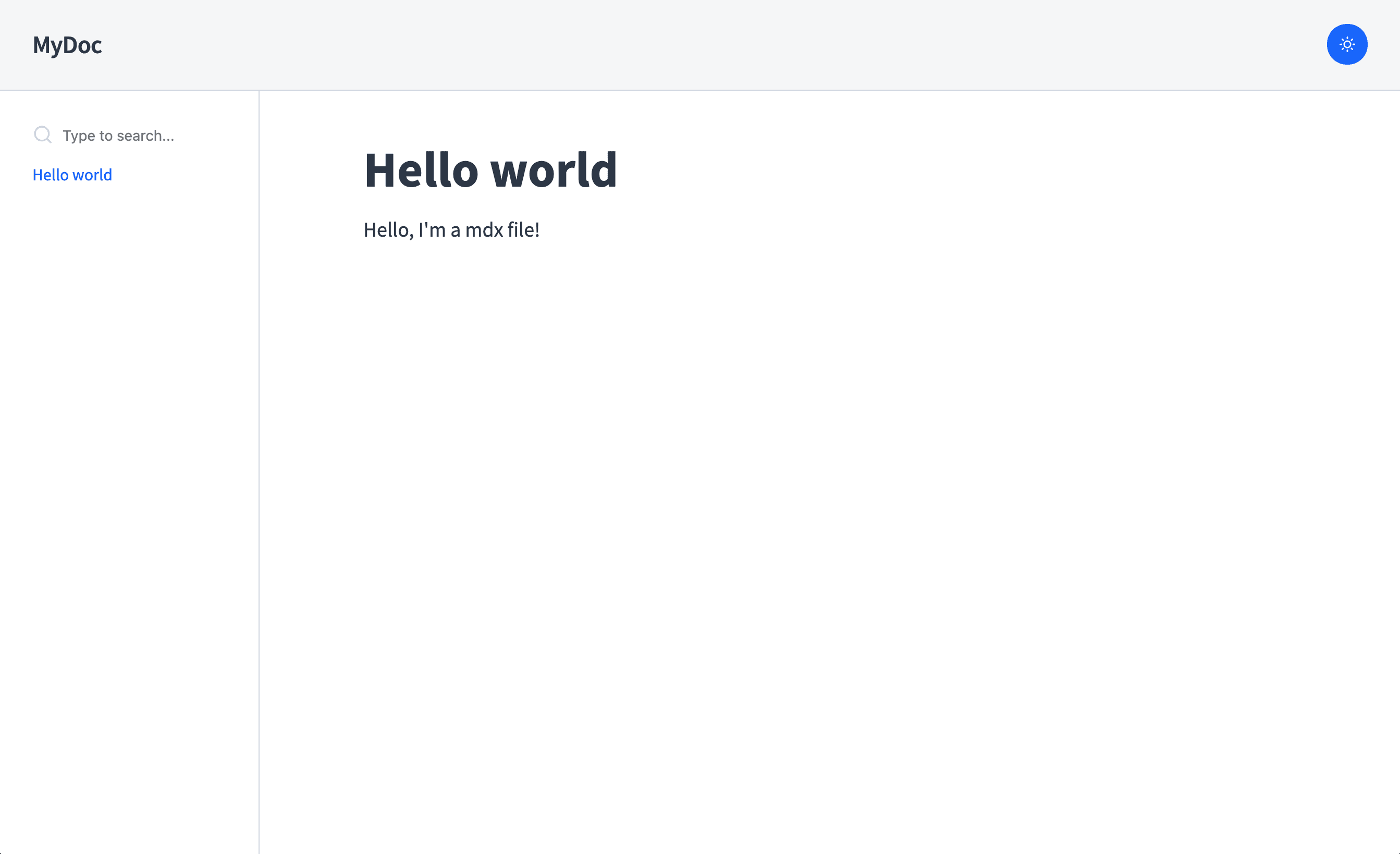
## Configuration
Set your config by using `doczrc.js` file ([see all available](https://www.docz.site/docs/project-configuration)) or if you want to
set some defaults for your theme, use `options` in the plugin definition:
```js
// gatsby-config.js
module.exports = {
plugins: [
{
resolve: 'gatsby-theme-docz',
options: {
/* your custom options */
},
},
],
}
```
> We highly recommend that you set your configuration using `doczrc.js` because of live reload that will change in real time your project settings, if you set your configs using the theme definition you will need to reset your dev server in order to see your changes.
## Dark Mode
To set the dark version as default, just set your `doczrc.js` like that:
```js
// doczrc.js
export default {
themeConfig: {
mode: 'dark',
},
}
```
## Customizing components
Components shadowing is one of the best things included in the new Gatsby theme feature, with it, it is possible to replace theme files just by creating your own file following a file naming convention.
Example: If you're using our `gatsby-theme-docz` which has a `Header` component located at `src/components/Header/index.js` you can override the component by creating `src/gatsby-theme-docz/components/Header/index.js`. Cool right?
## Adding your logo
So, now that you know about how component shadowing works on Gatsby themes, if you don't want to override the entire `My custom wrapper
{children}{/* my coolest home */}
}
export default Home
```
Or you can have a mdx document inside Docz that has data from Gatsby too:
```markdown
---
name: MyDoc
---
import { MyComponentWithSomeData } from './my-component-with-data'
This map is responsible to render components inside your compiled `.mdx` ### Type Definitions ```ts interface ComponentsMap { loading?: CT layout?: CT
All documents parsed by docz ### Typings Definitions ```ts interface Docs { id: string filepath: string link: string | null slug: string name: string route: string menu: string | null headings: Heading[] [key: string]: any } export function useDocs(): Docs[] ``` --- ## `useMenus` This hook will return the menu built by Docz using your documents. Use this to quickly get your menus or use `useDocs` if you want the documents ordered in the order of your project configuration. ```js import { useMenus } from 'docz' const App = () => { const menus = useMenus() return /* ... */ } ``` ### Params - **options**: `Object` - `query: String` Use `query` to filter menu results. The query is matched against the menu headers, not page content. ### Return - **menus:** `MenuItem[]` ### Type Definitions ```ts export interface MenuItem { id: string name: string route?: string href?: string menu?: MenuItem[] order?: number parent?: string } export function useMenus(opts: UseMenuOpts): MenuItem[] ``` --- ## `useConfig` Retrieve the project config object passed on your project configuration. By default, Docz merges your `themeConfig` object with the default theme config of each theme. ```js import React from 'react' import { useConfig } from 'docz' const MyDeepComponentInsideMyTheme = () => { const config = useConfig() return /* ... */ } ``` ### Properties `none` ### Return - **config:** `Config` ### Type Definitions ```ts export type ThemeConfig = Record
My custom wrapper
{children}
setFocus(true)} {...{ collapse, focus }} />
0 && focus} asGrid={hitsAsGrid}>
{indices.map(({ name, title, hitComp }) => (
setFocus(false))} />
))}
{title}
{children}
)
Alert.propTypes = {
/**
* The kind prop is used to set the alert's background color
*/
kind: t.oneOf(['info', 'positive', 'negative', 'warning']),
}
Alert.defaultProps = {
kind: 'info',
}
================================================
FILE: examples/with-custom-404-page/src/components/Alert.mdx
================================================
---
name: Alert
menu: Components
---
import { Playground, Props } from 'docz'
import { Alert } from './Alert'
# Alert
## Properties
Oups 🙈
You just hit a route that doesn‘t exist... 👀
{children}
)
Alert.propTypes = {
/**
* The kind prop is used to set the alert's background color
*/
kind: t.oneOf(['info', 'positive', 'negative', 'warning']),
}
Alert.defaultProps = {
kind: 'info',
}
================================================
FILE: examples/with-custom-docz-theme/src/components/Alert.mdx
================================================
---
name: Alert
menu: Components
---
import { Playground, Props } from 'docz'
import { Alert } from './Alert'
# Alert
## Properties
{children}
)
Alert.propTypes = {
/**
* The kind prop is used to set the alert's background color
*/
kind: t.oneOf(['info', 'positive', 'negative', 'warning']),
}
Alert.defaultProps = {
kind: 'info',
}
================================================
FILE: examples/with-decorators/src/components/Alert.mdx
================================================
---
name: Alert
menu: Components
---
import { Playground, Props } from 'docz'
import { Alert } from './Alert'
# Alert
## Properties
MyClass.annotated : {MyClass.annotated}
# Getting Started Design systems enable teams to build better products faster by making design reusable—reusability makes scale possible. This is the heart and primary value of design systems. A design system is a collection of reusable components, guided by clear standards, that can be assembled together to build any number of applications. Regardless of the technologies and tools behind them, a successful design system follows these guiding principles: - **It’s consistent**. The way components are built and managed follows a predictable pattern. - **It’s self-contained**. Your design system is treated as a standalone dependency. - **It’s reusable**. You’ve built components so they can be reused in many contexts. - **It’s accessible**. Applications built with your design system are usable by as many people as possible, no matter how they access the web. - **It’s robust**. No matter the product or platform to which your design system is applied, it should perform with grace and minimal bugs. ## Consistency Your first, most important task when starting out is to define the rules of your system, document them, and ensure that everyone follows them. When you have clearly documented code standards and best practices in place, designers and developers from across your organization can easily use and, more importantly, contribute to your design system. ================================================ FILE: examples/with-env-variables/.gitignore ================================================ .docz node_modules ================================================ FILE: examples/with-env-variables/README.md ================================================ # Docz With Env Variables Example ## Using `create-docz-app` ```sh npx create-docz-app docz-app-with-env-variables # or yarn create docz-app docz-app-with-env-variables ``` ## Download manually ```sh curl https://codeload.github.com/doczjs/docz/tar.gz/main | tar -xz --strip=2 docz-main/examples/with-env-variables mv with-env-variables docz-with-env-variables-example cd docz-with-env-variables-example ``` ## Notes Environment variables are defined in `gatsby-node.js` by changing the webpack config (process.env.FOO, process.env.PROD) or in .env.* and then imported using `dotenv` in `gatsby-config.js` (process.env.GATSBY_API_URL). ## Setup ```sh yarn # npm i ``` ## Run ```sh yarn dev # npm run dev ``` ## Build ```sh yarn build # npm run build ``` ## Serve built app ```sh yarn serve # npm run serve ``` ================================================ FILE: examples/with-env-variables/doczrc.js ================================================ export default { menu: ['Getting Started', 'Components'], } ================================================ FILE: examples/with-env-variables/gatsby-config.js ================================================ require('dotenv').config({ path: `.env.development`, }) ================================================ FILE: examples/with-env-variables/gatsby-node.js ================================================ exports.onCreateWebpackConfig = ({ plugins, actions }) => { const { setWebpackConfig } = actions setWebpackConfig({ plugins: [ plugins.define({ 'process.env.FOO': JSON.stringify('BAR'), 'process.env.PROD': JSON.stringify(true), }), ], }) } ================================================ FILE: examples/with-env-variables/package.json ================================================ { "name": "docz-example-basic", "private": true, "version": "2.0.0-rc.41", "license": "MIT", "files": [ "src/", "doczrc.js", "package.json" ], "scripts": { "dev": "docz dev", "build": "docz build", "serve": "docz serve" }, "dependencies": { "docz": "latest", "prop-types": "^15.7.2", "react": "^16.11.0", "react-dom": "^16.11.0" } } ================================================ FILE: examples/with-env-variables/src/components/Alert.jsx ================================================ import React from 'react' import t from 'prop-types' const kinds = { info: '#5352ED', positive: '#2ED573', negative: '#FF4757', warning: '#FFA502', } export const Alert = ({ children, kind, ...rest }) => ({process.env.PROD ? 'PROD' : 'NOT PROD'}
{process.env.FOO}
{process.env.GATSBY_API_URL}
{children}
{children}
)
export const Alert = props =>
{children}
)
Alert.propTypes = {
/**
* The kind prop is used to set the alert's background color
*/
kind: t.oneOf(['info', 'positive', 'negative', 'warning']),
}
Alert.defaultProps = {
kind: 'info',
}
================================================
FILE: examples/with-gatsby-remark-vscode/src/components/Alert.mdx
================================================
---
name: Alert
menu: Components
---
import { Playground, Props } from 'docz'
import { Alert } from './Alert'
# JS
```js
const a = "abc";
const b = "bca";
console.log(`${a}-${b}`)
```
# JSX
```jsx
{children}
)
export const Alert = props =>
{children}
)
================================================
FILE: examples/with-typescript-decorators/src/components/Button.mdx
================================================
---
name: Button
menu: Components
---
import { Playground, Props } from 'docz'
import { Button } from './Button.tsx'
# Button
Buttons make common actions more obvious and help users more easily perform them. Buttons use labels and sometimes icons to communicate the action that will occur when the user touches them.
### Best practices
- Group buttons logically into sets based on usage and importance.
- Ensure that button actions are clear and consistent.
- The main action of a group set can be a primary button.
- Select a single button variation and do not mix them.
## Properties
MyClass.annotated : {MyClass.annotated}
# Getting Started Design systems enable teams to build better products faster by making design reusable—reusability makes scale possible. This is the heart and primary value of design systems. A design system is a collection of reusable components, guided by clear standards, that can be assembled together to build any number of applications. Regardless of the technologies and tools behind them, a successful design system follows these guiding principles: - **It’s consistent**. The way components are built and managed follows a predictable pattern. - **It’s self-contained**. Your design system is treated as a standalone dependency. - **It’s reusable**. You’ve built components so they can be reused in many contexts. - **It’s accessible**. Applications built with your design system are usable by as many people as possible, no matter how they access the web. - **It’s robust**. No matter the product or platform to which your design system is applied, it should perform with grace and minimal bugs. ## Consistency Your first, most important task when starting out is to define the rules of your system, document them, and ensure that everyone follows them. When you have clearly documented code standards and best practices in place, designers and developers from across your organization can easily use and, more importantly, contribute to your design system. ================================================ FILE: examples/with-typescript-decorators/src/index.ts ================================================ @annotation class MyClass { static annotated?: string } function annotation(target: typeof MyClass) { target.annotated = "yes it's annotated" } export default MyClass ================================================ FILE: examples/with-typescript-decorators/tsconfig.json ================================================ { "compilerOptions": { "experimentalDecorators": true, "target": "es2015", "moduleResolution": "node", "strict": true, "resolveJsonModule": true, "esModuleInterop": true, "skipLibCheck": false, "noEmit": true, "jsx": "react" } } ================================================ FILE: examples/wrapped-playground/.gitignore ================================================ .docz node_modules ================================================ FILE: examples/wrapped-playground/README.md ================================================ # Wrapped Playground Docz example ## Using `create-docz-app` ```sh npx create-docz-app docz-app-wrapped-playground # or yarn create docz-app docz-app-wrapped-playground ``` ## Download manually ```sh curl https://codeload.github.com/doczjs/docz/tar.gz/main | tar -xz --strip=2 docz-main/examples/wrapped-playground mv wrapped-playground docz-wrapped-playground-example cd docz-wrapped-playground-example ``` ## Setup ```sh yarn # npm i ``` ## Run ```sh yarn dev # npm run dev ``` ## Build ```sh yarn build # npm run build ``` ## Serve built app ```sh yarn serve # npm run serve ``` ================================================ FILE: examples/wrapped-playground/doczrc.js ================================================ export default { menu: ['Getting Started', 'Components'], } ================================================ FILE: examples/wrapped-playground/package.json ================================================ { "name": "docz-example-wrapped-playground", "private": true, "version": "2.0.0-rc.41", "license": "MIT", "files": [ "src/", "doczrc.js", "package.json" ], "scripts": { "dev": "docz dev", "build": "docz build", "serve": "docz serve" }, "dependencies": { "docz": "latest", "prop-types": "^15.7.2", "react": "^16.11.0", "react-dom": "^16.11.0" } } ================================================ FILE: examples/wrapped-playground/src/Playground.jsx ================================================ import React from 'react' import { Playground } from 'docz' export default props => { return (
{children}
)
Alert.propTypes = {
/**
* The kind prop is used to set the alert's background color
*/
kind: t.oneOf(['info', 'positive', 'negative', 'warning']),
}
Alert.defaultProps = {
kind: 'info',
}
================================================
FILE: examples/wrapped-playground/src/components/Alert.mdx
================================================
---
name: Alert
menu: Components
---
import { Props } from 'docz'
import Playground from '../Playground'
import { Alert } from './Alert'
# Alert
## Properties