Repository: doocs/md Branch: main Commit: ae303d58dec7 Files: 389 Total size: 939.4 KB Directory structure: gitextract_apmp53u3/ ├── .editorconfig ├── .github/ │ ├── copilot-instructions.md │ ├── dependabot.yml │ ├── secret_scanning.yml │ └── workflows/ │ ├── cloudflare-preview-cleanup.yml │ ├── cloudflare-preview.yml │ ├── deploy-gitee.yml │ ├── deploy.yml │ ├── docker.yml │ ├── release-cli.yml │ ├── release.yml │ ├── stale-bot.yml │ ├── surge-preview-build.yml │ └── surge-preview-deploy.yml ├── .gitignore ├── .husky/ │ └── pre-commit ├── .npmrc ├── .nvmrc ├── .vscode/ │ ├── extensions.json │ ├── launch.json │ ├── settings.json │ └── tasks.json ├── CHANGELOG.md ├── CONTRIBUTING.md ├── LICENSE ├── README.md ├── USERS.md ├── apps/ │ ├── utools/ │ │ ├── README.md │ │ ├── package.json │ │ ├── plugin.json │ │ └── preload.js │ ├── vscode/ │ │ ├── .gitignore │ │ ├── .npmrc │ │ ├── .vscodeignore │ │ ├── CHANGELOG.md │ │ ├── LICENSE │ │ ├── README.md │ │ ├── package.json │ │ ├── src/ │ │ │ ├── css/ │ │ │ │ └── index.ts │ │ │ ├── extension.ts │ │ │ ├── styleChoices.ts │ │ │ └── treeDataProvider.ts │ │ ├── tsconfig.json │ │ └── webpack.config.mjs │ └── web/ │ ├── components.json │ ├── index.html │ ├── netlify.toml │ ├── package.json │ ├── plugins/ │ │ └── vite-plugin-utools-local-assets.ts │ ├── postcss.config.js │ ├── public/ │ │ └── upload/ │ │ └── .gitkeep │ ├── src/ │ │ ├── App.vue │ │ ├── assets/ │ │ │ ├── example/ │ │ │ │ └── markdown.md │ │ │ ├── index.css │ │ │ └── less/ │ │ │ ├── app.less │ │ │ └── theme.less │ │ ├── components/ │ │ │ ├── AppSplash.vue │ │ │ ├── ai/ │ │ │ │ ├── SidebarAIToolbar.vue │ │ │ │ ├── chat-box/ │ │ │ │ │ ├── AIAssistantPanel.vue │ │ │ │ │ ├── AIConfig.vue │ │ │ │ │ └── QuickCommandManager.vue │ │ │ │ ├── image-generator/ │ │ │ │ │ ├── AIImageConfig.vue │ │ │ │ │ ├── AIImageGeneratorPanel.vue │ │ │ │ │ └── index.ts │ │ │ │ ├── index.ts │ │ │ │ └── tool-box/ │ │ │ │ ├── ToolBoxPopover.vue │ │ │ │ └── index.ts │ │ │ ├── editor/ │ │ │ │ ├── CssEditor.vue │ │ │ │ ├── CustomUploadForm.vue │ │ │ │ ├── EditorContextMenu.vue │ │ │ │ ├── EditorStateDialog.vue │ │ │ │ ├── FloatingToc.vue │ │ │ │ ├── FolderSourcePanel.vue │ │ │ │ ├── FolderTree.vue │ │ │ │ ├── Footer.vue │ │ │ │ ├── FormItem.vue │ │ │ │ ├── ImportMarkdownDialog.vue │ │ │ │ ├── InsertFormDialog.vue │ │ │ │ ├── InsertMpCardDialog.vue │ │ │ │ ├── RightSlider.vue │ │ │ │ ├── TemplateDialog.vue │ │ │ │ ├── ThemeCustomizer.vue │ │ │ │ ├── UploadImgDialog.vue │ │ │ │ ├── editor-header/ │ │ │ │ │ ├── AboutDialog.vue │ │ │ │ │ ├── EditDropdown.vue │ │ │ │ │ ├── FileDropdown.vue │ │ │ │ │ ├── FormatDropdown.vue │ │ │ │ │ ├── FundDialog.vue │ │ │ │ │ ├── HelpDropdown.vue │ │ │ │ │ ├── InsertDropdown.vue │ │ │ │ │ ├── PostInfo.vue │ │ │ │ │ ├── PostTaskDialog.vue │ │ │ │ │ ├── StyleDropdown.vue │ │ │ │ │ ├── StyleOptionMenu.vue │ │ │ │ │ ├── ViewDropdown.vue │ │ │ │ │ └── index.vue │ │ │ │ └── post-slider/ │ │ │ │ ├── PostItem.vue │ │ │ │ └── index.vue │ │ │ └── ui/ │ │ │ ├── alert/ │ │ │ │ ├── Alert.vue │ │ │ │ ├── AlertDescription.vue │ │ │ │ ├── AlertTitle.vue │ │ │ │ └── index.ts │ │ │ ├── alert-dialog/ │ │ │ │ ├── AlertDialog.vue │ │ │ │ ├── AlertDialogAction.vue │ │ │ │ ├── AlertDialogCancel.vue │ │ │ │ ├── AlertDialogContent.vue │ │ │ │ ├── AlertDialogDescription.vue │ │ │ │ ├── AlertDialogFooter.vue │ │ │ │ ├── AlertDialogHeader.vue │ │ │ │ ├── AlertDialogTitle.vue │ │ │ │ ├── AlertDialogTrigger.vue │ │ │ │ └── index.ts │ │ │ ├── back-top/ │ │ │ │ ├── BackTop.vue │ │ │ │ └── index.ts │ │ │ ├── button/ │ │ │ │ ├── Button.vue │ │ │ │ └── index.ts │ │ │ ├── context-menu/ │ │ │ │ ├── ContextMenu.vue │ │ │ │ ├── ContextMenuCheckboxItem.vue │ │ │ │ ├── ContextMenuContent.vue │ │ │ │ ├── ContextMenuGroup.vue │ │ │ │ ├── ContextMenuItem.vue │ │ │ │ ├── ContextMenuLabel.vue │ │ │ │ ├── ContextMenuPortal.vue │ │ │ │ ├── ContextMenuRadioGroup.vue │ │ │ │ ├── ContextMenuRadioItem.vue │ │ │ │ ├── ContextMenuSeparator.vue │ │ │ │ ├── ContextMenuShortcut.vue │ │ │ │ ├── ContextMenuSub.vue │ │ │ │ ├── ContextMenuSubContent.vue │ │ │ │ ├── ContextMenuSubTrigger.vue │ │ │ │ ├── ContextMenuTrigger.vue │ │ │ │ └── index.ts │ │ │ ├── dialog/ │ │ │ │ ├── Dialog.vue │ │ │ │ ├── DialogClose.vue │ │ │ │ ├── DialogContent.vue │ │ │ │ ├── DialogDescription.vue │ │ │ │ ├── DialogFooter.vue │ │ │ │ ├── DialogHeader.vue │ │ │ │ ├── DialogScrollContent.vue │ │ │ │ ├── DialogTitle.vue │ │ │ │ ├── DialogTrigger.vue │ │ │ │ └── index.ts │ │ │ ├── dropdown-menu/ │ │ │ │ ├── DropdownMenu.vue │ │ │ │ ├── DropdownMenuCheckboxItem.vue │ │ │ │ ├── DropdownMenuContent.vue │ │ │ │ ├── DropdownMenuGroup.vue │ │ │ │ ├── DropdownMenuItem.vue │ │ │ │ ├── DropdownMenuLabel.vue │ │ │ │ ├── DropdownMenuRadioGroup.vue │ │ │ │ ├── DropdownMenuRadioItem.vue │ │ │ │ ├── DropdownMenuSeparator.vue │ │ │ │ ├── DropdownMenuShortcut.vue │ │ │ │ ├── DropdownMenuSub.vue │ │ │ │ ├── DropdownMenuSubContent.vue │ │ │ │ ├── DropdownMenuSubTrigger.vue │ │ │ │ ├── DropdownMenuTrigger.vue │ │ │ │ └── index.ts │ │ │ ├── hover-card/ │ │ │ │ ├── HoverCard.vue │ │ │ │ ├── HoverCardContent.vue │ │ │ │ ├── HoverCardTrigger.vue │ │ │ │ └── index.ts │ │ │ ├── input/ │ │ │ │ ├── Input.vue │ │ │ │ └── index.ts │ │ │ ├── label/ │ │ │ │ ├── Label.vue │ │ │ │ └── index.ts │ │ │ ├── menubar/ │ │ │ │ ├── Menubar.vue │ │ │ │ ├── MenubarCheckboxItem.vue │ │ │ │ ├── MenubarContent.vue │ │ │ │ ├── MenubarGroup.vue │ │ │ │ ├── MenubarItem.vue │ │ │ │ ├── MenubarLabel.vue │ │ │ │ ├── MenubarMenu.vue │ │ │ │ ├── MenubarRadioGroup.vue │ │ │ │ ├── MenubarRadioItem.vue │ │ │ │ ├── MenubarSeparator.vue │ │ │ │ ├── MenubarShortcut.vue │ │ │ │ ├── MenubarSub.vue │ │ │ │ ├── MenubarSubContent.vue │ │ │ │ ├── MenubarSubTrigger.vue │ │ │ │ ├── MenubarTrigger.vue │ │ │ │ └── index.ts │ │ │ ├── number-field/ │ │ │ │ ├── NumberField.vue │ │ │ │ ├── NumberFieldContent.vue │ │ │ │ ├── NumberFieldDecrement.vue │ │ │ │ ├── NumberFieldIncrement.vue │ │ │ │ ├── NumberFieldInput.vue │ │ │ │ └── index.ts │ │ │ ├── password-input/ │ │ │ │ ├── PasswordInput.vue │ │ │ │ └── index.ts │ │ │ ├── popover/ │ │ │ │ ├── Popover.vue │ │ │ │ ├── PopoverContent.vue │ │ │ │ ├── PopoverTrigger.vue │ │ │ │ └── index.ts │ │ │ ├── progress/ │ │ │ │ ├── Progress.vue │ │ │ │ └── index.ts │ │ │ ├── radio-group/ │ │ │ │ ├── RadioGroup.vue │ │ │ │ ├── RadioGroupItem.vue │ │ │ │ └── index.ts │ │ │ ├── resizable/ │ │ │ │ ├── ResizableHandle.vue │ │ │ │ ├── ResizablePanelGroup.vue │ │ │ │ └── index.ts │ │ │ ├── search-tab/ │ │ │ │ ├── SearchTab.vue │ │ │ │ └── index.ts │ │ │ ├── select/ │ │ │ │ ├── Select.vue │ │ │ │ ├── SelectContent.vue │ │ │ │ ├── SelectGroup.vue │ │ │ │ ├── SelectItem.vue │ │ │ │ ├── SelectItemText.vue │ │ │ │ ├── SelectLabel.vue │ │ │ │ ├── SelectScrollDownButton.vue │ │ │ │ ├── SelectScrollUpButton.vue │ │ │ │ ├── SelectSeparator.vue │ │ │ │ ├── SelectTrigger.vue │ │ │ │ ├── SelectValue.vue │ │ │ │ └── index.ts │ │ │ ├── separator/ │ │ │ │ ├── Separator.vue │ │ │ │ └── index.ts │ │ │ ├── sonner/ │ │ │ │ ├── Sonner.vue │ │ │ │ └── index.ts │ │ │ ├── switch/ │ │ │ │ ├── Switch.vue │ │ │ │ └── index.ts │ │ │ ├── tabs/ │ │ │ │ ├── Tabs.vue │ │ │ │ ├── TabsContent.vue │ │ │ │ ├── TabsList.vue │ │ │ │ ├── TabsTrigger.vue │ │ │ │ └── index.ts │ │ │ ├── textarea/ │ │ │ │ ├── Textarea.vue │ │ │ │ └── index.ts │ │ │ └── tooltip/ │ │ │ ├── Tooltip.vue │ │ │ ├── TooltipContent.vue │ │ │ ├── TooltipProvider.vue │ │ │ ├── TooltipTrigger.vue │ │ │ └── index.ts │ │ ├── composables/ │ │ │ ├── index.ts │ │ │ ├── useEditorFormat.ts │ │ │ ├── useFolderFileSync.ts │ │ │ └── useImageUploader.ts │ │ ├── entrypoints/ │ │ │ ├── appmsg.content.ts │ │ │ ├── background.ts │ │ │ ├── injected.ts │ │ │ └── popup/ │ │ │ ├── App.vue │ │ │ ├── index.html │ │ │ └── popup.ts │ │ ├── lib/ │ │ │ └── utils.ts │ │ ├── main.ts │ │ ├── modules/ │ │ │ └── build-extension.ts │ │ ├── sidepanel.ts │ │ ├── stores/ │ │ │ ├── aiConfig.ts │ │ │ ├── aiImageConfig.ts │ │ │ ├── cssEditor.ts │ │ │ ├── editor.ts │ │ │ ├── export.ts │ │ │ ├── folderSource.ts │ │ │ ├── post.ts │ │ │ ├── quickCommands.ts │ │ │ ├── render.ts │ │ │ ├── template.ts │ │ │ ├── theme.ts │ │ │ └── ui.ts │ │ ├── types/ │ │ │ └── global.d.ts │ │ ├── utils/ │ │ │ ├── clipboard.ts │ │ │ ├── file.ts │ │ │ ├── index.ts │ │ │ ├── setup-components.ts │ │ │ ├── storage.ts │ │ │ └── toast/ │ │ │ └── index.ts │ │ ├── views/ │ │ │ └── CodemirrorEditor.vue │ │ └── vite-env.d.ts │ ├── tailwind.config.cjs │ ├── tsconfig.app.json │ ├── tsconfig.json │ ├── tsconfig.node.json │ ├── tsconfig.worker.json │ ├── vite.config.ts │ ├── web-ext.config.ts.example │ ├── worker/ │ │ └── index.ts │ ├── wrangler.jsonc │ └── wxt.config.ts ├── docker/ │ └── latest/ │ ├── Dockerfile.base │ ├── Dockerfile.nginx │ ├── Dockerfile.standalone │ ├── Dockerfile.static │ └── server/ │ └── main.go ├── docs/ │ ├── custom-upload.md │ ├── mp-card.md │ └── telegram-usage.md ├── eslint.config.mjs ├── package.json ├── packages/ │ ├── config/ │ │ ├── package.json │ │ ├── tsconfig.base.json │ │ └── tsconfig.node.json │ ├── core/ │ │ ├── README.md │ │ ├── package.json │ │ ├── src/ │ │ │ ├── extensions/ │ │ │ │ ├── alert.ts │ │ │ │ ├── footnotes.ts │ │ │ │ ├── index.ts │ │ │ │ ├── infographic.ts │ │ │ │ ├── katex.ts │ │ │ │ ├── markup.ts │ │ │ │ ├── mermaid.ts │ │ │ │ ├── plantuml.ts │ │ │ │ ├── ruby.ts │ │ │ │ ├── slider.ts │ │ │ │ └── toc.ts │ │ │ ├── index.ts │ │ │ ├── renderer/ │ │ │ │ ├── index.ts │ │ │ │ └── renderer-impl.ts │ │ │ ├── theme/ │ │ │ │ ├── cssProcessor.ts │ │ │ │ ├── cssScopeWrapper.ts │ │ │ │ ├── cssVariables.ts │ │ │ │ ├── index.ts │ │ │ │ ├── selectorMapping.ts │ │ │ │ ├── themeApplicator.ts │ │ │ │ ├── themeExporter.ts │ │ │ │ └── themeInjector.ts │ │ │ └── utils/ │ │ │ ├── basicHelpers.ts │ │ │ ├── index.ts │ │ │ ├── initializeMermaid.ts │ │ │ ├── languages.ts │ │ │ └── markdownHelpers.ts │ │ └── tsconfig.json │ ├── example/ │ │ ├── .gitignore │ │ ├── README.md │ │ ├── package.json │ │ ├── worker.js │ │ └── wrangler.toml │ ├── md-cli/ │ │ ├── .gitignore │ │ ├── .npmignore │ │ ├── .npmrc │ │ ├── README.md │ │ ├── index.js │ │ ├── package.json │ │ ├── public/ │ │ │ └── upload/ │ │ │ └── .gitkeep │ │ ├── server.js │ │ └── util.js │ └── shared/ │ ├── README.md │ ├── package.json │ ├── src/ │ │ ├── assets/ │ │ │ ├── default-custom-theme.txt │ │ │ └── index.ts │ │ ├── configs/ │ │ │ ├── ai-service-options.ts │ │ │ ├── api.ts │ │ │ ├── index.ts │ │ │ ├── prefix.ts │ │ │ ├── shortcut-key.ts │ │ │ ├── store.ts │ │ │ ├── style.ts │ │ │ ├── theme-css/ │ │ │ │ ├── base.css │ │ │ │ ├── default.css │ │ │ │ ├── grace.css │ │ │ │ ├── index.ts │ │ │ │ └── simple.css │ │ │ └── theme.ts │ │ ├── constants/ │ │ │ ├── ai-config.ts │ │ │ └── index.ts │ │ ├── editor/ │ │ │ ├── basicSetup.ts │ │ │ ├── css.ts │ │ │ ├── format.ts │ │ │ ├── index.ts │ │ │ ├── javascript.ts │ │ │ ├── markdown.ts │ │ │ └── themes.ts │ │ ├── global.d.ts │ │ ├── index.ts │ │ ├── types/ │ │ │ ├── ai-services-types.ts │ │ │ ├── common.ts │ │ │ ├── index.ts │ │ │ ├── raw-imports.d.ts │ │ │ ├── renderer-types.ts │ │ │ └── template.ts │ │ └── utils/ │ │ ├── basicHelpers.ts │ │ ├── fetch.ts │ │ ├── fileHelpers.ts │ │ ├── index.ts │ │ ├── readingTime.ts │ │ └── tokenTools.ts │ └── tsconfig.json ├── patches/ │ └── @codemirror__view@6.40.0.patch ├── pnpm-workspace.yaml ├── scripts/ │ ├── build-base-image.sh │ ├── build-multiarch.sh │ ├── build-nginx.sh │ ├── build-standalone.sh │ ├── build-static.sh │ ├── download-utools-libs.mjs │ ├── package-utools.mjs │ ├── push-images.sh │ └── release.js ├── tsconfig.json └── zbpack.json ================================================ FILE CONTENTS ================================================ ================================================ FILE: .editorconfig ================================================ # https://editorconfig.org root = true [*] charset = utf-8 end_of_line = lf indent_size = 2 indent_style = space insert_final_newline = true max_line_length = 80 trim_trailing_whitespace = true [*.md] max_line_length = 0 trim_trailing_whitespace = false [COMMIT_EDITMSG] max_line_length = 0 ================================================ FILE: .github/copilot-instructions.md ================================================ # Copilot Instructions This repository is a pnpm monorepo containing a Vue 3 web application, a VSCode extension, and a core markdown rendering library. ## Build, Test, and Lint ### Global Commands - **Install Dependencies:** `pnpm install` - **Lint (ESLint + Prettier):** `pnpm run lint` - **Type Check (Vue/TS):** `pnpm run type-check` ### Web App (@md/web) - **Development Server:** `pnpm web dev` - **Build for Production:** `pnpm web build` - **Build Browser Extension:** `pnpm web ext:zip` (uses WXT) ### VSCode Extension (@md/vscode) - **Development:** `pnpm vscode` ### CLI (@doocs/md-cli) - **Build CLI:** `pnpm run build:cli` ## High-Level Architecture ### Monorepo Structure - **apps/web**: The main application. Built with Vue 3, Vite, Pinia, and Tailwind CSS. It functions as both a web app and a browser extension (via WXT). - **packages/core**: The markdown rendering engine. It wraps `marked` and implements custom extensions (Mermaid, PlantUML, Ruby, etc.) and theme injection. - **packages/shared**: Shared utilities and configurations. - **packages/md-cli**: A CLI wrapper that serves the built web application. ### Key Technologies - **Frontend Framework:** Vue 3 (Composition API) - **Build System:** Vite - **State Management:** Pinia - **Styling:** Tailwind CSS + Custom CSS Variables for themes. - **Markdown Parsing:** `marked` (in `@md/core`) - **Editor Component:** CodeMirror 6 - **Extension Framework:** WXT (Web Extension Tools) ## Key Conventions ### Development Patterns - **Direct TypeScript Imports:** The `@md/core` and `@md/shared` packages export TypeScript source files directly (`src/index.ts`). Do not attempt to build these packages separately; they are compiled by the consumer's build tool (Vite). - **UI Components:** The project uses Shadcn-Vue style components located in `apps/web/src/components/ui`. Prefer using these over raw HTML/CSS. - **Store Structure:** State is divided into domain-specific Pinia stores (e.g., `useEditorStore`, `useThemeStore`, `useUiStore`) located in `apps/web/src/stores`. ### Styling & Theming - **Theme Injection:** Theming is handled by `@md/core/src/theme`. Themes are applied by injecting CSS variables into the DOM. - **CSS processing:** Uses PostCSS and Tailwind. Global styles are in `apps/web/src/assets`. ### Markdown Extensions - **Implementation:** New markdown features should be implemented as extensions in `@md/core/src/extensions`. - **Registration:** Extensions must be registered in the renderer configuration. ### Git Conventions - **Commit Messages:** Follow Conventional Commits (`feat`, `fix`, `docs`, `chore`, etc.). - **Branch Naming:** `feat/description`, `fix/description`. ================================================ FILE: .github/dependabot.yml ================================================ version: 2 updates: - package-ecosystem: npm directory: / schedule: interval: weekly day: tuesday time: '14:00' timezone: Asia/Shanghai target-branch: main ignore: - dependency-name: vue - dependency-name: vite open-pull-requests-limit: 100 groups: minor-and-patch: applies-to: version-updates update-types: - minor - patch - package-ecosystem: github-actions directory: / schedule: interval: daily target-branch: main open-pull-requests-limit: 100 ================================================ FILE: .github/secret_scanning.yml ================================================ paths-ignore: - "src/**" ================================================ FILE: .github/workflows/cloudflare-preview-cleanup.yml ================================================ name: Cleanup Cloudflare Preview on: pull_request: types: [closed] jobs: cleanup-preview: runs-on: ubuntu-latest if: github.repository == 'doocs/md' permissions: pull-requests: write steps: - name: Delete preview deployment id: delete continue-on-error: true run: | WORKER_NAME="md-pr-${{ github.event.pull_request.number }}" echo "Attempting to delete $WORKER_NAME" RESPONSE=$(curl -s -X DELETE \ "https://api.cloudflare.com/client/v4/accounts/${{ secrets.CLOUDFLARE_ACCOUNT_ID }}/workers/scripts/$WORKER_NAME" \ -H "Authorization: Bearer ${{ secrets.CLOUDFLARE_API_TOKEN }}" \ -H "Content-Type: application/json") echo "API Response: $RESPONSE" if echo "$RESPONSE" | jq -e '.success == true' > /dev/null 2>&1; then echo "Successfully deleted $WORKER_NAME" echo "status=success" >> $GITHUB_OUTPUT else echo "Failed to delete $WORKER_NAME or worker doesn't exist" echo "status=failed" >> $GITHUB_OUTPUT fi - name: Comment on PR if: steps.delete.outputs.status == 'success' uses: actions/github-script@v7 with: github-token: ${{ secrets.GITHUB_TOKEN }} script: | const prNumber = context.issue.number; await github.rest.issues.createComment({ owner: context.repo.owner, repo: context.repo.repo, issue_number: prNumber, body: '🗑️ Cloudflare Workers preview deployment has been cleaned up.' }); ================================================ FILE: .github/workflows/cloudflare-preview.yml ================================================ name: Cloudflare Workers Preview on: pull_request: types: [opened, synchronize, reopened] workflow_dispatch: concurrency: group: cloudflare-preview-${{ github.event.pull_request.number }} cancel-in-progress: true jobs: deploy-preview: runs-on: ubuntu-latest if: github.repository == 'doocs/md' && github.event_name == 'pull_request' && github.event.pull_request.head.repo.full_name == github.repository permissions: contents: read deployments: write pull-requests: write steps: - name: Checkout uses: actions/checkout@v6 with: ref: ${{ github.event.pull_request.head.sha }} - name: Set up node uses: actions/setup-node@v6 with: node-version: 22 - name: Setup pnpm uses: pnpm/action-setup@v5 with: version: 10 - name: Install dependencies run: pnpm install - name: Build for Cloudflare Workers run: pnpm web build:h5-netlify env: CF_WORKERS: 1 - name: Deploy to Cloudflare Workers id: deploy uses: cloudflare/wrangler-action@v3 with: apiToken: ${{ secrets.CLOUDFLARE_API_TOKEN }} accountId: ${{ secrets.CLOUDFLARE_ACCOUNT_ID }} command: deploy --name md-pr-${{ github.event.pull_request.number }} workingDirectory: apps/web env: CLOUDFLARE_API_TOKEN: ${{ secrets.CLOUDFLARE_API_TOKEN }} CLOUDFLARE_ACCOUNT_ID: ${{ secrets.CLOUDFLARE_ACCOUNT_ID }} - name: Get deployment URL id: deployment-url run: | PREVIEW_URL="https://md-pr-${{ github.event.pull_request.number }}.doocs.workers.dev" echo "url=$PREVIEW_URL" >> $GITHUB_OUTPUT echo "Preview URL: $PREVIEW_URL" - name: Comment PR with preview link uses: actions-cool/maintain-one-comment@v3 with: token: ${{ secrets.GITHUB_TOKEN }} body: | 🚀 Cloudflare Workers Preview has been successfully deployed! **Preview URL:** ${{ steps.deployment-url.outputs.url }} Built with commit ${{ github.event.pull_request.head.sha }} body-include: '' number: ${{ github.event.pull_request.number }} ================================================ FILE: .github/workflows/deploy-gitee.yml ================================================ name: Build and Deploy to Gitee Pages on: push: branches: [main] workflow_dispatch: concurrency: group: deploy-gitee-${{ github.ref }} cancel-in-progress: true jobs: build-and-deploy: runs-on: ubuntu-latest if: github.repository == 'doocs/md' steps: - name: Checkout uses: actions/checkout@v6 with: fetch-depth: 0 # 获取完整历史,便于推送到新分支 - name: Set up node uses: actions/setup-node@v6 with: node-version: 22 - name: Setup pnpm uses: pnpm/action-setup@v5 with: version: 10 - name: Install dependencies run: pnpm install - name: Build project run: pnpm web build - name: Deploy to GitHub Pages uses: peaceiris/actions-gh-pages@v4 with: github_token: ${{ secrets.GITHUB_TOKEN }} publish_dir: ./apps/web/dist publish_branch: dist force_orphan: true user_name: 'github-actions[bot]' user_email: 'github-actions[bot]@users.noreply.github.com' commit_message: 'Deploy: ${{ github.sha }}' - name: Sync to Gitee id: gitee-sync uses: Yikun/hub-mirror-action@master continue-on-error: true with: src: github/doocs dst: gitee/doocs dst_key: ${{ secrets.GITEE_RSA_PRIVATE_KEY }} dst_token: ${{ secrets.GITEE_TOKEN }} static_list: "md" force_update: true debug: true - name: Deploy Gitee Pages id: gitee-deploy if: steps.gitee-sync.outcome == 'success' continue-on-error: true uses: yanglbme/gitee-pages-action@main with: gitee-username: ${{ secrets.GITEE_USERNAME }} gitee-password: ${{ secrets.GITEE_PASSWORD }} gitee-repo: doocs/md branch: dist - name: Deployment Summary run: | echo "✅ Build completed successfully!" echo "📦 Artifacts pushed to dist branch" if [ "${{ steps.gitee-sync.outcome }}" == "success" ]; then echo "🔄 Synced to Gitee repository" if [ "${{ steps.gitee-deploy.outcome }}" == "success" ]; then echo "🚀 Gitee Pages deployed" echo "" echo "Gitee Pages: https://doocs.gitee.io/md/" else echo "⚠️ Gitee Pages deployment failed or skipped" fi else echo "⚠️ Gitee sync failed or skipped" fi ================================================ FILE: .github/workflows/deploy.yml ================================================ name: Build and Deploy on: push: branches: [main] workflow_dispatch: concurrency: group: ${{ github.workflow }} - ${{ github.ref }} cancel-in-progress: true jobs: build: runs-on: ubuntu-latest if: github.repository == 'doocs/md' steps: - name: Checkout uses: actions/checkout@v6 with: persist-credentials: false - name: Set up node uses: actions/setup-node@v6 with: node-version: 22 - name: Setup pnpm uses: pnpm/action-setup@v5 with: version: 10 - name: Install dependencies run: pnpm install - name: Determine build command id: build-command run: | if [[ "${{ secrets.BUILD_COMMAND }}" == "build:h5-netlify" ]]; then echo "BUILD_COMMAND=build:h5-netlify" >> $GITHUB_ENV else echo "BUILD_COMMAND=build" >> $GITHUB_ENV fi - name: Run build run: pnpm web ${{ env.BUILD_COMMAND }} - name: Generate CNAME run: | mkdir -p apps/web/dist echo "md.doocs.org" > apps/web/dist/CNAME - name: Upload artifact uses: actions/upload-pages-artifact@v4 with: path: apps/web/dist deploy-pages: needs: build permissions: pages: write id-token: write environment: name: github_pages url: ${{ steps.deployment.outputs.page_url }} runs-on: ubuntu-latest steps: - name: Deploy to GitHub Pages id: deployment uses: actions/deploy-pages@v4 deploy-cloudflare: needs: build runs-on: ubuntu-latest if: github.repository == 'doocs/md' steps: - name: Checkout uses: actions/checkout@v6 - name: Set up node uses: actions/setup-node@v6 with: node-version: 22 - name: Setup pnpm uses: pnpm/action-setup@v5 with: version: 10 - name: Install dependencies run: pnpm install - name: Build for Cloudflare Workers run: pnpm web build:h5-netlify env: CF_WORKERS: 1 - name: Deploy to Cloudflare Workers uses: cloudflare/wrangler-action@v3 with: apiToken: ${{ secrets.CLOUDFLARE_API_TOKEN }} accountId: ${{ secrets.CLOUDFLARE_ACCOUNT_ID }} command: deploy --name md workingDirectory: apps/web env: CLOUDFLARE_API_TOKEN: ${{ secrets.CLOUDFLARE_API_TOKEN }} CLOUDFLARE_ACCOUNT_ID: ${{ secrets.CLOUDFLARE_ACCOUNT_ID }} - name: Deployment Summary run: | echo "🚀 Deployed to Cloudflare Workers!" echo "📍 URL: https://md.doocs.workers.dev" ================================================ FILE: .github/workflows/docker.yml ================================================ name: Build and Push Docker Images on: push: branches: - main workflow_dispatch: jobs: build: runs-on: ubuntu-latest if: github.repository == 'doocs/md' steps: - name: Checkout code uses: actions/checkout@v6 - name: Set up QEMU uses: docker/setup-qemu-action@v4 - name: Set up Docker Buildx uses: docker/setup-buildx-action@v4 - name: Log in to Docker Hub uses: docker/login-action@v4 with: username: ${{ secrets.DOCKER_USERNAME }} password: ${{ secrets.DOCKER_PASSWORD }} - name: Build and push multi-arch images run: | chmod +x scripts/build-multiarch.sh bash scripts/build-multiarch.sh ================================================ FILE: .github/workflows/release-cli.yml ================================================ name: Create Cli Release on: push: tags: - 'cli-v*' permissions: id-token: write # Required for OIDC trusted publishing contents: read jobs: build: runs-on: ubuntu-latest if: github.repository == 'doocs/md' steps: - uses: actions/checkout@v6 - uses: actions/setup-node@v6 with: node-version: 22 registry-url: https://registry.npmjs.org/ - name: Setup pnpm uses: pnpm/action-setup@v5 with: version: 10 - name: Update npm run: npm install -g npm@latest - run: pnpm install --frozen-lockfile - run: pnpm run build:cli - run: cd packages/md-cli && npm publish --registry=https://registry.npmjs.org/ ================================================ FILE: .github/workflows/release.yml ================================================ name: Create Release on: push: tags: - "v*" jobs: release: name: Create GitHub Release runs-on: ubuntu-latest if: github.repository == 'doocs/md' steps: - name: Checkout code uses: actions/checkout@v6 - name: Extract Changelog for Tag id: changelog run: | TAG_NAME="${GITHUB_REF##*/}" echo "Extracting changelog for $TAG_NAME" # 提取 CHANGELOG.md 中对应版本块的内容 CHANGELOG=$(awk "/^## \\[$TAG_NAME\\]/ {flag=1; next} /^## \\[/ {flag=0} flag" CHANGELOG.md) # 如果为空就设置默认信息 if [ -z "$CHANGELOG" ]; then CHANGELOG="No changelog entry found for $TAG_NAME." fi echo "changelog<> $GITHUB_OUTPUT echo "$CHANGELOG" >> $GITHUB_OUTPUT echo "EOF" >> $GITHUB_OUTPUT - name: Create GitHub Release uses: actions/create-release@v1 env: GITHUB_TOKEN: ${{ secrets.GITHUB_TOKEN }} with: tag_name: ${{ github.ref }} release_name: ${{ github.ref }} body: | # 微信 Markdown 编辑器 ${{ github.ref_name }} 发布🎈 [![github](https://badgen.net/badge/>>/GitHub/cyan)](https://github.com/doocs/md/releases) [![gitee](https://badgen.net/badge/>>/Gitee/cyan)](https://gitee.com/doocs/md/releases) [![gitcode](https://badgen.net/badge/>>/GitCode/cyan)](https://gitcode.com/doocs/md/releases) > Markdown 文档自动即时渲染为微信图文,让你不再为微信内容排版而发愁! ${{ steps.changelog.outputs.changelog }} draft: false prerelease: false ================================================ FILE: .github/workflows/stale-bot.yml ================================================ name: Stale Bot on: schedule: - cron: "0 6 * * *" # 每天北京时间 14:00 运行 jobs: stale: runs-on: ubuntu-latest permissions: issues: write pull-requests: write steps: - uses: actions/stale@v10 with: repo-token: ${{ secrets.GITHUB_TOKEN }} # Issue 设置 days-before-stale: 60 # 超过 60 天无活动 -> 标记 stale days-before-close: 7 # 被标记后 7 天仍无活动 -> 关闭 stale-issue-message: "此 Issue 因长期无回复而被标记为过期,如果 7 天内无回复将自动关闭。" close-issue-message: "此 Issue 已因无长期无回复自动关闭。" days-before-pr-stale: -1 # 不处理 PR days-before-pr-close: -1 # 以下标签不会被标记为 stale exempt-issue-labels: "help wanted, good first issue, never gets stale, enhancement, bug, issue: author provided repro" stale-needs-author-feedback: runs-on: ubuntu-latest permissions: issues: write pull-requests: write steps: - uses: actions/stale@v10 with: repo-token: ${{ secrets.GITHUB_TOKEN }} # 仅处理包含 "needs: author feedback" 标签的 Issue any-of-labels: 'needs: author feedback' # Issue 设置 days-before-stale: 24 days-before-close: 7 stale-issue-message: "此 Issue 已等待作者反馈 24 天,请提供所需信息,否则 7 天后将自动关闭。" close-issue-message: "此 Issue 因作者未在 7 天内提供所需反馈而自动关闭。" days-before-pr-stale: -1 # 不处理 PR days-before-pr-close: -1 # 以下标签不会被标记为 stale exempt-issue-labels: "help wanted, good first issue, never gets stale, enhancement, bug, issue: author provided repro" ================================================ FILE: .github/workflows/surge-preview-build.yml ================================================ name: Surge Preview Build on: pull_request: types: [opened, synchronize, reopened] jobs: build-preview: runs-on: ubuntu-latest if: github.repository == 'doocs/md' steps: - uses: actions/checkout@v6 with: ref: ${{ github.event.pull_request.head.sha }} - name: Set up node uses: actions/setup-node@v6 with: node-version: 22 - name: Setup pnpm uses: pnpm/action-setup@v5 with: version: 10 - name: Build run: | pnpm install pnpm web build:h5-netlify - name: Upload dist artifact uses: actions/upload-artifact@v7 with: name: dist path: apps/web/dist retention-days: 5 - name: Save PR number if: ${{ always() }} run: echo ${{ github.event.number }} > ./pr-id.txt - name: Upload PR number if: ${{ always() }} uses: actions/upload-artifact@v7 with: name: pr path: ./pr-id.txt ================================================ FILE: .github/workflows/surge-preview-deploy.yml ================================================ name: Surge Preview Deploy on: workflow_run: workflows: ["Surge Preview Build"] types: - completed jobs: deploy: runs-on: ubuntu-latest if: github.event.workflow_run.event == 'pull_request' && github.event.workflow_run.conclusion == 'success' && github.repository == 'doocs/md' steps: - name: Download PR artifact uses: dawidd6/action-download-artifact@v19 with: workflow: ${{ github.event.workflow_run.workflow_id }} run_id: ${{ github.event.workflow_run.id }} name: pr - name: Save PR id id: pr run: | pr_id=$(> $GITHUB_OUTPUT - name: Download dist artifact uses: dawidd6/action-download-artifact@v19 with: workflow: ${{ github.event.workflow_run.workflow_id }} run_id: ${{ github.event.workflow_run.id }} workflow_conclusion: success name: dist - name: Upload surge service id: deploy run: | export DEPLOY_DOMAIN=https://doocs-md-preview-pr-${{ steps.pr.outputs.id }}.surge.sh npx surge --project ./ --domain $DEPLOY_DOMAIN --token ${{ secrets.SURGE_TOKEN }} - name: Comment PR with preview link uses: actions-cool/maintain-one-comment@v3 with: token: ${{ secrets.GITHUB_TOKEN }} body: | 🚀 Surge Preview has been successfully deployed! **Preview URL:** https://doocs-md-preview-pr-${{ steps.pr.outputs.id }}.surge.sh Built with commit ${{ github.event.workflow_run.head_sha }} body-include: '' number: ${{ steps.pr.outputs.id }} - name: Deploy failed if: ${{ failure() }} uses: actions-cool/maintain-one-comment@v3 with: token: ${{ secrets.GITHUB_TOKEN }} body: | 😭 Surge Preview deployment failed. Please check the [workflow run](${{ github.server_url }}/${{ github.repository }}/actions/runs/${{ github.run_id }}) for details. body-include: '' number: ${{ steps.pr.outputs.id }} failed: runs-on: ubuntu-latest if: github.event.workflow_run.event == 'pull_request' && github.event.workflow_run.conclusion == 'failure' && github.repository == 'doocs/md' steps: - name: Download PR artifact uses: dawidd6/action-download-artifact@v19 with: workflow: ${{ github.event.workflow_run.workflow_id }} run_id: ${{ github.event.workflow_run.id }} name: pr - name: Save PR id id: pr run: | pr_id=$(> $GITHUB_OUTPUT - name: Comment PR with build failure uses: actions-cool/maintain-one-comment@v3 with: token: ${{ secrets.GITHUB_TOKEN }} body: | 😭 Surge Preview build failed. Please check the [workflow run](${{ github.server_url }}/${{ github.repository }}/actions/runs/${{ github.event.workflow_run.id }}) for details. body-include: '' number: ${{ steps.pr.outputs.id }} ================================================ FILE: .gitignore ================================================ # See https://help.github.com/articles/ignoring-files/ for more about ignoring files. # dependencies node_modules /.pnp .pnp.js # testing /coverage # production /build dist # misc .DS_Store .env.local .env.development.local .env.test.local .env.production.local npm-debug.log* yarn-debug.log* yarn-error.log* # Editor directories and files .idea *.suo *.ntvs* *.njsproj *.sln *.sw? # mockm httpData public/upload/** !public/upload/*.gitkeep .history # Package manager lock file package-lock.json yarn.lock # pnpm-lock.yaml auto-imports.d.ts components.d.ts .wxt .output web-ext.config.ts .wrangler # vite-plugin-pwa dev output dev-dist # uTools build artifacts apps/utools/dist apps/utools/release # uTools local libs (只在打包时需要,不提交到仓库) apps/web/public/static/libs/mathjax apps/web/public/static/libs/mermaid apps/web/public/static/libs/article-syncjs ================================================ FILE: .husky/pre-commit ================================================ #!/bin/sh if [ "$SKIP_SIMPLE_GIT_HOOKS" = "1" ]; then echo "[INFO] SKIP_SIMPLE_GIT_HOOKS is set to 1, skipping hook." exit 0 fi if [ -f "$SIMPLE_GIT_HOOKS_RC" ]; then . "$SIMPLE_GIT_HOOKS_RC" fi npx lint-staged ================================================ FILE: .npmrc ================================================ registry=https://registry.npmmirror.com ================================================ FILE: .nvmrc ================================================ v22.16.0 ================================================ FILE: .vscode/extensions.json ================================================ { "recommendations": ["Vue.volar"] } ================================================ FILE: .vscode/launch.json ================================================ { "version": "0.2.0", "configurations": [ { "name": "Run Extension", "type": "extensionHost", "request": "launch", "trace": true, "sourceMaps": true, "cwd": "${workspaceFolder}/apps/vscode", "args": ["--extensionDevelopmentPath=${workspaceFolder}/apps/vscode", "--enable-proposed-api=vscode.vscode-js-debug"], "runtimeExecutable": "${execPath}", "outFiles": ["${workspaceFolder}/apps/vscode/dist/*.js"], "preLaunchTask": "compile extension" } ] } ================================================ FILE: .vscode/settings.json ================================================ { // Disable the default formatter, use eslint instead "prettier.enable": false, "editor.formatOnSave": false, // Auto fix "editor.codeActionsOnSave": { "source.fixAll.eslint": "explicit", "source.organizeImports": "never" }, // Silent the stylistic rules in you IDE, but still auto fix them "eslint.rules.customizations": [ { "rule": "style/*", "severity": "off" }, { "rule": "format/*", "severity": "off" }, { "rule": "*-indent", "severity": "off" }, { "rule": "*-spacing", "severity": "off" }, { "rule": "*-spaces", "severity": "off" }, { "rule": "*-order", "severity": "off" }, { "rule": "*-dangle", "severity": "off" }, { "rule": "*-newline", "severity": "off" }, { "rule": "*quotes", "severity": "off" }, { "rule": "*semi", "severity": "off" } ], // Enable eslint for all supported languages "eslint.validate": [ "javascript", "javascriptreact", "typescript", "typescriptreact", "vue", "html", "markdown", "json", "jsonc", "yaml", "toml", "xml", "gql", "graphql", "astro", "css", "less", "scss", "pcss", "postcss" ] } ================================================ FILE: .vscode/tasks.json ================================================ { "version": "2.0.0", "tasks": [ { "type": "npm", "script": "compile", "path": "apps/vscode", "group": "build", "problemMatcher": [], "label": "compile extension", "detail": "webpack" } ] } ================================================ FILE: CHANGELOG.md ================================================ ## [v2.1.0] - 2025-10-17 ### ✨ 新特性 - **AI 助手侧边栏 & 文生图**:新增独立的 AI 助手侧边栏,支持智能对话、文本生成与 AI 图像生成功能,让创作更高效便捷。 - **PlantUML & Ruby 语法支持**:支持 PlantUML 图表渲染和 Ruby 文本标注(注音符号),扩展图表与多语言表达能力。 - **图片压缩 & 上传进度条**:上传图片时自动压缩并显示进度条,优化存储空间与用户体验。 - **移动端适配增强**:进一步优化移动端显示与交互体验,支持更流畅的移动端创作。 ### 🏗️ 架构与部署 - **CodeMirror 升级至 v6**:编辑器核心组件全面升级,提升性能与稳定性。 - **Vite 升级至 v7**:构建工具全面升级,显著提升构建速度与开发体验。 - **pnpm Monorepo 重构**:项目重构为 pnpm monorepo 架构,提升代码组织与维护效率。 - **Cloudflare Workers 部署**:支持 Cloudflare Workers 部署与自动化 CI/CD,增强全球访问性能。 ### 👏 贡献者 感谢以下贡献者的杰出贡献: @yanglbme @YangFong @zeevenn @honwhy @xxxxxxxjy @lihuacai168 @simonzhangs 等 > 感谢所有贡献者的努力!🚀 > **doocs/md** 将持续为打造更流畅、更强大的 Markdown 创作体验不断前行! ## [v2.0.4] - 2025-06-20 ### ✨ 新特性 - **编辑器搜索与替换**:编辑器新增搜索和替换快捷键,提升文本编辑效率。 - **标题快捷键支持**:新增 `Ctrl/Cmd + 1~6` 快捷键,可快速插入对应级别的 Markdown 标题。 - **VSCode 插件初步集成**:开始支持 VSCode 插件,为桌面端用户提供另一种创作体验。 - **浏览器插件扩展 SitePanel 支持**:浏览器插件支持 SitePanel 集成,增强页面侧边栏能力。 ### 🛠 功能优化与问题修复 - **重置问题修复**:修复重置编辑器文档时未正确清空的问题。 - **XSS 漏洞修复**:修复潜在的跨站脚本攻击问题,提升系统安全性。 - **Docker 镜像问题修复**:解决构建与运行中的镜像异常问题,增强部署稳定性。 ### 👏 贡献者 感谢以下贡献者的杰出贡献: @syhxzzz @yanglbme @YangFong @honwhy @bygsn @lurenyang418 等 更强大的 Markdown 创作体验不断前行! > 感谢所有贡献者的努力!🚀 > **doocs/md** 将持续为打造更流畅、更强大的 Markdown 创作体验不断前行! ## [v2.0.3] - 2025-05-25 ### ✨ 新特性 - **AI 引用全文 & 快捷指令**:AI 现在可直接引用整篇文档并支持自定义快捷指令,编辑器与 AI 能力深度融合,提升交互效率。 - **一键清空文档**:新增“清空”按钮,支持一键删除全部内容,快速重置编辑环境。 - **公众号名片插入**:支持在 Markdown 中便捷插入公众号名片,丰富文章展示形式。 - **Telegram & Cloudinary 图床**:新增 Telegram、Cloudinary 图床选项,进一步扩充多图床生态。 ### 🛠 功能优化与问题修复 - **AI Prompt 优化**:改进提示词生成策略,使 AI 回答更精准、上下文衔接更自然。 - **文件名修复**:解决保存与导出时偶发的文件名错误问题。 - **行内公式样式优化**:调整行内公式渲染样式,提升可读性与排版一致性。 - **编辑器快捷键优化**:重新梳理常用快捷键映射,操作更顺手。 ### 👏 贡献者 @yanglbme @syhxzzz @YangFong @Nefelibata-Zhu @biggerboy @SiZV200 @XAihan @zzydannyer @quiet-river > 感谢所有贡献者的努力!🚀 > **doocs/md** 将持续为打造更流畅、更强大的 Markdown 创作体验不断前行! ## [v2.0.2] - 2025-05-06 ### ✨ 新特性 - **AI 工具箱**:支持智能优化文本、翻译、文本纠错、内容总结等功能,进一步提升内容创作效率。 - **配置导入与导出**:支持导出、导入配置,实现跨设备同步,简化配置管理。 - **又拍云图床支持**:新增又拍云图床,丰富图床选择。 - **多预览模式**:支持移动端和电脑端两种预览模式,适配不同设备的阅读和编辑体验。 - **AI 推理过程展示**:AI 对话功能支持展示推理过程,提升对话透明度与可解释性。 - **脚注支持**:支持 Markdown 脚注功能,方便用户为文档添加注释与引用。 ### 🛠 功能优化与问题修复 - **修复消息错乱**:修复 AI 对话过程中删除消息导致消息错乱的问题。 - **排序问题修复**:修复内容管理模块中排序方式失效的问题。 ### 👏 贡献者 感谢以下贡献者的杰出贡献: @yanglbme @YangFong @honwhy @wNing50 @zzydannyer @XAihan @dodolalorc @codedogQBY @quiet-river @acbin > 感谢所有贡献者的努力!🚀 > **doocs/md** 将持续为打造更流畅、更强大的 Markdown 创作体验不断前行! ## [v2.0.1] - 2025-04-28 ### ✨ 新特性 - **AI 能力增强**:支持多种主流 AI 模型,包括 DeepSeek、OpenAI、通讯千问、腾讯混元、智谱 AI、百川智能、月之暗面等。内置默认 AI 服务,用户无需配置 sk,即可免费使用智能助手功能,提升内容创作与处理体验。 - **公众号图片上传体验优化**:通过引入 Cloudflare Functions & Pages,进一步优化了公众号图床的配置与上传体验。 - **内容管理功能提升**:支持自定义内容排序方式,帮助用户更灵活地管理和查找内容。 - **支持导出为 PNG**:可将文档内容一键导出为 PNG 图片,方便快速分享与保存。 - **初步适配移动端**:针对移动端进行了初步适配,优化了浏览与编辑体验,为不同设备使用场景打下基础。 ### 🛠 功能优化与问题修复 - **主题样式修复**:修复了部分主题存在的样式问题,提升整体界面一致性和视觉体验。 - **编辑界面优化**:优化了编辑器的界面布局与交互体验,提升用户操作的流畅性。 ### 👏 贡献者 感谢以下贡献者的杰出贡献: @honwhy @YangFong @ting772 @yanglbme @acbin @chinenkai @wNing50 > 感谢所有贡献者的努力!🚀 > **doocs/md** 将持续为打造更流畅、更强大的 Markdown 创作体验不断前行! ## [v2.0.0] - 2025-04-18 ### 1. 新特性亮点 - **数学公式与 Mermaid 流程图支持**:全面支持 Markdown 基础语法、数学公式、Mermaid 图表等,提升内容表达能力。 - **自定义样式面板**:新增样式自定义面板,支持主题色和 CSS 定制,适配浅/暗模式。 - **本地内容管理**:支持一键导入导出和自动草稿保存,提升编辑效率与安全性。 - **图床支持扩展**:新增公众号与 Cloudflare R2 图床支持,灵活的上传逻辑配置。 - **插件支持**:新增浏览器扩展插件,支持 Chrome、Edge、Firefox 等主流浏览器。 - **AI 助手集成**:集成智能 AI 助手功能,支持与主流 AI 模型(如 DeepSeek、OpenAI、通义千问)进行自然语言对话,辅助内容创作、语法优化、格式转换等场景,极大提升写作效率。 ### 2. 框架、镜像升级 - **Node.js 20+ 与 Vue3 + Vite**:全面升级依赖,基于 Vue3 和 Vite,显著提升性能与兼容性。 - **Docker 多架构镜像**:支持 `linux/arm64` 和 `linux/amd64` 多架构镜像。 ### 3. 贡献者 @YangFong @yanglbme @honwhy @bravekingzhang @dribble-njr @lurenyang418 @chensirup @wll8 @thinkasany @arunsathiya @realskyrin @rwecho ## [v1.6.0] - 2023-12-05 ### 1. 新特性亮点 - **Mac 风格代码块样式支持**:增加 Mac 风格的代码块渲染样式,提升视觉一致性与可读性。 - **LATEX 数学公式支持**:引入 LATEX 编辑与渲染能力,支持科学公式表达,适用于技术写作与学术场景。 ### 2. 功能优化与修复 - **组件重构与性能优化**:对部分组件结构进行重构与优化,提升整体性能与维护性。 - **Bug 修复**:修复部分用户反馈的问题,提升使用稳定性与用户体验。 ### 3. 框架与部署支持 - **Node 版本升级**:升级 Node.js 版本以增强兼容性和构建性能。 - **Docker 镜像同步推送**:更新版本已同步发布至 Docker Hub,可通过以下命令快速启动本地实例 `docker run -d -p 8080:80 doocs/md:latest` ### 4. 贡献者 @YangFong @yanglbme @bravekingzhang @DandelionCloud ================================================ FILE: CONTRIBUTING.md ================================================ # 贡献指南 感谢你对 **doocs/md** 的兴趣!我们欢迎任何形式的贡献,包括但不限于报告缺陷、改进文档、提交新特性或修复 Bug。本指南旨在帮助你快速地为项目做出贡献。 ## 目录 - [贡献指南](#贡献指南) - [目录](#目录) - [前置条件](#前置条件) - [快速开始](#快速开始) - [开发流程](#开发流程) - [代码规范](#代码规范) - [提交规范](#提交规范) - [Branch 命名](#branch-命名) - [Pull Request 标题](#pull-request-标题) - [Pull Request 流程](#pull-request-流程) - [Issue 报告](#issue-报告) - [行为准则](#行为准则) - [沟通渠道](#沟通渠道) ## 前置条件 - **Node.js ≥ 22** - **pnpm ≥ 10** ## 快速开始 该项目为 pnpm monorepo 项目,使用 pnpm 管理依赖。 项目结构如下: ```shell - apps - web # 网页及浏览器插件 - vscode # VSCode 插件 - packages - config # 项目级别配置 - core # 核心 markdown 渲染器 - shared # 共享的配置、常量、类型和工具函数 - example # 公众号 openapi 接口代理服务示例 - md-cli # 命令行工具 ``` 以开发 `@md/web` 为例: ```bash # 1. Fork 本仓库并克隆 git clone https://github.com/<你的用户名>/md.git cd md # 2. 配置上游仓库 git remote add upstream https://github.com/doocs/md.git # 3. 安装依赖 pnpm install # 4. 启动本地开发 pnpm web dev ``` ## 开发流程 1. 从 `main` 分支拉取最新代码: ```bash git checkout main git pull upstream main ``` 2. 基于 `main` 创建功能分支: ```bash git checkout -b feat/awesome-feature ``` 3. 编码 & 编写/更新测试。 4. 运行检查: ```bash pnpm run lint # ESLint + Prettier pnpm run type-check # TypeScript 类型检查 pnpm run web build # 产物验证 ``` 5. 提交并推送: ```bash git add . git commit -m "feat: awesome feature" git push origin feat/awesome-feature ``` 6. 在 GitHub 页面发起 **Pull Request**。 > [!TIP] > 开发时可在 `apps/web` 目录下新建 `.env.local` 文件,配置 `VITE_LAUNCH_EDITOR` 为 `code` (默认值)或其他 [支持的编辑器](https://github.com/yyx990803/launch-editor?tab=readme-ov-file#supported-editors),方便调试。 > > 例如: > > ``` > VITE_LAUNCH_EDITOR=cursor > ``` ## 代码规范 - 遵循项目自带的 **ESLint**、**Prettier** 与 **Stylelint** 配置。 - 所有提交必须通过 `pnpm run lint` 检查,无警告、无错误。 - 推荐在 IDE 中启用 **ESLint** 与 **Prettier** 自动修复。 ## 提交规范 | 类型 | 说明 | | -------- | -------------------------- | | feat | 新功能 | | fix | Bug 修复 | | docs | 文档变更 | | style | 代码格式(不影响逻辑) | | refactor | 重构(非修复亦非新增功能) | | perf | 性能优化 | | test | 测试相关 | | build | 构建系统或依赖变动 | | chore | 其他辅助变动 | ### Branch 命名 ``` feat/<简要描述> fix/<简要描述> docs/<简要描述> ``` ### Pull Request 标题 保持与首条 commit message 一致,建议附带影响范围(Scope)与简要描述,例如: ``` feat(editor): 支持自定义快捷键 ``` ## Pull Request 流程 1. **描述清晰**:在 PR 模板中说明变更动机、相关 Issue、实现方案及影响范围。 2. **保持小而聚焦**:一个 PR 只做一件事,方便审阅。 3. **确保测试**:新增/变更功能需自测,确保没问题。 4. **更新文档**:公共 API 或行为变更必须同步更新文档。 5. **CI 通过**:PR 必须通过所有 CI 检查(类型、lint、单测、构建)。 6. **等待审核**:维护者会在 1 ~ 3 个工作日内回复。请耐心等待并根据建议进行修订。 ## Issue 报告 - 先 **搜索** 已有 Issue,避免重复。 - 提供 **可复现仓库 / 代码片段 / 截图 / 终端输出**。 - 说明 **期望行为** 与 **实际行为**。 - 指明 **运行环境**(操作系统、浏览器、Node 版本等)。 - Bug 标签由维护者分配,请勿自行指定。 ## 行为准则 我们遵循 [Contributor Covenant](https://www.contributor-covenant.org/) v2.1。 任何违反行为准则的行为都可能导致暂时或永久的禁言、封号。请保持友善。 ## 沟通渠道 - **GitHub Discussions**:[https://github.com/doocs/md/discussions](https://github.com/doocs/md/discussions) - **Issues**:仅限缺陷反馈和功能需求 - **微信群**:添加项目维护者微信,备注 `md`,拉你进群 --- ❤️ 感谢每一位贡献者!让我们一起让 **doocs/md** 变得更好。 ================================================ FILE: LICENSE ================================================ DO WHAT THE FUCK YOU WANT TO PUBLIC LICENSE Version 2, December 2004 Copyright (C) 2025 Doocs Everyone is permitted to copy and distribute verbatim or modified copies of this license document, and changing it is allowed as long as the name is changed. DO WHAT THE FUCK YOU WANT TO PUBLIC LICENSE TERMS AND CONDITIONS FOR COPYING, DISTRIBUTION AND MODIFICATION 0. You just DO WHAT THE FUCK YOU WANT TO. ================================================ FILE: README.md ================================================
[![doocs-md](https://cdn-doocs.oss-cn-shenzhen.aliyuncs.com/gh/doocs/md/images/logo-2.png)](https://github.com/doocs/md)

微信 Markdown 编辑器

[![status](https://img.shields.io/github/actions/workflow/status/doocs/md/deploy.yml?style=flat-square&labelColor=564341&color=42cc23)](https://github.com/doocs/md/actions) [![node](https://img.shields.io/badge/node-%3E%3D22-42cc23?style=flat-square&labelColor=564341)](https://nodejs.org/en/about/previous-releases) [![pr](https://img.shields.io/badge/prs-welcome-42cc23?style=flat-square&labelColor=564341)](https://github.com/doocs/md/pulls) [![stars](https://img.shields.io/github/stars/doocs/md?style=flat-square&labelColor=564341&color=42cc23)](https://github.com/doocs/md/stargazers) [![forks](https://img.shields.io/github/forks/doocs/md?style=flat-square&labelColor=564341&color=42cc23)](https://github.com/doocs/md)
[![release](https://img.shields.io/github/v/release/doocs/md?style=flat-square&labelColor=564341&color=42cc23)](https://github.com/doocs/md/releases) [![npm](https://img.shields.io/npm/v/@doocs/md-cli?style=flat-square&labelColor=564341&color=42cc23)](https://www.npmjs.com/package/@doocs/md-cli) [![docker](https://img.shields.io/badge/docker-latest-42cc23?style=flat-square&labelColor=564341)](https://hub.docker.com/r/doocs/md)
## 🎯 赞助商
[![302.AI](https://cdn-doocs.oss-cn-shenzhen.aliyuncs.com/gh/doocs/md/images/sponsor-1.jpg)](https://share.302.ai/ftIXIE)
> **[302.AI](https://share.302.ai/ftIXIE)** 是一个按用量付费的企业级 AI 资源平台,提供市场上最新、最全面的 AI 模型和 API,以及多种开箱即用的在线 AI 应用。 ## 📝 项目介绍 **Markdown 文档自动即时渲染为微信图文**,让你不再为微信内容排版而发愁!只要你会基本的 Markdown 语法(现在有了 AI,你甚至不需要会 Markdown),就能做出一篇样式简洁而又美观大方的微信图文。 **如果这个项目对你有帮助,请给我们点个 Star ⭐️**,我们会持续更新和维护! ## 🌐 在线编辑器地址 [https://md.doocs.org](https://md.doocs.org) > **推荐使用 Chrome 浏览器**,效果最佳。 ## 🤔 为何开发这款编辑器 现有的开源微信 Markdown 编辑器样式繁杂,排版过程中往往需要额外调整,影响使用效率。为了解决这一问题,我们打造了一款更加**简洁、优雅**的编辑器,提供更流畅的排版体验。 欢迎各位朋友随时提交 PR,让这款微信 Markdown 编辑器变得更好!如果你有新的想法,也欢迎在 [💬 Discussions 讨论区](https://github.com/doocs/md/discussions)反馈。 ## ✨ 功能特性 ### 🎨 核心功能 - ✅ **完整 Markdown 支持** - 支持所有基础语法、数学公式 - ✅ **图表渲染** - 支持 Mermaid 图表和 [GFM 警告块](https://github.com/orgs/community/discussions/16925) - ✅ **PlantUML 支持** - 强大的 UML 图表渲染 - ✅ **Ruby 注音扩展** - 支持 `[文字]{注音}`、`[文字]^(注音)` 格式,支持多种分隔符 ### 🎯 编辑体验 - ✅ **代码高亮** - 丰富的代码块高亮主题,提升代码可读性 - ✅ **自定义样式** - 允许自定义主题色和 CSS 样式,灵活定制展示效果 - ✅ **草稿保存** - 内置本地内容管理功能,支持草稿自动保存 ### 🚀 高级功能 - ✅ **多图床支持** - 提供多种图床选择,便捷的图片上传功能 - ✅ **文件管理** - 便捷的文件导入、导出功能,提升工作效率 - ✅ **AI 集成** - 集成主流 AI 模型(DeepSeek、OpenAI、通义千问、腾讯混元、火山方舟、302.AI 等),智能辅助内容创作 ## 🖼️ 支持的图床服务 | # | 图床 | 使用时是否需要配置 | 备注 | | --- | ------------------------------------------------------ | -------------------------------------------------------------------------- | ---------------------------------------------------------------------------------------------------------------------- | | 1 | 默认 | 否 | - | | 2 | [GitHub](https://github.com) | 配置 `Repo`、`Token` 参数 | [如何获取 GitHub token?](https://docs.github.com/en/github/authenticating-to-github/creating-a-personal-access-token) | | 3 | [阿里云](https://www.aliyun.com/product/oss) | 配置 `AccessKey ID`、`AccessKey Secret`、`Bucket`、`Region` 参数 | [如何使用阿里云 OSS?](https://help.aliyun.com/document_detail/31883.html) | | 4 | [腾讯云](https://cloud.tencent.com/act/pro/cos) | 配置 `SecretId`、`SecretKey`、`Bucket`、`Region` 参数 | [如何使用腾讯云 COS?](https://cloud.tencent.com/document/product/436/38484) | | 5 | [七牛云](https://www.qiniu.com/products/kodo) | 配置 `AccessKey`、`SecretKey`、`Bucket`、`Domain`、`Region` 参数 | [如何使用七牛云 Kodo?](https://developer.qiniu.com/kodo) | | 6 | [MinIO](https://min.io/) | 配置 `Endpoint`、`Port`、`UseSSL`、`Bucket`、`AccessKey`、`SecretKey` 参数 | [如何使用 MinIO?](http://docs.minio.org.cn/docs/master/) | | 7 | [S3 协议](https://aws.amazon.com/s3/) | 配置 `Endpoint`、`Region`、`Bucket`、`AccessKey`、`SecretKey` 参数 | 支持 AWS S3、Oracle、DigitalOcean 等兼容 S3 的存储服务 | | 8 | [公众号](https://mp.weixin.qq.com/) | 配置 `appID`、`appsecret`、`代理域名` 参数 | [如何使用公众号图床?](https://md-pages.doocs.org/tutorial) | | 9 | [Cloudflare R2](https://developers.cloudflare.com/r2/) | 配置 `AccountId`、`AccessKey`、`SecretKey`、`Bucket`、`Domain` 参数 | [如何使用 S3 API 操作 R2?](https://developers.cloudflare.com/r2/api/s3/api/) | | 10 | [又拍云](https://www.upyun.com/) | 配置 `Bucket`、`Operator`、`Password`、`Domain` 参数 | [如何使用 又拍云?](https://help.upyun.com/) | | 11 | [Telegram](https://core.telegram.org/api) | 配置 `Bot Token`、`Chat ID` 参数 | [如何使用 Telegram 图床?](https://github.com/doocs/md/blob/main/docs/telegram-usage.md) | | 12 | [Cloudinary](https://cloudinary.com/) | 配置 `Cloud Name`、`API Key`、`API Secret` 参数 | [如何使用 Cloudinary?](https://cloudinary.com/documentation/upload_images) | | 13 | 自定义上传 | 是 | [如何自定义上传?](/docs/custom-upload.md) | ## 🎬 产品演示
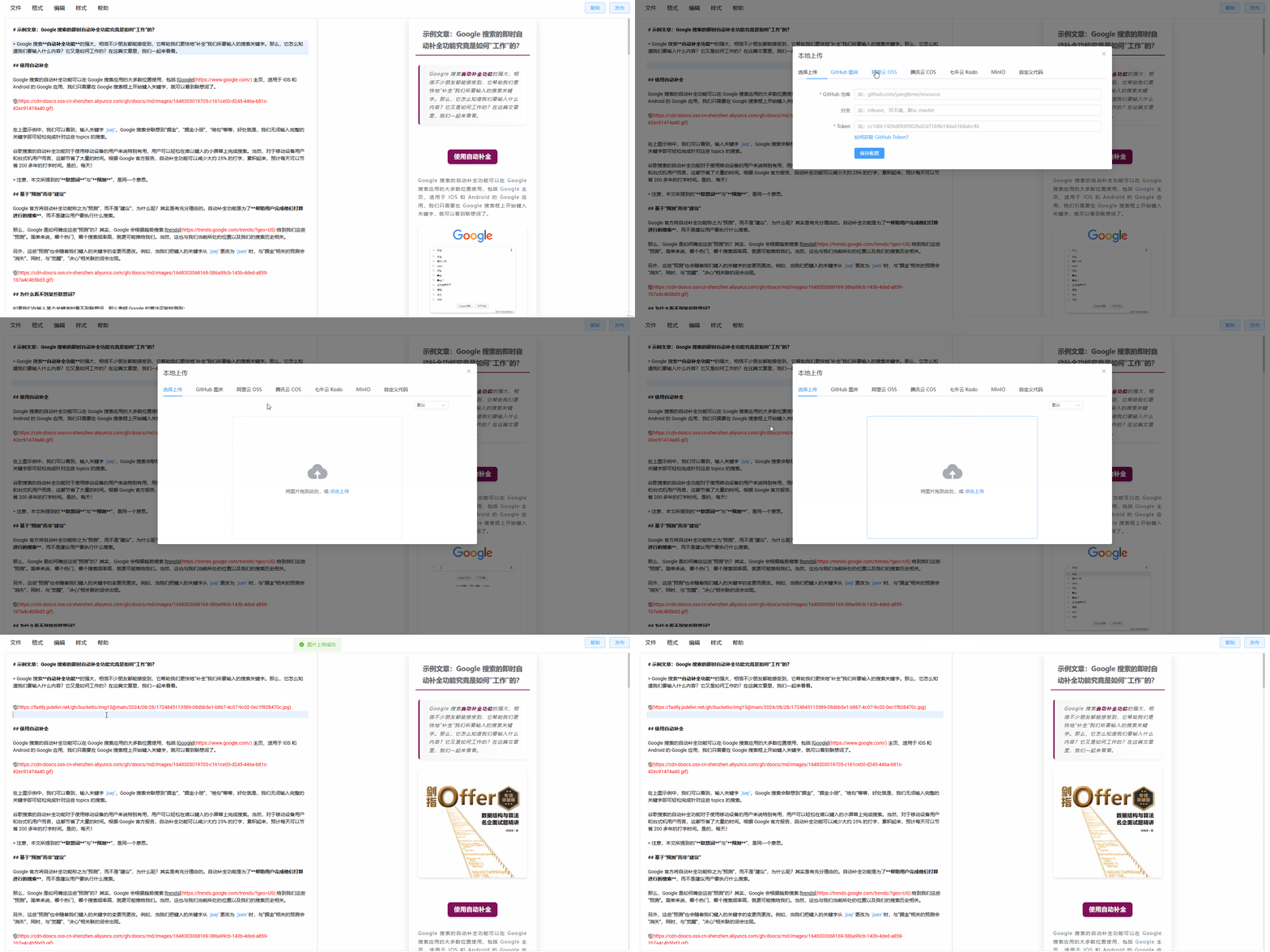
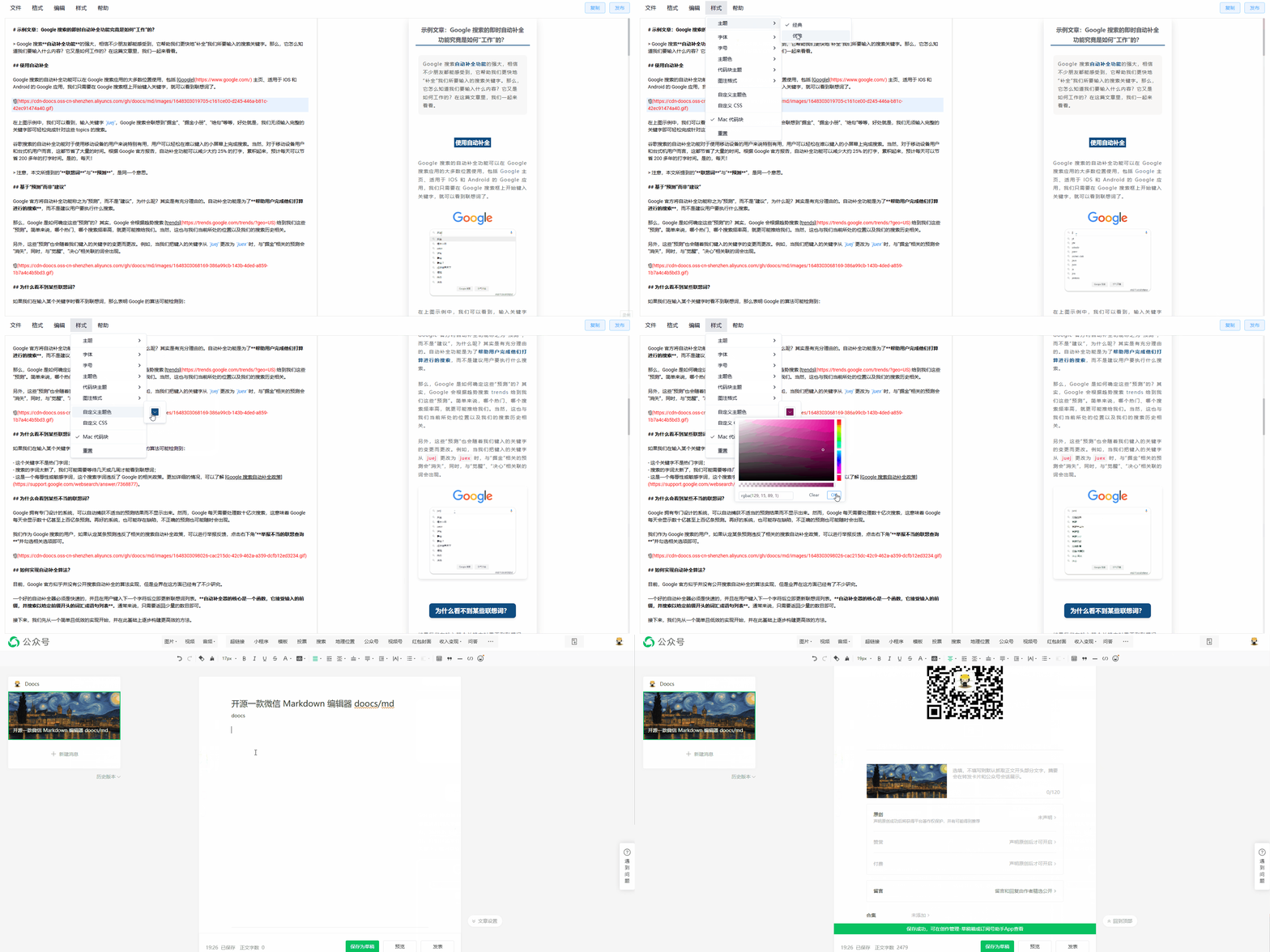
| 🎨 主题切换 | 🖼️ 图片上传 | | :-----------------------------------------------------------------------------------: | :-----------------------------------------------------------------------------------: | | ![demo1](https://cdn-doocs.oss-cn-shenzhen.aliyuncs.com/gh/doocs/md/images/demo1.gif) | ![demo2](https://cdn-doocs.oss-cn-shenzhen.aliyuncs.com/gh/doocs/md/images/demo2.gif) | | 📝 样式扩展 | 🤖 一键排版 | | :-----------------------------------------------------------------------------------: | :-----------------------------------------------------------------------------------: | | ![demo3](https://cdn-doocs.oss-cn-shenzhen.aliyuncs.com/gh/doocs/md/images/demo3.gif) | ![demo4](https://cdn-doocs.oss-cn-shenzhen.aliyuncs.com/gh/doocs/md/images/demo4.gif) |
## 🛠️ 开发与部署 ```sh # 安装 node 版本 nvm i && nvm use # 安装依赖 pnpm i # 启动开发模式 pnpm web dev # 访问 http://localhost:5173/md/ # 部署在 /md 目录 pnpm web build # 部署在根目录 pnpm web build:h5-netlify # Chrome 插件启动及调试 pnpm web ext:dev # 访问 chrome://extensions/ 打开开发者模式,加载已解压的扩展程序,选择 apps/web/.output/chrome-mv3-dev 目录 # Chrome 插件打包 pnpm web ext:zip # Firefox 扩展打包(how to build Firefox addon) pnpm web firefox:zip # output zip file at in apps/web/.output/md-{version}-firefox.zip # uTools 插件打包 pnpm utools:package # output zip file at apps/utools/release/md-utools-v{version}.zip # cloudflare workers pnpm web wrangler:dev # cloudflare workers dev 模式 pnpm web wrangler:deploy # cloudflare workers 部署命令 ``` ## 🚀 快速搭建私有服务 ### 📦 方式 1. 使用 npm cli 通过我们的 npm cli 你可以轻易搭建属于自己的微信 Markdown 编辑器。 ```sh # 安装 npm i -g @doocs/md-cli # 启动 md-cli # 访问 open http://127.0.0.1:8800 # 启动并指定端口 md-cli port=8899 # 访问 open http://127.0.0.1:8899 ``` md-cli 支持以下命令行参数: - `port` 指定端口号,默认 8800,如果被占用会随机使用一个新端口。 - `spaceId` dcloud 服务空间配置 - `clientSecret` dcloud 服务空间配置 ### 🐳 方式 2. 使用 Docker 镜像 如果你是 Docker 用户,也可以直接使用一条命令,启动**完全属于你的、私有化运行的实例**。 ```sh docker run -d -p 8080:80 doocs/md:latest ``` 容器运行起来之后,打开浏览器,访问 http://localhost:8080 即可。 关于本项目 Docker 镜像的更多详细信息,可以关注 https://github.com/doocs/docker-md ## 👥 谁在使用 请查看 [📋 USERS.md](USERS.md) 文件,了解使用本项目的公众号。 ## 🤝 贡献指南 我们欢迎任何形式的贡献!请查看 [📖 CONTRIBUTING.md](./CONTRIBUTING.md) 获取提交 PR、Issue 的流程与规范。 ## ☕ 支持我们 如果本项目对你有所帮助,可以通过以下方式支持我们的持续开发。


## 💬 反馈与交流 如果你在使用过程中遇到问题,或者有好的建议,欢迎在 [🐛 Issues](https://github.com/doocs/md/issues) 中反馈。你也可以加入我们的交流群,和我们一起讨论,若群二维码失效,请添加好友,备注 `md`,我们会拉你进群。


================================================ FILE: USERS.md ================================================ ## 谁在使用 - [Doocs](https://mp.weixin.qq.com/s/RNKDCK2KoyeuMeEs6GUrow) - [ApachePulsar](https://mp.weixin.qq.com/s/udU2ZICg60HbspgWTQdYpg) - [码云 Gitee](https://mp.weixin.qq.com/s/bnlWqzCarDlR4F27HHXNUg) - [掘墓人的小铲子](https://mp.weixin.qq.com/s/FpGIX9viQR6Z9iSCEPH86g) - [全网重点](https://mp.weixin.qq.com/s/yB3ZH3jmcF_LbzuKmnR9BQ) - [爱码士的内心独白](https://mp.weixin.qq.com/s/oc5Z2t9ykbu_Dezjnw5mfQ) - [乐玩 nodejs npm 工具库](https://mp.weixin.qq.com/s/SFde8OsZ8FzNGMHwpmDtrg) - [简静慢](https://mp.weixin.qq.com/s/7UG24ZugfI5ZnhUpo8vfvQ) - [编程图解](https://mp.weixin.qq.com/s/7bfpKACg7HP-PhBrkpM9IQ) - [好酸一柠檬](https://mp.weixin.qq.com/s/CVqmcu_OGG8TQO4FViAQ3w) - [不知所云 Hub](https://mp.weixin.qq.com/s/leDCdpvnfk8eZRPRRHwg5w) - [柯宁申的叙事屋](https://mp.weixin.qq.com/s/AHHrxu7aIYBpvn3PpVHE_Q) - [我的 Beta 世界](https://mp.weixin.qq.com/s/6BO977YG5e_4qYxL4oVQJw) - [生化环材](https://mp.weixin.qq.com/s/fqNxIRxTkn6QEPmi4atW9w) - [秀宇笔记](https://mp.weixin.qq.com/s/VUlOBFA93eiqZ5ZYGmXzmQ) - [IT 王小二](https://mp.weixin.qq.com/s/UU3cH8LvpO_3aeAkkYvZZQ) - [小二来碗饭](https://mp.weixin.qq.com/s/49wUuhOEYG-OZPbFc6_NrQ) - [青年技术宅](https://mp.weixin.qq.com/s/YDUZ0t_spzeqXiE_Idv3OA) - [路引科研](https://mp.weixin.qq.com/s/oinGHCmer1vNE6Hg2OsH1g) - [凯文有事找你](https://mp.weixin.qq.com/s/ap_JhwgmfxgqFAIcTF3nKQ) - [软件部落库](https://mp.weixin.qq.com/s/itkJtMY-1IkZjIn5fWtShw) - [网文小密圈](https://mp.weixin.qq.com/s/_44Ya309DeQzemXLnJUNdQ) - [潇洒哥和黑大帅](https://mp.weixin.qq.com/s/k9WbW0zmxl0S2WX2CXQ6cQ) - [云原生指北](https://mp.weixin.qq.com/s/qFQBBpjUoqdfnmCeOGqRJQ) - [全栈民工](https://mp.weixin.qq.com/s/i7hTPuuJAtcK9G55tep0Uw) - [睡不醒的鲤鱼](https://mp.weixin.qq.com/s/14HNDbDIvfDnV7ePEfbyuQ) - [Dmego](https://mp.weixin.qq.com/s/4QeZsTL84lbN_HO3kCwEwg) - [红岸](https://mp.weixin.qq.com/s/_cNyKqRr8E1ENg9r7IO70Q) - [HelloCoder](https://mp.weixin.qq.com/s/ekCoyhT-JjbYsysKBgdJzQ) - [前端黑板报](https://mp.weixin.qq.com/s/bnZebWPd5-TgiXgQVUKdaQ) - [Web3HackerWorld](https://mp.weixin.qq.com/s/eLuC6e93RR1zCD3w2FgpVA) - [StruggleYang](https://mp.weixin.qq.com/s/fKKQrsatC9en3PwWiCL-KQ) - [比心技术](https://mp.weixin.qq.com/s/DYzzci2paf10CgW22pkyUQ) - [Pyvan](https://mp.weixin.qq.com/s/YeIev850YlFLFrmzxwUcdg) - [CloudberryDB](https://mp.weixin.qq.com/s/8-YRch1U4DiXbpbUHQ1rWQ) - [也无言](https://mp.weixin.qq.com/s/pxykYtxQtvG1SAFz9SO5gw) - [易学历史](https://mp.weixin.qq.com/s/ICOb210BFzuyP49Zf5kj0A) - [小盒子的技术分享](https://mp.weixin.qq.com/s/ilKtA4c3_xQK5ZjwrCZIFw) - [Code365](https://mp.weixin.qq.com/s/WXBZTqkK1JvYlMg5GWyPhA) - [IT 智行](https://mp.weixin.qq.com/s/4eSGBiUX6aC-f6rG5xBq7g) - [哪里不会点哪里](https://mp.weixin.qq.com/s/dDe3pyziFjFMbiFO249U4g) - [AI 思维车间订阅号](https://mp.weixin.qq.com/s/f3Z0kWtEa5qjNDl8s_wArA) - [肖恩聊技术](https://mp.weixin.qq.com/s/hzZHwjKH5IE6H0yNXVhDPQ) - [极客范](https://mp.weixin.qq.com/s/AjOTuwY9Cz5Ir7iOVxLn8Q) - [AI 决策者洞察](https://mp.weixin.qq.com/s/8To24gWM5RFEZZ7SIHu46w) - [小墨是前端](https://mp.weixin.qq.com/s/G7Nw9uBadRGbvTUtv2OtrA) - [豆福 AI 笔记](https://mp.weixin.qq.com/s/b_OqX__jVeqgi8QCT9qMBA) - [运维前沿](https://mp.weixin.qq.com/s/X6x2ziLZGjCelJgXECdhPg) - [鱼 da 王](https://mp.weixin.qq.com/s/DdxK3j31TUWLNVhZtWTuVA) - [程序员小宋](https://mp.weixin.qq.com/s/llgdqSN3AIXMlEbBuPkKNQ) - [架构师修行之路](https://mp.weixin.qq.com/s/-HWx7VZC6NthROGBaATcLA) - [前端徐徐](https://mp.weixin.qq.com/s/OQriNzz3LrheOWgchKpvrw) - [科妙知行](https://mp.weixin.qq.com/s/smcivd8MNAbo0MtXdoVKaw) - [西建大 iOS 众创空间俱乐部](https://mp.weixin.qq.com/s/YQooBjWoAg4WFIp5A4k9tw) - [AMC 真题库](https://mp.weixin.qq.com/s/LOzNVEXtlRv_3vIDhYjyFg) - [不止于 python](https://mp.weixin.qq.com/s/0zd3t7k9CYcwTLevh0KFHw) - [Daily 词语仓](https://mp.weixin.qq.com/s/3SPtQuvC3ohmQICtg4tbAw) - [没事学点 AI 小知识](https://mp.weixin.qq.com/s/rV3eNxWsJbAs93azg9q74Q) - [攻城狮成长日记](https://mp.weixin.qq.com/s/PqtqTCWAlDsInjamND94Jw) - [口袋狗](https://mp.weixin.qq.com/s/YZzhUjDIhF5JD_ierQc5Ng) - [原来开源](https://mp.weixin.qq.com/s/BYXUaF9xK8aTjTSYSkl89g) - [Jackywine](https://mp.weixin.qq.com/s/6ZT_oUQMDVskdHdA6T1gQA) - [轱辘凯 glookai](https://mp.weixin.qq.com/s/d-CFbMnX4ABEWB-abd2p_A) - [小竹读研在养鱼](https://mp.weixin.qq.com/s/NJ_GpCBjQzZIZTbZz3btTg) 注:如果你使用了本 Markdown 编辑器进行内容排版,并且希望在本项目 README 中展示你的公众号,请到 [#5](https://github.com/doocs/md/discussions/5) 留言。 ================================================ FILE: apps/utools/README.md ================================================ # uTools 插件打包指引 该目录包含将微信 Markdown 编辑器打包为 [uTools](https://u.tools) 插件所需的脚本与配置。 ## 快速开始 ```sh pnpm utools:package ``` 该命令将完成以下动作: 1. **下载本地资源**:下载 MathJax、Mermaid、WeChat Sync 等库文件到 `apps/web/public/static/libs`(仅 uTools 打包需要,已添加到 `.gitignore`)。 2. 调用 `pnpm --filter @md/web run build:utools` 构建前端资源至 `apps/utools/dist`,该构建将自动使用相对路径,确保在 uTools 的 `file://` 协议下能够正常加载。构建过程中会自动将远程 CDN 资源替换为本地资源路径。 3. 将仓库根目录的版本号写入 `apps/utools/plugin.json`,保持与主项目同步。 4. 从 `public/mpmd/icon-256.png` 拷贝插件图标至 `apps/utools/logo.png`。 5. 生成形如 `apps/utools/release/md-utools-vX.Y.Z.zip` 的安装包,可直接导入到 uTools。 > 注意:命令执行前请确认已安装 pnpm 10+ 与 Node.js 22+,并在仓库根目录执行 `pnpm install` 安装依赖。 ## 本地资源说明 uTools 审核要求插件不能加载远程资源。打包时会自动下载以下库文件到本地(这些文件不会提交到 Git 仓库): - **MathJax** - 数学公式渲染库 - **Mermaid** - 流程图渲染库 - **WeChat Sync** - 文章同步脚本 构建时,Vite 插件会自动将 HTML 中的 CDN 链接替换为本地资源路径,确保插件可以离线运行。 ### 手动下载资源 如需单独下载资源文件: ```sh node scripts/download-utools-libs.mjs ``` ## 手动导入调试 1. 运行 `pnpm --filter @md/web run build:utools`。 2. 打开 uTools,进入插件面板中的「开发者工具」。 3. 选择「载入本地插件」,指向 `apps/utools` 目录即可。 ## 目录说明 - `plugin.json`:uTools 插件的清单文件。 - `preload.js`:在 uTools 渲染进程和 Web 前端之间建立通信的脚本,用于处理插件唤起事件。 - `package.json`:将此目录标记为 CommonJS 模块以兼容 uTools。 - `dist/`:由 Vite 构建输出的静态资源目录。 - `release/`:运行打包命令后生成的插件安装包。 ================================================ FILE: apps/utools/package.json ================================================ { "type": "commonjs", "private": true } ================================================ FILE: apps/utools/plugin.json ================================================ { "pluginName": "微信 Markdown 编辑器", "description": "Markdown 文档自动排版为微信图文,随时在 uTools 中打开使用", "version": "2.1.0", "author": "doocs", "homepage": "https://github.com/doocs/md", "pluginType": "tool", "platform": [ "win32", "darwin", "linux" ], "logo": "logo.png", "main": "dist/index.html", "preload": "preload.js", "features": [ { "code": "wechat-md", "explain": "打开微信 Markdown 编辑器", "cmds": [ "微信排版", "Markdown 编辑器", "doocs md" ] } ] } ================================================ FILE: apps/utools/preload.js ================================================ (() => { if (typeof window === `undefined`) return // 标识当前环境为 uTools window.__MD_UTOOLS__ = true /** * 安全调用 uTools API 方法 * @param {string} method - 方法名 * @param {...any} args - 方法参数 */ const safeCall = (method, ...args) => { try { if (typeof window.utools?.[method] === `function`) { window.utools[method](...args) } } catch (error) { console.warn(`[md][utools] ${method} failed:`, error) } } /** * 插件进入回调 * @param {object} action - 插件动作参数 */ const enter = (action) => { // 配置 uTools 窗口行为 safeCall(`hideMainWindowWhenBlur`, false) safeCall(`showMainWindow`) safeCall(`setExpendHeight`, 680) // 通知前端应用 window.postMessage({ type: `utools:enter`, payload: action }, `*`) } /** * 插件退出回调 */ const leave = () => { window.postMessage({ type: `utools:leave` }, `*`) } // 注册生命周期回调 safeCall(`onPluginEnter`, enter) safeCall(`onPluginOut`, leave) // 导出插件配置 window.exports = { 'wechat-md': { mode: `none`, args: { enter, leave, }, }, } })() ================================================ FILE: apps/vscode/.gitignore ================================================ out dist node_modules .vscode-test/ *.vsix ================================================ FILE: apps/vscode/.npmrc ================================================ registry=https://registry.npmmirror.com ================================================ FILE: apps/vscode/.vscodeignore ================================================ .vscode/** .vscode-test/** out/** node_modules/** src/** .gitignore .yarnrc webpack.config.js vsc-extension-quickstart.md **/tsconfig.json **/eslint.config.mjs **/*.map **/*.ts **/.vscode-test.* .npmrc ================================================ FILE: apps/vscode/CHANGELOG.md ================================================ # doocs-md changelog ## [Unreleased] - 2025-06-04 ### ✨ Features - 侧边栏Markdown预览视图功能 - 支持微信图文特有的样式渲染 - 可自定义字体和字体大小 - 支持自定义文本主题颜色和主题样式 - 显示字数统计状态栏 - 支持 Mac 风格代码块切换 ================================================ FILE: apps/vscode/LICENSE ================================================ DO WHAT THE FUCK YOU WANT TO PUBLIC LICENSE Version 2, December 2004 Copyright (C) 2025 Doocs Everyone is permitted to copy and distribute verbatim or modified copies of this license document, and changing it is allowed as long as the name is changed. DO WHAT THE FUCK YOU WANT TO PUBLIC LICENSE TERMS AND CONDITIONS FOR COPYING, DISTRIBUTION AND MODIFICATION 0. You just DO WHAT THE FUCK YOU WANT TO. ================================================ FILE: apps/vscode/README.md ================================================ # doocs-md VS Code Extension 为 doocs-md 提供的 VS Code 扩展,支持在编辑器内实时预览 Markdown 渲染效果。 ## 功能特性 - 侧边栏 Markdown 预览视图 - 支持微信图文特有的样式渲染 - 可自定义字体 - 支持自定义字体大小 - 支持自定义文本主题颜色 - 支持自定义主题样式 - 显示字数统计状态 - 支持 Mac 风格代码块切换 ## 使用方法 1. 安装扩展后,打开 Markdown 文件 2. 点击活动栏中的 doocs-md 的 icon 图标 3. 在侧边栏查看实时渲染效果 ## 命令 - `markdown.preview`: 打开 Markdown 预览 - `markdown.setFontFamily`: 设置预览字体 - `markdown.toggleCountStatus`: 切换字数统计显示 - `markdown.toggleMacCodeBlock`: 切换 Mac 风格代码块 ## 与主项目的关系 本扩展是[doocs-md](https://github.com/doocs/md)的配套工具,使用相同的渲染方式,确保预览效果与最终微信图文完全一致。 ## 开发 - **Node.js ≥ 22** ```sh # 安装依赖 npm install # 开发模式 npm run watch # 打包 npm run build ``` ================================================ FILE: apps/vscode/package.json ================================================ { "publisher": "doocs", "name": "doocs-md", "displayName": "doocs-md", "version": "0.0.1", "description": "", "repository": { "type": "git", "url": "https://github.com/doocs/md" }, "categories": [ "Other" ], "main": "./dist/extension.js", "engines": { "vscode": "^1.91.0" }, "activationEvents": [], "contributes": { "viewsContainers": { "activitybar": [ { "id": "markdown-sidebar", "title": "Markdown Preview", "icon": "./public/icon-256-gray.png" } ] }, "views": { "markdown-sidebar": [ { "id": "markdown.preview.view", "name": "Preview", "icon": "./public/icon-256-gray.png" } ] }, "commands": [ { "command": "markdown.preview", "title": "Open Markdown Preview", "icon": { "light": "./public/icon-256-gray.png", "dark": "./public/icon-256-gray.png" } }, { "command": "markdown.setFontFamily", "title": "Set Font Family", "category": "Markdown Preview" }, { "command": "markdown.toggleCountStatus", "title": "Toggle Count Status", "category": "Markdown Preview" }, { "command": "markdown.toggleMacCodeBlock", "title": "Toggle Mac Code Block", "category": "Markdown Preview" } ], "menus": { "editor/title": [ { "command": "markdown.preview", "group": "navigation", "when": "editorLangId == markdown" } ] } }, "scripts": { "vscode:prepublish": "npm run build", "compile": "webpack", "watch": "webpack --watch", "build": "webpack --mode production --devtool hidden-source-map", "package": "vsce package --no-dependencies --allow-package-secrets github" }, "dependencies": { "@md/core": "workspace:*", "@md/shared": "workspace:*", "@types/webpack": "^5.28.5", "isomorphic-dompurify": "^3.5.1", "postcss": "^8.5.8", "ts-loader": "^9.5.4", "tsconfig-paths-webpack-plugin": "^4.2.0" }, "devDependencies": { "@types/vscode": "^1.110.0", "@vscode/vsce": "^3.7.1", "webpack-cli": "^7.0.2" } } ================================================ FILE: apps/vscode/src/css/index.ts ================================================ export const css = ` :root { --background: 0 0% 100%; --foreground: 0 0% 3.9%; --card: 0 0% 100%; --card-foreground: 0 0% 3.9%; --popover: 0 0% 100%; --popover-foreground: 0 0% 3.9%; --primary: 0 0% 9%; --primary-foreground: 0 0% 98%; --secondary: 0 0% 96.1%; --secondary-foreground: 0 0% 9%; --muted: 0 0% 96.1%; --muted-foreground: 0 0% 45.1%; --accent: 0 0% 96.1%; --accent-foreground: 0 0% 9%; --destructive: 0 84.2% 60.2%; --destructive-foreground: 0 0% 98%; --border: 0 0% 89.8%; --input: 0 0% 89.8%; --ring: 0 0% 3.9%; --radius: 0.5rem; --blockquote-background: #f7f7f7; } .dark { --background: 0 0% 3.9%; --foreground: 0 0% 98%; --card: 0 0% 3.9%; --card-foreground: 0 0% 98%; --popover: 0 0% 3.9%; --popover-foreground: 0 0% 98%; --primary: 0 0% 98%; --primary-foreground: 0 0% 9%; --secondary: 0 0% 14.9%; --secondary-foreground: 0 0% 98%; --muted: 0 0% 14.9%; --muted-foreground: 0 0% 63.9%; --accent: 0 0% 14.9%; --accent-foreground: 0 0% 98%; --destructive: 0 62.8% 30.6%; --destructive-foreground: 0 0% 98%; --border: 0 0% 14.9%; --input: 0 0% 14.9%; --ring: 0 0% 83.1%; --blockquote-background: #212121; } ` ================================================ FILE: apps/vscode/src/extension.ts ================================================ import type { ThemeName } from '@md/shared' import { initRenderer } from '@md/core/renderer' import { generateCSSVariables } from '@md/core/theme' import { modifyHtmlContent } from '@md/core/utils' import { baseCSSContent, themeMap } from '@md/shared' import * as vscode from 'vscode' import { css } from './css' import { MarkdownTreeDataProvider } from './treeDataProvider' let activePanel: vscode.WebviewPanel | undefined export function activate(context: vscode.ExtensionContext) { // Register TreeDataProvider const treeDataProvider = new MarkdownTreeDataProvider(context) vscode.window.registerTreeDataProvider(`markdown.preview.view`, treeDataProvider) // Command for registering style settings context.subscriptions.push( vscode.commands.registerCommand(`markdown.setFontSize`, (size: string) => { treeDataProvider.updateFontSize(size) }), vscode.commands.registerCommand(`markdown.setTheme`, (theme: ThemeName) => { treeDataProvider.updateTheme(theme) }), vscode.commands.registerCommand(`markdown.setPrimaryColor`, (color: string) => { treeDataProvider.updatePrimaryColor(color) }), vscode.commands.registerCommand(`markdown.setFontFamily`, (font: string) => { treeDataProvider.updateFontFamily(font) }), vscode.commands.registerCommand(`markdown.toggleCountStatus`, () => { treeDataProvider.updateCountStatus(!treeDataProvider.getCurrentCountStatus()) }), vscode.commands.registerCommand(`markdown.toggleMacCodeBlock`, () => { treeDataProvider.updateMacCodeBlock(!treeDataProvider.getCurrentMacCodeBlock()) }), ) const disposable = vscode.commands.registerCommand(`markdown.preview`, () => { const editor = vscode.window.activeTextEditor if (!editor || editor.document.languageId !== `markdown`) { return } // 如果已有面板且未关闭,则直接显示 if (activePanel) { activePanel.reveal(vscode.ViewColumn.Two) return } // Create and display a new webview panel const panel = vscode.window.createWebviewPanel( `markdownPreview`, // 视图类型 `Markdown Preview - ${editor.document.fileName}`, // 面板标题 vscode.ViewColumn.Two, // 在第二栏显示 { enableScripts: true, // 启用JS retainContextWhenHidden: true, // 保持状态 }, ) activePanel = panel panel.onDidDispose(() => { activePanel = undefined }) treeDataProvider.onDidChangeTreeData(updateWebview) function updateWebview() { if (!editor) return // 使用新主题系统 const renderer = initRenderer({ countStatus: treeDataProvider.getCurrentCountStatus(), isMacCodeBlock: treeDataProvider.getCurrentMacCodeBlock(), legend: `none`, }) const markdownContent = editor.document.getText() const html = modifyHtmlContent(markdownContent, renderer) // 生成主题 CSS const variables = generateCSSVariables({ primaryColor: treeDataProvider.getCurrentPrimaryColor(), fontFamily: treeDataProvider.getCurrentFontFamily(), fontSize: treeDataProvider.getCurrentFontSize(), isUseIndent: false, isUseJustify: false, }) const themeCSS = themeMap[treeDataProvider.getCurrentTheme() as ThemeName] const completeCss = `${variables}\n\n${baseCSSContent}\n\n${themeCSS}\n\n${css}` panel.webview.html = wrapHtmlTag(html, completeCss) } // render first webview updateWebview() // Monitor the changes of documents const changeSubscription = vscode.workspace.onDidChangeTextDocument((e: vscode.TextDocumentChangeEvent) => { if (e.document === editor.document) { updateWebview() } }) // Cancel the subscription when the panel is closed panel.onDidDispose(() => { changeSubscription.dispose() }) }) context.subscriptions.push(disposable) // When the Markdown file is opened, the preview button is displayed in the status bar. vscode.window.onDidChangeActiveTextEditor((editor: vscode.TextEditor | undefined) => { if (editor && editor.document.languageId === `markdown`) { vscode.commands.executeCommand(`setContext`, `markdownFileActive`, true) } else { vscode.commands.executeCommand(`setContext`, `markdownFileActive`, false) } }) } function wrapHtmlTag(html: string, css: string) { return `
${html}
` } ================================================ FILE: apps/vscode/src/styleChoices.ts ================================================ import { codeBlockThemeOptions, colorOptions, fontFamilyOptions, fontSizeOptions, legendOptions, themeOptions } from '@md/shared/configs' export { codeBlockThemeOptions, colorOptions, fontFamilyOptions, fontSizeOptions, legendOptions, themeOptions, } ================================================ FILE: apps/vscode/src/treeDataProvider.ts ================================================ import type { ThemeName } from '@md/shared/configs' import * as vscode from 'vscode' import { colorOptions, fontFamilyOptions, fontSizeOptions, themeOptions } from './styleChoices' export class MarkdownTreeDataProvider implements vscode.TreeDataProvider { private _onDidChangeTreeData: vscode.EventEmitter = new vscode.EventEmitter() readonly onDidChangeTreeData: vscode.Event = this._onDidChangeTreeData.event private currentFontSize: string private currentTheme: ThemeName private currentPrimaryColor: string private currentFontFamily: string private countStatus: boolean private isMacCodeBlock: boolean private context: vscode.ExtensionContext constructor(context: vscode.ExtensionContext) { this.context = context this.currentFontSize = this.context.workspaceState.get(`markdownPreview.fontSize`, fontSizeOptions[0].value) this.currentTheme = this.context.workspaceState.get(`markdownPreview.theme`, themeOptions[0].value) this.currentPrimaryColor = this.context.workspaceState.get(`markdownPreview.primaryColor`, colorOptions[0].value) this.currentFontFamily = this.context.workspaceState.get(`markdownPreview.fontFamily`, fontFamilyOptions[0].value) this.countStatus = this.context.workspaceState.get(`markdownPreview.countStatus`, false) this.isMacCodeBlock = this.context.workspaceState.get(`markdownPreview.isMacCodeBlock`, false) } getTreeItem(element: vscode.TreeItem): vscode.TreeItem { return element } updateCountStatus(status: boolean): void { this.countStatus = status this.context.workspaceState.update(`markdownPreview.countStatus`, status) this._onDidChangeTreeData.fire(undefined) } updateMacCodeBlock(status: boolean): void { this.isMacCodeBlock = status this.context.workspaceState.update(`markdownPreview.isMacCodeBlock`, status) this._onDidChangeTreeData.fire(undefined) } getCurrentMacCodeBlock(): boolean { return this.isMacCodeBlock } getCurrentCountStatus(): boolean { return this.countStatus } getChildren(element?: vscode.TreeItem): Thenable { if (!element) { return Promise.resolve([ new vscode.TreeItem(`字号`, vscode.TreeItemCollapsibleState.Expanded), new vscode.TreeItem(`字体`, vscode.TreeItemCollapsibleState.Expanded), new vscode.TreeItem(`主题`, vscode.TreeItemCollapsibleState.Expanded), new vscode.TreeItem(`主题色`, vscode.TreeItemCollapsibleState.Expanded), new vscode.TreeItem(`计数状态`, vscode.TreeItemCollapsibleState.None), new vscode.TreeItem(`Mac代码块`, vscode.TreeItemCollapsibleState.None), ].map((item) => { if (item.label === `计数状态`) { item.command = { command: `markdown.toggleCountStatus`, title: `Toggle Count Status`, arguments: [], } if (this.countStatus) { item.iconPath = new vscode.ThemeIcon(`check`) } } else if (item.label === `Mac代码块`) { item.command = { command: `markdown.toggleMacCodeBlock`, title: `Toggle Mac Code Block`, arguments: [], } if (this.isMacCodeBlock) { item.iconPath = new vscode.ThemeIcon(`check`) } } return item })) } else if (element.label === `字号`) { return Promise.resolve(fontSizeOptions.map((option) => { const size = option.value const label = option.label const desc = option.desc const item = new vscode.TreeItem(`${label} ${desc}`) item.command = { command: `markdown.setFontSize`, title: `Set Font Size`, arguments: [size], } if (size === this.currentFontSize) { item.iconPath = new vscode.ThemeIcon(`check`) } return item })) } else if (element.label === `字体`) { return Promise.resolve(fontFamilyOptions.map((option) => { const font = option.value const label = option.label const desc = option.desc const item = new vscode.TreeItem(`${label} ${desc}`) item.command = { command: `markdown.setFontFamily`, title: `Set Font Family`, arguments: [font], } if (font === this.currentFontFamily) { item.iconPath = new vscode.ThemeIcon(`check`) } return item })) } else if (element.label === `主题`) { return Promise.resolve(themeOptions.map((option) => { const theme = option.value const label = option.label const desc = option.desc const item = new vscode.TreeItem(`${label} ${desc}`) item.command = { command: `markdown.setTheme`, title: `Set Theme`, arguments: [theme], } if (theme === this.currentTheme) { item.iconPath = new vscode.ThemeIcon(`check`) } return item })) } else if (element.label === `主题色`) { return Promise.resolve(colorOptions.map((option) => { const color = option.value const label = option.label const desc = option.desc const item = new vscode.TreeItem(`${label} ${desc}`) item.command = { command: `markdown.setPrimaryColor`, title: `Set Primary Color`, arguments: [color], } if (color === this.currentPrimaryColor) { item.iconPath = new vscode.ThemeIcon(`check`) } return item })) } return Promise.resolve([]) } updateFontSize(size: string) { this.currentFontSize = size this.context.workspaceState.update(`markdownPreview.fontSize`, size) this._onDidChangeTreeData.fire(undefined) } updateTheme(theme: ThemeName) { this.currentTheme = theme this.context.workspaceState.update(`markdownPreview.theme`, theme) this._onDidChangeTreeData.fire(undefined) } updatePrimaryColor(color: string) { this.currentPrimaryColor = color this.context.workspaceState.update(`markdownPreview.primaryColor`, color) this._onDidChangeTreeData.fire(undefined) } updateFontFamily(font: string) { this.currentFontFamily = font this.context.workspaceState.update(`markdownPreview.fontFamily`, font) this._onDidChangeTreeData.fire(undefined) } getCurrentFontSize() { return this.currentFontSize } getCurrentFontSizeNumber() { return Number(this.currentFontSize.replace(`px`, ``)) } getCurrentTheme(): ThemeName { return this.currentTheme } getCurrentPrimaryColor() { return this.currentPrimaryColor } getCurrentFontFamily() { return this.currentFontFamily } } ================================================ FILE: apps/vscode/tsconfig.json ================================================ { "compilerOptions": { "target": "ES2022", "lib": ["ES2022"], "module": "esnext", "moduleResolution": "bundler", "paths": { "@/*": ["../*"] }, "types": ["vscode"], "strict": true, "sourceMap": true, "esModuleInterop": true }, "include": [ "src/**/*", "../../packages/shared/src/global.d.ts" ], "exclude": ["node_modules", "dist"] } ================================================ FILE: apps/vscode/webpack.config.mjs ================================================ 'use strict' import path from 'node:path' import { TsconfigPathsPlugin } from 'tsconfig-paths-webpack-plugin' const currentDir = import.meta.dirname // @ts-check /** @typedef {import('webpack').Configuration} WebpackConfig */ /** @type WebpackConfig */ export default function config() { return { target: `node`, mode: `none`, entry: `./src/extension.ts`, output: { path: path.resolve(currentDir, `dist`), filename: `extension.js`, libraryTarget: `commonjs2`, }, externals: { vscode: `commonjs vscode`, }, resolve: { extensions: [`.ts`, `.js`], fallback: { 'bufferutil': false, 'utf-8-validate': false, 'canvas': false, }, plugins: [new TsconfigPathsPlugin({ configFile: path.resolve(currentDir, `tsconfig.json`) })], }, module: { rules: [ { test: /\.ts$/, exclude: /node_modules/, use: [ { loader: `ts-loader`, }, ], }, { test: /\.(css|txt)$/, type: 'asset/source', }, ], }, devtool: `nosources-source-map`, infrastructureLogging: { level: `log`, }, optimization: { usedExports: true, sideEffects: true, }, } } ================================================ FILE: apps/web/components.json ================================================ { "$schema": "https://shadcn-vue.com/schema.json", "style": "new-york", "typescript": true, "tailwind": { "config": "tailwind.config.cjs", "css": "src/assets/index.css", "baseColor": "neutral", "cssVariables": true, "prefix": "" }, "aliases": { "components": "@/components", "composables": "@/composables", "utils": "@/lib/utils", "ui": "@/components/ui", "lib": "@/lib" }, "iconLibrary": "lucide" } ================================================ FILE: apps/web/index.html ================================================ 微信 Markdown 编辑器 | Doocs 开源社区
致力于让 Markdown 编辑更简单

正在加载编辑器

================================================ FILE: apps/web/netlify.toml ================================================ [build] command = "pnpm run build:h5-netlify" publish = "dist" # 设置重定向规则,确保SPA路由正常工作 [[redirects]] from = "/*" to = "/index.html" status = 200 ================================================ FILE: apps/web/package.json ================================================ { "name": "@md/web", "type": "module", "private": true, "engines": { "node": ">=22.16.0" }, "scripts": { "start": "pnpm run dev", "dev": "vite", "build": "run-p type-check \"build:only {@}\" --", "build:only": "vite build", "build:h5-netlify": "run-p type-check \"build:h5-netlify:only {@}\" --", "build:h5-netlify:only": "cross-env SERVER_ENV=NETLIFY vite build", "build:utools": "cross-env SERVER_ENV=UTOOLS vite build --outDir ../utools/dist --emptyOutDir", "build:cli": "pnpm run build && npx shx rm -rf packages/md-cli/dist && npx shx rm -rf dist/**/*.map && npx shx cp -r dist packages/md-cli/ && cd packages/md-cli && npm pack", "build:analyze": "cross-env ANALYZE=true vite build", "compile:extension": "pnpm --prefix ./src/extension run compile", "preview": "pnpm run build && vite preview", "wrangler:dev": "cross-env CF_WORKERS=1 vite --host", "wrangler:deploy": "cross-env CF_WORKERS=1 pnpm run build:h5-netlify && wrangler deploy", "release:cli": "node ./scripts/release.js", "ext:dev": "wxt", "ext:zip": "cross-env NODE_OPTIONS=--max-old-space-size=4096 wxt zip", "firefox:dev": "wxt -b firefox", "firefox:zip": "cross-env NODE_OPTIONS=--max-old-space-size=4096 wxt zip -b firefox", "type-check": "vue-tsc --build --force", "postinstall": "wxt prepare", "package:extension": "pnpm --prefix ./src/extension run package" }, "dependencies": { "@aws-sdk/client-s3": "^3.1013.0", "@aws-sdk/s3-request-presigner": "^3.1013.0", "@exercism/highlightjs-gdscript": "^0.0.1", "@md/core": "workspace:*", "@md/shared": "workspace:*", "@ssttevee/multipart-parser": "^0.1.9", "@vee-validate/yup": "^4.15.1", "@vueuse/core": "^14.2.1", "browser-image-compression": "^2.0.2", "buffer-from": "^1.1.2", "class-variance-authority": "^0.7.1", "clsx": "^2.1.1", "codemirror": "^6.0.2", "crypto-js": "^4.2.0", "es-toolkit": "^1.45.1", "html-to-image": "^1.11.13", "juice": "11.0.3", "lucide-vue-next": "^0.577.0", "marked": "^17.0.4", "pinia": "^3.0.4", "qiniu-js": "^3.4.3", "radix-vue": "^1.9.17", "reka-ui": "^2.9.2", "spark-md5": "3.0.2", "tailwind-merge": "^3.5.0", "tailwindcss-animate": "^1.0.7", "uuid": "^13.0.0", "vee-validate": "^4.15.1", "vue": "^3.5.30", "vue-pick-colors": "^1.8.0", "vue-sonner": "^2.0.9", "yup": "^1.7.1" }, "devDependencies": { "@cloudflare/vite-plugin": "1.29.1", "@cloudflare/workers-types": "^4.20260317.1", "@md/config": "workspace:*", "@tailwindcss/postcss": "^4.2.2", "@tailwindcss/vite": "^4.2.2", "@types/buffer-from": "^1.1.3", "@types/crypto-js": "^4.2.2", "@types/spark-md5": "3.0.5", "@vitejs/plugin-vue": "^6.0.5", "less": "^4.6.4", "linkedom": "^0.18.12", "ohash": "^2.0.11", "postcss": "^8.5.8", "rollup": "^4.59.0", "rollup-plugin-visualizer": "^7.0.1", "shx": "^0.4.0", "tailwindcss": "^4.2.2", "unplugin-auto-import": "^21.0.0", "unplugin-vue-components": "^31.0.0", "vite": "^8.0.1", "vite-plugin-radar": "^0.10.1", "vite-plugin-vue-devtools": "^8.1.0", "vue-tsc": "^3.2.6", "wrangler": "^4.75.0", "wxt": "^0.20.20" } } ================================================ FILE: apps/web/plugins/vite-plugin-utools-local-assets.ts ================================================ import type { Plugin } from 'vite' import process from 'node:process' /** * Vite 插件:在 uTools 构建时将远程资源替换为本地资源 */ export function utoolsLocalAssetsPlugin(): Plugin { const isUTools = process.env.SERVER_ENV === `UTOOLS` return { name: `vite-plugin-utools-local-assets`, apply: `build`, transformIndexHtml: { order: `post`, handler(html) { if (!isUTools) return html // 替换 favicon html = html.replace( /https:\/\/cdn-doocs\.oss-cn-shenzhen\.aliyuncs\.com\/gh\/doocs\/md\/images\/favicon\.png/g, `./src/assets/images/favicon.png`, ) // 替换 apple-touch-icon html = html.replace( /https:\/\/cdn-doocs\.oss-cn-shenzhen\.aliyuncs\.com\/gh\/doocs\/md\/images\/1648303220922-7e14aefa-816e-44c1-8604-ade709ca1c69\.png/g, `./src/assets/images/favicon.png`, ) // 替换 MathJax html = html.replace( /https:\/\/cdn-doocs\.oss-cn-shenzhen\.aliyuncs\.com\/npm\/mathjax@3\/es5\/tex-svg\.js/g, `./static/libs/mathjax/tex-svg.js`, ) // 替换 Mermaid html = html.replace( /https:\/\/cdn-doocs\.oss-cn-shenzhen\.aliyuncs\.com\/npm\/mermaid@11\/dist\/mermaid\.min\.js/g, `./static/libs/mermaid/mermaid.min.js`, ) // 替换 WeChat Sync html = html.replace( /https:\/\/cdn-doocs\.oss-cn-shenzhen\.aliyuncs\.com\/gh\/wechatsync\/article-syncjs@latest\/dist\/main\.js/g, `./static/libs/article-syncjs/main.js`, ) return html }, }, } } ================================================ FILE: apps/web/postcss.config.js ================================================ export default { plugins: { '@tailwindcss/postcss': {}, }, } ================================================ FILE: apps/web/public/upload/.gitkeep ================================================ ================================================ FILE: apps/web/src/App.vue ================================================ ================================================ FILE: apps/web/src/assets/example/markdown.md ================================================ # 探索 Markdown 的奇妙世界 欢迎来到 Markdown 的奇妙世界!无论你是写作爱好者、开发者、博主,还是想要简单记录点什么的人,Markdown 都能成为你新的好伙伴。它不仅让写作变得简单明了,还能轻松地将内容转化为漂亮的网页格式。今天,我们将全面探讨 Markdown 的基础和进阶语法,让你在这个过程中充分享受写作的乐趣! Markdown 是一种轻量级标记语言,用于格式化纯文本。它以简单、直观的语法而著称,可以快速地生成 HTML。Markdown 是写作与代码的完美结合,既简单又强大。 ## Markdown 基础语法 ### 1. 标题:让你的内容层次分明 用 `#` 号来创建标题。标题从 `#` 开始,`#` 的数量表示标题的级别。 ```markdown # 一级标题 ## 二级标题 ### 三级标题 #### 四级标题 ``` 以上代码将渲染出一组层次分明的标题,使你的内容井井有条。 ### 2. 段落与换行:自然流畅 Markdown 中的段落就是一行接一行的文本。要创建新段落,只需在两行文本之间空一行。 ### 3. 字体样式:强调你的文字 - **粗体**:用两个星号或下划线包裹文字,如 `**粗体**` 或 `__粗体__`。 - _斜体_:用一个星号或下划线包裹文字,如 `*斜体*` 或 `_斜体_`。 - ~~删除线~~:用两个波浪线包裹文字,如 `~~删除线~~`。 - ==高亮==:用两个等号包裹文字,如 `==高亮==`。 - ++下划线++:用两个加号包裹文字,如 `++下划线++`。 - ~波浪线~:用一个波浪线包裹文字,如 `~波浪线~`。 这些简单的标记可以让你的内容更有层次感和重点突出。 ### 4. 列表:整洁有序 - **无序列表**:用 `-`、`*` 或 `+` 加空格开始一行。 - **有序列表**:使用数字加点号(`1.`、`2.`)开始一行。 在列表中嵌套其他内容?只需缩进即可实现嵌套效果。 - 无序列表项 1 1. 嵌套有序列表项 1 2. 嵌套有序列表项 2 - 无序列表项 2 1. 有序列表项 1 2. 有序列表项 2 ### 5. 链接与图片:丰富内容 - **链接**:用方括号和圆括号创建链接 `[显示文本](链接地址)`。 - **图片**:和链接类似,只需在前面加上 `!`,如 `![描述文本](图片链接)`。 [访问 Doocs](https://github.com/doocs) ![doocs](https://cdn-doocs.oss-cn-shenzhen.aliyuncs.com/gh/doocs/md/images/logo-2.png) 轻松实现富媒体内容展示! > 因微信公众号平台不支持除公众号内容以外的链接,故其他平台的链接,会呈现链接样式但无法点击跳转。 > 对于这些链接请注意明文书写,或点击左上角「格式->微信外链接转底部引用」开启引用,这样就可以在底部观察到链接指向。 另外,使用 `` 语法可以创建横屏滑动幻灯片,支持微信公众号平台。建议使用相似尺寸的图片以获得最佳显示效果。 ### 6. 引用:引用名言或引人深思的句子 使用 `>` 来创建引用,只需在文本前面加上它。多层引用?在前一层 `>` 后再加一个就行。 > 这是一个引用 > > > 这是一个嵌套引用 这让你的引用更加富有层次感。 ### 7. 代码块:展示你的代码 - **行内代码**:用反引号包裹,如 `code`。 - **代码块**:用三个反引号包裹,并指定语言,如: ```js console.log(`Hello, Doocs!`) ``` 语法高亮让你的代码更易读。 ### 8. 分割线:分割内容 用三个或更多的 `-`、`*` 或 `_` 来创建分割线。 --- 为你的内容添加视觉分隔。 ### 9. 表格:清晰展示数据 Markdown 支持简单的表格,用 `|` 和 `-` 分隔单元格和表头。 | 项目人员 | 邮箱 | 微信号 | | ------------------------------------------- | ---------------------- | ------------ | | [yanglbme](https://github.com/yanglbme) | contact@yanglibin.info | YLB0109 | | [YangFong](https://github.com/YangFong) | yangfong2022@gmail.com | yq2419731931 | | [thinkasany](https://github.com/thinkasany) | thinkasany@gmail.com | thinkasany | 这样的表格让数据展示更为清爽! > 手动编写标记太麻烦?我们提供了便捷方式。左上方点击「编辑->插入表格」,即可快速实现表格渲染。 ## Markdown 进阶技巧 ### 1. LaTeX 公式:完美展示数学表达式 Markdown 允许嵌入 LaTeX 语法展示数学公式: - **行内公式**:用 `$` 包裹公式,如 $E = mc^2$。 - **块级公式**:用 `$$` 包裹公式,如: $$ \begin{aligned} d_{i, j} &\leftarrow d_{i, j} + 1 \\ d_{i, y + 1} &\leftarrow d_{i, y + 1} - 1 \\ d_{x + 1, j} &\leftarrow d_{x + 1, j} - 1 \\ d_{x + 1, y + 1} &\leftarrow d_{x + 1, y + 1} + 1 \end{aligned} $$ 现在还支持 **LaTeX 标准格式**: - **行内公式**:用 `\(...\)` 包裹公式,如 \(x^2 + y^2 = z^2\)。 - **块级公式**:用 `\[...\]` 包裹公式,如: \[ \int\_{-\infty}^{\infty} e^{-x^2} dx = \sqrt{\pi} \] 混合使用示例:传统格式 $a + b = c$ 和 LaTeX 格式 \(d + e = f\) 可以在同一段落中共存。 1. 列表内块公式 1 $$ \chi^2 = \sum \frac{(O - E)^2}{E} $$ 2. 列表内块公式 2 $$ \chi^2 = \sum \frac{(|O - E| - 0.5)^2}{E} $$ 这是展示复杂数学表达的利器! ### 2. Mermaid 流程图:可视化流程 Mermaid 是强大的可视化工具,可以在 Markdown 中创建流程图、时序图等。 ```mermaid graph LR A[GraphCommand] --> B[update] A --> C[goto] A --> D[send] B --> B1[更新状态] C --> C1[流程控制] D --> D1[消息传递] ``` ```mermaid graph TD; A-->B; A-->C; B-->D; C-->D; ``` ```mermaid pie title Key elements in Product X "Calcium" : 42.96 "Potassium" : 50.05 "Magnesium" : 10.01 "Iron" : 5 ``` ```mermaid pie title 为什么总是宅在家里? "喜欢宅" : 45 "天气太热" : 70 "穷" : 500 "没人约" : 95 ``` 这种方式不仅能直观展示流程,还能提升文档的专业性。 > 更多用法,参见:[Mermaid User Guide](https://mermaid.js.org/intro/getting-started.html)。 ### 3. PlantUML 流程图:可视化流程 PlantUML 是强大的可视化工具,可以在 Markdown 中创建流程图、时序图等。 ```plantuml @startuml participant Participant as Foo actor Actor as Foo1 boundary Boundary as Foo2 control Control as Foo3 entity Entity as Foo4 database Database as Foo5 collections Collections as Foo6 queue Queue as Foo7 Foo -> Foo1 : To actor Foo -> Foo2 : To boundary Foo -> Foo3 : To control Foo -> Foo4 : To entity Foo -> Foo5 : To database Foo -> Foo6 : To collections Foo -> Foo7: To queue @enduml ``` > 更多用法,参见:[PlantUML 主页](https://plantuml.com/zh/)。 ### 4. Infographic 信息图:可视化数据 新一代信息图可视化引擎,让文字信息栩栩如生! ```infographic infographic list-row-horizontal-icon-arrow data title 客户增长引擎 desc 多渠道触达与复购提升 items - label 线索获取 value 18.6 desc 渠道投放与内容获客 icon rocket-launch - label 转化提效 value 12.4 desc 线索评分与自动跟进 icon progress-check - label 复购提升 value 9.8 desc 会员体系与权益运营 icon account-sync - label 口碑传播 value 6.2 desc 社群激励与推荐裂变 icon account-group ``` > 更多用法,参见:[AntV Infographic Gallery](https://infographic.antv.vision/gallery)。 ### 5. Ruby 注音:注音标注 支持两种格式: ```md 1. [文字]{注音} 2. [文字]^(注音) ``` 渲染效果如下: [你好]{nǐ hǎo} [世界]{shì jiè} 支持四种分隔符: `・`(中点)、`.` (全角句点)、`。` (中文句号)、`-` (英文减号) 示例: ```md [你好世界]{nǐ・hǎo・shì・jiè} [小夜時雨]^(さ・よ・しぐれ) ``` [你好世界]{nǐ・hǎo・shì・jiè} [小夜時雨]^(さ・よ・しぐれ) 当字符串数量与分隔符数量不匹配时,会自动匹配到最合适的分隔符。 ```md [小夜時雨]{さ・よ・しぐれ} [小夜時雨]{さ・よ} [小夜]{さ・よ・しぐれ} [小夜時雨]{さ・よ・しぐれ・extra} ``` [小夜時雨]{さ・よ・しぐれ} [小夜時雨]{さ・よ} [小夜]{さ・よ・しぐれ} [小夜時雨]{さ・よ・しぐれ・extra} ## 结语 Markdown 是一种简单、强大且易于掌握的标记语言,通过学习基础和进阶语法,你可以快速创作内容并有效传达信息。无论是技术文档、个人博客还是项目说明,Markdown 都是你的得力助手。希望这篇内容能够带你全面了解 Markdown 的潜力,让你的写作更加丰富多彩! 现在,拿起 Markdown 编辑器,开始创作吧!探索 Markdown 的世界,你会发现它远比想象中更精彩! #### 推荐阅读 - [阿里又一个 20k+ stars 开源项目诞生,恭喜 fastjson!](https://mp.weixin.qq.com/s/RNKDCK2KoyeuMeEs6GUrow) - [刷掉 90% 候选人的互联网大厂海量数据面试题(附题解 + 方法总结)](https://mp.weixin.qq.com/s/rjGqxUvrEqJNlo09GrT1Dw) - [好用!期待已久的文本块功能究竟如何在 Java 13 中发挥作用?](https://mp.weixin.qq.com/s/kalGv5T8AZGxTnLHr2wDsA) - [2019 GitHub 开源贡献排行榜新鲜出炉!微软谷歌领头,阿里跻身前 12!](https://mp.weixin.qq.com/s/_q812aGD1b9QvZ2WFI0Qgw) ---
================================================ FILE: apps/web/src/assets/index.css ================================================ @import 'tailwindcss'; @config '../../tailwind.config.cjs'; /* The default border color has changed to `currentcolor` in Tailwind CSS v4, so we've added these compatibility styles to make sure everything still looks the same as it did with Tailwind CSS v3. If we ever want to remove these styles, we need to add an explicit border color utility to any element that depends on these defaults. */ @layer base { *, ::after, ::before, ::backdrop, ::file-selector-button { border-color: var(--color-gray-200, currentcolor); } } @layer base { :root { --background: 0 0% 100%; --foreground: 0 0% 3.9%; --card: 0 0% 100%; --card-foreground: 0 0% 3.9%; --popover: 0 0% 100%; --popover-foreground: 0 0% 3.9%; --primary: 0 0% 9%; --primary-foreground: 0 0% 98%; --secondary: 0 0% 96.1%; --secondary-foreground: 0 0% 9%; --muted: 0 0% 96.1%; --muted-foreground: 0 0% 45.1%; --accent: 0 0% 96.1%; --accent-foreground: 0 0% 9%; --destructive: 0 84.2% 60.2%; --destructive-foreground: 0 0% 98%; --border: 0 0% 89.8%; --input: 0 0% 89.8%; --ring: 0 0% 3.9%; --radius: 0.5rem; --blockquote-background: #f7f7f7; } .dark { --background: 0 0% 3.9%; --foreground: 0 0% 98%; --card: 0 0% 3.9%; --card-foreground: 0 0% 98%; --popover: 0 0% 3.9%; --popover-foreground: 0 0% 98%; --primary: 0 0% 98%; --primary-foreground: 0 0% 9%; --secondary: 0 0% 14.9%; --secondary-foreground: 0 0% 98%; --muted: 0 0% 14.9%; --muted-foreground: 0 0% 63.9%; --accent: 0 0% 14.9%; --accent-foreground: 0 0% 98%; --destructive: 0 62.8% 30.6%; --destructive-foreground: 0 0% 98%; --border: 0 0% 14.9%; --input: 0 0% 14.9%; --ring: 0 0% 83.1%; --blockquote-background: #212121; } } @layer base { * { @apply border-border outline-ring/50; } body { @apply bg-background text-foreground; } } ================================================ FILE: apps/web/src/assets/less/app.less ================================================ //* { // box-sizing: border-box; // margin: 0; // padding: 0; //} html, body { height: 100%; font-family: 'PingFang SC', BlinkMacSystemFont, Roboto, 'Helvetica Neue', sans-serif; } input, button, textarea { font-family: inherit; } h1, h2, h3, h4, h5, h6 { font-weight: normal; } em { font-style: normal !important; } section { height: 100%; } .web-title { margin: 0 15px 0 5px; } .web-icon { width: auto; height: 1.5rem; vertical-align: middle; } #editor { display: block; height: 100%; width: 100%; border: none; } .ctrl { flex-basis: 60px; flex-grow: 1; flex-shrink: 1; display: flex; align-items: center; } .preview-wrapper { display: flex; align-items: center; justify-content: center; padding: 0; overflow-y: scroll; width: 100%; } .hint { opacity: 0.6; margin: 20px 0; } .preview { position: relative; // margin: 0 -20px; // width: 375px; min-height: 100%; margin: 0 auto; padding: 20px; font-size: 14px; box-sizing: border-box; outline: none; transition: all 300ms ease-in-out; word-wrap: break-word; } .preview table { margin-bottom: 10px; border-collapse: collapse; display: table; width: 100% !important; } ================================================ FILE: apps/web/src/assets/less/theme.less ================================================ @nightPreviewColor: #191919; @nightCodeMirrorColor: #191919; @nightActiveCodeMirrorColor: gray; @nightFontColor: gray; @nightLinkColor: #8e9eb9; @nightLinkTextColor: #84868b; @nightLineColor: #84868b; .dark { .container { // CodeMirror v6 兼容 .cm-editor, .CodeMirror-wrap { background-color: @nightCodeMirrorColor; } .output_night { .preview { background-color: @nightPreviewColor; box-shadow: 0 0 70px rgba(0, 0, 0, 0.3); } .preview-wrapper { background-color: @nightCodeMirrorColor; box-shadow: inset 0 0 0 1px rgba(233, 231, 231, 0.102); } .code-snippet__fix { background-color: rgb(238, 238, 238); } } ::-webkit-scrollbar { background-color: @nightCodeMirrorColor; } } } // CodeMirror v5 兼容样式 .CodeMirror { padding-bottom: 0; height: 100% !important; font-size: 16px; font-family: Consolas, 'Courier New', monospace !important; } .CodeMirror-vscrollbar:focus { outline: none; } .CodeMirror-vscrollbar { width: 0px; height: 0px; } .CodeMirror-wrap { padding-top: 20px; padding-bottom: 20px; box-sizing: border-box; } // CodeMirror v6 样式 .cm-editor { height: 100% !important; font-size: 16px; font-family: Consolas, 'Courier New', monospace !important; .cm-scroller { overflow-x: auto !important; overflow-y: auto !important; // 只隐藏 x 方向的滚动条 &::-webkit-scrollbar:horizontal { display: none; /* Chrome/Safari/Webkit - 横向滚动条 */ } } .cm-content { padding-bottom: 20px; } &.cm-focused { outline: none; } } .codemirror-container { height: 100%; width: 100%; .cm-scroller { padding: 10px; } } .cssEditor-wrapper { .CodeMirror-scroll, .cm-scroller { margin-right: 0; } } .cm-em { font-style: normal; } .cm-comment { font-style: normal !important; } ================================================ FILE: apps/web/src/components/AppSplash.vue ================================================ ================================================ FILE: apps/web/src/components/ai/SidebarAIToolbar.vue ================================================ ================================================ FILE: apps/web/src/components/ai/chat-box/AIAssistantPanel.vue ================================================