);
}
export default ProjectList;
================================================
FILE: admin/src/features/projects/graphql/activeProject.graphql
================================================
query ActiveProject {
activeProject {
id
name
isActive
settings {
intercept {
requestsEnabled
responsesEnabled
requestFilter
responseFilter
}
}
}
}
================================================
FILE: admin/src/features/projects/graphql/closeProject.graphql
================================================
mutation CloseProject {
closeProject {
success
}
}
================================================
FILE: admin/src/features/projects/graphql/createProject.graphql
================================================
mutation CreateProject($name: String!) {
createProject(name: $name) {
id
name
}
}
================================================
FILE: admin/src/features/projects/graphql/deleteProject.graphql
================================================
mutation DeleteProject($id: ID!) {
deleteProject(id: $id) {
success
}
}
================================================
FILE: admin/src/features/projects/graphql/openProject.graphql
================================================
mutation OpenProject($id: ID!) {
openProject(id: $id) {
id
name
isActive
}
}
================================================
FILE: admin/src/features/projects/graphql/projects.graphql
================================================
query Projects {
projects {
id
name
isActive
}
}
================================================
FILE: admin/src/features/projects/hooks/useOpenProjectMutation.ts
================================================
import { gql } from "@apollo/client";
import { useOpenProjectMutation as _useOpenProjectMutation } from "lib/graphql/generated";
export default function useOpenProjectMutation() {
return _useOpenProjectMutation({
errorPolicy: "all",
update(cache, { data }) {
cache.modify({
fields: {
activeProject() {
const activeProjRef = cache.writeFragment({
data: data?.openProject,
fragment: gql`
fragment ActiveProject on Project {
id
name
isActive
type
}
`,
});
return activeProjRef;
},
projects(_, { DELETE }) {
cache.writeFragment({
id: data?.openProject?.id,
data: data?.openProject,
fragment: gql`
fragment OpenProject on Project {
id
name
isActive
type
}
`,
});
return DELETE;
},
httpRequestLogFilter(_, { DELETE }) {
return DELETE;
},
},
});
},
});
}
================================================
FILE: admin/src/features/reqlog/components/Actions.tsx
================================================
import AltRouteIcon from "@mui/icons-material/AltRoute";
import DeleteIcon from "@mui/icons-material/Delete";
import { Alert } from "@mui/lab";
import { Badge, Button, IconButton, Tooltip } from "@mui/material";
import Link from "next/link";
import { useActiveProject } from "lib/ActiveProjectContext";
import { useInterceptedRequests } from "lib/InterceptedRequestsContext";
import { ConfirmationDialog, useConfirmationDialog } from "lib/components/ConfirmationDialog";
import { HttpRequestLogsDocument, useClearHttpRequestLogMutation } from "lib/graphql/generated";
function Actions(): JSX.Element {
const activeProject = useActiveProject();
const interceptedRequests = useInterceptedRequests();
const [clearHTTPRequestLog, clearLogsResult] = useClearHttpRequestLogMutation({
refetchQueries: [{ query: HttpRequestLogsDocument }],
});
const clearHTTPConfirmationDialog = useConfirmationDialog();
return (
All proxy logs are going to be removed. This action cannot be undone.
{clearLogsResult.error && Failed to clear HTTP logs: {clearLogsResult.error}}
{(activeProject?.settings.intercept.requestsEnabled || activeProject?.settings.intercept.responsesEnabled) && (
)}
);
}
================================================
FILE: admin/src/lib/components/Response.tsx
================================================
import { Box, Typography } from "@mui/material";
import ResponseTabs from "./ResponseTabs";
import ResponseStatus from "lib/components/ResponseStatus";
import { HttpResponseLog } from "lib/graphql/generated";
interface ResponseProps {
response?: HttpResponseLog | null;
}
function Response({ response }: ResponseProps): JSX.Element {
return (
Response
{response && (
)}
);
}
export default Response;
================================================
FILE: admin/src/lib/components/ResponseStatus.tsx
================================================
import { Typography } from "@mui/material";
import HttpStatusIcon from "./HttpStatusIcon";
import { HttpProtocol } from "lib/graphql/generated";
type ResponseStatusProps = {
proto: HttpProtocol;
statusCode: number;
statusReason: string;
};
function mapProto(proto: HttpProtocol): string {
switch (proto) {
case HttpProtocol.Http10:
return "HTTP/1.0";
case HttpProtocol.Http11:
return "HTTP/1.1";
case HttpProtocol.Http20:
return "HTTP/2.0";
default:
return proto;
}
}
export default function ResponseStatus({ proto, statusCode, statusReason }: ResponseStatusProps): JSX.Element {
return (
{" "}
{mapProto(proto)}
{" "}
{statusCode} {statusReason}
);
}
================================================
FILE: admin/src/lib/components/ResponseTabs.tsx
================================================
import { TabContext, TabList, TabPanel } from "@mui/lab";
import { Box, Paper, Tab, Typography } from "@mui/material";
import React, { useState } from "react";
import { KeyValuePairTable, KeyValuePair, KeyValuePairTableProps } from "./KeyValuePair";
import Editor from "lib/components/Editor";
interface ResponseTabsProps {
headers: KeyValuePair[];
onHeaderChange?: KeyValuePairTableProps["onChange"];
onHeaderDelete?: KeyValuePairTableProps["onDelete"];
body?: string | null;
onBodyChange?: (value: string) => void;
hasResponse: boolean;
}
enum TabValue {
Body = "body",
Headers = "headers",
}
const reqNotSent = (
Response not received yet.
);
function ResponseTabs(props: ResponseTabsProps): JSX.Element {
const { headers, onHeaderChange, onHeaderDelete, body, onBodyChange, hasResponse } = props;
const [tabValue, setTabValue] = useState(TabValue.Body);
const contentType = headers.find((header) => header.key.toLowerCase() === "content-type")?.value;
const tabSx = {
textTransform: "none",
};
const headersLength = onHeaderChange ? headers.length - 1 : headers.length;
return (
setTabValue(value)}>
1 ? "s" : "") + ")" : "")}
sx={tabSx}
/>
{hasResponse && (
{
onBodyChange && onBodyChange(value || "");
}}
monacoOptions={{ readOnly: onBodyChange === undefined }}
contentType={contentType}
/>
)}
{!hasResponse && reqNotSent}
{hasResponse && }
{!hasResponse && reqNotSent}
);
}
export default ResponseTabs;
================================================
FILE: admin/src/lib/components/SplitPane.tsx
================================================
import { alpha, styled } from "@mui/material/styles";
import ReactSplitPane, { SplitPaneProps } from "react-split-pane";
const BORDER_WIDTH_FACTOR = 1.75;
const SIZE_FACTOR = 4;
const MARGIN_FACTOR = -1.75;
const SplitPane = styled(ReactSplitPane)(({ theme }) => ({
".Resizer": {
zIndex: theme.zIndex.mobileStepper,
boxSizing: "border-box",
backgroundClip: "padding-box",
backgroundColor: alpha(theme.palette.grey[400], 0.05),
},
".Resizer:hover": {
transition: "all 0.5s ease",
backgroundColor: alpha(theme.palette.primary.main, 1),
},
".Resizer.horizontal": {
height: theme.spacing(SIZE_FACTOR),
marginTop: theme.spacing(MARGIN_FACTOR),
marginBottom: theme.spacing(MARGIN_FACTOR),
borderTop: `${theme.spacing(BORDER_WIDTH_FACTOR)} solid rgba(255, 255, 255, 0)`,
borderBottom: `${theme.spacing(BORDER_WIDTH_FACTOR)} solid rgba(255, 255, 255, 0)`,
borderBottomColor: "rgba(255, 255, 255, 0)",
cursor: "row-resize",
width: "100%",
},
".Resizer.vertical": {
width: theme.spacing(SIZE_FACTOR),
marginLeft: theme.spacing(MARGIN_FACTOR),
marginRight: theme.spacing(MARGIN_FACTOR),
borderLeft: `${theme.spacing(BORDER_WIDTH_FACTOR)} solid rgba(255, 255, 255, 0)`,
borderRight: `${theme.spacing(BORDER_WIDTH_FACTOR)} solid rgba(255, 255, 255, 0)`,
cursor: "col-resize",
},
".Resizer.disabled": {
cursor: "not-allowed",
},
".Resizer.disabled:hover": {
borderColor: "transparent",
},
".Pane": {
overflow: "hidden",
},
}));
export default SplitPane;
================================================
FILE: admin/src/lib/components/UrlBar.tsx
================================================
import { Box, BoxProps, FormControl, InputLabel, MenuItem, Select, TextField } from "@mui/material";
import { HttpProtocol } from "lib/graphql/generated";
export enum HttpMethod {
Get = "GET",
Post = "POST",
Put = "PUT",
Patch = "PATCH",
Delete = "DELETE",
Head = "HEAD",
Options = "OPTIONS",
Connect = "CONNECT",
Trace = "TRACE",
}
export enum HttpProto {
Http10 = "HTTP/1.0",
Http11 = "HTTP/1.1",
Http20 = "HTTP/2.0",
}
export const httpProtoMap = new Map([
[HttpProto.Http10, HttpProtocol.Http10],
[HttpProto.Http11, HttpProtocol.Http11],
[HttpProto.Http20, HttpProtocol.Http20],
]);
interface UrlBarProps extends BoxProps {
method: HttpMethod;
onMethodChange?: (method: HttpMethod) => void;
url: string;
onUrlChange?: (url: string) => void;
proto: HttpProto;
onProtoChange?: (proto: HttpProto) => void;
}
function UrlBar(props: UrlBarProps) {
const { method, onMethodChange, url, onUrlChange, proto, onProtoChange, ...other } = props;
return (
Method onUrlChange && onUrlChange(e.target.value)}
required
variant="outlined"
InputLabelProps={{
shrink: true,
}}
InputProps={{
sx: {
".MuiOutlinedInput-notchedOutline": {
borderRadius: 0,
},
},
}}
sx={{ flexGrow: 1 }}
/>
Protocol
);
}
export default UrlBar;
================================================
FILE: admin/src/lib/components/useContextMenu.tsx
================================================
import { Menu } from "@mui/material";
import React, { useState } from "react";
interface ContextMenuProps {
children?: React.ReactNode;
}
export default function useContextMenu(): [
(props: ContextMenuProps) => JSX.Element,
(e: React.MouseEvent) => void,
() => void
] {
const [contextMenu, setContextMenu] = useState<{
mouseX: number;
mouseY: number;
} | null>(null);
const handleContextMenu = (event: React.MouseEvent) => {
event.preventDefault();
setContextMenu(
contextMenu === null
? {
mouseX: event.clientX - 2,
mouseY: event.clientY - 4,
}
: // repeated contextmenu when it is already open closes it with Chrome 84 on Ubuntu
// Other native context menus might behave different.
// With this behavior we prevent contextmenu from the backdrop to re-locale existing context menus.
null
);
};
const handleClose = () => {
setContextMenu(null);
};
const menu = ({ children }: ContextMenuProps): JSX.Element => (
);
return [menu, handleContextMenu, handleClose];
}
================================================
FILE: admin/src/lib/graphql/generated.tsx
================================================
import { gql } from '@apollo/client';
import * as Apollo from '@apollo/client';
export type Maybe = T | null;
export type InputMaybe = Maybe;
export type Exact = { [K in keyof T]: T[K] };
export type MakeOptional = Omit & { [SubKey in K]?: Maybe };
export type MakeMaybe = Omit & { [SubKey in K]: Maybe };
const defaultOptions = {} as const;
/** All built-in and custom scalars, mapped to their actual values */
export type Scalars = {
ID: string;
String: string;
Boolean: boolean;
Int: number;
Float: number;
Regexp: any;
Time: any;
URL: any;
};
export type CancelRequestResult = {
__typename?: 'CancelRequestResult';
success: Scalars['Boolean'];
};
export type CancelResponseResult = {
__typename?: 'CancelResponseResult';
success: Scalars['Boolean'];
};
export type ClearHttpRequestLogResult = {
__typename?: 'ClearHTTPRequestLogResult';
success: Scalars['Boolean'];
};
export type CloseProjectResult = {
__typename?: 'CloseProjectResult';
success: Scalars['Boolean'];
};
export type DeleteProjectResult = {
__typename?: 'DeleteProjectResult';
success: Scalars['Boolean'];
};
export type DeleteSenderRequestsResult = {
__typename?: 'DeleteSenderRequestsResult';
success: Scalars['Boolean'];
};
export type HttpHeader = {
__typename?: 'HttpHeader';
key: Scalars['String'];
value: Scalars['String'];
};
export type HttpHeaderInput = {
key: Scalars['String'];
value: Scalars['String'];
};
export enum HttpMethod {
Connect = 'CONNECT',
Delete = 'DELETE',
Get = 'GET',
Head = 'HEAD',
Options = 'OPTIONS',
Patch = 'PATCH',
Post = 'POST',
Put = 'PUT',
Trace = 'TRACE'
}
export enum HttpProtocol {
Http10 = 'HTTP10',
Http11 = 'HTTP11',
Http20 = 'HTTP20'
}
export type HttpRequest = {
__typename?: 'HttpRequest';
body?: Maybe;
headers: Array;
id: Scalars['ID'];
method: HttpMethod;
proto: HttpProtocol;
response?: Maybe;
url: Scalars['URL'];
};
export type HttpRequestLog = {
__typename?: 'HttpRequestLog';
body?: Maybe;
headers: Array;
id: Scalars['ID'];
method: HttpMethod;
proto: Scalars['String'];
response?: Maybe;
timestamp: Scalars['Time'];
url: Scalars['String'];
};
export type HttpRequestLogFilter = {
__typename?: 'HttpRequestLogFilter';
onlyInScope: Scalars['Boolean'];
searchExpression?: Maybe;
};
export type HttpRequestLogFilterInput = {
onlyInScope?: InputMaybe;
searchExpression?: InputMaybe;
};
export type HttpResponse = {
__typename?: 'HttpResponse';
body?: Maybe;
headers: Array;
/** Will be the same ID as its related request ID. */
id: Scalars['ID'];
proto: HttpProtocol;
statusCode: Scalars['Int'];
statusReason: Scalars['String'];
};
export type HttpResponseLog = {
__typename?: 'HttpResponseLog';
body?: Maybe;
headers: Array;
/** Will be the same ID as its related request ID. */
id: Scalars['ID'];
proto: HttpProtocol;
statusCode: Scalars['Int'];
statusReason: Scalars['String'];
};
export type InterceptSettings = {
__typename?: 'InterceptSettings';
requestFilter?: Maybe;
requestsEnabled: Scalars['Boolean'];
responseFilter?: Maybe;
responsesEnabled: Scalars['Boolean'];
};
export type ModifyRequestInput = {
body?: InputMaybe;
headers?: InputMaybe>;
id: Scalars['ID'];
method: HttpMethod;
modifyResponse?: InputMaybe;
proto: HttpProtocol;
url: Scalars['URL'];
};
export type ModifyRequestResult = {
__typename?: 'ModifyRequestResult';
success: Scalars['Boolean'];
};
export type ModifyResponseInput = {
body?: InputMaybe;
headers?: InputMaybe>;
proto: HttpProtocol;
requestID: Scalars['ID'];
statusCode: Scalars['Int'];
statusReason: Scalars['String'];
};
export type ModifyResponseResult = {
__typename?: 'ModifyResponseResult';
success: Scalars['Boolean'];
};
export type Mutation = {
__typename?: 'Mutation';
cancelRequest: CancelRequestResult;
cancelResponse: CancelResponseResult;
clearHTTPRequestLog: ClearHttpRequestLogResult;
closeProject: CloseProjectResult;
createOrUpdateSenderRequest: SenderRequest;
createProject?: Maybe;
createSenderRequestFromHttpRequestLog: SenderRequest;
deleteProject: DeleteProjectResult;
deleteSenderRequests: DeleteSenderRequestsResult;
modifyRequest: ModifyRequestResult;
modifyResponse: ModifyResponseResult;
openProject?: Maybe;
sendRequest: SenderRequest;
setHttpRequestLogFilter?: Maybe;
setScope: Array;
setSenderRequestFilter?: Maybe;
updateInterceptSettings: InterceptSettings;
};
export type MutationCancelRequestArgs = {
id: Scalars['ID'];
};
export type MutationCancelResponseArgs = {
requestID: Scalars['ID'];
};
export type MutationCreateOrUpdateSenderRequestArgs = {
request: SenderRequestInput;
};
export type MutationCreateProjectArgs = {
name: Scalars['String'];
};
export type MutationCreateSenderRequestFromHttpRequestLogArgs = {
id: Scalars['ID'];
};
export type MutationDeleteProjectArgs = {
id: Scalars['ID'];
};
export type MutationModifyRequestArgs = {
request: ModifyRequestInput;
};
export type MutationModifyResponseArgs = {
response: ModifyResponseInput;
};
export type MutationOpenProjectArgs = {
id: Scalars['ID'];
};
export type MutationSendRequestArgs = {
id: Scalars['ID'];
};
export type MutationSetHttpRequestLogFilterArgs = {
filter?: InputMaybe;
};
export type MutationSetScopeArgs = {
scope: Array;
};
export type MutationSetSenderRequestFilterArgs = {
filter?: InputMaybe;
};
export type MutationUpdateInterceptSettingsArgs = {
input: UpdateInterceptSettingsInput;
};
export type Project = {
__typename?: 'Project';
id: Scalars['ID'];
isActive: Scalars['Boolean'];
name: Scalars['String'];
settings: ProjectSettings;
};
export type ProjectSettings = {
__typename?: 'ProjectSettings';
intercept: InterceptSettings;
};
export type Query = {
__typename?: 'Query';
activeProject?: Maybe;
httpRequestLog?: Maybe;
httpRequestLogFilter?: Maybe;
httpRequestLogs: Array;
interceptedRequest?: Maybe;
interceptedRequests: Array;
projects: Array;
scope: Array;
senderRequest?: Maybe;
senderRequests: Array;
};
export type QueryHttpRequestLogArgs = {
id: Scalars['ID'];
};
export type QueryInterceptedRequestArgs = {
id: Scalars['ID'];
};
export type QuerySenderRequestArgs = {
id: Scalars['ID'];
};
export type ScopeHeader = {
__typename?: 'ScopeHeader';
key?: Maybe;
value?: Maybe;
};
export type ScopeHeaderInput = {
key?: InputMaybe;
value?: InputMaybe;
};
export type ScopeRule = {
__typename?: 'ScopeRule';
body?: Maybe;
header?: Maybe;
url?: Maybe;
};
export type ScopeRuleInput = {
body?: InputMaybe;
header?: InputMaybe;
url?: InputMaybe;
};
export type SenderRequest = {
__typename?: 'SenderRequest';
body?: Maybe;
headers?: Maybe>;
id: Scalars['ID'];
method: HttpMethod;
proto: HttpProtocol;
response?: Maybe;
sourceRequestLogID?: Maybe;
timestamp: Scalars['Time'];
url: Scalars['URL'];
};
export type SenderRequestFilter = {
__typename?: 'SenderRequestFilter';
onlyInScope: Scalars['Boolean'];
searchExpression?: Maybe;
};
export type SenderRequestFilterInput = {
onlyInScope?: InputMaybe;
searchExpression?: InputMaybe;
};
export type SenderRequestInput = {
body?: InputMaybe;
headers?: InputMaybe>;
id?: InputMaybe;
method?: InputMaybe;
proto?: InputMaybe;
url: Scalars['URL'];
};
export type UpdateInterceptSettingsInput = {
requestFilter?: InputMaybe;
requestsEnabled: Scalars['Boolean'];
responseFilter?: InputMaybe;
responsesEnabled: Scalars['Boolean'];
};
export type CancelRequestMutationVariables = Exact<{
id: Scalars['ID'];
}>;
export type CancelRequestMutation = { __typename?: 'Mutation', cancelRequest: { __typename?: 'CancelRequestResult', success: boolean } };
export type CancelResponseMutationVariables = Exact<{
requestID: Scalars['ID'];
}>;
export type CancelResponseMutation = { __typename?: 'Mutation', cancelResponse: { __typename?: 'CancelResponseResult', success: boolean } };
export type GetInterceptedRequestQueryVariables = Exact<{
id: Scalars['ID'];
}>;
export type GetInterceptedRequestQuery = { __typename?: 'Query', interceptedRequest?: { __typename?: 'HttpRequest', id: string, url: any, method: HttpMethod, proto: HttpProtocol, body?: string | null, headers: Array<{ __typename?: 'HttpHeader', key: string, value: string }>, response?: { __typename?: 'HttpResponse', id: string, proto: HttpProtocol, statusCode: number, statusReason: string, body?: string | null, headers: Array<{ __typename?: 'HttpHeader', key: string, value: string }> } | null } | null };
export type ModifyRequestMutationVariables = Exact<{
request: ModifyRequestInput;
}>;
export type ModifyRequestMutation = { __typename?: 'Mutation', modifyRequest: { __typename?: 'ModifyRequestResult', success: boolean } };
export type ModifyResponseMutationVariables = Exact<{
response: ModifyResponseInput;
}>;
export type ModifyResponseMutation = { __typename?: 'Mutation', modifyResponse: { __typename?: 'ModifyResponseResult', success: boolean } };
export type ActiveProjectQueryVariables = Exact<{ [key: string]: never; }>;
export type ActiveProjectQuery = { __typename?: 'Query', activeProject?: { __typename?: 'Project', id: string, name: string, isActive: boolean, settings: { __typename?: 'ProjectSettings', intercept: { __typename?: 'InterceptSettings', requestsEnabled: boolean, responsesEnabled: boolean, requestFilter?: string | null, responseFilter?: string | null } } } | null };
export type CloseProjectMutationVariables = Exact<{ [key: string]: never; }>;
export type CloseProjectMutation = { __typename?: 'Mutation', closeProject: { __typename?: 'CloseProjectResult', success: boolean } };
export type CreateProjectMutationVariables = Exact<{
name: Scalars['String'];
}>;
export type CreateProjectMutation = { __typename?: 'Mutation', createProject?: { __typename?: 'Project', id: string, name: string } | null };
export type DeleteProjectMutationVariables = Exact<{
id: Scalars['ID'];
}>;
export type DeleteProjectMutation = { __typename?: 'Mutation', deleteProject: { __typename?: 'DeleteProjectResult', success: boolean } };
export type OpenProjectMutationVariables = Exact<{
id: Scalars['ID'];
}>;
export type OpenProjectMutation = { __typename?: 'Mutation', openProject?: { __typename?: 'Project', id: string, name: string, isActive: boolean } | null };
export type ProjectsQueryVariables = Exact<{ [key: string]: never; }>;
export type ProjectsQuery = { __typename?: 'Query', projects: Array<{ __typename?: 'Project', id: string, name: string, isActive: boolean }> };
export type ClearHttpRequestLogMutationVariables = Exact<{ [key: string]: never; }>;
export type ClearHttpRequestLogMutation = { __typename?: 'Mutation', clearHTTPRequestLog: { __typename?: 'ClearHTTPRequestLogResult', success: boolean } };
export type HttpRequestLogQueryVariables = Exact<{
id: Scalars['ID'];
}>;
export type HttpRequestLogQuery = { __typename?: 'Query', httpRequestLog?: { __typename?: 'HttpRequestLog', id: string, method: HttpMethod, url: string, proto: string, body?: string | null, headers: Array<{ __typename?: 'HttpHeader', key: string, value: string }>, response?: { __typename?: 'HttpResponseLog', id: string, proto: HttpProtocol, statusCode: number, statusReason: string, body?: string | null, headers: Array<{ __typename?: 'HttpHeader', key: string, value: string }> } | null } | null };
export type HttpRequestLogFilterQueryVariables = Exact<{ [key: string]: never; }>;
export type HttpRequestLogFilterQuery = { __typename?: 'Query', httpRequestLogFilter?: { __typename?: 'HttpRequestLogFilter', onlyInScope: boolean, searchExpression?: string | null } | null };
export type HttpRequestLogsQueryVariables = Exact<{ [key: string]: never; }>;
export type HttpRequestLogsQuery = { __typename?: 'Query', httpRequestLogs: Array<{ __typename?: 'HttpRequestLog', id: string, method: HttpMethod, url: string, timestamp: any, response?: { __typename?: 'HttpResponseLog', statusCode: number, statusReason: string } | null }> };
export type SetHttpRequestLogFilterMutationVariables = Exact<{
filter?: InputMaybe;
}>;
export type SetHttpRequestLogFilterMutation = { __typename?: 'Mutation', setHttpRequestLogFilter?: { __typename?: 'HttpRequestLogFilter', onlyInScope: boolean, searchExpression?: string | null } | null };
export type ScopeQueryVariables = Exact<{ [key: string]: never; }>;
export type ScopeQuery = { __typename?: 'Query', scope: Array<{ __typename?: 'ScopeRule', url?: any | null }> };
export type SetScopeMutationVariables = Exact<{
scope: Array | ScopeRuleInput;
}>;
export type SetScopeMutation = { __typename?: 'Mutation', setScope: Array<{ __typename?: 'ScopeRule', url?: any | null }> };
export type CreateOrUpdateSenderRequestMutationVariables = Exact<{
request: SenderRequestInput;
}>;
export type CreateOrUpdateSenderRequestMutation = { __typename?: 'Mutation', createOrUpdateSenderRequest: { __typename?: 'SenderRequest', id: string } };
export type CreateSenderRequestFromHttpRequestLogMutationVariables = Exact<{
id: Scalars['ID'];
}>;
export type CreateSenderRequestFromHttpRequestLogMutation = { __typename?: 'Mutation', createSenderRequestFromHttpRequestLog: { __typename?: 'SenderRequest', id: string } };
export type SendRequestMutationVariables = Exact<{
id: Scalars['ID'];
}>;
export type SendRequestMutation = { __typename?: 'Mutation', sendRequest: { __typename?: 'SenderRequest', id: string } };
export type GetSenderRequestQueryVariables = Exact<{
id: Scalars['ID'];
}>;
export type GetSenderRequestQuery = { __typename?: 'Query', senderRequest?: { __typename?: 'SenderRequest', id: string, sourceRequestLogID?: string | null, url: any, method: HttpMethod, proto: HttpProtocol, body?: string | null, timestamp: any, headers?: Array<{ __typename?: 'HttpHeader', key: string, value: string }> | null, response?: { __typename?: 'HttpResponseLog', id: string, proto: HttpProtocol, statusCode: number, statusReason: string, body?: string | null, headers: Array<{ __typename?: 'HttpHeader', key: string, value: string }> } | null } | null };
export type GetSenderRequestsQueryVariables = Exact<{ [key: string]: never; }>;
export type GetSenderRequestsQuery = { __typename?: 'Query', senderRequests: Array<{ __typename?: 'SenderRequest', id: string, url: any, method: HttpMethod, response?: { __typename?: 'HttpResponseLog', id: string, statusCode: number, statusReason: string } | null }> };
export type UpdateInterceptSettingsMutationVariables = Exact<{
input: UpdateInterceptSettingsInput;
}>;
export type UpdateInterceptSettingsMutation = { __typename?: 'Mutation', updateInterceptSettings: { __typename?: 'InterceptSettings', requestsEnabled: boolean, responsesEnabled: boolean, requestFilter?: string | null, responseFilter?: string | null } };
export type GetInterceptedRequestsQueryVariables = Exact<{ [key: string]: never; }>;
export type GetInterceptedRequestsQuery = { __typename?: 'Query', interceptedRequests: Array<{ __typename?: 'HttpRequest', id: string, url: any, method: HttpMethod, response?: { __typename?: 'HttpResponse', statusCode: number, statusReason: string } | null }> };
export const CancelRequestDocument = gql`
mutation CancelRequest($id: ID!) {
cancelRequest(id: $id) {
success
}
}
`;
export type CancelRequestMutationFn = Apollo.MutationFunction;
/**
* __useCancelRequestMutation__
*
* To run a mutation, you first call `useCancelRequestMutation` within a React component and pass it any options that fit your needs.
* When your component renders, `useCancelRequestMutation` returns a tuple that includes:
* - A mutate function that you can call at any time to execute the mutation
* - An object with fields that represent the current status of the mutation's execution
*
* @param baseOptions options that will be passed into the mutation, supported options are listed on: https://www.apollographql.com/docs/react/api/react-hooks/#options-2;
*
* @example
* const [cancelRequestMutation, { data, loading, error }] = useCancelRequestMutation({
* variables: {
* id: // value for 'id'
* },
* });
*/
export function useCancelRequestMutation(baseOptions?: Apollo.MutationHookOptions) {
const options = {...defaultOptions, ...baseOptions}
return Apollo.useMutation(CancelRequestDocument, options);
}
export type CancelRequestMutationHookResult = ReturnType;
export type CancelRequestMutationResult = Apollo.MutationResult;
export type CancelRequestMutationOptions = Apollo.BaseMutationOptions;
export const CancelResponseDocument = gql`
mutation CancelResponse($requestID: ID!) {
cancelResponse(requestID: $requestID) {
success
}
}
`;
export type CancelResponseMutationFn = Apollo.MutationFunction;
/**
* __useCancelResponseMutation__
*
* To run a mutation, you first call `useCancelResponseMutation` within a React component and pass it any options that fit your needs.
* When your component renders, `useCancelResponseMutation` returns a tuple that includes:
* - A mutate function that you can call at any time to execute the mutation
* - An object with fields that represent the current status of the mutation's execution
*
* @param baseOptions options that will be passed into the mutation, supported options are listed on: https://www.apollographql.com/docs/react/api/react-hooks/#options-2;
*
* @example
* const [cancelResponseMutation, { data, loading, error }] = useCancelResponseMutation({
* variables: {
* requestID: // value for 'requestID'
* },
* });
*/
export function useCancelResponseMutation(baseOptions?: Apollo.MutationHookOptions) {
const options = {...defaultOptions, ...baseOptions}
return Apollo.useMutation(CancelResponseDocument, options);
}
export type CancelResponseMutationHookResult = ReturnType;
export type CancelResponseMutationResult = Apollo.MutationResult;
export type CancelResponseMutationOptions = Apollo.BaseMutationOptions;
export const GetInterceptedRequestDocument = gql`
query GetInterceptedRequest($id: ID!) {
interceptedRequest(id: $id) {
id
url
method
proto
headers {
key
value
}
body
response {
id
proto
statusCode
statusReason
headers {
key
value
}
body
}
}
}
`;
/**
* __useGetInterceptedRequestQuery__
*
* To run a query within a React component, call `useGetInterceptedRequestQuery` and pass it any options that fit your needs.
* When your component renders, `useGetInterceptedRequestQuery` returns an object from Apollo Client that contains loading, error, and data properties
* you can use to render your UI.
*
* @param baseOptions options that will be passed into the query, supported options are listed on: https://www.apollographql.com/docs/react/api/react-hooks/#options;
*
* @example
* const { data, loading, error } = useGetInterceptedRequestQuery({
* variables: {
* id: // value for 'id'
* },
* });
*/
export function useGetInterceptedRequestQuery(baseOptions: Apollo.QueryHookOptions) {
const options = {...defaultOptions, ...baseOptions}
return Apollo.useQuery(GetInterceptedRequestDocument, options);
}
export function useGetInterceptedRequestLazyQuery(baseOptions?: Apollo.LazyQueryHookOptions) {
const options = {...defaultOptions, ...baseOptions}
return Apollo.useLazyQuery(GetInterceptedRequestDocument, options);
}
export type GetInterceptedRequestQueryHookResult = ReturnType;
export type GetInterceptedRequestLazyQueryHookResult = ReturnType;
export type GetInterceptedRequestQueryResult = Apollo.QueryResult;
export const ModifyRequestDocument = gql`
mutation ModifyRequest($request: ModifyRequestInput!) {
modifyRequest(request: $request) {
success
}
}
`;
export type ModifyRequestMutationFn = Apollo.MutationFunction;
/**
* __useModifyRequestMutation__
*
* To run a mutation, you first call `useModifyRequestMutation` within a React component and pass it any options that fit your needs.
* When your component renders, `useModifyRequestMutation` returns a tuple that includes:
* - A mutate function that you can call at any time to execute the mutation
* - An object with fields that represent the current status of the mutation's execution
*
* @param baseOptions options that will be passed into the mutation, supported options are listed on: https://www.apollographql.com/docs/react/api/react-hooks/#options-2;
*
* @example
* const [modifyRequestMutation, { data, loading, error }] = useModifyRequestMutation({
* variables: {
* request: // value for 'request'
* },
* });
*/
export function useModifyRequestMutation(baseOptions?: Apollo.MutationHookOptions) {
const options = {...defaultOptions, ...baseOptions}
return Apollo.useMutation(ModifyRequestDocument, options);
}
export type ModifyRequestMutationHookResult = ReturnType;
export type ModifyRequestMutationResult = Apollo.MutationResult;
export type ModifyRequestMutationOptions = Apollo.BaseMutationOptions;
export const ModifyResponseDocument = gql`
mutation ModifyResponse($response: ModifyResponseInput!) {
modifyResponse(response: $response) {
success
}
}
`;
export type ModifyResponseMutationFn = Apollo.MutationFunction;
/**
* __useModifyResponseMutation__
*
* To run a mutation, you first call `useModifyResponseMutation` within a React component and pass it any options that fit your needs.
* When your component renders, `useModifyResponseMutation` returns a tuple that includes:
* - A mutate function that you can call at any time to execute the mutation
* - An object with fields that represent the current status of the mutation's execution
*
* @param baseOptions options that will be passed into the mutation, supported options are listed on: https://www.apollographql.com/docs/react/api/react-hooks/#options-2;
*
* @example
* const [modifyResponseMutation, { data, loading, error }] = useModifyResponseMutation({
* variables: {
* response: // value for 'response'
* },
* });
*/
export function useModifyResponseMutation(baseOptions?: Apollo.MutationHookOptions) {
const options = {...defaultOptions, ...baseOptions}
return Apollo.useMutation(ModifyResponseDocument, options);
}
export type ModifyResponseMutationHookResult = ReturnType;
export type ModifyResponseMutationResult = Apollo.MutationResult;
export type ModifyResponseMutationOptions = Apollo.BaseMutationOptions;
export const ActiveProjectDocument = gql`
query ActiveProject {
activeProject {
id
name
isActive
settings {
intercept {
requestsEnabled
responsesEnabled
requestFilter
responseFilter
}
}
}
}
`;
/**
* __useActiveProjectQuery__
*
* To run a query within a React component, call `useActiveProjectQuery` and pass it any options that fit your needs.
* When your component renders, `useActiveProjectQuery` returns an object from Apollo Client that contains loading, error, and data properties
* you can use to render your UI.
*
* @param baseOptions options that will be passed into the query, supported options are listed on: https://www.apollographql.com/docs/react/api/react-hooks/#options;
*
* @example
* const { data, loading, error } = useActiveProjectQuery({
* variables: {
* },
* });
*/
export function useActiveProjectQuery(baseOptions?: Apollo.QueryHookOptions) {
const options = {...defaultOptions, ...baseOptions}
return Apollo.useQuery(ActiveProjectDocument, options);
}
export function useActiveProjectLazyQuery(baseOptions?: Apollo.LazyQueryHookOptions) {
const options = {...defaultOptions, ...baseOptions}
return Apollo.useLazyQuery(ActiveProjectDocument, options);
}
export type ActiveProjectQueryHookResult = ReturnType;
export type ActiveProjectLazyQueryHookResult = ReturnType;
export type ActiveProjectQueryResult = Apollo.QueryResult;
export const CloseProjectDocument = gql`
mutation CloseProject {
closeProject {
success
}
}
`;
export type CloseProjectMutationFn = Apollo.MutationFunction;
/**
* __useCloseProjectMutation__
*
* To run a mutation, you first call `useCloseProjectMutation` within a React component and pass it any options that fit your needs.
* When your component renders, `useCloseProjectMutation` returns a tuple that includes:
* - A mutate function that you can call at any time to execute the mutation
* - An object with fields that represent the current status of the mutation's execution
*
* @param baseOptions options that will be passed into the mutation, supported options are listed on: https://www.apollographql.com/docs/react/api/react-hooks/#options-2;
*
* @example
* const [closeProjectMutation, { data, loading, error }] = useCloseProjectMutation({
* variables: {
* },
* });
*/
export function useCloseProjectMutation(baseOptions?: Apollo.MutationHookOptions) {
const options = {...defaultOptions, ...baseOptions}
return Apollo.useMutation(CloseProjectDocument, options);
}
export type CloseProjectMutationHookResult = ReturnType;
export type CloseProjectMutationResult = Apollo.MutationResult;
export type CloseProjectMutationOptions = Apollo.BaseMutationOptions;
export const CreateProjectDocument = gql`
mutation CreateProject($name: String!) {
createProject(name: $name) {
id
name
}
}
`;
export type CreateProjectMutationFn = Apollo.MutationFunction;
/**
* __useCreateProjectMutation__
*
* To run a mutation, you first call `useCreateProjectMutation` within a React component and pass it any options that fit your needs.
* When your component renders, `useCreateProjectMutation` returns a tuple that includes:
* - A mutate function that you can call at any time to execute the mutation
* - An object with fields that represent the current status of the mutation's execution
*
* @param baseOptions options that will be passed into the mutation, supported options are listed on: https://www.apollographql.com/docs/react/api/react-hooks/#options-2;
*
* @example
* const [createProjectMutation, { data, loading, error }] = useCreateProjectMutation({
* variables: {
* name: // value for 'name'
* },
* });
*/
export function useCreateProjectMutation(baseOptions?: Apollo.MutationHookOptions) {
const options = {...defaultOptions, ...baseOptions}
return Apollo.useMutation(CreateProjectDocument, options);
}
export type CreateProjectMutationHookResult = ReturnType;
export type CreateProjectMutationResult = Apollo.MutationResult;
export type CreateProjectMutationOptions = Apollo.BaseMutationOptions;
export const DeleteProjectDocument = gql`
mutation DeleteProject($id: ID!) {
deleteProject(id: $id) {
success
}
}
`;
export type DeleteProjectMutationFn = Apollo.MutationFunction;
/**
* __useDeleteProjectMutation__
*
* To run a mutation, you first call `useDeleteProjectMutation` within a React component and pass it any options that fit your needs.
* When your component renders, `useDeleteProjectMutation` returns a tuple that includes:
* - A mutate function that you can call at any time to execute the mutation
* - An object with fields that represent the current status of the mutation's execution
*
* @param baseOptions options that will be passed into the mutation, supported options are listed on: https://www.apollographql.com/docs/react/api/react-hooks/#options-2;
*
* @example
* const [deleteProjectMutation, { data, loading, error }] = useDeleteProjectMutation({
* variables: {
* id: // value for 'id'
* },
* });
*/
export function useDeleteProjectMutation(baseOptions?: Apollo.MutationHookOptions) {
const options = {...defaultOptions, ...baseOptions}
return Apollo.useMutation(DeleteProjectDocument, options);
}
export type DeleteProjectMutationHookResult = ReturnType;
export type DeleteProjectMutationResult = Apollo.MutationResult;
export type DeleteProjectMutationOptions = Apollo.BaseMutationOptions;
export const OpenProjectDocument = gql`
mutation OpenProject($id: ID!) {
openProject(id: $id) {
id
name
isActive
}
}
`;
export type OpenProjectMutationFn = Apollo.MutationFunction;
/**
* __useOpenProjectMutation__
*
* To run a mutation, you first call `useOpenProjectMutation` within a React component and pass it any options that fit your needs.
* When your component renders, `useOpenProjectMutation` returns a tuple that includes:
* - A mutate function that you can call at any time to execute the mutation
* - An object with fields that represent the current status of the mutation's execution
*
* @param baseOptions options that will be passed into the mutation, supported options are listed on: https://www.apollographql.com/docs/react/api/react-hooks/#options-2;
*
* @example
* const [openProjectMutation, { data, loading, error }] = useOpenProjectMutation({
* variables: {
* id: // value for 'id'
* },
* });
*/
export function useOpenProjectMutation(baseOptions?: Apollo.MutationHookOptions) {
const options = {...defaultOptions, ...baseOptions}
return Apollo.useMutation(OpenProjectDocument, options);
}
export type OpenProjectMutationHookResult = ReturnType;
export type OpenProjectMutationResult = Apollo.MutationResult;
export type OpenProjectMutationOptions = Apollo.BaseMutationOptions;
export const ProjectsDocument = gql`
query Projects {
projects {
id
name
isActive
}
}
`;
/**
* __useProjectsQuery__
*
* To run a query within a React component, call `useProjectsQuery` and pass it any options that fit your needs.
* When your component renders, `useProjectsQuery` returns an object from Apollo Client that contains loading, error, and data properties
* you can use to render your UI.
*
* @param baseOptions options that will be passed into the query, supported options are listed on: https://www.apollographql.com/docs/react/api/react-hooks/#options;
*
* @example
* const { data, loading, error } = useProjectsQuery({
* variables: {
* },
* });
*/
export function useProjectsQuery(baseOptions?: Apollo.QueryHookOptions) {
const options = {...defaultOptions, ...baseOptions}
return Apollo.useQuery(ProjectsDocument, options);
}
export function useProjectsLazyQuery(baseOptions?: Apollo.LazyQueryHookOptions) {
const options = {...defaultOptions, ...baseOptions}
return Apollo.useLazyQuery(ProjectsDocument, options);
}
export type ProjectsQueryHookResult = ReturnType;
export type ProjectsLazyQueryHookResult = ReturnType;
export type ProjectsQueryResult = Apollo.QueryResult;
export const ClearHttpRequestLogDocument = gql`
mutation ClearHTTPRequestLog {
clearHTTPRequestLog {
success
}
}
`;
export type ClearHttpRequestLogMutationFn = Apollo.MutationFunction;
/**
* __useClearHttpRequestLogMutation__
*
* To run a mutation, you first call `useClearHttpRequestLogMutation` within a React component and pass it any options that fit your needs.
* When your component renders, `useClearHttpRequestLogMutation` returns a tuple that includes:
* - A mutate function that you can call at any time to execute the mutation
* - An object with fields that represent the current status of the mutation's execution
*
* @param baseOptions options that will be passed into the mutation, supported options are listed on: https://www.apollographql.com/docs/react/api/react-hooks/#options-2;
*
* @example
* const [clearHttpRequestLogMutation, { data, loading, error }] = useClearHttpRequestLogMutation({
* variables: {
* },
* });
*/
export function useClearHttpRequestLogMutation(baseOptions?: Apollo.MutationHookOptions) {
const options = {...defaultOptions, ...baseOptions}
return Apollo.useMutation(ClearHttpRequestLogDocument, options);
}
export type ClearHttpRequestLogMutationHookResult = ReturnType;
export type ClearHttpRequestLogMutationResult = Apollo.MutationResult;
export type ClearHttpRequestLogMutationOptions = Apollo.BaseMutationOptions;
export const HttpRequestLogDocument = gql`
query HttpRequestLog($id: ID!) {
httpRequestLog(id: $id) {
id
method
url
proto
headers {
key
value
}
body
response {
id
proto
headers {
key
value
}
statusCode
statusReason
body
}
}
}
`;
/**
* __useHttpRequestLogQuery__
*
* To run a query within a React component, call `useHttpRequestLogQuery` and pass it any options that fit your needs.
* When your component renders, `useHttpRequestLogQuery` returns an object from Apollo Client that contains loading, error, and data properties
* you can use to render your UI.
*
* @param baseOptions options that will be passed into the query, supported options are listed on: https://www.apollographql.com/docs/react/api/react-hooks/#options;
*
* @example
* const { data, loading, error } = useHttpRequestLogQuery({
* variables: {
* id: // value for 'id'
* },
* });
*/
export function useHttpRequestLogQuery(baseOptions: Apollo.QueryHookOptions) {
const options = {...defaultOptions, ...baseOptions}
return Apollo.useQuery(HttpRequestLogDocument, options);
}
export function useHttpRequestLogLazyQuery(baseOptions?: Apollo.LazyQueryHookOptions) {
const options = {...defaultOptions, ...baseOptions}
return Apollo.useLazyQuery(HttpRequestLogDocument, options);
}
export type HttpRequestLogQueryHookResult = ReturnType;
export type HttpRequestLogLazyQueryHookResult = ReturnType;
export type HttpRequestLogQueryResult = Apollo.QueryResult;
export const HttpRequestLogFilterDocument = gql`
query HttpRequestLogFilter {
httpRequestLogFilter {
onlyInScope
searchExpression
}
}
`;
/**
* __useHttpRequestLogFilterQuery__
*
* To run a query within a React component, call `useHttpRequestLogFilterQuery` and pass it any options that fit your needs.
* When your component renders, `useHttpRequestLogFilterQuery` returns an object from Apollo Client that contains loading, error, and data properties
* you can use to render your UI.
*
* @param baseOptions options that will be passed into the query, supported options are listed on: https://www.apollographql.com/docs/react/api/react-hooks/#options;
*
* @example
* const { data, loading, error } = useHttpRequestLogFilterQuery({
* variables: {
* },
* });
*/
export function useHttpRequestLogFilterQuery(baseOptions?: Apollo.QueryHookOptions) {
const options = {...defaultOptions, ...baseOptions}
return Apollo.useQuery(HttpRequestLogFilterDocument, options);
}
export function useHttpRequestLogFilterLazyQuery(baseOptions?: Apollo.LazyQueryHookOptions) {
const options = {...defaultOptions, ...baseOptions}
return Apollo.useLazyQuery(HttpRequestLogFilterDocument, options);
}
export type HttpRequestLogFilterQueryHookResult = ReturnType;
export type HttpRequestLogFilterLazyQueryHookResult = ReturnType;
export type HttpRequestLogFilterQueryResult = Apollo.QueryResult;
export const HttpRequestLogsDocument = gql`
query HttpRequestLogs {
httpRequestLogs {
id
method
url
timestamp
response {
statusCode
statusReason
}
}
}
`;
/**
* __useHttpRequestLogsQuery__
*
* To run a query within a React component, call `useHttpRequestLogsQuery` and pass it any options that fit your needs.
* When your component renders, `useHttpRequestLogsQuery` returns an object from Apollo Client that contains loading, error, and data properties
* you can use to render your UI.
*
* @param baseOptions options that will be passed into the query, supported options are listed on: https://www.apollographql.com/docs/react/api/react-hooks/#options;
*
* @example
* const { data, loading, error } = useHttpRequestLogsQuery({
* variables: {
* },
* });
*/
export function useHttpRequestLogsQuery(baseOptions?: Apollo.QueryHookOptions) {
const options = {...defaultOptions, ...baseOptions}
return Apollo.useQuery(HttpRequestLogsDocument, options);
}
export function useHttpRequestLogsLazyQuery(baseOptions?: Apollo.LazyQueryHookOptions) {
const options = {...defaultOptions, ...baseOptions}
return Apollo.useLazyQuery(HttpRequestLogsDocument, options);
}
export type HttpRequestLogsQueryHookResult = ReturnType;
export type HttpRequestLogsLazyQueryHookResult = ReturnType;
export type HttpRequestLogsQueryResult = Apollo.QueryResult;
export const SetHttpRequestLogFilterDocument = gql`
mutation SetHttpRequestLogFilter($filter: HttpRequestLogFilterInput) {
setHttpRequestLogFilter(filter: $filter) {
onlyInScope
searchExpression
}
}
`;
export type SetHttpRequestLogFilterMutationFn = Apollo.MutationFunction;
/**
* __useSetHttpRequestLogFilterMutation__
*
* To run a mutation, you first call `useSetHttpRequestLogFilterMutation` within a React component and pass it any options that fit your needs.
* When your component renders, `useSetHttpRequestLogFilterMutation` returns a tuple that includes:
* - A mutate function that you can call at any time to execute the mutation
* - An object with fields that represent the current status of the mutation's execution
*
* @param baseOptions options that will be passed into the mutation, supported options are listed on: https://www.apollographql.com/docs/react/api/react-hooks/#options-2;
*
* @example
* const [setHttpRequestLogFilterMutation, { data, loading, error }] = useSetHttpRequestLogFilterMutation({
* variables: {
* filter: // value for 'filter'
* },
* });
*/
export function useSetHttpRequestLogFilterMutation(baseOptions?: Apollo.MutationHookOptions) {
const options = {...defaultOptions, ...baseOptions}
return Apollo.useMutation(SetHttpRequestLogFilterDocument, options);
}
export type SetHttpRequestLogFilterMutationHookResult = ReturnType;
export type SetHttpRequestLogFilterMutationResult = Apollo.MutationResult;
export type SetHttpRequestLogFilterMutationOptions = Apollo.BaseMutationOptions;
export const ScopeDocument = gql`
query Scope {
scope {
url
}
}
`;
/**
* __useScopeQuery__
*
* To run a query within a React component, call `useScopeQuery` and pass it any options that fit your needs.
* When your component renders, `useScopeQuery` returns an object from Apollo Client that contains loading, error, and data properties
* you can use to render your UI.
*
* @param baseOptions options that will be passed into the query, supported options are listed on: https://www.apollographql.com/docs/react/api/react-hooks/#options;
*
* @example
* const { data, loading, error } = useScopeQuery({
* variables: {
* },
* });
*/
export function useScopeQuery(baseOptions?: Apollo.QueryHookOptions) {
const options = {...defaultOptions, ...baseOptions}
return Apollo.useQuery(ScopeDocument, options);
}
export function useScopeLazyQuery(baseOptions?: Apollo.LazyQueryHookOptions) {
const options = {...defaultOptions, ...baseOptions}
return Apollo.useLazyQuery(ScopeDocument, options);
}
export type ScopeQueryHookResult = ReturnType;
export type ScopeLazyQueryHookResult = ReturnType;
export type ScopeQueryResult = Apollo.QueryResult;
export const SetScopeDocument = gql`
mutation SetScope($scope: [ScopeRuleInput!]!) {
setScope(scope: $scope) {
url
}
}
`;
export type SetScopeMutationFn = Apollo.MutationFunction;
/**
* __useSetScopeMutation__
*
* To run a mutation, you first call `useSetScopeMutation` within a React component and pass it any options that fit your needs.
* When your component renders, `useSetScopeMutation` returns a tuple that includes:
* - A mutate function that you can call at any time to execute the mutation
* - An object with fields that represent the current status of the mutation's execution
*
* @param baseOptions options that will be passed into the mutation, supported options are listed on: https://www.apollographql.com/docs/react/api/react-hooks/#options-2;
*
* @example
* const [setScopeMutation, { data, loading, error }] = useSetScopeMutation({
* variables: {
* scope: // value for 'scope'
* },
* });
*/
export function useSetScopeMutation(baseOptions?: Apollo.MutationHookOptions) {
const options = {...defaultOptions, ...baseOptions}
return Apollo.useMutation(SetScopeDocument, options);
}
export type SetScopeMutationHookResult = ReturnType;
export type SetScopeMutationResult = Apollo.MutationResult;
export type SetScopeMutationOptions = Apollo.BaseMutationOptions;
export const CreateOrUpdateSenderRequestDocument = gql`
mutation CreateOrUpdateSenderRequest($request: SenderRequestInput!) {
createOrUpdateSenderRequest(request: $request) {
id
}
}
`;
export type CreateOrUpdateSenderRequestMutationFn = Apollo.MutationFunction;
/**
* __useCreateOrUpdateSenderRequestMutation__
*
* To run a mutation, you first call `useCreateOrUpdateSenderRequestMutation` within a React component and pass it any options that fit your needs.
* When your component renders, `useCreateOrUpdateSenderRequestMutation` returns a tuple that includes:
* - A mutate function that you can call at any time to execute the mutation
* - An object with fields that represent the current status of the mutation's execution
*
* @param baseOptions options that will be passed into the mutation, supported options are listed on: https://www.apollographql.com/docs/react/api/react-hooks/#options-2;
*
* @example
* const [createOrUpdateSenderRequestMutation, { data, loading, error }] = useCreateOrUpdateSenderRequestMutation({
* variables: {
* request: // value for 'request'
* },
* });
*/
export function useCreateOrUpdateSenderRequestMutation(baseOptions?: Apollo.MutationHookOptions) {
const options = {...defaultOptions, ...baseOptions}
return Apollo.useMutation(CreateOrUpdateSenderRequestDocument, options);
}
export type CreateOrUpdateSenderRequestMutationHookResult = ReturnType;
export type CreateOrUpdateSenderRequestMutationResult = Apollo.MutationResult;
export type CreateOrUpdateSenderRequestMutationOptions = Apollo.BaseMutationOptions;
export const CreateSenderRequestFromHttpRequestLogDocument = gql`
mutation CreateSenderRequestFromHttpRequestLog($id: ID!) {
createSenderRequestFromHttpRequestLog(id: $id) {
id
}
}
`;
export type CreateSenderRequestFromHttpRequestLogMutationFn = Apollo.MutationFunction;
/**
* __useCreateSenderRequestFromHttpRequestLogMutation__
*
* To run a mutation, you first call `useCreateSenderRequestFromHttpRequestLogMutation` within a React component and pass it any options that fit your needs.
* When your component renders, `useCreateSenderRequestFromHttpRequestLogMutation` returns a tuple that includes:
* - A mutate function that you can call at any time to execute the mutation
* - An object with fields that represent the current status of the mutation's execution
*
* @param baseOptions options that will be passed into the mutation, supported options are listed on: https://www.apollographql.com/docs/react/api/react-hooks/#options-2;
*
* @example
* const [createSenderRequestFromHttpRequestLogMutation, { data, loading, error }] = useCreateSenderRequestFromHttpRequestLogMutation({
* variables: {
* id: // value for 'id'
* },
* });
*/
export function useCreateSenderRequestFromHttpRequestLogMutation(baseOptions?: Apollo.MutationHookOptions) {
const options = {...defaultOptions, ...baseOptions}
return Apollo.useMutation(CreateSenderRequestFromHttpRequestLogDocument, options);
}
export type CreateSenderRequestFromHttpRequestLogMutationHookResult = ReturnType;
export type CreateSenderRequestFromHttpRequestLogMutationResult = Apollo.MutationResult;
export type CreateSenderRequestFromHttpRequestLogMutationOptions = Apollo.BaseMutationOptions;
export const SendRequestDocument = gql`
mutation SendRequest($id: ID!) {
sendRequest(id: $id) {
id
}
}
`;
export type SendRequestMutationFn = Apollo.MutationFunction;
/**
* __useSendRequestMutation__
*
* To run a mutation, you first call `useSendRequestMutation` within a React component and pass it any options that fit your needs.
* When your component renders, `useSendRequestMutation` returns a tuple that includes:
* - A mutate function that you can call at any time to execute the mutation
* - An object with fields that represent the current status of the mutation's execution
*
* @param baseOptions options that will be passed into the mutation, supported options are listed on: https://www.apollographql.com/docs/react/api/react-hooks/#options-2;
*
* @example
* const [sendRequestMutation, { data, loading, error }] = useSendRequestMutation({
* variables: {
* id: // value for 'id'
* },
* });
*/
export function useSendRequestMutation(baseOptions?: Apollo.MutationHookOptions) {
const options = {...defaultOptions, ...baseOptions}
return Apollo.useMutation(SendRequestDocument, options);
}
export type SendRequestMutationHookResult = ReturnType;
export type SendRequestMutationResult = Apollo.MutationResult;
export type SendRequestMutationOptions = Apollo.BaseMutationOptions;
export const GetSenderRequestDocument = gql`
query GetSenderRequest($id: ID!) {
senderRequest(id: $id) {
id
sourceRequestLogID
url
method
proto
headers {
key
value
}
body
timestamp
response {
id
proto
statusCode
statusReason
body
headers {
key
value
}
}
}
}
`;
/**
* __useGetSenderRequestQuery__
*
* To run a query within a React component, call `useGetSenderRequestQuery` and pass it any options that fit your needs.
* When your component renders, `useGetSenderRequestQuery` returns an object from Apollo Client that contains loading, error, and data properties
* you can use to render your UI.
*
* @param baseOptions options that will be passed into the query, supported options are listed on: https://www.apollographql.com/docs/react/api/react-hooks/#options;
*
* @example
* const { data, loading, error } = useGetSenderRequestQuery({
* variables: {
* id: // value for 'id'
* },
* });
*/
export function useGetSenderRequestQuery(baseOptions: Apollo.QueryHookOptions) {
const options = {...defaultOptions, ...baseOptions}
return Apollo.useQuery(GetSenderRequestDocument, options);
}
export function useGetSenderRequestLazyQuery(baseOptions?: Apollo.LazyQueryHookOptions) {
const options = {...defaultOptions, ...baseOptions}
return Apollo.useLazyQuery(GetSenderRequestDocument, options);
}
export type GetSenderRequestQueryHookResult = ReturnType;
export type GetSenderRequestLazyQueryHookResult = ReturnType;
export type GetSenderRequestQueryResult = Apollo.QueryResult;
export const GetSenderRequestsDocument = gql`
query GetSenderRequests {
senderRequests {
id
url
method
response {
id
statusCode
statusReason
}
}
}
`;
/**
* __useGetSenderRequestsQuery__
*
* To run a query within a React component, call `useGetSenderRequestsQuery` and pass it any options that fit your needs.
* When your component renders, `useGetSenderRequestsQuery` returns an object from Apollo Client that contains loading, error, and data properties
* you can use to render your UI.
*
* @param baseOptions options that will be passed into the query, supported options are listed on: https://www.apollographql.com/docs/react/api/react-hooks/#options;
*
* @example
* const { data, loading, error } = useGetSenderRequestsQuery({
* variables: {
* },
* });
*/
export function useGetSenderRequestsQuery(baseOptions?: Apollo.QueryHookOptions) {
const options = {...defaultOptions, ...baseOptions}
return Apollo.useQuery(GetSenderRequestsDocument, options);
}
export function useGetSenderRequestsLazyQuery(baseOptions?: Apollo.LazyQueryHookOptions) {
const options = {...defaultOptions, ...baseOptions}
return Apollo.useLazyQuery(GetSenderRequestsDocument, options);
}
export type GetSenderRequestsQueryHookResult = ReturnType;
export type GetSenderRequestsLazyQueryHookResult = ReturnType;
export type GetSenderRequestsQueryResult = Apollo.QueryResult;
export const UpdateInterceptSettingsDocument = gql`
mutation UpdateInterceptSettings($input: UpdateInterceptSettingsInput!) {
updateInterceptSettings(input: $input) {
requestsEnabled
responsesEnabled
requestFilter
responseFilter
}
}
`;
export type UpdateInterceptSettingsMutationFn = Apollo.MutationFunction;
/**
* __useUpdateInterceptSettingsMutation__
*
* To run a mutation, you first call `useUpdateInterceptSettingsMutation` within a React component and pass it any options that fit your needs.
* When your component renders, `useUpdateInterceptSettingsMutation` returns a tuple that includes:
* - A mutate function that you can call at any time to execute the mutation
* - An object with fields that represent the current status of the mutation's execution
*
* @param baseOptions options that will be passed into the mutation, supported options are listed on: https://www.apollographql.com/docs/react/api/react-hooks/#options-2;
*
* @example
* const [updateInterceptSettingsMutation, { data, loading, error }] = useUpdateInterceptSettingsMutation({
* variables: {
* input: // value for 'input'
* },
* });
*/
export function useUpdateInterceptSettingsMutation(baseOptions?: Apollo.MutationHookOptions) {
const options = {...defaultOptions, ...baseOptions}
return Apollo.useMutation

 [](https://github.com/dstotijn/hetty/releases/latest)
[](https://github.com/dstotijn/hetty/actions/workflows/build-test.yml)

[](https://github.com/dstotijn/hetty/blob/master/LICENSE)
[](https://hetty.xyz/)
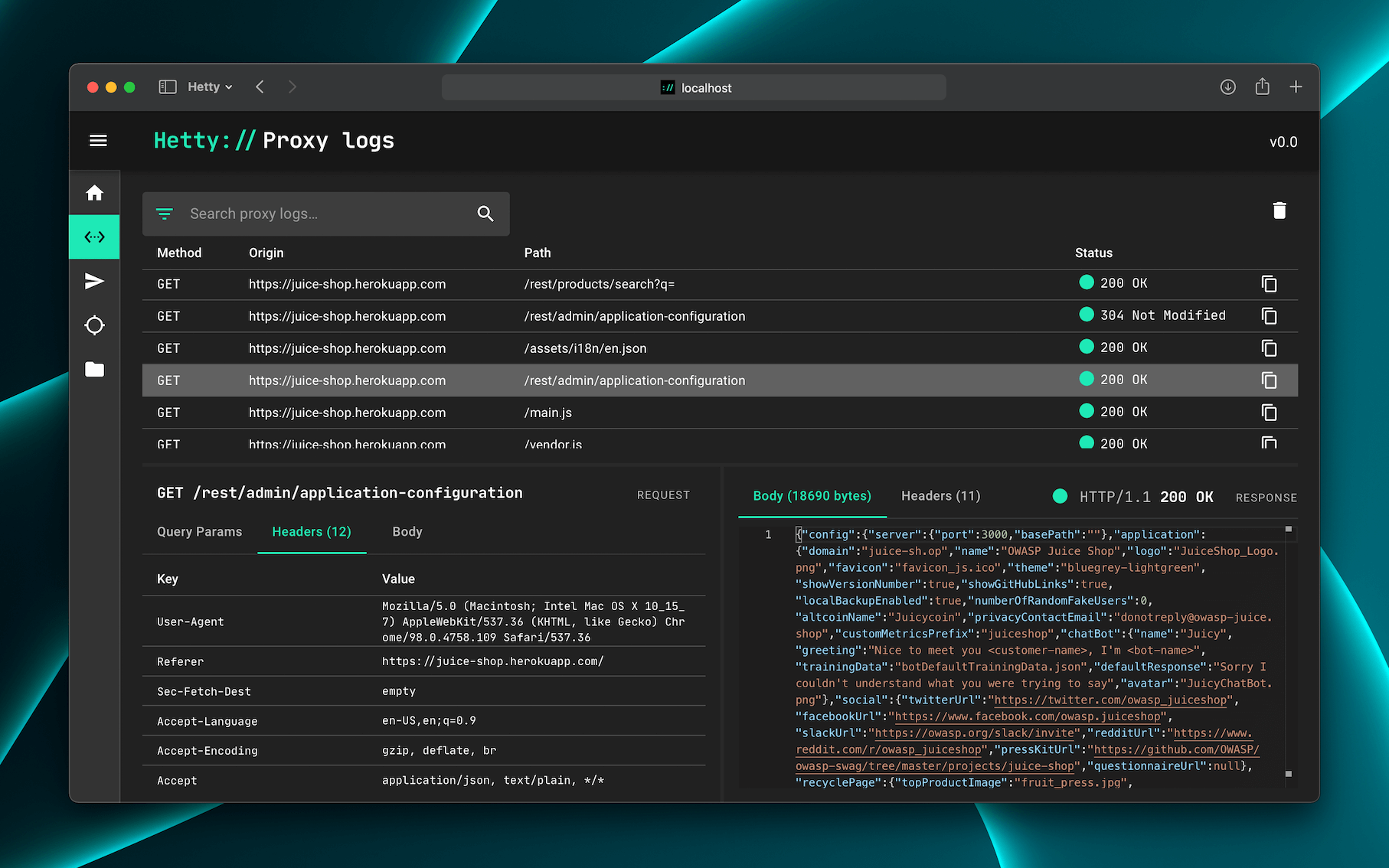
**Hetty** is an HTTP toolkit for security research. It aims to become an open
source alternative to commercial software like Burp Suite Pro, with powerful
features tailored to the needs of the infosec and bug bounty community.
[](https://github.com/dstotijn/hetty/releases/latest)
[](https://github.com/dstotijn/hetty/actions/workflows/build-test.yml)

[](https://github.com/dstotijn/hetty/blob/master/LICENSE)
[](https://hetty.xyz/)
**Hetty** is an HTTP toolkit for security research. It aims to become an open
source alternative to commercial software like Burp Suite Pro, with powerful
features tailored to the needs of the infosec and bug bounty community.
 ## Features
- Machine-in-the-middle (MITM) HTTP proxy, with logs and advanced search
- HTTP client for manually creating/editing requests, and replay proxied requests
- Intercept requests and responses for manual review (edit, send/receive, cancel)
- Scope support, to help keep work organized
- Easy-to-use web based admin interface
- Project based database storage, to help keep work organized
👷♂️ Hetty is under active development. Check the backlog for the current
status.
📣 Are you pen testing professionaly in a team? I would love to hear your
thoughts on tooling via [this 5 minute
survey](https://forms.gle/36jtgNc3TJ2imi5A8). Thank you!
## Getting started
💡 The [Getting started](https://hetty.xyz/docs/getting-started) doc has more
detailed install and usage instructions.
### Installation
The quickest way to install and update Hetty is via a package manager:
#### macOS
```sh
brew install hettysoft/tap/hetty
```
#### Linux
```sh
sudo snap install hetty
```
#### Windows
```sh
scoop bucket add hettysoft https://github.com/hettysoft/scoop-bucket.git
scoop install hettysoft/hetty
```
#### Other
Alternatively, you can [download the latest release from
GitHub](https://github.com/dstotijn/hetty/releases/latest) for your OS and
architecture, and move the binary to a directory in your `$PATH`. If your OS is
not available for one of the package managers or not listed in the GitHub
releases, you can compile from source _(link coming soon)_.
#### Docker
Docker images are distributed via [GitHub's Container registry](https://github.com/dstotijn/hetty/pkgs/container/hetty)
and [Docker Hub](https://hub.docker.com/r/dstotijn/hetty). To run Hetty via with a volume for database and certificate
storage, and port 8080 forwarded:
```
docker run -v $HOME/.hetty:/root/.hetty -p 8080:8080 \
ghcr.io/dstotijn/hetty:latest
```
### Usage
Once installed, start Hetty via:
```sh
hetty
```
💡 Read the [Getting started](https://hetty.xyz/docs/getting-started) doc for
more details.
To list all available options, run: `hetty --help`:
```
$ hetty --help
Usage:
hetty [flags] [subcommand] [flags]
Runs an HTTP server with (MITM) proxy, GraphQL service, and a web based admin interface.
Options:
--cert Path to root CA certificate. Creates file if it doesn't exist. (Default: "~/.hetty/hetty_cert.pem")
--key Path to root CA private key. Creates file if it doesn't exist. (Default: "~/.hetty/hetty_key.pem")
--db Database file path. Creates file if it doesn't exist. (Default: "~/.hetty/hetty.db")
--addr TCP address for HTTP server to listen on, in the form \"host:port\". (Default: ":8080")
--chrome Launch Chrome with proxy settings applied and certificate errors ignored. (Default: false)
--verbose Enable verbose logging.
--json Encode logs as JSON, instead of pretty/human readable output.
--version, -v Output version.
--help, -h Output this usage text.
Subcommands:
- cert Certificate management
Run `hetty
## Features
- Machine-in-the-middle (MITM) HTTP proxy, with logs and advanced search
- HTTP client for manually creating/editing requests, and replay proxied requests
- Intercept requests and responses for manual review (edit, send/receive, cancel)
- Scope support, to help keep work organized
- Easy-to-use web based admin interface
- Project based database storage, to help keep work organized
👷♂️ Hetty is under active development. Check the backlog for the current
status.
📣 Are you pen testing professionaly in a team? I would love to hear your
thoughts on tooling via [this 5 minute
survey](https://forms.gle/36jtgNc3TJ2imi5A8). Thank you!
## Getting started
💡 The [Getting started](https://hetty.xyz/docs/getting-started) doc has more
detailed install and usage instructions.
### Installation
The quickest way to install and update Hetty is via a package manager:
#### macOS
```sh
brew install hettysoft/tap/hetty
```
#### Linux
```sh
sudo snap install hetty
```
#### Windows
```sh
scoop bucket add hettysoft https://github.com/hettysoft/scoop-bucket.git
scoop install hettysoft/hetty
```
#### Other
Alternatively, you can [download the latest release from
GitHub](https://github.com/dstotijn/hetty/releases/latest) for your OS and
architecture, and move the binary to a directory in your `$PATH`. If your OS is
not available for one of the package managers or not listed in the GitHub
releases, you can compile from source _(link coming soon)_.
#### Docker
Docker images are distributed via [GitHub's Container registry](https://github.com/dstotijn/hetty/pkgs/container/hetty)
and [Docker Hub](https://hub.docker.com/r/dstotijn/hetty). To run Hetty via with a volume for database and certificate
storage, and port 8080 forwarded:
```
docker run -v $HOME/.hetty:/root/.hetty -p 8080:8080 \
ghcr.io/dstotijn/hetty:latest
```
### Usage
Once installed, start Hetty via:
```sh
hetty
```
💡 Read the [Getting started](https://hetty.xyz/docs/getting-started) doc for
more details.
To list all available options, run: `hetty --help`:
```
$ hetty --help
Usage:
hetty [flags] [subcommand] [flags]
Runs an HTTP server with (MITM) proxy, GraphQL service, and a web based admin interface.
Options:
--cert Path to root CA certificate. Creates file if it doesn't exist. (Default: "~/.hetty/hetty_cert.pem")
--key Path to root CA private key. Creates file if it doesn't exist. (Default: "~/.hetty/hetty_key.pem")
--db Database file path. Creates file if it doesn't exist. (Default: "~/.hetty/hetty.db")
--addr TCP address for HTTP server to listen on, in the form \"host:port\". (Default: ":8080")
--chrome Launch Chrome with proxy settings applied and certificate errors ignored. (Default: false)
--verbose Enable verbose logging.
--json Encode logs as JSON, instead of pretty/human readable output.
--version, -v Output version.
--help, -h Output this usage text.
Subcommands:
- cert Certificate management
Run `hetty