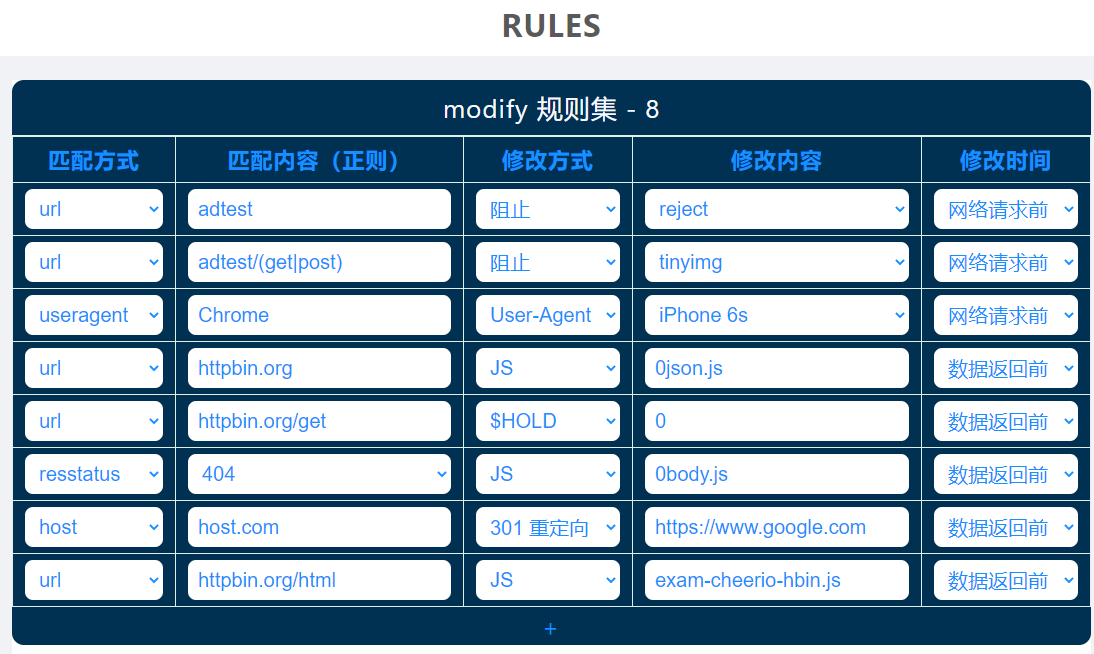
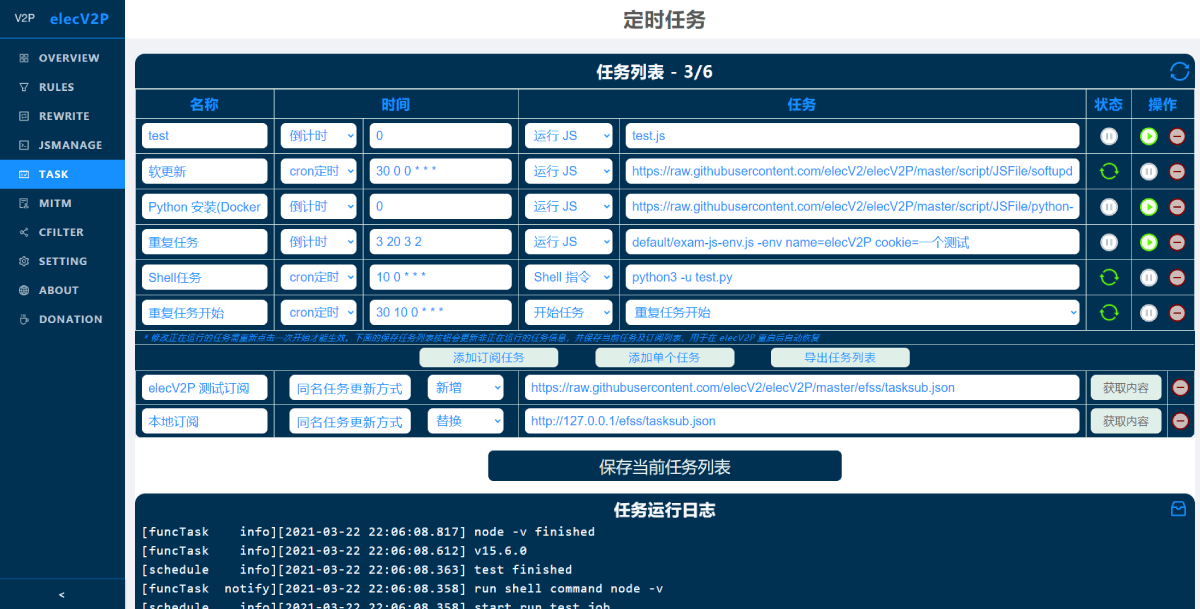
Repository: elecV2/elecV2P-dei Branch: master Commit: 6b4673acd0c0 Files: 91 Total size: 316.1 KB Directory structure: gitextract_iq6s9hbq/ ├── .gitignore ├── Readme.md ├── docs/ │ ├── 01-overview.md │ ├── 02-Docker.md │ ├── 03-rules.md │ ├── 04-JS.md │ ├── 05-rewrite.md │ ├── 06-task.md │ ├── 07-feed¬ify.md │ ├── 08-logger&efss.md │ ├── 09-webhook.md │ ├── 10-config.md │ ├── Advanced.md │ ├── Readme.md │ ├── dev_note/ │ │ ├── archive/ │ │ │ ├── favend JS 重构-efh.md │ │ │ ├── minishell subprocess.md │ │ │ ├── webUI.md │ │ │ └── websocket 通信协议设计.md │ │ ├── clash delegate efh.md │ │ ├── elecV2P 错误自检指南.md │ │ ├── ev 命令行程序.md │ │ ├── favend JS 重构-efh.md │ │ ├── favend 模块化.md │ │ ├── readme.md │ │ ├── runJSFile 执行逻辑及优化.md │ │ ├── script_store.efh 应用中心.md │ │ ├── service workers 开发与优化.md │ │ ├── sse 通信模块.md │ │ ├── store 常量加密存储读取.md │ │ ├── webUI transparent mode.md │ │ ├── webUI 主题设计.md │ │ ├── webUI 首页快捷运行程序 eapp.md │ │ ├── webhook token 权限设计.md │ │ ├── 下载其他扩展程序.md │ │ ├── 关于引入区块链的可行性.md │ │ ├── 可能永不执行的长期计划.md │ │ ├── 启动器快捷方式 $run.md │ │ ├── 开发者激励计划.md │ │ ├── 引入广告系统.md │ │ ├── 待深度优化部分.md │ │ ├── 根据 mitmhost 生成 pac 文件.md │ │ ├── 脚本缓存_内容结果等.md │ │ ├── 节点互联.md │ │ └── 通过脚本管理规则 $rewrite.md │ └── res/ │ └── logo/ │ └── readme.md ├── examples/ │ ├── JS-elecV2P.sublime-build │ ├── JSTEST/ │ │ ├── 0body.js │ │ ├── TGbotonFavend.js │ │ ├── aria2-env.js │ │ ├── asyncPool.js │ │ ├── boxjs.ev.js │ │ ├── cheerio-hbin.js │ │ ├── efh/ │ │ │ ├── kuwo-music.efh │ │ │ ├── markdown.efh │ │ │ ├── notepad.efh │ │ │ └── readme.md │ │ ├── evui-chatroom.js │ │ ├── evui-dou.js │ │ ├── exam-ahk-send.js │ │ ├── exam-ahk.js │ │ ├── exam-chcp.js │ │ ├── exam-clipboard.js │ │ ├── exam-rss.js │ │ ├── exam-tasksub.js │ │ ├── example-cheerio.js │ │ ├── example-rule.js │ │ ├── fendtest.efh │ │ ├── github-subdownload.js │ │ ├── markdown.efh │ │ ├── reboot.js │ │ ├── simple.efh │ │ ├── starturl.js │ │ ├── tgbotmessage.js │ │ └── webonlinetest.js │ ├── Readme.md │ ├── Shell/ │ │ ├── aria2c │ │ ├── elecV2P-runjs.ahk │ │ ├── exam-request.py │ │ ├── mousemove.ahk │ │ └── sendkey.ahk │ ├── TGbotonCFworker.js │ ├── TGbotonCFworker2.0.js │ ├── archive/ │ │ └── Caddyfile │ ├── docker-compose-clash.yaml │ ├── docker-compose.yaml │ ├── ev2p-nginx.conf │ └── theme/ │ ├── elecV2P_theme.20220420.json │ └── readme.md └── information/ ├── readme.md ├── 广告位招租.md └── 开发者激励计划.md ================================================ FILE CONTENTS ================================================ ================================================ FILE: .gitignore ================================================ .git ================================================ FILE: Readme.md ================================================ ## elecV2P 文档/例程/通知/反馈 - documents/examples/information/issues 主项目地址: https://github.com/elecV2/elecV2P ![](https://raw.githubusercontent.com/elecV2/elecV2P-dei/master/docs/res/overview.png) TG 频道: https://t.me/elecV2 TG 交流群: https://t.me/elecV2G 欢迎提交功能需求或者其他建议。 ### 说明 - 文档目录:[docs](https://github.com/elecV2/elecV2P-dei/tree/master/docs) - 例程目录:[examples](https://github.com/elecV2/elecV2P-dei/tree/master/examples) - 初次使用建议先把 docs 内容浏览一遍,涉及内容较多,大部分可以直接跳过,在使用中碰到问题时再来查看 ================================================ FILE: docs/01-overview.md ================================================ ``` 最近更新: 2022-10-21 适用版本: 3.7.3 ``` *此章节内容同步自 [elecV2P Readme 文档](https://github.com/elecV2/elecV2P)* ## 简介 elecV2P - customize personal network. 一款基于 NodeJS,可通过 JS 修改网络请求,以及定时运行脚本或 SHELL 指令的网络工具。 ![elecV2P overview/预览](https://raw.githubusercontent.com/elecV2/elecV2P-dei/master/docs/res/overview.png) ### 基础功能 - 查看/修改网络请求 (MITM) - 定时执行 JS/SHELL 脚本 - FEED/IFTTT/自定义 通知 - EFSS 基础文件管理 ## 安装/INSTALL ***程序开放权限极大,建议局域网使用。公网部署(务必参考 [Advanced.md](https://github.com/elecV2/elecV2P-dei/blob/master/docs/Advanced.md)),风险自负*** *elecV2P 所有文件及依赖总大小约 90 M。初始运行时内存占用约 90 M,运行 100 个定时任务时总内存占用约 150 M(仅供参考,不同软硬件条件下程序调用资源可能有所不同)* **在可使用 Docker 的情况下,推荐使用方法三进行安装** ### 方法一:直接 NODEJS 运行 **需求 NODEJS 版本 (node -v) >= 14.17.0** ``` sh git clone https://github.com/elecV2/elecV2P.git cd elecV2P # 安装依赖库(根据网络环境和硬盘读写速度,需要 1-10 分钟不等 yarn # elecV2P 默认以 pm2 的方式启动,需要先安装好 pm2 # pm2 的安装方式: # 1. 添加 elecV2P 所在目录/node_modules/.bin 到系统环境变量 PATH 中 # 2. 或者直接执行 yarn global add pm2 # 然后执行命令 yarn start # 其他基础方式启动命令 node index.js # 假如提示 80 端口不可用,尝试命令 # windows 平台 CMD: # set PORT=8000 && node index.js # windows 平台 PowerShell: # $env:PORT="8000";node index.js # 其他平台: # PORT=8000 TZ=Asia/Shanghai node index.js ## TZ=Asia/Shanghai 用于设置程序运行时区 ``` #### 升级 方式一:使用 [softupdate.js](https://raw.githubusercontent.com/elecV2/elecV2P/master/script/JSFile/softupdate.js) 软更新升级 - 首先在 webUI/JSMANAGE 脚本管理中找到 softupdate.js 文件,假如不存在就远程推送或本地上传一下 - 然后按照文件内的说明,根据自身需求更改 CONFIG 设置项 - 最后点击测试运行即可 方式二:手动升级(不推荐 - 先备份好个人数据,比如 根证书,以及 efss、script/JSFile、Store、Lists、Shell 等文件夹 - (推荐在 webUI/efss 界面,右键对应文件夹,然后 zip 打包下载。) - 然后在项目目录下执行命令 git pull,拉取最新的代码进行覆盖升级 - 最后再把备份好的文件上传/复制还原到之前的位置 ### 其他 PM2 相关指令 ``` sh pm2 stop elecV2P # 停止 elecV2P pm2 stop all # 停止所有程序 pm2 restart elecV2P # 重启 elecV2P pm2 restart 0 pm2 ls # 查看运行状态 pm2 logs # 查看运行日志 pm2 -h # 查看 PM2 帮助列表 ``` ### 方法二:DOCKER 镜像名称: elecv2/elecv2p 镜像地址: https://hub.docker.com/r/elecv2/elecv2p ``` sh # 基础使用命令 docker run --restart=always -d --name elecv2p -e TZ=Asia/Shanghai -p 80:80 -p 8001:8001 -p 8002:8002 elecv2/elecv2p # 推荐使用命令 docker run --restart=always \ -d --name elecv2p \ -e TZ=Asia/Shanghai \ -p 8100:80 -p 8101:8001 -p 8102:8002 \ -v /elecv2p/JSFile:/usr/local/app/script/JSFile \ -v /elecv2p/Lists:/usr/local/app/script/Lists \ -v /elecv2p/Store:/usr/local/app/script/Store \ -v /elecv2p/Shell:/usr/local/app/script/Shell \ -v /elecv2p/rootCA:/usr/local/app/rootCA \ -v /elecv2p/efss:/usr/local/app/efss \ elecv2/elecv2p # -p/-v 对应参数 宿主:容器 # 如需更改默认的 80 端口,可在 -e 后面加上 PORT=8000 # 升级 Docker 镜像(如果没有使用 -v 持久化存储,容器内数据会丢失,请提前备份) docker rm -f elecv2p # 先删除旧的容器 docker pull elecv2/elecv2p # 再拉取新的镜像 # 再使用之前的 docker run xxxx 命令重新启动一下 # 如果拉取到的镜像不是最新的版本,请修改 Docker 当前使用的仓库地址 ``` - ARM32 平台如果出错,参考 [issues #78](https://github.com/elecV2/elecV2P/issues/78) ### 方法三:DOCKER-COMPOSE (推荐) ``` sh # 创建 elecV2P 持久化数据保存目录 mkdir /elecv2p && cd /elecv2p # 假如失败,请尝试在其他有权限的目录进行创建 # 后面 docker-compose.yaml 映射目录保持和创建的目录一致 # 下载 docker-compose.yaml 文件 curl -sL https://git.io/JLw7s > docker-compose.yaml # 启动运行 elecV2P docker-compose up -d # 注意: 需提前安装好 docker-compose 管理器 # 默认将 80/8001/8002 端口分别映射到了宿主机的 8100/8101/8102 端口,以防出现占用的情况 # 如果需要设置为其他端口,请自行修改 docker-compose.yaml 文件内容,然后重新启动 ``` 以下为 docker-compose.yaml 文件内容,可根据自身需求进行修改。 ``` yaml version: '3.7' services: elecv2p: image: elecv2/elecv2p container_name: elecv2p restart: always environment: - TZ=Asia/Shanghai ports: - "8100:80" - "8101:8001" - "8102:8002" volumes: - "/elecv2p/JSFile:/usr/local/app/script/JSFile" - "/elecv2p/Lists:/usr/local/app/script/Lists" - "/elecv2p/Store:/usr/local/app/script/Store" - "/elecv2p/Shell:/usr/local/app/script/Shell" - "/elecv2p/rootCA:/usr/local/app/rootCA" - "/elecv2p/efss:/usr/local/app/efss" ``` 修改后保存文件,然后在 docker-compose.yaml 文件所在目录下执行以下任一命令 ``` sh # 直接启动(首次启动命令) docker-compose up -d # 更新镜像并重新启动 docker-compose pull elecv2p && docker-compose up -d ``` - 如果在某些设备上无法启动,尝试把文件开头的 version: '3.7' 更改为 version: '3.3' - ARM32 平台如果出错,参考 [issues #78](https://github.com/elecV2/elecV2P/issues/78) 其他 docker 相关指令 ``` sh # 查看是否启动及对应端口 docker ps # 查看 elecV2P 运行日志 docker logs elecv2p -f ``` ## 默认端口 - 80: webUI 后台管理界面。用于添加规则/管理脚本/定时任务/MITM 证书 等 - 8001: ANYPROXY HTTP 代理端口。(*代理端口不是网页,不能通过浏览器直接访问*) - 8002: ANYPROXY 代理请求查看端口 **ANYPROXY 相关端口默认关闭。可在 webUI 首页双击 ANYPROXY 临时开启。** **如需在启动时自动开启,请前往 webUI->SETTING->初始化相关设置 中进行设置。** **80/8002 对应端口需要用到 websocket,在使用 nginx 等反代工具时注意设置。参考 [ev2p-nginx.conf](https://github.com/elecV2/elecV2P-dei/blob/master/examples/ev2p-nginx.conf)** - *80 端口可使用环境变量 **PORT** 进行修改(比如: PORT=8000 node index.js)* - *在 elecV2P 已经启动时,可在 webUI->SETTING->初始化相关设置 中修改其他端口* - *在 elecV2P 尚未启动时,可在 script/Lists/config.json 文件中修改对应端口* ## 根证书相关 - HTTPS 解密 - *如果不使用 RULES/REWRITE 等 MITM 相关功能,此步骤可跳过。* - *升级启动后,如果不是使用之前的证书,需要重新下载安装信任根证书。* - *根证书包含两个文件 rootCA.crt/rootCA.key,文件名不可修改。* ### 安装证书 选择以下任意一种方式下载证书,然后安装并信任 - 直接打开 :80/crt - :80 -> MITM -> 安装证书 - :8002 -> RootCA 根证书物理存储目录位于 `$HOME/.anyproxy/certificates`。 *windows 平台的证书存储位置选择 浏览->受信任的根证书颁发机构* ### 使用自签根证书 在 webUI->MITM 界面上传自签根证书,然后重启 elecV2P **注意:使用新的证书后,记得重新下载安装信任证书,并清除由之前根证书签发的域名证书。** ## RULES - 网络请求修改 ![rules](https://raw.githubusercontent.com/elecV2/elecV2P-dei/master/docs/res/rules.png) 详细说明参考: [docs/03-rules.md](https://github.com/elecV2/elecV2P-dei/tree/master/docs/03-rules.md) ## 定时任务 ![task](https://raw.githubusercontent.com/elecV2/elecV2P-dei/master/docs/res/taskall.png) 支持两种定时方式: - 倒计时 - cron 定时 ### 时间格式: - 倒计时 30 999 3 2 (以空格分开的四个数字,后三项可省略) | 30(秒) | 999(次) | 3(秒) | 2(次) :--------------: | :-------------: | :------------------: | :------------------: | 基础倒计时时间 | 重复次数(可选)| 增加随机时间(可选) | 增加随机重复次数(可选) - *当重复次数大于等于 **999** 时,无限循环* 示例: 40 8 10 3 ,表示倒计时40秒,随机10秒,所以具体倒计时时间位于 40-50 秒之间,重复运行 8-11 次 - cron 定时 时间格式:* * * * * * (五/六位 cron 时间格式) | * (0-59) | * (0-59) | * (0-23) | * (1-31) | * (1-12) | * (0-7) :----------: | :--------: | :--------: | :--------: | :--------: | :---------: | 秒(可选) | 分 | 小时 | 日 | 月 | 星期 ### 可执行任务类型 - 运行 JS - 开始/停止 其他定时任务 - 基础 shell 指令。比如 *rm -f \**, *python test.py*, *reboot* 等等 更多说明参考:[docs/06-task.md](https://github.com/elecV2/elecV2P-dei/tree/master/docs/06-task.md) ## 通知 目前支持通知方式: - FEED/RSS 订阅 - IFTTT WEBHOOK - BARK 通知 - 自定义通知 FEED/RSS 订阅地址为 webUI/feed。 通知内容: - 定时任务开始/结束 - 定时任务 JS 运行次数 - 脚本中的自主调用通知 IFTTT/BARK/自定义通知等相关设置参考: [07-feed¬ify](https://github.com/elecV2/elecV2P-dei/tree/master/docs/07-feed¬ify.md) ## DOCUMENTS&EXAMPLES 说明文档及一些例程: [https://github.com/elecV2/elecV2P-dei](https://github.com/elecV2/elecV2P-dei) 如果遇到问题欢迎 [open a issue](https://github.com/elecV2/elecV2P/issues)。尽量说明使用平台,版本,以及附上相关的错误日志(提供的信息越详细,越有助于解决问题)。 TG 频道: https://t.me/elecV2 TG 交流群: https://t.me/elecV2G ## 更新日志 查看: https://github.com/elecV2/elecV2P/blob/master/logs/update.log ## 贡献参考 - [anyproxy](https://github.com/alibaba/anyproxy) - [axios](https://github.com/axios/axios) - [expressjs](https://expressjs.com) - [node-cron](https://github.com/merencia/node-cron) - [node-rss](https://github.com/dylang/node-rss) - [pm2](https://pm2.keymetrics.io) - [vue](https://vuejs.org) - [vue-draggable-resizable](https://github.com/mauricius/vue-draggable-resizable) - [ace](https://github.com/ajaxorg/ace) - [adm-zip](https://github.com/cthackers/adm-zip) - [Ant Design Vue](https://www.antdv.com) ### 说明文档列表 - [overview - 简介及安装](01-overview.md) - [task - 定时任务](06-task.md) - [rewrite - 重写网络请求](05-rewrite.md) - [rules - 网络请求更改规则](03-rules.md) - [script - 脚本编写及说明](04-JS.md) - [Docker - Docker 运行相关](02-Docker.md) - [feed¬ify - 通知相关](07-feed¬ify.md) - [logger&efss - 日志和 EFSS 文件管理](08-logger&efss.md) - [webhook - webhook 使用简介](09-webhook.md) - [config - 配置文件说明](10-config.md) - [Advanced - 高级使用篇](Advanced.md) ================================================ FILE: docs/02-Docker.md ================================================ ``` 最近更新: 2022-03-15 适用版本: 3.6.3 文档地址: https://github.com/elecV2/elecV2P-dei/blob/master/docs/02-Docker.md ``` ## 简介 Docker 镜像名称: elecv2/elecv2p Docker 镜像地址: https://hub.docker.com/r/elecv2/elecv2p ## docker 及 docker-compose 的安装 ``` sh # 不同平台的安装方式可能不一样,仅供参考 # docker 安装 wget -qO- https://get.docker.com/ | sh # docker-compose 安装。(前往 https://github.com/docker/compose/releases 查看适合自己设备的版本) curl -L "https://github.com/docker/compose/releases/download/1.27.4/docker-compose-$(uname -s)-$(uname -m)" -o /usr/local/bin/docker-compose ``` ## Docker 运行 elecV2P *以下命令仅供参考,具体映射端口和卷根据实际情况进行调整* ```sh # 基础启动命令(重建后数据会丢失) docker run --restart=always -d --name elecv2p -e TZ=Asia/Shanghai -p 80:80 -p 8001:8001 -p 8002:8002 elecv2/elecv2p # 推荐使用命令 docker run --restart=always \ -d --name elecv2p \ -e TZ=Asia/Shanghai \ -p 8100:80 -p 8101:8001 -p 8102:8002 \ -v /elecv2p/JSFile:/usr/local/app/script/JSFile \ -v /elecv2p/Lists:/usr/local/app/script/Lists \ -v /elecv2p/Store:/usr/local/app/script/Store \ -v /elecv2p/Shell:/usr/local/app/script/Shell \ -v /elecv2p/rootCA:/usr/local/app/rootCA \ -v /elecv2p/efss:/usr/local/app/efss \ elecv2/elecv2p # -p/-v 对应环境参数 宿主参数:容器内参数 # 宿主机映射目录尽量填写尚未创建或空的文件夹 # 如需更改默认的 80 端口,可在 -e 后面加上 PORT=8000 # 某些设备上,可能无法在根目录创建 elecv2p 文件夹,这时请根据使用设备搜索可操作的目录,进行替换 # 如果在部分复杂的网络情况下出现无法联网或访问的问题,尝试在命令中添加 --net=host # 查看 docker 运行状态 docker ps # 进入容器内部 docker exec -it elecv2p /bin/sh # Docker 的启动暂停 docker start elecv2p docker stop elecv2p docker restart elecv2p # 查看 Docker 运行日志 docker logs elecv2p -f docker logs elecv2p --tail 20 # 清除 Docker 运行日志 echo "" > $(docker inspect --format='{{.LogPath}}' elecv2p) # 升级容器 # 先移除容器 docker rm -f elecv2p # 再拉取最新的镜像 docker pull elecv2/elecv2p # 最后再使用上面的 docker run 命令重新启动 ``` ## docker-compose 启动 ``` sh mkdir /elecv2p && cd /elecv2p curl -sL https://git.io/JLw7s > docker-compose.yaml docker-compose up -d # 默认把 80/8001/8002 端口分别映射成了 8100/8101/8102,以防出现端口占用的情况,访问时注意 # 如果需要设置为其他端口,可以自行修改下面的内容然后手动保存 ``` 或者将以下内容手动保存为 docker-compose.yaml 文件。 ``` yaml version: '3.7' services: elecv2p: image: elecv2/elecv2p container_name: elecv2p restart: always environment: - TZ=Asia/Shanghai ports: - "8100:80" - "8101:8001" - "8102:8002" volumes: - "/elecv2p/JSFile:/usr/local/app/script/JSFile" - "/elecv2p/Lists:/usr/local/app/script/Lists" - "/elecv2p/Store:/usr/local/app/script/Store" - "/elecv2p/Shell:/usr/local/app/script/Shell" - "/elecv2p/rootCA:/usr/local/app/rootCA" - "/elecv2p/efss:/usr/local/app/efss" ``` - *具体使用的映射端口和 volumes 目录,根据个人情况进行调整* - *如需更改默认的 80 端口,在 environment 下添加一行: - PORT=8000* - *如果在某些设备上无法启动,尝试把文件开头的 version: '3.7' 更改为 version: '3.3'* 然后在 docker-compose.yaml 同目录执行命令 **docker-compose up -d** ,启动程序。 ### env 默认环境变量 在 elecV2P 启动前,可设置部分环境变量 - TZ: 时区设置 timezone - PORT: webUI 对应端口,默认为 80 - TOKEN: 启动时指定 WEBHOOK TOKEN 使用示例: ``` sh docker run --restart=always \ -d --name elecv2p \ -e TZ=Asia/Shanghai PORT=8000 TOKEN=YOUR-WEBHOOK-TOKEN \ -p 8100:8000 -p 8101:8001 -p 8102:8002 \ -v /elecv2p/JSFile:/usr/local/app/script/JSFile \ -v /elecv2p/Lists:/usr/local/app/script/Lists \ -v /elecv2p/Store:/usr/local/app/script/Store \ -v /elecv2p/Shell:/usr/local/app/script/Shell \ -v /elecv2p/rootCA:/usr/local/app/rootCA \ -v /elecv2p/efss:/usr/local/app/efss \ elecv2/elecv2p ``` 环境变量可以同时设置部分或全部 **在 docker-compose 中 env 对应 environment** ### 其他指令 ``` sh # 更新升级 docker-compose pull elecv2p && docker-compose up -d # 拉取特定版本的镜像文件。可用版本以 https://hub.docker.com/r/elecv2/elecv2p 的 tag 为准 docker pull elecv2/elecv2p:3.4.5 docker pull elecv2/elecv2p:arm64-3.0 # 在使用这些特定版本的镜像时,docker run 后面的镜像名也要记得调整 docker image prune # 清除没有挂载的镜像文件 # 查看运行日志 docker logs elecv2p -f ``` ### 一些说明 - 当使用国内的一些 docker 源,因为缓存问题,更新之后可能不是最新的版本,需要手动更换一下 docker 源。(具体步骤谷歌) - arm32 平台如果出错,参考 [issues #78](https://github.com/elecV2/elecV2P/issues/78) ### 说明文档列表 - [overview - 简介及安装](01-overview.md) - [task - 定时任务](06-task.md) - [rewrite - 重写网络请求](05-rewrite.md) - [rules - 网络请求更改规则](03-rules.md) - [script - 脚本编写及说明](04-JS.md) - [Docker - Docker 运行相关](02-Docker.md) - [feed¬ify - 通知相关](07-feed¬ify.md) - [logger&efss - 日志和 EFSS 文件管理](08-logger&efss.md) - [webhook - webhook 使用简介](09-webhook.md) - [config - 配置文件说明](10-config.md) - [Advanced - 高级使用篇](Advanced.md) ================================================ FILE: docs/03-rules.md ================================================ ``` 最近更新: 2022-03-24 适用版本: 3.7.8 文档地址: https://github.com/elecV2/elecV2P-dei/blob/master/docs/03-rules.md ``` ## 准备工作 - **再使用 RULES/REWRITE 相关功能前,请确定 ANYPROXY 已打开** - 已正确将网络请求代理到 ANYPROXY 端口 - 匹配 https 请求请先添加 MITM host,普通 http 请求无需添加 - *首次命中 https 请求时,系统需要生成中间证书,可能会稍长一点时间返回结果* ## modify 规则集 格式说明 | 匹配方式 | 匹配内容(正则) | 修改方式 | 修改目标 | 修改时间点 :-----------: | --------------------- | :-------: | ------------------- | ---------- | url | ^https://api.b.com/v2 | JS | file.js | 前(req) | host | api.bilibili.com | useragent | iPhone 6s | 后(res) | useragent | neteaseMusic / aliApp | block | reject|tinyimg | | reqmethod | GET/POST/PUT/DELETE | $HOLD | 30 | reqbody | queryPara/word string | | | resstatus | 200 / 404 / 301 / ... | | | restype | text/html / text/json | ----- | | resbody | Keyword(string) | all - JS | - *实际使用中匹配方式和修改方式可以任意搭配* ### 匹配方式 ``` url // 匹配 url host // 匹配 url host 部分 useragent // 匹配 User-Agent reqmethod // 匹配 网络请求方式 reqbody // 匹配 请求体(body) resstatus // 匹配 请求返回的状态码 restype // 匹配 返回的数据类型 resbody // 匹配 返回的数据内容 ``` - **v3.7.8 默认不再对 reqbody/resbody 内容进行匹配,以提升 elecV2P MITM 效率。如需开启,请参考下文源文件格式部分,增加属性项 "enbody": true。(不匹配不代表不可以修改,仍然可以通过 url/host 等方式进行匹配,然后使用脚本对 body 内容进行修改)** ### 修改方式 #### JS 通过 JS 脚本修改网络请求数据,对应修改内容为 JS 文件名或远程 JS 链接。 从该模块运行 JS,默认会添加 $request,$response(**数据返回前**) 两个变量,具体参数如下: - $request.headers, $request.body, $request.method, $request.hostname, $request.port, $request.path, $request.url - $response.headers, $response.body, $response.statusCode #### 307 重定向 对应修改内容为重定向目标网址 #### 阻止 reject: 返回状态码 200, body 为空。 tinyimg: 返回状态码为 200, body 为一张 1x1 的图片 #### $HOLD 将原网络请求的 header 和 body 发送到前端网页进行修改处理,然后将修改后的数据直接发送给服务器/客户端。 对应修改内容表示等待前端修改数据的时间,单位秒。当为 **0** 时,表示一直等待。如果为其他值且超时时则直接使用原数据进行下步操作。 使用该修改方式时,请尽量使用比较详细的匹配规则,匹配单一网络请求,否则后面的 $HOLD 请求会覆盖前面的数据。 **2020.7.16 2.1.0 更新** $HOLD request reject - 直接返回当前数据 返回默认状态码: 200 数据包含两部分: header 和 body #### User-Agent 修改请求 header 中的 User-Agent。 默认 User-Agent 可在 webUI->SETTING->网络请求相关设置进行管理修改 ### 修改时间 网络请求匹配时间 #### 网络请求前 beforeSendRequest #### 数据返回前 beforeSendResponse ## 源文件格式 RULES 规则列表保存于 **./script/Lists/default.list**,实际格式为严格的 JSON 类型(不包含任何注释)。 *(参考: https://raw.githubusercontent.com/elecV2/elecV2P/master/script/Lists/default.list )* ``` JSON { "rules": { "note": "elecV2P RULES 规则列表", "enable": false, // 是否启用下面列表中的规则,仅在该值为 false 时,表示不启用,默认启用 "enbody": false, // 是否对请求体(body)进行匹配,仅在该值为 true 时,表示启用(v3.7.8 添加,默认不启用 "list": [ { "mtype": "url", "match": "adtest", "ctype": "block", "target": "reject", "stage": "req" }, { "mtype": "url", "match": "httpbin.org/get\\?hold", "ctype": "hold", "target": "0", "stage": "req", // enable 可省略。仅在 enable 为 false 的时候表示不启用 "enable": true } ] } } ``` *如非必要,请不要手动修改 list 源文件* ### 说明文档列表 - [overview - 简介及安装](01-overview.md) - [task - 定时任务](06-task.md) - [rewrite - 重写网络请求](05-rewrite.md) - [rules - 网络请求更改规则](03-rules.md) - [script - 脚本编写及说明](04-JS.md) - [Docker - Docker 运行相关](02-Docker.md) - [feed¬ify - 通知相关](07-feed¬ify.md) - [logger&efss - 日志和 EFSS 文件管理](08-logger&efss.md) - [webhook - webhook 使用简介](09-webhook.md) - [config - 配置文件说明](10-config.md) - [Advanced - 高级使用篇](Advanced.md) ================================================ FILE: docs/04-JS.md ================================================ ``` 最近更新: 2024-11-10 适用版本: 3.8.1 文档地址: https://github.com/elecV2/elecV2P-dei/blob/master/docs/04-JS.md ``` **每个脚本理论上都有权限对服务器上的任一文件进行修改,请不要运行不信任的脚本。** ## 保存目录 本地脚本物理存储目录位于 **./script/JSFile**,在 RULS/REWRITE/TASK/WEBHOOK 中调用时,直接使用对应的文件名即可。支持多级目录,比如 test/exam.js。 所有文件名称和内容可在 webUI->JSMANAGE/脚本管理 中查看和修改。 *如果远程脚本推送失败,尝试在 SETTING/设置->网络请求相关设置 中添加代理,或者下载后使用本地上传。* ## CONTEXT - 脚本运行环境 在 elecV2P 中,默认脚本的运行环境是基于 [vm](http://nodejs.org/api/vm.html) 模块的虚拟环境,同时增加了以下一些默认的环境变量及函数。 ### 默认参数/环境变量 #### 主要函数 ``` - $axios // 网络请求 - $cheerio // HTML处理 - $exec // 简单 shell 命令执行 - $download // 文件下载 - $feed // 通知模块 - $store // cookie/常量/数据存储 - $evui // 在前端网页生成 UI 界面 - $message // 发送网页消息 - $done // 返回脚本执行结果(后面代码会继续执行) - $cache // 临时数据存储(v3.4.3 添加) - $task // 定时任务管理(v3.4.4 添加,sudo 模式下生效) - $env // 临时环境变量(v3.4.5 添加,默认包含 process.env 中的所有值) - $fend // efh 脚本前后端通信函数(v3.5.5 添加) - $webhook // 调用 webhook 接口(v3.5.8 添加,sudo 模式下生效) ``` 可利用这些函数判断当前脚本是否运行在 elecV2P 中,比如: ``` JS if (typeof $fend !== 'undefined') { console.log('elecV2P 运行环境') } else { console.log('其他运行环境') } ``` #### 附加变量 (以两个短下划线开头) ``` - __version // 当前 elecV2P 版本 - __vernum // 当前版本数字表达(v3.4.5 添加)。比如版本 3.4.5 表达为 345 - __home // 主页地址。 可在 webUI->SETTING 界面设置 - __efss // efss 目录。 可在 webUI/efss 页面设置 - __name // 脚本名。 v3.3.0 添加 (如果是多级目录脚本,会包含目录) - __dirname // 脚本所在目录 (v3.4.4) - __filename // 脚本完整路径 (v3.4.4) - __userid // 用户 ID (v3.6.4) - __md5hash // 当前脚本内容的 md5 hash 值(v3.6.7) - __taskid // 启动该脚本的任务 id (仅在定时任务触发脚本时有值,其他时候为 undefined) - __taskname // 启动该脚本的任务名称 (仅在定时任务触发脚本时有值,其他时候为 undefined) // 测试 JS: // console.log('dirname:', __dirname, 'version:', __version, 'homepage:', __home) // console.log('当前 efss 目录:', __efss, '当前脚本名称:', __name) // if (__vernum >= 367) console.log('当前脚本 md5 hash:', __md5hash) ``` #### 特殊变量函数 ``` - $ws // 通过 websocket 向前端发送数据 - $request/$response - require() // 直接引用其他 nodejs 模块或脚本 - console.clear() // 清空该脚本的运行日志 - // @grant // 在单个脚本开启增强功能 ``` ### @grant(v3.8.1 后取消脚本环境兼容性判断 JS 文件开头使用 **// @grant** 开启一些增强功能 *如果要使用纯 nodejs 环境运行,在 TASK 中请选择 shell 指令模式,然后: node xxxxx.js。 或者在脚本中使用 $exec('node xxxx.js') 来执行* ``` // @grant nodejs 脚本和直接使用 node xxxx.js 运行脚本的区别: - 使用 node xxxxx.js 无法使用 $axios/$store/$feed 等非 nodejs 原生函数/变量 - 默认脚本运行在 vm 的虚拟环境中,而 node xxxx.js 运行在原生系统环境中 ``` 日志调整 * **// @grant calm** ;不打印日志,但保留到日志文件中,也不影响通知(console.error 错误日志还是会正常打印) * **// @grant still** ;不输出日志,有通知(即 console 函数无效) * **// @grant quiet** ;输出日志,但不通知 * **// @grant silent** ;不输出日志,也不通知 #### sudo 模式(v3.4.4) * **// @grant sudo** sudo 模式下启用功能 - $task ;定时任务管理(v3.4.4) - $webhook ;调用 webhook 接口功能(v3.5.8) - 其他功能待添加 ### $axios - 网络请求 $axios(request) request 格式 [object/string] - object:支持参数参考:[axios](https://github.com/axios/axios) - string:单个 url 链接 ``` JS // --- example 1 --- $axios('https://httpbin.org/get?hello=elecV2P').then(res=>console.log(res.data)).catch(e=>console.log(e)) // --- example 2 --- $axios({ url: 'https://httpbin.org/put', method: 'put', timeout: 6000, data: { hello: 'elecV2P' } }).then(res=>console.log(res.data)).catch(e=>console.log(e.message)) ``` * **$axios** 无 .put/.post 等方法,使用 { ..., method: 'put/post' } 实现 **v2.1.8 更新 $axios(request, proxy)** 增加第二个参数 proxy, 此参数会覆盖 request.proxy, 示例 ``` JS $axios(request, { host: '127.0.0.1', port: 9000, auth: { username: 'hello', password: 'elecV2P' } }).then(res=>console.log(res.data)).catch(e=>console.log(e.message)) // 当 proxy 为 {} 时使用内部 ANYPROXY 代理,为 false 时: 强制跳过使用代理,如省略则使用 webUI->SETTING 网络请求相关设置。 // 其他设置参考 [axios](https://github.com/axios/axios) request/proxy 部分 ``` 如在运行脚本时需要访问某些境外网站,可在 webUI->SETTING 网络请求相关设置 中添加代理。 ### $store - store/cookie 常量 所有存储常量以文件的形式保存在 **script/Store** 目录中。 所有脚本共用存储常量,比如在 a.js 中使用 $store.put('something', 'akey'), 可在 b.js 中使用 $store.get('akey') 来获取存储值。 ``` JS example $store.get(key, options) // 获取存储值 // options 可选 // - string 字符串 // - 'raw': 获取存储文件源内容 // - 'string/array/object/boolean/number': 以相应格式获取存储值 // - object (v3.6.6 新增) // { // type: 'string', // 可选值同上面字符串 // pass: 'string', // 获取加密内容时密码 // algo: 'ebuf', // 获取加密内容时算法,可省略。默认为 ebuf 自定义算法 // } $store.put(value, key, options) // 保存 // options 可选 // - string 字符串 // - 'a': 添加内容。具体参考下面的 JS 实例 // - 'string/array/object/boolean/number': 保存为对应格式 // - object (v3.3.3 新增) // { // type: 'a', // 可选值同上面字符串 // note: '备注信息', // 关于 cookie 的一些说明,可省略 // belong: 'test.js', // 该 cookie 的归属脚本(调用或写入该 cookie 的脚本),可省略 // pass: 'string', // 加密存储内容时的密码(v3.6.6 新增) // algo: 'ebuf', // 加密存储内容时的算法(v3.6.6 新增),可省略。默认为 ebuf 自定义算法 // } $store.set(key, value, options) // 等同于将上面的 $store.put 交换 key 和 value 的位置。(v3.4.5 添加) $store.delete(key) // 删除 ``` $store 保存时会对数据类型进行简单的判断,当数据类型为 **number/boolean/array/object** 时,会按照数据类型进行保存。 ``` JS store 实例 $store.put(123, 'number') // put 方法,第一个参数为保存值 value, 第二个参数为关键字 key typeof $store.get('number') // get 方法通过关键字获取保存值,返回数字 123,类型为 number $store.get('number', 'raw') // 返回 { "type": "number", "value": 123 } $store.set('newarr', [2,3,4]) // 存储为数组。保存成功返回 true,失败返回 false。 set 方法第一个参数为 key,第二个参数为 value $store.get('newarr') // 返回数组: [2,3,4] $store.put(5, 'newarr', 'a') // 根据 newarr 原来保存值的类型,存储新的结果 // 原 newarr 值为 array 数组,则新保存值为: [2,3,4,5] // 如果原 newarr 的值为数字,比如 8,则新的存储值 13 $store.put([6,7], 'newarr', 'a') // newarr 新值为:[2,3,4,5,6,7] $store.put('a string', 'keystr') // 不指定类型时 直接保存为 string 的形式 $store.put('add new line', 'keystr', 'a') // 在原 keystr 的值后面添加新行 $store.get('keystr', 'raw') // 返回: // {"type":"string","value":"a string\nadd new line"} $store.put({a: 334, b: 'abc'}, 'keyobj') // 存储类型为 object。 $store.get('keyobj') // 返回: {"a":334,"b":"abc"} $store.get('keyobj', 'raw') // 返回: {"type":"object","value":{"a":334,"b":"abc"}} $store.put({c: 'new val'}, 'keyobj', 'a') // 新存储的值为: {"a":334,"b":"abc","c": "new val"} $store.put('eoooe', 'keybol', 'boolean') // 强制转化为 boolean 值: true // 建议在使用 $store.put 并指定 type 的时候,先确定原存储数值和即将保存数值的类型,以免发生未知错误。 $store.delete('number') // 删除某个 store/cookie 常量 number // 等同于 $store.put('', 'number') // 特殊情况 $store.put('a string 字符', 'objstr', 'object') // 强制将字符串保存为 object 格式。存储值为: {0: "a string 字符"}。 PS: array 是同样结果 $store.get('keystr', 'array') // 将字符串以 object 格式取出。结果为: {"0":"a string"} // v2.5.2 更新 $store.get type random。 type 关键字 random 或者 r $store.get('newarr', 'random') // 返回 newarr 数组中的一个随机值 $store.get('number', 'r') // 返回 0 - number 代表值 中间的任一整数 $store.get('keyobj', 'r') // 返回 object 中的任一 keys 对应值 $store.get('keybol', 'random') // 返回 随机 true/false $store.get('keystr', 'r') // 如果 keystr 存储的是字符串,取随机值时,取随机一行的数据 // v3.3.3 更新: $store.put 第三个参数改为 options // 当 options 为字符串类型时表示为之前的普通 type 类型 // 当 options 为 object 类型时,type/note/belong 关键字分别表示该 cookie 的 类型/备注/关联脚本 $store.put('a string 字符', 'objstr', { type: 'string', note: '关于这个 cookie 一些备注说明', belong: __name + ', store.js', // 调用/写入这个 cookie 的脚本 }) // v3.6.6 更新 加密存储 $store.put('待加密的内容', 'tstr', { pass: '加密密钥 password', }) // 使用对应密钥获取加密内容 $store.get('tstr', { pass: '加密密钥 password', }) // 普通 get,获取到的数据是加密后的内容 $store.get('tstr') $store.put({ a: '加密其他类型的数据,比如 object' }, 'tobj', { type: 'object', pass: $env.STORE_KEY || 'testkey', // 可配合环境变量隐藏使用密钥 }) ``` ### $cache - 临时数据存储 (v3.4.3) 用于存储脚本运行时的一些临时数据,在 elecV2P 重启后会自动丢弃。 所有脚本共享临时数据,比如在 a.js 中使用 $cache.hello = 'elecV2P', 可在 b.js 中使用 $cache.hello 来获取临时值。 共有五个方法: get(key), put(value, key), delete(key), keys(), clear() v3.4.5 添加方法: set(key, value) // 和 put 方法的 key/value 顺序相反 ``` JS $cache.v = 'hello elecV2P' // 添加临时变量 v // 等同于 $cache.put('hello elecV2P', 'v') // put 方法 value 在前,key 在后 $cache.set('vv', '你好,elecV2P') // set 方法 key 在前,value 在后(v3.4.5 添加) let val = $cache.get('v') // 获取临时变量 v 中的内容 // 等同于 let val = $cache.v $cache.delete('v') // 删除临时变量 v console.log($cache.v, $cache.vv) // 如果临时变量不存在,将会返回 undefined $cache.obj = { // 临时变量存储对象可以是任意值。包括 object 和 函数等 num: 1234, s(){ console.log('$cache function', this.num++) } } $cache.obj.s() console.log($cache.obj.num) let keys = $cache.keys() // 以数组的形式返回当前所有临时变量关键字。 // [ 'obj' ] $cache.clear() // 清空存储的临时变量 console.log(keys, $cache.keys()) console.log($cache.size) // 当前临时变量个数。(v3.4.5 添加) ``` **$cache** 和 **$store** 的区别: - $cache 数据在内存中读写,$store 数据在硬盘上读写(因此,$cache 存取速度更快,但会占用一些内存,不建议保存大量数据) - $cache 是临时存储,在 elecV2P 重启后所有数据会丢失。$store 是常量存储,重启后已存储数据依然存在 - $store 只能通过 get/put 方法来存取数据,而 $cache 可以直接通过点引用来存取。(比如: $cache.haha = '哈哈哈哈哈哈哈') - $store 没有 keys()/clear()/size 的方法/属性,也不能保存函数类'动态'数据 ### $env - 临时环境变量 (v3.4.5) ``` JS console.log($env) console.log('version', $env.version) let key = 'name' if ($env[key]) { console.log($env[key]) } else { console.log('当前环境变量中暂无', key, '相关值') } ``` - 临时环境变量默认包含 process.env 中的所有值,不管当前是否以 nodejs 兼容模式运行 - 临时环境变量仅在当前脚本中有效。比如在 a.js 中设置 $env.version = '1.0.0', 在 b.js 中 $env.version 还是等于 process.env.version - process.env 的变化会反应到 $env 中,但 $env 的变化不会影响 process.env 的值 - 在使用定时任务或 webhook 等方式运行脚本时,可使用 -env 添加临时环境变量(具体参考 [06-task.md](https://github.com/elecV2/elecV2P-dei/blob/master/docs/06-task.md) 运行 JS 相关部分) - v3.7.6 增加 $env.lang 获取当前设置的语言偏好,比如 en | zh-CN ### $feed - 通知模块 发送一条通知 - $feed.push(tile, description, url) - title: 通知标题。 如省略,则会使用 'elecV2P 通知' 替代 - description: 通知内容。 如省略,则会显示 'a empty message\n没有任何通知内容' - url: 点击通知后的跳转链接。可省略 ``` JS example // PUSH 通知包括 RSS 和其他手动设置好的通知方式 $feed.push('elecV2P notification', '这是一条来自 elecV2P 的通知', 'https://github.com/elecV2/elecV2P') // 单独发送一条 ifttt 通知 $feed.ifttt('elecV2P 通知', '一条来自 $feed.ifttt 的通知', 'https://github.com/elecV2/elecV2P-dei') // 单独发送一条 bark 通知 $feed.bark('elecV2P 通知', '一条来自 $feed.bark 的通知', 'https://t.me/elecV2') // 在 title 开头添加 $enable$ 强制发送通知 $feed.cust('$enable$自定义通知', '使用 $enable$ 强制发送的一条通知', 'https://github.com/elecV2/elecV2P-dei/tree/master/docs/07-feed¬ify.md') ``` - ifttt/bark 等通知需提前在 webUI->SETTING 页面设置好 TOKEN/KEY - 如果 SETTING 相关通知为关闭状态,则调用了也不会有通知 更多相关说明参考: [07-feed¬ify](https://github.com/elecV2/elecV2P-dei/tree/master/docs/07-feed¬ify.md) ### $exec - Shell 指令执行函数 *Shell 指令的运行基于 nodejs 的 [child_process_exec](https://nodejs.org/api/child_process.html#child_process_child_process_exec_command_options_callback) 模块* #### 基础使用: $exec(command, options = { cwd, env, timeout, call, cb, stdin }) *options 可省略,opitons 中的每一项参数也都可省略* - cwd: (string) 工作目录 - 当没有设置或设置目录不存在时,如果是 node 命令开头,默认为: script/JSFile,其他情况默认为: script/Shell - v3.4.2 之前默认工作目录为: process.cwd() - env: (object) 环境变量 (默认为: process.env) - timeout: (number) 超时时间。单位: 毫秒(ms),0: 表示不设定超时时间。默认为 60000ms(60秒) - call: (boolean) 是否在命令执行完成后返回所有输出内容 - cb(data, error, finish): (function) 回调函数 - data: stdout.on('data') 命令执行时的输出内容 - error: stderr.on('data') 命令执行出错时的输出内容 - finish: exec.on('exit') 命令执行完毕信号,最终返回 true - stdin: (object) { write, delay } 延时输入交互数据(v3.2.6 增加) - write: (string) 延时写入的数据 - delay: (number) 延时时间。单位: 毫秒(ms),可省略(默认为 2000) ``` JS example $exec('ls', { cwd: './efss', // 命令执行目录 timeout: 5000, cb(data, error){ error ? console.error(error) : console.log(data) } }) // 如果省略 options 中的所有参数,那么对应输出只能在后台看到 $exec('node -v') // 在 Docker 环境在安装 python3,并执行其他 python 文件 $exec('apk add python3', { timeout: 0, cb(data, error, finish){ if (finish) { // 安装完以后可以直接在 JS 中调用。(pyhton 和库安装完成后可在其他脚本中直接调用,不需要再次安装。) $exec('python3 -u test.py', { cwd: './script/Shell', // test.py 文件放置的目录。可修改为其他目录,比如 './efss' cb(data, error){ error ? console.error(error) : console.log(data) } }) // 安装一些 python 库 $exec('pip3 install you-get youtube-dl numpy requests') } else { error ? console.error(error) : console.log(data) } } }) // stdin 延迟输入交互内容 简单示例 $exec('python3 -u askinput.py', { cwd: './script/Shell', stdin: { delay: 3000, // 输入延时时间,单位 ms。可省略 write: 'elecV2P\nI am fine, thank you.' // 具体输入数据。(根据实际情况进行修改) }, cb(data, error){ if (error) { console.error(error) } else { console.log(data) } } }) /* askinput.py 内容 name = input("what is your name?") print('nice to meet you,', name) greet = input(f"how are you, {name}?") print(greet) */ // 特别使用: 给当前执行命令设置单独日志文件 $exec('ls', { cwd: './efss', // 命令执行目录 logname: 'ls执行日志', // 命令执行日志保存文件名,可自定义为其他值 from: 'task', // v3.4.5 之前此项必需,且只能为 'task'。v3.4.5 之后可省略 // 当 from 设置为 task 时,实时日志可在 TASK 定时任务界面查看 // cb 函数可省略。日志记录保存在 logname 设置的文件中 }) ``` *如果命令不可执行,尝试先在系统命令行工具下手动输入命令,进行测试* **如果 windows 平台出现乱码,尝试命令 *CHCP 65001*。或者修改注册表 Active code page 为 65001(具体操作,善用搜索)** (*尝试过 iconv 转换(< v1.8.2),弃用*) #### **v3.2.8 增加支持运行远程文件** ``` JS // 例如: $exec('python3 -u https://raw.githubusercontent.com/elecV2/elecV2P/master/script/Shell/test.py', { cwd: './script/Shell', // 命令执行目录 timeout: 5000, cb(data, error){ error ? console.error(error) : console.log(data) } }) /* 说明: - 当执行命令(command)中包含远程链接时,会自动下载远程文件到 cwd 目录,并将该远程链接替换为下载后的文件地址 - 比如,上面的代码会先下载远程文件 test.py 到 script/Shell 目录,然后命令自动转化为 python3 -u /xxx/script/Shell/test.py - 远程链接匹配方式: command.match(/ (https?:\/\/\S{4,})/) - 远程文件执行时默认每次都会重新下载 - 可使用 options.rename: xxx 来重命名下载文件 - 可使用 options.local: true 来跳过下载远程文件,直接以本地文件运行(如果存在的话,如果不存在还是会远程下载 - 如果远程文件下载失败,将会尝试运行本地文件 - 如果不希望对原命令中的远程链接进行下载及替换操作,可使用 options.nohttp: true, 或使用 -http 进行转义 - 注意: 命令中的所有 ' -http' 字符(不含引号)都会被替换为 ' http' - 以下常用命令已排除远程下载及替换操作: - curl/wget/git/start (v3.2.9) - you-get/youtube-dl (v3.3.0) - aria2c/http/npm/yarn/ping/openssl/telnet/nc/echo (v3.4.2) - *如果还有其他的常用网络相关命令,欢迎反馈添加* **/ // 以 git 等其他常用命令开头,远程链接不会进行自动转换,按原命令处理 $exec('git clone https://github.com/elecV2/elecV2P', { cwd: 'script/JSFile', cb(data, error, finish){ error ? console.error(error) : console.log(data) if (finish) { console.log('git clone 完成') } } }) // 其他命令中如果包含远程链接,将会自动下载,并将命令中的远程链接替换为文件下载后的地址 $exec('node https://raw.githubusercontent.com/elecV2/elecV2P/master/script/JSFile/webhook.js', { // 将自动下载 webhook.js 到 cwd 目录('script/JSFile'),并将远程链接替换为文件下载后的地址 node /xxx/script/JSFile/webhook.js cwd: 'script/JSFile', local: true, // true: 当 cwd 目录下存在 webhook.js 时,直接使用本地文件运行,不进行远程下载 // rename: 'testremote.js', // 重命名远程下载文件 cb(data, error){ error ? console.error(error) : console.log(data) } }) $exec('echo -http://127.0.0.1') // 输出结果为: http://127.0.0.1 // 等同于 $exec('echo http://127.0.0.1') // echo 命令不会下载远程文件及替换 // 使用 cat 命令下载并查看远程文件 $exec('cat http://127.0.0.1/efss/readme.md', { // 如没有指定 cwd,或指定 cwd 目录不存在时,则使用默认 cwd: script/Shell // nohttp: true, // 启用此项,表示不转化 http 远程链接,将会搜索文件 'http://127.0.0.1/efss/readme.md',然后直接报错 // local: true, // 启用此项,表示如果 cwd 目录中存在 readme.md 文件,则不下载(但远程链接会替换为本地文件地址) cb(data, error){ error ? console.error(error) : console.log(data) } }) ``` ### $cheerio - HTML处理 用于对 html 的处理 ``` JS example // example #1 let body = $response.body let restype = $response.headers['Content-Type'] if (/html/.test(restype)) { const $ = $cheerio.load(body) $('body').text('hello cheerio') body = $.html() console.log(body) } $done(body) // example #2 const $ = $cheerio.load(``); const apple = $('.apple', '#fruits').text() console.log(apple) const attr = $('ul .pear').attr('class'); console.log(attr) const html = $('#fruits').html(); console.log(html) $done($('.pear').text()) ``` 更多使用方法参考:[cheerio](https://github.com/cheeriojs/cheerio) 官方说明文档 ### $download - 文件下载 用于直链文件下载,可指定下载目录。如不指定下载目录则保存到默认目录。 默认保存目录为 efss 虚拟目录,如果 efss 目录为空则保存到 web/dist 目录。 基础用法: $download(url, options).then(d=>console.log(d)).catch(e=>console.error(e)) **options** 变量说明: - 直接省略,表示使用默认目录保存文件 - 字符类型,分两种情况 - 字符表示的是一个已存在的文件夹,则下载到该文件夹,并以 url 的结尾命名文件 - 否则表示的是 **目录(如有)+文件名** - 对象类型,可接受四个参数: { folder, name, existskip, timeout } - folder 表示下载目录 - name 表示文件名(其中也可包含目录) - existskip 当目标文件已存在时不下载(v3.4.9 添加) - timeout 本次下载的超时时间,单位 ms(v3.5.0 添加) 下面以几个具体实例进行说明: ``` JS example $download('https://raw.githubusercontent.com/elecV2/elecV2P/master/Todo.md').then(d=>console.log(d)).catch(e=>console.error(e)) // 指定下载目录及文件名 $download('https://raw.githubusercontent.com/elecV2/elecV2P-dei/master/examples/Shell/exam-request.py', './script/Shell/myreq.py').then(d=>console.log(d)).catch(e=>console.error(e)) // 前面一部分 script/Shell 表示保存目录,后面的 myreq.py 表示文件名 // 如果仅有 myreq.py 的话,文件会以该名字保存到默认目录 // 以 object 方式指定下载目录 $download('https://raw.githubusercontent.com/elecV2/elecV2P-dei/master/examples/JSTEST/boxjs.ev.js', { folder: './script/JSFile', name: 'box.js', existskip: true, }).then(d=>console.log('文件已下载至: ' + d)).catch(e=>console.error(e)) // 假如将 name 修改为 'test/box.js', 此时文件名中同时包含目录,则会在 script/JSFile 下新建目录 test,然后将文件(box.js)保存到 test 中 ``` #### 特别使用:获取下载进度 $download(url, options, cb) - 前两项参数不变,增加第三个参数为 callback 函数,callback 函数在下载期间会被多次调用。 cb(options = {}),传入的 options 参数有如下值: - name: 下载的文件名称 - progress: 下载的进度条 - chunk: 第 n 个下载块(仅在下载中存在 - dsize: 文件已下载大小(downloaded size (v3.7.2 增加 - total: 文件总大小(对应为 response.headers['content-length'] 项,不存在时为 NaN(v3.7.2 增加 - start: 开始下载(仅开始下载时存在(对应内容为下载文件的完整保存路径(v3.7.2 - finish: 下载完成后的消息(仅在下载完成后存在(对应内容为下载后文件的完整路径(v3.7.2 *start 和 finish 内容一样,都表示文件下载到 elecV2P 服务器的绝对路径,只是存在阶段不一样* 示例: ``` JS $download('https://raw.githubusercontent.com/elecV2/elecV2P-dei/master/examples/Shell/elecV2P.py', { folder: 'script/Shell', name: 'elecV2P.org.py' }, (options)=>{ // callback 函数,支持异步函数 if (options.start) { // 下载开始时存在的参数 opitons.name/progress/chunk/dsize/total/start // 开始阶段 chunk<=>dsize<=>0 console.log(`开始下载文件 ${options.name} 到 ${options.start}, 文件大小 ${kSize(options.total)}`) } else if (options.finish) { // 下载完成时存在的参数 opitons.name/progress/dsize/total/finish // 完成阶段 dsize<=>total<=>response.headers['content-length'] || NaN $message.success(`${options.name} 下载完成 ${options.total ? '总大小 ' + kSize(options.total) : ''}`) console.log(options.name, '已下载至', options.finish) } else { // 下载中存在的参数 opitons.name/progress/chunk/dsize/total options.chunk % 100 === 0 && $message.success(`正在下载 ${options.name} 第 ${options.chunk} 块数据 ${kSize(options.dsize)}/${kSize(options.total)}`, { mid: 'download' }) // console.log(options.progress + '\r') // 显示下载进度条。(后面的 '/r' 用于在前端页面删除上一条 log 日志) console.log(options.progress, '\x1b[F') // v3.7.2 后推荐使用该条代码 } }).then(d=>console.log(d)).catch(e=>console.error(e)) function kSize(size, k = 1024) { if (size < k) { return size + ' B' } if (size < k*k) { return (size/k).toFixed(2) + ' K' } if (size < k*k*k) { return (size/(k*k)).toFixed(2) + ' M' } return (size/(k*k*k)).toFixed(2) + ' G' } ``` ### $evui - 生成一个 UI 界面 *$evui 的参数传递基于 websocket* 可接收两个参数:$evui(option, callback) - option: UI 界面相关参数 - callback: 用于接收处理 UI 界面提交返回的数据。(可省略) $evui 返回的是一个 Promise 函数 - resolve 条件: 当 cbable 为 true 时,直到前端关闭窗口。否则,直接 resolve - reject 条件: 传递参数有误或者 websocket 尚未连接 ``` JS const ui = { id: 'ebcaa4ff', // 给图形界面一个独一无二的 ID。可省略(以下所有参数都可省略,不再重复说明) title: 'elecV2P windows', // 窗口标题 width: 800, // 窗口宽度 height: 600, // 窗口高度。null 表示自适应高度 content: `
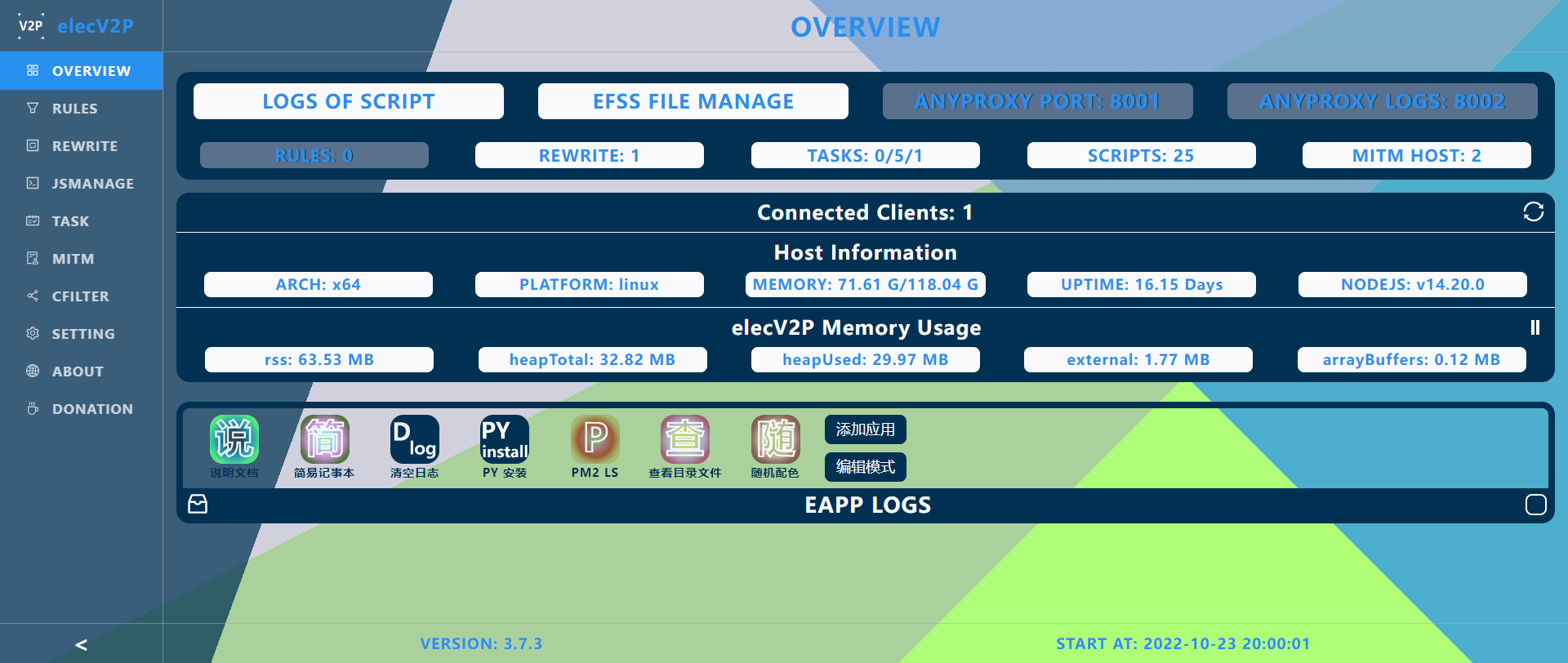

显示一张图片

`, // 图形界面显示内容 style: { // 设置一些基础样式 title: "background: #6B8E23;", // 设置标题样式 content: "background: #FF8033; font-size: 32px; text-align: center", // 设置中间主体内容样式 cbdata: "height: 220px;", // 设置返回数据输入框样式 cbbtn: "width: 220px;" // 设置提交数据按钮的样式 }, resizable: true, // 窗口是否可以缩放 draggable: true, // 窗口是否可以拖动 cbable: true, // 是否启用 callback 函数,用于接收前端 UI 提交返回的数据 cb(data){ // callback 函数。此项会被 $evui 的第二个参数覆盖(如有) console.log('data from client:', data) }, cbdata: 'hello', // 提供给前端 UI 界面的初始数据 cblabel: '提交数据', // 提交按钮显示文字 script: `console.log('hello $evui');alert('hi, elecV2P')`, // v3.2.4 增加支持在前端网页中插入 javascript 代码 } $evui(ui, data=>{ // 此为 callback 函数,用于接收处理前端 UI 返回的数据,可省略。如有则会覆盖前一项参数中的 cb 变量(ui.cb) if (data == 1) { $feed.push('Get a infomation frome $evui', 'message:' + data) } else if (/^exec /.test(data)) { let command = data.split('exec ').pop() $exec(command, { cb(data, error){ console.log(error || data) } }) } else { console.log('data from client:', data) } }).then(data=>console.log(data)).catch(e=>console.error(e)) // 发送关闭前端 evui 界面的指令 (v3.4.0 增加) $ws.send({ type: 'evui', data: { id: 'ebcaa4ff', type: 'close' }}) // * $ws.send 函数可临时用于服务器通过 websocket 向前端发送数据 ``` 效果: ![](https://raw.githubusercontent.com/elecV2/elecV2P-dei/master/docs/res/evuitest.png) ### $message - 给前端网页发送一条消息 *消息传递基于 websocket* 共有三种方法: - success 成功 - error 错误 - loading 加载中 v3.4.2 增加方法 - close 用于关掉网页消息体 ``` JS // 基础使用 $message.success('一条来自脚本的消息') // $message 可接受任意个参数(v3.4.0) // 当最后一个参数为数字时,表示消息显示时间,单位:秒。 // 最后参数为 object 且包含 secd/url/mid/align 等参数时: // - secd 消息显示时间,单位: 秒(默认: 消息长度/5 + 已有消息数*3 秒)。 0: 一直显示不关闭 // - url 点击消息后跳转 url(当为 reload 或 refresh 时表示点击强制刷新当前网页 v3.5.2) // - mid 消息体的 id (v3.4.2 增加) // - align 消息文字对齐方式(v3.4.4 增加)。默认: center,可设置 left: 左对齐,right: 右对齐。其他值使用默认 center $message.error('some wrong is happen', 10) // 一条错误提醒消息,10 秒后自动关闭 // 第二个参数如果是 0: 表示消息不自动关闭 $message.loading('等待中...', 0) // 最后一个参数为 object 且传递 secd 和 url $message.success(23, '参数类型和数量不限', true, { hello: 'elecV2P' }, '点击消息\n可打开 elecV2P Github 主页', { secd: 0, url: "https://github.com/elecV2/elecV2P" }) // v3.4.2 增加关掉前端网页已弹出消息体的功能 $message.loading('等待关闭中...\n请点击消息右侧进行关闭', { secd: 0, // 0: 不主动关闭 mid: 'auid', // mid 对应值随意填写 align: 'left', // 文字左对齐 }) $message.close('auid') // 关掉 mid === 'auid' 的消息体 $message.close() // 关掉所有已弹出的消息体 ``` ### $ws - 向前端发送临时数据 一般用于需要异步或持续向前端发送数据的特殊情况。 - $ws.send({ type, data }) 通过 websocket 向前端发送数据 - $ws.sse(sseid, data) 通过 server-sent events 向前端发送数据(v3.7.2 添加) $ws.send 可使用的 type 类型已在前端定义,以后会整理开放。该方法仅在前端 webUI websocket 已连接的情况有效。通常用于 evui 界面通信中,参考脚本:https://raw.githubusercontent.com/elecV2/elecV2P-dei/master/examples/JSTEST/evui-chatroom.js $ws.sse 需要先在前端生成 new EventSource('/sse/elecV2P/' + sseid) 事件,然后可以在事件上自定义数据接收后的处理函数。通常用于 efh 脚本中,参考脚本:https://raw.githubusercontent.com/elecV2/elecV2P-dei/master/examples/JSTEST/efh/kuwo-music.efh (相关资料:[Using server-sent events - MDN](https://developer.mozilla.org/en-US/docs/Web/API/Server-sent_events/Using_server-sent_events)) **这两个函数发送的消息/数据,会同步发送到所有已连接的客户端** ### $request/$response $request: 存在于通过 RULES/REWRITE/favend 触发的脚本中 $response: 存在于通过 RULES/REWRITE 触发,并且修改时间段为数据返回前的脚本中 *有 $request 不一定有 $response, 但有 $response 一定有 $request* - $request.url : 网络请求完整 URL - $request.headers : 不区分大小写。比如 headers.Host === headers.host ==== headers.HOST - $request.body : 通常为 string 类型,buffer 类型的条件见下面说明 - $request.bodyBytes : 原始 buffer 数据。 favend 模式下该参数不存在 - $request.method : GET|POST|PUT|DELETE 等值,大写 - $request.protocol : http|https 等值,小写 - $request.hostname : 请求域名/IP,比如 127.0.0.1 - $request.port : 请求端口,比如 80|443|8000 等 - $request.path : 请求路径 - $request.pathname : 请求路径,同上 - $response.status : 网络请求返回状态码。同下 - $response.statusCode : 网络请求返回状态码,比如 200|301|404 等 - $response.headers : 不区分大小写。比如 headers['Content-Type'] === headers['content-type'] - $response.body : 通常为 string 类型,buffer 类型的条件见下面说明 - $response.bodyBytes : 原始 buffer 数据 **当满足 /^(audio|video|image|multipart|font|model)|(ogg|stream|protobuf)$/.test(headers['Content-Type']) 条件时,$request.body/$response.body 对应类型为 buffer(v3.7.5 增加)** **$reponse 是服务器返回给 MITM 代理的数据,最终返回给客户端的数据以 $done 结果为准** ``` JS example // 可使用的相关参数 // $request.url, $request.headers, $request.body, $request.bodyBytes // $request.method, $request.protocol, $request.hostname, $request.port, $request.path // $response.status, $response.statusCode, $response.headers, $response.body, $response.bodyBytes console.log('$request', $request) let body = $response.body // let obj = JSON.parse(body) if (/httpbin/.test($request.url)) { body += 'change by elecV2P' } $done({ body }) ``` - v3.4.8 添加 **$request.bodyBytes/$response.bodyBytes**,对应数据类型为 **Buffer** - 更多相关说明,可参考脚本 https://raw.githubusercontent.com/elecV2/elecV2P/master/script/JSFile/0body.js ### $task 定时任务管理(v3.4.4) 该功能仅在开启 sudo 模式的脚本中有效。(sudo 模式开启方式: 在脚本中添加 **// @grant sudo**) $task 拥有的方法/函数: - add(taskinfo[, options]) ;添加定时任务 - start(taskid) ;开始某个/些定时任务 - stop(taskid) ;停止某个/些定时任务 - delete(taskid) ;删除某个/些定时任务 - info(taskid) ;获取某个任务的信息。当省略 taskid 时,返回所有任务信息 - nameList() ;获取任务名及对应 taskid 列表 - status() ;返回当前任务数。总任务/运行中的任务/订阅任务数 - save() ;保存当前任务列表。(用于在 elecV2P 重启后自动恢复) 具体使用 ``` JS // @grant sudo // 查看当前任务数 console.log($task.status()) // 添加任务(具体任务格式参考 https://github.com/elecV2/elecV2P-dei/blob/master/docs/06-task.md) let res = $task.add({ name: '$task 添加的任务', type: 'cron', time: '12 15 18 * * *', job: { type: 'exec', target: 'pm2 ls' } }) console.log('$task 添加任务结果', res) // 如果需要添加多个任务,可使用 array 数组的形式 // 比如 $task.add([{}, {}], { type: 'replace' }) // 第二个参数 options 可省略。 // 如设置 type, 表示同名任务的更新方式。有三个有效值: // - replace 替换原同名任务 // - addition 新增同名任务 // - skip 跳过添加同名任务 // 获取任务名及对应 taskid let tnlist = $task.nameList() console.log(tnlist) // 返回的是类似于 { '任务名': taskid } 的 object // 通过该 object,可使用任务名快速查找任务 id // 如果任务列表不经常变化的话建议使用 $store.put 或 $cache 保存 // 开始任务 console.log($task.start('m8LWPxDc')) // 停止任务 console.log($task.stop(tnlist['$task 添加的任务'])) // 通过任务名查找任务 id // 删除任务 console.log($task.delete('mkl7pwQn')) // 使用数组的形式传入 taskid,可批量开始/暂停/删除 定时任务 $task.start(['m8LWPxDc', 'ataskid', tnlist['$task 添加的任务'], 'jxwQOSJZ']) // $task.stop(['taskid1', 'taskid2', ...]) // $task.delete(['taskid1', 'taskid2', ...]) // 查看某个任务信息 let taskinfo = $task.info('m8LWPxDc') // 查看所有任务信息 $task.info() 或者 $task.info('all') console.log(taskinfo) // 查询 __taskid/__taskname (仅在使用定时任务运行脚本时有值,其他情况默认为 undefined console.log('执行该脚本的任务名:', __taskname) console.log('相关任务信息', $task.info(__taskid)) // 尝试使用 __taskid 来停止自身定时任务 if (__taskid) { let stopinfo = $task.stop(__taskid) // 停止自身定时任务 console.log(stopinfo) } // 保存当前任务列表 let saveres = $task.save() console.log(saveres) ``` ### $webhook 调用 webhook 接口(v3.5.8) *$webhook 的本质是一个对 localhost/webhook 发起的 POST 网络请求* 使用前提: - 脚本中开启 sudo 模式 - 127.0.0.1 IP 没有被限制 基础格式:$webhook(type, options) - 当 type 为字符串时,表示执行 webhook 类型(具体参考 https://github.com/elecV2/elecV2P-dei/blob/master/docs/09-webhook.md ) - 当 type 为 object 时,表示 POST 请求的 body(无需 token) - options 可省略,当为 object 时表示附带参数 - 最终 POST 的 body 为 Object.assign({ type }, options) - 为避免循环调用,通过 webhook 调用的脚本 $webhook type runjs 将不可用 使用示例: ``` JS // @grant sudo $webhook('status').then(res=>console.log(res.data)); // 完全等同于 $webhook({ type: 'status' }).then(res=>console.log(res.data)); // 附带 options $webhook('info', {debug: true}) // $webhook('runjs', { fn: 'test.js' }) .then(res=>console.log(res.data)) .catch(e=>console.error(e.message)); // options 中的 type 会覆盖前面的 type $webhook({ type: 'runjs' }, { type: 'shell', command: 'ls' }) .then(res=>console.log(res.data)) .catch(e=>console.error(e.message)); // 以上等同于 $webhook({ type: 'shell', command: 'ls' }).then(res=>console.log(res.data)).catch(e=>console.error(e.message)); // 当该脚本从 webhook 触发,且 type 为 runjs 时,会报错 // 比如在 test.js 中使用 $webhook('runjs', {fn: 'test.js'}) 再次调用 test.js // 仅首次调用有效,之后的调用将不再继续执行 $webhook({ type: 'runjs', fn: 'test.js' }) .then(res=>console.log(res.data)) .catch(e=>console.error(e.message)); // 其他 $webhook 可执行类型及对应参数,请参考:https://github.com/elecV2/elecV2P-dei/blob/master/docs/09-webhook.md ``` ## require 其他 nodejs module ``` JS example // require 公共模块 const path = require('path') // require 相对目录 js const rob = require('./requireob') const ob2 = require('./requireob2.js') console.log(ob2, path.join(__dirname)) rob('hello elecV2P') // #2 引用 node_modules 目录下的模块 const axios = require('axios') axios.get('https://github.com/elecV2/elecV2P').then(res=>console.log(res.data)) // 删除 require 引用缓存 (v3.4.4) let id = require.resolve('./requireob2.js') // 获取缓存 id delete require.cache[id] // 删除对应 id module 的缓存 // 或者直接使用 require.clear require.clear('./requireob2') // 等同于 require.clear('./requireob2.js') // 注意: require.clear 并不是 nodejs 中的标准函数,目前仅适用于 elecV2P let rob2 = require('./requireob2.js') // 再次引用时将会重新加载 ``` - *require 函数在兼容其他软件脚本模式下默认不启用,可在文件开头使用 **// @grant require** 强制开启* - *require 有缓存,刚修改的脚本在其他模块引用时可能不会更新。可使用 require.clear 函数来清空相应缓存* - *require 仅可引用 nodejs 原生脚本,如脚本中包含 elecV2P 等其他环境变量时(比如上面的 $store/$feed/$exec 等等)无法解析* ## $done - 返回 JS 执行结果 优先级: $done > JS 最后一条语句结果 ``` JS example let elecV2P = 'customize personal network' elecV2P // 返回字符串 'customize personal network' // 即:当没有使用 $done 函数时,直接返回最后一条语句的执行结果 let elecV2P = 'customize personal network' $done(123) console.log(elecV2P) elecV2P // 返回结果 123,并且后面的 console.log 函数会正常执行 let elecV2P = 'customize personal network' $done({ response: elecV2P }) // 返回对象 {response: 'customize personal network'} let elecV2P = 'customize personal network' let promise = Promise.resolve(elecV2P) console.log(typeof promise) promise // 如果返回的是一个 Promise 函数,最后结果是 resolve 的值 // 即: customize personal network ``` - JS 默认 timeout 为 5000ms (5 秒),该值可在 webUI->SETTING 界面修改。0 表示无限制,没有超时时间 - JS 测试运行 和 webhook 运行 timeout 固定为 5000ms (以防长时间无返回结果而出现的错误),超时后后面的代码会继续执行(v3.4.0) - 如果最后结果是异步函数,超时后代码会继续执行,如果是同步函数,会返回一个超时的错误信息 ## $fend - efh 文件前后端数据交互(v3.5.5) $fend 函数目前仅适用于 efh 文件。基本用法: $fend(key, data); (关于 efh 文件的说明, 参考 https://github.com/elecV2/elecV2P-dei/blob/master/docs/08-logger&efss.md 中的相关部分) ``` JS // efh 文件前端 script 部分 // 默认 timeout 为 5000ms,可在传输数据中使用 timeout 参数修改(v3.7.2) // 比如 $fend('akey', {timeout: 1000, hello: 'other data'}).then(...) $fend('skey', '传输给后台的数据') .then(res=>res.text()) .then(alert) .catch(e=>{ console.error(e); alert(e.message); }); // efh 文件后台 script 部分 $fend('skey', { statusCode: 200, header: { "Content-Type": "application/json;charset=utf-8" }, body: { message: '后台 $fend 第二参数的标准格式为包含 statusCode/header/body 的 object', somenote: '但也可以是一个 string,甚至是一个函数', reqbody: $request.body } }) // 清空 efh 文件运行产生的缓存(v3.5.5) $fend.clear() ``` 详细说明: - 前端 $fend(key, data) - 本质是一个封装了 post 请求 fetch 函数,body: JSON.stringify({key, data}) - 第二项参数(data)可省略 - 后台 $fend(key, data) - 第一项参数 key 需与前端相对应 - 同一个 efh 文件可使用多对 $fend(建议只使用一对 - 第二项参数 data 表示要返回给前端的数据 - 当 data 不是 statusCode/header/body 标准返回 object 时,表示为 body 值。比如 $fend('akey', '简单的 body') - 当 data 是一个函数时,可接收前端发送的 data。比如 $fend('akey', (data)=>{console.log(data);return 'Got!'}) - 函数返回值将作为最终值返回给前端 - 如果 $done 在 $fend 之前执行,则 $fend 无效 几个简单的示例文件: https://raw.githubusercontent.com/elecV2/elecV2P/master/script/JSFile/elecV2P.efh https://raw.githubusercontent.com/elecV2/elecV2P-dei/master/examples/JSTEST/simple.efh https://raw.githubusercontent.com/elecV2/elecV2P-dei/master/examples/JSTEST/fendtest.efh 待优化: - $fend data 函数比 $done 后执行的问题 ## webUI 脚本管理部分说明 ### 附带参数运行(v3.6.1) 可传递参数到执行脚本中,目前支持: ``` -env // 增加临时变量。比如 tenv.js -env name=elecV2P cookie=我的Cookie // 临时变量在脚本中通过 $env[变量名] 的方式获取。比如 $env.name, $env.cookie -timeout // 脚本超时时间。比如 test.js -timeout=0 -rename // 重新命名脚本。比如 test.js -rename=t.js -grant // 脚本增加,具体参数见文档上面的 @grant 部分。比如 test.js -grant nodejs -local // 表示当本地脚本存在时不下载远程脚本(仅对远程脚本有效 ``` 以上所有参数可同时使用,比如 **https://raw.githubusercontent.com/elecV2/elecV2P/master/script/JSFile/exam-js-env.js -local -rename=tenv.js -env name=你的名字 cookie=MYcookie -timeout=200 -grant nodejs** ### 新标签页运行(v3.6.2) 当运行 efh 文件时,可选择**新标签页运行**。运行后,将打开一个新的标签页,内容为 efh 文件的前端部分。 ## 模拟网络请求 - mock ![mock](https://raw.githubusercontent.com/elecV2/elecV2P-dei/master/docs/res/mock.png) ### 本地 fetch / 服务器 axios 模拟网络请求发起的位置。可用于测试 网络请求相关设置 是否生效,当前网络是否通畅等。 ### HEADERS 第一项选择内容为 **Content-Type** 的值,后面附加内容为 headers 的其他值(JSON 格式)。 ### BODY textarea 区域为 request body 对应值 ### 说明文档列表 - [overview - 简介及安装](01-overview.md) - [task - 定时任务](06-task.md) - [rewrite - 重写网络请求](05-rewrite.md) - [rules - 网络请求更改规则](03-rules.md) - [script - 脚本编写及说明](04-JS.md) - [Docker - Docker 运行相关](02-Docker.md) - [feed¬ify - 通知相关](07-feed¬ify.md) - [logger&efss - 日志和 EFSS 文件管理](08-logger&efss.md) - [webhook - webhook 使用简介](09-webhook.md) - [config - 配置文件说明](10-config.md) - [Advanced - 高级使用篇](Advanced.md) ================================================ FILE: docs/05-rewrite.md ================================================ ``` 最近更新: 2021-10-16 适用版本: 3.5.0 文档地址: https://github.com/elecV2/elecV2P-dei/blob/master/docs/05-rewrite.md ``` ## 简述 在 elecV2P 中,REWRITE 规则是 RULES 规则特定项的简化版本,匹配效率较高,建议在可使用 REWRITE 的情况下,关闭 RULES 规则集。 ## webUI 相关说明 ![rewrite](https://raw.githubusercontent.com/elecV2/elecV2P-dei/master/docs/res/rewritenote.png) - REWRITE 规则的匹配对象为网络请求的 URL,如果是 https 请求,请在 MITM host 中添加对应的解析域名。 - *具体的匹配公式: `(new RegExp('匹配链接正则表达式')).test($request.url)`。* v3.5.0 添加 **匹配阶段** 选项 - 网络请求前,用于修改网络请求体 request headers/body 等 - 数据返回前,用于修改获取到的内容 response headers/body 等 - 当规则对应重写方式为 (reject|reject-200|reject-dict|reject-json|reject-array|reject-img) 中的某个参数时,表示阻止该网络请求(直接返回相应内容) - 当规则对应重写方式为脚本时,表示在通过该脚本修改该网络请求或返回内容 - 脚本编写参考说明文档 [04-JS.md](https://github.com/elecV2/elecV2P-dei/blob/master/docs/04-JS.md) 或 示例脚本 [0body.js](https://raw.githubusercontent.com/elecV2/elecV2P/master/script/JSFile/0body.js) - 订阅链接必须以 http 或 efss 开头,具体订阅内容参考下面的 **订阅内容格式** 部分 - http: 表示订阅为远程地址,比如: https://raw.githubusercontent.com/elecV2/elecV2P/master/efss/rewritesub.json - efss: 表示直接读取服务器上 EFSS 虚拟目录中的文件,比如 efss/rewritesub.json - 删除订阅时并不会删除已添加的 MITMHOST 和 TASK - 所有规则的更改在保存后才正式生效 ## 源文件格式 REWRITE 规则列表保存于 **./script/Lists/rewrite.list**,实际格式为严格的 JSON 类型(不包含任何注释)。 *(参考: https://raw.githubusercontent.com/elecV2/elecV2P/master/script/Lists/rewrite.list )* ``` JSON { "rewritesub": { // 订阅列表 "eSubUuid": { "name": "elecV2P 重写订阅", "resource": "https://raw.githubusercontent.com/elecV2/elecV2P/master/efss/rewritesub.json" } }, "rewrite": { // 规则列表 "note": "elecV2P 重写规则", // 关于规则列表的注释。可省略 "list": [ // 具体规则 { "match": "^https?://httpbin\\.org/get\\?rewrite=elecV2P", // 网络请求 url 匹配 "stage": "res", // 匹配阶段。req: 网络请求前 res: 数据返回前。 v3.5.0 添加 "target": "https://raw.githubusercontent.com/elecV2/elecV2P/master/script/JSFile/0body.js", // 匹配后使用的脚本文件 "enable": true } ] } } ``` *如非必要,请不要手动修改 list 源文件* ## 订阅内容格式 订阅内容同样为严格的 JSON 类型,不包含任何注释。参考: https://raw.githubusercontent.com/elecV2/elecV2P/master/efss/rewritesub.json ``` JSON { "name": "elecV2P 重写订阅", // 订阅名称。可省略 "resource": "https://raw.githubusercontent.com/elecV2/elecV2P/master/efss/rewritesub.json", // 该订阅的更新地址。可省略 "type": "rewrite", // 订阅类型,固定为 rewrite。用于区分 task 订阅,可省略 "note": "关于该订阅的一些说明(可省略)。该订阅目前仅适用于 elecV2P,与其他软件并不兼容。更详细说明请查看: https://github.com/elecV2/elecV2P-dei/tree/master/docs/05-rewrite.md", "author": "https://t.me/elecV2", // 制作者。可省略 "bkcolor": "#2fa885", // 该订阅背景颜色。当省略时,将随机生成。可使用 url(http://xxxx.jpg) "mitmhost": [ // 和重写规则相关的 mitmhost。可省略。 "test.com", "httpbin.org" ], "list": [ // 重写规则列表 { "match": "https:\\/\\/test\\.com\\/block", // url 匹配正则表达式 "stage": "req", // 匹配阶段。req: 网络请求前 res: 数据返回前。 v3.5.0 添加 "target": "reject-json", // 阻止网络请求,并返回默认的 json 数据 "enable": true }, { "match": "https:\\/\\/httpbin\\.org", // enable 可省略。如只添加不启用,则设置 enable: false "stage": "res", "target": "https://raw.githubusercontent.com/elecV2/elecV2P/master/script/JSFile/exam-cheerio.js" } ], "task": { // 同时添加定时任务(可省略) "type": "skip", // 当任务列表中包含同名任务时,新任务的添加方式。skip: 跳过, addition: 新增, replace: 替换(默认,如省略) "list": [ // 任务列表,具体格式参考: https://github.com/elecV2/elecV2P-dei/tree/master/docs/06-task.md 订阅 list 相关部分 { "name": "REWRITE 订阅添加的任务", "type": "cron", "time": "30 0 0 * * *", "job": { "type": "runjs", "target": "https://raw.githubusercontent.com/elecV2/elecV2P/master/script/JSFile/test.js" } } ] } } ``` *反引号"\" 为转义字符,实际保存/读取时会自动转义一次,请不要直接在订阅文件中进行复制,然后粘贴到 webUI 中。* ### 其他说明 - *REWRITE 列表的优先级高于 RULES 规则列表。* - *规则订阅对其他软件的订阅格式有一定的兼容性,但并不保证完全适配。* - *首次命中 https 请求时,系统会自动签发一张中间证书,可能需要稍长一点时间。* - *推荐文章: [elecV2P 进阶使用之抓包及 COOKIE 获取](https://elecv2.github.io/#elecV2P%20%E8%BF%9B%E9%98%B6%E4%BD%BF%E7%94%A8%E4%B9%8B%E6%8A%93%E5%8C%85%E5%8F%8A%20COOKIE%20%E8%8E%B7%E5%8F%96)* ### 说明文档列表 - [overview - 简介及安装](01-overview.md) - [task - 定时任务](06-task.md) - [rewrite - 重写网络请求](05-rewrite.md) - [rules - 网络请求更改规则](03-rules.md) - [script - 脚本编写及说明](04-JS.md) - [Docker - Docker 运行相关](02-Docker.md) - [feed¬ify - 通知相关](07-feed¬ify.md) - [logger&efss - 日志和 EFSS 文件管理](08-logger&efss.md) - [webhook - webhook 使用简介](09-webhook.md) - [config - 配置文件说明](10-config.md) - [Advanced - 高级使用篇](Advanced.md) ================================================ FILE: docs/06-task.md ================================================ ``` 最近更新: 2022-02-08 适用版本: 3.6.0 文档地址: https://github.com/elecV2/elecV2P-dei/blob/master/docs/06-task.md ``` ![task](https://raw.githubusercontent.com/elecV2/elecV2P-dei/master/docs/res/taskall.png) ### 时间格式 - 倒计时 30 999 3 2 (以空格分开的四个数字,后三项可省略) | 30(秒) | 999(次) | 3(秒) | 2(次) : --------------: | :--------------: | :------------------: | :------------------: | 基础倒计时时间 | 重复次数(可选)| 增加随机时间(可选) | 增加随机重复次数(可选) *当重复次数大于等于 **999** 时,无限循环。* 示例: 400 8 10 3 ,表示倒计时40秒,随机10秒,所以具体倒计时时间位于 40-50 秒之间,重复运行 8-11 次 - cron 定时 时间格式: * * * * * * (五/六位 cron 时间格式) | * (0-59) | * (0-59) | * (0-23) | * (1-31) | * (1-12) | * (0-7) :----------: | :--------: | :--------: | :--------: | :--------: | :---------: | 秒(可选) | 分 | 小时 | 日 | 月 | 星期 ## 可执行任务类型 - 运行 JS: runjs - Shell 指令: exec - 开始任务: taskstart - 停止任务: taskstop ### 运行 JS 支持本地 JS, 及远程 JS。 本地 JS 文件位于 script/JSFile 目录,可在 webUI->JSMANAGE 中查看。设置定时任务时,直接复制文件名到任务栏对应框即可。 如使用远程 JS,则直接在任务栏对应框内输入以 **http 或 https** 开头的网络地址。远程 JS 默认更新时间为 86400 秒(一天),可在 webUI->SETTING 界面修改。超过此时间,则会先下载最新的 JS 文件,然后再执行。如果下载失败,会继续尝试执行本地 JS 文件。 *所以在执行需要特别准时的任务时,不建议使用远程 JS。或者提前手动更新一下,也可以设置一个稍微提前一点的定时任务提前下载好最新的 JS 文件,避免执行任务时先下载文件带来的延迟。* *此模式下的脚本运行在 vm 虚拟环境中,如果想要以原生的 nodejs 环境运行脚本,请选择 **shell 指令** 模式,然后填写 node xxx.js。(关于两者的区别,参考 [04-JS.md](https://github.com/elecV2/elecV2P-dei/blob/master/docs/04-JS.md) 相关部分)* 定时任务运行 JS 还支持附带 env 临时变量, 使用 **-env** 关键字进行声明,然后在 JS 文件中使用 **$env[变量名]** 的方式进行读取。例如: **exam-js-env.js -env name=一个名字 cookie=acookiestring** ``` JS exam-js-env.js // exam-js-env.js 文件内容 let name = $env.name || 'elecV2P' console.log('hello', name) if ($env.cookie) { console.log('a cookie from task env', $env.cookie) } // 如果变量值包含空格等特殊字符,先使用 encodeURI 进行编码 // 比如: command.js -env cmd=pm2%20ls ``` - v3.2.8 增加 -local 关键字,用于优先使用本地文件(如果存在),忽略默认更新时间间隔 具体使用: | 运行 JS | https://raw.githubusercontent.com/elecV2/elecV2P/master/script/JSFile/test.js -local 如果本地存在 test.js 文件,则直接运行,否则,下载远程文件后再运行 - v3.3.1 增加 -rename 关键字,用于重命名文件(支持重命名远程和本地文件) | 运行 JS | notify.js -rename feed.js | 运行 JS | https://raw.githubusercontent.com/elecV2/elecV2P/master/script/JSFile/test.js -local -rename=t.js *使用 -rename 参数运行每次都会重新写入文件内容,建议不要在运行频率较高的任务中使用* - v3.4.5 增加 -grant 关键字,用于指定脚本增强功能。 可设置值 require/nodejs/quiet/sudo 等,多个值用英文竖线符(|)隔开。比如: | 运行 JS | requirex.js -grant=nodejs | 运行 JS | test.js -grant require|sudo *grant 后面接一个等号(=)或空格( )* *关于 grant 的功能,参考 [04-JS.md](https://github.com/elecV2/elecV2P-dei/blob/master/docs/04-JS.md) @grant 相关部分* ### Shell 指令 *Shell 指令的运行基于 nodejs 的 [child_process_exec](https://nodejs.org/api/child_process.html#child_process_child_process_exec_command_options_callback) 模块* timeout 默认为 60000ms(60秒)。如果要执行长时间命令,在 JS 中使用 $exec() 执行,将 timeout 设置为 0 (表示不设定超过时间),或其他数值。 **v3.4.1 更新: 可使用 -timeout=xx 参数来设置 timeout 时间。xx 为数字,单位 ms(省略不写)。比如: ls -timeout=2** cwd 默认目录为 script/Shell **v3.4.1 更新: 当使用 node 命令并且没有指定 cwd 时,默认 cwd 为 script/JSFile** ``` sh 示例命令 # 单条命令 ls node -v start https://github.com/elecV2/elecV2P reboot # 文件执行(先将相关文件放置到 script/Shell 目录下) hello.sh python3 -u test.py binaryfile # 以上文件会通过系统默认程序打开,请先安装好对应执行环境,以及注意文件的执行权限 # 文件可通过 EFSS 界面上传至相关目录 # 其他一些指令,仅供参考,谨慎使用(设置倒计时为 0,在需要时运行一次即可) echo {} > task.list -cwd script/Lists # 清空任务列表,重启后生效 pm2 restart elecV2P # 重启 elecV2P apk add git # 使用 apk 安装一些常用包 git clone https://github.com/xxxx/xxxx -cwd script/JSFile # 使用 git 命令 clone 远程库到 script/JSFile 目录 ``` **v3.2.6 更新增加 -env/-cwd 变量** (*v2.3.4 版本到 v3.2.5版本,使用关键字是 -e/-c,为避免和其他命令冲突,v3.2.6 修改为 **-env/-cwd***) 可通过 **-cwd/-env** 关键字更改工作目录和环境变量,比如: ``` sh sh hello.sh -env name=Polo # 如果要传递比较复杂的环境变量,比如带有空格=-%*等特殊符合,建议在 JS 使用 $exec 函数来完成。具体参考说明文档 04-JS.md $exec 相关部分 ls -cwd script/JSFile # 当使用 node 命令,且没有设置 cwd 时,默认 cwd 为 script/JSFile (v3.4.1) node requirex.js # 注意: 使用 node 命令执行的 JS,必须为原生 JS,即不包含 elecV2P 附加的 $axios/$feed/$store 等函数变量。 # 如果既想使用 node 命令执行 JS,又想使用 $feed/$store 等函数,可在 JS 中使用 $exec('node xxxx.js') 来执行。具体参考说明文档 04-JS.md $exec 相关部分 ``` **v3.2.7 增加 -stdin 变量,用于延迟输入交互指令** ``` sh askinput.py -stdin elecV2P%0Afine,%20thank%20you # -stdin 后面的文字如果较复杂,应先使用 encodeURI 函数进行简单编码 # 默认延时时间为 2000ms (2秒),即在 2 秒后自动输入 stdin 后面的文字 # 更多说明参考: 04-JS.md $exec 相关部分 ``` **v3.2.8 增加支持运行远程文件** ``` sh python -u https://raw.githubusercontent.com/elecV2/elecV2P/master/script/Shell/test.py sh https://raw.githubusercontent.com/elecV2/elecV2P/master/script/Shell/hello.sh # 如果原来的命令中带有 http 链接,需使用 -http 进行转义 echo -http://127.0.0.1/efss/readme.md # 也可以通知添加引号来避免这种问题 echo 'https://github.com/elecV2/elecV2P-dei/tree/master/docs/06-task.md' # 假如没有转义,直接使用命令 echo http://127.0.0.1/efss/readme.md # elecV2P 将会尝试先下载 http://127.0.0.1/efss/readme.md 文件到 script/Shell 目录,然后使用下载完成后的文件地址替换远程链接,所以最终输出结果可能是: /xxxx/xxxx/script/Shell/readme.md # (v3.4.2 echo 无需转义,按原样输出) # 部分常用网络命令已排除下载,比如: curl/wget/git/start/you-get/youtube-dl 开头命令 curl https://www.google.com/ ``` - 远程文件默认下载目录为 **script/Shell** - 远程文件执行时默认每次都会重新下载 - 如果远程文件下载失败将会尝试运行本地文件 - 可使用 \-local 关键字优先使用本地文件 ``` sh python3 -u https://raw.githubusercontent.com/elecV2/elecV2P/master/script/Shell/test.py -local # elecV2P 会检查本地 script/Shell 目录是否存在 test.py 文件,如果存在则直接运行,否则下载后再执行 ``` - 如果原来的命令中带有 http 链接,需使用 -http 进行转义 - 以下常用命令已排除自动下载(即无需转义,可按原来的命令直接输入执行) - curl/wget/git/start (v3.2.9) - you-get/youtube-dl (v3.3.0) - aria2c/http/npm/yarn/ping/openssl/telnet/nc/echo (v3.4.2) - *如果还有其他的常用网络相关命令,欢迎反馈添加* ## 保存任务列表 当点击**保存当前任务列表**后,当前任务列表,包含运行状态,以及订阅信息列表,会保存到 script/Lists/task.list 文件中,在重启 elecV2P 后,任务列表会自动从 task.list 中恢复。保存的任务基本格式为: ``` JSON task.list { "taskuuid": { // 定时任务 id, 在添加时会随机生成 "name": "任务名称", "type": "schedule", // 定时方式: cron 定时 / schedule 倒计时 "time": "30 999 2 3", // 定时时间,具体格式见上文说明 "running": true, // 任务运行状态 "job": { // 具体执行任务 "type": "runjs", // 执行任务类型。 具体见上文 **可执行任务类型** "target": "test.js", // 执行任务目标/指令 } }, "J8R0fbBN": { "name": "查看当前目录文件", "type": "cron", "time": "2 3 4 * * *", "running": false, "job": { "type": "exec", "target": "ls" }, "group": "XjTmn1un" }, "V2vw4B5D": { "name": "定时任务订阅", "type": "sub", // v3.2.1 增加订阅功能。以 type = sub 表示 "job": { "type": "skip", // 当订阅中存在同名任务时,选择合并方式: skip 跳过,replace: 替换, addition: 新增 "target": "https://raw.githubusercontent.com/elecV2/elecV2P/master/efss/tasksub.json", // 远程订阅链接 } }, "XjTmn1un": { "name": "elecV2P 任务分组", "type": "group", // v3.5.3 增加分组功能。以 type = group 表示 "note": "定时任务默认分组", "collapse": false } } ``` - **实际 list 文件为严格的 JSON 格式,不包含任何注释** - **如非必要,请不要直接修改 list 源文件** ## 远程订阅(请勿添加不信任的订阅链接) ![tasksub](https://raw.githubusercontent.com/elecV2/elecV2P-dei/master/docs/res/tasksub.png) 订阅内容格式为严格的 JSON 格式,不包含任何注释, 相关参数如下: ``` JSON { "name": "elecV2P 定时任务订阅", // 订阅名称 "note": "订阅描述,可省略。该订阅仅可用于 elecV2P, 与其他软件并不兼容。", "date": "2021-02-26 23:32:04", // 订阅生成时间,可省略 "author": "https://t.me/elecV2", // 订阅制作者,可省略 "resource": "https://raw.githubusercontent.com/elecV2/elecV2P/master/efss/tasksub.json", // 原始订阅链接,可省略 "type": "none", // 订阅自动更新类型。可选参数 none-不自动更新, cron/schedule 定时。v3.6.0 新增 "time": "2 3 5 * * *", // 订阅自动更新时间。v3.6.0 新增自动订阅更新 "list": [ // 任务列表。任务格式参考上面的 task.list 部分 { "name": "软更新", "type": "cron", "time": "30 18 23 * * *", "running": true, // running 状态值可省略。仅当 running 值为 false 时,表示只添加该任务而不运行 "job": { "type": "runjs", "target": "https://raw.githubusercontent.com/elecV2/elecV2P/master/script/JSFile/softupdate.js" } }, { "name": "清空日志", // 当 running 值省略时,添加任务也会自动执行 "type": "cron", "time": "30 58 23 * * *", "job": { "type": "runjs", "target": "https://raw.githubusercontent.com/elecV2/elecV2P/master/script/JSFile/deletelog.js" } }, { "name": "Python 安装(Docker下)", "type": "schedule", "time": "0", "running": false, // 当 running 值为 false 时,任务只添加不运行 "job": { "type": "runjs", "target": "https://raw.githubusercontent.com/elecV2/elecV2P/master/script/JSFile/python-install.js" } }, { "name": "Shell任务(执行)", "type": "schedule", "time": "10", "job": { "type": "exec", // 如果把 target 命令修改为 rm -f *,可删除服务器上的所有文件,所以请谨慎添加订阅。 "target": "node -v" } }, { "id": "aUidxxxx", // 3.4.7 增加可添加默认 id。添加默认 id 后将无视同名任务更新规则 "name": "Shell任务(不执行)", // 如果任务列表中已存在同 id 任务,将会替换原任务,否则将会新增 "type": "cron", // 请谨慎设置任务 id,避免覆盖掉其他任务(非必要情况不建议手动设置 "time": "10 0 * * *", "running": false, "job": { "type": "exec", "target": "python -V" } }, { "name": "开始Shell定时任务", "type": "schedule", "time": "10", "job": { "type": "taskstart", // 任务类型:开始其他任务。也支持使用 taskstop 暂停其他任务 "target": "aUidxxxx", // 其他任务的 id } } ] } ``` - 如果在确认网络通畅的情况下(订阅链接可以直接通过浏览器访问),但在获取订阅内容时出现 **Network Error** 的错误提醒,可能是浏览器 CORS 导致的问题,请尝试直接下载订阅文件,然后上传到 EFSS 目录,或使用本地订阅导入 - **当订阅任务中包含类似 rm -f * 的 Shell 指令时,可能会删除服务器上的所有文件,请勿必清楚订阅任务后再进行添加,不要添加不信任的来源订阅** - v3.6.0 新增订阅自动更新。自动更新时间以用户手动设置时间为准 ### 本地订阅文件导入 - 在 EFSS 界面上传订阅文件,然后订阅链接直接填写: efss/tasksub文件名.json - 或者直接使用当前服务器地址,例如: http://127.0.0.1/efss/tasksub.json ### 其他订阅格式转换 参考脚本 https://github.com/elecV2/elecV2P-dei/blob/master/examples/JSTEST/exam-tasksub.js ### 说明文档列表 - [overview - 简介及安装](01-overview.md) - [task - 定时任务](06-task.md) - [rewrite - 重写网络请求](05-rewrite.md) - [rules - 网络请求更改规则](03-rules.md) - [script - 脚本编写及说明](04-JS.md) - [Docker - Docker 运行相关](02-Docker.md) - [feed¬ify - 通知相关](07-feed¬ify.md) - [logger&efss - 日志和 EFSS 文件管理](08-logger&efss.md) - [webhook - webhook 使用简介](09-webhook.md) - [config - 配置文件说明](10-config.md) - [Advanced - 高级使用篇](Advanced.md) ================================================ FILE: docs/07-feed¬ify.md ================================================ ``` 最近更新: 2022-08-04 适用版本: 3.6.9 文档地址: https://github.com/elecV2/elecV2P-dei/blob/master/docs/07-feed¬ify.md ``` ## 通知方式 - FEED RSS 订阅 - IFTTT WEBHOOK - BARK 通知 - 自定义通知 - 通知触发 JS ### Feed rss 订阅 地址为网页端口(默认为 80) + /feed 例如: **http://127.0.0.1/feed** 然后使用 rss 阅读软件直接订阅即可。 *局域网内的 RSS 只能在局域网内查看,有外网地址才能实现远程订阅* ### IFTTT webhook IFTTT - If This Then That, 官方网站为:https://ifttt.com/ ![](https://raw.githubusercontent.com/elecV2/elecV2P-dei/master/docs/res/iftttnotify.png) 1. 在手机上下载 ifttt 软件,注册登录,用于接收实时通知。 2. 在 ifttt 中搜索 webhook,或访问 https://ifttt.com/maker_webhooks/ ,添加 webhook 服务 3. 在 ifttt 中新建一条规则,if **Webhook** than **Notifications**。 webhook 的 Event Name(事件名称)设置为: **elecV2P** ![](https://raw.githubusercontent.com/elecV2/elecV2P-dei/master/docs/res/setiftttm.jpg) 4. 在 ifttt 的 webhook setting edit 中找到对应的 **key**, 然后把 key 填写到 webUI 后台管理页面的 setting 对应位置 ![](https://raw.githubusercontent.com/elecV2/elecV2P-dei/master/docs/res/setifttt.png) * 如果想通过 telegram 接收信息,则设置: if **Webhook** than **telegram** * 通过邮箱接收: if **Webhook** than **email** * 像其他的短信通知,iOS Reminders,发送到网盘Drive/evernote/twiter/Alexa 等等,都可以通过类似的方式去实现 #### 测试设置是否成功 - 在 webUI->SETTING 通知相关设置点击测试按钮 - 或者在 webUI->JSMANAGE 页面的 JS 编辑框中复制以下代码: ``` JS // 所有通知测试 $feed.push('elecV2P notification', '这是一条来自 elecV2P 的通知', 'http://192.168.1.101') // IFTTT 通知单独测试 $feed.ifttt('IFTTT notification', '来自 elecV2P', 'https://github.com/elecV2/elecV2P') ``` 然后点击测试运行,如果能收到通知,表示设置成功。如果没有收到,请查看程序的运行日志,对照上面的步骤检查设置是否正确。 ### BARK 通知 iOS 端通知 APP,下载地址:https://apps.apple.com/app/bark-customed-notifications/id1403753865 Github 地址:https://github.com/Finb/Bark 下载 BAKR APP 获取 KEY,然后填写到 webUI->SETTING 界面中的 BARK KEY 位置。 * v2.9.3 更新支持 BARK 使用自定义服务器 开启方式: 在 BARK KEY 位置填写完整的服务器地址,比如 https://your.sever.app/youbarkkeylwoxxxxxxxkUP/ ### 自定义通知 通过不同平台提供的 API 接口,实现实时通知。以 **SERVER 酱** 为例,根据官方(http://sc.ftqq.com/ )说明,获得通知 url 为类似: http://sc.ftqq.com/SCKEY.send 的链接地址,然后使用 POST 的方式提交数据,数据格式为: ``` { "text": `$title$`, "desp": `$body$可以随便加点自定义文字[链接]($url$)` } ``` 其中 **$title$**, **$body$**, **$url$** 三个字段分别表示原本通知的标题/主体和链接。 ![](https://raw.githubusercontent.com/elecV2/elecV2P-dei/master/docs/res/custnotify.png) 上图所示为通过自定义设置,实现SERVER 酱的通知。 如果是通知 GET 的请求方式进行通知,则直接在 URL 中使用这三个参数,例如:https://sc.ftqq.com/yourSCKEY.send?text=$title$ 如果要使用其他的通知方式,请根据其他通知平台提供的 API 说明文档,自行进行设置。 例如使用 telegram bot 通知,通知链接:https://api.telegram.org/bot你的botapi/ 选择 POST 方式,内容如下: ``` { "method": "sendMessage", "chat_id": 你的TG userid, "text": `$title$\n$body$\n$url$` } ``` - *自定义通知数据最终提交格式,会自动进行判断。如果是 JSON 格式,会自动以 application/json 的方式提交。* - *通常 API 都会有字符长度限制,比如 TG bot 的限制长度为 4096,在使用时可能需要注意。* - *通知内容尽量使用反引号(\`) 包括* ### 通知触发 JS 可实现的功能: - 过滤通知 - 自定义个性化通知 - 其他 JS 能做的事 v3.4.5 更改: - 通知触发的 JS 默认以 nodejs 兼容模式运行 - 增加临时环境变量 $env.title/body/url ``` JS // 通过临时环境变量 $env.title/$env.body/$env.url 分别获取通知内容 console.log('title:', $env.title, 'body:', $env.body, 'url:', $env.url) if ($env.title) { console.log('通知触发的 JS', $env.title) } // 可以过滤通知或自定义其他通知方式 if (/important/.test($env.title)) { mynotify($env.title, $env.body, $env.url) } function mynotify(title, body, url) { // 根据个人需求填写 console.log('自定义其他通知方式', '标题:', title, '内容:', body, '附加链接:', url) } ``` *具体写法可参考: https://github.com/elecV2/elecV2P/blob/master/script/JSFile/notify.js* **因为在 JS 中可通过 $feed.push 发送通知,通知又可以触发 JS,为避免循环调用,在通知触发的 JS 中 $feed.push 函数不可用,其他通知函数($feed.ifttt, $feed.bark, $feed.cust)可正常使用,但不会触发 JS。** ## 默认通知内容 - 任务开始/暂停/删除 - 倒计时任务完成 - JS 运行设定次数(默认 50) *如果在非手动重启的情况下收到大量默认通知,可能是因为某些脚本的运行导致 elecV2P 重启,请尝试根据 errors.log 和相关脚本的日志,定位并解决问题* ## 在 JS 调用通知模块 **请提前在 webUI->SETTING/设置相关 界面填写好通知参数** ### 关键字:$feed **$feed.push(title, description, url)** - 添加一个 rss item 及通知 - url 可省略,如省略 title/description 内容,将自动补充默认字符,以防部分通知软件因为空数据而导致通知失败的情况 - 如 title 省略,将默认补充为: **elecV2P 通知** - 如 description 省略,将默认补充为: **a empty message\n没有任何通知内容** ``` JS example $feed.push('elecV2P notification', '这是一条来自 elecV2P 的通知', 'https://github.com/elecV2/elecV2P') // 发送一条 IFTTT 通知。(先设置好 ifttt webhook key) $feed.ifttt('title', 'description', 'https://github.com/elecV2/elecV2P-dei') // 发送一条 BARK 通知 $feed.bark('Bark notification', 'a bark notification', 'https://t.me/elecV2') // 发送一条自定义通知 $feed.cust('elecV2P customize notification', `一条自定义通知。\na customize notification`, 'https://t.me/elecV2G') // 【已移除】 在通知关闭的情况下,在 title 开头添加 $enable$ 强制发送 (v3.2.8 添加功能) // v3.6.9 $enable$ 强制发送功能已移除 $feed.bark('$enable$elecV2P 强制通知', '通过在 title 开头添加 $enable$ 强制发送的通知', 'https://raw.githubusercontent.com/elecV2/elecV2P-dei/master/docs/res/overview.png') ``` ### 其他说明 - 当通知标题(title)中含有 **test** 关键字时,自动跳过,不添加通知内容。(方便调试) - 当通知主体(description)内容长度超过一定数值(默认 1200)时,会自动进行分段通知 - 默认 feed 通知不限制字符长度,不分段 - 单独调用($feed.ifttt/$feed.bark/$feed.cust)时也不分段通知 - 只有默认通知和使用 **$feed.push**,在字符超过设定值时才会分段发送。该设定值可在 webUI->SETTING 界面修改,0 表示始终不分段 ### 说明文档列表 - [overview - 简介及安装](01-overview.md) - [task - 定时任务](06-task.md) - [rewrite - 重写网络请求](05-rewrite.md) - [rules - 网络请求更改规则](03-rules.md) - [script - 脚本编写及说明](04-JS.md) - [Docker - Docker 运行相关](02-Docker.md) - [feed¬ify - 通知相关](07-feed¬ify.md) - [logger&efss - 日志和 EFSS 文件管理](08-logger&efss.md) - [webhook - webhook 使用简介](09-webhook.md) - [config - 配置文件说明](10-config.md) - [Advanced - 高级使用篇](Advanced.md) ================================================ FILE: docs/08-logger&efss.md ================================================ ``` 最近更新: 2022-10-03 适用版本: 3.7.2 文档地址: https://github.com/elecV2/elecV2P-dei/blob/master/docs/08-logger&efss.md ``` ## LOG 日志 物理存储位置:项目目录/logs。 ./logs 网络访问地址:webUI 端口/logs。 比如: http://127.0.0.1/logs 日志分类: - 错误日志 errors.log - shell 命令执行日志 funcExec.log - 其他未处理类日志 elecV2Proc.log - JAVASCRIPT 运行日志 xxx.js.log - 定时任务 shell 指令日志 任务名.task.log - 访问日志 access.log(v3.4.6 添加 支持多级目录。 比如在当前 logs 文件夹下有一个目录 backup, backup 下有一个日志文件 test.js.log,那么对应查看 url 为: http://127.0.0.1/logs/backup/test.js.log 。如果直接访问 http://127.0.0.1/logs/backup 将出列出该文件夹下的所有日志文件。 注意事项: - 最多只显示 1000 个日志文件 - 未显示文件可以直接通过文件名访问。比如: http://127.0.0.1/logs/具体的日志名称.log - 多级 JS 运行并不会生成多级日志。比如 test/123/45.js 脚本对应的日志名为 test-123-45.js.log ### errors.log 程序运行时所有的错误日志。如果程序意外崩溃/重启,可在此处查看错误原因。 ### access.log 访问日志记录的是 websocket 的连接时间,可能并不是很准确,更详细的日志可在后台进行查看。 ### funcExec.log 所有执行过的 Shell 指令及日志。 ### 其他脚本日志 JS 脚本中 console 函数输出的内容。每个脚本单独一个文件,命名格式为: filename.js.log。 子目录中的 JS 日志文件名为,目录-文件名.js.log,比如: test-a.js.log 在 JSMANAGE 界面进行测试运行的脚本,日志命名格式为: filename-test.js.log。 *如果有太多日志文件,可直接手动删除,并不影响使用。默认 JS 文件中包含 deletelog.js,可设置一个定时任务进行自动清除。* ## 清空日志 手动删除: cd logs rm -f * (该指令会删除当前目录下所有文件,请不在其他目录随意使用) 清除单个日志文件: rm -f 日志文件名 或者在脚本中使用 **console.clear()** 函数,清空该脚本的相关日志。 自动删除: 使用自带的 deletelog.js 配合定时任务进行删除。 在 webUI -> TASK 界面添加一个定时任务,名称随意,时间自行选择,任务选择执行 JS,后面填写 deletelog.js。 例如,设置每天23点59分清除一下日志文件: 清空日志 | cron定时 | 59 23 * * * | 运行 JS | https://raw.githubusercontent.com/elecV2/elecV2P/master/script/JSFile/deletelog.js ## EFSS - elecV2P file storage system elecV2P 文件管理系统 目的:用于比较大的文件存储和读取,比如图片文件/视频文件。 功能: - 共享任一文件夹,方便局域网内文件传输 - 下载远程网络文件至任意目录 - 配合 $exec/手动安装 aria2, 实现下载磁力/种子文件等(测试中 ### 访问路径 - /efss 例如:http://127.0.0.1/efss *无论物理目录如何改变,网络访问地址不变* ### efss 目录设置 默认目录:当前工作路径/efss 可手动设置为其他任意目录 **./** - 相对目录。相对当前工作路径。 例如:./script/Shell, ./logs, ./script/JSFile, ./rootCA 等等 **/** - 绝对目录。 例如: /etc, /usr/local/html, D:/Video 等等 **注意:** - 如果目录中包含大量文件,例如直接设置为根目录 **/**,在引用时会使用大量资源(CPU/内存)去建立索引,请合理设置 efss 目录* - 默认最大显示文件数为 600(可更改 - 没有显示的文件可以直接通过文件名访问 - 下载远程文件时,可使用 -rename 重命名文件。比如: https://x.com/l.json -rename=h.json ## EFSS favend EFSS favorite&backend,用于快速打开/查看某个目录的文件(favorite),以及将脚本作为 backend 返回执行结果。 可以简单理解为 favorite 返回系统静态文件,backend 返回脚本动态生成的“文件”。 ![favend](https://raw.githubusercontent.com/elecV2/elecV2P-dei/master/docs/res/favend.png) 其中关键字表示 favend 访问路径,比如: **http://127.0.0.1/efss/test**, **http://127.0.0.1/efss/cloudbk** **favend 的优先级高于 EFSS 目录中的文件** 比如: 假如 EFSS 默认目录中有一个文件 **mytest**, 同时存在某个 favend 的关键字也为 **mytest**,那么会返回 favend 中的对应结果。(**请尽可能的避免此种情况**) ### favend - favorite 收藏目录 列出某个文件夹下的所有文件。 默认最大返回文件数 **1000**,可在 url 中使用 max 参数来进行更改,比如: **http://127.0.0.1/efss/logs?max=8** 默认是否显示 dot(.) 开头文件共用 EFSS 中相关设置,也可以在 url 中使用参数 dotfiles 来设置,比如: **http://127.0.0.1/efss/logs?dotfiles=allow** (除 dotfiles=deny 外,其他任意值都表示 allow 允许) v3.7.1 后将在收藏目录下自动寻找 "index" 文件,默认为 **index.html**(不包含子目录)。比如收藏目录 x/blog 下存在文件 index.html,将直接显示 index.html 页面。可在 url 中使用 index 参数修改待查找的 index 文件,比如 **http://127.0.0.1/efss/blog/?index=main.html** (blog 后面须有斜杠/),将会显示 main.html 页面(如果存在的话)。如果 index 文件不存在,将像之前一样返回所有文件列表。 作用: - 给 task/rewrite 设置专门的订阅目录 - 搭建临时静态网站 - 小型网盘资源分享 - 记录收藏常用目录 ### favend - backend 运行脚本 作为 backend 运行的脚本默认 timeout 为 5000ms,也可以在 url 中使用参数 timeout 来修改,比如: **http://127.0.0.1/efss/body?timeout=20000** 该模式下的 JS 包含 **$request** 默认变量,且应该返回如下 object: ``` JS console.log($request) // 查看默认变量 $request 内容(该模式下的 console.log 内容前端不可见,只能在后台看到 // $request.method, $request.protocol, $request.url, $request.hostname, $request.path // $request.headers, $request.body // backend 特有属性 $env.key 表示访问该 backend 的关键字,$env.name 表示该 backend 名称 console.log($env.key, $env.name, __version, 'cookieKEY:', $store.get('cookieKEY')) // 其他默认变量/函数也可直接调用 // 最终网页返回结果 $done({ statusCode: 200, // 网页状态码,其他状态码也可以。比如: 404, 301, 502 等。可省略,默认为: 200 headers: { // 网页 response.headers 相关信息。可省略,默认为: {'Content-Type': 'text/html;charset=utf-8'} 'Content-Type': 'application/json;charset=utf-8' }, body: { // 网页内容。这里面的内容会直接显示到网页中 elecV2P: 'hello favend', cookieKEY: $store.get('cookieKEY'), request: $request, } }) // === $done({ response: { statusCode, headers, body } }) // 当$done 是其他结果时,比如: $done('hello favend') // elecV2P 会把最终结果当作 body 输出,其他项使用默认参数 ``` favend 也接受 post/put 等请求。支持在 body 中添加临时环境变量(env)参数,比如: ``` JS // 需提前在 EFSS 界面中设置好 favend 参数 envtest // 然后使用浏览器的开发者工具发送如下请求(也可以在 webUI->JSMANAGE 中模拟网络请求 fetch('http://127.0.0.1/efss/envtest', { method: 'put', headers: { 'Content-Type': 'application/json' }, body: JSON.stringify({ "timeout": 2000, "env": { "param": "传递一个变量" } }) }).then(res=>res.text()).then(s=>console.log(s)).catch(e=>console.error(e)) // envtest 对应运行的 JS 如下: console.log('临时环境变量', $env.param, 'favend key', $env.key, 'favend name', $env.name) // 注意: $request.body 为字符串类型,$env 为 object 类型 console.log('request body type:', typeof $request.body, '$env type', typeof $env) $done({ body: { 'param': `通过 ${ $request.method } 获取到的 param: ${ $env.param }`, 'request': $request } }) ``` ### elecV2P favend html(.efh) (v3.5.4 新增文件格式) 一个同时包含前后端运行代码的 html 扩展格式,也可以说是一个文件协议或标准。基础结构如下: ``` HTML
原来的 html 格式/标签/内容
``` 执行过程/基本原理: - 首次执行 efh 文件时,将文件分离为**前端和后台**部分,并进行缓存 - 然后当收到 POST 请求时,执行**后台部分**代码,返回执行结果 - 当收到其他请求时,直接返回**前端 HTML** 页面 优点: - 前后端代码同一页面,方便开发者统一管理 - 标签内代码高亮(最初要解决的问题 - 沿用 html 语法,没有额外的学习成本 #### efh 实战测试 测试文件: https://raw.githubusercontent.com/elecV2/elecV2P/master/script/JSFile/elecV2P.efh 适用版本: v3.5.5 在 EFSS 页面 favend 相关设置中添加新的规则,设置好名称和关键字,**类型** 选择 **运行脚本**, 目标填写 efh 文件远程或本地地址(*本地文件可在 webUI->JSMANAGE 脚本管理界面推送/上传/编辑*),然后点击保存(ctrl+s),最后在操作栏中点击运行。 #### efh 格式文件说明 ``` HTML

一个简单的 efh 格式示例文件

fetch('?data=json').then(res=>res.json()).then(console.log) async function main() { let data = await $fend.get('json') console.log(data) } ``` 执行过程/基本原理: - 首次执行 .efh 文件时,先使用 cheerio 模块将 efh 文件分离为**前端和后端**,并进行缓存 - 然后当使用 get 请求主页时,直接返回**前端**代码 - 当前端使用 fetch 或 $fend 请求后台 API/数据时,执行**后端**代码并返回执行结果 优点: - 前后端代码同一页面,方便开发者进行管理 - 标签高亮(最初要解决的问题 - 沿用 html 语法,没有额外的学习成本 缺点: - 需要一个后台“引擎”对代码进行分离(开发者不需考虑 待优化部分: - 前端 fetch,后台 $request 判断,不够简单/优雅。可引入变量进行统一,比如 $fend, 使用 $fend.get('key') 获取,使用 $fend.set('key', 'data') 绑定赋值 - 长连接/持续数据传输,关闭后自动清理缓存 问题: - 和最初的 PHP/PYHTON 等后台生成前端页面有什么区别? 这是在 html(前端) 插入后台运行的代码 #### efh 细节实现 2021-12-06 20:23 - $fend 前端:$fend(key/attr/arg/params, data) 后台:$fend(key, data) 简单说明: - key 可以看成是一个路由,或者是要从后台获取的关键值/API 等,前后端应该配对出现。 - 前端 $fend 第二参数 data 表示要传输给后台的值,可省略。 - 后台 $fend 第二个参数为 key 对应的返回值,可以是一个函数。当为函数时,此函数接收的第一项参数为前端传输过来的 data。 使用示例: ``` JS // 前端部分 $fend('newone').then(res=>res.text()).then(console.log); $fend('skey', '传输给后台的数据').then(res=>res.text()).then(alert).catch(e=>console.error(e)); // 后台部分 $fend('newone', $store.get('newone')); $fend('skey', d=>{ console.log('收到前台传输数据:', d); return { ok: true, data: d, message: '后台返回数据,可以是 string 或 object' } }) ``` *通常情况建议只使用一对 $fend 来交互数据,使用第二个参数 data 来确定数据内容。* 底层实现:(这部分由平台开发者完成,在编写 efh 时直接使用上面的示例形式调用即可) 前端 $fend 为封装了 fetch 的函数,后台 $fend 在 context 中实现。 ``` JS // 前端部分 function $fend(key, data) { return fetch('', { method: 'post', body: JSON.stringify({ key, data }) }) } // 后台部分 CONTEXT.final.$fend = async function (key, fn) { // 有 bind this, 勿改写为 arrow function if (typeof this.$request === 'undefined') { return this.$done('$request is expect'); } let body = this.$request.body; if (!key || !body) { return this.$done('$fend key and body is expect'); } try { body = JSON.parse(body); } catch(e) { return this.$done('a object string of $request.body is expect'); } if (body.key === key) { if (typeof fn === 'function') { try { fn = await fn(body.data); } catch(e) { fn = '$fend ' + key + ' error: ' + e.message; console.error('$fend', key, 'error', e); } } return this.$done(fn); } }.bind(CONTEXT.final); ``` 待优化: - 其他类型数据 arrayBuffer/stream 等 - $fend 后台无匹配时返回结果 - $fend key/路由 配对优化 ================================================ FILE: docs/dev_note/archive/minishell subprocess.md ================================================ ### minishell 子进程交互 init subprocess list 前提:每条 command 起一个 id send('shell', { id, type: 'main|sub', data: 'command', }) 子进程为一系列,透明背景,划过可输入背景提醒 commandId = this.$wsrecv.id _ from _ order subprocess { commandId: { command: python3 te.py history: { current: -1, lists:[] } } } childexec.on('exit', subprocess commandId remove) ### exec 所有进程统计 - from + id ================================================ FILE: docs/dev_note/archive/webUI.md ================================================ # web 重构计划(基本完成) ## 左侧导航栏菜单 menu - OVERVIEW - Port web/proxy/查看请求(anyproxy) - rules/rewrite/task/mitm list lenght - RULES - elecV2P default.list - REWRITE - Table url file.js - JSMANAGE - JS upload - filelist editor - TASK - overview task list/table name,type,time,job,stat/controll - new task form table - MITM - rootCA - mitm host - CFILTER - SETTING - ABOUT - DONATION ## 未来计划 - [x] 去 ant design vue - [x] 移动端优化 ### 右键菜单 contextmenu.vue ``` XML ``` - x : x 坐标 - y : y 坐标 - menus : 菜单内容 - 菜单选项 (建议始终设置 label,其他项视情况添加) - label : 菜单显示文字 - click : 点击文字后执行函数 - rclick : 右键菜单后执行函数 - dclick : 双击菜单后执行函数 - color : 菜单选项颜色 - bkcolor : 菜单选项背景颜色 - fontsize : 菜单选项文字大小 - 菜单选项 同上 - ... ================================================ FILE: docs/dev_note/archive/websocket 通信协议设计.md ================================================ ### websocket 通信协议设计 基础: json-RPC 参考: telegram api ### 内部函数管理/初始化 函数和数据分离 服务器端 - 处理客户端发送过来的数据,对应 method - 更新 method - 添加 临时 method / 传输函数 ``` JS const wsSer = { methods: { // 现有方法集 add(){ // 添加新的方法 } } } ``` ### 基础数据传输结构: 客户端发送: client.send - 发送者 sender - 发送模块(单元) unit - 数据类型(调用函数) - 函数参数 - 需要返回 ? 服务器接收: server.recv - methods - reply_to all/sender/unit 服务器发送: server.send - 指定接收者 (sender/unit) - 数据类型(调用函数) - 函数参数 - 需要返回 ? 客户端接收: client.recv - 接收函数 methods - reply ? ``` 接收 { methods: 'newmthod', param } ``` ## 需要实现的功能 - 生成 send 函数。用于向前端网页的某一个单元发送消息 - 生成 recv 函数。用于接收消息并处理 - ================================================ FILE: docs/dev_note/clash delegate efh.md ================================================ ### clash_delegate.efh clash webUI for elecV2P, work on favend. 两个模块 - delegate manage - delegate rule 默认分流 delegate - elecV2P ================================================ FILE: docs/dev_note/elecV2P 错误自检指南.md ================================================ ### 后端运行问题 - 查看 errors.log - 查看 pm2-error.log - 查看对应脚本的日志文件 - 查看后台运行日志(docker logs elecv2p) - webUI->SETTING->日志等级调整为 debug - 在 Google/百度/搜狗 等搜索引擎上输入错误信息 - 重启/重装 elecV2P ### 前端显示问题 尝试升级或切换浏览器(部分老旧的浏览器无法解析一些新的 JS 语法。) 如果问题依然存在,请打开浏览器的**开发者调试工具**(PC 端快捷键通常为 F12,移动端查看各浏览器的说明)。然后将显示的错误信息反馈到 [这里](https://github.com/elecV2/elecV2P/issues) ### 其他常见问题 - anyproxy 网络请求有时候点击无反应(8002 端口 1. anyproxy 缓存已清除 2. anyproxy 已停止运行 - 如果你经常碰过某个问题,欢迎提交 issue 或 pr ### 如果问题依然存在,[open a issue](https://github.com/elecV2/elecV2P/issues) ================================================ FILE: docs/dev_note/ev 命令行程序.md ================================================ ### ev binary 可执行程序 elecV2P 可执行程序 形式,要实现的功能 ``` sh ev -help, -h # 帮助菜单 # elecV2P 全局控制类 ev start # 开始 elecV2P ev stop # 停止 elecV2P ev update # 更新 elecV2P ## 可能 ev install # 可选择 node 安装 还是 Docker ev i # 同上 # options # -o nodejs | docker # -e Asia/Shanghai # -p 8100/8101/8102 # 状态类 ev status # 显示状态 ev save # 保存信息 # 配置类 ev config # 列出配置 ev config webUI # 列出某项配置 ev config set minishell 1 # 修改某项配置 # 执行类 ev xxxx.js # 以 elecV2P 模式运行脚本 ev run xxx.js # 同上 ev download url # 下载文件 ``` ### 具体实现 node cmd binary ================================================ FILE: docs/dev_note/favend JS 重构-efh.md ================================================ ``` 近期更新: 2021-12-09 22:10 ``` ### 原因 elecV2P favend 中的 JS 可能包含 html 部分,直接使用 JS 进行插入,不够优雅。主要是在写的时候,代码编译器默认是 JS 高亮模式,而 html 部分只能通过注释的方式编写,失去了高亮/补齐等特性。于是想可以通过类似 vue 或 react 的结构来设计此部分代码。 比如,html 部分使用 标签进行包裹,JS/api 返回部分使用 标签。当然具体重构的时候可以使用其他 elecV2P 专用标签,细节问题之后再考虑。该方式的主要问题是,此类 JS 文件是不能直接运行的,比如 .vue 文件需要转化才能执行。在 elecV2P 中这类类似 JS 的文件可以叫做,.euv/.evu/.evs/.ejs 等,同样此类细节问题之后再考虑,假如暂时命名为 .evs ,那么 evs 文件必须满足的一点是:可直接运行,至少是在 node 环境下可直接执行(因为 elecV2P 的 favend 本身就运行在 node 环境中)。 ### 初步设计 如果按照 node 可运行的标准,其实 .vue 也可以(要不直接使用 vue?本篇完^\_^)。但是每次都使用 node 对 vue 文件进行转化,再返回,可能比较耗时和占用资源(没有具体测试过,耗时和资源占用,不过应该不大可行)。 按照最新的 ES6 module 标准,可以直接 import/export。(但这部分还没有仔细研究过 2021-09-20 15:02 ,得专门学习一下)。已知的是这种模式可以直接在浏览器中运行,不需要服务器提前编译。然后问题是:如何优雅的插入 html 代码(我们最初要解决的问题)。可直接 import html 文件吗?或者先载入 JS ,然后再载入 html?又或者直接将 html/css/js 打成一个包(module),这个包就是 backend 之前对应的 "JS"。然后这个包是应该以**文件夹**的形式存在,还是**文件**的形式?比如 .evs。 也许可以是一个以 .evs 结尾的文件夹?那么这个文件夹应该怎么以 **module** 的形式发送给前端页面呢?.evs 包含 xx.json 配置文件,指定 html 入口文件,然后 html 文件引入 js/css? 想得太多,而知道的太少。先去看一下 module 前端打包的相关知识。2021-09-20 15:13 ### 待解决问题 2021-09-30 09:24 - JS 或者说模块的生命周期 ### 基本模型 2021-10-19 18:43 假设是一种部分化的 HTML 页面,比如 iframe,但比 iframe 更小,只能是一个 div,这些 div 是基本模块,里面包含自身所需 css/js,以及可与后台交互的 js,且可以请求其他 div 模块,并且可与已有的基础页面通信,以及和后来请求的 div 模块通信。 首先基础页面可包含一个通用的 css 文件,比如 ant-design-vue 的 css,这个 css 是所有子 div 共用。然后也可以包含一个共用的 js 函数库,类似于 methods。另外还得包含一个远程函数库 **backend**(之后再找个比较合适的名字),里面包含的函数实际运行在后端,但在前台无感知。比如点击某个按钮,在后台移动/删除某个文件,但整个过程得让用户感觉和操作本地的数据一样。点击在前端执行 console.log(1),点击在后台执行 console.log(1),这两者在用户眼里并无区别(目标是这样的)。 一段伪代码: ``` JS html: `
================================================ FILE: examples/JSTEST/efh/notepad.efh ================================================ Cloud Notepad
================================================ FILE: examples/JSTEST/efh/readme.md ================================================ ### efh 文件适用于 elecV2P favend 更多说明,参考说明文档 [08-logger&efss.md](https://github.com/elecV2/elecV2P-dei/blob/master/docs/08-logger&efss.md) 相关部分。 其他说明:[efh:一种简单的 html 语法扩展结构](https://elecv2.github.io/#efh:一种简单的%20html%20语法扩展结构) ### 基础使用 - 打开 elecV2P webUI/efss -> favend 设置 - 填写任意名称/关键字 | 运行脚本 | 脚本文件 - 然后在浏览器打开 http://服务器地址/efss/关键字 页面 ### 测试文件 - [notepad.efh](https://raw.githubusercontent.com/elecV2/elecV2P-dei/master/examples/JSTEST/efh/notepad.efh) \- cloud notepad 一个简单的云记事本 - [markdown.efh](https://raw.githubusercontent.com/elecV2/elecV2P-dei/master/examples/JSTEST/efh/markdown.efh) \- 一个简单的 markdown 阅读器 ================================================ FILE: examples/JSTEST/evui-chatroom.js ================================================ // 两个设备分别运行此脚本,可实现一个简单的聊天室。 // 关于 $evui 的更多说明参考 https://github.com/elecV2/elecV2P-dei/tree/master/docs/04-JS.md 相关部分 let id = 'aa3a9f9fcc' // 给聊天室设置一个 ID $evui({ id, title: 'elecV2P $evui test', width: 800, height: 400, content: "

a simple chatroom

", style: { title: "background: #6B8E23;", content: "background: #FF8033; font-size: 32px; text-align: center", cbdata: "height: 320px;", cbbtn: "width: 220px;" }, resizable: true, cbable: true, cbdata: 'hello', cblabel: '发送' }, data=>{ console.log('get new data', data) // 通过 ID 使用 websocket 发送数据到指定客户端 $ws.send({ type: 'evui', data: { id, data: data + '\n' }}) }).then(data=>console.log(data)) console.log(id, 'chatroom is ready') ================================================ FILE: examples/JSTEST/evui-dou.js ================================================ // (!!测试脚本)该脚本用于在前端网页显示近几天的京豆变化。适用环境: elecV2P // 参考修改自:https://github.com/dompling/Scriptable/blob/master/Scripts/JDDouK.js // 首次运行时耗时较长,请耐心等待 // 脚本地址:https://raw.githubusercontent.com/elecV2/elecV2P-dei/master/examples/JSTEST/evui-dou.js class Widget { constructor() { this.name = "京东豆收支"; this.JDCookie = { cookie: $store.get('CookieJD'), userName: '', // 设置显示的用户名,如果为空将使用京东默认昵称代替 }; this.rangeDay = 5; // 天数范围配置 this.cache = true; // true: 只在每天首次运行时请求新的数据。 false: 每次运行都获取最新数据 this.notify = true; // 是否发送通知 } rangeTimer = {}; timerKeys = []; beanCount = 0; beanChange = []; chartConfig = (labels = [], datas = [], datas2 = []) => { const color = `#003153`; let template = ` { 'type': 'bar', 'data': { 'labels': __LABELS__, 'datasets': [ { type: 'line', backgroundColor: '#fff', borderColor: getGradientFillHelper('vertical', ['#c8e3fa', '#e62490']), 'borderWidth': 2, pointRadius: 5, 'fill': false, 'data': __DATAS__, }, { type: 'line', backgroundColor: '#88f', borderColor: getGradientFillHelper('vertical', ['#c8e3fa', '#0624e9']), 'borderWidth': 2, pointRadius: 5, 'fill': false, 'data': __DATAS2__, }, ], }, 'options': { plugins: { datalabels: { display: true, align: 'top', color: __COLOR__, font: { size: '16' } }, }, layout: { padding: { left: 0, right: 0, top: 30, bottom: 5 } }, responsive: true, maintainAspectRatio: true, 'legend': { 'display': false, }, 'title': { 'display': false, }, scales: { xAxes: [ { gridLines: { display: false, color: __COLOR__, }, ticks: { display: true, fontColor: __COLOR__, fontSize: '16', }, }, ], yAxes: [ { ticks: { display: false, beginAtZero: true, fontColor: __COLOR__, }, gridLines: { borderDash: [7, 5], display: false, color: __COLOR__, }, }, ], }, }, }`; template = template.replaceAll("__COLOR__", `'${color}'`); template = template.replace("__LABELS__", `${JSON.stringify(labels)}`); template = template.replace("__DATAS__", `${JSON.stringify(datas)}`); template = template.replace("__DATAS2__", `${JSON.stringify(datas2)}`); return template; }; init = async () => { try { if (!this.JDCookie.cookie) return; this.rangeTimer = this.getDay(this.rangeDay); this.rangeTimerd = this.getDay(this.rangeDay); this.timerKeys = Object.keys(this.rangeTimer); await this.getAmountData(); await this.TotalBean(); } catch (e) { console.log(e); } }; getAmountData = async () => { let i = 0, page = 1; do { let response = await this.getJingBeanBalanceDetail(page); // console.debug(response.data) response = response.data const result = response.code === "0"; console.log(`正在获取京豆收支明细,第${page}页:${result ? "请求成功" : "请求失败"}`); if (response.code === "3") { i = 1; console.log(response); } if (response && result) { page++; let detailList = response.jingDetailList; if (detailList && detailList.length > 0) { for (let item of detailList) { const dates = item.date.split(" "); if (this.timerKeys.indexOf(dates[0]) > -1) { const amount = Number(item.amount); if (amount > 0) this.rangeTimer[dates[0]] += amount; else this.rangeTimerd[dates[0]] += amount } else { i = 1; break; } } } } } while (i === 0); }; getDay(dayNumber) { let data = {}; let i = dayNumber; do { const today = new Date(); const year = today.getFullYear(); const targetday_milliseconds = today.getTime() - 1000 * 60 * 60 * 24 * i; today.setTime(targetday_milliseconds); //注意,这行是关键代码 let month = today.getMonth() + 1; month = month >= 10 ? month : `0${month}`; let day = today.getDate(); day = day >= 10 ? day : `0${day}`; data[`${year}-${month}-${day}`] = 0; i--; } while (i >= 0); return data; } getJingBeanBalanceDetail = async (page) => { try { const options = { url: `https://bean.m.jd.com/beanDetail/detail.json`, body: `page=${page}`, headers: { Accept: "application/json,text/plain, */*", "Content-Type": "application/x-www-form-urlencoded", "Accept-Encoding": "gzip, deflate, br", "Accept-Language": "zh-cn", Connection: "keep-alive", Cookie: this.JDCookie.cookie, Referer: "https://wqs.jd.com/my/jingdou/my.shtml?sceneval=2", "User-Agent": "Mozilla/5.0 (iPhone; CPU iPhone OS 14_0_1 like Mac OS X) AppleWebKit/605.1.15 (KHTML, like Gecko) Version/14.0 Mobile/15E148 Safari/604.1", }, method: 'post' }; return await $axios(options); } catch (e) { console.log(e); } }; TotalBean = async () => { const options = { "url": `https://wq.jd.com/user/info/QueryJDUserInfo?sceneval=2`, "headers": { "Accept": "application/json,text/plain, */*", "Content-Type": "application/x-www-form-urlencoded", "Accept-Encoding": "gzip, deflate, br", "Accept-Language": "zh-cn", "Connection": "keep-alive", "Cookie": this.JDCookie.cookie, "Referer": "https://wqs.jd.com/my/jingdou/my.shtml?sceneval=2", "User-Agent": "Mozilla/5.0 (iPhone; CPU iPhone OS 14_0_1 like Mac OS X) AppleWebKit/605.1.15 (KHTML, like Gecko) Version/14.0 Mobile/15E148 Safari/604.1" } } let res = await $axios(options) if (res && res.data) { let data = res.data if (data.retcode === 0 && data.base) { this.JDCookie.userName = this.JDCookie.userName || data.base.nickname this.beanCount = data.base.jdNum } } } createChart = async () => { let labels = [], data = [], data2 = []; Object.keys(this.rangeTimer).forEach((month) => { const value = this.rangeTimer[month]; const arrMonth = month.split("-"); labels.push(`${arrMonth[1]}.${arrMonth[2]}`); data.push(value); data2.push(this.rangeTimerd[month]) }); this.beanChange.push(data) this.beanChange.push(data2) const chartStr = this.chartConfig(labels, data, data2); console.debug(chartStr); return await this.chartUrl(chartStr) }; chartUrl = async (data) => { const req = { url: 'https://quickchart.io/chart/create', headers: { 'Content-Type': 'application/json' }, method: 'post', data: { "backgroundColor": "transparent", "width": 580, "height": 320, "format": "png", "chart": data } } return await $axios(req) } } !(async ()=>{ let evdou = $store.get('evdou'), today = new Date().getDay() const eDou = new Widget() if (eDou.cache && evdou && evdou.day === today && evdou.imgurl) { console.log('使用 cache 数据显示', eDou.name) } else { await eDou.init() let res = await eDou.createChart() let data = res.data if (data && data.success) { evdou = { day: today, userName: eDou.JDCookie.userName, total: eDou.beanCount, change: eDou.beanChange, imgurl: data.url, } $store.put(evdou, 'evdou') } else { console.log(data) } } if (evdou.imgurl) { showChart(evdou.imgurl, evdou.userName, evdou.total, eDou.name) if (eDou.notify) { let body = evdou.userName + ': ' + evdou.total if (evdou.change) { body += '\n' + '近期收入:' + evdou.change[0].join(', ') body += '\n' + '近期支出:' + evdou.change[1].join(', ') } $feed.push(eDou.name, evdou.userName + ': ' + evdou.total, evdou.imgurl) } } })().catch(e=>console.log(e)) function showChart(imgurl, userName, total, title) { $evui({ title, width: 640, height: 389, content: `
${userName}: ${total}
`, style: { title: "background: #6B8E23;", content: "text-align: center" }, resizable: true, }).then(data=>console.log(data)).catch(e=>console.log(e)) } ================================================ FILE: examples/JSTEST/exam-ahk-send.js ================================================ // 通过 JS 配合 autohotkey 发送文字和按键信息 $exec('sendkey.ahk "english or 中文 ^v ctrl+v is send"') ================================================ FILE: examples/JSTEST/exam-ahk.js ================================================ // 一个配合 autohotkey 移动鼠标的小脚本 $exec('mousemove.ahk left', { cwd: './script/Shell' }) ================================================ FILE: examples/JSTEST/exam-chcp.js ================================================ const command = 'CHCP 65001' $exec(command, { cb(data, error){ error ? console.error(error) : console.log(data) } }) ================================================ FILE: examples/JSTEST/exam-clipboard.js ================================================ $exec('powershell -command "Get-Clipboard | echo"', { cb(data, error){ error ? console.error(error) : console.log(data) } }) ================================================ FILE: examples/JSTEST/exam-rss.js ================================================ // 使用 cheerio 解析 rss 的小例子 // iOS 限免软件推送。需要先设置好 IFTTT const feedurl = 'https://rsshub.app/telegram/channel/BaccanoSoul/%23%E9%99%90%E5%85%8D%E6%9B%B4%E6%96%B0%E6%9D%BFiOS' // rss 来源: https://docs.rsshub.app/ $axios(feedurl).then(res=>{ const $ = $cheerio.load(res.data, { xml: { normalizeWhitespace: true, xmlMode: true, }, }) const pubDate = $('item pubDate').eq(0).text() console.log('last item publish date:', pubDate) const lastdate = new Date(pubDate).getTime() const laststore = $store.get('lastrss') if (laststore && laststore >= lastdate) { console.log('no new item') return } $store.put(lastdate, 'lastrss') const items = $('item') for (var i = 0; i < items.length; i++) { const itemdate = new Date($('pubDate', items[i]).text()).getTime() if (laststore && laststore >= itemdate) { return } const title = $('title', items[i]).text().split(' ¥') console.log('new item', title) const description = $('description', items[i]).text() const content = $cheerio.load(description) const link = content('a[href*=apple]').attr('href') $feed.ifttt(title[0], title[1], link) console.log(content.text()) } console.log('all new item pushed') }).catch(e=>console.error(e.stack)) ================================================ FILE: examples/JSTEST/exam-tasksub.js ================================================ // 通过 webhook 添加定时任务订阅。运行前根据具体情况修改 suburl 和 webhook 里面的内容 // 每次运行都会添加新任务,请不要多次运行 // 这只是一个简单的范例,如果出现未知问题,手动修正一下代码 const suburl = 'https://raw.githubusercontent.com/nzw9314/QuantumultX/master/Task_Remote.conf' const webhook = { url: '/webhook', // 远程: http://sss.xxxx.com/webhook token: 'a8c259b2-67fe-4c64-8700-7bfdf1f55cb3', // 在 webUI->SETTING 界面查找 } $axios(suburl).then(res=>{ const body = res.data const mastr = body.matchAll(/([0-9\-\*\/]+ [0-9\-\*\/]+ [0-9\-\*\/]+ [0-9\-\*\/]+ [0-9\-\*\/]+( [0-9\-\*\/]+)?) ([^ ,]+), ?tag=([^, \n\r]+)/g) ;[...mastr].forEach(mr=>{ if (mr[3] && mr[1]) { $axios({ url: webhook.url, method: 'post', data: { token: webhook.token, type: 'taskadd', task: { name: mr[4] || 'tasksub-新的任务', type: 'cron', job: { type: 'runjs', target: mr[3], }, time: mr[1], running: true // 是否自动执行添加的任务 } } }).then(res=>console.log(res.data)) } }) }).catch(e=>console.error(e)) ================================================ FILE: examples/JSTEST/example-cheerio.js ================================================ // a simply $cheerio eaxmple. modify from cheerio readme.md const $ = $cheerio.load(`
  • Apple
  • Orange
  • Pear
`); const apple = $('.apple', '#fruits').text() console.log(apple) const attr = $('ul .pear').attr('class'); console.log(attr) const html = $('#fruits').html(); console.log(html) $done($('.pear').text()) ================================================ FILE: examples/JSTEST/example-rule.js ================================================ // a example for rule // $request.headers, $request.body, $request.method, $request.hostname, $request.port, $request.path, $request.url // $response.headers, $response.body, $response.statusCode let body = $response.body // let obj = JSON.parse(body) if (/httpbin/.test($request.url)) { body += 'change by elecV2P' + body } $done({ body }) ================================================ FILE: examples/JSTEST/fendtest.efh ================================================ efh fend 测试

efh - elecV2P favend html, 一个同时包含前后端运行代码的 html 扩展格式。

目前仅可运行于 elecV2P favend, 相关说明参考:elecV2P-dei/efss.md 相关部分

https://raw.githubusercontent.com/elecV2/elecV2P/master/script/JSFile/elecV2P.efh

================================================ FILE: examples/JSTEST/github-subdownload.js ================================================ // 功能: github 子目录文件下载(仅适用于 elecV2P // 作者: https://t.me/elecV2 // 文件地址: https://raw.githubusercontent.com/elecV2/elecV2P/master/script/JSFile/github-subdownload.js // 最近更新: 2022-10-05 const config = { repos: $env.repos || 'elecV2/elecV2P-dei', // github 仓库名。比如 elecV2/elecV2P folder: $env.folder || 'examples/JSTEST', // 子目录。比如 script/JSFile dest: $env.dest || 'script/JSFile', // 下载到此目录。 options: { recursive: $env.recursive ?? true, // 是否下载 folder 下的子目录文件 onlyreg: $env.onlyreg || '', // 只下载文件名满足该正则表达式的文件 skipreg: $env.skipreg || '', // 跳过下载文件名满足该正则表达式的文件 sizemax: $env.sizemax || 0, // 当文件大小超过此设置值时,不下载。0: 表示不限制 } } getTree(`https://api.github.com/repos/${config.repos}/contents/${config.folder}`).then(tree=>{ main(tree, config.dest, config.options) }).catch(e=>console.error(e.message)) async function getTree(apigit) { try { console.log('start get', apigit, 'tree') return await $axios(apigit).then(res=>res.data) } catch(e) { console.error('get', apigit, 'error', e.message) return [] } } async function main(tree, dest, options = { recursive: true, onlyreg: '', skipreg: '', sizemax: 0 }) { if (!(typeof tree === 'object' && tree.length > 0 && typeof dest === 'string')) { console.log('输入参数有误', tree, dest) return } const onlyreg = new RegExp(options.onlyreg), skipreg = new RegExp(options.skipreg) for (let file of tree) { if (file.type === 'file') { if (options.sizemax > 0 && file.size > options.sizemax) { console.log('skip download', file.name, 'file size:', file.size, 'is big than', options.sizemax) continue } if (options.onlyreg) { if (!onlyreg.test(file.name)) { console.log('skip download', file.name, 'for onlyreg', onlyreg) continue } } if (options.skipreg) { if (skipreg.test(file.name)) { console.log('skip download', file.name, 'for skipreg', skipreg) continue } } mulDownload(file['download_url'], dest, file.name) } else { if (options.recursive) { await main(await getTree(file.url), dest + '/' + file.name, options) } else { console.log(`不下载 ${file.name}, 类型:${file.type}`) } } } } // 简异版多线程下载 let count = 0, todownlist = []; function mulDownload(url, dest, name) { if (count > 5) { todownlist.push([url, dest, name]) return } count++ console.log('当前下载文件数:', count, '等待下载数:', todownlist.length) $download(url, { folder: dest, name, existskip: true, }, (d) => { if (d.progress) { console.log(d.progress + '\r\x1b[F') } }).then(res=>{ console.log(name, '下载结果', res) }).catch(e=>{ console.error(name, '下载错误', e.message || e) }).finally(()=>{ count-- if (todownlist.length) { mulDownload(...todownlist.shift()) } else if (count === 0) { console.log('所有文件下载完成(如有错误或漏下,可以重新运行一次脚本)') } else { console.log('当前下载文件数:', count) } }) } ================================================ FILE: examples/JSTEST/markdown.efh ================================================ a simple markdown reader
================================================ FILE: examples/JSTEST/reboot.js ================================================ // 系统重启脚本,谨慎使用,无法取消 const countdown = 30 // 重启等待时间,单位:秒 console.log('操作系统将在', countdown, '后重启') setTimeout(()=>{ $exec('reboot', data=>console.log(data)) }, countdown*1000) ================================================ FILE: examples/JSTEST/simple.efh ================================================

一个简单的 efh 格式示例文件

================================================ FILE: examples/JSTEST/starturl.js ================================================ /** * windows 上通过默认浏览器打开对应 url. */ $exec('start https://github.com/elecV2/elecV2P', {}) ================================================ FILE: examples/JSTEST/tgbotmessage.js ================================================ /** * 功能:使用TG bot 给频道或他人发信息 * 使用方法: * 先使用 https://t.me/BotFather 创建一个机器人,获取 bot token * 然后获取目标用户的 chatid,填写到下面对应位置。 然后start bot * * 如果要发送到频道,先将机器人拉到频道并给予管理员权限 * * cron 8 8 8 * * * https://raw.githubusercontent.com/elecV2/elecV2P-dei/master/examples/JSTEST/tgbotmessage.js */ const CONFIG = { chatid: '8xxxxxxxxxx', // 接受信息的用户 id token: '8161xxx-xxxxxx' // tg bot took } // message 可根据自己的需求进行修改,支持 markdown 语法 let message = `[必应随机壁纸](https://bing.ioliu.cn/v1/rand?${Date.now()})` // api 来源: https://github.com/xCss/bing const payload = { "method": "sendMessage", "chat_id": CONFIG.chatid, "parse_mode": "markdown", "disable_web_page_preview": false, "text": 'hello world!' } payload.text = message const myRequest = { url: `https://api.telegram.org/bot${CONFIG.token}/`, method: 'POST', headers: { 'Content-Type': 'application/json;charset=UTF-8' }, body: JSON.stringify(payload) } $task.fetch(myRequest).then(res => { try { let body = JSON.parse(res.body) if (body.ok) { let result = body.result console.log('send', result.chat.username, result.chat.first_name, result.chat.last_name, 'message:', result.text) } else { console.log(body) } } catch { console.log(res.body) } }, error => { console.log(error) }) ================================================ FILE: examples/JSTEST/webonlinetest.js ================================================ // 网站是否在线监控 url = 'https://github.com/favicon.ico' // 监控网址 new Promise(resolve => { let note = '' $axios(url).then(res=>{ if (res.status !== 200) { $feed.ifttt('网站下线 - ' + res.status, '网址:' + url) console.log('网站下线', url, res.status) note = `网站下线 - ${res.status} ${url}` } else { console.log(url, '稳定运行中') note = url + ' 稳定运行中' } }).catch(e=>{ $feed.ifttt(e.message, '无法访问网站: ' + url) console.log('无法访问网站', url, e.message) note = '无法访问网站: ' + url + e.message }).finally(()=>{ resolve(note) }) }) ================================================ FILE: examples/Readme.md ================================================ ## 主要用于一些测试和备份(仅供参考) ### [JSTEST](https://github.com/elecV2/elecV2P-dei/tree/master/examples/JSTEST) 一些测试 JS 文件,比如: - [boxjs.ev.js](https://github.com/elecV2/elecV2P-dei/blob/master/examples/JSTEST/boxjs.ev.js) \- boxjs elecV2P 兼容版 (v3.2.3 版本后可直接使用 chavyleung 的原版) ![](https://raw.githubusercontent.com/elecV2/elecV2P-dei/master/examples/res/boxjs-test.png) - [github-subdownload.js](https://github.com/elecV2/elecV2P-dei/blob/master/examples/JSTEST/github-subdownload.js) \- github 子目录文件下载 - [exam-rss.js](https://github.com/elecV2/elecV2P-dei/blob/master/examples/JSTEST/exam-rss.js) \- 使用 cheerio 解析 rss 实现限免软件推送 - [reboot.js](https://github.com/elecV2/elecV2P-dei/blob/master/examples/JSTEST/reboot.js) \- 通过 JS 重启服务器 - [evui-dou.js](https://github.com/elecV2/elecV2P-dei/blob/master/examples/JSTEST/evui-dou.js) \- 在前端网页显示京东豆收支图表 ![](https://raw.githubusercontent.com/elecV2/elecV2P-dei/master/examples/res/evuidou.png) 等等 *如果有其他比较好玩或有用的脚本,欢迎 Pull Request* ### efh 实际应用系列 关于 efh 格式文件的说明,参考说明文档 [08-logger&efss.md](https://github.com/elecV2/elecV2P-dei/blob/master/docs/08-logger&efss.md) 中的相关部分。 - [markdown.efh](https://github.com/elecV2/elecV2P-dei/blob/master/examples/JSTEST/efh/markdown.efh) \- 一个简单的 markdown 阅读器 - [notepad.efh](https://github.com/elecV2/elecV2P-dei/blob/master/examples/JSTEST/efh/notepad.efh) \- 一个简单的云端记事本 - [kuwo-music.efh](https://github.com/elecV2/elecV2P-dei/blob/master/examples/JSTEST/efh/kuwo-music.efh) \- 酷我音乐下载 - [其他 efh 脚本](https://github.com/elecV2/elecV2P-dei/tree/master/examples/JSTEST/efh) ### [TGbotonCFworker.js](https://github.com/elecV2/elecV2P-dei/blob/master/examples/TGbotonCFworker.js) - 通过 TG bot 控制 elecV2P 2.0 版本(新增上下文执行环境): https://github.com/elecV2/elecV2P-dei/blob/master/examples/TGbotonCFworker2.0.js ![](https://raw.githubusercontent.com/elecV2/elecV2P-dei/master/examples/res/tgbot.png) 可实现功能:(所有操作可在 telegram 上完成) - 运行 JS - 获取/删除 日志 - 获取服务内存占用信息 - 获取定时任务信息 - 开始/暂停 定时任务 - 删除/保存 定时任务 - 执行 shell 指令 - store/cookie 常量管理 前提: elecV2P 服务器可通过外网访问 具体使用见脚本内注释内容 ================================================ FILE: examples/Shell/elecV2P-runjs.ahk ================================================ ; 功能: ; 使用 win + j 快捷键快速执行选择代码或远程 JS ; 使用: (提前安装好 autohotkey) ; 1. 修改 webhook url 和 token 为 elecV2P 实际运行值 ; 2. 通过 autohotkey 运行该脚本 ; 3. 选择一段 JS 代码(比如:console.log("a autokey test");$result="hello ahk"),然后按 win+j。 相关代码会上传到 elecV2P 并执行,并返回相关结果。 ; -. 也可以选择一个远程 JS 链接(比如:https://raw.githubusercontent.com/elecV2/elecV2P/master/script/JSFile/webhook.js),然后按 win+j。 elecV2P 会自动执行远程 JS,并返回相关结果 #j:: webhook := "http://127.0.0.1/webhook" ; or https://remote.xxxx.com/webhook token := "a8c259b2-67fe-4c64-8700-7bfdf1f55cb3" Send, ^c ; 复制选择内容 if clipboard = "" return clipboard := RegExReplace(clipboard, """", "\""") clipboard := RegExReplace(clipboard, "`r`n|`r|`n", "\n") if (RegExMatch(url, "^http")){ body = {"token":"%token%", "type":"runjs", "fn":"%clipboard%"} } else { body = {"token":"%token%", "type":"runjs", "rawcode":"%clipboard%"} } req(webhook, "POST", body) Return Req(url, method, body) { WinHTTP := ComObjCreate("WinHTTP.WinHttpRequest.5.1") ;~ WinHTTP.SetProxy(0) ; MsgBox % body WinHTTP.Open(method, url) WinHTTP.SetRequestHeader("Content-Type", "application/json;charset=utf-8") WinHTTP.Send(body) Result := WinHTTP.ResponseText Status := WinHTTP.Status msgbox % "status: " status "`n`nresult: " result } ================================================ FILE: examples/Shell/exam-request.py ================================================ import requests, json re = requests.get("http://httpbin.org/json") # re.encoding = 'UTF-8' jsre = json.loads(re.text) print(jsre) ================================================ FILE: examples/Shell/mousemove.ahk ================================================ ; 通过附带参数移动鼠标。 windows 平台使用,且已安装好 autohotkey ; 示例: ; mousemove.ahk left 400 ; 鼠标左移 400 Pixel ; mousemove.ahk click 300 400 4 ; 在屏幕 300,400 的位置点击鼠标 4 次 ; MsgBox Parameter number %1% if %1% direction = %1% else direction := "left" if %2% movestep = %2% else movestep := 30 if (direction = "left") MouseMove, -movestep, 0, 0, R else if (direction = "right") MouseMove, movestep, 0, 0, R else if (direction = "up") MouseMove, 0, -movestep, 0, R else if (direction = "down") MouseMove, 0, movestep, 0, R else if (direction = "click") MouseClick, left, %2%, %3%, %4% ================================================ FILE: examples/Shell/sendkey.ahk ================================================ #NoEnv ; Recommended for performance and compatibility with future AutoHotkey releases. ; #Warn ; Enable warnings to assist with detecting common errors. SendMode Input ; Recommended for new scripts due to its superior speed and reliability. SetWorkingDir %A_ScriptDir% ; Ensures a consistent starting directory. ; 发送按键的小脚本 ; senkey.ahk "english or 中文 ^v ctrl+v is send" Send, %1% ================================================ FILE: examples/TGbotonCFworker.js ================================================ /** * 说明:可部署到 cloudfalre worker 的 TGbot 后台代码,用于通过 telegram 查看/控制 elecV2P * 地址:https://github.com/elecV2/elecV2P-dei/blob/master/examples/TGbotonCFworker.js * (该版本基本不再更新,最新功能见 2.0 版本 https://github.com/elecV2/elecV2P-dei/blob/master/examples/TGbotonCFworker2.0.js) * * 使用方式: * 先申请好 TG BOT(https://t.me/botfather),然后设置好 CONFIG 内容 * tgbot token: 在 telegram botfather 中找到 api token, 然后填写到相应位置 * 然后把修改后的整个 JS 内容粘贴到 cloudfalre worker 代码框,保存即可。得到一个类似 https://xx.xxxxx.workers.dev 的网址 * 接着使用 https://api.telegram.org/bot(你的 tgbot token)/setWebhook?url=https://xx.xxxxx.workers.dev 给 tg bot 添加 webhook,部署完成 * 最后,打开 tgbot 对话框,输入下面的相关指令,测试 TGbot 是否成功 * * *假如返回数据有问题,先直接访问 elecV2P webhook 看是否正常。http://你的 elecV2P 服务器地址/webhook?token=你的webhook token&type=status* * * 实现功能及相关指令: * 查看服务器资源使用状态 * status === /status ;任何包含 status 关键字的指令 * * 删除 log 文件 * /delete file === /delete file.js.log === /del file * /delete all ;删除使用 log 文件 * * 查看 log 文件 * /log file === file === file.js.log * all ;返回所有 log 文件列表 * * 任务相关 * /taskinfo taskid ;获取任务信息 * /taskinfo all ;获取所有任务信息 * /taskstart taskid ;开始任务 * /taskstop taskid ;停止任务 * /taskdel taskid ;删除任务 * /tasksave ;保存当前任务列表 * * 脚本相关 * /listjs ;列出所有 JS 脚本。 * /runjs file.js ;运行脚本 * /runjs https://raw.githubusercontent.com/elecV2/elecV2P/master/script/JSFile/webhook.js * /deljs file.js ;删除脚本 * * bot commands runjs - runjs deljs - delete js listjs - list all js status - memory usage status tasksave - save task taskinfo - get task info taskstop - stop a task taskstart - start a task taskdel - delete a task delete - delete logs log - get log file **/ const CONFIG_EV2P = { url: "http://你的 elecV2P 服务器地址/", // elecV2P 服务器地址(必须是域名,cf worker 不支持 IP 直接访问) wbrtoken: 'xxxxxx-xxxxxxxxxxxx-xxxx', // elecV2P 服务器 webhook token(在 webUI->SETTING 界面查看) token: "xxxxxxxx:xxxxxxxxxxxxxxxxxxx", // teleram bot token slice: -800, // 截取日志最后 800 个字符,以防太长无法传输(可自行调整) userid: null // 只对该 userid 发出的指令进行回应。null:回应所有用户的指令 } if (!CONFIG_EV2P.url.endsWith('/')) { CONFIG_EV2P.url = CONFIG_EV2P.url + '/' } function getLogs(s){ return new Promise((resolve,reject)=>{ fetch(CONFIG_EV2P.url + 'webhook?token=' + CONFIG_EV2P.wbrtoken + '&type=getlog&fn=' + s).then(res=>res.text()).then(r=>{ resolve(r) }).catch(e=>{ reject(e) }) }) } function delLogs(logn) { return new Promise((resolve,reject)=>{ fetch(CONFIG_EV2P.url + 'webhook?token=' + CONFIG_EV2P.wbrtoken + '&type=deletelog&fn=' + logn).then(res=>res.text()).then(r=>{ resolve(r) }).catch(e=>{ reject(e) }) }) } function getStatus() { return new Promise((resolve,reject)=>{ fetch(CONFIG_EV2P.url + 'webhook?type=status&token=' + CONFIG_EV2P.wbrtoken).then(res=>res.text()).then(r=>{ resolve(r) }).catch(e=>{ reject(e) }) }) } function getTaskinfo(tid) { return new Promise((resolve,reject)=>{ fetch(CONFIG_EV2P.url + 'webhook?token=' + CONFIG_EV2P.wbrtoken + '&type=taskinfo&tid=' + tid).then(res=>res.text()).then(r=>{ resolve(r) }).catch(e=>{ reject(e) }) }) } function opTask(tid, op) { if (!/start|stop|del|delete/.test(op)) { return 'unknow operation' + op } return new Promise((resolve,reject)=>{ fetch(CONFIG_EV2P.url + 'webhook?token=' + CONFIG_EV2P.wbrtoken + '&type=task' + op + '&tid=' + tid).then(res=>res.text()).then(r=>{ resolve(r) }).catch(e=>{ reject(e) }) }) } function saveTask() { return new Promise((resolve,reject)=>{ fetch(CONFIG_EV2P.url + 'webhook?token=' + CONFIG_EV2P.wbrtoken + '&type=tasksave').then(res=>res.text()).then(r=>{ resolve(r) }).catch(e=>{ reject(e) }) }) } function jsRun(fn) { if (!fn.startsWith('http') && !/\.js$/.test(fn)) fn += '.js' return new Promise((resolve,reject)=>{ fetch(CONFIG_EV2P.url + 'webhook?token=' + CONFIG_EV2P.wbrtoken + '&type=runjs&fn=' + fn).then(res=>res.text()).then(r=>{ resolve(r) }).catch(e=>{ reject(e) }) }) } function getJsLists() { return new Promise((resolve,reject)=>{ fetch(CONFIG_EV2P.url + 'jsmanage?token=' + CONFIG_EV2P.wbrtoken).then(res=>res.json()).then(r=>{ resolve(r.jslists.join(' ') + '\ntotal: ' + r.jslists.length) }).catch(e=>{ reject(e) }) }) } function deleteJS(name) { return new Promise((resolve,reject)=>{ fetch(CONFIG_EV2P.url + 'jsfile?token=' + CONFIG_EV2P.wbrtoken, { method: 'DELETE', headers: { 'Content-Type': 'application/json' }, body: JSON.stringify({ jsfn: name }) }).then(res=>res.text()).then(r=>{ resolve(r) }).catch(e=>{ reject(e) }) }) } async function handlePostRequest(request) { let bodyString = await readRequestBody(request) try { let body = JSON.parse(bodyString); if (body.message) { let payload = { "method": "sendMessage", "chat_id": body.message.chat.id, "parse_mode": "html", "disable_web_page_preview": true, }; if (body.message.text) { let bodytext = body.message.text if (CONFIG_EV2P.userid && body.message.chat.id !== CONFIG_EV2P.userid ) { payload.text = "check the project: https://github.com/elecV2/elecV2P" } else if (/^\/?status/.test(bodytext)) { payload.text = await getStatus() } else if (/^\/?(del|delete) /.test(bodytext)) { let cont = bodytext.split(' ').pop() if (!(cont === 'all' || /\.log$/.test(cont))) cont = cont + '.js.log' payload.text = await delLogs(cont) } else if (/^\/?taskinfo /.test(bodytext)) { let cont = bodytext.split(' ').pop() payload.text = await getTaskinfo(cont) } else if (/\.log$/.test(bodytext) || /^\/?log /.test(bodytext)) { let cont = bodytext.split(' ').pop() if (!/\.log$/.test(cont)) cont = cont + '.js.log' payload.text = await getLogs(cont) } else if (/^\/?taskstart /.test(bodytext)) { let cont = bodytext.split(' ').pop() payload.text = await opTask(cont, 'start') } else if (/^\/?taskstop /.test(bodytext)) { let cont = bodytext.split(' ').pop() payload.text = await opTask(cont, 'stop') } else if (/^\/?taskdel /.test(bodytext)) { let cont = bodytext.split(' ').pop() payload.text = await opTask(cont, 'del') } else if (/^\/?tasksave/.test(bodytext)) { payload.text = await saveTask() } else if (/^\/?listjs/.test(bodytext)) { payload.text = await getJsLists() } else if (/^\/?deljs /.test(bodytext)) { let cont = bodytext.split(' ').pop() payload.text = await deleteJS(cont) } else if (/^\/?runjs /.test(bodytext)) { let cont = bodytext.split(' ').pop() payload.text = await jsRun(cont) } else if (/^\/?all/.test(bodytext)) { bodytext = 'all' let res = await getLogs(bodytext) let map = JSON.parse(res) let keyb = { keyboard:[ [ { text: 'all - ' + map.length }, { text: 'status' } ] ], resize_keyboard: false, one_time_keyboard: true, selective: true } map.forEach((s, ind)=> { let row = parseInt(ind/2) + 1 keyb.keyboard[row] ? keyb.keyboard[row].push({ text: s.replace(/\.js\.log$/g, '') }) : keyb.keyboard[row] = [{ text: s.replace(/\.js\.log$/g, '') }] }) payload.text = "点击查看日志" payload.reply_markup = keyb } else { payload.text = 'TGbot 部署成功,可以使用相关指令和 elecV2P 服务器进行交互了\nPowered By: https://github.com/elecV2/elecV2P\n\n频道: @elecV2 | 群组: @elecV2G' } const myInit = { method: 'POST', headers: { 'Content-Type': 'application/json;charset=UTF-8' }, body: JSON.stringify(payload) }; let myRequest = new Request(`https://api.telegram.org/bot${CONFIG_EV2P.token}/`, myInit) fetch(myRequest).then(function(x) { console.log(x); }); return new Response("OK") } else { return new Response("OK") } } else { return new Response(JSON.stringify(body), { headers: { 'content-type': 'application/json' }, }) } } catch(e) { return new Response(e) } } async function handleRequest(request) { let retBody = `The request was a GET ` return new Response(retBody) } addEventListener('fetch', event => { const { request } = event if (request.method === 'POST') { return event.respondWith(handlePostRequest(request)) } else if (request.method === 'GET') { return event.respondWith(handleRequest(request)) } }) /** * readRequestBody reads in the incoming request body * Use await readRequestBody(..) in an async function to get the string * @param {Request} request the incoming request to read from */ async function readRequestBody(request) { const { headers } = request const contentType = headers.get('content-type') if (contentType.includes('application/json')) { const body = await request.json() return JSON.stringify(body) } else if (contentType.includes('application/text')) { const body = await request.text() return body } else if (contentType.includes('text/html')) { const body = await request.text() return body } else if (contentType.includes('form')) { const formData = await request.formData() let body = {} for (let entry of formData.entries()) { body[entry[0]] = entry[1] } return JSON.stringify(body) } else { let myBlob = await request.blob() var objectURL = URL.createObjectURL(myBlob) return objectURL } } ================================================ FILE: examples/TGbotonCFworker2.0.js ================================================ /** * 功能: 部署在 cloudflare worker 的 TGbot 后台代码,用于通过 telegram 查看/控制 elecV2P * 地址: https://github.com/elecV2/elecV2P-dei/blob/master/examples/TGbotonCFworker2.0.js * 更新: 2022-02-19 * 说明: 功能实现主要基于 elecV2P 的 webhook(https://github.com/elecV2/elecV2P-dei/tree/master/docs/09-webhook.md) * * 使用方式: * 1. 准备工作 * - elecV2P 服务器配置域名访问(测试: http://你的 elecV2P 服务器地址/webhook?token=你的webhook token&type=status ) * - 注册并登录 https://dash.cloudflare.com/ ,创建一个 workers 和 KV Namespace(建议命名: elecV2P),并进行绑定 * - 在 https://t.me/botfather 申请一个 TG BOT,记下 api token * * 2. 部署代码 * - 根据下面代码中 CONFIG_EV2P 的注释,填写好相关内容 * - 然后把修改后的整个 JS 内容粘贴到 cloudflare worker 代码框,保存并部署。得到一个类似 https://xx.xxxxx.workers.dev 的网址 * - 接着在浏览器中打开链接: https://api.telegram.org/bot(你的 tgbot token)/setWebhook?url=https://xx.xxxxx.workers.dev (连接 TGbot 和 CFworkers) * - 最后,打开 TGbot 对话框,输入下面的相关指令(比如 status),测试 TGbot 是否部署成功 * * 2.0 更新: 添加上下文执行环境 * - /runjs 进入脚本执行环境,接下来直接输入文件名或远程链接则可直接运行 * - /task 进入任务操作环境,获取相关任务的 taskid 可暂停/开始/添加定时任务 * - /shell 进入 shell 执行环境,默认 timeout 为 3000ms(elecV2P v3.2.4 版本后生效) * - /log 进入 日志查看模式 * - /store 进入 store/cookie 管理模式。默认处于关闭状态,可在 CONFIG_EV2P mode 设置开启 * - /context 获取当前执行环境,如果没有,则为普通模式 * 其它模式完善中... * * 特殊指令 sudo clear ; 用于清空当前 context 值(以防出现服务器长时间无返回而卡死的问题) * * 下面 /command 命令的优先级高于当前执行环境 * * 实现功能及相关指令: * 查看 elecV2P 运行状态 * status === /status ;任何包含 status 关键字的指令 * * 查看服务器相关信息(elecV2P v3.2.6 版本后适用) * /info * /info debug * * 删除 log 文件 * /deletelog file === /deletelog file.js.log === /dellog file * /dellog all ;删除使用 log 文件 * * 查看 log 文件 * /log file * * 定时任务相关 * /taskinfo all ;获取所有任务信息 * /taskinfo taskid ;获取单个任务信息 * /taskstart taskid ;开始任务 * /taskstop taskid ;停止任务 * /taskdel taskid ;删除任务 * /tasksave ;保存当前任务列表 * * 脚本相关 * /runjs file.js ;运行脚本 * /runjs https://raw.githubusercontent.com/elecV2/elecV2P/master/script/JSFile/webhook.js * /runjs https://raw.githubusercontent.com/elecV2/elecV2P/master/script/JSFile/feed.js anotify.js ;运行远程脚本同时重命名保存为 anotify.js * /deljs file.js ;删除脚本 * * shell 指令相关 * /exec ls === /shell ls === exec ls * exec pm2 ls * * bot commands 2.0 runjs - 运行 JS task - 任务管理模式 status - 内存使用状态 shell - shell 命令执行模式 store - store/cookie 管理 tasksave - 保存任务列表 log - 查看日志文件 context - 查看当前执行环境 end - 退出当前执行环境 info - 查看服务器信息 command - 列出所有指令 * 更新方式: * - 如果在 CONFIG_EV2P 中设置了 store,直接复制当前整个文件到 cf worker 即可 * - 如果没有设置 store,则复制除了开头的 CONFIG_EV2P 外其他所有内容到 cf worker * * 适用版本: elecV2P v3.3.6 (低版本下部分指令可能无法正常处理) **/ const kvname = elecV2P // 保存上下文内容的 kv namespace。在 cf 上创建并绑定后自行更改 let CONFIG_EV2P = { name: 'elecV2P', // bot 名称。可省略 store: 'elecV2PBot_CONFIG', // 是否将当前 CONFIG 设置保存到 kv 库(运行时会自动读取并覆盖下面的设置,即下面的设置更改无效(方便更新)。建议调试时留空,调试完成后再设置回 'elecV2PBot_CONFIG' ) storeforce: false, // true: 使用当前设置强制覆盖 cf kv 库中的数据,false: kv 库中有配置相关数据则读取,没有则使用当前设置运行并保存 url: "http://你的 elecV2P 服务器地址/", // elecV2P 服务器地址(必须是域名,cf worker 不支持 IP 直接访问) wbrtoken: 'xxxxxx-xxxxxxxxxxxx-xxxx', // elecV2P 服务器 webhook token(在 webUI->SETTING 界面查看) token: "xxxxxxxx:xxxxxxxxxxxxxxxxxxx", // telegram bot api token userid: [], // 只对该列表中的 userid 发出的指令进行回应。默认: 回应所有用户的指令(高风险!) slice: -1200, // 截取部分返回结果的最后 1200 个字符,以防太长无法传输(可自行修改) shell: { timeout: 1000*6, // shell exec 超时时间,单位: ms contexttimeout: 1000*60*5, // shell 模式自动退出时间,单位: ms }, timeout: 5000, // runjs 请求超时时间,以防脚本运行时间过长,无回应导致反复请求,bot 被卡死 mycommand: { // 自定义快捷命令,比如 restart: 'exec pm2 restart elecV2P'。前面的属性值请不要包含空格。 rtest: '/runjs test.js', // 表示当输入命令 /rtest 或 rtest 时会自动替换成命令 '/runjs test.js' 运行 JS 脚本 test.js execls: 'exec ls -al', // 同上,表示自动将命令 /execls 替换成 exec ls -al。 其他命令可参考自行添加 update: { // 当为 object 类型时,note 表示备注显示信息, command 表示实际执行命令 note: '软更新升级', command: 'runjs https://raw.githubusercontent.com/elecV2/elecV2P/master/script/JSFile/softupdate.js' }, renv: { note: '带参数运行', // 在 command 中用 $1 作为占位符 command: 'runjs exam-js-env.js -env name=$1', // 使用示例: renv 参数elecV2PTGbot。目前仅支持单个参数 }, }, mode: { storemanage: false, // 是否开启 store/cookie 管理模式。false: 不开启(默认),true: 开启 } } /************ 后面部分为主运行代码,若没有特殊情况,无需改动 ****************/ const store = { put: async (key, value)=>{ return await kvname.put(key, value) }, get: async (key, type)=>{ return await kvname.get(key, type) }, delete: async (key)=>{ await kvname.delete(key) }, list: async ()=>{ const val = await kvname.list() return val.keys } } const context = { get: async (uid) => { return await store.get(uid, 'json') }, put: async (uid, uenv, command) => { let ctx = await context.get(uid) if (ctx === null || typeof ctx !== 'object') { ctx = { command: [] } } if (uenv) { ctx.context = uenv } if (command) { ctx.command ? ctx.command.push(command) : ctx.command = [command] } ctx.active = Date.now() await store.put(uid, JSON.stringify(ctx)) }, end: async (uid) => { await store.put(uid, JSON.stringify({})) } } function surlName(url) { if (!url) { return '' } let name = '' let sdurl = url.split(/\/|\?|#/) while (name === '' && sdurl.length) { name = sdurl.pop() } return name } function timeoutPromise({ timeout = CONFIG_EV2P.timeout || 5000, fn }) { if (!/\.js$/.test(fn)) { fn += '.js' } return new Promise(resolve => setTimeout(resolve, timeout, '请求超时 ' + timeout + ' ms,相关请求应该已发送至 elecV2P,这里提前返回结果,以免发送重复请求' + `${fn ? ('\n\n运行日志: ' + CONFIG_EV2P.url + 'logs/' + surlName(fn) + '.log') : '' }`)) } function getLogs(s){ if (s !== 'all' && !/\.log$/.test(s)) { s = s + '.js.log' } return new Promise((resolve,reject)=>{ fetch(CONFIG_EV2P.url + 'webhook?token=' + CONFIG_EV2P.wbrtoken + '&type=getlog&fn=' + s).then(res=>res.text()).then(r=>{ resolve(s === 'all' ? r : r.slice(CONFIG_EV2P.slice)) }).catch(e=>{ reject(e) }) }) } function delLogs(logn) { return new Promise((resolve,reject)=>{ fetch(CONFIG_EV2P.url + 'webhook?token=' + CONFIG_EV2P.wbrtoken + '&type=deletelog&fn=' + logn).then(res=>res.text()).then(r=>{ resolve(r) }).catch(e=>{ reject(e) }) }) } function getStatus() { return new Promise((resolve,reject)=>{ fetch(CONFIG_EV2P.url + 'webhook?type=status&token=' + CONFIG_EV2P.wbrtoken).then(res=>res.text()).then(r=>{ resolve(r) }).catch(e=>{ reject(e) }) }) } function getInfo(debug) { return new Promise((resolve,reject)=>{ fetch(CONFIG_EV2P.url + 'webhook?type=info&token=' + CONFIG_EV2P.wbrtoken + (debug ? '&debug=true' : '')).then(res=>res.text()).then(r=>{ resolve(r) }).catch(e=>{ reject(e) }) }) } function getTaskinfo(tid) { tid = tid.replace(/^\//, '') return new Promise((resolve,reject)=>{ fetch(CONFIG_EV2P.url + 'webhook?token=' + CONFIG_EV2P.wbrtoken + '&type=taskinfo&tid=' + tid).then(res=>res.text()).then(r=>{ resolve(r) }).catch(e=>{ reject(e) }) }) } function opTask(tid, op) { if (!/start|stop|del|delete/.test(op)) { return 'unknow operation' + op } tid = tid.replace(/^\//, '') if (/^\/?stop/.test(tid)) { op = 'stop' tid = tid.replace(/^\/?stop/, '') } return new Promise((resolve,reject)=>{ fetch(CONFIG_EV2P.url + 'webhook?token=' + CONFIG_EV2P.wbrtoken + '&type=task' + op + '&tid=' + tid).then(res=>res.text()).then(r=>{ resolve(r) }).catch(e=>{ reject(e) }) }) } function saveTask() { return new Promise((resolve,reject)=>{ fetch(CONFIG_EV2P.url + 'webhook?token=' + CONFIG_EV2P.wbrtoken + '&type=tasksave').then(res=>res.text()).then(r=>{ resolve(r) }).catch(e=>{ reject(e) }) }) } function taskNew(taskinfo) { // 新建任务 if (!taskinfo) { return '没有任何任务信息' } let finfo = taskinfo.split(/\r|\n/) if (finfo.length < 2) { return '任务信息输入有误 ' } taskinfo = { name: finfo[2] || '新的任务' + Math.ceil(Math.random()*100), type: finfo[0].split(' ').length > 4 ? 'cron' : 'schedule', time: finfo[0], job: { type: finfo[3] || 'runjs', target: finfo[1], }, running: finfo[4] !== 'false' } return new Promise((resolve,reject)=>{ fetch(CONFIG_EV2P.url + 'webhook', { method: 'POST', headers: { 'Content-Type': 'application/json' }, body: JSON.stringify({ token: CONFIG_EV2P.wbrtoken, type: 'taskadd', task: taskinfo }) }).then(res=>res.text()).then(r=>{ resolve(r) }).catch(e=>{ reject(e) }) }) } function jsRun(fn) { // 支持参数运行,参考说明文档 06-task.md 运行 JS 相关部分(elecV2P 需大于 v3.6.0 return Promise.race([new Promise((resolve,reject)=>{ fetch(CONFIG_EV2P.url + 'webhook?token=' + CONFIG_EV2P.wbrtoken + '&type=runjs&fn=' + encodeURI(fn)).then(res=>res.text()).then(r=>{ resolve(r) }).catch(e=>{ reject(e) }) }), timeoutPromise({ fn })]) } function getJsLists() { return new Promise((resolve,reject)=>{ fetch(CONFIG_EV2P.url + 'webhook?token=' + CONFIG_EV2P.wbrtoken + '&type=jslist').then(res=>res.json()).then(r=>{ resolve(r.rescode === 0 ? r.resdata : r) }).catch(e=>{ reject(e) }) }) } function deleteJS(name) { return new Promise((resolve,reject)=>{ fetch(CONFIG_EV2P.url + 'webhook?token=' + CONFIG_EV2P.wbrtoken + '&type=deletejs&fn=' + name).then(res=>res.text()).then(r=>{ resolve(r) }).catch(e=>{ reject(e) }) }) } function shellRun(command) { if (command) { command = encodeURI(command) } else { return '请输入 command 指令,比如: ls' } return new Promise((resolve,reject)=>{ fetch(CONFIG_EV2P.url + 'webhook?token=' + CONFIG_EV2P.wbrtoken + `&type=shell&timeout=${CONFIG_EV2P.shell && CONFIG_EV2P.shell.timeout || 3000}&command=` + command).then(res=>res.text()).then(r=>{ resolve(r.slice(CONFIG_EV2P.slice)) }).catch(e=>{ reject(e) }) }) } function storeManage(keyvt) { if (!keyvt) { return '请输入要获取的 cookie/store 相关的 key 值' } let keys = keyvt.split(' ') if (keys.length === 1) { return new Promise((resolve,reject)=>{ fetch(CONFIG_EV2P.url + 'webhook?token=' + CONFIG_EV2P.wbrtoken + `&type=store&key=${keyvt}`).then(res=>res.text()).then(r=>{ if (r) { resolve(r.slice(CONFIG_EV2P.slice)) } else { resolve(keyvt + ' 暂不存在') } }).catch(e=>{ reject(e) }) }) } else { let body = { token: CONFIG_EV2P.wbrtoken, type: 'store' } if (keys[0] === 'delete') { body.op = 'delete' body.key = keys[1] } else { body.op = 'put' body.key = keys[0] body.value = decodeURI(keys[1]) body.options = { type: keys[2] } } return new Promise((resolve,reject)=>{ fetch(CONFIG_EV2P.url + 'webhook', { method: 'PUT', headers: { 'Content-Type': 'application/json' }, body: JSON.stringify(body) }).then(res=>res.text()).then(r=>{ resolve(r) }).catch(e=>{ reject(e) }) }) } } function storeList() { return new Promise((resolve,reject)=>{ fetch(CONFIG_EV2P.url + 'webhook?token=' + CONFIG_EV2P.wbrtoken + '&type=store&op=all').then(res=>res.json()).then(r=>{ resolve(r.rescode === 0 ? r.resdata : r) }).catch(e=>{ reject(e) }) }) } function getFile(file_id) { return new Promise((resolve,reject)=>{ fetch(`https://api.telegram.org/bot${CONFIG_EV2P.token}/getFile?file_id=${file_id}`).then(res=>res.json()).then(r=>{ if (r.ok) { resolve(`https://api.telegram.org/file/bot${CONFIG_EV2P.token}/${r.result.file_path}`) } else { resolve(r.description) } }).catch(e=>{ reject(e) }) }) } async function handlePostRequest(request) { if (CONFIG_EV2P.store) { let config = await store.get(CONFIG_EV2P.store, 'json') if (!CONFIG_EV2P.storeforce && config) { Object.assign(CONFIG_EV2P, config) } else { await store.put(CONFIG_EV2P.store, JSON.stringify(CONFIG_EV2P)) } } if (!CONFIG_EV2P.url.endsWith('/')) { CONFIG_EV2P.url = CONFIG_EV2P.url + '/' } CONFIG_EV2P.timeout = CONFIG_EV2P.timeout || 5000 let bodyString = await readRequestBody(request) let payload = { "method": "sendMessage", "chat_id": CONFIG_EV2P.userid[0], "parse_mode": "html", "disable_web_page_preview": true, } try { let body = JSON.parse(bodyString) if (!body.message) { payload.text = 'elecV2P bot get unknow message:\n' + bodyString await tgPush(payload) return new Response("OK") } payload["chat_id"] = body.message.chat.id if (body.message.document) { let bodydoc = body.message.document payload.text = `文件名称: ${bodydoc.file_name}\n文件类型: ${bodydoc.mime_type}\n文件 id: ${bodydoc.file_id}\n` let fpath = await getFile(bodydoc.file_id) payload.text += `文件地址: ${fpath}\n\n(进一步功能待完成)` await tgPush(payload) return new Response("OK") } if (body.message.text) { let bodytext = body.message.text.trim() let uid = 'u' + payload['chat_id'] if (CONFIG_EV2P.mycommand && Object.keys(CONFIG_EV2P.mycommand).length) { let tcom = bodytext.replace(/^\//, '') if (CONFIG_EV2P.mycommand[tcom]) { bodytext = CONFIG_EV2P.mycommand[tcom].command || CONFIG_EV2P.mycommand[tcom] } else if (tcom.indexOf(' ') !== -1) { let tind = tcom.indexOf(' ') let fcom = tcom.slice(0, tind) if (CONFIG_EV2P.mycommand[fcom]) { let otext = CONFIG_EV2P.mycommand[fcom].command || CONFIG_EV2P.mycommand[fcom] if (/\$1/.test(otext)) { bodytext = otext.replace(/\$1/, tcom.slice(tind+1)) } } } } if (bodytext === 'sudo clear') { await store.delete(uid) payload.text = 'current context is cleared.' await tgPush(payload) return new Response("OK") } else if (bodytext === '/command') { payload.text = `/runjs - 运行 JS /task - 任务管理模式 /status - 内存使用状态 /shell - shell 指令执行模式 /store - store/cookie 管理 /tasksave - 保存任务列表 /taskdel + tid - 删除任务 /deljs + JS 文件名 - 删除 JS /log - 获取日志 /dellog + 日志名 - 删除日志 /context - 查看当前执行环境 /end - 退出当前执行环境 /info - 查看服务器信息 /command - 列出所有指令` if (CONFIG_EV2P.mycommand && Object.keys(CONFIG_EV2P.mycommand).length) { payload.text += '\n\n自定义快捷命令' for (let x in CONFIG_EV2P.mycommand) { payload.text += '\n' + (x.startsWith('/') ? '' : '/') + x + ' - ' + (CONFIG_EV2P.mycommand[x].note || CONFIG_EV2P.mycommand[x]) } } await tgPush(payload) return new Response("OK") } let userenv = await context.get(uid) if (CONFIG_EV2P.userid && CONFIG_EV2P.userid.length && CONFIG_EV2P.userid.indexOf(body.message.chat.id) === -1) { payload.text = "这是 " + CONFIG_EV2P.name + " 私人 bot,不接受其他人的指令。\n如果有兴趣可以自己搭建一个: https://github.com/elecV2/elecV2P-dei\n\n频道: @elecV2 | 交流群: @elecV2G" await tgPush({ ...payload, "chat_id": CONFIG_EV2P.userid[0], "text": `用户: ${body.message.chat.username},ID: ${body.message.chat.id} 正在连接 elecV2P bot,发出指令为: ${bodytext}` }) } else if (/^\/?end/.test(bodytext)) { await context.end(uid) payload.text = `退出上文执行环境${(userenv && userenv.context) || ''},回到普通模式` } else if (/^\/?context$/.test(bodytext)) { if (userenv && userenv.context) { payload.text = '当前执行环境为: ' + userenv.context + '\n输入 /end 回到普通模式' } else { payload.text = '当前执行环境为: 普通模式' } } else if (/^\/?status/.test(bodytext)) { payload.text = await getStatus() } else if (/^\/?info/.test(bodytext)) { let cont = bodytext.trim().split(' ') if (cont.length === 1) { payload.text = await getInfo() } else if (cont.pop() === 'debug') { payload.text = await getInfo('debug') } else { payload.text = 'unknow info command' } } else if (/^\/?(dellog|deletelog) /.test(bodytext)) { let cont = bodytext.replace(/^\/?(dellog|deletelog) /, '') if (!(cont === 'all' || /\.log$/.test(cont))) cont = cont + '.js.log' payload.text = await delLogs(cont) } else if (/^\/?taskinfo/.test(bodytext)) { let cont = bodytext.replace(/^\/?taskinfo/, '') payload.text = await getTaskinfo(cont.trim() || 'all') } else if (/^\/?taskstart /.test(bodytext)) { let cont = bodytext.replace(/^\/?taskstart /, '') payload.text = await opTask(cont, 'start') } else if (/^\/?taskstop /.test(bodytext)) { let cont = bodytext.replace(/^\/?taskstop /, '') payload.text = await opTask(cont, 'stop') } else if (/^\/?taskdel /.test(bodytext)) { let cont = bodytext.replace(/^\/?taskdel /, '') payload.text = await opTask(cont, 'del') } else if (/^\/?tasksave/.test(bodytext)) { payload.text = await saveTask() } else if (/^\/?deljs /.test(bodytext)) { let cont = bodytext.replace(/^\/?deljs /, '') payload.text = await deleteJS(cont) } else if (/^\/?task/.test(bodytext)) { let cont = bodytext.trim().split(' ') if (cont.length === 1) { try { await context.put('u' + payload['chat_id'], 'task') let tasklists = await getTaskinfo('all') let tlist = JSON.parse(tasklists) let tlstr = [] for (let tid in tlist.info) { tlstr.push(`${tlist.info[tid].running ? '🐢' : '🐰'} ${tlist.info[tid].name} /${tid} | /stop${tid}`) if (tlstr.length > 80) { payload.text = tlstr.join('\n') await tgPush(payload) tlstr = [] } } payload.text = `\n${tlstr.join('\n')}\n当前 elecV2P 定时任务共 ${tlist.total} 个,运行中(🐢)的任务 ${tlist.running} 个\n点击任务名后面的 /+tid 开始任务,/+stoptid 停止任务\n也可以手动输入对应的 tid 开始任务, stop tid 停止任务\ntaskinfo tid 查看任务信息` await tgPush(payload) payload.text = `按照下面格式多行输入可直接添加新的任务(每行表示一个任务参数)\n 任务时间(cron 定时,比如: 8 0,8 * * * ,倒计时,比如: 1 10 6) 任务目标(test.js,node -v, LOlxkcdI(某个任务的 tid),远程 JS 链接等) 任务名称(可省略,默认为 新的任务+随机参数) 任务类型(可省略,默认为 运行 JS,shell: 运行 shell 指令,taskstart:开始其他任务,taskstop:停止其他任务) 是否执行(可省略,默认为 true,当且仅当该值为 false 时,表示只添加任务信息而不运行) 示例一:添加一个 cron 定时任务 30 20 * * * https://raw.githubusercontent.com/elecV2/elecV2P/master/script/JSFile/deletelog.js 删除日志 示例二:添加一个倒计时任务,运行 test.js,每次倒计时 1 秒,执行 3 次 1 3 test.js` } catch(e) { payload.text = e.message } } else { payload.text = 'unknow task operation' } } else if (/^\/?runjs/.test(bodytext)) { let cont = bodytext.trim().split(/ +/) if (cont.length === 1) { try { await context.put('u' + payload['chat_id'], 'runjs') let jslists = await getJsLists() let keyb = { keyboard: [], resize_keyboard: false, one_time_keyboard: true, selective: true } let over = '' if (jslists.length >= 200) { over = '\n\n文件数超过 200,以防 reply_keyboard 过长 TG 无返回,剩余 JS 以文字形式返回\n\n' } for (let ind in jslists) { let s = jslists[ind] if (ind >= 200) { over += s + ' ' continue } let row = parseInt(ind/2) keyb.keyboard[row] ? keyb.keyboard[row].push({ text: s.replace(/\.js$/, '') }) : keyb.keyboard[row] = [{ text: s.replace(/\.js$/, '') }] } payload.text = '进入 RUNJS 模式,当前 elecV2P 上 JS 文件数: ' + jslists.length + '\n点击交互键盘可直接运行 JS,也可以输入文件名或者远程链接运行其他脚本\n后面可附带 -env/-rename 等参数(v3.6.0),比如\nhttps://远程JSname.js -rename=t.js' + over.trimRight() payload.reply_markup = keyb } catch(e) { payload.text = e.message } } else { payload.text = await jsRun(bodytext.replace(/^\/?runjs /, '')) } } else if (/^\/?(shell|exec)/.test(bodytext)) { let cont = bodytext.trim().split(' ') if (cont.length === 1) { try { await context.put('u' + payload['chat_id'], 'shell') let keyb = { keyboard: [ [{text: 'ls'}, {text: 'node -v'}], [{text: 'apk add python3 ffmpeg'}], [{text: 'python3 -V'}, {text: 'pm2 ls'}] ], resize_keyboard: false, one_time_keyboard: true, selective: true } payload.text = '进入 SHELL 模式,可执行简单 shell 指令,比如: ls, node -v 等' payload.reply_markup = keyb } catch(e) { payload.text = e.message } } else { payload.text = await shellRun(bodytext.replace(/^\/?(shell|exec) /, '')) } } else if (/^\/?store/.test(bodytext)) { if (CONFIG_EV2P.mode && CONFIG_EV2P.mode.storemanage) { let cont = bodytext.trim().split(' ') if (cont.length === 1) { try { await context.put('u' + payload['chat_id'], 'store') let storelists = await storeList() let keyb = { keyboard: [], resize_keyboard: false, one_time_keyboard: true, selective: true } let over = '' if (storelists.length >= 200) { over = '\n\nCookie 数超过 200,以防 reply_keyboard 过长 TG 无返回,剩余 Cookie KEY 以文字形式返回\n\n' } for (let ind in storelists) { let s = storelists[ind] if (ind >= 200) { over += s + ' ' continue } let row = parseInt(ind/2) keyb.keyboard[row] ? keyb.keyboard[row].push({ text: s }) : keyb.keyboard[row] = [{ text: s }] } payload.reply_markup = keyb payload.text = '进入 cookie/store 管理模式,当前 elecV2P 上 Cookie 数: ' + storelists.length + '\n\n点击或者直接输入关键字(key)查看 store 内容,比如 cookieKEY\n\n输入 delete key 删除某个 Cookie。比如: delete cookieKEY\n\n输入 key value type(可省略) 修改 store 内容(以空格进行分隔)。如果 value 中包含空格等其他特殊字符,请先使用 encodeURI 函数进行转换。比如:\n\nCookieJD pt_pin=xxx;%20pt_key=app_xxxxxxx;\n\ntype 可省略,也可设定为:\nstring 表示将 value 保存为普通字符(默认)\nobject 表示将 value 保存为 json 格式\na 表示在原来的值上新增。(更多说明可参考 https://github.com/elecV2/elecV2P-dei/tree/master/docs/04-JS.md $store 部分)' + over } catch(e) { payload.text = e.message } } else { payload.text = await storeManage(bodytext.replace(/^\/?store /, '')) } } else { payload.text = 'store/cookie 管理模式处于关闭状态' } } else if (/^\/?log/.test(bodytext)) { let cont = bodytext.trim().split(' ') if (cont.length === 1) { try { await context.put('u' + payload['chat_id'], 'log') let res = await getLogs('all') let map = JSON.parse(res) if (map.rescode === 0) { map = map.resdata } let keyb = { inline_keyboard: [ ], } map.forEach((s, ind)=> { let row = parseInt(ind/2) keyb.inline_keyboard[row] ? keyb.inline_keyboard[row].push({ text: s.replace(/\.js\.log$/g, ''), url: CONFIG_EV2P.url + 'logs/' + s }) : keyb.inline_keyboard[row] = [{ text: s.replace(/\.js\.log$/g, ''), url: CONFIG_EV2P.url + 'logs/' + s }] }) payload.text = "开始日志查看模式,当前 elecV2P 上日志文件数: " + map.length + "\n点击查看日志或者直接输入 log 文件名进行查看" payload.reply_markup = keyb } catch(e) { payload.text = e.message } } else { payload.text = await getLogs(bodytext.replace(/^\/?log /, '')) } } else if (userenv && userenv.context) { switch (userenv.context) { case 'log': payload.text = await getLogs(bodytext) break case 'runjs': payload.text = await jsRun(bodytext) break case 'task': if (bodytext.trim().split(/\r|\n/).length > 1) { payload.text = await taskNew(bodytext) } else { payload.text = await opTask(bodytext.split(' ').pop(), /^(🐢|\/?stop)/.test(bodytext) ? 'stop' : 'start') } break case 'shell': if (Date.now() - userenv.active > (CONFIG_EV2P.shell && CONFIG_EV2P.shell.contexttimeout)) { payload.text = '已经超过 ' + CONFIG_EV2P.shell.contexttimeout/1000/60 + ' 分钟没有执行 shell 指令,自动退出 shell 模式\n使用 /shell 命令重新进入\n/end 回到普通模式\n/command 查看所有指令' payload.reply_markup = JSON.stringify({ remove_keyboard: true }) userenv.context = 'normal' } else { payload.text = await shellRun(bodytext) } break case 'store': if (CONFIG_EV2P.mode && CONFIG_EV2P.mode.storemanage) { payload.text = await storeManage(bodytext) } else { payload.text = 'store/cookie 管理模式处于关闭状态' } break default: { payload.text = '当前执行环境: ' + userenv.context + ' 无法处理指令: ' + bodytext } } await context.put(uid, userenv.context, bodytext) } else { payload.text = 'TGbot 部署成功,可以使用相关指令和 elecV2P 服务器进行交互了\nPowered By: https://github.com/elecV2/elecV2P\n\n频道: @elecV2 | 交流群: @elecV2G' if (CONFIG_EV2P.userid.length === 0) { payload.text += '\n(❗️危险⚠️)当前 elecV2P bot 并没有设置 userid,所有人可进行交互' } if (bodytext === '/start') { let status = '' try { status = await getStatus() status = '当前 bot 与 elecV2P 连接成功 ' + status } catch(e) { status = (e.message || e) + '\nelecV2P 服务器没有响应,请检查服务器地址和 webhook token 是否设置正确。' } payload.text += '\n' + status } } await tgPush(payload) return new Response("OK") } return new Response(JSON.stringify(body), { headers: { 'content-type': 'application/json' }, }) } catch(e) { console.error(e) console.log('payload', payload) payload.text = JSON.stringify({ rescode: -1, message: e.message || e, resdata: bodyString }, null, 2) await tgPush(payload) return new Response("OK") } } async function handleRequest(request) { return new Response(JSON.stringify({ rescode: 0, message: `welcome to elecV2P.\n\nPowered By: https://github.com/elecV2/elecV2P\n\nTG 频道: https://t.me/elecV2 | TG 交流群: @elecV2G` }, null, 2)) } addEventListener('fetch', event => { const { request } = event // const { url } = request if (request.method === 'POST') { return event.respondWith(handlePostRequest(request)) } else if (request.method === 'GET') { return event.respondWith(handleRequest(request)) } }) /** * readRequestBody reads in the incoming request body * Use await readRequestBody(..) in an async function to get the string * @param {Request} request the incoming request to read from */ async function readRequestBody(request) { const { headers } = request const contentType = headers.get('content-type') if (contentType.includes('application/json')) { const body = await request.json() return JSON.stringify(body) } else if (contentType.includes('application/text')) { const body = await request.text() return body } else if (contentType.includes('text/html')) { const body = await request.text() return body } else if (contentType.includes('form')) { const formData = await request.formData() let body = {} for (let entry of formData.entries()) { body[entry[0]] = entry[1] } return JSON.stringify(body) } else { let myBlob = await request.blob() var objectURL = URL.createObjectURL(myBlob) return objectURL } } async function tgPush(payload) { const myInit = { method: 'POST', headers: { 'Content-Type': 'application/json;charset=UTF-8' } }; let maxbLength = 1200; if (payload.text && payload.text.length > maxbLength) { let reply_text = payload.text let pieces = Math.ceil(reply_text.length / maxbLength); for (let i=0; idiv,.elecBtn--long,.efssset_container,.efsslist{border: 1px solid var(--tras-bk);}.header,.footer,.efsslist_content .efssa{color: var(--main-cl);}.content .about,.content .donation{color: var(--main-fc)}.loginfo.loginfo--full{background: var(--secd-fc);}.logs_item{border: 1px solid;}" } ] ================================================ FILE: examples/theme/readme.md ================================================ ### elecV2P 测试主题 ![elecV2P 测试主题](https://raw.githubusercontent.com/elecV2/elecV2P-dei/master/docs/res/theme_preview_01.jpg) ![elecV2P 测试主题](https://raw.githubusercontent.com/elecV2/elecV2P-dei/master/docs/res/theme_preview_02.png) ![elecV2P 测试主题](https://raw.githubusercontent.com/elecV2/elecV2P-dei/master/docs/res/theme_preview_03.png) 一些用于 elecV2P 的测试主题。 使用方式 1. 下载该目录下的主题文件,比如 elecV2P_theme.json 2. 打开 elecV2P webUI,SETTING/设置->webUI 相关设置->导入常用主题,选择下载的主题文件 3. 点击**预览**进行查看,确定后点击**保存**正式启用 *主题功能仅部分用户可用* ================================================ FILE: information/readme.md ================================================ ## elecV2P 活动详情 用于发布一些 elecV2P 活动规则 [广告位招租](https://github.com/elecV2/elecV2P-dei/blob/master/information/广告位招租.md) [开发者激励计划](https://github.com/elecV2/elecV2P-dei/blob/master/information/开发者激励计划.md) ================================================ FILE: information/广告位招租.md ================================================ ### 预览图 ![elecV2P 广告位](https://raw.githubusercontent.com/elecV2/elecV2P-dei/master/information/res/sponsors_overview.png) ### 价格 平常价位: - a1 图片广告位 1800 元/月 - a2 文字广告位 600 元/月 测试阶段(进行中...): - a1 图片广告位 600 元/月 - a2 文字广告位 200 元/月 **测试阶段最多租用 3 个月,开始时间:2022 年 4 月 1 日,结束时间待定** ### 广告展示时间 以北京时间为准,以月为单位。 比如 2022-04-01 开始展示广告,则展示的具体时间为 2022-04-01 00:00:00 到 2022-04-30 23:59:59。 如果 2022-05-14 开始,则展示的具体时间为 2022-05-14 00:00:00 到 2022-06-13 23:59:59。 *假如出现特殊情况,导致广告掉线,将以天为单位补偿展示时间。* ### 需要提供的内容 - 广告性质及简单说明 - 显示图片或文字 - 图片要求:长 600-1000 高 40-60 推荐 844x50 - 文字要求:文字数不超过 20 - 落地页链接 ### 联系方式 E-mail: elecV2#icloud.com (#->@) Telegram: @elecv7 ### 其他说明 - 落地页不可包含病毒类脚本 - 落地页不可包含黄赌毒类非法内容 - 广告推广期间,假如落地页内容有较大变更,请提前通知。如果在没有通知的情况,擅自大幅度更改落地页内容,开发者有权利直接下线广告,且费用不退 - 长期优质赞助商可展示在 elecV2P 项目首页(Github) - 最终解释权归 elecV2P 开发者所有 Telegram 通知频道:https://t.me/elecV2 ================================================ FILE: information/开发者激励计划.md ================================================ ## 简单说明 每个兼容 elecV2P 的脚本,给予脚本作者 10-100 元不等的人民币奖励。首期总金额 10000 元,发完即止。 截止时间:2022 年 6 月 30 号 本次活动每个作者最高奖励 200 元,可以把机会留给更多的人。 *最终解释权归 elecV2P 开发者所有* ### 示例脚本 elecV2P 默认自带的脚本:[elecV2P 默认脚本](https://github.com/elecV2/elecV2P/tree/master/script/JSFile) JS 脚本编写参考:[说明文档 04-JS.md](https://github.com/elecV2/elecV2P-dei/blob/master/docs/04-JS.md) 推荐编写 efh 脚本。 文档参考:[efss.md](https://github.com/elecV2/elecV2P-dei/blob/master/docs/08-logger&efss.md) 中 efh 相关部分。 实例脚本:[efh 测试脚本](https://github.com/elecV2/elecV2P-dei/tree/master/examples/JSTEST/efh) ### 脚本要求 - 不可加密 - 长期可用(至少一个月内有效,特殊情况下可放宽此限制) - 非 VIP 破解类 - 脚本内注明:兼容 elecV2P ## 提交脚本 - Github PR(推荐 - https://github.com/elecV2/elecV2P-scripts - 提交格式/内容参考仓库 readme 中的相关说明 - E-mail 提交 - elecV2#icloud.com (#->@) - 标题格式:elecV2P 脚本提交-脚本名称-分类 - 为避免冒领,请务必附带一张后台截图 **暂时只接受远程脚本,假如脚本只有本地版本,请先 PR 到 https://github.com/elecV2/elecV2P-scripts scripts 目录** ## 奖励发放时间 脚本正式收录时间的下一个周五前。 比如这周星期一到星期日正式收录到仓库的脚本,将在下周五前发送奖励到指定账号。 ### 其他说明 - 最终解释权归 elecV2P 开发者所有 - Telegram 通知频道:https://t.me/elecV2
