Repository: encode/httpx Branch: master Commit: b5addb64f016 Files: 115 Total size: 967.5 KB Directory structure: gitextract_2vanwzu3/ ├── .github/ │ ├── CONTRIBUTING.md │ ├── FUNDING.yml │ ├── ISSUE_TEMPLATE/ │ │ ├── 1-issue.md │ │ └── config.yml │ ├── PULL_REQUEST_TEMPLATE.md │ ├── dependabot.yml │ └── workflows/ │ ├── publish.yml │ └── test-suite.yml ├── .gitignore ├── CHANGELOG.md ├── LICENSE.md ├── README.md ├── docs/ │ ├── CNAME │ ├── advanced/ │ │ ├── authentication.md │ │ ├── clients.md │ │ ├── event-hooks.md │ │ ├── extensions.md │ │ ├── proxies.md │ │ ├── resource-limits.md │ │ ├── ssl.md │ │ ├── text-encodings.md │ │ ├── timeouts.md │ │ └── transports.md │ ├── api.md │ ├── async.md │ ├── code_of_conduct.md │ ├── compatibility.md │ ├── contributing.md │ ├── css/ │ │ └── custom.css │ ├── environment_variables.md │ ├── exceptions.md │ ├── http2.md │ ├── index.md │ ├── logging.md │ ├── overrides/ │ │ └── partials/ │ │ └── nav.html │ ├── quickstart.md │ ├── third_party_packages.md │ └── troubleshooting.md ├── httpx/ │ ├── __init__.py │ ├── __version__.py │ ├── _api.py │ ├── _auth.py │ ├── _client.py │ ├── _config.py │ ├── _content.py │ ├── _decoders.py │ ├── _exceptions.py │ ├── _main.py │ ├── _models.py │ ├── _multipart.py │ ├── _status_codes.py │ ├── _transports/ │ │ ├── __init__.py │ │ ├── asgi.py │ │ ├── base.py │ │ ├── default.py │ │ ├── mock.py │ │ └── wsgi.py │ ├── _types.py │ ├── _urlparse.py │ ├── _urls.py │ ├── _utils.py │ └── py.typed ├── mkdocs.yml ├── pyproject.toml ├── requirements.txt ├── scripts/ │ ├── build │ ├── check │ ├── clean │ ├── coverage │ ├── docs │ ├── install │ ├── lint │ ├── publish │ ├── sync-version │ └── test └── tests/ ├── __init__.py ├── client/ │ ├── __init__.py │ ├── test_async_client.py │ ├── test_auth.py │ ├── test_client.py │ ├── test_cookies.py │ ├── test_event_hooks.py │ ├── test_headers.py │ ├── test_properties.py │ ├── test_proxies.py │ ├── test_queryparams.py │ └── test_redirects.py ├── common.py ├── concurrency.py ├── conftest.py ├── fixtures/ │ ├── .netrc │ └── .netrc-nopassword ├── models/ │ ├── __init__.py │ ├── test_cookies.py │ ├── test_headers.py │ ├── test_queryparams.py │ ├── test_requests.py │ ├── test_responses.py │ ├── test_url.py │ ├── test_whatwg.py │ └── whatwg.json ├── test_api.py ├── test_asgi.py ├── test_auth.py ├── test_config.py ├── test_content.py ├── test_decoders.py ├── test_exceptions.py ├── test_exported_members.py ├── test_main.py ├── test_multipart.py ├── test_status_codes.py ├── test_timeouts.py ├── test_utils.py └── test_wsgi.py ================================================ FILE CONTENTS ================================================ ================================================ FILE: .github/CONTRIBUTING.md ================================================ # Contributing Thank you for being interested in contributing to HTTPX. There are many ways you can contribute to the project: - Try HTTPX and [report bugs/issues you find](https://github.com/encode/httpx/issues/new) - [Implement new features](https://github.com/encode/httpx/issues?q=is%3Aissue+is%3Aopen+label%3A%22good+first+issue%22) - [Review Pull Requests of others](https://github.com/encode/httpx/pulls) - Write documentation - Participate in discussions ## Reporting Bugs or Other Issues Found something that HTTPX should support? Stumbled upon some unexpected behaviour? Contributions should generally start out with [a discussion](https://github.com/encode/httpx/discussions). Possible bugs may be raised as a "Potential Issue" discussion, feature requests may be raised as an "Ideas" discussion. We can then determine if the discussion needs to be escalated into an "Issue" or not, or if we'd consider a pull request. Try to be more descriptive as you can and in case of a bug report, provide as much information as possible like: - OS platform - Python version - Installed dependencies and versions (`python -m pip freeze`) - Code snippet - Error traceback You should always try to reduce any examples to the *simplest possible case* that demonstrates the issue. Some possibly useful tips for narrowing down potential issues... - Does the issue exist on HTTP/1.1, or HTTP/2, or both? - Does the issue exist with `Client`, `AsyncClient`, or both? - When using `AsyncClient` does the issue exist when using `asyncio` or `trio`, or both? ## Development To start developing HTTPX create a **fork** of the [HTTPX repository](https://github.com/encode/httpx) on GitHub. Then clone your fork with the following command replacing `YOUR-USERNAME` with your GitHub username: ```shell $ git clone https://github.com/YOUR-USERNAME/httpx ``` You can now install the project and its dependencies using: ```shell $ cd httpx $ scripts/install ``` ## Testing and Linting We use custom shell scripts to automate testing, linting, and documentation building workflow. To run the tests, use: ```shell $ scripts/test ``` !!! warning The test suite spawns testing servers on ports **8000** and **8001**. Make sure these are not in use, so the tests can run properly. You can run a single test script like this: ```shell $ scripts/test -- tests/test_multipart.py ``` To run the code auto-formatting: ```shell $ scripts/lint ``` Lastly, to run code checks separately (they are also run as part of `scripts/test`), run: ```shell $ scripts/check ``` ## Documenting Documentation pages are located under the `docs/` folder. To run the documentation site locally (useful for previewing changes), use: ```shell $ scripts/docs ``` ## Resolving Build / CI Failures Once you've submitted your pull request, the test suite will automatically run, and the results will show up in GitHub. If the test suite fails, you'll want to click through to the "Details" link, and try to identify why the test suite failed.

Failing PR commit status

Here are some common ways the test suite can fail: ### Check Job Failed

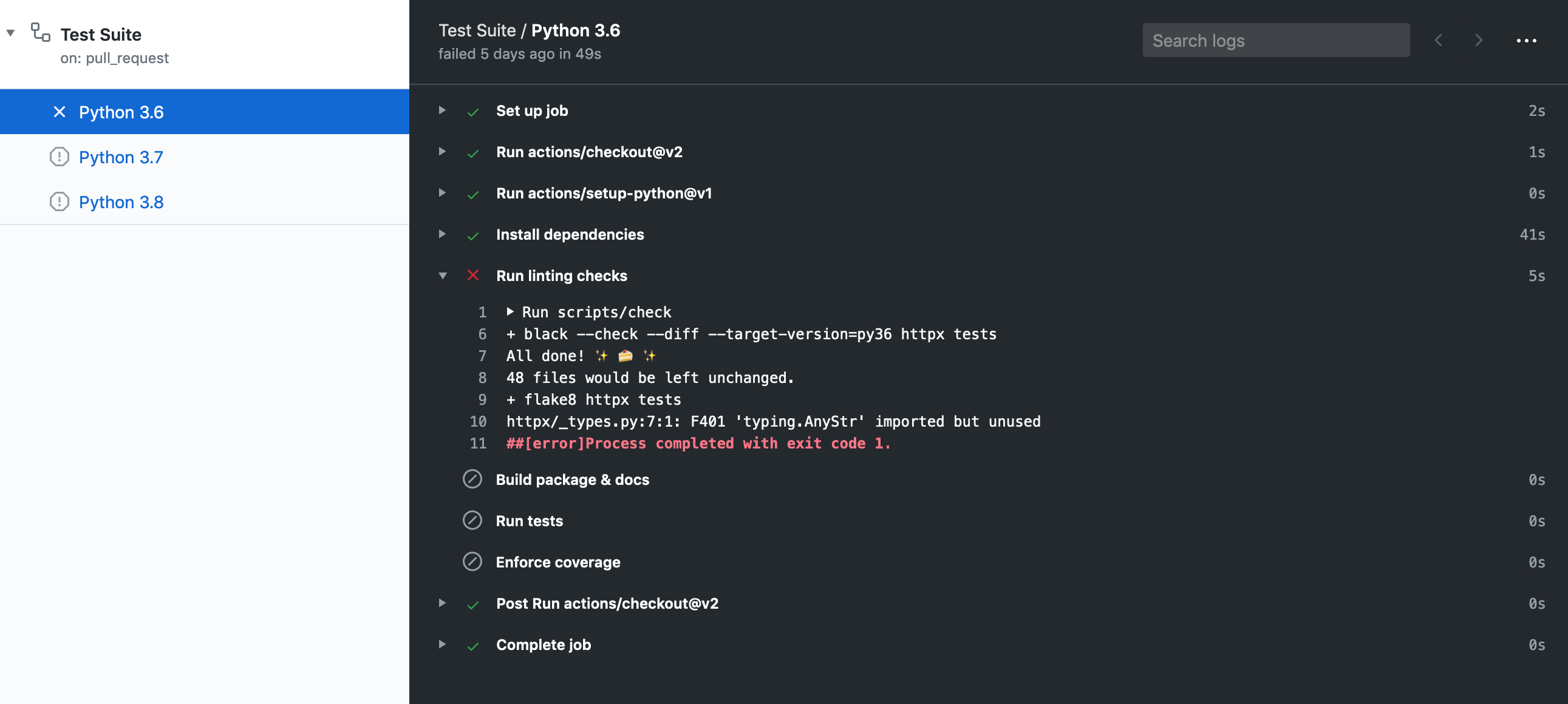
Failing GitHub action lint job

This job failing means there is either a code formatting issue or type-annotation issue. You can look at the job output to figure out why it's failed or within a shell run: ```shell $ scripts/check ``` It may be worth it to run `$ scripts/lint` to attempt auto-formatting the code and if that job succeeds commit the changes. ### Docs Job Failed This job failing means the documentation failed to build. This can happen for a variety of reasons like invalid markdown or missing configuration within `mkdocs.yml`. ### Python 3.X Job Failed

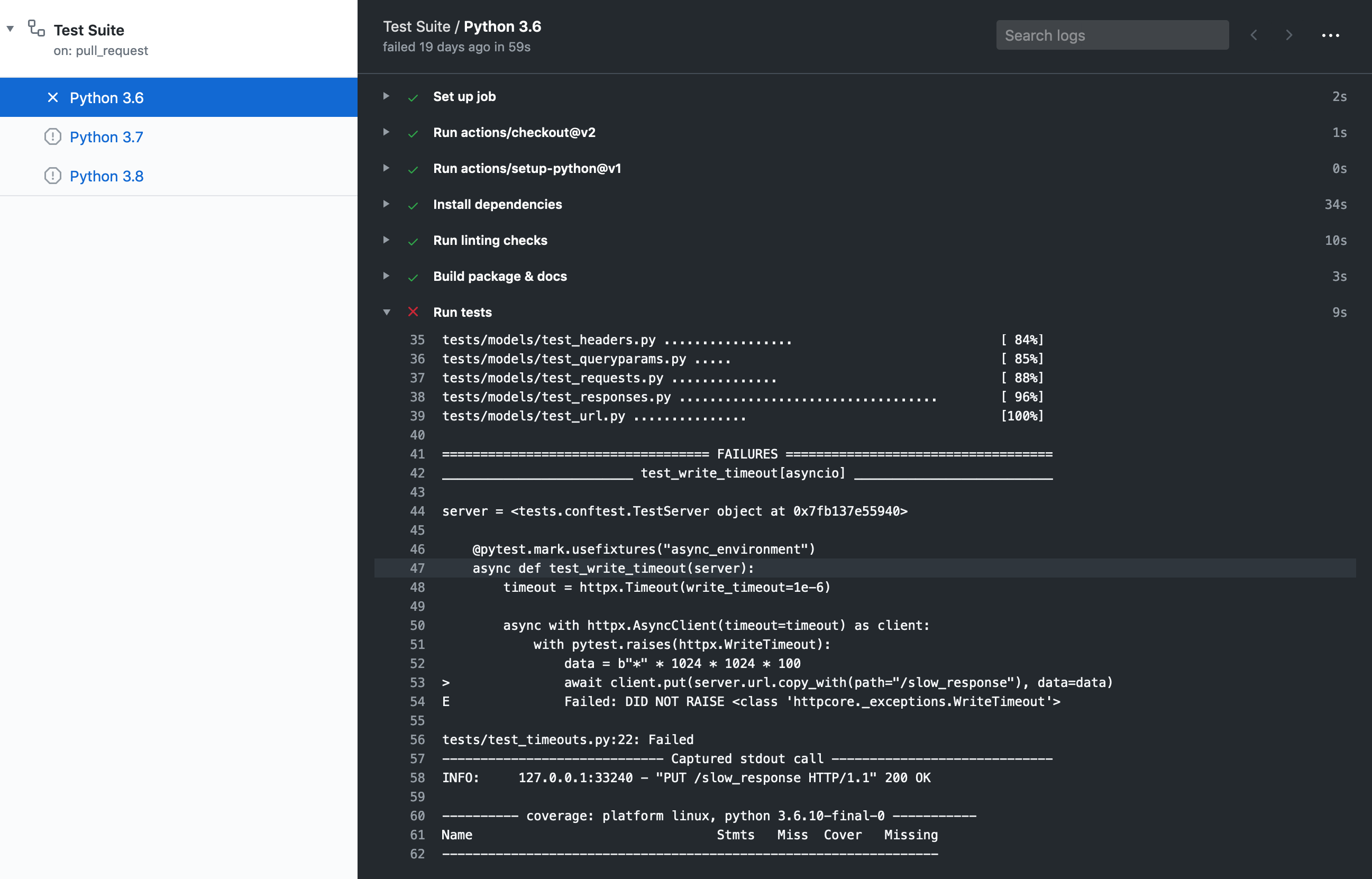
Failing GitHub action test job

This job failing means the unit tests failed or not all code paths are covered by unit tests. If tests are failing you will see this message under the coverage report: `=== 1 failed, 435 passed, 1 skipped, 1 xfailed in 11.09s ===` If tests succeed but coverage doesn't reach our current threshold, you will see this message under the coverage report: `FAIL Required test coverage of 100% not reached. Total coverage: 99.00%` ## Releasing *This section is targeted at HTTPX maintainers.* Before releasing a new version, create a pull request that includes: - **An update to the changelog**: - We follow the format from [keepachangelog](https://keepachangelog.com/en/1.0.0/). - [Compare](https://github.com/encode/httpx/compare/) `master` with the tag of the latest release, and list all entries that are of interest to our users: - Things that **must** go in the changelog: added, changed, deprecated or removed features, and bug fixes. - Things that **should not** go in the changelog: changes to documentation, tests or tooling. - Try sorting entries in descending order of impact / importance. - Keep it concise and to-the-point. 🎯 - **A version bump**: see `__version__.py`. For an example, see [#1006](https://github.com/encode/httpx/pull/1006). Once the release PR is merged, create a [new release](https://github.com/encode/httpx/releases/new) including: - Tag version like `0.13.3`. - Release title `Version 0.13.3` - Description copied from the changelog. Once created this release will be automatically uploaded to PyPI. If something goes wrong with the PyPI job the release can be published using the `scripts/publish` script. ## Development proxy setup To test and debug requests via a proxy it's best to run a proxy server locally. Any server should do but HTTPCore's test suite uses [`mitmproxy`](https://mitmproxy.org/) which is written in Python, it's fully featured and has excellent UI and tools for introspection of requests. You can install `mitmproxy` using `pip install mitmproxy` or [several other ways](https://docs.mitmproxy.org/stable/overview-installation/). `mitmproxy` does require setting up local TLS certificates for HTTPS requests, as its main purpose is to allow developers to inspect requests that pass through it. We can set them up follows: 1. [`pip install trustme-cli`](https://github.com/sethmlarson/trustme-cli/). 2. `trustme-cli -i example.org www.example.org`, assuming you want to test connecting to that domain, this will create three files: `server.pem`, `server.key` and `client.pem`. 3. `mitmproxy` requires a PEM file that includes the private key and the certificate so we need to concatenate them: `cat server.key server.pem > server.withkey.pem`. 4. Start the proxy server `mitmproxy --certs server.withkey.pem`, or use the [other mitmproxy commands](https://docs.mitmproxy.org/stable/) with different UI options. At this point the server is ready to start serving requests, you'll need to configure HTTPX as described in the [proxy section](https://www.python-httpx.org/advanced/#http-proxying) and the [SSL certificates section](https://www.python-httpx.org/advanced/#ssl-certificates), this is where our previously generated `client.pem` comes in: ``` import httpx ssl_context = httpx.SSLContext() ssl_context.load_verify_locations("/path/to/client.pem") with httpx.Client(proxy="http://127.0.0.1:8080/", ssl_context=ssl_context) as client: response = client.get("https://example.org") print(response.status_code) # should print 200 ``` Note, however, that HTTPS requests will only succeed to the host specified in the SSL/TLS certificate we generated, HTTPS requests to other hosts will raise an error like: ``` ssl.SSLCertVerificationError: [SSL: CERTIFICATE_VERIFY_FAILED] certificate verify failed: Hostname mismatch, certificate is not valid for 'duckduckgo.com'. (_ssl.c:1108) ``` If you want to make requests to more hosts you'll need to regenerate the certificates and include all the hosts you intend to connect to in the seconds step, i.e. `trustme-cli -i example.org www.example.org duckduckgo.com www.duckduckgo.com` ================================================ FILE: .github/FUNDING.yml ================================================ github: encode ================================================ FILE: .github/ISSUE_TEMPLATE/1-issue.md ================================================ --- name: Issue about: Please only raise an issue if you've been advised to do so after discussion. Thanks! 🙏 --- The starting point for issues should usually be a discussion... https://github.com/encode/httpx/discussions Possible bugs may be raised as a "Potential Issue" discussion, feature requests may be raised as an "Ideas" discussion. We can then determine if the discussion needs to be escalated into an "Issue" or not. This will help us ensure that the "Issues" list properly reflects ongoing or needed work on the project. --- - [ ] Initially raised as discussion #... ================================================ FILE: .github/ISSUE_TEMPLATE/config.yml ================================================ # Ref: https://help.github.com/en/github/building-a-strong-community/configuring-issue-templates-for-your-repository#configuring-the-template-chooser blank_issues_enabled: false contact_links: - name: Discussions url: https://github.com/encode/httpx/discussions about: > The "Discussions" forum is where you want to start. 💖 - name: Chat url: https://gitter.im/encode/community about: > Our community chat forum. ================================================ FILE: .github/PULL_REQUEST_TEMPLATE.md ================================================ # Summary # Checklist - [ ] I understand that this PR may be closed in case there was no previous discussion. (This doesn't apply to typos!) - [ ] I've added a test for each change that was introduced, and I tried as much as possible to make a single atomic change. - [ ] I've updated the documentation accordingly. ================================================ FILE: .github/dependabot.yml ================================================ version: 2 updates: - package-ecosystem: "pip" directory: "/" schedule: interval: "monthly" groups: python-packages: patterns: - "*" - package-ecosystem: "github-actions" directory: "/" schedule: interval: monthly ================================================ FILE: .github/workflows/publish.yml ================================================ name: Publish on: push: tags: - '*' jobs: publish: name: "Publish release" runs-on: "ubuntu-latest" environment: name: deploy steps: - uses: "actions/checkout@v4" - uses: "actions/setup-python@v6" with: python-version: 3.9 - name: "Install dependencies" run: "scripts/install" - name: "Build package & docs" run: "scripts/build" - name: "Publish to PyPI & deploy docs" run: "scripts/publish" env: TWINE_USERNAME: __token__ TWINE_PASSWORD: ${{ secrets.PYPI_TOKEN }} ================================================ FILE: .github/workflows/test-suite.yml ================================================ --- name: Test Suite on: push: branches: ["master"] pull_request: branches: ["master", "version-*"] jobs: tests: name: "Python ${{ matrix.python-version }}" runs-on: "ubuntu-latest" strategy: matrix: python-version: ["3.9", "3.10", "3.11", "3.12", "3.13"] steps: - uses: "actions/checkout@v4" - uses: "actions/setup-python@v6" with: python-version: "${{ matrix.python-version }}" allow-prereleases: true - name: "Install dependencies" run: "scripts/install" - name: "Run linting checks" run: "scripts/check" - name: "Build package & docs" run: "scripts/build" - name: "Run tests" run: "scripts/test" - name: "Enforce coverage" run: "scripts/coverage" ================================================ FILE: .gitignore ================================================ *.pyc .coverage .pytest_cache/ .mypy_cache/ __pycache__/ htmlcov/ site/ *.egg-info/ venv*/ .python-version build/ dist/ ================================================ FILE: CHANGELOG.md ================================================ # Changelog All notable changes to this project will be documented in this file. The format is based on [Keep a Changelog](https://keepachangelog.com/en/1.0.0/). ## [UNRELEASED] ### Removed * Drop support for Python 3.8 ### Added * Expose `FunctionAuth` from the public API. (#3699) ## 0.28.1 (6th December, 2024) * Fix SSL case where `verify=False` together with client side certificates. ## 0.28.0 (28th November, 2024) Be aware that the default *JSON request bodies now use a more compact representation*. This is generally considered a prefered style, tho may require updates to test suites. The 0.28 release includes a limited set of deprecations... **Deprecations**: We are working towards a simplified SSL configuration API. *For users of the standard `verify=True` or `verify=False` cases, or `verify=` case this should require no changes. The following cases have been deprecated...* * The `verify` argument as a string argument is now deprecated and will raise warnings. * The `cert` argument is now deprecated and will raise warnings. Our revised [SSL documentation](docs/advanced/ssl.md) covers how to implement the same behaviour with a more constrained API. **The following changes are also included**: * The deprecated `proxies` argument has now been removed. * The deprecated `app` argument has now been removed. * JSON request bodies use a compact representation. (#3363) * Review URL percent escape sets, based on WHATWG spec. (#3371, #3373) * Ensure `certifi` and `httpcore` are only imported if required. (#3377) * Treat `socks5h` as a valid proxy scheme. (#3178) * Cleanup `Request()` method signature in line with `client.request()` and `httpx.request()`. (#3378) * Bugfix: When passing `params={}`, always strictly update rather than merge with an existing querystring. (#3364) ## 0.27.2 (27th August, 2024) ### Fixed * Reintroduced supposedly-private `URLTypes` shortcut. (#2673) ## 0.27.1 (27th August, 2024) ### Added * Support for `zstd` content decoding using the python `zstandard` package is added. Installable using `httpx[zstd]`. (#3139) ### Fixed * Improved error messaging for `InvalidURL` exceptions. (#3250) * Fix `app` type signature in `ASGITransport`. (#3109) ## 0.27.0 (21st February, 2024) ### Deprecated * The `app=...` shortcut has been deprecated. Use the explicit style of `transport=httpx.WSGITransport()` or `transport=httpx.ASGITransport()` instead. ### Fixed * Respect the `http1` argument while configuring proxy transports. (#3023) * Fix RFC 2069 mode digest authentication. (#3045) ## 0.26.0 (20th December, 2023) ### Added * The `proxy` argument was added. You should use the `proxy` argument instead of the deprecated `proxies`, or use `mounts=` for more complex configurations. (#2879) ### Deprecated * The `proxies` argument is now deprecated. It will still continue to work, but it will be removed in the future. (#2879) ### Fixed * Fix cases of double escaping of URL path components. Allow / as a safe character in the query portion. (#2990) * Handle `NO_PROXY` envvar cases when a fully qualified URL is supplied as the value. (#2741) * Allow URLs where username or password contains unescaped '@'. (#2986) * Ensure ASGI `raw_path` does not include URL query component. (#2999) * Ensure `Response.iter_text()` cannot yield empty strings. (#2998) ## 0.25.2 (24th November, 2023) ### Added * Add missing type hints to few `__init__()` methods. (#2938) ## 0.25.1 (3rd November, 2023) ### Added * Add support for Python 3.12. (#2854) * Add support for httpcore 1.0 (#2885) ### Fixed * Raise `ValueError` on `Response.encoding` being set after `Response.text` has been accessed. (#2852) ## 0.25.0 (11th September, 2023) ### Removed * Drop support for Python 3.7. (#2813) ### Added * Support HTTPS proxies. (#2845) * Change the type of `Extensions` from `Mapping[Str, Any]` to `MutableMapping[Str, Any]`. (#2803) * Add `socket_options` argument to `httpx.HTTPTransport` and `httpx.AsyncHTTPTransport` classes. (#2716) * The `Response.raise_for_status()` method now returns the response instance. For example: `data = httpx.get('...').raise_for_status().json()`. (#2776) ### Fixed * Return `500` error response instead of exceptions when `raise_app_exceptions=False` is set on `ASGITransport`. (#2669) * Ensure all `WSGITransport` environs have a `SERVER_PROTOCOL`. (#2708) * Always encode forward slashes as `%2F` in query parameters (#2723) * Use Mozilla documentation instead of `httpstatuses.com` for HTTP error reference (#2768) ## 0.24.1 (17th May, 2023) ### Added * Provide additional context in some `InvalidURL` exceptions. (#2675) ### Fixed * Fix optional percent-encoding behaviour. (#2671) * More robust checking for opening upload files in binary mode. (#2630) * Properly support IP addresses in `NO_PROXY` environment variable. (#2659) * Set default file for `NetRCAuth()` to `None` to use the stdlib default. (#2667) * Set logging request lines to INFO level for async requests, in line with sync requests. (#2656) * Fix which gen-delims need to be escaped for path/query/fragment components in URL. (#2701) ## 0.24.0 (6th April, 2023) ### Changed * The logging behaviour has been changed to be more in-line with other standard Python logging usages. We no longer have a custom `TRACE` log level, and we no longer use the `HTTPX_LOG_LEVEL` environment variable to auto-configure logging. We now have a significant amount of `DEBUG` logging available at the network level. Full documentation is available at https://www.python-httpx.org/logging/ (#2547, encode/httpcore#648) * The `Response.iter_lines()` method now matches the stdlib behaviour and does not include the newline characters. It also resolves a performance issue. (#2423) * Query parameter encoding switches from using + for spaces and %2F for forward slash, to instead using %20 for spaces and treating forward slash as a safe, unescaped character. This differs from `requests`, but is in line with browser behavior in Chrome, Safari, and Firefox. Both options are RFC valid. (#2543) * NetRC authentication is no longer automatically handled, but is instead supported by an explicit `httpx.NetRCAuth()` authentication class. See the documentation at https://www.python-httpx.org/advanced/authentication/#netrc-authentication (#2525) ### Removed * The `rfc3986` dependancy has been removed. (#2252) ## 0.23.3 (4th January, 2023) ### Fixed * Version 0.23.2 accidentally included stricter type checking on query parameters. This shouldn've have been included in a minor version bump, and is now reverted. (#2523, #2539) ## 0.23.2 (2nd January, 2023) ### Added * Support digest auth nonce counting to avoid multiple auth requests. (#2463) ### Fixed * Multipart file uploads where the file length cannot be determine now use chunked transfer encoding, rather than loading the entire file into memory in order to determine the `Content-Length`. (#2382) * Raise `TypeError` if content is passed a dict-instance. (#2495) * Partially revert the API breaking change in 0.23.1, which removed `RawURL`. We continue to expose a `url.raw` property which is now a plain named-tuple. This API is still expected to be deprecated, but we will do so with a major version bump. (#2481) ## 0.23.1 (18th November, 2022) **Note**: The 0.23.1 release should have used a proper version bump, rather than a minor point release. There are API surface area changes that may affect some users. See the "Removed" section of these release notes for details. ### Added * Support for Python 3.11. (#2420) * Allow setting an explicit multipart boundary in `Content-Type` header. (#2278) * Allow `tuple` or `list` for multipart values, not just `list`. (#2355) * Allow `str` content for multipart upload files. (#2400) * Support connection upgrades. See https://www.encode.io/httpcore/extensions/#upgrade-requests ### Fixed * Don't drop empty query parameters. (#2354) ### Removed * Upload files *must* always be opened in binary mode. (#2400) * Drop `.read`/`.aread` from `SyncByteStream`/`AsyncByteStream`. (#2407) * Drop `RawURL`. (#2241) ## 0.23.0 (23rd May, 2022) ### Changed * Drop support for Python 3.6. (#2097) * Use `utf-8` as the default character set, instead of falling back to `charset-normalizer` for auto-detection. To enable automatic character set detection, see [the documentation](https://www.python-httpx.org/advanced/text-encodings/#using-auto-detection). (#2165) ### Fixed * Fix `URL.copy_with` for some oddly formed URL cases. (#2185) * Digest authentication should use case-insensitive comparison for determining which algorithm is being used. (#2204) * Fix console markup escaping in command line client. (#1866) * When files are used in multipart upload, ensure we always seek to the start of the file. (#2065) * Ensure that `iter_bytes` never yields zero-length chunks. (#2068) * Preserve `Authorization` header for redirects that are to the same origin, but are an `http`-to-`https` upgrade. (#2074) * When responses have binary output, don't print the output to the console in the command line client. Use output like `<16086 bytes of binary data>` instead. (#2076) * Fix display of `--proxies` argument in the command line client help. (#2125) * Close responses when task cancellations occur during stream reading. (#2156) * Fix type error on accessing `.request` on `HTTPError` exceptions. (#2158) ## 0.22.0 (26th January, 2022) ### Added * Support for [the SOCKS5 proxy protocol](https://www.python-httpx.org/advanced/proxies/#socks) via [the `socksio` package](https://github.com/sethmlarson/socksio). (#2034) * Support for custom headers in multipart/form-data requests (#1936) ### Fixed * Don't perform unreliable close/warning on `__del__` with unclosed clients. (#2026) * Fix `Headers.update(...)` to correctly handle repeated headers (#2038) ## 0.21.3 (6th January, 2022) ### Fixed * Fix streaming uploads using `SyncByteStream` or `AsyncByteStream`. Regression in 0.21.2. (#2016) ## 0.21.2 (5th January, 2022) ### Fixed * HTTP/2 support for tunnelled proxy cases. (#2009) * Improved the speed of large file uploads. (#1948) ## 0.21.1 (16th November, 2021) ### Fixed * The `response.url` property is now correctly annotated as `URL`, instead of `Optional[URL]`. (#1940) ## 0.21.0 (15th November, 2021) The 0.21.0 release integrates against a newly redesigned `httpcore` backend. Both packages ought to automatically update to the required versions, but if you are seeing any issues, you should ensure that you have `httpx==0.21.*` and `httpcore==0.14.*` installed. ### Added * The command-line client will now display connection information when `-v/--verbose` is used. * The command-line client will now display server certificate information when `-v/--verbose` is used. * The command-line client is now able to properly detect if the outgoing request should be formatted as HTTP/1.1 or HTTP/2, based on the result of the HTTP/2 negotiation. ### Removed * Curio support is no longer currently included. Please get in touch if you require this, so that we can assess priorities. ## 0.20.0 (13th October, 2021) The 0.20.0 release adds an integrated command-line client, and also includes some design changes. The most notable of these is that redirect responses are no longer automatically followed, unless specifically requested. This design decision prioritises a more explicit approach to redirects, in order to avoid code that unintentionally issues multiple requests as a result of misconfigured URLs. For example, previously a client configured to send requests to `http://api.github.com/` would end up sending every API request twice, as each request would be redirected to `https://api.github.com/`. If you do want auto-redirect behaviour, you can enable this either by configuring the client instance with `Client(follow_redirects=True)`, or on a per-request basis, with `.get(..., follow_redirects=True)`. This change is a classic trade-off between convenience and precision, with no "right" answer. See [discussion #1785](https://github.com/encode/httpx/discussions/1785) for more context. The other major design change is an update to the Transport API, which is the low-level interface against which requests are sent. Previously this interface used only primitive datastructures, like so... ```python (status_code, headers, stream, extensions) = transport.handle_request(method, url, headers, stream, extensions) try ... finally: stream.close() ``` Now the interface is much simpler... ```python response = transport.handle_request(request) try ... finally: response.close() ``` ### Changed * The `allow_redirects` flag is now `follow_redirects` and defaults to `False`. * The `raise_for_status()` method will now raise an exception for any responses except those with 2xx status codes. Previously only 4xx and 5xx status codes would result in an exception. * The low-level transport API changes to the much simpler `response = transport.handle_request(request)`. * The `client.send()` method no longer accepts a `timeout=...` argument, but the `client.build_request()` does. This required by the signature change of the Transport API. The request timeout configuration is now stored on the request instance, as `request.extensions['timeout']`. ### Added * Added the `httpx` command-line client. * Response instances now include `.is_informational`, `.is_success`, `.is_redirect`, `.is_client_error`, and `.is_server_error` properties for checking 1xx, 2xx, 3xx, 4xx, and 5xx response types. Note that the behaviour of `.is_redirect` is slightly different in that it now returns True for all 3xx responses, in order to allow for a consistent set of properties onto the different HTTP status code types. The `response.has_redirect_location` location may be used to determine responses with properly formed URL redirects. ### Fixed * `response.iter_bytes()` no longer raises a ValueError when called on a response with no content. (Pull #1827) * The `'wsgi.error'` configuration now defaults to `sys.stderr`, and is corrected to be a `TextIO` interface, not a `BytesIO` interface. Additionally, the WSGITransport now accepts a `wsgi_error` configuration. (Pull #1828) * Follow the WSGI spec by properly closing the iterable returned by the application. (Pull #1830) ## 0.19.0 (19th August, 2021) ### Added * Add support for `Client(allow_redirects=)`. (Pull #1790) * Add automatic character set detection, when no `charset` is included in the response `Content-Type` header. (Pull #1791) ### Changed * Event hooks are now also called for any additional redirect or auth requests/responses. (Pull #1806) * Strictly enforce that upload files must be opened in binary mode. (Pull #1736) * Strictly enforce that client instances can only be opened and closed once, and cannot be re-opened. (Pull #1800) * Drop `mode` argument from `httpx.Proxy(..., mode=...)`. (Pull #1795) ## 0.18.2 (17th June, 2021) ### Added * Support for Python 3.10. (Pull #1687) * Expose `httpx.USE_CLIENT_DEFAULT`, used as the default to `auth` and `timeout` parameters in request methods. (Pull #1634) * Support [HTTP/2 "prior knowledge"](https://python-hyper.org/projects/hyper-h2/en/v2.3.1/negotiating-http2.html#prior-knowledge), using `httpx.Client(http1=False, http2=True)`. (Pull #1624) ### Fixed * Clean up some cases where warnings were being issued. (Pull #1687) * Prefer Content-Length over Transfer-Encoding: chunked for content= cases. (Pull #1619) ## 0.18.1 (29th April, 2021) ### Changed * Update brotli support to use the `brotlicffi` package (Pull #1605) * Ensure that `Request(..., stream=...)` does not auto-generate any headers on the request instance. (Pull #1607) ### Fixed * Pass through `timeout=...` in top-level httpx.stream() function. (Pull #1613) * Map httpcore transport close exceptions to httpx exceptions. (Pull #1606) ## 0.18.0 (27th April, 2021) The 0.18.x release series formalises our low-level Transport API, introducing the base classes `httpx.BaseTransport` and `httpx.AsyncBaseTransport`. See the "[Custom transports](https://www.python-httpx.org/advanced/transports/#custom-transports)" documentation and the [`httpx.BaseTransport.handle_request()`](https://github.com/encode/httpx/blob/397aad98fdc8b7580a5fc3e88f1578b4302c6382/httpx/_transports/base.py#L77-L147) docstring for more complete details on implementing custom transports. Pull request #1522 includes a checklist of differences from the previous `httpcore` transport API, for developers implementing custom transports. The following API changes have been issuing deprecation warnings since 0.17.0 onwards, and are now fully deprecated... * You should now use httpx.codes consistently instead of httpx.StatusCodes. * Use limits=... instead of pool_limits=.... * Use proxies={"http://": ...} instead of proxies={"http": ...} for scheme-specific mounting. ### Changed * Transport instances now inherit from `httpx.BaseTransport` or `httpx.AsyncBaseTransport`, and should implement either the `handle_request` method or `handle_async_request` method. (Pull #1522, #1550) * The `response.ext` property and `Response(ext=...)` argument are now named `extensions`. (Pull #1522) * The recommendation to not use `data=` in favour of `content=` has now been escalated to a deprecation warning. (Pull #1573) * Drop `Response(on_close=...)` from API, since it was a bit of leaking implementation detail. (Pull #1572) * When using a client instance, cookies should always be set on the client, rather than on a per-request basis. We prefer enforcing a stricter API here because it provides clearer expectations around cookie persistence, particularly when redirects occur. (Pull #1574) * The runtime exception `httpx.ResponseClosed` is now named `httpx.StreamClosed`. (#1584) * The `httpx.QueryParams` model now presents an immutable interface. There is a discussion on [the design and motivation here](https://github.com/encode/httpx/discussions/1599). Use `client.params = client.params.merge(...)` instead of `client.params.update(...)`. The basic query manipulation methods are `query.set(...)`, `query.add(...)`, and `query.remove()`. (#1600) ### Added * The `Request` and `Response` classes can now be serialized using pickle. (#1579) * Handle `data={"key": [None|int|float|bool]}` cases. (Pull #1539) * Support `httpx.URL(**kwargs)`, for example `httpx.URL(scheme="https", host="www.example.com", path="/')`, or `httpx.URL("https://www.example.com/", username="tom@gmail.com", password="123 456")`. (Pull #1601) * Support `url.copy_with(params=...)`. (Pull #1601) * Add `url.params` parameter, returning an immutable `QueryParams` instance. (Pull #1601) * Support query manipulation methods on the URL class. These are `url.copy_set_param()`, `url.copy_add_param()`, `url.copy_remove_param()`, `url.copy_merge_params()`. (Pull #1601) * The `httpx.URL` class now performs port normalization, so `:80` ports are stripped from `http` URLs and `:443` ports are stripped from `https` URLs. (Pull #1603) * The `URL.host` property returns unicode strings for internationalized domain names. The `URL.raw_host` property returns byte strings with IDNA escaping applied. (Pull #1590) ### Fixed * Fix Content-Length for cases of `files=...` where unicode string is used as the file content. (Pull #1537) * Fix some cases of merging relative URLs against `Client(base_url=...)`. (Pull #1532) * The `request.content` attribute is now always available except for streaming content, which requires an explicit `.read()`. (Pull #1583) ## 0.17.1 (March 15th, 2021) ### Fixed * Type annotation on `CertTypes` allows `keyfile` and `password` to be optional. (Pull #1503) * Fix httpcore pinned version. (Pull #1495) ## 0.17.0 (February 28th, 2021) ### Added * Add `httpx.MockTransport()`, allowing to mock out a transport using pre-determined responses. (Pull #1401, Pull #1449) * Add `httpx.HTTPTransport()` and `httpx.AsyncHTTPTransport()` default transports. (Pull #1399) * Add mount API support, using `httpx.Client(mounts=...)`. (Pull #1362) * Add `chunk_size` parameter to `iter_raw()`, `iter_bytes()`, `iter_text()`. (Pull #1277) * Add `keepalive_expiry` parameter to `httpx.Limits()` configuration. (Pull #1398) * Add repr to `httpx.Cookies` to display available cookies. (Pull #1411) * Add support for `params=` (previously only `params=` was supported). (Pull #1426) ### Fixed * Add missing `raw_path` to ASGI scope. (Pull #1357) * Tweak `create_ssl_context` defaults to use `trust_env=True`. (Pull #1447) * Properly URL-escape WSGI `PATH_INFO`. (Pull #1391) * Properly set default ports in WSGI transport. (Pull #1469) * Properly encode slashes when using `base_url`. (Pull #1407) * Properly map exceptions in `request.aclose()`. (Pull #1465) ## 0.16.1 (October 8th, 2020) ### Fixed * Support literal IPv6 addresses in URLs. (Pull #1349) * Force lowercase headers in ASGI scope dictionaries. (Pull #1351) ## 0.16.0 (October 6th, 2020) ### Changed * Preserve HTTP header casing. (Pull #1338, encode/httpcore#216, python-hyper/h11#104) * Drop `response.next()` and `response.anext()` methods in favour of `response.next_request` attribute. (Pull #1339) * Closed clients now raise a runtime error if attempting to send a request. (Pull #1346) ### Added * Add Python 3.9 to officially supported versions. * Type annotate `__enter__`/`__exit__`/`__aenter__`/`__aexit__` in a way that supports subclasses of `Client` and `AsyncClient`. (Pull #1336) ## 0.15.5 (October 1st, 2020) ### Added * Add `response.next_request` (Pull #1334) ## 0.15.4 (September 25th, 2020) ### Added * Support direct comparisons between `Headers` and dicts or lists of two-tuples. Eg. `assert response.headers == {"Content-Length": 24}` (Pull #1326) ### Fixed * Fix automatic `.read()` when `Response` instances are created with `content=` (Pull #1324) ## 0.15.3 (September 24th, 2020) ### Fixed * Fixed connection leak in async client due to improper closing of response streams. (Pull #1316) ## 0.15.2 (September 23nd, 2020) ### Fixed * Fixed `response.elapsed` property. (Pull #1313) * Fixed client authentication interaction with `.stream()`. (Pull #1312) ## 0.15.1 (September 23nd, 2020) ### Fixed * ASGITransport now properly applies URL decoding to the `path` component, as-per the ASGI spec. (Pull #1307) ## 0.15.0 (September 22nd, 2020) ### Added * Added support for curio. (Pull https://github.com/encode/httpcore/pull/168) * Added support for event hooks. (Pull #1246) * Added support for authentication flows which require either sync or async I/O. (Pull #1217) * Added support for monitoring download progress with `response.num_bytes_downloaded`. (Pull #1268) * Added `Request(content=...)` for byte content, instead of overloading `Request(data=...)` (Pull #1266) * Added support for all URL components as parameter names when using `url.copy_with(...)`. (Pull #1285) * Neater split between automatically populated headers on `Request` instances, vs default `client.headers`. (Pull #1248) * Unclosed `AsyncClient` instances will now raise warnings if garbage collected. (Pull #1197) * Support `Response(content=..., text=..., html=..., json=...)` for creating usable response instances in code. (Pull #1265, #1297) * Support instantiating requests from the low-level transport API. (Pull #1293) * Raise errors on invalid URL types. (Pull #1259) ### Changed * Cleaned up expected behaviour for URL escaping. `url.path` is now URL escaped. (Pull #1285) * Cleaned up expected behaviour for bytes vs str in URL components. `url.userinfo` and `url.query` are not URL escaped, and so return bytes. (Pull #1285) * Drop `url.authority` property in favour of `url.netloc`, since "authority" was semantically incorrect. (Pull #1285) * Drop `url.full_path` property in favour of `url.raw_path`, for better consistency with other parts of the API. (Pull #1285) * No longer use the `chardet` library for auto-detecting charsets, instead defaulting to a simpler approach when no charset is specified. (#1269) ### Fixed * Swapped ordering of redirects and authentication flow. (Pull #1267) * `.netrc` lookups should use host, not host+port. (Pull #1298) ### Removed * The `URLLib3Transport` class no longer exists. We've published it instead as an example of [a custom transport class](https://gist.github.com/florimondmanca/d56764d78d748eb9f73165da388e546e). (Pull #1182) * Drop `request.timer` attribute, which was being used internally to set `response.elapsed`. (Pull #1249) * Drop `response.decoder` attribute, which was being used internally. (Pull #1276) * `Request.prepare()` is now a private method. (Pull #1284) * The `Headers.getlist()` method had previously been deprecated in favour of `Headers.get_list()`. It is now fully removed. * The `QueryParams.getlist()` method had previously been deprecated in favour of `QueryParams.get_list()`. It is now fully removed. * The `URL.is_ssl` property had previously been deprecated in favour of `URL.scheme == "https"`. It is now fully removed. * The `httpx.PoolLimits` class had previously been deprecated in favour of `httpx.Limits`. It is now fully removed. * The `max_keepalive` setting had previously been deprecated in favour of the more explicit `max_keepalive_connections`. It is now fully removed. * The verbose `httpx.Timeout(5.0, connect_timeout=60.0)` style had previously been deprecated in favour of `httpx.Timeout(5.0, connect=60.0)`. It is now fully removed. * Support for instantiating a timeout config missing some defaults, such as `httpx.Timeout(connect=60.0)`, had previously been deprecated in favour of enforcing a more explicit style, such as `httpx.Timeout(5.0, connect=60.0)`. This is now strictly enforced. ## 0.14.3 (September 2nd, 2020) ### Added * `http.Response()` may now be instantiated without a `request=...` parameter. Useful for some unit testing cases. (Pull #1238) * Add `103 Early Hints` and `425 Too Early` status codes. (Pull #1244) ### Fixed * `DigestAuth` now handles responses that include multiple 'WWW-Authenticate' headers. (Pull #1240) * Call into transport `__enter__`/`__exit__` or `__aenter__`/`__aexit__` when client is used in a context manager style. (Pull #1218) ## 0.14.2 (August 24th, 2020) ### Added * Support `client.get(..., auth=None)` to bypass the default authentication on a clients. (Pull #1115) * Support `client.auth = ...` property setter. (Pull #1185) * Support `httpx.get(..., proxies=...)` on top-level request functions. (Pull #1198) * Display instances with nicer import styles. (Eg. ) (Pull #1155) * Support `cookies=[(key, value)]` list-of-two-tuples style usage. (Pull #1211) ### Fixed * Ensure that automatically included headers on a request may be modified. (Pull #1205) * Allow explicit `Content-Length` header on streaming requests. (Pull #1170) * Handle URL quoted usernames and passwords properly. (Pull #1159) * Use more consistent default for `HEAD` requests, setting `allow_redirects=True`. (Pull #1183) * If a transport error occurs while streaming the response, raise an `httpx` exception, not the underlying `httpcore` exception. (Pull #1190) * Include the underlying `httpcore` traceback, when transport exceptions occur. (Pull #1199) ## 0.14.1 (August 11th, 2020) ### Added * The `httpx.URL(...)` class now raises `httpx.InvalidURL` on invalid URLs, rather than exposing the underlying `rfc3986` exception. If a redirect response includes an invalid 'Location' header, then a `RemoteProtocolError` exception is raised, which will be associated with the request that caused it. (Pull #1163) ### Fixed * Handling multiple `Set-Cookie` headers became broken in the 0.14.0 release, and is now resolved. (Pull #1156) ## 0.14.0 (August 7th, 2020) The 0.14 release includes a range of improvements to the public API, intended on preparing for our upcoming 1.0 release. * Our HTTP/2 support is now fully optional. **You now need to use `pip install httpx[http2]` if you want to include the HTTP/2 dependencies.** * Our HSTS support has now been removed. Rewriting URLs from `http` to `https` if the host is on the HSTS list can be beneficial in avoiding roundtrips to incorrectly formed URLs, but on balance we've decided to remove this feature, on the principle of least surprise. Most programmatic clients do not include HSTS support, and for now we're opting to remove our support for it. * Our exception hierarchy has been overhauled. Most users will want to stick with their existing `httpx.HTTPError` usage, but we've got a clearer overall structure now. See https://www.python-httpx.org/exceptions/ for more details. When upgrading you should be aware of the following public API changes. Note that deprecated usages will currently continue to function, but will issue warnings. * You should now use `httpx.codes` consistently instead of `httpx.StatusCodes`. * Usage of `httpx.Timeout()` should now always include an explicit default. Eg. `httpx.Timeout(None, pool=5.0)`. * When using `httpx.Timeout()`, we now have more concisely named keyword arguments. Eg. `read=5.0`, instead of `read_timeout=5.0`. * Use `httpx.Limits()` instead of `httpx.PoolLimits()`, and `limits=...` instead of `pool_limits=...`. * The `httpx.Limits(max_keepalive=...)` argument is now deprecated in favour of a more explicit `httpx.Limits(max_keepalive_connections=...)`. * Keys used with `Client(proxies={...})` should now be in the style of `{"http://": ...}`, rather than `{"http": ...}`. * The multidict methods `Headers.getlist()` and `QueryParams.getlist()` are deprecated in favour of more consistent `.get_list()` variants. * The `URL.is_ssl` property is deprecated in favour of `URL.scheme == "https"`. * The `URL.join(relative_url=...)` method is now `URL.join(url=...)`. This change does not support warnings for the deprecated usage style. One notable aspect of the 0.14.0 release is that it tightens up the public API for `httpx`, by ensuring that several internal attributes and methods have now become strictly private. The following previously had nominally public names on the client, but were all undocumented and intended solely for internal usage. They are all now replaced with underscored names, and should not be relied on or accessed. These changes should not affect users who have been working from the `httpx` documentation. * `.merge_url()`, `.merge_headers()`, `.merge_cookies()`, `.merge_queryparams()` * `.build_auth()`, `.build_redirect_request()` * `.redirect_method()`, `.redirect_url()`, `.redirect_headers()`, `.redirect_stream()` * `.send_handling_redirects()`, `.send_handling_auth()`, `.send_single_request()` * `.init_transport()`, `.init_proxy_transport()` * `.proxies`, `.transport`, `.netrc`, `.get_proxy_map()` See pull requests #997, #1065, #1071. Some areas of API which were already on the deprecation path, and were raising warnings or errors in 0.13.x have now been escalated to being fully removed. * Drop `ASGIDispatch`, `WSGIDispatch`, which have been replaced by `ASGITransport`, `WSGITransport`. * Drop `dispatch=...`` on client, which has been replaced by `transport=...`` * Drop `soft_limit`, `hard_limit`, which have been replaced by `max_keepalive` and `max_connections`. * Drop `Response.stream` and` `Response.raw`, which have been replaced by ``.aiter_bytes` and `.aiter_raw`. * Drop `proxies=` in favor of `proxies=httpx.Proxy(...)`. See pull requests #1057, #1058. ### Added * Added dedicated exception class `httpx.HTTPStatusError` for `.raise_for_status()` exceptions. (Pull #1072) * Added `httpx.create_ssl_context()` helper function. (Pull #996) * Support for proxy exclusions like `proxies={"https://www.example.com": None}`. (Pull #1099) * Support `QueryParams(None)` and `client.params = None`. (Pull #1060) ### Changed * Use `httpx.codes` consistently in favour of `httpx.StatusCodes` which is placed into deprecation. (Pull #1088) * Usage of `httpx.Timeout()` should now always include an explicit default. Eg. `httpx.Timeout(None, pool=5.0)`. (Pull #1085) * Switch to more concise `httpx.Timeout()` keyword arguments. Eg. `read=5.0`, instead of `read_timeout=5.0`. (Pull #1111) * Use `httpx.Limits()` instead of `httpx.PoolLimits()`, and `limits=...` instead of `pool_limits=...`. (Pull #1113) * Keys used with `Client(proxies={...})` should now be in the style of `{"http://": ...}`, rather than `{"http": ...}`. (Pull #1127) * The multidict methods `Headers.getlist` and `QueryParams.getlist` are deprecated in favour of more consistent `.get_list()` variants. (Pull #1089) * `URL.port` becomes `Optional[int]`. Now only returns a port if one is explicitly included in the URL string. (Pull #1080) * The `URL(..., allow_relative=[bool])` parameter no longer exists. All URL instances may be relative. (Pull #1073) * Drop unnecessary `url.full_path = ...` property setter. (Pull #1069) * The `URL.join(relative_url=...)` method is now `URL.join(url=...)`. (Pull #1129) * The `URL.is_ssl` property is deprecated in favour of `URL.scheme == "https"`. (Pull #1128) ### Fixed * Add missing `Response.next()` method. (Pull #1055) * Ensure all exception classes are exposed as public API. (Pull #1045) * Support multiple items with an identical field name in multipart encodings. (Pull #777) * Skip HSTS preloading on single-label domains. (Pull #1074) * Fixes for `Response.iter_lines()`. (Pull #1033, #1075) * Ignore permission errors when accessing `.netrc` files. (Pull #1104) * Allow bare hostnames in `HTTP_PROXY` etc... environment variables. (Pull #1120) * Settings `app=...` or `transport=...` bypasses any environment based proxy defaults. (Pull #1122) * Fix handling of `.base_url` when a path component is included in the base URL. (Pull #1130) --- ## 0.13.3 (May 29th, 2020) ### Fixed * Include missing keepalive expiry configuration. (Pull #1005) * Improved error message when URL redirect has a custom scheme. (Pull #1002) ## 0.13.2 (May 27th, 2020) ### Fixed * Include explicit "Content-Length: 0" on POST, PUT, PATCH if no request body is used. (Pull #995) * Add `http2` option to `httpx.Client`. (Pull #982) * Tighten up API typing in places. (Pull #992, #999) ## 0.13.1 (May 22nd, 2020) ### Fixed * Fix pool options deprecation warning. (Pull #980) * Include `httpx.URLLib3ProxyTransport` in top-level API. (Pull #979) ## 0.13.0 (May 22nd, 2020) This release switches to `httpcore` for all the internal networking, which means: * We're using the same codebase for both our sync and async clients. * HTTP/2 support is now available with the sync client. * We no longer have a `urllib3` dependency for our sync client, although there is still an *optional* `URLLib3Transport` class. It also means we've had to remove our UDS support, since maintaining that would have meant having to push back our work towards a 1.0 release, which isn't a trade-off we wanted to make. We also now have [a public "Transport API"](https://www.python-httpx.org/advanced/transports/#custom-transports), which you can use to implement custom transport implementations against. This formalises and replaces our previously private "Dispatch API". ### Changed * Use `httpcore` for underlying HTTP transport. Drop `urllib3` requirement. (Pull #804, #967) * Rename pool limit options from `soft_limit`/`hard_limit` to `max_keepalive`/`max_connections`. (Pull #968) * The previous private "Dispatch API" has now been promoted to a public "Transport API". When customizing the transport use `transport=...`. The `ASGIDispatch` and `WSGIDispatch` class naming is deprecated in favour of `ASGITransport` and `WSGITransport`. (Pull #963) ### Added * Added `URLLib3Transport` class for optional `urllib3` transport support. (Pull #804, #963) * Streaming multipart uploads. (Pull #857) * Logging via HTTPCORE_LOG_LEVEL and HTTPX_LOG_LEVEL environment variables and TRACE level logging. (Pull encode/httpcore#79) ### Fixed * Performance improvement in brotli decoder. (Pull #906) * Proper warning level of deprecation notice in `Response.stream` and `Response.raw`. (Pull #908) * Fix support for generator based WSGI apps. (Pull #887) * Reuse of connections on HTTP/2 in close concurrency situations. (Pull encode/httpcore#81) * Honor HTTP/2 max concurrent streams settings (Pull encode/httpcore#89, encode/httpcore#90) * Fix bytes support in multipart uploads. (Pull #974) * Improve typing support for `files=...`. (Pull #976) ### Removed * Dropped support for `Client(uds=...)` (Pull #804) ## 0.13.0.dev2 (May 12th, 2020) The 0.13.0.dev2 is a *pre-release* version. To install it, use `pip install httpx --pre`. ### Added * Logging via HTTPCORE_LOG_LEVEL and HTTPX_LOG_LEVEL environment variables and TRACE level logging. (HTTPCore Pull #79) ### Fixed * Reuse of connections on HTTP/2 in close concurrency situations. (HTTPCore Pull #81) * When using an `app=` observe neater disconnect behaviour instead of sending empty body messages. (Pull #919) ## 0.13.0.dev1 (May 6th, 2020) The 0.13.0.dev1 is a *pre-release* version. To install it, use `pip install httpx --pre`. ### Fixed * Passing `http2` flag to proxy dispatchers. (Pull #934) * Use [`httpcore` v0.8.3](https://github.com/encode/httpcore/releases/tag/0.8.3) which addresses problems in handling of headers when using proxies. ## 0.13.0.dev0 (April 30th, 2020) The 0.13.0.dev0 is a *pre-release* version. To install it, use `pip install httpx --pre`. This release switches to `httpcore` for all the internal networking, which means: * We're using the same codebase for both our sync and async clients. * HTTP/2 support is now available with the sync client. * We no longer have a `urllib3` dependency for our sync client, although there is still an *optional* `URLLib3Dispatcher` class. It also means we've had to remove our UDS support, since maintaining that would have meant having to push back our work towards a 1.0 release, which isn't a trade-off we wanted to make. ### Changed * Use `httpcore` for underlying HTTP transport. Drop `urllib3` requirement. (Pull #804) ### Added * Added `URLLib3Dispatcher` class for optional `urllib3` transport support. (Pull #804) * Streaming multipart uploads. (Pull #857) ### Fixed * Performance improvement in brotli decoder. (Pull #906) * Proper warning level of deprecation notice in `Response.stream` and `Response.raw`. (Pull #908) * Fix support for generator based WSGI apps. (Pull #887) ### Removed * Dropped support for `Client(uds=...)` (Pull #804) --- ## 0.12.1 (March 19th, 2020) ### Fixed * Resolved packaging issue, where additional files were being included. ## 0.12.0 (March 9th, 2020) The 0.12 release tightens up the API expectations for `httpx` by switching to private module names to enforce better clarity around public API. All imports of `httpx` should import from the top-level package only, such as `from httpx import Request`, rather than importing from privately namespaced modules such as `from httpx._models import Request`. ### Added * Support making response body available to auth classes with `.requires_response_body`. (Pull #803) * Export `NetworkError` exception. (Pull #814) * Add support for `NO_PROXY` environment variable. (Pull #835) ### Changed * Switched to private module names. (Pull #785) * Drop redirect looping detection and the `RedirectLoop` exception, instead using `TooManyRedirects`. (Pull #819) * Drop `backend=...` parameter on `AsyncClient`, in favour of always autodetecting `trio`/`asyncio`. (Pull #791) ### Fixed * Support basic auth credentials in proxy URLs. (Pull #780) * Fix `httpx.Proxy(url, mode="FORWARD_ONLY")` configuration. (Pull #788) * Fallback to setting headers as UTF-8 if no encoding is specified. (Pull #820) * Close proxy dispatches classes on client close. (Pull #826) * Support custom `cert` parameters even if `verify=False`. (Pull #796) * Don't support invalid dict-of-dicts form data in `data=...`. (Pull #811) --- ## 0.11.1 (January 17th, 2020) ### Fixed * Fixed usage of `proxies=...` on `Client()`. (Pull #763) * Support both `zlib` and `deflate` style encodings on `Content-Encoding: deflate`. (Pull #758) * Fix for streaming a redirect response body with `allow_redirects=False`. (Pull #766) * Handle redirect with malformed Location headers missing host. (Pull #774) ## 0.11.0 (January 9th, 2020) The 0.11 release reintroduces our sync support, so that `httpx` now supports both a standard thread-concurrency API, and an async API. Existing async `httpx` users that are upgrading to 0.11 should ensure that: * Async codebases should always use a client instance to make requests, instead of the top-level API. * The async client is named as `httpx.AsyncClient()`, instead of `httpx.Client()`. * When instantiating proxy configurations use the `httpx.Proxy()` class, instead of the previous `httpx.HTTPProxy()`. This new configuration class works for configuring both sync and async clients. We believe the API is now pretty much stable, and are aiming for a 1.0 release sometime on or before April 2020. ### Changed - Top level API such as `httpx.get(url, ...)`, `httpx.post(url, ...)`, `httpx.request(method, url, ...)` becomes synchronous. - Added `httpx.Client()` for synchronous clients, with `httpx.AsyncClient` being used for async clients. - Switched to `proxies=httpx.Proxy(...)` for proxy configuration. - Network connection errors are wrapped in `httpx.NetworkError`, rather than exposing lower-level exception types directly. ### Removed - The `request.url.origin` property and `httpx.Origin` class are no longer available. - The per-request `cert`, `verify`, and `trust_env` arguments are escalated from raising errors if used, to no longer being available. These arguments should be used on a per-client instance instead, or in the top-level API. - The `stream` argument has escalated from raising an error when used, to no longer being available. Use the `client.stream(...)` or `httpx.stream()` streaming API instead. ### Fixed - Redirect loop detection matches against `(method, url)` rather than `url`. (Pull #734) --- ## 0.10.1 (December 31st, 2019) ### Fixed - Fix issue with concurrent connection acquisition. (Pull #700) - Fix write error on closing HTTP/2 connections. (Pull #699) ## 0.10.0 (December 29th, 2019) The 0.10.0 release makes some changes that will allow us to support both sync and async interfaces. In particular with streaming responses the `response.read()` method becomes `response.aread()`, and the `response.close()` method becomes `response.aclose()`. If following redirects explicitly the `response.next()` method becomes `response.anext()`. ### Fixed - End HTTP/2 streams immediately on no-body requests, rather than sending an empty body message. (Pull #682) - Improve typing for `Response.request`: switch from `Optional[Request]` to `Request`. (Pull #666) - `Response.elapsed` now reflects the entire download time. (Pull #687, #692) ### Changed - Added `AsyncClient` as a synonym for `Client`. (Pull #680) - Switch to `response.aread()` for conditionally reading streaming responses. (Pull #674) - Switch to `response.aclose()` and `client.aclose()` for explicit closing. (Pull #674, #675) - Switch to `response.anext()` for resolving the next redirect response. (Pull #676) ### Removed - When using a client instance, the per-request usage of `verify`, `cert`, and `trust_env` have now escalated from raising a warning to raising an error. You should set these arguments on the client instead. (Pull #617) - Removed the undocumented `request.read()`, since end users should not require it. --- ## 0.9.5 (December 20th, 2019) ### Fixed - Fix Host header and HSTS rewrites when an explicit `:80` port is included in URL. (Pull #649) - Query Params on the URL string are merged with any `params=...` argument. (Pull #653) - More robust behavior when closing connections. (Pull #640) - More robust behavior when handling HTTP/2 headers with trailing whitespace. (Pull #637) - Allow any explicit `Content-Type` header to take precedence over the encoding default. (Pull #633) ## 0.9.4 (December 12th, 2019) ### Fixed - Added expiry to Keep-Alive connections, resolving issues with acquiring connections. (Pull #627) - Increased flow control windows on HTTP/2, resolving download speed issues. (Pull #629) ## 0.9.3 (December 7th, 2019) ### Fixed - Fixed HTTP/2 with autodetection backend. (Pull #614) ## 0.9.2 (December 7th, 2019) * Released due to packaging build artifact. ## 0.9.1 (December 6th, 2019) * Released due to packaging build artifact. ## 0.9.0 (December 6th, 2019) The 0.9 releases brings some major new features, including: * A new streaming API. * Autodetection of either asyncio or trio. * Nicer timeout configuration. * HTTP/2 support off by default, but can be enabled. We've also removed all private types from the top-level package export. In order to ensure you are only ever working with public API you should make sure to only import the top-level package eg. `import httpx`, rather than importing modules within the package. ### Added - Added concurrency backend autodetection. (Pull #585) - Added `Client(backend='trio')` and `Client(backend='asyncio')` API. (Pull #585) - Added `response.stream_lines()` API. (Pull #575) - Added `response.is_error` API. (Pull #574) - Added support for `timeout=Timeout(5.0, connect_timeout=60.0)` styles. (Pull #593) ### Fixed - Requests or Clients with `timeout=None` now correctly always disable timeouts. (Pull #592) - Request 'Authorization' headers now have priority over `.netrc` authentication info. (Commit 095b691) - Files without a filename no longer set a Content-Type in multipart data. (Commit ed94950) ### Changed - Added `httpx.stream()` API. Using `stream=True` now results in a warning. (Pull #600, #610) - HTTP/2 support is switched to "off by default", but can be enabled explicitly. (Pull #584) - Switched to `Client(http2=True)` API from `Client(http_versions=["HTTP/1.1", "HTTP/2"])`. (Pull #586) - Removed all private types from the top-level package export. (Pull #608) - The SSL configuration settings of `verify`, `cert`, and `trust_env` now raise warnings if used per-request when using a Client instance. They should always be set on the Client instance itself. (Pull #597) - Use plain strings "TUNNEL_ONLY" or "FORWARD_ONLY" on the HTTPProxy `proxy_mode` argument. The `HTTPProxyMode` enum still exists, but its usage will raise warnings. (#610) - Pool timeouts are now on the timeout configuration, not the pool limits configuration. (Pull #563) - The timeout configuration is now named `httpx.Timeout(...)`, not `httpx.TimeoutConfig(...)`. The old version currently remains as a synonym for backwards compatibility. (Pull #591) --- ## 0.8.0 (November 27, 2019) ### Removed - The synchronous API has been removed, in order to allow us to fundamentally change how we approach supporting both sync and async variants. (See #588 for more details.) --- ## 0.7.8 (November 17, 2019) ### Added - Add support for proxy tunnels for Python 3.6 + asyncio. (Pull #521) ## 0.7.7 (November 15, 2019) ### Fixed - Resolve an issue with cookies behavior on redirect requests. (Pull #529) ### Added - Add request/response DEBUG logs. (Pull #502) - Use TRACE log level for low level info. (Pull #500) ## 0.7.6 (November 2, 2019) ### Removed - Drop `proxies` parameter from the high-level API. (Pull #485) ### Fixed - Tweak multipart files: omit null filenames, add support for `str` file contents. (Pull #482) - Cache NETRC authentication per-client. (Pull #400) - Rely on `getproxies` for all proxy environment variables. (Pull #470) - Wait for the `asyncio` stream to close when closing a connection. (Pull #494) ## 0.7.5 (October 10, 2019) ### Added - Allow lists of values to be passed to `params`. (Pull #386) - `ASGIDispatch`, `WSGIDispatch` are now available in the `httpx.dispatch` namespace. (Pull #407) - `HTTPError` is now available in the `httpx` namespace. (Pull #421) - Add support for `start_tls()` to the Trio concurrency backend. (Pull #467) ### Fixed - Username and password are no longer included in the `Host` header when basic authentication credentials are supplied via the URL. (Pull #417) ### Removed - The `.delete()` function no longer has `json`, `data`, or `files` parameters to match the expected semantics of the `DELETE` method. (Pull #408) - Removed the `trio` extra. Trio support is detected automatically. (Pull #390) ## 0.7.4 (September 25, 2019) ### Added - Add Trio concurrency backend. (Pull #276) - Add `params` parameter to `Client` for setting default query parameters. (Pull #372) - Add support for `SSL_CERT_FILE` and `SSL_CERT_DIR` environment variables. (Pull #307) - Add debug logging to calls into ASGI apps. (Pull #371) - Add debug logging to SSL configuration. (Pull #378) ### Fixed - Fix a bug when using `Client` without timeouts in Python 3.6. (Pull #383) - Propagate `Client` configuration to HTTP proxies. (Pull #377) ## 0.7.3 (September 20, 2019) ### Added - HTTP Proxy support. (Pulls #259, #353) - Add Digest authentication. (Pull #332) - Add `.build_request()` method to `Client` and `AsyncClient`. (Pull #319) - Add `.elapsed` property on responses. (Pull #351) - Add support for `SSLKEYLOGFILE` in Python 3.8b4+. (Pull #301) ### Removed - Drop NPN support for HTTP version negotiation. (Pull #314) ### Fixed - Fix distribution of type annotations for mypy (Pull #361). - Set `Host` header when redirecting cross-origin. (Pull #321) - Drop `Content-Length` headers on `GET` redirects. (Pull #310) - Raise `KeyError` if header isn't found in `Headers`. (Pull #324) - Raise `NotRedirectResponse` in `response.next()` if there is no redirection to perform. (Pull #297) - Fix bug in calculating the HTTP/2 maximum frame size. (Pull #153) ## 0.7.2 (August 28, 2019) - Enforce using `httpx.AsyncioBackend` for the synchronous client. (Pull #232) - `httpx.ConnectionPool` will properly release a dropped connection. (Pull #230) - Remove the `raise_app_exceptions` argument from `Client`. (Pull #238) - `DecodeError` will no longer be raised for an empty body encoded with Brotli. (Pull #237) - Added `http_versions` parameter to `Client`. (Pull #250) - Only use HTTP/1.1 on short-lived connections like `httpx.get()`. (Pull #284) - Convert `Client.cookies` and `Client.headers` when set as a property. (Pull #274) - Setting `HTTPX_DEBUG=1` enables debug logging on all requests. (Pull #277) ## 0.7.1 (August 18, 2019) - Include files with source distribution to be installable. (Pull #233) ## 0.7.0 (August 17, 2019) - Add the `trust_env` property to `BaseClient`. (Pull #187) - Add the `links` property to `BaseResponse`. (Pull #211) - Accept `ssl.SSLContext` instances into `SSLConfig(verify=...)`. (Pull #215) - Add `Response.stream_text()` with incremental encoding detection. (Pull #183) - Properly updated the `Host` header when a redirect changes the origin. (Pull #199) - Ignore invalid `Content-Encoding` headers. (Pull #196) - Use `~/.netrc` and `~/_netrc` files by default when `trust_env=True`. (Pull #189) - Create exception base class `HTTPError` with `request` and `response` properties. (Pull #162) - Add HSTS preload list checking within `BaseClient` to upgrade HTTP URLs to HTTPS. (Pull #184) - Switch IDNA encoding from IDNA 2003 to IDNA 2008. (Pull #161) - Expose base classes for alternate concurrency backends. (Pull #178) - Improve Multipart parameter encoding. (Pull #167) - Add the `headers` property to `BaseClient`. (Pull #159) - Add support for Google's `brotli` library. (Pull #156) - Remove deprecated TLS versions (TLSv1 and TLSv1.1) from default `SSLConfig`. (Pull #155) - Fix `URL.join(...)` to work similarly to RFC 3986 URL joining. (Pull #144) --- ## 0.6.8 (July 25, 2019) - Check for disconnections when searching for an available connection in `ConnectionPool.keepalive_connections` (Pull #145) - Allow string comparison for `URL` objects (Pull #139) - Add HTTP status codes 418 and 451 (Pull #135) - Add support for client certificate passwords (Pull #118) - Enable post-handshake client cert authentication for TLSv1.3 (Pull #118) - Disable using `commonName` for hostname checking for OpenSSL 1.1.0+ (Pull #118) - Detect encoding for `Response.json()` (Pull #116) ## 0.6.7 (July 8, 2019) - Check for connection aliveness on re-acquisition (Pull #111) ## 0.6.6 (July 3, 2019) - Improve `USER_AGENT` (Pull #110) - Add `Connection: keep-alive` by default to HTTP/1.1 connections. (Pull #110) ## 0.6.5 (June 27, 2019) - Include `Host` header by default. (Pull #109) - Improve HTTP protocol detection. (Pull #107) ## 0.6.4 (June 25, 2019) - Implement read and write timeouts (Pull #104) ## 0.6.3 (June 24, 2019) - Handle early connection closes (Pull #103) ## 0.6.2 (June 23, 2019) - Use urllib3's `DEFAULT_CIPHERS` for the `SSLConfig` object. (Pull #100) ## 0.6.1 (June 21, 2019) - Add support for setting a `base_url` on the `Client`. ## 0.6.0 (June 21, 2019) - Honor `local_flow_control_window` for HTTP/2 connections (Pull #98) ================================================ FILE: LICENSE.md ================================================ Copyright © 2019, [Encode OSS Ltd](https://www.encode.io/). All rights reserved. Redistribution and use in source and binary forms, with or without modification, are permitted provided that the following conditions are met: * Redistributions of source code must retain the above copyright notice, this list of conditions and the following disclaimer. * Redistributions in binary form must reproduce the above copyright notice, this list of conditions and the following disclaimer in the documentation and/or other materials provided with the distribution. * Neither the name of the copyright holder nor the names of its contributors may be used to endorse or promote products derived from this software without specific prior written permission. THIS SOFTWARE IS PROVIDED BY THE COPYRIGHT HOLDERS AND CONTRIBUTORS "AS IS" AND ANY EXPRESS OR IMPLIED WARRANTIES, INCLUDING, BUT NOT LIMITED TO, THE IMPLIED WARRANTIES OF MERCHANTABILITY AND FITNESS FOR A PARTICULAR PURPOSE ARE DISCLAIMED. IN NO EVENT SHALL THE COPYRIGHT HOLDER OR CONTRIBUTORS BE LIABLE FOR ANY DIRECT, INDIRECT, INCIDENTAL, SPECIAL, EXEMPLARY, OR CONSEQUENTIAL DAMAGES (INCLUDING, BUT NOT LIMITED TO, PROCUREMENT OF SUBSTITUTE GOODS OR SERVICES; LOSS OF USE, DATA, OR PROFITS; OR BUSINESS INTERRUPTION) HOWEVER CAUSED AND ON ANY THEORY OF LIABILITY, WHETHER IN CONTRACT, STRICT LIABILITY, OR TORT (INCLUDING NEGLIGENCE OR OTHERWISE) ARISING IN ANY WAY OUT OF THE USE OF THIS SOFTWARE, EVEN IF ADVISED OF THE POSSIBILITY OF SUCH DAMAGE. ================================================ FILE: README.md ================================================

HTTPX

HTTPX - A next-generation HTTP client for Python.

Test Suite Package version

HTTPX is a fully featured HTTP client library for Python 3. It includes **an integrated command line client**, has support for both **HTTP/1.1 and HTTP/2**, and provides both **sync and async APIs**. --- Install HTTPX using pip: ```shell $ pip install httpx ``` Now, let's get started: ```pycon >>> import httpx >>> r = httpx.get('https://www.example.org/') >>> r >>> r.status_code 200 >>> r.headers['content-type'] 'text/html; charset=UTF-8' >>> r.text '\n\n\nExample Domain...' ``` Or, using the command-line client. ```shell $ pip install 'httpx[cli]' # The command line client is an optional dependency. ``` Which now allows us to use HTTPX directly from the command-line...

httpx --help

Sending a request...

httpx http://httpbin.org/json

## Features HTTPX builds on the well-established usability of `requests`, and gives you: * A broadly [requests-compatible API](https://www.python-httpx.org/compatibility/). * An integrated command-line client. * HTTP/1.1 [and HTTP/2 support](https://www.python-httpx.org/http2/). * Standard synchronous interface, but with [async support if you need it](https://www.python-httpx.org/async/). * Ability to make requests directly to [WSGI applications](https://www.python-httpx.org/advanced/transports/#wsgi-transport) or [ASGI applications](https://www.python-httpx.org/advanced/transports/#asgi-transport). * Strict timeouts everywhere. * Fully type annotated. * 100% test coverage. Plus all the standard features of `requests`... * International Domains and URLs * Keep-Alive & Connection Pooling * Sessions with Cookie Persistence * Browser-style SSL Verification * Basic/Digest Authentication * Elegant Key/Value Cookies * Automatic Decompression * Automatic Content Decoding * Unicode Response Bodies * Multipart File Uploads * HTTP(S) Proxy Support * Connection Timeouts * Streaming Downloads * .netrc Support * Chunked Requests ## Installation Install with pip: ```shell $ pip install httpx ``` Or, to include the optional HTTP/2 support, use: ```shell $ pip install httpx[http2] ``` HTTPX requires Python 3.9+. ## Documentation Project documentation is available at [https://www.python-httpx.org/](https://www.python-httpx.org/). For a run-through of all the basics, head over to the [QuickStart](https://www.python-httpx.org/quickstart/). For more advanced topics, see the [Advanced Usage](https://www.python-httpx.org/advanced/) section, the [async support](https://www.python-httpx.org/async/) section, or the [HTTP/2](https://www.python-httpx.org/http2/) section. The [Developer Interface](https://www.python-httpx.org/api/) provides a comprehensive API reference. To find out about tools that integrate with HTTPX, see [Third Party Packages](https://www.python-httpx.org/third_party_packages/). ## Contribute If you want to contribute with HTTPX check out the [Contributing Guide](https://www.python-httpx.org/contributing/) to learn how to start. ## Dependencies The HTTPX project relies on these excellent libraries: * `httpcore` - The underlying transport implementation for `httpx`. * `h11` - HTTP/1.1 support. * `certifi` - SSL certificates. * `idna` - Internationalized domain name support. * `sniffio` - Async library autodetection. As well as these optional installs: * `h2` - HTTP/2 support. *(Optional, with `httpx[http2]`)* * `socksio` - SOCKS proxy support. *(Optional, with `httpx[socks]`)* * `rich` - Rich terminal support. *(Optional, with `httpx[cli]`)* * `click` - Command line client support. *(Optional, with `httpx[cli]`)* * `brotli` or `brotlicffi` - Decoding for "brotli" compressed responses. *(Optional, with `httpx[brotli]`)* * `zstandard` - Decoding for "zstd" compressed responses. *(Optional, with `httpx[zstd]`)* A huge amount of credit is due to `requests` for the API layout that much of this work follows, as well as to `urllib3` for plenty of design inspiration around the lower-level networking details. ---

HTTPX is BSD licensed code.
Designed & crafted with care.

— 🦋 —

================================================ FILE: docs/CNAME ================================================ www.python-httpx.org ================================================ FILE: docs/advanced/authentication.md ================================================ Authentication can either be included on a per-request basis... ```pycon >>> auth = httpx.BasicAuth(username="username", password="secret") >>> client = httpx.Client() >>> response = client.get("https://www.example.com/", auth=auth) ``` Or configured on the client instance, ensuring that all outgoing requests will include authentication credentials... ```pycon >>> auth = httpx.BasicAuth(username="username", password="secret") >>> client = httpx.Client(auth=auth) >>> response = client.get("https://www.example.com/") ``` ## Basic authentication HTTP basic authentication is an unencrypted authentication scheme that uses a simple encoding of the username and password in the request `Authorization` header. Since it is unencrypted it should typically only be used over `https`, although this is not strictly enforced. ```pycon >>> auth = httpx.BasicAuth(username="finley", password="secret") >>> client = httpx.Client(auth=auth) >>> response = client.get("https://httpbin.org/basic-auth/finley/secret") >>> response ``` ## Digest authentication HTTP digest authentication is a challenge-response authentication scheme. Unlike basic authentication it provides encryption, and can be used over unencrypted `http` connections. It requires an additional round-trip in order to negotiate the authentication. ```pycon >>> auth = httpx.DigestAuth(username="olivia", password="secret") >>> client = httpx.Client(auth=auth) >>> response = client.get("https://httpbin.org/digest-auth/auth/olivia/secret") >>> response >>> response.history [] ``` ## NetRC authentication HTTPX can be configured to use [a `.netrc` config file](https://everything.curl.dev/usingcurl/netrc) for authentication. The `.netrc` config file allows authentication credentials to be associated with specified hosts. When a request is made to a host that is found in the netrc file, the username and password will be included using HTTP basic authentication. Example `.netrc` file: ``` machine example.org login example-username password example-password machine python-httpx.org login other-username password other-password ``` Some examples of configuring `.netrc` authentication with `httpx`. Use the default `.netrc` file in the users home directory: ```pycon >>> auth = httpx.NetRCAuth() >>> client = httpx.Client(auth=auth) ``` Use an explicit path to a `.netrc` file: ```pycon >>> auth = httpx.NetRCAuth(file="/path/to/.netrc") >>> client = httpx.Client(auth=auth) ``` Use the `NETRC` environment variable to configure a path to the `.netrc` file, or fallback to the default. ```pycon >>> auth = httpx.NetRCAuth(file=os.environ.get("NETRC")) >>> client = httpx.Client(auth=auth) ``` The `NetRCAuth()` class uses [the `netrc.netrc()` function from the Python standard library](https://docs.python.org/3/library/netrc.html). See the documentation there for more details on exceptions that may be raised if the `.netrc` file is not found, or cannot be parsed. ## Custom authentication schemes When issuing requests or instantiating a client, the `auth` argument can be used to pass an authentication scheme to use. The `auth` argument may be one of the following... * A two-tuple of `username`/`password`, to be used with basic authentication. * An instance of `httpx.BasicAuth()`, `httpx.DigestAuth()`, or `httpx.NetRCAuth()`. * A callable, accepting a request and returning an authenticated request instance. * An instance of subclasses of `httpx.Auth`. The most involved of these is the last, which allows you to create authentication flows involving one or more requests. A subclass of `httpx.Auth` should implement `def auth_flow(request)`, and yield any requests that need to be made... ```python class MyCustomAuth(httpx.Auth): def __init__(self, token): self.token = token def auth_flow(self, request): # Send the request, with a custom `X-Authentication` header. request.headers['X-Authentication'] = self.token yield request ``` If the auth flow requires more than one request, you can issue multiple yields, and obtain the response in each case... ```python class MyCustomAuth(httpx.Auth): def __init__(self, token): self.token = token def auth_flow(self, request): response = yield request if response.status_code == 401: # If the server issues a 401 response then resend the request, # with a custom `X-Authentication` header. request.headers['X-Authentication'] = self.token yield request ``` Custom authentication classes are designed to not perform any I/O, so that they may be used with both sync and async client instances. If you are implementing an authentication scheme that requires the request body, then you need to indicate this on the class using a `requires_request_body` property. You will then be able to access `request.content` inside the `.auth_flow()` method. ```python class MyCustomAuth(httpx.Auth): requires_request_body = True def __init__(self, token): self.token = token def auth_flow(self, request): response = yield request if response.status_code == 401: # If the server issues a 401 response then resend the request, # with a custom `X-Authentication` header. request.headers['X-Authentication'] = self.sign_request(...) yield request def sign_request(self, request): # Create a request signature, based on `request.method`, `request.url`, # `request.headers`, and `request.content`. ... ``` Similarly, if you are implementing a scheme that requires access to the response body, then use the `requires_response_body` property. You will then be able to access response body properties and methods such as `response.content`, `response.text`, `response.json()`, etc. ```python class MyCustomAuth(httpx.Auth): requires_response_body = True def __init__(self, access_token, refresh_token, refresh_url): self.access_token = access_token self.refresh_token = refresh_token self.refresh_url = refresh_url def auth_flow(self, request): request.headers["X-Authentication"] = self.access_token response = yield request if response.status_code == 401: # If the server issues a 401 response, then issue a request to # refresh tokens, and resend the request. refresh_response = yield self.build_refresh_request() self.update_tokens(refresh_response) request.headers["X-Authentication"] = self.access_token yield request def build_refresh_request(self): # Return an `httpx.Request` for refreshing tokens. ... def update_tokens(self, response): # Update the `.access_token` and `.refresh_token` tokens # based on a refresh response. data = response.json() ... ``` If you _do_ need to perform I/O other than HTTP requests, such as accessing a disk-based cache, or you need to use concurrency primitives, such as locks, then you should override `.sync_auth_flow()` and `.async_auth_flow()` (instead of `.auth_flow()`). The former will be used by `httpx.Client`, while the latter will be used by `httpx.AsyncClient`. ```python import asyncio import threading import httpx class MyCustomAuth(httpx.Auth): def __init__(self): self._sync_lock = threading.RLock() self._async_lock = asyncio.Lock() def sync_get_token(self): with self._sync_lock: ... def sync_auth_flow(self, request): token = self.sync_get_token() request.headers["Authorization"] = f"Token {token}" yield request async def async_get_token(self): async with self._async_lock: ... async def async_auth_flow(self, request): token = await self.async_get_token() request.headers["Authorization"] = f"Token {token}" yield request ``` If you only want to support one of the two methods, then you should still override it, but raise an explicit `RuntimeError`. ```python import httpx import sync_only_library class MyCustomAuth(httpx.Auth): def sync_auth_flow(self, request): token = sync_only_library.get_token(...) request.headers["Authorization"] = f"Token {token}" yield request async def async_auth_flow(self, request): raise RuntimeError("Cannot use a sync authentication class with httpx.AsyncClient") ``` ================================================ FILE: docs/advanced/clients.md ================================================ !!! hint If you are coming from Requests, `httpx.Client()` is what you can use instead of `requests.Session()`. ## Why use a Client? !!! note "TL;DR" If you do anything more than experimentation, one-off scripts, or prototypes, then you should use a `Client` instance. **More efficient usage of network resources** When you make requests using the top-level API as documented in the [Quickstart](../quickstart.md) guide, HTTPX has to establish a new connection _for every single request_ (connections are not reused). As the number of requests to a host increases, this quickly becomes inefficient. On the other hand, a `Client` instance uses [HTTP connection pooling](https://en.wikipedia.org/wiki/HTTP_persistent_connection). This means that when you make several requests to the same host, the `Client` will reuse the underlying TCP connection, instead of recreating one for every single request. This can bring **significant performance improvements** compared to using the top-level API, including: - Reduced latency across requests (no handshaking). - Reduced CPU usage and round-trips. - Reduced network congestion. **Extra features** `Client` instances also support features that aren't available at the top-level API, such as: - Cookie persistence across requests. - Applying configuration across all outgoing requests. - Sending requests through HTTP proxies. - Using [HTTP/2](../http2.md). The other sections on this page go into further detail about what you can do with a `Client` instance. ## Usage The recommended way to use a `Client` is as a context manager. This will ensure that connections are properly cleaned up when leaving the `with` block: ```python with httpx.Client() as client: ... ``` Alternatively, you can explicitly close the connection pool without block-usage using `.close()`: ```python client = httpx.Client() try: ... finally: client.close() ``` ## Making requests Once you have a `Client`, you can send requests using `.get()`, `.post()`, etc. For example: ```pycon >>> with httpx.Client() as client: ... r = client.get('https://example.com') ... >>> r ``` These methods accept the same arguments as `httpx.get()`, `httpx.post()`, etc. This means that all features documented in the [Quickstart](../quickstart.md) guide are also available at the client level. For example, to send a request with custom headers: ```pycon >>> with httpx.Client() as client: ... headers = {'X-Custom': 'value'} ... r = client.get('https://example.com', headers=headers) ... >>> r.request.headers['X-Custom'] 'value' ``` ## Sharing configuration across requests Clients allow you to apply configuration to all outgoing requests by passing parameters to the `Client` constructor. For example, to apply a set of custom headers _on every request_: ```pycon >>> url = 'http://httpbin.org/headers' >>> headers = {'user-agent': 'my-app/0.0.1'} >>> with httpx.Client(headers=headers) as client: ... r = client.get(url) ... >>> r.json()['headers']['User-Agent'] 'my-app/0.0.1' ``` ## Merging of configuration When a configuration option is provided at both the client-level and request-level, one of two things can happen: - For headers, query parameters and cookies, the values are combined together. For example: ```pycon >>> headers = {'X-Auth': 'from-client'} >>> params = {'client_id': 'client1'} >>> with httpx.Client(headers=headers, params=params) as client: ... headers = {'X-Custom': 'from-request'} ... params = {'request_id': 'request1'} ... r = client.get('https://example.com', headers=headers, params=params) ... >>> r.request.url URL('https://example.com?client_id=client1&request_id=request1') >>> r.request.headers['X-Auth'] 'from-client' >>> r.request.headers['X-Custom'] 'from-request' ``` - For all other parameters, the request-level value takes priority. For example: ```pycon >>> with httpx.Client(auth=('tom', 'mot123')) as client: ... r = client.get('https://example.com', auth=('alice', 'ecila123')) ... >>> _, _, auth = r.request.headers['Authorization'].partition(' ') >>> import base64 >>> base64.b64decode(auth) b'alice:ecila123' ``` If you need finer-grained control on the merging of client-level and request-level parameters, see [Request instances](#request-instances). ## Other Client-only configuration options Additionally, `Client` accepts some configuration options that aren't available at the request level. For example, `base_url` allows you to prepend an URL to all outgoing requests: ```pycon >>> with httpx.Client(base_url='http://httpbin.org') as client: ... r = client.get('/headers') ... >>> r.request.url URL('http://httpbin.org/headers') ``` For a list of all available client parameters, see the [`Client`](../api.md#client) API reference. --- ## Request instances For maximum control on what gets sent over the wire, HTTPX supports building explicit [`Request`](../api.md#request) instances: ```python request = httpx.Request("GET", "https://example.com") ``` To dispatch a `Request` instance across to the network, create a [`Client` instance](#client-instances) and use `.send()`: ```python with httpx.Client() as client: response = client.send(request) ... ``` If you need to mix client-level and request-level options in a way that is not supported by the default [Merging of parameters](#merging-of-parameters), you can use `.build_request()` and then make arbitrary modifications to the `Request` instance. For example: ```python headers = {"X-Api-Key": "...", "X-Client-ID": "ABC123"} with httpx.Client(headers=headers) as client: request = client.build_request("GET", "https://api.example.com") print(request.headers["X-Client-ID"]) # "ABC123" # Don't send the API key for this particular request. del request.headers["X-Api-Key"] response = client.send(request) ... ``` ## Monitoring download progress If you need to monitor download progress of large responses, you can use response streaming and inspect the `response.num_bytes_downloaded` property. This interface is required for properly determining download progress, because the total number of bytes returned by `response.content` or `response.iter_content()` will not always correspond with the raw content length of the response if HTTP response compression is being used. For example, showing a progress bar using the [`tqdm`](https://github.com/tqdm/tqdm) library while a response is being downloaded could be done like this… ```python import tempfile import httpx from tqdm import tqdm with tempfile.NamedTemporaryFile() as download_file: url = "https://speed.hetzner.de/100MB.bin" with httpx.stream("GET", url) as response: total = int(response.headers["Content-Length"]) with tqdm(total=total, unit_scale=True, unit_divisor=1024, unit="B") as progress: num_bytes_downloaded = response.num_bytes_downloaded for chunk in response.iter_bytes(): download_file.write(chunk) progress.update(response.num_bytes_downloaded - num_bytes_downloaded) num_bytes_downloaded = response.num_bytes_downloaded ``` ![tqdm progress bar](../img/tqdm-progress.gif) Or an alternate example, this time using the [`rich`](https://github.com/willmcgugan/rich) library… ```python import tempfile import httpx import rich.progress with tempfile.NamedTemporaryFile() as download_file: url = "https://speed.hetzner.de/100MB.bin" with httpx.stream("GET", url) as response: total = int(response.headers["Content-Length"]) with rich.progress.Progress( "[progress.percentage]{task.percentage:>3.0f}%", rich.progress.BarColumn(bar_width=None), rich.progress.DownloadColumn(), rich.progress.TransferSpeedColumn(), ) as progress: download_task = progress.add_task("Download", total=total) for chunk in response.iter_bytes(): download_file.write(chunk) progress.update(download_task, completed=response.num_bytes_downloaded) ``` ![rich progress bar](../img/rich-progress.gif) ## Monitoring upload progress If you need to monitor upload progress of large responses, you can use request content generator streaming. For example, showing a progress bar using the [`tqdm`](https://github.com/tqdm/tqdm) library. ```python import io import random import httpx from tqdm import tqdm def gen(): """ this is a complete example with generated random bytes. you can replace `io.BytesIO` with real file object. """ total = 32 * 1024 * 1024 # 32m with tqdm(ascii=True, unit_scale=True, unit='B', unit_divisor=1024, total=total) as bar: with io.BytesIO(random.randbytes(total)) as f: while data := f.read(1024): yield data bar.update(len(data)) httpx.post("https://httpbin.org/post", content=gen()) ``` ![tqdm progress bar](../img/tqdm-progress.gif) ## Multipart file encoding As mentioned in the [quickstart](../quickstart.md#sending-multipart-file-uploads) multipart file encoding is available by passing a dictionary with the name of the payloads as keys and either tuple of elements or a file-like object or a string as values. ```pycon >>> with open('report.xls', 'rb') as report_file: ... files = {'upload-file': ('report.xls', report_file, 'application/vnd.ms-excel')} ... r = httpx.post("https://httpbin.org/post", files=files) >>> print(r.text) { ... "files": { "upload-file": "<... binary content ...>" }, ... } ``` More specifically, if a tuple is used as a value, it must have between 2 and 3 elements: - The first element is an optional file name which can be set to `None`. - The second element may be a file-like object or a string which will be automatically encoded in UTF-8. - An optional third element can be used to specify the [MIME type](https://developer.mozilla.org/en-US/docs/Web/HTTP/Basics_of_HTTP/MIME_Types) of the file being uploaded. If not specified HTTPX will attempt to guess the MIME type based on the file name, with unknown file extensions defaulting to "application/octet-stream". If the file name is explicitly set to `None` then HTTPX will not include a content-type MIME header field. ```pycon >>> files = {'upload-file': (None, 'text content', 'text/plain')} >>> r = httpx.post("https://httpbin.org/post", files=files) >>> print(r.text) { ... "files": {}, "form": { "upload-file": "text-content" }, ... } ``` !!! tip It is safe to upload large files this way. File uploads are streaming by default, meaning that only one chunk will be loaded into memory at a time. Non-file data fields can be included in the multipart form using by passing them to `data=...`. You can also send multiple files in one go with a multiple file field form. To do that, pass a list of `(field, )` items instead of a dictionary, allowing you to pass multiple items with the same `field`. For instance this request sends 2 files, `foo.png` and `bar.png` in one request on the `images` form field: ```pycon >>> with open('foo.png', 'rb') as foo_file, open('bar.png', 'rb') as bar_file: ... files = [ ... ('images', ('foo.png', foo_file, 'image/png')), ... ('images', ('bar.png', bar_file, 'image/png')), ... ] ... r = httpx.post("https://httpbin.org/post", files=files) ``` ================================================ FILE: docs/advanced/event-hooks.md ================================================ HTTPX allows you to register "event hooks" with the client, that are called every time a particular type of event takes place. There are currently two event hooks: * `request` - Called after a request is fully prepared, but before it is sent to the network. Passed the `request` instance. * `response` - Called after the response has been fetched from the network, but before it is returned to the caller. Passed the `response` instance. These allow you to install client-wide functionality such as logging, monitoring or tracing. ```python def log_request(request): print(f"Request event hook: {request.method} {request.url} - Waiting for response") def log_response(response): request = response.request print(f"Response event hook: {request.method} {request.url} - Status {response.status_code}") client = httpx.Client(event_hooks={'request': [log_request], 'response': [log_response]}) ``` You can also use these hooks to install response processing code, such as this example, which creates a client instance that always raises `httpx.HTTPStatusError` on 4xx and 5xx responses. ```python def raise_on_4xx_5xx(response): response.raise_for_status() client = httpx.Client(event_hooks={'response': [raise_on_4xx_5xx]}) ``` !!! note Response event hooks are called before determining if the response body should be read or not. If you need access to the response body inside an event hook, you'll need to call `response.read()`, or for AsyncClients, `response.aread()`. The hooks are also allowed to modify `request` and `response` objects. ```python def add_timestamp(request): request.headers['x-request-timestamp'] = datetime.now(tz=datetime.utc).isoformat() client = httpx.Client(event_hooks={'request': [add_timestamp]}) ``` Event hooks must always be set as a **list of callables**, and you may register multiple event hooks for each type of event. As well as being able to set event hooks on instantiating the client, there is also an `.event_hooks` property, that allows you to inspect and modify the installed hooks. ```python client = httpx.Client() client.event_hooks['request'] = [log_request] client.event_hooks['response'] = [log_response, raise_on_4xx_5xx] ``` !!! note If you are using HTTPX's async support, then you need to be aware that hooks registered with `httpx.AsyncClient` MUST be async functions, rather than plain functions. ================================================ FILE: docs/advanced/extensions.md ================================================ # Extensions Request and response extensions provide a untyped space where additional information may be added. Extensions should be used for features that may not be available on all transports, and that do not fit neatly into [the simplified request/response model](https://www.encode.io/httpcore/extensions/) that the underlying `httpcore` package uses as its API. Several extensions are supported on the request: ```python # Request timeouts actually implemented as an extension on # the request, ensuring that they are passed throughout the # entire call stack. client = httpx.Client() response = client.get( "https://www.example.com", extensions={"timeout": {"connect": 5.0}} ) response.request.extensions["timeout"] {"connect": 5.0} ``` And on the response: ```python client = httpx.Client() response = client.get("https://www.example.com") print(response.extensions["http_version"]) # b"HTTP/1.1" # Other server responses could have been # b"HTTP/0.9", b"HTTP/1.0", or b"HTTP/1.1" ``` ## Request Extensions ### `"trace"` The trace extension allows a callback handler to be installed to monitor the internal flow of events within the underlying `httpcore` transport. The simplest way to explain this is with an example: ```python import httpx def log(event_name, info): print(event_name, info) client = httpx.Client() response = client.get("https://www.example.com/", extensions={"trace": log}) # connection.connect_tcp.started {'host': 'www.example.com', 'port': 443, 'local_address': None, 'timeout': None} # connection.connect_tcp.complete {'return_value': } # connection.start_tls.started {'ssl_context': , 'server_hostname': b'www.example.com', 'timeout': None} # connection.start_tls.complete {'return_value': } # http11.send_request_headers.started {'request': } # http11.send_request_headers.complete {'return_value': None} # http11.send_request_body.started {'request': } # http11.send_request_body.complete {'return_value': None} # http11.receive_response_headers.started {'request': } # http11.receive_response_headers.complete {'return_value': (b'HTTP/1.1', 200, b'OK', [(b'Age', b'553715'), (b'Cache-Control', b'max-age=604800'), (b'Content-Type', b'text/html; charset=UTF-8'), (b'Date', b'Thu, 21 Oct 2021 17:08:42 GMT'), (b'Etag', b'"3147526947+ident"'), (b'Expires', b'Thu, 28 Oct 2021 17:08:42 GMT'), (b'Last-Modified', b'Thu, 17 Oct 2019 07:18:26 GMT'), (b'Server', b'ECS (nyb/1DCD)'), (b'Vary', b'Accept-Encoding'), (b'X-Cache', b'HIT'), (b'Content-Length', b'1256')])} # http11.receive_response_body.started {'request': } # http11.receive_response_body.complete {'return_value': None} # http11.response_closed.started {} # http11.response_closed.complete {'return_value': None} ``` The `event_name` and `info` arguments here will be one of the following: * `{event_type}.{event_name}.started`, `` * `{event_type}.{event_name}.complete`, `{"return_value": <...>}` * `{event_type}.{event_name}.failed`, `{"exception": <...>}` Note that when using async code the handler function passed to `"trace"` must be an `async def ...` function. The following event types are currently exposed... **Establishing the connection** * `"connection.connect_tcp"` * `"connection.connect_unix_socket"` * `"connection.start_tls"` **HTTP/1.1 events** * `"http11.send_request_headers"` * `"http11.send_request_body"` * `"http11.receive_response"` * `"http11.receive_response_body"` * `"http11.response_closed"` **HTTP/2 events** * `"http2.send_connection_init"` * `"http2.send_request_headers"` * `"http2.send_request_body"` * `"http2.receive_response_headers"` * `"http2.receive_response_body"` * `"http2.response_closed"` The exact set of trace events may be subject to change across different versions of `httpcore`. If you need to rely on a particular set of events it is recommended that you pin installation of the package to a fixed version. ### `"sni_hostname"` The server's hostname, which is used to confirm the hostname supplied by the SSL certificate. If you want to connect to an explicit IP address rather than using the standard DNS hostname lookup, then you'll need to use this request extension. For example: ``` python # Connect to '185.199.108.153' but use 'www.encode.io' in the Host header, # and use 'www.encode.io' when SSL verifying the server hostname. client = httpx.Client() headers = {"Host": "www.encode.io"} extensions = {"sni_hostname": "www.encode.io"} response = client.get( "https://185.199.108.153/path", headers=headers, extensions=extensions ) ``` ### `"timeout"` A dictionary of `str: Optional[float]` timeout values. May include values for `'connect'`, `'read'`, `'write'`, or `'pool'`. For example: ```python # Timeout if a connection takes more than 5 seconds to established, or if # we are blocked waiting on the connection pool for more than 10 seconds. client = httpx.Client() response = client.get( "https://www.example.com", extensions={"timeout": {"connect": 5.0, "pool": 10.0}} ) ``` This extension is how the `httpx` timeouts are implemented, ensuring that the timeout values are associated with the request instance and passed throughout the stack. You shouldn't typically be working with this extension directly, but use the higher level `timeout` API instead. ### `"target"` The target that is used as [the HTTP target instead of the URL path](https://datatracker.ietf.org/doc/html/rfc2616#section-5.1.2). This enables support constructing requests that would otherwise be unsupported. * URL paths with non-standard escaping applied. * Forward proxy requests using an absolute URI. * Tunneling proxy requests using `CONNECT` with hostname as the target. * Server-wide `OPTIONS *` requests. Some examples: Using the 'target' extension to send requests without the standard path escaping rules... ```python # Typically a request to "https://www.example.com/test^path" would # connect to "www.example.com" and send an HTTP/1.1 request like... # # GET /test%5Epath HTTP/1.1 # # Using the target extension we can include the literal '^'... # # GET /test^path HTTP/1.1 # # Note that requests must still be valid HTTP requests. # For example including whitespace in the target will raise a `LocalProtocolError`. extensions = {"target": b"/test^path"} response = httpx.get("https://www.example.com", extensions=extensions) ``` The `target` extension also allows server-wide `OPTIONS *` requests to be constructed... ```python # This will send the following request... # # CONNECT * HTTP/1.1 extensions = {"target": b"*"} response = httpx.request("CONNECT", "https://www.example.com", extensions=extensions) ``` ## Response Extensions ### `"http_version"` The HTTP version, as bytes. Eg. `b"HTTP/1.1"`. When using HTTP/1.1 the response line includes an explicit version, and the value of this key could feasibly be one of `b"HTTP/0.9"`, `b"HTTP/1.0"`, or `b"HTTP/1.1"`. When using HTTP/2 there is no further response versioning included in the protocol, and the value of this key will always be `b"HTTP/2"`. ### `"reason_phrase"` The reason-phrase of the HTTP response, as bytes. For example `b"OK"`. Some servers may include a custom reason phrase, although this is not recommended. HTTP/2 onwards does not include a reason phrase on the wire. When no key is included, a default based on the status code may be used. ### `"stream_id"` When HTTP/2 is being used the `"stream_id"` response extension can be accessed to determine the ID of the data stream that the response was sent on. ### `"network_stream"` The `"network_stream"` extension allows developers to handle HTTP `CONNECT` and `Upgrade` requests, by providing an API that steps outside the standard request/response model, and can directly read or write to the network. The interface provided by the network stream: * `read(max_bytes, timeout = None) -> bytes` * `write(buffer, timeout = None)` * `close()` * `start_tls(ssl_context, server_hostname = None, timeout = None) -> NetworkStream` * `get_extra_info(info) -> Any` This API can be used as the foundation for working with HTTP proxies, WebSocket upgrades, and other advanced use-cases. See the [network backends documentation](https://www.encode.io/httpcore/network-backends/) for more information on working directly with network streams. **Extra network information** The network stream abstraction also allows access to various low-level information that may be exposed by the underlying socket: ```python response = httpx.get("https://www.example.com") network_stream = response.extensions["network_stream"] client_addr = network_stream.get_extra_info("client_addr") server_addr = network_stream.get_extra_info("server_addr") print("Client address", client_addr) print("Server address", server_addr) ``` The socket SSL information is also available through this interface, although you need to ensure that the underlying connection is still open, in order to access it... ```python with httpx.stream("GET", "https://www.example.com") as response: network_stream = response.extensions["network_stream"] ssl_object = network_stream.get_extra_info("ssl_object") print("TLS version", ssl_object.version()) ``` ================================================ FILE: docs/advanced/proxies.md ================================================ HTTPX supports setting up [HTTP proxies](https://en.wikipedia.org/wiki/Proxy_server#Web_proxy_servers) via the `proxy` parameter to be passed on client initialization or top-level API functions like `httpx.get(..., proxy=...)`.
Diagram of how a proxy works (source: Wikipedia). The left hand side "Internet" blob may be your HTTPX client requesting example.com through a proxy.
## HTTP Proxies To route all traffic (HTTP and HTTPS) to a proxy located at `http://localhost:8030`, pass the proxy URL to the client... ```python with httpx.Client(proxy="http://localhost:8030") as client: ... ``` For more advanced use cases, pass a mounts `dict`. For example, to route HTTP and HTTPS requests to 2 different proxies, respectively located at `http://localhost:8030`, and `http://localhost:8031`, pass a `dict` of proxy URLs: ```python proxy_mounts = { "http://": httpx.HTTPTransport(proxy="http://localhost:8030"), "https://": httpx.HTTPTransport(proxy="http://localhost:8031"), } with httpx.Client(mounts=proxy_mounts) as client: ... ``` For detailed information about proxy routing, see the [Routing](#routing) section. !!! tip "Gotcha" In most cases, the proxy URL for the `https://` key _should_ use the `http://` scheme (that's not a typo!). This is because HTTP proxying requires initiating a connection with the proxy server. While it's possible that your proxy supports doing it via HTTPS, most proxies only support doing it via HTTP. For more information, see [FORWARD vs TUNNEL](#forward-vs-tunnel). ## Authentication Proxy credentials can be passed as the `userinfo` section of the proxy URL. For example: ```python with httpx.Client(proxy="http://username:password@localhost:8030") as client: ... ``` ## Proxy mechanisms !!! note This section describes **advanced** proxy concepts and functionality. ### FORWARD vs TUNNEL In general, the flow for making an HTTP request through a proxy is as follows: 1. The client connects to the proxy (initial connection request). 2. The proxy transfers data to the server on your behalf. How exactly step 2/ is performed depends on which of two proxying mechanisms is used: * **Forwarding**: the proxy makes the request for you, and sends back the response it obtained from the server. * **Tunnelling**: the proxy establishes a TCP connection to the server on your behalf, and the client reuses this connection to send the request and receive the response. This is known as an [HTTP Tunnel](https://en.wikipedia.org/wiki/HTTP_tunnel). This mechanism is how you can access websites that use HTTPS from an HTTP proxy (the client "upgrades" the connection to HTTPS by performing the TLS handshake with the server over the TCP connection provided by the proxy). ### Troubleshooting proxies If you encounter issues when setting up proxies, please refer to our [Troubleshooting guide](../troubleshooting.md#proxies). ## SOCKS In addition to HTTP proxies, `httpcore` also supports proxies using the SOCKS protocol. This is an optional feature that requires an additional third-party library be installed before use. You can install SOCKS support using `pip`: ```shell $ pip install httpx[socks] ``` You can now configure a client to make requests via a proxy using the SOCKS protocol: ```python httpx.Client(proxy='socks5://user:pass@host:port') ``` ================================================ FILE: docs/advanced/resource-limits.md ================================================ You can control the connection pool size using the `limits` keyword argument on the client. It takes instances of `httpx.Limits` which define: - `max_keepalive_connections`, number of allowable keep-alive connections, or `None` to always allow. (Defaults 20) - `max_connections`, maximum number of allowable connections, or `None` for no limits. (Default 100) - `keepalive_expiry`, time limit on idle keep-alive connections in seconds, or `None` for no limits. (Default 5) ```python limits = httpx.Limits(max_keepalive_connections=5, max_connections=10) client = httpx.Client(limits=limits) ``` ================================================ FILE: docs/advanced/ssl.md ================================================ When making a request over HTTPS, HTTPX needs to verify the identity of the requested host. To do this, it uses a bundle of SSL certificates (a.k.a. CA bundle) delivered by a trusted certificate authority (CA). ### Enabling and disabling verification By default httpx will verify HTTPS connections, and raise an error for invalid SSL cases... ```pycon >>> httpx.get("https://expired.badssl.com/") httpx.ConnectError: [SSL: CERTIFICATE_VERIFY_FAILED] certificate verify failed: certificate has expired (_ssl.c:997) ``` You can disable SSL verification completely and allow insecure requests... ```pycon >>> httpx.get("https://expired.badssl.com/", verify=False) ``` ### Configuring client instances If you're using a `Client()` instance you should pass any `verify=<...>` configuration when instantiating the client. By default the [certifi CA bundle](https://certifiio.readthedocs.io/en/latest/) is used for SSL verification. For more complex configurations you can pass an [SSL Context](https://docs.python.org/3/library/ssl.html) instance... ```python import certifi import httpx import ssl # This SSL context is equivalent to the default `verify=True`. ctx = ssl.create_default_context(cafile=certifi.where()) client = httpx.Client(verify=ctx) ``` Using [the `truststore` package](https://truststore.readthedocs.io/) to support system certificate stores... ```python import ssl import truststore import httpx # Use system certificate stores. ctx = truststore.SSLContext(ssl.PROTOCOL_TLS_CLIENT) client = httpx.Client(verify=ctx) ``` Loding an alternative certificate verification store using [the standard SSL context API](https://docs.python.org/3/library/ssl.html)... ```python import httpx import ssl # Use an explicitly configured certificate store. ctx = ssl.create_default_context(cafile="path/to/certs.pem") # Either cafile or capath. client = httpx.Client(verify=ctx) ``` ### Client side certificates Client side certificates allow a remote server to verify the client. They tend to be used within private organizations to authenticate requests to remote servers. You can specify client-side certificates, using the [`.load_cert_chain()`](https://docs.python.org/3/library/ssl.html#ssl.SSLContext.load_cert_chain) API... ```python ctx = ssl.create_default_context() ctx.load_cert_chain(certfile="path/to/client.pem") # Optionally also keyfile or password. client = httpx.Client(verify=ctx) ``` ### Working with `SSL_CERT_FILE` and `SSL_CERT_DIR` `httpx` does respect the `SSL_CERT_FILE` and `SSL_CERT_DIR` environment variables by default. For details, refer to [the section on the environment variables page](../environment_variables.md#ssl_cert_file). ### Making HTTPS requests to a local server When making requests to local servers, such as a development server running on `localhost`, you will typically be using unencrypted HTTP connections. If you do need to make HTTPS connections to a local server, for example to test an HTTPS-only service, you will need to create and use your own certificates. Here's one way to do it... 1. Use [trustme](https://github.com/python-trio/trustme) to generate a pair of server key/cert files, and a client cert file. 2. Pass the server key/cert files when starting your local server. (This depends on the particular web server you're using. For example, [Uvicorn](https://www.uvicorn.org) provides the `--ssl-keyfile` and `--ssl-certfile` options.) 3. Configure `httpx` to use the certificates stored in `client.pem`. ```python ctx = ssl.create_default_context(cafile="client.pem") client = httpx.Client(verify=ctx) ``` ================================================ FILE: docs/advanced/text-encodings.md ================================================ When accessing `response.text`, we need to decode the response bytes into a unicode text representation. By default `httpx` will use `"charset"` information included in the response `Content-Type` header to determine how the response bytes should be decoded into text. In cases where no charset information is included on the response, the default behaviour is to assume "utf-8" encoding, which is by far the most widely used text encoding on the internet. ## Using the default encoding To understand this better let's start by looking at the default behaviour for text decoding... ```python import httpx # Instantiate a client with the default configuration. client = httpx.Client() # Using the client... response = client.get(...) print(response.encoding) # This will either print the charset given in # the Content-Type charset, or else "utf-8". print(response.text) # The text will either be decoded with the Content-Type # charset, or using "utf-8". ``` This is normally absolutely fine. Most servers will respond with a properly formatted Content-Type header, including a charset encoding. And in most cases where no charset encoding is included, UTF-8 is very likely to be used, since it is so widely adopted. ## Using an explicit encoding In some cases we might be making requests to a site where no character set information is being set explicitly by the server, but we know what the encoding is. In this case it's best to set the default encoding explicitly on the client. ```python import httpx # Instantiate a client with a Japanese character set as the default encoding. client = httpx.Client(default_encoding="shift-jis") # Using the client... response = client.get(...) print(response.encoding) # This will either print the charset given in # the Content-Type charset, or else "shift-jis". print(response.text) # The text will either be decoded with the Content-Type # charset, or using "shift-jis". ``` ## Using auto-detection In cases where the server is not reliably including character set information, and where we don't know what encoding is being used, we can enable auto-detection to make a best-guess attempt when decoding from bytes to text. To use auto-detection you need to set the `default_encoding` argument to a callable instead of a string. This callable should be a function which takes the input bytes as an argument and returns the character set to use for decoding those bytes to text. There are two widely used Python packages which both handle this functionality: * [`chardet`](https://chardet.readthedocs.io/) - This is a well established package, and is a port of [the auto-detection code in Mozilla](https://www-archive.mozilla.org/projects/intl/chardet.html). * [`charset-normalizer`](https://charset-normalizer.readthedocs.io/) - A newer package, motivated by `chardet`, with a different approach. Let's take a look at installing autodetection using one of these packages... ```shell $ pip install httpx $ pip install chardet ``` Once `chardet` is installed, we can configure a client to use character-set autodetection. ```python import httpx import chardet def autodetect(content): return chardet.detect(content).get("encoding") # Using a client with character-set autodetection enabled. client = httpx.Client(default_encoding=autodetect) response = client.get(...) print(response.encoding) # This will either print the charset given in # the Content-Type charset, or else the auto-detected # character set. print(response.text) ``` ================================================ FILE: docs/advanced/timeouts.md ================================================ HTTPX is careful to enforce timeouts everywhere by default. The default behavior is to raise a `TimeoutException` after 5 seconds of network inactivity. ## Setting and disabling timeouts You can set timeouts for an individual request: ```python # Using the top-level API: httpx.get('http://example.com/api/v1/example', timeout=10.0) # Using a client instance: with httpx.Client() as client: client.get("http://example.com/api/v1/example", timeout=10.0) ``` Or disable timeouts for an individual request: ```python # Using the top-level API: httpx.get('http://example.com/api/v1/example', timeout=None) # Using a client instance: with httpx.Client() as client: client.get("http://example.com/api/v1/example", timeout=None) ``` ## Setting a default timeout on a client You can set a timeout on a client instance, which results in the given `timeout` being used as the default for requests made with this client: ```python client = httpx.Client() # Use a default 5s timeout everywhere. client = httpx.Client(timeout=10.0) # Use a default 10s timeout everywhere. client = httpx.Client(timeout=None) # Disable all timeouts by default. ``` ## Fine tuning the configuration HTTPX also allows you to specify the timeout behavior in more fine grained detail. There are four different types of timeouts that may occur. These are **connect**, **read**, **write**, and **pool** timeouts. * The **connect** timeout specifies the maximum amount of time to wait until a socket connection to the requested host is established. If HTTPX is unable to connect within this time frame, a `ConnectTimeout` exception is raised. * The **read** timeout specifies the maximum duration to wait for a chunk of data to be received (for example, a chunk of the response body). If HTTPX is unable to receive data within this time frame, a `ReadTimeout` exception is raised. * The **write** timeout specifies the maximum duration to wait for a chunk of data to be sent (for example, a chunk of the request body). If HTTPX is unable to send data within this time frame, a `WriteTimeout` exception is raised. * The **pool** timeout specifies the maximum duration to wait for acquiring a connection from the connection pool. If HTTPX is unable to acquire a connection within this time frame, a `PoolTimeout` exception is raised. A related configuration here is the maximum number of allowable connections in the connection pool, which is configured by the `limits` argument. You can configure the timeout behavior for any of these values... ```python # A client with a 60s timeout for connecting, and a 10s timeout elsewhere. timeout = httpx.Timeout(10.0, connect=60.0) client = httpx.Client(timeout=timeout) response = client.get('http://example.com/') ``` ================================================ FILE: docs/advanced/transports.md ================================================ HTTPX's `Client` also accepts a `transport` argument. This argument allows you to provide a custom Transport object that will be used to perform the actual sending of the requests. ## HTTP Transport For some advanced configuration you might need to instantiate a transport class directly, and pass it to the client instance. One example is the `local_address` configuration which is only available via this low-level API. ```pycon >>> import httpx >>> transport = httpx.HTTPTransport(local_address="0.0.0.0") >>> client = httpx.Client(transport=transport) ``` Connection retries are also available via this interface. Requests will be retried the given number of times in case an `httpx.ConnectError` or an `httpx.ConnectTimeout` occurs, allowing smoother operation under flaky networks. If you need other forms of retry behaviors, such as handling read/write errors or reacting to `503 Service Unavailable`, consider general-purpose tools such as [tenacity](https://github.com/jd/tenacity). ```pycon >>> import httpx >>> transport = httpx.HTTPTransport(retries=1) >>> client = httpx.Client(transport=transport) ``` Similarly, instantiating a transport directly provides a `uds` option for connecting via a Unix Domain Socket that is only available via this low-level API: ```pycon >>> import httpx >>> # Connect to the Docker API via a Unix Socket. >>> transport = httpx.HTTPTransport(uds="/var/run/docker.sock") >>> client = httpx.Client(transport=transport) >>> response = client.get("http://docker/info") >>> response.json() {"ID": "...", "Containers": 4, "Images": 74, ...} ``` ## WSGI Transport You can configure an `httpx` client to call directly into a Python web application using the WSGI protocol. This is particularly useful for two main use-cases: * Using `httpx` as a client inside test cases. * Mocking out external services during tests or in dev or staging environments. ### Example Here's an example of integrating against a Flask application: ```python from flask import Flask import httpx app = Flask(__name__) @app.route("/") def hello(): return "Hello World!" transport = httpx.WSGITransport(app=app) with httpx.Client(transport=transport, base_url="http://testserver") as client: r = client.get("/") assert r.status_code == 200 assert r.text == "Hello World!" ``` ### Configuration For some more complex cases you might need to customize the WSGI transport. This allows you to: * Inspect 500 error responses rather than raise exceptions by setting `raise_app_exceptions=False`. * Mount the WSGI application at a subpath by setting `script_name` (WSGI). * Use a given client address for requests by setting `remote_addr` (WSGI). For example: ```python # Instantiate a client that makes WSGI requests with a client IP of "1.2.3.4". transport = httpx.WSGITransport(app=app, remote_addr="1.2.3.4") with httpx.Client(transport=transport, base_url="http://testserver") as client: ... ``` ## ASGI Transport You can configure an `httpx` client to call directly into an async Python web application using the ASGI protocol. This is particularly useful for two main use-cases: * Using `httpx` as a client inside test cases. * Mocking out external services during tests or in dev or staging environments. ### Example Let's take this Starlette application as an example: ```python from starlette.applications import Starlette from starlette.responses import HTMLResponse from starlette.routing import Route async def hello(request): return HTMLResponse("Hello World!") app = Starlette(routes=[Route("/", hello)]) ``` We can make requests directly against the application, like so: ```python transport = httpx.ASGITransport(app=app) async with httpx.AsyncClient(transport=transport, base_url="http://testserver") as client: r = await client.get("/") assert r.status_code == 200 assert r.text == "Hello World!" ``` ### Configuration For some more complex cases you might need to customise the ASGI transport. This allows you to: * Inspect 500 error responses rather than raise exceptions by setting `raise_app_exceptions=False`. * Mount the ASGI application at a subpath by setting `root_path`. * Use a given client address for requests by setting `client`. For example: ```python # Instantiate a client that makes ASGI requests with a client IP of "1.2.3.4", # on port 123. transport = httpx.ASGITransport(app=app, client=("1.2.3.4", 123)) async with httpx.AsyncClient(transport=transport, base_url="http://testserver") as client: ... ``` See [the ASGI documentation](https://asgi.readthedocs.io/en/latest/specs/www.html#connection-scope) for more details on the `client` and `root_path` keys. ### ASGI startup and shutdown It is not in the scope of HTTPX to trigger ASGI lifespan events of your app. However it is suggested to use `LifespanManager` from [asgi-lifespan](https://github.com/florimondmanca/asgi-lifespan#usage) in pair with `AsyncClient`. ## Custom transports A transport instance must implement the low-level Transport API which deals with sending a single request, and returning a response. You should either subclass `httpx.BaseTransport` to implement a transport to use with `Client`, or subclass `httpx.AsyncBaseTransport` to implement a transport to use with `AsyncClient`. At the layer of the transport API we're using the familiar `Request` and `Response` models. See the `handle_request` and `handle_async_request` docstrings for more details on the specifics of the Transport API. A complete example of a custom transport implementation would be: ```python import json import httpx class HelloWorldTransport(httpx.BaseTransport): """ A mock transport that always returns a JSON "Hello, world!" response. """ def handle_request(self, request): return httpx.Response(200, json={"text": "Hello, world!"}) ``` Or this example, which uses a custom transport and `httpx.Mounts` to always redirect `http://` requests. ```python class HTTPSRedirect(httpx.BaseTransport): """ A transport that always redirects to HTTPS. """ def handle_request(self, request): url = request.url.copy_with(scheme="https") return httpx.Response(303, headers={"Location": str(url)}) # A client where any `http` requests are always redirected to `https` transport = httpx.Mounts({ 'http://': HTTPSRedirect() 'https://': httpx.HTTPTransport() }) client = httpx.Client(transport=transport) ``` A useful pattern here is custom transport classes that wrap the default HTTP implementation. For example... ```python class DebuggingTransport(httpx.BaseTransport): def __init__(self, **kwargs): self._wrapper = httpx.HTTPTransport(**kwargs) def handle_request(self, request): print(f">>> {request}") response = self._wrapper.handle_request(request) print(f"<<< {response}") return response def close(self): self._wrapper.close() transport = DebuggingTransport() client = httpx.Client(transport=transport) ``` Here's another case, where we're using a round-robin across a number of different proxies... ```python class ProxyRoundRobin(httpx.BaseTransport): def __init__(self, proxies, **kwargs): self._transports = [ httpx.HTTPTransport(proxy=proxy, **kwargs) for proxy in proxies ] self._idx = 0 def handle_request(self, request): transport = self._transports[self._idx] self._idx = (self._idx + 1) % len(self._transports) return transport.handle_request(request) def close(self): for transport in self._transports: transport.close() proxies = [ httpx.Proxy("http://127.0.0.1:8081"), httpx.Proxy("http://127.0.0.1:8082"), httpx.Proxy("http://127.0.0.1:8083"), ] transport = ProxyRoundRobin(proxies=proxies) client = httpx.Client(transport=transport) ``` ## Mock transports During testing it can often be useful to be able to mock out a transport, and return pre-determined responses, rather than making actual network requests. The `httpx.MockTransport` class accepts a handler function, which can be used to map requests onto pre-determined responses: ```python def handler(request): return httpx.Response(200, json={"text": "Hello, world!"}) # Switch to a mock transport, if the TESTING environment variable is set. if os.environ.get('TESTING', '').upper() == "TRUE": transport = httpx.MockTransport(handler) else: transport = httpx.HTTPTransport() client = httpx.Client(transport=transport) ``` For more advanced use-cases you might want to take a look at either [the third-party mocking library, RESPX](https://lundberg.github.io/respx/), or the [pytest-httpx library](https://github.com/Colin-b/pytest_httpx). ## Mounting transports You can also mount transports against given schemes or domains, to control which transport an outgoing request should be routed via, with [the same style used for specifying proxy routing](#routing). ```python import httpx class HTTPSRedirectTransport(httpx.BaseTransport): """ A transport that always redirects to HTTPS. """ def handle_request(self, method, url, headers, stream, extensions): scheme, host, port, path = url if port is None: location = b"https://%s%s" % (host, path) else: location = b"https://%s:%d%s" % (host, port, path) stream = httpx.ByteStream(b"") headers = [(b"location", location)] extensions = {} return 303, headers, stream, extensions # A client where any `http` requests are always redirected to `https` mounts = {'http://': HTTPSRedirectTransport()} client = httpx.Client(mounts=mounts) ``` A couple of other sketches of how you might take advantage of mounted transports... Disabling HTTP/2 on a single given domain... ```python mounts = { "all://": httpx.HTTPTransport(http2=True), "all://*example.org": httpx.HTTPTransport() } client = httpx.Client(mounts=mounts) ``` Mocking requests to a given domain: ```python # All requests to "example.org" should be mocked out. # Other requests occur as usual. def handler(request): return httpx.Response(200, json={"text": "Hello, World!"}) mounts = {"all://example.org": httpx.MockTransport(handler)} client = httpx.Client(mounts=mounts) ``` Adding support for custom schemes: ```python # Support URLs like "file:///Users/sylvia_green/websites/new_client/index.html" mounts = {"file://": FileSystemTransport()} client = httpx.Client(mounts=mounts) ``` ### Routing HTTPX provides a powerful mechanism for routing requests, allowing you to write complex rules that specify which transport should be used for each request. The `mounts` dictionary maps URL patterns to HTTP transports. HTTPX matches requested URLs against URL patterns to decide which transport should be used, if any. Matching is done from most specific URL patterns (e.g. `https://:`) to least specific ones (e.g. `https://`). HTTPX supports routing requests based on **scheme**, **domain**, **port**, or a combination of these. ### Wildcard routing Route everything through a transport... ```python mounts = { "all://": httpx.HTTPTransport(proxy="http://localhost:8030"), } ``` ### Scheme routing Route HTTP requests through one transport, and HTTPS requests through another... ```python mounts = { "http://": httpx.HTTPTransport(proxy="http://localhost:8030"), "https://": httpx.HTTPTransport(proxy="http://localhost:8031"), } ``` ### Domain routing Proxy all requests on domain "example.com", let other requests pass through... ```python mounts = { "all://example.com": httpx.HTTPTransport(proxy="http://localhost:8030"), } ``` Proxy HTTP requests on domain "example.com", let HTTPS and other requests pass through... ```python mounts = { "http://example.com": httpx.HTTPTransport(proxy="http://localhost:8030"), } ``` Proxy all requests to "example.com" and its subdomains, let other requests pass through... ```python mounts = { "all://*example.com": httpx.HTTPTransport(proxy="http://localhost:8030"), } ``` Proxy all requests to strict subdomains of "example.com", let "example.com" and other requests pass through... ```python mounts = { "all://*.example.com": httpx.HTTPTransport(proxy="http://localhost:8030"), } ``` ### Port routing Proxy HTTPS requests on port 1234 to "example.com"... ```python mounts = { "https://example.com:1234": httpx.HTTPTransport(proxy="http://localhost:8030"), } ``` Proxy all requests on port 1234... ```python mounts = { "all://*:1234": httpx.HTTPTransport(proxy="http://localhost:8030"), } ``` ### No-proxy support It is also possible to define requests that _shouldn't_ be routed through the transport. To do so, pass `None` as the proxy URL. For example... ```python mounts = { # Route requests through a proxy by default... "all://": httpx.HTTPTransport(proxy="http://localhost:8031"), # Except those for "example.com". "all://example.com": None, } ``` ### Complex configuration example You can combine the routing features outlined above to build complex proxy routing configurations. For example... ```python mounts = { # Route all traffic through a proxy by default... "all://": httpx.HTTPTransport(proxy="http://localhost:8030"), # But don't use proxies for HTTPS requests to "domain.io"... "https://domain.io": None, # And use another proxy for requests to "example.com" and its subdomains... "all://*example.com": httpx.HTTPTransport(proxy="http://localhost:8031"), # And yet another proxy if HTTP is used, # and the "internal" subdomain on port 5550 is requested... "http://internal.example.com:5550": httpx.HTTPTransport(proxy="http://localhost:8032"), } ``` ### Environment variables There are also environment variables that can be used to control the dictionary of the client mounts. They can be used to configure HTTP proxying for clients. See documentation on [`HTTP_PROXY`, `HTTPS_PROXY`, `ALL_PROXY`](../environment_variables.md#http_proxy-https_proxy-all_proxy) and [`NO_PROXY`](../environment_variables.md#no_proxy) for more information. ================================================ FILE: docs/api.md ================================================ # Developer Interface ## Helper Functions !!! note Only use these functions if you're testing HTTPX in a console or making a small number of requests. Using a `Client` will enable HTTP/2 and connection pooling for more efficient and long-lived connections. ::: httpx.request :docstring: ::: httpx.get :docstring: ::: httpx.options :docstring: ::: httpx.head :docstring: ::: httpx.post :docstring: ::: httpx.put :docstring: ::: httpx.patch :docstring: ::: httpx.delete :docstring: ::: httpx.stream :docstring: ## `Client` ::: httpx.Client :docstring: :members: headers cookies params auth request get head options post put patch delete stream build_request send close ## `AsyncClient` ::: httpx.AsyncClient :docstring: :members: headers cookies params auth request get head options post put patch delete stream build_request send aclose ## `Response` *An HTTP response.* * `def __init__(...)` * `.status_code` - **int** * `.reason_phrase` - **str** * `.http_version` - `"HTTP/2"` or `"HTTP/1.1"` * `.url` - **URL** * `.headers` - **Headers** * `.content` - **bytes** * `.text` - **str** * `.encoding` - **str** * `.is_redirect` - **bool** * `.request` - **Request** * `.next_request` - **Optional[Request]** * `.cookies` - **Cookies** * `.history` - **List[Response]** * `.elapsed` - **[timedelta](https://docs.python.org/3/library/datetime.html)** * The amount of time elapsed between sending the request and calling `close()` on the corresponding response received for that request. [total_seconds()](https://docs.python.org/3/library/datetime.html#datetime.timedelta.total_seconds) to correctly get the total elapsed seconds. * `def .raise_for_status()` - **Response** * `def .json()` - **Any** * `def .read()` - **bytes** * `def .iter_raw([chunk_size])` - **bytes iterator** * `def .iter_bytes([chunk_size])` - **bytes iterator** * `def .iter_text([chunk_size])` - **text iterator** * `def .iter_lines()` - **text iterator** * `def .close()` - **None** * `def .next()` - **Response** * `def .aread()` - **bytes** * `def .aiter_raw([chunk_size])` - **async bytes iterator** * `def .aiter_bytes([chunk_size])` - **async bytes iterator** * `def .aiter_text([chunk_size])` - **async text iterator** * `def .aiter_lines()` - **async text iterator** * `def .aclose()` - **None** * `def .anext()` - **Response** ## `Request` *An HTTP request. Can be constructed explicitly for more control over exactly what gets sent over the wire.* ```pycon >>> request = httpx.Request("GET", "https://example.org", headers={'host': 'example.org'}) >>> response = client.send(request) ``` * `def __init__(method, url, [params], [headers], [cookies], [content], [data], [files], [json], [stream])` * `.method` - **str** * `.url` - **URL** * `.content` - **byte**, **byte iterator**, or **byte async iterator** * `.headers` - **Headers** * `.cookies` - **Cookies** ## `URL` *A normalized, IDNA supporting URL.* ```pycon >>> url = URL("https://example.org/") >>> url.host 'example.org' ``` * `def __init__(url, **kwargs)` * `.scheme` - **str** * `.authority` - **str** * `.host` - **str** * `.port` - **int** * `.path` - **str** * `.query` - **str** * `.raw_path` - **str** * `.fragment` - **str** * `.is_ssl` - **bool** * `.is_absolute_url` - **bool** * `.is_relative_url` - **bool** * `def .copy_with([scheme], [authority], [path], [query], [fragment])` - **URL** ## `Headers` *A case-insensitive multi-dict.* ```pycon >>> headers = Headers({'Content-Type': 'application/json'}) >>> headers['content-type'] 'application/json' ``` * `def __init__(self, headers, encoding=None)` * `def copy()` - **Headers** ## `Cookies` *A dict-like cookie store.* ```pycon >>> cookies = Cookies() >>> cookies.set("name", "value", domain="example.org") ``` * `def __init__(cookies: [dict, Cookies, CookieJar])` * `.jar` - **CookieJar** * `def extract_cookies(response)` * `def set_cookie_header(request)` * `def set(name, value, [domain], [path])` * `def get(name, [domain], [path])` * `def delete(name, [domain], [path])` * `def clear([domain], [path])` * *Standard mutable mapping interface* ## `Proxy` *A configuration of the proxy server.* ```pycon >>> proxy = Proxy("http://proxy.example.com:8030") >>> client = Client(proxy=proxy) ``` * `def __init__(url, [ssl_context], [auth], [headers])` * `.url` - **URL** * `.auth` - **tuple[str, str]** * `.headers` - **Headers** * `.ssl_context` - **SSLContext** ================================================ FILE: docs/async.md ================================================ # Async Support HTTPX offers a standard synchronous API by default, but also gives you the option of an async client if you need it. Async is a concurrency model that is far more efficient than multi-threading, and can provide significant performance benefits and enable the use of long-lived network connections such as WebSockets. If you're working with an async web framework then you'll also want to use an async client for sending outgoing HTTP requests. ## Making Async requests To make asynchronous requests, you'll need an `AsyncClient`. ```pycon >>> async with httpx.AsyncClient() as client: ... r = await client.get('https://www.example.com/') ... >>> r ``` !!! tip Use [IPython](https://ipython.readthedocs.io/en/stable/) or Python 3.9+ with `python -m asyncio` to try this code interactively, as they support executing `async`/`await` expressions in the console. ## API Differences If you're using an async client then there are a few bits of API that use async methods. ### Making requests The request methods are all async, so you should use `response = await client.get(...)` style for all of the following: * `AsyncClient.get(url, ...)` * `AsyncClient.options(url, ...)` * `AsyncClient.head(url, ...)` * `AsyncClient.post(url, ...)` * `AsyncClient.put(url, ...)` * `AsyncClient.patch(url, ...)` * `AsyncClient.delete(url, ...)` * `AsyncClient.request(method, url, ...)` * `AsyncClient.send(request, ...)` ### Opening and closing clients Use `async with httpx.AsyncClient()` if you want a context-managed client... ```python async with httpx.AsyncClient() as client: ... ``` !!! warning In order to get the most benefit from connection pooling, make sure you're not instantiating multiple client instances - for example by using `async with` inside a "hot loop". This can be achieved either by having a single scoped client that's passed throughout wherever it's needed, or by having a single global client instance. Alternatively, use `await client.aclose()` if you want to close a client explicitly: ```python client = httpx.AsyncClient() ... await client.aclose() ``` ### Streaming responses The `AsyncClient.stream(method, url, ...)` method is an async context block. ```pycon >>> client = httpx.AsyncClient() >>> async with client.stream('GET', 'https://www.example.com/') as response: ... async for chunk in response.aiter_bytes(): ... ... ``` The async response streaming methods are: * `Response.aread()` - For conditionally reading a response inside a stream block. * `Response.aiter_bytes()` - For streaming the response content as bytes. * `Response.aiter_text()` - For streaming the response content as text. * `Response.aiter_lines()` - For streaming the response content as lines of text. * `Response.aiter_raw()` - For streaming the raw response bytes, without applying content decoding. * `Response.aclose()` - For closing the response. You don't usually need this, since `.stream` block closes the response automatically on exit. For situations when context block usage is not practical, it is possible to enter "manual mode" by sending a [`Request` instance](advanced/clients.md#request-instances) using `client.send(..., stream=True)`. Example in the context of forwarding the response to a streaming web endpoint with [Starlette](https://www.starlette.io): ```python import httpx from starlette.background import BackgroundTask from starlette.responses import StreamingResponse client = httpx.AsyncClient() async def home(request): req = client.build_request("GET", "https://www.example.com/") r = await client.send(req, stream=True) return StreamingResponse(r.aiter_text(), background=BackgroundTask(r.aclose)) ``` !!! warning When using this "manual streaming mode", it is your duty as a developer to make sure that `Response.aclose()` is called eventually. Failing to do so would leave connections open, most likely resulting in resource leaks down the line. ### Streaming requests When sending a streaming request body with an `AsyncClient` instance, you should use an async bytes generator instead of a bytes generator: ```python async def upload_bytes(): ... # yield byte content await client.post(url, content=upload_bytes()) ``` ### Explicit transport instances When instantiating a transport instance directly, you need to use `httpx.AsyncHTTPTransport`. For instance: ```pycon >>> import httpx >>> transport = httpx.AsyncHTTPTransport(retries=1) >>> async with httpx.AsyncClient(transport=transport) as client: >>> ... ``` ## Supported async environments HTTPX supports either `asyncio` or `trio` as an async environment. It will auto-detect which of those two to use as the backend for socket operations and concurrency primitives. ### [AsyncIO](https://docs.python.org/3/library/asyncio.html) AsyncIO is Python's [built-in library](https://docs.python.org/3/library/asyncio.html) for writing concurrent code with the async/await syntax. ```python import asyncio import httpx async def main(): async with httpx.AsyncClient() as client: response = await client.get('https://www.example.com/') print(response) asyncio.run(main()) ``` ### [Trio](https://github.com/python-trio/trio) Trio is [an alternative async library](https://trio.readthedocs.io/en/stable/), designed around the [the principles of structured concurrency](https://en.wikipedia.org/wiki/Structured_concurrency). ```python import httpx import trio async def main(): async with httpx.AsyncClient() as client: response = await client.get('https://www.example.com/') print(response) trio.run(main) ``` !!! important The `trio` package must be installed to use the Trio backend. ### [AnyIO](https://github.com/agronholm/anyio) AnyIO is an [asynchronous networking and concurrency library](https://anyio.readthedocs.io/) that works on top of either `asyncio` or `trio`. It blends in with native libraries of your chosen backend (defaults to `asyncio`). ```python import httpx import anyio async def main(): async with httpx.AsyncClient() as client: response = await client.get('https://www.example.com/') print(response) anyio.run(main, backend='trio') ``` ## Calling into Python Web Apps For details on calling directly into ASGI applications, see [the `ASGITransport` docs](../advanced/transports#asgitransport). ================================================ FILE: docs/code_of_conduct.md ================================================ # Code of Conduct We expect contributors to our projects and online spaces to follow [the Python Software Foundation’s Code of Conduct](https://www.python.org/psf/conduct/). The Python community is made up of members from around the globe with a diverse set of skills, personalities, and experiences. It is through these differences that our community experiences great successes and continued growth. When you're working with members of the community, this Code of Conduct will help steer your interactions and keep Python a positive, successful, and growing community. ## Our Community Members of the Python community are **open, considerate, and respectful**. Behaviours that reinforce these values contribute to a positive environment, and include: * **Being open.** Members of the community are open to collaboration, whether it's on PEPs, patches, problems, or otherwise. * **Focusing on what is best for the community.** We're respectful of the processes set forth in the community, and we work within them. * **Acknowledging time and effort.** We're respectful of the volunteer efforts that permeate the Python community. We're thoughtful when addressing the efforts of others, keeping in mind that often times the labor was completed simply for the good of the community. * **Being respectful of differing viewpoints and experiences.** We're receptive to constructive comments and criticism, as the experiences and skill sets of other members contribute to the whole of our efforts. * **Showing empathy towards other community members.** We're attentive in our communications, whether in person or online, and we're tactful when approaching differing views. * **Being considerate.** Members of the community are considerate of their peers -- other Python users. * **Being respectful.** We're respectful of others, their positions, their skills, their commitments, and their efforts. * **Gracefully accepting constructive criticism.** When we disagree, we are courteous in raising our issues. * **Using welcoming and inclusive language.** We're accepting of all who wish to take part in our activities, fostering an environment where anyone can participate and everyone can make a difference. ## Our Standards Every member of our community has the right to have their identity respected. The Python community is dedicated to providing a positive experience for everyone, regardless of age, gender identity and expression, sexual orientation, disability, physical appearance, body size, ethnicity, nationality, race, or religion (or lack thereof), education, or socio-economic status. ## Inappropriate Behavior Examples of unacceptable behavior by participants include: * Harassment of any participants in any form * Deliberate intimidation, stalking, or following * Logging or taking screenshots of online activity for harassment purposes * Publishing others' private information, such as a physical or electronic address, without explicit permission * Violent threats or language directed against another person * Incitement of violence or harassment towards any individual, including encouraging a person to commit suicide or to engage in self-harm * Creating additional online accounts in order to harass another person or circumvent a ban * Sexual language and imagery in online communities or in any conference venue, including talks * Insults, put downs, or jokes that are based upon stereotypes, that are exclusionary, or that hold others up for ridicule * Excessive swearing * Unwelcome sexual attention or advances * Unwelcome physical contact, including simulated physical contact (eg, textual descriptions like "hug" or "backrub") without consent or after a request to stop * Pattern of inappropriate social contact, such as requesting/assuming inappropriate levels of intimacy with others * Sustained disruption of online community discussions, in-person presentations, or other in-person events * Continued one-on-one communication after requests to cease * Other conduct that is inappropriate for a professional audience including people of many different backgrounds Community members asked to stop any inappropriate behavior are expected to comply immediately. ## Enforcement We take Code of Conduct violations seriously, and will act to ensure our spaces are welcoming, inclusive, and professional environments to communicate in. If you need to raise a Code of Conduct report, you may do so privately by email to tom@tomchristie.com. Reports will be treated confidentially. Alternately you may [make a report to the Python Software Foundation](https://www.python.org/psf/conduct/reporting/). ================================================ FILE: docs/compatibility.md ================================================ # Requests Compatibility Guide HTTPX aims to be broadly compatible with the `requests` API, although there are a few design differences in places. This documentation outlines places where the API differs... ## Redirects Unlike `requests`, HTTPX does **not follow redirects by default**. We differ in behaviour here [because auto-redirects can easily mask unnecessary network calls being made](https://github.com/encode/httpx/discussions/1785). You can still enable behaviour to automatically follow redirects, but you need to do so explicitly... ```python response = client.get(url, follow_redirects=True) ``` Or else instantiate a client, with redirect following enabled by default... ```python client = httpx.Client(follow_redirects=True) ``` ## Client instances The HTTPX equivalent of `requests.Session` is `httpx.Client`. ```python session = requests.Session(**kwargs) ``` is generally equivalent to ```python client = httpx.Client(**kwargs) ``` ## Request URLs Accessing `response.url` will return a `URL` instance, rather than a string. Use `str(response.url)` if you need a string instance. ## Determining the next redirect request The `requests` library exposes an attribute `response.next`, which can be used to obtain the next redirect request. ```python session = requests.Session() request = requests.Request("GET", ...).prepare() while request is not None: response = session.send(request, allow_redirects=False) request = response.next ``` In HTTPX, this attribute is instead named `response.next_request`. For example: ```python client = httpx.Client() request = client.build_request("GET", ...) while request is not None: response = client.send(request) request = response.next_request ``` ## Request Content For uploading raw text or binary content we prefer to use a `content` parameter, in order to better separate this usage from the case of uploading form data. For example, using `content=...` to upload raw content: ```python # Uploading text, bytes, or a bytes iterator. httpx.post(..., content=b"Hello, world") ``` And using `data=...` to send form data: ```python # Uploading form data. httpx.post(..., data={"message": "Hello, world"}) ``` Using the `data=` will raise a deprecation warning, and is expected to be fully removed with the HTTPX 1.0 release. ## Upload files HTTPX strictly enforces that upload files must be opened in binary mode, in order to avoid character encoding issues that can result from attempting to upload files opened in text mode. ## Content encoding HTTPX uses `utf-8` for encoding `str` request bodies. For example, when using `content=` the request body will be encoded to `utf-8` before being sent over the wire. This differs from Requests which uses `latin1`. If you need an explicit encoding, pass encoded bytes explicitly, e.g. `content=.encode("latin1")`. For response bodies, assuming the server didn't send an explicit encoding then HTTPX will do its best to figure out an appropriate encoding. HTTPX makes a guess at the encoding to use for decoding the response using `charset_normalizer`. Fallback to that or any content with less than 32 octets will be decoded using `utf-8` with the `error="replace"` decoder strategy. ## Cookies If using a client instance, then cookies should always be set on the client rather than on a per-request basis. This usage is supported: ```python client = httpx.Client(cookies=...) client.post(...) ``` This usage is **not** supported: ```python client = httpx.Client() client.post(..., cookies=...) ``` We prefer enforcing a stricter API here because it provides clearer expectations around cookie persistence, particularly when redirects occur. ## Status Codes In our documentation we prefer the uppercased versions, such as `codes.NOT_FOUND`, but also provide lower-cased versions for API compatibility with `requests`. Requests includes various synonyms for status codes that HTTPX does not support. ## Streaming responses HTTPX provides a `.stream()` interface rather than using `stream=True`. This ensures that streaming responses are always properly closed outside of the stream block, and makes it visually clearer at which points streaming I/O APIs may be used with a response. For example: ```python with httpx.stream("GET", "https://www.example.com") as response: ... ``` Within a `stream()` block request data is made available with: * `.iter_bytes()` - Instead of `response.iter_content()` * `.iter_text()` - Instead of `response.iter_content(decode_unicode=True)` * `.iter_lines()` - Corresponding to `response.iter_lines()` * `.iter_raw()` - Use this instead of `response.raw` * `.read()` - Read the entire response body, making `response.text` and `response.content` available. ## Timeouts HTTPX defaults to including reasonable [timeouts](quickstart.md#timeouts) for all network operations, while Requests has no timeouts by default. To get the same behavior as Requests, set the `timeout` parameter to `None`: ```python httpx.get('https://www.example.com', timeout=None) ``` ## Proxy keys HTTPX uses the mounts argument for HTTP proxying and transport routing. It can do much more than proxies and allows you to configure more than just the proxy route. For more detailed documentation, see [Mounting Transports](advanced/transports.md#mounting-transports). When using `httpx.Client(mounts={...})` to map to a selection of different transports, we use full URL schemes, such as `mounts={"http://": ..., "https://": ...}`. This is different to the `requests` usage of `proxies={"http": ..., "https": ...}`. This change is for better consistency with more complex mappings, that might also include domain names, such as `mounts={"all://": ..., httpx.HTTPTransport(proxy="all://www.example.com": None})` which maps all requests onto a proxy, except for requests to "www.example.com" which have an explicit exclusion. Also note that `requests.Session.request(...)` allows a `proxies=...` parameter, whereas `httpx.Client.request(...)` does not allow `mounts=...`. ## SSL configuration When using a `Client` instance, the ssl configurations should always be passed on client instantiation, rather than passed to the request method. If you need more than one different SSL configuration, you should use different client instances for each SSL configuration. ## Request body on HTTP methods The HTTP `GET`, `DELETE`, `HEAD`, and `OPTIONS` methods are specified as not supporting a request body. To stay in line with this, the `.get`, `.delete`, `.head` and `.options` functions do not support `content`, `files`, `data`, or `json` arguments. If you really do need to send request data using these http methods you should use the generic `.request` function instead. ```python httpx.request( method="DELETE", url="https://www.example.com/", content=b'A request body on a DELETE request.' ) ``` ## Checking for success and failure responses We don't support `response.is_ok` since the naming is ambiguous there, and might incorrectly imply an equivalence to `response.status_code == codes.OK`. Instead we provide the `response.is_success` property, which can be used to check for a 2xx response. ## Request instantiation There is no notion of [prepared requests](https://requests.readthedocs.io/en/stable/user/advanced/#prepared-requests) in HTTPX. If you need to customize request instantiation, see [Request instances](advanced/clients.md#request-instances). Besides, `httpx.Request()` does not support the `auth`, `timeout`, `follow_redirects`, `mounts`, `verify` and `cert` parameters. However these are available in `httpx.request`, `httpx.get`, `httpx.post` etc., as well as on [`Client` instances](advanced/clients.md#client-instances). ## Mocking If you need to mock HTTPX the same way that test utilities like `responses` and `requests-mock` does for `requests`, see [RESPX](https://github.com/lundberg/respx). ## Caching If you use `cachecontrol` or `requests-cache` to add HTTP Caching support to the `requests` library, you can use [Hishel](https://hishel.com) for HTTPX. ## Networking layer `requests` defers most of its HTTP networking code to the excellent [`urllib3` library](https://urllib3.readthedocs.io/en/latest/). On the other hand, HTTPX uses [HTTPCore](https://github.com/encode/httpcore) as its core HTTP networking layer, which is a different project than `urllib3`. ## Query Parameters `requests` omits `params` whose values are `None` (e.g. `requests.get(..., params={"foo": None})`). This is not supported by HTTPX. For both query params (`params=`) and form data (`data=`), `requests` supports sending a list of tuples (e.g. `requests.get(..., params=[('key1', 'value1'), ('key1', 'value2')])`). This is not supported by HTTPX. Instead, use a dictionary with lists as values. E.g.: `httpx.get(..., params={'key1': ['value1', 'value2']})` or with form data: `httpx.post(..., data={'key1': ['value1', 'value2']})`. ## Event Hooks `requests` allows event hooks to mutate `Request` and `Response` objects. See [examples](https://requests.readthedocs.io/en/master/user/advanced/#event-hooks) given in the documentation for `requests`. In HTTPX, event hooks may access properties of requests and responses, but event hook callbacks cannot mutate the original request/response. If you are looking for more control, consider checking out [Custom Transports](advanced/transports.md#custom-transports). ## Exceptions and Errors `requests` exception hierarchy is slightly different to the `httpx` exception hierarchy. `requests` exposes a top level `RequestException`, where as `httpx` exposes a top level `HTTPError`. see the exceptions exposes in requests [here](https://requests.readthedocs.io/en/latest/_modules/requests/exceptions/). See the `httpx` error hierarchy [here](https://www.python-httpx.org/exceptions/). ================================================ FILE: docs/contributing.md ================================================ # Contributing Thank you for being interested in contributing to HTTPX. There are many ways you can contribute to the project: - Try HTTPX and [report bugs/issues you find](https://github.com/encode/httpx/issues/new) - [Implement new features](https://github.com/encode/httpx/issues?q=is%3Aissue+is%3Aopen+label%3A%22good+first+issue%22) - [Review Pull Requests of others](https://github.com/encode/httpx/pulls) - Write documentation - Participate in discussions ## Reporting Bugs or Other Issues Found something that HTTPX should support? Stumbled upon some unexpected behaviour? Contributions should generally start out with [a discussion](https://github.com/encode/httpx/discussions). Possible bugs may be raised as a "Potential Issue" discussion, feature requests may be raised as an "Ideas" discussion. We can then determine if the discussion needs to be escalated into an "Issue" or not, or if we'd consider a pull request. Try to be more descriptive as you can and in case of a bug report, provide as much information as possible like: - OS platform - Python version - Installed dependencies and versions (`python -m pip freeze`) - Code snippet - Error traceback You should always try to reduce any examples to the *simplest possible case* that demonstrates the issue. Some possibly useful tips for narrowing down potential issues... - Does the issue exist on HTTP/1.1, or HTTP/2, or both? - Does the issue exist with `Client`, `AsyncClient`, or both? - When using `AsyncClient` does the issue exist when using `asyncio` or `trio`, or both? ## Development To start developing HTTPX create a **fork** of the [HTTPX repository](https://github.com/encode/httpx) on GitHub. Then clone your fork with the following command replacing `YOUR-USERNAME` with your GitHub username: ```shell $ git clone https://github.com/YOUR-USERNAME/httpx ``` You can now install the project and its dependencies using: ```shell $ cd httpx $ scripts/install ``` ## Testing and Linting We use custom shell scripts to automate testing, linting, and documentation building workflow. To run the tests, use: ```shell $ scripts/test ``` !!! warning The test suite spawns testing servers on ports **8000** and **8001**. Make sure these are not in use, so the tests can run properly. Any additional arguments will be passed to `pytest`. See the [pytest documentation](https://docs.pytest.org/en/latest/how-to/usage.html) for more information. For example, to run a single test script: ```shell $ scripts/test tests/test_multipart.py ``` To run the code auto-formatting: ```shell $ scripts/lint ``` Lastly, to run code checks separately (they are also run as part of `scripts/test`), run: ```shell $ scripts/check ``` ## Documenting Documentation pages are located under the `docs/` folder. To run the documentation site locally (useful for previewing changes), use: ```shell $ scripts/docs ``` ## Resolving Build / CI Failures Once you've submitted your pull request, the test suite will automatically run, and the results will show up in GitHub. If the test suite fails, you'll want to click through to the "Details" link, and try to identify why the test suite failed.

Failing PR commit status

Here are some common ways the test suite can fail: ### Check Job Failed

Failing GitHub action lint job

This job failing means there is either a code formatting issue or type-annotation issue. You can look at the job output to figure out why it's failed or within a shell run: ```shell $ scripts/check ``` It may be worth it to run `$ scripts/lint` to attempt auto-formatting the code and if that job succeeds commit the changes. ### Docs Job Failed This job failing means the documentation failed to build. This can happen for a variety of reasons like invalid markdown or missing configuration within `mkdocs.yml`. ### Python 3.X Job Failed

Failing GitHub action test job

This job failing means the unit tests failed or not all code paths are covered by unit tests. If tests are failing you will see this message under the coverage report: `=== 1 failed, 435 passed, 1 skipped, 1 xfailed in 11.09s ===` If tests succeed but coverage doesn't reach our current threshold, you will see this message under the coverage report: `FAIL Required test coverage of 100% not reached. Total coverage: 99.00%` ## Releasing *This section is targeted at HTTPX maintainers.* Before releasing a new version, create a pull request that includes: - **An update to the changelog**: - We follow the format from [keepachangelog](https://keepachangelog.com/en/1.0.0/). - [Compare](https://github.com/encode/httpx/compare/) `master` with the tag of the latest release, and list all entries that are of interest to our users: - Things that **must** go in the changelog: added, changed, deprecated or removed features, and bug fixes. - Things that **should not** go in the changelog: changes to documentation, tests or tooling. - Try sorting entries in descending order of impact / importance. - Keep it concise and to-the-point. 🎯 - **A version bump**: see `__version__.py`. For an example, see [#1006](https://github.com/encode/httpx/pull/1006). Once the release PR is merged, create a [new release](https://github.com/encode/httpx/releases/new) including: - Tag version like `0.13.3`. - Release title `Version 0.13.3` - Description copied from the changelog. Once created this release will be automatically uploaded to PyPI. If something goes wrong with the PyPI job the release can be published using the `scripts/publish` script. ## Development proxy setup To test and debug requests via a proxy it's best to run a proxy server locally. Any server should do but HTTPCore's test suite uses [`mitmproxy`](https://mitmproxy.org/) which is written in Python, it's fully featured and has excellent UI and tools for introspection of requests. You can install `mitmproxy` using `pip install mitmproxy` or [several other ways](https://docs.mitmproxy.org/stable/overview-installation/). `mitmproxy` does require setting up local TLS certificates for HTTPS requests, as its main purpose is to allow developers to inspect requests that pass through it. We can set them up follows: 1. [`pip install trustme-cli`](https://github.com/sethmlarson/trustme-cli/). 2. `trustme-cli -i example.org www.example.org`, assuming you want to test connecting to that domain, this will create three files: `server.pem`, `server.key` and `client.pem`. 3. `mitmproxy` requires a PEM file that includes the private key and the certificate so we need to concatenate them: `cat server.key server.pem > server.withkey.pem`. 4. Start the proxy server `mitmproxy --certs server.withkey.pem`, or use the [other mitmproxy commands](https://docs.mitmproxy.org/stable/) with different UI options. At this point the server is ready to start serving requests, you'll need to configure HTTPX as described in the [proxy section](https://www.python-httpx.org/advanced/proxies/#http-proxies) and the [SSL certificates section](https://www.python-httpx.org/advanced/ssl/), this is where our previously generated `client.pem` comes in: ```python ctx = ssl.create_default_context(cafile="/path/to/client.pem") client = httpx.Client(proxy="http://127.0.0.1:8080/", verify=ctx) ``` Note, however, that HTTPS requests will only succeed to the host specified in the SSL/TLS certificate we generated, HTTPS requests to other hosts will raise an error like: ``` ssl.SSLCertVerificationError: [SSL: CERTIFICATE_VERIFY_FAILED] certificate verify failed: Hostname mismatch, certificate is not valid for 'duckduckgo.com'. (_ssl.c:1108) ``` If you want to make requests to more hosts you'll need to regenerate the certificates and include all the hosts you intend to connect to in the seconds step, i.e. `trustme-cli -i example.org www.example.org duckduckgo.com www.duckduckgo.com` ================================================ FILE: docs/css/custom.css ================================================ div.autodoc-docstring { padding-left: 20px; margin-bottom: 30px; border-left: 5px solid rgba(230, 230, 230); } div.autodoc-members { padding-left: 20px; margin-bottom: 15px; } ================================================ FILE: docs/environment_variables.md ================================================ # Environment Variables The HTTPX library can be configured via environment variables. Environment variables are used by default. To ignore environment variables, `trust_env` has to be set `False`. There are two ways to set `trust_env` to disable environment variables: * On the client via `httpx.Client(trust_env=False)`. * Using the top-level API, such as `httpx.get("", trust_env=False)`. Here is a list of environment variables that HTTPX recognizes and what function they serve: ## Proxies The environment variables documented below are used as a convention by various HTTP tooling, including: * [cURL](https://github.com/curl/curl/blob/master/docs/MANUAL.md#environment-variables) * [requests](https://github.com/psf/requests/blob/master/docs/user/advanced.rst#proxies) For more information on using proxies in HTTPX, see [HTTP Proxying](advanced/proxies.md#http-proxying). ### `HTTP_PROXY`, `HTTPS_PROXY`, `ALL_PROXY` Valid values: A URL to a proxy `HTTP_PROXY`, `HTTPS_PROXY`, `ALL_PROXY` set the proxy to be used for `http`, `https`, or all requests respectively. ```bash export HTTP_PROXY=http://my-external-proxy.com:1234 # This request will be sent through the proxy python -c "import httpx; httpx.get('http://example.com')" # This request will be sent directly, as we set `trust_env=False` python -c "import httpx; httpx.get('http://example.com', trust_env=False)" ``` ### `NO_PROXY` Valid values: a comma-separated list of hostnames/urls `NO_PROXY` disables the proxy for specific urls ```bash export HTTP_PROXY=http://my-external-proxy.com:1234 export NO_PROXY=http://127.0.0.1,python-httpx.org # As in the previous example, this request will be sent through the proxy python -c "import httpx; httpx.get('http://example.com')" # These requests will be sent directly, bypassing the proxy python -c "import httpx; httpx.get('http://127.0.0.1:5000/my-api')" python -c "import httpx; httpx.get('https://www.python-httpx.org')" ``` ## `SSL_CERT_FILE` Valid values: a filename If this environment variable is set then HTTPX will load CA certificate from the specified file instead of the default location. Example: ```console SSL_CERT_FILE=/path/to/ca-certs/ca-bundle.crt python -c "import httpx; httpx.get('https://example.com')" ``` ## `SSL_CERT_DIR` Valid values: a directory following an [OpenSSL specific layout](https://www.openssl.org/docs/manmaster/man3/SSL_CTX_load_verify_locations.html). If this environment variable is set and the directory follows an [OpenSSL specific layout](https://www.openssl.org/docs/manmaster/man3/SSL_CTX_load_verify_locations.html) (ie. you ran `c_rehash`) then HTTPX will load CA certificates from this directory instead of the default location. Example: ```console SSL_CERT_DIR=/path/to/ca-certs/ python -c "import httpx; httpx.get('https://example.com')" ``` ================================================ FILE: docs/exceptions.md ================================================ # Exceptions This page lists exceptions that may be raised when using HTTPX. For an overview of how to work with HTTPX exceptions, see [Exceptions (Quickstart)](quickstart.md#exceptions). ## The exception hierarchy * HTTPError * RequestError * TransportError * TimeoutException * ConnectTimeout * ReadTimeout * WriteTimeout * PoolTimeout * NetworkError * ConnectError * ReadError * WriteError * CloseError * ProtocolError * LocalProtocolError * RemoteProtocolError * ProxyError * UnsupportedProtocol * DecodingError * TooManyRedirects * HTTPStatusError * InvalidURL * CookieConflict * StreamError * StreamConsumed * ResponseNotRead * RequestNotRead * StreamClosed --- ## Exception classes ::: httpx.HTTPError :docstring: ::: httpx.RequestError :docstring: ::: httpx.TransportError :docstring: ::: httpx.TimeoutException :docstring: ::: httpx.ConnectTimeout :docstring: ::: httpx.ReadTimeout :docstring: ::: httpx.WriteTimeout :docstring: ::: httpx.PoolTimeout :docstring: ::: httpx.NetworkError :docstring: ::: httpx.ConnectError :docstring: ::: httpx.ReadError :docstring: ::: httpx.WriteError :docstring: ::: httpx.CloseError :docstring: ::: httpx.ProtocolError :docstring: ::: httpx.LocalProtocolError :docstring: ::: httpx.RemoteProtocolError :docstring: ::: httpx.ProxyError :docstring: ::: httpx.UnsupportedProtocol :docstring: ::: httpx.DecodingError :docstring: ::: httpx.TooManyRedirects :docstring: ::: httpx.HTTPStatusError :docstring: ::: httpx.InvalidURL :docstring: ::: httpx.CookieConflict :docstring: ::: httpx.StreamError :docstring: ::: httpx.StreamConsumed :docstring: ::: httpx.StreamClosed :docstring: ::: httpx.ResponseNotRead :docstring: ::: httpx.RequestNotRead :docstring: ================================================ FILE: docs/http2.md ================================================ # HTTP/2 HTTP/2 is a major new iteration of the HTTP protocol, that provides a far more efficient transport, with potential performance benefits. HTTP/2 does not change the core semantics of the request or response, but alters the way that data is sent to and from the server. Rather than the text format that HTTP/1.1 uses, HTTP/2 is a binary format. The binary format provides full request and response multiplexing, and efficient compression of HTTP headers. The stream multiplexing means that where HTTP/1.1 requires one TCP stream for each concurrent request, HTTP/2 allows a single TCP stream to handle multiple concurrent requests. HTTP/2 also provides support for functionality such as response prioritization, and server push. For a comprehensive guide to HTTP/2 you may want to check out "[http2 explained](https://http2-explained.haxx.se/)". ## Enabling HTTP/2 When using the `httpx` client, HTTP/2 support is not enabled by default, because HTTP/1.1 is a mature, battle-hardened transport layer, and our HTTP/1.1 implementation may be considered the more robust option at this point in time. It is possible that a future version of `httpx` may enable HTTP/2 support by default. If you're issuing highly concurrent requests you might want to consider trying out our HTTP/2 support. You can do so by first making sure to install the optional HTTP/2 dependencies... ```shell $ pip install httpx[http2] ``` And then instantiating a client with HTTP/2 support enabled: ```python client = httpx.AsyncClient(http2=True) ... ``` You can also instantiate a client as a context manager, to ensure that all HTTP connections are nicely scoped, and will be closed once the context block is exited. ```python async with httpx.AsyncClient(http2=True) as client: ... ``` HTTP/2 support is available on both `Client` and `AsyncClient`, although it's typically more useful in async contexts if you're issuing lots of concurrent requests. ## Inspecting the HTTP version Enabling HTTP/2 support on the client does not *necessarily* mean that your requests and responses will be transported over HTTP/2, since both the client *and* the server need to support HTTP/2. If you connect to a server that only supports HTTP/1.1 the client will use a standard HTTP/1.1 connection instead. You can determine which version of the HTTP protocol was used by examining the `.http_version` property on the response. ```python client = httpx.AsyncClient(http2=True) response = await client.get(...) print(response.http_version) # "HTTP/1.0", "HTTP/1.1", or "HTTP/2". ``` ================================================ FILE: docs/index.md ================================================

HTTPX

HTTPX

---

Test Suite Package version

A next-generation HTTP client for Python.
HTTPX is a fully featured HTTP client for Python 3, which provides sync and async APIs, and support for both HTTP/1.1 and HTTP/2. --- Install HTTPX using pip: ```shell $ pip install httpx ``` Now, let's get started: ```pycon >>> import httpx >>> r = httpx.get('https://www.example.org/') >>> r >>> r.status_code 200 >>> r.headers['content-type'] 'text/html; charset=UTF-8' >>> r.text '\n\n\nExample Domain...' ``` Or, using the command-line client. ```shell # The command line client is an optional dependency. $ pip install 'httpx[cli]' ``` Which now allows us to use HTTPX directly from the command-line... ![httpx --help](img/httpx-help.png) Sending a request... ![httpx http://httpbin.org/json](img/httpx-request.png) ## Features HTTPX builds on the well-established usability of `requests`, and gives you: * A broadly [requests-compatible API](compatibility.md). * Standard synchronous interface, but with [async support if you need it](async.md). * HTTP/1.1 [and HTTP/2 support](http2.md). * Ability to make requests directly to [WSGI applications](advanced/transports.md#wsgi-transport) or [ASGI applications](advanced/transports.md#asgi-transport). * Strict timeouts everywhere. * Fully type annotated. * 100% test coverage. Plus all the standard features of `requests`... * International Domains and URLs * Keep-Alive & Connection Pooling * Sessions with Cookie Persistence * Browser-style SSL Verification * Basic/Digest Authentication * Elegant Key/Value Cookies * Automatic Decompression * Automatic Content Decoding * Unicode Response Bodies * Multipart File Uploads * HTTP(S) Proxy Support * Connection Timeouts * Streaming Downloads * .netrc Support * Chunked Requests ## Documentation For a run-through of all the basics, head over to the [QuickStart](quickstart.md). For more advanced topics, see the **Advanced** section, the [async support](async.md) section, or the [HTTP/2](http2.md) section. The [Developer Interface](api.md) provides a comprehensive API reference. To find out about tools that integrate with HTTPX, see [Third Party Packages](third_party_packages.md). ## Dependencies The HTTPX project relies on these excellent libraries: * `httpcore` - The underlying transport implementation for `httpx`. * `h11` - HTTP/1.1 support. * `certifi` - SSL certificates. * `idna` - Internationalized domain name support. * `sniffio` - Async library autodetection. As well as these optional installs: * `h2` - HTTP/2 support. *(Optional, with `httpx[http2]`)* * `socksio` - SOCKS proxy support. *(Optional, with `httpx[socks]`)* * `rich` - Rich terminal support. *(Optional, with `httpx[cli]`)* * `click` - Command line client support. *(Optional, with `httpx[cli]`)* * `brotli` or `brotlicffi` - Decoding for "brotli" compressed responses. *(Optional, with `httpx[brotli]`)* * `zstandard` - Decoding for "zstd" compressed responses. *(Optional, with `httpx[zstd]`)* A huge amount of credit is due to `requests` for the API layout that much of this work follows, as well as to `urllib3` for plenty of design inspiration around the lower-level networking details. ## Installation Install with pip: ```shell $ pip install httpx ``` Or, to include the optional HTTP/2 support, use: ```shell $ pip install httpx[http2] ``` To include the optional brotli and zstandard decoders support, use: ```shell $ pip install httpx[brotli,zstd] ``` HTTPX requires Python 3.9+ [sync-support]: https://github.com/encode/httpx/issues/572 ================================================ FILE: docs/logging.md ================================================ # Logging If you need to inspect the internal behaviour of `httpx`, you can use Python's standard logging to output information about the underlying network behaviour. For example, the following configuration... ```python import logging import httpx logging.basicConfig( format="%(levelname)s [%(asctime)s] %(name)s - %(message)s", datefmt="%Y-%m-%d %H:%M:%S", level=logging.DEBUG ) httpx.get("https://www.example.com") ``` Will send debug level output to the console, or wherever `stdout` is directed too... ``` DEBUG [2024-09-28 17:27:40] httpcore.connection - connect_tcp.started host='www.example.com' port=443 local_address=None timeout=5.0 socket_options=None DEBUG [2024-09-28 17:27:41] httpcore.connection - connect_tcp.complete return_value= DEBUG [2024-09-28 17:27:41] httpcore.connection - start_tls.started ssl_context=SSLContext(verify=True) server_hostname='www.example.com' timeout=5.0 DEBUG [2024-09-28 17:27:41] httpcore.connection - start_tls.complete return_value= DEBUG [2024-09-28 17:27:41] httpcore.http11 - send_request_headers.started request= DEBUG [2024-09-28 17:27:41] httpcore.http11 - send_request_headers.complete DEBUG [2024-09-28 17:27:41] httpcore.http11 - send_request_body.started request= DEBUG [2024-09-28 17:27:41] httpcore.http11 - send_request_body.complete DEBUG [2024-09-28 17:27:41] httpcore.http11 - receive_response_headers.started request= DEBUG [2024-09-28 17:27:41] httpcore.http11 - receive_response_headers.complete return_value=(b'HTTP/1.1', 200, b'OK', [(b'Content-Encoding', b'gzip'), (b'Accept-Ranges', b'bytes'), (b'Age', b'407727'), (b'Cache-Control', b'max-age=604800'), (b'Content-Type', b'text/html; charset=UTF-8'), (b'Date', b'Sat, 28 Sep 2024 13:27:42 GMT'), (b'Etag', b'"3147526947+gzip"'), (b'Expires', b'Sat, 05 Oct 2024 13:27:42 GMT'), (b'Last-Modified', b'Thu, 17 Oct 2019 07:18:26 GMT'), (b'Server', b'ECAcc (dcd/7D43)'), (b'Vary', b'Accept-Encoding'), (b'X-Cache', b'HIT'), (b'Content-Length', b'648')]) INFO [2024-09-28 17:27:41] httpx - HTTP Request: GET https://www.example.com "HTTP/1.1 200 OK" DEBUG [2024-09-28 17:27:41] httpcore.http11 - receive_response_body.started request= DEBUG [2024-09-28 17:27:41] httpcore.http11 - receive_response_body.complete DEBUG [2024-09-28 17:27:41] httpcore.http11 - response_closed.started DEBUG [2024-09-28 17:27:41] httpcore.http11 - response_closed.complete DEBUG [2024-09-28 17:27:41] httpcore.connection - close.started DEBUG [2024-09-28 17:27:41] httpcore.connection - close.complete ``` Logging output includes information from both the high-level `httpx` logger, and the network-level `httpcore` logger, which can be configured separately. For handling more complex logging configurations you might want to use the dictionary configuration style... ```python import logging.config import httpx LOGGING_CONFIG = { "version": 1, "handlers": { "default": { "class": "logging.StreamHandler", "formatter": "http", "stream": "ext://sys.stderr" } }, "formatters": { "http": { "format": "%(levelname)s [%(asctime)s] %(name)s - %(message)s", "datefmt": "%Y-%m-%d %H:%M:%S", } }, 'loggers': { 'httpx': { 'handlers': ['default'], 'level': 'DEBUG', }, 'httpcore': { 'handlers': ['default'], 'level': 'DEBUG', }, } } logging.config.dictConfig(LOGGING_CONFIG) httpx.get('https://www.example.com') ``` The exact formatting of the debug logging may be subject to change across different versions of `httpx` and `httpcore`. If you need to rely on a particular format it is recommended that you pin installation of these packages to fixed versions. ================================================ FILE: docs/overrides/partials/nav.html ================================================ {% import "partials/nav-item.html" as item with context %} {% set class = "md-nav md-nav--primary" %} {% if "navigation.tabs" in features %} {% set class = class ~ " md-nav--lifted" %} {% endif %} {% if "toc.integrate" in features %} {% set class = class ~ " md-nav--integrated" %} {% endif %} ================================================ FILE: docs/quickstart.md ================================================ # QuickStart First, start by importing HTTPX: ```pycon >>> import httpx ``` Now, let’s try to get a webpage. ```pycon >>> r = httpx.get('https://httpbin.org/get') >>> r ``` Similarly, to make an HTTP POST request: ```pycon >>> r = httpx.post('https://httpbin.org/post', data={'key': 'value'}) ``` The PUT, DELETE, HEAD, and OPTIONS requests all follow the same style: ```pycon >>> r = httpx.put('https://httpbin.org/put', data={'key': 'value'}) >>> r = httpx.delete('https://httpbin.org/delete') >>> r = httpx.head('https://httpbin.org/get') >>> r = httpx.options('https://httpbin.org/get') ``` ## Passing Parameters in URLs To include URL query parameters in the request, use the `params` keyword: ```pycon >>> params = {'key1': 'value1', 'key2': 'value2'} >>> r = httpx.get('https://httpbin.org/get', params=params) ``` To see how the values get encoding into the URL string, we can inspect the resulting URL that was used to make the request: ```pycon >>> r.url URL('https://httpbin.org/get?key2=value2&key1=value1') ``` You can also pass a list of items as a value: ```pycon >>> params = {'key1': 'value1', 'key2': ['value2', 'value3']} >>> r = httpx.get('https://httpbin.org/get', params=params) >>> r.url URL('https://httpbin.org/get?key1=value1&key2=value2&key2=value3') ``` ## Response Content HTTPX will automatically handle decoding the response content into Unicode text. ```pycon >>> r = httpx.get('https://www.example.org/') >>> r.text '\n\n\nExample Domain...' ``` You can inspect what encoding will be used to decode the response. ```pycon >>> r.encoding 'UTF-8' ``` In some cases the response may not contain an explicit encoding, in which case HTTPX will attempt to automatically determine an encoding to use. ```pycon >>> r.encoding None >>> r.text '\n\n\nExample Domain...' ``` If you need to override the standard behaviour and explicitly set the encoding to use, then you can do that too. ```pycon >>> r.encoding = 'ISO-8859-1' ``` ## Binary Response Content The response content can also be accessed as bytes, for non-text responses: ```pycon >>> r.content b'\n\n\nExample Domain...' ``` Any `gzip` and `deflate` HTTP response encodings will automatically be decoded for you. If `brotlipy` is installed, then the `brotli` response encoding will be supported. If `zstandard` is installed, then `zstd` response encodings will also be supported. For example, to create an image from binary data returned by a request, you can use the following code: ```pycon >>> from PIL import Image >>> from io import BytesIO >>> i = Image.open(BytesIO(r.content)) ``` ## JSON Response Content Often Web API responses will be encoded as JSON. ```pycon >>> r = httpx.get('https://api.github.com/events') >>> r.json() [{u'repository': {u'open_issues': 0, u'url': 'https://github.com/...' ... }}] ``` ## Custom Headers To include additional headers in the outgoing request, use the `headers` keyword argument: ```pycon >>> url = 'https://httpbin.org/headers' >>> headers = {'user-agent': 'my-app/0.0.1'} >>> r = httpx.get(url, headers=headers) ``` ## Sending Form Encoded Data Some types of HTTP requests, such as `POST` and `PUT` requests, can include data in the request body. One common way of including that is as form-encoded data, which is used for HTML forms. ```pycon >>> data = {'key1': 'value1', 'key2': 'value2'} >>> r = httpx.post("https://httpbin.org/post", data=data) >>> print(r.text) { ... "form": { "key2": "value2", "key1": "value1" }, ... } ``` Form encoded data can also include multiple values from a given key. ```pycon >>> data = {'key1': ['value1', 'value2']} >>> r = httpx.post("https://httpbin.org/post", data=data) >>> print(r.text) { ... "form": { "key1": [ "value1", "value2" ] }, ... } ``` ## Sending Multipart File Uploads You can also upload files, using HTTP multipart encoding: ```pycon >>> with open('report.xls', 'rb') as report_file: ... files = {'upload-file': report_file} ... r = httpx.post("https://httpbin.org/post", files=files) >>> print(r.text) { ... "files": { "upload-file": "<... binary content ...>" }, ... } ``` You can also explicitly set the filename and content type, by using a tuple of items for the file value: ```pycon >>> with open('report.xls', 'rb') as report_file: ... files = {'upload-file': ('report.xls', report_file, 'application/vnd.ms-excel')} ... r = httpx.post("https://httpbin.org/post", files=files) >>> print(r.text) { ... "files": { "upload-file": "<... binary content ...>" }, ... } ``` If you need to include non-file data fields in the multipart form, use the `data=...` parameter: ```pycon >>> data = {'message': 'Hello, world!'} >>> with open('report.xls', 'rb') as report_file: ... files = {'file': report_file} ... r = httpx.post("https://httpbin.org/post", data=data, files=files) >>> print(r.text) { ... "files": { "file": "<... binary content ...>" }, "form": { "message": "Hello, world!", }, ... } ``` ## Sending JSON Encoded Data Form encoded data is okay if all you need is a simple key-value data structure. For more complicated data structures you'll often want to use JSON encoding instead. ```pycon >>> data = {'integer': 123, 'boolean': True, 'list': ['a', 'b', 'c']} >>> r = httpx.post("https://httpbin.org/post", json=data) >>> print(r.text) { ... "json": { "boolean": true, "integer": 123, "list": [ "a", "b", "c" ] }, ... } ``` ## Sending Binary Request Data For other encodings, you should use the `content=...` parameter, passing either a `bytes` type or a generator that yields `bytes`. ```pycon >>> content = b'Hello, world' >>> r = httpx.post("https://httpbin.org/post", content=content) ``` You may also want to set a custom `Content-Type` header when uploading binary data. ## Response Status Codes We can inspect the HTTP status code of the response: ```pycon >>> r = httpx.get('https://httpbin.org/get') >>> r.status_code 200 ``` HTTPX also includes an easy shortcut for accessing status codes by their text phrase. ```pycon >>> r.status_code == httpx.codes.OK True ``` We can raise an exception for any responses which are not a 2xx success code: ```pycon >>> not_found = httpx.get('https://httpbin.org/status/404') >>> not_found.status_code 404 >>> not_found.raise_for_status() Traceback (most recent call last): File "/Users/tomchristie/GitHub/encode/httpcore/httpx/models.py", line 837, in raise_for_status raise HTTPStatusError(message, response=self) httpx._exceptions.HTTPStatusError: 404 Client Error: Not Found for url: https://httpbin.org/status/404 For more information check: https://developer.mozilla.org/en-US/docs/Web/HTTP/Status/404 ``` Any successful response codes will return the `Response` instance rather than raising an exception. ```pycon >>> r.raise_for_status() ``` The method returns the response instance, allowing you to use it inline. For example: ```pycon >>> r = httpx.get('...').raise_for_status() >>> data = httpx.get('...').raise_for_status().json() ``` ## Response Headers The response headers are available as a dictionary-like interface. ```pycon >>> r.headers Headers({ 'content-encoding': 'gzip', 'transfer-encoding': 'chunked', 'connection': 'close', 'server': 'nginx/1.0.4', 'x-runtime': '148ms', 'etag': '"e1ca502697e5c9317743dc078f67693f"', 'content-type': 'application/json' }) ``` The `Headers` data type is case-insensitive, so you can use any capitalization. ```pycon >>> r.headers['Content-Type'] 'application/json' >>> r.headers.get('content-type') 'application/json' ``` Multiple values for a single response header are represented as a single comma-separated value, as per [RFC 7230](https://tools.ietf.org/html/rfc7230#section-3.2): > A recipient MAY combine multiple header fields with the same field name into one “field-name: field-value” pair, without changing the semantics of the message, by appending each subsequent field-value to the combined field value in order, separated by a comma. ## Streaming Responses For large downloads you may want to use streaming responses that do not load the entire response body into memory at once. You can stream the binary content of the response... ```pycon >>> with httpx.stream("GET", "https://www.example.com") as r: ... for data in r.iter_bytes(): ... print(data) ``` Or the text of the response... ```pycon >>> with httpx.stream("GET", "https://www.example.com") as r: ... for text in r.iter_text(): ... print(text) ``` Or stream the text, on a line-by-line basis... ```pycon >>> with httpx.stream("GET", "https://www.example.com") as r: ... for line in r.iter_lines(): ... print(line) ``` HTTPX will use universal line endings, normalising all cases to `\n`. In some cases you might want to access the raw bytes on the response without applying any HTTP content decoding. In this case any content encoding that the web server has applied such as `gzip`, `deflate`, `brotli`, or `zstd` will not be automatically decoded. ```pycon >>> with httpx.stream("GET", "https://www.example.com") as r: ... for chunk in r.iter_raw(): ... print(chunk) ``` If you're using streaming responses in any of these ways then the `response.content` and `response.text` attributes will not be available, and will raise errors if accessed. However you can also use the response streaming functionality to conditionally load the response body: ```pycon >>> with httpx.stream("GET", "https://www.example.com") as r: ... if int(r.headers['Content-Length']) < TOO_LONG: ... r.read() ... print(r.text) ``` ## Cookies Any cookies that are set on the response can be easily accessed: ```pycon >>> r = httpx.get('https://httpbin.org/cookies/set?chocolate=chip') >>> r.cookies['chocolate'] 'chip' ``` To include cookies in an outgoing request, use the `cookies` parameter: ```pycon >>> cookies = {"peanut": "butter"} >>> r = httpx.get('https://httpbin.org/cookies', cookies=cookies) >>> r.json() {'cookies': {'peanut': 'butter'}} ``` Cookies are returned in a `Cookies` instance, which is a dict-like data structure with additional API for accessing cookies by their domain or path. ```pycon >>> cookies = httpx.Cookies() >>> cookies.set('cookie_on_domain', 'hello, there!', domain='httpbin.org') >>> cookies.set('cookie_off_domain', 'nope.', domain='example.org') >>> r = httpx.get('http://httpbin.org/cookies', cookies=cookies) >>> r.json() {'cookies': {'cookie_on_domain': 'hello, there!'}} ``` ## Redirection and History By default, HTTPX will **not** follow redirects for all HTTP methods, although this can be explicitly enabled. For example, GitHub redirects all HTTP requests to HTTPS. ```pycon >>> r = httpx.get('http://github.com/') >>> r.status_code 301 >>> r.history [] >>> r.next_request ``` You can modify the default redirection handling with the `follow_redirects` parameter: ```pycon >>> r = httpx.get('http://github.com/', follow_redirects=True) >>> r.url URL('https://github.com/') >>> r.status_code 200 >>> r.history [] ``` The `history` property of the response can be used to inspect any followed redirects. It contains a list of any redirect responses that were followed, in the order in which they were made. ## Timeouts HTTPX defaults to including reasonable timeouts for all network operations, meaning that if a connection is not properly established then it should always raise an error rather than hanging indefinitely. The default timeout for network inactivity is five seconds. You can modify the value to be more or less strict: ```pycon >>> httpx.get('https://github.com/', timeout=0.001) ``` You can also disable the timeout behavior completely... ```pycon >>> httpx.get('https://github.com/', timeout=None) ``` For advanced timeout management, see [Timeout fine-tuning](advanced/timeouts.md#fine-tuning-the-configuration). ## Authentication HTTPX supports Basic and Digest HTTP authentication. To provide Basic authentication credentials, pass a 2-tuple of plaintext `str` or `bytes` objects as the `auth` argument to the request functions: ```pycon >>> httpx.get("https://example.com", auth=("my_user", "password123")) ``` To provide credentials for Digest authentication you'll need to instantiate a `DigestAuth` object with the plaintext username and password as arguments. This object can be then passed as the `auth` argument to the request methods as above: ```pycon >>> auth = httpx.DigestAuth("my_user", "password123") >>> httpx.get("https://example.com", auth=auth) ``` ## Exceptions HTTPX will raise exceptions if an error occurs. The most important exception classes in HTTPX are `RequestError` and `HTTPStatusError`. The `RequestError` class is a superclass that encompasses any exception that occurs while issuing an HTTP request. These exceptions include a `.request` attribute. ```python try: response = httpx.get("https://www.example.com/") except httpx.RequestError as exc: print(f"An error occurred while requesting {exc.request.url!r}.") ``` The `HTTPStatusError` class is raised by `response.raise_for_status()` on responses which are not a 2xx success code. These exceptions include both a `.request` and a `.response` attribute. ```python response = httpx.get("https://www.example.com/") try: response.raise_for_status() except httpx.HTTPStatusError as exc: print(f"Error response {exc.response.status_code} while requesting {exc.request.url!r}.") ``` There is also a base class `HTTPError` that includes both of these categories, and can be used to catch either failed requests, or 4xx and 5xx responses. You can either use this base class to catch both categories... ```python try: response = httpx.get("https://www.example.com/") response.raise_for_status() except httpx.HTTPError as exc: print(f"Error while requesting {exc.request.url!r}.") ``` Or handle each case explicitly... ```python try: response = httpx.get("https://www.example.com/") response.raise_for_status() except httpx.RequestError as exc: print(f"An error occurred while requesting {exc.request.url!r}.") except httpx.HTTPStatusError as exc: print(f"Error response {exc.response.status_code} while requesting {exc.request.url!r}.") ``` For a full list of available exceptions, see [Exceptions (API Reference)](exceptions.md). ================================================ FILE: docs/third_party_packages.md ================================================ # Third Party Packages As HTTPX usage grows, there is an expanding community of developers building tools and libraries that integrate with HTTPX, or depend on HTTPX. Here are some of them. ## Plugins ### Hishel [GitHub](https://github.com/karpetrosyan/hishel) - [Documentation](https://hishel.com/) An elegant HTTP Cache implementation for HTTPX and HTTP Core. ### HTTPX-Auth [GitHub](https://github.com/Colin-b/httpx_auth) - [Documentation](https://colin-b.github.io/httpx_auth/) Provides authentication classes to be used with HTTPX's [authentication parameter](advanced/authentication.md#customizing-authentication). ### httpx-caching [Github](https://github.com/johtso/httpx-caching) This package adds caching functionality to HTTPX ### httpx-secure [GitHub](https://github.com/Zaczero/httpx-secure) Drop-in SSRF protection for httpx with DNS caching and custom validation support. ### httpx-socks [GitHub](https://github.com/romis2012/httpx-socks) Proxy (HTTP, SOCKS) transports for httpx. ### httpx-sse [GitHub](https://github.com/florimondmanca/httpx-sse) Allows consuming Server-Sent Events (SSE) with HTTPX. ### httpx-retries [GitHub](https://github.com/will-ockmore/httpx-retries) - [Documentation](https://will-ockmore.github.io/httpx-retries/) A retry layer for HTTPX. ### httpx-ws [GitHub](https://github.com/frankie567/httpx-ws) - [Documentation](https://frankie567.github.io/httpx-ws/) WebSocket support for HTTPX. ### pytest-HTTPX [GitHub](https://github.com/Colin-b/pytest_httpx) - [Documentation](https://colin-b.github.io/pytest_httpx/) Provides a [pytest](https://docs.pytest.org/en/latest/) fixture to mock HTTPX within test cases. ### RESPX [GitHub](https://github.com/lundberg/respx) - [Documentation](https://lundberg.github.io/respx/) A utility for mocking out HTTPX. ### rpc.py [Github](https://github.com/abersheeran/rpc.py) - [Documentation](https://github.com/abersheeran/rpc.py#rpcpy) A fast and powerful RPC framework based on ASGI/WSGI. Use HTTPX as the client of the RPC service. ## Libraries with HTTPX support ### Authlib [GitHub](https://github.com/lepture/authlib) - [Documentation](https://docs.authlib.org/en/latest/) A python library for building OAuth and OpenID Connect clients and servers. Includes an [OAuth HTTPX client](https://docs.authlib.org/en/latest/client/httpx.html). ### Gidgethub [GitHub](https://github.com/brettcannon/gidgethub) - [Documentation](https://gidgethub.readthedocs.io/en/latest/index.html) An asynchronous GitHub API library. Includes [HTTPX support](https://gidgethub.readthedocs.io/en/latest/httpx.html). ### httpdbg [GitHub](https://github.com/cle-b/httpdbg) - [Documentation](https://httpdbg.readthedocs.io/) A tool for python developers to easily debug the HTTP(S) client requests in a python program. ### VCR.py [GitHub](https://github.com/kevin1024/vcrpy) - [Documentation](https://vcrpy.readthedocs.io/) Record and repeat requests. ## Gists ### urllib3-transport [GitHub](https://gist.github.com/florimondmanca/d56764d78d748eb9f73165da388e546e) This public gist provides an example implementation for a [custom transport](advanced/transports.md#custom-transports) implementation on top of the battle-tested [`urllib3`](https://urllib3.readthedocs.io) library. ================================================ FILE: docs/troubleshooting.md ================================================ # Troubleshooting This page lists some common problems or issues you could encounter while developing with HTTPX, as well as possible solutions. ## Proxies --- ### "`The handshake operation timed out`" on HTTPS requests when using a proxy **Description**: When using a proxy and making an HTTPS request, you see an exception looking like this: ```console httpx.ProxyError: _ssl.c:1091: The handshake operation timed out ``` **Similar issues**: [encode/httpx#1412](https://github.com/encode/httpx/issues/1412), [encode/httpx#1433](https://github.com/encode/httpx/issues/1433) **Resolution**: it is likely that you've set up your proxies like this... ```python mounts = { "http://": httpx.HTTPTransport(proxy="http://myproxy.org"), "https://": httpx.HTTPTransport(proxy="https://myproxy.org"), } ``` Using this setup, you're telling HTTPX to connect to the proxy using HTTP for HTTP requests, and using HTTPS for HTTPS requests. But if you get the error above, it is likely that your proxy doesn't support connecting via HTTPS. Don't worry: that's a [common gotcha](advanced/proxies.md#http-proxies). Change the scheme of your HTTPS proxy to `http://...` instead of `https://...`: ```python mounts = { "http://": httpx.HTTPTransport(proxy="http://myproxy.org"), "https://": httpx.HTTPTransport(proxy="http://myproxy.org"), } ``` This can be simplified to: ```python proxy = "http://myproxy.org" with httpx.Client(proxy=proxy) as client: ... ``` For more information, see [Proxies: FORWARD vs TUNNEL](advanced/proxies.md#forward-vs-tunnel). --- ### Error when making requests to an HTTPS proxy **Description**: your proxy _does_ support connecting via HTTPS, but you are seeing errors along the lines of... ```console httpx.ProxyError: [SSL: PRE_MAC_LENGTH_TOO_LONG] invalid alert (_ssl.c:1091) ``` **Similar issues**: [encode/httpx#1424](https://github.com/encode/httpx/issues/1424). **Resolution**: HTTPX does not properly support HTTPS proxies at this time. If that's something you're interested in having, please see [encode/httpx#1434](https://github.com/encode/httpx/issues/1434) and consider lending a hand there. ================================================ FILE: httpx/__init__.py ================================================ from .__version__ import __description__, __title__, __version__ from ._api import * from ._auth import * from ._client import * from ._config import * from ._content import * from ._exceptions import * from ._models import * from ._status_codes import * from ._transports import * from ._types import * from ._urls import * try: from ._main import main except ImportError: # pragma: no cover def main() -> None: # type: ignore import sys print( "The httpx command line client could not run because the required " "dependencies were not installed.\nMake sure you've installed " "everything with: pip install 'httpx[cli]'" ) sys.exit(1) __all__ = [ "__description__", "__title__", "__version__", "ASGITransport", "AsyncBaseTransport", "AsyncByteStream", "AsyncClient", "AsyncHTTPTransport", "Auth", "BaseTransport", "BasicAuth", "ByteStream", "Client", "CloseError", "codes", "ConnectError", "ConnectTimeout", "CookieConflict", "Cookies", "create_ssl_context", "DecodingError", "delete", "DigestAuth", "FunctionAuth", "get", "head", "Headers", "HTTPError", "HTTPStatusError", "HTTPTransport", "InvalidURL", "Limits", "LocalProtocolError", "main", "MockTransport", "NetRCAuth", "NetworkError", "options", "patch", "PoolTimeout", "post", "ProtocolError", "Proxy", "ProxyError", "put", "QueryParams", "ReadError", "ReadTimeout", "RemoteProtocolError", "request", "Request", "RequestError", "RequestNotRead", "Response", "ResponseNotRead", "stream", "StreamClosed", "StreamConsumed", "StreamError", "SyncByteStream", "Timeout", "TimeoutException", "TooManyRedirects", "TransportError", "UnsupportedProtocol", "URL", "USE_CLIENT_DEFAULT", "WriteError", "WriteTimeout", "WSGITransport", ] __locals = locals() for __name in __all__: if not __name.startswith("__"): setattr(__locals[__name], "__module__", "httpx") # noqa ================================================ FILE: httpx/__version__.py ================================================ __title__ = "httpx" __description__ = "A next generation HTTP client, for Python 3." __version__ = "0.28.1" ================================================ FILE: httpx/_api.py ================================================ from __future__ import annotations import typing from contextlib import contextmanager from ._client import Client from ._config import DEFAULT_TIMEOUT_CONFIG from ._models import Response from ._types import ( AuthTypes, CookieTypes, HeaderTypes, ProxyTypes, QueryParamTypes, RequestContent, RequestData, RequestFiles, TimeoutTypes, ) from ._urls import URL if typing.TYPE_CHECKING: import ssl # pragma: no cover __all__ = [ "delete", "get", "head", "options", "patch", "post", "put", "request", "stream", ] def request( method: str, url: URL | str, *, params: QueryParamTypes | None = None, content: RequestContent | None = None, data: RequestData | None = None, files: RequestFiles | None = None, json: typing.Any | None = None, headers: HeaderTypes | None = None, cookies: CookieTypes | None = None, auth: AuthTypes | None = None, proxy: ProxyTypes | None = None, timeout: TimeoutTypes = DEFAULT_TIMEOUT_CONFIG, follow_redirects: bool = False, verify: ssl.SSLContext | str | bool = True, trust_env: bool = True, ) -> Response: """ Sends an HTTP request. **Parameters:** * **method** - HTTP method for the new `Request` object: `GET`, `OPTIONS`, `HEAD`, `POST`, `PUT`, `PATCH`, or `DELETE`. * **url** - URL for the new `Request` object. * **params** - *(optional)* Query parameters to include in the URL, as a string, dictionary, or sequence of two-tuples. * **content** - *(optional)* Binary content to include in the body of the request, as bytes or a byte iterator. * **data** - *(optional)* Form data to include in the body of the request, as a dictionary. * **files** - *(optional)* A dictionary of upload files to include in the body of the request. * **json** - *(optional)* A JSON serializable object to include in the body of the request. * **headers** - *(optional)* Dictionary of HTTP headers to include in the request. * **cookies** - *(optional)* Dictionary of Cookie items to include in the request. * **auth** - *(optional)* An authentication class to use when sending the request. * **proxy** - *(optional)* A proxy URL where all the traffic should be routed. * **timeout** - *(optional)* The timeout configuration to use when sending the request. * **follow_redirects** - *(optional)* Enables or disables HTTP redirects. * **verify** - *(optional)* Either `True` to use an SSL context with the default CA bundle, `False` to disable verification, or an instance of `ssl.SSLContext` to use a custom context. * **trust_env** - *(optional)* Enables or disables usage of environment variables for configuration. **Returns:** `Response` Usage: ``` >>> import httpx >>> response = httpx.request('GET', 'https://httpbin.org/get') >>> response ``` """ with Client( cookies=cookies, proxy=proxy, verify=verify, timeout=timeout, trust_env=trust_env, ) as client: return client.request( method=method, url=url, content=content, data=data, files=files, json=json, params=params, headers=headers, auth=auth, follow_redirects=follow_redirects, ) @contextmanager def stream( method: str, url: URL | str, *, params: QueryParamTypes | None = None, content: RequestContent | None = None, data: RequestData | None = None, files: RequestFiles | None = None, json: typing.Any | None = None, headers: HeaderTypes | None = None, cookies: CookieTypes | None = None, auth: AuthTypes | None = None, proxy: ProxyTypes | None = None, timeout: TimeoutTypes = DEFAULT_TIMEOUT_CONFIG, follow_redirects: bool = False, verify: ssl.SSLContext | str | bool = True, trust_env: bool = True, ) -> typing.Iterator[Response]: """ Alternative to `httpx.request()` that streams the response body instead of loading it into memory at once. **Parameters**: See `httpx.request`. See also: [Streaming Responses][0] [0]: /quickstart#streaming-responses """ with Client( cookies=cookies, proxy=proxy, verify=verify, timeout=timeout, trust_env=trust_env, ) as client: with client.stream( method=method, url=url, content=content, data=data, files=files, json=json, params=params, headers=headers, auth=auth, follow_redirects=follow_redirects, ) as response: yield response def get( url: URL | str, *, params: QueryParamTypes | None = None, headers: HeaderTypes | None = None, cookies: CookieTypes | None = None, auth: AuthTypes | None = None, proxy: ProxyTypes | None = None, follow_redirects: bool = False, verify: ssl.SSLContext | str | bool = True, timeout: TimeoutTypes = DEFAULT_TIMEOUT_CONFIG, trust_env: bool = True, ) -> Response: """ Sends a `GET` request. **Parameters**: See `httpx.request`. Note that the `data`, `files`, `json` and `content` parameters are not available on this function, as `GET` requests should not include a request body. """ return request( "GET", url, params=params, headers=headers, cookies=cookies, auth=auth, proxy=proxy, follow_redirects=follow_redirects, verify=verify, timeout=timeout, trust_env=trust_env, ) def options( url: URL | str, *, params: QueryParamTypes | None = None, headers: HeaderTypes | None = None, cookies: CookieTypes | None = None, auth: AuthTypes | None = None, proxy: ProxyTypes | None = None, follow_redirects: bool = False, verify: ssl.SSLContext | str | bool = True, timeout: TimeoutTypes = DEFAULT_TIMEOUT_CONFIG, trust_env: bool = True, ) -> Response: """ Sends an `OPTIONS` request. **Parameters**: See `httpx.request`. Note that the `data`, `files`, `json` and `content` parameters are not available on this function, as `OPTIONS` requests should not include a request body. """ return request( "OPTIONS", url, params=params, headers=headers, cookies=cookies, auth=auth, proxy=proxy, follow_redirects=follow_redirects, verify=verify, timeout=timeout, trust_env=trust_env, ) def head( url: URL | str, *, params: QueryParamTypes | None = None, headers: HeaderTypes | None = None, cookies: CookieTypes | None = None, auth: AuthTypes | None = None, proxy: ProxyTypes | None = None, follow_redirects: bool = False, verify: ssl.SSLContext | str | bool = True, timeout: TimeoutTypes = DEFAULT_TIMEOUT_CONFIG, trust_env: bool = True, ) -> Response: """ Sends a `HEAD` request. **Parameters**: See `httpx.request`. Note that the `data`, `files`, `json` and `content` parameters are not available on this function, as `HEAD` requests should not include a request body. """ return request( "HEAD", url, params=params, headers=headers, cookies=cookies, auth=auth, proxy=proxy, follow_redirects=follow_redirects, verify=verify, timeout=timeout, trust_env=trust_env, ) def post( url: URL | str, *, content: RequestContent | None = None, data: RequestData | None = None, files: RequestFiles | None = None, json: typing.Any | None = None, params: QueryParamTypes | None = None, headers: HeaderTypes | None = None, cookies: CookieTypes | None = None, auth: AuthTypes | None = None, proxy: ProxyTypes | None = None, follow_redirects: bool = False, verify: ssl.SSLContext | str | bool = True, timeout: TimeoutTypes = DEFAULT_TIMEOUT_CONFIG, trust_env: bool = True, ) -> Response: """ Sends a `POST` request. **Parameters**: See `httpx.request`. """ return request( "POST", url, content=content, data=data, files=files, json=json, params=params, headers=headers, cookies=cookies, auth=auth, proxy=proxy, follow_redirects=follow_redirects, verify=verify, timeout=timeout, trust_env=trust_env, ) def put( url: URL | str, *, content: RequestContent | None = None, data: RequestData | None = None, files: RequestFiles | None = None, json: typing.Any | None = None, params: QueryParamTypes | None = None, headers: HeaderTypes | None = None, cookies: CookieTypes | None = None, auth: AuthTypes | None = None, proxy: ProxyTypes | None = None, follow_redirects: bool = False, verify: ssl.SSLContext | str | bool = True, timeout: TimeoutTypes = DEFAULT_TIMEOUT_CONFIG, trust_env: bool = True, ) -> Response: """ Sends a `PUT` request. **Parameters**: See `httpx.request`. """ return request( "PUT", url, content=content, data=data, files=files, json=json, params=params, headers=headers, cookies=cookies, auth=auth, proxy=proxy, follow_redirects=follow_redirects, verify=verify, timeout=timeout, trust_env=trust_env, ) def patch( url: URL | str, *, content: RequestContent | None = None, data: RequestData | None = None, files: RequestFiles | None = None, json: typing.Any | None = None, params: QueryParamTypes | None = None, headers: HeaderTypes | None = None, cookies: CookieTypes | None = None, auth: AuthTypes | None = None, proxy: ProxyTypes | None = None, follow_redirects: bool = False, verify: ssl.SSLContext | str | bool = True, timeout: TimeoutTypes = DEFAULT_TIMEOUT_CONFIG, trust_env: bool = True, ) -> Response: """ Sends a `PATCH` request. **Parameters**: See `httpx.request`. """ return request( "PATCH", url, content=content, data=data, files=files, json=json, params=params, headers=headers, cookies=cookies, auth=auth, proxy=proxy, follow_redirects=follow_redirects, verify=verify, timeout=timeout, trust_env=trust_env, ) def delete( url: URL | str, *, params: QueryParamTypes | None = None, headers: HeaderTypes | None = None, cookies: CookieTypes | None = None, auth: AuthTypes | None = None, proxy: ProxyTypes | None = None, follow_redirects: bool = False, timeout: TimeoutTypes = DEFAULT_TIMEOUT_CONFIG, verify: ssl.SSLContext | str | bool = True, trust_env: bool = True, ) -> Response: """ Sends a `DELETE` request. **Parameters**: See `httpx.request`. Note that the `data`, `files`, `json` and `content` parameters are not available on this function, as `DELETE` requests should not include a request body. """ return request( "DELETE", url, params=params, headers=headers, cookies=cookies, auth=auth, proxy=proxy, follow_redirects=follow_redirects, verify=verify, timeout=timeout, trust_env=trust_env, ) ================================================ FILE: httpx/_auth.py ================================================ from __future__ import annotations import hashlib import os import re import time import typing from base64 import b64encode from urllib.request import parse_http_list from ._exceptions import ProtocolError from ._models import Cookies, Request, Response from ._utils import to_bytes, to_str, unquote if typing.TYPE_CHECKING: # pragma: no cover from hashlib import _Hash __all__ = ["Auth", "BasicAuth", "DigestAuth", "FunctionAuth", "NetRCAuth"] class Auth: """ Base class for all authentication schemes. To implement a custom authentication scheme, subclass `Auth` and override the `.auth_flow()` method. If the authentication scheme does I/O such as disk access or network calls, or uses synchronization primitives such as locks, you should override `.sync_auth_flow()` and/or `.async_auth_flow()` instead of `.auth_flow()` to provide specialized implementations that will be used by `Client` and `AsyncClient` respectively. """ requires_request_body = False requires_response_body = False def auth_flow(self, request: Request) -> typing.Generator[Request, Response, None]: """ Execute the authentication flow. To dispatch a request, `yield` it: ``` yield request ``` The client will `.send()` the response back into the flow generator. You can access it like so: ``` response = yield request ``` A `return` (or reaching the end of the generator) will result in the client returning the last response obtained from the server. You can dispatch as many requests as is necessary. """ yield request def sync_auth_flow( self, request: Request ) -> typing.Generator[Request, Response, None]: """ Execute the authentication flow synchronously. By default, this defers to `.auth_flow()`. You should override this method when the authentication scheme does I/O and/or uses concurrency primitives. """ if self.requires_request_body: request.read() flow = self.auth_flow(request) request = next(flow) while True: response = yield request if self.requires_response_body: response.read() try: request = flow.send(response) except StopIteration: break async def async_auth_flow( self, request: Request ) -> typing.AsyncGenerator[Request, Response]: """ Execute the authentication flow asynchronously. By default, this defers to `.auth_flow()`. You should override this method when the authentication scheme does I/O and/or uses concurrency primitives. """ if self.requires_request_body: await request.aread() flow = self.auth_flow(request) request = next(flow) while True: response = yield request if self.requires_response_body: await response.aread() try: request = flow.send(response) except StopIteration: break class FunctionAuth(Auth): """ Allows the 'auth' argument to be passed as a simple callable function, that takes the request, and returns a new, modified request. """ def __init__(self, func: typing.Callable[[Request], Request]) -> None: self._func = func def auth_flow(self, request: Request) -> typing.Generator[Request, Response, None]: yield self._func(request) class BasicAuth(Auth): """ Allows the 'auth' argument to be passed as a (username, password) pair, and uses HTTP Basic authentication. """ def __init__(self, username: str | bytes, password: str | bytes) -> None: self._auth_header = self._build_auth_header(username, password) def auth_flow(self, request: Request) -> typing.Generator[Request, Response, None]: request.headers["Authorization"] = self._auth_header yield request def _build_auth_header(self, username: str | bytes, password: str | bytes) -> str: userpass = b":".join((to_bytes(username), to_bytes(password))) token = b64encode(userpass).decode() return f"Basic {token}" class NetRCAuth(Auth): """ Use a 'netrc' file to lookup basic auth credentials based on the url host. """ def __init__(self, file: str | None = None) -> None: # Lazily import 'netrc'. # There's no need for us to load this module unless 'NetRCAuth' is being used. import netrc self._netrc_info = netrc.netrc(file) def auth_flow(self, request: Request) -> typing.Generator[Request, Response, None]: auth_info = self._netrc_info.authenticators(request.url.host) if auth_info is None or not auth_info[2]: # The netrc file did not have authentication credentials for this host. yield request else: # Build a basic auth header with credentials from the netrc file. request.headers["Authorization"] = self._build_auth_header( username=auth_info[0], password=auth_info[2] ) yield request def _build_auth_header(self, username: str | bytes, password: str | bytes) -> str: userpass = b":".join((to_bytes(username), to_bytes(password))) token = b64encode(userpass).decode() return f"Basic {token}" class DigestAuth(Auth): _ALGORITHM_TO_HASH_FUNCTION: dict[str, typing.Callable[[bytes], _Hash]] = { "MD5": hashlib.md5, "MD5-SESS": hashlib.md5, "SHA": hashlib.sha1, "SHA-SESS": hashlib.sha1, "SHA-256": hashlib.sha256, "SHA-256-SESS": hashlib.sha256, "SHA-512": hashlib.sha512, "SHA-512-SESS": hashlib.sha512, } def __init__(self, username: str | bytes, password: str | bytes) -> None: self._username = to_bytes(username) self._password = to_bytes(password) self._last_challenge: _DigestAuthChallenge | None = None self._nonce_count = 1 def auth_flow(self, request: Request) -> typing.Generator[Request, Response, None]: if self._last_challenge: request.headers["Authorization"] = self._build_auth_header( request, self._last_challenge ) response = yield request if response.status_code != 401 or "www-authenticate" not in response.headers: # If the response is not a 401 then we don't # need to build an authenticated request. return for auth_header in response.headers.get_list("www-authenticate"): if auth_header.lower().startswith("digest "): break else: # If the response does not include a 'WWW-Authenticate: Digest ...' # header, then we don't need to build an authenticated request. return self._last_challenge = self._parse_challenge(request, response, auth_header) self._nonce_count = 1 request.headers["Authorization"] = self._build_auth_header( request, self._last_challenge ) if response.cookies: Cookies(response.cookies).set_cookie_header(request=request) yield request def _parse_challenge( self, request: Request, response: Response, auth_header: str ) -> _DigestAuthChallenge: """ Returns a challenge from a Digest WWW-Authenticate header. These take the form of: `Digest realm="realm@host.com",qop="auth,auth-int",nonce="abc",opaque="xyz"` """ scheme, _, fields = auth_header.partition(" ") # This method should only ever have been called with a Digest auth header. assert scheme.lower() == "digest" header_dict: dict[str, str] = {} for field in parse_http_list(fields): key, value = field.strip().split("=", 1) header_dict[key] = unquote(value) try: realm = header_dict["realm"].encode() nonce = header_dict["nonce"].encode() algorithm = header_dict.get("algorithm", "MD5") opaque = header_dict["opaque"].encode() if "opaque" in header_dict else None qop = header_dict["qop"].encode() if "qop" in header_dict else None return _DigestAuthChallenge( realm=realm, nonce=nonce, algorithm=algorithm, opaque=opaque, qop=qop ) except KeyError as exc: message = "Malformed Digest WWW-Authenticate header" raise ProtocolError(message, request=request) from exc def _build_auth_header( self, request: Request, challenge: _DigestAuthChallenge ) -> str: hash_func = self._ALGORITHM_TO_HASH_FUNCTION[challenge.algorithm.upper()] def digest(data: bytes) -> bytes: return hash_func(data).hexdigest().encode() A1 = b":".join((self._username, challenge.realm, self._password)) path = request.url.raw_path A2 = b":".join((request.method.encode(), path)) # TODO: implement auth-int HA2 = digest(A2) nc_value = b"%08x" % self._nonce_count cnonce = self._get_client_nonce(self._nonce_count, challenge.nonce) self._nonce_count += 1 HA1 = digest(A1) if challenge.algorithm.lower().endswith("-sess"): HA1 = digest(b":".join((HA1, challenge.nonce, cnonce))) qop = self._resolve_qop(challenge.qop, request=request) if qop is None: # Following RFC 2069 digest_data = [HA1, challenge.nonce, HA2] else: # Following RFC 2617/7616 digest_data = [HA1, challenge.nonce, nc_value, cnonce, qop, HA2] format_args = { "username": self._username, "realm": challenge.realm, "nonce": challenge.nonce, "uri": path, "response": digest(b":".join(digest_data)), "algorithm": challenge.algorithm.encode(), } if challenge.opaque: format_args["opaque"] = challenge.opaque if qop: format_args["qop"] = b"auth" format_args["nc"] = nc_value format_args["cnonce"] = cnonce return "Digest " + self._get_header_value(format_args) def _get_client_nonce(self, nonce_count: int, nonce: bytes) -> bytes: s = str(nonce_count).encode() s += nonce s += time.ctime().encode() s += os.urandom(8) return hashlib.sha1(s).hexdigest()[:16].encode() def _get_header_value(self, header_fields: dict[str, bytes]) -> str: NON_QUOTED_FIELDS = ("algorithm", "qop", "nc") QUOTED_TEMPLATE = '{}="{}"' NON_QUOTED_TEMPLATE = "{}={}" header_value = "" for i, (field, value) in enumerate(header_fields.items()): if i > 0: header_value += ", " template = ( QUOTED_TEMPLATE if field not in NON_QUOTED_FIELDS else NON_QUOTED_TEMPLATE ) header_value += template.format(field, to_str(value)) return header_value def _resolve_qop(self, qop: bytes | None, request: Request) -> bytes | None: if qop is None: return None qops = re.split(b", ?", qop) if b"auth" in qops: return b"auth" if qops == [b"auth-int"]: raise NotImplementedError("Digest auth-int support is not yet implemented") message = f'Unexpected qop value "{qop!r}" in digest auth' raise ProtocolError(message, request=request) class _DigestAuthChallenge(typing.NamedTuple): realm: bytes nonce: bytes algorithm: str opaque: bytes | None qop: bytes | None ================================================ FILE: httpx/_client.py ================================================ from __future__ import annotations import datetime import enum import logging import time import typing import warnings from contextlib import asynccontextmanager, contextmanager from types import TracebackType from .__version__ import __version__ from ._auth import Auth, BasicAuth, FunctionAuth from ._config import ( DEFAULT_LIMITS, DEFAULT_MAX_REDIRECTS, DEFAULT_TIMEOUT_CONFIG, Limits, Proxy, Timeout, ) from ._decoders import SUPPORTED_DECODERS from ._exceptions import ( InvalidURL, RemoteProtocolError, TooManyRedirects, request_context, ) from ._models import Cookies, Headers, Request, Response from ._status_codes import codes from ._transports.base import AsyncBaseTransport, BaseTransport from ._transports.default import AsyncHTTPTransport, HTTPTransport from ._types import ( AsyncByteStream, AuthTypes, CertTypes, CookieTypes, HeaderTypes, ProxyTypes, QueryParamTypes, RequestContent, RequestData, RequestExtensions, RequestFiles, SyncByteStream, TimeoutTypes, ) from ._urls import URL, QueryParams from ._utils import URLPattern, get_environment_proxies if typing.TYPE_CHECKING: import ssl # pragma: no cover __all__ = ["USE_CLIENT_DEFAULT", "AsyncClient", "Client"] # The type annotation for @classmethod and context managers here follows PEP 484 # https://www.python.org/dev/peps/pep-0484/#annotating-instance-and-class-methods T = typing.TypeVar("T", bound="Client") U = typing.TypeVar("U", bound="AsyncClient") def _is_https_redirect(url: URL, location: URL) -> bool: """ Return 'True' if 'location' is a HTTPS upgrade of 'url' """ if url.host != location.host: return False return ( url.scheme == "http" and _port_or_default(url) == 80 and location.scheme == "https" and _port_or_default(location) == 443 ) def _port_or_default(url: URL) -> int | None: if url.port is not None: return url.port return {"http": 80, "https": 443}.get(url.scheme) def _same_origin(url: URL, other: URL) -> bool: """ Return 'True' if the given URLs share the same origin. """ return ( url.scheme == other.scheme and url.host == other.host and _port_or_default(url) == _port_or_default(other) ) class UseClientDefault: """ For some parameters such as `auth=...` and `timeout=...` we need to be able to indicate the default "unset" state, in a way that is distinctly different to using `None`. The default "unset" state indicates that whatever default is set on the client should be used. This is different to setting `None`, which explicitly disables the parameter, possibly overriding a client default. For example we use `timeout=USE_CLIENT_DEFAULT` in the `request()` signature. Omitting the `timeout` parameter will send a request using whatever default timeout has been configured on the client. Including `timeout=None` will ensure no timeout is used. Note that user code shouldn't need to use the `USE_CLIENT_DEFAULT` constant, but it is used internally when a parameter is not included. """ USE_CLIENT_DEFAULT = UseClientDefault() logger = logging.getLogger("httpx") USER_AGENT = f"python-httpx/{__version__}" ACCEPT_ENCODING = ", ".join( [key for key in SUPPORTED_DECODERS.keys() if key != "identity"] ) class ClientState(enum.Enum): # UNOPENED: # The client has been instantiated, but has not been used to send a request, # or been opened by entering the context of a `with` block. UNOPENED = 1 # OPENED: # The client has either sent a request, or is within a `with` block. OPENED = 2 # CLOSED: # The client has either exited the `with` block, or `close()` has # been called explicitly. CLOSED = 3 class BoundSyncStream(SyncByteStream): """ A byte stream that is bound to a given response instance, and that ensures the `response.elapsed` is set once the response is closed. """ def __init__( self, stream: SyncByteStream, response: Response, start: float ) -> None: self._stream = stream self._response = response self._start = start def __iter__(self) -> typing.Iterator[bytes]: for chunk in self._stream: yield chunk def close(self) -> None: elapsed = time.perf_counter() - self._start self._response.elapsed = datetime.timedelta(seconds=elapsed) self._stream.close() class BoundAsyncStream(AsyncByteStream): """ An async byte stream that is bound to a given response instance, and that ensures the `response.elapsed` is set once the response is closed. """ def __init__( self, stream: AsyncByteStream, response: Response, start: float ) -> None: self._stream = stream self._response = response self._start = start async def __aiter__(self) -> typing.AsyncIterator[bytes]: async for chunk in self._stream: yield chunk async def aclose(self) -> None: elapsed = time.perf_counter() - self._start self._response.elapsed = datetime.timedelta(seconds=elapsed) await self._stream.aclose() EventHook = typing.Callable[..., typing.Any] class BaseClient: def __init__( self, *, auth: AuthTypes | None = None, params: QueryParamTypes | None = None, headers: HeaderTypes | None = None, cookies: CookieTypes | None = None, timeout: TimeoutTypes = DEFAULT_TIMEOUT_CONFIG, follow_redirects: bool = False, max_redirects: int = DEFAULT_MAX_REDIRECTS, event_hooks: None | (typing.Mapping[str, list[EventHook]]) = None, base_url: URL | str = "", trust_env: bool = True, default_encoding: str | typing.Callable[[bytes], str] = "utf-8", ) -> None: event_hooks = {} if event_hooks is None else event_hooks self._base_url = self._enforce_trailing_slash(URL(base_url)) self._auth = self._build_auth(auth) self._params = QueryParams(params) self.headers = Headers(headers) self._cookies = Cookies(cookies) self._timeout = Timeout(timeout) self.follow_redirects = follow_redirects self.max_redirects = max_redirects self._event_hooks = { "request": list(event_hooks.get("request", [])), "response": list(event_hooks.get("response", [])), } self._trust_env = trust_env self._default_encoding = default_encoding self._state = ClientState.UNOPENED @property def is_closed(self) -> bool: """ Check if the client being closed """ return self._state == ClientState.CLOSED @property def trust_env(self) -> bool: return self._trust_env def _enforce_trailing_slash(self, url: URL) -> URL: if url.raw_path.endswith(b"/"): return url return url.copy_with(raw_path=url.raw_path + b"/") def _get_proxy_map( self, proxy: ProxyTypes | None, allow_env_proxies: bool ) -> dict[str, Proxy | None]: if proxy is None: if allow_env_proxies: return { key: None if url is None else Proxy(url=url) for key, url in get_environment_proxies().items() } return {} else: proxy = Proxy(url=proxy) if isinstance(proxy, (str, URL)) else proxy return {"all://": proxy} @property def timeout(self) -> Timeout: return self._timeout @timeout.setter def timeout(self, timeout: TimeoutTypes) -> None: self._timeout = Timeout(timeout) @property def event_hooks(self) -> dict[str, list[EventHook]]: return self._event_hooks @event_hooks.setter def event_hooks(self, event_hooks: dict[str, list[EventHook]]) -> None: self._event_hooks = { "request": list(event_hooks.get("request", [])), "response": list(event_hooks.get("response", [])), } @property def auth(self) -> Auth | None: """ Authentication class used when none is passed at the request-level. See also [Authentication][0]. [0]: /quickstart/#authentication """ return self._auth @auth.setter def auth(self, auth: AuthTypes) -> None: self._auth = self._build_auth(auth) @property def base_url(self) -> URL: """ Base URL to use when sending requests with relative URLs. """ return self._base_url @base_url.setter def base_url(self, url: URL | str) -> None: self._base_url = self._enforce_trailing_slash(URL(url)) @property def headers(self) -> Headers: """ HTTP headers to include when sending requests. """ return self._headers @headers.setter def headers(self, headers: HeaderTypes) -> None: client_headers = Headers( { b"Accept": b"*/*", b"Accept-Encoding": ACCEPT_ENCODING.encode("ascii"), b"Connection": b"keep-alive", b"User-Agent": USER_AGENT.encode("ascii"), } ) client_headers.update(headers) self._headers = client_headers @property def cookies(self) -> Cookies: """ Cookie values to include when sending requests. """ return self._cookies @cookies.setter def cookies(self, cookies: CookieTypes) -> None: self._cookies = Cookies(cookies) @property def params(self) -> QueryParams: """ Query parameters to include in the URL when sending requests. """ return self._params @params.setter def params(self, params: QueryParamTypes) -> None: self._params = QueryParams(params) def build_request( self, method: str, url: URL | str, *, content: RequestContent | None = None, data: RequestData | None = None, files: RequestFiles | None = None, json: typing.Any | None = None, params: QueryParamTypes | None = None, headers: HeaderTypes | None = None, cookies: CookieTypes | None = None, timeout: TimeoutTypes | UseClientDefault = USE_CLIENT_DEFAULT, extensions: RequestExtensions | None = None, ) -> Request: """ Build and return a request instance. * The `params`, `headers` and `cookies` arguments are merged with any values set on the client. * The `url` argument is merged with any `base_url` set on the client. See also: [Request instances][0] [0]: /advanced/clients/#request-instances """ url = self._merge_url(url) headers = self._merge_headers(headers) cookies = self._merge_cookies(cookies) params = self._merge_queryparams(params) extensions = {} if extensions is None else extensions if "timeout" not in extensions: timeout = ( self.timeout if isinstance(timeout, UseClientDefault) else Timeout(timeout) ) extensions = dict(**extensions, timeout=timeout.as_dict()) return Request( method, url, content=content, data=data, files=files, json=json, params=params, headers=headers, cookies=cookies, extensions=extensions, ) def _merge_url(self, url: URL | str) -> URL: """ Merge a URL argument together with any 'base_url' on the client, to create the URL used for the outgoing request. """ merge_url = URL(url) if merge_url.is_relative_url: # To merge URLs we always append to the base URL. To get this # behaviour correct we always ensure the base URL ends in a '/' # separator, and strip any leading '/' from the merge URL. # # So, eg... # # >>> client = Client(base_url="https://www.example.com/subpath") # >>> client.base_url # URL('https://www.example.com/subpath/') # >>> client.build_request("GET", "/path").url # URL('https://www.example.com/subpath/path') merge_raw_path = self.base_url.raw_path + merge_url.raw_path.lstrip(b"/") return self.base_url.copy_with(raw_path=merge_raw_path) return merge_url def _merge_cookies(self, cookies: CookieTypes | None = None) -> CookieTypes | None: """ Merge a cookies argument together with any cookies on the client, to create the cookies used for the outgoing request. """ if cookies or self.cookies: merged_cookies = Cookies(self.cookies) merged_cookies.update(cookies) return merged_cookies return cookies def _merge_headers(self, headers: HeaderTypes | None = None) -> HeaderTypes | None: """ Merge a headers argument together with any headers on the client, to create the headers used for the outgoing request. """ merged_headers = Headers(self.headers) merged_headers.update(headers) return merged_headers def _merge_queryparams( self, params: QueryParamTypes | None = None ) -> QueryParamTypes | None: """ Merge a queryparams argument together with any queryparams on the client, to create the queryparams used for the outgoing request. """ if params or self.params: merged_queryparams = QueryParams(self.params) return merged_queryparams.merge(params) return params def _build_auth(self, auth: AuthTypes | None) -> Auth | None: if auth is None: return None elif isinstance(auth, tuple): return BasicAuth(username=auth[0], password=auth[1]) elif isinstance(auth, Auth): return auth elif callable(auth): return FunctionAuth(func=auth) else: raise TypeError(f'Invalid "auth" argument: {auth!r}') def _build_request_auth( self, request: Request, auth: AuthTypes | UseClientDefault | None = USE_CLIENT_DEFAULT, ) -> Auth: auth = ( self._auth if isinstance(auth, UseClientDefault) else self._build_auth(auth) ) if auth is not None: return auth username, password = request.url.username, request.url.password if username or password: return BasicAuth(username=username, password=password) return Auth() def _build_redirect_request(self, request: Request, response: Response) -> Request: """ Given a request and a redirect response, return a new request that should be used to effect the redirect. """ method = self._redirect_method(request, response) url = self._redirect_url(request, response) headers = self._redirect_headers(request, url, method) stream = self._redirect_stream(request, method) cookies = Cookies(self.cookies) return Request( method=method, url=url, headers=headers, cookies=cookies, stream=stream, extensions=request.extensions, ) def _redirect_method(self, request: Request, response: Response) -> str: """ When being redirected we may want to change the method of the request based on certain specs or browser behavior. """ method = request.method # https://tools.ietf.org/html/rfc7231#section-6.4.4 if response.status_code == codes.SEE_OTHER and method != "HEAD": method = "GET" # Do what the browsers do, despite standards... # Turn 302s into GETs. if response.status_code == codes.FOUND and method != "HEAD": method = "GET" # If a POST is responded to with a 301, turn it into a GET. # This bizarre behaviour is explained in 'requests' issue 1704. if response.status_code == codes.MOVED_PERMANENTLY and method == "POST": method = "GET" return method def _redirect_url(self, request: Request, response: Response) -> URL: """ Return the URL for the redirect to follow. """ location = response.headers["Location"] try: url = URL(location) except InvalidURL as exc: raise RemoteProtocolError( f"Invalid URL in location header: {exc}.", request=request ) from None # Handle malformed 'Location' headers that are "absolute" form, have no host. # See: https://github.com/encode/httpx/issues/771 if url.scheme and not url.host: url = url.copy_with(host=request.url.host) # Facilitate relative 'Location' headers, as allowed by RFC 7231. # (e.g. '/path/to/resource' instead of 'http://domain.tld/path/to/resource') if url.is_relative_url: url = request.url.join(url) # Attach previous fragment if needed (RFC 7231 7.1.2) if request.url.fragment and not url.fragment: url = url.copy_with(fragment=request.url.fragment) return url def _redirect_headers(self, request: Request, url: URL, method: str) -> Headers: """ Return the headers that should be used for the redirect request. """ headers = Headers(request.headers) if not _same_origin(url, request.url): if not _is_https_redirect(request.url, url): # Strip Authorization headers when responses are redirected # away from the origin. (Except for direct HTTP to HTTPS redirects.) headers.pop("Authorization", None) # Update the Host header. headers["Host"] = url.netloc.decode("ascii") if method != request.method and method == "GET": # If we've switch to a 'GET' request, then strip any headers which # are only relevant to the request body. headers.pop("Content-Length", None) headers.pop("Transfer-Encoding", None) # We should use the client cookie store to determine any cookie header, # rather than whatever was on the original outgoing request. headers.pop("Cookie", None) return headers def _redirect_stream( self, request: Request, method: str ) -> SyncByteStream | AsyncByteStream | None: """ Return the body that should be used for the redirect request. """ if method != request.method and method == "GET": return None return request.stream def _set_timeout(self, request: Request) -> None: if "timeout" not in request.extensions: timeout = ( self.timeout if isinstance(self.timeout, UseClientDefault) else Timeout(self.timeout) ) request.extensions = dict(**request.extensions, timeout=timeout.as_dict()) class Client(BaseClient): """ An HTTP client, with connection pooling, HTTP/2, redirects, cookie persistence, etc. It can be shared between threads. Usage: ```python >>> client = httpx.Client() >>> response = client.get('https://example.org') ``` **Parameters:** * **auth** - *(optional)* An authentication class to use when sending requests. * **params** - *(optional)* Query parameters to include in request URLs, as a string, dictionary, or sequence of two-tuples. * **headers** - *(optional)* Dictionary of HTTP headers to include when sending requests. * **cookies** - *(optional)* Dictionary of Cookie items to include when sending requests. * **verify** - *(optional)* Either `True` to use an SSL context with the default CA bundle, `False` to disable verification, or an instance of `ssl.SSLContext` to use a custom context. * **http2** - *(optional)* A boolean indicating if HTTP/2 support should be enabled. Defaults to `False`. * **proxy** - *(optional)* A proxy URL where all the traffic should be routed. * **timeout** - *(optional)* The timeout configuration to use when sending requests. * **limits** - *(optional)* The limits configuration to use. * **max_redirects** - *(optional)* The maximum number of redirect responses that should be followed. * **base_url** - *(optional)* A URL to use as the base when building request URLs. * **transport** - *(optional)* A transport class to use for sending requests over the network. * **trust_env** - *(optional)* Enables or disables usage of environment variables for configuration. * **default_encoding** - *(optional)* The default encoding to use for decoding response text, if no charset information is included in a response Content-Type header. Set to a callable for automatic character set detection. Default: "utf-8". """ def __init__( self, *, auth: AuthTypes | None = None, params: QueryParamTypes | None = None, headers: HeaderTypes | None = None, cookies: CookieTypes | None = None, verify: ssl.SSLContext | str | bool = True, cert: CertTypes | None = None, trust_env: bool = True, http1: bool = True, http2: bool = False, proxy: ProxyTypes | None = None, mounts: None | (typing.Mapping[str, BaseTransport | None]) = None, timeout: TimeoutTypes = DEFAULT_TIMEOUT_CONFIG, follow_redirects: bool = False, limits: Limits = DEFAULT_LIMITS, max_redirects: int = DEFAULT_MAX_REDIRECTS, event_hooks: None | (typing.Mapping[str, list[EventHook]]) = None, base_url: URL | str = "", transport: BaseTransport | None = None, default_encoding: str | typing.Callable[[bytes], str] = "utf-8", ) -> None: super().__init__( auth=auth, params=params, headers=headers, cookies=cookies, timeout=timeout, follow_redirects=follow_redirects, max_redirects=max_redirects, event_hooks=event_hooks, base_url=base_url, trust_env=trust_env, default_encoding=default_encoding, ) if http2: try: import h2 # noqa except ImportError: # pragma: no cover raise ImportError( "Using http2=True, but the 'h2' package is not installed. " "Make sure to install httpx using `pip install httpx[http2]`." ) from None allow_env_proxies = trust_env and transport is None proxy_map = self._get_proxy_map(proxy, allow_env_proxies) self._transport = self._init_transport( verify=verify, cert=cert, trust_env=trust_env, http1=http1, http2=http2, limits=limits, transport=transport, ) self._mounts: dict[URLPattern, BaseTransport | None] = { URLPattern(key): None if proxy is None else self._init_proxy_transport( proxy, verify=verify, cert=cert, trust_env=trust_env, http1=http1, http2=http2, limits=limits, ) for key, proxy in proxy_map.items() } if mounts is not None: self._mounts.update( {URLPattern(key): transport for key, transport in mounts.items()} ) self._mounts = dict(sorted(self._mounts.items())) def _init_transport( self, verify: ssl.SSLContext | str | bool = True, cert: CertTypes | None = None, trust_env: bool = True, http1: bool = True, http2: bool = False, limits: Limits = DEFAULT_LIMITS, transport: BaseTransport | None = None, ) -> BaseTransport: if transport is not None: return transport return HTTPTransport( verify=verify, cert=cert, trust_env=trust_env, http1=http1, http2=http2, limits=limits, ) def _init_proxy_transport( self, proxy: Proxy, verify: ssl.SSLContext | str | bool = True, cert: CertTypes | None = None, trust_env: bool = True, http1: bool = True, http2: bool = False, limits: Limits = DEFAULT_LIMITS, ) -> BaseTransport: return HTTPTransport( verify=verify, cert=cert, trust_env=trust_env, http1=http1, http2=http2, limits=limits, proxy=proxy, ) def _transport_for_url(self, url: URL) -> BaseTransport: """ Returns the transport instance that should be used for a given URL. This will either be the standard connection pool, or a proxy. """ for pattern, transport in self._mounts.items(): if pattern.matches(url): return self._transport if transport is None else transport return self._transport def request( self, method: str, url: URL | str, *, content: RequestContent | None = None, data: RequestData | None = None, files: RequestFiles | None = None, json: typing.Any | None = None, params: QueryParamTypes | None = None, headers: HeaderTypes | None = None, cookies: CookieTypes | None = None, auth: AuthTypes | UseClientDefault | None = USE_CLIENT_DEFAULT, follow_redirects: bool | UseClientDefault = USE_CLIENT_DEFAULT, timeout: TimeoutTypes | UseClientDefault = USE_CLIENT_DEFAULT, extensions: RequestExtensions | None = None, ) -> Response: """ Build and send a request. Equivalent to: ```python request = client.build_request(...) response = client.send(request, ...) ``` See `Client.build_request()`, `Client.send()` and [Merging of configuration][0] for how the various parameters are merged with client-level configuration. [0]: /advanced/clients/#merging-of-configuration """ if cookies is not None: message = ( "Setting per-request cookies=<...> is being deprecated, because " "the expected behaviour on cookie persistence is ambiguous. Set " "cookies directly on the client instance instead." ) warnings.warn(message, DeprecationWarning, stacklevel=2) request = self.build_request( method=method, url=url, content=content, data=data, files=files, json=json, params=params, headers=headers, cookies=cookies, timeout=timeout, extensions=extensions, ) return self.send(request, auth=auth, follow_redirects=follow_redirects) @contextmanager def stream( self, method: str, url: URL | str, *, content: RequestContent | None = None, data: RequestData | None = None, files: RequestFiles | None = None, json: typing.Any | None = None, params: QueryParamTypes | None = None, headers: HeaderTypes | None = None, cookies: CookieTypes | None = None, auth: AuthTypes | UseClientDefault | None = USE_CLIENT_DEFAULT, follow_redirects: bool | UseClientDefault = USE_CLIENT_DEFAULT, timeout: TimeoutTypes | UseClientDefault = USE_CLIENT_DEFAULT, extensions: RequestExtensions | None = None, ) -> typing.Iterator[Response]: """ Alternative to `httpx.request()` that streams the response body instead of loading it into memory at once. **Parameters**: See `httpx.request`. See also: [Streaming Responses][0] [0]: /quickstart#streaming-responses """ request = self.build_request( method=method, url=url, content=content, data=data, files=files, json=json, params=params, headers=headers, cookies=cookies, timeout=timeout, extensions=extensions, ) response = self.send( request=request, auth=auth, follow_redirects=follow_redirects, stream=True, ) try: yield response finally: response.close() def send( self, request: Request, *, stream: bool = False, auth: AuthTypes | UseClientDefault | None = USE_CLIENT_DEFAULT, follow_redirects: bool | UseClientDefault = USE_CLIENT_DEFAULT, ) -> Response: """ Send a request. The request is sent as-is, unmodified. Typically you'll want to build one with `Client.build_request()` so that any client-level configuration is merged into the request, but passing an explicit `httpx.Request()` is supported as well. See also: [Request instances][0] [0]: /advanced/clients/#request-instances """ if self._state == ClientState.CLOSED: raise RuntimeError("Cannot send a request, as the client has been closed.") self._state = ClientState.OPENED follow_redirects = ( self.follow_redirects if isinstance(follow_redirects, UseClientDefault) else follow_redirects ) self._set_timeout(request) auth = self._build_request_auth(request, auth) response = self._send_handling_auth( request, auth=auth, follow_redirects=follow_redirects, history=[], ) try: if not stream: response.read() return response except BaseException as exc: response.close() raise exc def _send_handling_auth( self, request: Request, auth: Auth, follow_redirects: bool, history: list[Response], ) -> Response: auth_flow = auth.sync_auth_flow(request) try: request = next(auth_flow) while True: response = self._send_handling_redirects( request, follow_redirects=follow_redirects, history=history, ) try: try: next_request = auth_flow.send(response) except StopIteration: return response response.history = list(history) response.read() request = next_request history.append(response) except BaseException as exc: response.close() raise exc finally: auth_flow.close() def _send_handling_redirects( self, request: Request, follow_redirects: bool, history: list[Response], ) -> Response: while True: if len(history) > self.max_redirects: raise TooManyRedirects( "Exceeded maximum allowed redirects.", request=request ) for hook in self._event_hooks["request"]: hook(request) response = self._send_single_request(request) try: for hook in self._event_hooks["response"]: hook(response) response.history = list(history) if not response.has_redirect_location: return response request = self._build_redirect_request(request, response) history = history + [response] if follow_redirects: response.read() else: response.next_request = request return response except BaseException as exc: response.close() raise exc def _send_single_request(self, request: Request) -> Response: """ Sends a single request, without handling any redirections. """ transport = self._transport_for_url(request.url) start = time.perf_counter() if not isinstance(request.stream, SyncByteStream): raise RuntimeError( "Attempted to send an async request with a sync Client instance." ) with request_context(request=request): response = transport.handle_request(request) assert isinstance(response.stream, SyncByteStream) response.request = request response.stream = BoundSyncStream( response.stream, response=response, start=start ) self.cookies.extract_cookies(response) response.default_encoding = self._default_encoding logger.info( 'HTTP Request: %s %s "%s %d %s"', request.method, request.url, response.http_version, response.status_code, response.reason_phrase, ) return response def get( self, url: URL | str, *, params: QueryParamTypes | None = None, headers: HeaderTypes | None = None, cookies: CookieTypes | None = None, auth: AuthTypes | UseClientDefault | None = USE_CLIENT_DEFAULT, follow_redirects: bool | UseClientDefault = USE_CLIENT_DEFAULT, timeout: TimeoutTypes | UseClientDefault = USE_CLIENT_DEFAULT, extensions: RequestExtensions | None = None, ) -> Response: """ Send a `GET` request. **Parameters**: See `httpx.request`. """ return self.request( "GET", url, params=params, headers=headers, cookies=cookies, auth=auth, follow_redirects=follow_redirects, timeout=timeout, extensions=extensions, ) def options( self, url: URL | str, *, params: QueryParamTypes | None = None, headers: HeaderTypes | None = None, cookies: CookieTypes | None = None, auth: AuthTypes | UseClientDefault = USE_CLIENT_DEFAULT, follow_redirects: bool | UseClientDefault = USE_CLIENT_DEFAULT, timeout: TimeoutTypes | UseClientDefault = USE_CLIENT_DEFAULT, extensions: RequestExtensions | None = None, ) -> Response: """ Send an `OPTIONS` request. **Parameters**: See `httpx.request`. """ return self.request( "OPTIONS", url, params=params, headers=headers, cookies=cookies, auth=auth, follow_redirects=follow_redirects, timeout=timeout, extensions=extensions, ) def head( self, url: URL | str, *, params: QueryParamTypes | None = None, headers: HeaderTypes | None = None, cookies: CookieTypes | None = None, auth: AuthTypes | UseClientDefault = USE_CLIENT_DEFAULT, follow_redirects: bool | UseClientDefault = USE_CLIENT_DEFAULT, timeout: TimeoutTypes | UseClientDefault = USE_CLIENT_DEFAULT, extensions: RequestExtensions | None = None, ) -> Response: """ Send a `HEAD` request. **Parameters**: See `httpx.request`. """ return self.request( "HEAD", url, params=params, headers=headers, cookies=cookies, auth=auth, follow_redirects=follow_redirects, timeout=timeout, extensions=extensions, ) def post( self, url: URL | str, *, content: RequestContent | None = None, data: RequestData | None = None, files: RequestFiles | None = None, json: typing.Any | None = None, params: QueryParamTypes | None = None, headers: HeaderTypes | None = None, cookies: CookieTypes | None = None, auth: AuthTypes | UseClientDefault = USE_CLIENT_DEFAULT, follow_redirects: bool | UseClientDefault = USE_CLIENT_DEFAULT, timeout: TimeoutTypes | UseClientDefault = USE_CLIENT_DEFAULT, extensions: RequestExtensions | None = None, ) -> Response: """ Send a `POST` request. **Parameters**: See `httpx.request`. """ return self.request( "POST", url, content=content, data=data, files=files, json=json, params=params, headers=headers, cookies=cookies, auth=auth, follow_redirects=follow_redirects, timeout=timeout, extensions=extensions, ) def put( self, url: URL | str, *, content: RequestContent | None = None, data: RequestData | None = None, files: RequestFiles | None = None, json: typing.Any | None = None, params: QueryParamTypes | None = None, headers: HeaderTypes | None = None, cookies: CookieTypes | None = None, auth: AuthTypes | UseClientDefault = USE_CLIENT_DEFAULT, follow_redirects: bool | UseClientDefault = USE_CLIENT_DEFAULT, timeout: TimeoutTypes | UseClientDefault = USE_CLIENT_DEFAULT, extensions: RequestExtensions | None = None, ) -> Response: """ Send a `PUT` request. **Parameters**: See `httpx.request`. """ return self.request( "PUT", url, content=content, data=data, files=files, json=json, params=params, headers=headers, cookies=cookies, auth=auth, follow_redirects=follow_redirects, timeout=timeout, extensions=extensions, ) def patch( self, url: URL | str, *, content: RequestContent | None = None, data: RequestData | None = None, files: RequestFiles | None = None, json: typing.Any | None = None, params: QueryParamTypes | None = None, headers: HeaderTypes | None = None, cookies: CookieTypes | None = None, auth: AuthTypes | UseClientDefault = USE_CLIENT_DEFAULT, follow_redirects: bool | UseClientDefault = USE_CLIENT_DEFAULT, timeout: TimeoutTypes | UseClientDefault = USE_CLIENT_DEFAULT, extensions: RequestExtensions | None = None, ) -> Response: """ Send a `PATCH` request. **Parameters**: See `httpx.request`. """ return self.request( "PATCH", url, content=content, data=data, files=files, json=json, params=params, headers=headers, cookies=cookies, auth=auth, follow_redirects=follow_redirects, timeout=timeout, extensions=extensions, ) def delete( self, url: URL | str, *, params: QueryParamTypes | None = None, headers: HeaderTypes | None = None, cookies: CookieTypes | None = None, auth: AuthTypes | UseClientDefault = USE_CLIENT_DEFAULT, follow_redirects: bool | UseClientDefault = USE_CLIENT_DEFAULT, timeout: TimeoutTypes | UseClientDefault = USE_CLIENT_DEFAULT, extensions: RequestExtensions | None = None, ) -> Response: """ Send a `DELETE` request. **Parameters**: See `httpx.request`. """ return self.request( "DELETE", url, params=params, headers=headers, cookies=cookies, auth=auth, follow_redirects=follow_redirects, timeout=timeout, extensions=extensions, ) def close(self) -> None: """ Close transport and proxies. """ if self._state != ClientState.CLOSED: self._state = ClientState.CLOSED self._transport.close() for transport in self._mounts.values(): if transport is not None: transport.close() def __enter__(self: T) -> T: if self._state != ClientState.UNOPENED: msg = { ClientState.OPENED: "Cannot open a client instance more than once.", ClientState.CLOSED: ( "Cannot reopen a client instance, once it has been closed." ), }[self._state] raise RuntimeError(msg) self._state = ClientState.OPENED self._transport.__enter__() for transport in self._mounts.values(): if transport is not None: transport.__enter__() return self def __exit__( self, exc_type: type[BaseException] | None = None, exc_value: BaseException | None = None, traceback: TracebackType | None = None, ) -> None: self._state = ClientState.CLOSED self._transport.__exit__(exc_type, exc_value, traceback) for transport in self._mounts.values(): if transport is not None: transport.__exit__(exc_type, exc_value, traceback) class AsyncClient(BaseClient): """ An asynchronous HTTP client, with connection pooling, HTTP/2, redirects, cookie persistence, etc. It can be shared between tasks. Usage: ```python >>> async with httpx.AsyncClient() as client: >>> response = await client.get('https://example.org') ``` **Parameters:** * **auth** - *(optional)* An authentication class to use when sending requests. * **params** - *(optional)* Query parameters to include in request URLs, as a string, dictionary, or sequence of two-tuples. * **headers** - *(optional)* Dictionary of HTTP headers to include when sending requests. * **cookies** - *(optional)* Dictionary of Cookie items to include when sending requests. * **verify** - *(optional)* Either `True` to use an SSL context with the default CA bundle, `False` to disable verification, or an instance of `ssl.SSLContext` to use a custom context. * **http2** - *(optional)* A boolean indicating if HTTP/2 support should be enabled. Defaults to `False`. * **proxy** - *(optional)* A proxy URL where all the traffic should be routed. * **timeout** - *(optional)* The timeout configuration to use when sending requests. * **limits** - *(optional)* The limits configuration to use. * **max_redirects** - *(optional)* The maximum number of redirect responses that should be followed. * **base_url** - *(optional)* A URL to use as the base when building request URLs. * **transport** - *(optional)* A transport class to use for sending requests over the network. * **trust_env** - *(optional)* Enables or disables usage of environment variables for configuration. * **default_encoding** - *(optional)* The default encoding to use for decoding response text, if no charset information is included in a response Content-Type header. Set to a callable for automatic character set detection. Default: "utf-8". """ def __init__( self, *, auth: AuthTypes | None = None, params: QueryParamTypes | None = None, headers: HeaderTypes | None = None, cookies: CookieTypes | None = None, verify: ssl.SSLContext | str | bool = True, cert: CertTypes | None = None, http1: bool = True, http2: bool = False, proxy: ProxyTypes | None = None, mounts: None | (typing.Mapping[str, AsyncBaseTransport | None]) = None, timeout: TimeoutTypes = DEFAULT_TIMEOUT_CONFIG, follow_redirects: bool = False, limits: Limits = DEFAULT_LIMITS, max_redirects: int = DEFAULT_MAX_REDIRECTS, event_hooks: None | (typing.Mapping[str, list[EventHook]]) = None, base_url: URL | str = "", transport: AsyncBaseTransport | None = None, trust_env: bool = True, default_encoding: str | typing.Callable[[bytes], str] = "utf-8", ) -> None: super().__init__( auth=auth, params=params, headers=headers, cookies=cookies, timeout=timeout, follow_redirects=follow_redirects, max_redirects=max_redirects, event_hooks=event_hooks, base_url=base_url, trust_env=trust_env, default_encoding=default_encoding, ) if http2: try: import h2 # noqa except ImportError: # pragma: no cover raise ImportError( "Using http2=True, but the 'h2' package is not installed. " "Make sure to install httpx using `pip install httpx[http2]`." ) from None allow_env_proxies = trust_env and transport is None proxy_map = self._get_proxy_map(proxy, allow_env_proxies) self._transport = self._init_transport( verify=verify, cert=cert, trust_env=trust_env, http1=http1, http2=http2, limits=limits, transport=transport, ) self._mounts: dict[URLPattern, AsyncBaseTransport | None] = { URLPattern(key): None if proxy is None else self._init_proxy_transport( proxy, verify=verify, cert=cert, trust_env=trust_env, http1=http1, http2=http2, limits=limits, ) for key, proxy in proxy_map.items() } if mounts is not None: self._mounts.update( {URLPattern(key): transport for key, transport in mounts.items()} ) self._mounts = dict(sorted(self._mounts.items())) def _init_transport( self, verify: ssl.SSLContext | str | bool = True, cert: CertTypes | None = None, trust_env: bool = True, http1: bool = True, http2: bool = False, limits: Limits = DEFAULT_LIMITS, transport: AsyncBaseTransport | None = None, ) -> AsyncBaseTransport: if transport is not None: return transport return AsyncHTTPTransport( verify=verify, cert=cert, trust_env=trust_env, http1=http1, http2=http2, limits=limits, ) def _init_proxy_transport( self, proxy: Proxy, verify: ssl.SSLContext | str | bool = True, cert: CertTypes | None = None, trust_env: bool = True, http1: bool = True, http2: bool = False, limits: Limits = DEFAULT_LIMITS, ) -> AsyncBaseTransport: return AsyncHTTPTransport( verify=verify, cert=cert, trust_env=trust_env, http1=http1, http2=http2, limits=limits, proxy=proxy, ) def _transport_for_url(self, url: URL) -> AsyncBaseTransport: """ Returns the transport instance that should be used for a given URL. This will either be the standard connection pool, or a proxy. """ for pattern, transport in self._mounts.items(): if pattern.matches(url): return self._transport if transport is None else transport return self._transport async def request( self, method: str, url: URL | str, *, content: RequestContent | None = None, data: RequestData | None = None, files: RequestFiles | None = None, json: typing.Any | None = None, params: QueryParamTypes | None = None, headers: HeaderTypes | None = None, cookies: CookieTypes | None = None, auth: AuthTypes | UseClientDefault | None = USE_CLIENT_DEFAULT, follow_redirects: bool | UseClientDefault = USE_CLIENT_DEFAULT, timeout: TimeoutTypes | UseClientDefault = USE_CLIENT_DEFAULT, extensions: RequestExtensions | None = None, ) -> Response: """ Build and send a request. Equivalent to: ```python request = client.build_request(...) response = await client.send(request, ...) ``` See `AsyncClient.build_request()`, `AsyncClient.send()` and [Merging of configuration][0] for how the various parameters are merged with client-level configuration. [0]: /advanced/clients/#merging-of-configuration """ if cookies is not None: # pragma: no cover message = ( "Setting per-request cookies=<...> is being deprecated, because " "the expected behaviour on cookie persistence is ambiguous. Set " "cookies directly on the client instance instead." ) warnings.warn(message, DeprecationWarning, stacklevel=2) request = self.build_request( method=method, url=url, content=content, data=data, files=files, json=json, params=params, headers=headers, cookies=cookies, timeout=timeout, extensions=extensions, ) return await self.send(request, auth=auth, follow_redirects=follow_redirects) @asynccontextmanager async def stream( self, method: str, url: URL | str, *, content: RequestContent | None = None, data: RequestData | None = None, files: RequestFiles | None = None, json: typing.Any | None = None, params: QueryParamTypes | None = None, headers: HeaderTypes | None = None, cookies: CookieTypes | None = None, auth: AuthTypes | UseClientDefault | None = USE_CLIENT_DEFAULT, follow_redirects: bool | UseClientDefault = USE_CLIENT_DEFAULT, timeout: TimeoutTypes | UseClientDefault = USE_CLIENT_DEFAULT, extensions: RequestExtensions | None = None, ) -> typing.AsyncIterator[Response]: """ Alternative to `httpx.request()` that streams the response body instead of loading it into memory at once. **Parameters**: See `httpx.request`. See also: [Streaming Responses][0] [0]: /quickstart#streaming-responses """ request = self.build_request( method=method, url=url, content=content, data=data, files=files, json=json, params=params, headers=headers, cookies=cookies, timeout=timeout, extensions=extensions, ) response = await self.send( request=request, auth=auth, follow_redirects=follow_redirects, stream=True, ) try: yield response finally: await response.aclose() async def send( self, request: Request, *, stream: bool = False, auth: AuthTypes | UseClientDefault | None = USE_CLIENT_DEFAULT, follow_redirects: bool | UseClientDefault = USE_CLIENT_DEFAULT, ) -> Response: """ Send a request. The request is sent as-is, unmodified. Typically you'll want to build one with `AsyncClient.build_request()` so that any client-level configuration is merged into the request, but passing an explicit `httpx.Request()` is supported as well. See also: [Request instances][0] [0]: /advanced/clients/#request-instances """ if self._state == ClientState.CLOSED: raise RuntimeError("Cannot send a request, as the client has been closed.") self._state = ClientState.OPENED follow_redirects = ( self.follow_redirects if isinstance(follow_redirects, UseClientDefault) else follow_redirects ) self._set_timeout(request) auth = self._build_request_auth(request, auth) response = await self._send_handling_auth( request, auth=auth, follow_redirects=follow_redirects, history=[], ) try: if not stream: await response.aread() return response except BaseException as exc: await response.aclose() raise exc async def _send_handling_auth( self, request: Request, auth: Auth, follow_redirects: bool, history: list[Response], ) -> Response: auth_flow = auth.async_auth_flow(request) try: request = await auth_flow.__anext__() while True: response = await self._send_handling_redirects( request, follow_redirects=follow_redirects, history=history, ) try: try: next_request = await auth_flow.asend(response) except StopAsyncIteration: return response response.history = list(history) await response.aread() request = next_request history.append(response) except BaseException as exc: await response.aclose() raise exc finally: await auth_flow.aclose() async def _send_handling_redirects( self, request: Request, follow_redirects: bool, history: list[Response], ) -> Response: while True: if len(history) > self.max_redirects: raise TooManyRedirects( "Exceeded maximum allowed redirects.", request=request ) for hook in self._event_hooks["request"]: await hook(request) response = await self._send_single_request(request) try: for hook in self._event_hooks["response"]: await hook(response) response.history = list(history) if not response.has_redirect_location: return response request = self._build_redirect_request(request, response) history = history + [response] if follow_redirects: await response.aread() else: response.next_request = request return response except BaseException as exc: await response.aclose() raise exc async def _send_single_request(self, request: Request) -> Response: """ Sends a single request, without handling any redirections. """ transport = self._transport_for_url(request.url) start = time.perf_counter() if not isinstance(request.stream, AsyncByteStream): raise RuntimeError( "Attempted to send a sync request with an AsyncClient instance." ) with request_context(request=request): response = await transport.handle_async_request(request) assert isinstance(response.stream, AsyncByteStream) response.request = request response.stream = BoundAsyncStream( response.stream, response=response, start=start ) self.cookies.extract_cookies(response) response.default_encoding = self._default_encoding logger.info( 'HTTP Request: %s %s "%s %d %s"', request.method, request.url, response.http_version, response.status_code, response.reason_phrase, ) return response async def get( self, url: URL | str, *, params: QueryParamTypes | None = None, headers: HeaderTypes | None = None, cookies: CookieTypes | None = None, auth: AuthTypes | UseClientDefault | None = USE_CLIENT_DEFAULT, follow_redirects: bool | UseClientDefault = USE_CLIENT_DEFAULT, timeout: TimeoutTypes | UseClientDefault = USE_CLIENT_DEFAULT, extensions: RequestExtensions | None = None, ) -> Response: """ Send a `GET` request. **Parameters**: See `httpx.request`. """ return await self.request( "GET", url, params=params, headers=headers, cookies=cookies, auth=auth, follow_redirects=follow_redirects, timeout=timeout, extensions=extensions, ) async def options( self, url: URL | str, *, params: QueryParamTypes | None = None, headers: HeaderTypes | None = None, cookies: CookieTypes | None = None, auth: AuthTypes | UseClientDefault = USE_CLIENT_DEFAULT, follow_redirects: bool | UseClientDefault = USE_CLIENT_DEFAULT, timeout: TimeoutTypes | UseClientDefault = USE_CLIENT_DEFAULT, extensions: RequestExtensions | None = None, ) -> Response: """ Send an `OPTIONS` request. **Parameters**: See `httpx.request`. """ return await self.request( "OPTIONS", url, params=params, headers=headers, cookies=cookies, auth=auth, follow_redirects=follow_redirects, timeout=timeout, extensions=extensions, ) async def head( self, url: URL | str, *, params: QueryParamTypes | None = None, headers: HeaderTypes | None = None, cookies: CookieTypes | None = None, auth: AuthTypes | UseClientDefault = USE_CLIENT_DEFAULT, follow_redirects: bool | UseClientDefault = USE_CLIENT_DEFAULT, timeout: TimeoutTypes | UseClientDefault = USE_CLIENT_DEFAULT, extensions: RequestExtensions | None = None, ) -> Response: """ Send a `HEAD` request. **Parameters**: See `httpx.request`. """ return await self.request( "HEAD", url, params=params, headers=headers, cookies=cookies, auth=auth, follow_redirects=follow_redirects, timeout=timeout, extensions=extensions, ) async def post( self, url: URL | str, *, content: RequestContent | None = None, data: RequestData | None = None, files: RequestFiles | None = None, json: typing.Any | None = None, params: QueryParamTypes | None = None, headers: HeaderTypes | None = None, cookies: CookieTypes | None = None, auth: AuthTypes | UseClientDefault = USE_CLIENT_DEFAULT, follow_redirects: bool | UseClientDefault = USE_CLIENT_DEFAULT, timeout: TimeoutTypes | UseClientDefault = USE_CLIENT_DEFAULT, extensions: RequestExtensions | None = None, ) -> Response: """ Send a `POST` request. **Parameters**: See `httpx.request`. """ return await self.request( "POST", url, content=content, data=data, files=files, json=json, params=params, headers=headers, cookies=cookies, auth=auth, follow_redirects=follow_redirects, timeout=timeout, extensions=extensions, ) async def put( self, url: URL | str, *, content: RequestContent | None = None, data: RequestData | None = None, files: RequestFiles | None = None, json: typing.Any | None = None, params: QueryParamTypes | None = None, headers: HeaderTypes | None = None, cookies: CookieTypes | None = None, auth: AuthTypes | UseClientDefault = USE_CLIENT_DEFAULT, follow_redirects: bool | UseClientDefault = USE_CLIENT_DEFAULT, timeout: TimeoutTypes | UseClientDefault = USE_CLIENT_DEFAULT, extensions: RequestExtensions | None = None, ) -> Response: """ Send a `PUT` request. **Parameters**: See `httpx.request`. """ return await self.request( "PUT", url, content=content, data=data, files=files, json=json, params=params, headers=headers, cookies=cookies, auth=auth, follow_redirects=follow_redirects, timeout=timeout, extensions=extensions, ) async def patch( self, url: URL | str, *, content: RequestContent | None = None, data: RequestData | None = None, files: RequestFiles | None = None, json: typing.Any | None = None, params: QueryParamTypes | None = None, headers: HeaderTypes | None = None, cookies: CookieTypes | None = None, auth: AuthTypes | UseClientDefault = USE_CLIENT_DEFAULT, follow_redirects: bool | UseClientDefault = USE_CLIENT_DEFAULT, timeout: TimeoutTypes | UseClientDefault = USE_CLIENT_DEFAULT, extensions: RequestExtensions | None = None, ) -> Response: """ Send a `PATCH` request. **Parameters**: See `httpx.request`. """ return await self.request( "PATCH", url, content=content, data=data, files=files, json=json, params=params, headers=headers, cookies=cookies, auth=auth, follow_redirects=follow_redirects, timeout=timeout, extensions=extensions, ) async def delete( self, url: URL | str, *, params: QueryParamTypes | None = None, headers: HeaderTypes | None = None, cookies: CookieTypes | None = None, auth: AuthTypes | UseClientDefault = USE_CLIENT_DEFAULT, follow_redirects: bool | UseClientDefault = USE_CLIENT_DEFAULT, timeout: TimeoutTypes | UseClientDefault = USE_CLIENT_DEFAULT, extensions: RequestExtensions | None = None, ) -> Response: """ Send a `DELETE` request. **Parameters**: See `httpx.request`. """ return await self.request( "DELETE", url, params=params, headers=headers, cookies=cookies, auth=auth, follow_redirects=follow_redirects, timeout=timeout, extensions=extensions, ) async def aclose(self) -> None: """ Close transport and proxies. """ if self._state != ClientState.CLOSED: self._state = ClientState.CLOSED await self._transport.aclose() for proxy in self._mounts.values(): if proxy is not None: await proxy.aclose() async def __aenter__(self: U) -> U: if self._state != ClientState.UNOPENED: msg = { ClientState.OPENED: "Cannot open a client instance more than once.", ClientState.CLOSED: ( "Cannot reopen a client instance, once it has been closed." ), }[self._state] raise RuntimeError(msg) self._state = ClientState.OPENED await self._transport.__aenter__() for proxy in self._mounts.values(): if proxy is not None: await proxy.__aenter__() return self async def __aexit__( self, exc_type: type[BaseException] | None = None, exc_value: BaseException | None = None, traceback: TracebackType | None = None, ) -> None: self._state = ClientState.CLOSED await self._transport.__aexit__(exc_type, exc_value, traceback) for proxy in self._mounts.values(): if proxy is not None: await proxy.__aexit__(exc_type, exc_value, traceback) ================================================ FILE: httpx/_config.py ================================================ from __future__ import annotations import os import typing from ._models import Headers from ._types import CertTypes, HeaderTypes, TimeoutTypes from ._urls import URL if typing.TYPE_CHECKING: import ssl # pragma: no cover __all__ = ["Limits", "Proxy", "Timeout", "create_ssl_context"] class UnsetType: pass # pragma: no cover UNSET = UnsetType() def create_ssl_context( verify: ssl.SSLContext | str | bool = True, cert: CertTypes | None = None, trust_env: bool = True, ) -> ssl.SSLContext: import ssl import warnings import certifi if verify is True: if trust_env and os.environ.get("SSL_CERT_FILE"): # pragma: nocover ctx = ssl.create_default_context(cafile=os.environ["SSL_CERT_FILE"]) elif trust_env and os.environ.get("SSL_CERT_DIR"): # pragma: nocover ctx = ssl.create_default_context(capath=os.environ["SSL_CERT_DIR"]) else: # Default case... ctx = ssl.create_default_context(cafile=certifi.where()) elif verify is False: ctx = ssl.SSLContext(ssl.PROTOCOL_TLS_CLIENT) ctx.check_hostname = False ctx.verify_mode = ssl.CERT_NONE elif isinstance(verify, str): # pragma: nocover message = ( "`verify=` is deprecated. " "Use `verify=ssl.create_default_context(cafile=...)` " "or `verify=ssl.create_default_context(capath=...)` instead." ) warnings.warn(message, DeprecationWarning) if os.path.isdir(verify): return ssl.create_default_context(capath=verify) return ssl.create_default_context(cafile=verify) else: ctx = verify if cert: # pragma: nocover message = ( "`cert=...` is deprecated. Use `verify=` instead," "with `.load_cert_chain()` to configure the certificate chain." ) warnings.warn(message, DeprecationWarning) if isinstance(cert, str): ctx.load_cert_chain(cert) else: ctx.load_cert_chain(*cert) return ctx class Timeout: """ Timeout configuration. **Usage**: Timeout(None) # No timeouts. Timeout(5.0) # 5s timeout on all operations. Timeout(None, connect=5.0) # 5s timeout on connect, no other timeouts. Timeout(5.0, connect=10.0) # 10s timeout on connect. 5s timeout elsewhere. Timeout(5.0, pool=None) # No timeout on acquiring connection from pool. # 5s timeout elsewhere. """ def __init__( self, timeout: TimeoutTypes | UnsetType = UNSET, *, connect: None | float | UnsetType = UNSET, read: None | float | UnsetType = UNSET, write: None | float | UnsetType = UNSET, pool: None | float | UnsetType = UNSET, ) -> None: if isinstance(timeout, Timeout): # Passed as a single explicit Timeout. assert connect is UNSET assert read is UNSET assert write is UNSET assert pool is UNSET self.connect = timeout.connect # type: typing.Optional[float] self.read = timeout.read # type: typing.Optional[float] self.write = timeout.write # type: typing.Optional[float] self.pool = timeout.pool # type: typing.Optional[float] elif isinstance(timeout, tuple): # Passed as a tuple. self.connect = timeout[0] self.read = timeout[1] self.write = None if len(timeout) < 3 else timeout[2] self.pool = None if len(timeout) < 4 else timeout[3] elif not ( isinstance(connect, UnsetType) or isinstance(read, UnsetType) or isinstance(write, UnsetType) or isinstance(pool, UnsetType) ): self.connect = connect self.read = read self.write = write self.pool = pool else: if isinstance(timeout, UnsetType): raise ValueError( "httpx.Timeout must either include a default, or set all " "four parameters explicitly." ) self.connect = timeout if isinstance(connect, UnsetType) else connect self.read = timeout if isinstance(read, UnsetType) else read self.write = timeout if isinstance(write, UnsetType) else write self.pool = timeout if isinstance(pool, UnsetType) else pool def as_dict(self) -> dict[str, float | None]: return { "connect": self.connect, "read": self.read, "write": self.write, "pool": self.pool, } def __eq__(self, other: typing.Any) -> bool: return ( isinstance(other, self.__class__) and self.connect == other.connect and self.read == other.read and self.write == other.write and self.pool == other.pool ) def __repr__(self) -> str: class_name = self.__class__.__name__ if len({self.connect, self.read, self.write, self.pool}) == 1: return f"{class_name}(timeout={self.connect})" return ( f"{class_name}(connect={self.connect}, " f"read={self.read}, write={self.write}, pool={self.pool})" ) class Limits: """ Configuration for limits to various client behaviors. **Parameters:** * **max_connections** - The maximum number of concurrent connections that may be established. * **max_keepalive_connections** - Allow the connection pool to maintain keep-alive connections below this point. Should be less than or equal to `max_connections`. * **keepalive_expiry** - Time limit on idle keep-alive connections in seconds. """ def __init__( self, *, max_connections: int | None = None, max_keepalive_connections: int | None = None, keepalive_expiry: float | None = 5.0, ) -> None: self.max_connections = max_connections self.max_keepalive_connections = max_keepalive_connections self.keepalive_expiry = keepalive_expiry def __eq__(self, other: typing.Any) -> bool: return ( isinstance(other, self.__class__) and self.max_connections == other.max_connections and self.max_keepalive_connections == other.max_keepalive_connections and self.keepalive_expiry == other.keepalive_expiry ) def __repr__(self) -> str: class_name = self.__class__.__name__ return ( f"{class_name}(max_connections={self.max_connections}, " f"max_keepalive_connections={self.max_keepalive_connections}, " f"keepalive_expiry={self.keepalive_expiry})" ) class Proxy: def __init__( self, url: URL | str, *, ssl_context: ssl.SSLContext | None = None, auth: tuple[str, str] | None = None, headers: HeaderTypes | None = None, ) -> None: url = URL(url) headers = Headers(headers) if url.scheme not in ("http", "https", "socks5", "socks5h"): raise ValueError(f"Unknown scheme for proxy URL {url!r}") if url.username or url.password: # Remove any auth credentials from the URL. auth = (url.username, url.password) url = url.copy_with(username=None, password=None) self.url = url self.auth = auth self.headers = headers self.ssl_context = ssl_context @property def raw_auth(self) -> tuple[bytes, bytes] | None: # The proxy authentication as raw bytes. return ( None if self.auth is None else (self.auth[0].encode("utf-8"), self.auth[1].encode("utf-8")) ) def __repr__(self) -> str: # The authentication is represented with the password component masked. auth = (self.auth[0], "********") if self.auth else None # Build a nice concise representation. url_str = f"{str(self.url)!r}" auth_str = f", auth={auth!r}" if auth else "" headers_str = f", headers={dict(self.headers)!r}" if self.headers else "" return f"Proxy({url_str}{auth_str}{headers_str})" DEFAULT_TIMEOUT_CONFIG = Timeout(timeout=5.0) DEFAULT_LIMITS = Limits(max_connections=100, max_keepalive_connections=20) DEFAULT_MAX_REDIRECTS = 20 ================================================ FILE: httpx/_content.py ================================================ from __future__ import annotations import inspect import warnings from json import dumps as json_dumps from typing import ( Any, AsyncIterable, AsyncIterator, Iterable, Iterator, Mapping, ) from urllib.parse import urlencode from ._exceptions import StreamClosed, StreamConsumed from ._multipart import MultipartStream from ._types import ( AsyncByteStream, RequestContent, RequestData, RequestFiles, ResponseContent, SyncByteStream, ) from ._utils import peek_filelike_length, primitive_value_to_str __all__ = ["ByteStream"] class ByteStream(AsyncByteStream, SyncByteStream): def __init__(self, stream: bytes) -> None: self._stream = stream def __iter__(self) -> Iterator[bytes]: yield self._stream async def __aiter__(self) -> AsyncIterator[bytes]: yield self._stream class IteratorByteStream(SyncByteStream): CHUNK_SIZE = 65_536 def __init__(self, stream: Iterable[bytes]) -> None: self._stream = stream self._is_stream_consumed = False self._is_generator = inspect.isgenerator(stream) def __iter__(self) -> Iterator[bytes]: if self._is_stream_consumed and self._is_generator: raise StreamConsumed() self._is_stream_consumed = True if hasattr(self._stream, "read"): # File-like interfaces should use 'read' directly. chunk = self._stream.read(self.CHUNK_SIZE) while chunk: yield chunk chunk = self._stream.read(self.CHUNK_SIZE) else: # Otherwise iterate. for part in self._stream: yield part class AsyncIteratorByteStream(AsyncByteStream): CHUNK_SIZE = 65_536 def __init__(self, stream: AsyncIterable[bytes]) -> None: self._stream = stream self._is_stream_consumed = False self._is_generator = inspect.isasyncgen(stream) async def __aiter__(self) -> AsyncIterator[bytes]: if self._is_stream_consumed and self._is_generator: raise StreamConsumed() self._is_stream_consumed = True if hasattr(self._stream, "aread"): # File-like interfaces should use 'aread' directly. chunk = await self._stream.aread(self.CHUNK_SIZE) while chunk: yield chunk chunk = await self._stream.aread(self.CHUNK_SIZE) else: # Otherwise iterate. async for part in self._stream: yield part class UnattachedStream(AsyncByteStream, SyncByteStream): """ If a request or response is serialized using pickle, then it is no longer attached to a stream for I/O purposes. Any stream operations should result in `httpx.StreamClosed`. """ def __iter__(self) -> Iterator[bytes]: raise StreamClosed() async def __aiter__(self) -> AsyncIterator[bytes]: raise StreamClosed() yield b"" # pragma: no cover def encode_content( content: str | bytes | Iterable[bytes] | AsyncIterable[bytes], ) -> tuple[dict[str, str], SyncByteStream | AsyncByteStream]: if isinstance(content, (bytes, str)): body = content.encode("utf-8") if isinstance(content, str) else content content_length = len(body) headers = {"Content-Length": str(content_length)} if body else {} return headers, ByteStream(body) elif isinstance(content, Iterable) and not isinstance(content, dict): # `not isinstance(content, dict)` is a bit oddly specific, but it # catches a case that's easy for users to make in error, and would # otherwise pass through here, like any other bytes-iterable, # because `dict` happens to be iterable. See issue #2491. content_length_or_none = peek_filelike_length(content) if content_length_or_none is None: headers = {"Transfer-Encoding": "chunked"} else: headers = {"Content-Length": str(content_length_or_none)} return headers, IteratorByteStream(content) # type: ignore elif isinstance(content, AsyncIterable): headers = {"Transfer-Encoding": "chunked"} return headers, AsyncIteratorByteStream(content) raise TypeError(f"Unexpected type for 'content', {type(content)!r}") def encode_urlencoded_data( data: RequestData, ) -> tuple[dict[str, str], ByteStream]: plain_data = [] for key, value in data.items(): if isinstance(value, (list, tuple)): plain_data.extend([(key, primitive_value_to_str(item)) for item in value]) else: plain_data.append((key, primitive_value_to_str(value))) body = urlencode(plain_data, doseq=True).encode("utf-8") content_length = str(len(body)) content_type = "application/x-www-form-urlencoded" headers = {"Content-Length": content_length, "Content-Type": content_type} return headers, ByteStream(body) def encode_multipart_data( data: RequestData, files: RequestFiles, boundary: bytes | None ) -> tuple[dict[str, str], MultipartStream]: multipart = MultipartStream(data=data, files=files, boundary=boundary) headers = multipart.get_headers() return headers, multipart def encode_text(text: str) -> tuple[dict[str, str], ByteStream]: body = text.encode("utf-8") content_length = str(len(body)) content_type = "text/plain; charset=utf-8" headers = {"Content-Length": content_length, "Content-Type": content_type} return headers, ByteStream(body) def encode_html(html: str) -> tuple[dict[str, str], ByteStream]: body = html.encode("utf-8") content_length = str(len(body)) content_type = "text/html; charset=utf-8" headers = {"Content-Length": content_length, "Content-Type": content_type} return headers, ByteStream(body) def encode_json(json: Any) -> tuple[dict[str, str], ByteStream]: body = json_dumps( json, ensure_ascii=False, separators=(",", ":"), allow_nan=False ).encode("utf-8") content_length = str(len(body)) content_type = "application/json" headers = {"Content-Length": content_length, "Content-Type": content_type} return headers, ByteStream(body) def encode_request( content: RequestContent | None = None, data: RequestData | None = None, files: RequestFiles | None = None, json: Any | None = None, boundary: bytes | None = None, ) -> tuple[dict[str, str], SyncByteStream | AsyncByteStream]: """ Handles encoding the given `content`, `data`, `files`, and `json`, returning a two-tuple of (, ). """ if data is not None and not isinstance(data, Mapping): # We prefer to separate `content=` # for raw request content, and `data=
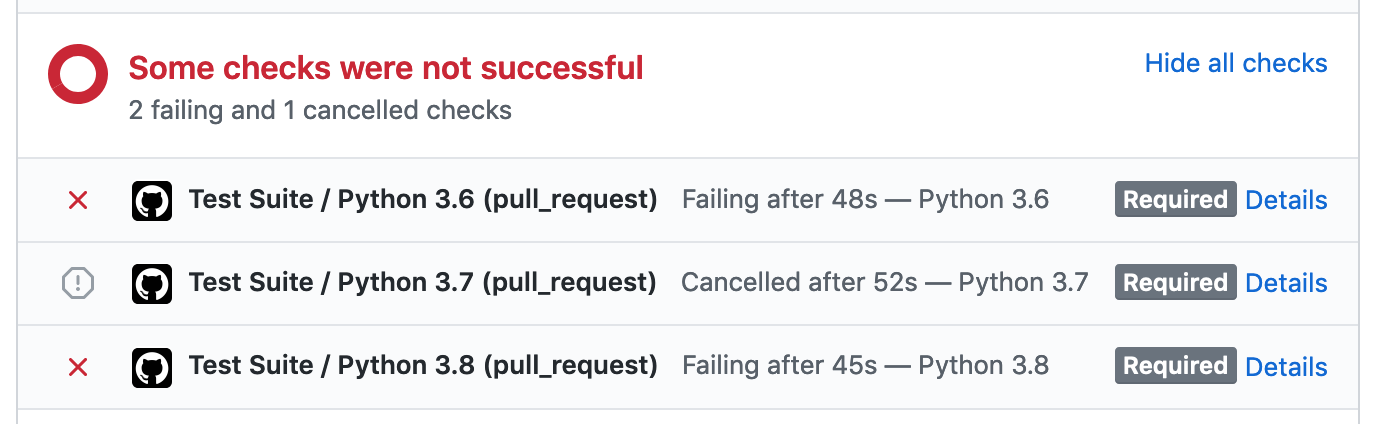
` for url encoded or # multipart form content. # # However for compat with requests, we *do* still support # `data=` usages. We deal with that case here, treating it # as if `content=<...>` had been supplied instead. message = "Use 'content=<...>' to upload raw bytes/text content." warnings.warn(message, DeprecationWarning, stacklevel=2) return encode_content(data) if content is not None: return encode_content(content) elif files: return encode_multipart_data(data or {}, files, boundary) elif data: return encode_urlencoded_data(data) elif json is not None: return encode_json(json) return {}, ByteStream(b"") def encode_response( content: ResponseContent | None = None, text: str | None = None, html: str | None = None, json: Any | None = None, ) -> tuple[dict[str, str], SyncByteStream | AsyncByteStream]: """ Handles encoding the given `content`, returning a two-tuple of (, ). """ if content is not None: return encode_content(content) elif text is not None: return encode_text(text) elif html is not None: return encode_html(html) elif json is not None: return encode_json(json) return {}, ByteStream(b"") ================================================ FILE: httpx/_decoders.py ================================================ """ Handlers for Content-Encoding. See: https://developer.mozilla.org/en-US/docs/Web/HTTP/Headers/Content-Encoding """ from __future__ import annotations import codecs import io import typing import zlib from ._exceptions import DecodingError # Brotli support is optional try: # The C bindings in `brotli` are recommended for CPython. import brotli except ImportError: # pragma: no cover try: # The CFFI bindings in `brotlicffi` are recommended for PyPy # and other environments. import brotlicffi as brotli except ImportError: brotli = None # Zstandard support is optional try: import zstandard except ImportError: # pragma: no cover zstandard = None # type: ignore class ContentDecoder: def decode(self, data: bytes) -> bytes: raise NotImplementedError() # pragma: no cover def flush(self) -> bytes: raise NotImplementedError() # pragma: no cover class IdentityDecoder(ContentDecoder): """ Handle unencoded data. """ def decode(self, data: bytes) -> bytes: return data def flush(self) -> bytes: return b"" class DeflateDecoder(ContentDecoder): """ Handle 'deflate' decoding. See: https://stackoverflow.com/questions/1838699 """ def __init__(self) -> None: self.first_attempt = True self.decompressor = zlib.decompressobj() def decode(self, data: bytes) -> bytes: was_first_attempt = self.first_attempt self.first_attempt = False try: return self.decompressor.decompress(data) except zlib.error as exc: if was_first_attempt: self.decompressor = zlib.decompressobj(-zlib.MAX_WBITS) return self.decode(data) raise DecodingError(str(exc)) from exc def flush(self) -> bytes: try: return self.decompressor.flush() except zlib.error as exc: # pragma: no cover raise DecodingError(str(exc)) from exc class GZipDecoder(ContentDecoder): """ Handle 'gzip' decoding. See: https://stackoverflow.com/questions/1838699 """ def __init__(self) -> None: self.decompressor = zlib.decompressobj(zlib.MAX_WBITS | 16) def decode(self, data: bytes) -> bytes: try: return self.decompressor.decompress(data) except zlib.error as exc: raise DecodingError(str(exc)) from exc def flush(self) -> bytes: try: return self.decompressor.flush() except zlib.error as exc: # pragma: no cover raise DecodingError(str(exc)) from exc class BrotliDecoder(ContentDecoder): """ Handle 'brotli' decoding. Requires `pip install brotlipy`. See: https://brotlipy.readthedocs.io/ or `pip install brotli`. See https://github.com/google/brotli Supports both 'brotlipy' and 'Brotli' packages since they share an import name. The top branches are for 'brotlipy' and bottom branches for 'Brotli' """ def __init__(self) -> None: if brotli is None: # pragma: no cover raise ImportError( "Using 'BrotliDecoder', but neither of the 'brotlicffi' or 'brotli' " "packages have been installed. " "Make sure to install httpx using `pip install httpx[brotli]`." ) from None self.decompressor = brotli.Decompressor() self.seen_data = False self._decompress: typing.Callable[[bytes], bytes] if hasattr(self.decompressor, "decompress"): # The 'brotlicffi' package. self._decompress = self.decompressor.decompress # pragma: no cover else: # The 'brotli' package. self._decompress = self.decompressor.process # pragma: no cover def decode(self, data: bytes) -> bytes: if not data: return b"" self.seen_data = True try: return self._decompress(data) except brotli.error as exc: raise DecodingError(str(exc)) from exc def flush(self) -> bytes: if not self.seen_data: return b"" try: if hasattr(self.decompressor, "finish"): # Only available in the 'brotlicffi' package. # As the decompressor decompresses eagerly, this # will never actually emit any data. However, it will potentially throw # errors if a truncated or damaged data stream has been used. self.decompressor.finish() # pragma: no cover return b"" except brotli.error as exc: # pragma: no cover raise DecodingError(str(exc)) from exc class ZStandardDecoder(ContentDecoder): """ Handle 'zstd' RFC 8878 decoding. Requires `pip install zstandard`. Can be installed as a dependency of httpx using `pip install httpx[zstd]`. """ # inspired by the ZstdDecoder implementation in urllib3 def __init__(self) -> None: if zstandard is None: # pragma: no cover raise ImportError( "Using 'ZStandardDecoder', ..." "Make sure to install httpx using `pip install httpx[zstd]`." ) from None self.decompressor = zstandard.ZstdDecompressor().decompressobj() self.seen_data = False def decode(self, data: bytes) -> bytes: assert zstandard is not None self.seen_data = True output = io.BytesIO() try: output.write(self.decompressor.decompress(data)) while self.decompressor.eof and self.decompressor.unused_data: unused_data = self.decompressor.unused_data self.decompressor = zstandard.ZstdDecompressor().decompressobj() output.write(self.decompressor.decompress(unused_data)) except zstandard.ZstdError as exc: raise DecodingError(str(exc)) from exc return output.getvalue() def flush(self) -> bytes: if not self.seen_data: return b"" ret = self.decompressor.flush() # note: this is a no-op if not self.decompressor.eof: raise DecodingError("Zstandard data is incomplete") # pragma: no cover return bytes(ret) class MultiDecoder(ContentDecoder): """ Handle the case where multiple encodings have been applied. """ def __init__(self, children: typing.Sequence[ContentDecoder]) -> None: """ 'children' should be a sequence of decoders in the order in which each was applied. """ # Note that we reverse the order for decoding. self.children = list(reversed(children)) def decode(self, data: bytes) -> bytes: for child in self.children: data = child.decode(data) return data def flush(self) -> bytes: data = b"" for child in self.children: data = child.decode(data) + child.flush() return data class ByteChunker: """ Handles returning byte content in fixed-size chunks. """ def __init__(self, chunk_size: int | None = None) -> None: self._buffer = io.BytesIO() self._chunk_size = chunk_size def decode(self, content: bytes) -> list[bytes]: if self._chunk_size is None: return [content] if content else [] self._buffer.write(content) if self._buffer.tell() >= self._chunk_size: value = self._buffer.getvalue() chunks = [ value[i : i + self._chunk_size] for i in range(0, len(value), self._chunk_size) ] if len(chunks[-1]) == self._chunk_size: self._buffer.seek(0) self._buffer.truncate() return chunks else: self._buffer.seek(0) self._buffer.write(chunks[-1]) self._buffer.truncate() return chunks[:-1] else: return [] def flush(self) -> list[bytes]: value = self._buffer.getvalue() self._buffer.seek(0) self._buffer.truncate() return [value] if value else [] class TextChunker: """ Handles returning text content in fixed-size chunks. """ def __init__(self, chunk_size: int | None = None) -> None: self._buffer = io.StringIO() self._chunk_size = chunk_size def decode(self, content: str) -> list[str]: if self._chunk_size is None: return [content] if content else [] self._buffer.write(content) if self._buffer.tell() >= self._chunk_size: value = self._buffer.getvalue() chunks = [ value[i : i + self._chunk_size] for i in range(0, len(value), self._chunk_size) ] if len(chunks[-1]) == self._chunk_size: self._buffer.seek(0) self._buffer.truncate() return chunks else: self._buffer.seek(0) self._buffer.write(chunks[-1]) self._buffer.truncate() return chunks[:-1] else: return [] def flush(self) -> list[str]: value = self._buffer.getvalue() self._buffer.seek(0) self._buffer.truncate() return [value] if value else [] class TextDecoder: """ Handles incrementally decoding bytes into text """ def __init__(self, encoding: str = "utf-8") -> None: self.decoder = codecs.getincrementaldecoder(encoding)(errors="replace") def decode(self, data: bytes) -> str: return self.decoder.decode(data) def flush(self) -> str: return self.decoder.decode(b"", True) class LineDecoder: """ Handles incrementally reading lines from text. Has the same behaviour as the stdllib splitlines, but handling the input iteratively. """ def __init__(self) -> None: self.buffer: list[str] = [] self.trailing_cr: bool = False def decode(self, text: str) -> list[str]: # See https://docs.python.org/3/library/stdtypes.html#str.splitlines NEWLINE_CHARS = "\n\r\x0b\x0c\x1c\x1d\x1e\x85\u2028\u2029" # We always push a trailing `\r` into the next decode iteration. if self.trailing_cr: text = "\r" + text self.trailing_cr = False if text.endswith("\r"): self.trailing_cr = True text = text[:-1] if not text: # NOTE: the edge case input of empty text doesn't occur in practice, # because other httpx internals filter out this value return [] # pragma: no cover trailing_newline = text[-1] in NEWLINE_CHARS lines = text.splitlines() if len(lines) == 1 and not trailing_newline: # No new lines, buffer the input and continue. self.buffer.append(lines[0]) return [] if self.buffer: # Include any existing buffer in the first portion of the # splitlines result. lines = ["".join(self.buffer) + lines[0]] + lines[1:] self.buffer = [] if not trailing_newline: # If the last segment of splitlines is not newline terminated, # then drop it from our output and start a new buffer. self.buffer = [lines.pop()] return lines def flush(self) -> list[str]: if not self.buffer and not self.trailing_cr: return [] lines = ["".join(self.buffer)] self.buffer = [] self.trailing_cr = False return lines SUPPORTED_DECODERS = { "identity": IdentityDecoder, "gzip": GZipDecoder, "deflate": DeflateDecoder, "br": BrotliDecoder, "zstd": ZStandardDecoder, } if brotli is None: SUPPORTED_DECODERS.pop("br") # pragma: no cover if zstandard is None: SUPPORTED_DECODERS.pop("zstd") # pragma: no cover ================================================ FILE: httpx/_exceptions.py ================================================ """ Our exception hierarchy: * HTTPError x RequestError + TransportError - TimeoutException · ConnectTimeout · ReadTimeout · WriteTimeout · PoolTimeout - NetworkError · ConnectError · ReadError · WriteError · CloseError - ProtocolError · LocalProtocolError · RemoteProtocolError - ProxyError - UnsupportedProtocol + DecodingError + TooManyRedirects x HTTPStatusError * InvalidURL * CookieConflict * StreamError x StreamConsumed x StreamClosed x ResponseNotRead x RequestNotRead """ from __future__ import annotations import contextlib import typing if typing.TYPE_CHECKING: from ._models import Request, Response # pragma: no cover __all__ = [ "CloseError", "ConnectError", "ConnectTimeout", "CookieConflict", "DecodingError", "HTTPError", "HTTPStatusError", "InvalidURL", "LocalProtocolError", "NetworkError", "PoolTimeout", "ProtocolError", "ProxyError", "ReadError", "ReadTimeout", "RemoteProtocolError", "RequestError", "RequestNotRead", "ResponseNotRead", "StreamClosed", "StreamConsumed", "StreamError", "TimeoutException", "TooManyRedirects", "TransportError", "UnsupportedProtocol", "WriteError", "WriteTimeout", ] class HTTPError(Exception): """ Base class for `RequestError` and `HTTPStatusError`. Useful for `try...except` blocks when issuing a request, and then calling `.raise_for_status()`. For example: ``` try: response = httpx.get("https://www.example.com") response.raise_for_status() except httpx.HTTPError as exc: print(f"HTTP Exception for {exc.request.url} - {exc}") ``` """ def __init__(self, message: str) -> None: super().__init__(message) self._request: Request | None = None @property def request(self) -> Request: if self._request is None: raise RuntimeError("The .request property has not been set.") return self._request @request.setter def request(self, request: Request) -> None: self._request = request class RequestError(HTTPError): """ Base class for all exceptions that may occur when issuing a `.request()`. """ def __init__(self, message: str, *, request: Request | None = None) -> None: super().__init__(message) # At the point an exception is raised we won't typically have a request # instance to associate it with. # # The 'request_context' context manager is used within the Client and # Response methods in order to ensure that any raised exceptions # have a `.request` property set on them. self._request = request class TransportError(RequestError): """ Base class for all exceptions that occur at the level of the Transport API. """ # Timeout exceptions... class TimeoutException(TransportError): """ The base class for timeout errors. An operation has timed out. """ class ConnectTimeout(TimeoutException): """ Timed out while connecting to the host. """ class ReadTimeout(TimeoutException): """ Timed out while receiving data from the host. """ class WriteTimeout(TimeoutException): """ Timed out while sending data to the host. """ class PoolTimeout(TimeoutException): """ Timed out waiting to acquire a connection from the pool. """ # Core networking exceptions... class NetworkError(TransportError): """ The base class for network-related errors. An error occurred while interacting with the network. """ class ReadError(NetworkError): """ Failed to receive data from the network. """ class WriteError(NetworkError): """ Failed to send data through the network. """ class ConnectError(NetworkError): """ Failed to establish a connection. """ class CloseError(NetworkError): """ Failed to close a connection. """ # Other transport exceptions... class ProxyError(TransportError): """ An error occurred while establishing a proxy connection. """ class UnsupportedProtocol(TransportError): """ Attempted to make a request to an unsupported protocol. For example issuing a request to `ftp://www.example.com`. """ class ProtocolError(TransportError): """ The protocol was violated. """ class LocalProtocolError(ProtocolError): """ A protocol was violated by the client. For example if the user instantiated a `Request` instance explicitly, failed to include the mandatory `Host:` header, and then issued it directly using `client.send()`. """ class RemoteProtocolError(ProtocolError): """ The protocol was violated by the server. For example, returning malformed HTTP. """ # Other request exceptions... class DecodingError(RequestError): """ Decoding of the response failed, due to a malformed encoding. """ class TooManyRedirects(RequestError): """ Too many redirects. """ # Client errors class HTTPStatusError(HTTPError): """ The response had an error HTTP status of 4xx or 5xx. May be raised when calling `response.raise_for_status()` """ def __init__(self, message: str, *, request: Request, response: Response) -> None: super().__init__(message) self.request = request self.response = response class InvalidURL(Exception): """ URL is improperly formed or cannot be parsed. """ def __init__(self, message: str) -> None: super().__init__(message) class CookieConflict(Exception): """ Attempted to lookup a cookie by name, but multiple cookies existed. Can occur when calling `response.cookies.get(...)`. """ def __init__(self, message: str) -> None: super().__init__(message) # Stream exceptions... # These may occur as the result of a programming error, by accessing # the request/response stream in an invalid manner. class StreamError(RuntimeError): """ The base class for stream exceptions. The developer made an error in accessing the request stream in an invalid way. """ def __init__(self, message: str) -> None: super().__init__(message) class StreamConsumed(StreamError): """ Attempted to read or stream content, but the content has already been streamed. """ def __init__(self) -> None: message = ( "Attempted to read or stream some content, but the content has " "already been streamed. For requests, this could be due to passing " "a generator as request content, and then receiving a redirect " "response or a secondary request as part of an authentication flow." "For responses, this could be due to attempting to stream the response " "content more than once." ) super().__init__(message) class StreamClosed(StreamError): """ Attempted to read or stream response content, but the request has been closed. """ def __init__(self) -> None: message = "Attempted to read or stream content, but the stream has been closed." super().__init__(message) class ResponseNotRead(StreamError): """ Attempted to access streaming response content, without having called `read()`. """ def __init__(self) -> None: message = ( "Attempted to access streaming response content," " without having called `read()`." ) super().__init__(message) class RequestNotRead(StreamError): """ Attempted to access streaming request content, without having called `read()`. """ def __init__(self) -> None: message = ( "Attempted to access streaming request content," " without having called `read()`." ) super().__init__(message) @contextlib.contextmanager def request_context( request: Request | None = None, ) -> typing.Iterator[None]: """ A context manager that can be used to attach the given request context to any `RequestError` exceptions that are raised within the block. """ try: yield except RequestError as exc: if request is not None: exc.request = request raise exc ================================================ FILE: httpx/_main.py ================================================ from __future__ import annotations import functools import json import sys import typing import click import pygments.lexers import pygments.util import rich.console import rich.markup import rich.progress import rich.syntax import rich.table from ._client import Client from ._exceptions import RequestError from ._models import Response from ._status_codes import codes if typing.TYPE_CHECKING: import httpcore # pragma: no cover def print_help() -> None: console = rich.console.Console() console.print("[bold]HTTPX :butterfly:", justify="center") console.print() console.print("A next generation HTTP client.", justify="center") console.print() console.print( "Usage: [bold]httpx[/bold] [cyan] [OPTIONS][/cyan] ", justify="left" ) console.print() table = rich.table.Table.grid(padding=1, pad_edge=True) table.add_column("Parameter", no_wrap=True, justify="left", style="bold") table.add_column("Description") table.add_row( "-m, --method [cyan]METHOD", "Request method, such as GET, POST, PUT, PATCH, DELETE, OPTIONS, HEAD.\n" "[Default: GET, or POST if a request body is included]", ) table.add_row( "-p, --params [cyan] ...", "Query parameters to include in the request URL.", ) table.add_row( "-c, --content [cyan]TEXT", "Byte content to include in the request body." ) table.add_row( "-d, --data [cyan] ...", "Form data to include in the request body." ) table.add_row( "-f, --files [cyan] ...", "Form files to include in the request body.", ) table.add_row("-j, --json [cyan]TEXT", "JSON data to include in the request body.") table.add_row( "-h, --headers [cyan] ...", "Include additional HTTP headers in the request.", ) table.add_row( "--cookies [cyan] ...", "Cookies to include in the request." ) table.add_row( "--auth [cyan]", "Username and password to include in the request. Specify '-' for the password" " to use a password prompt. Note that using --verbose/-v will expose" " the Authorization header, including the password encoding" " in a trivially reversible format.", ) table.add_row( "--proxy [cyan]URL", "Send the request via a proxy. Should be the URL giving the proxy address.", ) table.add_row( "--timeout [cyan]FLOAT", "Timeout value to use for network operations, such as establishing the" " connection, reading some data, etc... [Default: 5.0]", ) table.add_row("--follow-redirects", "Automatically follow redirects.") table.add_row("--no-verify", "Disable SSL verification.") table.add_row( "--http2", "Send the request using HTTP/2, if the remote server supports it." ) table.add_row( "--download [cyan]FILE", "Save the response content as a file, rather than displaying it.", ) table.add_row("-v, --verbose", "Verbose output. Show request as well as response.") table.add_row("--help", "Show this message and exit.") console.print(table) def get_lexer_for_response(response: Response) -> str: content_type = response.headers.get("Content-Type") if content_type is not None: mime_type, _, _ = content_type.partition(";") try: return typing.cast( str, pygments.lexers.get_lexer_for_mimetype(mime_type.strip()).name ) except pygments.util.ClassNotFound: # pragma: no cover pass return "" # pragma: no cover def format_request_headers(request: httpcore.Request, http2: bool = False) -> str: version = "HTTP/2" if http2 else "HTTP/1.1" headers = [ (name.lower() if http2 else name, value) for name, value in request.headers ] method = request.method.decode("ascii") target = request.url.target.decode("ascii") lines = [f"{method} {target} {version}"] + [ f"{name.decode('ascii')}: {value.decode('ascii')}" for name, value in headers ] return "\n".join(lines) def format_response_headers( http_version: bytes, status: int, reason_phrase: bytes | None, headers: list[tuple[bytes, bytes]], ) -> str: version = http_version.decode("ascii") reason = ( codes.get_reason_phrase(status) if reason_phrase is None else reason_phrase.decode("ascii") ) lines = [f"{version} {status} {reason}"] + [ f"{name.decode('ascii')}: {value.decode('ascii')}" for name, value in headers ] return "\n".join(lines) def print_request_headers(request: httpcore.Request, http2: bool = False) -> None: console = rich.console.Console() http_text = format_request_headers(request, http2=http2) syntax = rich.syntax.Syntax(http_text, "http", theme="ansi_dark", word_wrap=True) console.print(syntax) syntax = rich.syntax.Syntax("", "http", theme="ansi_dark", word_wrap=True) console.print(syntax) def print_response_headers( http_version: bytes, status: int, reason_phrase: bytes | None, headers: list[tuple[bytes, bytes]], ) -> None: console = rich.console.Console() http_text = format_response_headers(http_version, status, reason_phrase, headers) syntax = rich.syntax.Syntax(http_text, "http", theme="ansi_dark", word_wrap=True) console.print(syntax) syntax = rich.syntax.Syntax("", "http", theme="ansi_dark", word_wrap=True) console.print(syntax) def print_response(response: Response) -> None: console = rich.console.Console() lexer_name = get_lexer_for_response(response) if lexer_name: if lexer_name.lower() == "json": try: data = response.json() text = json.dumps(data, indent=4) except ValueError: # pragma: no cover text = response.text else: text = response.text syntax = rich.syntax.Syntax(text, lexer_name, theme="ansi_dark", word_wrap=True) console.print(syntax) else: console.print(f"<{len(response.content)} bytes of binary data>") _PCTRTT = typing.Tuple[typing.Tuple[str, str], ...] _PCTRTTT = typing.Tuple[_PCTRTT, ...] _PeerCertRetDictType = typing.Dict[str, typing.Union[str, _PCTRTTT, _PCTRTT]] def format_certificate(cert: _PeerCertRetDictType) -> str: # pragma: no cover lines = [] for key, value in cert.items(): if isinstance(value, (list, tuple)): lines.append(f"* {key}:") for item in value: if key in ("subject", "issuer"): for sub_item in item: lines.append(f"* {sub_item[0]}: {sub_item[1]!r}") elif isinstance(item, tuple) and len(item) == 2: lines.append(f"* {item[0]}: {item[1]!r}") else: lines.append(f"* {item!r}") else: lines.append(f"* {key}: {value!r}") return "\n".join(lines) def trace( name: str, info: typing.Mapping[str, typing.Any], verbose: bool = False ) -> None: console = rich.console.Console() if name == "connection.connect_tcp.started" and verbose: host = info["host"] console.print(f"* Connecting to {host!r}") elif name == "connection.connect_tcp.complete" and verbose: stream = info["return_value"] server_addr = stream.get_extra_info("server_addr") console.print(f"* Connected to {server_addr[0]!r} on port {server_addr[1]}") elif name == "connection.start_tls.complete" and verbose: # pragma: no cover stream = info["return_value"] ssl_object = stream.get_extra_info("ssl_object") version = ssl_object.version() cipher = ssl_object.cipher() server_cert = ssl_object.getpeercert() alpn = ssl_object.selected_alpn_protocol() console.print(f"* SSL established using {version!r} / {cipher[0]!r}") console.print(f"* Selected ALPN protocol: {alpn!r}") if server_cert: console.print("* Server certificate:") console.print(format_certificate(server_cert)) elif name == "http11.send_request_headers.started" and verbose: request = info["request"] print_request_headers(request, http2=False) elif name == "http2.send_request_headers.started" and verbose: # pragma: no cover request = info["request"] print_request_headers(request, http2=True) elif name == "http11.receive_response_headers.complete": http_version, status, reason_phrase, headers = info["return_value"] print_response_headers(http_version, status, reason_phrase, headers) elif name == "http2.receive_response_headers.complete": # pragma: no cover status, headers = info["return_value"] http_version = b"HTTP/2" reason_phrase = None print_response_headers(http_version, status, reason_phrase, headers) def download_response(response: Response, download: typing.BinaryIO) -> None: console = rich.console.Console() console.print() content_length = response.headers.get("Content-Length") with rich.progress.Progress( "[progress.description]{task.description}", "[progress.percentage]{task.percentage:>3.0f}%", rich.progress.BarColumn(bar_width=None), rich.progress.DownloadColumn(), rich.progress.TransferSpeedColumn(), ) as progress: description = f"Downloading [bold]{rich.markup.escape(download.name)}" download_task = progress.add_task( description, total=int(content_length or 0), start=content_length is not None, ) for chunk in response.iter_bytes(): download.write(chunk) progress.update(download_task, completed=response.num_bytes_downloaded) def validate_json( ctx: click.Context, param: click.Option | click.Parameter, value: typing.Any, ) -> typing.Any: if value is None: return None try: return json.loads(value) except json.JSONDecodeError: # pragma: no cover raise click.BadParameter("Not valid JSON") def validate_auth( ctx: click.Context, param: click.Option | click.Parameter, value: typing.Any, ) -> typing.Any: if value == (None, None): return None username, password = value if password == "-": # pragma: no cover password = click.prompt("Password", hide_input=True) return (username, password) def handle_help( ctx: click.Context, param: click.Option | click.Parameter, value: typing.Any, ) -> None: if not value or ctx.resilient_parsing: return print_help() ctx.exit() @click.command(add_help_option=False) @click.argument("url", type=str) @click.option( "--method", "-m", "method", type=str, help=( "Request method, such as GET, POST, PUT, PATCH, DELETE, OPTIONS, HEAD. " "[Default: GET, or POST if a request body is included]" ), ) @click.option( "--params", "-p", "params", type=(str, str), multiple=True, help="Query parameters to include in the request URL.", ) @click.option( "--content", "-c", "content", type=str, help="Byte content to include in the request body.", ) @click.option( "--data", "-d", "data", type=(str, str), multiple=True, help="Form data to include in the request body.", ) @click.option( "--files", "-f", "files", type=(str, click.File(mode="rb")), multiple=True, help="Form files to include in the request body.", ) @click.option( "--json", "-j", "json", type=str, callback=validate_json, help="JSON data to include in the request body.", ) @click.option( "--headers", "-h", "headers", type=(str, str), multiple=True, help="Include additional HTTP headers in the request.", ) @click.option( "--cookies", "cookies", type=(str, str), multiple=True, help="Cookies to include in the request.", ) @click.option( "--auth", "auth", type=(str, str), default=(None, None), callback=validate_auth, help=( "Username and password to include in the request. " "Specify '-' for the password to use a password prompt. " "Note that using --verbose/-v will expose the Authorization header, " "including the password encoding in a trivially reversible format." ), ) @click.option( "--proxy", "proxy", type=str, default=None, help="Send the request via a proxy. Should be the URL giving the proxy address.", ) @click.option( "--timeout", "timeout", type=float, default=5.0, help=( "Timeout value to use for network operations, such as establishing the " "connection, reading some data, etc... [Default: 5.0]" ), ) @click.option( "--follow-redirects", "follow_redirects", is_flag=True, default=False, help="Automatically follow redirects.", ) @click.option( "--no-verify", "verify", is_flag=True, default=True, help="Disable SSL verification.", ) @click.option( "--http2", "http2", type=bool, is_flag=True, default=False, help="Send the request using HTTP/2, if the remote server supports it.", ) @click.option( "--download", type=click.File("wb"), help="Save the response content as a file, rather than displaying it.", ) @click.option( "--verbose", "-v", type=bool, is_flag=True, default=False, help="Verbose. Show request as well as response.", ) @click.option( "--help", is_flag=True, is_eager=True, expose_value=False, callback=handle_help, help="Show this message and exit.", ) def main( url: str, method: str, params: list[tuple[str, str]], content: str, data: list[tuple[str, str]], files: list[tuple[str, click.File]], json: str, headers: list[tuple[str, str]], cookies: list[tuple[str, str]], auth: tuple[str, str] | None, proxy: str, timeout: float, follow_redirects: bool, verify: bool, http2: bool, download: typing.BinaryIO | None, verbose: bool, ) -> None: """ An HTTP command line client. Sends a request and displays the response. """ if not method: method = "POST" if content or data or files or json else "GET" try: with Client(proxy=proxy, timeout=timeout, http2=http2, verify=verify) as client: with client.stream( method, url, params=list(params), content=content, data=dict(data), files=files, # type: ignore json=json, headers=headers, cookies=dict(cookies), auth=auth, follow_redirects=follow_redirects, extensions={"trace": functools.partial(trace, verbose=verbose)}, ) as response: if download is not None: download_response(response, download) else: response.read() if response.content: print_response(response) except RequestError as exc: console = rich.console.Console() console.print(f"[red]{type(exc).__name__}[/red]: {exc}") sys.exit(1) sys.exit(0 if response.is_success else 1) ================================================ FILE: httpx/_models.py ================================================ from __future__ import annotations import codecs import datetime import email.message import json as jsonlib import re import typing import urllib.request from collections.abc import Mapping from http.cookiejar import Cookie, CookieJar from ._content import ByteStream, UnattachedStream, encode_request, encode_response from ._decoders import ( SUPPORTED_DECODERS, ByteChunker, ContentDecoder, IdentityDecoder, LineDecoder, MultiDecoder, TextChunker, TextDecoder, ) from ._exceptions import ( CookieConflict, HTTPStatusError, RequestNotRead, ResponseNotRead, StreamClosed, StreamConsumed, request_context, ) from ._multipart import get_multipart_boundary_from_content_type from ._status_codes import codes from ._types import ( AsyncByteStream, CookieTypes, HeaderTypes, QueryParamTypes, RequestContent, RequestData, RequestExtensions, RequestFiles, ResponseContent, ResponseExtensions, SyncByteStream, ) from ._urls import URL from ._utils import to_bytes_or_str, to_str __all__ = ["Cookies", "Headers", "Request", "Response"] SENSITIVE_HEADERS = {"authorization", "proxy-authorization"} def _is_known_encoding(encoding: str) -> bool: """ Return `True` if `encoding` is a known codec. """ try: codecs.lookup(encoding) except LookupError: return False return True def _normalize_header_key(key: str | bytes, encoding: str | None = None) -> bytes: """ Coerce str/bytes into a strictly byte-wise HTTP header key. """ return key if isinstance(key, bytes) else key.encode(encoding or "ascii") def _normalize_header_value(value: str | bytes, encoding: str | None = None) -> bytes: """ Coerce str/bytes into a strictly byte-wise HTTP header value. """ if isinstance(value, bytes): return value if not isinstance(value, str): raise TypeError(f"Header value must be str or bytes, not {type(value)}") return value.encode(encoding or "ascii") def _parse_content_type_charset(content_type: str) -> str | None: # We used to use `cgi.parse_header()` here, but `cgi` became a dead battery. # See: https://peps.python.org/pep-0594/#cgi msg = email.message.Message() msg["content-type"] = content_type return msg.get_content_charset(failobj=None) def _parse_header_links(value: str) -> list[dict[str, str]]: """ Returns a list of parsed link headers, for more info see: https://developer.mozilla.org/en-US/docs/Web/HTTP/Headers/Link The generic syntax of those is: Link: < uri-reference >; param1=value1; param2="value2" So for instance: Link; '; type="image/jpeg",;' would return [ {"url": "http:/.../front.jpeg", "type": "image/jpeg"}, {"url": "http://.../back.jpeg"}, ] :param value: HTTP Link entity-header field :return: list of parsed link headers """ links: list[dict[str, str]] = [] replace_chars = " '\"" value = value.strip(replace_chars) if not value: return links for val in re.split(", *<", value): try: url, params = val.split(";", 1) except ValueError: url, params = val, "" link = {"url": url.strip("<> '\"")} for param in params.split(";"): try: key, value = param.split("=") except ValueError: break link[key.strip(replace_chars)] = value.strip(replace_chars) links.append(link) return links def _obfuscate_sensitive_headers( items: typing.Iterable[tuple[typing.AnyStr, typing.AnyStr]], ) -> typing.Iterator[tuple[typing.AnyStr, typing.AnyStr]]: for k, v in items: if to_str(k.lower()) in SENSITIVE_HEADERS: v = to_bytes_or_str("[secure]", match_type_of=v) yield k, v class Headers(typing.MutableMapping[str, str]): """ HTTP headers, as a case-insensitive multi-dict. """ def __init__( self, headers: HeaderTypes | None = None, encoding: str | None = None, ) -> None: self._list = [] # type: typing.List[typing.Tuple[bytes, bytes, bytes]] if isinstance(headers, Headers): self._list = list(headers._list) elif isinstance(headers, Mapping): for k, v in headers.items(): bytes_key = _normalize_header_key(k, encoding) bytes_value = _normalize_header_value(v, encoding) self._list.append((bytes_key, bytes_key.lower(), bytes_value)) elif headers is not None: for k, v in headers: bytes_key = _normalize_header_key(k, encoding) bytes_value = _normalize_header_value(v, encoding) self._list.append((bytes_key, bytes_key.lower(), bytes_value)) self._encoding = encoding @property def encoding(self) -> str: """ Header encoding is mandated as ascii, but we allow fallbacks to utf-8 or iso-8859-1. """ if self._encoding is None: for encoding in ["ascii", "utf-8"]: for key, value in self.raw: try: key.decode(encoding) value.decode(encoding) except UnicodeDecodeError: break else: # The else block runs if 'break' did not occur, meaning # all values fitted the encoding. self._encoding = encoding break else: # The ISO-8859-1 encoding covers all 256 code points in a byte, # so will never raise decode errors. self._encoding = "iso-8859-1" return self._encoding @encoding.setter def encoding(self, value: str) -> None: self._encoding = value @property def raw(self) -> list[tuple[bytes, bytes]]: """ Returns a list of the raw header items, as byte pairs. """ return [(raw_key, value) for raw_key, _, value in self._list] def keys(self) -> typing.KeysView[str]: return {key.decode(self.encoding): None for _, key, value in self._list}.keys() def values(self) -> typing.ValuesView[str]: values_dict: dict[str, str] = {} for _, key, value in self._list: str_key = key.decode(self.encoding) str_value = value.decode(self.encoding) if str_key in values_dict: values_dict[str_key] += f", {str_value}" else: values_dict[str_key] = str_value return values_dict.values() def items(self) -> typing.ItemsView[str, str]: """ Return `(key, value)` items of headers. Concatenate headers into a single comma separated value when a key occurs multiple times. """ values_dict: dict[str, str] = {} for _, key, value in self._list: str_key = key.decode(self.encoding) str_value = value.decode(self.encoding) if str_key in values_dict: values_dict[str_key] += f", {str_value}" else: values_dict[str_key] = str_value return values_dict.items() def multi_items(self) -> list[tuple[str, str]]: """ Return a list of `(key, value)` pairs of headers. Allow multiple occurrences of the same key without concatenating into a single comma separated value. """ return [ (key.decode(self.encoding), value.decode(self.encoding)) for _, key, value in self._list ] def get(self, key: str, default: typing.Any = None) -> typing.Any: """ Return a header value. If multiple occurrences of the header occur then concatenate them together with commas. """ try: return self[key] except KeyError: return default def get_list(self, key: str, split_commas: bool = False) -> list[str]: """ Return a list of all header values for a given key. If `split_commas=True` is passed, then any comma separated header values are split into multiple return strings. """ get_header_key = key.lower().encode(self.encoding) values = [ item_value.decode(self.encoding) for _, item_key, item_value in self._list if item_key.lower() == get_header_key ] if not split_commas: return values split_values = [] for value in values: split_values.extend([item.strip() for item in value.split(",")]) return split_values def update(self, headers: HeaderTypes | None = None) -> None: # type: ignore headers = Headers(headers) for key in headers.keys(): if key in self: self.pop(key) self._list.extend(headers._list) def copy(self) -> Headers: return Headers(self, encoding=self.encoding) def __getitem__(self, key: str) -> str: """ Return a single header value. If there are multiple headers with the same key, then we concatenate them with commas. See: https://tools.ietf.org/html/rfc7230#section-3.2.2 """ normalized_key = key.lower().encode(self.encoding) items = [ header_value.decode(self.encoding) for _, header_key, header_value in self._list if header_key == normalized_key ] if items: return ", ".join(items) raise KeyError(key) def __setitem__(self, key: str, value: str) -> None: """ Set the header `key` to `value`, removing any duplicate entries. Retains insertion order. """ set_key = key.encode(self._encoding or "utf-8") set_value = value.encode(self._encoding or "utf-8") lookup_key = set_key.lower() found_indexes = [ idx for idx, (_, item_key, _) in enumerate(self._list) if item_key == lookup_key ] for idx in reversed(found_indexes[1:]): del self._list[idx] if found_indexes: idx = found_indexes[0] self._list[idx] = (set_key, lookup_key, set_value) else: self._list.append((set_key, lookup_key, set_value)) def __delitem__(self, key: str) -> None: """ Remove the header `key`. """ del_key = key.lower().encode(self.encoding) pop_indexes = [ idx for idx, (_, item_key, _) in enumerate(self._list) if item_key.lower() == del_key ] if not pop_indexes: raise KeyError(key) for idx in reversed(pop_indexes): del self._list[idx] def __contains__(self, key: typing.Any) -> bool: header_key = key.lower().encode(self.encoding) return header_key in [key for _, key, _ in self._list] def __iter__(self) -> typing.Iterator[typing.Any]: return iter(self.keys()) def __len__(self) -> int: return len(self._list) def __eq__(self, other: typing.Any) -> bool: try: other_headers = Headers(other) except ValueError: return False self_list = [(key, value) for _, key, value in self._list] other_list = [(key, value) for _, key, value in other_headers._list] return sorted(self_list) == sorted(other_list) def __repr__(self) -> str: class_name = self.__class__.__name__ encoding_str = "" if self.encoding != "ascii": encoding_str = f", encoding={self.encoding!r}" as_list = list(_obfuscate_sensitive_headers(self.multi_items())) as_dict = dict(as_list) no_duplicate_keys = len(as_dict) == len(as_list) if no_duplicate_keys: return f"{class_name}({as_dict!r}{encoding_str})" return f"{class_name}({as_list!r}{encoding_str})" class Request: def __init__( self, method: str, url: URL | str, *, params: QueryParamTypes | None = None, headers: HeaderTypes | None = None, cookies: CookieTypes | None = None, content: RequestContent | None = None, data: RequestData | None = None, files: RequestFiles | None = None, json: typing.Any | None = None, stream: SyncByteStream | AsyncByteStream | None = None, extensions: RequestExtensions | None = None, ) -> None: self.method = method.upper() self.url = URL(url) if params is None else URL(url, params=params) self.headers = Headers(headers) self.extensions = {} if extensions is None else dict(extensions) if cookies: Cookies(cookies).set_cookie_header(self) if stream is None: content_type: str | None = self.headers.get("content-type") headers, stream = encode_request( content=content, data=data, files=files, json=json, boundary=get_multipart_boundary_from_content_type( content_type=content_type.encode(self.headers.encoding) if content_type else None ), ) self._prepare(headers) self.stream = stream # Load the request body, except for streaming content. if isinstance(stream, ByteStream): self.read() else: # There's an important distinction between `Request(content=...)`, # and `Request(stream=...)`. # # Using `content=...` implies automatically populated `Host` and content # headers, of either `Content-Length: ...` or `Transfer-Encoding: chunked`. # # Using `stream=...` will not automatically include *any* # auto-populated headers. # # As an end-user you don't really need `stream=...`. It's only # useful when: # # * Preserving the request stream when copying requests, eg for redirects. # * Creating request instances on the *server-side* of the transport API. self.stream = stream def _prepare(self, default_headers: dict[str, str]) -> None: for key, value in default_headers.items(): # Ignore Transfer-Encoding if the Content-Length has been set explicitly. if key.lower() == "transfer-encoding" and "Content-Length" in self.headers: continue self.headers.setdefault(key, value) auto_headers: list[tuple[bytes, bytes]] = [] has_host = "Host" in self.headers has_content_length = ( "Content-Length" in self.headers or "Transfer-Encoding" in self.headers ) if not has_host and self.url.host: auto_headers.append((b"Host", self.url.netloc)) if not has_content_length and self.method in ("POST", "PUT", "PATCH"): auto_headers.append((b"Content-Length", b"0")) self.headers = Headers(auto_headers + self.headers.raw) @property def content(self) -> bytes: if not hasattr(self, "_content"): raise RequestNotRead() return self._content def read(self) -> bytes: """ Read and return the request content. """ if not hasattr(self, "_content"): assert isinstance(self.stream, typing.Iterable) self._content = b"".join(self.stream) if not isinstance(self.stream, ByteStream): # If a streaming request has been read entirely into memory, then # we can replace the stream with a raw bytes implementation, # to ensure that any non-replayable streams can still be used. self.stream = ByteStream(self._content) return self._content async def aread(self) -> bytes: """ Read and return the request content. """ if not hasattr(self, "_content"): assert isinstance(self.stream, typing.AsyncIterable) self._content = b"".join([part async for part in self.stream]) if not isinstance(self.stream, ByteStream): # If a streaming request has been read entirely into memory, then # we can replace the stream with a raw bytes implementation, # to ensure that any non-replayable streams can still be used. self.stream = ByteStream(self._content) return self._content def __repr__(self) -> str: class_name = self.__class__.__name__ url = str(self.url) return f"<{class_name}({self.method!r}, {url!r})>" def __getstate__(self) -> dict[str, typing.Any]: return { name: value for name, value in self.__dict__.items() if name not in ["extensions", "stream"] } def __setstate__(self, state: dict[str, typing.Any]) -> None: for name, value in state.items(): setattr(self, name, value) self.extensions = {} self.stream = UnattachedStream() class Response: def __init__( self, status_code: int, *, headers: HeaderTypes | None = None, content: ResponseContent | None = None, text: str | None = None, html: str | None = None, json: typing.Any = None, stream: SyncByteStream | AsyncByteStream | None = None, request: Request | None = None, extensions: ResponseExtensions | None = None, history: list[Response] | None = None, default_encoding: str | typing.Callable[[bytes], str] = "utf-8", ) -> None: self.status_code = status_code self.headers = Headers(headers) self._request: Request | None = request # When follow_redirects=False and a redirect is received, # the client will set `response.next_request`. self.next_request: Request | None = None self.extensions = {} if extensions is None else dict(extensions) self.history = [] if history is None else list(history) self.is_closed = False self.is_stream_consumed = False self.default_encoding = default_encoding if stream is None: headers, stream = encode_response(content, text, html, json) self._prepare(headers) self.stream = stream if isinstance(stream, ByteStream): # Load the response body, except for streaming content. self.read() else: # There's an important distinction between `Response(content=...)`, # and `Response(stream=...)`. # # Using `content=...` implies automatically populated content headers, # of either `Content-Length: ...` or `Transfer-Encoding: chunked`. # # Using `stream=...` will not automatically include any content headers. # # As an end-user you don't really need `stream=...`. It's only # useful when creating response instances having received a stream # from the transport API. self.stream = stream self._num_bytes_downloaded = 0 def _prepare(self, default_headers: dict[str, str]) -> None: for key, value in default_headers.items(): # Ignore Transfer-Encoding if the Content-Length has been set explicitly. if key.lower() == "transfer-encoding" and "content-length" in self.headers: continue self.headers.setdefault(key, value) @property def elapsed(self) -> datetime.timedelta: """ Returns the time taken for the complete request/response cycle to complete. """ if not hasattr(self, "_elapsed"): raise RuntimeError( "'.elapsed' may only be accessed after the response " "has been read or closed." ) return self._elapsed @elapsed.setter def elapsed(self, elapsed: datetime.timedelta) -> None: self._elapsed = elapsed @property def request(self) -> Request: """ Returns the request instance associated to the current response. """ if self._request is None: raise RuntimeError( "The request instance has not been set on this response." ) return self._request @request.setter def request(self, value: Request) -> None: self._request = value @property def http_version(self) -> str: try: http_version: bytes = self.extensions["http_version"] except KeyError: return "HTTP/1.1" else: return http_version.decode("ascii", errors="ignore") @property def reason_phrase(self) -> str: try: reason_phrase: bytes = self.extensions["reason_phrase"] except KeyError: return codes.get_reason_phrase(self.status_code) else: return reason_phrase.decode("ascii", errors="ignore") @property def url(self) -> URL: """ Returns the URL for which the request was made. """ return self.request.url @property def content(self) -> bytes: if not hasattr(self, "_content"): raise ResponseNotRead() return self._content @property def text(self) -> str: if not hasattr(self, "_text"): content = self.content if not content: self._text = "" else: decoder = TextDecoder(encoding=self.encoding or "utf-8") self._text = "".join([decoder.decode(self.content), decoder.flush()]) return self._text @property def encoding(self) -> str | None: """ Return an encoding to use for decoding the byte content into text. The priority for determining this is given by... * `.encoding = <>` has been set explicitly. * The encoding as specified by the charset parameter in the Content-Type header. * The encoding as determined by `default_encoding`, which may either be a string like "utf-8" indicating the encoding to use, or may be a callable which enables charset autodetection. """ if not hasattr(self, "_encoding"): encoding = self.charset_encoding if encoding is None or not _is_known_encoding(encoding): if isinstance(self.default_encoding, str): encoding = self.default_encoding elif hasattr(self, "_content"): encoding = self.default_encoding(self._content) self._encoding = encoding or "utf-8" return self._encoding @encoding.setter def encoding(self, value: str) -> None: """ Set the encoding to use for decoding the byte content into text. If the `text` attribute has been accessed, attempting to set the encoding will throw a ValueError. """ if hasattr(self, "_text"): raise ValueError( "Setting encoding after `text` has been accessed is not allowed." ) self._encoding = value @property def charset_encoding(self) -> str | None: """ Return the encoding, as specified by the Content-Type header. """ content_type = self.headers.get("Content-Type") if content_type is None: return None return _parse_content_type_charset(content_type) def _get_content_decoder(self) -> ContentDecoder: """ Returns a decoder instance which can be used to decode the raw byte content, depending on the Content-Encoding used in the response. """ if not hasattr(self, "_decoder"): decoders: list[ContentDecoder] = [] values = self.headers.get_list("content-encoding", split_commas=True) for value in values: value = value.strip().lower() try: decoder_cls = SUPPORTED_DECODERS[value] decoders.append(decoder_cls()) except KeyError: continue if len(decoders) == 1: self._decoder = decoders[0] elif len(decoders) > 1: self._decoder = MultiDecoder(children=decoders) else: self._decoder = IdentityDecoder() return self._decoder @property def is_informational(self) -> bool: """ A property which is `True` for 1xx status codes, `False` otherwise. """ return codes.is_informational(self.status_code) @property def is_success(self) -> bool: """ A property which is `True` for 2xx status codes, `False` otherwise. """ return codes.is_success(self.status_code) @property def is_redirect(self) -> bool: """ A property which is `True` for 3xx status codes, `False` otherwise. Note that not all responses with a 3xx status code indicate a URL redirect. Use `response.has_redirect_location` to determine responses with a properly formed URL redirection. """ return codes.is_redirect(self.status_code) @property def is_client_error(self) -> bool: """ A property which is `True` for 4xx status codes, `False` otherwise. """ return codes.is_client_error(self.status_code) @property def is_server_error(self) -> bool: """ A property which is `True` for 5xx status codes, `False` otherwise. """ return codes.is_server_error(self.status_code) @property def is_error(self) -> bool: """ A property which is `True` for 4xx and 5xx status codes, `False` otherwise. """ return codes.is_error(self.status_code) @property def has_redirect_location(self) -> bool: """ Returns True for 3xx responses with a properly formed URL redirection, `False` otherwise. """ return ( self.status_code in ( # 301 (Cacheable redirect. Method may change to GET.) codes.MOVED_PERMANENTLY, # 302 (Uncacheable redirect. Method may change to GET.) codes.FOUND, # 303 (Client should make a GET or HEAD request.) codes.SEE_OTHER, # 307 (Equiv. 302, but retain method) codes.TEMPORARY_REDIRECT, # 308 (Equiv. 301, but retain method) codes.PERMANENT_REDIRECT, ) and "Location" in self.headers ) def raise_for_status(self) -> Response: """ Raise the `HTTPStatusError` if one occurred. """ request = self._request if request is None: raise RuntimeError( "Cannot call `raise_for_status` as the request " "instance has not been set on this response." ) if self.is_success: return self if self.has_redirect_location: message = ( "{error_type} '{0.status_code} {0.reason_phrase}' for url '{0.url}'\n" "Redirect location: '{0.headers[location]}'\n" "For more information check: https://developer.mozilla.org/en-US/docs/Web/HTTP/Status/{0.status_code}" ) else: message = ( "{error_type} '{0.status_code} {0.reason_phrase}' for url '{0.url}'\n" "For more information check: https://developer.mozilla.org/en-US/docs/Web/HTTP/Status/{0.status_code}" ) status_class = self.status_code // 100 error_types = { 1: "Informational response", 3: "Redirect response", 4: "Client error", 5: "Server error", } error_type = error_types.get(status_class, "Invalid status code") message = message.format(self, error_type=error_type) raise HTTPStatusError(message, request=request, response=self) def json(self, **kwargs: typing.Any) -> typing.Any: return jsonlib.loads(self.content, **kwargs) @property def cookies(self) -> Cookies: if not hasattr(self, "_cookies"): self._cookies = Cookies() self._cookies.extract_cookies(self) return self._cookies @property def links(self) -> dict[str | None, dict[str, str]]: """ Returns the parsed header links of the response, if any """ header = self.headers.get("link") if header is None: return {} return { (link.get("rel") or link.get("url")): link for link in _parse_header_links(header) } @property def num_bytes_downloaded(self) -> int: return self._num_bytes_downloaded def __repr__(self) -> str: return f"" def __getstate__(self) -> dict[str, typing.Any]: return { name: value for name, value in self.__dict__.items() if name not in ["extensions", "stream", "is_closed", "_decoder"] } def __setstate__(self, state: dict[str, typing.Any]) -> None: for name, value in state.items(): setattr(self, name, value) self.is_closed = True self.extensions = {} self.stream = UnattachedStream() def read(self) -> bytes: """ Read and return the response content. """ if not hasattr(self, "_content"): self._content = b"".join(self.iter_bytes()) return self._content def iter_bytes(self, chunk_size: int | None = None) -> typing.Iterator[bytes]: """ A byte-iterator over the decoded response content. This allows us to handle gzip, deflate, brotli, and zstd encoded responses. """ if hasattr(self, "_content"): chunk_size = len(self._content) if chunk_size is None else chunk_size for i in range(0, len(self._content), max(chunk_size, 1)): yield self._content[i : i + chunk_size] else: decoder = self._get_content_decoder() chunker = ByteChunker(chunk_size=chunk_size) with request_context(request=self._request): for raw_bytes in self.iter_raw(): decoded = decoder.decode(raw_bytes) for chunk in chunker.decode(decoded): yield chunk decoded = decoder.flush() for chunk in chunker.decode(decoded): yield chunk # pragma: no cover for chunk in chunker.flush(): yield chunk def iter_text(self, chunk_size: int | None = None) -> typing.Iterator[str]: """ A str-iterator over the decoded response content that handles both gzip, deflate, etc but also detects the content's string encoding. """ decoder = TextDecoder(encoding=self.encoding or "utf-8") chunker = TextChunker(chunk_size=chunk_size) with request_context(request=self._request): for byte_content in self.iter_bytes(): text_content = decoder.decode(byte_content) for chunk in chunker.decode(text_content): yield chunk text_content = decoder.flush() for chunk in chunker.decode(text_content): yield chunk # pragma: no cover for chunk in chunker.flush(): yield chunk def iter_lines(self) -> typing.Iterator[str]: decoder = LineDecoder() with request_context(request=self._request): for text in self.iter_text(): for line in decoder.decode(text): yield line for line in decoder.flush(): yield line def iter_raw(self, chunk_size: int | None = None) -> typing.Iterator[bytes]: """ A byte-iterator over the raw response content. """ if self.is_stream_consumed: raise StreamConsumed() if self.is_closed: raise StreamClosed() if not isinstance(self.stream, SyncByteStream): raise RuntimeError("Attempted to call a sync iterator on an async stream.") self.is_stream_consumed = True self._num_bytes_downloaded = 0 chunker = ByteChunker(chunk_size=chunk_size) with request_context(request=self._request): for raw_stream_bytes in self.stream: self._num_bytes_downloaded += len(raw_stream_bytes) for chunk in chunker.decode(raw_stream_bytes): yield chunk for chunk in chunker.flush(): yield chunk self.close() def close(self) -> None: """ Close the response and release the connection. Automatically called if the response body is read to completion. """ if not isinstance(self.stream, SyncByteStream): raise RuntimeError("Attempted to call a sync close on an async stream.") if not self.is_closed: self.is_closed = True with request_context(request=self._request): self.stream.close() async def aread(self) -> bytes: """ Read and return the response content. """ if not hasattr(self, "_content"): self._content = b"".join([part async for part in self.aiter_bytes()]) return self._content async def aiter_bytes( self, chunk_size: int | None = None ) -> typing.AsyncIterator[bytes]: """ A byte-iterator over the decoded response content. This allows us to handle gzip, deflate, brotli, and zstd encoded responses. """ if hasattr(self, "_content"): chunk_size = len(self._content) if chunk_size is None else chunk_size for i in range(0, len(self._content), max(chunk_size, 1)): yield self._content[i : i + chunk_size] else: decoder = self._get_content_decoder() chunker = ByteChunker(chunk_size=chunk_size) with request_context(request=self._request): async for raw_bytes in self.aiter_raw(): decoded = decoder.decode(raw_bytes) for chunk in chunker.decode(decoded): yield chunk decoded = decoder.flush() for chunk in chunker.decode(decoded): yield chunk # pragma: no cover for chunk in chunker.flush(): yield chunk async def aiter_text( self, chunk_size: int | None = None ) -> typing.AsyncIterator[str]: """ A str-iterator over the decoded response content that handles both gzip, deflate, etc but also detects the content's string encoding. """ decoder = TextDecoder(encoding=self.encoding or "utf-8") chunker = TextChunker(chunk_size=chunk_size) with request_context(request=self._request): async for byte_content in self.aiter_bytes(): text_content = decoder.decode(byte_content) for chunk in chunker.decode(text_content): yield chunk text_content = decoder.flush() for chunk in chunker.decode(text_content): yield chunk # pragma: no cover for chunk in chunker.flush(): yield chunk async def aiter_lines(self) -> typing.AsyncIterator[str]: decoder = LineDecoder() with request_context(request=self._request): async for text in self.aiter_text(): for line in decoder.decode(text): yield line for line in decoder.flush(): yield line async def aiter_raw( self, chunk_size: int | None = None ) -> typing.AsyncIterator[bytes]: """ A byte-iterator over the raw response content. """ if self.is_stream_consumed: raise StreamConsumed() if self.is_closed: raise StreamClosed() if not isinstance(self.stream, AsyncByteStream): raise RuntimeError("Attempted to call an async iterator on a sync stream.") self.is_stream_consumed = True self._num_bytes_downloaded = 0 chunker = ByteChunker(chunk_size=chunk_size) with request_context(request=self._request): async for raw_stream_bytes in self.stream: self._num_bytes_downloaded += len(raw_stream_bytes) for chunk in chunker.decode(raw_stream_bytes): yield chunk for chunk in chunker.flush(): yield chunk await self.aclose() async def aclose(self) -> None: """ Close the response and release the connection. Automatically called if the response body is read to completion. """ if not isinstance(self.stream, AsyncByteStream): raise RuntimeError("Attempted to call an async close on a sync stream.") if not self.is_closed: self.is_closed = True with request_context(request=self._request): await self.stream.aclose() class Cookies(typing.MutableMapping[str, str]): """ HTTP Cookies, as a mutable mapping. """ def __init__(self, cookies: CookieTypes | None = None) -> None: if cookies is None or isinstance(cookies, dict): self.jar = CookieJar() if isinstance(cookies, dict): for key, value in cookies.items(): self.set(key, value) elif isinstance(cookies, list): self.jar = CookieJar() for key, value in cookies: self.set(key, value) elif isinstance(cookies, Cookies): self.jar = CookieJar() for cookie in cookies.jar: self.jar.set_cookie(cookie) else: self.jar = cookies def extract_cookies(self, response: Response) -> None: """ Loads any cookies based on the response `Set-Cookie` headers. """ urllib_response = self._CookieCompatResponse(response) urllib_request = self._CookieCompatRequest(response.request) self.jar.extract_cookies(urllib_response, urllib_request) # type: ignore def set_cookie_header(self, request: Request) -> None: """ Sets an appropriate 'Cookie:' HTTP header on the `Request`. """ urllib_request = self._CookieCompatRequest(request) self.jar.add_cookie_header(urllib_request) def set(self, name: str, value: str, domain: str = "", path: str = "/") -> None: """ Set a cookie value by name. May optionally include domain and path. """ kwargs = { "version": 0, "name": name, "value": value, "port": None, "port_specified": False, "domain": domain, "domain_specified": bool(domain), "domain_initial_dot": domain.startswith("."), "path": path, "path_specified": bool(path), "secure": False, "expires": None, "discard": True, "comment": None, "comment_url": None, "rest": {"HttpOnly": None}, "rfc2109": False, } cookie = Cookie(**kwargs) # type: ignore self.jar.set_cookie(cookie) def get( # type: ignore self, name: str, default: str | None = None, domain: str | None = None, path: str | None = None, ) -> str | None: """ Get a cookie by name. May optionally include domain and path in order to specify exactly which cookie to retrieve. """ value = None for cookie in self.jar: if cookie.name == name: if domain is None or cookie.domain == domain: if path is None or cookie.path == path: if value is not None: message = f"Multiple cookies exist with name={name}" raise CookieConflict(message) value = cookie.value if value is None: return default return value def delete( self, name: str, domain: str | None = None, path: str | None = None, ) -> None: """ Delete a cookie by name. May optionally include domain and path in order to specify exactly which cookie to delete. """ if domain is not None and path is not None: return self.jar.clear(domain, path, name) remove = [ cookie for cookie in self.jar if cookie.name == name and (domain is None or cookie.domain == domain) and (path is None or cookie.path == path) ] for cookie in remove: self.jar.clear(cookie.domain, cookie.path, cookie.name) def clear(self, domain: str | None = None, path: str | None = None) -> None: """ Delete all cookies. Optionally include a domain and path in order to only delete a subset of all the cookies. """ args = [] if domain is not None: args.append(domain) if path is not None: assert domain is not None args.append(path) self.jar.clear(*args) def update(self, cookies: CookieTypes | None = None) -> None: # type: ignore cookies = Cookies(cookies) for cookie in cookies.jar: self.jar.set_cookie(cookie) def __setitem__(self, name: str, value: str) -> None: return self.set(name, value) def __getitem__(self, name: str) -> str: value = self.get(name) if value is None: raise KeyError(name) return value def __delitem__(self, name: str) -> None: return self.delete(name) def __len__(self) -> int: return len(self.jar) def __iter__(self) -> typing.Iterator[str]: return (cookie.name for cookie in self.jar) def __bool__(self) -> bool: for _ in self.jar: return True return False def __repr__(self) -> str: cookies_repr = ", ".join( [ f"" for cookie in self.jar ] ) return f"" class _CookieCompatRequest(urllib.request.Request): """ Wraps a `Request` instance up in a compatibility interface suitable for use with `CookieJar` operations. """ def __init__(self, request: Request) -> None: super().__init__( url=str(request.url), headers=dict(request.headers), method=request.method, ) self.request = request def add_unredirected_header(self, key: str, value: str) -> None: super().add_unredirected_header(key, value) self.request.headers[key] = value class _CookieCompatResponse: """ Wraps a `Request` instance up in a compatibility interface suitable for use with `CookieJar` operations. """ def __init__(self, response: Response) -> None: self.response = response def info(self) -> email.message.Message: info = email.message.Message() for key, value in self.response.headers.multi_items(): # Note that setting `info[key]` here is an "append" operation, # not a "replace" operation. # https://docs.python.org/3/library/email.compat32-message.html#email.message.Message.__setitem__ info[key] = value return info ================================================ FILE: httpx/_multipart.py ================================================ from __future__ import annotations import io import mimetypes import os import re import typing from pathlib import Path from ._types import ( AsyncByteStream, FileContent, FileTypes, RequestData, RequestFiles, SyncByteStream, ) from ._utils import ( peek_filelike_length, primitive_value_to_str, to_bytes, ) _HTML5_FORM_ENCODING_REPLACEMENTS = {'"': "%22", "\\": "\\\\"} _HTML5_FORM_ENCODING_REPLACEMENTS.update( {chr(c): "%{:02X}".format(c) for c in range(0x1F + 1) if c != 0x1B} ) _HTML5_FORM_ENCODING_RE = re.compile( r"|".join([re.escape(c) for c in _HTML5_FORM_ENCODING_REPLACEMENTS.keys()]) ) def _format_form_param(name: str, value: str) -> bytes: """ Encode a name/value pair within a multipart form. """ def replacer(match: typing.Match[str]) -> str: return _HTML5_FORM_ENCODING_REPLACEMENTS[match.group(0)] value = _HTML5_FORM_ENCODING_RE.sub(replacer, value) return f'{name}="{value}"'.encode() def _guess_content_type(filename: str | None) -> str | None: """ Guesses the mimetype based on a filename. Defaults to `application/octet-stream`. Returns `None` if `filename` is `None` or empty. """ if filename: return mimetypes.guess_type(filename)[0] or "application/octet-stream" return None def get_multipart_boundary_from_content_type( content_type: bytes | None, ) -> bytes | None: if not content_type or not content_type.startswith(b"multipart/form-data"): return None # parse boundary according to # https://www.rfc-editor.org/rfc/rfc2046#section-5.1.1 if b";" in content_type: for section in content_type.split(b";"): if section.strip().lower().startswith(b"boundary="): return section.strip()[len(b"boundary=") :].strip(b'"') return None class DataField: """ A single form field item, within a multipart form field. """ def __init__(self, name: str, value: str | bytes | int | float | None) -> None: if not isinstance(name, str): raise TypeError( f"Invalid type for name. Expected str, got {type(name)}: {name!r}" ) if value is not None and not isinstance(value, (str, bytes, int, float)): raise TypeError( "Invalid type for value. Expected primitive type," f" got {type(value)}: {value!r}" ) self.name = name self.value: str | bytes = ( value if isinstance(value, bytes) else primitive_value_to_str(value) ) def render_headers(self) -> bytes: if not hasattr(self, "_headers"): name = _format_form_param("name", self.name) self._headers = b"".join( [b"Content-Disposition: form-data; ", name, b"\r\n\r\n"] ) return self._headers def render_data(self) -> bytes: if not hasattr(self, "_data"): self._data = to_bytes(self.value) return self._data def get_length(self) -> int: headers = self.render_headers() data = self.render_data() return len(headers) + len(data) def render(self) -> typing.Iterator[bytes]: yield self.render_headers() yield self.render_data() class FileField: """ A single file field item, within a multipart form field. """ CHUNK_SIZE = 64 * 1024 def __init__(self, name: str, value: FileTypes) -> None: self.name = name fileobj: FileContent headers: dict[str, str] = {} content_type: str | None = None # This large tuple based API largely mirror's requests' API # It would be good to think of better APIs for this that we could # include in httpx 2.0 since variable length tuples(especially of 4 elements) # are quite unwieldly if isinstance(value, tuple): if len(value) == 2: # neither the 3rd parameter (content_type) nor the 4th (headers) # was included filename, fileobj = value elif len(value) == 3: filename, fileobj, content_type = value else: # all 4 parameters included filename, fileobj, content_type, headers = value # type: ignore else: filename = Path(str(getattr(value, "name", "upload"))).name fileobj = value if content_type is None: content_type = _guess_content_type(filename) has_content_type_header = any("content-type" in key.lower() for key in headers) if content_type is not None and not has_content_type_header: # note that unlike requests, we ignore the content_type provided in the 3rd # tuple element if it is also included in the headers requests does # the opposite (it overwrites the headerwith the 3rd tuple element) headers["Content-Type"] = content_type if isinstance(fileobj, io.StringIO): raise TypeError( "Multipart file uploads require 'io.BytesIO', not 'io.StringIO'." ) if isinstance(fileobj, io.TextIOBase): raise TypeError( "Multipart file uploads must be opened in binary mode, not text mode." ) self.filename = filename self.file = fileobj self.headers = headers def get_length(self) -> int | None: headers = self.render_headers() if isinstance(self.file, (str, bytes)): return len(headers) + len(to_bytes(self.file)) file_length = peek_filelike_length(self.file) # If we can't determine the filesize without reading it into memory, # then return `None` here, to indicate an unknown file length. if file_length is None: return None return len(headers) + file_length def render_headers(self) -> bytes: if not hasattr(self, "_headers"): parts = [ b"Content-Disposition: form-data; ", _format_form_param("name", self.name), ] if self.filename: filename = _format_form_param("filename", self.filename) parts.extend([b"; ", filename]) for header_name, header_value in self.headers.items(): key, val = f"\r\n{header_name}: ".encode(), header_value.encode() parts.extend([key, val]) parts.append(b"\r\n\r\n") self._headers = b"".join(parts) return self._headers def render_data(self) -> typing.Iterator[bytes]: if isinstance(self.file, (str, bytes)): yield to_bytes(self.file) return if hasattr(self.file, "seek"): try: self.file.seek(0) except io.UnsupportedOperation: pass chunk = self.file.read(self.CHUNK_SIZE) while chunk: yield to_bytes(chunk) chunk = self.file.read(self.CHUNK_SIZE) def render(self) -> typing.Iterator[bytes]: yield self.render_headers() yield from self.render_data() class MultipartStream(SyncByteStream, AsyncByteStream): """ Request content as streaming multipart encoded form data. """ def __init__( self, data: RequestData, files: RequestFiles, boundary: bytes | None = None, ) -> None: if boundary is None: boundary = os.urandom(16).hex().encode("ascii") self.boundary = boundary self.content_type = "multipart/form-data; boundary=%s" % boundary.decode( "ascii" ) self.fields = list(self._iter_fields(data, files)) def _iter_fields( self, data: RequestData, files: RequestFiles ) -> typing.Iterator[FileField | DataField]: for name, value in data.items(): if isinstance(value, (tuple, list)): for item in value: yield DataField(name=name, value=item) else: yield DataField(name=name, value=value) file_items = files.items() if isinstance(files, typing.Mapping) else files for name, value in file_items: yield FileField(name=name, value=value) def iter_chunks(self) -> typing.Iterator[bytes]: for field in self.fields: yield b"--%s\r\n" % self.boundary yield from field.render() yield b"\r\n" yield b"--%s--\r\n" % self.boundary def get_content_length(self) -> int | None: """ Return the length of the multipart encoded content, or `None` if any of the files have a length that cannot be determined upfront. """ boundary_length = len(self.boundary) length = 0 for field in self.fields: field_length = field.get_length() if field_length is None: return None length += 2 + boundary_length + 2 # b"--{boundary}\r\n" length += field_length length += 2 # b"\r\n" length += 2 + boundary_length + 4 # b"--{boundary}--\r\n" return length # Content stream interface. def get_headers(self) -> dict[str, str]: content_length = self.get_content_length() content_type = self.content_type if content_length is None: return {"Transfer-Encoding": "chunked", "Content-Type": content_type} return {"Content-Length": str(content_length), "Content-Type": content_type} def __iter__(self) -> typing.Iterator[bytes]: for chunk in self.iter_chunks(): yield chunk async def __aiter__(self) -> typing.AsyncIterator[bytes]: for chunk in self.iter_chunks(): yield chunk ================================================ FILE: httpx/_status_codes.py ================================================ from __future__ import annotations from enum import IntEnum __all__ = ["codes"] class codes(IntEnum): """HTTP status codes and reason phrases Status codes from the following RFCs are all observed: * RFC 7231: Hypertext Transfer Protocol (HTTP/1.1), obsoletes 2616 * RFC 6585: Additional HTTP Status Codes * RFC 3229: Delta encoding in HTTP * RFC 4918: HTTP Extensions for WebDAV, obsoletes 2518 * RFC 5842: Binding Extensions to WebDAV * RFC 7238: Permanent Redirect * RFC 2295: Transparent Content Negotiation in HTTP * RFC 2774: An HTTP Extension Framework * RFC 7540: Hypertext Transfer Protocol Version 2 (HTTP/2) * RFC 2324: Hyper Text Coffee Pot Control Protocol (HTCPCP/1.0) * RFC 7725: An HTTP Status Code to Report Legal Obstacles * RFC 8297: An HTTP Status Code for Indicating Hints * RFC 8470: Using Early Data in HTTP """ def __new__(cls, value: int, phrase: str = "") -> codes: obj = int.__new__(cls, value) obj._value_ = value obj.phrase = phrase # type: ignore[attr-defined] return obj def __str__(self) -> str: return str(self.value) @classmethod def get_reason_phrase(cls, value: int) -> str: try: return codes(value).phrase # type: ignore except ValueError: return "" @classmethod def is_informational(cls, value: int) -> bool: """ Returns `True` for 1xx status codes, `False` otherwise. """ return 100 <= value <= 199 @classmethod def is_success(cls, value: int) -> bool: """ Returns `True` for 2xx status codes, `False` otherwise. """ return 200 <= value <= 299 @classmethod def is_redirect(cls, value: int) -> bool: """ Returns `True` for 3xx status codes, `False` otherwise. """ return 300 <= value <= 399 @classmethod def is_client_error(cls, value: int) -> bool: """ Returns `True` for 4xx status codes, `False` otherwise. """ return 400 <= value <= 499 @classmethod def is_server_error(cls, value: int) -> bool: """ Returns `True` for 5xx status codes, `False` otherwise. """ return 500 <= value <= 599 @classmethod def is_error(cls, value: int) -> bool: """ Returns `True` for 4xx or 5xx status codes, `False` otherwise. """ return 400 <= value <= 599 # informational CONTINUE = 100, "Continue" SWITCHING_PROTOCOLS = 101, "Switching Protocols" PROCESSING = 102, "Processing" EARLY_HINTS = 103, "Early Hints" # success OK = 200, "OK" CREATED = 201, "Created" ACCEPTED = 202, "Accepted" NON_AUTHORITATIVE_INFORMATION = 203, "Non-Authoritative Information" NO_CONTENT = 204, "No Content" RESET_CONTENT = 205, "Reset Content" PARTIAL_CONTENT = 206, "Partial Content" MULTI_STATUS = 207, "Multi-Status" ALREADY_REPORTED = 208, "Already Reported" IM_USED = 226, "IM Used" # redirection MULTIPLE_CHOICES = 300, "Multiple Choices" MOVED_PERMANENTLY = 301, "Moved Permanently" FOUND = 302, "Found" SEE_OTHER = 303, "See Other" NOT_MODIFIED = 304, "Not Modified" USE_PROXY = 305, "Use Proxy" TEMPORARY_REDIRECT = 307, "Temporary Redirect" PERMANENT_REDIRECT = 308, "Permanent Redirect" # client error BAD_REQUEST = 400, "Bad Request" UNAUTHORIZED = 401, "Unauthorized" PAYMENT_REQUIRED = 402, "Payment Required" FORBIDDEN = 403, "Forbidden" NOT_FOUND = 404, "Not Found" METHOD_NOT_ALLOWED = 405, "Method Not Allowed" NOT_ACCEPTABLE = 406, "Not Acceptable" PROXY_AUTHENTICATION_REQUIRED = 407, "Proxy Authentication Required" REQUEST_TIMEOUT = 408, "Request Timeout" CONFLICT = 409, "Conflict" GONE = 410, "Gone" LENGTH_REQUIRED = 411, "Length Required" PRECONDITION_FAILED = 412, "Precondition Failed" REQUEST_ENTITY_TOO_LARGE = 413, "Request Entity Too Large" REQUEST_URI_TOO_LONG = 414, "Request-URI Too Long" UNSUPPORTED_MEDIA_TYPE = 415, "Unsupported Media Type" REQUESTED_RANGE_NOT_SATISFIABLE = 416, "Requested Range Not Satisfiable" EXPECTATION_FAILED = 417, "Expectation Failed" IM_A_TEAPOT = 418, "I'm a teapot" MISDIRECTED_REQUEST = 421, "Misdirected Request" UNPROCESSABLE_ENTITY = 422, "Unprocessable Entity" LOCKED = 423, "Locked" FAILED_DEPENDENCY = 424, "Failed Dependency" TOO_EARLY = 425, "Too Early" UPGRADE_REQUIRED = 426, "Upgrade Required" PRECONDITION_REQUIRED = 428, "Precondition Required" TOO_MANY_REQUESTS = 429, "Too Many Requests" REQUEST_HEADER_FIELDS_TOO_LARGE = 431, "Request Header Fields Too Large" UNAVAILABLE_FOR_LEGAL_REASONS = 451, "Unavailable For Legal Reasons" # server errors INTERNAL_SERVER_ERROR = 500, "Internal Server Error" NOT_IMPLEMENTED = 501, "Not Implemented" BAD_GATEWAY = 502, "Bad Gateway" SERVICE_UNAVAILABLE = 503, "Service Unavailable" GATEWAY_TIMEOUT = 504, "Gateway Timeout" HTTP_VERSION_NOT_SUPPORTED = 505, "HTTP Version Not Supported" VARIANT_ALSO_NEGOTIATES = 506, "Variant Also Negotiates" INSUFFICIENT_STORAGE = 507, "Insufficient Storage" LOOP_DETECTED = 508, "Loop Detected" NOT_EXTENDED = 510, "Not Extended" NETWORK_AUTHENTICATION_REQUIRED = 511, "Network Authentication Required" # Include lower-case styles for `requests` compatibility. for code in codes: setattr(codes, code._name_.lower(), int(code)) ================================================ FILE: httpx/_transports/__init__.py ================================================ from .asgi import * from .base import * from .default import * from .mock import * from .wsgi import * __all__ = [ "ASGITransport", "AsyncBaseTransport", "BaseTransport", "AsyncHTTPTransport", "HTTPTransport", "MockTransport", "WSGITransport", ] ================================================ FILE: httpx/_transports/asgi.py ================================================ from __future__ import annotations import typing from .._models import Request, Response from .._types import AsyncByteStream from .base import AsyncBaseTransport if typing.TYPE_CHECKING: # pragma: no cover import asyncio import trio Event = typing.Union[asyncio.Event, trio.Event] _Message = typing.MutableMapping[str, typing.Any] _Receive = typing.Callable[[], typing.Awaitable[_Message]] _Send = typing.Callable[ [typing.MutableMapping[str, typing.Any]], typing.Awaitable[None] ] _ASGIApp = typing.Callable[ [typing.MutableMapping[str, typing.Any], _Receive, _Send], typing.Awaitable[None] ] __all__ = ["ASGITransport"] def is_running_trio() -> bool: try: # sniffio is a dependency of trio. # See https://github.com/python-trio/trio/issues/2802 import sniffio if sniffio.current_async_library() == "trio": return True except ImportError: # pragma: nocover pass return False def create_event() -> Event: if is_running_trio(): import trio return trio.Event() import asyncio return asyncio.Event() class ASGIResponseStream(AsyncByteStream): def __init__(self, body: list[bytes]) -> None: self._body = body async def __aiter__(self) -> typing.AsyncIterator[bytes]: yield b"".join(self._body) class ASGITransport(AsyncBaseTransport): """ A custom AsyncTransport that handles sending requests directly to an ASGI app. ```python transport = httpx.ASGITransport( app=app, root_path="/submount", client=("1.2.3.4", 123) ) client = httpx.AsyncClient(transport=transport) ``` Arguments: * `app` - The ASGI application. * `raise_app_exceptions` - Boolean indicating if exceptions in the application should be raised. Default to `True`. Can be set to `False` for use cases such as testing the content of a client 500 response. * `root_path` - The root path on which the ASGI application should be mounted. * `client` - A two-tuple indicating the client IP and port of incoming requests. ``` """ def __init__( self, app: _ASGIApp, raise_app_exceptions: bool = True, root_path: str = "", client: tuple[str, int] = ("127.0.0.1", 123), ) -> None: self.app = app self.raise_app_exceptions = raise_app_exceptions self.root_path = root_path self.client = client async def handle_async_request( self, request: Request, ) -> Response: assert isinstance(request.stream, AsyncByteStream) # ASGI scope. scope = { "type": "http", "asgi": {"version": "3.0"}, "http_version": "1.1", "method": request.method, "headers": [(k.lower(), v) for (k, v) in request.headers.raw], "scheme": request.url.scheme, "path": request.url.path, "raw_path": request.url.raw_path.split(b"?")[0], "query_string": request.url.query, "server": (request.url.host, request.url.port), "client": self.client, "root_path": self.root_path, } # Request. request_body_chunks = request.stream.__aiter__() request_complete = False # Response. status_code = None response_headers = None body_parts = [] response_started = False response_complete = create_event() # ASGI callables. async def receive() -> dict[str, typing.Any]: nonlocal request_complete if request_complete: await response_complete.wait() return {"type": "http.disconnect"} try: body = await request_body_chunks.__anext__() except StopAsyncIteration: request_complete = True return {"type": "http.request", "body": b"", "more_body": False} return {"type": "http.request", "body": body, "more_body": True} async def send(message: typing.MutableMapping[str, typing.Any]) -> None: nonlocal status_code, response_headers, response_started if message["type"] == "http.response.start": assert not response_started status_code = message["status"] response_headers = message.get("headers", []) response_started = True elif message["type"] == "http.response.body": assert not response_complete.is_set() body = message.get("body", b"") more_body = message.get("more_body", False) if body and request.method != "HEAD": body_parts.append(body) if not more_body: response_complete.set() try: await self.app(scope, receive, send) except Exception: # noqa: PIE-786 if self.raise_app_exceptions: raise response_complete.set() if status_code is None: status_code = 500 if response_headers is None: response_headers = {} assert response_complete.is_set() assert status_code is not None assert response_headers is not None stream = ASGIResponseStream(body_parts) return Response(status_code, headers=response_headers, stream=stream) ================================================ FILE: httpx/_transports/base.py ================================================ from __future__ import annotations import typing from types import TracebackType from .._models import Request, Response T = typing.TypeVar("T", bound="BaseTransport") A = typing.TypeVar("A", bound="AsyncBaseTransport") __all__ = ["AsyncBaseTransport", "BaseTransport"] class BaseTransport: def __enter__(self: T) -> T: return self def __exit__( self, exc_type: type[BaseException] | None = None, exc_value: BaseException | None = None, traceback: TracebackType | None = None, ) -> None: self.close() def handle_request(self, request: Request) -> Response: """ Send a single HTTP request and return a response. Developers shouldn't typically ever need to call into this API directly, since the Client class provides all the higher level user-facing API niceties. In order to properly release any network resources, the response stream should *either* be consumed immediately, with a call to `response.stream.read()`, or else the `handle_request` call should be followed with a try/finally block to ensuring the stream is always closed. Example usage: with httpx.HTTPTransport() as transport: req = httpx.Request( method=b"GET", url=(b"https", b"www.example.com", 443, b"/"), headers=[(b"Host", b"www.example.com")], ) resp = transport.handle_request(req) body = resp.stream.read() print(resp.status_code, resp.headers, body) Takes a `Request` instance as the only argument. Returns a `Response` instance. """ raise NotImplementedError( "The 'handle_request' method must be implemented." ) # pragma: no cover def close(self) -> None: pass class AsyncBaseTransport: async def __aenter__(self: A) -> A: return self async def __aexit__( self, exc_type: type[BaseException] | None = None, exc_value: BaseException | None = None, traceback: TracebackType | None = None, ) -> None: await self.aclose() async def handle_async_request( self, request: Request, ) -> Response: raise NotImplementedError( "The 'handle_async_request' method must be implemented." ) # pragma: no cover async def aclose(self) -> None: pass ================================================ FILE: httpx/_transports/default.py ================================================ """ Custom transports, with nicely configured defaults. The following additional keyword arguments are currently supported by httpcore... * uds: str * local_address: str * retries: int Example usages... # Disable HTTP/2 on a single specific domain. mounts = { "all://": httpx.HTTPTransport(http2=True), "all://*example.org": httpx.HTTPTransport() } # Using advanced httpcore configuration, with connection retries. transport = httpx.HTTPTransport(retries=1) client = httpx.Client(transport=transport) # Using advanced httpcore configuration, with unix domain sockets. transport = httpx.HTTPTransport(uds="socket.uds") client = httpx.Client(transport=transport) """ from __future__ import annotations import contextlib import typing from types import TracebackType if typing.TYPE_CHECKING: import ssl # pragma: no cover import httpx # pragma: no cover from .._config import DEFAULT_LIMITS, Limits, Proxy, create_ssl_context from .._exceptions import ( ConnectError, ConnectTimeout, LocalProtocolError, NetworkError, PoolTimeout, ProtocolError, ProxyError, ReadError, ReadTimeout, RemoteProtocolError, TimeoutException, UnsupportedProtocol, WriteError, WriteTimeout, ) from .._models import Request, Response from .._types import AsyncByteStream, CertTypes, ProxyTypes, SyncByteStream from .._urls import URL from .base import AsyncBaseTransport, BaseTransport T = typing.TypeVar("T", bound="HTTPTransport") A = typing.TypeVar("A", bound="AsyncHTTPTransport") SOCKET_OPTION = typing.Union[ typing.Tuple[int, int, int], typing.Tuple[int, int, typing.Union[bytes, bytearray]], typing.Tuple[int, int, None, int], ] __all__ = ["AsyncHTTPTransport", "HTTPTransport"] HTTPCORE_EXC_MAP: dict[type[Exception], type[httpx.HTTPError]] = {} def _load_httpcore_exceptions() -> dict[type[Exception], type[httpx.HTTPError]]: import httpcore return { httpcore.TimeoutException: TimeoutException, httpcore.ConnectTimeout: ConnectTimeout, httpcore.ReadTimeout: ReadTimeout, httpcore.WriteTimeout: WriteTimeout, httpcore.PoolTimeout: PoolTimeout, httpcore.NetworkError: NetworkError, httpcore.ConnectError: ConnectError, httpcore.ReadError: ReadError, httpcore.WriteError: WriteError, httpcore.ProxyError: ProxyError, httpcore.UnsupportedProtocol: UnsupportedProtocol, httpcore.ProtocolError: ProtocolError, httpcore.LocalProtocolError: LocalProtocolError, httpcore.RemoteProtocolError: RemoteProtocolError, } @contextlib.contextmanager def map_httpcore_exceptions() -> typing.Iterator[None]: global HTTPCORE_EXC_MAP if len(HTTPCORE_EXC_MAP) == 0: HTTPCORE_EXC_MAP = _load_httpcore_exceptions() try: yield except Exception as exc: mapped_exc = None for from_exc, to_exc in HTTPCORE_EXC_MAP.items(): if not isinstance(exc, from_exc): continue # We want to map to the most specific exception we can find. # Eg if `exc` is an `httpcore.ReadTimeout`, we want to map to # `httpx.ReadTimeout`, not just `httpx.TimeoutException`. if mapped_exc is None or issubclass(to_exc, mapped_exc): mapped_exc = to_exc if mapped_exc is None: # pragma: no cover raise message = str(exc) raise mapped_exc(message) from exc class ResponseStream(SyncByteStream): def __init__(self, httpcore_stream: typing.Iterable[bytes]) -> None: self._httpcore_stream = httpcore_stream def __iter__(self) -> typing.Iterator[bytes]: with map_httpcore_exceptions(): for part in self._httpcore_stream: yield part def close(self) -> None: if hasattr(self._httpcore_stream, "close"): self._httpcore_stream.close() class HTTPTransport(BaseTransport): def __init__( self, verify: ssl.SSLContext | str | bool = True, cert: CertTypes | None = None, trust_env: bool = True, http1: bool = True, http2: bool = False, limits: Limits = DEFAULT_LIMITS, proxy: ProxyTypes | None = None, uds: str | None = None, local_address: str | None = None, retries: int = 0, socket_options: typing.Iterable[SOCKET_OPTION] | None = None, ) -> None: import httpcore proxy = Proxy(url=proxy) if isinstance(proxy, (str, URL)) else proxy ssl_context = create_ssl_context(verify=verify, cert=cert, trust_env=trust_env) if proxy is None: self._pool = httpcore.ConnectionPool( ssl_context=ssl_context, max_connections=limits.max_connections, max_keepalive_connections=limits.max_keepalive_connections, keepalive_expiry=limits.keepalive_expiry, http1=http1, http2=http2, uds=uds, local_address=local_address, retries=retries, socket_options=socket_options, ) elif proxy.url.scheme in ("http", "https"): self._pool = httpcore.HTTPProxy( proxy_url=httpcore.URL( scheme=proxy.url.raw_scheme, host=proxy.url.raw_host, port=proxy.url.port, target=proxy.url.raw_path, ), proxy_auth=proxy.raw_auth, proxy_headers=proxy.headers.raw, ssl_context=ssl_context, proxy_ssl_context=proxy.ssl_context, max_connections=limits.max_connections, max_keepalive_connections=limits.max_keepalive_connections, keepalive_expiry=limits.keepalive_expiry, http1=http1, http2=http2, socket_options=socket_options, ) elif proxy.url.scheme in ("socks5", "socks5h"): try: import socksio # noqa except ImportError: # pragma: no cover raise ImportError( "Using SOCKS proxy, but the 'socksio' package is not installed. " "Make sure to install httpx using `pip install httpx[socks]`." ) from None self._pool = httpcore.SOCKSProxy( proxy_url=httpcore.URL( scheme=proxy.url.raw_scheme, host=proxy.url.raw_host, port=proxy.url.port, target=proxy.url.raw_path, ), proxy_auth=proxy.raw_auth, ssl_context=ssl_context, max_connections=limits.max_connections, max_keepalive_connections=limits.max_keepalive_connections, keepalive_expiry=limits.keepalive_expiry, http1=http1, http2=http2, ) else: # pragma: no cover raise ValueError( "Proxy protocol must be either 'http', 'https', 'socks5', or 'socks5h'," f" but got {proxy.url.scheme!r}." ) def __enter__(self: T) -> T: # Use generics for subclass support. self._pool.__enter__() return self def __exit__( self, exc_type: type[BaseException] | None = None, exc_value: BaseException | None = None, traceback: TracebackType | None = None, ) -> None: with map_httpcore_exceptions(): self._pool.__exit__(exc_type, exc_value, traceback) def handle_request( self, request: Request, ) -> Response: assert isinstance(request.stream, SyncByteStream) import httpcore req = httpcore.Request( method=request.method, url=httpcore.URL( scheme=request.url.raw_scheme, host=request.url.raw_host, port=request.url.port, target=request.url.raw_path, ), headers=request.headers.raw, content=request.stream, extensions=request.extensions, ) with map_httpcore_exceptions(): resp = self._pool.handle_request(req) assert isinstance(resp.stream, typing.Iterable) return Response( status_code=resp.status, headers=resp.headers, stream=ResponseStream(resp.stream), extensions=resp.extensions, ) def close(self) -> None: self._pool.close() class AsyncResponseStream(AsyncByteStream): def __init__(self, httpcore_stream: typing.AsyncIterable[bytes]) -> None: self._httpcore_stream = httpcore_stream async def __aiter__(self) -> typing.AsyncIterator[bytes]: with map_httpcore_exceptions(): async for part in self._httpcore_stream: yield part async def aclose(self) -> None: if hasattr(self._httpcore_stream, "aclose"): await self._httpcore_stream.aclose() class AsyncHTTPTransport(AsyncBaseTransport): def __init__( self, verify: ssl.SSLContext | str | bool = True, cert: CertTypes | None = None, trust_env: bool = True, http1: bool = True, http2: bool = False, limits: Limits = DEFAULT_LIMITS, proxy: ProxyTypes | None = None, uds: str | None = None, local_address: str | None = None, retries: int = 0, socket_options: typing.Iterable[SOCKET_OPTION] | None = None, ) -> None: import httpcore proxy = Proxy(url=proxy) if isinstance(proxy, (str, URL)) else proxy ssl_context = create_ssl_context(verify=verify, cert=cert, trust_env=trust_env) if proxy is None: self._pool = httpcore.AsyncConnectionPool( ssl_context=ssl_context, max_connections=limits.max_connections, max_keepalive_connections=limits.max_keepalive_connections, keepalive_expiry=limits.keepalive_expiry, http1=http1, http2=http2, uds=uds, local_address=local_address, retries=retries, socket_options=socket_options, ) elif proxy.url.scheme in ("http", "https"): self._pool = httpcore.AsyncHTTPProxy( proxy_url=httpcore.URL( scheme=proxy.url.raw_scheme, host=proxy.url.raw_host, port=proxy.url.port, target=proxy.url.raw_path, ), proxy_auth=proxy.raw_auth, proxy_headers=proxy.headers.raw, proxy_ssl_context=proxy.ssl_context, ssl_context=ssl_context, max_connections=limits.max_connections, max_keepalive_connections=limits.max_keepalive_connections, keepalive_expiry=limits.keepalive_expiry, http1=http1, http2=http2, socket_options=socket_options, ) elif proxy.url.scheme in ("socks5", "socks5h"): try: import socksio # noqa except ImportError: # pragma: no cover raise ImportError( "Using SOCKS proxy, but the 'socksio' package is not installed. " "Make sure to install httpx using `pip install httpx[socks]`." ) from None self._pool = httpcore.AsyncSOCKSProxy( proxy_url=httpcore.URL( scheme=proxy.url.raw_scheme, host=proxy.url.raw_host, port=proxy.url.port, target=proxy.url.raw_path, ), proxy_auth=proxy.raw_auth, ssl_context=ssl_context, max_connections=limits.max_connections, max_keepalive_connections=limits.max_keepalive_connections, keepalive_expiry=limits.keepalive_expiry, http1=http1, http2=http2, ) else: # pragma: no cover raise ValueError( "Proxy protocol must be either 'http', 'https', 'socks5', or 'socks5h'," f" but got {proxy.url.scheme!r}." ) async def __aenter__(self: A) -> A: # Use generics for subclass support. await self._pool.__aenter__() return self async def __aexit__( self, exc_type: type[BaseException] | None = None, exc_value: BaseException | None = None, traceback: TracebackType | None = None, ) -> None: with map_httpcore_exceptions(): await self._pool.__aexit__(exc_type, exc_value, traceback) async def handle_async_request( self, request: Request, ) -> Response: assert isinstance(request.stream, AsyncByteStream) import httpcore req = httpcore.Request( method=request.method, url=httpcore.URL( scheme=request.url.raw_scheme, host=request.url.raw_host, port=request.url.port, target=request.url.raw_path, ), headers=request.headers.raw, content=request.stream, extensions=request.extensions, ) with map_httpcore_exceptions(): resp = await self._pool.handle_async_request(req) assert isinstance(resp.stream, typing.AsyncIterable) return Response( status_code=resp.status, headers=resp.headers, stream=AsyncResponseStream(resp.stream), extensions=resp.extensions, ) async def aclose(self) -> None: await self._pool.aclose() ================================================ FILE: httpx/_transports/mock.py ================================================ from __future__ import annotations import typing from .._models import Request, Response from .base import AsyncBaseTransport, BaseTransport SyncHandler = typing.Callable[[Request], Response] AsyncHandler = typing.Callable[[Request], typing.Coroutine[None, None, Response]] __all__ = ["MockTransport"] class MockTransport(AsyncBaseTransport, BaseTransport): def __init__(self, handler: SyncHandler | AsyncHandler) -> None: self.handler = handler def handle_request( self, request: Request, ) -> Response: request.read() response = self.handler(request) if not isinstance(response, Response): # pragma: no cover raise TypeError("Cannot use an async handler in a sync Client") return response async def handle_async_request( self, request: Request, ) -> Response: await request.aread() response = self.handler(request) # Allow handler to *optionally* be an `async` function. # If it is, then the `response` variable need to be awaited to actually # return the result. if not isinstance(response, Response): response = await response return response ================================================ FILE: httpx/_transports/wsgi.py ================================================ from __future__ import annotations import io import itertools import sys import typing from .._models import Request, Response from .._types import SyncByteStream from .base import BaseTransport if typing.TYPE_CHECKING: from _typeshed import OptExcInfo # pragma: no cover from _typeshed.wsgi import WSGIApplication # pragma: no cover _T = typing.TypeVar("_T") __all__ = ["WSGITransport"] def _skip_leading_empty_chunks(body: typing.Iterable[_T]) -> typing.Iterable[_T]: body = iter(body) for chunk in body: if chunk: return itertools.chain([chunk], body) return [] class WSGIByteStream(SyncByteStream): def __init__(self, result: typing.Iterable[bytes]) -> None: self._close = getattr(result, "close", None) self._result = _skip_leading_empty_chunks(result) def __iter__(self) -> typing.Iterator[bytes]: for part in self._result: yield part def close(self) -> None: if self._close is not None: self._close() class WSGITransport(BaseTransport): """ A custom transport that handles sending requests directly to an WSGI app. The simplest way to use this functionality is to use the `app` argument. ``` client = httpx.Client(app=app) ``` Alternatively, you can setup the transport instance explicitly. This allows you to include any additional configuration arguments specific to the WSGITransport class: ``` transport = httpx.WSGITransport( app=app, script_name="/submount", remote_addr="1.2.3.4" ) client = httpx.Client(transport=transport) ``` Arguments: * `app` - The WSGI application. * `raise_app_exceptions` - Boolean indicating if exceptions in the application should be raised. Default to `True`. Can be set to `False` for use cases such as testing the content of a client 500 response. * `script_name` - The root path on which the WSGI application should be mounted. * `remote_addr` - A string indicating the client IP of incoming requests. ``` """ def __init__( self, app: WSGIApplication, raise_app_exceptions: bool = True, script_name: str = "", remote_addr: str = "127.0.0.1", wsgi_errors: typing.TextIO | None = None, ) -> None: self.app = app self.raise_app_exceptions = raise_app_exceptions self.script_name = script_name self.remote_addr = remote_addr self.wsgi_errors = wsgi_errors def handle_request(self, request: Request) -> Response: request.read() wsgi_input = io.BytesIO(request.content) port = request.url.port or {"http": 80, "https": 443}[request.url.scheme] environ = { "wsgi.version": (1, 0), "wsgi.url_scheme": request.url.scheme, "wsgi.input": wsgi_input, "wsgi.errors": self.wsgi_errors or sys.stderr, "wsgi.multithread": True, "wsgi.multiprocess": False, "wsgi.run_once": False, "REQUEST_METHOD": request.method, "SCRIPT_NAME": self.script_name, "PATH_INFO": request.url.path, "QUERY_STRING": request.url.query.decode("ascii"), "SERVER_NAME": request.url.host, "SERVER_PORT": str(port), "SERVER_PROTOCOL": "HTTP/1.1", "REMOTE_ADDR": self.remote_addr, } for header_key, header_value in request.headers.raw: key = header_key.decode("ascii").upper().replace("-", "_") if key not in ("CONTENT_TYPE", "CONTENT_LENGTH"): key = "HTTP_" + key environ[key] = header_value.decode("ascii") seen_status = None seen_response_headers = None seen_exc_info = None def start_response( status: str, response_headers: list[tuple[str, str]], exc_info: OptExcInfo | None = None, ) -> typing.Callable[[bytes], typing.Any]: nonlocal seen_status, seen_response_headers, seen_exc_info seen_status = status seen_response_headers = response_headers seen_exc_info = exc_info return lambda _: None result = self.app(environ, start_response) stream = WSGIByteStream(result) assert seen_status is not None assert seen_response_headers is not None if seen_exc_info and seen_exc_info[0] and self.raise_app_exceptions: raise seen_exc_info[1] status_code = int(seen_status.split()[0]) headers = [ (key.encode("ascii"), value.encode("ascii")) for key, value in seen_response_headers ] return Response(status_code, headers=headers, stream=stream) ================================================ FILE: httpx/_types.py ================================================ """ Type definitions for type checking purposes. """ from http.cookiejar import CookieJar from typing import ( IO, TYPE_CHECKING, Any, AsyncIterable, AsyncIterator, Callable, Dict, Iterable, Iterator, List, Mapping, Optional, Sequence, Tuple, Union, ) if TYPE_CHECKING: # pragma: no cover from ._auth import Auth # noqa: F401 from ._config import Proxy, Timeout # noqa: F401 from ._models import Cookies, Headers, Request # noqa: F401 from ._urls import URL, QueryParams # noqa: F401 PrimitiveData = Optional[Union[str, int, float, bool]] URLTypes = Union["URL", str] QueryParamTypes = Union[ "QueryParams", Mapping[str, Union[PrimitiveData, Sequence[PrimitiveData]]], List[Tuple[str, PrimitiveData]], Tuple[Tuple[str, PrimitiveData], ...], str, bytes, ] HeaderTypes = Union[ "Headers", Mapping[str, str], Mapping[bytes, bytes], Sequence[Tuple[str, str]], Sequence[Tuple[bytes, bytes]], ] CookieTypes = Union["Cookies", CookieJar, Dict[str, str], List[Tuple[str, str]]] TimeoutTypes = Union[ Optional[float], Tuple[Optional[float], Optional[float], Optional[float], Optional[float]], "Timeout", ] ProxyTypes = Union["URL", str, "Proxy"] CertTypes = Union[str, Tuple[str, str], Tuple[str, str, str]] AuthTypes = Union[ Tuple[Union[str, bytes], Union[str, bytes]], Callable[["Request"], "Request"], "Auth", ] RequestContent = Union[str, bytes, Iterable[bytes], AsyncIterable[bytes]] ResponseContent = Union[str, bytes, Iterable[bytes], AsyncIterable[bytes]] ResponseExtensions = Mapping[str, Any] RequestData = Mapping[str, Any] FileContent = Union[IO[bytes], bytes, str] FileTypes = Union[ # file (or bytes) FileContent, # (filename, file (or bytes)) Tuple[Optional[str], FileContent], # (filename, file (or bytes), content_type) Tuple[Optional[str], FileContent, Optional[str]], # (filename, file (or bytes), content_type, headers) Tuple[Optional[str], FileContent, Optional[str], Mapping[str, str]], ] RequestFiles = Union[Mapping[str, FileTypes], Sequence[Tuple[str, FileTypes]]] RequestExtensions = Mapping[str, Any] __all__ = ["AsyncByteStream", "SyncByteStream"] class SyncByteStream: def __iter__(self) -> Iterator[bytes]: raise NotImplementedError( "The '__iter__' method must be implemented." ) # pragma: no cover yield b"" # pragma: no cover def close(self) -> None: """ Subclasses can override this method to release any network resources after a request/response cycle is complete. """ class AsyncByteStream: async def __aiter__(self) -> AsyncIterator[bytes]: raise NotImplementedError( "The '__aiter__' method must be implemented." ) # pragma: no cover yield b"" # pragma: no cover async def aclose(self) -> None: pass ================================================ FILE: httpx/_urlparse.py ================================================ """ An implementation of `urlparse` that provides URL validation and normalization as described by RFC3986. We rely on this implementation rather than the one in Python's stdlib, because: * It provides more complete URL validation. * It properly differentiates between an empty querystring and an absent querystring, to distinguish URLs with a trailing '?'. * It handles scheme, hostname, port, and path normalization. * It supports IDNA hostnames, normalizing them to their encoded form. * The API supports passing individual components, as well as the complete URL string. Previously we relied on the excellent `rfc3986` package to handle URL parsing and validation, but this module provides a simpler alternative, with less indirection required. """ from __future__ import annotations import ipaddress import re import typing import idna from ._exceptions import InvalidURL MAX_URL_LENGTH = 65536 # https://datatracker.ietf.org/doc/html/rfc3986.html#section-2.3 UNRESERVED_CHARACTERS = ( "ABCDEFGHIJKLMNOPQRSTUVWXYZabcdefghijklmnopqrstuvwxyz0123456789-._~" ) SUB_DELIMS = "!$&'()*+,;=" PERCENT_ENCODED_REGEX = re.compile("%[A-Fa-f0-9]{2}") # https://url.spec.whatwg.org/#percent-encoded-bytes # The fragment percent-encode set is the C0 control percent-encode set # and U+0020 SPACE, U+0022 ("), U+003C (<), U+003E (>), and U+0060 (`). FRAG_SAFE = "".join( [chr(i) for i in range(0x20, 0x7F) if i not in (0x20, 0x22, 0x3C, 0x3E, 0x60)] ) # The query percent-encode set is the C0 control percent-encode set # and U+0020 SPACE, U+0022 ("), U+0023 (#), U+003C (<), and U+003E (>). QUERY_SAFE = "".join( [chr(i) for i in range(0x20, 0x7F) if i not in (0x20, 0x22, 0x23, 0x3C, 0x3E)] ) # The path percent-encode set is the query percent-encode set # and U+003F (?), U+0060 (`), U+007B ({), and U+007D (}). PATH_SAFE = "".join( [ chr(i) for i in range(0x20, 0x7F) if i not in (0x20, 0x22, 0x23, 0x3C, 0x3E) + (0x3F, 0x60, 0x7B, 0x7D) ] ) # The userinfo percent-encode set is the path percent-encode set # and U+002F (/), U+003A (:), U+003B (;), U+003D (=), U+0040 (@), # U+005B ([) to U+005E (^), inclusive, and U+007C (|). USERNAME_SAFE = "".join( [ chr(i) for i in range(0x20, 0x7F) if i not in (0x20, 0x22, 0x23, 0x3C, 0x3E) + (0x3F, 0x60, 0x7B, 0x7D) + (0x2F, 0x3A, 0x3B, 0x3D, 0x40, 0x5B, 0x5C, 0x5D, 0x5E, 0x7C) ] ) PASSWORD_SAFE = "".join( [ chr(i) for i in range(0x20, 0x7F) if i not in (0x20, 0x22, 0x23, 0x3C, 0x3E) + (0x3F, 0x60, 0x7B, 0x7D) + (0x2F, 0x3A, 0x3B, 0x3D, 0x40, 0x5B, 0x5C, 0x5D, 0x5E, 0x7C) ] ) # Note... The terminology 'userinfo' percent-encode set in the WHATWG document # is used for the username and password quoting. For the joint userinfo component # we remove U+003A (:) from the safe set. USERINFO_SAFE = "".join( [ chr(i) for i in range(0x20, 0x7F) if i not in (0x20, 0x22, 0x23, 0x3C, 0x3E) + (0x3F, 0x60, 0x7B, 0x7D) + (0x2F, 0x3B, 0x3D, 0x40, 0x5B, 0x5C, 0x5D, 0x5E, 0x7C) ] ) # {scheme}: (optional) # //{authority} (optional) # {path} # ?{query} (optional) # #{fragment} (optional) URL_REGEX = re.compile( ( r"(?:(?P{scheme}):)?" r"(?://(?P{authority}))?" r"(?P{path})" r"(?:\?(?P{query}))?" r"(?:#(?P{fragment}))?" ).format( scheme="([a-zA-Z][a-zA-Z0-9+.-]*)?", authority="[^/?#]*", path="[^?#]*", query="[^#]*", fragment=".*", ) ) # {userinfo}@ (optional) # {host} # :{port} (optional) AUTHORITY_REGEX = re.compile( ( r"(?:(?P{userinfo})@)?" r"(?P{host})" r":?(?P{port})?" ).format( userinfo=".*", # Any character sequence. host="(\\[.*\\]|[^:@]*)", # Either any character sequence excluding ':' or '@', # or an IPv6 address enclosed within square brackets. port=".*", # Any character sequence. ) ) # If we call urlparse with an individual component, then we need to regex # validate that component individually. # Note that we're duplicating the same strings as above. Shock! Horror!! COMPONENT_REGEX = { "scheme": re.compile("([a-zA-Z][a-zA-Z0-9+.-]*)?"), "authority": re.compile("[^/?#]*"), "path": re.compile("[^?#]*"), "query": re.compile("[^#]*"), "fragment": re.compile(".*"), "userinfo": re.compile("[^@]*"), "host": re.compile("(\\[.*\\]|[^:]*)"), "port": re.compile(".*"), } # We use these simple regexs as a first pass before handing off to # the stdlib 'ipaddress' module for IP address validation. IPv4_STYLE_HOSTNAME = re.compile(r"^[0-9]+\.[0-9]+\.[0-9]+\.[0-9]+$") IPv6_STYLE_HOSTNAME = re.compile(r"^\[.*\]$") class ParseResult(typing.NamedTuple): scheme: str userinfo: str host: str port: int | None path: str query: str | None fragment: str | None @property def authority(self) -> str: return "".join( [ f"{self.userinfo}@" if self.userinfo else "", f"[{self.host}]" if ":" in self.host else self.host, f":{self.port}" if self.port is not None else "", ] ) @property def netloc(self) -> str: return "".join( [ f"[{self.host}]" if ":" in self.host else self.host, f":{self.port}" if self.port is not None else "", ] ) def copy_with(self, **kwargs: str | None) -> ParseResult: if not kwargs: return self defaults = { "scheme": self.scheme, "authority": self.authority, "path": self.path, "query": self.query, "fragment": self.fragment, } defaults.update(kwargs) return urlparse("", **defaults) def __str__(self) -> str: authority = self.authority return "".join( [ f"{self.scheme}:" if self.scheme else "", f"//{authority}" if authority else "", self.path, f"?{self.query}" if self.query is not None else "", f"#{self.fragment}" if self.fragment is not None else "", ] ) def urlparse(url: str = "", **kwargs: str | None) -> ParseResult: # Initial basic checks on allowable URLs. # --------------------------------------- # Hard limit the maximum allowable URL length. if len(url) > MAX_URL_LENGTH: raise InvalidURL("URL too long") # If a URL includes any ASCII control characters including \t, \r, \n, # then treat it as invalid. if any(char.isascii() and not char.isprintable() for char in url): char = next(char for char in url if char.isascii() and not char.isprintable()) idx = url.find(char) error = ( f"Invalid non-printable ASCII character in URL, {char!r} at position {idx}." ) raise InvalidURL(error) # Some keyword arguments require special handling. # ------------------------------------------------ # Coerce "port" to a string, if it is provided as an integer. if "port" in kwargs: port = kwargs["port"] kwargs["port"] = str(port) if isinstance(port, int) else port # Replace "netloc" with "host and "port". if "netloc" in kwargs: netloc = kwargs.pop("netloc") or "" kwargs["host"], _, kwargs["port"] = netloc.partition(":") # Replace "username" and/or "password" with "userinfo". if "username" in kwargs or "password" in kwargs: username = quote(kwargs.pop("username", "") or "", safe=USERNAME_SAFE) password = quote(kwargs.pop("password", "") or "", safe=PASSWORD_SAFE) kwargs["userinfo"] = f"{username}:{password}" if password else username # Replace "raw_path" with "path" and "query". if "raw_path" in kwargs: raw_path = kwargs.pop("raw_path") or "" kwargs["path"], seperator, kwargs["query"] = raw_path.partition("?") if not seperator: kwargs["query"] = None # Ensure that IPv6 "host" addresses are always escaped with "[...]". if "host" in kwargs: host = kwargs.get("host") or "" if ":" in host and not (host.startswith("[") and host.endswith("]")): kwargs["host"] = f"[{host}]" # If any keyword arguments are provided, ensure they are valid. # ------------------------------------------------------------- for key, value in kwargs.items(): if value is not None: if len(value) > MAX_URL_LENGTH: raise InvalidURL(f"URL component '{key}' too long") # If a component includes any ASCII control characters including \t, \r, \n, # then treat it as invalid. if any(char.isascii() and not char.isprintable() for char in value): char = next( char for char in value if char.isascii() and not char.isprintable() ) idx = value.find(char) error = ( f"Invalid non-printable ASCII character in URL {key} component, " f"{char!r} at position {idx}." ) raise InvalidURL(error) # Ensure that keyword arguments match as a valid regex. if not COMPONENT_REGEX[key].fullmatch(value): raise InvalidURL(f"Invalid URL component '{key}'") # The URL_REGEX will always match, but may have empty components. url_match = URL_REGEX.match(url) assert url_match is not None url_dict = url_match.groupdict() # * 'scheme', 'authority', and 'path' may be empty strings. # * 'query' may be 'None', indicating no trailing "?" portion. # Any string including the empty string, indicates a trailing "?". # * 'fragment' may be 'None', indicating no trailing "#" portion. # Any string including the empty string, indicates a trailing "#". scheme = kwargs.get("scheme", url_dict["scheme"]) or "" authority = kwargs.get("authority", url_dict["authority"]) or "" path = kwargs.get("path", url_dict["path"]) or "" query = kwargs.get("query", url_dict["query"]) frag = kwargs.get("fragment", url_dict["fragment"]) # The AUTHORITY_REGEX will always match, but may have empty components. authority_match = AUTHORITY_REGEX.match(authority) assert authority_match is not None authority_dict = authority_match.groupdict() # * 'userinfo' and 'host' may be empty strings. # * 'port' may be 'None'. userinfo = kwargs.get("userinfo", authority_dict["userinfo"]) or "" host = kwargs.get("host", authority_dict["host"]) or "" port = kwargs.get("port", authority_dict["port"]) # Normalize and validate each component. # We end up with a parsed representation of the URL, # with components that are plain ASCII bytestrings. parsed_scheme: str = scheme.lower() parsed_userinfo: str = quote(userinfo, safe=USERINFO_SAFE) parsed_host: str = encode_host(host) parsed_port: int | None = normalize_port(port, scheme) has_scheme = parsed_scheme != "" has_authority = ( parsed_userinfo != "" or parsed_host != "" or parsed_port is not None ) validate_path(path, has_scheme=has_scheme, has_authority=has_authority) if has_scheme or has_authority: path = normalize_path(path) parsed_path: str = quote(path, safe=PATH_SAFE) parsed_query: str | None = None if query is None else quote(query, safe=QUERY_SAFE) parsed_frag: str | None = None if frag is None else quote(frag, safe=FRAG_SAFE) # The parsed ASCII bytestrings are our canonical form. # All properties of the URL are derived from these. return ParseResult( parsed_scheme, parsed_userinfo, parsed_host, parsed_port, parsed_path, parsed_query, parsed_frag, ) def encode_host(host: str) -> str: if not host: return "" elif IPv4_STYLE_HOSTNAME.match(host): # Validate IPv4 hostnames like #.#.#.# # # From https://datatracker.ietf.org/doc/html/rfc3986/#section-3.2.2 # # IPv4address = dec-octet "." dec-octet "." dec-octet "." dec-octet try: ipaddress.IPv4Address(host) except ipaddress.AddressValueError: raise InvalidURL(f"Invalid IPv4 address: {host!r}") return host elif IPv6_STYLE_HOSTNAME.match(host): # Validate IPv6 hostnames like [...] # # From https://datatracker.ietf.org/doc/html/rfc3986/#section-3.2.2 # # "A host identified by an Internet Protocol literal address, version 6 # [RFC3513] or later, is distinguished by enclosing the IP literal # within square brackets ("[" and "]"). This is the only place where # square bracket characters are allowed in the URI syntax." try: ipaddress.IPv6Address(host[1:-1]) except ipaddress.AddressValueError: raise InvalidURL(f"Invalid IPv6 address: {host!r}") return host[1:-1] elif host.isascii(): # Regular ASCII hostnames # # From https://datatracker.ietf.org/doc/html/rfc3986/#section-3.2.2 # # reg-name = *( unreserved / pct-encoded / sub-delims ) WHATWG_SAFE = '"`{}%|\\' return quote(host.lower(), safe=SUB_DELIMS + WHATWG_SAFE) # IDNA hostnames try: return idna.encode(host.lower()).decode("ascii") except idna.IDNAError: raise InvalidURL(f"Invalid IDNA hostname: {host!r}") def normalize_port(port: str | int | None, scheme: str) -> int | None: # From https://tools.ietf.org/html/rfc3986#section-3.2.3 # # "A scheme may define a default port. For example, the "http" scheme # defines a default port of "80", corresponding to its reserved TCP # port number. The type of port designated by the port number (e.g., # TCP, UDP, SCTP) is defined by the URI scheme. URI producers and # normalizers should omit the port component and its ":" delimiter if # port is empty or if its value would be the same as that of the # scheme's default." if port is None or port == "": return None try: port_as_int = int(port) except ValueError: raise InvalidURL(f"Invalid port: {port!r}") # See https://url.spec.whatwg.org/#url-miscellaneous default_port = {"ftp": 21, "http": 80, "https": 443, "ws": 80, "wss": 443}.get( scheme ) if port_as_int == default_port: return None return port_as_int def validate_path(path: str, has_scheme: bool, has_authority: bool) -> None: """ Path validation rules that depend on if the URL contains a scheme or authority component. See https://datatracker.ietf.org/doc/html/rfc3986.html#section-3.3 """ if has_authority: # If a URI contains an authority component, then the path component # must either be empty or begin with a slash ("/") character." if path and not path.startswith("/"): raise InvalidURL("For absolute URLs, path must be empty or begin with '/'") if not has_scheme and not has_authority: # If a URI does not contain an authority component, then the path cannot begin # with two slash characters ("//"). if path.startswith("//"): raise InvalidURL("Relative URLs cannot have a path starting with '//'") # In addition, a URI reference (Section 4.1) may be a relative-path reference, # in which case the first path segment cannot contain a colon (":") character. if path.startswith(":"): raise InvalidURL("Relative URLs cannot have a path starting with ':'") def normalize_path(path: str) -> str: """ Drop "." and ".." segments from a URL path. For example: normalize_path("/path/./to/somewhere/..") == "/path/to" """ # Fast return when no '.' characters in the path. if "." not in path: return path components = path.split("/") # Fast return when no '.' or '..' components in the path. if "." not in components and ".." not in components: return path # https://datatracker.ietf.org/doc/html/rfc3986#section-5.2.4 output: list[str] = [] for component in components: if component == ".": pass elif component == "..": if output and output != [""]: output.pop() else: output.append(component) return "/".join(output) def PERCENT(string: str) -> str: return "".join([f"%{byte:02X}" for byte in string.encode("utf-8")]) def percent_encoded(string: str, safe: str) -> str: """ Use percent-encoding to quote a string. """ NON_ESCAPED_CHARS = UNRESERVED_CHARACTERS + safe # Fast path for strings that don't need escaping. if not string.rstrip(NON_ESCAPED_CHARS): return string return "".join( [char if char in NON_ESCAPED_CHARS else PERCENT(char) for char in string] ) def quote(string: str, safe: str) -> str: """ Use percent-encoding to quote a string, omitting existing '%xx' escape sequences. See: https://www.rfc-editor.org/rfc/rfc3986#section-2.1 * `string`: The string to be percent-escaped. * `safe`: A string containing characters that may be treated as safe, and do not need to be escaped. Unreserved characters are always treated as safe. See: https://www.rfc-editor.org/rfc/rfc3986#section-2.3 """ parts = [] current_position = 0 for match in re.finditer(PERCENT_ENCODED_REGEX, string): start_position, end_position = match.start(), match.end() matched_text = match.group(0) # Add any text up to the '%xx' escape sequence. if start_position != current_position: leading_text = string[current_position:start_position] parts.append(percent_encoded(leading_text, safe=safe)) # Add the '%xx' escape sequence. parts.append(matched_text) current_position = end_position # Add any text after the final '%xx' escape sequence. if current_position != len(string): trailing_text = string[current_position:] parts.append(percent_encoded(trailing_text, safe=safe)) return "".join(parts) ================================================ FILE: httpx/_urls.py ================================================ from __future__ import annotations import typing from urllib.parse import parse_qs, unquote, urlencode import idna from ._types import QueryParamTypes from ._urlparse import urlparse from ._utils import primitive_value_to_str __all__ = ["URL", "QueryParams"] class URL: """ url = httpx.URL("HTTPS://jo%40email.com:a%20secret@müller.de:1234/pa%20th?search=ab#anchorlink") assert url.scheme == "https" assert url.username == "jo@email.com" assert url.password == "a secret" assert url.userinfo == b"jo%40email.com:a%20secret" assert url.host == "müller.de" assert url.raw_host == b"xn--mller-kva.de" assert url.port == 1234 assert url.netloc == b"xn--mller-kva.de:1234" assert url.path == "/pa th" assert url.query == b"?search=ab" assert url.raw_path == b"/pa%20th?search=ab" assert url.fragment == "anchorlink" The components of a URL are broken down like this: https://jo%40email.com:a%20secret@müller.de:1234/pa%20th?search=ab#anchorlink [scheme] [ username ] [password] [ host ][port][ path ] [ query ] [fragment] [ userinfo ] [ netloc ][ raw_path ] Note that: * `url.scheme` is normalized to always be lowercased. * `url.host` is normalized to always be lowercased. Internationalized domain names are represented in unicode, without IDNA encoding applied. For instance: url = httpx.URL("http://中国.icom.museum") assert url.host == "中国.icom.museum" url = httpx.URL("http://xn--fiqs8s.icom.museum") assert url.host == "中国.icom.museum" * `url.raw_host` is normalized to always be lowercased, and is IDNA encoded. url = httpx.URL("http://中国.icom.museum") assert url.raw_host == b"xn--fiqs8s.icom.museum" url = httpx.URL("http://xn--fiqs8s.icom.museum") assert url.raw_host == b"xn--fiqs8s.icom.museum" * `url.port` is either None or an integer. URLs that include the default port for "http", "https", "ws", "wss", and "ftp" schemes have their port normalized to `None`. assert httpx.URL("http://example.com") == httpx.URL("http://example.com:80") assert httpx.URL("http://example.com").port is None assert httpx.URL("http://example.com:80").port is None * `url.userinfo` is raw bytes, without URL escaping. Usually you'll want to work with `url.username` and `url.password` instead, which handle the URL escaping. * `url.raw_path` is raw bytes of both the path and query, without URL escaping. This portion is used as the target when constructing HTTP requests. Usually you'll want to work with `url.path` instead. * `url.query` is raw bytes, without URL escaping. A URL query string portion can only be properly URL escaped when decoding the parameter names and values themselves. """ def __init__(self, url: URL | str = "", **kwargs: typing.Any) -> None: if kwargs: allowed = { "scheme": str, "username": str, "password": str, "userinfo": bytes, "host": str, "port": int, "netloc": bytes, "path": str, "query": bytes, "raw_path": bytes, "fragment": str, "params": object, } # Perform type checking for all supported keyword arguments. for key, value in kwargs.items(): if key not in allowed: message = f"{key!r} is an invalid keyword argument for URL()" raise TypeError(message) if value is not None and not isinstance(value, allowed[key]): expected = allowed[key].__name__ seen = type(value).__name__ message = f"Argument {key!r} must be {expected} but got {seen}" raise TypeError(message) if isinstance(value, bytes): kwargs[key] = value.decode("ascii") if "params" in kwargs: # Replace any "params" keyword with the raw "query" instead. # # Ensure that empty params use `kwargs["query"] = None` rather # than `kwargs["query"] = ""`, so that generated URLs do not # include an empty trailing "?". params = kwargs.pop("params") kwargs["query"] = None if not params else str(QueryParams(params)) if isinstance(url, str): self._uri_reference = urlparse(url, **kwargs) elif isinstance(url, URL): self._uri_reference = url._uri_reference.copy_with(**kwargs) else: raise TypeError( "Invalid type for url. Expected str or httpx.URL," f" got {type(url)}: {url!r}" ) @property def scheme(self) -> str: """ The URL scheme, such as "http", "https". Always normalised to lowercase. """ return self._uri_reference.scheme @property def raw_scheme(self) -> bytes: """ The raw bytes representation of the URL scheme, such as b"http", b"https". Always normalised to lowercase. """ return self._uri_reference.scheme.encode("ascii") @property def userinfo(self) -> bytes: """ The URL userinfo as a raw bytestring. For example: b"jo%40email.com:a%20secret". """ return self._uri_reference.userinfo.encode("ascii") @property def username(self) -> str: """ The URL username as a string, with URL decoding applied. For example: "jo@email.com" """ userinfo = self._uri_reference.userinfo return unquote(userinfo.partition(":")[0]) @property def password(self) -> str: """ The URL password as a string, with URL decoding applied. For example: "a secret" """ userinfo = self._uri_reference.userinfo return unquote(userinfo.partition(":")[2]) @property def host(self) -> str: """ The URL host as a string. Always normalized to lowercase, with IDNA hosts decoded into unicode. Examples: url = httpx.URL("http://www.EXAMPLE.org") assert url.host == "www.example.org" url = httpx.URL("http://中国.icom.museum") assert url.host == "中国.icom.museum" url = httpx.URL("http://xn--fiqs8s.icom.museum") assert url.host == "中国.icom.museum" url = httpx.URL("https://[::ffff:192.168.0.1]") assert url.host == "::ffff:192.168.0.1" """ host: str = self._uri_reference.host if host.startswith("xn--"): host = idna.decode(host) return host @property def raw_host(self) -> bytes: """ The raw bytes representation of the URL host. Always normalized to lowercase, and IDNA encoded. Examples: url = httpx.URL("http://www.EXAMPLE.org") assert url.raw_host == b"www.example.org" url = httpx.URL("http://中国.icom.museum") assert url.raw_host == b"xn--fiqs8s.icom.museum" url = httpx.URL("http://xn--fiqs8s.icom.museum") assert url.raw_host == b"xn--fiqs8s.icom.museum" url = httpx.URL("https://[::ffff:192.168.0.1]") assert url.raw_host == b"::ffff:192.168.0.1" """ return self._uri_reference.host.encode("ascii") @property def port(self) -> int | None: """ The URL port as an integer. Note that the URL class performs port normalization as per the WHATWG spec. Default ports for "http", "https", "ws", "wss", and "ftp" schemes are always treated as `None`. For example: assert httpx.URL("http://www.example.com") == httpx.URL("http://www.example.com:80") assert httpx.URL("http://www.example.com:80").port is None """ return self._uri_reference.port @property def netloc(self) -> bytes: """ Either `` or `:` as bytes. Always normalized to lowercase, and IDNA encoded. This property may be used for generating the value of a request "Host" header. """ return self._uri_reference.netloc.encode("ascii") @property def path(self) -> str: """ The URL path as a string. Excluding the query string, and URL decoded. For example: url = httpx.URL("https://example.com/pa%20th") assert url.path == "/pa th" """ path = self._uri_reference.path or "/" return unquote(path) @property def query(self) -> bytes: """ The URL query string, as raw bytes, excluding the leading b"?". This is necessarily a bytewise interface, because we cannot perform URL decoding of this representation until we've parsed the keys and values into a QueryParams instance. For example: url = httpx.URL("https://example.com/?filter=some%20search%20terms") assert url.query == b"filter=some%20search%20terms" """ query = self._uri_reference.query or "" return query.encode("ascii") @property def params(self) -> QueryParams: """ The URL query parameters, neatly parsed and packaged into an immutable multidict representation. """ return QueryParams(self._uri_reference.query) @property def raw_path(self) -> bytes: """ The complete URL path and query string as raw bytes. Used as the target when constructing HTTP requests. For example: GET /users?search=some%20text HTTP/1.1 Host: www.example.org Connection: close """ path = self._uri_reference.path or "/" if self._uri_reference.query is not None: path += "?" + self._uri_reference.query return path.encode("ascii") @property def fragment(self) -> str: """ The URL fragments, as used in HTML anchors. As a string, without the leading '#'. """ return unquote(self._uri_reference.fragment or "") @property def is_absolute_url(self) -> bool: """ Return `True` for absolute URLs such as 'http://example.com/path', and `False` for relative URLs such as '/path'. """ # We don't use `.is_absolute` from `rfc3986` because it treats # URLs with a fragment portion as not absolute. # What we actually care about is if the URL provides # a scheme and hostname to which connections should be made. return bool(self._uri_reference.scheme and self._uri_reference.host) @property def is_relative_url(self) -> bool: """ Return `False` for absolute URLs such as 'http://example.com/path', and `True` for relative URLs such as '/path'. """ return not self.is_absolute_url def copy_with(self, **kwargs: typing.Any) -> URL: """ Copy this URL, returning a new URL with some components altered. Accepts the same set of parameters as the components that are made available via properties on the `URL` class. For example: url = httpx.URL("https://www.example.com").copy_with( username="jo@gmail.com", password="a secret" ) assert url == "https://jo%40email.com:a%20secret@www.example.com" """ return URL(self, **kwargs) def copy_set_param(self, key: str, value: typing.Any = None) -> URL: return self.copy_with(params=self.params.set(key, value)) def copy_add_param(self, key: str, value: typing.Any = None) -> URL: return self.copy_with(params=self.params.add(key, value)) def copy_remove_param(self, key: str) -> URL: return self.copy_with(params=self.params.remove(key)) def copy_merge_params(self, params: QueryParamTypes) -> URL: return self.copy_with(params=self.params.merge(params)) def join(self, url: URL | str) -> URL: """ Return an absolute URL, using this URL as the base. Eg. url = httpx.URL("https://www.example.com/test") url = url.join("/new/path") assert url == "https://www.example.com/new/path" """ from urllib.parse import urljoin return URL(urljoin(str(self), str(URL(url)))) def __hash__(self) -> int: return hash(str(self)) def __eq__(self, other: typing.Any) -> bool: return isinstance(other, (URL, str)) and str(self) == str(URL(other)) def __str__(self) -> str: return str(self._uri_reference) def __repr__(self) -> str: scheme, userinfo, host, port, path, query, fragment = self._uri_reference if ":" in userinfo: # Mask any password component. userinfo = f"{userinfo.split(':')[0]}:[secure]" authority = "".join( [ f"{userinfo}@" if userinfo else "", f"[{host}]" if ":" in host else host, f":{port}" if port is not None else "", ] ) url = "".join( [ f"{self.scheme}:" if scheme else "", f"//{authority}" if authority else "", path, f"?{query}" if query is not None else "", f"#{fragment}" if fragment is not None else "", ] ) return f"{self.__class__.__name__}({url!r})" @property def raw(self) -> tuple[bytes, bytes, int, bytes]: # pragma: nocover import collections import warnings warnings.warn("URL.raw is deprecated.") RawURL = collections.namedtuple( "RawURL", ["raw_scheme", "raw_host", "port", "raw_path"] ) return RawURL( raw_scheme=self.raw_scheme, raw_host=self.raw_host, port=self.port, raw_path=self.raw_path, ) class QueryParams(typing.Mapping[str, str]): """ URL query parameters, as a multi-dict. """ def __init__(self, *args: QueryParamTypes | None, **kwargs: typing.Any) -> None: assert len(args) < 2, "Too many arguments." assert not (args and kwargs), "Cannot mix named and unnamed arguments." value = args[0] if args else kwargs if value is None or isinstance(value, (str, bytes)): value = value.decode("ascii") if isinstance(value, bytes) else value self._dict = parse_qs(value, keep_blank_values=True) elif isinstance(value, QueryParams): self._dict = {k: list(v) for k, v in value._dict.items()} else: dict_value: dict[typing.Any, list[typing.Any]] = {} if isinstance(value, (list, tuple)): # Convert list inputs like: # [("a", "123"), ("a", "456"), ("b", "789")] # To a dict representation, like: # {"a": ["123", "456"], "b": ["789"]} for item in value: dict_value.setdefault(item[0], []).append(item[1]) else: # Convert dict inputs like: # {"a": "123", "b": ["456", "789"]} # To dict inputs where values are always lists, like: # {"a": ["123"], "b": ["456", "789"]} dict_value = { k: list(v) if isinstance(v, (list, tuple)) else [v] for k, v in value.items() } # Ensure that keys and values are neatly coerced to strings. # We coerce values `True` and `False` to JSON-like "true" and "false" # representations, and coerce `None` values to the empty string. self._dict = { str(k): [primitive_value_to_str(item) for item in v] for k, v in dict_value.items() } def keys(self) -> typing.KeysView[str]: """ Return all the keys in the query params. Usage: q = httpx.QueryParams("a=123&a=456&b=789") assert list(q.keys()) == ["a", "b"] """ return self._dict.keys() def values(self) -> typing.ValuesView[str]: """ Return all the values in the query params. If a key occurs more than once only the first item for that key is returned. Usage: q = httpx.QueryParams("a=123&a=456&b=789") assert list(q.values()) == ["123", "789"] """ return {k: v[0] for k, v in self._dict.items()}.values() def items(self) -> typing.ItemsView[str, str]: """ Return all items in the query params. If a key occurs more than once only the first item for that key is returned. Usage: q = httpx.QueryParams("a=123&a=456&b=789") assert list(q.items()) == [("a", "123"), ("b", "789")] """ return {k: v[0] for k, v in self._dict.items()}.items() def multi_items(self) -> list[tuple[str, str]]: """ Return all items in the query params. Allow duplicate keys to occur. Usage: q = httpx.QueryParams("a=123&a=456&b=789") assert list(q.multi_items()) == [("a", "123"), ("a", "456"), ("b", "789")] """ multi_items: list[tuple[str, str]] = [] for k, v in self._dict.items(): multi_items.extend([(k, i) for i in v]) return multi_items def get(self, key: typing.Any, default: typing.Any = None) -> typing.Any: """ Get a value from the query param for a given key. If the key occurs more than once, then only the first value is returned. Usage: q = httpx.QueryParams("a=123&a=456&b=789") assert q.get("a") == "123" """ if key in self._dict: return self._dict[str(key)][0] return default def get_list(self, key: str) -> list[str]: """ Get all values from the query param for a given key. Usage: q = httpx.QueryParams("a=123&a=456&b=789") assert q.get_list("a") == ["123", "456"] """ return list(self._dict.get(str(key), [])) def set(self, key: str, value: typing.Any = None) -> QueryParams: """ Return a new QueryParams instance, setting the value of a key. Usage: q = httpx.QueryParams("a=123") q = q.set("a", "456") assert q == httpx.QueryParams("a=456") """ q = QueryParams() q._dict = dict(self._dict) q._dict[str(key)] = [primitive_value_to_str(value)] return q def add(self, key: str, value: typing.Any = None) -> QueryParams: """ Return a new QueryParams instance, setting or appending the value of a key. Usage: q = httpx.QueryParams("a=123") q = q.add("a", "456") assert q == httpx.QueryParams("a=123&a=456") """ q = QueryParams() q._dict = dict(self._dict) q._dict[str(key)] = q.get_list(key) + [primitive_value_to_str(value)] return q def remove(self, key: str) -> QueryParams: """ Return a new QueryParams instance, removing the value of a key. Usage: q = httpx.QueryParams("a=123") q = q.remove("a") assert q == httpx.QueryParams("") """ q = QueryParams() q._dict = dict(self._dict) q._dict.pop(str(key), None) return q def merge(self, params: QueryParamTypes | None = None) -> QueryParams: """ Return a new QueryParams instance, updated with. Usage: q = httpx.QueryParams("a=123") q = q.merge({"b": "456"}) assert q == httpx.QueryParams("a=123&b=456") q = httpx.QueryParams("a=123") q = q.merge({"a": "456", "b": "789"}) assert q == httpx.QueryParams("a=456&b=789") """ q = QueryParams(params) q._dict = {**self._dict, **q._dict} return q def __getitem__(self, key: typing.Any) -> str: return self._dict[key][0] def __contains__(self, key: typing.Any) -> bool: return key in self._dict def __iter__(self) -> typing.Iterator[typing.Any]: return iter(self.keys()) def __len__(self) -> int: return len(self._dict) def __bool__(self) -> bool: return bool(self._dict) def __hash__(self) -> int: return hash(str(self)) def __eq__(self, other: typing.Any) -> bool: if not isinstance(other, self.__class__): return False return sorted(self.multi_items()) == sorted(other.multi_items()) def __str__(self) -> str: return urlencode(self.multi_items()) def __repr__(self) -> str: class_name = self.__class__.__name__ query_string = str(self) return f"{class_name}({query_string!r})" def update(self, params: QueryParamTypes | None = None) -> None: raise RuntimeError( "QueryParams are immutable since 0.18.0. " "Use `q = q.merge(...)` to create an updated copy." ) def __setitem__(self, key: str, value: str) -> None: raise RuntimeError( "QueryParams are immutable since 0.18.0. " "Use `q = q.set(key, value)` to create an updated copy." ) ================================================ FILE: httpx/_utils.py ================================================ from __future__ import annotations import ipaddress import os import re import typing from urllib.request import getproxies from ._types import PrimitiveData if typing.TYPE_CHECKING: # pragma: no cover from ._urls import URL def primitive_value_to_str(value: PrimitiveData) -> str: """ Coerce a primitive data type into a string value. Note that we prefer JSON-style 'true'/'false' for boolean values here. """ if value is True: return "true" elif value is False: return "false" elif value is None: return "" return str(value) def get_environment_proxies() -> dict[str, str | None]: """Gets proxy information from the environment""" # urllib.request.getproxies() falls back on System # Registry and Config for proxies on Windows and macOS. # We don't want to propagate non-HTTP proxies into # our configuration such as 'TRAVIS_APT_PROXY'. proxy_info = getproxies() mounts: dict[str, str | None] = {} for scheme in ("http", "https", "all"): if proxy_info.get(scheme): hostname = proxy_info[scheme] mounts[f"{scheme}://"] = ( hostname if "://" in hostname else f"http://{hostname}" ) no_proxy_hosts = [host.strip() for host in proxy_info.get("no", "").split(",")] for hostname in no_proxy_hosts: # See https://curl.haxx.se/libcurl/c/CURLOPT_NOPROXY.html for details # on how names in `NO_PROXY` are handled. if hostname == "*": # If NO_PROXY=* is used or if "*" occurs as any one of the comma # separated hostnames, then we should just bypass any information # from HTTP_PROXY, HTTPS_PROXY, ALL_PROXY, and always ignore # proxies. return {} elif hostname: # NO_PROXY=.google.com is marked as "all://*.google.com, # which disables "www.google.com" but not "google.com" # NO_PROXY=google.com is marked as "all://*google.com, # which disables "www.google.com" and "google.com". # (But not "wwwgoogle.com") # NO_PROXY can include domains, IPv6, IPv4 addresses and "localhost" # NO_PROXY=example.com,::1,localhost,192.168.0.0/16 if "://" in hostname: mounts[hostname] = None elif is_ipv4_hostname(hostname): mounts[f"all://{hostname}"] = None elif is_ipv6_hostname(hostname): mounts[f"all://[{hostname}]"] = None elif hostname.lower() == "localhost": mounts[f"all://{hostname}"] = None else: mounts[f"all://*{hostname}"] = None return mounts def to_bytes(value: str | bytes, encoding: str = "utf-8") -> bytes: return value.encode(encoding) if isinstance(value, str) else value def to_str(value: str | bytes, encoding: str = "utf-8") -> str: return value if isinstance(value, str) else value.decode(encoding) def to_bytes_or_str(value: str, match_type_of: typing.AnyStr) -> typing.AnyStr: return value if isinstance(match_type_of, str) else value.encode() def unquote(value: str) -> str: return value[1:-1] if value[0] == value[-1] == '"' else value def peek_filelike_length(stream: typing.Any) -> int | None: """ Given a file-like stream object, return its length in number of bytes without reading it into memory. """ try: # Is it an actual file? fd = stream.fileno() # Yup, seems to be an actual file. length = os.fstat(fd).st_size except (AttributeError, OSError): # No... Maybe it's something that supports random access, like `io.BytesIO`? try: # Assuming so, go to end of stream to figure out its length, # then put it back in place. offset = stream.tell() length = stream.seek(0, os.SEEK_END) stream.seek(offset) except (AttributeError, OSError): # Not even that? Sorry, we're doomed... return None return length class URLPattern: """ A utility class currently used for making lookups against proxy keys... # Wildcard matching... >>> pattern = URLPattern("all://") >>> pattern.matches(httpx.URL("http://example.com")) True # Witch scheme matching... >>> pattern = URLPattern("https://") >>> pattern.matches(httpx.URL("https://example.com")) True >>> pattern.matches(httpx.URL("http://example.com")) False # With domain matching... >>> pattern = URLPattern("https://example.com") >>> pattern.matches(httpx.URL("https://example.com")) True >>> pattern.matches(httpx.URL("http://example.com")) False >>> pattern.matches(httpx.URL("https://other.com")) False # Wildcard scheme, with domain matching... >>> pattern = URLPattern("all://example.com") >>> pattern.matches(httpx.URL("https://example.com")) True >>> pattern.matches(httpx.URL("http://example.com")) True >>> pattern.matches(httpx.URL("https://other.com")) False # With port matching... >>> pattern = URLPattern("https://example.com:1234") >>> pattern.matches(httpx.URL("https://example.com:1234")) True >>> pattern.matches(httpx.URL("https://example.com")) False """ def __init__(self, pattern: str) -> None: from ._urls import URL if pattern and ":" not in pattern: raise ValueError( f"Proxy keys should use proper URL forms rather " f"than plain scheme strings. " f'Instead of "{pattern}", use "{pattern}://"' ) url = URL(pattern) self.pattern = pattern self.scheme = "" if url.scheme == "all" else url.scheme self.host = "" if url.host == "*" else url.host self.port = url.port if not url.host or url.host == "*": self.host_regex: typing.Pattern[str] | None = None elif url.host.startswith("*."): # *.example.com should match "www.example.com", but not "example.com" domain = re.escape(url.host[2:]) self.host_regex = re.compile(f"^.+\\.{domain}$") elif url.host.startswith("*"): # *example.com should match "www.example.com" and "example.com" domain = re.escape(url.host[1:]) self.host_regex = re.compile(f"^(.+\\.)?{domain}$") else: # example.com should match "example.com" but not "www.example.com" domain = re.escape(url.host) self.host_regex = re.compile(f"^{domain}$") def matches(self, other: URL) -> bool: if self.scheme and self.scheme != other.scheme: return False if ( self.host and self.host_regex is not None and not self.host_regex.match(other.host) ): return False if self.port is not None and self.port != other.port: return False return True @property def priority(self) -> tuple[int, int, int]: """ The priority allows URLPattern instances to be sortable, so that we can match from most specific to least specific. """ # URLs with a port should take priority over URLs without a port. port_priority = 0 if self.port is not None else 1 # Longer hostnames should match first. host_priority = -len(self.host) # Longer schemes should match first. scheme_priority = -len(self.scheme) return (port_priority, host_priority, scheme_priority) def __hash__(self) -> int: return hash(self.pattern) def __lt__(self, other: URLPattern) -> bool: return self.priority < other.priority def __eq__(self, other: typing.Any) -> bool: return isinstance(other, URLPattern) and self.pattern == other.pattern def is_ipv4_hostname(hostname: str) -> bool: try: ipaddress.IPv4Address(hostname.split("/")[0]) except Exception: return False return True def is_ipv6_hostname(hostname: str) -> bool: try: ipaddress.IPv6Address(hostname.split("/")[0]) except Exception: return False return True ================================================ FILE: httpx/py.typed ================================================ ================================================ FILE: mkdocs.yml ================================================ site_name: HTTPX site_description: A next-generation HTTP client for Python. site_url: https://www.python-httpx.org/ theme: name: 'material' custom_dir: 'docs/overrides' palette: - scheme: 'default' media: '(prefers-color-scheme: light)' toggle: icon: 'material/lightbulb' name: "Switch to dark mode" - scheme: 'slate' media: '(prefers-color-scheme: dark)' primary: 'blue' toggle: icon: 'material/lightbulb-outline' name: 'Switch to light mode' repo_name: encode/httpx repo_url: https://github.com/encode/httpx/ edit_uri: "" nav: - Introduction: 'index.md' - QuickStart: 'quickstart.md' - Advanced: - Clients: 'advanced/clients.md' - Authentication: 'advanced/authentication.md' - SSL: 'advanced/ssl.md' - Proxies: 'advanced/proxies.md' - Timeouts: 'advanced/timeouts.md' - Resource Limits: 'advanced/resource-limits.md' - Event Hooks: 'advanced/event-hooks.md' - Transports: 'advanced/transports.md' - Text Encodings: 'advanced/text-encodings.md' - Extensions: 'advanced/extensions.md' - Guides: - Async Support: 'async.md' - HTTP/2 Support: 'http2.md' - Logging: 'logging.md' - Requests Compatibility: 'compatibility.md' - Troubleshooting: 'troubleshooting.md' - API Reference: - Developer Interface: 'api.md' - Exceptions: 'exceptions.md' - Environment Variables: 'environment_variables.md' - Community: - Third Party Packages: 'third_party_packages.md' - Contributing: 'contributing.md' - Code of Conduct: 'code_of_conduct.md' markdown_extensions: - admonition - codehilite: css_class: highlight - mkautodoc extra_css: - css/custom.css ================================================ FILE: pyproject.toml ================================================ [build-system] requires = ["hatchling", "hatch-fancy-pypi-readme"] build-backend = "hatchling.build" [project] name = "httpx" description = "The next generation HTTP client." license = "BSD-3-Clause" requires-python = ">=3.9" authors = [ { name = "Tom Christie", email = "tom@tomchristie.com" }, ] classifiers = [ "Development Status :: 4 - Beta", "Environment :: Web Environment", "Framework :: AsyncIO", "Framework :: Trio", "Intended Audience :: Developers", "License :: OSI Approved :: BSD License", "Operating System :: OS Independent", "Programming Language :: Python :: 3", "Programming Language :: Python :: 3 :: Only", "Programming Language :: Python :: 3.9", "Programming Language :: Python :: 3.10", "Programming Language :: Python :: 3.11", "Programming Language :: Python :: 3.12", "Programming Language :: Python :: 3.13", "Topic :: Internet :: WWW/HTTP", ] dependencies = [ "certifi", "httpcore==1.*", "anyio", "idna", ] dynamic = ["readme", "version"] [project.optional-dependencies] brotli = [ "brotli; platform_python_implementation == 'CPython'", "brotlicffi; platform_python_implementation != 'CPython'", ] cli = [ "click==8.*", "pygments==2.*", "rich>=10,<15", ] http2 = [ "h2>=3,<5", ] socks = [ "socksio==1.*", ] zstd = [ "zstandard>=0.18.0", ] [project.scripts] httpx = "httpx:main" [project.urls] Changelog = "https://github.com/encode/httpx/blob/master/CHANGELOG.md" Documentation = "https://www.python-httpx.org" Homepage = "https://github.com/encode/httpx" Source = "https://github.com/encode/httpx" [tool.hatch.version] path = "httpx/__version__.py" [tool.hatch.build.targets.sdist] include = [ "/httpx", "/CHANGELOG.md", "/README.md", "/tests", ] [tool.hatch.metadata.hooks.fancy-pypi-readme] content-type = "text/markdown" [[tool.hatch.metadata.hooks.fancy-pypi-readme.fragments]] path = "README.md" [[tool.hatch.metadata.hooks.fancy-pypi-readme.fragments]] text = "\n## Release Information\n\n" [[tool.hatch.metadata.hooks.fancy-pypi-readme.fragments]] path = "CHANGELOG.md" pattern = "\n(###.+?\n)## " [[tool.hatch.metadata.hooks.fancy-pypi-readme.fragments]] text = "\n---\n\n[Full changelog](https://github.com/encode/httpx/blob/master/CHANGELOG.md)\n" [[tool.hatch.metadata.hooks.fancy-pypi-readme.substitutions]] pattern = 'src="(docs/img/.*?)"' replacement = 'src="https://raw.githubusercontent.com/encode/httpx/master/\1"' [tool.ruff.lint] select = ["E", "F", "I", "B", "PIE"] ignore = ["B904", "B028"] [tool.ruff.lint.isort] combine-as-imports = true [tool.ruff.lint.per-file-ignores] "__init__.py" = ["F403", "F405"] [tool.mypy] ignore_missing_imports = true strict = true [[tool.mypy.overrides]] module = "tests.*" disallow_untyped_defs = false check_untyped_defs = true [tool.pytest.ini_options] addopts = "-rxXs" filterwarnings = [ "error", "ignore: You seem to already have a custom sys.excepthook handler installed. I'll skip installing Trio's custom handler, but this means MultiErrors will not show full tracebacks.:RuntimeWarning", # See: https://github.com/agronholm/anyio/issues/508 "ignore: trio.MultiError is deprecated since Trio 0.22.0:trio.TrioDeprecationWarning" ] markers = [ "copied_from(source, changes=None): mark test as copied from somewhere else, along with a description of changes made to accodomate e.g. our test setup", "network: marks tests which require network connection. Used in 3rd-party build environments that have network disabled." ] [tool.coverage.run] omit = ["venv/*"] include = ["httpx/*", "tests/*"] ================================================ FILE: requirements.txt ================================================ # We're pinning our tooling, because it's an environment we can strictly control. # On the other hand, we're not pinning package dependencies, because our tests # needs to pass with the latest version of the packages. # Reference: https://github.com/encode/httpx/pull/1721#discussion_r661241588 -e .[brotli,cli,http2,socks,zstd] # Optional charset auto-detection # Used in our test cases chardet==5.2.0 # Documentation mkdocs==1.6.1 mkautodoc==0.2.0 mkdocs-material==9.6.18 # Packaging build==1.3.0 twine==6.1.0 # Tests & Linting coverage[toml]==7.10.6 cryptography==45.0.7 mypy==1.17.1 pytest==8.4.1 ruff==0.12.11 trio==0.31.0 trio-typing==0.10.0 trustme==1.2.1 uvicorn==0.35.0 ================================================ FILE: scripts/build ================================================ #!/bin/sh -e if [ -d 'venv' ] ; then PREFIX="venv/bin/" else PREFIX="" fi set -x ${PREFIX}python -m build ${PREFIX}twine check dist/* ${PREFIX}mkdocs build ================================================ FILE: scripts/check ================================================ #!/bin/sh -e export PREFIX="" if [ -d 'venv' ] ; then export PREFIX="venv/bin/" fi export SOURCE_FILES="httpx tests" set -x ./scripts/sync-version ${PREFIX}ruff format $SOURCE_FILES --diff ${PREFIX}mypy $SOURCE_FILES ${PREFIX}ruff check $SOURCE_FILES ================================================ FILE: scripts/clean ================================================ #!/bin/sh -e if [ -d 'dist' ] ; then rm -r dist fi if [ -d 'site' ] ; then rm -r site fi if [ -d 'htmlcov' ] ; then rm -r htmlcov fi if [ -d 'httpx.egg-info' ] ; then rm -r httpx.egg-info fi ================================================ FILE: scripts/coverage ================================================ #!/bin/sh -e export PREFIX="" if [ -d 'venv' ] ; then export PREFIX="venv/bin/" fi export SOURCE_FILES="httpx tests" set -x ${PREFIX}coverage report --show-missing --skip-covered --fail-under=100 ================================================ FILE: scripts/docs ================================================ #!/bin/sh -e export PREFIX="" if [ -d 'venv' ] ; then export PREFIX="venv/bin/" fi set -x ${PREFIX}mkdocs serve ================================================ FILE: scripts/install ================================================ #!/bin/sh -e # Use the Python executable provided from the `-p` option, or a default. [ "$1" = "-p" ] && PYTHON=$2 || PYTHON="python3" REQUIREMENTS="requirements.txt" VENV="venv" set -x if [ -z "$GITHUB_ACTIONS" ]; then "$PYTHON" -m venv "$VENV" PIP="$VENV/bin/pip" else PIP="pip" fi "$PIP" install -U pip "$PIP" install -r "$REQUIREMENTS" ================================================ FILE: scripts/lint ================================================ #!/bin/sh -e export PREFIX="" if [ -d 'venv' ]; then export PREFIX="venv/bin/" fi export SOURCE_FILES="httpx tests" set -x ${PREFIX}ruff check --fix $SOURCE_FILES ${PREFIX}ruff format $SOURCE_FILES ================================================ FILE: scripts/publish ================================================ #!/bin/sh -e VERSION_FILE="httpx/__version__.py" if [ -d 'venv' ] ; then PREFIX="venv/bin/" else PREFIX="" fi if [ ! -z "$GITHUB_ACTIONS" ]; then git config --local user.email "41898282+github-actions[bot]@users.noreply.github.com" git config --local user.name "GitHub Action" VERSION=`grep __version__ ${VERSION_FILE} | grep -o '[0-9][^"]*'` if [ "refs/tags/${VERSION}" != "${GITHUB_REF}" ] ; then echo "GitHub Ref '${GITHUB_REF}' did not match package version '${VERSION}'" exit 1 fi fi set -x ${PREFIX}twine upload dist/* ${PREFIX}mkdocs gh-deploy --force ================================================ FILE: scripts/sync-version ================================================ #!/bin/sh -e SEMVER_REGEX="([0-9]+)\.([0-9]+)\.([0-9]+)(?:-([0-9A-Za-z-]+(?:\.[0-9A-Za-z-]+)*))?(?:\+[0-9A-Za-z-]+)?" CHANGELOG_VERSION=$(grep -o -E $SEMVER_REGEX CHANGELOG.md | sed -n 2p) VERSION=$(grep -o -E $SEMVER_REGEX httpx/__version__.py | head -1) echo "CHANGELOG_VERSION: $CHANGELOG_VERSION" echo "VERSION: $VERSION" if [ "$CHANGELOG_VERSION" != "$VERSION" ]; then echo "Version in changelog does not match version in httpx/__version__.py!" exit 1 fi ================================================ FILE: scripts/test ================================================ #!/bin/sh export PREFIX="" if [ -d 'venv' ] ; then export PREFIX="venv/bin/" fi set -ex if [ -z $GITHUB_ACTIONS ]; then scripts/check fi ${PREFIX}coverage run -m pytest "$@" if [ -z $GITHUB_ACTIONS ]; then scripts/coverage fi ================================================ FILE: tests/__init__.py ================================================ ================================================ FILE: tests/client/__init__.py ================================================ ================================================ FILE: tests/client/test_async_client.py ================================================ from __future__ import annotations import typing from datetime import timedelta import pytest import httpx @pytest.mark.anyio async def test_get(server): url = server.url async with httpx.AsyncClient(http2=True) as client: response = await client.get(url) assert response.status_code == 200 assert response.text == "Hello, world!" assert response.http_version == "HTTP/1.1" assert response.headers assert repr(response) == "" assert response.elapsed > timedelta(seconds=0) @pytest.mark.parametrize( "url", [ pytest.param("invalid://example.org", id="scheme-not-http(s)"), pytest.param("://example.org", id="no-scheme"), pytest.param("http://", id="no-host"), ], ) @pytest.mark.anyio async def test_get_invalid_url(server, url): async with httpx.AsyncClient() as client: with pytest.raises((httpx.UnsupportedProtocol, httpx.LocalProtocolError)): await client.get(url) @pytest.mark.anyio async def test_build_request(server): url = server.url.copy_with(path="/echo_headers") headers = {"Custom-header": "value"} async with httpx.AsyncClient() as client: request = client.build_request("GET", url) request.headers.update(headers) response = await client.send(request) assert response.status_code == 200 assert response.url == url assert response.json()["Custom-header"] == "value" @pytest.mark.anyio async def test_post(server): url = server.url async with httpx.AsyncClient() as client: response = await client.post(url, content=b"Hello, world!") assert response.status_code == 200 @pytest.mark.anyio async def test_post_json(server): url = server.url async with httpx.AsyncClient() as client: response = await client.post(url, json={"text": "Hello, world!"}) assert response.status_code == 200 @pytest.mark.anyio async def test_stream_response(server): async with httpx.AsyncClient() as client: async with client.stream("GET", server.url) as response: body = await response.aread() assert response.status_code == 200 assert body == b"Hello, world!" assert response.content == b"Hello, world!" @pytest.mark.anyio async def test_access_content_stream_response(server): async with httpx.AsyncClient() as client: async with client.stream("GET", server.url) as response: pass assert response.status_code == 200 with pytest.raises(httpx.ResponseNotRead): response.content # noqa: B018 @pytest.mark.anyio async def test_stream_request(server): async def hello_world() -> typing.AsyncIterator[bytes]: yield b"Hello, " yield b"world!" async with httpx.AsyncClient() as client: response = await client.post(server.url, content=hello_world()) assert response.status_code == 200 @pytest.mark.anyio async def test_cannot_stream_sync_request(server): def hello_world() -> typing.Iterator[bytes]: # pragma: no cover yield b"Hello, " yield b"world!" async with httpx.AsyncClient() as client: with pytest.raises(RuntimeError): await client.post(server.url, content=hello_world()) @pytest.mark.anyio async def test_raise_for_status(server): async with httpx.AsyncClient() as client: for status_code in (200, 400, 404, 500, 505): response = await client.request( "GET", server.url.copy_with(path=f"/status/{status_code}") ) if 400 <= status_code < 600: with pytest.raises(httpx.HTTPStatusError) as exc_info: response.raise_for_status() assert exc_info.value.response == response else: assert response.raise_for_status() is response @pytest.mark.anyio async def test_options(server): async with httpx.AsyncClient() as client: response = await client.options(server.url) assert response.status_code == 200 assert response.text == "Hello, world!" @pytest.mark.anyio async def test_head(server): async with httpx.AsyncClient() as client: response = await client.head(server.url) assert response.status_code == 200 assert response.text == "" @pytest.mark.anyio async def test_put(server): async with httpx.AsyncClient() as client: response = await client.put(server.url, content=b"Hello, world!") assert response.status_code == 200 @pytest.mark.anyio async def test_patch(server): async with httpx.AsyncClient() as client: response = await client.patch(server.url, content=b"Hello, world!") assert response.status_code == 200 @pytest.mark.anyio async def test_delete(server): async with httpx.AsyncClient() as client: response = await client.delete(server.url) assert response.status_code == 200 assert response.text == "Hello, world!" @pytest.mark.anyio async def test_100_continue(server): headers = {"Expect": "100-continue"} content = b"Echo request body" async with httpx.AsyncClient() as client: response = await client.post( server.url.copy_with(path="/echo_body"), headers=headers, content=content ) assert response.status_code == 200 assert response.content == content @pytest.mark.anyio async def test_context_managed_transport(): class Transport(httpx.AsyncBaseTransport): def __init__(self) -> None: self.events: list[str] = [] async def aclose(self): # The base implementation of httpx.AsyncBaseTransport just # calls into `.aclose`, so simple transport cases can just override # this method for any cleanup, where more complex cases # might want to additionally override `__aenter__`/`__aexit__`. self.events.append("transport.aclose") async def __aenter__(self): await super().__aenter__() self.events.append("transport.__aenter__") async def __aexit__(self, *args): await super().__aexit__(*args) self.events.append("transport.__aexit__") transport = Transport() async with httpx.AsyncClient(transport=transport): pass assert transport.events == [ "transport.__aenter__", "transport.aclose", "transport.__aexit__", ] @pytest.mark.anyio async def test_context_managed_transport_and_mount(): class Transport(httpx.AsyncBaseTransport): def __init__(self, name: str) -> None: self.name: str = name self.events: list[str] = [] async def aclose(self): # The base implementation of httpx.AsyncBaseTransport just # calls into `.aclose`, so simple transport cases can just override # this method for any cleanup, where more complex cases # might want to additionally override `__aenter__`/`__aexit__`. self.events.append(f"{self.name}.aclose") async def __aenter__(self): await super().__aenter__() self.events.append(f"{self.name}.__aenter__") async def __aexit__(self, *args): await super().__aexit__(*args) self.events.append(f"{self.name}.__aexit__") transport = Transport(name="transport") mounted = Transport(name="mounted") async with httpx.AsyncClient( transport=transport, mounts={"http://www.example.org": mounted} ): pass assert transport.events == [ "transport.__aenter__", "transport.aclose", "transport.__aexit__", ] assert mounted.events == [ "mounted.__aenter__", "mounted.aclose", "mounted.__aexit__", ] def hello_world(request): return httpx.Response(200, text="Hello, world!") @pytest.mark.anyio async def test_client_closed_state_using_implicit_open(): client = httpx.AsyncClient(transport=httpx.MockTransport(hello_world)) assert not client.is_closed await client.get("http://example.com") assert not client.is_closed await client.aclose() assert client.is_closed # Once we're close we cannot make any more requests. with pytest.raises(RuntimeError): await client.get("http://example.com") # Once we're closed we cannot reopen the client. with pytest.raises(RuntimeError): async with client: pass # pragma: no cover @pytest.mark.anyio async def test_client_closed_state_using_with_block(): async with httpx.AsyncClient(transport=httpx.MockTransport(hello_world)) as client: assert not client.is_closed await client.get("http://example.com") assert client.is_closed with pytest.raises(RuntimeError): await client.get("http://example.com") def unmounted(request: httpx.Request) -> httpx.Response: data = {"app": "unmounted"} return httpx.Response(200, json=data) def mounted(request: httpx.Request) -> httpx.Response: data = {"app": "mounted"} return httpx.Response(200, json=data) @pytest.mark.anyio async def test_mounted_transport(): transport = httpx.MockTransport(unmounted) mounts = {"custom://": httpx.MockTransport(mounted)} async with httpx.AsyncClient(transport=transport, mounts=mounts) as client: response = await client.get("https://www.example.com") assert response.status_code == 200 assert response.json() == {"app": "unmounted"} response = await client.get("custom://www.example.com") assert response.status_code == 200 assert response.json() == {"app": "mounted"} @pytest.mark.anyio async def test_async_mock_transport(): async def hello_world(request: httpx.Request) -> httpx.Response: return httpx.Response(200, text="Hello, world!") transport = httpx.MockTransport(hello_world) async with httpx.AsyncClient(transport=transport) as client: response = await client.get("https://www.example.com") assert response.status_code == 200 assert response.text == "Hello, world!" @pytest.mark.anyio async def test_cancellation_during_stream(): """ If any BaseException is raised during streaming the response, then the stream should be closed. This includes: * `asyncio.CancelledError` (A subclass of BaseException from Python 3.8 onwards.) * `trio.Cancelled` * `KeyboardInterrupt` * `SystemExit` See https://github.com/encode/httpx/issues/2139 """ stream_was_closed = False def response_with_cancel_during_stream(request): class CancelledStream(httpx.AsyncByteStream): async def __aiter__(self) -> typing.AsyncIterator[bytes]: yield b"Hello" raise KeyboardInterrupt() yield b", world" # pragma: no cover async def aclose(self) -> None: nonlocal stream_was_closed stream_was_closed = True return httpx.Response( 200, headers={"Content-Length": "12"}, stream=CancelledStream() ) transport = httpx.MockTransport(response_with_cancel_during_stream) async with httpx.AsyncClient(transport=transport) as client: with pytest.raises(KeyboardInterrupt): await client.get("https://www.example.com") assert stream_was_closed @pytest.mark.anyio async def test_server_extensions(server): url = server.url async with httpx.AsyncClient(http2=True) as client: response = await client.get(url) assert response.status_code == 200 assert response.extensions["http_version"] == b"HTTP/1.1" ================================================ FILE: tests/client/test_auth.py ================================================ """ Integration tests for authentication. Unit tests for auth classes also exist in tests/test_auth.py """ import hashlib import netrc import os import sys import threading import typing from urllib.request import parse_keqv_list import anyio import pytest import httpx from ..common import FIXTURES_DIR class App: """ A mock app to test auth credentials. """ def __init__(self, auth_header: str = "", status_code: int = 200) -> None: self.auth_header = auth_header self.status_code = status_code def __call__(self, request: httpx.Request) -> httpx.Response: headers = {"www-authenticate": self.auth_header} if self.auth_header else {} data = {"auth": request.headers.get("Authorization")} return httpx.Response(self.status_code, headers=headers, json=data) class DigestApp: def __init__( self, algorithm: str = "SHA-256", send_response_after_attempt: int = 1, qop: str = "auth", regenerate_nonce: bool = True, ) -> None: self.algorithm = algorithm self.send_response_after_attempt = send_response_after_attempt self.qop = qop self._regenerate_nonce = regenerate_nonce self._response_count = 0 def __call__(self, request: httpx.Request) -> httpx.Response: if self._response_count < self.send_response_after_attempt: return self.challenge_send(request) data = {"auth": request.headers.get("Authorization")} return httpx.Response(200, json=data) def challenge_send(self, request: httpx.Request) -> httpx.Response: self._response_count += 1 nonce = ( hashlib.sha256(os.urandom(8)).hexdigest() if self._regenerate_nonce else "ee96edced2a0b43e4869e96ebe27563f369c1205a049d06419bb51d8aeddf3d3" ) challenge_data = { "nonce": nonce, "qop": self.qop, "opaque": ( "ee6378f3ee14ebfd2fff54b70a91a7c9390518047f242ab2271380db0e14bda1" ), "algorithm": self.algorithm, "stale": "FALSE", } challenge_str = ", ".join( '{}="{}"'.format(key, value) for key, value in challenge_data.items() if value ) headers = { "www-authenticate": f'Digest realm="httpx@example.org", {challenge_str}', } return httpx.Response(401, headers=headers) class RepeatAuth(httpx.Auth): """ A mock authentication scheme that requires clients to send the request a fixed number of times, and then send a last request containing an aggregation of nonces that the server sent in 'WWW-Authenticate' headers of intermediate responses. """ requires_request_body = True def __init__(self, repeat: int) -> None: self.repeat = repeat def auth_flow( self, request: httpx.Request ) -> typing.Generator[httpx.Request, httpx.Response, None]: nonces = [] for index in range(self.repeat): request.headers["Authorization"] = f"Repeat {index}" response = yield request nonces.append(response.headers["www-authenticate"]) key = ".".join(nonces) request.headers["Authorization"] = f"Repeat {key}" yield request class ResponseBodyAuth(httpx.Auth): """ A mock authentication scheme that requires clients to send an 'Authorization' header, then send back the contents of the response in the 'Authorization' header. """ requires_response_body = True def __init__(self, token: str) -> None: self.token = token def auth_flow( self, request: httpx.Request ) -> typing.Generator[httpx.Request, httpx.Response, None]: request.headers["Authorization"] = self.token response = yield request data = response.text request.headers["Authorization"] = data yield request class SyncOrAsyncAuth(httpx.Auth): """ A mock authentication scheme that uses a different implementation for the sync and async cases. """ def __init__(self) -> None: self._lock = threading.Lock() self._async_lock = anyio.Lock() def sync_auth_flow( self, request: httpx.Request ) -> typing.Generator[httpx.Request, httpx.Response, None]: with self._lock: request.headers["Authorization"] = "sync-auth" yield request async def async_auth_flow( self, request: httpx.Request ) -> typing.AsyncGenerator[httpx.Request, httpx.Response]: async with self._async_lock: request.headers["Authorization"] = "async-auth" yield request @pytest.mark.anyio async def test_basic_auth() -> None: url = "https://example.org/" auth = ("user", "password123") app = App() async with httpx.AsyncClient(transport=httpx.MockTransport(app)) as client: response = await client.get(url, auth=auth) assert response.status_code == 200 assert response.json() == {"auth": "Basic dXNlcjpwYXNzd29yZDEyMw=="} @pytest.mark.anyio async def test_basic_auth_with_stream() -> None: """ See: https://github.com/encode/httpx/pull/1312 """ url = "https://example.org/" auth = ("user", "password123") app = App() async with httpx.AsyncClient( transport=httpx.MockTransport(app), auth=auth ) as client: async with client.stream("GET", url) as response: await response.aread() assert response.status_code == 200 assert response.json() == {"auth": "Basic dXNlcjpwYXNzd29yZDEyMw=="} @pytest.mark.anyio async def test_basic_auth_in_url() -> None: url = "https://user:password123@example.org/" app = App() async with httpx.AsyncClient(transport=httpx.MockTransport(app)) as client: response = await client.get(url) assert response.status_code == 200 assert response.json() == {"auth": "Basic dXNlcjpwYXNzd29yZDEyMw=="} @pytest.mark.anyio async def test_basic_auth_on_session() -> None: url = "https://example.org/" auth = ("user", "password123") app = App() async with httpx.AsyncClient( transport=httpx.MockTransport(app), auth=auth ) as client: response = await client.get(url) assert response.status_code == 200 assert response.json() == {"auth": "Basic dXNlcjpwYXNzd29yZDEyMw=="} @pytest.mark.anyio async def test_custom_auth() -> None: url = "https://example.org/" app = App() def auth(request: httpx.Request) -> httpx.Request: request.headers["Authorization"] = "Token 123" return request async with httpx.AsyncClient(transport=httpx.MockTransport(app)) as client: response = await client.get(url, auth=auth) assert response.status_code == 200 assert response.json() == {"auth": "Token 123"} def test_netrc_auth_credentials_exist() -> None: """ When netrc auth is being used and a request is made to a host that is in the netrc file, then the relevant credentials should be applied. """ netrc_file = str(FIXTURES_DIR / ".netrc") url = "http://netrcexample.org" app = App() auth = httpx.NetRCAuth(netrc_file) with httpx.Client(transport=httpx.MockTransport(app), auth=auth) as client: response = client.get(url) assert response.status_code == 200 assert response.json() == { "auth": "Basic ZXhhbXBsZS11c2VybmFtZTpleGFtcGxlLXBhc3N3b3Jk" } def test_netrc_auth_credentials_do_not_exist() -> None: """ When netrc auth is being used and a request is made to a host that is not in the netrc file, then no credentials should be applied. """ netrc_file = str(FIXTURES_DIR / ".netrc") url = "http://example.org" app = App() auth = httpx.NetRCAuth(netrc_file) with httpx.Client(transport=httpx.MockTransport(app), auth=auth) as client: response = client.get(url) assert response.status_code == 200 assert response.json() == {"auth": None} @pytest.mark.skipif( sys.version_info >= (3, 11), reason="netrc files without a password are valid from Python >= 3.11", ) def test_netrc_auth_nopassword_parse_error() -> None: # pragma: no cover """ Python has different netrc parsing behaviours with different versions. For Python < 3.11 a netrc file with no password is invalid. In this case we want to allow the parse error to be raised. """ netrc_file = str(FIXTURES_DIR / ".netrc-nopassword") with pytest.raises(netrc.NetrcParseError): httpx.NetRCAuth(netrc_file) @pytest.mark.anyio async def test_auth_disable_per_request() -> None: url = "https://example.org/" auth = ("user", "password123") app = App() async with httpx.AsyncClient( transport=httpx.MockTransport(app), auth=auth ) as client: response = await client.get(url, auth=None) assert response.status_code == 200 assert response.json() == {"auth": None} def test_auth_hidden_url() -> None: url = "http://example-username:example-password@example.org/" expected = "URL('http://example-username:[secure]@example.org/')" assert url == httpx.URL(url) assert expected == repr(httpx.URL(url)) @pytest.mark.anyio async def test_auth_hidden_header() -> None: url = "https://example.org/" auth = ("example-username", "example-password") app = App() async with httpx.AsyncClient(transport=httpx.MockTransport(app)) as client: response = await client.get(url, auth=auth) assert "'authorization': '[secure]'" in str(response.request.headers) @pytest.mark.anyio async def test_auth_property() -> None: app = App() async with httpx.AsyncClient(transport=httpx.MockTransport(app)) as client: assert client.auth is None client.auth = ("user", "password123") assert isinstance(client.auth, httpx.BasicAuth) url = "https://example.org/" response = await client.get(url) assert response.status_code == 200 assert response.json() == {"auth": "Basic dXNlcjpwYXNzd29yZDEyMw=="} @pytest.mark.anyio async def test_auth_invalid_type() -> None: app = App() with pytest.raises(TypeError): client = httpx.AsyncClient( transport=httpx.MockTransport(app), auth="not a tuple, not a callable", # type: ignore ) async with httpx.AsyncClient(transport=httpx.MockTransport(app)) as client: with pytest.raises(TypeError): await client.get(auth="not a tuple, not a callable") # type: ignore with pytest.raises(TypeError): client.auth = "not a tuple, not a callable" # type: ignore @pytest.mark.anyio async def test_digest_auth_returns_no_auth_if_no_digest_header_in_response() -> None: url = "https://example.org/" auth = httpx.DigestAuth(username="user", password="password123") app = App() async with httpx.AsyncClient(transport=httpx.MockTransport(app)) as client: response = await client.get(url, auth=auth) assert response.status_code == 200 assert response.json() == {"auth": None} assert len(response.history) == 0 def test_digest_auth_returns_no_auth_if_alternate_auth_scheme() -> None: url = "https://example.org/" auth = httpx.DigestAuth(username="user", password="password123") auth_header = "Token ..." app = App(auth_header=auth_header, status_code=401) client = httpx.Client(transport=httpx.MockTransport(app)) response = client.get(url, auth=auth) assert response.status_code == 401 assert response.json() == {"auth": None} assert len(response.history) == 0 @pytest.mark.anyio async def test_digest_auth_200_response_including_digest_auth_header() -> None: url = "https://example.org/" auth = httpx.DigestAuth(username="user", password="password123") auth_header = 'Digest realm="realm@host.com",qop="auth",nonce="abc",opaque="xyz"' app = App(auth_header=auth_header, status_code=200) async with httpx.AsyncClient(transport=httpx.MockTransport(app)) as client: response = await client.get(url, auth=auth) assert response.status_code == 200 assert response.json() == {"auth": None} assert len(response.history) == 0 @pytest.mark.anyio async def test_digest_auth_401_response_without_digest_auth_header() -> None: url = "https://example.org/" auth = httpx.DigestAuth(username="user", password="password123") app = App(auth_header="", status_code=401) async with httpx.AsyncClient(transport=httpx.MockTransport(app)) as client: response = await client.get(url, auth=auth) assert response.status_code == 401 assert response.json() == {"auth": None} assert len(response.history) == 0 @pytest.mark.parametrize( "algorithm,expected_hash_length,expected_response_length", [ ("MD5", 64, 32), ("MD5-SESS", 64, 32), ("SHA", 64, 40), ("SHA-SESS", 64, 40), ("SHA-256", 64, 64), ("SHA-256-SESS", 64, 64), ("SHA-512", 64, 128), ("SHA-512-SESS", 64, 128), ], ) @pytest.mark.anyio async def test_digest_auth( algorithm: str, expected_hash_length: int, expected_response_length: int ) -> None: url = "https://example.org/" auth = httpx.DigestAuth(username="user", password="password123") app = DigestApp(algorithm=algorithm) async with httpx.AsyncClient(transport=httpx.MockTransport(app)) as client: response = await client.get(url, auth=auth) assert response.status_code == 200 assert len(response.history) == 1 authorization = typing.cast(typing.Dict[str, typing.Any], response.json())["auth"] scheme, _, fields = authorization.partition(" ") assert scheme == "Digest" response_fields = [field.strip() for field in fields.split(",")] digest_data = dict(field.split("=") for field in response_fields) assert digest_data["username"] == '"user"' assert digest_data["realm"] == '"httpx@example.org"' assert "nonce" in digest_data assert digest_data["uri"] == '"/"' assert len(digest_data["response"]) == expected_response_length + 2 # extra quotes assert len(digest_data["opaque"]) == expected_hash_length + 2 assert digest_data["algorithm"] == algorithm assert digest_data["qop"] == "auth" assert digest_data["nc"] == "00000001" assert len(digest_data["cnonce"]) == 16 + 2 @pytest.mark.anyio async def test_digest_auth_no_specified_qop() -> None: url = "https://example.org/" auth = httpx.DigestAuth(username="user", password="password123") app = DigestApp(qop="") async with httpx.AsyncClient(transport=httpx.MockTransport(app)) as client: response = await client.get(url, auth=auth) assert response.status_code == 200 assert len(response.history) == 1 authorization = typing.cast(typing.Dict[str, typing.Any], response.json())["auth"] scheme, _, fields = authorization.partition(" ") assert scheme == "Digest" response_fields = [field.strip() for field in fields.split(",")] digest_data = dict(field.split("=") for field in response_fields) assert "qop" not in digest_data assert "nc" not in digest_data assert "cnonce" not in digest_data assert digest_data["username"] == '"user"' assert digest_data["realm"] == '"httpx@example.org"' assert len(digest_data["nonce"]) == 64 + 2 # extra quotes assert digest_data["uri"] == '"/"' assert len(digest_data["response"]) == 64 + 2 assert len(digest_data["opaque"]) == 64 + 2 assert digest_data["algorithm"] == "SHA-256" @pytest.mark.parametrize("qop", ("auth, auth-int", "auth,auth-int", "unknown,auth")) @pytest.mark.anyio async def test_digest_auth_qop_including_spaces_and_auth_returns_auth(qop: str) -> None: url = "https://example.org/" auth = httpx.DigestAuth(username="user", password="password123") app = DigestApp(qop=qop) async with httpx.AsyncClient(transport=httpx.MockTransport(app)) as client: response = await client.get(url, auth=auth) assert response.status_code == 200 assert len(response.history) == 1 @pytest.mark.anyio async def test_digest_auth_qop_auth_int_not_implemented() -> None: url = "https://example.org/" auth = httpx.DigestAuth(username="user", password="password123") app = DigestApp(qop="auth-int") async with httpx.AsyncClient(transport=httpx.MockTransport(app)) as client: with pytest.raises(NotImplementedError): await client.get(url, auth=auth) @pytest.mark.anyio async def test_digest_auth_qop_must_be_auth_or_auth_int() -> None: url = "https://example.org/" auth = httpx.DigestAuth(username="user", password="password123") app = DigestApp(qop="not-auth") async with httpx.AsyncClient(transport=httpx.MockTransport(app)) as client: with pytest.raises(httpx.ProtocolError): await client.get(url, auth=auth) @pytest.mark.anyio async def test_digest_auth_incorrect_credentials() -> None: url = "https://example.org/" auth = httpx.DigestAuth(username="user", password="password123") app = DigestApp(send_response_after_attempt=2) async with httpx.AsyncClient(transport=httpx.MockTransport(app)) as client: response = await client.get(url, auth=auth) assert response.status_code == 401 assert len(response.history) == 1 @pytest.mark.anyio async def test_digest_auth_reuses_challenge() -> None: url = "https://example.org/" auth = httpx.DigestAuth(username="user", password="password123") app = DigestApp() async with httpx.AsyncClient(transport=httpx.MockTransport(app)) as client: response_1 = await client.get(url, auth=auth) response_2 = await client.get(url, auth=auth) assert response_1.status_code == 200 assert response_2.status_code == 200 assert len(response_1.history) == 1 assert len(response_2.history) == 0 @pytest.mark.anyio async def test_digest_auth_resets_nonce_count_after_401() -> None: url = "https://example.org/" auth = httpx.DigestAuth(username="user", password="password123") app = DigestApp() async with httpx.AsyncClient(transport=httpx.MockTransport(app)) as client: response_1 = await client.get(url, auth=auth) assert response_1.status_code == 200 assert len(response_1.history) == 1 first_nonce = parse_keqv_list( response_1.request.headers["Authorization"].split(", ") )["nonce"] first_nc = parse_keqv_list( response_1.request.headers["Authorization"].split(", ") )["nc"] # with this we now force a 401 on a subsequent (but initial) request app.send_response_after_attempt = 2 # we expect the client again to try to authenticate, # i.e. the history length must be 1 response_2 = await client.get(url, auth=auth) assert response_2.status_code == 200 assert len(response_2.history) == 1 second_nonce = parse_keqv_list( response_2.request.headers["Authorization"].split(", ") )["nonce"] second_nc = parse_keqv_list( response_2.request.headers["Authorization"].split(", ") )["nc"] assert first_nonce != second_nonce # ensures that the auth challenge was reset assert ( first_nc == second_nc ) # ensures the nonce count is reset when the authentication failed @pytest.mark.parametrize( "auth_header", [ 'Digest realm="httpx@example.org", qop="auth"', # missing fields 'Digest realm="httpx@example.org", qop="auth,au', # malformed fields list ], ) @pytest.mark.anyio async def test_async_digest_auth_raises_protocol_error_on_malformed_header( auth_header: str, ) -> None: url = "https://example.org/" auth = httpx.DigestAuth(username="user", password="password123") app = App(auth_header=auth_header, status_code=401) async with httpx.AsyncClient(transport=httpx.MockTransport(app)) as client: with pytest.raises(httpx.ProtocolError): await client.get(url, auth=auth) @pytest.mark.parametrize( "auth_header", [ 'Digest realm="httpx@example.org", qop="auth"', # missing fields 'Digest realm="httpx@example.org", qop="auth,au', # malformed fields list ], ) def test_sync_digest_auth_raises_protocol_error_on_malformed_header( auth_header: str, ) -> None: url = "https://example.org/" auth = httpx.DigestAuth(username="user", password="password123") app = App(auth_header=auth_header, status_code=401) with httpx.Client(transport=httpx.MockTransport(app)) as client: with pytest.raises(httpx.ProtocolError): client.get(url, auth=auth) @pytest.mark.anyio async def test_async_auth_history() -> None: """ Test that intermediate requests sent as part of an authentication flow are recorded in the response history. """ url = "https://example.org/" auth = RepeatAuth(repeat=2) app = App(auth_header="abc") async with httpx.AsyncClient(transport=httpx.MockTransport(app)) as client: response = await client.get(url, auth=auth) assert response.status_code == 200 assert response.json() == {"auth": "Repeat abc.abc"} assert len(response.history) == 2 resp1, resp2 = response.history assert resp1.json() == {"auth": "Repeat 0"} assert resp2.json() == {"auth": "Repeat 1"} assert len(resp2.history) == 1 assert resp2.history == [resp1] assert len(resp1.history) == 0 def test_sync_auth_history() -> None: """ Test that intermediate requests sent as part of an authentication flow are recorded in the response history. """ url = "https://example.org/" auth = RepeatAuth(repeat=2) app = App(auth_header="abc") with httpx.Client(transport=httpx.MockTransport(app)) as client: response = client.get(url, auth=auth) assert response.status_code == 200 assert response.json() == {"auth": "Repeat abc.abc"} assert len(response.history) == 2 resp1, resp2 = response.history assert resp1.json() == {"auth": "Repeat 0"} assert resp2.json() == {"auth": "Repeat 1"} assert len(resp2.history) == 1 assert resp2.history == [resp1] assert len(resp1.history) == 0 class ConsumeBodyTransport(httpx.MockTransport): async def handle_async_request(self, request: httpx.Request) -> httpx.Response: assert isinstance(request.stream, httpx.AsyncByteStream) [_ async for _ in request.stream] return self.handler(request) # type: ignore[return-value] @pytest.mark.anyio async def test_digest_auth_unavailable_streaming_body(): url = "https://example.org/" auth = httpx.DigestAuth(username="user", password="password123") app = DigestApp() async def streaming_body() -> typing.AsyncIterator[bytes]: yield b"Example request body" # pragma: no cover async with httpx.AsyncClient(transport=ConsumeBodyTransport(app)) as client: with pytest.raises(httpx.StreamConsumed): await client.post(url, content=streaming_body(), auth=auth) @pytest.mark.anyio async def test_async_auth_reads_response_body() -> None: """ Test that we can read the response body in an auth flow if `requires_response_body` is set. """ url = "https://example.org/" auth = ResponseBodyAuth("xyz") app = App() async with httpx.AsyncClient(transport=httpx.MockTransport(app)) as client: response = await client.get(url, auth=auth) assert response.status_code == 200 assert response.json() == {"auth": '{"auth":"xyz"}'} def test_sync_auth_reads_response_body() -> None: """ Test that we can read the response body in an auth flow if `requires_response_body` is set. """ url = "https://example.org/" auth = ResponseBodyAuth("xyz") app = App() with httpx.Client(transport=httpx.MockTransport(app)) as client: response = client.get(url, auth=auth) assert response.status_code == 200 assert response.json() == {"auth": '{"auth":"xyz"}'} @pytest.mark.anyio async def test_async_auth() -> None: """ Test that we can use an auth implementation specific to the async case, to support cases that require performing I/O or using concurrency primitives (such as checking a disk-based cache or fetching a token from a remote auth server). """ url = "https://example.org/" auth = SyncOrAsyncAuth() app = App() async with httpx.AsyncClient(transport=httpx.MockTransport(app)) as client: response = await client.get(url, auth=auth) assert response.status_code == 200 assert response.json() == {"auth": "async-auth"} def test_sync_auth() -> None: """ Test that we can use an auth implementation specific to the sync case. """ url = "https://example.org/" auth = SyncOrAsyncAuth() app = App() with httpx.Client(transport=httpx.MockTransport(app)) as client: response = client.get(url, auth=auth) assert response.status_code == 200 assert response.json() == {"auth": "sync-auth"} ================================================ FILE: tests/client/test_client.py ================================================ from __future__ import annotations import typing from datetime import timedelta import chardet import pytest import httpx def autodetect(content): return chardet.detect(content).get("encoding") def test_get(server): url = server.url with httpx.Client(http2=True) as http: response = http.get(url) assert response.status_code == 200 assert response.url == url assert response.content == b"Hello, world!" assert response.text == "Hello, world!" assert response.http_version == "HTTP/1.1" assert response.encoding == "utf-8" assert response.request.url == url assert response.headers assert response.is_redirect is False assert repr(response) == "" assert response.elapsed > timedelta(0) @pytest.mark.parametrize( "url", [ pytest.param("invalid://example.org", id="scheme-not-http(s)"), pytest.param("://example.org", id="no-scheme"), pytest.param("http://", id="no-host"), ], ) def test_get_invalid_url(server, url): with httpx.Client() as client: with pytest.raises((httpx.UnsupportedProtocol, httpx.LocalProtocolError)): client.get(url) def test_build_request(server): url = server.url.copy_with(path="/echo_headers") headers = {"Custom-header": "value"} with httpx.Client() as client: request = client.build_request("GET", url) request.headers.update(headers) response = client.send(request) assert response.status_code == 200 assert response.url == url assert response.json()["Custom-header"] == "value" def test_build_post_request(server): url = server.url.copy_with(path="/echo_headers") headers = {"Custom-header": "value"} with httpx.Client() as client: request = client.build_request("POST", url) request.headers.update(headers) response = client.send(request) assert response.status_code == 200 assert response.url == url assert response.json()["Content-length"] == "0" assert response.json()["Custom-header"] == "value" def test_post(server): with httpx.Client() as client: response = client.post(server.url, content=b"Hello, world!") assert response.status_code == 200 assert response.reason_phrase == "OK" def test_post_json(server): with httpx.Client() as client: response = client.post(server.url, json={"text": "Hello, world!"}) assert response.status_code == 200 assert response.reason_phrase == "OK" def test_stream_response(server): with httpx.Client() as client: with client.stream("GET", server.url) as response: content = response.read() assert response.status_code == 200 assert content == b"Hello, world!" def test_stream_iterator(server): body = b"" with httpx.Client() as client: with client.stream("GET", server.url) as response: for chunk in response.iter_bytes(): body += chunk assert response.status_code == 200 assert body == b"Hello, world!" def test_raw_iterator(server): body = b"" with httpx.Client() as client: with client.stream("GET", server.url) as response: for chunk in response.iter_raw(): body += chunk assert response.status_code == 200 assert body == b"Hello, world!" def test_cannot_stream_async_request(server): async def hello_world() -> typing.AsyncIterator[bytes]: # pragma: no cover yield b"Hello, " yield b"world!" with httpx.Client() as client: with pytest.raises(RuntimeError): client.post(server.url, content=hello_world()) def test_raise_for_status(server): with httpx.Client() as client: for status_code in (200, 400, 404, 500, 505): response = client.request( "GET", server.url.copy_with(path=f"/status/{status_code}") ) if 400 <= status_code < 600: with pytest.raises(httpx.HTTPStatusError) as exc_info: response.raise_for_status() assert exc_info.value.response == response assert exc_info.value.request.url.path == f"/status/{status_code}" else: assert response.raise_for_status() is response def test_options(server): with httpx.Client() as client: response = client.options(server.url) assert response.status_code == 200 assert response.reason_phrase == "OK" def test_head(server): with httpx.Client() as client: response = client.head(server.url) assert response.status_code == 200 assert response.reason_phrase == "OK" def test_put(server): with httpx.Client() as client: response = client.put(server.url, content=b"Hello, world!") assert response.status_code == 200 assert response.reason_phrase == "OK" def test_patch(server): with httpx.Client() as client: response = client.patch(server.url, content=b"Hello, world!") assert response.status_code == 200 assert response.reason_phrase == "OK" def test_delete(server): with httpx.Client() as client: response = client.delete(server.url) assert response.status_code == 200 assert response.reason_phrase == "OK" def test_base_url(server): base_url = server.url with httpx.Client(base_url=base_url) as client: response = client.get("/") assert response.status_code == 200 assert response.url == base_url def test_merge_absolute_url(): client = httpx.Client(base_url="https://www.example.com/") request = client.build_request("GET", "http://www.example.com/") assert request.url == "http://www.example.com/" def test_merge_relative_url(): client = httpx.Client(base_url="https://www.example.com/") request = client.build_request("GET", "/testing/123") assert request.url == "https://www.example.com/testing/123" def test_merge_relative_url_with_path(): client = httpx.Client(base_url="https://www.example.com/some/path") request = client.build_request("GET", "/testing/123") assert request.url == "https://www.example.com/some/path/testing/123" def test_merge_relative_url_with_dotted_path(): client = httpx.Client(base_url="https://www.example.com/some/path") request = client.build_request("GET", "../testing/123") assert request.url == "https://www.example.com/some/testing/123" def test_merge_relative_url_with_path_including_colon(): client = httpx.Client(base_url="https://www.example.com/some/path") request = client.build_request("GET", "/testing:123") assert request.url == "https://www.example.com/some/path/testing:123" def test_merge_relative_url_with_encoded_slashes(): client = httpx.Client(base_url="https://www.example.com/") request = client.build_request("GET", "/testing%2F123") assert request.url == "https://www.example.com/testing%2F123" client = httpx.Client(base_url="https://www.example.com/base%2Fpath") request = client.build_request("GET", "/testing") assert request.url == "https://www.example.com/base%2Fpath/testing" def test_context_managed_transport(): class Transport(httpx.BaseTransport): def __init__(self) -> None: self.events: list[str] = [] def close(self): # The base implementation of httpx.BaseTransport just # calls into `.close`, so simple transport cases can just override # this method for any cleanup, where more complex cases # might want to additionally override `__enter__`/`__exit__`. self.events.append("transport.close") def __enter__(self): super().__enter__() self.events.append("transport.__enter__") def __exit__(self, *args): super().__exit__(*args) self.events.append("transport.__exit__") transport = Transport() with httpx.Client(transport=transport): pass assert transport.events == [ "transport.__enter__", "transport.close", "transport.__exit__", ] def test_context_managed_transport_and_mount(): class Transport(httpx.BaseTransport): def __init__(self, name: str) -> None: self.name: str = name self.events: list[str] = [] def close(self): # The base implementation of httpx.BaseTransport just # calls into `.close`, so simple transport cases can just override # this method for any cleanup, where more complex cases # might want to additionally override `__enter__`/`__exit__`. self.events.append(f"{self.name}.close") def __enter__(self): super().__enter__() self.events.append(f"{self.name}.__enter__") def __exit__(self, *args): super().__exit__(*args) self.events.append(f"{self.name}.__exit__") transport = Transport(name="transport") mounted = Transport(name="mounted") with httpx.Client(transport=transport, mounts={"http://www.example.org": mounted}): pass assert transport.events == [ "transport.__enter__", "transport.close", "transport.__exit__", ] assert mounted.events == [ "mounted.__enter__", "mounted.close", "mounted.__exit__", ] def hello_world(request): return httpx.Response(200, text="Hello, world!") def test_client_closed_state_using_implicit_open(): client = httpx.Client(transport=httpx.MockTransport(hello_world)) assert not client.is_closed client.get("http://example.com") assert not client.is_closed client.close() assert client.is_closed # Once we're close we cannot make any more requests. with pytest.raises(RuntimeError): client.get("http://example.com") # Once we're closed we cannot reopen the client. with pytest.raises(RuntimeError): with client: pass # pragma: no cover def test_client_closed_state_using_with_block(): with httpx.Client(transport=httpx.MockTransport(hello_world)) as client: assert not client.is_closed client.get("http://example.com") assert client.is_closed with pytest.raises(RuntimeError): client.get("http://example.com") def echo_raw_headers(request: httpx.Request) -> httpx.Response: data = [ (name.decode("ascii"), value.decode("ascii")) for name, value in request.headers.raw ] return httpx.Response(200, json=data) def test_raw_client_header(): """ Set a header in the Client. """ url = "http://example.org/echo_headers" headers = {"Example-Header": "example-value"} client = httpx.Client( transport=httpx.MockTransport(echo_raw_headers), headers=headers ) response = client.get(url) assert response.status_code == 200 assert response.json() == [ ["Host", "example.org"], ["Accept", "*/*"], ["Accept-Encoding", "gzip, deflate, br, zstd"], ["Connection", "keep-alive"], ["User-Agent", f"python-httpx/{httpx.__version__}"], ["Example-Header", "example-value"], ] def unmounted(request: httpx.Request) -> httpx.Response: data = {"app": "unmounted"} return httpx.Response(200, json=data) def mounted(request: httpx.Request) -> httpx.Response: data = {"app": "mounted"} return httpx.Response(200, json=data) def test_mounted_transport(): transport = httpx.MockTransport(unmounted) mounts = {"custom://": httpx.MockTransport(mounted)} client = httpx.Client(transport=transport, mounts=mounts) response = client.get("https://www.example.com") assert response.status_code == 200 assert response.json() == {"app": "unmounted"} response = client.get("custom://www.example.com") assert response.status_code == 200 assert response.json() == {"app": "mounted"} def test_all_mounted_transport(): mounts = {"all://": httpx.MockTransport(mounted)} client = httpx.Client(mounts=mounts) response = client.get("https://www.example.com") assert response.status_code == 200 assert response.json() == {"app": "mounted"} def test_server_extensions(server): url = server.url.copy_with(path="/http_version_2") with httpx.Client(http2=True) as client: response = client.get(url) assert response.status_code == 200 assert response.extensions["http_version"] == b"HTTP/1.1" def test_client_decode_text_using_autodetect(): # Ensure that a 'default_encoding=autodetect' on the response allows for # encoding autodetection to be used when no "Content-Type: text/plain; charset=..." # info is present. # # Here we have some french text encoded with ISO-8859-1, rather than UTF-8. text = ( "Non-seulement Despréaux ne se trompait pas, mais de tous les écrivains " "que la France a produits, sans excepter Voltaire lui-même, imprégné de " "l'esprit anglais par son séjour à Londres, c'est incontestablement " "Molière ou Poquelin qui reproduit avec l'exactitude la plus vive et la " "plus complète le fond du génie français." ) def cp1252_but_no_content_type(request): content = text.encode("ISO-8859-1") return httpx.Response(200, content=content) transport = httpx.MockTransport(cp1252_but_no_content_type) with httpx.Client(transport=transport, default_encoding=autodetect) as client: response = client.get("http://www.example.com") assert response.status_code == 200 assert response.reason_phrase == "OK" assert response.encoding == "ISO-8859-1" assert response.text == text def test_client_decode_text_using_explicit_encoding(): # Ensure that a 'default_encoding="..."' on the response is used for text decoding # when no "Content-Type: text/plain; charset=..."" info is present. # # Here we have some french text encoded with ISO-8859-1, rather than UTF-8. text = ( "Non-seulement Despréaux ne se trompait pas, mais de tous les écrivains " "que la France a produits, sans excepter Voltaire lui-même, imprégné de " "l'esprit anglais par son séjour à Londres, c'est incontestablement " "Molière ou Poquelin qui reproduit avec l'exactitude la plus vive et la " "plus complète le fond du génie français." ) def cp1252_but_no_content_type(request): content = text.encode("ISO-8859-1") return httpx.Response(200, content=content) transport = httpx.MockTransport(cp1252_but_no_content_type) with httpx.Client(transport=transport, default_encoding=autodetect) as client: response = client.get("http://www.example.com") assert response.status_code == 200 assert response.reason_phrase == "OK" assert response.encoding == "ISO-8859-1" assert response.text == text ================================================ FILE: tests/client/test_cookies.py ================================================ from http.cookiejar import Cookie, CookieJar import pytest import httpx def get_and_set_cookies(request: httpx.Request) -> httpx.Response: if request.url.path == "/echo_cookies": data = {"cookies": request.headers.get("cookie")} return httpx.Response(200, json=data) elif request.url.path == "/set_cookie": return httpx.Response(200, headers={"set-cookie": "example-name=example-value"}) else: raise NotImplementedError() # pragma: no cover def test_set_cookie() -> None: """ Send a request including a cookie. """ url = "http://example.org/echo_cookies" cookies = {"example-name": "example-value"} client = httpx.Client( cookies=cookies, transport=httpx.MockTransport(get_and_set_cookies) ) response = client.get(url) assert response.status_code == 200 assert response.json() == {"cookies": "example-name=example-value"} def test_set_per_request_cookie_is_deprecated() -> None: """ Sending a request including a per-request cookie is deprecated. """ url = "http://example.org/echo_cookies" cookies = {"example-name": "example-value"} client = httpx.Client(transport=httpx.MockTransport(get_and_set_cookies)) with pytest.warns(DeprecationWarning): response = client.get(url, cookies=cookies) assert response.status_code == 200 assert response.json() == {"cookies": "example-name=example-value"} def test_set_cookie_with_cookiejar() -> None: """ Send a request including a cookie, using a `CookieJar` instance. """ url = "http://example.org/echo_cookies" cookies = CookieJar() cookie = Cookie( version=0, name="example-name", value="example-value", port=None, port_specified=False, domain="", domain_specified=False, domain_initial_dot=False, path="/", path_specified=True, secure=False, expires=None, discard=True, comment=None, comment_url=None, rest={"HttpOnly": ""}, rfc2109=False, ) cookies.set_cookie(cookie) client = httpx.Client( cookies=cookies, transport=httpx.MockTransport(get_and_set_cookies) ) response = client.get(url) assert response.status_code == 200 assert response.json() == {"cookies": "example-name=example-value"} def test_setting_client_cookies_to_cookiejar() -> None: """ Send a request including a cookie, using a `CookieJar` instance. """ url = "http://example.org/echo_cookies" cookies = CookieJar() cookie = Cookie( version=0, name="example-name", value="example-value", port=None, port_specified=False, domain="", domain_specified=False, domain_initial_dot=False, path="/", path_specified=True, secure=False, expires=None, discard=True, comment=None, comment_url=None, rest={"HttpOnly": ""}, rfc2109=False, ) cookies.set_cookie(cookie) client = httpx.Client( cookies=cookies, transport=httpx.MockTransport(get_and_set_cookies) ) response = client.get(url) assert response.status_code == 200 assert response.json() == {"cookies": "example-name=example-value"} def test_set_cookie_with_cookies_model() -> None: """ Send a request including a cookie, using a `Cookies` instance. """ url = "http://example.org/echo_cookies" cookies = httpx.Cookies() cookies["example-name"] = "example-value" client = httpx.Client(transport=httpx.MockTransport(get_and_set_cookies)) client.cookies = cookies response = client.get(url) assert response.status_code == 200 assert response.json() == {"cookies": "example-name=example-value"} def test_get_cookie() -> None: url = "http://example.org/set_cookie" client = httpx.Client(transport=httpx.MockTransport(get_and_set_cookies)) response = client.get(url) assert response.status_code == 200 assert response.cookies["example-name"] == "example-value" assert client.cookies["example-name"] == "example-value" def test_cookie_persistence() -> None: """ Ensure that Client instances persist cookies between requests. """ client = httpx.Client(transport=httpx.MockTransport(get_and_set_cookies)) response = client.get("http://example.org/echo_cookies") assert response.status_code == 200 assert response.json() == {"cookies": None} response = client.get("http://example.org/set_cookie") assert response.status_code == 200 assert response.cookies["example-name"] == "example-value" assert client.cookies["example-name"] == "example-value" response = client.get("http://example.org/echo_cookies") assert response.status_code == 200 assert response.json() == {"cookies": "example-name=example-value"} ================================================ FILE: tests/client/test_event_hooks.py ================================================ import pytest import httpx def app(request: httpx.Request) -> httpx.Response: if request.url.path == "/redirect": return httpx.Response(303, headers={"server": "testserver", "location": "/"}) elif request.url.path.startswith("/status/"): status_code = int(request.url.path[-3:]) return httpx.Response(status_code, headers={"server": "testserver"}) return httpx.Response(200, headers={"server": "testserver"}) def test_event_hooks(): events = [] def on_request(request): events.append({"event": "request", "headers": dict(request.headers)}) def on_response(response): events.append({"event": "response", "headers": dict(response.headers)}) event_hooks = {"request": [on_request], "response": [on_response]} with httpx.Client( event_hooks=event_hooks, transport=httpx.MockTransport(app) ) as http: http.get("http://127.0.0.1:8000/", auth=("username", "password")) assert events == [ { "event": "request", "headers": { "host": "127.0.0.1:8000", "user-agent": f"python-httpx/{httpx.__version__}", "accept": "*/*", "accept-encoding": "gzip, deflate, br, zstd", "connection": "keep-alive", "authorization": "Basic dXNlcm5hbWU6cGFzc3dvcmQ=", }, }, { "event": "response", "headers": {"server": "testserver"}, }, ] def test_event_hooks_raising_exception(server): def raise_on_4xx_5xx(response): response.raise_for_status() event_hooks = {"response": [raise_on_4xx_5xx]} with httpx.Client( event_hooks=event_hooks, transport=httpx.MockTransport(app) ) as http: try: http.get("http://127.0.0.1:8000/status/400") except httpx.HTTPStatusError as exc: assert exc.response.is_closed @pytest.mark.anyio async def test_async_event_hooks(): events = [] async def on_request(request): events.append({"event": "request", "headers": dict(request.headers)}) async def on_response(response): events.append({"event": "response", "headers": dict(response.headers)}) event_hooks = {"request": [on_request], "response": [on_response]} async with httpx.AsyncClient( event_hooks=event_hooks, transport=httpx.MockTransport(app) ) as http: await http.get("http://127.0.0.1:8000/", auth=("username", "password")) assert events == [ { "event": "request", "headers": { "host": "127.0.0.1:8000", "user-agent": f"python-httpx/{httpx.__version__}", "accept": "*/*", "accept-encoding": "gzip, deflate, br, zstd", "connection": "keep-alive", "authorization": "Basic dXNlcm5hbWU6cGFzc3dvcmQ=", }, }, { "event": "response", "headers": {"server": "testserver"}, }, ] @pytest.mark.anyio async def test_async_event_hooks_raising_exception(): async def raise_on_4xx_5xx(response): response.raise_for_status() event_hooks = {"response": [raise_on_4xx_5xx]} async with httpx.AsyncClient( event_hooks=event_hooks, transport=httpx.MockTransport(app) ) as http: try: await http.get("http://127.0.0.1:8000/status/400") except httpx.HTTPStatusError as exc: assert exc.response.is_closed def test_event_hooks_with_redirect(): """ A redirect request should trigger additional 'request' and 'response' event hooks. """ events = [] def on_request(request): events.append({"event": "request", "headers": dict(request.headers)}) def on_response(response): events.append({"event": "response", "headers": dict(response.headers)}) event_hooks = {"request": [on_request], "response": [on_response]} with httpx.Client( event_hooks=event_hooks, transport=httpx.MockTransport(app), follow_redirects=True, ) as http: http.get("http://127.0.0.1:8000/redirect", auth=("username", "password")) assert events == [ { "event": "request", "headers": { "host": "127.0.0.1:8000", "user-agent": f"python-httpx/{httpx.__version__}", "accept": "*/*", "accept-encoding": "gzip, deflate, br, zstd", "connection": "keep-alive", "authorization": "Basic dXNlcm5hbWU6cGFzc3dvcmQ=", }, }, { "event": "response", "headers": {"location": "/", "server": "testserver"}, }, { "event": "request", "headers": { "host": "127.0.0.1:8000", "user-agent": f"python-httpx/{httpx.__version__}", "accept": "*/*", "accept-encoding": "gzip, deflate, br, zstd", "connection": "keep-alive", "authorization": "Basic dXNlcm5hbWU6cGFzc3dvcmQ=", }, }, { "event": "response", "headers": {"server": "testserver"}, }, ] @pytest.mark.anyio async def test_async_event_hooks_with_redirect(): """ A redirect request should trigger additional 'request' and 'response' event hooks. """ events = [] async def on_request(request): events.append({"event": "request", "headers": dict(request.headers)}) async def on_response(response): events.append({"event": "response", "headers": dict(response.headers)}) event_hooks = {"request": [on_request], "response": [on_response]} async with httpx.AsyncClient( event_hooks=event_hooks, transport=httpx.MockTransport(app), follow_redirects=True, ) as http: await http.get("http://127.0.0.1:8000/redirect", auth=("username", "password")) assert events == [ { "event": "request", "headers": { "host": "127.0.0.1:8000", "user-agent": f"python-httpx/{httpx.__version__}", "accept": "*/*", "accept-encoding": "gzip, deflate, br, zstd", "connection": "keep-alive", "authorization": "Basic dXNlcm5hbWU6cGFzc3dvcmQ=", }, }, { "event": "response", "headers": {"location": "/", "server": "testserver"}, }, { "event": "request", "headers": { "host": "127.0.0.1:8000", "user-agent": f"python-httpx/{httpx.__version__}", "accept": "*/*", "accept-encoding": "gzip, deflate, br, zstd", "connection": "keep-alive", "authorization": "Basic dXNlcm5hbWU6cGFzc3dvcmQ=", }, }, { "event": "response", "headers": {"server": "testserver"}, }, ] ================================================ FILE: tests/client/test_headers.py ================================================ #!/usr/bin/env python3 import pytest import httpx def echo_headers(request: httpx.Request) -> httpx.Response: data = {"headers": dict(request.headers)} return httpx.Response(200, json=data) def echo_repeated_headers_multi_items(request: httpx.Request) -> httpx.Response: data = {"headers": list(request.headers.multi_items())} return httpx.Response(200, json=data) def echo_repeated_headers_items(request: httpx.Request) -> httpx.Response: data = {"headers": list(request.headers.items())} return httpx.Response(200, json=data) def test_client_header(): """ Set a header in the Client. """ url = "http://example.org/echo_headers" headers = {"Example-Header": "example-value"} client = httpx.Client(transport=httpx.MockTransport(echo_headers), headers=headers) response = client.get(url) assert response.status_code == 200 assert response.json() == { "headers": { "accept": "*/*", "accept-encoding": "gzip, deflate, br, zstd", "connection": "keep-alive", "example-header": "example-value", "host": "example.org", "user-agent": f"python-httpx/{httpx.__version__}", } } def test_header_merge(): url = "http://example.org/echo_headers" client_headers = {"User-Agent": "python-myclient/0.2.1"} request_headers = {"X-Auth-Token": "FooBarBazToken"} client = httpx.Client( transport=httpx.MockTransport(echo_headers), headers=client_headers ) response = client.get(url, headers=request_headers) assert response.status_code == 200 assert response.json() == { "headers": { "accept": "*/*", "accept-encoding": "gzip, deflate, br, zstd", "connection": "keep-alive", "host": "example.org", "user-agent": "python-myclient/0.2.1", "x-auth-token": "FooBarBazToken", } } def test_header_merge_conflicting_headers(): url = "http://example.org/echo_headers" client_headers = {"X-Auth-Token": "FooBar"} request_headers = {"X-Auth-Token": "BazToken"} client = httpx.Client( transport=httpx.MockTransport(echo_headers), headers=client_headers ) response = client.get(url, headers=request_headers) assert response.status_code == 200 assert response.json() == { "headers": { "accept": "*/*", "accept-encoding": "gzip, deflate, br, zstd", "connection": "keep-alive", "host": "example.org", "user-agent": f"python-httpx/{httpx.__version__}", "x-auth-token": "BazToken", } } def test_header_update(): url = "http://example.org/echo_headers" client = httpx.Client(transport=httpx.MockTransport(echo_headers)) first_response = client.get(url) client.headers.update( {"User-Agent": "python-myclient/0.2.1", "Another-Header": "AThing"} ) second_response = client.get(url) assert first_response.status_code == 200 assert first_response.json() == { "headers": { "accept": "*/*", "accept-encoding": "gzip, deflate, br, zstd", "connection": "keep-alive", "host": "example.org", "user-agent": f"python-httpx/{httpx.__version__}", } } assert second_response.status_code == 200 assert second_response.json() == { "headers": { "accept": "*/*", "accept-encoding": "gzip, deflate, br, zstd", "another-header": "AThing", "connection": "keep-alive", "host": "example.org", "user-agent": "python-myclient/0.2.1", } } def test_header_repeated_items(): url = "http://example.org/echo_headers" client = httpx.Client(transport=httpx.MockTransport(echo_repeated_headers_items)) response = client.get(url, headers=[("x-header", "1"), ("x-header", "2,3")]) assert response.status_code == 200 echoed_headers = response.json()["headers"] # as per RFC 7230, the whitespace after a comma is insignificant # so we split and strip here so that we can do a safe comparison assert ["x-header", ["1", "2", "3"]] in [ [k, [subv.lstrip() for subv in v.split(",")]] for k, v in echoed_headers ] def test_header_repeated_multi_items(): url = "http://example.org/echo_headers" client = httpx.Client( transport=httpx.MockTransport(echo_repeated_headers_multi_items) ) response = client.get(url, headers=[("x-header", "1"), ("x-header", "2,3")]) assert response.status_code == 200 echoed_headers = response.json()["headers"] assert ["x-header", "1"] in echoed_headers assert ["x-header", "2,3"] in echoed_headers def test_remove_default_header(): """ Remove a default header from the Client. """ url = "http://example.org/echo_headers" client = httpx.Client(transport=httpx.MockTransport(echo_headers)) del client.headers["User-Agent"] response = client.get(url) assert response.status_code == 200 assert response.json() == { "headers": { "accept": "*/*", "accept-encoding": "gzip, deflate, br, zstd", "connection": "keep-alive", "host": "example.org", } } def test_header_does_not_exist(): headers = httpx.Headers({"foo": "bar"}) with pytest.raises(KeyError): del headers["baz"] def test_header_with_incorrect_value(): with pytest.raises( TypeError, match=f"Header value must be str or bytes, not {type(None)}", ): httpx.Headers({"foo": None}) # type: ignore def test_host_with_auth_and_port_in_url(): """ The Host header should only include the hostname, or hostname:port (for non-default ports only). Any userinfo or default port should not be present. """ url = "http://username:password@example.org:80/echo_headers" client = httpx.Client(transport=httpx.MockTransport(echo_headers)) response = client.get(url) assert response.status_code == 200 assert response.json() == { "headers": { "accept": "*/*", "accept-encoding": "gzip, deflate, br, zstd", "connection": "keep-alive", "host": "example.org", "user-agent": f"python-httpx/{httpx.__version__}", "authorization": "Basic dXNlcm5hbWU6cGFzc3dvcmQ=", } } def test_host_with_non_default_port_in_url(): """ If the URL includes a non-default port, then it should be included in the Host header. """ url = "http://username:password@example.org:123/echo_headers" client = httpx.Client(transport=httpx.MockTransport(echo_headers)) response = client.get(url) assert response.status_code == 200 assert response.json() == { "headers": { "accept": "*/*", "accept-encoding": "gzip, deflate, br, zstd", "connection": "keep-alive", "host": "example.org:123", "user-agent": f"python-httpx/{httpx.__version__}", "authorization": "Basic dXNlcm5hbWU6cGFzc3dvcmQ=", } } def test_request_auto_headers(): request = httpx.Request("GET", "https://www.example.org/") assert "host" in request.headers def test_same_origin(): origin = httpx.URL("https://example.com") request = httpx.Request("GET", "HTTPS://EXAMPLE.COM:443") client = httpx.Client() headers = client._redirect_headers(request, origin, "GET") assert headers["Host"] == request.url.netloc.decode("ascii") def test_not_same_origin(): origin = httpx.URL("https://example.com") request = httpx.Request("GET", "HTTP://EXAMPLE.COM:80") client = httpx.Client() headers = client._redirect_headers(request, origin, "GET") assert headers["Host"] == origin.netloc.decode("ascii") def test_is_https_redirect(): url = httpx.URL("https://example.com") request = httpx.Request( "GET", "http://example.com", headers={"Authorization": "empty"} ) client = httpx.Client() headers = client._redirect_headers(request, url, "GET") assert "Authorization" in headers def test_is_not_https_redirect(): url = httpx.URL("https://www.example.com") request = httpx.Request( "GET", "http://example.com", headers={"Authorization": "empty"} ) client = httpx.Client() headers = client._redirect_headers(request, url, "GET") assert "Authorization" not in headers def test_is_not_https_redirect_if_not_default_ports(): url = httpx.URL("https://example.com:1337") request = httpx.Request( "GET", "http://example.com:9999", headers={"Authorization": "empty"} ) client = httpx.Client() headers = client._redirect_headers(request, url, "GET") assert "Authorization" not in headers ================================================ FILE: tests/client/test_properties.py ================================================ import httpx def test_client_base_url(): client = httpx.Client() client.base_url = "https://www.example.org/" assert isinstance(client.base_url, httpx.URL) assert client.base_url == "https://www.example.org/" def test_client_base_url_without_trailing_slash(): client = httpx.Client() client.base_url = "https://www.example.org/path" assert isinstance(client.base_url, httpx.URL) assert client.base_url == "https://www.example.org/path/" def test_client_base_url_with_trailing_slash(): client = httpx.Client() client.base_url = "https://www.example.org/path/" assert isinstance(client.base_url, httpx.URL) assert client.base_url == "https://www.example.org/path/" def test_client_headers(): client = httpx.Client() client.headers = {"a": "b"} assert isinstance(client.headers, httpx.Headers) assert client.headers["A"] == "b" def test_client_cookies(): client = httpx.Client() client.cookies = {"a": "b"} assert isinstance(client.cookies, httpx.Cookies) mycookies = list(client.cookies.jar) assert len(mycookies) == 1 assert mycookies[0].name == "a" and mycookies[0].value == "b" def test_client_timeout(): expected_timeout = 12.0 client = httpx.Client() client.timeout = expected_timeout assert isinstance(client.timeout, httpx.Timeout) assert client.timeout.connect == expected_timeout assert client.timeout.read == expected_timeout assert client.timeout.write == expected_timeout assert client.timeout.pool == expected_timeout def test_client_event_hooks(): def on_request(request): pass # pragma: no cover client = httpx.Client() client.event_hooks = {"request": [on_request]} assert client.event_hooks == {"request": [on_request], "response": []} def test_client_trust_env(): client = httpx.Client() assert client.trust_env client = httpx.Client(trust_env=False) assert not client.trust_env ================================================ FILE: tests/client/test_proxies.py ================================================ import httpcore import pytest import httpx def url_to_origin(url: str) -> httpcore.URL: """ Given a URL string, return the origin in the raw tuple format that `httpcore` uses for it's representation. """ u = httpx.URL(url) return httpcore.URL(scheme=u.raw_scheme, host=u.raw_host, port=u.port, target="/") def test_socks_proxy(): url = httpx.URL("http://www.example.com") for proxy in ("socks5://localhost/", "socks5h://localhost/"): client = httpx.Client(proxy=proxy) transport = client._transport_for_url(url) assert isinstance(transport, httpx.HTTPTransport) assert isinstance(transport._pool, httpcore.SOCKSProxy) async_client = httpx.AsyncClient(proxy=proxy) async_transport = async_client._transport_for_url(url) assert isinstance(async_transport, httpx.AsyncHTTPTransport) assert isinstance(async_transport._pool, httpcore.AsyncSOCKSProxy) PROXY_URL = "http://[::1]" @pytest.mark.parametrize( ["url", "proxies", "expected"], [ ("http://example.com", {}, None), ("http://example.com", {"https://": PROXY_URL}, None), ("http://example.com", {"http://example.net": PROXY_URL}, None), # Using "*" should match any domain name. ("http://example.com", {"http://*": PROXY_URL}, PROXY_URL), ("https://example.com", {"http://*": PROXY_URL}, None), # Using "example.com" should match example.com, but not www.example.com ("http://example.com", {"http://example.com": PROXY_URL}, PROXY_URL), ("http://www.example.com", {"http://example.com": PROXY_URL}, None), # Using "*.example.com" should match www.example.com, but not example.com ("http://example.com", {"http://*.example.com": PROXY_URL}, None), ("http://www.example.com", {"http://*.example.com": PROXY_URL}, PROXY_URL), # Using "*example.com" should match example.com and www.example.com ("http://example.com", {"http://*example.com": PROXY_URL}, PROXY_URL), ("http://www.example.com", {"http://*example.com": PROXY_URL}, PROXY_URL), ("http://wwwexample.com", {"http://*example.com": PROXY_URL}, None), # ... ("http://example.com:443", {"http://example.com": PROXY_URL}, PROXY_URL), ("http://example.com", {"all://": PROXY_URL}, PROXY_URL), ("http://example.com", {"http://": PROXY_URL}, PROXY_URL), ("http://example.com", {"all://example.com": PROXY_URL}, PROXY_URL), ("http://example.com", {"http://example.com": PROXY_URL}, PROXY_URL), ("http://example.com", {"http://example.com:80": PROXY_URL}, PROXY_URL), ("http://example.com:8080", {"http://example.com:8080": PROXY_URL}, PROXY_URL), ("http://example.com:8080", {"http://example.com": PROXY_URL}, PROXY_URL), ( "http://example.com", { "all://": PROXY_URL + ":1", "http://": PROXY_URL + ":2", "all://example.com": PROXY_URL + ":3", "http://example.com": PROXY_URL + ":4", }, PROXY_URL + ":4", ), ( "http://example.com", { "all://": PROXY_URL + ":1", "http://": PROXY_URL + ":2", "all://example.com": PROXY_URL + ":3", }, PROXY_URL + ":3", ), ( "http://example.com", {"all://": PROXY_URL + ":1", "http://": PROXY_URL + ":2"}, PROXY_URL + ":2", ), ], ) def test_transport_for_request(url, proxies, expected): mounts = {key: httpx.HTTPTransport(proxy=value) for key, value in proxies.items()} client = httpx.Client(mounts=mounts) transport = client._transport_for_url(httpx.URL(url)) if expected is None: assert transport is client._transport else: assert isinstance(transport, httpx.HTTPTransport) assert isinstance(transport._pool, httpcore.HTTPProxy) assert transport._pool._proxy_url == url_to_origin(expected) @pytest.mark.anyio @pytest.mark.network async def test_async_proxy_close(): try: transport = httpx.AsyncHTTPTransport(proxy=PROXY_URL) client = httpx.AsyncClient(mounts={"https://": transport}) await client.get("http://example.com") finally: await client.aclose() @pytest.mark.network def test_sync_proxy_close(): try: transport = httpx.HTTPTransport(proxy=PROXY_URL) client = httpx.Client(mounts={"https://": transport}) client.get("http://example.com") finally: client.close() def test_unsupported_proxy_scheme(): with pytest.raises(ValueError): httpx.Client(proxy="ftp://127.0.0.1") @pytest.mark.parametrize( ["url", "env", "expected"], [ ("http://google.com", {}, None), ( "http://google.com", {"HTTP_PROXY": "http://example.com"}, "http://example.com", ), # Auto prepend http scheme ("http://google.com", {"HTTP_PROXY": "example.com"}, "http://example.com"), ( "http://google.com", {"HTTP_PROXY": "http://example.com", "NO_PROXY": "google.com"}, None, ), # Everything proxied when NO_PROXY is empty/unset ( "http://127.0.0.1", {"ALL_PROXY": "http://localhost:123", "NO_PROXY": ""}, "http://localhost:123", ), # Not proxied if NO_PROXY matches URL. ( "http://127.0.0.1", {"ALL_PROXY": "http://localhost:123", "NO_PROXY": "127.0.0.1"}, None, ), # Proxied if NO_PROXY scheme does not match URL. ( "http://127.0.0.1", {"ALL_PROXY": "http://localhost:123", "NO_PROXY": "https://127.0.0.1"}, "http://localhost:123", ), # Proxied if NO_PROXY scheme does not match host. ( "http://127.0.0.1", {"ALL_PROXY": "http://localhost:123", "NO_PROXY": "1.1.1.1"}, "http://localhost:123", ), # Not proxied if NO_PROXY matches host domain suffix. ( "http://courses.mit.edu", {"ALL_PROXY": "http://localhost:123", "NO_PROXY": "mit.edu"}, None, ), # Proxied even though NO_PROXY matches host domain *prefix*. ( "https://mit.edu.info", {"ALL_PROXY": "http://localhost:123", "NO_PROXY": "mit.edu"}, "http://localhost:123", ), # Not proxied if one item in NO_PROXY case matches host domain suffix. ( "https://mit.edu.info", {"ALL_PROXY": "http://localhost:123", "NO_PROXY": "mit.edu,edu.info"}, None, ), # Not proxied if one item in NO_PROXY case matches host domain suffix. # May include whitespace. ( "https://mit.edu.info", {"ALL_PROXY": "http://localhost:123", "NO_PROXY": "mit.edu, edu.info"}, None, ), # Proxied if no items in NO_PROXY match. ( "https://mit.edu.info", {"ALL_PROXY": "http://localhost:123", "NO_PROXY": "mit.edu,mit.info"}, "http://localhost:123", ), # Proxied if NO_PROXY domain doesn't match. ( "https://foo.example.com", {"ALL_PROXY": "http://localhost:123", "NO_PROXY": "www.example.com"}, "http://localhost:123", ), # Not proxied for subdomains matching NO_PROXY, with a leading ".". ( "https://www.example1.com", {"ALL_PROXY": "http://localhost:123", "NO_PROXY": ".example1.com"}, None, ), # Proxied, because NO_PROXY subdomains only match if "." separated. ( "https://www.example2.com", {"ALL_PROXY": "http://localhost:123", "NO_PROXY": "ample2.com"}, "http://localhost:123", ), # No requests are proxied if NO_PROXY="*" is set. ( "https://www.example3.com", {"ALL_PROXY": "http://localhost:123", "NO_PROXY": "*"}, None, ), ], ) @pytest.mark.parametrize("client_class", [httpx.Client, httpx.AsyncClient]) def test_proxies_environ(monkeypatch, client_class, url, env, expected): for name, value in env.items(): monkeypatch.setenv(name, value) client = client_class() transport = client._transport_for_url(httpx.URL(url)) if expected is None: assert transport == client._transport else: assert transport._pool._proxy_url == url_to_origin(expected) @pytest.mark.parametrize( ["proxies", "is_valid"], [ ({"http": "http://127.0.0.1"}, False), ({"https": "http://127.0.0.1"}, False), ({"all": "http://127.0.0.1"}, False), ({"http://": "http://127.0.0.1"}, True), ({"https://": "http://127.0.0.1"}, True), ({"all://": "http://127.0.0.1"}, True), ], ) def test_for_deprecated_proxy_params(proxies, is_valid): mounts = {key: httpx.HTTPTransport(proxy=value) for key, value in proxies.items()} if not is_valid: with pytest.raises(ValueError): httpx.Client(mounts=mounts) else: httpx.Client(mounts=mounts) def test_proxy_with_mounts(): proxy_transport = httpx.HTTPTransport(proxy="http://127.0.0.1") client = httpx.Client(mounts={"http://": proxy_transport}) transport = client._transport_for_url(httpx.URL("http://example.com")) assert transport == proxy_transport ================================================ FILE: tests/client/test_queryparams.py ================================================ import httpx def hello_world(request: httpx.Request) -> httpx.Response: return httpx.Response(200, text="Hello, world") def test_client_queryparams(): client = httpx.Client(params={"a": "b"}) assert isinstance(client.params, httpx.QueryParams) assert client.params["a"] == "b" def test_client_queryparams_string(): client = httpx.Client(params="a=b") assert isinstance(client.params, httpx.QueryParams) assert client.params["a"] == "b" client = httpx.Client() client.params = "a=b" assert isinstance(client.params, httpx.QueryParams) assert client.params["a"] == "b" def test_client_queryparams_echo(): url = "http://example.org/echo_queryparams" client_queryparams = "first=str" request_queryparams = {"second": "dict"} client = httpx.Client( transport=httpx.MockTransport(hello_world), params=client_queryparams ) response = client.get(url, params=request_queryparams) assert response.status_code == 200 assert response.url == "http://example.org/echo_queryparams?first=str&second=dict" ================================================ FILE: tests/client/test_redirects.py ================================================ import typing import pytest import httpx def redirects(request: httpx.Request) -> httpx.Response: if request.url.scheme not in ("http", "https"): raise httpx.UnsupportedProtocol(f"Scheme {request.url.scheme!r} not supported.") if request.url.path == "/redirect_301": status_code = httpx.codes.MOVED_PERMANENTLY content = b"here" headers = {"location": "https://example.org/"} return httpx.Response(status_code, headers=headers, content=content) elif request.url.path == "/redirect_302": status_code = httpx.codes.FOUND headers = {"location": "https://example.org/"} return httpx.Response(status_code, headers=headers) elif request.url.path == "/redirect_303": status_code = httpx.codes.SEE_OTHER headers = {"location": "https://example.org/"} return httpx.Response(status_code, headers=headers) elif request.url.path == "/relative_redirect": status_code = httpx.codes.SEE_OTHER headers = {"location": "/"} return httpx.Response(status_code, headers=headers) elif request.url.path == "/malformed_redirect": status_code = httpx.codes.SEE_OTHER headers = {"location": "https://:443/"} return httpx.Response(status_code, headers=headers) elif request.url.path == "/invalid_redirect": status_code = httpx.codes.SEE_OTHER raw_headers = [(b"location", "https://😇/".encode("utf-8"))] return httpx.Response(status_code, headers=raw_headers) elif request.url.path == "/no_scheme_redirect": status_code = httpx.codes.SEE_OTHER headers = {"location": "//example.org/"} return httpx.Response(status_code, headers=headers) elif request.url.path == "/multiple_redirects": params = httpx.QueryParams(request.url.query) count = int(params.get("count", "0")) redirect_count = count - 1 status_code = httpx.codes.SEE_OTHER if count else httpx.codes.OK if count: location = "/multiple_redirects" if redirect_count: location += f"?count={redirect_count}" headers = {"location": location} else: headers = {} return httpx.Response(status_code, headers=headers) if request.url.path == "/redirect_loop": status_code = httpx.codes.SEE_OTHER headers = {"location": "/redirect_loop"} return httpx.Response(status_code, headers=headers) elif request.url.path == "/cross_domain": status_code = httpx.codes.SEE_OTHER headers = {"location": "https://example.org/cross_domain_target"} return httpx.Response(status_code, headers=headers) elif request.url.path == "/cross_domain_target": status_code = httpx.codes.OK data = { "body": request.content.decode("ascii"), "headers": dict(request.headers), } return httpx.Response(status_code, json=data) elif request.url.path == "/redirect_body": status_code = httpx.codes.PERMANENT_REDIRECT headers = {"location": "/redirect_body_target"} return httpx.Response(status_code, headers=headers) elif request.url.path == "/redirect_no_body": status_code = httpx.codes.SEE_OTHER headers = {"location": "/redirect_body_target"} return httpx.Response(status_code, headers=headers) elif request.url.path == "/redirect_body_target": data = { "body": request.content.decode("ascii"), "headers": dict(request.headers), } return httpx.Response(200, json=data) elif request.url.path == "/cross_subdomain": if request.headers["Host"] != "www.example.org": status_code = httpx.codes.PERMANENT_REDIRECT headers = {"location": "https://www.example.org/cross_subdomain"} return httpx.Response(status_code, headers=headers) else: return httpx.Response(200, text="Hello, world!") elif request.url.path == "/redirect_custom_scheme": status_code = httpx.codes.MOVED_PERMANENTLY headers = {"location": "market://details?id=42"} return httpx.Response(status_code, headers=headers) if request.method == "HEAD": return httpx.Response(200) return httpx.Response(200, html="Hello, world!") def test_redirect_301(): client = httpx.Client(transport=httpx.MockTransport(redirects)) response = client.post("https://example.org/redirect_301", follow_redirects=True) assert response.status_code == httpx.codes.OK assert response.url == "https://example.org/" assert len(response.history) == 1 def test_redirect_302(): client = httpx.Client(transport=httpx.MockTransport(redirects)) response = client.post("https://example.org/redirect_302", follow_redirects=True) assert response.status_code == httpx.codes.OK assert response.url == "https://example.org/" assert len(response.history) == 1 def test_redirect_303(): client = httpx.Client(transport=httpx.MockTransport(redirects)) response = client.get("https://example.org/redirect_303", follow_redirects=True) assert response.status_code == httpx.codes.OK assert response.url == "https://example.org/" assert len(response.history) == 1 def test_next_request(): client = httpx.Client(transport=httpx.MockTransport(redirects)) request = client.build_request("POST", "https://example.org/redirect_303") response = client.send(request, follow_redirects=False) assert response.status_code == httpx.codes.SEE_OTHER assert response.url == "https://example.org/redirect_303" assert response.next_request is not None response = client.send(response.next_request, follow_redirects=False) assert response.status_code == httpx.codes.OK assert response.url == "https://example.org/" assert response.next_request is None @pytest.mark.anyio async def test_async_next_request(): async with httpx.AsyncClient(transport=httpx.MockTransport(redirects)) as client: request = client.build_request("POST", "https://example.org/redirect_303") response = await client.send(request, follow_redirects=False) assert response.status_code == httpx.codes.SEE_OTHER assert response.url == "https://example.org/redirect_303" assert response.next_request is not None response = await client.send(response.next_request, follow_redirects=False) assert response.status_code == httpx.codes.OK assert response.url == "https://example.org/" assert response.next_request is None def test_head_redirect(): """ Contrary to Requests, redirects remain enabled by default for HEAD requests. """ client = httpx.Client(transport=httpx.MockTransport(redirects)) response = client.head("https://example.org/redirect_302", follow_redirects=True) assert response.status_code == httpx.codes.OK assert response.url == "https://example.org/" assert response.request.method == "HEAD" assert len(response.history) == 1 assert response.text == "" def test_relative_redirect(): client = httpx.Client(transport=httpx.MockTransport(redirects)) response = client.get( "https://example.org/relative_redirect", follow_redirects=True ) assert response.status_code == httpx.codes.OK assert response.url == "https://example.org/" assert len(response.history) == 1 def test_malformed_redirect(): # https://github.com/encode/httpx/issues/771 client = httpx.Client(transport=httpx.MockTransport(redirects)) response = client.get( "http://example.org/malformed_redirect", follow_redirects=True ) assert response.status_code == httpx.codes.OK assert response.url == "https://example.org:443/" assert len(response.history) == 1 def test_invalid_redirect(): client = httpx.Client(transport=httpx.MockTransport(redirects)) with pytest.raises(httpx.RemoteProtocolError): client.get("http://example.org/invalid_redirect", follow_redirects=True) def test_no_scheme_redirect(): client = httpx.Client(transport=httpx.MockTransport(redirects)) response = client.get( "https://example.org/no_scheme_redirect", follow_redirects=True ) assert response.status_code == httpx.codes.OK assert response.url == "https://example.org/" assert len(response.history) == 1 def test_fragment_redirect(): client = httpx.Client(transport=httpx.MockTransport(redirects)) response = client.get( "https://example.org/relative_redirect#fragment", follow_redirects=True ) assert response.status_code == httpx.codes.OK assert response.url == "https://example.org/#fragment" assert len(response.history) == 1 def test_multiple_redirects(): client = httpx.Client(transport=httpx.MockTransport(redirects)) response = client.get( "https://example.org/multiple_redirects?count=20", follow_redirects=True ) assert response.status_code == httpx.codes.OK assert response.url == "https://example.org/multiple_redirects" assert len(response.history) == 20 assert response.history[0].url == "https://example.org/multiple_redirects?count=20" assert response.history[1].url == "https://example.org/multiple_redirects?count=19" assert len(response.history[0].history) == 0 assert len(response.history[1].history) == 1 @pytest.mark.anyio async def test_async_too_many_redirects(): async with httpx.AsyncClient(transport=httpx.MockTransport(redirects)) as client: with pytest.raises(httpx.TooManyRedirects): await client.get( "https://example.org/multiple_redirects?count=21", follow_redirects=True ) def test_sync_too_many_redirects(): client = httpx.Client(transport=httpx.MockTransport(redirects)) with pytest.raises(httpx.TooManyRedirects): client.get( "https://example.org/multiple_redirects?count=21", follow_redirects=True ) def test_redirect_loop(): client = httpx.Client(transport=httpx.MockTransport(redirects)) with pytest.raises(httpx.TooManyRedirects): client.get("https://example.org/redirect_loop", follow_redirects=True) def test_cross_domain_redirect_with_auth_header(): client = httpx.Client(transport=httpx.MockTransport(redirects)) url = "https://example.com/cross_domain" headers = {"Authorization": "abc"} response = client.get(url, headers=headers, follow_redirects=True) assert response.url == "https://example.org/cross_domain_target" assert "authorization" not in response.json()["headers"] def test_cross_domain_https_redirect_with_auth_header(): client = httpx.Client(transport=httpx.MockTransport(redirects)) url = "http://example.com/cross_domain" headers = {"Authorization": "abc"} response = client.get(url, headers=headers, follow_redirects=True) assert response.url == "https://example.org/cross_domain_target" assert "authorization" not in response.json()["headers"] def test_cross_domain_redirect_with_auth(): client = httpx.Client(transport=httpx.MockTransport(redirects)) url = "https://example.com/cross_domain" response = client.get(url, auth=("user", "pass"), follow_redirects=True) assert response.url == "https://example.org/cross_domain_target" assert "authorization" not in response.json()["headers"] def test_same_domain_redirect(): client = httpx.Client(transport=httpx.MockTransport(redirects)) url = "https://example.org/cross_domain" headers = {"Authorization": "abc"} response = client.get(url, headers=headers, follow_redirects=True) assert response.url == "https://example.org/cross_domain_target" assert response.json()["headers"]["authorization"] == "abc" def test_same_domain_https_redirect_with_auth_header(): client = httpx.Client(transport=httpx.MockTransport(redirects)) url = "http://example.org/cross_domain" headers = {"Authorization": "abc"} response = client.get(url, headers=headers, follow_redirects=True) assert response.url == "https://example.org/cross_domain_target" assert response.json()["headers"]["authorization"] == "abc" def test_body_redirect(): """ A 308 redirect should preserve the request body. """ client = httpx.Client(transport=httpx.MockTransport(redirects)) url = "https://example.org/redirect_body" content = b"Example request body" response = client.post(url, content=content, follow_redirects=True) assert response.url == "https://example.org/redirect_body_target" assert response.json()["body"] == "Example request body" assert "content-length" in response.json()["headers"] def test_no_body_redirect(): """ A 303 redirect should remove the request body. """ client = httpx.Client(transport=httpx.MockTransport(redirects)) url = "https://example.org/redirect_no_body" content = b"Example request body" response = client.post(url, content=content, follow_redirects=True) assert response.url == "https://example.org/redirect_body_target" assert response.json()["body"] == "" assert "content-length" not in response.json()["headers"] def test_can_stream_if_no_redirect(): client = httpx.Client(transport=httpx.MockTransport(redirects)) url = "https://example.org/redirect_301" with client.stream("GET", url, follow_redirects=False) as response: pass assert response.status_code == httpx.codes.MOVED_PERMANENTLY assert response.headers["location"] == "https://example.org/" class ConsumeBodyTransport(httpx.MockTransport): def handle_request(self, request: httpx.Request) -> httpx.Response: assert isinstance(request.stream, httpx.SyncByteStream) list(request.stream) return self.handler(request) # type: ignore[return-value] def test_cannot_redirect_streaming_body(): client = httpx.Client(transport=ConsumeBodyTransport(redirects)) url = "https://example.org/redirect_body" def streaming_body() -> typing.Iterator[bytes]: yield b"Example request body" # pragma: no cover with pytest.raises(httpx.StreamConsumed): client.post(url, content=streaming_body(), follow_redirects=True) def test_cross_subdomain_redirect(): client = httpx.Client(transport=httpx.MockTransport(redirects)) url = "https://example.com/cross_subdomain" response = client.get(url, follow_redirects=True) assert response.url == "https://www.example.org/cross_subdomain" def cookie_sessions(request: httpx.Request) -> httpx.Response: if request.url.path == "/": cookie = request.headers.get("Cookie") if cookie is not None: content = b"Logged in" else: content = b"Not logged in" return httpx.Response(200, content=content) elif request.url.path == "/login": status_code = httpx.codes.SEE_OTHER headers = { "location": "/", "set-cookie": ( "session=eyJ1c2VybmFtZSI6ICJ0b21; path=/; Max-Age=1209600; " "httponly; samesite=lax" ), } return httpx.Response(status_code, headers=headers) else: assert request.url.path == "/logout" status_code = httpx.codes.SEE_OTHER headers = { "location": "/", "set-cookie": ( "session=null; path=/; expires=Thu, 01 Jan 1970 00:00:00 GMT; " "httponly; samesite=lax" ), } return httpx.Response(status_code, headers=headers) def test_redirect_cookie_behavior(): client = httpx.Client( transport=httpx.MockTransport(cookie_sessions), follow_redirects=True ) # The client is not logged in. response = client.get("https://example.com/") assert response.url == "https://example.com/" assert response.text == "Not logged in" # Login redirects to the homepage, setting a session cookie. response = client.post("https://example.com/login") assert response.url == "https://example.com/" assert response.text == "Logged in" # The client is logged in. response = client.get("https://example.com/") assert response.url == "https://example.com/" assert response.text == "Logged in" # Logout redirects to the homepage, expiring the session cookie. response = client.post("https://example.com/logout") assert response.url == "https://example.com/" assert response.text == "Not logged in" # The client is not logged in. response = client.get("https://example.com/") assert response.url == "https://example.com/" assert response.text == "Not logged in" def test_redirect_custom_scheme(): client = httpx.Client(transport=httpx.MockTransport(redirects)) with pytest.raises(httpx.UnsupportedProtocol) as e: client.post("https://example.org/redirect_custom_scheme", follow_redirects=True) assert str(e.value) == "Scheme 'market' not supported." @pytest.mark.anyio async def test_async_invalid_redirect(): async with httpx.AsyncClient(transport=httpx.MockTransport(redirects)) as client: with pytest.raises(httpx.RemoteProtocolError): await client.get( "http://example.org/invalid_redirect", follow_redirects=True ) ================================================ FILE: tests/common.py ================================================ import pathlib TESTS_DIR = pathlib.Path(__file__).parent FIXTURES_DIR = TESTS_DIR / "fixtures" ================================================ FILE: tests/concurrency.py ================================================ """ Async environment-agnostic concurrency utilities that are only used in tests. """ import asyncio import sniffio import trio async def sleep(seconds: float) -> None: if sniffio.current_async_library() == "trio": await trio.sleep(seconds) # pragma: no cover else: await asyncio.sleep(seconds) ================================================ FILE: tests/conftest.py ================================================ import asyncio import json import os import threading import time import typing import pytest import trustme from cryptography.hazmat.backends import default_backend from cryptography.hazmat.primitives.serialization import ( BestAvailableEncryption, Encoding, PrivateFormat, load_pem_private_key, ) from uvicorn.config import Config from uvicorn.server import Server import httpx from tests.concurrency import sleep ENVIRONMENT_VARIABLES = { "SSL_CERT_FILE", "SSL_CERT_DIR", "HTTP_PROXY", "HTTPS_PROXY", "ALL_PROXY", "NO_PROXY", "SSLKEYLOGFILE", } @pytest.fixture(scope="function", autouse=True) def clean_environ(): """Keeps os.environ clean for every test without having to mock os.environ""" original_environ = os.environ.copy() os.environ.clear() os.environ.update( { k: v for k, v in original_environ.items() if k not in ENVIRONMENT_VARIABLES and k.lower() not in ENVIRONMENT_VARIABLES } ) yield os.environ.clear() os.environ.update(original_environ) Message = typing.Dict[str, typing.Any] Receive = typing.Callable[[], typing.Awaitable[Message]] Send = typing.Callable[ [typing.Dict[str, typing.Any]], typing.Coroutine[None, None, None] ] Scope = typing.Dict[str, typing.Any] async def app(scope: Scope, receive: Receive, send: Send) -> None: assert scope["type"] == "http" if scope["path"].startswith("/slow_response"): await slow_response(scope, receive, send) elif scope["path"].startswith("/status"): await status_code(scope, receive, send) elif scope["path"].startswith("/echo_body"): await echo_body(scope, receive, send) elif scope["path"].startswith("/echo_binary"): await echo_binary(scope, receive, send) elif scope["path"].startswith("/echo_headers"): await echo_headers(scope, receive, send) elif scope["path"].startswith("/redirect_301"): await redirect_301(scope, receive, send) elif scope["path"].startswith("/json"): await hello_world_json(scope, receive, send) else: await hello_world(scope, receive, send) async def hello_world(scope: Scope, receive: Receive, send: Send) -> None: await send( { "type": "http.response.start", "status": 200, "headers": [[b"content-type", b"text/plain"]], } ) await send({"type": "http.response.body", "body": b"Hello, world!"}) async def hello_world_json(scope: Scope, receive: Receive, send: Send) -> None: await send( { "type": "http.response.start", "status": 200, "headers": [[b"content-type", b"application/json"]], } ) await send({"type": "http.response.body", "body": b'{"Hello": "world!"}'}) async def slow_response(scope: Scope, receive: Receive, send: Send) -> None: await send( { "type": "http.response.start", "status": 200, "headers": [[b"content-type", b"text/plain"]], } ) await sleep(1.0) # Allow triggering a read timeout. await send({"type": "http.response.body", "body": b"Hello, world!"}) async def status_code(scope: Scope, receive: Receive, send: Send) -> None: status_code = int(scope["path"].replace("/status/", "")) await send( { "type": "http.response.start", "status": status_code, "headers": [[b"content-type", b"text/plain"]], } ) await send({"type": "http.response.body", "body": b"Hello, world!"}) async def echo_body(scope: Scope, receive: Receive, send: Send) -> None: body = b"" more_body = True while more_body: message = await receive() body += message.get("body", b"") more_body = message.get("more_body", False) await send( { "type": "http.response.start", "status": 200, "headers": [[b"content-type", b"text/plain"]], } ) await send({"type": "http.response.body", "body": body}) async def echo_binary(scope: Scope, receive: Receive, send: Send) -> None: body = b"" more_body = True while more_body: message = await receive() body += message.get("body", b"") more_body = message.get("more_body", False) await send( { "type": "http.response.start", "status": 200, "headers": [[b"content-type", b"application/octet-stream"]], } ) await send({"type": "http.response.body", "body": body}) async def echo_headers(scope: Scope, receive: Receive, send: Send) -> None: body = { name.capitalize().decode(): value.decode() for name, value in scope.get("headers", []) } await send( { "type": "http.response.start", "status": 200, "headers": [[b"content-type", b"application/json"]], } ) await send({"type": "http.response.body", "body": json.dumps(body).encode()}) async def redirect_301(scope: Scope, receive: Receive, send: Send) -> None: await send( {"type": "http.response.start", "status": 301, "headers": [[b"location", b"/"]]} ) await send({"type": "http.response.body"}) @pytest.fixture(scope="session") def cert_authority(): return trustme.CA() @pytest.fixture(scope="session") def localhost_cert(cert_authority): return cert_authority.issue_cert("localhost") @pytest.fixture(scope="session") def cert_pem_file(localhost_cert): with localhost_cert.cert_chain_pems[0].tempfile() as tmp: yield tmp @pytest.fixture(scope="session") def cert_private_key_file(localhost_cert): with localhost_cert.private_key_pem.tempfile() as tmp: yield tmp @pytest.fixture(scope="session") def cert_encrypted_private_key_file(localhost_cert): # Deserialize the private key and then reserialize with a password private_key = load_pem_private_key( localhost_cert.private_key_pem.bytes(), password=None, backend=default_backend() ) encrypted_private_key_pem = trustme.Blob( private_key.private_bytes( Encoding.PEM, PrivateFormat.TraditionalOpenSSL, BestAvailableEncryption(password=b"password"), ) ) with encrypted_private_key_pem.tempfile() as tmp: yield tmp class TestServer(Server): @property def url(self) -> httpx.URL: protocol = "https" if self.config.is_ssl else "http" return httpx.URL(f"{protocol}://{self.config.host}:{self.config.port}/") def install_signal_handlers(self) -> None: # Disable the default installation of handlers for signals such as SIGTERM, # because it can only be done in the main thread. pass # pragma: nocover async def serve(self, sockets=None): self.restart_requested = asyncio.Event() loop = asyncio.get_event_loop() tasks = { loop.create_task(super().serve(sockets=sockets)), loop.create_task(self.watch_restarts()), } await asyncio.wait(tasks) async def restart(self) -> None: # pragma: no cover # This coroutine may be called from a different thread than the one the # server is running on, and from an async environment that's not asyncio. # For this reason, we use an event to coordinate with the server # instead of calling shutdown()/startup() directly, and should not make # any asyncio-specific operations. self.started = False self.restart_requested.set() while not self.started: await sleep(0.2) async def watch_restarts(self) -> None: # pragma: no cover while True: if self.should_exit: return try: await asyncio.wait_for(self.restart_requested.wait(), timeout=0.1) except asyncio.TimeoutError: continue self.restart_requested.clear() await self.shutdown() await self.startup() def serve_in_thread(server: TestServer) -> typing.Iterator[TestServer]: thread = threading.Thread(target=server.run) thread.start() try: while not server.started: time.sleep(1e-3) yield server finally: server.should_exit = True thread.join() @pytest.fixture(scope="session") def server() -> typing.Iterator[TestServer]: config = Config(app=app, lifespan="off", loop="asyncio") server = TestServer(config=config) yield from serve_in_thread(server) ================================================ FILE: tests/fixtures/.netrc ================================================ machine netrcexample.org login example-username password example-password ================================================ FILE: tests/fixtures/.netrc-nopassword ================================================ machine netrcexample.org login example-username ================================================ FILE: tests/models/__init__.py ================================================ ================================================ FILE: tests/models/test_cookies.py ================================================ import http import pytest import httpx def test_cookies(): cookies = httpx.Cookies({"name": "value"}) assert cookies["name"] == "value" assert "name" in cookies assert len(cookies) == 1 assert dict(cookies) == {"name": "value"} assert bool(cookies) is True del cookies["name"] assert "name" not in cookies assert len(cookies) == 0 assert dict(cookies) == {} assert bool(cookies) is False def test_cookies_update(): cookies = httpx.Cookies() more_cookies = httpx.Cookies() more_cookies.set("name", "value", domain="example.com") cookies.update(more_cookies) assert dict(cookies) == {"name": "value"} assert cookies.get("name", domain="example.com") == "value" def test_cookies_with_domain(): cookies = httpx.Cookies() cookies.set("name", "value", domain="example.com") cookies.set("name", "value", domain="example.org") with pytest.raises(httpx.CookieConflict): cookies["name"] cookies.clear(domain="example.com") assert len(cookies) == 1 def test_cookies_with_domain_and_path(): cookies = httpx.Cookies() cookies.set("name", "value", domain="example.com", path="/subpath/1") cookies.set("name", "value", domain="example.com", path="/subpath/2") cookies.clear(domain="example.com", path="/subpath/1") assert len(cookies) == 1 cookies.delete("name", domain="example.com", path="/subpath/2") assert len(cookies) == 0 def test_multiple_set_cookie(): jar = http.cookiejar.CookieJar() headers = [ ( b"Set-Cookie", b"1P_JAR=2020-08-09-18; expires=Tue, 08-Sep-2099 18:33:35 GMT; " b"path=/; domain=.example.org; Secure", ), ( b"Set-Cookie", b"NID=204=KWdXOuypc86YvRfBSiWoW1dEXfSl_5qI7sxZY4umlk4J35yNTeNEkw15" b"MRaujK6uYCwkrtjihTTXZPp285z_xDOUzrdHt4dj0Z5C0VOpbvdLwRdHatHAzQs7" b"7TsaiWY78a3qU9r7KP_RbSLvLl2hlhnWFR2Hp5nWKPsAcOhQgSg; expires=Mon, " b"08-Feb-2099 18:33:35 GMT; path=/; domain=.example.org; HttpOnly", ), ] request = httpx.Request("GET", "https://www.example.org") response = httpx.Response(200, request=request, headers=headers) cookies = httpx.Cookies(jar) cookies.extract_cookies(response) assert len(cookies) == 2 def test_cookies_can_be_a_list_of_tuples(): cookies_val = [("name1", "val1"), ("name2", "val2")] cookies = httpx.Cookies(cookies_val) assert len(cookies.items()) == 2 for k, v in cookies_val: assert cookies[k] == v def test_cookies_repr(): cookies = httpx.Cookies() cookies.set(name="foo", value="bar", domain="http://blah.com") cookies.set(name="fizz", value="buzz", domain="http://hello.com") assert repr(cookies) == ( "," " ]>" ) ================================================ FILE: tests/models/test_headers.py ================================================ import pytest import httpx def test_headers(): h = httpx.Headers([("a", "123"), ("a", "456"), ("b", "789")]) assert "a" in h assert "A" in h assert "b" in h assert "B" in h assert "c" not in h assert h["a"] == "123, 456" assert h.get("a") == "123, 456" assert h.get("nope", default=None) is None assert h.get_list("a") == ["123", "456"] assert list(h.keys()) == ["a", "b"] assert list(h.values()) == ["123, 456", "789"] assert list(h.items()) == [("a", "123, 456"), ("b", "789")] assert h.multi_items() == [("a", "123"), ("a", "456"), ("b", "789")] assert list(h) == ["a", "b"] assert dict(h) == {"a": "123, 456", "b": "789"} assert repr(h) == "Headers([('a', '123'), ('a', '456'), ('b', '789')])" assert h == [("a", "123"), ("b", "789"), ("a", "456")] assert h == [("a", "123"), ("A", "456"), ("b", "789")] assert h == {"a": "123", "A": "456", "b": "789"} assert h != "a: 123\nA: 456\nb: 789" h = httpx.Headers({"a": "123", "b": "789"}) assert h["A"] == "123" assert h["B"] == "789" assert h.raw == [(b"a", b"123"), (b"b", b"789")] assert repr(h) == "Headers({'a': '123', 'b': '789'})" def test_header_mutations(): h = httpx.Headers() assert dict(h) == {} h["a"] = "1" assert dict(h) == {"a": "1"} h["a"] = "2" assert dict(h) == {"a": "2"} h.setdefault("a", "3") assert dict(h) == {"a": "2"} h.setdefault("b", "4") assert dict(h) == {"a": "2", "b": "4"} del h["a"] assert dict(h) == {"b": "4"} assert h.raw == [(b"b", b"4")] def test_copy_headers_method(): headers = httpx.Headers({"custom": "example"}) headers_copy = headers.copy() assert headers == headers_copy assert headers is not headers_copy def test_copy_headers_init(): headers = httpx.Headers({"custom": "example"}) headers_copy = httpx.Headers(headers) assert headers == headers_copy def test_headers_insert_retains_ordering(): headers = httpx.Headers({"a": "a", "b": "b", "c": "c"}) headers["b"] = "123" assert list(headers.values()) == ["a", "123", "c"] def test_headers_insert_appends_if_new(): headers = httpx.Headers({"a": "a", "b": "b", "c": "c"}) headers["d"] = "123" assert list(headers.values()) == ["a", "b", "c", "123"] def test_headers_insert_removes_all_existing(): headers = httpx.Headers([("a", "123"), ("a", "456")]) headers["a"] = "789" assert dict(headers) == {"a": "789"} def test_headers_delete_removes_all_existing(): headers = httpx.Headers([("a", "123"), ("a", "456")]) del headers["a"] assert dict(headers) == {} def test_headers_dict_repr(): """ Headers should display with a dict repr by default. """ headers = httpx.Headers({"custom": "example"}) assert repr(headers) == "Headers({'custom': 'example'})" def test_headers_encoding_in_repr(): """ Headers should display an encoding in the repr if required. """ headers = httpx.Headers({b"custom": "example ☃".encode("utf-8")}) assert repr(headers) == "Headers({'custom': 'example ☃'}, encoding='utf-8')" def test_headers_list_repr(): """ Headers should display with a list repr if they include multiple identical keys. """ headers = httpx.Headers([("custom", "example 1"), ("custom", "example 2")]) assert ( repr(headers) == "Headers([('custom', 'example 1'), ('custom', 'example 2')])" ) def test_headers_decode_ascii(): """ Headers should decode as ascii by default. """ raw_headers = [(b"Custom", b"Example")] headers = httpx.Headers(raw_headers) assert dict(headers) == {"custom": "Example"} assert headers.encoding == "ascii" def test_headers_decode_utf_8(): """ Headers containing non-ascii codepoints should default to decoding as utf-8. """ raw_headers = [(b"Custom", "Code point: ☃".encode("utf-8"))] headers = httpx.Headers(raw_headers) assert dict(headers) == {"custom": "Code point: ☃"} assert headers.encoding == "utf-8" def test_headers_decode_iso_8859_1(): """ Headers containing non-UTF-8 codepoints should default to decoding as iso-8859-1. """ raw_headers = [(b"Custom", "Code point: ÿ".encode("iso-8859-1"))] headers = httpx.Headers(raw_headers) assert dict(headers) == {"custom": "Code point: ÿ"} assert headers.encoding == "iso-8859-1" def test_headers_decode_explicit_encoding(): """ An explicit encoding may be set on headers in order to force a particular decoding. """ raw_headers = [(b"Custom", "Code point: ☃".encode("utf-8"))] headers = httpx.Headers(raw_headers) headers.encoding = "iso-8859-1" assert dict(headers) == {"custom": "Code point: â\x98\x83"} assert headers.encoding == "iso-8859-1" def test_multiple_headers(): """ `Headers.get_list` should support both split_commas=False and split_commas=True. """ h = httpx.Headers([("set-cookie", "a, b"), ("set-cookie", "c")]) assert h.get_list("Set-Cookie") == ["a, b", "c"] h = httpx.Headers([("vary", "a, b"), ("vary", "c")]) assert h.get_list("Vary", split_commas=True) == ["a", "b", "c"] @pytest.mark.parametrize("header", ["authorization", "proxy-authorization"]) def test_sensitive_headers(header): """ Some headers should be obfuscated because they contain sensitive data. """ value = "s3kr3t" h = httpx.Headers({header: value}) assert repr(h) == "Headers({'%s': '[secure]'})" % header @pytest.mark.parametrize( "headers, output", [ ([("content-type", "text/html")], [("content-type", "text/html")]), ([("authorization", "s3kr3t")], [("authorization", "[secure]")]), ([("proxy-authorization", "s3kr3t")], [("proxy-authorization", "[secure]")]), ], ) def test_obfuscate_sensitive_headers(headers, output): as_dict = {k: v for k, v in output} headers_class = httpx.Headers({k: v for k, v in headers}) assert repr(headers_class) == f"Headers({as_dict!r})" @pytest.mark.parametrize( "value, expected", ( ( '; rel=front; type="image/jpeg"', [{"url": "http:/.../front.jpeg", "rel": "front", "type": "image/jpeg"}], ), ("", [{"url": "http:/.../front.jpeg"}]), (";", [{"url": "http:/.../front.jpeg"}]), ( '; type="image/jpeg",;', [ {"url": "http:/.../front.jpeg", "type": "image/jpeg"}, {"url": "http://.../back.jpeg"}, ], ), ("", []), ), ) def test_parse_header_links(value, expected): all_links = httpx.Response(200, headers={"link": value}).links.values() assert all(link in all_links for link in expected) def test_parse_header_links_no_link(): all_links = httpx.Response(200).links assert all_links == {} ================================================ FILE: tests/models/test_queryparams.py ================================================ import pytest import httpx @pytest.mark.parametrize( "source", [ "a=123&a=456&b=789", {"a": ["123", "456"], "b": 789}, {"a": ("123", "456"), "b": 789}, [("a", "123"), ("a", "456"), ("b", "789")], (("a", "123"), ("a", "456"), ("b", "789")), ], ) def test_queryparams(source): q = httpx.QueryParams(source) assert "a" in q assert "A" not in q assert "c" not in q assert q["a"] == "123" assert q.get("a") == "123" assert q.get("nope", default=None) is None assert q.get_list("a") == ["123", "456"] assert list(q.keys()) == ["a", "b"] assert list(q.values()) == ["123", "789"] assert list(q.items()) == [("a", "123"), ("b", "789")] assert len(q) == 2 assert list(q) == ["a", "b"] assert dict(q) == {"a": "123", "b": "789"} assert str(q) == "a=123&a=456&b=789" assert repr(q) == "QueryParams('a=123&a=456&b=789')" assert httpx.QueryParams({"a": "123", "b": "456"}) == httpx.QueryParams( [("a", "123"), ("b", "456")] ) assert httpx.QueryParams({"a": "123", "b": "456"}) == httpx.QueryParams( "a=123&b=456" ) assert httpx.QueryParams({"a": "123", "b": "456"}) == httpx.QueryParams( {"b": "456", "a": "123"} ) assert httpx.QueryParams() == httpx.QueryParams({}) assert httpx.QueryParams([("a", "123"), ("a", "456")]) == httpx.QueryParams( "a=123&a=456" ) assert httpx.QueryParams({"a": "123", "b": "456"}) != "invalid" q = httpx.QueryParams([("a", "123"), ("a", "456")]) assert httpx.QueryParams(q) == q def test_queryparam_types(): q = httpx.QueryParams(None) assert str(q) == "" q = httpx.QueryParams({"a": True}) assert str(q) == "a=true" q = httpx.QueryParams({"a": False}) assert str(q) == "a=false" q = httpx.QueryParams({"a": ""}) assert str(q) == "a=" q = httpx.QueryParams({"a": None}) assert str(q) == "a=" q = httpx.QueryParams({"a": 1.23}) assert str(q) == "a=1.23" q = httpx.QueryParams({"a": 123}) assert str(q) == "a=123" q = httpx.QueryParams({"a": [1, 2]}) assert str(q) == "a=1&a=2" def test_empty_query_params(): q = httpx.QueryParams({"a": ""}) assert str(q) == "a=" q = httpx.QueryParams("a=") assert str(q) == "a=" q = httpx.QueryParams("a") assert str(q) == "a=" def test_queryparam_update_is_hard_deprecated(): q = httpx.QueryParams("a=123") with pytest.raises(RuntimeError): q.update({"a": "456"}) def test_queryparam_setter_is_hard_deprecated(): q = httpx.QueryParams("a=123") with pytest.raises(RuntimeError): q["a"] = "456" def test_queryparam_set(): q = httpx.QueryParams("a=123") q = q.set("a", "456") assert q == httpx.QueryParams("a=456") def test_queryparam_add(): q = httpx.QueryParams("a=123") q = q.add("a", "456") assert q == httpx.QueryParams("a=123&a=456") def test_queryparam_remove(): q = httpx.QueryParams("a=123") q = q.remove("a") assert q == httpx.QueryParams("") def test_queryparam_merge(): q = httpx.QueryParams("a=123") q = q.merge({"b": "456"}) assert q == httpx.QueryParams("a=123&b=456") q = q.merge({"a": "000", "c": "789"}) assert q == httpx.QueryParams("a=000&b=456&c=789") def test_queryparams_are_hashable(): params = ( httpx.QueryParams("a=123"), httpx.QueryParams({"a": 123}), httpx.QueryParams("b=456"), httpx.QueryParams({"b": 456}), ) assert len(set(params)) == 2 ================================================ FILE: tests/models/test_requests.py ================================================ import pickle import typing import pytest import httpx def test_request_repr(): request = httpx.Request("GET", "http://example.org") assert repr(request) == "" def test_no_content(): request = httpx.Request("GET", "http://example.org") assert "Content-Length" not in request.headers def test_content_length_header(): request = httpx.Request("POST", "http://example.org", content=b"test 123") assert request.headers["Content-Length"] == "8" def test_iterable_content(): class Content: def __iter__(self): yield b"test 123" # pragma: no cover request = httpx.Request("POST", "http://example.org", content=Content()) assert request.headers == {"Host": "example.org", "Transfer-Encoding": "chunked"} def test_generator_with_transfer_encoding_header(): def content() -> typing.Iterator[bytes]: yield b"test 123" # pragma: no cover request = httpx.Request("POST", "http://example.org", content=content()) assert request.headers == {"Host": "example.org", "Transfer-Encoding": "chunked"} def test_generator_with_content_length_header(): def content() -> typing.Iterator[bytes]: yield b"test 123" # pragma: no cover headers = {"Content-Length": "8"} request = httpx.Request( "POST", "http://example.org", content=content(), headers=headers ) assert request.headers == {"Host": "example.org", "Content-Length": "8"} def test_url_encoded_data(): request = httpx.Request("POST", "http://example.org", data={"test": "123"}) request.read() assert request.headers["Content-Type"] == "application/x-www-form-urlencoded" assert request.content == b"test=123" def test_json_encoded_data(): request = httpx.Request("POST", "http://example.org", json={"test": 123}) request.read() assert request.headers["Content-Type"] == "application/json" assert request.content == b'{"test":123}' def test_headers(): request = httpx.Request("POST", "http://example.org", json={"test": 123}) assert request.headers == { "Host": "example.org", "Content-Type": "application/json", "Content-Length": "12", } def test_read_and_stream_data(): # Ensure a request may still be streamed if it has been read. # Needed for cases such as authentication classes that read the request body. request = httpx.Request("POST", "http://example.org", json={"test": 123}) request.read() assert request.stream is not None assert isinstance(request.stream, typing.Iterable) content = b"".join(list(request.stream)) assert content == request.content @pytest.mark.anyio async def test_aread_and_stream_data(): # Ensure a request may still be streamed if it has been read. # Needed for cases such as authentication classes that read the request body. request = httpx.Request("POST", "http://example.org", json={"test": 123}) await request.aread() assert request.stream is not None assert isinstance(request.stream, typing.AsyncIterable) content = b"".join([part async for part in request.stream]) assert content == request.content def test_cannot_access_streaming_content_without_read(): # Ensure that streaming requests def streaming_body() -> typing.Iterator[bytes]: # pragma: no cover yield b"" request = httpx.Request("POST", "http://example.org", content=streaming_body()) with pytest.raises(httpx.RequestNotRead): request.content # noqa: B018 def test_transfer_encoding_header(): async def streaming_body(data: bytes) -> typing.AsyncIterator[bytes]: yield data # pragma: no cover data = streaming_body(b"test 123") request = httpx.Request("POST", "http://example.org", content=data) assert "Content-Length" not in request.headers assert request.headers["Transfer-Encoding"] == "chunked" def test_ignore_transfer_encoding_header_if_content_length_exists(): """ `Transfer-Encoding` should be ignored if `Content-Length` has been set explicitly. See https://github.com/encode/httpx/issues/1168 """ def streaming_body(data: bytes) -> typing.Iterator[bytes]: yield data # pragma: no cover data = streaming_body(b"abcd") headers = {"Content-Length": "4"} request = httpx.Request("POST", "http://example.org", content=data, headers=headers) assert "Transfer-Encoding" not in request.headers assert request.headers["Content-Length"] == "4" def test_override_host_header(): headers = {"host": "1.2.3.4:80"} request = httpx.Request("GET", "http://example.org", headers=headers) assert request.headers["Host"] == "1.2.3.4:80" def test_override_accept_encoding_header(): headers = {"Accept-Encoding": "identity"} request = httpx.Request("GET", "http://example.org", headers=headers) assert request.headers["Accept-Encoding"] == "identity" def test_override_content_length_header(): async def streaming_body(data: bytes) -> typing.AsyncIterator[bytes]: yield data # pragma: no cover data = streaming_body(b"test 123") headers = {"Content-Length": "8"} request = httpx.Request("POST", "http://example.org", content=data, headers=headers) assert request.headers["Content-Length"] == "8" def test_url(): url = "http://example.org" request = httpx.Request("GET", url) assert request.url.scheme == "http" assert request.url.port is None assert request.url.path == "/" assert request.url.raw_path == b"/" url = "https://example.org/abc?foo=bar" request = httpx.Request("GET", url) assert request.url.scheme == "https" assert request.url.port is None assert request.url.path == "/abc" assert request.url.raw_path == b"/abc?foo=bar" def test_request_picklable(): request = httpx.Request("POST", "http://example.org", json={"test": 123}) pickle_request = pickle.loads(pickle.dumps(request)) assert pickle_request.method == "POST" assert pickle_request.url.path == "/" assert pickle_request.headers["Content-Type"] == "application/json" assert pickle_request.content == b'{"test":123}' assert pickle_request.stream is not None assert request.headers == { "Host": "example.org", "Content-Type": "application/json", "content-length": "12", } @pytest.mark.anyio async def test_request_async_streaming_content_picklable(): async def streaming_body(data: bytes) -> typing.AsyncIterator[bytes]: yield data data = streaming_body(b"test 123") request = httpx.Request("POST", "http://example.org", content=data) pickle_request = pickle.loads(pickle.dumps(request)) with pytest.raises(httpx.RequestNotRead): pickle_request.content # noqa: B018 with pytest.raises(httpx.StreamClosed): await pickle_request.aread() request = httpx.Request("POST", "http://example.org", content=data) await request.aread() pickle_request = pickle.loads(pickle.dumps(request)) assert pickle_request.content == b"test 123" def test_request_generator_content_picklable(): def content() -> typing.Iterator[bytes]: yield b"test 123" # pragma: no cover request = httpx.Request("POST", "http://example.org", content=content()) pickle_request = pickle.loads(pickle.dumps(request)) with pytest.raises(httpx.RequestNotRead): pickle_request.content # noqa: B018 with pytest.raises(httpx.StreamClosed): pickle_request.read() request = httpx.Request("POST", "http://example.org", content=content()) request.read() pickle_request = pickle.loads(pickle.dumps(request)) assert pickle_request.content == b"test 123" def test_request_params(): request = httpx.Request("GET", "http://example.com", params={}) assert str(request.url) == "http://example.com" request = httpx.Request( "GET", "http://example.com?c=3", params={"a": "1", "b": "2"} ) assert str(request.url) == "http://example.com?a=1&b=2" request = httpx.Request("GET", "http://example.com?a=1", params={}) assert str(request.url) == "http://example.com" ================================================ FILE: tests/models/test_responses.py ================================================ import json import pickle import typing import chardet import pytest import httpx class StreamingBody: def __iter__(self): yield b"Hello, " yield b"world!" def streaming_body() -> typing.Iterator[bytes]: yield b"Hello, " yield b"world!" async def async_streaming_body() -> typing.AsyncIterator[bytes]: yield b"Hello, " yield b"world!" def autodetect(content): return chardet.detect(content).get("encoding") def test_response(): response = httpx.Response( 200, content=b"Hello, world!", request=httpx.Request("GET", "https://example.org"), ) assert response.status_code == 200 assert response.reason_phrase == "OK" assert response.text == "Hello, world!" assert response.request.method == "GET" assert response.request.url == "https://example.org" assert not response.is_error def test_response_content(): response = httpx.Response(200, content="Hello, world!") assert response.status_code == 200 assert response.reason_phrase == "OK" assert response.text == "Hello, world!" assert response.headers == {"Content-Length": "13"} def test_response_text(): response = httpx.Response(200, text="Hello, world!") assert response.status_code == 200 assert response.reason_phrase == "OK" assert response.text == "Hello, world!" assert response.headers == { "Content-Length": "13", "Content-Type": "text/plain; charset=utf-8", } def test_response_html(): response = httpx.Response(200, html="Hello, world!") assert response.status_code == 200 assert response.reason_phrase == "OK" assert response.text == "Hello, world!" assert response.headers == { "Content-Length": "39", "Content-Type": "text/html; charset=utf-8", } def test_response_json(): response = httpx.Response(200, json={"hello": "world"}) assert response.status_code == 200 assert response.reason_phrase == "OK" assert str(response.json()) == "{'hello': 'world'}" assert response.headers == { "Content-Length": "17", "Content-Type": "application/json", } def test_raise_for_status(): request = httpx.Request("GET", "https://example.org") # 2xx status codes are not an error. response = httpx.Response(200, request=request) response.raise_for_status() # 1xx status codes are informational responses. response = httpx.Response(101, request=request) assert response.is_informational with pytest.raises(httpx.HTTPStatusError) as exc_info: response.raise_for_status() assert str(exc_info.value) == ( "Informational response '101 Switching Protocols' for url 'https://example.org'\n" "For more information check: https://developer.mozilla.org/en-US/docs/Web/HTTP/Status/101" ) # 3xx status codes are redirections. headers = {"location": "https://other.org"} response = httpx.Response(303, headers=headers, request=request) assert response.is_redirect with pytest.raises(httpx.HTTPStatusError) as exc_info: response.raise_for_status() assert str(exc_info.value) == ( "Redirect response '303 See Other' for url 'https://example.org'\n" "Redirect location: 'https://other.org'\n" "For more information check: https://developer.mozilla.org/en-US/docs/Web/HTTP/Status/303" ) # 4xx status codes are a client error. response = httpx.Response(403, request=request) assert response.is_client_error assert response.is_error with pytest.raises(httpx.HTTPStatusError) as exc_info: response.raise_for_status() assert str(exc_info.value) == ( "Client error '403 Forbidden' for url 'https://example.org'\n" "For more information check: https://developer.mozilla.org/en-US/docs/Web/HTTP/Status/403" ) # 5xx status codes are a server error. response = httpx.Response(500, request=request) assert response.is_server_error assert response.is_error with pytest.raises(httpx.HTTPStatusError) as exc_info: response.raise_for_status() assert str(exc_info.value) == ( "Server error '500 Internal Server Error' for url 'https://example.org'\n" "For more information check: https://developer.mozilla.org/en-US/docs/Web/HTTP/Status/500" ) # Calling .raise_for_status without setting a request instance is # not valid. Should raise a runtime error. response = httpx.Response(200) with pytest.raises(RuntimeError): response.raise_for_status() def test_response_repr(): response = httpx.Response( 200, content=b"Hello, world!", ) assert repr(response) == "" def test_response_content_type_encoding(): """ Use the charset encoding in the Content-Type header if possible. """ headers = {"Content-Type": "text-plain; charset=latin-1"} content = "Latin 1: ÿ".encode("latin-1") response = httpx.Response( 200, content=content, headers=headers, ) assert response.text == "Latin 1: ÿ" assert response.encoding == "latin-1" def test_response_default_to_utf8_encoding(): """ Default to utf-8 encoding if there is no Content-Type header. """ content = "おはようございます。".encode("utf-8") response = httpx.Response( 200, content=content, ) assert response.text == "おはようございます。" assert response.encoding == "utf-8" def test_response_fallback_to_utf8_encoding(): """ Fallback to utf-8 if we get an invalid charset in the Content-Type header. """ headers = {"Content-Type": "text-plain; charset=invalid-codec-name"} content = "おはようございます。".encode("utf-8") response = httpx.Response( 200, content=content, headers=headers, ) assert response.text == "おはようございます。" assert response.encoding == "utf-8" def test_response_no_charset_with_ascii_content(): """ A response with ascii encoded content should decode correctly, even with no charset specified. """ content = b"Hello, world!" headers = {"Content-Type": "text/plain"} response = httpx.Response( 200, content=content, headers=headers, ) assert response.status_code == 200 assert response.encoding == "utf-8" assert response.text == "Hello, world!" def test_response_no_charset_with_utf8_content(): """ A response with UTF-8 encoded content should decode correctly, even with no charset specified. """ content = "Unicode Snowman: ☃".encode("utf-8") headers = {"Content-Type": "text/plain"} response = httpx.Response( 200, content=content, headers=headers, ) assert response.text == "Unicode Snowman: ☃" assert response.encoding == "utf-8" def test_response_no_charset_with_iso_8859_1_content(): """ A response with ISO 8859-1 encoded content should decode correctly, even with no charset specified, if autodetect is enabled. """ content = "Accented: Österreich abcdefghijklmnopqrstuzwxyz".encode("iso-8859-1") headers = {"Content-Type": "text/plain"} response = httpx.Response( 200, content=content, headers=headers, default_encoding=autodetect ) assert response.text == "Accented: Österreich abcdefghijklmnopqrstuzwxyz" assert response.charset_encoding is None def test_response_no_charset_with_cp_1252_content(): """ A response with Windows 1252 encoded content should decode correctly, even with no charset specified, if autodetect is enabled. """ content = "Euro Currency: € abcdefghijklmnopqrstuzwxyz".encode("cp1252") headers = {"Content-Type": "text/plain"} response = httpx.Response( 200, content=content, headers=headers, default_encoding=autodetect ) assert response.text == "Euro Currency: € abcdefghijklmnopqrstuzwxyz" assert response.charset_encoding is None def test_response_non_text_encoding(): """ Default to attempting utf-8 encoding for non-text content-type headers. """ headers = {"Content-Type": "image/png"} response = httpx.Response( 200, content=b"xyz", headers=headers, ) assert response.text == "xyz" assert response.encoding == "utf-8" def test_response_set_explicit_encoding(): headers = { "Content-Type": "text-plain; charset=utf-8" } # Deliberately incorrect charset response = httpx.Response( 200, content="Latin 1: ÿ".encode("latin-1"), headers=headers, ) response.encoding = "latin-1" assert response.text == "Latin 1: ÿ" assert response.encoding == "latin-1" def test_response_force_encoding(): response = httpx.Response( 200, content="Snowman: ☃".encode("utf-8"), ) response.encoding = "iso-8859-1" assert response.status_code == 200 assert response.reason_phrase == "OK" assert response.text == "Snowman: â\x98\x83" assert response.encoding == "iso-8859-1" def test_response_force_encoding_after_text_accessed(): response = httpx.Response( 200, content=b"Hello, world!", ) assert response.status_code == 200 assert response.reason_phrase == "OK" assert response.text == "Hello, world!" assert response.encoding == "utf-8" with pytest.raises(ValueError): response.encoding = "UTF8" with pytest.raises(ValueError): response.encoding = "iso-8859-1" def test_read(): response = httpx.Response( 200, content=b"Hello, world!", ) assert response.status_code == 200 assert response.text == "Hello, world!" assert response.encoding == "utf-8" assert response.is_closed content = response.read() assert content == b"Hello, world!" assert response.content == b"Hello, world!" assert response.is_closed def test_empty_read(): response = httpx.Response(200) assert response.status_code == 200 assert response.text == "" assert response.encoding == "utf-8" assert response.is_closed content = response.read() assert content == b"" assert response.content == b"" assert response.is_closed @pytest.mark.anyio async def test_aread(): response = httpx.Response( 200, content=b"Hello, world!", ) assert response.status_code == 200 assert response.text == "Hello, world!" assert response.encoding == "utf-8" assert response.is_closed content = await response.aread() assert content == b"Hello, world!" assert response.content == b"Hello, world!" assert response.is_closed @pytest.mark.anyio async def test_empty_aread(): response = httpx.Response(200) assert response.status_code == 200 assert response.text == "" assert response.encoding == "utf-8" assert response.is_closed content = await response.aread() assert content == b"" assert response.content == b"" assert response.is_closed def test_iter_raw(): response = httpx.Response( 200, content=streaming_body(), ) raw = b"" for part in response.iter_raw(): raw += part assert raw == b"Hello, world!" def test_iter_raw_with_chunksize(): response = httpx.Response(200, content=streaming_body()) parts = list(response.iter_raw(chunk_size=5)) assert parts == [b"Hello", b", wor", b"ld!"] response = httpx.Response(200, content=streaming_body()) parts = list(response.iter_raw(chunk_size=7)) assert parts == [b"Hello, ", b"world!"] response = httpx.Response(200, content=streaming_body()) parts = list(response.iter_raw(chunk_size=13)) assert parts == [b"Hello, world!"] response = httpx.Response(200, content=streaming_body()) parts = list(response.iter_raw(chunk_size=20)) assert parts == [b"Hello, world!"] def test_iter_raw_doesnt_return_empty_chunks(): def streaming_body_with_empty_chunks() -> typing.Iterator[bytes]: yield b"Hello, " yield b"" yield b"world!" yield b"" response = httpx.Response(200, content=streaming_body_with_empty_chunks()) parts = list(response.iter_raw()) assert parts == [b"Hello, ", b"world!"] def test_iter_raw_on_iterable(): response = httpx.Response( 200, content=StreamingBody(), ) raw = b"" for part in response.iter_raw(): raw += part assert raw == b"Hello, world!" def test_iter_raw_on_async(): response = httpx.Response( 200, content=async_streaming_body(), ) with pytest.raises(RuntimeError): list(response.iter_raw()) def test_close_on_async(): response = httpx.Response( 200, content=async_streaming_body(), ) with pytest.raises(RuntimeError): response.close() def test_iter_raw_increments_updates_counter(): response = httpx.Response(200, content=streaming_body()) num_downloaded = response.num_bytes_downloaded for part in response.iter_raw(): assert len(part) == (response.num_bytes_downloaded - num_downloaded) num_downloaded = response.num_bytes_downloaded @pytest.mark.anyio async def test_aiter_raw(): response = httpx.Response(200, content=async_streaming_body()) raw = b"" async for part in response.aiter_raw(): raw += part assert raw == b"Hello, world!" @pytest.mark.anyio async def test_aiter_raw_with_chunksize(): response = httpx.Response(200, content=async_streaming_body()) parts = [part async for part in response.aiter_raw(chunk_size=5)] assert parts == [b"Hello", b", wor", b"ld!"] response = httpx.Response(200, content=async_streaming_body()) parts = [part async for part in response.aiter_raw(chunk_size=13)] assert parts == [b"Hello, world!"] response = httpx.Response(200, content=async_streaming_body()) parts = [part async for part in response.aiter_raw(chunk_size=20)] assert parts == [b"Hello, world!"] @pytest.mark.anyio async def test_aiter_raw_on_sync(): response = httpx.Response( 200, content=streaming_body(), ) with pytest.raises(RuntimeError): [part async for part in response.aiter_raw()] @pytest.mark.anyio async def test_aclose_on_sync(): response = httpx.Response( 200, content=streaming_body(), ) with pytest.raises(RuntimeError): await response.aclose() @pytest.mark.anyio async def test_aiter_raw_increments_updates_counter(): response = httpx.Response(200, content=async_streaming_body()) num_downloaded = response.num_bytes_downloaded async for part in response.aiter_raw(): assert len(part) == (response.num_bytes_downloaded - num_downloaded) num_downloaded = response.num_bytes_downloaded def test_iter_bytes(): response = httpx.Response(200, content=b"Hello, world!") content = b"" for part in response.iter_bytes(): content += part assert content == b"Hello, world!" def test_iter_bytes_with_chunk_size(): response = httpx.Response(200, content=streaming_body()) parts = list(response.iter_bytes(chunk_size=5)) assert parts == [b"Hello", b", wor", b"ld!"] response = httpx.Response(200, content=streaming_body()) parts = list(response.iter_bytes(chunk_size=13)) assert parts == [b"Hello, world!"] response = httpx.Response(200, content=streaming_body()) parts = list(response.iter_bytes(chunk_size=20)) assert parts == [b"Hello, world!"] def test_iter_bytes_with_empty_response(): response = httpx.Response(200, content=b"") parts = list(response.iter_bytes()) assert parts == [] def test_iter_bytes_doesnt_return_empty_chunks(): def streaming_body_with_empty_chunks() -> typing.Iterator[bytes]: yield b"Hello, " yield b"" yield b"world!" yield b"" response = httpx.Response(200, content=streaming_body_with_empty_chunks()) parts = list(response.iter_bytes()) assert parts == [b"Hello, ", b"world!"] @pytest.mark.anyio async def test_aiter_bytes(): response = httpx.Response( 200, content=b"Hello, world!", ) content = b"" async for part in response.aiter_bytes(): content += part assert content == b"Hello, world!" @pytest.mark.anyio async def test_aiter_bytes_with_chunk_size(): response = httpx.Response(200, content=async_streaming_body()) parts = [part async for part in response.aiter_bytes(chunk_size=5)] assert parts == [b"Hello", b", wor", b"ld!"] response = httpx.Response(200, content=async_streaming_body()) parts = [part async for part in response.aiter_bytes(chunk_size=13)] assert parts == [b"Hello, world!"] response = httpx.Response(200, content=async_streaming_body()) parts = [part async for part in response.aiter_bytes(chunk_size=20)] assert parts == [b"Hello, world!"] def test_iter_text(): response = httpx.Response( 200, content=b"Hello, world!", ) content = "" for part in response.iter_text(): content += part assert content == "Hello, world!" def test_iter_text_with_chunk_size(): response = httpx.Response(200, content=b"Hello, world!") parts = list(response.iter_text(chunk_size=5)) assert parts == ["Hello", ", wor", "ld!"] response = httpx.Response(200, content=b"Hello, world!!") parts = list(response.iter_text(chunk_size=7)) assert parts == ["Hello, ", "world!!"] response = httpx.Response(200, content=b"Hello, world!") parts = list(response.iter_text(chunk_size=7)) assert parts == ["Hello, ", "world!"] response = httpx.Response(200, content=b"Hello, world!") parts = list(response.iter_text(chunk_size=13)) assert parts == ["Hello, world!"] response = httpx.Response(200, content=b"Hello, world!") parts = list(response.iter_text(chunk_size=20)) assert parts == ["Hello, world!"] @pytest.mark.anyio async def test_aiter_text(): response = httpx.Response( 200, content=b"Hello, world!", ) content = "" async for part in response.aiter_text(): content += part assert content == "Hello, world!" @pytest.mark.anyio async def test_aiter_text_with_chunk_size(): response = httpx.Response(200, content=b"Hello, world!") parts = [part async for part in response.aiter_text(chunk_size=5)] assert parts == ["Hello", ", wor", "ld!"] response = httpx.Response(200, content=b"Hello, world!") parts = [part async for part in response.aiter_text(chunk_size=13)] assert parts == ["Hello, world!"] response = httpx.Response(200, content=b"Hello, world!") parts = [part async for part in response.aiter_text(chunk_size=20)] assert parts == ["Hello, world!"] def test_iter_lines(): response = httpx.Response( 200, content=b"Hello,\nworld!", ) content = list(response.iter_lines()) assert content == ["Hello,", "world!"] @pytest.mark.anyio async def test_aiter_lines(): response = httpx.Response( 200, content=b"Hello,\nworld!", ) content = [] async for line in response.aiter_lines(): content.append(line) assert content == ["Hello,", "world!"] def test_sync_streaming_response(): response = httpx.Response( 200, content=streaming_body(), ) assert response.status_code == 200 assert not response.is_closed content = response.read() assert content == b"Hello, world!" assert response.content == b"Hello, world!" assert response.is_closed @pytest.mark.anyio async def test_async_streaming_response(): response = httpx.Response( 200, content=async_streaming_body(), ) assert response.status_code == 200 assert not response.is_closed content = await response.aread() assert content == b"Hello, world!" assert response.content == b"Hello, world!" assert response.is_closed def test_cannot_read_after_stream_consumed(): response = httpx.Response( 200, content=streaming_body(), ) content = b"" for part in response.iter_bytes(): content += part with pytest.raises(httpx.StreamConsumed): response.read() @pytest.mark.anyio async def test_cannot_aread_after_stream_consumed(): response = httpx.Response( 200, content=async_streaming_body(), ) content = b"" async for part in response.aiter_bytes(): content += part with pytest.raises(httpx.StreamConsumed): await response.aread() def test_cannot_read_after_response_closed(): response = httpx.Response( 200, content=streaming_body(), ) response.close() with pytest.raises(httpx.StreamClosed): response.read() @pytest.mark.anyio async def test_cannot_aread_after_response_closed(): response = httpx.Response( 200, content=async_streaming_body(), ) await response.aclose() with pytest.raises(httpx.StreamClosed): await response.aread() @pytest.mark.anyio async def test_elapsed_not_available_until_closed(): response = httpx.Response( 200, content=async_streaming_body(), ) with pytest.raises(RuntimeError): response.elapsed # noqa: B018 def test_unknown_status_code(): response = httpx.Response( 600, ) assert response.status_code == 600 assert response.reason_phrase == "" assert response.text == "" def test_json_with_specified_encoding(): data = {"greeting": "hello", "recipient": "world"} content = json.dumps(data).encode("utf-16") headers = {"Content-Type": "application/json, charset=utf-16"} response = httpx.Response( 200, content=content, headers=headers, ) assert response.json() == data def test_json_with_options(): data = {"greeting": "hello", "recipient": "world", "amount": 1} content = json.dumps(data).encode("utf-16") headers = {"Content-Type": "application/json, charset=utf-16"} response = httpx.Response( 200, content=content, headers=headers, ) assert response.json(parse_int=str)["amount"] == "1" @pytest.mark.parametrize( "encoding", [ "utf-8", "utf-8-sig", "utf-16", "utf-16-be", "utf-16-le", "utf-32", "utf-32-be", "utf-32-le", ], ) def test_json_without_specified_charset(encoding): data = {"greeting": "hello", "recipient": "world"} content = json.dumps(data).encode(encoding) headers = {"Content-Type": "application/json"} response = httpx.Response( 200, content=content, headers=headers, ) assert response.json() == data @pytest.mark.parametrize( "encoding", [ "utf-8", "utf-8-sig", "utf-16", "utf-16-be", "utf-16-le", "utf-32", "utf-32-be", "utf-32-le", ], ) def test_json_with_specified_charset(encoding): data = {"greeting": "hello", "recipient": "world"} content = json.dumps(data).encode(encoding) headers = {"Content-Type": f"application/json; charset={encoding}"} response = httpx.Response( 200, content=content, headers=headers, ) assert response.json() == data @pytest.mark.parametrize( "headers, expected", [ ( {"Link": "; rel='preload'"}, {"preload": {"rel": "preload", "url": "https://example.com"}}, ), ( {"Link": '; rel="hub", ; rel="self"'}, { "hub": {"url": "/hub", "rel": "hub"}, "self": {"url": "/resource", "rel": "self"}, }, ), ], ) def test_link_headers(headers, expected): response = httpx.Response( 200, content=None, headers=headers, ) assert response.links == expected @pytest.mark.parametrize("header_value", (b"deflate", b"gzip", b"br")) def test_decode_error_with_request(header_value): headers = [(b"Content-Encoding", header_value)] broken_compressed_body = b"xxxxxxxxxxxxxx" with pytest.raises(httpx.DecodingError): httpx.Response( 200, headers=headers, content=broken_compressed_body, ) with pytest.raises(httpx.DecodingError): httpx.Response( 200, headers=headers, content=broken_compressed_body, request=httpx.Request("GET", "https://www.example.org/"), ) @pytest.mark.parametrize("header_value", (b"deflate", b"gzip", b"br")) def test_value_error_without_request(header_value): headers = [(b"Content-Encoding", header_value)] broken_compressed_body = b"xxxxxxxxxxxxxx" with pytest.raises(httpx.DecodingError): httpx.Response(200, headers=headers, content=broken_compressed_body) def test_response_with_unset_request(): response = httpx.Response(200, content=b"Hello, world!") assert response.status_code == 200 assert response.reason_phrase == "OK" assert response.text == "Hello, world!" assert not response.is_error def test_set_request_after_init(): response = httpx.Response(200, content=b"Hello, world!") response.request = httpx.Request("GET", "https://www.example.org") assert response.request.method == "GET" assert response.request.url == "https://www.example.org" def test_cannot_access_unset_request(): response = httpx.Response(200, content=b"Hello, world!") with pytest.raises(RuntimeError): response.request # noqa: B018 def test_generator_with_transfer_encoding_header(): def content() -> typing.Iterator[bytes]: yield b"test 123" # pragma: no cover response = httpx.Response(200, content=content()) assert response.headers == {"Transfer-Encoding": "chunked"} def test_generator_with_content_length_header(): def content() -> typing.Iterator[bytes]: yield b"test 123" # pragma: no cover headers = {"Content-Length": "8"} response = httpx.Response(200, content=content(), headers=headers) assert response.headers == {"Content-Length": "8"} def test_response_picklable(): response = httpx.Response( 200, content=b"Hello, world!", request=httpx.Request("GET", "https://example.org"), ) pickle_response = pickle.loads(pickle.dumps(response)) assert pickle_response.is_closed is True assert pickle_response.is_stream_consumed is True assert pickle_response.next_request is None assert pickle_response.stream is not None assert pickle_response.content == b"Hello, world!" assert pickle_response.status_code == 200 assert pickle_response.request.url == response.request.url assert pickle_response.extensions == {} assert pickle_response.history == [] @pytest.mark.anyio async def test_response_async_streaming_picklable(): response = httpx.Response(200, content=async_streaming_body()) pickle_response = pickle.loads(pickle.dumps(response)) with pytest.raises(httpx.ResponseNotRead): pickle_response.content # noqa: B018 with pytest.raises(httpx.StreamClosed): await pickle_response.aread() assert pickle_response.is_stream_consumed is False assert pickle_response.num_bytes_downloaded == 0 assert pickle_response.headers == {"Transfer-Encoding": "chunked"} response = httpx.Response(200, content=async_streaming_body()) await response.aread() pickle_response = pickle.loads(pickle.dumps(response)) assert pickle_response.is_stream_consumed is True assert pickle_response.content == b"Hello, world!" assert pickle_response.num_bytes_downloaded == 13 def test_response_decode_text_using_autodetect(): # Ensure that a 'default_encoding="autodetect"' on the response allows for # encoding autodetection to be used when no "Content-Type: text/plain; charset=..." # info is present. # # Here we have some french text encoded with ISO-8859-1, rather than UTF-8. text = ( "Non-seulement Despréaux ne se trompait pas, mais de tous les écrivains " "que la France a produits, sans excepter Voltaire lui-même, imprégné de " "l'esprit anglais par son séjour à Londres, c'est incontestablement " "Molière ou Poquelin qui reproduit avec l'exactitude la plus vive et la " "plus complète le fond du génie français." ) content = text.encode("ISO-8859-1") response = httpx.Response(200, content=content, default_encoding=autodetect) assert response.status_code == 200 assert response.reason_phrase == "OK" # The encoded byte string is consistent with either ISO-8859-1 or # WINDOWS-1252. Versions <6.0 of chardet claim the former, while chardet # 6.0 detects the latter. assert response.encoding in ("ISO-8859-1", "WINDOWS-1252") assert response.text == text def test_response_decode_text_using_explicit_encoding(): # Ensure that a 'default_encoding="..."' on the response is used for text decoding # when no "Content-Type: text/plain; charset=..."" info is present. # # Here we have some french text encoded with Windows-1252, rather than UTF-8. # https://en.wikipedia.org/wiki/Windows-1252 text = ( "Non-seulement Despréaux ne se trompait pas, mais de tous les écrivains " "que la France a produits, sans excepter Voltaire lui-même, imprégné de " "l'esprit anglais par son séjour à Londres, c'est incontestablement " "Molière ou Poquelin qui reproduit avec l'exactitude la plus vive et la " "plus complète le fond du génie français." ) content = text.encode("cp1252") response = httpx.Response(200, content=content, default_encoding="cp1252") assert response.status_code == 200 assert response.reason_phrase == "OK" assert response.encoding == "cp1252" assert response.text == text ================================================ FILE: tests/models/test_url.py ================================================ import pytest import httpx # Tests for `httpx.URL` instantiation and property accessors. def test_basic_url(): url = httpx.URL("https://www.example.com/") assert url.scheme == "https" assert url.userinfo == b"" assert url.netloc == b"www.example.com" assert url.host == "www.example.com" assert url.port is None assert url.path == "/" assert url.query == b"" assert url.fragment == "" assert str(url) == "https://www.example.com/" assert repr(url) == "URL('https://www.example.com/')" def test_complete_url(): url = httpx.URL("https://example.org:123/path/to/somewhere?abc=123#anchor") assert url.scheme == "https" assert url.host == "example.org" assert url.port == 123 assert url.path == "/path/to/somewhere" assert url.query == b"abc=123" assert url.raw_path == b"/path/to/somewhere?abc=123" assert url.fragment == "anchor" assert str(url) == "https://example.org:123/path/to/somewhere?abc=123#anchor" assert ( repr(url) == "URL('https://example.org:123/path/to/somewhere?abc=123#anchor')" ) def test_url_with_empty_query(): """ URLs with and without a trailing `?` but an empty query component should preserve the information on the raw path. """ url = httpx.URL("https://www.example.com/path") assert url.path == "/path" assert url.query == b"" assert url.raw_path == b"/path" url = httpx.URL("https://www.example.com/path?") assert url.path == "/path" assert url.query == b"" assert url.raw_path == b"/path?" def test_url_no_scheme(): url = httpx.URL("://example.com") assert url.scheme == "" assert url.host == "example.com" assert url.path == "/" def test_url_no_authority(): url = httpx.URL("http://") assert url.scheme == "http" assert url.host == "" assert url.path == "/" # Tests for percent encoding across path, query, and fragment... @pytest.mark.parametrize( "url,raw_path,path,query,fragment", [ # URL with unescaped chars in path. ( "https://example.com/!$&'()*+,;= abc ABC 123 :/[]@", b"/!$&'()*+,;=%20abc%20ABC%20123%20:/[]@", "/!$&'()*+,;= abc ABC 123 :/[]@", b"", "", ), # URL with escaped chars in path. ( "https://example.com/!$&'()*+,;=%20abc%20ABC%20123%20:/[]@", b"/!$&'()*+,;=%20abc%20ABC%20123%20:/[]@", "/!$&'()*+,;= abc ABC 123 :/[]@", b"", "", ), # URL with mix of unescaped and escaped chars in path. # WARNING: This has the incorrect behaviour, adding the test as an interim step. ( "https://example.com/ %61%62%63", b"/%20%61%62%63", "/ abc", b"", "", ), # URL with unescaped chars in query. ( "https://example.com/?!$&'()*+,;= abc ABC 123 :/[]@?", b"/?!$&'()*+,;=%20abc%20ABC%20123%20:/[]@?", "/", b"!$&'()*+,;=%20abc%20ABC%20123%20:/[]@?", "", ), # URL with escaped chars in query. ( "https://example.com/?!$&%27()*+,;=%20abc%20ABC%20123%20:%2F[]@?", b"/?!$&%27()*+,;=%20abc%20ABC%20123%20:%2F[]@?", "/", b"!$&%27()*+,;=%20abc%20ABC%20123%20:%2F[]@?", "", ), # URL with mix of unescaped and escaped chars in query. ( "https://example.com/?%20%97%98%99", b"/?%20%97%98%99", "/", b"%20%97%98%99", "", ), # URL encoding characters in fragment. ( "https://example.com/#!$&'()*+,;= abc ABC 123 :/[]@?#", b"/", "/", b"", "!$&'()*+,;= abc ABC 123 :/[]@?#", ), ], ) def test_path_query_fragment(url, raw_path, path, query, fragment): url = httpx.URL(url) assert url.raw_path == raw_path assert url.path == path assert url.query == query assert url.fragment == fragment def test_url_query_encoding(): url = httpx.URL("https://www.example.com/?a=b c&d=e/f") assert url.raw_path == b"/?a=b%20c&d=e/f" url = httpx.URL("https://www.example.com/?a=b+c&d=e/f") assert url.raw_path == b"/?a=b+c&d=e/f" url = httpx.URL("https://www.example.com/", params={"a": "b c", "d": "e/f"}) assert url.raw_path == b"/?a=b+c&d=e%2Ff" def test_url_params(): url = httpx.URL("https://example.org:123/path/to/somewhere", params={"a": "123"}) assert str(url) == "https://example.org:123/path/to/somewhere?a=123" assert url.params == httpx.QueryParams({"a": "123"}) url = httpx.URL( "https://example.org:123/path/to/somewhere?b=456", params={"a": "123"} ) assert str(url) == "https://example.org:123/path/to/somewhere?a=123" assert url.params == httpx.QueryParams({"a": "123"}) # Tests for username and password @pytest.mark.parametrize( "url,userinfo,username,password", [ # username and password in URL. ( "https://username:password@example.com", b"username:password", "username", "password", ), # username and password in URL with percent escape sequences. ( "https://username%40gmail.com:pa%20ssword@example.com", b"username%40gmail.com:pa%20ssword", "username@gmail.com", "pa ssword", ), ( "https://user%20name:p%40ssword@example.com", b"user%20name:p%40ssword", "user name", "p@ssword", ), # username and password in URL without percent escape sequences. ( "https://username@gmail.com:pa ssword@example.com", b"username%40gmail.com:pa%20ssword", "username@gmail.com", "pa ssword", ), ( "https://user name:p@ssword@example.com", b"user%20name:p%40ssword", "user name", "p@ssword", ), ], ) def test_url_username_and_password(url, userinfo, username, password): url = httpx.URL(url) assert url.userinfo == userinfo assert url.username == username assert url.password == password # Tests for different host types def test_url_valid_host(): url = httpx.URL("https://example.com/") assert url.host == "example.com" def test_url_normalized_host(): url = httpx.URL("https://EXAMPLE.com/") assert url.host == "example.com" def test_url_percent_escape_host(): url = httpx.URL("https://exam le.com/") assert url.host == "exam%20le.com" def test_url_ipv4_like_host(): """rare host names used to quality as IPv4""" url = httpx.URL("https://023b76x43144/") assert url.host == "023b76x43144" # Tests for different port types def test_url_valid_port(): url = httpx.URL("https://example.com:123/") assert url.port == 123 def test_url_normalized_port(): # If the port matches the scheme default it is normalized to None. url = httpx.URL("https://example.com:443/") assert url.port is None def test_url_invalid_port(): with pytest.raises(httpx.InvalidURL) as exc: httpx.URL("https://example.com:abc/") assert str(exc.value) == "Invalid port: 'abc'" # Tests for path handling def test_url_normalized_path(): url = httpx.URL("https://example.com/abc/def/../ghi/./jkl") assert url.path == "/abc/ghi/jkl" def test_url_escaped_path(): url = httpx.URL("https://example.com/ /🌟/") assert url.raw_path == b"/%20/%F0%9F%8C%9F/" def test_url_leading_dot_prefix_on_absolute_url(): url = httpx.URL("https://example.com/../abc") assert url.path == "/abc" def test_url_leading_dot_prefix_on_relative_url(): url = httpx.URL("../abc") assert url.path == "../abc" # Tests for query parameter percent encoding. # # Percent-encoding in `params={}` should match browser form behavior. def test_param_with_space(): # Params passed as form key-value pairs should be form escaped, # Including the special case of "+" for space seperators. url = httpx.URL("http://webservice", params={"u": "with spaces"}) assert str(url) == "http://webservice?u=with+spaces" def test_param_requires_encoding(): # Params passed as form key-value pairs should be escaped. url = httpx.URL("http://webservice", params={"u": "%"}) assert str(url) == "http://webservice?u=%25" def test_param_with_percent_encoded(): # Params passed as form key-value pairs should always be escaped, # even if they include a valid escape sequence. # We want to match browser form behaviour here. url = httpx.URL("http://webservice", params={"u": "with%20spaces"}) assert str(url) == "http://webservice?u=with%2520spaces" def test_param_with_existing_escape_requires_encoding(): # Params passed as form key-value pairs should always be escaped, # even if they include a valid escape sequence. # We want to match browser form behaviour here. url = httpx.URL("http://webservice", params={"u": "http://example.com?q=foo%2Fa"}) assert str(url) == "http://webservice?u=http%3A%2F%2Fexample.com%3Fq%3Dfoo%252Fa" # Tests for query parameter percent encoding. # # Percent-encoding in `url={}` should match browser URL bar behavior. def test_query_with_existing_percent_encoding(): # Valid percent encoded sequences should not be double encoded. url = httpx.URL("http://webservice?u=phrase%20with%20spaces") assert str(url) == "http://webservice?u=phrase%20with%20spaces" def test_query_requiring_percent_encoding(): # Characters that require percent encoding should be encoded. url = httpx.URL("http://webservice?u=phrase with spaces") assert str(url) == "http://webservice?u=phrase%20with%20spaces" def test_query_with_mixed_percent_encoding(): # When a mix of encoded and unencoded characters are present, # characters that require percent encoding should be encoded, # while existing sequences should not be double encoded. url = httpx.URL("http://webservice?u=phrase%20with spaces") assert str(url) == "http://webservice?u=phrase%20with%20spaces" # Tests for invalid URLs def test_url_invalid_hostname(): """ Ensure that invalid URLs raise an `httpx.InvalidURL` exception. """ with pytest.raises(httpx.InvalidURL): httpx.URL("https://😇/") def test_url_excessively_long_url(): with pytest.raises(httpx.InvalidURL) as exc: httpx.URL("https://www.example.com/" + "x" * 100_000) assert str(exc.value) == "URL too long" def test_url_excessively_long_component(): with pytest.raises(httpx.InvalidURL) as exc: httpx.URL("https://www.example.com", path="/" + "x" * 100_000) assert str(exc.value) == "URL component 'path' too long" def test_url_non_printing_character_in_url(): with pytest.raises(httpx.InvalidURL) as exc: httpx.URL("https://www.example.com/\n") assert str(exc.value) == ( "Invalid non-printable ASCII character in URL, '\\n' at position 24." ) def test_url_non_printing_character_in_component(): with pytest.raises(httpx.InvalidURL) as exc: httpx.URL("https://www.example.com", path="/\n") assert str(exc.value) == ( "Invalid non-printable ASCII character in URL path component, " "'\\n' at position 1." ) # Test for url components def test_url_with_components(): url = httpx.URL(scheme="https", host="www.example.com", path="/") assert url.scheme == "https" assert url.userinfo == b"" assert url.host == "www.example.com" assert url.port is None assert url.path == "/" assert url.query == b"" assert url.fragment == "" assert str(url) == "https://www.example.com/" def test_urlparse_with_invalid_component(): with pytest.raises(TypeError) as exc: httpx.URL(scheme="https", host="www.example.com", incorrect="/") assert str(exc.value) == "'incorrect' is an invalid keyword argument for URL()" def test_urlparse_with_invalid_scheme(): with pytest.raises(httpx.InvalidURL) as exc: httpx.URL(scheme="~", host="www.example.com", path="/") assert str(exc.value) == "Invalid URL component 'scheme'" def test_urlparse_with_invalid_path(): with pytest.raises(httpx.InvalidURL) as exc: httpx.URL(scheme="https", host="www.example.com", path="abc") assert str(exc.value) == "For absolute URLs, path must be empty or begin with '/'" with pytest.raises(httpx.InvalidURL) as exc: httpx.URL(path="//abc") assert str(exc.value) == "Relative URLs cannot have a path starting with '//'" with pytest.raises(httpx.InvalidURL) as exc: httpx.URL(path=":abc") assert str(exc.value) == "Relative URLs cannot have a path starting with ':'" def test_url_with_relative_path(): # This path would be invalid for an absolute URL, but is valid as a relative URL. url = httpx.URL(path="abc") assert url.path == "abc" # Tests for `httpx.URL` python built-in operators. def test_url_eq_str(): """ Ensure that `httpx.URL` supports the equality operator. """ url = httpx.URL("https://example.org:123/path/to/somewhere?abc=123#anchor") assert url == "https://example.org:123/path/to/somewhere?abc=123#anchor" assert str(url) == url def test_url_set(): """ Ensure that `httpx.URL` instances can be used in sets. """ urls = ( httpx.URL("http://example.org:123/path/to/somewhere"), httpx.URL("http://example.org:123/path/to/somewhere/else"), ) url_set = set(urls) assert all(url in urls for url in url_set) # Tests for TypeErrors when instantiating `httpx.URL`. def test_url_invalid_type(): """ Ensure that invalid types on `httpx.URL()` raise a `TypeError`. """ class ExternalURLClass: # representing external URL class pass with pytest.raises(TypeError): httpx.URL(ExternalURLClass()) # type: ignore def test_url_with_invalid_component(): with pytest.raises(TypeError) as exc: httpx.URL(scheme="https", host="www.example.com", incorrect="/") assert str(exc.value) == "'incorrect' is an invalid keyword argument for URL()" # Tests for `URL.join()`. def test_url_join(): """ Some basic URL joining tests. """ url = httpx.URL("https://example.org:123/path/to/somewhere") assert url.join("/somewhere-else") == "https://example.org:123/somewhere-else" assert ( url.join("somewhere-else") == "https://example.org:123/path/to/somewhere-else" ) assert ( url.join("../somewhere-else") == "https://example.org:123/path/somewhere-else" ) assert url.join("../../somewhere-else") == "https://example.org:123/somewhere-else" def test_relative_url_join(): url = httpx.URL("/path/to/somewhere") assert url.join("/somewhere-else") == "/somewhere-else" assert url.join("somewhere-else") == "/path/to/somewhere-else" assert url.join("../somewhere-else") == "/path/somewhere-else" assert url.join("../../somewhere-else") == "/somewhere-else" def test_url_join_rfc3986(): """ URL joining tests, as-per reference examples in RFC 3986. https://tools.ietf.org/html/rfc3986#section-5.4 """ url = httpx.URL("http://example.com/b/c/d;p?q") assert url.join("g") == "http://example.com/b/c/g" assert url.join("./g") == "http://example.com/b/c/g" assert url.join("g/") == "http://example.com/b/c/g/" assert url.join("/g") == "http://example.com/g" assert url.join("//g") == "http://g" assert url.join("?y") == "http://example.com/b/c/d;p?y" assert url.join("g?y") == "http://example.com/b/c/g?y" assert url.join("#s") == "http://example.com/b/c/d;p?q#s" assert url.join("g#s") == "http://example.com/b/c/g#s" assert url.join("g?y#s") == "http://example.com/b/c/g?y#s" assert url.join(";x") == "http://example.com/b/c/;x" assert url.join("g;x") == "http://example.com/b/c/g;x" assert url.join("g;x?y#s") == "http://example.com/b/c/g;x?y#s" assert url.join("") == "http://example.com/b/c/d;p?q" assert url.join(".") == "http://example.com/b/c/" assert url.join("./") == "http://example.com/b/c/" assert url.join("..") == "http://example.com/b/" assert url.join("../") == "http://example.com/b/" assert url.join("../g") == "http://example.com/b/g" assert url.join("../..") == "http://example.com/" assert url.join("../../") == "http://example.com/" assert url.join("../../g") == "http://example.com/g" assert url.join("../../../g") == "http://example.com/g" assert url.join("../../../../g") == "http://example.com/g" assert url.join("/./g") == "http://example.com/g" assert url.join("/../g") == "http://example.com/g" assert url.join("g.") == "http://example.com/b/c/g." assert url.join(".g") == "http://example.com/b/c/.g" assert url.join("g..") == "http://example.com/b/c/g.." assert url.join("..g") == "http://example.com/b/c/..g" assert url.join("./../g") == "http://example.com/b/g" assert url.join("./g/.") == "http://example.com/b/c/g/" assert url.join("g/./h") == "http://example.com/b/c/g/h" assert url.join("g/../h") == "http://example.com/b/c/h" assert url.join("g;x=1/./y") == "http://example.com/b/c/g;x=1/y" assert url.join("g;x=1/../y") == "http://example.com/b/c/y" assert url.join("g?y/./x") == "http://example.com/b/c/g?y/./x" assert url.join("g?y/../x") == "http://example.com/b/c/g?y/../x" assert url.join("g#s/./x") == "http://example.com/b/c/g#s/./x" assert url.join("g#s/../x") == "http://example.com/b/c/g#s/../x" def test_resolution_error_1833(): """ See https://github.com/encode/httpx/issues/1833 """ url = httpx.URL("https://example.com/?[]") assert url.join("/") == "https://example.com/" # Tests for `URL.copy_with()`. def test_copy_with(): url = httpx.URL("https://www.example.com/") assert str(url) == "https://www.example.com/" url = url.copy_with() assert str(url) == "https://www.example.com/" url = url.copy_with(scheme="http") assert str(url) == "http://www.example.com/" url = url.copy_with(netloc=b"example.com") assert str(url) == "http://example.com/" url = url.copy_with(path="/abc") assert str(url) == "http://example.com/abc" def test_url_copywith_authority_subcomponents(): copy_with_kwargs = { "username": "username", "password": "password", "port": 444, "host": "example.net", } url = httpx.URL("https://example.org") new = url.copy_with(**copy_with_kwargs) assert str(new) == "https://username:password@example.net:444" def test_url_copywith_netloc(): copy_with_kwargs = { "netloc": b"example.net:444", } url = httpx.URL("https://example.org") new = url.copy_with(**copy_with_kwargs) assert str(new) == "https://example.net:444" def test_url_copywith_userinfo_subcomponents(): copy_with_kwargs = { "username": "tom@example.org", "password": "abc123@ %", } url = httpx.URL("https://example.org") new = url.copy_with(**copy_with_kwargs) assert str(new) == "https://tom%40example.org:abc123%40%20%@example.org" assert new.username == "tom@example.org" assert new.password == "abc123@ %" assert new.userinfo == b"tom%40example.org:abc123%40%20%" def test_url_copywith_invalid_component(): url = httpx.URL("https://example.org") with pytest.raises(TypeError): url.copy_with(pathh="/incorrect-spelling") with pytest.raises(TypeError): url.copy_with(userinfo="should be bytes") def test_url_copywith_urlencoded_path(): url = httpx.URL("https://example.org") url = url.copy_with(path="/path to somewhere") assert url.path == "/path to somewhere" assert url.query == b"" assert url.raw_path == b"/path%20to%20somewhere" def test_url_copywith_query(): url = httpx.URL("https://example.org") url = url.copy_with(query=b"a=123") assert url.path == "/" assert url.query == b"a=123" assert url.raw_path == b"/?a=123" def test_url_copywith_raw_path(): url = httpx.URL("https://example.org") url = url.copy_with(raw_path=b"/some/path") assert url.path == "/some/path" assert url.query == b"" assert url.raw_path == b"/some/path" url = httpx.URL("https://example.org") url = url.copy_with(raw_path=b"/some/path?") assert url.path == "/some/path" assert url.query == b"" assert url.raw_path == b"/some/path?" url = httpx.URL("https://example.org") url = url.copy_with(raw_path=b"/some/path?a=123") assert url.path == "/some/path" assert url.query == b"a=123" assert url.raw_path == b"/some/path?a=123" def test_url_copywith_security(): """ Prevent unexpected changes on URL after calling copy_with (CVE-2021-41945) """ with pytest.raises(httpx.InvalidURL): httpx.URL("https://u:p@[invalid!]//evilHost/path?t=w#tw") url = httpx.URL("https://example.com/path?t=w#tw") bad = "https://xxxx:xxxx@xxxxxxx/xxxxx/xxx?x=x#xxxxx" with pytest.raises(httpx.InvalidURL): url.copy_with(scheme=bad) # Tests for copy-modifying-parameters methods. # # `URL.copy_set_param()` # `URL.copy_add_param()` # `URL.copy_remove_param()` # `URL.copy_merge_params()` def test_url_set_param_manipulation(): """ Some basic URL query parameter manipulation. """ url = httpx.URL("https://example.org:123/?a=123") assert url.copy_set_param("a", "456") == "https://example.org:123/?a=456" def test_url_add_param_manipulation(): """ Some basic URL query parameter manipulation. """ url = httpx.URL("https://example.org:123/?a=123") assert url.copy_add_param("a", "456") == "https://example.org:123/?a=123&a=456" def test_url_remove_param_manipulation(): """ Some basic URL query parameter manipulation. """ url = httpx.URL("https://example.org:123/?a=123") assert url.copy_remove_param("a") == "https://example.org:123/" def test_url_merge_params_manipulation(): """ Some basic URL query parameter manipulation. """ url = httpx.URL("https://example.org:123/?a=123") assert url.copy_merge_params({"b": "456"}) == "https://example.org:123/?a=123&b=456" # Tests for IDNA hostname support. @pytest.mark.parametrize( "given,idna,host,raw_host,scheme,port", [ ( "http://中国.icom.museum:80/", "http://xn--fiqs8s.icom.museum:80/", "中国.icom.museum", b"xn--fiqs8s.icom.museum", "http", None, ), ( "http://Königsgäßchen.de", "http://xn--knigsgchen-b4a3dun.de", "königsgäßchen.de", b"xn--knigsgchen-b4a3dun.de", "http", None, ), ( "https://faß.de", "https://xn--fa-hia.de", "faß.de", b"xn--fa-hia.de", "https", None, ), ( "https://βόλος.com:443", "https://xn--nxasmm1c.com:443", "βόλος.com", b"xn--nxasmm1c.com", "https", None, ), ( "http://ශ්‍රී.com:444", "http://xn--10cl1a0b660p.com:444", "ශ්‍රී.com", b"xn--10cl1a0b660p.com", "http", 444, ), ( "https://نامه‌ای.com:4433", "https://xn--mgba3gch31f060k.com:4433", "نامه‌ای.com", b"xn--mgba3gch31f060k.com", "https", 4433, ), ], ids=[ "http_with_port", "unicode_tr46_compat", "https_without_port", "https_with_port", "http_with_custom_port", "https_with_custom_port", ], ) def test_idna_url(given, idna, host, raw_host, scheme, port): url = httpx.URL(given) assert url == httpx.URL(idna) assert url.host == host assert url.raw_host == raw_host assert url.scheme == scheme assert url.port == port def test_url_unescaped_idna_host(): url = httpx.URL("https://中国.icom.museum/") assert url.raw_host == b"xn--fiqs8s.icom.museum" def test_url_escaped_idna_host(): url = httpx.URL("https://xn--fiqs8s.icom.museum/") assert url.raw_host == b"xn--fiqs8s.icom.museum" def test_url_invalid_idna_host(): with pytest.raises(httpx.InvalidURL) as exc: httpx.URL("https://☃.com/") assert str(exc.value) == "Invalid IDNA hostname: '☃.com'" # Tests for IPv4 hostname support. def test_url_valid_ipv4(): url = httpx.URL("https://1.2.3.4/") assert url.host == "1.2.3.4" def test_url_invalid_ipv4(): with pytest.raises(httpx.InvalidURL) as exc: httpx.URL("https://999.999.999.999/") assert str(exc.value) == "Invalid IPv4 address: '999.999.999.999'" # Tests for IPv6 hostname support. def test_ipv6_url(): url = httpx.URL("http://[::ffff:192.168.0.1]:5678/") assert url.host == "::ffff:192.168.0.1" assert url.netloc == b"[::ffff:192.168.0.1]:5678" def test_url_valid_ipv6(): url = httpx.URL("https://[2001:db8::ff00:42:8329]/") assert url.host == "2001:db8::ff00:42:8329" def test_url_invalid_ipv6(): with pytest.raises(httpx.InvalidURL) as exc: httpx.URL("https://[2001]/") assert str(exc.value) == "Invalid IPv6 address: '[2001]'" @pytest.mark.parametrize("host", ["[::ffff:192.168.0.1]", "::ffff:192.168.0.1"]) def test_ipv6_url_from_raw_url(host): url = httpx.URL(scheme="https", host=host, port=443, path="/") assert url.host == "::ffff:192.168.0.1" assert url.netloc == b"[::ffff:192.168.0.1]" assert str(url) == "https://[::ffff:192.168.0.1]/" @pytest.mark.parametrize( "url_str", [ "http://127.0.0.1:1234", "http://example.com:1234", "http://[::ffff:127.0.0.1]:1234", ], ) @pytest.mark.parametrize("new_host", ["[::ffff:192.168.0.1]", "::ffff:192.168.0.1"]) def test_ipv6_url_copy_with_host(url_str, new_host): url = httpx.URL(url_str).copy_with(host=new_host) assert url.host == "::ffff:192.168.0.1" assert url.netloc == b"[::ffff:192.168.0.1]:1234" assert str(url) == "http://[::ffff:192.168.0.1]:1234" ================================================ FILE: tests/models/test_whatwg.py ================================================ # The WHATWG have various tests that can be used to validate the URL parsing. # # https://url.spec.whatwg.org/ import json import pytest from httpx._urlparse import urlparse # URL test cases from... # https://github.com/web-platform-tests/wpt/blob/master/url/resources/urltestdata.json with open("tests/models/whatwg.json", "r", encoding="utf-8") as input: test_cases = json.load(input) test_cases = [ item for item in test_cases if not isinstance(item, str) and not item.get("failure") ] @pytest.mark.parametrize("test_case", test_cases) def test_urlparse(test_case): if test_case["href"] in ("a: foo.com", "lolscheme:x x#x%20x"): # Skip these two test cases. # WHATWG cases where are not using percent-encoding for the space character. # Anyone know what's going on here? return p = urlparse(test_case["href"]) # Test cases include the protocol with the trailing ":" protocol = p.scheme + ":" # Include the square brackets for IPv6 addresses. hostname = f"[{p.host}]" if ":" in p.host else p.host # The test cases use a string representation of the port. port = "" if p.port is None else str(p.port) # I have nothing to say about this one. path = p.path # The 'search' and 'hash' components in the whatwg tests are semantic, not literal. # Our parsing differentiates between no query/hash and empty-string query/hash. search = "" if p.query in (None, "") else "?" + str(p.query) hash = "" if p.fragment in (None, "") else "#" + str(p.fragment) # URL hostnames are case-insensitive. # We normalize these, unlike the WHATWG test cases. assert protocol == test_case["protocol"] assert hostname.lower() == test_case["hostname"].lower() assert port == test_case["port"] assert path == test_case["pathname"] assert search == test_case["search"] assert hash == test_case["hash"] ================================================ FILE: tests/models/whatwg.json ================================================ [ "See ../README.md for a description of the format.", { "input": "http://example\t.\norg", "base": "http://example.org/foo/bar", "href": "http://example.org/", "origin": "http://example.org", "protocol": "http:", "username": "", "password": "", "host": "example.org", "hostname": "example.org", "port": "", "pathname": "/", "search": "", "hash": "" }, { "input": "http://user:pass@foo:21/bar;par?b#c", "base": "http://example.org/foo/bar", "href": "http://user:pass@foo:21/bar;par?b#c", "origin": "http://foo:21", "protocol": "http:", "username": "user", "password": "pass", "host": "foo:21", "hostname": "foo", "port": "21", "pathname": "/bar;par", "search": "?b", "hash": "#c" }, { "input": "https://test:@test", "base": null, "href": "https://test@test/", "origin": "https://test", "protocol": "https:", "username": "test", "password": "", "host": "test", "hostname": "test", "port": "", "pathname": "/", "search": "", "hash": "" }, { "input": "https://:@test", "base": null, "href": "https://test/", "origin": "https://test", "protocol": "https:", "username": "", "password": "", "host": "test", "hostname": "test", "port": "", "pathname": "/", "search": "", "hash": "" }, { "input": "non-special://test:@test/x", "base": null, "href": "non-special://test@test/x", "origin": "null", "protocol": "non-special:", "username": "test", "password": "", "host": "test", "hostname": "test", "port": "", "pathname": "/x", "search": "", "hash": "" }, { "input": "non-special://:@test/x", "base": null, "href": "non-special://test/x", "origin": "null", "protocol": "non-special:", "username": "", "password": "", "host": "test", "hostname": "test", "port": "", "pathname": "/x", "search": "", "hash": "" }, { "input": "http:foo.com", "base": "http://example.org/foo/bar", "href": "http://example.org/foo/foo.com", "origin": "http://example.org", "protocol": "http:", "username": "", "password": "", "host": "example.org", "hostname": "example.org", "port": "", "pathname": "/foo/foo.com", "search": "", "hash": "" }, { "input": "\t :foo.com \n", "base": "http://example.org/foo/bar", "href": "http://example.org/foo/:foo.com", "origin": "http://example.org", "protocol": "http:", "username": "", "password": "", "host": "example.org", "hostname": "example.org", "port": "", "pathname": "/foo/:foo.com", "search": "", "hash": "" }, { "input": " foo.com ", "base": "http://example.org/foo/bar", "href": "http://example.org/foo/foo.com", "origin": "http://example.org", "protocol": "http:", "username": "", "password": "", "host": "example.org", "hostname": "example.org", "port": "", "pathname": "/foo/foo.com", "search": "", "hash": "" }, { "input": "a:\t foo.com", "base": "http://example.org/foo/bar", "href": "a: foo.com", "origin": "null", "protocol": "a:", "username": "", "password": "", "host": "", "hostname": "", "port": "", "pathname": " foo.com", "search": "", "hash": "" }, { "input": "http://f:21/ b ? d # e ", "base": "http://example.org/foo/bar", "href": "http://f:21/%20b%20?%20d%20#%20e", "origin": "http://f:21", "protocol": "http:", "username": "", "password": "", "host": "f:21", "hostname": "f", "port": "21", "pathname": "/%20b%20", "search": "?%20d%20", "hash": "#%20e" }, { "input": "lolscheme:x x#x x", "base": null, "href": "lolscheme:x x#x%20x", "protocol": "lolscheme:", "username": "", "password": "", "host": "", "hostname": "", "port": "", "pathname": "x x", "search": "", "hash": "#x%20x" }, { "input": "http://f:/c", "base": "http://example.org/foo/bar", "href": "http://f/c", "origin": "http://f", "protocol": "http:", "username": "", "password": "", "host": "f", "hostname": "f", "port": "", "pathname": "/c", "search": "", "hash": "" }, { "input": "http://f:0/c", "base": "http://example.org/foo/bar", "href": "http://f:0/c", "origin": "http://f:0", "protocol": "http:", "username": "", "password": "", "host": "f:0", "hostname": "f", "port": "0", "pathname": "/c", "search": "", "hash": "" }, { "input": "http://f:00000000000000/c", "base": "http://example.org/foo/bar", "href": "http://f:0/c", "origin": "http://f:0", "protocol": "http:", "username": "", "password": "", "host": "f:0", "hostname": "f", "port": "0", "pathname": "/c", "search": "", "hash": "" }, { "input": "http://f:00000000000000000000080/c", "base": "http://example.org/foo/bar", "href": "http://f/c", "origin": "http://f", "protocol": "http:", "username": "", "password": "", "host": "f", "hostname": "f", "port": "", "pathname": "/c", "search": "", "hash": "" }, { "input": "http://f:b/c", "base": "http://example.org/foo/bar", "failure": true }, { "input": "http://f: /c", "base": "http://example.org/foo/bar", "failure": true }, { "input": "http://f:\n/c", "base": "http://example.org/foo/bar", "href": "http://f/c", "origin": "http://f", "protocol": "http:", "username": "", "password": "", "host": "f", "hostname": "f", "port": "", "pathname": "/c", "search": "", "hash": "" }, { "input": "http://f:fifty-two/c", "base": "http://example.org/foo/bar", "failure": true }, { "input": "http://f:999999/c", "base": "http://example.org/foo/bar", "failure": true }, { "input": "non-special://f:999999/c", "base": "http://example.org/foo/bar", "failure": true }, { "input": "http://f: 21 / b ? d # e ", "base": "http://example.org/foo/bar", "failure": true }, { "input": "", "base": "http://example.org/foo/bar", "href": "http://example.org/foo/bar", "origin": "http://example.org", "protocol": "http:", "username": "", "password": "", "host": "example.org", "hostname": "example.org", "port": "", "pathname": "/foo/bar", "search": "", "hash": "" }, { "input": " \t", "base": "http://example.org/foo/bar", "href": "http://example.org/foo/bar", "origin": "http://example.org", "protocol": "http:", "username": "", "password": "", "host": "example.org", "hostname": "example.org", "port": "", "pathname": "/foo/bar", "search": "", "hash": "" }, { "input": ":foo.com/", "base": "http://example.org/foo/bar", "href": "http://example.org/foo/:foo.com/", "origin": "http://example.org", "protocol": "http:", "username": "", "password": "", "host": "example.org", "hostname": "example.org", "port": "", "pathname": "/foo/:foo.com/", "search": "", "hash": "" }, { "input": ":foo.com\\", "base": "http://example.org/foo/bar", "href": "http://example.org/foo/:foo.com/", "origin": "http://example.org", "protocol": "http:", "username": "", "password": "", "host": "example.org", "hostname": "example.org", "port": "", "pathname": "/foo/:foo.com/", "search": "", "hash": "" }, { "input": ":", "base": "http://example.org/foo/bar", "href": "http://example.org/foo/:", "origin": "http://example.org", "protocol": "http:", "username": "", "password": "", "host": "example.org", "hostname": "example.org", "port": "", "pathname": "/foo/:", "search": "", "hash": "" }, { "input": ":a", "base": "http://example.org/foo/bar", "href": "http://example.org/foo/:a", "origin": "http://example.org", "protocol": "http:", "username": "", "password": "", "host": "example.org", "hostname": "example.org", "port": "", "pathname": "/foo/:a", "search": "", "hash": "" }, { "input": ":/", "base": "http://example.org/foo/bar", "href": "http://example.org/foo/:/", "origin": "http://example.org", "protocol": "http:", "username": "", "password": "", "host": "example.org", "hostname": "example.org", "port": "", "pathname": "/foo/:/", "search": "", "hash": "" }, { "input": ":\\", "base": "http://example.org/foo/bar", "href": "http://example.org/foo/:/", "origin": "http://example.org", "protocol": "http:", "username": "", "password": "", "host": "example.org", "hostname": "example.org", "port": "", "pathname": "/foo/:/", "search": "", "hash": "" }, { "input": ":#", "base": "http://example.org/foo/bar", "href": "http://example.org/foo/:#", "origin": "http://example.org", "protocol": "http:", "username": "", "password": "", "host": "example.org", "hostname": "example.org", "port": "", "pathname": "/foo/:", "search": "", "hash": "" }, { "input": "#", "base": "http://example.org/foo/bar", "href": "http://example.org/foo/bar#", "origin": "http://example.org", "protocol": "http:", "username": "", "password": "", "host": "example.org", "hostname": "example.org", "port": "", "pathname": "/foo/bar", "search": "", "hash": "" }, { "input": "#/", "base": "http://example.org/foo/bar", "href": "http://example.org/foo/bar#/", "origin": "http://example.org", "protocol": "http:", "username": "", "password": "", "host": "example.org", "hostname": "example.org", "port": "", "pathname": "/foo/bar", "search": "", "hash": "#/" }, { "input": "#\\", "base": "http://example.org/foo/bar", "href": "http://example.org/foo/bar#\\", "origin": "http://example.org", "protocol": "http:", "username": "", "password": "", "host": "example.org", "hostname": "example.org", "port": "", "pathname": "/foo/bar", "search": "", "hash": "#\\" }, { "input": "#;?", "base": "http://example.org/foo/bar", "href": "http://example.org/foo/bar#;?", "origin": "http://example.org", "protocol": "http:", "username": "", "password": "", "host": "example.org", "hostname": "example.org", "port": "", "pathname": "/foo/bar", "search": "", "hash": "#;?" }, { "input": "?", "base": "http://example.org/foo/bar", "href": "http://example.org/foo/bar?", "origin": "http://example.org", "protocol": "http:", "username": "", "password": "", "host": "example.org", "hostname": "example.org", "port": "", "pathname": "/foo/bar", "search": "", "hash": "" }, { "input": "/", "base": "http://example.org/foo/bar", "href": "http://example.org/", "origin": "http://example.org", "protocol": "http:", "username": "", "password": "", "host": "example.org", "hostname": "example.org", "port": "", "pathname": "/", "search": "", "hash": "" }, { "input": ":23", "base": "http://example.org/foo/bar", "href": "http://example.org/foo/:23", "origin": "http://example.org", "protocol": "http:", "username": "", "password": "", "host": "example.org", "hostname": "example.org", "port": "", "pathname": "/foo/:23", "search": "", "hash": "" }, { "input": "/:23", "base": "http://example.org/foo/bar", "href": "http://example.org/:23", "origin": "http://example.org", "protocol": "http:", "username": "", "password": "", "host": "example.org", "hostname": "example.org", "port": "", "pathname": "/:23", "search": "", "hash": "" }, { "input": "\\x", "base": "http://example.org/foo/bar", "href": "http://example.org/x", "origin": "http://example.org", "protocol": "http:", "username": "", "password": "", "host": "example.org", "hostname": "example.org", "port": "", "pathname": "/x", "search": "", "hash": "" }, { "input": "\\\\x\\hello", "base": "http://example.org/foo/bar", "href": "http://x/hello", "origin": "http://x", "protocol": "http:", "username": "", "password": "", "host": "x", "hostname": "x", "port": "", "pathname": "/hello", "search": "", "hash": "" }, { "input": "::", "base": "http://example.org/foo/bar", "href": "http://example.org/foo/::", "origin": "http://example.org", "protocol": "http:", "username": "", "password": "", "host": "example.org", "hostname": "example.org", "port": "", "pathname": "/foo/::", "search": "", "hash": "" }, { "input": "::23", "base": "http://example.org/foo/bar", "href": "http://example.org/foo/::23", "origin": "http://example.org", "protocol": "http:", "username": "", "password": "", "host": "example.org", "hostname": "example.org", "port": "", "pathname": "/foo/::23", "search": "", "hash": "" }, { "input": "foo://", "base": "http://example.org/foo/bar", "href": "foo://", "origin": "null", "protocol": "foo:", "username": "", "password": "", "host": "", "hostname": "", "port": "", "pathname": "", "search": "", "hash": "" }, { "input": "http://a:b@c:29/d", "base": "http://example.org/foo/bar", "href": "http://a:b@c:29/d", "origin": "http://c:29", "protocol": "http:", "username": "a", "password": "b", "host": "c:29", "hostname": "c", "port": "29", "pathname": "/d", "search": "", "hash": "" }, { "input": "http::@c:29", "base": "http://example.org/foo/bar", "href": "http://example.org/foo/:@c:29", "origin": "http://example.org", "protocol": "http:", "username": "", "password": "", "host": "example.org", "hostname": "example.org", "port": "", "pathname": "/foo/:@c:29", "search": "", "hash": "" }, { "input": "http://&a:foo(b]c@d:2/", "base": "http://example.org/foo/bar", "href": "http://&a:foo(b%5Dc@d:2/", "origin": "http://d:2", "protocol": "http:", "username": "&a", "password": "foo(b%5Dc", "host": "d:2", "hostname": "d", "port": "2", "pathname": "/", "search": "", "hash": "" }, { "input": "http://::@c@d:2", "base": "http://example.org/foo/bar", "href": "http://:%3A%40c@d:2/", "origin": "http://d:2", "protocol": "http:", "username": "", "password": "%3A%40c", "host": "d:2", "hostname": "d", "port": "2", "pathname": "/", "search": "", "hash": "" }, { "input": "http://foo.com:b@d/", "base": "http://example.org/foo/bar", "href": "http://foo.com:b@d/", "origin": "http://d", "protocol": "http:", "username": "foo.com", "password": "b", "host": "d", "hostname": "d", "port": "", "pathname": "/", "search": "", "hash": "" }, { "input": "http://foo.com/\\@", "base": "http://example.org/foo/bar", "href": "http://foo.com//@", "origin": "http://foo.com", "protocol": "http:", "username": "", "password": "", "host": "foo.com", "hostname": "foo.com", "port": "", "pathname": "//@", "search": "", "hash": "" }, { "input": "http:\\\\foo.com\\", "base": "http://example.org/foo/bar", "href": "http://foo.com/", "origin": "http://foo.com", "protocol": "http:", "username": "", "password": "", "host": "foo.com", "hostname": "foo.com", "port": "", "pathname": "/", "search": "", "hash": "" }, { "input": "http:\\\\a\\b:c\\d@foo.com\\", "base": "http://example.org/foo/bar", "href": "http://a/b:c/d@foo.com/", "origin": "http://a", "protocol": "http:", "username": "", "password": "", "host": "a", "hostname": "a", "port": "", "pathname": "/b:c/d@foo.com/", "search": "", "hash": "" }, { "input": "http://a:b@c\\", "base": null, "href": "http://a:b@c/", "origin": "http://c", "protocol": "http:", "username": "a", "password": "b", "host": "c", "hostname": "c", "port": "", "pathname": "/", "search": "", "hash": "" }, { "input": "ws://a@b\\c", "base": null, "href": "ws://a@b/c", "origin": "ws://b", "protocol": "ws:", "username": "a", "password": "", "host": "b", "hostname": "b", "port": "", "pathname": "/c", "search": "", "hash": "" }, { "input": "foo:/", "base": "http://example.org/foo/bar", "href": "foo:/", "origin": "null", "protocol": "foo:", "username": "", "password": "", "host": "", "hostname": "", "port": "", "pathname": "/", "search": "", "hash": "" }, { "input": "foo:/bar.com/", "base": "http://example.org/foo/bar", "href": "foo:/bar.com/", "origin": "null", "protocol": "foo:", "username": "", "password": "", "host": "", "hostname": "", "port": "", "pathname": "/bar.com/", "search": "", "hash": "" }, { "input": "foo://///////", "base": "http://example.org/foo/bar", "href": "foo://///////", "origin": "null", "protocol": "foo:", "username": "", "password": "", "host": "", "hostname": "", "port": "", "pathname": "///////", "search": "", "hash": "" }, { "input": "foo://///////bar.com/", "base": "http://example.org/foo/bar", "href": "foo://///////bar.com/", "origin": "null", "protocol": "foo:", "username": "", "password": "", "host": "", "hostname": "", "port": "", "pathname": "///////bar.com/", "search": "", "hash": "" }, { "input": "foo:////://///", "base": "http://example.org/foo/bar", "href": "foo:////://///", "origin": "null", "protocol": "foo:", "username": "", "password": "", "host": "", "hostname": "", "port": "", "pathname": "//://///", "search": "", "hash": "" }, { "input": "c:/foo", "base": "http://example.org/foo/bar", "href": "c:/foo", "origin": "null", "protocol": "c:", "username": "", "password": "", "host": "", "hostname": "", "port": "", "pathname": "/foo", "search": "", "hash": "" }, { "input": "//foo/bar", "base": "http://example.org/foo/bar", "href": "http://foo/bar", "origin": "http://foo", "protocol": "http:", "username": "", "password": "", "host": "foo", "hostname": "foo", "port": "", "pathname": "/bar", "search": "", "hash": "" }, { "input": "http://foo/path;a??e#f#g", "base": "http://example.org/foo/bar", "href": "http://foo/path;a??e#f#g", "origin": "http://foo", "protocol": "http:", "username": "", "password": "", "host": "foo", "hostname": "foo", "port": "", "pathname": "/path;a", "search": "??e", "hash": "#f#g" }, { "input": "http://foo/abcd?efgh?ijkl", "base": "http://example.org/foo/bar", "href": "http://foo/abcd?efgh?ijkl", "origin": "http://foo", "protocol": "http:", "username": "", "password": "", "host": "foo", "hostname": "foo", "port": "", "pathname": "/abcd", "search": "?efgh?ijkl", "hash": "" }, { "input": "http://foo/abcd#foo?bar", "base": "http://example.org/foo/bar", "href": "http://foo/abcd#foo?bar", "origin": "http://foo", "protocol": "http:", "username": "", "password": "", "host": "foo", "hostname": "foo", "port": "", "pathname": "/abcd", "search": "", "hash": "#foo?bar" }, { "input": "[61:24:74]:98", "base": "http://example.org/foo/bar", "href": "http://example.org/foo/[61:24:74]:98", "origin": "http://example.org", "protocol": "http:", "username": "", "password": "", "host": "example.org", "hostname": "example.org", "port": "", "pathname": "/foo/[61:24:74]:98", "search": "", "hash": "" }, { "input": "http:[61:27]/:foo", "base": "http://example.org/foo/bar", "href": "http://example.org/foo/[61:27]/:foo", "origin": "http://example.org", "protocol": "http:", "username": "", "password": "", "host": "example.org", "hostname": "example.org", "port": "", "pathname": "/foo/[61:27]/:foo", "search": "", "hash": "" }, { "input": "http://[1::2]:3:4", "base": "http://example.org/foo/bar", "failure": true }, { "input": "http://2001::1", "base": "http://example.org/foo/bar", "failure": true }, { "input": "http://2001::1]", "base": "http://example.org/foo/bar", "failure": true }, { "input": "http://2001::1]:80", "base": "http://example.org/foo/bar", "failure": true }, { "input": "http://[2001::1]", "base": "http://example.org/foo/bar", "href": "http://[2001::1]/", "origin": "http://[2001::1]", "protocol": "http:", "username": "", "password": "", "host": "[2001::1]", "hostname": "[2001::1]", "port": "", "pathname": "/", "search": "", "hash": "" }, { "input": "http://[::127.0.0.1]", "base": "http://example.org/foo/bar", "href": "http://[::7f00:1]/", "origin": "http://[::7f00:1]", "protocol": "http:", "username": "", "password": "", "host": "[::7f00:1]", "hostname": "[::7f00:1]", "port": "", "pathname": "/", "search": "", "hash": "" }, { "input": "http://[::127.0.0.1.]", "base": "http://example.org/foo/bar", "failure": true }, { "input": "http://[0:0:0:0:0:0:13.1.68.3]", "base": "http://example.org/foo/bar", "href": "http://[::d01:4403]/", "origin": "http://[::d01:4403]", "protocol": "http:", "username": "", "password": "", "host": "[::d01:4403]", "hostname": "[::d01:4403]", "port": "", "pathname": "/", "search": "", "hash": "" }, { "input": "http://[2001::1]:80", "base": "http://example.org/foo/bar", "href": "http://[2001::1]/", "origin": "http://[2001::1]", "protocol": "http:", "username": "", "password": "", "host": "[2001::1]", "hostname": "[2001::1]", "port": "", "pathname": "/", "search": "", "hash": "" }, { "input": "http:/example.com/", "base": "http://example.org/foo/bar", "href": "http://example.org/example.com/", "origin": "http://example.org", "protocol": "http:", "username": "", "password": "", "host": "example.org", "hostname": "example.org", "port": "", "pathname": "/example.com/", "search": "", "hash": "" }, { "input": "ftp:/example.com/", "base": "http://example.org/foo/bar", "href": "ftp://example.com/", "origin": "ftp://example.com", "protocol": "ftp:", "username": "", "password": "", "host": "example.com", "hostname": "example.com", "port": "", "pathname": "/", "search": "", "hash": "" }, { "input": "https:/example.com/", "base": "http://example.org/foo/bar", "href": "https://example.com/", "origin": "https://example.com", "protocol": "https:", "username": "", "password": "", "host": "example.com", "hostname": "example.com", "port": "", "pathname": "/", "search": "", "hash": "" }, { "input": "madeupscheme:/example.com/", "base": "http://example.org/foo/bar", "href": "madeupscheme:/example.com/", "origin": "null", "protocol": "madeupscheme:", "username": "", "password": "", "host": "", "hostname": "", "port": "", "pathname": "/example.com/", "search": "", "hash": "" }, { "input": "file:/example.com/", "base": "http://example.org/foo/bar", "href": "file:///example.com/", "protocol": "file:", "username": "", "password": "", "host": "", "hostname": "", "port": "", "pathname": "/example.com/", "search": "", "hash": "" }, { "input": "file://example:1/", "base": null, "failure": true }, { "input": "file://example:test/", "base": null, "failure": true }, { "input": "file://example%/", "base": null, "failure": true }, { "input": "file://[example]/", "base": null, "failure": true }, { "input": "ftps:/example.com/", "base": "http://example.org/foo/bar", "href": "ftps:/example.com/", "origin": "null", "protocol": "ftps:", "username": "", "password": "", "host": "", "hostname": "", "port": "", "pathname": "/example.com/", "search": "", "hash": "" }, { "input": "gopher:/example.com/", "base": "http://example.org/foo/bar", "href": "gopher:/example.com/", "origin": "null", "protocol": "gopher:", "username": "", "password": "", "host": "", "hostname": "", "port": "", "pathname": "/example.com/", "search": "", "hash": "" }, { "input": "ws:/example.com/", "base": "http://example.org/foo/bar", "href": "ws://example.com/", "origin": "ws://example.com", "protocol": "ws:", "username": "", "password": "", "host": "example.com", "hostname": "example.com", "port": "", "pathname": "/", "search": "", "hash": "" }, { "input": "wss:/example.com/", "base": "http://example.org/foo/bar", "href": "wss://example.com/", "origin": "wss://example.com", "protocol": "wss:", "username": "", "password": "", "host": "example.com", "hostname": "example.com", "port": "", "pathname": "/", "search": "", "hash": "" }, { "input": "data:/example.com/", "base": "http://example.org/foo/bar", "href": "data:/example.com/", "origin": "null", "protocol": "data:", "username": "", "password": "", "host": "", "hostname": "", "port": "", "pathname": "/example.com/", "search": "", "hash": "" }, { "input": "javascript:/example.com/", "base": "http://example.org/foo/bar", "href": "javascript:/example.com/", "origin": "null", "protocol": "javascript:", "username": "", "password": "", "host": "", "hostname": "", "port": "", "pathname": "/example.com/", "search": "", "hash": "" }, { "input": "mailto:/example.com/", "base": "http://example.org/foo/bar", "href": "mailto:/example.com/", "origin": "null", "protocol": "mailto:", "username": "", "password": "", "host": "", "hostname": "", "port": "", "pathname": "/example.com/", "search": "", "hash": "" }, { "input": "http:example.com/", "base": "http://example.org/foo/bar", "href": "http://example.org/foo/example.com/", "origin": "http://example.org", "protocol": "http:", "username": "", "password": "", "host": "example.org", "hostname": "example.org", "port": "", "pathname": "/foo/example.com/", "search": "", "hash": "" }, { "input": "ftp:example.com/", "base": "http://example.org/foo/bar", "href": "ftp://example.com/", "origin": "ftp://example.com", "protocol": "ftp:", "username": "", "password": "", "host": "example.com", "hostname": "example.com", "port": "", "pathname": "/", "search": "", "hash": "" }, { "input": "https:example.com/", "base": "http://example.org/foo/bar", "href": "https://example.com/", "origin": "https://example.com", "protocol": "https:", "username": "", "password": "", "host": "example.com", "hostname": "example.com", "port": "", "pathname": "/", "search": "", "hash": "" }, { "input": "madeupscheme:example.com/", "base": "http://example.org/foo/bar", "href": "madeupscheme:example.com/", "origin": "null", "protocol": "madeupscheme:", "username": "", "password": "", "host": "", "hostname": "", "port": "", "pathname": "example.com/", "search": "", "hash": "" }, { "input": "ftps:example.com/", "base": "http://example.org/foo/bar", "href": "ftps:example.com/", "origin": "null", "protocol": "ftps:", "username": "", "password": "", "host": "", "hostname": "", "port": "", "pathname": "example.com/", "search": "", "hash": "" }, { "input": "gopher:example.com/", "base": "http://example.org/foo/bar", "href": "gopher:example.com/", "origin": "null", "protocol": "gopher:", "username": "", "password": "", "host": "", "hostname": "", "port": "", "pathname": "example.com/", "search": "", "hash": "" }, { "input": "ws:example.com/", "base": "http://example.org/foo/bar", "href": "ws://example.com/", "origin": "ws://example.com", "protocol": "ws:", "username": "", "password": "", "host": "example.com", "hostname": "example.com", "port": "", "pathname": "/", "search": "", "hash": "" }, { "input": "wss:example.com/", "base": "http://example.org/foo/bar", "href": "wss://example.com/", "origin": "wss://example.com", "protocol": "wss:", "username": "", "password": "", "host": "example.com", "hostname": "example.com", "port": "", "pathname": "/", "search": "", "hash": "" }, { "input": "data:example.com/", "base": "http://example.org/foo/bar", "href": "data:example.com/", "origin": "null", "protocol": "data:", "username": "", "password": "", "host": "", "hostname": "", "port": "", "pathname": "example.com/", "search": "", "hash": "" }, { "input": "javascript:example.com/", "base": "http://example.org/foo/bar", "href": "javascript:example.com/", "origin": "null", "protocol": "javascript:", "username": "", "password": "", "host": "", "hostname": "", "port": "", "pathname": "example.com/", "search": "", "hash": "" }, { "input": "mailto:example.com/", "base": "http://example.org/foo/bar", "href": "mailto:example.com/", "origin": "null", "protocol": "mailto:", "username": "", "password": "", "host": "", "hostname": "", "port": "", "pathname": "example.com/", "search": "", "hash": "" }, { "input": "/a/b/c", "base": "http://example.org/foo/bar", "href": "http://example.org/a/b/c", "origin": "http://example.org", "protocol": "http:", "username": "", "password": "", "host": "example.org", "hostname": "example.org", "port": "", "pathname": "/a/b/c", "search": "", "hash": "" }, { "input": "/a/ /c", "base": "http://example.org/foo/bar", "href": "http://example.org/a/%20/c", "origin": "http://example.org", "protocol": "http:", "username": "", "password": "", "host": "example.org", "hostname": "example.org", "port": "", "pathname": "/a/%20/c", "search": "", "hash": "" }, { "input": "/a%2fc", "base": "http://example.org/foo/bar", "href": "http://example.org/a%2fc", "origin": "http://example.org", "protocol": "http:", "username": "", "password": "", "host": "example.org", "hostname": "example.org", "port": "", "pathname": "/a%2fc", "search": "", "hash": "" }, { "input": "/a/%2f/c", "base": "http://example.org/foo/bar", "href": "http://example.org/a/%2f/c", "origin": "http://example.org", "protocol": "http:", "username": "", "password": "", "host": "example.org", "hostname": "example.org", "port": "", "pathname": "/a/%2f/c", "search": "", "hash": "" }, { "input": "#β", "base": "http://example.org/foo/bar", "href": "http://example.org/foo/bar#%CE%B2", "origin": "http://example.org", "protocol": "http:", "username": "", "password": "", "host": "example.org", "hostname": "example.org", "port": "", "pathname": "/foo/bar", "search": "", "hash": "#%CE%B2" }, { "input": "data:text/html,test#test", "base": "http://example.org/foo/bar", "href": "data:text/html,test#test", "origin": "null", "protocol": "data:", "username": "", "password": "", "host": "", "hostname": "", "port": "", "pathname": "text/html,test", "search": "", "hash": "#test" }, { "input": "tel:1234567890", "base": "http://example.org/foo/bar", "href": "tel:1234567890", "origin": "null", "protocol": "tel:", "username": "", "password": "", "host": "", "hostname": "", "port": "", "pathname": "1234567890", "search": "", "hash": "" }, "# Based on https://felixfbecker.github.io/whatwg-url-custom-host-repro/", { "input": "ssh://example.com/foo/bar.git", "base": "http://example.org/", "href": "ssh://example.com/foo/bar.git", "origin": "null", "protocol": "ssh:", "username": "", "password": "", "host": "example.com", "hostname": "example.com", "port": "", "pathname": "/foo/bar.git", "search": "", "hash": "" }, "# Based on http://trac.webkit.org/browser/trunk/LayoutTests/fast/url/file.html", { "input": "file:c:\\foo\\bar.html", "base": "file:///tmp/mock/path", "href": "file:///c:/foo/bar.html", "protocol": "file:", "username": "", "password": "", "host": "", "hostname": "", "port": "", "pathname": "/c:/foo/bar.html", "search": "", "hash": "" }, { "input": " File:c|////foo\\bar.html", "base": "file:///tmp/mock/path", "href": "file:///c:////foo/bar.html", "protocol": "file:", "username": "", "password": "", "host": "", "hostname": "", "port": "", "pathname": "/c:////foo/bar.html", "search": "", "hash": "" }, { "input": "C|/foo/bar", "base": "file:///tmp/mock/path", "href": "file:///C:/foo/bar", "protocol": "file:", "username": "", "password": "", "host": "", "hostname": "", "port": "", "pathname": "/C:/foo/bar", "search": "", "hash": "" }, { "input": "/C|\\foo\\bar", "base": "file:///tmp/mock/path", "href": "file:///C:/foo/bar", "protocol": "file:", "username": "", "password": "", "host": "", "hostname": "", "port": "", "pathname": "/C:/foo/bar", "search": "", "hash": "" }, { "input": "//C|/foo/bar", "base": "file:///tmp/mock/path", "href": "file:///C:/foo/bar", "protocol": "file:", "username": "", "password": "", "host": "", "hostname": "", "port": "", "pathname": "/C:/foo/bar", "search": "", "hash": "" }, { "input": "//server/file", "base": "file:///tmp/mock/path", "href": "file://server/file", "protocol": "file:", "username": "", "password": "", "host": "server", "hostname": "server", "port": "", "pathname": "/file", "search": "", "hash": "" }, { "input": "\\\\server\\file", "base": "file:///tmp/mock/path", "href": "file://server/file", "protocol": "file:", "username": "", "password": "", "host": "server", "hostname": "server", "port": "", "pathname": "/file", "search": "", "hash": "" }, { "input": "/\\server/file", "base": "file:///tmp/mock/path", "href": "file://server/file", "protocol": "file:", "username": "", "password": "", "host": "server", "hostname": "server", "port": "", "pathname": "/file", "search": "", "hash": "" }, { "input": "file:///foo/bar.txt", "base": "file:///tmp/mock/path", "href": "file:///foo/bar.txt", "protocol": "file:", "username": "", "password": "", "host": "", "hostname": "", "port": "", "pathname": "/foo/bar.txt", "search": "", "hash": "" }, { "input": "file:///home/me", "base": "file:///tmp/mock/path", "href": "file:///home/me", "protocol": "file:", "username": "", "password": "", "host": "", "hostname": "", "port": "", "pathname": "/home/me", "search": "", "hash": "" }, { "input": "//", "base": "file:///tmp/mock/path", "href": "file:///", "protocol": "file:", "username": "", "password": "", "host": "", "hostname": "", "port": "", "pathname": "/", "search": "", "hash": "" }, { "input": "///", "base": "file:///tmp/mock/path", "href": "file:///", "protocol": "file:", "username": "", "password": "", "host": "", "hostname": "", "port": "", "pathname": "/", "search": "", "hash": "" }, { "input": "///test", "base": "file:///tmp/mock/path", "href": "file:///test", "protocol": "file:", "username": "", "password": "", "host": "", "hostname": "", "port": "", "pathname": "/test", "search": "", "hash": "" }, { "input": "file://test", "base": "file:///tmp/mock/path", "href": "file://test/", "protocol": "file:", "username": "", "password": "", "host": "test", "hostname": "test", "port": "", "pathname": "/", "search": "", "hash": "" }, { "input": "file://localhost", "base": "file:///tmp/mock/path", "href": "file:///", "protocol": "file:", "username": "", "password": "", "host": "", "hostname": "", "port": "", "pathname": "/", "search": "", "hash": "" }, { "input": "file://localhost/", "base": "file:///tmp/mock/path", "href": "file:///", "protocol": "file:", "username": "", "password": "", "host": "", "hostname": "", "port": "", "pathname": "/", "search": "", "hash": "" }, { "input": "file://localhost/test", "base": "file:///tmp/mock/path", "href": "file:///test", "protocol": "file:", "username": "", "password": "", "host": "", "hostname": "", "port": "", "pathname": "/test", "search": "", "hash": "" }, { "input": "test", "base": "file:///tmp/mock/path", "href": "file:///tmp/mock/test", "protocol": "file:", "username": "", "password": "", "host": "", "hostname": "", "port": "", "pathname": "/tmp/mock/test", "search": "", "hash": "" }, { "input": "file:test", "base": "file:///tmp/mock/path", "href": "file:///tmp/mock/test", "protocol": "file:", "username": "", "password": "", "host": "", "hostname": "", "port": "", "pathname": "/tmp/mock/test", "search": "", "hash": "" }, "# Based on http://trac.webkit.org/browser/trunk/LayoutTests/fast/url/script-tests/path.js", { "input": "http://example.com/././foo", "base": null, "href": "http://example.com/foo", "origin": "http://example.com", "protocol": "http:", "username": "", "password": "", "host": "example.com", "hostname": "example.com", "port": "", "pathname": "/foo", "search": "", "hash": "" }, { "input": "http://example.com/./.foo", "base": null, "href": "http://example.com/.foo", "origin": "http://example.com", "protocol": "http:", "username": "", "password": "", "host": "example.com", "hostname": "example.com", "port": "", "pathname": "/.foo", "search": "", "hash": "" }, { "input": "http://example.com/foo/.", "base": null, "href": "http://example.com/foo/", "origin": "http://example.com", "protocol": "http:", "username": "", "password": "", "host": "example.com", "hostname": "example.com", "port": "", "pathname": "/foo/", "search": "", "hash": "" }, { "input": "http://example.com/foo/./", "base": null, "href": "http://example.com/foo/", "origin": "http://example.com", "protocol": "http:", "username": "", "password": "", "host": "example.com", "hostname": "example.com", "port": "", "pathname": "/foo/", "search": "", "hash": "" }, { "input": "http://example.com/foo/bar/..", "base": null, "href": "http://example.com/foo/", "origin": "http://example.com", "protocol": "http:", "username": "", "password": "", "host": "example.com", "hostname": "example.com", "port": "", "pathname": "/foo/", "search": "", "hash": "" }, { "input": "http://example.com/foo/bar/../", "base": null, "href": "http://example.com/foo/", "origin": "http://example.com", "protocol": "http:", "username": "", "password": "", "host": "example.com", "hostname": "example.com", "port": "", "pathname": "/foo/", "search": "", "hash": "" }, { "input": "http://example.com/foo/..bar", "base": null, "href": "http://example.com/foo/..bar", "origin": "http://example.com", "protocol": "http:", "username": "", "password": "", "host": "example.com", "hostname": "example.com", "port": "", "pathname": "/foo/..bar", "search": "", "hash": "" }, { "input": "http://example.com/foo/bar/../ton", "base": null, "href": "http://example.com/foo/ton", "origin": "http://example.com", "protocol": "http:", "username": "", "password": "", "host": "example.com", "hostname": "example.com", "port": "", "pathname": "/foo/ton", "search": "", "hash": "" }, { "input": "http://example.com/foo/bar/../ton/../../a", "base": null, "href": "http://example.com/a", "origin": "http://example.com", "protocol": "http:", "username": "", "password": "", "host": "example.com", "hostname": "example.com", "port": "", "pathname": "/a", "search": "", "hash": "" }, { "input": "http://example.com/foo/../../..", "base": null, "href": "http://example.com/", "origin": "http://example.com", "protocol": "http:", "username": "", "password": "", "host": "example.com", "hostname": "example.com", "port": "", "pathname": "/", "search": "", "hash": "" }, { "input": "http://example.com/foo/../../../ton", "base": null, "href": "http://example.com/ton", "origin": "http://example.com", "protocol": "http:", "username": "", "password": "", "host": "example.com", "hostname": "example.com", "port": "", "pathname": "/ton", "search": "", "hash": "" }, { "input": "http://example.com/foo/%2e", "base": null, "href": "http://example.com/foo/", "origin": "http://example.com", "protocol": "http:", "username": "", "password": "", "host": "example.com", "hostname": "example.com", "port": "", "pathname": "/foo/", "search": "", "hash": "" }, { "input": "http://example.com/foo/%2e%2", "base": null, "href": "http://example.com/foo/%2e%2", "origin": "http://example.com", "protocol": "http:", "username": "", "password": "", "host": "example.com", "hostname": "example.com", "port": "", "pathname": "/foo/%2e%2", "search": "", "hash": "" }, { "input": "http://example.com/foo/%2e./%2e%2e/.%2e/%2e.bar", "base": null, "href": "http://example.com/%2e.bar", "origin": "http://example.com", "protocol": "http:", "username": "", "password": "", "host": "example.com", "hostname": "example.com", "port": "", "pathname": "/%2e.bar", "search": "", "hash": "" }, { "input": "http://example.com////../..", "base": null, "href": "http://example.com//", "origin": "http://example.com", "protocol": "http:", "username": "", "password": "", "host": "example.com", "hostname": "example.com", "port": "", "pathname": "//", "search": "", "hash": "" }, { "input": "http://example.com/foo/bar//../..", "base": null, "href": "http://example.com/foo/", "origin": "http://example.com", "protocol": "http:", "username": "", "password": "", "host": "example.com", "hostname": "example.com", "port": "", "pathname": "/foo/", "search": "", "hash": "" }, { "input": "http://example.com/foo/bar//..", "base": null, "href": "http://example.com/foo/bar/", "origin": "http://example.com", "protocol": "http:", "username": "", "password": "", "host": "example.com", "hostname": "example.com", "port": "", "pathname": "/foo/bar/", "search": "", "hash": "" }, { "input": "http://example.com/foo", "base": null, "href": "http://example.com/foo", "origin": "http://example.com", "protocol": "http:", "username": "", "password": "", "host": "example.com", "hostname": "example.com", "port": "", "pathname": "/foo", "search": "", "hash": "" }, { "input": "http://example.com/%20foo", "base": null, "href": "http://example.com/%20foo", "origin": "http://example.com", "protocol": "http:", "username": "", "password": "", "host": "example.com", "hostname": "example.com", "port": "", "pathname": "/%20foo", "search": "", "hash": "" }, { "input": "http://example.com/foo%", "base": null, "href": "http://example.com/foo%", "origin": "http://example.com", "protocol": "http:", "username": "", "password": "", "host": "example.com", "hostname": "example.com", "port": "", "pathname": "/foo%", "search": "", "hash": "" }, { "input": "http://example.com/foo%2", "base": null, "href": "http://example.com/foo%2", "origin": "http://example.com", "protocol": "http:", "username": "", "password": "", "host": "example.com", "hostname": "example.com", "port": "", "pathname": "/foo%2", "search": "", "hash": "" }, { "input": "http://example.com/foo%2zbar", "base": null, "href": "http://example.com/foo%2zbar", "origin": "http://example.com", "protocol": "http:", "username": "", "password": "", "host": "example.com", "hostname": "example.com", "port": "", "pathname": "/foo%2zbar", "search": "", "hash": "" }, { "input": "http://example.com/foo%2©zbar", "base": null, "href": "http://example.com/foo%2%C3%82%C2%A9zbar", "origin": "http://example.com", "protocol": "http:", "username": "", "password": "", "host": "example.com", "hostname": "example.com", "port": "", "pathname": "/foo%2%C3%82%C2%A9zbar", "search": "", "hash": "" }, { "input": "http://example.com/foo%41%7a", "base": null, "href": "http://example.com/foo%41%7a", "origin": "http://example.com", "protocol": "http:", "username": "", "password": "", "host": "example.com", "hostname": "example.com", "port": "", "pathname": "/foo%41%7a", "search": "", "hash": "" }, { "input": "http://example.com/foo\t\u0091%91", "base": null, "href": "http://example.com/foo%C2%91%91", "origin": "http://example.com", "protocol": "http:", "username": "", "password": "", "host": "example.com", "hostname": "example.com", "port": "", "pathname": "/foo%C2%91%91", "search": "", "hash": "" }, { "input": "http://example.com/foo%00%51", "base": null, "href": "http://example.com/foo%00%51", "origin": "http://example.com", "protocol": "http:", "username": "", "password": "", "host": "example.com", "hostname": "example.com", "port": "", "pathname": "/foo%00%51", "search": "", "hash": "" }, { "input": "http://example.com/(%28:%3A%29)", "base": null, "href": "http://example.com/(%28:%3A%29)", "origin": "http://example.com", "protocol": "http:", "username": "", "password": "", "host": "example.com", "hostname": "example.com", "port": "", "pathname": "/(%28:%3A%29)", "search": "", "hash": "" }, { "input": "http://example.com/%3A%3a%3C%3c", "base": null, "href": "http://example.com/%3A%3a%3C%3c", "origin": "http://example.com", "protocol": "http:", "username": "", "password": "", "host": "example.com", "hostname": "example.com", "port": "", "pathname": "/%3A%3a%3C%3c", "search": "", "hash": "" }, { "input": "http://example.com/foo\tbar", "base": null, "href": "http://example.com/foobar", "origin": "http://example.com", "protocol": "http:", "username": "", "password": "", "host": "example.com", "hostname": "example.com", "port": "", "pathname": "/foobar", "search": "", "hash": "" }, { "input": "http://example.com\\\\foo\\\\bar", "base": null, "href": "http://example.com//foo//bar", "origin": "http://example.com", "protocol": "http:", "username": "", "password": "", "host": "example.com", "hostname": "example.com", "port": "", "pathname": "//foo//bar", "search": "", "hash": "" }, { "input": "http://example.com/%7Ffp3%3Eju%3Dduvgw%3Dd", "base": null, "href": "http://example.com/%7Ffp3%3Eju%3Dduvgw%3Dd", "origin": "http://example.com", "protocol": "http:", "username": "", "password": "", "host": "example.com", "hostname": "example.com", "port": "", "pathname": "/%7Ffp3%3Eju%3Dduvgw%3Dd", "search": "", "hash": "" }, { "input": "http://example.com/@asdf%40", "base": null, "href": "http://example.com/@asdf%40", "origin": "http://example.com", "protocol": "http:", "username": "", "password": "", "host": "example.com", "hostname": "example.com", "port": "", "pathname": "/@asdf%40", "search": "", "hash": "" }, { "input": "http://example.com/你好你好", "base": null, "href": "http://example.com/%E4%BD%A0%E5%A5%BD%E4%BD%A0%E5%A5%BD", "origin": "http://example.com", "protocol": "http:", "username": "", "password": "", "host": "example.com", "hostname": "example.com", "port": "", "pathname": "/%E4%BD%A0%E5%A5%BD%E4%BD%A0%E5%A5%BD", "search": "", "hash": "" }, { "input": "http://example.com/‥/foo", "base": null, "href": "http://example.com/%E2%80%A5/foo", "origin": "http://example.com", "protocol": "http:", "username": "", "password": "", "host": "example.com", "hostname": "example.com", "port": "", "pathname": "/%E2%80%A5/foo", "search": "", "hash": "" }, { "input": "http://example.com//foo", "base": null, "href": "http://example.com/%EF%BB%BF/foo", "origin": "http://example.com", "protocol": "http:", "username": "", "password": "", "host": "example.com", "hostname": "example.com", "port": "", "pathname": "/%EF%BB%BF/foo", "search": "", "hash": "" }, { "input": "http://example.com/‮/foo/‭/bar", "base": null, "href": "http://example.com/%E2%80%AE/foo/%E2%80%AD/bar", "origin": "http://example.com", "protocol": "http:", "username": "", "password": "", "host": "example.com", "hostname": "example.com", "port": "", "pathname": "/%E2%80%AE/foo/%E2%80%AD/bar", "search": "", "hash": "" }, "# Based on http://trac.webkit.org/browser/trunk/LayoutTests/fast/url/script-tests/relative.js", { "input": "http://www.google.com/foo?bar=baz#", "base": null, "href": "http://www.google.com/foo?bar=baz#", "origin": "http://www.google.com", "protocol": "http:", "username": "", "password": "", "host": "www.google.com", "hostname": "www.google.com", "port": "", "pathname": "/foo", "search": "?bar=baz", "hash": "" }, { "input": "http://www.google.com/foo?bar=baz# »", "base": null, "href": "http://www.google.com/foo?bar=baz#%20%C2%BB", "origin": "http://www.google.com", "protocol": "http:", "username": "", "password": "", "host": "www.google.com", "hostname": "www.google.com", "port": "", "pathname": "/foo", "search": "?bar=baz", "hash": "#%20%C2%BB" }, { "input": "data:test# »", "base": null, "href": "data:test#%20%C2%BB", "origin": "null", "protocol": "data:", "username": "", "password": "", "host": "", "hostname": "", "port": "", "pathname": "test", "search": "", "hash": "#%20%C2%BB" }, { "input": "http://www.google.com", "base": null, "href": "http://www.google.com/", "origin": "http://www.google.com", "protocol": "http:", "username": "", "password": "", "host": "www.google.com", "hostname": "www.google.com", "port": "", "pathname": "/", "search": "", "hash": "" }, { "input": "http://192.0x00A80001", "base": null, "href": "http://192.168.0.1/", "origin": "http://192.168.0.1", "protocol": "http:", "username": "", "password": "", "host": "192.168.0.1", "hostname": "192.168.0.1", "port": "", "pathname": "/", "search": "", "hash": "" }, { "input": "http://www/foo%2Ehtml", "base": null, "href": "http://www/foo%2Ehtml", "origin": "http://www", "protocol": "http:", "username": "", "password": "", "host": "www", "hostname": "www", "port": "", "pathname": "/foo%2Ehtml", "search": "", "hash": "" }, { "input": "http://www/foo/%2E/html", "base": null, "href": "http://www/foo/html", "origin": "http://www", "protocol": "http:", "username": "", "password": "", "host": "www", "hostname": "www", "port": "", "pathname": "/foo/html", "search": "", "hash": "" }, { "input": "http://user:pass@/", "base": null, "failure": true }, { "input": "http://%25DOMAIN:foobar@foodomain.com/", "base": null, "href": "http://%25DOMAIN:foobar@foodomain.com/", "origin": "http://foodomain.com", "protocol": "http:", "username": "%25DOMAIN", "password": "foobar", "host": "foodomain.com", "hostname": "foodomain.com", "port": "", "pathname": "/", "search": "", "hash": "" }, { "input": "http:\\\\www.google.com\\foo", "base": null, "href": "http://www.google.com/foo", "origin": "http://www.google.com", "protocol": "http:", "username": "", "password": "", "host": "www.google.com", "hostname": "www.google.com", "port": "", "pathname": "/foo", "search": "", "hash": "" }, { "input": "http://foo:80/", "base": null, "href": "http://foo/", "origin": "http://foo", "protocol": "http:", "username": "", "password": "", "host": "foo", "hostname": "foo", "port": "", "pathname": "/", "search": "", "hash": "" }, { "input": "http://foo:81/", "base": null, "href": "http://foo:81/", "origin": "http://foo:81", "protocol": "http:", "username": "", "password": "", "host": "foo:81", "hostname": "foo", "port": "81", "pathname": "/", "search": "", "hash": "" }, { "input": "httpa://foo:80/", "base": null, "href": "httpa://foo:80/", "origin": "null", "protocol": "httpa:", "username": "", "password": "", "host": "foo:80", "hostname": "foo", "port": "80", "pathname": "/", "search": "", "hash": "" }, { "input": "http://foo:-80/", "base": null, "failure": true }, { "input": "https://foo:443/", "base": null, "href": "https://foo/", "origin": "https://foo", "protocol": "https:", "username": "", "password": "", "host": "foo", "hostname": "foo", "port": "", "pathname": "/", "search": "", "hash": "" }, { "input": "https://foo:80/", "base": null, "href": "https://foo:80/", "origin": "https://foo:80", "protocol": "https:", "username": "", "password": "", "host": "foo:80", "hostname": "foo", "port": "80", "pathname": "/", "search": "", "hash": "" }, { "input": "ftp://foo:21/", "base": null, "href": "ftp://foo/", "origin": "ftp://foo", "protocol": "ftp:", "username": "", "password": "", "host": "foo", "hostname": "foo", "port": "", "pathname": "/", "search": "", "hash": "" }, { "input": "ftp://foo:80/", "base": null, "href": "ftp://foo:80/", "origin": "ftp://foo:80", "protocol": "ftp:", "username": "", "password": "", "host": "foo:80", "hostname": "foo", "port": "80", "pathname": "/", "search": "", "hash": "" }, { "input": "gopher://foo:70/", "base": null, "href": "gopher://foo:70/", "origin": "null", "protocol": "gopher:", "username": "", "password": "", "host": "foo:70", "hostname": "foo", "port": "70", "pathname": "/", "search": "", "hash": "" }, { "input": "gopher://foo:443/", "base": null, "href": "gopher://foo:443/", "origin": "null", "protocol": "gopher:", "username": "", "password": "", "host": "foo:443", "hostname": "foo", "port": "443", "pathname": "/", "search": "", "hash": "" }, { "input": "ws://foo:80/", "base": null, "href": "ws://foo/", "origin": "ws://foo", "protocol": "ws:", "username": "", "password": "", "host": "foo", "hostname": "foo", "port": "", "pathname": "/", "search": "", "hash": "" }, { "input": "ws://foo:81/", "base": null, "href": "ws://foo:81/", "origin": "ws://foo:81", "protocol": "ws:", "username": "", "password": "", "host": "foo:81", "hostname": "foo", "port": "81", "pathname": "/", "search": "", "hash": "" }, { "input": "ws://foo:443/", "base": null, "href": "ws://foo:443/", "origin": "ws://foo:443", "protocol": "ws:", "username": "", "password": "", "host": "foo:443", "hostname": "foo", "port": "443", "pathname": "/", "search": "", "hash": "" }, { "input": "ws://foo:815/", "base": null, "href": "ws://foo:815/", "origin": "ws://foo:815", "protocol": "ws:", "username": "", "password": "", "host": "foo:815", "hostname": "foo", "port": "815", "pathname": "/", "search": "", "hash": "" }, { "input": "wss://foo:80/", "base": null, "href": "wss://foo:80/", "origin": "wss://foo:80", "protocol": "wss:", "username": "", "password": "", "host": "foo:80", "hostname": "foo", "port": "80", "pathname": "/", "search": "", "hash": "" }, { "input": "wss://foo:81/", "base": null, "href": "wss://foo:81/", "origin": "wss://foo:81", "protocol": "wss:", "username": "", "password": "", "host": "foo:81", "hostname": "foo", "port": "81", "pathname": "/", "search": "", "hash": "" }, { "input": "wss://foo:443/", "base": null, "href": "wss://foo/", "origin": "wss://foo", "protocol": "wss:", "username": "", "password": "", "host": "foo", "hostname": "foo", "port": "", "pathname": "/", "search": "", "hash": "" }, { "input": "wss://foo:815/", "base": null, "href": "wss://foo:815/", "origin": "wss://foo:815", "protocol": "wss:", "username": "", "password": "", "host": "foo:815", "hostname": "foo", "port": "815", "pathname": "/", "search": "", "hash": "" }, { "input": "http:/example.com/", "base": null, "href": "http://example.com/", "origin": "http://example.com", "protocol": "http:", "username": "", "password": "", "host": "example.com", "hostname": "example.com", "port": "", "pathname": "/", "search": "", "hash": "" }, { "input": "ftp:/example.com/", "base": null, "href": "ftp://example.com/", "origin": "ftp://example.com", "protocol": "ftp:", "username": "", "password": "", "host": "example.com", "hostname": "example.com", "port": "", "pathname": "/", "search": "", "hash": "" }, { "input": "https:/example.com/", "base": null, "href": "https://example.com/", "origin": "https://example.com", "protocol": "https:", "username": "", "password": "", "host": "example.com", "hostname": "example.com", "port": "", "pathname": "/", "search": "", "hash": "" }, { "input": "madeupscheme:/example.com/", "base": null, "href": "madeupscheme:/example.com/", "origin": "null", "protocol": "madeupscheme:", "username": "", "password": "", "host": "", "hostname": "", "port": "", "pathname": "/example.com/", "search": "", "hash": "" }, { "input": "file:/example.com/", "base": null, "href": "file:///example.com/", "protocol": "file:", "username": "", "password": "", "host": "", "hostname": "", "port": "", "pathname": "/example.com/", "search": "", "hash": "" }, { "input": "ftps:/example.com/", "base": null, "href": "ftps:/example.com/", "origin": "null", "protocol": "ftps:", "username": "", "password": "", "host": "", "hostname": "", "port": "", "pathname": "/example.com/", "search": "", "hash": "" }, { "input": "gopher:/example.com/", "base": null, "href": "gopher:/example.com/", "origin": "null", "protocol": "gopher:", "username": "", "password": "", "host": "", "hostname": "", "port": "", "pathname": "/example.com/", "search": "", "hash": "" }, { "input": "ws:/example.com/", "base": null, "href": "ws://example.com/", "origin": "ws://example.com", "protocol": "ws:", "username": "", "password": "", "host": "example.com", "hostname": "example.com", "port": "", "pathname": "/", "search": "", "hash": "" }, { "input": "wss:/example.com/", "base": null, "href": "wss://example.com/", "origin": "wss://example.com", "protocol": "wss:", "username": "", "password": "", "host": "example.com", "hostname": "example.com", "port": "", "pathname": "/", "search": "", "hash": "" }, { "input": "data:/example.com/", "base": null, "href": "data:/example.com/", "origin": "null", "protocol": "data:", "username": "", "password": "", "host": "", "hostname": "", "port": "", "pathname": "/example.com/", "search": "", "hash": "" }, { "input": "javascript:/example.com/", "base": null, "href": "javascript:/example.com/", "origin": "null", "protocol": "javascript:", "username": "", "password": "", "host": "", "hostname": "", "port": "", "pathname": "/example.com/", "search": "", "hash": "" }, { "input": "mailto:/example.com/", "base": null, "href": "mailto:/example.com/", "origin": "null", "protocol": "mailto:", "username": "", "password": "", "host": "", "hostname": "", "port": "", "pathname": "/example.com/", "search": "", "hash": "" }, { "input": "http:example.com/", "base": null, "href": "http://example.com/", "origin": "http://example.com", "protocol": "http:", "username": "", "password": "", "host": "example.com", "hostname": "example.com", "port": "", "pathname": "/", "search": "", "hash": "" }, { "input": "ftp:example.com/", "base": null, "href": "ftp://example.com/", "origin": "ftp://example.com", "protocol": "ftp:", "username": "", "password": "", "host": "example.com", "hostname": "example.com", "port": "", "pathname": "/", "search": "", "hash": "" }, { "input": "https:example.com/", "base": null, "href": "https://example.com/", "origin": "https://example.com", "protocol": "https:", "username": "", "password": "", "host": "example.com", "hostname": "example.com", "port": "", "pathname": "/", "search": "", "hash": "" }, { "input": "madeupscheme:example.com/", "base": null, "href": "madeupscheme:example.com/", "origin": "null", "protocol": "madeupscheme:", "username": "", "password": "", "host": "", "hostname": "", "port": "", "pathname": "example.com/", "search": "", "hash": "" }, { "input": "ftps:example.com/", "base": null, "href": "ftps:example.com/", "origin": "null", "protocol": "ftps:", "username": "", "password": "", "host": "", "hostname": "", "port": "", "pathname": "example.com/", "search": "", "hash": "" }, { "input": "gopher:example.com/", "base": null, "href": "gopher:example.com/", "origin": "null", "protocol": "gopher:", "username": "", "password": "", "host": "", "hostname": "", "port": "", "pathname": "example.com/", "search": "", "hash": "" }, { "input": "ws:example.com/", "base": null, "href": "ws://example.com/", "origin": "ws://example.com", "protocol": "ws:", "username": "", "password": "", "host": "example.com", "hostname": "example.com", "port": "", "pathname": "/", "search": "", "hash": "" }, { "input": "wss:example.com/", "base": null, "href": "wss://example.com/", "origin": "wss://example.com", "protocol": "wss:", "username": "", "password": "", "host": "example.com", "hostname": "example.com", "port": "", "pathname": "/", "search": "", "hash": "" }, { "input": "data:example.com/", "base": null, "href": "data:example.com/", "origin": "null", "protocol": "data:", "username": "", "password": "", "host": "", "hostname": "", "port": "", "pathname": "example.com/", "search": "", "hash": "" }, { "input": "javascript:example.com/", "base": null, "href": "javascript:example.com/", "origin": "null", "protocol": "javascript:", "username": "", "password": "", "host": "", "hostname": "", "port": "", "pathname": "example.com/", "search": "", "hash": "" }, { "input": "mailto:example.com/", "base": null, "href": "mailto:example.com/", "origin": "null", "protocol": "mailto:", "username": "", "password": "", "host": "", "hostname": "", "port": "", "pathname": "example.com/", "search": "", "hash": "" }, "# Based on http://trac.webkit.org/browser/trunk/LayoutTests/fast/url/segments-userinfo-vs-host.html", { "input": "http:@www.example.com", "base": null, "href": "http://www.example.com/", "origin": "http://www.example.com", "protocol": "http:", "username": "", "password": "", "host": "www.example.com", "hostname": "www.example.com", "port": "", "pathname": "/", "search": "", "hash": "" }, { "input": "http:/@www.example.com", "base": null, "href": "http://www.example.com/", "origin": "http://www.example.com", "protocol": "http:", "username": "", "password": "", "host": "www.example.com", "hostname": "www.example.com", "port": "", "pathname": "/", "search": "", "hash": "" }, { "input": "http://@www.example.com", "base": null, "href": "http://www.example.com/", "origin": "http://www.example.com", "protocol": "http:", "username": "", "password": "", "host": "www.example.com", "hostname": "www.example.com", "port": "", "pathname": "/", "search": "", "hash": "" }, { "input": "http:a:b@www.example.com", "base": null, "href": "http://a:b@www.example.com/", "origin": "http://www.example.com", "protocol": "http:", "username": "a", "password": "b", "host": "www.example.com", "hostname": "www.example.com", "port": "", "pathname": "/", "search": "", "hash": "" }, { "input": "http:/a:b@www.example.com", "base": null, "href": "http://a:b@www.example.com/", "origin": "http://www.example.com", "protocol": "http:", "username": "a", "password": "b", "host": "www.example.com", "hostname": "www.example.com", "port": "", "pathname": "/", "search": "", "hash": "" }, { "input": "http://a:b@www.example.com", "base": null, "href": "http://a:b@www.example.com/", "origin": "http://www.example.com", "protocol": "http:", "username": "a", "password": "b", "host": "www.example.com", "hostname": "www.example.com", "port": "", "pathname": "/", "search": "", "hash": "" }, { "input": "http://@pple.com", "base": null, "href": "http://pple.com/", "origin": "http://pple.com", "protocol": "http:", "username": "", "password": "", "host": "pple.com", "hostname": "pple.com", "port": "", "pathname": "/", "search": "", "hash": "" }, { "input": "http::b@www.example.com", "base": null, "href": "http://:b@www.example.com/", "origin": "http://www.example.com", "protocol": "http:", "username": "", "password": "b", "host": "www.example.com", "hostname": "www.example.com", "port": "", "pathname": "/", "search": "", "hash": "" }, { "input": "http:/:b@www.example.com", "base": null, "href": "http://:b@www.example.com/", "origin": "http://www.example.com", "protocol": "http:", "username": "", "password": "b", "host": "www.example.com", "hostname": "www.example.com", "port": "", "pathname": "/", "search": "", "hash": "" }, { "input": "http://:b@www.example.com", "base": null, "href": "http://:b@www.example.com/", "origin": "http://www.example.com", "protocol": "http:", "username": "", "password": "b", "host": "www.example.com", "hostname": "www.example.com", "port": "", "pathname": "/", "search": "", "hash": "" }, { "input": "http:/:@/www.example.com", "base": null, "failure": true, "relativeTo": "non-opaque-path-base" }, { "input": "http://user@/www.example.com", "base": null, "failure": true }, { "input": "http:@/www.example.com", "base": null, "failure": true, "relativeTo": "non-opaque-path-base" }, { "input": "http:/@/www.example.com", "base": null, "failure": true, "relativeTo": "non-opaque-path-base" }, { "input": "http://@/www.example.com", "base": null, "failure": true }, { "input": "https:@/www.example.com", "base": null, "failure": true, "relativeTo": "non-opaque-path-base" }, { "input": "http:a:b@/www.example.com", "base": null, "failure": true, "relativeTo": "non-opaque-path-base" }, { "input": "http:/a:b@/www.example.com", "base": null, "failure": true, "relativeTo": "non-opaque-path-base" }, { "input": "http://a:b@/www.example.com", "base": null, "failure": true }, { "input": "http::@/www.example.com", "base": null, "failure": true, "relativeTo": "non-opaque-path-base" }, { "input": "http:a:@www.example.com", "base": null, "href": "http://a@www.example.com/", "origin": "http://www.example.com", "protocol": "http:", "username": "a", "password": "", "host": "www.example.com", "hostname": "www.example.com", "port": "", "pathname": "/", "search": "", "hash": "" }, { "input": "http:/a:@www.example.com", "base": null, "href": "http://a@www.example.com/", "origin": "http://www.example.com", "protocol": "http:", "username": "a", "password": "", "host": "www.example.com", "hostname": "www.example.com", "port": "", "pathname": "/", "search": "", "hash": "" }, { "input": "http://a:@www.example.com", "base": null, "href": "http://a@www.example.com/", "origin": "http://www.example.com", "protocol": "http:", "username": "a", "password": "", "host": "www.example.com", "hostname": "www.example.com", "port": "", "pathname": "/", "search": "", "hash": "" }, { "input": "http://www.@pple.com", "base": null, "href": "http://www.@pple.com/", "origin": "http://pple.com", "protocol": "http:", "username": "www.", "password": "", "host": "pple.com", "hostname": "pple.com", "port": "", "pathname": "/", "search": "", "hash": "" }, { "input": "http:@:www.example.com", "base": null, "failure": true, "relativeTo": "non-opaque-path-base" }, { "input": "http:/@:www.example.com", "base": null, "failure": true, "relativeTo": "non-opaque-path-base" }, { "input": "http://@:www.example.com", "base": null, "failure": true }, { "input": "http://:@www.example.com", "base": null, "href": "http://www.example.com/", "origin": "http://www.example.com", "protocol": "http:", "username": "", "password": "", "host": "www.example.com", "hostname": "www.example.com", "port": "", "pathname": "/", "search": "", "hash": "" }, "# Others", { "input": "/", "base": "http://www.example.com/test", "href": "http://www.example.com/", "origin": "http://www.example.com", "protocol": "http:", "username": "", "password": "", "host": "www.example.com", "hostname": "www.example.com", "port": "", "pathname": "/", "search": "", "hash": "" }, { "input": "/test.txt", "base": "http://www.example.com/test", "href": "http://www.example.com/test.txt", "origin": "http://www.example.com", "protocol": "http:", "username": "", "password": "", "host": "www.example.com", "hostname": "www.example.com", "port": "", "pathname": "/test.txt", "search": "", "hash": "" }, { "input": ".", "base": "http://www.example.com/test", "href": "http://www.example.com/", "origin": "http://www.example.com", "protocol": "http:", "username": "", "password": "", "host": "www.example.com", "hostname": "www.example.com", "port": "", "pathname": "/", "search": "", "hash": "" }, { "input": "..", "base": "http://www.example.com/test", "href": "http://www.example.com/", "origin": "http://www.example.com", "protocol": "http:", "username": "", "password": "", "host": "www.example.com", "hostname": "www.example.com", "port": "", "pathname": "/", "search": "", "hash": "" }, { "input": "test.txt", "base": "http://www.example.com/test", "href": "http://www.example.com/test.txt", "origin": "http://www.example.com", "protocol": "http:", "username": "", "password": "", "host": "www.example.com", "hostname": "www.example.com", "port": "", "pathname": "/test.txt", "search": "", "hash": "" }, { "input": "./test.txt", "base": "http://www.example.com/test", "href": "http://www.example.com/test.txt", "origin": "http://www.example.com", "protocol": "http:", "username": "", "password": "", "host": "www.example.com", "hostname": "www.example.com", "port": "", "pathname": "/test.txt", "search": "", "hash": "" }, { "input": "../test.txt", "base": "http://www.example.com/test", "href": "http://www.example.com/test.txt", "origin": "http://www.example.com", "protocol": "http:", "username": "", "password": "", "host": "www.example.com", "hostname": "www.example.com", "port": "", "pathname": "/test.txt", "search": "", "hash": "" }, { "input": "../aaa/test.txt", "base": "http://www.example.com/test", "href": "http://www.example.com/aaa/test.txt", "origin": "http://www.example.com", "protocol": "http:", "username": "", "password": "", "host": "www.example.com", "hostname": "www.example.com", "port": "", "pathname": "/aaa/test.txt", "search": "", "hash": "" }, { "input": "../../test.txt", "base": "http://www.example.com/test", "href": "http://www.example.com/test.txt", "origin": "http://www.example.com", "protocol": "http:", "username": "", "password": "", "host": "www.example.com", "hostname": "www.example.com", "port": "", "pathname": "/test.txt", "search": "", "hash": "" }, { "input": "中/test.txt", "base": "http://www.example.com/test", "href": "http://www.example.com/%E4%B8%AD/test.txt", "origin": "http://www.example.com", "protocol": "http:", "username": "", "password": "", "host": "www.example.com", "hostname": "www.example.com", "port": "", "pathname": "/%E4%B8%AD/test.txt", "search": "", "hash": "" }, { "input": "http://www.example2.com", "base": "http://www.example.com/test", "href": "http://www.example2.com/", "origin": "http://www.example2.com", "protocol": "http:", "username": "", "password": "", "host": "www.example2.com", "hostname": "www.example2.com", "port": "", "pathname": "/", "search": "", "hash": "" }, { "input": "//www.example2.com", "base": "http://www.example.com/test", "href": "http://www.example2.com/", "origin": "http://www.example2.com", "protocol": "http:", "username": "", "password": "", "host": "www.example2.com", "hostname": "www.example2.com", "port": "", "pathname": "/", "search": "", "hash": "" }, { "input": "file:...", "base": "http://www.example.com/test", "href": "file:///...", "protocol": "file:", "username": "", "password": "", "host": "", "hostname": "", "port": "", "pathname": "/...", "search": "", "hash": "" }, { "input": "file:..", "base": "http://www.example.com/test", "href": "file:///", "protocol": "file:", "username": "", "password": "", "host": "", "hostname": "", "port": "", "pathname": "/", "search": "", "hash": "" }, { "input": "file:a", "base": "http://www.example.com/test", "href": "file:///a", "protocol": "file:", "username": "", "password": "", "host": "", "hostname": "", "port": "", "pathname": "/a", "search": "", "hash": "" }, { "input": "file:.", "base": null, "href": "file:///", "protocol": "file:", "username": "", "password": "", "host": "", "hostname": "", "port": "", "pathname": "/", "search": "", "hash": "" }, { "input": "file:.", "base": "http://www.example.com/test", "href": "file:///", "protocol": "file:", "username": "", "password": "", "host": "", "hostname": "", "port": "", "pathname": "/", "search": "", "hash": "" }, "# Based on http://trac.webkit.org/browser/trunk/LayoutTests/fast/url/host.html", "Basic canonicalization, uppercase should be converted to lowercase", { "input": "http://ExAmPlE.CoM", "base": "http://other.com/", "href": "http://example.com/", "origin": "http://example.com", "protocol": "http:", "username": "", "password": "", "host": "example.com", "hostname": "example.com", "port": "", "pathname": "/", "search": "", "hash": "" }, { "input": "http://example example.com", "base": "http://other.com/", "failure": true }, { "input": "http://Goo%20 goo%7C|.com", "base": "http://other.com/", "failure": true }, { "input": "http://[]", "base": "http://other.com/", "failure": true }, { "input": "http://[:]", "base": "http://other.com/", "failure": true }, "U+3000 is mapped to U+0020 (space) which is disallowed", { "input": "http://GOO\u00a0\u3000goo.com", "base": "http://other.com/", "failure": true }, "Other types of space (no-break, zero-width, zero-width-no-break) are name-prepped away to nothing. U+200B, U+2060, and U+FEFF, are ignored", { "input": "http://GOO\u200b\u2060\ufeffgoo.com", "base": "http://other.com/", "href": "http://googoo.com/", "origin": "http://googoo.com", "protocol": "http:", "username": "", "password": "", "host": "googoo.com", "hostname": "googoo.com", "port": "", "pathname": "/", "search": "", "hash": "" }, "Leading and trailing C0 control or space", { "input": "\u0000\u001b\u0004\u0012 http://example.com/\u001f \u000d ", "base": null, "href": "http://example.com/", "origin": "http://example.com", "protocol": "http:", "username": "", "password": "", "host": "example.com", "hostname": "example.com", "port": "", "pathname": "/", "search": "", "hash": "" }, "Ideographic full stop (full-width period for Chinese, etc.) should be treated as a dot. U+3002 is mapped to U+002E (dot)", { "input": "http://www.foo。bar.com", "base": "http://other.com/", "href": "http://www.foo.bar.com/", "origin": "http://www.foo.bar.com", "protocol": "http:", "username": "", "password": "", "host": "www.foo.bar.com", "hostname": "www.foo.bar.com", "port": "", "pathname": "/", "search": "", "hash": "" }, "Invalid unicode characters should fail... U+FDD0 is disallowed; %ef%b7%90 is U+FDD0", { "input": "http://\ufdd0zyx.com", "base": "http://other.com/", "failure": true }, "This is the same as previous but escaped", { "input": "http://%ef%b7%90zyx.com", "base": "http://other.com/", "failure": true }, "U+FFFD", { "input": "https://\ufffd", "base": null, "failure": true }, { "input": "https://%EF%BF%BD", "base": null, "failure": true }, { "input": "https://x/\ufffd?\ufffd#\ufffd", "base": null, "href": "https://x/%EF%BF%BD?%EF%BF%BD#%EF%BF%BD", "origin": "https://x", "protocol": "https:", "username": "", "password": "", "host": "x", "hostname": "x", "port": "", "pathname": "/%EF%BF%BD", "search": "?%EF%BF%BD", "hash": "#%EF%BF%BD" }, "Domain is ASCII, but a label is invalid IDNA", { "input": "http://a.b.c.xn--pokxncvks", "base": null, "failure": true }, { "input": "http://10.0.0.xn--pokxncvks", "base": null, "failure": true }, "IDNA labels should be matched case-insensitively", { "input": "http://a.b.c.XN--pokxncvks", "base": null, "failure": true }, { "input": "http://a.b.c.Xn--pokxncvks", "base": null, "failure": true }, { "input": "http://10.0.0.XN--pokxncvks", "base": null, "failure": true }, { "input": "http://10.0.0.xN--pokxncvks", "base": null, "failure": true }, "Test name prepping, fullwidth input should be converted to ASCII and NOT IDN-ized. This is 'Go' in fullwidth UTF-8/UTF-16.", { "input": "http://Go.com", "base": "http://other.com/", "href": "http://go.com/", "origin": "http://go.com", "protocol": "http:", "username": "", "password": "", "host": "go.com", "hostname": "go.com", "port": "", "pathname": "/", "search": "", "hash": "" }, "URL spec forbids the following. https://www.w3.org/Bugs/Public/show_bug.cgi?id=24257", { "input": "http://%41.com", "base": "http://other.com/", "failure": true }, { "input": "http://%ef%bc%85%ef%bc%94%ef%bc%91.com", "base": "http://other.com/", "failure": true }, "...%00 in fullwidth should fail (also as escaped UTF-8 input)", { "input": "http://%00.com", "base": "http://other.com/", "failure": true }, { "input": "http://%ef%bc%85%ef%bc%90%ef%bc%90.com", "base": "http://other.com/", "failure": true }, "Basic IDN support, UTF-8 and UTF-16 input should be converted to IDN", { "input": "http://你好你好", "base": "http://other.com/", "href": "http://xn--6qqa088eba/", "origin": "http://xn--6qqa088eba", "protocol": "http:", "username": "", "password": "", "host": "xn--6qqa088eba", "hostname": "xn--6qqa088eba", "port": "", "pathname": "/", "search": "", "hash": "" }, { "input": "https://faß.ExAmPlE/", "base": null, "href": "https://xn--fa-hia.example/", "origin": "https://xn--fa-hia.example", "protocol": "https:", "username": "", "password": "", "host": "xn--fa-hia.example", "hostname": "xn--fa-hia.example", "port": "", "pathname": "/", "search": "", "hash": "" }, { "input": "sc://faß.ExAmPlE/", "base": null, "href": "sc://fa%C3%9F.ExAmPlE/", "origin": "null", "protocol": "sc:", "username": "", "password": "", "host": "fa%C3%9F.ExAmPlE", "hostname": "fa%C3%9F.ExAmPlE", "port": "", "pathname": "/", "search": "", "hash": "" }, "Invalid escaped characters should fail and the percents should be escaped. https://www.w3.org/Bugs/Public/show_bug.cgi?id=24191", { "input": "http://%zz%66%a.com", "base": "http://other.com/", "failure": true }, "If we get an invalid character that has been escaped.", { "input": "http://%25", "base": "http://other.com/", "failure": true }, { "input": "http://hello%00", "base": "http://other.com/", "failure": true }, "Escaped numbers should be treated like IP addresses if they are.", { "input": "http://%30%78%63%30%2e%30%32%35%30.01", "base": "http://other.com/", "href": "http://192.168.0.1/", "origin": "http://192.168.0.1", "protocol": "http:", "username": "", "password": "", "host": "192.168.0.1", "hostname": "192.168.0.1", "port": "", "pathname": "/", "search": "", "hash": "" }, { "input": "http://%30%78%63%30%2e%30%32%35%30.01%2e", "base": "http://other.com/", "href": "http://192.168.0.1/", "origin": "http://192.168.0.1", "protocol": "http:", "username": "", "password": "", "host": "192.168.0.1", "hostname": "192.168.0.1", "port": "", "pathname": "/", "search": "", "hash": "" }, { "input": "http://192.168.0.257", "base": "http://other.com/", "failure": true }, "Invalid escaping in hosts causes failure", { "input": "http://%3g%78%63%30%2e%30%32%35%30%2E.01", "base": "http://other.com/", "failure": true }, "A space in a host causes failure", { "input": "http://192.168.0.1 hello", "base": "http://other.com/", "failure": true }, { "input": "https://x x:12", "base": null, "failure": true }, "Fullwidth and escaped UTF-8 fullwidth should still be treated as IP", { "input": "http://0Xc0.0250.01", "base": "http://other.com/", "href": "http://192.168.0.1/", "origin": "http://192.168.0.1", "protocol": "http:", "username": "", "password": "", "host": "192.168.0.1", "hostname": "192.168.0.1", "port": "", "pathname": "/", "search": "", "hash": "" }, "Domains with empty labels", { "input": "http://./", "base": null, "href": "http://./", "origin": "http://.", "protocol": "http:", "username": "", "password": "", "host": ".", "hostname": ".", "port": "", "pathname": "/", "search": "", "hash": "" }, { "input": "http://../", "base": null, "href": "http://../", "origin": "http://..", "protocol": "http:", "username": "", "password": "", "host": "..", "hostname": "..", "port": "", "pathname": "/", "search": "", "hash": "" }, "Non-special domains with empty labels", { "input": "h://.", "base": null, "href": "h://.", "origin": "null", "protocol": "h:", "username": "", "password": "", "host": ".", "hostname": ".", "port": "", "pathname": "", "search": "", "hash": "" }, "Broken IPv6", { "input": "http://[www.google.com]/", "base": null, "failure": true }, { "input": "http://[google.com]", "base": "http://other.com/", "failure": true }, { "input": "http://[::1.2.3.4x]", "base": "http://other.com/", "failure": true }, { "input": "http://[::1.2.3.]", "base": "http://other.com/", "failure": true }, { "input": "http://[::1.2.]", "base": "http://other.com/", "failure": true }, { "input": "http://[::.1.2]", "base": "http://other.com/", "failure": true }, { "input": "http://[::1.]", "base": "http://other.com/", "failure": true }, { "input": "http://[::.1]", "base": "http://other.com/", "failure": true }, { "input": "http://[::%31]", "base": "http://other.com/", "failure": true }, { "input": "http://%5B::1]", "base": "http://other.com/", "failure": true }, "Misc Unicode", { "input": "http://foo:💩@example.com/bar", "base": "http://other.com/", "href": "http://foo:%F0%9F%92%A9@example.com/bar", "origin": "http://example.com", "protocol": "http:", "username": "foo", "password": "%F0%9F%92%A9", "host": "example.com", "hostname": "example.com", "port": "", "pathname": "/bar", "search": "", "hash": "" }, "# resolving a fragment against any scheme succeeds", { "input": "#", "base": "test:test", "href": "test:test#", "origin": "null", "protocol": "test:", "username": "", "password": "", "host": "", "hostname": "", "port": "", "pathname": "test", "search": "", "hash": "" }, { "input": "#x", "base": "mailto:x@x.com", "href": "mailto:x@x.com#x", "origin": "null", "protocol": "mailto:", "username": "", "password": "", "host": "", "hostname": "", "port": "", "pathname": "x@x.com", "search": "", "hash": "#x" }, { "input": "#x", "base": "data:,", "href": "data:,#x", "origin": "null", "protocol": "data:", "username": "", "password": "", "host": "", "hostname": "", "port": "", "pathname": ",", "search": "", "hash": "#x" }, { "input": "#x", "base": "about:blank", "href": "about:blank#x", "origin": "null", "protocol": "about:", "username": "", "password": "", "host": "", "hostname": "", "port": "", "pathname": "blank", "search": "", "hash": "#x" }, { "input": "#x:y", "base": "about:blank", "href": "about:blank#x:y", "origin": "null", "protocol": "about:", "username": "", "password": "", "host": "", "hostname": "", "port": "", "pathname": "blank", "search": "", "hash": "#x:y" }, { "input": "#", "base": "test:test?test", "href": "test:test?test#", "origin": "null", "protocol": "test:", "username": "", "password": "", "host": "", "hostname": "", "port": "", "pathname": "test", "search": "?test", "hash": "" }, "# multiple @ in authority state", { "input": "https://@test@test@example:800/", "base": "http://doesnotmatter/", "href": "https://%40test%40test@example:800/", "origin": "https://example:800", "protocol": "https:", "username": "%40test%40test", "password": "", "host": "example:800", "hostname": "example", "port": "800", "pathname": "/", "search": "", "hash": "" }, { "input": "https://@@@example", "base": "http://doesnotmatter/", "href": "https://%40%40@example/", "origin": "https://example", "protocol": "https:", "username": "%40%40", "password": "", "host": "example", "hostname": "example", "port": "", "pathname": "/", "search": "", "hash": "" }, "non-az-09 characters", { "input": "http://`{}:`{}@h/`{}?`{}", "base": "http://doesnotmatter/", "href": "http://%60%7B%7D:%60%7B%7D@h/%60%7B%7D?`{}", "origin": "http://h", "protocol": "http:", "username": "%60%7B%7D", "password": "%60%7B%7D", "host": "h", "hostname": "h", "port": "", "pathname": "/%60%7B%7D", "search": "?`{}", "hash": "" }, "byte is ' and url is special", { "input": "http://host/?'", "base": null, "href": "http://host/?%27", "origin": "http://host", "protocol": "http:", "username": "", "password": "", "host": "host", "hostname": "host", "port": "", "pathname": "/", "search": "?%27", "hash": "" }, { "input": "notspecial://host/?'", "base": null, "href": "notspecial://host/?'", "origin": "null", "protocol": "notspecial:", "username": "", "password": "", "host": "host", "hostname": "host", "port": "", "pathname": "/", "search": "?'", "hash": "" }, "# Credentials in base", { "input": "/some/path", "base": "http://user@example.org/smth", "href": "http://user@example.org/some/path", "origin": "http://example.org", "protocol": "http:", "username": "user", "password": "", "host": "example.org", "hostname": "example.org", "port": "", "pathname": "/some/path", "search": "", "hash": "" }, { "input": "", "base": "http://user:pass@example.org:21/smth", "href": "http://user:pass@example.org:21/smth", "origin": "http://example.org:21", "protocol": "http:", "username": "user", "password": "pass", "host": "example.org:21", "hostname": "example.org", "port": "21", "pathname": "/smth", "search": "", "hash": "" }, { "input": "/some/path", "base": "http://user:pass@example.org:21/smth", "href": "http://user:pass@example.org:21/some/path", "origin": "http://example.org:21", "protocol": "http:", "username": "user", "password": "pass", "host": "example.org:21", "hostname": "example.org", "port": "21", "pathname": "/some/path", "search": "", "hash": "" }, "# a set of tests designed by zcorpan for relative URLs with unknown schemes", { "input": "i", "base": "sc:sd", "failure": true }, { "input": "i", "base": "sc:sd/sd", "failure": true }, { "input": "i", "base": "sc:/pa/pa", "href": "sc:/pa/i", "origin": "null", "protocol": "sc:", "username": "", "password": "", "host": "", "hostname": "", "port": "", "pathname": "/pa/i", "search": "", "hash": "" }, { "input": "i", "base": "sc://ho/pa", "href": "sc://ho/i", "origin": "null", "protocol": "sc:", "username": "", "password": "", "host": "ho", "hostname": "ho", "port": "", "pathname": "/i", "search": "", "hash": "" }, { "input": "i", "base": "sc:///pa/pa", "href": "sc:///pa/i", "origin": "null", "protocol": "sc:", "username": "", "password": "", "host": "", "hostname": "", "port": "", "pathname": "/pa/i", "search": "", "hash": "" }, { "input": "../i", "base": "sc:sd", "failure": true }, { "input": "../i", "base": "sc:sd/sd", "failure": true }, { "input": "../i", "base": "sc:/pa/pa", "href": "sc:/i", "origin": "null", "protocol": "sc:", "username": "", "password": "", "host": "", "hostname": "", "port": "", "pathname": "/i", "search": "", "hash": "" }, { "input": "../i", "base": "sc://ho/pa", "href": "sc://ho/i", "origin": "null", "protocol": "sc:", "username": "", "password": "", "host": "ho", "hostname": "ho", "port": "", "pathname": "/i", "search": "", "hash": "" }, { "input": "../i", "base": "sc:///pa/pa", "href": "sc:///i", "origin": "null", "protocol": "sc:", "username": "", "password": "", "host": "", "hostname": "", "port": "", "pathname": "/i", "search": "", "hash": "" }, { "input": "/i", "base": "sc:sd", "failure": true }, { "input": "/i", "base": "sc:sd/sd", "failure": true }, { "input": "/i", "base": "sc:/pa/pa", "href": "sc:/i", "origin": "null", "protocol": "sc:", "username": "", "password": "", "host": "", "hostname": "", "port": "", "pathname": "/i", "search": "", "hash": "" }, { "input": "/i", "base": "sc://ho/pa", "href": "sc://ho/i", "origin": "null", "protocol": "sc:", "username": "", "password": "", "host": "ho", "hostname": "ho", "port": "", "pathname": "/i", "search": "", "hash": "" }, { "input": "/i", "base": "sc:///pa/pa", "href": "sc:///i", "origin": "null", "protocol": "sc:", "username": "", "password": "", "host": "", "hostname": "", "port": "", "pathname": "/i", "search": "", "hash": "" }, { "input": "?i", "base": "sc:sd", "failure": true }, { "input": "?i", "base": "sc:sd/sd", "failure": true }, { "input": "?i", "base": "sc:/pa/pa", "href": "sc:/pa/pa?i", "origin": "null", "protocol": "sc:", "username": "", "password": "", "host": "", "hostname": "", "port": "", "pathname": "/pa/pa", "search": "?i", "hash": "" }, { "input": "?i", "base": "sc://ho/pa", "href": "sc://ho/pa?i", "origin": "null", "protocol": "sc:", "username": "", "password": "", "host": "ho", "hostname": "ho", "port": "", "pathname": "/pa", "search": "?i", "hash": "" }, { "input": "?i", "base": "sc:///pa/pa", "href": "sc:///pa/pa?i", "origin": "null", "protocol": "sc:", "username": "", "password": "", "host": "", "hostname": "", "port": "", "pathname": "/pa/pa", "search": "?i", "hash": "" }, { "input": "#i", "base": "sc:sd", "href": "sc:sd#i", "origin": "null", "protocol": "sc:", "username": "", "password": "", "host": "", "hostname": "", "port": "", "pathname": "sd", "search": "", "hash": "#i" }, { "input": "#i", "base": "sc:sd/sd", "href": "sc:sd/sd#i", "origin": "null", "protocol": "sc:", "username": "", "password": "", "host": "", "hostname": "", "port": "", "pathname": "sd/sd", "search": "", "hash": "#i" }, { "input": "#i", "base": "sc:/pa/pa", "href": "sc:/pa/pa#i", "origin": "null", "protocol": "sc:", "username": "", "password": "", "host": "", "hostname": "", "port": "", "pathname": "/pa/pa", "search": "", "hash": "#i" }, { "input": "#i", "base": "sc://ho/pa", "href": "sc://ho/pa#i", "origin": "null", "protocol": "sc:", "username": "", "password": "", "host": "ho", "hostname": "ho", "port": "", "pathname": "/pa", "search": "", "hash": "#i" }, { "input": "#i", "base": "sc:///pa/pa", "href": "sc:///pa/pa#i", "origin": "null", "protocol": "sc:", "username": "", "password": "", "host": "", "hostname": "", "port": "", "pathname": "/pa/pa", "search": "", "hash": "#i" }, "# make sure that relative URL logic works on known typically non-relative schemes too", { "input": "about:/../", "base": null, "href": "about:/", "origin": "null", "protocol": "about:", "username": "", "password": "", "host": "", "hostname": "", "port": "", "pathname": "/", "search": "", "hash": "" }, { "input": "data:/../", "base": null, "href": "data:/", "origin": "null", "protocol": "data:", "username": "", "password": "", "host": "", "hostname": "", "port": "", "pathname": "/", "search": "", "hash": "" }, { "input": "javascript:/../", "base": null, "href": "javascript:/", "origin": "null", "protocol": "javascript:", "username": "", "password": "", "host": "", "hostname": "", "port": "", "pathname": "/", "search": "", "hash": "" }, { "input": "mailto:/../", "base": null, "href": "mailto:/", "origin": "null", "protocol": "mailto:", "username": "", "password": "", "host": "", "hostname": "", "port": "", "pathname": "/", "search": "", "hash": "" }, "# unknown schemes and their hosts", { "input": "sc://ñ.test/", "base": null, "href": "sc://%C3%B1.test/", "origin": "null", "protocol": "sc:", "username": "", "password": "", "host": "%C3%B1.test", "hostname": "%C3%B1.test", "port": "", "pathname": "/", "search": "", "hash": "" }, { "input": "sc://%/", "base": null, "href": "sc://%/", "protocol": "sc:", "username": "", "password": "", "host": "%", "hostname": "%", "port": "", "pathname": "/", "search": "", "hash": "" }, { "input": "sc://@/", "base": null, "failure": true }, { "input": "sc://te@s:t@/", "base": null, "failure": true }, { "input": "sc://:/", "base": null, "failure": true }, { "input": "sc://:12/", "base": null, "failure": true }, { "input": "x", "base": "sc://ñ", "href": "sc://%C3%B1/x", "origin": "null", "protocol": "sc:", "username": "", "password": "", "host": "%C3%B1", "hostname": "%C3%B1", "port": "", "pathname": "/x", "search": "", "hash": "" }, "# unknown schemes and backslashes", { "input": "sc:\\../", "base": null, "href": "sc:\\../", "origin": "null", "protocol": "sc:", "username": "", "password": "", "host": "", "hostname": "", "port": "", "pathname": "\\../", "search": "", "hash": "" }, "# unknown scheme with path looking like a password", { "input": "sc::a@example.net", "base": null, "href": "sc::a@example.net", "origin": "null", "protocol": "sc:", "username": "", "password": "", "host": "", "hostname": "", "port": "", "pathname": ":a@example.net", "search": "", "hash": "" }, "# unknown scheme with bogus percent-encoding", { "input": "wow:%NBD", "base": null, "href": "wow:%NBD", "origin": "null", "protocol": "wow:", "username": "", "password": "", "host": "", "hostname": "", "port": "", "pathname": "%NBD", "search": "", "hash": "" }, { "input": "wow:%1G", "base": null, "href": "wow:%1G", "origin": "null", "protocol": "wow:", "username": "", "password": "", "host": "", "hostname": "", "port": "", "pathname": "%1G", "search": "", "hash": "" }, "# unknown scheme with non-URL characters", { "input": "wow:\uFFFF", "base": null, "href": "wow:%EF%BF%BF", "origin": "null", "protocol": "wow:", "username": "", "password": "", "host": "", "hostname": "", "port": "", "pathname": "%EF%BF%BF", "search": "", "hash": "" }, { "input": "http://example.com/\uD800\uD801\uDFFE\uDFFF\uFDD0\uFDCF\uFDEF\uFDF0\uFFFE\uFFFF?\uD800\uD801\uDFFE\uDFFF\uFDD0\uFDCF\uFDEF\uFDF0\uFFFE\uFFFF", "base": null, "href": "http://example.com/%EF%BF%BD%F0%90%9F%BE%EF%BF%BD%EF%B7%90%EF%B7%8F%EF%B7%AF%EF%B7%B0%EF%BF%BE%EF%BF%BF?%EF%BF%BD%F0%90%9F%BE%EF%BF%BD%EF%B7%90%EF%B7%8F%EF%B7%AF%EF%B7%B0%EF%BF%BE%EF%BF%BF", "origin": "http://example.com", "protocol": "http:", "username": "", "password": "", "host": "example.com", "hostname": "example.com", "port": "", "pathname": "/%EF%BF%BD%F0%90%9F%BE%EF%BF%BD%EF%B7%90%EF%B7%8F%EF%B7%AF%EF%B7%B0%EF%BF%BE%EF%BF%BF", "search": "?%EF%BF%BD%F0%90%9F%BE%EF%BF%BD%EF%B7%90%EF%B7%8F%EF%B7%AF%EF%B7%B0%EF%BF%BE%EF%BF%BF", "hash": "" }, "Forbidden host code points", { "input": "sc://a\u0000b/", "base": null, "failure": true }, { "input": "sc://a b/", "base": null, "failure": true }, { "input": "sc://ab", "base": null, "failure": true }, { "input": "sc://a[b/", "base": null, "failure": true }, { "input": "sc://a\\b/", "base": null, "failure": true }, { "input": "sc://a]b/", "base": null, "failure": true }, { "input": "sc://a^b", "base": null, "failure": true }, { "input": "sc://a|b/", "base": null, "failure": true }, "Forbidden host codepoints: tabs and newlines are removed during preprocessing", { "input": "foo://ho\u0009st/", "base": null, "hash": "", "host": "host", "hostname": "host", "href":"foo://host/", "password": "", "pathname": "/", "port":"", "protocol": "foo:", "search": "", "username": "" }, { "input": "foo://ho\u000Ast/", "base": null, "hash": "", "host": "host", "hostname": "host", "href":"foo://host/", "password": "", "pathname": "/", "port":"", "protocol": "foo:", "search": "", "username": "" }, { "input": "foo://ho\u000Dst/", "base": null, "hash": "", "host": "host", "hostname": "host", "href":"foo://host/", "password": "", "pathname": "/", "port":"", "protocol": "foo:", "search": "", "username": "" }, "Forbidden domain code-points", { "input": "http://a\u0000b/", "base": null, "failure": true }, { "input": "http://a\u0001b/", "base": null, "failure": true }, { "input": "http://a\u0002b/", "base": null, "failure": true }, { "input": "http://a\u0003b/", "base": null, "failure": true }, { "input": "http://a\u0004b/", "base": null, "failure": true }, { "input": "http://a\u0005b/", "base": null, "failure": true }, { "input": "http://a\u0006b/", "base": null, "failure": true }, { "input": "http://a\u0007b/", "base": null, "failure": true }, { "input": "http://a\u0008b/", "base": null, "failure": true }, { "input": "http://a\u000Bb/", "base": null, "failure": true }, { "input": "http://a\u000Cb/", "base": null, "failure": true }, { "input": "http://a\u000Eb/", "base": null, "failure": true }, { "input": "http://a\u000Fb/", "base": null, "failure": true }, { "input": "http://a\u0010b/", "base": null, "failure": true }, { "input": "http://a\u0011b/", "base": null, "failure": true }, { "input": "http://a\u0012b/", "base": null, "failure": true }, { "input": "http://a\u0013b/", "base": null, "failure": true }, { "input": "http://a\u0014b/", "base": null, "failure": true }, { "input": "http://a\u0015b/", "base": null, "failure": true }, { "input": "http://a\u0016b/", "base": null, "failure": true }, { "input": "http://a\u0017b/", "base": null, "failure": true }, { "input": "http://a\u0018b/", "base": null, "failure": true }, { "input": "http://a\u0019b/", "base": null, "failure": true }, { "input": "http://a\u001Ab/", "base": null, "failure": true }, { "input": "http://a\u001Bb/", "base": null, "failure": true }, { "input": "http://a\u001Cb/", "base": null, "failure": true }, { "input": "http://a\u001Db/", "base": null, "failure": true }, { "input": "http://a\u001Eb/", "base": null, "failure": true }, { "input": "http://a\u001Fb/", "base": null, "failure": true }, { "input": "http://a b/", "base": null, "failure": true }, { "input": "http://a%b/", "base": null, "failure": true }, { "input": "http://ab", "base": null, "failure": true }, { "input": "http://a[b/", "base": null, "failure": true }, { "input": "http://a]b/", "base": null, "failure": true }, { "input": "http://a^b", "base": null, "failure": true }, { "input": "http://a|b/", "base": null, "failure": true }, { "input": "http://a\u007Fb/", "base": null, "failure": true }, "Forbidden domain codepoints: tabs and newlines are removed during preprocessing", { "input": "http://ho\u0009st/", "base": null, "hash": "", "host": "host", "hostname": "host", "href":"http://host/", "password": "", "pathname": "/", "port":"", "protocol": "http:", "search": "", "username": "" }, { "input": "http://ho\u000Ast/", "base": null, "hash": "", "host": "host", "hostname": "host", "href":"http://host/", "password": "", "pathname": "/", "port":"", "protocol": "http:", "search": "", "username": "" }, { "input": "http://ho\u000Dst/", "base": null, "hash": "", "host": "host", "hostname": "host", "href":"http://host/", "password": "", "pathname": "/", "port":"", "protocol": "http:", "search": "", "username": "" }, "Encoded forbidden domain codepoints in special URLs", { "input": "http://ho%00st/", "base": null, "failure": true }, { "input": "http://ho%01st/", "base": null, "failure": true }, { "input": "http://ho%02st/", "base": null, "failure": true }, { "input": "http://ho%03st/", "base": null, "failure": true }, { "input": "http://ho%04st/", "base": null, "failure": true }, { "input": "http://ho%05st/", "base": null, "failure": true }, { "input": "http://ho%06st/", "base": null, "failure": true }, { "input": "http://ho%07st/", "base": null, "failure": true }, { "input": "http://ho%08st/", "base": null, "failure": true }, { "input": "http://ho%09st/", "base": null, "failure": true }, { "input": "http://ho%0Ast/", "base": null, "failure": true }, { "input": "http://ho%0Bst/", "base": null, "failure": true }, { "input": "http://ho%0Cst/", "base": null, "failure": true }, { "input": "http://ho%0Dst/", "base": null, "failure": true }, { "input": "http://ho%0Est/", "base": null, "failure": true }, { "input": "http://ho%0Fst/", "base": null, "failure": true }, { "input": "http://ho%10st/", "base": null, "failure": true }, { "input": "http://ho%11st/", "base": null, "failure": true }, { "input": "http://ho%12st/", "base": null, "failure": true }, { "input": "http://ho%13st/", "base": null, "failure": true }, { "input": "http://ho%14st/", "base": null, "failure": true }, { "input": "http://ho%15st/", "base": null, "failure": true }, { "input": "http://ho%16st/", "base": null, "failure": true }, { "input": "http://ho%17st/", "base": null, "failure": true }, { "input": "http://ho%18st/", "base": null, "failure": true }, { "input": "http://ho%19st/", "base": null, "failure": true }, { "input": "http://ho%1Ast/", "base": null, "failure": true }, { "input": "http://ho%1Bst/", "base": null, "failure": true }, { "input": "http://ho%1Cst/", "base": null, "failure": true }, { "input": "http://ho%1Dst/", "base": null, "failure": true }, { "input": "http://ho%1Est/", "base": null, "failure": true }, { "input": "http://ho%1Fst/", "base": null, "failure": true }, { "input": "http://ho%20st/", "base": null, "failure": true }, { "input": "http://ho%23st/", "base": null, "failure": true }, { "input": "http://ho%25st/", "base": null, "failure": true }, { "input": "http://ho%2Fst/", "base": null, "failure": true }, { "input": "http://ho%3Ast/", "base": null, "failure": true }, { "input": "http://ho%3Cst/", "base": null, "failure": true }, { "input": "http://ho%3Est/", "base": null, "failure": true }, { "input": "http://ho%3Fst/", "base": null, "failure": true }, { "input": "http://ho%40st/", "base": null, "failure": true }, { "input": "http://ho%5Bst/", "base": null, "failure": true }, { "input": "http://ho%5Cst/", "base": null, "failure": true }, { "input": "http://ho%5Dst/", "base": null, "failure": true }, { "input": "http://ho%7Cst/", "base": null, "failure": true }, { "input": "http://ho%7Fst/", "base": null, "failure": true }, "Allowed host/domain code points", { "input": "http://!\"$&'()*+,-.;=_`{}~/", "base": null, "href": "http://!\"$&'()*+,-.;=_`{}~/", "origin": "http://!\"$&'()*+,-.;=_`{}~", "protocol": "http:", "username": "", "password": "", "host": "!\"$&'()*+,-.;=_`{}~", "hostname": "!\"$&'()*+,-.;=_`{}~", "port": "", "pathname": "/", "search": "", "hash": "" }, { "input": "sc://\u0001\u0002\u0003\u0004\u0005\u0006\u0007\u0008\u000B\u000C\u000E\u000F\u0010\u0011\u0012\u0013\u0014\u0015\u0016\u0017\u0018\u0019\u001A\u001B\u001C\u001D\u001E\u001F\u007F!\"$%&'()*+,-.;=_`{}~/", "base": null, "href": "sc://%01%02%03%04%05%06%07%08%0B%0C%0E%0F%10%11%12%13%14%15%16%17%18%19%1A%1B%1C%1D%1E%1F%7F!\"$%&'()*+,-.;=_`{}~/", "origin": "null", "protocol": "sc:", "username": "", "password": "", "host": "%01%02%03%04%05%06%07%08%0B%0C%0E%0F%10%11%12%13%14%15%16%17%18%19%1A%1B%1C%1D%1E%1F%7F!\"$%&'()*+,-.;=_`{}~", "hostname": "%01%02%03%04%05%06%07%08%0B%0C%0E%0F%10%11%12%13%14%15%16%17%18%19%1A%1B%1C%1D%1E%1F%7F!\"$%&'()*+,-.;=_`{}~", "port": "", "pathname": "/", "search": "", "hash": "" }, "# Hosts and percent-encoding", { "input": "ftp://example.com%80/", "base": null, "failure": true }, { "input": "ftp://example.com%A0/", "base": null, "failure": true }, { "input": "https://example.com%80/", "base": null, "failure": true }, { "input": "https://example.com%A0/", "base": null, "failure": true }, { "input": "ftp://%e2%98%83", "base": null, "href": "ftp://xn--n3h/", "origin": "ftp://xn--n3h", "protocol": "ftp:", "username": "", "password": "", "host": "xn--n3h", "hostname": "xn--n3h", "port": "", "pathname": "/", "search": "", "hash": "" }, { "input": "https://%e2%98%83", "base": null, "href": "https://xn--n3h/", "origin": "https://xn--n3h", "protocol": "https:", "username": "", "password": "", "host": "xn--n3h", "hostname": "xn--n3h", "port": "", "pathname": "/", "search": "", "hash": "" }, "# tests from jsdom/whatwg-url designed for code coverage", { "input": "http://127.0.0.1:10100/relative_import.html", "base": null, "href": "http://127.0.0.1:10100/relative_import.html", "origin": "http://127.0.0.1:10100", "protocol": "http:", "username": "", "password": "", "host": "127.0.0.1:10100", "hostname": "127.0.0.1", "port": "10100", "pathname": "/relative_import.html", "search": "", "hash": "" }, { "input": "http://facebook.com/?foo=%7B%22abc%22", "base": null, "href": "http://facebook.com/?foo=%7B%22abc%22", "origin": "http://facebook.com", "protocol": "http:", "username": "", "password": "", "host": "facebook.com", "hostname": "facebook.com", "port": "", "pathname": "/", "search": "?foo=%7B%22abc%22", "hash": "" }, { "input": "https://localhost:3000/jqueryui@1.2.3", "base": null, "href": "https://localhost:3000/jqueryui@1.2.3", "origin": "https://localhost:3000", "protocol": "https:", "username": "", "password": "", "host": "localhost:3000", "hostname": "localhost", "port": "3000", "pathname": "/jqueryui@1.2.3", "search": "", "hash": "" }, "# tab/LF/CR", { "input": "h\tt\nt\rp://h\to\ns\rt:9\t0\n0\r0/p\ta\nt\rh?q\tu\ne\rry#f\tr\na\rg", "base": null, "href": "http://host:9000/path?query#frag", "origin": "http://host:9000", "protocol": "http:", "username": "", "password": "", "host": "host:9000", "hostname": "host", "port": "9000", "pathname": "/path", "search": "?query", "hash": "#frag" }, "# Stringification of URL.searchParams", { "input": "?a=b&c=d", "base": "http://example.org/foo/bar", "href": "http://example.org/foo/bar?a=b&c=d", "origin": "http://example.org", "protocol": "http:", "username": "", "password": "", "host": "example.org", "hostname": "example.org", "port": "", "pathname": "/foo/bar", "search": "?a=b&c=d", "searchParams": "a=b&c=d", "hash": "" }, { "input": "??a=b&c=d", "base": "http://example.org/foo/bar", "href": "http://example.org/foo/bar??a=b&c=d", "origin": "http://example.org", "protocol": "http:", "username": "", "password": "", "host": "example.org", "hostname": "example.org", "port": "", "pathname": "/foo/bar", "search": "??a=b&c=d", "searchParams": "%3Fa=b&c=d", "hash": "" }, "# Scheme only", { "input": "http:", "base": "http://example.org/foo/bar", "href": "http://example.org/foo/bar", "origin": "http://example.org", "protocol": "http:", "username": "", "password": "", "host": "example.org", "hostname": "example.org", "port": "", "pathname": "/foo/bar", "search": "", "searchParams": "", "hash": "" }, { "input": "http:", "base": "https://example.org/foo/bar", "failure": true }, { "input": "sc:", "base": "https://example.org/foo/bar", "href": "sc:", "origin": "null", "protocol": "sc:", "username": "", "password": "", "host": "", "hostname": "", "port": "", "pathname": "", "search": "", "searchParams": "", "hash": "" }, "# Percent encoding of fragments", { "input": "http://foo.bar/baz?qux#foo\bbar", "base": null, "href": "http://foo.bar/baz?qux#foo%08bar", "origin": "http://foo.bar", "protocol": "http:", "username": "", "password": "", "host": "foo.bar", "hostname": "foo.bar", "port": "", "pathname": "/baz", "search": "?qux", "searchParams": "qux=", "hash": "#foo%08bar" }, { "input": "http://foo.bar/baz?qux#foo\"bar", "base": null, "href": "http://foo.bar/baz?qux#foo%22bar", "origin": "http://foo.bar", "protocol": "http:", "username": "", "password": "", "host": "foo.bar", "hostname": "foo.bar", "port": "", "pathname": "/baz", "search": "?qux", "searchParams": "qux=", "hash": "#foo%22bar" }, { "input": "http://foo.bar/baz?qux#foobar", "base": null, "href": "http://foo.bar/baz?qux#foo%3Ebar", "origin": "http://foo.bar", "protocol": "http:", "username": "", "password": "", "host": "foo.bar", "hostname": "foo.bar", "port": "", "pathname": "/baz", "search": "?qux", "searchParams": "qux=", "hash": "#foo%3Ebar" }, { "input": "http://foo.bar/baz?qux#foo`bar", "base": null, "href": "http://foo.bar/baz?qux#foo%60bar", "origin": "http://foo.bar", "protocol": "http:", "username": "", "password": "", "host": "foo.bar", "hostname": "foo.bar", "port": "", "pathname": "/baz", "search": "?qux", "searchParams": "qux=", "hash": "#foo%60bar" }, "# IPv4 parsing (via https://github.com/nodejs/node/pull/10317)", { "input": "http://1.2.3.4/", "base": "http://other.com/", "href": "http://1.2.3.4/", "origin": "http://1.2.3.4", "protocol": "http:", "username": "", "password": "", "host": "1.2.3.4", "hostname": "1.2.3.4", "port": "", "pathname": "/", "search": "", "hash": "" }, { "input": "http://1.2.3.4./", "base": "http://other.com/", "href": "http://1.2.3.4/", "origin": "http://1.2.3.4", "protocol": "http:", "username": "", "password": "", "host": "1.2.3.4", "hostname": "1.2.3.4", "port": "", "pathname": "/", "search": "", "hash": "" }, { "input": "http://192.168.257", "base": "http://other.com/", "href": "http://192.168.1.1/", "origin": "http://192.168.1.1", "protocol": "http:", "username": "", "password": "", "host": "192.168.1.1", "hostname": "192.168.1.1", "port": "", "pathname": "/", "search": "", "hash": "" }, { "input": "http://192.168.257.", "base": "http://other.com/", "href": "http://192.168.1.1/", "origin": "http://192.168.1.1", "protocol": "http:", "username": "", "password": "", "host": "192.168.1.1", "hostname": "192.168.1.1", "port": "", "pathname": "/", "search": "", "hash": "" }, { "input": "http://192.168.257.com", "base": "http://other.com/", "href": "http://192.168.257.com/", "origin": "http://192.168.257.com", "protocol": "http:", "username": "", "password": "", "host": "192.168.257.com", "hostname": "192.168.257.com", "port": "", "pathname": "/", "search": "", "hash": "" }, { "input": "http://256", "base": "http://other.com/", "href": "http://0.0.1.0/", "origin": "http://0.0.1.0", "protocol": "http:", "username": "", "password": "", "host": "0.0.1.0", "hostname": "0.0.1.0", "port": "", "pathname": "/", "search": "", "hash": "" }, { "input": "http://256.com", "base": "http://other.com/", "href": "http://256.com/", "origin": "http://256.com", "protocol": "http:", "username": "", "password": "", "host": "256.com", "hostname": "256.com", "port": "", "pathname": "/", "search": "", "hash": "" }, { "input": "http://999999999", "base": "http://other.com/", "href": "http://59.154.201.255/", "origin": "http://59.154.201.255", "protocol": "http:", "username": "", "password": "", "host": "59.154.201.255", "hostname": "59.154.201.255", "port": "", "pathname": "/", "search": "", "hash": "" }, { "input": "http://999999999.", "base": "http://other.com/", "href": "http://59.154.201.255/", "origin": "http://59.154.201.255", "protocol": "http:", "username": "", "password": "", "host": "59.154.201.255", "hostname": "59.154.201.255", "port": "", "pathname": "/", "search": "", "hash": "" }, { "input": "http://999999999.com", "base": "http://other.com/", "href": "http://999999999.com/", "origin": "http://999999999.com", "protocol": "http:", "username": "", "password": "", "host": "999999999.com", "hostname": "999999999.com", "port": "", "pathname": "/", "search": "", "hash": "" }, { "input": "http://10000000000", "base": "http://other.com/", "failure": true }, { "input": "http://10000000000.com", "base": "http://other.com/", "href": "http://10000000000.com/", "origin": "http://10000000000.com", "protocol": "http:", "username": "", "password": "", "host": "10000000000.com", "hostname": "10000000000.com", "port": "", "pathname": "/", "search": "", "hash": "" }, { "input": "http://4294967295", "base": "http://other.com/", "href": "http://255.255.255.255/", "origin": "http://255.255.255.255", "protocol": "http:", "username": "", "password": "", "host": "255.255.255.255", "hostname": "255.255.255.255", "port": "", "pathname": "/", "search": "", "hash": "" }, { "input": "http://4294967296", "base": "http://other.com/", "failure": true }, { "input": "http://0xffffffff", "base": "http://other.com/", "href": "http://255.255.255.255/", "origin": "http://255.255.255.255", "protocol": "http:", "username": "", "password": "", "host": "255.255.255.255", "hostname": "255.255.255.255", "port": "", "pathname": "/", "search": "", "hash": "" }, { "input": "http://0xffffffff1", "base": "http://other.com/", "failure": true }, { "input": "http://256.256.256.256", "base": "http://other.com/", "failure": true }, { "input": "https://0x.0x.0", "base": null, "href": "https://0.0.0.0/", "origin": "https://0.0.0.0", "protocol": "https:", "username": "", "password": "", "host": "0.0.0.0", "hostname": "0.0.0.0", "port": "", "pathname": "/", "search": "", "hash": "" }, "More IPv4 parsing (via https://github.com/jsdom/whatwg-url/issues/92)", { "input": "https://0x100000000/test", "base": null, "failure": true }, { "input": "https://256.0.0.1/test", "base": null, "failure": true }, "# file URLs containing percent-encoded Windows drive letters (shouldn't work)", { "input": "file:///C%3A/", "base": null, "href": "file:///C%3A/", "protocol": "file:", "username": "", "password": "", "host": "", "hostname": "", "port": "", "pathname": "/C%3A/", "search": "", "hash": "" }, { "input": "file:///C%7C/", "base": null, "href": "file:///C%7C/", "protocol": "file:", "username": "", "password": "", "host": "", "hostname": "", "port": "", "pathname": "/C%7C/", "search": "", "hash": "" }, { "input": "file://%43%3A", "base": null, "failure": true }, { "input": "file://%43%7C", "base": null, "failure": true }, { "input": "file://%43|", "base": null, "failure": true }, { "input": "file://C%7C", "base": null, "failure": true }, { "input": "file://%43%7C/", "base": null, "failure": true }, { "input": "https://%43%7C/", "base": null, "failure": true }, { "input": "asdf://%43|/", "base": null, "failure": true }, { "input": "asdf://%43%7C/", "base": null, "href": "asdf://%43%7C/", "origin": "null", "protocol": "asdf:", "username": "", "password": "", "host": "%43%7C", "hostname": "%43%7C", "port": "", "pathname": "/", "search": "", "hash": "" }, "# file URLs relative to other file URLs (via https://github.com/jsdom/whatwg-url/pull/60)", { "input": "pix/submit.gif", "base": "file:///C:/Users/Domenic/Dropbox/GitHub/tmpvar/jsdom/test/level2/html/files/anchor.html", "href": "file:///C:/Users/Domenic/Dropbox/GitHub/tmpvar/jsdom/test/level2/html/files/pix/submit.gif", "protocol": "file:", "username": "", "password": "", "host": "", "hostname": "", "port": "", "pathname": "/C:/Users/Domenic/Dropbox/GitHub/tmpvar/jsdom/test/level2/html/files/pix/submit.gif", "search": "", "hash": "" }, { "input": "..", "base": "file:///C:/", "href": "file:///C:/", "protocol": "file:", "username": "", "password": "", "host": "", "hostname": "", "port": "", "pathname": "/C:/", "search": "", "hash": "" }, { "input": "..", "base": "file:///", "href": "file:///", "protocol": "file:", "username": "", "password": "", "host": "", "hostname": "", "port": "", "pathname": "/", "search": "", "hash": "" }, "# More file URL tests by zcorpan and annevk", { "input": "/", "base": "file:///C:/a/b", "href": "file:///C:/", "protocol": "file:", "username": "", "password": "", "host": "", "hostname": "", "port": "", "pathname": "/C:/", "search": "", "hash": "" }, { "input": "/", "base": "file://h/C:/a/b", "href": "file://h/C:/", "protocol": "file:", "username": "", "password": "", "host": "h", "hostname": "h", "port": "", "pathname": "/C:/", "search": "", "hash": "" }, { "input": "/", "base": "file://h/a/b", "href": "file://h/", "protocol": "file:", "username": "", "password": "", "host": "h", "hostname": "h", "port": "", "pathname": "/", "search": "", "hash": "" }, { "input": "//d:", "base": "file:///C:/a/b", "href": "file:///d:", "protocol": "file:", "username": "", "password": "", "host": "", "hostname": "", "port": "", "pathname": "/d:", "search": "", "hash": "" }, { "input": "//d:/..", "base": "file:///C:/a/b", "href": "file:///d:/", "protocol": "file:", "username": "", "password": "", "host": "", "hostname": "", "port": "", "pathname": "/d:/", "search": "", "hash": "" }, { "input": "..", "base": "file:///ab:/", "href": "file:///", "protocol": "file:", "username": "", "password": "", "host": "", "hostname": "", "port": "", "pathname": "/", "search": "", "hash": "" }, { "input": "..", "base": "file:///1:/", "href": "file:///", "protocol": "file:", "username": "", "password": "", "host": "", "hostname": "", "port": "", "pathname": "/", "search": "", "hash": "" }, { "input": "", "base": "file:///test?test#test", "href": "file:///test?test", "protocol": "file:", "username": "", "password": "", "host": "", "hostname": "", "port": "", "pathname": "/test", "search": "?test", "hash": "" }, { "input": "file:", "base": "file:///test?test#test", "href": "file:///test?test", "protocol": "file:", "username": "", "password": "", "host": "", "hostname": "", "port": "", "pathname": "/test", "search": "?test", "hash": "" }, { "input": "?x", "base": "file:///test?test#test", "href": "file:///test?x", "protocol": "file:", "username": "", "password": "", "host": "", "hostname": "", "port": "", "pathname": "/test", "search": "?x", "hash": "" }, { "input": "file:?x", "base": "file:///test?test#test", "href": "file:///test?x", "protocol": "file:", "username": "", "password": "", "host": "", "hostname": "", "port": "", "pathname": "/test", "search": "?x", "hash": "" }, { "input": "#x", "base": "file:///test?test#test", "href": "file:///test?test#x", "protocol": "file:", "username": "", "password": "", "host": "", "hostname": "", "port": "", "pathname": "/test", "search": "?test", "hash": "#x" }, { "input": "file:#x", "base": "file:///test?test#test", "href": "file:///test?test#x", "protocol": "file:", "username": "", "password": "", "host": "", "hostname": "", "port": "", "pathname": "/test", "search": "?test", "hash": "#x" }, "# File URLs and many (back)slashes", { "input": "file:\\\\//", "base": null, "href": "file:////", "protocol": "file:", "username": "", "password": "", "host": "", "hostname": "", "port": "", "pathname": "//", "search": "", "hash": "" }, { "input": "file:\\\\\\\\", "base": null, "href": "file:////", "protocol": "file:", "username": "", "password": "", "host": "", "hostname": "", "port": "", "pathname": "//", "search": "", "hash": "" }, { "input": "file:\\\\\\\\?fox", "base": null, "href": "file:////?fox", "protocol": "file:", "username": "", "password": "", "host": "", "hostname": "", "port": "", "pathname": "//", "search": "?fox", "hash": "" }, { "input": "file:\\\\\\\\#guppy", "base": null, "href": "file:////#guppy", "protocol": "file:", "username": "", "password": "", "host": "", "hostname": "", "port": "", "pathname": "//", "search": "", "hash": "#guppy" }, { "input": "file://spider///", "base": null, "href": "file://spider///", "protocol": "file:", "username": "", "password": "", "host": "spider", "hostname": "spider", "port": "", "pathname": "///", "search": "", "hash": "" }, { "input": "file:\\\\localhost//", "base": null, "href": "file:////", "protocol": "file:", "username": "", "password": "", "host": "", "hostname": "", "port": "", "pathname": "//", "search": "", "hash": "" }, { "input": "file:///localhost//cat", "base": null, "href": "file:///localhost//cat", "protocol": "file:", "username": "", "password": "", "host": "", "hostname": "", "port": "", "pathname": "/localhost//cat", "search": "", "hash": "" }, { "input": "file://\\/localhost//cat", "base": null, "href": "file:////localhost//cat", "protocol": "file:", "username": "", "password": "", "host": "", "hostname": "", "port": "", "pathname": "//localhost//cat", "search": "", "hash": "" }, { "input": "file://localhost//a//../..//", "base": null, "href": "file://///", "protocol": "file:", "username": "", "password": "", "host": "", "hostname": "", "port": "", "pathname": "///", "search": "", "hash": "" }, { "input": "/////mouse", "base": "file:///elephant", "href": "file://///mouse", "protocol": "file:", "username": "", "password": "", "host": "", "hostname": "", "port": "", "pathname": "///mouse", "search": "", "hash": "" }, { "input": "\\//pig", "base": "file://lion/", "href": "file:///pig", "protocol": "file:", "username": "", "password": "", "host": "", "hostname": "", "port": "", "pathname": "/pig", "search": "", "hash": "" }, { "input": "\\/localhost//pig", "base": "file://lion/", "href": "file:////pig", "protocol": "file:", "username": "", "password": "", "host": "", "hostname": "", "port": "", "pathname": "//pig", "search": "", "hash": "" }, { "input": "//localhost//pig", "base": "file://lion/", "href": "file:////pig", "protocol": "file:", "username": "", "password": "", "host": "", "hostname": "", "port": "", "pathname": "//pig", "search": "", "hash": "" }, { "input": "/..//localhost//pig", "base": "file://lion/", "href": "file://lion//localhost//pig", "protocol": "file:", "username": "", "password": "", "host": "lion", "hostname": "lion", "port": "", "pathname": "//localhost//pig", "search": "", "hash": "" }, { "input": "file://", "base": "file://ape/", "href": "file:///", "protocol": "file:", "username": "", "password": "", "host": "", "hostname": "", "port": "", "pathname": "/", "search": "", "hash": "" }, "# File URLs with non-empty hosts", { "input": "/rooibos", "base": "file://tea/", "href": "file://tea/rooibos", "protocol": "file:", "username": "", "password": "", "host": "tea", "hostname": "tea", "port": "", "pathname": "/rooibos", "search": "", "hash": "" }, { "input": "/?chai", "base": "file://tea/", "href": "file://tea/?chai", "protocol": "file:", "username": "", "password": "", "host": "tea", "hostname": "tea", "port": "", "pathname": "/", "search": "?chai", "hash": "" }, "# Windows drive letter handling with the 'file:' base URL", { "input": "C|", "base": "file://host/dir/file", "href": "file://host/C:", "protocol": "file:", "username": "", "password": "", "host": "host", "hostname": "host", "port": "", "pathname": "/C:", "search": "", "hash": "" }, { "input": "C|", "base": "file://host/D:/dir1/dir2/file", "href": "file://host/C:", "protocol": "file:", "username": "", "password": "", "host": "host", "hostname": "host", "port": "", "pathname": "/C:", "search": "", "hash": "" }, { "input": "C|#", "base": "file://host/dir/file", "href": "file://host/C:#", "protocol": "file:", "username": "", "password": "", "host": "host", "hostname": "host", "port": "", "pathname": "/C:", "search": "", "hash": "" }, { "input": "C|?", "base": "file://host/dir/file", "href": "file://host/C:?", "protocol": "file:", "username": "", "password": "", "host": "host", "hostname": "host", "port": "", "pathname": "/C:", "search": "", "hash": "" }, { "input": "C|/", "base": "file://host/dir/file", "href": "file://host/C:/", "protocol": "file:", "username": "", "password": "", "host": "host", "hostname": "host", "port": "", "pathname": "/C:/", "search": "", "hash": "" }, { "input": "C|\n/", "base": "file://host/dir/file", "href": "file://host/C:/", "protocol": "file:", "username": "", "password": "", "host": "host", "hostname": "host", "port": "", "pathname": "/C:/", "search": "", "hash": "" }, { "input": "C|\\", "base": "file://host/dir/file", "href": "file://host/C:/", "protocol": "file:", "username": "", "password": "", "host": "host", "hostname": "host", "port": "", "pathname": "/C:/", "search": "", "hash": "" }, { "input": "C", "base": "file://host/dir/file", "href": "file://host/dir/C", "protocol": "file:", "username": "", "password": "", "host": "host", "hostname": "host", "port": "", "pathname": "/dir/C", "search": "", "hash": "" }, { "input": "C|a", "base": "file://host/dir/file", "href": "file://host/dir/C|a", "protocol": "file:", "username": "", "password": "", "host": "host", "hostname": "host", "port": "", "pathname": "/dir/C|a", "search": "", "hash": "" }, "# Windows drive letter quirk in the file slash state", { "input": "/c:/foo/bar", "base": "file:///c:/baz/qux", "href": "file:///c:/foo/bar", "protocol": "file:", "username": "", "password": "", "host": "", "hostname": "", "port": "", "pathname": "/c:/foo/bar", "search": "", "hash": "" }, { "input": "/c|/foo/bar", "base": "file:///c:/baz/qux", "href": "file:///c:/foo/bar", "protocol": "file:", "username": "", "password": "", "host": "", "hostname": "", "port": "", "pathname": "/c:/foo/bar", "search": "", "hash": "" }, { "input": "file:\\c:\\foo\\bar", "base": "file:///c:/baz/qux", "href": "file:///c:/foo/bar", "protocol": "file:", "username": "", "password": "", "host": "", "hostname": "", "port": "", "pathname": "/c:/foo/bar", "search": "", "hash": "" }, { "input": "/c:/foo/bar", "base": "file://host/path", "href": "file://host/c:/foo/bar", "protocol": "file:", "username": "", "password": "", "host": "host", "hostname": "host", "port": "", "pathname": "/c:/foo/bar", "search": "", "hash": "" }, "# Do not drop the host in the presence of a drive letter", { "input": "file://example.net/C:/", "base": null, "href": "file://example.net/C:/", "protocol": "file:", "username": "", "password": "", "host": "example.net", "hostname": "example.net", "port": "", "pathname": "/C:/", "search": "", "hash": "" }, { "input": "file://1.2.3.4/C:/", "base": null, "href": "file://1.2.3.4/C:/", "protocol": "file:", "username": "", "password": "", "host": "1.2.3.4", "hostname": "1.2.3.4", "port": "", "pathname": "/C:/", "search": "", "hash": "" }, { "input": "file://[1::8]/C:/", "base": null, "href": "file://[1::8]/C:/", "protocol": "file:", "username": "", "password": "", "host": "[1::8]", "hostname": "[1::8]", "port": "", "pathname": "/C:/", "search": "", "hash": "" }, "# Copy the host from the base URL in the following cases", { "input": "C|/", "base": "file://host/", "href": "file://host/C:/", "protocol": "file:", "username": "", "password": "", "host": "host", "hostname": "host", "port": "", "pathname": "/C:/", "search": "", "hash": "" }, { "input": "/C:/", "base": "file://host/", "href": "file://host/C:/", "protocol": "file:", "username": "", "password": "", "host": "host", "hostname": "host", "port": "", "pathname": "/C:/", "search": "", "hash": "" }, { "input": "file:C:/", "base": "file://host/", "href": "file://host/C:/", "protocol": "file:", "username": "", "password": "", "host": "host", "hostname": "host", "port": "", "pathname": "/C:/", "search": "", "hash": "" }, { "input": "file:/C:/", "base": "file://host/", "href": "file://host/C:/", "protocol": "file:", "username": "", "password": "", "host": "host", "hostname": "host", "port": "", "pathname": "/C:/", "search": "", "hash": "" }, "# Copy the empty host from the input in the following cases", { "input": "//C:/", "base": "file://host/", "href": "file:///C:/", "protocol": "file:", "username": "", "password": "", "host": "", "hostname": "", "port": "", "pathname": "/C:/", "search": "", "hash": "" }, { "input": "file://C:/", "base": "file://host/", "href": "file:///C:/", "protocol": "file:", "username": "", "password": "", "host": "", "hostname": "", "port": "", "pathname": "/C:/", "search": "", "hash": "" }, { "input": "///C:/", "base": "file://host/", "href": "file:///C:/", "protocol": "file:", "username": "", "password": "", "host": "", "hostname": "", "port": "", "pathname": "/C:/", "search": "", "hash": "" }, { "input": "file:///C:/", "base": "file://host/", "href": "file:///C:/", "protocol": "file:", "username": "", "password": "", "host": "", "hostname": "", "port": "", "pathname": "/C:/", "search": "", "hash": "" }, "# Windows drive letter quirk (no host)", { "input": "file:/C|/", "base": null, "href": "file:///C:/", "protocol": "file:", "username": "", "password": "", "host": "", "hostname": "", "port": "", "pathname": "/C:/", "search": "", "hash": "" }, { "input": "file://C|/", "base": null, "href": "file:///C:/", "protocol": "file:", "username": "", "password": "", "host": "", "hostname": "", "port": "", "pathname": "/C:/", "search": "", "hash": "" }, "# file URLs without base URL by Rimas Misevičius", { "input": "file:", "base": null, "href": "file:///", "protocol": "file:", "username": "", "password": "", "host": "", "hostname": "", "port": "", "pathname": "/", "search": "", "hash": "" }, { "input": "file:?q=v", "base": null, "href": "file:///?q=v", "protocol": "file:", "username": "", "password": "", "host": "", "hostname": "", "port": "", "pathname": "/", "search": "?q=v", "hash": "" }, { "input": "file:#frag", "base": null, "href": "file:///#frag", "protocol": "file:", "username": "", "password": "", "host": "", "hostname": "", "port": "", "pathname": "/", "search": "", "hash": "#frag" }, "# file: drive letter cases from https://crbug.com/1078698", { "input": "file:///Y:", "base": null, "href": "file:///Y:", "protocol": "file:", "username": "", "password": "", "host": "", "hostname": "", "port": "", "pathname": "/Y:", "search": "", "hash": "" }, { "input": "file:///Y:/", "base": null, "href": "file:///Y:/", "protocol": "file:", "username": "", "password": "", "host": "", "hostname": "", "port": "", "pathname": "/Y:/", "search": "", "hash": "" }, { "input": "file:///./Y", "base": null, "href": "file:///Y", "protocol": "file:", "username": "", "password": "", "host": "", "hostname": "", "port": "", "pathname": "/Y", "search": "", "hash": "" }, { "input": "file:///./Y:", "base": null, "href": "file:///Y:", "protocol": "file:", "username": "", "password": "", "host": "", "hostname": "", "port": "", "pathname": "/Y:", "search": "", "hash": "" }, { "input": "\\\\\\.\\Y:", "base": null, "failure": true, "relativeTo": "non-opaque-path-base" }, "# file: drive letter cases from https://crbug.com/1078698 but lowercased", { "input": "file:///y:", "base": null, "href": "file:///y:", "protocol": "file:", "username": "", "password": "", "host": "", "hostname": "", "port": "", "pathname": "/y:", "search": "", "hash": "" }, { "input": "file:///y:/", "base": null, "href": "file:///y:/", "protocol": "file:", "username": "", "password": "", "host": "", "hostname": "", "port": "", "pathname": "/y:/", "search": "", "hash": "" }, { "input": "file:///./y", "base": null, "href": "file:///y", "protocol": "file:", "username": "", "password": "", "host": "", "hostname": "", "port": "", "pathname": "/y", "search": "", "hash": "" }, { "input": "file:///./y:", "base": null, "href": "file:///y:", "protocol": "file:", "username": "", "password": "", "host": "", "hostname": "", "port": "", "pathname": "/y:", "search": "", "hash": "" }, { "input": "\\\\\\.\\y:", "base": null, "failure": true, "relativeTo": "non-opaque-path-base" }, "# Additional file URL tests for (https://github.com/whatwg/url/issues/405)", { "input": "file://localhost//a//../..//foo", "base": null, "href": "file://///foo", "protocol": "file:", "username": "", "password": "", "host": "", "hostname": "", "port": "", "pathname": "///foo", "search": "", "hash": "" }, { "input": "file://localhost////foo", "base": null, "href": "file://////foo", "protocol": "file:", "username": "", "password": "", "host": "", "hostname": "", "port": "", "pathname": "////foo", "search": "", "hash": "" }, { "input": "file:////foo", "base": null, "href": "file:////foo", "protocol": "file:", "username": "", "password": "", "host": "", "hostname": "", "port": "", "pathname": "//foo", "search": "", "hash": "" }, { "input": "file:///one/two", "base": "file:///", "href": "file:///one/two", "protocol": "file:", "username": "", "password": "", "host": "", "hostname": "", "port": "", "pathname": "/one/two", "search": "", "hash": "" }, { "input": "file:////one/two", "base": "file:///", "href": "file:////one/two", "protocol": "file:", "username": "", "password": "", "host": "", "hostname": "", "port": "", "pathname": "//one/two", "search": "", "hash": "" }, { "input": "//one/two", "base": "file:///", "href": "file://one/two", "protocol": "file:", "username": "", "password": "", "host": "one", "hostname": "one", "port": "", "pathname": "/two", "search": "", "hash": "" }, { "input": "///one/two", "base": "file:///", "href": "file:///one/two", "protocol": "file:", "username": "", "password": "", "host": "", "hostname": "", "port": "", "pathname": "/one/two", "search": "", "hash": "" }, { "input": "////one/two", "base": "file:///", "href": "file:////one/two", "protocol": "file:", "username": "", "password": "", "host": "", "hostname": "", "port": "", "pathname": "//one/two", "search": "", "hash": "" }, { "input": "file:///.//", "base": "file:////", "href": "file:////", "protocol": "file:", "username": "", "password": "", "host": "", "hostname": "", "port": "", "pathname": "//", "search": "", "hash": "" }, "File URL tests for https://github.com/whatwg/url/issues/549", { "input": "file:.//p", "base": null, "href": "file:////p", "protocol": "file:", "username": "", "password": "", "host": "", "hostname": "", "port": "", "pathname": "//p", "search": "", "hash": "" }, { "input": "file:/.//p", "base": null, "href": "file:////p", "protocol": "file:", "username": "", "password": "", "host": "", "hostname": "", "port": "", "pathname": "//p", "search": "", "hash": "" }, "# IPv6 tests", { "input": "http://[1:0::]", "base": "http://example.net/", "href": "http://[1::]/", "origin": "http://[1::]", "protocol": "http:", "username": "", "password": "", "host": "[1::]", "hostname": "[1::]", "port": "", "pathname": "/", "search": "", "hash": "" }, { "input": "http://[0:1:2:3:4:5:6:7:8]", "base": "http://example.net/", "failure": true }, { "input": "https://[0::0::0]", "base": null, "failure": true }, { "input": "https://[0:.0]", "base": null, "failure": true }, { "input": "https://[0:0:]", "base": null, "failure": true }, { "input": "https://[0:1:2:3:4:5:6:7.0.0.0.1]", "base": null, "failure": true }, { "input": "https://[0:1.00.0.0.0]", "base": null, "failure": true }, { "input": "https://[0:1.290.0.0.0]", "base": null, "failure": true }, { "input": "https://[0:1.23.23]", "base": null, "failure": true }, "# Empty host", { "input": "http://?", "base": null, "failure": true }, { "input": "http://#", "base": null, "failure": true }, "Port overflow (2^32 + 81)", { "input": "http://f:4294967377/c", "base": "http://example.org/", "failure": true }, "Port overflow (2^64 + 81)", { "input": "http://f:18446744073709551697/c", "base": "http://example.org/", "failure": true }, "Port overflow (2^128 + 81)", { "input": "http://f:340282366920938463463374607431768211537/c", "base": "http://example.org/", "failure": true }, "# Non-special-URL path tests", { "input": "sc://ñ", "base": null, "href": "sc://%C3%B1", "origin": "null", "protocol": "sc:", "username": "", "password": "", "host": "%C3%B1", "hostname": "%C3%B1", "port": "", "pathname": "", "search": "", "hash": "" }, { "input": "sc://ñ?x", "base": null, "href": "sc://%C3%B1?x", "origin": "null", "protocol": "sc:", "username": "", "password": "", "host": "%C3%B1", "hostname": "%C3%B1", "port": "", "pathname": "", "search": "?x", "hash": "" }, { "input": "sc://ñ#x", "base": null, "href": "sc://%C3%B1#x", "origin": "null", "protocol": "sc:", "username": "", "password": "", "host": "%C3%B1", "hostname": "%C3%B1", "port": "", "pathname": "", "search": "", "hash": "#x" }, { "input": "#x", "base": "sc://ñ", "href": "sc://%C3%B1#x", "origin": "null", "protocol": "sc:", "username": "", "password": "", "host": "%C3%B1", "hostname": "%C3%B1", "port": "", "pathname": "", "search": "", "hash": "#x" }, { "input": "?x", "base": "sc://ñ", "href": "sc://%C3%B1?x", "origin": "null", "protocol": "sc:", "username": "", "password": "", "host": "%C3%B1", "hostname": "%C3%B1", "port": "", "pathname": "", "search": "?x", "hash": "" }, { "input": "sc://?", "base": null, "href": "sc://?", "protocol": "sc:", "username": "", "password": "", "host": "", "hostname": "", "port": "", "pathname": "", "search": "", "hash": "" }, { "input": "sc://#", "base": null, "href": "sc://#", "protocol": "sc:", "username": "", "password": "", "host": "", "hostname": "", "port": "", "pathname": "", "search": "", "hash": "" }, { "input": "///", "base": "sc://x/", "href": "sc:///", "protocol": "sc:", "username": "", "password": "", "host": "", "hostname": "", "port": "", "pathname": "/", "search": "", "hash": "" }, { "input": "////", "base": "sc://x/", "href": "sc:////", "protocol": "sc:", "username": "", "password": "", "host": "", "hostname": "", "port": "", "pathname": "//", "search": "", "hash": "" }, { "input": "////x/", "base": "sc://x/", "href": "sc:////x/", "protocol": "sc:", "username": "", "password": "", "host": "", "hostname": "", "port": "", "pathname": "//x/", "search": "", "hash": "" }, { "input": "tftp://foobar.com/someconfig;mode=netascii", "base": null, "href": "tftp://foobar.com/someconfig;mode=netascii", "origin": "null", "protocol": "tftp:", "username": "", "password": "", "host": "foobar.com", "hostname": "foobar.com", "port": "", "pathname": "/someconfig;mode=netascii", "search": "", "hash": "" }, { "input": "telnet://user:pass@foobar.com:23/", "base": null, "href": "telnet://user:pass@foobar.com:23/", "origin": "null", "protocol": "telnet:", "username": "user", "password": "pass", "host": "foobar.com:23", "hostname": "foobar.com", "port": "23", "pathname": "/", "search": "", "hash": "" }, { "input": "ut2004://10.10.10.10:7777/Index.ut2", "base": null, "href": "ut2004://10.10.10.10:7777/Index.ut2", "origin": "null", "protocol": "ut2004:", "username": "", "password": "", "host": "10.10.10.10:7777", "hostname": "10.10.10.10", "port": "7777", "pathname": "/Index.ut2", "search": "", "hash": "" }, { "input": "redis://foo:bar@somehost:6379/0?baz=bam&qux=baz", "base": null, "href": "redis://foo:bar@somehost:6379/0?baz=bam&qux=baz", "origin": "null", "protocol": "redis:", "username": "foo", "password": "bar", "host": "somehost:6379", "hostname": "somehost", "port": "6379", "pathname": "/0", "search": "?baz=bam&qux=baz", "hash": "" }, { "input": "rsync://foo@host:911/sup", "base": null, "href": "rsync://foo@host:911/sup", "origin": "null", "protocol": "rsync:", "username": "foo", "password": "", "host": "host:911", "hostname": "host", "port": "911", "pathname": "/sup", "search": "", "hash": "" }, { "input": "git://github.com/foo/bar.git", "base": null, "href": "git://github.com/foo/bar.git", "origin": "null", "protocol": "git:", "username": "", "password": "", "host": "github.com", "hostname": "github.com", "port": "", "pathname": "/foo/bar.git", "search": "", "hash": "" }, { "input": "irc://myserver.com:6999/channel?passwd", "base": null, "href": "irc://myserver.com:6999/channel?passwd", "origin": "null", "protocol": "irc:", "username": "", "password": "", "host": "myserver.com:6999", "hostname": "myserver.com", "port": "6999", "pathname": "/channel", "search": "?passwd", "hash": "" }, { "input": "dns://fw.example.org:9999/foo.bar.org?type=TXT", "base": null, "href": "dns://fw.example.org:9999/foo.bar.org?type=TXT", "origin": "null", "protocol": "dns:", "username": "", "password": "", "host": "fw.example.org:9999", "hostname": "fw.example.org", "port": "9999", "pathname": "/foo.bar.org", "search": "?type=TXT", "hash": "" }, { "input": "ldap://localhost:389/ou=People,o=JNDITutorial", "base": null, "href": "ldap://localhost:389/ou=People,o=JNDITutorial", "origin": "null", "protocol": "ldap:", "username": "", "password": "", "host": "localhost:389", "hostname": "localhost", "port": "389", "pathname": "/ou=People,o=JNDITutorial", "search": "", "hash": "" }, { "input": "git+https://github.com/foo/bar", "base": null, "href": "git+https://github.com/foo/bar", "origin": "null", "protocol": "git+https:", "username": "", "password": "", "host": "github.com", "hostname": "github.com", "port": "", "pathname": "/foo/bar", "search": "", "hash": "" }, { "input": "urn:ietf:rfc:2648", "base": null, "href": "urn:ietf:rfc:2648", "origin": "null", "protocol": "urn:", "username": "", "password": "", "host": "", "hostname": "", "port": "", "pathname": "ietf:rfc:2648", "search": "", "hash": "" }, { "input": "tag:joe@example.org,2001:foo/bar", "base": null, "href": "tag:joe@example.org,2001:foo/bar", "origin": "null", "protocol": "tag:", "username": "", "password": "", "host": "", "hostname": "", "port": "", "pathname": "joe@example.org,2001:foo/bar", "search": "", "hash": "" }, "Serialize /. in path", { "input": "non-spec:/.//", "base": null, "href": "non-spec:/.//", "protocol": "non-spec:", "username": "", "password": "", "host": "", "hostname": "", "port": "", "pathname": "//", "search": "", "hash": "" }, { "input": "non-spec:/..//", "base": null, "href": "non-spec:/.//", "protocol": "non-spec:", "username": "", "password": "", "host": "", "hostname": "", "port": "", "pathname": "//", "search": "", "hash": "" }, { "input": "non-spec:/a/..//", "base": null, "href": "non-spec:/.//", "protocol": "non-spec:", "username": "", "password": "", "host": "", "hostname": "", "port": "", "pathname": "//", "search": "", "hash": "" }, { "input": "non-spec:/.//path", "base": null, "href": "non-spec:/.//path", "protocol": "non-spec:", "username": "", "password": "", "host": "", "hostname": "", "port": "", "pathname": "//path", "search": "", "hash": "" }, { "input": "non-spec:/..//path", "base": null, "href": "non-spec:/.//path", "protocol": "non-spec:", "username": "", "password": "", "host": "", "hostname": "", "port": "", "pathname": "//path", "search": "", "hash": "" }, { "input": "non-spec:/a/..//path", "base": null, "href": "non-spec:/.//path", "protocol": "non-spec:", "username": "", "password": "", "host": "", "hostname": "", "port": "", "pathname": "//path", "search": "", "hash": "" }, { "input": "/.//path", "base": "non-spec:/p", "href": "non-spec:/.//path", "protocol": "non-spec:", "username": "", "password": "", "host": "", "hostname": "", "port": "", "pathname": "//path", "search": "", "hash": "" }, { "input": "/..//path", "base": "non-spec:/p", "href": "non-spec:/.//path", "protocol": "non-spec:", "username": "", "password": "", "host": "", "hostname": "", "port": "", "pathname": "//path", "search": "", "hash": "" }, { "input": "..//path", "base": "non-spec:/p", "href": "non-spec:/.//path", "protocol": "non-spec:", "username": "", "password": "", "host": "", "hostname": "", "port": "", "pathname": "//path", "search": "", "hash": "" }, { "input": "a/..//path", "base": "non-spec:/p", "href": "non-spec:/.//path", "protocol": "non-spec:", "username": "", "password": "", "host": "", "hostname": "", "port": "", "pathname": "//path", "search": "", "hash": "" }, { "input": "", "base": "non-spec:/..//p", "href": "non-spec:/.//p", "protocol": "non-spec:", "username": "", "password": "", "host": "", "hostname": "", "port": "", "pathname": "//p", "search": "", "hash": "" }, { "input": "path", "base": "non-spec:/..//p", "href": "non-spec:/.//path", "protocol": "non-spec:", "username": "", "password": "", "host": "", "hostname": "", "port": "", "pathname": "//path", "search": "", "hash": "" }, "Do not serialize /. in path", { "input": "../path", "base": "non-spec:/.//p", "href": "non-spec:/path", "protocol": "non-spec:", "username": "", "password": "", "host": "", "hostname": "", "port": "", "pathname": "/path", "search": "", "hash": "" }, "# percent encoded hosts in non-special-URLs", { "input": "non-special://%E2%80%A0/", "base": null, "href": "non-special://%E2%80%A0/", "protocol": "non-special:", "username": "", "password": "", "host": "%E2%80%A0", "hostname": "%E2%80%A0", "port": "", "pathname": "/", "search": "", "hash": "" }, { "input": "non-special://H%4fSt/path", "base": null, "href": "non-special://H%4fSt/path", "protocol": "non-special:", "username": "", "password": "", "host": "H%4fSt", "hostname": "H%4fSt", "port": "", "pathname": "/path", "search": "", "hash": "" }, "# IPv6 in non-special-URLs", { "input": "non-special://[1:2:0:0:5:0:0:0]/", "base": null, "href": "non-special://[1:2:0:0:5::]/", "protocol": "non-special:", "username": "", "password": "", "host": "[1:2:0:0:5::]", "hostname": "[1:2:0:0:5::]", "port": "", "pathname": "/", "search": "", "hash": "" }, { "input": "non-special://[1:2:0:0:0:0:0:3]/", "base": null, "href": "non-special://[1:2::3]/", "protocol": "non-special:", "username": "", "password": "", "host": "[1:2::3]", "hostname": "[1:2::3]", "port": "", "pathname": "/", "search": "", "hash": "" }, { "input": "non-special://[1:2::3]:80/", "base": null, "href": "non-special://[1:2::3]:80/", "protocol": "non-special:", "username": "", "password": "", "host": "[1:2::3]:80", "hostname": "[1:2::3]", "port": "80", "pathname": "/", "search": "", "hash": "" }, { "input": "non-special://[:80/", "base": null, "failure": true }, { "input": "blob:https://example.com:443/", "base": null, "href": "blob:https://example.com:443/", "origin": "https://example.com", "protocol": "blob:", "username": "", "password": "", "host": "", "hostname": "", "port": "", "pathname": "https://example.com:443/", "search": "", "hash": "" }, { "input": "blob:http://example.org:88/", "base": null, "href": "blob:http://example.org:88/", "origin": "http://example.org:88", "protocol": "blob:", "username": "", "password": "", "host": "", "hostname": "", "port": "", "pathname": "http://example.org:88/", "search": "", "hash": "" }, { "input": "blob:d3958f5c-0777-0845-9dcf-2cb28783acaf", "base": null, "href": "blob:d3958f5c-0777-0845-9dcf-2cb28783acaf", "origin": "null", "protocol": "blob:", "username": "", "password": "", "host": "", "hostname": "", "port": "", "pathname": "d3958f5c-0777-0845-9dcf-2cb28783acaf", "search": "", "hash": "" }, { "input": "blob:", "base": null, "href": "blob:", "origin": "null", "protocol": "blob:", "username": "", "password": "", "host": "", "hostname": "", "port": "", "pathname": "", "search": "", "hash": "" }, "blob: in blob:", { "input": "blob:blob:", "base": null, "href": "blob:blob:", "origin": "null", "protocol": "blob:", "username": "", "password": "", "host": "", "hostname": "", "port": "", "pathname": "blob:", "search": "", "hash": "" }, { "input": "blob:blob:https://example.org/", "base": null, "href": "blob:blob:https://example.org/", "origin": "null", "protocol": "blob:", "username": "", "password": "", "host": "", "hostname": "", "port": "", "pathname": "blob:https://example.org/", "search": "", "hash": "" }, "Non-http(s): in blob:", { "input": "blob:about:blank", "base": null, "href": "blob:about:blank", "origin": "null", "protocol": "blob:", "username": "", "password": "", "host": "", "hostname": "", "port": "", "pathname": "about:blank", "search": "", "hash": "" }, { "input": "blob:file://host/path", "base": null, "href": "blob:file://host/path", "protocol": "blob:", "username": "", "password": "", "host": "", "hostname": "", "port": "", "pathname": "file://host/path", "search": "", "hash": "" }, { "input": "blob:ftp://host/path", "base": null, "href": "blob:ftp://host/path", "origin": "null", "protocol": "blob:", "username": "", "password": "", "host": "", "hostname": "", "port": "", "pathname": "ftp://host/path", "search": "", "hash": "" }, { "input": "blob:ws://example.org/", "base": null, "href": "blob:ws://example.org/", "origin": "null", "protocol": "blob:", "username": "", "password": "", "host": "", "hostname": "", "port": "", "pathname": "ws://example.org/", "search": "", "hash": "" }, { "input": "blob:wss://example.org/", "base": null, "href": "blob:wss://example.org/", "origin": "null", "protocol": "blob:", "username": "", "password": "", "host": "", "hostname": "", "port": "", "pathname": "wss://example.org/", "search": "", "hash": "" }, "Percent-encoded http: in blob:", { "input": "blob:http%3a//example.org/", "base": null, "href": "blob:http%3a//example.org/", "origin": "null", "protocol": "blob:", "username": "", "password": "", "host": "", "hostname": "", "port": "", "pathname": "http%3a//example.org/", "search": "", "hash": "" }, "Invalid IPv4 radix digits", { "input": "http://0x7f.0.0.0x7g", "base": null, "href": "http://0x7f.0.0.0x7g/", "protocol": "http:", "username": "", "password": "", "host": "0x7f.0.0.0x7g", "hostname": "0x7f.0.0.0x7g", "port": "", "pathname": "/", "search": "", "hash": "" }, { "input": "http://0X7F.0.0.0X7G", "base": null, "href": "http://0x7f.0.0.0x7g/", "protocol": "http:", "username": "", "password": "", "host": "0x7f.0.0.0x7g", "hostname": "0x7f.0.0.0x7g", "port": "", "pathname": "/", "search": "", "hash": "" }, "Invalid IPv4 portion of IPv6 address", { "input": "http://[::127.0.0.0.1]", "base": null, "failure": true }, "Uncompressed IPv6 addresses with 0", { "input": "http://[0:1:0:1:0:1:0:1]", "base": null, "href": "http://[0:1:0:1:0:1:0:1]/", "protocol": "http:", "username": "", "password": "", "host": "[0:1:0:1:0:1:0:1]", "hostname": "[0:1:0:1:0:1:0:1]", "port": "", "pathname": "/", "search": "", "hash": "" }, { "input": "http://[1:0:1:0:1:0:1:0]", "base": null, "href": "http://[1:0:1:0:1:0:1:0]/", "protocol": "http:", "username": "", "password": "", "host": "[1:0:1:0:1:0:1:0]", "hostname": "[1:0:1:0:1:0:1:0]", "port": "", "pathname": "/", "search": "", "hash": "" }, "Percent-encoded query and fragment", { "input": "http://example.org/test?\u0022", "base": null, "href": "http://example.org/test?%22", "protocol": "http:", "username": "", "password": "", "host": "example.org", "hostname": "example.org", "port": "", "pathname": "/test", "search": "?%22", "hash": "" }, { "input": "http://example.org/test?\u0023", "base": null, "href": "http://example.org/test?#", "protocol": "http:", "username": "", "password": "", "host": "example.org", "hostname": "example.org", "port": "", "pathname": "/test", "search": "", "hash": "" }, { "input": "http://example.org/test?\u003C", "base": null, "href": "http://example.org/test?%3C", "protocol": "http:", "username": "", "password": "", "host": "example.org", "hostname": "example.org", "port": "", "pathname": "/test", "search": "?%3C", "hash": "" }, { "input": "http://example.org/test?\u003E", "base": null, "href": "http://example.org/test?%3E", "protocol": "http:", "username": "", "password": "", "host": "example.org", "hostname": "example.org", "port": "", "pathname": "/test", "search": "?%3E", "hash": "" }, { "input": "http://example.org/test?\u2323", "base": null, "href": "http://example.org/test?%E2%8C%A3", "protocol": "http:", "username": "", "password": "", "host": "example.org", "hostname": "example.org", "port": "", "pathname": "/test", "search": "?%E2%8C%A3", "hash": "" }, { "input": "http://example.org/test?%23%23", "base": null, "href": "http://example.org/test?%23%23", "protocol": "http:", "username": "", "password": "", "host": "example.org", "hostname": "example.org", "port": "", "pathname": "/test", "search": "?%23%23", "hash": "" }, { "input": "http://example.org/test?%GH", "base": null, "href": "http://example.org/test?%GH", "protocol": "http:", "username": "", "password": "", "host": "example.org", "hostname": "example.org", "port": "", "pathname": "/test", "search": "?%GH", "hash": "" }, { "input": "http://example.org/test?a#%EF", "base": null, "href": "http://example.org/test?a#%EF", "protocol": "http:", "username": "", "password": "", "host": "example.org", "hostname": "example.org", "port": "", "pathname": "/test", "search": "?a", "hash": "#%EF" }, { "input": "http://example.org/test?a#%GH", "base": null, "href": "http://example.org/test?a#%GH", "protocol": "http:", "username": "", "password": "", "host": "example.org", "hostname": "example.org", "port": "", "pathname": "/test", "search": "?a", "hash": "#%GH" }, "URLs that require a non-about:blank base. (Also serve as invalid base tests.)", { "input": "a", "base": null, "failure": true, "relativeTo": "non-opaque-path-base" }, { "input": "a/", "base": null, "failure": true, "relativeTo": "non-opaque-path-base" }, { "input": "a//", "base": null, "failure": true, "relativeTo": "non-opaque-path-base" }, "Bases that don't fail to parse but fail to be bases", { "input": "test-a-colon.html", "base": "a:", "failure": true }, { "input": "test-a-colon-b.html", "base": "a:b", "failure": true }, "Other base URL tests, that must succeed", { "input": "test-a-colon-slash.html", "base": "a:/", "href": "a:/test-a-colon-slash.html", "protocol": "a:", "username": "", "password": "", "host": "", "hostname": "", "port": "", "pathname": "/test-a-colon-slash.html", "search": "", "hash": "" }, { "input": "test-a-colon-slash-slash.html", "base": "a://", "href": "a:///test-a-colon-slash-slash.html", "protocol": "a:", "username": "", "password": "", "host": "", "hostname": "", "port": "", "pathname": "/test-a-colon-slash-slash.html", "search": "", "hash": "" }, { "input": "test-a-colon-slash-b.html", "base": "a:/b", "href": "a:/test-a-colon-slash-b.html", "protocol": "a:", "username": "", "password": "", "host": "", "hostname": "", "port": "", "pathname": "/test-a-colon-slash-b.html", "search": "", "hash": "" }, { "input": "test-a-colon-slash-slash-b.html", "base": "a://b", "href": "a://b/test-a-colon-slash-slash-b.html", "protocol": "a:", "username": "", "password": "", "host": "b", "hostname": "b", "port": "", "pathname": "/test-a-colon-slash-slash-b.html", "search": "", "hash": "" }, "Null code point in fragment", { "input": "http://example.org/test?a#b\u0000c", "base": null, "href": "http://example.org/test?a#b%00c", "protocol": "http:", "username": "", "password": "", "host": "example.org", "hostname": "example.org", "port": "", "pathname": "/test", "search": "?a", "hash": "#b%00c" }, { "input": "non-spec://example.org/test?a#b\u0000c", "base": null, "href": "non-spec://example.org/test?a#b%00c", "protocol": "non-spec:", "username": "", "password": "", "host": "example.org", "hostname": "example.org", "port": "", "pathname": "/test", "search": "?a", "hash": "#b%00c" }, { "input": "non-spec:/test?a#b\u0000c", "base": null, "href": "non-spec:/test?a#b%00c", "protocol": "non-spec:", "username": "", "password": "", "host": "", "hostname": "", "port": "", "pathname": "/test", "search": "?a", "hash": "#b%00c" }, "First scheme char - not allowed: https://github.com/whatwg/url/issues/464", { "input": "10.0.0.7:8080/foo.html", "base": "file:///some/dir/bar.html", "href": "file:///some/dir/10.0.0.7:8080/foo.html", "protocol": "file:", "username": "", "password": "", "host": "", "hostname": "", "port": "", "pathname": "/some/dir/10.0.0.7:8080/foo.html", "search": "", "hash": "" }, "Subsequent scheme chars - not allowed", { "input": "a!@$*=/foo.html", "base": "file:///some/dir/bar.html", "href": "file:///some/dir/a!@$*=/foo.html", "protocol": "file:", "username": "", "password": "", "host": "", "hostname": "", "port": "", "pathname": "/some/dir/a!@$*=/foo.html", "search": "", "hash": "" }, "First and subsequent scheme chars - allowed", { "input": "a1234567890-+.:foo/bar", "base": "http://example.com/dir/file", "href": "a1234567890-+.:foo/bar", "protocol": "a1234567890-+.:", "username": "", "password": "", "host": "", "hostname": "", "port": "", "pathname": "foo/bar", "search": "", "hash": "" }, "IDNA ignored code points in file URLs hosts", { "input": "file://a\u00ADb/p", "base": null, "href": "file://ab/p", "protocol": "file:", "username": "", "password": "", "host": "ab", "hostname": "ab", "port": "", "pathname": "/p", "search": "", "hash": "" }, { "input": "file://a%C2%ADb/p", "base": null, "href": "file://ab/p", "protocol": "file:", "username": "", "password": "", "host": "ab", "hostname": "ab", "port": "", "pathname": "/p", "search": "", "hash": "" }, "IDNA hostnames which get mapped to 'localhost'", { "input": "file://loC𝐀𝐋𝐇𝐨𝐬𝐭/usr/bin", "base": null, "href": "file:///usr/bin", "protocol": "file:", "username": "", "password": "", "host": "", "hostname": "", "port": "", "pathname": "/usr/bin", "search": "", "hash": "" }, "Empty host after the domain to ASCII", { "input": "file://\u00ad/p", "base": null, "failure": true }, { "input": "file://%C2%AD/p", "base": null, "failure": true }, { "input": "file://xn--/p", "base": null, "failure": true }, "https://bugzilla.mozilla.org/show_bug.cgi?id=1647058", { "input": "#link", "base": "https://example.org/##link", "href": "https://example.org/#link", "protocol": "https:", "username": "", "password": "", "host": "example.org", "hostname": "example.org", "port": "", "pathname": "/", "search": "", "hash": "#link" }, "UTF-8 percent-encode of C0 control percent-encode set and supersets", { "input": "non-special:cannot-be-a-base-url-\u0000\u0001\u001F\u001E\u007E\u007F\u0080", "base": null, "hash": "", "host": "", "hostname": "", "href": "non-special:cannot-be-a-base-url-%00%01%1F%1E~%7F%C2%80", "origin": "null", "password": "", "pathname": "cannot-be-a-base-url-%00%01%1F%1E~%7F%C2%80", "port": "", "protocol": "non-special:", "search": "", "username": "" }, { "input": "https://www.example.com/path{\u007Fpath.html?query'\u007F=query#fragment<\u007Ffragment", "base": null, "hash": "#fragment%3C%7Ffragment", "host": "www.example.com", "hostname": "www.example.com", "href": "https://www.example.com/path%7B%7Fpath.html?query%27%7F=query#fragment%3C%7Ffragment", "origin": "https://www.example.com", "password": "", "pathname": "/path%7B%7Fpath.html", "port": "", "protocol": "https:", "search": "?query%27%7F=query", "username": "" }, { "input": "https://user:pass[\u007F@foo/bar", "base": "http://example.org", "hash": "", "host": "foo", "hostname": "foo", "href": "https://user:pass%5B%7F@foo/bar", "origin": "https://foo", "password": "pass%5B%7F", "pathname": "/bar", "port": "", "protocol": "https:", "search": "", "username": "user" }, "Tests for the distinct percent-encode sets", { "input": "foo:// !\"$%&'()*+,-.;<=>@[\\]^_`{|}~@host/", "base": null, "hash": "", "host": "host", "hostname": "host", "href": "foo://%20!%22$%&'()*+,-.%3B%3C%3D%3E%40%5B%5C%5D%5E_%60%7B%7C%7D~@host/", "origin": "null", "password": "", "pathname": "/", "port":"", "protocol": "foo:", "search": "", "username": "%20!%22$%&'()*+,-.%3B%3C%3D%3E%40%5B%5C%5D%5E_%60%7B%7C%7D~" }, { "input": "wss:// !\"$%&'()*+,-.;<=>@[]^_`{|}~@host/", "base": null, "hash": "", "host": "host", "hostname": "host", "href": "wss://%20!%22$%&'()*+,-.%3B%3C%3D%3E%40%5B%5D%5E_%60%7B%7C%7D~@host/", "origin": "wss://host", "password": "", "pathname": "/", "port":"", "protocol": "wss:", "search": "", "username": "%20!%22$%&'()*+,-.%3B%3C%3D%3E%40%5B%5D%5E_%60%7B%7C%7D~" }, { "input": "foo://joe: !\"$%&'()*+,-.:;<=>@[\\]^_`{|}~@host/", "base": null, "hash": "", "host": "host", "hostname": "host", "href": "foo://joe:%20!%22$%&'()*+,-.%3A%3B%3C%3D%3E%40%5B%5C%5D%5E_%60%7B%7C%7D~@host/", "origin": "null", "password": "%20!%22$%&'()*+,-.%3A%3B%3C%3D%3E%40%5B%5C%5D%5E_%60%7B%7C%7D~", "pathname": "/", "port":"", "protocol": "foo:", "search": "", "username": "joe" }, { "input": "wss://joe: !\"$%&'()*+,-.:;<=>@[]^_`{|}~@host/", "base": null, "hash": "", "host": "host", "hostname": "host", "href": "wss://joe:%20!%22$%&'()*+,-.%3A%3B%3C%3D%3E%40%5B%5D%5E_%60%7B%7C%7D~@host/", "origin": "wss://host", "password": "%20!%22$%&'()*+,-.%3A%3B%3C%3D%3E%40%5B%5D%5E_%60%7B%7C%7D~", "pathname": "/", "port":"", "protocol": "wss:", "search": "", "username": "joe" }, { "input": "foo://!\"$%&'()*+,-.;=_`{}~/", "base": null, "hash": "", "host": "!\"$%&'()*+,-.;=_`{}~", "hostname": "!\"$%&'()*+,-.;=_`{}~", "href":"foo://!\"$%&'()*+,-.;=_`{}~/", "origin": "null", "password": "", "pathname": "/", "port":"", "protocol": "foo:", "search": "", "username": "" }, { "input": "wss://!\"$&'()*+,-.;=_`{}~/", "base": null, "hash": "", "host": "!\"$&'()*+,-.;=_`{}~", "hostname": "!\"$&'()*+,-.;=_`{}~", "href":"wss://!\"$&'()*+,-.;=_`{}~/", "origin": "wss://!\"$&'()*+,-.;=_`{}~", "password": "", "pathname": "/", "port":"", "protocol": "wss:", "search": "", "username": "" }, { "input": "foo://host/ !\"$%&'()*+,-./:;<=>@[\\]^_`{|}~", "base": null, "hash": "", "host": "host", "hostname": "host", "href": "foo://host/%20!%22$%&'()*+,-./:;%3C=%3E@[\\]^_%60%7B|%7D~", "origin": "null", "password": "", "pathname": "/%20!%22$%&'()*+,-./:;%3C=%3E@[\\]^_%60%7B|%7D~", "port":"", "protocol": "foo:", "search": "", "username": "" }, { "input": "wss://host/ !\"$%&'()*+,-./:;<=>@[\\]^_`{|}~", "base": null, "hash": "", "host": "host", "hostname": "host", "href": "wss://host/%20!%22$%&'()*+,-./:;%3C=%3E@[/]^_%60%7B|%7D~", "origin": "wss://host", "password": "", "pathname": "/%20!%22$%&'()*+,-./:;%3C=%3E@[/]^_%60%7B|%7D~", "port":"", "protocol": "wss:", "search": "", "username": "" }, { "input": "foo://host/dir/? !\"$%&'()*+,-./:;<=>?@[\\]^_`{|}~", "base": null, "hash": "", "host": "host", "hostname": "host", "href": "foo://host/dir/?%20!%22$%&'()*+,-./:;%3C=%3E?@[\\]^_`{|}~", "origin": "null", "password": "", "pathname": "/dir/", "port":"", "protocol": "foo:", "search": "?%20!%22$%&'()*+,-./:;%3C=%3E?@[\\]^_`{|}~", "username": "" }, { "input": "wss://host/dir/? !\"$%&'()*+,-./:;<=>?@[\\]^_`{|}~", "base": null, "hash": "", "host": "host", "hostname": "host", "href": "wss://host/dir/?%20!%22$%&%27()*+,-./:;%3C=%3E?@[\\]^_`{|}~", "origin": "wss://host", "password": "", "pathname": "/dir/", "port":"", "protocol": "wss:", "search": "?%20!%22$%&%27()*+,-./:;%3C=%3E?@[\\]^_`{|}~", "username": "" }, { "input": "foo://host/dir/# !\"#$%&'()*+,-./:;<=>?@[\\]^_`{|}~", "base": null, "hash": "#%20!%22#$%&'()*+,-./:;%3C=%3E?@[\\]^_%60{|}~", "host": "host", "hostname": "host", "href": "foo://host/dir/#%20!%22#$%&'()*+,-./:;%3C=%3E?@[\\]^_%60{|}~", "origin": "null", "password": "", "pathname": "/dir/", "port":"", "protocol": "foo:", "search": "", "username": "" }, { "input": "wss://host/dir/# !\"#$%&'()*+,-./:;<=>?@[\\]^_`{|}~", "base": null, "hash": "#%20!%22#$%&'()*+,-./:;%3C=%3E?@[\\]^_%60{|}~", "host": "host", "hostname": "host", "href": "wss://host/dir/#%20!%22#$%&'()*+,-./:;%3C=%3E?@[\\]^_%60{|}~", "origin": "wss://host", "password": "", "pathname": "/dir/", "port":"", "protocol": "wss:", "search": "", "username": "" }, "Ensure that input schemes are not ignored when resolving non-special URLs", { "input": "abc:rootless", "base": "abc://host/path", "hash": "", "host": "", "hostname": "", "href":"abc:rootless", "password": "", "pathname": "rootless", "port":"", "protocol": "abc:", "search": "", "username": "" }, { "input": "abc:rootless", "base": "abc:/path", "hash": "", "host": "", "hostname": "", "href":"abc:rootless", "password": "", "pathname": "rootless", "port":"", "protocol": "abc:", "search": "", "username": "" }, { "input": "abc:rootless", "base": "abc:path", "hash": "", "host": "", "hostname": "", "href":"abc:rootless", "password": "", "pathname": "rootless", "port":"", "protocol": "abc:", "search": "", "username": "" }, { "input": "abc:/rooted", "base": "abc://host/path", "hash": "", "host": "", "hostname": "", "href":"abc:/rooted", "password": "", "pathname": "/rooted", "port":"", "protocol": "abc:", "search": "", "username": "" }, "Empty query and fragment with blank should throw an error", { "input": "#", "base": null, "failure": true, "relativeTo": "any-base" }, { "input": "?", "base": null, "failure": true, "relativeTo": "non-opaque-path-base" }, "Last component looks like a number, but not valid IPv4", { "input": "http://1.2.3.4.5", "base": "http://other.com/", "failure": true }, { "input": "http://1.2.3.4.5.", "base": "http://other.com/", "failure": true }, { "input": "http://0..0x300/", "base": null, "failure": true }, { "input": "http://0..0x300./", "base": null, "failure": true }, { "input": "http://256.256.256.256.256", "base": "http://other.com/", "failure": true }, { "input": "http://256.256.256.256.256.", "base": "http://other.com/", "failure": true }, { "input": "http://1.2.3.08", "base": null, "failure": true }, { "input": "http://1.2.3.08.", "base": null, "failure": true }, { "input": "http://1.2.3.09", "base": null, "failure": true }, { "input": "http://09.2.3.4", "base": null, "failure": true }, { "input": "http://09.2.3.4.", "base": null, "failure": true }, { "input": "http://01.2.3.4.5", "base": null, "failure": true }, { "input": "http://01.2.3.4.5.", "base": null, "failure": true }, { "input": "http://0x100.2.3.4", "base": null, "failure": true }, { "input": "http://0x100.2.3.4.", "base": null, "failure": true }, { "input": "http://0x1.2.3.4.5", "base": null, "failure": true }, { "input": "http://0x1.2.3.4.5.", "base": null, "failure": true }, { "input": "http://foo.1.2.3.4", "base": null, "failure": true }, { "input": "http://foo.1.2.3.4.", "base": null, "failure": true }, { "input": "http://foo.2.3.4", "base": null, "failure": true }, { "input": "http://foo.2.3.4.", "base": null, "failure": true }, { "input": "http://foo.09", "base": null, "failure": true }, { "input": "http://foo.09.", "base": null, "failure": true }, { "input": "http://foo.0x4", "base": null, "failure": true }, { "input": "http://foo.0x4.", "base": null, "failure": true }, { "input": "http://foo.09..", "base": null, "hash": "", "host": "foo.09..", "hostname": "foo.09..", "href":"http://foo.09../", "password": "", "pathname": "/", "port":"", "protocol": "http:", "search": "", "username": "" }, { "input": "http://0999999999999999999/", "base": null, "failure": true }, { "input": "http://foo.0x", "base": null, "failure": true }, { "input": "http://foo.0XFfFfFfFfFfFfFfFfFfAcE123", "base": null, "failure": true }, { "input": "http://💩.123/", "base": null, "failure": true }, "U+0000 and U+FFFF in various places", { "input": "https://\u0000y", "base": null, "failure": true }, { "input": "https://x/\u0000y", "base": null, "hash": "", "host": "x", "hostname": "x", "href": "https://x/%00y", "password": "", "pathname": "/%00y", "port": "", "protocol": "https:", "search": "", "username": "" }, { "input": "https://x/?\u0000y", "base": null, "hash": "", "host": "x", "hostname": "x", "href": "https://x/?%00y", "password": "", "pathname": "/", "port": "", "protocol": "https:", "search": "?%00y", "username": "" }, { "input": "https://x/?#\u0000y", "base": null, "hash": "#%00y", "host": "x", "hostname": "x", "href": "https://x/?#%00y", "password": "", "pathname": "/", "port": "", "protocol": "https:", "search": "", "username": "" }, { "input": "https://\uFFFFy", "base": null, "failure": true }, { "input": "https://x/\uFFFFy", "base": null, "hash": "", "host": "x", "hostname": "x", "href": "https://x/%EF%BF%BFy", "password": "", "pathname": "/%EF%BF%BFy", "port": "", "protocol": "https:", "search": "", "username": "" }, { "input": "https://x/?\uFFFFy", "base": null, "hash": "", "host": "x", "hostname": "x", "href": "https://x/?%EF%BF%BFy", "password": "", "pathname": "/", "port": "", "protocol": "https:", "search": "?%EF%BF%BFy", "username": "" }, { "input": "https://x/?#\uFFFFy", "base": null, "hash": "#%EF%BF%BFy", "host": "x", "hostname": "x", "href": "https://x/?#%EF%BF%BFy", "password": "", "pathname": "/", "port": "", "protocol": "https:", "search": "", "username": "" }, { "input": "non-special:\u0000y", "base": null, "hash": "", "host": "", "hostname": "", "href": "non-special:%00y", "password": "", "pathname": "%00y", "port": "", "protocol": "non-special:", "search": "", "username": "" }, { "input": "non-special:x/\u0000y", "base": null, "hash": "", "host": "", "hostname": "", "href": "non-special:x/%00y", "password": "", "pathname": "x/%00y", "port": "", "protocol": "non-special:", "search": "", "username": "" }, { "input": "non-special:x/?\u0000y", "base": null, "hash": "", "host": "", "hostname": "", "href": "non-special:x/?%00y", "password": "", "pathname": "x/", "port": "", "protocol": "non-special:", "search": "?%00y", "username": "" }, { "input": "non-special:x/?#\u0000y", "base": null, "hash": "#%00y", "host": "", "hostname": "", "href": "non-special:x/?#%00y", "password": "", "pathname": "x/", "port": "", "protocol": "non-special:", "search": "", "username": "" }, { "input": "non-special:\uFFFFy", "base": null, "hash": "", "host": "", "hostname": "", "href": "non-special:%EF%BF%BFy", "password": "", "pathname": "%EF%BF%BFy", "port": "", "protocol": "non-special:", "search": "", "username": "" }, { "input": "non-special:x/\uFFFFy", "base": null, "hash": "", "host": "", "hostname": "", "href": "non-special:x/%EF%BF%BFy", "password": "", "pathname": "x/%EF%BF%BFy", "port": "", "protocol": "non-special:", "search": "", "username": "" }, { "input": "non-special:x/?\uFFFFy", "base": null, "hash": "", "host": "", "hostname": "", "href": "non-special:x/?%EF%BF%BFy", "password": "", "pathname": "x/", "port": "", "protocol": "non-special:", "search": "?%EF%BF%BFy", "username": "" }, { "input": "non-special:x/?#\uFFFFy", "base": null, "hash": "#%EF%BF%BFy", "host": "", "hostname": "", "href": "non-special:x/?#%EF%BF%BFy", "password": "", "pathname": "x/", "port": "", "protocol": "non-special:", "search": "", "username": "" }, { "input": "", "base": null, "failure": true, "relativeTo": "non-opaque-path-base" }, { "input": "https://example.com/\"quoted\"", "base": null, "hash": "", "host": "example.com", "hostname": "example.com", "href": "https://example.com/%22quoted%22", "origin": "https://example.com", "password": "", "pathname": "/%22quoted%22", "port": "", "protocol": "https:", "search": "", "username": "" }, { "input": "https://a%C2%ADb/", "base": null, "hash": "", "host": "ab", "hostname": "ab", "href": "https://ab/", "origin": "https://ab", "password": "", "pathname": "/", "port": "", "protocol": "https:", "search": "", "username": "" }, { "comment": "Empty host after domain to ASCII", "input": "https://\u00AD/", "base": null, "failure": true }, { "input": "https://%C2%AD/", "base": null, "failure": true }, { "input": "https://xn--/", "base": null, "failure": true }, "Non-special schemes that some implementations might incorrectly treat as special", { "input": "data://example.com:8080/pathname?search#hash", "base": null, "href": "data://example.com:8080/pathname?search#hash", "origin": "null", "protocol": "data:", "username": "", "password": "", "host": "example.com:8080", "hostname": "example.com", "port": "8080", "pathname": "/pathname", "search": "?search", "hash": "#hash" }, { "input": "data:///test", "base": null, "href": "data:///test", "origin": "null", "protocol": "data:", "username": "", "password": "", "host": "", "hostname": "", "port": "", "pathname": "/test", "search": "", "hash": "" }, { "input": "data://test/a/../b", "base": null, "href": "data://test/b", "origin": "null", "protocol": "data:", "username": "", "password": "", "host": "test", "hostname": "test", "port": "", "pathname": "/b", "search": "", "hash": "" }, { "input": "data://:443", "base": null, "failure": true }, { "input": "data://test:test", "base": null, "failure": true }, { "input": "data://[:1]", "base": null, "failure": true }, { "input": "javascript://example.com:8080/pathname?search#hash", "base": null, "href": "javascript://example.com:8080/pathname?search#hash", "origin": "null", "protocol": "javascript:", "username": "", "password": "", "host": "example.com:8080", "hostname": "example.com", "port": "8080", "pathname": "/pathname", "search": "?search", "hash": "#hash" }, { "input": "javascript:///test", "base": null, "href": "javascript:///test", "origin": "null", "protocol": "javascript:", "username": "", "password": "", "host": "", "hostname": "", "port": "", "pathname": "/test", "search": "", "hash": "" }, { "input": "javascript://test/a/../b", "base": null, "href": "javascript://test/b", "origin": "null", "protocol": "javascript:", "username": "", "password": "", "host": "test", "hostname": "test", "port": "", "pathname": "/b", "search": "", "hash": "" }, { "input": "javascript://:443", "base": null, "failure": true }, { "input": "javascript://test:test", "base": null, "failure": true }, { "input": "javascript://[:1]", "base": null, "failure": true }, { "input": "mailto://example.com:8080/pathname?search#hash", "base": null, "href": "mailto://example.com:8080/pathname?search#hash", "origin": "null", "protocol": "mailto:", "username": "", "password": "", "host": "example.com:8080", "hostname": "example.com", "port": "8080", "pathname": "/pathname", "search": "?search", "hash": "#hash" }, { "input": "mailto:///test", "base": null, "href": "mailto:///test", "origin": "null", "protocol": "mailto:", "username": "", "password": "", "host": "", "hostname": "", "port": "", "pathname": "/test", "search": "", "hash": "" }, { "input": "mailto://test/a/../b", "base": null, "href": "mailto://test/b", "origin": "null", "protocol": "mailto:", "username": "", "password": "", "host": "test", "hostname": "test", "port": "", "pathname": "/b", "search": "", "hash": "" }, { "input": "mailto://:443", "base": null, "failure": true }, { "input": "mailto://test:test", "base": null, "failure": true }, { "input": "mailto://[:1]", "base": null, "failure": true }, { "input": "intent://example.com:8080/pathname?search#hash", "base": null, "href": "intent://example.com:8080/pathname?search#hash", "origin": "null", "protocol": "intent:", "username": "", "password": "", "host": "example.com:8080", "hostname": "example.com", "port": "8080", "pathname": "/pathname", "search": "?search", "hash": "#hash" }, { "input": "intent:///test", "base": null, "href": "intent:///test", "origin": "null", "protocol": "intent:", "username": "", "password": "", "host": "", "hostname": "", "port": "", "pathname": "/test", "search": "", "hash": "" }, { "input": "intent://test/a/../b", "base": null, "href": "intent://test/b", "origin": "null", "protocol": "intent:", "username": "", "password": "", "host": "test", "hostname": "test", "port": "", "pathname": "/b", "search": "", "hash": "" }, { "input": "intent://:443", "base": null, "failure": true }, { "input": "intent://test:test", "base": null, "failure": true }, { "input": "intent://[:1]", "base": null, "failure": true }, { "input": "urn://example.com:8080/pathname?search#hash", "base": null, "href": "urn://example.com:8080/pathname?search#hash", "origin": "null", "protocol": "urn:", "username": "", "password": "", "host": "example.com:8080", "hostname": "example.com", "port": "8080", "pathname": "/pathname", "search": "?search", "hash": "#hash" }, { "input": "urn:///test", "base": null, "href": "urn:///test", "origin": "null", "protocol": "urn:", "username": "", "password": "", "host": "", "hostname": "", "port": "", "pathname": "/test", "search": "", "hash": "" }, { "input": "urn://test/a/../b", "base": null, "href": "urn://test/b", "origin": "null", "protocol": "urn:", "username": "", "password": "", "host": "test", "hostname": "test", "port": "", "pathname": "/b", "search": "", "hash": "" }, { "input": "urn://:443", "base": null, "failure": true }, { "input": "urn://test:test", "base": null, "failure": true }, { "input": "urn://[:1]", "base": null, "failure": true }, { "input": "turn://example.com:8080/pathname?search#hash", "base": null, "href": "turn://example.com:8080/pathname?search#hash", "origin": "null", "protocol": "turn:", "username": "", "password": "", "host": "example.com:8080", "hostname": "example.com", "port": "8080", "pathname": "/pathname", "search": "?search", "hash": "#hash" }, { "input": "turn:///test", "base": null, "href": "turn:///test", "origin": "null", "protocol": "turn:", "username": "", "password": "", "host": "", "hostname": "", "port": "", "pathname": "/test", "search": "", "hash": "" }, { "input": "turn://test/a/../b", "base": null, "href": "turn://test/b", "origin": "null", "protocol": "turn:", "username": "", "password": "", "host": "test", "hostname": "test", "port": "", "pathname": "/b", "search": "", "hash": "" }, { "input": "turn://:443", "base": null, "failure": true }, { "input": "turn://test:test", "base": null, "failure": true }, { "input": "turn://[:1]", "base": null, "failure": true }, { "input": "stun://example.com:8080/pathname?search#hash", "base": null, "href": "stun://example.com:8080/pathname?search#hash", "origin": "null", "protocol": "stun:", "username": "", "password": "", "host": "example.com:8080", "hostname": "example.com", "port": "8080", "pathname": "/pathname", "search": "?search", "hash": "#hash" }, { "input": "stun:///test", "base": null, "href": "stun:///test", "origin": "null", "protocol": "stun:", "username": "", "password": "", "host": "", "hostname": "", "port": "", "pathname": "/test", "search": "", "hash": "" }, { "input": "stun://test/a/../b", "base": null, "href": "stun://test/b", "origin": "null", "protocol": "stun:", "username": "", "password": "", "host": "test", "hostname": "test", "port": "", "pathname": "/b", "search": "", "hash": "" }, { "input": "stun://:443", "base": null, "failure": true }, { "input": "stun://test:test", "base": null, "failure": true }, { "input": "stun://[:1]", "base": null, "failure": true }, { "input": "w://x:0", "base": null, "href": "w://x:0", "origin": "null", "protocol": "w:", "username": "", "password": "", "host": "x:0", "hostname": "x", "port": "0", "pathname": "", "search": "", "hash": "" }, { "input": "west://x:0", "base": null, "href": "west://x:0", "origin": "null", "protocol": "west:", "username": "", "password": "", "host": "x:0", "hostname": "x", "port": "0", "pathname": "", "search": "", "hash": "" }, "Scheme relative path starting with multiple slashes", { "input": "///test", "base": "http://example.org/", "href": "http://test/", "protocol": "http:", "username": "", "password": "", "host": "test", "hostname": "test", "port": "", "pathname": "/", "search": "", "hash": "" }, { "input": "///\\//\\//test", "base": "http://example.org/", "href": "http://test/", "protocol": "http:", "username": "", "password": "", "host": "test", "hostname": "test", "port": "", "pathname": "/", "search": "", "hash": "" }, { "input": "///example.org/path", "base": "http://example.org/", "href": "http://example.org/path", "protocol": "http:", "username": "", "password": "", "host": "example.org", "hostname": "example.org", "port": "", "pathname": "/path", "search": "", "hash": "" }, { "input": "///example.org/../path", "base": "http://example.org/", "href": "http://example.org/path", "protocol": "http:", "username": "", "password": "", "host": "example.org", "hostname": "example.org", "port": "", "pathname": "/path", "search": "", "hash": "" }, { "input": "///example.org/../../", "base": "http://example.org/", "href": "http://example.org/", "protocol": "http:", "username": "", "password": "", "host": "example.org", "hostname": "example.org", "port": "", "pathname": "/", "search": "", "hash": "" }, { "input": "///example.org/../path/../../", "base": "http://example.org/", "href": "http://example.org/", "protocol": "http:", "username": "", "password": "", "host": "example.org", "hostname": "example.org", "port": "", "pathname": "/", "search": "", "hash": "" }, { "input": "///example.org/../path/../../path", "base": "http://example.org/", "href": "http://example.org/path", "protocol": "http:", "username": "", "password": "", "host": "example.org", "hostname": "example.org", "port": "", "pathname": "/path", "search": "", "hash": "" }, { "input": "/\\/\\//example.org/../path", "base": "http://example.org/", "href": "http://example.org/path", "protocol": "http:", "username": "", "password": "", "host": "example.org", "hostname": "example.org", "port": "", "pathname": "/path", "search": "", "hash": "" }, { "input": "///abcdef/../", "base": "file:///", "href": "file:///", "protocol": "file:", "username": "", "password": "", "host": "", "hostname": "", "port": "", "pathname": "/", "search": "", "hash": "" }, { "input": "/\\//\\/a/../", "base": "file:///", "href": "file://////", "protocol": "file:", "username": "", "password": "", "host": "", "hostname": "", "port": "", "pathname": "////", "search": "", "hash": "" }, { "input": "//a/../", "base": "file:///", "href": "file://a/", "protocol": "file:", "username": "", "password": "", "host": "a", "hostname": "a", "port": "", "pathname": "/", "search": "", "hash": "" } ] ================================================ FILE: tests/test_api.py ================================================ import typing import pytest import httpx def test_get(server): response = httpx.get(server.url) assert response.status_code == 200 assert response.reason_phrase == "OK" assert response.text == "Hello, world!" assert response.http_version == "HTTP/1.1" def test_post(server): response = httpx.post(server.url, content=b"Hello, world!") assert response.status_code == 200 assert response.reason_phrase == "OK" def test_post_byte_iterator(server): def data() -> typing.Iterator[bytes]: yield b"Hello" yield b", " yield b"world!" response = httpx.post(server.url, content=data()) assert response.status_code == 200 assert response.reason_phrase == "OK" def test_post_byte_stream(server): class Data(httpx.SyncByteStream): def __iter__(self): yield b"Hello" yield b", " yield b"world!" response = httpx.post(server.url, content=Data()) assert response.status_code == 200 assert response.reason_phrase == "OK" def test_options(server): response = httpx.options(server.url) assert response.status_code == 200 assert response.reason_phrase == "OK" def test_head(server): response = httpx.head(server.url) assert response.status_code == 200 assert response.reason_phrase == "OK" def test_put(server): response = httpx.put(server.url, content=b"Hello, world!") assert response.status_code == 200 assert response.reason_phrase == "OK" def test_patch(server): response = httpx.patch(server.url, content=b"Hello, world!") assert response.status_code == 200 assert response.reason_phrase == "OK" def test_delete(server): response = httpx.delete(server.url) assert response.status_code == 200 assert response.reason_phrase == "OK" def test_stream(server): with httpx.stream("GET", server.url) as response: response.read() assert response.status_code == 200 assert response.reason_phrase == "OK" assert response.text == "Hello, world!" assert response.http_version == "HTTP/1.1" def test_get_invalid_url(): with pytest.raises(httpx.UnsupportedProtocol): httpx.get("invalid://example.org") # check that httpcore isn't imported until we do a request def test_httpcore_lazy_loading(server): import sys # unload our module if it is already loaded if "httpx" in sys.modules: del sys.modules["httpx"] del sys.modules["httpcore"] import httpx assert "httpcore" not in sys.modules _response = httpx.get(server.url) assert "httpcore" in sys.modules ================================================ FILE: tests/test_asgi.py ================================================ import json import pytest import httpx async def hello_world(scope, receive, send): status = 200 output = b"Hello, World!" headers = [(b"content-type", "text/plain"), (b"content-length", str(len(output)))] await send({"type": "http.response.start", "status": status, "headers": headers}) await send({"type": "http.response.body", "body": output}) async def echo_path(scope, receive, send): status = 200 output = json.dumps({"path": scope["path"]}).encode("utf-8") headers = [(b"content-type", "text/plain"), (b"content-length", str(len(output)))] await send({"type": "http.response.start", "status": status, "headers": headers}) await send({"type": "http.response.body", "body": output}) async def echo_raw_path(scope, receive, send): status = 200 output = json.dumps({"raw_path": scope["raw_path"].decode("ascii")}).encode("utf-8") headers = [(b"content-type", "text/plain"), (b"content-length", str(len(output)))] await send({"type": "http.response.start", "status": status, "headers": headers}) await send({"type": "http.response.body", "body": output}) async def echo_body(scope, receive, send): status = 200 headers = [(b"content-type", "text/plain")] await send({"type": "http.response.start", "status": status, "headers": headers}) more_body = True while more_body: message = await receive() body = message.get("body", b"") more_body = message.get("more_body", False) await send({"type": "http.response.body", "body": body, "more_body": more_body}) async def echo_headers(scope, receive, send): status = 200 output = json.dumps( {"headers": [[k.decode(), v.decode()] for k, v in scope["headers"]]} ).encode("utf-8") headers = [(b"content-type", "text/plain"), (b"content-length", str(len(output)))] await send({"type": "http.response.start", "status": status, "headers": headers}) await send({"type": "http.response.body", "body": output}) async def raise_exc(scope, receive, send): raise RuntimeError() async def raise_exc_after_response(scope, receive, send): status = 200 output = b"Hello, World!" headers = [(b"content-type", "text/plain"), (b"content-length", str(len(output)))] await send({"type": "http.response.start", "status": status, "headers": headers}) await send({"type": "http.response.body", "body": output}) raise RuntimeError() @pytest.mark.anyio async def test_asgi_transport(): async with httpx.ASGITransport(app=hello_world) as transport: request = httpx.Request("GET", "http://www.example.com/") response = await transport.handle_async_request(request) await response.aread() assert response.status_code == 200 assert response.content == b"Hello, World!" @pytest.mark.anyio async def test_asgi_transport_no_body(): async with httpx.ASGITransport(app=echo_body) as transport: request = httpx.Request("GET", "http://www.example.com/") response = await transport.handle_async_request(request) await response.aread() assert response.status_code == 200 assert response.content == b"" @pytest.mark.anyio async def test_asgi(): transport = httpx.ASGITransport(app=hello_world) async with httpx.AsyncClient(transport=transport) as client: response = await client.get("http://www.example.org/") assert response.status_code == 200 assert response.text == "Hello, World!" @pytest.mark.anyio async def test_asgi_urlencoded_path(): transport = httpx.ASGITransport(app=echo_path) async with httpx.AsyncClient(transport=transport) as client: url = httpx.URL("http://www.example.org/").copy_with(path="/user@example.org") response = await client.get(url) assert response.status_code == 200 assert response.json() == {"path": "/user@example.org"} @pytest.mark.anyio async def test_asgi_raw_path(): transport = httpx.ASGITransport(app=echo_raw_path) async with httpx.AsyncClient(transport=transport) as client: url = httpx.URL("http://www.example.org/").copy_with(path="/user@example.org") response = await client.get(url) assert response.status_code == 200 assert response.json() == {"raw_path": "/user@example.org"} @pytest.mark.anyio async def test_asgi_raw_path_should_not_include_querystring_portion(): """ See https://github.com/encode/httpx/issues/2810 """ transport = httpx.ASGITransport(app=echo_raw_path) async with httpx.AsyncClient(transport=transport) as client: url = httpx.URL("http://www.example.org/path?query") response = await client.get(url) assert response.status_code == 200 assert response.json() == {"raw_path": "/path"} @pytest.mark.anyio async def test_asgi_upload(): transport = httpx.ASGITransport(app=echo_body) async with httpx.AsyncClient(transport=transport) as client: response = await client.post("http://www.example.org/", content=b"example") assert response.status_code == 200 assert response.text == "example" @pytest.mark.anyio async def test_asgi_headers(): transport = httpx.ASGITransport(app=echo_headers) async with httpx.AsyncClient(transport=transport) as client: response = await client.get("http://www.example.org/") assert response.status_code == 200 assert response.json() == { "headers": [ ["host", "www.example.org"], ["accept", "*/*"], ["accept-encoding", "gzip, deflate, br, zstd"], ["connection", "keep-alive"], ["user-agent", f"python-httpx/{httpx.__version__}"], ] } @pytest.mark.anyio async def test_asgi_exc(): transport = httpx.ASGITransport(app=raise_exc) async with httpx.AsyncClient(transport=transport) as client: with pytest.raises(RuntimeError): await client.get("http://www.example.org/") @pytest.mark.anyio async def test_asgi_exc_after_response(): transport = httpx.ASGITransport(app=raise_exc_after_response) async with httpx.AsyncClient(transport=transport) as client: with pytest.raises(RuntimeError): await client.get("http://www.example.org/") @pytest.mark.anyio async def test_asgi_disconnect_after_response_complete(): disconnect = False async def read_body(scope, receive, send): nonlocal disconnect status = 200 headers = [(b"content-type", "text/plain")] await send( {"type": "http.response.start", "status": status, "headers": headers} ) more_body = True while more_body: message = await receive() more_body = message.get("more_body", False) await send({"type": "http.response.body", "body": b"", "more_body": False}) # The ASGI spec says of the Disconnect message: # "Sent to the application when a HTTP connection is closed or if receive is # called after a response has been sent." # So if receive() is called again, the disconnect message should be received message = await receive() disconnect = message.get("type") == "http.disconnect" transport = httpx.ASGITransport(app=read_body) async with httpx.AsyncClient(transport=transport) as client: response = await client.post("http://www.example.org/", content=b"example") assert response.status_code == 200 assert disconnect @pytest.mark.anyio async def test_asgi_exc_no_raise(): transport = httpx.ASGITransport(app=raise_exc, raise_app_exceptions=False) async with httpx.AsyncClient(transport=transport) as client: response = await client.get("http://www.example.org/") assert response.status_code == 500 ================================================ FILE: tests/test_auth.py ================================================ """ Unit tests for auth classes. Integration tests also exist in tests/client/test_auth.py """ from urllib.request import parse_keqv_list import pytest import httpx def test_basic_auth(): auth = httpx.BasicAuth(username="user", password="pass") request = httpx.Request("GET", "https://www.example.com") # The initial request should include a basic auth header. flow = auth.sync_auth_flow(request) request = next(flow) assert request.headers["Authorization"].startswith("Basic") # No other requests are made. response = httpx.Response(content=b"Hello, world!", status_code=200) with pytest.raises(StopIteration): flow.send(response) def test_digest_auth_with_200(): auth = httpx.DigestAuth(username="user", password="pass") request = httpx.Request("GET", "https://www.example.com") # The initial request should not include an auth header. flow = auth.sync_auth_flow(request) request = next(flow) assert "Authorization" not in request.headers # If a 200 response is returned, then no other requests are made. response = httpx.Response(content=b"Hello, world!", status_code=200) with pytest.raises(StopIteration): flow.send(response) def test_digest_auth_with_401(): auth = httpx.DigestAuth(username="user", password="pass") request = httpx.Request("GET", "https://www.example.com") # The initial request should not include an auth header. flow = auth.sync_auth_flow(request) request = next(flow) assert "Authorization" not in request.headers # If a 401 response is returned, then a digest auth request is made. headers = { "WWW-Authenticate": 'Digest realm="...", qop="auth", nonce="...", opaque="..."' } response = httpx.Response( content=b"Auth required", status_code=401, headers=headers, request=request ) request = flow.send(response) assert request.headers["Authorization"].startswith("Digest") # No other requests are made. response = httpx.Response(content=b"Hello, world!", status_code=200) with pytest.raises(StopIteration): flow.send(response) def test_digest_auth_with_401_nonce_counting(): auth = httpx.DigestAuth(username="user", password="pass") request = httpx.Request("GET", "https://www.example.com") # The initial request should not include an auth header. flow = auth.sync_auth_flow(request) request = next(flow) assert "Authorization" not in request.headers # If a 401 response is returned, then a digest auth request is made. headers = { "WWW-Authenticate": 'Digest realm="...", qop="auth", nonce="...", opaque="..."' } response = httpx.Response( content=b"Auth required", status_code=401, headers=headers, request=request ) first_request = flow.send(response) assert first_request.headers["Authorization"].startswith("Digest") # Each subsequent request contains the digest header by default... request = httpx.Request("GET", "https://www.example.com") flow = auth.sync_auth_flow(request) second_request = next(flow) assert second_request.headers["Authorization"].startswith("Digest") # ... and the client nonce count (nc) is increased first_nc = parse_keqv_list(first_request.headers["Authorization"].split(", "))["nc"] second_nc = parse_keqv_list(second_request.headers["Authorization"].split(", "))[ "nc" ] assert int(first_nc, 16) + 1 == int(second_nc, 16) # No other requests are made. response = httpx.Response(content=b"Hello, world!", status_code=200) with pytest.raises(StopIteration): flow.send(response) def set_cookies(request: httpx.Request) -> httpx.Response: headers = { "Set-Cookie": "session=.session_value...", "WWW-Authenticate": 'Digest realm="...", qop="auth", nonce="...", opaque="..."', } if request.url.path == "/auth": return httpx.Response( content=b"Auth required", status_code=401, headers=headers ) else: raise NotImplementedError() # pragma: no cover def test_digest_auth_setting_cookie_in_request(): url = "https://www.example.com/auth" client = httpx.Client(transport=httpx.MockTransport(set_cookies)) request = client.build_request("GET", url) auth = httpx.DigestAuth(username="user", password="pass") flow = auth.sync_auth_flow(request) request = next(flow) assert "Authorization" not in request.headers response = client.get(url) assert len(response.cookies) > 0 assert response.cookies["session"] == ".session_value..." request = flow.send(response) assert request.headers["Authorization"].startswith("Digest") assert request.headers["Cookie"] == "session=.session_value..." # No other requests are made. response = httpx.Response( content=b"Hello, world!", status_code=200, request=request ) with pytest.raises(StopIteration): flow.send(response) def test_digest_auth_rfc_2069(): # Example from https://datatracker.ietf.org/doc/html/rfc2069#section-2.4 # with corrected response from https://www.rfc-editor.org/errata/eid749 auth = httpx.DigestAuth(username="Mufasa", password="CircleOfLife") request = httpx.Request("GET", "https://www.example.com/dir/index.html") # The initial request should not include an auth header. flow = auth.sync_auth_flow(request) request = next(flow) assert "Authorization" not in request.headers # If a 401 response is returned, then a digest auth request is made. headers = { "WWW-Authenticate": ( 'Digest realm="testrealm@host.com", ' 'nonce="dcd98b7102dd2f0e8b11d0f600bfb0c093", ' 'opaque="5ccc069c403ebaf9f0171e9517f40e41"' ) } response = httpx.Response( content=b"Auth required", status_code=401, headers=headers, request=request ) request = flow.send(response) assert request.headers["Authorization"].startswith("Digest") assert 'username="Mufasa"' in request.headers["Authorization"] assert 'realm="testrealm@host.com"' in request.headers["Authorization"] assert ( 'nonce="dcd98b7102dd2f0e8b11d0f600bfb0c093"' in request.headers["Authorization"] ) assert 'uri="/dir/index.html"' in request.headers["Authorization"] assert ( 'opaque="5ccc069c403ebaf9f0171e9517f40e41"' in request.headers["Authorization"] ) assert ( 'response="1949323746fe6a43ef61f9606e7febea"' in request.headers["Authorization"] ) # No other requests are made. response = httpx.Response(content=b"Hello, world!", status_code=200) with pytest.raises(StopIteration): flow.send(response) def test_digest_auth_rfc_7616_md5(monkeypatch): # Example from https://datatracker.ietf.org/doc/html/rfc7616#section-3.9.1 def mock_get_client_nonce(nonce_count: int, nonce: bytes) -> bytes: return "f2/wE4q74E6zIJEtWaHKaf5wv/H5QzzpXusqGemxURZJ".encode() auth = httpx.DigestAuth(username="Mufasa", password="Circle of Life") monkeypatch.setattr(auth, "_get_client_nonce", mock_get_client_nonce) request = httpx.Request("GET", "https://www.example.com/dir/index.html") # The initial request should not include an auth header. flow = auth.sync_auth_flow(request) request = next(flow) assert "Authorization" not in request.headers # If a 401 response is returned, then a digest auth request is made. headers = { "WWW-Authenticate": ( 'Digest realm="http-auth@example.org", ' 'qop="auth, auth-int", ' "algorithm=MD5, " 'nonce="7ypf/xlj9XXwfDPEoM4URrv/xwf94BcCAzFZH4GiTo0v", ' 'opaque="FQhe/qaU925kfnzjCev0ciny7QMkPqMAFRtzCUYo5tdS"' ) } response = httpx.Response( content=b"Auth required", status_code=401, headers=headers, request=request ) request = flow.send(response) assert request.headers["Authorization"].startswith("Digest") assert 'username="Mufasa"' in request.headers["Authorization"] assert 'realm="http-auth@example.org"' in request.headers["Authorization"] assert 'uri="/dir/index.html"' in request.headers["Authorization"] assert "algorithm=MD5" in request.headers["Authorization"] assert ( 'nonce="7ypf/xlj9XXwfDPEoM4URrv/xwf94BcCAzFZH4GiTo0v"' in request.headers["Authorization"] ) assert "nc=00000001" in request.headers["Authorization"] assert ( 'cnonce="f2/wE4q74E6zIJEtWaHKaf5wv/H5QzzpXusqGemxURZJ"' in request.headers["Authorization"] ) assert "qop=auth" in request.headers["Authorization"] assert ( 'opaque="FQhe/qaU925kfnzjCev0ciny7QMkPqMAFRtzCUYo5tdS"' in request.headers["Authorization"] ) assert ( 'response="8ca523f5e9506fed4657c9700eebdbec"' in request.headers["Authorization"] ) # No other requests are made. response = httpx.Response(content=b"Hello, world!", status_code=200) with pytest.raises(StopIteration): flow.send(response) def test_digest_auth_rfc_7616_sha_256(monkeypatch): # Example from https://datatracker.ietf.org/doc/html/rfc7616#section-3.9.1 def mock_get_client_nonce(nonce_count: int, nonce: bytes) -> bytes: return "f2/wE4q74E6zIJEtWaHKaf5wv/H5QzzpXusqGemxURZJ".encode() auth = httpx.DigestAuth(username="Mufasa", password="Circle of Life") monkeypatch.setattr(auth, "_get_client_nonce", mock_get_client_nonce) request = httpx.Request("GET", "https://www.example.com/dir/index.html") # The initial request should not include an auth header. flow = auth.sync_auth_flow(request) request = next(flow) assert "Authorization" not in request.headers # If a 401 response is returned, then a digest auth request is made. headers = { "WWW-Authenticate": ( 'Digest realm="http-auth@example.org", ' 'qop="auth, auth-int", ' "algorithm=SHA-256, " 'nonce="7ypf/xlj9XXwfDPEoM4URrv/xwf94BcCAzFZH4GiTo0v", ' 'opaque="FQhe/qaU925kfnzjCev0ciny7QMkPqMAFRtzCUYo5tdS"' ) } response = httpx.Response( content=b"Auth required", status_code=401, headers=headers, request=request ) request = flow.send(response) assert request.headers["Authorization"].startswith("Digest") assert 'username="Mufasa"' in request.headers["Authorization"] assert 'realm="http-auth@example.org"' in request.headers["Authorization"] assert 'uri="/dir/index.html"' in request.headers["Authorization"] assert "algorithm=SHA-256" in request.headers["Authorization"] assert ( 'nonce="7ypf/xlj9XXwfDPEoM4URrv/xwf94BcCAzFZH4GiTo0v"' in request.headers["Authorization"] ) assert "nc=00000001" in request.headers["Authorization"] assert ( 'cnonce="f2/wE4q74E6zIJEtWaHKaf5wv/H5QzzpXusqGemxURZJ"' in request.headers["Authorization"] ) assert "qop=auth" in request.headers["Authorization"] assert ( 'opaque="FQhe/qaU925kfnzjCev0ciny7QMkPqMAFRtzCUYo5tdS"' in request.headers["Authorization"] ) assert ( 'response="753927fa0e85d155564e2e272a28d1802ca10daf4496794697cf8db5856cb6c1"' in request.headers["Authorization"] ) # No other requests are made. response = httpx.Response(content=b"Hello, world!", status_code=200) with pytest.raises(StopIteration): flow.send(response) ================================================ FILE: tests/test_config.py ================================================ import ssl import typing from pathlib import Path import certifi import pytest import httpx def test_load_ssl_config(): context = httpx.create_ssl_context() assert context.verify_mode == ssl.VerifyMode.CERT_REQUIRED assert context.check_hostname is True def test_load_ssl_config_verify_non_existing_file(): with pytest.raises(IOError): context = httpx.create_ssl_context() context.load_verify_locations(cafile="/path/to/nowhere") def test_load_ssl_with_keylog(monkeypatch: typing.Any) -> None: monkeypatch.setenv("SSLKEYLOGFILE", "test") context = httpx.create_ssl_context() assert context.keylog_filename == "test" def test_load_ssl_config_verify_existing_file(): context = httpx.create_ssl_context() context.load_verify_locations(capath=certifi.where()) assert context.verify_mode == ssl.VerifyMode.CERT_REQUIRED assert context.check_hostname is True def test_load_ssl_config_verify_directory(): context = httpx.create_ssl_context() context.load_verify_locations(capath=Path(certifi.where()).parent) assert context.verify_mode == ssl.VerifyMode.CERT_REQUIRED assert context.check_hostname is True def test_load_ssl_config_cert_and_key(cert_pem_file, cert_private_key_file): context = httpx.create_ssl_context() context.load_cert_chain(cert_pem_file, cert_private_key_file) assert context.verify_mode == ssl.VerifyMode.CERT_REQUIRED assert context.check_hostname is True @pytest.mark.parametrize("password", [b"password", "password"]) def test_load_ssl_config_cert_and_encrypted_key( cert_pem_file, cert_encrypted_private_key_file, password ): context = httpx.create_ssl_context() context.load_cert_chain(cert_pem_file, cert_encrypted_private_key_file, password) assert context.verify_mode == ssl.VerifyMode.CERT_REQUIRED assert context.check_hostname is True def test_load_ssl_config_cert_and_key_invalid_password( cert_pem_file, cert_encrypted_private_key_file ): with pytest.raises(ssl.SSLError): context = httpx.create_ssl_context() context.load_cert_chain( cert_pem_file, cert_encrypted_private_key_file, "password1" ) def test_load_ssl_config_cert_without_key_raises(cert_pem_file): with pytest.raises(ssl.SSLError): context = httpx.create_ssl_context() context.load_cert_chain(cert_pem_file) def test_load_ssl_config_no_verify(): context = httpx.create_ssl_context(verify=False) assert context.verify_mode == ssl.VerifyMode.CERT_NONE assert context.check_hostname is False def test_SSLContext_with_get_request(server, cert_pem_file): context = httpx.create_ssl_context() context.load_verify_locations(cert_pem_file) response = httpx.get(server.url, verify=context) assert response.status_code == 200 def test_limits_repr(): limits = httpx.Limits(max_connections=100) expected = ( "Limits(max_connections=100, max_keepalive_connections=None," " keepalive_expiry=5.0)" ) assert repr(limits) == expected def test_limits_eq(): limits = httpx.Limits(max_connections=100) assert limits == httpx.Limits(max_connections=100) def test_timeout_eq(): timeout = httpx.Timeout(timeout=5.0) assert timeout == httpx.Timeout(timeout=5.0) def test_timeout_all_parameters_set(): timeout = httpx.Timeout(connect=5.0, read=5.0, write=5.0, pool=5.0) assert timeout == httpx.Timeout(timeout=5.0) def test_timeout_from_nothing(): timeout = httpx.Timeout(None) assert timeout.connect is None assert timeout.read is None assert timeout.write is None assert timeout.pool is None def test_timeout_from_none(): timeout = httpx.Timeout(timeout=None) assert timeout == httpx.Timeout(None) def test_timeout_from_one_none_value(): timeout = httpx.Timeout(None, read=None) assert timeout == httpx.Timeout(None) def test_timeout_from_one_value(): timeout = httpx.Timeout(None, read=5.0) assert timeout == httpx.Timeout(timeout=(None, 5.0, None, None)) def test_timeout_from_one_value_and_default(): timeout = httpx.Timeout(5.0, pool=60.0) assert timeout == httpx.Timeout(timeout=(5.0, 5.0, 5.0, 60.0)) def test_timeout_missing_default(): with pytest.raises(ValueError): httpx.Timeout(pool=60.0) def test_timeout_from_tuple(): timeout = httpx.Timeout(timeout=(5.0, 5.0, 5.0, 5.0)) assert timeout == httpx.Timeout(timeout=5.0) def test_timeout_from_config_instance(): timeout = httpx.Timeout(timeout=5.0) assert httpx.Timeout(timeout) == httpx.Timeout(timeout=5.0) def test_timeout_repr(): timeout = httpx.Timeout(timeout=5.0) assert repr(timeout) == "Timeout(timeout=5.0)" timeout = httpx.Timeout(None, read=5.0) assert repr(timeout) == "Timeout(connect=None, read=5.0, write=None, pool=None)" def test_proxy_from_url(): proxy = httpx.Proxy("https://example.com") assert str(proxy.url) == "https://example.com" assert proxy.auth is None assert proxy.headers == {} assert repr(proxy) == "Proxy('https://example.com')" def test_proxy_with_auth_from_url(): proxy = httpx.Proxy("https://username:password@example.com") assert str(proxy.url) == "https://example.com" assert proxy.auth == ("username", "password") assert proxy.headers == {} assert repr(proxy) == "Proxy('https://example.com', auth=('username', '********'))" def test_invalid_proxy_scheme(): with pytest.raises(ValueError): httpx.Proxy("invalid://example.com") ================================================ FILE: tests/test_content.py ================================================ import io import typing import pytest import httpx method = "POST" url = "https://www.example.com" @pytest.mark.anyio async def test_empty_content(): request = httpx.Request(method, url) assert isinstance(request.stream, httpx.SyncByteStream) assert isinstance(request.stream, httpx.AsyncByteStream) sync_content = b"".join(list(request.stream)) async_content = b"".join([part async for part in request.stream]) assert request.headers == {"Host": "www.example.com", "Content-Length": "0"} assert sync_content == b"" assert async_content == b"" @pytest.mark.anyio async def test_bytes_content(): request = httpx.Request(method, url, content=b"Hello, world!") assert isinstance(request.stream, typing.Iterable) assert isinstance(request.stream, typing.AsyncIterable) sync_content = b"".join(list(request.stream)) async_content = b"".join([part async for part in request.stream]) assert request.headers == {"Host": "www.example.com", "Content-Length": "13"} assert sync_content == b"Hello, world!" assert async_content == b"Hello, world!" # Support 'data' for compat with requests. with pytest.warns(DeprecationWarning): request = httpx.Request(method, url, data=b"Hello, world!") # type: ignore assert isinstance(request.stream, typing.Iterable) assert isinstance(request.stream, typing.AsyncIterable) sync_content = b"".join(list(request.stream)) async_content = b"".join([part async for part in request.stream]) assert request.headers == {"Host": "www.example.com", "Content-Length": "13"} assert sync_content == b"Hello, world!" assert async_content == b"Hello, world!" @pytest.mark.anyio async def test_bytesio_content(): request = httpx.Request(method, url, content=io.BytesIO(b"Hello, world!")) assert isinstance(request.stream, typing.Iterable) assert not isinstance(request.stream, typing.AsyncIterable) content = b"".join(list(request.stream)) assert request.headers == {"Host": "www.example.com", "Content-Length": "13"} assert content == b"Hello, world!" @pytest.mark.anyio async def test_async_bytesio_content(): class AsyncBytesIO: def __init__(self, content: bytes) -> None: self._idx = 0 self._content = content async def aread(self, chunk_size: int) -> bytes: chunk = self._content[self._idx : self._idx + chunk_size] self._idx = self._idx + chunk_size return chunk async def __aiter__(self): yield self._content # pragma: no cover request = httpx.Request(method, url, content=AsyncBytesIO(b"Hello, world!")) assert not isinstance(request.stream, typing.Iterable) assert isinstance(request.stream, typing.AsyncIterable) content = b"".join([part async for part in request.stream]) assert request.headers == { "Host": "www.example.com", "Transfer-Encoding": "chunked", } assert content == b"Hello, world!" @pytest.mark.anyio async def test_iterator_content(): def hello_world() -> typing.Iterator[bytes]: yield b"Hello, " yield b"world!" request = httpx.Request(method, url, content=hello_world()) assert isinstance(request.stream, typing.Iterable) assert not isinstance(request.stream, typing.AsyncIterable) content = b"".join(list(request.stream)) assert request.headers == { "Host": "www.example.com", "Transfer-Encoding": "chunked", } assert content == b"Hello, world!" with pytest.raises(httpx.StreamConsumed): list(request.stream) # Support 'data' for compat with requests. with pytest.warns(DeprecationWarning): request = httpx.Request(method, url, data=hello_world()) # type: ignore assert isinstance(request.stream, typing.Iterable) assert not isinstance(request.stream, typing.AsyncIterable) content = b"".join(list(request.stream)) assert request.headers == { "Host": "www.example.com", "Transfer-Encoding": "chunked", } assert content == b"Hello, world!" @pytest.mark.anyio async def test_aiterator_content(): async def hello_world() -> typing.AsyncIterator[bytes]: yield b"Hello, " yield b"world!" request = httpx.Request(method, url, content=hello_world()) assert not isinstance(request.stream, typing.Iterable) assert isinstance(request.stream, typing.AsyncIterable) content = b"".join([part async for part in request.stream]) assert request.headers == { "Host": "www.example.com", "Transfer-Encoding": "chunked", } assert content == b"Hello, world!" with pytest.raises(httpx.StreamConsumed): [part async for part in request.stream] # Support 'data' for compat with requests. with pytest.warns(DeprecationWarning): request = httpx.Request(method, url, data=hello_world()) # type: ignore assert not isinstance(request.stream, typing.Iterable) assert isinstance(request.stream, typing.AsyncIterable) content = b"".join([part async for part in request.stream]) assert request.headers == { "Host": "www.example.com", "Transfer-Encoding": "chunked", } assert content == b"Hello, world!" @pytest.mark.anyio async def test_json_content(): request = httpx.Request(method, url, json={"Hello": "world!"}) assert isinstance(request.stream, typing.Iterable) assert isinstance(request.stream, typing.AsyncIterable) sync_content = b"".join(list(request.stream)) async_content = b"".join([part async for part in request.stream]) assert request.headers == { "Host": "www.example.com", "Content-Length": "18", "Content-Type": "application/json", } assert sync_content == b'{"Hello":"world!"}' assert async_content == b'{"Hello":"world!"}' @pytest.mark.anyio async def test_urlencoded_content(): request = httpx.Request(method, url, data={"Hello": "world!"}) assert isinstance(request.stream, typing.Iterable) assert isinstance(request.stream, typing.AsyncIterable) sync_content = b"".join(list(request.stream)) async_content = b"".join([part async for part in request.stream]) assert request.headers == { "Host": "www.example.com", "Content-Length": "14", "Content-Type": "application/x-www-form-urlencoded", } assert sync_content == b"Hello=world%21" assert async_content == b"Hello=world%21" @pytest.mark.anyio async def test_urlencoded_boolean(): request = httpx.Request(method, url, data={"example": True}) assert isinstance(request.stream, typing.Iterable) assert isinstance(request.stream, typing.AsyncIterable) sync_content = b"".join(list(request.stream)) async_content = b"".join([part async for part in request.stream]) assert request.headers == { "Host": "www.example.com", "Content-Length": "12", "Content-Type": "application/x-www-form-urlencoded", } assert sync_content == b"example=true" assert async_content == b"example=true" @pytest.mark.anyio async def test_urlencoded_none(): request = httpx.Request(method, url, data={"example": None}) assert isinstance(request.stream, typing.Iterable) assert isinstance(request.stream, typing.AsyncIterable) sync_content = b"".join(list(request.stream)) async_content = b"".join([part async for part in request.stream]) assert request.headers == { "Host": "www.example.com", "Content-Length": "8", "Content-Type": "application/x-www-form-urlencoded", } assert sync_content == b"example=" assert async_content == b"example=" @pytest.mark.anyio async def test_urlencoded_list(): request = httpx.Request(method, url, data={"example": ["a", 1, True]}) assert isinstance(request.stream, typing.Iterable) assert isinstance(request.stream, typing.AsyncIterable) sync_content = b"".join(list(request.stream)) async_content = b"".join([part async for part in request.stream]) assert request.headers == { "Host": "www.example.com", "Content-Length": "32", "Content-Type": "application/x-www-form-urlencoded", } assert sync_content == b"example=a&example=1&example=true" assert async_content == b"example=a&example=1&example=true" @pytest.mark.anyio async def test_multipart_files_content(): files = {"file": io.BytesIO(b"")} headers = {"Content-Type": "multipart/form-data; boundary=+++"} request = httpx.Request( method, url, files=files, headers=headers, ) assert isinstance(request.stream, typing.Iterable) assert isinstance(request.stream, typing.AsyncIterable) sync_content = b"".join(list(request.stream)) async_content = b"".join([part async for part in request.stream]) assert request.headers == { "Host": "www.example.com", "Content-Length": "138", "Content-Type": "multipart/form-data; boundary=+++", } assert sync_content == b"".join( [ b"--+++\r\n", b'Content-Disposition: form-data; name="file"; filename="upload"\r\n', b"Content-Type: application/octet-stream\r\n", b"\r\n", b"\r\n", b"--+++--\r\n", ] ) assert async_content == b"".join( [ b"--+++\r\n", b'Content-Disposition: form-data; name="file"; filename="upload"\r\n', b"Content-Type: application/octet-stream\r\n", b"\r\n", b"\r\n", b"--+++--\r\n", ] ) @pytest.mark.anyio async def test_multipart_data_and_files_content(): data = {"message": "Hello, world!"} files = {"file": io.BytesIO(b"")} headers = {"Content-Type": "multipart/form-data; boundary=+++"} request = httpx.Request(method, url, data=data, files=files, headers=headers) assert isinstance(request.stream, typing.Iterable) assert isinstance(request.stream, typing.AsyncIterable) sync_content = b"".join(list(request.stream)) async_content = b"".join([part async for part in request.stream]) assert request.headers == { "Host": "www.example.com", "Content-Length": "210", "Content-Type": "multipart/form-data; boundary=+++", } assert sync_content == b"".join( [ b"--+++\r\n", b'Content-Disposition: form-data; name="message"\r\n', b"\r\n", b"Hello, world!\r\n", b"--+++\r\n", b'Content-Disposition: form-data; name="file"; filename="upload"\r\n', b"Content-Type: application/octet-stream\r\n", b"\r\n", b"\r\n", b"--+++--\r\n", ] ) assert async_content == b"".join( [ b"--+++\r\n", b'Content-Disposition: form-data; name="message"\r\n', b"\r\n", b"Hello, world!\r\n", b"--+++\r\n", b'Content-Disposition: form-data; name="file"; filename="upload"\r\n', b"Content-Type: application/octet-stream\r\n", b"\r\n", b"\r\n", b"--+++--\r\n", ] ) @pytest.mark.anyio async def test_empty_request(): request = httpx.Request(method, url, data={}, files={}) assert isinstance(request.stream, typing.Iterable) assert isinstance(request.stream, typing.AsyncIterable) sync_content = b"".join(list(request.stream)) async_content = b"".join([part async for part in request.stream]) assert request.headers == {"Host": "www.example.com", "Content-Length": "0"} assert sync_content == b"" assert async_content == b"" def test_invalid_argument(): with pytest.raises(TypeError): httpx.Request(method, url, content=123) # type: ignore with pytest.raises(TypeError): httpx.Request(method, url, content={"a": "b"}) # type: ignore @pytest.mark.anyio async def test_multipart_multiple_files_single_input_content(): files = [ ("file", io.BytesIO(b"")), ("file", io.BytesIO(b"")), ] headers = {"Content-Type": "multipart/form-data; boundary=+++"} request = httpx.Request(method, url, files=files, headers=headers) assert isinstance(request.stream, typing.Iterable) assert isinstance(request.stream, typing.AsyncIterable) sync_content = b"".join(list(request.stream)) async_content = b"".join([part async for part in request.stream]) assert request.headers == { "Host": "www.example.com", "Content-Length": "271", "Content-Type": "multipart/form-data; boundary=+++", } assert sync_content == b"".join( [ b"--+++\r\n", b'Content-Disposition: form-data; name="file"; filename="upload"\r\n', b"Content-Type: application/octet-stream\r\n", b"\r\n", b"\r\n", b"--+++\r\n", b'Content-Disposition: form-data; name="file"; filename="upload"\r\n', b"Content-Type: application/octet-stream\r\n", b"\r\n", b"\r\n", b"--+++--\r\n", ] ) assert async_content == b"".join( [ b"--+++\r\n", b'Content-Disposition: form-data; name="file"; filename="upload"\r\n', b"Content-Type: application/octet-stream\r\n", b"\r\n", b"\r\n", b"--+++\r\n", b'Content-Disposition: form-data; name="file"; filename="upload"\r\n', b"Content-Type: application/octet-stream\r\n", b"\r\n", b"\r\n", b"--+++--\r\n", ] ) @pytest.mark.anyio async def test_response_empty_content(): response = httpx.Response(200) assert isinstance(response.stream, typing.Iterable) assert isinstance(response.stream, typing.AsyncIterable) sync_content = b"".join(list(response.stream)) async_content = b"".join([part async for part in response.stream]) assert response.headers == {} assert sync_content == b"" assert async_content == b"" @pytest.mark.anyio async def test_response_bytes_content(): response = httpx.Response(200, content=b"Hello, world!") assert isinstance(response.stream, typing.Iterable) assert isinstance(response.stream, typing.AsyncIterable) sync_content = b"".join(list(response.stream)) async_content = b"".join([part async for part in response.stream]) assert response.headers == {"Content-Length": "13"} assert sync_content == b"Hello, world!" assert async_content == b"Hello, world!" @pytest.mark.anyio async def test_response_iterator_content(): def hello_world() -> typing.Iterator[bytes]: yield b"Hello, " yield b"world!" response = httpx.Response(200, content=hello_world()) assert isinstance(response.stream, typing.Iterable) assert not isinstance(response.stream, typing.AsyncIterable) content = b"".join(list(response.stream)) assert response.headers == {"Transfer-Encoding": "chunked"} assert content == b"Hello, world!" with pytest.raises(httpx.StreamConsumed): list(response.stream) @pytest.mark.anyio async def test_response_aiterator_content(): async def hello_world() -> typing.AsyncIterator[bytes]: yield b"Hello, " yield b"world!" response = httpx.Response(200, content=hello_world()) assert not isinstance(response.stream, typing.Iterable) assert isinstance(response.stream, typing.AsyncIterable) content = b"".join([part async for part in response.stream]) assert response.headers == {"Transfer-Encoding": "chunked"} assert content == b"Hello, world!" with pytest.raises(httpx.StreamConsumed): [part async for part in response.stream] def test_response_invalid_argument(): with pytest.raises(TypeError): httpx.Response(200, content=123) # type: ignore def test_ensure_ascii_false_with_french_characters(): data = {"greeting": "Bonjour, ça va ?"} response = httpx.Response(200, json=data) assert "ça va" in response.text, ( "ensure_ascii=False should preserve French accented characters" ) assert response.headers["Content-Type"] == "application/json" def test_separators_for_compact_json(): data = {"clé": "valeur", "liste": [1, 2, 3]} response = httpx.Response(200, json=data) assert response.text == '{"clé":"valeur","liste":[1,2,3]}', ( "separators=(',', ':') should produce a compact representation" ) assert response.headers["Content-Type"] == "application/json" def test_allow_nan_false(): data_with_nan = {"nombre": float("nan")} data_with_inf = {"nombre": float("inf")} with pytest.raises( ValueError, match="Out of range float values are not JSON compliant" ): httpx.Response(200, json=data_with_nan) with pytest.raises( ValueError, match="Out of range float values are not JSON compliant" ): httpx.Response(200, json=data_with_inf) ================================================ FILE: tests/test_decoders.py ================================================ from __future__ import annotations import io import typing import zlib import chardet import pytest import zstandard as zstd import httpx def test_deflate(): """ Deflate encoding may use either 'zlib' or 'deflate' in the wild. https://stackoverflow.com/questions/1838699/how-can-i-decompress-a-gzip-stream-with-zlib#answer-22311297 """ body = b"test 123" compressor = zlib.compressobj(9, zlib.DEFLATED, -zlib.MAX_WBITS) compressed_body = compressor.compress(body) + compressor.flush() headers = [(b"Content-Encoding", b"deflate")] response = httpx.Response( 200, headers=headers, content=compressed_body, ) assert response.content == body def test_zlib(): """ Deflate encoding may use either 'zlib' or 'deflate' in the wild. https://stackoverflow.com/questions/1838699/how-can-i-decompress-a-gzip-stream-with-zlib#answer-22311297 """ body = b"test 123" compressed_body = zlib.compress(body) headers = [(b"Content-Encoding", b"deflate")] response = httpx.Response( 200, headers=headers, content=compressed_body, ) assert response.content == body def test_gzip(): body = b"test 123" compressor = zlib.compressobj(9, zlib.DEFLATED, zlib.MAX_WBITS | 16) compressed_body = compressor.compress(body) + compressor.flush() headers = [(b"Content-Encoding", b"gzip")] response = httpx.Response( 200, headers=headers, content=compressed_body, ) assert response.content == body def test_brotli(): body = b"test 123" compressed_body = b"\x8b\x03\x80test 123\x03" headers = [(b"Content-Encoding", b"br")] response = httpx.Response( 200, headers=headers, content=compressed_body, ) assert response.content == body def test_zstd(): body = b"test 123" compressed_body = zstd.compress(body) headers = [(b"Content-Encoding", b"zstd")] response = httpx.Response( 200, headers=headers, content=compressed_body, ) assert response.content == body def test_zstd_decoding_error(): compressed_body = "this_is_not_zstd_compressed_data" headers = [(b"Content-Encoding", b"zstd")] with pytest.raises(httpx.DecodingError): httpx.Response( 200, headers=headers, content=compressed_body, ) def test_zstd_empty(): headers = [(b"Content-Encoding", b"zstd")] response = httpx.Response(200, headers=headers, content=b"") assert response.content == b"" def test_zstd_truncated(): body = b"test 123" compressed_body = zstd.compress(body) headers = [(b"Content-Encoding", b"zstd")] with pytest.raises(httpx.DecodingError): httpx.Response( 200, headers=headers, content=compressed_body[1:3], ) def test_zstd_multiframe(): # test inspired by urllib3 test suite data = ( # Zstandard frame zstd.compress(b"foo") # skippable frame (must be ignored) + bytes.fromhex( "50 2A 4D 18" # Magic_Number (little-endian) "07 00 00 00" # Frame_Size (little-endian) "00 00 00 00 00 00 00" # User_Data ) # Zstandard frame + zstd.compress(b"bar") ) compressed_body = io.BytesIO(data) headers = [(b"Content-Encoding", b"zstd")] response = httpx.Response(200, headers=headers, content=compressed_body) response.read() assert response.content == b"foobar" def test_multi(): body = b"test 123" deflate_compressor = zlib.compressobj(9, zlib.DEFLATED, -zlib.MAX_WBITS) compressed_body = deflate_compressor.compress(body) + deflate_compressor.flush() gzip_compressor = zlib.compressobj(9, zlib.DEFLATED, zlib.MAX_WBITS | 16) compressed_body = ( gzip_compressor.compress(compressed_body) + gzip_compressor.flush() ) headers = [(b"Content-Encoding", b"deflate, gzip")] response = httpx.Response( 200, headers=headers, content=compressed_body, ) assert response.content == body def test_multi_with_identity(): body = b"test 123" compressed_body = b"\x8b\x03\x80test 123\x03" headers = [(b"Content-Encoding", b"br, identity")] response = httpx.Response( 200, headers=headers, content=compressed_body, ) assert response.content == body headers = [(b"Content-Encoding", b"identity, br")] response = httpx.Response( 200, headers=headers, content=compressed_body, ) assert response.content == body @pytest.mark.anyio async def test_streaming(): body = b"test 123" compressor = zlib.compressobj(9, zlib.DEFLATED, zlib.MAX_WBITS | 16) async def compress(body: bytes) -> typing.AsyncIterator[bytes]: yield compressor.compress(body) yield compressor.flush() headers = [(b"Content-Encoding", b"gzip")] response = httpx.Response( 200, headers=headers, content=compress(body), ) assert not hasattr(response, "body") assert await response.aread() == body @pytest.mark.parametrize("header_value", (b"deflate", b"gzip", b"br", b"identity")) def test_empty_content(header_value): headers = [(b"Content-Encoding", header_value)] response = httpx.Response( 200, headers=headers, content=b"", ) assert response.content == b"" @pytest.mark.parametrize("header_value", (b"deflate", b"gzip", b"br", b"identity")) def test_decoders_empty_cases(header_value): headers = [(b"Content-Encoding", header_value)] response = httpx.Response(content=b"", status_code=200, headers=headers) assert response.read() == b"" @pytest.mark.parametrize("header_value", (b"deflate", b"gzip", b"br")) def test_decoding_errors(header_value): headers = [(b"Content-Encoding", header_value)] compressed_body = b"invalid" with pytest.raises(httpx.DecodingError): request = httpx.Request("GET", "https://example.org") httpx.Response(200, headers=headers, content=compressed_body, request=request) with pytest.raises(httpx.DecodingError): httpx.Response(200, headers=headers, content=compressed_body) @pytest.mark.parametrize( ["data", "encoding"], [ ((b"Hello,", b" world!"), "ascii"), ((b"\xe3\x83", b"\x88\xe3\x83\xa9", b"\xe3", b"\x83\x99\xe3\x83\xab"), "utf-8"), ((b"Euro character: \x88! abcdefghijklmnopqrstuvwxyz", b""), "cp1252"), ((b"Accented: \xd6sterreich abcdefghijklmnopqrstuvwxyz", b""), "iso-8859-1"), ], ) @pytest.mark.anyio async def test_text_decoder_with_autodetect(data, encoding): async def iterator() -> typing.AsyncIterator[bytes]: nonlocal data for chunk in data: yield chunk def autodetect(content): return chardet.detect(content).get("encoding") # Accessing `.text` on a read response. response = httpx.Response(200, content=iterator(), default_encoding=autodetect) await response.aread() assert response.text == (b"".join(data)).decode(encoding) # Streaming `.aiter_text` iteratively. # Note that if we streamed the text *without* having read it first, then # we won't get a `charset_normalizer` guess, and will instead always rely # on utf-8 if no charset is specified. text = "".join([part async for part in response.aiter_text()]) assert text == (b"".join(data)).decode(encoding) @pytest.mark.anyio async def test_text_decoder_known_encoding(): async def iterator() -> typing.AsyncIterator[bytes]: yield b"\x83g" yield b"\x83" yield b"\x89\x83x\x83\x8b" response = httpx.Response( 200, headers=[(b"Content-Type", b"text/html; charset=shift-jis")], content=iterator(), ) await response.aread() assert "".join(response.text) == "トラベル" def test_text_decoder_empty_cases(): response = httpx.Response(200, content=b"") assert response.text == "" response = httpx.Response(200, content=[b""]) response.read() assert response.text == "" @pytest.mark.parametrize( ["data", "expected"], [((b"Hello,", b" world!"), ["Hello,", " world!"])], ) def test_streaming_text_decoder( data: typing.Iterable[bytes], expected: list[str] ) -> None: response = httpx.Response(200, content=iter(data)) assert list(response.iter_text()) == expected def test_line_decoder_nl(): response = httpx.Response(200, content=[b""]) assert list(response.iter_lines()) == [] response = httpx.Response(200, content=[b"", b"a\n\nb\nc"]) assert list(response.iter_lines()) == ["a", "", "b", "c"] # Issue #1033 response = httpx.Response( 200, content=[b"", b"12345\n", b"foo ", b"bar ", b"baz\n"] ) assert list(response.iter_lines()) == ["12345", "foo bar baz"] def test_line_decoder_cr(): response = httpx.Response(200, content=[b"", b"a\r\rb\rc"]) assert list(response.iter_lines()) == ["a", "", "b", "c"] response = httpx.Response(200, content=[b"", b"a\r\rb\rc\r"]) assert list(response.iter_lines()) == ["a", "", "b", "c"] # Issue #1033 response = httpx.Response( 200, content=[b"", b"12345\r", b"foo ", b"bar ", b"baz\r"] ) assert list(response.iter_lines()) == ["12345", "foo bar baz"] def test_line_decoder_crnl(): response = httpx.Response(200, content=[b"", b"a\r\n\r\nb\r\nc"]) assert list(response.iter_lines()) == ["a", "", "b", "c"] response = httpx.Response(200, content=[b"", b"a\r\n\r\nb\r\nc\r\n"]) assert list(response.iter_lines()) == ["a", "", "b", "c"] response = httpx.Response(200, content=[b"", b"a\r", b"\n\r\nb\r\nc"]) assert list(response.iter_lines()) == ["a", "", "b", "c"] # Issue #1033 response = httpx.Response(200, content=[b"", b"12345\r\n", b"foo bar baz\r\n"]) assert list(response.iter_lines()) == ["12345", "foo bar baz"] def test_invalid_content_encoding_header(): headers = [(b"Content-Encoding", b"invalid-header")] body = b"test 123" response = httpx.Response( 200, headers=headers, content=body, ) assert response.content == body ================================================ FILE: tests/test_exceptions.py ================================================ from __future__ import annotations import typing import httpcore import pytest import httpx if typing.TYPE_CHECKING: # pragma: no cover from conftest import TestServer def test_httpcore_all_exceptions_mapped() -> None: """ All exception classes exposed by HTTPCore are properly mapped to an HTTPX-specific exception class. """ expected_mapped_httpcore_exceptions = { value.__name__ for _, value in vars(httpcore).items() if isinstance(value, type) and issubclass(value, Exception) and value is not httpcore.ConnectionNotAvailable } httpx_exceptions = { value.__name__ for _, value in vars(httpx).items() if isinstance(value, type) and issubclass(value, Exception) } unmapped_exceptions = expected_mapped_httpcore_exceptions - httpx_exceptions if unmapped_exceptions: # pragma: no cover pytest.fail(f"Unmapped httpcore exceptions: {unmapped_exceptions}") def test_httpcore_exception_mapping(server: TestServer) -> None: """ HTTPCore exception mapping works as expected. """ impossible_port = 123456 with pytest.raises(httpx.ConnectError): httpx.get(server.url.copy_with(port=impossible_port)) with pytest.raises(httpx.ReadTimeout): httpx.get( server.url.copy_with(path="/slow_response"), timeout=httpx.Timeout(5, read=0.01), ) def test_request_attribute() -> None: # Exception without request attribute exc = httpx.ReadTimeout("Read operation timed out") with pytest.raises(RuntimeError): exc.request # noqa: B018 # Exception with request attribute request = httpx.Request("GET", "https://www.example.com") exc = httpx.ReadTimeout("Read operation timed out", request=request) assert exc.request == request ================================================ FILE: tests/test_exported_members.py ================================================ import httpx def test_all_imports_are_exported() -> None: included_private_members = ["__description__", "__title__", "__version__"] assert httpx.__all__ == sorted( ( member for member in vars(httpx).keys() if not member.startswith("_") or member in included_private_members ), key=str.casefold, ) ================================================ FILE: tests/test_main.py ================================================ import os import typing from click.testing import CliRunner import httpx def splitlines(output: str) -> typing.Iterable[str]: return [line.strip() for line in output.splitlines()] def remove_date_header(lines: typing.Iterable[str]) -> typing.Iterable[str]: return [line for line in lines if not line.startswith("date:")] def test_help(): runner = CliRunner() result = runner.invoke(httpx.main, ["--help"]) assert result.exit_code == 0 assert "A next generation HTTP client." in result.output def test_get(server): url = str(server.url) runner = CliRunner() result = runner.invoke(httpx.main, [url]) assert result.exit_code == 0 assert remove_date_header(splitlines(result.output)) == [ "HTTP/1.1 200 OK", "server: uvicorn", "content-type: text/plain", "Transfer-Encoding: chunked", "", "Hello, world!", ] def test_json(server): url = str(server.url.copy_with(path="/json")) runner = CliRunner() result = runner.invoke(httpx.main, [url]) assert result.exit_code == 0 assert remove_date_header(splitlines(result.output)) == [ "HTTP/1.1 200 OK", "server: uvicorn", "content-type: application/json", "Transfer-Encoding: chunked", "", "{", '"Hello": "world!"', "}", ] def test_binary(server): url = str(server.url.copy_with(path="/echo_binary")) runner = CliRunner() content = "Hello, world!" result = runner.invoke(httpx.main, [url, "-c", content]) assert result.exit_code == 0 assert remove_date_header(splitlines(result.output)) == [ "HTTP/1.1 200 OK", "server: uvicorn", "content-type: application/octet-stream", "Transfer-Encoding: chunked", "", f"<{len(content)} bytes of binary data>", ] def test_redirects(server): url = str(server.url.copy_with(path="/redirect_301")) runner = CliRunner() result = runner.invoke(httpx.main, [url]) assert result.exit_code == 1 assert remove_date_header(splitlines(result.output)) == [ "HTTP/1.1 301 Moved Permanently", "server: uvicorn", "location: /", "Transfer-Encoding: chunked", "", ] def test_follow_redirects(server): url = str(server.url.copy_with(path="/redirect_301")) runner = CliRunner() result = runner.invoke(httpx.main, [url, "--follow-redirects"]) assert result.exit_code == 0 assert remove_date_header(splitlines(result.output)) == [ "HTTP/1.1 301 Moved Permanently", "server: uvicorn", "location: /", "Transfer-Encoding: chunked", "", "HTTP/1.1 200 OK", "server: uvicorn", "content-type: text/plain", "Transfer-Encoding: chunked", "", "Hello, world!", ] def test_post(server): url = str(server.url.copy_with(path="/echo_body")) runner = CliRunner() result = runner.invoke(httpx.main, [url, "-m", "POST", "-j", '{"hello": "world"}']) assert result.exit_code == 0 assert remove_date_header(splitlines(result.output)) == [ "HTTP/1.1 200 OK", "server: uvicorn", "content-type: text/plain", "Transfer-Encoding: chunked", "", '{"hello":"world"}', ] def test_verbose(server): url = str(server.url) runner = CliRunner() result = runner.invoke(httpx.main, [url, "-v"]) assert result.exit_code == 0 assert remove_date_header(splitlines(result.output)) == [ "* Connecting to '127.0.0.1'", "* Connected to '127.0.0.1' on port 8000", "GET / HTTP/1.1", f"Host: {server.url.netloc.decode('ascii')}", "Accept: */*", "Accept-Encoding: gzip, deflate, br, zstd", "Connection: keep-alive", f"User-Agent: python-httpx/{httpx.__version__}", "", "HTTP/1.1 200 OK", "server: uvicorn", "content-type: text/plain", "Transfer-Encoding: chunked", "", "Hello, world!", ] def test_auth(server): url = str(server.url) runner = CliRunner() result = runner.invoke(httpx.main, [url, "-v", "--auth", "username", "password"]) print(result.output) assert result.exit_code == 0 assert remove_date_header(splitlines(result.output)) == [ "* Connecting to '127.0.0.1'", "* Connected to '127.0.0.1' on port 8000", "GET / HTTP/1.1", f"Host: {server.url.netloc.decode('ascii')}", "Accept: */*", "Accept-Encoding: gzip, deflate, br, zstd", "Connection: keep-alive", f"User-Agent: python-httpx/{httpx.__version__}", "Authorization: Basic dXNlcm5hbWU6cGFzc3dvcmQ=", "", "HTTP/1.1 200 OK", "server: uvicorn", "content-type: text/plain", "Transfer-Encoding: chunked", "", "Hello, world!", ] def test_download(server): url = str(server.url) runner = CliRunner() with runner.isolated_filesystem(): runner.invoke(httpx.main, [url, "--download", "index.txt"]) assert os.path.exists("index.txt") with open("index.txt", "r") as input_file: assert input_file.read() == "Hello, world!" def test_errors(): runner = CliRunner() result = runner.invoke(httpx.main, ["invalid://example.org"]) assert result.exit_code == 1 assert splitlines(result.output) == [ "UnsupportedProtocol: Request URL has an unsupported protocol 'invalid://'.", ] ================================================ FILE: tests/test_multipart.py ================================================ from __future__ import annotations import io import tempfile import typing import pytest import httpx def echo_request_content(request: httpx.Request) -> httpx.Response: return httpx.Response(200, content=request.content) @pytest.mark.parametrize(("value,output"), (("abc", b"abc"), (b"abc", b"abc"))) def test_multipart(value, output): client = httpx.Client(transport=httpx.MockTransport(echo_request_content)) # Test with a single-value 'data' argument, and a plain file 'files' argument. data = {"text": value} files = {"file": io.BytesIO(b"")} response = client.post("http://127.0.0.1:8000/", data=data, files=files) boundary = response.request.headers["Content-Type"].split("boundary=")[-1] boundary_bytes = boundary.encode("ascii") assert response.status_code == 200 assert response.content == b"".join( [ b"--" + boundary_bytes + b"\r\n", b'Content-Disposition: form-data; name="text"\r\n', b"\r\n", b"abc\r\n", b"--" + boundary_bytes + b"\r\n", b'Content-Disposition: form-data; name="file"; filename="upload"\r\n', b"Content-Type: application/octet-stream\r\n", b"\r\n", b"\r\n", b"--" + boundary_bytes + b"--\r\n", ] ) @pytest.mark.parametrize( "header", [ "multipart/form-data; boundary=+++; charset=utf-8", "multipart/form-data; charset=utf-8; boundary=+++", "multipart/form-data; boundary=+++", "multipart/form-data; boundary=+++ ;", 'multipart/form-data; boundary="+++"; charset=utf-8', 'multipart/form-data; charset=utf-8; boundary="+++"', 'multipart/form-data; boundary="+++"', 'multipart/form-data; boundary="+++" ;', ], ) def test_multipart_explicit_boundary(header: str) -> None: client = httpx.Client(transport=httpx.MockTransport(echo_request_content)) files = {"file": io.BytesIO(b"")} headers = {"content-type": header} response = client.post("http://127.0.0.1:8000/", files=files, headers=headers) boundary_bytes = b"+++" assert response.status_code == 200 assert response.request.headers["Content-Type"] == header assert response.content == b"".join( [ b"--" + boundary_bytes + b"\r\n", b'Content-Disposition: form-data; name="file"; filename="upload"\r\n', b"Content-Type: application/octet-stream\r\n", b"\r\n", b"\r\n", b"--" + boundary_bytes + b"--\r\n", ] ) @pytest.mark.parametrize( "header", [ "multipart/form-data; charset=utf-8", "multipart/form-data; charset=utf-8; ", ], ) def test_multipart_header_without_boundary(header: str) -> None: client = httpx.Client(transport=httpx.MockTransport(echo_request_content)) files = {"file": io.BytesIO(b"")} headers = {"content-type": header} response = client.post("http://127.0.0.1:8000/", files=files, headers=headers) assert response.status_code == 200 assert response.request.headers["Content-Type"] == header @pytest.mark.parametrize(("key"), (b"abc", 1, 2.3, None)) def test_multipart_invalid_key(key): client = httpx.Client(transport=httpx.MockTransport(echo_request_content)) data = {key: "abc"} files = {"file": io.BytesIO(b"")} with pytest.raises(TypeError) as e: client.post( "http://127.0.0.1:8000/", data=data, files=files, ) assert "Invalid type for name" in str(e.value) assert repr(key) in str(e.value) @pytest.mark.parametrize(("value"), (object(), {"key": "value"})) def test_multipart_invalid_value(value): client = httpx.Client(transport=httpx.MockTransport(echo_request_content)) data = {"text": value} files = {"file": io.BytesIO(b"")} with pytest.raises(TypeError) as e: client.post("http://127.0.0.1:8000/", data=data, files=files) assert "Invalid type for value" in str(e.value) def test_multipart_file_tuple(): client = httpx.Client(transport=httpx.MockTransport(echo_request_content)) # Test with a list of values 'data' argument, # and a tuple style 'files' argument. data = {"text": ["abc"]} files = {"file": ("name.txt", io.BytesIO(b""))} response = client.post("http://127.0.0.1:8000/", data=data, files=files) boundary = response.request.headers["Content-Type"].split("boundary=")[-1] boundary_bytes = boundary.encode("ascii") assert response.status_code == 200 assert response.content == b"".join( [ b"--" + boundary_bytes + b"\r\n", b'Content-Disposition: form-data; name="text"\r\n', b"\r\n", b"abc\r\n", b"--" + boundary_bytes + b"\r\n", b'Content-Disposition: form-data; name="file"; filename="name.txt"\r\n', b"Content-Type: text/plain\r\n", b"\r\n", b"\r\n", b"--" + boundary_bytes + b"--\r\n", ] ) @pytest.mark.parametrize("file_content_type", [None, "text/plain"]) def test_multipart_file_tuple_headers(file_content_type: str | None) -> None: file_name = "test.txt" file_content = io.BytesIO(b"") file_headers = {"Expires": "0"} url = "https://www.example.com/" headers = {"Content-Type": "multipart/form-data; boundary=BOUNDARY"} files = {"file": (file_name, file_content, file_content_type, file_headers)} request = httpx.Request("POST", url, headers=headers, files=files) request.read() assert request.headers == { "Host": "www.example.com", "Content-Type": "multipart/form-data; boundary=BOUNDARY", "Content-Length": str(len(request.content)), } assert request.content == ( f'--BOUNDARY\r\nContent-Disposition: form-data; name="file"; ' f'filename="{file_name}"\r\nExpires: 0\r\nContent-Type: ' f"text/plain\r\n\r\n\r\n--BOUNDARY--\r\n" "".encode("ascii") ) def test_multipart_headers_include_content_type() -> None: """ Content-Type from 4th tuple parameter (headers) should override the 3rd parameter (content_type) """ file_name = "test.txt" file_content = io.BytesIO(b"") file_content_type = "text/plain" file_headers = {"Content-Type": "image/png"} url = "https://www.example.com/" headers = {"Content-Type": "multipart/form-data; boundary=BOUNDARY"} files = {"file": (file_name, file_content, file_content_type, file_headers)} request = httpx.Request("POST", url, headers=headers, files=files) request.read() assert request.headers == { "Host": "www.example.com", "Content-Type": "multipart/form-data; boundary=BOUNDARY", "Content-Length": str(len(request.content)), } assert request.content == ( f'--BOUNDARY\r\nContent-Disposition: form-data; name="file"; ' f'filename="{file_name}"\r\nContent-Type: ' f"image/png\r\n\r\n\r\n--BOUNDARY--\r\n" "".encode("ascii") ) def test_multipart_encode(tmp_path: typing.Any) -> None: path = str(tmp_path / "name.txt") with open(path, "wb") as f: f.write(b"") url = "https://www.example.com/" headers = {"Content-Type": "multipart/form-data; boundary=BOUNDARY"} data = { "a": "1", "b": b"C", "c": ["11", "22", "33"], "d": "", "e": True, "f": "", } with open(path, "rb") as input_file: files = {"file": ("name.txt", input_file)} request = httpx.Request("POST", url, headers=headers, data=data, files=files) request.read() assert request.headers == { "Host": "www.example.com", "Content-Type": "multipart/form-data; boundary=BOUNDARY", "Content-Length": str(len(request.content)), } assert request.content == ( '--BOUNDARY\r\nContent-Disposition: form-data; name="a"\r\n\r\n1\r\n' '--BOUNDARY\r\nContent-Disposition: form-data; name="b"\r\n\r\nC\r\n' '--BOUNDARY\r\nContent-Disposition: form-data; name="c"\r\n\r\n11\r\n' '--BOUNDARY\r\nContent-Disposition: form-data; name="c"\r\n\r\n22\r\n' '--BOUNDARY\r\nContent-Disposition: form-data; name="c"\r\n\r\n33\r\n' '--BOUNDARY\r\nContent-Disposition: form-data; name="d"\r\n\r\n\r\n' '--BOUNDARY\r\nContent-Disposition: form-data; name="e"\r\n\r\ntrue\r\n' '--BOUNDARY\r\nContent-Disposition: form-data; name="f"\r\n\r\n\r\n' '--BOUNDARY\r\nContent-Disposition: form-data; name="file";' ' filename="name.txt"\r\n' "Content-Type: text/plain\r\n\r\n\r\n" "--BOUNDARY--\r\n" "".encode("ascii") ) def test_multipart_encode_unicode_file_contents() -> None: url = "https://www.example.com/" headers = {"Content-Type": "multipart/form-data; boundary=BOUNDARY"} files = {"file": ("name.txt", b"")} request = httpx.Request("POST", url, headers=headers, files=files) request.read() assert request.headers == { "Host": "www.example.com", "Content-Type": "multipart/form-data; boundary=BOUNDARY", "Content-Length": str(len(request.content)), } assert request.content == ( b'--BOUNDARY\r\nContent-Disposition: form-data; name="file";' b' filename="name.txt"\r\n' b"Content-Type: text/plain\r\n\r\n\r\n" b"--BOUNDARY--\r\n" ) def test_multipart_encode_files_allows_filenames_as_none() -> None: url = "https://www.example.com/" headers = {"Content-Type": "multipart/form-data; boundary=BOUNDARY"} files = {"file": (None, io.BytesIO(b""))} request = httpx.Request("POST", url, headers=headers, data={}, files=files) request.read() assert request.headers == { "Host": "www.example.com", "Content-Type": "multipart/form-data; boundary=BOUNDARY", "Content-Length": str(len(request.content)), } assert request.content == ( '--BOUNDARY\r\nContent-Disposition: form-data; name="file"\r\n\r\n' "\r\n--BOUNDARY--\r\n" "".encode("ascii") ) @pytest.mark.parametrize( "file_name,expected_content_type", [ ("example.json", "application/json"), ("example.txt", "text/plain"), ("no-extension", "application/octet-stream"), ], ) def test_multipart_encode_files_guesses_correct_content_type( file_name: str, expected_content_type: str ) -> None: url = "https://www.example.com/" headers = {"Content-Type": "multipart/form-data; boundary=BOUNDARY"} files = {"file": (file_name, io.BytesIO(b""))} request = httpx.Request("POST", url, headers=headers, data={}, files=files) request.read() assert request.headers == { "Host": "www.example.com", "Content-Type": "multipart/form-data; boundary=BOUNDARY", "Content-Length": str(len(request.content)), } assert request.content == ( f'--BOUNDARY\r\nContent-Disposition: form-data; name="file"; ' f'filename="{file_name}"\r\nContent-Type: ' f"{expected_content_type}\r\n\r\n\r\n--BOUNDARY--\r\n" "".encode("ascii") ) def test_multipart_encode_files_allows_bytes_content() -> None: url = "https://www.example.com/" headers = {"Content-Type": "multipart/form-data; boundary=BOUNDARY"} files = {"file": ("test.txt", b"", "text/plain")} request = httpx.Request("POST", url, headers=headers, data={}, files=files) request.read() assert request.headers == { "Host": "www.example.com", "Content-Type": "multipart/form-data; boundary=BOUNDARY", "Content-Length": str(len(request.content)), } assert request.content == ( '--BOUNDARY\r\nContent-Disposition: form-data; name="file"; ' 'filename="test.txt"\r\n' "Content-Type: text/plain\r\n\r\n\r\n" "--BOUNDARY--\r\n" "".encode("ascii") ) def test_multipart_encode_files_allows_str_content() -> None: url = "https://www.example.com/" headers = {"Content-Type": "multipart/form-data; boundary=BOUNDARY"} files = {"file": ("test.txt", "", "text/plain")} request = httpx.Request("POST", url, headers=headers, data={}, files=files) request.read() assert request.headers == { "Host": "www.example.com", "Content-Type": "multipart/form-data; boundary=BOUNDARY", "Content-Length": str(len(request.content)), } assert request.content == ( '--BOUNDARY\r\nContent-Disposition: form-data; name="file"; ' 'filename="test.txt"\r\n' "Content-Type: text/plain\r\n\r\n\r\n" "--BOUNDARY--\r\n" "".encode("ascii") ) def test_multipart_encode_files_raises_exception_with_StringIO_content() -> None: url = "https://www.example.com" files = {"file": ("test.txt", io.StringIO("content"), "text/plain")} with pytest.raises(TypeError): httpx.Request("POST", url, data={}, files=files) # type: ignore def test_multipart_encode_files_raises_exception_with_text_mode_file() -> None: url = "https://www.example.com" with tempfile.TemporaryFile(mode="w") as upload: files = {"file": ("test.txt", upload, "text/plain")} with pytest.raises(TypeError): httpx.Request("POST", url, data={}, files=files) # type: ignore def test_multipart_encode_non_seekable_filelike() -> None: """ Test that special readable but non-seekable filelike objects are supported. In this case uploads with use 'Transfer-Encoding: chunked', instead of a 'Content-Length' header. """ class IteratorIO(io.IOBase): def __init__(self, iterator: typing.Iterator[bytes]) -> None: self._iterator = iterator def read(self, *args: typing.Any) -> bytes: return b"".join(self._iterator) def data() -> typing.Iterator[bytes]: yield b"Hello" yield b"World" url = "https://www.example.com/" headers = {"Content-Type": "multipart/form-data; boundary=BOUNDARY"} fileobj: typing.Any = IteratorIO(data()) files = {"file": fileobj} request = httpx.Request("POST", url, headers=headers, files=files) request.read() assert request.headers == { "Host": "www.example.com", "Content-Type": "multipart/form-data; boundary=BOUNDARY", "Transfer-Encoding": "chunked", } assert request.content == ( b"--BOUNDARY\r\n" b'Content-Disposition: form-data; name="file"; filename="upload"\r\n' b"Content-Type: application/octet-stream\r\n" b"\r\n" b"HelloWorld\r\n" b"--BOUNDARY--\r\n" ) def test_multipart_rewinds_files(): with tempfile.TemporaryFile() as upload: upload.write(b"Hello, world!") transport = httpx.MockTransport(echo_request_content) client = httpx.Client(transport=transport) files = {"file": upload} response = client.post("http://127.0.0.1:8000/", files=files) assert response.status_code == 200 assert b"\r\nHello, world!\r\n" in response.content # POSTing the same file instance a second time should have the same content. files = {"file": upload} response = client.post("http://127.0.0.1:8000/", files=files) assert response.status_code == 200 assert b"\r\nHello, world!\r\n" in response.content class TestHeaderParamHTML5Formatting: def test_unicode(self): filename = "n\u00e4me" expected = b'filename="n\xc3\xa4me"' files = {"upload": (filename, b"")} request = httpx.Request("GET", "https://www.example.com", files=files) assert expected in request.read() def test_ascii(self): filename = "name" expected = b'filename="name"' files = {"upload": (filename, b"")} request = httpx.Request("GET", "https://www.example.com", files=files) assert expected in request.read() def test_unicode_escape(self): filename = "hello\\world\u0022" expected = b'filename="hello\\\\world%22"' files = {"upload": (filename, b"")} request = httpx.Request("GET", "https://www.example.com", files=files) assert expected in request.read() def test_unicode_with_control_character(self): filename = "hello\x1a\x1b\x1c" expected = b'filename="hello%1A\x1b%1C"' files = {"upload": (filename, b"")} request = httpx.Request("GET", "https://www.example.com", files=files) assert expected in request.read() ================================================ FILE: tests/test_status_codes.py ================================================ import httpx def test_status_code_as_int(): # mypy doesn't (yet) recognize that IntEnum members are ints, so ignore it here assert httpx.codes.NOT_FOUND == 404 # type: ignore[comparison-overlap] assert str(httpx.codes.NOT_FOUND) == "404" def test_status_code_value_lookup(): assert httpx.codes(404) == 404 def test_status_code_phrase_lookup(): assert httpx.codes["NOT_FOUND"] == 404 def test_lowercase_status_code(): assert httpx.codes.not_found == 404 # type: ignore def test_reason_phrase_for_status_code(): assert httpx.codes.get_reason_phrase(404) == "Not Found" def test_reason_phrase_for_unknown_status_code(): assert httpx.codes.get_reason_phrase(499) == "" ================================================ FILE: tests/test_timeouts.py ================================================ import pytest import httpx @pytest.mark.anyio async def test_read_timeout(server): timeout = httpx.Timeout(None, read=1e-6) async with httpx.AsyncClient(timeout=timeout) as client: with pytest.raises(httpx.ReadTimeout): await client.get(server.url.copy_with(path="/slow_response")) @pytest.mark.anyio async def test_write_timeout(server): timeout = httpx.Timeout(None, write=1e-6) async with httpx.AsyncClient(timeout=timeout) as client: with pytest.raises(httpx.WriteTimeout): data = b"*" * 1024 * 1024 * 100 await client.put(server.url.copy_with(path="/slow_response"), content=data) @pytest.mark.anyio @pytest.mark.network async def test_connect_timeout(server): timeout = httpx.Timeout(None, connect=1e-6) async with httpx.AsyncClient(timeout=timeout) as client: with pytest.raises(httpx.ConnectTimeout): # See https://stackoverflow.com/questions/100841/ await client.get("http://10.255.255.1/") @pytest.mark.anyio async def test_pool_timeout(server): limits = httpx.Limits(max_connections=1) timeout = httpx.Timeout(None, pool=1e-4) async with httpx.AsyncClient(limits=limits, timeout=timeout) as client: with pytest.raises(httpx.PoolTimeout): async with client.stream("GET", server.url): await client.get(server.url) @pytest.mark.anyio async def test_async_client_new_request_send_timeout(server): timeout = httpx.Timeout(1e-6) async with httpx.AsyncClient(timeout=timeout) as client: with pytest.raises(httpx.TimeoutException): await client.send( httpx.Request("GET", server.url.copy_with(path="/slow_response")) ) ================================================ FILE: tests/test_utils.py ================================================ import json import logging import os import random import pytest import httpx from httpx._utils import URLPattern, get_environment_proxies @pytest.mark.parametrize( "encoding", ( "utf-32", "utf-8-sig", "utf-16", "utf-8", "utf-16-be", "utf-16-le", "utf-32-be", "utf-32-le", ), ) def test_encoded(encoding): content = '{"abc": 123}'.encode(encoding) response = httpx.Response(200, content=content) assert response.json() == {"abc": 123} def test_bad_utf_like_encoding(): content = b"\x00\x00\x00\x00" response = httpx.Response(200, content=content) with pytest.raises(json.decoder.JSONDecodeError): response.json() @pytest.mark.parametrize( ("encoding", "expected"), ( ("utf-16-be", "utf-16"), ("utf-16-le", "utf-16"), ("utf-32-be", "utf-32"), ("utf-32-le", "utf-32"), ), ) def test_guess_by_bom(encoding, expected): content = '\ufeff{"abc": 123}'.encode(encoding) response = httpx.Response(200, content=content) assert response.json() == {"abc": 123} def test_logging_request(server, caplog): caplog.set_level(logging.INFO) with httpx.Client() as client: response = client.get(server.url) assert response.status_code == 200 assert caplog.record_tuples == [ ( "httpx", logging.INFO, 'HTTP Request: GET http://127.0.0.1:8000/ "HTTP/1.1 200 OK"', ) ] def test_logging_redirect_chain(server, caplog): caplog.set_level(logging.INFO) with httpx.Client(follow_redirects=True) as client: response = client.get(server.url.copy_with(path="/redirect_301")) assert response.status_code == 200 assert caplog.record_tuples == [ ( "httpx", logging.INFO, "HTTP Request: GET http://127.0.0.1:8000/redirect_301" ' "HTTP/1.1 301 Moved Permanently"', ), ( "httpx", logging.INFO, 'HTTP Request: GET http://127.0.0.1:8000/ "HTTP/1.1 200 OK"', ), ] @pytest.mark.parametrize( ["environment", "proxies"], [ ({}, {}), ({"HTTP_PROXY": "http://127.0.0.1"}, {"http://": "http://127.0.0.1"}), ( {"https_proxy": "http://127.0.0.1", "HTTP_PROXY": "https://127.0.0.1"}, {"https://": "http://127.0.0.1", "http://": "https://127.0.0.1"}, ), ({"all_proxy": "http://127.0.0.1"}, {"all://": "http://127.0.0.1"}), ({"TRAVIS_APT_PROXY": "http://127.0.0.1"}, {}), ({"no_proxy": "127.0.0.1"}, {"all://127.0.0.1": None}), ({"no_proxy": "192.168.0.0/16"}, {"all://192.168.0.0/16": None}), ({"no_proxy": "::1"}, {"all://[::1]": None}), ({"no_proxy": "localhost"}, {"all://localhost": None}), ({"no_proxy": "github.com"}, {"all://*github.com": None}), ({"no_proxy": ".github.com"}, {"all://*.github.com": None}), ({"no_proxy": "http://github.com"}, {"http://github.com": None}), ], ) def test_get_environment_proxies(environment, proxies): os.environ.update(environment) assert get_environment_proxies() == proxies @pytest.mark.parametrize( ["pattern", "url", "expected"], [ ("http://example.com", "http://example.com", True), ("http://example.com", "https://example.com", False), ("http://example.com", "http://other.com", False), ("http://example.com:123", "http://example.com:123", True), ("http://example.com:123", "http://example.com:456", False), ("http://example.com:123", "http://example.com", False), ("all://example.com", "http://example.com", True), ("all://example.com", "https://example.com", True), ("http://", "http://example.com", True), ("http://", "https://example.com", False), ("all://", "https://example.com:123", True), ("", "https://example.com:123", True), ], ) def test_url_matches(pattern, url, expected): pattern = URLPattern(pattern) assert pattern.matches(httpx.URL(url)) == expected def test_pattern_priority(): matchers = [ URLPattern("all://"), URLPattern("http://"), URLPattern("http://example.com"), URLPattern("http://example.com:123"), ] random.shuffle(matchers) assert sorted(matchers) == [ URLPattern("http://example.com:123"), URLPattern("http://example.com"), URLPattern("http://"), URLPattern("all://"), ] ================================================ FILE: tests/test_wsgi.py ================================================ from __future__ import annotations import sys import typing import wsgiref.validate from functools import partial from io import StringIO import pytest import httpx if typing.TYPE_CHECKING: # pragma: no cover from _typeshed.wsgi import StartResponse, WSGIApplication, WSGIEnvironment def application_factory(output: typing.Iterable[bytes]) -> WSGIApplication: def application(environ, start_response): status = "200 OK" response_headers = [ ("Content-type", "text/plain"), ] start_response(status, response_headers) for item in output: yield item return wsgiref.validate.validator(application) def echo_body( environ: WSGIEnvironment, start_response: StartResponse ) -> typing.Iterable[bytes]: status = "200 OK" output = environ["wsgi.input"].read() response_headers = [ ("Content-type", "text/plain"), ] start_response(status, response_headers) return [output] def echo_body_with_response_stream( environ: WSGIEnvironment, start_response: StartResponse ) -> typing.Iterable[bytes]: status = "200 OK" response_headers = [("Content-Type", "text/plain")] start_response(status, response_headers) def output_generator(f: typing.IO[bytes]) -> typing.Iterator[bytes]: while True: output = f.read(2) if not output: break yield output return output_generator(f=environ["wsgi.input"]) def raise_exc( environ: WSGIEnvironment, start_response: StartResponse, exc: type[Exception] = ValueError, ) -> typing.Iterable[bytes]: status = "500 Server Error" output = b"Nope!" response_headers = [ ("Content-type", "text/plain"), ] try: raise exc() except exc: exc_info = sys.exc_info() start_response(status, response_headers, exc_info) return [output] def log_to_wsgi_log_buffer(environ, start_response): print("test1", file=environ["wsgi.errors"]) environ["wsgi.errors"].write("test2") return echo_body(environ, start_response) def test_wsgi(): transport = httpx.WSGITransport(app=application_factory([b"Hello, World!"])) client = httpx.Client(transport=transport) response = client.get("http://www.example.org/") assert response.status_code == 200 assert response.text == "Hello, World!" def test_wsgi_upload(): transport = httpx.WSGITransport(app=echo_body) client = httpx.Client(transport=transport) response = client.post("http://www.example.org/", content=b"example") assert response.status_code == 200 assert response.text == "example" def test_wsgi_upload_with_response_stream(): transport = httpx.WSGITransport(app=echo_body_with_response_stream) client = httpx.Client(transport=transport) response = client.post("http://www.example.org/", content=b"example") assert response.status_code == 200 assert response.text == "example" def test_wsgi_exc(): transport = httpx.WSGITransport(app=raise_exc) client = httpx.Client(transport=transport) with pytest.raises(ValueError): client.get("http://www.example.org/") def test_wsgi_http_error(): transport = httpx.WSGITransport(app=partial(raise_exc, exc=RuntimeError)) client = httpx.Client(transport=transport) with pytest.raises(RuntimeError): client.get("http://www.example.org/") def test_wsgi_generator(): output = [b"", b"", b"Some content", b" and more content"] transport = httpx.WSGITransport(app=application_factory(output)) client = httpx.Client(transport=transport) response = client.get("http://www.example.org/") assert response.status_code == 200 assert response.text == "Some content and more content" def test_wsgi_generator_empty(): output = [b"", b"", b"", b""] transport = httpx.WSGITransport(app=application_factory(output)) client = httpx.Client(transport=transport) response = client.get("http://www.example.org/") assert response.status_code == 200 assert response.text == "" def test_logging(): buffer = StringIO() transport = httpx.WSGITransport(app=log_to_wsgi_log_buffer, wsgi_errors=buffer) client = httpx.Client(transport=transport) response = client.post("http://www.example.org/", content=b"example") assert response.status_code == 200 # no errors buffer.seek(0) assert buffer.read() == "test1\ntest2" @pytest.mark.parametrize( "url, expected_server_port", [ pytest.param("http://www.example.org", "80", id="auto-http"), pytest.param("https://www.example.org", "443", id="auto-https"), pytest.param("http://www.example.org:8000", "8000", id="explicit-port"), ], ) def test_wsgi_server_port(url: str, expected_server_port: str) -> None: """ SERVER_PORT is populated correctly from the requested URL. """ hello_world_app = application_factory([b"Hello, World!"]) server_port: str | None = None def app(environ, start_response): nonlocal server_port server_port = environ["SERVER_PORT"] return hello_world_app(environ, start_response) transport = httpx.WSGITransport(app=app) client = httpx.Client(transport=transport) response = client.get(url) assert response.status_code == 200 assert response.text == "Hello, World!" assert server_port == expected_server_port def test_wsgi_server_protocol(): server_protocol = None def app(environ, start_response): nonlocal server_protocol server_protocol = environ["SERVER_PROTOCOL"] start_response("200 OK", [("Content-Type", "text/plain")]) return [b"success"] transport = httpx.WSGITransport(app=app) with httpx.Client(transport=transport, base_url="http://testserver") as client: response = client.get("/") assert response.status_code == 200 assert response.text == "success" assert server_protocol == "HTTP/1.1"