Repository: esimov/caire
Branch: master
Commit: 072a5888af55
Files: 37
Total size: 153.7 KB
Directory structure:
gitextract_jflphtww/
├── .github/
│ ├── FUNDING.yml
│ ├── ISSUE_TEMPLATE/
│ │ ├── bug_report.md
│ │ └── feature_request.md
│ └── workflows/
│ └── build.yml
├── .gitignore
├── LICENSE
├── Makefile
├── README.md
├── build.sh
├── carver.go
├── carver_benchmark_test.go
├── carver_test.go
├── cmd/
│ └── caire/
│ └── main.go
├── data/
│ └── facefinder
├── doc.go
├── draw.go
├── exec.go
├── go.mod
├── go.sum
├── gui.go
├── image.go
├── image_test.go
├── imop/
│ ├── blend.go
│ ├── blend_test.go
│ ├── comp.go
│ └── comp_test.go
├── preview.go
├── processor.go
├── processor_test.go
├── snapcraft.yaml
├── sobel.go
├── stackblur.go
└── utils/
├── download.go
├── download_test.go
├── format.go
├── spinner.go
└── utils.go
================================================
FILE CONTENTS
================================================
================================================
FILE: .github/FUNDING.yml
================================================
github: esimov
================================================
FILE: .github/ISSUE_TEMPLATE/bug_report.md
================================================
---
name: Bug report
about: Create a report to help me improve the library
labels: ''
---
### Describe the bug
### API related bug
### Expected behavior
### Screenshots
- [Screenshots, logs or errors]
### Bug with the Desktop version (please complete the following information):
- Sytem information like OS: [e.g. macOS, Ubuntu]
- You are using the binary file from the uploaded releases or you are doing a manual build?
### Additional context
================================================
FILE: .github/ISSUE_TEMPLATE/feature_request.md
================================================
---
name: Feature request
about: Suggest an idea for this project
labels: ''
---
### Is your feature request related to a problem? Please describe.
### Describe the solution you'd like
### Describe alternatives you've considered
### Additional context
================================================
FILE: .github/workflows/build.yml
================================================
name: build
on:
push:
branches: [master]
pull_request:
branches: [master]
jobs:
build:
name: Build
strategy:
fail-fast: false
matrix:
go-version: [~1.21, ~1.22]
os: [ubuntu-latest, macos-latest]
runs-on: ${{ matrix.os }}
env:
GO111MODULE: "on"
steps:
- name: Install Go
uses: actions/setup-go@v4
with:
go-version: ${{ matrix.go-version }}
- name: Cache-Go
uses: actions/cache@v4
with:
path: |
~/go/pkg/mod # Module download cache
~/.cache/go-build # Build cache (Linux)
~/Library/Caches/go-build # Build cache (Mac)
key: ${{ runner.os }}-go-${{ hashFiles('**/go.sum') }}
restore-keys: |
${{ runner.os }}-go-${{ hashFiles('**/go.sum') }}
- name: Install Linux Dependencies
if: matrix.os == 'ubuntu-latest'
run: |
sudo apt-get update -y
sudo apt-get install -y gcc pkg-config libwayland-dev libx11-dev libx11-xcb-dev libxkbcommon-x11-dev libgles2-mesa-dev libegl1-mesa-dev libffi-dev libxcursor-dev libvulkan-dev
- name: Checkout code
uses: actions/checkout@v2
- name: Download Go modules
run: go mod download
- name: Run Tests
id: makefile
run: |
make test
================================================
FILE: .gitignore
================================================
*.jpg
*.png
*.jpeg
coverage.out
test-report.json
/packages
!/testdata/*.png
!/testdata/*.jpg
!/examples/**/*.png
================================================
FILE: LICENSE
================================================
MIT License
Copyright (c) 2018 Endre Simo
Permission is hereby granted, free of charge, to any person obtaining a copy
of this software and associated documentation files (the "Software"), to deal
in the Software without restriction, including without limitation the rights
to use, copy, modify, merge, publish, distribute, sublicense, and/or sell
copies of the Software, and to permit persons to whom the Software is
furnished to do so, subject to the following conditions:
The above copyright notice and this permission notice shall be included in all
copies or substantial portions of the Software.
THE SOFTWARE IS PROVIDED "AS IS", WITHOUT WARRANTY OF ANY KIND, EXPRESS OR
IMPLIED, INCLUDING BUT NOT LIMITED TO THE WARRANTIES OF MERCHANTABILITY,
FITNESS FOR A PARTICULAR PURPOSE AND NONINFRINGEMENT. IN NO EVENT SHALL THE
AUTHORS OR COPYRIGHT HOLDERS BE LIABLE FOR ANY CLAIM, DAMAGES OR OTHER
LIABILITY, WHETHER IN AN ACTION OF CONTRACT, TORT OR OTHERWISE, ARISING FROM,
OUT OF OR IN CONNECTION WITH THE SOFTWARE OR THE USE OR OTHER DEALINGS IN THE
SOFTWARE.
================================================
FILE: Makefile
================================================
all:
@./build.sh
clean:
@rm -f caire
install: all
@cp caire /usr/local/bin
uninstall:
@rm -f /usr/local/bin/caire
package:
@NOCOPY=1 ./build.sh package
test:
go test -v -json ./... -run=. > ./test-report.json -coverprofile=coverage.out
================================================
FILE: README.md
================================================

[](https://github.com/esimov/caire/actions/workflows/build.yml)
[](https://pkg.go.dev/github.com/esimov/caire)
[](./LICENSE)
[](https://github.com/esimov/caire/releases/tag/v1.5.0)
[](https://formulae.brew.sh/formula/caire)
[](https://snapcraft.io/caire)
**Caire** is a content aware image resize library based on *[Seam Carving for Content-Aware Image Resizing](https://inst.eecs.berkeley.edu/~cs194-26/fa16/hw/proj4-seamcarving/imret.pdf)* paper.
## How does it work
* An energy map (edge detection) is generated from the provided image.
* The algorithm tries to find the least important parts of the image taking into account the lowest energy values.
* Using a dynamic programming approach the algorithm will generate individual seams across the image from top to down, or from left to right (depending on the horizontal or vertical resizing) and will allocate for each seam a custom value, the least important pixels having the lowest energy cost and the most important ones having the highest cost.
* We traverse the image from the second row to the last row and compute the cumulative minimum energy for all possible connected seams for each entry.
* The minimum energy level is calculated by summing up the current pixel value with the lowest value of the neighboring pixels obtained from the previous row.
* We traverse the image from top to bottom and compute the minimum energy level. For each pixel in a row we compute the energy of the current pixel plus the energy of one of the three possible pixels above it.
* Find the lowest cost seam from the energy matrix starting from the last row and remove it.
* Repeat the process.
#### The process illustrated:
| Original image | Energy map | Seams applied
|:--:|:--:|:--:|
| 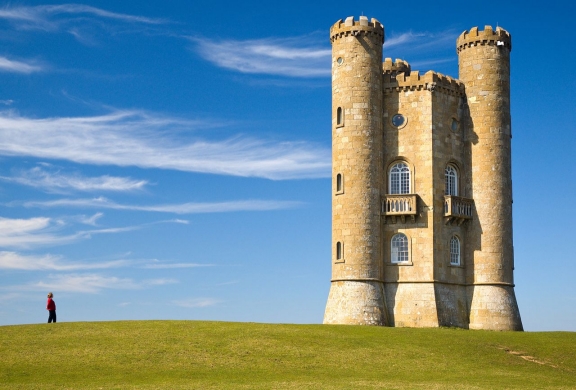 | 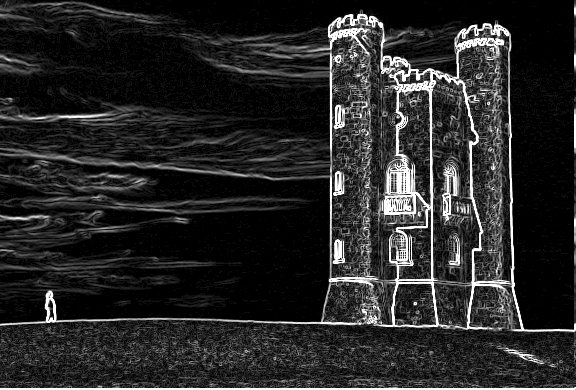 |  |  |
## Features
Key features which differentiates this library from the other existing open source solutions:
- [x] **GUI progress indicator**
- [x] Customizable command line support
- [x] Support for both shrinking or enlarging the image
- [x] Resize image both vertically and horizontally
- [x] Face detection to avoid face deformation
- [x] Support for multiple output image type (jpg, jpeg, png, bmp)
- [x] Support for `stdin` and `stdout` pipe commands
- [x] Can process whole directories recursively and concurrently
- [x] Use of sobel threshold for fine tuning
- [x] Use of blur filter for increased edge detection
- [x] Support for squaring the image with a single command
- [x] Support for proportional scaling
- [x] Support for protective mask
- [x] Support for removal mask
- [x] [GUI debug mode support](#masks-support)
## Install
First, install Go, set your `GOPATH`, and make sure `$GOPATH/bin` is on your `PATH`.
```bash
$ go install github.com/esimov/caire/cmd/caire@latest
```
## MacOS (Brew) install
The library can also be installed via Homebrew.
```bash
$ brew install caire
```
## Usage
```bash
$ caire -in input.jpg -out output.jpg
```
### Supported commands:
```bash
$ caire --help
```
The following flags are supported:
| Flag | Default | Description |
| --- | --- | --- |
| `in` | - | Input file |
| `out` | - | Output file |
| `width` | n/a | New width |
| `height` | n/a | New height |
| `preview` | true | Show GUI window |
| `perc` | false | Reduce image by percentage |
| `square` | false | Reduce image to square dimensions |
| `blur` | 4 | Blur radius |
| `sobel` | 2 | Sobel filter threshold |
| `debug` | false | Use debugger |
| `face` | false | Use face detection |
| `angle` | float | Plane rotated faces angle |
| `mask` | string | Mask file path |
| `rmask` | string | Remove mask file path |
| `color` | string | Seam color (default `#ff0000`) |
| `shape` | string | Shape type used for debugging: `circle`,`line` (default `circle`) |
## Face detection
The library is capable of detecting human faces prior resizing the images by using the lightweight Pigo (https://github.com/esimov/pigo) face detection library.
The image below illustrates the application capabilities for human face detection prior resizing. It's clearly visible that with face detection activated the algorithm will avoid cropping pixels inside the detected faces, retaining the face zone unaltered.
| Original image | With face detection | Without face detection
|:--:|:--:|:--:|
| 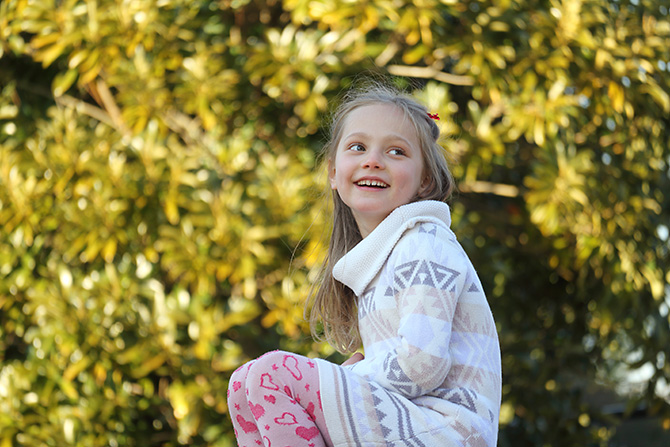 | 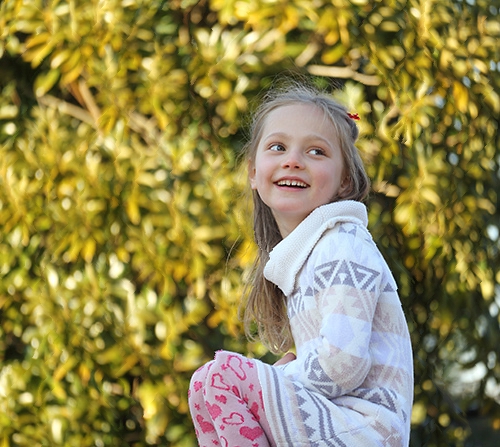 |  |
[Sample image source](http://www.lens-rumors.com/wp-content/uploads/2014/12/EF-M-55-200mm-f4.5-6.3-IS-STM-sample.jpg)
### GUI progress indicator

A GUI preview mode is also incorporated into the library for in time process visualization. The [Gio](http://gioui.org/) GUI library has been used because of its robustness and modern architecture. Prior running it please make sure that you have installed all the required dependencies noted in the installation section (https://gioui.org/#installation) .
The preview window is activated by default but you can deactivate it any time by setting the `-preview` flag to false. When the images are processed concurrently from a directory the preview mode is deactivated.
### Face detection to avoid face deformation
In order to detect faces prior rescaling, use the `-face` flag. There is no need to provide a face classification file, since it's already embedded into the generated binary file. The sample code below will resize the provided image with 20%, but checks for human faces in order tot avoid face deformations.
For face detection related settings please check the Pigo [documentation](https://github.com/esimov/pigo/blob/master/README.md).
```bash
$ caire -in input.jpg -out output.jpg -face=1 -perc=1 -width=20
```
### Support for `stdin` and `stdout` pipe commands
You can also use `stdin` and `stdout` with `-`:
```bash
$ cat input/source.jpg | caire -in - -out - >out.jpg
```
`in` and `out` default to `-` so you can also use:
```bash
$ cat input/source.jpg | caire >out.jpg
$ caire -out out.jpg < input/source.jpg
```
You can provide also an image URL for the `-in` flag or even use **curl** or **wget** as a pipe command in which case there is no need to use the `-in` flag.
```bash
$ caire -in -out
$ curl -s | caire > out.jpg
```
### Process multiple images from a directory concurrently
The library can also process multiple images from a directory **concurrently**. You have to provide only the source and the destination folder and the new width or height in this case.
```bash
$ caire -in -out
```
### Support for multiple output image type
There is no need to define the output file type, just use the correct extension and the library will encode the image to that specific type.
### Other options
In case you wish to scale down the image by a specific percentage, it can be used the **`-perc`** boolean flag. In this case the values provided for the `width` and `height` are expressed in percentage and not pixel values. For example to reduce the image dimension by 20% both horizontally and vertically you can use the following command:
```bash
$ caire -in input/source.jpg -out ./out.jpg -perc=1 -width=20 -height=20 -debug=false
```
Also the library supports the **`-square`** option. When this option is used the image will be resized to a square, based on the shortest edge.
When an image is resized on both the X and Y axis, the algorithm will first try to rescale it prior resizing, but also will preserve the image aspect ratio. The seam carving algorithm is applied only to the remaining points. Ex. : given an image of dimensions 2048x1536 if we want to resize to the 1024x500, the tool first rescale the image to 1024x768 and then will remove only the remaining 268px.
### Masks support:
- `-mask`: The path to the protective mask. The mask should be in binary format and have the same size as the input image. White areas represent regions where no seams should be carved.
- `-rmask`: The path to the removal mask. The mask should be in binary format and have the same size as the input image. White areas represent regions to be removed.
Mask | Mask removal
:-: | :-: