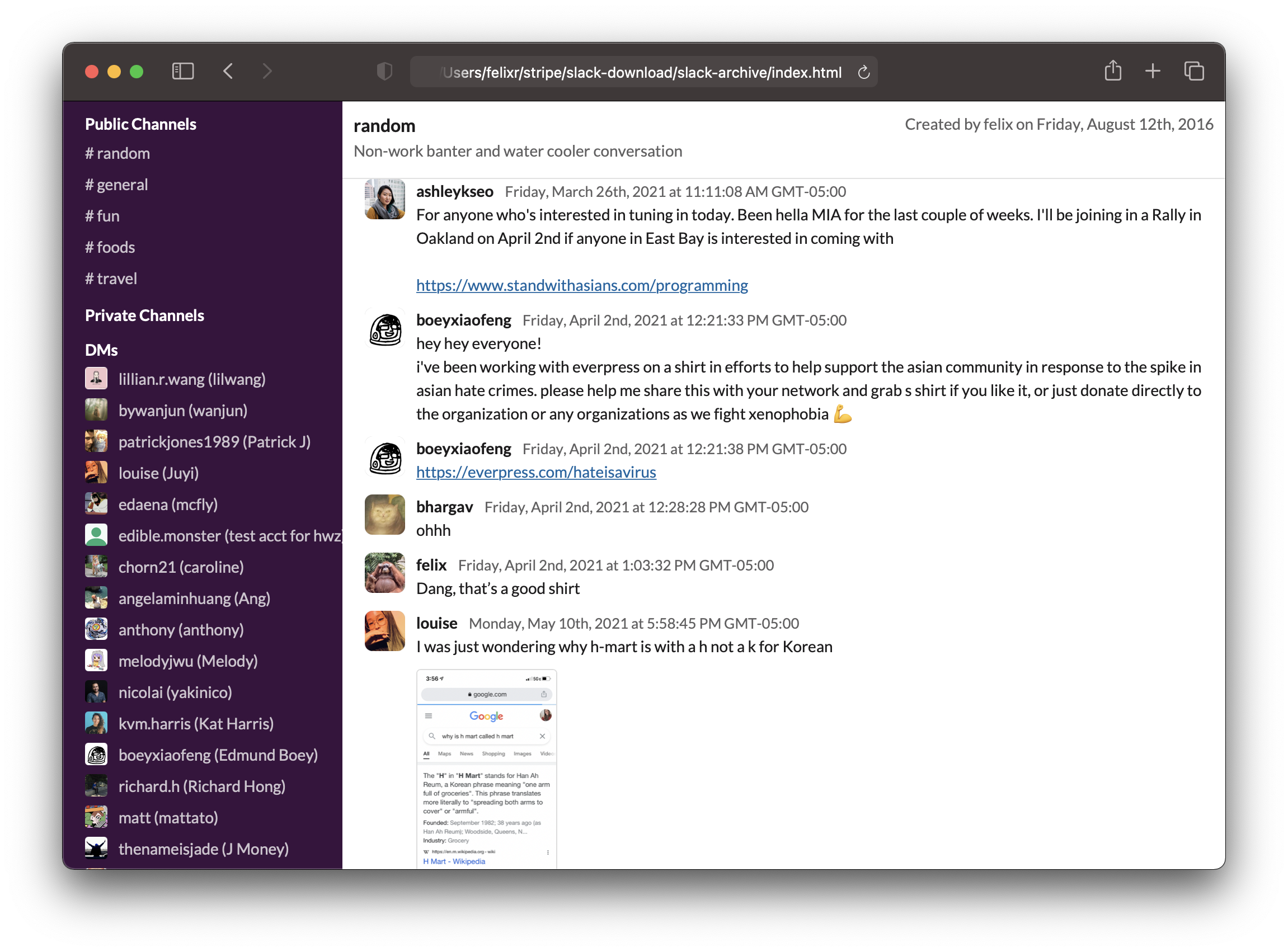
 ## Using it
1. Do you already have a user token for your workspace? If not, read on below on how to get a token.
2. Make sure you have [`node` and `npm`](https://nodejs.org/en/) installed, ideally something newer than Node v14.
3. Run `slack-archive`, which will interactively guide you through the options.
```sh
npx slack-archive
```
### Parameters
```
--automatic: Don't prompt and automatically fetch all messages from all channels.
--use-previous-channel-config: Fetch messages from channels selected in previous run instead of prompting.
--channel-types Comma-separated list of channel types to fetch messages from.
(public_channel, private_channel, mpim, im)
--exclude-channels Comma-separated list of channels to exclude, in automatic mode
--no-backup: Don't create backups. Not recommended.
--no-search: Don't create a search file, saving disk space.
--no-file-download: Don't download files.
--no-slack-connect: Don't connect to Slack, just generate HTML from local data.
--force-html-generation: Force regeneration of HTML files. Useful after slack-archive upgrades.
```
## Getting a token
In order to download messages from private channels and direct messages, we will need a "user
token". Slack uses the token to identify what permissions it'll give this app. We used to be able
to just copy a token out of your Slack app, but now, we'll need to create a custom app and jump
through a few hoops.
This will be mostly painless, I promise.
### 1) Make a custom app
Head over to https://api.slack.com/apps and `Create New App`. Select `From scratch`.
Give it a name and choose the workspace you'd like to export.
Then, from the `Features` menu on the left, select `OAuth & Permission`.
As a redirect URL, enter something random that doesn't actually exist, or a domain you control. For instace:
```
https://notarealurl.com/
```
(Note that redirects will take a _very_ long time if using a domain that doesn't actually exist)
Then, add the following `User Token Scopes`:
* channels:history
* channels:read
* files:read
* groups:history
* groups:read
* im:history
* im:read
* mpim:history
* mpim:read
* remote_files:read
* users:read
Finally, head back to `Basic Information` and make a note of your app's `client
id` and `client secret`. We'll need both later.
### 2) Authorize
Make sure you have your Slack workspace `URL` (aka team name) and your app's `client id`.
Then, in a browser, open this URL - replacing `{your-team-name}` and `{your-client-id}`
with your values.
```
https://{your-team-name}.slack.com/oauth/authorize?client_id={your-client-id}&scope=client
```
Confirm everything until Slack sends you to the mentioned non-existent URL. Look at your
browser's address bar - it should contain an URL that looks like this:
```
https://notarealurl.com/?code={code}&state=
```
Copy everything between `?code=` and `&state`. This is your `code`. We'll need it in the
next step.
Next, we'll exchange your code for a token. To do so, we'll also need your `client secret`
from the first step when we created your app. In a browser, open this URL - replacing
`{your-team-name}`, `{your-client-id}`, `{your-code}` and `{your-client-secret}` with
your values.
```
https://{your-team-name}.slack.com/api/oauth.access?client_id={your-client-id}&client_secret={your-client-secret}&code={your-code}
```
Your browser should now be returning some JSON including a token. Make a note of it - that's what we'll use. Paste it in the command line, OR create a file called `.token` in the slack-archive directory (created when the command is first run) and paste it in there.
================================================
FILE: bin/slack-archive.js
================================================
#!/usr/bin/env node
import('../lib/cli.js')
================================================
FILE: package.json
================================================
{
"name": "slack-archive",
"version": "1.6.1",
"description": "Create static HTML archives for your Slack workspaces",
"scripts": {
"prettier": "npx prettier --write src/*",
"cli": "ts-node src/cli.ts",
"html": "ts-node src/create-html.tsx",
"test": "echo \"Error: no test specified\" && exit 1",
"compile": "tsc",
"watch": "tsc -w",
"prepublishOnly": "npm run compile"
},
"bin": {
"slack-archive": "./bin/slack-archive.js"
},
"type": "module",
"keywords": [
"slack",
"export",
"download"
],
"repository": {
"type": "git",
"url": "https://github.com/felixrieseberg/slack-archive.git"
},
"author": "Felix Rieseberg
## Using it
1. Do you already have a user token for your workspace? If not, read on below on how to get a token.
2. Make sure you have [`node` and `npm`](https://nodejs.org/en/) installed, ideally something newer than Node v14.
3. Run `slack-archive`, which will interactively guide you through the options.
```sh
npx slack-archive
```
### Parameters
```
--automatic: Don't prompt and automatically fetch all messages from all channels.
--use-previous-channel-config: Fetch messages from channels selected in previous run instead of prompting.
--channel-types Comma-separated list of channel types to fetch messages from.
(public_channel, private_channel, mpim, im)
--exclude-channels Comma-separated list of channels to exclude, in automatic mode
--no-backup: Don't create backups. Not recommended.
--no-search: Don't create a search file, saving disk space.
--no-file-download: Don't download files.
--no-slack-connect: Don't connect to Slack, just generate HTML from local data.
--force-html-generation: Force regeneration of HTML files. Useful after slack-archive upgrades.
```
## Getting a token
In order to download messages from private channels and direct messages, we will need a "user
token". Slack uses the token to identify what permissions it'll give this app. We used to be able
to just copy a token out of your Slack app, but now, we'll need to create a custom app and jump
through a few hoops.
This will be mostly painless, I promise.
### 1) Make a custom app
Head over to https://api.slack.com/apps and `Create New App`. Select `From scratch`.
Give it a name and choose the workspace you'd like to export.
Then, from the `Features` menu on the left, select `OAuth & Permission`.
As a redirect URL, enter something random that doesn't actually exist, or a domain you control. For instace:
```
https://notarealurl.com/
```
(Note that redirects will take a _very_ long time if using a domain that doesn't actually exist)
Then, add the following `User Token Scopes`:
* channels:history
* channels:read
* files:read
* groups:history
* groups:read
* im:history
* im:read
* mpim:history
* mpim:read
* remote_files:read
* users:read
Finally, head back to `Basic Information` and make a note of your app's `client
id` and `client secret`. We'll need both later.
### 2) Authorize
Make sure you have your Slack workspace `URL` (aka team name) and your app's `client id`.
Then, in a browser, open this URL - replacing `{your-team-name}` and `{your-client-id}`
with your values.
```
https://{your-team-name}.slack.com/oauth/authorize?client_id={your-client-id}&scope=client
```
Confirm everything until Slack sends you to the mentioned non-existent URL. Look at your
browser's address bar - it should contain an URL that looks like this:
```
https://notarealurl.com/?code={code}&state=
```
Copy everything between `?code=` and `&state`. This is your `code`. We'll need it in the
next step.
Next, we'll exchange your code for a token. To do so, we'll also need your `client secret`
from the first step when we created your app. In a browser, open this URL - replacing
`{your-team-name}`, `{your-client-id}`, `{your-code}` and `{your-client-secret}` with
your values.
```
https://{your-team-name}.slack.com/api/oauth.access?client_id={your-client-id}&client_secret={your-client-secret}&code={your-code}
```
Your browser should now be returning some JSON including a token. Make a note of it - that's what we'll use. Paste it in the command line, OR create a file called `.token` in the slack-archive directory (created when the command is first run) and paste it in there.
================================================
FILE: bin/slack-archive.js
================================================
#!/usr/bin/env node
import('../lib/cli.js')
================================================
FILE: package.json
================================================
{
"name": "slack-archive",
"version": "1.6.1",
"description": "Create static HTML archives for your Slack workspaces",
"scripts": {
"prettier": "npx prettier --write src/*",
"cli": "ts-node src/cli.ts",
"html": "ts-node src/create-html.tsx",
"test": "echo \"Error: no test specified\" && exit 1",
"compile": "tsc",
"watch": "tsc -w",
"prepublishOnly": "npm run compile"
},
"bin": {
"slack-archive": "./bin/slack-archive.js"
},
"type": "module",
"keywords": [
"slack",
"export",
"download"
],
"repository": {
"type": "git",
"url": "https://github.com/felixrieseberg/slack-archive.git"
},
"author": "Felix Rieseberg {...fileElements}
;
};
interface AvatarProps {
userId?: string;
}
const Avatar: React.FunctionComponent
{username}
{formatTimestamp(message)}
{props.children}
{props.children}
{messages}
Public Channels
- {publicChannels}
Private Channels
- {privateChannels}
DMs
- {dmChannels}
Group DMs
- {groupChannels}
Bots
- {botChannels}
Archived Public Channels
- {publicArchivedChannels}
Archived Private Channels
- {privateArchivedChannels}
DMs (Deleted Users)
- {dmDeletedChannels}
{channel.name || channel.id}
{created}{channel.topic?.value}
{newer}
{sep1}
{older}
{sep2}
);
};
async function renderIndexPage() {
base = "html/";
const channels = await getChannels();
const page =
Loading and indexing messages, please wait. If you have a large number of
messages, this might take a minute.
================================================
FILE: static/style.css
================================================
/* Reset */
/* Box sizing rules */
*,
*::before,
*::after {
box-sizing: border-box;
}
/* Remove default margin */
body,
h1,
h2,
h3,
h4,
p,
figure,
blockquote,
dl,
dd {
margin: 0;
}
/* Remove list styles on ul, ol elements with a list role, which suggests default styling will be removed */
ul[role='list'],
ol[role='list'] {
list-style: none;
}
/* Set core root defaults */
html:focus-within {
scroll-behavior: smooth;
}
/* Set core body defaults */
body {
min-height: 100vh;
text-rendering: optimizeSpeed;
line-height: 1.5;
}
/* A elements that don't have a class get default styles */
a:not([class]) {
text-decoration-skip-ink: auto;
}
/* Make images easier to work with */
img,
picture {
max-width: 100%;
display: block;
}
/* Inherit fonts for inputs and buttons */
input,
button,
textarea,
select {
font: inherit;
}
/* Remove all animations, transitions and smooth scroll for people that prefer not to see them */
@media (prefers-reduced-motion: reduce) {
html:focus-within {
scroll-behavior: auto;
}
*,
*::before,
*::after {
animation-duration: 0.01ms !important;
animation-iteration-count: 1 !important;
transition-duration: 0.01ms !important;
scroll-behavior: auto !important;
}
}
@font-face {
font-family: "Lato";
src: url('fonts/Lato-Regular.ttf') format('truetype');
font-weight: normal;
font-style: normal;
}
@font-face {
font-family: "Lato";
src: url('fonts/Lato-Bold.ttf') format('truetype');
font-weight: bold;
font-style: normal;
}
body, html {
font-family: 'Lato', sans-serif;
font-size: 14px;
color: rgb(29, 28, 29);
}
a {
color: rgb(18, 100, 163);
}
audio, video {
max-width: 400px;
}
.messages-list {
padding-bottom: 20px;
}
.messages-list .avatar {
height: 36px;
width: 36px;
border-radius: 7px;
margin-right: 10px;
background: #c1c1c1;
}
.message-gutter {
display: flex;
margin: 10px;
scroll-margin-top: 120px;
}
.message-gutter:target {
background-color: #fafafa;
border: 2px solid #39113E;
padding: 10px;
border-radius: 5px;
}
.message-gutter div:first-of-type {
flex-shrink: 0;
}
.message-gutter > .message-gutter {
/** i.e. replies in thread. Just here to be easily findable */
}
.sender {
font-weight: 800;
margin-right: 10px;
}
.timestamp {
font-weight: 200;
font-size: 13px;
color: rgb(97, 96, 97);
}
.header {
position: sticky;
background: #fff;
color: #616061;
top: 0;
left: 0;
padding: 10px;
min-height: 70px;
border-bottom: 1px solid #E2E2E2;
box-sizing: border-box;
}
.header h1 {
font-size: 16px;
color: #1D1C1D;
display: inline-block;
}
.header a {
color: #616061;
}
.header a:active, .header a.current {
color: #000;
}
.header .created {
float: right;
}
.jumper {
display: inline-block;
}
.jumper a {
margin: 2px;
}
.text {
overflow-wrap: break-word;
}
.file {
max-height: 270px;
margin-right: 10px;
margin-top: 10px;
border-radius: 4px;
border: 1px solid #80808045;
outline: none;
}
.reaction {
background-color: #eaeaea;
display: inline-block;
border-radius: 10px;
font-size: .7em;
padding-left: 6px;
padding-right: 6px;
padding-bottom: 4px;
margin-right: 5px;
padding-top: 4px;
}
.reaction img {
height: 16px;
width: 16px;
margin-right: 3px;
vertical-align: middle;
display: inline-block;
}
.reaction span {
position: relative;
top: 1px;
}
#index {
display: flex;
height: calc(100vh - 4px);
}
#channels {
background: #39113E;
width: 250px;
color: #CDC3CE;
padding-top: 10px;
overflow: scroll;
padding-bottom: 20px;
}
#channels ul {
margin: 0;
padding: 0;
list-style: none;
}
#channels p {
padding-left: 20px;
}
#channels .section {
font-weight: 800;
color: #fff;
margin-top: 10px;
}
#channels .section:first-of-type {
margin-top: 0;
}
#channels a {
padding: 5px;
display: block;
color: #CDC3CE;
text-decoration: none;
padding-left: 20px;
display: flex;
max-height: 28px;
white-space: pre;
text-overflow: ellipsis;
overflow: hidden;
}
#channels a .avatar {
height: 20px;
width: 20px;
border-radius: 3px;
margin-right: 10px;
object-fit: contain;
}
#channels a:hover {
background: #301034;
color: #edeced;
}
#messages {
flex-grow: 1;
}
#messages iframe {
height: 100%;
width: calc(100vw - 250px);
border: none;
}
#search {
margin: 10px;
text-align: center;
}
#search ul {
list-style: none;
display: flex;
flex-direction: column;
align-items: center;
}
#search li {
padding: 5px;
border-bottom: 1px solid #E2E2E2;
background: hsl(0deg 0% 98%);
border-radius: 5px;
width: 600px;
text-align: left;
margin-bottom: 5px;
}
#search a {
text-decoration: none;
color: unset;
}
================================================
FILE: tsconfig.json
================================================
{
"compilerOptions": {
"jsx": "react",
/* Visit https://aka.ms/tsconfig.json to read more about this file */
/* Projects */
// "incremental": true, /* Enable incremental compilation */
// "composite": true, /* Enable constraints that allow a TypeScript project to be used with project references. */
// "tsBuildInfoFile": "./", /* Specify the folder for .tsbuildinfo incremental compilation files. */
// "disableSourceOfProjectReferenceRedirect": true, /* Disable preferring source files instead of declaration files when referencing composite projects */
// "disableSolutionSearching": true, /* Opt a project out of multi-project reference checking when editing. */
// "disableReferencedProjectLoad": true, /* Reduce the number of projects loaded automatically by TypeScript. */
/* Language and Environment */
"target": "ES2020", /* Set the JavaScript language version for emitted JavaScript and include compatible library declarations. */
// "lib": [], /* Specify a set of bundled library declaration files that describe the target runtime environment. */
// "jsx": "preserve", /* Specify what JSX code is generated. */
// "experimentalDecorators": true, /* Enable experimental support for TC39 stage 2 draft decorators. */
// "emitDecoratorMetadata": true, /* Emit design-type metadata for decorated declarations in source files. */
// "jsxFactory": "", /* Specify the JSX factory function used when targeting React JSX emit, e.g. 'React.createElement' or 'h' */
// "jsxFragmentFactory": "", /* Specify the JSX Fragment reference used for fragments when targeting React JSX emit e.g. 'React.Fragment' or 'Fragment'. */
// "jsxImportSource": "", /* Specify module specifier used to import the JSX factory functions when using `jsx: react-jsx*`.` */
// "reactNamespace": "", /* Specify the object invoked for `createElement`. This only applies when targeting `react` JSX emit. */
// "noLib": true, /* Disable including any library files, including the default lib.d.ts. */
// "useDefineForClassFields": true, /* Emit ECMAScript-standard-compliant class fields. */
/* Modules */
"module": "ES2020", /* Specify what module code is generated. */
// "rootDir": "./", /* Specify the root folder within your source files. */
"moduleResolution": "node", /* Specify how TypeScript looks up a file from a given module specifier. */
// "baseUrl": "./", /* Specify the base directory to resolve non-relative module names. */
// "paths": {}, /* Specify a set of entries that re-map imports to additional lookup locations. */
// "rootDirs": [], /* Allow multiple folders to be treated as one when resolving modules. */
// "typeRoots": [], /* Specify multiple folders that act like `./node_modules/@types`. */
// "types": [], /* Specify type package names to be included without being referenced in a source file. */
// "allowUmdGlobalAccess": true, /* Allow accessing UMD globals from modules. */
// "resolveJsonModule": true, /* Enable importing .json files */
// "noResolve": true, /* Disallow `import`s, `require`s or `