Repository: flashbots/flashbots-docs
Branch: main
Commit: b5fc2fea5931
Files: 163
Total size: 584.7 KB
Directory structure:
gitextract_k2vcmtga/
├── .cspell.json
├── .editorconfig
├── .eslintignore
├── .eslintrc.js
├── .github/
│ ├── CODEOWNERS
│ ├── dependabot.yml
│ └── workflows/
│ ├── algolia.yml.txt
│ ├── broken-link-check-cron.yml.txt
│ └── pr-tests.yml
├── .gitignore
├── .lintstagedrc.json
├── .nvmrc
├── .prettierignore
├── .prettierrc.json
├── .stylelintignore
├── .stylelintrc.js
├── .vscode/
│ ├── extensions.json
│ └── settings.json
├── LICENSE
├── LICENSE-docs
├── README.md
├── babel.config.js
├── docs/
│ ├── brand-assets.mdx
│ ├── cheatsheet.mdx
│ ├── code-of-conduct.mdx
│ ├── community-tools.mdx
│ ├── contribution-guide.mdx
│ ├── flashbots-auction/
│ │ ├── advanced/
│ │ │ ├── bundle-cancellations.mdx
│ │ │ ├── bundle-pricing.md
│ │ │ ├── co-locate.mdx
│ │ │ ├── coinbase-payment.mdx
│ │ │ ├── eip1559.mdx
│ │ │ ├── gas-fee-refunds.md
│ │ │ ├── multiplexing.mdx
│ │ │ ├── reputation.md
│ │ │ ├── rpc-endpoint.mdx
│ │ │ ├── testnets.mdx
│ │ │ ├── troubleshooting.mdx
│ │ │ └── understanding-bundles.mdx
│ │ ├── example-searchers/
│ │ │ ├── searcher-minter.md
│ │ │ ├── searcher-sponsored-tx.md
│ │ │ ├── simple-arbitrage-bot.md
│ │ │ └── synthetix-searcher.md
│ │ ├── faq.md
│ │ ├── libraries/
│ │ │ ├── alchemyprovider.md
│ │ │ ├── bundle-relay.md
│ │ │ ├── ethers-js-provider.md
│ │ │ ├── golang.md
│ │ │ ├── mev-share-clients.md
│ │ │ ├── rust-provider.md
│ │ │ └── web3py-provider.md
│ │ ├── other-resources.md
│ │ ├── overview.mdx
│ │ └── quick-start.mdx
│ ├── flashbots-mev-boost/
│ │ ├── FAQ.md
│ │ ├── architecture-overview/
│ │ │ ├── block-proposal.md
│ │ │ ├── risks.md
│ │ │ └── specifications.md
│ │ ├── block-builders.md
│ │ ├── block-proposers.md
│ │ ├── contributing.md
│ │ ├── getting-started/
│ │ │ ├── installation.md
│ │ │ ├── system-requirements.md
│ │ │ └── usage.md
│ │ ├── glossary.md
│ │ ├── introduction.md
│ │ ├── relay.md
│ │ ├── resources.md
│ │ ├── security.md
│ │ └── troubleshooting.md
│ ├── flashbots-mev-share/
│ │ ├── for-users.mdx
│ │ ├── introduction.mdx
│ │ ├── orderflow-providers.mdx
│ │ ├── release-notes/
│ │ │ ├── 2023-03.mdx
│ │ │ ├── 2023-06.mdx
│ │ │ ├── 2023-07.mdx
│ │ │ └── 2023-09.mdx
│ │ └── searchers/
│ │ ├── debugging.mdx
│ │ ├── event-stream.mdx
│ │ ├── getting-started.mdx
│ │ ├── ratelimiting.mdx
│ │ ├── sending-bundles.mdx
│ │ ├── tutorials/
│ │ │ ├── flash-loan-arbitrage/
│ │ │ │ ├── bot.mdx
│ │ │ │ ├── flash-loan-basics.mdx
│ │ │ │ ├── introduction.mdx
│ │ │ │ └── simple-blind-arbitrage.mdx
│ │ │ └── limit-order/
│ │ │ ├── debugging.mdx
│ │ │ ├── introduction.mdx
│ │ │ ├── more-resources.mdx
│ │ │ ├── sending-bundles.mdx
│ │ │ ├── setup.mdx
│ │ │ └── using-events.mdx
│ │ └── understanding-bundles.mdx
│ ├── flashbots-protect/
│ │ ├── additional-documentation/
│ │ │ ├── eth-sendPrivateTransaction.mdx
│ │ │ └── status-api.md
│ │ ├── cancellations.md
│ │ ├── gas-fee-refunds.md
│ │ ├── large-transactions.md
│ │ ├── mev-refunds.mdx
│ │ ├── nonce-management.mdx
│ │ ├── overview.mdx
│ │ ├── quick-start.mdx
│ │ ├── ratelimiting.mdx
│ │ ├── settings-guide.md
│ │ └── stuck_transactions.md
│ ├── guide-send-tx-bundle.mdx
│ ├── joining-flashbots.mdx
│ ├── new-to-mev.mdx
│ ├── policies/
│ │ ├── privacy.mdx
│ │ ├── prohibited-use-policy.mdx
│ │ └── terms-of-service.mdx
│ ├── sidebars.js
│ ├── specs/
│ │ ├── README.md
│ │ ├── contracts/
│ │ │ └── abi/
│ │ │ ├── _flashLoanArb.mdx
│ │ │ └── _uniswapV2Factory.mdx
│ │ ├── mev-share/
│ │ │ ├── HintsTable.jsx
│ │ │ ├── _builders.mdx
│ │ │ ├── _mev_sendBundle.mdx
│ │ │ ├── _mev_simBundle.mdx
│ │ │ ├── _streamEvent.mdx
│ │ │ ├── blurbs/
│ │ │ │ ├── _builderInheritance.mdx
│ │ │ │ ├── _whatsMevShareAdvanced.mdx
│ │ │ │ ├── _whatsMevShareBasic.mdx
│ │ │ │ └── _whatsaMEVShareNode.mdx
│ │ │ └── hints.json
│ │ └── protect-rpc/
│ │ └── _hints.mdx
│ ├── welcome.mdx
│ └── whitehat.mdx
├── docusaurus.config.js
├── package.json
├── project-words.txt
├── src/
│ ├── components/
│ │ ├── Banner/
│ │ │ ├── Banner.custom.module.scss
│ │ │ ├── Banner.module.scss
│ │ │ ├── Banner.tsx
│ │ │ ├── _base.scss
│ │ │ └── banner.config.tsx
│ │ ├── BrandAssets/
│ │ │ ├── AssetCard.tsx
│ │ │ ├── Download.tsx
│ │ │ ├── index.tsx
│ │ │ └── styles.module.css
│ │ ├── Checkbox/
│ │ │ └── index.tsx
│ │ ├── Grid/
│ │ │ ├── Grid.tsx
│ │ │ └── styles.module.css
│ │ ├── GridBlock/
│ │ │ ├── GridBlock.tsx
│ │ │ └── styles.module.css
│ │ ├── ProtectButton/
│ │ │ └── index.tsx
│ │ ├── RemoteCodeBlock/
│ │ │ └── index.tsx
│ │ ├── SimpleDropdown/
│ │ │ ├── index.tsx
│ │ │ └── styles.module.css
│ │ └── mev-share/
│ │ ├── buildersTable.tsx
│ │ └── useSupportedBuilders.tsx
│ ├── css/
│ │ └── custom.css
│ ├── pages/
│ │ └── styles.module.css
│ ├── theme/
│ │ ├── Layout/
│ │ │ └── index.tsx
│ │ └── Navbar/
│ │ ├── index.js
│ │ └── navbar.module.css
│ └── types/
│ └── global.d.ts
├── static/
│ ├── .nojekyll
│ ├── img/
│ │ └── site.webmanifest
│ └── robots.txt
├── tailwind.config.js
├── tsconfig.json
└── vercel.json
================================================
FILE CONTENTS
================================================
================================================
FILE: .cspell.json
================================================
{
"version": "0.2",
"gitignoreRoot": ".",
"useGitignore": true,
"dictionaries": [
"css",
"html",
"fonts",
"typescript",
"softwareTerms",
"companies",
"project-words"
],
"dictionaryDefinitions": [
{
"name": "project-words",
"path": "./project-words.txt",
"noSuggest": false
}
],
"ignorePaths": [
"package.json",
"yarn.lock",
"project-words.txt",
"*.gitignore"
],
"ignoreRegExpList": [
"Email",
"Urls",
"#[\\w-]*"
]
}
================================================
FILE: .editorconfig
================================================
# http://editorconfig.org
root = true
[*]
charset = utf-8
end_of_line = lf
insert_final_newline = true
indent_style = space
indent_size = 2
max_line_length = 80
trim_trailing_whitespace = true
[*.md]
insert_final_newline = false
# 2 trailing whitespace indicate a new line in markdown
trim_trailing_whitespace = false
================================================
FILE: .eslintignore
================================================
node_modules
.yarn
.history
build
coverage
jest.config.js
jest.transform.js
jest/vendor
================================================
FILE: .eslintrc.js
================================================
/**
* Copyright (c) Flashbots Ltd. and its affiliates.
*
* This source code is licensed under the MIT license found in the
* LICENSE file in the root directory of this source tree.
*/
const OFF = 0;
const WARNING = 1;
const ERROR = 2;
module.exports = {
parser: '@typescript-eslint/parser',
parserOptions: {
project: true,
tsconfigRootDir: __dirname,
},
plugins: ['header'],
extends: [
'eslint:recommended',
'airbnb',
'airbnb/hooks',
'airbnb-typescript',
'plugin:@docusaurus/recommended',
'plugin:react/jsx-runtime',
'plugin:mdx/recommended',
'plugin:import/recommended',
'prettier',
],
rules: {
camelcase: WARNING,
'max-len': [
WARNING,
{
code: Infinity, // Code width is already enforced by Prettier
tabWidth: 2,
comments: 80,
ignoreUrls: true,
ignorePattern: '(eslint-disable|@)',
},
],
'header/header': [
ERROR,
'block',
[
'*',
' * Copyright (c) Flashbots Ltd. and its affiliates.',
' *',
' * This source code is licensed under the MIT license found in the',
' * LICENSE file in the root directory of this source tree.',
' ',
],
],
'import/no-unresolved': [ERROR, {ignore: ['^@docusaurus', '@theme']}],
'import/no-extraneous-dependencies': [ERROR, {includeTypes: true}],
'react/require-default-props': [
WARNING,
{
functions: 'defaultArguments',
},
],
'react/jsx-filename-extension': [
WARNING,
{extensions: ['.js', '.jsx', '.ts', '.tsx']},
],
"react/jsx-props-no-spreading": OFF,
},
settings: {
'import/parsers': {
'@typescript-eslint/parser': ['.ts', '.tsx'],
},
'import/resolver': {
typescript: {},
},
// optional, if you want to lint code blocks at the same time
'mdx/code-blocks': true,
// optional, if you want to disable language mapper, set it to `false`
// if you want to override the default language mapper inside, you can
// provide your own
'mdx/language-mapper': {
typescript: '@typescript-eslint/parser',
ts: '@typescript-eslint/parser',
javascript: 'espree',
js: 'espree',
},
},
overrides: [
{
files: ['*.mdx'],
extends: ['plugin:mdx/overrides'],
},
],
};
================================================
FILE: .github/CODEOWNERS
================================================
# These owners will be the default owners for everything in
# the repo. Unless a later match takes precedence,
# they will be requested for review when someone opens a pull request.
* @odysseus0 @sketsdever @zeroXbrock @sukoneck
================================================
FILE: .github/dependabot.yml
================================================
# To get started with Dependabot version updates, you'll need to specify which
# package ecosystems to update and where the package manifests are located.
# Please see the documentation for all configuration options:
# https://docs.github.com/github/administering-a-repository/configuration-options-for-dependency-updates
version: 2
updates:
- package-ecosystem: "yarn" # See documentation for possible values
directory: "/" # Location of package manifests
schedule:
interval: "weekly"
groups:
dev-dependencies:
patterns:
- "*"
================================================
FILE: .github/workflows/algolia.yml.txt
================================================
name: Vercel -> Algolia Crawler (push on main)
on:
push:
branches: [ main ]
jobs:
algolia_recrawl:
name: Algolia Recrawl
runs-on: ubuntu-latest
steps:
# checkout this repo
- name: Checkout Repo
uses: actions/checkout@v2
- name: Vercel-MAIN => Algolia crawler creation and recrawl on preview (Push on Main branch)
uses: algolia/algoliasearch-crawler-github-actions@v1
id: crawler_push
with:
crawler-user-id: ${{ secrets.ALGOLIA_CRAWLER_USER_ID }}
crawler-api-key: ${{ secrets.ALGOLIA_CRAWLER_API_KEY }}
algolia-app-id: ${{ secrets.ALGOLIA_APP_ID }}
algolia-api-key: ${{ secrets.ALGOLIA_SEARCH_API_KEY }}
crawler-name: 'flashbots'
site-url: 'https://docs.flashbots.net/'
override-config: true
================================================
FILE: .github/workflows/broken-link-check-cron.yml.txt
================================================
name: Check for broken links (cron)
on:
workflow_dispatch:
schedule:
- cron: '0 10 * * *'
jobs:
check-for-broken-links:
runs-on: ubuntu-latest
steps:
- uses: actions/setup-node@v1
with:
node-version: '16.x'
- run: npm install -g linkinator
- run: linkinator https://docs.flashbots.net --recurse --timeout 3000 --concurrency 10 --retry -s https://dune.com/ChainsightAnalytics,'https://.*etherscan.io/tx.*','https://twitter.com.*','https://.*imgur.com.*'
================================================
FILE: .github/workflows/pr-tests.yml
================================================
name: PR Tests
on:
push:
branches:
- main
pull_request:
jobs:
build-and-check:
runs-on: ubuntu-latest
steps:
- uses: actions/checkout@v1
- uses: actions/setup-node@v1
with:
node-version: "22.x"
- name: Test build
env:
TARGET_URL: "https://docs.flashbots.net"
BASE_URL: "/"
ALGOLIA_APP_ID: "example"
ALGOLIA_SEARCH_API_KEY: "example"
ALGOLIA_INDEX_NAME: "example"
run: |
yarn install --frozen-lockfile
yarn build
# - name: Check for broken links
# run: |
# cd build
# npm install -g linkinator
# linkinator "**/*.html" --recurse --timeout 3000 --concurrency 10 --retry -s https://dune.com/ChainsightAnalytics,'https://.*etherscan.io/.*','https://twitter.com.*','https://.*imgur.com.*'
================================================
FILE: .gitignore
================================================
# Dependencies
/node_modules
# Production
/build
# Generated files
.docusaurus
.cache-loader
# Misc
.DS_Store
.env.local
.env.development.local
.env.test.local
.env.production.local
npm-debug.log*
yarn-debug.log*
yarn-error.log*
node_modules
.env
.vercel
.env*.local
.idea/
.eslintcache
================================================
FILE: .lintstagedrc.json
================================================
{
"*.{js,jsx,ts,tsx,mjs}": ["eslint --fix"],
"*.css": ["stylelint --allow-empty-input --fix"],
"*": [
"prettier --ignore-unknown --write",
"cspell --no-must-find-files --no-progress"
]
}
================================================
FILE: .nvmrc
================================================
v22
================================================
FILE: .prettierignore
================================================
# Dependencies
/node_modules
# Production
/build
# Generated files
.docusaurus
.cache-loader
# Misc
.DS_Store
.env.local
.env.development.local
.env.test.local
.env.production.local
npm-debug.log*
yarn-debug.log*
yarn-error.log*
node_modules
.env
.vercel
================================================
FILE: .prettierrc.json
================================================
{
"arrowParens": "always",
"bracketSpacing": false,
"bracketSameLine": true,
"printWidth": 80,
"proseWrap": "never",
"singleQuote": true,
"trailingComma": "all",
"plugins": ["prettier-plugin-tailwindcss"]
}
================================================
FILE: .stylelintignore
================================================
# Stylelint runs on everything by default; we only lint CSS files.
*
!*/
!*.css
================================================
FILE: .stylelintrc.js
================================================
module.exports = {
extends: ['stylelint-config-standard', 'stylelint-config-prettier'],
rules: {
'at-rule-no-unknown': [
true,
{
ignoreAtRules: [
'tailwind',
'apply',
'variants',
'responsive',
'screen',
],
},
],
'declaration-block-trailing-semicolon': null,
'no-descending-specificity': null,
},
};
================================================
FILE: .vscode/extensions.json
================================================
{
// See https://go.microsoft.com/fwlink/?LinkId=827846 to learn about workspace recommendations.
"recommendations": [
"streetsidesoftware.code-spell-checker",
"esbenp.prettier-vscode",
"dbaeumer.vscode-eslint",
"stylelint.vscode-stylelint",
"EditorConfig.EditorConfig",
"Gruntfuggly.todo-tree",
"github.vscode-github-actions",
"GitHub.vscode-pull-request-github",
"GitHub.remotehub",
"eamodio.gitlens",
"unifiedjs.vscode-mdx",
"christian-kohler.npm-intellisense",
"christian-kohler.path-intellisense",
"bradlc.vscode-tailwindcss",
],
"unwantedRecommendations": []
}
================================================
FILE: .vscode/settings.json
================================================
{
"editor.codeActionsOnSave": {
"source.fixAll.eslint": "explicit",
"source.fixAll.stylelint": "explicit"
},
"editor.defaultFormatter": "esbenp.prettier-vscode",
"css.validate": false,
"scss.validate": false,
"javascript.validate.enable": false,
"typescript.validate.enable": true,
"javascript.suggest.paths": false,
"typescript.suggest.paths": false
}
================================================
FILE: LICENSE
================================================
MIT License
Copyright (c) Flashbots Ltd. and its affiliates.
Permission is hereby granted, free of charge, to any person obtaining a copy
of this software and associated documentation files (the "Software"), to deal
in the Software without restriction, including without limitation the rights
to use, copy, modify, merge, publish, distribute, sublicense, and/or sell
copies of the Software, and to permit persons to whom the Software is
furnished to do so, subject to the following conditions:
The above copyright notice and this permission notice shall be included in all
copies or substantial portions of the Software.
THE SOFTWARE IS PROVIDED "AS IS", WITHOUT WARRANTY OF ANY KIND, EXPRESS OR
IMPLIED, INCLUDING BUT NOT LIMITED TO THE WARRANTIES OF MERCHANTABILITY,
FITNESS FOR A PARTICULAR PURPOSE AND NONINFRINGEMENT. IN NO EVENT SHALL THE
AUTHORS OR COPYRIGHT HOLDERS BE LIABLE FOR ANY CLAIM, DAMAGES OR OTHER
LIABILITY, WHETHER IN AN ACTION OF CONTRACT, TORT OR OTHERWISE, ARISING FROM,
OUT OF OR IN CONNECTION WITH THE SOFTWARE OR THE USE OR OTHER DEALINGS IN THE
SOFTWARE.
================================================
FILE: LICENSE-docs
================================================
Attribution 4.0 International
=======================================================================
Creative Commons Corporation ("Creative Commons") is not a law firm and
does not provide legal services or legal advice. Distribution of
Creative Commons public licenses does not create a lawyer-client or
other relationship. Creative Commons makes its licenses and related
information available on an "as-is" basis. Creative Commons gives no
warranties regarding its licenses, any material licensed under their
terms and conditions, or any related information. Creative Commons
disclaims all liability for damages resulting from their use to the
fullest extent possible.
Using Creative Commons Public Licenses
Creative Commons public licenses provide a standard set of terms and
conditions that creators and other rights holders may use to share
original works of authorship and other material subject to copyright
and certain other rights specified in the public license below. The
following considerations are for informational purposes only, are not
exhaustive, and do not form part of our licenses.
Considerations for licensors: Our public licenses are
intended for use by those authorized to give the public
permission to use material in ways otherwise restricted by
copyright and certain other rights. Our licenses are
irrevocable. Licensors should read and understand the terms
and conditions of the license they choose before applying it.
Licensors should also secure all rights necessary before
applying our licenses so that the public can reuse the
material as expected. Licensors should clearly mark any
material not subject to the license. This includes other CC-
licensed material, or material used under an exception or
limitation to copyright. More considerations for licensors:
wiki.creativecommons.org/Considerations_for_licensors
Considerations for the public: By using one of our public
licenses, a licensor grants the public permission to use the
licensed material under specified terms and conditions. If
the licensor's permission is not necessary for any reason--for
example, because of any applicable exception or limitation to
copyright--then that use is not regulated by the license. Our
licenses grant only permissions under copyright and certain
other rights that a licensor has authority to grant. Use of
the licensed material may still be restricted for other
reasons, including because others have copyright or other
rights in the material. A licensor may make special requests,
such as asking that all changes be marked or described.
Although not required by our licenses, you are encouraged to
respect those requests where reasonable. More considerations
for the public:
wiki.creativecommons.org/Considerations_for_licensees
=======================================================================
Creative Commons Attribution 4.0 International Public License
By exercising the Licensed Rights (defined below), You accept and agree
to be bound by the terms and conditions of this Creative Commons
Attribution 4.0 International Public License ("Public License"). To the
extent this Public License may be interpreted as a contract, You are
granted the Licensed Rights in consideration of Your acceptance of
these terms and conditions, and the Licensor grants You such rights in
consideration of benefits the Licensor receives from making the
Licensed Material available under these terms and conditions.
Section 1 -- Definitions.
a. Adapted Material means material subject to Copyright and Similar
Rights that is derived from or based upon the Licensed Material
and in which the Licensed Material is translated, altered,
arranged, transformed, or otherwise modified in a manner requiring
permission under the Copyright and Similar Rights held by the
Licensor. For purposes of this Public License, where the Licensed
Material is a musical work, performance, or sound recording,
Adapted Material is always produced where the Licensed Material is
synched in timed relation with a moving image.
b. Adapter's License means the license You apply to Your Copyright
and Similar Rights in Your contributions to Adapted Material in
accordance with the terms and conditions of this Public License.
c. Copyright and Similar Rights means copyright and/or similar rights
closely related to copyright including, without limitation,
performance, broadcast, sound recording, and Sui Generis Database
Rights, without regard to how the rights are labeled or
categorized. For purposes of this Public License, the rights
specified in Section 2(b)(1)-(2) are not Copyright and Similar
Rights.
d. Effective Technological Measures means those measures that, in the
absence of proper authority, may not be circumvented under laws
fulfilling obligations under Article 11 of the WIPO Copyright
Treaty adopted on December 20, 1996, and/or similar international
agreements.
e. Exceptions and Limitations means fair use, fair dealing, and/or
any other exception or limitation to Copyright and Similar Rights
that applies to Your use of the Licensed Material.
f. Licensed Material means the artistic or literary work, database,
or other material to which the Licensor applied this Public
License.
g. Licensed Rights means the rights granted to You subject to the
terms and conditions of this Public License, which are limited to
all Copyright and Similar Rights that apply to Your use of the
Licensed Material and that the Licensor has authority to license.
h. Licensor means the individual(s) or entity(ies) granting rights
under this Public License.
i. Share means to provide material to the public by any means or
process that requires permission under the Licensed Rights, such
as reproduction, public display, public performance, distribution,
dissemination, communication, or importation, and to make material
available to the public including in ways that members of the
public may access the material from a place and at a time
individually chosen by them.
j. Sui Generis Database Rights means rights other than copyright
resulting from Directive 96/9/EC of the European Parliament and of
the Council of 11 March 1996 on the legal protection of databases,
as amended and/or succeeded, as well as other essentially
equivalent rights anywhere in the world.
k. You means the individual or entity exercising the Licensed Rights
under this Public License. Your has a corresponding meaning.
Section 2 -- Scope.
a. License grant.
1. Subject to the terms and conditions of this Public License,
the Licensor hereby grants You a worldwide, royalty-free,
non-sublicensable, non-exclusive, irrevocable license to
exercise the Licensed Rights in the Licensed Material to:
a. reproduce and Share the Licensed Material, in whole or
in part; and
b. produce, reproduce, and Share Adapted Material.
2. Exceptions and Limitations. For the avoidance of doubt, where
Exceptions and Limitations apply to Your use, this Public
License does not apply, and You do not need to comply with
its terms and conditions.
3. Term. The term of this Public License is specified in Section
6(a).
4. Media and formats; technical modifications allowed. The
Licensor authorizes You to exercise the Licensed Rights in
all media and formats whether now known or hereafter created,
and to make technical modifications necessary to do so. The
Licensor waives and/or agrees not to assert any right or
authority to forbid You from making technical modifications
necessary to exercise the Licensed Rights, including
technical modifications necessary to circumvent Effective
Technological Measures. For purposes of this Public License,
simply making modifications authorized by this Section 2(a)
(4) never produces Adapted Material.
5. Downstream recipients.
a. Offer from the Licensor -- Licensed Material. Every
recipient of the Licensed Material automatically
receives an offer from the Licensor to exercise the
Licensed Rights under the terms and conditions of this
Public License.
b. No downstream restrictions. You may not offer or impose
any additional or different terms or conditions on, or
apply any Effective Technological Measures to, the
Licensed Material if doing so restricts exercise of the
Licensed Rights by any recipient of the Licensed
Material.
6. No endorsement. Nothing in this Public License constitutes or
may be construed as permission to assert or imply that You
are, or that Your use of the Licensed Material is, connected
with, or sponsored, endorsed, or granted official status by,
the Licensor or others designated to receive attribution as
provided in Section 3(a)(1)(A)(i).
b. Other rights.
1. Moral rights, such as the right of integrity, are not
licensed under this Public License, nor are publicity,
privacy, and/or other similar personality rights; however, to
the extent possible, the Licensor waives and/or agrees not to
assert any such rights held by the Licensor to the limited
extent necessary to allow You to exercise the Licensed
Rights, but not otherwise.
2. Patent and trademark rights are not licensed under this
Public License.
3. To the extent possible, the Licensor waives any right to
collect royalties from You for the exercise of the Licensed
Rights, whether directly or through a collecting society
under any voluntary or waivable statutory or compulsory
licensing scheme. In all other cases the Licensor expressly
reserves any right to collect such royalties.
Section 3 -- License Conditions.
Your exercise of the Licensed Rights is expressly made subject to the
following conditions.
a. Attribution.
1. If You Share the Licensed Material (including in modified
form), You must:
a. retain the following if it is supplied by the Licensor
with the Licensed Material:
i. identification of the creator(s) of the Licensed
Material and any others designated to receive
attribution, in any reasonable manner requested by
the Licensor (including by pseudonym if
designated);
ii. a copyright notice;
iii. a notice that refers to this Public License;
iv. a notice that refers to the disclaimer of
warranties;
v. a URI or hyperlink to the Licensed Material to the
extent reasonably practicable;
b. indicate if You modified the Licensed Material and
retain an indication of any previous modifications; and
c. indicate the Licensed Material is licensed under this
Public License, and include the text of, or the URI or
hyperlink to, this Public License.
2. You may satisfy the conditions in Section 3(a)(1) in any
reasonable manner based on the medium, means, and context in
which You Share the Licensed Material. For example, it may be
reasonable to satisfy the conditions by providing a URI or
hyperlink to a resource that includes the required
information.
3. If requested by the Licensor, You must remove any of the
information required by Section 3(a)(1)(A) to the extent
reasonably practicable.
4. If You Share Adapted Material You produce, the Adapter's
License You apply must not prevent recipients of the Adapted
Material from complying with this Public License.
Section 4 -- Sui Generis Database Rights.
Where the Licensed Rights include Sui Generis Database Rights that
apply to Your use of the Licensed Material:
a. for the avoidance of doubt, Section 2(a)(1) grants You the right
to extract, reuse, reproduce, and Share all or a substantial
portion of the contents of the database;
b. if You include all or a substantial portion of the database
contents in a database in which You have Sui Generis Database
Rights, then the database in which You have Sui Generis Database
Rights (but not its individual contents) is Adapted Material; and
c. You must comply with the conditions in Section 3(a) if You Share
all or a substantial portion of the contents of the database.
For the avoidance of doubt, this Section 4 supplements and does not
replace Your obligations under this Public License where the Licensed
Rights include other Copyright and Similar Rights.
Section 5 -- Disclaimer of Warranties and Limitation of Liability.
a. UNLESS OTHERWISE SEPARATELY UNDERTAKEN BY THE LICENSOR, TO THE
EXTENT POSSIBLE, THE LICENSOR OFFERS THE LICENSED MATERIAL AS-IS
AND AS-AVAILABLE, AND MAKES NO REPRESENTATIONS OR WARRANTIES OF
ANY KIND CONCERNING THE LICENSED MATERIAL, WHETHER EXPRESS,
IMPLIED, STATUTORY, OR OTHER. THIS INCLUDES, WITHOUT LIMITATION,
WARRANTIES OF TITLE, MERCHANTABILITY, FITNESS FOR A PARTICULAR
PURPOSE, NON-INFRINGEMENT, ABSENCE OF LATENT OR OTHER DEFECTS,
ACCURACY, OR THE PRESENCE OR ABSENCE OF ERRORS, WHETHER OR NOT
KNOWN OR DISCOVERABLE. WHERE DISCLAIMERS OF WARRANTIES ARE NOT
ALLOWED IN FULL OR IN PART, THIS DISCLAIMER MAY NOT APPLY TO YOU.
b. TO THE EXTENT POSSIBLE, IN NO EVENT WILL THE LICENSOR BE LIABLE
TO YOU ON ANY LEGAL THEORY (INCLUDING, WITHOUT LIMITATION,
NEGLIGENCE) OR OTHERWISE FOR ANY DIRECT, SPECIAL, INDIRECT,
INCIDENTAL, CONSEQUENTIAL, PUNITIVE, EXEMPLARY, OR OTHER LOSSES,
COSTS, EXPENSES, OR DAMAGES ARISING OUT OF THIS PUBLIC LICENSE OR
USE OF THE LICENSED MATERIAL, EVEN IF THE LICENSOR HAS BEEN
ADVISED OF THE POSSIBILITY OF SUCH LOSSES, COSTS, EXPENSES, OR
DAMAGES. WHERE A LIMITATION OF LIABILITY IS NOT ALLOWED IN FULL OR
IN PART, THIS LIMITATION MAY NOT APPLY TO YOU.
c. The disclaimer of warranties and limitation of liability provided
above shall be interpreted in a manner that, to the extent
possible, most closely approximates an absolute disclaimer and
waiver of all liability.
Section 6 -- Term and Termination.
a. This Public License applies for the term of the Copyright and
Similar Rights licensed here. However, if You fail to comply with
this Public License, then Your rights under this Public License
terminate automatically.
b. Where Your right to use the Licensed Material has terminated under
Section 6(a), it reinstates:
1. automatically as of the date the violation is cured, provided
it is cured within 30 days of Your discovery of the
violation; or
2. upon express reinstatement by the Licensor.
For the avoidance of doubt, this Section 6(b) does not affect any
right the Licensor may have to seek remedies for Your violations
of this Public License.
c. For the avoidance of doubt, the Licensor may also offer the
Licensed Material under separate terms or conditions or stop
distributing the Licensed Material at any time; however, doing so
will not terminate this Public License.
d. Sections 1, 5, 6, 7, and 8 survive termination of this Public
License.
Section 7 -- Other Terms and Conditions.
a. The Licensor shall not be bound by any additional or different
terms or conditions communicated by You unless expressly agreed.
b. Any arrangements, understandings, or agreements regarding the
Licensed Material not stated herein are separate from and
independent of the terms and conditions of this Public License.
Section 8 -- Interpretation.
a. For the avoidance of doubt, this Public License does not, and
shall not be interpreted to, reduce, limit, restrict, or impose
conditions on any use of the Licensed Material that could lawfully
be made without permission under this Public License.
b. To the extent possible, if any provision of this Public License is
deemed unenforceable, it shall be automatically reformed to the
minimum extent necessary to make it enforceable. If the provision
cannot be reformed, it shall be severed from this Public License
without affecting the enforceability of the remaining terms and
conditions.
c. No term or condition of this Public License will be waived and no
failure to comply consented to unless expressly agreed to by the
Licensor.
d. Nothing in this Public License constitutes or may be interpreted
as a limitation upon, or waiver of, any privileges and immunities
that apply to the Licensor or You, including from the legal
processes of any jurisdiction or authority.
=======================================================================
Creative Commons is not a party to its public licenses.
Notwithstanding, Creative Commons may elect to apply one of its public
licenses to material it publishes and in those instances will be
considered the “Licensor.” The text of the Creative Commons public
licenses is dedicated to the public domain under the CC0 Public Domain
Dedication. Except for the limited purpose of indicating that material
is shared under a Creative Commons public license or as otherwise
permitted by the Creative Commons policies published at
creativecommons.org/policies, Creative Commons does not authorize the
use of the trademark "Creative Commons" or any other trademark or logo
of Creative Commons without its prior written consent including,
without limitation, in connection with any unauthorized modifications
to any of its public licenses or any other arrangements,
understandings, or agreements concerning use of licensed material. For
the avoidance of doubt, this paragraph does not form part of the public
licenses.
Creative Commons may be contacted at creativecommons.org.
================================================
FILE: README.md
================================================
# Website
This website is built using [Docusaurus 2](https://v2.docusaurus.io/), a modern static website generator.
## Installation
Use Node.js v22.18+
Note: if you want to install the node packages from within a Docker container (recommended for security), then you can start it like this:
```bash
docker run -p 3000:3000 --rm -it -w /mnt -v $(pwd):/mnt node:22.18.0 /bin/bash
```
First create a copy of the environment file `.env.template` in the root of the codebase and rename it to `.env`
Then run the following:
```console
yarn install
```
## Local Development
First create a local `.env` file to fill in env variable placeholders necessary for setting up the development. Note that these are merely placeholders.
```sh
cp .env.template .env
```
Then run the below command to start a local development server (and may open up a browser window). Some changes are reflected live without having to restart the server.
```console
yarn start
```
You can open the local docs at [http://localhost:3000/](http://localhost:3000/)
## Build
```console
yarn build
```
This command generates static content into the `build` directory and can be served using any static contents hosting service.
## Deployment
Create a PR and once merged, Github actions automatically deploy it.
The docs use Vercel for hosting, and deployment is done by Vercel on any merge into the master branch.
================================================
FILE: babel.config.js
================================================
module.exports = {
presets: [require.resolve('@docusaurus/core/lib/babel/preset')],
};
================================================
FILE: docs/brand-assets.mdx
================================================
---
title: Brand Assets
---
import BrandAssets from "@site/src/components/BrandAssets/index.tsx";
================================================
FILE: docs/cheatsheet.mdx
================================================
---
title: Docs Cheatsheet
---
import Tabs from '@theme/Tabs';
import TabItem from '@theme/TabItem';
import TOCInline from '@theme/TOCInline'
On this page you'll find every single markdown & mdx component used in our docs
## Page Title & Data
For the title of the page, and the name of the tab, at the very top of your file, just add this code snippet to the top.
Any thing inbetween the `---` tags will be used for the meta data of the page
```md
---
title: Cheatsheet
id: page-id-when-linking-to-it
---
```
For Heading 1 specifically, you should set the page title in the meta data.
[Docusaurus source docs](https://docusaurus.io/docs/next/markdown-features/headings)
```md
# Heading 1
```
## Heading 2
```md
## Heading 2
```
### Heading 3
```md
### Heading 3
```
#### Heading 4
```md
#### Heading 4
```
##### Heading 5
```md
##### Heading 5
```
###### Heading 6
```md
###### Heading 6
```
## Line breaks
```md
Some text
With a line between them
```
## Lists
### Unordered lists
- Unordered list 1
- Unordered list 2
- Unordered list 3
```md
- Unordered list 1
- Unordered list 2
- Unordered list 3
```
### Unordered lists
You don't actually have to do the numbers, as long as there is a number at the start it'll count incrementally starting with the first number in the list
1. Ordererd list 1
69. Ordererd list 2
42. Ordererd list 3
```md
1. Ordererd list 1
69. Ordererd list 2
42. Ordererd list 3
```
### Nested & Mixed lists
1. Ordererd list
1. Sable
2. Ferret
- Cat rat
- Fox weasel
8. Lamp
69. Ordererd list
- Grape
- Potatoes
- Chips
1. Crisps
1. Fondant
1. Frites
- Lemons
1. Three cats
1. Pasta
9. Ragu
42. Ordererd list
```md
1. Ordererd list
1. Sable
2. Ferret
- Cat rat
- Fox weasel
8. Lamp
69. Ordererd list
- Grape
- Potatoes
- Chips
1. Crisps
1. Fondant
1. Frites
- Lemons
1. Three cats
1. Pasta
9. Ragu
42. Ordererd list
```
## Text styling
_Italic/Emphasize_
```md
_Italic/Emphasize_
```
**Strong/Bold**
```md
**Strong/Bold**
```
**_Italic & Bold_**
```md
**_Italic & Bold_**
```
## Codeblocks
So you basically define a section using the ` ``` ` anything between two lines that contain these 3 back quotes will be in the block
If you want specific formatting for a certain language like for example Javascript here:
```js
const threeCats = ["cat", "cat", "cat"]
```
```md
Mind the indentation here, code blocks in code blocks isn't normal usage
```js
const threeCats = ["cat", "cat", "cat"]
```
```
Theres a lot of different formattings to use, `md`, `js`, `ts`, etc. The package used is [Prism react render](https://github.com/FormidableLabs/prism-react-renderer)
## Quotes
> Quoted text.
> > Quoted quote.
> Quoted text.
> > Quoted quote.
> > > Quoted quote.
> Quoted text.
> > Quoted quote.
> > > Quoted quote.
> > > > Quoted quote.
```md
> Quoted text.
> > Quoted quote.
> Quoted text.
> > Quoted quote.
> > > Quoted quote.
> Quoted text.
> > Quoted quote.
> > > Quoted quote.
> > > > Quoted quote.
```
## Admonitions
These are nifty notification blocks [from Docusaurus](https://docusaurus.io/docs/next/markdown-features/admonitions)
:::note
The content and title *can* include markdown.
:::
:::note Your Title
The content and title *can* include markdown.
:::
:::tip You can specify an optional title
Heads up! Here's a pro-tip.
:::
:::info
Useful information.
:::
:::caution
Warning! You better pay attention!
:::
:::danger
Danger danger, mayday!
:::
```
:::note
The content and title *can* include markdown.
:::
:::note Your Title
The content and title *can* include markdown.
:::
:::tip You can specify an optional title
Heads up! Here's a pro-tip.
:::
:::info
Useful information.
:::
:::caution
Warning! You better pay attention!
:::
:::danger
Danger danger, mayday!
:::
```
## Links
The links in this paragraph are being pulled from a list [a link][1] and
another [link][2].
```md
The links in this paragraph are being pulled from a list [a link][1] and
another [link][2].
```
```md
This is that list
[1]: http://example.com/ "Title"
[2]: http://example.org/ "Title"
```
[1]: http://example.com/ "Title"
[2]: http://example.org/ "Title"
## Images
### Alt tags for images
You can update the alt tag data for text like this:
Logo: 
```md
Logo: 
```
You can create a image with a hyperlink to another page or a hash link on the page by adding the link in the brackets next to it
Linked logo: [](https://docs.flashbots.net/ "Off to the docs")
```md
Linked logo: [](https://docs.flashbots.net/ "Off to the docs")
```
## MDX features
A quick note on using what's called `.mdx` features, `mdx` means markdown extended, to used these features, you need to name your file to have the extention `.mdx`
For example `cheatsheet.mdx`
This lets you use react components that are a bit more intricate that the standard markdown features.
To make use of an `mdx` component like `Tabs`, you need to add any `import ... from ...` lines to the top of the page, but below the meta data section. Heres an example:
```
---
title: Cheatsheet (Heading 1)
---
import Tabs from '@theme/Tabs';
import TabItem from '@theme/TabItem';
```
### Tabs
This is an example of the `tabs` component.
For extend usage, please refer to the [Docusaurus documentation.](https://docusaurus.io/docs/next/markdown-features/tabs)
This is an apple 🍎This is an orange 🍊This is a banana 🍌
```mdx
import Tabs from '@theme/Tabs';
import TabItem from '@theme/TabItem';
This is an apple 🍎This is an orange 🍊This is a banana 🍌
```
### Inline Table of Contents
If you need a table contents literally anywhere, you can make use of the `` component.
For extend usage, please refer to the [Docusaurus documentation.](https://docusaurus.io/docs/next/markdown-features/inline-toc)
```mdx
import TOCInline from '@theme/TOCInline'
```
## Footnotes & references
This is how we make a reference to a foot note or reference that's found at the bottoms of the page.[^1]
```md
This is how we make a reference to a footnote [^1] that's found at the bottoms of the page
```
To create list of foot notes, you just add list like this somewhere, preferably at the bottom of the file
```md
[^1]: an amazing foot note, you can add links n things here as usual
```
[^1]: an amazing foot note, you can add links n things here as usual
================================================
FILE: docs/code-of-conduct.mdx
================================================
---
title: Code of Conduct
---
At Flashbots we contribute with the larger free software community to illuminate the dark forest.
You are welcome here \<3.
We just ask you to be nice. Please start by reading our code of conduct.
### Contributor Covenant Code of Conduct
#### Our Pledge
We as members, contributors, and leaders pledge to make participation in our
community a harassment-free experience for everyone, regardless of age, body
size, visible or invisible disability, ethnicity, sex characteristics, gender
identity and expression, level of experience, education, socio-economic status,
nationality, personal appearance, race, caste, color, religion, or sexual
identity and orientation.
We pledge to act and interact in ways that contribute to an open, welcoming,
diverse, inclusive, and healthy community.
#### Our Standards
Examples of behavior that contributes to a positive environment for our
community include:
* Demonstrating empathy and kindness toward other people
* Being respectful of differing opinions, viewpoints, and experiences
* Giving and gracefully accepting constructive feedback
* Accepting responsibility and apologizing to those affected by our mistakes,
and learning from the experience
* Focusing on what is best not just for us as individuals, but for the overall
community
Examples of unacceptable behavior include:
* The use of sexualized language or imagery, and sexual attention or advances of
any kind
* Trolling, insulting or derogatory comments, and personal or political attacks
* Public or private harassment
* Publishing others' private information, such as a physical or email address,
without their explicit permission
* Other conduct which could reasonably be considered inappropriate in a
professional setting
#### Enforcement Responsibilities
Community leaders are responsible for clarifying and enforcing our standards of
acceptable behavior and will take appropriate and fair corrective action in
response to any behavior that they deem inappropriate, threatening, offensive,
or harmful.
Community leaders have the right and responsibility to remove, edit, or reject
comments, commits, code, wiki edits, issues, and other contributions that are
not aligned to this Code of Conduct, and will communicate reasons for moderation
decisions when appropriate.
#### Scope
This Code of Conduct applies within all community spaces, and also applies when
an individual is officially representing the community in public spaces.
Examples of representing our community include using an official e-mail address,
posting via an official social media account, or acting as an appointed
representative at an online or offline event.
#### Enforcement
Instances of abusive, harassing, or otherwise unacceptable behavior may be
reported to the community leaders responsible for enforcement through
emailing fredrik@flashbots.net or contacting Fred in
[Discord](https://discord.gg/flashbots).
All complaints will be reviewed and investigated promptly and fairly.
All community leaders are obligated to respect the privacy and security of the
reporter of any incident.
#### Enforcement Guidelines
Community leaders will follow these Community Impact Guidelines in determining
the consequences for any action they deem in violation of this Code of Conduct:
##### 1. Correction
**Community Impact**: Use of inappropriate language or other behavior deemed
unprofessional or unwelcome in the community.
**Consequence**: A private, written warning from community leaders, providing
clarity around the nature of the violation and an explanation of why the
behavior was inappropriate. A public apology may be requested.
##### 2. Warning
**Community Impact**: A violation through a single incident or series of
actions.
**Consequence**: A warning with consequences for continued behavior. No
interaction with the people involved, including unsolicited interaction with
those enforcing the Code of Conduct, for a specified period of time. This
includes avoiding interactions in community spaces as well as external channels
like social media. Violating these terms may lead to a temporary or permanent
ban.
##### 3. Temporary Ban
**Community Impact**: A serious violation of community standards, including
sustained inappropriate behavior.
**Consequence**: A temporary ban from any sort of interaction or public
communication with the community for a specified period of time. No public or
private interaction with the people involved, including unsolicited interaction
with those enforcing the Code of Conduct, is allowed during this period.
Violating these terms may lead to a permanent ban.
##### 4. Permanent Ban
**Community Impact**: Demonstrating a pattern of violation of community
standards, including sustained inappropriate behavior, harassment of an
individual, or aggression toward or disparagement of classes of individuals.
**Consequence**: A permanent ban from any sort of public interaction within the
community.
#### Attribution
This Code of Conduct is adapted from the [Contributor Covenant][homepage],
version 2.1, available at
[https://www.contributor-covenant.org/version/2/1/code_of_conduct.html][v2.1].
Community Impact Guidelines were inspired by
[Mozilla's code of conduct enforcement ladder][Mozilla CoC].
For answers to common questions about this code of conduct, see the FAQ at
[https://www.contributor-covenant.org/faq][FAQ]. Translations are available at
[https://www.contributor-covenant.org/translations][translations].
[homepage]: https://www.contributor-covenant.org
[v2.1]: https://www.contributor-covenant.org/version/2/1/code_of_conduct.html
[Mozilla CoC]: https://github.com/mozilla/diversity
[FAQ]: https://www.contributor-covenant.org/faq
[translations]: https://www.contributor-covenant.org/translations
================================================
FILE: docs/community-tools.mdx
================================================
---
title: Community Tools
---
### [DotPics Info](https://dotpics.info/)
- A collection of interactive dashboards of the MEV-Boost ecosystem.
### [MEV Data by EigenPhi](https://eigenphi.io/)
- Analytical explorers detailing MEV and liquidity on-chain data.
### [libMEV](https://libmev.com/)
- A living dashboard with MEV searcher data.
### [Ethereum Block Value Analytics](https://payload.de/data/)
- Transaction pool, value over time, and builder bids of Ethereum block.
### [MEV-Boost Dashboard](https://dune.com/ChainsightAnalytics/mev-after-ethereum-merge)
- Overview of MEV-Boost adoption and profitability of proposers and block builders.
### [MEV-Boost Relay & Builder Stats](https://www.relayscan.io/)
- Ethereum MEV-Boost Relay Monitoring.
================================================
FILE: docs/contribution-guide.mdx
================================================
---
title: Docs Contribution Guide
---
Thank you for your interest in adding to our knowledge base!
## Repo structure
The docs repository is structured intuitively with the staging branch as the default branch. Once you click on docs [(docs/docs)](https://github.com/flashbots/docs/tree/staging/docs), you access a collection of .mds documents organized in folders the same way they are organized in the sidebar of the docs website.
- All the pages on Docusaurus are created from these mds
- the docusaurus sidebar is created from the [sidebar.js](https://github.com/flashbots/docs/blob/staging/docs/sidebars.js) file
## Cheatsheet
We've created a simple cheatsheet file with examples of every heading, code block & tab component you can use to create your doc entry.
[Click here to see the reference doc](cheatsheet)
## Contribution steps:
**Step 1:** Create a branch off of the staging branch
**Step 2:** Add your desired changes to your branch
- you can use yarn to visualize your edits of the docs locally, yarn instructions are on the [readme of the repository](https://github.com/flashbots/docs#readme)
**Step 3:** Make a PR to the staging branch
- once your PR is submitted, changes from your PR can be visualized thanks to Render
- the render bot will comment a link on your PR others can use to look at the version of the staging-docs website with your PR implemented [eg.](https://github.com/flashbots/docs/pull/23)
**Step 4:** Changes to staging branch (PRs) are reviewed and merged by *docs* admins
- after review, PRs are merged to the staging branch and your changes are now deployed live to the staging docs website
**Step 5:** Once enough changes have been collected/time is right, staging branch is merged into main branch by *docs* admins
- changes are now deployed live to the [docs website](/)
## Docusaurus-specific considerations
There's a couple things to be aware of when adding your own `*.md` files to our codebase:
- Please remove all `HTML` elements
- Links are done using `[text](link)` this can link out to external links or to local docs files
- For images, use the syntax `` to add an image, alternatively see below:
```md
```
### Adding meta data to your doc
The docs make use of a feature called [frontmatter](https://docusaurus.io/docs/api/plugins/@docusaurus/plugin-content-docs#markdown-frontmatter) which lets you add some meta data and
control the way the docs are referenced through the site.
This is done by adding a small section to the top of your doc like this:
```md
---
title: Example Doc
---
```
That title in the example will automatically add a `# Heading` to your page when it renders
There are a couple settings available;
Such as specifying the url you would like using
`slug: /questionably/deep/url/for/no/reason/buckwheat-crepes`
Adding `keywords` or `description` etc, below is a full example:
```
---
id: not-three-cats
title: Three Cats
hide_title: false
hide_table_of_contents: false
sidebar_label: Still not three cats
custom_edit_url: https://github.com/flashbots/docs/edit/main/docs/three-cats.md
description: Three cats are not unlike four cats like three cats
keywords:
- cats
- three
image: ./assets/img/logo.png
slug: /myDoc
---
My Document Markdown content
```
### Side bar navigation
To update the high level navigation, open the file in `docs/sidebars.js` and arrange n order as required. The titles for links are pulled from their files.
The `items` here take a page ID, a page ID by default is the title of the file, as example `example-doc.md` would be `example-doc`
To read the Docusaurus docs, [click here](https://docusaurus.io/docs/sidebar)
================================================
FILE: docs/flashbots-auction/advanced/bundle-cancellations.mdx
================================================
---
title: bundle cancellations
---
Bundle cancellations are currently deployed to our mainnet staging environment: `https://relay-staging.flashbots.net`. You must send both bundles and cancellations to this endpoint for it to be successful.
This staging environment is limited to sending and cancelling bundles, and
will only simulate bundles targeting currently built and the next blocks. The bundles make it to our staging builder (`0x81babe`) and you should see the bundles landing on mainnet as you would be using the production endpoint.
### Understanding bundle cancellations
Bundles can be replaced and canceled using a unique identifier (`replacementUuid`) assigned to a bundle at the time of submission.
```json
{
"jsonrpc": "2.0",
"id": 1,
"method": "eth_sendBundle",
"params": [
{
txs,
blockNumber,
minTimestamp,
maxTimestamp,
revertingTxHashes,
replacementUuid, // UUIDv4 to uniquely identify submission
}
]
}
```
### Replacing bundles
To replace a bundle, send the new bundle via `eth_sendBundle` with the same `replacementUuid` as the bundle you want to replace.
### Canceling bundles
Canceling a bundle will prevent Flashbots builders from including it on-chain. To cancel a bundle, call the [`eth_cancelBundle`](/flashbots-auction/advanced/rpc-endpoint#eth_cancelbundle) endpoint, or use the `cancelBundle` function in your preferred [Flashbots library](/flashbots-auction/libraries/bundle-relay).
```json
{
"jsonrpc": "2.0",
"id": 1,
"method": "eth_cancelBundle",
"params": [
{
replacementUuid, // UUIDv4 to uniquely identify submission
}
]
}
```
================================================
FILE: docs/flashbots-auction/advanced/bundle-pricing.md
================================================
---
title: Bundle Pricing
---
## Understanding bundle pricing
Searchers submit a huge amount of bundles every block, but the amount of blockspace is limited. So what decides what can be included in a block or not? To understand the answer we will first review some context.
At a high level _the Flashbots block builder is designed to include the most profitable transactions possible in the blocks it builds_.
In **PoW Ethereum**, this was achieved by inserting searcher's bundles at the _top of block_ and removing transactions at the _tail of the block_. Measured by gas price, these transactions at the tail of a block were the _least profitable_ for a miner to mine. That meant that for a Flashbots bundle to be considered profitable it must have a higher effective gas price than the transactions it displaces at the tail of the block.
In **PoS Ethereum**, the rule of thumb for bundle pricing on Flashbots is practically the same; more profitable transactions will generally be favored by the block-building algorithm. Bundle/transaction profitability is determined by fee per gas used, priority fee, and direct validator payments.
The most notable difference in PoS is that instead of all bundles being placed at the top of the block, bundles may be placed anywhere in a block. This might mean that other transactions (e.g. from the mempool) are placed between bundles. Bundles are still atomic, though -- no transactions will be placed in-between bundle transactions, only in-between separate bundles.
## Bundle ordering formula
The Flashbots builder employs a new algorithm aimed at maximizing block profitability. This new approach brings about several significant changes that searchers need to understand:
* Instead of ranking and including bundles based off of effective gas price the algorithm now optimizes for overall block profit.
* Top-of-block execution is no longer a guarantee.
* Bundle ordering by effective gas price is no longer a guarantee.
* Other transactions (e.g. from the mempool) may land between bundles (not between transactions in bundles, but between two different bundles).
* For example:
* If you have a bundle comprised of transactions `[B1, B2]`
* and someone else has a bundle comprised of transactions `[C1, C2]`
* and there are transactions in the mempool `[t1, t2, ...]`,
* then the block may be built such that:
* `BLOCK_TXS = [..., B1, B2, t1, t2, C1, C2, ...]`.
## Why aren't my bundles being included?
There could be two potential reasons why your bundles are not being included. The first reason to consider is that the gas price of your bundles might not be higher than that at the tail end of a block. It's recommended to analyze the gas price your bundles are offering by initially simulating the bundles and observing the difference in the coinbase and the gas consumed. If this value is found to be lower than the tail end of recent blocks, it would be necessary to increase your gas price accordingly.
Alternatively, your bundles may not be included due to competition with other searchers targeting the same opportunities. These competitors might be offering a higher gas price than you. To address this, first simulate your bundles to check the gas price they are offering. Log the amount you are paying for a specific opportunity in a specific block.
================================================
FILE: docs/flashbots-auction/advanced/co-locate.mdx
================================================
---
title: Co-locate with Flashbots Builder
---
For searchers who want to optimize the latency of their bundle submission, they can choose to co-locate with Flashbots Builders.
The Flashbots Builder is located in Ohio, USA. Specifically, it is located in the AWS `us-east-2` region.
================================================
FILE: docs/flashbots-auction/advanced/coinbase-payment.mdx
================================================
---
title: coinbase.transfer()
---
Flashbots allows you to pay validators for your transactions through a smart contract by using `block.coinbase.transfer(AMOUNT_TO_TRANSFER)`. This smart contract function transfers Ethereum from the contract to the address of the validator who proposes a block. The Flashbots builder will treat fees through coinbase transfers in the same way they do normal transaction fees, which is to say that 1 wei of coinbase payments is equivalent to 1 wei paid through transaction fees. This provides significant benefits to Flashbots users:
* You can condition payment to the validator on some criteria being met
* Related, you can only pay for successful transactions, not failures
* You can pay for a transaction from account X with ETH from account Y (see: searcher sponsored transaction repo [here](https://github.com/flashbots/searcher-sponsored-tx))
Here's an example from our open source simple arbitrage bot of how paying through coinbase transfers work:
```solidity
function uniswapWeth(uint256 _wethAmountToFirstMarket, uint256 _ethAmountToCoinbase, address[] memory _targets, bytes[] memory _payloads) external onlyExecutor payable {
require (_targets.length == _payloads.length);
uint256 _wethBalanceBefore = WETH.balanceOf(address(this));
WETH.transfer(_targets[0], _wethAmountToFirstMarket);
for (uint256 i = 0; i < _targets.length; i++) {
(bool _success, bytes memory _response) = _targets[i].call(_payloads[i]);
require(_success); _response;
}
uint256 _wethBalanceAfter = WETH.balanceOf(address(this));
require(_wethBalanceAfter > _wethBalanceBefore + _ethAmountToCoinbase);
if (_ethAmountToCoinbase == 0) return;
uint256 _ethBalance = address(this).balance;
if (_ethBalance < _ethAmountToCoinbase) {
WETH.withdraw(_ethAmountToCoinbase - _ethBalance);
}
block.coinbase.transfer(_ethAmountToCoinbase);
}
```
The above smart contract code will attempt to capitalize on arbitrage opportunities. If it does not make money doing so then the transaction will fail.
For more information on how coinbase transfers are priced see the [bundle pricing page](/flashbots-auction/advanced/bundle-pricing).
## Managing payments to coinbase.address when it is a contract
Validators will occasionally have a smart contract listed as their block.coinbase address. This changes the expected behavior of making payments to block.coinbase. Specifically it costs more gas to transfer ETH to block.coinbase if it is a contract than if it is an EOA, and as such many searchers will underestimate their gas consumption and their bundles will fail for validators who use contracts instead.
To handle this edge case searchers can up their gas limit to accommodate the additional payment to validators and call block.coinbase in the following way:
```solidity
block.coinbase.call{value: _ethAmountToCoinbase}(new bytes(0));
```
However, searchers should be acutely aware of the risk of [reentrancy attacks](https://medium.com/coinmonks/protect-your-solidity-smart-contracts-from-reentrancy-attacks-9972c3af7c21), as calling coinbase in this way temporarily gives execution to a third party, and typically payments to coinbase are made after checks for profit. Moreover, searchers should be aware that supporting payments to coinbase addresses that are contracts will cause their gas consumption to go up, and as a result their bundle gas price to go down. This is a tradeoff that should be considered.
================================================
FILE: docs/flashbots-auction/advanced/eip1559.mdx
================================================
---
title: EIP-1559 Support
---
EIP-1559 is an upgrade to the Ethereum network that changes how you pay for transactions. It introduces a base fee that varies depending on the network demand, and a priority fee that you can set to get faster confirmation. The base fee is burned, while the priority fee goes to the miner who includes your transaction in a block. Flashbots, starting from [mev-geth v1.10.5-mev-0.3.0](https://github.com/flashbots/mev-geth/releases/tag/v1.10.5-mev0.3.0), has integrated support for EIP-1559 transactions.
While users of the legacy transaction type don't need to make any configuration changes, they should be aware that it's now mandatory to include a `gasPrice` that is at least equal to the base fee. Coinbase transfer can still be used to incentivize faster inclusion, but it cannot be used to bypass the base fee requirement.
## Legacy Transaction example
Below is an example of signing bundles with a legacy transaction:
```js
const signedTransactions = await flashbotsProvider.signBundle([
{
signer: authSigner,
transaction: {
to: "0xf1a54b075fb71768ac31b33fd7c61ad8f9f7dd18",
gasPrice: 10,
gasLimit: 33000,
chainId: 5,
value: 0,
},
},
]);
```
The full amount of `gasPrice` will be consumed first to clear the base fee, and the remaining will be used as priority fee.
## EIP-1559 Transaction example
Below is an example of signing bundles with EIP-1559 transactions (note: `chainId` is a required attribute for 1559 or type2 transaction):
```js
const block = await provider.getBlock("latest");
const maxBaseFeeInFutureBlock =
FlashbotsBundleProvider.getMaxBaseFeeInFutureBlock(block.baseFeePerGas, 1);
const priorityFee = BigNumber.from(2).pow(9);
const signedTransactions = await flashbotsProvider.signBundle([
{
signer: authSigner,
transaction: {
to: "0xf1a54b075fb71768ac31b33fd7c61ad8f9f7dd18",
type: 2,
maxFeePerGas: priorityFee.add(maxBaseFeeInFutureBlock),
maxPriorityFeePerGas: priorityFee,
gasLimit: 33000,
chainId: 5,
value: 0,
},
},
]);
```
Here the priorityFee is set to 2 Gwei, and the maxFeePerGas is set to be exactly equal to the max base fee in the next block plus the priority fee.
## FAQ
### Can a transaction specify `maxFeePerGas=0`?
No, all transactions must have maxFeePerGas greater than or equal to `block.baseFeePerGas`, or they are not eligible for inclusion in a block.
### Can a transaction specify `maxPriorityFeePerGas=0`
Absolutely, although the builder will need some incentive to include this transaction. With a Flashbots bundle, you can incentivize a builder/validator to include your transactions with `block.coinbase.transfer()` payments _OR_ via `maxPriorityFeePerGas`. You can also use both at the same time; the incentive is cumulative.
### Will reverting transactions still be discarded?
Flashbots still uses the same reverting transactions logic after EIP-1559: unless specified in `revertingTxHashes` in `eth_sendBundle`, a transaction that reverts invalidates an entire bundle and will not appear on chain.
However, with the new requirement for searchers to provide a gas price that meets the `base fee` for each transaction, successfully included bundle transactions may end up in the mempool following block re-organizations. If `gasPrice=0` is used, re-organized transactions are swiftly dropped from the gossip network, making it unlikely for them to appear in a future block unless reintroduced by another searcher. Transactions that pay at least the base fee will remain in the mempool and have a higher chance of appearing in future blocks, potentially conflicting with expectations regarding reverting transactions.
### How can I send a transaction from an account with 0 ETH, like one with a malicious `sweeper` running against it?
We have a working example of how to accomplish this in our [Sponsored Transaction Github Repository](https://github.com/flashbots/searcher-sponsored-tx/), which has been updated to work with EIP-1559.
### Where can I learn more about EIP-1559?
[EIP-1559 Hackmd Cheat Sheet](https://hackmd.io/@q8X_WM2nTfu6nuvAzqXiTQ/1559-wallets)
================================================
FILE: docs/flashbots-auction/advanced/gas-fee-refunds.md
================================================
---
title: Gas Fee Refunds
---
## Introduction
Searchers and private transaction API users are automatically eligible to receive gas fee refunds. If a bundle can be included on chain for a lower price, you are eligible to receive a refund.
Gas fee refunds do not change how bundles are executed and searchers do not need to make any changes to be eligible for them.
## Where do refunds come from
Gas fee refunds include both priority fees and coinbase transfers.
In an optimal case, searchers are refunded the difference between their bid and the bid of the next-best bundle or transaction targeting the same state. Ie. the refund effectively results in the searcher paying the second price. In practice, searchers will receive some fraction of this amount depending on how much profit BuilderNet makes.
## Which bundles receive refunds
Flashbots provides refunds for bundles in blocks landed by [BuilderNet](https://buildernet.org/). Whether a bundle receives a refund depends on a few factors that vary from block to block:
* How much network congestion and competition there was
* Whether BuilderNet made a profit and how much
* How much the specific bundle contributed to the value of the block
* If the bundle was sent directly to Flashbots or BuilderNet, or shared with other block builders by the searcher
Note that transactions or bundles that are non-exclusive, sent directly to mev-share, or seen in the public mempool are excluded and do not receive refunds.
## How to maximize both refunds and speed
Transactions which are sent directly to the Flashbots Bundle Relay or BuilderNet, and not multiplexed _by the searcher_ to other block builders, are likely to receive higher refunds. This is because they increase the profit of BuilderNet which is used to provide refunds.
BuilderNet does not land 100% of blocks. In order to land bundles in all blocks, searchers can ask Flashbots to share their bundles with other block builders in cases where BuilderNet does not win a block. Flashbots will automatically share with all specified builders on the searcher's behalf.
### Smart multiplexing
To share bundles with other builders, add the `builders` field to your `eth_sendBundle` request. The `builders` field accepts a list of strings which correspond to the "name" tags of [registered builders](https://github.com/flashbots/dowg/blob/main/builder-registrations.json).
All `eth_sendBundle` requests are shared with BuilderNet. They are multiplexed to other block builders at the end of the slot if BuilderNet determines it will not win that block.
For example:
```
{
"jsonrpc": "2.0",
"id": 1,
"method": "eth_sendBundle",
"params": [
{
"txs": ["0x123abc...", "0x456def..."],
"blockNumber": "0xb63dcd",
"minTimestamp": 0,
"maxTimestamp": 1615920932
"builders": ["builder0x69", "beaverbuild.org"]
}
]
}
```
Searchers can also use `mev_sendBundle` to multiplex bundles if they prefer. This method is more complex and not necessary for gas fee refunds.
_Note: Smart multiplexing has a 1% rate of false positives, meaning that in 1% of MEV-Boost blocks there is a risk that searcher bundles will not be landed._
## How are refunds calculated
BuilderNet uses a refund rule to retroactively calculate refunds for all bundles landed in its blocks. For more information, see the [BuilderNet docs](https://buildernet.org/docs/refunds).
## Who receives refunds
By default, the refund recipient is the signer used on the `eth_sendBundle`, `mev_sendBundle`, or `eth_sendPrivateTransaction` request. You can delegate your recipient to a different address using the `flashbots_setFeeRefundRecipient` API.
## How to track refunds
Refunds are tracked from a start date of July 8, 2024. Refunds are sent to recipients in batches, the first batch originated from the Flashbots builder address `0xdf99A0839818B3f120EBAC9B73f82B617Dc6A555` while newer batches originate from [`refunds.buildernet.eth`](https://etherscan.io/address/0x62a29205f7ff00f4233d9779c210150787638e7f).
Track your refunds using the [`flashbots_getFeeRefundTotalsByRecipient`](/flashbots-auction/advanced/rpc-endpoint#flashbots_getfeerefundtotalsbyrecipient) RPC method or the [refund dashboard](https://app.hex.tech/9eb1e790-53f7-4c16-be76-4a22c1aa7d17/app/0c2d34ef-1304-481a-b3d6-b773ce9e0e19/latest) on Dune.
## Distributed refunds
The on-chain transactions corresponding to distributed refunds can be viewed with this Dune query: [https://dune.com/queries/4398421](https://dune.com/queries/4398421)
================================================
FILE: docs/flashbots-auction/advanced/multiplexing.mdx
================================================
---
title: Send transaction/bundle to multiple builders
---
import Builders from '../../specs/mev-share/_builders.mdx';
Some users might want to send their transactions or bundles to multiple builders for various reasons. The ability to multiplex is supported by our APIs.
If you are using [`mev_sendBundle`](https://docs.flashbots.net/flashbots-auction/advanced/rpc-endpoint#mev_sendbundle) to send bundles, or [`eth_sendPrivateTransaction`](https://docs.flashbots.net/flashbots-auction/advanced/rpc-endpoint#eth_sendprivatetransaction) to send transactions, specify the builders you want to multiplex to in the `privacy.builders` parameter.
If you are using [`eth_sendBundle`](https://docs.flashbots.net/flashbots-auction/advanced/rpc-endpoint#eth_sendbundle) to send bundles, specify the builders you want to multiplex to in the `builders` parameter.
Below is the list of builders that you can multiplex to:
================================================
FILE: docs/flashbots-auction/advanced/reputation.md
================================================
---
title: Searcher Reputation
---
In order to maintain reliable performance, we've introduced searcher reputation to provide consistent access to the Flashbots block builder for searchers with a good performance track record during periods of heavy load. Reputation is one of many solutions currently being explored to make Flashbots infrastructure resilient against sophisticated Layer 7 attacks. The system described on this page is likely to change and we encourage you to participate in defining the direction it will take by engaging in the [discussion board](https://github.com/flashbots/pm/discussions/79).
## Reputation queues
The current reputation system is designed to classify searchers into a high reputation and low reputation queue. The high reputation queue is designed to filter out searchers who use an excessive amount of computation resources. Otherwise, both queues are identical.
## Reputation scoring
To determine which queue a searcher belongs to, Flashbots looks at their history of submissions to the builder. Specifically, Flashbots uses the following scoring function:
$$
r(U) = \frac{\sum_{T\in H_U}(\Delta_{coinbase_T} + g_Tp_T)}{\sum_{T\in S_U}g_T}
$$
$r$: searcher reputation score.
$H_U$: set of all transactions $T$ submitted by searcher $U$ to `eth_sendBundle` RPC and successfully landed on chain.
$S_U$: set of all transactions $T$ submitted by searcher $U$ to `eth_sendBundle` and `eth_callBundle` RPC.
$g_{T}$: _gas used_ by transaction $T$.
$p_{T}$: _gas price_ of transaction $T$.
$\Delta_{coinbase_T}$: coinbase difference from direct payment in transaction $T$.
## Querying reputation
Flashbots uses a dynamic threshold to classify users between the high reputation and low reputation queue. The dynamic variables are: 1) the historical time period considered to calculate reputation, 2) the cutoff reputation score which classifies a searcher as "high reputation". Using a dynamic threshold allows the builder to adapt in periods of high demand and maintain high reliability for top searchers.
## Building reputation
Searcher reputation is associated with the signing key used to authenticate with Flashbots. That is, the ethereum address associated with the `X-Flashbots-Signature` field of your bundle submission.
As a searcher, the best way to improve your score is to only submit bundles/transactions which have a high likelihood of landing on chain.
================================================
FILE: docs/flashbots-auction/advanced/rpc-endpoint.mdx
================================================
---
title: JSON-RPC Endpoints
---
import Tabs from '@theme/Tabs';
import TabItem from '@theme/TabItem';
import Hints from '../../specs/mev-share/HintsTable';
import Builders from '../../specs/mev-share/_builders.mdx';
import SendBundleSpec from '../../specs/mev-share/_mev_sendBundle.mdx';
import SimBundleSpec from '../../specs/mev-share/_mev_simBundle.mdx';
## Interact directly with the Flashbots RPC endpoint
Advanced users can interact with the RPC endpoint at `relay.flashbots.net`, or one of the testnet URLs below.
### Bundle Relay URLS
| Network | URL |
| -------- | ---------------------------------------- |
| Mainnet | `https://relay.flashbots.net` |
| Sepolia | `https://relay-sepolia.flashbots.net` |
The API provides JSON-RPC methods for interfacing with Flashbots. Below are some of the restrictions:
- There is a rate limit of 10,000 requests per second per IP
- Each bundle (`txs` parameter) can contain at most 100 transactions and have a size limit of 300,000 bytes
Each method is documented below.
### eth_sendBundle
`eth_sendBundle` can be used to send your bundles to the Flashbots builder. The `eth_sendBundle` RPC has the following payload format:
```json
{
"jsonrpc": "2.0",
"id": 1,
"method": "eth_sendBundle",
"params": [
{
txs, // Array[String], A list of signed transactions to execute in an atomic bundle
blockNumber, // String, a hex encoded block number for which this bundle is valid on
minTimestamp, // (Optional) Number, the minimum timestamp for which this bundle is valid, in seconds since the unix epoch
maxTimestamp, // (Optional) Number, the maximum timestamp for which this bundle is valid, in seconds since the unix epoch
revertingTxHashes, // (Optional) Array[String], A list of tx hashes that are allowed to revert
replacementUuid, // (Optional) String, UUID that can be used to cancel/replace this bundle
builders, // (Optional) Array[String], A list of [registered](https://github.com/flashbots/dowg/blob/main/builder-registrations.json) block builder names to share the bundle with
}
]
}
```
example:
```json
{
"jsonrpc": "2.0",
"id": 1,
"method": "eth_sendBundle",
"params": [
{
"txs": ["0x123abc...", "0x456def..."],
"blockNumber": "0xb63dcd",
"minTimestamp": 0,
"maxTimestamp": 1615920932
}
]
}
```
example response:
```json
{
"jsonrpc": "2.0",
"id": "123",
"result": {
"bundleHash": "0x2228f5d8954ce31dc1601a8ba264dbd401bf1428388ce88238932815c5d6f23f"
}
}
```
If `builders` are specified, the response will include an additional `smart` field.
example with `builders`:
```json
{
"jsonrpc": "2.0",
"id": 1,
"method": "eth_sendBundle",
"params": [
{
"txs": ["0x123abc...", "0x456def..."],
"blockNumber": "0xb63dcd",
"minTimestamp": 0,
"maxTimestamp": 1615920932,
"builders": ["builder0x69"]
}
]
}
```
example response:
```json
{
"jsonrpc": "2.0",
"id": "123",
"result": {
"bundleHash": "0x2228f5d8954ce31dc1601a8ba264dbd401bf1428388ce88238932815c5d6f23f",
"smart": "true"
}
}
```
### mev_sendBundle
`mev_sendBundle` uses a new bundle format to send bundles to MEV-Share. See the [Understanding Bundles](/flashbots-mev-share/searchers/understanding-bundles) page for more information, or check out the [Sending Bundles](/flashbots-mev-share/searchers/sending-bundles) page for a short guide. Note that as of October 20, 2025, a bundle can now only contain one backrun transaction.
example request:
```json
{
"params": [
{
"version": "v0.1",
"inclusion": {
"block": "0x8b8da8",
"maxBlock": "0x8b8dab"
},
"body": [
{
"hash": "0x24e6e999b8abf2c4df46e8a02516c0983043039a5a54f89fa87274427ce64798"
},
{
"tx": "0x02f880058201d685e9103fda0085e9103fda368255f0940000c335bc9d5d1af0402cad63fa7f258363d71a8092696d206261636b72756e6e69696969696e67c080a0c5058ccf5759e29d4ad28e038f632a9b6269bbb0644c61447e0f14d56c453d73a048e877ee621c4b6be1234a8ad84379e80d45b288a7271e2b1aede7a04f06fd98",
"canRevert": false
}
],
"validity": {
"refund": [],
"refundConfig": []
}
}
],
"method": "mev_sendBundle",
"id": 1,
"jsonrpc": "2.0"
}
```
example response:
```json
{
"bundleHash": "0x7d6e491ab67aee5f4b75321c936bf05664d2d9b234fd67083e46bd43bb42f383"
}
```
### eth_callBundle
`eth_callBundle` can be used to simulate a bundle against a specific block number, including simulating a bundle at the top of the next block. The `eth_callBundle` RPC has the following payload format:
```json
{
"jsonrpc": "2.0",
"id": 1,
"method": "eth_callBundle",
"params": [
{
txs, // Array[String], A list of signed transactions to execute in an atomic bundle
blockNumber, // String, a hex encoded block number for which this bundle is valid on
stateBlockNumber, // String, either a hex encoded number or a block tag for which state to base this simulation on. Can use "latest"
timestamp, // (Optional) Number, the timestamp to use for this bundle simulation, in seconds since the unix epoch
}
]
}
```
example:
```json
{
"jsonrpc": "2.0",
"id": 1,
"method": "eth_callBundle",
"params": [
{
"txs": ["0x123abc...", "0x456def..."],
"blockNumber": "0xb63dcd",
"stateBlockNumber": "latest",
"timestamp": 1615920932
}
]
}
```
example response:
```json
{
"jsonrpc": "2.0",
"id": "123",
"result": {
"bundleGasPrice": "476190476193",
"bundleHash": "0x73b1e258c7a42fd0230b2fd05529c5d4b6fcb66c227783f8bece8aeacdd1db2e",
"coinbaseDiff": "20000000000126000",
"ethSentToCoinbase": "20000000000000000",
"gasFees": "126000",
"results": [
{
"coinbaseDiff": "10000000000063000",
"ethSentToCoinbase": "10000000000000000",
"fromAddress": "0x02A727155aeF8609c9f7F2179b2a1f560B39F5A0",
"gasFees": "63000",
"gasPrice": "476190476193",
"gasUsed": 21000,
"toAddress": "0x73625f59CAdc5009Cb458B751b3E7b6b48C06f2C",
"txHash": "0x669b4704a7d993a946cdd6e2f95233f308ce0c4649d2e04944e8299efcaa098a",
"value": "0x"
},
{
"coinbaseDiff": "10000000000063000",
"ethSentToCoinbase": "10000000000000000",
"fromAddress": "0x02A727155aeF8609c9f7F2179b2a1f560B39F5A0",
"gasFees": "63000",
"gasPrice": "476190476193",
"gasUsed": 21000,
"toAddress": "0x73625f59CAdc5009Cb458B751b3E7b6b48C06f2C",
"txHash": "0xa839ee83465657cac01adc1d50d96c1b586ed498120a84a64749c0034b4f19fa",
"value": "0x"
}
],
"stateBlockNumber": 5221585,
"totalGasUsed": 42000
}
}
```
### mev_simBundle
`mev_simBundle` uses a new bundle format to simulate matched bundles on MEV-Share. See [mev-share spec](https://github.com/flashbots/mev-share/blob/main/specs) for more information.
example request (sent after landing a bundle via `mev_sendBundle`):
```json
{
"params": [
{
"inclusion": {
"block": "0x8b8da8",
"maxBlock": "0x8b8dab"
},
"body": [
{
"tx": "0x02f87b058201d5843b9aca00843b9aca368255f0940000c335bc9d5d1af0402cad63fa7f258363d71a808f696d20736861726969696969696e67c001a00d8d998fb0dc1e4da9b1de477acea54f185153d66d0af45a4ecfd20e453772baa07bd0ad1e1afb3f19749aaa5660f22859a6e485942346cd7186c024a5da747ada",
"canRevert": false
},
{
"tx": "0x02f880058201d685e9103fda0085e9103fda368255f0940000c335bc9d5d1af0402cad63fa7f258363d71a8092696d206261636b72756e6e69696969696e67c080a0c5058ccf5759e29d4ad28e038f632a9b6269bbb0644c61447e0f14d56c453d73a048e877ee621c4b6be1234a8ad84379e80d45b288a7271e2b1aede7a04f06fd98",
"canRevert": false
}
],
"version": "v0.1",
"validity": {
"refund": [],
"refundConfig": []
}
},
{
"parentBlock": "0x8b8da8"
}
],
"method": "mev_simBundle",
"id": 1,
"jsonrpc": "2.0"
}
```
example response:
```json
{
"success": true,
"stateBlock": "0x8b8da8",
"mevGasPrice": "0x74c7906005",
"profit": "0x4bc800904fc000",
"refundableValue": "0x4bc800904fc000",
"gasUsed": "0xa620",
"logs": [{}, {}]
}
```
### eth_cancelBundle
`eth_cancelBundle` is used to prevent a submitted bundle from being included on-chain. See [bundle cancellations](/flashbots-auction/advanced/bundle-cancellations) for more information.
[`eth_cancelPrivateTransaction`](https://docs.alchemy.com/alchemy/apis/ethereum/eth_cancelPrivateTransaction/?a=fb) is also supported on [Alchemy](https://alchemy.com/?a=fb).
:::caution
`replacementUuid` must have been set when bundle was submitted.
:::
:::caution
When you cancel a bundle in Flashbots, the cancelled bundle is excluded from all future bids by the builder. However, there's no active adjustment to decrease the bid value on the relay for already placed bids. If the block value increases without your bundle, the bid might be replaced to reflect the new value.
:::
```json
{
"jsonrpc": "2.0",
"id": 1,
"method": "eth_cancelBundle",
"params": [
{
replacementUuid, // UUIDv4 to uniquely identify submission
}
]
}
```
### eth_sendPrivateTransaction
`eth_sendPrivateTransaction` is used to send a single transaction to Flashbots. Flashbots will attempt to build a block including the transaction for the next 25 blocks. See [Private Transactions](/flashbots-protect/additional-documentation/eth-sendPrivateTransaction) for more info.
[`eth_sendPrivateTransaction`](https://docs.alchemy.com/reference/eth-sendprivatetransaction?a=fb) is also supported on [Alchemy](https://alchemy.com?a=fb).
This method has the following JSON-RPC format:
```typescript
{
jsonrpc: "2.0",
id: string | number,
method: "eth_sendPrivateTransaction",
params: [{
tx, // String, raw signed transaction
maxBlockNumber, // Hex-encoded number string, optional. Highest block number in which the transaction should be included.
preferences?: {
fast: boolean, // Sends transactions to all registered block builders, sets MEV-Share revenue share to 50%
privacy?: { // MEV-Share options; optional
hints?: Array< // data about tx to share w/ searchers on mev-share
"contract_address" |
"function_selector" |
"calldata" |
"logs" |
"hash"
>,
builders?: Array< // MEV-Share builders to exclusively receive bundles; optional
"default" |
"flashbots"
>,
},
validity?: {
refund?: Array<{address, percent}>
}
}
}]
}
```
example request:
```json
{
"jsonrpc": "2.0",
"id": 1,
"method": "eth_sendPrivateTransaction",
"params": [
{
"tx": "0x123abc...",
"maxBlockNumber": "0xcd23a0",
"preferences": {
"fast": true,
"privacy": {
"hints": ["calldata", "transaction_hash"],
"builders": ["default"]
},
"validity": {
"refund": [{"address": "0xadd123", "percent": 50}]
}
}
}
]
}
```
example response:
```json
{
"jsonrpc": "2.0",
"id": 1,
"result": "0x45df1bc3de765927b053ec029fc9d15d6321945b23cac0614eb0b5e61f3a2f2a" // tx hash
}
```
#### `privacy`
By default, transactions are sent to the Flashbots MEV-Share Node with the default [Stable](/flashbots-protect/mev-refunds#stable-configuration) configuration. The `privacy` parameter allows you to specify your own privacy parameters.
| Param | Type Info | Description |
| --- | --- | --- |
| `hint` | Array of strings | Each hint specifies which data about the transaction will be shared with searchers on mev-share. |
| `builders` | Array of strings | Builders to grant permission to include the transaction in a block. |
**`hint`**
**`builders`**
Flashbots currently supports sending orderflow to the following block builders. This is subject to change over time.
#### `validity`
Validity is used to specify the address and percentage to pay refund from the backrun of this transaction.
By default, the refund is paid to the signer of the transaction and 90% of the backrun value is sent to the user by default.
If multiple refund addresses are specified, then the backrun value is split between them according to the percentage specified. For example, if refund is `[{address: addr1, percent: 10}, {address: addr1, percent: 20}]` then 10% of the backrun value is sent to `addr1` and 20% is sent to `addr2` and 70% of the backrun value is left to the builder.
| Param | Type Info | Description |
| --- | --- | --- |
| `refund` | Array of objects | Each entry in the array specifies address that should receive refund from backrun and percent of the backrun value. |
| `refund[].address` | Address | Address that should receive refund. |
| `refund[].percent` | Number | Percentage of the total backrun value that this address should receive. |
### eth_sendPrivateRawTransaction
`eth_sendPrivateRawTransaction` behaves like [eth_sendPrivateTransaction](#eth_sendprivatetransaction) but its format is similar to that of [`eth_sendRawTransaction`](https://docs.alchemy.com/reference/eth-sendrawtransaction)
This method has the following JSON-RPC format:
```typescript
{
jsonrpc: "2.0",
id: string | number,
method: "eth_sendPrivateRawTransaction",
params: [
tx, // String, raw signed transaction
preferences?: {
fast: boolean, // Sends transactions to all registered block builders, sets MEV-Share revenue share to 50%
privacy?: { // MEV-Share options; optional
hints?: Array< // data about tx to share w/ searchers on mev-share
"contract_address" |
"function_selector" |
"calldata" |
"logs" |
"hash"
>,
builders?: Array< // MEV-Share builders to exclusively receive bundles; optional
"default" |
"flashbots"
>,
},
validity?: {
refund?: Array<{address, percent}>
}
}
]
}
```
example request:
```json
{
"jsonrpc": "2.0",
"id": 1,
"method": "eth_sendPrivateRawTransaction",
"params": ["0x123abc..."]
}
```
example response:
```json
{
"jsonrpc": "2.0",
"id": 1,
"result": "0x45df1bc3de765927b053ec029fc9d15d6321945b23cac0614eb0b5e61f3a2f2a" // tx hash
}
```
| Param | Type Info | Description |
| --- | --- | --- |
| `params[0]` | String | Raw signed transaction |
| `params[1]` | Object | Optional private tx preferences, see `preferences` in eth_sendPrivateTransaction. |
### eth_cancelPrivateTransaction
The `eth_cancelPrivateTransaction` method stops private transactions from being submitted for future blocks. A transaction can only be cancelled if the request is signed by the same key as the `eth_sendPrivateTransaction` call submitting the transaction in first place.
[`eth_cancelPrivateTransaction`](https://docs.alchemy.com/reference/eth-cancelprivatetransaction?a=fb) is also supported for free on [Alchemy](https://alchemy.com?a=fb).
This method has the following JSON-RPC format:
```json
{
"jsonrpc": "2.0",
"id": 1,
"method": "eth_cancelPrivateTransaction",
"params": [{
txHash, // String, transaction hash of private tx to be cancelled
}]
}
```
example request:
```json
{
"jsonrpc": "2.0",
"id": 1,
"method": "eth_cancelPrivateTransaction",
"params": [
{
"txHash": "0x45df1bc3de765927b053ec029fc9d15d6321945b23cac0614eb0b5e61f3a2f2a"
}
]
}
```
example response:
```json
{
"jsonrpc": "2.0",
"id": 1,
"result": true // true if tx successfully cancelled, false if not
}
```
### flashbots_getFeeRefundTotalsByRecipient
The `flashbots_getFeeRefundTotalsByRecipient` JSON-RPC method returns the total amount of fee refunds that have been earned by a specific address. Our refund process calculates these values weekly.
```json
{
"jsonrpc": "2.0",
"id": 1,
"method": "flashbots_getFeeRefundTotalsByRecipient",
"params": [
recipient, // String, the address to query for fee refunds
]
}
```
The response contains three fields:
```json
{
"pending":"0x17812ea4fbbe314",
"received":"0x108d1b27b63a213",
"maxBlockNumber":"0x13ddb08"
}
```
- `pending`: the total amount of fee refunds that have been earned but not yet received by the recipient
- `received`: the total amount of fee refunds that have been received by the recipient
- `maxBlockNumber`: the highest block number for which fee refunds have been processed
### flashbots_getFeeRefundsByRecipient
The `flashbots_getFeeRefundsByRecipient` JSON-RPC method returns detailed information about [fee refunds](/flashbots-protect/gas-fee-refunds) that have been earned by a specific address. Our refund process usually calculates these values with a 4 hour delay.
```json
{
"jsonrpc": "2.0",
"id": 1,
"method": "flashbots_getFeeRefundsByRecipient",
"params": [
{
recipient, // String, the address to query for fee refunds
cursor, // [optional] String, the cursor to continue from
}
]
}
```
Responses are paginated and contain the following fields:
```json
{
"refunds": [
{
"hash": "0x...",
"amount": "0x...",
"blockNumber": "0x13ddaa4",
"status": "pending",
"recipient": "0x..."
},
...
],
"cursor": "0x..."
}
```
The `"refunds"` field contains an array of per-order fee refunds, each with the following fields:
- `hash`: the bundle hash or transaction hash associated with the fee refund
- `amount`: the amount of the fee refund, in wei
- `blockNumber`: the block number the order was contained in
- `status`: the status of the fee refund, either "pending" or "received"
- `recipient`: the address the fee refund is credited to, either the bundle signer or transaction sender
The `"cursor"` field is only included if there are more fee refunds to fetch. To continue fetching fee refunds, include the cursor as the second argument in the next request.
NOTE: This API currently only returns details for bundles included in block 20802497 and later. To see total fee refunds processed for a specific address since inception, use the `flashbots_getFeeRefundTotalsByRecipient` method.
### flashbots_getFeeRefundsByBundle
The `flashbots_getFeeRefundsByBundle` is similar to `flashbots_getFeeRefundsByRecipient` but returns result for the given bundle.
```json
{
"jsonrpc": "2.0",
"id": 1,
"method": "flashbots_getFeeRefundsByBundle",
"params": [
{
bundle_hash, // String, the hash of the bundle
}
]
}
```
### flashbots_getFeeRefundsByBlock
The `flashbots_getFeeRefundsByBlock` is similar to `flashbots_getFeeRefundsByRecipient` but returns result for the given block.
```json
{
"jsonrpc": "2.0",
"id": 1,
"method": "flashbots_getFeeRefundsByBlock",
"params": [
{
block_number, // String, hex-encoded block number (e.g. 0x15d0280)
}
]
}
```
### flashbots_setFeeRefundRecipient
The `flashbots_setFeeRefundRecipient` JSON-RPC method allows a user to "delegate" their [fee refunds](/flashbots-auction/advanced/gas-fee-refunds) to a specific wallet address. Two addresses must be provided, the first is the address associated with the signing key used to authenticate your request, while the second is the address to send refunds to.
```json
{
"jsonrpc": "2.0",
"id": 1,
"method": "flashbots_setFeeRefundRecipient",
"params": [
"0xD2824D2D7D6399a4b9A47F258B870D2AFb213948",
"0xa273A268CE96E54cF6a7D879B7d016F57E396F48"
]
}
```
If the first address matches the authentication signature, then a response with `from` and `to` fields in the result will be returned:
```json
{
"jsonrpc": "2.0",
"id": 1,
"result": {
"from":"0xd2824d2d7d6399a4b9a47f258b870d2afb213948",
"to":"0xa273a268ce96e54cf6a7d879b7d016f57e396f48"
}
}
```
If the signature is invalid or does not match the first address, an appropriate error will be returned instead.
### buildernet_getDelayedRefunds
The `buildernet_getDelayedRefunds` JSON-RPC method returns detailed information about delayed refunds.
```json
{
"jsonrpc": "2.0",
"id": 1,
"method": "buildernet_getDelayedRefunds",
"params": [
{
recipient, // String, the address that receives delayed refunds
blockRangeFrom, // [optional] String, hex-encoded block number for the start of the range (inclusive)
blockRangeTo, // [optional] String, hex-encoded block number for the end of the range (inclusive)
cursor, // [optional] String, the cursor to continue from
hash, // [optional] String, bundle hash; if provided, you must also set both blockRangeFrom and blockRangeTo
}
]
}
```
Responses are paginated and contain the following fields:
```json
{
"refunds": [
{
"hash": "0x...",
"amount": "0x...",
"blockNumber": "0x13ddaa4",
"status": "pending",
"recipient": "0x..."
},
...
],
"nextCursor": "0x..."
"indexedUpTo": "0x..."
}
```
The `"refunds"` field contains an array of per-order fee refunds, each with the following fields:
- `hash`: the bundle hash that generated delayed refund
- `amount`: the amount of the delayed refund, in wei
- `blockNumber`: the block number the order was contained in
- `status`: the status of the delayed refund, either "pending" or "received"
- `recipient`: the address the delayed refund is credited to
The `"cursor"` field is only included if there are more delayed refunds to fetch, some data might be avaiable in the future. To continue fetching, include the cursor as the second argument in the next request. If response is empty but contains cursor retry later.
`"indexedUpTo"` contains maximum block number for which delayed refunds are indexed
### buildernet_getDelayedRefundTotalsByRecipient
The `buildernet_getDelayedRefundTotalsByRecipient` JSON-RPC method returns the total amount of delayed refunds that have been earned by a specific address.
```json
{
"jsonrpc": "2.0",
"id": 1,
"method": "buildernet_getDelayedRefundTotalsByRecipient",
"params": [{
recipient, // String, the address to query for delayed refunds
blockRangeFrom, // [optional] String, hex-encoded block number for the start of the range (inclusive)
blockRangeTo, // [optional] String, hex-encoded block number for the end of the range (inclusive)
}]
}
```
The response contains three fields:
```json
{
"pending":"0x17812ea4fbbe314",
"received":"0x108d1b27b63a213",
"indexedUpTo":"0x13ddb08"
}
```
- `pending`: the total amount of fee refunds that have been earned but not yet received by the recipient
- `received`: the total amount of fee refunds that have been received by the recipient
- `indexedUpTo`: the highest block number for which delayed refunds have been processed
### flashbots_getMevRefundTotalByRecipient
Returns the total amount of [MEV refunds](/flashbots-protect/mev-refunds) that have been paid to a specific recipient address. This API not require authentication.
#### Request
```json
{
"jsonrpc": "2.0",
"id": 1,
"method": "flashbots_getMevRefundTotalByRecipient",
"params": ["0xDCDDAE87EDF1D9F62AE2F3A66EB2018ACD0B2508"]
}
```
#### Response
```json
{
"jsonrpc": "2.0",
"id": 1,
"result": {
"total": "0xeff5f44e097dcfac"
}
}
```
Note: The total is returned as a hexadecimal string representing the amount in wei.
### flashbots_getMevRefundTotalBySender
Returns the total amount of [MEV refunds](/flashbots-protect/mev-refunds) that have been generated on transactions or bundles from a specific sender address. The sender is the `tx.origin` for individual transactions or bundles of size 1, or the Flashbots signer for bundles of size > 1. It may be different from the recipient if the recipient has been delegated to another address.
This API does not require authentication.
#### Request
```json
{
"jsonrpc": "2.0",
"id": 1,
"method": "flashbots_getMevRefundTotalBySender",
"params": ["0xDCDDAE87EDF1D9F62AE2F3A66EB2018ACD0B2508"]
}
```
#### Response
```json
{
"jsonrpc": "2.0",
"id": 1,
"result": {
"total": "0x4a817c800"
}
}
```
### API Response
- All method supports JSON-RPC standards for success response and not supported for error response(V2 methods are exceptions).
- V2 methods supports JSON-RPC standards for both success and error response.
### Authentication
To authenticate your request, Flashbots endpoints require you to sign the payload and include the signed payload in the `X-Flashbots-Signature` header of your request.
```curl
curl -X POST -H "Content-Type: application/json" -H "X-Flashbots-Signature: :" --data '{"jsonrpc":"2.0","method":"eth_sendBundle","params":[{see above}],"id":1}' https://relay.flashbots.net
```
Any valid ECDSA-secp256k1 key, like an arbitrary Ethereum key, can be used to sign the payload. The address associated with this key will be used by Flashbots to keep track of your [reputation](/flashbots-auction/advanced/reputation) over time and provide user statistics. You can change the key you use at any time.
The signature is calculated by taking the [EIP-191](https://eips.ethereum.org/EIPS/eip-191) hash of the json body encoded as UTF-8 bytes. Here's an example using ethers.js:
```ts
import {Wallet, id} from 'ethers';
const privateKey = '0x1234';
const wallet = new Wallet(privateKey);
const body =
'{"jsonrpc":"2.0","method":"eth_sendBundle","params":[{see above}],"id":1}';
const signature = wallet.address + ':' + wallet.signMessage(id(body));
```
```py
from web3 import Web3
from eth_account import Account, messages
body = '{"jsonrpc":"2.0","method":"eth_sendBundle","params":[{see above}],"id":1}'
message = messages.encode_defunct(text=Web3.keccak(text=body).hex())
signature = Account.from_key(private_key).address + ':' + Account.sign_message(message, private_key).signature.hex()
```
```go
body := `{"jsonrpc":"2.0","method":"eth_sendBundle","params":[{see above}],"id":1}`
hashedBody := crypto.Keccak256Hash([]byte(body)).Hex()
sig, err := crypto.Sign(accounts.TextHash([]byte(hashedBody)), privKey)
signature := crypto.PubkeyToAddress(privKey.PublicKey).Hex() + ":" + hexutil.Encode(sig)
```
================================================
FILE: docs/flashbots-auction/advanced/testnets.mdx
================================================
---
title: Testnets
---
Flashbots operates on Sepolia so that searchers can test Flashbots without risking real funds.
## Bundle Relay URLS
| Network | URL |
| --- | --- |
| Mainnet | `https://relay.flashbots.net` |
| Sepolia | `https://relay-sepolia.flashbots.net` |
## Examples
Here's how to setup the Flashbots Bundle Provider in Ethers to use Goerli or Sepolia:
```js
const provider = new ethers.getDefaultProvider("goerli");
// uncomment the line below to use Sepolia
// const provider = new ethers.getDefaultProvider("sepolia");
const authSigner = new ethers.Wallet(
'0x2000000000000000000000000000000000000000000000000000000000000000',
provider
);
const flashbotsProvider = await flashbots.FlashbotsBundleProvider.create(
provider,
authSigner,
// use "https://relay-sepolia.flashbots.net" for Sepolia
"https://relay-goerli.flashbots.net",
"goerli"
);
```
Sending bundles works the same as sending bundles on the mainnet. For example this will simulate a bundle and if it is successful then send a batch of 10:
```js
const wallet = new ethers.Wallet(SOME_PRIVATE_KEY);
const signedTransactions = await flashbotsProvider.signBundle([
{
signer: wallet,
transaction: {
to: "0xf1a54b075fb71768ac31b33fd7c61ad8f9f7dd18",
gasPrice: 10,
gasLimit: 21000,
chainId: 5,
value: 0,
},
},
{
signer: wallet,
transaction: {
to: "0xf1a54b075fb71768ac31b33fd7c61ad8f9f7dd18",
gasPrice: 10,
gasLimit: 21000,
chainId: 5,
value: 0,
},
},
]);
const blockNumber = await provider.getBlockNumber();
console.log(new Date());
const simulation = await flashbotsProvider.simulate(
signedTransactions,
blockNumber + 1
);
console.log(new Date());
// Using TypeScript discrimination
if ("error" in simulation) {
console.log(`Simulation Error: ${simulation.error.message}`);
} else {
console.log(
`Simulation Success: ${blockNumber} ${JSON.stringify(
simulation,
null,
2
)}`
);
}
console.log(signedTransactions);
for (var i = 1; i <= 10; i++) {
const bundleSubmission = flashbotsProvider.sendRawBundle(
signedTransactions,
blockNumber + i
);
console.log("submitted for block # ", blockNumber + i);
}
console.log("bundles submitted");
```
The reason why we submit bundles for the next 10 blocks is because Flashbots only runs a small portion of the validators on Goerli. We are more likely to have a bundle included if we submit bundles for several blocks into the future.
================================================
FILE: docs/flashbots-auction/advanced/troubleshooting.mdx
================================================
---
title: Bundle Inclusion Troubleshooting
---
## How to troubleshoot your Flashbots bundle not landing on-chain
Unlike broadcasting a transaction which lands on-chain even if the transaction fails, troubleshooting Flashbots bundles is considerably more challenging, since any of the following circumstances will prevent your bundle from landing on chain:
```
1. Any transaction failure within the bundle that isn't specified in the optional argument `revertingTxHashes`
2. Insufficient incentives (the sum of gas price and coinbase transfers) to compensate for the value of block space
3. Higher bids from competitors for the same opportunity
4. Late receipt of the bundle, preventing its inclusion in the target block
5. The validator for the target slot is not running mev-boost
```
Instead of relying on [Etherscan](https://etherscan.io) to examine the execution of your transaction, its on-chain status, and its comparison with competitors, you'll need a different approach with Flashbots. This is because Flashbots prevents failed transactions from appearing on the chain. For effective debugging, we highly recommend simulating your transactions, logging the results, and maintaining a record of all submitted data, including the complete bundle and its signed transactions. If you are a TEE searcher, you will receive logs with full transaction information at a 5 minute delay to help with troubleshooting and debugging.
The issues listed above are arranged in the order of their priority for consideration. In the following sections, we will explore each issue in detail, providing guidance on how to identify and address them. While the examples provided assume the use of the [Flashbots Ethers Provider](https://github.com/flashbots/ethers-provider-flashbots-bundle), the [RPC calls are standard](/flashbots-auction/advanced/rpc-endpoint) and the suggested strategies can be easily adapted for use with [other providers](/flashbots-auction/libraries/golang).
## Does your transaction work and pay enough?
Covers:
```
1. Transaction failure (ANY within the bundle)
2. Incentives (gas price/coinbase transfers) not high enough to offset value of block space
```
The first two issues are grouped together as their causes, investigations, and solutions are closely related. Flashbots will not include a bundle if:
1. A transaction within the bundle reverts, unless it's specified via the [optional argument `revertingTxHashes`](/flashbots-auction/advanced/rpc-endpoint#eth_sendbundle) or it's uncled.
2. The [gas price is below the base fee](/flashbots-auction/advanced/eip1559#faq), as this would result in an invalid block if included.
3. The effective priority fee is not sufficient to offset the opportunity cost of using the block space for other unrelated transactions. For instance, if your bundle is paying a 1 Gwei priority fee, but the cheapest transaction in the block is paying 2 Gwei, the builder would benefit more from discarding your bundle in favor of standard pending transactions.
As any of these conditions result in your bundle not appearing in a block, troubleshooting these issues requires _simulation_ using `eth_callBundle` RPC call. `eth_callBundle` is similar to an `eth_call` you might already be familiar with, but offers these key benefits:
1. It operates on an array of _signed_ transactions, as opposed to a single unsigned transaction description. These transactions are executed sequentially, starting from the top of the specified block. Simulating with signed transactions minimizes discrepancies between how your system creates transactions and how they will be processed on-chain. For instance, it eliminates the possibility of using an incorrect `from` field when simulating a signed transaction.
2. It provides the gas used and the coinbase transfer for each transaction. The coinbase transfer is a factor in the effective gas price calculation.
3. It allows for the precise specification of the following arguments, enabling a more accurate simulation:
- State block number: This determines the values read from SLOADs.
- EVM block number: This determines the value returned from `block.number`.
- EVM timestamp: This determines the value returned from `block.timestamp`.
The Flashbots ethers.js provider exposes `eth_callBundle` via the [simulate() method](https://github.com/flashbots/ethers-provider-flashbots-bundle#simulate-and-send). This only operates on a pre-signed bundle, so you must sign your bundle transactions manually.
```js
const signedTransactions =
await flashbotsProvider.signBundle(transactionBundle);
const simulation = await flashbotsProvider.simulate(
signedTransactions,
targetBlockNumber,
targetBlockNumber + 1,
);
console.log(JSON.stringify(simulation, null, 2));
```
Output:
```js
{
"totalGasUsed": 98564,
"bundleHash": "0x9a6a9fa038343fe3c57260fb7bdb2c79ebadb3088656300d8a494123ebda6d85",
"coinbaseDiff": BigNumber(0x034dc9949767a4),
},
"results": [
{
"coinbaseDiff": "929953106847652",
"ethSentToCoinbase": "0",
"fromAddress": "0x9874Ef8519a0Fc7a6B553aad92fDF0E469488931",
"gasFees": "929953106847652",
"gasPrice": "35008022393",
"gasUsed": 29964,
"toAddress": "0x48B2dD9CEFbA73c60882478a16BC3428Aceed2B9",
"txHash": "0xee3f6f22bf3b4740b36833d41d4872f48f98c6328fa04b3679558e482ba0e328",
"value": "0x0000000000000000000000000000000000000000000000000000000000000001"
},
...
],
}
```
To resolve, ensure the response from `eth_callBundle` does not revert and matches your expectations for bundle profitability. Compare your bundle's effective gas price against the profit of the conflicting bundle.
## Is your bundle paying enough to be competitive?
Covers:
```
3. Competitors paying more
```
[Flashbots bundles adhere to a "blind" auction](/flashbots-auction/overview), where bundle pricing is not released by Flashbots prior to landing on-chain. The winning "bids" are revealed _only_ after the block containing winning bundles is propagated.
While you cannot see a competitor's bid in real time, it is possible to look onchain AFTER the fact to:
1. Identify the exact bundle (if any) that conflicted with yours
2. Compare the conflicting bundle's `effective priority fee` with your own (to see if you should be bidding more to remain competitive)
### Types of conflicts
There are numerous reasons why two bundles might conflict. Consider that the basic algorithm for merging bundles is:
1. Simulate each bundle at the top of the block
2. Sort bundles by `effective priority fee`, highest first
3. In descending order, try each bundle **that does not error or lower its effective priority fee from top-of-block simulation** until you reach a maximum bundle inclusion count or you run out of profitable bundles
A conflict occurs when a bundle simulates one way at the top of the block, and a different [worse] way when placed after another bundle. Here is a list of the ways a bundle could conflict:
1. **Nonce collision** - The target bundle includes a transaction from account `A` and nonce `B`. The conflicting bundle also includes a transaction from account `A` and nonce `B`. The most common case for nonce collision is from including the exact same transaction, but it doesn't have to be; the conflicting bundle only needs to increment an account's nonce via any transaction.
2. **Revert** - The target bundle has no reverting transactions when simulated at the top of the block, but reverts when placed after a conflicting bundle that appears first
3. **Effective Priority Fee** - A bundle cannot significantly reduce its priority fee between simulating at the top of the block and when it is selected for inclusion. This commonly occurs when a bundle is operating on an arbitrage for which it pays a % of the profit to the validator, with an earlier bundle taking part, but not all, of the arbitrage opportunity.
### Detecting
If a block you targeted contained Flashbots bundles, but yours did not appear, the next step is to determine which bundles conflicted with yours and, if present, calculate their `effective priority fee`. This can be accomplished through several iterations of simulations, using this strategy:
1. Simulate your bundle at the head of the target block, note its revert states and `effective priority fee`
2. Fetch all bundles found in the target block
3. Simulate [bundle1 + your bundle] as a single bundle, check the behavior of your bundle
4. Simulate [bundle1 + bundle2 + your bundle] as a single bundle, see the behavior of your bundle
5. Simulate [bundle1 + bundle2 + ...bundleN + your bundle] as a single bundle, see the behavior of your bundle
6. And so on...
Using this method, we can identify the conflicting bundle that caused your target bundle to change behavior. The `Flashbots ethers.js provider` has a built-in helper function for running this strategy called `getConflictingBundle()`:
```js
const signedTransactions =
await flashbotsProvider.signBundle(transactionBundle);
console.log(
await flashbotsProvider.getConflictingBundle(
signedTransactions,
13140328, // blockNumber
),
);
```
Output:
```js
{
"conflictType": FlashbotsBundleConflictType.NonceCollision,
"initialSimulation": {
"totalGasUsed": 205860,
"bundleHash": "0x1720ea33d96dca026dddd5689f8cad21966988348ced04e9054a0dca5d60f1d4",
"coinbaseDiff": BigNumber(0x0176750858d000),
},
"results": [...]
},
"targetBundleGasPricing": {
"gasUsed": 205860,
"txCount": 1,
"gasFeesPaidBySearcher": BigNumber(0x0176750858d000),
"priorityFeesReceivedByMiner": BigNumber(0x52efd8d80dbc24),
"ethSentToCoinbase": BigNumber.from(0x00),
"effectiveGasPriceToSearcher": BigNumber(0x77359400),
"effectivePriorityFeeToMiner": BigNumber(0x1a6734f601)
},
"conflictingBundleGasPricing": {
"gasUsed": 396462,
"txCount": 3,
"gasFeesPaidBySearcher": BigNumber(0xc4c3c97ce1bff8b4),
"priorityFeesReceivedByMiner": BigNumber(0xc4213e4d7ad82006),
"ethSentToCoinbase": BigNumber(0xc4c2663d3b804731),
"effectiveGasPriceToSearcher": BigNumber(0x410ce509aa1e),
"effectivePriorityFeeToMiner": BigNumber(0x40f2069f201d)
},
"conflictingBundle": [
{
"transaction_hash": "0x23a33038289dda1b6e722835d2b9388cb41d96d085c19ca6b71bb3e9697e6692",
"tx_index": 0,
"bundle_type": "flashbots",
"bundle_index": 0,
"block_number": 13140328,
"eoa_address": "0x38563699560e4512c7574C8cC5Cf89fd43923BcA",
"to_address": "0x000000000035B5e5ad9019092C665357240f594e",
"gas_used": 100893,
"gas_price": "0",
"coinbase_transfer": "0",
"total_miner_reward": "0"
},
...
]
}
```
:::note
Parameters with `miner` in the name are retrofitted with Flashbots block builder data to maintain backwards compatibility. This nomenclature will be changed in a future release to accurately reflect PoS Ethereum architecture.
:::
To resolve, first determine if you have an issue of competitors paying more and, if so, increase your `effective priority fee`. This can be accomplished either by paying more to the builder or validator, _or_ using less gas to accomplish the same opportunity.
If your bundles are not outbid by a conflicting bundle, check to see if your bundles are being received too late:
## Is your bundle received too late?
Covers:
```
4. Bundle received too late to appear in target block
```
Each bundle submission is designed to target a specific block number. Therefore, it's crucial to ensure that your bundle is received as promptly as possible. This allows the bundle sufficient time to:
1. Arrive at the builder
2. Undergo simulation
3. Be included in a block
4. Reach the validator through an mev-boost relay
All these steps need to be completed before the targeted block is proposed. If you're targeting `blockNumber +1`, which is common for most bundles, it's vital to deliver your bundle to your builder(s) as quickly as you can.
It's important to remember that there's a time frame for every block when your local perspective of block height is `X`, while `X+1` has already been discovered and propagated to a portion of the network, but hasn't reached your local node yet. During this period of partial propagation, submitting a bundle targeting `X+1` may seem valid from your network perspective, but could be pointless if builders have already started working on solving X+2. In rare cases, targeting the `X+1` block just before its discovery can also cause bundle failure due to insufficient time for the bundle to complete the above listed 4 steps, each of which takes around 1-2 seconds.
To monitor the time taken from the submission of your bundle to the Flashbots and the proposal of the next block, Flashbots provides an RPC endpoint `eth_getBundleStats`. This endpoint returns timing information based on a previously-submitted bundle. Each submitted bundle is uniquely identified by a bundleHash and target block number for future reference. The bundleHash is straightforward to calculate, as shown [here](https://github.com/flashbots/ethers-provider-flashbots-bundle/blob/0d404bb041b82c12789bd62b18e218304a095b6f/src/index.ts#L266-L269).
```js
console.log(
await flashbotsProvider.getBundleStats(
"0x123456789abcdef123456789abcdef123456789abcdef123456789abcdef1234",
13509887,
),
);
```
Output:
```json
{
"isSimulated": true,
"isSentToMiners": true,
"isHighPriority": true,
"simulatedAt": "2021-10-29T04:00:50.526Z",
"submittedAt": "2021-10-29T04:00:50.472Z",
"sentToMinersAt": "2021-10-29T04:00:50.546Z"
}
```
:::note
Parameters with `miner` in the name are retrofitted with Flashbots block builder data to maintain backwards compatibility. This nomenclature will be changed in a future release to accurately reflect PoS Ethereum architecture.
:::
Analyze the timestamps above in relation to when you observe the targeted block being propagated to your node.
- If the time difference is minimal, focus on reducing your processing time and network latency.
- If there is a significant delay between `sentToMinersAt` and when you observe the target block, proceed to the next section for further troubleshooting.
## Is the validator for a particular block/slot running mev-boost?
```
5. A validator for target slot not running mev-boost
```
mev-boost is an opt-in system that runs alongside a validator's consensus client. Unless every validator on Ethereum runs mev-boost, some slots cannot be targeted with Flashbots. Additionally, your builder must be connected to the same relay as the proposer for the target slot.
If no blocks from a particular validator contain Flashbots bundles, it is possible your bundle was not seen by the validator who proposed the block for the target block height.
## Everything checks out, what's next?
Once you have validated the above issues are not affecting your bundle submission, consider filling out the Flashbots searcher support form:
[Fill out our Searcher Issue Reporting Form](https://flashbots.notion.site/Searcher-Issue-Reporting-Form-700a5ff3843a443c993912099b4c1b56)
Be sure to include the output from the above RPC calls:
- eth_callBundle / simulate
- eth_getBundleStats
- getConflictingBundle
in the form submission.
================================================
FILE: docs/flashbots-auction/advanced/understanding-bundles.mdx
================================================
---
title: Understanding Bundles
---
Searchers use Flashbots to submit bundles to block builders for inclusion in blocks. Bundles are one or more transactions that are grouped together and executed in the order they are provided. In addition to the searcher's transaction(s) a bundle can also potentially contain other users' pending transactions from the mempool, and bundles can target specific blocks for inclusion as well. Here's an example:
```js
const blockNumber = await provider.getBlockNumber()
const minTimestamp = (await provider.getBlock(blockNumber)).timestamp
const maxTimestamp = minTimestamp + 120
const signedBundle = flashbotsProvider.signBundle(
[
{
signedTransaction: SIGNED_ORACLE_UPDATE_FROM_PENDING_POOL // serialized signed transaction hex
},
{
signer: wallet, // ethers signer
transaction: transaction // ethers populated transaction object
}
])
const bundleReceipt = await flashbotsProvider.sendRawBundle(
signedBundle, // bundle we signed above
targetBlockNumber, // block number at which this bundle is valid
{
minTimestamp, // optional minimum timestamp at which this bundle is valid (inclusive)
maxTimestamp, // optional maximum timestamp at which this bundle is valid (inclusive)
revertingTxHashes: [tx1, tx2] // optional list of transaction hashes allowed to revert. Without specifying here, any revert invalidates the entire bundle.
})
```
In the above example we've constructed a bundle that includes our transaction (transaction) and a transaction from the mempool: SIGNED_ORACLE_UPDATE_FROM_PENDING_POOL.
================================================
FILE: docs/flashbots-auction/example-searchers/searcher-minter.md
================================================
---
title: Searcher Minter
---
searcher-minter is a repository that contains a very simple demo application which allows arbitrary submission of a single transaction to Flashbots. This could be used for many simple purposes, but in the demonstration, the goal was to mint an NFT.
You can find a walkthrough of Flashbots and the creation of this NFT minting bot here: [Using Flashbots to Mint NFTs on Ethereum - Part 1](https://www.youtube.com/watch?v=1ve1YIpDs_I)
Access the searcher-minter repository [here](https://github.com/flashbots/searcher-minter)
================================================
FILE: docs/flashbots-auction/example-searchers/searcher-sponsored-tx.md
================================================
---
title: Searcher Sponsored TX
---
searcher-sponsored-tx contains a simple Flashbots "searcher" for submitting a transaction from an executor account, but paying for the transaction from a sponsor account. This is accomplished by submitting a Flashbots transaction bundle, with the first "sponsor" transaction paying the "executor" wallet in ETH, followed by a series of executor transactions that spend this newly received ETH on gas fees.
We hope you will use this repository as an example of how to integrate Flashbots into your own searcher bot. Access the searcher-sponsored-tx repo [here](https://github.com/flashbots/searcher-sponsored-tx).
================================================
FILE: docs/flashbots-auction/example-searchers/simple-arbitrage-bot.md
================================================
---
title: Simple Arbitrage Bot
---
simple-arbitrage is a repository that contains a simple, mechanical system for discovering, evaluating, rating, and submitting arbitrage opportunities to the Flashbots bundle endpoint. Please note that this is **very unlikely to be profitable, as many users have access to it, and it is targeting well-known Ethereum opportunities.**
We hope you will use the simple repository as an example of how to integrate Flashbots into your own Flashbot searcher (bot). Access the simple-arbitrage repository [here](https://github.com/flashbots/simple-arbitrage).
================================================
FILE: docs/flashbots-auction/example-searchers/synthetix-searcher.md
================================================
---
title: Synthetix Searcher
---
This repo by [Bert Miller](https://twitter.com/bertcmiller) contains a searcher developed to take advantage of a 1 off MEV opportunity created by the Synthetix team deprecating their ETH collateral trial program. As a result of this there were many loans that would be liquidatable after the governance proposal was executed. Taking advantage of this required a bot that could backrun the governance proposal execution transaction from the mempool as well as monitoring and execution infrastructure - all of which is contained here.
An accompanying blog post talking through the process of writing this bot and its strategy can be found [on Bert Miller's website](https://bertcmiller.com/2021/09/05/mev-synthetix.html). This is highly recommended to understand the thought process and design decisions behind this repo.
Access the [synthetix searcher repository here](https://github.com/bertmiller/sMEV).
================================================
FILE: docs/flashbots-auction/faq.md
================================================
---
title: FAQ
---
The FAQ has been moved to the [Flashbots Collective Forum](https://collective.flashbots.net/).
If your question hasn't already been answered there, please feel free to post a new question in one of the forum's Self Support Groups.
================================================
FILE: docs/flashbots-auction/libraries/alchemyprovider.md
================================================
---
title: Alchemy Provider
---
The Alchemy SDK makes getting started, shipping builds, and accessing support faster and more streamlined. For instance, it provides high-level access to the `eth_sendPrivateTransaction` and `eth_cancelPrivateTransaction` RPC endpoints.
Benefits of the Alchemy SDK include providing:
**1. Automatic management of your Flashbots reputation** - the SDK takes on the work of actively, and manually, managing your reputation. Learn more about reputation [here](/flashbots-auction/advanced/reputation#querying-reputation)
**2. A superset of the ethers.js Provider library plus the suite of Alchemy APIs** - the Alchemy Provider exposes all Flashbots JSON-RPC endpoints. The Flashbots API can be used natively with the core EVM APIs as well as the suite of Alchemy APIs
**3. Webhook based notifications on [included and dropped private transactions](https://docs.alchemy.com/docs/alchemy-notify#features)**
To get started:
* [https://www.alchemy.com/sdk](https://www.alchemy.com/sdk)
* [https://docs.alchemy.com/reference/sendprivatetransaction-sdk-v3](https://docs.alchemy.com/reference/sendprivatetransaction-sdk-v3)
* [https://github.com/alchemyplatform/alchemy-sdk-js](https://github.com/alchemyplatform/alchemy-sdk-js)
================================================
FILE: docs/flashbots-auction/libraries/bundle-relay.md
================================================
---
title: Bundle Relay Clients
---
The following clients connect to the Bundle Relay API, which exposes [these JSON-RPC methods](/docs/flashbots-auction/advanced/rpc-endpoint.mdx).
- [ethers-js](/docs/flashbots-auction/libraries/ethers-js-provider.md)
- [golang](/docs/flashbots-auction/libraries/golang.md)
- [web3.py](/docs/flashbots-auction/libraries/web3py-provider.md)
- [Alchemy API](/docs/flashbots-auction/libraries/alchemyprovider.md)
MEV-Share endpoints (e.g. `mev_sendBundle`) are implemented in [their own libraries](/docs/flashbots-auction/libraries/mev-share-clients.md).
================================================
FILE: docs/flashbots-auction/libraries/ethers-js-provider.md
================================================
---
title: Ethers.js Provider
---
ethers-provider-flashbots-bundle is a repository that contains the `FlashbotsBundleProvider` ethers.js provider to provide high-level access to the `eth_sendBundle` rpc endpoint.
Flashbots exposes new json-rpc endpoints such as `eth_sendBundle` and `eth_callBundle`. Since these are non-standard endpoints, ethers.js and other libraries do not natively support these requests (like `getTransactionCount`). In order to interact with these endpoints, you will also need access to another full-featured (non-Flashbots) endpoint for nonce-calculation, gas estimation, and transaction status.
This library is not a fully functional ethers.js implementation, just a simple provider class, designed to interact with your existing ethers.js v5 module.
Access the ethers-provider-flashbots-bundle repository [here](https://github.com/flashbots/ethers-provider-flashbots-bundle).
================================================
FILE: docs/flashbots-auction/libraries/golang.md
================================================
---
title: Golang Provider
---
_These libraries are provided and maintained by third-parties rather than Flashbots. Please exercise caution._
The Golang libraries provide high-level access to the `eth_sendBundle` and `eth_callBundle` RPC endpoints on the Flashbots builder.
Flashbots exposes several specialized JSON-RPC endpoints, such as [`eth_sendBundle`](/flashbots-auction/advanced/rpc-endpoint/#eth_sendbundle) and [`eth_callBundle`](/flashbots-auction/advanced/rpc-endpoint/#eth_callbundle). Since these are non-standard endpoints, ethers.js and other libraries do not natively support these requests (like `getTransactionCount`).
Golang libraries:
* [github.com/metachris/flashbotsrpc](https://github.com/metachris/flashbotsrpc)
* [github.com/cryptoriums/flashbot](https://github.com/cryptoriums/flashbot)
================================================
FILE: docs/flashbots-auction/libraries/mev-share-clients.md
================================================
---
title: MEV-Share Clients
---
* [mev-share-client-ts](https://github.com/flashbots/mev-share-client-ts)
* [mev-share-rs](https://github.com/paradigmxyz/mev-share-rs)
* [mev-share-go](https://github.com/duoxehyon/mev-share-go)
* [mev-share-java](https://github.com/optimism-java/mev-share-java)
* [mev-share-py](https://github.com/ZigaMr/mev-share-py)
> :eyes: If you want to write a MEV-Share client for another language, please [reach out](/flashbots-mev-share/searchers/tutorials/limit-order/more-resources). We love client diversity!
================================================
FILE: docs/flashbots-auction/libraries/rust-provider.md
================================================
---
title: Rust Provider
---
Ethers-flashbots is a robust and user-friendly Rust library for interacting with flashbots.
By using this library, you can easily access the flashbots endpoints and send bundles of transactions with little effort from you favorite language.
This library is built on [ethers-rs,](https://github.com/gakonst/ethers-rs) which is a port of the popular ethers.js library, and it provides a convenient middleware layer for integrating with ethers-rs.
With ethers-flashbots, you can quickly and easily automate your trading activities on DEXs, allowing you to take advantage of market opportunities and maximize your profits. To learn more about ethers-flashbots and its features, visit the library's repository [here.](https://github.com/onbjerg/ethers-flashbots)
================================================
FILE: docs/flashbots-auction/libraries/web3py-provider.md
================================================
---
title: Web3.py Provider
---
web3-flashbots is a repository containing a library that works by injecting a new module in the web3.py instance, which can submit "bundles" of transactions to block builders. This is done by creating
a middleware which captures calls to `eth_sendBundle` and `eth_callBundle`, and sends
them to an RPC endpoint which you have specified, which corresponds your preferred block builder.
To apply correct headers, we use FlashbotProvider which injects the correct header on post.
Access the web3-flashbots repository [here](https://github.com/flashbots/web3-flashbots).
================================================
FILE: docs/flashbots-auction/other-resources.md
================================================
---
title: Other Resources
---
Remember you can ask any questions in the [#🐣newcomers or #🤖searchers](https://discord.com/invite/7hvTycdNcK) channel on our Discord, or in one of the Self Support Groups on [our forum](https://collective.flashbots.net/).
Below are a list of useful resources for searchers to wrap their heads around running Flashbots:
* [Walking through simple-arbitrage](https://www.youtube.com/watch?v=wn8r674U1B4) by Robert Miller
* [Finding & Capturing MEV 101](https://www.youtube.com/watch?v=70WtsHtFd8Y) by thegostep & Robert Miller
* [Using Flashbots to Mint NFTs on Ethereum - Part 1](https://youtu.be/1ve1YIpDs_I) by Scott Bigelow
* [Anatomy of an MEV Strategy: Synthetix](https://www.bertcmiller.com/2021/09/05/mev-synthetix.html) by Robert Miller
* [A thread of all of Robert's MEV-related twitter threads](https://twitter.com/bertcmiller/status/1402665992422047747?s=20) by Robert Miller
* [Flashbots: MEV Of The Week thread](https://twitter.com/epheph/status/1357089176898969600?s=20) by Scott Bigelow
* [Lost ENS sanctuary using Flashbots](https://twitter.com/andrekorol1/status/1358252320207876104?s=19) by Andre Korol 🔥
================================================
FILE: docs/flashbots-auction/overview.mdx
================================================
---
title: Overview
---
Flashbots Auction is a permissionless, transparent, and fair ecosystem for efficient MEV extraction and frontrunning protection which preserves the ideals of Ethereum. Flashbots Auction provides a private communication channel between Ethereum users and validators for efficiently communicating preferred transaction order within a block.
Flashbots Auction started with [mev-geth](https://github.com/flashbots/mev-geth), a patch on top of the go-ethereum client, along with the [mev-relay](https://github.com/flashbots/mev-relay-js), a transaction bundle relayer.
In PoS Ethereum, the Flashbots Auction is built on [mev-boost](https://boost.flashbots.net/), an implementation of proposer-builder separation for Ethereum.
## Why Flashbots Auction?
Throughout the second half of 2020 and beginning of 2021, a spike in Ethereum usage has revealed a set of negative externalities brought by MEV. These include network congestion (i.e. p2p network load) and chain congestion (i.e. block space usage) caused by inefficient communication between PGA bot operators and (PoW) miners for transaction order preference. These negative externalities create a deadweight loss which is shouldered by regular Ethereum users though high gas price volatility and artificially scarce blockspace.
The extraction of MEV introduces an existential threat to Ethereum's consensus security. This is primarily due to the potential for chain history re-org to extract past MEV, known as [time-bandit attacks](https://arxiv.org/pdf/1904.05234.pdf), and the centralization of transaction routing for the benefits of privacy, low latency, and control over transaction order. These factors critically undermine Ethereum's foundational principles of finality and permissionlessness, posing a serious risk to its very existence.
We've noted with deep concern about the rise of exclusive transaction routing infrastructures that could undermine Ethereum's neutrality, transparency, decentralization, and fairness. As a response, Flashbots Auction is built as an open-sourced, democratic, and credibly neutral alternative, designed to counter these existential threats and risks.
## Timeline
- July 2020: Formation of MEV-Ship Research Collective.
- November 2020: Formation of Flashbots Research Organization and proposal of [Flashbots Auction architecture](https://ethresear.ch/t/flashbots-frontrunning-the-mev-crisis/8251).
- January 2021: Flashbots Auction Alpha (v0.1) made available for miners and searchers to adopt.
- May 2021: Flashbots Auction Alpha (v0.2) made available for miners and searchers to adopt.
- August 2021: Flashbots Auction Alpha (v0.3) made available for miners and searchers to adopt.
- September 2021: Flashbots Auction Alpha (v0.4) made available for miners and searchers to adopt.
- February 2022: Flashbots Auction Alpha (v0.5) made available for miners and searchers to adopt.
- February, 2022: Flashbots Auction Alpha (v0.6) made available for miners and searchers to adopt.
## How does it work?
Flashbots Auction provides a private transaction pool and a sealed bid blockspace auction mechanism. This enables block proposers (validators; previously "miners" in PoW) to trustlessly outsource the task of finding the optimal block construction.
In the standard Ethereum transaction pool, users broadcast transactions to the public peer-to-peer network, specifying a gas price that represents their willingness to pay for each unit of computation on the Ethereum chain. Block builders receive these transactions, sort them by gas price, and employ a greedy algorithm to construct a block that aims to maximize the value derived from transaction fees. This mechanism is a hybrid of an [English auction](https://en.wikipedia.org/wiki/English_auction) and an [all-pay auction](https://en.wikipedia.org/wiki/All-pay_auction), where bids for blockspace are made openly, the highest bidder secures the opportunity, and all participants bear a cost.
Here are the key issues with this mechanism:
1. The open nature of the regular transaction pool leads to bidding wars for blockspace. This results in unnecessary network load and gas price volatility. It also puts less sophisticated network participants at a disadvantage, as they may lack access to advanced bidding strategies.
2. The all-pay nature of the auction results in failed bids reverting on-chain, unnecessarily consuming blockspace. This leads bidders to underprice their bids due to the risk of execution failure, creating artificial blockspace scarcity and reducing validator (previously "miner") revenues.
3. The dependency on gasPrice restricts bidders from expressing detailed ordering preferences, as they are limited to bidding for the top position in the block. This limitation encourages alternative strategies such as spamming to increase the chances of winning, thereby exacerbating the deadweight loss.
Instead, the Flashbots Auction infrastructure uses a [first-price sealed-bid auction](https://en.wikipedia.org/wiki/First-price_sealed-bid_auction) which allows users to privately communicate their bid and granular transaction order preference without paying for failed bids. This mechanism maximizes validator payoffs, while providing an efficient venue for price discovery on the value of a given MEV opportunity. Crucially, this mechanism eliminates frontrunning vulnerabilities.
## Roadmap
The Flashbots team is taking an iterative approach to decentralizing the Flashbots Auction architecture. As mentioned in our initial [ethresearch post](https://ethresear.ch/t/flashbots-frontrunning-the-mev-crisis/8251), there remain some key research questions to be answered.
The ultimate design goals include:
- **Pre-trade privacy**: Transactions are only made public after their inclusion in a block, excluding intermediaries such as relays and block builders. This means that the details of a transaction are not visible to the network until the transaction has been successfully included in a block.
- **Failed trade privacy**: Losing bids are never included in a block, thus they remain unknown to the public.
- **Efficiency**: MEV extraction is conducted without causing unnecessary network or chain congestion.
- **Bundle merging**: Multiple incoming bundles can be merged without conflict.
- **Finality protection**: Once propagated to the network, it becomes impractical to modify Flashbots blocks containing Flashbots bundles. This protects against time-bandit chain re-org attacks.
- **Complete Privacy**: This extends the concept of pre-trade privacy to all intermediaries involved in the transaction process. Not only are transactions hidden from the network until their inclusion in a block, but also intermediaries such as relays and validators are unable to view the content of transactions until they are included in the blockchain. This ensures that no party has an unfair advantage by being able to view transaction details before they are publicly available.
- **Permissionless**: This system does not rely on trusted intermediaries, thus eliminating the possibility of transaction censorship.
| Stage | PGA | DarkPool | ⚡🤖 v0.1 | ⚡🤖 v0.2 | ⚡🤖 v0.3 | ⚡🤖 v0.4 | ⚡🤖 v1.0 |
| -------------------- | :-: | :------: | :-------: | :-------: | :-------: | :-------: | :-------: |
| Pre-trade privacy | ❌ | ✅ | ✅ | ✅ | ✅ | ✅ | ✅ |
| Failed trade privacy | ❌ | ❌ | ✅ | ✅ | ✅ | ✅ | ✅ |
| Efficiency | ❌ | ❌ | ✅ | ✅ | ✅ | ✅ | ✅ |
| Bundle merging | ❌ | ❌ | ❌ | ✅ | ✅ | ✅ | ✅ |
| Finality protection | ❌ | ❌ | ❌ | ❌ | ❌ | ❌ | ✅ |
| Complete privacy | ❌ | ❌ | ❌ | ❌ | ❌ | ❌ | ✅ |
| Permissionless | ✅ | ❌ | ❌ | ❌ | ❌ | ❌ | ✅ |
## Technical Architecture
The Flashbots Auction architecture proposes a network with three distinct parties who specialize in performing a subset of the work required for sustaining this communication channel.
Flashbots Auction introduces a new `eth_sendBundle` RPC which standardizes the message format in the communication channel. This message is called a "Flashbots Bundle".
The bundle comprises an array of arbitrary signed Ethereum transactions, accompanied by metadata that specifies the conditions under which these transactions should be included.
```json
{
"jsonrpc": "2.0",
"id": 1,
"method": "eth_sendBundle",
"params": [
{
txs, // Array[String], A list of signed transactions to execute in an atomic bundle
blockNumber, // String, a hex encoded block number for which this bundle is valid on
minTimestamp, // (Optional) Number, the minimum timestamp for which this bundle is valid, in seconds since the unix epoch
maxTimestamp, // (Optional) Number, the maximum timestamp for which this bundle is valid, in seconds since the unix epoch
revertingTxHashes, // (Optional) Array[String], A list of tx hashes that are allowed to revert
}
]
}
```
### Searchers
Searchers are Ethereum users who opt for the Flashbots private transaction pool over the standard p2p transaction pool. These users keep track of the chain's state and submit bundles to block builders.
Searchers typically fall into one of the following categories:
1. Ethereum bot operators seeking swift and risk-free access to blockspace, such as arbitrage and liquidation bots.
2. Ethereum users seeking protection from frontrunning for their transactions, such as Uniswap traders.
3. Ethereum Dapps that require advanced features like account abstraction or gasless transactions.

Searchers create bundles with information from various sources and send them to a block builder.
Searchers submit bundles directly to block builders, bypassing the p2p network. This approach ensures `Pre-trade privacy` as the transactions remain unseen by the rest of the network until they are included in a block. Searchers express their inclusion bids through Ethereum transactions, either as a gas price or as a direct ETH transfer to the coinbase address. Opting for direct payments over gas price allows users to condition their payments on the success of their transaction, thereby eliminating the need to pay for unsuccessful bids.
See the [searcher quick-start guide](/flashbots-auction/quick-start) to learn how to get started.
### Block Builders
Block builders, often referred to as "builders", are specialized entities that receive transactions from users and searchers. Their primary role is to construct the most profitable block from these transactions. Once a block is built, it is transmitted to validators via an mev-boost relay. For a more detailed understanding of relays, refer to the [Relays](#relays) section. It's important to note that searchers can send bundles to multiple builders.

Block builders construct blocks by integrating bundles from searchers and transactions from the mempool, which are submitted by regular users.
⚠️ Not all builders can be trusted ⚠️
Builders have full view of incoming transactions, which gives them the power to frontrun, censor, etc. When choosing a builder, there are a few criteria to look for:
- Do they uphold fair and unbiased execution principles?
- A reputable builder will refrain from front-running, sandwiching, or censoring bundles, and will avoid exploiting privileged data access.
- Are they connected to a reliable relay (or relays)?
- Remember that relays also have visibility of raw transactions, which could potentially enable front-running, censorship, and other manipulative practices.
- Are their relays linked to a sufficient number of validators?
- The more validators a relay is connected to, the more slots are typically available for builders linked to that relay. If you're aiming for a specific block/slot, it's crucial to send your transactions to a builder that is connected to the validator tasked with proposing a block in that slot. More validators equate to improved inclusion rates.
- Note: Any validator can [utilize mev-boost to establish connections with the Flashbots relay and other relays](https://github.com/flashbots/mev-boost#usage).
- It's also beneficial to consider the collective stake of the validators connected to a relay. Generally, if more than one block is proposed to the network (which is unusual but possible), the block with the highest collective stake attesting to it will be included. This scenario is further elaborated in the [Ethereum docs](https://ethereum.org/en/developers/docs/consensus-mechanisms/pos/#fork-choice).
Keep in mind that block builders can specialize in certain areas. Some may be more compatible with your strategy than others. While all builders are incentivized to include your bundles in their blocks due to competition, some may prioritize specific strategies over others, regardless of potential profits. Additionally, certain bundles may be censored by builders due to local regulations or corporate strategies. Given these variables, it's advisable to experiment with several reputable builders to determine which ones best suit your needs.
Learn more about the [trust assumptions of the Flashbots Auction](#trust-assumptions).
### Relays
Relays play a pivotal role as illustrated in the preceding architecture diagram. Their main responsibility is to securely store blocks received from builders and subsequently make them accessible to validators.

The relay selects the most profitable block from the builders it is connected to and holds it in escrow for the validator.
In the mev-boost system, validators select the most profitable block from a variety of relays. Each relay maintains the privacy of a block's contents until the validator commits to proposing it for inclusion in the network.
Specifically, relays do the following:
- Receive new blocks from builders
- Send the header of the most profitable block to a validator upon request
- The validator secures their commitment to propose the full block by signing this header
- Send the full block to the validator after receiving the block header signed by the validator
- Execute all of these tasks swiftly and reliably to ensure validators meet proposal deadlines
For a deeper explanation of mev-boost and relays, Check out @thegostep's [ethresear.ch post](https://ethresear.ch/t/mev-boost-merge-ready-flashbots-architecture/11177).
For more information about how bundles are sent post-merge, see [this forum post](https://collective.flashbots.net/t/how-will-sending-bundles-change-in-pos-ethereum/147).
Learn more about the [trust assumptions of the Flashbots Auction](#trust-assumptions).
### Validators
In Proof of Stake (PoS) Ethereum, validators, also known as "proposers", have the crucial role of proposing new blocks to the network and appending these blocks to the blockchain. For a comprehensive understanding of validators, refer to the [Ethereum documentation](https://ethereum.org/en/developers/docs/consensus-mechanisms/pos/#validators).

Validator uses mev-boost to choose the most profitable block to propose from multiple relays.
By incorporating MEV-generating transactions into their blocks, builders can increase the profitability of these blocks. Validators, in turn, can enhance their earnings by selecting these more profitable blocks via mev-boost. For a deeper understanding of mev-boost, visit [boost.flashbots.net](https://boost.flashbots.net).
Learn more about the [trust assumptions of the Flashbots Auction](#trust-assumptions).
## Trust Assumptions
The current iteration of Flashbots Auction has certain technical constraints that prevent it from operating in a completely trustless manner. Specifically, the network has yet to achieve complete privacy and permissionlessness, both of which are crucial for full decentralization.
Looking ahead, the [Flashbots Auction roadmap](#roadmap) is designed to replace these trust-based elements with cryptographic and cryptoeconomic guarantees that ensure total privacy. We encourage privacy researchers and other interested parties to review our proposed architecture and contribute to the development of a more robust and decentralized system.
================================================
FILE: docs/flashbots-auction/quick-start.mdx
================================================
---
title: Quick Start
---
import Tabs from "@theme/Tabs";
import TabItem from "@theme/TabItem";
This quickstart guide contains all the information necessary to get up and running as a searcher on Flashbots. If you have any questions, do not hesitate to ask in the ['#🐣 newcomers' or '#🤖 searchers' discord channels](https://discord.com/invite/7hvTycdNcK), or in the [Searcher Self-Support Forum](https://collective.flashbots.net/c/searchers/12).
See you on-chain! ⚡🤖
### Bundle Relay URLS
| Network | URL |
| ------- | ------------------------------------- |
| Mainnet | `https://relay.flashbots.net` |
| Sepolia | `https://relay-sepolia.flashbots.net` |
### Who should use Flashbots Auction?
1. Ethereum bot operators (we call them "searchers") looking for fast, and risk free access to blockspace (for example, arbitrage and liquidation bots)
2. Ethereum users looking for frontrunning protection on their transactions (for example, Uniswap traders)
3. Ethereum Dapps with advanced use cases like account abstraction or gasless transactions
### How does Flashbots work for searchers?
Flashbots provides a platform that connects searchers with validators, bypassing the public transaction pool. Searchers create 'bundles' of transactions they wish to send and forward these to block builders, such as Flashbots. The builder then simulates these bundles to ensure they won't revert and constructs a full block using the available bundles and transactions. Through the use of mev-boost and a network of relays and builders, these blocks are delivered to validators while preserving pre-trade privacy.
Getting onboarded to Flashbots is easy for searchers; you simply need to update how you send transactions.
### How to send your first Flashbots bundle
To access the Flashbots network you will need three things:
1. A unique ECDSA-secp256k1 key pair for Flashbots to identify you
2. A method to communicate with the Flashbots network
- [Alchemy](https://docs.alchemy.com/docs/how-to-send-a-private-transaction-on-ethereum?a=fb) provides a convenient way to dispatch individual transactions to Flashbots.
3. A "bundle" comprising your transactions
When you send bundles to Flashbots, they are signed with your key, which allows us to confirm your identity and accumulate your [reputation](/flashbots-auction/advanced/reputation) over time. Reputation system is set up to protect the infrastructure from attacks like DDoS. Searchers with higher reputation will have better access to the network especially during times of high congestion.
It's crucial to understand that this key **does not** manage any funds and does **not** have to be the main Ethereum key used for authenticating transactions. Its only function is to establish your identity with Flashbots. You can use any ECDSA-secp256k1 key for this purpose.
Next, you need a means to communicate with the Flashbots network. The Flashbots builder accepts bundles at `relay.flashbots.net`, and there are specific RPC endpoints that you must use to transmit transactions to us. To simplify this process, we've integrated with several widely-used developer tools such as Ethers.js and web3.py. Below are some examples of how to configure a Flashbots provider:
```ts
const { ethers } = require("ethers");
const {
FlashbotsBundleProvider,
} = require("@flashbots/ethers-provider-bundle");
// Standard json rpc provider directly from ethers.js. You can use Infura, Alchemy, or your own node.
const provider = new ethers.providers.JsonRpcProvider({
url: ETHEREUM_RPC_URL,
});
// `authSigner` is an Ethereum private key that does NOT store funds and is NOT your bot's primary key.
// This is an identifying key for signing payloads to establish reputation and whitelisting
const authSigner = new ethers.Wallet(
"0x0000000000000000000000000000000000000000000000000000000000000000"
);
// Flashbots provider requires passing in a standard provider and an auth signer
const flashbotsProvider = await FlashbotsBundleProvider.create(
provider,
authSigner
);
```
```python
import os
from eth_account.account import Account
from eth_account.signers.local import LocalAccount
from flashbots import flashbot
from web3 import Web3, HTTPProvider
# Create a web3 object with a standard json rpc provider, such as Infura, Alchemy, or your own node.
w3 = Web3(HTTPProvider("http://localhost:8545"))
# ETH_ACCOUNT_SIGNATURE is an Ethereum private key that does NOT store funds and is NOT your bot's primary key.
# This is an identifying key for signing payloads to establish reputation and whitelisting
ETH_ACCOUNT_SIGNATURE: LocalAccount = Account.from_key(os.environ.get("ETH_SIGNATURE_KEY"))
# Flashbots providers require both a standard provider and ETH_ACCOUNT_SIGNATURE (to establish reputation)
flashbot(w3, ETH_ACCOUNT_SIGNATURE)
```
```go
package main
import (
"bytes"
"crypto/ecdsa"
"encoding/json"
"fmt"
"io/ioutil"
"net/http"
"time"
"github.com/ethereum/go-ethereum/accounts"
"github.com/ethereum/go-ethereum/common/hexutil"
"github.com/ethereum/go-ethereum/crypto"
)
const (
flashbotURL = "https://relay.flashbots.net"
flashbotXHeader = "X-Flashbots-Signature"
)
var (
// authSigner is an Ethereum private key that does NOT store funds and is NOT your bot's primary key.
// This is an identifying key for signing payloads to establish reputation and whitelisting
privateKey, _ = crypto.HexToECDSA(
"2e19800fcbbf0abb7cf6d72ee7171f08943bc8e5c3568d1d7420e52136898154",
)
)
func flashbotHeader(signature []byte, privateKey *ecdsa.PrivateKey) string {
return crypto.PubkeyToAddress(privateKey.PublicKey).Hex() +
":" + hexutil.Encode(signature)
}
func main() {
// Example: create a Flashbots authenticated request
mevHTTPClient := &http.Client{
Timeout: time.Second * 3,
}
// Prepare your RPC request (e.g., eth_sendBundle, eth_callBundle, etc.)
params := map[string]interface{}{
"jsonrpc": "2.0",
"id": 1,
"method": "eth_sendBundle", // or other Flashbots RPC methods
"params": []interface{}{ /* your bundle params */ },
}
payload, _ := json.Marshal(params)
req, _ := http.NewRequest("POST", flashbotURL, bytes.NewBuffer(payload))
// Sign the payload for Flashbots authentication
headerReady, _ := crypto.Sign(
accounts.TextHash([]byte(hexutil.Encode(crypto.Keccak256(payload)))),
privateKey,
)
req.Header.Add("content-type", "application/json")
req.Header.Add("Accept", "application/json")
req.Header.Add(flashbotXHeader, flashbotHeader(headerReady, privateKey))
resp, _ := mevHTTPClient.Do(req)
res, _ := ioutil.ReadAll(resp.Body)
fmt.Println(string(res))
}
```
```rust
use ethers::core::rand::thread_rng;
use ethers::prelude::*;
use ethers_flashbots::*;
use std::convert::TryFrom;
use url::Url;
#[tokio::main]
async fn main() {
// Connect to the network
let provider = Provider::::try_from("https://www.ankr.com/rpc/eth/").unwrap();
// This is your searcher identity
let bundle_signer = LocalWallet::new(&mut thread_rng());
// This signs transactions and is randomly generated in this example
let wallet = LocalWallet::new(&mut thread_rng());
// Add signer and Flashbots middleware
let flashbots_client = SignerMiddleware::new(
FlashbotsMiddleware::new(
provider,
Url::parse("https://relay.flashbots.net").unwrap(),
bundle_signer,
),
wallet,
);
}
```
Now that we have a private key to identify ourselves with and a Flashbots provider we can create and send a bundle. Here's how:
```js
const { ethers } = require("ethers");
const {
FlashbotsBundleProvider,
} = require("@flashbots/ethers-provider-bundle");
const provider = new ethers.providers.JsonRpcProvider({
url: ETHEREUM_RPC_URL,
});
const authSigner = new ethers.Wallet(
"0x2000000000000000000000000000000000000000000000000000000000000000"
);
const flashbotsProvider = await FlashbotsBundleProvider.create(
provider,
authSigner
);
const signedBundle = await flashbotsProvider.signBundle([
{
signer: SOME_SIGNER_TO_SEND_FROM,
transaction: SOME_TRANSACTION_TO_SEND,
},
]);
const bundleReceipt = await flashbotsProvider.sendRawBundle(
signedBundle,
TARGET_BLOCK_NUMBER
);
```
See https://github.com/onbjerg/ethers-flashbots
```rust
let tx = TransactionRequest::pay("vitalik.eth", 100);
let pending_tx = client.send_transaction(tx, None).await?;
// Get the receipt
let receipt = pending_tx
.await?
.ok_or_else(|| eyre::format_err!("tx not included"))?;
let tx = client.get_transaction(receipt.transaction_hash).await?;
println!("Sent transaction: {}\n", serde_json::to_string(&tx)?);
println!("Receipt: {}\n", serde_json::to_string(&receipt)?);
```
That's it!
### Next steps
Congrats! You should now have everything you need to start sending transactions to the Flashbots network.
- If you are looking to interact with Flashbots without using one of the libraries, check out the [RPC endpoint documentation](/flashbots-auction/advanced/rpc-endpoint) and other advanced concepts.
- For examples of advanced usage of Flashbots, check out the [example searchers](/flashbots-auction/example-searchers/simple-arbitrage-bot).
- For additional tools, check out the [searcher libraries](/flashbots-auction/libraries/ethers-js-provider).
- For potential MEV opportunities, check out the [MEV job board](https://github.com/flashbots/mev-job-board) 🤠
================================================
FILE: docs/flashbots-mev-boost/FAQ.md
================================================
---
title: FAQ
---
## Can I connect to multiple relays with MEV-Boost?
Yes. You can add multiple relays comma-separated to the `-relays` flag,
like this: `-relays https://relay1,https://relay2`
## How should I think about running `mev-boost` vs regular block construction?
The alternative to running `mev-boost` would be to get blocks from your local execution client, which can only get transactions from the public mempool and is not optimized for MEV extraction, meaning your rewards are likely to be less.
Or to implement your own builder, which is a complicated task and still leaves you with the problem of finding transactions that extract MEV and are not going through the public mempool.
## Can I check relay status when starting MEV-Boost?
Yes. The `-relay-check` flag can be called to check the status of relays, will return an error if none of the configured relays are responsive.
```bash
# Example -relay-check call:
./mev-boost -goerli -relays -relay-check https://0xafa4c6985aa049fb79dd37010438cfebeb0f2bd42b115b89dd678dab0670c1de38da0c4e9138c9290a398ecd9a0b3110@builder-relay-goerli.flashbots.net
```
## What is the difference between a beacon node, validator, and validator client?
A "**node**" or “**beacon node**” follows and reads the beacon chain. **validator clients (VC)** are specialized software that stake 32 ETH as collateral within Ethereum's **consensus layer** in order to participate in consensus duties. Validator clients are responsible for executing duties, such as proposing blocks and signing of attestations within Ethereum's proof-of-stake consensus mechanism, and will fully replace proof-of-work miners after [The Merge](https://ethereum.org/en/upgrades/merge/). **validators** most often refers to a validator client instance, but can refer to an individual that physically manages a validator client. This is an optional role in which a user posts ETH as collateral to a validator client in order to verify and attest to blocks, and seek financial returns in exchange for building and securing the protocol. This is similar to proof-of-work networks in which miners provide collateral in the form of hardware/hash-power to seek returns in exchange for building and securing the protocol. [Read more here.](https://github.com/ethereum/consensus-specs/blob/dev/specs/phase0/validator.md)
## What prevents block proposers from stealing MEV from submitted builders’ blocks?
Slashing penalties. A builder provides the proposer with a "blind" execution layer header to incorporate into a block, and a "value" amount which will be transferred to the proposer once they create a block using this header. Once a proposer signs a block with a header, they are bound to this choice (or risk being slashed due to equivocation). Should a validator wish to steal MEV from a builder, they would need to sign a second block including the exploited MEV, which would result in a slashing penalty. This penalty is significant enough to discourage this behavior, allowing the builder to reveal the blinded transactions without the possibility of the proposer tampering with them, or stealing MEV. [Read more about slashing events here.](https://consensys.net/blog/codefi/rewards-and-penalties-on-ethereum-20-phase-0/)
## Does MEV-Boost have knowledge about the Beacon Chain?
No. MEV-boost has no knowledge about the beacon chain, such as which slots were proposed, etc.
================================================
FILE: docs/flashbots-mev-boost/architecture-overview/block-proposal.md
================================================
---
title: MEV-Boost Block Proposal
---
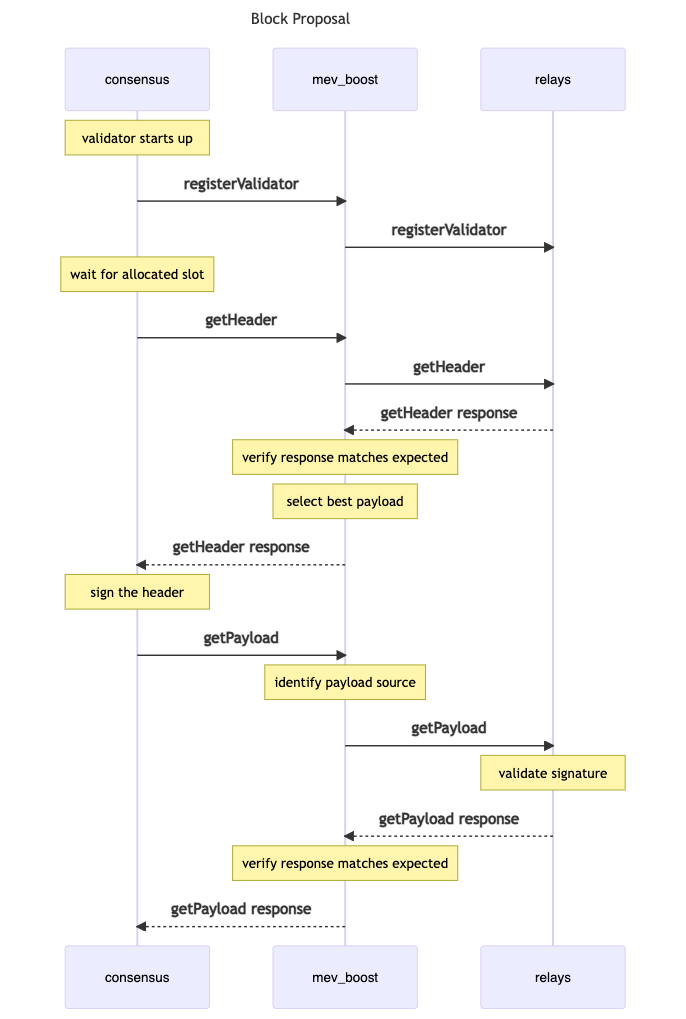
As depicted above and described in the [Builder — Honest Validator](https://github.com/ethereum/builder-specs) repository, the MEV-Boost block proposal process begins with a [registration step](https://github.com/ethereum/builder-specs) that validators must perform ahead of proposal duties. Registration ensures builders can craft blocks for a given validator’ block proposal. Once registered, validators wait until selected to propose a block. Once selected, a block proposer building a block on top of a beacon `state` in a given `slot` must take the following actions to obtain an [execution payload](https://github.com/ethereum/consensus-specs/blob/a45ee9bf5b1fde766d69e551a6b1a21fe2531734/specs/merge/beacon-chain.md#executionpayload):
1. Users/searchers send transactions to block builders through public or private peer-to-peer transaction pools.
2. Builders construct execution payloads using received transactions, and parameters the block proposer provided during registration. To process MEV payment, builders set their own address as the payload’s coinbase address and append a transaction to the [block proposers’ feeRecipient address](https://flashbots.notion.site/WIP-Builder-Payments-to-Block-Proposers-530eb36c60ad417a8702dd26da810b72) at the end of their proposed block. The block is then forwarded to relays.
3. Relays verify the validity of payloads (including amount of ETH paid to the block proposers’ feeRecipient), and send an [`ExecutionPayloadHeader`](https://github.com/ethereum/consensus-specs/blob/a45ee9bf5b1fde766d69e551a6b1a21fe2531734/specs/merge/beacon-chain.md#executionpayloadheader) (execution payloads stripped of transaction content) to MEV-Boost. MEV-boost selects the most valuable payload and forwards it to the block proposer.
4. The block proposer signs the payload and passes it back to MEV-Boost via a [`submitBlindedBlock`](https://ethereum.github.io/builder-specs/#/Builder/submitBlindedBlock) call, which is forwarded to the relay. Once the relay verifies the proposers’ signature, it responds with the full execution payload body for the validator to use when proposing a `SignedBeaconBlock` to the network.
================================================
FILE: docs/flashbots-mev-boost/architecture-overview/risks.md
================================================
---
title: MEV-Boost Risks and Considerations
---
## Liveness and Local Fallback
To prevent any risk to Ethereum **liveness,** mev-boost is implemented as a sidecar for consensus client software. Using the standard [builder specs](https://github.com/ethereum/builder-specs) ensures client diversity is maintained and validators benefit from operating in the same security model, regardless of which client is selected. Should a fault occur in the mev-boost software, the consensus nodes fall back to local block production. Check-out [understanding liveness risk](https://writings.flashbots.net/understanding-mev-boost-liveness-risks), the [circuit breaker proposal](https://hackmd.io/@ralexstokes/BJn9N6Thc), and the [relay monitor specification](https://hackmd.io/@ralexstokes/SynPJN_pq) for more information.
## Builder Centralization
A builder that dominates the market because of its outsized profitability gains the ability (although not the incentive) for censorship and access to exclusive transaction orderflow. It should be noted that MEV-boost doesn’t *create* the risk of builder centralization - MEV does. Encouraging competition between many builders is the primary mitigation to builder centralization, but it should be supported by techniques like [censorship resistance lists (crLists)](https://github.com/flashbots/mev-boost/issues/215) and others still in early research.
## Builder/Relay Collusion
Anyone can be a relay, and they will compete on reputation and service to both builders and validators. While this is a strict improvement to the trust model compared MEV extraction in PoW Ethereum, relays can still be a risk to both builders and validators. This risk will be addressed in Stage 3 PBS (enshrined), which is getting rid of the trusted relay altogether.
## Malicious Relays
Nothing prevents malicious relays from submitting fraudulent bids, which affects MEV-Boost’ profit switching logic. MEV-boost provides the bid with the highest value to the Beacon Node, but has no way of verifying that the value is indeed what is claimed in the bid. A Beacon Node will always be presented with a single bid. However, the [relay monitor specification](https://hackmd.io/@ralexstokes/SynPJN_pq) aims to detect and disqualify a malicious relay pretty quickly.
## MEV Hiding
A risk that occurs when node operators (often managing the stake of third party customers) are incentivized to hide MEV-rewards earned in a given block.
================================================
FILE: docs/flashbots-mev-boost/architecture-overview/specifications.md
================================================
---
title: MEV-Boost Specifications
---
`mev-boost` implements the latest versions of the [Ethereum Builder Specification](https://github.com/ethereum/builder-specs).
- The Builder API is a temporary solution for [Proposer-builder separation](https://ethresear.ch/t/proposer-block-builder-separation-friendly-fee-market-designs/9725)
(PBS), and aims to separate the roles of a validator into block proposing and block building. [You can interact with a rendered version of the Builder API here.](https://ethereum.github.io/builder-specs/#/Builder/status)
## Fundamental Specifications
[Ethereum Beacon APIs](https://github.com/ethereum/beacon-APIs)
- Collection of RESTful APIs exposed by a beacon node aiming to facilitate [Phase 0](https://github.com/ethereum/consensus-specs/blob/dev/specs/phase0/validator.md) of Ethereum consensus.
[Consensus Specs](https://github.com/ethereum/consensus-specs)
- Current Ethereum PoS consensus specifications.
## Tooling and Related Repositories
- [MEV-Boost](https://github.com/flashbots/mev-boost)
- [MEV-Boost Relay](https://github.com/flashbots/mev-boost-relay)
- [Go Boost Utils](https://github.com/flashbots/go-boost-utils)
- [MEV-Boost Builder](https://github.com/flashbots/boost-geth-builder)
================================================
FILE: docs/flashbots-mev-boost/block-builders.md
================================================
---
title: Block Builders
---
## Builder Fundamentals
### What is a Builder?
Block builders are highly specialized actors who construct blocks from transaction orderflow (public transactions, bundles, private transactions, etc).
### The Role of Builders
Builders run algorithms and simulations (e.g. First Come First Serve, First Price Auctions, etc.) to order bundles and TXs in a block template (technically: `execution payload`) that maximizes profit. Builders then bid for and buy the validators’ blockspace, facilitated by one or more relays, so their execution payloads are proposed to the blockchain.
### How do builders pay block proposers?
Flashbots proposed a standardized specification for how payments are made from builders to block proposers through the following process:
1. The builder sets their own address as the `feeRecipient` of the payload block header they are constructing.
2. The builder includes a transaction which pays ETH to the proposer’s `feeRecipient` address at the end of their proposed block.
### Determining the value of blocks
A standard method for determining block value is crucial for multiple components of the MEV-Boost ecosystem; including relay monitoring, validator accounting, builder payments, block explorers, payment proofs, and MEV hiding.
Various methods for defining block value were [considered](https://collective.flashbots.net/t/block-scoring-for-mev-boost-relays/202) by members of the community. It was determined that block level scoring was the most simple and intuitive method for scoring block value.
### Block level scoring
Block level scoring looks at the difference in the balance of the fee recipient account before and after the block execution.
Note that a “block score” is not meant to be a formal definition of realized extractable value, since this is a difficult metric to quantify. For example, a Layer 2 transfer to a validator’ fee recipient address could be considered extractable value, but falls outside the scope of a block score calculation.
Constructing a payment proof for this scoring method requires a Merkle Proof of the fee recipient balance in block _(n - 1)_, and a Merkle Proof of the fee recipient balance in block _n_. **Payment proofs have not yet been put into production.** Active discussion about payment proof implementation is still on-going. For more details or to participate in the discussion around payment proofs and block-level scoring, please check out to the [block scoring](https://collective.flashbots.net/t/block-scoring-for-mev-boost-relays/202) forum thread.
## External Builders
External builders can submit blocks to Mainnet and Sepolia Flashbots relays. The table below outlines Builder API methods available on each network.
### Relay Block Submission Endpoints by Network
| | | Mainnet | Sepolia |
| --- | --- | --- | --- |
| `getValidators` | GET Request - Returns an array of validator registrations with assigned duties in the current and next epoch | [Mainnet](https://boost-relay.flashbots.net/relay/v1/builder/validators) | [Sepolia](https://boost-relay-sepolia.flashbots.net/relay/v1/builder/validators) |
| `submitBlock` | POST Request - submits a block to the relay | [Mainnet](https://boost-relay.flashbots.net/relay/v1/builder/blocks) | [Sepolia](https://boost-relay-sepolia.flashbots.net/relay/v1/builder/blocks) |
- See also the [Relay API documentation - Block Builder API](https://bit.ly/3BmGZ3T) for more details on the API and payloads.
- The example [Flashbots builder implementation](https://github.com/flashbots/boost-geth-builder) is a good external builder reference, and is currently used in production by several builders.
### Rate-limits
Submissions to all relays are currently rate-limited to 600 submissions / 5m / IP, which translates to in average 2 submissions / sec /IP.
## BuilderNet Block Builders
The keys used in BuilderNet are listed here: https://buildernet.org/docs/public-identity#bls-keys-for-submitting-blocks-to-mev-boost-relays
## Additional Links & References
- [rbuilder](https://github.com/flashbots/rbuilder) - Blazingly fast, cutting edge block builder written in Rust.
- [Relay API documentation - Block Builder API](https://bit.ly/3BmGZ3T)
- Block Builder Self-Help Group: [https://collective.flashbots.net/c/builders/14](https://collective.flashbots.net/c/builders/14)
- Github issue about becoming block builder: [https://github.com/flashbots/mev-boost/issues/145](https://github.com/flashbots/mev-boost/issues/145).
- [Mevboost.pics](https://www.mevboost.pics/) - Tracking MEV-Boost relays and block builders, by [Toni Wahrstätter](https://twitter.com/nero_eth).
- [Relayscan.io](https://www.relayscan.io/) - Up-to-date stats on the MEV-Boost ecosystem, by [Chris Hager](https://twitter.com/metachris).
_Note: Flashbots does not control and cannot verify the data coming from external people and organizations. Please direct questions or issues directly to the creators of external data sources._
================================================
FILE: docs/flashbots-mev-boost/block-proposers.md
================================================
---
title: Block Proposers
---
## What is a Block Proposer?
A block proposer is a validator that has been pseudorandomly selected to build a block for a given slot in an epoch (there are 32 slots per epoch). Proposers are selected from the validator set using the standard RANDAO mechanism.
Validators not pseudo-randomly assigned to propose blocks are assigned to attest, or vote on block proposals. These assignments are known 2 epochs in advance for attesters and 1 for proposers. The block in each slot will have a single validator serving as the proposer and many validators serving as the attesters to all information in that block. Attesters get rewarded for accurately voting on current values of 3 aspects of the beacon chain: the head of the chain (LMD Ghost), the justified checkpoint and the finalized checkpoint (Casper FFG).
## The Role of Block Proposers
Without MEV-Boost, the original role of block proposers consisted of two jobs:
(1) **building** the best block from all available transactions, and
(2) **proposing** this block to the PoS network.
With MEV-Boost, the role of validator is simplified to **proposal** duties only, and consists of the following:
- Receive a block from their local execution client, i.e. their local block builder, and sign / ‘propose’ it, or
- Receive an execution payload header from one or more relays and blindly sign a block without seeing the underlying execution payload (i.e. the blinded TXs escrowed by the relay).
The Ethereum [consensus-specs](https://github.com/ethereum/consensus-specs) have well defined expectations of honest validators, the most recent standard is the [Bellatrix -- Honest Validator](https://github.com/ethereum/consensus-specs/blob/dev/specs/bellatrix/validator.md#bellatrix----honest-validator) specification.
================================================
FILE: docs/flashbots-mev-boost/contributing.md
================================================
---
title: Contributing
---
[Flashbots](https://flashbots.net/) is a research and development collective working on mitigating the negative externalities of decentralized economies. We contribute with the larger free software community to illuminate the dark forest.
You are welcome here \<3.
- If you would like to contribute with code, check the [CONTRIBUTING file](https://github.com/flashbots/mev-boost/blob/develop/CONTRIBUTING.md) for further information.
- Please be kind and read our [code of conduct](https://github.com/flashbots/mev-boost/blob/develop/CODE_OF_CONDUCT.md).
### Report a Vulnerability
If you find a security vulnerability on this, or any other initiative related to Flashbots, please let us know by sending an email to [security@flashbots.net](mailto:security@flashbots.net).
### Report an Issue
If you have a questions, feedback, bugs to report, or other topics top of mind, please [open a new Issue](https://github.com/flashbots/mev-boost/issues).
### Propose New Features
Please [open an issue](https://github.com/flashbots/mev-boost/issues) with ideas for new features, we’d love to hear from you! Additionally, you can explore [open questions](https://github.com/flashbots/mev-boost/wiki/Research#open-questions) the Flashbots research team is tackling now.
================================================
FILE: docs/flashbots-mev-boost/getting-started/installation.md
================================================
---
title: Installation
---
Get started with MEV-Boost installation with this guide. Whether you are looking to install it on a machine with the beacon client or multiple beacon clients, this guide will assist you in setting it up smoothly.
## Prerequisites
- For a comprehensive guide on preparing for the merge, refer to [Rémy Roy's guide](https://github.com/remyroy/ethstaker/blob/main/prepare-for-the-merge.md#installing-mev-boost).
- Ensure you have [Go 1.18+](https://go.dev/doc/install) installed for source-based installations.
## Installation Methods
### Using Binaries
For convenience, each release includes binaries suitable for Linux, Windows, and macOS (both amd and arm). Find the latest releases [here](https://github.com/flashbots/mev-boost/releases).
### From Source
#### Build and install with `go install`
The easiest way to build and install MEV-Boost from sources is to use `go install`. You can simply execute the `go install` command as shown below:
```bash
go install github.com/flashbots/mev-boost@latest
mev-boost -help
```
This would install the latest version of MEV-Boost in your `$GOPATH/bin` directory. You can then run the `mev-boost` command from anywhere in your terminal.
If you want to install a specific version, you can use the `@` syntax:
```bash
go install github.com/flashbots/mev-boost@VERSION
```
Simply look up the specific version you want to install in the [releases](https://github.com/flashbots/mev-boost/releases) page.
#### Clone and Build
You can also clone the repository and build the software yourself without using `go install`.
1. Clone the repository:
```bash
git clone https://github.com/flashbots/mev-boost.git
cd mev-boost
```
2. (Optional) To build a specific release, refer to the available [releases](https://github.com/flashbots/mev-boost/releases) and checkout the desired tag:
```bash
git checkout tags/YOUR_VERSION
```
3. Build the software:
```bash
make build
```
4. If you experience issues, use the portable build:
```bash
make build-portable
```
5. Verify your installation:
```bash
./mev-boost -help
```
### From Docker Image
Flashbots provides maintained Docker images for MEV-Boost.
1. [Install Docker Engine](https://docs.docker.com/engine/install/).
2. Pull the latest MEV-Boost image:
```bash
docker pull flashbots/mev-boost:latest
```
Or pull the portable version:
```bash
docker pull flashbots/mev-boost:latest-portable
```
3. Run the Docker image:
```bash
docker run flashbots/mev-boost -help
```
## Systemd Configuration
To keep MEV-Boost running as a service, configure systemd by creating the systemd config file `/etc/systemd/system/mev-boost.service`.
Below is an example of a config file:
```ini
[Unit]
Description=mev-boost
Wants=network-online.target
After=network-online.target
[Service]
User=mev-boost
Group=mev-boost
WorkingDirectory=/home/mev-boost
Type=simple
Restart=always
RestartSec=5
ExecStart=/home/mev-boost/bin/mev-boost \
-mainnet \
-relay-check \
-relays YOUR_RELAY_CHOICE
[Install]
WantedBy=multi-user.target
```
## Troubleshooting
If you encounter an error: [`"SIGILL: illegal instruction"`](https://github.com/flashbots/mev-boost/issues/256), you'll need to use the portable build.
There are three ways to install the portable build:
1. Use the [portable Docker image](https://hub.docker.com/r/flashbots/mev-boost/tags).
2. Build the portable version from source:
```bash
make build-portable
```
3. Using `go install`:
```bash
CGO_CFLAGS="-O -D__BLST_PORTABLE__" go install github.com/flashbots/mev-boost@latest
```
================================================
FILE: docs/flashbots-mev-boost/getting-started/system-requirements.md
================================================
---
title: System Requirements
---
This guide assumes a pre-installed and hardened Ubuntu installation [as well as Docker](https://www.digitalocean.com/community/tutorials/how-to-install-and-use-docker-on-ubuntu-20-04). Excellent introductory resources to start with are: [Coincashew](https://www.coincashew.com/coins/overview-eth/archived-guides/guide-or-how-to-setup-a-validator-on-eth2-mainnet/part-i-installation/guide-or-security-best-practices-for-a-eth2-validator-beaconchain-node), and [Rocketpool's Securing your Node](https://docs.rocketpool.net/guides/node/securing-your-node.html#securing-your-node)
## Requirements for different systems
### Execution + Beacon Requirements
- **Software**: Execution client, beacon node client (instructions for clients below), [curl](https://curl.se/download.html)
- **OS**: 64-bit Linux, Mac OS X 10.14+, Windows 10+ 64-bit
- **CPU**: 4+ cores @ 2.8+ GHz
- **Memory**: 16GB+ RAM
- **Storage**: SSD with at least 2TB free space
- **Network:** 8 MBit/sec broadband
:::tip
There are variations in client resource usage. Please review [CoinCashew’s Client Usage Guide](https://eth-docker.net/Usage/ResourceUsage) for more details!
:::
### Validator Requirements
- Everything above, plus...
- **Software:** Validator client, browser-based crypto wallet (instructions below)
- **Hardware** (Recommended): A new machine that has never been connected to the internet that you can use to securely generate your mnemonic phrase and keypair
- **32 ETH** (Mainnet)
- **32 testnet ETH** (Testnets)
### MEV-Boost Requirements
- Can run on any beacon-node system, and requires almost no resources.
## Consensus client configuration guides
| | MEV-Boost Client Guides |
| ---------- | ------------------------------------------------------------------------------------------------------------- |
| Teku | [Guide](hthttps://docs.teku.consensys.net/Concepts/Builder-Network/tps://hackmd.io/@StefanBratanov/BkMlo1RO9) |
| Prysm | [Guide](https://hackmd.io/@prysmaticlabs/BJeinxFsq) |
| Lighthouse | [Guide](https://lighthouse-book.sigmaprime.io/builders.html#mev-and-lighthouse) |
| Lodestar | [Guide](https://github.com/ChainSafe/lodestar/blob/unstable/docs/pages/beacon-management/mev-and-builder-integration.md) |
| Nimbus | [Guide](https://nimbus.guide/external-block-builder.html) |
================================================
FILE: docs/flashbots-mev-boost/getting-started/usage.md
================================================
---
title: Usage
---
When connecting to different networks using mev-boost, specify the desired network using its dedicated flag. Here are the available Network Flags:
| Network | Flag |
| --------------- | -------- |
| Mainnet | -mainnet |
| Sepolia Testnet | -sepolia |
| Kiln | -kiln |
You can add multiple relays comma-separated to the `-relays` flag, like this: `-relays RELAY_URL_1,RELAY_URL_2`. Refer to ETH staker [Relay List](https://github.com/eth-educators/ethstaker-guides/blob/main/MEV-relay-list.md) for a list of available relays.
### Mainnet Relay
Run mev-boost pointed at our [Mainnet Relay:](https://0xac6e77dfe25ecd6110b8e780608cce0dab71fdd5ebea22a16c0205200f2f8e2e3ad3b71d3499c54ad14d6c21b41a37ae@boost-relay.flashbots.net/)
```bash
./mev-boost -mainnet -relay-check -relays https://0xac6e77dfe25ecd6110b8e780608cce0dab71fdd5ebea22a16c0205200f2f8e2e3ad3b71d3499c54ad14d6c21b41a37ae@boost-relay.flashbots.net
```
### Sepolia testnet
Run mev-boost pointed at our [Sepolia Relay](https://builder-relay-sepolia.flashbots.net/):
```bash
./mev-boost -sepolia -relay-check -relays https://0x845bd072b7cd566f02faeb0a4033ce9399e42839ced64e8b2adcfc859ed1e8e1a5a293336a49feac6d9a5edb779be53a@builder-relay-sepolia.flashbots.net
```
## mev-boost CLI arguments
```bash
$ ./mev-boost -help
Usage of ./mev-boost:
-addr string
listen-address for mev-boost server (default "localhost:18550")
-debug
shorthand for '-loglevel debug'
-genesis-fork-version string
use a custom genesis fork version
-json
log in JSON format instead of text
-loglevel string
minimum loglevel: trace, debug, info, warn/warning, error, fatal, panic (default "info")
-mainnet
use Mainnet
-relay-check
check relay status on startup and on the status API call
-relay-monitors string
relay monitor urls - single entry or comma-separated list (scheme://host)
-relays string
relay urls - single entry or comma-separated list (scheme://pubkey@host)
-request-timeout-getheader int
timeout for getHeader requests to the relay [ms] (default 950)
-request-timeout-getpayload int
timeout for getPayload requests to the relay [ms] (default 4000)
-request-timeout-regval int
timeout for registerValidator requests [ms] (default 3000)
-sepolia
use Sepolia
-version
only print version
```
## Verifying Your Setup
You can check if you setup works by looking up the validator registration of your proposer using the [Relay Data API](https://flashbots.github.io/relay-specs/#/Data).
For example, let's suppose that your validator's public key is `0xb606e206c2bf3b78f53ebff8be8e8d4af2f0da68646b5642c4d511b15ab5ddb122ae57b48eab614f8ca5bafbe75a5999`. You can check if your validator is registered by querying the following endpoint:
```url
https://boost-relay.flashbots.net/relay/v1/data/validator_registration?pubkey=0xb606e206c2bf3b78f53ebff8be8e8d4af2f0da68646b5642c4d511b15ab5ddb122ae57b48eab614f8ca5bafbe75a5999
```
Below is the response:
```json
{
"message": {
"fee_recipient": "0x6db5c947ba388f0e708c03339d534af9fae5679c",
"gas_limit": "30000000",
"timestamp": "1663063595",
"pubkey": "0xb606e206c2bf3b78f53ebff8be8e8d4af2f0da68646b5642c4d511b15ab5ddb122ae57b48eab614f8ca5bafbe75a5999"
},
"signature": "0x94f1f635336f8c38909842f06550026bbc198f892c6a79c22a3365e547e87665e31feccfacda3533ef3cf8e2c965e03d1594cf8e981dfc75011b4d237552386377bcea714bcfb78d303fe5624625e1bbb8b23f3a6d1b7c9efb3d76cad4ca01a5"
}
```
The `fee_recipient` field should match the address you provided when registering your validator. If it does, then your setup is working correctly.
================================================
FILE: docs/flashbots-mev-boost/glossary.md
================================================
---
title: Glossary
---
- **attestation:** votes (embedded in messages) describing which blocks “should” be the head of the chain. We can think of each such attestation as a “vote” to move from block A to B. Each attestation has a weight, which is the stake of the validator writing the attestation.
- **beacon node (BN):** maintains the state of the beacon chain by communicating with other beacon nodes in the Ethereum network. Conceptually, a BN does not maintain keypairs that directly participate with the beacon chain.
- **block builder (builder)**: party specialized in MEV extraction and the construction of execution payloads. Builders are trusted by searchers and users for fair transaction inclusion.
- **block proposer (proposer)**: a validator selected to sign and submit a beacon block to the network.
- **builder API specification**: an [interface](https://github.com/ethereum/builder-specs) for consensus layer clients to source blocks built by external entities.
- **committee:** a group of validators. For security, each slot has committees of at least 128 validators. An attacker has less than a one in a trillion probability of controlling 2⁄3 of a committee.
- **execution payload**: a [message](https://github.com/ethereum/consensus-specs/blob/a45ee9bf5b1fde766d69e551a6b1a21fe2531734/specs/merge/beacon-chain.md#executionpayload) containing the complete content of an unsigned execution payload (an object containing block properties in addition to transactions) that is provided by the execution layer (previous PoW nodes).
- **fork choice rule:** A function evaluated by the client that takes, as input, the set of blocks and other messages that have been produced, and outputs to the client what the 'canonical chain' is.
- **liveness:** state of ethereum which is valid \*\*\*\*if the set of finalized blocks can grow.
- **MEV-boost “middleware”**: a piece of software that sits between the consensus client and the execution client to outsource block construction to a market of builders.
- **plausible liveness:** if, regardless of any previous events (attacks, latency, etc.), it is possible for new blocks to be finalized (the alternative is to become “deadlocked”). This is to prevent situations where honest validators cannot continue unless someone forfeits their own stake.
- **probabilistic liveness:** if, regardless of any previous events, it is probable for new
blocks to be finalized (after probabilistic assumptions about the network latency, capabilities of attackers, etc. are made).
- **Proposer/block-builder separation (PBS)**: Proposer/block-builder separation (**PBS**
) was proposed by Ethereum researchers as a response to the risk that MEV poses to decentralization of consensus networks. PBS is a change to the base Ethereum protocol that aims to separate block building from block proposing. Instead of the block proposer (currently the miner, after PoS the validator) also trying to produce a maximally profitable block by itself, it can outsource this to a block building *marketplace.* With this model, block builders would produce bundles consisting of a complete block and a fee for the proposer.
- **relay**: party that validates and routes execution payloads from builders to proposers. Relays are trusted by builders for fair routing and block inclusion. Relays are trusted by block proposers for block validity, accuracy, and data availability. Relay actors are often specialized in Denial of Service (DoS) protection and networking.
- **searcher**: advanced Ethereum user specialized in detecting and extracting MEV by submitting advanced transactions in batches called bundles.
- **staker:** actor that submit any amount of Ethereum to be staked.
- **user**: a normal Ethereum user who sends transactions for block inclusion.
- **validator:** Most often refers to a validator client instance, but can also refer to an individual that is physically managing a validator client. Validators\*\*\*\* participate in the consensus of Ethereum through validator duties. These duties include the production of beacon blocks and signing of attestations, as executed by the validator client.
- **validator client (VC):** Validator clients are specialized software that let people stake 32 ETH as collateral within Ethereum's **consensus layer**. Validators are responsible for proposing blocks within Ethereum's proof-of-stake consensus mechanism which replaced proof-of-work miners at [The Merge](https://ethereum.org/en/upgrades/merge/).
- **validator pubkey**: The validator's BLS public key, uniquely identifying them. *48-bytes, hex encoded with 0x prefix, case insensitive.*
================================================
FILE: docs/flashbots-mev-boost/introduction.md
================================================
---
title: Overview
---
## What is MEV-Boost?
`mev-boost` is open source middleware run by validators to access a competitive block-building market. MEV-Boost was built by Flashbots as an implementation of [proposer-builder separation (PBS)](https://ethresear.ch/t/proposer-block-builder-separation-friendly-fee-market-designs/9725) for proof-of-stake (PoS) Ethereum.
With MEV-Boost, validators can access blocks from a marketplace of builders. Builders produce blocks containing transaction orderflow and a fee for the block proposing validator. Separating the role of proposers from block builders promotes greater competition, decentralization, and censorship-resistance for Ethereum.
See also:
- [boost.flashbots.net](https://boost.flashbots.net/)
- [boost-relay.flashbots.net](https://boost-relay.flashbots.net/)
- [github.com/flashbots/mev-boost](https://github.com/flashbots/mev-boost/)
---
## Why MEV-Boost?
MEV is a centralizing force on Ethereum. Unattended, the competition for MEV opportunities leads to consensus instability and permissioned communication infrastructure between searchers, block producers, and validators. Access to MEV is even more important in PoS Ethereum, as the planned [reduction in block subsidies](https://hackmd.io/@flashbots/mev-in-eth2) will make MEV an even [larger share of total staking revenue](https://github.com/flashbots/eth2-research/blob/main/notebooks/mev-in-eth2/eth2-mev-calc.ipynb).
Validators running MEV-Boost maximize their staking reward by selling their blockspace to an open market. It is estimated that validators running MEV-Boost can increase [staking rewards by over 60%](https://hackmd.io/@flashbots/mev-in-eth2).
## How does MEV-Boost work?

PoS node operators must run three pieces of software: a validator client, consensus client, and an execution client. MEV-boost is a sidecar for the consensus client, a separate piece of open source software, which queries and outsources block-building to a network of builders.
Block builders prepare full blocks, optimizing for MEV extraction and fair distribution of rewards, and send blocks to relays. A single MEV-boost instance can be configured to connect to **multiple** relays.
Relays aggregate blocks from **multiple** builders and identify the most profitable block to submit to the block proposer. The proposing validators’ consensus client then propagates the most profitable block received from MEV-boost to the Ethereum network for attestation and block inclusion.
================================================
FILE: docs/flashbots-mev-boost/relay.md
================================================
---
title: Relay Fundamentals
---
## Relay Fundamentals
### What is a Relay?
Relays are a doubly-trusted data-availability layer and communication interface between builders and validators. Relays are trusted by builders for fair payload routing, and trusted by proposers for block validity, accuracy, and data availability. They are often specialized in Denial of Service (DoS) protection and networking.
Relays can connect to one or many builders, and we expect that there will be both variants. A relay connecting to many builders will aggregate their bids (fun fact: in a previous iteration, we called them builder aggregators or builder pools). The relay can see all the blocks submitted by the builders to confirm their validity and how much they pay to the validator. The relay then only submits the highest valid bid to the validator to sign.
Before validators can receive any bids from relays, they need to [set up mev-boost](https://boost.flashbots.net/) and add relays to their mev-boost config. mev-boost is effectively just a relay aggregator or a local relay of relays. It will serve the validator the winning bid from all relays. A validator can connect to a small number of relays that aggregate all the builders, and many will probably do that. Other validators might connect to many relays.
### The Role of Relays
A relay has several responsibilities:
- They execute [builder-spec](https://ethereum.github.io/builder-specs/#/Builder) and data transparency API functionality.
- Handle validator registrations and block proposals in a scalable manner.
- Provide block escrow and data availability.
- Simulate and verify blocks sent by block-builders, and rate-limit as necessary. Relays simulate whether:
- the correct amount of fees are paid to recent validator feeRecipient.
- the correct block attributes and transactions exist.
- the block gas is within the gasLimit requested by validator.
## [Relay API Specification](https://flashbots.notion.site/Relay-API-Spec-5fb0819366954962bc02e81cb33840f5)
The current specification for the [open-source Flashbots relay](https://github.com/flashbots/mev-boost-relay). Diagram below displays the current architecture:

### [Proposer API](https://flashbots.notion.site/Relay-API-Spec-5fb0819366954962bc02e81cb33840f5)
Standard [builder spec](https://ethereum.github.io/builder-specs/#/Builder) APIs
- [registerValidator](https://ethereum.github.io/builder-specs/#/Builder/registerValidator): `POST /eth/v1/builder/validators`
- [getHeader](https://ethereum.github.io/builder-specs/#/Builder/getHeader): `GET /eth/v1/builder/header/{slot}/{parent_hash}/{pubkey}` - Get an execution payload header.
- [submitBlindedBlock](https://ethereum.github.io/builder-specs/#/Builder/submitBlindedBlock): `POST /eth/v1/builder/blinded_blocks` - Submit a signed blinded block and get unblinded execution payload.
- [status](https://ethereum.github.io/builder-specs/#/): `GET /eth/v1/builder/status`
### [Block Builder API](https://flashbots.notion.site/Relay-API-Spec-5fb0819366954962bc02e81cb33840f5)
Get a list of validator registrations for the current and next epoch, submit a new block to the relay.
### [Data API](https://flashbots.notion.site/Relay-API-Spec-5fb0819366954962bc02e81cb33840f5)
Provides data about received blocks from builders, payloads delivered to proposers as well as insights into validator registrations.
## [Circuit Breaker](https://hackmd.io/@ralexstokes/BJn9N6Thc)
The circuit breaker is implemented by client software teams to define “circuit breaking” conditions using globally available inputs (such as the chain) to determine whether clients should stop sourcing blocks from an external block builder network and fallback to local block production instead. Each consensus client implements different circuit breaker conditions and once the circuit breaker condition is met, clients have different behaviour regarding when to resume sourcing external blocks.
For the exact behavior and available configuration around circuit breaker conditions for a specific client, please refer to the documentation for the specific consensus client.
## [Relay Monitor](https://hackmd.io/@ralexstokes/SynPJN_pq)
While relays are trusted actors, the ability to run a relay is permissionless. To mitigate potential abuses of this role, Flashbots [has suggested](https://github.com/flashbots/mev-boost/issues/142) a “relay monitor,” which uses publicly available data to form a view on the behavior and performance of the set of relays it is monitoring. This is an ongoing proposal and more details can be found in the [relay monitor design documentation](https://hackmd.io/@ralexstokes/SynPJN_pq), [keeping MEV-Boost relays honest](https://notes.ethereum.org/@yoav/BJeOQ8rI5), and [understanding liveness risks](https://writings.flashbots.net/understanding-mev-boost-liveness-risks).
================================================
FILE: docs/flashbots-mev-boost/resources.md
================================================
---
title: Resources
---
**Proof-of-Stake Ethereum**
- [The Hitchhiker's Guide to Ethereum](https://members.delphidigital.io/reports/the-hitchhikers-guide-to-ethereum/)
- [Combining Ghost and Casper - Vitalik Buterin et al.](https://arxiv.org/pdf/2003.03052.pdf)
- [Endgame - Vitalik Buterin](https://vitalik.eth.limo/general/2021/12/06/endgame.html)
- [Fork Choice](https://github.com/ethereum/consensus-specs/blob/dev/specs/phase0/fork-choice.md)
- [A compiled list of resources from Flashbots Research](https://github.com/flashbots/mev-boost/wiki/Research#open-questions)
**MEV**
- [MEV in eth2 - an early exploration](https://writings.flashbots.net/mev-eth2/)
- [MEV Driven Centralization in Ethereum: Part 1](https://simbro.medium.com/mev-driven-centralization-in-ethereum-ec829a214f18)
**MEV-Boost**
- [Beginner's Guide to mev-boost](https://writings.flashbots.net/beginners-guide-mevboost/)
- [MEV-Boost: Merge ready Flashbots Architecture](https://ethresear.ch/t/mev-boost-merge-ready-flashbots-architecture/11177)
- [Why Run MEV-Boost?](https://writings.flashbots.net/why-run-mevboost/)
- [Removing Trusted Relays in MEV-Boost Using Threshold Encryption](https://ethresear.ch/t/removing-trusted-relays-in-mev-boost-using-threshold-encryption/13449)
- [Proposer/block builder separation-friendly fee market designs](https://ethresear.ch/t/proposer-block-builder-separation-friendly-fee-market-designs/9725)
- [Open sourcing the Flashbots Relay](https://writings.flashbots.net/Flashbots-Relay-open-sourcing)
- [Understanding liveness risks from mev-boost](https://writings.flashbots.net/understanding-mev-boost-liveness-risks)
**Validator Guides**
- [Validator Checklist - launchpad.ethereum.org](https://launchpad.ethereum.org/en/merge-readiness)
- [eth-docker: Docker automation for Ethereum consensus and execution clients.](https://github.com/eth-educators/eth-docker)
- [Validator Slashing Prevention Tips - Prysmatic Labs](https://medium.com/prysmatic-labs/eth2-slashing-prevention-tips-f6faa5025f50)
- [Understanding Eth2 Slashing Preventative Measures](https://www.bloxstaking.com/blog/ethereum-2-0/understanding-eth2-slashing-preventative-measures/)
================================================
FILE: docs/flashbots-mev-boost/security.md
================================================
---
title: Vulnerabilities
---
If you find a security vulnerability on this project or any other initiative related to Flashbots, please let us know sending an email to security@flashbots.net.
# Security Audits
- [20220620](https://github.com/flashbots/mev-boost/blob/develop/docs/audit-20220620.md), by [lotusbumi](https://github.com/lotusbumi).
### Bug Bounties
- Coming soon!
================================================
FILE: docs/flashbots-mev-boost/troubleshooting.md
================================================
---
title: Troubleshooting
---
Please refer to the [Troubleshooting Wiki](https://github.com/flashbots/mev-boost/wiki/Troubleshooting) for the most updated guidance.
================================================
FILE: docs/flashbots-mev-share/for-users.mdx
================================================
---
title: For Users
---
import WhatIsMevShare from "@site/docs/specs/mev-share/blurbs/_whatsMevShareBasic.mdx"
MEV-Share Nodes generally accept transactons using the `eth_sendRawTransaction` or `eth_sendPrivateTransaction` json rpc requests. Flashbots runs a MEV-Share Node that can be used by sending transactions to [Flashbots Protect](/flashbots-protect/quick-start).
================================================
FILE: docs/flashbots-mev-share/introduction.mdx
================================================
---
title: Introduction
---
import WhatsMevShareAdvanced from "../specs/mev-share/blurbs/_whatsMevShareAdvanced.mdx"
> The MEV-Share Matchmaker was renamed to the MEV-Share Node to better reflect the role we envision this actor will play in SUAVE. This change will be reflected in our documentation after June 2023. The client library previously named `matchmaker-ts` has also been renamed to `mev-share-client-ts`.
## What is MEV-Share?
To start earning MEV refunds from MEV-Share, submit your transactions to the Flashbots **MEV-Share Node**, either by [connecting your wallet to the Protect RPC](/flashbots-protect/quick-start/#using-flashbots-protect), or sending a [private transaction](/flashbots-auction/advanced/rpc-endpoint#eth_sendprivatetransaction) to the MEV-Share Node API.
## Why MEV-Share?
MEV-Share redistributes MEV back to the party that creates it in the first place: users. It does so through a design that is built to scale and be decentralized, which means that it is permissionless for searchers to integrate and it does not enshrine a single block builder.
## How does MEV-Share work?
Users send their transactions to a specialized actor called a MEV-Share Node. The MEV-Share Node selectively shares information about the user's transaction according to their privacy preferences. Seeing this information, searchers submit partial bundles to the MEV-Share Node to attempt to extract MEV from user's transactions without seeing the full transaction data. MEV-Share Nodes simulate each of these searcher bundles and forward the successful ones on to builders along with a condition that the user must be paid back specified percentage (by default 90%) of the MEV their transactions create.
At the moment, MEV-Share Nodes only accept backruns.
## How do I use MEV-Share?
The simplest way to use MEV-Share is by sending transactions to [Flashbots Protect](/flashbots-protect/quick-start), which leverages the [Flashbots MEV-Share Node](/flashbots-protect/mev-refunds). Wallet and application developers should check out the [Flashbots Protect MEV-Share section](/flashbots-protect/mev-refunds) for information about integrating and configuring the Flashbots MEV-Share Node.
## How do I search on MEV-Share?
Searchers should see the [Getting Started](/flashbots-mev-share/searchers/getting-started) guide for a walkthrough of MEV-Share and how it differs from traditional searching.
================================================
FILE: docs/flashbots-mev-share/orderflow-providers.mdx
================================================
---
title: For Orderflow Providers
---
Flashbots runs a MEV-Share Node that can be used by sending transactions to [Flashbots Protect](/flashbots-protect/quick-start). Wallets and application developers should see the [Protect MEV-Share Node guide](/flashbots-protect/mev-refunds) to configure your integration.
================================================
FILE: docs/flashbots-mev-share/release-notes/2023-03.mdx
================================================
# April 2023 (beta launch)
## MEV-Share Protocol Specification
https://github.com/flashbots/mev-share
## `mev_` RPC endpoints
New endpoints added to Flashbots bundle relay (relay.flashbots.net):
- `mev_sendBundle` - send bundles with a [new format](https://github.com/flashbots/mev-share/blob/main/specs/bundles/v0.1.md), enabling modular privacy settings and sets the stage for future innovations.
- `mev_simBundle` - simulate bundles in the context of MEV-Share using the new format.
## SSE Event Stream
Events containing one or more transactions with varying data shared via hints, broadcast via SSE stream.
- https://mev-share.flashbots.net
- https://mev-share-goerli.flashbots.net
================================================
FILE: docs/flashbots-mev-share/release-notes/2023-06.mdx
================================================
# June 2023
## simBundle options
New options to override the simulation state for `mev_simBundle`:
```typescript
interface SimBundleOptions {
/** Block used for simulation state. Defaults to latest block on chain.
*
* Block header data will be derived from parent block by default.
* Specify other params in this interface to override the default values.
*
* Can be a block number or block hash.
*/
parentBlock?: number | string,
// override the default values for the parentBlock header
/** default = parentBlock.number + 1 */
blockNumber?: number,
/** default = parentBlock.coinbase */
coinbase?: string,
/** default = parentBlock.timestamp + 12 */
timestamp?: number,
/** default = parentBlock.gasLimit */
gasLimit?: number,
/** default = parentBlock.baseFeePerGas */
baseFee?: bigint,
/** default = 5 (defined in seconds) */
timeout?: number,
}
```
## event history api
Query past events with `/history`, get info about query params to use from `/history/info`.
- https://mev-share.flashbots.net/api/v1/history/info
- https://mev-share.flashbots.net/api/v1/history
## tx_hash bundle hint
Enables searchers to share the transaction hashes of their bundle's transactions with other searchers, allows other searchers to backrun them without compromising bundle privacy or atomicity.
## public mev-share-node release
Open-sourced the backend node for MEV-Share: https://github.com/flashbots/mev-share-node
================================================
FILE: docs/flashbots-mev-share/release-notes/2023-07.mdx
================================================
# July 2023
## customized refunds
Configure the percent(s) and recipient(s) for MEV-Share refunds by adding the [`refund`](/flashbots-protect/settings-guide#refunds) query parameter to Protect RPC requests
or by adding `preferences.validity.refund` argument to the `eth_sendPrivateTransaction` JSON-RPC [method](/flashbots-auction/advanced/rpc-endpoint#eth_sendprivatetransaction).
## builder sharing
Share transactions and bundles with additional builders for faster inclusion.
- Users: [Opt in to share with registered builders](/flashbots-protect/settings-guide#builders)
- Builders: [Register to receive bundles](https://github.com/flashbots/dowg#builders)
## debugging guide
Follow this [guide](/flashbots-mev-share/searchers/debugging) for debugging bundles as a searcher on MEV-Share.
## simple-limit-order-bot
New tutorial for searching on MEV-Share, using a simple limit order bot as an example.
- [Step by step tutorial with full code examples](/flashbots-mev-share/searchers/tutorials/limit-order/introduction)
- [Open source bot repository](https://github.com/flashbots/simple-limit-order-bot)
### eth_sendPrivateRawTransaction
- [eth_sendPrivateRawTransaction](/flashbots-auction/advanced/rpc-endpoint#eth_sendprivaterawtransaction)
is now supported on relay endpoint. Its behavior is identical to `eth_sendPrivateTransaction` but its format is similar to `eth_sendRawTransaction`.
================================================
FILE: docs/flashbots-mev-share/release-notes/2023-09.mdx
================================================
# September 2023
## default logs hint
A new hint which shares a subset of logs, as described in the [hints] settings(/flashbots-protect/settings-guide#hints).
Previously these logs were shared by default. Now, users of the private transaction API, Protect RPC, and bundle relay can also request to share these logs when customizing their settings.
## simple-limit-order-bot
New tutorial for searching on MEV-Share, using a flashloan arbitrage bot as an example.
- [Step by step tutorial with full code examples](/flashbots-mev-share/searchers/tutorials/flash-loan-arbitrage/introduction)
- [Open source bot repository](https://github.com/flashbots/simple-blind-arbitrage)
## SSE stability updates
Made several improvements to the SSE stream endpoint to reduce client timeouts and hanging connections. The SSE stream now scales better under dynamic workloads and can handle a greater number of client connections.
================================================
FILE: docs/flashbots-mev-share/searchers/debugging.mdx
================================================
---
title: Debugging
---
If you find that your bundles aren't landing when you think they should, we have some tips to help you figure out why.
> Note: Some examples you see in the code here are based on the [limit order bot tutorial](/flashbots-mev-share/searchers/tutorials/limit-order/introduction). The same tactics can be used to debug any MEV-Share bundle.
## Simulate your bundle
The simplest way to find out what happened with your bundle is to simulate it. MEV-Share nodes offer the `mev_simBundle` [json rpc](/flashbots-auction/advanced/rpc-endpoint#mev_simbundle). Typically, MEV-Share Nodes will not return simulation results unless the private transaction being backrun has already landed on-chain.
## Using a client
The [mev-share-client](https://www.npmjs.com/package/@flashbots/mev-share-client) library has a function `simulateBundle` which executes your bundle in a virtual environment based on the block which the bundle was targeting.
In our project, we can simply call the `simulateBundle` function with our original bundle. The block we choose is the block before the first transaction (the one we tried to backrun) lands on-chain, because we want the state as close as possible to when the transaction actually landed; this is the most accurate representation of the state of the blockchain (i.e. prices) when our bundle was supposed to have landed.
```tsx
// after you call sendBundle(bundleParams)
let simResult: SimBundleLogs = await mevshare.simulateBundle(bundleParams)
console.log("simResult", simResult)
```
Here's a breakdown of the simulation result:
```tsx
type SimBundleLogs = {
/* True if the simulation executes without error. */
success: boolean,
/* The error message, if there is an error; otherwise undefined. */
error?: string,
/* The block that the simulation derived its state from. */
stateBlock: number,
/* (profit) / (gasUsed) */
mevGasPrice: bigint,
/* Coinbase profit; the amount paid to the builder after user receives kickback. */
profit: bigint,
/* Total ETH paid by searcher to coinbase (gas fees + coinbase transfers). */
refundableValue: bigint,
/* Total gas used by transactions in the bundle. */
gasUsed: bigint,
logs?: Array<{
/* ETH transaction logs. */
txLogs?: Array,
/* Logs for nested bundles. */
bundleLogs?: Array,
}>,
}
```
`LogParams` are defined in the [Ethers documentation](https://docs.ethers.org/v6/api/providers/formatting/#LogParams).
:::info Simulating private Transactions
The backend endpoint for simulating bundles (`mev_simBundle`) only accepts signed transactions, not private transactions (specified by `{hash}`). The mev-share-client library automatically waits for the transactions in a bundle specified by `{hash}` to land on-chain by querying for the full signed transactions with `provider.getTransaction` before it calls `mev_simBundle`. If the private transaction(s) in your bundle don't land on-chain, you won't be able to simulate your bundle with them.
:::
There are several things you want to look for when debugging your bundles:
### 'invalid inclusion'
When simulating your bundles, you might see a result like this:
```tsx
{
success: false,
error: 'invalid inclusion',
stateBlock: 17674041,
mevGasPrice: 0n,
profit: 0n,
refundableValue: 0n,
gasUsed: 0n,
logs: undefined
}
```
This happens when `bundleParams.inclusion.block` (and `bundleParams.inclusion.maxBlock` if you set it) target a block (range) that doesn't overlap with the simulation state block.
To remedy this, you can adjust your `bundleParams` when you call `simulateBundle` to target more blocks — Protect transactions target 25 blocks starting from when they were submitted, so you may want to set your bundleParams like this:
```tsx
const bundleParams = {
inclusion: { block: currentBlockNumber + 1 },
body: [
{ hash: pendingTxHash },
{ tx: backrunSignedTx, canRevert: false }
]
}
// ...
sendBundle(bundleParams)
// ...
simulateBundle({
...bundleParams,
inclusion: {
...bundleParams.inclusion,
maxBlock: bundleParams.inclusion.block + 24,
}
})
```
We would just set the `maxBlock` parameter to `inclusion.block + 25`, but we have to subtract 1 since `inclusion.block` was `currentBlockNumber + 1` when we initially defined it.
You can also simply modify your original `bundleParams` to target more blocks, but note that this opens up the possibility of bundles using an outdated price landing on-chain.
### 'tx failed'
```tsx
{
success: false,
error: 'tx failed',
stateBlock: 17674503,
mevGasPrice: 0n,
profit: 472614000000000n,
refundableValue: 472614000000000n,
gasUsed: 157538n,
logs: undefined
}
```
This happens when one of your transactions reverts. Since our `simulateBundle` function waits for private transactions to land on chain before simulating the bundle, we know that in our example, this error means that our backrun transaction failed.
If you see this error when running the bot, it most likely means that the transaction you tried to backrun didn't affect the price enough to meet our target. This is expected — it's a feature, not a bug!
However, if you want to be sure, a good way to further verify what's happening is to simulate transactions in a local development environment. Toolkits such as [foundry](https://github.com/foundry-rs/foundry) or [hardhat](https://hardhat.org/docs) give you tools to compile contracts, create local nodes that fork their state from public nodes, and simulate transactions locally, with stack traces to show you where things went wrong.
## Did it pay enough gas?
One of the most common reasons a bundle doesn't land is that it didn't pay enough gas. Of course, you need to pay at least the base fee (the current minimum gas price on Ethereum), but you may also be facing competition. If there are other searchers trying to include the same transaction as you in a bundle, then only one of these bundles can land, because the transaction specified in multiple bundles can only be included on-chain once. The one that lands is determined by who pays the most.
Increasing the priority fee (`maxPriorityFeePerGas`) on your backrun transaction is a reliable way to improve your chances of inclusion. Note that we also increase `maxFeePerGas` by the same amount — this ensures that the builder/validator gets the tip, and it isn't consumed by the base fee. See this [blog post from Blocknative](https://www.blocknative.com/blog/eip-1559-fees) for a detailed explanation of gas fees on Ethereum.
Here's one example of how we can set higher gas fees in our code:
```tsx
async function getSignedBackrunTx( outputAmount: bigint, nonce: number, gasTip: bigint ) {
const backrunTx = await uniswapRouterContract.swapExactTokensForTokens.populateTransaction(SELL_TOKEN_AMOUNT, outputAmount, [SELL_TOKEN_ADDRESS, BUY_TOKEN_ADDRESS], executorWallet.address, 9999999999n)
const backrunTxFull = {
...backrunTx,
chainId: 1,
maxFeePerGas: MAX_GAS_PRICE * GWEI + gasTip,
maxPriorityFeePerGas: MAX_PRIORITY_FEE * GWEI + gasTip,
gasLimit: TX_GAS_LIMIT,
nonce: nonce
}
return executorWallet.signTransaction(backrunTxFull)
}
```
Then we'd call it like this:
```tsx
// tip: +5 gwei per gas
const tip = 5n * GWEI;
const backrunTx = await getSignedBackrunTx(outputAmount, nonce, tip)
```
You'll notice that we set our gas prices (`maxFeePerGas` and `maxPriorityFeePerGas`) to constant values. If you don't mind waiting for the gas price on Ethereum to go down, then you can safely ignore these errors. However, if you want to ensure that your trade goes through regardless of the gas price, then you'll have to track the base fee on Ethereum and adjust your transactions' gas prices accordingly.
Here's how we can do that in our project:
```tsx
async function getSignedBackrunTx( outputAmount: bigint, nonce: number, tip: bigint ) {
const gasFees = await provider.getFeeData()
const backrunTx = await uniswapRouterContract.swapExactTokensForTokens.populateTransaction(SELL_TOKEN_AMOUNT, outputAmount, [SELL_TOKEN_ADDRESS, BUY_TOKEN_ADDRESS], executorWallet.address, 9999999999n)
const backrunTxFull = {
...backrunTx,
chainId: 1,
maxFeePerGas: gasFees.maxFeePerGas! + tip,
maxPriorityFeePerGas: gasFees.maxPriorityFeePerGas! + tip,
gasLimit: TX_GAS_LIMIT,
nonce: nonce
}
return executorWallet.signTransaction(backrunTxFull)
}
```
We start off by fetching the gas fees using `provider.getFeeData` — this queries the RPC provider. You may want to do this in a background thread (once per block) to avoid making redundant calls. But it's OK for demonstration's sake.
In `backrunTxFull`, we set our gas parameters with `gasFees`. We use the `!` suffix operator to coerce the value, which is possibly null, into a bigint. This is safe to do when you're sure that your network has EIP-1559 integrated, which Ethereum mainnet does. The values will only be null on old, deprecated networks.
## Did any transactions fail? If so, which one(s)?
It's possible that one of the transactions in your bundle encountered an error and was not able to execute. If this is the case, you'll see `false` in the `success` parameter of the simulation response, along with an error message, and some data about gas usage and payment.
For example, a simulation result for a bundle including a transaction with its gas price set too low might look like this:
```tsx
{
success: false,
error: 'max fee per gas less than block base fee: address 0x2326Bd2F29a6004D31344a1FE2329F2C13284f0d, maxFeePerGas: 2000000000 baseFee: 13077974866',
stateBlock: 17674455,
mevGasPrice: 0n,
profit: 288942000000000n,
refundableValue: 288942000000000n,
gasUsed: 192628n,
logs: undefined
}
```
If `mevGasPrice` is 0, it just means that the transaction didn't use any gas (in this case, because it reverted).
When a simulation succeeds, it looks something like this:
```tsx
{
success: true,
error: undefined,
stateBlock: 17674443,
mevGasPrice: 9485937386n,
profit: 2731874079688143n,
refundableValue: 2731874079688143n,
gasUsed: 287992n,
logs: [ { txLogs: [Array] }, { txLogs: [Array] } ]
}
```
This means that your bundle *could have* landed in a block, but it isn't a guarantee. If your `mevGasPrice` is not high enough, your bundle may not be included in a block. Refer back to [Did it pay enough gas?](#did-it-pay-enough-gas) for info on setting your gas price.
There is also one more factor that often comes into play…
## Did the Flashbots builder have a chance to include my bundle?
Another common reason a bundle doesn't land is simply because the builders on MEV-Share didn't have an opportunity to build a block for the desired slot. For more details about how builders work, and why this happens, see [Searching Post-Merge](https://writings.flashbots.net/searching-post-merge). You can check to see if your target block was built by any of the builders connected to MEV-Share by checking the block's `miner` parameter. The Flashbots builder address is `0xDAFEA492D9c6733ae3d56b7Ed1ADB60692c98Bc5`
```tsx
async function isBlockBuiltByFlashbots(blockNum: number) {
const flashbotsCoinbase = "0xDAFEA492D9c6733ae3d56b7Ed1ADB60692c98Bc5"
const block = await provider.getBlock(blockNum)
return block?.miner === flashbotsCoinbase
}
```
With this function, look at each block from `bundleParams.inclusion.block` through `bundleParams.inclusion.maxBlock` (if you set it) for a bundle to determine whether it was possible for the bundle to land in that block.
================================================
FILE: docs/flashbots-mev-share/searchers/event-stream.mdx
================================================
---
title: Event Stream
---
import Tabs from '@theme/Tabs'
import TabItem from '@theme/TabItem'
import StreamEvent from '@site/docs/specs/mev-share/_streamEvent.mdx'
import RemoteCodeBlock from "@site/src/components/RemoteCodeBlock"
Events on MEV-Share are distributed via an Server-Sent Events (SSE) streaming endpoint. Searchers listen to this endpoint to receive a stream of new events, which contain data they can use in their bundles. Currently, the events refer to Ethereum transactions.
## Quickstart
Subscribe to the stream by making an HTTP GET request on the stream endpoint. The [mev-share-client-ts](https://npmjs.com/@flashbots/mev-share-client) library implements this as an asynchronous event handler.
```typescript
import MevShareClient, { IPendingTransaction, IPendingBundle } from '@flashbots/mev-share-client'
const mevShareClient = MevShareClient.useEthereumMainnet(authSigner)
const txHandler = mevShareClient.on("transaction", async (tx: IPendingTransaction) => {
/*
Do something with the pending tx here.
*/
})
const bundleHandler = mevShareClient.on("bundle", async (tx: IPendingBundle) => {
/*
Do something with the pending bundle here.
*/
})
// call before your program terminates:
txHandler.close()
bundleHandler.close()
```
```bash
curl https://mev-share-goerli.flashbots.net
```
This will block until terminated manually (CTRL-C).
_Response:_
```bash
:ping
data: {"hash":"0xc7dc06c994400830054ab815732d91275bc1241f9be62b62b687b7882f19b8d4","logs":null,"txs":[{"to":"0x0000c335bc9d5d1af0402cad63fa7f258363d71a","functionSelector":"0x696d2073","callData":"0x696d20736861726969696969696e67"}]}
```
:::info Event Data
Events currently represent pending transactions, but eventually may be expanded to support other event types. For this reason we refer to this endpoint as an _event stream_, rather than a _transaction stream_.
:::
### Event Stream Endpoints
| Network | URL |
|-|-|
| Mainnet | https://mev-share.flashbots.net |
| Sepolia | https://mev-share-sepolia.flashbots.net |
The endpoint sends an event with the message `:ping` every 15 seconds if no other messages were sent in the last 15 seconds.
## Event Scheme
Events dispatched via the SSE endpoint are JSON-encoded objects that adhere to the following scheme:
Note that each of these properties are optional; if a field is not present, it means that the transaction sender chose not to share that information.
Below is an example of a transaction event received from the stream:
```json
{
"hash":"0xb756c9f6c34309d32c32daf1289c96d64a1068dfc2ead5e9bd0504640b91249e",
"logs":[
{
"address":"0xc02aaa39b223fe8d0a0e5c4f27ead9083c756cc2",
"topics":[
"0xddf252ad1be2c89b69c2b068fc378daa952ba7f163c4a11628f55a4df523b3ef",
"0x0000000000000000000000001b59718eafa2bffe5318e07c1c3cb2edde354f9c",
"0x0000000000000000000000005c7bcd6e7de5423a257d81b442095a1a6ced35c5"
],
"data":"0x000000000000000000000000000000000000000000000000161545fdcf782a85"
},
{
"address":"0xc02aaa39b223fe8d0a0e5c4f27ead9083c756cc2",
"topics":[
"0x7fcf532c15f0a6db0bd6d0e038bea71d30d808c7d98cb3bf7268a95bf5081b65",
"0x0000000000000000000000005c7bcd6e7de5423a257d81b442095a1a6ced35c5"
],
"data":"0x000000000000000000000000000000000000000000000000161545fdcf782a85"
},
{
"address":"0x5c7bcd6e7de5423a257d81b442095a1a6ced35c5",
"topics":[
"0x8ab9dc6c19fe88e69bc70221b339c84332752fdd49591b7c51e66bae3947b73c",
"0x0000000000000000000000000000000000000000000000000000000000000089",
"0x0000000000000000000000000000000000000000000000000000000000117363",
"0x0000000000000000000000003a23f943181408eac424116af7b7790c94cb97a5"
],
"data":"0x000000000000000000000000000000000000000000000000161fb772f99eaf7a000000000000000000000000000000000000000000000000161fb772f99eaf7a000000000000000000000000000000000000000000000000161fb772f99eaf7a000000000000000000000000000000000000000000000000000000000000000100000000000000000000000000000000000000000000000000000000000000010000000000000000000000000000000000000000000000000005216e484d6dde00000000000000000000000000000000000000000000000000016b90ac92248e000000000000000000000000c02aaa39b223fe8d0a0e5c4f27ead9083c756cc20000000000000000000000001b59718eafa2bffe5318e07c1c3cb2edde354f9c000000000000000000000000b658ba58f7153e99c05c9b7610f17bfeeab6bff5000000000000000000000000000000000000000000000000000000000000018000000000000000000000000000000000000000000000000000000000000001a00000000000000000000000000000000000000000000000000000000000000000000000000000000000000000b658ba58f7153e99c05c9b7610f17bfeeab6bff500000000000000000000000000000000000000000000000000000000000000a00000000000000000000000000000000000000000000000000005216e484d6dde000000000000000000000000000000000000000000000000000000000000000000000000000000000000000000000000000000000000000000000000000000000000000000000000000000000000000000000000000000000000000000000000"
}
],
"txs":[
{
"to":"0x5c7bcd6e7de5423a257d81b442095a1a6ced35c5",
"functionSelector":"0x44b8be68",
"callData":"0x44b8be680000000000000000000000003a23f943181408eac424116af7b7790c94cb97a5000000000000000000000000b658ba58f7153e99c05c9b7610f17bfeeab6bff5000000000000000000000000c02aaa39b223fe8d0a0e5c4f27ead9083c756cc2000000000000000000000000000000000000000000000000161fb772f99eaf7a000000000000000000000000000000000000000000000000161fb772f99eaf7a0000000000000000000000000000000000000000000000000000000000000001000000000000000000000000000000000000000000000000000000000000008900000000000000000000000000000000000000000000000000016b90ac92248e0000000000000000000000000000000000000000000000000005216e484d6dde00000000000000000000000000000000000000000000000000000000001173630000000000000000000000000000000000000000000000000000000000000180ffffffffffffffffffffffffffffffffffffffffffffffffffffffffffffffff0000000000000000000000000000000000000000000000000000000000000000"
}
]
}
```
### Understanding double-hash
Note that the `hash` field is actually a keccak256 hash of the underlying bundle/transaction hash, essentially a double-hash.
Below is code-snippet in golang to calculate double-hash for testing purposes.
```go
package main
import (
"fmt"
"github.com/ethereum/go-ethereum/common"
"golang.org/x/crypto/sha3"
)
func main() {
underlyingHash := common.HexToHash("0xd2d662b8aa0e8d86ea75d363522c9ede42ef538ae353da564d501c044a885293")
doubleHasher := sha3.NewLegacyKeccak256()
doubleHasher.Write(underlyingHash.Bytes())
dHash := doubleHasher.Sum(nil)
matchingHash := common.BytesToHash(dHash)
fmt.Println(matchingHash.String()) //prints 0x90b4f5664cc201c3aa112d6bb2fa414c4aee10f00994692b282c1d14a1db6e4d
}
```
---
Now that you've started listening to transactions, you're almost ready to start searching! Read on to the next page to learn [about bundles](/flashbots-mev-share/searchers/understanding-bundles).
## Historical Data
Historical hints can be retrieved from the historical hint API supported by the event stream endpoint.
Each hint is associated with a block number and timestamp. Block number is the latest Ethereum block number at the time the hint was generated.
Timestamp is the timestamp at the time the hint was generated.
### GET /api/v1/history/info
Returns information about the available historical hint data.
#### Response
| Field | Type | Description |
|-|-|-|
| count | number | The number of historical hints available. |
| minBlock | number | The earliest block number for which historical hints are available. |
| maxBlock | number | The latest block number for which historical hints are available. |
| minTimestamp | number | The earliest timestamp for which historical hints are available. |
| maxTimestamp | number | The latest timestamp for which historical hints are available. |
| maxLimit | number | The maximum number of historical hints that can be requested in a single request. |
### GET /api/v1/history
#### Query Parameters
| Field | Type | Description |
|-|-|-|
| blockStart (optional) | number | The block number to start retrieving historical hints from. |
| blockEnd (optional) | number | The block number to end retrieving historical hints from. |
| timestampStart (optional) | number | The timestamp to start retrieving historical hints from. |
| timestampEnd (optional) | number | The timestamp to end retrieving historical hints from. |
| limit (optional) | number | The maximum number of historical hints to retrieve. Default limit is `maxLimit`. |
| offset (optional) | number | The offset to start retrieving historical hints from. |
#### Response
Returns an array of historical hints.
| Field | Type | Description |
|-|-|-|
| block | number | The block number associated with the historical hint. |
| timestamp | number | The timestamp associated with the historical hint. |
| hint | Hint | Hint as it was sent to the live streaming endpoint in the past. |
### Example
#### Get information about historical hint data
```bash
curl https://mev-share-goerli.flashbots.net/api/v1/history/info
```
_Response:_
```json
{
"count": 20146,
"minBlock": 9091377,
"maxBlock": 9143624,
"minTimestamp": 1685452445,
"maxTimestamp": 1686225251,
"maxLimit": 500
}
```
#### Get historical event data beginning at start of stream history
```bash
curl https://mev-share-goerli.flashbots.net/api/v1/history
```
#### Get historical hint data from a specific block range
```bash
curl 'https://mev-share-goerli.flashbots.net/api/v1/history?blockStart=9091377&blockEnd=9091379'
```
_Response:_
```json
[
{
"block": 9091377,
"timestamp": 1685452445,
"hint": {
"txs": [
{
"to": "0x8d460b72eaf3d63830e16c22d1fc6908d0834abe",
"callData": "0x",
"functionSelector": "0x00000000"
}
],
"hash": "0x50df4922dd5f9adee91d44119132da85b50fe61f0c77556b039261f7828e1794",
"logs": null,
"gasUsed": "0x5208",
"mevGasPrice": "0x3b9aca00"
}
},
{
"block": 9091379,
"timestamp": 1685452489,
"hint": {
"txs": null,
"hash": "0x40a85a6e37b449033924da72c0cf9dabcf2ac726b5a88f0ceff330f11bd01913",
"logs": null,
"gasUsed": "0xaae60",
"mevGasPrice": "0x45a9b5b00"
}
}
]
```
#### Querying with Offset & Limit
Event history results are returned in chunks whose size are defined by `limit`, the maximum limit being specified in the [`/history/info` endpoint](#get-apiv1historyinfo).
```bash
# assuming the limit is 500
curl 'https://mev-share-goerli.flashbots.net/api/v1/history?blockStart=9091377'
curl 'https://mev-share-goerli.flashbots.net/api/v1/history?blockStart=9091377&offset=500'
curl 'https://mev-share-goerli.flashbots.net/api/v1/history?blockStart=9091377&offset=1000'
curl 'https://mev-share-goerli.flashbots.net/api/v1/history?blockStart=9091377&offset=1500'
# or with a custom limit
curl 'https://mev-share-goerli.flashbots.net/api/v1/history?blockStart=9091377&limit=100'
curl 'https://mev-share-goerli.flashbots.net/api/v1/history?blockStart=9091377&limit=100&offset=100'
curl 'https://mev-share-goerli.flashbots.net/api/v1/history?blockStart=9091377&limit=100&offset=200'
curl 'https://mev-share-goerli.flashbots.net/api/v1/history?blockStart=9091377&limit=100&offset=300'
```
================================================
FILE: docs/flashbots-mev-share/searchers/getting-started.mdx
================================================
---
title: Getting Started
---
import Tabs from '@theme/Tabs';
import TabItem from '@theme/TabItem';
To start searching on MEV-Share, you will first need to connect to a MEV-Share Node. As a reminder, the MEV-Share Node is responsible for receiving transactions and bundles from users, and selectively sharing information ("hints") about them with searchers. When a searcher wants to include a transaction in their bundle, they use that transaction's hash. The MEV-Share Node replaces it with the original transaction before sending the bundle to a block builder.
## Connect to MEV-Share Node
Flashbots operates an MEV-Share Node on the Ethereum mainnet. This Node provides endpoints for user transactions and searcher bundles. Additionally, it offers a Server-Sent Events (SSE) streaming endpoint, broadcasting pending events/transactions to searchers.
The simplest way to connect to the Flashbots MEV-Share Node is to use a [client library](/flashbots-auction/libraries/mev-share-clients). For this guide, we'll refer to [mev-share-client-ts](https://github.com/flashbots/mev-share-client-ts).
_Add library to your project:_
```bash
yarn add @flashbots/mev-share-client
```
_Use the following code to import the library_ (Replace ALL_CAPS placeholders with your data):
```typescript
import {Wallet, JsonRpcProvider} from 'ethers';
import MevShareClient, {
BundleParams,
IPendingBundle,
IPendingTransaction,
TransactionOptions,
} from '@flashbots/mev-share-client';
const provider = new JsonRpcProvider(RPC_URL);
const authSigner = new Wallet(FB_REPUTATION_PRIVATE_KEY, provider);
const mevShareClient = MevShareClient.useEthereumMainnet(authSigner);
```
To use custom network parameters, you can instantiate a new MevShareClient instance directly. This example is what the client uses to connect to mainnet:
```typescript
// connect to MEV-Share on mainnet
const mevShareClient = new MevShareClient(authSigner, {
name: 'mainnet',
chainId: 1,
streamUrl: 'https://mev-share.flashbots.net',
apiUrl: 'https://relay.flashbots.net',
});
```
Further documentation on the client library can be found in the [mev-share-client-ts](https://github.com/flashbots/mev-share-client-ts).
For Rust users, thanks to Paradigm's effort, we have a Rust MEV-Share client [mev-share-rs](https://github.com/paradigmxyz/mev-share-rs).
If you want a complete MEV bot framework, you could also directly go for [Artemis](https://github.com/paradigmxyz/artemis), which has built-in support for MEV-Share as outlined in this [example](https://github.com/paradigmxyz/artemis/blob/main/examples/mev-share-arb/src/main.rs).
### A note on other languages
If you're coding in a language that doesn't yet have a MEV-Share Node client library, you can send transactions and bundles directly with the [JSON-RPC endpoint](/flashbots-auction/advanced/rpc-endpoint). To listen for transactions, all you need is an HTTP client. More details on that in the [Event Stream](/flashbots-mev-share/searchers/event-stream) page.
---
Now you should be connected to the Flashbots MEV-Share Node. Continue reading on the next page to learn how to [listen for hints](/flashbots-mev-share/searchers/event-stream) about pending transactions shared by the MEV-Share Node.
:::note A note for experienced searchers getting acquainted with MEV-Share
Searching on MEV-Share is different from searching on the mempool in that only certain parts of a transaction are shared with searchers. In the mempool, we can see all parts of a transaction, such as its calldata or who the transaction is from. But on MEV-Share, a transaction might only reveal its function selector, making a traditional arbitrage calculation infeasible.
There are three primary strategies for searching on MEV-Share:
- Probabilistically: send many bundles that probabilistically backrun MEV-Share orderflow.
- On-chain: perform more of your searching on-chain instead of off-chain.
- Existing: only search on transactions which share all the information you need.
To maximally leverage MEV-Share searchers will need to employ new strategies.
================================================
FILE: docs/flashbots-mev-share/searchers/ratelimiting.mdx
================================================
---
title: Rate Limits
---
In order to protect our services from abuse we have rate limits on the number of requests that can be made. Currently, the rate limits are set as follows.
## `relay.flashbots.net` - Bundles
| Method | Limit |
|---------------------|--------------------|
| `eth_sendBundle` | 1800 / IP / 1 min |
| `mev_sendBundle` | 1800 / IP / 1 min |
| `eth_cancelBundle` | 600 / IP / 1 min |
| `mev_simBundle` | 300 / IP / 1 min |
| `eth_callBundle` | 300 / IP / 1 min |
| All others | 120 / IP / 1 min |
Note that this is _requests_ and not _transactions_ submitted per second. There is no limitation on the number of transactions in a request.
RPC rate limits for retail user transactions sent to `rpc.flashbots.net` [can be found here](../../flashbots-protect/ratelimiting).
## Rate limit exceptions
If you require a higher rate limit please reach out to [Shea Ketsdever](https://twitter.com/SheaKetsdever).
================================================
FILE: docs/flashbots-mev-share/searchers/sending-bundles.mdx
================================================
---
title: Sending Bundles
---
import Tabs from '@theme/Tabs'
import TabItem from '@theme/TabItem'
import SendBundleRpc from '@site/docs/specs/mev-share/_mev_sendBundle.mdx'
import BuilderInheritance from '@site/docs/specs/mev-share/blurbs/_builderInheritance.mdx'
While the new [bundle spec](/flashbots-mev-share/searchers/understanding-bundles#bundle-definition) may look complex, a bundle can be sent with default parameters using a client library, which ends up looking quite similar to sending bundles on mev-boost.
## Sending a Bundle
:::info Placeholders
Variables in `ALL_CAPS` are placeholders. To use this code, replace them with your own data.
:::
```typescript
import MevShareClient, { BundleParams } from '@flashbots/mev-share-client'
const mevShareClient = MevShareClient.useEthereumMainnet(authSigner)
// ...
const bundle = [
{hash: PENDING_TX_HASH},
{tx: await wallet.signTransaction(BACKRUN_TX), canRevert: false},
]
const params: BundleParams = {
inclusion: {
block: targetBlock,
// target several blocks with `maxBlock`
maxBlock: targetBlock + 3,
},
body: bundle,
// send the bundles to more builders to speed up inclusion
privacy: {
builders: ["flashbots", "beaverbuild.org", "rsync", "Titan"]
}
}
const bundleResult = await mevShareClient.sendBundle(params)
```
The first transaction in the bundle contains the hash of a pending transaction, which we presumably got from listening to the [event stream](/flashbots-mev-share/searchers/event-stream). The second transaction is one we sign ourself, which backruns the first transaction, presumably for a profit.
:::info Bundle endpoint
MEV-Share bundles are sent to the same RPC endpoint as MEV-Boost bundles: `https://relay.flashbots.net`
:::
See [mev-share-client-ts](https://github.com/flashbots/mev-share-client-ts/blob/main/src/examples/sendBackrunBundle.ts) for a full working example.
---
The params not included in the previous example can be used to configure more advanced conditions for your bundle's execution and the MEV refunds you earn.
### Share bundle data
To earn more MEV refunds and improve your bundle's chances of inclusion, you can specify data about your bundle's transactions that you wish to share with other searchers. The data that is shared is specified via the `privacy` parameter.
:::caution bundles with signed txs only
Note that bundles with transactions including the `hash` parameter are considered "unmatched", and will throw an error.
:::
```typescript
const params: BundleParams = {
inclusion: {
block: 17539448,
maxBlock: 17539450
},
body: [
{tx: "0x02...", canRevert: false},
//can only include one backrun tx
],
privacy: {
hints: {
calldata: true,
logs: true,
txHash: true,
},
},
}
```
```bash
curl -X POST -H "Content-Type: application/json" -H "X-Flashbots-Signature: $FB_SIG" -d '{
inclusion: {
block: "0x10ba178",
maxBlock: "0x10ba17a",
},
body: [
{tx: "0x02...", canRevert: false},
{tx: "0x02...", canRevert: false},
],
privacy: {
hints: ["calldata", "logs", "tx_hash"],
},
}'
```
Even sharing only the `tx_hash` hint can be enough to earn some extra MEV. The only requirement to earn it is that your bundle is included in another searcher's bundle.
This strategy is particularly relevant to searchers who operate on public mempool transactions, and/or employ strategies that leave leftover MEV on the table (for example, if your strategy changes prices enough for a backrun arbitrage to be profitable).
### Nest bundles (be a MEV-Share Node)
MEV-Share Nodes nest bundles to build composite bundles that are more profitable.
```typescript
const params: BundleParams = {
inclusion: {
block: TARGET_BLOCK,
},
body: {
{hash: PENDING_TX_HASH},
{bundle: {
inclusion: {...},
body: {...},
privacy: {...},
validity: {...},
}}
},
}
```
### Builder Inheritance
## Simulating Bundles
Bundles matched by the MEV-Share Node can be simulated to check MEV profits. To simulate a bundle, we use the [`mev_simBundle`](/flashbots-auction/advanced/rpc-endpoint#mev_simbundle) endpoint.
:::caution only matched bundles can be simulated
Bundle simulations can only be executed on matched bundles, which contain only signed transactions, or nested bundles which also contain only signed transactions. Bundles with transactions including the `hash` parameter are considered "unmatched", and will throw an error.
:::
```typescript
const params: BundleParams = {
inclusion: {
block: TARGET_BLOCK
},
body: [
{bundle: {
version: "beta-1",
inclusion: {
block: TARGET_BLOCK,
maxBlock: TARGET_BLOCK + 3,
},
body: [{tx: SIGNED_TX_1}],
privacy: {
hints: {calldata: true},
},
validity: {
refundConfig: [{address: REFUND_ADDRESS, percent: 100}]
}
}},
{tx: SIGNED_TX_2},
],
validity: {
refund: [{bodyIdx: 0, percent: 90}]
}
}
const simResult = await mevShareClient.simulateBundle(params)
```
================================================
FILE: docs/flashbots-mev-share/searchers/tutorials/flash-loan-arbitrage/bot.mdx
================================================
import Tabs from '@theme/Tabs';
import TabItem from '@theme/TabItem';
import UniV2FactoryABI from "@site/docs/specs/contracts/abi/_uniswapV2Factory.mdx";
import FlashLoanArbABI from "@site/docs/specs/contracts/abi/_flashLoanArb.mdx";
# Automated Arbitrage Bot
With the flash-loan arbitrage smart contract finished, our last task is to automate the process of finding and back-running other users' trades.
Since we already have a full bot that you can look at for a complete example, we'll just lay out the core principles and methods here, without walking through a whole bot step by step. This guide aims to give you everything you need to write your own edition of [simple-blind-arbitrage](https://github.com/flashbots/simple-blind-arbitrage).
For a more in-depth guide on writing a bot from scratch, check out the [MEV-Share Limit Order Bot tutorial](/flashbots-mev-share/searchers/tutorials/limit-order/introduction).
## Client Libraries
To write your own bot, you'll need a way to interact with Flashbots APIs. Client libraries implement all the functionality of the APIs in their native programming language. If your preferred language doesn't have a MEV-Share client library already, you can interact with the APIs directly, effectively implementing your own client (let us know if you do!). Information about Flashbots APIs can be found in the [RPC docs](/flashbots-auction/advanced/rpc-endpoint) and [Event Stream docs](/flashbots-mev-share/searchers/event-stream).
Client libraries have been developed for the following programming languages (more to come soon):
|||
|-|-|
| typescript/javascript | [mev-share-client-ts](https://github.com/flashbots/mev-share-client-ts) ([npm](https://www.npmjs.com/package/@flashbots/mev-share-client)) |
| rust | [mev-share-rs](https://github.com/paradigmxyz/mev-share-rs) ([crates.io](https://crates.io/crates/mev-share)) |
## Finding Pending Transactions
To reiterate our goal, we need to find pending transactions from other Ethereum users and backrun them (send our transaction immediately after the user's transaction). If the user's trade moves the price enough, we'll arbitrage the trading pair between two exchanges for a profit.
As MEV-Share receives new transactions, it broadcasts them to searchers via the [Event Stream](/flashbots-mev-share/searchers/event-stream). Each transaction shares varying amounts of data via [hints](/flashbots-protect/mev-refunds#hints), but by default, transactions that trade on Uniswap, Balancer, or Curve will expose the trading pair's contract address in the log topics.
Here's an example of an event generated by a user who's (most likely) using MEV-Share's default privacy settings:
### Example Event
```json noInline
{
"hash": "0x0c459dce812747c643f06c82eeca2a2f584b4e30af79b2b546fd015e4aac4541",
"logs": [
{
"address": "0xca25091555d36ac0be8119ad967898ac30223b41",
"topics": [
"0xd78ad95fa46c994b6551d0da85fc275fe613ce37657fb8d5e3d130840159d822",
"0x0000000000000000000000000000000000000000000000000000000000000000",
"0x0000000000000000000000000000000000000000000000000000000000000000"
],
"data": "0x"
}, {
"address": "0xca25091555d36ac0be8119ad967898ac30223b41",
"topics": [
"0xd78ad95fa46c994b6551d0da85fc275fe613ce37657fb8d5e3d130840159d822",
"0x0000000000000000000000000000000000000000000000000000000000000000",
"0x0000000000000000000000000000000000000000000000000000000000000000"
],
"data": "0x"
}
],
"txs": null
}
```
If we [look up the address](https://etherscan.io/address/0xca25091555d36ac0be8119ad967898ac30223b41) specified in the log topics, we'll see that it's a trading pair contract for QPEPE/WETH on Uniswap V2. This tells us that the user is buying/selling QPEPE on Uniswap, which means that we may be able to arbitrage it with Sushiswap or another Uni-V2 derivative.

To detect events yourself, listen to the SSE Event Stream at [https://mev-share.flashbots.net](https://mev-share.flashbots.net).
Events are comprised of either a single **transaction** or a **bundle** (multiple transactions):
- In a **bundle** event, the `hash` field is the _bundle hash_ and the `txs` field will be populated with transaction-related data for each tx in the bundle.
- In a single-**transaction** event, `hash` represents the _transaction hash_ and the `txs` field is `null`.
```typescript
const authSigner = new Wallet(Env.authKey).connect(provider)
const mevshare = MevShareClient.useEthereumMainnet(authSigner)
mevshare.on("transaction", async (pendingTx: IPendingTransaction) => {
// handle tx event
})
```
In this library, transactions are natively differentiated from bundles, so if you want to detect bundles too, just add another handler using `on("bundle", ...)`:
```typescript
mevshare.on("bundle", async (pendingBundle: IPendingBundle) => {
// handle bundle event
})
```
Check out the [implementation](https://github.com/flashbots/mev-share-client-ts/blob/main/src/api/interfaces.ts#L222-L282) for a closer look at how events are defined.
```rust
let mainnet_sse = "https://mev-share.flashbots.net";
let client = EventClient::default();
let mut stream = client.events(mainnet_sse).await.unwrap();
while let Some(event) = stream.next().await {
// handle event
}
```
In this library, an event whose `txs` field is null is encoded as an empty array, so in practice, we need to check if `event.txs` is empty to see if we have a transaction or a bundle.
```rust
while let Some(event) = stream.next().await {
if event.txs.len() == 0 {
// handle single tx
} else {
// handle bundle
}
}
```
```bash
curl https://mev-share.flashbots.net
```
The Event Stream is streamed via SSE over a simple HTTP GET request, which may seem confusing. It's not terribly important for the purpose of building bots, but if you're curious, SSE was [added to HTML](https://html.spec.whatwg.org/multipage/server-sent-events.html) in HTML5.
---
_To read more about how the SSE stream works, see the [Event Stream docs](/flashbots-mev-share/searchers/event-stream)._
## Filtering Relevant Transactions
MEV-Share uses [**hints**](/flashbots-protect/mev-refunds#hints) to selectively share information about a transaction. Based on the hint preferences specifies by the user when connecting, the transactions (or bundles) they send will trigger events containing information about their transaction which is filtered according to their hint preferences.
In this guide, we're only concerned with the fields in `logs`: `address` and `topics`. Other fields not covered in this guide are detailed in the [Event Scheme docs](/flashbots-mev-share/searchers/event-stream#event-scheme).
_Snippet from an example event:_
```json
{
...,
"logs": [
{
"address": "0xca25091555d36ac0be8119ad967898ac30223b41",
"topics": [
"0xd78ad95fa46c994b6551d0da85fc275fe613ce37657fb8d5e3d130840159d822",
"0x0000000000000000000000000000000000000000000000000000000000000000",
"0x0000000000000000000000000000000000000000000000000000000000000000"
],
"data": "0x"
}, ...
],
}
```
**`address`** tells us which contract address the user is interacting with. Looking back at the [example event](/flashbots-mev-share/searchers/tutorials/flash-loan-arbitrage/bot#example-event), you'll notice that the `address` is the [trading pair](https://etherscan.io/address/0xca25091555d36ac0be8119ad967898ac30223b41), and not a router contract. This is likely because the user is using the default hints, which expose the trading pair instead of whatever router they might be interacting with. It's also possible that the user is another searcher, and they're trading on the pair directly. At any rate, it makes no difference to us.
Given the default hint preferences, MEV-Share also exposes _only_ swap-related function signatures (if present) in the `topics`. The [simple-blind-arbitrage](https://github.com/flashbots/simple-blind-arbitrage/blob/main/execute/index.js#L54) bot uses the [Uniswap V2 Swap event signature](https://docs.uniswap.org/contracts/v2/reference/smart-contracts/pair#swap) to find pending Uniswap V2 trades.
To find event signatures yourself, you need to take the keccak256 hash of the event signature. A nice tool to use for this is [**`cast`** from Foundry](https://github.com/foundry-rs/foundry):
```bash
# get the hash of the UniV2 Swap event
cast sig-event "event Swap(
address indexed sender,
uint amount0In,
uint amount1In,
uint amount0Out,
uint amount1Out,
address indexed to
);"
0xd78ad95fa46c994b6551d0da85fc275fe613ce37657fb8d5e3d130840159d822
```
To filter our results so that we only deal with Swap events, we can simply check the `logs` field. If it isn't empty, each entry should contain `topics`. If our event signature hash is in those topics, then we know we're looking at a swap that we can backrun. For events generated by Protect users, the relevant signature hash is the first topic in the array, so we check `log.topics[0]`.
Once we find a pending swap on one exchange, we need to find another exchange to arbitrage with. For example, if we detect a Uniswap V2 event, then we should try to arbitrage with Sushiswap. To get the trading pair on the other exchange, we need to use that exchange's [Factory](https://docs.uniswap.org/contracts/v2/reference/smart-contracts/factory) contract, which maps pairs of token addresses to [Pair](https://docs.uniswap.org/contracts/v2/reference/smart-contracts/pair) contract addresses.
```typescript
import {Contract} from "ethers"
import uniV2FactoryABI from "./abi/uniswapV2Factory.json"
const swapTopic = "0xd78ad95fa46c994b6551d0da85fc275fe613ce37657fb8d5e3d130840159d822"
// instantiate factory contracts
const uniV2FactoryAddress = "0x5C69bEe701ef814a2B6a3EDD4B1652CB9cc5aA6f"
const uniV2Factory = new Contract(uniV2FactoryAddress, uniV2FactoryABI)
const sushiFactoryAddress = "0xC0AEe478e3658e2610c5F7A4A2E1777cE9e4f2Ac"
const sushiFactory = new Contract(sushiFactoryAddress, uniV2FactoryABI)
mevshare.on("transaction", async (tx: IPendingTransaction) => {
for (const log of tx.logs) {
// skip if it isn't a swap event
if (log.topics[0] !== swapTopic) {
continue
}
// data needed to find arb pair on another exchange
const pair = new ethers.Contract(log.address, pairABI)
const token0 = await pair.token0()
const token1 = await pair.token1()
// primitive differentiator between uniswap & sushiswap. ideally you'd use an enum to support >2 exchanges.
const isUniswap = pair.factory === uniV2FactoryAddress
const altFactory = isUniswap ? sushiFactory : uniV2Factory
const altPair = await altFactory.getPair(token0, token1)
if (altPair === "0x0000000000000000000000000000000000000000") {
console.error("pair not found on alternative exchange")
continue
}
// placeholder: send backrun bundle
await tryBackrun(pair.address, altPair)
}
})
```
Note: querying the blockchain can cost precious time -- a better design would be to store arb-ready pairs somewhere fast, like in memory or a fast DB, and only query the blockchain when a stored pair alternative can't be found.
```rust
let swap_topic = "0xd78ad95fa46c994b6551d0da85fc275fe613ce37657fb8d5e3d130840159d822"
.parse::()
.unwrap();
while let Some(event) = stream.next().await {
dbg!(&event);
// handle tx or bundle events containing swap logs
let event = event.unwrap();
for log in event.logs {
// skip if it isn't a swap event
if log.topics[0] != swap_topic {
continue;
}
// get data needed to find arb pair
// TODO
// placeholder: send backrun bundle
tryBackrun(pair.address, altPair.address).await?;
}
}
```
Note that the Sushiswap factory uses the same ABI as the Uniswap contract. Sushiswap is just a Uniswap V2 clone, so we know that the code is the same, which means the ABIs are also the same.
:::info blind backruns
Note that we potentially send a bundle for every log in the array. This is because some trades affect many trading pairs. Because we don't know which one was affected, we just attempt to backrun them all. The bundles we'll send for a given opportunity will use the same nonce for every backrun tx, so only the most profitable one will land.
:::
## Sending Backrun Bundles
So far we've seen how to find the events we want to backrun, and we have a placeholder (`tryBackrun`) in place to send our backrun bundles. Once we implement `tryBackrun`, we'll have everything we need to send backrun bundles.
A backrun bundle is an array consisting of two or more transactions: the user's transaction, and the following "backrun transactions." The backrun transaction we'll send is a call to `makeFlashLoan` on our arbitrage contract. If you recall from the implementation of the [flash loan arbitrage contract](https://github.com/flashbots/simple-blind-arbitrage/blob/main/src/BlindBackrunFlashLoan.sol), the [`receiveFlashLoan`](https://github.com/flashbots/simple-blind-arbitrage/blob/main/src/BlindBackrunFlashLoan.sol#L54-L87) function calls `_executeArbitrage` before paying back the loan. So all we have to do is get a flash loan, and then our contract will try to execute an arbitrage with the tokens it receives. If it's profitable, we pay the loan back, pay the builder, and keep the rest. If not, it reverts and is discarded by the builder.
_This is the function we need to call:_
```solidity
function makeFlashLoan(
IERC20[] memory tokens,
uint256[] memory amounts,
bytes memory userData
)
```
To call `makeFlashLoan`, we specify the `tokens` we want to borrow, the respective `amounts` of tokens to borrow, and the ABI-encoded `userData` which will contain the arguments to the `_executeArbitrage` function.
This function sends a backrun given two pair addresses and a pending tx hash from the Event Stream:
```typescript
import ArbContractAbi from ".abi/blindBackrunFlashLoan.json"
const arbContractAddress = "0xTODO"
const arbContract = new Contract(arbContractAddress, ArbContractAbi, provider)
async function tryBackrun(startPair, endPair, txHash) {
let blockNumber = Number(await this.signer.provider.getBlockNumber())
console.log("Current block number:", blockNumber)
console.log("Building bundles")
let bundleTransactionOptions = {
gasPrice: (await this.signer.provider.getGasPrice()), // This is *extremely* naive.
gasLimit: ethers.BigNumber.from(400000),
nonce: await this.signer.getTransactionCount(),
}
const types = [
'address',
'address',
'uint256'
]
const values = [
startPair,
endPair,
this.percentageToKeep
]
let params = Web3EthAbi.encodeParameters(types, values)
let bundleTransaction = await arbContract.populateTransaction.makeFlashLoan(
config.mainnetWETHAddress,
ethers.BigNumber.from(10**21).toString(),
params,
bundleTransactionOptions
)
let bundle = [
{hash: txHash},
{tx: await this.signer.signTransaction(bundleTransaction), canRevert: false},
]
let fullBundle = {
inclusion: {
block: blockNumber + 1, // try to land in next block
maxBlock: ethers.utils.hexValue(blockNumber + 24) // Protect txs expire after 25 blocks
},
body: bundle,
}
return await mevshare.sendBundle(fullBundle)
// for the reader: also send another bundle that calls `makeFlashLoan`
// with `startPair` and `endPair` in switched in `values`.
}
```
We get `blockNumber` at the start to set the target block in our bundle params. `bundleTransactionOptions` is pretty self-explanatory -- we use this because we're signing our backrun transaction manually, so it needs these params to be set manually.
`types` and `values` define the function params that are passed via `userData` (as the variable `params`) in `makeFlashLoan`, and then decoded in `receiveFlashLoan` and passed to `_executeArbitrage`.
We use `arbContract.populateTransaction.makeFlashLoan` to construct the backrun transaction, and then build a bundle with it and the user's pending tx hash. Lastly, we add the full bundle params for the MEV-Share `sendBundle` call, and then call it and return its result.
[mev-share-rs](https://github.com/paradigmxyz/mev-share-rs)
```typescript
// rs
```
// TODO: Explain specific rust code here.
Put these examples together and you should have a working flash-loan arbitrage bot. If you get stuck, checkout [simple-blind-arbitrage](https://github.com/flashbots/simple-blind-arbitrage/blob/main/execute/index.js), written in javascript.
================================================
FILE: docs/flashbots-mev-share/searchers/tutorials/flash-loan-arbitrage/flash-loan-basics.mdx
================================================
import RemoteCodeBlock from "@site/src/components/RemoteCodeBlock"
# Flash Loan Basics (Balancer)
To recap, flash loans allow us to borrow vast amounts of tokens, which we can use to pay for trades. If we make a profit from executing an arbitrage, we pay the loan back and keep what's left over. If the arbitrage fails or does not produce enough profit to repay the loan, the transaction reverts and Flashbots prevents it from landing onchain, so we don't pay any fees. The only fees we pay are gas fees for successful arbitrage trades.
Flash loans work because of [**transaction atomiticy**](https://www.webopedia.com/definitions/atomic-operation/). Ethereum implements this notion of atomicity over a single transaction: either all steps of the transaction succeed, or the entire transaction fails. So we say "the transaction reverts." The obvious example is a flash loan: if you borrow tokens with a flash loan, and then exit the transaction without paying it back, that transaction would be forced to revert. This is because the flash loan code itself is designed to revert if the borrower doesn't send the borrowed tokens back.
We'll implement flash loans using Balancer because they don't charge any loan fees, and have plenty of capital with which we can perform our arbitrage trades. Typically, flash loans (including Balancer) work by using callbacks. Callbacks are just functions that _other_ smart contracts call on _your_ smart contract. A callback in solidity is implemented by declaring a function in your smart contract with the exact function signature (name, arguments, return type) of the callback. The function must also be `external` (we'll see why soon), but we won't make it `public` since we don't plan to call it ourselves.
In the case of a flash loan on Balancer, the callback we have to create is the `receiveFlashLoan` function. When we want to get a flash loan, we'll call `vault.flashLoan`, where `vault` is the Balancer Vault smart contract, which holds the capital used for flash loans. In turn, the vault contract will call the `receiveFlashLoan` callback on our smart contract (this is why the function is `external`). In this function, the contract will have received the funds from the flash loan, so that's where we'll performs an arbitrage trade and pay back the loan. That's all there is to it!
## Adding Flash Loans to Your Contract
Flash loan capabilities can be added to any smart contract by simply implementing the `receiveFlashLoan` function. The only requirement for this function is that it pays back the flash loan, but we'll also call our arbitrage function here, since we only need flash loans for executing arbitrages. Add this function to your existing smart contract, and then add a function that calls `vault.flashLoan`. Here's an example we borrowed from the [Balancer docs](https://docs.balancer.fi/reference/contracts/flash-loans.html#example-code):
```solidity
function makeFlashLoan(
IERC20[] memory tokens,
uint256[] memory amounts,
bytes memory userData
) external {
vault.flashLoan(this, tokens, amounts, userData);
}
```
We'll call `makeFlashLoan` to get a flash loan, which will in turn trigger the `receiveFlashLoan` function, which will execute the arbitrage trade and pay the loan back.
Here's a finished smart contract from [simple-blind-arbitrage](https://github.com/flashbots/simple-blind-arbitrage/blob/main/src/BlindBackrunFlashLoan.sol) for reference:
Now that our contract is ready, we need to watch for new pending transactions and send arbitrage bundles to Flashbots when we find them. See the next page for instructions on writing a bot to do this for you.
================================================
FILE: docs/flashbots-mev-share/searchers/tutorials/flash-loan-arbitrage/introduction.mdx
================================================
# Introduction
In this guide, we show you how to run an atomic arbitrage bot that uses flash loans. Flash loans allow you to borrow vast amounts of capital, which we'll use to pay for arbitrage trades. If you make a profit, then you pay back the loan and keep what's left over. If you don't, then the transaction simply reverts. Thanks to Flashbots, we don't pay for reverted transactions; we only have to pay gas for successful transactions. In sum, this is an ultra-low-risk strategy that requires very little upfront capital.
We'll start with a [turnkey bot](https://github.com/flashbots/simple-blind-arbitrage) you can run yourself. For a detailed description of how it works, see the next page.
---
- [simple-blind-arbitrage walkthrough video](https://youtu.be/Twcr2vZ1tRU?si=krmJbMH5htNTd-HK)
================================================
FILE: docs/flashbots-mev-share/searchers/tutorials/flash-loan-arbitrage/simple-blind-arbitrage.mdx
================================================
import RemoteCodeBlock from "@site/src/components/RemoteCodeBlock";
import Admonition from "@theme/Admonition";
# Breakdown: simple-blind-arbitrage
Our goal is to make an _arbitrage bot_ that uses flash loans to fund its trades. Arbitrage opportunities arise when one user makes a trade that results in a significant price shift on one exchange. If there is a trading pair on another exchange for the same tokens, and the difference in price between the two exchanges is large enough, we can turn a profit by sending a two trades immediately after the one that caused the price shift: one to buy tokens on one exchange, one to sell them on another. Sending one or more transactions immediately after another is known as **backrunning**.
The goal of backrunning is to guarantee that our trades are first in line to execute after the result of some transaction (e.g. a price shift). This allows us to calculate the optimal trade at execution-time with certainty that it will either execute the ideal arbitrage, or revert.
> This guide is based off of [simple-blind-arbitrage](https://github.com/flashbots/simple-blind-arbitrage). Before you continue with this guide, we recommend skimming the [README](https://github.com/flashbots/simple-blind-arbitrage#readme) for a technical overview of the system. If this raises more questions than it answers, that's OK! This guide will break down each component of the bot in detail.
Before we backrun any transactions, we need to create a smart contract to make trades for us. The backrun transaction we send will call a function on the contract that executes the arbitrage. So how does the smart contract execute an arbitrage?
To find out, let's examine this bot's strategy: _onchain searching_.
## Onchain Searching
MEV-Share introduces some key differences from more common strategies that you may have seen elsewhere (e.g. [simple-arbitrage](https://github.com/flashbots/simple-arbitrage), [subway](https://github.com/libevm/subway), [rusty-sando](https://github.com/mouseless-eth/rusty-sando)). These bots rely on _full transaction simulations_ (with signatures) to calculate the optimal trade _off-chain_. Calculating trades off-chain saves gas, but comes at the cost of uncertainty. Based on your bundle's placement in the block, the state your transaction relies on may change, which could potentially invalidate your transaction.
On MEV-Share, pending transactions typically expose _less data_ than transactions in the public mempool. Transaction signatures are _always_ hidden from searchers. Simulation-based strategies (e.g. rusty-sando) on these transactions are usually not possible, since the amount traded by the user is typically hidden. That being said, users can choose to reveal more data to searchers, so all the classic strategies can still be used; they'll just land less often.
The strategy we'll use is called "onchain" searching: we calculate how much to trade within the "trade" itself, effectively executing the searching strategy & algorithm _on the blockchain_ ("onchain"). The advantage of this strategy is that it has direct access to onchain state, meaning it can _always_ calculate the most optimal arbitrage trade parameters, unlike off-chain strategies.
We send a backrun for every transaction that touches the tokens we're interested in trading, and rely on Flashbots to prevent unprofitable trades from landing on-chain. The _amount_ we buy & sell in our arbitrage trades is derived from the prices of the assets on the blockchain at the time of execution. Because we place our transaction behind another user's transaction ("backrunning"), the price that our transaction sees is the price which has been changed by the user's trade. This is where we get our arbitrage opportunity.
## Arbitrage Contract
We'll start by looking at a ready-made smart contract, and then break it down piece by piece.
This is the **core logic contract**, which contains functions for performing arbitrage between Uniswap-V2-like exchanges (e.g. UniV2 / Sushiswap). Later on, we'll create other contracts that inherit this one, so that we can add custom asset management logic (flash loans, where to store profits, etc.) without having to rewrite all the Uniswap-centric logic, which you likely won't need to change.
This may look complicated, but by the end we'll have explained every line of code. We'll start at the top with Imports & Interfaces.
### Imports & Interfaces
We start by importing some contract interfaces [`openzeppelin/access/Ownable.sol`](https://github.com/flashbots/simple-blind-arbitrage/blob/main/lib/openzeppelin-contracts/contracts/access/Ownable.sol) and [`./IWETH.sol`](https://github.com/flashbots/simple-blind-arbitrage/blob/main/src/IWETH.sol). Ownable allows us to restrict certain functions to the contract owner. IWETH allows us to deposit/withdraw ETH for [WETH](https://cointelegraph.com/news/what-is-wrapped-ethereum-weth-and-how-does-it-work). We need WETH because Uniswap (V2/V3) only supports ERC20 tokens.
We also define a couple interfaces ourselves: `IUniswapV2Pair` and `IPairReserves`. We could import these from the official Uniswap contract library like we did with OpenZeppelin for the Ownable contract, but that comes with a lot of bloat for our project. In this case, we only need four functions from `IUniswapV2Pair`, and the struct definition of `PairReserves` from `IPairReserves`.
Defining these interfaces allows us to interact with other smart contracts directly, as we'll see in the next sections.
### Abstract Contract
It's important to remember that this is an abstract contract, meaning that to use it, we'll need to write another smart contract that extends it (using the `is` keyword). This contract is responsible for implementing the capital-management strategy; where to keep money, where/how to get it; as well as any other custom logic such as fee payments, etc. We'll do a walkthrough of a finished implementation with flash loans after we break down the core logic contract. Read on to learn how our arbitrage algorithm works.
### Calculating the Optimal Arbitrage
To illustrate what the algorithm does, we plot profit (in ETH) from an arbitrage, where we buy `amount_in` tokens for WETH on one exchange and sell them all for WETH on another.

As you can see, the optimal amount_in to buy is approximately 35 ETH, but that's just eyeballing. How do we calculate the exact optimal point?
The following function calculates the optimal trade amount such that gross profit is as high as possible:
- let $F$ = `FEE` = 997
- let $D$ = `FEE_DIVISOR` = 1000
- let ${R_i}_{A|B}$ = `reserveIn` for exchange A or B
- this refers to the reserves of the token that we're paying _into_ the trade
- let ${R_o}_{A|B}$ = `reserveOut` for exchange A or B
- this refers to the reserves of the token that we're getting _out_ of the trade
$$
profit_{gross} = {
\left(\sqrt{F^2 \cdot {R_o}_A \cdot {R_o}_B \over {R_i}_B \cdot {R_i}_A} - D\right) \cdot {R_i}_B \cdot {R_i}_A \cdot D
\over
\left(F \cdot {R_i}_B \cdot D \right) + \left( F^2 \cdot {R_o}_A \right)
}
$$
_For example, if we're arbitraging WETH -> TKN on exchange A, then TKN -> WETH on exchange B, our variables would be:_
- ${R_i}_A$ = `WETH.reserves`
- ${R_o}_A$ = `TKN.reserves`
- ${R_i}_B$ = `TKN.reserves`
- ${R_o}_B$ = `WETH.reserves`
How to derive this formula is beyond the scope of this document, but if you want to dig deeper, check out [this paper](https://arxiv.org/pdf/1911.03380.pdf).
This formula is implemented by the `getAmountIn` function [in our smart contract](https://github.com/flashbots/simple-blind-arbitrage/blob/main/src/BlindBackrunLogic.sol#L116C14-L130), which relies on [`getNumerator`](https://github.com/flashbots/simple-blind-arbitrage/blob/main/src/BlindBackrunLogic.sol#L132-L173) and [`getDenominator`](https://github.com/flashbots/simple-blind-arbitrage/blob/main/src/BlindBackrunLogic.sol#L175-L206) to do the math (and to avoid "stack too deep" errors).
Now that we know how to calculate the optimal amount of WETH to send for an arbitrage, let's put it to use.
### `_executeArbitrage`
`_executeArbitrage` is the core function responsible for looking up trading prices, calculating the optimal buy/sell amounts, and executing the two trades that make up the arbitrage. It only takes three arguments:
```solidity
function _executeArbitrage(
address firstPairAddress,
address secondPairAddress,
uint percentageToPayToCoinbase
) ...
```
We just tell it which token pairs to trade, and how much profit to tip the validator. We choose to make `percentageToPayToCoinbase` a function argument because as competition increases, you may have to pay more to the validator to be selected over another competing bundle. This may change frequently, so it's important to monitor the bot and adjust the tip as needed.
The function starts by reading the smart contract's own WETH balance. This is used later to verify our profits. We use the pair addresses to instantiate uniswap Pair contracts, which we pass to `getPairData` to read the reserves, which we then use to calculate the optimal arbitrage with `getAmountIn(firstPairData, secondPairData)`.
Uniswap token pairs refer to their tokens as `token0` and `token1`; `token0` being the one whose address is numerically less than the other (e.g. 0x0123 < 0x0234); so we need to discern which token of the pair's two tokens is WETH. Our `getPairData` function sets this in the `isWETHZero` field. If WETH is token0, then we'll trade token0 -> token1 on exchange A, then token1 -> token0 on exchange B. If WETH is token1, then we just switch "token0" with "token1" and apply the same formula.
Once we know which token is which, we can make assertions about our profits and calculate how much to send for the second trade. To calculate how many tokens we'll receive from a single trade, we use a [custom `getAmountOut` function](https://github.com/flashbots/simple-blind-arbitrage/blob/main/src/BlindBackrunLogic.sol#L249C1-L258C6). It's adapted from the [UniswapV2 Library contract](https://github.com/Uniswap/v2-periphery/blob/master/contracts/libraries/UniswapV2Library.sol#L43-L50); we just removed the safety checks to save gas. We don't need guard rails since Flashbots will prevent reverting transactions from landing onchain.
We use the values calculated from `getAmountOut` as inputs to the token pairs' swap functions: we use `amountIn` (the "optimal arbitrage" value) as the amount (of WETH) to send for the first trade, then use the output (`firstPairAmountOut`) of the first trade as the input to the second trade, selling all the tokens we bought from the first exchange to the other.
Once we've executed our trades, we should expect to have more ETH (or WETH) than we started with. But that won't always be the case. To ensure that we don't pay for an unprofitable trade, we check the WETH balance at the end of the `_executeArbitrage` function. If the balance isn't greater than when we first called the function, the transaction will revert. This protects us from malicious tokens, unforeseen market conditions, and a variety of other ways you can lose your money.
When we do turn a profit, we need to pay some of it to the validators/builders in order to get our transactions on-chain. Block builders have differing preferences & ordering algorithms, but a good rule of thumb is to use `maxBaseFeePerGas` and `maxPriorityFeePerGas` values that are slightly higher than the market average, and then tip a percentage of your profits to the builder. MEV-Share uses this builder tip to pay the user; this is the "MEV kickback."
### Fee Considerations
If you have no competition, you only need to send as much as is required to pay the user's kickback, which includes the gas cost of the payment transaction and a non-zero kickback.
To prevent negligible-value tips from being sent, MEV-Share uses 30,000 gas to represent the cost of the user payment transaction, instead of 21,000. The minimum tip payment required for a MEV-Share bundle to be eligible for inclusion is as follows:
- let $F_B$ = `block.baseFee`
$$
T_{min} = 30000 \cdot F_B
$$
This represents the **total surplus ETH** that the coinbase must have received _in addition to gas fees_ for all transactions in the bundle. Note that we don't include a priority fee for the tip; this is because the builder will send the transaction that pays the user with a priority fee of 0.
Bots that only send two-transaction bundles will probably want send this tip in the backrun tx. However, this may also be paid by multiple transactions.
Also note: sending your tip via `block.coinbase.transfer` is not technically necessary; it is possible to achieve the same effect by simply increasing the gas price (`maxBaseFeePerGas` and `maxPriorityFeePerGas`) of your backrun transaction(s).
Tipping the minimum is unlikely to result in your bundle landing on-chain unless you have zero competition. If there are other searchers competing to include the same transaction in their bundles, you will have to pay a higher percentage of your profits to outbid them.
You may try tipping low to start, but over time, you should expect competition to increase. With healthy competition, your tip is likely to be around 80-90%.
- let $P_{net}$ = net profit (profit after paying gas fees)
- let $\gamma$ ($\gamma \in \R; \gamma > 0, \gamma < 1$) = percentage of profit sufficient to outbid competition
$$
T_{optimal} = (30000 \cdot F_B) + (P_{net} \cdot \gamma)
$$
How you find the exact optimal value of $\gamma$ is a matter of trial-and-error, and will continually change, but you'll probably find success between 50-90%.
By default, 90% of the tip $T$ is sent to the user whose transaction was included by your bundle. This can be changed with the `validity` parameter in the `mev_sendBundle` params, but it suffices for now to keep the default settings and just send less from the smart contract.
### Compile & Deploy (optional)
If you want to run a capital-intensive strategy (not using flash loans) you'll have to deploy your own contract. This is not required if you use our flash loan contract. The flash loan contract is designed to send profits to the caller when the arbitrage is done. This allows anyone to execute arbitrages without paying to deploy the contract. The tradeoff with this is that it costs more gas to transfer the profit to your wallet than it does to keep the money in the contract. However, if you decide to deploy your own contract, its transactions will use less gas (at the risk of your contract containing a bug that might compromise the funds), but will only land bundles if it holds enough capital to buy the required tokens.
A simple way to deploy contracts is to use [**`forge`** from Foundry](https://github.com/foundry-rs/foundry):
```bash
# compile contracts
forge build
# to test with a local fork:
anvil -f $MAINNET_RPC_URL --chain-id 1 &
# these vars are set to deploy on local fork; change as/if needed
export PRIVATE_KEY="0xac0974bec39a17e36ba4a6b4d238ff944bacb478cbed5efcae784d7bf4f2ff80"
export WETH_ADDRESS="0xC02aaA39b223FE8D0A0e5C4F27eAD9083C756Cc2"
export RPC_URL="http://localhost:8545"
# deploy flashloan arb contract
forge create -r $RPC_URL --private-key $PRIVATE_KEY BlindBackrunFlashLoan --constructor-args $WETH_ADDRESS
# or deploy capital-intensive contract
forge create -r $RPC_URL --private-key $PRIVATE_KEY BlindBackrun --constructor-args $WETH_ADDRESS
```
_output:_
```
No files changed, compilation skipped
Deployer: 0xf39Fd6e51aad88F6F4ce6aB8827279cffFb92266
Deployed to: 0xc075BC0f734EFE6ceD866324fc2A9DBe1065CBB1
Transaction hash: 0xe9567cce60dfdc1f815f4724340228f2af77ee5cc157a69d07c4b270fcab3a30
```
## Tradeoffs
Our onchain searching strategy is relatively straightforward, but it has its drawbacks:
- calculating trade amounts onchain costs gas, making the strategy less efficient
- only Uniswap-V2-like trading pairs are compatible with this strategy
- Uniswap V3 uses a different algorithm, which is very costly to compute onchain
### Offchain Searching
The more data you can compute offchain, the less gas you have to spend. This gives you more ETH to tip with; better profit margins or a competitive edge.
However, off-chain data is not always as accurate as on-chain data. This is because other transactions may affect the state of the blockchain (e.g. the price of a trading pair) if they are placed before your bundle in the block.
The very first position in an upcoming block ("top of the block") is the only one that's guaranteed to match the state of the last block.
Unless you're the block builder (or have privileged access to their orderflow), you have no way of knowing where in the block your transaction will be placed, so you have no way of knowing whether the off-chain state used to calculate your strategy's parameters (e.g. your trade amounts) is still accurate. You may add logic in your smart contract that reverts if the transaction isn't placed in the first position, which will guarantee that your information is accurate, but may lower your chances of being included, depending on the builder's transaction-sorting algorithm.
### Other Exchanges
We strictly use Uniswap V2 in this guide/bot because its pricing algorithm is simple, making arbitrages easily calculable. Uniswap V2 and Sushiswap use the same pricing algorithms, so we efficiently arb between those two exchanges. Uniswap V3 math is more complicated, making arbitrages on V3 very inefficient to calculate onchain.
However, Uniswap V3+ processes much more trade volume than V2. To improve your profits, consider developing a strategy that integrates Uniswap V3 into your own contract. It will likely involve probabilistic methods. Also note: Uniswap V4 uses the same pricing math as V3.
MEV-Share also shares hints for swaps on Balancer and Curve, from users with the default hint settings.
---
Now that the core contract is ready, let's add flash loans. Read on in the next page.
================================================
FILE: docs/flashbots-mev-share/searchers/tutorials/limit-order/debugging.mdx
================================================
---
title: Debugging
---
If your bundles aren't landing, there could be a few reasons why. Take a look at our [debugging guide](/flashbots-mev-share/searchers/debugging) for tips on how to simulate and interpret bundle failures.
================================================
FILE: docs/flashbots-mev-share/searchers/tutorials/limit-order/introduction.mdx
================================================
---
title: Introduction
---
MEV-Share is a new protocol for sending and searching on Ethereum transactions. In this guide, we'll write our own bot to see first-hand how MEV-Share works, and how to find profitable opportunities.
This guide assumes you have some programming experience, but we've tried to make it as beginner-friendly as possible! No prior searching experience will be required.
We'll provide full examples with code so you can follow along and run the bot yourself!
## Limit Orders
In this guide, we'll be making a version of a [limit order](https://www.investor.gov/introduction-investing/investing-basics/how-stock-markets-work/types-orders#:~:text=A%20limit%20order%20is%20an,for%20no%20more%20than%20%2410.) bot. Limit orders are a common feature on exchanges which let you fill an order when the price of a trading pair (e.g. ETH/DAI) reaches a target that you specify. For example, if I wanted to buy DAI when the price reaches 1800 DAI/ETH, I could place a limit order for to buy 1800 DAI for 1 ETH, and the trade would automatically execute when the price reached 1800. If the price was over 1800, then we'd want to fill our order at the higher price — since we're buying DAI, we want more DAI out for a fixed amount of ETH in.
Limit orders are useful if you are sensitive to price but not time. For example, I might have a lot of ETH and I want to make sure I get a good price for it. But it's okay if it takes week to complete the trades.
The bot we're building works like a traditional limit order — we'll buy when the price reaches our target. But in this case, we'll have an additional edge: private orderflow (and some clever code).
## MEV-Share Bot
We'll use the MEV-Share event stream to watch for pending transactions (private orderflow) that change the price of our trading pair. Then we'll backrun each of those transactions with our ideal trade. When a transaction sufficiently shifts the price in our favor, our backrun will be first in line to buy the tokens at a discounted rate.
Our backrun transaction will specify an exact price at which the order can be filled, otherwise the transaction reverts. Because we're sending to Flashbots, reverted transactions won't land on chain and we won't pay any fees for failed attempts.
In short, we'll attempt to backrun all trades for the assets we care about — but only land the backruns that execute at a desirable price.
> This guide is based on the [simple-limit-order-bot repo](https://github.com/flashbots/simple-limit-order-bot). If you want to get straight to the code, the repo contains a fully-operational bot that only requires a `.env` file for you to run.
## Glossary
*Remember the following terminology (because we use it a lot!):*
- **MEV**: [Maximal Extractable Value](https://ethereum.org/en/developers/docs/mev/).
- **bundle**: an array of transactions that execute in order and [atomically](https://en.wikipedia.org/wiki/Atomicity_(database_systems)).
- **backrun**: a transaction sent immediately after another transaction.
- example: a “backrun bundle” is an array with two or more transactions; the first transaction (presumably chosen from a public pool of pending transactions) creates an MEV opportunity, which the following transactions try to capture.
- **orderflow**: umbrella term for transactions or bundles.
- **searcher**: a bot operator (or bot) that attempts to extract MEV.
- **on-chain**: a transaction that lands “on chain” (or on-chain, or onchain) is permanently included on the blockchain.
- **WETH**: “Wrapped ETH” — ERC-20 version of ETH, used by Uniswap in trading pairs
- **MEV-Share**: “a protocol that lets users selectively share orderflow and information with searchers”.
:::info Running this bot requires that you have an Ethereum account with some ETH and WETH.
Our example uses 1/10000000000 of an ETH — you may want more. If you don't have any WETH, you can wrap ETH into WETH on Uniswap:

::: info
================================================
FILE: docs/flashbots-mev-share/searchers/tutorials/limit-order/more-resources.mdx
================================================
---
title: More Resources
---
We hope you found this guide useful! This is only the first of several, in which we'll show you more exciting ways to use MEV-Share, and all its unique features. In future guides, we'll talk about how to write more advanced bots that extract MEV opportunities, how to maximize your profits by using hints, and cover advanced features and techniques that are made possible by MEV-Share.
While we work on more guides, we encourage you to check out our other resources on MEV-Share, and get in touch with us on Discord, on our Forum, or @ one of us on Twitter!
- [Discord](https://discord.gg/flashbots)
- [Forum](https://collective.flashbots.net/)
- Twitter handles for MEV-Share: [@SheaKetsdever](https://twitter.com/SheaKetsdever) [@epheph](https://twitter.com/epheph) [@drog_v](https://twitter.com/drog_v) [@zeroXbrock](https://twitter.com/zeroxbrock)
**Specifications**
- [MEV-Share Spec](https://github.com/flashbots/mev-share)
**Code Examples**
- https://github.com/flashbots/simple-limit-order-bot (Typescript)
- https://github.com/flashbots/simple-blind-arbitrage (Javascript) ([Video walk through](https://www.youtube.com/watch?v=Twcr2vZ1tRU))
- https://github.com/paradigmxyz/artemis (Rust)
**MEV-Share Client Libraries**
- https://github.com/flashbots/matchmaker-ts (Typescript)
- https://github.com/paradigmxyz/mev-share-rs (Rust)
**MEV-Share Backend Node**
- https://github.com/flashbots/mev-share-node
================================================
FILE: docs/flashbots-mev-share/searchers/tutorials/limit-order/sending-bundles.mdx
================================================
---
title: Sending Bundles
---
## Getting our trade ready
After we find a transaction that touches the trading pair we're targeting, we need to calculate how many tokens we should expect to receive. In this project, we are specifically *buying* DAI with ETH (technically WETH, because Uniswap only trades ERC-20 tokens), so we want the price of DAI/WETH to be as low as possible. In code, we define our price requirements in terms of the *amount of tokens we receive* from the trade — so we want the *highest* amount of tokens possible, but we have a definite minimum (1800 DAI).
In terms of a limit order, we're saying that we want our order to be filled when the price is *at most* 1800 DAI, but if the price is lower, then we want to fill at the lower price, which yields more DAI per WETH.
To find our token's market price, we simulate our trade by calling the `swapExactTokensForTokens` function with a static call. A static call simply simulates the transaction, so we can see what it would do if we were to actually send it. We set our buy/sell amounts that we defined earlier to see how much we'd get from the swap. Add this function to your code — we'll add it to our main function later.
`src/index.ts`
```tsx
async function getBuyTokenAmountWithExtra() {
const resultCallResult = await uniswapRouterContract
.swapExactTokensForTokens
.staticCallResult(
SELL_TOKEN_AMOUNT,
1n,
[SELL_TOKEN_ADDRESS, BUY_TOKEN_ADDRESS],
executorWallet.address,
9999999999n
)
const normalOutputAmount = resultCallResult[0][1]
const extraOutputAmount = normalOutputAmount * (10000n + DISCOUNT_IN_BPS) / 10000n
return extraOutputAmount
}
```
The minimum amount we can expect to receive from a swap is defined by `normalOutputAmount`. Then, we calculate how much we'd get if with a 40 basis-points discount, which we should expect if we successfully backrun a transaction that shifts the price in our favor, and assign this value to `extraOutputAmount`.
When we detect a new transaction, we'll need to check the going price and set up our trade accordingly. If the price is lower than our target, and because we're trying to *buy* tokens, we want to make sure our trade expects more tokens out; as many as we can get at the lower price with our fixed sell amount (the ETH we'll spend to buy the tokens). If the price is higher than our target, then we'll just set the expected output to the minimum amount we'd expect to if the price were at our target, in hopes that the transaction we backrun will move the price enough for us to make a trade.
Let's add a couple more functions to implement this logic:
`src/index.ts`
```tsx
async function getSignedBackrunTx( outputAmount: bigint, nonce: number ) {
const backrunTx = await uniswapRouterContract.swapExactTokensForTokens.populateTransaction(SELL_TOKEN_AMOUNT, outputAmount, [SELL_TOKEN_ADDRESS, BUY_TOKEN_ADDRESS], executorWallet.address, 9999999999n)
const backrunTxFull = {
...backrunTx,
chainId: 1,
maxFeePerGas: MAX_GAS_PRICE * GWEI,
maxPriorityFeePerGas: MAX_PRIORITY_FEE * GWEI,
gasLimit: TX_GAS_LIMIT,
nonce: nonce
}
return executorWallet.signTransaction(backrunTxFull)
}
async function backrunAttempt( currentBlockNumber: number, nonce: number, pendingTxHash: string ) {
let outputAmount = await getBuyTokenAmountWithExtra()
if (outputAmount < BUY_TOKEN_AMOUNT_CUTOFF) {
console.log(`Even with extra amount, not enough BUY token: ${ outputAmount.toString() }. Setting to amount cut-off`)
outputAmount = BUY_TOKEN_AMOUNT_CUTOFF
}
const backrunSignedTx = await getSignedBackrunTx(outputAmount, nonce)
try {
const sendBundleResult = await mevshare.sendBundle({
inclusion: { block: currentBlockNumber + 1 },
body: [
{ hash: pendingTxHash },
{ tx: backrunSignedTx, canRevert: false }
]
},)
console.log('Bundle Hash: ' + sendBundleResult.bundleHash)
} catch (e) {
console.log('err', e)
}
}
```
The `getSignedBackrunTx` function creates the transaction we'll send to execute our trade on Uniswap. We set a fixed gas price here for simplicity. If you prefer, you could replace it with dynamic fees that track the base fee of the chain. But constant gas prices may work better if you don't want to spend a lot on gas, and don't mind having to wait if the network's base fee exceeds your settings.
The `backrunAttempt` function defines our price requirement logic: we make sure that `outputAmount` is at least our previously-defined cutoff amount. However, if the simulated output amount is higher, then we set `outputAmount` to expect that much, which protects us from [slippage](https://en.wikipedia.org/wiki/Slippage_(finance)) in case other transactions in the block happen to trade on the same pair. This function then sends our bundle to MEV-Share. If the bundle was received successfully, we should see a bundle hash logged to our console.
Using `getBuyTokenAmountWithExtra`, we define `outputAmount`, the amount we expect to receive from the trade. We create our backrun transaction `backrunSignedTx` and send it to MEV-Share in a bundle by calling `mevshare.sendBundle`.
*Real quick, let's break down the bundle we passed to `sendBundle`:*
The `block` parameter in `inclusion` specifies which block we want the bundle to land in. We indicate here that we want our bundle to land in the next block.
The `body` parameter is where we set our bundle's transactions. The order in which they're specified is the order in which they'll execute on chain. Each transaction is specified as an object, with either a `hash` parameter, or a `tx` parameter (paired with `canRevert` to specify whether this transaction is allowed to revert and land on chain). The transaction we specify with `hash` is the pending transaction from the event stream that we want to backrun. We have to use its hash because the MEV-Share event stream does not reveal the entire signed transaction. Naturally, the following transaction, specified by `tx`, is our trade.
Once we stitch all these new functions into our main loop, our bot will be done!
## Sending a backrun bundle
When we detect a new pending transaction in the `mevshare.on("transaction")` callback that affects the price of our target pair, we need to send a bundle using the `backrunAttempt` function. This bundle checks our target price and sets up our trade to get us the best price possible.
`src/index.ts`
```tsx
mevshare.on("transaction", (pendingTx) => {
// ...
// TODO: backrun the user tx
if (!transactionIsRelatedToPair(pendingTx, PAIR_ADDRESS)) {
console.log('skipping tx: ' + pendingTx.hash)
return
}
console.log(`It's a match: ${ pendingTx.hash }`)
const currentBlockNumber = await provider.getBlockNumber()
backrunAttempt(currentBlockNumber, nonce, pendingTx.hash)
})
```
We'll also want to set up a callback that watches for new blocks and retries previous backrun attempts. Our bundles only target one block, but Protect transactions (which make up the transactions in the event stream) are valid for 25 blocks from when they're received. This means that if our backrun wasn't successful before, we can try again up to 24 more times.
Add this code to your `main` function:
```tsx
let recentPendingTxHashes: Array<{ txHash: string, blockNumber: number }> = []
provider.on('block', ( blockNumber ) => {
for (const recentPendingTxHash of recentPendingTxHashes) {
console.log(recentPendingTxHash)
backrunAttempt(blockNumber, nonce, recentPendingTxHash.txHash)
}
// Cleanup old pendingTxHashes
recentPendingTxHashes = recentPendingTxHashes.filter(( recentPendingTxHash ) =>
blockNumber > recentPendingTxHash.blockNumber + BLOCKS_TO_TRY)
})
```
And in your `mevshare.on` callback, add this piece at the end:
```tsx
recentPendingTxHashes.push({ txHash: pendingTx.hash, blockNumber: currentBlockNumber })
```
When you're done, your main function should look like this:
`src/index.ts`
```tsx
async function main() {
console.log('mev-share auth address: ' + authSigner.address)
console.log('executor address: ' + executorWallet.address)
const PAIR_ADDRESS = (await uniswapFactoryContract.getPair(SELL_TOKEN_ADDRESS, BUY_TOKEN_ADDRESS)).toLowerCase()
await approveTokenToRouter(SELL_TOKEN_ADDRESS, UNISWAP_V2_ADDRESS)
const nonce = await executorWallet.getNonce('latest')
let recentPendingTxHashes: Array<{ txHash: string, blockNumber: number }> = []
mevshare.on('transaction', async ( pendingTx: IPendingTransaction ) => {
if (!transactionIsRelatedToPair(pendingTx, PAIR_ADDRESS)) {
console.log('skipping tx: ' + pendingTx.hash)
return
}
console.log(`It's a match: ${ pendingTx.hash }`)
const currentBlockNumber = await provider.getBlockNumber()
backrunAttempt(currentBlockNumber, nonce, pendingTx.hash)
recentPendingTxHashes.push({ txHash: pendingTx.hash, blockNumber: currentBlockNumber })
})
provider.on('block', ( blockNumber ) => {
for (const recentPendingTxHash of recentPendingTxHashes) {
console.log(recentPendingTxHash)
backrunAttempt(blockNumber, nonce, recentPendingTxHash.txHash)
}
// Cleanup old pendingTxHashes
recentPendingTxHashes = recentPendingTxHashes.filter(( recentPendingTxHash ) =>
blockNumber > recentPendingTxHash.blockNumber + BLOCKS_TO_TRY)
})
}
```
> For a full, working code example, check out https://github.com/flashbots/simple-limit-order-bot

*That's all you need!* This code will listen for new transactions and blocks, and trigger our code to send bundles when we find a transaction that changes the price.
Run the code and you should see something like this:
```bash
$ npx ts-node src/index.ts
mev-share auth address: 0xE52A621a647A1013cE44EEBB37676F4c7205F87e
executor address: 0x5b2c1E34C3Be923c123Ec858F474645B1Fcee0A3
skipping tx: 0x8ec57508495115338395a0de7cb9b85956845c83047bc523fc5b169fc9820251
skipping tx: 0xbe8be3ddfe27c03d79d44bf5f46a40e3491960c85fc29ceb9b9d7b968e3c7760
skipping tx: 0xd8bdceffde345bf71fb8058c0baae04eee58c25739dd31d3354c9777162be769
skipping tx: 0xfdc9ed3cd98e15d9e2b6bcea832f7f178d23f7c20d7900de5cf23af9051337c3
skipping tx: 0x4878de9bf339cffd8facb5037698839f97e8624806dec97f39d71254101ed712
skipping tx: 0x0b1964af41ddf4d4082f6d68073f200b1d72ffc9852441aa7621feba34c4e045
skipping tx: 0x23494341ec01dd3797778958e02cf9a8dbb8bb91989150b162cc7c16fe177267
skipping tx: 0xb201acbfe4c140a14cdd90b84d3a2c277d14bbb53e9bbacc095282c7b5e93c93
skipping tx: 0x8777978ea1c14af518d32ce74c8671905619ee8b6008c4c6f9a94e83fa2dda15
skipping tx: 0x6f25db574493009c6a9a22f3c15370038f80b8c86f3547f72811c0c58dfc6160
skipping tx: 0xb98f1e587f9a292043738f5c70e6532a6cd94a2f530a060556ce99256ca52e05
skipping tx: 0x0c347e08df1fee8bb0f4fafe606b1a1b8159804623bbcd78c03097dc316ca47a
skipping tx: 0x2081950a40ca29cbc46c043f846a1e3205f3baaa09a8e531a20ff63c649617ed
skipping tx: 0x8ccc554df02cf2c8880bde8ea4b7dcfecc533ec4c799e2a14a55282937934abf
skipping tx: 0x7258bf29fb9879f10ee859ae80f491a7a652caf0825a1b2196cb2b39747e9a77
skipping tx: 0x8d49b3d723457845484c16b1d637265821a63c601dc0184417c2a20789ec2881
skipping tx: 0xfacd7b58b52184724fc1d8ad688544d0f45fb005110f49b790d320997e5ba79e
skipping tx: 0x176d69b0353ea5cb421f7218f94ec54191bdca3cc1d659587546235d73ae8837
skipping tx: 0x518f3b9844a92d617146520b61face546aa399358f40136827fc24db8827b9ea
skipping tx: 0x58da384fd342fdc8d8ba96faf3e12bc89417c7099888eaedfd77a00bcf10f701
skipping tx: 0x1431112c598a1a7969f048d6893b3ad72424fcc7a1de0b880ffc98585fcd2e7d
skipping tx: 0x55bb0a2209665e464a385b188d0dcc1d91c93bae1509368cdc5abf9cb38afdfe
skipping tx: 0x0978078667fd1bd834c5b8ca20e06b403e0df6311455de6dc6651c33542a594d
skipping tx: 0xed23e27981fba7b4e661c10c9d4e70ada3eafb9cd4197a24f4566c1c5266e601
skipping tx: 0x3734c599be31a485a84376cf108fd76d5edc9637f834a9982a1600f0abd533d0
skipping tx: 0xc932320f77f8436037ab27ead89c004acc8f8bc52e0c19dcb6ecea103bc2973a
skipping tx: 0xe880ce068eba29657bf14c535f421adefc43933fe84ef157cf4cdf7524edd22e
skipping tx: 0x350aaae85d6167e219480fb60104d27a773675ff387c2634da44f1b36bbeba6b
skipping tx: 0xfddcfb509e19be4500e4a1a03c97d77b2261fe41d8f019d48e0c0cea11cd1cc8
skipping tx: 0x08867976aecc2b09c57cf17d2e16dda9e3c3026da9c2ca3fed3187c7b577fa91
```
And after some time…
```bash
skipping tx: 0x82b46667867fd7e1684f14dd34503ee9b9bbe106352c00006592ceae8e58a9d7
skipping tx: 0x51c79454c4e86df176b51524fc254ab2e04c0861c329cdeab7a90d2e3309c3b7
skipping tx: 0xf0977236782c93462ea442514a28be64f11cd5feee647929b74834adff0b527a
skipping tx: 0x8d5273f1eefa3a6daa40355df621e488dcf434e7bffb6201e0d98c26709ea35b
skipping tx: 0x382ba4c5d62557277f494032b2578ba52435cccef7fd236f02278df337fa0f7b
skipping tx: 0x04b40010c4a986f19fdedde1c2b0b92bf146074fae98693dc53a10d32a15bbba
skipping tx: 0x7c89acc455e040f8690933af2fa40cac714f5f2790758972a35d4ea39ced32c9
skipping tx: 0xfcb49a980017cc3e0e5d5d4a0ff40aa170dc2e32021f81319c8d2b117b12bf52
skipping tx: 0x1861b5afc21a2e82dbdb8bc26777ced087c6a4830482b2f65273ba7159c204c8
skipping tx: 0x0817d834d6a537b6839858465f5e7ce2f95c9c5e353cf85282cd0f1da5b90e50
skipping tx: 0x387dd96be2b59da5f6e991b41d670f752fecd4d6571198729f1037996a4e2d3c
skipping tx: 0x6b8577d861ce46f1e780c7ce59925ac9be40fd5428954c15a7e115cacaf974e2
skipping tx: 0xc41d53c886897aeda1fc401f337a2d8b3ef737e78f06a52cbbe29b501a1c7736
skipping tx: 0x52f2f383b4af41aa47f09ed8fd237358b32f33a0f471fc7be40b83179e513458
skipping tx: 0xbcc799ad42925730cbb724c0fe5ed7b8444e7fbc8a4219d7346a2a03e8ac5131
It's a match: 0xf76ce750b75ccd34b9174fdf8b574d129630d51422f3ca84f4f308952a4ea3b4
```
It may take a while to find a match — remember, the code scans for a trade on the ETH/DAI pair on Uniswap V2. There are lots of other events to consider for future improvements to this bot!
You may also consider removing the code that checks the event to see if it matches our pair address. It's possible that the price could move to our target level without us seeing an event to backrun. If we simply backrun every transaction we see, then we can potentially benefit from opportunities that we can't yet see. However, it is essential to understand how to use logs on MEV-Share, as they provide critical data that can be used for a multitude of other purposes, so we've introduced it here as a practical example.
================================================
FILE: docs/flashbots-mev-share/searchers/tutorials/limit-order/setup.mdx
================================================
---
title: Set Up
---
We'll be writing this bot in Typescript. Client libraries and examples for other languages will be available soon.
## Starting a new bot project
First, some boilerplate project setup. Run these commands to set up a new typescript project.
```bash
mkdir simple-limit-order-bot && cd simple-limit-order-bot
yarn init
# install typescript & eslint dev dependencies
yarn add -D @types/node @typescript-eslint/eslint-plugin @typescript-eslint/parser dotenv eslint eslint-plugin-tsdoc ts-node typescript
# install ethers & mev-share client
yarn add ethers @flashbots/mev-share-client
```
Now in your editor, make a `src` directory and add a new file called `index.ts`
Then, import the required dependencies.
`src/index.ts`
```tsx
import MevShareClient, {IPendingTransaction} from '@flashbots/mev-share-client'
import { Contract, JsonRpcProvider, Wallet } from 'ethers'
```
We'll use the mev-share-client library to listen for new pending transactions, and we'll use ethers to create and sign our own transactions, and query the blockchain.
Lastly, we'll create a file called `.env` in the project root directory to store our private variables, such as private keys and RPC endpoints.
`.env`
```
RPC_URL=
EXECUTOR_KEY=
FB_REPUTATION_KEY=
```
Fill this in with your own values.
- `RPC_URL` is the Ethereum RPC endpoint we'll use to query smart contract values and account balances. [Alchemy](https://www.alchemy.com/), [Quicknode](https://www.quicknode.com/), and [Infura](https://www.infura.io/) are popular options for free RPC endpoints.
- `EXECUTOR_KEY` is the private key that will send transactions; it should have at least 0.05 ETH in it to pay for our trade (or more, if you want to make a larger trade than our example).
- `FB_REPUTATION_KEY` is the private key used to sign the payload sent to Flashbots, and is used for tracking searcher reputation. If you earn a high reputation, you may be placed in a high-priority queue, which is prioritized during periods of high traffic. This account *should not* have any ETH in it.
Your project should now look like this:

:::info *Use [cast](https://github.com/foundry-rs/foundry#readme) to generate private keys for cool addresses like this:*
```bash
cast wallet vanity --starts-with babe
```
```
Starting to generate vanity address...
Successfully found vanity address in 0 seconds.
Address: 0xbabe32A9112Dc37a0A9274c86CAD0D1676fEA55a
Private Key: 😉
```
::: info
Next we'll read in the variables from our .env file with `dotenv`.
Add the following code to your project:
`src/index.ts`
```tsx
import dotenv from "dotenv"
dotenv.config()
const RPC_URL = process.env.RPC_URL || 'http://127.0.0.1:8545'
const EXECUTOR_KEY = process.env.EXECUTOR_KEY || Wallet.createRandom().privateKey
const FB_REPUTATION_PRIVATE_KEY = process.env.FB_REPUTATION_KEY || Wallet.createRandom().privateKey
```
> Notice we set default values with the **||** operator. You can omit these if you prefer the variables to remain undefined when they're not set in the .env file.
>
## Connecting to smart contracts to get prices and make trades
To get the price of our trading pair and make trades, we'll need to interact with a few smart contracts: the Uniswap V2 Router, the ERC20 token contracts, and the factory contract.
- **Uniswap V2 Router contract**: smart contract to trade tokens on Uniswap V2. We also use it to get the market price of the trading pair, by simulating a small trade.
- **factory contract**: this is where Uniswap trading pairs are created. We use it to find the pair address for the tokens we want to trade (e.g. WETH/DAI).
- **ERC20 token contract**: the tokens themselves; in our example, we use the WETH contract to call `approve`, so that the router can transfer our WETH tokens for us.
To do this in our code, we'll create contract instances using ethers. We instantiate contracts with the ABI and contract address of each contract we want to use. The ABI specifies the functions that can be called on the contract.
For convenience, we've gathered the ABIs required to create ethers contracts for Uniswap V2. Copy these into a new file `src/abi.ts`.
`src/abi.ts`
```tsx
export const UNISWAP_V2_ABI = [{"inputs":[{"internalType":"address","name":"_factory","type":"address"},{"internalType":"address","name":"_WETH","type":"address"}],"stateMutability":"nonpayable","type":"constructor"},{"inputs":[],"name":"WETH","outputs":[{"internalType":"address","name":"","type":"address"}],"stateMutability":"view","type":"function"},{"inputs":[{"internalType":"address","name":"tokenA","type":"address"},{"internalType":"address","name":"tokenB","type":"address"},{"internalType":"uint256","name":"amountADesired","type":"uint256"},{"internalType":"uint256","name":"amountBDesired","type":"uint256"},{"internalType":"uint256","name":"amountAMin","type":"uint256"},{"internalType":"uint256","name":"amountBMin","type":"uint256"},{"internalType":"address","name":"to","type":"address"},{"internalType":"uint256","name":"deadline","type":"uint256"}],"name":"addLiquidity","outputs":[{"internalType":"uint256","name":"amountA","type":"uint256"},{"internalType":"uint256","name":"amountB","type":"uint256"},{"internalType":"uint256","name":"liquidity","type":"uint256"}],"stateMutability":"nonpayable","type":"function"},{"inputs":[{"internalType":"address","name":"token","type":"address"},{"internalType":"uint256","name":"amountTokenDesired","type":"uint256"},{"internalType":"uint256","name":"amountTokenMin","type":"uint256"},{"internalType":"uint256","name":"amountETHMin","type":"uint256"},{"internalType":"address","name":"to","type":"address"},{"internalType":"uint256","name":"deadline","type":"uint256"}],"name":"addLiquidityETH","outputs":[{"internalType":"uint256","name":"amountToken","type":"uint256"},{"internalType":"uint256","name":"amountETH","type":"uint256"},{"internalType":"uint256","name":"liquidity","type":"uint256"}],"stateMutability":"payable","type":"function"},{"inputs":[],"name":"factory","outputs":[{"internalType":"address","name":"","type":"address"}],"stateMutability":"view","type":"function"},{"inputs":[{"internalType":"uint256","name":"amountOut","type":"uint256"},{"internalType":"uint256","name":"reserveIn","type":"uint256"},{"internalType":"uint256","name":"reserveOut","type":"uint256"}],"name":"getAmountIn","outputs":[{"internalType":"uint256","name":"amountIn","type":"uint256"}],"stateMutability":"pure","type":"function"},{"inputs":[{"internalType":"uint256","name":"amountIn","type":"uint256"},{"internalType":"uint256","name":"reserveIn","type":"uint256"},{"internalType":"uint256","name":"reserveOut","type":"uint256"}],"name":"getAmountOut","outputs":[{"internalType":"uint256","name":"amountOut","type":"uint256"}],"stateMutability":"pure","type":"function"},{"inputs":[{"internalType":"uint256","name":"amountOut","type":"uint256"},{"internalType":"address[]","name":"path","type":"address[]"}],"name":"getAmountsIn","outputs":[{"internalType":"uint256[]","name":"amounts","type":"uint256[]"}],"stateMutability":"view","type":"function"},{"inputs":[{"internalType":"uint256","name":"amountIn","type":"uint256"},{"internalType":"address[]","name":"path","type":"address[]"}],"name":"getAmountsOut","outputs":[{"internalType":"uint256[]","name":"amounts","type":"uint256[]"}],"stateMutability":"view","type":"function"},{"inputs":[{"internalType":"uint256","name":"amountA","type":"uint256"},{"internalType":"uint256","name":"reserveA","type":"uint256"},{"internalType":"uint256","name":"reserveB","type":"uint256"}],"name":"quote","outputs":[{"internalType":"uint256","name":"amountB","type":"uint256"}],"stateMutability":"pure","type":"function"},{"inputs":[{"internalType":"address","name":"tokenA","type":"address"},{"internalType":"address","name":"tokenB","type":"address"},{"internalType":"uint256","name":"liquidity","type":"uint256"},{"internalType":"uint256","name":"amountAMin","type":"uint256"},{"internalType":"uint256","name":"amountBMin","type":"uint256"},{"internalType":"address","name":"to","type":"address"},{"internalType":"uint256","name":"deadline","type":"uint256"}],"name":"removeLiquidity","outputs":[{"internalType":"uint256","name":"amountA","type":"uint256"},{"internalType":"uint256","name":"amountB","type":"uint256"}],"stateMutability":"nonpayable","type":"function"},{"inputs":[{"internalType":"address","name":"token","type":"address"},{"internalType":"uint256","name":"liquidity","type":"uint256"},{"internalType":"uint256","name":"amountTokenMin","type":"uint256"},{"internalType":"uint256","name":"amountETHMin","type":"uint256"},{"internalType":"address","name":"to","type":"address"},{"internalType":"uint256","name":"deadline","type":"uint256"}],"name":"removeLiquidityETH","outputs":[{"internalType":"uint256","name":"amountToken","type":"uint256"},{"internalType":"uint256","name":"amountETH","type":"uint256"}],"stateMutability":"nonpayable","type":"function"},{"inputs":[{"internalType":"address","name":"token","type":"address"},{"internalType":"uint256","name":"liquidity","type":"uint256"},{"internalType":"uint256","name":"amountTokenMin","type":"uint256"},{"internalType":"uint256","name":"amountETHMin","type":"uint256"},{"internalType":"address","name":"to","type":"address"},{"internalType":"uint256","name":"deadline","type":"uint256"}],"name":"removeLiquidityETHSupportingFeeOnTransferTokens","outputs":[{"internalType":"uint256","name":"amountETH","type":"uint256"}],"stateMutability":"nonpayable","type":"function"},{"inputs":[{"internalType":"address","name":"token","type":"address"},{"internalType":"uint256","name":"liquidity","type":"uint256"},{"internalType":"uint256","name":"amountTokenMin","type":"uint256"},{"internalType":"uint256","name":"amountETHMin","type":"uint256"},{"internalType":"address","name":"to","type":"address"},{"internalType":"uint256","name":"deadline","type":"uint256"},{"internalType":"bool","name":"approveMax","type":"bool"},{"internalType":"uint8","name":"v","type":"uint8"},{"internalType":"bytes32","name":"r","type":"bytes32"},{"internalType":"bytes32","name":"s","type":"bytes32"}],"name":"removeLiquidityETHWithPermit","outputs":[{"internalType":"uint256","name":"amountToken","type":"uint256"},{"internalType":"uint256","name":"amountETH","type":"uint256"}],"stateMutability":"nonpayable","type":"function"},{"inputs":[{"internalType":"address","name":"token","type":"address"},{"internalType":"uint256","name":"liquidity","type":"uint256"},{"internalType":"uint256","name":"amountTokenMin","type":"uint256"},{"internalType":"uint256","name":"amountETHMin","type":"uint256"},{"internalType":"address","name":"to","type":"address"},{"internalType":"uint256","name":"deadline","type":"uint256"},{"internalType":"bool","name":"approveMax","type":"bool"},{"internalType":"uint8","name":"v","type":"uint8"},{"internalType":"bytes32","name":"r","type":"bytes32"},{"internalType":"bytes32","name":"s","type":"bytes32"}],"name":"removeLiquidityETHWithPermitSupportingFeeOnTransferTokens","outputs":[{"internalType":"uint256","name":"amountETH","type":"uint256"}],"stateMutability":"nonpayable","type":"function"},{"inputs":[{"internalType":"address","name":"tokenA","type":"address"},{"internalType":"address","name":"tokenB","type":"address"},{"internalType":"uint256","name":"liquidity","type":"uint256"},{"internalType":"uint256","name":"amountAMin","type":"uint256"},{"internalType":"uint256","name":"amountBMin","type":"uint256"},{"internalType":"address","name":"to","type":"address"},{"internalType":"uint256","name":"deadline","type":"uint256"},{"internalType":"bool","name":"approveMax","type":"bool"},{"internalType":"uint8","name":"v","type":"uint8"},{"internalType":"bytes32","name":"r","type":"bytes32"},{"internalType":"bytes32","name":"s","type":"bytes32"}],"name":"removeLiquidityWithPermit","outputs":[{"internalType":"uint256","name":"amountA","type":"uint256"},{"internalType":"uint256","name":"amountB","type":"uint256"}],"stateMutability":"nonpayable","type":"function"},{"inputs":[{"internalType":"uint256","name":"amountOut","type":"uint256"},{"internalType":"address[]","name":"path","type":"address[]"},{"internalType":"address","name":"to","type":"address"},{"internalType":"uint256","name":"deadline","type":"uint256"}],"name":"swapETHForExactTokens","outputs":[{"internalType":"uint256[]","name":"amounts","type":"uint256[]"}],"stateMutability":"payable","type":"function"},{"inputs":[{"internalType":"uint256","name":"amountOutMin","type":"uint256"},{"internalType":"address[]","name":"path","type":"address[]"},{"internalType":"address","name":"to","type":"address"},{"internalType":"uint256","name":"deadline","type":"uint256"}],"name":"swapExactETHForTokens","outputs":[{"internalType":"uint256[]","name":"amounts","type":"uint256[]"}],"stateMutability":"payable","type":"function"},{"inputs":[{"internalType":"uint256","name":"amountOutMin","type":"uint256"},{"internalType":"address[]","name":"path","type":"address[]"},{"internalType":"address","name":"to","type":"address"},{"internalType":"uint256","name":"deadline","type":"uint256"}],"name":"swapExactETHForTokensSupportingFeeOnTransferTokens","outputs":[],"stateMutability":"payable","type":"function"},{"inputs":[{"internalType":"uint256","name":"amountIn","type":"uint256"},{"internalType":"uint256","name":"amountOutMin","type":"uint256"},{"internalType":"address[]","name":"path","type":"address[]"},{"internalType":"address","name":"to","type":"address"},{"internalType":"uint256","name":"deadline","type":"uint256"}],"name":"swapExactTokensForETH","outputs":[{"internalType":"uint256[]","name":"amounts","type":"uint256[]"}],"stateMutability":"nonpayable","type":"function"},{"inputs":[{"internalType":"uint256","name":"amountIn","type":"uint256"},{"internalType":"uint256","name":"amountOutMin","type":"uint256"},{"internalType":"address[]","name":"path","type":"address[]"},{"internalType":"address","name":"to","type":"address"},{"internalType":"uint256","name":"deadline","type":"uint256"}],"name":"swapExactTokensForETHSupportingFeeOnTransferTokens","outputs":[],"stateMutability":"nonpayable","type":"function"},{"inputs":[{"internalType":"uint256","name":"amountIn","type":"uint256"},{"internalType":"uint256","name":"amountOutMin","type":"uint256"},{"internalType":"address[]","name":"path","type":"address[]"},{"internalType":"address","name":"to","type":"address"},{"internalType":"uint256","name":"deadline","type":"uint256"}],"name":"swapExactTokensForTokens","outputs":[{"internalType":"uint256[]","name":"amounts","type":"uint256[]"}],"stateMutability":"nonpayable","type":"function"},{"inputs":[{"internalType":"uint256","name":"amountIn","type":"uint256"},{"internalType":"uint256","name":"amountOutMin","type":"uint256"},{"internalType":"address[]","name":"path","type":"address[]"},{"internalType":"address","name":"to","type":"address"},{"internalType":"uint256","name":"deadline","type":"uint256"}],"name":"swapExactTokensForTokensSupportingFeeOnTransferTokens","outputs":[],"stateMutability":"nonpayable","type":"function"},{"inputs":[{"internalType":"uint256","name":"amountOut","type":"uint256"},{"internalType":"uint256","name":"amountInMax","type":"uint256"},{"internalType":"address[]","name":"path","type":"address[]"},{"internalType":"address","name":"to","type":"address"},{"internalType":"uint256","name":"deadline","type":"uint256"}],"name":"swapTokensForExactETH","outputs":[{"internalType":"uint256[]","name":"amounts","type":"uint256[]"}],"stateMutability":"nonpayable","type":"function"},{"inputs":[{"internalType":"uint256","name":"amountOut","type":"uint256"},{"internalType":"uint256","name":"amountInMax","type":"uint256"},{"internalType":"address[]","name":"path","type":"address[]"},{"internalType":"address","name":"to","type":"address"},{"internalType":"uint256","name":"deadline","type":"uint256"}],"name":"swapTokensForExactTokens","outputs":[{"internalType":"uint256[]","name":"amounts","type":"uint256[]"}],"stateMutability":"nonpayable","type":"function"},{"stateMutability":"payable","type":"receive"}]
export const UNISWAP_FACTORY_ABI = [{"inputs":[{"internalType":"address","name":"_feeToSetter","type":"address"}],"payable":false,"stateMutability":"nonpayable","type":"constructor"},{"anonymous":false,"inputs":[{"indexed":true,"internalType":"address","name":"token0","type":"address"},{"indexed":true,"internalType":"address","name":"token1","type":"address"},{"indexed":false,"internalType":"address","name":"pair","type":"address"},{"indexed":false,"internalType":"uint256","name":"","type":"uint256"}],"name":"PairCreated","type":"event"},{"constant":true,"inputs":[{"internalType":"uint256","name":"","type":"uint256"}],"name":"allPairs","outputs":[{"internalType":"address","name":"","type":"address"}],"payable":false,"stateMutability":"view","type":"function"},{"constant":true,"inputs":[],"name":"allPairsLength","outputs":[{"internalType":"uint256","name":"","type":"uint256"}],"payable":false,"stateMutability":"view","type":"function"},{"constant":false,"inputs":[{"internalType":"address","name":"tokenA","type":"address"},{"internalType":"address","name":"tokenB","type":"address"}],"name":"createPair","outputs":[{"internalType":"address","name":"pair","type":"address"}],"payable":false,"stateMutability":"nonpayable","type":"function"},{"constant":true,"inputs":[],"name":"feeTo","outputs":[{"internalType":"address","name":"","type":"address"}],"payable":false,"stateMutability":"view","type":"function"},{"constant":true,"inputs":[],"name":"feeToSetter","outputs":[{"internalType":"address","name":"","type":"address"}],"payable":false,"stateMutability":"view","type":"function"},{"constant":true,"inputs":[{"internalType":"address","name":"","type":"address"},{"internalType":"address","name":"","type":"address"}],"name":"getPair","outputs":[{"internalType":"address","name":"","type":"address"}],"payable":false,"stateMutability":"view","type":"function"},{"constant":false,"inputs":[{"internalType":"address","name":"_feeTo","type":"address"}],"name":"setFeeTo","outputs":[],"payable":false,"stateMutability":"nonpayable","type":"function"},{"constant":false,"inputs":[{"internalType":"address","name":"_feeToSetter","type":"address"}],"name":"setFeeToSetter","outputs":[],"payable":false,"stateMutability":"nonpayable","type":"function"}]
export const ERC20_ABI = [{ "constant": true, "inputs": [], "name": "name", "outputs": [{ "name": "", "type": "string" }], "payable": false, "stateMutability": "view", "type": "function" }, { "constant": false, "inputs": [{ "name": "_spender", "type": "address" }, { "name": "_value", "type": "uint256" }], "name": "approve", "outputs": [{ "name": "", "type": "bool" }], "payable": false, "stateMutability": "nonpayable", "type": "function" }, { "constant": true, "inputs": [], "name": "totalSupply", "outputs": [{ "name": "", "type": "uint256" }], "payable": false, "stateMutability": "view", "type": "function" }, { "constant": false, "inputs": [{ "name": "_from", "type": "address" }, { "name": "_to", "type": "address" }, { "name": "_value", "type": "uint256" }], "name": "transferFrom", "outputs": [{ "name": "", "type": "bool" }], "payable": false, "stateMutability": "nonpayable", "type": "function" }, { "constant": true, "inputs": [], "name": "decimals", "outputs": [{ "name": "", "type": "uint8" }], "payable": false, "stateMutability": "view", "type": "function" }, { "constant": true, "inputs": [{ "name": "_owner", "type": "address" }], "name": "balanceOf", "outputs": [{ "name": "balance", "type": "uint256" }], "payable": false, "stateMutability": "view", "type": "function" }, { "constant": true, "inputs": [], "name": "symbol", "outputs": [{ "name": "", "type": "string" }], "payable": false, "stateMutability": "view", "type": "function" }, { "constant": false, "inputs": [{ "name": "_to", "type": "address" }, { "name": "_value", "type": "uint256" }], "name": "transfer", "outputs": [{ "name": "", "type": "bool" }], "payable": false, "stateMutability": "nonpayable", "type": "function" }, { "constant": true, "inputs": [{ "name": "_owner", "type": "address" }, { "name": "_spender", "type": "address" }], "name": "allowance", "outputs": [{ "name": "", "type": "uint256" }], "payable": false, "stateMutability": "view", "type": "function" }, { "payable": true, "stateMutability": "payable", "type": "fallback" }, { "anonymous": false, "inputs": [{ "indexed": true, "name": "owner", "type": "address" }, { "indexed": true, "name": "spender", "type": "address" }, { "indexed": false, "name": "value", "type": "uint256" }], "name": "Approval", "type": "event" }, { "anonymous": false, "inputs": [{ "indexed": true, "name": "from", "type": "address" }, { "indexed": true, "name": "to", "type": "address" }, { "indexed": false, "name": "value", "type": "uint256" }], "name": "Transfer", "type": "event" }]
```
We need to add this import in `src/index.ts`, and then write just a little more boilerplate code. It should look like this all together:
```tsx
import MevShareClient, {IPendingTransaction} from '@flashbots/mev-share-client'
import { Contract, JsonRpcProvider, Wallet } from 'ethers'
import { UNISWAP_V2_ABI, UNISWAP_FACTORY_ABI, ERC20_ABI } from './abi' // <-- new import
import dotenv from "dotenv"
dotenv.config()
const RPC_URL = process.env.RPC_URL || 'http://127.0.0.1:8545'
const EXECUTOR_KEY = process.env.EXECUTOR_KEY || Wallet.createRandom().privateKey
const FB_REPUTATION_PRIVATE_KEY = process.env.FB_REPUTATION_KEY || Wallet.createRandom().privateKey
// create web3 provider & wallets, connect to mev-share
const provider = new JsonRpcProvider(RPC_URL)
const executorWallet = new Wallet(EXECUTOR_KEY, provider)
const authSigner = new Wallet(FB_REPUTATION_PRIVATE_KEY, provider)
const mevshare = MevShareClient.useEthereumGoerli(authSigner)
// if you want to connect to mainnet instead:
// const mevshare = MevShareClient.useEthereumMainnet(authSigner)
// create contract instances
const UNISWAP_V2_ADDRESS = '0x7a250d5630b4cf539739df2c5dacb4c659f2488d'
const UNISWAP_FACTORY_ADDRESS = '0x5C69bEe701ef814a2B6a3EDD4B1652CB9cc5aA6f'
const uniswapRouterContract = new Contract(UNISWAP_V2_ADDRESS, UNISWAP_V2_ABI, executorWallet)
const uniswapFactoryContract = new Contract(UNISWAP_FACTORY_ADDRESS, UNISWAP_FACTORY_ABI, provider)
/* While we're here, let's also set some useful constants we'll use later */
// discount we expect from the backrun trade (basis points):
const DISCOUNT_IN_BPS = 40n
// try sending a backrun bundle for this many blocks:
const BLOCKS_TO_TRY = 24
// WETH:
const SELL_TOKEN_ADDRESS = '0xc02aaa39b223fe8d0a0e5c4f27ead9083c756cc2'
const SELL_TOKEN_AMOUNT = 100000000n
// DAI:
const BUY_TOKEN_ADDRESS = '0x6b175474e89094c44da98b954eedeac495271d0f'
const BUY_TOKEN_AMOUNT_CUTOFF = SELL_TOKEN_AMOUNT * 1800n
const TX_GAS_LIMIT = 400000
const MAX_GAS_PRICE = 20n
const MAX_PRIORITY_FEE = 5n
const GWEI = 10n ** 9n
```
`uniswapRouterContract`is the contract we use to execute trades.
`uniswapFactoryContract` is used to find the contract address of the token pair we trade on (e.g. [WETH/DAI](https://etherscan.io/address/0xA478c2975Ab1Ea89e8196811F51A7B7Ade33eB11)).
`SELL_TOKEN_ADDRESS` is the token we want to sell (in this case, WETH). The token we're buying in this example is [DAI](https://etherscan.io/address/0x6b175474e89094c44da98b954eedeac495271d0f). Choose whichever tokens you want to trade if you're following along — you can check to see if your tokens have a pair by calling the `getPair` function with your token addresses on the Uniswap [factory contract](https://etherscan.io/address/0x5C69bEe701ef814a2B6a3EDD4B1652CB9cc5aA6f#readContract).
`SELL_TOKEN_AMOUNT` specifies 0.1 gwei of WETH to spend, and in `BUY_TOKEN_AMOUNT_CUTOFF` we specify that we want to buy when the token price is **1800** DAI/WETH.
*We set our gas fees (see `MAX_GAS_PRICE` and `MAX_PRIORITY_FEE`) to constant values for the example. If you don't mind possibly paying more gas, we recommend setting your gas parameters so that they follow the base fee. Ethers has a function for this called [getFeeData](https://docs.ethers.org/v5/single-page/#/v5/api/providers/provider/-%23-Provider-getFeeData).*
================================================
FILE: docs/flashbots-mev-share/searchers/tutorials/limit-order/using-events.mdx
================================================
---
title: Using Events
---
## Finding pending transactions with MEV-Share Event Stream
Now that we have all the setup done, we need to find some transactions to backrun. Remember, we're looking for transactions that affect the price of our trading pair (WETH/DAI), so that we can take advantage of the price impact created by the transaction to get a better price for our trade. By placing the two transactions in a bundle (the transaction we found on the event stream, and our backrun trade), we ensure that our trade only executes if it gets placed immediately behind the transaction that causes the price impact that benefits us.
We'll start by listening to the MEV-Share event stream. The event stream shares data about pending transactions (and bundles). We can use this information to deduce whether a transaction affects the price of our trading pair.
In our project, we add a main function at the bottom, and in it, use the mev-share client's `.on` function to execute our own code when we receive new pending transaction events. To start, let's just look at the event stream by printing each event to the console.
`src/index.ts`
```tsx
// ... previous code still up here ^
async function main() {
console.log("mev-share auth address: " + authSigner.address)
console.log("executor address: " + executorWallet.address)
// bot only executes one trade, so get the nonce now
const nonce = await executorWallet.getNonce("latest")
mevshare.on('transaction', async ( pendingTx: IPendingTransaction ) => {
// callback to handle pending transaction
console.log(pendingTx)
})
}
main()
```
Try running this:
```bash
npx ts-node src/index.ts
```
You should see events popping up in the console. Something like this:
```tsx
PendingTransaction {
hash: '0x26aba6f3c5083d58915161efb0cd0f713418cdd7a95425cdde451efd1dfb5dff',
logs: [
{
address: '0x8255ffbb54bbb825cc544b67ccf36526e6101f5e',
topics: [Array],
data: 'Ox'
},
{
address: '0x8255ffbb54bbb825cc544b67ccf36526e6101f5e'
topics: [Array],
data: 'Ox'
}
],
to: null,
functionSelector: null,
callData: null,
gasUsed: undefined,
mevGasPrice: undefined
}
PendingTransaction {
hash: '0xeb0d75030e0c7253b60a17a58eb2a2e66a6e3ca58343cadece70a528dfd378a1',
logs: [
{
address: 'Oxdac17f958d2ee523a2206206994597c13d831ec7',
topics: [Array],
data: '0x0000000000000000000000000000000000000000000000000000000253f52170'
},
{
address: 'Oxdac17f958d2ee523a2206206994597c13d831ec7',
topics: [Array],
data: '0xffffffffffffffffffffffffffffffffffffffffffffffffffffffffffffffff'
},
{
address: 'Oxdac17f958d2ee523a2206206994597c13d831ec7',
topics: [Array],
data: '0x0000000000000000000000000000000000000000000000000000000253f52170'
},
{
address: '0x6b175474e89094c44da98b954eedeac495271d0f',
topics: [Array],
data: '0x00000000000000000000000000000000000000000000021e08ad287c5f8d3bff'
}
]
}
```
> Traffic is often low on goerli, so you may want to try connecting to mainnet with `MevShareClient.useEthereumMainnet(authSigner)` to see more events.
The logs filling up your console are all transactions which we can backrun. You'll notice that some share more data than others. We'll cover how to include these transactions in our bundles soon, but first we need to go a little deeper to understand these events, and how we might use them to our advantage.
## Finding backrun opportunities using event data
Transactions on MEV-Share can share a wide variety of data with searchers. They can choose to only share their transaction hash to maintain the most privacy, or they can share logs, calldata, the function selector, and/or the `to` address of their transaction. Sharing more data gives searchers more options for running MEV strategies with those transactions, and so improves the chances of those transactions landing on chain quickly.
:::info For the Adventurous
💡 Bundles can also be shared on MEV-Share. If you query the raw stream (you can view it in your web browser here: https://mev-share.flashbots.net), you'll see that each event actually has a `txs` property, which itself may contains transaction events. In the client library, we convert the events into transaction or bundle types for you. To listen for bundles with the client lib, call the function `.on("bundle", ...)`. We'll talk more about this in a later guide.
:::info
In our project, we want to know whether a transaction interacts with the token pair that we want to trade on (in our case, WETH/DAI). We want to know this because these transactions might move the price towards our target price.
To find out which trading pair a transaction is interacting with, we need to look at one of two fields: `to` and `logs`, depending on which is shared by the sender of the transaction.
The `to` address is the actual recipient of the transaction. Typically, this would be a router contract like the [Uniswap Universal Router](https://etherscan.io/address/0x3fC91A3afd70395Cd496C647d5a6CC9D4B2b7FAD), which allows users of the Uniswap web app to split trades between multiple Uniswap liquidity pools. However, we're not interested in any Uniswap routers. We're looking for the token pair contract (e.g. [WETH/DAI](https://etherscan.io/address/0xA478c2975Ab1Ea89e8196811F51A7B7Ade33eB11)). If the `to` field is the pair address, the transaction sender is trading directly on the pair, which may mean that the transaction is from another searcher, as web UI users would most likely be interacting with the router contract. Nevertheless, if someone is trading on the token pair, we want to try to backrun it.
If the `logs` field is specified, we look for the pair address in the `address` field of one of the logs. MEV-Share, by default, shares the pair address in logs for swaps on Uniswap V2/V3 (V4 coming soon), Curve and Balancer. We'll look more in depth at decoding logs in a later guide, but for now it's sufficient to simply look for the pair address — if a log contains this address, then we can be confident that the transaction in the event is a good candidate to backrun.
Add the following code in your project:
`src/index.ts`
```tsx
// preceding code omitted for brevity
function transactionIsRelatedToPair(pendingTx: IPendingTransaction, PAIR_ADDRESS: string) {
return pendingTx.to === PAIR_ADDRESS ||
((pendingTx.logs || []).some(log => log.address === PAIR_ADDRESS))
}
```
Additionally, we'll need to approve the router to spend our WETH. Add this function:
```tsx
async function approveTokenToRouter( tokenAddress: string, routerAddress: string ) {
const tokenContract = new Contract(tokenAddress, ERC20_ABI, executorWallet)
const allowance = await tokenContract.allowance(executorWallet.address, routerAddress)
const balance = await tokenContract.balanceOf(executorWallet.address)
if (balance == 0n) {
console.error("No token balance for " + tokenAddress)
process.exit(1)
}
if (allowance >= balance) {
console.log("Token already approved")
return
}
await tokenContract.approve(routerAddress, 2n**256n - 1n)
}
```
Then at the start of your `main` function, find the smart contract address for the token pair we want to trade, and call our function to approve the router to trade our WETH:
```tsx
const PAIR_ADDRESS = (await uniswapFactoryContract.getPair(
SELL_TOKEN_ADDRESS,
BUY_TOKEN_ADDRESS
)).toLowerCase()
await approveTokenToRouter(SELL_TOKEN_ADDRESS, UNISWAP_V2_ADDRESS)
```
Then, where we handle new pending transactions, call `transactionIsRelatedToPair` to see if we should backrun the transaction.
Your main function should similar to this when you're done:
```tsx
async function main() {
console.log('mev-share auth address: ' + authSigner.address)
console.log('executor address: ' + executorWallet.address)
const PAIR_ADDRESS = (await uniswapFactoryContract.getPair(SELL_TOKEN_ADDRESS, BUY_TOKEN_ADDRESS)).toLowerCase()
await approveTokenToRouter(SELL_TOKEN_ADDRESS, UNISWAP_V2_ADDRESS)
const nonce = await executorWallet.getNonce('latest')
mevshare.on('transaction', async ( pendingTx: IPendingTransaction ) => {
if (!transactionIsRelatedToPair(pendingTx, PAIR_ADDRESS)) {
console.log('skipping tx: ' + pendingTx.hash)
return
}
console.log(`It's a match: ${ pendingTx.hash }`)
})
}
```
If you run the code now, you'll probably see a lot of skipped transactions, but eventually you'll find a match! If you're not seeing any activity, try switching to mainnet:
```tsx
// const mevshare = MevShareClient.useEthereumGoerli(authSigner)
// if you want to connect to mainnet instead:
const mevshare = MevShareClient.useEthereumMainnet(authSigner)
```
:::info For the Adventurous
Try logging `pendingTx` in its entirety; look at all the fields. Or in code, check out the [interface](https://github.com/flashbots/matchmaker-ts/blob/main/src/api/interfaces.ts#L258) directly. See if you can find any patterns in the `logs` parameter.
:::info
================================================
FILE: docs/flashbots-mev-share/searchers/understanding-bundles.mdx
================================================
---
title: Understanding Bundles
---
import Tabs from '@theme/Tabs'
import TabItem from '@theme/TabItem'
import SendBundleRpc from '@site/docs/specs/mev-share/_mev_sendBundle.mdx'
import BuilderInheritance from '@site/docs/specs/mev-share/blurbs/_builderInheritance.mdx'
import Hints from '@site/docs/specs/mev-share/HintsTable'
Bundles on MEV-Share are conceptually the same as bundles on MEV-Boost: they are an ordered array of transactions that execute atomically. However, their structure is a bit different. MEV-Share bundles use a new method called [`mev_sendBundle`](https://github.com/flashbots/mev-share/blob/main/specs/bundles/v0.1.md) which has additional fields used to specify privacy preferences and introduce other new features like post-execution validity checks.
## Bundle Definition
MEV-Share Bundles have the following structure:
Key Fields:
* **inclusion**: Defines the pre-inclusion predicates to check (e.g. block range).
* **body**: Contains transactions, bundle hashes, or transaction hashes.
* **validity**: (Optional) Defines the post-inclusion predicates to check, which are just refund parameters at the moment.
* **privacy**: (Optional) Sets privacy configurations, including which builders to submit to. NOTE: the Flashbots builder is submitted to by default even if only other builders are specified.
Optional properties are denoted with a ?.
:::info Note to searchers on builders
:::
This is the generic bundle structure used in MEV-Share. This comprehensive specification enables several exciting features, outlined in the next section.
## Sharing hints
MEV-Share bundles can share hints with searchers, which can be used to backrun the bundle. This is done by setting the `privacy` parameter in `mev_sendBundle`. The `privacy` parameter is an object with the following fields:
Searchers can share hints to give other searchers information about their bundle that would allow them to be backrun. If your bundle gets backrun by another searcher, you get paid a cut of the MEV they extract!
## Builders
MEV-Share bundles can be sent to multiple builders at once. This is done by setting the `builders` field in the `privacy` parameter of `mev_sendBundle`.
## Bundle composition (backrunning other bundles)
With the `privacy` parameter in `mev_sendBundle` you can share select information about your bundle with other searchers, who can then use that to try to extract MEV. Should they succeed, you get paid some of the MEV they extracted!
One example that works well with bundle composition is a liquidation bot. Liquidations often cause a price shift, leaving MEV on the table which can be captured by arbitrage with a backrun bundle. If you run a liquidation bot, you can earn more MEV by sending your bundles to MEV-Share with the `tx_hash` hint enabled, which will allow other searchers to backrun your bundle.
An example would look something like this:
```typescript
const params: BundleParams = {
inclusion: {
block: 17539448,
maxBlock: 17539458
},
body: [
{tx: "0x02...", canRevert: false},
{tx: "0x02...", canRevert: false},
],
privacy: {
hints: {
txHash: true,
},
},
}
```
Specifying the `tx_hash` hint in your bundle shares the hashes of your bundle's transactions with searchers on MEV-Share, which is what allows them to backrun your bundle. Again, when they do this, you earn a cut of the profit!
You may also try experimenting with other hints to give searchers more data with which to formulate a backrun. Sharing more data will lower your privacy, but will make your bundle easier to backrun, and increase the likelihood of your bundles earning extra MEV.
:::caution only original transactions are supported
Bundles that set the `privacy` parameter can only contain original signed transactions in the `body` parameter. Bundles using transactions specified by `{hash}` are not allowed to use the privacy parameter (full bundle privacy is maintained in this case). Allowing such bundles to share data using the `privacy` parameter would compromise the privacy guarantees of user transactions.
:::
See [Sending Bundles](/flashbots-mev-share/searchers/sending-bundles#share-bundle-data) for more information.
--
Now that we know all the different ways in which we can send and share bundles, we're finally ready to [send a bundle](/flashbots-mev-share/searchers/sending-bundles).
================================================
FILE: docs/flashbots-protect/additional-documentation/eth-sendPrivateTransaction.mdx
================================================
---
title: eth_sendPrivateTransaction
---
import Tabs from "@theme/Tabs";
import TabItem from "@theme/TabItem";
import Hints from "../../specs/mev-share/HintsTable";
import Builders from "../../specs/mev-share/_builders.mdx";
## Introduction
The `eth_sendPrivateTransaction` method allows for the sending of individual private transactions. This provides users with the ability to customize their transactions beyond the default configurations.
## Implementation
Below are some details about the implementation of `eth_sendPrivateTransaction`:
- Endpoint: Send your eth_sendPrivateTransaction requests to https://relay.flashbots.net.
- Header: Use the X-Flashbots-Signature header.
- Cancellation: Private transactions can be halted using eth_cancelPrivateTransaction.
You can access this method using the following libraries:
- For JavaScript, use [ethers-provider-flashbots-bundle.js](/flashbots-auction/libraries/ethers-js-provider).
- For Python, use [web3-flashbots.py](/flashbots-auction/libraries/web3py-provider).
- Additionally, [`eth_sendPrivateTransaction`](https://docs.alchemy.com/reference/eth-sendprivatetransaction?a=fb) is freely supported on [Alchemy](https://alchemy.com?a=fb).
## Priority fee
When sending transaction using `eth_sendPrivateTransaction` or `eth_sendPrivateRawTransaction` methods you should set
priority fee (tips) to be strictly greater than zero. Transactions with 0 priority fee will not be shared with block
builders and included on chain, unless they are bundled by a searcher via MEV-Share.
## Examples
The following code examples show how to use eth_sendPrivateTransaction using the Flashbots ethers and web3.py libraries.
```ts
const signer = Wallet.createRandom();
const provider = new providers.JsonRpcProvider("http://localhost:8545");
const flashbotsProvider = await FlashbotsBundleProvider.create(
provider,
signer,
);
const transaction = {
from: signer.address,
to: signer.address,
value: "0x42",
gasPrice: BigNumber.from(99).mul(1e9),
gasLimit: BigNumber.from(21000),
};
const res = await flashbotsProvider.sendPrivateTransaction(
{
transaction,
signer,
},
{
maxBlockNumber: (await provider.getBlockNumber()) + 5, // only allow tx to be included for the next 5 blocks
},
);
const waitRes = await res.wait();
if (waitRes === FlashbotsTransactionResolution.TransactionIncluded) {
console.log("Private transaction successfully included on-chain.");
} else if (waitRes === FlashbotsTransactionResolution.TransactionDropped) {
console.log(
"Private transaction was not included in a block and has been removed from the system.",
);
}
```
```python
web3 = Web3(HTTPProvider("http://localhost:8545"))
flashbot(w3, signer)
signer: LocalAccount = Account.from_key("0xac0974bec39a17e36ba4a6b4d238ff944bacb478cbed5efcae784d7bf4f2ff80")
nonce = web3.eth.get_transaction_count(signer.address)
tx1: TxParams = {
"to": "0xC02aaA39b223FE8D0A0e5C4F27eAD9083C756Cc2",
"value": Web3.toWei(1, "ether"),
"data": "0xd0e30db0",
"gas": 21000,
"maxFeePerGas": Web3.toWei(100, "gwei"),
"maxPriorityFeePerGas": Web3.toWei(10, "gwei"),
"nonce": nonce,
"chainId": 1,
"type": 2,
}
web3.flashbots.send_private_transaction({
"signer": signer,
"transaction": tx1,
})
```
## JSON-RPC
Detailed JSON-RPC structure for the method are below:
```typescript
{
jsonrpc: "2.0",
id: string | number,
method: "eth_sendPrivateTransaction",
params: [{
tx, // String, raw signed transaction
maxBlockNumber, // Hex-encoded number string, optional. Highest block number in which the transaction should be included.
preferences?: {
fast: boolean, // Sends transactions to all registered block builders, sets MEV-Share revenue share to 50%
privacy?: { // MEV-Share options; optional
hints?: Array< // data about tx to share w/ searchers on mev-share
"contract_address" |
"function_selector" |
"calldata" |
"logs" |
"hash"
>,
builders?: Array< // MEV-Share builders to exclusively receive bundles; optional
"default" |
"flashbots"
>,
},
validity?: {
refund?: Array<{address, percent}>
}
}
}]
}
```
example request:
```json
{
"jsonrpc": "2.0",
"id": 1,
"method": "eth_sendPrivateTransaction",
"params": [
{
"tx": "0x123abc...",
"maxBlockNumber": "0xcd23a0",
"preferences": {
"fast": true,
"privacy": {
"hints": ["calldata", "transaction_hash"],
"builders": ["default"]
},
"validity": {
"refund": [{ "address": "0xadd123", "percent": 50 }]
}
}
}
]
}
```
example response:
```json
{
"jsonrpc": "2.0",
"id": 1,
"result": "0x45df1bc3de765927b053ec029fc9d15d6321945b23cac0614eb0b5e61f3a2f2a" // tx hash
}
```
#### Privacy options
By default, transactions are sent to the Flashbots MEV-Share Node with the default [Stable](/flashbots-protect/mev-refunds#stable-configuration) configuration. The `privacy` parameter allows you to customize privacy settings:
| Parameter | Type | Description |
| ---------- | ------------ | -------------------------------------------------------------------- |
| `hint` | String array | Indicates the type of data from the transaction shared on mev-share. |
| `builders` | String array | Builders that are sent the transaction. |
**`hint`**
**`builders`**
Flashbots currently supports sending orderflow to the following block builders. This is subject to change over time.
#### `validity`
Validity is used to specify the address and percentage to pay any refund from the backrun of a `eth_sendPrivateTranasction` transaction.
By default, the refund is paid to the signer of the transaction and 90% of the backrun value is sent to the signer's address.
If multiple refund addresses are specified, then the backrun value is split between them according to the percentage specified.
For example, if refund is `[{address: addr1, percent: 10}, {address: addr1, percent: 20}]` then 10% of the backrun value is sent to `addr1` and 20% is sent to `addr2`
and 70% of the backrun value is left to the builder.
| Parameter | Type | Description |
| ------------------ | ---------------- | ------------------------------------------------------------------------------------------------------------------- |
| `refund` | Array of objects | Each entry in the array specifies address that should receive refund from backrun and percent of the backrun value. |
| `refund[].address` | Address | Address that should receive refund. |
| `refund[].percent` | Number | Percentage of the total backrun value that this address should receive. |
## Additional methods
### eth_sendPrivateRawTransaction
`eth_sendPrivateRawTransaction` behaves like [eth_sendPrivateTransaction](#) but its format
is similar to that of [`eth_sendRawTransaction`](https://docs.alchemy.com/reference/eth-sendrawtransaction)
This method has the following JSON-RPC format:
```typescript
{
jsonrpc: "2.0",
id: string | number,
method: "eth_sendPrivateRawTransaction",
params: [
tx, // String, raw signed transaction
preferences? // Optional, see eth_sendPrivateTransaction
]
}
```
example request:
```json
{
"jsonrpc": "2.0",
"id": 1,
"method": "eth_sendPrivateRawTransaction",
"params": ["0x123abc..."]
}
```
example response:
```json
{
"jsonrpc": "2.0",
"id": 1,
"result": "0x45df1bc3de765927b053ec029fc9d15d6321945b23cac0614eb0b5e61f3a2f2a" // tx hash
}
```
| Parameter | Type | Description |
| ----------- | ------ | --------------------------------------------------------------------------------- |
| `params[0]` | String | Raw signed transaction |
| `params[1]` | Object | Optional private tx preferences, see `preferences` in eth_sendPrivateTransaction. |
### eth_cancelPrivateTransaction
The `eth_cancelPrivateTransaction` method stops private transactions from being submitted for future blocks. A transaction can only be cancelled if the request is signed by the same key as the `eth_sendPrivateTransaction` call submitting the transaction in first place.
[`eth_cancelPrivateTransaction`](https://docs.alchemy.com/reference/eth-cancelprivatetransaction?a=fb) is also supported for free on [Alchemy](https://alchemy.com?a=fb).
This method has the following JSON-RPC format:
```json
{
"jsonrpc": "2.0",
"id": 1,
"method": "eth_cancelPrivateTransaction",
"params": [{
txHash, // String, transaction hash of private tx to be cancelled
}]
}
```
example request:
```json
{
"jsonrpc": "2.0",
"id": 1,
"method": "eth_cancelPrivateTransaction",
"params": [
{
"txHash": "0x45df1bc3de765927b053ec029fc9d15d6321945b23cac0614eb0b5e61f3a2f2a"
}
]
}
```
example response:
```json
{
"jsonrpc": "2.0",
"id": 1,
"result": true // true if tx successfully cancelled, false if not
}
```
================================================
FILE: docs/flashbots-protect/additional-documentation/status-api.md
================================================
---
title: Transaction Status API
---
Transactions that you submit to Flashbots Protect won't be observable in the public mempool. However, you can use our status API to check the status of your transactions. The URL for doing so is: `https://protect.flashbots.net/tx/YOUR_TX_HASH_HERE`, and you can also use Etherscan as you normally would for transactions. They will show the status of your transaction from the status API as well.
The Transaction Status API is also available on test networks. Below is a table of URLs for accessing the API across different networks:
| Network | URL |
| -------- | -------------------------------------------------- |
| Mainnet | `https://protect.flashbots.net/tx/` |
| Sepolia | `https://protect-sepolia.flashbots.net/tx/` |
In turn you will receive a JSON response that looks like the following:
```json
{
"status": "PENDING",
"hash": "YOUR_TX_HASH",
"maxBlockNumber": 13543898,
"transaction": {
"from": "",
"to": "",
"gasLimit": "",
"maxFeePerGas": "",
"maxPriorityFeePerGas": "",
"nonce": "",
"value": ""
},
"fastMode": true, // for backwards compatibility; may be removed in a future version
"seenInMempool": false,
"simError": "",
"revertReason": "",
"isRevert": false
}
```
Below is a table of status codes that can be returned:
| Status Code | Description |
| ----------- | ---------------------------------------------------------------------------------- |
| `PENDING` | The transaction was received and is currently being processed by the block builder |
| `INCLUDED` | The transaction was included on-chain |
| `FAILED` | The transaction was submitted for 25 blocks and failed to be included on-chain |
| `CANCELLED` | The transaction was cancelled by the user and not included on-chain |
| `UNKNOWN` | The transaction was not received |
## Privacy
The `transaction` fields are disclosed only for transactions with an `INCLUDED` status to maintain privacy for trades that are pending, failed, or cancelled. These fields will remain empty for transactions with `PENDING`, `FAILED`, `UNKNOWN`, or `CANCELLED` statuses. Protect fast mode transactions are an exception to this rule as TEE searchers will receive all fields (without signature) for all transactions, including reverted or failed transactions, with a 5 minute delay for troubleshooting and debugging purposes.
For instance, once a transaction is included, the JSON response will be populated with data for all fields:
```json
{
"status": "INCLUDED",
"hash": "YOUR_TX_HASH",
"maxBlockNumber": 13543898,
"transaction": {
"from": "0xEA674fdDe714fd979de3EdF0F56AA9716B898ec8",
"to": "0xac03bb73b6a9e108530aff4df5077c2b3d481e5a",
"gasLimit": "21000",
"maxFeePerGas": "300",
"maxPriorityFeePerGas": "10",
"nonce": "41",
"value": "10000000000"
},
"fastMode": true, // for backwards compatibility; may be removed in a future version
"seenInMempool": false,
"isRevert": false
}
```
While your transaction is `PENDING` or `FAILED` we will try to respond with the latest seen simulation error and revert reason if exists.
Below is the table of currently supported `simError` values.
| Sim error | Description |
|------------------------------|---------------------------------------------------------------------------------------------|
| `SimErrorMaxFeePerGasTooLow` | Consensus incompatible tx that wasn't caught on rpc |
| `SimErrorInsufficientFunds` | Insufficient ETH balance to pay for gas |
| `SimErrorNonceTooLow` | Nonce too low |
| `SimErrorNonceTooHigh` | Nonce too high |
| `SimErrorInvalidChainId` | Consensus incompatible tx that wasn't caught on rpc |
| `SimErrorExecutionReverted` | Execution reverted (slippage tolerance exceeded). Check revertReason field for more details |
| `SimErrorOutOfGas` | Ran out of gas during execution (gas limit too low) |
`revertReason` field is a valid utf-8 part of the simulation result. Example: `TRANSFER_FROM_FAILED`, `UniswapV2: INSUFFICIENT_OUTPUT_AMOUNT`
================================================
FILE: docs/flashbots-protect/cancellations.md
================================================
---
title: Cancellations
---
Transactions submitted to Flashbots Protect are directed to the Flashbots MEV-Share Node. Here, they may remain in a pending state for a duration of up to 6 minutes.
Flashbots Protect provides the functionality to cancel pending transactions. To do so, a cancellation transaction must be submitted to Flashbots Protect. This cancellation transaction should adhere to the following criteria:
- It must be submitted from the **same address** as the original transaction that is intended to be cancelled.
- It should have the **same nonce** as the original transaction.
- The **from and to addresses** should both be set to the **from address** of the original transaction.
- The **data field** of the cancellation transaction should be left empty.
## No cost to cancel
The cancellation transaction serves solely for authentication purposes, verifying that you have control over the account that initiated the transaction you wish to cancel. Since this transaction is not included on-chain, it incurs no cost.
================================================
FILE: docs/flashbots-protect/gas-fee-refunds.md
================================================
---
title: Gas Fee Refunds
---
## Introduction
Flashbots Protect users are automatically eligible to receive gas fee refunds, if a transaction can be landed onchain for a lower price. This applies to both the RPC and the private transaction API.
Gas fee refunds do not change how transactions are executed and users do not need to make any changes to be eligible for them. Gas fee refunds are calculated separately, and applied in addition to, MEV refunds from [MEV-Share](/flashbots-protect/mev-refunds).
## Where do refunds come from
Users and orderflow providers (like wallets) often pay high priority fees to land transactions on chain. Many of these transactions could be executed just as quickly for a fraction of the gas cost.
It can be difficult to estimate gas correctly when sending a transaction. Flashbots Protect sends all transactions to [BuilderNet](https://buildernet.org/), which calculates the optimal fee on your behalf and refunds transactions that overpay.
Gas fee refunds include both priority fees (more common in user transactions) and coinbase transfers (less common).
## Which transactions receive refunds
Flashbots Protect provides refunds for transactions in blocks landed by BuilderNet. Whether a transaction receives a refund depends on a few factors that vary from block to block:
* How much network congestion and competition there was
* Whether BuilderNet made a profit and how much
* How much the specific transaction contributed to the value of the block
* If the transaction was sent directly to Flashbots Protect, or shared with other RPCs and block builders
Note that transactions or bundles that are non-exclusive, sent directly to mev-share, or seen in the public mempool are excluded and do not receive refunds.
## How to maximize both refunds and speed
Transactions which are sent directly to the Flashbots RPC or API, and not multiplexed _by the user_ to other RPCs or block builders, are likely to receive higher refunds. This is because they increase the profit of BuilderNet which is used to provide refunds.
BuilderNet does not land 100% of blocks. In order to improve inclusion speed, users can ask Flashbots to share their transactions with other block builders in cases where BuilderNet does not win a block. Flashbots will automatically share with all specified builders on the user's behalf.
There are two ways to share with other builders:
* Use [fast mode](/flashbots-protect/quick-start#faster-transactions) to share with all registered builders
* Choose [specific builders](/flashbots-protect/settings-guide#builders) to share transactions with
## Who receives refunds
For the RPC: The refund recipient is the address specified in the first [refund parameter](/flashbots-protect/settings-guide#refunds) on an RPC request, if one is provided. Otherwise, refunds are sent to the transaction originator (`tx.origin`) by default.
For the private transaction API: The refund recipient is the signer used on the `eth_sendPrivateTransaction` request.
## How to track refunds
Refunds are tracked from a start date of July 8, 2024. Refunds are sent to recipients in batches, the first batch originated from the Flashbots builder address `0xdf99A0839818B3f120EBAC9B73f82B617Dc6A555` while newer batches originate from [`refunds.buildernet.eth`](https://etherscan.io/address/0x62a29205f7ff00f4233d9779c210150787638e7f). The recipient can track the status of their refunds using the [`flashbots_getFeeRefundTotalsByRecipient`](/flashbots-auction/advanced/rpc-endpoint#flashbots_getfeerefundtotalsbyrecipient) RPC method.
## Distributed refunds
The on-chain transactions corresponding to distributed refunds can be viewed with this Dune query: [https://dune.com/queries/4398421](https://dune.com/queries/4398421)
================================================
FILE: docs/flashbots-protect/large-transactions.md
================================================
---
title: Large Transaction Allowlist
---
Some projects may need to post larger transactions (measured in bytes) than the transaction pool allows. Flashbots bundles are not subject to the transaction pool size constraints. However, at the RPC level only transactions to certain contracts are allowed to be over 128kb.
The list of contracts supporting large transactions can be seen in the [RPC endpoint's allowlist](https://github.com/flashbots/rpc-endpoint/blob/main/server/whitelist.go#L21). To add your contract to this list please make a PR to the RPC endpoint appending your contract address to the allowlist and share a description of your use case in the body of the PR.
================================================
FILE: docs/flashbots-protect/mev-refunds.mdx
================================================
---
title: MEV Refunds
---
import ProtectButton from '@site/src/components/ProtectButton';
## Introduction
Flashbots Protect users are automatically eligible to receive MEV refunds from [MEV-Share](/flashbots-mev-share/introduction). If your transaction (eg. a large DEX swap) generates MEV, MEV-Share can help you reclaim a significant portion of this value. The remainder is split with searchers and validators to facilitate transaction inclusion.
By default, all Protect transactions use the [default](/flashbots-protect/settings-guide#default) privacy setting which is continuously optimized by Flashbots to balance efficient execution and protection against harmful MEV. Advanced users can customize their settings when configuring their RPC or by manually editing the query parameters their Protect RPC request.
## Common privacy settings
You can customize how much information is shared about your transactions in MEV-Share. Each piece of information is called a "hint". Sharing more hints can increase refunds, while sharing fewer hints can increase privacy. Below are some common hint choices for different levels of privacy. See the complete [settings page](/flashbots-protect/settings-guide) for a full list of all settings you can apply to your RPC request.
### Default
To use the default privacy settings, you don't need to specify any query parameters.
```url
https://rpc.flashbots.net
```
Currently, this configuration shares the following information:
- The `hash` of all transactions
- `default_logs` Partial logs (the pool id and the fact that a swap was made) for curve, balancer, and uniswapV2/V3/V4-style trades
### Max Privacy
To use Protect with full privacy, set _only_ the `hash` hint in your Protect RPC URL:
```url
https://rpc.flashbots.net?hint=hash
```
This configuration ensures that all identifiable transaction data sent to the MEV-Share Node is concealed from searchers. However, it's important to note that this could make it more challenging for searchers to spot MEV opportunities, leading to a very likely decrease in your MEV refund.
### Max Refund
To use Protect with the maximum refund, set _all_ hints in your Protect RPC URL:
```url
https://rpc.flashbots.net?hint=calldata&hint=contract_address&hint=function_selector&hint=logs
```
This configuration provides searchers with comprehensive details about your transaction, giving them a better chance to identify more MEV opportunities and return MEV refunds.
================================================
FILE: docs/flashbots-protect/nonce-management.mdx
================================================
---
title: Nonce Management
---
import Tabs from '@theme/Tabs';
import TabItem from '@theme/TabItem';
Normally, a wallet can call `eth_getTransactionCount` to get the next nonce to use for a transaction.
However, since transactions sent to Flashbots Protect are potentially sensitive, even exposing the incremented nonce can leak information about the user's activity.
As such, transactions sent to Flashbots Protect are only included in the `eth_getTransactionCount` results when querying the `"pending"` nonce, and only if the request is signed by the user's private key.
This is done by sending a JSON-RPC request to the Flashbots Protect RPC endpoint with the following parameters:
```json
{
"jsonrpc": "2.0",
"method": "eth_getTransactionCount",
"params": [
"0xYOUR_ADDRESS",
"pending"
],
"id": 1
}
```
The request is then signed and the signature is included in the `X-Flashbots-Signature` header. Without such a signature, the returned nonce will only include transactions sent to the public mempool.
### Authentication
To authenticate your request, sign the payload and include the signed payload in the `X-Flashbots-Signature` header of your request.
```curl
curl -X POST -H "Content-Type: application/json" -H "X-Flashbots-Signature: :" --data '{"jsonrpc":"2.0","method":"eth_getTransactionCount","params":["0xYOUR_ADDRESS","pending"],"id":1}' https://rpc.flashbots.net
```
The private key of the address your want to query must be used to sign the payload.
The signature is calculated by taking the [EIP-191](https://eips.ethereum.org/EIPS/eip-191) hash of the json body encoded as UTF-8 bytes. Here's an example using ethers.js:
```ts
import {Wallet, utils} from 'ethers';
const privateKey = '0x1234';
const wallet = new Wallet(privateKey);
const body =
'{"jsonrpc":"2.0","method":"eth_getTransactionCount","params":["0xYOUR_ADDRESS","pending"],"id":1}';
const signature = wallet.address + ':' + wallet.signMessage(utils.id(body));
```
```py
from web3 import Web3
from eth_account import Account, messages
body = '{"jsonrpc":"2.0","method":"eth_getTransactionCount","params":["0xYOUR_ADDRESS","pending"],"id":1}'
message = messages.encode_defunct(text=Web3.keccak(text=body).hex())
signature = Account.from_key(private_key).address + ':' + Account.sign_message(message, private_key).signature.hex()
```
```go
body := `{"jsonrpc":"2.0","method":"eth_getTransactionCount","params":["0xYOUR_ADDRESS","pending"],"id":1}`
hashedBody := crypto.Keccak256Hash([]byte(body)).Hex()
sig, err := crypto.Sign(accounts.TextHash([]byte(hashedBody)), privKey)
signature := crypto.PubkeyToAddress(privKey.PublicKey).Hex() + ":" + hexutil.Encode(sig)
```
================================================
FILE: docs/flashbots-protect/overview.mdx
================================================
---
title: MEV Protection Overview
---
MEV Protection - Block MEV With Flashbots Protect RPC
import ProtectButton from '@site/src/components/ProtectButton';
Flashbots Protect is a cheaper and safer way to transact on Ethereum. It protects your transactions from frontrunning and gives you refunds on gas fees and MEV.
Key benefits:
- **Frontrunning protection:** Transactions are sent to a private Flashbots mempool where they will be hidden from frontrunning and sandwich bots.
- **Refunds**: If your transaction creates MEV, you can earn an [MEV refund](/flashbots-protect/mev-refunds). If your transaction pays high priority fees, you can earn [gas fee refunds](/flashbots-protect/gas-fee-refunds).
- **No failed transactions:** Transactions are only included in the block if they do not revert. Users do not pay fees for failed transactions.
- **Configurable:** You can customize your privacy, speed, and refund settings.
Use Flashbots Protect by clicking the button below or by sending `eth_sendRawTransaction` API requests to `rpc.flashbots.net/fast`.
We want to thank MiningDAO, mistX, and Nethermind for significant code contributions, testing, and being early adopters of Flashbots Protect.
**Privacy notice: Flashbots Protect RPC does not track** user information (i.e. IP, location, etc.). No user information is stored or logged.
================================================
FILE: docs/flashbots-protect/quick-start.mdx
================================================
---
title: Quick Start
---
import ProtectButton from '@site/src/components/ProtectButton';
### Key Considerations
Flashbots Protect has the following key benefits:
- **Frontrunning protection:** Transactions are hidden from the public mempool away from front-running and sandwich bots.
- **Refunds**: If your transaction creates MEV, you can earn an [MEV refund](/flashbots-protect/mev-refunds). If your transaction pays high priority fees, you can earn [gas fee refunds](/flashbots-protect/gas-fee-refunds).
- **No failed transactions:** Transactions are only included in the block if they do not revert. Users do not pay fees for failed transactions.
- **Configurable:** You can customize your privacy, speed, and refund settings.
### Faster Transactions
Use Protect in fast mode to land your transactions faster on chain. Click the "fast" option when [configuring your Protect RPC](/flashbots-protect/quick-start#using-flashbots-protect) or manually set your RPC to `rpc.flashbots.net/fast`.
Fast mode details:
1. **Shared with all builders:** Transactions are multiplexed, or shared, with all [registered builders](https://github.com/flashbots/dowg/blob/main/builder-registrations.json) within one block after they are received. Multiplexing increases the probability that the transaction will be sent to the builder building the winning block.
2. **Larger validator payment:** With the default RPC, 10% of the MEV-Share refund is paid to validators. In fast mode, validators receive a higher percentage of the MEV-Share refund increasing the probability that the transaction will be included in the winning block.
3. **Shared with TEE searchers:** Full transaction information is also shared with searchers in TEEs (secure enviroments), leading to better MEV refunds while preserving frontrunning protection.
**Note**: When you send your transaction to a builder, you trust them not to frontrun your transaction or disclose it to third-party MEV searchers.
### Customer Support
Wallets and applications can receive customer support for transactions tagged with their `originId`. To opt into customer support, update your RPC URL to `rpc.flashbots.net/fast?originId=[your-wallet-name]`.
:::warning Do Not Switch RPCs Before Transaction Confirmation
If you submit a transaction through Flashbots Protect via the MetaMask wallet, do not switch RPCs before transaction confirmation. MetaMask may resend the transaction to the public mempool exposing your transaction to potential MEV attacks if RPCs are switched before transaction confirmation.
:::
### 0 Priority Fees
Flashbots Protect does not accept transactions with a priority fee of 0. They will be dropped and a standard error message will be returned.
## Using Flashbots Protect
There are three ways to use Flashbots Protect:
1. Add the Flashbots Protect RPC to your wallet.
2. Send transactions to the RPC URL using [eth_sendRawTransaction](https://docs.alchemy.com/reference/eth-sendrawtransaction).
3. Send transactions to Flashbots using [eth_sendPrivateTransaction](/flashbots-protect/additional-documentation/eth-sendPrivateTransaction).
The easiest way to use Flashbots Protect is to add the Flashbots Protect RPC to your wallet. Use the button below to create a custom Protect RPC or follow the manual instructions. **Note that you can configure the builders you send to and your MEV-Share hints as well**.
## Adding Flashbots Protect RPC Manually
You can also add Flashbots Protect RPC manually in MetaMask by following these steps:
1. Expand the Network drop-down menu by clicking on your current network at the top of your MetaMask. By default you are connected to “Ethereum mainnet.”
2. Click “Add network”
3. Click “Add a network manually” and fill in the following information:
- **Network Name:** Flashbots Protect
- **New RPC URL:** [https://rpc.flashbots.net/fast](https://rpc.flashbots.net/fast) or the URL provided above based on your configuration
- **Chain ID:** 1
- **Currency Symbol:** ETH
- **Block Explorer URL:** [https://etherscan.io/](https://etherscan.io/)
4. Click “Save.”
5. Click “Switch to Flashbots Protect”

Below is the list of Flashbots Protect RPCs we currently support across Ethereum mainnet and testnets:
| Network | URL |
| ------- | ------------------------------------ |
| Mainnet | `https://rpc.flashbots.net/fast` |
| Sepolia | `https://rpc-sepolia.flashbots.net/` |
## Stuck transactions
Please see our [stuck transactions guide](/flashbots-protect/stuck_transactions) for help with dealing with transactions that are "stuck" as pending.
## Proxy via Tor
Protect RPC supports access through the Tor network, allowing users to maintain privacy and anonymity. To access through Tor, use http://protectfbnoqyfgo3t5ouw3c7odp55qqoxnfdd7u24nzz5pkbclbzzyd.onion instead of https://rpc.flashbots.net
================================================
FILE: docs/flashbots-protect/ratelimiting.mdx
================================================
---
title: Rate Limits
---
In order to protect our services from abuse we have rate limits on the number of requests that can be made. Currently, the rate limits are set as follows.
## `rpc.flashbots.net` - Flashbots Protect RPC
| Method | Limit |
|--------------------------------------------|-------------------|
| `eth_sendRawTransaction` | None |
| `eth_call` | 200 / IP / 5 min |
| `eth_getTransactionReceipt` | 200 / IP / 5 min |
| `eth_getTransactionByBlockNumberAndIndex` | 200 / IP / 5 min |
| `eth_getBalance` | 200 / IP / 5 min |
| All others | 600 / IP / 5 min |
Note that you are not required to read JSON RPC requests to send transactions to Flashbots Protect RPC.
Relay rate limits for advanced user bundles sent to `relay.flashbots.net` [can be found here](../flashbots-mev-share/searchers/ratelimiting).
## Rate limiting exceptions
If you are a wallet or application integrating with protect and you require a higher rate limit please reach out to [Shea Ketsdever](https://twitter.com/SheaKetsdever).
## Batch request support
Flashbots Protect RPC is not supporting batch JSON-RPC requests.
================================================
FILE: docs/flashbots-protect/settings-guide.md
================================================
---
title: Settings Guide
---
import HintsTable from '../specs/mev-share/HintsTable';
import Builders from '../specs/mev-share/_builders.mdx';
The Protect RPC uses query parameters and URL paths to convey your preferences. These parameters indicate which builders to share your transaction with, how potential refunds should be distributed, when to send transactions to the mempool, and other features.
### Default
```url
https://rpc.flashbots.net
```
By default, Flashbots Protect uses the following settings:
- Transactions are only forwarded to the Flashbots block builder
- Transactions are retried for 25 blocks and dropped if they do not land on chain within this time
- The `hash` and `default_logs` [hints](/flashbots-protect/settings-guide#hints) are shared with MEV-Share searchers
- 90% of MEV refunds are sent to `tx.origin` (the remaining 10% is sent to the validator)
- 100% of gas fee refunds are sent to `tx.origin`
- 0 priority fee transactions are not included on chain
- Reverted transactions are not included on chain
This may change as the configuration is tuned to maximize benefits.
### Fast
Speed up your transactions by using fast mode.
```url
https://rpc.flashbots.net/fast
```
Compared with the default configuration:
- Transactions are shared with all [registered builders](https://github.com/flashbots/dowg/blob/main/builder-registrations.json)
- Validators receive a higher percentage of the MEV-Share refund increasing the probability that the transaction will be included in the winning block.
- Full transaction information (without signatures) is shared with searchers inside TEEs to increase MEV refunds while preserving frontrunning protection. Searchers not in TEEs will receive only the hints specified. TEE searchers will be able to see full transaction information (even for failed or reverted transactions) after a 5-minute delay for troubleshooting and debugging purposes.
### Hints
Change what transaction data is visible to MEV-Share searchers with the `hint` query parameter. The [default](/flashbots-protect/settings-guide#default) hint configuration will be used if no hints are provided. If you specify one or more hints, any hint that is _not_ included will be disabled. If fast mode is used, searchers not in TEEs will only receive the hints specified while TEE searchers will receive all hints regardless of specification.
Here is an example:
```url
https://rpc.flashbots.net?hint=contract_address&hint=logs
```
This configuration shares the contract address and logs with searchers. It does not share the calldata or function selector.
### Builders
Designate which builders will receive your transaction with the `builder` query parameter. This parameter can be repeated multiple times to include different builders. The builders listed below are currently supported.
Note that all transactions are shared with the Flashbots block builder, even if it is not explicitly specified.
It's important to understand that while adding more builders can increase your transaction inclusion rate, it also requires you to place trust in those builders. Here's an example of how to utilize the `builder` parameter:
```url
https://rpc.flashbots.net?builder=ABC&builder=XYZ
```
This configuration sends your transaction to ABC block builder, XYZ block builder, and the Flashbots block builder.
### Refunds
Tailor your refund settings using the `refund` query parameter. This determines how MEV and gas fee refunds will be distributed across different addresses. If not specified, the transaction originator (tx.origin) will receive all refunds.
The refund parameter contains two colon-separated values: an address for the refund and the percentage of the payment that should be refunded to that address.
Here is an example of a refund parameter that sends 10% of refunds to the address `recipientAddress`:
```URL
https://rpc.flashbots.net?refund=recipientAddress:10
```
#### MEV Refund Recipients
MEV refunds can be split across multiple recipients. To distribute the payment across multiple addresses, append a new refund parameter for each address.
The sum of all refund percentages must be less than 100. The remaining percentage, inferred from 100 - total refund percentages, is the payment to the validator.
**Note**: Keeping a larger percentage of the refund may result in longer block inclusion times as it reduces the payment to the validator.
#### Gas Fee Refund Recipients
Gas fee refunds can only be sent to a single recipient. If multiple addresses are specified, the first refund address listed will receive 100% of the gas fee refund. There is no additional payment split with the validator.
### Mempool Configuration
Send certain transactions to the public mempool to improve the likelihood of inclusion by including the `useMempool` query parameter. If either of the following conditions are true, Flashbots will send all pending transactions with this parameter to the public mempool:
1. The Ethereum validator responsible for proposing the next block does not run [MEV-Boost](/flashbots-mev-boost/introduction). Approximately 10% of Ethereum blocks do not include any private transactions. Sending your transaction to the public mempool will give you access to those blocks at the expense of privacy and MEV refunds.
2. The transaction has not been included for 25 blocks: Some transactions pay very low priority fees are unlikely to land within 25 blocks. Send them to the public mempool to allow them to wait for lower gas prices.
To enable this feature, add the `useMempool` parameter to your Protect RPC URL:
```url
https://rpc.flashbots.net?useMempool=true
```
For analytics or other purposes, you can also specify a custom mempool URL by adding the `mempoolRpc` parameter:
```url
https://rpc.flashbots.net?useMempool=true&mempoolRpc=https://your-custom-node-url
```
Note: If this setting is enabled, all cancellations will be immediately forwarded to the public mempool, regardless of if the transaction itself has been made public.
### Reverted Transactions
Allow reverted transactions by including the `canRevert` query parameter in your request. By default, Flashbots Protect does not land reverted transactions on chain to save users gas fees. You can override this feature to receive faster feedback about failing transactions.
```url
https://rpc.flashbots.net?canRevert=true
```
### Block range
By default we try to land transactions in the next 25 blocks. You can change this range by including the `blockRange` query parameter in your request.
```url
https://rpc.flashbots.net?blockRange=10
```
### Bundle Mode
Use the Protect PRC in bundle mode to interactively construct a bundle of transactions that you want to be land together. This setting is typically used for whitehat rescues and you can find the complete documentation in the [Flashbots API docs](https://docs.flashbots.net/flashbots-protect/additional-documentation/bundle-cache).
Bundle mode has a few differences from the regular Protect experience:
- Protect will not immediately attempt to land transactions sent in bundle mode. Instead, new transactions will be queued and kept in a pending state.
- To send all pending transactions as a bundle, you must make a separate API request to Flashbots.
- Querying the balance of an address in bundle mode will return a fake balance of 100 ETH.
### Custom Read RPC
Use a custom RPC endpoint for **read** requests by including the `url` query parameter in your request. **Write** requests (eg. `eth_sendRawTransaction`) will still be sent to the Protect RPC. This feature is recommended for wallets and applications with large volumes of read requests.
```url
https://rpc.flashbots.net?url=http://RPC-ENDPOINT.COM
```
### Auction timeout
If `auctionTimeout=T`, where `T` is the time in milliseconds, is specified, and a transaction arrives within `T` milliseconds of the end of the current slot, it will be scheduled for the next slot.
This ensures the transaction is processed at the beginning of the next slot, giving searchers the full slot duration to submit their bundles and backruns.
```
https://rpc.flashbots.net?auctionTimeout=3000
```
================================================
FILE: docs/flashbots-protect/stuck_transactions.md
================================================
---
title: Fixing Stuck Transactions
---
If your transaction is stuck in a "pending" state or you have an extremely high nonce, you should clear your activity and nonce data in your MetaMask. This will cause Metamask to update the nonce and transaction history from the network.
**Note**: Your funds and keys are safe during this process.
To reset your MetaMask account, follow these steps:
1. Click the account icon on the top-right corner of MetaMask.
2. Click "Settings".
3. Click "Advanced".
4. Scroll down and click “Clear activity tab data”.
================================================
FILE: docs/guide-send-tx-bundle.mdx
================================================
---
title: Sending Tx and Bundles
---
Flashbots provides a variety of methods for submitting transactions and bundles. This guide is designed to help you understand these options and select the one that best fits your needs.
## Understanding Relay and RPC Endpoints
Flashbots offers two primary JSON-RPC endpoints on Ethereum Mainnet: `rpc.flashbots.net` and `relay.flashbots.net`.
### `rpc.flashbots.net` - For Retail Users
- **Purpose**: Designed specifically for retail users as a drop-in RPC replacement in their wallet.
- **Features**: Provides MEV protection and MEV refunds for eligible transactions. Support all the regular [Ethereum JSON RPC methods](https://docs.infura.io/networks/ethereum/json-rpc-methods/) but not [Flashbots specific JSON RPC
methods](flashbots-auction/advanced/rpc-endpoint).
- **Note**: Transactions are submitted through `eth_sendRawTransaction` to fit wallet RPC interface. Underneath, the endpoint uses `relay.flashbots.net` to submit transactions.
### `relay.flashbots.net` - For Advanced Users
- **Purpose**: Designed for advanced users, including searchers, applications, and Telegram bots. It accepts both transactions and bundles.
- **Features**: Support all [Flashbots specific JSON RPC methods](flashbots-auction/advanced/rpc-endpoint). Does not support regular [Ethereum JSON RPC methods](https://docs.infura.io/networks/ethereum/json-rpc-methods/).
- **Recommendation**: Ideal for activities beyond simple transaction submissions via wallets.
## Choosing the Right JSON-RPC Method
With `relay.flashbots.net` identified as the go-to for advanced operations, the choice of JSON-RPC methods is as follows:
- **For Single Transactions**: Use `eth_sendPrivateTransaction`.
- **For Bundles of Transactions**:
- **Use**: `mev_sendBundle` for more flexibility and power, like leveraging the [new bundle format](flashbots-mev-share/searchers/understanding-bundles) and [MEV-Share](flashbots-mev-share/introduction).
- **Use**: `eth_sendBundle` if you want something simple and quick! The OG way of sending bundles.
- Both bundle APIs support [multiplexing to multiple builders](flashbots-auction/advanced/multiplexing).
## Rate Limits
In order to protect our services from abuse we have rate limits on the number of requests that can be made.
- [RPC rate limits for retail user transactions sent to](flashbots-protect/ratelimiting) `rpc.flashbots.net`
- [Relay rate limits for advanced user bundles sent to](flashbots-mev-share/searchers/ratelimiting) `relay.flashbots.net`
================================================
FILE: docs/joining-flashbots.mdx
================================================
---
title: Join Flashbots
---
### Interested in joining Flashbots?
If you are a self-directed individual who puts collective success above your own and are motivated by solving hard problems with asymmetric impact, you will fit right in.
* [Open job positions](https://www.flashbots.net/jobs) - full-time roles we're actively recruiting for.
* [Flashbots research fellowship](https://github.com/flashbots/mev-research/blob/main/grants.md) - we issue research grants to flashbots research proposals submitters. Find out more in our research repo.
* Flashbots part-time contractor - become a part-time contractor in Flashbots and join one of our ongoing projects. Reach out to the team to learn more!
* Nothing fits in the above? reach out at jobs@flashbots.net
================================================
FILE: docs/new-to-mev.mdx
================================================
---
title: New to MEV?
---
### Here's where to get started
* [Ethereum is a Dark Forest](https://www.paradigm.xyz/2020/08/ethereum-is-a-dark-forest/) by Dan Robinson & Georgios Konstantopoulos
* [How to get Front-Run on Ethereum mainnet](https://youtu.be/UZ-NNd6yjFM) by Scott Bigelow
* [Escaping the Dark Forest](https://samczsun.com/escaping-the-dark-forest/) by samczsun
* [Frontrunning in DEXs, Miner Extractable Value, and Consensus Instability](https://youtu.be/vR1v7AQ8i3k) by Phil Daian at IEEE Symposium on Security and Privacy
* [Flashbots: Frontrunning the MEV Crisis](https://medium.com/flashbots/frontrunning-the-mev-crisis-40629a613752) by Flashbots
* [ETHOnline - Phil & Georgios Talk Miner Extractable Value](https://youtu.be/tv0CkmcoGkM)
* [Quantifying MEV: Introducing MEV-Explore v0](https://medium.com/flashbots/quantifying-mev-introducing-mev-explore-v0-5ccbee0f6d02) by Flashbots
You can check out a full list of MEV resources in our [Research Vault](https://github.com/flashbots/mev-research/blob/main/resources.md)
================================================
FILE: docs/policies/privacy.mdx
================================================
---
title: Data Privacy Notice
---
## Flashbots Ltd.
*Updated December 10, 2021*
Flashbots Ltd. (the “**Company**”) is a company incorporated under the laws of the Cayman Islands.
The purpose of this document is to provide you with information on the Company's use of your personal data in accordance with the Cayman Islands Data Protection Act, 2017 and, in respect of any EU data subjects, the EU General Data Protection Regulation (together, the "**Data Protection Legislation**"). For individuals in California, please see California notices below.
The Company operates Flashbots Relay and receives information through its authentication process and through the Relay process (between a “**Transaction Submitter**” and a “**Transaction Acceptor**”).
To the extent that the Company receives personal information of individuals through Miner Authentication, this will affect you directly. If you are an institutional or collective participant in Flashbots Relay that provides us with personal data on individuals connected to you for any reason in relation to your participation in the Flashbots Relay or through other communications including Discord, this will be relevant for those individuals and you should transmit this document to such individuals or otherwise advise them of its content.
*Your personal data, if any, may be processed by the Company, and by persons engaged by the Company. Under the Data Protection Legislation, you have rights, and the Company has obligations, with respect to your personal data. The purpose of this notice is to explain how and why the Company, and persons engaged by the Company, will use, store, share and otherwise process your personal data. This notice also sets out your rights under the Data Protection Legislation, and how you may exercise them.*
### YOUR PERSONAL DATA
By virtue of being either a Transaction Submitter or a Transaction Acceptor (the “**Services**”), (including the initial application and ongoing interactions with the Company and any affiliates and persons engaged by the Company) or by virtue of you otherwise providing us with personal information on individuals connected with you (for example directors, trustees, employees, representatives, shareholders, investors, clients, beneficial owners or agents), you may provide us with certain personal information which constitutes personal data within the meaning of the Data Protection Legislation.
We may also obtain personal data on you from other publicly accessible directories and sources. These may include websites; blockchains, bankruptcy registers; tax authorities; governmental agencies and departments, and regulatory authorities, to whom we have regulatory obligations; credit reference agencies; sanctions screening databases; and fraud prevention and detection agencies and organisations, including law enforcement.
This includes information relating to you and/or any individuals connected with you such as: IP address, device information, geolocation, name, residential address, email address, contact details, corporate contact information, signature, nationality, place of birth, date of birth, tax identification, credit history, correspondence records, passport number, bank account details, source of funds details and details relating to your Relay activity.
### HOW THE COMPANY MAY USE YOUR PERSONAL DATA
The Company, as the data controller, may collect, store and use your personal data for purposes including the following.
The processing that is necessary for the performance of Relay, if any, including:
- administering or managing the Company;
- performing Miner Authentication in connection with your involvement in the Relay project of the Company;
- processing your Relay transaction, including failed transactions;
- sending you reports relating to your Relay transaction;
- facilitating the continuation or termination of the contractual relationship between you and the Company; and
- facilitating any transfer of funds, and administering and facilitating any other transaction, between you and the Company.
The processing may be necessary for compliance with applicable legal or regulatory obligations, including:
- undertaking due diligence including anti-money laundering and counter-terrorist financing checks, including verifying the identity and addresses of Transaction Submitters or Transaction Acceptors (and, where applicable, their beneficial owners);
- sanctions screening and complying with applicable sanctions and embargo legislation;
- complying with requests from regulatory, governmental, tax and law enforcement authorities;
- surveillance and investigation activities;
- carrying out audit checks, and instructing our auditors;
- maintaining statutory registers; and
- preventing and detecting fraud.
In pursuance of our legitimate interests, or those of a third party to whom your personal data are disclosed, including:
- complying with a legal, tax, accounting or regulatory obligation to which we or the third party are subject;
- assessing and processing requests you make;
- sending updates, information and notices or otherwise corresponding with you in connection with your participation in the Relay;
- investigating any complaints, or pursuing or defending any claims, proceedings or disputes;
- providing you with, and informing you about investment products and services;
- managing our risk and operations;
- complying with audit requirements;
- ensuring internal compliance with our policies and procedures;
- protecting the Company against fraud, breach of confidence or theft of proprietary materials;
- seeking professional advice, including legal advice;
- facilitating business asset transactions involving the Company or related entities;
- monitoring communications to/from us (where permitted by law); and
- protecting the security and integrity of our IT systems.
We will only process your personal data in pursuance of our legitimate interests where we have considered that the processing is necessary and, on balance, our legitimate interests are not overridden by your legitimate interests, rights or freedoms.
The Company continues to be a data controller even if it has engaged other third parties to perform certain activities on the Company's behalf.
### SHARING YOUR PERSONAL DATA
We may share your personal data with our affiliates and delegates. In certain circumstances we may be legally obliged to share your personal data and other financial information with respect to your Relay transaction with relevant regulatory authorities such as the Cayman Islands Monetary Authority or the Tax Information Authority. They, in turn, may exchange this information with foreign authorities, including tax authorities and other applicable regulatory authorities.
The Company’s affiliates and delegates may process your personal data on the Company's behalf, including with our banks, accountants, auditors and lawyers which may be data controllers in their own right. The Company's services providers are generally processors acting on the instructions of the Company. Additionally, a service provider may use your personal data where this is necessary for compliance with a legal obligation to which it is directly subject (for example, to comply with applicable law in the area of anti-money laundering and counter terrorist financing or where mandated by a court order or regulatory sanction). The service provider, in respect of this specific use of personal data, may be deemed to be acting as a data controller.
In exceptional circumstances, and to the extent possible after notice to you, we will share your Personal Data with regulatory, prosecuting and other governmental agencies or departments, and parties to litigation (whether pending or threatened) in any country or territory.
### SENDING YOUR PERSONAL DATA INTERNATIONALLY
Due to the international nature of our business, your personal data may be transferred to jurisdictions that do not offer equivalent protection of personal data as under the Data Protection Legislation. In such cases, we will process personal data or procure that it be processed in accordance with the requirements of the Data Protection Legislation, which may include having appropriate contractual undertakings in legal agreements with service providers who process personal data on our behalf.
### RETENTION AND DELETION OF YOUR PERSONAL DATA
We will keep your personal data for as long as it is required by us in connection with a single Relay transaction. For example, we may require it for our legitimate business purposes, to perform our contractual obligations, or where law or regulation obliges us to. We will generally retain your personal data throughout the lifecycle of the specific Relay transaction you are involved in. Some personal data will be retained after your relationship with us ends. We expect to delete your personal data (at the latest) once there is no longer any legal or regulatory requirement or legitimate business purpose for retaining your personal data.
### AUTOMATED DECISION-MAKING
We will not take decisions producing legal effects concerning you, or otherwise significantly affecting you, based solely on automated processing of your personal data, unless we have considered the proposed processing in a particular case and concluded in writing that it meets the applicable requirements under the Data Protection Legislation.
### YOUR RIGHTS
You have certain data protection rights, including the right to:
- be informed about the purposes for which your personal data are processed;
- access your personal data;
- stop direct marketing;
- restrict the processing of your personal data;
- have incomplete or inaccurate personal data corrected;
- ask us to stop processing your personal data;
be informed of a personal data breach (unless the breach is unlikely to be prejudicial to you);
- complain to the Data Protection Ombudsman; and
- require us to delete your personal data in some limited circumstances.
### CONTACT US
We are committed to processing your personal data lawfully and to respecting your data protection rights. Please contact us if you have any questions about this notice or the personal data we hold about you. Our contact details are: legal@flashbots.net, marking your communication "Data Protection Enquiry".
### LEGAL DISCLOSURES REQUIRED BY THE STATE OF CALIFORNIA UNITED STATES INFORMATION FROM CHILDREN UNDER THIRTEEN (AKA THE “DINESH” CLAUSE)
We do not knowingly collect information online from children under 13. If you are a parent or guardian and you learn that your children have provided Flashbots with Personal Information, please contact us. If we become aware that Personal Information has been collected from a child under age 13 without verification of parental consent, we will take steps to remove that information from our servers.
### CALIFORNIA PRIVACY RIGHTS
Keep in mind we do not use personal information for marketing, whether by ourselves or by others.
Pursuant to Section 1798.83 of the California Civil Code, residents of California have the right to request from a business, with whom the California resident has an established business relationship, information with respect to the types of personal information the business shares with third parties for direct marketing purposes by such third party
and the identities of the third parties with whom the business has shared such information during the immediately preceding calendar year. Flashbots does not share information with third parties for direct marketing purposes.
To request a copy of the information disclosure pursuant to Section 1798.83 of the California Civil Code, please contact legal@flashbots.net.
### CHANGES TO THIS POLICY
The Company may revise this Privacy Policy from time to time. If we make a change to this policy that, in our sole discretion, is material, we will take steps to notify all users by a notice on the site. By continuing to access or use the Services after those changes become effective, you agree to be bound by the revised Privacy Policy.
### CONTACT
If you have questions about this Privacy Policy, you can contact us by email at legal@flashbots.net.
================================================
FILE: docs/policies/prohibited-use-policy.mdx
================================================
---
title: Prohibited Use Policy
---
## Flashbots Ltd.
*Updated July 6, 2023*
Users of the Flashbots Services may not use the Flashbots Services or Flashbots webpages or social media pages managed by FLASHBOTS (the “Flashbots Sites”) to engage in the following activities:
Unlawful Activity: Activity which would violate, or assist in violation of, any law, statute, ordinance, regulation, or sanctions programs administered in the countries where Flashbots Services are used, including but not limited to the U.S. Department of Treasury's Office of Foreign Assets Control ("OFAC") and the United Kingdom’s Office of Financial Sanctions Implementation (“OFSI”), or which would involve proceeds of any unlawful activity; publishing, distributing or disseminating any unlawful material or information; misrepresentation; hacks; transaction manipulation (including, e.g., frontrunning a transaction, time bandit attacks, or similar activities); theft; deceit; or unlawful or unregistered sales or offerings of securities.
Abusive Activity: Actions which impose an unreasonable or disproportionately large load on Flashbots Services infrastructure, or detrimentally interfere with, intercept, or expropriate any system, data, or information; transmit or upload any material to the Flashbots Sites that contains viruses, trojan horses, worms, or any other harmful or deleterious programs; attempt to gain unauthorized access to Flashbots Services, Flashbots Sites, computer systems or networks connected to FLASHBOTS; use information of another party to access or use the Flashbots Services; or transfer your access or rights to any Flashbots Service to a third party, unless by operation of law or with the express permission of FLASHBOTS.
Abuse Other Users: Interfere with another individual’s or entity’s access to or use of any Flashbots Services; defame, discriminate, abuse, extort, harass, stalk, threaten or otherwise violate or infringe the legal rights (such as, but not limited to, rights of privacy, publicity and intellectual property) of others; harvest or otherwise collect information from the Flashbots Sites about others, including without limitation email addresses, without proper consent; or use Flashbots Services or Flashbots Sites in connection with surveys, contests, pyramid schemes, chain letters, junk email, spamming, or any duplicative or unsolicited messages (commercial or otherwise).
Fraud: Activity which operates to defraud FLASHBOTS, Flashbots Services users, or any other person; provide any false, inaccurate, or misleading information to FLASHBOTS.
================================================
FILE: docs/policies/terms-of-service.mdx
================================================
---
title: Terms of Service
---
## Flashbots Ltd.
*Updated July 6, 2023*
### ACCEPTANCE OF TERMS
BY ACCESSING ANY SERVICES PROVIDED BY FLASHBOTS LTD. (**“FLASHBOTS”**) OR FLASHBOTS SITES, AS DEFINED BELOW, YOU AGREE TO THESE TERMS OF SERVICE, [THE FLASHBOTS POLICIES](/policies/terms-of-service#flashbots-policies-appendix), AND THE [PRIVACY POLICY](/policies/privacy#contact) AS GOVERNING TO YOUR USE OF THE FLASHBOTS SERVICES AND FLASHBOTS SITES. IF YOU ARE ENTERING INTO OR ACCEPTING THESE TERMS ON BEHALF OF A LEGAL ENTITY, YOU REPRESENT AND WARRANT THAT YOU HAVE THE RIGHT, AUTHORITY AND CAPACITY TO BIND SUCH ENTITY AND ITS AFFILIATES TO THESE TERMS, IN WHICH CASE, REFERENCES TO “YOU" SHALL REFER TO SUCH ENTITY AND ITS AFFILIATES. IF YOU DO NOT HAVE SUCH AUTHORITY, OR IF YOU DO NOT AGREE TO BE BOUND BY ALL OF THE PROVISIONS OF THESE TERMS, DO NOT ACCESS OR USE FLASHBOTS SERVICES.
THIS AGREEMENT IS SUBJECT TO BINDING ARBITRATION AND A WAIVER OF CLASS ACTION RIGHTS.
FLASHBOTS provides certain software, as set forth in [FLASHBOTS’ Github repository](https://github.com/flashbots), as well as other related software that FLASHBOTS may provide from time to time, (each program, a “**Software Program**” and collectively, the “**Software Programs**”) to Ethereum Network node operators, wallet and application providers, block builders, block searchers, and other participants (the “**Users**”).
The Software Programs are provided under a separate open-source license, which means that anyone can use, copy, modify, or distribute them. As such, FLASHBOTS, its affiliates, and any of their respective officers, members, owners, employees, or agents (such parties, in their individual and collective capacities, the “Flashbots Parties”) are not responsible for the operation of the Software Programs and make no guarantees regarding their security, functionality, or availability. In the event of a conflict between these Terms of Service and any separate license, the separate license will prevail with respect to the subject thereof.
FLASHBOTS also provides certain content, including research and product information, functionality and features, as further described on [FLASHBOTS’ website](/), as well as FLASHBOTS related websites and other social media pages (the “Flashbots Sites”) and such other related services that FLASHBOTS may provide from time to time, including without limitation security, configuration, and other technical support services (each, a “Flashbots Service” and collectively, the “**Flashbots Services**”).
The Flashbots Services are subject to the following terms of service (“**Terms of Service**” or “**ToS**”). FLASHBOTS reserves the right to update these ToS at any time without notice to You. If You do not agree with the terms of the updated ToS, Your sole and exclusive remedy is to terminate Your use of Flashbots Services.
FLASHBOTS shall have the right at any time to change or discontinue any aspect or feature of the Flashbots Services, including, but not limited to, content, access, or use.
### ELIGIBILITY
You represent and warrant that You are at least 18 years of age or the age of majority in Your state or jurisdiction of residence, whichever is greater; that You are capable of entering into a legally binding agreement; and that You reside in a jurisdiction where Your use of the Flashbots Services is lawful. Your right to use the Flashbots Services is conditioned upon Your acceptance and compliance with these ToS. If You do not agree to be bound by the terms and conditions set forth in these ToS, You are not authorized to use the Flashbots Services and You agree to immediately discontinue any access to or use of the Flashbots Services.
In addition, You represent to FLASHBOTS that You, Your digital currency addresses, and Your financial institutions, or any party that owns or controls You, Your digital currency addresses or Your financial institutions, are (1) not subject to sanctions or otherwise designated on any list of prohibited or restricted parties, including but not limited to the lists maintained by the U.S. Government (i.e., the Specially Designated Nationals List and Foreign Sanctions Evaders List of the U.S. Department of Treasury and the Entity List of the U.S. Department of Commerce), the ,the United Kingdom, or other applicable government authority and (2) not located in or attempting to use Flashbots Services from any country subject to a comprehensive sanctions program implemented by the United States or the United Kingdom.
### SCOPE OF USE
These Terms of Service cover all use of the Flashbots Services, regardless of how any Flashbots Service is accessed, and regardless of which device is used for access.
### ONBOARDING
Prior to using any Flashbots Service, You may be required to complete onboarding steps, such as personal verification. In addition, FLASHBOTS reserves the right to require additional documentation and procedures to verify Your identity and/or control of any associated digital wallets.
### AVAILABILITY
FLASHBOTS does not represent that any of the Flashbots Services will be available without interruption or for any particular duration, and the Flashbots Parties shall not be responsible for any losses, damages, costs, expenses, lost opportunities, or other harm suffered by You in connection with interruption or termination of any Flashbots Service. YOU SHOULD READ THE LIMITATION OF LIABILITY HEREIN, WHICH INCLUDES LIMITATIONS ON THE FLASHBOTS’ PARTIES AND OTHER THIRD PARTIES’ POTENTIAL LIABILITY FOR ANY SUCH SERVICE INTERRUPTIONS.
### ACKNOWLEDGMENT OF RISK
You acknowledge that the underlying blockchain technologies involved in using any Flashbots Service are novel, technically complex, and involve inherent risks, with or without the use of any Software Program. You bear all risk of loss from Your use of any Flashbots Service. The Flashbots Parties shall have no liability for fluctuations in the value of any cryptocurrency, transaction, or any bundle of transactions, whether requested or provided.
You acknowledge that although FLASHBOTS is constantly improving its security measures against security breaches that might result in the loss or corruption of data, the Flashbots Parties and FLASHBOTS’ third-party partners shall not be responsible for the operation of any Flashbots Service or Software Program and shall not be liable to You or any other Users for any damage caused by such loss or corruption of data. You understand that the Software Program and other protocol upgrades may inadvertently contain bugs or security vulnerabilities that may result in loss of functionality and ultimately funds.
You acknowledge that the Flashbots Services involve novel technological innovations. Results depend on a multiplicity of factors beyond the control of FLASHBOTS, including but not limited to network health, congestion, latency, incentives, user configuration settings, operation of third party software or hardware, wallet compatibility, protocol upgrades or forks, the activities of searchers, block builders, producers, etc. Therefore, the outcomes cannot be predicted, and no representations or warranties are made with respect to the Flashbots Services. OUTCOMES ARE NOT GUARANTEED. You agree that the Flashbots Parties are not responsible for the regulatory status or treatment in any jurisdiction of any digital assets that You may access or transact with using the Flashbots Services.
Your participation in the Flashbots Services involves the use of sophisticated hardware and software. The Flashbots Parties will not be liable or responsible to You, nor be deemed to have defaulted or breached these Terms of Service, for any failure or delay in our performance under these Terms of Service when and to the extent such failure or delay is caused by or results from acts or circumstances beyond our reasonable control and/or from the hardware used in the Flashbots Service, including, without limitation, acts of God, cyberattack or ransomware, flood, fire, earthquake, explosion, governmental actions, war, invasion or hostilities (whether war is declared or, terrorist threats or acts, riot or other civil unrest, national emergency, revolution, insurrection, epidemic, pandemic, lockouts, strikes or other labor disputes (whether or not relating to our workforce), or restraints or delays affecting carriers or inability or delay in obtaining supplies of adequate or suitable materials, telecommunication or third party service provider breakdown, interruption or unavailability, electrical disruptions, or power outage.
You represent that You have the technical and financial knowledge, experience, and wherewithal to understand and undertake these risks.
### USE OF FLASHBOTS SERVICES
You agree to use the Flashbots Services for lawful purposes only, and solely in a manner consistent with the intent of FLASHBOTS as described in these Terms of Service including without limitation, the Flashbots Policies, as updated from time to time.
You agree that You shall not upload, or otherwise make available, files that contain images, photographs, software, or other material protected by intellectual property laws, including, by way of example, and not as limitation, copyright or trademark laws (or by rights of privacy or publicity) unless You own or control the rights thereto or have received all necessary consent to do the same, use any material or information, including images or photographs, which are made available through the Flashbots Service in any manner that infringes any copyright, trademark, patent, trade secret, or other proprietary right of any party, upload files that contain viruses, Trojan horses, worms, time bombs, cancelbots, corrupted files, or any other similar software or programs that may damage the operation of another’s computer or damage the property of another, falsify or delete any copyright management information such as author attributions, watermarks, legal or other proper notices or proprietary designations or labels of the origin or source of software or other material contained in a file that is uploaded, violate any code of conduct or other guidelines that may be applicable, harvest or otherwise collect information about others, including personal information or personal data. You shall be solely liable for any damage resulting from any unlawful, wrongful, deceitful or other act, or from infringement of copyrights, proprietary rights, or any other harm resulting from such an act. The foregoing provisions of this section are for the benefit of the Flashbots Parties,(including but not limited to FLASHBOTS’s third-party service and content providers) and licensors, and each shall have the right to assert and enforce such provisions directly or on its own behalf.
Always use caution when giving out any personally identifiable information in any service. The Flashbots Parties do not control or endorse the third-party content, messages, or information found in the Flashbots Service. The Flashbots Parties disclaim any liability with regards to the Flashbots Service, and any actions resulting from Your participation in the Flashbots Service.
FLASHBOTS reserves the right to not admit You or other Users to any Flashbots Service, or otherwise restrict access to any Flashbots Service, without any reason or cause. In addition, excessive application program interface (“API”) requests may result in the temporary or permanent suspension of Your access to a Flashbots Service.
You agree that the Flashbots Parties have no responsibility for other Users’ use of the Flashbots Services and shall not be responsible to You to the extent that any security, configuration or technical support services that it may provide to other Users in connection with the Flashbots Services impacts Your use of the Flashbots Services.
In the event any or all of the Flashbots Services are permanently or temporarily terminated, FLASHBOTS shall re-start services at its sole discretion as to timing and as to approach; in such event no resumption of service is promised or warranted.
### YOUR RESPONSIBILITIES
Use: You are responsible for all activities that occur with respect to Your use of the Flashbots Services, regardless of whether the activities are authorized by You or undertaken by You, Your employees or a third party (including but not limited to Your contractors, agents and other users), and (b) The Flashbots Parties are not responsible for unauthorized access to the Flashbots Services, including any access that occurred as a result of fraud, phishing, or other criminal activity perpetrated against You by third parties.
Security, Configuration and Backup: You are solely responsible for properly configuring and using the Flashbots Services and otherwise taking appropriate action to secure, protect, and backup Your data and Your customers’ data, as applicable, in a manner that will provide appropriate security and protection.
If You cannot or do not want to take such actions to ensure security and protection, then You should not use the Flashbots Services. Your obligations under this Agreement include ensuring any available software updates or upgrades relating to any Flashbots Service You are using are promptly installed or implemented and managing Your secure access to Your use of the Flashbots Services.
API Authentication: To the extent we provide You with API authentication generated by a Flashbots Service or similar credentials, such API authentication and similar credentials are for Your use only and You will not sell, transfer, or sublicense them to any other entity or person, except that You may disclose Your private key to Your agents and subcontractors performing work on Your behalf.
### LICENSE GRANT FROM FLASHBOTS
FLASHBOTS hereby grants You a single, revocable, non-exclusive, non-transferable, and limited license, personal to You, to access and use the Flashbots Services and no other rights under this Terms of Use, including related intellectual property rights. This license grant is conditioned on Your acceptance and adherence to these Terms of Service.
### LICENSE GRANT TO FLASHBOTS
Unless otherwise agreed upon by You and FLASHBOTS, Your transaction, transaction bundle, or blocks of transactions (Your “Protected Data”) will be treated as proprietary and confidential to the extent not published to a public blockchain or other public record by virtue of the operation of such networks. You hereby grant FLASHBOTS a limited, non-exclusive license to use, adapt, or reproduce Your Protected Data for purely internal purposes, such as improvement of the Flashbots Service; as part of an anonymized, aggregated data set; to derive and publish system performance metrics and logs; or otherwise consistent with the purposes for which such information was disclosed to FLASHBOTS.
### TAXES & FEES
FLASHBOTS does not charge any fee for the use of Flashbots Services; however, FLASHBOTS reserves the right to charge a fee in connection with Your use of the Flashbots Service. In the event FLASHBOTS chooses to charge a fee, it will be published in advance on GitHub and other Flashbots Sites including the FLASHBOTS official Discord channel. Flashbots does not collect or deduct any taxes, levies, duties, or similar governmental assessments of any nature, accessible by any jurisdiction whatsoever (collectively, "Taxes"). You are responsible for determining whether any Taxes may apply to Your use of the Flashbots Service, or any activity You undertake in connection with such use, and it is Your responsibility to report and remit the relevant Taxes to the appropriate taxing authorities. You agree that the Flashbots Parties are not responsible for determining whether any Taxes apply, or the amount of any Taxes that may apply, to the Flashbots Service.
### NO INVESTMENT ADVICE OR RECOMMENDATIONS
Nothing contained in the Flashbots Services or any other content on the Flashbots Sites constitutes a solicitation, recommendation, endorsement, or offer by FLASHBOTS to buy or sell any digital asset or other financial instruments..
You alone assume the sole responsibility of evaluating the merits and risks associated with the use of the Flashbots Services or any related service before making any decisions based on information we provide to You, such as information made available though application program interfaces (APIs). In exchange for using the Flashbots Service, You agree not to hold the Flashbots Parties (including, without limitation, third party service and content providers and licensors liable for any possible claim for damages arising from any decision You make based on information made available to You through any of the Flashbots Services.
### CERTAIN INFORMATION MADE AVAILABLE BY FLASHBOTS
FLASHBOTS may make available to You certain public data and other information (including, without limitation, information derived from public blockchain records, system logs, and other operational metrics), including information that we obtain from our agents, including but not limited to partners, vendors, and infrastructure providers. FLASHBOTS makes this information available to You as a service for Your convenience; the Flashbots Parties neither endorse nor approve any such information. The Flashbots Parties neither (1) guarantee the accuracy, timeliness, or completeness of any such information, nor (2) warrant any results from Your use or reliance on such information. You agree that You use any such information at Your own risk.
### DISCLAIMER
YOU EXPRESSLY AGREE THAT USE OF THE FLASHBOTS SERVICES IS AT YOUR SOLE RISK. NEITHER THE FLASHBOTS PARTIES NOR ITS LICENSORS WILL BE LIABLE FOR ANY USE OR MISUSE OF THE FLASHBOTS SERVICES, WHETHER THAT USE IS BY THE FLASHBOTS PARTIES, YOU, OR A THIRD PARTY. NEITHER THE FLASHBOTS PARTIES NOR ITS LICENSORS WARRANT THAT THE FLASHBOTS SERVICES WILL BE UNINTERRUPTED OR ERROR FREE; NOR DO THEY MAKE ANY WARRANTY AS TO THE RESULTS THAT MAY BE OBTAINED FROM USE OF THE FLASHBOTS SERVICES, OR AS TO THE ACCURACY, RELIABILITY OR CONTENT OF ANY INFORMATION, SERVICE, MATERIALS, OR MERCHANDISE PROVIDED THROUGH THE FLASHBOTS SERVICES. THE FLASHBOTS SERVICES ARE PROVIDED ON AN “AS IS” BASIS WITHOUT WARRANTIES OF ANY KIND, EITHER EXPRESS OR IMPLIED, INCLUDING, BUT NOT LIMITED TO, WARRANTIES OF TITLE, IMPLIED WARRANTIES OF MERCHANTABILITY, NON-INFRINGEMENT, AND FITNESS FOR A PARTICULAR PURPOSE, OTHER THAN THOSE WARRANTIES THAT ARE BOTH (I) IMPLIED BY LAW AND (II) INCAPABLE OF EXCLUSION, RESTRICTION OR MODIFICATION, UNDER LAWS APPLICABLE TO THESE TERMS OF SERVICE.
WITHOUT LIMITING THE FOREGOING, THIS DISCLAIMER OF LIABILITY APPLIES TO ANY DAMAGES OR INJURY CAUSED BY ANY FAILURE OF PERFORMANCE, ERROR, OMISSION, INTERRUPTION, DELETION, DEFECT, DELAY IN OPERATION OR TRANSMISSION, COMPUTER VIRUS, COMMUNICATION LINE FAILURE, THEFT OR DESTRUCTION, OR UNAUTHORIZED ACCESS TO, ALTERATION OF, OR USE OF, THE FLASHBOTS SERVICES AND ANY MATERIALS OR CONTENT FOUND THEREIN, WHETHER FOR BREACH OF CONTRACT, TORTIOUS BEHAVIOR, NEGLIGENCE, OR UNDER ANY OTHER CAUSE OF ACTION.
YOU ACKNOWLEDGE THAT FLASHBOTS PARTIES ARE NOT LIABLE FOR THE DEFAMATORY, OFFENSIVE, OR ILLEGAL CONDUCT OF OTHER USERS, AND THAT YOU ALONE ARE ASSUMING THE RISK OF INJURY FROM THE FOREGOING, TO THE FULLEST EXTENT OF THE LAW. IN NO EVENT WILL THE FLASHBOTS PARTIES, , ITS LICENSORS OR ANY OTHER PERSON OR ENTITY INVOLVED IN CREATING, PRODUCING OR PROVIDING THE FLASHBOTS SERVICES OR THE SOFTWARE PROGRAMS, BE LIABLE FOR ANY DAMAGES, INCLUDING, WITHOUT LIMITATION, DIRECT, INDIRECT, INCIDENTAL, SPECIAL, CONSEQUENTIAL OR PUNITIVE DAMAGES ARISING OUT OF THE USE OF OR INABILITY TO USE THE FLASHBOTS SERVICES. IN ADDITION TO THE TERMS SET FORTH ABOVE, NEITHER THE FLASHBOTS PARTIES , NOR FLASHBOTS’ INFORMATION PROVIDERS, OR CONTENT PARTNERS, SHALL BE LIABLE REGARDLESS OF THE CAUSE OR DURATION, FOR ANY ERRORS, INACCURACIES, OMISSIONS, OR OTHER DEFECTS IN, OR UNTIMELINESS OR UNAUTHENTICITY OF, THE INFORMATION CONTAINED WITHIN THE FLASHBOTS SERVICES, OR FOR ANY DELAY OR INTERRUPTION IN THE TRANSMISSION THEREOF TO YOU, OR FOR ANY CLAIMS OR LOSSES ARISING THEREFROM OR OCCASIONED THEREBY. THE FLASHBOTS PARTIES SHALL NOT BE LIABLE FOR ANY THIRD-PARTY CLAIMS OR LOSSES OF ANY NATURE, INCLUDING, BUT NOT LIMITED TO, LOST PROFITS, PUNITIVE OR CONSEQUENTIAL DAMAGES.
FLASHBOTS RESERVES THE RIGHT TO MAKE CHANGES AND CORRECTIONS TO THE FLASHBOTS SERVICES, THESE TERMS OF SERVICE AND THE FLASHBOTS POLICIES AT ANY TIME, WITHOUT NOTICE. THE INFORMATION PROVIDED THROUGH THE FLASHBOTS SERVICES IS PROVIDED “AS IS” AND “AS AVAILABLE.” FLASHBOTS DOES NOT WARRANT, AND AFFIRMATIVELY DISCLAIMS, ANY AND ALL WARRANTIES REGARDING, THE ACCURACY, COMPLETENESS OR TIMELINESS OF INFORMATION, TEXT, GRAPHICS, LINKS OR OTHER ITEMS CONTAINED IN THE FLASHBOTS SERVICES. FLASHBOTS PROVIDES NO GUARANTEE AGAINST THE POSSIBILITY OF DELETION, MIS-DELIVERY OR FAILURE TO STORE COMMUNICATIONS, PERSONALIZED SETTINGS, OR OTHER DATA. FLASHBOTS EXPRESSLY DISCLAIMS ALL LIABILITY FOR ERRORS OR OMISSIONS IN, OR THE MISUSE OR MISINTERPRETATION OF, ANY INFORMATION CONTAINED IN THE FLASHBOTS SERVICES OR THE OPERATION THEREOF. FLASHBOTS MAY CHANGE INFORMATION CONTAINED IN THE FLASHBOTS SERVICES AT ANY TIME AND MAKES NO COMMITMENT TO UPDATE THE INFORMATION CONTAINED THEREIN. YOU ASSUME THE ENTIRE RISK AS TO THE USE OF THE FLASHBOTS SERVICES.
ANY MATERIAL DOWNLOADED OR OTHERWISE OBTAINED THROUGH THE USE OF FLASHBOTS SERVICES IS DONE AT YOUR OWN DISCRETION AND RISK AND YOU ARE SOLELY RESPONSIBLE FOR ANY DAMAGE TO YOUR COMPUTER OR OTHER ELECTRONIC SYSTEM OR LOSS OF DATA THAT RESULTS FROM THE DOWNLOAD OF ANY SUCH MATERIAL. NO ADVICE OR INFORMATION, WHETHER ORAL OR WRITTEN, OBTAINED BY YOU THROUGH OR FROM THE FLASHBOTS SERVICES, WILL CREATE ANY WARRANTY NOT EXPRESSLY STATED IN THESE TERMS.
### LIMITATION OF LIABILITY
IN NO EVENT SHALL FLASHBOTS PARTIES BE LIABLE FOR ANY SPECIAL, INDIRECT, OR CONSEQUENTIAL DAMAGES, OR ANY DAMAGES WHATSOEVER, EVEN IF ANY OF THE FLASHBOTS PARTIES HAVE BEEN ADVISED OF THE POSSIBILITY OF SUCH DAMAGES, RESULTING FROM LOSS FROM YOUR: (I) INABILITY TO USE, (II) USE, AND/OR (III) MISUSE OF, DATA; NOR SHALL THE FLASHBOTS PARTIES BE LIABLE FOR ANY LOSS OF PROFITS, WHETHER IN AN ACTION OF CONTRACT, NEGLIGENCE OR OTHER TORTIOUS ACTION, ARISING OUT OF OR IN CONNECTION WITH THE USE OR PERFORMANCE OF THE FLASHBOTS SERVICE, DOCUMENTS, PROVISION OF OR FAILURE TO PROVIDE SERVICES, OR INFORMATION AVAILABLE RELATED TO THE FLASHBOTS SERVICE.
IN NO EVENT WILL THE FLASHBOTS PARTIES BE LIABLE TO YOU OR ANY THIRD PARTY FOR ANY TORT, CONTRACT OR ANY OTHER LIABILITY ARISING IN CONNECTION WITH THE USE OF THE FLASHBOTS SERVICE, OR RELIANCE ON ANY INFORMATION OR SERVICES PROVIDED BY FLASHBOTS. THE FLASHBOTS PARTIES WILL UNDER NO CIRCUMSTANCES BE LIABLE TO YOU AND/OR ANY THIRD PARTY, REGARDLESS OF THE FORM OF ACTION, FOR ANY LOSS OF PROFITS, GOODWILL, USE, DATA OR OTHER INTANGIBLE LOSSES, OR ANY DIRECT, INDIRECT, SPECIAL, CONSEQUENTIAL, INCIDENTAL OR PUNITIVE DAMAGES WHATSOEVER, EVEN IF ANY OF THE FLASHBOTS PARTIES HAVE BEEN ADVISED OF THE POSSIBILITY OF SUCH DAMAGES RESULTING FROM: (I) THE USE OR THE INABILITY TO USE THE FLASHBOTS SERVICE; (II) THE TIMELINESS, DELETION, MISDELIVERY, OR FAILURE TO STORE ANY USER DATA, COMMUNICATIONS OR PERSONALIZATION SETTINGS; (III) THE COST OF GETTING SUBSTITUTE SERVICES RESULTING FROM ANY PRODUCTS, DATA, INFORMATION OR SERVICES PURCHASED OR OBTAINED OR MESSAGES RECEIVED OR TRANSACTIONS ENTERED INTO, THROUGH OR FROM THE FLASHBOTS SERVICE; (IV) UNAUTHORIZED ACCESS TO OR ALTERATION OF YOUR TRANSMISSIONS OR DATA; (V) STATEMENTS OR CONDUCT OF ANYONE ON THE FLASHBOTS SERVICE; (VI) THE USE, INABILITY TO USE, UNAUTHORIZED USE, PERFORMANCE OR NON-PERFORMANCE OF ANY THIRD PARTY, EVEN IF THE THIRD PARTY HAS BEEN ADVISED PREVIOUSLY OF THE POSSIBILITY OF SUCH DAMAGES; OR (VII) ANY OTHER MATTER RELATING TO THE FLASHBOTS SERVICE. YOU AGREE THAT YOU WILL NOT IN ANY WAY HOLD THE FLASHBOTS PARTIES RESPONSIBLE FOR ANY SELECTION OR RETENTION OF, OR THE ACTS OR OMISSIONS OF, THIRD PARTIES IN CONNECTION WITH THE FLASHBOTS SERVICE.
Because some jurisdictions may prohibit limitations of liability for consequential or incidental damages, in such jurisdictions the limitation of liability only with respect to consequential or incidental damages may not apply to You, and the respective liability of the Flashbots Parties shall be limited to the greatest extent allowable under applicable law in those states.
In the event that a court or arbitration panel, as the case may be, should hold that the limitations of liabilities or remedies available as set forth in this Agreement, or any portions thereof, are unenforceable for any reason, or that any of Your remedies under these Terms of Service fail, then You expressly agree that under no circumstances will the total, aggregate liability of the Flashbots Parties to You or any party claiming by or through You for any cause whatsoever, exceed $100 (U.S.), regardless of the form of action and whether in contract, statute, tort or otherwise.
### LINKS TO THIRD-PARTY SITES
Links found in the Flashbots Services or Flashbots Sites may let you leave the Flashbots Services to enter other sites. You acknowledge that such linked sites are not under the control of FLASHBOTS, and the Flashbots Parties are not responsible for the contents of any linked site or any link contained in a linked site, or any changes or updates to such sites. The Flashbots Parties are not responsible for any form of transmission received from any linked site. FLASHBOTS is providing these links to you only as a convenience, and the inclusion of any link does not imply endorsement of the site by FLASHBOTS. Once you transfer to another site, you are subject to their terms of use, privacy policy and cookie policy, if any.
### INDEMNIFICATION
You agree to defend, indemnify and hold harmless the Flashbots Parties from and against all federal, state, and international claims, demands, losses, costs, and/or expenses, including attorneys’ fees, arising out of the use of the Flashbots Services by You. By way of clarification and not limitation, you acknowledge that this indemnification applies to each of the Flashbots Parties.
### TERMINATION
FLASHBOTS reserves the right to terminate Your access to the Flashbots Services at any time, without notice, for any reason whatsoever, including without limitation, violation of these ToS or the FLASHBOTS POLICIES, or conduct that FLASHBOTS, in its sole discretion, considers to be unacceptable.
You agree that the Flashbots Parties will not be liable to You or to any third party for any such termination or any suspension, or modification of Your access to the Flashbots Services.
These Terms of Service shall survive the termination of Your access to the Flashbots Services to the full extent necessary for their enforcement and for the protection of the party in whose favor they operate.
### TRADEMARKS
You will not use any trademarks, service marks, service or trade names, logos, and other designations of Flashbots Parties that we may make available to You or on the Flashbots Sites unless You first obtain our written consent.
### NOTICE
To You: FLASHBOTS may provide any notice to You under this ToS using commercially reasonable means, including: (i) posting a notice on the Flashbots Sites; (ii) sending a direct message to Your email address or social media account; (iii) posting the notice in the interface of the applicable Flashbots Service, if applicable; or (iv) using public communication channels. Notices we provide by posting on the Flashbots Sites or using public communication channels will be effective upon posting, and notices we provide by direct message will be effective when we send the message. It is Your responsibility to keep Your email and social media contact information current to the extent You use them to communicate with FLASHBOTS. You will be deemed to have received any direct message then associated with Your use of Flashbots Services or Flashbots Sites, whether or not You actually receive the direct message.
To Us: To give FLASHBOTS notice under these ToS, You must contact FLASHBOTS by email at legal@flashbots.net. For support inquiries, You may contact FLASHBOTS by info@flashbots.net.
### CHOICE OF LAW
These Terms of Service and any access or use of the Flashbots Services are governed by and construed in accordance with the laws of the Cayman Islands, excluding that body of laws pertaining to conflict of laws. If any provision of these Terms of Service is determined by a competent court of law to be illegal or unenforceable, such provision will be enforced to the maximum extent possible and the other provisions will remain effective and enforceable.
### DISPUTE RESOLUTION
THIS SECTION MAY SIGNIFICANTLY AFFECT YOUR LEGAL RIGHTS. BY AGREEING TO THESE TERMS OF SERVICE YOU WAIVE ANY RIGHT TO TRIAL BY JURY AND A WAIVER OF CLASS ACTIONS.
Any dispute, controversy or claim arising out of or relating to these Terms of Service, including the formation, interpretation, breach or termination thereof, including whether the claims asserted are arbitrable, will be referred to and finally determined by arbitration in accordance with the JAMS International Arbitration Rules. The Tribunal will consist of one arbitrator. The place of arbitration will be London, United Kingdom. The language to be used in the arbitral proceedings will be English. Judgment upon the award rendered by the arbitrator(s) may be entered in any court having jurisdiction thereof. Unless otherwise agreed in writing between the parties, the arbitration shall be administered by the JAMS in accordance with JAMS International Arbitration Rules, The arbitrator shall apply the laws applicable in the Cayman Islands (without regard to the conflict of laws rules thereof). Judgment on the arbitral award may be entered in any court having jurisdiction thereof. The foregoing arbitration provisions shall not preclude either party from seeking an injunction or other provisional remedies in aid of arbitration from a court of appropriate jurisdiction. The arbitrator shall, in the arbitral award, allocate all or part of the costs of the arbitration, including the fees of the arbitrator and reasonable attorneys’ fees of the prevailing party, for payment by the non-prevailing party, and shall determine the prevailing party for this purpose. The parties further agree that (i) any claims brought by either party must be brought in such party’s individual capacity and not as a plaintiff or class member in any purported class or representative proceeding, and (ii) the arbitrator may not (x) consolidate more than one person’s claims, (y) otherwise preside over any form of a representative or class proceeding or (z) award class-wide relief.
YOU AGREE THAT YOU MAY BRING CLAIMS AGAINST THE FLASHBOTS PARTIES ONLY ON AN INDIVIDUAL BASIS, AND NOT AS A PLAINTIFF OR CLASS MEMBER IN ANY PURPORTED CLASS OR REPRESENTATIVE PROCEEDING. YOU AND THE FLASHBOTS PARTIES EXPRESSLY WAIVES ANY RIGHT TO FILE A CLASS ACTION OR SEEK RELIEF ON A CLASS BASIS.
---
### FLASHBOTS POLICIES APPENDIX
[Prohibited Use Policy](/policies/prohibited-use-policy)
================================================
FILE: docs/sidebars.js
================================================
/**
* Copyright (c) Flashbots Ltd. and its affiliates.
*
* This source code is licensed under the MIT license found in the
* LICENSE file in the root directory of this source tree.
*/
module.exports = {
docs: [
{
"Welcome": [
'welcome', 'new-to-mev', 'code-of-conduct', 'guide-send-tx-bundle'
],
},
{
'Flashbots Builders': [
'flashbots-auction/overview',
'flashbots-auction/quick-start',
{
"Example Searchers": [
'flashbots-auction/example-searchers/simple-arbitrage-bot',
'flashbots-auction/example-searchers/searcher-sponsored-tx',
'flashbots-auction/example-searchers/searcher-minter',
'flashbots-auction/example-searchers/synthetix-searcher',
],
"Libraries": [
'flashbots-auction/libraries/bundle-relay',
'flashbots-auction/libraries/mev-share-clients',
'flashbots-auction/libraries/golang',
'flashbots-auction/libraries/ethers-js-provider',
'flashbots-auction/libraries/web3py-provider',
'flashbots-auction/libraries/alchemyprovider',
'flashbots-auction/libraries/rust-provider',
],
"Advanced Concepts": [
'flashbots-auction/advanced/understanding-bundles',
'flashbots-auction/advanced/multiplexing',
'flashbots-auction/advanced/gas-fee-refunds',
'flashbots-auction/advanced/coinbase-payment',
'flashbots-auction/advanced/bundle-pricing',
'flashbots-auction/advanced/reputation',
'flashbots-auction/advanced/testnets',
'flashbots-auction/advanced/eip1559',
'flashbots-auction/advanced/troubleshooting',
'flashbots-auction/advanced/bundle-cancellations',
'flashbots-auction/advanced/co-locate',
],
},
'flashbots-auction/faq',
'flashbots-auction/other-resources',
]
},
{
"Flashbots Protect": [
'flashbots-protect/overview',
'flashbots-protect/quick-start',
'flashbots-protect/mev-refunds',
'flashbots-protect/gas-fee-refunds',
'flashbots-protect/settings-guide',
'flashbots-protect/cancellations',
'flashbots-protect/nonce-management',
'flashbots-protect/stuck_transactions',
'flashbots-protect/large-transactions',
'flashbots-protect/ratelimiting',
{
'Additional Documentation': [
'flashbots-protect/additional-documentation/eth-sendPrivateTransaction',
],
}
],
},
{
"MEV-Boost": [
'flashbots-mev-boost/introduction',
{
'Architecture Overview': [
'flashbots-mev-boost/architecture-overview/specifications',
'flashbots-mev-boost/architecture-overview/block-proposal',
'flashbots-mev-boost/architecture-overview/risks'
]
},
'flashbots-mev-boost/block-builders',
'flashbots-mev-boost/block-proposers',
'flashbots-mev-boost/relay',
{
'Getting Started':[
'flashbots-mev-boost/getting-started/system-requirements',
'flashbots-mev-boost/getting-started/installation',
'flashbots-mev-boost/getting-started/usage',
]
},
'flashbots-mev-boost/troubleshooting',
'flashbots-mev-boost/contributing',
'flashbots-mev-boost/security',
'flashbots-mev-boost/FAQ',
'flashbots-mev-boost/glossary',
'flashbots-mev-boost/resources',
],
},
{
"MEV-Share": [
'flashbots-mev-share/introduction',
'flashbots-mev-share/for-users',
'flashbots-mev-share/orderflow-providers',
{
'For Searchers': [
'flashbots-mev-share/searchers/getting-started',
'flashbots-mev-share/searchers/event-stream',
'flashbots-mev-share/searchers/understanding-bundles',
'flashbots-mev-share/searchers/sending-bundles',
'flashbots-mev-share/searchers/debugging',
'flashbots-mev-share/searchers/ratelimiting',
{
'Tutorials': [
{
'Limit Order Bot': [
'flashbots-mev-share/searchers/tutorials/limit-order/introduction',
'flashbots-mev-share/searchers/tutorials/limit-order/setup',
'flashbots-mev-share/searchers/tutorials/limit-order/using-events',
'flashbots-mev-share/searchers/tutorials/limit-order/sending-bundles',
'flashbots-mev-share/searchers/tutorials/limit-order/debugging',
'flashbots-mev-share/searchers/tutorials/limit-order/more-resources'
],
'Flash Loan Arbitrage Bot': [
'flashbots-mev-share/searchers/tutorials/flash-loan-arbitrage/introduction',
'flashbots-mev-share/searchers/tutorials/flash-loan-arbitrage/simple-blind-arbitrage',
'flashbots-mev-share/searchers/tutorials/flash-loan-arbitrage/flash-loan-basics',
'flashbots-mev-share/searchers/tutorials/flash-loan-arbitrage/bot',
]
}
]
}
],
'Release Notes': [
'flashbots-mev-share/release-notes/2023-03',
'flashbots-mev-share/release-notes/2023-06',
'flashbots-mev-share/release-notes/2023-07',
'flashbots-mev-share/release-notes/2023-09'
]
}
]
},
{
"Community": [
'community-tools', 'whitehat',
],
},
{
"Contribute": [
'joining-flashbots', 'contribution-guide', 'cheatsheet',
],
},
{
type: 'link',
label: 'Forum',
href: 'https://collective.flashbots.net/',
},
{
type: 'link',
label: 'Discord',
href: 'https://discord.gg/flashbots',
},
{
type: 'link',
href: 'https://github.com/flashbots/pm',
label: 'GitHub',
},
{
type: 'link',
href: 'https://status.flashbots.net/',
label: 'Status',
},
'policies/privacy','policies/terms-of-service', 'policies/prohibited-use-policy', 'brand-assets',
],
api: [
"flashbots-auction/advanced/rpc-endpoint",
"flashbots-protect/additional-documentation/status-api",
]
};
================================================
FILE: docs/specs/README.md
================================================
# specs
Commonly used bits of information ("specs") live here so that they can be reused.
To use a spec in an mdx file:
```mdx
import SomeSpec from "../relative/path/to/_file.mdx"
## We include the specification again
You may recall that this specification has been mentioned in many places, and due to its DRYness, has always accurately reflected the truth:
```
> :information_source: Note that the spec file is prefixed with an underscore. This lets Docusaurus know that it's a spec, and allows us to use it in our markdown files like a React component.
================================================
FILE: docs/specs/contracts/abi/_flashLoanArb.mdx
================================================
```json title="abi/blindBackrunFlashLoan.json"
{ "abi": [ { "inputs": [ { "internalType": "address", "name": "_wethAddress", "type": "address" } ], "stateMutability": "nonpayable", "type": "constructor" }, { "anonymous": false, "inputs": [ { "indexed": true, "internalType": "address", "name": "previousOwner", "type": "address" }, { "indexed": true, "internalType": "address", "name": "newOwner", "type": "address" } ], "name": "OwnershipTransferred", "type": "event" }, { "inputs": [], "name": "WETH_ADDRESS", "outputs": [ { "internalType": "address", "name": "", "type": "address" } ], "stateMutability": "view", "type": "function" }, { "inputs": [ { "internalType": "address payable", "name": "_to", "type": "address" }, { "internalType": "uint256", "name": "_value", "type": "uint256" }, { "internalType": "bytes", "name": "_data", "type": "bytes" } ], "name": "call", "outputs": [], "stateMutability": "nonpayable", "type": "function" }, { "inputs": [ { "internalType": "address", "name": "firstPairAddress", "type": "address" }, { "internalType": "address", "name": "secondPairAddress", "type": "address" }, { "internalType": "uint256", "name": "percentageToPayToCoinbase", "type": "uint256" }, { "internalType": "address", "name": "recipient", "type": "address" } ], "name": "executeArbitrage", "outputs": [], "stateMutability": "nonpayable", "type": "function" }, { "inputs": [ { "components": [ { "internalType": "uint256", "name": "reserve0", "type": "uint256" }, { "internalType": "uint256", "name": "reserve1", "type": "uint256" }, { "internalType": "uint256", "name": "price", "type": "uint256" }, { "internalType": "bool", "name": "isWETHZero", "type": "bool" } ], "internalType": "struct IPairReserves.PairReserves", "name": "firstPairData", "type": "tuple" }, { "components": [ { "internalType": "uint256", "name": "reserve0", "type": "uint256" }, { "internalType": "uint256", "name": "reserve1", "type": "uint256" }, { "internalType": "uint256", "name": "price", "type": "uint256" }, { "internalType": "bool", "name": "isWETHZero", "type": "bool" } ], "internalType": "struct IPairReserves.PairReserves", "name": "secondPairData", "type": "tuple" } ], "name": "getAmountIn", "outputs": [ { "internalType": "uint256", "name": "", "type": "uint256" } ], "stateMutability": "view", "type": "function" }, { "inputs": [ { "components": [ { "internalType": "uint256", "name": "reserve0", "type": "uint256" }, { "internalType": "uint256", "name": "reserve1", "type": "uint256" }, { "internalType": "uint256", "name": "price", "type": "uint256" }, { "internalType": "bool", "name": "isWETHZero", "type": "bool" } ], "internalType": "struct IPairReserves.PairReserves", "name": "firstPairData", "type": "tuple" }, { "components": [ { "internalType": "uint256", "name": "reserve0", "type": "uint256" }, { "internalType": "uint256", "name": "reserve1", "type": "uint256" }, { "internalType": "uint256", "name": "price", "type": "uint256" }, { "internalType": "bool", "name": "isWETHZero", "type": "bool" } ], "internalType": "struct IPairReserves.PairReserves", "name": "secondPairData", "type": "tuple" } ], "name": "getDenominator", "outputs": [ { "internalType": "uint256", "name": "", "type": "uint256" } ], "stateMutability": "view", "type": "function" }, { "inputs": [ { "components": [ { "internalType": "uint256", "name": "reserve0", "type": "uint256" }, { "internalType": "uint256", "name": "reserve1", "type": "uint256" }, { "internalType": "uint256", "name": "price", "type": "uint256" }, { "internalType": "bool", "name": "isWETHZero", "type": "bool" } ], "internalType": "struct IPairReserves.PairReserves", "name": "firstPairData", "type": "tuple" }, { "components": [ { "internalType": "uint256", "name": "reserve0", "type": "uint256" }, { "internalType": "uint256", "name": "reserve1", "type": "uint256" }, { "internalType": "uint256", "name": "price", "type": "uint256" }, { "internalType": "bool", "name": "isWETHZero", "type": "bool" } ], "internalType": "struct IPairReserves.PairReserves", "name": "secondPairData", "type": "tuple" } ], "name": "getNumerator", "outputs": [ { "internalType": "uint256", "name": "", "type": "uint256" } ], "stateMutability": "view", "type": "function" }, { "inputs": [ { "internalType": "contract IERC20[]", "name": "tokens", "type": "address[]" }, { "internalType": "uint256[]", "name": "amounts", "type": "uint256[]" }, { "internalType": "bytes", "name": "userData", "type": "bytes" } ], "name": "makeFlashLoan", "outputs": [], "stateMutability": "nonpayable", "type": "function" }, { "inputs": [], "name": "owner", "outputs": [ { "internalType": "address", "name": "", "type": "address" } ], "stateMutability": "view", "type": "function" }, { "inputs": [ { "internalType": "contract IERC20[]", "name": "tokens", "type": "address[]" }, { "internalType": "uint256[]", "name": "amounts", "type": "uint256[]" }, { "internalType": "uint256[]", "name": "feeAmounts", "type": "uint256[]" }, { "internalType": "bytes", "name": "userData", "type": "bytes" } ], "name": "receiveFlashLoan", "outputs": [], "stateMutability": "nonpayable", "type": "function" }, { "inputs": [], "name": "renounceOwnership", "outputs": [], "stateMutability": "nonpayable", "type": "function" }, { "inputs": [ { "internalType": "address", "name": "newOwner", "type": "address" } ], "name": "transferOwnership", "outputs": [], "stateMutability": "nonpayable", "type": "function" }, { "inputs": [], "name": "withdrawETHToOwner", "outputs": [], "stateMutability": "nonpayable", "type": "function" }, { "inputs": [], "name": "withdrawWETHToOwner", "outputs": [], "stateMutability": "nonpayable", "type": "function" }, { "stateMutability": "payable", "type": "receive" } ], "bytecode": { "object": "0x60a06040526103e560015534801561001657600080fd5b50604051611a56380380611a56833981016040819052610035916100a1565b8061003f33610051565b6001600160a01b0316608052506100d1565b600080546001600160a01b038381166001600160a01b0319831681178455604051919092169283917f8be0079c531659141344cd1fd0a4f28419497f9722a3daafe3b4186f6b6457e09190a35050565b6000602082840312156100b357600080fd5b81516001600160a01b03811681146100ca57600080fd5b9392505050565b60805161192b61012b600039600081816101370152818161039101528181610457015281816106d8015281816107d50152818161087101528181610b5401528181610be601528181610d380152610fd5015261192b6000f3fe6080604052600436106100c45760003560e01c806377432b8c1161007f578063ea3e506c11610059578063ea3e506c14610219578063eb6b21161461022e578063f04f27071461024e578063f2fde38b1461026e57600080fd5b806377432b8c146101c65780638da5cb5b146101db578063c9a69562146101f957600080fd5b8062bb7d67146100d0578062fb430414610103578063040141e5146101255780631fa7d39b146101715780636dbf2fa014610191578063715018a6146101b157600080fd5b366100cb57005b600080fd5b3480156100dc57600080fd5b506100f06100eb366004611290565b61028e565b6040519081526020015b60405180910390f35b34801561010f57600080fd5b5061012361011e3660046112db565b610379565b005b34801561013157600080fd5b506101597f000000000000000000000000000000000000000000000000000000000000000081565b6040516001600160a01b0390911681526020016100fa565b34801561017d57600080fd5b506100f061018c366004611290565b610922565b34801561019d57600080fd5b506101236101ac36600461139e565b6109b6565b3480156101bd57600080fd5b50610123610a69565b3480156101d257600080fd5b50610123610a7d565b3480156101e757600080fd5b506000546001600160a01b0316610159565b34801561020557600080fd5b506101236102143660046114ea565b610ab8565b34801561022557600080fd5b50610123610b34565b34801561023a57600080fd5b506100f0610249366004611290565b610c5b565b34801561025a57600080fd5b50610123610269366004611568565b610c94565b34801561027a57600080fd5b50610123610289366004611615565b610e33565b606082015160009015156001036103175760006102e484600001516102de85602001516102de87600001516102d88a602001516102d8600154600154610eac90919063ffffffff16565b90610eac565b90610ebf565b9050600061030d85600001516102d886602001516102d86103e861030788610ecb565b90610f17565b9250610373915050565b600061035084602001516102de85600001516102de87602001516102d88a600001516102d8600154600154610eac90919063ffffffff16565b9050600061030d85602001516102d886600001516102d86103e861030788610ecb565b92915050565b6040516370a0823160e01b81523060048201526000907f00000000000000000000000000000000000000000000000000000000000000006001600160a01b0316906370a0823190602401602060405180830381865afa1580156103e0573d6000803e3d6000fd5b505050506040513d601f19601f820116820180604052508101906104049190611632565b90508484600061041383610f23565b9050600061042083610f23565b9050600061042e8383610c5b565b60405163a9059cbb60e01b81526001600160a01b038c81166004830152602482018390529192507f00000000000000000000000000000000000000000000000000000000000000009091169063a9059cbb906044016020604051808303816000875af11580156104a2573d6000803e3d6000fd5b505050506040513d601f19601f820116820180604052508101906104c6919061164b565b506000808460600151151560011515036105cf576104ed83866000015187602001516110cd565b915061050282856020015186600001516110cd565b9050866001600160a01b031663022c0d9f6000848e6040518463ffffffff1660e01b815260040161053593929190611668565b600060405180830381600087803b15801561054f57600080fd5b505af1158015610563573d6000803e3d6000fd5b505060405163022c0d9f60e01b81526001600160a01b038916925063022c0d9f91506105989084906000903090600401611668565b600060405180830381600087803b1580156105b257600080fd5b505af11580156105c6573d6000803e3d6000fd5b505050506106c0565b6105e283866020015187600001516110cd565b91506105f782856000015186602001516110cd565b9050866001600160a01b031663022c0d9f8360008e6040518463ffffffff1660e01b815260040161062a93929190611668565b600060405180830381600087803b15801561064457600080fd5b505af1158015610658573d6000803e3d6000fd5b505060405163022c0d9f60e01b81526001600160a01b038916925063022c0d9f915061068d9060009085903090600401611668565b600060405180830381600087803b1580156106a757600080fd5b505af11580156106bb573d6000803e3d6000fd5b505050505b6040516370a0823160e01b81523060048201526000907f00000000000000000000000000000000000000000000000000000000000000006001600160a01b0316906370a0823190602401602060405180830381865afa158015610727573d6000803e3d6000fd5b505050506040513d601f19601f8201168201806040525081019061074b9190611632565b90508881116107945760405162461bcd60e51b815260206004820152601060248201526f105c989a5d1c9859d94819985a5b195960821b60448201526064015b60405180910390fd5b60006107a0828b610f17565b905060006107bc60646102de8f85610eac90919063ffffffff16565b604051632e1a7d4d60e01b8152600481018290529091507f00000000000000000000000000000000000000000000000000000000000000006001600160a01b031690632e1a7d4d90602401600060405180830381600087803b15801561082157600080fd5b505af1158015610835573d6000803e3d6000fd5b505060405141925083156108fc02915083906000818181858888f19350505050158015610866573d6000803e3d6000fd5b506001600160a01b037f00000000000000000000000000000000000000000000000000000000000000001663a9059cbb8d6108a18585610f17565b6040516001600160e01b031960e085901b1681526001600160a01b03909216600483015260248201526044016020604051808303816000875af11580156108ec573d6000803e3d6000fd5b505050506040513d601f19601f82011682018060405250810190610910919061164b565b50505050505050505050505050505050565b6060820151600090151560010361098557600061097c61095785602001516102d8600154600154610eac90919063ffffffff16565b6109766103e86102d88760200151600154610eac90919063ffffffff16565b90611115565b91506103739050565b825160015460009161097c916109a091906102d89080610eac565b8451600154610976916103e8916102d891610eac565b6109be611121565b6000836001600160a01b031683836040516109d991906116ba565b60006040518083038185875af1925050503d8060008114610a16576040519150601f19603f3d011682016040523d82523d6000602084013e610a1b565b606091505b5050905080610a635760405162461bcd60e51b8152602060048201526014602482015273115e1d195c9b985b0818d85b1b0819985a5b195960621b604482015260640161078b565b50505050565b610a71611121565b610a7b600061117b565b565b610a85611121565b6040514790339082156108fc029083906000818181858888f19350505050158015610ab4573d6000803e3d6000fd5b5050565b610ac0611121565b604051632e1c224f60e11b815273ba12222222228d8ba445958a75a0704d566bf2c890635c38449e90610afd903090879087908790600401611702565b600060405180830381600087803b158015610b1757600080fd5b505af1158015610b2b573d6000803e3d6000fd5b50505050505050565b610b3c611121565b6040516370a0823160e01b81523060048201526000907f00000000000000000000000000000000000000000000000000000000000000006001600160a01b0316906370a0823190602401602060405180830381865afa158015610ba3573d6000803e3d6000fd5b505050506040513d601f19601f82011682018060405250810190610bc79190611632565b60405163a9059cbb60e01b8152336004820152602481018290529091507f00000000000000000000000000000000000000000000000000000000000000006001600160a01b03169063a9059cbb906044016020604051808303816000875af1158015610c37573d6000803e3d6000fd5b505050506040513d601f19601f82011682018060405250810190610ab4919061164b565b600080610c68848461028e565b90506000610c768585610922565b90506000610c8a826102de856103e8610eac565b9695505050505050565b3373ba12222222228d8ba445958a75a0704d566bf2c814610d0b5760405162461bcd60e51b815260206004820152602b60248201527f466c6173684c6f616e526563697069656e743a2063616c6c6572206973206e6f60448201526a1d081d1a19481d985d5b1d60aa1b606482015260840161078b565b600080600083806020019051810190610d24919061179e565b925092509250610d3682848330610379565b7f00000000000000000000000000000000000000000000000000000000000000006001600160a01b031663a9059cbb73ba12222222228d8ba445958a75a0704d566bf2c887600081518110610d8d57610d8d6117e1565b602002602001015189600081518110610da857610da86117e1565b6020026020010151610dba919061180d565b6040516001600160e01b031960e085901b1681526001600160a01b03909216600483015260248201526044016020604051808303816000875af1158015610e05573d6000803e3d6000fd5b505050506040513d601f19601f82011682018060405250810190610e29919061164b565b5050505050505050565b610e3b611121565b6001600160a01b038116610ea05760405162461bcd60e51b815260206004820152602660248201527f4f776e61626c653a206e6577206f776e657220697320746865207a65726f206160448201526564647265737360d01b606482015260840161078b565b610ea98161117b565b50565b6000610eb88284611820565b9392505050565b6000610eb88284611837565b600081600003610edd57506000919050565b6000610eef60026102de856001611115565b9050825b80821015610eb8575080610f1060026102de836109768882610ebf565b9150610ef3565b6000610eb88284611859565b610f5060405180608001604052806000815260200160008152602001600081526020016000151581525090565b600080836001600160a01b0316630902f1ac6040518163ffffffff1660e01b8152600401606060405180830381865afa158015610f91573d6000803e3d6000fd5b505050506040513d601f19601f82011682018060405250810190610fb59190611888565b506001600160701b031691506001600160701b03169150600080600090507f00000000000000000000000000000000000000000000000000000000000000006001600160a01b0316866001600160a01b0316630dfe16816040518163ffffffff1660e01b8152600401602060405180830381865afa15801561103b573d6000803e3d6000fd5b505050506040513d601f19601f8201168201806040525081019061105f91906118d8565b6001600160a01b03160361108e57611083846102de85670de0b6b3a7640000610eac565b9150600190506110a7565b6110a4836102de86670de0b6b3a7640000610eac565b91505b604080516080810182529485526020850193909352918301521515606082015292915050565b6000806110dc856103e5610eac565b905060006110ea8285610eac565b905060006110fe83610976886103e8610eac565b905061110a8183611837565b979650505050505050565b6000610eb8828461180d565b6000546001600160a01b03163314610a7b5760405162461bcd60e51b815260206004820181905260248201527f4f776e61626c653a2063616c6c6572206973206e6f7420746865206f776e6572604482015260640161078b565b600080546001600160a01b038381166001600160a01b0319831681178455604051919092169283917f8be0079c531659141344cd1fd0a4f28419497f9722a3daafe3b4186f6b6457e09190a35050565b634e487b7160e01b600052604160045260246000fd5b604051601f8201601f1916810167ffffffffffffffff8111828210171561120a5761120a6111cb565b604052919050565b8015158114610ea957600080fd5b60006080828403121561123257600080fd5b6040516080810181811067ffffffffffffffff82111715611255576112556111cb565b8060405250809150823581526020830135602082015260408301356040820152606083013561128381611212565b6060919091015292915050565b60008061010083850312156112a457600080fd5b6112ae8484611220565b91506112bd8460808501611220565b90509250929050565b6001600160a01b0381168114610ea957600080fd5b600080600080608085870312156112f157600080fd5b84356112fc816112c6565b9350602085013561130c816112c6565b9250604085013591506060850135611323816112c6565b939692955090935050565b600082601f83011261133f57600080fd5b813567ffffffffffffffff811115611359576113596111cb565b61136c601f8201601f19166020016111e1565b81815284602083860101111561138157600080fd5b816020850160208301376000918101602001919091529392505050565b6000806000606084860312156113b357600080fd5b83356113be816112c6565b925060208401359150604084013567ffffffffffffffff8111156113e157600080fd5b6113ed8682870161132e565b9150509250925092565b600067ffffffffffffffff821115611411576114116111cb565b5060051b60200190565b600082601f83011261142c57600080fd5b8135602061144161143c836113f7565b6111e1565b82815260059290921b8401810191818101908684111561146057600080fd5b8286015b84811015611484578035611477816112c6565b8352918301918301611464565b509695505050505050565b600082601f8301126114a057600080fd5b813560206114b061143c836113f7565b82815260059290921b840181019181810190868411156114cf57600080fd5b8286015b8481101561148457803583529183019183016114d3565b6000806000606084860312156114ff57600080fd5b833567ffffffffffffffff8082111561151757600080fd5b6115238783880161141b565b9450602086013591508082111561153957600080fd5b6115458783880161148f565b9350604086013591508082111561155b57600080fd5b506113ed8682870161132e565b6000806000806080858703121561157e57600080fd5b843567ffffffffffffffff8082111561159657600080fd5b6115a28883890161141b565b955060208701359150808211156115b857600080fd5b6115c48883890161148f565b945060408701359150808211156115da57600080fd5b6115e68883890161148f565b935060608701359150808211156115fc57600080fd5b506116098782880161132e565b91505092959194509250565b60006020828403121561162757600080fd5b8135610eb8816112c6565b60006020828403121561164457600080fd5b5051919050565b60006020828403121561165d57600080fd5b8151610eb881611212565b92835260208301919091526001600160a01b0316604082015260806060820181905260009082015260a00190565b60005b838110156116b1578181015183820152602001611699565b50506000910152565b600082516116cc818460208701611696565b9190910192915050565b600081518084526116ee816020860160208601611696565b601f01601f19169290920160200192915050565b6001600160a01b0385811682526080602080840182905286519184018290526000928782019290919060a0860190855b81811015611750578551851683529483019491830191600101611732565b5050858103604087015287518082529082019350915080870160005b838110156117885781518552938201939082019060010161176c565b50505050828103606084015261110a81856116d6565b6000806000606084860312156117b357600080fd5b83516117be816112c6565b60208501519093506117cf816112c6565b80925050604084015190509250925092565b634e487b7160e01b600052603260045260246000fd5b634e487b7160e01b600052601160045260246000fd5b80820180821115610373576103736117f7565b8082028115828204841417610373576103736117f7565b60008261185457634e487b7160e01b600052601260045260246000fd5b500490565b81810381811115610373576103736117f7565b80516001600160701b038116811461188357600080fd5b919050565b60008060006060848603121561189d57600080fd5b6118a68461186c565b92506118b46020850161186c565b9150604084015163ffffffff811681146118cd57600080fd5b809150509250925092565b6000602082840312156118ea57600080fd5b8151610eb8816112c656fea2646970667358221220676487a1d86f39c43717d6d35a54a941fb253b31450166709b652d8163b2b26464736f6c63430008130033", "sourceMap": "1103:1241:26:-:0;;;941:3:23;918:26;;1267:63:26;;;;;;;;;;;;;;;;;;;;;;;;;;;;:::i;:::-;1314:12;936:32:0;719:10:4;936:18:0;:32::i;:::-;-1:-1:-1;;;;;1039:27:23;;;-1:-1:-1;1103:1241:26;;2426:187:0;2499:16;2518:6;;-1:-1:-1;;;;;2534:17:0;;;-1:-1:-1;;;;;;2534:17:0;;;;;;2566:40;;2518:6;;;;;;;2566:40;;2499:16;2566:40;2489:124;2426:187;:::o;14:290:28:-;84:6;137:2;125:9;116:7;112:23;108:32;105:52;;;153:1;150;143:12;105:52;179:16;;-1:-1:-1;;;;;224:31:28;;214:42;;204:70;;270:1;267;260:12;204:70;293:5;14:290;-1:-1:-1;;;14:290:28:o;:::-;1103:1241:26;;;;;;;;;;;;;;;;;;;;;;;;;;;;;;;;;;;;;;;;;;;;;;;;;;;;;;;;;", "linkReferences": {} }, "deployedBytecode": { "object": "0x6080604052600436106100c45760003560e01c806377432b8c1161007f578063ea3e506c11610059578063ea3e506c14610219578063eb6b21161461022e578063f04f27071461024e578063f2fde38b1461026e57600080fd5b806377432b8c146101c65780638da5cb5b146101db578063c9a69562146101f957600080fd5b8062bb7d67146100d0578062fb430414610103578063040141e5146101255780631fa7d39b146101715780636dbf2fa014610191578063715018a6146101b157600080fd5b366100cb57005b600080fd5b3480156100dc57600080fd5b506100f06100eb366004611290565b61028e565b6040519081526020015b60405180910390f35b34801561010f57600080fd5b5061012361011e3660046112db565b610379565b005b34801561013157600080fd5b506101597f000000000000000000000000000000000000000000000000000000000000000081565b6040516001600160a01b0390911681526020016100fa565b34801561017d57600080fd5b506100f061018c366004611290565b610922565b34801561019d57600080fd5b506101236101ac36600461139e565b6109b6565b3480156101bd57600080fd5b50610123610a69565b3480156101d257600080fd5b50610123610a7d565b3480156101e757600080fd5b506000546001600160a01b0316610159565b34801561020557600080fd5b506101236102143660046114ea565b610ab8565b34801561022557600080fd5b50610123610b34565b34801561023a57600080fd5b506100f0610249366004611290565b610c5b565b34801561025a57600080fd5b50610123610269366004611568565b610c94565b34801561027a57600080fd5b50610123610289366004611615565b610e33565b606082015160009015156001036103175760006102e484600001516102de85602001516102de87600001516102d88a602001516102d8600154600154610eac90919063ffffffff16565b90610eac565b90610ebf565b9050600061030d85600001516102d886602001516102d86103e861030788610ecb565b90610f17565b9250610373915050565b600061035084602001516102de85600001516102de87602001516102d88a600001516102d8600154600154610eac90919063ffffffff16565b9050600061030d85602001516102d886600001516102d86103e861030788610ecb565b92915050565b6040516370a0823160e01b81523060048201526000907f00000000000000000000000000000000000000000000000000000000000000006001600160a01b0316906370a0823190602401602060405180830381865afa1580156103e0573d6000803e3d6000fd5b505050506040513d601f19601f820116820180604052508101906104049190611632565b90508484600061041383610f23565b9050600061042083610f23565b9050600061042e8383610c5b565b60405163a9059cbb60e01b81526001600160a01b038c81166004830152602482018390529192507f00000000000000000000000000000000000000000000000000000000000000009091169063a9059cbb906044016020604051808303816000875af11580156104a2573d6000803e3d6000fd5b505050506040513d601f19601f820116820180604052508101906104c6919061164b565b506000808460600151151560011515036105cf576104ed83866000015187602001516110cd565b915061050282856020015186600001516110cd565b9050866001600160a01b031663022c0d9f6000848e6040518463ffffffff1660e01b815260040161053593929190611668565b600060405180830381600087803b15801561054f57600080fd5b505af1158015610563573d6000803e3d6000fd5b505060405163022c0d9f60e01b81526001600160a01b038916925063022c0d9f91506105989084906000903090600401611668565b600060405180830381600087803b1580156105b257600080fd5b505af11580156105c6573d6000803e3d6000fd5b505050506106c0565b6105e283866020015187600001516110cd565b91506105f782856000015186602001516110cd565b9050866001600160a01b031663022c0d9f8360008e6040518463ffffffff1660e01b815260040161062a93929190611668565b600060405180830381600087803b15801561064457600080fd5b505af1158015610658573d6000803e3d6000fd5b505060405163022c0d9f60e01b81526001600160a01b038916925063022c0d9f915061068d9060009085903090600401611668565b600060405180830381600087803b1580156106a757600080fd5b505af11580156106bb573d6000803e3d6000fd5b505050505b6040516370a0823160e01b81523060048201526000907f00000000000000000000000000000000000000000000000000000000000000006001600160a01b0316906370a0823190602401602060405180830381865afa158015610727573d6000803e3d6000fd5b505050506040513d601f19601f8201168201806040525081019061074b9190611632565b90508881116107945760405162461bcd60e51b815260206004820152601060248201526f105c989a5d1c9859d94819985a5b195960821b60448201526064015b60405180910390fd5b60006107a0828b610f17565b905060006107bc60646102de8f85610eac90919063ffffffff16565b604051632e1a7d4d60e01b8152600481018290529091507f00000000000000000000000000000000000000000000000000000000000000006001600160a01b031690632e1a7d4d90602401600060405180830381600087803b15801561082157600080fd5b505af1158015610835573d6000803e3d6000fd5b505060405141925083156108fc02915083906000818181858888f19350505050158015610866573d6000803e3d6000fd5b506001600160a01b037f00000000000000000000000000000000000000000000000000000000000000001663a9059cbb8d6108a18585610f17565b6040516001600160e01b031960e085901b1681526001600160a01b03909216600483015260248201526044016020604051808303816000875af11580156108ec573d6000803e3d6000fd5b505050506040513d601f19601f82011682018060405250810190610910919061164b565b50505050505050505050505050505050565b6060820151600090151560010361098557600061097c61095785602001516102d8600154600154610eac90919063ffffffff16565b6109766103e86102d88760200151600154610eac90919063ffffffff16565b90611115565b91506103739050565b825160015460009161097c916109a091906102d89080610eac565b8451600154610976916103e8916102d891610eac565b6109be611121565b6000836001600160a01b031683836040516109d991906116ba565b60006040518083038185875af1925050503d8060008114610a16576040519150601f19603f3d011682016040523d82523d6000602084013e610a1b565b606091505b5050905080610a635760405162461bcd60e51b8152602060048201526014602482015273115e1d195c9b985b0818d85b1b0819985a5b195960621b604482015260640161078b565b50505050565b610a71611121565b610a7b600061117b565b565b610a85611121565b6040514790339082156108fc029083906000818181858888f19350505050158015610ab4573d6000803e3d6000fd5b5050565b610ac0611121565b604051632e1c224f60e11b815273ba12222222228d8ba445958a75a0704d566bf2c890635c38449e90610afd903090879087908790600401611702565b600060405180830381600087803b158015610b1757600080fd5b505af1158015610b2b573d6000803e3d6000fd5b50505050505050565b610b3c611121565b6040516370a0823160e01b81523060048201526000907f00000000000000000000000000000000000000000000000000000000000000006001600160a01b0316906370a0823190602401602060405180830381865afa158015610ba3573d6000803e3d6000fd5b505050506040513d601f19601f82011682018060405250810190610bc79190611632565b60405163a9059cbb60e01b8152336004820152602481018290529091507f00000000000000000000000000000000000000000000000000000000000000006001600160a01b03169063a9059cbb906044016020604051808303816000875af1158015610c37573d6000803e3d6000fd5b505050506040513d601f19601f82011682018060405250810190610ab4919061164b565b600080610c68848461028e565b90506000610c768585610922565b90506000610c8a826102de856103e8610eac565b9695505050505050565b3373ba12222222228d8ba445958a75a0704d566bf2c814610d0b5760405162461bcd60e51b815260206004820152602b60248201527f466c6173684c6f616e526563697069656e743a2063616c6c6572206973206e6f60448201526a1d081d1a19481d985d5b1d60aa1b606482015260840161078b565b600080600083806020019051810190610d24919061179e565b925092509250610d3682848330610379565b7f00000000000000000000000000000000000000000000000000000000000000006001600160a01b031663a9059cbb73ba12222222228d8ba445958a75a0704d566bf2c887600081518110610d8d57610d8d6117e1565b602002602001015189600081518110610da857610da86117e1565b6020026020010151610dba919061180d565b6040516001600160e01b031960e085901b1681526001600160a01b03909216600483015260248201526044016020604051808303816000875af1158015610e05573d6000803e3d6000fd5b505050506040513d601f19601f82011682018060405250810190610e29919061164b565b5050505050505050565b610e3b611121565b6001600160a01b038116610ea05760405162461bcd60e51b815260206004820152602660248201527f4f776e61626c653a206e6577206f776e657220697320746865207a65726f206160448201526564647265737360d01b606482015260840161078b565b610ea98161117b565b50565b6000610eb88284611820565b9392505050565b6000610eb88284611837565b600081600003610edd57506000919050565b6000610eef60026102de856001611115565b9050825b80821015610eb8575080610f1060026102de836109768882610ebf565b9150610ef3565b6000610eb88284611859565b610f5060405180608001604052806000815260200160008152602001600081526020016000151581525090565b600080836001600160a01b0316630902f1ac6040518163ffffffff1660e01b8152600401606060405180830381865afa158015610f91573d6000803e3d6000fd5b505050506040513d601f19601f82011682018060405250810190610fb59190611888565b506001600160701b031691506001600160701b03169150600080600090507f00000000000000000000000000000000000000000000000000000000000000006001600160a01b0316866001600160a01b0316630dfe16816040518163ffffffff1660e01b8152600401602060405180830381865afa15801561103b573d6000803e3d6000fd5b505050506040513d601f19601f8201168201806040525081019061105f91906118d8565b6001600160a01b03160361108e57611083846102de85670de0b6b3a7640000610eac565b9150600190506110a7565b6110a4836102de86670de0b6b3a7640000610eac565b91505b604080516080810182529485526020850193909352918301521515606082015292915050565b6000806110dc856103e5610eac565b905060006110ea8285610eac565b905060006110fe83610976886103e8610eac565b905061110a8183611837565b979650505050505050565b6000610eb8828461180d565b6000546001600160a01b03163314610a7b5760405162461bcd60e51b815260206004820181905260248201527f4f776e61626c653a2063616c6c6572206973206e6f7420746865206f776e6572604482015260640161078b565b600080546001600160a01b038381166001600160a01b0319831681178455604051919092169283917f8be0079c531659141344cd1fd0a4f28419497f9722a3daafe3b4186f6b6457e09190a35050565b634e487b7160e01b600052604160045260246000fd5b604051601f8201601f1916810167ffffffffffffffff8111828210171561120a5761120a6111cb565b604052919050565b8015158114610ea957600080fd5b60006080828403121561123257600080fd5b6040516080810181811067ffffffffffffffff82111715611255576112556111cb565b8060405250809150823581526020830135602082015260408301356040820152606083013561128381611212565b6060919091015292915050565b60008061010083850312156112a457600080fd5b6112ae8484611220565b91506112bd8460808501611220565b90509250929050565b6001600160a01b0381168114610ea957600080fd5b600080600080608085870312156112f157600080fd5b84356112fc816112c6565b9350602085013561130c816112c6565b9250604085013591506060850135611323816112c6565b939692955090935050565b600082601f83011261133f57600080fd5b813567ffffffffffffffff811115611359576113596111cb565b61136c601f8201601f19166020016111e1565b81815284602083860101111561138157600080fd5b816020850160208301376000918101602001919091529392505050565b6000806000606084860312156113b357600080fd5b83356113be816112c6565b925060208401359150604084013567ffffffffffffffff8111156113e157600080fd5b6113ed8682870161132e565b9150509250925092565b600067ffffffffffffffff821115611411576114116111cb565b5060051b60200190565b600082601f83011261142c57600080fd5b8135602061144161143c836113f7565b6111e1565b82815260059290921b8401810191818101908684111561146057600080fd5b8286015b84811015611484578035611477816112c6565b8352918301918301611464565b509695505050505050565b600082601f8301126114a057600080fd5b813560206114b061143c836113f7565b82815260059290921b840181019181810190868411156114cf57600080fd5b8286015b8481101561148457803583529183019183016114d3565b6000806000606084860312156114ff57600080fd5b833567ffffffffffffffff8082111561151757600080fd5b6115238783880161141b565b9450602086013591508082111561153957600080fd5b6115458783880161148f565b9350604086013591508082111561155b57600080fd5b506113ed8682870161132e565b6000806000806080858703121561157e57600080fd5b843567ffffffffffffffff8082111561159657600080fd5b6115a28883890161141b565b955060208701359150808211156115b857600080fd5b6115c48883890161148f565b945060408701359150808211156115da57600080fd5b6115e68883890161148f565b935060608701359150808211156115fc57600080fd5b506116098782880161132e565b91505092959194509250565b60006020828403121561162757600080fd5b8135610eb8816112c6565b60006020828403121561164457600080fd5b5051919050565b60006020828403121561165d57600080fd5b8151610eb881611212565b92835260208301919091526001600160a01b0316604082015260806060820181905260009082015260a00190565b60005b838110156116b1578181015183820152602001611699565b50506000910152565b600082516116cc818460208701611696565b9190910192915050565b600081518084526116ee816020860160208601611696565b601f01601f19169290920160200192915050565b6001600160a01b0385811682526080602080840182905286519184018290526000928782019290919060a0860190855b81811015611750578551851683529483019491830191600101611732565b5050858103604087015287518082529082019350915080870160005b838110156117885781518552938201939082019060010161176c565b50505050828103606084015261110a81856116d6565b6000806000606084860312156117b357600080fd5b83516117be816112c6565b60208501519093506117cf816112c6565b80925050604084015190509250925092565b634e487b7160e01b600052603260045260246000fd5b634e487b7160e01b600052601160045260246000fd5b80820180821115610373576103736117f7565b8082028115828204841417610373576103736117f7565b60008261185457634e487b7160e01b600052601260045260246000fd5b500490565b81810381811115610373576103736117f7565b80516001600160701b038116811461188357600080fd5b919050565b60008060006060848603121561189d57600080fd5b6118a68461186c565b92506118b46020850161186c565b9150604084015163ffffffff811681146118cd57600080fd5b809150509250925092565b6000602082840312156118ea57600080fd5b8151610eb8816112c656fea2646970667358221220676487a1d86f39c43717d6d35a54a941fb253b31450166709b652d8163b2b26464736f6c63430008130033", "sourceMap": "1103:1241:26:-:0;;;;;;;;;;;;;;;;;;;;;;;;;;;;;;;;;;;;;;;;;;;;;;;;;;;;;;;;;;;;;;;;;;;;;;;;;;;;;;;;;;;;;;;;;;;;;;;;;;;;;;;;;;;4524:1133:23;;;;;;;;;;-1:-1:-1;4524:1133:23;;;;;:::i;:::-;;:::i;:::-;;;1750:25:28;;;1738:2;1723:18;4524:1133:23;;;;;;;;1424:2330;;;;;;;;;;-1:-1:-1;1424:2330:23;;;;;:::i;:::-;;:::i;:::-;;951:37;;;;;;;;;;;;;;;;;;-1:-1:-1;;;;;2689:32:28;;;2671:51;;2659:2;2644:18;951:37:23;2525:203:28;5663:687:23;;;;;;;;;;-1:-1:-1;5663:687:23;;;;;:::i;:::-;;:::i;9330:236::-;;;;;;;;;;-1:-1:-1;9330:236:23;;;;;:::i;:::-;;:::i;1824:101:0:-;;;;;;;;;;;;;:::i;8794:152:23:-;;;;;;;;;;;;;:::i;1201:85:0:-;;;;;;;;;;-1:-1:-1;1247:7:0;1273:6;-1:-1:-1;;;;;1273:6:0;1201:85;;1336:210:26;;;;;;;;;;-1:-1:-1;1336:210:26;;;;;:::i;:::-;;:::i;8459:190:23:-;;;;;;;;;;;;;:::i;4097:421::-;;;;;;;;;;-1:-1:-1;4097:421:23;;;;;:::i;:::-;;:::i;1552:790:26:-;;;;;;;;;;-1:-1:-1;1552:790:26;;;;;:::i;:::-;;:::i;2074:198:0:-;;;;;;;;;;-1:-1:-1;2074:198:0;;;;;:::i;:::-;;:::i;4524:1133:23:-;4711:24;;;;4688:7;;4711:32;;4739:4;4711:32;4707:944;;4759:12;4774:229;4980:13;:22;;;4774:184;4934:14;:23;;;4774:138;4888:14;:23;;;4774:92;4843:13;:22;;;4774:47;4808:12;;4774;;:33;;:47;;;;:::i;:::-;:68;;:92::i;:138::-;:159;;:184::i;:229::-;4759:244;;5018:17;5038:115;5130:13;:22;;;5038:70;5084:14;:23;;;5039:22;5057:3;5039:13;5044:7;5039:4;:13::i;:::-;:17;;:22::i;5038:115::-;5018:135;-1:-1:-1;5168:16:23;;-1:-1:-1;;5168:16:23;4707:944;5215:12;5230:229;5436:13;:22;;;5230:184;5390:14;:23;;;5230:138;5344:14;:23;;;5230:92;5299:13;:22;;;5230:47;5264:12;;5230;;:33;;:47;;;;:::i;:229::-;5215:244;;5474:17;5494:115;5586:13;:22;;;5494:70;5540:14;:23;;;5495:22;5513:3;5495:13;5500:7;5495:4;:13::i;4707:944::-;4524:1133;;;;:::o;1424:2330::-;1633:45;;-1:-1:-1;;;1633:45:23;;1672:4;1633:45;;;2671:51:28;1609:21:23;;1640:12;-1:-1:-1;;;;;1633:30:23;;;;2644:18:28;;1633:45:23;;;;;;;;;;;;;;;;;;;;;;;;;;;;;;;;;;;;;;;;;;;;;;;;;:::i;:::-;1609:69;-1:-1:-1;1730:16:23;1800:17;1688:24;1879:44;1730:16;1879:11;:44::i;:::-;1829:94;;1933:48;1984:45;2009:10;1984:11;:45::i;:::-;1933:96;;2040:16;2059:42;2071:13;2086:14;2059:11;:42::i;:::-;2111:57;;-1:-1:-1;;;2111:57:23;;-1:-1:-1;;;;;7933:32:28;;;2111:57:23;;;7915:51:28;7982:18;;;7975:34;;;2040:61:23;;-1:-1:-1;2118:12:23;2111:29;;;;;;7888:18:28;;2111:57:23;;;;;;;;;;;;;;;;;;;;;;;;;;;;;;;;;;;;;;;;;;;;;;;;;;:::i;:::-;;2179:26;2215:22;2251:13;:24;;;:32;;2279:4;2251:32;;;2247:1034;;2320:132;2350:8;2376:13;:22;;;2416:13;:22;;;2320:12;:132::i;:::-;2299:153;;2483:144;2513:18;2549:14;:23;;;2590:14;:23;;;2483:12;:144::i;:::-;2466:161;;2642:9;-1:-1:-1;;;;;2642:14:23;;2657:1;2660:18;2680:17;2642:60;;;;;;;;;;;;;;;;;:::i;:::-;;;;;;;;;;;;;;;;;;;;;;;;;;;;;;;;;;;;;-1:-1:-1;;2716:53:23;;-1:-1:-1;;;2716:53:23;;-1:-1:-1;;;;;2716:15:23;;;-1:-1:-1;2716:15:23;;-1:-1:-1;2716:53:23;;2732:14;;2748:1;;2759:4;;2716:53;;;:::i;:::-;;;;;;;;;;;;;;;;;;;;;;;;;;;;;;;;;;;;;;;;;2247:1034;;;2821:132;2851:8;2877:13;:22;;;2917:13;:22;;;2821:12;:132::i;:::-;2800:153;;2984:144;3014:18;3050:14;:23;;;3091:14;:23;;;2984:12;:144::i;:::-;2967:161;;3143:9;-1:-1:-1;;;;;3143:14:23;;3158:18;3178:1;3181:17;3143:60;;;;;;;;;;;;;;;;;:::i;:::-;;;;;;;;;;;;;;;;;;;;;;;;;;;;;;;;;;;;;-1:-1:-1;;3217:53:23;;-1:-1:-1;;;3217:53:23;;-1:-1:-1;;;;;3217:15:23;;;-1:-1:-1;3217:15:23;;-1:-1:-1;3217:53:23;;3233:1;;3236:14;;3260:4;;3217:53;;;:::i;:::-;;;;;;;;;;;;;;;;;;;;;;;;;;;;;;;;;;;;;;;;;2247:1034;3314:45;;-1:-1:-1;;;3314:45:23;;3353:4;3314:45;;;2671:51:28;3291:20:23;;3321:12;-1:-1:-1;;;;;3314:30:23;;;;2644:18:28;;3314:45:23;;;;;;;;;;;;;;;;;;;;;;;;;;;;;;;;;;;;;;;;;;;;;;;;;:::i;:::-;3291:68;;3392:13;3377:12;:28;3369:57;;;;-1:-1:-1;;;3369:57:23;;9548:2:28;3369:57:23;;;9530:21:28;9587:2;9567:18;;;9560:30;-1:-1:-1;;;9606:18:28;;;9599:46;9662:18;;3369:57:23;;;;;;;;;3436:11;3450:31;:12;3467:13;3450:16;:31::i;:::-;3436:45;;3491:21;3515:46;3557:3;3515:37;3526:25;3515:6;:10;;:37;;;;:::i;:46::-;3571;;-1:-1:-1;;;3571:46:23;;;;;1750:25:28;;;3491:70:23;;-1:-1:-1;3577:12:23;-1:-1:-1;;;;;3571:28:23;;;;1723:18:28;;3571:46:23;;;;;;;;;;;;;;;;;;;;;;;;;;;;;;;;;;;;-1:-1:-1;;3627:41:23;;:14;;-1:-1:-1;3627:41:23;;;;;-1:-1:-1;3651:16:23;;3627:41;;;;3651:16;3627:14;:41;;;;;;;;;;;;;;;;;;;;-1:-1:-1;;;;;;3684:12:23;3678:28;;3707:9;3718:28;:6;3729:16;3718:10;:28::i;:::-;3678:69;;-1:-1:-1;;;;;;3678:69:23;;;;;;;-1:-1:-1;;;;;7933:32:28;;;3678:69:23;;;7915:51:28;7982:18;;;7975:34;7888:18;;3678:69:23;;;;;;;;;;;;;;;;;;;;;;;;;;;;;;;;;;;;;;;;;;;;;;;;;;:::i;:::-;;1599:2155;;;;;;;;;;;1424:2330;;;;:::o;5663:687::-;5852:24;;;;5829:7;;5852:32;;5880:4;5852:32;5848:496;;5900:19;5922:147;6010:58;6045:13;:22;;;6010:30;6027:12;;6010;;:16;;:30;;;;:::i;:58::-;5940:51;5986:4;5940:41;5957:14;:23;;;5940:12;;:16;;:41;;;;:::i;:51::-;5922:87;;:147::i;:::-;5900:169;-1:-1:-1;6083:18:23;;-1:-1:-1;6083:18:23;5848:496;6277:22;;6259:12;;6132:19;;6154:147;;6242:58;;6277:22;6242:30;;6259:12;6242:16;:30::i;:58::-;6189:23;;6172:12;;:51;;6218:4;;6172:41;;:16;:41::i;9330:236::-;1094:13:0;:11;:13::i;:::-;9461:12:23::1;9479:3;-1:-1:-1::0;;;;;9479:8:23::1;9495:6;9503:5;9479:30;;;;;;:::i;:::-;;;;;;;;;;;;;;;;;;;;;;;;;;;;;;;;;;;;;;;;;;;;;;;;;;;;;;9460:49;;;9527:7;9519:40;;;::::0;-1:-1:-1;;;9519:40:23;;10440:2:28;9519:40:23::1;::::0;::::1;10422:21:28::0;10479:2;10459:18;;;10452:30;-1:-1:-1;;;10498:18:28;;;10491:50;10558:18;;9519:40:23::1;10238:344:28::0;9519:40:23::1;9450:116;9330:236:::0;;;:::o;1824:101:0:-;1094:13;:11;:13::i;:::-;1888:30:::1;1915:1;1888:18;:30::i;:::-;1824:101::o:0;8794:152:23:-;1094:13:0;:11;:13::i;:::-;8902:37:23::1;::::0;8871:21:::1;::::0;8910:10:::1;::::0;8902:37;::::1;;;::::0;8871:21;;8853:15:::1;8902:37:::0;8853:15;8902:37;8871:21;8910:10;8902:37;::::1;;;;;;;;;;;;;::::0;::::1;;;;;;8843:103;8794:152::o:0;1336:210:26:-;1094:13:0;:11;:13::i;:::-;1491:48:26::1;::::0;-1:-1:-1;;;1491:48:26;;1217:42:::1;::::0;1491:15:::1;::::0;:48:::1;::::0;1507:4:::1;::::0;1513:6;;1521:7;;1530:8;;1491:48:::1;;;:::i;:::-;;;;;;;;;;;;;;;;;;::::0;::::1;;;;;;;;;;;;::::0;::::1;;;;;;;;;1336:210:::0;;;:::o;8459:190:23:-;1094:13:0;:11;:13::i;:::-;8537:45:23::1;::::0;-1:-1:-1;;;8537:45:23;;8576:4:::1;8537:45;::::0;::::1;2671:51:28::0;8519:15:23::1;::::0;8544:12:::1;-1:-1:-1::0;;;;;8537:30:23::1;::::0;::::1;::::0;2644:18:28;;8537:45:23::1;;;;;;;;;;;;;;;;;::::0;::::1;;;;;;;;;;;;;;;;;;;;;;;;;;;;;;;:::i;:::-;8592:50;::::0;-1:-1:-1;;;8592:50:23;;8622:10:::1;8592:50;::::0;::::1;7915:51:28::0;7982:18;;;7975:34;;;8519:63:23;;-1:-1:-1;8599:12:23::1;-1:-1:-1::0;;;;;8592:29:23::1;::::0;::::1;::::0;7888:18:28;;8592:50:23::1;;;;;;;;;;;;;;;;;;::::0;::::1;;;;;;;;;;;;;;;;;;;;;;;;;;;;;;;:::i;4097:421::-:0;4260:7;4279:17;4299:43;4312:13;4327:14;4299:12;:43::i;:::-;4279:63;;4352:19;4374:45;4389:13;4404:14;4374;:45::i;:::-;4352:67;-1:-1:-1;4430:16:23;4449:36;4352:67;4449:19;:9;4463:4;4449:13;:19::i;:36::-;4430:55;4097:421;-1:-1:-1;;;;;;4097:421:23:o;1552:790:26:-;1758:10;1217:42;1758:28;1737:118;;;;-1:-1:-1;;;1737:118:26;;12517:2:28;1737:118:26;;;12499:21:28;12556:2;12536:18;;;12529:30;12595:34;12575:18;;;12568:62;-1:-1:-1;;;12646:18:28;;;12639:41;12697:19;;1737:118:26;12315:407:28;1737:118:26;1880:24;1918:25;1957:33;2014:8;2003:49;;;;;;;;;;;;:::i;:::-;1866:186;;;;;;2063:153;2093:17;2124:16;2154:25;2201:4;2063:16;:153::i;:::-;2233:12;-1:-1:-1;;;;;2227:28:26;;1217:42;2311:10;2322:1;2311:13;;;;;;;;:::i;:::-;;;;;;;2297:7;2305:1;2297:10;;;;;;;;:::i;:::-;;;;;;;:28;;;;:::i;:::-;2227:108;;-1:-1:-1;;;;;;2227:108:26;;;;;;;-1:-1:-1;;;;;7933:32:28;;;2227:108:26;;;7915:51:28;7982:18;;;7975:34;7888:18;;2227:108:26;;;;;;;;;;;;;;;;;;;;;;;;;;;;;;;;;;;;;;;;;;;;;;;;;;:::i;:::-;;1727:615;;;1552:790;;;;:::o;2074:198:0:-;1094:13;:11;:13::i;:::-;-1:-1:-1;;;;;2162:22:0;::::1;2154:73;;;::::0;-1:-1:-1;;;2154:73:0;;13790:2:28;2154:73:0::1;::::0;::::1;13772:21:28::0;13829:2;13809:18;;;13802:30;13868:34;13848:18;;;13841:62;-1:-1:-1;;;13919:18:28;;;13912:36;13965:19;;2154:73:0::1;13588:402:28::0;2154:73:0::1;2237:28;2256:8;2237:18;:28::i;:::-;2074:198:::0;:::o;3465:96:5:-;3523:7;3549:5;3553:1;3549;:5;:::i;:::-;3542:12;3465:96;-1:-1:-1;;;3465:96:5:o;3850:::-;3908:7;3934:5;3938:1;3934;:5;:::i;7359:268:23:-;7406:7;7429:1;7434;7429:6;7425:20;;-1:-1:-1;7444:1:23;;7359:268;-1:-1:-1;7359:268:23:o;7425:20::-;7455:9;7467:15;7480:1;7467:8;:1;7473;7467:5;:8::i;:15::-;7455:27;-1:-1:-1;7504:1:23;7515:88;7526:1;7522;:5;7515:88;;;-1:-1:-1;7547:1:23;7566:26;7590:1;7567:17;7547:1;7568:8;:1;7547;7568:5;:8::i;7566:26::-;7562:30;;7515:88;;3122:96:5;3180:7;3206:5;3210:1;3206;:5;:::i;6621:552:23:-;6699:33;-1:-1:-1;;;;;;;;;;;;;;;;;;;;;;;;;;;;;;;6699:33:23;6745:16;6763;6785:4;-1:-1:-1;;;;;6785:16:23;;:18;;;;;;;;;;;;;;;;;;;;;;;;;;;;;;;;;;;;;;;;;;;;;;;;;;;;;;;;;;;;:::i;:::-;6744:59;-1:-1:-1;;;;;6744:59:23;;;-1:-1:-1;;;;;6744:59:23;;;6813:13;6837:15;6855:5;6837:23;;6891:12;-1:-1:-1;;;;;6874:29:23;:4;-1:-1:-1;;;;;6874:11:23;;:13;;;;;;;;;;;;;;;;;;;;;;;;;;;;;;;;;;;;;;;;;;;;;;;;;;;;;;;;;;;;:::i;:::-;-1:-1:-1;;;;;6874:29:23;;6870:202;;6927:32;6950:8;6927:18;:8;6940:4;6927:12;:18::i;:32::-;6919:40;;6986:4;6973:17;;6870:202;;;7029:32;7052:8;7029:18;:8;7042:4;7029:12;:18::i;:32::-;7021:40;;6870:202;7101:65;;;;;;;;;;;;;;;;;;;;;;;;;;;;;6621:552;-1:-1:-1;;6621:552:23:o;7920:393::-;8042:14;;8091:17;:8;8104:3;8091:12;:17::i;:::-;8068:40;-1:-1:-1;8118:14:23;8135:31;8068:40;8155:10;8135:19;:31::i;:::-;8118:48;-1:-1:-1;8176:16:23;8195:40;8219:15;8195:19;:9;8209:4;8195:13;:19::i;:40::-;8176:59;-1:-1:-1;8257:23:23;8176:59;8257:9;:23;:::i;:::-;8245:35;7920:393;-1:-1:-1;;;;;;;7920:393:23:o;2755:96:5:-;2813:7;2839:5;2843:1;2839;:5;:::i;1359:130:0:-;1247:7;1273:6;-1:-1:-1;;;;;1273:6:0;719:10:4;1422:23:0;1414:68;;;;-1:-1:-1;;;1414:68:0;;15629:2:28;1414:68:0;;;15611:21:28;;;15648:18;;;15641:30;15707:34;15687:18;;;15680:62;15759:18;;1414:68:0;15427:356:28;2426:187:0;2499:16;2518:6;;-1:-1:-1;;;;;2534:17:0;;;-1:-1:-1;;;;;;2534:17:0;;;;;;2566:40;;2518:6;;;;;;;2566:40;;2499:16;2566:40;2489:124;2426:187;:::o;14:127:28:-;75:10;70:3;66:20;63:1;56:31;106:4;103:1;96:15;130:4;127:1;120:15;146:275;217:2;211:9;282:2;263:13;;-1:-1:-1;;259:27:28;247:40;;317:18;302:34;;338:22;;;299:62;296:88;;;364:18;;:::i;:::-;400:2;393:22;146:275;;-1:-1:-1;146:275:28:o;426:118::-;512:5;505:13;498:21;491:5;488:32;478:60;;534:1;531;524:12;549:679;608:5;656:4;644:9;639:3;635:19;631:30;628:50;;;674:1;671;664:12;628:50;707:2;701:9;749:4;741:6;737:17;820:6;808:10;805:22;784:18;772:10;769:34;766:62;763:88;;;831:18;;:::i;:::-;871:10;867:2;860:22;;900:6;891:15;;943:9;930:23;922:6;915:39;1015:2;1004:9;1000:18;987:32;982:2;974:6;970:15;963:57;1081:2;1070:9;1066:18;1053:32;1048:2;1040:6;1036:15;1029:57;1138:2;1127:9;1123:18;1110:32;1151:30;1173:7;1151:30;:::i;:::-;1209:2;1197:15;;;;1190:32;549:679;;-1:-1:-1;;549:679:28:o;1233:366::-;1363:6;1371;1424:3;1412:9;1403:7;1399:23;1395:33;1392:53;;;1441:1;1438;1431:12;1392:53;1464:50;1506:7;1495:9;1464:50;:::i;:::-;1454:60;;1533;1585:7;1579:3;1568:9;1564:19;1533:60;:::i;:::-;1523:70;;1233:366;;;;;:::o;1786:131::-;-1:-1:-1;;;;;1861:31:28;;1851:42;;1841:70;;1907:1;1904;1897:12;1922:598;2008:6;2016;2024;2032;2085:3;2073:9;2064:7;2060:23;2056:33;2053:53;;;2102:1;2099;2092:12;2053:53;2141:9;2128:23;2160:31;2185:5;2160:31;:::i;:::-;2210:5;-1:-1:-1;2267:2:28;2252:18;;2239:32;2280:33;2239:32;2280:33;:::i;:::-;2332:7;-1:-1:-1;2386:2:28;2371:18;;2358:32;;-1:-1:-1;2442:2:28;2427:18;;2414:32;2455:33;2414:32;2455:33;:::i;:::-;1922:598;;;;-1:-1:-1;1922:598:28;;-1:-1:-1;;1922:598:28:o;2733:530::-;2775:5;2828:3;2821:4;2813:6;2809:17;2805:27;2795:55;;2846:1;2843;2836:12;2795:55;2882:6;2869:20;2908:18;2904:2;2901:26;2898:52;;;2930:18;;:::i;:::-;2974:55;3017:2;2998:13;;-1:-1:-1;;2994:27:28;3023:4;2990:38;2974:55;:::i;:::-;3054:2;3045:7;3038:19;3100:3;3093:4;3088:2;3080:6;3076:15;3072:26;3069:35;3066:55;;;3117:1;3114;3107:12;3066:55;3182:2;3175:4;3167:6;3163:17;3156:4;3147:7;3143:18;3130:55;3230:1;3205:16;;;3223:4;3201:27;3194:38;;;;3209:7;2733:530;-1:-1:-1;;;2733:530:28:o;3268:531::-;3362:6;3370;3378;3431:2;3419:9;3410:7;3406:23;3402:32;3399:52;;;3447:1;3444;3437:12;3399:52;3486:9;3473:23;3505:31;3530:5;3505:31;:::i;:::-;3555:5;-1:-1:-1;3607:2:28;3592:18;;3579:32;;-1:-1:-1;3662:2:28;3647:18;;3634:32;3689:18;3678:30;;3675:50;;;3721:1;3718;3711:12;3675:50;3744:49;3785:7;3776:6;3765:9;3761:22;3744:49;:::i;:::-;3734:59;;;3268:531;;;;;:::o;3804:191::-;3872:4;3905:18;3897:6;3894:30;3891:56;;;3927:18;;:::i;:::-;-1:-1:-1;3972:1:28;3968:14;3984:4;3964:25;;3804:191::o;4000:753::-;4062:5;4115:3;4108:4;4100:6;4096:17;4092:27;4082:55;;4133:1;4130;4123:12;4082:55;4169:6;4156:20;4195:4;4219:68;4235:51;4283:2;4235:51;:::i;:::-;4219:68;:::i;:::-;4321:15;;;4407:1;4403:10;;;;4391:23;;4387:32;;;4352:12;;;;4431:15;;;4428:35;;;4459:1;4456;4449:12;4428:35;4495:2;4487:6;4483:15;4507:217;4523:6;4518:3;4515:15;4507:217;;;4603:3;4590:17;4620:31;4645:5;4620:31;:::i;:::-;4664:18;;4702:12;;;;4540;;4507:217;;;-1:-1:-1;4742:5:28;4000:753;-1:-1:-1;;;;;;4000:753:28:o;4758:670::-;4812:5;4865:3;4858:4;4850:6;4846:17;4842:27;4832:55;;4883:1;4880;4873:12;4832:55;4919:6;4906:20;4945:4;4969:68;4985:51;5033:2;4985:51;:::i;4969:68::-;5071:15;;;5157:1;5153:10;;;;5141:23;;5137:32;;;5102:12;;;;5181:15;;;5178:35;;;5209:1;5206;5199:12;5178:35;5245:2;5237:6;5233:15;5257:142;5273:6;5268:3;5265:15;5257:142;;;5339:17;;5327:30;;5377:12;;;;5290;;5257:142;;5433:815;5583:6;5591;5599;5652:2;5640:9;5631:7;5627:23;5623:32;5620:52;;;5668:1;5665;5658:12;5620:52;5708:9;5695:23;5737:18;5778:2;5770:6;5767:14;5764:34;;;5794:1;5791;5784:12;5764:34;5817:69;5878:7;5869:6;5858:9;5854:22;5817:69;:::i;:::-;5807:79;;5939:2;5928:9;5924:18;5911:32;5895:48;;5968:2;5958:8;5955:16;5952:36;;;5984:1;5981;5974:12;5952:36;6007:63;6062:7;6051:8;6040:9;6036:24;6007:63;:::i;:::-;5997:73;;6123:2;6112:9;6108:18;6095:32;6079:48;;6152:2;6142:8;6139:16;6136:36;;;6168:1;6165;6158:12;6136:36;;6191:51;6234:7;6223:8;6212:9;6208:24;6191:51;:::i;6253:1042::-;6437:6;6445;6453;6461;6514:3;6502:9;6493:7;6489:23;6485:33;6482:53;;;6531:1;6528;6521:12;6482:53;6571:9;6558:23;6600:18;6641:2;6633:6;6630:14;6627:34;;;6657:1;6654;6647:12;6627:34;6680:69;6741:7;6732:6;6721:9;6717:22;6680:69;:::i;:::-;6670:79;;6802:2;6791:9;6787:18;6774:32;6758:48;;6831:2;6821:8;6818:16;6815:36;;;6847:1;6844;6837:12;6815:36;6870:63;6925:7;6914:8;6903:9;6899:24;6870:63;:::i;:::-;6860:73;;6986:2;6975:9;6971:18;6958:32;6942:48;;7015:2;7005:8;7002:16;6999:36;;;7031:1;7028;7021:12;6999:36;7054:63;7109:7;7098:8;7087:9;7083:24;7054:63;:::i;:::-;7044:73;;7170:2;7159:9;7155:18;7142:32;7126:48;;7199:2;7189:8;7186:16;7183:36;;;7215:1;7212;7205:12;7183:36;;7238:51;7281:7;7270:8;7259:9;7255:24;7238:51;:::i;:::-;7228:61;;;6253:1042;;;;;;;:::o;7300:247::-;7359:6;7412:2;7400:9;7391:7;7387:23;7383:32;7380:52;;;7428:1;7425;7418:12;7380:52;7467:9;7454:23;7486:31;7511:5;7486:31;:::i;7552:184::-;7622:6;7675:2;7663:9;7654:7;7650:23;7646:32;7643:52;;;7691:1;7688;7681:12;7643:52;-1:-1:-1;7714:16:28;;7552:184;-1:-1:-1;7552:184:28:o;8020:245::-;8087:6;8140:2;8128:9;8119:7;8115:23;8111:32;8108:52;;;8156:1;8153;8146:12;8108:52;8188:9;8182:16;8207:28;8229:5;8207:28;:::i;8270:533::-;8545:25;;;8601:2;8586:18;;8579:34;;;;-1:-1:-1;;;;;8649:32:28;8644:2;8629:18;;8622:60;8718:3;8713:2;8698:18;;8691:31;;;-1:-1:-1;8738:19:28;;;8731:30;8669:3;8778:19;;8270:533::o;9691:250::-;9776:1;9786:113;9800:6;9797:1;9794:13;9786:113;;;9876:11;;;9870:18;9857:11;;;9850:39;9822:2;9815:10;9786:113;;;-1:-1:-1;;9933:1:28;9915:16;;9908:27;9691:250::o;9946:287::-;10075:3;10113:6;10107:13;10129:66;10188:6;10183:3;10176:4;10168:6;10164:17;10129:66;:::i;:::-;10211:16;;;;;9946:287;-1:-1:-1;;9946:287:28:o;10587:270::-;10628:3;10666:5;10660:12;10693:6;10688:3;10681:19;10709:76;10778:6;10771:4;10766:3;10762:14;10755:4;10748:5;10744:16;10709:76;:::i;:::-;10839:2;10818:15;-1:-1:-1;;10814:29:28;10805:39;;;;10846:4;10801:50;;10587:270;-1:-1:-1;;10587:270:28:o;10862:1448::-;-1:-1:-1;;;;;11311:15:28;;;11293:34;;11242:3;11346:2;11364:18;;;11357:31;;;11437:13;;11227:19;;;11459:22;;;11194:4;;11539:15;;;;11265:19;;11346:2;11273:3;11497:19;;;11194:4;11582:178;11596:6;11593:1;11590:13;11582:178;;;11661:13;;11657:22;;11645:35;;11735:15;;;;11700:12;;;;11618:1;11611:9;11582:178;;;-1:-1:-1;;11796:19:28;;;11791:2;11776:18;;11769:47;11866:13;;11888:21;;;11927:12;;;;-1:-1:-1;11866:13:28;-1:-1:-1;11964:15:28;;;11999:1;12009:189;12025:8;12020:3;12017:17;12009:189;;;12094:15;;12080:30;;12132:14;;;;12171:17;;;;12053:1;12044:11;12009:189;;;12013:3;;;;12245:9;12238:5;12234:21;12229:2;12218:9;12214:18;12207:49;12273:31;12298:5;12290:6;12273:31;:::i;12727:462::-;12831:6;12839;12847;12900:2;12888:9;12879:7;12875:23;12871:32;12868:52;;;12916:1;12913;12906:12;12868:52;12948:9;12942:16;12967:31;12992:5;12967:31;:::i;:::-;13067:2;13052:18;;13046:25;13017:5;;-1:-1:-1;13080:33:28;13046:25;13080:33;:::i;:::-;13132:7;13122:17;;;13179:2;13168:9;13164:18;13158:25;13148:35;;12727:462;;;;;:::o;13194:127::-;13255:10;13250:3;13246:20;13243:1;13236:31;13286:4;13283:1;13276:15;13310:4;13307:1;13300:15;13326:127;13387:10;13382:3;13378:20;13375:1;13368:31;13418:4;13415:1;13408:15;13442:4;13439:1;13432:15;13458:125;13523:9;;;13544:10;;;13541:36;;;13557:18;;:::i;13995:168::-;14068:9;;;14099;;14116:15;;;14110:22;;14096:37;14086:71;;14137:18;;:::i;14168:217::-;14208:1;14234;14224:132;;14278:10;14273:3;14269:20;14266:1;14259:31;14313:4;14310:1;14303:15;14341:4;14338:1;14331:15;14224:132;-1:-1:-1;14370:9:28;;14168:217::o;14390:128::-;14457:9;;;14478:11;;;14475:37;;;14492:18;;:::i;14523:188::-;14602:13;;-1:-1:-1;;;;;14644:42:28;;14634:53;;14624:81;;14701:1;14698;14691:12;14624:81;14523:188;;;:::o;14716:450::-;14803:6;14811;14819;14872:2;14860:9;14851:7;14847:23;14843:32;14840:52;;;14888:1;14885;14878:12;14840:52;14911:40;14941:9;14911:40;:::i;:::-;14901:50;;14970:49;15015:2;15004:9;15000:18;14970:49;:::i;:::-;14960:59;;15062:2;15051:9;15047:18;15041:25;15106:10;15099:5;15095:22;15088:5;15085:33;15075:61;;15132:1;15129;15122:12;15075:61;15155:5;15145:15;;;14716:450;;;;;:::o;15171:251::-;15241:6;15294:2;15282:9;15273:7;15269:23;15265:32;15262:52;;;15310:1;15307;15300:12;15262:52;15342:9;15336:16;15361:31;15386:5;15361:31;:::i", "linkReferences": {}, "immutableReferences": { "31558": [ { "start": 311, "length": 32 }, { "start": 913, "length": 32 }, { "start": 1111, "length": 32 }, { "start": 1752, "length": 32 }, { "start": 2005, "length": 32 }, { "start": 2161, "length": 32 }, { "start": 2900, "length": 32 }, { "start": 3046, "length": 32 }, { "start": 3384, "length": 32 }, { "start": 4053, "length": 32 } ] } }, "methodIdentifiers": { "WETH_ADDRESS()": "040141e5", "call(address,uint256,bytes)": "6dbf2fa0", "executeArbitrage(address,address,uint256,address)": "00fb4304", "getAmountIn((uint256,uint256,uint256,bool),(uint256,uint256,uint256,bool))": "eb6b2116", "getDenominator((uint256,uint256,uint256,bool),(uint256,uint256,uint256,bool))": "1fa7d39b", "getNumerator((uint256,uint256,uint256,bool),(uint256,uint256,uint256,bool))": "00bb7d67", "makeFlashLoan(address[],uint256[],bytes)": "c9a69562", "owner()": "8da5cb5b", "receiveFlashLoan(address[],uint256[],uint256[],bytes)": "f04f2707", "renounceOwnership()": "715018a6", "transferOwnership(address)": "f2fde38b", "withdrawETHToOwner()": "77432b8c", "withdrawWETHToOwner()": "ea3e506c" }, "rawMetadata": "{\"compiler\":{\"version\":\"0.8.19+commit.7dd6d404\"},\"language\":\"Solidity\",\"output\":{\"abi\":[{\"inputs\":[{\"internalType\":\"address\",\"name\":\"_wethAddress\",\"type\":\"address\"}],\"stateMutability\":\"nonpayable\",\"type\":\"constructor\"},{\"anonymous\":false,\"inputs\":[{\"indexed\":true,\"internalType\":\"address\",\"name\":\"previousOwner\",\"type\":\"address\"},{\"indexed\":true,\"internalType\":\"address\",\"name\":\"newOwner\",\"type\":\"address\"}],\"name\":\"OwnershipTransferred\",\"type\":\"event\"},{\"inputs\":[],\"name\":\"WETH_ADDRESS\",\"outputs\":[{\"internalType\":\"address\",\"name\":\"\",\"type\":\"address\"}],\"stateMutability\":\"view\",\"type\":\"function\"},{\"inputs\":[{\"internalType\":\"address payable\",\"name\":\"_to\",\"type\":\"address\"},{\"internalType\":\"uint256\",\"name\":\"_value\",\"type\":\"uint256\"},{\"internalType\":\"bytes\",\"name\":\"_data\",\"type\":\"bytes\"}],\"name\":\"call\",\"outputs\":[],\"stateMutability\":\"nonpayable\",\"type\":\"function\"},{\"inputs\":[{\"internalType\":\"address\",\"name\":\"firstPairAddress\",\"type\":\"address\"},{\"internalType\":\"address\",\"name\":\"secondPairAddress\",\"type\":\"address\"},{\"internalType\":\"uint256\",\"name\":\"percentageToPayToCoinbase\",\"type\":\"uint256\"},{\"internalType\":\"address\",\"name\":\"recipient\",\"type\":\"address\"}],\"name\":\"executeArbitrage\",\"outputs\":[],\"stateMutability\":\"nonpayable\",\"type\":\"function\"},{\"inputs\":[{\"components\":[{\"internalType\":\"uint256\",\"name\":\"reserve0\",\"type\":\"uint256\"},{\"internalType\":\"uint256\",\"name\":\"reserve1\",\"type\":\"uint256\"},{\"internalType\":\"uint256\",\"name\":\"price\",\"type\":\"uint256\"},{\"internalType\":\"bool\",\"name\":\"isWETHZero\",\"type\":\"bool\"}],\"internalType\":\"struct IPairReserves.PairReserves\",\"name\":\"firstPairData\",\"type\":\"tuple\"},{\"components\":[{\"internalType\":\"uint256\",\"name\":\"reserve0\",\"type\":\"uint256\"},{\"internalType\":\"uint256\",\"name\":\"reserve1\",\"type\":\"uint256\"},{\"internalType\":\"uint256\",\"name\":\"price\",\"type\":\"uint256\"},{\"internalType\":\"bool\",\"name\":\"isWETHZero\",\"type\":\"bool\"}],\"internalType\":\"struct IPairReserves.PairReserves\",\"name\":\"secondPairData\",\"type\":\"tuple\"}],\"name\":\"getAmountIn\",\"outputs\":[{\"internalType\":\"uint256\",\"name\":\"\",\"type\":\"uint256\"}],\"stateMutability\":\"view\",\"type\":\"function\"},{\"inputs\":[{\"components\":[{\"internalType\":\"uint256\",\"name\":\"reserve0\",\"type\":\"uint256\"},{\"internalType\":\"uint256\",\"name\":\"reserve1\",\"type\":\"uint256\"},{\"internalType\":\"uint256\",\"name\":\"price\",\"type\":\"uint256\"},{\"internalType\":\"bool\",\"name\":\"isWETHZero\",\"type\":\"bool\"}],\"internalType\":\"struct IPairReserves.PairReserves\",\"name\":\"firstPairData\",\"type\":\"tuple\"},{\"components\":[{\"internalType\":\"uint256\",\"name\":\"reserve0\",\"type\":\"uint256\"},{\"internalType\":\"uint256\",\"name\":\"reserve1\",\"type\":\"uint256\"},{\"internalType\":\"uint256\",\"name\":\"price\",\"type\":\"uint256\"},{\"internalType\":\"bool\",\"name\":\"isWETHZero\",\"type\":\"bool\"}],\"internalType\":\"struct IPairReserves.PairReserves\",\"name\":\"secondPairData\",\"type\":\"tuple\"}],\"name\":\"getDenominator\",\"outputs\":[{\"internalType\":\"uint256\",\"name\":\"\",\"type\":\"uint256\"}],\"stateMutability\":\"view\",\"type\":\"function\"},{\"inputs\":[{\"components\":[{\"internalType\":\"uint256\",\"name\":\"reserve0\",\"type\":\"uint256\"},{\"internalType\":\"uint256\",\"name\":\"reserve1\",\"type\":\"uint256\"},{\"internalType\":\"uint256\",\"name\":\"price\",\"type\":\"uint256\"},{\"internalType\":\"bool\",\"name\":\"isWETHZero\",\"type\":\"bool\"}],\"internalType\":\"struct IPairReserves.PairReserves\",\"name\":\"firstPairData\",\"type\":\"tuple\"},{\"components\":[{\"internalType\":\"uint256\",\"name\":\"reserve0\",\"type\":\"uint256\"},{\"internalType\":\"uint256\",\"name\":\"reserve1\",\"type\":\"uint256\"},{\"internalType\":\"uint256\",\"name\":\"price\",\"type\":\"uint256\"},{\"internalType\":\"bool\",\"name\":\"isWETHZero\",\"type\":\"bool\"}],\"internalType\":\"struct IPairReserves.PairReserves\",\"name\":\"secondPairData\",\"type\":\"tuple\"}],\"name\":\"getNumerator\",\"outputs\":[{\"internalType\":\"uint256\",\"name\":\"\",\"type\":\"uint256\"}],\"stateMutability\":\"view\",\"type\":\"function\"},{\"inputs\":[{\"internalType\":\"contract IERC20[]\",\"name\":\"tokens\",\"type\":\"address[]\"},{\"internalType\":\"uint256[]\",\"name\":\"amounts\",\"type\":\"uint256[]\"},{\"internalType\":\"bytes\",\"name\":\"userData\",\"type\":\"bytes\"}],\"name\":\"makeFlashLoan\",\"outputs\":[],\"stateMutability\":\"nonpayable\",\"type\":\"function\"},{\"inputs\":[],\"name\":\"owner\",\"outputs\":[{\"internalType\":\"address\",\"name\":\"\",\"type\":\"address\"}],\"stateMutability\":\"view\",\"type\":\"function\"},{\"inputs\":[{\"internalType\":\"contract IERC20[]\",\"name\":\"tokens\",\"type\":\"address[]\"},{\"internalType\":\"uint256[]\",\"name\":\"amounts\",\"type\":\"uint256[]\"},{\"internalType\":\"uint256[]\",\"name\":\"feeAmounts\",\"type\":\"uint256[]\"},{\"internalType\":\"bytes\",\"name\":\"userData\",\"type\":\"bytes\"}],\"name\":\"receiveFlashLoan\",\"outputs\":[],\"stateMutability\":\"nonpayable\",\"type\":\"function\"},{\"inputs\":[],\"name\":\"renounceOwnership\",\"outputs\":[],\"stateMutability\":\"nonpayable\",\"type\":\"function\"},{\"inputs\":[{\"internalType\":\"address\",\"name\":\"newOwner\",\"type\":\"address\"}],\"name\":\"transferOwnership\",\"outputs\":[],\"stateMutability\":\"nonpayable\",\"type\":\"function\"},{\"inputs\":[],\"name\":\"withdrawETHToOwner\",\"outputs\":[],\"stateMutability\":\"nonpayable\",\"type\":\"function\"},{\"inputs\":[],\"name\":\"withdrawWETHToOwner\",\"outputs\":[],\"stateMutability\":\"nonpayable\",\"type\":\"function\"},{\"stateMutability\":\"payable\",\"type\":\"receive\"}],\"devdoc\":{\"kind\":\"dev\",\"methods\":{\"call(address,uint256,bytes)\":{\"details\":\"Only the contract owner can call this function.Reverted calls will result in a revert.\",\"params\":{\"_data\":\"The calldata to send with the call.\",\"_to\":\"The address of the contract to call.\",\"_value\":\"The amount of Ether to send with the call.\"}},\"executeArbitrage(address,address,uint256,address)\":{\"details\":\"Only the contract owner can call this function.\",\"params\":{\"firstPairAddress\":\"Address of the first Uniswap V2 pair.\",\"secondPairAddress\":\"Address of the second Uniswap V2 pair.\"}},\"getAmountIn((uint256,uint256,uint256,bool),(uint256,uint256,uint256,bool))\":{\"params\":{\"firstPairData\":\"Struct containing data about the first Uniswap V2 pair.\",\"secondPairData\":\"Struct containing data about the second Uniswap V2 pair.\"},\"returns\":{\"_0\":\"amountIn, the optimal amount to trade to arbitrage two v2 pairs.\"}},\"owner()\":{\"details\":\"Returns the address of the current owner.\"},\"receiveFlashLoan(address[],uint256[],uint256[],bytes)\":{\"details\":\"When `flashLoan` is called on the Vault, it invokes the `receiveFlashLoan` hook on the recipient. At the time of the call, the Vault will have transferred `amounts` for `tokens` to the recipient. Before this call returns, the recipient must have transferred `amounts` plus `feeAmounts` for each token back to the Vault, or else the entire flash loan will revert. `userData` is the same value passed in the `IVault.flashLoan` call.\"},\"renounceOwnership()\":{\"details\":\"Leaves the contract without owner. It will not be possible to call `onlyOwner` functions. Can only be called by the current owner. NOTE: Renouncing ownership will leave the contract without an owner, thereby disabling any functionality that is only available to the owner.\"},\"transferOwnership(address)\":{\"details\":\"Transfers ownership of the contract to a new account (`newOwner`). Can only be called by the current owner.\"},\"withdrawETHToOwner()\":{\"details\":\"Only the contract owner can call this function.\"},\"withdrawWETHToOwner()\":{\"details\":\"Only the contract owner can call this function.\"}},\"version\":1},\"userdoc\":{\"kind\":\"user\",\"methods\":{\"call(address,uint256,bytes)\":{\"notice\":\"Executes a call to another contract with the provided data and value.\"},\"executeArbitrage(address,address,uint256,address)\":{\"notice\":\"Executes an arbitrage transaction between two Uniswap V2 pairs.Pair addresses need to be computed off-chain.\"},\"getAmountIn((uint256,uint256,uint256,bool),(uint256,uint256,uint256,bool))\":{\"notice\":\"Calculates the required input amount for the arbitrage transaction.\"},\"withdrawETHToOwner()\":{\"notice\":\"Transfers all ETH held by the contract to the contract owner.\"},\"withdrawWETHToOwner()\":{\"notice\":\"Transfers all WETH held by the contract to the contract owner.\"}},\"version\":1}},\"settings\":{\"compilationTarget\":{\"src/blindBackrunFL.sol\":\"BlindBackrunFL\"},\"evmVersion\":\"london\",\"libraries\":{},\"metadata\":{\"bytecodeHash\":\"ipfs\"},\"optimizer\":{\"enabled\":true,\"runs\":200},\"remappings\":[\":ds-test/=lib/openzeppelin-contracts/lib/forge-std/lib/ds-test/src/\",\":erc4626-tests/=lib/openzeppelin-contracts/lib/erc4626-tests/\",\":forge-std/=lib/openzeppelin-contracts/lib/forge-std/src/\",\":openzeppelin-contracts/=lib/openzeppelin-contracts/\",\":openzeppelin/=lib/openzeppelin-contracts/contracts/\"]},\"sources\":{\"lib/openzeppelin-contracts/contracts/access/Ownable.sol\":{\"keccak256\":\"0x923b9774b81c1abfb992262ae7763b6e6de77b077a7180d53c6ebb7b1c8bd648\",\"license\":\"MIT\",\"urls\":[\"bzz-raw://53445dc0431f9b45c06f567c6091da961d4087bec0010cca5bd62100fa624a38\",\"dweb:/ipfs/QmNvBYpBv183czrAqNXr76E8M3LF93ouAJFeAcHfb59Rcx\"]},\"lib/openzeppelin-contracts/contracts/token/ERC20/IERC20.sol\":{\"keccak256\":\"0x00c839ff53d07d19db2e7cfa1e5133f9ee90a8d64b0e2e57f50446a2d1a3a0e0\",\"license\":\"MIT\",\"urls\":[\"bzz-raw://3dac621d015a68a5251b1e5d41dda0faf252699bf6e8bcf46a958b29964d9dd1\",\"dweb:/ipfs/QmP9axjgZv4cezAhALoTemM62sdLtMDJ9MGTxECnNwHgSJ\"]},\"lib/openzeppelin-contracts/contracts/utils/Context.sol\":{\"keccak256\":\"0xe2e337e6dde9ef6b680e07338c493ebea1b5fd09b43424112868e9cc1706bca7\",\"license\":\"MIT\",\"urls\":[\"bzz-raw://6df0ddf21ce9f58271bdfaa85cde98b200ef242a05a3f85c2bc10a8294800a92\",\"dweb:/ipfs/QmRK2Y5Yc6BK7tGKkgsgn3aJEQGi5aakeSPZvS65PV8Xp3\"]},\"lib/openzeppelin-contracts/contracts/utils/math/SafeMath.sol\":{\"keccak256\":\"0xa80cb30fccbba7c8ff72ac82cc898576a78d4c3031e85676840048f3fe195f5d\",\"license\":\"MIT\",\"urls\":[\"bzz-raw://22fff2b2370631317e0e4bf36eabb136e96f1db5d5993c61e13b27d7615b504f\",\"dweb:/ipfs/QmfTW395az3LUhe3Gm5BUCwkaj9Sk1fURZKvHL2XzDHYQk\"]},\"src/BlindBackrun.sol\":{\"keccak256\":\"0x94cb76a0a711d8725db99bf728521638548ae444077d4485e3a23fb87f4d87da\",\"urls\":[\"bzz-raw://bbe803026bb99cb6f926f19a5d8fa50c8ea7cee30f49fd58df906c8cc91b7aa1\",\"dweb:/ipfs/QmSynZeD4hv25hH9e5ZgFzB78WbxYjpza3gRPrrPanenAo\"]},\"src/blindBackrunFL.sol\":{\"keccak256\":\"0xd823a06388208db5cfdf08f3d6a87ca26876777317dd721037a845d4e25ffd4f\",\"urls\":[\"bzz-raw://9e07a30427d99d1a3dae21d358f49fb1f1eee7bbf217854fa4dd741d595ecd7b\",\"dweb:/ipfs/Qmd2MVgu5qRd1Yuub2rUdQg1F61MKBX6ZHUCmaGbsDxL97\"]}},\"version\":1}", "metadata": { "compiler": { "version": "0.8.19+commit.7dd6d404" }, "language": "Solidity", "output": { "abi": [ { "inputs": [ { "internalType": "address", "name": "_wethAddress", "type": "address" } ], "stateMutability": "nonpayable", "type": "constructor" }, { "inputs": [ { "internalType": "address", "name": "previousOwner", "type": "address", "indexed": true }, { "internalType": "address", "name": "newOwner", "type": "address", "indexed": true } ], "type": "event", "name": "OwnershipTransferred", "anonymous": false }, { "inputs": [], "stateMutability": "view", "type": "function", "name": "WETH_ADDRESS", "outputs": [ { "internalType": "address", "name": "", "type": "address" } ] }, { "inputs": [ { "internalType": "address payable", "name": "_to", "type": "address" }, { "internalType": "uint256", "name": "_value", "type": "uint256" }, { "internalType": "bytes", "name": "_data", "type": "bytes" } ], "stateMutability": "nonpayable", "type": "function", "name": "call" }, { "inputs": [ { "internalType": "address", "name": "firstPairAddress", "type": "address" }, { "internalType": "address", "name": "secondPairAddress", "type": "address" }, { "internalType": "uint256", "name": "percentageToPayToCoinbase", "type": "uint256" }, { "internalType": "address", "name": "recipient", "type": "address" } ], "stateMutability": "nonpayable", "type": "function", "name": "executeArbitrage" }, { "inputs": [ { "internalType": "struct IPairReserves.PairReserves", "name": "firstPairData", "type": "tuple", "components": [ { "internalType": "uint256", "name": "reserve0", "type": "uint256" }, { "internalType": "uint256", "name": "reserve1", "type": "uint256" }, { "internalType": "uint256", "name": "price", "type": "uint256" }, { "internalType": "bool", "name": "isWETHZero", "type": "bool" } ] }, { "internalType": "struct IPairReserves.PairReserves", "name": "secondPairData", "type": "tuple", "components": [ { "internalType": "uint256", "name": "reserve0", "type": "uint256" }, { "internalType": "uint256", "name": "reserve1", "type": "uint256" }, { "internalType": "uint256", "name": "price", "type": "uint256" }, { "internalType": "bool", "name": "isWETHZero", "type": "bool" } ] } ], "stateMutability": "view", "type": "function", "name": "getAmountIn", "outputs": [ { "internalType": "uint256", "name": "", "type": "uint256" } ] }, { "inputs": [ { "internalType": "struct IPairReserves.PairReserves", "name": "firstPairData", "type": "tuple", "components": [ { "internalType": "uint256", "name": "reserve0", "type": "uint256" }, { "internalType": "uint256", "name": "reserve1", "type": "uint256" }, { "internalType": "uint256", "name": "price", "type": "uint256" }, { "internalType": "bool", "name": "isWETHZero", "type": "bool" } ] }, { "internalType": "struct IPairReserves.PairReserves", "name": "secondPairData", "type": "tuple", "components": [ { "internalType": "uint256", "name": "reserve0", "type": "uint256" }, { "internalType": "uint256", "name": "reserve1", "type": "uint256" }, { "internalType": "uint256", "name": "price", "type": "uint256" }, { "internalType": "bool", "name": "isWETHZero", "type": "bool" } ] } ], "stateMutability": "view", "type": "function", "name": "getDenominator", "outputs": [ { "internalType": "uint256", "name": "", "type": "uint256" } ] }, { "inputs": [ { "internalType": "struct IPairReserves.PairReserves", "name": "firstPairData", "type": "tuple", "components": [ { "internalType": "uint256", "name": "reserve0", "type": "uint256" }, { "internalType": "uint256", "name": "reserve1", "type": "uint256" }, { "internalType": "uint256", "name": "price", "type": "uint256" }, { "internalType": "bool", "name": "isWETHZero", "type": "bool" } ] }, { "internalType": "struct IPairReserves.PairReserves", "name": "secondPairData", "type": "tuple", "components": [ { "internalType": "uint256", "name": "reserve0", "type": "uint256" }, { "internalType": "uint256", "name": "reserve1", "type": "uint256" }, { "internalType": "uint256", "name": "price", "type": "uint256" }, { "internalType": "bool", "name": "isWETHZero", "type": "bool" } ] } ], "stateMutability": "view", "type": "function", "name": "getNumerator", "outputs": [ { "internalType": "uint256", "name": "", "type": "uint256" } ] }, { "inputs": [ { "internalType": "contract IERC20[]", "name": "tokens", "type": "address[]" }, { "internalType": "uint256[]", "name": "amounts", "type": "uint256[]" }, { "internalType": "bytes", "name": "userData", "type": "bytes" } ], "stateMutability": "nonpayable", "type": "function", "name": "makeFlashLoan" }, { "inputs": [], "stateMutability": "view", "type": "function", "name": "owner", "outputs": [ { "internalType": "address", "name": "", "type": "address" } ] }, { "inputs": [ { "internalType": "contract IERC20[]", "name": "tokens", "type": "address[]" }, { "internalType": "uint256[]", "name": "amounts", "type": "uint256[]" }, { "internalType": "uint256[]", "name": "feeAmounts", "type": "uint256[]" }, { "internalType": "bytes", "name": "userData", "type": "bytes" } ], "stateMutability": "nonpayable", "type": "function", "name": "receiveFlashLoan" }, { "inputs": [], "stateMutability": "nonpayable", "type": "function", "name": "renounceOwnership" }, { "inputs": [ { "internalType": "address", "name": "newOwner", "type": "address" } ], "stateMutability": "nonpayable", "type": "function", "name": "transferOwnership" }, { "inputs": [], "stateMutability": "nonpayable", "type": "function", "name": "withdrawETHToOwner" }, { "inputs": [], "stateMutability": "nonpayable", "type": "function", "name": "withdrawWETHToOwner" }, { "inputs": [], "stateMutability": "payable", "type": "receive" } ], "devdoc": { "kind": "dev", "methods": { "call(address,uint256,bytes)": { "details": "Only the contract owner can call this function.Reverted calls will result in a revert.", "params": { "_data": "The calldata to send with the call.", "_to": "The address of the contract to call.", "_value": "The amount of Ether to send with the call." } }, "executeArbitrage(address,address,uint256,address)": { "details": "Only the contract owner can call this function.", "params": { "firstPairAddress": "Address of the first Uniswap V2 pair.", "secondPairAddress": "Address of the second Uniswap V2 pair." } }, "getAmountIn((uint256,uint256,uint256,bool),(uint256,uint256,uint256,bool))": { "params": { "firstPairData": "Struct containing data about the first Uniswap V2 pair.", "secondPairData": "Struct containing data about the second Uniswap V2 pair." }, "returns": { "_0": "amountIn, the optimal amount to trade to arbitrage two v2 pairs." } }, "owner()": { "details": "Returns the address of the current owner." }, "receiveFlashLoan(address[],uint256[],uint256[],bytes)": { "details": "When `flashLoan` is called on the Vault, it invokes the `receiveFlashLoan` hook on the recipient. At the time of the call, the Vault will have transferred `amounts` for `tokens` to the recipient. Before this call returns, the recipient must have transferred `amounts` plus `feeAmounts` for each token back to the Vault, or else the entire flash loan will revert. `userData` is the same value passed in the `IVault.flashLoan` call." }, "renounceOwnership()": { "details": "Leaves the contract without owner. It will not be possible to call `onlyOwner` functions. Can only be called by the current owner. NOTE: Renouncing ownership will leave the contract without an owner, thereby disabling any functionality that is only available to the owner." }, "transferOwnership(address)": { "details": "Transfers ownership of the contract to a new account (`newOwner`). Can only be called by the current owner." }, "withdrawETHToOwner()": { "details": "Only the contract owner can call this function." }, "withdrawWETHToOwner()": { "details": "Only the contract owner can call this function." } }, "version": 1 }, "userdoc": { "kind": "user", "methods": { "call(address,uint256,bytes)": { "notice": "Executes a call to another contract with the provided data and value." }, "executeArbitrage(address,address,uint256,address)": { "notice": "Executes an arbitrage transaction between two Uniswap V2 pairs.Pair addresses need to be computed off-chain." }, "getAmountIn((uint256,uint256,uint256,bool),(uint256,uint256,uint256,bool))": { "notice": "Calculates the required input amount for the arbitrage transaction." }, "withdrawETHToOwner()": { "notice": "Transfers all ETH held by the contract to the contract owner." }, "withdrawWETHToOwner()": { "notice": "Transfers all WETH held by the contract to the contract owner." } }, "version": 1 } }, "settings": { "remappings": [ ":ds-test/=lib/openzeppelin-contracts/lib/forge-std/lib/ds-test/src/", ":erc4626-tests/=lib/openzeppelin-contracts/lib/erc4626-tests/", ":forge-std/=lib/openzeppelin-contracts/lib/forge-std/src/", ":openzeppelin-contracts/=lib/openzeppelin-contracts/", ":openzeppelin/=lib/openzeppelin-contracts/contracts/" ], "optimizer": { "enabled": true, "runs": 200 }, "metadata": { "bytecodeHash": "ipfs" }, "compilationTarget": { "src/blindBackrunFL.sol": "BlindBackrunFL" }, "libraries": {} }, "sources": { "lib/openzeppelin-contracts/contracts/access/Ownable.sol": { "keccak256": "0x923b9774b81c1abfb992262ae7763b6e6de77b077a7180d53c6ebb7b1c8bd648", "urls": [ "bzz-raw://53445dc0431f9b45c06f567c6091da961d4087bec0010cca5bd62100fa624a38", "dweb:/ipfs/QmNvBYpBv183czrAqNXr76E8M3LF93ouAJFeAcHfb59Rcx" ], "license": "MIT" }, "lib/openzeppelin-contracts/contracts/token/ERC20/IERC20.sol": { "keccak256": "0x00c839ff53d07d19db2e7cfa1e5133f9ee90a8d64b0e2e57f50446a2d1a3a0e0", "urls": [ "bzz-raw://3dac621d015a68a5251b1e5d41dda0faf252699bf6e8bcf46a958b29964d9dd1", "dweb:/ipfs/QmP9axjgZv4cezAhALoTemM62sdLtMDJ9MGTxECnNwHgSJ" ], "license": "MIT" }, "lib/openzeppelin-contracts/contracts/utils/Context.sol": { "keccak256": "0xe2e337e6dde9ef6b680e07338c493ebea1b5fd09b43424112868e9cc1706bca7", "urls": [ "bzz-raw://6df0ddf21ce9f58271bdfaa85cde98b200ef242a05a3f85c2bc10a8294800a92", "dweb:/ipfs/QmRK2Y5Yc6BK7tGKkgsgn3aJEQGi5aakeSPZvS65PV8Xp3" ], "license": "MIT" }, "lib/openzeppelin-contracts/contracts/utils/math/SafeMath.sol": { "keccak256": "0xa80cb30fccbba7c8ff72ac82cc898576a78d4c3031e85676840048f3fe195f5d", "urls": [ "bzz-raw://22fff2b2370631317e0e4bf36eabb136e96f1db5d5993c61e13b27d7615b504f", "dweb:/ipfs/QmfTW395az3LUhe3Gm5BUCwkaj9Sk1fURZKvHL2XzDHYQk" ], "license": "MIT" }, "src/BlindBackrun.sol": { "keccak256": "0x94cb76a0a711d8725db99bf728521638548ae444077d4485e3a23fb87f4d87da", "urls": [ "bzz-raw://bbe803026bb99cb6f926f19a5d8fa50c8ea7cee30f49fd58df906c8cc91b7aa1", "dweb:/ipfs/QmSynZeD4hv25hH9e5ZgFzB78WbxYjpza3gRPrrPanenAo" ], "license": null }, "src/blindBackrunFL.sol": { "keccak256": "0xd823a06388208db5cfdf08f3d6a87ca26876777317dd721037a845d4e25ffd4f", "urls": [ "bzz-raw://9e07a30427d99d1a3dae21d358f49fb1f1eee7bbf217854fa4dd741d595ecd7b", "dweb:/ipfs/Qmd2MVgu5qRd1Yuub2rUdQg1F61MKBX6ZHUCmaGbsDxL97" ], "license": null } }, "version": 1 }, "ast": { "absolutePath": "src/blindBackrunFL.sol", "id": 30460, "exportedSymbols": { "BlindBackrun": [ 32259 ], "BlindBackrunFL": [ 30459 ], "Context": [ 824 ], "IERC20": [ 777 ], "IFlashLoanRecipient": [ 30342 ], "IPairReserves": [ 31548 ], "IUniswapV2Pair": [ 31538 ], "IVault": [ 30325 ], "IWETH": [ 31507 ], "Ownable": [ 112 ], "SafeMath": [ 1136 ] }, "nodeType": "SourceUnit", "src": "0:2345:26", "nodes": [ { "id": 30305, "nodeType": "PragmaDirective", "src": "0:23:26", "nodes": [], "literals": [ "solidity", "^", "0.8", ".0" ] }, { "id": 30306, "nodeType": "ImportDirective", "src": "25:45:26", "nodes": [], "absolutePath": "lib/openzeppelin-contracts/contracts/token/ERC20/IERC20.sol", "file": "openzeppelin/token/ERC20/IERC20.sol", "nameLocation": "-1:-1:-1", "scope": 30460, "sourceUnit": 778, "symbolAliases": [], "unitAlias": "" }, { "id": 30307, "nodeType": "ImportDirective", "src": "71:41:26", "nodes": [], "absolutePath": "lib/openzeppelin-contracts/contracts/access/Ownable.sol", "file": "openzeppelin/access/Ownable.sol", "nameLocation": "-1:-1:-1", "scope": 30460, "sourceUnit": 113, "symbolAliases": [], "unitAlias": "" }, { "id": 30308, "nodeType": "ImportDirective", "src": "113:46:26", "nodes": [], "absolutePath": "lib/openzeppelin-contracts/contracts/utils/math/SafeMath.sol", "file": "openzeppelin/utils/math/SafeMath.sol", "nameLocation": "-1:-1:-1", "scope": 30460, "sourceUnit": 1137, "symbolAliases": [], "unitAlias": "" }, { "id": 30309, "nodeType": "ImportDirective", "src": "160:28:26", "nodes": [], "absolutePath": "src/BlindBackrun.sol", "file": "./BlindBackrun.sol", "nameLocation": "-1:-1:-1", "scope": 30460, "sourceUnit": 32260, "symbolAliases": [], "unitAlias": "" }, { "id": 30325, "nodeType": "ContractDefinition", "src": "190:195:26", "nodes": [ { "id": 30324, "nodeType": "FunctionDefinition", "src": "213:170:26", "nodes": [], "functionSelector": "5c38449e", "implemented": false, "kind": "function", "modifiers": [], "name": "flashLoan", "nameLocation": "222:9:26", "parameters": { "id": 30322, "nodeType": "ParameterList", "parameters": [ { "constant": false, "id": 30312, "mutability": "mutable", "name": "recipient", "nameLocation": "261:9:26", "nodeType": "VariableDeclaration", "scope": 30324, "src": "241:29:26", "stateVariable": false, "storageLocation": "default", "typeDescriptions": { "typeIdentifier": "t_contract$_IFlashLoanRecipient_$30342", "typeString": "contract IFlashLoanRecipient" }, "typeName": { "id": 30311, "nodeType": "UserDefinedTypeName", "pathNode": { "id": 30310, "name": "IFlashLoanRecipient", "nameLocations": [ "241:19:26" ], "nodeType": "IdentifierPath", "referencedDeclaration": 30342, "src": "241:19:26" }, "referencedDeclaration": 30342, "src": "241:19:26", "typeDescriptions": { "typeIdentifier": "t_contract$_IFlashLoanRecipient_$30342", "typeString": "contract IFlashLoanRecipient" } }, "visibility": "internal" }, { "constant": false, "id": 30316, "mutability": "mutable", "name": "tokens", "nameLocation": "296:6:26", "nodeType": "VariableDeclaration", "scope": 30324, "src": "280:22:26", "stateVariable": false, "storageLocation": "memory", "typeDescriptions": { "typeIdentifier": "t_array$_t_contract$_IERC20_$777_$dyn_memory_ptr", "typeString": "contract IERC20[]" }, "typeName": { "baseType": { "id": 30314, "nodeType": "UserDefinedTypeName", "pathNode": { "id": 30313, "name": "IERC20", "nameLocations": [ "280:6:26" ], "nodeType": "IdentifierPath", "referencedDeclaration": 777, "src": "280:6:26" }, "referencedDeclaration": 777, "src": "280:6:26", "typeDescriptions": { "typeIdentifier": "t_contract$_IERC20_$777", "typeString": "contract IERC20" } }, "id": 30315, "nodeType": "ArrayTypeName", "src": "280:8:26", "typeDescriptions": { "typeIdentifier": "t_array$_t_contract$_IERC20_$777_$dyn_storage_ptr", "typeString": "contract IERC20[]" } }, "visibility": "internal" }, { "constant": false, "id": 30319, "mutability": "mutable", "name": "amounts", "nameLocation": "329:7:26", "nodeType": "VariableDeclaration", "scope": 30324, "src": "312:24:26", "stateVariable": false, "storageLocation": "memory", "typeDescriptions": { "typeIdentifier": "t_array$_t_uint256_$dyn_memory_ptr", "typeString": "uint256[]" }, "typeName": { "baseType": { "id": 30317, "name": "uint256", "nodeType": "ElementaryTypeName", "src": "312:7:26", "typeDescriptions": { "typeIdentifier": "t_uint256", "typeString": "uint256" } }, "id": 30318, "nodeType": "ArrayTypeName", "src": "312:9:26", "typeDescriptions": { "typeIdentifier": "t_array$_t_uint256_$dyn_storage_ptr", "typeString": "uint256[]" } }, "visibility": "internal" }, { "constant": false, "id": 30321, "mutability": "mutable", "name": "userData", "nameLocation": "359:8:26", "nodeType": "VariableDeclaration", "scope": 30324, "src": "346:21:26", "stateVariable": false, "storageLocation": "memory", "typeDescriptions": { "typeIdentifier": "t_bytes_memory_ptr", "typeString": "bytes" }, "typeName": { "id": 30320, "name": "bytes", "nodeType": "ElementaryTypeName", "src": "346:5:26", "typeDescriptions": { "typeIdentifier": "t_bytes_storage_ptr", "typeString": "bytes" } }, "visibility": "internal" } ], "src": "231:142:26" }, "returnParameters": { "id": 30323, "nodeType": "ParameterList", "parameters": [], "src": "382:0:26" }, "scope": 30325, "stateMutability": "nonpayable", "virtual": false, "visibility": "external" } ], "abstract": false, "baseContracts": [], "canonicalName": "IVault", "contractDependencies": [], "contractKind": "interface", "fullyImplemented": false, "linearizedBaseContracts": [ 30325 ], "name": "IVault", "nameLocation": "200:6:26", "scope": 30460, "usedErrors": [] }, { "id": 30342, "nodeType": "ContractDefinition", "src": "387:714:26", "nodes": [ { "id": 30341, "nodeType": "FunctionDefinition", "src": "924:175:26", "nodes": [], "documentation": { "id": 30326, "nodeType": "StructuredDocumentation", "src": "423:496:26", "text": " @dev When `flashLoan` is called on the Vault, it invokes the `receiveFlashLoan` hook on the recipient.\n At the time of the call, the Vault will have transferred `amounts` for `tokens` to the recipient. Before this\n call returns, the recipient must have transferred `amounts` plus `feeAmounts` for each token back to the\n Vault, or else the entire flash loan will revert.\n `userData` is the same value passed in the `IVault.flashLoan` call." }, "functionSelector": "f04f2707", "implemented": false, "kind": "function", "modifiers": [], "name": "receiveFlashLoan", "nameLocation": "933:16:26", "parameters": { "id": 30339, "nodeType": "ParameterList", "parameters": [ { "constant": false, "id": 30330, "mutability": "mutable", "name": "tokens", "nameLocation": "975:6:26", "nodeType": "VariableDeclaration", "scope": 30341, "src": "959:22:26", "stateVariable": false, "storageLocation": "memory", "typeDescriptions": { "typeIdentifier": "t_array$_t_contract$_IERC20_$777_$dyn_memory_ptr", "typeString": "contract IERC20[]" }, "typeName": { "baseType": { "id": 30328, "nodeType": "UserDefinedTypeName", "pathNode": { "id": 30327, "name": "IERC20", "nameLocations": [ "959:6:26" ], "nodeType": "IdentifierPath", "referencedDeclaration": 777, "src": "959:6:26" }, "referencedDeclaration": 777, "src": "959:6:26", "typeDescriptions": { "typeIdentifier": "t_contract$_IERC20_$777", "typeString": "contract IERC20" } }, "id": 30329, "nodeType": "ArrayTypeName", "src": "959:8:26", "typeDescriptions": { "typeIdentifier": "t_array$_t_contract$_IERC20_$777_$dyn_storage_ptr", "typeString": "contract IERC20[]" } }, "visibility": "internal" }, { "constant": false, "id": 30333, "mutability": "mutable", "name": "amounts", "nameLocation": "1008:7:26", "nodeType": "VariableDeclaration", "scope": 30341, "src": "991:24:26", "stateVariable": false, "storageLocation": "memory", "typeDescriptions": { "typeIdentifier": "t_array$_t_uint256_$dyn_memory_ptr", "typeString": "uint256[]" }, "typeName": { "baseType": { "id": 30331, "name": "uint256", "nodeType": "ElementaryTypeName", "src": "991:7:26", "typeDescriptions": { "typeIdentifier": "t_uint256", "typeString": "uint256" } }, "id": 30332, "nodeType": "ArrayTypeName", "src": "991:9:26", "typeDescriptions": { "typeIdentifier": "t_array$_t_uint256_$dyn_storage_ptr", "typeString": "uint256[]" } }, "visibility": "internal" }, { "constant": false, "id": 30336, "mutability": "mutable", "name": "feeAmounts", "nameLocation": "1042:10:26", "nodeType": "VariableDeclaration", "scope": 30341, "src": "1025:27:26", "stateVariable": false, "storageLocation": "memory", "typeDescriptions": { "typeIdentifier": "t_array$_t_uint256_$dyn_memory_ptr", "typeString": "uint256[]" }, "typeName": { "baseType": { "id": 30334, "name": "uint256", "nodeType": "ElementaryTypeName", "src": "1025:7:26", "typeDescriptions": { "typeIdentifier": "t_uint256", "typeString": "uint256" } }, "id": 30335, "nodeType": "ArrayTypeName", "src": "1025:9:26", "typeDescriptions": { "typeIdentifier": "t_array$_t_uint256_$dyn_storage_ptr", "typeString": "uint256[]" } }, "visibility": "internal" }, { "constant": false, "id": 30338, "mutability": "mutable", "name": "userData", "nameLocation": "1075:8:26", "nodeType": "VariableDeclaration", "scope": 30341, "src": "1062:21:26", "stateVariable": false, "storageLocation": "memory", "typeDescriptions": { "typeIdentifier": "t_bytes_memory_ptr", "typeString": "bytes" }, "typeName": { "id": 30337, "name": "bytes", "nodeType": "ElementaryTypeName", "src": "1062:5:26", "typeDescriptions": { "typeIdentifier": "t_bytes_storage_ptr", "typeString": "bytes" } }, "visibility": "internal" } ], "src": "949:140:26" }, "returnParameters": { "id": 30340, "nodeType": "ParameterList", "parameters": [], "src": "1098:0:26" }, "scope": 30342, "stateMutability": "nonpayable", "virtual": false, "visibility": "external" } ], "abstract": false, "baseContracts": [], "canonicalName": "IFlashLoanRecipient", "contractDependencies": [], "contractKind": "interface", "fullyImplemented": false, "linearizedBaseContracts": [ 30342 ], "name": "IFlashLoanRecipient", "nameLocation": "397:19:26", "scope": 30460, "usedErrors": [] }, { "id": 30459, "nodeType": "ContractDefinition", "src": "1103:1241:26", "nodes": [ { "id": 30352, "nodeType": "VariableDeclaration", "src": "1170:90:26", "nodes": [], "constant": true, "mutability": "constant", "name": "vault", "nameLocation": "1194:5:26", "scope": 30459, "stateVariable": true, "storageLocation": "default", "typeDescriptions": { "typeIdentifier": "t_contract$_IVault_$30325", "typeString": "contract IVault" }, "typeName": { "id": 30348, "nodeType": "UserDefinedTypeName", "pathNode": { "id": 30347, "name": "IVault", "nameLocations": [ "1170:6:26" ], "nodeType": "IdentifierPath", "referencedDeclaration": 30325, "src": "1170:6:26" }, "referencedDeclaration": 30325, "src": "1170:6:26", "typeDescriptions": { "typeIdentifier": "t_contract$_IVault_$30325", "typeString": "contract IVault" } }, "value": { "arguments": [ { "hexValue": "307842413132323232323232323238643842613434353935386137356130373034643536364246324338", "id": 30350, "isConstant": false, "isLValue": false, "isPure": true, "kind": "number", "lValueRequested": false, "nodeType": "Literal", "src": "1217:42:26", "typeDescriptions": { "typeIdentifier": "t_address", "typeString": "address" }, "value": "0xBA12222222228d8Ba445958a75a0704d566BF2C8" } ], "expression": { "argumentTypes": [ { "typeIdentifier": "t_address", "typeString": "address" } ], "id": 30349, "name": "IVault", "nodeType": "Identifier", "overloadedDeclarations": [], "referencedDeclaration": 30325, "src": "1210:6:26", "typeDescriptions": { "typeIdentifier": "t_type$_t_contract$_IVault_$30325_$", "typeString": "type(contract IVault)" } }, "id": 30351, "isConstant": false, "isLValue": false, "isPure": true, "kind": "typeConversion", "lValueRequested": false, "nameLocations": [], "names": [], "nodeType": "FunctionCall", "src": "1210:50:26", "tryCall": false, "typeDescriptions": { "typeIdentifier": "t_contract$_IVault_$30325", "typeString": "contract IVault" } }, "visibility": "private" }, { "id": 30361, "nodeType": "FunctionDefinition", "src": "1267:63:26", "nodes": [], "body": { "id": 30360, "nodeType": "Block", "src": "1328:2:26", "nodes": [], "statements": [] }, "implemented": true, "kind": "constructor", "modifiers": [ { "arguments": [ { "id": 30357, "name": "_wethAddress", "nodeType": "Identifier", "overloadedDeclarations": [], "referencedDeclaration": 30354, "src": "1314:12:26", "typeDescriptions": { "typeIdentifier": "t_address", "typeString": "address" } } ], "id": 30358, "kind": "baseConstructorSpecifier", "modifierName": { "id": 30356, "name": "BlindBackrun", "nameLocations": [ "1301:12:26" ], "nodeType": "IdentifierPath", "referencedDeclaration": 32259, "src": "1301:12:26" }, "nodeType": "ModifierInvocation", "src": "1301:26:26" } ], "name": "", "nameLocation": "-1:-1:-1", "parameters": { "id": 30355, "nodeType": "ParameterList", "parameters": [ { "constant": false, "id": 30354, "mutability": "mutable", "name": "_wethAddress", "nameLocation": "1287:12:26", "nodeType": "VariableDeclaration", "scope": 30361, "src": "1279:20:26", "stateVariable": false, "storageLocation": "default", "typeDescriptions": { "typeIdentifier": "t_address", "typeString": "address" }, "typeName": { "id": 30353, "name": "address", "nodeType": "ElementaryTypeName", "src": "1279:7:26", "stateMutability": "nonpayable", "typeDescriptions": { "typeIdentifier": "t_address", "typeString": "address" } }, "visibility": "internal" } ], "src": "1278:22:26" }, "returnParameters": { "id": 30359, "nodeType": "ParameterList", "parameters": [], "src": "1328:0:26" }, "scope": 30459, "stateMutability": "nonpayable", "virtual": false, "visibility": "public" }, { "id": 30385, "nodeType": "FunctionDefinition", "src": "1336:210:26", "nodes": [], "body": { "id": 30384, "nodeType": "Block", "src": "1481:65:26", "nodes": [], "statements": [ { "expression": { "arguments": [ { "id": 30378, "name": "this", "nodeType": "Identifier", "overloadedDeclarations": [], "referencedDeclaration": -28, "src": "1507:4:26", "typeDescriptions": { "typeIdentifier": "t_contract$_BlindBackrunFL_$30459", "typeString": "contract BlindBackrunFL" } }, { "id": 30379, "name": "tokens", "nodeType": "Identifier", "overloadedDeclarations": [], "referencedDeclaration": 30365, "src": "1513:6:26", "typeDescriptions": { "typeIdentifier": "t_array$_t_contract$_IERC20_$777_$dyn_memory_ptr", "typeString": "contract IERC20[] memory" } }, { "id": 30380, "name": "amounts", "nodeType": "Identifier", "overloadedDeclarations": [], "referencedDeclaration": 30368, "src": "1521:7:26", "typeDescriptions": { "typeIdentifier": "t_array$_t_uint256_$dyn_memory_ptr", "typeString": "uint256[] memory" } }, { "id": 30381, "name": "userData", "nodeType": "Identifier", "overloadedDeclarations": [], "referencedDeclaration": 30370, "src": "1530:8:26", "typeDescriptions": { "typeIdentifier": "t_bytes_memory_ptr", "typeString": "bytes memory" } } ], "expression": { "argumentTypes": [ { "typeIdentifier": "t_contract$_BlindBackrunFL_$30459", "typeString": "contract BlindBackrunFL" }, { "typeIdentifier": "t_array$_t_contract$_IERC20_$777_$dyn_memory_ptr", "typeString": "contract IERC20[] memory" }, { "typeIdentifier": "t_array$_t_uint256_$dyn_memory_ptr", "typeString": "uint256[] memory" }, { "typeIdentifier": "t_bytes_memory_ptr", "typeString": "bytes memory" } ], "expression": { "id": 30375, "name": "vault", "nodeType": "Identifier", "overloadedDeclarations": [], "referencedDeclaration": 30352, "src": "1491:5:26", "typeDescriptions": { "typeIdentifier": "t_contract$_IVault_$30325", "typeString": "contract IVault" } }, "id": 30377, "isConstant": false, "isLValue": false, "isPure": false, "lValueRequested": false, "memberLocation": "1497:9:26", "memberName": "flashLoan", "nodeType": "MemberAccess", "referencedDeclaration": 30324, "src": "1491:15:26", "typeDescriptions": { "typeIdentifier": "t_function_external_nonpayable$_t_contract$_IFlashLoanRecipient_$30342_$_t_array$_t_contract$_IERC20_$777_$dyn_memory_ptr_$_t_array$_t_uint256_$dyn_memory_ptr_$_t_bytes_memory_ptr_$returns$__$", "typeString": "function (contract IFlashLoanRecipient,contract IERC20[] memory,uint256[] memory,bytes memory) external" } }, "id": 30382, "isConstant": false, "isLValue": false, "isPure": false, "kind": "functionCall", "lValueRequested": false, "nameLocations": [], "names": [], "nodeType": "FunctionCall", "src": "1491:48:26", "tryCall": false, "typeDescriptions": { "typeIdentifier": "t_tuple$__$", "typeString": "tuple()" } }, "id": 30383, "nodeType": "ExpressionStatement", "src": "1491:48:26" } ] }, "functionSelector": "c9a69562", "implemented": true, "kind": "function", "modifiers": [ { "id": 30373, "kind": "modifierInvocation", "modifierName": { "id": 30372, "name": "onlyOwner", "nameLocations": [ "1471:9:26" ], "nodeType": "IdentifierPath", "referencedDeclaration": 31, "src": "1471:9:26" }, "nodeType": "ModifierInvocation", "src": "1471:9:26" } ], "name": "makeFlashLoan", "nameLocation": "1345:13:26", "parameters": { "id": 30371, "nodeType": "ParameterList", "parameters": [ { "constant": false, "id": 30365, "mutability": "mutable", "name": "tokens", "nameLocation": "1384:6:26", "nodeType": "VariableDeclaration", "scope": 30385, "src": "1368:22:26", "stateVariable": false, "storageLocation": "memory", "typeDescriptions": { "typeIdentifier": "t_array$_t_contract$_IERC20_$777_$dyn_memory_ptr", "typeString": "contract IERC20[]" }, "typeName": { "baseType": { "id": 30363, "nodeType": "UserDefinedTypeName", "pathNode": { "id": 30362, "name": "IERC20", "nameLocations": [ "1368:6:26" ], "nodeType": "IdentifierPath", "referencedDeclaration": 777, "src": "1368:6:26" }, "referencedDeclaration": 777, "src": "1368:6:26", "typeDescriptions": { "typeIdentifier": "t_contract$_IERC20_$777", "typeString": "contract IERC20" } }, "id": 30364, "nodeType": "ArrayTypeName", "src": "1368:8:26", "typeDescriptions": { "typeIdentifier": "t_array$_t_contract$_IERC20_$777_$dyn_storage_ptr", "typeString": "contract IERC20[]" } }, "visibility": "internal" }, { "constant": false, "id": 30368, "mutability": "mutable", "name": "amounts", "nameLocation": "1417:7:26", "nodeType": "VariableDeclaration", "scope": 30385, "src": "1400:24:26", "stateVariable": false, "storageLocation": "memory", "typeDescriptions": { "typeIdentifier": "t_array$_t_uint256_$dyn_memory_ptr", "typeString": "uint256[]" }, "typeName": { "baseType": { "id": 30366, "name": "uint256", "nodeType": "ElementaryTypeName", "src": "1400:7:26", "typeDescriptions": { "typeIdentifier": "t_uint256", "typeString": "uint256" } }, "id": 30367, "nodeType": "ArrayTypeName", "src": "1400:9:26", "typeDescriptions": { "typeIdentifier": "t_array$_t_uint256_$dyn_storage_ptr", "typeString": "uint256[]" } }, "visibility": "internal" }, { "constant": false, "id": 30370, "mutability": "mutable", "name": "userData", "nameLocation": "1447:8:26", "nodeType": "VariableDeclaration", "scope": 30385, "src": "1434:21:26", "stateVariable": false, "storageLocation": "memory", "typeDescriptions": { "typeIdentifier": "t_bytes_memory_ptr", "typeString": "bytes" }, "typeName": { "id": 30369, "name": "bytes", "nodeType": "ElementaryTypeName", "src": "1434:5:26", "typeDescriptions": { "typeIdentifier": "t_bytes_storage_ptr", "typeString": "bytes" } }, "visibility": "internal" } ], "src": "1358:103:26" }, "returnParameters": { "id": 30374, "nodeType": "ParameterList", "parameters": [], "src": "1481:0:26" }, "scope": 30459, "stateMutability": "nonpayable", "virtual": false, "visibility": "external" }, { "id": 30458, "nodeType": "FunctionDefinition", "src": "1552:790:26", "nodes": [], "body": { "id": 30457, "nodeType": "Block", "src": "1727:615:26", "nodes": [], "statements": [ { "expression": { "arguments": [ { "commonType": { "typeIdentifier": "t_address", "typeString": "address" }, "id": 30407, "isConstant": false, "isLValue": false, "isPure": false, "lValueRequested": false, "leftExpression": { "expression": { "id": 30401, "name": "msg", "nodeType": "Identifier", "overloadedDeclarations": [], "referencedDeclaration": -15, "src": "1758:3:26", "typeDescriptions": { "typeIdentifier": "t_magic_message", "typeString": "msg" } }, "id": 30402, "isConstant": false, "isLValue": false, "isPure": false, "lValueRequested": false, "memberLocation": "1762:6:26", "memberName": "sender", "nodeType": "MemberAccess", "src": "1758:10:26", "typeDescriptions": { "typeIdentifier": "t_address", "typeString": "address" } }, "nodeType": "BinaryOperation", "operator": "==", "rightExpression": { "arguments": [ { "id": 30405, "name": "vault", "nodeType": "Identifier", "overloadedDeclarations": [], "referencedDeclaration": 30352, "src": "1780:5:26", "typeDescriptions": { "typeIdentifier": "t_contract$_IVault_$30325", "typeString": "contract IVault" } } ], "expression": { "argumentTypes": [ { "typeIdentifier": "t_contract$_IVault_$30325", "typeString": "contract IVault" } ], "id": 30404, "isConstant": false, "isLValue": false, "isPure": true, "lValueRequested": false, "nodeType": "ElementaryTypeNameExpression", "src": "1772:7:26", "typeDescriptions": { "typeIdentifier": "t_type$_t_address_$", "typeString": "type(address)" }, "typeName": { "id": 30403, "name": "address", "nodeType": "ElementaryTypeName", "src": "1772:7:26", "typeDescriptions": {} } }, "id": 30406, "isConstant": false, "isLValue": false, "isPure": true, "kind": "typeConversion", "lValueRequested": false, "nameLocations": [], "names": [], "nodeType": "FunctionCall", "src": "1772:14:26", "tryCall": false, "typeDescriptions": { "typeIdentifier": "t_address", "typeString": "address" } }, "src": "1758:28:26", "typeDescriptions": { "typeIdentifier": "t_bool", "typeString": "bool" } }, { "hexValue": "466c6173684c6f616e526563697069656e743a2063616c6c6572206973206e6f7420746865207661756c74", "id": 30408, "isConstant": false, "isLValue": false, "isPure": true, "kind": "string", "lValueRequested": false, "nodeType": "Literal", "src": "1800:45:26", "typeDescriptions": { "typeIdentifier": "t_stringliteral_0f31b4f6d08b07b44b6c6f09cb866661e71ab79b49d3cbdc3ea1d936d7a195c5", "typeString": "literal_string \"FlashLoanRecipient: caller is not the vault\"" }, "value": "FlashLoanRecipient: caller is not the vault" } ], "expression": { "argumentTypes": [ { "typeIdentifier": "t_bool", "typeString": "bool" }, { "typeIdentifier": "t_stringliteral_0f31b4f6d08b07b44b6c6f09cb866661e71ab79b49d3cbdc3ea1d936d7a195c5", "typeString": "literal_string \"FlashLoanRecipient: caller is not the vault\"" } ], "id": 30400, "name": "require", "nodeType": "Identifier", "overloadedDeclarations": [ -18, -18 ], "referencedDeclaration": -18, "src": "1737:7:26", "typeDescriptions": { "typeIdentifier": "t_function_require_pure$_t_bool_$_t_string_memory_ptr_$returns$__$", "typeString": "function (bool,string memory) pure" } }, "id": 30409, "isConstant": false, "isLValue": false, "isPure": false, "kind": "functionCall", "lValueRequested": false, "nameLocations": [], "names": [], "nodeType": "FunctionCall", "src": "1737:118:26", "tryCall": false, "typeDescriptions": { "typeIdentifier": "t_tuple$__$", "typeString": "tuple()" } }, "id": 30410, "nodeType": "ExpressionStatement", "src": "1737:118:26" }, { "assignments": [ 30412, 30414, 30416 ], "declarations": [ { "constant": false, "id": 30412, "mutability": "mutable", "name": "firstPairAddress", "nameLocation": "1888:16:26", "nodeType": "VariableDeclaration", "scope": 30457, "src": "1880:24:26", "stateVariable": false, "storageLocation": "default", "typeDescriptions": { "typeIdentifier": "t_address", "typeString": "address" }, "typeName": { "id": 30411, "name": "address", "nodeType": "ElementaryTypeName", "src": "1880:7:26", "stateMutability": "nonpayable", "typeDescriptions": { "typeIdentifier": "t_address", "typeString": "address" } }, "visibility": "internal" }, { "constant": false, "id": 30414, "mutability": "mutable", "name": "secondPairAddress", "nameLocation": "1926:17:26", "nodeType": "VariableDeclaration", "scope": 30457, "src": "1918:25:26", "stateVariable": false, "storageLocation": "default", "typeDescriptions": { "typeIdentifier": "t_address", "typeString": "address" }, "typeName": { "id": 30413, "name": "address", "nodeType": "ElementaryTypeName", "src": "1918:7:26", "stateMutability": "nonpayable", "typeDescriptions": { "typeIdentifier": "t_address", "typeString": "address" } }, "visibility": "internal" }, { "constant": false, "id": 30416, "mutability": "mutable", "name": "percentageToPayToCoinbase", "nameLocation": "1965:25:26", "nodeType": "VariableDeclaration", "scope": 30457, "src": "1957:33:26", "stateVariable": false, "storageLocation": "default", "typeDescriptions": { "typeIdentifier": "t_uint256", "typeString": "uint256" }, "typeName": { "id": 30415, "name": "uint256", "nodeType": "ElementaryTypeName", "src": "1957:7:26", "typeDescriptions": { "typeIdentifier": "t_uint256", "typeString": "uint256" } }, "visibility": "internal" } ], "id": 30428, "initialValue": { "arguments": [ { "id": 30419, "name": "userData", "nodeType": "Identifier", "overloadedDeclarations": [], "referencedDeclaration": 30397, "src": "2014:8:26", "typeDescriptions": { "typeIdentifier": "t_bytes_memory_ptr", "typeString": "bytes memory" } }, { "components": [ { "id": 30421, "isConstant": false, "isLValue": false, "isPure": true, "lValueRequested": false, "nodeType": "ElementaryTypeNameExpression", "src": "2025:7:26", "typeDescriptions": { "typeIdentifier": "t_type$_t_address_$", "typeString": "type(address)" }, "typeName": { "id": 30420, "name": "address", "nodeType": "ElementaryTypeName", "src": "2025:7:26", "typeDescriptions": {} } }, { "id": 30423, "isConstant": false, "isLValue": false, "isPure": true, "lValueRequested": false, "nodeType": "ElementaryTypeNameExpression", "src": "2034:7:26", "typeDescriptions": { "typeIdentifier": "t_type$_t_address_$", "typeString": "type(address)" }, "typeName": { "id": 30422, "name": "address", "nodeType": "ElementaryTypeName", "src": "2034:7:26", "typeDescriptions": {} } }, { "id": 30425, "isConstant": false, "isLValue": false, "isPure": true, "lValueRequested": false, "nodeType": "ElementaryTypeNameExpression", "src": "2043:7:26", "typeDescriptions": { "typeIdentifier": "t_type$_t_uint256_$", "typeString": "type(uint256)" }, "typeName": { "id": 30424, "name": "uint256", "nodeType": "ElementaryTypeName", "src": "2043:7:26", "typeDescriptions": {} } } ], "id": 30426, "isConstant": false, "isInlineArray": false, "isLValue": false, "isPure": true, "lValueRequested": false, "nodeType": "TupleExpression", "src": "2024:27:26", "typeDescriptions": { "typeIdentifier": "t_tuple$_t_type$_t_address_$_$_t_type$_t_address_$_$_t_type$_t_uint256_$_$", "typeString": "tuple(type(address),type(address),type(uint256))" } } ], "expression": { "argumentTypes": [ { "typeIdentifier": "t_bytes_memory_ptr", "typeString": "bytes memory" }, { "typeIdentifier": "t_tuple$_t_type$_t_address_$_$_t_type$_t_address_$_$_t_type$_t_uint256_$_$", "typeString": "tuple(type(address),type(address),type(uint256))" } ], "expression": { "id": 30417, "name": "abi", "nodeType": "Identifier", "overloadedDeclarations": [], "referencedDeclaration": -1, "src": "2003:3:26", "typeDescriptions": { "typeIdentifier": "t_magic_abi", "typeString": "abi" } }, "id": 30418, "isConstant": false, "isLValue": false, "isPure": true, "lValueRequested": false, "memberLocation": "2007:6:26", "memberName": "decode", "nodeType": "MemberAccess", "src": "2003:10:26", "typeDescriptions": { "typeIdentifier": "t_function_abidecode_pure$__$returns$__$", "typeString": "function () pure" } }, "id": 30427, "isConstant": false, "isLValue": false, "isPure": false, "kind": "functionCall", "lValueRequested": false, "nameLocations": [], "names": [], "nodeType": "FunctionCall", "src": "2003:49:26", "tryCall": false, "typeDescriptions": { "typeIdentifier": "t_tuple$_t_address_payable_$_t_address_payable_$_t_uint256_$", "typeString": "tuple(address payable,address payable,uint256)" } }, "nodeType": "VariableDeclarationStatement", "src": "1866:186:26" }, { "expression": { "arguments": [ { "id": 30430, "name": "secondPairAddress", "nodeType": "Identifier", "overloadedDeclarations": [], "referencedDeclaration": 30414, "src": "2093:17:26", "typeDescriptions": { "typeIdentifier": "t_address", "typeString": "address" } }, { "id": 30431, "name": "firstPairAddress", "nodeType": "Identifier", "overloadedDeclarations": [], "referencedDeclaration": 30412, "src": "2124:16:26", "typeDescriptions": { "typeIdentifier": "t_address", "typeString": "address" } }, { "id": 30432, "name": "percentageToPayToCoinbase", "nodeType": "Identifier", "overloadedDeclarations": [], "referencedDeclaration": 30416, "src": "2154:25:26", "typeDescriptions": { "typeIdentifier": "t_uint256", "typeString": "uint256" } }, { "arguments": [ { "id": 30435, "name": "this", "nodeType": "Identifier", "overloadedDeclarations": [], "referencedDeclaration": -28, "src": "2201:4:26", "typeDescriptions": { "typeIdentifier": "t_contract$_BlindBackrunFL_$30459", "typeString": "contract BlindBackrunFL" } } ], "expression": { "argumentTypes": [ { "typeIdentifier": "t_contract$_BlindBackrunFL_$30459", "typeString": "contract BlindBackrunFL" } ], "id": 30434, "isConstant": false, "isLValue": false, "isPure": true, "lValueRequested": false, "nodeType": "ElementaryTypeNameExpression", "src": "2193:7:26", "typeDescriptions": { "typeIdentifier": "t_type$_t_address_$", "typeString": "type(address)" }, "typeName": { "id": 30433, "name": "address", "nodeType": "ElementaryTypeName", "src": "2193:7:26", "typeDescriptions": {} } }, "id": 30436, "isConstant": false, "isLValue": false, "isPure": false, "kind": "typeConversion", "lValueRequested": false, "nameLocations": [], "names": [], "nodeType": "FunctionCall", "src": "2193:13:26", "tryCall": false, "typeDescriptions": { "typeIdentifier": "t_address", "typeString": "address" } } ], "expression": { "argumentTypes": [ { "typeIdentifier": "t_address", "typeString": "address" }, { "typeIdentifier": "t_address", "typeString": "address" }, { "typeIdentifier": "t_uint256", "typeString": "uint256" }, { "typeIdentifier": "t_address", "typeString": "address" } ], "id": 30429, "name": "executeArbitrage", "nodeType": "Identifier", "overloadedDeclarations": [], "referencedDeclaration": 31797, "src": "2063:16:26", "typeDescriptions": { "typeIdentifier": "t_function_internal_nonpayable$_t_address_$_t_address_$_t_uint256_$_t_address_$returns$__$", "typeString": "function (address,address,uint256,address)" } }, "id": 30437, "isConstant": false, "isLValue": false, "isPure": false, "kind": "functionCall", "lValueRequested": false, "nameLocations": [], "names": [], "nodeType": "FunctionCall", "src": "2063:153:26", "tryCall": false, "typeDescriptions": { "typeIdentifier": "t_tuple$__$", "typeString": "tuple()" } }, "id": 30438, "nodeType": "ExpressionStatement", "src": "2063:153:26" }, { "expression": { "arguments": [ { "arguments": [ { "id": 30445, "name": "vault", "nodeType": "Identifier", "overloadedDeclarations": [], "referencedDeclaration": 30352, "src": "2277:5:26", "typeDescriptions": { "typeIdentifier": "t_contract$_IVault_$30325", "typeString": "contract IVault" } } ], "expression": { "argumentTypes": [ { "typeIdentifier": "t_contract$_IVault_$30325", "typeString": "contract IVault" } ], "id": 30444, "isConstant": false, "isLValue": false, "isPure": true, "lValueRequested": false, "nodeType": "ElementaryTypeNameExpression", "src": "2269:7:26", "typeDescriptions": { "typeIdentifier": "t_type$_t_address_$", "typeString": "type(address)" }, "typeName": { "id": 30443, "name": "address", "nodeType": "ElementaryTypeName", "src": "2269:7:26", "typeDescriptions": {} } }, "id": 30446, "isConstant": false, "isLValue": false, "isPure": true, "kind": "typeConversion", "lValueRequested": false, "nameLocations": [], "names": [], "nodeType": "FunctionCall", "src": "2269:14:26", "tryCall": false, "typeDescriptions": { "typeIdentifier": "t_address", "typeString": "address" } }, { "commonType": { "typeIdentifier": "t_uint256", "typeString": "uint256" }, "id": 30454, "isConstant": false, "isLValue": false, "isPure": false, "lValueRequested": false, "leftExpression": { "baseExpression": { "id": 30447, "name": "amounts", "nodeType": "Identifier", "overloadedDeclarations": [], "referencedDeclaration": 30392, "src": "2297:7:26", "typeDescriptions": { "typeIdentifier": "t_array$_t_uint256_$dyn_memory_ptr", "typeString": "uint256[] memory" } }, "id": 30449, "indexExpression": { "hexValue": "30", "id": 30448, "isConstant": false, "isLValue": false, "isPure": true, "kind": "number", "lValueRequested": false, "nodeType": "Literal", "src": "2305:1:26", "typeDescriptions": { "typeIdentifier": "t_rational_0_by_1", "typeString": "int_const 0" }, "value": "0" }, "isConstant": false, "isLValue": true, "isPure": false, "lValueRequested": false, "nodeType": "IndexAccess", "src": "2297:10:26", "typeDescriptions": { "typeIdentifier": "t_uint256", "typeString": "uint256" } }, "nodeType": "BinaryOperation", "operator": "+", "rightExpression": { "components": [ { "baseExpression": { "id": 30450, "name": "feeAmounts", "nodeType": "Identifier", "overloadedDeclarations": [], "referencedDeclaration": 30395, "src": "2311:10:26", "typeDescriptions": { "typeIdentifier": "t_array$_t_uint256_$dyn_memory_ptr", "typeString": "uint256[] memory" } }, "id": 30452, "indexExpression": { "hexValue": "30", "id": 30451, "isConstant": false, "isLValue": false, "isPure": true, "kind": "number", "lValueRequested": false, "nodeType": "Literal", "src": "2322:1:26", "typeDescriptions": { "typeIdentifier": "t_rational_0_by_1", "typeString": "int_const 0" }, "value": "0" }, "isConstant": false, "isLValue": true, "isPure": false, "lValueRequested": false, "nodeType": "IndexAccess", "src": "2311:13:26", "typeDescriptions": { "typeIdentifier": "t_uint256", "typeString": "uint256" } } ], "id": 30453, "isConstant": false, "isInlineArray": false, "isLValue": false, "isPure": false, "lValueRequested": false, "nodeType": "TupleExpression", "src": "2310:15:26", "typeDescriptions": { "typeIdentifier": "t_uint256", "typeString": "uint256" } }, "src": "2297:28:26", "typeDescriptions": { "typeIdentifier": "t_uint256", "typeString": "uint256" } } ], "expression": { "argumentTypes": [ { "typeIdentifier": "t_address", "typeString": "address" }, { "typeIdentifier": "t_uint256", "typeString": "uint256" } ], "expression": { "arguments": [ { "id": 30440, "name": "WETH_ADDRESS", "nodeType": "Identifier", "overloadedDeclarations": [], "referencedDeclaration": 31558, "src": "2233:12:26", "typeDescriptions": { "typeIdentifier": "t_address", "typeString": "address" } } ], "expression": { "argumentTypes": [ { "typeIdentifier": "t_address", "typeString": "address" } ], "id": 30439, "name": "IWETH", "nodeType": "Identifier", "overloadedDeclarations": [], "referencedDeclaration": 31507, "src": "2227:5:26", "typeDescriptions": { "typeIdentifier": "t_type$_t_contract$_IWETH_$31507_$", "typeString": "type(contract IWETH)" } }, "id": 30441, "isConstant": false, "isLValue": false, "isPure": false, "kind": "typeConversion", "lValueRequested": false, "nameLocations": [], "names": [], "nodeType": "FunctionCall", "src": "2227:19:26", "tryCall": false, "typeDescriptions": { "typeIdentifier": "t_contract$_IWETH_$31507", "typeString": "contract IWETH" } }, "id": 30442, "isConstant": false, "isLValue": false, "isPure": false, "lValueRequested": false, "memberLocation": "2247:8:26", "memberName": "transfer", "nodeType": "MemberAccess", "referencedDeclaration": 744, "src": "2227:28:26", "typeDescriptions": { "typeIdentifier": "t_function_external_nonpayable$_t_address_$_t_uint256_$returns$_t_bool_$", "typeString": "function (address,uint256) external returns (bool)" } }, "id": 30455, "isConstant": false, "isLValue": false, "isPure": false, "kind": "functionCall", "lValueRequested": false, "nameLocations": [], "names": [], "nodeType": "FunctionCall", "src": "2227:108:26", "tryCall": false, "typeDescriptions": { "typeIdentifier": "t_bool", "typeString": "bool" } }, "id": 30456, "nodeType": "ExpressionStatement", "src": "2227:108:26" } ] }, "baseFunctions": [ 30341 ], "functionSelector": "f04f2707", "implemented": true, "kind": "function", "modifiers": [], "name": "receiveFlashLoan", "nameLocation": "1561:16:26", "parameters": { "id": 30398, "nodeType": "ParameterList", "parameters": [ { "constant": false, "id": 30389, "mutability": "mutable", "name": "tokens", "nameLocation": "1603:6:26", "nodeType": "VariableDeclaration", "scope": 30458, "src": "1587:22:26", "stateVariable": false, "storageLocation": "memory", "typeDescriptions": { "typeIdentifier": "t_array$_t_contract$_IERC20_$777_$dyn_memory_ptr", "typeString": "contract IERC20[]" }, "typeName": { "baseType": { "id": 30387, "nodeType": "UserDefinedTypeName", "pathNode": { "id": 30386, "name": "IERC20", "nameLocations": [ "1587:6:26" ], "nodeType": "IdentifierPath", "referencedDeclaration": 777, "src": "1587:6:26" }, "referencedDeclaration": 777, "src": "1587:6:26", "typeDescriptions": { "typeIdentifier": "t_contract$_IERC20_$777", "typeString": "contract IERC20" } }, "id": 30388, "nodeType": "ArrayTypeName", "src": "1587:8:26", "typeDescriptions": { "typeIdentifier": "t_array$_t_contract$_IERC20_$777_$dyn_storage_ptr", "typeString": "contract IERC20[]" } }, "visibility": "internal" }, { "constant": false, "id": 30392, "mutability": "mutable", "name": "amounts", "nameLocation": "1636:7:26", "nodeType": "VariableDeclaration", "scope": 30458, "src": "1619:24:26", "stateVariable": false, "storageLocation": "memory", "typeDescriptions": { "typeIdentifier": "t_array$_t_uint256_$dyn_memory_ptr", "typeString": "uint256[]" }, "typeName": { "baseType": { "id": 30390, "name": "uint256", "nodeType": "ElementaryTypeName", "src": "1619:7:26", "typeDescriptions": { "typeIdentifier": "t_uint256", "typeString": "uint256" } }, "id": 30391, "nodeType": "ArrayTypeName", "src": "1619:9:26", "typeDescriptions": { "typeIdentifier": "t_array$_t_uint256_$dyn_storage_ptr", "typeString": "uint256[]" } }, "visibility": "internal" }, { "constant": false, "id": 30395, "mutability": "mutable", "name": "feeAmounts", "nameLocation": "1670:10:26", "nodeType": "VariableDeclaration", "scope": 30458, "src": "1653:27:26", "stateVariable": false, "storageLocation": "memory", "typeDescriptions": { "typeIdentifier": "t_array$_t_uint256_$dyn_memory_ptr", "typeString": "uint256[]" }, "typeName": { "baseType": { "id": 30393, "name": "uint256", "nodeType": "ElementaryTypeName", "src": "1653:7:26", "typeDescriptions": { "typeIdentifier": "t_uint256", "typeString": "uint256" } }, "id": 30394, "nodeType": "ArrayTypeName", "src": "1653:9:26", "typeDescriptions": { "typeIdentifier": "t_array$_t_uint256_$dyn_storage_ptr", "typeString": "uint256[]" } }, "visibility": "internal" }, { "constant": false, "id": 30397, "mutability": "mutable", "name": "userData", "nameLocation": "1703:8:26", "nodeType": "VariableDeclaration", "scope": 30458, "src": "1690:21:26", "stateVariable": false, "storageLocation": "memory", "typeDescriptions": { "typeIdentifier": "t_bytes_memory_ptr", "typeString": "bytes" }, "typeName": { "id": 30396, "name": "bytes", "nodeType": "ElementaryTypeName", "src": "1690:5:26", "typeDescriptions": { "typeIdentifier": "t_bytes_storage_ptr", "typeString": "bytes" } }, "visibility": "internal" } ], "src": "1577:140:26" }, "returnParameters": { "id": 30399, "nodeType": "ParameterList", "parameters": [], "src": "1727:0:26" }, "scope": 30459, "stateMutability": "nonpayable", "virtual": false, "visibility": "external" } ], "abstract": false, "baseContracts": [ { "baseName": { "id": 30343, "name": "BlindBackrun", "nameLocations": [ "1130:12:26" ], "nodeType": "IdentifierPath", "referencedDeclaration": 32259, "src": "1130:12:26" }, "id": 30344, "nodeType": "InheritanceSpecifier", "src": "1130:12:26" }, { "baseName": { "id": 30345, "name": "IFlashLoanRecipient", "nameLocations": [ "1144:19:26" ], "nodeType": "IdentifierPath", "referencedDeclaration": 30342, "src": "1144:19:26" }, "id": 30346, "nodeType": "InheritanceSpecifier", "src": "1144:19:26" } ], "canonicalName": "BlindBackrunFL", "contractDependencies": [], "contractKind": "contract", "fullyImplemented": true, "linearizedBaseContracts": [ 30459, 30342, 32259, 112, 824 ], "name": "BlindBackrunFL", "nameLocation": "1112:14:26", "scope": 30460, "usedErrors": [] } ] }, "id": 26}
```
================================================
FILE: docs/specs/contracts/abi/_uniswapV2Factory.mdx
================================================
```json title="abi/uniswapV2Factory.json"
[{"inputs":[{"internalType":"address","name":"_feeToSetter","type":"address"}],"payable":false,"stateMutability":"nonpayable","type":"constructor"},{"anonymous":false,"inputs":[{"indexed":true,"internalType":"address","name":"token0","type":"address"},{"indexed":true,"internalType":"address","name":"token1","type":"address"},{"indexed":false,"internalType":"address","name":"pair","type":"address"},{"indexed":false,"internalType":"uint256","name":"","type":"uint256"}],"name":"PairCreated","type":"event"},{"constant":true,"inputs":[{"internalType":"uint256","name":"","type":"uint256"}],"name":"allPairs","outputs":[{"internalType":"address","name":"","type":"address"}],"payable":false,"stateMutability":"view","type":"function"},{"constant":true,"inputs":[],"name":"allPairsLength","outputs":[{"internalType":"uint256","name":"","type":"uint256"}],"payable":false,"stateMutability":"view","type":"function"},{"constant":false,"inputs":[{"internalType":"address","name":"tokenA","type":"address"},{"internalType":"address","name":"tokenB","type":"address"}],"name":"createPair","outputs":[{"internalType":"address","name":"pair","type":"address"}],"payable":false,"stateMutability":"nonpayable","type":"function"},{"constant":true,"inputs":[],"name":"feeTo","outputs":[{"internalType":"address","name":"","type":"address"}],"payable":false,"stateMutability":"view","type":"function"},{"constant":true,"inputs":[],"name":"feeToSetter","outputs":[{"internalType":"address","name":"","type":"address"}],"payable":false,"stateMutability":"view","type":"function"},{"constant":true,"inputs":[{"internalType":"address","name":"","type":"address"},{"internalType":"address","name":"","type":"address"}],"name":"getPair","outputs":[{"internalType":"address","name":"","type":"address"}],"payable":false,"stateMutability":"view","type":"function"},{"constant":false,"inputs":[{"internalType":"address","name":"_feeTo","type":"address"}],"name":"setFeeTo","outputs":[],"payable":false,"stateMutability":"nonpayable","type":"function"},{"constant":false,"inputs":[{"internalType":"address","name":"_feeToSetter","type":"address"}],"name":"setFeeToSetter","outputs":[],"payable":false,"stateMutability":"nonpayable","type":"function"}]
```
================================================
FILE: docs/specs/mev-share/HintsTable.jsx
================================================
/**
* Copyright (c) Flashbots Ltd. and its affiliates.
*
* This source code is licensed under the MIT license found in the
* LICENSE file in the root directory of this source tree.
*/
import hints from "./hints.json"
export default function HintsTable() {
return (
Hint
Description
{hints.map((hint, index) => (
{hint.name}
{hint.description}
))}
);
}
================================================
FILE: docs/specs/mev-share/_builders.mdx
================================================
import BuildersTable from "@site/src/components/mev-share/buildersTable.tsx"
================================================
FILE: docs/specs/mev-share/_mev_sendBundle.mdx
================================================
```typescript
/*
NOTE: optional fields are marked with a ?
example: {
privacy?: { ... } // privacy is optional
}
*/
{
jsonrpc: "2.0",
id: string | number,
method: "mev_sendBundle",
params: [{ /* MevSendBundleParams */
version: "v0.1",
inclusion: {
block: string, // hex-encoded number
maxBlock?: string, // hex-encoded number
},
body: Array<
{ hash: string } |
{ tx: string, canRevert: boolean } |
{ bundle: MevSendBundleParams }
>,
validity?: {
refund?: Array<{
bodyIdx: number,
percent: number,
}>,
refundConfig?: Array<{
address: string,
percent: number,
}>
},
privacy?: {
hints?: Array<
"calldata" |
"contract_address" |
"logs" |
"function_selector" |
"hash" |
"tx_hash" |
"full"
>,
builders?: Array,
},
metadata?: {
originId?: string,
}
}]
}
```
================================================
FILE: docs/specs/mev-share/_mev_simBundle.mdx
================================================
```typescript
{
jsonrpc: "2.0",
id: string | number,
method: "mev_simBundle",
params: [{ /* MevSimBundleParams */
version: "beta-1",
inclusion: {
block: string, // hex-encoded number
maxBlock?: string, // hex-encoded number
},
body: Array<
{ hash: string } |
{ tx: string, canRevert: boolean } |
{ bundle: MevSimBundleParams }
>,
validity: {
refund: Array<{
bodyIdx: number,
percent: number,
}>,
refundConfig: Array<{
address: string,
percent: number,
}>
},
privacy?: {
hints?: Array<
"calldata" |
"contract_address" |
"logs" |
"function_selector" |
"hash" |
"tx_hash" |
"full"
>,
builders?: Array,
},
metadata?: {
originId?: string,
},
simOptions?: { /* SimBundleOptions */
parentBlock?: number | string, // Block used for simulation state. Defaults to latest block.
blockNumber?: number, // default = parentBlock.number + 1
coinbase?: string, // default = parentBlock.coinbase
timestamp?: number, // default = parentBlock.timestamp + 12
gasLimit?: number, // default = parentBlock.gasLimit
baseFee?: bigint, // default = parentBlock.baseFeePerGas
timeout?: number, // default = 5 (defined in seconds)
}
}]
}
```
================================================
FILE: docs/specs/mev-share/_streamEvent.mdx
================================================
```typescript
{
hash: string,
logs?: LogParams[],
txs: Array<{
hash?: string,
callData?: string,
functionSelector?: string,
to?: string,
from?: string,
value?: string,
maxFeePerGas?: string,
maxPriorityFeePerGas?: string,
nonce?: string,
chainId?: string,
accessList?: Array<{
address: string,
storageKeys: string[]
}>,
gas?: string,
type?: string
}>
}
```
| Param | Type Info | Description |
|-|-|-|
| `hash` | Hex-string | [Double-hashed](/flashbots-mev-share/searchers/event-stream#understanding-double-hash) transaction hash, or, bundle hash |
| `logs` | Array of JSON-encoded events | Event logs emitted by executing the transaction. |
| `txs` | Array of JSON objects | Transactions from the event. Will only be one if event is a transaction, otherwise event is a bundle.
| `txs.hash` | Hex-string | Transaction hash. |
| `txs.callData` | Hex-string | Calldata of the transaction. |
| `txs.functionSelector` | Hex-string | 4-byte function selector. |
| `txs.to` | Hex-string | Transaction recipient address. |
| `txs.from` | Hex-string | Transaction sender address. |
| `txs.value` | Hex-string | Value transferred in the transaction. |
| `txs.maxFeePerGas` | Hex-string | Maximum fee per gas of the transaction. GasFeeCap |
| `txs.maxPriorityFeePerGas` | Hex-string | Maximum priority fee per gas of the transaction. GasTipCap |
| `txs.nonce` | Hex-string | Nonce of the transaction. |
| `txs.chainId` | Hex-string | Chain ID of the transaction. |
| `txs.accessList` | Array of JSON objects | Access list of the transaction. |
| `txs.accessList.address` | Hex-string | Address in the access list. |
| `txs.accessList.storageKeys` | Array of hex-strings | Storage keys in the access list. |
| `txs.gas` | Hex-string | Gas limit of the transaction. |
| `txs.type` | Hex-string | Type of the transaction. |
================================================
FILE: docs/specs/mev-share/blurbs/_builderInheritance.mdx
================================================
By default, when a user specifies which builders their transactions should be sent to (by setting `builders`), those settings are inherited by bundles which use those transactions.
Searchers can restrict these settings by specifying `builders` in the bundle's `privacy` parameters. Specifically, by setting `builders`, the bundle is sent to the **intersection** of all builders specified by each of the bundle's transactions, and the builders specified in the bundle's `builders` parameter.
================================================
FILE: docs/specs/mev-share/blurbs/_whatsMevShareAdvanced.mdx
================================================
MEV-Share is an open-source protocol for users, wallets, and applications to internalize the MEV that their transactions create ("orderflow auction"). It allows users to selectively share data about their transactions with searchers who bid to include the transactions in bundles. Users can choose how the searcher's bid is redistributed -- between themselves, validators, or other parties.
MEV-Share is credibly neutral, permissionless for searchers, and does not enshrine a single block builder. It aims to reduce the centralizing impact of exclusive orderflow on Ethereum while enabling wallets and other sources of order flow to participate in the MEV supply chain.
================================================
FILE: docs/specs/mev-share/blurbs/_whatsMevShareBasic.mdx
================================================
[MEV-share](https://collective.flashbots.net/t/mev-share-programmably-private-orderflow-to-share-mev-with-users/1264) is a protocol that lets users, wallets, and dapps to **capture the MEV their transactions create.**
================================================
FILE: docs/specs/mev-share/blurbs/_whatsaMEVShareNode.mdx
================================================
A MEV-Share Node is a service that matches user transactions with searcher bundles. Flashbots runs MEV-Share Nodes on Ethereum Mainnet and Goerli. Users submit their transactions to the Node, which shares select information about transactions with searchers. Searchers propose transactions for the Node to bundle with the user transactions (currently we only support backruns). The Node forwards these bundles to a block builder with a requirement that **the user is paid a refund**; a percentage of the winning searcher's bundle profit.
================================================
FILE: docs/specs/mev-share/hints.json
================================================
[
{
"name": "calldata",
"description": "Share data sent to the smart contract (if applicable) by the transaction. The function selector and contract address will also be shared if the calldata is shared."
},
{
"name": "logs",
"description": "Share logs emitted by executing the transaction."
},
{
"name": "default_logs",
"description": "Share specific subset of logs related to defi swaps. Partial info (the pool id and the fact that a swap was made) for curve, balancer, and uniswapV2/V3-style trades"
},
{
"name": "function_selector",
"description": "Share the 4-byte identifier of the function being called on the smart contract by the transaction. The contract address will also be shared if the function selector is shared."
},
{
"name": "contract_address",
"description": "Share the address of the recipient of the transaction; typically a smart contract."
},
{
"name": "hash",
"description": "Share the transaction hash (or bundle hash if sending a bundle). To use full privacy mode, share this hint and this hint alone. The hash will always be shared if other hints are shared."
},
{
"name": "tx_hash",
"description": "Share individual tx hashes in the bundle."
},
{
"name": "full",
"description": "Share all fields of individual txs except signature. This includes nonce, gas price, gas limit, to, from, value, data, and chainId."
}
]
================================================
FILE: docs/specs/protect-rpc/_hints.mdx
================================================
```js
hint: "calldata" |
"contract_address" |
"function_selector" |
"logs" |
"hash" |
undefined
```
================================================
FILE: docs/welcome.mdx
================================================
---
slug: /
title: Welcome to Flashbots
hide_title: true
description: The home page of the knowledge base
keywords:
- flashbots
- docs
---
import Grid from "@site/src/components/Grid/Grid.tsx";
import GridBlock from "@site/src/components/GridBlock/GridBlock.tsx";
# Welcome to Flashbots
Flashbots is a research and development organization formed to mitigate the negative externalities posed by Maximal Extractable Value (MEV) to stateful blockchains, starting with Ethereum.
## Get started
Discover how to capture MEV opportunities on Ethereum responsibly with Flashbots.
- [Understanding Bundles](/flashbots-auction/advanced/understanding-bundles)
- [Guide to Sending Transactions and Bundles on Flashbots](/guide-send-tx-bundle)
- [Multiplexing](/flashbots-auction/advanced/multiplexing)
- [RPC Docs](/flashbots-auction/advanced/rpc-endpoint)
- [Client Libs](/flashbots-auction/libraries/ethers-js-provider)
- [Help & FAQs](https://collective.flashbots.net/tags/c/searchers/12/question)
Link your wallet to Flashbots Protect to safeguard against frontrunning, benefit from backrunning MEV through the MEV-Share protocol, and receive assistance in recovering funds from scams.
- [Flashbots Protect](/flashbots-protect/quick-start)
- [Scam Victims Hotline](https://whitehat.flashbots.net)
Leverage MEV-Boost to access a competitive block-building market, fostering greater competition, decentralization, and censorship-resistance for Ethereum.
- [MEV-Boost Docs](/flashbots-mev-boost/introduction)
## About Flashbots
Our primary focus is to enable a permissionless, transparent, and sustainable ecosystem for MEV, via a three-pronged approach:
- **Illuminate**: bringing transparency to MEV activity, quantifying its impact, and reducing information asymmetry between participants.
- **Democratize**: democratizing access to MEV via open platforms that maximize competition and are freely available to all.
- **Distribute**: enabling sustainable distribution of any remaining MEV.
Product & research are the semi-autonomous dual engines that propel our organization forward:
- [Flashbots Product](/) builds core infrastructure and ecosystem tooling that redefine the block production supply chain across blockchains and protect users.
- [Flashbots Research](https://github.com/flashbots/mev-research) explores MEV market dynamics and blockchain design challenges at the intersection of economics, security, and cryptography.
You can interact with Flashbots via our [Forum](https://collective.flashbots.net/) where we have dedicated categories for each of our efforts and welcome your contributions. Our work is open source and you can follow our progress under each [Github](https://github.com/flashbots/pm) repository of the Flashbots organization.
[Mission](https://writings.flashbots.net/frontrunning-mev-crisis) | [Forum](https://collective.flashbots.net/) | [Writings](https://writings.flashbots.net) | [GitHub](https://github.com/flashbots/pm) | [Discord](https://discord.gg/7hvTycdNcK) | [Status](https://status.flashbots.net)
================================================
FILE: docs/whitehat.mdx
================================================
---
title: Whitehat Hotline
---
If your wallet has been compromised by a malicious third party and you need help recovering remaining funds, we are here to help
Please go to https://whitehat.flashbots.net (and only to this address) to submit a request for help.
Ensure you only interact with [Flashbots Discord](https://discord.gg/flashbots) members with the "whitehat", "whitehat-associate", or "serv.eth" role.
We can only attempt to rescue remaining funds, we won't be able to get back funds that have already been transferred out from the address.
Please note that the Whitehat team can only assist if remaining assets in the compromised address exceed the minimum rescue amount of $1000.
================================================
FILE: docusaurus.config.js
================================================
/**
* Copyright (c) Flashbots Ltd. and its affiliates.
*
* This source code is licensed under the MIT license found in the
* LICENSE file in the root directory of this source tree.
*/
require('dotenv').config()
const { themes: { github: lightCodeTheme } } = require('prism-react-renderer');
const { themes: { dracula: darkCodeTheme } } = require('prism-react-renderer');
const tailwindcss = require('tailwindcss');
const autoprefixer = require('autoprefixer');
/** @returns {Promise} */
module.exports = async function createConfigAsync() {
return {
title: 'Flashbots Docs',
tagline: 'Flashbots repository of knowledge',
baseUrl: process.env.BASE_URL,
onBrokenLinks: 'throw',
onBrokenMarkdownLinks: 'warn',
favicon: 'img/favicon.ico',
organizationName: 'flashbots',
projectName: 'docs',
trailingSlash: false,
url: process.env.TARGET_URL,
stylesheets: [
{
href: 'https://cdn.jsdelivr.net/npm/katex@0.13.24/dist/katex.min.css',
type: 'text/css',
integrity:
'sha384-odtC+0UGzzFL/6PNoE8rX/SPcQDXBJ+uRepguP4QkPCm2LBxH3FA3y+fKSiJ+AmM',
crossorigin: 'anonymous',
},
],
themeConfig:
/** @type {import('@docusaurus/preset-classic').ThemeConfig} */
({
algolia: {
apiKey: process.env.ALGOLIA_SEARCH_API_KEY,
indexName: process.env.ALGOLIA_INDEX_NAME,
appId: process.env.ALGOLIA_APP_ID,
},
prism: {
theme: lightCodeTheme,
darkTheme: darkCodeTheme,
additionalLanguages: ['solidity', 'uri', 'ini', 'rust']
},
docs: {
sidebar: {
hideable: true
}
},
navbar: {
title: 'Flashbots',
logo: {
alt: 'Flashbots Logo',
src: 'img/logo.png',
},
items: [
{
type: 'docSidebar',
label: 'Docs',
sidebarId: 'docs',
position: 'left',
},
{
type: 'docSidebar',
label: 'API',
sidebarId: 'api',
position: 'left',
},
{
href: 'https://github.com/flashbots/docs',
label: 'GitHub',
position: 'right',
},
],
}
}),
presets: [
[
'@docusaurus/preset-classic',
/** @type {import('@docusaurus/preset-classic').Options} */
({
debug: true, // force debug plugin usage
docs: {
sidebarPath: require.resolve('./docs/sidebars.js'),
// Please change this to your repo.
routeBasePath: '/',
editUrl:
'https://github.com/flashbots/flashbots-docs/edit/main/',
showLastUpdateTime: true,
remarkPlugins: [(await import('remark-math')).default],
rehypePlugins: [(await import('rehype-katex')).default],
},
theme: {
customCss: require.resolve('./src/css/custom.css'),
},
}),
],
],
plugins: [
// eslint-disable-next-line @typescript-eslint/no-unused-vars
async function tailwindcssSupport(context, options) {
return {
name: "docusaurus-tailwindcss",
configurePostCss(postcssOptions) {
// Appends TailwindCSS and AutoPrefixer.
postcssOptions.plugins.push('tailwindcss/nesting')
postcssOptions.plugins.push(tailwindcss);
postcssOptions.plugins.push(autoprefixer);
return postcssOptions;
},
};
},
'docusaurus-plugin-sass'
],
}
}
================================================
FILE: package.json
================================================
{
"name": "flashbot-docs",
"version": "0.0.0",
"private": true,
"scripts": {
"docusaurus": "docusaurus",
"start": "docusaurus start --port 3000 --host 0.0.0.0",
"build": "docusaurus build",
"swizzle": "docusaurus swizzle",
"clear": "docusaurus clear",
"serve": "docusaurus serve",
"write-translations": "docusaurus write-translations",
"write-heading-ids": "docusaurus write-heading-ids",
"lint": "yarn lint:js && yarn lint:style && yarn lint:spelling",
"lint:ci": "yarn lint:js --quiet && yarn lint:style && yarn lint:spelling",
"lint:js": "eslint --cache --report-unused-disable-directives \"**/*.{js,jsx,ts,tsx,mjs}\"",
"lint:spelling": "cspell \"**\" --no-progress",
"lint:style": "stylelint \"**/*.css\"",
"format": "prettier --write .",
"format:diff": "prettier --list-different ."
},
"dependencies": {
"@algolia/client-search": "^4.20.0",
"@docusaurus/core": "^3.0.0",
"@docusaurus/plugin-content-docs": "^3.0.0",
"@docusaurus/plugin-sitemap": "^3.0.0",
"@docusaurus/preset-classic": "^3.0.0",
"@docusaurus/utils": "^3.0.0",
"@docusaurus/utils-common": "^3.0.0",
"@mdx-js/react": "^3.0.0",
"@radix-ui/react-switch": "^1.0.3",
"@vercel/analytics": "^0.1.11",
"autoprefixer": "^10.4.16",
"axios": "^1.6.0",
"change-case": "^5.1.2",
"clsx": "^1.1.1",
"docusaurus-plugin-sass": "^0.2.5",
"dotenv": "^8.2.0",
"ethers": "^6.7.1",
"postcss": "^8.4.31",
"prism-react-renderer": "^2.1.0",
"prop-types": "^15.8.1",
"protect-button": "^0.4.6",
"react": "^18.2.0",
"react-dom": "^18.2.0",
"react-loadable": "^5.5.0",
"rehype-katex": "^7",
"remark-math": "^6",
"sass": "^1.69.5",
"search-insights": "^2.8.3",
"tailwindcss": "^3.3.3",
"webpack": "^5.88.1"
},
"browserslist": {
"production": [
">0.5%",
"not dead",
"not op_mini all"
],
"development": [
"last 1 chrome version",
"last 1 firefox version",
"last 1 safari version"
]
},
"devDependencies": {
"@docusaurus/eslint-plugin": "^3.0.0",
"@docusaurus/module-type-aliases": "^3.0.0",
"@docusaurus/tsconfig": "^3.0.0",
"@flashbots/mev-share-client": "^0.7.10",
"@tsconfig/docusaurus": "^2.0.2",
"@types/react": "^18.2.23",
"@types/react-helmet": "^6.1.2",
"@types/react-router-dom": "^5.1.8",
"@typescript-eslint/eslint-plugin": "^6.7.3",
"@typescript-eslint/parser": "^6.7.3",
"cspell": "^6.31.2",
"debug": "^4.3.4",
"eslint": "^8.48.0",
"eslint-config-airbnb": "^19.0.4",
"eslint-config-airbnb-typescript": "^17.1.0",
"eslint-config-prettier": "^9.0.0",
"eslint-import-resolver-typescript": "^3.6.1",
"eslint-plugin-header": "^3.1.1",
"eslint-plugin-import": "^2.29.0",
"eslint-plugin-jest": "^27.4.2",
"eslint-plugin-jsx-a11y": "^6.7.1",
"eslint-plugin-mdx": "^2.2.0",
"eslint-plugin-react": "^7.32.2",
"eslint-plugin-react-hooks": "^4.6.0",
"eslint-plugin-regexp": "^1.15.0",
"lint-staged": "^13.2.3",
"markdownlint-cli2": "^0.9.2",
"mocha": "^10.2.0",
"prettier": "^3.0.2",
"prettier-plugin-organize-imports": "^3.2.3",
"prettier-plugin-tailwindcss": "^0.5.6",
"stylelint": "^14.16.1",
"stylelint-config-prettier": "^9.0.5",
"stylelint-config-standard": "^29.0.0",
"typescript": "^5.2.2"
},
"engines": {
"node": ">=22.18.0"
}
}
================================================
FILE: project-words.txt
================================================
camelcase
dogfood
flashbot
flashbots
Flashbots
hideable
Inpage
katex
MMSDK
rehype
SEPOLIA
stylelint
tailwindcss
================================================
FILE: src/components/Banner/Banner.custom.module.scss
================================================
@use '_base';
/*
Add custom CSS styling for your banner here
You can add any classes you'd like based on the markup for your banner
The .banner class is already provided and apply to the parent element of
the banner.
The '@extend %banner-structure' defines the structural properties for the
banner and should not be removed.
*/
.banner {
@extend %banner-structure; // Do not remove
}
[data-theme=dark] .banner {
@extend %banner-structure; // Do not remove
}
================================================
FILE: src/components/Banner/Banner.module.scss
================================================
@use 'base';
.banner {
@extend %banner-structure;
background-color: var(--banner-background-color, var(--ifm-navbar-background-color));
color: var(--banner-text-color, var(--ifm-font-color-base));
a {
color: var(--banner-text-color , var(--ifm-font-color-base));
}
}
================================================
FILE: src/components/Banner/Banner.tsx
================================================
/* Custom Banner Module
Use it to quickly deploy a simple banner to the Flashbots homepage
To add a new banner all you need to do is edit the ./banner.config.tsx
file and set the applicable properties. No other work is necessary.
You'll find more in-depth documentation there.
*/
import React from 'react'
import clsx from 'clsx'
import bannerConfig from './banner.config'
import customStyles from './Banner.custom.module.scss'
import bannerStyles from './Banner.module.scss'
export interface BannerOptions {
bannerContent?: JSX.Element | string | null
backgroundColor: string
textColor: string
startDate: string | null
endDate: string | null
customBannerCSS: boolean
}
class BannerConfigs {
options: BannerOptions
constructor(options: BannerOptions) {
this.options = options
}
// Sets the appropriate CSS rules for the element
// based on the `customCSS` option
getBannerStyle(): React.CSSProperties | null {
return !this.options.customBannerCSS
? {
"--banner-text-color": this.options.textColor,
"--banner-background-color": this.options.backgroundColor
}
: null
}
// Sets the appropriate class name for the element
// based on the `customCSS` option
getBannerClass(): string {
const styles = this.options.customBannerCSS ? customStyles : bannerStyles
return clsx(styles.banner)
}
// Determines whether the banner should appear based on:
// 1. Whether there is content to be shown
// 2. The start and end dates exist and are valid
shouldShowBanner(): boolean {
if (!this.options.bannerContent) {
return false
}
const parsedStart = Date.parse(this.options.startDate)
const parsedEnd = Date.parse(this.options.endDate)
const currentDate = Date.now()
return (
(isNaN(parsedStart) || parsedStart <= currentDate) &&
(isNaN(parsedEnd) || parsedEnd >= currentDate)
)
}
}
export default function Banner(): JSX.Element {
const configs = new BannerConfigs(bannerConfig)
if (!configs.shouldShowBanner()) {
return null
}
return (
{configs.options.bannerContent}
)
}
================================================
FILE: src/components/Banner/_base.scss
================================================
%banner-structure {
height: fit-content;
padding: 0.5rem 2rem;
text-align: center;
line-height: 1.25;
a{
cursor: pointer;
text-decoration: none;
&:hover {
text-decoration: underline;
}
}
@media (max-width: 720px){
padding: 0.5rem 2rem;
}
}
================================================
FILE: src/components/Banner/banner.config.tsx
================================================
/* Custom Banner Module
Use it to quickly deploy a simple banner to the Flashbots homepage
To add a new banner all you need to do is edit the properties below and set them
to your desired values.
For simple banners with just a couple of colors - for copy and background - you
can use the properties here. But if the banner requires more sophisticated styling
you can override the color options by setting `customCSS: true` and adding your CSS
rules to ./Banner.custom.module.scss.
There are detailed explanations for each property below, but here's a quick guide:
- bannerContent: What should appear inside the banner
- backgroundColor: Solid, single color for the banner
- textColor: Solid, single color for all the copy inside the banner
- startDate: When should the banner start appearing on the site
- endDate: When should the banner stop appearing on the site
- customCSS: Whether the banner should make use of custom CSS rules loaded from ./Banner.custom.module.scss
*/
import React from 'react'
import BannerOptions from './Banner'
export const bannerConfig: BannerOptions = {
/*
bannerContent: The pure text or HTML markup to appear in the banner
- Banner won't appear when set to null
Examples:
- bannerContent: null
- bannerContent: "Banner content!"
- bannerContent: (Banner content! Link)
*/
bannerContent: null,
/*
backgroundColor: Single, solid background color for the banner
- Will default to the site's background when set to null
- Has no effect if customCSS is true
Examples:
- backgroundColor: null
- backgroundColor: "#023047"
*/
backgroundColor: null,
/*
textColor: Single, solid text color for the banner
- Will default to the site's text color when set to null
- Has no effect if customCSS is true
Examples:
- textColor: null
- textColor: "#ffb703"
*/
textColor: null,
/*
startDate: Date and time (UTC) when the banner should start appearing on the website
- When set to null a banner will always appear, provided there is content to be shown
and the endDate, if there is one, hasn't been reached
Format: "YYYY-MM-DD HH:mmZ"
Examples:
- startDate: null
- startDate: "2001-09-14 16:00Z"
*/
startDate: null,
/*
endDate: Date and time (UTC) when the banner should stop appearing on the website
- When set to null a banner will always appear, provided there is content to be shown
and the startDate, if there is one, has been reached
Format: "YYYY-MM-DD HH:mmZ"
Examples:
- endDate: null
- endDate: "2007-02-01 00:00Z"
*/
endDate: null,
/*
customCSS: Determines whether to use a custom CSS instead instead of the color options
- Custom CSS must be set in ./Banner.custom.module.scss
- Will completely bypass backgroundColor and textColor if set to true
Examples:
- customCSS: true
*/
customBannerCSS: false
}
export default bannerConfig
================================================
FILE: src/components/BrandAssets/AssetCard.tsx
================================================
/**
* Copyright (c) Flashbots Ltd. and its affiliates.
*
* This source code is licensed under the MIT license found in the
* LICENSE file in the root directory of this source tree.
*/
import React, { ReactNode } from "react"
import styles from './styles.module.css';
import Download from "./Download";
interface IAssetCard {
title?: string
cover?: string
svg?: string
png?: string
}
function AssetCard({ title, cover, svg, png }: IAssetCard) {
return (
{ title }
)
}
export default AssetCard
================================================
FILE: src/components/BrandAssets/Download.tsx
================================================
/**
* Copyright (c) Flashbots Ltd. and its affiliates.
*
* This source code is licensed under the MIT license found in the
* LICENSE file in the root directory of this source tree.
*/
import React, { ReactNode } from "react"
interface IDownload {
file?: string
}
function Download({ file, type }: IDownload) {
return (
{ type }
)
}
export default Download
================================================
FILE: src/components/BrandAssets/index.tsx
================================================
/**
* Copyright (c) Flashbots Ltd. and its affiliates.
*
* This source code is licensed under the MIT license found in the
* LICENSE file in the root directory of this source tree.
*/
import {useState} from 'react';
import AssetCard from './AssetCard';
export default function BrandAssets() {
return (
);
}
================================================
FILE: src/components/BrandAssets/styles.module.css
================================================
.root {
display: grid;
grid-template-columns: repeat(auto-fit, minmax(clamp(100px,(1024px - 100vw) *1000, 100%), 1fr));
gap: 1rem;
margin-bottom: 2rem;
}
================================================
FILE: src/components/Checkbox/index.tsx
================================================
/**
* Copyright (c) Flashbots Ltd. and its affiliates.
*
* This source code is licensed under the MIT license found in the
* LICENSE file in the root directory of this source tree.
*/
function Checkbox({
label,
checked,
onChange,
disabled = false,
}: {
label: string;
checked: boolean;
onChange: (val: boolean) => void;
disabled: boolean;
}) {
const elements = [
{
onChange(e.target.checked);
}}
/>,
,
];
return (
{elements}
);
}
export default Checkbox;
================================================
FILE: src/components/Grid/Grid.tsx
================================================
/**
* Copyright (c) Flashbots Ltd. and its affiliates.
*
* This source code is licensed under the MIT license found in the
* LICENSE file in the root directory of this source tree.
*/
import { ReactNode } from "react"
import styles from './styles.module.css';
interface IGrid {
children: ReactNode | ReactNode[]
}
function Grid({ children }: IGrid) {
return (
{ children }
)
}
export default Grid
================================================
FILE: src/components/Grid/styles.module.css
================================================
.root {
display: grid;
grid-template-columns: repeat(auto-fit, minmax(clamp(100px,(1024px - 100vw) *1000, 100%), 1fr));
gap: 1rem;
margin-bottom: 2rem;
}
================================================
FILE: src/components/GridBlock/GridBlock.tsx
================================================
/**
* Copyright (c) Flashbots Ltd. and its affiliates.
*
* This source code is licensed under the MIT license found in the
* LICENSE file in the root directory of this source tree.
*/
import { ReactNode } from "react"
import styles from './styles.module.css';
interface IGridBlock {
children: ReactNode | ReactNode[]
symbol: string
title: string
}
function GridBlock({ children, symbol, title }: IGridBlock) {
return (
)
}
================================================
FILE: src/components/RemoteCodeBlock/index.tsx
================================================
/**
* Copyright (c) Flashbots Ltd. and its affiliates.
*
* This source code is licensed under the MIT license found in the
* LICENSE file in the root directory of this source tree.
*/
import {useState, useEffect} from "react"
import CodeBlock, {Props as CodeProps} from "@theme/CodeBlock"
/** Code block that fetches its code from a URL. */
interface IRemoteCodeBlock extends CodeProps {
/** URL of code to be fetched. Must be a raw file.
* [Example](https://raw.githubusercontent.com/flashbots/pm/main/README.md) */
url: string
}
function RemoteCodeBlock({url, ...props}: IRemoteCodeBlock) {
const [content, setContent] = useState()
useEffect(() => {
fetch(url)
.then((response) => response.text())
.then((text) => setContent(text))
}, [url])
return (
{content || `// Loading ${url} ...`}
)
}
export default RemoteCodeBlock
================================================
FILE: src/components/SimpleDropdown/index.tsx
================================================
/**
* Copyright (c) Flashbots Ltd. and its affiliates.
*
* This source code is licensed under the MIT license found in the
* LICENSE file in the root directory of this source tree.
*/
import {Children, PropsWithChildren} from 'react';
import styles from './styles.module.css';
type SimpleDropdownParams = {
header: string;
italicHeader?: boolean;
onClickHeader?: () => void;
isOpen: boolean;
};
function SimpleDropdown({
children,
header,
italicHeader,
onClickHeader,
isOpen,
}: PropsWithChildren) {
const useItalic = italicHeader !== false; // default to true
const subComponentList = Object.keys(SimpleDropdown);
const subComponents = subComponentList.map((key) =>
Children.map(children, (child: any) =>
child.type({}).key === key ? child : null,
),
);
return (
{subComponents[0]}
{
event.preventDefault();
onClickHeader();
}}
onKeyDown={(event) => {
// Enter or Space key
if (event.keyCode === 13 || event.keyCode === 32) {
event.preventDefault();
onClickHeader();
}
}}>
{useItalic ? {header} : header}
{subComponents[1]}
);
}
function Body(props) {
return (
{props.children}
);
}
SimpleDropdown.Body = Body;
function HiddenBody({children}) {
return (
{children}
);
}
SimpleDropdown.HiddenBody = HiddenBody;
export default SimpleDropdown;
================================================
FILE: src/components/SimpleDropdown/styles.module.css
================================================
================================================
FILE: src/components/mev-share/buildersTable.tsx
================================================
/**
* Copyright (c) Flashbots Ltd. and its affiliates.
*
* This source code is licensed under the MIT license found in the
* LICENSE file in the root directory of this source tree.
*/
import {useSupportedBuilders} from './useSupportedBuilders';
export default function BuildersTable() {
const supportedBuilders = useSupportedBuilders();
return (
Name
RPC
{supportedBuilders.map((builder) => (
{builder.name}
{builder.rpc}
))}
);
}
================================================
FILE: src/components/mev-share/useSupportedBuilders.tsx
================================================
/**
* Copyright (c) Flashbots Ltd. and its affiliates.
*
* This source code is licensed under the MIT license found in the
* LICENSE file in the root directory of this source tree.
*/
import {useEffect, useState} from 'react';
import axios from 'axios';
export type Builder = {
name: string;
rpc: string;
'supported-apis': Array; // TODO: can we please change this to camelCase
};
export const useSupportedBuilders = () => {
const [builders, setBuilders] = useState([]);
useEffect(() => {
const source = axios.CancelToken.source();
const fetchSupportedBuilders = async () => {
try {
const res = await axios.get(
'https://raw.githubusercontent.com/flashbots/dowg/main/builder-registrations.json',
{cancelToken: source.token},
);
setBuilders(res.data);
} catch (error) {
if (axios.isCancel(error)) {
console.log('Request canceled', error.message);
} else {
throw error;
}
}
};
fetchSupportedBuilders();
return () => {
source.cancel('Component unmounted');
};
}, []);
return builders;
};
================================================
FILE: src/css/custom.css
================================================
/**
* Any CSS included here will be global. The classic template
* bundles Infima by default. Infima is a CSS framework designed to
* work well for content-centric websites.
*/
@tailwind base;
@tailwind components;
@tailwind utilities;
@font-face {
font-family: CMU-Serif;
src: url('/fonts/cmunbx.ttf') format('truetype');
}
@font-face {
font-family: CMU-Serif;
src: url('/fonts/cmunci.ttf') format('truetype');
}
@font-face {
font-family: CMU-Serif;
src: url('/fonts/cmunrm.ttf') format('truetype');
}
/* You can override the default Infima variables here. */
:root {
--ifm-color-primary: #04F;
--ifm-color-content: var(--ifm-color-emphasis-800);
--ifm-code-font-size: 95%;
}
[data-theme='dark'] {
--ifm-color-primary: #9AF;
--ifm-heading-color: #FFF;
}
.docusaurus-highlight-code-line {
background-color: rgb(72 77 91);
display: block;
margin: 0 calc(-1 * var(--ifm-pre-padding));
padding: 0 var(--ifm-pre-padding);
}
.med {
width: 720px;
}
.caption-img {
text-align: center;
font-style: italic;
font-size: small;
padding-bottom: 16px;
}
.caption-img>p {
padding-top: 0;
margin-bottom: 4px;
}
h1,
h2,
h3,
h4,
h5,
h6 {
font-family: CMU-Serif, 'Times New Roman', Garamond, Georgia, serif;
}
h1,
h2,
h3 {
font-weight: 400;
}
h2 {
padding-bottom: 16px;
border-bottom: 1px solid var(--ifm-color-emphasis-200);
}
.menu__link--sublist::after {
background: var(--ifm-menu-link-sublist-icon) 50%/1.5rem 1.5rem;
opacity: .75;
}
================================================
FILE: src/pages/styles.module.css
================================================
/* stylelint-disable docusaurus/copyright-header */
/**
* CSS files with the .module.css suffix will be treated as CSS modules
* and scoped locally.
*/
.heroBanner {
padding: 4rem 0;
text-align: center;
position: relative;
overflow: hidden;
}
@media screen and (max-width: 966px) {
.heroBanner {
padding: 2rem;
}
}
.buttons {
display: flex;
align-items: center;
justify-content: center;
}
.features {
display: flex;
align-items: center;
padding: 2rem 0;
width: 100%;
}
.featureImage {
height: 200px;
width: 200px;
}
================================================
FILE: src/theme/Layout/index.tsx
================================================
import React from 'react';
import Layout from '@theme-original/Layout';
import type LayoutType from '@theme/Layout';
import type {WrapperProps} from '@docusaurus/types';
import { Analytics } from '@vercel/analytics/react';
type Props = WrapperProps;
export default function LayoutWrapper(props: Props): JSX.Element {
return (
<>
);
}
================================================
FILE: src/theme/Navbar/index.js
================================================
import React from 'react';
import Navbar from '@theme-original/Navbar';
import Banner from '../../components/Banner/Banner'
import styles from './navbar.module.css'
export default function NavbarWrapper(props) {
return (
);
}
================================================
FILE: src/theme/Navbar/navbar.module.css
================================================
.combinedNavigation {
position: sticky;
top: 0px;
z-index: var(--ifm-z-index-fixed);
}
================================================
FILE: src/types/global.d.ts
================================================
/**
* Copyright (c) Flashbots Ltd. and its affiliates.
*
* This source code is licensed under the MIT license found in the
* LICENSE file in the root directory of this source tree.
*/
declare global {
interface Window {
ethereum: any
}
}
export {};
================================================
FILE: static/.nojekyll
================================================
================================================
FILE: static/img/site.webmanifest
================================================
{"name":"","short_name":"","icons":[{"src":"/android-chrome-192x192.png","sizes":"192x192","type":"image/png"},{"src":"/android-chrome-512x512.png","sizes":"512x512","type":"image/png"}],"theme_color":"#ffffff","background_color":"#ffffff","display":"standalone"}
================================================
FILE: static/robots.txt
================================================
User-agent: *
Disallow:
================================================
FILE: tailwind.config.js
================================================
/**
* Copyright (c) Flashbots Ltd. and its affiliates.
*
* This source code is licensed under the MIT license found in the
* LICENSE file in the root directory of this source tree.
*/
module.exports = {
corePlugins: {
preflight: false, // disable Tailwind's reset
},
content: ["./src/**/*.{js,jsx,ts,tsx}", "../docs/**/*.mdx"],
theme: {
extend: {},
},
plugins: [],
}
================================================
FILE: tsconfig.json
================================================
{
// This file is not used in compilation. It is here just for a nice editor experience.
"extends": "@tsconfig/docusaurus/tsconfig.json",
"compilerOptions": {
"lib": ["DOM", "ESNext"],
"jsx": "react-jsx",
"baseUrl": ".",
"resolveJsonModule": true,
"types": [
"node",
"@docusaurus/module-type-aliases",
"@docusaurus/theme-classic",
],
// Duplicated from the root config, because TS does not support extending
// multiple configs and we want to dogfood the @docusaurus/tsconfig one
"allowUnreachableCode": false,
"exactOptionalPropertyTypes": false,
"noFallthroughCasesInSwitch": true,
"noImplicitOverride": true,
"noImplicitReturns": true,
"noPropertyAccessFromIndexSignature": false,
"noUncheckedIndexedAccess": true,
"strict": true,
"alwaysStrict": true,
"noImplicitAny": true,
"noImplicitThis": true,
"strictBindCallApply": true,
"strictFunctionTypes": true,
"strictNullChecks": true,
"strictPropertyInitialization": true,
"useUnknownInCatchVariables": true,
"noUnusedLocals": false,
"noUnusedParameters": false,
"importsNotUsedAsValues": "remove",
// This is important. We run `yarn tsc` in website so we can catch issues
// with our declaration files (mostly names that are forgotten to be
// imported, invalid semantics...). Because we don't have end-to-end type
// tests, removing this would make things much harder to catch.
"skipLibCheck": false,
},
"include": [
"src/**/*",
]
}
================================================
FILE: vercel.json
================================================
{
"cleanUrls": true,
"trailingSlash": false,
"redirects": [
{
"source": "/flashbots-protect/rpc/:path(uncle-bandits|releases)",
"destination": "/flashbots-protect/overview",
"permanent": true
},
{
"source": "/flashbots-protect/rpc/:path(quick-start|mev-share|cancellations)",
"destination": "/flashbots-protect/:path",
"permanent": true
},
{
"source": "/flashbots-protect/rpc/:path(status-api|ratelimiting|bundle-cache)",
"destination": "/flashbots-protect/additional-documentation/:path",
"permanent": true
},
{
"source": "/flashbots-protect/rpc/fast-mode",
"destination": "/flashbots-protect/quick-start#faster-transactions",
"permanent": true
},
{
"source": "/flashbots-protect/api/json-rpc",
"destination": "/flashbots-auction/advanced/rpc-endpoint",
"permanent": true
},
{
"source": "/flashbots-mev-share/overview",
"destination": "/flashbots-mev-share/introduction",
"permanent": true
},
{
"source": "/flashbots-mev-boost/relays",
"destination": "/flashbots-mev-boost/relay",
"permanent": true
},
{
"source": "/flashbots-mev-boost/architecture-overview/MEV-boost-block-proposal",
"destination": "/flashbots-mev-boost/architecture-overview/block-proposal",
"permanent": true
},
{
"source": "/flashbots-auction/searchers/:path*",
"destination": "/flashbots-auction/:path",
"permanent": true
},
{
"source": "/flashbots-protect/mev-share",
"destination": "/flashbots-protect/mev-refunds",
"permanent": true
}
]
}
.default}) ```
### Adding meta data to your doc
The docs make use of a feature called [frontmatter](https://docusaurus.io/docs/api/plugins/@docusaurus/plugin-content-docs#markdown-frontmatter) which lets you add some meta data and
control the way the docs are referenced through the site.
This is done by adding a small section to the top of your doc like this:
```md
---
title: Example Doc
---
```
That title in the example will automatically add a `# Heading` to your page when it renders
There are a couple settings available;
Such as specifying the url you would like using
`slug: /questionably/deep/url/for/no/reason/buckwheat-crepes`
Adding `keywords` or `description` etc, below is a full example:
```
---
id: not-three-cats
title: Three Cats
hide_title: false
hide_table_of_contents: false
sidebar_label: Still not three cats
custom_edit_url: https://github.com/flashbots/docs/edit/main/docs/three-cats.md
description: Three cats are not unlike four cats like three cats
keywords:
- cats
- three
image: ./assets/img/logo.png
slug: /myDoc
---
My Document Markdown content
```
### Side bar navigation
To update the high level navigation, open the file in `docs/sidebars.js` and arrange n order as required. The titles for links are pulled from their files.
The `items` here take a page ID, a page ID by default is the title of the file, as example `example-doc.md` would be `example-doc`
To read the Docusaurus docs, [click here](https://docusaurus.io/docs/sidebar)
================================================
FILE: docs/flashbots-auction/advanced/bundle-cancellations.mdx
================================================
---
title: bundle cancellations
---
Bundle cancellations are currently deployed to our mainnet staging environment: `https://relay-staging.flashbots.net`. You must send both bundles and cancellations to this endpoint for it to be successful.
This staging environment is limited to sending and cancelling bundles, and
will only simulate bundles targeting currently built and the next blocks. The bundles make it to our staging builder (`0x81babe`) and you should see the bundles landing on mainnet as you would be using the production endpoint.
### Understanding bundle cancellations
Bundles can be replaced and canceled using a unique identifier (`replacementUuid`) assigned to a bundle at the time of submission.
```json
{
"jsonrpc": "2.0",
"id": 1,
"method": "eth_sendBundle",
"params": [
{
txs,
blockNumber,
minTimestamp,
maxTimestamp,
revertingTxHashes,
replacementUuid, // UUIDv4 to uniquely identify submission
}
]
}
```
### Replacing bundles
To replace a bundle, send the new bundle via `eth_sendBundle` with the same `replacementUuid` as the bundle you want to replace.
### Canceling bundles
Canceling a bundle will prevent Flashbots builders from including it on-chain. To cancel a bundle, call the [`eth_cancelBundle`](/flashbots-auction/advanced/rpc-endpoint#eth_cancelbundle) endpoint, or use the `cancelBundle` function in your preferred [Flashbots library](/flashbots-auction/libraries/bundle-relay).
```json
{
"jsonrpc": "2.0",
"id": 1,
"method": "eth_cancelBundle",
"params": [
{
replacementUuid, // UUIDv4 to uniquely identify submission
}
]
}
```
================================================
FILE: docs/flashbots-auction/advanced/bundle-pricing.md
================================================
---
title: Bundle Pricing
---
## Understanding bundle pricing
Searchers submit a huge amount of bundles every block, but the amount of blockspace is limited. So what decides what can be included in a block or not? To understand the answer we will first review some context.
At a high level _the Flashbots block builder is designed to include the most profitable transactions possible in the blocks it builds_.
In **PoW Ethereum**, this was achieved by inserting searcher's bundles at the _top of block_ and removing transactions at the _tail of the block_. Measured by gas price, these transactions at the tail of a block were the _least profitable_ for a miner to mine. That meant that for a Flashbots bundle to be considered profitable it must have a higher effective gas price than the transactions it displaces at the tail of the block.
In **PoS Ethereum**, the rule of thumb for bundle pricing on Flashbots is practically the same; more profitable transactions will generally be favored by the block-building algorithm. Bundle/transaction profitability is determined by fee per gas used, priority fee, and direct validator payments.
The most notable difference in PoS is that instead of all bundles being placed at the top of the block, bundles may be placed anywhere in a block. This might mean that other transactions (e.g. from the mempool) are placed between bundles. Bundles are still atomic, though -- no transactions will be placed in-between bundle transactions, only in-between separate bundles.
## Bundle ordering formula
The Flashbots builder employs a new algorithm aimed at maximizing block profitability. This new approach brings about several significant changes that searchers need to understand:
* Instead of ranking and including bundles based off of effective gas price the algorithm now optimizes for overall block profit.
* Top-of-block execution is no longer a guarantee.
* Bundle ordering by effective gas price is no longer a guarantee.
* Other transactions (e.g. from the mempool) may land between bundles (not between transactions in bundles, but between two different bundles).
* For example:
* If you have a bundle comprised of transactions `[B1, B2]`
* and someone else has a bundle comprised of transactions `[C1, C2]`
* and there are transactions in the mempool `[t1, t2, ...]`,
* then the block may be built such that:
* `BLOCK_TXS = [..., B1, B2, t1, t2, C1, C2, ...]`.
## Why aren't my bundles being included?
There could be two potential reasons why your bundles are not being included. The first reason to consider is that the gas price of your bundles might not be higher than that at the tail end of a block. It's recommended to analyze the gas price your bundles are offering by initially simulating the bundles and observing the difference in the coinbase and the gas consumed. If this value is found to be lower than the tail end of recent blocks, it would be necessary to increase your gas price accordingly.
Alternatively, your bundles may not be included due to competition with other searchers targeting the same opportunities. These competitors might be offering a higher gas price than you. To address this, first simulate your bundles to check the gas price they are offering. Log the amount you are paying for a specific opportunity in a specific block.
================================================
FILE: docs/flashbots-auction/advanced/co-locate.mdx
================================================
---
title: Co-locate with Flashbots Builder
---
For searchers who want to optimize the latency of their bundle submission, they can choose to co-locate with Flashbots Builders.
The Flashbots Builder is located in Ohio, USA. Specifically, it is located in the AWS `us-east-2` region.
================================================
FILE: docs/flashbots-auction/advanced/coinbase-payment.mdx
================================================
---
title: coinbase.transfer()
---
Flashbots allows you to pay validators for your transactions through a smart contract by using `block.coinbase.transfer(AMOUNT_TO_TRANSFER)`. This smart contract function transfers Ethereum from the contract to the address of the validator who proposes a block. The Flashbots builder will treat fees through coinbase transfers in the same way they do normal transaction fees, which is to say that 1 wei of coinbase payments is equivalent to 1 wei paid through transaction fees. This provides significant benefits to Flashbots users:
* You can condition payment to the validator on some criteria being met
* Related, you can only pay for successful transactions, not failures
* You can pay for a transaction from account X with ETH from account Y (see: searcher sponsored transaction repo [here](https://github.com/flashbots/searcher-sponsored-tx))
Here's an example from our open source simple arbitrage bot of how paying through coinbase transfers work:
```solidity
function uniswapWeth(uint256 _wethAmountToFirstMarket, uint256 _ethAmountToCoinbase, address[] memory _targets, bytes[] memory _payloads) external onlyExecutor payable {
require (_targets.length == _payloads.length);
uint256 _wethBalanceBefore = WETH.balanceOf(address(this));
WETH.transfer(_targets[0], _wethAmountToFirstMarket);
for (uint256 i = 0; i < _targets.length; i++) {
(bool _success, bytes memory _response) = _targets[i].call(_payloads[i]);
require(_success); _response;
}
uint256 _wethBalanceAfter = WETH.balanceOf(address(this));
require(_wethBalanceAfter > _wethBalanceBefore + _ethAmountToCoinbase);
if (_ethAmountToCoinbase == 0) return;
uint256 _ethBalance = address(this).balance;
if (_ethBalance < _ethAmountToCoinbase) {
WETH.withdraw(_ethAmountToCoinbase - _ethBalance);
}
block.coinbase.transfer(_ethAmountToCoinbase);
}
```
The above smart contract code will attempt to capitalize on arbitrage opportunities. If it does not make money doing so then the transaction will fail.
For more information on how coinbase transfers are priced see the [bundle pricing page](/flashbots-auction/advanced/bundle-pricing).
## Managing payments to coinbase.address when it is a contract
Validators will occasionally have a smart contract listed as their block.coinbase address. This changes the expected behavior of making payments to block.coinbase. Specifically it costs more gas to transfer ETH to block.coinbase if it is a contract than if it is an EOA, and as such many searchers will underestimate their gas consumption and their bundles will fail for validators who use contracts instead.
To handle this edge case searchers can up their gas limit to accommodate the additional payment to validators and call block.coinbase in the following way:
```solidity
block.coinbase.call{value: _ethAmountToCoinbase}(new bytes(0));
```
However, searchers should be acutely aware of the risk of [reentrancy attacks](https://medium.com/coinmonks/protect-your-solidity-smart-contracts-from-reentrancy-attacks-9972c3af7c21), as calling coinbase in this way temporarily gives execution to a third party, and typically payments to coinbase are made after checks for profit. Moreover, searchers should be aware that supporting payments to coinbase addresses that are contracts will cause their gas consumption to go up, and as a result their bundle gas price to go down. This is a tradeoff that should be considered.
================================================
FILE: docs/flashbots-auction/advanced/eip1559.mdx
================================================
---
title: EIP-1559 Support
---
EIP-1559 is an upgrade to the Ethereum network that changes how you pay for transactions. It introduces a base fee that varies depending on the network demand, and a priority fee that you can set to get faster confirmation. The base fee is burned, while the priority fee goes to the miner who includes your transaction in a block. Flashbots, starting from [mev-geth v1.10.5-mev-0.3.0](https://github.com/flashbots/mev-geth/releases/tag/v1.10.5-mev0.3.0), has integrated support for EIP-1559 transactions.
While users of the legacy transaction type don't need to make any configuration changes, they should be aware that it's now mandatory to include a `gasPrice` that is at least equal to the base fee. Coinbase transfer can still be used to incentivize faster inclusion, but it cannot be used to bypass the base fee requirement.
## Legacy Transaction example
Below is an example of signing bundles with a legacy transaction:
```js
const signedTransactions = await flashbotsProvider.signBundle([
{
signer: authSigner,
transaction: {
to: "0xf1a54b075fb71768ac31b33fd7c61ad8f9f7dd18",
gasPrice: 10,
gasLimit: 33000,
chainId: 5,
value: 0,
},
},
]);
```
The full amount of `gasPrice` will be consumed first to clear the base fee, and the remaining will be used as priority fee.
## EIP-1559 Transaction example
Below is an example of signing bundles with EIP-1559 transactions (note: `chainId` is a required attribute for 1559 or type2 transaction):
```js
const block = await provider.getBlock("latest");
const maxBaseFeeInFutureBlock =
FlashbotsBundleProvider.getMaxBaseFeeInFutureBlock(block.baseFeePerGas, 1);
const priorityFee = BigNumber.from(2).pow(9);
const signedTransactions = await flashbotsProvider.signBundle([
{
signer: authSigner,
transaction: {
to: "0xf1a54b075fb71768ac31b33fd7c61ad8f9f7dd18",
type: 2,
maxFeePerGas: priorityFee.add(maxBaseFeeInFutureBlock),
maxPriorityFeePerGas: priorityFee,
gasLimit: 33000,
chainId: 5,
value: 0,
},
},
]);
```
Here the priorityFee is set to 2 Gwei, and the maxFeePerGas is set to be exactly equal to the max base fee in the next block plus the priority fee.
## FAQ
### Can a transaction specify `maxFeePerGas=0`?
No, all transactions must have maxFeePerGas greater than or equal to `block.baseFeePerGas`, or they are not eligible for inclusion in a block.
### Can a transaction specify `maxPriorityFeePerGas=0`
Absolutely, although the builder will need some incentive to include this transaction. With a Flashbots bundle, you can incentivize a builder/validator to include your transactions with `block.coinbase.transfer()` payments _OR_ via `maxPriorityFeePerGas`. You can also use both at the same time; the incentive is cumulative.
### Will reverting transactions still be discarded?
Flashbots still uses the same reverting transactions logic after EIP-1559: unless specified in `revertingTxHashes` in `eth_sendBundle`, a transaction that reverts invalidates an entire bundle and will not appear on chain.
However, with the new requirement for searchers to provide a gas price that meets the `base fee` for each transaction, successfully included bundle transactions may end up in the mempool following block re-organizations. If `gasPrice=0` is used, re-organized transactions are swiftly dropped from the gossip network, making it unlikely for them to appear in a future block unless reintroduced by another searcher. Transactions that pay at least the base fee will remain in the mempool and have a higher chance of appearing in future blocks, potentially conflicting with expectations regarding reverting transactions.
### How can I send a transaction from an account with 0 ETH, like one with a malicious `sweeper` running against it?
We have a working example of how to accomplish this in our [Sponsored Transaction Github Repository](https://github.com/flashbots/searcher-sponsored-tx/), which has been updated to work with EIP-1559.
### Where can I learn more about EIP-1559?
[EIP-1559 Hackmd Cheat Sheet](https://hackmd.io/@q8X_WM2nTfu6nuvAzqXiTQ/1559-wallets)
================================================
FILE: docs/flashbots-auction/advanced/gas-fee-refunds.md
================================================
---
title: Gas Fee Refunds
---
## Introduction
Searchers and private transaction API users are automatically eligible to receive gas fee refunds. If a bundle can be included on chain for a lower price, you are eligible to receive a refund.
Gas fee refunds do not change how bundles are executed and searchers do not need to make any changes to be eligible for them.
## Where do refunds come from
Gas fee refunds include both priority fees and coinbase transfers.
In an optimal case, searchers are refunded the difference between their bid and the bid of the next-best bundle or transaction targeting the same state. Ie. the refund effectively results in the searcher paying the second price. In practice, searchers will receive some fraction of this amount depending on how much profit BuilderNet makes.
## Which bundles receive refunds
Flashbots provides refunds for bundles in blocks landed by [BuilderNet](https://buildernet.org/). Whether a bundle receives a refund depends on a few factors that vary from block to block:
* How much network congestion and competition there was
* Whether BuilderNet made a profit and how much
* How much the specific bundle contributed to the value of the block
* If the bundle was sent directly to Flashbots or BuilderNet, or shared with other block builders by the searcher
Note that transactions or bundles that are non-exclusive, sent directly to mev-share, or seen in the public mempool are excluded and do not receive refunds.
## How to maximize both refunds and speed
Transactions which are sent directly to the Flashbots Bundle Relay or BuilderNet, and not multiplexed _by the searcher_ to other block builders, are likely to receive higher refunds. This is because they increase the profit of BuilderNet which is used to provide refunds.
BuilderNet does not land 100% of blocks. In order to land bundles in all blocks, searchers can ask Flashbots to share their bundles with other block builders in cases where BuilderNet does not win a block. Flashbots will automatically share with all specified builders on the searcher's behalf.
### Smart multiplexing
To share bundles with other builders, add the `builders` field to your `eth_sendBundle` request. The `builders` field accepts a list of strings which correspond to the "name" tags of [registered builders](https://github.com/flashbots/dowg/blob/main/builder-registrations.json).
All `eth_sendBundle` requests are shared with BuilderNet. They are multiplexed to other block builders at the end of the slot if BuilderNet determines it will not win that block.
For example:
```
{
"jsonrpc": "2.0",
"id": 1,
"method": "eth_sendBundle",
"params": [
{
"txs": ["0x123abc...", "0x456def..."],
"blockNumber": "0xb63dcd",
"minTimestamp": 0,
"maxTimestamp": 1615920932
"builders": ["builder0x69", "beaverbuild.org"]
}
]
}
```
Searchers can also use `mev_sendBundle` to multiplex bundles if they prefer. This method is more complex and not necessary for gas fee refunds.
_Note: Smart multiplexing has a 1% rate of false positives, meaning that in 1% of MEV-Boost blocks there is a risk that searcher bundles will not be landed._
## How are refunds calculated
BuilderNet uses a refund rule to retroactively calculate refunds for all bundles landed in its blocks. For more information, see the [BuilderNet docs](https://buildernet.org/docs/refunds).
## Who receives refunds
By default, the refund recipient is the signer used on the `eth_sendBundle`, `mev_sendBundle`, or `eth_sendPrivateTransaction` request. You can delegate your recipient to a different address using the `flashbots_setFeeRefundRecipient` API.
## How to track refunds
Refunds are tracked from a start date of July 8, 2024. Refunds are sent to recipients in batches, the first batch originated from the Flashbots builder address `0xdf99A0839818B3f120EBAC9B73f82B617Dc6A555` while newer batches originate from [`refunds.buildernet.eth`](https://etherscan.io/address/0x62a29205f7ff00f4233d9779c210150787638e7f).
Track your refunds using the [`flashbots_getFeeRefundTotalsByRecipient`](/flashbots-auction/advanced/rpc-endpoint#flashbots_getfeerefundtotalsbyrecipient) RPC method or the [refund dashboard](https://app.hex.tech/9eb1e790-53f7-4c16-be76-4a22c1aa7d17/app/0c2d34ef-1304-481a-b3d6-b773ce9e0e19/latest) on Dune.
## Distributed refunds
The on-chain transactions corresponding to distributed refunds can be viewed with this Dune query: [https://dune.com/queries/4398421](https://dune.com/queries/4398421)
================================================
FILE: docs/flashbots-auction/advanced/multiplexing.mdx
================================================
---
title: Send transaction/bundle to multiple builders
---
import Builders from '../../specs/mev-share/_builders.mdx';
Some users might want to send their transactions or bundles to multiple builders for various reasons. The ability to multiplex is supported by our APIs.
If you are using [`mev_sendBundle`](https://docs.flashbots.net/flashbots-auction/advanced/rpc-endpoint#mev_sendbundle) to send bundles, or [`eth_sendPrivateTransaction`](https://docs.flashbots.net/flashbots-auction/advanced/rpc-endpoint#eth_sendprivatetransaction) to send transactions, specify the builders you want to multiplex to in the `privacy.builders` parameter.
If you are using [`eth_sendBundle`](https://docs.flashbots.net/flashbots-auction/advanced/rpc-endpoint#eth_sendbundle) to send bundles, specify the builders you want to multiplex to in the `builders` parameter.
Below is the list of builders that you can multiplex to:
```
### Adding meta data to your doc
The docs make use of a feature called [frontmatter](https://docusaurus.io/docs/api/plugins/@docusaurus/plugin-content-docs#markdown-frontmatter) which lets you add some meta data and
control the way the docs are referenced through the site.
This is done by adding a small section to the top of your doc like this:
```md
---
title: Example Doc
---
```
That title in the example will automatically add a `# Heading` to your page when it renders
There are a couple settings available;
Such as specifying the url you would like using
`slug: /questionably/deep/url/for/no/reason/buckwheat-crepes`
Adding `keywords` or `description` etc, below is a full example:
```
---
id: not-three-cats
title: Three Cats
hide_title: false
hide_table_of_contents: false
sidebar_label: Still not three cats
custom_edit_url: https://github.com/flashbots/docs/edit/main/docs/three-cats.md
description: Three cats are not unlike four cats like three cats
keywords:
- cats
- three
image: ./assets/img/logo.png
slug: /myDoc
---
My Document Markdown content
```
### Side bar navigation
To update the high level navigation, open the file in `docs/sidebars.js` and arrange n order as required. The titles for links are pulled from their files.
The `items` here take a page ID, a page ID by default is the title of the file, as example `example-doc.md` would be `example-doc`
To read the Docusaurus docs, [click here](https://docusaurus.io/docs/sidebar)
================================================
FILE: docs/flashbots-auction/advanced/bundle-cancellations.mdx
================================================
---
title: bundle cancellations
---
Bundle cancellations are currently deployed to our mainnet staging environment: `https://relay-staging.flashbots.net`. You must send both bundles and cancellations to this endpoint for it to be successful.
This staging environment is limited to sending and cancelling bundles, and
will only simulate bundles targeting currently built and the next blocks. The bundles make it to our staging builder (`0x81babe`) and you should see the bundles landing on mainnet as you would be using the production endpoint.
### Understanding bundle cancellations
Bundles can be replaced and canceled using a unique identifier (`replacementUuid`) assigned to a bundle at the time of submission.
```json
{
"jsonrpc": "2.0",
"id": 1,
"method": "eth_sendBundle",
"params": [
{
txs,
blockNumber,
minTimestamp,
maxTimestamp,
revertingTxHashes,
replacementUuid, // UUIDv4 to uniquely identify submission
}
]
}
```
### Replacing bundles
To replace a bundle, send the new bundle via `eth_sendBundle` with the same `replacementUuid` as the bundle you want to replace.
### Canceling bundles
Canceling a bundle will prevent Flashbots builders from including it on-chain. To cancel a bundle, call the [`eth_cancelBundle`](/flashbots-auction/advanced/rpc-endpoint#eth_cancelbundle) endpoint, or use the `cancelBundle` function in your preferred [Flashbots library](/flashbots-auction/libraries/bundle-relay).
```json
{
"jsonrpc": "2.0",
"id": 1,
"method": "eth_cancelBundle",
"params": [
{
replacementUuid, // UUIDv4 to uniquely identify submission
}
]
}
```
================================================
FILE: docs/flashbots-auction/advanced/bundle-pricing.md
================================================
---
title: Bundle Pricing
---
## Understanding bundle pricing
Searchers submit a huge amount of bundles every block, but the amount of blockspace is limited. So what decides what can be included in a block or not? To understand the answer we will first review some context.
At a high level _the Flashbots block builder is designed to include the most profitable transactions possible in the blocks it builds_.
In **PoW Ethereum**, this was achieved by inserting searcher's bundles at the _top of block_ and removing transactions at the _tail of the block_. Measured by gas price, these transactions at the tail of a block were the _least profitable_ for a miner to mine. That meant that for a Flashbots bundle to be considered profitable it must have a higher effective gas price than the transactions it displaces at the tail of the block.
In **PoS Ethereum**, the rule of thumb for bundle pricing on Flashbots is practically the same; more profitable transactions will generally be favored by the block-building algorithm. Bundle/transaction profitability is determined by fee per gas used, priority fee, and direct validator payments.
The most notable difference in PoS is that instead of all bundles being placed at the top of the block, bundles may be placed anywhere in a block. This might mean that other transactions (e.g. from the mempool) are placed between bundles. Bundles are still atomic, though -- no transactions will be placed in-between bundle transactions, only in-between separate bundles.
## Bundle ordering formula
The Flashbots builder employs a new algorithm aimed at maximizing block profitability. This new approach brings about several significant changes that searchers need to understand:
* Instead of ranking and including bundles based off of effective gas price the algorithm now optimizes for overall block profit.
* Top-of-block execution is no longer a guarantee.
* Bundle ordering by effective gas price is no longer a guarantee.
* Other transactions (e.g. from the mempool) may land between bundles (not between transactions in bundles, but between two different bundles).
* For example:
* If you have a bundle comprised of transactions `[B1, B2]`
* and someone else has a bundle comprised of transactions `[C1, C2]`
* and there are transactions in the mempool `[t1, t2, ...]`,
* then the block may be built such that:
* `BLOCK_TXS = [..., B1, B2, t1, t2, C1, C2, ...]`.
## Why aren't my bundles being included?
There could be two potential reasons why your bundles are not being included. The first reason to consider is that the gas price of your bundles might not be higher than that at the tail end of a block. It's recommended to analyze the gas price your bundles are offering by initially simulating the bundles and observing the difference in the coinbase and the gas consumed. If this value is found to be lower than the tail end of recent blocks, it would be necessary to increase your gas price accordingly.
Alternatively, your bundles may not be included due to competition with other searchers targeting the same opportunities. These competitors might be offering a higher gas price than you. To address this, first simulate your bundles to check the gas price they are offering. Log the amount you are paying for a specific opportunity in a specific block.
================================================
FILE: docs/flashbots-auction/advanced/co-locate.mdx
================================================
---
title: Co-locate with Flashbots Builder
---
For searchers who want to optimize the latency of their bundle submission, they can choose to co-locate with Flashbots Builders.
The Flashbots Builder is located in Ohio, USA. Specifically, it is located in the AWS `us-east-2` region.
================================================
FILE: docs/flashbots-auction/advanced/coinbase-payment.mdx
================================================
---
title: coinbase.transfer()
---
Flashbots allows you to pay validators for your transactions through a smart contract by using `block.coinbase.transfer(AMOUNT_TO_TRANSFER)`. This smart contract function transfers Ethereum from the contract to the address of the validator who proposes a block. The Flashbots builder will treat fees through coinbase transfers in the same way they do normal transaction fees, which is to say that 1 wei of coinbase payments is equivalent to 1 wei paid through transaction fees. This provides significant benefits to Flashbots users:
* You can condition payment to the validator on some criteria being met
* Related, you can only pay for successful transactions, not failures
* You can pay for a transaction from account X with ETH from account Y (see: searcher sponsored transaction repo [here](https://github.com/flashbots/searcher-sponsored-tx))
Here's an example from our open source simple arbitrage bot of how paying through coinbase transfers work:
```solidity
function uniswapWeth(uint256 _wethAmountToFirstMarket, uint256 _ethAmountToCoinbase, address[] memory _targets, bytes[] memory _payloads) external onlyExecutor payable {
require (_targets.length == _payloads.length);
uint256 _wethBalanceBefore = WETH.balanceOf(address(this));
WETH.transfer(_targets[0], _wethAmountToFirstMarket);
for (uint256 i = 0; i < _targets.length; i++) {
(bool _success, bytes memory _response) = _targets[i].call(_payloads[i]);
require(_success); _response;
}
uint256 _wethBalanceAfter = WETH.balanceOf(address(this));
require(_wethBalanceAfter > _wethBalanceBefore + _ethAmountToCoinbase);
if (_ethAmountToCoinbase == 0) return;
uint256 _ethBalance = address(this).balance;
if (_ethBalance < _ethAmountToCoinbase) {
WETH.withdraw(_ethAmountToCoinbase - _ethBalance);
}
block.coinbase.transfer(_ethAmountToCoinbase);
}
```
The above smart contract code will attempt to capitalize on arbitrage opportunities. If it does not make money doing so then the transaction will fail.
For more information on how coinbase transfers are priced see the [bundle pricing page](/flashbots-auction/advanced/bundle-pricing).
## Managing payments to coinbase.address when it is a contract
Validators will occasionally have a smart contract listed as their block.coinbase address. This changes the expected behavior of making payments to block.coinbase. Specifically it costs more gas to transfer ETH to block.coinbase if it is a contract than if it is an EOA, and as such many searchers will underestimate their gas consumption and their bundles will fail for validators who use contracts instead.
To handle this edge case searchers can up their gas limit to accommodate the additional payment to validators and call block.coinbase in the following way:
```solidity
block.coinbase.call{value: _ethAmountToCoinbase}(new bytes(0));
```
However, searchers should be acutely aware of the risk of [reentrancy attacks](https://medium.com/coinmonks/protect-your-solidity-smart-contracts-from-reentrancy-attacks-9972c3af7c21), as calling coinbase in this way temporarily gives execution to a third party, and typically payments to coinbase are made after checks for profit. Moreover, searchers should be aware that supporting payments to coinbase addresses that are contracts will cause their gas consumption to go up, and as a result their bundle gas price to go down. This is a tradeoff that should be considered.
================================================
FILE: docs/flashbots-auction/advanced/eip1559.mdx
================================================
---
title: EIP-1559 Support
---
EIP-1559 is an upgrade to the Ethereum network that changes how you pay for transactions. It introduces a base fee that varies depending on the network demand, and a priority fee that you can set to get faster confirmation. The base fee is burned, while the priority fee goes to the miner who includes your transaction in a block. Flashbots, starting from [mev-geth v1.10.5-mev-0.3.0](https://github.com/flashbots/mev-geth/releases/tag/v1.10.5-mev0.3.0), has integrated support for EIP-1559 transactions.
While users of the legacy transaction type don't need to make any configuration changes, they should be aware that it's now mandatory to include a `gasPrice` that is at least equal to the base fee. Coinbase transfer can still be used to incentivize faster inclusion, but it cannot be used to bypass the base fee requirement.
## Legacy Transaction example
Below is an example of signing bundles with a legacy transaction:
```js
const signedTransactions = await flashbotsProvider.signBundle([
{
signer: authSigner,
transaction: {
to: "0xf1a54b075fb71768ac31b33fd7c61ad8f9f7dd18",
gasPrice: 10,
gasLimit: 33000,
chainId: 5,
value: 0,
},
},
]);
```
The full amount of `gasPrice` will be consumed first to clear the base fee, and the remaining will be used as priority fee.
## EIP-1559 Transaction example
Below is an example of signing bundles with EIP-1559 transactions (note: `chainId` is a required attribute for 1559 or type2 transaction):
```js
const block = await provider.getBlock("latest");
const maxBaseFeeInFutureBlock =
FlashbotsBundleProvider.getMaxBaseFeeInFutureBlock(block.baseFeePerGas, 1);
const priorityFee = BigNumber.from(2).pow(9);
const signedTransactions = await flashbotsProvider.signBundle([
{
signer: authSigner,
transaction: {
to: "0xf1a54b075fb71768ac31b33fd7c61ad8f9f7dd18",
type: 2,
maxFeePerGas: priorityFee.add(maxBaseFeeInFutureBlock),
maxPriorityFeePerGas: priorityFee,
gasLimit: 33000,
chainId: 5,
value: 0,
},
},
]);
```
Here the priorityFee is set to 2 Gwei, and the maxFeePerGas is set to be exactly equal to the max base fee in the next block plus the priority fee.
## FAQ
### Can a transaction specify `maxFeePerGas=0`?
No, all transactions must have maxFeePerGas greater than or equal to `block.baseFeePerGas`, or they are not eligible for inclusion in a block.
### Can a transaction specify `maxPriorityFeePerGas=0`
Absolutely, although the builder will need some incentive to include this transaction. With a Flashbots bundle, you can incentivize a builder/validator to include your transactions with `block.coinbase.transfer()` payments _OR_ via `maxPriorityFeePerGas`. You can also use both at the same time; the incentive is cumulative.
### Will reverting transactions still be discarded?
Flashbots still uses the same reverting transactions logic after EIP-1559: unless specified in `revertingTxHashes` in `eth_sendBundle`, a transaction that reverts invalidates an entire bundle and will not appear on chain.
However, with the new requirement for searchers to provide a gas price that meets the `base fee` for each transaction, successfully included bundle transactions may end up in the mempool following block re-organizations. If `gasPrice=0` is used, re-organized transactions are swiftly dropped from the gossip network, making it unlikely for them to appear in a future block unless reintroduced by another searcher. Transactions that pay at least the base fee will remain in the mempool and have a higher chance of appearing in future blocks, potentially conflicting with expectations regarding reverting transactions.
### How can I send a transaction from an account with 0 ETH, like one with a malicious `sweeper` running against it?
We have a working example of how to accomplish this in our [Sponsored Transaction Github Repository](https://github.com/flashbots/searcher-sponsored-tx/), which has been updated to work with EIP-1559.
### Where can I learn more about EIP-1559?
[EIP-1559 Hackmd Cheat Sheet](https://hackmd.io/@q8X_WM2nTfu6nuvAzqXiTQ/1559-wallets)
================================================
FILE: docs/flashbots-auction/advanced/gas-fee-refunds.md
================================================
---
title: Gas Fee Refunds
---
## Introduction
Searchers and private transaction API users are automatically eligible to receive gas fee refunds. If a bundle can be included on chain for a lower price, you are eligible to receive a refund.
Gas fee refunds do not change how bundles are executed and searchers do not need to make any changes to be eligible for them.
## Where do refunds come from
Gas fee refunds include both priority fees and coinbase transfers.
In an optimal case, searchers are refunded the difference between their bid and the bid of the next-best bundle or transaction targeting the same state. Ie. the refund effectively results in the searcher paying the second price. In practice, searchers will receive some fraction of this amount depending on how much profit BuilderNet makes.
## Which bundles receive refunds
Flashbots provides refunds for bundles in blocks landed by [BuilderNet](https://buildernet.org/). Whether a bundle receives a refund depends on a few factors that vary from block to block:
* How much network congestion and competition there was
* Whether BuilderNet made a profit and how much
* How much the specific bundle contributed to the value of the block
* If the bundle was sent directly to Flashbots or BuilderNet, or shared with other block builders by the searcher
Note that transactions or bundles that are non-exclusive, sent directly to mev-share, or seen in the public mempool are excluded and do not receive refunds.
## How to maximize both refunds and speed
Transactions which are sent directly to the Flashbots Bundle Relay or BuilderNet, and not multiplexed _by the searcher_ to other block builders, are likely to receive higher refunds. This is because they increase the profit of BuilderNet which is used to provide refunds.
BuilderNet does not land 100% of blocks. In order to land bundles in all blocks, searchers can ask Flashbots to share their bundles with other block builders in cases where BuilderNet does not win a block. Flashbots will automatically share with all specified builders on the searcher's behalf.
### Smart multiplexing
To share bundles with other builders, add the `builders` field to your `eth_sendBundle` request. The `builders` field accepts a list of strings which correspond to the "name" tags of [registered builders](https://github.com/flashbots/dowg/blob/main/builder-registrations.json).
All `eth_sendBundle` requests are shared with BuilderNet. They are multiplexed to other block builders at the end of the slot if BuilderNet determines it will not win that block.
For example:
```
{
"jsonrpc": "2.0",
"id": 1,
"method": "eth_sendBundle",
"params": [
{
"txs": ["0x123abc...", "0x456def..."],
"blockNumber": "0xb63dcd",
"minTimestamp": 0,
"maxTimestamp": 1615920932
"builders": ["builder0x69", "beaverbuild.org"]
}
]
}
```
Searchers can also use `mev_sendBundle` to multiplex bundles if they prefer. This method is more complex and not necessary for gas fee refunds.
_Note: Smart multiplexing has a 1% rate of false positives, meaning that in 1% of MEV-Boost blocks there is a risk that searcher bundles will not be landed._
## How are refunds calculated
BuilderNet uses a refund rule to retroactively calculate refunds for all bundles landed in its blocks. For more information, see the [BuilderNet docs](https://buildernet.org/docs/refunds).
## Who receives refunds
By default, the refund recipient is the signer used on the `eth_sendBundle`, `mev_sendBundle`, or `eth_sendPrivateTransaction` request. You can delegate your recipient to a different address using the `flashbots_setFeeRefundRecipient` API.
## How to track refunds
Refunds are tracked from a start date of July 8, 2024. Refunds are sent to recipients in batches, the first batch originated from the Flashbots builder address `0xdf99A0839818B3f120EBAC9B73f82B617Dc6A555` while newer batches originate from [`refunds.buildernet.eth`](https://etherscan.io/address/0x62a29205f7ff00f4233d9779c210150787638e7f).
Track your refunds using the [`flashbots_getFeeRefundTotalsByRecipient`](/flashbots-auction/advanced/rpc-endpoint#flashbots_getfeerefundtotalsbyrecipient) RPC method or the [refund dashboard](https://app.hex.tech/9eb1e790-53f7-4c16-be76-4a22c1aa7d17/app/0c2d34ef-1304-481a-b3d6-b773ce9e0e19/latest) on Dune.
## Distributed refunds
The on-chain transactions corresponding to distributed refunds can be viewed with this Dune query: [https://dune.com/queries/4398421](https://dune.com/queries/4398421)
================================================
FILE: docs/flashbots-auction/advanced/multiplexing.mdx
================================================
---
title: Send transaction/bundle to multiple builders
---
import Builders from '../../specs/mev-share/_builders.mdx';
Some users might want to send their transactions or bundles to multiple builders for various reasons. The ability to multiplex is supported by our APIs.
If you are using [`mev_sendBundle`](https://docs.flashbots.net/flashbots-auction/advanced/rpc-endpoint#mev_sendbundle) to send bundles, or [`eth_sendPrivateTransaction`](https://docs.flashbots.net/flashbots-auction/advanced/rpc-endpoint#eth_sendprivatetransaction) to send transactions, specify the builders you want to multiplex to in the `privacy.builders` parameter.
If you are using [`eth_sendBundle`](https://docs.flashbots.net/flashbots-auction/advanced/rpc-endpoint#eth_sendbundle) to send bundles, specify the builders you want to multiplex to in the `builders` parameter.
Below is the list of builders that you can multiplex to: