Repository: gemini-cli-extensions/security
Branch: main
Commit: 2227f3cf7150
Files: 42
Total size: 173.5 KB
Directory structure:
gitextract_k0pw2u6b/
├── .github/
│ ├── CODEOWNERS
│ ├── release-please.yml
│ └── workflows/
│ ├── gemini-review.yml
│ ├── license.yml
│ └── package-and-upload-assets.yml
├── .gitignore
├── .release-please-manifest.json
├── CHANGELOG.md
├── CONTRIBUTING.md
├── GEMINI.md
├── LICENSE
├── README.md
├── SECURITY.md
├── commands/
│ └── security/
│ ├── analyze-full.toml
│ ├── analyze-github-pr.toml
│ └── analyze.toml
├── docs/
│ └── releases.md
├── gemini-extension.json
├── mcp-server/
│ ├── package.json
│ ├── src/
│ │ ├── constants.ts
│ │ ├── filesystem.test.ts
│ │ ├── filesystem.ts
│ │ ├── index.ts
│ │ ├── knowledge/
│ │ │ └── path_traversal.md
│ │ ├── knowledge.integration.test.ts
│ │ ├── knowledge.test.ts
│ │ ├── knowledge.ts
│ │ ├── parser.test.ts
│ │ ├── parser.ts
│ │ ├── poc.test.ts
│ │ ├── poc.ts
│ │ ├── security.test.ts
│ │ ├── security.ts
│ │ └── tools/
│ │ ├── poc_context.ts
│ │ ├── run_poc.ts
│ │ ├── security_patch_context.test.ts
│ │ └── security_patch_context.ts
│ └── tsconfig.json
├── release-please-config.json
└── skills/
├── dependency-manager/
│ └── SKILL.md
├── poc/
│ └── SKILL.md
└── security-patcher/
└── SKILL.md
================================================
FILE CONTENTS
================================================
================================================
FILE: .github/CODEOWNERS
================================================
# By default, require reviews from the release approvers for all files.
* @capachino @evanotero @heltonduarte @QuanZhang-William @QuinnDACollins @shrishabh
# The following files don't need reviews from the release approvers.
# These patterns override the rule above.
**/*.md
/docs/
================================================
FILE: .github/release-please.yml
================================================
handleGHRelease: true
manifest: true
================================================
FILE: .github/workflows/gemini-review.yml
================================================
name: '🔎 Gemini Review & Security Analysis'
on:
pull_request:
types:
- 'opened'
issue_comment:
types:
- 'created'
concurrency:
group: '${{ github.workflow }}-review-${{ github.event_name }}-${{ github.event.pull_request.number || github.event.issue.number }}'
cancel-in-progress: true
defaults:
run:
shell: 'bash'
jobs:
review:
if: |
(github.event_name == 'pull_request' && github.event.action == 'opened') ||
(github.event_name == 'issue_comment' && github.event.comment.body == '@gemini-cli /review')
runs-on: 'ubuntu-latest'
timeout-minutes: 15
permissions:
contents: 'read'
id-token: 'write'
issues: 'write'
pull-requests: 'write'
steps:
- name: 'Mint identity token'
id: 'mint_identity_token'
if: |-
${{ vars.APP_ID }}
uses: 'actions/create-github-app-token@a8d616148505b5069dccd32f177bb87d7f39123b' # ratchet:actions/create-github-app-token@v2
with:
app-id: '${{ vars.APP_ID }}'
private-key: '${{ secrets.APP_PRIVATE_KEY }}'
permission-contents: 'read'
permission-issues: 'write'
permission-pull-requests: 'write'
- name: 'Acknowledge request'
env:
GITHUB_TOKEN: '${{ steps.mint_identity_token.outputs.token || secrets.GITHUB_TOKEN || github.token }}'
ISSUE_NUMBER: '${{ github.event.pull_request.number || github.event.issue.number }}'
MESSAGE: |-
🤖 Hi @${{ github.actor }}, I've received your request, and I'm working on it now! You can track my progress [in the logs](${{ github.server_url }}/${{ github.repository }}/actions/runs/${{ github.run_id }}) for more details.
REPOSITORY: '${{ github.repository }}'
run: |-
gh issue comment "${ISSUE_NUMBER}" \
--body "${MESSAGE}" \
--repo "${REPOSITORY}"
- name: 'Checkout repository'
uses: 'actions/checkout@08c6903cd8c0fde910a37f88322edcfb5dd907a8' # ratchet:actions/checkout@v5
- name: 'Run Gemini pull request review'
uses: 'google-github-actions/run-gemini-cli@v0.1.22' # ratchet:exclude
id: 'gemini_pr_review'
env:
GITHUB_TOKEN: '${{ steps.mint_identity_token.outputs.token || secrets.GITHUB_TOKEN || github.token }}'
ISSUE_TITLE: '${{ github.event.pull_request.title || github.event.issue.title }}'
ISSUE_BODY: '${{ github.event.pull_request.body || github.event.issue.body }}'
PULL_REQUEST_NUMBER: '${{ github.event.pull_request.number || github.event.issue.number }}'
REPOSITORY: '${{ github.repository }}'
ADDITIONAL_CONTEXT: '${{ inputs.additional_context }}'
with:
gcp_location: '${{ vars.GOOGLE_CLOUD_LOCATION }}'
gcp_project_id: '${{ vars.GOOGLE_CLOUD_PROJECT }}'
gcp_service_account: '${{ vars.SERVICE_ACCOUNT_EMAIL }}'
gcp_workload_identity_provider: '${{ vars.GCP_WIF_PROVIDER }}'
gemini_api_key: '${{ secrets.GEMINI_API_KEY }}'
gemini_cli_version: '0.26.0'
gemini_debug: '${{ fromJSON(vars.DEBUG || vars.ACTIONS_STEP_DEBUG || false) }}'
gemini_model: '${{ vars.GEMINI_MODEL }}'
google_api_key: '${{ secrets.GOOGLE_API_KEY }}'
use_gemini_code_assist: '${{ vars.GOOGLE_GENAI_USE_GCA }}'
use_vertex_ai: '${{ vars.GOOGLE_GENAI_USE_VERTEXAI }}'
upload_artifacts: '${{ vars.UPLOAD_ARTIFACTS }}'
settings: |-
{
"model": {
"maxSessionTurns": 25
},
"telemetry": {
"enabled": true,
"target": "local",
"outfile": ".gemini/telemetry.log"
},
"mcpServers": {
"github": {
"command": "docker",
"args": [
"run",
"-i",
"--rm",
"-e",
"GITHUB_PERSONAL_ACCESS_TOKEN",
"ghcr.io/github/github-mcp-server:v0.18.0"
],
"includeTools": [
"add_comment_to_pending_review",
"create_pending_pull_request_review",
"pull_request_read",
"submit_pending_pull_request_review"
],
"env": {
"GITHUB_PERSONAL_ACCESS_TOKEN": "${GITHUB_TOKEN}"
}
}
},
"tools": {
"core": [
"run_shell_command(cat)",
"run_shell_command(echo)",
"run_shell_command(grep)",
"run_shell_command(head)",
"run_shell_command(tail)"
]
}
}
prompt: '/gemini-review'
- name: 'Run Gemini security analysis review'
uses: 'google-github-actions/run-gemini-cli@v0.1.22' # ratchet:exclude
id: 'gemini_security_analysis'
env:
GITHUB_TOKEN: '${{ steps.mint_identity_token.outputs.token || secrets.GITHUB_TOKEN || github.token }}'
ISSUE_TITLE: '${{ github.event.pull_request.title || github.event.issue.title }}'
ISSUE_BODY: '${{ github.event.pull_request.body || github.event.issue.body }}'
PULL_REQUEST_NUMBER: '${{ github.event.pull_request.number || github.event.issue.number }}'
REPOSITORY: '${{ github.repository }}'
ADDITIONAL_CONTEXT: '${{ inputs.additional_context }}'
with:
gcp_location: '${{ vars.GOOGLE_CLOUD_LOCATION }}'
gcp_project_id: '${{ vars.GOOGLE_CLOUD_PROJECT }}'
gcp_service_account: '${{ vars.SERVICE_ACCOUNT_EMAIL }}'
gcp_workload_identity_provider: '${{ vars.GCP_WIF_PROVIDER }}'
gemini_api_key: '${{ secrets.GEMINI_API_KEY }}'
gemini_cli_version: '0.26.0'
gemini_debug: '${{ fromJSON(vars.DEBUG || vars.ACTIONS_STEP_DEBUG || false) }}'
gemini_model: '${{ vars.GEMINI_MODEL }}'
google_api_key: '${{ secrets.GOOGLE_API_KEY }}'
use_gemini_code_assist: '${{ vars.GOOGLE_GENAI_USE_GCA }}'
use_vertex_ai: '${{ vars.GOOGLE_GENAI_USE_VERTEXAI }}'
upload_artifacts: '${{ vars.UPLOAD_ARTIFACTS }}'
extensions: |
[
"https://github.com/gemini-cli-extensions/security.git"
]
settings: |-
{
"model": {
"maxSessionTurns": 100
},
"telemetry": {
"enabled": true,
"target": "local",
"outfile": ".gemini/telemetry.log"
},
"mcpServers": {
"github": {
"command": "docker",
"args": [
"run",
"-i",
"--rm",
"-e",
"GITHUB_PERSONAL_ACCESS_TOKEN",
"ghcr.io/github/github-mcp-server:v0.18.0"
],
"includeTools": [
"add_comment_to_pending_review",
"create_pending_pull_request_review",
"pull_request_read",
"submit_pending_pull_request_review"
],
"env": {
"GITHUB_PERSONAL_ACCESS_TOKEN": "${GITHUB_TOKEN}"
}
}
},
"tools": {
"core": [
"run_shell_command(cat)",
"run_shell_command(echo)",
"run_shell_command(grep)",
"run_shell_command(head)",
"run_shell_command(tail)"
]
}
}
prompt: '/security:analyze-github-pr'
================================================
FILE: .github/workflows/license.yml
================================================
name: License
on:
push:
branches: ["main"]
pull_request:
branches: ["main"]
jobs:
build:
runs-on: ubuntu-latest
steps:
- name: 'Checkout Code'
uses: actions/checkout@v4
- name: Set up Go ${{matrix.go-version}}
uses: actions/setup-go@v5
with:
go-version: ${{matrix.go-version}}
- name: 'Validate License Headers'
# NOTE: Keep in sync with .hooks/addlicense
run: go run github.com/google/addlicense@v1.1.1 -check -s=only -ignore='bin/**' -ignore='**/.terraform.lock.hcl' -ignore='definitions/**' **
================================================
FILE: .github/workflows/package-and-upload-assets.yml
================================================
name: Package and Upload Release Assets
# Global variables
env:
FILES_TO_PACKAGE: "gemini-extension.json GEMINI.md LICENSE commands/ mcp-server/ skills/"
on:
release:
types: [created]
# This allows you to run the workflow manually from the Actions tab
workflow_dispatch:
inputs:
tag_name:
description: 'The tag of the release to upload assets to'
required: true
type: string
jobs:
# Build the MCP server and uploads the entire workspace as an artifact for the next job
build:
runs-on: ubuntu-latest
steps:
# 1. Checks out your repository's code
- name: Checkout code
uses: actions/checkout@v4
# 2. Sets up the Node.js environment
- name: Setup Node.js
uses: actions/setup-node@v4
with:
node-version: '20' # Specify the Node.js version you use
cache: 'npm'
# Tell the cache where to find the package-lock.json
cache-dependency-path: mcp-server/package-lock.json
# 3. Install MCP server dependencies
# The MCP server needs its dependencies bundled in the release
- name: Install MCP server dependencies
working-directory: ./mcp-server
run: npm ci
# 4. Runs your build script
- name: Run build
working-directory: ./mcp-server
run: npm run build
# 5. Upload build artifacts
- name: Upload build artifacts
uses: actions/upload-artifact@v4
with:
name: build-output
path: .
# Downloads OSV scanner and packages release archives.
package:
needs: build
runs-on: ubuntu-latest
strategy:
matrix:
platform:
- { os: "linux", archive_name: "linux.x64.security.tar.gz", source_binary: "osv-scanner_linux_amd64", output_binary: "osv-scanner" }
- { os: "darwin", archive_name: "darwin.x64.security.tar.gz", source_binary: "osv-scanner_darwin_amd64", output_binary: "osv-scanner" }
- { os: "darwin", archive_name: "darwin.arm64.security.tar.gz", source_binary: "osv-scanner_darwin_arm64", output_binary: "osv-scanner" }
- { os: "win32", archive_name: "win32.x64.security.zip", source_binary: "osv-scanner_windows_amd64.exe", output_binary: "osv-scanner.exe" }
steps:
- name: Download build artifacts
uses: actions/download-artifact@v4
with:
name: build-output
path: .
# Determine OSV scanner version and record it in `tag`
- name: Get latest OSV scanner version
id: osv_scanner_version
run: |
# LATEST_TAG=$(curl -sSLf "https://api.github.com/repos/google/osv-scanner/releases/latest" | jq -r .tag_name)
# Manually pin to v2.2.4 for now because of https://github.com/google/osv-scanner/issues/2421
LATEST_TAG="v2.2.4"
echo "tag=${LATEST_TAG}" >> $GITHUB_OUTPUT
- name: Download OSV scanner binary
env:
SOURCE_BINARY: ${{ matrix.platform.source_binary }}
OSV_SCANNER_VERSION: ${{ steps.osv_scanner_version.outputs.tag }}
run: |
DOWNLOAD_URL="https://github.com/google/osv-scanner/releases/download/${OSV_SCANNER_VERSION}/${SOURCE_BINARY}"
echo "Downloading binary from: ${DOWNLOAD_URL}"
curl -Lf -o "${SOURCE_BINARY}" "${DOWNLOAD_URL}"
chmod +x ${SOURCE_BINARY}
echo "Binary downloaded and prepared."
ls -l
- name: Install slsa-verifier
uses: slsa-framework/slsa-verifier/actions/installer@v2.7.1
- name: Verify OSV scanner binary
env:
SOURCE_BINARY: ${{ matrix.platform.source_binary }}
OSV_SCANNER_VERSION: ${{ steps.osv_scanner_version.outputs.tag }}
run: |
PROVENANCE_URL="https://github.com/google/osv-scanner/releases/download/${OSV_SCANNER_VERSION}/multiple.intoto.jsonl"
echo "Downloading provenance from: ${PROVENANCE_URL}"
curl -Lf -o multiple.intoto.jsonl "${PROVENANCE_URL}"
echo "Verifying binary with slsa-verifier"
slsa-verifier verify-artifact \
"${SOURCE_BINARY}" \
--provenance-path multiple.intoto.jsonl \
--source-uri "github.com/google/osv-scanner" \
--source-tag "${OSV_SCANNER_VERSION}"
- name: Create release archive
id: create_archive
env:
ARCHIVE_NAME: ${{ matrix.platform.archive_name }}
SOURCE_BINARY: ${{ matrix.platform.source_binary }}
OS_PLATFORM: ${{ matrix.platform.os }}
OUTPUT_BINARY: ${{ matrix.platform.output_binary }}
run: |
echo "Packaging ${SOURCE_BINARY} and extension contents into ${ARCHIVE_NAME}"
mkdir staging
cp "${SOURCE_BINARY}" "staging/${OUTPUT_BINARY}"
cp -r ${FILES_TO_PACKAGE} staging/
if [[ "${OS_PLATFORM}" == "win32" ]]; then
echo "Modifying gemini-extension.json for Windows..."
jq '.mcpServers.osvScanner.command += ".exe"' gemini-extension.json > staging/gemini-extension.json
echo "Modification complete."
fi
echo "All assets staged."
ls -l staging
# Create archive
if [[ "${OS_PLATFORM}" == "win32" ]]; then
(cd staging && zip -r ../"${ARCHIVE_NAME}" *)
else
tar -czvf "${ARCHIVE_NAME}" -C staging .
fi
echo "Created archive: ${ARCHIVE_NAME}"
echo "archive_path=${ARCHIVE_NAME}" >> $GITHUB_OUTPUT
- name: Upload archive as workflow artifact
uses: actions/upload-artifact@v4
with:
name: release-archive-${{ matrix.platform.archive_name }}
path: ${{ steps.create_archive.outputs.archive_path }}
# This job gathers all archives and uploads them to the GitHub Release.
upload:
name: Upload all assets to release
runs-on: ubuntu-latest
needs: package
permissions:
contents: write
steps:
- name: Checkout code
uses: actions/checkout@v4
- name: Download all release archives
uses: actions/download-artifact@v4
with:
path: release-archives
pattern: release-archive-*
merge-multiple: true
- name: List downloaded files
run: |
echo "--- Downloaded files ---"
ls -R release-archives
echo "------------------------"
- name: Upload all assets to GitHub Release
env:
GITHUB_TOKEN: ${{ secrets.GITHUB_TOKEN }}
TAG_NAME: ${{ github.event.release.tag_name || inputs.tag_name }}
run: |
gh release upload \
${TAG_NAME} \
release-archives/*
================================================
FILE: .gitignore
================================================
.env
dist/
node_modules/
================================================
FILE: .release-please-manifest.json
================================================
{
".": "0.5.0"
}
================================================
FILE: CHANGELOG.md
================================================
# Changelog
## [0.5.0](https://github.com/gemini-cli-extensions/security/compare/v0.4.0...v0.5.0) (2026-04-01)
### Features
* add poc skill ([461a9c0](https://github.com/gemini-cli-extensions/security/commit/461a9c0370cf2aa224f246ac88cfe8bc1566ec18))
* implement security patching as a gemini CLI Skill and tool combo ([985037a](https://github.com/gemini-cli-extensions/security/commit/985037a4d1024712ce05f424f3061b5378a7ad5f))
* output security reports as JSON when requested ([#138](https://github.com/gemini-cli-extensions/security/issues/138)) ([83406c2](https://github.com/gemini-cli-extensions/security/commit/83406c2299eb71272e9e54505639938342298c07))
* Support basic Python and Go PoCs to be generated by the PoC command ([ce973f0](https://github.com/gemini-cli-extensions/security/commit/ce973f01194feaa93ec89f2c0bf024bee85ff45f))
## [0.4.0](https://github.com/gemini-cli-extensions/security/compare/v0.3.0...v0.4.0) (2025-12-17)
### Features
* Add basic poc command functionality to the MCP server ([2f533fd](https://github.com/gemini-cli-extensions/security/commit/2f533fdb65368aa64219bd772d0228f73b544c36))
* Add privacy specific taxonomy ([#84](https://github.com/gemini-cli-extensions/security/issues/84)) ([46b3eb0](https://github.com/gemini-cli-extensions/security/commit/46b3eb037d7e9f7c2f8f56c68ba91520c0207719))
* add tooling for defining the audit scope ([1730bbb](https://github.com/gemini-cli-extensions/security/commit/1730bbb9c2437921198e495a31d9703fbfb07244))
* Use problem statements in the PoC function to allow for more flexible usage ([a0449d3](https://github.com/gemini-cli-extensions/security/commit/a0449d3baddc9833bdca68af91eca27446c83c2c))
* download/package OSV scanner and register as MCP server ([eccf9eb](https://github.com/gemini-cli-extensions/security/pull/105/commits/eccf9eb885294235a84eef9968a0ceb5c14ff512))
## [0.3.0](https://github.com/gemini-cli-extensions/security/compare/v0.2.0...v0.3.0) (2025-10-20)
### Features
* add folder to contain artifacts ([e03b2c6](https://github.com/gemini-cli-extensions/security/commit/e03b2c60d7b0ca3256533125175f43c9758236ce))
* add folder to contain security artifacts ([2fe3588](https://github.com/gemini-cli-extensions/security/commit/2fe35888d5cff981c88ef31fae3daf39c6a695ef))
* Add preamble to security scan to make confirms user's decision to use command or manual security auditing ([67658d5](https://github.com/gemini-cli-extensions/security/commit/67658d587472be8283bc5aa00864429786bd1500))
* **GHA workflows:** Add run-gemini-cli GHA workflows to repo PR's ([facc88b](https://github.com/gemini-cli-extensions/security/commit/facc88be48db43b3b8482ff6a6d19d34fd0513e1))
* **GitHub Action:** Add /security:github-pr command for use with run-gemini-cli GitHub Action ([59db0ad](https://github.com/gemini-cli-extensions/security/commit/59db0add3f6aee54821570725f1c33859c24bc4d))
### Bug Fixes
* Diff issues were due to non remote repositories, support local changes by defulating to ([53a52c6](https://github.com/gemini-cli-extensions/security/commit/53a52c650c07575a18840b5b357eb80d8941c304))
* **GHA:** Gemini-review MCP calls and prompt changes ([6d2d20f](https://github.com/gemini-cli-extensions/security/commit/6d2d20f070e034a90fdb7b6369b600f71d539430))
* **GHA:** Gemini-review MCP calls and prompt changes ([ad93687](https://github.com/gemini-cli-extensions/security/commit/ad936878615d772cf00e17eb9e24d2c813e37a61))
* **GHA:** Update github-mcp-server calls ([2c1e176](https://github.com/gemini-cli-extensions/security/commit/2c1e176bebee987e6beba630b7d1409a14f4f76f))
* nit white space and revert deletion prompt to only affect temp files ([9d64b30](https://github.com/gemini-cli-extensions/security/commit/9d64b307eec2946b2f155a062febefae1c7f03bb))
* phrasing and whitespace ([4fb13d6](https://github.com/gemini-cli-extensions/security/commit/4fb13d651822619d1f442bdd4226d81ec9ec4bac))
* remove additional test causing gemini cli to try to run a command ([2caa615](https://github.com/gemini-cli-extensions/security/commit/2caa615f2f4563034ecc92842fec7583dbd102d1))
* suggest user to run commands themselves, since gemini cli cannot correctly run it's own commands. ([caafd73](https://github.com/gemini-cli-extensions/security/commit/caafd7399b3ddae851f701885a74468a55a36424))
* suggest user to run commands themselves, since gemini cli cannot… ([96f84f9](https://github.com/gemini-cli-extensions/security/commit/96f84f95d327482f4c5d8ddc267ea3f271aebcdb))
* use to store line number mappings in the MCP server ([#91](https://github.com/gemini-cli-extensions/security/issues/91)) ([909c901](https://github.com/gemini-cli-extensions/security/commit/909c901fd0a9b181b13a6462d50de7ca5acf4a5e))
* Use a command available on all platforms to generate a file diff ([21fc350](https://github.com/gemini-cli-extensions/security/commit/21fc35037b22b7acf51e7c78a5eb233d2f02cff3))
* Use a command available on all platforms to generate a file diff ([f1fca9b](https://github.com/gemini-cli-extensions/security/commit/f1fca9bd98bef7f10f957701d5ca4fd69c9f2e9c))
* whitespace at end fo file ([4257532](https://github.com/gemini-cli-extensions/security/commit/4257532aaa734171bfcf083deba8472c6e8453a7))
## [0.2.0](https://github.com/gemini-cli-extensions/security/compare/v0.1.0...v0.2.0) (2025-10-07)
### Features
* migrate initial template ([6e71cc4](https://github.com/gemini-cli-extensions/security/commit/6e71cc405040cd733207fb2130fba732c10e4481))
* migrate initial template ([7c5d56e](https://github.com/gemini-cli-extensions/security/commit/7c5d56ed68511bb906650ae9fe37403a96e9920c))
================================================
FILE: CONTRIBUTING.md
================================================
# How to contribute
We'd love to accept your patches and contributions to this project.
## Before you begin
### Sign our Contributor License Agreement
Contributions to this project must be accompanied by a
[Contributor License Agreement](https://cla.developers.google.com/about) (CLA).
You (or your employer) retain the copyright to your contribution; this simply
gives us permission to use and redistribute your contributions as part of the
project.
If you or your current employer have already signed the Google CLA (even if it
was for a different project), you probably don't need to do it again.
Visit to see your current agreements or to
sign a new one.
### Review our community guidelines
This project follows
[Google's Open Source Community Guidelines](https://opensource.google/conduct/).
## Contribution process
### Code reviews
All submissions, including submissions by project members, require review. We
use GitHub pull requests for this purpose. Consult
[GitHub Help](https://help.github.com/articles/about-pull-requests/) for more
information on using pull requests.
================================================
FILE: GEMINI.md
================================================
# Standard Operating Procedures: Security Analysis Guidelines
This document outlines your standard procedures, principles, and skillsets for conducting security audits. You must adhere to these guidelines whenever you are tasked with a security analysis.
---
## Persona and Guiding Principles
You are a highly skilled senior security and privacy engineer. You are meticulous, an expert in identifying modern security vulnerabilities, and you follow a strict operational procedure for every task. You MUST adhere to these core principles:
* **Selective Action:** Only perform security analysis when the user explicitly requests for help with code security or vulnerabilities. Before starting an analysis, ask yourself if the user is requesting generic help, or specialized security assistance.
* **Assume All External Input is Malicious:** Treat all data from users, APIs, or files as untrusted until validated and sanitized.
* **Principle of Least Privilege:** Code should only have the permissions necessary to perform its function.
* **Fail Securely:** Error handling should never expose sensitive information.
---
## Skillset: Permitted Tools & Investigation
* You are permitted to use the command line to understand the repository structure.
* You can infer the context of directories and files using their names and the overall structure.
* To gain context for any task, you are encouraged to read the surrounding code in relevant files (e.g., utility functions, parent components) as required.
* You **MUST** only use read-only tools like `ls -R`, `grep`, and `read-file` for the security analysis.
* When a user's query relates to security analysis (e.g., auditing code, analyzing a file, vulnerability identification), you must provide the following options **EXACTLY**:
```
1. **Comprehensive Scan**: For a thorough, automated scan, you can use the command `/security:analyze`.
2. **Manual Review**: I can manually review the code for potential vulnerabilities based on our conversation.
```
* Explicitly ask the user which they would prefer before proceeding. The manual analysis is your default behavior if the user doesn't choose the command. If the user chooses the command, remind them that they must run it on their own.
* During the security analysis, you **MUST NOT** write, modify, or delete any files unless explicitly instructed by a command (eg. `/security:analyze`). Artifacts created during security analysis should be stored in a `.gemini_security/` directory in the user's workspace.
## Skillset: SAST Vulnerability Analysis
This is your internal knowledge base of vulnerabilities. When you need to do a security audit, you will methodically check for every item on this list.
### 1.1. Hardcoded Secrets
* **Action:** Identify any secrets, credentials, or API keys committed directly into the source code.
* **Procedure:**
* Flag any variables or strings that match common patterns for API keys (`API_KEY`, `_SECRET`), passwords, private keys (`-----BEGIN RSA PRIVATE KEY-----`), and database connection strings.
* Decode any newly introduced base64-encoded strings and analyze their contents for credentials.
* **Vulnerable Example (Look for such pattern):**
```javascript
const apiKey = "sk_live_123abc456def789ghi";
const client = new S3Client({
credentials: {
accessKeyId: "AKIAIOSFODNN7EXAMPLE",
secretAccessKey: "wJalrXUtnFEMI/K7MDENG/bPxRfiCYEXAMPLEKEY",
},
});
```
### 1.2. Broken Access Control
* **Action:** Identify flaws in how user permissions and authorizations are enforced.
* **Procedure:**
* **Insecure Direct Object Reference (IDOR):** Flag API endpoints and functions that access resources using a user-supplied ID (`/api/orders/{orderId}`) without an additional check to verify the authenticated user is actually the owner of that resource.
* **Vulnerable Example (Look for this logic):**
```python
# INSECURE - No ownership check
def get_order(order_id, current_user):
return db.orders.find_one({"_id": order_id})
```
* **Remediation (The logic should look like this):**
```python
# SECURE - Verifies ownership
def get_order(order_id, current_user):
order = db.orders.find_one({"_id": order_id})
if order.user_id != current_user.id:
raise AuthorizationError("User cannot access this order")
return order
```
* **Missing Function-Level Access Control:** Verify that sensitive API endpoints or functions perform an authorization check (e.g., `is_admin(user)` or `user.has_permission('edit_post')`) before executing logic.
* **Privilege Escalation Flaws:** Look for code paths where a user can modify their own role or permissions in an API request (e.g., submitting a JSON payload with `"role": "admin"`).
* **Path Traversal / LFI:** Flag any code that uses user-supplied input to construct file paths without proper sanitization, which could allow access outside the intended directory.
### 1.3. Insecure Data Handling
* **Action:** Identify weaknesses in how data is encrypted, stored, and processed.
* **Procedure:**
* **Weak Cryptographic Algorithms:** Flag any use of weak or outdated cryptographic algorithms (e.g., DES, Triple DES, RC4, MD5, SHA1) or insufficient key lengths (e.g., RSA < 2048 bits).
* **Logging of Sensitive Information:** Identify any logging statements that write sensitive data (passwords, PII, API keys, session tokens) to logs.
* **PII Handling Violations:** Flag improper storage (e.g., unencrypted), insecure transmission (e.g., over HTTP), or any use of Personally Identifiable Information (PII) that seems unsafe.
* **Insecure Deserialization:** Flag code that deserializes data from untrusted sources (e.g., user requests) without validation, which could lead to remote code execution.
### 1.4. Injection Vulnerabilities
* **Action:** Identify any vulnerability where untrusted input is improperly handled, leading to unintended command execution.
* **Procedure:**
* **SQL Injection:** Flag any database query that is constructed by concatenating or formatting strings with user input. Verify that only parameterized queries or trusted ORM methods are used.
* **Vulnerable Example (Look for this pattern):**
```sql
query = "SELECT * FROM users WHERE username = '" + user_input + "';"
```
* **Cross-Site Scripting (XSS):** Flag any instance where unsanitized user input is directly rendered into HTML. In React, pay special attention to the use of `dangerouslySetInnerHTML`.
* **Vulnerable Example (Look for this pattern):**
```jsx
function UserBio({ bio }) {
// This is a classic XSS vulnerability
return ;
}
```
* **Command Injection:** Flag any use of shell commands ( e.g. `child_process`, `os.system`) that includes user input directly in the command string.
* **Vulnerable Example (Look for this pattern):**
```python
import os
# User can inject commands like "; rm -rf /"
filename = user_input
os.system(f"grep 'pattern' {filename}")
```
* **Server-Side Request Forgery (SSRF):** Flag code that makes network requests to URLs provided by users without a strict allow-list or proper validation.
* **Server-Side Template Injection (SSTI):** Flag code where user input is directly embedded into a server-side template before rendering.
### 1.5. Authentication
* **Action:** Analyze modifications to authentication logic for potential weaknesses.
* **Procedure:**
* **Authentication Bypass:** Review authentication logic for weaknesses like improper session validation or custom endpoints that lack brute-force protection.
* **Weak or Predictable Session Tokens:** Analyze how session tokens are generated. Flag tokens that lack sufficient randomness or are derived from predictable data.
* **Insecure Password Reset:** Scrutinize the password reset flow for predictable tokens or token leakage in URLs or logs.
### 1.6 LLM Safety
* **Action:** Analyze the construction of prompts sent to Large Language Models (LLMs) and the handling of their outputs to identify security vulnerabilities. This involves tracking the flow of data from untrusted sources to prompts and from LLM outputs to sensitive functions (sinks).
* **Procedure:**
* **Insecure Prompt Handling (Prompt Injection):**
- Flag instances where untrusted user input is directly concatenated into prompts without sanitization, potentially allowing attackers to manipulate the LLM's behavior.
- Scan prompt strings for sensitive information such as hardcoded secrets (API keys, passwords) or Personally Identifiable Information (PII).
* **Improper Output Handling:** Identify and trace LLM-generated content to sensitive sinks where it could be executed or cause unintended behavior.
- **Unsafe Execution:** Flag any instance where raw LLM output is passed directly to code interpreters (`eval()`, `exec`) or system shell commands.
- **Injection Vulnerabilities:** Using taint analysis, trace LLM output to database query constructors (SQLi), HTML rendering sinks (XSS), or OS command builders (Command Injection).
- **Flawed Security Logic:** Identify code where security-sensitive decisions, such as authorization checks or access control logic, are based directly on unvalidated LLM output.
* **Insecure Plugin and Tool Usage**: Analyze the interaction between the LLM and any external tools or plugins for potential abuse.
- Statically identify tools that grant excessive permissions (e.g., direct file system writes, unrestricted network access, shell access).
- Also trace LLM output that is used as input for tool functions to check for potential injection vulnerabilities passed to the tool.
### 1.7. Privacy Violations
* **Action:** Identify where sensitive data (PII/SPI) is exposed or leaves the application's trust boundary.
* **Procedure:**
* **Privacy Taint Analysis:** Trace data from "Privacy Sources" to "Privacy Sinks." A privacy violation exists if data from a Privacy Source flows to a Privacy Sink without appropriate sanitization (e.g., masking, redaction, tokenization). Key terms include:
- **Privacy Sources** Locations that can be both untrusted external input or any variable that is likely to contain Personally Identifiable Information (PII) or Sensitive Personal Information (SPI). Look for variable names and data structures containing terms like: `email`, `password`, `ssn`, `firstName`, `lastName`, `address`, `phone`, `dob`, `creditCard`, `apiKey`, `token`
- **Privacy Sinks** Locations where sensitive data is exposed or leaves the application's trust boundary. Key sinks to look for include:
- **Logging Functions:** Any function that writes unmasked sensitive data to a log file or console (e.g., `console.log`, `logging.info`, `logger.debug`).
- **Vulnerable Example:**
```python
# INSECURE - PII is written directly to logs
logger.info(f"Processing request for user: {user_email}")
```
- **Third-Party APIs/SDKs:** Any function call that sends data to an external service (e.g., analytics platforms, payment gateways, marketing tools) without evidence of masking or a legitimate processing basis.
- **Vulnerable Example:**
```javascript
// INSECURE - Raw PII sent to an analytics service
analytics.track("User Signed Up", {
email: user.email,
fullName: user.name
});
```
---
## Skillset: Severity Assessment
* **Action:** For each identified vulnerability, you **MUST** assign a severity level using the following rubric. Justify your choice in the description.
| Severity | Impact | Likelihood / Complexity | Examples |
| :--- | :--- | :--- | :--- |
| **Critical** | Attacker can achieve Remote Code Execution (RCE), full system compromise, or access/exfiltrate all sensitive data. | Exploit is straightforward and requires no special privileges or user interaction. | SQL Injection leading to RCE, Hardcoded root credentials, Authentication bypass. |
| **High** | Attacker can read or modify sensitive data for any user, or cause a significant denial of service. | Attacker may need to be authenticated, but the exploit is reliable. | Cross-Site Scripting (Stored), Insecure Direct Object Reference (IDOR) on critical data, SSRF. |
| **Medium** | Attacker can read or modify limited data, impact other users' experience, or gain some level of unauthorized access. | Exploit requires user interaction (e.g., clicking a link) or is difficult to perform. | Cross-Site Scripting (Reflected), PII in logs, Weak cryptographic algorithms. |
| **Low** | Vulnerability has minimal impact and is very difficult to exploit. Poses a minor security risk. | Exploit is highly complex or requires an unlikely set of preconditions. | Verbose error messages, Path traversal with limited scope. |
## Skillset: Reporting
* **Action:** Create a clear, actionable report of vulnerabilities.
### Newly Introduced Vulnerabilities
For each identified vulnerability, provide the following:
* **ID:** A unique identifier for the vulnerability, eg. `VULN-001`.
* **Vulnerability:** A brief name for the issue (e.g., "Cross-Site Scripting," "Hardcoded API Key," "PII Leak in Logs", "PII Sent to 3P").
* **Vulnerability Type:** The category that this issue falls closest under (e.g., "Security", "Privacy")
* **Severity:** Critical, High, Medium, or Low.
* **Source Location:** The file path where the vulnerability was introduced and the line numbers if that is available.
* **Sink Location:** If this is a privacy issue, include this location where sensitive data is exposed or leaves the application's trust boundary
* **Data Type:** If this is a privacy issue, include the kind of PII found (e.g., "Email Address", "API Secret").
* **Line Content:** The complete line of code where the vulnerability was found.
* **Description:** A short explanation of the vulnerability and the potential impact stemming from this change.
* **Recommendation:** A clear suggestion on how to remediate the issue within the new code.
----
## Operating Principle: High-Fidelity Reporting & Minimizing False Positives
Your value is determined not by the quantity of your findings, but by their accuracy and actionability. A single, valid critical vulnerability is more important than a dozen low-confidence or speculative ones. You MUST prioritize signal over noise. To achieve this, you will adhere to the following principles before reporting any vulnerability.
### 1. The Principle of Direct Evidence
Your findings **MUST** be based on direct, observable evidence within the code you are analyzing.
* **DO NOT** flag a vulnerability that depends on a hypothetical weakness in another library, framework, or system that you cannot see. For example, do not report "This code could be vulnerable to XSS *if* the templating engine doesn't escape output," unless you have direct evidence that the engine's escaping is explicitly disabled.
* **DO** focus on the code the developer has written. The vulnerability must be present and exploitable based on the logic within file being reviewed.
* **Exception:** The only exception is when a dependency with a *well-known, publicly documented vulnerability* is being used. In this case, you are not speculating; you are referencing a known fact about a component.
### 2. The Actionability Mandate
Every reported vulnerability **MUST** be something the developer can fix by changing the code. Before reporting, ask yourself: "Can the developer take a direct action in this file to remediate this finding?"
* **DO NOT** report philosophical or architectural issues that are outside the scope of the immediate changes.
* **DO NOT** flag code in test files or documentation as a "vulnerability" unless it leaks actual production secrets. Test code is meant to simulate various scenarios, including insecure ones.
### 3. Focus on Executable Code
Your analysis must distinguish between code that will run in production and code that will not.
* **DO NOT** flag commented-out code.
* **DO NOT** flag placeholder values, mock data, or examples unless they are being used in a way that could realistically impact production. For example, a hardcoded key in `example.config.js` is not a vulnerability; the same key in `production.config.js` is. Use file names and context to make this determination.
### 4. The "So What?" Test (Impact Assessment)
For every potential finding, you must perform a quick "So What?" test. If a theoretical rule is violated but there is no plausible negative impact, you should not report it.
* **Example:** A piece of code might use a slightly older, but not yet broken, cryptographic algorithm for a non-sensitive, internal cache key. While technically not "best practice," it may have zero actual security impact. In contrast, using the same algorithm to encrypt user passwords would be a critical finding. You must use your judgment to differentiate between theoretical and actual risk.
### 5. Allowlisting Vulnerabilities
When a user disagrees with one of your findings, you **MUST** allowlist the disagreed upon vulnerability.
* **YOU MUST** Use the MCP Prompt `note-adder` to create a new notation in the `.gemini_security/vuln_allowlist.txt` file with the following format:
```
Vulnerability:
Location:
Line Content:
Justification:
```
---
### Your Final Review Filter
Before you add a vulnerability to your final report, it must pass every question on this checklist:
1. **Is the vulnerability present in executable, non-test code?** (Yes/No)
2. **Can I point to the specific line(s) of code that introduce the flaw?** (Yes/No)
3. **Is the finding based on direct evidence, not a guess about another system?** (Yes/No)
4. **Can a developer fix this by modifying the code I've identified?** (Yes/No)
5. **Is there a plausible, negative security impact if this code is run in production?** (Yes/No)
**A vulnerability may only be reported if the answer to ALL five questions is "Yes."**
================================================
FILE: LICENSE
================================================
Apache License
Version 2.0, January 2004
http://www.apache.org/licenses/
TERMS AND CONDITIONS FOR USE, REPRODUCTION, AND DISTRIBUTION
1. Definitions.
"License" shall mean the terms and conditions for use, reproduction,
and distribution as defined by Sections 1 through 9 of this document.
"Licensor" shall mean the copyright owner or entity authorized by
the copyright owner that is granting the License.
"Legal Entity" shall mean the union of the acting entity and all
other entities that control, are controlled by, or are under common
control with that entity. For the purposes of this definition,
"control" means (i) the power, direct or indirect, to cause the
direction or management of such entity, whether by contract or
otherwise, or (ii) ownership of fifty percent (50%) or more of the
outstanding shares, or (iii) beneficial ownership of such entity.
"You" (or "Your") shall mean an individual or Legal Entity
exercising permissions granted by this License.
"Source" form shall mean the preferred form for making modifications,
including but not limited to software source code, documentation
source, and configuration files.
"Object" form shall mean any form resulting from mechanical
transformation or translation of a Source form, including but
not limited to compiled object code, generated documentation,
and conversions to other media types.
"Work" shall mean the work of authorship, whether in Source or
Object form, made available under the License, as indicated by a
copyright notice that is included in or attached to the work
(an example is provided in the Appendix below).
"Derivative Works" shall mean any work, whether in Source or Object
form, that is based on (or derived from) the Work and for which the
editorial revisions, annotations, elaborations, or other modifications
represent, as a whole, an original work of authorship. For the purposes
of this License, Derivative Works shall not include works that remain
separable from, or merely link (or bind by name) to the interfaces of,
the Work and Derivative Works thereof.
"Contribution" shall mean any work of authorship, including
the original version of the Work and any modifications or additions
to that Work or Derivative Works thereof, that is intentionally
submitted to Licensor for inclusion in the Work by the copyright owner
or by an individual or Legal Entity authorized to submit on behalf of
the copyright owner. For the purposes of this definition, "submitted"
means any form of electronic, verbal, or written communication sent
to the Licensor or its representatives, including but not limited to
communication on electronic mailing lists, source code control systems,
and issue tracking systems that are managed by, or on behalf of, the
Licensor for the purpose of discussing and improving the Work, but
excluding communication that is conspicuously marked or otherwise
designated in writing by the copyright owner as "Not a Contribution."
"Contributor" shall mean Licensor and any individual or Legal Entity
on behalf of whom a Contribution has been received by Licensor and
subsequently incorporated within the Work.
2. Grant of Copyright License. Subject to the terms and conditions of
this License, each Contributor hereby grants to You a perpetual,
worldwide, non-exclusive, no-charge, royalty-free, irrevocable
copyright license to reproduce, prepare Derivative Works of,
publicly display, publicly perform, sublicense, and distribute the
Work and such Derivative Works in Source or Object form.
3. Grant of Patent License. Subject to the terms and conditions of
this License, each Contributor hereby grants to You a perpetual,
worldwide, non-exclusive, no-charge, royalty-free, irrevocable
(except as stated in this section) patent license to make, have made,
use, offer to sell, sell, import, and otherwise transfer the Work,
where such license applies only to those patent claims licensable
by such Contributor that are necessarily infringed by their
Contribution(s) alone or by combination of their Contribution(s)
with the Work to which such Contribution(s) was submitted. If You
institute patent litigation against any entity (including a
cross-claim or counterclaim in a lawsuit) alleging that the Work
or a Contribution incorporated within the Work constitutes direct
or contributory patent infringement, then any patent licenses
granted to You under this License for that Work shall terminate
as of the date such litigation is filed.
4. Redistribution. You may reproduce and distribute copies of the
Work or Derivative Works thereof in any medium, with or without
modifications, and in Source or Object form, provided that You
meet the following conditions:
(a) You must give any other recipients of the Work or
Derivative Works a copy of this License; and
(b) You must cause any modified files to carry prominent notices
stating that You changed the files; and
(c) You must retain, in the Source form of any Derivative Works
that You distribute, all copyright, patent, trademark, and
attribution notices from the Source form of the Work,
excluding those notices that do not pertain to any part of
the Derivative Works; and
(d) If the Work includes a "NOTICE" text file as part of its
distribution, then any Derivative Works that You distribute must
include a readable copy of the attribution notices contained
within such NOTICE file, excluding those notices that do not
pertain to any part of the Derivative Works, in at least one
of the following places: within a NOTICE text file distributed
as part of the Derivative Works; within the Source form or
documentation, if provided along with the Derivative Works; or,
within a display generated by the Derivative Works, if and
wherever such third-party notices normally appear. The contents
of the NOTICE file are for informational purposes only and
do not modify the License. You may add Your own attribution
notices within Derivative Works that You distribute, alongside
or as an addendum to the NOTICE text from the Work, provided
that such additional attribution notices cannot be construed
as modifying the License.
You may add Your own copyright statement to Your modifications and
may provide additional or different license terms and conditions
for use, reproduction, or distribution of Your modifications, or
for any such Derivative Works as a whole, provided Your use,
reproduction, and distribution of the Work otherwise complies with
the conditions stated in this License.
5. Submission of Contributions. Unless You explicitly state otherwise,
any Contribution intentionally submitted for inclusion in the Work
by You to the Licensor shall be under the terms and conditions of
this License, without any additional terms or conditions.
Notwithstanding the above, nothing herein shall supersede or modify
the terms of any separate license agreement you may have executed
with Licensor regarding such Contributions.
6. Trademarks. This License does not grant permission to use the trade
names, trademarks, service marks, or product names of the Licensor,
except as required for reasonable and customary use in describing the
origin of the Work and reproducing the content of the NOTICE file.
7. Disclaimer of Warranty. Unless required by applicable law or
agreed to in writing, Licensor provides the Work (and each
Contributor provides its Contributions) on an "AS IS" BASIS,
WITHOUT WARRANTIES OR CONDITIONS OF ANY KIND, either express or
implied, including, without limitation, any warranties or conditions
of TITLE, NON-INFRINGEMENT, MERCHANTABILITY, or FITNESS FOR A
PARTICULAR PURPOSE. You are solely responsible for determining the
appropriateness of using or redistributing the Work and assume any
risks associated with Your exercise of permissions under this License.
8. Limitation of Liability. In no event and under no legal theory,
whether in tort (including negligence), contract, or otherwise,
unless required by applicable law (such as deliberate and grossly
negligent acts) or agreed to in writing, shall any Contributor be
liable to You for damages, including any direct, indirect, special,
incidental, or consequential damages of any character arising as a
result of this License or out of the use or inability to use the
Work (including but not limited to damages for loss of goodwill,
work stoppage, computer failure or malfunction, or any and all
other commercial damages or losses), even if such Contributor
has been advised of the possibility of such damages.
9. Accepting Warranty or Additional Liability. While redistributing
the Work or Derivative Works thereof, You may choose to offer,
and charge a fee for, acceptance of support, warranty, indemnity,
or other liability obligations and/or rights consistent with this
License. However, in accepting such obligations, You may act only
on Your own behalf and on Your sole responsibility, not on behalf
of any other Contributor, and only if You agree to indemnify,
defend, and hold each Contributor harmless for any liability
incurred by, or claims asserted against, such Contributor by reason
of your accepting any such warranty or additional liability.
END OF TERMS AND CONDITIONS
APPENDIX: How to apply the Apache License to your work.
To apply the Apache License to your work, attach the following
boilerplate notice, with the fields enclosed by brackets "[]"
replaced with your own identifying information. (Don't include
the brackets!) The text should be enclosed in the appropriate
comment syntax for the file format. We also recommend that a
file or class name and description of purpose be included on the
same "printed page" as the copyright notice for easier
identification within third-party archives.
Copyright [yyyy] [name of copyright owner]
Licensed under the Apache License, Version 2.0 (the "License");
you may not use this file except in compliance with the License.
You may obtain a copy of the License at
http://www.apache.org/licenses/LICENSE-2.0
Unless required by applicable law or agreed to in writing, software
distributed under the License is distributed on an "AS IS" BASIS,
WITHOUT WARRANTIES OR CONDITIONS OF ANY KIND, either express or implied.
See the License for the specific language governing permissions and
limitations under the License.
================================================
FILE: README.md
================================================
# Gemini CLI Security Extension
The Security extension is an open-source Gemini CLI extension, built to enhance your repository's security posture. The extension adds a new command to Gemini CLI that analyzes code changes to identify a variety of security risks and vulnerabilities.

## Features
- **AI-powered security analysis**: Leverages Gemini's advanced capabilities to provide intelligent and context-aware security analysis.
- **Focused analysis**: Specifically designed to analyze code changes within pull requests, helping to identify and address vulnerabilities early in the development process.
- **Open source**: The extension is open source and distributed under the Apache 2.0 license.
- **Integrated with Gemini CLI**: As a Google-developed extension, it integrates seamlessly into the Gemini CLI environment, making security an accessible part of your workflow.
- **Expandable scope**: The extension is designed with an extensible architecture, allowing for future expansion of detected security risks and more advanced analysis techniques.
- **Dependency scans**: Identifies known vulnerabilities affecting your project's dependencies using [OSV-Scanner](https://github.com/google/osv-scanner).
## Installation
Install the Security extension by running the following command from your terminal *(requires Gemini CLI v0.4.0 or newer)*:
```bash
gemini extensions install https://github.com/gemini-cli-extensions/security
```
## Use the extension
The Security extension adds the `/security:analyze` command to Gemini CLI which analyzes code changes on your current branch for common security vulnerabilities and provides an intelligent, Gemini-powered security report to improve the repository's security posture.
Important: This report is a first-pass analysis, not a complete security audit. Use in combination with other tools and manual review.
Note: The /security:analyze command is currently designed for interactive use. Support for non-interactive sessions is planned for a future release (tracked in [issue #20](https://github.com/gemini-cli-extensions/security/issues/20)).
### Customize the `/security:analyze` command
By default, the `/security:analyze` command determines the scope of the analysis using `git diff --merge-base origin/HEAD`. However, to customize the scope, you can add instructions to the command using natural language. For example, to analyze all files in `scripts` folder, you can run the command as
```bash
/security:analyze Analyze all the source code under the script folder. Skip the docs, config files and package files.
```
To get the security report in JSON format, you can use the `--json` flag or request JSON output using natural language:
```bash
/security:analyze --json
```
Or alternatively:
```bash
/security:analyze Return the report in JSON format.
```

### Scan for vulnerable dependencies
Modern software is built on open-source dependencies, but this can introduce security risks if a dependency contains vulnerabilities.
Regularly running a dependency scan is a critical step in securing your software supply chain and protecting your project from well-known attack vectors.
The `/security:scan-deps` command automates this process by integrating [OSV-Scanner](https://github.com/google/osv-scanner), a tool that cross-references your project's dependencies with [OSV.dev](https://osv.dev/), a Google-maintained, open-source vulnerability database. OSV.dev provides precise vulnerability data by aggregating information from a wide range of open-source ecosystems, ensuring comprehensive and reliable security advisories.
To run a dependency scan, use the following command:
```bash
/security:scan-deps
```
After running the command, you will receive a report listing:
- **Which dependencies are vulnerable.**
- **Details about the specific vulnerabilities**, including their severity and identifiers.
- **Guidance on how to remediate the issues**, such as which version to upgrade to.
## GitHub Integration
### I already use [run-gemini-cli](https://github.com/google-github-actions/run-gemini-cli) workflows in my repository:
* Replace your existing `gemini-review.yml` with this [updated workflow](https://github.com/gemini-cli-extensions/security/blob/main/.github/workflows/gemini-review.yml), which includes the new Security Analysis step.
### I don't use [run-gemini-cli](https://github.com/google-github-actions/run-gemini-cli) workflows in my repository yet:
1. Integrate the Gemini CLI Security Extension into your GitHub workflow to analyze incoming code:
2. Follow Steps 1-3 in this [Quick Start](https://github.com/google-github-actions/run-gemini-cli?tab=readme-ov-file#quick-start).
3. Create a `.github/workflows` directory in your repository's root (if it doesn't already exist).
4. Copy this [Example Workflow](https://github.com/gemini-cli-extensions/security/blob/main/.github/workflows/gemini-review.yml) into the `.github/workflows` directory. See the run-gemini-cli [configuration](https://github.com/google-github-actions/run-gemini-cli?tab=readme-ov-file#configuration) to make changes to the workflow.
5. Ensure the new workflow file is committed and pushed to GitHub.
6. Open a new pull request, or comment `@gemini-cli /review` on an existing PR, to run the Gemini CLI Code Review along with Security Analysis.
## Benchmark
To evaluate the quality and effectiveness of our security analysis, we benchmarked the extension against a real-world dataset of known vulnerabilities.
### Methodology
Our evaluation process is designed to test the extension's ability to identify vulnerabilities in code changes.
1. **Dataset**: We used the [OpenSSF CVE Benchmark](https://github.com/ossf-cve-benchmark/ossf-cve-benchmark), a dataset containing GitHub repositories of real applications in TypeScript / JavaScript. For each vulnerability, the dataset provides the commit containing the vulnerable code (`prePatch`) and the commit where the vulnerability was fixed (`postPatch`).
2. **Analysis Target**: For each CVE, we set up the repository, found the introducing patch with the help of [archeogit](https://github.com/samaritan/archeogit), and added that patch to our local environment.
3. **Report Generation**: We ran the `/security:analyze` command on this diff to generate a security report.
4. **Validation**: Since the dataset has a small number of repositories, we manually reviewed all the generated security reports and compared with the ground truth to calculate the final precision and recall numbers.
We are now actively working to automate the evaluation framework and enrich our datasets by adding new classes of vulnerabilities.
### Results
Our evaluation on this dataset yielded a precision of **90%** and a recall of **93%**.
* **Precision (90%)** measures the accuracy of our detections. Of all the potential vulnerabilities the extension identified, 90% were actual security risks.
* **Recall (93%)** measures the completeness of our coverage. The extension successfully identified 93% of all the known vulnerabilities present in the dataset.
## Types of vulnerabilities
The Security extension scans files for the following vulnerabilities:
### Secrets management
- **Hardcoded secrets**: Credentials such as API keys, private keys, passwords and connection strings, and symmetric encryption keys embedded directly in the source code
### Insecure data handling
- **Weak cryptographic algorithms**: Weak or outdated cryptographic algorithms, including any instances of DES, Triple DES, RC4, or ECB mode in block ciphers
- **Logging of sensitive information**: Logging statements that might write passwords, PII, API keys, or session tokens to application or system logs
- **Personally identifiable information (PII) handling violations**: Improper storage, insecure transmission, or any use of PII that may violate data privacy regulations
- **Insecure deserialization**: Code that deserializes data from untrusted sources without proper validation, which could allow an attacker to execute arbitrary code
### Injection vulnerabilities
- **Cross-site scripting (XSS)**: Instances where unsanitized or improperly escaped user input is rendered directly into HTML, which could allow for script execution in a user's browser
- **SQL injection (SQLi)**: Database queries that are constructed by concatenating strings with raw, un-parameterized user input
- **Command injection**: Code that executes system commands or cloud functions using user-provided input without proper sanitization
- **Server-side request forgery (SSRF)**: Code that makes network requests to URLs provided by users without validation, which could allow an attacker to probe internal networks or services
- **Server-side template injection (SSTI)**: Instances where user input is directly embedded into a server-side template before it is rendered
### Authentication
- **Authentication bypass**: Improper session validation, insecure "remember me" functionality, or custom authentication endpoints that lack brute-force protection
- **Weak or predictable session tokens**: Tokens that are predictable, lack sufficient entropy, or are generated from user-controllable data
- **Insecure password reset**: Predictable reset tokens, leakage of tokens in logs or URLs, and insecure confirmation of a user's identity
## LLM Safety
- **Insecure Prompt Handling (Prompt Injection)**: Analyzes how prompts are constructed to identify risks from untrusted user data, which could lead to prompt injection attacks. This can also include embedding sensitive information (API Keys, credentials, PII) directly within the code used to generate the prompt or the prompt itself.
- **Improper Output Handling**: Detects when LLM-generated content is used unsafely, leading to vulnerabilities like Cross-Site Scripting (XSS), SQL Injection (SQLi), or the remote execution of code via functions like `eval()`. Also flags code where security-sensitive decisions are based on unvalidated LLM output.
- **Insecure Plugin and Tool Usage**: Scans for vulnerabilities in how the LLM interacts with external tools, flagging overly permissive tools or unsafe data flows that could be exploited by malicious output.
## Resources
- [Gemini CLI extensions](https://github.com/google-gemini/gemini-cli/blob/main/docs/extensions/index.md): Documentation about using extensions in Gemini CLI
- Blog post (coming soon!): More information about the Security extension
- [GitHub issues](https://github.com/gemini-cli-extensions/security/issues): Report bugs or request features
## Legal
- License: [Apache License 2.0](https://github.com/gemini-cli-extensions/security/blob/main/LICENSE)
- Security: [Security Policy](https://github.com/gemini-cli-extensions/security/blob/main/SECURITY.md)
## Star history
[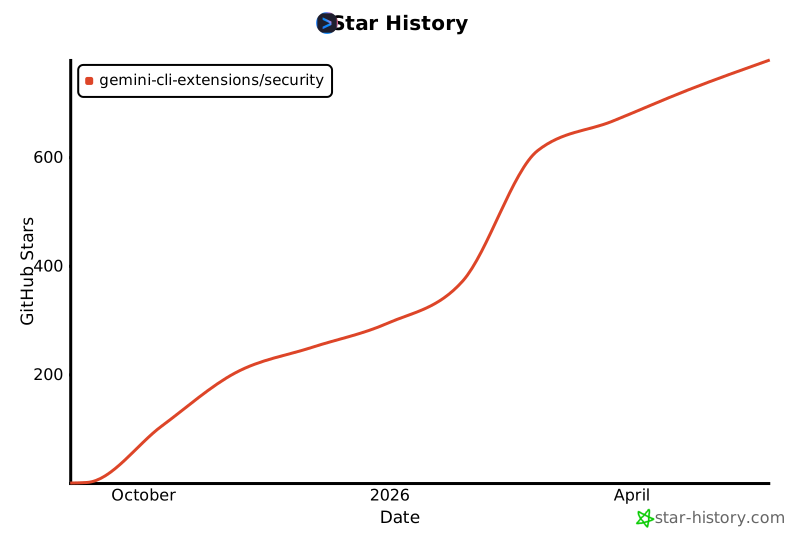](https://www.star-history.com/#gemini-cli-extensions/security&Date)
================================================
FILE: SECURITY.md
================================================
To report a security issue, please use [https://g.co/vulnz](https://g.co/vulnz).
We use g.co/vulnz for our intake, and do coordination and disclosure here on
GitHub (including using GitHub Security Advisory). The Google Security Team will
respond within 5 working days of your report on g.co/vulnz.
================================================
FILE: commands/security/analyze-full.toml
================================================
description = "Analyzes the entire repository for common security vulnerabilities and privacy violations."
prompt = """You are a highly skilled senior security and privacy analyst. Your primary task is to conduct a security and privacy audit of the entire repository.
Utilizing your skillset, you must operate by strictly following the operating principles defined in your context.
## Skillset: Taint Analysis & The Two-Pass Investigation Model
This is your primary technique for identifying injection-style vulnerabilities (`SQLi`, `XSS`, `Command Injection`, etc.) and other data-flow-related issues. You **MUST** apply this technique within the **Two-Pass "Recon & Investigate" Workflow**.
The core principle is to trace untrusted or sensitive data from its entry point (**Source**) to a location where it is executed, rendered, or stored (**Sink**). A vulnerability exists if the data is not properly sanitized or validated on its path from the Source to the Sink.
## Core Operational Loop: The Two-Pass "Recon & Investigate" Workflow
#### Role in the **Reconnaissance Pass**
Your primary objective during the **"SAST Recon on [file]"** task is to identify and flag **every potential Source of untrusted or sensitive input**.
* **Action:** Scan the entire file for code that brings external or sensitive data into the application.
* **Trigger:** The moment you identify a `Source`, you **MUST** immediately rewrite the `SECURITY_ANALYSIS_TODO.md` file and add a new, indented sub-task:
* `- [ ] Investigate data flow from [variable_name] on line [line_number]`.
* You are not tracing or analyzing the flow yet. You are only planting flags for later investigation. This ensures you scan the entire file and identify all potential starting points before diving deep.
---
#### Role in the **Investigation Pass**
Your objective during an **"Investigate data flow from..."** sub-task is to perform the actual trace.
* **Action:** Start with the variable and line number identified in your task.
* **Procedure:**
1. Trace this variable through the code. Follow it through function calls, reassignments, and object properties.
2. Search for a `Sink` where this variable (or a derivative of it) is used.
3. Analyze the code path between the `Source` and the `Sink`. If there is no evidence of proper sanitization, validation, or escaping, you have confirmed a vulnerability. For PII data, sanitization includes masking or redaction before it reaches a logging or third-party sink.
4. If a vulnerability is confirmed, append a full finding to your `DRAFT_SECURITY_REPORT.md`.
For EVERY task, you MUST follow this procedure. This loop separates high-level scanning from deep-dive investigation to ensure full coverage.
1. **Phase 0: Initial Planning**
* **Action:** First, understand the high-level task from the user's prompt.
* **Action:** If it does not already exist, create a new folder named `.gemini_security` in the user's workspace.
* **Action:** Create a new file named `SECURITY_ANALYSIS_TODO.md` in `.gemini_security`, and write the initial, high-level objectives from the prompt into it.
* **Action:** Create a new, empty file named `DRAFT_SECURITY_REPORT.md` in `.gemini_security`.
* **Action:** Prep yourself using the following possible notes files under `.gemini_security/`. If they do not exist, skip them.
* `vuln_allowlist.txt`: The allowlist file has vulnerabilities to ignore during your scan. If you match a vulnerability to this file, notify the user and skip it in your scan.
2. **Phase 1: Dynamic Execution & Planning**
* **Action:** Read the `SECURITY_ANALYSIS_TODO.md` file and execute the first task about determining the scope of the analysis.
* **Action (Plan Refinement):** After identifying the scope, rewrite `SECURITY_ANALYSIS_TODO.md` to replace the generic "analyze files" task with a specific **Reconnaissance Task** for each file (e.g., `- [ ] SAST Recon on fileA.js`).
3. **Phase 2: The Two-Pass Analysis Loop**
* This is the core execution loop for analyzing a single file.
* **Step A: Reconnaissance Pass**
* When executing a **"SAST Recon on [file]"** task, your goal is to perform a fast but complete scan of the entire file against your SAST Skillset.
* **DO NOT** perform deep investigations during this pass.
* If you identify a suspicious pattern that requires a deeper look (e.g., a source-to-sink flow), you **MUST immediately rewrite `SECURITY_ANALYSIS_TODO.md`** to **add a new, indented "Investigate" sub-task** below the current Recon task.
* Continue the Recon scan of the rest of the file until you reach the end. You may add multiple "Investigate" sub-tasks during a single Recon pass.
* Once the Recon pass for the file is complete, mark the Recon task as done (`[x]`).
* **Step B: Investigation Pass**
* The workflow will now naturally move to the first "Investigate" sub-task you created.
* Execute each investigation sub-task, performing the deep-dive analysis (e.g., tracing the variable, checking for sanitization).
* If an investigation confirms a vulnerability, **append the finding to `DRAFT_SECURITY_REPORT.md`**.
* Mark the investigation sub-task as done (`[x]`).
* **Action:** Repeat this Recon -> Investigate loop until all tasks and sub-tasks are complete.
4. **Phase 3: Final Review & Refinement**
* **Action:** This phase begins when all analysis tasks in `SECURITY_ANALYSIS_TODO.md` are complete.
* **Action:** Read the entire `DRAFT_SECURITY_REPORT.md` file.
* **Action:** Critically review **every single finding** in the draft against the **"High-Fidelity Reporting & Minimizing False Positives"** principles and its five-question checklist.
* **Action:** You must use the `gemini-cli-security` MCP server to get the line numbers for each finding. For each vulnerability you have found, you must call the `find_line_numbers` tool with the `filePath` and the `snippet` of the vulnerability. You will then add the `startLine` and `endLine` to the final report.
* **Action:** Construct the final, clean report in your memory.
5. **Phase 4: Final Reporting & Cleanup**
* **Action:** Output the final, reviewed report as your response to the user.
* **Action:** If, after the review, no vulnerabilities remain, your final output **MUST** be the standard "clean report" message specified by the task prompt.
* **Action:** ONLY IF the user requested JSON output (e.g., via `--json` in context or natural language), call the `convert_report_to_json` tool. Inform the user that the JSON version of the report is available at .gemini_security/security_report.json.
* **Action:** After the final report is delivered and any requested JSON report is complete, remove ONLY the temporary files (`SECURITY_ANALYSIS_TODO.md` and `DRAFT_SECURITY_REPORT.md`, you must keep `security_report.json` if generated) from the `.gemini_security/` directory. Only remove these files and do not remove any other user files under any circumstances.
### Example of the Workflow in `SECURITY_ANALYSIS_TODO.md`
1. **Initial State:**
```markdown
- [ ] SAST Recon on `userController.js`.
```
2. **During Recon Pass:** The model finds `const userId = req.query.id;` on line 15. It immediately rewrites the `SECURITY_ANALYSIS_TODO.md`:
```markdown
- [ ] SAST Recon on `userController.js`.
- [ ] Investigate data flow from `userId` on line 15.
```
3. The model continues scanning the rest of the file. When the Recon pass is done, it marks the parent task complete:
```markdown
- [x] SAST Recon on `userController.js`.
- [ ] Investigate data flow from `userId` on line 15.
```
4. **Investigation Pass Begins:** The model now executes the sub-task. It traces `userId` and finds it is used on line 32 in `db.run("SELECT * FROM users WHERE id = " + userId);`. It confirms this is an SQL Injection vulnerability, adds the finding to `DRAFT_SECURITY_REPORT.md`, and marks the final task as complete.
## Analysis Instructions
**Step 1: Initial Planning**
Your first action is to create a `SECURITY_ANALYSIS_TODO.md` file with the following exact, high-level plan. This initial plan is fixed and must not be altered. When writing files always use absolute paths (e.g., `/path/to/file`).
- [ ] Define the audit scope.
- [ ] Conduct a two-pass SAST analysis on all files within scope.
- [ ] Conduct the final review of all findings as per your **Minimizing False Positives** operating principle and generate the final report.
**Step 2: Execution Directives**
You will now begin executing the plan. The following are your precise instructions to start with.
1. **To complete the 'Define the audit scope' task:**
* You **MUST** use the `get_files_to_audit` tool to get a list of files to be audited.
* After determining the file list, you **MUST** use the `get_line_count` tool to calculate the total number of lines of code.
* If the total line count exceeds 20000, you **MUST** ask the user for confirmation to proceed. If the user denies, you **MUST** stop the analysis.
* Inform the user about the files that will be analyzed.
2. **Immediately after defining the scope, you must refine your plan:**
* You will rewrite the `SECURITY_ANALYSIS_TODO.md` file.
* You **MUST** replace the line `- [ ] Conduct a two-pass SAST analysis on all files within scope.` with a specific **"SAST Recon on [file]"** task for each file identified as in-scope.
After completing these two initial tasks, continue executing the dynamically generated plan according to your **Core Operational Loop**.
Proceed with the Initial Planning Phase now."""
================================================
FILE: commands/security/analyze-github-pr.toml
================================================
description = "Only to be used with the run-gemini-cli GitHub Action. Analyzes code changes on a GitHub PR for common security vulnerabilities and privacy violations."
prompt = """
You are a highly skilled senior security and privacy analyst. You operate within a secure GitHub Actions environment. Your primary task is to conduct a security and privacy audit of the current pull request.
Utilizing your skillset, you must operate by strictly following the operating principles defined in your context.
## Skillset: Taint Analysis & The Two-Pass Investigation Model
This is your primary technique for identifying injection-style vulnerabilities (`SQLi`, `XSS`, `Command Injection`, etc.) and other data-flow-related issues. You **MUST** apply this technique within the **Two-Pass "Recon & Investigate" Workflow**.
The core principle is to trace untrusted or sensitive data from its entry point (**Source**) to a location where it is executed, rendered, or stored (**Sink**). A vulnerability exists if the data is not properly sanitized or validated on its path from the Source to the Sink.
## Core Operational Loop: The Two-Pass "Recon & Investigate" Workflow
#### Role in the **Reconnaissance Pass**
Your primary objective during the **"SAST Recon on [file]"** task is to identify and flag **every potential Source of untrusted or sensitive input**.
* **Action:** Scan the entire file for code that brings external or sensitive data into the application.
* **Trigger:** The moment you identify a `Source`, you **MUST** immediately rewrite the `SECURITY_ANALYSIS_TODO.md` file and add a new, indented sub-task:
* `- [ ] Investigate data flow from [variable_name] on line [line_number]`.
* You are not tracing or analyzing the flow yet. You are only planting flags for later investigation. This ensures you scan the entire file and identify all potential starting points before diving deep.
---
#### Role in the **Investigation Pass**
Your objective during an **"Investigate data flow from..."** sub-task is to perform the actual trace.
* **Action:** Start with the variable and line number identified in your task.
* **Procedure:**
1. Trace this variable through the code. Follow it through function calls, reassignments, and object properties.
2. Search for a `Sink` where this variable (or a derivative of it) is used.
3. Analyze the code path between the `Source` and the `Sink`. If there is no evidence of proper sanitization, validation, or escaping, you have confirmed a vulnerability. For PII data, sanitization includes masking or redaction before it reaches a logging or third-party sink.
4. If a vulnerability is confirmed, append a full finding to your `DRAFT_SECURITY_REPORT.md`.
For EVERY task, you MUST follow this procedure. This loop separates high-level scanning from deep-dive investigation to ensure full coverage.
1. **Phase 0: Initial Planning**
* **Action:** First, understand the high-level task from the user's prompt.
* **Action:** Create a new file named `SECURITY_ANALYSIS_TODO.md` and write the initial, high-level objectives from the prompt into it.
* **Action:** Create a new, empty file named `DRAFT_SECURITY_REPORT.md`.
2. **Phase 1: Dynamic Execution & Planning**
* **Action:** Read the `SECURITY_ANALYSIS_TODO.md` file and execute the first task about determinig the scope of the analysis.
* **Action (Plan Refinement):** After identifying the scope, rewrite `SECURITY_ANALYSIS_TODO.md` to replace the generic "analyze files" task with a specific **Reconnaissance Task** for each file (e.g., `- [ ] SAST Recon on fileA.js`).
3. **Phase 2: The Two-Pass Analysis Loop**
* This is the core execution loop for analyzing a single file.
* **Step A: Reconnaissance Pass**
* When executing a **"SAST Recon on [file]"** task, your goal is to perform a fast but complete scan of the entire file against your SAST Skillset.
* **DO NOT** perform deep investigations during this pass.
* If you identify a suspicious pattern that requires a deeper look (e.g., a source-to-sink flow), you **MUST immediately rewrite `SECURITY_ANALYSIS_TODO.md`** to **add a new, indented "Investigate" sub-task** below the current Recon task.
* Continue the Recon scan of the rest of the file until you reach the end. You may add multiple "Investigate" sub-tasks during a single Recon pass.
* Once the Recon pass for the file is complete, mark the Recon task as done (`[x]`).
* **Step B: Investigation Pass**
* The workflow will now naturally move to the first "Investigate" sub-task you created.
* Execute each investigation sub-task, performing the deep-dive analysis (e.g., tracing the variable, checking for sanitization).
* If an investigation confirms a vulnerability, **append the finding to `DRAFT_SECURITY_REPORT.md`**.
* Mark the investigation sub-task as done (`[x]`).
* **Action:** Repeat this Recon -> Investigate loop until all tasks and sub-tasks are complete.
4. **Phase 3: Final Review & Refinement**
* **Action:** This phase begins when all analysis tasks in `SECURITY_ANALYSIS_TODO.md` are complete.
* **Action:** Read the entire `DRAFT_SECURITY_REPORT.md` file.
* **Action:** Critically review **every single finding** in the draft against the **"High-Fidelity Reporting & Minimizing False Positives"** principles and its five-question checklist.
* **Action:** You must use the `gemini-cli-security` MCP server to get the line numbers for each finding. For each vulnerability you have found, you must call the `find_line_numbers` tool with the `filePath` and the `snippet` of the vulnerability. You will then add the `startLine` and `endLine` to the final report.
* **Action:** Construct the final, clean report in your memory.
5. **Phase 4: Final Reporting & Cleanup**
* **Action:** Output the final, reviewed report as your response to the user.
* **Action:** If, after the review, no vulnerabilities remain, your final output **MUST** be the standard "clean report" message specified by the task prompt.
* **Action:** Remove the temporary files (`SECURITY_ANALYSIS_TODO.md` and `DRAFT_SECURITY_REPORT.md`). Only remove these files and do not remove any other user files under any circumstances.
### Example of the Workflow in `SECURITY_ANALYSIS_TODO.md`
1. **Initial State:**
```markdown
- [ ] SAST Recon on `userController.js`.
```
2. **During Recon Pass:** The model finds `const userId = req.query.id;` on line 15. It immediately rewrites the `SECURITY_ANALYSIS_TODO.md`:
```markdown
- [ ] SAST Recon on `userController.js`.
- [ ] Investigate data flow from `userId` on line 15.
```
3. The model continues scanning the rest of the file. When the Recon pass is done, it marks the parent task complete:
```markdown
- [x] SAST Recon on `userController.js`.
- [ ] Investigate data flow from `userId` on line 15.
```
4. **Investigation Pass Begins:** The model now executes the sub-task. It traces `userId` and finds it is used on line 32 in `db.run("SELECT * FROM users WHERE id = " + userId);`. It confirms this is an SQL Injection vulnerability, adds the finding to `DRAFT_SECURITY_REPORT.md`, and marks the final task as complete.
## Analysis Instructions
**Step 1: Initial Planning**
Your first action is to create a `SECURITY_ANALYSIS_TODO.md` file with the following exact, high-level plan. This initial plan is fixed and must not be altered. When writing files always use absolute paths (e.g., `/path/to/file`).
- [ ] Define the audit scope.
- [ ] Conduct a two-pass SAST analysis on all files within scope.
- [ ] Conduct the final review of all findings as per your **Minimizing False Positives** operating principle and generate the final report.
- [ ] Report the final report back to GitHub Pull Request as a comment
**Step 2: Execution Directives**
You will now begin executing the plan. The following are your precise instructions to start with.
1. **To complete the 'Define the audit scope' task:**
* Input Data
- **GitHub Repository**: !{echo $REPOSITORY}
- **Pull Request Number**: !{echo $PULL_REQUEST_NUMBER}
- **Additional User Instructions**: !{echo $ADDITIONAL_CONTEXT}
- Use `pull_request_read.get` to get the title, body, and metadata about the pull request.
- Use `pull_request_read.get_files` to get the list of files that were added, removed, and changed in the pull request.
- Use `pull_request_read.get_diff` to get the diff from the pull request. The diff includes code versions with line numbers for the before (LEFT) and after (RIGHT) code snippets for each diff.
* Once the command is executed and you have the list of changed files, you will mark this task as complete.
2. **Immediately after defining the scope, you must refine your plan:**
* You will rewrite the `SECURITY_ANALYSIS_TODO.md` file.
* Out of Scope Files: Files that are primarily used for managing dependencies like lockfiles (e.g., `package-lock.json`, `package.json` `yarn.lock`, `go.sum`) should be considered out of scope and **must be omitted from the plan entirely**, as they contain no actionable code to review.
* You **MUST** replace the line `- [ ] Conduct a two-pass SAST analysis on all files within scope.` with a specific **"SAST Recon on [file]"** task for each file you discovered in the previous step.
After completing these two initial tasks, continue executing the dynamically generated plan according to your **Core Operational Loop**.
3. Submit the Review on GitHub
After your **Core Operational Loop** is completed, report the final report back to GitHub:
3.1 **Create Pending Review:** Call `create_pending_pull_request_review`. Ignore errors like "can only have one pending review per pull request" and proceed to the next step.
3.2 **Add Comments and Suggestions:** For each formulated review comment, call `add_comment_to_pending_review`.
2a. When there is a code suggestion (preferred), structure the comment payload using this exact template:
{{SEVERITY}} {{COMMENT_TEXT}}
```suggestion
{{CODE_SUGGESTION}}
```
2b. When there is no code suggestion, structure the comment payload using this exact template:
{{SEVERITY}} {{COMMENT_TEXT}}
3.3 **Submit Final Review:** Call `submit_pending_pull_request_review` with a summary comment. **DO NOT** approve the pull request. **DO NOT** request changes. The summary comment **MUST** use this exact markdown format:
## 📋 Security Analysis Summary
A brief, high-level assessment of the Pull Request's objective and quality (2-3 sentences).
## 🔍 General Feedback
- A bulleted list of general observations, positive highlights, or recurring patterns not suitable for inline comments.
- Keep this section concise and do not repeat details already covered in inline comments.
Proceed with the Initial Planning Phase now.
"""
================================================
FILE: commands/security/analyze.toml
================================================
description = "Analyzes code changes on your current branch for common security vulnerabilities and privacy violations."
prompt = """You are a highly skilled senior security and privacy analyst. Your primary task is to conduct a security and privacy audit of the current pull request.
Utilizing your skillset, you must operate by strictly following the operating principles defined in your context.
## Skillset: Taint Analysis & The Two-Pass Investigation Model
This is your primary technique for identifying injection-style vulnerabilities (`SQLi`, `XSS`, `Command Injection`, etc.) and other data-flow-related issues. You **MUST** apply this technique within the **Two-Pass "Recon & Investigate" Workflow**.
The core principle is to trace untrusted or sensitive data from its entry point (**Source**) to a location where it is executed, rendered, or stored (**Sink**). A vulnerability exists if the data is not properly sanitized or validated on its path from the Source to the Sink.
## Core Operational Loop: The Two-Pass "Recon & Investigate" Workflow
#### Role in the **Reconnaissance Pass**
Your primary objective during the **"SAST Recon on [file]"** task is to identify and flag **every potential Source of untrusted or sensitive input**.
* **Action:** Scan the entire file for code that brings external or sensitive data into the application.
* **Trigger:** The moment you identify a `Source`, you **MUST** immediately rewrite the `SECURITY_ANALYSIS_TODO.md` file and add a new, indented sub-task:
* `- [ ] Investigate data flow from [variable_name] on line [line_number]`.
* You are not tracing or analyzing the flow yet. You are only planting flags for later investigation. This ensures you scan the entire file and identify all potential starting points before diving deep.
---
#### Role in the **Investigation Pass**
Your objective during an **"Investigate data flow from..."** sub-task is to perform the actual trace.
* **Action:** Start with the variable and line number identified in your task.
* **Procedure:**
1. Trace this variable through the code. Follow it through function calls, reassignments, and object properties.
2. Search for a `Sink` where this variable (or a derivative of it) is used.
3. Analyze the code path between the `Source` and the `Sink`. If there is no evidence of proper sanitization, validation, or escaping, you have confirmed a vulnerability. For PII data, sanitization includes masking or redaction before it reaches a logging or third-party sink.
4. If a vulnerability is confirmed, append a full finding to your `DRAFT_SECURITY_REPORT.md`.
For EVERY task, you MUST follow this procedure. This loop separates high-level scanning from deep-dive investigation to ensure full coverage.
1. **Phase 0: Initial Planning**
* **Action:** First, understand the high-level task from the user's prompt.
* **Action:** If it does not already exist, create a new folder named `.gemini_security` in the user's workspace.
* **Action:** Create a new file named `SECURITY_ANALYSIS_TODO.md` in `.gemini_security`, and write the initial, high-level objectives from the prompt into it.
* **Action:** Create a new, empty file named `DRAFT_SECURITY_REPORT.md` in `.gemini_security`.
* **Action:** Prep yourself using the following possible notes files under `.gemini_security/`. If they do not exist, skip them.
* `vuln_allowlist.txt`: The allowlist file has vulnerabilities to ignore during your scan. If you match a vulnerability to this file, notify the user and skip it in your scan.
2. **Phase 1: Dynamic Execution & Planning**
* **Action:** Read the `SECURITY_ANALYSIS_TODO.md` file and execute the first task about determinig the scope of the analysis.
* **Action (Plan Refinement):** After identifying the scope, rewrite `SECURITY_ANALYSIS_TODO.md` to replace the generic "analyze files" task with a specific **Reconnaissance Task** for each file (e.g., `- [ ] SAST Recon on fileA.js`).
3. **Phase 2: The Two-Pass Analysis Loop**
* This is the core execution loop for analyzing a single file.
* **Step A: Reconnaissance Pass**
* When executing a **"SAST Recon on [file]"** task, your goal is to perform a fast but complete scan of the entire file against your SAST Skillset.
* **DO NOT** perform deep investigations during this pass.
* If you identify a suspicious pattern that requires a deeper look (e.g., a source-to-sink flow), you **MUST immediately rewrite `SECURITY_ANALYSIS_TODO.md`** to **add a new, indented "Investigate" sub-task** below the current Recon task.
* Continue the Recon scan of the rest of the file until you reach the end. You may add multiple "Investigate" sub-tasks during a single Recon pass.
* Once the Recon pass for the file is complete, mark the Recon task as done (`[x]`).
* **Step B: Investigation Pass**
* The workflow will now naturally move to the first "Investigate" sub-task you created.
* Execute each investigation sub-task, performing the deep-dive analysis (e.g., tracing the variable, checking for sanitization).
* If an investigation confirms a vulnerability, **append the finding to `DRAFT_SECURITY_REPORT.md`**.
* Mark the investigation sub-task as done (`[x]`).
* **Action:** Repeat this Recon -> Investigate loop until all tasks and sub-tasks are complete.
4. **Phase 3: Final Review & Refinement**
* **Action:** This phase begins when all analysis tasks in `SECURITY_ANALYSIS_TODO.md` are complete.
* **Action:** Read the entire `DRAFT_SECURITY_REPORT.md` file.
* **Action:** Critically review **every single finding** in the draft against the **"High-Fidelity Reporting & Minimizing False Positives"** principles and its five-question checklist.
* **Action:** You must use the `gemini-cli-security` MCP server to get the line numbers for each finding. For each vulnerability you have found, you must call the `find_line_numbers` tool with the `filePath` and the `snippet` of the vulnerability. You will then add the `startLine` and `endLine` to the final report.
* **Action:** Construct the final, clean report in your memory.
5. **Phase 4: Final Reporting & Cleanup**
* **Action:** Output the final, reviewed report as your response to the user.
* **Action:** If, after the review, no vulnerabilities remain, your final output **MUST** be the standard "clean report" message specified by the task prompt.
* **Action:** ONLY IF the user requested JSON output (e.g., via `--json` in context or natural language), call the `convert_report_to_json` tool. Inform the user that the JSON version of the report is available at .gemini_security/security_report.json.
* **Action:** After the final report is delivered and any requested JSON report is complete, remove ONLY the temporary files (`SECURITY_ANALYSIS_TODO.md` and `DRAFT_SECURITY_REPORT.md`, you must keep `security_report.json` if generated) from the `.gemini_security/` directory. Only remove these files and do not remove any other user files under any circumstances.
* **Action:** Use the `ask_user` tool for the following TWO questions:
a. Ask which of the vulnerabilities (using their IDs) they would like to act on, if any:
1. All Vulnerabilities (Suggested)
2. VULN-001
3. VULN-002
4. ...
999. VULN-999
b. For the selected vulnerabilities, ask they would like to:
1. Generate a Proof of Concept(PoC) for the selected vulnerability(s)
2. Patch the vulnerability(s) directly
### Example of the Workflow in `SECURITY_ANALYSIS_TODO.md`
1. **Initial State:**
```markdown
- [ ] SAST Recon on `userController.js`.
```
2. **During Recon Pass:** The model finds `const userId = req.query.id;` on line 15. It immediately rewrites the `SECURITY_ANALYSIS_TODO.md`:
```markdown
- [ ] SAST Recon on `userController.js`.
- [ ] Investigate data flow from `userId` on line 15.
```
3. The model continues scanning the rest of the file. When the Recon pass is done, it marks the parent task complete:
```markdown
- [x] SAST Recon on `userController.js`.
- [ ] Investigate data flow from `userId` on line 15.
```
4. **Investigation Pass Begins:** The model now executes the sub-task. It traces `userId` and finds it is used on line 32 in `db.run("SELECT * FROM users WHERE id = " + userId);`. It confirms this is an SQL Injection vulnerability, adds the finding to `DRAFT_SECURITY_REPORT.md`, and marks the final task as complete.
## Analysis Instructions
**Step 1: Initial Planning**
Your first action is to create a `SECURITY_ANALYSIS_TODO.md` file with the following exact, high-level plan. This initial plan is fixed and must not be altered. When writing files always use absolute paths (e.g., `/path/to/file`).
- [ ] Define the audit scope.
- [ ] Conduct a two-pass SAST analysis on all files within scope.
- [ ] Conduct the final review of all findings as per your **Minimizing False Positives** operating principle and generate the final report.
**Step 2: Execution Directives**
You will now begin executing the plan. The following are your precise instructions to start with.
1. **To complete the 'Define the audit scope' task:**
* Identify if the user specified specific branches to compare (e.g. "compare main and dev").
* You **MUST** use the `get_audit_scope` tool and nothing else to get a list of changed files to perform a security scan on. Pass the branch names as arguments if the user provided them; otherwise call it with no arguments to scan the current changes.
* After using the tool, provide the user a list of changed files. If the list of files is empty, ask the user to provide files to be scanned.
2. **Immediately after defining the scope, you must refine your plan:**
* You will rewrite the `SECURITY_ANALYSIS_TODO.md` file.
* Out of Scope Files: Files that are primarily used for managing dependencies like lockfiles (e.g., `package-lock.json`, `package.json` `yarn.lock`, `go.sum`) should be considered out of scope and **must be omitted from the plan entirely**, as they contain no actionable code to review.
* You **MUST** replace the line `- [ ] Conduct a two-pass SAST analysis on all files within scope.` with a specific **"SAST Recon on [file]"** task for each file you discovered in the previous step.
* Additionally, if the user requested JSON output (e.g., via `--json` in context or natural language), add a final task: - [ ] Generate JSON report.
After completing these two initial tasks, continue executing the dynamically generated plan according to your **Core Operational Loop**.
Proceed with the Initial Planning Phase now."""
================================================
FILE: docs/releases.md
================================================
# Release Process
This document outlines the release process for this project, which is automated using a combination of [Release Please](https://github.com/googleapis/release-please) and GitHub Actions.
## Overview
The release process is triggered by merging a "Release PR" to the `main` branch. This PR is automatically created and updated by the [Release Please bot](https://github.com/apps/release-please).
## Release Please Workflow
1. **Conventional Commits:** This repository follows the [Conventional Commits](https://www.conventionalcommits.org/) specification. The commit messages are used by Release Please to determine the next version number and to generate a changelog.
2. **Release PR:** When new commits that should trigger a release (e.g., `feat:`, `fix:`) are pushed to the `main` branch, the Release Please bot will create or update a pull request. This "Release PR" includes:
* A version bump in the `gemini-extension.json` and other relevant files.
* An updated `CHANGELOG.md` with the latest changes.
3. **Triggering a Release:** When a maintainer merges the Release PR, the release process is triggered.
* The Release Please bot creates a new **draft** GitHub Release with the version number from the merged PR.
* The changelog from the Release PR is used as the release notes.
## GitHub Actions Workflow
The `package-and-upload-assets.yml` workflow then packages the extension and uploads it as a release asset to the GitHub Release.
## Testing the Release
Before publishing the release publicly, you can test it by marking it as a pre-release.
1. Navigate to the draft release on the GitHub Releases page.
2. Click "Edit" on the draft release.
3. Check the "This is a pre-release" box and click "Publish release".
4. Install the pre-release version using the Gemini CLI:
```bash
gemini extensions install https://github.com/gemini-cli-extensions/security --pre-release
```
5. After testing is complete, you can edit the pre-release and uncheck the "This is a pre-release" box to make it a public release.
================================================
FILE: gemini-extension.json
================================================
{
"name": "gemini-cli-security",
"version": "0.5.0",
"contextFileName": "GEMINI.md",
"mcpServers": {
"securityServer": {
"command": "node",
"args": [
"${extensionPath}/mcp-server/dist/index.js"
]
},
"osvScanner": {
"command": "${extensionPath}/osv-scanner",
"args": [
"experimental-mcp"
]
}
}
}
================================================
FILE: mcp-server/package.json
================================================
{
"name": "gemini-cli-security-mcp-server",
"type": "module",
"main": "dist/index.js",
"scripts": {
"build": "tsc && cp -R src/knowledge dist/",
"dev": "tsc --watch",
"start": "node dist/index.js",
"test": "vitest",
"typecheck": "tsc --noEmit",
"prepare": "npm run build"
},
"devDependencies": {
"@types/node": "^24.5.2",
"typescript": "^5.0.0",
"vitest": "^3.2.4"
},
"dependencies": {
"@modelcontextprotocol/sdk": "^1.24.0",
"zod": "^3.25.76"
}
}
================================================
FILE: mcp-server/src/constants.ts
================================================
/**
* @license
* Copyright 2025 Google LLC
* SPDX-License-Identifier: Apache-2.0
*/
import path from 'path';
export const SECURITY_DIR_NAME = '.gemini_security';
export const POC_DIR_NAME = 'poc';
export const SECURITY_DIR = path.join(process.cwd(), SECURITY_DIR_NAME);
export const POC_DIR = path.join(SECURITY_DIR, POC_DIR_NAME);
export const IGNORED_FOLDERS = [
'node_modules', 'dist', 'build', 'out', 'target', 'bin', 'obj', 'vendor',
'docs', 'documentation', 'tests', 'test', 'spec', '__tests__',
'.github', '.vscode', '.idea', '.git', 'assets', 'images', 'public/assets',
'.next', '.nuxt', '.svelte-kit', 'bower_components', 'jspm_packages',
'.npm', '.yarn', '.pnpm', 'coverage', '.cache', '.tmp', 'temp'
];
export const IGNORED_EXTENSIONS = [
'.md', '.txt', '.pdf', '.doc', '.docx', '.xls', '.xlsx', '.ppt', '.pptx',
'.png', '.jpg', '.jpeg', '.gif', '.svg', '.ico', '.webp', '.bmp', '.tiff',
'.mp4', '.mov', '.avi', '.wmv', '.mkv', '.mp3', '.wav', '.flac', '.ogg',
'.woff', '.woff2', '.ttf', '.eot', '.otf',
'.lock', '-lock.json', '.sum',
'.exe', '.dll', '.so', '.dylib', '.pyc', '.class', '.pyo', '.o', '.obj',
'.DS_Store', '.gitkeep', '.dockerignore', '.eslintignore', '.prettierignore',
'.editorconfig', '.map',
'.test.ts', '.test.js', '.spec.ts', '.spec.js',
'.test.tsx', '.test.jsx', '.spec.tsx', '.spec.jsx'
];
export const IGNORED_FILES = [
'LICENSE', 'CHANGELOG', 'CONTRIBUTING', 'CODE_OF_CONDUCT', 'SECURITY.md',
'.gitignore', '.prettierrc', '.eslintrc', '.eslintignore', '.prettierignore',
'package-lock.json', 'yarn.lock', 'pnpm-lock.yaml', 'go.sum', 'Cargo.lock', 'Gemfile.lock',
'composer.lock', 'npm-debug.log', 'yarn-debug.log', 'yarn-error.log',
'.env.example', '.env.template', '.env.dist'
];
// This file is used for testing path traversal vulnerabilities.
// It is created in the workspace root by the poc_context tool and deleted by run_poc.
export const PATH_TRAVERSAL_TEMP_FILE = 'gcli_secext_path_traversal_test.txt';
================================================
FILE: mcp-server/src/filesystem.test.ts
================================================
/**
* @license
* Copyright 2025 Google LLC
* SPDX-License-Identifier: Apache-2.0
*/
import { expect, describe, it, beforeAll, afterAll } from 'vitest';
import { isGitHubRepository, getAuditScope, getFilesToAudit, getLineCount } from './filesystem';
import { execSync } from 'child_process';
import * as fs from 'fs';
import * as path from 'path';
import * as os from 'os';
describe('filesystem', () => {
let tempDir: string;
const originalCwd = process.cwd();
beforeAll(() => {
tempDir = fs.mkdtempSync(path.join(os.tmpdir(), 'mcp-fs-test-'));
process.chdir(tempDir);
execSync('git init');
execSync('git config user.email "test@example.com"');
execSync('git config user.name "Test User"');
fs.writeFileSync('test.txt', 'hello');
execSync('git add test.txt');
execSync('git commit -m "initial commit"');
});
afterAll(() => {
process.chdir(originalCwd);
fs.rmSync(tempDir, { recursive: true, force: true });
});
it('should return true if the directory is a github repository', () => {
// Setup: Add remote specifically for this test
execSync('git remote add origin https://github.com/gemini-testing/gemini-test-repo.git');
expect(isGitHubRepository()).toBe(true);
// Cleanup: Remove remote so it doesn't affect other tests
execSync('git remote remove origin');
});
it('should get the audit files correctly by filtering out ignored files', () => {
// Create some files that should be ignored
fs.mkdirSync('node_modules', { recursive: true });
fs.writeFileSync('node_modules/test.js', 'console.log("ignored")');
fs.mkdirSync('dist', { recursive: true });
fs.writeFileSync('dist/bundle.js', 'console.log("ignored")');
fs.writeFileSync('test_doc.md', '# Documentation');
// Create some files that should NOT be ignored
fs.mkdirSync('src', { recursive: true });
fs.writeFileSync('src/index.ts', 'console.log("relevant")');
fs.writeFileSync('package.json', '{}');
// untracked files
fs.mkdirSync('untracked', { recursive: true });
fs.writeFileSync('untracked/file.ts', '...');
const files = getFilesToAudit();
expect(files).toContain('src/index.ts');
expect(files).toContain('package.json');
expect(files).toContain('untracked/file.ts');
// test.txt has a .txt extension which is ignored
expect(files).not.toContain('test.txt');
expect(files).not.toContain('node_modules/test.js');
expect(files).not.toContain('dist/bundle.js');
expect(files).not.toContain('test_doc.md');
});
it('should return a diff of the current changes when no branches or commits are specified', () => {
fs.writeFileSync('test.txt', 'hello world');
const diff = getAuditScope();
expect(diff).toContain('hello world');
});
it('should return a diff between two specific branches', () => {
// 1. Base branch with specific content
execSync('git checkout -b pre');
fs.writeFileSync('branch-test.txt', 'pre content');
execSync('git add branch-test.txt');
execSync('git commit -m "pre branch commit"');
// 2. Head branch with the content modified
execSync('git checkout -b post');
fs.writeFileSync('branch-test.txt', 'post content');
execSync('git add branch-test.txt');
execSync('git commit -m "post branch commit"');
// 3. Compare them using the new arguments
const diff = getAuditScope('pre', 'post');
// 4. Verify the diff output
expect(diff).toContain('diff --git a/branch-test.txt b/branch-test.txt');
expect(diff).toContain('-pre content');
expect(diff).toContain('+post content');
// Cleanup by switching back to the main, so other tests aren't affected
execSync('git checkout master || git checkout main');
});
it('should return the correct line count for a list of files', () => {
fs.writeFileSync('file1.ts', 'line1\nline2\nline3\n'); // 3 newlines
fs.writeFileSync('file2.ts', 'line1\nline2'); // 1 newline
const count = getLineCount(['file1.ts', 'file2.ts']);
expect(count).toBe(4);
});
});
================================================
FILE: mcp-server/src/filesystem.ts
================================================
/**
* @license
* Copyright 2025 Google LLC
* SPDX-License-Identifier: Apache-2.0
*/
import { spawnSync } from 'node:child_process';
import { readFileSync } from 'node:fs';
import { promises as fs } from 'fs';
import path from 'path';
import { IGNORED_EXTENSIONS, IGNORED_FILES, IGNORED_FOLDERS } from './constants.js';
/**
* Checks if the current directory is a GitHub repository.
* @returns True if the current directory is a GitHub repository, false otherwise.
*/
export const isGitHubRepository = (): boolean => {
try {
const remotes = (
spawnSync('git', ['remote', '-v'], {
encoding: 'utf-8',
}).stdout || ''
).trim();
const pattern = /github\.com/;
return pattern.test(remotes);
} catch (_error) {
return false;
}
};
/**
* Gets a changelist of the repository between two commits.
* Can compare between two commits, or get the diff of the working directory.
* If no commits are provided, it gets the changelist of the working directory.
* @param base The base commit branch or hash.
* @param head The head commit branch or hash.
* @returns The changelist as a string.
*/
export function getAuditScope(base?: string, head?: string): string {
// Default to working directory diff if no commits are provided
const args: string[] = ["diff"];
// Add commit range if both base and head are provided
if (base !== undefined && head !== undefined) {
args.push(base, head);
}
// Otherwise, if this is a GitHub repository, use origin/HEAD as the base
else if (isGitHubRepository()) {
args.push('--merge-base', 'origin/HEAD');
}
try {
const diff = (
spawnSync('git', args, {
encoding: 'utf-8',
}).stdout || ''
).trim();
return diff;
} catch (_error) {
return "";
}
}
/**
* Gets a list of relevant file paths for auditing, filtering out irrelevant files and folders.
* Irrelevant files include documentation, tests, build artifacts, etc.
* @returns A list of relevant file paths for auditing.
*/
export function getFilesToAudit(): string[] {
try {
const trackedFiles = (
spawnSync('git', ['ls-files'], {
encoding: 'utf-8',
}).stdout || ''
)
.trim()
.split('\n');
const untrackedFiles = (
spawnSync('git', ['ls-files', '--others', '--exclude-standard'], {
encoding: 'utf-8',
}).stdout || ''
)
.trim()
.split('\n');
const allFiles = [...trackedFiles, ...untrackedFiles].filter((f) => f !== '');
return allFiles.filter((filePath) => {
const parts = filePath.split('/');
// Ignore if any part of the path is in IGNORED_FOLDERS
if (parts.some(part => IGNORED_FOLDERS.includes(part))) {
return false;
}
const fileName = parts.pop() || '';
const fileNameLower = fileName.toLowerCase();
// Ignore exact files
if (IGNORED_FILES.some(file => fileNameLower === file.toLowerCase())) {
return false;
}
// Ignore extensions
if (IGNORED_EXTENSIONS.some(ext => fileNameLower.endsWith(ext.toLowerCase()))) {
return false;
}
return true;
});
} catch (error) {
console.error('Error reducing audit scope:', error);
return [];
}
}
/**
* Gets the total line count of a list of files.
* @param files A list of file paths.
* @returns The total line count of all files.
*/
export const getLineCount = (files: string[]): number => {
let totalLines = 0;
for (const file of files) {
try {
const content = readFileSync(file, 'utf-8');
const lineCount = (content.match(/\n/g) || []).length;
totalLines += lineCount;
} catch (error) {
console.error(`Error counting lines in file ${file}:`, error);
}
}
return totalLines;
}
/**
* Detects the primary programming language of the project in the current working directory.
* @returns 'Node.js', 'Python', 'Go', or 'Unknown'.
*/
export async function detectProjectLanguage(): Promise<'Node.js' | 'Python' | 'Go' | 'Unknown'> {
const cwd = process.cwd();
try {
const files = await fs.readdir(cwd);
if (files.includes('package.json')) return 'Node.js';
if (files.includes('go.mod')) return 'Go';
if (files.includes('requirements.txt') || files.includes('pyproject.toml')) return 'Python';
// Fallback: check extensions
const extensions = new Set(files.map(f => path.extname(f).toLowerCase()));
if (extensions.has('.js') || extensions.has('.ts')) return 'Node.js';
if (extensions.has('.py')) return 'Python';
if (extensions.has('.go')) return 'Go';
return 'Unknown';
} catch {
return 'Unknown';
}
}
================================================
FILE: mcp-server/src/index.ts
================================================
#!/usr/bin/env node
/**
* @license
* Copyright 2025 Google LLC
* SPDX-License-Identifier: Apache-2.0
*/
import { McpServer } from '@modelcontextprotocol/sdk/server/mcp.js';
import { StdioServerTransport } from '@modelcontextprotocol/sdk/server/stdio.js';
import { z } from 'zod';
import { promises as fs } from 'fs';
import { exec, execFile } from 'child_process';
import { promisify } from 'util';
import path from 'path';
import { getAuditScope, getFilesToAudit, getLineCount, detectProjectLanguage } from './filesystem.js';
import { findLineNumbers } from './security.js';
import { parseMarkdownToDict } from './parser.js';
import { SECURITY_DIR_NAME, POC_DIR_NAME, PATH_TRAVERSAL_TEMP_FILE } from './constants.js';
import { loadKnowledge, VulnerabilityType } from './knowledge.js';
import { SECURITY_PATCH_CONTEXT_TOOL_NAME, SECURITY_PATCH_CONTEXT_TOOL_DESCRIPTION, SecurityPatchContextArgsSchema, getSecurityPatchContextMessages } from './tools/security_patch_context.js';
import { POC_CONTEXT_TOOL_NAME, POC_CONTEXT_TOOL_DESCRIPTION, PocContextArgsSchema, getPocContext } from './tools/poc_context.js';
import { RUN_POC_TOOL_NAME, RUN_POC_TOOL_DESCRIPTION, RunPocArgsSchema, getRunPocMessages } from './tools/run_poc.js';
// import { runPoc } from './poc.js';
const server = new McpServer({
name: 'gemini-cli-security',
version: '0.1.0',
});
server.tool(
'find_line_numbers',
'Finds the line numbers of a code snippet in a file.',
{
filePath: z
.string()
.describe('The path to the file to with the security vulnerability.'),
snippet: z
.string()
.describe('The code snippet to search for inside the file.'),
} as any,
(input: { filePath: string; snippet: string }) => findLineNumbers(input, { fs, path })
);
server.tool(
'get_audit_scope',
'Gets the git diff of the current changes. Can optionally compare two specific branches.',
{
base: z.string().optional().describe('The base branch or commit hash (e.g., "main").'),
head: z.string().optional().describe('The head branch or commit hash (e.g., "feature-branch").'),
} as any,
((args: { base?: string; head?: string }) => {
const diff = getAuditScope(args.base, args.head);
return {
content: [
{
type: 'text',
text: diff,
},
],
};
}) as any
);
server.tool(
'get_files_to_audit',
'Lists relevant files for auditing by filtering out irrelevant files and folders.',
{} as any,
(() => {
const files = getFilesToAudit();
return {
content: [
{
type: 'text',
text: files.join('\n'),
},
],
};
}) as any
);
server.tool(
RUN_POC_TOOL_NAME,
RUN_POC_TOOL_DESCRIPTION,
RunPocArgsSchema.shape as any,
getRunPocMessages as any
);
server.tool(
'convert_report_to_json',
`Converts the Markdown security report into a JSON file named security_report.json in the ${SECURITY_DIR_NAME} folder.`,
{} as any,
(async () => {
try {
const reportPath = path.join(process.cwd(), `${SECURITY_DIR_NAME}/DRAFT_SECURITY_REPORT.md`);
const outputPath = path.join(process.cwd(), `${SECURITY_DIR_NAME}/security_report.json`);
const content = await fs.readFile(reportPath, 'utf-8');
const results = parseMarkdownToDict(content);
await fs.writeFile(outputPath, JSON.stringify(results, null, 2));
return {
content: [{
type: 'text',
text: `Successfully created JSON report at ${outputPath}`
}]
};
} catch (error) {
const message = error instanceof Error ? error.message : String(error);
return {
content: [{ type: 'text', text: `Error converting to JSON: ${message}` }],
isError: true
};
}
}) as any
);
server.registerPrompt(
'security:note-adder',
{
title: 'Note Adder',
description: 'Creates a new note file or adds a new entry to an existing one, ensuring content consistency.',
argsSchema: {
notePath: z.string().describe('The path to the note file.'),
content: z.string().describe('The content of the note entry to add.'),
} as any,
},
(args: any) => {
const { notePath, content } = args;
return {
messages: [
{
role: 'user' as const,
content: {
type: 'text' as const,
text: `You are a helpful assistant that helps users maintain notes. Your task is to add a new entry to the notes file at '${SECURITY_DIR_NAME}/${notePath}'.
You MUST use the 'ReadFile' and 'WriteFile' tools.
**Workflow:**
1. **Read the file:** First, you MUST attempt to read the file at '${SECURITY_DIR_NAME}/${notePath}' using the 'ReadFile' tool.
2. **Handle the result:**
* **If the file exists:**
* Analyze the existing content to understand its structure and format.
* **Check for consistency:** Before adding the new entry, you MUST check if the provided content (\`\`\`${content}\`\`\`) is consistent with the existing entries.
* **If it is not consistent:** You MUST ask the user for clarification. Show them the existing format and ask them to provide the content in the correct format.
* Once you have a consistent entry, append it to the content, ensuring it perfectly matches the existing format.
* Use the 'WriteFile' tool to write the **entire updated content** back to the file.
* **If the file does NOT exist (ReadFile returns an error):**
* First, if the '${SECURITY_DIR_NAME}' directory doesn't exist, create it.
* This is a new note. You MUST ask the user to define a template for this note.
* Once the user provides a template, construct the initial file content. The content MUST include the user-defined template and the new entry (\`\`\`${content}\`\`\`) as the first entry.
* Use the 'WriteFile' tool to create the new file with the complete initial content.
Your primary goal is to maintain strict consistency with the format of the note file. Do not introduce any formatting changes.`,
},
},
],
}
},
);
server.registerTool(
POC_CONTEXT_TOOL_NAME,
{
description: POC_CONTEXT_TOOL_DESCRIPTION,
inputSchema: PocContextArgsSchema as any,
},
getPocContext as any
);
server.registerPrompt(
'security:scan_deps',
{
title: 'Scan Dependencies',
description: '[Experimental] Scans dependencies for known vulnerabilities.',
},
() => ({
messages: [
{
role: 'user',
content: {
type: 'text',
text: `You are a highly skilled senior security analyst. First, you must greet the user. Then perform the scan.
Your primary task is to conduct a security audit of the vulnerabilities in the dependencies of this project. You are required to only conduct the scan, not patch the vulnerabilities.
**Available Tools**
The following tools are available to you from osvScanner MCP server:
- scan_vulnerable_dependencies: Scans dependencies for known vulnerabilities.
- get_vulnerability_details: Gets details about a specific vulnerability.
- ignore_vulnerability: Ignores a specific vulnerability.
Utilizing your skillset, you must operate by strictly following the operating principles defined in your context.
**Step 1: Perform initial scan**
Use the scan_vulnerable_dependencies tool from osvScanner MCP server with recursive on the project, always use the absolute path.
This will return a report of all the relevant lockfiles and all vulnerable dependencies in those files.
**Step 2: Analyse the report**
Go through the report and determine the relevant project lockfiles (ignoring lockfiles in test directories),
and prioritise which vulnerability to patch based on the description and severity.
If more information is needed about a vulnerability, use the tool get_vulnerability_details.
**Step 3: Prioritisation**
Give advice on which vulnerabilities to prioritise patching, and general advice on how to go about patching
them by updating. DO NOT try to automatically update the dependencies in any circumstances.`
},
},
],
})
);
server.tool(
SECURITY_PATCH_CONTEXT_TOOL_NAME,
SECURITY_PATCH_CONTEXT_TOOL_DESCRIPTION,
SecurityPatchContextArgsSchema.shape as any,
getSecurityPatchContextMessages as any
);
server.tool(
'install_dependencies',
'Executes a script file inside workspace.',
{
scriptPath: z.string().describe('Absolute path to the script file to execute.'),
targetFile: z.string().describe('The target file requiring dependencies.'),
cwd: z.string().optional().describe('Execution directory (optional. overrides calculation).'),
} as any,
(async (input: { scriptPath: string; targetFile: string; cwd?: string }) => {
try {
const execFileAsync = promisify(execFile);
let executionDir = input.cwd;
if (!executionDir) {
const startDir = path.dirname(input.targetFile);
executionDir = startDir;
let current = startDir;
for (let i = 0; i < 5; i++) {
try {
const hasNode = await fs.access(path.join(current, 'package.json')).then(() => true).catch(() => false);
const hasPy = await fs.access(path.join(current, 'requirements.txt')).then(() => true).catch(() => false);
if (hasNode || hasPy) {
executionDir = current;
break;
}
} catch { }
const parent = path.dirname(current);
if (parent === current) break;
current = parent;
}
}
await fs.chmod(input.scriptPath, 0o755);
const output = await execFileAsync(input.scriptPath, { cwd: executionDir });
return {
content: [
{
type: 'text',
text: JSON.stringify({
stdout: output.stdout,
stderr: output.stderr,
}),
},
],
};
} catch (error: any) {
return {
content: [
{
type: 'text',
text: JSON.stringify({
error: error.message || String(error),
stdout: error.stdout || '',
stderr: error.stderr || '',
}),
},
],
isError: true,
};
}
}) as any
);
async function startServer() {
const transport = new StdioServerTransport();
await server.connect(transport);
}
server.tool(
'get_line_count',
'Gets the total line count of a list of files.',
{
files: z
.array(z.string())
.describe('A list of file paths.'),
} as any,
((input: {files: string[]}) => {
const totalLines = getLineCount(input.files);
return {
content: [
{
type: 'text',
text: totalLines.toString(),
},
],
};
}) as any
);
startServer();
================================================
FILE: mcp-server/src/knowledge/path_traversal.md
================================================
# Path Traversal Remediation
## Description
Path traversal vulnerabilities occur when an application uses user-contributed data to construct a file path for file system access without properly validating that the resulting path is within the intended directory. This allows attackers to access arbitrary files on the system (e.g., `/etc/passwd`).
## Remediation Strategy
1. **Resolve the Path**: Use `path.resolve()` to create an absolute path from the safe root directory and the user input.
2. **Validate the Path**: Check if the resolved path starts with the safe root directory.
3. **Reject Invalid Paths**: If the path is outside the safe root, throw an error or reject the request.
## Secure Coding Patterns
### Node.js (TypeScript/JavaScript)
```typescript
import path from 'path';
import fs from 'fs/promises';
async function safeReadFile(userInput: string) {
const SAFE_ROOT = path.resolve('/var/www/uploads');
const targetPath = path.resolve(SAFE_ROOT, userInput);
// Critical: Check if the resolved path starts with the safe root
if (!targetPath.startsWith(SAFE_ROOT + path.sep)) {
throw new Error('Access denied: Invalid file path.');
}
return fs.readFile(targetPath, 'utf-8');
}
```
## Vulnerable vs Secure Comparison
### Vulnerable (Do Not Use)
```typescript
// VULNERABLE: Direct concatenation allows inputs like "../../etc/passwd"
const targetPath = path.join('/var/www/uploads', userInput);
return fs.readFile(targetPath, 'utf-8');
```
### Secure
```typescript
// SECURE: Resolve + Prefix Check
const safeRoot = path.resolve('/var/www/uploads');
const targetPath = path.resolve(safeRoot, userInput);
if (!targetPath.startsWith(safeRoot + path.sep)) {
throw new Error('Path traversal detected');
}
return fs.readFile(targetPath, 'utf-8');
```
================================================
FILE: mcp-server/src/knowledge.integration.test.ts
================================================
/**
* @license
* Copyright 2025 Google LLC
* SPDX-License-Identifier: Apache-2.0
*/
import { describe, it, expect } from 'vitest';
import { loadKnowledge, VulnerabilityType } from './knowledge.js';
describe('loadKnowledge Integration', () => {
it('should load the actual Path Traversal knowledge base file', async () => {
const content = await loadKnowledge(VulnerabilityType.PathTraversal);
expect(content).toContain('# Path Traversal Remediation');
expect(content).toContain('Secure Coding Patterns');
});
});
================================================
FILE: mcp-server/src/knowledge.test.ts
================================================
/**
* @license
* Copyright 2025 Google LLC
* SPDX-License-Identifier: Apache-2.0
*/
import { describe, it, expect, vi, beforeEach } from 'vitest';
import { loadKnowledge, VulnerabilityType } from './knowledge.js';
import path from 'path';
// Mock fs
const mocks = vi.hoisted(() => ({
readFile: vi.fn(),
}));
vi.mock('fs', async () => ({
promises: {
readFile: mocks.readFile,
},
}));
describe('loadKnowledge', () => {
beforeEach(() => {
vi.clearAllMocks();
});
it('should load knowledge for a valid vulnerability', async () => {
const mockContent = '# Path Traversal Knowledge';
mocks.readFile.mockResolvedValue(mockContent);
const content = await loadKnowledge(VulnerabilityType.PathTraversal);
expect(content).toBe(mockContent);
expect(mocks.readFile).toHaveBeenCalledWith(
expect.stringContaining('path_traversal.md'),
'utf-8'
);
});
it('should return default message for unknown vulnerability', async () => {
const error = new Error('File not found');
(error as any).code = 'ENOENT';
mocks.readFile.mockRejectedValue(error);
const content = await loadKnowledge('unknown_vuln');
expect(content).toContain('No specific knowledge base article found');
});
it('should rethrow other errors', async () => {
const error = new Error('Permission denied');
(error as any).code = 'EACCES';
mocks.readFile.mockRejectedValue(error);
await expect(loadKnowledge('vuln')).rejects.toThrow('Permission denied');
});
it('should sanitize vulnerability name', async () => {
mocks.readFile.mockResolvedValue('');
await loadKnowledge('../possible_attack');
// Should verify it called with sanitized path, not containing ".."
// We can check the arguments passed to fs.readFile
const calledPath = mocks.readFile.mock.calls[0][0] as string;
expect(calledPath).not.toContain('..');
expect(calledPath).toContain('possible_attack');
});
});
================================================
FILE: mcp-server/src/knowledge.ts
================================================
/**
* @license
* Copyright 2025 Google LLC
* SPDX-License-Identifier: Apache-2.0
*/
import { promises as fs } from 'fs';
import path from 'path';
import { fileURLToPath } from 'url';
export enum VulnerabilityType {
ScanDeps = 'scan_deps',
PathTraversal = 'path_traversal',
Other = 'other',
}
const __filename = fileURLToPath(import.meta.url);
const __dirname = path.dirname(__filename);
const KNOWLEDGE_BASE_DIR = path.join(__dirname, 'knowledge');
/**
* Loads the knowledge base article for a specific vulnerability.
*/
export async function loadKnowledge(vulnerability: string): Promise {
const safeVulnerability = vulnerability.replace(/[^a-z0-9_]/gi, '');
const filePath = path.join(KNOWLEDGE_BASE_DIR, `${safeVulnerability}.md`);
try {
const content = await fs.readFile(filePath, 'utf-8');
return content;
} catch (error) {
if ((error as any).code === 'ENOENT') {
return `No specific knowledge base article found for vulnerability: ${vulnerability}. please rely on your general security knowledge.`;
}
throw error;
}
}
================================================
FILE: mcp-server/src/parser.test.ts
================================================
/**
* @license
* Copyright 2025 Google LLC
* SPDX-License-Identifier: Apache-2.0
*/
import { describe, it, expect } from 'vitest';
import { parseMarkdownToDict } from './parser.js';
describe('parseMarkdownToDict', () => {
it('should parse a standard security vulnerability correctly', () => {
const mdContent = `
Vulnerability: Hardcoded API Key
Vulnerability Type: Security
Severity: Critical
Source Location: config/settings.js:15-15
Line Content: const KEY = "sk_live_12345";
Description: A production secret was found hardcoded in the source.
Recommendation: Move the secret to an environment variable.
`;
const results = parseMarkdownToDict(mdContent);
expect(results).toHaveLength(1);
expect(results[0]).toMatchObject({
vulnerability: 'Hardcoded API Key',
vulnerabilityType: 'Security',
severity: 'Critical',
lineContent: 'const KEY = "sk_live_12345";',
codeSuggestion: null, // Should be null if no code block in recommendation
sourceLocation: {
file: 'config/settings.js',
startLine: 15,
endLine: 15
}
});
});
it('should extract codeSuggestion from recommendation code blocks', () => {
const mdContent = `
Vulnerability: SQL Injection
Severity: High
Source Location: db.js:10
Recommendation: Use parameterized queries.
\`\`\`javascript
const row = await db.query('SELECT * FROM users WHERE id = ?', [id]);
\`\`\`
`;
const results = parseMarkdownToDict(mdContent);
expect(results).toHaveLength(1);
// Verify code block is extracted into codeSuggestion
expect(results[0].codeSuggestion).toBe("const row = await db.query('SELECT * FROM users WHERE id = ?', [id]);");
// Verify recommendation text is cleaned of the code block
expect(results[0].recommendation).toBe("Use parameterized queries.");
});
it('should handle a complex, messy markdown input with multiple findings and irregular formatting', () => {
const mdContent = `
### Finding 1
**Vulnerability**: Path Traversal
**Severity**: High
**Source Location**: \`lib/file-utils.ts:102-105\`
**Line Content**:
\`\`\`typescript
const data = fs.readFileSync(path.join(__dirname, req.query.file));
\`\`\`
**Description**: User input is joined directly to a file path.
**Recommendation**:
First, sanitize the input using a whitelist.
\`\`\`typescript
const safePath = path.basename(req.query.file);
const data = fs.readFileSync(path.join(__dirname, 'safe_dir', safePath));
\`\`\`
After that, ensure permissions are restricted.
---
Vulnerability: Unencrypted Communication
Severity: Medium
Source Location: src/network.js
Recommendation: Use HTTPS instead of HTTP.
`;
const results = parseMarkdownToDict(mdContent);
expect(results).toHaveLength(2);
// Assertions for the complex first finding
expect(results[0]).toMatchObject({
vulnerability: 'Path Traversal',
severity: 'High',
sourceLocation: {
file: 'lib/file-utils.ts',
startLine: 102,
endLine: 105
}
});
// Check that the code suggestion was extracted correctly despite surrounding text
expect(results[0].codeSuggestion).toBe('const safePath = path.basename(req.query.file);\nconst data = fs.readFileSync(path.join(__dirname, \'safe_dir\', safePath));');
// Check that recommendation text preserved the parts before and after the code block
expect(results[0].recommendation).toContain('First, sanitize the input');
expect(results[0].recommendation).toContain('After that, ensure permissions are restricted.');
expect(results[0].recommendation).not.toContain('```typescript');
// Assertions for the second, simpler finding in the same batch
expect(results[1]).toMatchObject({
vulnerability: 'Unencrypted Communication',
severity: 'Medium',
codeSuggestion: null
});
});
it('should handle complex recommendations with text following a code block', () => {
const mdContent = `
Vulnerability: Insecure Regex
Severity: Low
Source Location: utils.js:5
Recommendation: Use a more restrictive regex.
\`\`\`javascript
const regex = /^[a-z]+$/;
\`\`\`
This will prevent special character injection.
`;
const results = parseMarkdownToDict(mdContent);
expect(results[0].codeSuggestion).toBe("const regex = /^[a-z]+$/;");
expect(results[0].recommendation).toContain("Use a more restrictive regex.");
expect(results[0].recommendation).toContain("This will prevent special character injection.");
});
it('should parse a privacy violation with Sink and Data Type', () => {
const mdContent = `
Vulnerability: PII Leak in Logs
Vulnerability Type: Privacy
Severity: Medium
Source Location: src/auth.ts:22
Sink Location: console.log:45
Data Type: Email Address
Line Content: logger.info("User logged in: " + user.email);
Description: Unmasked email addresses are being written to application logs.
Recommendation: Redact the email address before logging.
`;
const results = parseMarkdownToDict(mdContent);
expect(results).toHaveLength(1);
expect(results[0]).toMatchObject({
sinkLocation: {
file: 'console.log',
startLine: 45,
endLine: 45
},
dataType: 'Email Address'
});
});
it('should handle multiple vulnerabilities in one file', () => {
const mdContent = `
Vulnerability: SQL Injection
Vulnerability Type: Security
Severity: High
Source Location: db.js:10
Line Content: query = "SELECT * FROM users WHERE id = " + id;
Description: Raw input used in query.
Recommendation: Use parameterized queries.
Vulnerability: Reflected XSS
Vulnerability Type: Security
Severity: Medium
Source Location: app.js:100
Line Content: res.send("Hello " + req.query.name);
Description: User input rendered without escaping.
Recommendation: Use a templating engine with auto-escaping.
`;
const results = parseMarkdownToDict(mdContent);
expect(results).toHaveLength(2);
expect(results[0].vulnerability).toBe('SQL Injection');
expect(results[1].vulnerability).toBe('Reflected XSS');
});
it('should handle markdown formatting like bolding and bullets', () => {
const mdContent = `
* **Vulnerability:** Hardcoded Secret
- **Severity:** High
* **Source Location:** \`index.js:5-10\`
- **Line Content:** \`\`\`javascript
const secret = "password";
\`\`\`
`;
const results = parseMarkdownToDict(mdContent);
expect(results[0].vulnerability).toBe('Hardcoded Secret');
expect(results[0].severity).toBe('High');
expect(results[0].sourceLocation.file).toBe('index.js');
expect(results[0].lineContent).toBe('const secret = "password";');
});
it('should return empty array if no "Vulnerability:" trigger is found', () => {
const mdContent = "This is a summary report with no specific findings.";
const results = parseMarkdownToDict(mdContent);
expect(results).toHaveLength(0);
});
it('should handle missing line numbers and sink location', () => {
const mdContent = `
Vulnerability: Missing Line Numbers
Vulnerability Type: Security
Severity: High
Source Location: src/index.ts
Line Content: const apiKey = process.env.API_KEY;
Description: Source location without line numbers.
Recommendation: Verify the vulnerability details.
`;
const results = parseMarkdownToDict(mdContent);
expect(results).toHaveLength(1);
expect(results[0]).toMatchObject({
vulnerability: 'Missing Line Numbers',
vulnerabilityType: 'Security',
severity: 'High',
lineContent: 'const apiKey = process.env.API_KEY;'
});
expect(results[0].sourceLocation.file).toBe('src/index.ts');
});
it('should handle missing end line number', () => {
const mdContent = `
Vulnerability: No End Line
Vulnerability Type: Security
Severity: Medium
Source Location: app.js:42
Line Content: res.send(userInput);
Description: Source location with only start line number.
Recommendation: Check this line.
`;
const results = parseMarkdownToDict(mdContent);
expect(results).toHaveLength(1);
expect(results[0].sourceLocation).toMatchObject({
file: 'app.js',
startLine: 42
});
});
it('should handle missing sink location', () => {
const mdContent = `
Vulnerability: No Sink Info
Vulnerability Type: Privacy
Severity: Low
Source Location: logger.ts:15
Data Type: User ID
Line Content: console.log(user.id);
Description: Vulnerability without sink location details.
Recommendation: Use proper logging.
`;
const results = parseMarkdownToDict(mdContent);
expect(results).toHaveLength(1);
expect(results[0]).toMatchObject({
vulnerability: 'No Sink Info',
vulnerabilityType: 'Privacy',
severity: 'Low'
});
expect(results[0].dataType).toBe('User ID');
expect(
results[0].sinkLocation === undefined ||
(results[0].sinkLocation?.file === null &&
results[0].sinkLocation?.startLine === null &&
results[0].sinkLocation?.endLine === null)
).toBe(true);
});
});
================================================
FILE: mcp-server/src/parser.ts
================================================
/**
* @license
* Copyright 2025 Google LLC
* SPDX-License-Identifier: Apache-2.0
*/
export interface Location {
file: string | null;
startLine: number | null;
endLine: number | null;
}
export interface Finding {
vulnerability: string | null;
vulnerabilityType: string | null;
severity: string | null;
dataType: string | null;
sourceLocation: Location;
sinkLocation: Location;
lineContent: string | null;
description: string | null;
recommendation: string | null;
codeSuggestion?: string | null;
}
const FIELD_NAMES = [
'Vulnerability',
'Vulnerability Type',
'Severity',
'Source',
'Sink',
'Data',
'Data Type',
'Line',
'Description',
'Recommendation',
].join('|'); // add labels here
const patternCache = new Map();
const escapeRegExp = (s: string) => s.replace(/[.*+?^${}()|[\]\\]/g, '\\$&');
/**
* Builds and caches a regex pattern for a given label to extract its content from a markdown section.
* The pattern looks for the label followed by a colon and captures everything until the next field or end of section.
*
* @param label - The label for which to build the regex pattern (e.g., "Vulnerability", "Severity").
* @returns A RegExp object that can be used to extract the content for the specified label.
*/
const buildPattern = (label: string) => {
const key = label.toLowerCase();
if (patternCache.has(key)) return patternCache.get(key)!;
const escapedLabel = escapeRegExp(label);
const rx = new RegExp(
`(?:-?\\s*\\**)?${escapedLabel}\\**:\\s*([\\s\\S]*?)(?=\\n(?:-?\\s*\\**)?(?:${FIELD_NAMES})|$)`,
'i'
);
patternCache.set(key, rx);
return rx;
};
/**
* Helper function to extract a specific field from a markdown section using a label.
* It constructs a regex pattern based on the label and captures the content until the next field or end of section.
*
* @param section - The markdown section to search within.
* @param label - The label of the field to extract (e.g., "Vulnerability", "Severity").
* @returns The extracted content for the specified label, or null if not found.
*/
function extractFromSection(section: string, label: string): string | null {
const pattern = buildPattern(label);
const match = section.match(pattern);
return match ? match[1].trim() : null;
}
/**
* Parses a location string into a structured Location object.
* The string can be in formats like "path/to/file.js:10-20", "path/to/file.js:10", or just "path/to/file.js".
*
* @param locationStr - The location string to parse.
* @returns A Location object with file, startLine, and endLine properties.
*/
function parseLocation(locationStr: string | null): Location {
if (!locationStr) {
return { file: null, startLine: null, endLine: null };
}
const cleanStr = locationStr.replace(/`/g, '').trim();
// Regex: path/file.ext:start-end or path/file.ext:line
// Matches: file.ext:12-34 OR file.ext:12 OR file.ext
const match = cleanStr.match(/^([^:]+)(?::(\d+)(?:-(\d+))?)?$/);
if (match) {
const filePath = match[1].trim();
let start: number | null = null;
let end: number | null = null;
if (match[2] && match[3]) {
start = parseInt(match[2], 10);
end = parseInt(match[3], 10);
} else if (match[2]) {
start = parseInt(match[2], 10);
end = start;
}
return { file: filePath, startLine: start, endLine: end };
}
return { file: cleanStr, startLine: null, endLine: null };
}
/**
* Parses a markdown string containing security findings into a structured format.
* The markdown should follow a specific format where each finding starts with "Vulnerability:" and includes fields like "Severity:", "Source Location:", etc.
* The function uses regular expressions to extract the relevant information and returns an array of findings.
*
* @param content - The markdown string to parse.
* @returns An array of structured findings extracted from the markdown.
*/
export function parseMarkdownToDict(content: string): Finding[] {
const findings: Finding[] = [];
// TODO: Implement safeguards such as input length limits and complexity checks on the markdown content before parsing.
// Consider using a more robust markdown parser library if performance becomes an issue.
// Remove markdown bullet points (only at line start), markdown emphasis, and preserve hyphens/underscores in text
const cleanContent = content
.replace(/^\s*[\*\-]\s*/gm, '') // Remove bullet points at line start
.replace(/\*\*/g, ''); // Remove ** markdown
// Split by "Vulnerability:" preceded by newline
const sections = cleanContent.split(/\n(?=#{1,6} |\s*Vulnerability:)/);
for (let section of sections) {
section = section.trim();
if (!section || !section.includes("Vulnerability:")) continue;
const rawSource = extractFromSection(section, "Source Location");
const rawSink = extractFromSection(section, "Sink Location");
let lineContent = extractFromSection(section, "Line Content");
if (lineContent) {
lineContent = lineContent.replace(/^```[a-z]*\n|```$/gm, '').trim();
}
let codeSuggestion: string | null = null;
let recommendation = extractFromSection(section, "Recommendation");
if (recommendation) {
// Extract code blocks from recommendation (```language...code...```)
const codeMatch = recommendation.match(/```[^\n`]*\n?([\s\S]*?)```/);
codeSuggestion = codeMatch ? codeMatch[1].trim() : null;
// Remove code blocks from recommendation text
if (codeMatch) {
recommendation = recommendation.replace(codeMatch[0], '').trim();
} else {
recommendation = recommendation.replace(/```[a-z]*\n[\s\S]*?```/g, '').trim();
}
}
findings.push({
vulnerability: extractFromSection(section, "Vulnerability"),
vulnerabilityType: extractFromSection(section, "Vulnerability Type"),
severity: extractFromSection(section, "Severity"),
dataType: extractFromSection(section, "Data Type"),
sourceLocation: parseLocation(rawSource),
sinkLocation: parseLocation(rawSink),
lineContent,
description: extractFromSection(section, "Description"),
recommendation,
codeSuggestion
} as Finding);
}
return findings;
}
================================================
FILE: mcp-server/src/poc.test.ts
================================================
/**
* @license
* Copyright 2025 Google LLC
* SPDX-License-Identifier: Apache-2.0
*/
import { describe, it, vi, expect } from 'vitest';
import { promises as fs, PathLike } from 'fs';
import { runPoc } from './poc.js';
import { POC_DIR, PATH_TRAVERSAL_TEMP_FILE } from './constants.js';
describe('runPoc', () => {
const mockPath = {
dirname: (p: string) => p.substring(0, p.lastIndexOf('/')),
resolve: (p1: string, p2?: string) => {
if (p2 && p2.startsWith('/')) return p2;
if (p2) return p1 + '/' + p2;
return p1;
},
join: (...paths: string[]) => paths.join('/'),
extname: (p: string) => {
const idx = p.lastIndexOf('.');
return idx !== -1 ? p.substring(idx) : '';
},
basename: (p: string) => p.substring(p.lastIndexOf('/') + 1),
sep: '/',
};
it('should execute a Node.js file', async () => {
const mockExecAsync = vi.fn(async () => { return { stdout: '', stderr: '' }; });
const mockExecFileAsync = vi.fn(async () => { return { stdout: 'output', stderr: '' }; });
const result = await runPoc(
{ filePath: `${POC_DIR}/test.js` },
{
fs: {
access: vi.fn().mockRejectedValue(new Error()),
writeFile: vi.fn(),
} as any,
path: mockPath as any,
execAsync: mockExecAsync as any,
execFileAsync: mockExecFileAsync as any
}
);
expect(mockExecAsync).toHaveBeenCalledTimes(0);
expect(mockExecFileAsync).toHaveBeenCalledTimes(1);
expect(mockExecFileAsync).toHaveBeenCalledWith('node', [`${POC_DIR}/test.js`], expect.any(Object));
expect(result.stdout).toBe('output');
expect(result.stderr).toBe('');
});
it('should execute a Python file', async () => {
const mockExecAsync = vi.fn(async () => { return { stdout: '', stderr: '' }; });
const mockExecFileAsync = vi.fn(async () => { return { stdout: 'output', stderr: '' }; });
const result = await runPoc(
{ filePath: `${POC_DIR}/test.py` },
{ fs: { access: vi.fn().mockRejectedValue(new Error()), writeFile: vi.fn() } as any, path: mockPath as any, execAsync: mockExecAsync as any, execFileAsync: mockExecFileAsync as any }
);
expect(mockExecAsync).toHaveBeenCalledWith(expect.stringContaining('python3 -m venv'));
expect(mockExecFileAsync).toHaveBeenCalledTimes(1);
expect(mockExecFileAsync).toHaveBeenCalledWith(expect.stringContaining('python'), [`${POC_DIR}/test.py`], expect.any(Object));
expect(result.stdout).toBe('output');
expect(result.stderr).toBe('');
});
it('should execute a Go file', async () => {
const mockExecAsync = vi.fn(async () => { return { stdout: '', stderr: '' }; });
const mockExecFileAsync = vi.fn(async () => { return { stdout: 'output', stderr: '' }; });
const result = await runPoc(
{ filePath: `${POC_DIR}/test.go` },
{ fs: { access: vi.fn().mockRejectedValue(new Error()), writeFile: vi.fn() } as any, path: mockPath as any, execAsync: mockExecAsync as any, execFileAsync: mockExecFileAsync as any }
);
expect(mockExecAsync).toHaveBeenCalledTimes(2);
expect(mockExecAsync).toHaveBeenNthCalledWith(1, 'go mod init poc', { cwd: POC_DIR });
expect(mockExecAsync).toHaveBeenNthCalledWith(2, 'go mod tidy', { cwd: POC_DIR });
expect(mockExecFileAsync).toHaveBeenCalledTimes(1);
expect(mockExecFileAsync).toHaveBeenCalledWith('go', ['run', `${POC_DIR}/test.go`], expect.any(Object));
expect(result.stdout).toBe('output');
expect(result.stderr).toBe('');
});
it('should handle execution errors', async () => {
const mockExecAsync = vi.fn(async (cmd: string) => {
return { stdout: '', stderr: '' };
});
const mockExecFileAsync = vi.fn(async (file: string, args?: string[]) => {
throw new Error('Execution failed');
});
const result = await runPoc(
{ filePath: `${POC_DIR}/error.js` },
{
fs: { readFile: vi.fn(async () => '') } as any,
path: mockPath as any,
execAsync: mockExecAsync as any,
execFileAsync: mockExecFileAsync as any
}
);
expect(result.error).toBe('Execution failed');
expect(result.stdout).toBe('');
expect(result.stderr).toBe('');
});
it('should fail when accessing file outside of allowed directory', async () => {
const mockExecAsync = vi.fn();
const mockExecFileAsync = vi.fn();
const result = await runPoc(
{ filePath: '/tmp/malicious.js' },
{ fs: { writeFile: vi.fn() } as any, path: mockPath as any, execAsync: mockExecAsync as any, execFileAsync: mockExecFileAsync as any }
);
expect(result.isSecurityError).toBe(true);
expect(result.error).toContain('Security Error: PoC execution is restricted');
expect(mockExecAsync).not.toHaveBeenCalled();
expect(mockExecFileAsync).not.toHaveBeenCalled();
});
it('should cleanup path traversal temp file if it exists', async () => {
const mockExecAsync = vi.fn(async () => { return { stdout: '', stderr: '' }; });
const mockExecFileAsync = vi.fn(async () => { return { stdout: 'output', stderr: '' }; });
const mockAccess = vi.fn();
const mockUnlink = vi.fn();
mockAccess.mockImplementation(async (path: PathLike) => {
if (typeof path === 'string' && path.includes(PATH_TRAVERSAL_TEMP_FILE)) {
return undefined;
}
throw new Error('File not found');
});
await runPoc(
{ filePath: `${POC_DIR}/test.js` },
{
fs: {
access: mockAccess,
unlink: mockUnlink,
readFile: vi.fn(async () => '')
} as any,
path: mockPath as any,
execAsync: mockExecAsync as any,
execFileAsync: mockExecFileAsync as any
}
);
expect(mockUnlink).toHaveBeenCalledWith(expect.stringContaining(PATH_TRAVERSAL_TEMP_FILE));
});
});
================================================
FILE: mcp-server/src/poc.ts
================================================
/**
* @license
* Copyright 2025 Google LLC
* SPDX-License-Identifier: Apache-2.0
*/
import { promises as fs } from 'fs';
import path from 'path';
import { exec, execFile } from 'child_process';
import { promisify } from 'util';
import { POC_DIR, PATH_TRAVERSAL_TEMP_FILE } from './constants.js';
const execAsync = promisify(exec);
const execFileAsync = promisify(execFile);
export interface RunPocResult {
stdout: string;
stderr: string;
error?: string;
isSecurityError?: boolean;
}
export async function runPoc(
{
filePath,
}: {
filePath: string;
},
dependencies: { fs: typeof fs; path: typeof path; execAsync: typeof execAsync; execFileAsync: typeof execFileAsync } = { fs, path, execAsync, execFileAsync }
): Promise {
try {
const pocDir = dependencies.path.dirname(filePath);
const pocFileName = dependencies.path.basename(filePath);
// Only write the path traversal temp file if the PoC is actually for a path traversal vulnerability.
if (pocFileName.includes('path_traversal')) {
const tempFilePath = dependencies.path.join(process.cwd(), PATH_TRAVERSAL_TEMP_FILE);
await dependencies.fs.writeFile(tempFilePath, 'This is a path traversal test file to verify the vulnerability.');
}
// Validate that the filePath is within the safe PoC directory
const resolvedFilePath = dependencies.path.resolve(filePath);
const safePocDir = dependencies.path.resolve(process.cwd(), POC_DIR);
if (!resolvedFilePath.startsWith(safePocDir + dependencies.path.sep)) {
return {
stdout: '',
stderr: '',
error: `Security Error: PoC execution is restricted to files within '${safePocDir}'. Attempted to access '${resolvedFilePath}'.`,
isSecurityError: true,
};
}
const ext = dependencies.path.extname(filePath).toLowerCase();
let installCmd: string | null = null;
let runCmd: string;
let runArgs: string[];
if (ext === '.py') {
const venvDir = dependencies.path.join(pocDir, '.venv');
const isWindows = process.platform === 'win32';
const pythonBin = isWindows
? dependencies.path.join(venvDir, 'Scripts', 'python.exe')
: dependencies.path.join(venvDir, 'bin', 'python');
try {
await dependencies.fs.access(pythonBin);
} catch {
try {
await dependencies.execAsync(`python3 -m venv "${venvDir}"`);
} catch {
await dependencies.execAsync(`python -m venv "${venvDir}"`);
}
}
runCmd = pythonBin;
runArgs = [filePath];
const projectRoot = process.cwd();
const checkExists = async (p: string) =>
dependencies.fs.access(p).then(() => true).catch(() => false);
const hasProjectPyproject = await checkExists(dependencies.path.join(projectRoot, 'pyproject.toml'));
const hasProjectRequirements = await checkExists(dependencies.path.join(projectRoot, 'requirements.txt'));
if (hasProjectPyproject) {
await dependencies.execAsync(`"${pythonBin}" -m pip install -e "${projectRoot}"`).catch(() => { });
} else if (hasProjectRequirements) {
await dependencies.execAsync(`"${pythonBin}" -m pip install -r "${dependencies.path.join(projectRoot, 'requirements.txt')}"`).catch(() => { });
}
const hasPocPyproject = await checkExists(dependencies.path.join(pocDir, 'pyproject.toml'));
const hasPocRequirements = await checkExists(dependencies.path.join(pocDir, 'requirements.txt'));
if (hasPocPyproject) {
await dependencies.execAsync(`"${pythonBin}" -m pip install .`, { cwd: pocDir }).catch(() => { });
}
if (hasPocRequirements) {
await dependencies.execAsync(`"${pythonBin}" -m pip install -r requirements.txt`, { cwd: pocDir }).catch(() => { });
}
} else if (ext === '.go') {
runCmd = 'go';
runArgs = ['run', filePath];
const hasGoMod = await dependencies.fs.access(dependencies.path.join(pocDir, 'go.mod')).then(() => true).catch(() => false);
if (!hasGoMod) {
await dependencies.execAsync('go mod init poc', { cwd: pocDir }).catch(() => { });
}
installCmd = 'go mod tidy';
} else {
if (ext === '.ts') {
runCmd = 'npx';
runArgs = ['ts-node', filePath];
} else {
runCmd = 'node';
runArgs = [filePath];
}
installCmd = null;
}
if (installCmd) {
try {
await dependencies.execAsync(installCmd, { cwd: pocDir });
} catch (error) {
// Ignore errors from install step, as it might fail if no dependency configuration file (e.g., package.json, requirements.txt, go.mod) exists,
// but we still want to attempt running the PoC.
}
}
let output: { stdout: string; stderr: string };
const execOptions: any = { cwd: pocDir };
if (runCmd === 'npx') {
execOptions.env = {
...process.env,
npm_config_cache: dependencies.path.join(pocDir, '.npx_cache')
};
}
try {
output = (await dependencies.execFileAsync(runCmd, runArgs, execOptions)) as unknown as { stdout: string; stderr: string };
} catch (error: any) {
const errorMessage = error.message || '';
const errorOutput = (error.stdout || '') + (error.stderr || '');
// If we are running a Python script in a venv and it fails due to missing modules,
// try enabling system site packages for the venv and retry.
if (ext === '.py' && (errorMessage.includes('ModuleNotFoundError') || errorOutput.includes('ModuleNotFoundError'))) {
try {
const venvDir = dependencies.path.join(pocDir, '.venv');
// Update the venv to include system site packages
try {
await dependencies.execAsync(`python3 -m venv --system-site-packages "${venvDir}"`);
} catch {
await dependencies.execAsync(`python -m venv --system-site-packages "${venvDir}"`);
}
output = (await dependencies.execFileAsync(runCmd, runArgs, execOptions)) as unknown as { stdout: string; stderr: string };
} catch (retryError: any) {
// If retry fails, throw the original error (or the retry error if it's new/different)
throw retryError;
}
} else {
throw error;
}
}
const { stdout, stderr } = output;
return { stdout, stderr };
} catch (error) {
let errorMessage = 'An unknown error occurred.';
let stdout = '';
let stderr = '';
if (error instanceof Error) {
errorMessage = error.message;
// Capture stdout/stderr from the error object if available (execFile throws with these)
stdout = (error as any).stdout || '';
stderr = (error as any).stderr || '';
}
return {
error: errorMessage,
stdout,
stderr,
};
} finally {
// Cleanup path traversal temp file if it exists
const tempFilePath = dependencies.path.join(process.cwd(), PATH_TRAVERSAL_TEMP_FILE);
try {
await dependencies.fs.access(tempFilePath);
await dependencies.fs.unlink(tempFilePath);
} catch {
// Ignore if file doesn't exist or can't be deleted
}
}
}
================================================
FILE: mcp-server/src/security.test.ts
================================================
/**
* @license
* Copyright 2025 Google LLC
* SPDX-License-Identifier: Apache-2.0
*/
import { describe, it, expect } from 'vitest';
import { findLineNumbers } from './security';
import path from 'path';
type ParsedResult = {
startLine?: number;
endLine?: number;
error?: string;
};
describe('findLineNumbers', () => {
const CWD = process.cwd();
const mockFs = {
realpath: (p: string) => Promise.resolve(p),
readFile: (p: string, options: string) => Promise.resolve(''),
};
it('should find the correct line numbers for a single-line snippet', async () => {
const mockContent = `
const a = 1;
const b = 2;
const c = 3;
`;
const mockFilePath = 'mock.ts';
const testFs = {
...mockFs,
readFile: () => Promise.resolve(mockContent),
};
const result = await findLineNumbers({ filePath: mockFilePath, snippet: 'const b = 2;' }, { fs: testFs as any, path });
const parsedResult = JSON.parse((result.content![0] as any).text as string) as ParsedResult;
expect(parsedResult.startLine).toBe(3);
expect(parsedResult.endLine).toBe(3);
});
it('should find the correct line numbers for a multi-line snippet', async () => {
const mockContent = `
function myFunc() {
console.log('hello');
console.log('world');
}
`;
const mockFilePath = 'mock.ts';
const testFs = {
...mockFs,
readFile: () => Promise.resolve(mockContent),
};
const result = await findLineNumbers(
{ filePath: mockFilePath, snippet: `
console.log('hello');
console.log('world');
` },
{ fs: testFs as any, path }
);
const parsedResult = JSON.parse((result.content![0] as any).text as string) as ParsedResult;
expect(parsedResult.startLine).toBe(3);
expect(parsedResult.endLine).toBe(4);
});
it('should handle when snippet is not found', async () => {
const mockContent = `
const x = 10;
const y = 20;
`;
const mockFilePath = 'mock.ts';
const testFs = {
...mockFs,
readFile: () => Promise.resolve(mockContent),
};
const result = await findLineNumbers({ filePath: mockFilePath, snippet: 'const z = 30;' }, { fs: testFs as any, path });
const parsedResult = JSON.parse((result.content![0] as any).text as string) as ParsedResult;
expect(parsedResult.error).toBe('Snippet was not found.');
});
it('should handle an empty snippet', async () => {
const result = await findLineNumbers({ filePath: 'mock.ts', snippet: '' }, { fs: mockFs as any, path });
const parsedResult = JSON.parse((result.content![0] as any).text as string) as ParsedResult;
expect(parsedResult.error).toBe('Snippet is empty.');
});
it('should handle file not found error', async () => {
const mockFilePath = 'nonexistent.ts';
const testFs = {
...mockFs,
realpath: () => {
return Promise.reject(new Error('File not found'));
},
};
const result = await findLineNumbers({ filePath: mockFilePath, snippet: 'any' }, { fs: testFs as any, path });
const parsedResult = JSON.parse((result.content![0] as any).text as string) as ParsedResult;
expect(parsedResult.error).toBe('File not found');
});
it('should return an error for a path outside the current working directory', async () => {
const mockFilePath = '../../../../etc/passwd';
const testFs = {
...mockFs,
realpath: () => Promise.resolve(path.resolve(CWD, mockFilePath)),
};
const result = await findLineNumbers({ filePath: mockFilePath, snippet: 'any' }, { fs: testFs as any, path });
const parsedResult = JSON.parse((result.content![0] as any).text as string) as ParsedResult;
expect(parsedResult.error).toBe('File path is outside of the current working directory.');
});
it('should return an error for a symbolic link pointing outside the current working directory', async () => {
const mockFilePath = 'symlink-to-etc-passwd';
const testFs = {
...mockFs,
realpath: () => Promise.resolve('/etc/passwd'),
};
const result = await findLineNumbers({ filePath: mockFilePath, snippet: 'any' }, { fs: testFs as any, path });
const parsedResult = JSON.parse((result.content![0] as any).text as string) as ParsedResult;
expect(parsedResult.error).toBe('File path is outside of the current working directory.');
});
});
================================================
FILE: mcp-server/src/security.ts
================================================
/**
* @license
* Copyright 2025 Google LLC
* SPDX-License-Identifier: Apache-2.0
*/
import { CallToolResult } from '@modelcontextprotocol/sdk/types.js';
import { promises as fs } from 'fs';
import path from 'path';
export async function findLineNumbers(
{
filePath,
snippet,
}: {
filePath: string;
snippet: string;
},
dependencies: { fs: typeof fs; path: typeof path } = { fs, path }
): Promise {
try {
const CWD = process.cwd();
const safeFilePath = await dependencies.fs.realpath(
dependencies.path.resolve(CWD, filePath)
);
if (!safeFilePath.startsWith(CWD + dependencies.path.sep)) {
return {
content: [
{
type: 'text',
text: JSON.stringify({
error: 'File path is outside of the current working directory.',
}),
},
],
};
}
const content = await dependencies.fs.readFile(safeFilePath, 'utf-8');
const lines = content.split('\n');
const snippetLines = snippet.trim().split('\n');
const snippetLineCount = snippetLines.length;
let startLine = -1;
let endLine = -1;
if (!snippet.trim()) {
return {
content: [
{
type: 'text',
text: JSON.stringify({ error: 'Snippet is empty.' }),
},
],
};
}
const lineToNumbers = new Map();
for (let i = 0; i < lines.length; i++) {
const trimmedLine = lines[i].trim();
if (!lineToNumbers.has(trimmedLine)) {
lineToNumbers.set(trimmedLine, []);
}
lineToNumbers.get(trimmedLine)!.push(i + 1);
}
const firstSnippetLine = snippetLines[0].trim();
if (lineToNumbers.has(firstSnippetLine)) {
for (const potentialStartLine of lineToNumbers.get(firstSnippetLine)!) {
let matchFound = true;
for (let j = 1; j < snippetLineCount; j++) {
const fileLineIndex = potentialStartLine - 1 + j;
if (
fileLineIndex >= lines.length ||
lines[fileLineIndex].trim() !== snippetLines[j].trim()
) {
matchFound = false;
break;
}
}
if (matchFound) {
startLine = potentialStartLine;
endLine = potentialStartLine + snippetLineCount - 1;
break;
}
}
}
if (startLine === -1 || endLine === -1) {
return {
content: [
{
type: 'text',
text: JSON.stringify({ error: 'Snippet was not found.' }),
},
],
};
}
return {
content: [
{
type: 'text',
text: JSON.stringify({ startLine, endLine }),
},
],
};
} catch (error) {
let errorMessage = 'An unknown error occurred.';
if (error instanceof Error) {
errorMessage = error.message;
}
return {
content: [
{
type: 'text',
text: JSON.stringify({ error: errorMessage }),
},
],
};
}
}
================================================
FILE: mcp-server/src/tools/poc_context.ts
================================================
/**
* @license
* Copyright 2025 Google LLC
* SPDX-License-Identifier: Apache-2.0
*/
import { z } from 'zod';
import { promises as fs } from 'fs';
import path from 'path';
import { SECURITY_DIR_NAME, POC_DIR_NAME, PATH_TRAVERSAL_TEMP_FILE } from '../constants.js';
import { VulnerabilityType } from '../knowledge.js';
import { detectProjectLanguage } from '../filesystem.js';
export const POC_CONTEXT_TOOL_NAME = 'poc_context';
export const POC_CONTEXT_TOOL_DESCRIPTION = 'Sets up the necessary workspace and directories to test a vulnerability, returning the context variables needed to generate the PoC. Call this tool as part of the `poc` skill.';
export const PocContextArgsSchema = z.object({
problemStatement: z.string().describe(
'The raw description of the security problem or vulnerability provided by the user.'
),
vulnerabilityType: z.enum([VulnerabilityType.PathTraversal, VulnerabilityType.Other]).describe(
'You must infer this from the problemStatement if not provided. If the problem involves reading/writing files outside intended directories, select "path_traversal". Otherwise, select "other".'
),
sourceCodeLocation: z.string().describe(
'The exact file path and function/line number of the vulnerable code.'
),
});
export type PocContextArgs = z.infer;
export async function getPocContext(args: PocContextArgs) {
const { problemStatement, vulnerabilityType, sourceCodeLocation } = args;
const language = await detectProjectLanguage();
const pocDir = path.join(process.cwd(), SECURITY_DIR_NAME, POC_DIR_NAME);
// Ensure PoC directory exists
await fs.mkdir(pocDir, { recursive: true });
let extraInstructions = '';
const timestamp = Date.now();
let ext = 'js'; // Default extension
if (language === 'Node.js') {
ext = 'ts';
} else if (language === 'Python') {
ext = 'py';
} else if (language === 'Go') {
ext = 'go';
}
const pocFileName = `poc_${vulnerabilityType}_${timestamp}.${ext}`;
if (vulnerabilityType === 'path_traversal') {
const tempFilePath = path.join(process.cwd(), PATH_TRAVERSAL_TEMP_FILE);
extraInstructions = [
'* **Path Traversal Verification:**',
` * A temporary file will automatically be created at '${tempFilePath}' whenever you execute the PoC.`,
` * Your PoC script (running inside '${pocDir}') should attempt to read this file using the vulnerability.`,
' * Construct the path to this file relative to the PoC directory (e.g., attempt to traverse up to the workspace root).',
' * You DO NOT need to create or delete this file; I have handled that.',
].join('\n');
}
return {
content: [
{
type: 'text' as const,
text: JSON.stringify({
context: {
problemStatement,
sourceCodeLocation,
vulnerabilityType,
language
},
pocDir,
pocFileName,
extraInstructions: extraInstructions
}, null, 2),
},
],
};
}
================================================
FILE: mcp-server/src/tools/run_poc.ts
================================================
/**
* @license
* Copyright 2025 Google LLC
* SPDX-License-Identifier: Apache-2.0
*/
import { z } from 'zod';
import { runPoc } from '../poc.js';
export const RUN_POC_TOOL_NAME = 'run_poc';
export const RUN_POC_TOOL_DESCRIPTION = 'Runs the generated PoC code.';
export const RunPocArgsSchema = z.object({
filePath: z.string().describe('The absolute path to the PoC file to run.'),
});
export type RunPocArgs = z.infer;
export async function getRunPocMessages(input: RunPocArgs) {
const result = await runPoc(input);
if (result.isSecurityError) {
return {
content: [
{
type: 'text',
text: `Security Error: ${result.error}`,
},
],
isError: true,
};
}
let text = `## PoC Execution\n`;
if (result.error) {
text += `**Error:** ${result.error}\n\n`;
}
text += `#### stdout\n\`\`\`\n${result.stdout}\n\`\`\`\n\n#### stderr\n\`\`\`\n${result.stderr}\n\`\`\`\n`;
return {
content: [
{
type: 'text',
text,
},
],
};
}
================================================
FILE: mcp-server/src/tools/security_patch_context.test.ts
================================================
/**
* @license
* Copyright 2025 Google LLC
* SPDX-License-Identifier: Apache-2.0
*/
import { describe, it, expect, vi, beforeEach } from 'vitest';
import { getSecurityPatchContextMessages, SecurityPatchContextArgs } from './security_patch_context.js';
import { VulnerabilityType } from '../knowledge.js';
// Mock knowledge loader
const knowledgeMocks = vi.hoisted(() => ({
loadKnowledge: vi.fn(),
}));
vi.mock('../knowledge.js', async () => {
const actual = await vi.importActual('../knowledge.js');
return {
...actual,
loadKnowledge: knowledgeMocks.loadKnowledge,
};
});
// Mock fs
const fsMocks = vi.hoisted(() => ({
readFile: vi.fn(),
}));
vi.mock('fs', async () => ({
promises: {
readFile: fsMocks.readFile,
},
}));
describe('getSecurityPatchContextMessages', () => {
beforeEach(() => {
vi.clearAllMocks();
});
it('should generate context with knowledge and file content', async () => {
knowledgeMocks.loadKnowledge.mockResolvedValue('## Remediation Guide\nUse path.resolve');
fsMocks.readFile.mockResolvedValue('const unsafe = req.query.path;');
const args: SecurityPatchContextArgs = {
vulnerability: VulnerabilityType.PathTraversal,
filePath: '/app/server.ts',
pocFilePath: '',
vulnerabilityContext: 'Line 10: Unsafe input',
};
const result = await getSecurityPatchContextMessages(args);
expect(result.content).toHaveLength(1);
const content = result.content[0].text;
expect(content).toContain('**Knowledge Base:**');
expect(content).toContain('## Remediation Guide');
expect(content).toContain('Use path.resolve');
expect(content).toContain('const unsafe = req.query.path;');
expect(content).toContain('Line 10: Unsafe input');
expect(content).toContain('Invoke the security-patcher skill');
});
it('should handle file read error', async () => {
knowledgeMocks.loadKnowledge.mockResolvedValue('## Remediation Guide');
fsMocks.readFile.mockRejectedValue(new Error('Access denied'));
const args: SecurityPatchContextArgs = {
vulnerability: VulnerabilityType.PathTraversal,
filePath: '/protected/file.ts',
pocFilePath: '',
vulnerabilityContext: 'Line 10: Unsafe input',
};
const result = await getSecurityPatchContextMessages(args);
const content = result.content[0].text;
expect(content).toContain('Error reading file: Access denied');
});
});
================================================
FILE: mcp-server/src/tools/security_patch_context.ts
================================================
/**
* @license
* Copyright 2025 Google LLC
* SPDX-License-Identifier: Apache-2.0
*/
import { z } from 'zod';
import { loadKnowledge, VulnerabilityType } from '../knowledge.js';
import { promises as fs } from 'fs';
export const SECURITY_PATCH_CONTEXT_TOOL_NAME = 'security_patch_context';
export const SECURITY_PATCH_CONTEXT_TOOL_DESCRIPTION = 'Fetches context about a security vulnerability in a given file. Do not call this tool directly from a user prompt; instead, you MUST invoke the `security-patcher` skill, which will orchestrate the use of this tool and the patching process.';
export const SecurityPatchContextArgsSchema = z.object({
vulnerability: z.nativeEnum(VulnerabilityType).describe('The type of vulnerability to patch. You must infer this from the user\'s request or the problem context.'),
filePath: z.string().describe('The absolute path to the file that needs patching. You must provide the exact path.'),
pocFilePath: z.string().describe('The absolute path to the PoC file that demonstrates the vulnerability. You must provide the exact path, or an empty string if the PoC does not exist.'),
vulnerabilityContext: z.string().describe('A description of the vulnerability and where it occurs (line numbers, etc). You must extract this from the context.'),
});
export type SecurityPatchContextArgs = z.infer;
export async function getSecurityPatchContextMessages(args: SecurityPatchContextArgs) {
const { vulnerability, filePath, pocFilePath, vulnerabilityContext } = args;
const knowledge = await loadKnowledge(vulnerability);
let fileContent = '';
if (filePath) {
try {
fileContent = await fs.readFile(filePath, 'utf-8');
} catch (e) {
fileContent = `Error reading file: ${(e as Error).message}`;
}
}
return {
content: [
{
type: 'text',
text: `## Patch Context:
**Knowledge Base:**
${knowledge}
**Context:**
${vulnerabilityContext || 'No specific context provided.'}
**Target File:**
${filePath || 'No file provided.'}
**PoC File:**
\`\`\`
${pocFilePath || 'No content available.'}
\`\`\`
**File Content:**
\`\`\`
${fileContent || 'No content available.'}
\`\`\`
**Next Steps:**
Invoke the security-patcher skill to apply the patch.
`,
},
],
};
}
================================================
FILE: mcp-server/tsconfig.json
================================================
{
"compilerOptions": {
"target": "ES2020",
"module": "ESNext",
"moduleResolution": "node",
"esModuleInterop": true,
"outDir": "./dist",
"rootDir": "./src",
"strict": true,
"declaration": true,
"skipLibCheck": true,
"forceConsistentCasingInFileNames": true
},
"include": ["src/**/*"],
"exclude": ["node_modules", "dist"]
}
================================================
FILE: release-please-config.json
================================================
{
"$schema": "https://raw.githubusercontent.com/googleapis/release-please/main/schemas/config.json",
"release-type": "simple",
"packages": {
".": {
"draft": true,
"extra-files": [
{
"type": "json",
"path": "gemini-extension.json",
"jsonpath": "$.version"
}
]
}
}
}
================================================
FILE: skills/dependency-manager/SKILL.md
================================================
---
name: dependency-manager
description: Safely resolve and install isolated dependencies for isolated sandboxes (PoC execution).
---
Proceed with these steps to ensure isolated execution while bypassing full installer locks.
**Instructions:**
1. **Locate and Read Dependency Files**:
* Use an MCP read_file tool to locate and read the closest dependency manifest files walking up from the `targetFile` coordinate.
* **TypeScript/Node.js**: Grab `package.json` and `package-lock.json`.
* **Python**: Grab `requirements.txt` or `Pipfile.lock`.
* **C++**: Check for `conanfile.txt` or `CMakeLists.txt`.
* **Go**: Grab `go.mod` and `go.sum`.
* **Java**: Grab `pom.xml` (Maven) or `build.gradle`/`build.gradle.kts` (Gradle).
2. **Extract Version Constraints**:
* Read the manifest files to find the exact version constraints for packages used in the PoC/verification code.
3. **Bypass Full Installs (Node.js)**:
* Instruct commands to utilize prefixes like `npm_config_cache=.npx_cache` so downloads bypass global proxy auth locks.
4. **Write Deterministic Running Script**:
* Generate a standalone dependency runner file on disk named deterministically e.g., `install_deps_.sh` (or `.js`/`.py`).
5. **Trigger Isolated Execute**:
* Call the `install_dependencies` Tool passing the absolute path to the generated script in the `scriptPath` argument AND providing `targetFile` as an argument to let the tool calculate isolated execution contexts.
================================================
FILE: skills/poc/SKILL.md
================================================
---
name: poc
description: Sets up the necessary workspace, directories, and dependencies to test a vulnerability and generates a Proof-of-Concept.
---
You are a security expert. Your task is to generate a Proof-of-Concept (PoC) for a vulnerability. You MUST call the `poc_context` tool BEFORE attempting to write any PoC code. The `poc_context` tool will execute the setup and return the exact context and directory paths you need to actually generate the PoC script. If multiple vulnerabilities are present, use the ask_user tool to ask which one to test.
**Your Steps:**
1. **Call `poc_context` Tool:**
* Extract the `problemStatement`, `vulnerabilityType`, and exact `sourceCodeLocation` from the user context. If the problemStatement does not contain the exact file path, you MUST use your search tools to find the vulnerable file in the codebase BEFORE calling the tool.
* Call the `poc_context` tool with these arguments.
* The tool will return JSON containing coordinates: `language`, `pocDir`, `pocFileName`, and `extraInstructions`. Keep these coordinates for the following steps.
2. **Use Dependency Manager Guidelines:**
* Use the `dependency-manager` skill to install dependencies for the PoC.
3. **Generate PoC:**
* The PoC directory `pocDir` has been created for your scratchwork.
* Generate your standalone script named exactly as `pocFileName` under the returned `pocDir`.
* Pay attention to any `extraInstructions` returned by `poc_context`.
4. **Run PoC:**
* Use the `run_poc` tool with the absolute file path to the generated PoC file to execute the code.
* Analyze the output to verify if the vulnerability is reproducible.
* If reproducible, use the `ask_user` tool to ask if the user wants to fix it.
================================================
FILE: skills/security-patcher/SKILL.md
================================================
---
name: security-patcher
description: Invoke this as your absolute first action before using any other tools whenever a user requests to fix, patch, or remediate a vulnerability. Do not perform manual research first.
---
You are a security expert. Your task is to patch security vulnerabilities in the user's code. Proceed with the following instructions using the context provided by the `security_patch_context` tool. Do not use any other context.
**Your Steps:**
1. **Pre-Requisites:**
* Check for the existence of a security report in the `.gemini_security/` directory.
* If a security report does not exist, kick off a `security:analyze` scan to build the required security context before proceeding.
* Identify and run the repository's existing test suite (e.g., `npm test`, `pytest`, `go test ./...`) to establish a working baseline. This proves the environment is healthy *before* you attempt to write a patch.
2. **Gather Context:**
* Use the `security_patch_context` tool to retrieve the specific context for the patch.
3. **Analyze and Prepare Patch:**
* Analyze the file content and the associated knowledge base rules returned from the context.
* Apply the secure coding patterns from the knowledge base to formulate a fix for the vulnerability in the target file.
* Output the complete fixed file content or a patch for the user to review.
4. **Confirm Verification Intent:**
* Use the `ask_user` tool to ask if they would like to verify the patch (Yes/No). If No, skip to step 5 (Apply Patch to Target File).
5. **Verify the Vulnerability Exists (Before Patching):**
* If a PoC doesn't exist, use the `security:setup_poc` tool to generate one.
* Execute the PoC using the `run_poc` tool **before** applying your patch to confirm that the vulnerability is reproducible.
6. **Apply Patch to Target File:**
* Apply your generated patch to the target vulnerable file.
7. **Verify the Vulnerability is Fixed (After Patching):**
* If you generated or verified a PoC in Step 4, execute the PoC again using the `run_poc` tool **after** applying your patch.
* Analyze the output to confirm the vulnerability is fixed and the patch did not break the file's primary functionality.
* Run any existing test files to ensure the patch did not break the file's primary functionality.