Repository: gilligan/vim-lldb
Branch: master
Commit: f4525e12edef
Files: 10
Total size: 62.7 KB
Directory structure:
gitextract_cngp1fha/

├── .gitignore
├── README.md
├── doc/
│   └── lldb.txt
├── plugin/
│   └── lldb.vim
└── python-vim-lldb/
    ├── import_lldb.py
    ├── lldb_controller.py
    ├── plugin.py
    ├── vim_panes.py
    ├── vim_signs.py
    └── vim_ui.py
================================================
FILE CONTENTS
================================================
================================================
FILE: .gitignore
================================================
doc/tags
*.pyc
================================================
FILE: README.md
================================================
LLDB Vim Frontend (UNMAINTAINED)
=================
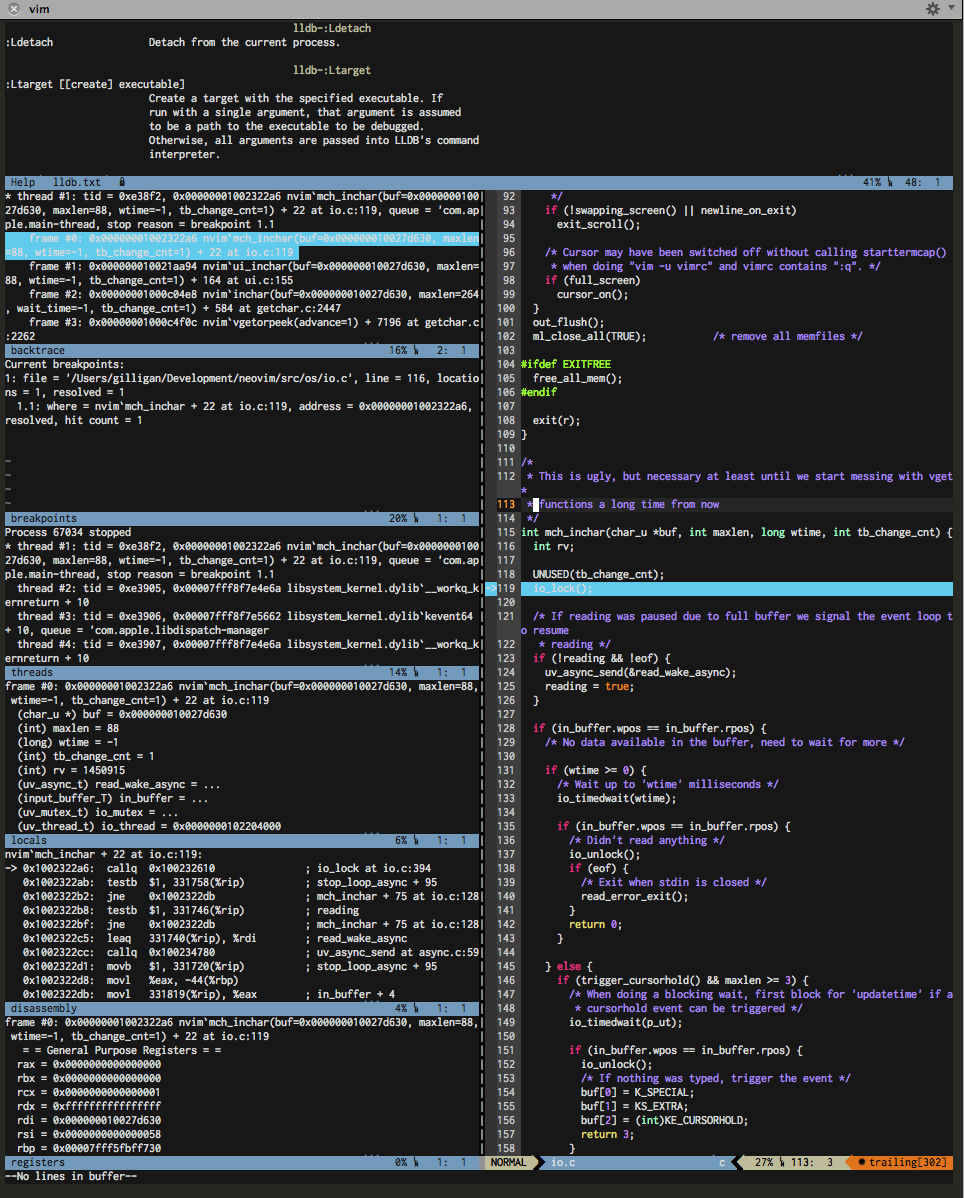
This plugin provides lldb debbuging integration including
* breakpoints
* watchpoints
* threads view
* locals view
* and more ...
Arbitrary valid lldb commands can be invoked as well.
**NOTE** : This is a fork of the plugin which is part of the llvm distribution. The original
can be found at http://llvm.org/svn/llvm-project/lldb/trunk/utils/vim-lldb/.
Prerequisites
-------------
* vim >= 7.3 on Linux or OSX with python support built in
* lldb executable needs to be in the path
Installation
------------
Installation is easiest using a package manager such as bundle:
Bundle "gilligan/vim-lldb"
Of course you are free to manually copy the files to your vimrc folder if you prefer that for
whatever weird reason.
Usage/Getting Help
------------------
Please refer to the vim help for a short 'getting started' section and
information on the available commands and configuration options. (:he lldb).
================================================
FILE: doc/lldb.txt
================================================
*lldb.txt* A plugin that enables debugging from your favourite editor
_ ____ ____
_ __(_)___ ___ / / /___/ / /_
| | / / / __ `__ \______/ / / __ / __ \
| |/ / / / / / / /_____/ / / /_/ / /_/ /
|___/_/_/ /_/ /_/ /_/_/\__,_/_.___/
LLDB Debugger Ingegration For VIM
==============================================================================
CONTENTS *lldb-contents*
1. Introduction .................... |lldb-intro|
2. Getting Started ................. |lldb-start|
3. Commands ........................ |lldb-commands|
4. Mappings ........................ |lldb-mappings|
4. License ......................... |lldb-license|
5. Bugs ............................ |lldb-bugs|
6. Contributing .................... |lldb-contributing|
Maintainer : Tobias Pflug <tobias.pflug@gmail.com>
Original Author: Daniel Malea <daniel.malea@intel.com>
License: Same terms as Vim itself (see |license|)
INTRODUCTION *lldb-intro*
The plugin provides an interface to the lldb debugger allowing for
convenient debugging sessions inside your favorite editor including
features such as breakpoints, stepping, watchpoints etc.
The original plugin can be found here:
http://llvm.org/svn/llvm-project/lldb/trunk/utils/vim-lldb/
Credit for pretty much all current functionality goes to the original
authors. Currently only minor modifications have been made to the
original plugin.
GETTING STARTED *lldb-start*
To quickly get started compile (don't forget to compile with debugging
symbols) and start some program. Then open a source file belonging to the
program in vim and execute ':Lattach <program-name>.' Then select some
line in the source file and execute ':Lbreakpoint' to set a breakpint at
the current line.
Once the program reaches the specified breakpoint you will be able to
inspect state and step through the proram using the commands described below.
COMMANDS *lldb-commands*
The LLDB command interpreter is exposed to Vim's command mode using the
':L' prefix. Tab-completion is available and will cycle through commands.
Some commands have modified behaviour in Vim; for example, :Lbreakpoint
with no arguments will set a breakpoint at the current cursor, rather than
printing the standard help information for the LLDB command 'breakpoint'.
*lldb-windows*
In addition to the standard commands available under the LLDB interpreter,
there are also commands to display or hide informational debugger panes.
Windows can be shown or hidden using the ':Lhide <name>' or ':Lshow <name>'
commands.
*lldb-:Lhide*
:Lhide [windowname] Hide informational debugger pane named 'windowname'.
*lldb-:Lshow*
:Lshow [windowname] Show informational debugger pane named 'windowname'.
Possible window name arguments to the Lhide and Lshow commands include:
* backtrace
* breakpoints
* disassembly
* locals
* registers
* threads
*lldb-:Lattach*
:Lattach <process-name> Attach to a process by name.
*lldb-:Ldetach*
:Ldetach Detach from the current process.
*lldb-:Ltarget*
:Ltarget [[create] executable]
Create a target with the specified executable. If
run with a single argument, that argument is assumed
to be a path to the executable to be debugged.
Otherwise, all arguments are passed into LLDB's command
interpreter.
*lldb-:Lstart*
:Lstart Create a process by executing the current target
and wait for LLDB to attach.
*lldb-:Lrun*
:Lrun Create a process by executing the current target
without waiting for LLDB to attach.
*lldb-:Lcontinue*
:Lcontinue Continue execution of the process until the next
breakpoint is hit or the process exits.
*lldb-:Lthread*
:Lthread <args> Passes through to LLDB. See :Lhelp thread.
*lldb-:Lstep*
:Lstep Step into the current function call.
*lldb-:Lstepin*
:Lstepin Step into the current function call.
*lldb-:Lstepinst*
:Lstepinst Step one instruction.
*lldb-:Lstepinstover*
:Lstepinstover Step one instruction, but skip over jump or call
instructions.
*lldb-:Lnext*
:Lnext Step to the next line.
*lldb-:Lfinish*
:Lfinish Step out of the current function.
*lldb-:Lbreakpoint*
:Lbreakpoint [args] When arguments are provided, the lldb breakpoint
command is invoked. If no arguments are provided,
a breakpoint at the location under the cursor.
*lldb-:Lprint*
*lldb-:Lpo*
*lldb-:LpO*
:Lprint <expr> Aliases to the lldb print and po commands. Cursor
:Lpo <expr> word (cursor WORD for LpO) will be used when
:LpO <expr> expression omitted.
MAPPINGS *lldb-mappings*
There are no default mappings defined by the plugin. All commands described
above can be mapped by defining a respective variable:
let g:lldb_map_Lframe = "<leader>f"
This will map the Lframe command to "<leader>f". Other commands can be
mapped accordingly using 'lldb_map_' + <command name>.
LICENSE *lldb-license*
Same as Vim itself.
BUGS *lldb-bugs*
If you run into a bug use the github issue tracker to report it:
http://github.com/gilligan/vim-lldb/issues/
CONTRIBUTING *lldb-contributing*
If you want to help out you are more then welcome to do so. In fact
I am sure there are plenty of people out there that will do a better
job with this plugin than me. My C skills are more than rusty. I mostly
wanted to make this nice plugin more public and host it in a way in which
it is easy to install with your favorite plugin manager.
Long story short: Bring on your forks and pull requests.
vim:tw=78:sw=4:ft=help:norl:
================================================
FILE: plugin/lldb.vim
================================================
" ---------------------------------------------------------------------
" File: lldb.vim
" Description: LLDB Debugger Integration Plugin
" Maintainer: Tobias Pflug <tobias.pflug@gmail.com>
" License: Same License as Vim itself
" --------------------------------------------------------------------
if (exists('g:loaded_lldb') && g:loaded_lldb) || v:version < 703 || &cp || !has('python')
finish
endif
let g:loaded_lldb = 1
"
" format of the command entries is as follows:
" [ command name , completion function, nargs, python code, keymap]
"
let s:lldb_commands = [
\ ['Lhide', 's:CompleteWindow', '1', 'ctrl.doHide("<args>")'],
\ ['Lshow', 's:CompleteWindow', '1', 'ctrl.doShow("<args>")'],
\ ['Lstart', '', '*', 'ctrl.doLaunch(True, "<args>")'],
\ ['Lrun', '', '*', 'ctrl.doLaunch(False, "<args>")'],
\ ['Lattach', '', '1', 'ctrl.doAttach("<args>")'],
\ ['Ldetach', '', '0', 'ctrl.doDetach()'],
\ ['Lregexpattach', 's:CompleteCommand', '*', 'ctrl.doCommand("_regexp-attach", "<args>")'],
\ ['Lregexpbreak', 's:CompleteCommand', '*', 'ctrl.doCommand("_regexp-break", "<args>")'],
\ ['Lregexpbt', 's:CompleteCommand', '*', 'ctrl.doCommand("_regexp-bt", "<args>")'],
\ ['Lregexpdown', 's:CompleteCommand', '*', 'ctrl.doCommand("_regexp-down", "<args>")'],
\ ['Lregexptbreak', 's:CompleteCommand', '*', 'ctrl.doCommand("_regexp-tbreak", "<args>")'],
\ ['Lregexpdisplay', 's:CompleteCommand', '*', 'ctrl.doCommand("_regexp-display", "<args>")'],
\ ['Lregexpundisplay', 's:CompleteCommand', '*', 'ctrl.doCommand("_regexp-undisplay", "<args>")'],
\ ['Lregexpup', 's:CompleteCommand', '*', 'ctrl.doCommand("_regexp-up", "<args>")'],
\ ['Lapropos', 's:CompleteCommand', '*', 'ctrl.doCommand("apropos", "<args>")'],
\ ['Lbacktrace', 's:CompleteCommand', '*', 'ctrl.doCommand("bt", "<args>")'],
\ ['Lbreakpoint', 's:CompleteCommand', '*', 'ctrl.doBreakpoint("<args>")', '<leader>lb'],
\ ["Lcommand", "s:CompleteCommand", "*", 'ctrl.doCommand("command", "<args>")'],
\ ["Ldisassemble", "s:CompleteCommand", "*", 'ctrl.doCommand("disassemble", "<args>")'],
\ ["Lexpression", "s:CompleteCommand", "*", 'ctrl.doCommand("expression", "<args>")'],
\ ["Lhelp", "s:CompleteCommand", "*", 'ctrl.doCommand("help", "<args>")'],
\ ["Llog", "s:CompleteCommand", "*", 'ctrl.doCommand("log", "<args>")'],
\ ["Lplatform", "s:CompleteCommand", "*", 'ctrl.doCommand("platform","<args>")'],
\ ["Lplugin", "s:CompleteCommand", "*", 'ctrl.doCommand("plugin", "<args>")'],
\ ["Lprocess", "s:CompleteCommand", "*", 'ctrl.doProcess("<args>")'],
\ ["Lregister", "s:CompleteCommand", "*", 'ctrl.doCommand("register", "<args>")'],
\ ["Lscript", "s:CompleteCommand", "*", 'ctrl.doCommand("script", "<args>")'],
\ ["Lsettings", "s:CompleteCommand", "*", 'ctrl.doCommand("settings","<args>")'],
\ ["Lsource", "s:CompleteCommand", "*", 'ctrl.doCommand("source", "<args>")'],
\ ["Ltype", "s:CompleteCommand", "*", 'ctrl.doCommand("type", "<args>")'],
\ ["Lversion", "s:CompleteCommand", "*", 'ctrl.doCommand("version", "<args>")'],
\ ["Lwatchpoint", "s:CompleteCommand", "*", 'ctrl.doCommand("watchpoint", "<args>")'],
\ ["Lprint", "s:CompleteCommand", "*", 'ctrl.doCommand("print", vim.eval("s:CursorWord("<args>")"))'],
\ ["Lpo", "s:CompleteCommand", "*", 'ctrl.doCommand("po", vim.eval("s:CursorWord("<args>")"))'],
\ ["LpO", "s:CompleteCommand", "*", 'ctrl.doCommand("po", vim.eval("s:CursorWORD("<args>")"))'],
\ ["Lbt", "s:CompleteCommand", "*", 'ctrl.doCommand("bt", "<args>")'],
\ ["Lframe", "s:CompleteCommand", "*", 'ctrl.doSelect("frame", "<args>")'],
\ ["Lup", "s:CompleteCommand", "?", 'ctrl.doCommand("up", "<args>", print_on_success=False, goto_file=True)'],
\ ["Ldown", "s:CompleteCommand", "?", 'ctrl.doCommand("down", "<args>", print_on_success=False, goto_file=True)'],
\ ["Lthread", "s:CompleteCommand", "*", 'ctrl.doSelect("thread", "<args>")'],
\ ["Ltarget", "s:CompleteCommand", "*", 'ctrl.doTarget("<args>")'],
\ ['Lcontinue', "s:CompleteCommand", "*", 'ctrl.doContinue()', '<leader>lc'],
\ ['Lstepinst', "", "0", 'ctrl.doStep(StepType.INSTRUCTION)'],
\ ['Lstepinstover', "", "0", 'ctrl.doStep(StepType.INSTRUCTION_OVER)'],
\ ['Lstepin', "", "0", 'ctrl.doStep(StepType.INTO)'],
\ ['Lstep', "", "0", 'ctrl.doStep(StepType.INTO)', '<leader>li'],
\ ['Lnext', "", "0", 'ctrl.doStep(StepType.OVER)', '<leader>ln'],
\ ['Lfinish', "", "0", 'ctrl.doStep(StepType.OUT)'],
\ ['Lrefresh', "", "0", 'ctrl.doRefresh()', '<leader>lr']
\]
" Python module init {{{
function! lldb#pythonInit()
execute 'python import sys'
let python_module_dir = fnameescape(globpath(&runtimepath, 'python-vim-lldb'))
execute 'python sys.path.append("' . python_module_dir . '")'
execute 'pyfile ' . python_module_dir . '/plugin.py'
endfunction
" }}}
" Command registration {{{
function! lldb#createCommands()
for cmd in s:lldb_commands
let complFun = ''
let nargs = ''
if len(cmd[1]) > 0
let complFun = '-complete=custom,' . cmd[1]
endif
if len(cmd[2]) > 0
let nargs = '-nargs=' . cmd[2]
endif
execute 'command ' . complFun . ' ' . nargs . ' ' . cmd[0] . ' python ' . cmd[3]
endfor
" hack: service the LLDB event-queue when the cursor moves
autocmd CursorMoved * :Lrefresh
autocmd CursorHold * :Lrefresh
autocmd VimLeavePre * python ctrl.doExit()
endfunction
"
function lldb#createKeyMaps()
for cmd in s:lldb_commands
" only map what has been configured by the user
if exists('g:lldb_map_' . cmd[0])
execute 'nnoremap ' . eval('g:lldb_map_' . cmd[0]) . ' :' . cmd[0] . '<CR>'
endif
endfor
endfunction
function! s:InitLldbPlugin()
call lldb#pythonInit()
call lldb#createCommands()
call lldb#createKeyMaps()
endfunction()
" }}}
" Command Completion Functions {{{
function! s:CompleteCommand(A, L, P)
python << EOF
a = vim.eval("a:A")
l = vim.eval("a:L")
p = vim.eval("a:P")
returnCompleteCommand(a, l, p)
EOF
endfunction()
function! s:CompleteWindow(A, L, P)
python << EOF
a = vim.eval("a:A")
l = vim.eval("a:L")
p = vim.eval("a:P")
returnCompleteWindow(a, l, p)
EOF
endfunction()
" Returns cword if search term is empty
function! s:CursorWord(term)
return empty(a:term) ? expand('<cword>') : a:term
endfunction()
" Returns cleaned cWORD if search term is empty
function! s:CursorWORD(term)
" Will strip all non-alphabetic characters from both sides
return empty(a:term) ? substitute(expand('<cWORD>'), '^\A*\(.\{-}\)\A*$', '\1', '') : a:term
endfunction()
" }}}
call s:InitLldbPlugin()
================================================
FILE: python-vim-lldb/import_lldb.py
================================================
# Locate and load the lldb python module
import os, sys
def import_lldb():
""" Find and import the lldb modules. This function tries to find the lldb module by:
1. Simply by doing "import lldb" in case the system python installation is aware of lldb. If that fails,
2. Executes the lldb executable pointed to by the LLDB environment variable (or if unset, the first lldb
on PATH") with the -P flag to determine the PYTHONPATH to set. If the lldb executable returns a valid
path, it is added to sys.path and the import is attempted again. If that fails, 3. On Mac OS X the
default Xcode 4.5 installation path.
"""
# Try simple 'import lldb', in case of a system-wide install or a pre-configured PYTHONPATH
try:
import lldb
return True
except ImportError:
pass
# Allow overriding default path to lldb executable with the LLDB environment variable
lldb_executable = 'lldb'
if 'LLDB' in os.environ and os.path.exists(os.environ['LLDB']):
lldb_executable = os.environ['LLDB']
# Try using builtin module location support ('lldb -P')
from subprocess import check_output, CalledProcessError
try:
with open(os.devnull, 'w') as fnull:
lldb_minus_p_path = check_output("%s -P" % lldb_executable, shell=True, stderr=fnull).strip()
if not os.path.exists(lldb_minus_p_path):
#lldb -P returned invalid path, probably too old
pass
else:
sys.path.append(lldb_minus_p_path)
import lldb
return True
except CalledProcessError:
# Cannot run 'lldb -P' to determine location of lldb python module
pass
except ImportError:
# Unable to import lldb module from path returned by `lldb -P`
pass
# On Mac OS X, use the try the default path to XCode lldb module
if "darwin" in sys.platform:
xcode_python_path = "/Applications/Xcode.app/Contents/SharedFrameworks/LLDB.framework/Versions/Current/Resources/Python/"
sys.path.append(xcode_python_path)
try:
import lldb
return True
except ImportError:
# Unable to import lldb module from default Xcode python path
pass
return False
if not import_lldb():
import vim
vim.command('redraw | echo "%s"' % " Error loading lldb module; vim-lldb will be disabled. Check LLDB installation or set LLDB environment variable.")
================================================
FILE: python-vim-lldb/lldb_controller.py
================================================
#
# This file defines the layer that talks to lldb
#
import os, re, sys
import lldb
import vim
from vim_ui import UI
# =================================================
# Convert some enum value to its string counterpart
# =================================================
# Shamelessly copy/pasted from lldbutil.py in the test suite
def state_type_to_str(enum):
"""Returns the stateType string given an enum."""
if enum == lldb.eStateInvalid:
return "invalid"
elif enum == lldb.eStateUnloaded:
return "unloaded"
elif enum == lldb.eStateConnected:
return "connected"
elif enum == lldb.eStateAttaching:
return "attaching"
elif enum == lldb.eStateLaunching:
return "launching"
elif enum == lldb.eStateStopped:
return "stopped"
elif enum == lldb.eStateRunning:
return "running"
elif enum == lldb.eStateStepping:
return "stepping"
elif enum == lldb.eStateCrashed:
return "crashed"
elif enum == lldb.eStateDetached:
return "detached"
elif enum == lldb.eStateExited:
return "exited"
elif enum == lldb.eStateSuspended:
return "suspended"
else:
raise Exception("Unknown StateType enum")
class StepType:
INSTRUCTION = 1
INSTRUCTION_OVER = 2
INTO = 3
OVER = 4
OUT = 5
class LLDBController(object):
""" Handles Vim and LLDB events such as commands and lldb events. """
# Timeouts (sec) for waiting on new events. Because vim is not multi-threaded, we are restricted to
# servicing LLDB events from the main UI thread. Usually, we only process events that are already
# sitting on the queue. But in some situations (when we are expecting an event as a result of some
# user interaction) we want to wait for it. The constants below set these wait period in which the
# Vim UI is "blocked". Lower numbers will make Vim more responsive, but LLDB will be delayed and higher
# numbers will mean that LLDB events are processed faster, but the Vim UI may appear less responsive at
# times.
eventDelayStep = 2
eventDelayLaunch = 1
eventDelayContinue = 1
def __init__(self):
""" Creates the LLDB SBDebugger object and initializes the UI class. """
self.target = None
self.process = None
self.load_dependent_modules = True
self.dbg = lldb.SBDebugger.Create()
self.commandInterpreter = self.dbg.GetCommandInterpreter()
self.commandInterpreter.HandleCommand("settings set target.load-script-from-symbol-file false", lldb.SBCommandReturnObject())
self.ui = UI()
def completeCommand(self, a, l, p):
""" Returns a list of viable completions for command a with length l and cursor at p """
assert l[0] == 'L'
# Remove first 'L' character that all commands start with
l = l[1:]
# Adjust length as string has 1 less character
p = int(p) - 1
result = lldb.SBStringList()
num = self.commandInterpreter.HandleCompletion(l, p, 1, -1, result)
if num == -1:
# FIXME: insert completion character... what's a completion character?
pass
elif num == -2:
# FIXME: replace line with result.GetStringAtIndex(0)
pass
if result.GetSize() > 0:
results = filter(None, [result.GetStringAtIndex(x) for x in range(result.GetSize())])
return results
else:
return []
def doStep(self, stepType):
""" Perform a step command and block the UI for eventDelayStep seconds in order to process
events on lldb's event queue.
FIXME: if the step does not complete in eventDelayStep seconds, we relinquish control to
the main thread to avoid the appearance of a "hang". If this happens, the UI will
update whenever; usually when the user moves the cursor. This is somewhat annoying.
"""
if not self.process:
sys.stderr.write("No process to step")
return
t = self.process.GetSelectedThread()
if stepType == StepType.INSTRUCTION:
t.StepInstruction(False)
if stepType == StepType.INSTRUCTION_OVER:
t.StepInstruction(True)
elif stepType == StepType.INTO:
t.StepInto()
elif stepType == StepType.OVER:
t.StepOver()
elif stepType == StepType.OUT:
t.StepOut()
self.processPendingEvents(self.eventDelayStep, True)
def doSelect(self, command, args):
""" Like doCommand, but suppress output when "select" is the first argument."""
a = args.split(' ')
return self.doCommand(command, args, "select" != a[0], True)
def doProcess(self, args):
""" Handle 'process' command. If 'launch' is requested, use doLaunch() instead
of the command interpreter to start the inferior process.
"""
a = args.split(' ')
if len(args) == 0 or (len(a) > 0 and a[0] != 'launch'):
self.doCommand("process", args)
#self.ui.update(self.target, "", self)
else:
self.doLaunch('-s' not in args, "")
def doAttach(self, process_name):
""" Handle process attach. """
error = lldb.SBError()
self.processListener = lldb.SBListener("process_event_listener")
self.target = self.dbg.CreateTarget('')
self.process = self.target.AttachToProcessWithName(self.processListener, process_name, False, error)
if not error.Success():
sys.stderr.write("Error during attach: " + str(error))
return
self.ui.activate()
self.pid = self.process.GetProcessID()
print "Attached to %s (pid=%d)" % (process_name, self.pid)
def doDetach(self):
if self.process is not None and self.process.IsValid():
pid = self.process.GetProcessID()
state = state_type_to_str(self.process.GetState())
self.process.Detach()
self.processPendingEvents(self.eventDelayLaunch)
def doLaunch(self, stop_at_entry, args):
""" Handle process launch. """
error = lldb.SBError()
fs = self.target.GetExecutable()
exe = os.path.join(fs.GetDirectory(), fs.GetFilename())
if self.process is not None and self.process.IsValid():
pid = self.process.GetProcessID()
state = state_type_to_str(self.process.GetState())
self.process.Destroy()
launchInfo = lldb.SBLaunchInfo(args.split(' '))
self.process = self.target.Launch(launchInfo, error)
if not error.Success():
sys.stderr.write("Error during launch: " + str(error))
return
# launch succeeded, store pid and add some event listeners
self.pid = self.process.GetProcessID()
self.processListener = lldb.SBListener("process_event_listener")
self.process.GetBroadcaster().AddListener(self.processListener, lldb.SBProcess.eBroadcastBitStateChanged)
print "Launched %s %s (pid=%d)" % (exe, args, self.pid)
if not stop_at_entry:
self.doContinue()
else:
self.processPendingEvents(self.eventDelayLaunch)
def doTarget(self, args):
""" Pass target command to interpreter, except if argument is not one of the valid options, or
is create, in which case try to create a target with the argument as the executable. For example:
target list ==> handled by interpreter
target create blah ==> custom creation of target 'blah'
target blah ==> also creates target blah
"""
target_args = [#"create",
"delete",
"list",
"modules",
"select",
"stop-hook",
"symbols",
"variable"]
a = args.split(' ')
if len(args) == 0 or (len(a) > 0 and a[0] in target_args):
self.doCommand("target", args)
return
elif len(a) > 1 and a[0] == "create":
exe = a[1]
elif len(a) == 1 and a[0] not in target_args:
exe = a[0]
err = lldb.SBError()
self.target = self.dbg.CreateTarget(exe, None, None, self.load_dependent_modules, err)
if not self.target:
sys.stderr.write("Error creating target %s. %s" % (str(exe), str(err)))
return
self.ui.activate()
self.ui.update(self.target, "created target %s" % str(exe), self)
def doContinue(self):
""" Handle 'contiue' command.
FIXME: switch to doCommand("continue", ...) to handle -i ignore-count param.
"""
if not self.process or not self.process.IsValid():
sys.stderr.write("No process to continue")
return
self.process.Continue()
self.processPendingEvents(self.eventDelayContinue)
def doBreakpoint(self, args):
""" Handle breakpoint command with command interpreter, except if the user calls
"breakpoint" with no other args, in which case add a breakpoint at the line
under the cursor.
"""
a = args.split(' ')
if len(args) == 0:
show_output = False
# User called us with no args, so toggle the bp under cursor
cw = vim.current.window
cb = vim.current.buffer
name = cb.name
line = cw.cursor[0]
# Since the UI is responsbile for placing signs at bp locations, we have to
# ask it if there already is one or more breakpoints at (file, line)...
if self.ui.haveBreakpoint(name, line):
bps = self.ui.getBreakpoints(name, line)
args = "delete %s" % " ".join([str(b.GetID()) for b in bps])
self.ui.deleteBreakpoints(name, line)
else:
args = "set -f %s -l %d" % (name, line)
else:
show_output = True
self.doCommand("breakpoint", args, show_output)
return
def doRefresh(self):
""" process pending events and update UI on request """
status = self.processPendingEvents()
def doShow(self, name):
""" handle :Lshow <name> """
if not name:
self.ui.activate()
return
if self.ui.showWindow(name):
self.ui.update(self.target, "", self)
def doHide(self, name):
""" handle :Lhide <name> """
if self.ui.hideWindow(name):
self.ui.update(self.target, "", self)
def doExit(self):
self.dbg.Terminate()
self.dbg = None
def getCommandResult(self, command, command_args):
""" Run cmd in the command interpreter and returns (success, output) """
result = lldb.SBCommandReturnObject()
cmd = "%s %s" % (command, command_args)
self.commandInterpreter.HandleCommand(cmd, result)
return (result.Succeeded(), result.GetOutput() if result.Succeeded() else result.GetError())
def doCommand(self, command, command_args, print_on_success = True, goto_file=False):
""" Run cmd in interpreter and print result (success or failure) on the vim status line. """
(success, output) = self.getCommandResult(command, command_args)
if success:
self.ui.update(self.target, "", self, goto_file)
if len(output) > 0 and print_on_success:
print output
else:
sys.stderr.write(output)
def getCommandOutput(self, command, command_args=""):
""" runs cmd in the command interpreter andreturns (status, result) """
result = lldb.SBCommandReturnObject()
cmd = "%s %s" % (command, command_args)
self.commandInterpreter.HandleCommand(cmd, result)
return (result.Succeeded(), result.GetOutput() if result.Succeeded() else result.GetError())
def processPendingEvents(self, wait_seconds=0, goto_file=True):
""" Handle any events that are queued from the inferior.
Blocks for at most wait_seconds, or if wait_seconds == 0,
process only events that are already queued.
"""
status = None
num_events_handled = 0
if self.process is not None:
event = lldb.SBEvent()
old_state = self.process.GetState()
new_state = None
done = False
if old_state == lldb.eStateInvalid or old_state == lldb.eStateExited:
# Early-exit if we are in 'boring' states
pass
else:
while not done and self.processListener is not None:
if not self.processListener.PeekAtNextEvent(event):
if wait_seconds > 0:
# No events on the queue, but we are allowed to wait for wait_seconds
# for any events to show up.
self.processListener.WaitForEvent(wait_seconds, event)
new_state = lldb.SBProcess.GetStateFromEvent(event)
num_events_handled += 1
done = not self.processListener.PeekAtNextEvent(event)
else:
# An event is on the queue, process it here.
self.processListener.GetNextEvent(event)
new_state = lldb.SBProcess.GetStateFromEvent(event)
# continue if stopped after attaching
if old_state == lldb.eStateAttaching and new_state == lldb.eStateStopped:
self.process.Continue()
# If needed, perform any event-specific behaviour here
num_events_handled += 1
if num_events_handled == 0:
pass
else:
if old_state == new_state:
status = ""
self.ui.update(self.target, status, self, goto_file)
def returnCompleteCommand(a, l, p):
""" Returns a "\n"-separated string with possible completion results
for command a with length l and cursor at p.
"""
separator = "\n"
results = ctrl.completeCommand(a, l, p)
vim.command('return "%s%s"' % (separator.join(results), separator))
def returnCompleteWindow(a, l, p):
""" Returns a "\n"-separated string with possible completion results
for commands that expect a window name parameter (like hide/show).
FIXME: connect to ctrl.ui instead of hardcoding the list here
"""
separator = "\n"
results = ['breakpoints', 'backtrace', 'disassembly', 'locals', 'threads', 'registers']
vim.command('return "%s%s"' % (separator.join(results), separator))
global ctrl
ctrl = LLDBController()
================================================
FILE: python-vim-lldb/plugin.py
================================================
# Try to import all dependencies, catch and handle the error gracefully if it fails.
import import_lldb
try:
import lldb
import vim
except ImportError:
sys.stderr.write("Unable to load vim/lldb module. Check lldb is on the path is available (or LLDB is set) and that script is invoked inside Vim with :pyfile")
pass
else:
# Everthing went well, so use import to start the plugin controller
from lldb_controller import *
================================================
FILE: python-vim-lldb/vim_panes.py
================================================
#
# This file contains implementations of the LLDB display panes in VIM
#
# The most generic way to define a new window is to inherit from VimPane
# and to implement:
# - get_content() - returns a string with the pane contents
#
# Optionally, to highlight text, implement:
# - get_highlights() - returns a map
#
# And call:
# - define_highlight(unique_name, colour)
# at some point in the constructor.
#
#
# If the pane shows some key-value data that is in the context of a
# single frame, inherit from FrameKeyValuePane and implement:
# - get_frame_content(self, SBFrame frame)
#
#
# If the pane presents some information that can be retrieved with
# a simple LLDB command while the subprocess is stopped, inherit
# from StoppedCommandPane and call:
# - self.setCommand(command, command_args)
# at some point in the constructor.
#
# Optionally, you can implement:
# - get_selected_line()
# to highlight a selected line and place the cursor there.
#
#
# FIXME: implement WatchlistPane to displayed watched expressions
# FIXME: define interface for interactive panes, like catching enter
# presses to change selected frame/thread...
#
import lldb
import vim
import sys
# ==============================================================
# Get the description of an lldb object or None if not available
# ==============================================================
# Shamelessly copy/pasted from lldbutil.py in the test suite
def get_description(obj, option=None):
"""Calls lldb_obj.GetDescription() and returns a string, or None.
For SBTarget, SBBreakpointLocation, and SBWatchpoint lldb objects, an extra
option can be passed in to describe the detailed level of description
desired:
o lldb.eDescriptionLevelBrief
o lldb.eDescriptionLevelFull
o lldb.eDescriptionLevelVerbose
"""
method = getattr(obj, 'GetDescription')
if not method:
return None
tuple = (lldb.SBTarget, lldb.SBBreakpointLocation, lldb.SBWatchpoint)
if isinstance(obj, tuple):
if option is None:
option = lldb.eDescriptionLevelBrief
stream = lldb.SBStream()
if option is None:
success = method(stream)
else:
success = method(stream, option)
if not success:
return None
return stream.GetData()
def get_selected_thread(target):
""" Returns a tuple with (thread, error) where thread == None if error occurs """
process = target.GetProcess()
if process is None or not process.IsValid():
return (None, VimPane.MSG_NO_PROCESS)
thread = process.GetSelectedThread()
if thread is None or not thread.IsValid():
return (None, VimPane.MSG_NO_THREADS)
return (thread, "")
def get_selected_frame(target):
""" Returns a tuple with (frame, error) where frame == None if error occurs """
(thread, error) = get_selected_thread(target)
if thread is None:
return (None, error)
frame = thread.GetSelectedFrame()
if frame is None or not frame.IsValid():
return (None, VimPane.MSG_NO_FRAME)
return (frame, "")
def _cmd(cmd):
vim.command("call confirm('%s')" % cmd)
vim.command(cmd)
def move_cursor(line, col=0):
""" moves cursor to specified line and col """
cw = vim.current.window
if cw.cursor[0] != line:
vim.command("execute \"normal %dgg\"" % line)
def winnr():
""" Returns currently selected window number """
return int(vim.eval("winnr()"))
def bufwinnr(name):
""" Returns window number corresponding with buffer name """
return int(vim.eval("bufwinnr('%s')" % name))
def goto_window(nr):
""" go to window number nr"""
if nr != winnr():
vim.command(str(nr) + ' wincmd w')
def goto_next_window():
""" go to next window. """
vim.command('wincmd w')
return (winnr(), vim.current.buffer.name)
def goto_previous_window():
""" go to previously selected window """
vim.command("execute \"normal \\<c-w>p\"")
def have_gui():
""" Returns True if vim is in a gui (Gvim/MacVim), False otherwise. """
return int(vim.eval("has('gui_running')")) == 1
class PaneLayout(object):
""" A container for a (vertical) group layout of VimPanes """
def __init__(self):
self.panes = {}
def havePane(self, name):
""" Returns true if name is a registered pane, False otherwise """
return name in self.panes
def prepare(self, panes = []):
""" Draw panes on screen. If empty list is provided, show all. """
# If we can't select a window contained in the layout, we are doing a first draw
first_draw = not self.selectWindow(True)
did_first_draw = False
# Prepare each registered pane
for name in self.panes:
if name in panes or len(panes) == 0:
if first_draw:
# First window in layout will be created with :vsp, and closed later
vim.command(":vsp")
first_draw = False
did_first_draw = True
self.panes[name].prepare()
if did_first_draw:
# Close the split window
vim.command(":q")
self.selectWindow(False)
def contains(self, bufferName = None):
""" Returns True if window with name bufferName is contained in the layout, False otherwise.
If bufferName is None, the currently selected window is checked.
"""
if not bufferName:
bufferName = vim.current.buffer.name
for p in self.panes:
if bufferName is not None and bufferName.endswith(p):
return True
return False
def selectWindow(self, select_contained = True):
""" Selects a window contained in the layout (if select_contained = True) and returns True.
If select_contained = False, a window that is not contained is selected. Returns False
if no group windows can be selected.
"""
if select_contained == self.contains():
# Simple case: we are already selected
return True
# Otherwise, switch to next window until we find a contained window, or reach the first window again.
first = winnr()
(curnum, curname) = goto_next_window()
while not select_contained == self.contains(curname) and curnum != first:
(curnum, curname) = goto_next_window()
return self.contains(curname) == select_contained
def hide(self, panes = []):
""" Hide panes specified. If empty list provided, hide all. """
for name in self.panes:
if name in panes or len(panes) == 0:
self.panes[name].destroy()
def registerForUpdates(self, p):
self.panes[p.name] = p
def update(self, target, controller):
for name in self.panes:
self.panes[name].update(target, controller)
class VimPane(object):
""" A generic base class for a pane that displays stuff """
CHANGED_VALUE_HIGHLIGHT_NAME_GUI = 'ColorColumn'
CHANGED_VALUE_HIGHLIGHT_NAME_TERM = 'lldb_changed'
CHANGED_VALUE_HIGHLIGHT_COLOUR_TERM = 'darkred'
SELECTED_HIGHLIGHT_NAME_GUI = 'Cursor'
SELECTED_HIGHLIGHT_NAME_TERM = 'lldb_selected'
SELECTED_HIGHLIGHT_COLOUR_TERM = 'darkblue'
MSG_NO_TARGET = "Target does not exist."
MSG_NO_PROCESS = "Process does not exist."
MSG_NO_THREADS = "No valid threads."
MSG_NO_FRAME = "No valid frame."
# list of defined highlights, so we avoid re-defining them
highlightTypes = []
def __init__(self, owner, name, open_below=False, height=3):
self.owner = owner
self.name = name
self.buffer = None
self.maxHeight = 20
self.openBelow = open_below
self.height = height
self.owner.registerForUpdates(self)
def isPrepared(self):
""" check window is OK """
if self.buffer == None or len(dir(self.buffer)) == 0 or bufwinnr(self.name) == -1:
return False
return True
def prepare(self, method = 'new'):
""" check window is OK, if not then create """
if not self.isPrepared():
self.create(method)
def on_create(self):
pass
def destroy(self):
""" destroy window """
if self.buffer == None or len(dir(self.buffer)) == 0:
return
vim.command('bdelete ' + self.name)
def create(self, method):
""" create window """
if method != 'edit':
belowcmd = "below" if self.openBelow else ""
vim.command('silent %s %s %s' % (belowcmd, method, self.name))
else:
vim.command('silent %s %s' % (method, self.name))
self.window = vim.current.window
# Set LLDB pane options
vim.command("setlocal buftype=nofile") # Don't try to open a file
vim.command("setlocal noswapfile") # Don't use a swap file
vim.command("setlocal nonumber") # Don't display line numbers
#vim.command("setlocal nowrap") # Don't wrap text
# Set indentation-based folding up
# Based on:
# http://vim.wikia.com/wiki/Folding_for_plain_text_files_based_on_indentation
vim.command("setlocal foldmethod=expr")
vim.command("setlocal foldexpr=(getline(v:lnum)=~'^$')?-1:((indent(v:lnum)<indent(v:lnum+1))?('>'.indent(v:lnum+1)):indent(v:lnum))")
vim.command("setlocal foldtext=getline(v:foldstart)")
vim.command("setlocal fillchars=fold:\ ")
# Save some parameters and reference to buffer
self.buffer = vim.current.buffer
self.width = int( vim.eval("winwidth(0)") )
self.height = int( vim.eval("winheight(0)") )
self.on_create()
goto_previous_window()
def update(self, target, controller):
""" updates buffer contents """
self.target = target
if not self.isPrepared():
# Window is hidden, or otherwise not ready for an update
return
original_cursor = self.window.cursor
# Select pane
goto_window(bufwinnr(self.name))
# Clean and update content, and apply any highlights.
self.clean()
if self.write(self.get_content(target, controller)):
self.apply_highlights()
cursor = self.get_selected_line()
if cursor is None:
# Place the cursor at its original position in the window
cursor_line = min(original_cursor[0], len(self.buffer))
cursor_col = min(original_cursor[1], len(self.buffer[cursor_line - 1]))
else:
# Place the cursor at the location requested by a VimPane implementation
cursor_line = min(cursor, len(self.buffer))
cursor_col = self.window.cursor[1]
self.window.cursor = (cursor_line, cursor_col)
goto_previous_window()
def get_selected_line(self):
""" Returns the line number to move the cursor to, or None to leave
it where the user last left it.
Subclasses implement this to define custom behaviour.
"""
return None
def apply_highlights(self):
""" Highlights each set of lines in each highlight group """
highlights = self.get_highlights()
for highlightType in highlights:
lines = highlights[highlightType]
if len(lines) == 0:
continue
cmd = 'match %s /' % highlightType
lines = ['\%' + '%d' % line + 'l' for line in lines]
cmd += '\\|'.join(lines)
cmd += '/'
vim.command(cmd)
def define_highlight(self, name, colour):
""" Defines highlihght """
if name in VimPane.highlightTypes:
# highlight already defined
return
vim.command("highlight %s ctermbg=%s guibg=%s" % (name, colour, colour))
VimPane.highlightTypes.append(name)
def write(self, msg):
""" replace buffer with msg"""
self.prepare()
msg = str(msg.encode("utf-8", "replace")).split('\n')
try:
self.buffer.append(msg)
vim.command("execute \"normal ggdd\"")
except vim.error:
# cannot update window; happens when vim is exiting.
return False
move_cursor(1, 0)
return True
def clean(self):
""" clean all datas in buffer """
self.prepare()
vim.command(':%d')
#self.buffer[:] = None
def get_content(self, target, controller):
""" subclasses implement this to provide pane content """
assert(0 and "pane subclass must implement this")
pass
def get_highlights(self):
""" Subclasses implement this to provide pane highlights.
This function is expected to return a map of:
{ highlight_name ==> [line_number, ...], ... }
"""
return {}
class FrameKeyValuePane(VimPane):
def __init__(self, owner, name, open_below):
""" Initialize parent, define member variables, choose which highlight
to use based on whether or not we have a gui (MacVim/Gvim).
"""
VimPane.__init__(self, owner, name, open_below)
# Map-of-maps key/value history { frame --> { variable_name, variable_value } }
self.frameValues = {}
if have_gui():
self.changedHighlight = VimPane.CHANGED_VALUE_HIGHLIGHT_NAME_GUI
else:
self.changedHighlight = VimPane.CHANGED_VALUE_HIGHLIGHT_NAME_TERM
self.define_highlight(VimPane.CHANGED_VALUE_HIGHLIGHT_NAME_TERM,
VimPane.CHANGED_VALUE_HIGHLIGHT_COLOUR_TERM)
def format_pair(self, key, value, changed = False):
""" Formats a key/value pair. Appends a '*' if changed == True """
marker = '*' if changed else ' '
return "%s %s = %s\n" % (marker, key, value)
def get_content(self, target, controller):
""" Get content for a frame-aware pane. Also builds the list of lines that
need highlighting (i.e. changed values.)
"""
if target is None or not target.IsValid():
return VimPane.MSG_NO_TARGET
self.changedLines = []
(frame, err) = get_selected_frame(target)
if frame is None:
return err
output = get_description(frame)
lineNum = 1
# Retrieve the last values displayed for this frame
frameId = get_description(frame.GetBlock())
if frameId in self.frameValues:
frameOldValues = self.frameValues[frameId]
else:
frameOldValues = {}
# Read the frame variables
vals = self.get_frame_content(frame)
for (key, value) in vals:
lineNum += 1
if len(frameOldValues) == 0 or (key in frameOldValues and frameOldValues[key] == value):
output += self.format_pair(key, value)
else:
output += self.format_pair(key, value, True)
self.changedLines.append(lineNum)
# Save values as oldValues
newValues = {}
for (key, value) in vals:
newValues[key] = value
self.frameValues[frameId] = newValues
return output
def get_highlights(self):
ret = {}
ret[self.changedHighlight] = self.changedLines
return ret
class LocalsPane(FrameKeyValuePane):
""" Pane that displays local variables """
def __init__(self, owner, name = 'locals'):
FrameKeyValuePane.__init__(self, owner, name, open_below=True)
# FIXME: allow users to customize display of args/locals/statics/scope
self.arguments = True
self.show_locals = True
self.show_statics = False
self.show_in_scope_only = True
def format_variable(self, var, indent = 0):
""" Returns a list of tuples of strings "(Type) Name", "Value" for SBValue var
and its children
"""
MAX_DEPTH = 6
if indent > MAX_DEPTH:
return []
else:
val = var.GetValue()
if val is None:
# If the value is too big, SBValue.GetValue() returns None; replace with ...
val = "..."
children = []
if var.GetNumChildren() > 0:
for x in var:
children.extend(self.format_variable(x, indent + 1))
return [("%s(%s) %s" % (' ' * indent, var.GetTypeName(), var.GetName()),
"%s" % val)] + children
def get_frame_content(self, frame):
""" Returns list of key-value pairs of local variables in frame """
vals = frame.GetVariables(self.arguments,
self.show_locals,
self.show_statics,
self.show_in_scope_only)
out = []
for v in [self.format_variable(x) for x in vals]:
out.extend(v)
return out
class RegistersPane(FrameKeyValuePane):
""" Pane that displays the contents of registers """
def __init__(self, owner, name = 'registers'):
FrameKeyValuePane.__init__(self, owner, name, open_below=True)
def format_register(self, reg):
""" Returns a tuple of strings ("name", "value") for SBRegister reg. """
name = reg.GetName()
val = reg.GetValue()
if val is None:
val = "..."
return (name, val.strip())
def get_frame_content(self, frame):
""" Returns a list of key-value pairs ("name", "value") of registers in frame """
result = []
for register_sets in frame.GetRegisters():
# hack the register group name into the list of registers...
result.append((" = = %s =" % register_sets.GetName(), ""))
for reg in register_sets:
result.append(self.format_register(reg))
return result
class CommandPane(VimPane):
""" Pane that displays the output of an LLDB command """
def __init__(self, owner, name, open_below, process_required=True):
VimPane.__init__(self, owner, name, open_below)
self.process_required = process_required
def setCommand(self, command, args = ""):
self.command = command
self.args = args
def get_content(self, target, controller):
output = ""
if not target:
output = VimPane.MSG_NO_TARGET
elif self.process_required and not target.GetProcess():
output = VimPane.MSG_NO_PROCESS
else:
(success, output) = controller.getCommandOutput(self.command, self.args)
return output
class StoppedCommandPane(CommandPane):
""" Pane that displays the output of an LLDB command when the process is
stopped; otherwise displays process status. This class also implements
highlighting for a single line (to show a single-line selected entity.)
"""
def __init__(self, owner, name, open_below):
""" Initialize parent and define highlight to use for selected line. """
CommandPane.__init__(self, owner, name, open_below)
if have_gui():
self.selectedHighlight = VimPane.SELECTED_HIGHLIGHT_NAME_GUI
else:
self.selectedHighlight = VimPane.SELECTED_HIGHLIGHT_NAME_TERM
self.define_highlight(VimPane.SELECTED_HIGHLIGHT_NAME_TERM,
VimPane.SELECTED_HIGHLIGHT_COLOUR_TERM)
def get_content(self, target, controller):
""" Returns the output of a command that relies on the process being stopped.
If the process is not in 'stopped' state, the process status is returned.
"""
output = ""
if not target or not target.IsValid():
output = VimPane.MSG_NO_TARGET
elif not target.GetProcess() or not target.GetProcess().IsValid():
output = VimPane.MSG_NO_PROCESS
elif target.GetProcess().GetState() == lldb.eStateStopped:
(success, output) = controller.getCommandOutput(self.command, self.args)
else:
(success, output) = controller.getCommandOutput("process", "status")
return output
def get_highlights(self):
""" Highlight the line under the cursor. Users moving the cursor has
no effect on the selected line.
"""
ret = {}
line = self.get_selected_line()
if line is not None:
ret[self.selectedHighlight] = [line]
return ret
return ret
def get_selected_line(self):
""" Subclasses implement this to control where the cursor (and selected highlight)
is placed.
"""
return None
class DisassemblyPane(CommandPane):
""" Pane that displays disassembly around PC """
def __init__(self, owner, name = 'disassembly'):
CommandPane.__init__(self, owner, name, open_below=True)
# FIXME: let users customize the number of instructions to disassemble
self.setCommand("disassemble", "-c %d -p" % self.maxHeight)
class ThreadPane(StoppedCommandPane):
""" Pane that displays threads list """
def __init__(self, owner, name = 'threads'):
StoppedCommandPane.__init__(self, owner, name, open_below=False)
self.setCommand("thread", "list")
# FIXME: the function below assumes threads are listed in sequential order,
# which turns out to not be the case. Highlighting of selected thread
# will be disabled until this can be fixed. LLDB prints a '*' anyways
# beside the selected thread, so this is not too big of a problem.
# def get_selected_line(self):
# """ Place the cursor on the line with the selected entity.
# Subclasses should override this to customize selection.
# Formula: selected_line = selected_thread_id + 1
# """
# (thread, err) = get_selected_thread(self.target)
# if thread is None:
# return None
# else:
# return thread.GetIndexID() + 1
class BacktracePane(StoppedCommandPane):
""" Pane that displays backtrace """
def __init__(self, owner, name = 'backtrace'):
StoppedCommandPane.__init__(self, owner, name, open_below=False)
self.setCommand("bt", "")
def get_selected_line(self):
""" Returns the line number in the buffer with the selected frame.
Formula: selected_line = selected_frame_id + 2
FIXME: the above formula hack does not work when the function return
value is printed in the bt window; the wrong line is highlighted.
"""
(frame, err) = get_selected_frame(self.target)
if frame is None:
return None
else:
return frame.GetFrameID() + 2
class BreakpointsPane(CommandPane):
def __init__(self, owner, name = 'breakpoints'):
super(BreakpointsPane, self).__init__(owner, name, open_below=False, process_required=False)
self.setCommand("breakpoint", "list")
================================================
FILE: python-vim-lldb/vim_signs.py
================================================
# Classes responsible for drawing signs in the Vim user interface.
import vim
class VimSign(object):
SIGN_TEXT_BREAKPOINT_RESOLVED = "B>"
SIGN_TEXT_BREAKPOINT_UNRESOLVED = "b>"
SIGN_TEXT_PC = "->"
SIGN_HIGHLIGHT_COLOUR_PC = 'darkblue'
# unique sign id (for ':[sign/highlight] define)
sign_id = 1
# unique name id (for ':sign place')
name_id = 1
# Map of {(sign_text, highlight_colour) --> sign_name}
defined_signs = {}
def __init__(self, sign_text, buffer, line_number, highlight_colour=None):
""" Define the sign and highlight (if applicable) and show the sign. """
# Get the sign name, either by defining it, or looking it up in the map of defined signs
key = (sign_text, highlight_colour)
if not key in VimSign.defined_signs:
name = self.define(sign_text, highlight_colour)
else:
name = VimSign.defined_signs[key]
self.show(name, buffer.number, line_number)
pass
def define(self, sign_text, highlight_colour):
""" Defines sign and highlight (if highlight_colour is not None). """
sign_name = "sign%d" % VimSign.name_id
if highlight_colour is None:
vim.command("sign define %s text=%s" % (sign_name, sign_text))
else:
self.highlight_name = "highlight%d" % VimSign.name_id
vim.command("highlight %s ctermbg=%s guibg=%s" % (self.highlight_name,
highlight_colour,
highlight_colour))
vim.command("sign define %s text=%s linehl=%s texthl=%s" % (sign_name,
sign_text,
self.highlight_name,
self.highlight_name))
VimSign.defined_signs[(sign_text, highlight_colour)] = sign_name
VimSign.name_id += 1
return sign_name
def show(self, name, buffer_number, line_number):
self.id = VimSign.sign_id
VimSign.sign_id += 1
vim.command("sign place %d name=%s line=%d buffer=%s" % (self.id, name, line_number, buffer_number))
pass
def hide(self):
vim.command("sign unplace %d" % self.id)
pass
class BreakpointSign(VimSign):
def __init__(self, buffer, line_number, is_resolved):
txt = VimSign.SIGN_TEXT_BREAKPOINT_RESOLVED if is_resolved else VimSign.SIGN_TEXT_BREAKPOINT_UNRESOLVED
super(BreakpointSign, self).__init__(txt, buffer, line_number)
class PCSign(VimSign):
def __init__(self, buffer, line_number, is_selected_thread):
super(PCSign, self).__init__(VimSign.SIGN_TEXT_PC,
buffer,
line_number,
VimSign.SIGN_HIGHLIGHT_COLOUR_PC if is_selected_thread else None)
================================================
FILE: python-vim-lldb/vim_ui.py
================================================
# LLDB UI state in the Vim user interface.
import os, re, sys
import lldb
import vim
from vim_panes import *
from vim_signs import *
def is_same_file(a, b):
""" returns true if paths a and b are the same file """
a = os.path.realpath(a)
b = os.path.realpath(b)
return a in b or b in a
class UI:
def __init__(self):
""" Declare UI state variables """
# Default panes to display
self.defaultPanes = ['breakpoints', 'backtrace', 'locals', 'threads', 'registers', 'disassembly']
# map of tuples (filename, line) --> SBBreakpoint
self.markedBreakpoints = {}
# Currently shown signs
self.breakpointSigns = {}
self.pcSigns = []
# Container for panes
self.paneCol = PaneLayout()
# All possible LLDB panes
self.backtracePane = BacktracePane(self.paneCol)
self.threadPane = ThreadPane(self.paneCol)
self.disassemblyPane = DisassemblyPane(self.paneCol)
self.localsPane = LocalsPane(self.paneCol)
self.registersPane = RegistersPane(self.paneCol)
self.breakPane = BreakpointsPane(self.paneCol)
def activate(self):
""" Activate UI: display default set of panes """
self.paneCol.prepare(self.defaultPanes)
def get_user_buffers(self, filter_name=None):
""" Returns a list of buffers that are not a part of the LLDB UI. That is, they
are not contained in the PaneLayout object self.paneCol.
"""
ret = []
for w in vim.windows:
b = w.buffer
if not self.paneCol.contains(b.name):
if filter_name is None or filter_name in b.name:
ret.append(b)
return ret
def update_pc(self, process, buffers, goto_file):
""" Place the PC sign on the PC location of each thread's selected frame """
def GetPCSourceLocation(thread):
""" Returns a tuple (thread_index, file, line, column) that represents where
the PC sign should be placed for a thread.
"""
frame = thread.GetSelectedFrame()
frame_num = frame.GetFrameID()
le = frame.GetLineEntry()
while not le.IsValid() and frame_num < thread.GetNumFrames():
frame_num += 1
le = thread.GetFrameAtIndex(frame_num).GetLineEntry()
if le.IsValid():
path = os.path.join(le.GetFileSpec().GetDirectory(), le.GetFileSpec().GetFilename())
return (thread.GetIndexID(), path, le.GetLine(), le.GetColumn())
return None
# Clear all existing PC signs
del_list = []
for sign in self.pcSigns:
sign.hide()
del_list.append(sign)
for sign in del_list:
self.pcSigns.remove(sign)
del sign
# Select a user (non-lldb) window
if not self.paneCol.selectWindow(False):
# No user window found; avoid clobbering by splitting
vim.command(":vsp")
# Show a PC marker for each thread
for thread in process:
loc = GetPCSourceLocation(thread)
if not loc:
# no valid source locations for PCs. hide all existing PC markers
continue
buf = None
(tid, fname, line, col) = loc
buffers = self.get_user_buffers(fname)
is_selected = thread.GetIndexID() == process.GetSelectedThread().GetIndexID()
if len(buffers) == 1:
buf = buffers[0]
if buf != vim.current.buffer:
# Vim has an open buffer to the required file: select it
vim.command('execute ":%db"' % buf.number)
elif is_selected and vim.current.buffer.name not in fname and os.path.exists(fname) and goto_file:
# FIXME: If current buffer is modified, vim will complain when we try to switch away.
# Find a way to detect if the current buffer is modified, and...warn instead?
vim.command('execute ":e %s"' % fname)
buf = vim.current.buffer
elif len(buffers) > 1 and goto_file:
#FIXME: multiple open buffers match PC location
continue
else:
continue
self.pcSigns.append(PCSign(buf, line, is_selected))
if is_selected and goto_file:
# if the selected file has a PC marker, move the cursor there too
curname = vim.current.buffer.name
if curname is not None and is_same_file(curname, fname):
move_cursor(line, 0)
elif move_cursor:
print "FIXME: not sure where to move cursor because %s != %s " % (vim.current.buffer.name, fname)
def update_breakpoints(self, target, buffers):
""" Decorates buffer with signs corresponding to breakpoints in target. """
def GetBreakpointLocations(bp):
""" Returns a list of tuples (resolved, filename, line) where a breakpoint was resolved. """
if not bp.IsValid():
sys.stderr.write("breakpoint is invalid, no locations")
return []
ret = []
numLocs = bp.GetNumLocations()
for i in range(numLocs):
loc = bp.GetLocationAtIndex(i)
desc = get_description(loc, lldb.eDescriptionLevelFull)
match = re.search('at\ ([^:]+):([\d]+)', desc)
try:
lineNum = int(match.group(2).strip())
ret.append((loc.IsResolved(), match.group(1), lineNum))
except ValueError as e:
sys.stderr.write("unable to parse breakpoint location line number: '%s'" % match.group(2))
sys.stderr.write(str(e))
return ret
if target is None or not target.IsValid():
return
needed_bps = {}
for bp_index in range(target.GetNumBreakpoints()):
bp = target.GetBreakpointAtIndex(bp_index)
locations = GetBreakpointLocations(bp)
for (is_resolved, file, line) in GetBreakpointLocations(bp):
for buf in buffers:
if file in buf.name:
needed_bps[(buf, line, is_resolved)] = bp
# Hide any signs that correspond with disabled breakpoints
del_list = []
for (b, l, r) in self.breakpointSigns:
if (b, l, r) not in needed_bps:
self.breakpointSigns[(b, l, r)].hide()
del_list.append((b, l, r))
for d in del_list:
del self.breakpointSigns[d]
# Show any signs for new breakpoints
for (b, l, r) in needed_bps:
bp = needed_bps[(b, l, r)]
if self.haveBreakpoint(b.name, l):
self.markedBreakpoints[(b.name, l)].append(bp)
else:
self.markedBreakpoints[(b.name, l)] = [bp]
if (b, l, r) not in self.breakpointSigns:
s = BreakpointSign(b, l, r)
self.breakpointSigns[(b, l, r)] = s
def update(self, target, status, controller, goto_file=False):
""" Updates debugger info panels and breakpoint/pc marks and prints
status to the vim status line. If goto_file is True, the user's
cursor is moved to the source PC location in the selected frame.
"""
self.paneCol.update(target, controller)
self.update_breakpoints(target, self.get_user_buffers())
if target is not None and target.IsValid():
process = target.GetProcess()
if process is not None and process.IsValid():
self.update_pc(process, self.get_user_buffers, goto_file)
if status is not None and len(status) > 0:
print status
def haveBreakpoint(self, file, line):
""" Returns True if we have a breakpoint at file:line, False otherwise """
return (file, line) in self.markedBreakpoints
def getBreakpoints(self, fname, line):
""" Returns the LLDB SBBreakpoint object at fname:line """
if self.haveBreakpoint(fname, line):
return self.markedBreakpoints[(fname, line)]
else:
return None
def deleteBreakpoints(self, name, line):
del self.markedBreakpoints[(name, line)]
def showWindow(self, name):
""" Shows (un-hides) window pane specified by name """
if not self.paneCol.havePane(name):
sys.stderr.write("unknown window: %s" % name)
return False
self.paneCol.prepare([name])
return True
def hideWindow(self, name):
""" Hides window pane specified by name """
if not self.paneCol.havePane(name):
sys.stderr.write("unknown window: %s" % name)
return False
self.paneCol.hide([name])
return True
global ui
ui = UI()
gitextract_cngp1fha/
├── .gitignore
├── README.md
├── doc/
│ └── lldb.txt
├── plugin/
│ └── lldb.vim
└── python-vim-lldb/
├── import_lldb.py
├── lldb_controller.py
├── plugin.py
├── vim_panes.py
├── vim_signs.py
└── vim_ui.py
SYMBOL INDEX (113 symbols across 5 files)

FILE: python-vim-lldb/import_lldb.py
  function import_lldb (line 6) | def import_lldb():

FILE: python-vim-lldb/lldb_controller.py
  function state_type_to_str (line 16) | def state_type_to_str(enum):
  class StepType (line 45) | class StepType:
  class LLDBController (line 52) | class LLDBController(object):
    method __init__ (line 66) | def __init__(self):
    method completeCommand (line 78) | def completeCommand(self, a, l, p):
    method doStep (line 104) | def doStep(self, stepType):
    method doSelect (line 129) | def doSelect(self, command, args):
    method doProcess (line 134) | def doProcess(self, args):
    method doAttach (line 145) | def doAttach(self, process_name):
    method doDetach (line 161) | def doDetach(self):
    method doLaunch (line 168) | def doLaunch(self, stop_at_entry, args):
    method doTarget (line 197) | def doTarget(self, args):
    method doContinue (line 231) | def doContinue(self):
    method doBreakpoint (line 242) | def doBreakpoint(self, args):
    method doRefresh (line 271) | def doRefresh(self):
    method doShow (line 275) | def doShow(self, name):
    method doHide (line 284) | def doHide(self, name):
    method doExit (line 289) | def doExit(self):
    method getCommandResult (line 293) | def getCommandResult(self, command, command_args):
    method doCommand (line 301) | def doCommand(self, command, command_args, print_on_success = True, go...
    method getCommandOutput (line 311) | def getCommandOutput(self, command, command_args=""):
    method processPendingEvents (line 318) | def processPendingEvents(self, wait_seconds=0, goto_file=True):
  function returnCompleteCommand (line 367) | def returnCompleteCommand(a, l, p):
  function returnCompleteWindow (line 375) | def returnCompleteWindow(a, l, p):

FILE: python-vim-lldb/vim_panes.py
  function get_description (line 47) | def get_description(obj, option=None):
  function get_selected_thread (line 74) | def get_selected_thread(target):
  function get_selected_frame (line 85) | def get_selected_frame(target):
  function _cmd (line 96) | def _cmd(cmd):
  function move_cursor (line 100) | def move_cursor(line, col=0):
  function winnr (line 106) | def winnr():
  function bufwinnr (line 110) | def bufwinnr(name):
  function goto_window (line 114) | def goto_window(nr):
  function goto_next_window (line 119) | def goto_next_window():
  function goto_previous_window (line 124) | def goto_previous_window():
  function have_gui (line 128) | def have_gui():
  class PaneLayout (line 132) | class PaneLayout(object):
    method __init__ (line 135) | def __init__(self):
    method havePane (line 138) | def havePane(self, name):
    method prepare (line 142) | def prepare(self, panes = []):
    method contains (line 165) | def contains(self, bufferName = None):
    method selectWindow (line 177) | def selectWindow(self, select_contained = True):
    method hide (line 195) | def hide(self, panes = []):
    method registerForUpdates (line 201) | def registerForUpdates(self, p):
    method update (line 204) | def update(self, target, controller):
  class VimPane (line 209) | class VimPane(object):
    method __init__ (line 227) | def __init__(self, owner, name, open_below=False, height=3):
    method isPrepared (line 236) | def isPrepared(self):
    method prepare (line 242) | def prepare(self, method = 'new'):
    method on_create (line 247) | def on_create(self):
    method destroy (line 250) | def destroy(self):
    method create (line 256) | def create(self, method):
    method update (line 289) | def update(self, target, controller):
    method get_selected_line (line 321) | def get_selected_line(self):
    method apply_highlights (line 328) | def apply_highlights(self):
    method define_highlight (line 342) | def define_highlight(self, name, colour):
    method write (line 351) | def write(self, msg):
    method clean (line 366) | def clean(self):
    method get_content (line 372) | def get_content(self, target, controller):
    method get_highlights (line 377) | def get_highlights(self):
  class FrameKeyValuePane (line 385) | class FrameKeyValuePane(VimPane):
    method __init__ (line 386) | def __init__(self, owner, name, open_below):
    method format_pair (line 403) | def format_pair(self, key, value, changed = False):
    method get_content (line 408) | def get_content(self, target, controller):
    method get_highlights (line 449) | def get_highlights(self):
  class LocalsPane (line 454) | class LocalsPane(FrameKeyValuePane):
    method __init__ (line 456) | def __init__(self, owner, name = 'locals'):
    method format_variable (line 465) | def format_variable(self, var, indent = 0):
    method get_frame_content (line 487) | def get_frame_content(self, frame):
  class RegistersPane (line 500) | class RegistersPane(FrameKeyValuePane):
    method __init__ (line 502) | def __init__(self, owner, name = 'registers'):
    method format_register (line 505) | def format_register(self, reg):
    method get_frame_content (line 513) | def get_frame_content(self, frame):
  class CommandPane (line 525) | class CommandPane(VimPane):
    method __init__ (line 527) | def __init__(self, owner, name, open_below, process_required=True):
    method setCommand (line 531) | def setCommand(self, command, args = ""):
    method get_content (line 535) | def get_content(self, target, controller):
  class StoppedCommandPane (line 545) | class StoppedCommandPane(CommandPane):
    method __init__ (line 550) | def __init__(self, owner, name, open_below):
    method get_content (line 560) | def get_content(self, target, controller):
    method get_highlights (line 575) | def get_highlights(self):
    method get_selected_line (line 586) | def get_selected_line(self):
  class DisassemblyPane (line 592) | class DisassemblyPane(CommandPane):
    method __init__ (line 594) | def __init__(self, owner, name = 'disassembly'):
  class ThreadPane (line 600) | class ThreadPane(StoppedCommandPane):
    method __init__ (line 602) | def __init__(self, owner, name = 'threads'):
  class BacktracePane (line 621) | class BacktracePane(StoppedCommandPane):
    method __init__ (line 623) | def __init__(self, owner, name = 'backtrace'):
    method get_selected_line (line 628) | def get_selected_line(self):
  class BreakpointsPane (line 641) | class BreakpointsPane(CommandPane):
    method __init__ (line 642) | def __init__(self, owner, name = 'breakpoints'):

FILE: python-vim-lldb/vim_signs.py
  class VimSign (line 6) | class VimSign(object):
    method __init__ (line 21) | def __init__(self, sign_text, buffer, line_number, highlight_colour=No...
    method define (line 34) | def define(self, sign_text, highlight_colour):
    method show (line 53) | def show(self, name, buffer_number, line_number):
    method hide (line 59) | def hide(self):
  class BreakpointSign (line 63) | class BreakpointSign(VimSign):
    method __init__ (line 64) | def __init__(self, buffer, line_number, is_resolved):
  class PCSign (line 68) | class PCSign(VimSign):
    method __init__ (line 69) | def __init__(self, buffer, line_number, is_selected_thread):

FILE: python-vim-lldb/vim_ui.py
  function is_same_file (line 10) | def is_same_file(a, b):
  class UI (line 16) | class UI:
    method __init__ (line 17) | def __init__(self):
    method activate (line 41) | def activate(self):
    method get_user_buffers (line 45) | def get_user_buffers(self, filter_name=None):
    method update_pc (line 57) | def update_pc(self, process, buffers, goto_file):
    method update_breakpoints (line 129) | def update_breakpoints(self, target, buffers):
    method update (line 187) | def update(self, target, status, controller, goto_file=False):
    method haveBreakpoint (line 204) | def haveBreakpoint(self, file, line):
    method getBreakpoints (line 208) | def getBreakpoints(self, fname, line):
    method deleteBreakpoints (line 215) | def deleteBreakpoints(self, name, line):
    method showWindow (line 218) | def showWindow(self, name):
    method hideWindow (line 226) | def hideWindow(self, name):
Condensed preview — 10 files, each showing path, character count, and a content snippet. Download the .json file or copy for the full structured content (68K chars).
[
  {
    "path": ".gitignore",
    "chars": 15,
    "preview": "doc/tags\n*.pyc\n"
  },
  {
    "path": "README.md",
    "chars": 1057,
    "preview": "LLDB Vim Frontend (UNMAINTAINED)\n=================\n\nThis plugin provides lldb debbuging integration including\n\n    * bre"
  },
  {
    "path": "doc/lldb.txt",
    "chars": 7298,
    "preview": "*lldb.txt* A plugin that enables debugging from your favourite editor\n\n                        _                 ____   "
  },
  {
    "path": "plugin/lldb.vim",
    "chars": 7256,
    "preview": "\" ---------------------------------------------------------------------\n\"  File:        lldb.vim\n\"  Description: LLDB De"
  },
  {
    "path": "python-vim-lldb/import_lldb.py",
    "chars": 2335,
    "preview": "\n# Locate and load the lldb python module\n\nimport os, sys\n\ndef import_lldb():\n  \"\"\" Find and import the lldb modules. Th"
  },
  {
    "path": "python-vim-lldb/lldb_controller.py",
    "chars": 13575,
    "preview": "\n#\n# This file defines the layer that talks to lldb\n#\n\nimport os, re, sys\nimport lldb\nimport vim\nfrom vim_ui import UI\n\n"
  },
  {
    "path": "python-vim-lldb/plugin.py",
    "chars": 436,
    "preview": "\n# Try to import all dependencies, catch and handle the error gracefully if it fails.\n\nimport import_lldb\n\ntry:\n  import"
  },
  {
    "path": "python-vim-lldb/vim_panes.py",
    "chars": 21357,
    "preview": "#\n# This file contains implementations of the LLDB display panes in VIM\n#\n# The most generic way to define a new window "
  },
  {
    "path": "python-vim-lldb/vim_signs.py",
    "chars": 2838,
    "preview": "\n# Classes responsible for drawing signs in the Vim user interface.\n\nimport vim\n\nclass VimSign(object):\n  SIGN_TEXT_BREA"
  },
  {
    "path": "python-vim-lldb/vim_ui.py",
    "chars": 8032,
    "preview": "\n# LLDB UI state in the Vim user interface.\n\nimport os, re, sys\nimport lldb\nimport vim\nfrom vim_panes import *\nfrom vim_"
  }
]
About this extraction
This page contains the full source code of the gilligan/vim-lldb GitHub repository, extracted and formatted as plain text for AI agents and large language models (LLMs). The extraction includes 10 files (62.7 KB), approximately 15.8k tokens, and a symbol index with 113 extracted functions, classes, methods, constants, and types. Use this with OpenClaw, Claude, ChatGPT, Cursor, Windsurf, or any other AI tool that accepts text input. You can copy the full output to your clipboard or download it as a .txt file.
Extracted by GitExtract — free GitHub repo to text converter for AI. Built by Nikandr Surkov.