Repository: googlesamples/apps-script
Branch: main
Commit: 8a31678d1d7e
Files: 520
Total size: 1.2 MB
Directory structure:
gitextract_1q8uhr3u/
├── .gemini/
│ ├── GEMINI.md
│ ├── config.yaml
│ └── settings.json
├── .github/
│ ├── CODEOWNERS
│ ├── ISSUE_TEMPLATE.md
│ ├── linters/
│ │ ├── .htmlhintrc
│ │ ├── .yaml-lint.yml
│ │ └── sun_checks.xml
│ ├── pull_request_template.md
│ ├── scripts/
│ │ ├── biome-gs.ts
│ │ ├── check-gs.ts
│ │ └── clasp_push.sh
│ ├── snippet-bot.yml
│ ├── sync-repo-settings.yaml
│ └── workflows/
│ ├── automation.yml
│ ├── lint.yml
│ ├── publish.yaml
│ └── test.yml
├── .gitignore
├── .vscode/
│ ├── extensions.json
│ └── settings.json
├── CONTRIBUTING.md
├── GEMINI.md
├── LICENSE
├── README.md
├── SECURITY.md
├── adminSDK/
│ ├── directory/
│ │ └── quickstart.gs
│ ├── reports/
│ │ └── quickstart.gs
│ └── reseller/
│ └── quickstart.gs
├── advanced/
│ ├── README.md
│ ├── adminSDK.gs
│ ├── adsense.gs
│ ├── analytics.gs
│ ├── analyticsAdmin.gs
│ ├── analyticsData.gs
│ ├── bigquery.gs
│ ├── calendar.gs
│ ├── chat.gs
│ ├── classroom.gs
│ ├── displayvideo.gs
│ ├── docs.gs
│ ├── doubleclick.gs
│ ├── doubleclickbidmanager.gs
│ ├── drive.gs
│ ├── driveActivity.gs
│ ├── driveLabels.gs
│ ├── events.gs
│ ├── gmail.gs
│ ├── iot.gs
│ ├── people.gs
│ ├── sheets.gs
│ ├── shoppingContent.gs
│ ├── slides.gs
│ ├── tagManager.gs
│ ├── tasks.gs
│ ├── test_adminSDK.gs
│ ├── test_adsense.gs
│ ├── test_analytics.gs
│ ├── test_bigquery.gs
│ ├── test_calendar.gs
│ ├── test_classroom.gs
│ ├── test_displayvideo.gs
│ ├── test_docs.gs
│ ├── test_doubleclick.gs
│ ├── test_doubleclickbidmanager.gs
│ ├── test_drive.gs
│ ├── test_gmail.gs
│ ├── test_people.gs
│ ├── test_sheets.gs
│ ├── test_shoppingContent.gs
│ ├── test_slides.gs
│ ├── test_tagManager.gs
│ ├── test_tasks.gs
│ ├── test_youtube.gs
│ ├── test_youtubeAnalytics.gs
│ ├── test_youtubeContentId.gs
│ ├── youtube.gs
│ ├── youtubeAnalytics.gs
│ └── youtubeContentId.gs
├── ai/
│ ├── autosummarize/
│ │ ├── README.md
│ │ ├── appsscript.json
│ │ ├── gemini.js
│ │ ├── main.js
│ │ ├── sidebar.html
│ │ └── summarize.js
│ ├── custom-func-ai-agent/
│ │ ├── AiVertex.js
│ │ ├── Code.js
│ │ ├── README.md
│ │ └── appsscript.json
│ ├── custom-func-ai-studio/
│ │ ├── Code.js
│ │ ├── README.md
│ │ ├── appsscript.json
│ │ └── gemini.js
│ ├── custom_func_vertex/
│ │ ├── Code.js
│ │ ├── README.md
│ │ ├── aiVertex.js
│ │ └── appsscript.json
│ ├── devdocs-link-preview/
│ │ ├── Cards.js
│ │ ├── Helpers.js
│ │ ├── Main.js
│ │ ├── README.md
│ │ ├── Vertex.js
│ │ └── appsscript.json
│ ├── drive-rename/
│ │ ├── README.md
│ │ ├── ai.js
│ │ ├── appsscript.json
│ │ ├── drive.js
│ │ ├── main.js
│ │ └── ui.js
│ ├── email-classifier/
│ │ ├── Cards.gs
│ │ ├── ClassifyEmail.gs
│ │ ├── Code.gs
│ │ ├── Constants.gs
│ │ ├── DraftEmail.gs
│ │ ├── Labels.gs
│ │ ├── README.md
│ │ ├── Sheet.gs
│ │ └── appsscript.json
│ ├── gmail-sentiment-analysis/
│ │ ├── Cards.gs
│ │ ├── Code.gs
│ │ ├── Gmail.gs
│ │ ├── README.md
│ │ ├── Vertex.gs
│ │ └── appsscript.json
│ └── standup-chat-app/
│ ├── README.md
│ ├── appsscript.json
│ ├── db.js
│ ├── gemini.js
│ ├── main.js
│ └── memoize.js
├── apps-script/
│ └── execute/
│ └── target.js
├── biome.json
├── calendar/
│ └── quickstart/
│ └── quickstart.gs
├── chat/
│ ├── advanced-service/
│ │ ├── AppAuthenticationUtils.gs
│ │ ├── Main.gs
│ │ ├── README.md
│ │ └── appsscript.json
│ └── quickstart/
│ ├── Code.gs
│ ├── README.md
│ └── appsscript.json
├── classroom/
│ ├── quickstart/
│ │ └── quickstart.gs
│ └── snippets/
│ ├── addAlias.gs
│ ├── courseUpdate.gs
│ ├── createAlias.gs
│ ├── createCourse.gs
│ ├── getCourse.gs
│ ├── listCourses.gs
│ ├── patchCourse.gs
│ └── test_classroom_snippets.gs
├── data-studio/
│ ├── appsscript.json
│ ├── appsscript2.json
│ ├── auth.gs
│ ├── build.gs
│ ├── caas.gs
│ ├── data-source.gs
│ ├── errors.gs
│ ├── links.gs
│ ├── manifest.gs
│ └── semantics.gs
├── docs/
│ ├── README.md
│ ├── cursorInspector/
│ │ ├── README.md
│ │ ├── cursorInspector.gs
│ │ ├── sidebar.css.html
│ │ ├── sidebar.html
│ │ └── sidebar.js.html
│ ├── dialog2sidebar/
│ │ ├── Code.gs
│ │ ├── Dialog.html
│ │ ├── Intercom.js.html
│ │ ├── README.md
│ │ └── Sidebar.html
│ ├── quickstart/
│ │ └── quickstart.gs
│ └── translate/
│ ├── README.md
│ ├── sidebar.html
│ └── translate.gs
├── drive/
│ ├── activity/
│ │ └── quickstart.gs
│ ├── activity-v2/
│ │ └── quickstart.gs
│ └── quickstart/
│ └── quickstart.gs
├── forms/
│ ├── README.md
│ └── notifications/
│ ├── README.md
│ ├── about.html
│ ├── authorizationEmail.html
│ ├── creatorNotification.html
│ ├── notification.gs
│ ├── respondentNotification.html
│ └── sidebar.html
├── forms-api/
│ ├── demos/
│ │ └── AppsScriptFormsAPIWebApp/
│ │ ├── Code.gs
│ │ ├── FormsAPI.gs
│ │ ├── Main.html
│ │ ├── README.md
│ │ └── appsscript.json
│ └── snippets/
│ ├── README.md
│ └── retrieve_all_responses.gs
├── gmail/
│ ├── README.md
│ ├── add-ons/
│ │ ├── appsscript.json
│ │ └── quickstart.gs
│ ├── inlineimage/
│ │ └── inlineimage.gs
│ ├── markup/
│ │ ├── Code.gs
│ │ └── mail_template.html
│ ├── quickstart/
│ │ └── quickstart.gs
│ └── sendingEmails/
│ └── sendingEmails.gs
├── gmail-sentiment-analysis/
│ ├── .clasp.json
│ ├── Cards.gs
│ ├── Code.gs
│ ├── Gmail.gs
│ ├── README.md
│ ├── Vertex.gs
│ └── appsscript.json
├── mashups/
│ ├── sheets2calendar.gs
│ ├── sheets2chat.gs
│ ├── sheets2contacts.gs
│ ├── sheets2docs.gs
│ ├── sheets2drive.gs
│ ├── sheets2forms.gs
│ ├── sheets2gmail.gs
│ ├── sheets2maps.gs
│ ├── sheets2slides.gs
│ └── sheets2translate.gs
├── package.json
├── people/
│ └── quickstart/
│ └── quickstart.gs
├── picker/
│ ├── README.md
│ ├── appsscript.json
│ ├── code.gs
│ └── dialog.html
├── pnpm-workspace.yaml
├── service/
│ ├── jdbc.gs
│ ├── propertyService.gs
│ ├── test_jdbc.gs
│ └── test_propertyServices.gs
├── sheets/
│ ├── README.md
│ ├── api/
│ │ ├── helpers.gs
│ │ ├── spreadsheet_snippets.gs
│ │ └── test_spreadsheet_snippets.gs
│ ├── customFunctions/
│ │ ├── btc.gs
│ │ └── customFunctions.gs
│ ├── dateAddAndSubtract/
│ │ ├── README.md
│ │ ├── dateAddAndSubtract.gs
│ │ └── moment.gs
│ ├── forms/
│ │ └── forms.gs
│ ├── maps/
│ │ └── maps.gs
│ ├── next18/
│ │ ├── .claspignore
│ │ ├── Constants.gs
│ │ ├── Invoice.gs
│ │ ├── LinkDialog.html
│ │ ├── README.md
│ │ ├── Salesforce.gs
│ │ └── appsscript.json
│ ├── quickstart/
│ │ └── quickstart.gs
│ └── removingDuplicates/
│ └── removingDuplicates.gs
├── slides/
│ ├── README.md
│ ├── SpeakerNotesScript/
│ │ ├── README.md
│ │ ├── appscript.json
│ │ └── scriptGen.gs
│ ├── api/
│ │ ├── Helpers.gs
│ │ ├── Snippets.gs
│ │ └── Tests.gs
│ ├── imageSlides/
│ │ ├── add_image/
│ │ │ └── add_image.gs
│ │ ├── add_image_slide/
│ │ │ └── add_image_slide.gs
│ │ ├── create/
│ │ │ └── create.gs
│ │ ├── full/
│ │ │ └── full.gs
│ │ └── main/
│ │ └── main.gs
│ ├── progress/
│ │ └── progress.gs
│ ├── quickstart/
│ │ └── quickstart.gs
│ ├── selection/
│ │ └── selection.gs
│ ├── style/
│ │ ├── style.gs
│ │ └── test_style.gs
│ └── translate/
│ ├── sidebar.html
│ └── translate.gs
├── solutions/
│ ├── add-on/
│ │ ├── book-smartchip/
│ │ │ ├── .clasp.json
│ │ │ ├── Code.js
│ │ │ ├── README.md
│ │ │ └── appsscript.json
│ │ └── share-macro/
│ │ ├── .clasp.json
│ │ ├── Code.js
│ │ ├── README.md
│ │ ├── UI.js
│ │ └── appsscript.json
│ ├── automations/
│ │ ├── agenda-maker/
│ │ │ ├── .clasp.json
│ │ │ ├── Code.js
│ │ │ ├── README.md
│ │ │ └── appsscript.json
│ │ ├── aggregate-document-content/
│ │ │ ├── .clasp.json
│ │ │ ├── Code.js
│ │ │ ├── Menu.js
│ │ │ ├── README.md
│ │ │ ├── Setup.js
│ │ │ ├── Utilities.js
│ │ │ └── appsscript.json
│ │ ├── bracket-maker/
│ │ │ ├── .clasp.json
│ │ │ ├── Code.js
│ │ │ ├── README.md
│ │ │ └── appsscript.json
│ │ ├── calendar-timesheet/
│ │ │ ├── .clasp.json
│ │ │ ├── Code.js
│ │ │ ├── Page.html
│ │ │ ├── README.md
│ │ │ └── appsscript.json
│ │ ├── content-signup/
│ │ │ ├── .clasp.json
│ │ │ ├── Code.js
│ │ │ ├── README.md
│ │ │ └── appsscript.json
│ │ ├── course-feedback-response/
│ │ │ ├── .clasp.json
│ │ │ ├── Code.js
│ │ │ ├── README.md
│ │ │ └── appsscript.json
│ │ ├── employee-certificate/
│ │ │ ├── .clasp.json
│ │ │ ├── Code.js
│ │ │ ├── README.md
│ │ │ └── appsscript.json
│ │ ├── equipment-requests/
│ │ │ ├── .clasp.json
│ │ │ ├── Code.js
│ │ │ ├── README.md
│ │ │ ├── appsscript.json
│ │ │ ├── new-equipment-request.html
│ │ │ └── request-complete.html
│ │ ├── event-session-signup/
│ │ │ ├── .clasp.json
│ │ │ ├── Code.js
│ │ │ ├── README.md
│ │ │ └── appsscript.json
│ │ ├── feedback-sentiment-analysis/
│ │ │ ├── .clasp.json
│ │ │ ├── README.md
│ │ │ ├── appsscript.json
│ │ │ └── code.js
│ │ ├── folder-creation/
│ │ │ ├── Code.js
│ │ │ ├── README.md
│ │ │ └── appscript.json
│ │ ├── generate-pdfs/
│ │ │ ├── .clasp.json
│ │ │ ├── Code.js
│ │ │ ├── Menu.js
│ │ │ ├── README.md
│ │ │ ├── Utilities.js
│ │ │ └── appsscript.json
│ │ ├── import-csv-sheets/
│ │ │ ├── .clasp.json
│ │ │ ├── Code.js
│ │ │ ├── README.md
│ │ │ ├── SampleData.js
│ │ │ ├── SetupSample.js
│ │ │ ├── Utilities.js
│ │ │ └── appsscript.json
│ │ ├── mail-merge/
│ │ │ ├── .clasp.json
│ │ │ ├── Code.js
│ │ │ ├── README.md
│ │ │ └── appsscript.json
│ │ ├── news-sentiment/
│ │ │ ├── .clasp.json
│ │ │ ├── Code.js
│ │ │ ├── README.md
│ │ │ └── appsscript.json
│ │ ├── offsite-activity-signup/
│ │ │ ├── .clasp.json
│ │ │ ├── Code.js
│ │ │ ├── README.md
│ │ │ └── appsscript.json
│ │ ├── tax-loss-harvest-alerts/
│ │ │ ├── .clasp.json
│ │ │ ├── Code.js
│ │ │ ├── README.md
│ │ │ └── appsscript.json
│ │ ├── timesheets/
│ │ │ ├── .clasp.json
│ │ │ ├── Code.js
│ │ │ ├── README.md
│ │ │ └── appsscript.json
│ │ ├── upload-files/
│ │ │ ├── Code.js
│ │ │ ├── README.md
│ │ │ ├── Setup.js
│ │ │ └── appsscript.json
│ │ ├── vacation-calendar/
│ │ │ ├── .clasp.json
│ │ │ ├── Code.js
│ │ │ ├── README.md
│ │ │ └── appsscript.json
│ │ └── youtube-tracker/
│ │ ├── .clasp.json
│ │ ├── Code.js
│ │ ├── README.md
│ │ ├── appsscript.json
│ │ └── email.html
│ ├── custom-functions/
│ │ ├── calculate-driving-distance/
│ │ │ ├── .clasp.json
│ │ │ ├── Code.js
│ │ │ ├── README.md
│ │ │ └── appsscript.json
│ │ ├── summarize-sheets-data/
│ │ │ ├── .clasp.json
│ │ │ ├── Code.js
│ │ │ ├── README.md
│ │ │ └── appsscript.json
│ │ └── tier-pricing/
│ │ ├── .clasp.json
│ │ ├── Code.js
│ │ ├── README.md
│ │ └── appsscript.json
│ ├── editor-add-on/
│ │ └── clean-sheet/
│ │ ├── .clasp.json
│ │ ├── Code.js
│ │ ├── Menu.js
│ │ ├── README.md
│ │ └── appsscript.json
│ ├── ooo-assistant/
│ │ ├── .clasp.json
│ │ ├── Chat.gs
│ │ ├── Common.gs
│ │ ├── README.md
│ │ └── appsscript.json
│ └── webhook-chat-app/
│ ├── README.md
│ ├── thread-reply.gs
│ └── webhook.gs
├── tasks/
│ ├── quickstart/
│ │ └── quickstart.gs
│ └── simpleTasks/
│ ├── README.md
│ ├── appsscript.json
│ ├── javascript.html
│ ├── page.html
│ ├── simpleTasks.gs
│ └── stylesheet.html
├── templates/
│ ├── README.md
│ ├── custom-functions/
│ │ ├── Code.gs
│ │ └── README.md
│ ├── docs-addon/
│ │ ├── Code.gs
│ │ ├── Dialog.html
│ │ ├── DialogJavaScript.html
│ │ ├── README.md
│ │ ├── Sidebar.html
│ │ ├── SidebarJavaScript.html
│ │ └── Stylesheet.html
│ ├── forms-addon/
│ │ ├── Code.gs
│ │ ├── Dialog.html
│ │ ├── DialogJavaScript.html
│ │ ├── README.md
│ │ ├── Sidebar.html
│ │ ├── SidebarJavaScript.html
│ │ └── Stylesheet.html
│ ├── sheets-addon/
│ │ ├── Code.gs
│ │ ├── Dialog.html
│ │ ├── DialogJavaScript.html
│ │ ├── README.md
│ │ ├── Sidebar.html
│ │ ├── SidebarJavaScript.html
│ │ └── Stylesheet.html
│ ├── sheets-import/
│ │ ├── APICode.gs
│ │ ├── Auth.gs
│ │ ├── AuthCallbackView.html
│ │ ├── AuthorizationEmail.html
│ │ ├── Configurations.gs
│ │ ├── JavaScript.html
│ │ ├── README.md
│ │ ├── Server.gs
│ │ ├── Sidebar.html
│ │ ├── Stylesheet.html
│ │ ├── Utilities.gs
│ │ └── intercom.js.html
│ ├── standalone/
│ │ └── helloWorld.gs
│ └── web-app/
│ ├── Code.gs
│ ├── Index.html
│ ├── JavaScript.html
│ ├── README.md
│ └── Stylesheet.html
├── triggers/
│ ├── form/
│ │ ├── AuthorizationEmail.html
│ │ └── Code.gs
│ ├── test_triggers.gs
│ └── triggers.gs
├── tsconfig.json
├── ui/
│ ├── communication/
│ │ ├── basic/
│ │ │ ├── code.gs
│ │ │ └── index.html
│ │ ├── failure/
│ │ │ ├── code.gs
│ │ │ └── index.html
│ │ ├── private/
│ │ │ ├── code.gs
│ │ │ └── index.html
│ │ ├── runner.gs
│ │ └── success/
│ │ ├── code.gs
│ │ └── index.html
│ ├── dialogs/
│ │ ├── alert/
│ │ │ └── alert.gs
│ │ ├── custom_dialog/
│ │ │ ├── Page.html
│ │ │ └── custom_dialog.gs
│ │ ├── custom_sidebar/
│ │ │ ├── Page.html
│ │ │ └── custom_sidebar.gs
│ │ ├── menus.gs
│ │ └── prompt/
│ │ └── prompt.gs
│ ├── forms/
│ │ ├── code.gs
│ │ └── index.html
│ ├── html/
│ │ ├── printing_scriptlet.html
│ │ ├── scriptlet.html
│ │ └── standard_scriptlet.html
│ ├── sidebar/
│ │ ├── code.gs
│ │ └── index.html
│ ├── user/
│ │ ├── code.gs
│ │ └── index.html
│ └── webapp/
│ ├── code.gs
│ └── index.html
├── utils/
│ ├── logging.gs
│ └── test_logging.gs
└── wasm/
├── README.md
├── hello-world/
│ ├── .clasp.json
│ ├── .gitattributes
│ ├── .gitignore
│ ├── Cargo.toml
│ ├── README.md
│ ├── build.js
│ ├── package.json
│ ├── polyfill.js
│ └── src/
│ ├── appsscript.json
│ ├── lib.rs
│ ├── main.js
│ ├── test.js
│ └── wasm.js
├── image-add-on/
│ ├── .clasp.json
│ ├── .gitattributes
│ ├── .gitignore
│ ├── Cargo.toml
│ ├── README.md
│ ├── build.js
│ ├── package.json
│ ├── polyfill.js
│ └── src/
│ ├── add-on.js
│ ├── appsscript.json
│ ├── lib.rs
│ ├── main.js
│ ├── test.js
│ └── wasm.js
└── python/
├── .clasp.json
├── .gitattributes
├── .gitignore
├── Cargo.toml
├── README.md
├── build.js
├── package.json
├── polyfill.js
└── src/
├── appsscript.json
├── lib.rs
├── main.js
├── test.js
└── wasm.js
================================================
FILE CONTENTS
================================================
================================================
FILE: .gemini/GEMINI.md
================================================
# Overview
This codebase is part of the Google Workspace GitHub organization, https://github.com/googleworkspace.
## Style Guide
Use open source best practices for code style and formatting with a preference for Google's style guides.
## Tools
- Verify against Google Workspace documentation with the `workspace-developer` MCP server tools.
- Use `gh` for GitHub interactions.
================================================
FILE: .gemini/config.yaml
================================================
# Copyright 2025 Google LLC
#
# Licensed under the Apache License, Version 2.0 (the "License");
# you may not use this file except in compliance with the License.
# You may obtain a copy of the License at
#
# http://www.apache.org/licenses/LICENSE-2.0
#
# Unless required by applicable law or agreed to in writing, software
# distributed under the License is distributed on an "AS IS" BASIS,
# WITHOUT WARRANTIES OR CONDITIONS OF ANY KIND, either express or implied.
# See the License for the specific language governing permissions and
# limitations under the License.
# Config for the Gemini Pull Request Review Bot.
# https://github.com/marketplace/gemini-code-assist
have_fun: false
code_review:
disable: false
comment_severity_threshold: "HIGH"
max_review_comments: -1
pull_request_opened:
help: false
summary: true
code_review: true
ignore_patterns: []
================================================
FILE: .gemini/settings.json
================================================
{
"mcpServers": {
"workspace-developer": {
"httpUrl": "https://workspace-developer.goog/mcp",
"trust": true
}
},
"tools": {
"allowed": [
"run_shell_command(pnpm install)",
"run_shell_command(pnpm format)",
"run_shell_command(pnpm lint)",
"run_shell_command(pnpm check)",
"run_shell_command(pnpm test)"
]
}
}
================================================
FILE: .github/CODEOWNERS
================================================
# Copyright 2022 Google LLC
#
# Licensed under the Apache License, Version 2.0 (the "License");
# you may not use this file except in compliance with the License.
# You may obtain a copy of the License at
#
# http://www.apache.org/licenses/LICENSE-2.0
#
# Unless required by applicable law or agreed to in writing, software
# distributed under the License is distributed on an "AS IS" BASIS,
# WITHOUT WARRANTIES OR CONDITIONS OF ANY KIND, either express or implied.
# See the License for the specific language governing permissions and
# limitations under the License.
# https://help.github.com/en/github/creating-cloning-and-archiving-repositories/about-code-owners
.github/ @googleworkspace/workspace-devrel-dpe
================================================
FILE: .github/ISSUE_TEMPLATE.md
================================================
# Summary
TODO
## Expected Behavior
Sample URL:
Description:
## Actual Behavior
## Steps to Reproduce the Problem
1.
1.
1.
================================================
FILE: .github/linters/.htmlhintrc
================================================
{
"tagname-lowercase": true,
"attr-lowercase": true,
"attr-value-double-quotes": true,
"attr-value-not-empty": false,
"attr-no-duplication": true,
"doctype-first": false,
"tag-pair": true,
"tag-self-close": false,
"spec-char-escape": false,
"id-unique": true,
"src-not-empty": true,
"title-require": false,
"alt-require": true,
"doctype-html5": true,
"id-class-value": false,
"style-disabled": false,
"inline-style-disabled": false,
"inline-script-disabled": false,
"space-tab-mixed-disabled": "space",
"id-class-ad-disabled": false,
"href-abs-or-rel": false,
"attr-unsafe-chars": true,
"head-script-disabled": false
}
================================================
FILE: .github/linters/.yaml-lint.yml
================================================
# Copyright 2025 Google LLC
#
# Licensed under the Apache License, Version 2.0 (the "License");
# you may not use this file except in compliance with the License.
# You may obtain a copy of the License at
#
# http://www.apache.org/licenses/LICENSE-2.0
#
# Unless required by applicable law or agreed to in writing, software
# distributed under the License is distributed on an "AS IS" BASIS,
# WITHOUT WARRANTIES OR CONDITIONS OF ANY KIND, either express or implied.
# See the License for the specific language governing permissions and
# limitations under the License.
---
###########################################
# These are the rules used for #
# linting all the yaml files in the stack #
# NOTE: #
# You can disable line with: #
# # yamllint disable-line #
###########################################
rules:
braces:
level: warning
min-spaces-inside: 0
max-spaces-inside: 0
min-spaces-inside-empty: 1
max-spaces-inside-empty: 5
brackets:
level: warning
min-spaces-inside: 0
max-spaces-inside: 0
min-spaces-inside-empty: 1
max-spaces-inside-empty: 5
colons:
level: warning
max-spaces-before: 0
max-spaces-after: 1
commas:
level: warning
max-spaces-before: 0
min-spaces-after: 1
max-spaces-after: 1
comments: disable
comments-indentation: disable
document-end: disable
document-start:
level: warning
present: true
empty-lines:
level: warning
max: 2
max-start: 0
max-end: 0
hyphens:
level: warning
max-spaces-after: 1
indentation:
level: warning
spaces: consistent
indent-sequences: true
check-multi-line-strings: false
key-duplicates: enable
line-length:
level: warning
max: 120
allow-non-breakable-words: true
allow-non-breakable-inline-mappings: true
new-line-at-end-of-file: disable
new-lines:
type: unix
trailing-spaces: disable
================================================
FILE: .github/linters/sun_checks.xml
================================================
================================================
FILE: .github/pull_request_template.md
================================================
# Description
Please include a summary of the change and which issue is fixed. Please also include relevant motivation and context. List any dependencies that are required for this change.
Fixes # (issue)
## Is it been tested?
- [ ] Development testing done
## Checklist
- [ ] My code follows the style guidelines of this project
- [ ] I have performed a self-review of my own code
- [ ] I have performed a peer-reviewed with team member(s)
- [ ] I have commented my code, particularly in hard-to-understand areas
- [ ] I have made corresponding changes to the documentation
- [ ] My changes generate no new warnings
- [ ] Any dependent changes have been merged and published in downstream modules
================================================
FILE: .github/scripts/biome-gs.ts
================================================
/**
* Copyright 2025 Google LLC
*
* Licensed under the Apache License, Version 2.0 (the "License");
* you may not use this file except in compliance with the License.
* You may obtain a copy of the License at
*
* http://www.apache.org/licenses/LICENSE-2.0
*
* Unless required by applicable law or agreed to in writing, software
* distributed under the License is distributed on an "AS IS" BASIS,
* WITHOUT WARRANTIES OR CONDITIONS OF ANY KIND, either express or implied.
* See the License for the specific language governing permissions and
* limitations under the License.
*/
import { exec } from "node:child_process";
import { readdirSync, renameSync, statSync } from "node:fs";
import { join, resolve } from "node:path";
import { promisify } from "node:util";
const execAsync = promisify(exec);
async function findGsFiles(
dir: string,
fileList: string[] = [],
): Promise {
const files = readdirSync(dir);
for (const file of files) {
const filePath = join(dir, file);
if (
file === "node_modules" ||
file === ".git" ||
file === "dist" ||
file === "target" ||
file === "pkg"
) {
continue;
}
const stat = statSync(filePath);
if (stat.isDirectory()) {
await findGsFiles(filePath, fileList);
} else if (file.endsWith(".gs") && file !== "moment.gs") {
fileList.push(filePath);
}
}
return fileList;
}
async function main() {
const command = process.argv[2]; // 'lint' or 'format'
if (command !== "lint" && command !== "format") {
console.error("Usage: tsx biome-gs.ts [lint|format]");
process.exit(1);
}
const rootDir = resolve(".");
const gsFiles = await findGsFiles(rootDir);
const renamedFiles: { oldPath: string; newPath: string }[] = [];
const restoreFiles = () => {
for (const { oldPath, newPath } of renamedFiles) {
try {
renameSync(newPath, oldPath);
} catch (e) {
console.error(`Failed to restore ${newPath} to ${oldPath}:`, e);
}
}
renamedFiles.length = 0;
};
process.on("SIGINT", () => {
restoreFiles();
process.exit(1);
});
process.on("SIGTERM", () => {
restoreFiles();
process.exit(1);
});
process.on("exit", restoreFiles);
try {
// 1. Rename .gs to .gs.js
for (const gsFile of gsFiles) {
const jsFile = `${gsFile}.js`;
renameSync(gsFile, jsFile);
renamedFiles.push({ oldPath: gsFile, newPath: jsFile });
}
// 2. Run Biome
const biomeArgs = command === "format" ? "check --write ." : "check .";
console.log(`Running biome ${biomeArgs}...`);
try {
const { stdout, stderr } = await execAsync(
`pnpm exec biome ${biomeArgs}`,
{ cwd: rootDir },
);
if (stdout) console.log(stdout.replace(/\.gs\.js/g, ".gs"));
if (stderr) console.error(stderr.replace(/\.gs\.js/g, ".gs"));
} catch (e: unknown) {
const err = e as { stdout?: string; stderr?: string };
if (err.stdout) console.log(err.stdout.replace(/\.gs\.js/g, ".gs"));
if (err.stderr) console.error(err.stderr.replace(/\.gs\.js/g, ".gs"));
// Don't exit yet, we need to restore files
}
} catch (err) {
console.error("An error occurred:", err);
} finally {
restoreFiles();
// Remove listeners to avoid double-running or issues on exit
process.removeAllListeners("exit");
process.removeAllListeners("SIGINT");
process.removeAllListeners("SIGTERM");
}
}
main().catch((err) => {
console.error(err);
process.exit(1);
});
================================================
FILE: .github/scripts/check-gs.ts
================================================
/**
* Copyright 2025 Google LLC
*
* Licensed under the Apache License, Version 2.0 (the "License");
* you may not use this file except in compliance with the License.
* You may obtain a copy of the License at
*
* http://www.apache.org/licenses/LICENSE-2.0
*
* Unless required by applicable law or agreed to in writing, software
* distributed under the License is distributed on an "AS IS" BASIS,
* WITHOUT WARRANTIES OR CONDITIONS OF ANY KIND, either express or implied.
* See the License for the specific language governing permissions and
* limitations under the License.
*/
///
import { exec } from "node:child_process";
import {
copyFileSync,
existsSync,
mkdirSync,
readdirSync,
rmSync,
statSync,
writeFileSync,
} from "node:fs";
import { dirname, join, relative, resolve, sep } from "node:path";
import { promisify } from "node:util";
const execAsync = promisify(exec);
const TEMP_ROOT = ".tsc_check";
interface Project {
files: string[];
name: string;
path: string;
}
interface CheckResult {
name: string;
success: boolean;
output: string;
}
// Helper to recursively find all files with a specific extension
function findFiles(
dir: string,
extension: string,
fileList: string[] = [],
): string[] {
const files = readdirSync(dir);
for (const file of files) {
if (file.endsWith(".js")) continue;
const filePath = join(dir, file);
const stat = statSync(filePath);
if (stat.isDirectory()) {
if (file !== "node_modules" && file !== ".git" && file !== TEMP_ROOT) {
findFiles(filePath, extension, fileList);
}
} else if (file.endsWith(extension)) {
fileList.push(filePath);
}
}
return fileList;
}
// Find all directories containing appsscript.json
function findProjectRoots(rootDir: string): string[] {
return findFiles(rootDir, "appsscript.json").map((f) => dirname(f));
}
function createProjects(
rootDir: string,
projectRoots: string[],
allGsFiles: string[],
): Project[] {
// Holds files that belong to a formal Apps Script project (defined by the presence of appsscript.json).
const projectGroups = new Map();
// Holds "orphan" files that do not belong to any defined Apps Script project (no appsscript.json found).
const looseGroups = new Map();
// Initialize project groups
for (const p of projectRoots) {
projectGroups.set(p, []);
}
for (const file of allGsFiles) {
let assigned = false;
let currentDir = dirname(file);
while (currentDir.startsWith(rootDir) && currentDir !== rootDir) {
if (projectGroups.has(currentDir)) {
projectGroups.get(currentDir)?.push(file);
assigned = true;
break;
}
currentDir = dirname(currentDir);
}
if (!assigned) {
const dir = dirname(file);
if (!looseGroups.has(dir)) {
looseGroups.set(dir, []);
}
looseGroups.get(dir)?.push(file);
}
}
const projects: Project[] = [];
projectGroups.forEach((files, dir) => {
if (files.length > 0) {
projects.push({
files,
name: `Project: ${relative(rootDir, dir)}`,
path: relative(rootDir, dir),
});
}
});
looseGroups.forEach((files, dir) => {
if (files.length > 0) {
projects.push({
files,
name: `Loose Project: ${relative(rootDir, dir)}`,
path: relative(rootDir, dir),
});
}
});
return projects;
}
async function checkProject(
project: Project,
rootDir: string,
): Promise {
const projectNameSafe = project.name.replace(/[^a-zA-Z0-9]/g, "_");
const projectTempDir = join(TEMP_ROOT, projectNameSafe);
// Synchronous setup is fine as it's fast and avoids race conditions on mkdir if we were sharing dirs (we aren't)
mkdirSync(projectTempDir, { recursive: true });
for (const file of project.files) {
const fileRelPath = relative(rootDir, file);
const destPath = join(projectTempDir, fileRelPath.replace(/\.gs$/, ".js"));
const destDir = dirname(destPath);
mkdirSync(destDir, { recursive: true });
copyFileSync(file, destPath);
}
const tsConfig = {
extends: "../../tsconfig.json",
compilerOptions: {
noEmit: true,
allowJs: true,
checkJs: true,
typeRoots: [resolve(rootDir, "node_modules/@types")],
},
include: ["**/*.js"],
};
writeFileSync(
join(projectTempDir, "tsconfig.json"),
JSON.stringify(tsConfig, null, 2),
);
try {
await execAsync(`tsc -p \"${projectTempDir}\"`, { cwd: rootDir });
return { name: project.name, success: true, output: "" };
} catch (e) {
const err = e as { stdout?: string; stderr?: string };
const rawOutput = (err.stdout ?? "") + (err.stderr || "");
const rewritten = rawOutput
.split("\n")
.map((line: string) => {
if (line.includes(projectTempDir)) {
let newLine = line.split(projectTempDir + sep).pop();
if (!newLine) {
return line;
}
newLine = newLine.replace(/\.js(:|\()/g, ".gs$1");
return newLine;
}
return line;
})
.join("\n");
return { name: project.name, success: false, output: rewritten };
}
}
async function main() {
try {
const rootDir = resolve(".");
const args = process.argv.slice(2);
const searchArg = args.find((arg) => arg !== "--");
// 1. Discovery
const projectRoots = findProjectRoots(rootDir);
const allGsFiles = findFiles(rootDir, ".gs");
// 2. Grouping
const projects = createProjects(rootDir, projectRoots, allGsFiles);
// 3. Filtering
const projectsToCheck = projects.filter((p) => {
return !searchArg || p.path.startsWith(searchArg);
});
if (projectsToCheck.length === 0) {
console.log("No projects found matching the search path.");
return;
}
// 4. Setup
if (existsSync(TEMP_ROOT)) {
rmSync(TEMP_ROOT, { recursive: true, force: true });
}
mkdirSync(TEMP_ROOT);
console.log(`Checking ${projectsToCheck.length} projects in parallel...`);
// 5. Parallel Execution
const results = await Promise.all(
projectsToCheck.map((p) => checkProject(p, rootDir)),
);
// 6. Reporting
let hasError = false;
for (const result of results) {
if (!result.success) {
hasError = true;
console.log(`\n--- Failed: ${result.name} ---`);
console.log(result.output);
}
}
if (hasError) {
console.error("\nOne or more checks failed.");
process.exit(1);
} else {
console.log("\nAll checks passed.");
}
} catch (err) {
console.error("Unexpected error:", err);
process.exit(1);
} finally {
if (existsSync(TEMP_ROOT)) {
rmSync(TEMP_ROOT, { recursive: true, force: true });
}
}
}
main();
================================================
FILE: .github/scripts/clasp_push.sh
================================================
#! /bin/bash
# Copyright 2020 Google LLC
#
# Licensed under the Apache License, Version 2.0 (the "License");
# you may not use this file except in compliance with the License.
# You may obtain a copy of the License at
#
# http://www.apache.org/licenses/LICENSE-2.0
#
# Unless required by applicable law or agreed to in writing, software
# distributed under the License is distributed on an "AS IS" BASIS,
# WITHOUT WARRANTIES OR CONDITIONS OF ANY KIND, either express or implied.
# See the License for the specific language governing permissions and
# limitations under the License.
export LC_ALL=C.UTF-8
export LANG=C.UTF-8
function contains_changes() {
[[ "${*:2}" = "" ]] && return 0
for f in "${@:2}"; do
case $(realpath "$f")/ in
$(realpath "$1")/*) return 0;;
esac
done
return 1
}
changed_files=$(echo "${@:1}" | xargs realpath | xargs -I {} dirname {}| sort -u | uniq)
dirs=()
IFS=$'\n' read -r -d '' -a dirs < <( find . -name '.clasp.json' -exec dirname '{}' \; | sort -u | xargs realpath )
exit_code=0
for dir in "${dirs[@]}"; do
pushd "${dir}" > /dev/null || exit
contains_changes "$dir" "${changed_files[@]}" || continue
echo "Publishing ${dir}"
clasp push -f
status=$?
if [ $status -ne 0 ]; then
exit_code=$status
fi
popd > /dev/null || exit
done
if [ $exit_code -ne 0 ]; then
echo "Script push failed."
fi
exit $exit_code
================================================
FILE: .github/snippet-bot.yml
================================================
# Copyright 2022 Google LLC
#
# Licensed under the Apache License, Version 2.0 (the "License");
# you may not use this file except in compliance with the License.
# You may obtain a copy of the License at
#
# http://www.apache.org/licenses/LICENSE-2.0
#
# Unless required by applicable law or agreed to in writing, software
# distributed under the License is distributed on an "AS IS" BASIS,
# WITHOUT WARRANTIES OR CONDITIONS OF ANY KIND, either express or implied.
# See the License for the specific language governing permissions and
# limitations under the License.
================================================
FILE: .github/sync-repo-settings.yaml
================================================
# Copyright 2022 Google LLC
#
# Licensed under the Apache License, Version 2.0 (the "License");
# you may not use this file except in compliance with the License.
# You may obtain a copy of the License at
#
# http://www.apache.org/licenses/LICENSE-2.0
#
# Unless required by applicable law or agreed to in writing, software
# distributed under the License is distributed on an "AS IS" BASIS,
# WITHOUT WARRANTIES OR CONDITIONS OF ANY KIND, either express or implied.
# See the License for the specific language governing permissions and
# limitations under the License.
# .github/sync-repo-settings.yaml
# See https://github.com/googleapis/repo-automation-bots/tree/main/packages/sync-repo-settings for app options.
rebaseMergeAllowed: true
squashMergeAllowed: true
mergeCommitAllowed: false
deleteBranchOnMerge: true
branchProtectionRules:
- pattern: main
isAdminEnforced: false
requiresStrictStatusChecks: false
requiredStatusCheckContexts:
# .github/workflows/test.yml with a job called "test"
- "test"
# .github/workflows/lint.yml with a job called "lint"
- "lint"
# Google bots below
- "cla/google"
- "snippet-bot check"
- "header-check"
- "conventionalcommits.org"
requiredApprovingReviewCount: 1
requiresCodeOwnerReviews: true
permissionRules:
- team: workspace-devrel-dpe
permission: admin
- team: workspace-devrel
permission: push
================================================
FILE: .github/workflows/automation.yml
================================================
# Copyright 2022 Google LLC
#
# Licensed under the Apache License, Version 2.0 (the "License");
# you may not use this file except in compliance with the License.
# You may obtain a copy of the License at
#
# http://www.apache.org/licenses/LICENSE-2.0
#
# Unless required by applicable law or agreed to in writing, software
# distributed under the License is distributed on an "AS IS" BASIS,
# WITHOUT WARRANTIES OR CONDITIONS OF ANY KIND, either express or implied.
# See the License for the specific language governing permissions and
# limitations under the License.
---
name: Automation
on: [ push, pull_request, workflow_dispatch ]
jobs:
dependabot:
runs-on: ubuntu-latest
if: ${{ github.actor == 'dependabot[bot]' && github.event_name == 'pull_request' }}
env:
PR_URL: ${{github.event.pull_request.html_url}}
GITHUB_TOKEN: ${{secrets.GOOGLEWORKSPACE_BOT_TOKEN}}
steps:
- name: approve
run: gh pr review --approve "$PR_URL"
- name: merge
run: gh pr merge --auto --squash --delete-branch "$PR_URL"
default-branch-migration:
# this job helps with migrating the default branch to main
# it pushes main to master if master exists and main is the default branch
# it pushes master to main if master is the default branch
runs-on: ubuntu-latest
if: ${{ github.ref == 'refs/heads/main' || github.ref == 'refs/heads/master' }}
steps:
- uses: actions/checkout@v2
with:
fetch-depth: 0
# required otherwise GitHub blocks infinite loops in pushes originating in an action
token: ${{ secrets.GOOGLEWORKSPACE_BOT_TOKEN }}
- name: Set env
run: |
# set DEFAULT BRANCH
echo "DEFAULT_BRANCH=$(gh repo view --json defaultBranchRef --jq '.defaultBranchRef.name')" >> "$GITHUB_ENV";
# set HAS_MASTER_BRANCH
if [ -n "$(git ls-remote --heads origin master)" ]; then
echo "HAS_MASTER_BRANCH=true" >> "$GITHUB_ENV"
else
echo "HAS_MASTER_BRANCH=false" >> "$GITHUB_ENV"
fi
env:
GH_TOKEN: ${{ secrets.GITHUB_TOKEN }}
- name: configure git
run: |
git config --global user.name 'googleworkspace-bot'
git config --global user.email 'googleworkspace-bot@google.com'
- if: ${{ env.DEFAULT_BRANCH == 'main' && env.HAS_MASTER_BRANCH == 'true' }}
name: Update master branch from main
run: |
git checkout -B master
git reset --hard origin/main
git push origin master
- if: ${{ env.DEFAULT_BRANCH == 'master'}}
name: Update main branch from master
run: |
git checkout -B main
git reset --hard origin/master
git push origin main
================================================
FILE: .github/workflows/lint.yml
================================================
# Copyright 2021 Google LLC
#
# Licensed under the Apache License, Version 2.0 (the "License");
# you may not use this file except in compliance with the License.
# You may obtain a copy of the License at
#
# http://www.apache.org/licenses/LICENSE-2.0
#
# Unless required by applicable law or agreed to in writing, software
# distributed under the License is distributed on an "AS IS" BASIS,
# WITHOUT WARRANTIES OR CONDITIONS OF ANY KIND, either express or implied.
# See the License for the specific language governing permissions and
# limitations under the License.
---
name: Lint
on:
push:
branches:
- main
pull_request:
jobs:
lint:
concurrency:
group: ${{ github.workflow }}-${{ github.event.pull_request.number || github.sha }}-${{ github.head_ref || github.ref }}
cancel-in-progress: true
runs-on: ubuntu-latest
steps:
- uses: actions/checkout@1af3b93b6815bc44a9784bd300feb67ff0d1eeb3 # v6
- uses: pnpm/action-setup@a7487c7e89a18df4991f7f222e4898a00d66ddda # v4.1.0
- uses: actions/setup-node@a0853c24544627f65ddf259abe73b1d18a591444 # v5
with:
cache: "pnpm"
- run: pnpm i
- run: pnpm lint
================================================
FILE: .github/workflows/publish.yaml
================================================
# Copyright 2021 Google LLC
#
# Licensed under the Apache License, Version 2.0 (the "License");
# you may not use this file except in compliance with the License.
# You may obtain a copy of the License at
#
# http://www.apache.org/licenses/LICENSE-2.0
#
# Unless required by applicable law or agreed to in writing, software
# distributed under the License is distributed on an "AS IS" BASIS,
# WITHOUT WARRANTIES OR CONDITIONS OF ANY KIND, either express or implied.
# See the License for the specific language governing permissions and
# limitations under the License.
---
name: Publish Apps Script
on:
workflow_dispatch:
push:
branches:
- main
jobs:
publish:
concurrency:
group: ${{ github.workflow }}-${{ github.event.pull_request.number || github.sha }}-${{ github.head_ref || github.ref }}
cancel-in-progress: true
runs-on: ubuntu-latest
steps:
- uses: actions/checkout@1af3b93b6815bc44a9784bd300feb67ff0d1eeb3 # v6
- uses: pnpm/action-setup@a7487c7e89a18df4991f7f222e4898a00d66ddda # v4.1.0
- uses: actions/setup-node@a0853c24544627f65ddf259abe73b1d18a591444 # v5
with:
cache: "pnpm"
- run: pnpm i
- name: Get changed files
id: changed-files
uses: tj-actions/changed-files@v23.1
- name: Write test credentials
run: |
echo "${CLASP_CREDENTIALS}" > "${HOME}/.clasprc.json"
env:
CLASP_CREDENTIALS: ${{secrets.CLASP_CREDENTIALS}}
- run: pnpm install -g @google/clasp
- run: ./.github/scripts/clasp_push.sh ${{ steps.changed-files.outputs.all_changed_files }}
================================================
FILE: .github/workflows/test.yml
================================================
# Copyright 2022 Google LLC
#
# Licensed under the Apache License, Version 2.0 (the "License");
# you may not use this file except in compliance with the License.
# You may obtain a copy of the License at
#
# http://www.apache.org/licenses/LICENSE-2.0
#
# Unless required by applicable law or agreed to in writing, software
# distributed under the License is distributed on an "AS IS" BASIS,
# WITHOUT WARRANTIES OR CONDITIONS OF ANY KIND, either express or implied.
# See the License for the specific language governing permissions and
# limitations under the License.
name: Test
on:
push:
branches:
- main
pull_request:
jobs:
test:
# temporarily use matrix until all are passing
strategy:
fail-fast: false
matrix:
folder:
- adminSDK
- advanced
- ai
- calendar
- chat
- classroom
- data-studio
- docs
- drive
- forms
- forms-api
- gmail
- gmail-sentiment-analysis
- mashups
- people
- picker
- service
- sheets
- slides
- solutions
- tasks
- templates
- triggers
- ui
- utils
concurrency:
group: ${{ github.workflow }}-${{ github.event.pull_request.number || github.sha }}-${{ github.head_ref || github.ref }}-${{ matrix.folder }}
cancel-in-progress: true
runs-on: ubuntu-latest
steps:
- uses: actions/checkout@1af3b93b6815bc44a9784bd300feb67ff0d1eeb3 # v6
- uses: pnpm/action-setup@a7487c7e89a18df4991f7f222e4898a00d66ddda # v4.1.0
- uses: actions/setup-node@a0853c24544627f65ddf259abe73b1d18a591444 # v5
with:
cache: "pnpm"
- run: pnpm i
- run: pnpm check ${{ matrix.folder }}
================================================
FILE: .gitignore
================================================
.DS_Store
node_modules
.gradle
**/dist
**/node_modules
**/target
**/.tsc_check
================================================
FILE: .vscode/extensions.json
================================================
{
"recommendations": ["google-workspace.google-workspace-developer-tools"]
}
================================================
FILE: .vscode/settings.json
================================================
{
"files.associations": {
"*.gs": "javascript"
}
}
================================================
FILE: CONTRIBUTING.md
================================================
# How to become a contributor and submit your own code
## Contributor License Agreements
We'd love to accept your sample apps and patches! Before we can take them, we
have to jump a couple of legal hurdles.
Please fill out either the individual or corporate Contributor License Agreement
(CLA).
* If you are an individual writing original source code and you're sure you
own the intellectual property, then you'll need to sign an
[individual CLA](https://developers.google.com/open-source/cla/individual).
* If you work for a company that wants to allow you to contribute your work,
then you'll need to sign a
[corporate CLA](https://developers.google.com/open-source/cla/corporate).
Follow either of the two links above to access the appropriate CLA and
instructions for how to sign and return it. Once we receive it, we'll be able to
accept your pull requests.
## Contributing A Patch
1. Submit an issue describing your proposed change to the repository in question.
1. The repository owner will respond to your issue promptly.
1. If your proposed change is accepted, and you haven't already done so, sign a Contributor License Agreement (see details above).
1. Fork the desired repository, develop and test your code changes.
1. Ensure that your code adheres to the existing style in the sample to which you are contributing.
1. Ensure that your code has an appropriate set of unit tests which all pass.
1. Run `pnpm check` to ensure there are no type errors or syntax issues in your `.gs` files.
1. Submit a pull request!
## Style
Samples in this repository follow the [JavaScript Semi-Standard
Style](https://github.com/Flet/semistandard).
================================================
FILE: GEMINI.md
================================================
# Apps Script Sample Development Guide
This guide outlines best practices for developing Google Apps Script projects, focusing on type safety and modern JavaScript features.
## Important
* For new sample directories, ensure the top-level folder is included in the [`test.yaml`](.github/workflows/test.yaml) GitHub workflow's matrix configuration.
* Do not move or delete snippet tags: `[END apps_script_... ]` or `[END apps_script_... ]`.
* Keep code within snippet tags self-contained. Avoid depending on helper functions defined outside the snippet tags if the snippet is intended to be copied and pasted.
* Avoid function name collisions (e.g., multiple `onOpen` or `main` functions) by placing separate samples in their own directories or files. Do not append suffixes like `_2`, `_3` to function names. For variables, replace collisions with a more descriptive name.
## Tools
Lint and format code using [Biome](https://biomejs.dev/).
```bash
pnpm lint
pnpm format
```
## Apps Script Code Best Practices
Apps Script supports the V8 runtime, which enables modern ECMAScript syntax. Using these features makes your code cleaner, more readable, and less error-prone.
### `let` and `const`
Use `let` and `const` instead of `var` for block-scoped variables.
* **`const`**: Use for values that should not be reassigned.
* **`let`**: Use for values that will change.
```javascript
const PI = 3.14;
let count = 0;
if (true) {
let local = "I exist only in this block";
}
// local is not accessible here
```
### Arrow Functions
Use arrow functions for concise function expressions, especially for callbacks.
```javascript
const numbers = [1, 2, 3];
const squares = numbers.map(x => x * x); // [1, 4, 9]
```
### Destructuring
Unpack values from arrays or properties from objects into distinct variables.
```javascript
const user = { name: "Alice", age: 30 };
const { name, age } = user;
const coords = [10, 20];
const [x, y] = coords;
```
### Template Literals
Use template literals for string interpolation and multi-line strings.
```javascript
const name = "World";
const greeting = `Hello, ${name}!`;
const multiLine = `
This is a
multi-line string.
`;
```
### Default Parameters
Specify default values for function parameters.
```javascript
function greet(name = "Guest") {
console.log(`Hello, ${name}!`);
}
greet(); // "Hello, Guest!"
```
### Prefer `for...of` for Iteration
While `forEach` is convenient, `for...of` loops generally offer better performance and more control (e.g., `break`, `continue`) in Apps Script, especially when dealing with large arrays.
```javascript
const numbers = [1, 2, 3];
// Using forEach (less performant for large arrays)
numbers.forEach(num => {
console.log(num);
});
// Using for...of (preferred)
for (const num of numbers) {
console.log(num);
}
```
## Apps Script V8 Runtime
It's important to understand that the Apps Script V8 runtime is
not a standard Node.js or browser environment. This can lead to compatibility
issues when incorporating third-party libraries or adapting code examples
from other JavaScript environments.
### Unavailable APIs
The following standard JavaScript APIs are **NOT** available in the
Apps Script V8 runtime:
* **Timers**: `setTimeout`, `setInterval`, `clearTimeout`, `clearInterval`
* **Streams**: `ReadableStream`, `WritableStream`, `TextEncoder`,
`TextDecoder`
* **Web APIs**: `fetch`, `FormData`, `File`, `Blob`, `URL`, `URLSearchParams`,
`DOMException`, `atob`, `btoa`
* **Crypto**: `crypto`, `SubtleCrypto`
* **Global Objects**: `window`, `navigator`, `performance`, `process`
(Node.js)
Instead of the unavailable APIs, you can use the following
Apps Script APIs as alternatives:
* **Timers**: Use
[`Utilities.sleep(milliseconds)`](https://developers.google.com/apps-script/reference/utilities/utilities#sleepmilliseconds)
for synchronous pauses. Asynchronous timers are not supported.
* **Fetch**: Use [`UrlFetchApp.fetch(url,
params)`](https://developers.google.com/apps-script/reference/url-fetch/url-fetch-app) to make HTTP(S)
requests.
* **atob**: Use
[`Utilities.base64Decode()`](https://developers.google.com/apps-script/reference/utilities/utilities#base64decodeencoded)
to decode Base64-encoded strings.
* **btoa**: Use
[`Utilities.base64Encode()`](https://developers.google.com/apps-script/reference/utilities/utilities#base64encodedata)
to encode strings in Base64.
* **Crypto**: Use [`Utilities`](https://developers.google.com/apps-script/reference/utilities/utilities)
for cryptographic functions like
[`computeDigest()`](https://developers.google.com/apps-script/reference/utilities/utilities#computedigestalgorithm,-value),
[`computeHmacSha256Signature()`](https://developers.google.com/apps-script/reference/utilities/utilities#computehmacsha256signaturevalue,-key),
and
[`computeRsaSha256Signature()`](https://developers.google.com/apps-script/reference/utilities/utilities#computersasha256signaturevalue,-key).
For some APIs, other workarounds might exist. For example, you might be able to
use a polyfill for `TextEncoder`.
### Asynchronous Limitations
The V8 runtime supports `async` and `await` syntax and the `Promise` object.
However, the Apps Script runtime environment is fundamentally
synchronous.
* **Microtasks (Supported)**: The runtime processes the microtask queue (where
`Promise.then()` callbacks and `await` resolutions occur) after the current
call stack clears.
* **Macrotasks (Not Supported)**: Apps Script does not have a
standard event loop for macrotasks. Functions like `setTimeout()` and
`setInterval()` are not available.
* **WebAssembly Exception**: The WebAssembly API is the only built-in
feature that operates in a non-blocking manner within the runtime, allowing
for specific asynchronous compilation patterns (WebAssembly.instantiate).
All I/O operations, such as
[`UrlFetchApp.fetch()`](https://developers.google.com/apps-script/reference/url-fetch/url-fetch-app), are
blocking. To achieve parallel network requests, use
[`UrlFetchApp.fetchAll()`](https://developers.google.com/apps-script/reference/url-fetch/url-fetch-app#fetchallrequests).
### Class Limitations
The V8 runtime has specific limitations regarding modern ES6+ class features:
* **Private Fields**: Private class fields (for example, `#field`) are not
supported and cause parsing errors. Consider using closures or `WeakMap` for
true encapsulation.
* **Static Fields**: Direct static field declarations within the class body
(for example, `static count = 0;`) are not supported. Assign static
properties to the class after its definition (for example, `MyClass.count =
0;`).
### Module Limitations
* **ES6 Modules**: The V8 runtime does not support ES6 modules (`import` /
`export`). To use libraries, you must either use the [
Apps Script library mechanism](https://developers.google.com/apps-script/guides/libraries)
or bundle your code and its dependencies into a single script file. ([Issue
Tracker](https://issuetracker.google.com/issues/134627726))
* **File Execution Order**: All script files in your project are executed in a
global scope. It's best to avoid top-level code with side effects and ensure
functions and classes are defined before being used across files. Explicitly
order your files in the editor if dependencies exist between them.
## Type Checking with JSDoc
This project uses a type checker to validate `.gs` files for errors. Since `.gs` files are technically JavaScript, we use JSDoc comments to provide type information. This ensures your code is type-safe and well-documented.
### Running Checks
You can run the type checker from the root of the repository.
**Check all projects:**
```bash
pnpm run check
```
**Check a specific path:**
To check only projects within a specific directory (e.g., `solutions/automations`), pass the path as an argument:
```bash
pnpm run check solutions/automations
```
### Core Concepts
#### 1. Basic Types
Use `@param` and `@return` to define function inputs and outputs.
```javascript
/**
* Adds two numbers.
* @param {number} a The first number.
* @param {number} b The second number.
* @return {number} The sum.
*/
function add(a, b) {
return a + b;
}
```
#### 2. Apps Script Types
You can reference global Apps Script types directly.
```javascript
/**
* Gets the active sheet name.
* @return {string} The name of the sheet.
*/
function getSheetName() {
// Types like SpreadsheetApp, Sheet, Range are available globally
const sheet = SpreadsheetApp.getActiveSheet();
return sheet.getName();
}
```
#### 3. Optional Parameters
Use `[]` or `=` to denote optional parameters.
```javascript
/**
* @param {string} name The name.
* @param {number=} age Optional age.
*/
function greet(name, age) {
if (age) { ... }
}
```
### Advanced Patterns
#### 1. Custom Objects (@typedef)
For complex objects, define a type using `@typedef`.
```javascript
/**
* @typedef {Object} UserConfig
* @property {string} username The user's name.
* @property {boolean} isAdmin Whether the user is an admin.
* @property {number} [retryCount] Optional retry attempts.
*/
/**
* Processes a user configuration.
* @param {UserConfig} config The configuration object.
*/
function processUser(config) {
console.log(config.username);
}
```
#### 2. Type Casting
Sometimes the type checker cannot infer the type correctly. Use inline `@type` to cast.
```javascript
const data = JSON.parse(jsonString);
/** @type {UserConfig} */
const config = data;
```
#### 3. Arrays and Generics
Specify array contents clearly.
```javascript
/**
* @param {string[]} names An array of strings.
* @return {Array} An array of numbers.
*/
function lengths(names) {
return names.map(n => n.length);
}
```
#### 4. Handling `null` and `undefined`
Be explicit if a value can be null.
```javascript
/**
* @param {string|null} id The ID, or null if not found.
*/
function find(id) { ... }
```
### Common Issues & Fixes
- **TypeScript**: DO NOT REFERENCE GoogleAppsScript in JSDocs. Instead use a locally defined type definition and link to the appropriate reference documenation page if possible.
- **"Property 'x' does not exist on type 'Object'"**: This usually means you are accessing a property on a generic object. Define a `@typedef` for that object structure.
- **Implicit 'any'**: If you see "Parameter 'x' implicitly has an 'any' type", it means you forgot a JSDoc `@param` tag. Add it to fix the error.
- **Advanced Services**: To fix errors with these globals, check for existence. This helps TypeScript narrow the type and prevents runtime errors if the service is not enabled.
```js
if (!AdminDirectory) {
console.log('AdminDirectory Advanced Service must be enabled.');
return;
}
```
- **Optional Properties**: Use optional chaining (`?.`) when accessing properties that might be undefined in API responses. This is often the case when when using `fields` to limit the response.
```js
// Safe access
console.log(user.name?.fullName);
```
- **Error Handling**: Avoid wrapping code in `try/catch` blocks if you are only logging the error message. Let the runtime handle the error reporting for cleaner sample code.
```js
// Avoid this
try {
AdminDirectory.Users.list();
} catch (err) {
console.log(err.message);
}
// Prefer this
AdminDirectory.Users.list();
```
================================================
FILE: LICENSE
================================================
Apache License
Version 2.0, January 2004
http://www.apache.org/licenses/
TERMS AND CONDITIONS FOR USE, REPRODUCTION, AND DISTRIBUTION
1. Definitions.
"License" shall mean the terms and conditions for use, reproduction,
and distribution as defined by Sections 1 through 9 of this document.
"Licensor" shall mean the copyright owner or entity authorized by
the copyright owner that is granting the License.
"Legal Entity" shall mean the union of the acting entity and all
other entities that control, are controlled by, or are under common
control with that entity. For the purposes of this definition,
"control" means (i) the power, direct or indirect, to cause the
direction or management of such entity, whether by contract or
otherwise, or (ii) ownership of fifty percent (50%) or more of the
outstanding shares, or (iii) beneficial ownership of such entity.
"You" (or "Your") shall mean an individual or Legal Entity
exercising permissions granted by this License.
"Source" form shall mean the preferred form for making modifications,
including but not limited to software source code, documentation
source, and configuration files.
"Object" form shall mean any form resulting from mechanical
transformation or translation of a Source form, including but
not limited to compiled object code, generated documentation,
and conversions to other media types.
"Work" shall mean the work of authorship, whether in Source or
Object form, made available under the License, as indicated by a
copyright notice that is included in or attached to the work
(an example is provided in the Appendix below).
"Derivative Works" shall mean any work, whether in Source or Object
form, that is based on (or derived from) the Work and for which the
editorial revisions, annotations, elaborations, or other modifications
represent, as a whole, an original work of authorship. For the purposes
of this License, Derivative Works shall not include works that remain
separable from, or merely link (or bind by name) to the interfaces of,
the Work and Derivative Works thereof.
"Contribution" shall mean any work of authorship, including
the original version of the Work and any modifications or additions
to that Work or Derivative Works thereof, that is intentionally
submitted to Licensor for inclusion in the Work by the copyright owner
or by an individual or Legal Entity authorized to submit on behalf of
the copyright owner. For the purposes of this definition, "submitted"
means any form of electronic, verbal, or written communication sent
to the Licensor or its representatives, including but not limited to
communication on electronic mailing lists, source code control systems,
and issue tracking systems that are managed by, or on behalf of, the
Licensor for the purpose of discussing and improving the Work, but
excluding communication that is conspicuously marked or otherwise
designated in writing by the copyright owner as "Not a Contribution."
"Contributor" shall mean Licensor and any individual or Legal Entity
on behalf of whom a Contribution has been received by Licensor and
subsequently incorporated within the Work.
2. Grant of Copyright License. Subject to the terms and conditions of
this License, each Contributor hereby grants to You a perpetual,
worldwide, non-exclusive, no-charge, royalty-free, irrevocable
copyright license to reproduce, prepare Derivative Works of,
publicly display, publicly perform, sublicense, and distribute the
Work and such Derivative Works in Source or Object form.
3. Grant of Patent License. Subject to the terms and conditions of
this License, each Contributor hereby grants to You a perpetual,
worldwide, non-exclusive, no-charge, royalty-free, irrevocable
(except as stated in this section) patent license to make, have made,
use, offer to sell, sell, import, and otherwise transfer the Work,
where such license applies only to those patent claims licensable
by such Contributor that are necessarily infringed by their
Contribution(s) alone or by combination of their Contribution(s)
with the Work to which such Contribution(s) was submitted. If You
institute patent litigation against any entity (including a
cross-claim or counterclaim in a lawsuit) alleging that the Work
or a Contribution incorporated within the Work constitutes direct
or contributory patent infringement, then any patent licenses
granted to You under this License for that Work shall terminate
as of the date such litigation is filed.
4. Redistribution. You may reproduce and distribute copies of the
Work or Derivative Works thereof in any medium, with or without
modifications, and in Source or Object form, provided that You
meet the following conditions:
(a) You must give any other recipients of the Work or
Derivative Works a copy of this License; and
(b) You must cause any modified files to carry prominent notices
stating that You changed the files; and
(c) You must retain, in the Source form of any Derivative Works
that You distribute, all copyright, patent, trademark, and
attribution notices from the Source form of the Work,
excluding those notices that do not pertain to any part of
the Derivative Works; and
(d) If the Work includes a "NOTICE" text file as part of its
distribution, then any Derivative Works that You distribute must
include a readable copy of the attribution notices contained
within such NOTICE file, excluding those notices that do not
pertain to any part of the Derivative Works, in at least one
of the following places: within a NOTICE text file distributed
as part of the Derivative Works; within the Source form or
documentation, if provided along with the Derivative Works; or,
within a display generated by the Derivative Works, if and
wherever such third-party notices normally appear. The contents
of the NOTICE file are for informational purposes only and
do not modify the License. You may add Your own attribution
notices within Derivative Works that You distribute, alongside
or as an addendum to the NOTICE text from the Work, provided
that such additional attribution notices cannot be construed
as modifying the License.
You may add Your own copyright statement to Your modifications and
may provide additional or different license terms and conditions
for use, reproduction, or distribution of Your modifications, or
for any such Derivative Works as a whole, provided Your use,
reproduction, and distribution of the Work otherwise complies with
the conditions stated in this License.
5. Submission of Contributions. Unless You explicitly state otherwise,
any Contribution intentionally submitted for inclusion in the Work
by You to the Licensor shall be under the terms and conditions of
this License, without any additional terms or conditions.
Notwithstanding the above, nothing herein shall supersede or modify
the terms of any separate license agreement you may have executed
with Licensor regarding such Contributions.
6. Trademarks. This License does not grant permission to use the trade
names, trademarks, service marks, or product names of the Licensor,
except as required for reasonable and customary use in describing the
origin of the Work and reproducing the content of the NOTICE file.
7. Disclaimer of Warranty. Unless required by applicable law or
agreed to in writing, Licensor provides the Work (and each
Contributor provides its Contributions) on an "AS IS" BASIS,
WITHOUT WARRANTIES OR CONDITIONS OF ANY KIND, either express or
implied, including, without limitation, any warranties or conditions
of TITLE, NON-INFRINGEMENT, MERCHANTABILITY, or FITNESS FOR A
PARTICULAR PURPOSE. You are solely responsible for determining the
appropriateness of using or redistributing the Work and assume any
risks associated with Your exercise of permissions under this License.
8. Limitation of Liability. In no event and under no legal theory,
whether in tort (including negligence), contract, or otherwise,
unless required by applicable law (such as deliberate and grossly
negligent acts) or agreed to in writing, shall any Contributor be
liable to You for damages, including any direct, indirect, special,
incidental, or consequential damages of any character arising as a
result of this License or out of the use or inability to use the
Work (including but not limited to damages for loss of goodwill,
work stoppage, computer failure or malfunction, or any and all
other commercial damages or losses), even if such Contributor
has been advised of the possibility of such damages.
9. Accepting Warranty or Additional Liability. While redistributing
the Work or Derivative Works thereof, You may choose to offer,
and charge a fee for, acceptance of support, warranty, indemnity,
or other liability obligations and/or rights consistent with this
License. However, in accepting such obligations, You may act only
on Your own behalf and on Your sole responsibility, not on behalf
of any other Contributor, and only if You agree to indemnify,
defend, and hold each Contributor harmless for any liability
incurred by, or claims asserted against, such Contributor by reason
of your accepting any such warranty or additional liability.
END OF TERMS AND CONDITIONS
APPENDIX: How to apply the Apache License to your work.
To apply the Apache License to your work, attach the following
boilerplate notice, with the fields enclosed by brackets "[]"
replaced with your own identifying information. (Don't include
the brackets!) The text should be enclosed in the appropriate
comment syntax for the file format. We also recommend that a
file or class name and description of purpose be included on the
same "printed page" as the copyright notice for easier
identification within third-party archives.
Copyright [yyyy] [name of copyright owner]
Licensed under the Apache License, Version 2.0 (the "License");
you may not use this file except in compliance with the License.
You may obtain a copy of the License at
http://www.apache.org/licenses/LICENSE-2.0
Unless required by applicable law or agreed to in writing, software
distributed under the License is distributed on an "AS IS" BASIS,
WITHOUT WARRANTIES OR CONDITIONS OF ANY KIND, either express or implied.
See the License for the specific language governing permissions and
limitations under the License.
================================================
FILE: README.md
================================================
# Google Apps Script Samples
Various sample code and projects for the Google Apps Script platform, a JavaScript platform in the cloud.
Learn more at [developers.google.com](https://developers.google.com/apps-script).
## Google APIs
### AdminSDK
- [Manage domains and apps](adminSDK)
### Advanced Services
- [Access Google APIs via Advanced Google services](advanced/)
### Calendar
- [List upcoming events](calendar/quickstart)
- [Create a vacation calendar](solutions/automations/vacation-calendar/Code.js)
### Classroom
- [Manage Google Classroom](classroom/quickstart)
### Data Studio
- [Build a connector](data-studio/build.gs)
- [Authentication and Authorization](data-studio/auth.gs)
### Docs
- [Cursor inspector add-on](docs/cursorInspector)
- [Translate add-on](docs/translate)
### Drive
- [Manage Google Drive files and folders](drive/quickstart)
- [View Google Drive activity](drive/activity)
### Forms
- [Notification add-on](forms)
### Gmail
- [Sending email](gmail/sendingEmails)
- [Mailmerge: Merge a template email with content](gmail/mailmerge)
### People
- [Listing Connections](people/quickstart)
### Sheets
- [Managing Responses for Google Forms](sheets)
- [Menus and Custom Functions](sheets)
### Slides
- [Translate Slides Add-on](slides/translate)
- [Progress Bars add-on](slides/progress)
### Tasks
- [List Tasks](tasks/quickstart)
- [Simple Tasks Web App](tasks/simpleTasks)
### Templates
- Build off a working framework for new Apps Script projects.
### Triggers
- Call an Apps Script function such as `onOpen`, `onEdit`, or `onInstall` in an add-on
- Create a [time-driven trigger](https://developers.google.com/apps-script/guides/triggers/installable#time_driven_triggers)
## Codelabs
Codelab tutorials combine detailed explanation, coding exercises, and documented best practices to help engineers get up to speed with key Google technologies. Here's a list of Apps Script codelabs:
- [Apps Script Intro](http://g.co/codelabs/apps-script-intro)
- [Apps Script CLI – clasp](http://g.co/codelabs/clasp)
- [BigQuery + Sheets + Slides](http://g.co/codelabs/bigquery-sheets-slides)
- [Docs Add-on + Cloud Natural Language API](http://g.co/codelabs/nlp-docs)
- [Gmail Add-ons](http://g.co/codelabs/gmail-add-ons)
- [Google Chat Apps](https://developers.google.com/codelabs/chat-apps-script)
## Clone using the `clasp` command-line tool
Learn how to clone, pull, and push Apps Script projects on the command-line
using [clasp](https://developers.google.com/apps-script/guides/clasp).
## Lint
Run ESLint over this whole repository with:
```shell
pnpm lint
```
This command will fix simple errors.
## Type Checking
Run the TypeScript-based check over the repository with:
```shell
pnpm check
```
This command validates `.gs` files by temporarily converting them to `.js` and running `tsc`. It checks for syntax errors and type issues using JSDoc annotations.
================================================
FILE: SECURITY.md
================================================
# Report a security issue
To report a security issue, please use [https://g.co/vulnz](https://g.co/vulnz). We use
[https://g.co/vulnz](https://g.co/vulnz) for our intake, and do coordination and disclosure here on
GitHub (including using GitHub Security Advisory). The Google Security Team will
respond within 5 working days of your report on [https://g.co/vulnz](https://g.co/vulnz).
================================================
FILE: adminSDK/directory/quickstart.gs
================================================
/**
* Copyright Google LLC
*
* Licensed under the Apache License, Version 2.0 (the "License");
* you may not use this file except in compliance with the License.
* You may obtain a copy of the License at
*
* https://www.apache.org/licenses/LICENSE-2.0
*
* Unless required by applicable law or agreed to in writing, software
* distributed under the License is distributed on an "AS IS" BASIS,
* WITHOUT WARRANTIES OR CONDITIONS OF ANY KIND, either express or implied.
* See the License for the specific language governing permissions and
* limitations under the License.
*/
// [START admin_sdk_directory_quickstart]
/**
* Lists users in a Google Workspace domain.
* @see https://developers.google.com/admin-sdk/directory/reference/rest/v1/users/list
*/
function listUsers() {
const optionalArgs = {
customer: "my_customer",
maxResults: 10,
orderBy: "email",
};
if (!AdminDirectory || !AdminDirectory.Users) {
throw new Error("Enable the AdminDirectory Advanced Service.");
}
const response = AdminDirectory.Users.list(optionalArgs);
const users = response.users;
if (!users || users.length === 0) {
console.log("No users found.");
return;
}
// Print the list of user's full name and email
console.log("Users:");
for (const user of users) {
if (user.primaryEmail) {
if (user.name?.fullName) {
console.log("%s (%s)", user.primaryEmail, user.name.fullName);
} else {
console.log("%s", user.primaryEmail);
}
}
}
}
// [END admin_sdk_directory_quickstart]
================================================
FILE: adminSDK/reports/quickstart.gs
================================================
/**
* Copyright Google LLC
*
* Licensed under the Apache License, Version 2.0 (the "License");
* you may not use this file except in compliance with the License.
* You may obtain a copy of the License at
*
* https://www.apache.org/licenses/LICENSE-2.0
*
* Unless required by applicable law or agreed to in writing, software
* distributed under the License is distributed on an "AS IS" BASIS,
* WITHOUT WARRANTIES OR CONDITIONS OF ANY KIND, either express or implied.
* See the License for the specific language governing permissions and
* limitations under the License.
*/
// [START admin_sdk_reports_quickstart]
/**
* List login events for a Google Workspace domain.
* @see https://developers.google.com/admin-sdk/reports/reference/rest/v1/activities/list
*/
function listLogins() {
const userKey = "all";
const applicationName = "login";
const optionalArgs = {
maxResults: 10,
};
if (!AdminReports || !AdminReports.Activities) {
throw new Error("Enable the AdminReports Advanced Service.");
}
const response = AdminReports.Activities.list(
userKey,
applicationName,
optionalArgs,
);
const activities = response.items;
if (!activities || activities.length === 0) {
console.log("No logins found.");
return;
}
// Print login events
console.log("Logins:");
for (const activity of activities) {
if (
activity.id?.time &&
activity.actor?.email &&
activity.events?.[0]?.name
) {
console.log(
"%s: %s (%s)",
activity.id.time,
activity.actor.email,
activity.events[0].name,
);
}
}
}
// [END admin_sdk_reports_quickstart]
================================================
FILE: adminSDK/reseller/quickstart.gs
================================================
/**
* Copyright Google LLC
*
* Licensed under the Apache License, Version 2.0 (the "License");
* you may not use this file except in compliance with the License.
* You may obtain a copy of the License at
*
* https://www.apache.org/licenses/LICENSE-2.0
*
* Unless required by applicable law or agreed to in writing, software
* distributed under the License is distributed on an "AS IS" BASIS,
* WITHOUT WARRANTIES OR CONDITIONS OF ANY KIND, either express or implied.
* See the License for the specific language governing permissions and
* limitations under the License.
*/
// [START admin_sdk_reseller_quickstart]
/**
* List Admin SDK reseller.
* @see https://developers.google.com/admin-sdk/reseller/reference/rest/v1/subscriptions/list
*/
function listSubscriptions() {
const optionalArgs = {
maxResults: 10,
};
if (!AdminReseller || !AdminReseller.Subscriptions) {
throw new Error("Enable the AdminReseller Advanced Service.");
}
const response = AdminReseller.Subscriptions.list(optionalArgs);
const subscriptions = response.subscriptions;
if (!subscriptions || subscriptions.length === 0) {
console.log("No subscriptions found.");
return;
}
console.log("Subscriptions:");
for (const subscription of subscriptions) {
if (subscription.customerId && subscription.skuId) {
if (subscription.plan?.planName) {
console.log(
"%s (%s, %s)",
subscription.customerId,
subscription.skuId,
subscription.plan.planName,
);
} else {
console.log("%s (%s)", subscription.customerId, subscription.skuId);
}
}
}
}
// [END admin_sdk_reseller_quickstart]
================================================
FILE: advanced/README.md
================================================
# Advanced Services Samples
This directory contains samples for using Apps Script Advanced Services.
> Note: These services must be [enabled](https://developers.google.com/apps-script/guides/services/advanced#enabling_advanced_services) before running these samples.
Learn more at [developers.google.com](https://developers.google.com/apps-script/guides/services/advanced).
================================================
FILE: advanced/adminSDK.gs
================================================
/**
* Copyright Google LLC
*
* Licensed under the Apache License, Version 2.0 (the "License");
* you may not use this file except in compliance with the License.
* You may obtain a copy of the License at
*
* https://www.apache.org/licenses/LICENSE-2.0
*
* Unless required by applicable law or agreed to in writing, software
* distributed under the License is distributed on an "AS IS" BASIS,
* WITHOUT WARRANTIES OR CONDITIONS OF ANY KIND, either express or implied.
* See the License for the specific language governing permissions and
* limitations under the License.
*/
// [START apps_script_admin_sdk_list_all_users]
/**
* Lists all the users in a domain sorted by first name.
* @see https://developers.google.com/admin-sdk/directory/reference/rest/v1/users/list
*/
function listAllUsers() {
let pageToken;
let page;
do {
page = AdminDirectory.Users.list({
domain: "example.com",
orderBy: "givenName",
maxResults: 100,
pageToken: pageToken,
});
const users = page.users;
if (!users) {
console.log("No users found.");
return;
}
// Print the user's full name and email.
for (const user of users) {
console.log("%s (%s)", user.name.fullName, user.primaryEmail);
}
pageToken = page.nextPageToken;
} while (pageToken);
}
// [END apps_script_admin_sdk_list_all_users]
// [START apps_script_admin_sdk_get_users]
/**
* Get a user by their email address and logs all of their data as a JSON string.
* @see https://developers.google.com/admin-sdk/directory/reference/rest/v1/users/get
*/
function getUser() {
// TODO (developer) - Replace userEmail value with yours
const userEmail = "liz@example.com";
try {
const user = AdminDirectory.Users.get(userEmail);
console.log("User data:\n %s", JSON.stringify(user, null, 2));
} catch (err) {
// TODO (developer)- Handle exception from the API
console.log("Failed with error %s", err.message);
}
}
// [END apps_script_admin_sdk_get_users]
// [START apps_script_admin_sdk_add_user]
/**
* Adds a new user to the domain, including only the required information. For
* the full list of user fields, see the API's reference documentation:
* @see https://developers.google.com/admin-sdk/directory/v1/reference/users/insert
*/
function addUser() {
let user = {
// TODO (developer) - Replace primaryEmail value with yours
primaryEmail: "liz@example.com",
name: {
givenName: "Elizabeth",
familyName: "Smith",
},
// Generate a random password string.
password: Math.random().toString(36),
};
try {
user = AdminDirectory.Users.insert(user);
console.log("User %s created with ID %s.", user.primaryEmail, user.id);
} catch (err) {
// TODO (developer)- Handle exception from the API
console.log("Failed with error %s", err.message);
}
}
// [END apps_script_admin_sdk_add_user]
// [START apps_script_admin_sdk_create_alias]
/**
* Creates an alias (nickname) for a user.
* @see https://developers.google.com/admin-sdk/directory/reference/rest/v1/users.aliases/insert
*/
function createAlias() {
// TODO (developer) - Replace userEmail value with yours
const userEmail = "liz@example.com";
let alias = {
alias: "chica@example.com",
};
try {
alias = AdminDirectory.Users.Aliases.insert(alias, userEmail);
console.log("Created alias %s for user %s.", alias.alias, userEmail);
} catch (err) {
// TODO (developer)- Handle exception from the API
console.log("Failed with error %s", err.message);
}
}
// [END apps_script_admin_sdk_create_alias]
// [START apps_script_admin_sdk_list_all_groups]
/**
* Lists all the groups in the domain.
* @see https://developers.google.com/admin-sdk/directory/reference/rest/v1/groups/list
*/
function listAllGroups() {
let pageToken;
let page;
do {
page = AdminDirectory.Groups.list({
domain: "example.com",
maxResults: 100,
pageToken: pageToken,
});
const groups = page.groups;
if (!groups) {
console.log("No groups found.");
return;
}
// Print group name and email.
for (const group of groups) {
console.log("%s (%s)", group.name, group.email);
}
pageToken = page.nextPageToken;
} while (pageToken);
}
// [END apps_script_admin_sdk_list_all_groups]
// [START apps_script_admin_sdk_add_group_member]
/**
* Adds a user to an existing group in the domain.
* @see https://developers.google.com/admin-sdk/directory/reference/rest/v1/members/insert
*/
function addGroupMember() {
// TODO (developer) - Replace userEmail value with yours
const userEmail = "liz@example.com";
// TODO (developer) - Replace groupEmail value with yours
const groupEmail = "bookclub@example.com";
const member = {
email: userEmail,
role: "MEMBER",
};
try {
AdminDirectory.Members.insert(member, groupEmail);
console.log(
"User %s added as a member of group %s.",
userEmail,
groupEmail,
);
} catch (err) {
// TODO (developer)- Handle exception from the API
console.log("Failed with error %s", err.message);
}
}
// [END apps_script_admin_sdk_add_group_member]
// [START apps_script_admin_sdk_migrate]
/**
* Gets three RFC822 formatted messages from the each of the latest three
* threads in the user's Gmail inbox, creates a blob from the email content
* (including attachments), and inserts it in a Google Group in the domain.
*/
function migrateMessages() {
// TODO (developer) - Replace groupId value with yours
const groupId = "exampleGroup@example.com";
const messagesToMigrate = getRecentMessagesContent();
for (const messageContent of messagesToMigrate) {
const contentBlob = Utilities.newBlob(messageContent, "message/rfc822");
AdminGroupsMigration.Archive.insert(groupId, contentBlob);
}
}
/**
* Gets a list of recent messages' content from the user's Gmail account.
* By default, fetches 3 messages from the latest 3 threads.
*
* @return {Array} the messages' content.
*/
function getRecentMessagesContent() {
const NUM_THREADS = 3;
const NUM_MESSAGES = 3;
const threads = GmailApp.getInboxThreads(0, NUM_THREADS);
const messages = GmailApp.getMessagesForThreads(threads);
const messagesContent = [];
for (let i = 0; i < messages.length; i++) {
for (let j = 0; j < NUM_MESSAGES; j++) {
const message = messages[i][j];
if (message) {
messagesContent.push(message.getRawContent());
}
}
}
return messagesContent;
}
// [END apps_script_admin_sdk_migrate]
// [START apps_script_admin_sdk_get_group_setting]
/**
* Gets a group's settings and logs them to the console.
*/
function getGroupSettings() {
// TODO (developer) - Replace groupId value with yours
const groupId = "exampleGroup@example.com";
try {
const group = AdminGroupsSettings.Groups.get(groupId);
console.log(JSON.stringify(group, null, 2));
} catch (err) {
// TODO (developer)- Handle exception from the API
console.log("Failed with error %s", err.message);
}
}
// [END apps_script_admin_sdk_get_group_setting]
// [START apps_script_admin_sdk_update_group_setting]
/**
* Updates group's settings. Here, the description is modified, but various
* other settings can be changed in the same way.
* @see https://developers.google.com/admin-sdk/groups-settings/v1/reference/groups/patch
*/
function updateGroupSettings() {
const groupId = "exampleGroup@example.com";
try {
const group = AdminGroupsSettings.newGroups();
group.description = "Newly changed group description";
AdminGroupsSettings.Groups.patch(group, groupId);
} catch (err) {
// TODO (developer)- Handle exception from the API
console.log("Failed with error %s", err.message);
}
}
// [END apps_script_admin_sdk_update_group_setting]
// [START apps_script_admin_sdk_get_license_assignments]
/**
* Logs the license assignments, including the product ID and the sku ID, for
* the users in the domain. Notice the use of page tokens to access the full
* list of results.
*/
function getLicenseAssignments() {
const productId = "Google-Apps";
const customerId = "example.com";
let assignments = [];
let pageToken = null;
do {
const response = AdminLicenseManager.LicenseAssignments.listForProduct(
productId,
customerId,
{
maxResults: 500,
pageToken: pageToken,
},
);
assignments = assignments.concat(response.items);
pageToken = response.nextPageToken;
} while (pageToken);
// Print the productId and skuId
for (const assignment of assignments) {
console.log(
"userId: %s, productId: %s, skuId: %s",
assignment.userId,
assignment.productId,
assignment.skuId,
);
}
}
// [END apps_script_admin_sdk_get_license_assignments]
// [START apps_script_admin_sdk_insert_license_assignment]
/**
* Insert a license assignment for a user, for a given product ID and sku ID
* combination.
* For more details follow the link
* https://developers.google.com/admin-sdk/licensing/reference/rest/v1/licenseAssignments/insert
*/
function insertLicenseAssignment() {
const productId = "Google-Apps";
const skuId = "Google-Vault";
const userId = "marty@hoverboard.net";
try {
const results = AdminLicenseManager.LicenseAssignments.insert(
{ userId: userId },
productId,
skuId,
);
console.log(results);
} catch (e) {
// TODO (developer) - Handle exception.
console.log("Failed with an error %s ", e.message);
}
}
// [END apps_script_admin_sdk_insert_license_assignment]
// [START apps_script_admin_sdk_generate_login_activity_report]
/**
* Generates a login activity report for the last week as a spreadsheet. The
* report includes the time, user, and login result.
* @see https://developers.google.com/admin-sdk/reports/reference/rest/v1/activities/list
*/
function generateLoginActivityReport() {
const now = new Date();
const oneWeekAgo = new Date(now.getTime() - 7 * 24 * 60 * 60 * 1000);
const startTime = oneWeekAgo.toISOString();
const endTime = now.toISOString();
const rows = [];
let pageToken;
let page;
do {
page = AdminReports.Activities.list("all", "login", {
startTime: startTime,
endTime: endTime,
maxResults: 500,
pageToken: pageToken,
});
const items = page.items;
if (items) {
for (const item of items) {
const row = [
new Date(item.id.time),
item.actor.email,
item.events[0].name,
];
rows.push(row);
}
}
pageToken = page.nextPageToken;
} while (pageToken);
if (rows.length === 0) {
console.log("No results returned.");
return;
}
const spreadsheet = SpreadsheetApp.create("Google Workspace Login Report");
const sheet = spreadsheet.getActiveSheet();
// Append the headers.
const headers = ["Time", "User", "Login Result"];
sheet.appendRow(headers);
// Append the results.
sheet.getRange(2, 1, rows.length, headers.length).setValues(rows);
console.log("Report spreadsheet created: %s", spreadsheet.getUrl());
}
// [END apps_script_admin_sdk_generate_login_activity_report]
// [START apps_script_admin_sdk_generate_user_usage_report]
/**
* Generates a user usage report for this day last week as a spreadsheet. The
* report includes the date, user, last login time, number of emails received,
* and number of drive files created.
* @see https://developers.google.com/admin-sdk/reports/reference/rest/v1/userUsageReport/get
*/
function generateUserUsageReport() {
const today = new Date();
const oneWeekAgo = new Date(today.getTime() - 7 * 24 * 60 * 60 * 1000);
const timezone = Session.getScriptTimeZone();
const date = Utilities.formatDate(oneWeekAgo, timezone, "yyyy-MM-dd");
const parameters = [
"accounts:last_login_time",
"gmail:num_emails_received",
"drive:num_items_created",
];
const rows = [];
let pageToken;
let page;
do {
page = AdminReports.UserUsageReport.get("all", date, {
parameters: parameters.join(","),
maxResults: 500,
pageToken: pageToken,
});
if (page.warnings) {
for (const warning of page.warnings) {
console.log(warning.message);
}
}
const reports = page.usageReports;
if (reports) {
for (const report of reports) {
const parameterValues = getParameterValues(report.parameters);
const row = [
report.date,
report.entity.userEmail,
parameterValues["accounts:last_login_time"],
parameterValues["gmail:num_emails_received"],
parameterValues["drive:num_items_created"],
];
rows.push(row);
}
}
pageToken = page.nextPageToken;
} while (pageToken);
if (rows.length === 0) {
console.log("No results returned.");
return;
}
const spreadsheet = SpreadsheetApp.create(
"Google Workspace User Usage Report",
);
const sheet = spreadsheet.getActiveSheet();
// Append the headers.
const headers = [
"Date",
"User",
"Last Login",
"Num Emails Received",
"Num Drive Files Created",
];
sheet.appendRow(headers);
// Append the results.
sheet.getRange(2, 1, rows.length, headers.length).setValues(rows);
console.log("Report spreadsheet created: %s", spreadsheet.getUrl());
}
/**
* Gets a map of parameter names to values from an array of parameter objects.
* @param {Array} parameters An array of parameter objects.
* @return {Object} A map from parameter names to their values.
*/
function getParameterValues(parameters) {
return parameters.reduce((result, parameter) => {
const name = parameter.name;
let value;
if (parameter.intValue !== undefined) {
value = parameter.intValue;
} else if (parameter.stringValue !== undefined) {
value = parameter.stringValue;
} else if (parameter.datetimeValue !== undefined) {
value = new Date(parameter.datetimeValue);
} else if (parameter.boolValue !== undefined) {
value = parameter.boolValue;
}
result[name] = value;
return result;
}, {});
}
// [END apps_script_admin_sdk_generate_user_usage_report]
// [START apps_script_admin_sdk_get_subscriptions]
/**
* Logs the list of subscriptions, including the customer ID, date created, plan
* name, and the sku ID. Notice the use of page tokens to access the full list
* of results.
* @see https://developers.google.com/admin-sdk/reseller/reference/rest/v1/subscriptions/list
*/
function getSubscriptions() {
let result;
let pageToken;
do {
result = AdminReseller.Subscriptions.list({
pageToken: pageToken,
});
for (const sub of result.subscriptions) {
const creationDate = new Date();
creationDate.setUTCSeconds(sub.creationTime);
console.log(
"customer ID: %s, date created: %s, plan name: %s, sku id: %s",
sub.customerId,
creationDate.toDateString(),
sub.plan.planName,
sub.skuId,
);
}
pageToken = result.nextPageToken;
} while (pageToken);
}
// [END apps_script_admin_sdk_get_subscriptions]
================================================
FILE: advanced/adsense.gs
================================================
/**
* Copyright Google LLC
*
* Licensed under the Apache License, Version 2.0 (the "License");
* you may not use this file except in compliance with the License.
* You may obtain a copy of the License at
*
* https://www.apache.org/licenses/LICENSE-2.0
*
* Unless required by applicable law or agreed to in writing, software
* distributed under the License is distributed on an "AS IS" BASIS,
* WITHOUT WARRANTIES OR CONDITIONS OF ANY KIND, either express or implied.
* See the License for the specific language governing permissions and
* limitations under the License.
*/
// [START apps_script_adsense_list_accounts]
/**
* Lists available AdSense accounts.
*/
function listAccounts() {
let pageToken;
do {
const response = AdSense.Accounts.list({ pageToken: pageToken });
if (!response.accounts) {
console.log("No accounts found.");
return;
}
for (const account of response.accounts) {
console.log(
'Found account with resource name "%s" and display name "%s".',
account.name,
account.displayName,
);
}
pageToken = response.nextPageToken;
} while (pageToken);
}
// [END apps_script_adsense_list_accounts]
// [START apps_script_adsense_list_ad_clients]
/**
* Logs available Ad clients for an account.
*
* @param {string} accountName The resource name of the account that owns the
* collection of ad clients.
*/
function listAdClients(accountName) {
let pageToken;
do {
const response = AdSense.Accounts.Adclients.list(accountName, {
pageToken: pageToken,
});
if (!response.adClients) {
console.log("No ad clients found for this account.");
return;
}
for (const adClient of response.adClients) {
console.log(
'Found ad client for product "%s" with resource name "%s".',
adClient.productCode,
adClient.name,
);
console.log(
"Reporting dimension ID: %s",
adClient.reportingDimensionId ?? "None",
);
}
pageToken = response.nextPageToken;
} while (pageToken);
}
// [END apps_script_adsense_list_ad_clients]
// [START apps_script_adsense_list_ad_units]
/**
* Lists ad units.
* @param {string} adClientName The resource name of the ad client that owns the collection
* of ad units.
*/
function listAdUnits(adClientName) {
let pageToken;
do {
const response = AdSense.Accounts.Adclients.Adunits.list(adClientName, {
pageSize: 50,
pageToken: pageToken,
});
if (!response.adUnits) {
console.log("No ad units found for this ad client.");
return;
}
for (const adUnit of response.adUnits) {
console.log(
'Found ad unit with resource name "%s" and display name "%s".',
adUnit.name,
adUnit.displayName,
);
}
pageToken = response.nextPageToken;
} while (pageToken);
}
// [END apps_script_adsense_list_ad_units]
// [START apps_script_adsense_generate_report]
/**
* Generates a spreadsheet report for a specific ad client in an account.
* @param {string} accountName The resource name of the account.
* @param {string} adClientReportingDimensionId The reporting dimension ID
* of the ad client.
*/
function generateReport(accountName, adClientReportingDimensionId) {
// Prepare report.
const today = new Date();
const oneWeekAgo = new Date(today.getTime() - 7 * 24 * 60 * 60 * 1000);
const report = AdSense.Accounts.Reports.generate(accountName, {
// Specify the desired ad client using a filter.
filters: [
`AD_CLIENT_ID==${escapeFilterParameter(adClientReportingDimensionId)}`,
],
metrics: [
"PAGE_VIEWS",
"AD_REQUESTS",
"AD_REQUESTS_COVERAGE",
"CLICKS",
"AD_REQUESTS_CTR",
"COST_PER_CLICK",
"AD_REQUESTS_RPM",
"ESTIMATED_EARNINGS",
],
dimensions: ["DATE"],
...dateToJson("startDate", oneWeekAgo),
...dateToJson("endDate", today),
// Sort by ascending date.
orderBy: ["+DATE"],
});
if (!report.rows) {
console.log("No rows returned.");
return;
}
const spreadsheet = SpreadsheetApp.create("AdSense Report");
const sheet = spreadsheet.getActiveSheet();
// Append the headers.
sheet.appendRow(report.headers.map((header) => header.name));
// Append the results.
sheet
.getRange(2, 1, report.rows.length, report.headers.length)
.setValues(report.rows.map((row) => row.cells.map((cell) => cell.value)));
console.log("Report spreadsheet created: %s", spreadsheet.getUrl());
}
/**
* Escape special characters for a parameter being used in a filter.
* @param {string} parameter The parameter to be escaped.
* @return {string} The escaped parameter.
*/
function escapeFilterParameter(parameter) {
return parameter.replace("\\", "\\\\").replace(",", "\\,");
}
/**
* Returns the JSON representation of a Date object (as a google.type.Date).
*
* @param {string} paramName the name of the date parameter
* @param {Date} value the date
* @return {object} formatted date
*/
function dateToJson(paramName, value) {
return {
[`${paramName}.year`]: value.getFullYear(),
[`${paramName}.month`]: value.getMonth() + 1,
[`${paramName}.day`]: value.getDate(),
};
}
// [END apps_script_adsense_generate_report]
================================================
FILE: advanced/analytics.gs
================================================
/**
* Copyright Google LLC
*
* Licensed under the Apache License, Version 2.0 (the "License");
* you may not use this file except in compliance with the License.
* You may obtain a copy of the License at
*
* https://www.apache.org/licenses/LICENSE-2.0
*
* Unless required by applicable law or agreed to in writing, software
* distributed under the License is distributed on an "AS IS" BASIS,
* WITHOUT WARRANTIES OR CONDITIONS OF ANY KIND, either express or implied.
* See the License for the specific language governing permissions and
* limitations under the License.
*/
// [START apps_script_analytics_accounts]
/**
* Lists Analytics accounts.
*/
function listAccounts() {
try {
const accounts = Analytics.Management.Accounts.list();
if (!accounts.items || !accounts.items.length) {
console.log("No accounts found.");
return;
}
for (let i = 0; i < accounts.items.length; i++) {
const account = accounts.items[i];
console.log('Account: name "%s", id "%s".', account.name, account.id);
// List web properties in the account.
listWebProperties(account.id);
}
} catch (e) {
// TODO (Developer) - Handle exception
console.log("Failed with error: %s", e.error);
}
}
/**
* Lists web properites for an Analytics account.
* @param {string} accountId The account ID.
*/
function listWebProperties(accountId) {
try {
const webProperties = Analytics.Management.Webproperties.list(accountId);
if (!webProperties.items || !webProperties.items.length) {
console.log("\tNo web properties found.");
return;
}
for (let i = 0; i < webProperties.items.length; i++) {
const webProperty = webProperties.items[i];
console.log(
'\tWeb Property: name "%s", id "%s".',
webProperty.name,
webProperty.id,
);
// List profiles in the web property.
listProfiles(accountId, webProperty.id);
}
} catch (e) {
// TODO (Developer) - Handle exception
console.log("Failed with error: %s", e.error);
}
}
/**
* Logs a list of Analytics accounts profiles.
* @param {string} accountId The Analytics account ID
* @param {string} webPropertyId The web property ID
*/
function listProfiles(accountId, webPropertyId) {
// Note: If you experience "Quota Error: User Rate Limit Exceeded" errors
// due to the number of accounts or profiles you have, you may be able to
// avoid it by adding a Utilities.sleep(1000) statement here.
try {
const profiles = Analytics.Management.Profiles.list(
accountId,
webPropertyId,
);
if (!profiles.items || !profiles.items.length) {
console.log("\t\tNo web properties found.");
return;
}
for (let i = 0; i < profiles.items.length; i++) {
const profile = profiles.items[i];
console.log('\t\tProfile: name "%s", id "%s".', profile.name, profile.id);
}
} catch (e) {
// TODO (Developer) - Handle exception
console.log("Failed with error: %s", e.error);
}
}
// [END apps_script_analytics_accounts]
// [START apps_script_analytics_reports]
/**
* Runs a report of an Analytics profile ID. Creates a sheet with the report.
* @param {string} profileId The profile ID.
*/
function runReport(profileId) {
const today = new Date();
const oneWeekAgo = new Date(today.getTime() - 7 * 24 * 60 * 60 * 1000);
const startDate = Utilities.formatDate(
oneWeekAgo,
Session.getScriptTimeZone(),
"yyyy-MM-dd",
);
const endDate = Utilities.formatDate(
today,
Session.getScriptTimeZone(),
"yyyy-MM-dd",
);
const tableId = `ga:${profileId}`;
const metric = "ga:visits";
const options = {
dimensions: "ga:source,ga:keyword",
sort: "-ga:visits,ga:source",
filters: "ga:medium==organic",
"max-results": 25,
};
const report = Analytics.Data.Ga.get(
tableId,
startDate,
endDate,
metric,
options,
);
if (!report.rows) {
console.log("No rows returned.");
return;
}
const spreadsheet = SpreadsheetApp.create("Google Analytics Report");
const sheet = spreadsheet.getActiveSheet();
// Append the headers.
const headers = report.columnHeaders.map((columnHeader) => {
return columnHeader.name;
});
sheet.appendRow(headers);
// Append the results.
sheet
.getRange(2, 1, report.rows.length, headers.length)
.setValues(report.rows);
console.log("Report spreadsheet created: %s", spreadsheet.getUrl());
}
// [END apps_script_analytics_reports]
================================================
FILE: advanced/analyticsAdmin.gs
================================================
/**
* Copyright 2021 Google LLC
*
* Licensed under the Apache License, Version 2.0 (the "License");
* you may not use this file except in compliance with the License.
* You may obtain a copy of the License at
*
* https://www.apache.org/licenses/LICENSE-2.0
*
* Unless required by applicable law or agreed to in writing, software
* distributed under the License is distributed on an "AS IS" BASIS,
* WITHOUT WARRANTIES OR CONDITIONS OF ANY KIND, either express or implied.
* See the License for the specific language governing permissions and
* limitations under the License.
*/
// [START apps_script_analyticsadmin]
/**
* Logs the Google Analytics accounts accessible by the current user.
*/
function listAccounts() {
try {
accounts = AnalyticsAdmin.Accounts.list();
if (!accounts.items || !accounts.items.length) {
console.log("No accounts found.");
return;
}
for (let i = 0; i < accounts.items.length; i++) {
const account = accounts.items[i];
console.log(
'Account: name "%s", displayName "%s".',
account.name,
account.displayName,
);
}
} catch (e) {
// TODO (Developer) - Handle exception
console.log("Failed with error: %s", e.error);
}
}
// [END apps_script_analyticsadmin]
================================================
FILE: advanced/analyticsData.gs
================================================
/**
* Copyright 2021 Google LLC
*
* Licensed under the Apache License, Version 2.0 (the "License");
* you may not use this file except in compliance with the License.
* You may obtain a copy of the License at
*
* https://www.apache.org/licenses/LICENSE-2.0
*
* Unless required by applicable law or agreed to in writing, software
* distributed under the License is distributed on an "AS IS" BASIS,
* WITHOUT WARRANTIES OR CONDITIONS OF ANY KIND, either express or implied.
* See the License for the specific language governing permissions and
* limitations under the License.
*/
// [START apps_script_analyticsdata]
/**
* Runs a report of a Google Analytics 4 property ID. Creates a sheet with the
* report.
*/
function runReport() {
/**
* TODO(developer): Uncomment this variable and replace with your
* Google Analytics 4 property ID before running the sample.
*/
const propertyId = "YOUR-GA4-PROPERTY-ID";
try {
const metric = AnalyticsData.newMetric();
metric.name = "activeUsers";
const dimension = AnalyticsData.newDimension();
dimension.name = "city";
const dateRange = AnalyticsData.newDateRange();
dateRange.startDate = "2020-03-31";
dateRange.endDate = "today";
const request = AnalyticsData.newRunReportRequest();
request.dimensions = [dimension];
request.metrics = [metric];
request.dateRanges = dateRange;
const report = AnalyticsData.Properties.runReport(
request,
`properties/${propertyId}`,
);
if (!report.rows) {
console.log("No rows returned.");
return;
}
const spreadsheet = SpreadsheetApp.create("Google Analytics Report");
const sheet = spreadsheet.getActiveSheet();
// Append the headers.
const dimensionHeaders = report.dimensionHeaders.map((dimensionHeader) => {
return dimensionHeader.name;
});
const metricHeaders = report.metricHeaders.map((metricHeader) => {
return metricHeader.name;
});
const headers = [...dimensionHeaders, ...metricHeaders];
sheet.appendRow(headers);
// Append the results.
const rows = report.rows.map((row) => {
const dimensionValues = row.dimensionValues.map((dimensionValue) => {
return dimensionValue.value;
});
const metricValues = row.metricValues.map((metricValues) => {
return metricValues.value;
});
return [...dimensionValues, ...metricValues];
});
sheet.getRange(2, 1, report.rows.length, headers.length).setValues(rows);
console.log("Report spreadsheet created: %s", spreadsheet.getUrl());
} catch (e) {
// TODO (Developer) - Handle exception
console.log("Failed with error: %s", e.error);
}
}
// [END apps_script_analyticsdata]
================================================
FILE: advanced/bigquery.gs
================================================
/**
* Copyright Google LLC
*
* Licensed under the Apache License, Version 2.0 (the "License");
* you may not use this file except in compliance with the License.
* You may obtain a copy of the License at
*
* https://www.apache.org/licenses/LICENSE-2.0
*
* Unless required by applicable law or agreed to in writing, software
* distributed under the License is distributed on an "AS IS" BASIS,
* WITHOUT WARRANTIES OR CONDITIONS OF ANY KIND, either express or implied.
* See the License for the specific language governing permissions and
* limitations under the License.
*/
// [START apps_script_bigquery_run_query]
/**
* Runs a BigQuery query and logs the results in a spreadsheet.
*/
function runQuery() {
// Replace this value with the project ID listed in the Google
// Cloud Platform project.
const projectId = "XXXXXXXX";
const request = {
// TODO (developer) - Replace query with yours
query:
"SELECT refresh_date AS Day, term AS Top_Term, rank " +
"FROM `bigquery-public-data.google_trends.top_terms` " +
"WHERE rank = 1 " +
"AND refresh_date >= DATE_SUB(CURRENT_DATE(), INTERVAL 2 WEEK) " +
"GROUP BY Day, Top_Term, rank " +
"ORDER BY Day DESC;",
useLegacySql: false,
};
let queryResults = BigQuery.Jobs.query(request, projectId);
const jobId = queryResults.jobReference.jobId;
// Check on status of the Query Job.
let sleepTimeMs = 500;
while (!queryResults.jobComplete) {
Utilities.sleep(sleepTimeMs);
sleepTimeMs *= 2;
queryResults = BigQuery.Jobs.getQueryResults(projectId, jobId);
}
// Get all the rows of results.
let rows = queryResults.rows;
while (queryResults.pageToken) {
queryResults = BigQuery.Jobs.getQueryResults(projectId, jobId, {
pageToken: queryResults.pageToken,
});
rows = rows.concat(queryResults.rows);
}
if (!rows) {
console.log("No rows returned.");
return;
}
const spreadsheet = SpreadsheetApp.create("BigQuery Results");
const sheet = spreadsheet.getActiveSheet();
// Append the headers.
const headers = queryResults.schema.fields.map((field) => field.name);
sheet.appendRow(headers);
// Append the results.
const data = new Array(rows.length);
for (let i = 0; i < rows.length; i++) {
const cols = rows[i].f;
data[i] = new Array(cols.length);
for (let j = 0; j < cols.length; j++) {
data[i][j] = cols[j].v;
}
}
sheet.getRange(2, 1, rows.length, headers.length).setValues(data);
console.log("Results spreadsheet created: %s", spreadsheet.getUrl());
}
// [END apps_script_bigquery_run_query]
// [START apps_script_bigquery_load_csv]
/**
* Loads a CSV into BigQuery
*/
function loadCsv() {
// Replace this value with the project ID listed in the Google
// Cloud Platform project.
const projectId = "XXXXXXXX";
// Create a dataset in the BigQuery UI (https://bigquery.cloud.google.com)
// and enter its ID below.
const datasetId = "YYYYYYYY";
// Sample CSV file of Google Trends data conforming to the schema below.
// https://docs.google.com/file/d/0BwzA1Orbvy5WMXFLaTR1Z1p2UDg/edit
const csvFileId = "0BwzA1Orbvy5WMXFLaTR1Z1p2UDg";
// Create the table.
const tableId = `pets_${new Date().getTime()}`;
let table = {
tableReference: {
projectId: projectId,
datasetId: datasetId,
tableId: tableId,
},
schema: {
fields: [
{ name: "week", type: "STRING" },
{ name: "cat", type: "INTEGER" },
{ name: "dog", type: "INTEGER" },
{ name: "bird", type: "INTEGER" },
],
},
};
try {
table = BigQuery.Tables.insert(table, projectId, datasetId);
console.log("Table created: %s", table.id);
} catch (err) {
console.log("unable to create table");
}
// Load CSV data from Drive and convert to the correct format for upload.
const file = DriveApp.getFileById(csvFileId);
const data = file.getBlob().setContentType("application/octet-stream");
// Create the data upload job.
const job = {
configuration: {
load: {
destinationTable: {
projectId: projectId,
datasetId: datasetId,
tableId: tableId,
},
skipLeadingRows: 1,
},
},
};
try {
const jobResult = BigQuery.Jobs.insert(job, projectId, data);
console.log(`Load job started. Status: ${jobResult.status.state}`);
} catch (err) {
console.log("unable to insert job");
}
}
// [END apps_script_bigquery_load_csv]
================================================
FILE: advanced/calendar.gs
================================================
/**
* Copyright Google LLC
*
* Licensed under the Apache License, Version 2.0 (the "License");
* you may not use this file except in compliance with the License.
* You may obtain a copy of the License at
*
* https://www.apache.org/licenses/LICENSE-2.0
*
* Unless required by applicable law or agreed to in writing, software
* distributed under the License is distributed on an "AS IS" BASIS,
* WITHOUT WARRANTIES OR CONDITIONS OF ANY KIND, either express or implied.
* See the License for the specific language governing permissions and
* limitations under the License.
*/
// [START calendar_list_calendars]
/**
* Lists the calendars shown in the user's calendar list.
* @see https://developers.google.com/calendar/api/v3/reference/calendarList/list
*/
function listCalendars() {
let calendars;
let pageToken;
do {
calendars = Calendar.CalendarList.list({
maxResults: 100,
pageToken: pageToken,
});
if (!calendars.items || calendars.items.length === 0) {
console.log("No calendars found.");
return;
}
// Print the calendar id and calendar summary
for (const calendar of calendars.items) {
console.log("%s (ID: %s)", calendar.summary, calendar.id);
}
pageToken = calendars.nextPageToken;
} while (pageToken);
}
// [END calendar_list_calendars]
// [START calendar_create_event]
/**
* Creates an event in the user's default calendar.
* @see https://developers.google.com/calendar/api/v3/reference/events/insert
*/
function createEvent() {
const calendarId = "primary";
const start = getRelativeDate(1, 12);
const end = getRelativeDate(1, 13);
// event details for creating event.
let event = {
summary: "Lunch Meeting",
location: "The Deli",
description: "To discuss our plans for the presentation next week.",
start: {
dateTime: start.toISOString(),
},
end: {
dateTime: end.toISOString(),
},
attendees: [
{ email: "gduser1@workspacesample.dev" },
{ email: "gduser2@workspacesample.dev" },
],
// Red background. Use Calendar.Colors.get() for the full list.
colorId: 11,
};
try {
// call method to insert/create new event in provided calandar
event = Calendar.Events.insert(event, calendarId);
console.log(`Event ID: ${event.id}`);
} catch (err) {
console.log("Failed with error %s", err.message);
}
}
/**
* Helper function to get a new Date object relative to the current date.
* @param {number} daysOffset The number of days in the future for the new date.
* @param {number} hour The hour of the day for the new date, in the time zone
* of the script.
* @return {Date} The new date.
*/
function getRelativeDate(daysOffset, hour) {
const date = new Date();
date.setDate(date.getDate() + daysOffset);
date.setHours(hour);
date.setMinutes(0);
date.setSeconds(0);
date.setMilliseconds(0);
return date;
}
// [END calendar_create_event]
// [START calendar_list_events]
/**
* Lists the next 10 upcoming events in the user's default calendar.
* @see https://developers.google.com/calendar/api/v3/reference/events/list
*/
function listNext10Events() {
const calendarId = "primary";
const now = new Date();
const events = Calendar.Events.list(calendarId, {
timeMin: now.toISOString(),
singleEvents: true,
orderBy: "startTime",
maxResults: 10,
});
if (!events.items || events.items.length === 0) {
console.log("No events found.");
return;
}
for (const event of events.items) {
if (event.start.date) {
// All-day event.
const start = new Date(event.start.date);
console.log("%s (%s)", event.summary, start.toLocaleDateString());
continue;
}
const start = new Date(event.start.dateTime);
console.log("%s (%s)", event.summary, start.toLocaleString());
}
}
// [END calendar_list_events]
// [START calendar_log_synced_events]
/**
* Retrieve and log events from the given calendar that have been modified
* since the last sync. If the sync token is missing or invalid, log all
* events from up to a month ago (a full sync).
*
* @param {string} calendarId The ID of the calender to retrieve events from.
* @param {boolean} fullSync If true, throw out any existing sync token and
* perform a full sync; if false, use the existing sync token if possible.
*/
function logSyncedEvents(calendarId, fullSync) {
const properties = PropertiesService.getUserProperties();
const options = {
maxResults: 100,
};
const syncToken = properties.getProperty("syncToken");
if (syncToken && !fullSync) {
options.syncToken = syncToken;
} else {
// Sync events up to thirty days in the past.
options.timeMin = getRelativeDate(-30, 0).toISOString();
}
// Retrieve events one page at a time.
let events;
let pageToken;
do {
try {
options.pageToken = pageToken;
events = Calendar.Events.list(calendarId, options);
} catch (e) {
// Check to see if the sync token was invalidated by the server;
// if so, perform a full sync instead.
if (
e.message === "Sync token is no longer valid, a full sync is required."
) {
properties.deleteProperty("syncToken");
logSyncedEvents(calendarId, true);
return;
}
throw new Error(e.message);
}
if (events.items && events.items.length === 0) {
console.log("No events found.");
return;
}
for (const event of events.items) {
if (event.status === "cancelled") {
console.log("Event id %s was cancelled.", event.id);
return;
}
if (event.start.date) {
const start = new Date(event.start.date);
console.log("%s (%s)", event.summary, start.toLocaleDateString());
return;
}
// Events that don't last all day; they have defined start times.
const start = new Date(event.start.dateTime);
console.log("%s (%s)", event.summary, start.toLocaleString());
}
pageToken = events.nextPageToken;
} while (pageToken);
properties.setProperty("syncToken", events.nextSyncToken);
}
// [END calendar_log_synced_events]
// [START calendar_conditional_update]
/**
* Creates an event in the user's default calendar, waits 30 seconds, then
* attempts to update the event's location, on the condition that the event
* has not been changed since it was created. If the event is changed during
* the 30-second wait, then the subsequent update will throw a 'Precondition
* Failed' error.
*
* The conditional update is accomplished by setting the 'If-Match' header
* to the etag of the new event when it was created.
*/
function conditionalUpdate() {
const calendarId = "primary";
const start = getRelativeDate(1, 12);
const end = getRelativeDate(1, 13);
let event = {
summary: "Lunch Meeting",
location: "The Deli",
description: "To discuss our plans for the presentation next week.",
start: {
dateTime: start.toISOString(),
},
end: {
dateTime: end.toISOString(),
},
attendees: [
{ email: "gduser1@workspacesample.dev" },
{ email: "gduser2@workspacesample.dev" },
],
// Red background. Use Calendar.Colors.get() for the full list.
colorId: 11,
};
event = Calendar.Events.insert(event, calendarId);
console.log(`Event ID: ${event.getId()}`);
// Wait 30 seconds to see if the event has been updated outside this script.
Utilities.sleep(30 * 1000);
// Try to update the event, on the condition that the event state has not
// changed since the event was created.
event.location = "The Coffee Shop";
try {
event = Calendar.Events.update(
event,
calendarId,
event.id,
{},
{ "If-Match": event.etag },
);
console.log(`Successfully updated event: ${event.id}`);
} catch (e) {
console.log(`Fetch threw an exception: ${e}`);
}
}
// [END calendar_conditional_update]
// [START calendar_conditional_fetch]
/**
* Creates an event in the user's default calendar, then re-fetches the event
* every second, on the condition that the event has changed since the last
* fetch.
*
* The conditional fetch is accomplished by setting the 'If-None-Match' header
* to the etag of the last known state of the event.
*/
function conditionalFetch() {
const calendarId = "primary";
const start = getRelativeDate(1, 12);
const end = getRelativeDate(1, 13);
let event = {
summary: "Lunch Meeting",
location: "The Deli",
description: "To discuss our plans for the presentation next week.",
start: {
dateTime: start.toISOString(),
},
end: {
dateTime: end.toISOString(),
},
attendees: [
{ email: "gduser1@workspacesample.dev" },
{ email: "gduser2@workspacesample.dev" },
],
// Red background. Use Calendar.Colors.get() for the full list.
colorId: 11,
};
try {
// insert event
event = Calendar.Events.insert(event, calendarId);
console.log(`Event ID: ${event.getId()}`);
// Re-fetch the event each second, but only get a result if it has changed.
for (let i = 0; i < 30; i++) {
Utilities.sleep(1000);
event = Calendar.Events.get(
calendarId,
event.id,
{},
{ "If-None-Match": event.etag },
);
console.log(`New event description: ${event.start.dateTime}`);
}
} catch (e) {
console.log(`Fetch threw an exception: ${e}`);
}
}
// [END calendar_conditional_fetch]
================================================
FILE: advanced/chat.gs
================================================
/**
* Copyright Google LLC
*
* Licensed under the Apache License, Version 2.0 (the "License");
* you may not use this file except in compliance with the License.
* You may obtain a copy of the License at
*
* https://www.apache.org/licenses/LICENSE-2.0
*
* Unless required by applicable law or agreed to in writing, software
* distributed under the License is distributed on an "AS IS" BASIS,
* WITHOUT WARRANTIES OR CONDITIONS OF ANY KIND, either express or implied.
* See the License for the specific language governing permissions and
* limitations under the License.
*/
// [START chat_post_message_with_user_credentials]
/**
* Posts a new message to the specified space on behalf of the user.
* @param {string} spaceName The resource name of the space.
*/
function postMessageWithUserCredentials(spaceName) {
try {
const message = { text: "Hello world!" };
Chat.Spaces.Messages.create(message, spaceName);
} catch (err) {
// TODO (developer) - Handle exception
console.log("Failed to create message with error %s", err.message);
}
}
// [END chat_post_message_with_user_credentials]
// [START chat_post_message_with_app_credentials]
/**
* Posts a new message to the specified space on behalf of the app.
* @param {string} spaceName The resource name of the space.
*/
function postMessageWithAppCredentials(spaceName) {
try {
// See https://developers.google.com/chat/api/guides/auth/service-accounts
// for details on how to obtain a service account OAuth token.
const appToken = getToken_();
const message = { text: "Hello world!" };
Chat.Spaces.Messages.create(
message,
spaceName,
{},
// Authenticate with the service account token.
{ Authorization: `Bearer ${appToken}` },
);
} catch (err) {
// TODO (developer) - Handle exception
console.log("Failed to create message with error %s", err.message);
}
}
// [END chat_post_message_with_app_credentials]
// [START chat_get_space]
/**
* Gets information about a Chat space.
* @param {string} spaceName The resource name of the space.
*/
function getSpace(spaceName) {
try {
const space = Chat.Spaces.get(spaceName);
console.log("Space display name: %s", space.displayName);
console.log("Space type: %s", space.spaceType);
} catch (err) {
// TODO (developer) - Handle exception
console.log("Failed to get space with error %s", err.message);
}
}
// [END chat_get_space]
// [START chat_create_space]
/**
* Creates a new Chat space.
*/
function createSpace() {
try {
const space = { displayName: "New Space", spaceType: "SPACE" };
Chat.Spaces.create(space);
} catch (err) {
// TODO (developer) - Handle exception
console.log("Failed to create space with error %s", err.message);
}
}
// [END chat_create_space]
// [START chat_list_memberships]
/**
* Lists all the members of a Chat space.
* @param {string} spaceName The resource name of the space.
*/
function listMemberships(spaceName) {
let response;
let pageToken = null;
try {
do {
response = Chat.Spaces.Members.list(spaceName, {
pageSize: 10,
pageToken: pageToken,
});
if (!response.memberships || response.memberships.length === 0) {
pageToken = response.nextPageToken;
continue;
}
for (const membership of response.memberships) {
console.log(
"Member: %s, Role: %s",
membership.member.displayName,
membership.role,
);
}
pageToken = response.nextPageToken;
} while (pageToken);
} catch (err) {
// TODO (developer) - Handle exception
console.log("Failed with error %s", err.message);
}
}
// [END chat_list_memberships]
================================================
FILE: advanced/classroom.gs
================================================
/**
* Copyright Google LLC
*
* Licensed under the Apache License, Version 2.0 (the "License");
* you may not use this file except in compliance with the License.
* You may obtain a copy of the License at
*
* https://www.apache.org/licenses/LICENSE-2.0
*
* Unless required by applicable law or agreed to in writing, software
* distributed under the License is distributed on an "AS IS" BASIS,
* WITHOUT WARRANTIES OR CONDITIONS OF ANY KIND, either express or implied.
* See the License for the specific language governing permissions and
* limitations under the License.
*/
// [START apps_script_classroom_list_courses]
/**
* Lists 10 course names and IDs.
*/
function listCourses() {
/**
* @see https://developers.google.com/classroom/reference/rest/v1/courses/list
*/
const optionalArgs = {
pageSize: 10,
// Use other query parameters here if needed.
};
try {
const response = Classroom.Courses.list(optionalArgs);
const courses = response.courses;
if (!courses || courses.length === 0) {
console.log("No courses found.");
return;
}
// Print the course names and IDs of the available courses.
for (const course in courses) {
console.log("%s (%s)", courses[course].name, courses[course].id);
}
} catch (err) {
// TODO (developer)- Handle Courses.list() exception from Classroom API
console.log("Failed with error %s", err.message);
}
}
// [END apps_script_classroom_list_courses]
================================================
FILE: advanced/displayvideo.gs
================================================
/**
* Copyright Google LLC
*
* Licensed under the Apache License, Version 2.0 (the "License");
* you may not use this file except in compliance with the License.
* You may obtain a copy of the License at
*
* https://www.apache.org/licenses/LICENSE-2.0
*
* Unless required by applicable law or agreed to in writing, software
* distributed under the License is distributed on an "AS IS" BASIS,
* WITHOUT WARRANTIES OR CONDITIONS OF ANY KIND, either express or implied.
* See the License for the specific language governing permissions and
* limitations under the License.
*/
// [START apps_script_dv360_list_partners]
/**
* Logs all of the partners available in the account.
*/
function listPartners() {
// Retrieve the list of available partners
try {
const partners = DisplayVideo.Partners.list();
if (partners.partners) {
// Print out the ID and name of each
for (let i = 0; i < partners.partners.length; i++) {
const partner = partners.partners[i];
console.log(
'Found partner with ID %s and name "%s".',
partner.partnerId,
partner.displayName,
);
}
}
} catch (e) {
// TODO (Developer) - Handle exception
console.log("Failed with error: %s", e.error);
}
}
// [END apps_script_dv360_list_partners]
// [START apps_script_dv360_list_active_campaigns]
/**
* Logs names and ID's of all active campaigns.
* Note the use of paging tokens to retrieve the whole list.
*/
function listActiveCampaigns() {
const advertiserId = "1234567"; // Replace with your advertiser ID.
let result;
let pageToken;
try {
do {
result = DisplayVideo.Advertisers.Campaigns.list(advertiserId, {
filter: 'entityStatus="ENTITY_STATUS_ACTIVE"',
pageToken: pageToken,
});
if (result.campaigns) {
for (let i = 0; i < result.campaigns.length; i++) {
const campaign = result.campaigns[i];
console.log(
'Found campaign with ID %s and name "%s".',
campaign.campaignId,
campaign.displayName,
);
}
}
pageToken = result.nextPageToken;
} while (pageToken);
} catch (e) {
// TODO (Developer) - Handle exception
console.log("Failed with error: %s", e.error);
}
}
// [END apps_script_dv360_list_active_campaigns]
// [START apps_script_dv360_update_line_item_name]
/**
* Updates the display name of a line item
*/
function updateLineItemName() {
const advertiserId = "1234567"; // Replace with your advertiser ID.
const lineItemId = "123456789"; //Replace with your line item ID.
const updateMask = "displayName";
const lineItemDef = {
displayName: "New Line Item Name (updated from Apps Script!)",
};
try {
const lineItem = DisplayVideo.Advertisers.LineItems.patch(
lineItemDef,
advertiserId,
lineItemId,
{ updateMask: updateMask },
);
} catch (e) {
// TODO (Developer) - Handle exception
console.log("Failed with error: %s", e.error);
}
}
// [END apps_script_dv360_update_line_item_name]
================================================
FILE: advanced/docs.gs
================================================
/**
* Copyright Google LLC
*
* Licensed under the Apache License, Version 2.0 (the "License");
* you may not use this file except in compliance with the License.
* You may obtain a copy of the License at
*
* https://www.apache.org/licenses/LICENSE-2.0
*
* Unless required by applicable law or agreed to in writing, software
* distributed under the License is distributed on an "AS IS" BASIS,
* WITHOUT WARRANTIES OR CONDITIONS OF ANY KIND, either express or implied.
* See the License for the specific language governing permissions and
* limitations under the License.
*/
// [START docs_create_document]
/**
* Create a new document.
* @see https://developers.google.com/docs/api/reference/rest/v1/documents/create
* @return {string} documentId
*/
function createDocument() {
// Create document with title
const document = Docs.Documents.create({ title: "My New Document" });
console.log(`Created document with ID: ${document.documentId}`);
return document.documentId;
}
// [END docs_create_document]
// [START docs_find_and_replace_text]
/**
* Performs "replace all".
* @param {string} documentId The document to perform the replace text operations on.
* @param {Object} findTextToReplacementMap A map from the "find text" to the "replace text".
* @return {Object} replies
* @see https://developers.google.com/docs/api/reference/rest/v1/documents/batchUpdate
*/
function findAndReplace(documentId, findTextToReplacementMap) {
const requests = [];
for (const findText in findTextToReplacementMap) {
const replaceText = findTextToReplacementMap[findText];
// Replace all text across all tabs.
const replaceAllTextRequest = {
replaceAllText: {
containsText: {
text: findText,
matchCase: true,
},
replaceText: replaceText,
},
};
// Replace all text across specific tabs.
const _replaceAllTextWithTabsCriteria = {
replaceAllText: {
...replaceAllTextRequest.replaceAllText,
tabsCriteria: {
tabIds: [TAB_ID_1, TAB_ID_2, TAB_ID_3],
},
},
};
requests.push(replaceAllTextRequest);
}
const response = Docs.Documents.batchUpdate(
{ requests: requests },
documentId,
);
const replies = response.replies;
for (const [index] of replies.entries()) {
const numReplacements =
replies[index].replaceAllText.occurrencesChanged || 0;
console.log(
"Request %s performed %s replacements.",
index,
numReplacements,
);
}
return replies;
}
// [END docs_find_and_replace_text]
// [START docs_insert_and_style_text]
/**
* Insert text at the beginning of the first tab in the document and then style
* the inserted text.
* @param {string} documentId The document the text is inserted into.
* @param {string} text The text to insert into the document.
* @return {Object} replies
* @see https://developers.google.com/docs/api/reference/rest/v1/documents/batchUpdate
*/
function insertAndStyleText(documentId, text) {
const requests = [
{
insertText: {
location: {
index: 1,
// A tab can be specified using its ID. When omitted, the request is
// applied to the first tab.
// tabId: TAB_ID
},
text: text,
},
},
{
updateTextStyle: {
range: {
startIndex: 1,
endIndex: text.length + 1,
},
textStyle: {
fontSize: {
magnitude: 12,
unit: "PT",
},
weightedFontFamily: {
fontFamily: "Calibri",
},
},
fields: "weightedFontFamily, fontSize",
},
},
];
const response = Docs.Documents.batchUpdate(
{ requests: requests },
documentId,
);
return response.replies;
}
// [END docs_insert_and_style_text]
// [START docs_read_first_paragraph]
/**
* Read the first paragraph of the first tab in a document.
* @param {string} documentId The ID of the document to read.
* @return {Object} paragraphText
* @see https://developers.google.com/docs/api/reference/rest/v1/documents/get
*/
function readFirstParagraph(documentId) {
// Get the document using document ID
const document = Docs.Documents.get(documentId, {
includeTabsContent: true,
});
const firstTab = document.tabs[0];
const bodyElements = firstTab.documentTab.body.content;
for (let i = 0; i < bodyElements.length; i++) {
const structuralElement = bodyElements[i];
// Print the first paragraph text present in document
if (structuralElement.paragraph) {
const paragraphElements = structuralElement.paragraph.elements;
let paragraphText = "";
for (let j = 0; j < paragraphElements.length; j++) {
const paragraphElement = paragraphElements[j];
if (paragraphElement.textRun !== null) {
paragraphText += paragraphElement.textRun.content;
}
}
console.log(paragraphText);
return paragraphText;
}
}
}
// [END docs_read_first_paragraph]
================================================
FILE: advanced/doubleclick.gs
================================================
/**
* Copyright Google LLC
*
* Licensed under the Apache License, Version 2.0 (the "License");
* you may not use this file except in compliance with the License.
* You may obtain a copy of the License at
*
* https://www.apache.org/licenses/LICENSE-2.0
*
* Unless required by applicable law or agreed to in writing, software
* distributed under the License is distributed on an "AS IS" BASIS,
* WITHOUT WARRANTIES OR CONDITIONS OF ANY KIND, either express or implied.
* See the License for the specific language governing permissions and
* limitations under the License.
*/
// [START apps_script_doubleclick_list_user_profiles]
/**
* Logs all of the user profiles available in the account.
*/
function listUserProfiles() {
// Retrieve the list of available user profiles
try {
const profiles = DoubleClickCampaigns.UserProfiles.list();
if (profiles.items) {
// Print out the user ID and name of each
for (let i = 0; i < profiles.items.length; i++) {
const profile = profiles.items[i];
console.log(
'Found profile with ID %s and name "%s".',
profile.profileId,
profile.userName,
);
}
}
} catch (e) {
// TODO (Developer) - Handle exception
console.log("Failed with error: %s", e.error);
}
}
// [END apps_script_doubleclick_list_user_profiles]
// [START apps_script_doubleclick_list_active_campaigns]
/**
* Logs names and ID's of all active campaigns.
* Note the use of paging tokens to retrieve the whole list.
*/
function listActiveCampaigns() {
const profileId = "1234567"; // Replace with your profile ID.
const fields = "nextPageToken,campaigns(id,name)";
let result;
let pageToken;
try {
do {
result = DoubleClickCampaigns.Campaigns.list(profileId, {
archived: false,
fields: fields,
pageToken: pageToken,
});
if (result.campaigns) {
for (let i = 0; i < result.campaigns.length; i++) {
const campaign = result.campaigns[i];
console.log(
'Found campaign with ID %s and name "%s".',
campaign.id,
campaign.name,
);
}
}
pageToken = result.nextPageToken;
} while (pageToken);
} catch (e) {
// TODO (Developer) - Handle exception
console.log("Failed with error: %s", e.error);
}
}
// [END apps_script_doubleclick_list_active_campaigns]
// [START apps_script_doubleclick_create_advertiser_and_campaign]
/**
* Creates a new advertiser, and creates a new campaign with that advertiser.
* The campaign is set to last for one month.
*/
function createAdvertiserAndCampaign() {
const profileId = "1234567"; // Replace with your profile ID.
const advertiser = {
name: "Example Advertiser",
status: "APPROVED",
};
try {
const advertiserId = DoubleClickCampaigns.Advertisers.insert(
advertiser,
profileId,
).id;
const landingPage = {
advertiserId: advertiserId,
archived: false,
name: "Example landing page",
url: "https://www.google.com",
};
const landingPageId = DoubleClickCampaigns.AdvertiserLandingPages.insert(
landingPage,
profileId,
).id;
const campaignStart = new Date();
// End campaign after 1 month.
const campaignEnd = new Date();
campaignEnd.setMonth(campaignEnd.getMonth() + 1);
const campaign = {
advertiserId: advertiserId,
defaultLandingPageId: landingPageId,
name: "Example campaign",
startDate: Utilities.formatDate(campaignStart, "GMT", "yyyy-MM-dd"),
endDate: Utilities.formatDate(campaignEnd, "GMT", "yyyy-MM-dd"),
};
DoubleClickCampaigns.Campaigns.insert(campaign, profileId);
} catch (e) {
// TODO (Developer) - Handle exception
console.log("Failed with error: %s", e.error);
}
}
// [END apps_script_doubleclick_create_advertiser_and_campaign]
================================================
FILE: advanced/doubleclickbidmanager.gs
================================================
/**
* Copyright Google LLC
*
* Licensed under the Apache License, Version 2.0 (the "License");
* you may not use this file except in compliance with the License.
* You may obtain a copy of the License at
*
* https://www.apache.org/licenses/LICENSE-2.0
*
* Unless required by applicable law or agreed to in writing, software
* distributed under the License is distributed on an "AS IS" BASIS,
* WITHOUT WARRANTIES OR CONDITIONS OF ANY KIND, either express or implied.
* See the License for the specific language governing permissions and
* limitations under the License.
*/
// [START apps_script_dcbm_list_queries]
/**
* Logs all of the queries available in the account.
*/
function listQueries() {
// Retrieve the list of available queries
try {
const queries = DoubleClickBidManager.Queries.list();
if (queries.queries) {
// Print out the ID and name of each
for (let i = 0; i < queries.queries.length; i++) {
const query = queries.queries[i];
console.log(
'Found query with ID %s and name "%s".',
query.queryId,
query.metadata.title,
);
}
}
} catch (e) {
// TODO (Developer) - Handle exception
console.log("Failed with error: %s", e.error);
}
}
// [END apps_script_dcbm_list_queries]
// [START apps_script_dcbm_create_and_run_query]
/**
* Create and run a new DBM Query
*/
function createAndRunQuery() {
let result;
let execution;
//We leave the default date range blank for the report run to
//use the value defined during query creation
const defaultDateRange = {};
const partnerId = "1234567"; //Replace with your Partner ID
const query = {
metadata: {
title: "Apps Script Example Report",
dataRange: {
range: "YEAR_TO_DATE",
},
format: "CSV",
},
params: {
type: "STANDARD",
groupBys: [
"FILTER_PARTNER",
"FILTER_PARTNER_NAME",
"FILTER_ADVERTISER",
"FILTER_ADVERTISER_NAME",
],
filters: [{ type: "FILTER_PARTNER", value: partnerId }],
metrics: ["METRIC_IMPRESSIONS"],
},
schedule: {
frequency: "ONE_TIME",
},
};
try {
result = DoubleClickBidManager.Queries.create(query);
if (result.queryId) {
console.log(
'Created query with ID %s and name "%s".',
result.queryId,
result.metadata.title,
);
execution = DoubleClickBidManager.Queries.run(
defaultDateRange,
result.queryId,
);
if (execution.key) {
console.log(
'Created query report with query ID %s and report ID "%s".',
execution.key.queryId,
execution.key.reportId,
);
}
}
} catch (e) {
// TODO (Developer) - Handle exception
console.log(e);
console.log("Failed with error: %s", e.error);
}
}
// [END apps_script_dcbm_create_and_run_query]
// [START apps_script_dcbm_fetch_report]
/**
* Fetches a report file
*/
function fetchReport() {
const queryId = "1234567"; // Replace with your query ID.
const orderBy = "key.reportId desc";
try {
const report = DoubleClickBidManager.Queries.Reports.list(queryId, {
orderBy: orderBy,
});
if (report.reports) {
const firstReport = report.reports[0];
if (firstReport.metadata.status.state === "DONE") {
const reportFile = UrlFetchApp.fetch(
firstReport.metadata.googleCloudStoragePath,
);
console.log("Printing report content to log...");
console.log(reportFile.getContentText());
} else {
console.log(
"Report status is %s, and is not available for download",
firstReport.metadata.status.state,
);
}
}
} catch (e) {
// TODO (Developer) - Handle exception
console.log(e);
console.log("Failed with error: %s", e.error);
}
}
// [END apps_script_dcbm_fetch_report]
================================================
FILE: advanced/drive.gs
================================================
/**
* Copyright Google LLC
*
* Licensed under the Apache License, Version 2.0 (the "License");
* you may not use this file except in compliance with the License.
* You may obtain a copy of the License at
*
* https://www.apache.org/licenses/LICENSE-2.0
*
* Unless required by applicable law or agreed to in writing, software
* distributed under the License is distributed on an "AS IS" BASIS,
* WITHOUT WARRANTIES OR CONDITIONS OF ANY KIND, either express or implied.
* See the License for the specific language governing permissions and
* limitations under the License.
*/
// [START drive_upload_file]
/**
* Uploads a new file to the user's Drive.
*/
function uploadFile() {
try {
// Makes a request to fetch a URL.
const image = UrlFetchApp.fetch("http://goo.gl/nd7zjB").getBlob();
let file = {
name: "google_logo.png",
mimeType: "image/png",
};
// Create a file in the user's Drive.
file = Drive.Files.create(file, image, { fields: "id,size" });
console.log("ID: %s, File size (bytes): %s", file.id, file.size);
} catch (err) {
// TODO (developer) - Handle exception
console.log("Failed to upload file with error %s", err.message);
}
}
// [END drive_upload_file]
// [START drive_list_root_folders]
/**
* Lists the top-level folders in the user's Drive.
*/
function listRootFolders() {
const query =
'"root" in parents and trashed = false and ' +
'mimeType = "application/vnd.google-apps.folder"';
let folders;
let pageToken = null;
do {
try {
folders = Drive.Files.list({
q: query,
pageSize: 100,
pageToken: pageToken,
});
if (!folders.files || folders.files.length === 0) {
console.log("All folders found.");
return;
}
for (let i = 0; i < folders.files.length; i++) {
const folder = folders.files[i];
console.log("%s (ID: %s)", folder.name, folder.id);
}
pageToken = folders.nextPageToken;
} catch (err) {
// TODO (developer) - Handle exception
console.log("Failed with error %s", err.message);
}
} while (pageToken);
}
// [END drive_list_root_folders]
// [START drive_add_custom_property]
/**
* Adds a custom app property to a file. Unlike Apps Script's DocumentProperties,
* Drive's custom file properties can be accessed outside of Apps Script and
* by other applications; however, appProperties are only visible to the script.
* @param {string} fileId The ID of the file to add the app property to.
*/
function addAppProperty(fileId) {
try {
let file = {
appProperties: {
department: "Sales",
},
};
// Updates a file to add an app property.
file = Drive.Files.update(file, fileId, null, {
fields: "id,appProperties",
});
console.log(
"ID: %s, appProperties: %s",
file.id,
JSON.stringify(file.appProperties, null, 2),
);
} catch (err) {
// TODO (developer) - Handle exception
console.log("Failed with error %s", err.message);
}
}
// [END drive_add_custom_property]
// [START drive_list_revisions]
/**
* Lists the revisions of a given file.
* @param {string} fileId The ID of the file to list revisions for.
*/
function listRevisions(fileId) {
let revisions;
let pageToken = null;
do {
try {
revisions = Drive.Revisions.list(fileId, {
fields: "revisions(modifiedTime,size),nextPageToken",
});
if (!revisions.revisions || revisions.revisions.length === 0) {
console.log("All revisions found.");
return;
}
for (let i = 0; i < revisions.revisions.length; i++) {
const revision = revisions.revisions[i];
const date = new Date(revision.modifiedTime);
console.log(
"Date: %s, File size (bytes): %s",
date.toLocaleString(),
revision.size,
);
}
pageToken = revisions.nextPageToken;
} catch (err) {
// TODO (developer) - Handle exception
console.log("Failed with error %s", err.message);
}
} while (pageToken);
}
// [END drive_list_revisions]
================================================
FILE: advanced/driveActivity.gs
================================================
/**
* Copyright Google LLC
*
* Licensed under the Apache License, Version 2.0 (the "License");
* you may not use this file except in compliance with the License.
* You may obtain a copy of the License at
*
* https://www.apache.org/licenses/LICENSE-2.0
*
* Unless required by applicable law or agreed to in writing, software
* distributed under the License is distributed on an "AS IS" BASIS,
* WITHOUT WARRANTIES OR CONDITIONS OF ANY KIND, either express or implied.
* See the License for the specific language governing permissions and
* limitations under the License.
*/
// [START apps_script_drive_activity_get_users_activity]
/**
* Gets a file's activity and logs the list of
* unique users that performed the activity.
*/
function getUsersActivity() {
const fileId = "YOUR_FILE_ID_HERE";
let pageToken;
const users = {};
do {
const result = AppsActivity.Activities.list({
"drive.fileId": fileId,
source: "drive.google.com",
pageToken: pageToken,
});
const activities = result.activities;
for (let i = 0; i < activities.length; i++) {
const events = activities[i].singleEvents;
for (let j = 0; j < events.length; j++) {
const event = events[j];
users[event.user.name] = true;
}
}
pageToken = result.nextPageToken;
} while (pageToken);
console.log(Object.keys(users));
}
// [END apps_script_drive_activity_get_users_activity]
================================================
FILE: advanced/driveLabels.gs
================================================
/**
* Copyright 2022 Google LLC
*
* Licensed under the Apache License, Version 2.0 (the "License");
* you may not use this file except in compliance with the License.
* You may obtain a copy of the License at
*
* https://www.apache.org/licenses/LICENSE-2.0
*
* Unless required by applicable law or agreed to in writing, software
* distributed under the License is distributed on an "AS IS" BASIS,
* WITHOUT WARRANTIES OR CONDITIONS OF ANY KIND, either express or implied.
* See the License for the specific language governing permissions and
* limitations under the License.
*/
// [START apps_script_drive_labels_list_labels]
/**
* List labels available to the user.
*/
function listLabels() {
let pageToken = null;
let labels = [];
do {
try {
const response = DriveLabels.Labels.list({
publishedOnly: true,
pageToken: pageToken,
});
pageToken = response.nextPageToken;
labels = labels.concat(response.labels);
} catch (err) {
// TODO (developer) - Handle exception
console.log("Failed to list labels with error %s", err.message);
}
} while (pageToken != null);
console.log("Found %d labels", labels.length);
}
// [END apps_script_drive_labels_list_labels]
// [START apps_script_drive_labels_get_label]
/**
* Get a label by name.
* @param {string} labelName The label name.
*/
function getLabel(labelName) {
try {
const label = DriveLabels.Labels.get(labelName, {
view: "LABEL_VIEW_FULL",
});
const title = label.properties.title;
const fieldsLength = label.fields.length;
console.log(
`Fetched label with title: '${title}' and ${fieldsLength} fields.`,
);
} catch (err) {
// TODO (developer) - Handle exception
console.log("Failed to get label with error %s", err.message);
}
}
// [END apps_script_drive_labels_get_label]
// [START apps_script_drive_labels_list_labels_on_drive_item]
/**
* List Labels on a Drive Item
* Fetches a Drive Item and prints all applied values along with their to their
* human-readable names.
*
* @param {string} fileId The Drive File ID
*/
function listLabelsOnDriveItem(fileId) {
try {
const appliedLabels = Drive.Files.listLabels(fileId);
console.log(
"%d label(s) are applied to this file",
appliedLabels.labels.length,
);
for (const appliedLabel of appliedLabels.labels) {
// Resource name of the label at the applied revision.
const labelName = `labels/${appliedLabel.id}@${appliedLabel.revisionId}`;
console.log("Fetching Label: %s", labelName);
const label = DriveLabels.Labels.get(labelName, {
view: "LABEL_VIEW_FULL",
});
console.log("Label Title: %s", label.properties.title);
for (const fieldId of Object.keys(appliedLabel.fields)) {
const fieldValue = appliedLabel.fields[fieldId];
const field = label.fields.find((f) => f.id === fieldId);
console.log(
`Field ID: ${field.id}, Display Name: ${field.properties.displayName}`,
);
switch (fieldValue.valueType) {
case "text":
console.log("Text: %s", fieldValue.text[0]);
break;
case "integer":
console.log("Integer: %d", fieldValue.integer[0]);
break;
case "dateString":
console.log("Date: %s", fieldValue.dateString[0]);
break;
case "user": {
const user = fieldValue.user
.map((user) => {
return `${user.emailAddress}: ${user.displayName}`;
})
.join(", ");
console.log(`User: ${user}`);
break;
}
case "selection": {
const choices = fieldValue.selection.map((choiceId) => {
return field.selectionOptions.choices.find(
(choice) => choice.id === choiceId,
);
});
const selection = choices
.map((choice) => {
return `${choice.id}: ${choice.properties.displayName}`;
})
.join(", ");
console.log(`Selection: ${selection}`);
break;
}
default:
console.log("Unknown: %s", fieldValue.valueType);
console.log(fieldValue.value);
}
}
}
} catch (err) {
// TODO (developer) - Handle exception
console.log("Failed with error %s", err.message);
}
}
// [END apps_script_drive_labels_list_labels_on_drive_item]
================================================
FILE: advanced/events.gs
================================================
/**
* Copyright Google LLC
*
* Licensed under the Apache License, Version 2.0 (the "License");
* you may not use this file except in compliance with the License.
* You may obtain a copy of the License at
*
* https://www.apache.org/licenses/LICENSE-2.0
*
* Unless required by applicable law or agreed to in writing, software
* distributed under the License is distributed on an "AS IS" BASIS,
* WITHOUT WARRANTIES OR CONDITIONS OF ANY KIND, either express or implied.
* See the License for the specific language governing permissions and
* limitations under the License.
*/
// [START events_create_subscription]
/**
* Creates a subscription to receive events about a Google Workspace resource.
* For a list of supported resources and event types, see the
* [Google Workspace Events API Overview](https://developers.google.com/workspace/events#supported-events).
* For additional information, see the
* [subscriptions.create](https://developers.google.com/workspace/events/reference/rest/v1/subscriptions/create)
* method reference.
* @param {!string} targetResource The full resource name of the Google Workspace resource to subscribe to.
* @param {!string|!Array} eventTypes The types of events to receive about the resource.
* @param {!string} pubsubTopic The resource name of the Pub/Sub topic that receives events from the subscription.
*/
function createSubscription(targetResource, eventTypes, pubsubTopic) {
try {
const operation = WorkspaceEvents.Subscriptions.create({
targetResource: targetResource,
eventTypes: eventTypes,
notificationEndpoint: {
pubsubTopic: pubsubTopic,
},
});
console.log(operation);
} catch (err) {
// TODO (developer) - Handle exception
console.log("Failed to create subscription with error %s", err.message);
}
}
// [END events_create_subscription]
// [START events_list_subscriptions]
/**
* Lists subscriptions created by the calling app filtered by one or more event types and optionally by a target resource.
* For additional information, see the
* [subscriptions.list](https://developers.google.com/workspace/events/reference/rest/v1/subscriptions/list)
* method reference.
* @param {!string} filter The query filter.
*/
function listSubscriptions(filter) {
try {
const response = WorkspaceEvents.Subscriptions.list({ filter });
console.log(response);
} catch (err) {
// TODO (developer) - Handle exception
console.log("Failed to list subscriptions with error %s", err.message);
}
}
// [END events_list_subscriptions]
// [START events_get_subscription]
/**
* Gets details about a subscription.
* For additional information, see the
* [subscriptions.get](https://developers.google.com/workspace/events/reference/rest/v1/subscriptions/get)
* method reference.
* @param {!string} name The resource name of the subscription.
*/
function getSubscription(name) {
try {
const subscription = WorkspaceEvents.Subscriptions.get(name);
console.log(subscription);
} catch (err) {
// TODO (developer) - Handle exception
console.log("Failed to get subscription with error %s", err.message);
}
}
// [END events_get_subscription]
// [START events_patch_subscription]
/**
* Updates an existing subscription.
* This can be used to renew a subscription that is about to expire.
* For additional information, see the
* [subscriptions.patch](https://developers.google.com/workspace/events/reference/rest/v1/subscriptions/patch)
* method reference.
* @param {!string} name The resource name of the subscription.
*/
function patchSubscription(name) {
try {
const operation = WorkspaceEvents.Subscriptions.patch(
{
// Setting the TTL to 0 seconds extends the subscription to its maximum expiration time.
ttl: "0s",
},
name,
);
console.log(operation);
} catch (err) {
// TODO (developer) - Handle exception
console.log("Failed to update subscription with error %s", err.message);
}
}
// [END events_patch_subscription]
// [START events_reactivate_subscription]
/**
* Reactivates a suspended subscription.
* Before reactivating, you must resolve any errors with the subscription.
* For additional information, see the
* [subscriptions.reactivate](https://developers.google.com/workspace/events/reference/rest/v1/subscriptions/reactivate)
* method reference.
* @param {!string} name The resource name of the subscription.
*/
function reactivateSubscription(name) {
try {
const operation = WorkspaceEvents.Subscriptions.reactivate({}, name);
console.log(operation);
} catch (err) {
// TODO (developer) - Handle exception
console.log("Failed to reactivate subscription with error %s", err.message);
}
}
// [END events_reactivate_subscription]
// [START events_delete_subscription]
/**
* Deletes a subscription.
* For additional information, see the
* [subscriptions.delete](https://developers.google.com/workspace/events/reference/rest/v1/subscriptions/delete)
* method reference.
* @param {!string} name The resource name of the subscription.
*/
function deleteSubscription(name) {
try {
const operation = WorkspaceEvents.Subscriptions.remove(name);
console.log(operation);
} catch (err) {
// TODO (developer) - Handle exception
console.log("Failed to delete subscription with error %s", err.message);
}
}
// [END events_delete_subscription]
// [START events_get_operation]
/**
* Gets details about an operation returned by one of the methods on the subscription
* resource of the Google Workspace Events API.
* For additional information, see the
* [operations.get](https://developers.google.com/workspace/events/reference/rest/v1/operations/get)
* method reference.
* @param {!string} name The resource name of the operation.
*/
function getOperation(name) {
try {
const operation = WorkspaceEvents.Operations.get(name);
console.log(operation);
} catch (err) {
// TODO (developer) - Handle exception
console.log("Failed to get operation with error %s", err.message);
}
}
// [END events_get_operation]
================================================
FILE: advanced/gmail.gs
================================================
/**
* Copyright Google LLC
*
* Licensed under the Apache License, Version 2.0 (the "License");
* you may not use this file except in compliance with the License.
* You may obtain a copy of the License at
*
* https://www.apache.org/licenses/LICENSE-2.0
*
* Unless required by applicable law or agreed to in writing, software
* distributed under the License is distributed on an "AS IS" BASIS,
* WITHOUT WARRANTIES OR CONDITIONS OF ANY KIND, either express or implied.
* See the License for the specific language governing permissions and
* limitations under the License.
*/
// [START gmail_label]
/**
* Lists the user's labels, including name, type,
* ID and visibility information.
*/
function listLabelInfo() {
try {
const response = Gmail.Users.Labels.list("me");
for (let i = 0; i < response.labels.length; i++) {
const label = response.labels[i];
console.log(JSON.stringify(label));
}
} catch (err) {
console.log(err);
}
}
// [END gmail_label]
// [START gmail_inbox_snippets]
/**
* Lists, for each thread in the user's Inbox, a
* snippet associated with that thread.
*/
function listInboxSnippets() {
try {
let pageToken;
do {
const threadList = Gmail.Users.Threads.list("me", {
q: "label:inbox",
pageToken: pageToken,
});
if (threadList.threads && threadList.threads.length > 0) {
for (const thread of threadList.threads) {
console.log(`Snippet: ${thread.snippet}`);
}
}
pageToken = threadList.nextPageToken;
} while (pageToken);
} catch (err) {
console.log(err);
}
}
// [END gmail_inbox_snippets]
// [START gmail_history]
/**
* Gets a history record ID associated with the most
* recently sent message, then logs all the message IDs
* that have changed since that message was sent.
*/
function logRecentHistory() {
try {
// Get the history ID associated with the most recent
// sent message.
const sent = Gmail.Users.Threads.list("me", {
q: "label:sent",
maxResults: 1,
});
if (!sent.threads || !sent.threads[0]) {
console.log("No sent threads found.");
return;
}
const historyId = sent.threads[0].historyId;
// Log the ID of each message changed since the most
// recent message was sent.
let pageToken;
const changed = [];
do {
const recordList = Gmail.Users.History.list("me", {
startHistoryId: historyId,
pageToken: pageToken,
});
const history = recordList.history;
if (history && history.length > 0) {
for (const record of history) {
for (const message of record.messages) {
if (changed.indexOf(message.id) === -1) {
changed.push(message.id);
}
}
}
}
pageToken = recordList.nextPageToken;
} while (pageToken);
for (const id of changed) {
console.log("Message Changed: %s", id);
}
} catch (err) {
console.log(err);
}
}
// [END gmail_history]
// [START gmail_raw]
/**
* Logs the raw message content for the most recent message in gmail.
*/
function getRawMessage() {
try {
const messageId = Gmail.Users.Messages.list("me").messages[0].id;
console.log(messageId);
const message = Gmail.Users.Messages.get("me", messageId, {
format: "raw",
});
// Get raw content as base64url encoded string.
const encodedMessage = Utilities.base64Encode(message.raw);
console.log(encodedMessage);
} catch (err) {
console.log(err);
}
}
// [END gmail_raw]
// [START gmail_list_messages]
/**
* Lists unread messages in the user's inbox using the advanced Gmail service.
*/
function listMessages() {
// The special value 'me' indicates the authenticated user.
const userId = "me";
// Define optional parameters for the request.
const options = {
maxResults: 10, // Limit the number of messages returned.
q: "is:unread", // Search for unread messages.
};
try {
// Call the Gmail.Users.Messages.list method.
const response = Gmail.Users.Messages.list(userId, options);
const messages = response.messages;
console.log("Unread Messages:");
for (const message of messages) {
console.log(`- Message ID: ${message.id}`);
}
} catch (err) {
// Log any errors to the Apps Script execution log.
console.log(`Failed with error: ${err.message}`);
}
}
// [END gmail_list_messages]
================================================
FILE: advanced/iot.gs
================================================
/**
* Copyright 2019 Google LLC
*
* Licensed under the Apache License, Version 2.0 (the "License");
* you may not use this file except in compliance with the License.
* You may obtain a copy of the License at
*
* https://www.apache.org/licenses/LICENSE-2.0
*
* Unless required by applicable law or agreed to in writing, software
* distributed under the License is distributed on an "AS IS" BASIS,
* WITHOUT WARRANTIES OR CONDITIONS OF ANY KIND, either express or implied.
* See the License for the specific language governing permissions and
* limitations under the License.
*/
// [START apps_script_iot_list_registries]
/**
* Lists the registries for the configured project and region.
*/
function listRegistries() {
const projectId = "your-project-id";
const cloudRegion = "us-central1";
const parent = `projects/${projectId}/locations/${cloudRegion}`;
const response = CloudIoT.Projects.Locations.Registries.list(parent);
console.log(response);
if (response.deviceRegistries) {
for (const registry of response.deviceRegistries) {
console.log(registry.id);
}
}
}
// [END apps_script_iot_list_registries]
// [START apps_script_iot_create_registry]
/**
* Creates a registry.
*/
function createRegistry() {
const cloudRegion = "us-central1";
const name = "your-registry-name";
const projectId = "your-project-id";
const topic = "your-pubsub-topic";
const pubsubTopic = `projects/${projectId}/topics/${topic}`;
const registry = {
eventNotificationConfigs: [
{
// From - https://console.cloud.google.com/cloudpubsub
pubsubTopicName: pubsubTopic,
},
],
id: name,
};
const parent = `projects/${projectId}/locations/${cloudRegion}`;
const response = CloudIoT.Projects.Locations.Registries.create(
registry,
parent,
);
console.log(`Created registry: ${response.id}`);
}
// [END apps_script_iot_create_registry]
// [START apps_script_iot_get_registry]
/**
* Describes a registry.
*/
function getRegistry() {
const cloudRegion = "us-central1";
const name = "your-registry-name";
const projectId = "your-project-id";
const parent = `projects/${projectId}/locations/${cloudRegion}`;
const registryName = `${parent}/registries/${name}`;
const response = CloudIoT.Projects.Locations.Registries.get(registryName);
console.log(`Retrieved registry: ${response.id}`);
}
// [END apps_script_iot_get_registry]
// [START apps_script_iot_delete_registry]
/**
* Deletes a registry.
*/
function deleteRegistry() {
const cloudRegion = "us-central1";
const name = "your-registry-name";
const projectId = "your-project-id";
const parent = `projects/${projectId}/locations/${cloudRegion}`;
const registryName = `${parent}/registries/${name}`;
const response = CloudIoT.Projects.Locations.Registries.remove(registryName);
// Successfully removed registry if exception was not thrown.
console.log(`Deleted registry: ${name}`);
}
// [END apps_script_iot_delete_registry]
// [START apps_script_iot_list_devices]
/**
* Lists the devices in the given registry.
*/
function listDevicesForRegistry() {
const cloudRegion = "us-central1";
const name = "your-registry-name";
const projectId = "your-project-id";
const parent = `projects/${projectId}/locations/${cloudRegion}`;
const registryName = `${parent}/registries/${name}`;
const response =
CloudIoT.Projects.Locations.Registries.Devices.list(registryName);
console.log("Registry contains the following devices: ");
if (response.devices) {
for (const device of response.devices) {
console.log(`\t${device.id}`);
}
}
}
// [END apps_script_iot_list_devices]
// [START apps_script_iot_create_unauth_device]
/**
* Creates a device without credentials.
*/
function createDevice() {
const cloudRegion = "us-central1";
const name = "your-device-name";
const projectId = "your-project-id";
const registry = "your-registry-name";
console.log(`Creating device: ${name} in Registry: ${registry}`);
const parent = `projects/${projectId}/locations/${cloudRegion}/registries/${registry}`;
const device = {
id: name,
gatewayConfig: {
gatewayType: "NON_GATEWAY",
gatewayAuthMethod: "ASSOCIATION_ONLY",
},
};
const response = CloudIoT.Projects.Locations.Registries.Devices.create(
device,
parent,
);
console.log(`Created device:${response.name}`);
}
// [END apps_script_iot_create_unauth_device]
// [START apps_script_iot_create_rsa_device]
/**
* Creates a device with RSA credentials.
*/
function createRsaDevice() {
// Create the RSA public/private keypair with the following OpenSSL command:
// openssl req -x509 -newkey rsa:2048 -days 3650 -keyout rsa_private.pem \
// -nodes -out rsa_cert.pem -subj "/CN=unused"
//
// **NOTE** Be sure to insert the newline charaters in the string constant.
const cert =
"-----BEGIN CERTIFICATE-----\n" +
"your-PUBLIC-certificate-b64-bytes\n" +
"...\n" +
"more-PUBLIC-certificate-b64-bytes==\n" +
"-----END CERTIFICATE-----\n";
const cloudRegion = "us-central1";
const name = "your-device-name";
const projectId = "your-project-id";
const registry = "your-registry-name";
const parent = `projects/${projectId}/locations/${cloudRegion}/registries/${registry}`;
const device = {
id: name,
gatewayConfig: {
gatewayType: "NON_GATEWAY",
gatewayAuthMethod: "ASSOCIATION_ONLY",
},
credentials: [
{
publicKey: {
format: "RSA_X509_PEM",
key: cert,
},
},
],
};
const response = CloudIoT.Projects.Locations.Registries.Devices.create(
device,
parent,
);
console.log(`Created device:${response.name}`);
}
// [END apps_script_iot_create_rsa_device]
// [START apps_script_iot_delete_device]
/**
* Deletes a device from the given registry.
*/
function deleteDevice() {
const cloudRegion = "us-central1";
const name = "your-device-name";
const projectId = "your-project-id";
const registry = "your-registry-name";
const parent = `projects/${projectId}/locations/${cloudRegion}/registries/${registry}`;
const deviceName = `${parent}/devices/${name}`;
const response =
CloudIoT.Projects.Locations.Registries.Devices.remove(deviceName);
// If no exception thrown, device was successfully removed
console.log(`Successfully deleted device: ${deviceName}`);
}
// [END apps_script_iot_delete_device]
================================================
FILE: advanced/people.gs
================================================
/**
* Copyright Google LLC
*
* Licensed under the Apache License, Version 2.0 (the "License");
* you may not use this file except in compliance with the License.
* You may obtain a copy of the License at
*
* https://www.apache.org/licenses/LICENSE-2.0
*
* Unless required by applicable law or agreed to in writing, software
* distributed under the License is distributed on an "AS IS" BASIS,
* WITHOUT WARRANTIES OR CONDITIONS OF ANY KIND, either express or implied.
* See the License for the specific language governing permissions and
* limitations under the License.
*/
// [START people_get_connections]
/**
* Gets a list of people in the user's contacts.
* @see https://developers.google.com/people/api/rest/v1/people.connections/list
*/
function getConnections() {
try {
// Get the list of connections/contacts of user's profile
const people = People.People.Connections.list("people/me", {
personFields: "names,emailAddresses",
});
// Print the connections/contacts
console.log("Connections: %s", JSON.stringify(people, null, 2));
} catch (err) {
// TODO (developers) - Handle exception here
console.log("Failed to get the connection with an error %s", err.message);
}
}
// [END people_get_connections]
// [START people_get_self_profile]
/**
* Gets the own user's profile.
* @see https://developers.google.com/people/api/rest/v1/people/getBatchGet
*/
function getSelf() {
try {
// Get own user's profile using People.getBatchGet() method
const people = People.People.getBatchGet({
resourceNames: ["people/me"],
personFields: "names,emailAddresses",
// Use other query parameter here if needed
});
console.log("Myself: %s", JSON.stringify(people, null, 2));
} catch (err) {
// TODO (developer) -Handle exception
console.log("Failed to get own profile with an error %s", err.message);
}
}
// [END people_get_self_profile]
// [START people_get_account]
/**
* Gets the person information for any Google Account.
* @param {string} accountId The account ID.
* @see https://developers.google.com/people/api/rest/v1/people/get
*/
function getAccount(accountId) {
try {
// Get the Account details using account ID.
const people = People.People.get(`people/${accountId}`, {
personFields: "names,emailAddresses",
});
// Print the profile details of Account.
console.log("Public Profile: %s", JSON.stringify(people, null, 2));
} catch (err) {
// TODO (developer) - Handle exception
console.log("Failed to get account with an error %s", err.message);
}
}
// [END people_get_account]
// [START people_get_group]
/**
* Gets a contact group with the given name
* @param {string} name The group name.
* @see https://developers.google.com/people/api/rest/v1/contactGroups/list
*/
function getContactGroup(name) {
try {
const people = People.ContactGroups.list();
// Finds the contact group for the person where the name matches.
const group = people.contactGroups.find((group) => group.name === name);
// Prints the contact group
console.log("Group: %s", JSON.stringify(group, null, 2));
} catch (err) {
// TODO (developers) - Handle exception
console.log(
"Failed to get the contact group with an error %s",
err.message,
);
}
}
// [END people_get_group]
// [START people_get_contact_by_email]
/**
* Gets a contact by the email address.
* @param {string} email The email address.
* @see https://developers.google.com/people/api/rest/v1/people.connections/list
*/
function getContactByEmail(email) {
try {
// Gets the person with that email address by iterating over all contacts.
const people = People.People.Connections.list("people/me", {
personFields: "names,emailAddresses",
});
const contact = people.connections.find((connection) => {
return connection.emailAddresses.some(
(emailAddress) => emailAddress.value === email,
);
});
// Prints the contact.
console.log("Contact: %s", JSON.stringify(contact, null, 2));
} catch (err) {
// TODO (developers) - Handle exception
console.log("Failed to get the connection with an error %s", err.message);
}
}
// [END people_get_contact_by_email]
// [START people_get_full_name]
/**
* Gets the full name (given name and last name) of the contact as a string.
* @see https://developers.google.com/people/api/rest/v1/people/get
*/
function getFullName() {
try {
// Gets the person by specifying resource name/account ID
// in the first parameter of People.People.get.
// This example gets the person for the user running the script.
const people = People.People.get("people/me", { personFields: "names" });
// Prints the full name (given name + family name)
console.log(`${people.names[0].givenName} ${people.names[0].familyName}`);
} catch (err) {
// TODO (developers) - Handle exception
console.log("Failed to get the connection with an error %s", err.message);
}
}
// [END people_get_full_name]
// [START people_get_phone_numbers]
/**
* Gets all the phone numbers for this contact.
* @see https://developers.google.com/people/api/rest/v1/people/get
*/
function getPhoneNumbers() {
try {
// Gets the person by specifying resource name/account ID
// in the first parameter of People.People.get.
// This example gets the person for the user running the script.
const people = People.People.get("people/me", {
personFields: "phoneNumbers",
});
// Prints the phone numbers.
console.log(people.phoneNumbers);
} catch (err) {
// TODO (developers) - Handle exception
console.log("Failed to get the connection with an error %s", err.message);
}
}
// [END people_get_phone_numbers]
// [START people_get_single_phone_number]
/**
* Gets a phone number by type, such as work or home.
* @see https://developers.google.com/people/api/rest/v1/people/get
*/
function getPhone() {
try {
// Gets the person by specifying resource name/account ID
// in the first parameter of People.People.get.
// This example gets the person for the user running the script.
const people = People.People.get("people/me", {
personFields: "phoneNumbers",
});
// Gets phone number by type, such as home or work.
const phoneNumber = people.phoneNumbers.find(
(phone) => phone.type === "home",
).value;
// Prints the phone numbers.
console.log(phoneNumber);
} catch (err) {
// TODO (developers) - Handle exception
console.log("Failed to get the connection with an error %s", err.message);
}
}
// [END people_get_single_phone_number]
================================================
FILE: advanced/sheets.gs
================================================
/**
* Copyright Google LLC
*
* Licensed under the Apache License, Version 2.0 (the "License");
* you may not use this file except in compliance with the License.
* You may obtain a copy of the License at
*
* https://www.apache.org/licenses/LICENSE-2.0
*
* Unless required by applicable law or agreed to in writing, software
* distributed under the License is distributed on an "AS IS" BASIS,
* WITHOUT WARRANTIES OR CONDITIONS OF ANY KIND, either express or implied.
* See the License for the specific language governing permissions and
* limitations under the License.
*/
// TODO (developer)- Replace the spreadsheet ID and sheet ID with yours values.
const yourspreadsheetId = "1YdrrmXSjpi4Tz-UuQ0eUKtdzQuvpzRLMoPEz3niTTVU";
const yourpivotSourceDataSheetId = 635809130;
const yourdestinationSheetId = 83410180;
// [START sheets_read_range]
/**
* Read a range (A1:D5) of data values. Logs the values.
* @param {string} spreadsheetId The spreadsheet ID to read from.
* @see https://developers.google.com/sheets/api/reference/rest/v4/spreadsheets.values/get
*/
function readRange(spreadsheetId = yourspreadsheetId) {
try {
const response = Sheets.Spreadsheets.Values.get(
spreadsheetId,
"Sheet1!A1:D5",
);
if (response.values) {
console.log(response.values);
return;
}
console.log("Failed to get range of values from spreadsheet");
} catch (e) {
// TODO (developer) - Handle exception
console.log("Failed with error %s", e.message);
}
}
// [END sheets_read_range]
// [START sheets_write_range]
/**
* Write to multiple, disjoint data ranges.
* @param {string} spreadsheetId The spreadsheet ID to write to.
* @see https://developers.google.com/sheets/api/reference/rest/v4/spreadsheets.values/batchUpdate
*/
function writeToMultipleRanges(spreadsheetId = yourspreadsheetId) {
// Specify some values to write to the sheet.
const columnAValues = [["Item", "Wheel", "Door", "Engine"]];
const rowValues = [
["Cost", "Stocked", "Ship Date"],
["$20.50", "4", "3/1/2016"],
];
const request = {
valueInputOption: "USER_ENTERED",
data: [
{
range: "Sheet1!A1:A4",
majorDimension: "COLUMNS",
values: columnAValues,
},
{
range: "Sheet1!B1:D2",
majorDimension: "ROWS",
values: rowValues,
},
],
};
try {
const response = Sheets.Spreadsheets.Values.batchUpdate(
request,
spreadsheetId,
);
if (response) {
console.log(response);
return;
}
console.log("response null");
} catch (e) {
// TODO (developer) - Handle exception
console.log("Failed with error %s", e.message);
}
}
// [END sheets_write_range]
// [START sheets_add_new_sheet]
/**
* Add a new sheet with some properties.
* @param {string} spreadsheetId The spreadsheet ID.
* @see https://developers.google.com/sheets/api/reference/rest/v4/spreadsheets/batchUpdate
*/
function addSheet(spreadsheetId = yourspreadsheetId) {
const requests = [
{
addSheet: {
properties: {
title: "Deposits",
gridProperties: {
rowCount: 20,
columnCount: 12,
},
tabColor: {
red: 1.0,
green: 0.3,
blue: 0.4,
},
},
},
},
];
try {
const response = Sheets.Spreadsheets.batchUpdate(
{ requests: requests },
spreadsheetId,
);
console.log(
`Created sheet with ID: ${response.replies[0].addSheet.properties.sheetId}`,
);
} catch (e) {
// TODO (developer) - Handle exception
console.log("Failed with error %s", e.message);
}
}
// [END sheets_add_new_sheet]
// [START sheets_add_pivot_table]
/**
* Add a pivot table.
* @param {string} spreadsheetId The spreadsheet ID to add the pivot table to.
* @param {string} pivotSourceDataSheetId The sheet ID to get the data from.
* @param {string} destinationSheetId The sheet ID to add the pivot table to.
* @see https://developers.google.com/sheets/api/reference/rest/v4/spreadsheets/batchUpdate
*/
function addPivotTable(
spreadsheetId = yourspreadsheetId,
pivotSourceDataSheetId = yourpivotSourceDataSheetId,
destinationSheetId = yourdestinationSheetId,
) {
const requests = [
{
updateCells: {
rows: {
values: [
{
pivotTable: {
source: {
sheetId: pivotSourceDataSheetId,
startRowIndex: 0,
startColumnIndex: 0,
endRowIndex: 20,
endColumnIndex: 7,
},
rows: [
{
sourceColumnOffset: 0,
showTotals: true,
sortOrder: "ASCENDING",
valueBucket: {
buckets: [
{
stringValue: "West",
},
],
},
},
{
sourceColumnOffset: 1,
showTotals: true,
sortOrder: "DESCENDING",
valueBucket: {},
},
],
columns: [
{
sourceColumnOffset: 4,
sortOrder: "ASCENDING",
showTotals: true,
valueBucket: {},
},
],
values: [
{
summarizeFunction: "SUM",
sourceColumnOffset: 3,
},
],
valueLayout: "HORIZONTAL",
},
},
],
},
start: {
sheetId: destinationSheetId,
rowIndex: 49,
columnIndex: 0,
},
fields: "pivotTable",
},
},
];
try {
const response = Sheets.Spreadsheets.batchUpdate(
{ requests: requests },
spreadsheetId,
);
// The Pivot table will appear anchored to cell A50 of the destination sheet.
} catch (e) {
// TODO (developer) - Handle exception
console.log("Failed with error %s", e.message);
}
}
// [END sheets_add_pivot_table]
================================================
FILE: advanced/shoppingContent.gs
================================================
/**
* Copyright Google LLC
*
* Licensed under the Apache License, Version 2.0 (the "License");
* you may not use this file except in compliance with the License.
* You may obtain a copy of the License at
*
* https://www.apache.org/licenses/LICENSE-2.0
*
* Unless required by applicable law or agreed to in writing, software
* distributed under the License is distributed on an "AS IS" BASIS,
* WITHOUT WARRANTIES OR CONDITIONS OF ANY KIND, either express or implied.
* See the License for the specific language governing permissions and
* limitations under the License.
*/
// [START apps_script_shopping_product_insert]
/**
* Inserts a product into the products list. Logs the API response.
*/
function productInsert() {
const merchantId = 123456; // Replace this with your Merchant Center ID.
// Create a product resource and insert it
const productResource = {
offerId: "book123",
title: "A Tale of Two Cities",
description: "A classic novel about the French Revolution",
link: "http://my-book-shop.com/tale-of-two-cities.html",
imageLink: "http://my-book-shop.com/tale-of-two-cities.jpg",
contentLanguage: "en",
targetCountry: "US",
channel: "online",
availability: "in stock",
condition: "new",
googleProductCategory: "Media > Books",
productType: "Media > Books",
gtin: "9780007350896",
price: {
value: "2.50",
currency: "USD",
},
shipping: [
{
country: "US",
service: "Standard shipping",
price: {
value: "0.99",
currency: "USD",
},
},
],
shippingWeight: {
value: "2",
unit: "pounds",
},
};
try {
response = ShoppingContent.Products.insert(productResource, merchantId);
// RESTful insert returns the JSON object as a response.
console.log(response);
} catch (e) {
// TODO (Developer) - Handle exceptions
console.log("Failed with error: $s", e.error);
}
}
// [END apps_script_shopping_product_insert]
// [START apps_script_shopping_product_list]
/**
* Lists the products for a given merchant.
*/
function productList() {
const merchantId = 123456; // Replace this with your Merchant Center ID.
let pageToken;
let pageNum = 1;
const maxResults = 10;
try {
do {
const products = ShoppingContent.Products.list(merchantId, {
pageToken: pageToken,
maxResults: maxResults,
});
console.log(`Page ${pageNum}`);
if (products.resources) {
for (let i = 0; i < products.resources.length; i++) {
console.log(`Item [${i}] ==> ${products.resources[i]}`);
}
} else {
console.log(`No more products in account ${merchantId}`);
}
pageToken = products.nextPageToken;
pageNum++;
} while (pageToken);
} catch (e) {
// TODO (Developer) - Handle exceptions
console.log("Failed with error: $s", e.error);
}
}
// [END apps_script_shopping_product_list]
// [START apps_script_shopping_product_batch_insert]
/**
* Batch updates products. Logs the response.
* @param {object} productResource1 The first product resource.
* @param {object} productResource2 The second product resource.
* @param {object} productResource3 The third product resource.
*/
function custombatch(productResource1, productResource2, productResource3) {
const merchantId = 123456; // Replace this with your Merchant Center ID.
custombatchResource = {
entries: [
{
batchId: 1,
merchantId: merchantId,
method: "insert",
productId: "book124",
product: productResource1,
},
{
batchId: 2,
merchantId: merchantId,
method: "insert",
productId: "book125",
product: productResource2,
},
{
batchId: 3,
merchantId: merchantId,
method: "insert",
productId: "book126",
product: productResource3,
},
],
};
try {
const response = ShoppingContent.Products.custombatch(custombatchResource);
console.log(response);
} catch (e) {
// TODO (Developer) - Handle exceptions
console.log("Failed with error: $s", e.error);
}
}
// [END apps_script_shopping_product_batch_insert]
// [START apps_script_shopping_account_info]
/**
* Updates content account tax information.
* Logs the API response.
*/
function updateAccountTax() {
// Replace this with your Merchant Center ID.
const merchantId = 123456;
// Replace this with the account that you are updating taxes for.
const accountId = 123456;
try {
const accounttax = ShoppingContent.Accounttax.get(merchantId, accountId);
console.log(accounttax);
const taxInfo = {
accountId: accountId,
rules: [
{
useGlobalRate: true,
locationId: 21135,
shippingTaxed: true,
country: "US",
},
{
ratePercent: 3,
locationId: 21136,
country: "US",
},
{
ratePercent: 2,
locationId: 21160,
shippingTaxed: true,
country: "US",
},
],
};
console.log(
ShoppingContent.Accounttax.update(taxInfo, merchantId, accountId),
);
} catch (e) {
// TODO (Developer) - Handle exceptions
console.log("Failed with error: $s", e.error);
}
}
// [END apps_script_shopping_account_info]
================================================
FILE: advanced/slides.gs
================================================
/**
* Copyright Google LLC
*
* Licensed under the Apache License, Version 2.0 (the "License");
* you may not use this file except in compliance with the License.
* You may obtain a copy of the License at
*
* https://www.apache.org/licenses/LICENSE-2.0
*
* Unless required by applicable law or agreed to in writing, software
* distributed under the License is distributed on an "AS IS" BASIS,
* WITHOUT WARRANTIES OR CONDITIONS OF ANY KIND, either express or implied.
* See the License for the specific language governing permissions and
* limitations under the License.
*/
// [START apps_script_slides_create_presentation]
/**
* Create a new presentation.
* @return {string} presentation Id.
* @see https://developers.google.com/slides/api/reference/rest/v1/presentations/create
*/
function createPresentation() {
try {
const presentation = Slides.Presentations.create({
title: "MyNewPresentation",
});
console.log(`Created presentation with ID: ${presentation.presentationId}`);
return presentation.presentationId;
} catch (e) {
// TODO (developer) - Handle exception
console.log("Failed with error %s", e.message);
}
}
// [END apps_script_slides_create_presentation]
// [START apps_script_slides_create_slide]
/**
* Create a new slide.
* @param {string} presentationId The presentation to add the slide to.
* @return {Object} slide
* @see https://developers.google.com/slides/api/reference/rest/v1/presentations/batchUpdate
*/
function createSlide(presentationId) {
// You can specify the ID to use for the slide, as long as it's unique.
const pageId = Utilities.getUuid();
const requests = [
{
createSlide: {
objectId: pageId,
insertionIndex: 1,
slideLayoutReference: {
predefinedLayout: "TITLE_AND_TWO_COLUMNS",
},
},
},
];
try {
const slide = Slides.Presentations.batchUpdate(
{ requests: requests },
presentationId,
);
console.log(
`Created Slide with ID: ${slide.replies[0].createSlide.objectId}`,
);
return slide;
} catch (e) {
// TODO (developer) - Handle Exception
console.log("Failed with error %s", e.message);
}
}
// [END apps_script_slides_create_slide]
// [START apps_script_slides_read_page]
/**
* Read page element IDs.
* @param {string} presentationId The presentation to read from.
* @param {string} pageId The page to read from.
* @return {Object} response
* @see https://developers.google.com/slides/api/reference/rest/v1/presentations.pages/get
*/
function readPageElementIds(presentationId, pageId) {
// You can use a field mask to limit the data the API retrieves
// in a get request, or what fields are updated in an batchUpdate.
try {
const response = Slides.Presentations.Pages.get(presentationId, pageId, {
fields: "pageElements.objectId",
});
console.log(response);
return response;
} catch (e) {
// TODO (developer) - Handle Exception
console.log("Failed with error %s", e.message);
}
}
// [END apps_script_slides_read_page]
// [START apps_script_slides_add_text_box]
/**
* Add a new text box with text to a page.
* @param {string} presentationId The presentation ID.
* @param {string} pageId The page ID.
* @return {Object} response
* @see https://developers.google.com/slides/api/reference/rest/v1/presentations/batchUpdate
*/
function addTextBox(presentationId, pageId) {
// You can specify the ID to use for elements you create,
// as long as the ID is unique.
const pageElementId = Utilities.getUuid();
const requests = [
{
createShape: {
objectId: pageElementId,
shapeType: "TEXT_BOX",
elementProperties: {
pageObjectId: pageId,
size: {
width: {
magnitude: 150,
unit: "PT",
},
height: {
magnitude: 50,
unit: "PT",
},
},
transform: {
scaleX: 1,
scaleY: 1,
translateX: 200,
translateY: 100,
unit: "PT",
},
},
},
},
{
insertText: {
objectId: pageElementId,
text: "My Added Text Box",
insertionIndex: 0,
},
},
];
try {
const response = Slides.Presentations.batchUpdate(
{ requests: requests },
presentationId,
);
console.log(
`Created Textbox with ID: ${response.replies[0].createShape.objectId}`,
);
return response;
} catch (e) {
// TODO (developer) - Handle Exception
console.log("Failed with error %s", e.message);
}
}
// [END apps_script_slides_add_text_box]
// [START apps_script_slides_format_shape_text]
/**
* Format the text in a shape.
* @param {string} presentationId The presentation ID.
* @param {string} shapeId The shape ID.
* @return {Object} replies
* @see https://developers.google.com/slides/api/reference/rest/v1/presentations/batchUpdate
*/
function formatShapeText(presentationId, shapeId) {
const requests = [
{
updateTextStyle: {
objectId: shapeId,
fields: "foregroundColor,bold,italic,fontFamily,fontSize,underline",
style: {
foregroundColor: {
opaqueColor: {
themeColor: "ACCENT5",
},
},
bold: true,
italic: true,
underline: true,
fontFamily: "Corsiva",
fontSize: {
magnitude: 18,
unit: "PT",
},
},
textRange: {
type: "ALL",
},
},
},
];
try {
const response = Slides.Presentations.batchUpdate(
{ requests: requests },
presentationId,
);
return response.replies;
} catch (e) {
// TODO (developer) - Handle Exception
console.log("Failed with error %s", e.message);
}
}
// [END apps_script_slides_format_shape_text]
// [START apps_script_slides_save_thumbnail]
/**
* Saves a thumbnail image of the current Google Slide presentation in Google Drive.
* Logs the image URL.
* @param {number} i The zero-based slide index. 0 is the first slide.
* @example saveThumbnailImage(0)
* @see https://developers.google.com/slides/api/reference/rest/v1/presentations.pages/getThumbnail
*/
function saveThumbnailImage(i) {
try {
const presentation = SlidesApp.getActivePresentation();
// Get the thumbnail of specified page
const thumbnail = Slides.Presentations.Pages.getThumbnail(
presentation.getId(),
presentation.getSlides()[i].getObjectId(),
);
// fetch the URL to the thumbnail image.
const response = UrlFetchApp.fetch(thumbnail.contentUrl);
const image = response.getBlob();
// Creates a file in the root of the user's Drive from a given Blob of arbitrary data.
const file = DriveApp.createFile(image);
console.log(file.getUrl());
} catch (e) {
// TODO (developer) - Handle Exception
console.log("Failed with error %s", e.message);
}
}
// [END apps_script_slides_save_thumbnail]
================================================
FILE: advanced/tagManager.gs
================================================
/**
* Copyright Google LLC
*
* Licensed under the Apache License, Version 2.0 (the "License");
* you may not use this file except in compliance with the License.
* You may obtain a copy of the License at
*
* https://www.apache.org/licenses/LICENSE-2.0
*
* Unless required by applicable law or agreed to in writing, software
* distributed under the License is distributed on an "AS IS" BASIS,
* WITHOUT WARRANTIES OR CONDITIONS OF ANY KIND, either express or implied.
* See the License for the specific language governing permissions and
* limitations under the License.
*/
// [START apps_script_tag_manager_create_version]
/**
* Creates a container version for a particular account
* with the input accountPath.
* @param {string} accountPath The account path.
* @return {string} The tag manager container version.
*/
function createContainerVersion(accountPath) {
const date = new Date();
// Creates a container in the account, using the current timestamp to make
// sure the container is unique.
try {
const container = TagManager.Accounts.Containers.create(
{
name: `appscript tagmanager container ${date.getTime()}`,
usageContext: ["WEB"],
},
accountPath,
);
const containerPath = container.path;
// Creates a workspace in the container to track entity changes.
const workspace = TagManager.Accounts.Containers.Workspaces.create(
{ name: "appscript workspace", description: "appscript workspace" },
containerPath,
);
const workspacePath = workspace.path;
// Creates a random value variable.
const variable = TagManager.Accounts.Containers.Workspaces.Variables.create(
{ name: "apps script variable", type: "r" },
workspacePath,
);
// Creates a trigger that fires on any page view.
const trigger = TagManager.Accounts.Containers.Workspaces.Triggers.create(
{ name: "apps script trigger", type: "PAGEVIEW" },
workspacePath,
);
// Creates a arbitary pixel that fires the tag on all page views.
const tag = TagManager.Accounts.Containers.Workspaces.Tags.create(
{
name: "apps script tag",
type: "img",
liveOnly: false,
parameter: [
{ type: "boolean", key: "useCacheBuster", value: "true" },
{
type: "template",
key: "cacheBusterQueryParam",
value: "gtmcb",
},
{ type: "template", key: "url", value: "//example.com" },
],
firingTriggerId: [trigger.triggerId],
},
workspacePath,
);
// Creates a container version with the variabe, trigger, and tag.
const version = TagManager.Accounts.Containers.Workspaces.create_version(
{ name: "apps script version" },
workspacePath,
).containerVersion;
console.log(version);
return version;
} catch (e) {
// TODO (Developer) - Handle exception
console.log("Failed with error: %s", e.error);
}
}
// [END apps_script_tag_manager_create_version]
// [START apps_script_tag_manager_publish_version]
/**
* Publishes a container version publically to the world and creates a quick
* preview of the current container draft.
* @param {object} version The container version.
*/
function publishVersionAndQuickPreviewDraft(version) {
try {
const pathParts = version.path.split("/");
const containerPath = pathParts.slice(0, 4).join("/");
// Publish the input container version.
TagManager.Accounts.Containers.Versions.publish(version.path);
const workspace = TagManager.Accounts.Containers.Workspaces.create(
{ name: "appscript workspace", description: "appscript workspace" },
containerPath,
);
const workspaceId = workspace.path;
// Quick previews the current container draft.
const quickPreview =
TagManager.Accounts.Containers.Workspaces.quick_preview(workspace.path);
console.log(quickPreview);
} catch (e) {
// TODO (Developer) - Handle exceptions
console.log("Failed with error: $s", e.error);
}
}
// [END apps_script_tag_manager_publish_version]
// [START apps_script_tag_manager_create_user_environment]
/**
* Creates and reauthorizes a user environment in a container that points
* to a container version passed in as an argument.
* @param {object} version The container version object.
*/
function createAndReauthorizeUserEnvironment(version) {
try {
// Creates a container version.
const pathParts = version.path.split("/");
const containerPath = pathParts.slice(0, 4).join("/");
// Creates a user environment that points to a container version.
const environment = TagManager.Accounts.Containers.Environments.create(
{
name: "test_environment",
type: "user",
containerVersionId: version.containerVersionId,
},
containerPath,
);
console.log(`Original user environment: ${environment}`);
// Reauthorizes the user environment that points to a container version.
TagManager.Accounts.Containers.Environments.reauthorize(
{},
environment.path,
);
console.log(`Reauthorized user environment: ${environment}`);
} catch (e) {
// TODO (Developer) - Handle exceptions
console.log("Failed with error: $s", e.error);
}
}
// [END apps_script_tag_manager_create_user_environment]
// [START apps_script_tag_manager_log]
/**
* Logs all emails and container access permission within an account.
* @param {string} accountPath The account path.
*/
function logAllAccountUserPermissionsWithContainerAccess(accountPath) {
try {
const userPermissions =
TagManager.Accounts.User_permissions.list(accountPath).userPermission;
for (let i = 0; i < userPermissions.length; i++) {
const userPermission = userPermissions[i];
if ("emailAddress" in userPermission) {
const containerAccesses = userPermission.containerAccess;
for (let j = 0; j < containerAccesses.length; j++) {
const containerAccess = containerAccesses[j];
console.log(
`emailAddress:${userPermission.emailAddress} containerId:${containerAccess.containerId} containerAccess:${containerAccess.permission}`,
);
}
}
}
} catch (e) {
// TODO (Developer) - Handle exceptions
console.log("Failed with error: $s", e.error);
}
}
// [END apps_script_tag_manager_log]
================================================
FILE: advanced/tasks.gs
================================================
/**
* Copyright Google LLC
*
* Licensed under the Apache License, Version 2.0 (the "License");
* you may not use this file except in compliance with the License.
* You may obtain a copy of the License at
*
* https://www.apache.org/licenses/LICENSE-2.0
*
* Unless required by applicable law or agreed to in writing, software
* distributed under the License is distributed on an "AS IS" BASIS,
* WITHOUT WARRANTIES OR CONDITIONS OF ANY KIND, either express or implied.
* See the License for the specific language governing permissions and
* limitations under the License.
*/
// [START tasks_lists_task_lists]
/**
* Lists the titles and IDs of tasksList.
* @see https://developers.google.com/tasks/reference/rest/v1/tasklists/list
*/
function listTaskLists() {
try {
// Returns all the authenticated user's task lists.
const taskLists = Tasks.Tasklists.list();
// If taskLists are available then print all tasklists.
if (!taskLists.items) {
console.log("No task lists found.");
return;
}
// Print the tasklist title and tasklist id.
for (let i = 0; i < taskLists.items.length; i++) {
const taskList = taskLists.items[i];
console.log(
'Task list with title "%s" and ID "%s" was found.',
taskList.title,
taskList.id,
);
}
} catch (err) {
// TODO (developer) - Handle exception from Task API
console.log("Failed with an error %s ", err.message);
}
}
// [END tasks_lists_task_lists]
// [START tasks_list_tasks]
/**
* Lists task items for a provided tasklist ID.
* @param {string} taskListId The tasklist ID.
* @see https://developers.google.com/tasks/reference/rest/v1/tasks/list
*/
function listTasks(taskListId) {
try {
// List the task items of specified tasklist using taskList id.
const tasks = Tasks.Tasks.list(taskListId);
// If tasks are available then print all task of given tasklists.
if (!tasks.items) {
console.log("No tasks found.");
return;
}
// Print the task title and task id of specified tasklist.
for (let i = 0; i < tasks.items.length; i++) {
const task = tasks.items[i];
console.log(
'Task with title "%s" and ID "%s" was found.',
task.title,
task.id,
);
}
} catch (err) {
// TODO (developer) - Handle exception from Task API
console.log("Failed with an error %s", err.message);
}
}
// [END tasks_list_tasks]
// [START tasks_add_task]
/**
* Adds a task to a tasklist.
* @param {string} taskListId The tasklist to add to.
* @see https://developers.google.com/tasks/reference/rest/v1/tasks/insert
*/
function addTask(taskListId) {
// Task details with title and notes for inserting new task
let task = {
title: "Pick up dry cleaning",
notes: "Remember to get this done!",
};
try {
// Call insert method with taskDetails and taskListId to insert Task to specified tasklist.
task = Tasks.Tasks.insert(task, taskListId);
// Print the Task ID of created task.
console.log('Task with ID "%s" was created.', task.id);
} catch (err) {
// TODO (developer) - Handle exception from Tasks.insert() of Task API
console.log("Failed with an error %s", err.message);
}
}
// [END tasks_add_task]
================================================
FILE: advanced/test_adminSDK.gs
================================================
/**
* Copyright Google LLC
*
* Licensed under the Apache License, Version 2.0 (the "License");
* you may not use this file except in compliance with the License.
* You may obtain a copy of the License at
*
* https://www.apache.org/licenses/LICENSE-2.0
*
* Unless required by applicable law or agreed to in writing, software
* distributed under the License is distributed on an "AS IS" BASIS,
* WITHOUT WARRANTIES OR CONDITIONS OF ANY KIND, either express or implied.
* See the License for the specific language governing permissions and
* limitations under the License.
*/
/**
* Tests listAllUsers function of adminSDK.gs
*/
function itShouldListAllUsers() {
console.log("> itShouldListAllUsers");
listAllUsers();
}
/**
* Tests getUser function of adminSDK.gs
*/
function itShouldGetUser() {
console.log("> itShouldGetUser");
getUser();
}
/**
* Tests addUser function of adminSDK.gs
*/
function itShouldAddUser() {
console.log("> itShouldAddUser");
addUser();
}
/**
* Tests createAlias function of adminSDK.gs
*/
function itShouldCreateAlias() {
console.log("> itShouldCreateAlias");
createAlias();
}
/**
* Tests listAllGroups function of adminSDK.gs
*/
function itShouldListAllGroups() {
console.log("> itShouldListAllGroups");
listAllGroups();
}
/**
* Tests addGroupMember function of adminSDK.gs
*/
function itShouldAddGroupMember() {
console.log("> itShouldAddGroupMember");
addGroupMember();
}
/**
* Tests migrateMessages function of adminSDK.gs
*/
function itShouldMigrateMessages() {
console.log("> itShouldMigrateMessages");
migrateMessages();
}
/**
* Tests getGroupSettings function of adminSDK.gs
*/
function itShouldGetGroupSettings() {
console.log("> itShouldGetGroupSettings");
getGroupSettings();
}
/**
* Tests updateGroupSettings function of adminSDK.gs
*/
function itShouldUpdateGroupSettings() {
console.log("> itShouldUpdateGroupSettings");
updateGroupSettings();
}
/**
* Tests getLicenseAssignments function of adminSDK.gs
*/
function itShouldGetLicenseAssignments() {
console.log("> itShouldGetLicenseAssignments");
getLicenseAssignments();
}
/**
* Tests insertLicenseAssignment function of adminSDK.gs
*/
function itShouldInsertLicenseAssignment() {
console.log("> itShouldInsertLicenseAssignment");
insertLicenseAssignment();
}
/**
* Tests generateLoginActivityReport function of adminSDK.gs
*/
function itShouldGenerateLoginActivityReport() {
console.log("> itShouldGenerateLoginActivityReport");
generateLoginActivityReport();
}
/**
* Tests generateUserUsageReport function of adminSDK.gs
*/
function itShouldGenerateUserUsageReport() {
console.log("> itShouldGenerateUserUsageReport");
generateUserUsageReport();
}
/**
* Tests getSubscriptions function of adminSDK.gs
*/
function itShouldGetSubscriptions() {
console.log("> itShouldGetSubscriptions");
getSubscriptions();
}
/**
* Runs all the tests
*/
function RUN_ALL_TESTS() {
itShouldListAllUsers();
itShouldGetUser();
itShouldAddUser();
itShouldCreateAlias();
itShouldListAllGroups();
itShouldAddGroupMember();
itShouldMigrateMessages();
itShouldGetGroupSettings();
itShouldUpdateGroupSettings();
itShouldGetLicenseAssignments();
itShouldInsertLicenseAssignment();
itShouldGenerateLoginActivityReport();
itShouldGenerateUserUsageReport();
itShouldGetSubscriptions();
}
================================================
FILE: advanced/test_adsense.gs
================================================
/**
* Copyright Google LLC
*
* Licensed under the Apache License, Version 2.0 (the "License");
* you may not use this file except in compliance with the License.
* You may obtain a copy of the License at
*
* https://www.apache.org/licenses/LICENSE-2.0
*
* Unless required by applicable law or agreed to in writing, software
* distributed under the License is distributed on an "AS IS" BASIS,
* WITHOUT WARRANTIES OR CONDITIONS OF ANY KIND, either express or implied.
* See the License for the specific language governing permissions and
* limitations under the License.
*/
// Replace with correct values
const accountName = "account name";
const clientName = "ad client name";
/**
* Tests listAccounts function of adsense.gs
*/
function itShouldListAccounts() {
console.log("> itShouldListAccounts");
listAccounts();
}
/**
* Tests listAdClients function of adsense.gs
*/
function itShouldListAdClients() {
console.log("> itShouldListAdClients");
listAdClients(accountName);
}
/**
* Tests listAdUnits function of adsense.gs
*/
function itShouldListAdUnits() {
console.log("> itShouldListAdUnits");
listAdUnits(clientName);
}
/**
* Run all tests
*/
function RUN_ALL_TESTS() {
itShouldListAccounts();
itShouldListAdClients();
itShouldListAdUnits();
}
================================================
FILE: advanced/test_analytics.gs
================================================
/**
* Copyright Google LLC
*
* Licensed under the Apache License, Version 2.0 (the "License");
* you may not use this file except in compliance with the License.
* You may obtain a copy of the License at
*
* https://www.apache.org/licenses/LICENSE-2.0
*
* Unless required by applicable law or agreed to in writing, software
* distributed under the License is distributed on an "AS IS" BASIS,
* WITHOUT WARRANTIES OR CONDITIONS OF ANY KIND, either express or implied.
* See the License for the specific language governing permissions and
* limitations under the License.
*/
// Replace with the required profileId
const profileId = "abcd";
/**
* Tests listAccounts function of analytics.gs
*/
function itShouldListAccounts() {
console.log("> itShouldListAccounts");
listAccounts();
}
/**
* Tests runReport function of analytics.gs
*/
function itShouldRunReport() {
console.log("> itShouldRunReport");
runReport(profileId);
}
/**
* Runs all the tests
*/
function RUN_ALL_TESTS() {
itShouldListAccounts();
itShouldRunReport();
}
================================================
FILE: advanced/test_bigquery.gs
================================================
/**
* Copyright Google LLC
*
* Licensed under the Apache License, Version 2.0 (the "License");
* you may not use this file except in compliance with the License.
* You may obtain a copy of the License at
*
* https://www.apache.org/licenses/LICENSE-2.0
*
* Unless required by applicable law or agreed to in writing, software
* distributed under the License is distributed on an "AS IS" BASIS,
* WITHOUT WARRANTIES OR CONDITIONS OF ANY KIND, either express or implied.
* See the License for the specific language governing permissions and
* limitations under the License.
*/
/**
* Tests runQuery function of adminSDK.gs
*/
function itShouldRunQuery() {
console.log("> itShouldRunQuery");
runQuery();
}
/**
* Tests loadCsv function of adminSDK.gs
*/
function itShouldLoadCsv() {
console.log("> itShouldLoadCsv");
loadCsv();
}
/**
* Runs all the tests
*/
function RUN_ALL_TESTS() {
itShouldRunQuery();
itShouldLoadCsv();
}
================================================
FILE: advanced/test_calendar.gs
================================================
/**
* Copyright Google LLC
*
* Licensed under the Apache License, Version 2.0 (the "License");
* you may not use this file except in compliance with the License.
* You may obtain a copy of the License at
*
* https://www.apache.org/licenses/LICENSE-2.0
*
* Unless required by applicable law or agreed to in writing, software
* distributed under the License is distributed on an "AS IS" BASIS,
* WITHOUT WARRANTIES OR CONDITIONS OF ANY KIND, either express or implied.
* See the License for the specific language governing permissions and
* limitations under the License.
*/
/**
* Tests listCalendars function of calendar.gs
*/
function itShouldListCalendars() {
console.log("> itShouldListCalendars");
listCalendars();
}
/**
* Tests createEvent function of calendars.gs
*/
function itShouldCreateEvent() {
console.log("> itShouldCreateEvent");
createEvent();
}
/**
* Tests gerRelativeDate function of calendar.gs
*/
function itShouldGetRelativeDate() {
console.log("> itShouldGetRelativeDate");
console.log(`no offset: ${getRelativeDate(0, 0)}`);
console.log(`4 hour offset: ${getRelativeDate(0, 4)}`);
console.log(`1 day offset: ${getRelativeDate(1, 0)}`);
console.log(`1 day and 3 hour off set: ${getRelativeDate(1, 3)}`);
}
/**
* Tests listNext10Events function of calendar.gs
*/
function itShouldListNext10Events() {
console.log("> itShouldListNext10Events");
listNext10Events();
}
/**
* Tests logSyncedEvents function of calendar.gs
*/
function itShouldLogSyncedEvents() {
console.log("> itShouldLogSyncedEvents");
logSyncedEvents("primary", true);
logSyncedEvents("primary", false);
}
/**
* Tests conditionalUpdate function of calendar.gs
*/
function itShouldConditionalUpdate() {
console.log("> itShouldConditionalUpdate (takes 30 seconds)");
conditionalUpdate();
}
/**
* Tests conditionalFetch function of calendar.gs
*/
function itShouldConditionalFetch() {
console.log("> itShouldConditionalFetch");
conditionalFetch();
}
/**
* Runs all the tests
*/
function RUN_ALL_TESTS() {
itShouldListCalendars();
itShouldCreateEvent();
itShouldGetRelativeDate();
itShouldListNext10Events();
itShouldLogSyncedEvents();
itShouldConditionalUpdate();
itShouldConditionalFetch();
}
================================================
FILE: advanced/test_classroom.gs
================================================
/**
* Copyright Google LLC
*
* Licensed under the Apache License, Version 2.0 (the "License");
* you may not use this file except in compliance with the License.
* You may obtain a copy of the License at
*
* https://www.apache.org/licenses/LICENSE-2.0
*
* Unless required by applicable law or agreed to in writing, software
* distributed under the License is distributed on an "AS IS" BASIS,
* WITHOUT WARRANTIES OR CONDITIONS OF ANY KIND, either express or implied.
* See the License for the specific language governing permissions and
* limitations under the License.
*/
/**
* Tests listCourses function of classroom.gs
*/
function itShouldListCourses() {
console.log("> itShouldListCourses");
listCourses();
}
/**
* Runs all the tests
*/
function RUN_ALL_TESTS() {
itShouldListCourses();
}
================================================
FILE: advanced/test_displayvideo.gs
================================================
/**
* Copyright Google LLC
*
* Licensed under the Apache License, Version 2.0 (the "License");
* you may not use this file except in compliance with the License.
* You may obtain a copy of the License at
*
* https://www.apache.org/licenses/LICENSE-2.0
*
* Unless required by applicable law or agreed to in writing, software
* distributed under the License is distributed on an "AS IS" BASIS,
* WITHOUT WARRANTIES OR CONDITIONS OF ANY KIND, either express or implied.
* See the License for the specific language governing permissions and
* limitations under the License.
*/
/**
* Tests listPartners function of displayvideo.gs
*/
function itShouldListPartners() {
console.log("> itShouldListPartners");
listPartners();
}
/**
* Tests listActiveCampaigns function of displayvideo.gs
*/
function itShouldListActiveCampaigns() {
console.log("> itShouldListActiveCampaigns");
listActiveCampaigns();
}
/**
* Tests updateLineItemName function of displayvideo.gs
*/
function itShouldUpdateLineItemName() {
console.log("> itShouldUpdateLineItemName");
updateLineItemName();
}
/**
* Run all tests
*/
function RUN_ALL_TESTS() {
itShouldListPartners();
itShouldListActiveCampaigns();
itShouldUpdateLineItemName();
}
================================================
FILE: advanced/test_docs.gs
================================================
/**
* Copyright Google LLC
*
* Licensed under the Apache License, Version 2.0 (the "License");
* you may not use this file except in compliance with the License.
* You may obtain a copy of the License at
*
* https://www.apache.org/licenses/LICENSE-2.0
*
* Unless required by applicable law or agreed to in writing, software
* distributed under the License is distributed on an "AS IS" BASIS,
* WITHOUT WARRANTIES OR CONDITIONS OF ANY KIND, either express or implied.
* See the License for the specific language governing permissions and
* limitations under the License.
*/
// TODO (developer) - Replace with your documentId
const documentId = "1EaLpBfuo3bMUeP6_P34auuQroh3bCWi6hLDppY6J6us";
/**
* A simple exists assertion check. Expects a value to exist. Errors if DNE.
* @param {any} value A value that is expected to exist.
*/
function expectToExist(value) {
if (!value) {
console.log("DNE");
return;
}
console.log("TEST: Exists");
}
/**
* A simple exists assertion check for primatives (no nested objects).
* Expects actual to equal expected. Logs the output.
* @param {any} expected The actual value.
* @param {any} actual The expected value.
*/
function expectToEqual(expected, actual) {
if (actual !== expected) {
console.log("TEST: actual: %s = expected: %s", actual, expected);
return;
}
console.log("TEST: actual: %s = expected: %s", actual, expected);
}
/**
* Runs all tests.
*/
function RUN_ALL_TESTS() {
itShouldCreateDocument();
itShouldInsertTextWithStyle();
itShouldReplaceText();
itShouldReadFirstParagraph();
}
/**
* Creates a presentation.
*/
function itShouldCreateDocument() {
const documentId = createDocument();
expectToExist(documentId);
deleteFileOnCleanup(documentId);
}
/**
* Insert text with style.
*/
function itShouldInsertTextWithStyle() {
const documentId = createDocument();
expectToExist(documentId);
const text = "This is the sample document";
const replies = insertAndStyleText(documentId, text);
expectToEqual(2, replies.length);
deleteFileOnCleanup(documentId);
}
/**
* Find and Replace the text.
*/
function itShouldReplaceText() {
const documentId = createDocument();
expectToExist(documentId);
const text = "This is the sample document";
const response = insertAndStyleText(documentId, text);
expectToEqual(2, response.replies.length);
const findTextToReplacementMap = { sample: "test", document: "Doc" };
const replies = findAndReplace(documentId, findTextToReplacementMap);
expectToEqual(2, replies.length);
deleteFileOnCleanup(documentId);
}
/**
* Read first paragraph
*/
function itShouldReadFirstParagraph() {
const paragraphText = readFirstParagraph(documentId);
expectToExist(paragraphText);
expectToEqual(89, paragraphText.length);
}
/**
* Delete the file
* @param {string} id Document ID
*/
function deleteFileOnCleanup(id) {
Drive.Files.remove(id);
}
================================================
FILE: advanced/test_doubleclick.gs
================================================
/**
* Copyright Google LLC
*
* Licensed under the Apache License, Version 2.0 (the "License");
* you may not use this file except in compliance with the License.
* You may obtain a copy of the License at
*
* https://www.apache.org/licenses/LICENSE-2.0
*
* Unless required by applicable law or agreed to in writing, software
* distributed under the License is distributed on an "AS IS" BASIS,
* WITHOUT WARRANTIES OR CONDITIONS OF ANY KIND, either express or implied.
* See the License for the specific language governing permissions and
* limitations under the License.
*/
/**
* Tests listUserProfiles function of doubleclick.gs
*/
function itShouldListUserProfiles() {
console.log("> itShouldListUserProfiles");
listUserProfiles();
}
/**
* Tests listActiveCampaigns function of doubleclick.gs
*/
function itShouldListActiveCampaigns() {
console.log("> itShouldListActiveCampaigns");
listActiveCampaigns();
}
/**
* Tests createAdvertiserAndCampaign function of doubleclick.gs
*/
function itShouldCreateAdvertiserAndCampaign() {
console.log("> itShouldCreateAdvertiserAndCampaign");
createAdvertiserAndCampaign();
}
/**
* Run all tests
*/
function RUN_ALL_TESTS() {
itShouldListUserProfiles();
itShouldListActiveCampaigns();
itShouldCreateAdvertiserAndCampaign();
}
================================================
FILE: advanced/test_doubleclickbidmanager.gs
================================================
/**
* Copyright Google LLC
*
* Licensed under the Apache License, Version 2.0 (the "License");
* you may not use this file except in compliance with the License.
* You may obtain a copy of the License at
*
* https://www.apache.org/licenses/LICENSE-2.0
*
* Unless required by applicable law or agreed to in writing, software
* distributed under the License is distributed on an "AS IS" BASIS,
* WITHOUT WARRANTIES OR CONDITIONS OF ANY KIND, either express or implied.
* See the License for the specific language governing permissions and
* limitations under the License.
*/
/**
* Tests listQueries function of doubleclickbidmanager.gs
*/
function itShouldListQueries() {
console.log("> itShouldListQueries");
listQueries();
}
/**
* Tests createAndRunQuery function of doubleclickbidmanager.gs
*/
function itShouldCreateAndRunQuery() {
console.log("> itShouldCreateAndRunQuery");
createAndRunQuery();
}
/**
* Tests fetchReport function of doubleclickbidmanager.gs
*/
function itShouldFetchReport() {
console.log("> itShouldFetchReport");
fetchReport();
}
/**
* Run all tests
*/
function RUN_ALL_TESTS() {
itShouldListQueries();
itShouldCreateAndRunQuery();
itShouldFetchReport();
}
================================================
FILE: advanced/test_drive.gs
================================================
/**
* Copyright Google LLC
*
* Licensed under the Apache License, Version 2.0 (the "License");
* you may not use this file except in compliance with the License.
* You may obtain a copy of the License at
*
* https://www.apache.org/licenses/LICENSE-2.0
*
* Unless required by applicable law or agreed to in writing, software
* distributed under the License is distributed on an "AS IS" BASIS,
* WITHOUT WARRANTIES OR CONDITIONS OF ANY KIND, either express or implied.
* See the License for the specific language governing permissions and
* limitations under the License.
*/
/**
* Helper functions to help test drive.gs expectToExist(...)
* @param {string} value
* To test drive.gs please add drive services
*/
function expectToExist(value) {
if (value) {
console.log("TEST: Exists");
} else {
throw new Error("TEST: DNE");
}
}
/**
* Helper functions to help test drive.gs expectToEqual
* @param {string} actual
* @param {string} expected
* To test drive.gs please add drive services
*/
function expectToEqual(actual, expected) {
console.log("TEST: actual: %s = expected: %s", actual, expected);
if (actual !== expected) {
console.log("TEST: actual: %s expected: %s", actual, expected);
}
}
/**
* Helper functions to help test drive.gs createFolder()
*
* To test drive.gs please add drive services
*/
function createTestFolder() {
DriveApp.createFolder("test1");
DriveApp.createFolder("test2");
}
/**
* Helper functions to help test drive.gs getFilesByName(...)
*
* To test drive.gs please add drive services
*/
function fileCleanUp() {
DriveApp.getFilesByName("google_logo.png").next().setTrashed(true);
}
/**
* Helper functions folderCleanUp()
*
* To test getFoldersByName() please add drive services
*/
function folderCleanUp() {
DriveApp.getFoldersByName("test1").next().setTrashed(true);
DriveApp.getFoldersByName("test2").next().setTrashed(true);
}
/**
* drive.gs test functions below
*/
/**
* tests drive.gs uploadFile
* @return {string} fileId The ID of the file
*/
function checkUploadFile() {
uploadFile();
const fileId = DriveApp.getFilesByName("google_logo.png").next().getId();
expectToExist(fileId);
return fileId;
}
/**
* tests drive.gs listRootFolders
*/
function checkListRootFolders() {
createTestFolder();
const folders = DriveApp.getFolders();
while (folders.hasNext()) {
const folder = folders.next();
console.log(`${folder.getName()} ${folder.getId()}`);
}
listRootFolders();
folderCleanUp();
}
/**
* tests drive.gs addCustomProperty
* @param {string} fileId The ID of the file
*/
function checkAddCustomProperty(fileId) {
addCustomProperty(fileId);
expectToEqual(
Drive.Properties.get(fileId, "department", { visibility: "PUBLIC" }).value,
"Sales",
);
}
/**
* Run all tests
*/
function RUN_ALL_TESTS() {
const fileId = checkUploadFile();
checkListRootFolders();
checkAddCustomProperty(fileId);
listRevisions(fileId);
fileCleanUp();
}
================================================
FILE: advanced/test_gmail.gs
================================================
/**
* Copyright Google LLC
*
* Licensed under the Apache License, Version 2.0 (the "License");
* you may not use this file except in compliance with the License.
* You may obtain a copy of the License at
*
* https://www.apache.org/licenses/LICENSE-2.0
*
* Unless required by applicable law or agreed to in writing, software
* distributed under the License is distributed on an "AS IS" BASIS,
* WITHOUT WARRANTIES OR CONDITIONS OF ANY KIND, either express or implied.
* See the License for the specific language governing permissions and
* limitations under the License.
*/
/**
* Run All functions of gmail.gs
* Add gmail services to run
*/
function RUN_ALL_TESTS() {
console.log("> ltShouldListLabelInfo");
listLabelInfo();
console.log("> ltShouldListInboxSnippets");
listInboxSnippets();
console.log("> ltShouldLogRecentHistory");
logRecentHistory();
console.log("> ltShouldGetRawMessage");
getRawMessage();
}
================================================
FILE: advanced/test_people.gs
================================================
/**
* Copyright Google LLC
*
* Licensed under the Apache License, Version 2.0 (the "License");
* you may not use this file except in compliance with the License.
* You may obtain a copy of the License at
*
* https://www.apache.org/licenses/LICENSE-2.0
*
* Unless required by applicable law or agreed to in writing, software
* distributed under the License is distributed on an "AS IS" BASIS,
* WITHOUT WARRANTIES OR CONDITIONS OF ANY KIND, either express or implied.
* See the License for the specific language governing permissions and
* limitations under the License.
*/
/**
* Helper functions for sheets.gs testing
*
* to tests people.gs add people api services
*/
function RUN_ALL_TESTS() {
console.log("> itShouldGetConnections");
getConnections();
console.log("> itShouldGetSelf"); // Requires the scope userinfo.profile
getSelf();
console.log("> itShouldGetAccount");
getAccount("me");
}
================================================
FILE: advanced/test_sheets.gs
================================================
/**
* Copyright Google LLC
*
* Licensed under the Apache License, Version 2.0 (the "License");
* you may not use this file except in compliance with the License.
* You may obtain a copy of the License at
*
* https://www.apache.org/licenses/LICENSE-2.0
*
* Unless required by applicable law or agreed to in writing, software
* distributed under the License is distributed on an "AS IS" BASIS,
* WITHOUT WARRANTIES OR CONDITIONS OF ANY KIND, either express or implied.
* See the License for the specific language governing permissions and
* limitations under the License.
*/
/**
* Helper functions for sheets.gs testing
* to tests sheets.gs add sheets services
*
* create test spreadsheets
* @return {string} spreadsheet
*/
function createTestSpreadsheet() {
const spreadsheet = SpreadsheetApp.create("Test Spreadsheet");
for (let i = 0; i < 3; ++i) {
spreadsheet.appendRow([1, 2, 3]);
}
return spreadsheet.getId();
}
/**
* populate the created spreadsheet with values
* @param {string} spreadsheetId
*/
function populateValues(spreadsheetId) {
const batchUpdateRequest = Sheets.newBatchUpdateSpreadsheetRequest();
const repeatCellRequest = Sheets.newRepeatCellRequest();
const values = [];
for (let i = 0; i < 10; ++i) {
values[i] = [];
for (let j = 0; j < 10; ++j) {
values[i].push("Hello");
}
}
const range = "A1:J10";
SpreadsheetApp.openById(spreadsheetId).getRange(range).setValues(values);
SpreadsheetApp.flush();
}
/**
* Functions to test sheets.gs below this line
* tests readRange function of sheets.gs
* @return {string} spreadsheet ID
*/
function itShouldReadRange() {
console.log("> itShouldReadRange");
spreadsheetId = createTestSpreadsheet();
populateValues(spreadsheetId);
readRange(spreadsheetId);
return spreadsheetId;
}
/**
* tests the addPivotTable function of sheets.gs
* @param {string} spreadsheetId
*/
function itShouldAddPivotTable(spreadsheetId) {
console.log("> itShouldAddPivotTable");
const spreadsheet = SpreadsheetApp.openById(spreadsheetId);
const sheets = spreadsheet.getSheets();
sheetId = sheets[0].getSheetId();
addPivotTable(spreadsheetId, sheetId, sheetId);
SpreadsheetApp.flush();
console.log("Created pivot table");
}
/**
* runs all the tests
*/
function RUN_ALL_TEST() {
const spreadsheetId = itShouldReadRange();
console.log("> itShouldWriteToMultipleRanges");
writeToMultipleRanges(spreadsheetId);
console.log("> itShouldAddSheet");
addSheet(spreadsheetId);
itShouldAddPivotTable(spreadsheetId);
}
================================================
FILE: advanced/test_shoppingContent.gs
================================================
/**
* Copyright Google LLC
*
* Licensed under the Apache License, Version 2.0 (the "License");
* you may not use this file except in compliance with the License.
* You may obtain a copy of the License at
*
* https://www.apache.org/licenses/LICENSE-2.0
*
* Unless required by applicable law or agreed to in writing, software
* distributed under the License is distributed on an "AS IS" BASIS,
* WITHOUT WARRANTIES OR CONDITIONS OF ANY KIND, either express or implied.
* See the License for the specific language governing permissions and
* limitations under the License.
*/
// Before running these tests replace the product resource variables
const productResource1 = {};
const productResource2 = {};
const productResource3 = {};
/**
* Tests productInsert function of shoppingContent.gs
*/
function itShouldProductInsert() {
console.log("> itShouldPproductInsert");
productInsert();
}
/**
* Tests productList function of shoppingContent.gs
*/
function itShouldProductList() {
console.log("> itShouldProductList");
productList();
}
/**
* Tests custombatch function of shoppingContent.gs
*/
function itShouldCustombatch() {
console.log("> itShouldCustombatch");
custombatch(productResource1, productResource2, productResource3);
}
/**
* Tests updateAccountTax function of shoppingContent.gs
*/
function itShouldUpdateAccountTax() {
console.log("> itShouldUpdateAccountTax");
updateAccountTax();
}
/**
* Run all tests
*/
function RUN_ALL_TESTS() {
itShouldProductInsert();
itShouldProductList();
itShouldCustombatch();
itShouldUpdateAccountTax();
}
================================================
FILE: advanced/test_slides.gs
================================================
/**
* Copyright Google LLC
*
* Licensed under the Apache License, Version 2.0 (the "License");
* you may not use this file except in compliance with the License.
* You may obtain a copy of the License at
*
* https://www.apache.org/licenses/LICENSE-2.0
*
* Unless required by applicable law or agreed to in writing, software
* distributed under the License is distributed on an "AS IS" BASIS,
* WITHOUT WARRANTIES OR CONDITIONS OF ANY KIND, either express or implied.
* See the License for the specific language governing permissions and
* limitations under the License.
*/
/**
* A simple existance assertion. Logs if the value is falsy.
* @param {object} value The value we expect to exist.
*/
function expectToExist(value) {
if (!value) {
console.log("DNE");
return;
}
console.log("TEST: Exists");
}
/**
* A simple equality assertion. Logs if there is a mismatch.
* @param {object} expected The expected value.
* @param {object} actual The actual value.
*/
function expectToEqual(expected, actual) {
if (actual !== expected) {
console.log("TEST: actual: %s = expected: %s", actual, expected);
return;
}
console.log("TEST: actual: %s = expected: %s", actual, expected);
}
/**
* Creates a presentation.
* @param {string} presentationId The presentation ID.
* @param {string} pageId The page ID.
* @return {string} objectId
*/
function addShape(presentationId, pageId) {
// Create a new square textbox, using the supplied element ID.
const elementId = "MyTextBox_01";
const pt350 = {
magnitude: 350,
unit: "PT",
};
const requests = [
{
createShape: {
objectId: elementId,
shapeType: "ELLIPSE",
elementProperties: {
pageObjectId: pageId,
size: {
height: pt350,
width: pt350,
},
transform: {
scaleX: 1,
scaleY: 1,
translateX: 350,
translateY: 100,
unit: "PT",
},
},
},
},
// Insert text into the box, using the supplied element ID.
{
insertText: {
objectId: elementId,
insertionIndex: 0,
text: "Text Formatted!",
},
},
];
// Execute the request.
const createTextboxWithTextResponse = Slides.Presentations.batchUpdate(
{
requests: requests,
},
presentationId,
);
const createShapeResponse =
createTextboxWithTextResponse.replies[0].createShape;
console.log("Created textbox with ID: %s", createShapeResponse.objectId);
// [END slides_create_textbox_with_text]
return createShapeResponse.objectId;
}
/**
* Runs all tests.
*/
function RUN_ALL_TESTS() {
itShouldCreateAPresentation();
itShouldCreateASlide();
itShouldCreateATextboxWithText();
itShouldFormatShapes();
itShouldReadPage();
}
/**
* Creates a presentation.
*/
function itShouldCreateAPresentation() {
const presentationId = createPresentation();
expectToExist(presentationId);
deleteFileOnCleanup(presentationId);
}
/**
* Creates a new slide.
*/
function itShouldCreateASlide() {
console.log("> itShouldCreateASlide");
const presentationId = createPresentation();
const slideId = createSlide(presentationId);
expectToExist(slideId);
deleteFileOnCleanup(presentationId);
}
/**
* Creates a slide with text.
*/
function itShouldCreateATextboxWithText() {
const presentationId = createPresentation();
const slide = createSlide(presentationId);
const pageId = slide.replies[0].createSlide.objectId;
const response = addTextBox(presentationId, pageId);
expectToEqual(2, response.replies.length);
const boxId = response.replies[0].createShape.objectId;
expectToExist(boxId);
deleteFileOnCleanup(presentationId);
}
/**
* Test for Read Page.
*/
function itShouldReadPage() {
const presentationId = createPresentation();
const slide = createSlide(presentationId);
const pageId = slide.replies[0].createSlide.objectId;
const response = readPageElementIds(presentationId, pageId);
expectToEqual(3, response.pageElements.length);
deleteFileOnCleanup(presentationId);
}
/**
* Test for format shapes
*/
function itShouldFormatShapes() {
const presentationId = createPresentation();
const slide = createSlide(presentationId);
const pageId = slide.replies[0].createSlide.objectId;
const shapeId = addShape(presentationId, pageId);
const replies = formatShapeText(presentationId, shapeId);
expectToExist(replies);
deleteFileOnCleanup(presentationId);
}
/**
* Delete the file
* @param {string} id presentationId
*/
function deleteFileOnCleanup(id) {
Drive.Files.remove(id);
}
================================================
FILE: advanced/test_tagManager.gs
================================================
/**
* Copyright Google LLC
*
* Licensed under the Apache License, Version 2.0 (the "License");
* you may not use this file except in compliance with the License.
* You may obtain a copy of the License at
*
* https://www.apache.org/licenses/LICENSE-2.0
*
* Unless required by applicable law or agreed to in writing, software
* distributed under the License is distributed on an "AS IS" BASIS,
* WITHOUT WARRANTIES OR CONDITIONS OF ANY KIND, either express or implied.
* See the License for the specific language governing permissions and
* limitations under the License.
*/
// Before running tagManager tests create a test tagMAnager account
// and replace the value below with its account path
const path = "accounts/6007387289";
/**
* Tests createContainerVersion function of tagManager.gs
* @param {string} accountPath Tag manager account's path
* @return {object} version The container version
*/
function itShouldCreateContainerVersion(accountPath) {
console.log("> itShouldCreateContainerVersion");
const version = createContainerVersion(accountPath);
return version;
}
/**
* Tests publishVersionAndQuickPreviewDraft function of tagManager.gs
* @param {object} version tag managers container version
*/
function itShouldPublishVersionAndQuickPreviewDraft(version) {
console.log("> itShouldPublishVersionAndQuickPreviewDraft");
publishVersionAndQuickPreviewDraft(version);
}
/**
* Tests createAndReauthorizeUserEnvironment function of tagManager.gs
* @param {object} version tag managers container version
*/
function itShouldCreateAndReauthorizeUserEnvironment(version) {
console.log("> itShouldCreateAndReauthorizeUserEnvironment");
createAndReauthorizeUserEnvironment(version);
}
/**
* Tests logAllAccountUserPermissionsWithContainerAccess function of tagManager.gs
* @param {string} accountPath Tag manager account's path
*/
function itShouldLogAllAccountUserPermissionsWithContainerAccess(accountPath) {
console.log("> itShouldLogAllAccountUserPermissionsWithContainerAccess");
logAllAccountUserPermissionsWithContainerAccess(accountPath);
}
/**
* Runs all tests
*/
function RUN_ALL_TESTS() {
const version = itShouldCreateContainerVersion(path);
itShouldPublishVersionAndQuickPreviewDraft(version);
itShouldCreateAndReauthorizeUserEnvironment(version);
itShouldLogAllAccountUserPermissionsWithContainerAccess(path);
}
================================================
FILE: advanced/test_tasks.gs
================================================
/**
* Copyright Google LLC
*
* Licensed under the Apache License, Version 2.0 (the "License");
* you may not use this file except in compliance with the License.
* You may obtain a copy of the License at
*
* https://www.apache.org/licenses/LICENSE-2.0
*
* Unless required by applicable law or agreed to in writing, software
* distributed under the License is distributed on an "AS IS" BASIS,
* WITHOUT WARRANTIES OR CONDITIONS OF ANY KIND, either express or implied.
* See the License for the specific language governing permissions and
* limitations under the License.
*/
/**
* Test functions for tasks.gs
*
* Add task API services to test
*/
/**
* tests listTaskLists of tasks.gs
*/
function itShouldListTaskLists() {
console.log("> itShouldListTaskLists");
listTaskLists();
}
/**
* tests listTasks of tasks.gs
*/
function itShouldListTasks() {
console.log("> itShouldListTasks");
const taskId = Tasks.Tasklists.list().items[0].id;
listTasks(taskId);
}
/**
* tests addTask of tasks.gs
*/
function itShouldAddTask() {
console.log("> itShouldAddTask");
const taskId = Tasks.Tasklists.list().items[0].id;
addTask(taskId);
}
/**
* run all tests
*/
function RUN_ALL_TESTS() {
itShouldListTaskLists();
itShouldListTasks();
itShouldAddTask();
itShouldListTasks();
}
================================================
FILE: advanced/test_youtube.gs
================================================
/**
* Copyright Google LLC
*
* Licensed under the Apache License, Version 2.0 (the "License");
* you may not use this file except in compliance with the License.
* You may obtain a copy of the License at
*
* https://www.apache.org/licenses/LICENSE-2.0
*
* Unless required by applicable law or agreed to in writing, software
* distributed under the License is distributed on an "AS IS" BASIS,
* WITHOUT WARRANTIES OR CONDITIONS OF ANY KIND, either express or implied.
* See the License for the specific language governing permissions and
* limitations under the License.
*/
/**
* Run all tests
*/
function RUN_ALL_TESTS() {
console.log("> itShouldSearchByKeyword");
searchByKeyword();
console.log("> itShouldRetrieveMyUploads");
retrieveMyUploads();
console.log("> itShouldAddSubscription");
addSubscription();
console.log("> itShouldCreateSlides");
createSlides();
}
================================================
FILE: advanced/test_youtubeAnalytics.gs
================================================
/**
* Copyright Google LLC
*
* Licensed under the Apache License, Version 2.0 (the "License");
* you may not use this file except in compliance with the License.
* You may obtain a copy of the License at
*
* https://www.apache.org/licenses/LICENSE-2.0
*
* Unless required by applicable law or agreed to in writing, software
* distributed under the License is distributed on an "AS IS" BASIS,
* WITHOUT WARRANTIES OR CONDITIONS OF ANY KIND, either express or implied.
* See the License for the specific language governing permissions and
* limitations under the License.
*/
/**
* Tests createReport function of youtubeAnalytics.gs
*/
function itShouldCreateReport() {
console.log("> itShouldCreateReport");
createReport();
}
/**
* Run all tests
*/
function RUN_ALL_TESTS() {
itShouldCreateReport();
}
================================================
FILE: advanced/test_youtubeContentId.gs
================================================
/**
* Copyright Google LLC
*
* Licensed under the Apache License, Version 2.0 (the "License");
* you may not use this file except in compliance with the License.
* You may obtain a copy of the License at
*
* https://www.apache.org/licenses/LICENSE-2.0
*
* Unless required by applicable law or agreed to in writing, software
* distributed under the License is distributed on an "AS IS" BASIS,
* WITHOUT WARRANTIES OR CONDITIONS OF ANY KIND, either express or implied.
* See the License for the specific language governing permissions and
* limitations under the License.
*/
/**
* Tests claimYourVideoWithMonetizePolicy function of youtubeContentId.gs
*/
function itShouldClaimVideoWithMonetizePolicy() {
console.log("> itShouldClaimVideoWithMonetizePolicy");
claimYourVideoWithMonetizePolicy();
}
/**
* Tests updateAssetOwnership function of youtubeContentId.gs
*/
function itShouldUpdateAssetOwnership() {
console.log("> itShouldUpdateAssetOwnership");
updateAssetOwnership();
}
/**
* Tests releaseClaim function of youtubeContentId.gs
*/
function itShouldReleaseClaim() {
console.log("> itShouldReleaseClaim");
releaseClaim();
}
/**
* Run all tests
*/
function RUN_ALL_TESTS() {
itShouldClaimVideoWithMonetizePolicy();
itShouldUpdateAssetOwnership();
itShouldReleaseClaim();
}
================================================
FILE: advanced/youtube.gs
================================================
/**
* Copyright Google LLC
*
* Licensed under the Apache License, Version 2.0 (the "License");
* you may not use this file except in compliance with the License.
* You may obtain a copy of the License at
*
* https://www.apache.org/licenses/LICENSE-2.0
*
* Unless required by applicable law or agreed to in writing, software
* distributed under the License is distributed on an "AS IS" BASIS,
* WITHOUT WARRANTIES OR CONDITIONS OF ANY KIND, either express or implied.
* See the License for the specific language governing permissions and
* limitations under the License.
*/
// [START apps_script_youtube_search]
/**
* Searches for videos about dogs, then logs the video IDs and title.
* Note that this sample limits the results to 25. To return more
* results, pass additional parameters as shown in the YouTube Data API docs.
* @see https://developers.google.com/youtube/v3/docs/search/list
*/
function searchByKeyword() {
try {
const results = YouTube.Search.list("id,snippet", {
q: "dogs",
maxResults: 25,
});
if (results === null) {
console.log("Unable to search videos");
return;
}
for (const item of results.items) {
console.log("[%s] Title: %s", item.id.videoId, item.snippet.title);
}
} catch (err) {
// TODO (developer) - Handle exceptions from Youtube API
console.log("Failed with an error %s", err.message);
}
}
// [END apps_script_youtube_search]
// [START apps_script_youtube_uploads]
/**
* This function retrieves the user's uploaded videos by:
* 1. Fetching the user's channel's.
* 2. Fetching the user's "uploads" playlist.
* 3. Iterating through this playlist and logs the video IDs and titles.
* 4. If there is a next page of resuts, fetching it and returns to step 3.
*/
function retrieveMyUploads() {
try {
// @see https://developers.google.com/youtube/v3/docs/channels/list
const results = YouTube.Channels.list("contentDetails", {
mine: true,
});
if (!results || results.items.length === 0) {
console.log("No Channels found.");
return;
}
for (let i = 0; i < results.items.length; i++) {
const item = results.items[i];
/** Get the channel ID - it's nested in contentDetails, as described in the
* Channel resource: https://developers.google.com/youtube/v3/docs/channels.
*/
const playlistId = item.contentDetails.relatedPlaylists.uploads;
let nextPageToken = null;
do {
// @see: https://developers.google.com/youtube/v3/docs/playlistItems/list
const playlistResponse = YouTube.PlaylistItems.list("snippet", {
playlistId: playlistId,
maxResults: 25,
pageToken: nextPageToken,
});
if (!playlistResponse || playlistResponse.items.length === 0) {
console.log("No Playlist found.");
break;
}
for (let j = 0; j < playlistResponse.items.length; j++) {
const playlistItem = playlistResponse.items[j];
console.log(
"[%s] Title: %s",
playlistItem.snippet.resourceId.videoId,
playlistItem.snippet.title,
);
}
nextPageToken = playlistResponse.nextPageToken;
} while (nextPageToken);
}
} catch (err) {
// TODO (developer) - Handle exception
console.log("Failed with err %s", err.message);
}
}
// [END apps_script_youtube_uploads]
// [START apps_script_youtube_subscription]
/**
* This sample subscribes the user to the Google Developers channel on YouTube.
* @see https://developers.google.com/youtube/v3/docs/subscriptions/insert
*/
function addSubscription() {
// Replace this channel ID with the channel ID you want to subscribe to
const channelId = "UC_x5XG1OV2P6uZZ5FSM9Ttw";
const resource = {
snippet: {
resourceId: {
kind: "youtube#channel",
channelId: channelId,
},
},
};
try {
const response = YouTube.Subscriptions.insert(resource, "snippet");
console.log(
"Added subscription for channel title : %s",
response.snippet.title,
);
} catch (e) {
if (e.message.match("subscriptionDuplicate")) {
console.log(
`Cannot subscribe; already subscribed to channel: ${channelId}`,
);
} else {
// TODO (developer) - Handle exception
console.log(`Error adding subscription: ${e.message}`);
}
}
}
// [END apps_script_youtube_subscription]
// [START apps_script_youtube_slides]
/**
* Creates a slide presentation with 10 videos from the YouTube search `YOUTUBE_QUERY`.
* The YouTube Advanced Service must be enabled before using this sample.
*/
const PRESENTATION_TITLE = "San Francisco, CA";
const YOUTUBE_QUERY = "San Francisco, CA";
/**
* Gets a list of YouTube videos.
* @param {String} query - The query term to search for.
* @return {object[]} A list of objects with YouTube video data.
* @see https://developers.google.com/youtube/v3/docs/search/list
*/
function getYouTubeVideosJSON(query) {
const youTubeResults = YouTube.Search.list("id,snippet", {
q: query,
type: "video",
maxResults: 10,
});
return youTubeResults.items.map((item) => {
return {
url: `https://youtu.be/${item.id.videoId}`,
title: item.snippet.title,
thumbnailUrl: item.snippet.thumbnails.high.url,
};
});
}
/**
* Creates a presentation where each slide features a YouTube video.
* Logs out the URL of the presentation.
*/
function createSlides() {
try {
const youTubeVideos = getYouTubeVideosJSON(YOUTUBE_QUERY);
const presentation = SlidesApp.create(PRESENTATION_TITLE);
presentation
.getSlides()[0]
.getPageElements()[0]
.asShape()
.getText()
.setText(PRESENTATION_TITLE);
if (!presentation) {
console.log("Unable to create presentation");
return;
}
// Add slides with videos and log the presentation URL to the user.
for (const video of youTubeVideos) {
const slide = presentation.appendSlide();
slide.insertVideo(
video.url,
0,
0,
presentation.getPageWidth(),
presentation.getPageHeight(),
);
}
console.log(presentation.getUrl());
} catch (err) {
// TODO (developer) - Handle exception
console.log("Failed with error %s", err.message);
}
}
// [END apps_script_youtube_slides]
================================================
FILE: advanced/youtubeAnalytics.gs
================================================
/**
* Copyright Google LLC
*
* Licensed under the Apache License, Version 2.0 (the "License");
* you may not use this file except in compliance with the License.
* You may obtain a copy of the License at
*
* https://www.apache.org/licenses/LICENSE-2.0
*
* Unless required by applicable law or agreed to in writing, software
* distributed under the License is distributed on an "AS IS" BASIS,
* WITHOUT WARRANTIES OR CONDITIONS OF ANY KIND, either express or implied.
* See the License for the specific language governing permissions and
* limitations under the License.
*/
// [START apps_script_youtube_report]
/**
* Creates a spreadsheet containing daily view counts, watch-time metrics,
* and new-subscriber counts for a channel's videos.
*/
function createReport() {
// Retrieve info about the user's YouTube channel.
const channels = YouTube.Channels.list("id,contentDetails", {
mine: true,
});
const channelId = channels.items[0].id;
// Retrieve analytics report for the channel.
const oneMonthInMillis = 1000 * 60 * 60 * 24 * 30;
const today = new Date();
const lastMonth = new Date(today.getTime() - oneMonthInMillis);
const metrics = [
"views",
"estimatedMinutesWatched",
"averageViewDuration",
"subscribersGained",
];
const result = YouTubeAnalytics.Reports.query({
ids: `channel==${channelId}`,
startDate: formatDateString(lastMonth),
endDate: formatDateString(today),
metrics: metrics.join(","),
dimensions: "day",
sort: "day",
});
if (!result.rows) {
console.log("No rows returned.");
return;
}
const spreadsheet = SpreadsheetApp.create("YouTube Analytics Report");
const sheet = spreadsheet.getActiveSheet();
// Append the headers.
const headers = result.columnHeaders.map((columnHeader) => {
return formatColumnName(columnHeader.name);
});
sheet.appendRow(headers);
// Append the results.
sheet
.getRange(2, 1, result.rows.length, headers.length)
.setValues(result.rows);
console.log("Report spreadsheet created: %s", spreadsheet.getUrl());
}
/**
* Converts a Date object into a YYYY-MM-DD string.
* @param {Date} date The date to convert to a string.
* @return {string} The formatted date.
*/
function formatDateString(date) {
return Utilities.formatDate(date, Session.getScriptTimeZone(), "yyyy-MM-dd");
}
/**
* Formats a column name into a more human-friendly name.
* @param {string} columnName The unprocessed name of the column.
* @return {string} The formatted column name.
* @example "averageViewPercentage" becomes "Average View Percentage".
*/
function formatColumnName(columnName) {
let name = columnName.replace(/([a-z])([A-Z])/g, "$1 $2");
name = name.slice(0, 1).toUpperCase() + name.slice(1);
return name;
}
// [END apps_script_youtube_report]
================================================
FILE: advanced/youtubeContentId.gs
================================================
/**
* Copyright Google LLC
*
* Licensed under the Apache License, Version 2.0 (the "License");
* you may not use this file except in compliance with the License.
* You may obtain a copy of the License at
*
* https://www.apache.org/licenses/LICENSE-2.0
*
* Unless required by applicable law or agreed to in writing, software
* distributed under the License is distributed on an "AS IS" BASIS,
* WITHOUT WARRANTIES OR CONDITIONS OF ANY KIND, either express or implied.
* See the License for the specific language governing permissions and
* limitations under the License.
*/
// [START apps_script_youtube_claim]
/**
* This function creates a partner-uploaded claim on a video with the specified
* asset and policy rules.
* @see https://developers.google.com/youtube/partner/docs/v1/claims/insert
*/
function claimYourVideoWithMonetizePolicy() {
// The ID of the content owner that you are acting on behalf of.
const onBehalfOfContentOwner = "replaceWithYourContentOwnerID";
// A YouTube video ID to claim. In this example, the video must be uploaded
// to one of your onBehalfOfContentOwner's linked channels.
const videoId = "replaceWithYourVideoID";
const assetId = "replaceWithYourAssetID";
const claimToInsert = {
videoId: videoId,
assetId: assetId,
contentType: "audiovisual",
// Set the claim policy to monetize. You can also specify a policy ID here
// instead of policy rules.
// For details, please refer to the YouTube Content ID API Policies
// documentation:
// https://developers.google.com/youtube/partner/docs/v1/policies
policy: { rules: [{ action: "monetize" }] },
};
try {
const claimInserted = YouTubeContentId.Claims.insert(claimToInsert, {
onBehalfOfContentOwner: onBehalfOfContentOwner,
});
console.log("Claim created on video %s: %s", videoId, claimInserted);
} catch (e) {
console.log(
"Failed to create claim on video %s, error: %s",
videoId,
e.message,
);
}
}
// [END apps_script_youtube_claim]
// [START apps_script_youtube_update_asset_ownership]
/**
* This function updates your onBehalfOfContentOwner's ownership on an existing
* asset.
* @see https://developers.google.com/youtube/partner/docs/v1/ownership/update
*/
function updateAssetOwnership() {
// The ID of the content owner that you are acting on behalf of.
const onBehalfOfContentOwner = "replaceWithYourContentOwnerID";
// Replace values with your asset id
const assetId = "replaceWithYourAssetID";
// The new ownership here would replace your existing ownership on the asset.
const myAssetOwnership = {
general: [
{
ratio: 100,
owner: onBehalfOfContentOwner,
type: "include",
territories: ["US", "CA"],
},
],
};
try {
const updatedOwnership = YouTubeContentId.Ownership.update(
myAssetOwnership,
assetId,
{ onBehalfOfContentOwner: onBehalfOfContentOwner },
);
console.log("Ownership updated on asset %s: %s", assetId, updatedOwnership);
} catch (e) {
console.log(
"Ownership update failed on asset %s, error: %s",
assetId,
e.message,
);
}
}
// [END apps_script_youtube_update_asset_ownership]
// [START apps_script_youtube_release_claim]
/**
* This function releases an existing claim your onBehalfOfContentOwner has
* on a video.
* @see https://developers.google.com/youtube/partner/docs/v1/claims/patch
*/
function releaseClaim() {
// The ID of the content owner that you are acting on behalf of.
const onBehalfOfContentOwner = "replaceWithYourContentOwnerID";
// The ID of the claim to be released.
const claimId = "replaceWithYourClaimID";
// To release the claim, change the resource's status to inactive.
const claimToBeReleased = {
status: "inactive",
};
try {
const claimReleased = YouTubeContentId.Claims.patch(
claimToBeReleased,
claimId,
{ onBehalfOfContentOwner: onBehalfOfContentOwner },
);
console.log("Claim %s was released: %s", claimId, claimReleased);
} catch (e) {
console.log("Failed to release claim %s, error: %s", claimId, e.message);
}
}
// [END apps_script_youtube_release_claim]
================================================
FILE: ai/autosummarize/README.md
================================================
# Editor Add-on: Sheets - AutoSummarize AI
## Project Description
Google Workspace Editor Add-on for Google Sheets that uses AI to create AI summaries in bulk for a listing of Google Docs and Slides files.
## Prerequisites
* Google Cloud Project (aka Standard Cloud Project for Apps Script) with billing enabled
## Set up your environment
1. Create a Cloud Project
1. Enable the Vertex AI API
1. Create a Service Account and grant the role Service Account Token Creator Role
1. Create a private key with type JSON. This will download the JSON file for use in the next section.
1. Open an Apps Script Project bound to a Google Sheets Spreadsheet.
1. Rename the script to `Autosummarize AI`.
1. From Project Settings, change project to GCP project number of Cloud Project from step 1
1. Add a Script Property. Enter `model_id` as the property name and `gemini-pro-vision` as the value.
1. Add a Script Property. Enter `project_location` as the property name and `us-central1` as the value.
1. Add a Script Property. Enter `service_account_key` as the property name and paste the JSON key from the service account as the value.
1. Add `OAuth2 v43` Apps Script Library using the ID `1B7FSrk5Zi6L1rSxxTDgDEUsPzlukDsi4KGuTMorsTQHhGBzBkMun4iDF`.
1. Enable the `Drive v3` advanced service.
1. Add the project code to Apps Script
## Usage
1. Insert one or more links to any Google Doc or Slides files in a column.
1. Select one or more of the links in the sheet.
1. From the `Sheets` menu, select `Extensions > AutoSummarize AI > Open AutoSummarize AI`
1. Click Get summaries button.
================================================
FILE: ai/autosummarize/appsscript.json
================================================
{
"timeZone": "America/Denver",
"exceptionLogging": "STACKDRIVER",
"runtimeVersion": "V8",
"dependencies": {
"libraries": [
{
"userSymbol": "OAuth2",
"libraryId": "1B7FSrk5Zi6L1rSxxTDgDEUsPzlukDsi4KGuTMorsTQHhGBzBkMun4iDF",
"version": "43",
"developmentMode": false
}
],
"enabledAdvancedServices": [
{
"userSymbol": "Drive",
"version": "v3",
"serviceId": "drive"
}
]
}
}
================================================
FILE: ai/autosummarize/gemini.js
================================================
/*
Copyright 2024 Google LLC
Licensed under the Apache License, Version 2.0 (the "License");
you may not use this file except in compliance with the License.
You may obtain a copy of the License at
https://www.apache.org/licenses/LICENSE-2.0
Unless required by applicable law or agreed to in writing, software
distributed under the License is distributed on an "AS IS" BASIS,
WITHOUT WARRANTIES OR CONDITIONS OF ANY KIND, either express or implied.
See the License for the specific language governing permissions and
limitations under the License.
*/
function scriptPropertyWithDefault(key, defaultValue = undefined) {
const scriptProperties = PropertiesService.getScriptProperties();
const value = scriptProperties.getProperty(key);
if (value) {
return value;
}
return defaultValue;
}
const VERTEX_AI_LOCATION = scriptPropertyWithDefault(
"project_location",
"us-central1",
);
const MODEL_ID = scriptPropertyWithDefault("model_id", "gemini-pro-vision");
const SERVICE_ACCOUNT_KEY = scriptPropertyWithDefault("service_account_key");
/**
* Packages prompt and necessary settings, then sends a request to
* Vertex API. Returns the response as an JSON object extracted from the
* Vertex API response object.
*
* @param {string} prompt The prompt to senb to Vertex AI API.
* @param {string} options.temperature The temperature setting set by user.
* @param {string} options.maxOutputTokens The number of tokens to limit to the prompt.
*/
function getAiSummary(parts, options = {}) {
const defaultOptions = {
temperature: 0.1,
maxOutputTokens: 8192,
topK: 1,
topP: 1,
stopSequences: [],
};
const request = {
contents: [
{
role: "user",
parts: parts,
},
],
generationConfig: {
...defaultOptions,
...options,
},
};
const credentials = credentialsForVertexAI();
const fetchOptions = {
method: "POST",
headers: {
Authorization: `Bearer ${credentials.accessToken}`,
},
contentType: "application/json",
muteHttpExceptions: true,
payload: JSON.stringify(request),
};
const url =
`https://${VERTEX_AI_LOCATION}-aiplatform.googleapis.com/v1/projects/${credentials.projectId}` +
`/locations/${VERTEX_AI_LOCATION}/publishers/google/models/${MODEL_ID}:generateContent`;
const response = UrlFetchApp.fetch(url, fetchOptions);
const responseCode = response.getResponseCode();
if (responseCode >= 400) {
throw new Error(`Unable to process file: Error code ${responseCode}`);
}
const responseText = response.getContentText();
const parsedResponse = JSON.parse(responseText);
if (parsedResponse.error) {
throw new Error(parsedResponse.error.message);
}
const text = parsedResponse.candidates[0].content.parts[0].text;
return text;
}
/**
* Gets credentials required to call Vertex API using a Service Account.
* Requires use of Service Account Key stored with project
*
* @return {!Object} Containing the Cloud Project Id and the access token.
*/
function credentialsForVertexAI() {
const credentials = SERVICE_ACCOUNT_KEY;
if (!credentials) {
throw new Error("service_account_key script property must be set.");
}
const parsedCredentials = JSON.parse(credentials);
const service = OAuth2.createService("Vertex")
.setTokenUrl("https://oauth2.googleapis.com/token")
.setPrivateKey(parsedCredentials.private_key)
.setIssuer(parsedCredentials.client_email)
.setPropertyStore(PropertiesService.getScriptProperties())
.setScope("https://www.googleapis.com/auth/cloud-platform");
return {
projectId: parsedCredentials.project_id,
accessToken: service.getAccessToken(),
};
}
================================================
FILE: ai/autosummarize/main.js
================================================
/*
Copyright 2024 Google LLC
Licensed under the Apache License, Version 2.0 (the "License");
you may not use this file except in compliance with the License.
You may obtain a copy of the License at
https://www.apache.org/licenses/LICENSE-2.0
Unless required by applicable law or agreed to in writing, software
distributed under the License is distributed on an "AS IS" BASIS,
WITHOUT WARRANTIES OR CONDITIONS OF ANY KIND, either express or implied.
See the License for the specific language governing permissions and
limitations under the License.
*/
/**
* Creates a menu entry in the Google Sheets Extensions menu when the document is opened.
*
* @param {object} e The event parameter for a simple onOpen trigger.
*/
function onOpen(e) {
SpreadsheetApp.getUi()
.createAddonMenu()
.addItem("📄 Open AutoSummarize AI", "showSidebar")
.addSeparator()
.addItem("❎ Quick summary", "doAutoSummarizeAI")
.addItem("❌ Remove all summaries", "removeAllSummaries")
.addToUi();
}
/**
* Runs when the add-on is installed; calls onOpen() to ensure menu creation and
* any other initializion work is done immediately. This method is only used by
* the desktop add-on and is never called by the mobile version.
*
* @param {object} e The event parameter for a simple onInstall trigger.
*/
function onInstall(e) {
onOpen(e);
}
/**
* Opens sidebar in Sheets with AutoSummarize AI interface.
*/
function showSidebar() {
const ui =
HtmlService.createHtmlOutputFromFile("sidebar").setTitle(
"AutoSummarize AI",
);
SpreadsheetApp.getUi().showSidebar(ui);
}
/**
* Deletes all of the AutoSummarize AI created sheets
* i.e. any sheets with prefix of 'AutoSummarize AI'
*/
function removeAllSummaries() {
const spreadsheet = SpreadsheetApp.getActiveSpreadsheet();
const allSheets = spreadsheet.getSheets();
for (const sheet of allSheets) {
const sheetName = sheet.getName();
// Check if the sheet name starts with "AutoSummarize AI"
if (sheetName.startsWith("AutoSummarize AI")) {
spreadsheet.deleteSheet(sheet);
}
}
}
/**
* Wrapper function for add-on.
*/
function doAutoSummarizeAI(
customPrompt1,
customPrompt2,
temperature = 0.1,
tokens = 2048,
) {
// Get selected cell values.
console.log("Getting selection...");
const selection = SpreadsheetApp.getSelection()
.getActiveRange()
.getRichTextValues()
.map((value) => {
if (value[0].getLinkUrl()) {
return value[0].getLinkUrl();
}
return value[0].getText();
});
// Get AI summary
const data = summarizeFiles(
selection,
customPrompt1,
customPrompt2,
temperature,
tokens,
);
// Add and format a new new sheet.
const now = new Date();
const nowFormatted = Utilities.formatDate(
now,
now.getTimezoneOffset().toString(),
"MM/dd HH:mm",
);
let sheetName = `AutoSummarize AI (${nowFormatted})`;
if (SpreadsheetApp.getActiveSpreadsheet().getSheetByName(sheetName)) {
sheetName = `AutoSummarize AI (${nowFormatted}:${now.getSeconds()})`;
}
const aiSheet = SpreadsheetApp.getActiveSpreadsheet()
.insertSheet()
.setName(sheetName);
const aiSheetHeaderStyle = SpreadsheetApp.newTextStyle()
.setFontSize(12)
.setBold(true)
.setFontFamily("Google Sans")
.setForegroundColor("#ffffff")
.build();
const aiSheetValuesStyle = SpreadsheetApp.newTextStyle()
.setFontSize(10)
.setBold(false)
.setFontFamily("Google Sans")
.setForegroundColor("#000000")
.build();
aiSheet
.getRange("A1:E1")
.setBackground("#434343")
.setTextStyle(aiSheetHeaderStyle)
.setValues([
[
"Link",
"Title",
`Summary from Gemini AI [Temperature: ${temperature}]`,
`Custom Prompt #1: ${customPrompt1}`,
`Custom Prompt #2: ${customPrompt2}`,
],
])
.setWrap(true);
aiSheet.setColumnWidths(1, 1, 100);
aiSheet.setColumnWidths(2, 1, 300);
aiSheet.setColumnWidths(3, 3, 300);
// Copy results
aiSheet.getRange(`A2:E${data.length + 1}`).setValues(data);
aiSheet
.getRange(`A2:E${data.length + 1}`)
.setBackground("#ffffff")
.setTextStyle(aiSheetValuesStyle)
.setWrapStrategy(SpreadsheetApp.WrapStrategy.CLIP)
.setVerticalAlignment("top");
aiSheet
.getRange(`C2:E${data.length + 1}`)
.setBackground("#efefef")
.setWrapStrategy(SpreadsheetApp.WrapStrategy.WRAP);
aiSheet.deleteColumns(8, 19);
aiSheet.deleteRows(
aiSheet.getLastRow() + 1,
aiSheet.getMaxRows() - aiSheet.getLastRow(),
);
}
================================================
FILE: ai/autosummarize/sidebar.html
================================================
AutoSummarize AI
▼ How to
Use...
In a column of this sheet, select up to 50 links to Google Slides or Google Docs files.
(Optional) Add your own custom prompts to get even more insights from each file.
Click Get summaries.
A new sheet is populated with summaries and custom prompt responses for selected links, authored by Gemini
AI.
Note: Smart chips aren't supported just yet.
Use Data Extraction on smart chips (e.g. =A1.url) to access the underlying url
▲ Custom
Prompts
▼ Prompt
Settings
Temperature
❓Temperature controls the degree of randomness in token selection.
Lower temperatures are good for prompts that expect a true or correct response, while higher temperatures can lead to more diverse or unexpected results.
With a temperature of 0 the highest probability token is always selected.
0 1
Output token limit
❓Output token limit determines the maximum amount of text output from one prompt. A token is approximately four characters.
If you need a larger output token limit, contact your friendly developer to use the Gemini API .
1 2048
================================================
FILE: ai/autosummarize/summarize.js
================================================
/*
Copyright 2024 Google LLC
Licensed under the Apache License, Version 2.0 (the "License");
you may not use this file except in compliance with the License.
You may obtain a copy of the License at
https://www.apache.org/licenses/LICENSE-2.0
Unless required by applicable law or agreed to in writing, software
distributed under the License is distributed on an "AS IS" BASIS,
WITHOUT WARRANTIES OR CONDITIONS OF ANY KIND, either express or implied.
See the License for the specific language governing permissions and
limitations under the License.
*/
/**
* Exports a Google Doc/Sheet/Slide to the requested format.
*
* @param {string} fileId - ID of file to export
* @param {string} targetType - MIME type to export as
* @return Base64 encoded file content
*/
function exportFile(fileId, targetType = "application/pdf") {
const exportUrl = `https://www.googleapis.com/drive/v3/files/${fileId}/export?mimeType=${encodeURIComponent(targetType)}&supportsAllDrives=true`;
const requestOptions = {
headers: {
Authorization: `Bearer ${ScriptApp.getOAuthToken()}`,
},
};
const response = UrlFetchApp.fetch(exportUrl, requestOptions);
const blob = response.getBlob();
return Utilities.base64Encode(blob.getBytes());
}
/**
* Downloads a binary file from Drive.
*
* @param {string} fileId - ID of file to export
* @param {string} targetType - MIME type to export as
* @return Base64 encoded file content
*/
function downloadFile(fileId) {
const exportUrl = `https://www.googleapis.com/drive/v3/files/${fileId}?alt=media&supportsAllDrives=true`;
const requestOptions = {
headers: {
Authorization: `Bearer ${ScriptApp.getOAuthToken()}`,
},
};
const response = UrlFetchApp.fetch(exportUrl, requestOptions);
const blob = response.getBlob();
return Utilities.base64Encode(blob.getBytes());
}
/**
* Main function for AutoSummarize AI process.
*/
function summarizeFiles(
sourceSheetLinks,
customPrompt1,
customPrompt2,
temperature,
tokens,
) {
return sourceSheetLinks.map((fileUrl) => {
console.log("Processing:", fileUrl);
let fileName = "";
let summary = "";
let customPrompt1Response = "";
let customPrompt2Response = "";
if (!fileUrl) {
return [
"",
fileName,
summary,
customPrompt1Response,
customPrompt2Response,
];
}
try {
const promptParts = [
{
text: "Summarize the following document.",
},
{
text: "Return your response as a single paragraph. Reformat any lists as part of the paragraph. Output only the single paragraph as plain text. Do not use more than 3 sentences. Do not use markdown.",
},
];
const fileIdMatchPattern = /\/d\/(.*?)\//gi;
const match = fileIdMatchPattern.exec(fileUrl);
if (!match) {
console.log(`Could not extract file ID from URL: ${fileUrl}`);
return [
fileUrl,
fileName,
"Could not extract file ID from URL.",
"",
"",
];
}
const fileId = match[1];
// Get file title and type.
const currentFile = Drive.Files.get(fileId, { supportsAllDrives: true });
const fileMimeType = currentFile.mimeType;
fileName = currentFile.name;
console.log(`Processing ${fileName} (ID: ${fileId})...`);
// Add file content to the prompt
switch (fileMimeType) {
case "application/vnd.google-apps.presentation":
case "application/vnd.google-apps.document":
case "application/vnd.google-apps.spreadsheet":
promptParts.push({
inlineData: {
mimeType: "application/pdf",
data: exportFile(fileId, "application/pdf"),
},
});
break;
case "application/pdf":
case "image/gif":
case "image/jpeg":
case "image/png":
promptParts.push({
inlineData: {
mimeType: fileMimeType,
data: downloadFile(fileId),
},
});
break;
default:
console.log(`Unsupported file type: ${fileMimeType}`);
return [
fileUrl,
fileName,
summary,
customPrompt1Response,
customPrompt2Response,
];
}
// Prompt for summary
const geminiOptions = {
temperature,
maxOutputTokens: tokens,
};
summary = getAiSummary(promptParts, geminiOptions);
// If any custom prompts, request those too
if (customPrompt1) {
promptParts[0].text = customPrompt1;
customPrompt1Response = getAiSummary(promptParts, geminiOptions);
}
if (customPrompt2) {
promptParts[0].text = customPrompt2;
customPrompt2Response = getAiSummary(promptParts, geminiOptions);
}
return [
fileUrl,
fileName,
summary,
customPrompt1Response,
customPrompt2Response,
];
} catch (e) {
// Add error row values if anything else goes wrong.
console.log(e);
return [
fileUrl,
fileName,
"Something went wrong. Make sure you have access to this row's link.",
"",
"",
];
}
});
}
================================================
FILE: ai/custom-func-ai-agent/AiVertex.js
================================================
/*
Copyright 2025 Google LLC
Licensed under the Apache License, Version 2.0 (the "License");
you may not use this file except in compliance with the License.
You may obtain a copy of the License at
https://www.apache.org/licenses/LICENSE-2.0
Unless required by applicable law or agreed to in writing, software
distributed under the License is distributed on an "AS IS" BASIS,
WITHOUT WARRANTIES OR CONDITIONS OF ANY KIND, either express or implied.
See the License for the specific language governing permissions and
limitations under the License.
*/
const LOCATION =
PropertiesService.getScriptProperties().getProperty("LOCATION");
const GEMINI_MODEL_ID =
PropertiesService.getScriptProperties().getProperty("GEMINI_MODEL_ID");
const REASONING_ENGINE_ID = PropertiesService.getScriptProperties().getProperty(
"REASONING_ENGINE_ID",
);
const SERVICE_ACCOUNT_KEY = PropertiesService.getScriptProperties().getProperty(
"SERVICE_ACCOUNT_KEY",
);
const credentials = credentialsForVertexAI();
/**
* @param {string} statement The statement to fact-check.
*/
function requestLlmAuditorAdkAiAgent(statement) {
return UrlFetchApp.fetch(
`https://${LOCATION}-aiplatform.googleapis.com/v1/projects/${credentials.projectId}/locations/${LOCATION}/reasoningEngines/${REASONING_ENGINE_ID}:streamQuery?alt=sse`,
{
method: "post",
headers: { Authorization: `Bearer ${credentials.accessToken}` },
contentType: "application/json",
muteHttpExceptions: true,
payload: JSON.stringify({
class_method: "async_stream_query",
input: {
user_id: "google_sheets_custom_function_fact_check",
message: statement,
},
}),
},
).getContentText();
}
/**
* @param {string} prompt The Gemini prompt to use.
*/
function requestOutputFormatting(prompt) {
const response = UrlFetchApp.fetch(
`https://${LOCATION}-aiplatform.googleapis.com/v1/projects/${credentials.projectId}/locations/${LOCATION}/publishers/google/models/${GEMINI_MODEL_ID}:generateContent`,
{
method: "post",
headers: { Authorization: `Bearer ${credentials.accessToken}` },
contentType: "application/json",
muteHttpExceptions: true,
payload: JSON.stringify({
contents: [
{
role: "user",
parts: [{ text: prompt }],
},
],
generationConfig: { temperature: 0.1, maxOutputTokens: 2048 },
safetySettings: [
{
category: "HARM_CATEGORY_HARASSMENT",
threshold: "BLOCK_NONE",
},
{
category: "HARM_CATEGORY_HATE_SPEECH",
threshold: "BLOCK_NONE",
},
{
category: "HARM_CATEGORY_SEXUALLY_EXPLICIT",
threshold: "BLOCK_NONE",
},
{
category: "HARM_CATEGORY_DANGEROUS_CONTENT",
threshold: "BLOCK_NONE",
},
],
}),
},
);
return JSON.parse(response).candidates[0].content.parts[0].text;
}
/**
* Gets credentials required to call Vertex API using a Service Account.
* Requires use of Service Account Key stored with project.
*
* @return {!Object} Containing the Google Cloud project ID and the access token.
*/
function credentialsForVertexAI() {
const credentials = SERVICE_ACCOUNT_KEY;
if (!credentials) {
throw new Error("service_account_key script property must be set.");
}
const parsedCredentials = JSON.parse(credentials);
const service = OAuth2.createService("Vertex")
.setTokenUrl("https://oauth2.googleapis.com/token")
.setPrivateKey(parsedCredentials.private_key)
.setIssuer(parsedCredentials.client_email)
.setPropertyStore(PropertiesService.getScriptProperties())
.setScope("https://www.googleapis.com/auth/cloud-platform");
return {
projectId: parsedCredentials.project_id,
accessToken: service.getAccessToken(),
};
}
================================================
FILE: ai/custom-func-ai-agent/Code.js
================================================
/*
Copyright 2025 Google LLC
Licensed under the Apache License, Version 2.0 (the "License");
you may not use this file except in compliance with the License.
You may obtain a copy of the License at
https://www.apache.org/licenses/LICENSE-2.0
Unless required by applicable law or agreed to in writing, software
distributed under the License is distributed on an "AS IS" BASIS,
WITHOUT WARRANTIES OR CONDITIONS OF ANY KIND, either express or implied.
See the License for the specific language governing permissions and
limitations under the License.
*/
const DEFAULT_OUTPUT_FORMAT =
"Summarize it. Only keep the verdict result and main arguments. " +
"Do not reiterate the fact being checked. Remove all markdown. " +
"State the verdit result in a first paragraph in a few words and " +
"the rest of the summary in a second paragraph.";
/**
* Passes a statement to fact-check and, optionally, output formatting instructions.
*
* @param {string} statement The statement to fact-check as a string or single cell
* reference (data ranges are not supported).
* @param {string} outputFormat The instructions as a string or single cell reference
* (data ranges are not supported).
*
* @return The generated and formatted verdict
* @customfunction
*/
function FACT_CHECK(statement, outputFormat = DEFAULT_OUTPUT_FORMAT) {
return requestOutputFormatting(
`Here is a fact checking result: ${requestLlmAuditorAdkAiAgent(statement)}.\n\n${outputFormat}`,
);
}
================================================
FILE: ai/custom-func-ai-agent/README.md
================================================
# Google Sheets Custom Function relying on ADK AI Agent and Gemini model
A [Vertex AI](https://cloud.google.com/vertex-ai) agent-powered **fact checker** custom function for Google Sheets to be used as a bound Apps Script project.

## Tutorial
For detailed instructions to deploy and run this sample, follow the
[dedicated tutorial](https://developers.google.com/apps-script/samples/custom-functions/fact-check).
## Overview
The **Google Sheets custom function** named `FACT_CHECK` integrates the sophisticated, multi-tool, multi-step reasoning capabilities of a **Vertex AI Agent Engine (ADK Agent)** directly into your Google Sheets spreadsheets.
It operates as an end-to-end solution. It analyzes a statement, grounds its response using the latest web information, and returns the result in the format you need:
* Usage: `=FACT_CHECK("Your statement here")` for a concise and summarized output. `=FACT_CHECK("Your statement here", "Your output formatting instructions here")` for a specific output format.
* Reasoning: [**LLM Auditor ADK AI Agent (Python sample)**](https://github.com/google/adk-samples/tree/main/python/agents/llm-auditor).
* Output formatting: [**Gemini model**](https://cloud.google.com/vertex-ai/generative-ai/docs/models).
## Prerequisites
* Google Cloud Project with billing enabled.
## Set up your environment
1. Configure the Google Cloud project
1. Enable the Vertex AI API
1. Create a Service Account and grant the role `Vertex AI User`
1. Create a private key with type JSON. This will download the JSON file.
1. Setup, install, and deploy the LLM Auditor ADK AI Agent sample
1. Use Vertex AI
1. Use the same Google Cloud project
1. Use the location `us-central1`
1. Use the Vertex AI Agent Engine
1. Open an Apps Script project bound to a Google Sheets spreadsheet
1. Add a Script Property. Enter `LOCATION` as the property name and `us-central1` as the value.
1. Add a Script Property. Enter `GEMINI_MODEL_ID` as the property name and `gemini-2.5-flash-lite` as the value.
1. Add a Script Property. Enter `REASONING_ENGINE_ID` as the property name and the ID of the deployed LLM Auditor ADK AI Agent as the value.
1. Add a Script Property. Enter `SERVICE_ACCOUNT_KEY` as the property name and paste the JSON key from the service account as the value.
1. Add OAuth2 v43 Apps Script Library using the ID `1B7FSrk5Zi6L1rSxxTDgDEUsPzlukDsi4KGuTMorsTQHhGBzBkMun4iDF`
1. Set the script files `Code.gs` and `AiVertex.gs` in the Apps Script project with the JS file contents in this project
================================================
FILE: ai/custom-func-ai-agent/appsscript.json
================================================
{
"timeZone": "America/Los_Angeles",
"dependencies": {
"libraries": [
{
"userSymbol": "OAuth2",
"libraryId": "1B7FSrk5Zi6L1rSxxTDgDEUsPzlukDsi4KGuTMorsTQHhGBzBkMun4iDF",
"version": "43"
}
]
},
"exceptionLogging": "STACKDRIVER",
"runtimeVersion": "V8"
}
================================================
FILE: ai/custom-func-ai-studio/Code.js
================================================
/*
Copyright 2024 Google LLC
Licensed under the Apache License, Version 2.0 (the "License");
you may not use this file except in compliance with the License.
You may obtain a copy of the License at
https://www.apache.org/licenses/LICENSE-2.0
Unless required by applicable law or agreed to in writing, software
distributed under the License is distributed on an "AS IS" BASIS,
WITHOUT WARRANTIES OR CONDITIONS OF ANY KIND, either express or implied.
See the License for the specific language governing permissions and
limitations under the License.
*/
/**
* Passes a prompt and a data range to Gemini AI.
*
* @param {range} range The range of cells.
* @param {string} prompt The text prompt as a string or single cell reference.
* @return The Gemini response.
* @customfunction
*/
function gemini(range, prompt) {
return getAiSummary(`For the range of cells ${range}, ${prompt}`);
}
================================================
FILE: ai/custom-func-ai-studio/README.md
================================================
# Google Sheets Custom Function with AI Studio
## Project Description
Google Sheets Custom Function to be used as a bound Apps Script project with a Google Sheets Spreadsheet
## Prerequisites
* Google Cloud Project (aka Standard Cloud Project for Apps Script) with billing enabled
## Set up your environment
1. Create a Cloud Project
1. Enable Generative Language API - (may skip as is automatically done in step 2)
1. Create a Google Gemini API Key
1. Navigate to https://aistudio.google.com/app/apikey
1. Create API key for existing project from step 1
1. Copy the generated key for use in the next step.
1. Open an Apps Script Project bound to a Google Sheets Spreadsheet
1. From Project Settings, change project to GCP project number of Cloud Project from step 1
1. Add a Script Property. Enter `api_key` as the property name and use the Gemini API Key as the value
1. Add the project code to Apps Script
## Usage
Insert a custom function in Google Sheets, passing a range and a prompt as parameters
Example:
```
=gemini(A1:A10,"Extract colors from the product description")
```
================================================
FILE: ai/custom-func-ai-studio/appsscript.json
================================================
{
"timeZone": "America/Los_Angeles",
"dependencies": {},
"exceptionLogging": "STACKDRIVER",
"runtimeVersion": "V8"
}
================================================
FILE: ai/custom-func-ai-studio/gemini.js
================================================
/*
Copyright 2024 Google LLC
Licensed under the Apache License, Version 2.0 (the "License");
you may not use this file except in compliance with the License.
You may obtain a copy of the License at
https://www.apache.org/licenses/LICENSE-2.0
Unless required by applicable law or agreed to in writing, software
distributed under the License is distributed on an "AS IS" BASIS,
WITHOUT WARRANTIES OR CONDITIONS OF ANY KIND, either express or implied.
See the License for the specific language governing permissions and
limitations under the License.
*/
/**
* Packages prompt and necessary settings, then sends a request to the
* Generative Language API. Returns the text string response, extracted from the
* Gemini AI response object.
*
* @param {string} prompt String representing the prompt for Gemini AI call.
* @return {string} Result of Gemini AI in string format.
*/
function getAiSummary(prompt) {
const data = {
contents: [
{
parts: [
{
text: prompt,
},
],
},
],
generationConfig: {
temperature: 0.2,
topK: 1,
topP: 1,
maxOutputTokens: 2048,
stopSequences: [],
},
safetySettings: [
{
category: "HARM_CATEGORY_HARASSMENT",
threshold: "BLOCK_NONE",
},
{
category: "HARM_CATEGORY_HATE_SPEECH",
threshold: "BLOCK_NONE",
},
{
category: "HARM_CATEGORY_SEXUALLY_EXPLICIT",
threshold: "BLOCK_NONE",
},
{
category: "HARM_CATEGORY_DANGEROUS_CONTENT",
threshold: "BLOCK_NONE",
},
],
};
const options = {
method: "post",
contentType: "application/json",
payload: JSON.stringify(data), // Convert the JavaScript object to a JSON string.
};
const apiKey = PropertiesService.getScriptProperties().getProperty("api_key");
const response = UrlFetchApp.fetch(
`https://generativelanguage.googleapis.com/v1beta/models/gemini-pro:generateContent?key=${apiKey}`,
options,
);
const payload = JSON.parse(response.getContentText());
const text = payload.candidates[0].content.parts[0].text;
return text;
}
================================================
FILE: ai/custom_func_vertex/Code.js
================================================
/**
* Copyright 2025 Google LLC
*
* Licensed under the Apache License, Version 2.0 (the "License");
* you may not use this file except in compliance with the License.
* You may obtain a copy of the License at
*
* http://www.apache.org/licenses/LICENSE-2.0
*
* Unless required by applicable law or agreed to in writing, software
* distributed under the License is distributed on an "AS IS" BASIS,
* WITHOUT WARRANTIES OR CONDITIONS OF ANY KIND, either express or implied.
* See the License for the specific language governing permissions and
* limitations under the License.
*/
/**
* Passes a prompt and a data range to Gemini AI.
*
* @param {range} range The range of cells.
* @param {string} prompt The text prompt as a string or single cell reference.
* @return The Gemini response.
* @customfunction
*/
function gemini(range, prompt) {
return getAiSummary(
`For the table of data: ${range} Answer the following: ${prompt}. Do not use formatting. Remove all markdown.`,
);
}
================================================
FILE: ai/custom_func_vertex/README.md
================================================
# Google Sheets Custom Function with AI Studio
## Project Description
Google Sheets Custom Function to be used as a bound Apps Script project with a Google Sheets Spreadsheet.
## Prerequisites
* Google Cloud Project (aka Standard Cloud Project for Apps Script) with billing enabled
## Set up your environment
1. Create a Cloud Project
1. Enable the Vertex AI API
1. Create a Service Account and grant the role `Vertex AI User`
1. Create a private key with type JSON. This will download the JSON file for use in the next section.
1. Open an Apps Script Project bound to a Google Sheets Spreadsheet
1. From Project Settings, change project to GCP project number of Cloud Project from step 1
1. Add a Script Property. Enter `model_id` as the property name and `gemini-pro` as the value.
1. Add a Script Property. Enter `project_location` as the property name and `us-central1` as the value.
1. Add a Script Property. Enter `service_account_key` as the property name and paste the JSON key from the service account as the value.
1. Add OAuth2 v43 Apps Script Library using the ID `1B7FSrk5Zi6L1rSxxTDgDEUsPzlukDsi4KGuTMorsTQHhGBzBkMun4iDF`.
1. Add the project code to Apps Script
## Usage
Insert a custom function in Google Sheets, passing a range and a prompt as parameters
Example:
```
=gemini(A1:A10,"Extract colors from the product description")
```
================================================
FILE: ai/custom_func_vertex/aiVertex.js
================================================
/*
Copyright 2024 Google LLC
Licensed under the Apache License, Version 2.0 (the "License");
you may not use this file except in compliance with the License.
You may obtain a copy of the License at
https://www.apache.org/licenses/LICENSE-2.0
Unless required by applicable law or agreed to in writing, software
distributed under the License is distributed on an "AS IS" BASIS,
WITHOUT WARRANTIES OR CONDITIONS OF ANY KIND, either express or implied.
See the License for the specific language governing permissions and
limitations under the License.
*/
const VERTEX_AI_LOCATION =
PropertiesService.getScriptProperties().getProperty("project_location");
const MODEL_ID =
PropertiesService.getScriptProperties().getProperty("model_id");
const SERVICE_ACCOUNT_KEY = PropertiesService.getScriptProperties().getProperty(
"service_account_key",
);
/**
* Packages prompt and necessary settings, then sends a request to
* Vertex API. Returns the response as an JSON object extracted from the
* Vertex API response object.
*
* @param prompt - String representing your prompt for Gemini AI.
*/
function getAiSummary(prompt) {
const request = {
contents: [
{
role: "user",
parts: [
{
text: prompt,
},
],
},
],
generationConfig: {
temperature: 0.1,
maxOutputTokens: 2048,
},
safetySettings: [
{
category: "HARM_CATEGORY_HARASSMENT",
threshold: "BLOCK_NONE",
},
{
category: "HARM_CATEGORY_HATE_SPEECH",
threshold: "BLOCK_NONE",
},
{
category: "HARM_CATEGORY_SEXUALLY_EXPLICIT",
threshold: "BLOCK_NONE",
},
{
category: "HARM_CATEGORY_DANGEROUS_CONTENT",
threshold: "BLOCK_NONE",
},
],
};
const credentials = credentialsForVertexAI();
const fetchOptions = {
method: "post",
headers: {
Authorization: `Bearer ${credentials.accessToken}`,
},
contentType: "application/json",
muteHttpExceptions: true,
payload: JSON.stringify(request),
};
const url =
`https://${VERTEX_AI_LOCATION}-aiplatform.googleapis.com/v1/projects/${credentials.projectId}/` +
`locations/${VERTEX_AI_LOCATION}/publishers/google/models/${MODEL_ID}:generateContent`;
const response = UrlFetchApp.fetch(url, fetchOptions);
const payload = JSON.parse(response);
const text = payload.candidates[0].content.parts[0].text;
return text;
}
/**
* Gets credentials required to call Vertex API using a Service Account.
* Requires use of Service Account Key stored with project
*
* @return {!Object} Containing the Cloud Project Id and the access token.
*/
function credentialsForVertexAI() {
const credentials = SERVICE_ACCOUNT_KEY;
if (!credentials) {
throw new Error("service_account_key script property must be set.");
}
const parsedCredentials = JSON.parse(credentials);
const service = OAuth2.createService("Vertex")
.setTokenUrl("https://oauth2.googleapis.com/token")
.setPrivateKey(parsedCredentials.private_key)
.setIssuer(parsedCredentials.client_email)
.setPropertyStore(PropertiesService.getScriptProperties())
.setScope("https://www.googleapis.com/auth/cloud-platform");
return {
projectId: parsedCredentials.project_id,
accessToken: service.getAccessToken(),
};
}
================================================
FILE: ai/custom_func_vertex/appsscript.json
================================================
{
"timeZone": "America/Los_Angeles",
"dependencies": {
"libraries": [
{
"userSymbol": "OAuth2",
"libraryId": "1B7FSrk5Zi6L1rSxxTDgDEUsPzlukDsi4KGuTMorsTQHhGBzBkMun4iDF",
"version": "43"
}
]
},
"exceptionLogging": "STACKDRIVER",
"runtimeVersion": "V8"
}
================================================
FILE: ai/devdocs-link-preview/Cards.js
================================================
/*
Copyright 2024 Google LLC
Licensed under the Apache License, Version 2.0 (the "License");
you may not use this file except in compliance with the License.
You may obtain a copy of the License at
https://www.apache.org/licenses/LICENSE-2.0
Unless required by applicable law or agreed to in writing, software
distributed under the License is distributed on an "AS IS" BASIS,
WITHOUT WARRANTIES OR CONDITIONS OF ANY KIND, either express or implied.
See the License for the specific language governing permissions and
limitations under the License.
*/
/**
* Creates the Card to display documentation summary to user.
*
* @param {string} pageTitle Title of the page/card section.
* @param {string} summary Page summary to display.
* @return {!Card}
*/
function buildCard(pageTitle, summary, showRating = true) {
const cardHeader = CardService.newCardHeader().setTitle("About this page");
const summarySection = CardService.newCardSection().addWidget(
CardService.newTextParagraph().setText(summary),
);
const feedbackSection =
CardService.newCardSection().setHeader("Rate this summary");
if (showRating) {
const thumbsUpAction = CardService.newAction()
.setFunctionName("onRatingClicked")
.setParameters({
key: "upVotes",
title: pageTitle,
pageSummary: summary,
});
const thumbsDownAction = CardService.newAction()
.setFunctionName("onRatingClicked")
.setParameters({
key: "downVotes",
title: pageTitle,
pageSummary: summary,
});
const thumbsUpButton = CardService.newImageButton()
.setIconUrl(
"https://fonts.gstatic.com/s/i/googlematerialicons/thumb_up_alt/v11/gm_blue-24dp/1x/gm_thumb_up_alt_gm_blue_24dp.png",
)
.setAltText("Looks good")
.setOnClickAction(thumbsUpAction);
const thumbsDownButton = CardService.newImageButton()
.setIconUrl(
"https://fonts.gstatic.com/s/i/googlematerialicons/thumb_down_alt/v11/gm_blue-24dp/1x/gm_thumb_down_alt_gm_blue_24dp.png",
)
.setAltText("Not great")
.setOnClickAction(thumbsDownAction);
const ratingButtons = CardService.newButtonSet()
.addButton(thumbsUpButton)
.addButton(thumbsDownButton);
feedbackSection.addWidget(ratingButtons);
} else {
feedbackSection.addWidget(
CardService.newTextParagraph().setText("Thank you for your feedback."),
);
}
const card = CardService.newCardBuilder()
.setHeader(cardHeader)
.addSection(summarySection)
.addSection(feedbackSection)
.build();
return card;
}
/**
* Creates a Card to let user know an error has occurred.
*
* @return {!Card}
*/
function buildErrorCard() {
const cardHeader = CardService.newCardHeader().setTitle(
"Uh oh! Something went wrong.",
);
const errorMessage = CardService.newTextParagraph().setText(
"It looks like Gemini got stage fright.",
);
const tryAgainButton = CardService.newTextButton()
.setText("Try again")
.setTextButtonStyle(CardService.TextButtonStyle.TEXT)
.setOnClickAction(CardService.newAction().setFunctionName("onLinkPreview"));
const buttonList = CardService.newButtonSet().addButton(tryAgainButton);
const mainSection = CardService.newCardSection()
.addWidget(errorMessage)
.addWidget(buttonList);
const errorCard = CardService.newCardBuilder()
.setHeader(cardHeader)
.addSection(mainSection)
.build();
return errorCard;
}
================================================
FILE: ai/devdocs-link-preview/Helpers.js
================================================
/*
Copyright 2024 Google LLC
Licensed under the Apache License, Version 2.0 (the "License");
you may not use this file except in compliance with the License.
You may obtain a copy of the License at
https://www.apache.org/licenses/LICENSE-2.0
Unless required by applicable law or agreed to in writing, software
distributed under the License is distributed on an "AS IS" BASIS,
WITHOUT WARRANTIES OR CONDITIONS OF ANY KIND, either express or implied.
See the License for the specific language governing permissions and
limitations under the License.
*/
/**
* Wraper around script properties to allow for a default value if unset.
*/
function scriptPropertyWithDefault(key, defaultValue = undefined) {
const scriptProperties = PropertiesService.getScriptProperties();
const value = scriptProperties.getProperty(key);
if (value) {
return value;
}
return defaultValue;
}
================================================
FILE: ai/devdocs-link-preview/Main.js
================================================
/*
Copyright 2024 Google LLC
Licensed under the Apache License, Version 2.0 (the "License");
you may not use this file except in compliance with the License.
You may obtain a copy of the License at
https://www.apache.org/licenses/LICENSE-2.0
Unless required by applicable law or agreed to in writing, software
distributed under the License is distributed on an "AS IS" BASIS,
WITHOUT WARRANTIES OR CONDITIONS OF ANY KIND, either express or implied.
See the License for the specific language governing permissions and
limitations under the License.
*/
/**
* Creates a link preview card for Google developer documentation links.
*
* @param {!Object} event
* @return {!Card}
*/
function onLinkPreview(event) {
const hostApp = event.hostApp;
if (!event[hostApp].matchedUrl.url) {
return;
}
const url = event[hostApp].matchedUrl.url;
try {
const info = getPageSummary(url);
const card = buildCard(info.title, info.summary);
const linkPreview = CardService.newLinkPreview()
.setPreviewCard(card)
.setTitle(info.title)
.setLinkPreviewTitle(info.title);
return linkPreview;
} catch (error) {
// Log the error
console.error("Error occurred:", error);
const errorCard = buildErrorCard();
return CardService.newActionResponseBuilder()
.setNavigation(CardService.newNavigation().updateCard(errorCard))
.build();
}
}
/**
* Action handler for a good rating .
*
* @param {!Object} e The event passed from click action.
* @return {!Card}
*/
function onRatingClicked(e) {
const key = e.parameters.key;
const title = e.parameters.title;
const pageSummary = e.parameters.pageSummary;
const properties = PropertiesService.getScriptProperties();
let rating = Number(properties.getProperty(key) ?? 0);
properties.setProperty(key, ++rating);
const card = buildCard(title, pageSummary, false);
const linkPreview = CardService.newLinkPreview()
.setPreviewCard(card)
.setTitle(title)
.setLinkPreviewTitle(title);
return linkPreview;
}
================================================
FILE: ai/devdocs-link-preview/README.md
================================================
# Google Workspace Add-on - Developer Docs Link previews
## Project Description
A Google Workspace Add-on that creates custom link previews for pages on the Google developer documentation site. The link preview uses AI to generate page summaries.
## Prerequisites
* Google Cloud Project (aka Standard Cloud Project for Apps Script) with billing enabled
## Set up your environment
1. Create a Cloud Project
1. Enable the Vertex AI API
1. Create a Service Account and grant the role `Vertex AI User`
1. Create a private key with type JSON. This will download the JSON file for use in the next section.
1. Open a stand alone Apps Script Project
1. From Project Settings, change project to GCP project number of Cloud Project from step 1
1. Add a Script Property. Enter `service_account_key` as the property name and paste the JSON key from the service account as the value.
1. Add OAuth2 v43 Apps Script Library using the ID `1B7FSrk5Zi6L1rSxxTDgDEUsPzlukDsi4KGuTMorsTQHhGBzBkMun4iDF`.
1. Add the project code to Apps Script
================================================
FILE: ai/devdocs-link-preview/Vertex.js
================================================
/*
Copyright 2024 Google LLC
Licensed under the Apache License, Version 2.0 (the "License");
you may not use this file except in compliance with the License.
You may obtain a copy of the License at
https://www.apache.org/licenses/LICENSE-2.0
Unless required by applicable law or agreed to in writing, software
distributed under the License is distributed on an "AS IS" BASIS,
WITHOUT WARRANTIES OR CONDITIONS OF ANY KIND, either express or implied.
See the License for the specific language governing permissions and
limitations under the License.
*/
const VERTEX_AI_LOCATION = scriptPropertyWithDefault(
"project_location",
"us-central1",
);
const MODEL_ID = scriptPropertyWithDefault("model_id", "gemini-2.5-flash");
const SERVICE_ACCOUNT_KEY = scriptPropertyWithDefault("service_account_key");
/**
* Invokes Gemini to extract the title and summary of a given URL. Responses may be cached.
*/
function getPageSummary(targetUrl) {
const cachedResponse = CacheService.getScriptCache().get(targetUrl);
if (cachedResponse) {
return JSON.parse(cachedResponse);
}
const request = {
contents: [
{
role: "user",
parts: [
{
text: targetUrl,
},
],
},
],
systemInstruction: {
parts: [
{
text: `You are a Google Developers documentation expert. In 2-3 sentences, create a short description of what the following web page is about based on the snippet of HTML from the page. Make the summary scannable. Don't repeat the URL in the description. Use proper grammar. Make the description easy to read. Only include the description in your response, exclude any conversational parts of the response. Make sure you use the most recent Google product names. Output the response as JSON with the page title as "title" and the summary as "summary"`,
},
],
},
generationConfig: {
temperature: 0.2,
candidateCount: 1,
maxOutputTokens: 2048,
},
};
const credentials = credentialsForVertexAI();
const fetchOptions = {
method: "POST",
headers: {
Authorization: `Bearer ${credentials.accessToken}`,
},
contentType: "application/json",
muteHttpExceptions: true,
payload: JSON.stringify(request),
};
const url =
`https://${VERTEX_AI_LOCATION}-aiplatform.googleapis.com/v1/projects/${credentials.projectId}` +
`/locations/${VERTEX_AI_LOCATION}/publishers/google/models/${MODEL_ID}:generateContent`;
const response = UrlFetchApp.fetch(url, fetchOptions);
const responseText = response.getContentText();
console.log(responseText);
if (response.getResponseCode() >= 400) {
console.log(responseText);
throw new Error("Unable to generate preview,");
}
const parsedResponse = JSON.parse(responseText);
const modelResponse = parsedResponse.candidates[0].content.parts[0].text;
const jsonMatch = modelResponse.match(/(?<=^`{3}json$)([\s\S]*)(?=^`{3}$)/gm);
if (!jsonMatch) {
throw new Error("Unable to generate preview,");
}
const jsonResponse = jsonMatch[0];
CacheService.getScriptCache().put(targetUrl, jsonResponse);
return JSON.parse(jsonResponse);
}
/**
* Gets credentials required to call Vertex API using a Service Account.
* Requires use of Service Account Key stored with project
*
* @return {!Object} Containing the Cloud Project Id and the access token.
*/
function credentialsForVertexAI() {
const credentials = SERVICE_ACCOUNT_KEY;
if (!credentials) {
throw new Error("service_account_key script property must be set.");
}
const parsedCredentials = JSON.parse(credentials);
const service = OAuth2.createService("Vertex")
.setTokenUrl("https://oauth2.googleapis.com/token")
.setPrivateKey(parsedCredentials.private_key)
.setIssuer(parsedCredentials.client_email)
.setPropertyStore(PropertiesService.getScriptProperties())
.setScope("https://www.googleapis.com/auth/cloud-platform");
return {
projectId: parsedCredentials.project_id,
accessToken: service.getAccessToken(),
};
}
================================================
FILE: ai/devdocs-link-preview/appsscript.json
================================================
{
"timeZone": "America/Los_Angeles",
"exceptionLogging": "STACKDRIVER",
"runtimeVersion": "V8",
"dependencies": {
"libraries": [
{
"userSymbol": "OAuth2",
"libraryId": "1B7FSrk5Zi6L1rSxxTDgDEUsPzlukDsi4KGuTMorsTQHhGBzBkMun4iDF",
"version": "43"
}
]
},
"oauthScopes": [
"https://www.googleapis.com/auth/workspace.linkpreview",
"https://www.googleapis.com/auth/script.external_request",
"https://www.googleapis.com/auth/cloud-platform"
],
"addOns": {
"common": {
"name": "DevDocs Previews",
"logoUrl": "https://www.gstatic.com/images/branding/productlogos/google_developers/v8/web-24dp/logo_google_developers_color_1x_web_24dp.png",
"layoutProperties": {
"primaryColor": "#1A73E8"
}
},
"docs": {
"linkPreviewTriggers": [
{
"patterns": [
{
"hostPattern": "developers.google.*"
}
],
"runFunction": "onLinkPreview",
"labelText": "Page title",
"logoUrl": "https://www.gstatic.com/images/branding/productlogos/google_developers/v8/web-24dp/logo_google_developers_color_1x_web_24dp.png"
}
]
},
"sheets": {
"linkPreviewTriggers": [
{
"patterns": [
{
"hostPattern": "developers.google.*"
}
],
"runFunction": "onLinkPreview",
"labelText": "Page title",
"logoUrl": "https://www.gstatic.com/images/branding/productlogos/google_developers/v8/web-24dp/logo_google_developers_color_1x_web_24dp.png"
}
]
},
"slides": {
"linkPreviewTriggers": [
{
"patterns": [
{
"hostPattern": "developers.google.*"
}
],
"runFunction": "onLinkPreview",
"labelText": "Page title",
"logoUrl": "https://www.gstatic.com/images/branding/productlogos/google_developers/v8/web-24dp/logo_google_developers_color_1x_web_24dp.png"
}
]
}
}
}
================================================
FILE: ai/drive-rename/README.md
================================================
# Google Workspace Add-on Drive - Name with Intelligence
## Project Description
Google Workspace Add-on for Google Drive, which uses AI to recommend new names for the selected Doc in Google Drive by passing the body of the document within the AI prompt for context.
## Prerequisites
* Google Cloud Project (aka Standard Cloud Project for Apps Script) with billing enabled
## Set up your environment
1. Create a Cloud Project
1. Enable the Vertex AI API
1. Enable Google Drive API
1. Configure OAuth consent screen
1. Create a Service Account and grant the role Service `Vertex AI User` role
1. Create a private key with type JSON. This will download the JSON file for use in the next section.
1. Open a standalone Apps Script project.
1. From Project Settings, change project to GCP project number of Cloud Project from step 1
1. Add a Script Property. Enter `model_id` as the property name and `gemini-pro` as the value.
1. Add a Script Property. Enter `project_location` as the property name and `us-central1` as the value.
1. Add a Script Property. Enter `service_account_key` as the property name and paste the JSON key from the service account as the value.
1. Add `Google Drive API v3` advanced service.
1. Add OAuth2 v43 Apps Script Library using the ID `1B7FSrk5Zi6L1rSxxTDgDEUsPzlukDsi4KGuTMorsTQHhGBzBkMun4iDF`.
1. Add the project code to Apps Script
================================================
FILE: ai/drive-rename/ai.js
================================================
/*
Copyright 2024 Google LLC
Licensed under the Apache License, Version 2.0 (the "License");
you may not use this file except in compliance with the License.
You may obtain a copy of the License at
https://www.apache.org/licenses/LICENSE-2.0
Unless required by applicable law or agreed to in writing, software
distributed under the License is distributed on an "AS IS" BASIS,
WITHOUT WARRANTIES OR CONDITIONS OF ANY KIND, either express or implied.
See the License for the specific language governing permissions and
limitations under the License.
*/
const VERTEX_AI_LOCATION =
PropertiesService.getScriptProperties().getProperty("project_location");
const MODEL_ID =
PropertiesService.getScriptProperties().getProperty("model_id");
const SERVICE_ACCOUNT_KEY = PropertiesService.getScriptProperties().getProperty(
"service_account_key",
);
const STANDARD_PROMPT = `
Your task is to create 3 potential document names for this content.
Also, create a summary for this content, using 2 to 3 sentences, and don't include formatting.
Format the response as a JSON object with the first field called names and the summary field called summary.
The content is below:
`;
/**
* Packages prompt and necessary settings, then sends a request to
* Vertex API. Returns the response as an JSON object extracted from the
* Vertex API response object.
*
* @param prompt - String representing your prompt for Gemini AI.
*/
function getAiSummary(prompt) {
const request = {
contents: [
{
role: "user",
parts: [
{
text: STANDARD_PROMPT,
},
{
text: prompt,
},
],
},
],
generationConfig: {
temperature: 0.2,
maxOutputTokens: 2048,
response_mime_type: "application/json",
},
};
const credentials = credentialsForVertexAI();
const fetchOptions = {
method: "POST",
headers: {
Authorization: `Bearer ${credentials.accessToken}`,
},
contentType: "application/json",
payload: JSON.stringify(request),
};
const url = `https://${VERTEX_AI_LOCATION}-aiplatform.googleapis.com/v1/projects/${credentials.projectId}/locations/${VERTEX_AI_LOCATION}/publishers/google/models/${MODEL_ID}:generateContent`;
const response = UrlFetchApp.fetch(url, fetchOptions);
const payload = JSON.parse(response.getContentText());
const jsonPayload = JSON.parse(payload.candidates[0].content.parts[0].text);
return jsonPayload;
}
/**
* Gets credentials required to call Vertex API using a Service Account.
*
*
*/
function credentialsForVertexAI() {
const credentials = SERVICE_ACCOUNT_KEY;
if (!credentials) {
throw new Error("service_account_key script property must be set.");
}
const parsedCredentials = JSON.parse(credentials);
const service = OAuth2.createService("Vertex")
.setTokenUrl("https://oauth2.googleapis.com/token")
.setPrivateKey(parsedCredentials.private_key)
.setIssuer(parsedCredentials.client_email)
.setPropertyStore(PropertiesService.getScriptProperties())
.setScope("https://www.googleapis.com/auth/cloud-platform");
return {
projectId: parsedCredentials.project_id,
accessToken: service.getAccessToken(),
};
}
================================================
FILE: ai/drive-rename/appsscript.json
================================================
{
"timeZone": "America/Los_Angeles",
"exceptionLogging": "STACKDRIVER",
"runtimeVersion": "V8",
"dependencies": {
"enabledAdvancedServices": [
{
"userSymbol": "Drive",
"serviceId": "drive",
"version": "v3"
}
]
},
"oauthScopes": [
"https://www.googleapis.com/auth/script.external_request",
"https://www.googleapis.com/auth/drive.addons.metadata.readonly",
"https://www.googleapis.com/auth/drive.file",
"https://www.googleapis.com/auth/drive",
"https://www.googleapis.com/auth/drive.readonly",
"https://www.googleapis.com/auth/documents"
],
"urlFetchWhitelist": [
"https://*.googleusercontent.com/",
"https://*.googleapis.com/"
],
"addOns": {
"common": {
"name": "Name with Intelligence",
"logoUrl": "https://fonts.gstatic.com/s/i/googlematerialicons/drive_file_rename_outline/v12/googblue-48dp/2x/gm_drive_file_rename_outline_googblue_48dp.png",
"layoutProperties": {
"primaryColor": "#4285f4",
"secondaryColor": "#3f8bca"
}
},
"drive": {
"homepageTrigger": {
"runFunction": "onHomepageOpened"
},
"onItemsSelectedTrigger": {
"runFunction": "onDriveItemsSelected"
}
}
}
}
================================================
FILE: ai/drive-rename/drive.js
================================================
/*
Copyright 2024 Google LLC
Licensed under the Apache License, Version 2.0 (the "License");
you may not use this file except in compliance with the License.
You may obtain a copy of the License at
https://www.apache.org/licenses/LICENSE-2.0
Unless required by applicable law or agreed to in writing, software
distributed under the License is distributed on an "AS IS" BASIS,
WITHOUT WARRANTIES OR CONDITIONS OF ANY KIND, either express or implied.
See the License for the specific language governing permissions and
limitations under the License.
*/
/**
* Renames a file based on user selection / updates card.
*
* @param {!Event} e Add-on event context
* @return {!Card}
*/
function renameFile(e) {
const newName = e.formInput.names;
const id = e.drive.activeCursorItem.id;
DriveApp.getFileById(id).setName(newName);
const eUpdated = {
hostApp: "drive",
drive: {
selectedItems: [[Object]],
activeCursorItem: {
title: newName,
id: id,
iconUrl: e.drive.activeCursorItem.iconUrl,
mimeType: e.drive.activeCursorItem.mimeType,
},
commonEventObject: { hostApp: "DRIVE", platform: "WEB" },
clientPlatform: "web",
},
};
return onCardUpdate(eUpdated);
}
/**
* Redraws the same card to force AI to refresh its data.
*
* @param {!Event} e Add-on event context
* @return {!Card}
*/
function updateCard(e) {
const id = e.drive.activeCursorItem.id;
const eConverted = {
hostApp: "drive",
drive: {
selectedItems: [[Object]],
activeCursorItem: {
title: DriveApp.getFileById(id).getName(),
id: id,
iconUrl: e.drive.activeCursorItem.iconUrl,
mimeType: e.drive.activeCursorItem.mimeType,
},
commonEventObject: { hostApp: "DRIVE", platform: "WEB" },
clientPlatform: "web",
},
};
return onCardUpdate(eConverted);
}
/**
* Fetches the body of given document, using DocumentApp.
*
* @param {string} id The Google Document file ID.
* @return {string} The body of the Google Document.
*/
function getDocumentBody(id) {
const doc = DocumentApp.openById(id);
const body = doc.getBody();
const text = body.getText();
return text;
}
/**
* Fetches the body of given document, using DocsApi.
*
* @param {string} id The Google Document file ID.
* @return {string} The body of the Google Document.
*/
function getDocAPIBody(id) {
// Call DOC API REST endpoint to get the file
const url = `https://docs.googleapis.com/v1/documents/${id}`;
const response = UrlFetchApp.fetch(url, {
method: "GET",
headers: {
Authorization: `Bearer ${ScriptApp.getOAuthToken()}`,
},
muteHttpExceptions: true,
});
if (response.getResponseCode() !== 200) {
throw new Error(`Drive API returned error \
${response.getResponseCode()} :\
${response.getContentText()}`);
}
const file = response.getContentText();
const data = JSON.parse(file);
return data.body.content;
}
/**
* Sends the given document to the trash folder.
*
* @param {!Event} e Add-on event context
*/
function moveFileToTrash(e) {
const id = e.drive.activeCursorItem.id;
const file = DriveApp.getFileById(id);
file.setTrashed(true);
}
================================================
FILE: ai/drive-rename/main.js
================================================
/*
Copyright 2024 Google LLC
Licensed under the Apache License, Version 2.0 (the "License");
you may not use this file except in compliance with the License.
You may obtain a copy of the License at
https://www.apache.org/licenses/LICENSE-2.0
Unless required by applicable law or agreed to in writing, software
distributed under the License is distributed on an "AS IS" BASIS,
WITHOUT WARRANTIES OR CONDITIONS OF ANY KIND, either express or implied.
See the License for the specific language governing permissions and
limitations under the License.
*/
/**
* Main entry point for add-on when opened.
*
* @param e - Add-on event context
*/
function onHomepageOpened(e) {
const card = buildHomePage();
return {
action: {
navigations: [
{
pushCard: card,
},
],
},
};
}
/**
* Handles selection of a file in Google Drive.
*
* @param e - Add-on event context
*/
function onDriveItemsSelected(e) {
return {
action: {
navigations: [
{
pushCard: buildSelectionPage(e),
},
],
},
};
}
/**
* Handles the update of the card on demand.
*
* @param e - (Modified) add-on event context
*/
function onCardUpdate(e) {
return {
action: {
navigations: [
{
updateCard: buildSelectionPage(e),
},
],
},
};
}
================================================
FILE: ai/drive-rename/ui.js
================================================
/*
Copyright 2024 Google LLC
Licensed under the Apache License, Version 2.0 (the "License");
you may not use this file except in compliance with the License.
You may obtain a copy of the License at
https://www.apache.org/licenses/LICENSE-2.0
Unless required by applicable law or agreed to in writing, software
distributed under the License is distributed on an "AS IS" BASIS,
WITHOUT WARRANTIES OR CONDITIONS OF ANY KIND, either express or implied.
See the License for the specific language governing permissions and
limitations under the License.
*/
const ICO_HEADER =
"https://fonts.gstatic.com/s/i/googlematerialicons/drive_file_rename_outline/v12/googblue-48dp/2x/gm_drive_file_rename_outline_googblue_48dp.png";
const ICON_RENAME =
"https://fonts.gstatic.com/s/i/googlematerialicons/drive_file_rename_outline/v12/googblue-18dp/2x/gm_drive_file_rename_outline_googblue_18dp.png";
const ICON_RETRY =
"https://fonts.gstatic.com/s/i/googlematerialicons/refresh/v16/googblue-18dp/2x/gm_refresh_googblue_18dp.png";
const ICON_DELETE =
"https://fonts.gstatic.com/s/i/googlematerialicons/delete/v17/black-18dp/2x/gm_delete_black_18dp.png";
/**
* Builds the card for the selected active item.
*
* @param e - Add-on event context
*/
function buildSelectionPage(e) {
const selected = e.drive.activeCursorItem;
// Check if Google Doc type, respond unsupported if not
if (selected.mimeType !== "application/vnd.google-apps.document") {
return {
sections: [
{
widgets: [
{
textParagraph: {
text: "Note: currently only Google Docs file types are supported.",
},
},
],
},
],
header: buildHeader(),
};
}
// Get document body
const docBody = getDocumentBody(selected.id);
// Create widgets starting with Title
const widgets = [
{
textParagraph: {
text: `${selected.title}`,
},
},
];
// Check if doc is empty before calling AI
if (docBody.length > 1) {
// Get AI data
const aiResponse = getAiSummary(docBody);
console.log("RESPONSE");
console.log(aiResponse);
// Add the Summary text
widgets.push({
decoratedText: {
topLabel: "Summary",
text: aiResponse.summary,
wrapText: true,
},
});
// Divider
widgets.push({ divider: {} });
// Create an object of items
const items = [];
for (const name of aiResponse.names) {
items.push({
text: name,
value: name,
selected: false,
});
}
// Set first item as selected
items[0].selected = true;
// Add the Radio button of 'names' as items
widgets.push({
selectionInput: {
name: "names",
label: "Select a new name",
type: "RADIO_BUTTON",
items: items,
},
});
// Create the 'Rename' button
widgets.push({
buttonList: {
buttons: [
{
text: "Rename",
icon: {
iconUrl: ICON_RENAME,
altText: "Rename",
},
onClick: {
action: {
function: "renameFile",
parameters: [
{
key: "id",
value: selected.id,
},
],
loadIndicator: "SPINNER",
},
},
},
{
text: "",
icon: {
iconUrl: ICON_RETRY,
altText: "Retry",
},
onClick: {
action: {
function: "updateCard",
parameters: [
{
key: "id",
value: selected.id,
},
],
loadIndicator: "SPINNER",
},
},
},
],
},
horizontalAlignment: "CENTER",
});
} // end if
// Don't call AI, but offer to delete
else {
// Add the Summary text
widgets.push({
decoratedText: {
topLabel: "Summary",
text: "Empty document",
wrapText: true,
},
});
// Divider
widgets.push({ divider: {} });
// Create the 'Delete' button
widgets.push({
buttonList: {
buttons: [
{
text: "Move to trash",
icon: {
iconUrl: ICON_DELETE,
altText: "Move to trash",
},
onClick: {
action: {
function: "moveFileToTrash",
parameters: [
{
key: "id",
value: selected.id,
},
],
loadIndicator: "SPINNER",
},
},
color: {
red: 0.961,
green: 0.6,
blue: 0.667,
alpha: 1,
},
},
],
},
horizontalAlignment: "CENTER",
});
} // end else
return {
sections: [
{
widgets,
},
],
header: buildHeader(),
};
}
/**
* Builds the header for the Add-on Cards.
*/
function buildHeader() {
const header = {
title: "Name with Intelligence",
subtitle: `"Untitled documents" no more!`, // Better Doc names w/ Gemini AI",
imageUrl: ICO_HEADER,
imageType: "SQUARE",
};
return header;
}
/**
* Builds the home page card.
*/
function buildHomePage() {
const widgets = [
{
textParagraph: {
text: "Name with Intelligence enables you to quickly rename any Google Doc using suggestions provided via Google Gemini.",
},
},
{ divider: {} },
{
textParagraph: {
text: "👉 To use, select a Google Doc to rename. Then choose a new name from the list of AI generated names provided for you. A quick summary of the file is also provided by Google Gemini to help you make your decision.",
},
},
{ divider: {} },
{
textParagraph: {
text: "Note: currently only Google Docs file types are supported.",
},
},
];
return {
sections: [
{
widgets,
},
],
header: buildHeader(),
};
}
================================================
FILE: ai/email-classifier/Cards.gs
================================================
/**
* Copyright 2025 Google LLC
*
* Licensed under the Apache License, Version 2.0 (the "License");
* you may not use this file except in compliance with the License.
* You may obtain a copy of the License at
*
* http://www.apache.org/licenses/LICENSE-2.0
*
* Unless required by applicable law or agreed to in writing, software
* distributed under the License is distributed on an "AS IS" BASIS,
* WITHOUT WARRANTIES OR CONDITIONS OF ANY KIND, either express or implied.
* See the License for the specific language governing permissions and
* limitations under the License.
*/
/**
* Triggered when the add-on is opened from the Gmail homepage.
*
* @param {!Object} e - The event object.
* @returns {!Card} - The homepage card.
*/
function onHomepageTrigger(e) {
return buildHomepageCard();
}
/**
* Builds the main card displayed on the Gmail homepage.
*
* @returns {!Card} - The homepage card.
*/
function buildHomepageCard() {
// Create a new card builder
const cardBuilder = CardService.newCardBuilder();
// Create a card header
const cardHeader = CardService.newCardHeader();
cardHeader.setImageUrl(
"https://fonts.gstatic.com/s/i/googlematerialicons/label_important/v20/googblue-24dp/1x/gm_label_important_googblue_24dp.png",
);
cardHeader.setImageStyle(CardService.ImageStyle.CIRCLE);
cardHeader.setTitle("Email Classifier");
// Add the header to the card
cardBuilder.setHeader(cardHeader);
// Create a card section
const cardSection = CardService.newCardSection();
// Create buttons for generating sample emails and analyzing sentiment
const buttonSet = CardService.newButtonSet();
// Create "Classify emails" button
const classifyButton = createFilledButton({
text: "Classify emails",
functionName: "main",
color: "#007bff",
icon: "new_label",
});
buttonSet.addButton(classifyButton);
// Create "Create Labels" button
const createLabelsButtton = createFilledButton({
text: "Create labels",
functionName: "createLabels",
color: "#34A853",
icon: "add",
});
// Create "Remove Labels" button
const removeLabelsButtton = createFilledButton({
text: "Remove labels",
functionName: "removeLabels",
color: "#FF0000",
icon: "delete",
});
if (labelsCreated()) {
buttonSet.addButton(removeLabelsButtton);
} else {
buttonSet.addButton(createLabelsButtton);
}
// Add the button set to the section
cardSection.addWidget(buttonSet);
// Add the section to the card
cardBuilder.addSection(cardSection);
// Build and return the card
return cardBuilder.build();
}
/**
* Creates a filled text button with the specified text, function, and color.
*
* @param {{text: string, functionName: string, color: string, icon: string}} options
* - text: The text to display on the button.
* - functionName: The name of the function to call when the button is clicked.
* - color: The background color of the button.
* - icon: The material icon to display on the button.
* @returns {!TextButton} - The created text button.
*/
function createFilledButton({ text, functionName, color, icon }) {
// Create a new text button
const textButton = CardService.newTextButton();
// Set the button text
textButton.setText(text);
// Set the action to perform when the button is clicked
const action = CardService.newAction();
action.setFunctionName(functionName);
action.setLoadIndicator(CardService.LoadIndicator.SPINNER);
textButton.setOnClickAction(action);
// Set the button style to filled
textButton.setTextButtonStyle(CardService.TextButtonStyle.FILLED);
// Set the background color
textButton.setBackgroundColor(color);
textButton.setMaterialIcon(CardService.newMaterialIcon().setName(icon));
return textButton;
}
/**
* Creates a notification response with the specified text.
*
* @param {string} notificationText - The text to display in the notification.
* @returns {!ActionResponse} - The created action response.
*/
function buildNotificationResponse(notificationText) {
// Create a new notification
const notification = CardService.newNotification();
notification.setText(notificationText);
// Create a new action response builder
const actionResponseBuilder = CardService.newActionResponseBuilder();
// Set the notification for the action response
actionResponseBuilder.setNotification(notification);
// Build and return the action response
return actionResponseBuilder.build();
}
/**
* Creates a card to display the spreadsheet link.
*
* @param {string} spreadsheetUrl - The URL of the spreadsheet.
* @returns {!ActionResponse} - The created action response.
*/
function showSpreadsheetLink(spreadsheetUrl) {
const updatedCardBuilder = CardService.newCardBuilder();
updatedCardBuilder.setHeader(
CardService.newCardHeader().setTitle("Sheet generated!"),
);
const updatedSection = CardService.newCardSection()
.addWidget(
CardService.newTextParagraph().setText("Click to open the sheet:"),
)
.addWidget(
CardService.newTextButton().setText("Open Sheet").setOpenLink(
CardService.newOpenLink()
.setUrl(spreadsheetUrl)
.setOpenAs(CardService.OpenAs.FULL_SCREEN) // Opens in a new browser tab/window
.setOnClose(CardService.OnClose.NOTHING), // Does nothing when the tab is closed
),
)
.addWidget(
CardService.newTextButton() // Optional: Add a button to go back or refresh
.setText("Go Back")
.setOnClickAction(
CardService.newAction().setFunctionName("onHomepageTrigger"),
), // Go back to the initial state
);
updatedCardBuilder.addSection(updatedSection);
const newNavigation = CardService.newNavigation().updateCard(
updatedCardBuilder.build(),
);
return CardService.newActionResponseBuilder()
.setNavigation(newNavigation) // This updates the current card in the UI
.build();
}
================================================
FILE: ai/email-classifier/ClassifyEmail.gs
================================================
/**
* Copyright 2025 Google LLC
*
* Licensed under the Apache License, Version 2.0 (the "License");
* you may not use this file except in compliance with the License.
* You may obtain a copy of the License at
*
* http://www.apache.org/licenses/LICENSE-2.0
*
* Unless required by applicable law or agreed to in writing, software
* distributed under the License is distributed on an "AS IS" BASIS,
* WITHOUT WARRANTIES OR CONDITIONS OF ANY KIND, either express or implied.
* See the License for the specific language governing permissions and
* limitations under the License.
*/
/**
* Constructs the prompt for classifying an email.
*
* @param {string} subject The subject of the email.
* @param {string} body The body of the email.
* @returns {string} The prompt for classifying an email.
*/
const classifyEmailPrompt = (subject, body) =>
`
Objective: You are an AI assistant tasked with classifying email threads. Analyze the entire email thread provided below and determine the single most appropriate classification label. Your response must conform to the provided schema.
**Classification Labels & Descriptions:**
* **needs-response**: The sender is explicitly or implicitly expecting a **direct, communicative reply** from me (${ME}) to answer a question, acknowledge receipt of information, confirm understanding, or continue a conversation. **Prioritize this label if the core expectation is purely a written or verbal communication back to the sender.**
* **action-required**: The email thread requires me (${ME}) to perform a **distinct task, make a formal decision, provide a review leading to approval/rejection, or initiate a process that results in a demonstrable change or outcome.** This label is for actions *beyond* just sending a reply, such as completing a document, setting up a meeting, approving a request, delegating a task, or performing a delegated duty.
* **for-your-info**: The email thread's primary purpose is to convey information, updates, or announcements. No immediate action or direct reply is expected or required from me (${ME}); the main purpose is for me to be informed and aware. This includes both routine 'FYI' updates and critical announcements where my role is to comprehend, not act or respond.
**Evaluation Criteria - Consider the following:**
* **Sender's Intent & My Role:** What does the sender want me (${ME}) to do, say, or know?
* **Direct Requests:** Are there explicit questions or calls to action addressed to me (${ME})?
* **Distinguishing Action vs. Response:**
* If the email primarily asks for a *verbal or written communication* (e.g., answering a specific question, providing feedback, confirming receipt, giving thoughts, and is directly addressed to me (${ME})), it's likely \`needs-response\`.
* If the email requires me to *perform a specific task or make a formal decision that goes beyond simply communicating* (e.g., completing a document, scheduling, approving a request, delegating, implementing a change), it's likely \`action-required\`.
* **Urgency/Deadlines:** Are there time-sensitive elements mentioned?
* **Last Message Focus:** Give slightly more weight to the content of the most recent messages in the thread.
* **Keywords:**
* Look for terms like "answer," "reply to," "your thoughts on," "confirm," "acknowledge" for \`needs-response\`.
* Look for terms like "complete," "approve," "review and approve," "sign," "process," "set up," "delegate" for \`action-required\`.
* Look for terms like "FYI," "update," "announcement," "read," "info" for \`for-information\`.
* **Overall Significance:** Is the topic critical or routine, influencing the *type* of information being conveyed?
**Input:** Email message content
Subject: ${subject}
--- Email Thread Messages ---
${body}
--- End of Email Thread ---
**Output:** Return the single best classification and a brief justification.
Format: JSON object with '[Classification]', and '[Reason]'
`.trim();
/**
* Classifies an email based on its subject and messages.
*
* @param {string} subject The subject of the email.
* @param {!Array} messages An array of Gmail messages.
* @returns {!Object} The classification object.
*/
function classifyEmail(subject, messages) {
const body = [];
for (let i = 0; i < messages.length; i++) {
const message = messages[i];
body.push(`Message ${i + 1}:`);
body.push(`From: ${message.getFrom()}`);
body.push(`To:${message.getTo()}`);
body.push("Body:");
body.push(message.getPlainBody());
body.push("---");
}
// Prepare the request payload
const payload = {
contents: [
{
role: "user",
parts: [
{
text: classifyEmailPrompt(subject, body.join("\n")),
},
],
},
],
generationConfig: {
temperature: 0,
topK: 1,
topP: 0.1,
seed: 37,
maxOutputTokens: 1024,
responseMimeType: "application/json",
// Expected response format for simpler parsing.
responseSchema: {
type: "object",
properties: {
classification: {
type: "string",
enum: Object.keys(classificationLabels),
},
reason: {
type: "string",
},
},
},
},
};
// Prepare the request options
const options = {
method: "POST",
headers: {
Authorization: `Bearer ${ScriptApp.getOAuthToken()}`,
},
contentType: "application/json",
muteHttpExceptions: true, // Set to true to inspect the error response
payload: JSON.stringify(payload),
};
// Make the API request
const response = UrlFetchApp.fetch(API_URL, options);
// Parse the response. There are two levels of JSON responses to parse.
const parsedResponse = JSON.parse(response.getContentText());
const text = parsedResponse.candidates[0].content.parts[0].text;
const classification = JSON.parse(text);
return classification;
}
================================================
FILE: ai/email-classifier/Code.gs
================================================
/**
* Copyright 2025 Google LLC
*
* Licensed under the Apache License, Version 2.0 (the "License");
* you may not use this file except in compliance with the License.
* You may obtain a copy of the License at
*
* http://www.apache.org/licenses/LICENSE-2.0
*
* Unless required by applicable law or agreed to in writing, software
* distributed under the License is distributed on an "AS IS" BASIS,
* WITHOUT WARRANTIES OR CONDITIONS OF ANY KIND, either express or implied.
* See the License for the specific language governing permissions and
* limitations under the License.
*/
/**
* Main function to process emails, classify them, and update a spreadsheet.
* This function searches for unread emails in the inbox from the last 7 days,
* classifies them based on their subject and content, adds labels to the emails,
* creates draft responses for emails that need a response, and logs the
* classification results in a spreadsheet.
* @return {string} The URL of the spreadsheet.
*/
function main() {
// Calculate the date 7 days ago
const today = new Date();
const sevenDaysAgo = new Date(today.getTime() - 7 * 24 * 60 * 60 * 1000);
// Create a Sheet
const headers = ["Subject", "Classification", "Reason"];
const spreadsheet = createSheetWithHeaders(headers);
// Format the date for the Gmail search query (YYYY/MM/DD)
// Using Utilities.formatDate ensures correct formatting based on script
// timezone
const formattedDate = Utilities.formatDate(
sevenDaysAgo,
Session.getScriptTimeZone(),
"yyyy/MM/dd",
);
// Construct the search query
const query = `is:unread after:${formattedDate} in:inbox`;
console.log(`Searching for emails with query: ${query}`);
// Search for threads matching the query
// Note: GmailApp.search() returns threads where *at least one* message
// matches
const threads = GmailApp.search(query);
createLabels();
for (const thread of threads) {
const messages = thread.getMessages();
const subject = thread.getFirstMessageSubject();
const { classification, reason } = classifyEmail(subject, messages);
console.log(`Classification: ${classification}, Reason: ${reason}`);
thread.addLabel(classificationLabels[classification].gmailLabel);
if (classification === "needs-response") {
const draft = draftEmail(subject, messages);
thread.createDraftReplyAll(null, { htmlBody: draft });
}
addDataToSheet(spreadsheet, hyperlink(thread), classification, reason);
}
return showSpreadsheetLink(spreadsheet.getUrl());
}
================================================
FILE: ai/email-classifier/Constants.gs
================================================
/**
* Copyright 2025 Google LLC
*
* Licensed under the Apache License, Version 2.0 (the "License");
* you may not use this file except in compliance with the License.
* You may obtain a copy of the License at
*
* http://www.apache.org/licenses/LICENSE-2.0
*
* Unless required by applicable law or agreed to in writing, software
* distributed under the License is distributed on an "AS IS" BASIS,
* WITHOUT WARRANTIES OR CONDITIONS OF ANY KIND, either express or implied.
* See the License for the specific language governing permissions and
* limitations under the License.
*/
const PROJECT_ID = "";
const LOCATION = "us-central1";
const API_ENDPOINT = `${LOCATION}-aiplatform.googleapis.com`;
const MODEL = "gemini-2.5-pro-preview-05-06";
const GENERATE_CONTENT_API = "generateContent";
const API_URL = `https://${API_ENDPOINT}/v1/projects/${PROJECT_ID}/locations/${LOCATION}/publishers/google/models/${MODEL}:${GENERATE_CONTENT_API}`;
const ME = "";
================================================
FILE: ai/email-classifier/DraftEmail.gs
================================================
/**
* Copyright 2025 Google LLC
*
* Licensed under the Apache License, Version 2.0 (the "License");
* you may not use this file except in compliance with the License.
* You may obtain a copy of the License at
*
* http://www.apache.org/licenses/LICENSE-2.0
*
* Unless required by applicable law or agreed to in writing, software
* distributed under the License is distributed on an "AS IS" BASIS,
* WITHOUT WARRANTIES OR CONDITIONS OF ANY KIND, either express or implied.
* See the License for the specific language governing permissions and
* limitations under the License.
*/
/**
* Constructs a prompt for drafting an email.
*
* @param {string} subject The subject of the email thread.
* @param {string} body The body of the email thread.
* @returns {string} The prompt string.
*/
const draftEmailPrompt = (subject, body) =>
`
You are an AI assistant. Based on the following email thread:
Subject: ${subject}
--- Email Thread Messages ---
${body}
--- End of Email Thread ---
Task: Considering all messages in this thread:
- Help me ${ME} draft a polite and professional reply that addresses the key points from the most recent message(s) in HTML
- Do NOT include subject of the email
Draft Criteria: Consider the following:
* Explicit Questions: Are there direct questions posed to me ${ME}, especially in the most recent messages?
* Calls to Action: Are there clear instructions or requests for the me ${ME}, to *do* something?
* Urgency/Deadlines: Does the thread mention deadlines or urgent requests?
* Sender's Intent: What does the sender seem to want?
* My Role: What am I (${ME}) being asked to do or know?
* Keywords: Look for terms like "please," "urgent," "FYI," "question," "task," "review," "approve," "respond," "deadline."
* Last Message Focus: Give slightly more weight to the most recent messages.
* Overall Significance: Is the topic critical or routine?
Output: Return the draft message in HTML format.
Format: HTML
Example format:
My Email
Hello, World!
This is an HTML email sent from Google Apps Script.
`.trim();
/**
* Drafts an email based on the given subject and messages.
*
* @param {string} subject The subject of the email thread.
* @param {!Array} messages An array of Gmail messages.
* @returns {string|null} The drafted email in HTML format or null if not found.
*/
function draftEmail(subject, messages) {
const body = [];
for (let i = 0; i < messages.length; i++) {
const message = messages[i];
body.push(`Message ${i + 1}:`);
body.push(`From: ${message.getFrom()}`);
body.push(`To:${message.getTo()}`);
body.push("Body:");
body.push(message.getPlainBody());
body.push("---");
}
// Prepare the request payload
const payload = {
contents: [
{
role: "user",
parts: [
{
text: draftEmailPrompt(subject, body.join("\n")),
},
],
},
],
generationConfig: {
temperature: 0,
topK: 1,
topP: 0.1,
seed: 37,
maxOutputTokens: 1024,
responseMimeType: "text/plain",
},
};
// Prepare the request options
const options = {
method: "POST",
headers: {
Authorization: `Bearer ${ScriptApp.getOAuthToken()}`,
},
contentType: "application/json",
muteHttpExceptions: true, // Set to true to inspect the error response
payload: JSON.stringify(payload),
};
// Make the API request
const response = UrlFetchApp.fetch(API_URL, options);
// Parse the response. There are two levels of JSON responses to parse.
const parsedResponse = JSON.parse(response.getContentText());
const draft = parsedResponse.candidates[0].content.parts[0].text;
return extractHtmlContent(draft);
}
/**
* Extracts HTML content from a string.
*
* @param {string} textString The string to extract HTML content from.
* @returns {string|null} The HTML content or null if not found.
*/
function extractHtmlContent(textString) {
// The regex pattern:
// ````html` (literal start marker)
// `(.*?)` (capturing group for any character, non-greedily, including newlines)
// ` ``` ` (literal end marker)
// `s` flag makes '.' match any character including newlines.
const match = textString.match(/```html(.*?)```/s);
if (match?.[1]) {
return match[1]; // Return the content of the first capturing group
}
return null; // Or an empty string, depending on desired behavior if not found
}
================================================
FILE: ai/email-classifier/Labels.gs
================================================
/**
* Copyright 2025 Google LLC
*
* Licensed under the Apache License, Version 2.0 (the "License");
* you may not use this file except in compliance with the License.
* You may obtain a copy of the License at
*
* http://www.apache.org/licenses/LICENSE-2.0
*
* Unless required by applicable law or agreed to in writing, software
* distributed under the License is distributed on an "AS IS" BASIS,
* WITHOUT WARRANTIES OR CONDITIONS OF ANY KIND, either express or implied.
* See the License for the specific language governing permissions and
* limitations under the License.
*/
const classificationLabels = {
"action-required": {
name: "🚨 Action Required",
textColor: "#ffffff",
backgroundColor: "#1c4587",
},
"needs-response": {
name: "↪️ Needs Response",
textColor: "#ffffff",
backgroundColor: "#16a765",
},
"for-your-info": {
name: "ℹ️ For Your Info",
textColor: "#000000",
backgroundColor: "#fad165",
},
};
/**
* Creates Gmail labels based on the classification labels defined in the `classificationLabels` object.
* If a label already exists, it updates the color. Otherwise, it creates a new label.
* After creating or updating labels, it logs a message to the console and returns the homepage card.
* @returns {!CardService.Card} The homepage card.
*/
function createLabels() {
for (const labelName in classificationLabels) {
const classificationLabel = classificationLabels[labelName];
const { name, textColor, backgroundColor } = classificationLabel;
let gmailLabel = GmailApp.getUserLabelByName(name);
if (!gmailLabel) {
gmailLabel = GmailApp.createLabel(name);
Gmail.Users.Labels.update(
{
name: name,
color: {
textColor: textColor,
backgroundColor: backgroundColor,
},
},
"me",
fetchLabelId(name),
);
}
classificationLabel.gmailLabel = gmailLabel;
}
console.log("Labels created.");
return buildHomepageCard();
}
/**
* Checks if all classification labels exist in Gmail.
* @returns {boolean} True if all labels exist, false otherwise.
*/
function labelsCreated() {
for (const labelName in classificationLabels) {
const { name } = classificationLabels[labelName];
const gmailLabel = GmailApp.getUserLabelByName(name);
if (!gmailLabel) {
return false;
}
}
return true;
}
/**
* Fetches the ID of a Gmail label by its name.
* @param {string} name The name of the label.
* @returns {string} The ID of the label.
*/
function fetchLabelId(name) {
return Gmail.Users.Labels.list("me").labels.find((_) => _.name === name).id;
}
/**
* Removes all classification labels from Gmail.
* After removing labels, it logs a message to the console and returns the homepage card.
* @returns {!CardService.Card} The homepage card.
*/
function removeLabels() {
for (const labelName in classificationLabels) {
const classificationLabel = classificationLabels[labelName];
const gmailLabel = GmailApp.getUserLabelByName(classificationLabel.name);
if (gmailLabel) {
gmailLabel.deleteLabel();
classificationLabel.gmailLabel = undefined;
}
}
console.log("Labels removed.");
return buildHomepageCard();
}
================================================
FILE: ai/email-classifier/README.md
================================================
# Email Classifier
This Apps Script project provides a Gmail add-on that classifies emails based on
their content and subject, and performs actions such as adding labels, creating
draft responses, and logging results in a Google Sheet. It leverages the Gemini
API for natural language processing.
## Features
* **Email Classification:** Classifies unread emails in your inbox into three
categories:
* `needs-response`: Emails requiring a direct reply.
* `action-required`: Emails requiring a specific task or decision.
* `for-your-info`: Emails for information only, no action needed.
* **Labeling:** Adds Gmail labels to emails based on their classification.
* **Draft Responses:** Generates draft email responses for emails classified
as `needs-response`.
* **Spreadsheet Logging:** Logs email details, classification, and reason to a
Google Sheet.
* **User-Friendly Interface:** Provides a Gmail add-on with buttons for
classification, label creation, and removal.
## Setup
### 1. Enable Google APIs
* Go to the [Google Cloud Console](https://console.cloud.google.com/).
* Create or select a project.
* **Gemini API:**
* [Enable the Gemini API](https://console.cloud.google.com/flows/enableapi?apiid=aiplatform.googleapis.com)
* **Gmail API:**
* [Enable the Gmail API](https://console.cloud.google.com/flows/enableapi?apiid=gmail.googleapis.com)
* **Sheets API:**
* [Enable the Sheets API](https://console.cloud.google.com/flows/enableapi?apiid=sheets.googleapis.com)
### 2. Apps Script Project
1. **Create a New Project:**
* Go to [script.google.com](https://script.google.com).
* Create a new project.
1. **Enable `appsscript.json` Manifest:**
* Go to **Project Settings**.
* Check the **Show "appsscript.json" manifest file in editor** option.
1. **Associate with Google Cloud Project:**
* In your Apps Script project, go to **Project Settings**.
* Under **Google Cloud Platform (GCP) Project**, click **Change project**.
* Enter your Google Cloud Project number and click **Set project**.
1. **Copy Code:**
* Copy the code from each `.gs` file in this directory into the
corresponding file in your Apps Script project.
1. **Update `Constants.gs`:**
* Replace the placeholder values in `Constants.gs`:
* `PROJECT_ID`: Your Google Cloud Project ID.
* `ME`: Your name.
1. **Update `appsscript.json`:**
* Ensure the `appsscript.json` file is configured correctly.
### 3. Configure OAuth Consent Screen
Google Workspace add-ons require a consent screen configuration. Configuring
your add-on's OAuth consent screen defines what Google displays to users.
1. **Go to Google Cloud Console:**
* Navigate to the [Google Auth Platform - Branding page](https://console.cloud.google.com/auth/branding).
1. **App Information:**
* **App name:** Enter a name for your add-on (e.g., "Email Classifier").
* **User support email:** Select your email address.
* **Developer contact information:** Enter your email address.
* Click **Next**.
1. **Audience:**
* Select **Internal**.
* Click **Next**.
1. **Contact Information:**
* Select your email address.
* Click **Next**.
1. **Finish:**
* Check **I agree to the [Google API Services: User Data Policy](https://developers.google.com/terms/api-services-user-data-policy)**.
* Click **Continue**.
1. **Create:**
* Click **Create**.
### 4. Deploy the Add-on
1. **Deploy:**
* Click "Deploy" > "Test deployments".
* Select "Gmail add-on".
* Click "Install" to install the add-on for your account.
## How to Run
1. **Open Gmail:**
* Open Gmail in your browser.
1. **Open the Add-on:**
* The "Email Classifier" add-on should appear in the right sidebar.
1. **Classify Emails:**
* Click the "Classify emails" button.
* The add-on will process unread emails from the last 7 days.
1. **View Results:**
* A link to the generated Google Sheet will be displayed.
* Open the sheet to view the classification results.
1. **Create/Remove Labels:**
* Use the "Create labels" or "Remove labels" buttons to manage Gmail labels.
## Code Overview
* **`Cards.gs`:**
* Defines the UI for the Gmail add-on, including buttons and actions.
* **`ClassifyEmail.gs`:**
* Constructs prompts for the Gemini API.
* Sends email content to the Gemini API for classification.
* Parses the API response.
* **`Code.gs`:**
* Main function to search, classify, label, and log emails.
* **`Constants.gs`:**
* Stores project-specific constants (e.g., API URL, project ID, email).
* **`DraftEmail.gs`:**
* Constructs prompts for the Gemini API to generate draft responses.
* Sends email content to the Gemini API for draft generation.
* Parses the API response.
* **`Labels.gs`:**
* Creates, updates, and removes Gmail labels.
* **`Sheet.gs`:**
* Creates and updates Google Sheets for logging.
* **`appsscript.json`:**
* Configuration file for the Apps Script project.
## Important Notes
* **Gemini API Usage:** This project relies on the Gemini API for natural
language processing. Make sure you have the API enabled and have sufficient
quota.
* **OAuth Scopes:** The `appsscript.json` file includes the necessary OAuth
scopes for Gmail, Sheets, and the Gemini API.
* **Error Handling:** The code includes basic error handling, but you may need
to add more robust error handling for production use.
* **Rate Limits:** Be mindful of API rate limits, especially when processing
large numbers of emails.
* **Security:** Ensure that you are handling user data securely.
## Disclaimer
This code is provided as-is, without any warranty. Use at your own risk.
Feel free to modify and adapt this code to your specific needs.
================================================
FILE: ai/email-classifier/Sheet.gs
================================================
/**
* Copyright 2025 Google LLC
*
* Licensed under the Apache License, Version 2.0 (the "License");
* you may not use this file except in compliance with the License.
* You may obtain a copy of the License at
*
* http://www.apache.org/licenses/LICENSE-2.0
*
* Unless required by applicable law or agreed to in writing, software
* distributed under the License is distributed on an "AS IS" BASIS,
* WITHOUT WARRANTIES OR CONDITIONS OF ANY KIND, either express or implied.
* See the License for the specific language governing permissions and
* limitations under the License.
*/
/**
* Creates a spreadsheet with the given headers.
* @param {!Array} headers The headers for the spreadsheet.
* @return {!Spreadsheet} The created spreadsheet.
*/
function createSheetWithHeaders(headers) {
const today = new Date().toLocaleString();
const spreadsheet = SpreadsheetApp.create(`Emails from ${today}`);
const sheet = spreadsheet.getActiveSheet();
sheet.getRange(1, 1, 1, headers.length).setValues([headers]);
addTable(spreadsheet);
console.log(`Successfully created spreadsheet: ${spreadsheet.getUrl()}`);
return spreadsheet;
}
/**
* Adds data to the spreadsheet.
* @param {!Spreadsheet} spreadsheet The spreadsheet to add data to.
* @param {string} subject The subject of the email.
* @param {string} classification The classification of the email.
* @param {string} reason The reason for the classification.
*/
function addDataToSheet(spreadsheet, subject, classification, reason) {
const sheet = spreadsheet.getActiveSheet();
const newRow = [subject, classification, reason];
sheet.appendRow(newRow);
}
/**
* Creates a hyperlink for the given thread.
* @param {!GmailThread} thread The thread to create a hyperlink for.
* @return {string} The hyperlink.
*/
function hyperlink(thread) {
const link = `https://mail.google.com/mail/u/0/#inbox/${thread.getId()}`;
return `=HYPERLINK("${link}", "${thread.getFirstMessageSubject()}")`;
}
/**
* Adds a table to the spreadsheet with a dropdown for classification.
* @param {!Spreadsheet} ss The spreadsheet to add the table to.
*/
function addTable(ss) {
const values = Object.keys(classificationLabels).map((label) => {
return { userEnteredValue: label };
});
const addTableRequest = {
requests: [
{
addTable: {
table: {
name: "Email classification",
range: {
sheetId: 0,
startColumnIndex: 0,
endColumnIndex: 2,
},
columnProperties: [
{
columnIndex: 1,
columnType: "DROPDOWN",
dataValidationRule: {
condition: { type: "ONE_OF_LIST", values: values },
},
},
],
},
},
},
],
};
Sheets.Spreadsheets.batchUpdate(addTableRequest, ss.getId());
}
================================================
FILE: ai/email-classifier/appsscript.json
================================================
{
"timeZone": "America/Los_Angeles",
"dependencies": {
"enabledAdvancedServices": [
{
"userSymbol": "Gmail",
"version": "v1",
"serviceId": "gmail"
},
{
"userSymbol": "Sheets",
"version": "v4",
"serviceId": "sheets"
}
]
},
"oauthScopes": [
"https://www.googleapis.com/auth/cloud-platform",
"https://www.googleapis.com/auth/gmail.addons.execute",
"https://www.googleapis.com/auth/gmail.modify",
"https://www.googleapis.com/auth/script.external_request",
"https://www.googleapis.com/auth/spreadsheets"
],
"addOns": {
"common": {
"name": "Email Classifier",
"logoUrl": "https://fonts.gstatic.com/s/i/googlematerialicons/label_important/v20/googblue-24dp/1x/gm_label_important_googblue_24dp.png"
},
"gmail": {
"homepageTrigger": {
"runFunction": "onHomepageTrigger",
"enabled": true
}
}
},
"exceptionLogging": "STACKDRIVER",
"runtimeVersion": "V8"
}
================================================
FILE: ai/gmail-sentiment-analysis/Cards.gs
================================================
/*
Copyright 2024 Google LLC
Licensed under the Apache License, Version 2.0 (the "License");
you may not use this file except in compliance with the License.
You may obtain a copy of the License at
https://www.apache.org/licenses/LICENSE-2.0
Unless required by applicable law or agreed to in writing, software
distributed under the License is distributed on an "AS IS" BASIS,
WITHOUT WARRANTIES OR CONDITIONS OF ANY KIND, either express or implied.
See the License for the specific language governing permissions and
limitations under the License.
*/
/**
* Builds the card for to display in the sidepanel of gmail.
* @return {CardService.Card} The card to show to the user.
*/
function buildCard_GmailHome(notifyOk = false) {
const imageUrl =
"https://icons.iconarchive.com/icons/roundicons/100-free-solid/48/spy-icon.png";
const image = CardService.newImage().setImageUrl(imageUrl);
const cardHeader = CardService.newCardHeader()
.setImageUrl(imageUrl)
.setImageStyle(CardService.ImageStyle.CIRCLE)
.setTitle("Analyze your GMail");
const action = CardService.newAction().setFunctionName("analyzeSentiment");
const button = CardService.newTextButton()
.setText("Identify angry customers")
.setOnClickAction(action)
.setTextButtonStyle(CardService.TextButtonStyle.FILLED);
const buttonSet = CardService.newButtonSet().addButton(button);
const section = CardService.newCardSection()
.setHeader("Emails sentiment analysis")
.addWidget(buttonSet);
const card = CardService.newCardBuilder()
.setHeader(cardHeader)
.addSection(section);
/**
* This builds the card that contains the footer that informs
* the user about the successful execution of the Add-on.
*/
if (notifyOk === true) {
const fixedFooter = CardService.newFixedFooter().setPrimaryButton(
CardService.newTextButton()
.setText("Analysis complete")
.setOnClickAction(
CardService.newAction().setFunctionName("buildCard_GmailHome"),
),
);
card.setFixedFooter(fixedFooter);
}
return card.build();
}
================================================
FILE: ai/gmail-sentiment-analysis/Code.gs
================================================
/*
Copyright 2024 Google LLC
Licensed under the Apache License, Version 2.0 (the "License");
you may not use this file except in compliance with the License.
You may obtain a copy of the License at
https://www.apache.org/licenses/LICENSE-2.0
Unless required by applicable law or agreed to in writing, software
distributed under the License is distributed on an "AS IS" BASIS,
WITHOUT WARRANTIES OR CONDITIONS OF ANY KIND, either express or implied.
See the License for the specific language governing permissions and
limitations under the License.
*/
/**
* Callback for rendering the homepage card.
* @return {CardService.Card} The card to show to the user.
*/
function onHomepage(e) {
return buildCard_GmailHome();
}
================================================
FILE: ai/gmail-sentiment-analysis/Gmail.gs
================================================
/*
Copyright 2024 Google LLC
Licensed under the Apache License, Version 2.0 (the "License");
you may not use this file except in compliance with the License.
You may obtain a copy of the License at
https://www.apache.org/licenses/LICENSE-2.0
Unless required by applicable law or agreed to in writing, software
distributed under the License is distributed on an "AS IS" BASIS,
WITHOUT WARRANTIES OR CONDITIONS OF ANY KIND, either express or implied.
See the License for the specific language governing permissions and
limitations under the License.
*/
/**
* Callback for initiating the sentiment analysis.
* @return {CardService.Card} The card to show to the user.
*/
function analyzeSentiment() {
emailSentiment();
return buildCard_GmailHome(true);
}
/**
* Gets the last 10 threads in the inbox and the corresponding messages.
* Fetches the label that should be applied to negative messages.
* The processSentiment is called on each message
* and tested with RegExp to check for a negative answer from the model
*/
function emailSentiment() {
const threads = GmailApp.getInboxThreads(0, 10);
const msgs = GmailApp.getMessagesForThreads(threads);
const label_upset = GmailApp.getUserLabelByName("UPSET TONE 😡");
let currentPrediction;
for (let i = 0; i < msgs.length; i++) {
for (let j = 0; j < msgs[i].length; j++) {
const emailText = msgs[i][j].getPlainBody();
currentPrediction = processSentiment(emailText);
if (currentPrediction === true) {
label_upset.addToThread(msgs[i][j].getThread());
}
}
}
}
================================================
FILE: ai/gmail-sentiment-analysis/README.md
================================================
# Gmail sentiment analysis with Vertex AI
## Project Description
Google Workspace Add-on that extends Gmail and adds sentiment analysis capabilities.
## Prerequisites
* Google Cloud Project (aka Standard Cloud Project for Apps Script) with billing enabled
## Set up your environment
1. Create a Cloud Project
1. Enable the Vertex AI API
1. Create a Service Account and grant the role `Vertex AI User`
1. Create a private key with type JSON. This will download the JSON file for use in the next section.
1. Open an Apps Script Project bound to a Google Sheets Spreadsheet
1. From Project Settings, change project to GCP project number of Cloud Project from step 1
1. Add a Script Property. Enter `service_account_key` as the property name and paste the JSON key from the service account as the value.
1. Add OAuth2 v43 Apps Script Library using the ID `1B7FSrk5Zi6L1rSxxTDgDEUsPzlukDsi4KGuTMorsTQHhGBzBkMun4iDF`.
1. Add the project code to Apps Script
## Usage
1. Create a label in Gmail with this exact text and emojy (case sensitive!): UPSET TONE 😡
1. In Gmail, click on the Productivity toolbox icon (icon of a spy) in the sidepanel.
1. The sidepanel will open up. Grant the Add-on autorization to run.
1. The Add-on will load. Click on the blue button "Identify angry customers."
1. Close the Add-on by clicking on the X in the top right corner.
1. It can take a couple of minutes until the label is applied to the messages that have a negative tone.
1. If you don't want to wait until the labels are added, you can refresh the browser.
================================================
FILE: ai/gmail-sentiment-analysis/Vertex.gs
================================================
/*
Copyright 2024 Google LLC
Licensed under the Apache License, Version 2.0 (the "License");
you may not use this file except in compliance with the License.
You may obtain a copy of the License at
https://www.apache.org/licenses/LICENSE-2.0
Unless required by applicable law or agreed to in writing, software
distributed under the License is distributed on an "AS IS" BASIS,
WITHOUT WARRANTIES OR CONDITIONS OF ANY KIND, either express or implied.
See the License for the specific language governing permissions and
limitations under the License.
*/
const PROJECT_ID = "ADD YOUR GCP PROJECT ID HERE";
const VERTEX_AI_LOCATION = "europe-west2";
const MODEL_ID = "gemini-2.5-pro";
const SERVICE_ACCOUNT_KEY = PropertiesService.getScriptProperties().getProperty(
"service_account_key",
);
/**
* Packages prompt and necessary settings, then sends a request to
* Vertex API.
* A check is performed to see if the response from Vertex AI contains FALSE as a value.
* Returns the outcome of that check which is a boolean.
*
* @param emailText - Email message that is sent to the model.
*/
function processSentiment(emailText) {
const prompt = `Analyze the following message: ${emailText}. If the sentiment of this message is negative, answer with FALSE. If the sentiment of this message is neutral or positive, answer with TRUE. Do not use any other words than the ones requested in this prompt as a response!`;
const request = {
contents: [
{
role: "user",
parts: [
{
text: prompt,
},
],
},
],
generationConfig: {
temperature: 0.9,
maxOutputTokens: 1024,
},
};
const credentials = credentialsForVertexAI();
const fetchOptions = {
method: "POST",
headers: {
Authorization: `Bearer ${credentials.accessToken}`,
},
contentType: "application/json",
muteHttpExceptions: true,
payload: JSON.stringify(request),
};
const url =
`https://${VERTEX_AI_LOCATION}-aiplatform.googleapis.com/v1/projects/${PROJECT_ID}/` +
`locations/${VERTEX_AI_LOCATION}/publishers/google/models/${MODEL_ID}:generateContent`;
const response = UrlFetchApp.fetch(url, fetchOptions);
const payload = JSON.parse(response.getContentText());
const regex = /FALSE/;
return regex.test(payload.candidates[0].content.parts[0].text);
}
/**
* Gets credentials required to call Vertex API using a Service Account.
* Requires use of Service Account Key stored with project
*
* @return {!Object} Containing the Cloud Project Id and the access token.
*/
function credentialsForVertexAI() {
const credentials = SERVICE_ACCOUNT_KEY;
if (!credentials) {
throw new Error("service_account_key script property must be set.");
}
const parsedCredentials = JSON.parse(credentials);
const service = OAuth2.createService("Vertex")
.setTokenUrl("https://oauth2.googleapis.com/token")
.setPrivateKey(parsedCredentials.private_key)
.setIssuer(parsedCredentials.client_email)
.setPropertyStore(PropertiesService.getScriptProperties())
.setScope("https://www.googleapis.com/auth/cloud-platform");
return {
projectId: parsedCredentials.project_id,
accessToken: service.getAccessToken(),
};
}
================================================
FILE: ai/gmail-sentiment-analysis/appsscript.json
================================================
{
"timeZone": "Europe/Madrid",
"dependencies": {
"libraries": [
{
"userSymbol": "OAuth2",
"version": "43",
"libraryId": "1B7FSrk5Zi6L1rSxxTDgDEUsPzlukDsi4KGuTMorsTQHhGBzBkMun4iDF"
}
]
},
"addOns": {
"common": {
"name": "Productivity toolbox",
"logoUrl": "https://icons.iconarchive.com/icons/roundicons/100-free-solid/64/spy-icon.png",
"useLocaleFromApp": true
},
"gmail": {
"homepageTrigger": {
"runFunction": "onHomepage",
"enabled": true
}
}
},
"exceptionLogging": "STACKDRIVER",
"runtimeVersion": "V8"
}
================================================
FILE: ai/standup-chat-app/README.md
================================================
# Chat API - Stand up with AI
## Project Description
Google Chat application that creates AI summaries of a consolidation Chat threads and posts them back within the top-level Chat message. Use case is using AI to streamline Stand up content within Google Chat.
## Prerequisites
* Google Cloud Project (aka Standard Cloud Project for Apps Script) with billing enabled
## Set up your environment
1. Create a Cloud Project
1. Configure OAuth consent screen
1. Enable the Admin SDK API
1. Enable the Generative Language API
1. Enable and configure the Google Chat API with the following values:
1. App status: Live - available to users
1. App name: “Standup”
1. Avatar URL: “https://www.gstatic.com/images/branding/productlogos/chat_2020q4/v8/web-24dp/logo_chat_2020q4_color_2x_web_24dp.png”
1. Description: “Standup App”
1. Enable Interactive features: Disabled
1. Create a Google Gemini API Key
1. Navigate to https://aistudio.google.com/app/apikey
1. Create API key for existing project from step 1
1. Copy the generated key
1. Create and open a standalone Apps Script project
1. From Project Settings, change project to GCP project number of Cloud Project from step 1
1. Add the following script properties:
1. Set `API_KEY` with the API key previously generated as the value.
1. Set `SPREADSHEET_ID` with the file ID of a blank spreadsheet.
1. Set `SPACE_NAME` to the resource name of a Chat space (e.g. `spaces/AAAXYZ`)
1. Enable the Google Chat advanced service
1. Enable the AdminDirectory advanced service
1. Add the project code to Apps Script
1. Enable triggers:
1. Add Time-driven to run function `standup` at the desired interval frequency (e.g. Week timer)
1. Add Time-driven to run function `summarize` at the desired interval frequency (e.g. Hour timer)
================================================
FILE: ai/standup-chat-app/appsscript.json
================================================
{
"timeZone": "America/Los_Angeles",
"exceptionLogging": "STACKDRIVER",
"runtimeVersion": "V8",
"dependencies": {
"enabledAdvancedServices": [
{
"userSymbol": "Chat",
"serviceId": "chat",
"version": "v1"
},
{
"userSymbol": "AdminDirectory",
"serviceId": "admin",
"version": "directory_v1"
}
]
},
"webapp": {
"executeAs": "USER_ACCESSING",
"access": "DOMAIN"
},
"oauthScopes": [
"https://www.googleapis.com/auth/chat.messages",
"https://www.googleapis.com/auth/spreadsheets",
"https://www.googleapis.com/auth/admin.directory.user.readonly",
"https://www.googleapis.com/auth/script.external_request",
"https://www.googleapis.com/auth/chat.spaces.create",
"https://www.googleapis.com/auth/chat.spaces",
"https://www.googleapis.com/auth/chat.spaces.readonly",
"https://www.googleapis.com/auth/chat.spaces.create",
"https://www.googleapis.com/auth/chat.delete",
"https://www.googleapis.com/auth/chat.memberships",
"https://www.googleapis.com/auth/chat.memberships.app",
"https://www.googleapis.com/auth/userinfo.email"
]
}
================================================
FILE: ai/standup-chat-app/db.js
================================================
/*
Copyright 2024 Google LLC
Licensed under the Apache License, Version 2.0 (the "License");
you may not use this file except in compliance with the License.
You may obtain a copy of the License at
https://www.apache.org/licenses/LICENSE-2.0
Unless required by applicable law or agreed to in writing, software
distributed under the License is distributed on an "AS IS" BASIS,
WITHOUT WARRANTIES OR CONDITIONS OF ANY KIND, either express or implied.
See the License for the specific language governing permissions and
limitations under the License.
*/
/** @typedef {object} Message
* @property {string} name
* @property {string} text
* @property {object} sender
* @property {string} sender.type
* @property {string} sender.name
* @property {object[]} annotations
* @property {number} annotations.startIndex
* @property {string} annotations.type
* @property {object} annotations.userMention
* @property {number} annotations.length
* @property {string} formattedText
* @property {string} createTime
* @property {string} argumentText
* @property {object} thread
* @property {string} thread.name
* @property {object} space
* @property {string} space.name
*/
class DB {
/**
* params {String} spreadsheetId
*/
constructor(spreadsheetId) {
this.spreadsheetId = spreadsheetId;
this.sheetName = "Messages";
}
/**
* @returns {SpreadsheetApp.Sheet}
*/
get sheet() {
const spreadsheet = SpreadsheetApp.openById(this.spreadsheetId);
let sheet = spreadsheet.getSheetByName(this.sheetName);
// create if it does not exist
if (sheet === undefined) {
sheet = spreadsheet.insertSheet();
sheet.setName(this.sheetName);
}
return sheet;
}
/**
* @returns {Message|undefined}
*/
get last() {
const lastRow = this.sheet.getLastRow();
if (lastRow === 0) return undefined;
return JSON.parse(this.sheet.getSheetValues(lastRow, 1, 1, 2)[0][1]);
}
/**
* @params {Chat_v1.Chat.V1.Schema.Message} message
*/
append(message) {
this.sheet.appendRow([message.name, JSON.stringify(message, null, 2)]);
}
}
/**
* Test function for DB Object
*/
function testDB() {
const db = new DB(SPREADSHEET_ID);
let thread = db.last;
if (thread === undefined) return;
console.log(thread);
db.rowOffset = 1;
thread = db.last;
if (thread === undefined) return;
console.log(thread);
}
================================================
FILE: ai/standup-chat-app/gemini.js
================================================
/*
Copyright 2024 Google LLC
Licensed under the Apache License, Version 2.0 (the "License");
you may not use this file except in compliance with the License.
You may obtain a copy of the License at
https://www.apache.org/licenses/LICENSE-2.0
Unless required by applicable law or agreed to in writing, software
distributed under the License is distributed on an "AS IS" BASIS,
WITHOUT WARRANTIES OR CONDITIONS OF ANY KIND, either express or implied.
See the License for the specific language governing permissions and
limitations under the License.
*/
/**
* Makes a simple content-only call to Gemini AI.
*
* @param {string} text Prompt to pass to Gemini API.
* @param {string} API_KEY Developer API Key enabled to call Gemini.
*
* @return {string} Response from AI call.
*/
function generateContent(text, API_KEY) {
const url = `https://generativelanguage.googleapis.com/v1beta/models/gemini-pro:generateContent?key=${API_KEY}`;
return JSON.parse(
UrlFetchApp.fetch(url, {
method: "POST",
headers: {
"content-type": "application/json",
},
payload: JSON.stringify({
contents: [
{
parts: [{ text }],
},
],
}),
}).getContentText(),
);
}
================================================
FILE: ai/standup-chat-app/main.js
================================================
/*
Copyright 2024 Google LLC
Licensed under the Apache License, Version 2.0 (the "License");
you may not use this file except in compliance with the License.
You may obtain a copy of the License at
https://www.apache.org/licenses/LICENSE-2.0
Unless required by applicable law or agreed to in writing, software
distributed under the License is distributed on an "AS IS" BASIS,
WITHOUT WARRANTIES OR CONDITIONS OF ANY KIND, either express or implied.
See the License for the specific language governing permissions and
limitations under the License.
*/
/** TODO
* Update global variables for your project settings
* */
const API_KEY = PropertiesService.getScriptProperties().getProperty("API_KEY");
const SPREADSHEET_ID =
PropertiesService.getScriptProperties().getProperty("SPREADSHEET_ID"); // e.g. "1O0IW7fW1QeFLa7tIrv_h7_PlSUTB6kd0miQO_sXo7p0"
const SPACE_NAME =
PropertiesService.getScriptProperties().getProperty("SPACE_NAME"); // e.g. "spaces/AAAABCa12Cc"
const SUMMARY_HEADER = "\n\n*Gemini Generated Summary*\n\n";
/**
* Sends the message to create new standup instance.
* Called by trigger on interval of standup, e.g. Weekly
*
* @return {string} The thread name of the message sent.
*/
function standup() {
const db = new DB(SPREADSHEET_ID);
const last = db.last;
let text = ` Please share your weekly update here.\n\n*Source Code*: `;
if (last) {
text += `\n*Last Week*: <${linkToThread(last)}|View thread>`;
}
const message = Chat.Spaces.Messages.create(
{
text,
},
PropertiesService.getScriptProperties().getProperty("spaceName"), // Demo replaces => SPACE_NAME
);
db.append(message);
console.log(`Thread Name: ${message.thread.name}`);
return message.thread.name;
}
/**
* Uses AI to create a summary of messages for a stand up period.
* Called by trigger on interval required to summarize, e.g. Hourly
*
* @return n/a
*/
function summarize() {
const db = new DB(SPREADSHEET_ID);
const last = db.last;
if (last === undefined) return;
const filter = `thread.name=${last.thread.name}`;
let { messages } = Chat.Spaces.Messages.list(
PropertiesService.getScriptProperties().getProperty("spaceName"),
{ filter },
); // Demo replaces => SPACE_NAME
messages = (messages ?? [])
.slice(1)
.filter((message) => message.slashCommand === undefined);
if (messages.length === 0) {
return;
}
const history = messages
.map(({ sender, text }) => `${cachedGetSenderDisplayName(sender)}: ${text}`)
.join("/n");
const response = generateContent(
`Summarize the following weekly tasks and discussion per team member in a single concise sentence for each individual with an extra newline between members, but without using markdown or any special character except for newlines: ${history}`,
API_KEY,
);
const summary = response.candidates[0].content?.parts[0].text;
if (summary === undefined) {
return;
}
Chat.Spaces.Messages.update(
{
text: last.formattedText + SUMMARY_HEADER + summary.replace("**", "*"),
},
last.name,
{ update_mask: "text" },
);
}
/**
* Gets the display name from AdminDirectory Services.
*
* @param {!Object} sender
* @return {string} User name on success | 'Unknown' if not.
*/
function getSenderDisplayName(sender) {
try {
const user = AdminDirectory.Users.get(sender.name.replace("users/", ""), {
projection: "BASIC",
viewType: "domain_public",
});
return user.name.displayName ?? user.name.fullName;
} catch (e) {
console.error("Unable to get display name");
return "Unknown";
}
}
const cachedGetSenderDisplayName = memoize(getSenderDisplayName);
/**
* @params {Chat_v1.Chat.V1.Schema.Message|Message} message
* @returns {String}
*/
function linkToThread(message) {
// https://chat.google.com/room/SPACE/THREAD/
return `https://chat.google.com/room/${message.space.name.split("/").pop()}/${message.thread.name.split("/").pop()}`;
}
================================================
FILE: ai/standup-chat-app/memoize.js
================================================
/*
Copyright 2024 Google LLC
Licensed under the Apache License, Version 2.0 (the "License");
you may not use this file except in compliance with the License.
You may obtain a copy of the License at
https://www.apache.org/licenses/LICENSE-2.0
Unless required by applicable law or agreed to in writing, software
distributed under the License is distributed on an "AS IS" BASIS,
WITHOUT WARRANTIES OR CONDITIONS OF ANY KIND, either express or implied.
See the License for the specific language governing permissions and
limitations under the License.
*/
/**
* A generic hash function that takes a string and computes a hash using the
* specified algorithm.
*
* @param {string} str - The string to hash.
* @param {Utilities.DigestAlgorithm} algorithm - The algorithm to use to
* compute the hash. Defaults to MD5.
* @returns {string} The base64 encoded hash of the string.
*/
function hash(str, algorithm = Utilities.DigestAlgorithm.MD5) {
const digest = Utilities.computeDigest(algorithm, str);
return Utilities.base64Encode(digest);
}
/**
* Memoizes a function by caching its results based on the arguments passed.
*
* @param {Function} func - The function to be memoized.
* @param {number} [ttl=600] - The time to live in seconds for the cached
* result. The maximum value is 600.
* @param {Cache} [cache=CacheService.getScriptCache()] - The cache to store the
* memoized results.
* @returns {Function} - The memoized function.
*
* @example
*
* const cached = memoize(myFunction);
* cached(1, 2, 3); // The result will be cached
* cached(1, 2, 3); // The cached result will be returned
* cached(4, 5, 6); // A new result will be calculated and cached
*/
function memoize(func, ttl = 600, cache = CacheService.getScriptCache()) {
return (...args) => {
// consider a more robust input to the hash function to handler complex
// types such as functions, dates, and regex
const key = hash(JSON.stringify([func.toString(), ...args]));
const cached = cache.get(key);
if (cached != null) {
return JSON.parse(cached);
}
const result = func(...args);
cache.put(key, JSON.stringify(result), ttl);
return result;
};
}
================================================
FILE: apps-script/execute/target.js
================================================
/**
* Copyright Google LLC
*
* Licensed under the Apache License, Version 2.0 (the "License");
* you may not use this file except in compliance with the License.
* You may obtain a copy of the License at
*
* https://www.apache.org/licenses/LICENSE-2.0
*
* Unless required by applicable law or agreed to in writing, software
* distributed under the License is distributed on an "AS IS" BASIS,
* WITHOUT WARRANTIES OR CONDITIONS OF ANY KIND, either express or implied.
* See the License for the specific language governing permissions and
* limitations under the License.
*/
// [START apps_script_api_execute]
/**
* Return the set of folder names contained in the user's root folder as an
* object (with folder IDs as keys).
* @return {Object} A set of folder names keyed by folder ID.
*/
function getFoldersUnderRoot() {
const root = DriveApp.getRootFolder();
const folders = root.getFolders();
const folderSet = {};
while (folders.hasNext()) {
const folder = folders.next();
folderSet[folder.getId()] = folder.getName();
}
return folderSet;
}
// [END apps_script_api_execute]
================================================
FILE: biome.json
================================================
{
"$schema": "https://biomejs.dev/schemas/1.9.4/schema.json",
"vcs": {
"enabled": true,
"clientKind": "git",
"useIgnoreFile": true
},
"formatter": {
"enabled": true,
"indentWidth": 2,
"indentStyle": "space",
"lineWidth": 80
},
"linter": {
"enabled": true,
"rules": {
"recommended": true
}
},
"files": {
"ignore": ["moment.gs", "**/dist", "**/target", "**/pkg", "**/node_modules"]
}
}
================================================
FILE: calendar/quickstart/quickstart.gs
================================================
/**
* Copyright Google LLC
*
* Licensed under the Apache License, Version 2.0 (the "License");
* you may not use this file except in compliance with the License.
* You may obtain a copy of the License at
*
* https://www.apache.org/licenses/LICENSE-2.0
*
* Unless required by applicable law or agreed to in writing, software
* distributed under the License is distributed on an "AS IS" BASIS,
* WITHOUT WARRANTIES OR CONDITIONS OF ANY KIND, either express or implied.
* See the License for the specific language governing permissions and
* limitations under the License.
*/
// [START calendar_quickstart]
/**
* Lists 10 upcoming events in the user's calendar.
* @see https://developers.google.com/calendar/api/v3/reference/events/list
*/
function listUpcomingEvents() {
const calendarId = "primary";
// Add query parameters in optionalArgs
const optionalArgs = {
timeMin: new Date().toISOString(),
showDeleted: false,
singleEvents: true,
maxResults: 10,
orderBy: "startTime",
// use other optional query parameter here as needed.
};
try {
// call Events.list method to list the calendar events using calendarId optional query parameter
const response = Calendar.Events.list(calendarId, optionalArgs);
const events = response.items;
if (events.length === 0) {
console.log("No upcoming events found");
return;
}
// Print the calendar events
for (const event of events) {
let when = event.start.dateTime;
if (!when) {
when = event.start.date;
}
console.log("%s (%s)", event.summary, when);
}
} catch (err) {
// TODO (developer) - Handle exception from Calendar API
console.log("Failed with error %s", err.message);
}
}
// [END calendar_quickstart]
================================================
FILE: chat/advanced-service/AppAuthenticationUtils.gs
================================================
/**
* Copyright 2024 Google LLC
*
* Licensed under the Apache License, Version 2.0 (the "License");
* you may not use this file except in compliance with the License.
* You may obtain a copy of the License at
*
* https://www.apache.org/licenses/LICENSE-2.0
*
* Unless required by applicable law or agreed to in writing, software
* distributed under the License is distributed on an "AS IS" BASIS,
* WITHOUT WARRANTIES OR CONDITIONS OF ANY KIND, either express or implied.
* See the License for the specific language governing permissions and
* limitations under the License.
*/
// [START chat_authentication_utils]
// This script provides configuration and helper functions for app authentication.
// It may require modifications to work in your environment.
// For more information on app authentication, see
// https://developers.google.com/workspace/chat/authenticate-authorize-chat-app
const APP_AUTH_OAUTH_SCOPES = ["https://www.googleapis.com/auth/chat.bot"];
// Warning: This example uses a service account private key, it should always be stored in a
// secure location.
const SERVICE_ACCOUNT = {
// TODO(developer): Replace with the Google Chat credentials to use for app authentication,
// the service account private key's JSON.
};
/**
* Authenticates the app service by using the OAuth2 library.
*
* @return {Object} the authenticated app service
*/
function getService_() {
return OAuth2.createService(SERVICE_ACCOUNT.client_email)
.setTokenUrl(SERVICE_ACCOUNT.token_uri)
.setPrivateKey(SERVICE_ACCOUNT.private_key)
.setIssuer(SERVICE_ACCOUNT.client_email)
.setSubject(SERVICE_ACCOUNT.client_email)
.setScope(APP_AUTH_OAUTH_SCOPES)
.setCache(CacheService.getUserCache())
.setLock(LockService.getUserLock())
.setPropertyStore(PropertiesService.getScriptProperties());
}
/**
* Generates headers with the app credentials to use to make Google Chat API calls.
*
* @return {Object} the header with credentials
*/
function getHeaderWithAppCredentials() {
return {
Authorization: `Bearer ${getService_().getAccessToken()}`,
};
}
// [END chat_authentication_utils]
================================================
FILE: chat/advanced-service/Main.gs
================================================
/**
* Copyright 2024 Google LLC
*
* Licensed under the Apache License, Version 2.0 (the "License");
* you may not use this file except in compliance with the License.
* You may obtain a copy of the License at
*
* https://www.apache.org/licenses/LICENSE-2.0
*
* Unless required by applicable law or agreed to in writing, software
* distributed under the License is distributed on an "AS IS" BASIS,
* WITHOUT WARRANTIES OR CONDITIONS OF ANY KIND, either express or implied.
* See the License for the specific language governing permissions and
* limitations under the License.
*/
// This script provides each code sample in a separate function.
// It may require modifications to work in your environment.
// For more information on user authentication, see
// https://developers.google.com/workspace/chat/authenticate-authorize-chat-user
// For more information on app authentication, see
// https://developers.google.com/workspace/chat/authenticate-authorize-chat-app
// [START chat_create_membership_user_cred]
/**
* This sample shows how to create membership with user credential for a human user
*
* It relies on the OAuth2 scope 'https://www.googleapis.com/auth/chat.memberships'
* referenced in the manifest file (appsscript.json).
*/
function createMembershipUserCred() {
// Initialize request argument(s)
// TODO(developer): Replace SPACE_NAME here.
const parent = "spaces/SPACE_NAME";
const membership = {
member: {
// TODO(developer): Replace USER_NAME here
name: "users/USER_NAME",
// User type for the membership
type: "HUMAN",
},
};
// Make the request
const response = Chat.Spaces.Members.create(membership, parent);
// Handle the response
console.log(response);
}
// [END chat_create_membership_user_cred]
// [START chat_create_membership_user_cred_for_app]
/**
* This sample shows how to create membership with app credential for an app
*
* It relies on the OAuth2 scope 'https://www.googleapis.com/auth/chat.memberships.app'
* referenced in the manifest file (appsscript.json).
*/
function createMembershipUserCredForApp() {
// Initialize request argument(s)
// TODO(developer): Replace SPACE_NAME here.
const parent = "spaces/SPACE_NAME";
const membership = {
member: {
// Member name for app membership, do not change this
name: "users/app",
// User type for the membership
type: "BOT",
},
};
// Make the request
const response = Chat.Spaces.Members.create(membership, parent);
// Handle the response
console.log(response);
}
// [END chat_create_membership_user_cred_for_app]
// [START chat_create_membership_user_cred_for_group]
/**
* This sample shows how to create membership with user credential for a group
*
* It relies on the OAuth2 scope 'https://www.googleapis.com/auth/chat.memberships'
* referenced in the manifest file (appsscript.json).
*/
function createMembershipUserCredForGroup() {
// Initialize request argument(s)
// TODO(developer): Replace SPACE_NAME here.
const parent = "spaces/SPACE_NAME";
const membership = {
groupMember: {
// TODO(developer): Replace GROUP_NAME here
name: "groups/GROUP_NAME",
},
};
// Make the request
const response = Chat.Spaces.Members.create(membership, parent);
// Handle the response
console.log(response);
}
// [END chat_create_membership_user_cred_for_group]
// [START chat_create_message_app_cred]
/**
* This sample shows how to create message with app credential
*
* It relies on the OAuth2 scope 'https://www.googleapis.com/auth/chat.bot'
* used by service accounts.
*/
function createMessageAppCred() {
// Initialize request argument(s)
// TODO(developer): Replace SPACE_NAME here.
const parent = "spaces/SPACE_NAME";
const message = {
text:
"👋🌎 Hello world! I created this message by calling " +
"the Chat API's `messages.create()` method.",
cardsV2: [
{
card: {
header: {
title: "About this message",
imageUrl:
"https://fonts.gstatic.com/s/i/short-term/release/googlesymbols/info/default/24px.svg",
},
sections: [
{
header: "Contents",
widgets: [
{
textParagraph: {
text:
"🔡 Text which can include " +
"hyperlinks 🔗, emojis 😄🎉, and @mentions 🗣️.",
},
},
{
textParagraph: {
text:
"🖼️ A card to display visual elements" +
"and request information such as text 🔤, " +
"dates and times 📅, and selections ☑️.",
},
},
{
textParagraph: {
text:
"👉🔘 An accessory widget which adds " +
"a button to the bottom of a message.",
},
},
],
},
{
header: "What's next",
collapsible: true,
widgets: [
{
textParagraph: {
text: "❤️ Add a reaction.",
},
},
{
textParagraph: {
text:
"🔄 Update " +
"or ❌ delete " +
"the message.",
},
},
],
},
],
},
},
],
accessoryWidgets: [
{
buttonList: {
buttons: [
{
text: "View documentation",
icon: { materialIcon: { name: "link" } },
onClick: {
openLink: {
url: "https://developers.google.com/workspace/chat/create-messages",
},
},
},
],
},
},
],
};
const parameters = {};
// Make the request
const response = Chat.Spaces.Messages.create(
message,
parent,
parameters,
getHeaderWithAppCredentials(),
);
// Handle the response
console.log(response);
}
// [END chat_create_message_app_cred]
// [START chat_create_message_user_cred]
/**
* This sample shows how to create message with user credential
*
* It relies on the OAuth2 scope 'https://www.googleapis.com/auth/chat.messages.create'
* referenced in the manifest file (appsscript.json).
*/
function createMessageUserCred() {
// Initialize request argument(s)
// TODO(developer): Replace SPACE_NAME here.
const parent = "spaces/SPACE_NAME";
const message = {
text:
"👋🌎 Hello world!" +
"Text messages can contain things like:\n\n" +
"* Hyperlinks 🔗\n" +
"* Emojis 😄🎉\n" +
"* Mentions of other Chat users `@` \n\n" +
"For details, see the " +
".",
};
// Make the request
const response = Chat.Spaces.Messages.create(message, parent);
// Handle the response
console.log(response);
}
// [END chat_create_message_user_cred]
// [START chat_create_message_user_cred_at_mention]
/**
* This sample shows how to create message with user credential with a user mention
*
* It relies on the OAuth2 scope 'https://www.googleapis.com/auth/chat.messages.create'
* referenced in the manifest file (appsscript.json).
*/
function createMessageUserCredAtMention() {
// Initialize request argument(s)
// TODO(developer): Replace SPACE_NAME here.
const parent = "spaces/SPACE_NAME";
const message = {
// The user with USER_NAME will be mentioned if they are in the space
// TODO(developer): Replace USER_NAME here
text: "Hello !",
};
// Make the request
const response = Chat.Spaces.Messages.create(message, parent);
// Handle the response
console.log(response);
}
// [END chat_create_message_user_cred_at_mention]
// [START chat_create_message_user_cred_message_id]
/**
* This sample shows how to create message with user credential with message id
*
* It relies on the OAuth2 scope 'https://www.googleapis.com/auth/chat.messages.create'
* referenced in the manifest file (appsscript.json).
*/
function createMessageUserCredMessageId() {
// Initialize request argument(s)
// TODO(developer): Replace SPACE_NAME here.
const parent = "spaces/SPACE_NAME";
// Message id lets chat apps get, update or delete a message without needing
// to store the system assigned ID in the message's resource name
const messageId = "client-MESSAGE-ID";
const message = { text: "Hello with user credential!" };
// Make the request
const response = Chat.Spaces.Messages.create(message, parent, {
messageId: messageId,
});
// Handle the response
console.log(response);
}
// [END chat_create_message_user_cred_message_id]
// [START chat_create_message_user_cred_request_id]
/**
* This sample shows how to create message with user credential with request id
*
* It relies on the OAuth2 scope 'https://www.googleapis.com/auth/chat.messages.create'
* referenced in the manifest file (appsscript.json).
*/
function createMessageUserCredRequestId() {
// Initialize request argument(s)
// TODO(developer): Replace SPACE_NAME here.
const parent = "spaces/SPACE_NAME";
// Specifying an existing request ID returns the message created with
// that ID instead of creating a new message
const requestId = "REQUEST_ID";
const message = { text: "Hello with user credential!" };
// Make the request
const response = Chat.Spaces.Messages.create(message, parent, {
requestId: requestId,
});
// Handle the response
console.log(response);
}
// [END chat_create_message_user_cred_request_id]
// [START chat_create_message_user_cred_thread_key]
/**
* This sample shows how to create message with user credential with thread key
*
* It relies on the OAuth2 scope 'https://www.googleapis.com/auth/chat.messages.create'
* referenced in the manifest file (appsscript.json).
*/
function createMessageUserCredThreadKey() {
// Initialize request argument(s)
// TODO(developer): Replace SPACE_NAME here.
const parent = "spaces/SPACE_NAME";
// Creates the message as a reply to the thread specified by thread_key
// If it fails, the message starts a new thread instead
const messageReplyOption = "REPLY_MESSAGE_FALLBACK_TO_NEW_THREAD";
const message = {
text: "Hello with user credential!",
thread: {
// Thread key specifies a thread and is unique to the chat app
// that sets it
threadKey: "THREAD_KEY",
},
};
// Make the request
const response = Chat.Spaces.Messages.create(message, parent, {
messageReplyOption: messageReplyOption,
});
// Handle the response
console.log(response);
}
// [END chat_create_message_user_cred_thread_key]
// [START chat_create_message_user_cred_thread_name]
/**
* This sample shows how to create message with user credential with thread name
*
* It relies on the OAuth2 scope 'https://www.googleapis.com/auth/chat.messages.create'
* referenced in the manifest file (appsscript.json).
*/
function createMessageUserCredThreadName() {
// Initialize request argument(s)
// TODO(developer): Replace SPACE_NAME here.
const parent = "spaces/SPACE_NAME";
// Creates the message as a reply to the thread specified by thread.name
// If it fails, the message starts a new thread instead
const messageReplyOption = "REPLY_MESSAGE_FALLBACK_TO_NEW_THREAD";
const message = {
text: "Hello with user credential!",
thread: {
// Resource name of a thread that uniquely identify a thread
// TODO(developer): Replace SPACE_NAME and THREAD_NAME here
name: "spaces/SPACE_NAME/threads/THREAD_NAME",
},
};
// Make the request
const response = Chat.Spaces.Messages.create(message, parent, {
messageReplyOption: messageReplyOption,
});
// Handle the response
console.log(response);
}
// [END chat_create_message_user_cred_thread_name]
// [START chat_create_space_user_cred]
/**
* This sample shows how to create space with user credential
*
* It relies on the OAuth2 scope 'https://www.googleapis.com/auth/chat.spaces.create'
* referenced in the manifest file (appsscript.json).
*/
function createSpaceUserCred() {
// Initialize request argument(s)
const space = {
spaceType: "SPACE",
// TODO(developer): Replace DISPLAY_NAME here
displayName: "DISPLAY_NAME",
};
// Make the request
const response = Chat.Spaces.create(space);
// Handle the response
console.log(response);
}
// [END chat_create_space_user_cred]
// [START chat_delete_message_app_cred]
/**
* This sample shows how to delete a message with app credential
*
* It relies on the OAuth2 scope 'https://www.googleapis.com/auth/chat.bot'
* used by service accounts.
*/
function deleteMessageAppCred() {
// Initialize request argument(s)
// TODO(developer): Replace SPACE_NAME and MESSAGE_NAME here
const name = "spaces/SPACE_NAME/messages/MESSAGE_NAME";
const parameters = {};
// Make the request
const response = Chat.Spaces.Messages.remove(
name,
parameters,
getHeaderWithAppCredentials(),
);
// Handle the response
console.log(response);
}
// [END chat_delete_message_app_cred]
// [START chat_delete_message_user_cred]
/**
* This sample shows how to delete a message with user credential
*
* It relies on the OAuth2 scope 'https://www.googleapis.com/auth/chat.messages'
* referenced in the manifest file (appsscript.json).
*/
function deleteMessageUserCred() {
// Initialize request argument(s)
// TODO(developer): Replace SPACE_NAME and MESSAGE_NAME here
const name = "spaces/SPACE_NAME/messages/MESSAGE_NAME";
// Make the request
const response = Chat.Spaces.Messages.remove(name);
// Handle the response
console.log(response);
}
// [END chat_delete_message_user_cred]
// [START chat_get_membership_app_cred]
/**
* This sample shows how to get membership with app credential
*
* It relies on the OAuth2 scope 'https://www.googleapis.com/auth/chat.bot'
* used by service accounts.
*/
function getMembershipAppCred() {
// Initialize request argument(s)
// TODO(developer): Replace SPACE_NAME and MEMBER_NAME here
const name = "spaces/SPACE_NAME/members/MEMBER_NAME";
const parameters = {};
// Make the request
const response = Chat.Spaces.Members.get(
name,
parameters,
getHeaderWithAppCredentials(),
);
// Handle the response
console.log(response);
}
// [END chat_get_membership_app_cred]
// [START chat_get_membership_user_cred]
/**
* This sample shows how to get membership with user credential
*
* It relies on the OAuth2 scope 'https://www.googleapis.com/auth/chat.memberships.readonly'
* referenced in the manifest file (appsscript.json).
*/
function getMembershipUserCred() {
// Initialize request argument(s)
// TODO(developer): Replace SPACE_NAME and MEMBER_NAME here
const name = "spaces/SPACE_NAME/members/MEMBER_NAME";
// Make the request
const response = Chat.Spaces.Members.get(name);
// Handle the response
console.log(response);
}
// [END chat_get_membership_user_cred]
// [START chat_get_message_app_cred]
/**
* This sample shows how to get message with app credential
*
* It relies on the OAuth2 scope 'https://www.googleapis.com/auth/chat.bot'
* used by service accounts.
*/
function getMessageAppCred() {
// Initialize request argument(s)
// TODO(developer): Replace SPACE_NAME and MESSAGE_NAME here
const name = "spaces/SPACE_NAME/messages/MESSAGE_NAME";
const parameters = {};
// Make the request
const response = Chat.Spaces.Messages.get(
name,
parameters,
getHeaderWithAppCredentials(),
);
// Handle the response
console.log(response);
}
// [END chat_get_message_app_cred]
// [START chat_get_message_user_cred]
/**
* This sample shows how to get message with user credential
*
* It relies on the OAuth2 scope 'https://www.googleapis.com/auth/chat.messages.readonly'
* referenced in the manifest file (appsscript.json).
*/
function getMessageUserCred() {
// Initialize request argument(s)
// TODO(developer): Replace SPACE_NAME and MESSAGE_NAME here
const name = "spaces/SPACE_NAME/messages/MESSAGE_NAME";
// Make the request
const response = Chat.Spaces.Messages.get(name);
// Handle the response
console.log(response);
}
// [END chat_get_message_user_cred]
// [START chat_get_space_app_cred]
/**
* This sample shows how to get space with app credential
*
* It relies on the OAuth2 scope 'https://www.googleapis.com/auth/chat.bot'
* used by service accounts.
*/
function getSpaceAppCred() {
// Initialize request argument(s)
// TODO(developer): Replace SPACE_NAME here
const name = "spaces/SPACE_NAME";
const parameters = {};
// Make the request
const response = Chat.Spaces.get(
name,
parameters,
getHeaderWithAppCredentials(),
);
// Handle the response
console.log(response);
}
// [END chat_get_space_app_cred]
// [START chat_get_space_user_cred]
/**
* This sample shows how to get space with user credential
*
* It relies on the OAuth2 scope 'https://www.googleapis.com/auth/chat.spaces.readonly'
* referenced in the manifest file (appsscript.json).
*/
function getSpaceUserCred() {
// Initialize request argument(s)
// TODO(developer): Replace SPACE_NAME here
const name = "spaces/SPACE_NAME";
// Make the request
const response = Chat.Spaces.get(name);
// Handle the response
console.log(response);
}
// [END chat_get_space_user_cred]
// [START chat_list_memberships_app_cred]
/**
* This sample shows how to list memberships with app credential
*
* It relies on the OAuth2 scope 'https://www.googleapis.com/auth/chat.bot'
* used by service accounts.
*/
function listMembershipsAppCred() {
// Initialize request argument(s)
// TODO(developer): Replace SPACE_NAME here
const parent = "spaces/SPACE_NAME";
// Filter membership by type (HUMAN or BOT) or role (ROLE_MEMBER or
// ROLE_MANAGER)
const filter = 'member.type = "HUMAN"';
// Iterate through the response pages using page tokens
let responsePage;
let pageToken = null;
do {
// Request response pages
responsePage = Chat.Spaces.Members.list(
parent,
{
filter: filter,
pageSize: 10,
pageToken: pageToken,
},
getHeaderWithAppCredentials(),
);
// Handle response pages
if (responsePage.memberships) {
for (const membership of responsePage.memberships) {
console.log(membership);
}
}
// Update the page token to the next one
pageToken = responsePage.nextPageToken;
} while (pageToken);
}
// [END chat_list_memberships_app_cred]
// [START chat_list_memberships_user_cred]
/**
* This sample shows how to list memberships with user credential
*
* It relies on the OAuth2 scope 'https://www.googleapis.com/auth/chat.memberships.readonly'
* referenced in the manifest file (appsscript.json).
*/
function listMembershipsUserCred() {
// Initialize request argument(s)
// TODO(developer): Replace SPACE_NAME here
const parent = "spaces/SPACE_NAME";
// Filter membership by type (HUMAN or BOT) or role (ROLE_MEMBER or
// ROLE_MANAGER)
const filter = 'member.type = "HUMAN"';
// Iterate through the response pages using page tokens
let responsePage;
let pageToken = null;
do {
// Request response pages
responsePage = Chat.Spaces.Members.list(parent, {
filter: filter,
pageSize: 10,
pageToken: pageToken,
});
// Handle response pages
if (responsePage.memberships) {
for (const membership of responsePage.memberships) {
console.log(membership);
}
}
// Update the page token to the next one
pageToken = responsePage.nextPageToken;
} while (pageToken);
}
// [END chat_list_memberships_user_cred]
// [START chat_list_messages_user_cred]
/**
* This sample shows how to list messages with user credential
*
* It relies on the OAuth2 scope 'https://www.googleapis.com/auth/chat.messages.readonly'
* referenced in the manifest file (appsscript.json).
*/
function listMessagesUserCred() {
// Initialize request argument(s)
// TODO(developer): Replace SPACE_NAME here
const parent = "spaces/SPACE_NAME";
// Iterate through the response pages using page tokens
let responsePage;
let pageToken = null;
do {
// Request response pages
responsePage = Chat.Spaces.Messages.list(parent, {
pageSize: 10,
pageToken: pageToken,
});
// Handle response pages
if (responsePage.messages) {
for (const message of responsePage.messages) {
console.log(message);
}
}
// Update the page token to the next one
pageToken = responsePage.nextPageToken;
} while (pageToken);
}
// [END chat_list_messages_user_cred]
// [START chat_list_spaces_app_cred]
/**
* This sample shows how to list spaces with app credential
*
* It relies on the OAuth2 scope 'https://www.googleapis.com/auth/chat.bot'
* used by service accounts.
*/
function listSpacesAppCred() {
// Initialize request argument(s)
// Filter spaces by space type (SPACE or GROUP_CHAT or DIRECT_MESSAGE)
const filter = 'space_type = "SPACE"';
// Iterate through the response pages using page tokens
let responsePage;
let pageToken = null;
do {
// Request response pages
responsePage = Chat.Spaces.list(
{
filter: filter,
pageSize: 10,
pageToken: pageToken,
},
getHeaderWithAppCredentials(),
);
// Handle response pages
if (responsePage.spaces) {
for (const space of responsePage.spaces) {
console.log(space);
}
}
// Update the page token to the next one
pageToken = responsePage.nextPageToken;
} while (pageToken);
}
// [END chat_list_spaces_app_cred]
// [START chat_list_spaces_user_cred]
/**
* This sample shows how to list spaces with user credential
*
* It relies on the OAuth2 scope 'https://www.googleapis.com/auth/chat.spaces.readonly'
* referenced in the manifest file (appsscript.json).
*/
function listSpacesUserCred() {
// Initialize request argument(s)
// Filter spaces by space type (SPACE or GROUP_CHAT or DIRECT_MESSAGE)
const filter = 'space_type = "SPACE"';
// Iterate through the response pages using page tokens
let responsePage;
let pageToken = null;
do {
// Request response pages
responsePage = Chat.Spaces.list({
filter: filter,
pageSize: 10,
pageToken: pageToken,
});
// Handle response pages
if (responsePage.spaces) {
for (const space of responsePage.spaces) {
console.log(space);
}
}
// Update the page token to the next one
pageToken = responsePage.nextPageToken;
} while (pageToken);
}
// [END chat_list_spaces_user_cred]
// [START chat_set_up_space_user_cred]
/**
* This sample shows how to set up a named space with one initial member with
* user credential.
*
* It relies on the OAuth2 scope 'https://www.googleapis.com/auth/chat.spaces.create'
* referenced in the manifest file (appsscript.json).
*/
function setUpSpaceUserCred() {
// Initialize request argument(s)
const space = {
spaceType: "SPACE",
// TODO(developer): Replace DISPLAY_NAME here
displayName: "DISPLAY_NAME",
};
const memberships = [
{
member: {
// TODO(developer): Replace USER_NAME here
name: "users/USER_NAME",
// User type for the membership
type: "HUMAN",
},
},
];
// Make the request
const response = Chat.Spaces.setup({
space: space,
memberships: memberships,
});
// Handle the response
console.log(response);
}
// [END chat_set_up_space_user_cred]
// [START chat_update_message_app_cred]
/**
* This sample shows how to update a message with app credential
*
* It relies on the OAuth2 scope 'https://www.googleapis.com/auth/chat.bot'
* used by service accounts.
*/
function updateMessageAppCred() {
// Initialize request argument(s)
// TODO(developer): Replace SPACE_NAME and MESSAGE_NAME here
const name = "spaces/SPACE_NAME/messages/MESSAGE_NAME";
const message = {
text: "Text updated with app credential!",
cardsV2: [
{
card: {
header: {
title: "Card updated with app credential!",
imageUrl:
"https://fonts.gstatic.com/s/i/short-term/release/googlesymbols/info/default/24px.svg",
},
},
},
],
};
// The field paths to update. Separate multiple values with commas or use
// `*` to update all field paths.
const updateMask = "text,cardsV2";
// Make the request
const response = Chat.Spaces.Messages.patch(
message,
name,
{
updateMask: updateMask,
},
getHeaderWithAppCredentials(),
);
// Handle the response
console.log(response);
}
// [END chat_update_message_app_cred]
// [START chat_update_message_user_cred]
/**
* This sample shows how to update a message with user credential
*
* It relies on the OAuth2 scope 'https://www.googleapis.com/auth/chat.messages'
* referenced in the manifest file (appsscript.json).
*/
function updateMessageUserCred() {
// Initialize request argument(s)
// TODO(developer): Replace SPACE_NAME and MESSAGE_NAME here
const name = "spaces/SPACE_NAME/messages/MESSAGE_NAME";
const message = {
text: "Updated with user credential!",
};
// The field paths to update. Separate multiple values with commas or use
// `*` to update all field paths.
const updateMask = "text";
// Make the request
const response = Chat.Spaces.Messages.patch(message, name, {
updateMask: updateMask,
});
// Handle the response
console.log(response);
}
// [END chat_update_message_user_cred]
// [START chat_update_space_user_cred]
/**
* This sample shows how to update a space with user credential
*
* It relies on the OAuth2 scope 'https://www.googleapis.com/auth/chat.spaces'
* referenced in the manifest file (appsscript.json).
*/
function updateSpaceUserCred() {
// Initialize request argument(s)
// TODO(developer): Replace SPACE_NAME here
const name = "spaces/SPACE_NAME";
const space = {
displayName: "New space display name",
};
// The field paths to update. Separate multiple values with commas or use
// `*` to update all field paths.
const updateMask = "displayName";
// Make the request
const response = Chat.Spaces.patch(space, name, {
updateMask: updateMask,
});
// Handle the response
console.log(response);
}
// [END chat_update_space_user_cred]
================================================
FILE: chat/advanced-service/README.md
================================================
# Google Chat API - Advanced Service samples
## Set up
1. Follow the Google Chat app quickstart for Apps Script
https://developers.google.com/workspace/chat/quickstart/apps-script-app and
open the resulting Apps Script project in a web browser.
1. Override the Apps Script project contents with the files `appsscript.json`,
`AppAuthenticationUtils.gs`, and `Main.gs` from this code sample directory.
1. To run samples that use app credentials:
1. Create a service account. For steps, see
[Authenticate as a Google Chat app](https://developers.google.com/workspace/chat/authenticate-authorize-chat-app).
1. Open `AppAuthenticationUtils.gs` and set the value of the constant `SERVICE_ACCOUNT` to
the private key's JSON of the service account that you created in the previous step.
## Run
In the `Main.gs` file, each function contains a sample that calls a Chat API method
using either app or user authentication. To run one of the samples, select the name
of the function from the dropdown menu and click `Run`.
================================================
FILE: chat/advanced-service/appsscript.json
================================================
{
"timeZone": "America/New_York",
"exceptionLogging": "STACKDRIVER",
"runtimeVersion": "V8",
"oauthScopes": [
"https://www.googleapis.com/auth/chat.spaces",
"https://www.googleapis.com/auth/chat.spaces.create",
"https://www.googleapis.com/auth/chat.spaces.readonly",
"https://www.googleapis.com/auth/chat.memberships",
"https://www.googleapis.com/auth/chat.memberships.app",
"https://www.googleapis.com/auth/chat.memberships.readonly",
"https://www.googleapis.com/auth/chat.messages",
"https://www.googleapis.com/auth/chat.messages.create",
"https://www.googleapis.com/auth/chat.messages.readonly"
],
"chat": {},
"dependencies": {
"enabledAdvancedServices": [
{
"userSymbol": "Chat",
"version": "v1",
"serviceId": "chat"
}
],
"libraries": [
{
"userSymbol": "OAuth2",
"version": "43",
"libraryId": "1B7FSrk5Zi6L1rSxxTDgDEUsPzlukDsi4KGuTMorsTQHhGBzBkMun4iDF"
}
]
}
}
================================================
FILE: chat/quickstart/Code.gs
================================================
/**
* Copyright 2024 Google LLC
*
* Licensed under the Apache License, Version 2.0 (the "License");
* you may not use this file except in compliance with the License.
* You may obtain a copy of the License at
*
* https://www.apache.org/licenses/LICENSE-2.0
*
* Unless required by applicable law or agreed to in writing, software
* distributed under the License is distributed on an "AS IS" BASIS,
* WITHOUT WARRANTIES OR CONDITIONS OF ANY KIND, either express or implied.
* See the License for the specific language governing permissions and
* limitations under the License.
*/
// [START chat_quickstart]
/**
* This quickstart sample shows how to list spaces with user credential
*
* It relies on the OAuth2 scope 'https://www.googleapis.com/auth/chat.spaces.readonly'
* referenced in the manifest file (appsscript.json).
*/
function listSpaces() {
// Initialize request argument(s)
// Filter spaces by space type (SPACE or GROUP_CHAT or DIRECT_MESSAGE)
const filter = 'space_type = "SPACE"';
// Iterate through the response pages using page tokens
let responsePage;
let pageToken = null;
do {
// Request response pages
responsePage = Chat.Spaces.list({
filter: filter,
pageToken: pageToken,
});
// Handle response pages
if (responsePage.spaces) {
for (const space of responsePage.spaces) {
console.log(space);
}
}
// Update the page token to the next one
pageToken = responsePage.nextPageToken;
} while (pageToken);
}
// [END chat_quickstart]
================================================
FILE: chat/quickstart/README.md
================================================
# Google Chat Apps Script Quickstart
Complete the steps described in the [quickstart instructions](
https://developers.google.com/workspace/chat/api/guides/quickstart/apps-script),
and in about five minutes you'll have a simple Apps Script application
that makes requests to the Google Chat API.
## Run
After following the quickstart setup instructions, execute the function `listSpaces`
from the Apps Script console.
================================================
FILE: chat/quickstart/appsscript.json
================================================
{
"timeZone": "America/New_York",
"exceptionLogging": "STACKDRIVER",
"runtimeVersion": "V8",
"oauthScopes": ["https://www.googleapis.com/auth/chat.spaces.readonly"],
"chat": {},
"dependencies": {
"enabledAdvancedServices": [
{
"userSymbol": "Chat",
"version": "v1",
"serviceId": "chat"
}
]
}
}
================================================
FILE: classroom/quickstart/quickstart.gs
================================================
/**
* Copyright Google LLC
*
* Licensed under the Apache License, Version 2.0 (the "License");
* you may not use this file except in compliance with the License.
* You may obtain a copy of the License at
*
* https://www.apache.org/licenses/LICENSE-2.0
*
* Unless required by applicable law or agreed to in writing, software
* distributed under the License is distributed on an "AS IS" BASIS,
* WITHOUT WARRANTIES OR CONDITIONS OF ANY KIND, either express or implied.
* See the License for the specific language governing permissions and
* limitations under the License.
*/
// [START classroom_quickstart]
/**
* Lists 10 course names and ids.
*/
function listCourses() {
/** here pass pageSize Query parameter as argument to get maximum number of result
* @see https://developers.google.com/classroom/reference/rest/v1/courses/list
*/
const optionalArgs = {
pageSize: 10,
// Use other parameter here if needed
};
try {
// call courses.list() method to list the courses in classroom
const response = Classroom.Courses.list(optionalArgs);
const courses = response.courses;
if (!courses || courses.length === 0) {
console.log("No courses found.");
return;
}
// Print the course names and IDs of the courses
for (const course of courses) {
console.log("%s (%s)", course.name, course.id);
}
} catch (err) {
// TODO (developer)- Handle Courses.list() exception from Classroom API
// get errors like PERMISSION_DENIED/INVALID_ARGUMENT/NOT_FOUND
console.log("Failed with error %s", err.message);
}
}
// [END classroom_quickstart]
================================================
FILE: classroom/snippets/addAlias.gs
================================================
/**
* Copyright Google LLC
*
* Licensed under the Apache License, Version 2.0 (the "License");
* you may not use this file except in compliance with the License.
* You may obtain a copy of the License at
*
* https://www.apache.org/licenses/LICENSE-2.0
*
* Unless required by applicable law or agreed to in writing, software
* distributed under the License is distributed on an "AS IS" BASIS,
* WITHOUT WARRANTIES OR CONDITIONS OF ANY KIND, either express or implied.
* See the License for the specific language governing permissions and
* limitations under the License.
*/
// [START classroom_add_alias]
/**
* Updates the section and room of Google Classroom.
* @param {string} course_id
* @see https://developers.google.com/classroom/reference/rest/v1/courses.aliases/create
*/
function addAlias(course_id) {
const alias = {
alias: "p:bio_101",
};
try {
const course_alias = Classroom.Courses.Aliases.create(alias, course_id);
console.log("%s successfully added as an alias!", course_alias.alias);
} catch (err) {
// TODO (developer) - Handle exception
console.log(
"Request to add alias %s failed with error %s.",
alias.alias,
err.message,
);
}
}
// [END classroom_add_alias]
================================================
FILE: classroom/snippets/courseUpdate.gs
================================================
/**
* Copyright Google LLC
*
* Licensed under the Apache License, Version 2.0 (the "License");
* you may not use this file except in compliance with the License.
* You may obtain a copy of the License at
*
* https://www.apache.org/licenses/LICENSE-2.0
*
* Unless required by applicable law or agreed to in writing, software
* distributed under the License is distributed on an "AS IS" BASIS,
* WITHOUT WARRANTIES OR CONDITIONS OF ANY KIND, either express or implied.
* See the License for the specific language governing permissions and
* limitations under the License.
*/
// [START classroom_update_course]
/**
* Updates the section and room of Google Classroom.
* @param {string} courseId
* @see https://developers.google.com/classroom/reference/rest/v1/courses/update
*/
function courseUpdate(courseId) {
try {
// Get the course using course ID
let course = Classroom.Courses.get(courseId);
course.section = "Period 3";
course.room = "302";
// Update the course
course = Classroom.Courses.update(course, courseId);
console.log('Course "%s" updated.', course.name);
} catch (e) {
// TODO (developer) - Handle exception
console.log("Failed to update the course with error %s", e.message);
}
}
// [END classroom_update_course]
================================================
FILE: classroom/snippets/createAlias.gs
================================================
/**
* Copyright Google LLC
*
* Licensed under the Apache License, Version 2.0 (the "License");
* you may not use this file except in compliance with the License.
* You may obtain a copy of the License at
*
* https://www.apache.org/licenses/LICENSE-2.0
*
* Unless required by applicable law or agreed to in writing, software
* distributed under the License is distributed on an "AS IS" BASIS,
* WITHOUT WARRANTIES OR CONDITIONS OF ANY KIND, either express or implied.
* See the License for the specific language governing permissions and
* limitations under the License.
*/
// [START classroom_create_alias]
/**
* Creates Course with an alias specified
*/
function createAlias() {
let course = {
id: "p:bio_101",
name: "10th Grade Biology",
section: "Period 2",
descriptionHeading: "Welcome to 10th Grade Biology",
description:
"We'll be learning about the structure of living creatures from a combination " +
"of textbooks, guest lectures, and lab work. Expect to be excited!",
room: "301",
ownerId: "me",
courseState: "PROVISIONED",
};
try {
// Create the course using course details.
course = Classroom.Courses.create(course);
console.log("Course created: %s (%s)", course.name, course.id);
} catch (err) {
// TODO (developer) - Handle Courses.create() exception
console.log(
"Failed to create course %s with an error %s",
course.name,
err.message,
);
}
}
// [END classroom_create_alias]
================================================
FILE: classroom/snippets/createCourse.gs
================================================
/**
* Copyright Google LLC
*
* Licensed under the Apache License, Version 2.0 (the "License");
* you may not use this file except in compliance with the License.
* You may obtain a copy of the License at
*
* https://www.apache.org/licenses/LICENSE-2.0
*
* Unless required by applicable law or agreed to in writing, software
* distributed under the License is distributed on an "AS IS" BASIS,
* WITHOUT WARRANTIES OR CONDITIONS OF ANY KIND, either express or implied.
* See the License for the specific language governing permissions and
* limitations under the License.
*/
// [START classroom_create_course]
/**
* Creates 10th Grade Biology Course.
* @see https://developers.google.com/classroom/reference/rest/v1/courses/create
* return {string} Id of created course
*/
function createCourse() {
let course = {
name: "10th Grade Biology",
section: "Period 2",
descriptionHeading: "Welcome to 10th Grade Biology",
description:
"We'll be learning about the structure of living creatures from a combination " +
"of textbooks, guest lectures, and lab work. Expect to be excited!",
room: "301",
ownerId: "me",
courseState: "PROVISIONED",
};
try {
// Create the course using course details.
course = Classroom.Courses.create(course);
console.log("Course created: %s (%s)", course.name, course.id);
return course.id;
} catch (err) {
// TODO (developer) - Handle Courses.create() exception
console.log(
"Failed to create course %s with an error %s",
course.name,
err.message,
);
}
}
// [END classroom_create_course]
================================================
FILE: classroom/snippets/getCourse.gs
================================================
/**
* Copyright Google LLC
*
* Licensed under the Apache License, Version 2.0 (the "License");
* you may not use this file except in compliance with the License.
* You may obtain a copy of the License at
*
* https://www.apache.org/licenses/LICENSE-2.0
*
* Unless required by applicable law or agreed to in writing, software
* distributed under the License is distributed on an "AS IS" BASIS,
* WITHOUT WARRANTIES OR CONDITIONS OF ANY KIND, either express or implied.
* See the License for the specific language governing permissions and
* limitations under the License.
*/
// [START classroom_get_course]
/**
* Retrieves course by id.
* @param {string} courseId
* @see https://developers.google.com/classroom/reference/rest/v1/courses/get
*/
function getCourse(courseId) {
try {
// Get the course details using course id
const course = Classroom.Courses.get(courseId);
console.log('Course "%s" found. ', course.name);
} catch (err) {
// TODO (developer) - Handle Courses.get() exception of Handle Classroom API
console.log(
"Failed to found course %s with error %s ",
courseId,
err.message,
);
}
}
// [END classroom_get_course]
================================================
FILE: classroom/snippets/listCourses.gs
================================================
/**
* Copyright Google LLC
*
* Licensed under the Apache License, Version 2.0 (the "License");
* you may not use this file except in compliance with the License.
* You may obtain a copy of the License at
*
* https://www.apache.org/licenses/LICENSE-2.0
*
* Unless required by applicable law or agreed to in writing, software
* distributed under the License is distributed on an "AS IS" BASIS,
* WITHOUT WARRANTIES OR CONDITIONS OF ANY KIND, either express or implied.
* See the License for the specific language governing permissions and
* limitations under the License.
*/
// [START classroom_list_courses]
/**
* Lists all course names and ids.
* @see https://developers.google.com/classroom/reference/rest/v1/courses/list
*/
function listCourses() {
let courses = [];
const pageToken = null;
const optionalArgs = {
pageToken: pageToken,
pageSize: 100,
};
try {
const response = Classroom.Courses.list(optionalArgs);
courses = response.courses;
if (courses.length === 0) {
console.log("No courses found.");
return;
}
// Print the courses available in classroom
console.log("Courses:");
for (const course in courses) {
console.log("%s (%s)", courses[course].name, courses[course].id);
}
} catch (err) {
// TODO (developer) - Handle exception
console.log("Failed with error %s", err.message);
}
}
// [END classroom_list_courses]
================================================
FILE: classroom/snippets/patchCourse.gs
================================================
/**
* Copyright Google LLC
*
* Licensed under the Apache License, Version 2.0 (the "License");
* you may not use this file except in compliance with the License.
* You may obtain a copy of the License at
*
* https://www.apache.org/licenses/LICENSE-2.0
*
* Unless required by applicable law or agreed to in writing, software
* distributed under the License is distributed on an "AS IS" BASIS,
* WITHOUT WARRANTIES OR CONDITIONS OF ANY KIND, either express or implied.
* See the License for the specific language governing permissions and
* limitations under the License.
*/
// [START classroom_patch_course]
/**
* Updates the section and room of Google Classroom.
* @param {string} courseId
* @see https://developers.google.com/classroom/reference/rest/v1/courses/patch
*/
function coursePatch(courseId) {
const course = {
section: "Period 3",
room: "302",
};
const options = {
updateMask: "section,room",
};
// Update section and room in course.
const updatedCourse = Classroom.Courses.patch(course, courseId, options);
console.log(`Course "${updatedCourse.name}" updated.`);
}
// [END classroom_patch_course]
================================================
FILE: classroom/snippets/test_classroom_snippets.gs
================================================
/**
* Copyright Google LLC
*
* Licensed under the Apache License, Version 2.0 (the "License");
* you may not use this file except in compliance with the License.
* You may obtain a copy of the License at
*
* https://www.apache.org/licenses/LICENSE-2.0
*
* Unless required by applicable law or agreed to in writing, software
* distributed under the License is distributed on an "AS IS" BASIS,
* WITHOUT WARRANTIES OR CONDITIONS OF ANY KIND, either express or implied.
* See the License for the specific language governing permissions and
* limitations under the License.
*/
/**
* Tests createCourse function of createCourse.gs
* @return {string} courseId course id of created course
*/
function itShouldCreateCourse() {
console.log("> itShouldCreateCourse");
const courseId = createCourse();
return courseId;
}
/**
* Tests getCourse function of getCourse.gs
* @param {string} courseId course id
*/
function itShouldGetCourse(courseId) {
console.log("> itShouldGetCourse");
getCourse(courseId);
}
/**
* Tests createAlias function of createAlias.gs
*/
function itShouldCreateAlias() {
console.log("> itShouldCreateAlias");
createAlias();
}
/**
* Tests addAlias function of addAlias.gs
* @param {string} courseId course id
*/
function itShouldAddAlias(courseId) {
console.log("> itShouldAddAlias");
addAlias(courseId);
}
/**
* Tests courseUpdate function of courseUpdate.gs
* @param {string} courseId course id
*/
function itShouldUpdateCourse(courseId) {
console.log("> itShouldUpdateCourse");
courseUpdate(courseId);
}
/**
* Tests coursePatch function of patchCourse.gs
* @param {string} courseId course id
*/
function itShouldPatchCourse(courseId) {
console.log("> itShouldPatchCourse");
coursePatch(courseId);
}
/**
* Tests listCourses function of listCourses.gs
*/
function itShouldListCourses() {
console.log("> itShouldListCourses");
listCourses();
}
/**
* Runs all the tests
*/
function RUN_ALL_TESTS() {
const courseId = itShouldCreateCourse();
itShouldGetCourse(courseId);
itShouldCreateAlias();
itShouldAddAlias(courseId);
itShouldUpdateCourse(courseId);
itShouldPatchCourse(courseId);
itShouldListCourses();
}
================================================
FILE: data-studio/appsscript.json
================================================
{
"dataStudio": {
"name": "Nucleus by Hooli",
"company": "Hooli Inc.",
"companyUrl": "https://hooli.xyz",
"logoUrl": "https://hooli.xyz/middle-out-optimized/nucleus/logo.png",
"addonUrl": "https://hooli.xyz/data-studio-connector",
"supportUrl": "https://hooli.xyz/data-studio-connector/support",
"description": "Nucleus by Hooli connector lets you connect to your data in Data Studio using Nucleus middle out optimization. You will need an account on hooli.xyz to use this connector. Create your account at https://hooli.xyz/signup",
"shortDescription": "Connect to your data using Nucleus middle out optimization",
"privacyPolicyUrl": "https://hooli.xyz/privacy",
"termsOfServiceUrl": "https://hooli.xyz/tos",
"authType": ["NONE"],
"feeType": ["PAID"],
"sources": [
"HOOLI_CHAT_LOG",
"ENDFRAME_SERVER_STREAM",
"RETINABYTE_USER_ANALYTICS"
],
"templates": {
"default": "872223s89f5fdkjnd983kjf"
}
},
"urlFetchWhitelist": ["https://api.hooli.xyz/", "https://hooli.xyz/"]
}
================================================
FILE: data-studio/appsscript2.json
================================================
{
"dataStudio": {
"name": "npm Downloads - Build Guide",
"logoUrl": "https://raw.githubusercontent.com/npm/logos/master/%22npm%22%20lockup/npm-logo-simplifed-with-white-space.png",
"company": "Build Guide User",
"companyUrl": "https://developers.google.com/datastudio/",
"addonUrl": "https://github.com/google/datastudio/tree/master/community-connectors/npm-downloads",
"supportUrl": "https://github.com/google/datastudio/issues",
"description": "Get npm package download counts.",
"sources": ["npm"]
}
}
================================================
FILE: data-studio/auth.gs
================================================
/**
* Copyright Google LLC
*
* Licensed under the Apache License, Version 2.0 (the "License");
* you may not use this file except in compliance with the License.
* You may obtain a copy of the License at
*
* https://www.apache.org/licenses/LICENSE-2.0
*
* Unless required by applicable law or agreed to in writing, software
* distributed under the License is distributed on an "AS IS" BASIS,
* WITHOUT WARRANTIES OR CONDITIONS OF ANY KIND, either express or implied.
* See the License for the specific language governing permissions and
* limitations under the License.
*/
// [START apps_script_data_studio_get_auth_type_oauth2]
/**
* Returns the Auth Type of this connector.
* @return {object} The Auth type.
*/
function getAuthTypeOAuth2() {
const cc = DataStudioApp.createCommunityConnector();
return cc.newAuthTypeResponse().setAuthType(cc.AuthType.OAUTH2).build();
}
// [END apps_script_data_studio_get_auth_type_oauth2]
// [START apps_script_data_studio_get_auth_type_path_user_pass]
/**
* Returns the Auth Type of this connector.
* @return {object} The Auth type.
*/
function getAuthTypePathUserPass() {
const cc = DataStudioApp.createCommunityConnector();
return cc
.newAuthTypeResponse()
.setAuthType(cc.AuthType.PATH_USER_PASS)
.setHelpUrl("https://www.example.org/connector-auth-help")
.build();
}
// [END apps_script_data_studio_get_auth_type_path_user_pass]
// [START apps_script_data_studio_get_auth_type_user_pass]
/**
* Returns the Auth Type of this connector.
* @return {object} The Auth type.
*/
function getAuthTypeUserPass() {
const cc = DataStudioApp.createCommunityConnector();
return cc
.newAuthTypeResponse()
.setAuthType(cc.AuthType.USER_PASS)
.setHelpUrl("https://www.example.org/connector-auth-help")
.build();
}
// [END apps_script_data_studio_get_auth_type_user_pass]
// [START apps_script_data_studio_get_auth_type_user_token]
/**
* Returns the Auth Type of this connector.
* @return {object} The Auth type.
*/
function getAuthTypeUserToken() {
const cc = DataStudioApp.createCommunityConnector();
return cc
.newAuthTypeResponse()
.setAuthType(cc.AuthType.USER_TOKEN)
.setHelpUrl("https://www.example.org/connector-auth-help")
.build();
}
// [END apps_script_data_studio_get_auth_type_user_token]
// [START apps_script_data_studio_get_auth_type_key]
/**
* Returns the Auth Type of this connector.
* @return {object} The Auth type.
*/
function getAuthTypeKey() {
const cc = DataStudioApp.createCommunityConnector();
return cc
.newAuthTypeResponse()
.setAuthType(cc.AuthType.KEY)
.setHelpUrl("https://www.example.org/connector-auth-help")
.build();
}
// [END apps_script_data_studio_get_auth_type_key]
// [START apps_script_data_studio_get_auth_type_none]
/**
* Returns the Auth Type of this connector.
* @return {object} The Auth type.
*/
function getAuthTypeNone() {
const cc = DataStudioApp.createCommunityConnector();
return cc.newAuthTypeResponse().setAuthType(cc.AuthType.NONE).build();
}
// [END apps_script_data_studio_get_auth_type_none]
// [START apps_script_data_studio_auth_reset_oauth2]
/**
* Resets the auth service.
*/
function resetAuthOAuth2() {
getOAuthService().reset();
}
// [END apps_script_data_studio_auth_reset_oauth2]
// [START apps_script_data_studio_auth_reset_path_user]
/**
* Resets the auth service.
*/
function resetAuthPathUser() {
const userProperties = PropertiesService.getUserProperties();
userProperties.deleteProperty("dscc.path");
userProperties.deleteProperty("dscc.username");
userProperties.deleteProperty("dscc.password");
}
// [END apps_script_data_studio_auth_reset_path_user]
// [START apps_script_data_studio_auth_reset_user]
/**
* Resets the auth service.
*/
function resetAuthUser() {
const userProperties = PropertiesService.getUserProperties();
userProperties.deleteProperty("dscc.username");
userProperties.deleteProperty("dscc.password");
}
// [END apps_script_data_studio_auth_reset_user]
// [START apps_script_data_studio_auth_reset_user_token]
/**
* Resets the auth service.
*/
function resetAuthUserToken() {
const userTokenProperties = PropertiesService.getUserProperties();
userTokenProperties.deleteProperty("dscc.username");
userTokenProperties.deleteProperty("dscc.password");
}
// [END apps_script_data_studio_auth_reset_user_token]
// [START apps_script_data_studio_auth_reset_key]
/**
* Resets the auth service.
*/
function resetAuthKey() {
const userProperties = PropertiesService.getUserProperties();
userProperties.deleteProperty("dscc.key");
}
// [END apps_script_data_studio_auth_reset_key]
// [START apps_script_data_studio_auth_valid_oauth2]
/**
* Returns true if the auth service has access.
* @return {boolean} True if the auth service has access.
*/
function isAuthValidOAuth2() {
return getOAuthService().hasAccess();
}
// [END apps_script_data_studio_auth_valid_oauth2]
// [START apps_script_data_studio_auth_valid_path_user_pass]
/**
* Returns true if the auth service has access.
* @return {boolean} True if the auth service has access.
*/
function isAuthValidPathUserPass() {
const userProperties = PropertiesService.getUserProperties();
const path = userProperties.getProperty("dscc.path");
const userName = userProperties.getProperty("dscc.username");
const password = userProperties.getProperty("dscc.password");
// This assumes you have a validateCredentials function that
// can validate if the userName and password are correct.
return validateCredentials(path, userName, password);
}
// [END apps_script_data_studio_auth_valid_path_user_pass]
// [START apps_script_data_studio_auth_valid_user_pass]
/**
* Returns true if the auth service has access.
* @return {boolean} True if the auth service has access.
*/
function isAuthValidUserPass() {
const userProperties = PropertiesService.getUserProperties();
const userName = userProperties.getProperty("dscc.username");
const password = userProperties.getProperty("dscc.password");
// This assumes you have a validateCredentials function that
// can validate if the userName and password are correct.
return validateCredentials(userName, password);
}
// [END apps_script_data_studio_auth_valid_user_pass]
// [START apps_script_data_studio_auth_valid_user_token]
/**
* Returns true if the auth service has access.
* @return {boolean} True if the auth service has access.
*/
function isAuthValidUserToken() {
const userProperties = PropertiesService.getUserProperties();
const userName = userProperties.getProperty("dscc.username");
const token = userProperties.getProperty("dscc.token");
// This assumes you have a validateCredentials function that
// can validate if the userName and token are correct.
return validateCredentials(userName, token);
}
// [END apps_script_data_studio_auth_valid_user_token]
// [START apps_script_data_studio_auth_valid_key]
/**
* Returns true if the auth service has access.
* @return {boolean} True if the auth service has access.
*/
function isAuthValidKey() {
const userProperties = PropertiesService.getUserProperties();
const key = userProperties.getProperty("dscc.key");
// This assumes you have a validateKey function that can validate
// if the key is valid.
return validateKey(key);
}
// [END apps_script_data_studio_auth_valid_key]
// [START apps_script_data_studio_auth_library]
/**
* Returns the configured OAuth Service.
* @return {Service} The OAuth Service
*/
function getOAuthService() {
return OAuth2.createService("exampleService")
.setAuthorizationBaseUrl("...")
.setTokenUrl("...")
.setClientId("...")
.setClientSecret("...")
.setPropertyStore(PropertiesService.getUserProperties())
.setCallbackFunction("authCallback")
.setScope("...");
}
// [END apps_script_data_studio_auth_library]
// [START apps_script_data_studio_auth_callback]
/**
* The OAuth callback.
* @param {object} request The request data received from the OAuth flow.
* @return {HtmlOutput} The HTML output to show to the user.
*/
function authCallback(request) {
const authorized = getOAuthService().handleCallback(request);
if (authorized) {
return HtmlService.createHtmlOutput("Success! You can close this tab.");
}
return HtmlService.createHtmlOutput("Denied. You can close this tab");
}
// [END apps_script_data_studio_auth_callback]
// [START apps_script_data_studio_auth_urls]
/**
* Gets the 3P authorization URL.
* @return {string} The authorization URL.
* @see https://developers.google.com/apps-script/reference/script/authorization-info
*/
function get3PAuthorizationUrls() {
return getOAuthService().getAuthorizationUrl();
}
// [END apps_script_data_studio_auth_urls]
// [START apps_script_data_studio_auth_set_credentials_path_user_pass]
/**
* Sets the credentials.
* @param {Request} request The set credentials request.
* @return {object} An object with an errorCode.
*/
function setCredentialsPathUserPass(request) {
const creds = request.userPass;
const path = creds.path;
const username = creds.username;
const password = creds.password;
// Optional
// Check if the provided path, username and password are valid through
// a call to your service. You would have to have a `checkForValidCreds`
// function defined for this to work.
const validCreds = checkForValidCreds(path, username, password);
if (!validCreds) {
return {
errorCode: "INVALID_CREDENTIALS",
};
}
const userProperties = PropertiesService.getUserProperties();
userProperties.setProperty("dscc.path", path);
userProperties.setProperty("dscc.username", username);
userProperties.setProperty("dscc.password", password);
return {
errorCode: "NONE",
};
}
// [END apps_script_data_studio_auth_set_credentials_path_user_pass]
// [START apps_script_data_studio_auth_set_credentials_user_pass]
/**
* Sets the credentials.
* @param {Request} request The set credentials request.
* @return {object} An object with an errorCode.
*/
function setCredentialsUserPass(request) {
const creds = request.userPass;
const username = creds.username;
const password = creds.password;
// Optional
// Check if the provided username and password are valid through a
// call to your service. You would have to have a `checkForValidCreds`
// function defined for this to work.
const validCreds = checkForValidCreds(username, password);
if (!validCreds) {
return {
errorCode: "INVALID_CREDENTIALS",
};
}
const userProperties = PropertiesService.getUserProperties();
userProperties.setProperty("dscc.username", username);
userProperties.setProperty("dscc.password", password);
return {
errorCode: "NONE",
};
}
// [END apps_script_data_studio_auth_set_credentials_user_pass]
// [START apps_script_data_studio_auth_set_credentials_user_token]
/**
* Sets the credentials.
* @param {Request} request The set credentials request.
* @return {object} An object with an errorCode.
*/
function setCredentialsUserToken(request) {
const creds = request.userToken;
const username = creds.username;
const token = creds.token;
// Optional
// Check if the provided username and token are valid through a
// call to your service. You would have to have a `checkForValidCreds`
// function defined for this to work.
const validCreds = checkForValidCreds(username, token);
if (!validCreds) {
return {
errorCode: "INVALID_CREDENTIALS",
};
}
const userProperties = PropertiesService.getUserProperties();
userProperties.setProperty("dscc.username", username);
userProperties.setProperty("dscc.token", token);
return {
errorCode: "NONE",
};
}
// [END apps_script_data_studio_auth_set_credentials_user_token]
// [START apps_script_data_studio_auth_set_credentials_key]
/**
* Sets the credentials.
* @param {Request} request The set credentials request.
* @return {object} An object with an errorCode.
*/
function setCredentialsKey(request) {
const key = request.key;
// Optional
// Check if the provided key is valid through a call to your service.
// You would have to have a `checkForValidKey` function defined for
// this to work.
const validKey = checkForValidKey(key);
if (!validKey) {
return {
errorCode: "INVALID_CREDENTIALS",
};
}
const userProperties = PropertiesService.getUserProperties();
userProperties.setProperty("dscc.key", key);
return {
errorCode: "NONE",
};
}
// [END apps_script_data_studio_auth_set_credentials_key]
================================================
FILE: data-studio/build.gs
================================================
/**
* Copyright Google LLC
*
* Licensed under the Apache License, Version 2.0 (the "License");
* you may not use this file except in compliance with the License.
* You may obtain a copy of the License at
*
* https://www.apache.org/licenses/LICENSE-2.0
*
* Unless required by applicable law or agreed to in writing, software
* distributed under the License is distributed on an "AS IS" BASIS,
* WITHOUT WARRANTIES OR CONDITIONS OF ANY KIND, either express or implied.
* See the License for the specific language governing permissions and
* limitations under the License.
*/
// [START apps_script_data_studio_build_get_config]
/**
* Builds the Community Connector config.
* @return {Config} The Community Connector config.
* @see https://developers.google.com/apps-script/reference/data-studio/config
*/
function getConfig() {
const cc = DataStudioApp.createCommunityConnector();
const config = cc.getConfig();
config
.newInfo()
.setId("instructions")
.setText("Enter npm package names to fetch their download count.");
config
.newTextInput()
.setId("package")
.setName("Enter a single package name.")
.setHelpText("for example, googleapis or lighthouse")
.setPlaceholder("googleapis")
.setAllowOverride(true);
config.setDateRangeRequired(true);
return config.build();
}
// [END apps_script_data_studio_build_get_config]
// [START apps_script_data_studio_build_get_fields]
/**
* Builds the Community Connector fields object.
* @return {Fields} The Community Connector fields.
* @see https://developers.google.com/apps-script/reference/data-studio/fields
*/
function getFields() {
const cc = DataStudioApp.createCommunityConnector();
const fields = cc.getFields();
const types = cc.FieldType;
const aggregations = cc.AggregationType;
fields
.newDimension()
.setId("packageName")
.setName("Package Name")
.setType(types.TEXT);
fields
.newDimension()
.setId("day")
.setName("Day")
.setType(types.YEAR_MONTH_DAY);
fields
.newMetric()
.setId("downloads")
.setName("Downloads")
.setType(types.NUMBER)
.setAggregation(aggregations.SUM);
return fields;
}
/**
* Builds the Community Connector schema.
* @param {object} request The request.
* @return {object} The schema.
*/
function getSchema(request) {
const fields = getFields().build();
return { schema: fields };
}
// [END apps_script_data_studio_build_get_fields]
// [START apps_script_data_studio_build_get_data]
/**
* Constructs an object with values as rows.
* @param {Fields} requestedFields The requested fields.
* @param {object[]} response The response.
* @param {string} packageName The package name.
* @return {object} An object containing rows with values.
*/
function responseToRows(requestedFields, response, packageName) {
// Transform parsed data and filter for requested fields
return response.map((dailyDownload) => {
const row = [];
for (const field of requestedFields.asArray()) {
switch (field.getId()) {
case "day":
row.push(dailyDownload.day.replace(/-/g, ""));
break;
case "downloads":
row.push(dailyDownload.downloads);
break;
case "packageName":
row.push(packageName);
break;
default:
row.push("");
}
}
return { values: row };
});
}
/**
* Gets the data for the community connector
* @param {object} request The request.
* @return {object} The data.
*/
function getData(request) {
const requestedFieldIds = request.fields.map((field) => field.name);
const requestedFields = getFields().forIds(requestedFieldIds);
// Fetch and parse data from API
const url = [
"https://api.npmjs.org/downloads/range/",
request.dateRange.startDate,
":",
request.dateRange.endDate,
"/",
request.configParams.package,
];
const response = UrlFetchApp.fetch(url.join(""));
const parsedResponse = JSON.parse(response).downloads;
const rows = responseToRows(
requestedFields,
parsedResponse,
request.configParams.package,
);
return {
schema: requestedFields.build(),
rows: rows,
};
}
// [END apps_script_data_studio_build_get_data]
// [START apps_script_data_studio_build_get_auth_type]
/**
* Gets the Auth type.
* @return {object} The auth type.
*/
function getAuthType() {
const cc = DataStudioApp.createCommunityConnector();
return cc.newAuthTypeResponse().setAuthType(cc.AuthType.NONE).build();
}
// [END apps_script_data_studio_build_get_auth_type]
================================================
FILE: data-studio/caas.gs
================================================
/**
* Copyright Google LLC
*
* Licensed under the Apache License, Version 2.0 (the "License");
* you may not use this file except in compliance with the License.
* You may obtain a copy of the License at
*
* https://www.apache.org/licenses/LICENSE-2.0
*
* Unless required by applicable law or agreed to in writing, software
* distributed under the License is distributed on an "AS IS" BASIS,
* WITHOUT WARRANTIES OR CONDITIONS OF ANY KIND, either express or implied.
* See the License for the specific language governing permissions and
* limitations under the License.
*/
// [START apps_script_data_studio_caas_example]
const sqlString =
"" +
"SELECT " +
" _TABLE_SUFFIX AS yyyymm, " +
" ROUND(SUM(IF(fcp.start < @fast_fcp, fcp.density, 0)), 4) AS fast_fcp, " +
" ROUND(SUM(IF(fcp.start >= 1000 AND fcp.start < 3000, fcp.density, 0)), 4) AS avg_fcp, " +
" ROUND(SUM(IF(fcp.start >= 3000, fcp.density, 0)), 4) AS slow_fcp " +
"FROM " +
" `chrome-ux-report.all.*`, " +
" UNNEST(first_contentful_paint.histogram.bin) AS fcp " +
"WHERE " +
" origin = @url " +
"GROUP BY " +
" yyyymm " +
"ORDER BY " +
" yyyymm ";
/**
* Gets the config.
* @param {object} request The request.
* @return {Config} The Community Connector config.
*/
function getConfig(request) {
const cc = DataStudioApp.createCommunityConnector();
const config = cc.getConfig();
config
.newTextInput()
.setId("projectId")
.setName("BigQuery Billing Project ID")
.setPlaceholder("556727765207");
config
.newTextInput()
.setId("url")
.setName("Enter your url")
.setAllowOverride(true)
.setPlaceholder("www.example.com");
config.setDateRangeRequired(true);
return config.build();
}
/**
* Gets the fields.
* @param {object} request The request.
* @return {Fields} The Community Connector fields.
*/
function getFields() {
const cc = DataStudioApp.createCommunityConnector();
const fields = cc.getFields();
const types = cc.FieldType;
fields
.newDimension()
.setId("yyyymm")
.setName("yyyymm")
.setType(types.YEAR_MONTH);
fields
.newMetric()
.setId("fast_fcp")
.setName("fast_fcp")
.setType(types.NUMBER);
fields.newMetric().setId("avg_fcp").setName("avg_fcp").setType(types.NUMBER);
fields
.newMetric()
.setId("slow_fcp")
.setName("slow_fcp")
.setType(types.NUMBER);
return fields;
}
/**
* Gets the schema.
* @param {object} request
* @return {object} The connector's schema.
*/
function getSchema(request) {
return {
schema: getFields().build(),
};
}
/**
* Gets the connector's data.
* @param {object} request The request.
* @return {object} The data response.
*/
function getData(request) {
const url = request.configParams?.url;
const projectId = request.configParams?.projectId;
const authToken = ScriptApp.getOAuthToken();
const response = {
dataConfig: {
type: "BIGQUERY",
bigQueryConnectorConfig: {
billingProjectId: projectId,
query: sqlString,
useStandardSql: true,
queryParameters: [
{
name: "url",
parameterType: {
type: "STRING",
},
parameterValue: {
value: url,
},
},
{
name: "fast_fcp",
parameterType: {
type: "INT64",
},
parameterValue: {
value: `${1000}`,
},
},
],
},
},
authConfig: {
accessToken: authToken,
},
};
return response;
}
/**
* Gets the auth type.
* @return {object} The auth type.
*/
function getAuthType() {
const cc = DataStudioApp.createCommunityConnector();
return cc.newAuthTypeResponse().setAuthType(cc.AuthType.NONE).build();
}
// [END apps_script_data_studio_caas_example]
================================================
FILE: data-studio/data-source.gs
================================================
/**
* Copyright Google LLC
*
* Licensed under the Apache License, Version 2.0 (the "License");
* you may not use this file except in compliance with the License.
* You may obtain a copy of the License at
*
* https://www.apache.org/licenses/LICENSE-2.0
*
* Unless required by applicable law or agreed to in writing, software
* distributed under the License is distributed on an "AS IS" BASIS,
* WITHOUT WARRANTIES OR CONDITIONS OF ANY KIND, either express or implied.
* See the License for the specific language governing permissions and
* limitations under the License.
*/
// [START apps_script_data_studio_params]
const configParams = [
{
type: "TEXTINPUT",
name: "ZipCode",
displayName: "ZIP Code",
parameterControl: {
allowOverride: true,
},
},
{
type: "SELECT_SINGLE",
name: "units",
displayName: "Units",
parameterControl: {
allowOverride: true,
},
options: [
{
label: "Metric",
value: "metric",
},
{
label: "Imperial",
value: "imperial",
},
{
label: "Kelvin",
value: "kelvin",
},
],
},
{
type: "TEXTINPUT",
name: "Days",
displayName: "Days to forecast",
},
];
// [END apps_script_data_studio_params]
================================================
FILE: data-studio/errors.gs
================================================
/**
* Copyright Google LLC
*
* Licensed under the Apache License, Version 2.0 (the "License");
* you may not use this file except in compliance with the License.
* You may obtain a copy of the License at
*
* https://www.apache.org/licenses/LICENSE-2.0
*
* Unless required by applicable law or agreed to in writing, software
* distributed under the License is distributed on an "AS IS" BASIS,
* WITHOUT WARRANTIES OR CONDITIONS OF ANY KIND, either express or implied.
* See the License for the specific language governing permissions and
* limitations under the License.
*/
// [START apps_script_data_studio_error_ds_user]
function showErrorToAllUsers() {
try {
// Code that might fail.
throw new Error("Something went wrong");
} catch (e) {
throw new Error("DS_USER:This will be shown to admin & non-admin.");
}
}
function showErrorToAdminUsers() {
// Only admin users will see the following error.
try {
// Code that might fail.
throw new Error("Something went wrong");
} catch (e) {
throw new Error("This message will only be shown to admin users");
}
}
// [END apps_script_data_studio_error_ds_user]
// [START apps_script_data_studio_error_helper]
/**
* Throws an error that complies with the community connector spec.
* @param {string} message The error message.
* @param {boolean} userSafe Determines whether this message is safe to show
* to non-admin users of the connector. true to show the message, false
* otherwise. false by default.
*/
function throwConnectorError(message, userSafe) {
let safeMessage = message;
const isUserSafe =
typeof userSafe !== "undefined" && typeof userSafe === "boolean"
? userSafe
: false;
if (isUserSafe) {
safeMessage = `DS_USER:${message}`;
}
throw new Error(safeMessage);
}
// [END apps_script_data_studio_error_helper]
// [START apps_script_data_studio_error_logging]
/**
* Log an error that complies with the community connector spec.
* @param {Error} originalError The original error that occurred.
* @param {string} message Additional details about the error to include in
* the log entry.
*/
function logConnectorError(originalError, message) {
const logEntry = [
"Original error (Message): ",
originalError,
"(",
message,
")",
];
console.error(logEntry.join("")); // Log to Stackdriver.
}
// [END apps_script_data_studio_error_logging]
// [START apps_script_data_studio_error_error]
function showErrorToNonAdminUsers() {
// Error message that will be shown to a non-admin users.
try {
// Code that might fail.
throw new Error("Something went wrong");
} catch (e) {
logConnectorError(e, "quota_hour_exceeded"); // Log to Stackdriver.
throwConnectorError(
"You've exceeded the hourly quota. Try again later.",
true,
);
}
}
// [END apps_script_data_studio_error_error]
================================================
FILE: data-studio/links.gs
================================================
/**
* Copyright Google LLC
*
* Licensed under the Apache License, Version 2.0 (the "License");
* you may not use this file except in compliance with the License.
* You may obtain a copy of the License at
*
* https://www.apache.org/licenses/LICENSE-2.0
*
* Unless required by applicable law or agreed to in writing, software
* distributed under the License is distributed on an "AS IS" BASIS,
* WITHOUT WARRANTIES OR CONDITIONS OF ANY KIND, either express or implied.
* See the License for the specific language governing permissions and
* limitations under the License.
*/
// [START apps_script_data_studio_links]
// These variables should be filled in as necessary for your connector.
let configJSON;
let templateId;
let deploymentId;
const params = [];
const jsonString = JSON.stringify(configJSON);
const encoded = encodeURIComponent(jsonString);
params.push(`connectorConfig=${encoded}`);
params.push(`reportTemplateId=${templateId}`);
params.push(`connectorId=${deploymentId}`);
const joinedParams = params.join("&");
const URL = `https://datastudio.google.com/datasources/create?${joinedParams}`;
// [END apps_script_data_studio_links]
================================================
FILE: data-studio/manifest.gs
================================================
================================================
FILE: data-studio/semantics.gs
================================================
/**
* Copyright Google LLC
*
* Licensed under the Apache License, Version 2.0 (the "License");
* you may not use this file except in compliance with the License.
* You may obtain a copy of the License at
*
* https://www.apache.org/licenses/LICENSE-2.0
*
* Unless required by applicable law or agreed to in writing, software
* distributed under the License is distributed on an "AS IS" BASIS,
* WITHOUT WARRANTIES OR CONDITIONS OF ANY KIND, either express or implied.
* See the License for the specific language governing permissions and
* limitations under the License.
*/
// [START apps_script_data_studio_manual]
const schema = [
{
name: "Income",
label: "Income (in USD)",
dataType: "NUMBER",
semantics: {
conceptType: "METRIC",
semanticGroup: "CURRENCY",
semanticType: "CURRENCY_USD",
},
},
{
name: "Filing Year",
label: "Year in which you filed the taxes.",
dataType: "STRING",
semantics: {
conceptType: "METRIC",
semanticGroup: "DATE_OR_TIME",
semanticType: "YEAR",
},
},
];
// [END apps_script_data_studio_manual]
================================================
FILE: docs/README.md
================================================
# Google Docs Add-ons
## Cursor Inspector
This add-on allows you to inspect the current state of the cursor or selection within a document. The information is presented in a sidebar and updates automatically every few seconds.
## Translate
This add-on allows you to translate selected text from a set of source languages to a set of destination languages.
================================================
FILE: docs/cursorInspector/README.md
================================================
# Cursor Inspector
Cursor Inspector is a sample script for Google Docs that allows you to inspect
the current state of the cursor or selection within a document. The information
is presented in a sidebar and updates automatically every few seconds. The data
presented corresponds with the
[`Cursor`](https://developers.google.com/apps-script/reference/document/cursor)
and
[`Selection`](https://developers.google.com/apps-script/reference/document/selection)
classes of the API.

## Try it out
For your convience we have deployed the script into a Google Docs
[document](https://docs.google.com/document/d/1v6S7IkDL_YIaVn1rBcVbqFr3rbNUX9_kLfFc00WTtx8/view)
that you can copy and use. Follow the instructions in the document to get
started.
================================================
FILE: docs/cursorInspector/cursorInspector.gs
================================================
// Copyright 2013 Google Inc. All Rights Reserved.
//
// Licensed under the Apache License, Version 2.0 (the "License");
// you may not use this file except in compliance with the License.
// You may obtain a copy of the License at
//
// http://www.apache.org/licenses/LICENSE-2.0
//
// Unless required by applicable law or agreed to in writing, software
// distributed under the License is distributed on an "AS IS" BASIS,
// WITHOUT WARRANTIES OR CONDITIONS OF ANY KIND, either express or implied.
// See the License for the specific language governing permissions and
// limitations under the License.
/**
* Runs when the document is opened.
*/
function onOpen() {
DocumentApp.getUi()
.createMenu("Inspector")
.addItem("Show sidebar", "showSidebar")
.addToUi();
}
/**
* Show the sidebar.
*/
function showSidebar() {
DocumentApp.getUi().showSidebar(
HtmlService.createTemplateFromFile("Sidebar")
.evaluate()
.setTitle("Cursor Inspector")
.setWidth(350),
);
}
/**
* Returns the contents of an HTML file.
* @param {string} file The name of the file to retrieve.
* @return {string} The content of the file.
*/
function include(file) {
return HtmlService.createTemplateFromFile(file).evaluate().getContent();
}
/**
* Gets the current cursor and selector information for the document.
* @return {Object} The infomration.
*/
function getDocumentInfo() {
const document = DocumentApp.getActiveDocument();
const cursor = document.getCursor();
const selection = document.getSelection();
const result = {};
if (cursor) {
result.cursor = {
element: getElementInfo(cursor.getElement()),
offset: cursor.getOffset(),
surroundingText: cursor.getSurroundingText().getText(),
surroundingTextOffset: cursor.getSurroundingTextOffset(),
};
}
if (selection) {
result.selection = {
selectedElements: selection
.getSelectedElements()
.map((selectedElement) => ({
element: getElementInfo(selectedElement.getElement()),
partial: selectedElement.isPartial(),
startOffset: selectedElement.getStartOffset(),
endOffsetInclusive: selectedElement.getEndOffsetInclusive(),
})),
};
}
return result;
}
/**
* Gets information about a given element.
* @param {Element} element The element.
* @return {Object} The information.
*/
function getElementInfo(element) {
return {
type: String(element.getType()),
};
}
================================================
FILE: docs/cursorInspector/sidebar.css.html
================================================
================================================
FILE: docs/cursorInspector/sidebar.html
================================================
Loading ...
Automatically refreshed every few seconds.
Last updated .
================================================
FILE: docs/cursorInspector/sidebar.js.html
================================================
================================================
FILE: docs/dialog2sidebar/Code.gs
================================================
/**
* Copyright Google LLC
*
* Licensed under the Apache License, Version 2.0 (the "License");
* you may not use this file except in compliance with the License.
* You may obtain a copy of the License at
*
* https://www.apache.org/licenses/LICENSE-2.0
*
* Unless required by applicable law or agreed to in writing, software
* distributed under the License is distributed on an "AS IS" BASIS,
* WITHOUT WARRANTIES OR CONDITIONS OF ANY KIND, either express or implied.
* See the License for the specific language governing permissions and
* limitations under the License.
*/
/**
* Runs when the document opens, populating the menu.
*/
function onOpen() {
DocumentApp.getUi()
.createMenu("Sidebar")
.addItem("Show", "showSidebar")
.addToUi();
}
/**
* Shows the sidebar in the document.
*/
function showSidebar() {
const page = HtmlService.createTemplateFromFile("Sidebar")
.evaluate()
.setTitle("Sidebar");
DocumentApp.getUi().showSidebar(page);
}
/**
* Open a dialog in the document.
* @return {string} The dialog ID.
*/
function openDialog() {
const dialogId = Utilities.base64Encode(Math.random());
const template = HtmlService.createTemplateFromFile("Dialog");
template.dialogId = dialogId;
const page = template.evaluate().setTitle("Dialog");
DocumentApp.getUi().showDialog(page);
return dialogId;
}
/**
* Include the contents of the given file into the HTML content.
* @param {string} filename The filename
* @return {string} The content of the rendered file.
*/
function include(filename) {
return HtmlService.createHtmlOutputFromFile(filename).getContent();
}
================================================
FILE: docs/dialog2sidebar/Dialog.html
================================================
================================================
FILE: docs/dialog2sidebar/Intercom.js.html
================================================
================================================
FILE: docs/dialog2sidebar/README.md
================================================
# Dialog to Sidebar Communication in Apps Script
This script demonstrates a method of setting up a communication channel between
a dialog and a sidebar in Apps Script. This helps solve the common problem
of having your sidebar know when a dialog is opened, is submitted, closed, etc.
With the introduction of the IFRAME sandbox mode, HtmlService UIs can take
advantage of the
[HTML5 localStorage API](https://developer.mozilla.org/en-US/docs/Web/API/Window/localStorage).
The open source library [intercom.js](https://github.com/diy/intercom.js/)
builds a messaging system on top of this API, allowing for dialogs and sidebars
in the same browser to communicate with each other.
An overview of the process is as follows:
* The sidebar requests a new dialog to be opened.
* The backend generates a new ID for the dialog, opens the dialog (passing in
that ID as a template parameter), and sends the ID back to the sidebar.
* The sidebar listens for events on the dialog's intercom.js channel.
* The dialog regularly "checks in" with the sidebar, resetting a
[timer](https://developer.mozilla.org/en-US/Add-ons/Code_snippets/Timers).
* When the user completes the dialog (by clicking either the "OK" or "Cancel"
button) it sends this status change to the sidebar.
* If the sidebar's timer actually fires, that means the dialog hasn't checked in
recently, and it is considered "lost".
================================================
FILE: docs/dialog2sidebar/Sidebar.html
================================================
================================================
FILE: docs/quickstart/quickstart.gs
================================================
/**
* Copyright Google LLC
*
* Licensed under the Apache License, Version 2.0 (the "License");
* you may not use this file except in compliance with the License.
* You may obtain a copy of the License at
*
* https://www.apache.org/licenses/LICENSE-2.0
*
* Unless required by applicable law or agreed to in writing, software
* distributed under the License is distributed on an "AS IS" BASIS,
* WITHOUT WARRANTIES OR CONDITIONS OF ANY KIND, either express or implied.
* See the License for the specific language governing permissions and
* limitations under the License.
*/
// [START docs_quickstart]
/**
* Prints the title of the sample document:
* https://docs.google.com/document/d/195j9eDD3ccgjQRttHhJPymLJUCOUjs-jmwTrekvdjFE/edit
* @see https://developers.google.com/docs/api/reference/rest/v1/documents/get
*/
function printDocTitle() {
const documentId = "195j9eDD3ccgjQRttHhJPymLJUCOUjs-jmwTrekvdjFE";
const doc = Docs.Documents.get(documentId, { includeTabsContent: true });
console.log(`The title of the doc is: ${doc.title}`);
}
// [END docs_quickstart]
================================================
FILE: docs/translate/README.md
================================================
# Translate
Translate is a sample script for Google Docs that allows you to translate
selected text from a set of source languages to a set of destination languages.
The resulting translation can then be inserted back into the Google Document.
This sample was originally designed as a
[quickstart](https://developers.google.com/apps-script/quickstart/docs).

================================================
FILE: docs/translate/sidebar.html
================================================
Translate sample by Google
================================================
FILE: docs/translate/translate.gs
================================================
/**
* Copyright Google LLC
*
* Licensed under the Apache License, Version 2.0 (the "License");
* you may not use this file except in compliance with the License.
* You may obtain a copy of the License at
*
* https://www.apache.org/licenses/LICENSE-2.0
*
* Unless required by applicable law or agreed to in writing, software
* distributed under the License is distributed on an "AS IS" BASIS,
* WITHOUT WARRANTIES OR CONDITIONS OF ANY KIND, either express or implied.
* See the License for the specific language governing permissions and
* limitations under the License.
*/
// [START apps_script_docs_translate_quickstart]
/**
* @OnlyCurrentDoc
*
* The above comment directs Apps Script to limit the scope of file
* access for this add-on. It specifies that this add-on will only
* attempt to read or modify the files in which the add-on is used,
* and not all of the user's files. The authorization request message
* presented to users will reflect this limited scope.
*/
/**
* Creates a menu entry in the Google Docs UI when the document is opened.
* This method is only used by the regular add-on, and is never called by
* the mobile add-on version.
*
* @param {object} e The event parameter for a simple onOpen trigger. To
* determine which authorization mode (ScriptApp.AuthMode) the trigger is
* running in, inspect e.authMode.
*/
function onOpen(e) {
DocumentApp.getUi()
.createAddonMenu()
.addItem("Start", "showSidebar")
.addToUi();
}
/**
* Runs when the add-on is installed.
* This method is only used by the regular add-on, and is never called by
* the mobile add-on version.
*
* @param {object} e The event parameter for a simple onInstall trigger. To
* determine which authorization mode (ScriptApp.AuthMode) the trigger is
* running in, inspect e.authMode. (In practice, onInstall triggers always
* run in AuthMode.FULL, but onOpen triggers may be AuthMode.LIMITED or
* AuthMode.NONE.)
*/
function onInstall(e) {
onOpen(e);
}
/**
* Opens a sidebar in the document containing the add-on's user interface.
* This method is only used by the regular add-on, and is never called by
* the mobile add-on version.
*/
function showSidebar() {
const ui =
HtmlService.createHtmlOutputFromFile("sidebar").setTitle("Translate");
DocumentApp.getUi().showSidebar(ui);
}
/**
* Gets the text the user has selected. If there is no selection,
* this function displays an error message.
*
* @return {Array.} The selected text.
*/
function getSelectedText() {
const selection = DocumentApp.getActiveDocument().getSelection();
const text = [];
if (selection) {
const elements = selection.getSelectedElements();
for (let i = 0; i < elements.length; ++i) {
if (elements[i].isPartial()) {
const element = elements[i].getElement().asText();
const startIndex = elements[i].getStartOffset();
const endIndex = elements[i].getEndOffsetInclusive();
text.push(element.getText().substring(startIndex, endIndex + 1));
} else {
const element = elements[i].getElement();
// Only translate elements that can be edited as text; skip images and
// other non-text elements.
if (element.editAsText) {
const elementText = element.asText().getText();
// This check is necessary to exclude images, which return a blank
// text element.
if (elementText) {
text.push(elementText);
}
}
}
}
}
if (!text.length) throw new Error("Please select some text.");
return text;
}
/**
* Gets the stored user preferences for the origin and destination languages,
* if they exist.
* This method is only used by the regular add-on, and is never called by
* the mobile add-on version.
*
* @return {Object} The user's origin and destination language preferences, if
* they exist.
*/
function getPreferences() {
const userProperties = PropertiesService.getUserProperties();
return {
originLang: userProperties.getProperty("originLang"),
destLang: userProperties.getProperty("destLang"),
};
}
/**
* Gets the user-selected text and translates it from the origin language to the
* destination language. The languages are notated by their two-letter short
* form. For example, English is 'en', and Spanish is 'es'. The origin language
* may be specified as an empty string to indicate that Google Translate should
* auto-detect the language.
*
* @param {string} origin The two-letter short form for the origin language.
* @param {string} dest The two-letter short form for the destination language.
* @param {boolean} savePrefs Whether to save the origin and destination
* language preferences.
* @return {Object} Object containing the original text and the result of the
* translation.
*/
function getTextAndTranslation(origin, dest, savePrefs) {
if (savePrefs) {
PropertiesService.getUserProperties()
.setProperty("originLang", origin)
.setProperty("destLang", dest);
}
const text = getSelectedText().join("\n");
return {
text: text,
translation: translateText(text, origin, dest),
};
}
/**
* Replaces the text of the current selection with the provided text, or
* inserts text at the current cursor location. (There will always be either
* a selection or a cursor.) If multiple elements are selected, only inserts the
* translated text in the first element that can contain text and removes the
* other elements.
*
* @param {string} newText The text with which to replace the current selection.
*/
function insertText(newText) {
const selection = DocumentApp.getActiveDocument().getSelection();
if (selection) {
let replaced = false;
const elements = selection.getSelectedElements();
if (
elements.length === 1 &&
elements[0].getElement().getType() ===
DocumentApp.ElementType.INLINE_IMAGE
) {
throw new Error("Can't insert text into an image.");
}
for (let i = 0; i < elements.length; ++i) {
if (elements[i].isPartial()) {
const element = elements[i].getElement().asText();
const startIndex = elements[i].getStartOffset();
const endIndex = elements[i].getEndOffsetInclusive();
element.deleteText(startIndex, endIndex);
if (!replaced) {
element.insertText(startIndex, newText);
replaced = true;
} else {
// This block handles a selection that ends with a partial element. We
// want to copy this partial text to the previous element so we don't
// have a line-break before the last partial.
const parent = element.getParent();
const remainingText = element.getText().substring(endIndex + 1);
parent.getPreviousSibling().asText().appendText(remainingText);
// We cannot remove the last paragraph of a doc. If this is the case,
// just remove the text within the last paragraph instead.
if (parent.getNextSibling()) {
parent.removeFromParent();
} else {
element.removeFromParent();
}
}
} else {
const element = elements[i].getElement();
if (!replaced && element.editAsText) {
// Only translate elements that can be edited as text, removing other
// elements.
element.clear();
element.asText().setText(newText);
replaced = true;
} else {
// We cannot remove the last paragraph of a doc. If this is the case,
// just clear the element.
if (element.getNextSibling()) {
element.removeFromParent();
} else {
element.clear();
}
}
}
}
} else {
const cursor = DocumentApp.getActiveDocument().getCursor();
const surroundingText = cursor.getSurroundingText().getText();
const surroundingTextOffset = cursor.getSurroundingTextOffset();
// If the cursor follows or preceds a non-space character, insert a space
// between the character and the translation. Otherwise, just insert the
// translation.
let textToInsert = newText;
if (surroundingText) {
if (surroundingTextOffset > 0) {
if (surroundingText.charAt(surroundingTextOffset - 1) !== " ") {
textToInsert = ` ${textToInsert}`;
}
}
if (surroundingTextOffset < surroundingText.length) {
if (surroundingText.charAt(surroundingTextOffset) !== " ") {
textToInsert += " ";
}
}
}
cursor.insertText(textToInsert);
}
}
/**
* Given text, translate it from the origin language to the destination
* language. The languages are notated by their two-letter short form. For
* example, English is 'en', and Spanish is 'es'. The origin language may be
* specified as an empty string to indicate that Google Translate should
* auto-detect the language.
*
* @param {string} text text to translate.
* @param {string} origin The two-letter short form for the origin language.
* @param {string} dest The two-letter short form for the destination language.
* @return {string} The result of the translation, or the original text if
* origin and dest languages are the same.
*/
function translateText(text, origin, dest) {
if (origin === dest) return text;
return LanguageApp.translate(text, origin, dest);
}
// [END apps_script_docs_translate_quickstart]
================================================
FILE: drive/activity/quickstart.gs
================================================
/**
* Copyright Google LLC
*
* Licensed under the Apache License, Version 2.0 (the "License");
* you may not use this file except in compliance with the License.
* You may obtain a copy of the License at
*
* https://www.apache.org/licenses/LICENSE-2.0
*
* Unless required by applicable law or agreed to in writing, software
* distributed under the License is distributed on an "AS IS" BASIS,
* WITHOUT WARRANTIES OR CONDITIONS OF ANY KIND, either express or implied.
* See the License for the specific language governing permissions and
* limitations under the License.
*/
// [START drive_activity_quickstart]
/**
* Lists activity for a Drive user.
*/
function listActivity() {
const optionalArgs = {
source: "drive.google.com",
"drive.ancestorId": "root",
pageSize: 10,
};
const response = AppsActivity.Activities.list(optionalArgs);
const activities = response.activities;
if (activities && activities.length > 0) {
console.log("Recent activity:");
for (i = 0; i < activities.length; i++) {
const activity = activities[i];
const event = activity.combinedEvent;
const user = event.user;
const target = event.target;
if (user == null || target == null) {
} else {
const time = new Date(Number(event.eventTimeMillis));
console.log(
"%s: %s, %s, %s (%s)",
time,
user.name,
event.primaryEventType,
target.name,
target.mimeType,
);
}
}
} else {
console.log("No recent activity");
}
}
// [END drive_activity_quickstart]
================================================
FILE: drive/activity-v2/quickstart.gs
================================================
/**
* Copyright Google LLC
*
* Licensed under the Apache License, Version 2.0 (the "License");
* you may not use this file except in compliance with the License.
* You may obtain a copy of the License at
*
* https://www.apache.org/licenses/LICENSE-2.0
*
* Unless required by applicable law or agreed to in writing, software
* distributed under the License is distributed on an "AS IS" BASIS,
* WITHOUT WARRANTIES OR CONDITIONS OF ANY KIND, either express or implied.
* See the License for the specific language governing permissions and
* limitations under the License.
*/
// [START drive_activity_v2_quickstart]
/**
* Lists 10 activity for a Drive user.
* @see https://developers.google.com/drive/activity/v2/reference/rest/v2/activity/query
*/
function listDriveActivity() {
const request = {
pageSize: 10,
// Use other parameter here if needed.
};
try {
// Activity.query method is used Query past activity in Google Drive.
const response = DriveActivity.Activity.query(request);
const activities = response.activities;
if (!activities || activities.length === 0) {
console.log("No activity.");
return;
}
console.log("Recent activity:");
for (const activity of activities) {
// get time information of activity.
const time = getTimeInfo(activity);
// get the action details/information
const action = getActionInfo(activity.primaryActionDetail);
// get the actor's details of activity
const actors = activity.actors.map(getActorInfo);
// get target information of activity.
const targets = activity.targets.map(getTargetInfo);
// print the time,actor,action and targets of drive activity.
console.log("%s: %s, %s, %s", time, actors, action, targets);
}
} catch (err) {
// TODO (developer) - Handle error from drive activity API
console.log("Failed with an error %s", err.message);
}
}
/**
* @param {object} object
* @return {string} Returns the name of a set property in an object, or else "unknown".
*/
function getOneOf(object) {
for (const key in object) {
return key;
}
return "unknown";
}
/**
* @param {object} activity Activity object.
* @return {string} Returns a time associated with an activity.
*/
function getTimeInfo(activity) {
if ("timestamp" in activity) {
return activity.timestamp;
}
if ("timeRange" in activity) {
return activity.timeRange.endTime;
}
return "unknown";
}
/**
* @param {object} actionDetail The primary action details of the activity.
* @return {string} Returns the type of action.
*/
function getActionInfo(actionDetail) {
return getOneOf(actionDetail);
}
/**
* @param {object} user The User object.
* @return {string} Returns user information, or the type of user if not a known user.
*/
function getUserInfo(user) {
if ("knownUser" in user) {
const knownUser = user.knownUser;
const isMe = knownUser.isCurrentUser || false;
return isMe ? "people/me" : knownUser.personName;
}
return getOneOf(user);
}
/**
* @param {object} actor The Actor object.
* @return {string} Returns actor information, or the type of actor if not a user.
*/
function getActorInfo(actor) {
if ("user" in actor) {
return getUserInfo(actor.user);
}
return getOneOf(actor);
}
/**
* @param {object} target The Target object.
* @return {string} Returns the type of a target and an associated title.
*/
function getTargetInfo(target) {
if ("driveItem" in target) {
const title = target.driveItem.title || "unknown";
return `driveItem:"${title}"`;
}
if ("drive" in target) {
const title = target.drive.title || "unknown";
return `drive:"${title}"`;
}
if ("fileComment" in target) {
const parent = target.fileComment.parent || {};
const title = parent.title || "unknown";
return `fileComment:"${title}"`;
}
return `${getOneOf(target)}:unknown`;
}
// [END drive_activity_v2_quickstart]
================================================
FILE: drive/quickstart/quickstart.gs
================================================
/**
* Copyright Google LLC
*
* Licensed under the Apache License, Version 2.0 (the "License");
* you may not use this file except in compliance with the License.
* You may obtain a copy of the License at
*
* https://www.apache.org/licenses/LICENSE-2.0
*
* Unless required by applicable law or agreed to in writing, software
* distributed under the License is distributed on an "AS IS" BASIS,
* WITHOUT WARRANTIES OR CONDITIONS OF ANY KIND, either express or implied.
* See the License for the specific language governing permissions and
* limitations under the License.
*/
// [START drive_quickstart]
/**
* Lists the names and IDs of up to 10 files.
*/
function listFiles() {
try {
// Files.list method returns the list of files in drive.
const files = Drive.Files.list({
fields: "nextPageToken, items(id, title)",
maxResults: 10,
}).items;
// Print the title and id of files available in drive
for (const file of files) {
console.log("%s (%s)", file.title, file.id);
}
} catch (err) {
// TODO(developer)-Handle Files.list() exception
console.log("failed with error %s", err.message);
}
}
// [END drive_quickstart]
================================================
FILE: forms/README.md
================================================
# Google Forms Add-ons
## [Notification Add-on](https://developers.google.com/apps-script/quickstart/forms-add-on)
This add-on allows Form creators to automatically
send email notifications when a form is submitted. In addition, the
add-on allows form creators to be notified when they have received
responses.

================================================
FILE: forms/notifications/README.md
================================================
# Form Notifications Add-on for Google Forms
A sample Google Apps Script add-on for Google Forms.
## Introduction
Google Apps Script allows developers to construct 'add-ons' -- small
applications which extend and support Google Docs, Google Sheets,
and now Google Forms.
This sample shows how to construct a Google Forms add-on called
[Form Notifications](https://chrome.google.com/webstore/detail/form-notifications/bbpdeojefjfhaelgljjcadpcckdfcdod).
This add-on allows Form creators to automatically
send email notifications when a form is submitted. In addition, the
add-on allows form creators to be notified when they have received
responses.
This sample makes use of the following Apps Script concepts:
* Google Forms Add-ons
* Events and Triggers (specifically, onFormSubmit triggers)
* Templated HTML
* Dialogs and Sidebars
* Sending Email with Apps Script
## Getting Started
You can install the [Form Notifications](https://chrome.google.com/webstore/detail/form-notifications/bbpdeojefjfhaelgljjcadpcckdfcdod) add-on from the add-on
store.
If you would like to try re-building it yourself, you can follow the
directions provided in the [Add-on for Google Forms Quickstart](https://developers.google.com/apps-script/quickstart/forms-add-on) documentation.
## Learn more
To continue learning about how to extend Google Docs, Sheets and Forms
with Apps Script, take a look at the following resources:
* [Guide to Add-ons](https://developers.google.com/apps-script/add-ons/)
* [Forms Service Reference](https://developers.google.com/apps-script/reference/forms)
## Support
- Stack Overflow Tag: [google-apps-script](http://stackoverflow.com/questions/tagged/google-apps-script)
================================================
FILE: forms/notifications/about.html
================================================
Form Notifications was created as an sample add-on, and is meant
for demonstration purposes only. It should not be used for complex or
important workflows.
The number of notifications this add-on produces are limited by the owner's
available email quota; it will not send email notifications if the owner's
daily email quota has been exceeded. Collaborators using this add-on on the
same form will be able to adjust the notification settings, but will not be
able to disable the notification triggers set by other collaborators.
The Google Forms add-on Form Notifications is set to run automatically
whenever a form is submitted. The add-on was recently updated and it needs you
to re-authorize it to run on your behalf.
The add-on's automatic functions are temporarily disabled until you
re-authorize the add-on. You can accomplish this by opening one of the forms
using the add-on and running the add-on through the menu. Alternatively, you can
click this link to approve authorization directly:
You are receiving this email because an editor of this form configured
Form Notifications to alert you every time this form receives
responses.
To change this setting, or to stop receiving these notifications, have the
form owner or editors open the form and adjust the Form Notifications
add-on configuration via the "Configure notifications" menu item.
This automatic message was sent to you via the Form
Notifications add-on for Google Forms.
================================================
FILE: forms/notifications/notification.gs
================================================
/**
* Copyright Google LLC
*
* Licensed under the Apache License, Version 2.0 (the "License");
* you may not use this file except in compliance with the License.
* You may obtain a copy of the License at
*
* https://www.apache.org/licenses/LICENSE-2.0
*
* Unless required by applicable law or agreed to in writing, software
* distributed under the License is distributed on an "AS IS" BASIS,
* WITHOUT WARRANTIES OR CONDITIONS OF ANY KIND, either express or implied.
* See the License for the specific language governing permissions and
* limitations under the License.
*/
// [START apps_script_forms_notifications_quickstart]
/**
* @OnlyCurrentDoc
*
* The above comment directs Apps Script to limit the scope of file
* access for this add-on. It specifies that this add-on will only
* attempt to read or modify the files in which the add-on is used,
* and not all of the user's files. The authorization request message
* presented to users will reflect this limited scope.
*/
/**
* A global constant String holding the title of the add-on. This is
* used to identify the add-on in the notification emails.
*/
const ADDON_TITLE = "Form Notifications";
/**
* A global constant 'notice' text to include with each email
* notification.
*/
const NOTICE =
"Form Notifications was created as an sample add-on, and is" +
" meant for" +
"demonstration purposes only. It should not be used for complex or important" +
"workflows. The number of notifications this add-on produces are limited by the" +
"owner's available email quota; it will not send email notifications if the" +
"owner's daily email quota has been exceeded. Collaborators using this add-on on" +
"the same form will be able to adjust the notification settings, but will not be" +
"able to disable the notification triggers set by other collaborators.";
/**
* Adds a custom menu to the active form to show the add-on sidebar.
*
* @param {object} e The event parameter for a simple onOpen trigger. To
* determine which authorization mode (ScriptApp.AuthMode) the trigger is
* running in, inspect e.authMode.
*/
function onOpen(e) {
try {
FormApp.getUi()
.createAddonMenu()
.addItem("Configure notifications", "showSidebar")
.addItem("About", "showAbout")
.addToUi();
} catch (e) {
// TODO (Developer) - Handle exception
console.log("Failed with error: %s", e.error);
}
}
/**
* Runs when the add-on is installed.
*
* @param {object} e The event parameter for a simple onInstall trigger. To
* determine which authorization mode (ScriptApp.AuthMode) the trigger is
* running in, inspect e.authMode. (In practice, onInstall triggers always
* run in AuthMode.FULL, but onOpen triggers may be AuthMode.LIMITED or
* AuthMode.NONE).
*/
function onInstall(e) {
onOpen(e);
}
/**
* Opens a sidebar in the form containing the add-on's user interface for
* configuring the notifications this add-on will produce.
*/
function showSidebar() {
try {
const ui =
HtmlService.createHtmlOutputFromFile("sidebar").setTitle(
"Form Notifications",
);
FormApp.getUi().showSidebar(ui);
} catch (e) {
// TODO (Developer) - Handle exception
console.log("Failed with error: %s", e.error);
}
}
/**
* Opens a purely-informational dialog in the form explaining details about
* this add-on.
*/
function showAbout() {
try {
const ui = HtmlService.createHtmlOutputFromFile("about")
.setWidth(420)
.setHeight(270);
FormApp.getUi().showModalDialog(ui, "About Form Notifications");
} catch (e) {
// TODO (Developer) - Handle exception
console.log("Failed with error: %s", e.error);
}
}
/**
* Save sidebar settings to this form's Properties, and update the onFormSubmit
* trigger as needed.
*
* @param {Object} settings An Object containing key-value
* pairs to store.
*/
function saveSettings(settings) {
try {
PropertiesService.getDocumentProperties().setProperties(settings);
adjustFormSubmitTrigger();
} catch (e) {
// TODO (Developer) - Handle exception
console.log("Failed with error: %s", e.error);
}
}
/**
* Queries the User Properties and adds additional data required to populate
* the sidebar UI elements.
*
* @return {Object} A collection of Property values and
* related data used to fill the configuration sidebar.
*/
function getSettings() {
try {
const settings = PropertiesService.getDocumentProperties().getProperties();
// Use a default email if the creator email hasn't been provided yet.
if (!settings.creatorEmail) {
settings.creatorEmail = Session.getEffectiveUser().getEmail();
}
// Get text field items in the form and compile a list
// of their titles and IDs.
const form = FormApp.getActiveForm();
const textItems = form.getItems(FormApp.ItemType.TEXT);
settings.textItems = [];
for (let i = 0; i < textItems.length; i++) {
settings.textItems.push({
title: textItems[i].getTitle(),
id: textItems[i].getId(),
});
}
return settings;
} catch (e) {
// TODO (Developer) - Handle exception
console.log("Failed with error: %s", e.error);
}
}
/**
* Adjust the onFormSubmit trigger based on user's requests.
*/
function adjustFormSubmitTrigger() {
try {
const form = FormApp.getActiveForm();
const triggers = ScriptApp.getUserTriggers(form);
const settings = PropertiesService.getDocumentProperties();
const triggerNeeded =
settings.getProperty("creatorNotify") === "true" ||
settings.getProperty("respondentNotify") === "true";
// Create a new trigger if required; delete existing trigger
// if it is not needed.
let existingTrigger = null;
for (let i = 0; i < triggers.length; i++) {
if (triggers[i].getEventType() === ScriptApp.EventType.ON_FORM_SUBMIT) {
existingTrigger = triggers[i];
break;
}
}
if (triggerNeeded && !existingTrigger) {
const trigger = ScriptApp.newTrigger("respondToFormSubmit")
.forForm(form)
.onFormSubmit()
.create();
} else if (!triggerNeeded && existingTrigger) {
ScriptApp.deleteTrigger(existingTrigger);
}
} catch (e) {
// TODO (Developer) - Handle exception
console.log("Failed with error: %s", e.error);
}
}
/**
* Responds to a form submission event if an onFormSubmit trigger has been
* enabled.
*
* @param {Object} e The event parameter created by a form
* submission; see
* https://developers.google.com/apps-script/understanding_events
*/
function respondToFormSubmit(e) {
try {
const settings = PropertiesService.getDocumentProperties();
const authInfo = ScriptApp.getAuthorizationInfo(ScriptApp.AuthMode.FULL);
// Check if the actions of the trigger require authorizations that have not
// been supplied yet -- if so, warn the active user via email (if possible).
// This check is required when using triggers with add-ons to maintain
// functional triggers.
if (
authInfo.getAuthorizationStatus() ===
ScriptApp.AuthorizationStatus.REQUIRED
) {
// Re-authorization is required. In this case, the user needs to be alerted
// that they need to reauthorize; the normal trigger action is not
// conducted, since authorization needs to be provided first. Send at
// most one 'Authorization Required' email a day, to avoid spamming users
// of the add-on.
sendReauthorizationRequest();
} else {
// All required authorizations have been granted, so continue to respond to
// the trigger event.
// Check if the form creator needs to be notified; if so, construct and
// send the notification.
if (settings.getProperty("creatorNotify") === "true") {
sendCreatorNotification();
}
// Check if the form respondent needs to be notified; if so, construct and
// send the notification. Be sure to respect the remaining email quota.
if (
settings.getProperty("respondentNotify") === "true" &&
MailApp.getRemainingDailyQuota() > 0
) {
sendRespondentNotification(e.response);
}
}
} catch (e) {
// TODO (Developer) - Handle exception
console.log("Failed with error: %s", e.error);
}
}
/**
* Called when the user needs to reauthorize. Sends the user of the
* add-on an email explaining the need to reauthorize and provides
* a link for the user to do so. Capped to send at most one email
* a day to prevent spamming the users of the add-on.
*/
function sendReauthorizationRequest() {
try {
const settings = PropertiesService.getDocumentProperties();
const authInfo = ScriptApp.getAuthorizationInfo(ScriptApp.AuthMode.FULL);
const lastAuthEmailDate = settings.getProperty("lastAuthEmailDate");
const today = new Date().toDateString();
if (lastAuthEmailDate !== today) {
if (MailApp.getRemainingDailyQuota() > 0) {
const template =
HtmlService.createTemplateFromFile("authorizationEmail");
template.url = authInfo.getAuthorizationUrl();
template.notice = NOTICE;
const message = template.evaluate();
MailApp.sendEmail(
Session.getEffectiveUser().getEmail(),
"Authorization Required",
message.getContent(),
{
name: ADDON_TITLE,
htmlBody: message.getContent(),
},
);
}
settings.setProperty("lastAuthEmailDate", today);
}
} catch (e) {
// TODO (Developer) - Handle exception
console.log("Failed with error: %s", e.error);
}
}
/**
* Sends out creator notification email(s) if the current number
* of form responses is an even multiple of the response step
* setting.
*/
function sendCreatorNotification() {
try {
const form = FormApp.getActiveForm();
const settings = PropertiesService.getDocumentProperties();
let responseStep = settings.getProperty("responseStep");
responseStep = responseStep ? Number.parseInt(responseStep) : 10;
// If the total number of form responses is an even multiple of the
// response step setting, send a notification email(s) to the form
// creator(s). For example, if the response step is 10, notifications
// will be sent when there are 10, 20, 30, etc. total form responses
// received.
if (form.getResponses().length % responseStep === 0) {
const addresses = settings.getProperty("creatorEmail").split(",");
if (MailApp.getRemainingDailyQuota() > addresses.length) {
const template = HtmlService.createTemplateFromFile(
"creatorNotification",
);
template.summary = form.getSummaryUrl();
template.responses = form.getResponses().length;
template.title = form.getTitle();
template.responseStep = responseStep;
template.formUrl = form.getEditUrl();
template.notice = NOTICE;
const message = template.evaluate();
MailApp.sendEmail(
settings.getProperty("creatorEmail"),
`${form.getTitle()}: Form submissions detected`,
message.getContent(),
{
name: ADDON_TITLE,
htmlBody: message.getContent(),
},
);
}
}
} catch (e) {
// TODO (Developer) - Handle exception
console.log("Failed with error: %s", e.error);
}
}
/**
* Sends out respondent notification emails.
*
* @param {FormResponse} response FormResponse object of the event
* that triggered this notification
*/
function sendRespondentNotification(response) {
try {
const form = FormApp.getActiveForm();
const settings = PropertiesService.getDocumentProperties();
const emailId = settings.getProperty("respondentEmailItemId");
const emailItem = form.getItemById(Number.parseInt(emailId));
const respondentEmail = response
.getResponseForItem(emailItem)
.getResponse();
if (respondentEmail) {
const template = HtmlService.createTemplateFromFile(
"respondentNotification",
);
template.paragraphs = settings.getProperty("responseText").split("\n");
template.notice = NOTICE;
const message = template.evaluate();
MailApp.sendEmail(
respondentEmail,
settings.getProperty("responseSubject"),
message.getContent(),
{
name: form.getTitle(),
htmlBody: message.getContent(),
},
);
}
} catch (e) {
// TODO (Developer) - Handle exception
console.log("Failed with error: %s", e.error);
}
}
// [END apps_script_forms_notifications_quickstart]
================================================
FILE: forms/notifications/respondentNotification.html
================================================
This automatic message was sent to you via the Form
Notifications add-on for Google Forms.
================================================
FILE: forms-api/demos/AppsScriptFormsAPIWebApp/Code.gs
================================================
// Copyright 2021 Google LLC
//
// Licensed under the Apache License, Version 2.0 (the "License");
// you may not use this file except in compliance with the License.
// You may obtain a copy of the License at
//
// https://www.apache.org/licenses/LICENSE-2.0
//
// Unless required by applicable law or agreed to in writing, software
// distributed under the License is distributed on an "AS IS" BASIS,
// WITHOUT WARRANTIES OR CONDITIONS OF ANY KIND, either express or implied.
// See the License for the specific language governing permissions and
// limitations under the License.
function doGet() {
return HtmlService.createTemplateFromFile("Main").evaluate();
}
================================================
FILE: forms-api/demos/AppsScriptFormsAPIWebApp/FormsAPI.gs
================================================
// Copyright 2021 Google LLC
//
// Licensed under the Apache License, Version 2.0 (the "License");
// you may not use this file except in compliance with the License.
// You may obtain a copy of the License at
//
// https://www.apache.org/licenses/LICENSE-2.0
//
// Unless required by applicable law or agreed to in writing, software
// distributed under the License is distributed on an "AS IS" BASIS,
// WITHOUT WARRANTIES OR CONDITIONS OF ANY KIND, either express or implied.
// See the License for the specific language governing permissions and
// limitations under the License.
// Global constants. Customize as needed.
const formsAPIUrl = "https://forms.googleapis.com/v1/forms/";
const formId = "";
const topicName = "projects/";
// To setup pub/sub topics, see:
// https://cloud.google.com/pubsub/docs/building-pubsub-messaging-system
/**
* Forms API Method: forms.create
* POST https://forms.googleapis.com/v1/forms
*/
function create(title) {
const accessToken = ScriptApp.getOAuthToken();
const jsonTitle = JSON.stringify({
info: {
title: title,
},
});
const options = {
headers: {
Authorization: `Bearer ${accessToken}`,
},
method: "post",
contentType: "application/json",
payload: jsonTitle,
};
console.log(`Forms API POST options was: ${JSON.stringify(options)}`);
const response = UrlFetchApp.fetch(formsAPIUrl, options);
console.log(`Response from Forms API was: ${JSON.stringify(response)}`);
return `${response}`;
}
/**
* Forms API Method: forms.get
* GET https://forms.googleapis.com/v1/forms/{formId}/responses/{responseId}
*/
function get(formId) {
const accessToken = ScriptApp.getOAuthToken();
const options = {
headers: {
Authorization: `Bearer ${accessToken}`,
Accept: "application/json",
},
method: "get",
};
try {
const response = UrlFetchApp.fetch(formsAPIUrl + formId, options);
console.log(`Response from Forms API was: ${response}`);
return `${response}`;
} catch (e) {
console.log(JSON.stringify(e));
return `Error:${JSON.stringify(e)}
Unable to find Form with formId: ${formId}`;
}
}
/**
* Forms API Method: forms.batchUpdate
* POST https://forms.googleapis.com/v1/forms/{formId}:batchUpdate
*/
function batchUpdate(formId) {
const accessToken = ScriptApp.getOAuthToken();
// Request body to add a description to a Form
const update = {
requests: [
{
updateFormInfo: {
info: {
description:
"Please complete this quiz based on this week's readings for class.",
},
updateMask: "description",
},
},
],
};
const options = {
headers: {
Authorization: `Bearer ${accessToken}`,
},
method: "post",
contentType: "application/json",
payload: JSON.stringify(update),
muteHttpExceptions: true,
};
const response = UrlFetchApp.fetch(
`${formsAPIUrl + formId}:batchUpdate`,
options,
);
console.log(`Response code from API: ${response.getResponseCode()}`);
return response.getResponseCode();
}
/**
* Forms API Method: forms.responses.get
* GET https://forms.googleapis.com/v1/forms/{formId}/responses/{responseId}
*/
function responsesGet(formId, responseId) {
const accessToken = ScriptApp.getOAuthToken();
const options = {
headers: {
Authorization: `Bearer ${accessToken}`,
Accept: "application/json",
},
method: "get",
};
try {
const response = UrlFetchApp.fetch(
`${formsAPIUrl + formId}/responses/${responseId}`,
options,
);
console.log(`Response from Forms.responses.get was: ${response}`);
return `${response}`;
} catch (e) {
console.log(JSON.stringify(e));
return `Error:${JSON.stringify(e)}`;
}
}
/**
* Forms API Method: forms.responses.list
* GET https://forms.googleapis.com/v1/forms/{formId}/responses
*/
function responsesList(formId) {
const accessToken = ScriptApp.getOAuthToken();
const options = {
headers: {
Authorization: `Bearer ${accessToken}`,
Accept: "application/json",
},
method: "get",
};
try {
const response = UrlFetchApp.fetch(
`${formsAPIUrl + formId}/responses`,
options,
);
console.log(`Response from Forms.responses was: ${response}`);
return `${response}`;
} catch (e) {
console.log(JSON.stringify(e));
return `Error:${JSON.stringify(e)}`;
}
}
/**
* Forms API Method: forms.watches.create
* POST https://forms.googleapis.com/v1/forms/{formId}/watches
*/
function createWatch(formId) {
const accessToken = ScriptApp.getOAuthToken();
const myWatch = {
watch: {
target: {
topic: {
topicName: topicName,
},
},
eventType: "RESPONSES",
},
};
console.log(`myWatch is: ${JSON.stringify(myWatch)}`);
const options = {
headers: {
Authorization: `Bearer ${accessToken}`,
},
method: "post",
contentType: "application/json",
payload: JSON.stringify(myWatch),
muteHttpExceptions: false,
};
console.log(`options are: ${JSON.stringify(options)}`);
console.log(`formsAPIURL was: ${formsAPIUrl}`);
const response = UrlFetchApp.fetch(
`${formsAPIUrl + formId}/watches`,
options,
);
console.log(response);
return `${response}`;
}
/**
* Forms API Method: forms.watches.delete
* DELETE https://forms.googleapis.com/v1/forms/{formId}/watches/{watchId}
*/
function deleteWatch(formId, watchId) {
const accessToken = ScriptApp.getOAuthToken();
console.log(`formsAPIUrl is: ${formsAPIUrl}`);
const options = {
headers: {
Authorization: `Bearer ${accessToken}`,
Accept: "application/json",
},
method: "delete",
muteHttpExceptions: false,
};
try {
const response = UrlFetchApp.fetch(
`${formsAPIUrl + formId}/watches/${watchId}`,
options,
);
console.log(response);
return `${response}`;
} catch (e) {
console.log(`API Error: ${JSON.stringify(e)}`);
return JSON.stringify(e);
}
}
/**
* Forms API Method: forms.watches.list
* GET https://forms.googleapis.com/v1/forms/{formId}/watches
*/
function watchesList(formId) {
console.log(`formId is: ${formId}`);
const accessToken = ScriptApp.getOAuthToken();
const options = {
headers: {
Authorization: `Bearer ${accessToken}`,
Accept: "application/json",
},
method: "get",
};
try {
const response = UrlFetchApp.fetch(
`${formsAPIUrl + formId}/watches`,
options,
);
console.log(response);
return `${response}`;
} catch (e) {
console.log(`API Error: ${JSON.stringify(e)}`);
return JSON.stringify(e);
}
}
/**
* Forms API Method: forms.watches.renew
* POST https://forms.googleapis.com/v1/forms/{formId}/watches/{watchId}:renew
*/
function renewWatch(formId, watchId) {
const accessToken = ScriptApp.getOAuthToken();
const options = {
headers: {
Authorization: `Bearer ${accessToken}`,
Accept: "application/json",
},
method: "post",
};
try {
const response = UrlFetchApp.fetch(
`${formsAPIUrl + formId}/watches/${watchId}:renew`,
options,
);
console.log(response);
return `${response}`;
} catch (e) {
console.log(`API Error: ${JSON.stringify(e)}`);
return JSON.stringify(e);
}
}
================================================
FILE: forms-api/demos/AppsScriptFormsAPIWebApp/Main.html
================================================
Main Web Page
================================================
FILE: forms-api/demos/AppsScriptFormsAPIWebApp/README.md
================================================
# Google Forms API Apps Script web app
This solution demonstrates how to interact with the new Google Forms API directly from Apps Script using REST calls, not the native Apps Script Forms Service.
## General setup
* Enable the Forms API for your Google Cloud project
## Web app setup
1. Create a new blank Apps Script project.
1. Click **Project Settings**, then:
* Check **Show "appsscript.json" manifest file in editor**.
* Enter the project number of the Google Cloud project that has the
Forms API enabled and click **Change project**.
1. Copy the contents of the Apps Script, HTML and JSON files into your
Apps Script project.
1. Edit the `FormsAPI.gs` file to customize the constants.
* `formId`: Choose a `formId` from an existing form.
* `topicName`: Optional, if using watches (pub/sub).
Note: Further project setup is required to use the watch features. To
set up pub/sub topics, see
[Google Cloud Pubsub](https://cloud.google.com/pubsub/docs/building-pubsub-messaging-system)
for additional details.
1. Deploy the project as a Web app, authorize access and click on the
deployment URL.
================================================
FILE: forms-api/demos/AppsScriptFormsAPIWebApp/appsscript.json
================================================
{
"timeZone": "America/New_York",
"exceptionLogging": "STACKDRIVER",
"runtimeVersion": "V8",
"dependencies": {},
"webapp": {
"executeAs": "USER_DEPLOYING",
"access": "MYSELF"
},
"oauthScopes": [
"https://www.googleapis.com/auth/script.external_request",
"https://www.googleapis.com/auth/drive",
"https://www.googleapis.com/auth/drive.readonly",
"https://www.googleapis.com/auth/forms.body",
"https://www.googleapis.com/auth/forms.body.readonly",
"https://www.googleapis.com/auth/forms.responses.readonly",
"https://www.googleapis.com/auth/userinfo.email"
]
}
================================================
FILE: forms-api/snippets/README.md
================================================
# Forms API
To run, you must set up your GCP project to use the Forms API.
See: [Forms API](https://developers.google.com/forms/api/)
================================================
FILE: forms-api/snippets/retrieve_all_responses.gs
================================================
/**
* Copyright 2022 Google LLC
*
* Licensed under the Apache License, Version 2.0 (the "License");
* you may not use this file except in compliance with the License.
* You may obtain a copy of the License at
*
* https://www.apache.org/licenses/LICENSE-2.0
*
* Unless required by applicable law or agreed to in writing, software
* distributed under the License is distributed on an "AS IS" BASIS,
* WITHOUT WARRANTIES OR CONDITIONS OF ANY KIND, either express or implied.
* See the License for the specific language governing permissions and
* limitations under the License.
*/
// [START forms_retrieve_all_responses]
function callFormsAPI() {
console.log("Calling the Forms API!");
const formId = "";
// Get OAuth Token
const OAuthToken = ScriptApp.getOAuthToken();
console.log(`OAuth token is: ${OAuthToken}`);
const formsAPIUrl = `https://forms.googleapis.com/v1/forms/${formId}/responses`;
console.log(`formsAPIUrl is: ${formsAPIUrl}`);
const options = {
headers: {
Authorization: `Bearer ${OAuthToken}`,
Accept: "application/json",
},
method: "get",
};
const response = UrlFetchApp.fetch(formsAPIUrl, options);
console.log(`Response from forms.responses was: ${response}`);
}
// [END forms_retrieve_all_responses]
================================================
FILE: gmail/README.md
================================================
# Apps Scripts for Gmail
Sample Google Apps Script functions for Gmail.
## [Mail Merge](https://developers.google.com/apps-script/articles/mail_merge)
This tutorial shows an easy way to collect information from different users in a spreadsheet using Google Forms, then leverage it to generate and distribute personalized emails.
## [Sending Emails](https://developers.google.com/apps-script/articles/sending_emails)
This tutorial shows how to use Spreadsheet data to send emails to different people.
## [Inline Image](inlineimage/inlineimage.gs)
This example shows how to send an HTML email that includes an inline image attachment.
================================================
FILE: gmail/add-ons/appsscript.json
================================================
{
"oauthScopes": [
"https://www.googleapis.com/auth/gmail.addons.execute",
"https://www.googleapis.com/auth/gmail.addons.current.message.metadata",
"https://www.googleapis.com/auth/gmail.modify"
],
"gmail": {
"name": "Gmail Add-on Quickstart - QuickLabels",
"logoUrl": "https://www.gstatic.com/images/icons/material/system/1x/label_googblue_24dp.png",
"contextualTriggers": [
{
"unconditional": {},
"onTriggerFunction": "buildAddOn"
}
],
"openLinkUrlPrefixes": ["https://mail.google.com/"],
"primaryColor": "#4285F4",
"secondaryColor": "#4285F4"
}
}
================================================
FILE: gmail/add-ons/quickstart.gs
================================================
/**
* Copyright Google LLC
*
* Licensed under the Apache License, Version 2.0 (the "License");
* you may not use this file except in compliance with the License.
* You may obtain a copy of the License at
*
* https://www.apache.org/licenses/LICENSE-2.0
*
* Unless required by applicable law or agreed to in writing, software
* distributed under the License is distributed on an "AS IS" BASIS,
* WITHOUT WARRANTIES OR CONDITIONS OF ANY KIND, either express or implied.
* See the License for the specific language governing permissions and
* limitations under the License.
*/
// [START apps_script_gmail_quick_start]
/**
* Returns the array of cards that should be rendered for the current
* e-mail thread. The name of this function is specified in the
* manifest 'onTriggerFunction' field, indicating that this function
* runs every time the add-on is started.
*
* @param {Object} e The data provided by the Gmail UI.
* @return {Card[]}
*/
function buildAddOn(e) {
// Activate temporary Gmail add-on scopes.
const accessToken = e.messageMetadata.accessToken;
GmailApp.setCurrentMessageAccessToken(accessToken);
const messageId = e.messageMetadata.messageId;
const message = GmailApp.getMessageById(messageId);
// Get user and thread labels as arrays to enable quick sorting and indexing.
const threadLabels = message.getThread().getLabels();
const labels = getLabelArray(GmailApp.getUserLabels());
const labelsInUse = getLabelArray(threadLabels);
// Create a section for that contains all user Labels.
const section = CardService.newCardSection().setHeader(
'Available User Labels',
);
// Create a checkbox group for user labels that are added to prior section.
const checkboxGroup = CardService.newSelectionInput()
.setType(CardService.SelectionInputType.CHECK_BOX)
.setFieldName("labels")
.setOnChangeAction(CardService.newAction().setFunctionName("toggleLabel"));
// Add checkbox with name and selected value for each User Label.
for (let i = 0; i < labels.length; i++) {
checkboxGroup.addItem(
labels[i],
labels[i],
labelsInUse.indexOf(labels[i]) !== -1,
);
}
// Add the checkbox group to the section.
section.addWidget(checkboxGroup);
// Build the main card after adding the section.
const card = CardService.newCardBuilder()
.setHeader(
CardService.newCardHeader()
.setTitle("Quick Label")
.setImageUrl(
"https://www.gstatic.com/images/icons/material/system/1x/label_googblue_48dp.png",
),
)
.addSection(section)
.build();
return [card];
}
/**
* Updates the labels on the current thread based on
* user selections. Runs via the OnChangeAction for
* each CHECK_BOX created.
*
* @param {Object} e The data provided by the Gmail UI.
*/
function toggleLabel(e) {
const selected = e.formInputs.labels;
// Activate temporary Gmail add-on scopes.
const accessToken = e.messageMetadata.accessToken;
GmailApp.setCurrentMessageAccessToken(accessToken);
const messageId = e.messageMetadata.messageId;
const message = GmailApp.getMessageById(messageId);
const thread = message.getThread();
if (selected != null) {
for (const label of GmailApp.getUserLabels()) {
if (selected.indexOf(label.getName()) !== -1) {
thread.addLabel(label);
} else {
thread.removeLabel(label);
}
}
} else {
for (const label of GmailApp.getUserLabels()) {
thread.removeLabel(label);
}
}
}
/**
* Converts an GmailLabel object to a array of strings.
* Used for easy sorting and to determine if a value exists.
*
* @param {labelsObjects} A GmailLabel object array.
* @return {lables[]} An array of labels names as strings.
*/
function getLabelArray(labelsObjects) {
const labels = [];
for (let i = 0; i < labelsObjects.length; i++) {
labels[i] = labelsObjects[i].getName();
}
labels.sort();
return labels;
}
// [END apps_script_gmail_quick_start]
================================================
FILE: gmail/inlineimage/inlineimage.gs
================================================
/**
* Copyright 2022 Google LLC
*
* Licensed under the Apache License, Version 2.0 (the "License");
* you may not use this file except in compliance with the License.
* You may obtain a copy of the License at
*
* https://www.apache.org/licenses/LICENSE-2.0
*
* Unless required by applicable law or agreed to in writing, software
* distributed under the License is distributed on an "AS IS" BASIS,
* WITHOUT WARRANTIES OR CONDITIONS OF ANY KIND, either express or implied.
* See the License for the specific language governing permissions and
* limitations under the License.
*/
function sendEmailToMyself() {
// You can use this method to test the welcome email.
sendEmailWithInlineImage(Session.getActiveUser().getEmail());
}
function sendEmailWithInlineImage(toAddress) {
const options = {};
const imageName = "cat_emoji";
// The URL "cid:cat_emoji" means that the inline attachment named "cat_emoji" would be used.
options.htmlBody = `Welcome! `;
options.inlineImages = {
[imageName]: Utilities.newBlob(getImageBinary(), "image/png", imageName),
};
GmailApp.sendEmail(toAddress, "Welcome!", "Welcome!", options);
}
function getImageBinary() {
// Cat Face Emoji from https://github.com/googlefonts/noto-emoji/blob/main/png/32/emoji_u1f431.png, Base64 encoded.
const catPngBase64 =
"iVBORw0KGgoAAAANSUhEUgAAACAAAAAgCAYAAABzenr0AAAAGXRFWHRTb2Z0d2FyZQBBZG9iZSBJbWFnZVJlYWR5ccllPAAAA+BJREFUeNrsV01ME1EQnpaltPK3iAT0oAsxMSYmlIOaGBO2etCDMTVq8CYl3jRBvehBI0YPehIPxhvFkxo1gHpQE9P15+KtROJFI6sxhEKwW6FY27o6s/vabpd9tPUn8eAkj8e+nTffzDez814B/kX5oXT4/7A9GceAk12Xg/IkThIOFUfIJb9XfgNYxCmMI8iWNLTXZNVx2zYEGTiwOUKe/wZ4xAJOIhIbXAdQuo2/dacB6i8gP7X0dA43hSsEJ+eJST9UtZv2fIdyr5d1wMyRsMkcBSd6y2WCRT5C0RrgZKN6K4C3x1FfcFw1QSFvYP4sWk4SE1F426gyRyVo/mbqzdUgiK6BoEcBkv35yAsBcEUoGRIZ8uwA+PYAQHeNgPsHzUv1MjYyfT0lwZ1S4Cz6DNNG8LoMX8+XLfz/9XZhXwUOaMUJTQJ8OYnRvSqs1VpAyCEaTu++T5p7aa7AgXGTzlfmRsq93cCKbHHE1qjt7FAAORvZidyqwm1E7BuNlORtoRoNou8iK0INi1DQ+emhWqBhpqQdm5HKK8JoWTVhB8o5wv02k+bA7moFX5ICfKmV7cQfErdDBys6MNTpLAzeS4AynirLoLagQ+jyLOw7G3PaI9lbsT0FQfuOwMkpwwmS8KkW6N1Vv6wDJ67NwfDjebPaxr9C/L5kV5GthWj/Cjrt2jlwkrGXiyUZUGPZIjYcWOgeGhrqxSHnGaAFKqVE5rq/sXqOa1ysK923pFahSF/u9Oaf3yS2wJsvm/2szhRrCuhBfjGzV6xyZ6Gr6Tm0eT8YLwYON8HAjbhhrH9/Y97Y+eE4KFEzOqlNgCvHmg2dK0ebjci1pI76DXn9d/OdkNa9sGdNOOrbOXGC1wciC1lRTus1sNIT40ZJwIHjU0VrkcE1IPu93D2f063wMbkB4ukWTU1uJAbUvr6+kAvpP44PhyllDdWfJcGVkbauepJngCehS7Mw/MgsNtnvg5GLrcumiBjwuFPgqUopq3dHAjwG6Mw/xzPStEeF8OkWCG6vNWhuP/TRmOMPJQM8x8zkrbVGWqzyNHYQ6oQELGbrFWTgKhGJDGh5LWLi5ofFbtEzC6sxej/WwZICQ6P7zsSMiNXpjAFO0nXkE/jX18DoyyTOniXgJDtb78B0ah281raNsV5DTU9xMXCR9QAl1HExbL82WT8rKr7ou7Tx3H+gASOvgqt3E8Y7azHyyge7baDUrbi8A+nXpAsdiC57IWHX8PN/ATxkB3dkoNyCrEA0Bj5a0ZUMN5ADAfsFokLgQXb+j3JxKrjnB9nvBpFTpLmjnM77ZzhG2fH+X/5t+SnAAE+HjvApIyOGAAAAAElFTkSuQmCC";
return Utilities.base64Decode(catPngBase64);
}
================================================
FILE: gmail/markup/Code.gs
================================================
// [START gmail_send_email_with_markup]
/**
* Send an email with schemas in order to test email markup.
*/
function testSchemas() {
try {
const htmlBody =
HtmlService.createHtmlOutputFromFile("mail_template").getContent();
MailApp.sendEmail({
to: Session.getActiveUser().getEmail(),
subject: `Test Email markup - ${new Date()}`,
htmlBody: htmlBody,
});
} catch (err) {
console.log(err.message);
}
}
// [END gmail_send_email_with_markup]
================================================
FILE: gmail/markup/mail_template.html
================================================
This a test for a Go-To action in Gmail.
================================================
FILE: gmail/quickstart/quickstart.gs
================================================
/**
* Copyright Google LLC
*
* Licensed under the Apache License, Version 2.0 (the "License");
* you may not use this file except in compliance with the License.
* You may obtain a copy of the License at
*
* https://www.apache.org/licenses/LICENSE-2.0
*
* Unless required by applicable law or agreed to in writing, software
* distributed under the License is distributed on an "AS IS" BASIS,
* WITHOUT WARRANTIES OR CONDITIONS OF ANY KIND, either express or implied.
* See the License for the specific language governing permissions and
* limitations under the License.
*/
// [START gmail_quickstart]
/**
* Lists all labels in the user's mailbox
* @see https://developers.google.com/gmail/api/reference/rest/v1/users.labels/list
*/
function listLabels() {
try {
// Gmail.Users.Labels.list() API returns the list of all Labels in user's mailbox
const response = Gmail.Users.Labels.list("me");
if (!response || response.labels.length === 0) {
// TODO (developer) - No labels are returned from the response
console.log("No labels found.");
return;
}
// Print the Labels that are available.
console.log("Labels:");
for (const label of response.labels) {
console.log("- %s", label.name);
}
} catch (err) {
// TODO (developer) - Handle exception on Labels.list() API
console.log("Labels.list() API failed with error %s", err.toString());
}
}
// [END gmail_quickstart]
================================================
FILE: gmail/sendingEmails/sendingEmails.gs
================================================
/**
* Copyright Google LLC
*
* Licensed under the Apache License, Version 2.0 (the "License");
* you may not use this file except in compliance with the License.
* You may obtain a copy of the License at
*
* https://www.apache.org/licenses/LICENSE-2.0
*
* Unless required by applicable law or agreed to in writing, software
* distributed under the License is distributed on an "AS IS" BASIS,
* WITHOUT WARRANTIES OR CONDITIONS OF ANY KIND, either express or implied.
* See the License for the specific language governing permissions and
* limitations under the License.
*/
// [START gmail_send_emails]
/**
* Sends emails with data from the current spreadsheet.
*/
function sendEmails() {
try {
const sheet = SpreadsheetApp.getActiveSheet(); // Get the active sheet in spreadsheet
const startRow = 2; // First row of data to process
const numRows = 2; // Number of rows to process
const dataRange = sheet.getRange(startRow, 1, numRows, 2); // Fetch the range of cells A2:B3
const data = dataRange.getValues(); // Fetch values for each row in the Range.
for (const row of data) {
const emailAddress = row[0]; // First column
const message = row[1]; // Second column
const subject = "Sending emails from a Spreadsheet";
MailApp.sendEmail(emailAddress, subject, message); // Send emails to emailAddresses which are presents in First column
}
} catch (err) {
console.log(err);
}
}
// [END gmail_send_emails]
// [START gmail_send_non_duplicate_emails]
/**
* Sends non-duplicate emails with data from the current spreadsheet.
*/
function sendNonDuplicateEmails() {
const EMAIL_SENT = "email sent"; //This constant is used to write the message in Column C of Sheet
try {
const sheet = SpreadsheetApp.getActiveSheet(); // Get the active sheet in spreadsheet
const startRow = 2; // First row of data to process
const numRows = 2; // Number of rows to process
const dataRange = sheet.getRange(startRow, 1, numRows, 3); // Fetch the range of cells A2:B3
const data = dataRange.getValues(); // Fetch values for each row in the Range.
for (let i = 0; i < data.length; ++i) {
const row = data[i];
const emailAddress = row[0]; // First column
const message = row[1]; // Second column
const emailSent = row[2]; // Third column
if (emailSent === EMAIL_SENT) {
console.log("Email already sent");
return;
}
const subject = "Sending emails from a Spreadsheet";
MailApp.sendEmail(emailAddress, subject, message); // Send emails to emailAddresses which are presents in First column
sheet.getRange(startRow + i, 3).setValue(EMAIL_SENT);
SpreadsheetApp.flush(); // Make sure the cell is updated right away in case the script is interrupted
}
} catch (err) {
console.log(err);
}
}
// [END gmail_send_non_duplicate_emails]
================================================
FILE: gmail-sentiment-analysis/.clasp.json
================================================
{
"scriptId": "1Z2gfvr0oYn68ppDtQbv0qIuKKVWhvwOTr-gCE0GFKVjNk8NDlpfJAGAr"
}
================================================
FILE: gmail-sentiment-analysis/Cards.gs
================================================
/*
Copyright 2024-2025 Google LLC
Licensed under the Apache License, Version 2.0 (the "License");
you may not use this file except in compliance with the License.
You may obtain a copy of the License at
https://www.apache.org/licenses/LICENSE-2.0
Unless required by applicable law or agreed to in writing, software
distributed under the License is distributed on an "AS IS" BASIS,
WITHOUT WARRANTIES OR CONDITIONS OF ANY KIND, either express or implied.
See the License for the specific language governing permissions and
limitations under the License.
*/
/**
* Builds the main card displayed on the Gmail homepage.
*
* @returns {Card} - The homepage card.
*/
function buildHomepageCard() {
// Create a new card builder
const cardBuilder = CardService.newCardBuilder();
// Create a card header
const cardHeader = CardService.newCardHeader();
cardHeader.setImageUrl(
"https://fonts.gstatic.com/s/i/googlematerialicons/mail/v6/black-24dp/1x/gm_mail_black_24dp.png",
);
cardHeader.setImageStyle(CardService.ImageStyle.CIRCLE);
cardHeader.setTitle("Analyze your Gmail");
// Add the header to the card
cardBuilder.setHeader(cardHeader);
// Create a card section
const cardSection = CardService.newCardSection();
// Create buttons for generating sample emails and analyzing sentiment
const buttonSet = CardService.newButtonSet();
// Create "Generate sample emails" button
const generateButton = createFilledButton(
"Generate sample emails",
"generateSampleEmails",
"#34A853",
);
buttonSet.addButton(generateButton);
// Create "Analyze emails" button
const analyzeButton = createFilledButton(
"Analyze emails",
"analyzeSentiment",
"#FF0000",
);
buttonSet.addButton(analyzeButton);
// Add the button set to the section
cardSection.addWidget(buttonSet);
// Add the section to the card
cardBuilder.addSection(cardSection);
// Build and return the card
return cardBuilder.build();
}
/**
* Creates a filled text button with the specified text, function, and color.
*
* @param {string} text - The text to display on the button.
* @param {string} functionName - The name of the function to call when the button is clicked.
* @param {string} color - The background color of the button.
* @returns {TextButton} - The created text button.
*/
function createFilledButton(text, functionName, color) {
// Create a new text button
const textButton = CardService.newTextButton();
// Set the button text
textButton.setText(text);
// Set the action to perform when the button is clicked
const action = CardService.newAction();
action.setFunctionName(functionName);
textButton.setOnClickAction(action);
// Set the button style to filled
textButton.setTextButtonStyle(CardService.TextButtonStyle.FILLED);
// Set the background color
textButton.setBackgroundColor(color);
return textButton;
}
/**
* Creates a notification response with the specified text.
*
* @param {string} notificationText - The text to display in the notification.
* @returns {ActionResponse} - The created action response.
*/
function buildNotificationResponse(notificationText) {
// Create a new notification
const notification = CardService.newNotification();
notification.setText(notificationText);
// Create a new action response builder
const actionResponseBuilder = CardService.newActionResponseBuilder();
// Set the notification for the action response
actionResponseBuilder.setNotification(notification);
// Build and return the action response
return actionResponseBuilder.build();
}
================================================
FILE: gmail-sentiment-analysis/Code.gs
================================================
/*
Copyright 2024 Google LLC
Licensed under the Apache License, Version 2.0 (the "License");
you may not use this file except in compliance with the License.
You may obtain a copy of the License at
https://www.apache.org/licenses/LICENSE-2.0
Unless required by applicable law or agreed to in writing, software
distributed under the License is distributed on an "AS IS" BASIS,
WITHOUT WARRANTIES OR CONDITIONS OF ANY KIND, either express or implied.
See the License for the specific language governing permissions and
limitations under the License.
*/
/**
* Triggered when the add-on is opened from the Gmail homepage.
*
* @param {Object} e - The event object.
* @returns {Card} - The homepage card.
*/
function onHomepageTrigger(e) {
return buildHomepageCard();
}
================================================
FILE: gmail-sentiment-analysis/Gmail.gs
================================================
/*
Copyright 2024-2025 Google LLC
Licensed under the Apache License, Version 2.0 (the "License");
you may not use this file except in compliance with the License.
You may obtain a copy of the License at
https://www.apache.org/licenses/LICENSE-2.0
Unless required by applicable law or agreed to in writing, software
distributed under the License is distributed on an "AS IS" BASIS,
WITHOUT WARRANTIES OR CONDITIONS OF ANY KIND, either express or implied.
See the License for the specific language governing permissions and
limitations under the License.
*/
/**
* Analyzes the sentiment of the first 10 threads in the inbox
* and labels them accordingly.
*
* @returns {ActionResponse} - A notification confirming completion.
*/
function analyzeSentiment() {
// Analyze and label emails
analyzeAndLabelEmailSentiment();
// Return a notification
return buildNotificationResponse("Successfully completed sentiment analysis");
}
/**
* Analyzes the sentiment of emails and applies appropriate labels.
*/
function analyzeAndLabelEmailSentiment() {
// Define label names
const labelNames = ["HAPPY TONE 😊", "NEUTRAL TONE 😐", "UPSET TONE 😡"];
// Get or create labels for each sentiment
const positiveLabel =
GmailApp.getUserLabelByName(labelNames[0]) ||
GmailApp.createLabel(labelNames[0]);
const neutralLabel =
GmailApp.getUserLabelByName(labelNames[1]) ||
GmailApp.createLabel(labelNames[1]);
const negativeLabel =
GmailApp.getUserLabelByName(labelNames[2]) ||
GmailApp.createLabel(labelNames[2]);
// Get the first 10 threads in the inbox
const threads = GmailApp.getInboxThreads(0, 10);
// Iterate through each thread
for (const thread of threads) {
// Iterate through each message in the thread
const messages = thread.getMessages();
for (const message of messages) {
// Get the plain text body of the message
const emailBody = message.getPlainBody();
// Analyze the sentiment of the email body
const sentiment = processSentiment(emailBody);
// Apply the appropriate label based on the sentiment
if (sentiment === "positive") {
thread.addLabel(positiveLabel);
} else if (sentiment === "neutral") {
thread.addLabel(neutralLabel);
} else if (sentiment === "negative") {
thread.addLabel(negativeLabel);
}
}
}
}
/**
* Generates sample emails for testing the sentiment analysis.
*
* @returns {ActionResponse} - A notification confirming email generation.
*/
function generateSampleEmails() {
// Get the current user's email address
const userEmail = Session.getActiveUser().getEmail();
// Define sample emails
const sampleEmails = [
{
subject: "Thank you for amazing service!",
body: "Hi, I really enjoyed working with you. Thank you again!",
name: "Customer A",
},
{
subject: "Request for information",
body: "Hello, I need more information on your recent product launch. Thank you.",
name: "Customer B",
},
{
subject: "Complaint!",
body: "",
htmlBody: `
Hello, You are late in delivery, again.
Please contact me ASAP before I cancel our subscription.
`,
name: "Customer C",
},
];
// Send each sample email
for (const email of sampleEmails) {
GmailApp.sendEmail(userEmail, email.subject, email.body, {
name: email.name,
htmlBody: email.htmlBody,
});
}
// Return a notification
return buildNotificationResponse("Successfully generated sample emails");
}
================================================
FILE: gmail-sentiment-analysis/README.md
================================================
# Gmail Sentiment Analysis with Gemini and Vertex AI
This project guides you through building a Google Workspace Add-on that
leverages Gemini and Vertex AI for conducting sentiment analysis on emails in
Gmail. The add-on automatically identifies emails with different tones and
labels them accordingly, helping prioritize customer service responses or
identify potentially sensitive emails.
> [!NOTE]
You can also run this lab on [https://www.cloudskillsboost.google/catalog_lab/31942](Cloud Skills Boost).
## What you'll learn
* Build a Google Workspace Add-on
* Integrate Vertex AI with Google Workspace
* Implement OAuth2 authentication
* Apply sentiment analysis
* Utilize Apps Script
## Setup and Requirements
* **Web Browser:** Chrome (recommended)
* **Dedicated Time:** Set aside uninterrupted time.
* **Incognito/Private Window:** **Important:** Use an incognito or private browsing window to prevent conflicts with your personal accounts.
## Steps
### Setup Google Cloud Platform
1. Create a new project.
2. Associate a billing account with the project.
3. Enable the Vertex AI API.
### Setup an Apps Script Project
1. Navigate to [https://script.google.com](Apps Script homepage).
2. Click **New project**.
3. Rename the project to "Gmail Sentiment Analysis with Gemini and Vertex AI".
4. In Project Settings (gear icon), select "Show 'appsscript.json' manifest file in editor".
5. In Project Settings, under Google Cloud Platform (GCP) Project, click **Change project**.
6. Copy the **Project number** (numerical value, not Project ID) from Cloud Console.
7. Paste the Project number into the Apps Script project settings and click **Set project**.
8. Click the **OAuth Consent details** link in the error message.
9. Click **Configure Consent Screen**.
10. Click on **Get started** and follow the prompts to configure the consent screen as follows:
1. Set the App name to "Gmail Sentiment Analysis with Gemini and Vertex AI".
2. Set the User support email to your email.
3. Select **Internal** for Audience.
4. Set the email address under Contact Information to your email.
5. Review and agree to the "Google API Services: User Data Policy".
6. Click on **Create**.
11. Return to the Apps Script tab and set the project number again. You should not get an error this time.
### Populate the Apps Script project with code
1. Replace the content of `appsscript.json` and `Code.gs` with the code from this repo.
2. Create new files (`Cards`, `Gmail`, `Vertex`) and replace the contect with the relevant code from this repo.
3. Open the `Vertex.gs` file and replace the `PROJECT_ID` value with your Google Cloud project ID.
4. Make sure to save the content before proceeding.
### Deploy the Add-on
1. On the Apps Script screen, click **Deploy > Test deployments**.
2. Confirm **Gmail** is listed under Application(s) and click **Install**.
3. Click **Done**.
### Verify Installation
Open [https://mail.google.com/](Gmail) and expand the right side panel. You should see a new add-on icon in the right side panel.
**Troubleshooting:**
* Refresh the browser if the add-on isn't visible.
* Uninstall and reinstall the add-on from the Test deployments window if it's still missing.
### Run the Add-on
1. **Open the Add-on:** Click the add-on icon in the Gmail side panel.
2. **Authorize the Add-on:** Grant the necessary permissions for the add-on to access your inbox and connect with Vertex AI.
3. **Generate sample emails:** Click the green "Generate sample emails" button.
4. **Wait for emails:** Wait for the sample emails to appear in your inbox, or refresh your inbox.
5. **Start the analysis:** Click the red "Analyze emails" button.
6. **Wait for labels:** Wait for the "UPSET TONE 😡" label to appear on negative emails, or refresh.
7. **Close the Add-on:** Click the X in the top right corner of the side panel.
## Congratulations!
You've completed the Gmail Sentiment Analysis with Gemini and Vertex AI lab!
You now have a functional Gmail add-on for prioritizing emails. Experiment
further by customizing the sentiment analysis or adding new features!
================================================
FILE: gmail-sentiment-analysis/Vertex.gs
================================================
/*
Copyright 2024-2025 Google LLC
Licensed under the Apache License, Version 2.0 (the "License");
you may not use this file except in compliance with the License.
You may obtain a copy of the License at
https://www.apache.org/licenses/LICENSE-2.0
Unless required by applicable law or agreed to in writing, software
distributed under the License is distributed on an "AS IS" BASIS,
WITHOUT WARRANTIES OR CONDITIONS OF ANY KIND, either express or implied.
See the License for the specific language governing permissions and
limitations under the License.
*/
// Replace with your project ID
const PROJECT_ID = "[ADD YOUR GCP PROJECT ID HERE]";
// Location for your Vertex AI model
const VERTEX_AI_LOCATION = "us-central1";
// Model ID to use for sentiment analysis
const MODEL_ID = "gemini-2.5-flash";
/**
* Sends the email text to Vertex AI for sentiment analysis.
*
* @param {string} emailText - The text of the email to analyze.
* @returns {string} - The sentiment of the email ('positive', 'negative', or 'neutral').
*/
function processSentiment(emailText) {
// Construct the API endpoint URL
const apiUrl = `https://${VERTEX_AI_LOCATION}-aiplatform.googleapis.com/v1/projects/${PROJECT_ID}/locations/${VERTEX_AI_LOCATION}/publishers/google/models/${MODEL_ID}:generateContent`;
// Prepare the request payload
const payload = {
contents: [
{
role: "user",
parts: [
{
text: `Analyze the sentiment of the following message: ${emailText}`,
},
],
},
],
generationConfig: {
temperature: 0.9,
maxOutputTokens: 1024,
responseMimeType: "application/json",
// Expected response format for simpler parsing.
responseSchema: {
type: "object",
properties: {
response: {
type: "string",
enum: ["positive", "negative", "neutral"],
},
},
},
},
};
// Prepare the request options
const options = {
method: "POST",
headers: {
Authorization: `Bearer ${ScriptApp.getOAuthToken()}`,
},
contentType: "application/json",
muteHttpExceptions: true, // Set to true to inspect the error response
payload: JSON.stringify(payload),
};
// Make the API request
const response = UrlFetchApp.fetch(apiUrl, options);
// Parse the response. There are two levels of JSON responses to parse.
const parsedResponse = JSON.parse(response.getContentText());
const sentimentResponse = JSON.parse(
parsedResponse.candidates[0].content.parts[0].text,
).response;
// Return the sentiment
return sentimentResponse;
}
================================================
FILE: gmail-sentiment-analysis/appsscript.json
================================================
{
"timeZone": "America/Toronto",
"oauthScopes": [
"https://www.googleapis.com/auth/cloud-platform",
"https://www.googleapis.com/auth/gmail.addons.execute",
"https://www.googleapis.com/auth/gmail.labels",
"https://www.googleapis.com/auth/gmail.modify",
"https://www.googleapis.com/auth/script.external_request",
"https://www.googleapis.com/auth/userinfo.email"
],
"addOns": {
"common": {
"name": "Sentiment Analysis",
"logoUrl": "https://fonts.gstatic.com/s/i/googlematerialicons/sentiment_extremely_dissatisfied/v6/black-24dp/1x/gm_sentiment_extremely_dissatisfied_black_24dp.png"
},
"gmail": {
"homepageTrigger": {
"runFunction": "onHomepageTrigger",
"enabled": true
}
}
},
"exceptionLogging": "STACKDRIVER",
"runtimeVersion": "V8"
}
================================================
FILE: mashups/sheets2calendar.gs
================================================
/**
* Create a new calendar event for every row in a spreadsheet. This code assumes
* that the data is in the first sheet (workbook) in the spreadsheet and has the
* columns "Title", "Description", and "Emails" in that order, with multiple
* email addresses separated by a comma.
*/
function createEventsFromSpreadsheet() {
// Open the spreadsheet and get the data.
const ss = SpreadsheetApp.openByUrl("ENTER SPREADSHEET URL HERE");
const sheet = ss.getSheets()[0];
/** @type {string[][]} */
const data = sheet.getDataRange().getValues();
// Remove any frozen rows from the data, since they contain headers.
data.splice(sheet.getFrozenRows());
// Create an event for each row.
for (const row of data) {
const title = row[0];
const description = row[1];
const emailsStr = row[2];
// Split the emails into an array and remove extra whitespace.
const emails = emailsStr.split(",").map((email) => email.trim());
const now = new Date();
// Start the event at the next hour mark.
const start = new Date(now);
start.setHours(start.getHours() + 1);
start.setMinutes(0);
start.setSeconds(0);
start.setMilliseconds(0);
// End the event after 30 minutes.
const end = new Date(start);
end.setMinutes(end.getMinutes() + 30);
// Create the calendar event and invite the guests.
const event = CalendarApp.createEvent(title, start, end).setDescription(
description,
);
for (const email of emails) {
event.addGuest(email);
}
// Add yourself as a guest and mark yourself as attending.
event.addGuest(Session.getActiveUser().getEmail());
event.setMyStatus(CalendarApp.GuestStatus.YES);
}
}
================================================
FILE: mashups/sheets2chat.gs
================================================
/**
* @typedef {Object} SheetEditEvent
* @property {string} oldValue The old value of the cell.
* @property {string} value The new value of the cell.
*/
/**
* Posts a message to a Hangouts Chat room every time the spreadsheet is edited.
* This script must be attached to the spreadsheet (created in Google Sheets under
* "Tools > Script editor") and installed as a trigger:
* - Click "Edit > Current project's triggers" in the Apps Script UI.
* - Click "Add a new trigger".
* - Select the function "sendChatMessageOnEdit" and the event
* "From spreadsheet", "On edit".
* - Click "Save".
*
* @param {SheetEditEvent} e The onEdit event object.
*/
function sendChatMessageOnEdit(e) {
const range = SpreadsheetApp.getActiveRange();
const value = range.getValue();
const oldValue = e.oldValue;
const ss = range.getSheet().getParent();
// Construct the message to send, based on the old and new value of the cell.
let changeMessage;
if (oldValue && value) {
changeMessage = Utilities.formatString(
'changed from "%s" to "%s"',
oldValue,
value,
);
} else if (value) {
changeMessage = Utilities.formatString('set to "%s"', value);
} else {
changeMessage = "cleared";
}
const message = Utilities.formatString(
"The range %s was %s. <%s|Open spreadsheet>.",
range.getA1Notation(),
changeMessage,
ss.getUrl(),
);
// Follow these steps to create an incomming webhook URL for your chat room:
// https://developers.google.com/hangouts/chat/how-tos/webhooks#define_an_incoming_webhook
const webhookUrl = "ENTER INCOMMING WEBHOOK URL HERE";
// Use the spreadsheet's ID as a thread key, so that all messages go into the
// same thread.
const url = `${webhookUrl}&threadKey=${ss.getId()}`;
// Send the message.
UrlFetchApp.fetch(url, {
method: "post",
contentType: "application/json",
payload: JSON.stringify({
text: message,
}),
});
}
================================================
FILE: mashups/sheets2contacts.gs
================================================
/**
* Create a new contact for every row in a spreadsheet. This code assumes that
* the data is in the first sheet (workbook) in the spreadsheet and has the
* columns "First Name", "Last Name", and "Email" in that order.
*/
function createContactsFromSpreadsheet() {
// Open the spreadsheet and get the data.
const ss = SpreadsheetApp.openByUrl("ENTER SPREADSHEET URL HERE");
const sheet = ss.getSheets()[0];
const data = sheet.getDataRange().getValues();
// Remove any frozen rows from the data, since they contain headers.
data.splice(sheet.getFrozenRows());
// Send a contact for each row.
for (const row of data) {
const firstName = row[0];
const lastName = row[1];
const email = row[2];
ContactsApp.createContact(firstName, lastName, email);
}
}
================================================
FILE: mashups/sheets2docs.gs
================================================
/**
* Create a new document for every row in a spreadsheet. This code assumes that
* the data is in the first sheet (workbook) in the spreadsheet and has the
* columns "Title", "Content", and "Emails" in that order, with multiple email
* addresses separated by a comma.
*/
function createDocsFromSpreadsheet() {
// Open the spreadsheet and get the data.
const ss = SpreadsheetApp.openByUrl("ENTER SPREADSHEET URL HERE");
const sheet = ss.getSheets()[0];
/** @type {string[][]} */
const data = sheet.getDataRange().getValues();
// Remove any frozen rows from the data, since they contain headers.
data.splice(sheet.getFrozenRows());
// Create a document for each row.
for (const row of data) {
const title = row[0];
const content = row[1];
const emailsStr = row[2];
// Split the emails into an array and remove extra whitespace.
const emails = emailsStr.split(",").map((email) => email.trim());
// Create the document, append the content, and share it out.
const doc = DocumentApp.create(title);
doc.getBody().appendParagraph(content);
doc.addEditors(emails);
}
}
================================================
FILE: mashups/sheets2drive.gs
================================================
/**
* Create a PDF file in Google Drive for every row in a spreadsheet. This
* code assumes that the data is in the first sheet (workbook) in the
* spreadsheet and has the columns "File Name", "HTML Content", and "Emails" in that
* order, with multiple email addresses separated by a comma.
*/
function createDriveFilesFromSpreadsheet() {
// Open the spreadsheet and get the data.
const ss = SpreadsheetApp.openByUrl("ENTER SPREADSHEET URL HERE");
const sheet = ss.getSheets()[0];
/** @type {string[][]} */
const data = sheet.getDataRange().getValues();
// Remove any frozen rows from the data, since they contain headers.
data.splice(sheet.getFrozenRows());
// Create a PDF in Google Drive for each row.
for (const row of data) {
const fileName = row[0];
const htmlContent = row[1];
const emailsStr = row[2];
// Split the emails into an array and remove extra whitespace.
const emails = emailsStr.split(",").map((email) => email.trim());
// Convert the HTML content to PDF.
const html = Utilities.newBlob(htmlContent, "text/html");
const pdf = html.getAs("application/pdf");
// Create the Drive file and share it out.
const file = DriveApp.createFile(pdf).setName(fileName);
file.addEditors(emails);
}
}
================================================
FILE: mashups/sheets2forms.gs
================================================
/**
* Create a new form for every row in a spreadsheet. This code assumes that the
* data is in the first sheet (workbook) in the spreadsheet and has the
* columns "Title", "Question", and "Emails" in that order, with multiple email
* addresses separated by a comma.
*/
function createFormsFromSpreadsheet() {
// Open the spreadsheet and get the data.
const ss = SpreadsheetApp.openByUrl("ENTER SPREADSHEET URL HERE");
const sheet = ss.getSheets()[0];
/** @type {string[][]} */
const data = sheet.getDataRange().getValues();
// Remove any frozen rows from the data, since they contain headers.
data.splice(sheet.getFrozenRows());
// Create a form for each row.
for (const row of data) {
const title = row[0];
const question = row[1];
const emailsStr = row[2];
// Split the emails into an array and remove extra whitespace.
const emails = emailsStr.split(",").map((email) => email.trim());
// Create the form, append the question, and share it out.
const form = FormApp.create(title);
form.addTextItem().setTitle(question);
form.addEditors(emails);
}
}
================================================
FILE: mashups/sheets2gmail.gs
================================================
/**
* Sends an email for every row in a spreadsheet. This code assumes that the
* data is in the first sheet (workbook) in the spreadsheet and has the columns
* "Subject", "HTML Message", and "Emails" in that order, with multiple email
* addresses separated by a comma.
*/
function sendEmailsFromSpreadsheet() {
// Open the spreadsheet and get the data.
const ss = SpreadsheetApp.openByUrl("ENTER SPREADSHEET URL HERE");
const sheet = ss.getSheets()[0];
/** @type {string[][]} */
const data = sheet.getDataRange().getValues();
// Remove any frozen rows from the data, since they contain headers.
data.splice(sheet.getFrozenRows());
// Send an email for each row.
for (const row of data) {
const subject = row[0];
const htmlMessage = row[1];
const emails = row[2];
// Send the email.
GmailApp.sendEmail(emails, subject, "", {
htmlBody: htmlMessage,
});
}
}
================================================
FILE: mashups/sheets2maps.gs
================================================
/**
* A custom function that gets the county (or equivalent administrative
* district) that an address lies within. Use within a cell like:
*
* =COUNTY("76 9th Ave, New York NY")
*
* This script must be attached to the spreadsheet (created in Google Sheets
* under "Tools > Script editor").
*
* @param {String} address The address to lookup.
* @return {String} The county (or equivalent) the address is within.
* @customFunction
*/
function COUNTY(address) {
const results = Maps.newGeocoder().geocode(address).results;
if (!results || results.length === 0) {
throw new Error("Unknown address");
}
/** @type {{long_name: string, types: string[]}[]} */
const addressComponents = results[0].address_components;
const counties = addressComponents.filter(
(component) => component.types.indexOf("administrative_area_level_2") >= 0,
);
if (!counties.length) {
throw new Error("Unable to determine county");
}
return counties[0].long_name;
}
================================================
FILE: mashups/sheets2slides.gs
================================================
/**
* Create a new presentation for every row in a spreadsheet. This code assumes
* that the data is in the first sheet (workbook) in the spreadsheet and has the
* columns "Title", "Content", and "Emails" in that order, with multiple email
* addresses separated by a comma.
*/
function createPresentationsFromSpreadsheet() {
// Open the spreadsheet and get the data.
const ss = SpreadsheetApp.openByUrl("ENTER SPREADSHEET URL HERE");
const sheet = ss.getSheets()[0];
/** @type {string[][]} */
const data = sheet.getDataRange().getValues();
// Remove any frozen rows from the data, since they contain headers.
data.splice(sheet.getFrozenRows());
// Create a presentation for each row.
for (const row of data) {
const title = row[0];
const content = row[1];
const emailsStr = row[2];
// Split the emails into an array and remove extra whitespace.
const emails = emailsStr.split(",").map((email) => email.trim());
// Create the presentation, insert a new slide at the start, append the content,
// and share it out.
const presentation = SlidesApp.create(title);
const slide = presentation.insertSlide(
0,
SlidesApp.PredefinedLayout.MAIN_POINT,
);
const textBox = slide.getShapes()[0];
textBox.getText().appendParagraph(content);
presentation.addEditors(emails);
}
}
================================================
FILE: mashups/sheets2translate.gs
================================================
/**
* Whenever a cell is edited and it's value is a string, add a note to the cell
* with the English translation of the cell's content.
*
* For example, type "la gato" into a cell and this script will add a note
* with the text "the cat".
*
* This script must be attached to the spreadsheet (created in Google Sheets
* under "Tools > Script editor").
*/
function onEdit() {
const range = SpreadsheetApp.getActiveRange();
const value = range.getValue();
if (typeof value === "string") {
const translated = LanguageApp.translate(value, "", "en");
range.setNote(translated);
}
}
================================================
FILE: package.json
================================================
{
"name": "googleworkspace-apps-script-samples",
"version": "1.0.0",
"description": "Apps Script samples for [Google Workspace](https://developers.google.com/apps-script/) docs.",
"license": "MIT",
"private": true,
"keywords": [
"Google Workspace",
"Apps Script",
"Calendar",
"Drive",
"Sheets",
"Slides",
"API"
],
"devDependencies": {
"@biomejs/biome": "1.9.4",
"@types/google-apps-script": "^2.0.8",
"@types/node": "^24.10.1",
"tsx": "^4.20.6",
"typescript": "^5.9.3"
},
"scripts": {
"lint": "tsx .github/scripts/biome-gs.ts lint",
"format": "tsx .github/scripts/biome-gs.ts format",
"check": "tsx .github/scripts/check-gs.ts"
},
"type": "module",
"packageManager": "pnpm@10.15.1",
"engines": {
"node": ">=20"
}
}
================================================
FILE: people/quickstart/quickstart.gs
================================================
/**
* Copyright Google LLC
*
* Licensed under the Apache License, Version 2.0 (the "License");
* you may not use this file except in compliance with the License.
* You may obtain a copy of the License at
*
* https://www.apache.org/licenses/LICENSE-2.0
*
* Unless required by applicable law or agreed to in writing, software
* distributed under the License is distributed on an "AS IS" BASIS,
* WITHOUT WARRANTIES OR CONDITIONS OF ANY KIND, either express or implied.
* See the License for the specific language governing permissions and
* limitations under the License.
*/
// [START people_quickstart]
/**
* @typedef {Object} EmailAddress
* @see https://developers.google.com/people/api/rest/v1/people#Person
* @property {string} value
* Note: This is a partial definition.
*/
/**
* @typedef {Object} Name
* @see https://developers.google.com/people/api/rest/v1/people#Person
* @property {string} displayName
* Note: This is a partial definition.
*/
/**
* @typedef {Object} Person
* @see https://developers.google.com/people/api/rest/v1/people#Person
* @property {Name[]} names
* @property {EmailAddress[]} [emailAddresses]
* Note: This is a partial definition.
*/
/**
* @typedef {Object} Connection
* @see https://developers.google.com/people/api/rest/v1/people.connections/list
* @property {Person[]} connections
* Note: This is a partial definition.
*/
/**
* Print the display name if available for 10 connections.
*/
function listConnectionNames() {
// Use the People API to list the connections of the logged in user.
// See: https://developers.google.com/people/api/rest/v1/people.connections/list
if (!People || !People.People || !People.People.Connections) {
throw new Error("People service not enabled.");
}
const connections = People.People.Connections.list("people/me", {
pageSize: 10,
personFields: "names,emailAddresses",
});
if (!connections.connections) {
console.log("No connections found.");
return;
}
for (const person of connections.connections) {
if (
person.names &&
person.names.length > 0 &&
person.names[0].displayName
) {
console.log(person.names[0].displayName);
} else {
console.log("No display name found for connection.");
}
}
}
// [END people_quickstart]
================================================
FILE: picker/README.md
================================================
# File Picker Sample
This sample shows how to create a "file-open" dialog in Google Sheets thatallows the user to select a file from their Drive. It does so by loading [Google Picker](https://developers.google.com/picker/), for this purpose. More information is available in the Apps Script guide [Dialogs and Sidebars in Google Workspace Documents](https://developers.google.com/apps-script/guides/dialogs#file-open_dialogs).
Note that this sample expects to be [bound](https://developers.google.com/apps-script/guides/bound) to a spreadsheet.
================================================
FILE: picker/appsscript.json
================================================
{
"timeZone": "America/Los_Angeles",
"exceptionLogging": "STACKDRIVER",
"runtimeVersion": "V8",
"oauthScopes": [
"https://www.googleapis.com/auth/script.container.ui",
"https://www.googleapis.com/auth/drive.file"
],
"dependencies": {
"enabledAdvancedServices": [
{
"userSymbol": "Drive",
"version": "v3",
"serviceId": "drive"
}
]
}
}
================================================
FILE: picker/code.gs
================================================
/**
* Copyright Google LLC
*
* Licensed under the Apache License, Version 2.0 (the 'License');
* you may not use this file except in compliance with the License.
* You may obtain a copy of the License at
*
* https://www.apache.org/licenses/LICENSE-2.0
*
* Unless required by applicable law or agreed to in writing, software
* distributed under the License is distributed on an 'AS IS' BASIS,
* WITHOUT WARRANTIES OR CONDITIONS OF ANY KIND, either express or implied.
* See the License for the specific language governing permissions and
* limitations under the License.
*/
// [START picker_code]
/**
* Creates a custom menu in Google Sheets when the spreadsheet opens.
*/
function onOpen() {
SpreadsheetApp.getUi()
.createMenu("Picker")
.addItem("Start", "showPicker")
.addToUi();
}
/**
* Displays an HTML-service dialog in Google Sheets that contains client-side
* JavaScript code for the Google Picker API.
*/
function showPicker() {
const html = HtmlService.createHtmlOutputFromFile("dialog.html")
.setWidth(800)
.setHeight(600)
.setSandboxMode(HtmlService.SandboxMode.IFRAME);
SpreadsheetApp.getUi().showModalDialog(html, "Select a file");
}
// Ensure the Drive API is enabled.
if (!Drive) {
throw new Error("Please enable the Drive advanced service.");
}
/**
* Checks that the file can be accessed.
* @param {string} fileId The ID of the file.
* @return {Object} The file resource.
*/
function getFile(fileId) {
return Drive.Files.get(fileId, { fields: "*" });
}
/**
* Gets the user's OAuth 2.0 access token so that it can be passed to Picker.
* This technique keeps Picker from needing to show its own authorization
* dialog, but is only possible if the OAuth scope that Picker needs is
* available in Apps Script. In this case, the function includes an unused call
* to a DriveApp method to ensure that Apps Script requests access to all files
* in the user's Drive.
*
* @return {string} The user's OAuth 2.0 access token.
*/
function getOAuthToken() {
return ScriptApp.getOAuthToken();
}
// [END picker_code]
================================================
FILE: picker/dialog.html
================================================
================================================
FILE: pnpm-workspace.yaml
================================================
# Copyright 2025 Google LLC
#
# Licensed under the Apache License, Version 2.0 (the "License");
# you may not use this file except in compliance with the License.
# You may obtain a copy of the License at
#
# http://www.apache.org/licenses/LICENSE-2.0
#
# Unless required by applicable law or agreed to in writing, software
# distributed under the License is distributed on an "AS IS" BASIS,
# WITHOUT WARRANTIES OR CONDITIONS OF ANY KIND, either express or implied.
# See the License for the specific language governing permissions and
# limitations under the License.
onlyBuiltDependencies:
- '@biomejs/biome'
- esbuild
================================================
FILE: service/jdbc.gs
================================================
/**
* Copyright Google LLC
*
* Licensed under the Apache License, Version 2.0 (the 'License');
* you may not use this file except in compliance with the License.
* You may obtain a copy of the License at
*
* https://www.apache.org/licenses/LICENSE-2.0
*
* Unless required by applicable law or agreed to in writing, software
* distributed under the License is distributed on an 'AS IS' BASIS,
* WITHOUT WARRANTIES OR CONDITIONS OF ANY KIND, either express or implied.
* See the License for the specific language governing permissions and
* limitations under the License.
*/
/**
* Replace the variables in this block with real values.
* You can find the "Instance connection name" in the Google Cloud
* Platform Console, on the instance Overview page.
*/
const connectionName = "Instance_connection_name";
const rootPwd = "root_password";
const user = "user_name";
const userPwd = "user_password";
const db = "database_name";
const root = "root";
const instanceUrl = `jdbc:google:mysql://${connectionName}`;
const dbUrl = `${instanceUrl}/${db}`;
// [START apps_script_jdbc_create]
/**
* Create a new database within a Cloud SQL instance.
*/
function createDatabase() {
try {
const conn = Jdbc.getCloudSqlConnection(instanceUrl, root, rootPwd);
conn.createStatement().execute(`CREATE DATABASE ${db}`);
} catch (err) {
// TODO(developer) - Handle exception from the API
console.log("Failed with an error %s", err.message);
}
}
/**
* Create a new user for your database with full privileges.
*/
function createUser() {
try {
const conn = Jdbc.getCloudSqlConnection(dbUrl, root, rootPwd);
const stmt = conn.prepareStatement("CREATE USER ? IDENTIFIED BY ?");
stmt.setString(1, user);
stmt.setString(2, userPwd);
stmt.execute();
conn.createStatement().execute(`GRANT ALL ON \`%\`.* TO ${user}`);
} catch (err) {
// TODO(developer) - Handle exception from the API
console.log("Failed with an error %s", err.message);
}
}
/**
* Create a new table in the database.
*/
function createTable() {
try {
const conn = Jdbc.getCloudSqlConnection(dbUrl, user, userPwd);
conn
.createStatement()
.execute(
"CREATE TABLE entries " +
"(guestName VARCHAR(255), content VARCHAR(255), " +
"entryID INT NOT NULL AUTO_INCREMENT, PRIMARY KEY(entryID));",
);
} catch (err) {
// TODO(developer) - Handle exception from the API
console.log("Failed with an error %s", err.message);
}
}
// [END apps_script_jdbc_create]
// [START apps_script_jdbc_write]
/**
* Write one row of data to a table.
*/
function writeOneRecord() {
try {
const conn = Jdbc.getCloudSqlConnection(dbUrl, user, userPwd);
const stmt = conn.prepareStatement(
"INSERT INTO entries " + "(guestName, content) values (?, ?)",
);
stmt.setString(1, "First Guest");
stmt.setString(2, "Hello, world");
stmt.execute();
} catch (err) {
// TODO(developer) - Handle exception from the API
console.log("Failed with an error %s", err.message);
}
}
/**
* Write 500 rows of data to a table in a single batch.
*/
function writeManyRecords() {
try {
const conn = Jdbc.getCloudSqlConnection(dbUrl, user, userPwd);
conn.setAutoCommit(false);
const start = new Date();
const stmt = conn.prepareStatement(
"INSERT INTO entries " + "(guestName, content) values (?, ?)",
);
for (let i = 0; i < 500; i++) {
stmt.setString(1, `Name ${i}`);
stmt.setString(2, `Hello, world ${i}`);
stmt.addBatch();
}
const batch = stmt.executeBatch();
conn.commit();
conn.close();
const end = new Date();
console.log("Time elapsed: %sms for %s rows.", end - start, batch.length);
} catch (err) {
// TODO(developer) - Handle exception from the API
console.log("Failed with an error %s", err.message);
}
}
/**
* Write 500 rows of data to a table in a single batch.
* Recommended for faster writes
*/
function writeManyRecordsUsingExecuteBatch() {
try {
const conn = Jdbc.getCloudSqlConnection(dbUrl, user, userPwd);
conn.setAutoCommit(false);
const start = new Date();
const stmt = conn.prepareStatement(
"INSERT INTO entries " + "(guestName, content) values (?, ?)",
);
const params = [];
for (let i = 0; i < 500; i++) {
params.push([`Name ${i}`, `Hello, world ${i}`]);
}
const batch = stmt.executeBatch(params);
conn.commit();
conn.close();
const end = new Date();
console.log("Time elapsed: %sms for %s rows.", end - start, batch.length);
} catch (err) {
// TODO(developer) - Handle exception from the API
console.log("Failed with an error %s", err.message);
}
}
// [END apps_script_jdbc_write]
// [START apps_script_jdbc_read]
/**
* Read up to 1000 rows of data from the table and log them.
*/
function readFromTable() {
try {
const conn = Jdbc.getCloudSqlConnection(dbUrl, user, userPwd);
const start = new Date();
const stmt = conn.createStatement();
stmt.setMaxRows(1000);
const results = stmt.executeQuery("SELECT * FROM entries");
const numCols = results.getMetaData().getColumnCount();
while (results.next()) {
let rowString = "";
for (let col = 0; col < numCols; col++) {
rowString += `${results.getString(col + 1)}\t`;
}
console.log(rowString);
}
results.close();
stmt.close();
const end = new Date();
console.log("Time elapsed: %sms", end - start);
} catch (err) {
// TODO(developer) - Handle exception from the API
console.log("Failed with an error %s", err.message);
}
}
/**
* Read up to 1000 rows of data from the table and log them.
* Recommended for faster reads
*/
function readFromTableUsingGetRows() {
try {
const conn = Jdbc.getCloudSqlConnection(dbUrl, user, userPwd);
const start = new Date();
const stmt = conn.createStatement();
stmt.setMaxRows(1000);
const results = stmt.executeQuery("SELECT * FROM entries");
const numCols = results.getMetaData().getColumnCount();
const getRowArgs = [];
for (let col = 0; col < numCols; col++) {
getRowArgs.push(`getString(${col + 1})`);
}
const rows = results.getRows(getRowArgs.join(","));
for (let i = 0; i < rows.length; i++) {
console.log(rows[i].join("\t"));
}
results.close();
stmt.close();
const end = new Date();
console.log("Time elapsed: %sms", end - start);
} catch (err) {
// TODO(developer) - Handle exception from the API
console.log("Failed with an error %s", err.message);
}
}
// [END apps_script_jdbc_read]
================================================
FILE: service/propertyService.gs
================================================
/**
* Copyright Google LLC
*
* Licensed under the Apache License, Version 2.0 (the 'License');
* you may not use this file except in compliance with the License.
* You may obtain a copy of the License at
*
* https://www.apache.org/licenses/LICENSE-2.0
*
* Unless required by applicable law or agreed to in writing, software
* distributed under the License is distributed on an 'AS IS' BASIS,
* WITHOUT WARRANTIES OR CONDITIONS OF ANY KIND, either express or implied.
* See the License for the specific language governing permissions and
* limitations under the License.
*/
// @see- https://developers.google.com/apps-script/guides/properties
/**
* Save or set the property in each three property store.
*/
function saveSingleProperty() {
// [START apps_script_property_service_save_data_single_value]
try {
// Set a property in each of the three property stores.
const scriptProperties = PropertiesService.getScriptProperties();
const userProperties = PropertiesService.getUserProperties();
const documentProperties = PropertiesService.getDocumentProperties();
scriptProperties.setProperty("SERVER_URL", "http://www.example.com/");
userProperties.setProperty("DISPLAY_UNITS", "metric");
documentProperties.setProperty(
"SOURCE_DATA_ID",
"1j3GgabZvXUF177W0Zs_2v--H6SPCQb4pmZ6HsTZYT5k",
);
} catch (err) {
// TODO (developer) - Handle exception
console.log("Failed with error %s", err.message);
}
// [END apps_script_property_service_save_data_single_value]
}
/**
* Save the multiple script properties.
*/
function saveMultipleProperties() {
// [START apps_script_property_service_save_data_multiple_value]
try {
// Set multiple script properties in one call.
const scriptProperties = PropertiesService.getScriptProperties();
scriptProperties.setProperties({
cow: "moo",
sheep: "baa",
chicken: "cluck",
});
} catch (err) {
// TODO (developer) - Handle exception
console.log("Failed with error %s", err.message);
}
// [END apps_script_property_service_save_data_multiple_value]
}
/**
* Read single value for user property.
*/
function readSingleProperty() {
// [START apps_script_property_service_read_data_single_value]
try {
// Get the value for the user property 'DISPLAY_UNITS'.
const userProperties = PropertiesService.getUserProperties();
const units = userProperties.getProperty("DISPLAY_UNITS");
console.log("values of units %s", units);
} catch (err) {
// TODO (developer) - Handle exception
console.log("Failed with error %s", err.message);
}
// [END apps_script_property_service_read_data_single_value]
}
/**
* Read the multiple script properties.
*/
function readAllProperties() {
// [START apps_script_property_service_read_multiple_data_value]
try {
// Get multiple script properties in one call, then log them all.
const scriptProperties = PropertiesService.getScriptProperties();
const data = scriptProperties.getProperties();
for (const key in data) {
console.log("Key: %s, Value: %s", key, data[key]);
}
} catch (err) {
// TODO (developer) - Handle exception
console.log("Failed with error %s", err.message);
}
// [END apps_script_property_service_read_multiple_data_value]
}
/**
* Update the user property value.
*/
function updateProperty() {
// [START apps_script_property_service_modify_data]
try {
// Change the unit type in the user property 'DISPLAY_UNITS'.
const userProperties = PropertiesService.getUserProperties();
let units = userProperties.getProperty("DISPLAY_UNITS");
units = "imperial"; // Only changes local value, not stored value.
userProperties.setProperty("DISPLAY_UNITS", units); // Updates stored value.
} catch (err) {
// TODO (developer) - Handle exception
console.log("Failed with error %s", err.message);
}
// [END apps_script_property_service_modify_data]
}
/**
* Delete the single user property.
*/
function deleteSingleProperty() {
// [START apps_script_property_service_delete_data_single_value]
try {
// Delete the user property 'DISPLAY_UNITS'.
const userProperties = PropertiesService.getUserProperties();
userProperties.deleteProperty("DISPLAY_UNITS");
} catch (err) {
// TODO (developer) - Handle exception
console.log("Failed with error %s", err.message);
}
// [END apps_script_property_service_delete_data_single_value]
}
/**
* Delete all user properties in the current script.
*/
function deleteAllUserProperties() {
// [START apps_script_property_service_delete_all_data]
try {
// Get user properties in the current script.
const userProperties = PropertiesService.getUserProperties();
// Delete all user properties in the current script.
userProperties.deleteAllProperties();
} catch (err) {
// TODO (developer) - Handle exception
console.log("Failed with error %s", err.message);
}
// [END apps_script_property_service_delete_all_data]
}
================================================
FILE: service/test_jdbc.gs
================================================
/**
* Copyright Google LLC
*
* Licensed under the Apache License, Version 2.0 (the "License");
* you may not use this file except in compliance with the License.
* You may obtain a copy of the License at
*
* https://www.apache.org/licenses/LICENSE-2.0
*
* Unless required by applicable law or agreed to in writing, software
* distributed under the License is distributed on an "AS IS" BASIS,
* WITHOUT WARRANTIES OR CONDITIONS OF ANY KIND, either express or implied.
* See the License for the specific language governing permissions and
* limitations under the License.
*/
/**
* Tests createDatabase function of jdbc.gs
*/
function itShouldCreateDatabase() {
console.log("itShouldCreateDatabase");
createDatabase();
}
/**
* Tests createUser function of jdbc.gs
*/
function itShouldCreateUser() {
console.log("itShouldCreateUser");
createUser();
}
/**
* Tests createTable function of jdbc.gs
*/
function itShouldCreateTable() {
console.log("itShouldCreateTable");
createTable();
}
/**
* Tests writeOneRecord function of jdbc.gs
*/
function itShouldWriteOneRecord() {
console.log("itShouldWriteOneRecord");
writeOneRecord();
}
/**
* Tests writeManyRecords function of jdbc.gs
*/
function itShouldWriteManyRecords() {
console.log("itShouldWriteManyRecords");
writeManyRecords();
}
/**
* Tests writeManyRecordsUsingExecuteBatch function of jdbc.gs
*/
function itShouldWriteManyRecordsUsingExecuteBatch() {
console.log("itShouldWriteManyRecordsUsingExecuteBatch");
writeManyRecordsUsingExecuteBatch();
}
/**
* Tests readFromTable function of jdbc.gs
*/
function itShouldReadFromTable() {
console.log("itShouldReadFromTable");
readFromTable();
}
/**
* Tests readFromTableUsingGetRows function of jdbc.gs
*/
function itShouldReadFromTableUsingGetRows() {
console.log("itShouldReadFromTableUsingGetRows");
readFromTableUsingGetRows();
}
/**
* Runs all the tests
*/
function RUN_ALL_TESTS() {
itShouldCreateDatabase();
itShouldCreateUser();
itShouldCreateTable();
itShouldWriteOneRecord();
itShouldWriteManyRecords();
itShouldReadFromTable();
itShouldReadFromTableUsingGetRows();
itShouldWriteManyRecordsUsingExecuteBatch();
}
================================================
FILE: service/test_propertyServices.gs
================================================
/**
* Copyright Google LLC
*
* Licensed under the Apache License, Version 2.0 (the 'License');
* you may not use this file except in compliance with the License.
* You may obtain a copy of the License at
*
* https://www.apache.org/licenses/LICENSE-2.0
*
* Unless required by applicable law or agreed to in writing, software
* distributed under the License is distributed on an 'AS IS' BASIS,
* WITHOUT WARRANTIES OR CONDITIONS OF ANY KIND, either express or implied.
* See the License for the specific language governing permissions and
* limitations under the License.
*/
/**
* Run all tests for propertyService.gs
*/
function RUN_ALL_TESTS() {
console.log("> itShouldSaveSingleProperty");
saveSingleProperty();
console.log("> itShouldSaveMultipleProperties");
saveMultipleProperties();
console.log("> itShouldReadSingleProperty");
readSingleProperty();
console.log("> itShouldReadAllProperties");
readAllProperties();
// The tests below are successful if they run without any extra output
console.log("> itShouldUpdateProperty");
updateProperty();
console.log("> itShouldDeleteSingleProperty");
deleteSingleProperty();
console.log("> itShouldDeleteAllUserProperties");
deleteAllUserProperties();
}
================================================
FILE: sheets/README.md
================================================
# Quickstart: Apps Scripts for Google Sheets
Sample Google Apps Script add-ons and menus, and custom functions for Google Sheets.
## Date Add and Subtract
Date Add and Subtract is a sample add-on for Google Sheets that provides custom functions for date manipulation.
## [Managing Responses for Google Forms](https://developers.google.com/apps-script/quickstart/forms)
Create a Google Form based on data in a spreadsheet that emails Google Calendar invites and a personalized Google Doc to everyone who responds.
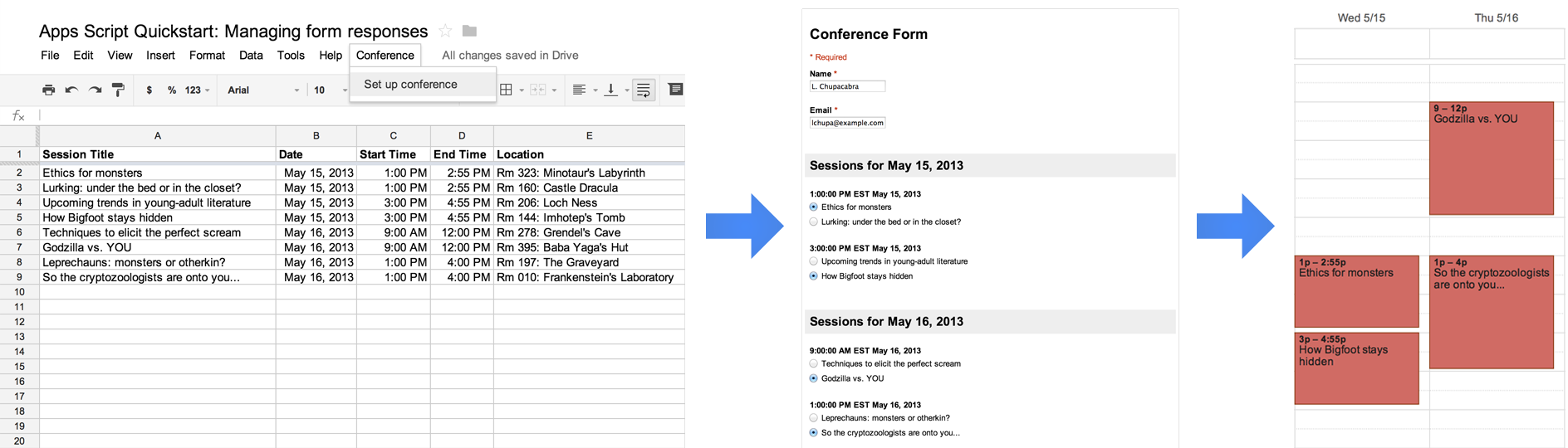
## [Menus and Custom Functions](https://developers.google.com/apps-script/quickstart/custom-functions)
Create a spreadsheet with custom functions, menu items, and automated procedures.
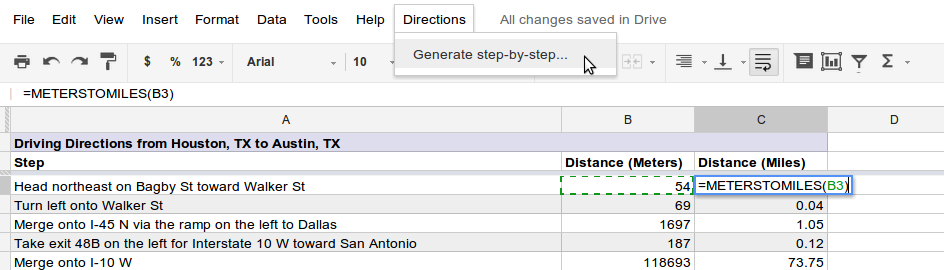
## [Bracket Maker](https://developers.google.com/apps-script/articles/bracket_maker)
This tutorial shows you how to use the Spreadsheets service to create Tournament Brackets similar to College Basketball's March Madness. You can use this tutorial to easily create your own brackets.
## [Removing Duplicates](https://developers.google.com/apps-script/articles/removing_duplicates)
This tutorial shows how to avoid duplicates when you want to automate the process of copying data in Google Workspace and specifically how to remove duplicate rows in spreadsheet data.
================================================
FILE: sheets/api/helpers.gs
================================================
const filesToDelete = [];
/**
* Helper methods for Google Sheets tests.
*/
function Helpers() {
this.filesToDelete = [];
}
Helpers.prototype.reset = function () {
this.filesToDelete = [];
};
Helpers.prototype.deleteFileOnCleanup = function (id) {
this.filesToDelete.push(id);
};
Helpers.prototype.cleanup = () => {
filesToDelete.forEach(Drive.Files.remove);
};
Helpers.prototype.createTestSpreadsheet = function () {
const spreadsheet = SpreadsheetApp.create("Test Spreadsheet");
for (let i = 0; i < 3; ++i) {
spreadsheet.appendRow([1, 2, 3]);
}
this.deleteFileOnCleanup(spreadsheet.getId());
return spreadsheet.getId();
};
Helpers.prototype.populateValues = (spreadsheetId) => {
const batchUpdateRequest = Sheets.newBatchUpdateSpreadsheetRequest();
const repeatCellRequest = Sheets.newRepeatCellRequest();
const values = [];
for (let i = 0; i < 10; ++i) {
values[i] = [];
for (let j = 0; j < 10; ++j) {
values[i].push("Hello");
}
}
const range = "A1:J10";
SpreadsheetApp.openById(spreadsheetId).getRange(range).setValues(values);
SpreadsheetApp.flush();
};
================================================
FILE: sheets/api/spreadsheet_snippets.gs
================================================
/**
* Copyright Google LLC
*
* Licensed under the Apache License, Version 2.0 (the "License");
* you may not use this file except in compliance with the License.
* You may obtain a copy of the License at
*
* https://www.apache.org/licenses/LICENSE-2.0
*
* Unless required by applicable law or agreed to in writing, software
* distributed under the License is distributed on an "AS IS" BASIS,
* WITHOUT WARRANTIES OR CONDITIONS OF ANY KIND, either express or implied.
* See the License for the specific language governing permissions and
* limitations under the License.
*/
/**
* Google Sheets API Snippets.
*/
function Snippets() {}
// [START sheets_create]
/**
* Creates a new sheet using the sheets advanced services
* @param {string} title the name of the sheet to be created
* @returns {string} the spreadsheet ID
*/
Snippets.prototype.create = (title) => {
// This code uses the Sheets Advanced Service, but for most use cases
// the built-in method SpreadsheetApp.create() is more appropriate.
try {
const sheet = Sheets.newSpreadsheet();
sheet.properties = Sheets.newSpreadsheetProperties();
sheet.properties.title = title;
const spreadsheet = Sheets.Spreadsheets.create(sheet);
return spreadsheet.spreadsheetId;
} catch (err) {
// TODO (developer) - Handle exception
console.log("Failed with error %s", err.message);
}
};
// [END sheets_create]
// [START sheets_batch_update]
/**
* Updates the specified sheet using advanced sheet services
* @param {string} spreadsheetId id of the spreadsheet to be updated
* @param {string} title name of the sheet in the spreadsheet to be updated
* @param {string} find string to be replaced
* @param {string} replacement the string to replace the old data
* @returns {*} the updated spreadsheet
*/
Snippets.prototype.batchUpdate = (spreadsheetId, title, find, replacement) => {
// This code uses the Sheets Advanced Service, but for most use cases
// the built-in method SpreadsheetApp.getActiveSpreadsheet()
// .getRange(range).setValues(values) is more appropriate.
try {
// Change the spreadsheet's title.
const updateSpreadsheetPropertiesRequest =
Sheets.newUpdateSpreadsheetPropertiesRequest();
updateSpreadsheetPropertiesRequest.properties =
Sheets.newSpreadsheetProperties();
updateSpreadsheetPropertiesRequest.properties.title = title;
updateSpreadsheetPropertiesRequest.fields = "title";
// Find and replace text.
const findReplaceRequest = Sheets.newFindReplaceRequest();
findReplaceRequest.find = find;
findReplaceRequest.replacement = replacement;
findReplaceRequest.allSheets = true;
const requests = [Sheets.newRequest(), Sheets.newRequest()];
requests[0].updateSpreadsheetProperties =
updateSpreadsheetPropertiesRequest;
requests[1].findReplace = findReplaceRequest;
const batchUpdateRequest = Sheets.newBatchUpdateSpreadsheetRequest();
batchUpdateRequest.requests = requests;
// Add additional requests (operations)
const result = Sheets.Spreadsheets.batchUpdate(
batchUpdateRequest,
spreadsheetId,
);
return result;
} catch (err) {
// TODO (developer) - Handle exception
console.log("Failed with error %s", err.message);
}
};
// [END sheets_batch_update]
// [START sheets_get_values]
/**
* Gets the values of the cells in the specified range
* @param {string} spreadsheetId id of the spreadsheet
* @param {string} range specifying the start and end cells of the range
* @returns {*} Values in the range
*/
Snippets.prototype.getValues = (spreadsheetId, range) => {
// This code uses the Sheets Advanced Service, but for most use cases
// the built-in method SpreadsheetApp.getActiveSpreadsheet()
// .getRange(range).getValues(values) is more appropriate.
try {
const result = Sheets.Spreadsheets.Values.get(spreadsheetId, range);
const numRows = result.values ? result.values.length : 0;
return result;
} catch (err) {
// TODO (developer) - Handle exception
console.log("Failed with error %s", err.message);
}
};
// [END sheets_get_values]
// [START sheets_batch_get_values]
/**
* Get the values in the specified ranges
* @param {string} spreadsheetId spreadsheet's ID
* @param {list} _ranges The span of ranges
* @returns {*} spreadsheet information and values
*/
Snippets.prototype.batchGetValues = (spreadsheetId, _ranges) => {
// This code uses the Sheets Advanced Service, but for most use cases
// the built-in method SpreadsheetApp.getActiveSpreadsheet()
// .getRange(range).getValues(values) is more appropriate.
let ranges = [
//Range names ...
];
// [START_EXCLUDE silent]
ranges = _ranges;
// [END_EXCLUDE]
try {
const result = Sheets.Spreadsheets.Values.batchGet(spreadsheetId, {
ranges: ranges,
});
return result;
} catch (err) {
// TODO (developer) - Handle exception
console.log("Failed with error %s", err.message);
}
};
// [END sheets_batch_get_values]
// [START sheets_update_values]
/**
* Updates the values in the specified range
* @param {string} spreadsheetId spreadsheet's ID
* @param {string} range the range of cells in spreadsheet
* @param {string} valueInputOption determines how the input should be interpreted
* @see
* https://developers.google.com/sheets/api/reference/rest/v4/ValueInputOption
* @param {list>} _values list of string lists to input
* @returns {*} spreadsheet with updated values
*/
Snippets.prototype.updateValues = (
spreadsheetId,
range,
valueInputOption,
_values,
) => {
// This code uses the Sheets Advanced Service, but for most use cases
// the built-in method SpreadsheetApp.getActiveSpreadsheet()
// .getRange(range).setValues(values) is more appropriate.
let values = [
[
// Cell values ...
],
// Additional rows ...
];
// [START_EXCLUDE silent]
values = _values;
// [END_EXCLUDE]
try {
const valueRange = Sheets.newValueRange();
valueRange.values = values;
const result = Sheets.Spreadsheets.Values.update(
valueRange,
spreadsheetId,
range,
{ valueInputOption: valueInputOption },
);
return result;
} catch (err) {
// TODO (developer) - Handle exception
console.log("Failed with error %s", err.message);
}
};
// [END sheets_update_values]
// [START sheets_batch_update_values]
/**
* Updates the values in the specified range
* @param {string} spreadsheetId spreadsheet's ID
* @param {string} range range of cells of the spreadsheet
* @param {string} valueInputOption determines how the input should be interpreted
* @see
* https://developers.google.com/sheets/api/reference/rest/v4/ValueInputOption
* @param {list>} _values list of string values to input
* @returns {*} spreadsheet with updated values
*/
Snippets.prototype.batchUpdateValues = (
spreadsheetId,
range,
valueInputOption,
_values,
) => {
// This code uses the Sheets Advanced Service, but for most use cases
// the built-in method SpreadsheetApp.getActiveSpreadsheet()
// .getRange(range).setValues(values) is more appropriate.
let values = [
[
// Cell values ...
],
// Additional rows ...
];
// [START_EXCLUDE silent]
values = _values;
// [END_EXCLUDE]
try {
const valueRange = Sheets.newValueRange();
valueRange.range = range;
valueRange.values = values;
const batchUpdateRequest = Sheets.newBatchUpdateValuesRequest();
batchUpdateRequest.data = valueRange;
batchUpdateRequest.valueInputOption = valueInputOption;
const result = Sheets.Spreadsheets.Values.batchUpdate(
batchUpdateRequest,
spreadsheetId,
);
return result;
} catch (err) {
// TODO (developer) - Handle exception
console.log("Failed with error %s", err.message);
}
};
// [END sheets_batch_update_values]
// [START sheets_append_values]
/**
* Appends values to the specified range
* @param {string} spreadsheetId spreadsheet's ID
* @param {string} range range of cells in the spreadsheet
* @param valueInputOption determines how the input should be interpreted
* @see
* https://developers.google.com/sheets/api/reference/rest/v4/ValueInputOption
* @param {list} _values list of rows of values to input
* @returns {*} spreadsheet with appended values
*/
Snippets.prototype.appendValues = (
spreadsheetId,
range,
valueInputOption,
_values,
) => {
let values = [
[
// Cell values ...
],
// Additional rows ...
];
// [START_EXCLUDE silent]
values = _values;
// [END_EXCLUDE]
try {
const valueRange = Sheets.newRowData();
valueRange.values = values;
const appendRequest = Sheets.newAppendCellsRequest();
appendRequest.sheetId = spreadsheetId;
appendRequest.rows = [valueRange];
const result = Sheets.Spreadsheets.Values.append(
valueRange,
spreadsheetId,
range,
{ valueInputOption: valueInputOption },
);
return result;
} catch (err) {
// TODO (developer) - Handle exception
console.log("Failed with error %s", err.message);
}
};
// [END sheets_append_values]
// [START sheets_pivot_tables]
/**
* Create pivot table
* @param {string} spreadsheetId spreadsheet ID
* @returns {*} pivot table's spreadsheet
*/
Snippets.prototype.pivotTable = (spreadsheetId) => {
try {
const spreadsheet = SpreadsheetApp.openById(spreadsheetId);
// Create two sheets for our pivot table, assume we have one.
const sheet = spreadsheet.getSheets()[0];
sheet.copyTo(spreadsheet);
const sourceSheetId = spreadsheet.getSheets()[0].getSheetId();
const targetSheetId = spreadsheet.getSheets()[1].getSheetId();
// Create pivot table
const pivotTable = Sheets.newPivotTable();
const gridRange = Sheets.newGridRange();
gridRange.sheetId = sourceSheetId;
gridRange.startRowIndex = 0;
gridRange.startColumnIndex = 0;
gridRange.endRowIndex = 20;
gridRange.endColumnIndex = 7;
pivotTable.source = gridRange;
const pivotRows = Sheets.newPivotGroup();
pivotRows.sourceColumnOffset = 1;
pivotRows.showTotals = true;
pivotRows.sortOrder = "ASCENDING";
pivotTable.rows = pivotRows;
const pivotColumns = Sheets.newPivotGroup();
pivotColumns.sourceColumnOffset = 4;
pivotColumns.sortOrder = "ASCENDING";
pivotColumns.showTotals = true;
pivotTable.columns = pivotColumns;
const pivotValue = Sheets.newPivotValue();
pivotValue.summarizeFunction = "COUNTA";
pivotValue.sourceColumnOffset = 4;
pivotTable.values = [pivotValue];
// Create other metadata for the updateCellsRequest
const cellData = Sheets.newCellData();
cellData.pivotTable = pivotTable;
const rows = Sheets.newRowData();
rows.values = cellData;
const start = Sheets.newGridCoordinate();
start.sheetId = targetSheetId;
start.rowIndex = 0;
start.columnIndex = 0;
const updateCellsRequest = Sheets.newUpdateCellsRequest();
updateCellsRequest.rows = rows;
updateCellsRequest.start = start;
updateCellsRequest.fields = "pivotTable";
// Batch update our spreadsheet
const batchUpdate = Sheets.newBatchUpdateSpreadsheetRequest();
const updateCellsRawRequest = Sheets.newRequest();
updateCellsRawRequest.updateCells = updateCellsRequest;
batchUpdate.requests = [updateCellsRawRequest];
const response = Sheets.Spreadsheets.batchUpdate(
batchUpdate,
spreadsheetId,
);
return response;
} catch (err) {
// TODO (developer) - Handle exception
console.log("Failed with error %s", err.message);
}
};
// [END sheets_pivot_tables]
// [START sheets_conditional_formatting]
/**
* conditional formatting
* @param {string} spreadsheetId spreadsheet ID
* @returns {*} spreadsheet
*/
Snippets.prototype.conditionalFormatting = (spreadsheetId) => {
try {
const myRange = Sheets.newGridRange();
myRange.sheetId = 0;
myRange.startRowIndex = 0;
myRange.endRowIndex = 11;
myRange.startColumnIndex = 0;
myRange.endColumnIndex = 4;
// Request 1
const rule1ConditionalValue = Sheets.newConditionValue();
rule1ConditionalValue.userEnteredValue = "=GT($D2,median($D$2:$D$11))";
const rule1ConditionFormat = Sheets.newCellFormat();
rule1ConditionFormat.textFormat = Sheets.newTextFormat();
rule1ConditionFormat.textFormat.foregroundColor = Sheets.newColor();
rule1ConditionFormat.textFormat.foregroundColor.red = 0.8;
const rule1Condition = Sheets.newBooleanCondition();
rule1Condition.type = "CUSTOM_FORMULA";
rule1Condition.values = [rule1ConditionalValue];
const rule1BooleanRule = Sheets.newBooleanRule();
rule1BooleanRule.condition = rule1Condition;
rule1BooleanRule.format = rule1ConditionFormat;
const rule1 = Sheets.newConditionalFormatRule();
rule1.ranges = [myRange];
rule1.booleanRule = rule1BooleanRule;
const request1 = Sheets.newRequest();
const addConditionalFormatRuleRequest1 =
Sheets.newAddConditionalFormatRuleRequest();
addConditionalFormatRuleRequest1.rule = rule1;
addConditionalFormatRuleRequest1.index = 0;
request1.addConditionalFormatRule = addConditionalFormatRuleRequest1;
// Request 2
const rule2ConditionalValue = Sheets.newConditionValue();
rule2ConditionalValue.userEnteredValue = "=LT($D2,median($D$2:$D$11))";
const rule2ConditionFormat = Sheets.newCellFormat();
rule2ConditionFormat.textFormat = Sheets.newTextFormat();
rule2ConditionFormat.textFormat.foregroundColor = Sheets.newColor();
rule2ConditionFormat.textFormat.foregroundColor.red = 1;
rule2ConditionFormat.textFormat.foregroundColor.green = 0.4;
rule2ConditionFormat.textFormat.foregroundColor.blue = 0.4;
const rule2Condition = Sheets.newBooleanCondition();
rule2Condition.type = "CUSTOM_FORMULA";
rule2Condition.values = [rule2ConditionalValue];
const rule2BooleanRule = Sheets.newBooleanRule();
rule2BooleanRule.condition = rule2Condition;
rule2BooleanRule.format = rule2ConditionFormat;
const rule2 = Sheets.newConditionalFormatRule();
rule2.ranges = [myRange];
rule2.booleanRule = rule2BooleanRule;
const request2 = Sheets.newRequest();
const addConditionalFormatRuleRequest2 =
Sheets.newAddConditionalFormatRuleRequest();
addConditionalFormatRuleRequest2.rule = rule2;
addConditionalFormatRuleRequest2.index = 0;
request2.addConditionalFormatRule = addConditionalFormatRuleRequest2;
// Batch send the requests
const requests = [request1, request2];
const batchUpdate = Sheets.newBatchUpdateSpreadsheetRequest();
batchUpdate.requests = requests;
const response = Sheets.Spreadsheets.batchUpdate(
batchUpdate,
spreadsheetId,
);
return response;
} catch (err) {
// TODO (developer) - Handle exception
console.log("Failed with error %s", err.message);
}
};
// [END sheets_conditional_formatting]
================================================
FILE: sheets/api/test_spreadsheet_snippets.gs
================================================
const snippets = new Snippets();
const helpers = new Helpers();
/**
* A simple exists assertion check. Expects a value to exist. Errors if DNE.
* @param {any} value A value that is expected to exist.
*/
function expectToExist(value) {
if (value) {
console.log("TEST: Exists");
} else {
throw new Error("TEST: DNE");
}
}
/**
* A simple exists assertion check for primatives (no nested objects).
* Expects actual to equal expected. Logs the output.
* @param {any} actual The actual value.
* @param {any} expected The expected value.
*/
function expectToEqual(actual, expected) {
console.log("TEST: actual: %s = expected: %s", actual, expected);
if (actual !== expected) {
console.log("TEST: actual: %s expected: %s", actual, expected);
}
}
/**
* Runs all tests.
*/
function RUN_ALL_TESTS() {
itShouldCreateASpreadsheet();
itShouldBatchUpdateASpreadsheet();
itShouldGetSpreadsheetValues();
itShouldBatchGetSpreadsheetValues();
itShouldUpdateSpreadsheetValues();
itShouldBatchUpdateSpreadsheetValues();
itShouldAppendValuesToASpreadsheet();
itShouldCreatePivotTables();
itShouldConditionallyFormat();
}
/**
* Tests creating a spreadsheet.
*/
function itShouldCreateASpreadsheet() {
const spreadsheetId = snippets.create("Title");
expectToExist(spreadsheetId);
helpers.deleteFileOnCleanup(spreadsheetId);
}
/**
* Tests updating a spreadsheet.
*/
function itShouldBatchUpdateASpreadsheet() {
const spreadsheetId = helpers.createTestSpreadsheet();
helpers.populateValues(spreadsheetId);
const result = snippets.batchUpdate(
spreadsheetId,
"New Title",
"Hello",
"Goodbye",
);
const replies = result.replies;
expectToEqual(replies.length, 2);
const findReplaceResponse = replies[1].findReplace;
expectToEqual(findReplaceResponse.occurrencesChanged, 100);
}
/**
* Tests getting a spreadsheet value.
*/
function itShouldGetSpreadsheetValues() {
const spreadsheetId = helpers.createTestSpreadsheet();
helpers.populateValues(spreadsheetId);
const result = snippets.getValues(spreadsheetId, "A1:C2");
const values = result.values;
expectToEqual(values.length, 2);
expectToEqual(values[0].length, 3);
}
/**
* Tests batch getting spreadsheet values.
*/
function itShouldBatchGetSpreadsheetValues() {
const spreadsheetId = helpers.createTestSpreadsheet();
helpers.populateValues(spreadsheetId);
const result = snippets.batchGetValues(spreadsheetId, ["A1:A3", "B1:C1"]);
expectToExist(result);
expectToEqual(result.valueRanges.length, 2);
expectToEqual(result.valueRanges[0].values.length, 3);
}
/**
* Tests updating spreadsheet values.
*/
function itShouldUpdateSpreadsheetValues() {
const spreadsheetId = helpers.createTestSpreadsheet();
const result = snippets.updateValues(spreadsheetId, "A1:B2", "USER_ENTERED", [
["A", "B"],
["C", "D"],
]);
expectToEqual(result.updatedRows, 2);
expectToEqual(result.updatedColumns, 2);
expectToEqual(result.updatedCells, 4);
}
/**
* Test batch updating spreadsheet values.
*/
function itShouldBatchUpdateSpreadsheetValues() {
const spreadsheetId = helpers.createTestSpreadsheet();
const result = snippets.batchUpdateValues(
spreadsheetId,
"A1:B2",
"USER_ENTERED",
[
["A", "B"],
["C", "D"],
],
);
expectToEqual(result.totalUpdatedRows, 2);
expectToEqual(result.totalUpdatedColumns, 2);
expectToEqual(result.totalUpdatedCells, 4);
}
/**
* Test appending values to a spreadsheet.
*/
function itShouldAppendValuesToASpreadsheet() {
const spreadsheetId = helpers.createTestSpreadsheet();
helpers.populateValues(spreadsheetId);
const result = snippets.appendValues(
spreadsheetId,
"Sheet1",
"USER_ENTERED",
[
["A", "B"],
["C", "D"],
],
);
const updates = result.updates;
expectToEqual(updates.updatedRows, 2);
expectToEqual(updates.updatedColumns, 2);
expectToEqual(updates.updatedCells, 4);
}
/**
* Test creating pivot tables.
*/
function itShouldCreatePivotTables() {
const spreadsheetId = helpers.createTestSpreadsheet();
helpers.populateValues(spreadsheetId);
const result = snippets.pivotTable(spreadsheetId);
expectToExist(result);
}
/**
* Test conditionally formatting spreadsheets.
*/
function itShouldConditionallyFormat() {
const spreadsheetId = helpers.createTestSpreadsheet();
helpers.populateValues(spreadsheetId);
const result = snippets.conditionalFormatting(spreadsheetId);
expectToExist(spreadsheetId);
expectToEqual(result.replies.length, 2);
}
================================================
FILE: sheets/customFunctions/btc.gs
================================================
/**
* Copyright Google LLC
*
* Licensed under the Apache License, Version 2.0 (the "License");
* you may not use this file except in compliance with the License.
* You may obtain a copy of the License at
*
* https://www.apache.org/licenses/LICENSE-2.0
*
* Unless required by applicable law or agreed to in writing, software
* distributed under the License is distributed on an "AS IS" BASIS,
* WITHOUT WARRANTIES OR CONDITIONS OF ANY KIND, either express or implied.
* See the License for the specific language governing permissions and
* limitations under the License.
*/
// See https://support.coinbase.com/customer/en/portal/articles/1914910-how-can-i-generate-api-keys-within-coinbase-commerce-
const COINBASE_API_TOKEN = ""; // TODO
/**
* Get's the bitcoin price at a date.
*
* @param {string} date The date in yyyy-MM-dd format. Defaults to today.
* @return The value of BTC in USD at the date. From Coinbase's API
* @customfunction
*/
function BTC(date) {
let dateObject = new Date();
if (date) {
dateObject = new Date(date);
}
const dateString = Utilities.formatDate(dateObject, "GMT", "yyyy-MM-dd");
const res = UrlFetchApp.fetch(
`https://api.coinbase.com/v2/prices/BTC-USD/spot?date=${dateString}`,
{
headers: {
"CB-VERSION": "2016-10-10",
Authorization: `Bearer ${COINBASE_API_TOKEN}`,
},
},
);
const json = JSON.parse(res.getContentText());
return json.data.amount;
}
================================================
FILE: sheets/customFunctions/customFunctions.gs
================================================
/**
* Copyright Google LLC
*
* Licensed under the Apache License, Version 2.0 (the "License");
* you may not use this file except in compliance with the License.
* You may obtain a copy of the License at
*
* https://www.apache.org/licenses/LICENSE-2.0
*
* Unless required by applicable law or agreed to in writing, software
* distributed under the License is distributed on an "AS IS" BASIS,
* WITHOUT WARRANTIES OR CONDITIONS OF ANY KIND, either express or implied.
* See the License for the specific language governing permissions and
* limitations under the License.
*/
// [START apps_script_sheets_custom_functions_quickstart]
/**
* @OnlyCurrentDoc Limits the script to only accessing the current sheet.
*/
/**
* A special function that runs when the spreadsheet is open, used to add a
* custom menu to the spreadsheet.
*/
function onOpen() {
try {
const spreadsheet = SpreadsheetApp.getActive();
const menuItems = [
{ name: "Prepare sheet...", functionName: "prepareSheet_" },
{ name: "Generate step-by-step...", functionName: "generateStepByStep_" },
];
spreadsheet.addMenu("Directions", menuItems);
} catch (e) {
// TODO (Developer) - Handle Exception
console.log(`Failed with error: %s${e.error}`);
}
}
/**
* A custom function that converts meters to miles.
*
* @param {Number} meters The distance in meters.
* @return {Number} The distance in miles.
*/
function metersToMiles(meters) {
if (typeof meters !== "number") {
return null;
}
return (meters / 1000) * 0.621371;
}
/**
* A custom function that gets the driving distance between two addresses.
*
* @param {String} origin The starting address.
* @param {String} destination The ending address.
* @return {Number} The distance in meters.
*/
function drivingDistance(origin, destination) {
const directions = getDirections_(origin, destination);
return directions.routes[0].legs[0].distance.value;
}
/**
* A function that adds headers and some initial data to the spreadsheet.
*/
function prepareSheet_() {
try {
const sheet = SpreadsheetApp.getActiveSheet().setName("Settings");
const headers = [
"Start Address",
"End Address",
"Driving Distance (meters)",
"Driving Distance (miles)",
];
const initialData = [
"350 5th Ave, New York, NY 10118",
"405 Lexington Ave, New York, NY 10174",
];
sheet.getRange("A1:D1").setValues([headers]).setFontWeight("bold");
sheet.getRange("A2:B2").setValues([initialData]);
sheet.setFrozenRows(1);
sheet.autoResizeColumns(1, 4);
} catch (e) {
// TODO (Developer) - Handle Exception
console.log(`Failed with error: %s${e.error}`);
}
}
/**
* Creates a new sheet containing step-by-step directions between the two
* addresses on the "Settings" sheet that the user selected.
*/
function generateStepByStep_() {
try {
const spreadsheet = SpreadsheetApp.getActive();
const settingsSheet = spreadsheet.getSheetByName("Settings");
settingsSheet.activate();
// Prompt the user for a row number.
const selectedRow = Browser.inputBox(
"Generate step-by-step",
"Please enter the row number of" +
" the" +
" addresses to use" +
' (for example, "2"):',
Browser.Buttons.OK_CANCEL,
);
if (selectedRow === "cancel") {
return;
}
const rowNumber = Number(selectedRow);
if (
Number.isNaN(rowNumber) ||
rowNumber < 2 ||
rowNumber > settingsSheet.getLastRow()
) {
Browser.msgBox(
"Error",
Utilities.formatString('Row "%s" is not valid.', selectedRow),
Browser.Buttons.OK,
);
return;
}
// Retrieve the addresses in that row.
const row = settingsSheet.getRange(rowNumber, 1, 1, 2);
const rowValues = row.getValues();
const origin = rowValues[0][0];
const destination = rowValues[0][1];
if (!origin || !destination) {
Browser.msgBox(
"Error",
"Row does not contain two addresses.",
Browser.Buttons.OK,
);
return;
}
// Get the raw directions information.
const directions = getDirections_(origin, destination);
// Create a new sheet and append the steps in the directions.
const sheetName = `Driving Directions for Row ${rowNumber}`;
let directionsSheet = spreadsheet.getSheetByName(sheetName);
if (directionsSheet) {
directionsSheet.clear();
directionsSheet.activate();
} else {
directionsSheet = spreadsheet.insertSheet(
sheetName,
spreadsheet.getNumSheets(),
);
}
const sheetTitle = Utilities.formatString(
"Driving Directions from %s to %s",
origin,
destination,
);
const headers = [
[sheetTitle, "", ""],
["Step", "Distance (Meters)", "Distance (Miles)"],
];
const newRows = [];
for (const step of directions.routes[0].legs[0].steps) {
// Remove HTML tags from the instructions.
const instructions = step.html_instructions
.replace(/ |/g, "\n")
.replace(/<.*?>/g, "");
newRows.push([instructions, step.distance.value]);
}
directionsSheet.getRange(1, 1, headers.length, 3).setValues(headers);
directionsSheet
.getRange(headers.length + 1, 1, newRows.length, 2)
.setValues(newRows);
directionsSheet
.getRange(headers.length + 1, 3, newRows.length, 1)
.setFormulaR1C1("=METERSTOMILES(R[0]C[-1])");
// Format the new sheet.
directionsSheet.getRange("A1:C1").merge().setBackground("#ddddee");
directionsSheet.getRange("A1:2").setFontWeight("bold");
directionsSheet.setColumnWidth(1, 500);
directionsSheet.getRange("B2:C").setVerticalAlignment("top");
directionsSheet.getRange("C2:C").setNumberFormat("0.00");
const stepsRange = directionsSheet
.getDataRange()
.offset(2, 0, directionsSheet.getLastRow() - 2);
setAlternatingRowBackgroundColors_(stepsRange, "#ffffff", "#eeeeee");
directionsSheet.setFrozenRows(2);
SpreadsheetApp.flush();
} catch (e) {
// TODO (Developer) - Handle Exception
console.log(`Failed with error: %s${e.error}`);
}
}
/**
* Sets the background colors for alternating rows within the range.
* @param {Range} range The range to change the background colors of.
* @param {string} oddColor The color to apply to odd rows (relative to the
* start of the range).
* @param {string} evenColor The color to apply to even rows (relative to the
* start of the range).
*/
function setAlternatingRowBackgroundColors_(range, oddColor, evenColor) {
const backgrounds = [];
for (let row = 1; row <= range.getNumRows(); row++) {
const rowBackgrounds = [];
for (let column = 1; column <= range.getNumColumns(); column++) {
if (row % 2 === 0) {
rowBackgrounds.push(evenColor);
} else {
rowBackgrounds.push(oddColor);
}
}
backgrounds.push(rowBackgrounds);
}
range.setBackgrounds(backgrounds);
}
/**
* A shared helper function used to obtain the full set of directions
* information between two addresses. Uses the Apps Script Maps Service.
*
* @param {String} origin The starting address.
* @param {String} destination The ending address.
* @return {Object} The directions response object.
*/
function getDirections_(origin, destination) {
const directionFinder = Maps.newDirectionFinder();
directionFinder.setOrigin(origin);
directionFinder.setDestination(destination);
const directions = directionFinder.getDirections();
if (directions.status !== "OK") {
throw directions.error_message;
}
return directions;
}
// [END apps_script_sheets_custom_functions_quickstart]
================================================
FILE: sheets/dateAddAndSubtract/README.md
================================================
# Date Add and Subtract
Date Add and Subtract is a sample
[add-on for Google Sheets](https://developers.google.com/apps-script/add-ons)
that provides custom functions for date manipulation. The script uses the
[Moment.js](http://momentjs.com/) JavaScript library, which is included directly
in the Apps Script project.

## Try it out
For your convience we have published the script to the Google Sheets
[add-ons store](https://chrome.google.com/webstore/detail/date-add-and-subtract/mhdmhddjinipgjhpicaidhpimlmgnflb).
Install the add-on via the store and follow the instructions to get started.
================================================
FILE: sheets/dateAddAndSubtract/dateAddAndSubtract.gs
================================================
/**
* Copyright Google LLC
*
* Licensed under the Apache License, Version 2.0 (the "License");
* you may not use this file except in compliance with the License.
* You may obtain a copy of the License at
*
* https://www.apache.org/licenses/LICENSE-2.0
*
* Unless required by applicable law or agreed to in writing, software
* distributed under the License is distributed on an "AS IS" BASIS,
* WITHOUT WARRANTIES OR CONDITIONS OF ANY KIND, either express or implied.
* See the License for the specific language governing permissions and
* limitations under the License.
*/
/**
* @fileoverview Provides the custom functions DATEADD and DATESUBTRACT and
* the helper functions that they use.
* @OnlyCurrentDoc
*/
/**
* The list of valid unit identifiers.
*/
const VALID_UNITS = [
"year",
"month",
"week",
"day",
"hour",
"minute",
"second",
"millisecond",
];
/**
* Runs when the add-on is installed.
*/
function onInstall() {
onOpen();
}
/**
* Runs when the document is opened, creating the add-on's menu. Custom function
* add-ons need at least one menu item, since the add-on is only enabled in the
* current spreadsheet when a function is run.
*/
function onOpen() {
SpreadsheetApp.getUi()
.createAddonMenu()
.addItem("Use in this spreadsheet", "use")
.addToUi();
}
/**
* Enables the add-on on for the current spreadsheet (simply by running) and
* shows a popup informing the user of the new functions that are available.
*/
function use() {
const title = "Date Custom Functions";
const message =
"The functions DATEADD and DATESUBTRACT are now available in " +
"this spreadsheet. More information is available in the function help " +
"box that appears when you start using them in a formula.";
const ui = SpreadsheetApp.getUi();
ui.alert(title, message, ui.ButtonSet.OK);
}
/**
* Adds some amount of time to a date.
* @param {Date|Range} date The date to add to, or a range of dates.
* @param {string|Range} unit The unit of time to add, or a range of units.
* Possible values include:
* `years`, `months`, `weeks`, `days`, `hours`, `minutes`, `seconds`, and
* `milliseconds`. You can also use the shorthand notation for these units
* which are `y`, `M`, `w`, `d`, `h`, `m`, `s`, `ms` respectively.
* @param {number|Range} amount The amount of the specified unit to add, or a
* range of amounts.
* @return {Date} The new date.
* @customFunction
*/
function DATEADD(date, unit, amount) {
const args = [date, unit, amount];
return multimap(args, (date, unit, amount) => {
validateParameters(date, unit, amount);
return moment(date).add(unit, amount).toDate();
});
}
/**
* @customFunction
* A test function for DATEADD
* @param {string|Range} date The date to add to.
* @param {string|Range} unit The unit of time to add.
* @param {number|Range} amount The amount of the specified unit to add.
* @return {string} The date in a string.
*/
function DATETEST(date, unit, amount) {
return JSON.stringify(DATEADD(date, unit, amount)); // eslint-disable-line new-cap
}
/**
* Subtracts some amount of time from a date.
* @param {Date|Range} date The date to subtract from, or a range of dates.
* @param {string|Range} unit The unit of time to subtract, or a range of units.
* Possible values include:
* `years`, `months`, `weeks`, `days`, `hours`, `minutes`, `seconds`, and
* `milliseconds`. You can also use the shorthand notation for these units
* which are `y`, `M`, `w`, `d`, `h`, `m`, `s`, `ms` respectively.
* @param {number|Range} amount The amount of the specified unit to subtract, or
* a range of amounts.
* @return {Date} The new date.
* @customFunction
*/
function DATESUBTRACT(date, unit, amount) {
const args = [date, unit, amount];
return multimap(args, (date, unit, amount) => {
validateParameters(date, unit, amount);
return moment(date).subtract(unit, amount).toDate();
});
}
/**
* Validates that the date, unit, and amount supplied are compatible with
* Moment, throwing an exception if any of the parameters are invalid.
* @param {Date} date The date to add to or subtract from.
* @param {string} unit The unit of time to add/subtract.
* @param {number} amount The amount of the specified unit to add/subtract.
*/
function validateParameters(date, unit, amount) {
if (
date === undefined ||
typeof date === "number" ||
!moment(date).isValid()
) {
throw Utilities.formatString(
'Parameter 1 expects a date value, but "%s" ' +
"cannot be coerced to a date.",
date,
);
}
if (VALID_UNITS.indexOf(moment.normalizeUnits(unit)) < 0) {
throw Utilities.formatString(
"Parameter 2 expects a unit identifier, but " +
'"%s" is not a valid identifier.',
unit,
);
}
if (Number.isNaN(Number(amount))) {
throw Utilities.formatString(
"Parameter 3 expects a number value, but " +
'"%s" cannot be coerced to a number.',
amount,
);
}
}
/**
* Applies a function to a set of arguments, looping over arrays in those
* arguments. Similar to Array.map, except that it can map the function across
* multiple arrays, passing forward non-array values.
* @param {Array} args The arguments to map against.
* @param {Function} func The function to apply.
* @return {Array} The results of the mapping.
*/
function multimap(args, func) {
// Determine the length of the arrays.
const lengths = args.map((arg) => {
if (Array.isArray(arg)) {
return arg.length;
}
return 0;
});
const max = Math.max.apply(null, lengths);
// If there aren't any arrays, just call the function.
if (max === 0) {
return func(...args);
}
// Ensure all the arrays are the same length.
// Arrays of length 1 are exempted, since they are assumed to be rows/columns
// that should apply to each row/column in the other sets.
for (const length of lengths) {
if (length !== max && length > 1) {
throw new Error(`All input ranges must be the same size: ${max}`);
}
}
// Recursively apply the map function to each element in the arrays.
const result = [];
for (let i = 0; i < max; i++) {
const params = args.map((arg) => {
if (Array.isArray(arg)) {
return arg.length === 1 ? arg[0] : arg[i];
}
return arg;
});
result.push(multimap(params, func));
}
return result;
}
/**
* Convert the array-like arguments object into a real array.
* @param {Arguments} args The arguments object to convert.
* @return {Array} The equivalent array.
*/
function toArray(args) {
return Array.prototype.slice.call(args);
}
================================================
FILE: sheets/dateAddAndSubtract/moment.gs
================================================
// ! moment.js
// ! version : 2.10.6
// ! authors : Tim Wood, Iskren Chernev, Moment.js contributors
// ! license : MIT
// ! momentjs.com
/*
Copyright (c) 2011-2015 Tim Wood, Iskren Chernev, Moment.js contributors
Permission is hereby granted, free of charge, to any person
obtaining a copy of this software and associated documentation
files (the "Software"), to deal in the Software without
restriction, including without limitation the rights to use,
copy, modify, merge, publish, distribute, sublicense, and/or sell
copies of the Software, and to permit persons to whom the
Software is furnished to do so, subject to the following
conditions:
The above copyright notice and this permission notice shall be
included in all copies or substantial portions of the Software.
THE SOFTWARE IS PROVIDED "AS IS", WITHOUT WARRANTY OF ANY KIND,
EXPRESS OR IMPLIED, INCLUDING BUT NOT LIMITED TO THE WARRANTIES
OF MERCHANTABILITY, FITNESS FOR A PARTICULAR PURPOSE AND
NONINFRINGEMENT. IN NO EVENT SHALL THE AUTHORS OR COPYRIGHT
HOLDERS BE LIABLE FOR ANY CLAIM, DAMAGES OR OTHER LIABILITY,
WHETHER IN AN ACTION OF CONTRACT, TORT OR OTHERWISE, ARISING
FROM, OUT OF OR IN CONNECTION WITH THE SOFTWARE OR THE USE OR
OTHER DEALINGS IN THE SOFTWARE.
*/
!function(a, b) {
'object'==typeof exports&&'undefined'!=typeof module?module.exports=b():'function'==typeof define&&define.amd?define(b):a.moment=b();
}(this, function() {
'use strict'; function a() {
return Hc(...arguments);
} function b(a) {
Hc=a;
} function c(a) {
return '[object Array]'===Object.prototype.toString.call(a);
} function d(a) {
return a instanceof Date||'[object Date]'===Object.prototype.toString.call(a);
} function e(a, b) {
var c, d=[]; for (c=0; c0) for (c in Jc)d=Jc[c], e=b[d], 'undefined'!=typeof e&&(a[d]=e); return a;
} function n(b) {
m(this, b), this._d=new Date(null!=b._d?b._d.getTime():NaN), Kc===!1&&(Kc=!0, a.updateOffset(this), Kc=!1);
} function o(a) {
return a instanceof n||null!=a&&null!=a._isAMomentObject;
} function p(a) {
return 0>a?Math.ceil(a):Math.floor(a);
} function q(a) {
var b=+a, c=0; return 0!==b&&isFinite(b)&&(c=p(b)), c;
} function r(a, b, c) {
var d, e=Math.min(a.length, b.length), f=Math.abs(a.length-b.length), g=0; for (d=0; e>d; d++)(c&&a[d]!==b[d]||!c&&q(a[d])!==q(b[d]))&&g++; return g+f;
} function s() {} function t(a) {
return a?a.toLowerCase().replace('_', '-'):a;
} function u(a) {
for (var b, c, d, e, f=0; f0;) {
if (d=v(e.slice(0, b).join('-'))) return d; if (c&&c.length>=b&&r(e, c, !0)>=b-1) break; b--;
}f++;
} return null;
} function v(a) {
var b=null; if (!Lc[a]&&'undefined'!=typeof module&&module&&module.exports) {
try {
b=Ic._abbr, require('./locale/'+a), w(b);
} catch (c) {}
} return Lc[a];
} function w(a, b) {
var c; return a&&(c='undefined'==typeof b?y(a):x(a, b), c&&(Ic=c)), Ic._abbr;
} function x(a, b) {
return null!==b?(b.abbr=a, Lc[a]=Lc[a]||new s, Lc[a].set(b), w(a), Lc[a]):(delete Lc[a], null);
} function y(a) {
var b; if (a&&a._locale&&a._locale._abbr&&(a=a._locale._abbr), !a) return Ic; if (!c(a)) {
if (b=v(a)) return b; a=[a];
} return u(a);
} function z(a, b) {
var c=a.toLowerCase(); Mc[c]=Mc[c+'s']=Mc[b]=a;
} function A(a) {
return 'string'==typeof a?Mc[a]||Mc[a.toLowerCase()]:void 0;
} function B(a) {
var b, c, d={}; for (c in a)f(a, c)&&(b=A(c), b&&(d[b]=a[c])); return d;
} function C(b, c) {
return function(d) {
return null!=d?(E(this, b, d), a.updateOffset(this, c), this):D(this, b);
};
} function D(a, b) {
return a._d['get'+(a._isUTC?'UTC':'')+b]();
} function E(a, b, c) {
return a._d['set'+(a._isUTC?'UTC':'')+b](c);
} function F(a, b) {
var c; if ('object'==typeof a) for (c in a) this.set(c, a[c]); else if (a=A(a), 'function'==typeof this[a]) return this[a](b); return this;
} function G(a, b, c) {
var d=''+Math.abs(a), e=b-d.length, f=a>=0; return (f?c?'+':'':'-')+Math.pow(10, Math.max(0, e)).toString().substr(1)+d;
} function H(a, b, c, d) {
var e=d; 'string'==typeof d&&(e=function() {
return this[d]();
}), a&&(Qc[a]=e), b&&(Qc[b[0]]=function() {
return G(e.apply(this, arguments), b[1], b[2]);
}), c&&(Qc[c]=function() {
return this.localeData().ordinal(e.apply(this, arguments), a);
});
} function I(a) {
return a.match(/\[[\s\S]/)?a.replace(/^\[|\]$/g, ''):a.replace(/\\/g, '');
} function J(a) {
var b, c, d=a.match(Nc); for (b=0, c=d.length; c>b; b++)Qc[d[b]]?d[b]=Qc[d[b]]:d[b]=I(d[b]); return function(e) {
var f=''; for (b=0; c>b; b++)f+=d[b]instanceof Function?d[b].call(e, a):d[b]; return f;
};
} function K(a, b) {
return a.isValid()?(b=L(b, a.localeData()), Pc[b]=Pc[b]||J(b), Pc[b](a)):a.localeData().invalidDate();
} function L(a, b) {
function c(a) {
return b.longDateFormat(a)||a;
} var d=5; for (Oc.lastIndex=0; d>=0&&Oc.test(a);)a=a.replace(Oc, c), Oc.lastIndex=0, d-=1; return a;
} function M(a) {
return 'function'==typeof a&&'[object Function]'===Object.prototype.toString.call(a);
} function N(a, b, c) {
dd[a]=M(b)?b:function(a) {
return a&&c?c:b;
};
} function O(a, b) {
return f(dd, a)?dd[a](b._strict, b._locale):new RegExp(P(a));
} function P(a) {
return a.replace('\\', '').replace(/\\(\[)|\\(\])|\[([^\]\[]*)\]|\\(.)/g, function(a, b, c, d, e) {
return b||c||d||e;
}).replace(/[-\/\\^$*+?.()|[\]{}]/g, '\\$&');
} function Q(a, b) {
var c, d=b; for ('string'==typeof a&&(a=[a]), 'number'==typeof b&&(d=function(a, c) {
c[b]=q(a);
}), c=0; cd; d++) {
if (e=h([2e3, d]), c&&!this._longMonthsParse[d]&&(this._longMonthsParse[d]=new RegExp('^'+this.months(e, '').replace('.', '')+'$', 'i'), this._shortMonthsParse[d]=new RegExp('^'+this.monthsShort(e, '').replace('.', '')+'$', 'i')), c||this._monthsParse[d]||(f='^'+this.months(e, '')+'|^'+this.monthsShort(e, ''), this._monthsParse[d]=new RegExp(f.replace('.', ''), 'i')), c&&'MMMM'===b&&this._longMonthsParse[d].test(a)) return d; if (c&&'MMM'===b&&this._shortMonthsParse[d].test(a)) return d; if (!c&&this._monthsParse[d].test(a)) return d;
}
} function X(a, b) {
var c; return 'string'==typeof b&&(b=a.localeData().monthsParse(b), 'number'!=typeof b)?a:(c=Math.min(a.date(), T(a.year(), b)), a._d['set'+(a._isUTC?'UTC':'')+'Month'](b, c), a);
} function Y(b) {
return null!=b?(X(this, b), a.updateOffset(this, !0), this):D(this, 'Month');
} function Z() {
return T(this.year(), this.month());
} function $(a) {
var b, c=a._a; return c&&-2===j(a).overflow&&(b=c[gd]<0||c[gd]>11?gd:c[hd]<1||c[hd]>T(c[fd], c[gd])?hd:c[id]<0||c[id]>24||24===c[id]&&(0!==c[jd]||0!==c[kd]||0!==c[ld])?id:c[jd]<0||c[jd]>59?jd:c[kd]<0||c[kd]>59?kd:c[ld]<0||c[ld]>999?ld:-1, j(a)._overflowDayOfYear&&(fd>b||b>hd)&&(b=hd), j(a).overflow=b), a;
} function _(b) {
a.suppressDeprecationWarnings===!1&&'undefined'!=typeof console&&console.warn&&console.warn('Deprecation warning: '+b);
} function aa(a, b) {
var c=!0; return g(function() {
return c&&(_(a+'\n'+(new Error).stack), c=!1), b.apply(this, arguments);
}, b);
} function ba(a, b) {
od[a]||(_(b), od[a]=!0);
} function ca(a) {
var b, c, d=a._i, e=pd.exec(d); if (e) {
for (j(a).iso=!0, b=0, c=qd.length; c>b; b++) {
if (qd[b][1].exec(d)) {
a._f=qd[b][0]; break;
}
} for (b=0, c=rd.length; c>b; b++) {
if (rd[b][1].exec(d)) {
a._f+=(e[6]||' ')+rd[b][0]; break;
}
}d.match(ad)&&(a._f+='Z'), va(a);
} else a._isValid=!1;
} function da(b) {
var c=sd.exec(b._i); return null!==c?void(b._d=new Date(+c[1])):(ca(b), void(b._isValid===!1&&(delete b._isValid, a.createFromInputFallback(b))));
} function ea(a, b, c, d, e, f, g) {
var h=new Date(a, b, c, d, e, f, g); return 1970>a&&h.setFullYear(a), h;
} function fa(a) {
var b=new Date(Date.UTC.apply(null, arguments)); return 1970>a&&b.setUTCFullYear(a), b;
} function ga(a) {
return ha(a)?366:365;
} function ha(a) {
return a%4===0&&a%100!==0||a%400===0;
} function ia() {
return ha(this.year());
} function ja(a, b, c) {
var d, e=c-b, f=c-a.day(); return f>e&&(f-=7), e-7>f&&(f+=7), d=Da(a).add(f, 'd'), {week: Math.ceil(d.dayOfYear()/7), year: d.year()};
} function ka(a) {
return ja(a, this._week.dow, this._week.doy).week;
} function la() {
return this._week.dow;
} function ma() {
return this._week.doy;
} function na(a) {
var b=this.localeData().week(this); return null==a?b:this.add(7*(a-b), 'd');
} function oa(a) {
var b=ja(this, 1, 4).week; return null==a?b:this.add(7*(a-b), 'd');
} function pa(a, b, c, d, e) {
var f, g=6+e-d, h=fa(a, 0, 1+g), i=h.getUTCDay(); return e>i&&(i+=7), c=null!=c?1*c:e, f=1+g+7*(b-1)-i+c, {year: f>0?a:a-1, dayOfYear: f>0?f:ga(a-1)+f};
} function qa(a) {
var b=Math.round((this.clone().startOf('day')-this.clone().startOf('year'))/864e5)+1; return null==a?b:this.add(a-b, 'd');
} function ra(a, b, c) {
return null!=a?a:null!=b?b:c;
} function sa(a) {
var b=new Date; return a._useUTC?[b.getUTCFullYear(), b.getUTCMonth(), b.getUTCDate()]:[b.getFullYear(), b.getMonth(), b.getDate()];
} function ta(a) {
var b, c, d, e, f=[]; if (!a._d) {
for (d=sa(a), a._w&&null==a._a[hd]&&null==a._a[gd]&&ua(a), a._dayOfYear&&(e=ra(a._a[fd], d[fd]), a._dayOfYear>ga(e)&&(j(a)._overflowDayOfYear=!0), c=fa(e, 0, a._dayOfYear), a._a[gd]=c.getUTCMonth(), a._a[hd]=c.getUTCDate()), b=0; 3>b&&null==a._a[b]; ++b)a._a[b]=f[b]=d[b]; for (;7>b; b++)a._a[b]=f[b]=null==a._a[b]?2===b?1:0:a._a[b]; 24===a._a[id]&&0===a._a[jd]&&0===a._a[kd]&&0===a._a[ld]&&(a._nextDay=!0, a._a[id]=0), a._d=(a._useUTC?fa:ea)(...f), null!=a._tzm&&a._d.setUTCMinutes(a._d.getUTCMinutes()-a._tzm), a._nextDay&&(a._a[id]=24);
}
} function ua(a) {
var b, c, d, e, f, g, h; b=a._w, null!=b.GG||null!=b.W||null!=b.E?(f=1, g=4, c=ra(b.GG, a._a[fd], ja(Da(), 1, 4).year), d=ra(b.W, 1), e=ra(b.E, 1)):(f=a._locale._week.dow, g=a._locale._week.doy, c=ra(b.gg, a._a[fd], ja(Da(), f, g).year), d=ra(b.w, 1), null!=b.d?(e=b.d, f>e&&++d):e=null!=b.e?b.e+f:f), h=pa(c, d, e, g, f), a._a[fd]=h.year, a._dayOfYear=h.dayOfYear;
} function va(b) {
if (b._f===a.ISO_8601) return void ca(b); b._a=[], j(b).empty=!0; var c, d, e, f, g, h=''+b._i, i=h.length, k=0; for (e=L(b._f, b._locale).match(Nc)||[], c=0; c0&&j(b).unusedInput.push(g), h=h.slice(h.indexOf(d)+d.length), k+=d.length), Qc[f]?(d?j(b).empty=!1:j(b).unusedTokens.push(f), S(f, d, b)):b._strict&&!d&&j(b).unusedTokens.push(f); j(b).charsLeftOver=i-k, h.length>0&&j(b).unusedInput.push(h), j(b).bigHour===!0&&b._a[id]<=12&&b._a[id]>0&&(j(b).bigHour=void 0), b._a[id]=wa(b._locale, b._a[id], b._meridiem), ta(b), $(b);
} function wa(a, b, c) {
var d; return null==c?b:null!=a.meridiemHour?a.meridiemHour(b, c):null!=a.isPM?(d=a.isPM(c), d&&12>b&&(b+=12), d||12!==b||(b=0), b):b;
} function xa(a) {
var b, c, d, e, f; if (0===a._f.length) return j(a).invalidFormat=!0, void(a._d=new Date(NaN)); for (e=0; ef)&&(d=f, c=b)); g(a, c||b);
} function ya(a) {
if (!a._d) {
var b=B(a._i); a._a=[b.year, b.month, b.day||b.date, b.hour, b.minute, b.second, b.millisecond], ta(a);
}
} function za(a) {
var b=new n($(Aa(a))); return b._nextDay&&(b.add(1, 'd'), b._nextDay=void 0), b;
} function Aa(a) {
var b=a._i, e=a._f; return a._locale=a._locale||y(a._l), null===b||void 0===e&&''===b?l({nullInput: !0}):('string'==typeof b&&(a._i=b=a._locale.preparse(b)), o(b)?new n($(b)):(c(e)?xa(a):e?va(a):d(b)?a._d=b:Ba(a), a));
} function Ba(b) {
var f=b._i; void 0===f?b._d=new Date:d(f)?b._d=new Date(+f):'string'==typeof f?da(b):c(f)?(b._a=e(f.slice(0), function(a) {
return parseInt(a, 10);
}), ta(b)):'object'==typeof f?ya(b):'number'==typeof f?b._d=new Date(f):a.createFromInputFallback(b);
} function Ca(a, b, c, d, e) {
var f={}; return 'boolean'==typeof c&&(d=c, c=void 0), f._isAMomentObject=!0, f._useUTC=f._isUTC=e, f._l=c, f._i=a, f._f=b, f._strict=d, za(f);
} function Da(a, b, c, d) {
return Ca(a, b, c, d, !1);
} function Ea(a, b) {
var d, e; if (1===b.length&&c(b[0])&&(b=b[0]), !b.length) return Da(); for (d=b[0], e=1; ea&&(a=-a, c='-'), c+G(~~(a/60), 2)+b+G(~~a%60, 2);
});
} function Ka(a) {
var b=(a||'').match(ad)||[], c=b[b.length-1]||[], d=(c+'').match(xd)||['-', 0, 0], e=+(60*d[1])+q(d[2]); return '+'===d[0]?e:-e;
} function La(b, c) {
var e, f; return c._isUTC?(e=c.clone(), f=(o(b)||d(b)?+b:+Da(b))-+e, e._d.setTime(+e._d+f), a.updateOffset(e, !1), e):Da(b).local();
} function Ma(a) {
return 15*-Math.round(a._d.getTimezoneOffset()/15);
} function Na(b, c) {
var d, e=this._offset||0; return null!=b?('string'==typeof b&&(b=Ka(b)), Math.abs(b)<16&&(b=60*b), !this._isUTC&&c&&(d=Ma(this)), this._offset=b, this._isUTC=!0, null!=d&&this.add(d, 'm'), e!==b&&(!c||this._changeInProgress?bb(this, Ya(b-e, 'm'), 1, !1):this._changeInProgress||(this._changeInProgress=!0, a.updateOffset(this, !0), this._changeInProgress=null)), this):this._isUTC?e:Ma(this);
} function Oa(a, b) {
return null!=a?('string'!=typeof a&&(a=-a), this.utcOffset(a, b), this):-this.utcOffset();
} function Pa(a) {
return this.utcOffset(0, a);
} function Qa(a) {
return this._isUTC&&(this.utcOffset(0, a), this._isUTC=!1, a&&this.subtract(Ma(this), 'm')), this;
} function Ra() {
return this._tzm?this.utcOffset(this._tzm):'string'==typeof this._i&&this.utcOffset(Ka(this._i)), this;
} function Sa(a) {
return a=a?Da(a).utcOffset():0, (this.utcOffset()-a)%60===0;
} function Ta() {
return this.utcOffset()> this.clone().month(0).utcOffset()||this.utcOffset()> this.clone().month(5).utcOffset();
} function Ua() {
if ('undefined'!=typeof this._isDSTShifted) return this._isDSTShifted; var a={}; if (m(a, this), a=Aa(a), a._a) {
var b=a._isUTC?h(a._a):Da(a._a); this._isDSTShifted=this.isValid()&&r(a._a, b.toArray())>0;
} else this._isDSTShifted=!1; return this._isDSTShifted;
} function Va() {
return !this._isUTC;
} function Wa() {
return this._isUTC;
} function Xa() {
return this._isUTC&&0===this._offset;
} function Ya(a, b) {
var c, d, e, g=a, h=null; return Ia(a)?g={ms: a._milliseconds, d: a._days, M: a._months}:'number'==typeof a?(g={}, b?g[b]=a:g.milliseconds=a):(h=yd.exec(a))?(c='-'===h[1]?-1:1, g={y: 0, d: q(h[hd])*c, h: q(h[id])*c, m: q(h[jd])*c, s: q(h[kd])*c, ms: q(h[ld])*c}):(h=zd.exec(a))?(c='-'===h[1]?-1:1, g={y: Za(h[2], c), M: Za(h[3], c), d: Za(h[4], c), h: Za(h[5], c), m: Za(h[6], c), s: Za(h[7], c), w: Za(h[8], c)}):null==g?g={}:'object'==typeof g&&('from'in g||'to'in g)&&(e=_a(Da(g.from), Da(g.to)), g={}, g.ms=e.milliseconds, g.M=e.months), d=new Ha(g), Ia(a)&&f(a, '_locale')&&(d._locale=a._locale), d;
} function Za(a, b) {
var c=a&&parseFloat(a.replace(',', '.')); return (isNaN(c)?0:c)*b;
} function $a(a, b) {
var c={milliseconds: 0, months: 0}; return c.months=b.month()-a.month()+12*(b.year()-a.year()), a.clone().add(c.months, 'M').isAfter(b)&&--c.months, c.milliseconds=+b-+a.clone().add(c.months, 'M'), c;
} function _a(a, b) {
var c; return b=La(b, a), a.isBefore(b)?c=$a(a, b):(c=$a(b, a), c.milliseconds=-c.milliseconds, c.months=-c.months), c;
} function ab(a, b) {
return function(c, d) {
var e, f; return null===d||isNaN(+d)||(ba(b, 'moment().'+b+'(period, number) is deprecated. Please use moment().'+b+'(number, period).'), f=c, c=d, d=f), c='string'==typeof c?+c:c, e=Ya(c, d), bb(this, e, a), this;
};
} function bb(b, c, d, e) {
var f=c._milliseconds, g=c._days, h=c._months; e=null==e?!0:e, f&&b._d.setTime(+b._d+f*d), g&&E(b, 'Date', D(b, 'Date')+g*d), h&&X(b, D(b, 'Month')+h*d), e&&a.updateOffset(b, g||h);
} function cb(a, b) {
var c=a||Da(), d=La(c, this).startOf('day'), e=this.diff(d, 'days', !0), f=-6>e?'sameElse':-1>e?'lastWeek':0>e?'lastDay':1>e?'sameDay':2>e?'nextDay':7>e?'nextWeek':'sameElse'; return this.format(b&&b[f]||this.localeData().calendar(f, this, Da(c)));
} function db() {
return new n(this);
} function eb(a, b) {
var c; return b=A('undefined'!=typeof b?b:'millisecond'), 'millisecond'===b?(a=o(a)?a:Da(a), +this>+a):(c=o(a)?+a:+Da(a), c<+this.clone().startOf(b));
} function fb(a, b) {
var c; return b=A('undefined'!=typeof b?b:'millisecond'), 'millisecond'===b?(a=o(a)?a:Da(a), +a>+this):(c=o(a)?+a:+Da(a), +this.clone().endOf(b)b-f?(c=a.clone().add(e-1, 'months'), d=(b-f)/(f-c)):(c=a.clone().add(e+1, 'months'), d=(b-f)/(c-f)), -(e+d);
} function kb() {
return this.clone().locale('en').format('ddd MMM DD YYYY HH:mm:ss [GMT]ZZ');
} function lb() {
var a=this.clone().utc(); return 0b; b++) if (this._weekdaysParse[b]||(c=Da([2e3, 1]).day(b), d='^'+this.weekdays(c, '')+'|^'+this.weekdaysShort(c, '')+'|^'+this.weekdaysMin(c, ''), this._weekdaysParse[b]=new RegExp(d.replace('.', ''), 'i')), this._weekdaysParse[b].test(a)) return b;
} function Pb(a) {
var b=this._isUTC?this._d.getUTCDay():this._d.getDay(); return null!=a?(a=Kb(a, this.localeData()), this.add(a-b, 'd')):b;
} function Qb(a) {
var b=(this.day()+7-this.localeData()._week.dow)%7; return null==a?b:this.add(a-b, 'd');
} function Rb(a) {
return null==a?this.day()||7:this.day(this.day()%7?a:a-7);
} function Sb(a, b) {
H(a, 0, 0, function() {
return this.localeData().meridiem(this.hours(), this.minutes(), b);
});
} function Tb(a, b) {
return b._meridiemParse;
} function Ub(a) {
return 'p'===(a+'').toLowerCase().charAt(0);
} function Vb(a, b, c) {
return a>11?c?'pm':'PM':c?'am':'AM';
} function Wb(a, b) {
b[ld]=q(1e3*('0.'+a));
} function Xb() {
return this._isUTC?'UTC':'';
} function Yb() {
return this._isUTC?'Coordinated Universal Time':'';
} function Zb(a) {
return Da(1e3*a);
} function $b() {
return Da(...arguments).parseZone();
} function _b(a, b, c) {
var d=this._calendar[a]; return 'function'==typeof d?d.call(b, c):d;
} function ac(a) {
var b=this._longDateFormat[a], c=this._longDateFormat[a.toUpperCase()]; return b||!c?b:(this._longDateFormat[a]=c.replace(/MMMM|MM|DD|dddd/g, function(a) {
return a.slice(1);
}), this._longDateFormat[a]);
} function bc() {
return this._invalidDate;
} function cc(a) {
return this._ordinal.replace('%d', a);
} function dc(a) {
return a;
} function ec(a, b, c, d) {
var e=this._relativeTime[c]; return 'function'==typeof e?e(a, b, c, d):e.replace(/%d/i, a);
} function fc(a, b) {
var c=this._relativeTime[a>0?'future':'past']; return 'function'==typeof c?c(b):c.replace(/%s/i, b);
} function gc(a) {
var b, c; for (c in a)b=a[c], 'function'==typeof b?this[c]=b:this['_'+c]=b; this._ordinalParseLenient=new RegExp(this._ordinalParse.source+'|'+/\d{1,2}/.source);
} function hc(a, b, c, d) {
var e=y(), f=h().set(d, b); return e[c](f, a);
} function ic(a, b, c, d, e) {
if ('number'==typeof a&&(b=a, a=void 0), a=a||'', null!=b) return hc(a, b, c, e); var f, g=[]; for (f=0; d>f; f++)g[f]=hc(a, f, c, e); return g;
} function jc(a, b) {
return ic(a, b, 'months', 12, 'month');
} function kc(a, b) {
return ic(a, b, 'monthsShort', 12, 'month');
} function lc(a, b) {
return ic(a, b, 'weekdays', 7, 'day');
} function mc(a, b) {
return ic(a, b, 'weekdaysShort', 7, 'day');
} function nc(a, b) {
return ic(a, b, 'weekdaysMin', 7, 'day');
} function oc() {
var a=this._data; return this._milliseconds=Wd(this._milliseconds), this._days=Wd(this._days), this._months=Wd(this._months), a.milliseconds=Wd(a.milliseconds), a.seconds=Wd(a.seconds), a.minutes=Wd(a.minutes), a.hours=Wd(a.hours), a.months=Wd(a.months), a.years=Wd(a.years), this;
} function pc(a, b, c, d) {
var e=Ya(b, c); return a._milliseconds+=d*e._milliseconds, a._days+=d*e._days, a._months+=d*e._months, a._bubble();
} function qc(a, b) {
return pc(this, a, b, 1);
} function rc(a, b) {
return pc(this, a, b, -1);
} function sc(a) {
return 0>a?Math.floor(a):Math.ceil(a);
} function tc() {
var a, b, c, d, e, f=this._milliseconds, g=this._days, h=this._months, i=this._data; return f>=0&&g>=0&&h>=0||0>=f&&0>=g&&0>=h||(f+=864e5*sc(vc(h)+g), g=0, h=0), i.milliseconds=f%1e3, a=p(f/1e3), i.seconds=a%60, b=p(a/60), i.minutes=b%60, c=p(b/60), i.hours=c%24, g+=p(c/24), e=p(uc(g)), h+=e, g-=sc(vc(e)), d=p(h/12), h%=12, i.days=g, i.months=h, i.years=d, this;
} function uc(a) {
return 4800*a/146097;
} function vc(a) {
return 146097*a/4800;
} function wc(a) {
var b, c, d=this._milliseconds; if (a=A(a), 'month'===a||'year'===a) return b=this._days+d/864e5, c=this._months+uc(b), 'month'===a?c:c/12; switch (b=this._days+Math.round(vc(this._months)), a) {
case 'week': return b/7+d/6048e5; case 'day': return b+d/864e5; case 'hour': return 24*b+d/36e5; case 'minute': return 1440*b+d/6e4; case 'second': return 86400*b+d/1e3; case 'millisecond': return Math.floor(864e5*b)+d; default: throw new Error('Unknown unit '+a);
}
} function xc() {
return this._milliseconds+864e5*this._days+this._months%12*2592e6+31536e6*q(this._months/12);
} function yc(a) {
return function() {
return this.as(a);
};
} function zc(a) {
return a=A(a), this[a+'s']();
} function Ac(a) {
return function() {
return this._data[a];
};
} function Bc() {
return p(this.days()/7);
} function Cc(a, b, c, d, e) {
return e.relativeTime(b||1, !!c, a, d);
} function Dc(a, b, c) {
var d=Ya(a).abs(), e=ke(d.as('s')), f=ke(d.as('m')), g=ke(d.as('h')), h=ke(d.as('d')), i=ke(d.as('M')), j=ke(d.as('y')), k=e0, k[4]=c, Cc(...k);
} function Ec(a, b) {
return void 0===le[a]?!1:void 0===b?le[a]:(le[a]=b, !0);
} function Fc(a) {
var b=this.localeData(), c=Dc(this, !a, b); return a&&(c=b.pastFuture(+this, c)), b.postformat(c);
} function Gc() {
var a, b, c, d=me(this._milliseconds)/1e3, e=me(this._days), f=me(this._months); a=p(d/60), b=p(a/60), d%=60, a%=60, c=p(f/12), f%=12; var g=c, h=f, i=e, j=b, k=a, l=d, m=this.asSeconds(); return m?(0>m?'-':'')+'P'+(g?g+'Y':'')+(h?h+'M':'')+(i?i+'D':'')+(j||k||l?'T':'')+(j?j+'H':'')+(k?k+'M':'')+(l?l+'S':''):'P0D';
} var Hc, Ic, Jc=a.momentProperties=[], Kc=!1, Lc={}, Mc={}, Nc=/(\[[^\[]*\])|(\\)?(Mo|MM?M?M?|Do|DDDo|DD?D?D?|ddd?d?|do?|w[o|w]?|W[o|W]?|Q|YYYYYY|YYYYY|YYYY|YY|gg(ggg?)?|GG(GGG?)?|e|E|a|A|hh?|HH?|mm?|ss?|S{1,9}|x|X|zz?|ZZ?|.)/g, Oc=/(\[[^\[]*\])|(\\)?(LTS|LT|LL?L?L?|l{1,4})/g, Pc={}, Qc={}, Rc=/\d/, Sc=/\d\d/, Tc=/\d{3}/, Uc=/\d{4}/, Vc=/[+-]?\d{6}/, Wc=/\d\d?/, Xc=/\d{1,3}/, Yc=/\d{1,4}/, Zc=/[+-]?\d{1,6}/, $c=/\d+/, _c=/[+-]?\d+/, ad=/Z|[+-]\d\d:?\d\d/gi, bd=/[+-]?\d+(\.\d{1,3})?/, cd=/[0-9]*['a-z\u00A0-\u05FF\u0700-\uD7FF\uF900-\uFDCF\uFDF0-\uFFEF]+|[\u0600-\u06FF\/]+(\s*?[\u0600-\u06FF]+){1,2}/i, dd={}, ed={}, fd=0, gd=1, hd=2, id=3, jd=4, kd=5, ld=6; H('M', ['MM', 2], 'Mo', function() {
return this.month()+1;
}), H('MMM', 0, 0, function(a) {
return this.localeData().monthsShort(this, a);
}), H('MMMM', 0, 0, function(a) {
return this.localeData().months(this, a);
}), z('month', 'M'), N('M', Wc), N('MM', Wc, Sc), N('MMM', cd), N('MMMM', cd), Q(['M', 'MM'], function(a, b) {
b[gd]=q(a)-1;
}), Q(['MMM', 'MMMM'], function(a, b, c, d) {
var e=c._locale.monthsParse(a, d, c._strict); null!=e?b[gd]=e:j(c).invalidMonth=a;
}); var md='January_February_March_April_May_June_July_August_September_October_November_December'.split('_'), nd='Jan_Feb_Mar_Apr_May_Jun_Jul_Aug_Sep_Oct_Nov_Dec'.split('_'), od={}; a.suppressDeprecationWarnings=!1; var pd=/^\s*(?:[+-]\d{6}|\d{4})-(?:(\d\d-\d\d)|(W\d\d$)|(W\d\d-\d)|(\d\d\d))((T| )(\d\d(:\d\d(:\d\d(\.\d+)?)?)?)?([\+\-]\d\d(?::?\d\d)?|\s*Z)?)?$/, qd=[['YYYYYY-MM-DD', /[+-]\d{6}-\d{2}-\d{2}/], ['YYYY-MM-DD', /\d{4}-\d{2}-\d{2}/], ['GGGG-[W]WW-E', /\d{4}-W\d{2}-\d/], ['GGGG-[W]WW', /\d{4}-W\d{2}/], ['YYYY-DDD', /\d{4}-\d{3}/]], rd=[['HH:mm:ss.SSSS', /(T| )\d\d:\d\d:\d\d\.\d+/], ['HH:mm:ss', /(T| )\d\d:\d\d:\d\d/], ['HH:mm', /(T| )\d\d:\d\d/], ['HH', /(T| )\d\d/]], sd=/^\/?Date\((\-?\d+)/i; a.createFromInputFallback=aa('moment construction falls back to js Date. This is discouraged and will be removed in upcoming major release. Please refer to https://github.com/moment/moment/issues/1407 for more info.', function(a) {
a._d=new Date(a._i+(a._useUTC?' UTC':''));
}), H(0, ['YY', 2], 0, function() {
return this.year()%100;
}), H(0, ['YYYY', 4], 0, 'year'), H(0, ['YYYYY', 5], 0, 'year'), H(0, ['YYYYYY', 6, !0], 0, 'year'), z('year', 'y'), N('Y', _c), N('YY', Wc, Sc), N('YYYY', Yc, Uc), N('YYYYY', Zc, Vc), N('YYYYYY', Zc, Vc), Q(['YYYYY', 'YYYYYY'], fd), Q('YYYY', function(b, c) {
c[fd]=2===b.length?a.parseTwoDigitYear(b):q(b);
}), Q('YY', function(b, c) {
c[fd]=a.parseTwoDigitYear(b);
}), a.parseTwoDigitYear=function(a) {
return q(a)+(q(a)>68?1900:2e3);
}; var td=C('FullYear', !1); H('w', ['ww', 2], 'wo', 'week'), H('W', ['WW', 2], 'Wo', 'isoWeek'), z('week', 'w'), z('isoWeek', 'W'), N('w', Wc), N('ww', Wc, Sc), N('W', Wc), N('WW', Wc, Sc), R(['w', 'ww', 'W', 'WW'], function(a, b, c, d) {
b[d.substr(0, 1)]=q(a);
}); var ud={dow: 0, doy: 6}; H('DDD', ['DDDD', 3], 'DDDo', 'dayOfYear'), z('dayOfYear', 'DDD'), N('DDD', Xc), N('DDDD', Tc), Q(['DDD', 'DDDD'], function(a, b, c) {
c._dayOfYear=q(a);
}), a.ISO_8601=function() {}; var vd=aa('moment().min is deprecated, use moment.min instead. https://github.com/moment/moment/issues/1548', function() {
var a=Da(...arguments); return this>a?this:a;
}), wd=aa('moment().max is deprecated, use moment.max instead. https://github.com/moment/moment/issues/1548', function() {
var a=Da(...arguments); return a> this?this:a;
}); Ja('Z', ':'), Ja('ZZ', ''), N('Z', ad), N('ZZ', ad), Q(['Z', 'ZZ'], function(a, b, c) {
c._useUTC=!0, c._tzm=Ka(a);
}); var xd=/([\+\-]|\d\d)/gi; a.updateOffset=function() {}; var yd=/(\-)?(?:(\d*)\.)?(\d+)\:(\d+)(?:\:(\d+)\.?(\d{3})?)?/, zd=/^(-)?P(?:(?:([0-9,.]*)Y)?(?:([0-9,.]*)M)?(?:([0-9,.]*)D)?(?:T(?:([0-9,.]*)H)?(?:([0-9,.]*)M)?(?:([0-9,.]*)S)?)?|([0-9,.]*)W)$/; Ya.fn=Ha.prototype; var Ad=ab(1, 'add'), Bd=ab(-1, 'subtract'); a.defaultFormat='YYYY-MM-DDTHH:mm:ssZ'; var Cd=aa('moment().lang() is deprecated. Instead, use moment().localeData() to get the language configuration. Use moment().locale() to change languages.', function(a) {
return void 0===a?this.localeData():this.locale(a);
}); H(0, ['gg', 2], 0, function() {
return this.weekYear()%100;
}), H(0, ['GG', 2], 0, function() {
return this.isoWeekYear()%100;
}), Db('gggg', 'weekYear'), Db('ggggg', 'weekYear'), Db('GGGG', 'isoWeekYear'), Db('GGGGG', 'isoWeekYear'), z('weekYear', 'gg'), z('isoWeekYear', 'GG'), N('G', _c), N('g', _c), N('GG', Wc, Sc), N('gg', Wc, Sc), N('GGGG', Yc, Uc), N('gggg', Yc, Uc), N('GGGGG', Zc, Vc), N('ggggg', Zc, Vc), R(['gggg', 'ggggg', 'GGGG', 'GGGGG'], function(a, b, c, d) {
b[d.substr(0, 2)]=q(a);
}), R(['gg', 'GG'], function(b, c, d, e) {
c[e]=a.parseTwoDigitYear(b);
}), H('Q', 0, 0, 'quarter'), z('quarter', 'Q'), N('Q', Rc), Q('Q', function(a, b) {
b[gd]=3*(q(a)-1);
}), H('D', ['DD', 2], 'Do', 'date'), z('date', 'D'), N('D', Wc), N('DD', Wc, Sc), N('Do', function(a, b) {
return a?b._ordinalParse:b._ordinalParseLenient;
}), Q(['D', 'DD'], hd), Q('Do', function(a, b) {
b[hd]=q(a.match(Wc)[0], 10);
}); var Dd=C('Date', !0); H('d', 0, 'do', 'day'), H('dd', 0, 0, function(a) {
return this.localeData().weekdaysMin(this, a);
}), H('ddd', 0, 0, function(a) {
return this.localeData().weekdaysShort(this, a);
}), H('dddd', 0, 0, function(a) {
return this.localeData().weekdays(this, a);
}), H('e', 0, 0, 'weekday'), H('E', 0, 0, 'isoWeekday'), z('day', 'd'), z('weekday', 'e'), z('isoWeekday', 'E'), N('d', Wc), N('e', Wc), N('E', Wc), N('dd', cd), N('ddd', cd), N('dddd', cd), R(['dd', 'ddd', 'dddd'], function(a, b, c) {
var d=c._locale.weekdaysParse(a); null!=d?b.d=d:j(c).invalidWeekday=a;
}), R(['d', 'e', 'E'], function(a, b, c, d) {
b[d]=q(a);
}); var Ed='Sunday_Monday_Tuesday_Wednesday_Thursday_Friday_Saturday'.split('_'), Fd='Sun_Mon_Tue_Wed_Thu_Fri_Sat'.split('_'), Gd='Su_Mo_Tu_We_Th_Fr_Sa'.split('_'); H('H', ['HH', 2], 0, 'hour'), H('h', ['hh', 2], 0, function() {
return this.hours()%12||12;
}), Sb('a', !0), Sb('A', !1), z('hour', 'h'), N('a', Tb), N('A', Tb), N('H', Wc), N('h', Wc), N('HH', Wc, Sc), N('hh', Wc, Sc), Q(['H', 'HH'], id), Q(['a', 'A'], function(a, b, c) {
c._isPm=c._locale.isPM(a), c._meridiem=a;
}), Q(['h', 'hh'], function(a, b, c) {
b[id]=q(a), j(c).bigHour=!0;
}); var Hd=/[ap]\.?m?\.?/i, Id=C('Hours', !0); H('m', ['mm', 2], 0, 'minute'), z('minute', 'm'), N('m', Wc), N('mm', Wc, Sc), Q(['m', 'mm'], jd); var Jd=C('Minutes', !1); H('s', ['ss', 2], 0, 'second'), z('second', 's'), N('s', Wc), N('ss', Wc, Sc), Q(['s', 'ss'], kd); var Kd=C('Seconds', !1); H('S', 0, 0, function() {
return ~~(this.millisecond()/100);
}), H(0, ['SS', 2], 0, function() {
return ~~(this.millisecond()/10);
}), H(0, ['SSS', 3], 0, 'millisecond'), H(0, ['SSSS', 4], 0, function() {
return 10*this.millisecond();
}), H(0, ['SSSSS', 5], 0, function() {
return 100*this.millisecond();
}), H(0, ['SSSSSS', 6], 0, function() {
return 1e3*this.millisecond();
}), H(0, ['SSSSSSS', 7], 0, function() {
return 1e4*this.millisecond();
}), H(0, ['SSSSSSSS', 8], 0, function() {
return 1e5*this.millisecond();
}), H(0, ['SSSSSSSSS', 9], 0, function() {
return 1e6*this.millisecond();
}), z('millisecond', 'ms'), N('S', Xc, Rc), N('SS', Xc, Sc), N('SSS', Xc, Tc); var Ld; for (Ld='SSSS'; Ld.length<=9; Ld+='S')N(Ld, $c); for (Ld='S'; Ld.length<=9; Ld+='S')Q(Ld, Wb); var Md=C('Milliseconds', !1); H('z', 0, 0, 'zoneAbbr'), H('zz', 0, 0, 'zoneName'); var Nd=n.prototype; Nd.add=Ad, Nd.calendar=cb, Nd.clone=db, Nd.diff=ib, Nd.endOf=ub, Nd.format=mb, Nd.from=nb, Nd.fromNow=ob, Nd.to=pb, Nd.toNow=qb, Nd.get=F, Nd.invalidAt=Cb, Nd.isAfter=eb, Nd.isBefore=fb, Nd.isBetween=gb, Nd.isSame=hb, Nd.isValid=Ab, Nd.lang=Cd, Nd.locale=rb, Nd.localeData=sb, Nd.max=wd, Nd.min=vd, Nd.parsingFlags=Bb, Nd.set=F, Nd.startOf=tb, Nd.subtract=Bd, Nd.toArray=yb, Nd.toObject=zb, Nd.toDate=xb, Nd.toISOString=lb, Nd.toJSON=lb, Nd.toString=kb, Nd.unix=wb, Nd.valueOf=vb, Nd.year=td, Nd.isLeapYear=ia, Nd.weekYear=Fb, Nd.isoWeekYear=Gb, Nd.quarter=Nd.quarters=Jb, Nd.month=Y, Nd.daysInMonth=Z, Nd.week=Nd.weeks=na, Nd.isoWeek=Nd.isoWeeks=oa, Nd.weeksInYear=Ib, Nd.isoWeeksInYear=Hb, Nd.date=Dd, Nd.day=Nd.days=Pb, Nd.weekday=Qb, Nd.isoWeekday=Rb, Nd.dayOfYear=qa, Nd.hour=Nd.hours=Id, Nd.minute=Nd.minutes=Jd, Nd.second=Nd.seconds=Kd,
Nd.millisecond=Nd.milliseconds=Md, Nd.utcOffset=Na, Nd.utc=Pa, Nd.local=Qa, Nd.parseZone=Ra, Nd.hasAlignedHourOffset=Sa, Nd.isDST=Ta, Nd.isDSTShifted=Ua, Nd.isLocal=Va, Nd.isUtcOffset=Wa, Nd.isUtc=Xa, Nd.isUTC=Xa, Nd.zoneAbbr=Xb, Nd.zoneName=Yb, Nd.dates=aa('dates accessor is deprecated. Use date instead.', Dd), Nd.months=aa('months accessor is deprecated. Use month instead', Y), Nd.years=aa('years accessor is deprecated. Use year instead', td), Nd.zone=aa('moment().zone is deprecated, use moment().utcOffset instead. https://github.com/moment/moment/issues/1779', Oa); var Od=Nd, Pd={sameDay: '[Today at] LT', nextDay: '[Tomorrow at] LT', nextWeek: 'dddd [at] LT', lastDay: '[Yesterday at] LT', lastWeek: '[Last] dddd [at] LT', sameElse: 'L'}, Qd={LTS: 'h:mm:ss A', LT: 'h:mm A', L: 'MM/DD/YYYY', LL: 'MMMM D, YYYY', LLL: 'MMMM D, YYYY h:mm A', LLLL: 'dddd, MMMM D, YYYY h:mm A'}, Rd='Invalid date', Sd='%d', Td=/\d{1,2}/, Ud={future: 'in %s', past: '%s ago', s: 'a few seconds', m: 'a minute', mm: '%d minutes', h: 'an hour', hh: '%d hours', d: 'a day', dd: '%d days', M: 'a month', MM: '%d months', y: 'a year', yy: '%d years'}, Vd=s.prototype; Vd._calendar=Pd, Vd.calendar=_b, Vd._longDateFormat=Qd, Vd.longDateFormat=ac, Vd._invalidDate=Rd, Vd.invalidDate=bc, Vd._ordinal=Sd, Vd.ordinal=cc, Vd._ordinalParse=Td, Vd.preparse=dc, Vd.postformat=dc, Vd._relativeTime=Ud, Vd.relativeTime=ec, Vd.pastFuture=fc, Vd.set=gc, Vd.months=U, Vd._months=md, Vd.monthsShort=V, Vd._monthsShort=nd, Vd.monthsParse=W, Vd.week=ka, Vd._week=ud, Vd.firstDayOfYear=ma, Vd.firstDayOfWeek=la, Vd.weekdays=Lb, Vd._weekdays=Ed, Vd.weekdaysMin=Nb, Vd._weekdaysMin=Gd, Vd.weekdaysShort=Mb, Vd._weekdaysShort=Fd, Vd.weekdaysParse=Ob, Vd.isPM=Ub, Vd._meridiemParse=Hd, Vd.meridiem=Vb, w('en', {ordinalParse: /\d{1,2}(th|st|nd|rd)/, ordinal: function(a) {
var b=a%10, c=1===q(a%100/10)?'th':1===b?'st':2===b?'nd':3===b?'rd':'th'; return a+c;
}}), a.lang=aa('moment.lang is deprecated. Use moment.locale instead.', w), a.langData=aa('moment.langData is deprecated. Use moment.localeData instead.', y); var Wd=Math.abs, Xd=yc('ms'), Yd=yc('s'), Zd=yc('m'), $d=yc('h'), _d=yc('d'), ae=yc('w'), be=yc('M'), ce=yc('y'), de=Ac('milliseconds'), ee=Ac('seconds'), fe=Ac('minutes'), ge=Ac('hours'), he=Ac('days'), ie=Ac('months'), je=Ac('years'), ke=Math.round, le={s: 45, m: 45, h: 22, d: 26, M: 11}, me=Math.abs, ne=Ha.prototype; ne.abs=oc, ne.add=qc, ne.subtract=rc, ne.as=wc, ne.asMilliseconds=Xd, ne.asSeconds=Yd, ne.asMinutes=Zd, ne.asHours=$d, ne.asDays=_d, ne.asWeeks=ae, ne.asMonths=be, ne.asYears=ce, ne.valueOf=xc, ne._bubble=tc, ne.get=zc, ne.milliseconds=de, ne.seconds=ee, ne.minutes=fe, ne.hours=ge, ne.days=he, ne.weeks=Bc, ne.months=ie, ne.years=je, ne.humanize=Fc, ne.toISOString=Gc, ne.toString=Gc, ne.toJSON=Gc, ne.locale=rb, ne.localeData=sb, ne.toIsoString=aa('toIsoString() is deprecated. Please use toISOString() instead (notice the capitals)', Gc), ne.lang=Cd, H('X', 0, 0, 'unix'), H('x', 0, 0, 'valueOf'), N('x', _c), N('X', bd), Q('X', function(a, b, c) {
c._d=new Date(1e3*parseFloat(a, 10));
}), Q('x', function(a, b, c) {
c._d=new Date(q(a));
}), a.version='2.10.6', b(Da), a.fn=Od, a.min=Fa, a.max=Ga, a.utc=h, a.unix=Zb, a.months=jc, a.isDate=d, a.locale=w, a.invalid=l, a.duration=Ya, a.isMoment=o, a.weekdays=lc, a.parseZone=$b, a.localeData=y, a.isDuration=Ia, a.monthsShort=kc, a.weekdaysMin=nc, a.defineLocale=x, a.weekdaysShort=mc, a.normalizeUnits=A, a.relativeTimeThreshold=Ec; var oe=a; return oe;
});
================================================
FILE: sheets/forms/forms.gs
================================================
/**
* Copyright Google LLC
*
* Licensed under the Apache License, Version 2.0 (the "License");
* you may not use this file except in compliance with the License.
* You may obtain a copy of the License at
*
* https://www.apache.org/licenses/LICENSE-2.0
*
* Unless required by applicable law or agreed to in writing, software
* distributed under the License is distributed on an "AS IS" BASIS,
* WITHOUT WARRANTIES OR CONDITIONS OF ANY KIND, either express or implied.
* See the License for the specific language governing permissions and
* limitations under the License.
*/
// [START apps_script_sheets_custom_form_responses_quickstart]
/**
* A special function that inserts a custom menu when the spreadsheet opens.
*/
function onOpen() {
const menu = [
{ name: "Set up conference", functionName: "setUpConference_" },
];
try {
SpreadsheetApp.getActive().addMenu("Conference", menu);
} catch (e) {
// TODO (Developer) - Handle Exception
console.log(`Failed with error: %s${e.error}`);
}
}
/**
* A set-up function that uses the conference data in the spreadsheet to create
* Google Calendar events, a Google Form, and a trigger that allows the script
* to react to form responses.
*/
function setUpConference_() {
if (ScriptProperties.getProperty("calId")) {
Browser.msgBox("Your conference is already set up. Look in Google Drive!");
}
try {
const ss = SpreadsheetApp.getActive();
const sheet = ss.getSheetByName("Conference Setup");
const range = sheet.getDataRange();
const values = range.getValues();
setUpCalendar_(values, range);
setUpForm_(ss, values);
ScriptApp.newTrigger("onFormSubmit")
.forSpreadsheet(ss)
.onFormSubmit()
.create();
ss.removeMenu("Conference");
} catch (e) {
// TODO (Developer) - Handle Exception
console.log(`Failed with error: %s${e.error}`);
}
}
/**
* Creates a Google Calendar with events for each conference session in the
* spreadsheet, then writes the event IDs to the spreadsheet for future use.
* @param {Array} values Cell values for the spreadsheet range.
* @param {Range} range A spreadsheet range that contains conference data.
*/
function setUpCalendar_(values, range) {
try {
const cal = CalendarApp.createCalendar("Conference Calendar");
for (let i = 1; i < values.length; i++) {
const session = values[i];
const title = session[0];
const start = joinDateAndTime_(session[1], session[2]);
const end = joinDateAndTime_(session[1], session[3]);
const options = { location: session[4], sendInvites: true };
const event = cal
.createEvent(title, start, end, options)
.setGuestsCanSeeGuests(false);
session[5] = event.getId();
}
range.setValues(values);
// Store the ID for the Calendar, which is needed to retrieve events by ID.
ScriptProperties.setProperty("calId", cal.getId());
} catch (e) {
// TODO (Developer) - Handle Exception
console.log(`Failed with error: %s${e.error}`);
}
}
/**
* Creates a single Date object from separate date and time cells.
*
* @param {Date} date A Date object from which to extract the date.
* @param {Date} time A Date object from which to extract the time.
* @return {Date} A Date object representing the combined date and time.
*/
function joinDateAndTime_(date, time) {
const newDate = new Date(date);
newDate.setHours(time.getHours());
newDate.setMinutes(time.getMinutes());
return newDate;
}
/**
* Creates a Google Form that allows respondents to select which conference
* sessions they would like to attend, grouped by date and start time.
*
* @param {Spreadsheet} ss The spreadsheet that contains the conference data.
* @param {Array} values Cell values for the spreadsheet range.
*/
function setUpForm_(ss, values) {
// Group the sessions by date and time so that they can be passed to the form.
const schedule = {};
for (let i = 1; i < values.length; i++) {
const session = values[i];
const day = session[1].toLocaleDateString();
const time = session[2].toLocaleTimeString();
if (!schedule[day]) {
schedule[day] = {};
}
if (!schedule[day][time]) {
schedule[day][time] = [];
}
schedule[day][time].push(session[0]);
}
try {
// Create the form and add a multiple-choice question for each timeslot.
const form = FormApp.create("Conference Form");
form.setDestination(FormApp.DestinationType.SPREADSHEET, ss.getId());
form.addTextItem().setTitle("Name").setRequired(true);
form.addTextItem().setTitle("Email").setRequired(true);
for (const day of schedule) {
const header = form
.addSectionHeaderItem()
.setTitle(`Sessions for ${day}`);
for (const time of schedule[day]) {
const item = form
.addMultipleChoiceItem()
.setTitle(`${time} ${day}`)
.setChoiceValues(schedule[day][time]);
}
}
} catch (e) {
// TODO (Developer) - Handle Exception
console.log(`Failed with error: %s${e.error}`);
}
}
/**
* A trigger-driven function that sends out calendar invitations and a
* personalized Google Docs itinerary after a user responds to the form.
*
* @param {Object} e The event parameter for form submission to a spreadsheet;
* see https://developers.google.com/apps-script/understanding_events
*/
function onFormSubmit(e) {
const user = {
name: e.namedValues.Name[0],
email: e.namedValues.Email[0],
};
// Grab the session data again so that we can match it to the user's choices.
const response = [];
try {
values = SpreadsheetApp.getActive()
.getSheetByName("Conference Setup")
.getDataRange()
.getValues();
for (let i = 1; i < values.length; i++) {
const session = values[i];
const title = session[0];
const day = session[1].toLocaleDateString();
const time = session[2].toLocaleTimeString();
const timeslot = `${time} ${day}`;
// For every selection in the response, find the matching timeslot and
// title in the spreadsheet and add the session data to the response array.
if (e.namedValues[timeslot] && e.namedValues[timeslot] === title) {
response.push(session);
}
}
sendInvites_(user, response);
sendDoc_(user, response);
} catch (e) {
// TODO (Developer) - Handle Exception
console.log(`Failed with error: %s${e.error}`);
}
}
/**
* Add the user as a guest for every session he or she selected.
* @param {object} user An object that contains the user's name and email.
* @param {Array} response An array of data for the user's session choices.
*/
function sendInvites_(user, response) {
try {
const id = ScriptProperties.getProperty("calId");
const cal = CalendarApp.getCalendarById(id);
for (let i = 0; i < response.length; i++) {
cal.getEventSeriesById(response[i][5]).addGuest(user.email);
}
} catch (e) {
// TODO (Developer) - Handle Exception
console.log(`Failed with error: %s${e.error}`);
}
}
/**
* Create and share a personalized Google Doc that shows the user's itinerary.
* @param {object} user An object that contains the user's name and email.
* @param {Array} response An array of data for the user's session choices.
*/
function sendDoc_(user, response) {
try {
const doc = DocumentApp.create(
`Conference Itinerary for ${user.name}`,
).addEditor(user.email);
const body = doc.getBody();
let table = [["Session", "Date", "Time", "Location"]];
for (let i = 0; i < response.length; i++) {
table.push([
response[i][0],
response[i][1].toLocaleDateString(),
response[i][2].toLocaleTimeString(),
response[i][4],
]);
}
body
.insertParagraph(0, doc.getName())
.setHeading(DocumentApp.ParagraphHeading.HEADING1);
table = body.appendTable(table);
table.getRow(0).editAsText().setBold(true);
doc.saveAndClose();
// Email a link to the Doc as well as a PDF copy.
MailApp.sendEmail({
to: user.email,
subject: doc.getName(),
body: `Thanks for registering! Here's your itinerary: ${doc.getUrl()}`,
attachments: doc.getAs(MimeType.PDF),
});
} catch (e) {
// TODO (Developer) - Handle Exception
console.log(`Failed with error: %s${e.error}`);
}
}
// [END apps_script_sheets_custom_form_responses_quickstart]
================================================
FILE: sheets/maps/maps.gs
================================================
/**
* Copyright Google LLC
*
* Licensed under the Apache License, Version 2.0 (the "License");
* you may not use this file except in compliance with the License.
* You may obtain a copy of the License at
*
* https://www.apache.org/licenses/LICENSE-2.0
*
* Unless required by applicable law or agreed to in writing, software
* distributed under the License is distributed on an "AS IS" BASIS,
* WITHOUT WARRANTIES OR CONDITIONS OF ANY KIND, either express or implied.
* See the License for the specific language governing permissions and
* limitations under the License.
*/
// [START apps_script_sheets_restaurant_locations_map]
/**
* Returns restaurant locations on a map.
*/
function restaurantLocationsMap() {
// Get the sheet named 'restaurants'
const sheet =
SpreadsheetApp.getActiveSpreadsheet().getSheetByName("restaurants");
// Store the restaurant name and address data in a 2-dimensional array called
// restaurantInfo. This is the data in cells A2:B4
const restaurantInfo = sheet
.getRange(2, 1, sheet.getLastRow() - 1, 2)
.getValues();
// Create a new StaticMap
const restaurantMap = Maps.newStaticMap();
// Create a new UI Application, which we use to display the map
const ui = UiApp.createApplication();
// Create a grid widget to use for displaying the text of the restaurant names
// and addresses. Start by populating the header row in the grid.
const grid = ui.createGrid(restaurantInfo.length + 1, 3);
grid.setWidget(
0,
0,
ui.createLabel("Store #").setStyleAttribute("fontWeight", "bold"),
);
grid.setWidget(
0,
1,
ui.createLabel("Store Name").setStyleAttribute("fontWeight", "bold"),
);
grid.setWidget(
0,
2,
ui.createLabel("Address").setStyleAttribute("fontWeight", "bold"),
);
// For each entry in restaurantInfo, create a map marker with the address and
// the style we want. Also add the address info for this restaurant to the
// grid widget.
for (let i = 0; i < restaurantInfo.length; i++) {
restaurantMap.setMarkerStyle(
Maps.StaticMap.MarkerSize.MID,
Maps.StaticMap.Color.GREEN,
i + 1,
);
restaurantMap.addMarker(restaurantInfo[i][1]);
grid.setWidget(i + 1, 0, ui.createLabel((i + 1).toString()));
grid.setWidget(i + 1, 1, ui.createLabel(restaurantInfo[i][0]));
grid.setWidget(i + 1, 2, ui.createLabel(restaurantInfo[i][1]));
}
// Create a Flow Panel widget. We add the map and the grid to this panel.
// The height needs to be able to accomodate the number of restaurants, so we
// use a calculation to scale it based on the number of restaurants.
const panel = ui
.createFlowPanel()
.setSize("500px", `${515 + restaurantInfo.length * 25}px`);
// Get the URL of the restaurant map and use that to create an image and add
// it to the panel. Next add the grid to the panel.
panel.add(ui.createImage(restaurantMap.getMapUrl()));
panel.add(grid);
// Finally, add the panel widget to our UI instance, and set its height,
// width, and title.
ui.add(panel);
ui.setHeight(515 + restaurantInfo.length * 25);
ui.setWidth(500);
ui.setTitle("Restaurant Locations");
// Make the UI visible in the spreadsheet.
SpreadsheetApp.getActiveSpreadsheet().show(ui);
}
// [END apps_script_sheets_restaurant_locations_map]
// [START apps_script_sheets_driving_directions]
/**
* Gets driving directions from Mountain View to San Francisco.
* Displays a map inside Google Spreadsheets.
*/
function getDrivingDirections() {
// Set starting and ending addresses
const start = "1600 Amphitheatre Pkwy, Mountain View, CA 94043";
const end = "345 Spear St, San Francisco, CA 94105";
// These regular expressions will be used to strip out
// unneeded HTML tags
const r1 = //g;
const r2 = /<\/b>/g;
const r3 = /
/g;
const r4 = /<\/div>/g;
// points is used for storing the points in the step-by-step directions
let points = [];
// currentLabel is used for number the steps in the directions
let currentLabel = 0;
// This will be the map on which we display the path
const map = Maps.newStaticMap().setSize(500, 350);
// Create a new UI Application, which we use to display the map
const ui = UiApp.createApplication();
// Create a Flow Panel widget, which we use for the directions text
const directionsPanel = ui.createFlowPanel();
// Create a new DirectionFinder with our start and end addresses, and request the directions
// The response is a JSON object, which contains the directions
const directions = Maps.newDirectionFinder()
.setOrigin(start)
.setDestination(end)
.getDirections();
// Much of this code is based on the template referenced in
// http://googleappsdeveloper.blogspot.com/2010/06/automatically-generate-maps-and.html
for (const i in directions.routes) {
for (const j in directions.routes[i].legs) {
for (const k in directions.routes[i].legs[j].steps) {
// Parse out the current step in the directions
const step = directions.routes[i].legs[j].steps[k];
// Call Maps.decodePolyline() to decode the polyline for
// this step into an array of latitudes and longitudes
const path = Maps.decodePolyline(step.polyline.points);
points = points.concat(path);
// Pull out the direction information from step.html_instructions
// Because we only want to display text, we will strip out the
// HTML tags that are present in the html_instructions
let text = step.html_instructions;
text = text.replace(r1, " ");
text = text.replace(r2, " ");
text = text.replace(r3, " ");
text = text.replace(r4, " ");
// Add each step in the directions to the directionsPanel
directionsPanel.add(ui.createLabel(`${++currentLabel} - ${text}`));
}
}
}
// be conservative and only sample 100 times to create our polyline path
let lpoints = [];
if (points.length < 200) {
lpoints = points;
} else {
const pCount = points.length / 2;
const step = Number.parseInt(pCount / 100);
for (let i = 0; i < 100; ++i) {
lpoints.push(points[i * step * 2]);
lpoints.push(points[i * step * 2 + 1]);
}
}
// make the polyline
if (lpoints.length > 0) {
// Maps.encodePolyline turns an array of latitudes and longitudes
// into an encoded polyline
const pline = Maps.encodePolyline(lpoints);
// Once we have the encoded polyline, add that path to the map
map.addPath(pline);
}
// Create a FlowPanel to hold the map
const panel = ui.createFlowPanel().setSize("500px", "350px");
// Get the URL of the map and use that to create an image and add
// it to the panel.
panel.add(ui.createImage(map.getMapUrl()));
// Add both the map panel and the directions panel to the UI instance
ui.add(panel);
ui.add(directionsPanel);
// Next set the title, height, and width of the UI instance
ui.setTitle("Driving Directions");
ui.setHeight(525);
ui.setWidth(500);
// Finally, display the UI within the spreadsheet
SpreadsheetApp.getActiveSpreadsheet().show(ui);
}
// [END apps_script_sheets_driving_directions]
// [START apps_script_sheets_analyze_locations]
/**
* Analyzes locations of Google offices.
*/
function analyzeLocations() {
// Select the sheet named 'geocoder and elevation'
const sheet = SpreadsheetApp.getActiveSpreadsheet().getSheetByName(
"geocoder and elevation",
);
// Store the address data in an array called
// locationInfo. This is the data in cells A2:A20
const locationInfo = sheet
.getRange(2, 1, sheet.getLastRow() - 1, 1)
.getValues();
// Set up some values to use for comparisons.
// latitudes run from -90 to 90, so we start with a max of -90 for comparison
let maxLatitude = -90;
let indexOfMaxLatitude = 0;
// Set the starting max elevation to 0, or sea level
let maxElevation = 0;
let indexOfMaxElevation = 0;
// geoResults will hold the JSON results array that we get when calling geocode()
let geoResults;
// elevationResults will hold the results object that we get when calling sampleLocation()
let elevationResults;
// lat and lng will temporarily hold the latitude and longitude of each
// address
let lat;
let lng;
for (let i = 0; i < locationInfo.length; i++) {
// Get the latitude and longitude for an address. For more details on
// the JSON results array, geoResults, see
// http://code.google.com/apis/maps/documentation/geocoding/#Results
geoResults = Maps.newGeocoder().geocode(locationInfo[i]);
// Get the latitude and longitude
lat = geoResults.results[0].geometry.location.lat;
lng = geoResults.results[0].geometry.location.lng;
// Use the latitude and longitude to call sampleLocation and get the
// elevation. For more details on the JSON-formatted results object,
// elevationResults, see
// http://code.google.com/apis/maps/documentation/elevation/#ElevationResponses
elevationResults = Maps.newElevationSampler().sampleLocation(
Number.parseFloat(lat),
Number.parseFloat(lng),
);
// Check to see if the current latitude is greater than our max latitude
// so far. If so, set maxLatitude and indexOfMaxLatitude
if (lat > maxLatitude) {
maxLatitude = lat;
indexOfMaxLatitude = i;
}
// Check if elevationResults has a good status and also if the current
// elevation is greater than the max elevation so far. If so, set
// maxElevation and indexOfMaxElevation
if (
elevationResults.status === "OK" &&
elevationResults.results[0].elevation > maxElevation
) {
maxElevation = elevationResults.results[0].elevation;
indexOfMaxElevation = i;
}
}
// User Browser.msgBox as a simple way to display the info about highest
// elevation and northernmost office.
Browser.msgBox(
`The US Google office with the highest elevation is: ${locationInfo[indexOfMaxElevation]}. The northernmost US Google office is: ${locationInfo[indexOfMaxLatitude]}`,
);
}
// [END apps_script_sheets_analyze_locations]
================================================
FILE: sheets/next18/.claspignore
================================================
README.md
================================================
FILE: sheets/next18/Constants.gs
================================================
/**
* Copyright Google LLC
*
* Licensed under the Apache License, Version 2.0 (the "License");
* you may not use this file except in compliance with the License.
* You may obtain a copy of the License at
*
* https://www.apache.org/licenses/LICENSE-2.0
*
* Unless required by applicable law or agreed to in writing, software
* distributed under the License is distributed on an "AS IS" BASIS,
* WITHOUT WARRANTIES OR CONDITIONS OF ANY KIND, either express or implied.
* See the License for the specific language governing permissions and
* limitations under the License.
*/
/* Salesforce config */
// Salesforce OAuth configuration, which you get by creating a developer project
// with OAuth authentication on Salesforce.
const SALESFORCE_CLIENT_ID = "";
const SALESFORCE_CLIENT_SECRET = "";
// The Salesforce instance to talk to.
const SALESFORCE_INSTANCE = "na1";
/* Invoice generation config */
// The ID of a Google Doc that is used as a template. Defaults to
// https://docs.google.com/document/d/1awKvXXMOQomdD68PGMpP5j1kNZwk_2Z0wBbwUgjKKws/view
const INVOICE_TEMPLATE = "1awKvXXMOQomdD68PGMpP5j1kNZwk_2Z0wBbwUgjKKws";
// The ID of a Drive folder that the generated invoices are created in. Create
// a new folder that your Google account has edit access to.
const INVOICES_FOLDER = "";
================================================
FILE: sheets/next18/Invoice.gs
================================================
/**
* Copyright Google LLC
*
* Licensed under the Apache License, Version 2.0 (the "License");
* you may not use this file except in compliance with the License.
* You may obtain a copy of the License at
*
* https://www.apache.org/licenses/LICENSE-2.0
*
* Unless required by applicable law or agreed to in writing, software
* distributed under the License is distributed on an "AS IS" BASIS,
* WITHOUT WARRANTIES OR CONDITIONS OF ANY KIND, either express or implied.
* See the License for the specific language governing permissions and
* limitations under the License.
*/
/**
* Generates invoices based on the selected rows in the spreadsheet. Assumes
* that the Salesforce accountId is in the first selected column and the
* amount owed is the 4th selected column.
*/
function generateInvoices() {
const range = SpreadsheetApp.getActiveRange();
const values = range.getDisplayValues();
const sheet = SpreadsheetApp.getActiveSheet();
for (let i = 0; i < values.length; i++) {
const row = values[i];
const accountId = row[0];
const amount = row[3];
const invoiceUrl = generateInvoice(accountId, amount);
sheet
.getRange(range.getRow() + i, range.getLastColumn() + 1)
.setValue(invoiceUrl);
}
}
/**
* Generates a single invoice in Google Docs for a given Salesforce account and
* an owed amount.
*
* @param {string} accountId The Salesforce account Id to invoice
* @param {string} amount The owed amount to invoice
* @return {string} the url of the created invoice
*/
function generateInvoice(accountId, amount) {
const folder = DriveApp.getFolderById(INVOICES_FOLDER);
const copied = DriveApp.getFileById(INVOICE_TEMPLATE).makeCopy(
`Invoice for ${accountId}`,
folder,
);
const invoice = DocumentApp.openById(copied.getId());
const results = fetchSoqlResults(
`select Name, BillingAddress from Account where Id = '${accountId}'`,
);
const account = results.records[0];
invoice.getBody().replaceText("{{account name}}", account.Name);
invoice
.getBody()
.replaceText("{{account address}}", account.BillingAddress.street);
invoice
.getBody()
.replaceText(
"{{date}}",
Utilities.formatDate(new Date(), "GMT", "yyyy-MM-dd"),
);
invoice.getBody().replaceText("{{amount}}", amount);
invoice.saveAndClose();
return invoice.getUrl();
}
/**
* Generates a report in Google Slides with a chart generated from the sheet.
*/
function generateReport() {
const sheet = SpreadsheetApp.getActiveSheet();
const chart = sheet
.newChart()
.asColumnChart()
.addRange(sheet.getRange("A:A"))
.addRange(sheet.getRange("C:D"))
.setNumHeaders(1)
.setMergeStrategy(Charts.ChartMergeStrategy.MERGE_COLUMNS)
.setOption("useFirstColumnAsDomain", true)
.setOption("isStacked", "absolute")
.setOption("title", "Expected Payments")
.setOption("treatLabelsAsText", false)
.setXAxisTitle("AccountId")
.setPosition(3, 1, 114, 138)
.build();
sheet.insertChart(chart);
// Force the chart to be created before adding it to the presentation
SpreadsheetApp.flush();
const preso = SlidesApp.create("Invoicing Report");
const titleSlide = preso.getSlides()[0];
const titleShape = titleSlide
.getPlaceholder(SlidesApp.PlaceholderType.CENTERED_TITLE)
.asShape();
titleShape.getText().setText("Invoicing Report");
const newSlide = preso.appendSlide(SlidesApp.PredefinedLayout.BLANK);
newSlide.insertSheetsChart(chart);
showLinkDialog(preso.getUrl(), "Open report", "Report created");
}
================================================
FILE: sheets/next18/LinkDialog.html
================================================
================================================
FILE: sheets/next18/README.md
================================================
# Invoicing Demo for Google Sheets
This sample was created for a talk for Google Cloud NEXT'18 entitled "Building
on the Docs Editors: APIs and Apps Script". It is an implementation of a
Google Sheets add-on that:
* Authenticates with Salesforce via OAuth2, using the
[Apps Script OAuth2 library](https://github.com/googleworkspace/apps-script-oauth2).
* Runs [SOQL](https://developer.salesforce.com/docs/atlas.en-us.soql_sosl.meta/soql_sosl/sforce_api_calls_soql_sosl_intro.htm)
queries against Salesforce and outputs the results into a new sheet
* Creates invoices in Google Docs and a sample presentation in Google Slides
using the imported data.

## Getting started
* Install [clasp](https://github.com/google/clasp)
* Run `clasp create
 ### AdminSDK
- [Manage domains and apps](adminSDK)
### AdminSDK
- [Manage domains and apps](adminSDK)
 ### Advanced Services
- [Access Google APIs via Advanced Google services](advanced/)
### Advanced Services
- [Access Google APIs via Advanced Google services](advanced/)
 ### Calendar
- [List upcoming events](calendar/quickstart)
- [Create a vacation calendar](solutions/automations/vacation-calendar/Code.js)
### Calendar
- [List upcoming events](calendar/quickstart)
- [Create a vacation calendar](solutions/automations/vacation-calendar/Code.js)
 ### Classroom
- [Manage Google Classroom](classroom/quickstart)
### Classroom
- [Manage Google Classroom](classroom/quickstart)
 ### Data Studio
- [Build a connector](data-studio/build.gs)
- [Authentication and Authorization](data-studio/auth.gs)
### Data Studio
- [Build a connector](data-studio/build.gs)
- [Authentication and Authorization](data-studio/auth.gs)
 ### Docs
- [Cursor inspector add-on](docs/cursorInspector)
- [Translate add-on](docs/translate)
### Docs
- [Cursor inspector add-on](docs/cursorInspector)
- [Translate add-on](docs/translate)
 ### Drive
- [Manage Google Drive files and folders](drive/quickstart)
- [View Google Drive activity](drive/activity)
### Drive
- [Manage Google Drive files and folders](drive/quickstart)
- [View Google Drive activity](drive/activity)
 ### Forms
- [Notification add-on](forms)
### Forms
- [Notification add-on](forms)
 ### Gmail
- [Sending email](gmail/sendingEmails)
- [Mailmerge: Merge a template email with content](gmail/mailmerge)
### Gmail
- [Sending email](gmail/sendingEmails)
- [Mailmerge: Merge a template email with content](gmail/mailmerge)
 ### People
- [Listing Connections](people/quickstart)
### People
- [Listing Connections](people/quickstart)
 ### Sheets
- [Managing Responses for Google Forms](sheets)
- [Menus and Custom Functions](sheets)
### Sheets
- [Managing Responses for Google Forms](sheets)
- [Menus and Custom Functions](sheets)
 ### Slides
- [Translate Slides Add-on](slides/translate)
- [Progress Bars add-on](slides/progress)
### Slides
- [Translate Slides Add-on](slides/translate)
- [Progress Bars add-on](slides/progress)
 ### Tasks
- [List Tasks](tasks/quickstart)
- [Simple Tasks Web App](tasks/simpleTasks)
### Tasks
- [List Tasks](tasks/quickstart)
- [Simple Tasks Web App](tasks/simpleTasks)
 ### Templates
- Build off a working framework for new Apps Script projects.
### Templates
- Build off a working framework for new Apps Script projects.
 ### Triggers
- Call an Apps Script function such as `onOpen`, `onEdit`, or `onInstall` in an add-on
- Create a [time-driven trigger](https://developers.google.com/apps-script/guides/triggers/installable#time_driven_triggers)
## Codelabs
Codelab tutorials combine detailed explanation, coding exercises, and documented best practices to help engineers get up to speed with key Google technologies. Here's a list of Apps Script codelabs:
- [Apps Script Intro](http://g.co/codelabs/apps-script-intro)
- [Apps Script CLI – clasp](http://g.co/codelabs/clasp)
- [BigQuery + Sheets + Slides](http://g.co/codelabs/bigquery-sheets-slides)
- [Docs Add-on + Cloud Natural Language API](http://g.co/codelabs/nlp-docs)
- [Gmail Add-ons](http://g.co/codelabs/gmail-add-ons)
- [Google Chat Apps](https://developers.google.com/codelabs/chat-apps-script)
## Clone using the `clasp` command-line tool
Learn how to clone, pull, and push Apps Script projects on the command-line
using [clasp](https://developers.google.com/apps-script/guides/clasp).
## Lint
Run ESLint over this whole repository with:
```shell
pnpm lint
```
This command will fix simple errors.
## Type Checking
Run the TypeScript-based check over the repository with:
```shell
pnpm check
```
This command validates `.gs` files by temporarily converting them to `.js` and running `tsc`. It checks for syntax errors and type issues using JSDoc annotations.
================================================
FILE: SECURITY.md
================================================
# Report a security issue
To report a security issue, please use [https://g.co/vulnz](https://g.co/vulnz). We use
[https://g.co/vulnz](https://g.co/vulnz) for our intake, and do coordination and disclosure here on
GitHub (including using GitHub Security Advisory). The Google Security Team will
respond within 5 working days of your report on [https://g.co/vulnz](https://g.co/vulnz).
================================================
FILE: adminSDK/directory/quickstart.gs
================================================
/**
* Copyright Google LLC
*
* Licensed under the Apache License, Version 2.0 (the "License");
* you may not use this file except in compliance with the License.
* You may obtain a copy of the License at
*
* https://www.apache.org/licenses/LICENSE-2.0
*
* Unless required by applicable law or agreed to in writing, software
* distributed under the License is distributed on an "AS IS" BASIS,
* WITHOUT WARRANTIES OR CONDITIONS OF ANY KIND, either express or implied.
* See the License for the specific language governing permissions and
* limitations under the License.
*/
// [START admin_sdk_directory_quickstart]
/**
* Lists users in a Google Workspace domain.
* @see https://developers.google.com/admin-sdk/directory/reference/rest/v1/users/list
*/
function listUsers() {
const optionalArgs = {
customer: "my_customer",
maxResults: 10,
orderBy: "email",
};
if (!AdminDirectory || !AdminDirectory.Users) {
throw new Error("Enable the AdminDirectory Advanced Service.");
}
const response = AdminDirectory.Users.list(optionalArgs);
const users = response.users;
if (!users || users.length === 0) {
console.log("No users found.");
return;
}
// Print the list of user's full name and email
console.log("Users:");
for (const user of users) {
if (user.primaryEmail) {
if (user.name?.fullName) {
console.log("%s (%s)", user.primaryEmail, user.name.fullName);
} else {
console.log("%s", user.primaryEmail);
}
}
}
}
// [END admin_sdk_directory_quickstart]
================================================
FILE: adminSDK/reports/quickstart.gs
================================================
/**
* Copyright Google LLC
*
* Licensed under the Apache License, Version 2.0 (the "License");
* you may not use this file except in compliance with the License.
* You may obtain a copy of the License at
*
* https://www.apache.org/licenses/LICENSE-2.0
*
* Unless required by applicable law or agreed to in writing, software
* distributed under the License is distributed on an "AS IS" BASIS,
* WITHOUT WARRANTIES OR CONDITIONS OF ANY KIND, either express or implied.
* See the License for the specific language governing permissions and
* limitations under the License.
*/
// [START admin_sdk_reports_quickstart]
/**
* List login events for a Google Workspace domain.
* @see https://developers.google.com/admin-sdk/reports/reference/rest/v1/activities/list
*/
function listLogins() {
const userKey = "all";
const applicationName = "login";
const optionalArgs = {
maxResults: 10,
};
if (!AdminReports || !AdminReports.Activities) {
throw new Error("Enable the AdminReports Advanced Service.");
}
const response = AdminReports.Activities.list(
userKey,
applicationName,
optionalArgs,
);
const activities = response.items;
if (!activities || activities.length === 0) {
console.log("No logins found.");
return;
}
// Print login events
console.log("Logins:");
for (const activity of activities) {
if (
activity.id?.time &&
activity.actor?.email &&
activity.events?.[0]?.name
) {
console.log(
"%s: %s (%s)",
activity.id.time,
activity.actor.email,
activity.events[0].name,
);
}
}
}
// [END admin_sdk_reports_quickstart]
================================================
FILE: adminSDK/reseller/quickstart.gs
================================================
/**
* Copyright Google LLC
*
* Licensed under the Apache License, Version 2.0 (the "License");
* you may not use this file except in compliance with the License.
* You may obtain a copy of the License at
*
* https://www.apache.org/licenses/LICENSE-2.0
*
* Unless required by applicable law or agreed to in writing, software
* distributed under the License is distributed on an "AS IS" BASIS,
* WITHOUT WARRANTIES OR CONDITIONS OF ANY KIND, either express or implied.
* See the License for the specific language governing permissions and
* limitations under the License.
*/
// [START admin_sdk_reseller_quickstart]
/**
* List Admin SDK reseller.
* @see https://developers.google.com/admin-sdk/reseller/reference/rest/v1/subscriptions/list
*/
function listSubscriptions() {
const optionalArgs = {
maxResults: 10,
};
if (!AdminReseller || !AdminReseller.Subscriptions) {
throw new Error("Enable the AdminReseller Advanced Service.");
}
const response = AdminReseller.Subscriptions.list(optionalArgs);
const subscriptions = response.subscriptions;
if (!subscriptions || subscriptions.length === 0) {
console.log("No subscriptions found.");
return;
}
console.log("Subscriptions:");
for (const subscription of subscriptions) {
if (subscription.customerId && subscription.skuId) {
if (subscription.plan?.planName) {
console.log(
"%s (%s, %s)",
subscription.customerId,
subscription.skuId,
subscription.plan.planName,
);
} else {
console.log("%s (%s)", subscription.customerId, subscription.skuId);
}
}
}
}
// [END admin_sdk_reseller_quickstart]
================================================
FILE: advanced/README.md
================================================
# Advanced Services Samples
This directory contains samples for using Apps Script Advanced Services.
> Note: These services must be [enabled](https://developers.google.com/apps-script/guides/services/advanced#enabling_advanced_services) before running these samples.
Learn more at [developers.google.com](https://developers.google.com/apps-script/guides/services/advanced).
================================================
FILE: advanced/adminSDK.gs
================================================
/**
* Copyright Google LLC
*
* Licensed under the Apache License, Version 2.0 (the "License");
* you may not use this file except in compliance with the License.
* You may obtain a copy of the License at
*
* https://www.apache.org/licenses/LICENSE-2.0
*
* Unless required by applicable law or agreed to in writing, software
* distributed under the License is distributed on an "AS IS" BASIS,
* WITHOUT WARRANTIES OR CONDITIONS OF ANY KIND, either express or implied.
* See the License for the specific language governing permissions and
* limitations under the License.
*/
// [START apps_script_admin_sdk_list_all_users]
/**
* Lists all the users in a domain sorted by first name.
* @see https://developers.google.com/admin-sdk/directory/reference/rest/v1/users/list
*/
function listAllUsers() {
let pageToken;
let page;
do {
page = AdminDirectory.Users.list({
domain: "example.com",
orderBy: "givenName",
maxResults: 100,
pageToken: pageToken,
});
const users = page.users;
if (!users) {
console.log("No users found.");
return;
}
// Print the user's full name and email.
for (const user of users) {
console.log("%s (%s)", user.name.fullName, user.primaryEmail);
}
pageToken = page.nextPageToken;
} while (pageToken);
}
// [END apps_script_admin_sdk_list_all_users]
// [START apps_script_admin_sdk_get_users]
/**
* Get a user by their email address and logs all of their data as a JSON string.
* @see https://developers.google.com/admin-sdk/directory/reference/rest/v1/users/get
*/
function getUser() {
// TODO (developer) - Replace userEmail value with yours
const userEmail = "liz@example.com";
try {
const user = AdminDirectory.Users.get(userEmail);
console.log("User data:\n %s", JSON.stringify(user, null, 2));
} catch (err) {
// TODO (developer)- Handle exception from the API
console.log("Failed with error %s", err.message);
}
}
// [END apps_script_admin_sdk_get_users]
// [START apps_script_admin_sdk_add_user]
/**
* Adds a new user to the domain, including only the required information. For
* the full list of user fields, see the API's reference documentation:
* @see https://developers.google.com/admin-sdk/directory/v1/reference/users/insert
*/
function addUser() {
let user = {
// TODO (developer) - Replace primaryEmail value with yours
primaryEmail: "liz@example.com",
name: {
givenName: "Elizabeth",
familyName: "Smith",
},
// Generate a random password string.
password: Math.random().toString(36),
};
try {
user = AdminDirectory.Users.insert(user);
console.log("User %s created with ID %s.", user.primaryEmail, user.id);
} catch (err) {
// TODO (developer)- Handle exception from the API
console.log("Failed with error %s", err.message);
}
}
// [END apps_script_admin_sdk_add_user]
// [START apps_script_admin_sdk_create_alias]
/**
* Creates an alias (nickname) for a user.
* @see https://developers.google.com/admin-sdk/directory/reference/rest/v1/users.aliases/insert
*/
function createAlias() {
// TODO (developer) - Replace userEmail value with yours
const userEmail = "liz@example.com";
let alias = {
alias: "chica@example.com",
};
try {
alias = AdminDirectory.Users.Aliases.insert(alias, userEmail);
console.log("Created alias %s for user %s.", alias.alias, userEmail);
} catch (err) {
// TODO (developer)- Handle exception from the API
console.log("Failed with error %s", err.message);
}
}
// [END apps_script_admin_sdk_create_alias]
// [START apps_script_admin_sdk_list_all_groups]
/**
* Lists all the groups in the domain.
* @see https://developers.google.com/admin-sdk/directory/reference/rest/v1/groups/list
*/
function listAllGroups() {
let pageToken;
let page;
do {
page = AdminDirectory.Groups.list({
domain: "example.com",
maxResults: 100,
pageToken: pageToken,
});
const groups = page.groups;
if (!groups) {
console.log("No groups found.");
return;
}
// Print group name and email.
for (const group of groups) {
console.log("%s (%s)", group.name, group.email);
}
pageToken = page.nextPageToken;
} while (pageToken);
}
// [END apps_script_admin_sdk_list_all_groups]
// [START apps_script_admin_sdk_add_group_member]
/**
* Adds a user to an existing group in the domain.
* @see https://developers.google.com/admin-sdk/directory/reference/rest/v1/members/insert
*/
function addGroupMember() {
// TODO (developer) - Replace userEmail value with yours
const userEmail = "liz@example.com";
// TODO (developer) - Replace groupEmail value with yours
const groupEmail = "bookclub@example.com";
const member = {
email: userEmail,
role: "MEMBER",
};
try {
AdminDirectory.Members.insert(member, groupEmail);
console.log(
"User %s added as a member of group %s.",
userEmail,
groupEmail,
);
} catch (err) {
// TODO (developer)- Handle exception from the API
console.log("Failed with error %s", err.message);
}
}
// [END apps_script_admin_sdk_add_group_member]
// [START apps_script_admin_sdk_migrate]
/**
* Gets three RFC822 formatted messages from the each of the latest three
* threads in the user's Gmail inbox, creates a blob from the email content
* (including attachments), and inserts it in a Google Group in the domain.
*/
function migrateMessages() {
// TODO (developer) - Replace groupId value with yours
const groupId = "exampleGroup@example.com";
const messagesToMigrate = getRecentMessagesContent();
for (const messageContent of messagesToMigrate) {
const contentBlob = Utilities.newBlob(messageContent, "message/rfc822");
AdminGroupsMigration.Archive.insert(groupId, contentBlob);
}
}
/**
* Gets a list of recent messages' content from the user's Gmail account.
* By default, fetches 3 messages from the latest 3 threads.
*
* @return {Array} the messages' content.
*/
function getRecentMessagesContent() {
const NUM_THREADS = 3;
const NUM_MESSAGES = 3;
const threads = GmailApp.getInboxThreads(0, NUM_THREADS);
const messages = GmailApp.getMessagesForThreads(threads);
const messagesContent = [];
for (let i = 0; i < messages.length; i++) {
for (let j = 0; j < NUM_MESSAGES; j++) {
const message = messages[i][j];
if (message) {
messagesContent.push(message.getRawContent());
}
}
}
return messagesContent;
}
// [END apps_script_admin_sdk_migrate]
// [START apps_script_admin_sdk_get_group_setting]
/**
* Gets a group's settings and logs them to the console.
*/
function getGroupSettings() {
// TODO (developer) - Replace groupId value with yours
const groupId = "exampleGroup@example.com";
try {
const group = AdminGroupsSettings.Groups.get(groupId);
console.log(JSON.stringify(group, null, 2));
} catch (err) {
// TODO (developer)- Handle exception from the API
console.log("Failed with error %s", err.message);
}
}
// [END apps_script_admin_sdk_get_group_setting]
// [START apps_script_admin_sdk_update_group_setting]
/**
* Updates group's settings. Here, the description is modified, but various
* other settings can be changed in the same way.
* @see https://developers.google.com/admin-sdk/groups-settings/v1/reference/groups/patch
*/
function updateGroupSettings() {
const groupId = "exampleGroup@example.com";
try {
const group = AdminGroupsSettings.newGroups();
group.description = "Newly changed group description";
AdminGroupsSettings.Groups.patch(group, groupId);
} catch (err) {
// TODO (developer)- Handle exception from the API
console.log("Failed with error %s", err.message);
}
}
// [END apps_script_admin_sdk_update_group_setting]
// [START apps_script_admin_sdk_get_license_assignments]
/**
* Logs the license assignments, including the product ID and the sku ID, for
* the users in the domain. Notice the use of page tokens to access the full
* list of results.
*/
function getLicenseAssignments() {
const productId = "Google-Apps";
const customerId = "example.com";
let assignments = [];
let pageToken = null;
do {
const response = AdminLicenseManager.LicenseAssignments.listForProduct(
productId,
customerId,
{
maxResults: 500,
pageToken: pageToken,
},
);
assignments = assignments.concat(response.items);
pageToken = response.nextPageToken;
} while (pageToken);
// Print the productId and skuId
for (const assignment of assignments) {
console.log(
"userId: %s, productId: %s, skuId: %s",
assignment.userId,
assignment.productId,
assignment.skuId,
);
}
}
// [END apps_script_admin_sdk_get_license_assignments]
// [START apps_script_admin_sdk_insert_license_assignment]
/**
* Insert a license assignment for a user, for a given product ID and sku ID
* combination.
* For more details follow the link
* https://developers.google.com/admin-sdk/licensing/reference/rest/v1/licenseAssignments/insert
*/
function insertLicenseAssignment() {
const productId = "Google-Apps";
const skuId = "Google-Vault";
const userId = "marty@hoverboard.net";
try {
const results = AdminLicenseManager.LicenseAssignments.insert(
{ userId: userId },
productId,
skuId,
);
console.log(results);
} catch (e) {
// TODO (developer) - Handle exception.
console.log("Failed with an error %s ", e.message);
}
}
// [END apps_script_admin_sdk_insert_license_assignment]
// [START apps_script_admin_sdk_generate_login_activity_report]
/**
* Generates a login activity report for the last week as a spreadsheet. The
* report includes the time, user, and login result.
* @see https://developers.google.com/admin-sdk/reports/reference/rest/v1/activities/list
*/
function generateLoginActivityReport() {
const now = new Date();
const oneWeekAgo = new Date(now.getTime() - 7 * 24 * 60 * 60 * 1000);
const startTime = oneWeekAgo.toISOString();
const endTime = now.toISOString();
const rows = [];
let pageToken;
let page;
do {
page = AdminReports.Activities.list("all", "login", {
startTime: startTime,
endTime: endTime,
maxResults: 500,
pageToken: pageToken,
});
const items = page.items;
if (items) {
for (const item of items) {
const row = [
new Date(item.id.time),
item.actor.email,
item.events[0].name,
];
rows.push(row);
}
}
pageToken = page.nextPageToken;
} while (pageToken);
if (rows.length === 0) {
console.log("No results returned.");
return;
}
const spreadsheet = SpreadsheetApp.create("Google Workspace Login Report");
const sheet = spreadsheet.getActiveSheet();
// Append the headers.
const headers = ["Time", "User", "Login Result"];
sheet.appendRow(headers);
// Append the results.
sheet.getRange(2, 1, rows.length, headers.length).setValues(rows);
console.log("Report spreadsheet created: %s", spreadsheet.getUrl());
}
// [END apps_script_admin_sdk_generate_login_activity_report]
// [START apps_script_admin_sdk_generate_user_usage_report]
/**
* Generates a user usage report for this day last week as a spreadsheet. The
* report includes the date, user, last login time, number of emails received,
* and number of drive files created.
* @see https://developers.google.com/admin-sdk/reports/reference/rest/v1/userUsageReport/get
*/
function generateUserUsageReport() {
const today = new Date();
const oneWeekAgo = new Date(today.getTime() - 7 * 24 * 60 * 60 * 1000);
const timezone = Session.getScriptTimeZone();
const date = Utilities.formatDate(oneWeekAgo, timezone, "yyyy-MM-dd");
const parameters = [
"accounts:last_login_time",
"gmail:num_emails_received",
"drive:num_items_created",
];
const rows = [];
let pageToken;
let page;
do {
page = AdminReports.UserUsageReport.get("all", date, {
parameters: parameters.join(","),
maxResults: 500,
pageToken: pageToken,
});
if (page.warnings) {
for (const warning of page.warnings) {
console.log(warning.message);
}
}
const reports = page.usageReports;
if (reports) {
for (const report of reports) {
const parameterValues = getParameterValues(report.parameters);
const row = [
report.date,
report.entity.userEmail,
parameterValues["accounts:last_login_time"],
parameterValues["gmail:num_emails_received"],
parameterValues["drive:num_items_created"],
];
rows.push(row);
}
}
pageToken = page.nextPageToken;
} while (pageToken);
if (rows.length === 0) {
console.log("No results returned.");
return;
}
const spreadsheet = SpreadsheetApp.create(
"Google Workspace User Usage Report",
);
const sheet = spreadsheet.getActiveSheet();
// Append the headers.
const headers = [
"Date",
"User",
"Last Login",
"Num Emails Received",
"Num Drive Files Created",
];
sheet.appendRow(headers);
// Append the results.
sheet.getRange(2, 1, rows.length, headers.length).setValues(rows);
console.log("Report spreadsheet created: %s", spreadsheet.getUrl());
}
/**
* Gets a map of parameter names to values from an array of parameter objects.
* @param {Array} parameters An array of parameter objects.
* @return {Object} A map from parameter names to their values.
*/
function getParameterValues(parameters) {
return parameters.reduce((result, parameter) => {
const name = parameter.name;
let value;
if (parameter.intValue !== undefined) {
value = parameter.intValue;
} else if (parameter.stringValue !== undefined) {
value = parameter.stringValue;
} else if (parameter.datetimeValue !== undefined) {
value = new Date(parameter.datetimeValue);
} else if (parameter.boolValue !== undefined) {
value = parameter.boolValue;
}
result[name] = value;
return result;
}, {});
}
// [END apps_script_admin_sdk_generate_user_usage_report]
// [START apps_script_admin_sdk_get_subscriptions]
/**
* Logs the list of subscriptions, including the customer ID, date created, plan
* name, and the sku ID. Notice the use of page tokens to access the full list
* of results.
* @see https://developers.google.com/admin-sdk/reseller/reference/rest/v1/subscriptions/list
*/
function getSubscriptions() {
let result;
let pageToken;
do {
result = AdminReseller.Subscriptions.list({
pageToken: pageToken,
});
for (const sub of result.subscriptions) {
const creationDate = new Date();
creationDate.setUTCSeconds(sub.creationTime);
console.log(
"customer ID: %s, date created: %s, plan name: %s, sku id: %s",
sub.customerId,
creationDate.toDateString(),
sub.plan.planName,
sub.skuId,
);
}
pageToken = result.nextPageToken;
} while (pageToken);
}
// [END apps_script_admin_sdk_get_subscriptions]
================================================
FILE: advanced/adsense.gs
================================================
/**
* Copyright Google LLC
*
* Licensed under the Apache License, Version 2.0 (the "License");
* you may not use this file except in compliance with the License.
* You may obtain a copy of the License at
*
* https://www.apache.org/licenses/LICENSE-2.0
*
* Unless required by applicable law or agreed to in writing, software
* distributed under the License is distributed on an "AS IS" BASIS,
* WITHOUT WARRANTIES OR CONDITIONS OF ANY KIND, either express or implied.
* See the License for the specific language governing permissions and
* limitations under the License.
*/
// [START apps_script_adsense_list_accounts]
/**
* Lists available AdSense accounts.
*/
function listAccounts() {
let pageToken;
do {
const response = AdSense.Accounts.list({ pageToken: pageToken });
if (!response.accounts) {
console.log("No accounts found.");
return;
}
for (const account of response.accounts) {
console.log(
'Found account with resource name "%s" and display name "%s".',
account.name,
account.displayName,
);
}
pageToken = response.nextPageToken;
} while (pageToken);
}
// [END apps_script_adsense_list_accounts]
// [START apps_script_adsense_list_ad_clients]
/**
* Logs available Ad clients for an account.
*
* @param {string} accountName The resource name of the account that owns the
* collection of ad clients.
*/
function listAdClients(accountName) {
let pageToken;
do {
const response = AdSense.Accounts.Adclients.list(accountName, {
pageToken: pageToken,
});
if (!response.adClients) {
console.log("No ad clients found for this account.");
return;
}
for (const adClient of response.adClients) {
console.log(
'Found ad client for product "%s" with resource name "%s".',
adClient.productCode,
adClient.name,
);
console.log(
"Reporting dimension ID: %s",
adClient.reportingDimensionId ?? "None",
);
}
pageToken = response.nextPageToken;
} while (pageToken);
}
// [END apps_script_adsense_list_ad_clients]
// [START apps_script_adsense_list_ad_units]
/**
* Lists ad units.
* @param {string} adClientName The resource name of the ad client that owns the collection
* of ad units.
*/
function listAdUnits(adClientName) {
let pageToken;
do {
const response = AdSense.Accounts.Adclients.Adunits.list(adClientName, {
pageSize: 50,
pageToken: pageToken,
});
if (!response.adUnits) {
console.log("No ad units found for this ad client.");
return;
}
for (const adUnit of response.adUnits) {
console.log(
'Found ad unit with resource name "%s" and display name "%s".',
adUnit.name,
adUnit.displayName,
);
}
pageToken = response.nextPageToken;
} while (pageToken);
}
// [END apps_script_adsense_list_ad_units]
// [START apps_script_adsense_generate_report]
/**
* Generates a spreadsheet report for a specific ad client in an account.
* @param {string} accountName The resource name of the account.
* @param {string} adClientReportingDimensionId The reporting dimension ID
* of the ad client.
*/
function generateReport(accountName, adClientReportingDimensionId) {
// Prepare report.
const today = new Date();
const oneWeekAgo = new Date(today.getTime() - 7 * 24 * 60 * 60 * 1000);
const report = AdSense.Accounts.Reports.generate(accountName, {
// Specify the desired ad client using a filter.
filters: [
`AD_CLIENT_ID==${escapeFilterParameter(adClientReportingDimensionId)}`,
],
metrics: [
"PAGE_VIEWS",
"AD_REQUESTS",
"AD_REQUESTS_COVERAGE",
"CLICKS",
"AD_REQUESTS_CTR",
"COST_PER_CLICK",
"AD_REQUESTS_RPM",
"ESTIMATED_EARNINGS",
],
dimensions: ["DATE"],
...dateToJson("startDate", oneWeekAgo),
...dateToJson("endDate", today),
// Sort by ascending date.
orderBy: ["+DATE"],
});
if (!report.rows) {
console.log("No rows returned.");
return;
}
const spreadsheet = SpreadsheetApp.create("AdSense Report");
const sheet = spreadsheet.getActiveSheet();
// Append the headers.
sheet.appendRow(report.headers.map((header) => header.name));
// Append the results.
sheet
.getRange(2, 1, report.rows.length, report.headers.length)
.setValues(report.rows.map((row) => row.cells.map((cell) => cell.value)));
console.log("Report spreadsheet created: %s", spreadsheet.getUrl());
}
/**
* Escape special characters for a parameter being used in a filter.
* @param {string} parameter The parameter to be escaped.
* @return {string} The escaped parameter.
*/
function escapeFilterParameter(parameter) {
return parameter.replace("\\", "\\\\").replace(",", "\\,");
}
/**
* Returns the JSON representation of a Date object (as a google.type.Date).
*
* @param {string} paramName the name of the date parameter
* @param {Date} value the date
* @return {object} formatted date
*/
function dateToJson(paramName, value) {
return {
[`${paramName}.year`]: value.getFullYear(),
[`${paramName}.month`]: value.getMonth() + 1,
[`${paramName}.day`]: value.getDate(),
};
}
// [END apps_script_adsense_generate_report]
================================================
FILE: advanced/analytics.gs
================================================
/**
* Copyright Google LLC
*
* Licensed under the Apache License, Version 2.0 (the "License");
* you may not use this file except in compliance with the License.
* You may obtain a copy of the License at
*
* https://www.apache.org/licenses/LICENSE-2.0
*
* Unless required by applicable law or agreed to in writing, software
* distributed under the License is distributed on an "AS IS" BASIS,
* WITHOUT WARRANTIES OR CONDITIONS OF ANY KIND, either express or implied.
* See the License for the specific language governing permissions and
* limitations under the License.
*/
// [START apps_script_analytics_accounts]
/**
* Lists Analytics accounts.
*/
function listAccounts() {
try {
const accounts = Analytics.Management.Accounts.list();
if (!accounts.items || !accounts.items.length) {
console.log("No accounts found.");
return;
}
for (let i = 0; i < accounts.items.length; i++) {
const account = accounts.items[i];
console.log('Account: name "%s", id "%s".', account.name, account.id);
// List web properties in the account.
listWebProperties(account.id);
}
} catch (e) {
// TODO (Developer) - Handle exception
console.log("Failed with error: %s", e.error);
}
}
/**
* Lists web properites for an Analytics account.
* @param {string} accountId The account ID.
*/
function listWebProperties(accountId) {
try {
const webProperties = Analytics.Management.Webproperties.list(accountId);
if (!webProperties.items || !webProperties.items.length) {
console.log("\tNo web properties found.");
return;
}
for (let i = 0; i < webProperties.items.length; i++) {
const webProperty = webProperties.items[i];
console.log(
'\tWeb Property: name "%s", id "%s".',
webProperty.name,
webProperty.id,
);
// List profiles in the web property.
listProfiles(accountId, webProperty.id);
}
} catch (e) {
// TODO (Developer) - Handle exception
console.log("Failed with error: %s", e.error);
}
}
/**
* Logs a list of Analytics accounts profiles.
* @param {string} accountId The Analytics account ID
* @param {string} webPropertyId The web property ID
*/
function listProfiles(accountId, webPropertyId) {
// Note: If you experience "Quota Error: User Rate Limit Exceeded" errors
// due to the number of accounts or profiles you have, you may be able to
// avoid it by adding a Utilities.sleep(1000) statement here.
try {
const profiles = Analytics.Management.Profiles.list(
accountId,
webPropertyId,
);
if (!profiles.items || !profiles.items.length) {
console.log("\t\tNo web properties found.");
return;
}
for (let i = 0; i < profiles.items.length; i++) {
const profile = profiles.items[i];
console.log('\t\tProfile: name "%s", id "%s".', profile.name, profile.id);
}
} catch (e) {
// TODO (Developer) - Handle exception
console.log("Failed with error: %s", e.error);
}
}
// [END apps_script_analytics_accounts]
// [START apps_script_analytics_reports]
/**
* Runs a report of an Analytics profile ID. Creates a sheet with the report.
* @param {string} profileId The profile ID.
*/
function runReport(profileId) {
const today = new Date();
const oneWeekAgo = new Date(today.getTime() - 7 * 24 * 60 * 60 * 1000);
const startDate = Utilities.formatDate(
oneWeekAgo,
Session.getScriptTimeZone(),
"yyyy-MM-dd",
);
const endDate = Utilities.formatDate(
today,
Session.getScriptTimeZone(),
"yyyy-MM-dd",
);
const tableId = `ga:${profileId}`;
const metric = "ga:visits";
const options = {
dimensions: "ga:source,ga:keyword",
sort: "-ga:visits,ga:source",
filters: "ga:medium==organic",
"max-results": 25,
};
const report = Analytics.Data.Ga.get(
tableId,
startDate,
endDate,
metric,
options,
);
if (!report.rows) {
console.log("No rows returned.");
return;
}
const spreadsheet = SpreadsheetApp.create("Google Analytics Report");
const sheet = spreadsheet.getActiveSheet();
// Append the headers.
const headers = report.columnHeaders.map((columnHeader) => {
return columnHeader.name;
});
sheet.appendRow(headers);
// Append the results.
sheet
.getRange(2, 1, report.rows.length, headers.length)
.setValues(report.rows);
console.log("Report spreadsheet created: %s", spreadsheet.getUrl());
}
// [END apps_script_analytics_reports]
================================================
FILE: advanced/analyticsAdmin.gs
================================================
/**
* Copyright 2021 Google LLC
*
* Licensed under the Apache License, Version 2.0 (the "License");
* you may not use this file except in compliance with the License.
* You may obtain a copy of the License at
*
* https://www.apache.org/licenses/LICENSE-2.0
*
* Unless required by applicable law or agreed to in writing, software
* distributed under the License is distributed on an "AS IS" BASIS,
* WITHOUT WARRANTIES OR CONDITIONS OF ANY KIND, either express or implied.
* See the License for the specific language governing permissions and
* limitations under the License.
*/
// [START apps_script_analyticsadmin]
/**
* Logs the Google Analytics accounts accessible by the current user.
*/
function listAccounts() {
try {
accounts = AnalyticsAdmin.Accounts.list();
if (!accounts.items || !accounts.items.length) {
console.log("No accounts found.");
return;
}
for (let i = 0; i < accounts.items.length; i++) {
const account = accounts.items[i];
console.log(
'Account: name "%s", displayName "%s".',
account.name,
account.displayName,
);
}
} catch (e) {
// TODO (Developer) - Handle exception
console.log("Failed with error: %s", e.error);
}
}
// [END apps_script_analyticsadmin]
================================================
FILE: advanced/analyticsData.gs
================================================
/**
* Copyright 2021 Google LLC
*
* Licensed under the Apache License, Version 2.0 (the "License");
* you may not use this file except in compliance with the License.
* You may obtain a copy of the License at
*
* https://www.apache.org/licenses/LICENSE-2.0
*
* Unless required by applicable law or agreed to in writing, software
* distributed under the License is distributed on an "AS IS" BASIS,
* WITHOUT WARRANTIES OR CONDITIONS OF ANY KIND, either express or implied.
* See the License for the specific language governing permissions and
* limitations under the License.
*/
// [START apps_script_analyticsdata]
/**
* Runs a report of a Google Analytics 4 property ID. Creates a sheet with the
* report.
*/
function runReport() {
/**
* TODO(developer): Uncomment this variable and replace with your
* Google Analytics 4 property ID before running the sample.
*/
const propertyId = "YOUR-GA4-PROPERTY-ID";
try {
const metric = AnalyticsData.newMetric();
metric.name = "activeUsers";
const dimension = AnalyticsData.newDimension();
dimension.name = "city";
const dateRange = AnalyticsData.newDateRange();
dateRange.startDate = "2020-03-31";
dateRange.endDate = "today";
const request = AnalyticsData.newRunReportRequest();
request.dimensions = [dimension];
request.metrics = [metric];
request.dateRanges = dateRange;
const report = AnalyticsData.Properties.runReport(
request,
`properties/${propertyId}`,
);
if (!report.rows) {
console.log("No rows returned.");
return;
}
const spreadsheet = SpreadsheetApp.create("Google Analytics Report");
const sheet = spreadsheet.getActiveSheet();
// Append the headers.
const dimensionHeaders = report.dimensionHeaders.map((dimensionHeader) => {
return dimensionHeader.name;
});
const metricHeaders = report.metricHeaders.map((metricHeader) => {
return metricHeader.name;
});
const headers = [...dimensionHeaders, ...metricHeaders];
sheet.appendRow(headers);
// Append the results.
const rows = report.rows.map((row) => {
const dimensionValues = row.dimensionValues.map((dimensionValue) => {
return dimensionValue.value;
});
const metricValues = row.metricValues.map((metricValues) => {
return metricValues.value;
});
return [...dimensionValues, ...metricValues];
});
sheet.getRange(2, 1, report.rows.length, headers.length).setValues(rows);
console.log("Report spreadsheet created: %s", spreadsheet.getUrl());
} catch (e) {
// TODO (Developer) - Handle exception
console.log("Failed with error: %s", e.error);
}
}
// [END apps_script_analyticsdata]
================================================
FILE: advanced/bigquery.gs
================================================
/**
* Copyright Google LLC
*
* Licensed under the Apache License, Version 2.0 (the "License");
* you may not use this file except in compliance with the License.
* You may obtain a copy of the License at
*
* https://www.apache.org/licenses/LICENSE-2.0
*
* Unless required by applicable law or agreed to in writing, software
* distributed under the License is distributed on an "AS IS" BASIS,
* WITHOUT WARRANTIES OR CONDITIONS OF ANY KIND, either express or implied.
* See the License for the specific language governing permissions and
* limitations under the License.
*/
// [START apps_script_bigquery_run_query]
/**
* Runs a BigQuery query and logs the results in a spreadsheet.
*/
function runQuery() {
// Replace this value with the project ID listed in the Google
// Cloud Platform project.
const projectId = "XXXXXXXX";
const request = {
// TODO (developer) - Replace query with yours
query:
"SELECT refresh_date AS Day, term AS Top_Term, rank " +
"FROM `bigquery-public-data.google_trends.top_terms` " +
"WHERE rank = 1 " +
"AND refresh_date >= DATE_SUB(CURRENT_DATE(), INTERVAL 2 WEEK) " +
"GROUP BY Day, Top_Term, rank " +
"ORDER BY Day DESC;",
useLegacySql: false,
};
let queryResults = BigQuery.Jobs.query(request, projectId);
const jobId = queryResults.jobReference.jobId;
// Check on status of the Query Job.
let sleepTimeMs = 500;
while (!queryResults.jobComplete) {
Utilities.sleep(sleepTimeMs);
sleepTimeMs *= 2;
queryResults = BigQuery.Jobs.getQueryResults(projectId, jobId);
}
// Get all the rows of results.
let rows = queryResults.rows;
while (queryResults.pageToken) {
queryResults = BigQuery.Jobs.getQueryResults(projectId, jobId, {
pageToken: queryResults.pageToken,
});
rows = rows.concat(queryResults.rows);
}
if (!rows) {
console.log("No rows returned.");
return;
}
const spreadsheet = SpreadsheetApp.create("BigQuery Results");
const sheet = spreadsheet.getActiveSheet();
// Append the headers.
const headers = queryResults.schema.fields.map((field) => field.name);
sheet.appendRow(headers);
// Append the results.
const data = new Array(rows.length);
for (let i = 0; i < rows.length; i++) {
const cols = rows[i].f;
data[i] = new Array(cols.length);
for (let j = 0; j < cols.length; j++) {
data[i][j] = cols[j].v;
}
}
sheet.getRange(2, 1, rows.length, headers.length).setValues(data);
console.log("Results spreadsheet created: %s", spreadsheet.getUrl());
}
// [END apps_script_bigquery_run_query]
// [START apps_script_bigquery_load_csv]
/**
* Loads a CSV into BigQuery
*/
function loadCsv() {
// Replace this value with the project ID listed in the Google
// Cloud Platform project.
const projectId = "XXXXXXXX";
// Create a dataset in the BigQuery UI (https://bigquery.cloud.google.com)
// and enter its ID below.
const datasetId = "YYYYYYYY";
// Sample CSV file of Google Trends data conforming to the schema below.
// https://docs.google.com/file/d/0BwzA1Orbvy5WMXFLaTR1Z1p2UDg/edit
const csvFileId = "0BwzA1Orbvy5WMXFLaTR1Z1p2UDg";
// Create the table.
const tableId = `pets_${new Date().getTime()}`;
let table = {
tableReference: {
projectId: projectId,
datasetId: datasetId,
tableId: tableId,
},
schema: {
fields: [
{ name: "week", type: "STRING" },
{ name: "cat", type: "INTEGER" },
{ name: "dog", type: "INTEGER" },
{ name: "bird", type: "INTEGER" },
],
},
};
try {
table = BigQuery.Tables.insert(table, projectId, datasetId);
console.log("Table created: %s", table.id);
} catch (err) {
console.log("unable to create table");
}
// Load CSV data from Drive and convert to the correct format for upload.
const file = DriveApp.getFileById(csvFileId);
const data = file.getBlob().setContentType("application/octet-stream");
// Create the data upload job.
const job = {
configuration: {
load: {
destinationTable: {
projectId: projectId,
datasetId: datasetId,
tableId: tableId,
},
skipLeadingRows: 1,
},
},
};
try {
const jobResult = BigQuery.Jobs.insert(job, projectId, data);
console.log(`Load job started. Status: ${jobResult.status.state}`);
} catch (err) {
console.log("unable to insert job");
}
}
// [END apps_script_bigquery_load_csv]
================================================
FILE: advanced/calendar.gs
================================================
/**
* Copyright Google LLC
*
* Licensed under the Apache License, Version 2.0 (the "License");
* you may not use this file except in compliance with the License.
* You may obtain a copy of the License at
*
* https://www.apache.org/licenses/LICENSE-2.0
*
* Unless required by applicable law or agreed to in writing, software
* distributed under the License is distributed on an "AS IS" BASIS,
* WITHOUT WARRANTIES OR CONDITIONS OF ANY KIND, either express or implied.
* See the License for the specific language governing permissions and
* limitations under the License.
*/
// [START calendar_list_calendars]
/**
* Lists the calendars shown in the user's calendar list.
* @see https://developers.google.com/calendar/api/v3/reference/calendarList/list
*/
function listCalendars() {
let calendars;
let pageToken;
do {
calendars = Calendar.CalendarList.list({
maxResults: 100,
pageToken: pageToken,
});
if (!calendars.items || calendars.items.length === 0) {
console.log("No calendars found.");
return;
}
// Print the calendar id and calendar summary
for (const calendar of calendars.items) {
console.log("%s (ID: %s)", calendar.summary, calendar.id);
}
pageToken = calendars.nextPageToken;
} while (pageToken);
}
// [END calendar_list_calendars]
// [START calendar_create_event]
/**
* Creates an event in the user's default calendar.
* @see https://developers.google.com/calendar/api/v3/reference/events/insert
*/
function createEvent() {
const calendarId = "primary";
const start = getRelativeDate(1, 12);
const end = getRelativeDate(1, 13);
// event details for creating event.
let event = {
summary: "Lunch Meeting",
location: "The Deli",
description: "To discuss our plans for the presentation next week.",
start: {
dateTime: start.toISOString(),
},
end: {
dateTime: end.toISOString(),
},
attendees: [
{ email: "gduser1@workspacesample.dev" },
{ email: "gduser2@workspacesample.dev" },
],
// Red background. Use Calendar.Colors.get() for the full list.
colorId: 11,
};
try {
// call method to insert/create new event in provided calandar
event = Calendar.Events.insert(event, calendarId);
console.log(`Event ID: ${event.id}`);
} catch (err) {
console.log("Failed with error %s", err.message);
}
}
/**
* Helper function to get a new Date object relative to the current date.
* @param {number} daysOffset The number of days in the future for the new date.
* @param {number} hour The hour of the day for the new date, in the time zone
* of the script.
* @return {Date} The new date.
*/
function getRelativeDate(daysOffset, hour) {
const date = new Date();
date.setDate(date.getDate() + daysOffset);
date.setHours(hour);
date.setMinutes(0);
date.setSeconds(0);
date.setMilliseconds(0);
return date;
}
// [END calendar_create_event]
// [START calendar_list_events]
/**
* Lists the next 10 upcoming events in the user's default calendar.
* @see https://developers.google.com/calendar/api/v3/reference/events/list
*/
function listNext10Events() {
const calendarId = "primary";
const now = new Date();
const events = Calendar.Events.list(calendarId, {
timeMin: now.toISOString(),
singleEvents: true,
orderBy: "startTime",
maxResults: 10,
});
if (!events.items || events.items.length === 0) {
console.log("No events found.");
return;
}
for (const event of events.items) {
if (event.start.date) {
// All-day event.
const start = new Date(event.start.date);
console.log("%s (%s)", event.summary, start.toLocaleDateString());
continue;
}
const start = new Date(event.start.dateTime);
console.log("%s (%s)", event.summary, start.toLocaleString());
}
}
// [END calendar_list_events]
// [START calendar_log_synced_events]
/**
* Retrieve and log events from the given calendar that have been modified
* since the last sync. If the sync token is missing or invalid, log all
* events from up to a month ago (a full sync).
*
* @param {string} calendarId The ID of the calender to retrieve events from.
* @param {boolean} fullSync If true, throw out any existing sync token and
* perform a full sync; if false, use the existing sync token if possible.
*/
function logSyncedEvents(calendarId, fullSync) {
const properties = PropertiesService.getUserProperties();
const options = {
maxResults: 100,
};
const syncToken = properties.getProperty("syncToken");
if (syncToken && !fullSync) {
options.syncToken = syncToken;
} else {
// Sync events up to thirty days in the past.
options.timeMin = getRelativeDate(-30, 0).toISOString();
}
// Retrieve events one page at a time.
let events;
let pageToken;
do {
try {
options.pageToken = pageToken;
events = Calendar.Events.list(calendarId, options);
} catch (e) {
// Check to see if the sync token was invalidated by the server;
// if so, perform a full sync instead.
if (
e.message === "Sync token is no longer valid, a full sync is required."
) {
properties.deleteProperty("syncToken");
logSyncedEvents(calendarId, true);
return;
}
throw new Error(e.message);
}
if (events.items && events.items.length === 0) {
console.log("No events found.");
return;
}
for (const event of events.items) {
if (event.status === "cancelled") {
console.log("Event id %s was cancelled.", event.id);
return;
}
if (event.start.date) {
const start = new Date(event.start.date);
console.log("%s (%s)", event.summary, start.toLocaleDateString());
return;
}
// Events that don't last all day; they have defined start times.
const start = new Date(event.start.dateTime);
console.log("%s (%s)", event.summary, start.toLocaleString());
}
pageToken = events.nextPageToken;
} while (pageToken);
properties.setProperty("syncToken", events.nextSyncToken);
}
// [END calendar_log_synced_events]
// [START calendar_conditional_update]
/**
* Creates an event in the user's default calendar, waits 30 seconds, then
* attempts to update the event's location, on the condition that the event
* has not been changed since it was created. If the event is changed during
* the 30-second wait, then the subsequent update will throw a 'Precondition
* Failed' error.
*
* The conditional update is accomplished by setting the 'If-Match' header
* to the etag of the new event when it was created.
*/
function conditionalUpdate() {
const calendarId = "primary";
const start = getRelativeDate(1, 12);
const end = getRelativeDate(1, 13);
let event = {
summary: "Lunch Meeting",
location: "The Deli",
description: "To discuss our plans for the presentation next week.",
start: {
dateTime: start.toISOString(),
},
end: {
dateTime: end.toISOString(),
},
attendees: [
{ email: "gduser1@workspacesample.dev" },
{ email: "gduser2@workspacesample.dev" },
],
// Red background. Use Calendar.Colors.get() for the full list.
colorId: 11,
};
event = Calendar.Events.insert(event, calendarId);
console.log(`Event ID: ${event.getId()}`);
// Wait 30 seconds to see if the event has been updated outside this script.
Utilities.sleep(30 * 1000);
// Try to update the event, on the condition that the event state has not
// changed since the event was created.
event.location = "The Coffee Shop";
try {
event = Calendar.Events.update(
event,
calendarId,
event.id,
{},
{ "If-Match": event.etag },
);
console.log(`Successfully updated event: ${event.id}`);
} catch (e) {
console.log(`Fetch threw an exception: ${e}`);
}
}
// [END calendar_conditional_update]
// [START calendar_conditional_fetch]
/**
* Creates an event in the user's default calendar, then re-fetches the event
* every second, on the condition that the event has changed since the last
* fetch.
*
* The conditional fetch is accomplished by setting the 'If-None-Match' header
* to the etag of the last known state of the event.
*/
function conditionalFetch() {
const calendarId = "primary";
const start = getRelativeDate(1, 12);
const end = getRelativeDate(1, 13);
let event = {
summary: "Lunch Meeting",
location: "The Deli",
description: "To discuss our plans for the presentation next week.",
start: {
dateTime: start.toISOString(),
},
end: {
dateTime: end.toISOString(),
},
attendees: [
{ email: "gduser1@workspacesample.dev" },
{ email: "gduser2@workspacesample.dev" },
],
// Red background. Use Calendar.Colors.get() for the full list.
colorId: 11,
};
try {
// insert event
event = Calendar.Events.insert(event, calendarId);
console.log(`Event ID: ${event.getId()}`);
// Re-fetch the event each second, but only get a result if it has changed.
for (let i = 0; i < 30; i++) {
Utilities.sleep(1000);
event = Calendar.Events.get(
calendarId,
event.id,
{},
{ "If-None-Match": event.etag },
);
console.log(`New event description: ${event.start.dateTime}`);
}
} catch (e) {
console.log(`Fetch threw an exception: ${e}`);
}
}
// [END calendar_conditional_fetch]
================================================
FILE: advanced/chat.gs
================================================
/**
* Copyright Google LLC
*
* Licensed under the Apache License, Version 2.0 (the "License");
* you may not use this file except in compliance with the License.
* You may obtain a copy of the License at
*
* https://www.apache.org/licenses/LICENSE-2.0
*
* Unless required by applicable law or agreed to in writing, software
* distributed under the License is distributed on an "AS IS" BASIS,
* WITHOUT WARRANTIES OR CONDITIONS OF ANY KIND, either express or implied.
* See the License for the specific language governing permissions and
* limitations under the License.
*/
// [START chat_post_message_with_user_credentials]
/**
* Posts a new message to the specified space on behalf of the user.
* @param {string} spaceName The resource name of the space.
*/
function postMessageWithUserCredentials(spaceName) {
try {
const message = { text: "Hello world!" };
Chat.Spaces.Messages.create(message, spaceName);
} catch (err) {
// TODO (developer) - Handle exception
console.log("Failed to create message with error %s", err.message);
}
}
// [END chat_post_message_with_user_credentials]
// [START chat_post_message_with_app_credentials]
/**
* Posts a new message to the specified space on behalf of the app.
* @param {string} spaceName The resource name of the space.
*/
function postMessageWithAppCredentials(spaceName) {
try {
// See https://developers.google.com/chat/api/guides/auth/service-accounts
// for details on how to obtain a service account OAuth token.
const appToken = getToken_();
const message = { text: "Hello world!" };
Chat.Spaces.Messages.create(
message,
spaceName,
{},
// Authenticate with the service account token.
{ Authorization: `Bearer ${appToken}` },
);
} catch (err) {
// TODO (developer) - Handle exception
console.log("Failed to create message with error %s", err.message);
}
}
// [END chat_post_message_with_app_credentials]
// [START chat_get_space]
/**
* Gets information about a Chat space.
* @param {string} spaceName The resource name of the space.
*/
function getSpace(spaceName) {
try {
const space = Chat.Spaces.get(spaceName);
console.log("Space display name: %s", space.displayName);
console.log("Space type: %s", space.spaceType);
} catch (err) {
// TODO (developer) - Handle exception
console.log("Failed to get space with error %s", err.message);
}
}
// [END chat_get_space]
// [START chat_create_space]
/**
* Creates a new Chat space.
*/
function createSpace() {
try {
const space = { displayName: "New Space", spaceType: "SPACE" };
Chat.Spaces.create(space);
} catch (err) {
// TODO (developer) - Handle exception
console.log("Failed to create space with error %s", err.message);
}
}
// [END chat_create_space]
// [START chat_list_memberships]
/**
* Lists all the members of a Chat space.
* @param {string} spaceName The resource name of the space.
*/
function listMemberships(spaceName) {
let response;
let pageToken = null;
try {
do {
response = Chat.Spaces.Members.list(spaceName, {
pageSize: 10,
pageToken: pageToken,
});
if (!response.memberships || response.memberships.length === 0) {
pageToken = response.nextPageToken;
continue;
}
for (const membership of response.memberships) {
console.log(
"Member: %s, Role: %s",
membership.member.displayName,
membership.role,
);
}
pageToken = response.nextPageToken;
} while (pageToken);
} catch (err) {
// TODO (developer) - Handle exception
console.log("Failed with error %s", err.message);
}
}
// [END chat_list_memberships]
================================================
FILE: advanced/classroom.gs
================================================
/**
* Copyright Google LLC
*
* Licensed under the Apache License, Version 2.0 (the "License");
* you may not use this file except in compliance with the License.
* You may obtain a copy of the License at
*
* https://www.apache.org/licenses/LICENSE-2.0
*
* Unless required by applicable law or agreed to in writing, software
* distributed under the License is distributed on an "AS IS" BASIS,
* WITHOUT WARRANTIES OR CONDITIONS OF ANY KIND, either express or implied.
* See the License for the specific language governing permissions and
* limitations under the License.
*/
// [START apps_script_classroom_list_courses]
/**
* Lists 10 course names and IDs.
*/
function listCourses() {
/**
* @see https://developers.google.com/classroom/reference/rest/v1/courses/list
*/
const optionalArgs = {
pageSize: 10,
// Use other query parameters here if needed.
};
try {
const response = Classroom.Courses.list(optionalArgs);
const courses = response.courses;
if (!courses || courses.length === 0) {
console.log("No courses found.");
return;
}
// Print the course names and IDs of the available courses.
for (const course in courses) {
console.log("%s (%s)", courses[course].name, courses[course].id);
}
} catch (err) {
// TODO (developer)- Handle Courses.list() exception from Classroom API
console.log("Failed with error %s", err.message);
}
}
// [END apps_script_classroom_list_courses]
================================================
FILE: advanced/displayvideo.gs
================================================
/**
* Copyright Google LLC
*
* Licensed under the Apache License, Version 2.0 (the "License");
* you may not use this file except in compliance with the License.
* You may obtain a copy of the License at
*
* https://www.apache.org/licenses/LICENSE-2.0
*
* Unless required by applicable law or agreed to in writing, software
* distributed under the License is distributed on an "AS IS" BASIS,
* WITHOUT WARRANTIES OR CONDITIONS OF ANY KIND, either express or implied.
* See the License for the specific language governing permissions and
* limitations under the License.
*/
// [START apps_script_dv360_list_partners]
/**
* Logs all of the partners available in the account.
*/
function listPartners() {
// Retrieve the list of available partners
try {
const partners = DisplayVideo.Partners.list();
if (partners.partners) {
// Print out the ID and name of each
for (let i = 0; i < partners.partners.length; i++) {
const partner = partners.partners[i];
console.log(
'Found partner with ID %s and name "%s".',
partner.partnerId,
partner.displayName,
);
}
}
} catch (e) {
// TODO (Developer) - Handle exception
console.log("Failed with error: %s", e.error);
}
}
// [END apps_script_dv360_list_partners]
// [START apps_script_dv360_list_active_campaigns]
/**
* Logs names and ID's of all active campaigns.
* Note the use of paging tokens to retrieve the whole list.
*/
function listActiveCampaigns() {
const advertiserId = "1234567"; // Replace with your advertiser ID.
let result;
let pageToken;
try {
do {
result = DisplayVideo.Advertisers.Campaigns.list(advertiserId, {
filter: 'entityStatus="ENTITY_STATUS_ACTIVE"',
pageToken: pageToken,
});
if (result.campaigns) {
for (let i = 0; i < result.campaigns.length; i++) {
const campaign = result.campaigns[i];
console.log(
'Found campaign with ID %s and name "%s".',
campaign.campaignId,
campaign.displayName,
);
}
}
pageToken = result.nextPageToken;
} while (pageToken);
} catch (e) {
// TODO (Developer) - Handle exception
console.log("Failed with error: %s", e.error);
}
}
// [END apps_script_dv360_list_active_campaigns]
// [START apps_script_dv360_update_line_item_name]
/**
* Updates the display name of a line item
*/
function updateLineItemName() {
const advertiserId = "1234567"; // Replace with your advertiser ID.
const lineItemId = "123456789"; //Replace with your line item ID.
const updateMask = "displayName";
const lineItemDef = {
displayName: "New Line Item Name (updated from Apps Script!)",
};
try {
const lineItem = DisplayVideo.Advertisers.LineItems.patch(
lineItemDef,
advertiserId,
lineItemId,
{ updateMask: updateMask },
);
} catch (e) {
// TODO (Developer) - Handle exception
console.log("Failed with error: %s", e.error);
}
}
// [END apps_script_dv360_update_line_item_name]
================================================
FILE: advanced/docs.gs
================================================
/**
* Copyright Google LLC
*
* Licensed under the Apache License, Version 2.0 (the "License");
* you may not use this file except in compliance with the License.
* You may obtain a copy of the License at
*
* https://www.apache.org/licenses/LICENSE-2.0
*
* Unless required by applicable law or agreed to in writing, software
* distributed under the License is distributed on an "AS IS" BASIS,
* WITHOUT WARRANTIES OR CONDITIONS OF ANY KIND, either express or implied.
* See the License for the specific language governing permissions and
* limitations under the License.
*/
// [START docs_create_document]
/**
* Create a new document.
* @see https://developers.google.com/docs/api/reference/rest/v1/documents/create
* @return {string} documentId
*/
function createDocument() {
// Create document with title
const document = Docs.Documents.create({ title: "My New Document" });
console.log(`Created document with ID: ${document.documentId}`);
return document.documentId;
}
// [END docs_create_document]
// [START docs_find_and_replace_text]
/**
* Performs "replace all".
* @param {string} documentId The document to perform the replace text operations on.
* @param {Object} findTextToReplacementMap A map from the "find text" to the "replace text".
* @return {Object} replies
* @see https://developers.google.com/docs/api/reference/rest/v1/documents/batchUpdate
*/
function findAndReplace(documentId, findTextToReplacementMap) {
const requests = [];
for (const findText in findTextToReplacementMap) {
const replaceText = findTextToReplacementMap[findText];
// Replace all text across all tabs.
const replaceAllTextRequest = {
replaceAllText: {
containsText: {
text: findText,
matchCase: true,
},
replaceText: replaceText,
},
};
// Replace all text across specific tabs.
const _replaceAllTextWithTabsCriteria = {
replaceAllText: {
...replaceAllTextRequest.replaceAllText,
tabsCriteria: {
tabIds: [TAB_ID_1, TAB_ID_2, TAB_ID_3],
},
},
};
requests.push(replaceAllTextRequest);
}
const response = Docs.Documents.batchUpdate(
{ requests: requests },
documentId,
);
const replies = response.replies;
for (const [index] of replies.entries()) {
const numReplacements =
replies[index].replaceAllText.occurrencesChanged || 0;
console.log(
"Request %s performed %s replacements.",
index,
numReplacements,
);
}
return replies;
}
// [END docs_find_and_replace_text]
// [START docs_insert_and_style_text]
/**
* Insert text at the beginning of the first tab in the document and then style
* the inserted text.
* @param {string} documentId The document the text is inserted into.
* @param {string} text The text to insert into the document.
* @return {Object} replies
* @see https://developers.google.com/docs/api/reference/rest/v1/documents/batchUpdate
*/
function insertAndStyleText(documentId, text) {
const requests = [
{
insertText: {
location: {
index: 1,
// A tab can be specified using its ID. When omitted, the request is
// applied to the first tab.
// tabId: TAB_ID
},
text: text,
},
},
{
updateTextStyle: {
range: {
startIndex: 1,
endIndex: text.length + 1,
},
textStyle: {
fontSize: {
magnitude: 12,
unit: "PT",
},
weightedFontFamily: {
fontFamily: "Calibri",
},
},
fields: "weightedFontFamily, fontSize",
},
},
];
const response = Docs.Documents.batchUpdate(
{ requests: requests },
documentId,
);
return response.replies;
}
// [END docs_insert_and_style_text]
// [START docs_read_first_paragraph]
/**
* Read the first paragraph of the first tab in a document.
* @param {string} documentId The ID of the document to read.
* @return {Object} paragraphText
* @see https://developers.google.com/docs/api/reference/rest/v1/documents/get
*/
function readFirstParagraph(documentId) {
// Get the document using document ID
const document = Docs.Documents.get(documentId, {
includeTabsContent: true,
});
const firstTab = document.tabs[0];
const bodyElements = firstTab.documentTab.body.content;
for (let i = 0; i < bodyElements.length; i++) {
const structuralElement = bodyElements[i];
// Print the first paragraph text present in document
if (structuralElement.paragraph) {
const paragraphElements = structuralElement.paragraph.elements;
let paragraphText = "";
for (let j = 0; j < paragraphElements.length; j++) {
const paragraphElement = paragraphElements[j];
if (paragraphElement.textRun !== null) {
paragraphText += paragraphElement.textRun.content;
}
}
console.log(paragraphText);
return paragraphText;
}
}
}
// [END docs_read_first_paragraph]
================================================
FILE: advanced/doubleclick.gs
================================================
/**
* Copyright Google LLC
*
* Licensed under the Apache License, Version 2.0 (the "License");
* you may not use this file except in compliance with the License.
* You may obtain a copy of the License at
*
* https://www.apache.org/licenses/LICENSE-2.0
*
* Unless required by applicable law or agreed to in writing, software
* distributed under the License is distributed on an "AS IS" BASIS,
* WITHOUT WARRANTIES OR CONDITIONS OF ANY KIND, either express or implied.
* See the License for the specific language governing permissions and
* limitations under the License.
*/
// [START apps_script_doubleclick_list_user_profiles]
/**
* Logs all of the user profiles available in the account.
*/
function listUserProfiles() {
// Retrieve the list of available user profiles
try {
const profiles = DoubleClickCampaigns.UserProfiles.list();
if (profiles.items) {
// Print out the user ID and name of each
for (let i = 0; i < profiles.items.length; i++) {
const profile = profiles.items[i];
console.log(
'Found profile with ID %s and name "%s".',
profile.profileId,
profile.userName,
);
}
}
} catch (e) {
// TODO (Developer) - Handle exception
console.log("Failed with error: %s", e.error);
}
}
// [END apps_script_doubleclick_list_user_profiles]
// [START apps_script_doubleclick_list_active_campaigns]
/**
* Logs names and ID's of all active campaigns.
* Note the use of paging tokens to retrieve the whole list.
*/
function listActiveCampaigns() {
const profileId = "1234567"; // Replace with your profile ID.
const fields = "nextPageToken,campaigns(id,name)";
let result;
let pageToken;
try {
do {
result = DoubleClickCampaigns.Campaigns.list(profileId, {
archived: false,
fields: fields,
pageToken: pageToken,
});
if (result.campaigns) {
for (let i = 0; i < result.campaigns.length; i++) {
const campaign = result.campaigns[i];
console.log(
'Found campaign with ID %s and name "%s".',
campaign.id,
campaign.name,
);
}
}
pageToken = result.nextPageToken;
} while (pageToken);
} catch (e) {
// TODO (Developer) - Handle exception
console.log("Failed with error: %s", e.error);
}
}
// [END apps_script_doubleclick_list_active_campaigns]
// [START apps_script_doubleclick_create_advertiser_and_campaign]
/**
* Creates a new advertiser, and creates a new campaign with that advertiser.
* The campaign is set to last for one month.
*/
function createAdvertiserAndCampaign() {
const profileId = "1234567"; // Replace with your profile ID.
const advertiser = {
name: "Example Advertiser",
status: "APPROVED",
};
try {
const advertiserId = DoubleClickCampaigns.Advertisers.insert(
advertiser,
profileId,
).id;
const landingPage = {
advertiserId: advertiserId,
archived: false,
name: "Example landing page",
url: "https://www.google.com",
};
const landingPageId = DoubleClickCampaigns.AdvertiserLandingPages.insert(
landingPage,
profileId,
).id;
const campaignStart = new Date();
// End campaign after 1 month.
const campaignEnd = new Date();
campaignEnd.setMonth(campaignEnd.getMonth() + 1);
const campaign = {
advertiserId: advertiserId,
defaultLandingPageId: landingPageId,
name: "Example campaign",
startDate: Utilities.formatDate(campaignStart, "GMT", "yyyy-MM-dd"),
endDate: Utilities.formatDate(campaignEnd, "GMT", "yyyy-MM-dd"),
};
DoubleClickCampaigns.Campaigns.insert(campaign, profileId);
} catch (e) {
// TODO (Developer) - Handle exception
console.log("Failed with error: %s", e.error);
}
}
// [END apps_script_doubleclick_create_advertiser_and_campaign]
================================================
FILE: advanced/doubleclickbidmanager.gs
================================================
/**
* Copyright Google LLC
*
* Licensed under the Apache License, Version 2.0 (the "License");
* you may not use this file except in compliance with the License.
* You may obtain a copy of the License at
*
* https://www.apache.org/licenses/LICENSE-2.0
*
* Unless required by applicable law or agreed to in writing, software
* distributed under the License is distributed on an "AS IS" BASIS,
* WITHOUT WARRANTIES OR CONDITIONS OF ANY KIND, either express or implied.
* See the License for the specific language governing permissions and
* limitations under the License.
*/
// [START apps_script_dcbm_list_queries]
/**
* Logs all of the queries available in the account.
*/
function listQueries() {
// Retrieve the list of available queries
try {
const queries = DoubleClickBidManager.Queries.list();
if (queries.queries) {
// Print out the ID and name of each
for (let i = 0; i < queries.queries.length; i++) {
const query = queries.queries[i];
console.log(
'Found query with ID %s and name "%s".',
query.queryId,
query.metadata.title,
);
}
}
} catch (e) {
// TODO (Developer) - Handle exception
console.log("Failed with error: %s", e.error);
}
}
// [END apps_script_dcbm_list_queries]
// [START apps_script_dcbm_create_and_run_query]
/**
* Create and run a new DBM Query
*/
function createAndRunQuery() {
let result;
let execution;
//We leave the default date range blank for the report run to
//use the value defined during query creation
const defaultDateRange = {};
const partnerId = "1234567"; //Replace with your Partner ID
const query = {
metadata: {
title: "Apps Script Example Report",
dataRange: {
range: "YEAR_TO_DATE",
},
format: "CSV",
},
params: {
type: "STANDARD",
groupBys: [
"FILTER_PARTNER",
"FILTER_PARTNER_NAME",
"FILTER_ADVERTISER",
"FILTER_ADVERTISER_NAME",
],
filters: [{ type: "FILTER_PARTNER", value: partnerId }],
metrics: ["METRIC_IMPRESSIONS"],
},
schedule: {
frequency: "ONE_TIME",
},
};
try {
result = DoubleClickBidManager.Queries.create(query);
if (result.queryId) {
console.log(
'Created query with ID %s and name "%s".',
result.queryId,
result.metadata.title,
);
execution = DoubleClickBidManager.Queries.run(
defaultDateRange,
result.queryId,
);
if (execution.key) {
console.log(
'Created query report with query ID %s and report ID "%s".',
execution.key.queryId,
execution.key.reportId,
);
}
}
} catch (e) {
// TODO (Developer) - Handle exception
console.log(e);
console.log("Failed with error: %s", e.error);
}
}
// [END apps_script_dcbm_create_and_run_query]
// [START apps_script_dcbm_fetch_report]
/**
* Fetches a report file
*/
function fetchReport() {
const queryId = "1234567"; // Replace with your query ID.
const orderBy = "key.reportId desc";
try {
const report = DoubleClickBidManager.Queries.Reports.list(queryId, {
orderBy: orderBy,
});
if (report.reports) {
const firstReport = report.reports[0];
if (firstReport.metadata.status.state === "DONE") {
const reportFile = UrlFetchApp.fetch(
firstReport.metadata.googleCloudStoragePath,
);
console.log("Printing report content to log...");
console.log(reportFile.getContentText());
} else {
console.log(
"Report status is %s, and is not available for download",
firstReport.metadata.status.state,
);
}
}
} catch (e) {
// TODO (Developer) - Handle exception
console.log(e);
console.log("Failed with error: %s", e.error);
}
}
// [END apps_script_dcbm_fetch_report]
================================================
FILE: advanced/drive.gs
================================================
/**
* Copyright Google LLC
*
* Licensed under the Apache License, Version 2.0 (the "License");
* you may not use this file except in compliance with the License.
* You may obtain a copy of the License at
*
* https://www.apache.org/licenses/LICENSE-2.0
*
* Unless required by applicable law or agreed to in writing, software
* distributed under the License is distributed on an "AS IS" BASIS,
* WITHOUT WARRANTIES OR CONDITIONS OF ANY KIND, either express or implied.
* See the License for the specific language governing permissions and
* limitations under the License.
*/
// [START drive_upload_file]
/**
* Uploads a new file to the user's Drive.
*/
function uploadFile() {
try {
// Makes a request to fetch a URL.
const image = UrlFetchApp.fetch("http://goo.gl/nd7zjB").getBlob();
let file = {
name: "google_logo.png",
mimeType: "image/png",
};
// Create a file in the user's Drive.
file = Drive.Files.create(file, image, { fields: "id,size" });
console.log("ID: %s, File size (bytes): %s", file.id, file.size);
} catch (err) {
// TODO (developer) - Handle exception
console.log("Failed to upload file with error %s", err.message);
}
}
// [END drive_upload_file]
// [START drive_list_root_folders]
/**
* Lists the top-level folders in the user's Drive.
*/
function listRootFolders() {
const query =
'"root" in parents and trashed = false and ' +
'mimeType = "application/vnd.google-apps.folder"';
let folders;
let pageToken = null;
do {
try {
folders = Drive.Files.list({
q: query,
pageSize: 100,
pageToken: pageToken,
});
if (!folders.files || folders.files.length === 0) {
console.log("All folders found.");
return;
}
for (let i = 0; i < folders.files.length; i++) {
const folder = folders.files[i];
console.log("%s (ID: %s)", folder.name, folder.id);
}
pageToken = folders.nextPageToken;
} catch (err) {
// TODO (developer) - Handle exception
console.log("Failed with error %s", err.message);
}
} while (pageToken);
}
// [END drive_list_root_folders]
// [START drive_add_custom_property]
/**
* Adds a custom app property to a file. Unlike Apps Script's DocumentProperties,
* Drive's custom file properties can be accessed outside of Apps Script and
* by other applications; however, appProperties are only visible to the script.
* @param {string} fileId The ID of the file to add the app property to.
*/
function addAppProperty(fileId) {
try {
let file = {
appProperties: {
department: "Sales",
},
};
// Updates a file to add an app property.
file = Drive.Files.update(file, fileId, null, {
fields: "id,appProperties",
});
console.log(
"ID: %s, appProperties: %s",
file.id,
JSON.stringify(file.appProperties, null, 2),
);
} catch (err) {
// TODO (developer) - Handle exception
console.log("Failed with error %s", err.message);
}
}
// [END drive_add_custom_property]
// [START drive_list_revisions]
/**
* Lists the revisions of a given file.
* @param {string} fileId The ID of the file to list revisions for.
*/
function listRevisions(fileId) {
let revisions;
let pageToken = null;
do {
try {
revisions = Drive.Revisions.list(fileId, {
fields: "revisions(modifiedTime,size),nextPageToken",
});
if (!revisions.revisions || revisions.revisions.length === 0) {
console.log("All revisions found.");
return;
}
for (let i = 0; i < revisions.revisions.length; i++) {
const revision = revisions.revisions[i];
const date = new Date(revision.modifiedTime);
console.log(
"Date: %s, File size (bytes): %s",
date.toLocaleString(),
revision.size,
);
}
pageToken = revisions.nextPageToken;
} catch (err) {
// TODO (developer) - Handle exception
console.log("Failed with error %s", err.message);
}
} while (pageToken);
}
// [END drive_list_revisions]
================================================
FILE: advanced/driveActivity.gs
================================================
/**
* Copyright Google LLC
*
* Licensed under the Apache License, Version 2.0 (the "License");
* you may not use this file except in compliance with the License.
* You may obtain a copy of the License at
*
* https://www.apache.org/licenses/LICENSE-2.0
*
* Unless required by applicable law or agreed to in writing, software
* distributed under the License is distributed on an "AS IS" BASIS,
* WITHOUT WARRANTIES OR CONDITIONS OF ANY KIND, either express or implied.
* See the License for the specific language governing permissions and
* limitations under the License.
*/
// [START apps_script_drive_activity_get_users_activity]
/**
* Gets a file's activity and logs the list of
* unique users that performed the activity.
*/
function getUsersActivity() {
const fileId = "YOUR_FILE_ID_HERE";
let pageToken;
const users = {};
do {
const result = AppsActivity.Activities.list({
"drive.fileId": fileId,
source: "drive.google.com",
pageToken: pageToken,
});
const activities = result.activities;
for (let i = 0; i < activities.length; i++) {
const events = activities[i].singleEvents;
for (let j = 0; j < events.length; j++) {
const event = events[j];
users[event.user.name] = true;
}
}
pageToken = result.nextPageToken;
} while (pageToken);
console.log(Object.keys(users));
}
// [END apps_script_drive_activity_get_users_activity]
================================================
FILE: advanced/driveLabels.gs
================================================
/**
* Copyright 2022 Google LLC
*
* Licensed under the Apache License, Version 2.0 (the "License");
* you may not use this file except in compliance with the License.
* You may obtain a copy of the License at
*
* https://www.apache.org/licenses/LICENSE-2.0
*
* Unless required by applicable law or agreed to in writing, software
* distributed under the License is distributed on an "AS IS" BASIS,
* WITHOUT WARRANTIES OR CONDITIONS OF ANY KIND, either express or implied.
* See the License for the specific language governing permissions and
* limitations under the License.
*/
// [START apps_script_drive_labels_list_labels]
/**
* List labels available to the user.
*/
function listLabels() {
let pageToken = null;
let labels = [];
do {
try {
const response = DriveLabels.Labels.list({
publishedOnly: true,
pageToken: pageToken,
});
pageToken = response.nextPageToken;
labels = labels.concat(response.labels);
} catch (err) {
// TODO (developer) - Handle exception
console.log("Failed to list labels with error %s", err.message);
}
} while (pageToken != null);
console.log("Found %d labels", labels.length);
}
// [END apps_script_drive_labels_list_labels]
// [START apps_script_drive_labels_get_label]
/**
* Get a label by name.
* @param {string} labelName The label name.
*/
function getLabel(labelName) {
try {
const label = DriveLabels.Labels.get(labelName, {
view: "LABEL_VIEW_FULL",
});
const title = label.properties.title;
const fieldsLength = label.fields.length;
console.log(
`Fetched label with title: '${title}' and ${fieldsLength} fields.`,
);
} catch (err) {
// TODO (developer) - Handle exception
console.log("Failed to get label with error %s", err.message);
}
}
// [END apps_script_drive_labels_get_label]
// [START apps_script_drive_labels_list_labels_on_drive_item]
/**
* List Labels on a Drive Item
* Fetches a Drive Item and prints all applied values along with their to their
* human-readable names.
*
* @param {string} fileId The Drive File ID
*/
function listLabelsOnDriveItem(fileId) {
try {
const appliedLabels = Drive.Files.listLabels(fileId);
console.log(
"%d label(s) are applied to this file",
appliedLabels.labels.length,
);
for (const appliedLabel of appliedLabels.labels) {
// Resource name of the label at the applied revision.
const labelName = `labels/${appliedLabel.id}@${appliedLabel.revisionId}`;
console.log("Fetching Label: %s", labelName);
const label = DriveLabels.Labels.get(labelName, {
view: "LABEL_VIEW_FULL",
});
console.log("Label Title: %s", label.properties.title);
for (const fieldId of Object.keys(appliedLabel.fields)) {
const fieldValue = appliedLabel.fields[fieldId];
const field = label.fields.find((f) => f.id === fieldId);
console.log(
`Field ID: ${field.id}, Display Name: ${field.properties.displayName}`,
);
switch (fieldValue.valueType) {
case "text":
console.log("Text: %s", fieldValue.text[0]);
break;
case "integer":
console.log("Integer: %d", fieldValue.integer[0]);
break;
case "dateString":
console.log("Date: %s", fieldValue.dateString[0]);
break;
case "user": {
const user = fieldValue.user
.map((user) => {
return `${user.emailAddress}: ${user.displayName}`;
})
.join(", ");
console.log(`User: ${user}`);
break;
}
case "selection": {
const choices = fieldValue.selection.map((choiceId) => {
return field.selectionOptions.choices.find(
(choice) => choice.id === choiceId,
);
});
const selection = choices
.map((choice) => {
return `${choice.id}: ${choice.properties.displayName}`;
})
.join(", ");
console.log(`Selection: ${selection}`);
break;
}
default:
console.log("Unknown: %s", fieldValue.valueType);
console.log(fieldValue.value);
}
}
}
} catch (err) {
// TODO (developer) - Handle exception
console.log("Failed with error %s", err.message);
}
}
// [END apps_script_drive_labels_list_labels_on_drive_item]
================================================
FILE: advanced/events.gs
================================================
/**
* Copyright Google LLC
*
* Licensed under the Apache License, Version 2.0 (the "License");
* you may not use this file except in compliance with the License.
* You may obtain a copy of the License at
*
* https://www.apache.org/licenses/LICENSE-2.0
*
* Unless required by applicable law or agreed to in writing, software
* distributed under the License is distributed on an "AS IS" BASIS,
* WITHOUT WARRANTIES OR CONDITIONS OF ANY KIND, either express or implied.
* See the License for the specific language governing permissions and
* limitations under the License.
*/
// [START events_create_subscription]
/**
* Creates a subscription to receive events about a Google Workspace resource.
* For a list of supported resources and event types, see the
* [Google Workspace Events API Overview](https://developers.google.com/workspace/events#supported-events).
* For additional information, see the
* [subscriptions.create](https://developers.google.com/workspace/events/reference/rest/v1/subscriptions/create)
* method reference.
* @param {!string} targetResource The full resource name of the Google Workspace resource to subscribe to.
* @param {!string|!Array
### Triggers
- Call an Apps Script function such as `onOpen`, `onEdit`, or `onInstall` in an add-on
- Create a [time-driven trigger](https://developers.google.com/apps-script/guides/triggers/installable#time_driven_triggers)
## Codelabs
Codelab tutorials combine detailed explanation, coding exercises, and documented best practices to help engineers get up to speed with key Google technologies. Here's a list of Apps Script codelabs:
- [Apps Script Intro](http://g.co/codelabs/apps-script-intro)
- [Apps Script CLI – clasp](http://g.co/codelabs/clasp)
- [BigQuery + Sheets + Slides](http://g.co/codelabs/bigquery-sheets-slides)
- [Docs Add-on + Cloud Natural Language API](http://g.co/codelabs/nlp-docs)
- [Gmail Add-ons](http://g.co/codelabs/gmail-add-ons)
- [Google Chat Apps](https://developers.google.com/codelabs/chat-apps-script)
## Clone using the `clasp` command-line tool
Learn how to clone, pull, and push Apps Script projects on the command-line
using [clasp](https://developers.google.com/apps-script/guides/clasp).
## Lint
Run ESLint over this whole repository with:
```shell
pnpm lint
```
This command will fix simple errors.
## Type Checking
Run the TypeScript-based check over the repository with:
```shell
pnpm check
```
This command validates `.gs` files by temporarily converting them to `.js` and running `tsc`. It checks for syntax errors and type issues using JSDoc annotations.
================================================
FILE: SECURITY.md
================================================
# Report a security issue
To report a security issue, please use [https://g.co/vulnz](https://g.co/vulnz). We use
[https://g.co/vulnz](https://g.co/vulnz) for our intake, and do coordination and disclosure here on
GitHub (including using GitHub Security Advisory). The Google Security Team will
respond within 5 working days of your report on [https://g.co/vulnz](https://g.co/vulnz).
================================================
FILE: adminSDK/directory/quickstart.gs
================================================
/**
* Copyright Google LLC
*
* Licensed under the Apache License, Version 2.0 (the "License");
* you may not use this file except in compliance with the License.
* You may obtain a copy of the License at
*
* https://www.apache.org/licenses/LICENSE-2.0
*
* Unless required by applicable law or agreed to in writing, software
* distributed under the License is distributed on an "AS IS" BASIS,
* WITHOUT WARRANTIES OR CONDITIONS OF ANY KIND, either express or implied.
* See the License for the specific language governing permissions and
* limitations under the License.
*/
// [START admin_sdk_directory_quickstart]
/**
* Lists users in a Google Workspace domain.
* @see https://developers.google.com/admin-sdk/directory/reference/rest/v1/users/list
*/
function listUsers() {
const optionalArgs = {
customer: "my_customer",
maxResults: 10,
orderBy: "email",
};
if (!AdminDirectory || !AdminDirectory.Users) {
throw new Error("Enable the AdminDirectory Advanced Service.");
}
const response = AdminDirectory.Users.list(optionalArgs);
const users = response.users;
if (!users || users.length === 0) {
console.log("No users found.");
return;
}
// Print the list of user's full name and email
console.log("Users:");
for (const user of users) {
if (user.primaryEmail) {
if (user.name?.fullName) {
console.log("%s (%s)", user.primaryEmail, user.name.fullName);
} else {
console.log("%s", user.primaryEmail);
}
}
}
}
// [END admin_sdk_directory_quickstart]
================================================
FILE: adminSDK/reports/quickstart.gs
================================================
/**
* Copyright Google LLC
*
* Licensed under the Apache License, Version 2.0 (the "License");
* you may not use this file except in compliance with the License.
* You may obtain a copy of the License at
*
* https://www.apache.org/licenses/LICENSE-2.0
*
* Unless required by applicable law or agreed to in writing, software
* distributed under the License is distributed on an "AS IS" BASIS,
* WITHOUT WARRANTIES OR CONDITIONS OF ANY KIND, either express or implied.
* See the License for the specific language governing permissions and
* limitations under the License.
*/
// [START admin_sdk_reports_quickstart]
/**
* List login events for a Google Workspace domain.
* @see https://developers.google.com/admin-sdk/reports/reference/rest/v1/activities/list
*/
function listLogins() {
const userKey = "all";
const applicationName = "login";
const optionalArgs = {
maxResults: 10,
};
if (!AdminReports || !AdminReports.Activities) {
throw new Error("Enable the AdminReports Advanced Service.");
}
const response = AdminReports.Activities.list(
userKey,
applicationName,
optionalArgs,
);
const activities = response.items;
if (!activities || activities.length === 0) {
console.log("No logins found.");
return;
}
// Print login events
console.log("Logins:");
for (const activity of activities) {
if (
activity.id?.time &&
activity.actor?.email &&
activity.events?.[0]?.name
) {
console.log(
"%s: %s (%s)",
activity.id.time,
activity.actor.email,
activity.events[0].name,
);
}
}
}
// [END admin_sdk_reports_quickstart]
================================================
FILE: adminSDK/reseller/quickstart.gs
================================================
/**
* Copyright Google LLC
*
* Licensed under the Apache License, Version 2.0 (the "License");
* you may not use this file except in compliance with the License.
* You may obtain a copy of the License at
*
* https://www.apache.org/licenses/LICENSE-2.0
*
* Unless required by applicable law or agreed to in writing, software
* distributed under the License is distributed on an "AS IS" BASIS,
* WITHOUT WARRANTIES OR CONDITIONS OF ANY KIND, either express or implied.
* See the License for the specific language governing permissions and
* limitations under the License.
*/
// [START admin_sdk_reseller_quickstart]
/**
* List Admin SDK reseller.
* @see https://developers.google.com/admin-sdk/reseller/reference/rest/v1/subscriptions/list
*/
function listSubscriptions() {
const optionalArgs = {
maxResults: 10,
};
if (!AdminReseller || !AdminReseller.Subscriptions) {
throw new Error("Enable the AdminReseller Advanced Service.");
}
const response = AdminReseller.Subscriptions.list(optionalArgs);
const subscriptions = response.subscriptions;
if (!subscriptions || subscriptions.length === 0) {
console.log("No subscriptions found.");
return;
}
console.log("Subscriptions:");
for (const subscription of subscriptions) {
if (subscription.customerId && subscription.skuId) {
if (subscription.plan?.planName) {
console.log(
"%s (%s, %s)",
subscription.customerId,
subscription.skuId,
subscription.plan.planName,
);
} else {
console.log("%s (%s)", subscription.customerId, subscription.skuId);
}
}
}
}
// [END admin_sdk_reseller_quickstart]
================================================
FILE: advanced/README.md
================================================
# Advanced Services Samples
This directory contains samples for using Apps Script Advanced Services.
> Note: These services must be [enabled](https://developers.google.com/apps-script/guides/services/advanced#enabling_advanced_services) before running these samples.
Learn more at [developers.google.com](https://developers.google.com/apps-script/guides/services/advanced).
================================================
FILE: advanced/adminSDK.gs
================================================
/**
* Copyright Google LLC
*
* Licensed under the Apache License, Version 2.0 (the "License");
* you may not use this file except in compliance with the License.
* You may obtain a copy of the License at
*
* https://www.apache.org/licenses/LICENSE-2.0
*
* Unless required by applicable law or agreed to in writing, software
* distributed under the License is distributed on an "AS IS" BASIS,
* WITHOUT WARRANTIES OR CONDITIONS OF ANY KIND, either express or implied.
* See the License for the specific language governing permissions and
* limitations under the License.
*/
// [START apps_script_admin_sdk_list_all_users]
/**
* Lists all the users in a domain sorted by first name.
* @see https://developers.google.com/admin-sdk/directory/reference/rest/v1/users/list
*/
function listAllUsers() {
let pageToken;
let page;
do {
page = AdminDirectory.Users.list({
domain: "example.com",
orderBy: "givenName",
maxResults: 100,
pageToken: pageToken,
});
const users = page.users;
if (!users) {
console.log("No users found.");
return;
}
// Print the user's full name and email.
for (const user of users) {
console.log("%s (%s)", user.name.fullName, user.primaryEmail);
}
pageToken = page.nextPageToken;
} while (pageToken);
}
// [END apps_script_admin_sdk_list_all_users]
// [START apps_script_admin_sdk_get_users]
/**
* Get a user by their email address and logs all of their data as a JSON string.
* @see https://developers.google.com/admin-sdk/directory/reference/rest/v1/users/get
*/
function getUser() {
// TODO (developer) - Replace userEmail value with yours
const userEmail = "liz@example.com";
try {
const user = AdminDirectory.Users.get(userEmail);
console.log("User data:\n %s", JSON.stringify(user, null, 2));
} catch (err) {
// TODO (developer)- Handle exception from the API
console.log("Failed with error %s", err.message);
}
}
// [END apps_script_admin_sdk_get_users]
// [START apps_script_admin_sdk_add_user]
/**
* Adds a new user to the domain, including only the required information. For
* the full list of user fields, see the API's reference documentation:
* @see https://developers.google.com/admin-sdk/directory/v1/reference/users/insert
*/
function addUser() {
let user = {
// TODO (developer) - Replace primaryEmail value with yours
primaryEmail: "liz@example.com",
name: {
givenName: "Elizabeth",
familyName: "Smith",
},
// Generate a random password string.
password: Math.random().toString(36),
};
try {
user = AdminDirectory.Users.insert(user);
console.log("User %s created with ID %s.", user.primaryEmail, user.id);
} catch (err) {
// TODO (developer)- Handle exception from the API
console.log("Failed with error %s", err.message);
}
}
// [END apps_script_admin_sdk_add_user]
// [START apps_script_admin_sdk_create_alias]
/**
* Creates an alias (nickname) for a user.
* @see https://developers.google.com/admin-sdk/directory/reference/rest/v1/users.aliases/insert
*/
function createAlias() {
// TODO (developer) - Replace userEmail value with yours
const userEmail = "liz@example.com";
let alias = {
alias: "chica@example.com",
};
try {
alias = AdminDirectory.Users.Aliases.insert(alias, userEmail);
console.log("Created alias %s for user %s.", alias.alias, userEmail);
} catch (err) {
// TODO (developer)- Handle exception from the API
console.log("Failed with error %s", err.message);
}
}
// [END apps_script_admin_sdk_create_alias]
// [START apps_script_admin_sdk_list_all_groups]
/**
* Lists all the groups in the domain.
* @see https://developers.google.com/admin-sdk/directory/reference/rest/v1/groups/list
*/
function listAllGroups() {
let pageToken;
let page;
do {
page = AdminDirectory.Groups.list({
domain: "example.com",
maxResults: 100,
pageToken: pageToken,
});
const groups = page.groups;
if (!groups) {
console.log("No groups found.");
return;
}
// Print group name and email.
for (const group of groups) {
console.log("%s (%s)", group.name, group.email);
}
pageToken = page.nextPageToken;
} while (pageToken);
}
// [END apps_script_admin_sdk_list_all_groups]
// [START apps_script_admin_sdk_add_group_member]
/**
* Adds a user to an existing group in the domain.
* @see https://developers.google.com/admin-sdk/directory/reference/rest/v1/members/insert
*/
function addGroupMember() {
// TODO (developer) - Replace userEmail value with yours
const userEmail = "liz@example.com";
// TODO (developer) - Replace groupEmail value with yours
const groupEmail = "bookclub@example.com";
const member = {
email: userEmail,
role: "MEMBER",
};
try {
AdminDirectory.Members.insert(member, groupEmail);
console.log(
"User %s added as a member of group %s.",
userEmail,
groupEmail,
);
} catch (err) {
// TODO (developer)- Handle exception from the API
console.log("Failed with error %s", err.message);
}
}
// [END apps_script_admin_sdk_add_group_member]
// [START apps_script_admin_sdk_migrate]
/**
* Gets three RFC822 formatted messages from the each of the latest three
* threads in the user's Gmail inbox, creates a blob from the email content
* (including attachments), and inserts it in a Google Group in the domain.
*/
function migrateMessages() {
// TODO (developer) - Replace groupId value with yours
const groupId = "exampleGroup@example.com";
const messagesToMigrate = getRecentMessagesContent();
for (const messageContent of messagesToMigrate) {
const contentBlob = Utilities.newBlob(messageContent, "message/rfc822");
AdminGroupsMigration.Archive.insert(groupId, contentBlob);
}
}
/**
* Gets a list of recent messages' content from the user's Gmail account.
* By default, fetches 3 messages from the latest 3 threads.
*
* @return {Array} the messages' content.
*/
function getRecentMessagesContent() {
const NUM_THREADS = 3;
const NUM_MESSAGES = 3;
const threads = GmailApp.getInboxThreads(0, NUM_THREADS);
const messages = GmailApp.getMessagesForThreads(threads);
const messagesContent = [];
for (let i = 0; i < messages.length; i++) {
for (let j = 0; j < NUM_MESSAGES; j++) {
const message = messages[i][j];
if (message) {
messagesContent.push(message.getRawContent());
}
}
}
return messagesContent;
}
// [END apps_script_admin_sdk_migrate]
// [START apps_script_admin_sdk_get_group_setting]
/**
* Gets a group's settings and logs them to the console.
*/
function getGroupSettings() {
// TODO (developer) - Replace groupId value with yours
const groupId = "exampleGroup@example.com";
try {
const group = AdminGroupsSettings.Groups.get(groupId);
console.log(JSON.stringify(group, null, 2));
} catch (err) {
// TODO (developer)- Handle exception from the API
console.log("Failed with error %s", err.message);
}
}
// [END apps_script_admin_sdk_get_group_setting]
// [START apps_script_admin_sdk_update_group_setting]
/**
* Updates group's settings. Here, the description is modified, but various
* other settings can be changed in the same way.
* @see https://developers.google.com/admin-sdk/groups-settings/v1/reference/groups/patch
*/
function updateGroupSettings() {
const groupId = "exampleGroup@example.com";
try {
const group = AdminGroupsSettings.newGroups();
group.description = "Newly changed group description";
AdminGroupsSettings.Groups.patch(group, groupId);
} catch (err) {
// TODO (developer)- Handle exception from the API
console.log("Failed with error %s", err.message);
}
}
// [END apps_script_admin_sdk_update_group_setting]
// [START apps_script_admin_sdk_get_license_assignments]
/**
* Logs the license assignments, including the product ID and the sku ID, for
* the users in the domain. Notice the use of page tokens to access the full
* list of results.
*/
function getLicenseAssignments() {
const productId = "Google-Apps";
const customerId = "example.com";
let assignments = [];
let pageToken = null;
do {
const response = AdminLicenseManager.LicenseAssignments.listForProduct(
productId,
customerId,
{
maxResults: 500,
pageToken: pageToken,
},
);
assignments = assignments.concat(response.items);
pageToken = response.nextPageToken;
} while (pageToken);
// Print the productId and skuId
for (const assignment of assignments) {
console.log(
"userId: %s, productId: %s, skuId: %s",
assignment.userId,
assignment.productId,
assignment.skuId,
);
}
}
// [END apps_script_admin_sdk_get_license_assignments]
// [START apps_script_admin_sdk_insert_license_assignment]
/**
* Insert a license assignment for a user, for a given product ID and sku ID
* combination.
* For more details follow the link
* https://developers.google.com/admin-sdk/licensing/reference/rest/v1/licenseAssignments/insert
*/
function insertLicenseAssignment() {
const productId = "Google-Apps";
const skuId = "Google-Vault";
const userId = "marty@hoverboard.net";
try {
const results = AdminLicenseManager.LicenseAssignments.insert(
{ userId: userId },
productId,
skuId,
);
console.log(results);
} catch (e) {
// TODO (developer) - Handle exception.
console.log("Failed with an error %s ", e.message);
}
}
// [END apps_script_admin_sdk_insert_license_assignment]
// [START apps_script_admin_sdk_generate_login_activity_report]
/**
* Generates a login activity report for the last week as a spreadsheet. The
* report includes the time, user, and login result.
* @see https://developers.google.com/admin-sdk/reports/reference/rest/v1/activities/list
*/
function generateLoginActivityReport() {
const now = new Date();
const oneWeekAgo = new Date(now.getTime() - 7 * 24 * 60 * 60 * 1000);
const startTime = oneWeekAgo.toISOString();
const endTime = now.toISOString();
const rows = [];
let pageToken;
let page;
do {
page = AdminReports.Activities.list("all", "login", {
startTime: startTime,
endTime: endTime,
maxResults: 500,
pageToken: pageToken,
});
const items = page.items;
if (items) {
for (const item of items) {
const row = [
new Date(item.id.time),
item.actor.email,
item.events[0].name,
];
rows.push(row);
}
}
pageToken = page.nextPageToken;
} while (pageToken);
if (rows.length === 0) {
console.log("No results returned.");
return;
}
const spreadsheet = SpreadsheetApp.create("Google Workspace Login Report");
const sheet = spreadsheet.getActiveSheet();
// Append the headers.
const headers = ["Time", "User", "Login Result"];
sheet.appendRow(headers);
// Append the results.
sheet.getRange(2, 1, rows.length, headers.length).setValues(rows);
console.log("Report spreadsheet created: %s", spreadsheet.getUrl());
}
// [END apps_script_admin_sdk_generate_login_activity_report]
// [START apps_script_admin_sdk_generate_user_usage_report]
/**
* Generates a user usage report for this day last week as a spreadsheet. The
* report includes the date, user, last login time, number of emails received,
* and number of drive files created.
* @see https://developers.google.com/admin-sdk/reports/reference/rest/v1/userUsageReport/get
*/
function generateUserUsageReport() {
const today = new Date();
const oneWeekAgo = new Date(today.getTime() - 7 * 24 * 60 * 60 * 1000);
const timezone = Session.getScriptTimeZone();
const date = Utilities.formatDate(oneWeekAgo, timezone, "yyyy-MM-dd");
const parameters = [
"accounts:last_login_time",
"gmail:num_emails_received",
"drive:num_items_created",
];
const rows = [];
let pageToken;
let page;
do {
page = AdminReports.UserUsageReport.get("all", date, {
parameters: parameters.join(","),
maxResults: 500,
pageToken: pageToken,
});
if (page.warnings) {
for (const warning of page.warnings) {
console.log(warning.message);
}
}
const reports = page.usageReports;
if (reports) {
for (const report of reports) {
const parameterValues = getParameterValues(report.parameters);
const row = [
report.date,
report.entity.userEmail,
parameterValues["accounts:last_login_time"],
parameterValues["gmail:num_emails_received"],
parameterValues["drive:num_items_created"],
];
rows.push(row);
}
}
pageToken = page.nextPageToken;
} while (pageToken);
if (rows.length === 0) {
console.log("No results returned.");
return;
}
const spreadsheet = SpreadsheetApp.create(
"Google Workspace User Usage Report",
);
const sheet = spreadsheet.getActiveSheet();
// Append the headers.
const headers = [
"Date",
"User",
"Last Login",
"Num Emails Received",
"Num Drive Files Created",
];
sheet.appendRow(headers);
// Append the results.
sheet.getRange(2, 1, rows.length, headers.length).setValues(rows);
console.log("Report spreadsheet created: %s", spreadsheet.getUrl());
}
/**
* Gets a map of parameter names to values from an array of parameter objects.
* @param {Array} parameters An array of parameter objects.
* @return {Object} A map from parameter names to their values.
*/
function getParameterValues(parameters) {
return parameters.reduce((result, parameter) => {
const name = parameter.name;
let value;
if (parameter.intValue !== undefined) {
value = parameter.intValue;
} else if (parameter.stringValue !== undefined) {
value = parameter.stringValue;
} else if (parameter.datetimeValue !== undefined) {
value = new Date(parameter.datetimeValue);
} else if (parameter.boolValue !== undefined) {
value = parameter.boolValue;
}
result[name] = value;
return result;
}, {});
}
// [END apps_script_admin_sdk_generate_user_usage_report]
// [START apps_script_admin_sdk_get_subscriptions]
/**
* Logs the list of subscriptions, including the customer ID, date created, plan
* name, and the sku ID. Notice the use of page tokens to access the full list
* of results.
* @see https://developers.google.com/admin-sdk/reseller/reference/rest/v1/subscriptions/list
*/
function getSubscriptions() {
let result;
let pageToken;
do {
result = AdminReseller.Subscriptions.list({
pageToken: pageToken,
});
for (const sub of result.subscriptions) {
const creationDate = new Date();
creationDate.setUTCSeconds(sub.creationTime);
console.log(
"customer ID: %s, date created: %s, plan name: %s, sku id: %s",
sub.customerId,
creationDate.toDateString(),
sub.plan.planName,
sub.skuId,
);
}
pageToken = result.nextPageToken;
} while (pageToken);
}
// [END apps_script_admin_sdk_get_subscriptions]
================================================
FILE: advanced/adsense.gs
================================================
/**
* Copyright Google LLC
*
* Licensed under the Apache License, Version 2.0 (the "License");
* you may not use this file except in compliance with the License.
* You may obtain a copy of the License at
*
* https://www.apache.org/licenses/LICENSE-2.0
*
* Unless required by applicable law or agreed to in writing, software
* distributed under the License is distributed on an "AS IS" BASIS,
* WITHOUT WARRANTIES OR CONDITIONS OF ANY KIND, either express or implied.
* See the License for the specific language governing permissions and
* limitations under the License.
*/
// [START apps_script_adsense_list_accounts]
/**
* Lists available AdSense accounts.
*/
function listAccounts() {
let pageToken;
do {
const response = AdSense.Accounts.list({ pageToken: pageToken });
if (!response.accounts) {
console.log("No accounts found.");
return;
}
for (const account of response.accounts) {
console.log(
'Found account with resource name "%s" and display name "%s".',
account.name,
account.displayName,
);
}
pageToken = response.nextPageToken;
} while (pageToken);
}
// [END apps_script_adsense_list_accounts]
// [START apps_script_adsense_list_ad_clients]
/**
* Logs available Ad clients for an account.
*
* @param {string} accountName The resource name of the account that owns the
* collection of ad clients.
*/
function listAdClients(accountName) {
let pageToken;
do {
const response = AdSense.Accounts.Adclients.list(accountName, {
pageToken: pageToken,
});
if (!response.adClients) {
console.log("No ad clients found for this account.");
return;
}
for (const adClient of response.adClients) {
console.log(
'Found ad client for product "%s" with resource name "%s".',
adClient.productCode,
adClient.name,
);
console.log(
"Reporting dimension ID: %s",
adClient.reportingDimensionId ?? "None",
);
}
pageToken = response.nextPageToken;
} while (pageToken);
}
// [END apps_script_adsense_list_ad_clients]
// [START apps_script_adsense_list_ad_units]
/**
* Lists ad units.
* @param {string} adClientName The resource name of the ad client that owns the collection
* of ad units.
*/
function listAdUnits(adClientName) {
let pageToken;
do {
const response = AdSense.Accounts.Adclients.Adunits.list(adClientName, {
pageSize: 50,
pageToken: pageToken,
});
if (!response.adUnits) {
console.log("No ad units found for this ad client.");
return;
}
for (const adUnit of response.adUnits) {
console.log(
'Found ad unit with resource name "%s" and display name "%s".',
adUnit.name,
adUnit.displayName,
);
}
pageToken = response.nextPageToken;
} while (pageToken);
}
// [END apps_script_adsense_list_ad_units]
// [START apps_script_adsense_generate_report]
/**
* Generates a spreadsheet report for a specific ad client in an account.
* @param {string} accountName The resource name of the account.
* @param {string} adClientReportingDimensionId The reporting dimension ID
* of the ad client.
*/
function generateReport(accountName, adClientReportingDimensionId) {
// Prepare report.
const today = new Date();
const oneWeekAgo = new Date(today.getTime() - 7 * 24 * 60 * 60 * 1000);
const report = AdSense.Accounts.Reports.generate(accountName, {
// Specify the desired ad client using a filter.
filters: [
`AD_CLIENT_ID==${escapeFilterParameter(adClientReportingDimensionId)}`,
],
metrics: [
"PAGE_VIEWS",
"AD_REQUESTS",
"AD_REQUESTS_COVERAGE",
"CLICKS",
"AD_REQUESTS_CTR",
"COST_PER_CLICK",
"AD_REQUESTS_RPM",
"ESTIMATED_EARNINGS",
],
dimensions: ["DATE"],
...dateToJson("startDate", oneWeekAgo),
...dateToJson("endDate", today),
// Sort by ascending date.
orderBy: ["+DATE"],
});
if (!report.rows) {
console.log("No rows returned.");
return;
}
const spreadsheet = SpreadsheetApp.create("AdSense Report");
const sheet = spreadsheet.getActiveSheet();
// Append the headers.
sheet.appendRow(report.headers.map((header) => header.name));
// Append the results.
sheet
.getRange(2, 1, report.rows.length, report.headers.length)
.setValues(report.rows.map((row) => row.cells.map((cell) => cell.value)));
console.log("Report spreadsheet created: %s", spreadsheet.getUrl());
}
/**
* Escape special characters for a parameter being used in a filter.
* @param {string} parameter The parameter to be escaped.
* @return {string} The escaped parameter.
*/
function escapeFilterParameter(parameter) {
return parameter.replace("\\", "\\\\").replace(",", "\\,");
}
/**
* Returns the JSON representation of a Date object (as a google.type.Date).
*
* @param {string} paramName the name of the date parameter
* @param {Date} value the date
* @return {object} formatted date
*/
function dateToJson(paramName, value) {
return {
[`${paramName}.year`]: value.getFullYear(),
[`${paramName}.month`]: value.getMonth() + 1,
[`${paramName}.day`]: value.getDate(),
};
}
// [END apps_script_adsense_generate_report]
================================================
FILE: advanced/analytics.gs
================================================
/**
* Copyright Google LLC
*
* Licensed under the Apache License, Version 2.0 (the "License");
* you may not use this file except in compliance with the License.
* You may obtain a copy of the License at
*
* https://www.apache.org/licenses/LICENSE-2.0
*
* Unless required by applicable law or agreed to in writing, software
* distributed under the License is distributed on an "AS IS" BASIS,
* WITHOUT WARRANTIES OR CONDITIONS OF ANY KIND, either express or implied.
* See the License for the specific language governing permissions and
* limitations under the License.
*/
// [START apps_script_analytics_accounts]
/**
* Lists Analytics accounts.
*/
function listAccounts() {
try {
const accounts = Analytics.Management.Accounts.list();
if (!accounts.items || !accounts.items.length) {
console.log("No accounts found.");
return;
}
for (let i = 0; i < accounts.items.length; i++) {
const account = accounts.items[i];
console.log('Account: name "%s", id "%s".', account.name, account.id);
// List web properties in the account.
listWebProperties(account.id);
}
} catch (e) {
// TODO (Developer) - Handle exception
console.log("Failed with error: %s", e.error);
}
}
/**
* Lists web properites for an Analytics account.
* @param {string} accountId The account ID.
*/
function listWebProperties(accountId) {
try {
const webProperties = Analytics.Management.Webproperties.list(accountId);
if (!webProperties.items || !webProperties.items.length) {
console.log("\tNo web properties found.");
return;
}
for (let i = 0; i < webProperties.items.length; i++) {
const webProperty = webProperties.items[i];
console.log(
'\tWeb Property: name "%s", id "%s".',
webProperty.name,
webProperty.id,
);
// List profiles in the web property.
listProfiles(accountId, webProperty.id);
}
} catch (e) {
// TODO (Developer) - Handle exception
console.log("Failed with error: %s", e.error);
}
}
/**
* Logs a list of Analytics accounts profiles.
* @param {string} accountId The Analytics account ID
* @param {string} webPropertyId The web property ID
*/
function listProfiles(accountId, webPropertyId) {
// Note: If you experience "Quota Error: User Rate Limit Exceeded" errors
// due to the number of accounts or profiles you have, you may be able to
// avoid it by adding a Utilities.sleep(1000) statement here.
try {
const profiles = Analytics.Management.Profiles.list(
accountId,
webPropertyId,
);
if (!profiles.items || !profiles.items.length) {
console.log("\t\tNo web properties found.");
return;
}
for (let i = 0; i < profiles.items.length; i++) {
const profile = profiles.items[i];
console.log('\t\tProfile: name "%s", id "%s".', profile.name, profile.id);
}
} catch (e) {
// TODO (Developer) - Handle exception
console.log("Failed with error: %s", e.error);
}
}
// [END apps_script_analytics_accounts]
// [START apps_script_analytics_reports]
/**
* Runs a report of an Analytics profile ID. Creates a sheet with the report.
* @param {string} profileId The profile ID.
*/
function runReport(profileId) {
const today = new Date();
const oneWeekAgo = new Date(today.getTime() - 7 * 24 * 60 * 60 * 1000);
const startDate = Utilities.formatDate(
oneWeekAgo,
Session.getScriptTimeZone(),
"yyyy-MM-dd",
);
const endDate = Utilities.formatDate(
today,
Session.getScriptTimeZone(),
"yyyy-MM-dd",
);
const tableId = `ga:${profileId}`;
const metric = "ga:visits";
const options = {
dimensions: "ga:source,ga:keyword",
sort: "-ga:visits,ga:source",
filters: "ga:medium==organic",
"max-results": 25,
};
const report = Analytics.Data.Ga.get(
tableId,
startDate,
endDate,
metric,
options,
);
if (!report.rows) {
console.log("No rows returned.");
return;
}
const spreadsheet = SpreadsheetApp.create("Google Analytics Report");
const sheet = spreadsheet.getActiveSheet();
// Append the headers.
const headers = report.columnHeaders.map((columnHeader) => {
return columnHeader.name;
});
sheet.appendRow(headers);
// Append the results.
sheet
.getRange(2, 1, report.rows.length, headers.length)
.setValues(report.rows);
console.log("Report spreadsheet created: %s", spreadsheet.getUrl());
}
// [END apps_script_analytics_reports]
================================================
FILE: advanced/analyticsAdmin.gs
================================================
/**
* Copyright 2021 Google LLC
*
* Licensed under the Apache License, Version 2.0 (the "License");
* you may not use this file except in compliance with the License.
* You may obtain a copy of the License at
*
* https://www.apache.org/licenses/LICENSE-2.0
*
* Unless required by applicable law or agreed to in writing, software
* distributed under the License is distributed on an "AS IS" BASIS,
* WITHOUT WARRANTIES OR CONDITIONS OF ANY KIND, either express or implied.
* See the License for the specific language governing permissions and
* limitations under the License.
*/
// [START apps_script_analyticsadmin]
/**
* Logs the Google Analytics accounts accessible by the current user.
*/
function listAccounts() {
try {
accounts = AnalyticsAdmin.Accounts.list();
if (!accounts.items || !accounts.items.length) {
console.log("No accounts found.");
return;
}
for (let i = 0; i < accounts.items.length; i++) {
const account = accounts.items[i];
console.log(
'Account: name "%s", displayName "%s".',
account.name,
account.displayName,
);
}
} catch (e) {
// TODO (Developer) - Handle exception
console.log("Failed with error: %s", e.error);
}
}
// [END apps_script_analyticsadmin]
================================================
FILE: advanced/analyticsData.gs
================================================
/**
* Copyright 2021 Google LLC
*
* Licensed under the Apache License, Version 2.0 (the "License");
* you may not use this file except in compliance with the License.
* You may obtain a copy of the License at
*
* https://www.apache.org/licenses/LICENSE-2.0
*
* Unless required by applicable law or agreed to in writing, software
* distributed under the License is distributed on an "AS IS" BASIS,
* WITHOUT WARRANTIES OR CONDITIONS OF ANY KIND, either express or implied.
* See the License for the specific language governing permissions and
* limitations under the License.
*/
// [START apps_script_analyticsdata]
/**
* Runs a report of a Google Analytics 4 property ID. Creates a sheet with the
* report.
*/
function runReport() {
/**
* TODO(developer): Uncomment this variable and replace with your
* Google Analytics 4 property ID before running the sample.
*/
const propertyId = "YOUR-GA4-PROPERTY-ID";
try {
const metric = AnalyticsData.newMetric();
metric.name = "activeUsers";
const dimension = AnalyticsData.newDimension();
dimension.name = "city";
const dateRange = AnalyticsData.newDateRange();
dateRange.startDate = "2020-03-31";
dateRange.endDate = "today";
const request = AnalyticsData.newRunReportRequest();
request.dimensions = [dimension];
request.metrics = [metric];
request.dateRanges = dateRange;
const report = AnalyticsData.Properties.runReport(
request,
`properties/${propertyId}`,
);
if (!report.rows) {
console.log("No rows returned.");
return;
}
const spreadsheet = SpreadsheetApp.create("Google Analytics Report");
const sheet = spreadsheet.getActiveSheet();
// Append the headers.
const dimensionHeaders = report.dimensionHeaders.map((dimensionHeader) => {
return dimensionHeader.name;
});
const metricHeaders = report.metricHeaders.map((metricHeader) => {
return metricHeader.name;
});
const headers = [...dimensionHeaders, ...metricHeaders];
sheet.appendRow(headers);
// Append the results.
const rows = report.rows.map((row) => {
const dimensionValues = row.dimensionValues.map((dimensionValue) => {
return dimensionValue.value;
});
const metricValues = row.metricValues.map((metricValues) => {
return metricValues.value;
});
return [...dimensionValues, ...metricValues];
});
sheet.getRange(2, 1, report.rows.length, headers.length).setValues(rows);
console.log("Report spreadsheet created: %s", spreadsheet.getUrl());
} catch (e) {
// TODO (Developer) - Handle exception
console.log("Failed with error: %s", e.error);
}
}
// [END apps_script_analyticsdata]
================================================
FILE: advanced/bigquery.gs
================================================
/**
* Copyright Google LLC
*
* Licensed under the Apache License, Version 2.0 (the "License");
* you may not use this file except in compliance with the License.
* You may obtain a copy of the License at
*
* https://www.apache.org/licenses/LICENSE-2.0
*
* Unless required by applicable law or agreed to in writing, software
* distributed under the License is distributed on an "AS IS" BASIS,
* WITHOUT WARRANTIES OR CONDITIONS OF ANY KIND, either express or implied.
* See the License for the specific language governing permissions and
* limitations under the License.
*/
// [START apps_script_bigquery_run_query]
/**
* Runs a BigQuery query and logs the results in a spreadsheet.
*/
function runQuery() {
// Replace this value with the project ID listed in the Google
// Cloud Platform project.
const projectId = "XXXXXXXX";
const request = {
// TODO (developer) - Replace query with yours
query:
"SELECT refresh_date AS Day, term AS Top_Term, rank " +
"FROM `bigquery-public-data.google_trends.top_terms` " +
"WHERE rank = 1 " +
"AND refresh_date >= DATE_SUB(CURRENT_DATE(), INTERVAL 2 WEEK) " +
"GROUP BY Day, Top_Term, rank " +
"ORDER BY Day DESC;",
useLegacySql: false,
};
let queryResults = BigQuery.Jobs.query(request, projectId);
const jobId = queryResults.jobReference.jobId;
// Check on status of the Query Job.
let sleepTimeMs = 500;
while (!queryResults.jobComplete) {
Utilities.sleep(sleepTimeMs);
sleepTimeMs *= 2;
queryResults = BigQuery.Jobs.getQueryResults(projectId, jobId);
}
// Get all the rows of results.
let rows = queryResults.rows;
while (queryResults.pageToken) {
queryResults = BigQuery.Jobs.getQueryResults(projectId, jobId, {
pageToken: queryResults.pageToken,
});
rows = rows.concat(queryResults.rows);
}
if (!rows) {
console.log("No rows returned.");
return;
}
const spreadsheet = SpreadsheetApp.create("BigQuery Results");
const sheet = spreadsheet.getActiveSheet();
// Append the headers.
const headers = queryResults.schema.fields.map((field) => field.name);
sheet.appendRow(headers);
// Append the results.
const data = new Array(rows.length);
for (let i = 0; i < rows.length; i++) {
const cols = rows[i].f;
data[i] = new Array(cols.length);
for (let j = 0; j < cols.length; j++) {
data[i][j] = cols[j].v;
}
}
sheet.getRange(2, 1, rows.length, headers.length).setValues(data);
console.log("Results spreadsheet created: %s", spreadsheet.getUrl());
}
// [END apps_script_bigquery_run_query]
// [START apps_script_bigquery_load_csv]
/**
* Loads a CSV into BigQuery
*/
function loadCsv() {
// Replace this value with the project ID listed in the Google
// Cloud Platform project.
const projectId = "XXXXXXXX";
// Create a dataset in the BigQuery UI (https://bigquery.cloud.google.com)
// and enter its ID below.
const datasetId = "YYYYYYYY";
// Sample CSV file of Google Trends data conforming to the schema below.
// https://docs.google.com/file/d/0BwzA1Orbvy5WMXFLaTR1Z1p2UDg/edit
const csvFileId = "0BwzA1Orbvy5WMXFLaTR1Z1p2UDg";
// Create the table.
const tableId = `pets_${new Date().getTime()}`;
let table = {
tableReference: {
projectId: projectId,
datasetId: datasetId,
tableId: tableId,
},
schema: {
fields: [
{ name: "week", type: "STRING" },
{ name: "cat", type: "INTEGER" },
{ name: "dog", type: "INTEGER" },
{ name: "bird", type: "INTEGER" },
],
},
};
try {
table = BigQuery.Tables.insert(table, projectId, datasetId);
console.log("Table created: %s", table.id);
} catch (err) {
console.log("unable to create table");
}
// Load CSV data from Drive and convert to the correct format for upload.
const file = DriveApp.getFileById(csvFileId);
const data = file.getBlob().setContentType("application/octet-stream");
// Create the data upload job.
const job = {
configuration: {
load: {
destinationTable: {
projectId: projectId,
datasetId: datasetId,
tableId: tableId,
},
skipLeadingRows: 1,
},
},
};
try {
const jobResult = BigQuery.Jobs.insert(job, projectId, data);
console.log(`Load job started. Status: ${jobResult.status.state}`);
} catch (err) {
console.log("unable to insert job");
}
}
// [END apps_script_bigquery_load_csv]
================================================
FILE: advanced/calendar.gs
================================================
/**
* Copyright Google LLC
*
* Licensed under the Apache License, Version 2.0 (the "License");
* you may not use this file except in compliance with the License.
* You may obtain a copy of the License at
*
* https://www.apache.org/licenses/LICENSE-2.0
*
* Unless required by applicable law or agreed to in writing, software
* distributed under the License is distributed on an "AS IS" BASIS,
* WITHOUT WARRANTIES OR CONDITIONS OF ANY KIND, either express or implied.
* See the License for the specific language governing permissions and
* limitations under the License.
*/
// [START calendar_list_calendars]
/**
* Lists the calendars shown in the user's calendar list.
* @see https://developers.google.com/calendar/api/v3/reference/calendarList/list
*/
function listCalendars() {
let calendars;
let pageToken;
do {
calendars = Calendar.CalendarList.list({
maxResults: 100,
pageToken: pageToken,
});
if (!calendars.items || calendars.items.length === 0) {
console.log("No calendars found.");
return;
}
// Print the calendar id and calendar summary
for (const calendar of calendars.items) {
console.log("%s (ID: %s)", calendar.summary, calendar.id);
}
pageToken = calendars.nextPageToken;
} while (pageToken);
}
// [END calendar_list_calendars]
// [START calendar_create_event]
/**
* Creates an event in the user's default calendar.
* @see https://developers.google.com/calendar/api/v3/reference/events/insert
*/
function createEvent() {
const calendarId = "primary";
const start = getRelativeDate(1, 12);
const end = getRelativeDate(1, 13);
// event details for creating event.
let event = {
summary: "Lunch Meeting",
location: "The Deli",
description: "To discuss our plans for the presentation next week.",
start: {
dateTime: start.toISOString(),
},
end: {
dateTime: end.toISOString(),
},
attendees: [
{ email: "gduser1@workspacesample.dev" },
{ email: "gduser2@workspacesample.dev" },
],
// Red background. Use Calendar.Colors.get() for the full list.
colorId: 11,
};
try {
// call method to insert/create new event in provided calandar
event = Calendar.Events.insert(event, calendarId);
console.log(`Event ID: ${event.id}`);
} catch (err) {
console.log("Failed with error %s", err.message);
}
}
/**
* Helper function to get a new Date object relative to the current date.
* @param {number} daysOffset The number of days in the future for the new date.
* @param {number} hour The hour of the day for the new date, in the time zone
* of the script.
* @return {Date} The new date.
*/
function getRelativeDate(daysOffset, hour) {
const date = new Date();
date.setDate(date.getDate() + daysOffset);
date.setHours(hour);
date.setMinutes(0);
date.setSeconds(0);
date.setMilliseconds(0);
return date;
}
// [END calendar_create_event]
// [START calendar_list_events]
/**
* Lists the next 10 upcoming events in the user's default calendar.
* @see https://developers.google.com/calendar/api/v3/reference/events/list
*/
function listNext10Events() {
const calendarId = "primary";
const now = new Date();
const events = Calendar.Events.list(calendarId, {
timeMin: now.toISOString(),
singleEvents: true,
orderBy: "startTime",
maxResults: 10,
});
if (!events.items || events.items.length === 0) {
console.log("No events found.");
return;
}
for (const event of events.items) {
if (event.start.date) {
// All-day event.
const start = new Date(event.start.date);
console.log("%s (%s)", event.summary, start.toLocaleDateString());
continue;
}
const start = new Date(event.start.dateTime);
console.log("%s (%s)", event.summary, start.toLocaleString());
}
}
// [END calendar_list_events]
// [START calendar_log_synced_events]
/**
* Retrieve and log events from the given calendar that have been modified
* since the last sync. If the sync token is missing or invalid, log all
* events from up to a month ago (a full sync).
*
* @param {string} calendarId The ID of the calender to retrieve events from.
* @param {boolean} fullSync If true, throw out any existing sync token and
* perform a full sync; if false, use the existing sync token if possible.
*/
function logSyncedEvents(calendarId, fullSync) {
const properties = PropertiesService.getUserProperties();
const options = {
maxResults: 100,
};
const syncToken = properties.getProperty("syncToken");
if (syncToken && !fullSync) {
options.syncToken = syncToken;
} else {
// Sync events up to thirty days in the past.
options.timeMin = getRelativeDate(-30, 0).toISOString();
}
// Retrieve events one page at a time.
let events;
let pageToken;
do {
try {
options.pageToken = pageToken;
events = Calendar.Events.list(calendarId, options);
} catch (e) {
// Check to see if the sync token was invalidated by the server;
// if so, perform a full sync instead.
if (
e.message === "Sync token is no longer valid, a full sync is required."
) {
properties.deleteProperty("syncToken");
logSyncedEvents(calendarId, true);
return;
}
throw new Error(e.message);
}
if (events.items && events.items.length === 0) {
console.log("No events found.");
return;
}
for (const event of events.items) {
if (event.status === "cancelled") {
console.log("Event id %s was cancelled.", event.id);
return;
}
if (event.start.date) {
const start = new Date(event.start.date);
console.log("%s (%s)", event.summary, start.toLocaleDateString());
return;
}
// Events that don't last all day; they have defined start times.
const start = new Date(event.start.dateTime);
console.log("%s (%s)", event.summary, start.toLocaleString());
}
pageToken = events.nextPageToken;
} while (pageToken);
properties.setProperty("syncToken", events.nextSyncToken);
}
// [END calendar_log_synced_events]
// [START calendar_conditional_update]
/**
* Creates an event in the user's default calendar, waits 30 seconds, then
* attempts to update the event's location, on the condition that the event
* has not been changed since it was created. If the event is changed during
* the 30-second wait, then the subsequent update will throw a 'Precondition
* Failed' error.
*
* The conditional update is accomplished by setting the 'If-Match' header
* to the etag of the new event when it was created.
*/
function conditionalUpdate() {
const calendarId = "primary";
const start = getRelativeDate(1, 12);
const end = getRelativeDate(1, 13);
let event = {
summary: "Lunch Meeting",
location: "The Deli",
description: "To discuss our plans for the presentation next week.",
start: {
dateTime: start.toISOString(),
},
end: {
dateTime: end.toISOString(),
},
attendees: [
{ email: "gduser1@workspacesample.dev" },
{ email: "gduser2@workspacesample.dev" },
],
// Red background. Use Calendar.Colors.get() for the full list.
colorId: 11,
};
event = Calendar.Events.insert(event, calendarId);
console.log(`Event ID: ${event.getId()}`);
// Wait 30 seconds to see if the event has been updated outside this script.
Utilities.sleep(30 * 1000);
// Try to update the event, on the condition that the event state has not
// changed since the event was created.
event.location = "The Coffee Shop";
try {
event = Calendar.Events.update(
event,
calendarId,
event.id,
{},
{ "If-Match": event.etag },
);
console.log(`Successfully updated event: ${event.id}`);
} catch (e) {
console.log(`Fetch threw an exception: ${e}`);
}
}
// [END calendar_conditional_update]
// [START calendar_conditional_fetch]
/**
* Creates an event in the user's default calendar, then re-fetches the event
* every second, on the condition that the event has changed since the last
* fetch.
*
* The conditional fetch is accomplished by setting the 'If-None-Match' header
* to the etag of the last known state of the event.
*/
function conditionalFetch() {
const calendarId = "primary";
const start = getRelativeDate(1, 12);
const end = getRelativeDate(1, 13);
let event = {
summary: "Lunch Meeting",
location: "The Deli",
description: "To discuss our plans for the presentation next week.",
start: {
dateTime: start.toISOString(),
},
end: {
dateTime: end.toISOString(),
},
attendees: [
{ email: "gduser1@workspacesample.dev" },
{ email: "gduser2@workspacesample.dev" },
],
// Red background. Use Calendar.Colors.get() for the full list.
colorId: 11,
};
try {
// insert event
event = Calendar.Events.insert(event, calendarId);
console.log(`Event ID: ${event.getId()}`);
// Re-fetch the event each second, but only get a result if it has changed.
for (let i = 0; i < 30; i++) {
Utilities.sleep(1000);
event = Calendar.Events.get(
calendarId,
event.id,
{},
{ "If-None-Match": event.etag },
);
console.log(`New event description: ${event.start.dateTime}`);
}
} catch (e) {
console.log(`Fetch threw an exception: ${e}`);
}
}
// [END calendar_conditional_fetch]
================================================
FILE: advanced/chat.gs
================================================
/**
* Copyright Google LLC
*
* Licensed under the Apache License, Version 2.0 (the "License");
* you may not use this file except in compliance with the License.
* You may obtain a copy of the License at
*
* https://www.apache.org/licenses/LICENSE-2.0
*
* Unless required by applicable law or agreed to in writing, software
* distributed under the License is distributed on an "AS IS" BASIS,
* WITHOUT WARRANTIES OR CONDITIONS OF ANY KIND, either express or implied.
* See the License for the specific language governing permissions and
* limitations under the License.
*/
// [START chat_post_message_with_user_credentials]
/**
* Posts a new message to the specified space on behalf of the user.
* @param {string} spaceName The resource name of the space.
*/
function postMessageWithUserCredentials(spaceName) {
try {
const message = { text: "Hello world!" };
Chat.Spaces.Messages.create(message, spaceName);
} catch (err) {
// TODO (developer) - Handle exception
console.log("Failed to create message with error %s", err.message);
}
}
// [END chat_post_message_with_user_credentials]
// [START chat_post_message_with_app_credentials]
/**
* Posts a new message to the specified space on behalf of the app.
* @param {string} spaceName The resource name of the space.
*/
function postMessageWithAppCredentials(spaceName) {
try {
// See https://developers.google.com/chat/api/guides/auth/service-accounts
// for details on how to obtain a service account OAuth token.
const appToken = getToken_();
const message = { text: "Hello world!" };
Chat.Spaces.Messages.create(
message,
spaceName,
{},
// Authenticate with the service account token.
{ Authorization: `Bearer ${appToken}` },
);
} catch (err) {
// TODO (developer) - Handle exception
console.log("Failed to create message with error %s", err.message);
}
}
// [END chat_post_message_with_app_credentials]
// [START chat_get_space]
/**
* Gets information about a Chat space.
* @param {string} spaceName The resource name of the space.
*/
function getSpace(spaceName) {
try {
const space = Chat.Spaces.get(spaceName);
console.log("Space display name: %s", space.displayName);
console.log("Space type: %s", space.spaceType);
} catch (err) {
// TODO (developer) - Handle exception
console.log("Failed to get space with error %s", err.message);
}
}
// [END chat_get_space]
// [START chat_create_space]
/**
* Creates a new Chat space.
*/
function createSpace() {
try {
const space = { displayName: "New Space", spaceType: "SPACE" };
Chat.Spaces.create(space);
} catch (err) {
// TODO (developer) - Handle exception
console.log("Failed to create space with error %s", err.message);
}
}
// [END chat_create_space]
// [START chat_list_memberships]
/**
* Lists all the members of a Chat space.
* @param {string} spaceName The resource name of the space.
*/
function listMemberships(spaceName) {
let response;
let pageToken = null;
try {
do {
response = Chat.Spaces.Members.list(spaceName, {
pageSize: 10,
pageToken: pageToken,
});
if (!response.memberships || response.memberships.length === 0) {
pageToken = response.nextPageToken;
continue;
}
for (const membership of response.memberships) {
console.log(
"Member: %s, Role: %s",
membership.member.displayName,
membership.role,
);
}
pageToken = response.nextPageToken;
} while (pageToken);
} catch (err) {
// TODO (developer) - Handle exception
console.log("Failed with error %s", err.message);
}
}
// [END chat_list_memberships]
================================================
FILE: advanced/classroom.gs
================================================
/**
* Copyright Google LLC
*
* Licensed under the Apache License, Version 2.0 (the "License");
* you may not use this file except in compliance with the License.
* You may obtain a copy of the License at
*
* https://www.apache.org/licenses/LICENSE-2.0
*
* Unless required by applicable law or agreed to in writing, software
* distributed under the License is distributed on an "AS IS" BASIS,
* WITHOUT WARRANTIES OR CONDITIONS OF ANY KIND, either express or implied.
* See the License for the specific language governing permissions and
* limitations under the License.
*/
// [START apps_script_classroom_list_courses]
/**
* Lists 10 course names and IDs.
*/
function listCourses() {
/**
* @see https://developers.google.com/classroom/reference/rest/v1/courses/list
*/
const optionalArgs = {
pageSize: 10,
// Use other query parameters here if needed.
};
try {
const response = Classroom.Courses.list(optionalArgs);
const courses = response.courses;
if (!courses || courses.length === 0) {
console.log("No courses found.");
return;
}
// Print the course names and IDs of the available courses.
for (const course in courses) {
console.log("%s (%s)", courses[course].name, courses[course].id);
}
} catch (err) {
// TODO (developer)- Handle Courses.list() exception from Classroom API
console.log("Failed with error %s", err.message);
}
}
// [END apps_script_classroom_list_courses]
================================================
FILE: advanced/displayvideo.gs
================================================
/**
* Copyright Google LLC
*
* Licensed under the Apache License, Version 2.0 (the "License");
* you may not use this file except in compliance with the License.
* You may obtain a copy of the License at
*
* https://www.apache.org/licenses/LICENSE-2.0
*
* Unless required by applicable law or agreed to in writing, software
* distributed under the License is distributed on an "AS IS" BASIS,
* WITHOUT WARRANTIES OR CONDITIONS OF ANY KIND, either express or implied.
* See the License for the specific language governing permissions and
* limitations under the License.
*/
// [START apps_script_dv360_list_partners]
/**
* Logs all of the partners available in the account.
*/
function listPartners() {
// Retrieve the list of available partners
try {
const partners = DisplayVideo.Partners.list();
if (partners.partners) {
// Print out the ID and name of each
for (let i = 0; i < partners.partners.length; i++) {
const partner = partners.partners[i];
console.log(
'Found partner with ID %s and name "%s".',
partner.partnerId,
partner.displayName,
);
}
}
} catch (e) {
// TODO (Developer) - Handle exception
console.log("Failed with error: %s", e.error);
}
}
// [END apps_script_dv360_list_partners]
// [START apps_script_dv360_list_active_campaigns]
/**
* Logs names and ID's of all active campaigns.
* Note the use of paging tokens to retrieve the whole list.
*/
function listActiveCampaigns() {
const advertiserId = "1234567"; // Replace with your advertiser ID.
let result;
let pageToken;
try {
do {
result = DisplayVideo.Advertisers.Campaigns.list(advertiserId, {
filter: 'entityStatus="ENTITY_STATUS_ACTIVE"',
pageToken: pageToken,
});
if (result.campaigns) {
for (let i = 0; i < result.campaigns.length; i++) {
const campaign = result.campaigns[i];
console.log(
'Found campaign with ID %s and name "%s".',
campaign.campaignId,
campaign.displayName,
);
}
}
pageToken = result.nextPageToken;
} while (pageToken);
} catch (e) {
// TODO (Developer) - Handle exception
console.log("Failed with error: %s", e.error);
}
}
// [END apps_script_dv360_list_active_campaigns]
// [START apps_script_dv360_update_line_item_name]
/**
* Updates the display name of a line item
*/
function updateLineItemName() {
const advertiserId = "1234567"; // Replace with your advertiser ID.
const lineItemId = "123456789"; //Replace with your line item ID.
const updateMask = "displayName";
const lineItemDef = {
displayName: "New Line Item Name (updated from Apps Script!)",
};
try {
const lineItem = DisplayVideo.Advertisers.LineItems.patch(
lineItemDef,
advertiserId,
lineItemId,
{ updateMask: updateMask },
);
} catch (e) {
// TODO (Developer) - Handle exception
console.log("Failed with error: %s", e.error);
}
}
// [END apps_script_dv360_update_line_item_name]
================================================
FILE: advanced/docs.gs
================================================
/**
* Copyright Google LLC
*
* Licensed under the Apache License, Version 2.0 (the "License");
* you may not use this file except in compliance with the License.
* You may obtain a copy of the License at
*
* https://www.apache.org/licenses/LICENSE-2.0
*
* Unless required by applicable law or agreed to in writing, software
* distributed under the License is distributed on an "AS IS" BASIS,
* WITHOUT WARRANTIES OR CONDITIONS OF ANY KIND, either express or implied.
* See the License for the specific language governing permissions and
* limitations under the License.
*/
// [START docs_create_document]
/**
* Create a new document.
* @see https://developers.google.com/docs/api/reference/rest/v1/documents/create
* @return {string} documentId
*/
function createDocument() {
// Create document with title
const document = Docs.Documents.create({ title: "My New Document" });
console.log(`Created document with ID: ${document.documentId}`);
return document.documentId;
}
// [END docs_create_document]
// [START docs_find_and_replace_text]
/**
* Performs "replace all".
* @param {string} documentId The document to perform the replace text operations on.
* @param {Object} findTextToReplacementMap A map from the "find text" to the "replace text".
* @return {Object} replies
* @see https://developers.google.com/docs/api/reference/rest/v1/documents/batchUpdate
*/
function findAndReplace(documentId, findTextToReplacementMap) {
const requests = [];
for (const findText in findTextToReplacementMap) {
const replaceText = findTextToReplacementMap[findText];
// Replace all text across all tabs.
const replaceAllTextRequest = {
replaceAllText: {
containsText: {
text: findText,
matchCase: true,
},
replaceText: replaceText,
},
};
// Replace all text across specific tabs.
const _replaceAllTextWithTabsCriteria = {
replaceAllText: {
...replaceAllTextRequest.replaceAllText,
tabsCriteria: {
tabIds: [TAB_ID_1, TAB_ID_2, TAB_ID_3],
},
},
};
requests.push(replaceAllTextRequest);
}
const response = Docs.Documents.batchUpdate(
{ requests: requests },
documentId,
);
const replies = response.replies;
for (const [index] of replies.entries()) {
const numReplacements =
replies[index].replaceAllText.occurrencesChanged || 0;
console.log(
"Request %s performed %s replacements.",
index,
numReplacements,
);
}
return replies;
}
// [END docs_find_and_replace_text]
// [START docs_insert_and_style_text]
/**
* Insert text at the beginning of the first tab in the document and then style
* the inserted text.
* @param {string} documentId The document the text is inserted into.
* @param {string} text The text to insert into the document.
* @return {Object} replies
* @see https://developers.google.com/docs/api/reference/rest/v1/documents/batchUpdate
*/
function insertAndStyleText(documentId, text) {
const requests = [
{
insertText: {
location: {
index: 1,
// A tab can be specified using its ID. When omitted, the request is
// applied to the first tab.
// tabId: TAB_ID
},
text: text,
},
},
{
updateTextStyle: {
range: {
startIndex: 1,
endIndex: text.length + 1,
},
textStyle: {
fontSize: {
magnitude: 12,
unit: "PT",
},
weightedFontFamily: {
fontFamily: "Calibri",
},
},
fields: "weightedFontFamily, fontSize",
},
},
];
const response = Docs.Documents.batchUpdate(
{ requests: requests },
documentId,
);
return response.replies;
}
// [END docs_insert_and_style_text]
// [START docs_read_first_paragraph]
/**
* Read the first paragraph of the first tab in a document.
* @param {string} documentId The ID of the document to read.
* @return {Object} paragraphText
* @see https://developers.google.com/docs/api/reference/rest/v1/documents/get
*/
function readFirstParagraph(documentId) {
// Get the document using document ID
const document = Docs.Documents.get(documentId, {
includeTabsContent: true,
});
const firstTab = document.tabs[0];
const bodyElements = firstTab.documentTab.body.content;
for (let i = 0; i < bodyElements.length; i++) {
const structuralElement = bodyElements[i];
// Print the first paragraph text present in document
if (structuralElement.paragraph) {
const paragraphElements = structuralElement.paragraph.elements;
let paragraphText = "";
for (let j = 0; j < paragraphElements.length; j++) {
const paragraphElement = paragraphElements[j];
if (paragraphElement.textRun !== null) {
paragraphText += paragraphElement.textRun.content;
}
}
console.log(paragraphText);
return paragraphText;
}
}
}
// [END docs_read_first_paragraph]
================================================
FILE: advanced/doubleclick.gs
================================================
/**
* Copyright Google LLC
*
* Licensed under the Apache License, Version 2.0 (the "License");
* you may not use this file except in compliance with the License.
* You may obtain a copy of the License at
*
* https://www.apache.org/licenses/LICENSE-2.0
*
* Unless required by applicable law or agreed to in writing, software
* distributed under the License is distributed on an "AS IS" BASIS,
* WITHOUT WARRANTIES OR CONDITIONS OF ANY KIND, either express or implied.
* See the License for the specific language governing permissions and
* limitations under the License.
*/
// [START apps_script_doubleclick_list_user_profiles]
/**
* Logs all of the user profiles available in the account.
*/
function listUserProfiles() {
// Retrieve the list of available user profiles
try {
const profiles = DoubleClickCampaigns.UserProfiles.list();
if (profiles.items) {
// Print out the user ID and name of each
for (let i = 0; i < profiles.items.length; i++) {
const profile = profiles.items[i];
console.log(
'Found profile with ID %s and name "%s".',
profile.profileId,
profile.userName,
);
}
}
} catch (e) {
// TODO (Developer) - Handle exception
console.log("Failed with error: %s", e.error);
}
}
// [END apps_script_doubleclick_list_user_profiles]
// [START apps_script_doubleclick_list_active_campaigns]
/**
* Logs names and ID's of all active campaigns.
* Note the use of paging tokens to retrieve the whole list.
*/
function listActiveCampaigns() {
const profileId = "1234567"; // Replace with your profile ID.
const fields = "nextPageToken,campaigns(id,name)";
let result;
let pageToken;
try {
do {
result = DoubleClickCampaigns.Campaigns.list(profileId, {
archived: false,
fields: fields,
pageToken: pageToken,
});
if (result.campaigns) {
for (let i = 0; i < result.campaigns.length; i++) {
const campaign = result.campaigns[i];
console.log(
'Found campaign with ID %s and name "%s".',
campaign.id,
campaign.name,
);
}
}
pageToken = result.nextPageToken;
} while (pageToken);
} catch (e) {
// TODO (Developer) - Handle exception
console.log("Failed with error: %s", e.error);
}
}
// [END apps_script_doubleclick_list_active_campaigns]
// [START apps_script_doubleclick_create_advertiser_and_campaign]
/**
* Creates a new advertiser, and creates a new campaign with that advertiser.
* The campaign is set to last for one month.
*/
function createAdvertiserAndCampaign() {
const profileId = "1234567"; // Replace with your profile ID.
const advertiser = {
name: "Example Advertiser",
status: "APPROVED",
};
try {
const advertiserId = DoubleClickCampaigns.Advertisers.insert(
advertiser,
profileId,
).id;
const landingPage = {
advertiserId: advertiserId,
archived: false,
name: "Example landing page",
url: "https://www.google.com",
};
const landingPageId = DoubleClickCampaigns.AdvertiserLandingPages.insert(
landingPage,
profileId,
).id;
const campaignStart = new Date();
// End campaign after 1 month.
const campaignEnd = new Date();
campaignEnd.setMonth(campaignEnd.getMonth() + 1);
const campaign = {
advertiserId: advertiserId,
defaultLandingPageId: landingPageId,
name: "Example campaign",
startDate: Utilities.formatDate(campaignStart, "GMT", "yyyy-MM-dd"),
endDate: Utilities.formatDate(campaignEnd, "GMT", "yyyy-MM-dd"),
};
DoubleClickCampaigns.Campaigns.insert(campaign, profileId);
} catch (e) {
// TODO (Developer) - Handle exception
console.log("Failed with error: %s", e.error);
}
}
// [END apps_script_doubleclick_create_advertiser_and_campaign]
================================================
FILE: advanced/doubleclickbidmanager.gs
================================================
/**
* Copyright Google LLC
*
* Licensed under the Apache License, Version 2.0 (the "License");
* you may not use this file except in compliance with the License.
* You may obtain a copy of the License at
*
* https://www.apache.org/licenses/LICENSE-2.0
*
* Unless required by applicable law or agreed to in writing, software
* distributed under the License is distributed on an "AS IS" BASIS,
* WITHOUT WARRANTIES OR CONDITIONS OF ANY KIND, either express or implied.
* See the License for the specific language governing permissions and
* limitations under the License.
*/
// [START apps_script_dcbm_list_queries]
/**
* Logs all of the queries available in the account.
*/
function listQueries() {
// Retrieve the list of available queries
try {
const queries = DoubleClickBidManager.Queries.list();
if (queries.queries) {
// Print out the ID and name of each
for (let i = 0; i < queries.queries.length; i++) {
const query = queries.queries[i];
console.log(
'Found query with ID %s and name "%s".',
query.queryId,
query.metadata.title,
);
}
}
} catch (e) {
// TODO (Developer) - Handle exception
console.log("Failed with error: %s", e.error);
}
}
// [END apps_script_dcbm_list_queries]
// [START apps_script_dcbm_create_and_run_query]
/**
* Create and run a new DBM Query
*/
function createAndRunQuery() {
let result;
let execution;
//We leave the default date range blank for the report run to
//use the value defined during query creation
const defaultDateRange = {};
const partnerId = "1234567"; //Replace with your Partner ID
const query = {
metadata: {
title: "Apps Script Example Report",
dataRange: {
range: "YEAR_TO_DATE",
},
format: "CSV",
},
params: {
type: "STANDARD",
groupBys: [
"FILTER_PARTNER",
"FILTER_PARTNER_NAME",
"FILTER_ADVERTISER",
"FILTER_ADVERTISER_NAME",
],
filters: [{ type: "FILTER_PARTNER", value: partnerId }],
metrics: ["METRIC_IMPRESSIONS"],
},
schedule: {
frequency: "ONE_TIME",
},
};
try {
result = DoubleClickBidManager.Queries.create(query);
if (result.queryId) {
console.log(
'Created query with ID %s and name "%s".',
result.queryId,
result.metadata.title,
);
execution = DoubleClickBidManager.Queries.run(
defaultDateRange,
result.queryId,
);
if (execution.key) {
console.log(
'Created query report with query ID %s and report ID "%s".',
execution.key.queryId,
execution.key.reportId,
);
}
}
} catch (e) {
// TODO (Developer) - Handle exception
console.log(e);
console.log("Failed with error: %s", e.error);
}
}
// [END apps_script_dcbm_create_and_run_query]
// [START apps_script_dcbm_fetch_report]
/**
* Fetches a report file
*/
function fetchReport() {
const queryId = "1234567"; // Replace with your query ID.
const orderBy = "key.reportId desc";
try {
const report = DoubleClickBidManager.Queries.Reports.list(queryId, {
orderBy: orderBy,
});
if (report.reports) {
const firstReport = report.reports[0];
if (firstReport.metadata.status.state === "DONE") {
const reportFile = UrlFetchApp.fetch(
firstReport.metadata.googleCloudStoragePath,
);
console.log("Printing report content to log...");
console.log(reportFile.getContentText());
} else {
console.log(
"Report status is %s, and is not available for download",
firstReport.metadata.status.state,
);
}
}
} catch (e) {
// TODO (Developer) - Handle exception
console.log(e);
console.log("Failed with error: %s", e.error);
}
}
// [END apps_script_dcbm_fetch_report]
================================================
FILE: advanced/drive.gs
================================================
/**
* Copyright Google LLC
*
* Licensed under the Apache License, Version 2.0 (the "License");
* you may not use this file except in compliance with the License.
* You may obtain a copy of the License at
*
* https://www.apache.org/licenses/LICENSE-2.0
*
* Unless required by applicable law or agreed to in writing, software
* distributed under the License is distributed on an "AS IS" BASIS,
* WITHOUT WARRANTIES OR CONDITIONS OF ANY KIND, either express or implied.
* See the License for the specific language governing permissions and
* limitations under the License.
*/
// [START drive_upload_file]
/**
* Uploads a new file to the user's Drive.
*/
function uploadFile() {
try {
// Makes a request to fetch a URL.
const image = UrlFetchApp.fetch("http://goo.gl/nd7zjB").getBlob();
let file = {
name: "google_logo.png",
mimeType: "image/png",
};
// Create a file in the user's Drive.
file = Drive.Files.create(file, image, { fields: "id,size" });
console.log("ID: %s, File size (bytes): %s", file.id, file.size);
} catch (err) {
// TODO (developer) - Handle exception
console.log("Failed to upload file with error %s", err.message);
}
}
// [END drive_upload_file]
// [START drive_list_root_folders]
/**
* Lists the top-level folders in the user's Drive.
*/
function listRootFolders() {
const query =
'"root" in parents and trashed = false and ' +
'mimeType = "application/vnd.google-apps.folder"';
let folders;
let pageToken = null;
do {
try {
folders = Drive.Files.list({
q: query,
pageSize: 100,
pageToken: pageToken,
});
if (!folders.files || folders.files.length === 0) {
console.log("All folders found.");
return;
}
for (let i = 0; i < folders.files.length; i++) {
const folder = folders.files[i];
console.log("%s (ID: %s)", folder.name, folder.id);
}
pageToken = folders.nextPageToken;
} catch (err) {
// TODO (developer) - Handle exception
console.log("Failed with error %s", err.message);
}
} while (pageToken);
}
// [END drive_list_root_folders]
// [START drive_add_custom_property]
/**
* Adds a custom app property to a file. Unlike Apps Script's DocumentProperties,
* Drive's custom file properties can be accessed outside of Apps Script and
* by other applications; however, appProperties are only visible to the script.
* @param {string} fileId The ID of the file to add the app property to.
*/
function addAppProperty(fileId) {
try {
let file = {
appProperties: {
department: "Sales",
},
};
// Updates a file to add an app property.
file = Drive.Files.update(file, fileId, null, {
fields: "id,appProperties",
});
console.log(
"ID: %s, appProperties: %s",
file.id,
JSON.stringify(file.appProperties, null, 2),
);
} catch (err) {
// TODO (developer) - Handle exception
console.log("Failed with error %s", err.message);
}
}
// [END drive_add_custom_property]
// [START drive_list_revisions]
/**
* Lists the revisions of a given file.
* @param {string} fileId The ID of the file to list revisions for.
*/
function listRevisions(fileId) {
let revisions;
let pageToken = null;
do {
try {
revisions = Drive.Revisions.list(fileId, {
fields: "revisions(modifiedTime,size),nextPageToken",
});
if (!revisions.revisions || revisions.revisions.length === 0) {
console.log("All revisions found.");
return;
}
for (let i = 0; i < revisions.revisions.length; i++) {
const revision = revisions.revisions[i];
const date = new Date(revision.modifiedTime);
console.log(
"Date: %s, File size (bytes): %s",
date.toLocaleString(),
revision.size,
);
}
pageToken = revisions.nextPageToken;
} catch (err) {
// TODO (developer) - Handle exception
console.log("Failed with error %s", err.message);
}
} while (pageToken);
}
// [END drive_list_revisions]
================================================
FILE: advanced/driveActivity.gs
================================================
/**
* Copyright Google LLC
*
* Licensed under the Apache License, Version 2.0 (the "License");
* you may not use this file except in compliance with the License.
* You may obtain a copy of the License at
*
* https://www.apache.org/licenses/LICENSE-2.0
*
* Unless required by applicable law or agreed to in writing, software
* distributed under the License is distributed on an "AS IS" BASIS,
* WITHOUT WARRANTIES OR CONDITIONS OF ANY KIND, either express or implied.
* See the License for the specific language governing permissions and
* limitations under the License.
*/
// [START apps_script_drive_activity_get_users_activity]
/**
* Gets a file's activity and logs the list of
* unique users that performed the activity.
*/
function getUsersActivity() {
const fileId = "YOUR_FILE_ID_HERE";
let pageToken;
const users = {};
do {
const result = AppsActivity.Activities.list({
"drive.fileId": fileId,
source: "drive.google.com",
pageToken: pageToken,
});
const activities = result.activities;
for (let i = 0; i < activities.length; i++) {
const events = activities[i].singleEvents;
for (let j = 0; j < events.length; j++) {
const event = events[j];
users[event.user.name] = true;
}
}
pageToken = result.nextPageToken;
} while (pageToken);
console.log(Object.keys(users));
}
// [END apps_script_drive_activity_get_users_activity]
================================================
FILE: advanced/driveLabels.gs
================================================
/**
* Copyright 2022 Google LLC
*
* Licensed under the Apache License, Version 2.0 (the "License");
* you may not use this file except in compliance with the License.
* You may obtain a copy of the License at
*
* https://www.apache.org/licenses/LICENSE-2.0
*
* Unless required by applicable law or agreed to in writing, software
* distributed under the License is distributed on an "AS IS" BASIS,
* WITHOUT WARRANTIES OR CONDITIONS OF ANY KIND, either express or implied.
* See the License for the specific language governing permissions and
* limitations under the License.
*/
// [START apps_script_drive_labels_list_labels]
/**
* List labels available to the user.
*/
function listLabels() {
let pageToken = null;
let labels = [];
do {
try {
const response = DriveLabels.Labels.list({
publishedOnly: true,
pageToken: pageToken,
});
pageToken = response.nextPageToken;
labels = labels.concat(response.labels);
} catch (err) {
// TODO (developer) - Handle exception
console.log("Failed to list labels with error %s", err.message);
}
} while (pageToken != null);
console.log("Found %d labels", labels.length);
}
// [END apps_script_drive_labels_list_labels]
// [START apps_script_drive_labels_get_label]
/**
* Get a label by name.
* @param {string} labelName The label name.
*/
function getLabel(labelName) {
try {
const label = DriveLabels.Labels.get(labelName, {
view: "LABEL_VIEW_FULL",
});
const title = label.properties.title;
const fieldsLength = label.fields.length;
console.log(
`Fetched label with title: '${title}' and ${fieldsLength} fields.`,
);
} catch (err) {
// TODO (developer) - Handle exception
console.log("Failed to get label with error %s", err.message);
}
}
// [END apps_script_drive_labels_get_label]
// [START apps_script_drive_labels_list_labels_on_drive_item]
/**
* List Labels on a Drive Item
* Fetches a Drive Item and prints all applied values along with their to their
* human-readable names.
*
* @param {string} fileId The Drive File ID
*/
function listLabelsOnDriveItem(fileId) {
try {
const appliedLabels = Drive.Files.listLabels(fileId);
console.log(
"%d label(s) are applied to this file",
appliedLabels.labels.length,
);
for (const appliedLabel of appliedLabels.labels) {
// Resource name of the label at the applied revision.
const labelName = `labels/${appliedLabel.id}@${appliedLabel.revisionId}`;
console.log("Fetching Label: %s", labelName);
const label = DriveLabels.Labels.get(labelName, {
view: "LABEL_VIEW_FULL",
});
console.log("Label Title: %s", label.properties.title);
for (const fieldId of Object.keys(appliedLabel.fields)) {
const fieldValue = appliedLabel.fields[fieldId];
const field = label.fields.find((f) => f.id === fieldId);
console.log(
`Field ID: ${field.id}, Display Name: ${field.properties.displayName}`,
);
switch (fieldValue.valueType) {
case "text":
console.log("Text: %s", fieldValue.text[0]);
break;
case "integer":
console.log("Integer: %d", fieldValue.integer[0]);
break;
case "dateString":
console.log("Date: %s", fieldValue.dateString[0]);
break;
case "user": {
const user = fieldValue.user
.map((user) => {
return `${user.emailAddress}: ${user.displayName}`;
})
.join(", ");
console.log(`User: ${user}`);
break;
}
case "selection": {
const choices = fieldValue.selection.map((choiceId) => {
return field.selectionOptions.choices.find(
(choice) => choice.id === choiceId,
);
});
const selection = choices
.map((choice) => {
return `${choice.id}: ${choice.properties.displayName}`;
})
.join(", ");
console.log(`Selection: ${selection}`);
break;
}
default:
console.log("Unknown: %s", fieldValue.valueType);
console.log(fieldValue.value);
}
}
}
} catch (err) {
// TODO (developer) - Handle exception
console.log("Failed with error %s", err.message);
}
}
// [END apps_script_drive_labels_list_labels_on_drive_item]
================================================
FILE: advanced/events.gs
================================================
/**
* Copyright Google LLC
*
* Licensed under the Apache License, Version 2.0 (the "License");
* you may not use this file except in compliance with the License.
* You may obtain a copy of the License at
*
* https://www.apache.org/licenses/LICENSE-2.0
*
* Unless required by applicable law or agreed to in writing, software
* distributed under the License is distributed on an "AS IS" BASIS,
* WITHOUT WARRANTIES OR CONDITIONS OF ANY KIND, either express or implied.
* See the License for the specific language governing permissions and
* limitations under the License.
*/
// [START events_create_subscription]
/**
* Creates a subscription to receive events about a Google Workspace resource.
* For a list of supported resources and event types, see the
* [Google Workspace Events API Overview](https://developers.google.com/workspace/events#supported-events).
* For additional information, see the
* [subscriptions.create](https://developers.google.com/workspace/events/reference/rest/v1/subscriptions/create)
* method reference.
* @param {!string} targetResource The full resource name of the Google Workspace resource to subscribe to.
* @param {!string|!Array AutoSummarize AI

 Translate sample by Google
 Form Notifications by Google
 Forms API & Apps Script Testing
Application - v.1
Forms API & Apps Script Testing
Application - v.1