Repository: graceavery/Eigenstyle
Branch: master
Commit: 4ae1e0cb7fc9
Files: 6
Total size: 16.1 KB
Directory structure:
gitextract_mxqrzhpu/

├── .gitignore
├── README.md
├── images/
│   ├── dislike/
│   │   └── .gitignore
│   └── like/
│       └── .gitignore
├── statistics.py
└── visuals.py
================================================
FILE CONTENTS
================================================
================================================
FILE: .gitignore
================================================
images/like/Image*
images/dislike/Image*
# Byte-compiled / optimized / DLL files
__pycache__/
*.py[cod]
*$py.class
================================================
FILE: README.md
================================================
Eigenstyle
======
Principal Component Analysis and Fashion
###To Use
- Find a bunch of images (I used images of dresses from Amazon).
- Put the ones that match your style in the "like" folder, and the others in the "dislike" folder
- In terminal, run
```bash
python visuals.py
```
###Results
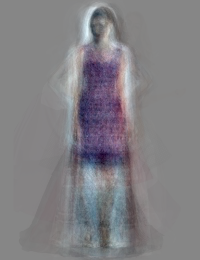
You'll see the principal components in the "eigendresses" folder (examples shown are from my dataset; yours will be different).
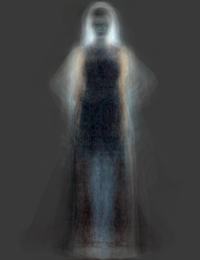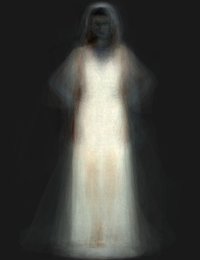!
In the "history" folder, you'll see a known dress being rebuilt from its components.
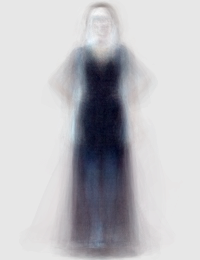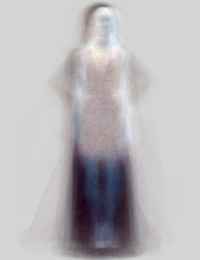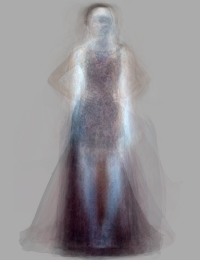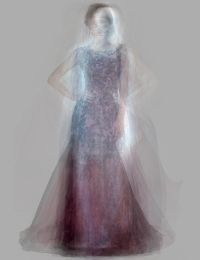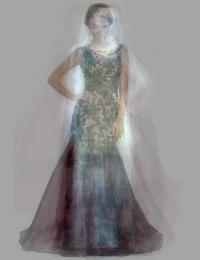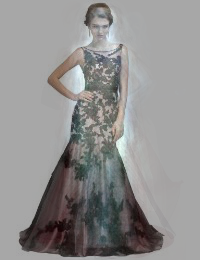
In the "recreatedDresses" folder, you can see just the end product of this process for different dresses.
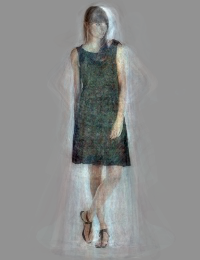
In the "notableDresses" folder, you'll see the prettiest dresses, the ugliest dresses, the most extreme dresses (those that had high scores on many components), etc.
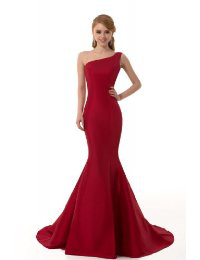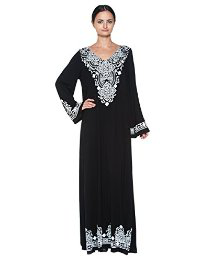
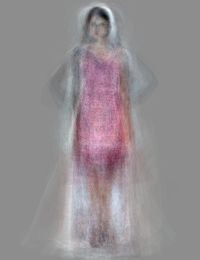
In the "createdDresses" folder, you'll find completely new dresses that were made from choosing random values for the principal components.
### More Info
[Blog post](http://blog.thehackerati.com/post/126701202241/eigenstyle)
[Joel Grus's blog post](http://joelgrus.com/2013/06/24/t-shirts-feminism-parenting-and-data-science-part-2-eigenshirts/)
================================================
FILE: images/dislike/.gitignore
================================================
# Ignore everything in this directory
*
# Except this file
!.gitignore
================================================
FILE: images/like/.gitignore
================================================
# Ignore everything in this directory
*
# Except this file
!.gitignore
================================================
FILE: statistics.py
================================================
from collections import defaultdict
from random import shuffle, seed
import numpy as np
import math
# The following methods are from Joel Grus
# https://github.com/joelgrus/data-science-from-scratch
def mean(x):
return sum(x) / (len(x) * 1.0)
def median(v):
"""finds the 'middle-most' value of v"""
n = len(v)
sorted_v = sorted(v)
midpoint = n // 2
if n % 2 == 1:
# if odd, return the middle value
return sorted_v[midpoint]
else:
# if even, return the average of the middle values
lo = midpoint - 1
hi = midpoint
return (sorted_v[lo] + sorted_v[hi]) / 2
def data_range(x):
return max(x) - min(x)
def de_mean(x):
"""translate x by subtracting its mean (so the result has mean 0)"""
x_bar = mean(x)
return [x_i - x_bar for x_i in x]
def variance(x):
"""assumes x has at least two elements"""
n = len(x)
deviations = de_mean(x)
return sum_of_squares(deviations) / (n - 1)
def standard_deviation(x):
return math.sqrt(variance(x))
def quantile(x, p):
"""returns the pth-percentile value in x"""
p_index = int(p * len(x))
return sorted(x)[p_index]
def interquartile_range(x):
return quantile(x, 0.75) - quantile(x, 0.25)
def dot(v, w):
"""v_1 * w_1 + ... + v_n * w_n"""
return sum(v_i * w_i for v_i, w_i in zip(v, w))
def sum_of_squares(v):
"""v_1 * v_1 + ... + v_n * v_n"""
return dot(v, v)
def normal_cdf(x, mu=0,sigma=1):
return (1 + math.erf((x - mu) / math.sqrt(2) / sigma)) / 2
def inverse_normal_cdf(p, mu=0, sigma=1, tolerance=0.00001):
"""find approximate inverse using binary search"""
# if not standard, compute standard and rescale
if mu != 0 or sigma != 1:
return mu + sigma * inverse_normal_cdf(p, tolerance=tolerance)
low_z, low_p = -10.0, 0 # normal_cdf(-10) is (very close to) 0
hi_z, hi_p = 10.0, 1 # normal_cdf(10) is (very close to) 1
while hi_z - low_z > tolerance:
mid_z = (low_z + hi_z) / 2 # consider the midpoint
mid_p = normal_cdf(mid_z) # and the cdf's value there
if mid_p < p:
# midpoint is still too low, search above it
low_z, low_p = mid_z, mid_p
elif mid_p > p:
# midpoint is still too high, search below it
hi_z, hi_p = mid_z, mid_p
else:
break
return mid_z
================================================
FILE: visuals.py
================================================
from PIL import Image
import PIL.ImageOps
from collections import defaultdict
from glob import glob
from random import shuffle, seed
import numpy as np
import pylab as pl
import pandas as pd
import re
from sklearn.decomposition import RandomizedPCA
from sklearn.linear_model import LogisticRegression
import math
import random
import os
from statistics import mean, median, standard_deviation, inverse_normal_cdf, interquartile_range
N_COMPONENTS = 50
N_COMPONENTS_TO_SHOW = 10
N_DRESSES_TO_SHOW = 5
N_NEW_DRESSES_TO_CREATE = 20
# this is the size of all the Amazon.com images
# If you are using a different source, change the size here
STANDARD_SIZE = (200,260)
def img_to_array(filename):
"""takes a filename and turns it into a numpy array of RGB pixels"""
img = Image.open(filename)
img = img.resize(STANDARD_SIZE)
img = list(img.getdata())
img = map(list, img)
img = np.array(img)
s = img.shape[0] * img.shape[1]
img_wide = img.reshape(1, s)
return img_wide[0]
def makeFolder(directory):
if not os.path.exists(directory):
os.makedirs(directory)
# write out each eigendress and the dresses that most and least match it
# the file names here are chosen because of the order i wanna look at the results
# (when displayed alphabetically in finder)
def createEigendressPictures():
print("creating eigendress pictures")
directory = "results/eigendresses/"
makeFolder(directory)
for i in range(N_COMPONENTS_TO_SHOW):
component = pca.components_[i]
img = image_from_component_values(component)
img.save(directory + str(i) + "_eigendress___.png")
reverse_img = PIL.ImageOps.invert(img)
reverse_img.save(directory + str(i) + "_eigendress_inverted.png")
ranked_dresses = sorted(enumerate(X),
key=lambda (a,x): x[i])
most_i = ranked_dresses[-1][0]
least_i = ranked_dresses[0][0]
for j in range(N_DRESSES_TO_SHOW):
most_j = j * -1 - 1
Image.open(raw_data[ranked_dresses[most_j][0]][2]).save(directory + str(i) + "_eigendress__most" + str(j) + ".png")
Image.open(raw_data[ranked_dresses[j][0]][2]).save(directory + str(i) + "_eigendress_least" + str(j) + ".png")
def indexesForImageName(imageName):
return [i for (i,(cd,_y,f)) in enumerate(raw_data) if imageName in f]
def predictiveModeling():
print("logistic regression...")
directory = "results/notableDresses/"
makeFolder(directory)
# split the data into a training set and a test set
train_split = int(len(data) * 4.0 / 5.0)
X_train = X[:train_split]
X_test = X[train_split:]
y_train = y[:train_split]
y_test = y[train_split:]
# if you wanted to use a different model, you'd specify that here
clf = LogisticRegression(penalty='l2')
clf.fit(X_train,y_train)
print "score",clf.score(X_test,y_test)
# first, let's find the model score for every dress in our dataset
probs = zip(clf.decision_function(X),raw_data)
prettiest_liked_things = sorted(probs,key=lambda (p,(cd,g,f)): (0 if g == 'like' else 1,p))
prettiest_disliked_things = sorted(probs,key=lambda (p,(cd,g,f)): (0 if g == 'dislike' else 1,p))
ugliest_liked_things = sorted(probs,key=lambda (p,(cd,g,f)): (0 if g == 'like' else 1,-p))
ugliest_disliked_things = sorted(probs,key=lambda (p,(cd,g,f)): (0 if g == 'dislike' else 1,-p))
in_between_things = sorted(probs,key=lambda (p,(cd,g,f)): abs(p))
# and let's look at the most and least extreme dresses
cd = zip(X,raw_data)
least_extreme_things = sorted(cd,key=lambda (x,(d,g,f)): sum([abs(c) for c in x]))
most_extreme_things = sorted(cd,key=lambda (x,(d,g,f)): sum([abs(c) for c in x]),reverse=True)
least_interesting_things = sorted(cd,key=lambda (x,(d,g,f)): max([abs(c) for c in x]))
most_interesting_things = sorted(cd,key=lambda (x,(d,g,f)): min([abs(c) for c in x]),reverse=True)
for i in range(10):
Image.open(prettiest_liked_things[i][1][2]).save(directory + "prettiest_pretty_" + str(i) + ".png")
Image.open(prettiest_disliked_things[i][1][2]).save(directory + "prettiest_ugly_" + str(i) + ".png")
Image.open(ugliest_liked_things[i][1][2]).save(directory + "ugliest_pretty_" + str(i) + ".png")
Image.open(ugliest_disliked_things[i][1][2]).save(directory + "directoryugliest_ugly_" + str(i) + ".png")
Image.open(in_between_things[i][1][2]).save(directory + "neither_pretty_nor_ugly_" + str(i) + ".png")
Image.open(least_extreme_things[i][1][2]).save(directory + "least_extreme_" + str(i) + ".png")
Image.open(most_extreme_things[i][1][2]).save(directory + "most_extreme_" + str(i) + ".png")
Image.open(least_interesting_things[i][1][2]).save(directory + "least_interesting_" + str(i) + ".png")
Image.open(most_interesting_things[i][1][2]).save(directory + "most_interesting_" + str(i) + ".png")
# and now let's look at precision-recall
probs = zip(clf.decision_function(X_test),raw_data[train_split:])
num_dislikes = len([c for c in y_test if c == 1])
num_likes = len([c for c in y_test if c == 0])
lowest_score = round(min([p[0] for p in probs]),1) - 0.1
highest_score = round(max([p[0] for p in probs]),1) + 0.1
INTERVAL = 0.1
# first do the likes
score = lowest_score
while score <= highest_score:
true_positives = len([p for p in probs if p[0] <= score and p[1][1] == 'like'])
false_positives = len([p for p in probs if p[0] <= score and p[1][1] == 'dislike'])
positives = true_positives + false_positives
if positives > 0:
precision = 1.0 * true_positives / positives
recall = 1.0 * true_positives / num_likes
print "likes",score,precision,recall
score += INTERVAL
# then do the dislikes
score = highest_score
while score >= lowest_score:
true_positives = len([p for p in probs if p[0] >= score and p[1][1] == 'dislike'])
false_positives = len([p for p in probs if p[0] >= score and p[1][1] == 'like'])
positives = true_positives + false_positives
if positives > 0:
precision = 1.0 * true_positives / positives
recall = 1.0 * true_positives / num_dislikes
print "dislikes",score,precision,recall
score -= INTERVAL
# now do both
score = lowest_score
while score <= highest_score:
likes = len([p for p in probs if p[0] <= score and p[1][1] == 'like'])
dislikes = len([p for p in probs if p[0] <= score and p[1][1] == 'dislike'])
print score, likes, dislikes
score += INTERVAL
def showHistoryOfDress(dressName):
index = indexesForImageName(dressName)[0]
directory = "results/history/dress" + str(index) + "/"
makeFolder(directory)
dress = X[index]
origImage = raw_data[index][2]
Image.open(origImage).save(directory + "dress_" + str(index) + "_original.png")
for i in range(1,len(dress)):
reduced = dress[:i]
construct(reduced, directory + "dress_" + str(index) + "_" + str(i))
def bulkShowDressHistories(lo, hi):
for index in range(lo, hi):
directory = "results/history/dress" + str(index) + "/"
makeFolder(directory)
dress = X[index]
origImage = raw_data[index][2]
Image.open(origImage).save(directory + "dress_" + str(index) + "_original.png")
for i in range(1,len(dress)):
reduced = dress[:i]
construct(reduced, directory + "dress_" + str(index) + "_" + str(i))
def reconstruct(dress_number, saveName = 'reconstruct'):
eigenvalues = X[dress_number]
construct(eigenvalues, saveName)
def construct(eigenvalues, saveName = 'reconstruct'):
components = pca.components_
eigenzip = zip(eigenvalues,components)
N = len(components[0])
r = [int(sum([w * c[i] for (w,c) in eigenzip]))
for i in range(N)]
img = image_from_component_values(r)
img.save(saveName + '.png')
def image_from_component_values(component):
"""takes one of the principal components and turns it into an image"""
hi = max(component)
lo = min(component)
n = len(component) / 3
divisor = hi - lo
if divisor == 0:
divisor = 1
def rescale(x):
return int(255 * (x - lo) / divisor)
d = [(rescale(component[3 * i]),
rescale(component[3 * i + 1]),
rescale(component[3 * i + 2])) for i in range(n)]
im = Image.new('RGB',STANDARD_SIZE)
im.putdata(d)
return im
def makeRandomDress(saveName, liked):
randomArr = []
base = likesByComponent if liked else dislikesByComponent
for c in base[:100]:
mu = mean(c)
sigma = standard_deviation(c)
p = random.uniform(0.0, 1.0)
num = inverse_normal_cdf(p, mu, sigma)
randomArr.append(num)
construct(randomArr, 'results/createdDresses/' + saveName)
def reconstructKnownDresses():
print("reconstructing dresses...")
directory = "results/recreatedDresses/"
makeFolder(directory)
for i in range(N_DRESSES_TO_SHOW):
Image.open(raw_data[i][2]).save(directory + str(i) + "_original.png")
saveName = directory + str(i)
reconstruct(i, saveName)
def createNewDresses():
print("creating brand new dresses...")
directory = "results/createdDresses/"
makeFolder(directory)
for i in range(N_NEW_DRESSES_TO_CREATE):
saveNameLike = "newLikeDress" + str(i)
saveNameDislike = "newDislikeDress" + str(i)
makeRandomDress(saveNameLike, True)
makeRandomDress(saveNameDislike, False)
def printComponentStatistics():
print("component statistics:\n")
for i in range(N_COMPONENTS_TO_SHOW):
print("component " + str(i) + ":")
likeComp = likesByComponent[i]
dislikeComp = dislikesByComponent[i]
print("means: like = " + str(mean(likeComp)) + " dislike = " + str(mean(dislikeComp)))
print("medians: like = " + str(median(likeComp)) + " dislike = " + str(median(dislikeComp)))
print("stdevs: like = " + str(standard_deviation(likeComp)) + " dislike = " + str(standard_deviation(dislikeComp)))
print("interquartile range: like = " + str(interquartile_range(likeComp)) + " dislike = " + str(interquartile_range(dislikeComp)))
print("\n")
like_files = glob('images/like/Image*')
dislike_files = glob('images/dislike/Image*')
process_file = img_to_array
print('processing images...')
print('(this takes a long time if you have a lot of images)')
raw_data = [(process_file(filename),'like',filename) for filename in like_files] + \
[(process_file(filename),'dislike',filename) for filename in dislike_files]
# randomly order the data
#seed(0)
shuffle(raw_data)
# pull out the features and the labels
data = np.array([cd for (cd,_y,f) in raw_data])
labels = np.array([_y for (cd,_y,f) in raw_data])
print('finding principal components...')
pca = RandomizedPCA(n_components=N_COMPONENTS, random_state=0)
X = pca.fit_transform(data)
y = [1 if label == 'dislike' else 0 for label in labels]
zipped = zip(X, raw_data)
likes = [x[0] for x in zipped if x[1][1] == "like"]
dislikes = [x[0] for x in zipped if x[1][1] == "dislike"]
likesByComponent = zip(*likes)
dislikesByComponent = zip(*dislikes)
allByComponent = zip(*X)
printComponentStatistics()
createEigendressPictures()
predictiveModeling()
reconstructKnownDresses()
bulkShowDressHistories(0,1)
createNewDresses()
gitextract_mxqrzhpu/ ├── .gitignore ├── README.md ├── images/ │ ├── dislike/ │ │ └── .gitignore │ └── like/ │ └── .gitignore ├── statistics.py └── visuals.py
SYMBOL INDEX (26 symbols across 2 files)

FILE: statistics.py
  function mean (line 8) | def mean(x):
  function median (line 11) | def median(v):
  function data_range (line 25) | def data_range(x):
  function de_mean (line 28) | def de_mean(x):
  function variance (line 33) | def variance(x):
  function standard_deviation (line 39) | def standard_deviation(x):
  function quantile (line 42) | def quantile(x, p):
  function interquartile_range (line 47) | def interquartile_range(x):
  function dot (line 50) | def dot(v, w):
  function sum_of_squares (line 54) | def sum_of_squares(v):
  function normal_cdf (line 58) | def normal_cdf(x, mu=0,sigma=1):
  function inverse_normal_cdf (line 61) | def inverse_normal_cdf(p, mu=0, sigma=1, tolerance=0.00001):

FILE: visuals.py
  function img_to_array (line 26) | def img_to_array(filename):
  function makeFolder (line 37) | def makeFolder(directory):
  function createEigendressPictures (line 44) | def createEigendressPictures():
  function indexesForImageName (line 64) | def indexesForImageName(imageName):
  function predictiveModeling (line 67) | def predictiveModeling():
  function showHistoryOfDress (line 154) | def showHistoryOfDress(dressName):
  function bulkShowDressHistories (line 165) | def bulkShowDressHistories(lo, hi):
  function reconstruct (line 176) | def reconstruct(dress_number, saveName = 'reconstruct'):
  function construct (line 180) | def construct(eigenvalues, saveName = 'reconstruct'):
  function image_from_component_values (line 189) | def image_from_component_values(component):
  function makeRandomDress (line 206) | def makeRandomDress(saveName, liked):
  function reconstructKnownDresses (line 217) | def reconstructKnownDresses():
  function createNewDresses (line 226) | def createNewDresses():
  function printComponentStatistics (line 236) | def printComponentStatistics():
Condensed preview — 6 files, each showing path, character count, and a content snippet. Download the .json file or copy for the full structured content (17K chars).
[
  {
    "path": ".gitignore",
    "chars": 116,
    "preview": "images/like/Image*\nimages/dislike/Image*\n\n# Byte-compiled / optimized / DLL files\n__pycache__/\n*.py[cod]\n*$py.class\n"
  },
  {
    "path": "README.md",
    "chars": 2143,
    "preview": "Eigenstyle\n======\nPrincipal Component Analysis and Fashion\n\n###To Use\n\n- Find a bunch of images (I used images of dresse"
  },
  {
    "path": "images/dislike/.gitignore",
    "chars": 70,
    "preview": "# Ignore everything in this directory\n*\n# Except this file\n!.gitignore"
  },
  {
    "path": "images/like/.gitignore",
    "chars": 70,
    "preview": "# Ignore everything in this directory\n*\n# Except this file\n!.gitignore"
  },
  {
    "path": "statistics.py",
    "chars": 2433,
    "preview": "from collections import defaultdict\nfrom random import shuffle, seed\nimport numpy as np\nimport math\n\n# The following met"
  },
  {
    "path": "visuals.py",
    "chars": 11631,
    "preview": "from PIL import Image\nimport PIL.ImageOps\nfrom collections import defaultdict\nfrom glob import glob\nfrom random import s"
  }
]
About this extraction
This page contains the full source code of the graceavery/Eigenstyle GitHub repository, extracted and formatted as plain text for AI agents and large language models (LLMs). The extraction includes 6 files (16.1 KB), approximately 4.7k tokens, and a symbol index with 26 extracted functions, classes, methods, constants, and types. Use this with OpenClaw, Claude, ChatGPT, Cursor, Windsurf, or any other AI tool that accepts text input. You can copy the full output to your clipboard or download it as a .txt file.
Extracted by GitExtract — free GitHub repo to text converter for AI. Built by Nikandr Surkov.