Showing preview only (269K chars total). Download the full file or copy to clipboard to get everything.
Repository: hashicorp/terraform-aws-nomad
Branch: master
Commit: 938e206a921e
Files: 55
Total size: 253.2 KB
Directory structure:
gitextract_d1drx6lm/

├── .circleci/
│   └── config.yml
├── .github/
│   ├── ISSUE_TEMPLATE/
│   │   ├── bug_report.md
│   │   └── feature_request.md
│   └── pull_request_template.md
├── .gitignore
├── .pre-commit-config.yaml
├── CODEOWNERS
├── LICENSE
├── NOTICE
├── README.md
├── _ci/
│   ├── publish-amis-in-new-account.md
│   └── publish-amis.sh
├── core-concepts.md
├── examples/
│   ├── nomad-consul-ami/
│   │   ├── README.md
│   │   ├── nomad-consul-docker.json
│   │   ├── nomad-consul.json
│   │   ├── setup_amazon-linux-2.sh
│   │   ├── setup_nomad_consul.sh
│   │   └── setup_ubuntu.sh
│   ├── nomad-consul-separate-cluster/
│   │   ├── README.md
│   │   ├── main.tf
│   │   ├── outputs.tf
│   │   ├── user-data-consul-server.sh
│   │   ├── user-data-nomad-client.sh
│   │   ├── user-data-nomad-server.sh
│   │   └── variables.tf
│   ├── nomad-examples-helper/
│   │   ├── README.md
│   │   ├── example.nomad
│   │   └── nomad-examples-helper.sh
│   └── root-example/
│       ├── README.md
│       ├── user-data-client.sh
│       └── user-data-server.sh
├── main.tf
├── modules/
│   ├── install-nomad/
│   │   ├── README.md
│   │   └── install-nomad
│   ├── nomad-cluster/
│   │   ├── README.md
│   │   ├── main.tf
│   │   ├── outputs.tf
│   │   └── variables.tf
│   ├── nomad-security-group-rules/
│   │   ├── README.md
│   │   ├── main.tf
│   │   └── variables.tf
│   └── run-nomad/
│       ├── README.md
│       └── run-nomad
├── outputs.tf
├── test/
│   ├── README.md
│   ├── aws_helpers.go
│   ├── go.mod
│   ├── go.sum
│   ├── nomad_cluster_ssh_test.go
│   ├── nomad_consul_cluster_colocated_test.go
│   ├── nomad_consul_cluster_separate_test.go
│   ├── nomad_helpers.go
│   └── terratest_helpers.go
└── variables.tf
================================================
FILE CONTENTS
================================================
================================================
FILE: .circleci/config.yml
================================================
defaults: &defaults
docker:
- image: 087285199408.dkr.ecr.us-east-1.amazonaws.com/circle-ci-test-image-base:go1.16-tf1.0-tg31.1-pck1.7
version: 2
jobs:
test:
<<: *defaults
steps:
- checkout
- run:
# Fail the build if the pre-commit hooks don't pass. Note: if you run $ pre-commit install locally within this repo, these hooks will
# execute automatically every time before you commit, ensuring the build never fails at this step!
name: run pre-commit hooks
command: |
pip install pre-commit==1.21.0 cfgv==2.0.1
pre-commit install
pre-commit run --all-files
- run:
name: create log directory
command: mkdir -p /tmp/logs
- run:
name: run tests
command: run-go-tests --path test --timeout 2h | tee /tmp/logs/all.log
no_output_timeout: 3600s
- store_artifacts:
path: /tmp/logs
- store_test_results:
path: /tmp/logs
deploy:
<<: *defaults
steps:
- checkout
- run: echo 'export PATH=$HOME/terraform:$HOME/packer:$PATH' >> $BASH_ENV
- run: sudo -E gruntwork-install --module-name "aws-helpers" --repo "https://github.com/gruntwork-io/module-ci" --tag "v0.29.0"
- run: sudo -E gruntwork-install --module-name "git-helpers" --repo "https://github.com/gruntwork-io/module-ci" --tag "v0.29.0"
- run: sudo -E gruntwork-install --module-name "build-helpers" --repo "https://github.com/gruntwork-io/module-ci" --tag "v0.29.0"
# We generally only want to build AMIs on new releases, but when we are setting up AMIs in a new account for the
# first time, we want to build the AMIs but NOT run automated tests, since those tests will fail without an existing
# AMI already in the AWS Account.
- run: _ci/publish-amis.sh "ubuntu16-ami"
- run: _ci/publish-amis.sh "ubuntu18-ami"
- run: _ci/publish-amis.sh "amazon-linux-2-amd64-ami"
- run: _ci/publish-amis.sh "amazon-linux-2-arm64-ami"
workflows:
version: 2
build-and-test:
jobs:
- test:
filters:
branches:
ignore: publish-amis
- deploy:
requires:
- test
filters:
branches:
only: publish-amis
tags:
only: /^v.*/
nightly-test:
triggers:
- schedule:
cron: "0 0 * * *"
filters:
branches:
only:
- master
jobs:
- test
================================================
FILE: .github/ISSUE_TEMPLATE/bug_report.md
================================================
---
name: Bug report
about: Create a bug report to help us improve.
title: ''
labels: bug
assignees: ''
---
<!--
Have any questions? Check out the contributing docs at https://gruntwork.notion.site/Gruntwork-Coding-Methodology-02fdcd6e4b004e818553684760bf691e,
or ask in this issue and a Gruntwork core maintainer will be happy to help :)
-->
**Describe the bug**
A clear and concise description of what the bug is.
**To Reproduce**
Steps to reproduce the behavior including the relevant Terraform/Terragrunt/Packer version number and any code snippets and module inputs you used.
```hcl
// paste code snippets here
```
**Expected behavior**
A clear and concise description of what you expected to happen.
**Nice to have**
- [ ] Terminal output
- [ ] Screenshots
**Additional context**
Add any other context about the problem here.
================================================
FILE: .github/ISSUE_TEMPLATE/feature_request.md
================================================
---
name: Feature request
about: Submit a feature request for this repo.
title: ''
labels: enhancement
assignees: ''
---
<!--
Have any questions? Check out the contributing docs at https://gruntwork.notion.site/Gruntwork-Coding-Methodology-02fdcd6e4b004e818553684760bf691e,
or ask in this issue and a Gruntwork core maintainer will be happy to help :)
-->
**Describe the solution you'd like**
A clear and concise description of what you want to happen.
**Describe alternatives you've considered**
A clear and concise description of any alternative solutions or features you've considered.
**Additional context**
Add any other context or screenshots about the feature request here.
================================================
FILE: .github/pull_request_template.md
================================================
<!--
Have any questions? Check out the contributing docs at https://gruntwork.notion.site/Gruntwork-Coding-Methodology-02fdcd6e4b004e818553684760bf691e,
or ask in this Pull Request and a Gruntwork core maintainer will be happy to help :)
Note: Remember to add '[WIP]' to the beginning of the title if this PR is still a work-in-progress. Remove it when it is ready for review!
-->
## Description
<!-- Write a brief description of the changes introduced by this PR -->
### Documentation
<!--
If this is a feature PR, then where is it documented?
- If docs exist:
- Update any references, if relevant.
- If no docs exist:
- Create a stub for documentation including bullet points for how to use the feature, code snippets (including from happy path tests), etc.
-->
<!-- Important: Did you make any backward incompatible changes? If yes, then you must write a migration guide! -->
## TODOs
Please ensure all of these TODOs are completed before asking for a review.
- [ ] Ensure the branch is named correctly with the issue number. e.g: `feature/new-vpc-endpoints-955` or `bug/missing-count-param-434`.
- [ ] Update the docs.
- [ ] Keep the changes backward compatible where possible.
- [ ] Run the pre-commit checks successfully.
- [ ] Run the relevant tests successfully.
- [ ] Ensure any 3rd party code adheres with our [license policy](https://www.notion.so/gruntwork/Gruntwork-licenses-and-open-source-usage-policy-f7dece1f780341c7b69c1763f22b1378) or delete this line if its not applicable.
## Related Issues
<!--
Link to related issues, and issues fixed or partially addressed by this PR.
e.g. Fixes #1234
e.g. Addresses #1234
e.g. Related to #1234
-->
================================================
FILE: .gitignore
================================================
# Terraform files
.terraform
terraform.tfstate
terraform.tfvars
*.tfstate*
# OS X files
.history
.DS_Store
# IntelliJ files
.idea_modules
*.iml
*.iws
*.ipr
.idea/
build/
*/build/
out/
# Go best practices dictate that libraries should not include the vendor directory
vendor
# Folder used to store temporary test data by Terratest
.test-data
# Ignore Terraform lock files, as we want to test the Terraform code in these repos with the latest provider
# versions.
.terraform.lock.hcl
================================================
FILE: .pre-commit-config.yaml
================================================
repos:
- repo: https://github.com/gruntwork-io/pre-commit
rev: v0.1.10
hooks:
- id: terraform-fmt
- id: gofmt
================================================
FILE: CODEOWNERS
================================================
* @robmorgan @Etiene @anouarchattouna
================================================
FILE: LICENSE
================================================
Copyright (c) 2017 HashiCorp, Inc.
Apache License
Version 2.0, January 2004
http://www.apache.org/licenses/
TERMS AND CONDITIONS FOR USE, REPRODUCTION, AND DISTRIBUTION
1. Definitions.
"License" shall mean the terms and conditions for use, reproduction,
and distribution as defined by Sections 1 through 9 of this document.
"Licensor" shall mean the copyright owner or entity authorized by
the copyright owner that is granting the License.
"Legal Entity" shall mean the union of the acting entity and all
other entities that control, are controlled by, or are under common
control with that entity. For the purposes of this definition,
"control" means (i) the power, direct or indirect, to cause the
direction or management of such entity, whether by contract or
otherwise, or (ii) ownership of fifty percent (50%) or more of the
outstanding shares, or (iii) beneficial ownership of such entity.
"You" (or "Your") shall mean an individual or Legal Entity
exercising permissions granted by this License.
"Source" form shall mean the preferred form for making modifications,
including but not limited to software source code, documentation
source, and configuration files.
"Object" form shall mean any form resulting from mechanical
transformation or translation of a Source form, including but
not limited to compiled object code, generated documentation,
and conversions to other media types.
"Work" shall mean the work of authorship, whether in Source or
Object form, made available under the License, as indicated by a
copyright notice that is included in or attached to the work
(an example is provided in the Appendix below).
"Derivative Works" shall mean any work, whether in Source or Object
form, that is based on (or derived from) the Work and for which the
editorial revisions, annotations, elaborations, or other modifications
represent, as a whole, an original work of authorship. For the purposes
of this License, Derivative Works shall not include works that remain
separable from, or merely link (or bind by name) to the interfaces of,
the Work and Derivative Works thereof.
"Contribution" shall mean any work of authorship, including
the original version of the Work and any modifications or additions
to that Work or Derivative Works thereof, that is intentionally
submitted to Licensor for inclusion in the Work by the copyright owner
or by an individual or Legal Entity authorized to submit on behalf of
the copyright owner. For the purposes of this definition, "submitted"
means any form of electronic, verbal, or written communication sent
to the Licensor or its representatives, including but not limited to
communication on electronic mailing lists, source code control systems,
and issue tracking systems that are managed by, or on behalf of, the
Licensor for the purpose of discussing and improving the Work, but
excluding communication that is conspicuously marked or otherwise
designated in writing by the copyright owner as "Not a Contribution."
"Contributor" shall mean Licensor and any individual or Legal Entity
on behalf of whom a Contribution has been received by Licensor and
subsequently incorporated within the Work.
2. Grant of Copyright License. Subject to the terms and conditions of
this License, each Contributor hereby grants to You a perpetual,
worldwide, non-exclusive, no-charge, royalty-free, irrevocable
copyright license to reproduce, prepare Derivative Works of,
publicly display, publicly perform, sublicense, and distribute the
Work and such Derivative Works in Source or Object form.
3. Grant of Patent License. Subject to the terms and conditions of
this License, each Contributor hereby grants to You a perpetual,
worldwide, non-exclusive, no-charge, royalty-free, irrevocable
(except as stated in this section) patent license to make, have made,
use, offer to sell, sell, import, and otherwise transfer the Work,
where such license applies only to those patent claims licensable
by such Contributor that are necessarily infringed by their
Contribution(s) alone or by combination of their Contribution(s)
with the Work to which such Contribution(s) was submitted. If You
institute patent litigation against any entity (including a
cross-claim or counterclaim in a lawsuit) alleging that the Work
or a Contribution incorporated within the Work constitutes direct
or contributory patent infringement, then any patent licenses
granted to You under this License for that Work shall terminate
as of the date such litigation is filed.
4. Redistribution. You may reproduce and distribute copies of the
Work or Derivative Works thereof in any medium, with or without
modifications, and in Source or Object form, provided that You
meet the following conditions:
(a) You must give any other recipients of the Work or
Derivative Works a copy of this License; and
(b) You must cause any modified files to carry prominent notices
stating that You changed the files; and
(c) You must retain, in the Source form of any Derivative Works
that You distribute, all copyright, patent, trademark, and
attribution notices from the Source form of the Work,
excluding those notices that do not pertain to any part of
the Derivative Works; and
(d) If the Work includes a "NOTICE" text file as part of its
distribution, then any Derivative Works that You distribute must
include a readable copy of the attribution notices contained
within such NOTICE file, excluding those notices that do not
pertain to any part of the Derivative Works, in at least one
of the following places: within a NOTICE text file distributed
as part of the Derivative Works; within the Source form or
documentation, if provided along with the Derivative Works; or,
within a display generated by the Derivative Works, if and
wherever such third-party notices normally appear. The contents
of the NOTICE file are for informational purposes only and
do not modify the License. You may add Your own attribution
notices within Derivative Works that You distribute, alongside
or as an addendum to the NOTICE text from the Work, provided
that such additional attribution notices cannot be construed
as modifying the License.
You may add Your own copyright statement to Your modifications and
may provide additional or different license terms and conditions
for use, reproduction, or distribution of Your modifications, or
for any such Derivative Works as a whole, provided Your use,
reproduction, and distribution of the Work otherwise complies with
the conditions stated in this License.
5. Submission of Contributions. Unless You explicitly state otherwise,
any Contribution intentionally submitted for inclusion in the Work
by You to the Licensor shall be under the terms and conditions of
this License, without any additional terms or conditions.
Notwithstanding the above, nothing herein shall supersede or modify
the terms of any separate license agreement you may have executed
with Licensor regarding such Contributions.
6. Trademarks. This License does not grant permission to use the trade
names, trademarks, service marks, or product names of the Licensor,
except as required for reasonable and customary use in describing the
origin of the Work and reproducing the content of the NOTICE file.
7. Disclaimer of Warranty. Unless required by applicable law or
agreed to in writing, Licensor provides the Work (and each
Contributor provides its Contributions) on an "AS IS" BASIS,
WITHOUT WARRANTIES OR CONDITIONS OF ANY KIND, either express or
implied, including, without limitation, any warranties or conditions
of TITLE, NON-INFRINGEMENT, MERCHANTABILITY, or FITNESS FOR A
PARTICULAR PURPOSE. You are solely responsible for determining the
appropriateness of using or redistributing the Work and assume any
risks associated with Your exercise of permissions under this License.
8. Limitation of Liability. In no event and under no legal theory,
whether in tort (including negligence), contract, or otherwise,
unless required by applicable law (such as deliberate and grossly
negligent acts) or agreed to in writing, shall any Contributor be
liable to You for damages, including any direct, indirect, special,
incidental, or consequential damages of any character arising as a
result of this License or out of the use or inability to use the
Work (including but not limited to damages for loss of goodwill,
work stoppage, computer failure or malfunction, or any and all
other commercial damages or losses), even if such Contributor
has been advised of the possibility of such damages.
9. Accepting Warranty or Additional Liability. While redistributing
the Work or Derivative Works thereof, You may choose to offer,
and charge a fee for, acceptance of support, warranty, indemnity,
or other liability obligations and/or rights consistent with this
License. However, in accepting such obligations, You may act only
on Your own behalf and on Your sole responsibility, not on behalf
of any other Contributor, and only if You agree to indemnify,
defend, and hold each Contributor harmless for any liability
incurred by, or claims asserted against, such Contributor by reason
of your accepting any such warranty or additional liability.
END OF TERMS AND CONDITIONS
APPENDIX: How to apply the Apache License to your work.
To apply the Apache License to your work, attach the following
boilerplate notice, with the fields enclosed by brackets "[]"
replaced with your own identifying information. (Don't include
the brackets!) The text should be enclosed in the appropriate
comment syntax for the file format. We also recommend that a
file or class name and description of purpose be included on the
same "printed page" as the copyright notice for easier
identification within third-party archives.
Copyright [yyyy] [name of copyright owner]
Licensed under the Apache License, Version 2.0 (the "License");
you may not use this file except in compliance with the License.
You may obtain a copy of the License at
http://www.apache.org/licenses/LICENSE-2.0
Unless required by applicable law or agreed to in writing, software
distributed under the License is distributed on an "AS IS" BASIS,
WITHOUT WARRANTIES OR CONDITIONS OF ANY KIND, either express or implied.
See the License for the specific language governing permissions and
limitations under the License.
================================================
FILE: NOTICE
================================================
terraform-aws-nomad
Copyright 2017 Gruntwork, Inc.
This product includes software developed at Gruntwork (http://www.gruntwork.io/).
================================================
FILE: README.md
================================================
# DISCLAIMER: This is no longer supported.
Moving forward in the future this repository will be no longer supported and eventually lead to
deprecation. Please use our latest versions of our products moving forward or alternatively you
may fork the repository to continue use and development for your personal/business use.
---
<!--
:type: service
:name: HashiCorp Nomad
:description: Deploy a Nomad cluster. Supports automatic bootstrapping, discovery of Consul servers, automatic recovery of failed servers.
:icon: /_docs/nomad-icon.png
:category: docker-orchestration
:cloud: aws
:tags: docker, orchestration, containers
:license: gruntwork
:built-with: terraform, bash
-->
# Nomad AWS Module

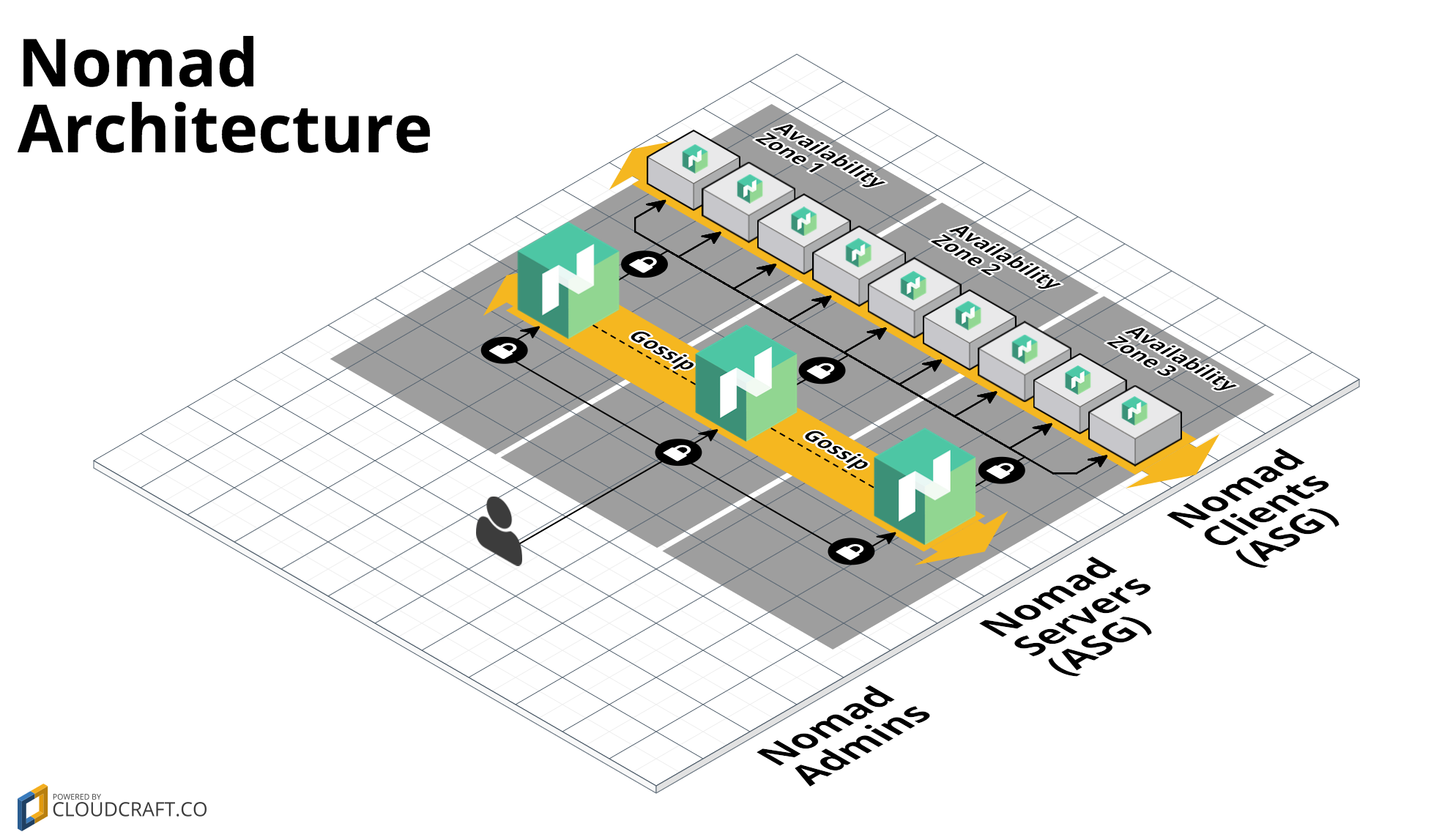
This repo contains a set of modules for deploying a [Nomad](https://www.nomadproject.io/) cluster on
[AWS](https://aws.amazon.com/) using [Terraform](https://www.terraform.io/). Nomad is a distributed, highly-available
data-center aware scheduler. A Nomad cluster typically includes a small number of server nodes, which are responsible
for being part of the [consensus protocol](https://www.nomadproject.io/docs/internals/consensus.html), and a larger
number of client nodes, which are used for running jobs.
## Features
* Deploy server nodes for managing jobs and client nodes running jobs
* Supports colocated clusters and separate clusters
* Least privilege security group rules for servers
* Auto scaling and Auto healing
## Learn
This repo was created by [Gruntwork](https://www.gruntwork.io?ref=repo_aws_nomad), and follows the same patterns as [the Gruntwork
Infrastructure as Code Library](https://gruntwork.io/infrastructure-as-code-library/), a collection of reusable,
battle-tested, production ready infrastructure code. You can read [How to use the Gruntwork Infrastructure as Code
Library](https://gruntwork.io/guides/foundations/how-to-use-gruntwork-infrastructure-as-code-library/) for an overview
of how to use modules maintained by Gruntwork!
### Core concepts
* [Nomad Use Cases](https://www.nomadproject.io/intro/use-cases.html): overview of various use cases that Nomad is
optimized for.
* [Nomad Guides](https://www.nomadproject.io/guides/index.html): official guide on how to configure and setup Nomad
clusters as well as how to use Nomad to schedule services on to the workers.
* [Nomad Security](https://github.com/hashicorp/terraform-aws-nomad/tree/master/modules/nomad-cluster#security): overview of how to secure your Nomad clusters.
### Repo organization
* [modules](https://github.com/hashicorp/terraform-aws-nomad/tree/master/modules): the main implementation code for this repo, broken down into multiple standalone, orthogonal submodules.
* [examples](https://github.com/hashicorp/terraform-aws-nomad/tree/master/examples): This folder contains working examples of how to use the submodules.
* [test](https://github.com/hashicorp/terraform-aws-nomad/tree/master/test): Automated tests for the modules and examples.
* [root](https://github.com/hashicorp/terraform-aws-nomad/tree/master): The root folder is *an example* of how to use the [nomad-cluster module](https://github.com/hashicorp/terraform-aws-nomad/tree/master/modules/nomad-cluster) module to deploy a [Nomad](https://www.nomadproject.io/) cluster in [AWS](https://aws.amazon.com/). The Terraform Registry requires the root of every repo to contain Terraform code, so we've put one of the examples there. This example is great for learning and experimenting, but for production use, please use the underlying modules in the [modules folder](https://github.com/hashicorp/terraform-aws-nomad/tree/master/modules) directly.
## Deploy
### Non-production deployment (quick start for learning)
If you just want to try this repo out for experimenting and learning, check out the following resources:
* [examples folder](https://github.com/hashicorp/terraform-aws-nomad/tree/master/examples): The `examples` folder contains sample code optimized for learning, experimenting, and testing (but not production usage).
### Production deployment
If you want to deploy this repo in production, check out the following resources:
* [Nomad Production Setup Guide](https://www.nomadproject.io/guides/install/production/index.html):
detailed guide covering how to setup a production deployment of Nomad.
## Manage
### Day-to-day operations
* [How to deploy Nomad and Consul in the same
cluster](https://github.com/hashicorp/terraform-aws-nomad/tree/master/core-concepts.md#deploy-nomad-and-consul-in-the-same-cluster)
* [How to deploy Nomad and Consul in separate
clusters](https://github.com/hashicorp/terraform-aws-nomad/tree/master/core-concepts.md#deploy-nomad-and-consul-in-separate-clusters)
* [How to connect to the Nomad cluster](https://github.com/hashicorp/terraform-aws-nomad/tree/master/modules/nomad-cluster/README.md#how-do-you-connect-to-the-nomad-cluster)
* [What happens if a node crashes](https://github.com/hashicorp/terraform-aws-nomad/tree/master/modules/nomad-cluster/README.md#what-happens-if-a-node-crashes)
* [How to connect load balancers to the ASG](https://github.com/hashicorp/terraform-aws-nomad/tree/master/modules/nomad-cluster/README.md#how-do-you-connect-load-balancers-to-the-auto-scaling-group-asg)
### Major changes
* [How to upgrade a Nomad cluster](https://github.com/hashicorp/terraform-aws-nomad/tree/master/modules/nomad-cluster/README.md#how-do-you-roll-out-updates)
## Who created this Module?
These modules were created by [Gruntwork](http://www.gruntwork.io/?ref=repo_aws_nomad), in partnership with HashiCorp, in 2017 and maintained through 2021. They were deprecated in 2022, see the top of the README for details.
## License
Please see [LICENSE](https://github.com/hashicorp/terraform-aws-nomad/tree/master/LICENSE) for details on how the code in this repo is licensed.
Copyright © 2019 [Gruntwork](https://www.gruntwork.io?ref=repo_aws_nomad), Inc.
================================================
FILE: _ci/publish-amis-in-new-account.md
================================================
# How to Publish AMIs in a New Account
See the [canonical page](https://github.com/hashicorp/terraform-aws-consul/blob/master/_ci/publish-amis-in-new-account.md)
in the [Consul AWS Module](https://github.com/hashicorp/terraform-aws-consul) repo.
================================================
FILE: _ci/publish-amis.sh
================================================
#!/bin/bash
#
# Build the example AMI, copy it to all AWS regions, and make all AMIs public.
#
# This script is meant to be run in a CircleCI job.
#
set -e
readonly SCRIPT_DIR="$(cd "$(dirname "${BASH_SOURCE[0]}")" && pwd)"
readonly PACKER_TEMPLATE_PATH="$SCRIPT_DIR/../examples/nomad-consul-ami/nomad-consul.json"
readonly PACKER_TEMPLATE_DEFAULT_REGION="us-east-1"
readonly AMI_PROPERTIES_FILE="/tmp/ami.properties"
# In CircleCI, every build populates the branch name in CIRCLE_BRANCH except builds triggered by a new tag, for which
# the CIRCLE_BRANCH env var is empty. We assume tags are only issued against the master branch.
readonly BRANCH_NAME="${CIRCLE_BRANCH:-master}"
readonly PACKER_BUILD_NAME="$1"
if [[ -z "$PACKER_BUILD_NAME" ]]; then
echo "ERROR: You must pass in the Packer build name as the first argument to this function."
exit 1
fi
if [[ -z "$PUBLISH_AMI_AWS_ACCESS_KEY_ID" || -z "$PUBLISH_AMI_AWS_SECRET_ACCESS_KEY" ]]; then
echo "The PUBLISH_AMI_AWS_ACCESS_KEY_ID and PUBLISH_AMI_AWS_SECRET_ACCESS_KEY environment variables must be set to the AWS credentials to use to publish the AMIs."
exit 1
fi
echo "Checking out branch $BRANCH_NAME to make sure we do all work in a branch and not in detached HEAD state"
git checkout "$BRANCH_NAME"
# We publish the AMIs to a different AWS account, so set those credentials
export AWS_ACCESS_KEY_ID="$PUBLISH_AMI_AWS_ACCESS_KEY_ID"
export AWS_SECRET_ACCESS_KEY="$PUBLISH_AMI_AWS_SECRET_ACCESS_KEY"
# Build the example AMI. WARNING! In a production setting, you should build your own AMI to ensure it has exactly the
# configuration you want. We build this example AMI solely to make initial use of this Module as easy as possible.
build-packer-artifact \
--packer-template-path "$PACKER_TEMPLATE_PATH" \
--build-name "$PACKER_BUILD_NAME" \
--output-properties-file "$AMI_PROPERTIES_FILE"
# Copy the AMI to all regions and make it public in each
source "$AMI_PROPERTIES_FILE"
publish-ami \
--all-regions \
--source-ami-id "$ARTIFACT_ID" \
--source-ami-region "$PACKER_TEMPLATE_DEFAULT_REGION"
================================================
FILE: core-concepts.md
================================================
# Background
To run a production Nomad cluster, you need to deploy a small number of server nodes (typically 3), which are responsible
for being part of the [consensus protocol](https://www.nomadproject.io/docs/internals/consensus.html), and a larger
number of client nodes, which are used for running jobs. You must also have a [Consul](https://www.consul.io/) cluster
deployed (see the [Consul AWS Module](https://github.com/hashicorp/terraform-aws-consul)) in one of the following
configurations:
1. [Deploy Nomad and Consul in the same cluster](#deploy-nomad-and-consul-in-the-same-cluster)
1. [Deploy Nomad and Consul in separate clusters](#deploy-nomad-and-consul-in-separate-clusters)
## Deploy Nomad and Consul in the same cluster
1. Use the [install-consul
module](https://github.com/hashicorp/terraform-aws-consul/tree/master/modules/install-consul) from the Consul AWS
Module and the [install-nomad module](https://github.com/hashicorp/terraform-aws-nomad/tree/master/modules/install-nomad) from this Module in a Packer template to create
an AMI with Consul and Nomad.
If you are just experimenting with this Module, you may find it more convenient to use one of our official public AMIs:
- [Latest Ubuntu 16 AMIs](https://github.com/hashicorp/terraform-aws-nomad/tree/master/_docs/ubuntu16-ami-list.md).
- [Latest Amazon Linux AMIs](https://github.com/hashicorp/terraform-aws-nomad/tree/master/_docs/amazon-linux-ami-list.md).
**WARNING! Do NOT use these AMIs in your production setup. In production, you should build your own AMIs in your own
AWS account.**
1. Deploy a small number of server nodes (typically, 3) using the [consul-cluster
module](https://github.com/hashicorp/terraform-aws-consul/tree/master/modules/consul-cluster). Execute the
[run-consul script](https://github.com/hashicorp/terraform-aws-consul/tree/master/modules/run-consul) and the
[run-nomad script](https://github.com/hashicorp/terraform-aws-nomad/tree/master/modules/run-nomad) on each node during boot, setting the `--server` flag in both
scripts.
1. Deploy as many client nodes as you need using the [nomad-cluster module](https://github.com/hashicorp/terraform-aws-nomad/tree/master/modules/nomad-cluster). Execute the
[run-consul script](https://github.com/hashicorp/terraform-aws-consul/tree/master/modules/run-consul) and the
[run-nomad script](https://github.com/hashicorp/terraform-aws-nomad/tree/master/modules/run-nomad) on each node during boot, setting the `--client` flag in both
scripts.
Check out the [nomad-consul-colocated-cluster example](https://github.com/hashicorp/terraform-aws-nomad/tree/master/examples/root-example) for working
sample code.
## Deploy Nomad and Consul in separate clusters
1. Deploy a standalone Consul cluster by following the instructions in the [Consul AWS
Module](https://github.com/hashicorp/terraform-aws-consul).
1. Use the scripts from the [install-nomad module](https://github.com/hashicorp/terraform-aws-nomad/tree/master/modules/install-nomad) in a Packer template to create a Nomad AMI.
1. Deploy a small number of server nodes (typically, 3) using the [nomad-cluster module](https://github.com/hashicorp/terraform-aws-nomad/tree/master/modules/nomad-cluster). Execute the
[run-nomad script](https://github.com/hashicorp/terraform-aws-nomad/tree/master/modules/run-nomad) on each node during boot, setting the `--server` flag. You will
need to configure each node with the connection details for your standalone Consul cluster.
1. Deploy as many client nodes as you need using the [nomad-cluster module](https://github.com/hashicorp/terraform-aws-nomad/tree/master/modules/nomad-cluster). Execute the
[run-nomad script](https://github.com/hashicorp/terraform-aws-nomad/tree/master/modules/run-nomad) on each node during boot, setting the `--client` flag.
Check out the [nomad-consul-separate-cluster example](https://github.com/hashicorp/terraform-aws-nomad/tree/master/examples/nomad-consul-separate-cluster) for working sample code.
================================================
FILE: examples/nomad-consul-ami/README.md
================================================
# Nomad and Consul AMI
This folder shows an example of how to use the [install-nomad module](https://github.com/hashicorp/terraform-aws-nomad/tree/master/modules/install-nomad) from this Module and
the [install-consul module](https://github.com/hashicorp/terraform-aws-consul/tree/master/modules/install-consul)
from the Consul AWS Module with [Packer](https://www.packer.io/) to create [Amazon Machine Images
(AMIs)](http://docs.aws.amazon.com/AWSEC2/latest/UserGuide/AMIs.html) that have Nomad and Consul installed on top of:
1. Ubuntu 16.04
1. Ubuntu 18.04
1. Amazon Linux 2
These AMIs will have [Consul](https://www.consul.io/) and [Nomad](https://www.nomadproject.io/) installed and
configured to automatically join a cluster during boot-up.
To see how to deploy this AMI, check out the [nomad-consul-colocated-cluster
example](https://github.com/hashicorp/terraform-aws-nomad/tree/master/examples/root-example). For more info on Nomad installation and configuration, check out
the [install-nomad](https://github.com/hashicorp/terraform-aws-nomad/tree/master/modules/install-nomad) documentation.
## Quick start
To build the Nomad and Consul AMI:
1. `git clone` this repo to your computer.
1. Install [Packer](https://www.packer.io/).
1. Configure your AWS credentials using one of the [options supported by the AWS
SDK](http://docs.aws.amazon.com/sdk-for-java/v1/developer-guide/credentials.html). Usually, the easiest option is to
set the `AWS_ACCESS_KEY_ID` and `AWS_SECRET_ACCESS_KEY` environment variables.
1. Update the `variables` section of the `nomad-consul.json` Packer template to configure the AWS region and Nomad version
you wish to use.
1. Run `packer build nomad-consul.json`.
When the build finishes, it will output the IDs of the new AMIs. To see how to deploy one of these AMIs, check out the
[nomad-consul-colocated-cluster example](https://github.com/hashicorp/terraform-aws-nomad/tree/master/examples/root-example).
## Creating your own Packer template for production usage
When creating your own Packer template for production usage, you can copy the example in this folder more or less
exactly, except for one change: we recommend replacing the `file` provisioner with a call to `git clone` in the `shell`
provisioner. Instead of:
```json
{
"provisioners": [{
"type": "file",
"source": "{{template_dir}}/../../../terraform-aws-nomad",
"destination": "/tmp"
},{
"type": "shell",
"inline": [
"/tmp/terraform-aws-nomad/modules/install-nomad/install-nomad --version {{user `nomad_version`}}"
],
"pause_before": "30s"
}]
}
```
Your code should look more like this:
```json
{
"provisioners": [{
"type": "shell",
"inline": [
"git clone --branch <module_VERSION> https://github.com/hashicorp/terraform-aws-nomad.git /tmp/terraform-aws-nomad",
"/tmp/terraform-aws-nomad/modules/install-nomad/install-nomad --version {{user `nomad_version`}}"
],
"pause_before": "30s"
}]
}
```
You should replace `<module_VERSION>` in the code above with the version of this module that you want to use (see
the [Releases Page](../../releases) for all available versions). That's because for production usage, you should always
use a fixed, known version of this Module, downloaded from the official Git repo. On the other hand, when you're
just experimenting with the Module, it's OK to use a local checkout of the Module, uploaded from your own
computer.
================================================
FILE: examples/nomad-consul-ami/nomad-consul-docker.json
================================================
{
"min_packer_version": "0.12.0",
"variables": {
"aws_region": "us-east-1",
"nomad_version": "1.1.1",
"consul_module_version": "v0.10.1",
"consul_version": "1.9.6",
"ami_name_prefix": "nomad-consul"
},
"builders": [
{
"name": "ubuntu18-ami",
"ami_name": "{{user `ami_name_prefix`}}-docker-ubuntu18-{{isotime | clean_resource_name}}",
"ami_description": "An example of how to build an Ubuntu 18.04 AMI that has Nomad, Consul and Docker",
"instance_type": "t2.micro",
"region": "{{user `aws_region`}}",
"type": "amazon-ebs",
"source_ami_filter": {
"filters": {
"virtualization-type": "hvm",
"architecture": "x86_64",
"name": "ubuntu/images/hvm-ssd/ubuntu-bionic-18.04-amd64-server-*",
"block-device-mapping.volume-type": "gp2",
"root-device-type": "ebs"
},
"owners": [
"099720109477"
],
"most_recent": true
},
"ssh_username": "ubuntu"
},
{
"name": "ubuntu16-ami",
"ami_name": "{{user `ami_name_prefix`}}-docker-ubuntu16-{{isotime | clean_resource_name}}",
"ami_description": "An Ubuntu 16.04 AMI that has Nomad, Consul and Docker installed.",
"instance_type": "t2.micro",
"region": "{{user `aws_region`}}",
"type": "amazon-ebs",
"source_ami_filter": {
"filters": {
"virtualization-type": "hvm",
"architecture": "x86_64",
"name": "*ubuntu-xenial-16.04-amd64-server-*",
"block-device-mapping.volume-type": "gp2",
"root-device-type": "ebs"
},
"owners": [
"099720109477"
],
"most_recent": true
},
"ssh_username": "ubuntu"
},
{
"ami_name": "{{user `ami_name_prefix`}}-docker-amazon-linux-2-amd64-{{isotime | clean_resource_name}}",
"ami_description": "An Amazon Linux 2 x86_64 AMI that has Nomad, Consul and Docker installed.",
"instance_type": "t2.micro",
"name": "amazon-linux-2-amd64-ami",
"region": "{{user `aws_region`}}",
"type": "amazon-ebs",
"source_ami_filter": {
"filters": {
"virtualization-type": "hvm",
"architecture": "x86_64",
"name": "*amzn2-ami-hvm-*",
"block-device-mapping.volume-type": "gp2",
"root-device-type": "ebs"
},
"owners": [
"amazon"
],
"most_recent": true
},
"ssh_username": "ec2-user"
},
{
"ami_name": "{{user `ami_name_prefix`}}-docker-amazon-linux-2-arm64-{{isotime | clean_resource_name}}",
"ami_description": "An Amazon Linux 2 ARM64 AMI that has Nomad, Consul and Docker installed.",
"instance_type": "t4g.micro",
"name": "amazon-linux-2-arm64-ami",
"region": "{{user `aws_region`}}",
"type": "amazon-ebs",
"source_ami_filter": {
"filters": {
"virtualization-type": "hvm",
"architecture": "arm64",
"name": "*amzn2-ami-hvm-*",
"block-device-mapping.volume-type": "gp2",
"root-device-type": "ebs"
},
"owners": [
"amazon"
],
"most_recent": true
},
"ssh_username": "ec2-user"
}
],
"provisioners": [
{
"type": "shell",
"inline": ["mkdir -p /tmp/terraform-aws-nomad/modules"]
},
{
"type": "shell",
"script": "{{template_dir}}/setup_ubuntu.sh",
"only": [
"ubuntu16-ami",
"ubuntu18-ami"
]
},
{
"type": "shell",
"script": "{{template_dir}}/setup_amazon-linux-2.sh",
"only": [
"amazon-linux-2-amd64-ami",
"amazon-linux-2-arm64-ami"
]
},
{
"type": "file",
"source": "{{template_dir}}/../../modules/",
"destination": "/tmp/terraform-aws-nomad/modules",
"pause_before": "30s"
},
{
"type": "shell",
"environment_vars": [
"NOMAD_VERSION={{user `nomad_version`}}",
"CONSUL_VERSION={{user `consul_version`}}",
"CONSUL_MODULE_VERSION={{user `consul_module_version`}}"
],
"script": "{{template_dir}}/setup_nomad_consul.sh"
}
]
}
================================================
FILE: examples/nomad-consul-ami/nomad-consul.json
================================================
{
"min_packer_version": "0.12.0",
"variables": {
"aws_region": "us-east-1",
"nomad_version": "1.1.1",
"consul_module_version": "v0.10.1",
"consul_version": "1.9.6",
"ami_name_prefix": "nomad-consul"
},
"builders": [
{
"name": "ubuntu18-ami",
"ami_name": "{{user `ami_name_prefix`}}-ubuntu18-{{isotime | clean_resource_name}}",
"ami_description": "An example of how to build an Ubuntu 18.04 AMI that has Nomad and Consul installed",
"instance_type": "t2.micro",
"region": "{{user `aws_region`}}",
"type": "amazon-ebs",
"source_ami_filter": {
"filters": {
"virtualization-type": "hvm",
"architecture": "x86_64",
"name": "ubuntu/images/hvm-ssd/ubuntu-bionic-18.04-amd64-server-*",
"block-device-mapping.volume-type": "gp2",
"root-device-type": "ebs"
},
"owners": [
"099720109477"
],
"most_recent": true
},
"ssh_username": "ubuntu"
},
{
"ami_name": "{{user `ami_name_prefix`}}-ubuntu-{{isotime | clean_resource_name}}",
"ami_description": "An Ubuntu 16.04 AMI that has Nomad and Consul installed.",
"instance_type": "t2.micro",
"name": "ubuntu16-ami",
"region": "{{user `aws_region`}}",
"type": "amazon-ebs",
"source_ami_filter": {
"filters": {
"virtualization-type": "hvm",
"architecture": "x86_64",
"name": "*ubuntu-xenial-16.04-amd64-server-*",
"block-device-mapping.volume-type": "gp2",
"root-device-type": "ebs"
},
"owners": [
"099720109477"
],
"most_recent": true
},
"ssh_username": "ubuntu"
},
{
"ami_name": "{{user `ami_name_prefix`}}-amazon-linux-2-amd64-{{isotime | clean_resource_name}}",
"ami_description": "An Amazon Linux 2 x86_64 AMI that has Nomad and Consul installed.",
"instance_type": "t2.micro",
"name": "amazon-linux-2-amd64-ami",
"region": "{{user `aws_region`}}",
"type": "amazon-ebs",
"source_ami_filter": {
"filters": {
"virtualization-type": "hvm",
"architecture": "x86_64",
"name": "*amzn2-ami-hvm-*",
"block-device-mapping.volume-type": "gp2",
"root-device-type": "ebs"
},
"owners": [
"amazon"
],
"most_recent": true
},
"ssh_username": "ec2-user"
},
{
"ami_name": "{{user `ami_name_prefix`}}-amazon-linux-2-arm64-{{isotime | clean_resource_name}}",
"ami_description": "An Amazon Linux 2 ARM64 AMI that has Nomad and Consul installed.",
"instance_type": "t4g.micro",
"name": "amazon-linux-2-arm64-ami",
"region": "{{user `aws_region`}}",
"type": "amazon-ebs",
"source_ami_filter": {
"filters": {
"virtualization-type": "hvm",
"architecture": "arm64",
"name": "*amzn2-ami-hvm-*",
"block-device-mapping.volume-type": "gp2",
"root-device-type": "ebs"
},
"owners": [
"amazon"
],
"most_recent": true
},
"ssh_username": "ec2-user"
}
],
"provisioners": [
{
"type": "shell",
"inline": [
"sudo apt-get install -y git"
],
"only": [
"ubuntu16-ami",
"ubuntu18-ami"
]
},
{
"type": "shell",
"inline": [
"sudo yum install -y git"
],
"only": [
"amazon-linux-2-amd64-ami",
"amazon-linux-2-arm64-ami"
]
},
{
"type": "shell",
"inline": ["mkdir -p /tmp/terraform-aws-nomad"],
"pause_before": "30s"
},
{
"type": "file",
"source": "{{template_dir}}/../../",
"destination": "/tmp/terraform-aws-nomad"
},
{
"type": "shell",
"environment_vars": [
"NOMAD_VERSION={{user `nomad_version`}}",
"CONSUL_VERSION={{user `consul_version`}}",
"CONSUL_MODULE_VERSION={{user `consul_module_version`}}"
],
"script": "{{template_dir}}/setup_nomad_consul.sh"
}
]
}
================================================
FILE: examples/nomad-consul-ami/setup_amazon-linux-2.sh
================================================
#!/bin/sh
set -e
SCRIPT=`basename "$0"`
echo "[INFO] [${SCRIPT}] Setup git"
sudo yum install -y git
echo "[INFO] [${SCRIPT}] Setup docker"
sudo yum install -y docker
sudo systemctl enable docker
sudo systemctl start docker
sudo usermod -a -G docker ec2-user
================================================
FILE: examples/nomad-consul-ami/setup_nomad_consul.sh
================================================
#!/bin/sh
set -e
# Environment variables are set by packer
/tmp/terraform-aws-nomad/modules/install-nomad/install-nomad --version "${NOMAD_VERSION}"
git clone --branch "${CONSUL_MODULE_VERSION}" https://github.com/hashicorp/terraform-aws-consul.git /tmp/terraform-aws-consul
/tmp/terraform-aws-consul/modules/install-consul/install-consul --version "${CONSUL_VERSION}"
================================================
FILE: examples/nomad-consul-ami/setup_ubuntu.sh
================================================
#!/bin/sh
set -e
SCRIPT=`basename "$0"`
# NOTE: git is required, but it should already be preinstalled on Ubuntu 16.0
#echo "[INFO] [${SCRIPT}] Setup git"
#sudo apt install -y git
# Using Docker CE directly provided by Docker
echo "[INFO] [${SCRIPT}] Setup docker"
cd /tmp/
curl -fsSL https://download.docker.com/linux/ubuntu/gpg | sudo apt-key add -
sudo add-apt-repository "deb [arch=amd64] https://download.docker.com/linux/ubuntu $(lsb_release -cs) stable"
sudo apt-get update
apt-cache policy docker-ce
sudo apt-get install -y docker-ce
sudo usermod -a -G docker ubuntu
================================================
FILE: examples/nomad-consul-separate-cluster/README.md
================================================
# Nomad and Consul Separate Clusters Example
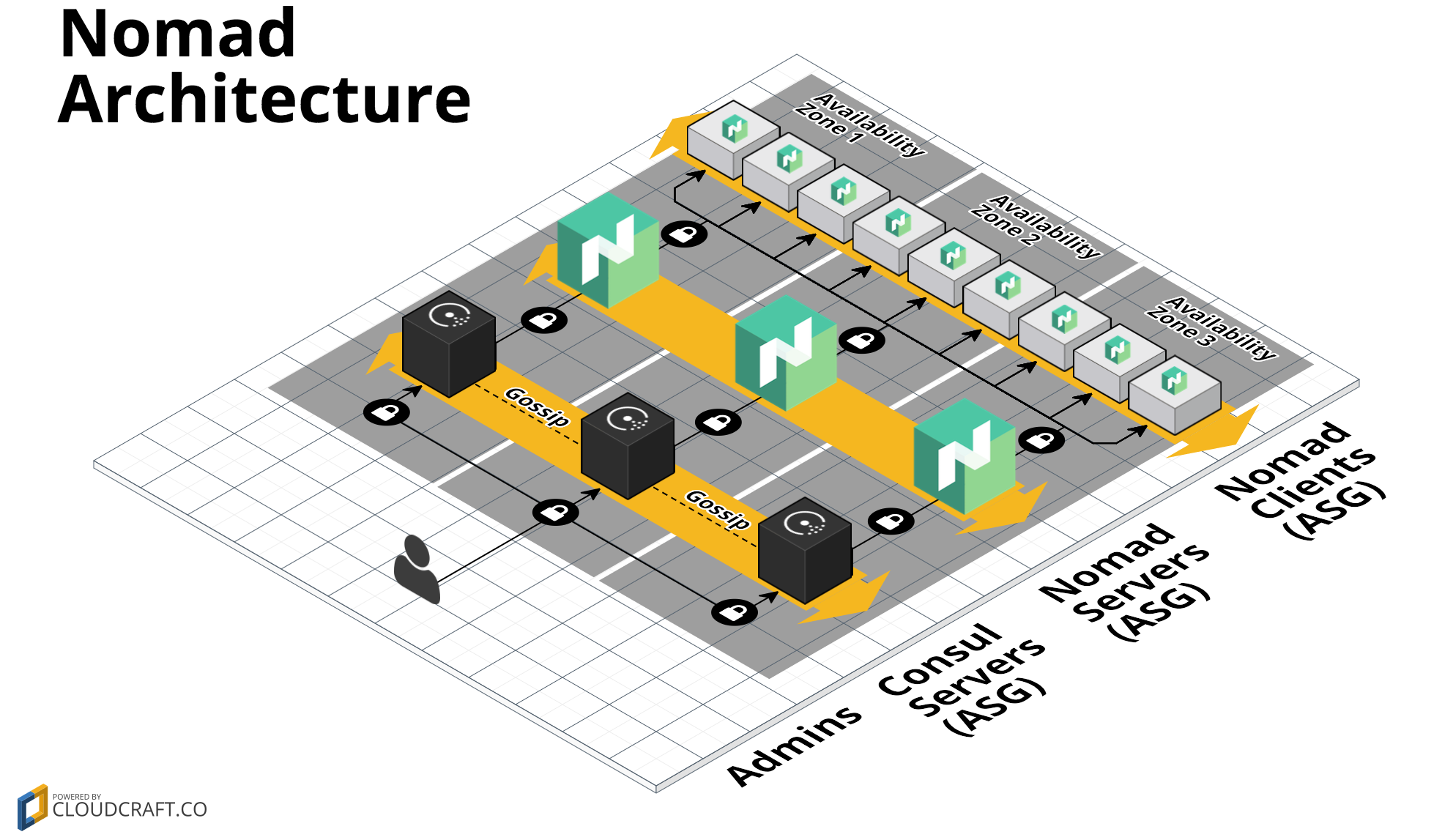
This folder shows an example of Terraform code to deploy a [Nomad](https://www.nomadproject.io/) cluster that connects
to a separate [Consul](https://www.consul.io/) cluster in [AWS](https://aws.amazon.com/) (if you want to run Nomad and
Consul in the same clusters, see the [nomad-consul-colocated-cluster example](https://github.com/hashicorp/terraform-aws-nomad/tree/master/MAIN.md)
instead). The Nomad cluster consists of two Auto Scaling Groups (ASGs): one with a small number of Nomad server
nodes, which are responsible for being part of the [consensus
quorum](https://www.nomadproject.io/docs/internals/consensus.html), and one with a larger number of Nomad client nodes,
which are used to run jobs:
You will need to create an [Amazon Machine Image (AMI)](http://docs.aws.amazon.com/AWSEC2/latest/UserGuide/AMIs.html)
that has Nomad and Consul installed, which you can do using the [nomad-consul-ami example](https://github.com/hashicorp/terraform-aws-nomad/tree/master/examples/nomad-consul-ami)).
For more info on how the Nomad cluster works, check out the [nomad-cluster](https://github.com/hashicorp/terraform-aws-nomad/tree/master/modules/nomad-cluster) documentation.
## Quick start
To deploy a Nomad Cluster:
1. `git clone` this repo to your computer.
1. Optional: build a Nomad and Consul AMI. See the [nomad-consul-ami
example](https://github.com/hashicorp/terraform-aws-nomad/tree/master/examples/nomad-consul-ami) documentation for
instructions. Make sure to note down the ID of the AMI.
1. Install [Terraform](https://www.terraform.io/).
1. Open `variables.tf`, set the environment variables specified at the top of the file, and fill in any other variables that
don't have a default. If you built a custom AMI, put the AMI ID into the `ami_id` variable. Otherwise, one of our
public example AMIs will be used by default. These AMIs are great for learning/experimenting, but are NOT
recommended for production use.
1. Run `terraform init`.
1. Run `terraform apply`.
1. Run the [nomad-examples-helper.sh script](https://github.com/hashicorp/terraform-aws-nomad/tree/master/examples/nomad-examples-helper/nomad-examples-helper.sh) to print out
the IP addresses of the Nomad servers and some example commands you can run to interact with the cluster:
`../nomad-examples-helper/nomad-examples-helper.sh`.
================================================
FILE: examples/nomad-consul-separate-cluster/main.tf
================================================
# ---------------------------------------------------------------------------------------------------------------------
# DEPLOY A NOMAD CLUSTER AND A SEPARATE CONSUL CLUSTER IN AWS
# These templates show an example of how to use the nomad-cluster module to deploy a Nomad cluster in AWS. This cluster
# connects to Consul running in a separate cluster.
#
# We deploy two Auto Scaling Groups (ASGs) for Nomad: one with a small number of Nomad server nodes and one with a
# larger number of Nomad client nodes. Note that these templates assume that the AMI you provide via the
# nomad_ami_id input variable is built from the examples/nomad-consul-ami/nomad-consul.json Packer template.
#
# We also deploy one ASG for Consul which has a small number of Consul server nodes. Note that these templates assume
# that the AMI you provide via the consul_ami_id input variable is built from the examples/consul-ami/consul.json
# Packer template in the Consul AWS Module.
# ---------------------------------------------------------------------------------------------------------------------
# ----------------------------------------------------------------------------------------------------------------------
# REQUIRE A SPECIFIC TERRAFORM VERSION OR HIGHER
# ----------------------------------------------------------------------------------------------------------------------
terraform {
# This module is now only being tested with Terraform 1.0.x. However, to make upgrading easier, we are setting
# 0.12.26 as the minimum version, as that version added support for required_providers with source URLs, making it
# forwards compatible with 1.0.x code.
required_version = ">= 0.12.26"
}
# ---------------------------------------------------------------------------------------------------------------------
# AUTOMATICALLY LOOK UP THE LATEST PRE-BUILT AMI
# This repo contains a CircleCI job that automatically builds and publishes the latest AMI by building the Packer
# template at /examples/nomad-consul-ami upon every new release. The Terraform data source below automatically looks up
# the latest AMI so that a simple "terraform apply" will just work without the user needing to manually build an AMI and
# fill in the right value.
#
# !! WARNING !! These exmaple AMIs are meant only convenience when initially testing this repo. Do NOT use these example
# AMIs in a production setting because it is important that you consciously think through the configuration you want
# in your own production AMI.
#
# NOTE: This Terraform data source must return at least one AMI result or the entire template will fail. See
# /_ci/publish-amis-in-new-account.md for more information.
# ---------------------------------------------------------------------------------------------------------------------
data "aws_ami" "nomad_consul" {
most_recent = true
# If we change the AWS Account in which test are run, update this value.
owners = ["562637147889"]
filter {
name = "virtualization-type"
values = ["hvm"]
}
filter {
name = "is-public"
values = ["true"]
}
filter {
name = "name"
values = ["nomad-consul-ubuntu-*"]
}
}
# ---------------------------------------------------------------------------------------------------------------------
# DEPLOY THE NOMAD SERVER NODES
# ---------------------------------------------------------------------------------------------------------------------
module "nomad_servers" {
# When using these modules in your own templates, you will need to use a Git URL with a ref attribute that pins you
# to a specific version of the modules, such as the following example:
# source = "github.com/hashicorp/terraform-aws-nomad//modules/nomad-cluster?ref=v0.1.0"
source = "../../modules/nomad-cluster"
cluster_name = "${var.nomad_cluster_name}-server"
instance_type = "t2.micro"
# You should typically use a fixed size of 3 or 5 for your Nomad server cluster
min_size = var.num_nomad_servers
max_size = var.num_nomad_servers
desired_capacity = var.num_nomad_servers
ami_id = var.ami_id == null ? data.aws_ami.nomad_consul.image_id : var.ami_id
user_data = data.template_file.user_data_nomad_server.rendered
vpc_id = data.aws_vpc.default.id
subnet_ids = data.aws_subnet_ids.default.ids
# To make testing easier, we allow requests from any IP address here but in a production deployment, we strongly
# recommend you limit this to the IP address ranges of known, trusted servers inside your VPC.
allowed_ssh_cidr_blocks = ["0.0.0.0/0"]
allowed_inbound_cidr_blocks = ["0.0.0.0/0"]
ssh_key_name = var.ssh_key_name
}
# ---------------------------------------------------------------------------------------------------------------------
# ATTACH IAM POLICIES FOR CONSUL
# To allow our server Nodes to automatically discover the Consul servers, we need to give them the IAM permissions from
# the Consul AWS Module's consul-iam-policies module.
# ---------------------------------------------------------------------------------------------------------------------
module "consul_iam_policies_servers" {
source = "github.com/hashicorp/terraform-aws-consul//modules/consul-iam-policies?ref=v0.8.0"
iam_role_id = module.nomad_servers.iam_role_id
}
# ---------------------------------------------------------------------------------------------------------------------
# THE USER DATA SCRIPT THAT WILL RUN ON EACH NOMAD SERVER NODE WHEN IT'S BOOTING
# This script will configure and start Nomad
# ---------------------------------------------------------------------------------------------------------------------
data "template_file" "user_data_nomad_server" {
template = file("${path.module}/user-data-nomad-server.sh")
vars = {
num_servers = var.num_nomad_servers
cluster_tag_key = var.cluster_tag_key
cluster_tag_value = var.consul_cluster_name
}
}
# ---------------------------------------------------------------------------------------------------------------------
# DEPLOY THE CONSUL SERVER NODES
# ---------------------------------------------------------------------------------------------------------------------
module "consul_servers" {
source = "github.com/hashicorp/terraform-aws-consul//modules/consul-cluster?ref=v0.8.0"
cluster_name = "${var.consul_cluster_name}-server"
cluster_size = var.num_consul_servers
instance_type = "t2.micro"
# The EC2 Instances will use these tags to automatically discover each other and form a cluster
cluster_tag_key = var.cluster_tag_key
cluster_tag_value = var.consul_cluster_name
ami_id = var.ami_id == null ? data.aws_ami.nomad_consul.image_id : var.ami_id
user_data = data.template_file.user_data_consul_server.rendered
vpc_id = data.aws_vpc.default.id
subnet_ids = data.aws_subnet_ids.default.ids
# To make testing easier, we allow Consul and SSH requests from any IP address here but in a production
# deployment, we strongly recommend you limit this to the IP address ranges of known, trusted servers inside your VPC.
allowed_ssh_cidr_blocks = ["0.0.0.0/0"]
allowed_inbound_cidr_blocks = ["0.0.0.0/0"]
ssh_key_name = var.ssh_key_name
}
# ---------------------------------------------------------------------------------------------------------------------
# THE USER DATA SCRIPT THAT WILL RUN ON EACH CONSUL SERVER EC2 INSTANCE WHEN IT'S BOOTING
# This script will configure and start Consul
# ---------------------------------------------------------------------------------------------------------------------
data "template_file" "user_data_consul_server" {
template = file("${path.module}/user-data-consul-server.sh")
vars = {
cluster_tag_key = var.cluster_tag_key
cluster_tag_value = var.consul_cluster_name
}
}
# ---------------------------------------------------------------------------------------------------------------------
# DEPLOY THE NOMAD CLIENT NODES
# ---------------------------------------------------------------------------------------------------------------------
module "nomad_clients" {
# When using these modules in your own templates, you will need to use a Git URL with a ref attribute that pins you
# to a specific version of the modules, such as the following example:
# source = "github.com/hashicorp/terraform-aws-nomad//modules/nomad-cluster?ref=v0.0.1"
source = "../../modules/nomad-cluster"
cluster_name = "${var.nomad_cluster_name}-client"
instance_type = "t2.micro"
# Give the clients a different tag so they don't try to join the server cluster
cluster_tag_key = "nomad-clients"
cluster_tag_value = var.nomad_cluster_name
# To keep the example simple, we are using a fixed-size cluster. In real-world usage, you could use auto scaling
# policies to dynamically resize the cluster in response to load.
min_size = var.num_nomad_clients
max_size = var.num_nomad_clients
desired_capacity = var.num_nomad_clients
ami_id = var.ami_id == null ? data.aws_ami.nomad_consul.image_id : var.ami_id
user_data = data.template_file.user_data_nomad_client.rendered
vpc_id = data.aws_vpc.default.id
subnet_ids = data.aws_subnet_ids.default.ids
# To make testing easier, we allow Consul and SSH requests from any IP address here but in a production
# deployment, we strongly recommend you limit this to the IP address ranges of known, trusted servers inside your VPC.
allowed_ssh_cidr_blocks = ["0.0.0.0/0"]
allowed_inbound_cidr_blocks = ["0.0.0.0/0"]
ssh_key_name = var.ssh_key_name
ebs_block_devices = [
{
"device_name" = "/dev/xvde"
"volume_size" = "10"
},
]
}
# ---------------------------------------------------------------------------------------------------------------------
# ATTACH IAM POLICIES FOR CONSUL
# To allow our client Nodes to automatically discover the Consul servers, we need to give them the IAM permissions from
# the Consul AWS Module's consul-iam-policies module.
# ---------------------------------------------------------------------------------------------------------------------
module "consul_iam_policies_clients" {
source = "github.com/hashicorp/terraform-aws-consul//modules/consul-iam-policies?ref=v0.8.0"
iam_role_id = module.nomad_clients.iam_role_id
}
# ---------------------------------------------------------------------------------------------------------------------
# THE USER DATA SCRIPT THAT WILL RUN ON EACH CLIENT NODE WHEN IT'S BOOTING
# This script will configure and start Consul and Nomad
# ---------------------------------------------------------------------------------------------------------------------
data "template_file" "user_data_nomad_client" {
template = file("${path.module}/user-data-nomad-client.sh")
vars = {
cluster_tag_key = var.cluster_tag_key
cluster_tag_value = var.consul_cluster_name
}
}
# ---------------------------------------------------------------------------------------------------------------------
# DEPLOY THE CLUSTER IN THE DEFAULT VPC AND SUBNETS
# Using the default VPC and subnets makes this example easy to run and test, but it means Consul and Nomad are
# accessible from the public Internet. In a production deployment, we strongly recommend deploying into a custom VPC
# and private subnets.
# ---------------------------------------------------------------------------------------------------------------------
data "aws_vpc" "default" {
default = true
}
data "aws_subnet_ids" "default" {
vpc_id = data.aws_vpc.default.id
}
data "aws_region" "current" {
}
================================================
FILE: examples/nomad-consul-separate-cluster/outputs.tf
================================================
output "num_nomad_servers" {
value = module.nomad_servers.cluster_size
}
output "asg_name_nomad_servers" {
value = module.nomad_servers.asg_name
}
output "launch_config_name_nomad_servers" {
value = module.nomad_servers.launch_config_name
}
output "iam_role_arn_nomad_servers" {
value = module.nomad_servers.iam_role_arn
}
output "iam_role_id_nomad_servers" {
value = module.nomad_servers.iam_role_id
}
output "security_group_id_nomad_servers" {
value = module.nomad_servers.security_group_id
}
output "num_consul_servers" {
value = module.consul_servers.cluster_size
}
output "asg_name_consul_servers" {
value = module.consul_servers.asg_name
}
output "launch_config_name_consul_servers" {
value = module.consul_servers.launch_config_name
}
output "iam_role_arn_consul_servers" {
value = module.consul_servers.iam_role_arn
}
output "iam_role_id_consul_servers" {
value = module.consul_servers.iam_role_id
}
output "security_group_id_consul_servers" {
value = module.consul_servers.security_group_id
}
output "num_nomad_clients" {
value = module.nomad_clients.cluster_size
}
output "asg_name_nomad_clients" {
value = module.nomad_clients.asg_name
}
output "launch_config_name_nomad_clients" {
value = module.nomad_clients.launch_config_name
}
output "iam_role_arn_nomad_clients" {
value = module.nomad_clients.iam_role_arn
}
output "iam_role_id_nomad_clients" {
value = module.nomad_clients.iam_role_id
}
output "security_group_id_nomad_clients" {
value = module.nomad_clients.security_group_id
}
output "aws_region" {
value = data.aws_region.current.name
}
output "nomad_servers_cluster_tag_key" {
value = module.nomad_servers.cluster_tag_key
}
output "nomad_servers_cluster_tag_value" {
value = module.nomad_servers.cluster_tag_value
}
================================================
FILE: examples/nomad-consul-separate-cluster/user-data-consul-server.sh
================================================
#!/bin/bash
# This script is meant to be run in the User Data of each EC2 Instance while it's booting. The script uses the
# run-consul script to configure and start Consul in server mode. Note that this script assumes it's running in an AMI
# built from the Packer template in examples/consul-ami/consul.json in the Consul AWS Module.
set -e
# Send the log output from this script to user-data.log, syslog, and the console
# From: https://alestic.com/2010/12/ec2-user-data-output/
exec > >(tee /var/log/user-data.log|logger -t user-data -s 2>/dev/console) 2>&1
# These variables are passed in via Terraform template interplation
/opt/consul/bin/run-consul --server --cluster-tag-key "${cluster_tag_key}" --cluster-tag-value "${cluster_tag_value}"
================================================
FILE: examples/nomad-consul-separate-cluster/user-data-nomad-client.sh
================================================
#!/bin/bash
# This script is meant to be run in the User Data of each EC2 Instance while it's booting. The script uses the
# run-consul script to configure and start Consul in client mode and the run-nomad script to configure and start Nomad
# in client mode. Note that this script assumes it's running in an AMI built from the Packer template in
# examples/nomad-consul-ami/nomad-consul.json.
set -e
# Send the log output from this script to user-data.log, syslog, and the console
# From: https://alestic.com/2010/12/ec2-user-data-output/
exec > >(tee /var/log/user-data.log|logger -t user-data -s 2>/dev/console) 2>&1
# These variables are passed in via Terraform template interplation
/opt/consul/bin/run-consul --client --cluster-tag-key "${cluster_tag_key}" --cluster-tag-value "${cluster_tag_value}"
/opt/nomad/bin/run-nomad --client
================================================
FILE: examples/nomad-consul-separate-cluster/user-data-nomad-server.sh
================================================
#!/bin/bash
# This script is meant to be run in the User Data of each EC2 Instance while it's booting. The script uses the
# run-consul script to configure and start Consul in client mode and then the run-nomad script to configure and start
# Nomad in server mode. Note that this script assumes it's running in an AMI built from the Packer template in
# examples/nomad-consul-ami/nomad-consul.json.
set -e
# Send the log output from this script to user-data.log, syslog, and the console
# From: https://alestic.com/2010/12/ec2-user-data-output/
exec > >(tee /var/log/user-data.log|logger -t user-data -s 2>/dev/console) 2>&1
/opt/consul/bin/run-consul --client --cluster-tag-key "${cluster_tag_key}" --cluster-tag-value "${cluster_tag_value}"
/opt/nomad/bin/run-nomad --server --num-servers "${num_servers}"
================================================
FILE: examples/nomad-consul-separate-cluster/variables.tf
================================================
# ---------------------------------------------------------------------------------------------------------------------
# ENVIRONMENT VARIABLES
# Define these secrets as environment variables
# ---------------------------------------------------------------------------------------------------------------------
# AWS_ACCESS_KEY_ID
# AWS_SECRET_ACCESS_KEY
# AWS_DEFAULT_REGION
# ---------------------------------------------------------------------------------------------------------------------
# REQUIRED PARAMETERS
# You must provide a value for each of these parameters.
# ---------------------------------------------------------------------------------------------------------------------
# None
# ---------------------------------------------------------------------------------------------------------------------
# OPTIONAL PARAMETERS
# These parameters have reasonable defaults.
# ---------------------------------------------------------------------------------------------------------------------
variable "ami_id" {
description = "The ID of the AMI to run in the cluster. This should be an AMI built from the Packer template under examples/nomad-consul-ami/nomad-consul.json. If no AMI is specified, the template will 'just work' by using the example public AMIs. WARNING! Do not use the example AMIs in a production setting!"
type = string
default = null
}
variable "nomad_cluster_name" {
description = "What to name the Nomad cluster and all of its associated resources"
type = string
default = "nomad-example"
}
variable "consul_cluster_name" {
description = "What to name the Consul cluster and all of its associated resources"
type = string
default = "consul-example"
}
variable "num_nomad_servers" {
description = "The number of Nomad server nodes to deploy. We strongly recommend using 3 or 5."
type = number
default = 3
}
variable "num_nomad_clients" {
description = "The number of Nomad client nodes to deploy. You can deploy as many as you need to run your jobs."
type = number
default = 6
}
variable "num_consul_servers" {
description = "The number of Consul server nodes to deploy. We strongly recommend using 3 or 5."
type = number
default = 3
}
variable "cluster_tag_key" {
description = "The tag the Consul EC2 Instances will look for to automatically discover each other and form a cluster."
type = string
default = "consul-servers"
}
variable "ssh_key_name" {
description = "The name of an EC2 Key Pair that can be used to SSH to the EC2 Instances in this cluster. Set to null to not associate a Key Pair."
type = string
default = null
}
================================================
FILE: examples/nomad-examples-helper/README.md
================================================
# Nomad Examples Helper
This folder contains a helper script called `nomad-examples-helper.sh` for working with the
[nomad-consul-colocated-cluster](https://github.com/hashicorp/terraform-aws-nomad/tree/master/MAIN.md) and
[nomad-consul-separate-cluster](https://github.com/hashicorp/terraform-aws-nomad/tree/master/examples/nomad-consul-separate-cluster) examples. After running `terraform apply` on
the examples, if you run `nomad-examples-helper.sh`, it will automatically:
1. Wait for the Nomad server cluster to come up.
1. Print out the IP addresses of the Nomad servers.
1. Print out some example commands you can run against your Nomad servers.
This folder also contains an example Nomad job called `example.nomad` that you can run in your Nomad cluster. This job
simply echoes "Hello, World!"
================================================
FILE: examples/nomad-examples-helper/example.nomad
================================================
# There can only be a single job definition per file. This job is named
# "example" so it will create a job with the ID and Name "example".
# The "job" stanza is the top-most configuration option in the job
# specification. A job is a declarative specification of tasks that Nomad
# should run. Jobs have a globally unique name, one or many task groups, which
# are themselves collections of one or many tasks.
#
# For more information and examples on the "job" stanza, please see
# the online documentation at:
#
# https://www.nomadproject.io/docs/job-specification/job.html
#
job "example" {
# The "region" parameter specifies the region in which to execute the job. If
# omitted, this inherits the default region name of "global". Note that this example job
# is hard-coded to us-east-1, so if you are running your example elsewhere, make
# sure to update this setting, as well as the datacenters setting.
region = "us-east-1"
# The "datacenters" parameter specifies the list of datacenters which should
# be considered when placing this task. This must be provided. Note that this example job
# is hard-coded to us-east-1, so if you are running your example elsewhere, make
# sure to update this setting, as well as the region setting.
datacenters = ["us-east-1a", "us-east-1b", "us-east-1c", "us-east-1d", "us-east-1e"]
# The "type" parameter controls the type of job, which impacts the scheduler's
# decision on placement. This configuration is optional and defaults to
# "service". For a full list of job types and their differences, please see
# the online documentation.
#
# For more information, please see the online documentation at:
#
# https://www.nomadproject.io/docs/jobspec/schedulers.html
#
type = "batch"
# The "constraint" stanza defines additional constraints for placing this job,
# in addition to any resource or driver constraints. This stanza may be placed
# at the "job", "group", or "task" level, and supports variable interpolation.
#
# For more information and examples on the "constraint" stanza, please see
# the online documentation at:
#
# https://www.nomadproject.io/docs/job-specification/constraint.html
#
# constraint {
# attribute = "${attr.kernel.name}"
# value = "linux"
# }
# The "update" stanza specifies the job update strategy. The update strategy
# is used to control things like rolling upgrades. If omitted, rolling
# updates are disabled.
#
# For more information and examples on the "update" stanza, please see
# the online documentation at:
#
# https://www.nomadproject.io/docs/job-specification/update.html
#
# update {
# # The "stagger" parameter specifies to do rolling updates of this job every
# # 10 seconds.
# stagger = "10s"
# # The "max_parallel" parameter specifies the maximum number of updates to
# # perform in parallel. In this case, this specifies to update a single task
# # at a time.
# max_parallel = 1
# }
# The "group" stanza defines a series of tasks that should be co-located on
# the same Nomad client. Any task within a group will be placed on the same
# client.
#
# For more information and examples on the "group" stanza, please see
# the online documentation at:
#
# https://www.nomadproject.io/docs/job-specification/group.html
#
group "cache" {
# The "count" parameter specifies the number of the task groups that should
# be running under this group. This value must be non-negative and defaults
# to 1.
count = 1
# The "restart" stanza configures a group's behavior on task failure. If
# left unspecified, a default restart policy is used based on the job type.
#
# For more information and examples on the "restart" stanza, please see
# the online documentation at:
#
# https://www.nomadproject.io/docs/job-specification/restart.html
#
restart {
# The number of attempts to run the job within the specified interval.
attempts = 10
interval = "5m"
# The "delay" parameter specifies the duration to wait before restarting
# a task after it has failed.
delay = "25s"
# The "mode" parameter controls what happens when a task has restarted
# "attempts" times within the interval. "delay" mode delays the next
# restart until the next interval. "fail" mode does not restart the task
# if "attempts" has been hit within the interval.
mode = "delay"
}
# The "ephemeral_disk" stanza instructs Nomad to utilize an ephemeral disk
# instead of a hard disk requirement. Clients using this stanza should
# not specify disk requirements in the resources stanza of the task. All
# tasks in this group will share the same ephemeral disk.
#
# For more information and examples on the "ephemeral_disk" stanza, please
# see the online documentation at:
#
# https://www.nomadproject.io/docs/job-specification/ephemeral_disk.html
#
ephemeral_disk {
# When sticky is true and the task group is updated, the scheduler
# will prefer to place the updated allocation on the same node and
# will migrate the data. This is useful for tasks that store data
# that should persist across allocation updates.
# sticky = true
#
# Setting migrate to true results in the allocation directory of a
# sticky allocation directory to be migrated.
# migrate = true
# The "size" parameter specifies the size in MB of shared ephemeral disk
# between tasks in the group.
size = 300
}
# The "task" stanza creates an individual unit of work, such as a Docker
# container, web application, or batch processing.
#
# For more information and examples on the "task" stanza, please see
# the online documentation at:
#
# https://www.nomadproject.io/docs/job-specification/task.html
#
task "hello_world" {
# The "driver" parameter specifies the task driver that should be used to
# run the task.
driver = "exec"
# The "config" stanza specifies the driver configuration, which is passed
# directly to the driver to start the task. The details of configurations
# are specific to each driver, so please see specific driver
# documentation for more information.
config {
command = "/bin/echo"
args = ["Hello, World!"]
}
# The "artifact" stanza instructs Nomad to download an artifact from a
# remote source prior to starting the task. This provides a convenient
# mechanism for downloading configuration files or data needed to run the
# task. It is possible to specify the "artifact" stanza multiple times to
# download multiple artifacts.
#
# For more information and examples on the "artifact" stanza, please see
# the online documentation at:
#
# https://www.nomadproject.io/docs/job-specification/artifact.html
#
# artifact {
# source = "http://foo.com/artifact.tar.gz"
# options {
# checksum = "md5:c4aa853ad2215426eb7d70a21922e794"
# }
# }
# The "logs" stana instructs the Nomad client on how many log files and
# the maximum size of those logs files to retain. Logging is enabled by
# default, but the "logs" stanza allows for finer-grained control over
# the log rotation and storage configuration.
#
# For more information and examples on the "logs" stanza, please see
# the online documentation at:
#
# https://www.nomadproject.io/docs/job-specification/logs.html
#
# logs {
# max_files = 10
# max_file_size = 15
# }
# The "resources" stanza describes the requirements a task needs to
# execute. Resource requirements include memory, network, cpu, and more.
# This ensures the task will execute on a machine that contains enough
# resource capacity.
#
# For more information and examples on the "resources" stanza, please see
# the online documentation at:
#
# https://www.nomadproject.io/docs/job-specification/resources.html
#
resources {
cpu = 500 # 500 MHz
memory = 256 # 256MB
network {
mbits = 10
port "db" {}
}
}
# The "service" stanza instructs Nomad to register this task as a service
# in the service discovery engine, which is currently Consul. This will
# make the service addressable after Nomad has placed it on a host and
# port.
#
# For more information and examples on the "service" stanza, please see
# the online documentation at:
#
# https://www.nomadproject.io/docs/job-specification/service.html
#
# service {
# name = "global-redis-check"
# tags = ["global", "cache"]
# port = "db"
# check {
# name = "alive"
# type = "tcp"
# interval = "10s"
# timeout = "2s"
# }
# }
# The "template" stanza instructs Nomad to manage a template, such as
# a configuration file or script. This template can optionally pull data
# from Consul or Vault to populate runtime configuration data.
#
# For more information and examples on the "template" stanza, please see
# the online documentation at:
#
# https://www.nomadproject.io/docs/job-specification/template.html
#
# template {
# data = "---\nkey: {{ key \"service/my-key\" }}"
# destination = "local/file.yml"
# change_mode = "signal"
# change_signal = "SIGHUP"
# }
# The "vault" stanza instructs the Nomad client to acquire a token from
# a HashiCorp Vault server. The Nomad servers must be configured and
# authorized to communicate with Vault. By default, Nomad will inject
# The token into the job via an environment variable and make the token
# available to the "template" stanza. The Nomad client handles the renewal
# and revocation of the Vault token.
#
# For more information and examples on the "vault" stanza, please see
# the online documentation at:
#
# https://www.nomadproject.io/docs/job-specification/vault.html
#
# vault {
# policies = ["cdn", "frontend"]
# change_mode = "signal"
# change_signal = "SIGHUP"
# }
# Controls the timeout between signalling a task it will be killed
# and killing the task. If not set a default is used.
# kill_timeout = "20s"
}
}
}
================================================
FILE: examples/nomad-examples-helper/nomad-examples-helper.sh
================================================
#!/bin/bash
# A script that is meant to be used with the Nomad cluster examples to:
#
# 1. Wait for the Nomad server cluster to come up.
# 2. Print out the IP addresses of the Nomad servers.
# 3. Print out some example commands you can run against your Nomad servers.
set -e
readonly SCRIPT_DIR="$(cd "$(dirname "${BASH_SOURCE[0]}")" && pwd)"
readonly SCRIPT_NAME="$(basename "$0")"
readonly MAX_RETRIES=30
readonly SLEEP_BETWEEN_RETRIES_SEC=10
function log {
local readonly level="$1"
local readonly message="$2"
local readonly timestamp=$(date +"%Y-%m-%d %H:%M:%S")
>&2 echo -e "${timestamp} [${level}] [$SCRIPT_NAME] ${message}"
}
function log_info {
local readonly message="$1"
log "INFO" "$message"
}
function log_warn {
local readonly message="$1"
log "WARN" "$message"
}
function log_error {
local readonly message="$1"
log "ERROR" "$message"
}
function assert_is_installed {
local readonly name="$1"
if [[ ! $(command -v ${name}) ]]; then
log_error "The binary '$name' is required by this script but is not installed or in the system's PATH."
exit 1
fi
}
function get_required_terraform_output {
local readonly output_name="$1"
local output_value
output_value=$(terraform output -raw -no-color "$output_name")
if [[ -z "$output_value" ]]; then
log_error "Unable to find a value for Terraform output $output_name"
exit 1
fi
echo "$output_value"
}
#
# Usage: join SEPARATOR ARRAY
#
# Joins the elements of ARRAY with the SEPARATOR character between them.
#
# Examples:
#
# join ", " ("A" "B" "C")
# Returns: "A, B, C"
#
function join {
local readonly separator="$1"
shift
local readonly values=("$@")
printf "%s$separator" "${values[@]}" | sed "s/$separator$//"
}
function get_all_nomad_server_ips {
local expected_num_nomad_servers
expected_num_nomad_servers=$(get_required_terraform_output "num_nomad_servers")
log_info "Looking up public IP addresses for $expected_num_nomad_servers Nomad server EC2 Instances."
local ips
local i
for (( i=1; i<="$MAX_RETRIES"; i++ )); do
ips=($(get_nomad_server_ips))
if [[ "${#ips[@]}" -eq "$expected_num_nomad_servers" ]]; then
log_info "Found all $expected_num_nomad_servers public IP addresses!"
echo "${ips[@]}"
return
else
log_warn "Found ${#ips[@]} of $expected_num_nomad_servers public IP addresses. Will sleep for $SLEEP_BETWEEN_RETRIES_SEC seconds and try again."
sleep "$SLEEP_BETWEEN_RETRIES_SEC"
fi
done
log_error "Failed to find the IP addresses for $expected_num_nomad_servers Nomad server EC2 Instances after $MAX_RETRIES retries."
exit 1
}
function wait_for_all_nomad_servers_to_register {
local readonly server_ips=($@)
local readonly server_ip="${server_ips[0]}"
local expected_num_nomad_servers
expected_num_nomad_servers=$(get_required_terraform_output "num_nomad_servers")
log_info "Waiting for $expected_num_nomad_servers Nomad servers to register in the cluster"
for (( i=1; i<="$MAX_RETRIES"; i++ )); do
log_info "Running 'nomad server members' command against server at IP address $server_ip"
# Intentionally use local and readonly here so that this script doesn't exit if the nomad server members or grep
# commands exit with an error.
local readonly members=$(nomad server members -address="http://$server_ip:4646")
local readonly alive_members=$(echo "$members" | grep "alive")
local readonly num_nomad_servers=$(echo "$alive_members" | wc -l | tr -d ' ')
if [[ "$num_nomad_servers" -eq "$expected_num_nomad_servers" ]]; then
log_info "All $expected_num_nomad_servers Nomad servers have registered in the cluster!"
return
else
log_info "$num_nomad_servers out of $expected_num_nomad_servers Nomad servers have registered in the cluster."
log_info "Sleeping for $SLEEP_BETWEEN_RETRIES_SEC seconds and will check again."
sleep "$SLEEP_BETWEEN_RETRIES_SEC"
fi
done
log_error "Did not find $expected_num_nomad_servers Nomad servers registered after $MAX_RETRIES retries."
exit 1
}
function get_nomad_server_ips {
local aws_region
local cluster_tag_key
local cluster_tag_value
local instances
aws_region=$(get_required_terraform_output "aws_region")
cluster_tag_key=$(get_required_terraform_output "nomad_servers_cluster_tag_key")
cluster_tag_value=$(get_required_terraform_output "nomad_servers_cluster_tag_value")
log_info "Fetching public IP addresses for EC2 Instances in $aws_region with tag $cluster_tag_key=$cluster_tag_value"
instances=$(aws ec2 describe-instances \
--region "$aws_region" \
--filter "Name=tag:$cluster_tag_key,Values=$cluster_tag_value" "Name=instance-state-name,Values=running")
echo "$instances" | jq -r '.Reservations[].Instances[].PublicIpAddress'
}
function print_instructions {
local readonly server_ips=($@)
local readonly server_ip="${server_ips[0]}"
local instructions=()
instructions+=("\nYour Nomad servers are running at the following IP addresses:\n\n${server_ips[@]/#/ }\n")
instructions+=("Some commands for you to try:\n")
instructions+=(" nomad server members -address=http://$server_ip:4646")
instructions+=(" nomad node status -address=http://$server_ip:4646")
instructions+=(" nomad run -address=http://$server_ip:4646 $SCRIPT_DIR/example.nomad")
instructions+=(" nomad status -address=http://$server_ip:4646 example\n")
local instructions_str
instructions_str=$(join "\n" "${instructions[@]}")
echo -e "$instructions_str"
}
function run {
assert_is_installed "aws"
assert_is_installed "jq"
assert_is_installed "terraform"
assert_is_installed "nomad"
local server_ips
server_ips=$(get_all_nomad_server_ips)
wait_for_all_nomad_servers_to_register "$server_ips"
print_instructions "$server_ips"
}
run
================================================
FILE: examples/root-example/README.md
================================================
# Nomad and Consul Co-located Cluster Example
This folder shows an example of Terraform code to deploy a [Nomad](https://www.nomadproject.io/) cluster co-located
with a [Consul](https://www.consul.io/) cluster in [AWS](https://aws.amazon.com/) (if you want to run Nomad and Consul
on separate clusters, see the [nomad-consul-separate-cluster example](https://github.com/hashicorp/terraform-aws-nomad/tree/master/examples/nomad-consul-separate-cluster)
instead). The cluster consists of two Auto Scaling Groups (ASGs): one with a small number of Nomad and Consul server
nodes, which are responsible for being part of the [consensus
protocol](https://www.nomadproject.io/docs/internals/consensus.html), and one with a larger number of Nomad and Consul
client nodes, which are used to run jobs:
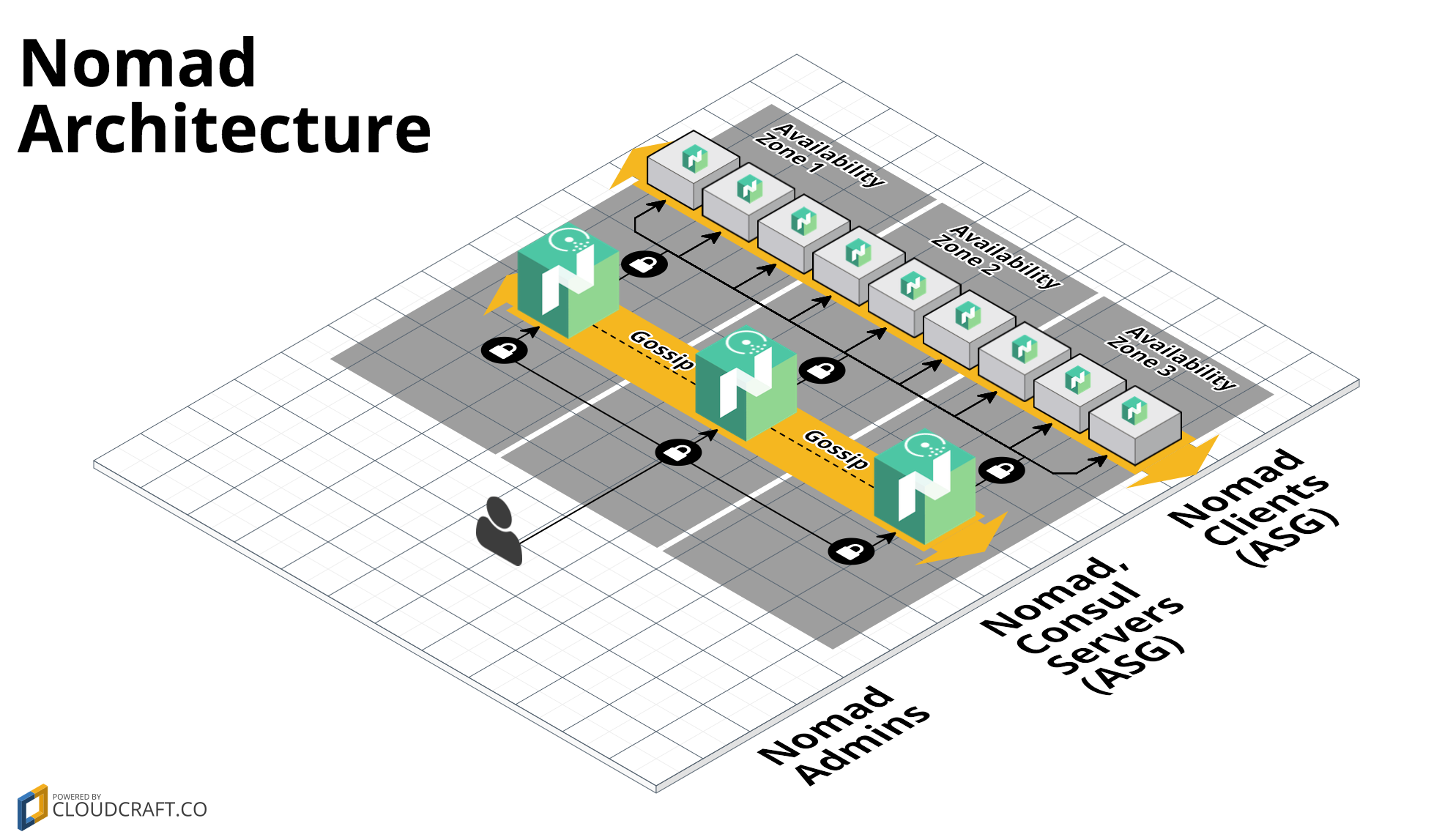
You will need to create an [Amazon Machine Image (AMI)](http://docs.aws.amazon.com/AWSEC2/latest/UserGuide/AMIs.html)
that has Nomad and Consul installed, which you can do using the [nomad-consul-ami example](https://github.com/hashicorp/terraform-aws-nomad/tree/master/examples/nomad-consul-ami)).
For more info on how the Nomad cluster works, check out the [nomad-cluster](https://github.com/hashicorp/terraform-aws-nomad/tree/master/modules/nomad-cluster) documentation.
## Quick start
To deploy a Nomad Cluster:
1. `git clone` this repo to your computer.
1. Optional: build a Nomad and Consul AMI. See the [nomad-consul-ami
example](https://github.com/hashicorp/terraform-aws-nomad/tree/master/examples/nomad-consul-ami) documentation for
instructions. Make sure to note down the ID of the AMI.
1. Install [Terraform](https://www.terraform.io/).
1. Open `variables.tf`, set the environment variables specified at the top of the file, and fill in any other variables that
don't have a default. If you built a custom AMI, put the AMI ID into the `ami_id` variable. Otherwise, one of our
public example AMIs will be used by default. These AMIs are great for learning/experimenting, but are NOT
recommended for production use.
1. Run `terraform init`.
1. Run `terraform apply`.
1. Run the [nomad-examples-helper.sh script](https://github.com/hashicorp/terraform-aws-nomad/tree/master/examples/nomad-examples-helper/nomad-examples-helper.sh) to print out
the IP addresses of the Nomad servers and some example commands you can run to interact with the cluster:
`../nomad-examples-helper/nomad-examples-helper.sh`.
================================================
FILE: examples/root-example/user-data-client.sh
================================================
#!/bin/bash
# This script is meant to be run in the User Data of each EC2 Instance while it's booting. The script uses the
# run-nomad and run-consul scripts to configure and start Nomad and Consul in client mode. Note that this script
# assumes it's running in an AMI built from the Packer template in examples/nomad-consul-ami/nomad-consul.json.
set -e
# Send the log output from this script to user-data.log, syslog, and the console
# From: https://alestic.com/2010/12/ec2-user-data-output/
exec > >(tee /var/log/user-data.log|logger -t user-data -s 2>/dev/console) 2>&1
# These variables are passed in via Terraform template interplation
/opt/consul/bin/run-consul --client --cluster-tag-key "${cluster_tag_key}" --cluster-tag-value "${cluster_tag_value}"
/opt/nomad/bin/run-nomad --client
================================================
FILE: examples/root-example/user-data-server.sh
================================================
#!/bin/bash
# This script is meant to be run in the User Data of each EC2 Instance while it's booting. The script uses the
# run-nomad and run-consul scripts to configure and start Consul and Nomad in server mode. Note that this script
# assumes it's running in an AMI built from the Packer template in examples/nomad-consul-ami/nomad-consul.json.
set -e
# Send the log output from this script to user-data.log, syslog, and the console
# From: https://alestic.com/2010/12/ec2-user-data-output/
exec > >(tee /var/log/user-data.log|logger -t user-data -s 2>/dev/console) 2>&1
# These variables are passed in via Terraform template interplation
/opt/consul/bin/run-consul --server --cluster-tag-key "${cluster_tag_key}" --cluster-tag-value "${cluster_tag_value}"
/opt/nomad/bin/run-nomad --server --num-servers "${num_servers}"
================================================
FILE: main.tf
================================================
# ---------------------------------------------------------------------------------------------------------------------
# DEPLOY A NOMAD CLUSTER CO-LOCATED WITH A CONSUL CLUSTER IN AWS
# These templates show an example of how to use the nomad-cluster module to deploy a Nomad cluster in AWS. This cluster
# has Consul colocated on the same nodes.
#
# We deploy two Auto Scaling Groups (ASGs): one with a small number of Nomad and Consul server nodes and one with a
# larger number of Nomad and Consul client nodes. Note that these templates assume that the AMI you provide via the
# ami_id input variable is built from the examples/nomad-consul-ami/nomad-consul.json Packer template.
# ---------------------------------------------------------------------------------------------------------------------
# ----------------------------------------------------------------------------------------------------------------------
# REQUIRE A SPECIFIC TERRAFORM VERSION OR HIGHER
# ----------------------------------------------------------------------------------------------------------------------
terraform {
# This module is now only being tested with Terraform 1.0.x. However, to make upgrading easier, we are setting
# 0.12.26 as the minimum version, as that version added support for required_providers with source URLs, making it
# forwards compatible with 1.0.x code.
required_version = ">= 0.12.26"
}
# ---------------------------------------------------------------------------------------------------------------------
# AUTOMATICALLY LOOK UP THE LATEST PRE-BUILT AMI
# This repo contains a CircleCI job that automatically builds and publishes the latest AMI by building the Packer
# template at /examples/nomad-consul-ami upon every new release. The Terraform data source below automatically looks up
# the latest AMI so that a simple "terraform apply" will just work without the user needing to manually build an AMI and
# fill in the right value.
#
# !! WARNING !! These exmaple AMIs are meant only convenience when initially testing this repo. Do NOT use these example
# AMIs in a production setting because it is important that you consciously think through the configuration you want
# in your own production AMI.
#
# NOTE: This Terraform data source must return at least one AMI result or the entire template will fail. See
# /_ci/publish-amis-in-new-account.md for more information.
# ---------------------------------------------------------------------------------------------------------------------
data "aws_ami" "nomad_consul" {
most_recent = true
# If we change the AWS Account in which test are run, update this value.
owners = ["562637147889"]
filter {
name = "virtualization-type"
values = ["hvm"]
}
filter {
name = "is-public"
values = ["true"]
}
filter {
name = "name"
values = ["nomad-consul-ubuntu-*"]
}
}
# ---------------------------------------------------------------------------------------------------------------------
# DEPLOY THE SERVER NODES
# Note that we use the consul-cluster module to deploy both the Nomad and Consul nodes on the same servers
# ---------------------------------------------------------------------------------------------------------------------
module "servers" {
source = "github.com/hashicorp/terraform-aws-consul//modules/consul-cluster?ref=v0.8.0"
cluster_name = "${var.cluster_name}-server"
cluster_size = var.num_servers
instance_type = var.server_instance_type
# The EC2 Instances will use these tags to automatically discover each other and form a cluster
cluster_tag_key = var.cluster_tag_key
cluster_tag_value = var.cluster_tag_value
ami_id = var.ami_id == null ? data.aws_ami.nomad_consul.image_id : var.ami_id
user_data = data.template_file.user_data_server.rendered
vpc_id = data.aws_vpc.default.id
subnet_ids = data.aws_subnet_ids.default.ids
# To make testing easier, we allow requests from any IP address here but in a production deployment, we strongly
# recommend you limit this to the IP address ranges of known, trusted servers inside your VPC.
allowed_ssh_cidr_blocks = ["0.0.0.0/0"]
allowed_inbound_cidr_blocks = ["0.0.0.0/0"]
ssh_key_name = var.ssh_key_name
tags = [
{
key = "Environment"
value = "development"
propagate_at_launch = true
},
]
}
# ---------------------------------------------------------------------------------------------------------------------
# ATTACH SECURITY GROUP RULES FOR NOMAD
# Our Nomad servers are running on top of the consul-cluster module, so we need to configure that cluster to allow
# the inbound/outbound connections used by Nomad.
# ---------------------------------------------------------------------------------------------------------------------
module "nomad_security_group_rules" {
# When using these modules in your own templates, you will need to use a Git URL with a ref attribute that pins you
# to a specific version of the modules, such as the following example:
# source = "github.com/hashicorp/terraform-aws-nomad//modules/nomad-security-group-rules?ref=v0.0.1"
source = "./modules/nomad-security-group-rules"
# To make testing easier, we allow requests from any IP address here but in a production deployment, we strongly
# recommend you limit this to the IP address ranges of known, trusted servers inside your VPC.
security_group_id = module.servers.security_group_id
allowed_inbound_cidr_blocks = ["0.0.0.0/0"]
}
# ---------------------------------------------------------------------------------------------------------------------
# THE USER DATA SCRIPT THAT WILL RUN ON EACH SERVER NODE WHEN IT'S BOOTING
# This script will configure and start Consul and Nomad
# ---------------------------------------------------------------------------------------------------------------------
data "template_file" "user_data_server" {
template = file("${path.module}/examples/root-example/user-data-server.sh")
vars = {
cluster_tag_key = var.cluster_tag_key
cluster_tag_value = var.cluster_tag_value
num_servers = var.num_servers
}
}
# ---------------------------------------------------------------------------------------------------------------------
# DEPLOY THE CLIENT NODES
# ---------------------------------------------------------------------------------------------------------------------
module "clients" {
# When using these modules in your own templates, you will need to use a Git URL with a ref attribute that pins you
# to a specific version of the modules, such as the following example:
# source = "github.com/hashicorp/terraform-aws-nomad//modules/nomad-cluster?ref=v0.0.1"
source = "./modules/nomad-cluster"
cluster_name = "${var.cluster_name}-client"
instance_type = var.instance_type
# Give the clients a different tag so they don't try to join the server cluster
cluster_tag_key = "nomad-clients"
cluster_tag_value = var.cluster_name
# To keep the example simple, we are using a fixed-size cluster. In real-world usage, you could use auto scaling
# policies to dynamically resize the cluster in response to load.
min_size = var.num_clients
max_size = var.num_clients
desired_capacity = var.num_clients
ami_id = var.ami_id == null ? data.aws_ami.nomad_consul.image_id : var.ami_id
user_data = data.template_file.user_data_client.rendered
vpc_id = data.aws_vpc.default.id
subnet_ids = data.aws_subnet_ids.default.ids
# To make testing easier, we allow Consul and SSH requests from any IP address here but in a production
# deployment, we strongly recommend you limit this to the IP address ranges of known, trusted servers inside your VPC.
allowed_ssh_cidr_blocks = ["0.0.0.0/0"]
allowed_inbound_cidr_blocks = ["0.0.0.0/0"]
ssh_key_name = var.ssh_key_name
tags = [
{
key = "Environment"
value = "development"
propagate_at_launch = true
}
]
}
# ---------------------------------------------------------------------------------------------------------------------
# ATTACH IAM POLICIES FOR CONSUL
# To allow our client Nodes to automatically discover the Consul servers, we need to give them the IAM permissions from
# the Consul AWS Module's consul-iam-policies module.
# ---------------------------------------------------------------------------------------------------------------------
module "consul_iam_policies" {
source = "github.com/hashicorp/terraform-aws-consul//modules/consul-iam-policies?ref=v0.8.0"
iam_role_id = module.clients.iam_role_id
}
# ---------------------------------------------------------------------------------------------------------------------
# THE USER DATA SCRIPT THAT WILL RUN ON EACH CLIENT NODE WHEN IT'S BOOTING
# This script will configure and start Consul and Nomad
# ---------------------------------------------------------------------------------------------------------------------
data "template_file" "user_data_client" {
template = file("${path.module}/examples/root-example/user-data-client.sh")
vars = {
cluster_tag_key = var.cluster_tag_key
cluster_tag_value = var.cluster_tag_value
}
}
# ---------------------------------------------------------------------------------------------------------------------
# DEPLOY THE CLUSTER IN THE DEFAULT VPC AND SUBNETS
# Using the default VPC and subnets makes this example easy to run and test, but it means Consul and Nomad are
# accessible from the public Internet. In a production deployment, we strongly recommend deploying into a custom VPC
# and private subnets.
# ---------------------------------------------------------------------------------------------------------------------
data "aws_vpc" "default" {
default = var.vpc_id == "" ? true : false
id = var.vpc_id
}
data "aws_subnet_ids" "default" {
vpc_id = data.aws_vpc.default.id
}
data "aws_region" "current" {
}
================================================
FILE: modules/install-nomad/README.md
================================================
# Nomad Install Script
This folder contains a script for installing Nomad and its dependencies. You can use this script, along with the
[run-nomad script](https://github.com/hashicorp/terraform-aws-nomad/tree/master/modules/run-nomad) it installs to create a Nomad [Amazon Machine Image
(AMI)](http://docs.aws.amazon.com/AWSEC2/latest/UserGuide/AMIs.html) that can be deployed in
[AWS](https://aws.amazon.com/) across an Auto Scaling Group using the [nomad-cluster module](https://github.com/hashicorp/terraform-aws-nomad/tree/master/modules/nomad-cluster).
This script has been tested on the following operating systems:
* Ubuntu 16.04
* Ubuntu 18.04
* Amazon Linux 2
There is a good chance it will work on other flavors of Debian, CentOS, and RHEL as well.
## Quick start
<!-- TODO: update the clone URL to the final URL when this Module is released -->
To install Nomad, use `git` to clone this repository at a specific tag (see the [releases page](../../../../releases)
for all available tags) and run the `install-nomad` script:
```
git clone --branch <VERSION> https://github.com/hashicorp/terraform-aws-nomad.git
terraform-aws-nomad/modules/install-nomad/install-nomad --version 0.5.4
```
The `install-nomad` script will install Nomad, its dependencies, and the [run-nomad script](https://github.com/hashicorp/terraform-aws-nomad/tree/master/modules/run-nomad).
You can then run the `run-nomad` script when the server is booting to start Nomad and configure it to automatically
join other nodes to form a cluster.
We recommend running the `install-nomad` script as part of a [Packer](https://www.packer.io/) template to create a
Nomad [Amazon Machine Image (AMI)](http://docs.aws.amazon.com/AWSEC2/latest/UserGuide/AMIs.html) (see the
[nomad-consul-ami example](https://github.com/hashicorp/terraform-aws-nomad/tree/master/examples/nomad-consul-ami) for sample code). You can then deploy the AMI across an Auto
Scaling Group using the [nomad-cluster module](https://github.com/hashicorp/terraform-aws-nomad/tree/master/modules/nomad-cluster) (see the
[nomad-consul-colocated-cluster](https://github.com/hashicorp/terraform-aws-nomad/tree/master/MAIN.md) and
[nomad-consul-separate-cluster](https://github.com/hashicorp/terraform-aws-nomad/tree/master/examples/nomad-consul-separate-cluster) examples for fully-working sample code).
## Command line Arguments
The `install-nomad` script accepts the following arguments:
* `version VERSION`: Install Nomad version VERSION. Required.
* `path DIR`: Install Nomad into folder DIR. Optional.
* `user USER`: The install dirs will be owned by user USER. Optional.
Example:
```
install-nomad --version 0.5.4
```
## How it works
The `install-nomad` script does the following:
1. [Create a user and folders for Nomad](#create-a-user-and-folders-for-nomad)
1. [Install Nomad binaries and scripts](#install-nomad-binaries-and-scripts)
1. [Follow-up tasks](#follow-up-tasks)
### Create a user and folders for Nomad
Create an OS user named `nomad`. Create the following folders, all owned by user `nomad`:
* `/opt/nomad`: base directory for Nomad data (configurable via the `--path` argument).
* `/opt/nomad/bin`: directory for Nomad binaries.
* `/opt/nomad/data`: directory where the Nomad agent can store state.
* `/opt/nomad/config`: directory where the Nomad agent looks up configuration.
* `/opt/nomad/log`: directory where the Nomad agent will store log files.
### Install Nomad binaries and scripts
Install the following:
* `nomad`: Download the Nomad zip file from the [downloads page](https://www.nomadproject.io/downloads.html) (the
version number is configurable via the `--version` argument), and extract the `nomad` binary into
`/opt/nomad/bin`. Add a symlink to the `nomad` binary in `/usr/local/bin`.
* `run-nomad`: Copy the [run-nomad script](https://github.com/hashicorp/terraform-aws-nomad/tree/master/modules/run-nomad) into `/opt/nomad/bin`.
### Follow-up tasks
After the `install-nomad` script finishes running, you may wish to do the following:
1. If you have custom Nomad config (`.hcl`) files, you may want to copy them into the config directory (default:
`/opt/nomad/config`).
1. If `/usr/local/bin` isn't already part of `PATH`, you should add it so you can run the `nomad` command without
specifying the full path.
## Dependencies
The install script assumes that `systemd` is already installed. We use it as a cross-platform supervisor to ensure Nomad is started
whenever the system boots and restarted if the Nomad process crashes. Additionally, it is used to store all logs which can be accessed
using `journalctl`.
## Why use Git to install this code?
<!-- TODO: update the package managers URL to the final URL when this Module is released -->
We needed an easy way to install these scripts that satisfied a number of requirements, including working on a variety
of operating systems and supported versioning. Our current solution is to use `git`, but this may change in the future.
See [Package Managers](https://github.com/hashicorp/terraform-aws-consul/blob/master/_docs/package-managers.md) for
a full discussion of the requirements, trade-offs, and why we picked `git`.
================================================
FILE: modules/install-nomad/install-nomad
================================================
#!/bin/bash
# This script can be used to install Nomad and its dependencies. This script has been tested with the following
# operating systems:
#
# 1. Ubuntu 16.04
# 2. Ubuntu 18.04
# 3. Amazon Linux 2
set -e
readonly DEFAULT_INSTALL_PATH="/opt/nomad"
readonly DEFAULT_NOMAD_USER="nomad"
readonly SCRIPT_DIR="$(cd "$(dirname "${BASH_SOURCE[0]}")" && pwd)"
readonly SYSTEM_BIN_DIR="/usr/local/bin"
readonly SUPERVISOR_DIR="/etc/supervisor"
readonly SUPERVISOR_CONF_DIR="$SUPERVISOR_DIR/conf.d"
readonly SCRIPT_NAME="$(basename "$0")"
function print_usage {
echo
echo "Usage: install-nomad [OPTIONS]"
echo
echo "This script can be used to install Nomad and its dependencies. This script has been tested with Ubuntu 16.04, Ubuntu 18.04 and Amazon Linux 2."
echo
echo "Options:"
echo
echo -e " --version\t\tThe version of Nomad to install. Required."
echo -e " --path\t\tThe path where Nomad should be installed. Optional. Default: $DEFAULT_INSTALL_PATH."
echo -e " --user\t\tThe user who will own the Nomad install directories. Optional. Default: $DEFAULT_NOMAD_USER."
echo
echo "Example:"
echo
echo " install-nomad --version 0.5.4"
}
function log {
local readonly level="$1"
local readonly message="$2"
local readonly timestamp=$(date +"%Y-%m-%d %H:%M:%S")
>&2 echo -e "${timestamp} [${level}] [$SCRIPT_NAME] ${message}"
}
function log_info {
local readonly message="$1"
log "INFO" "$message"
}
function log_warn {
local readonly message="$1"
log "WARN" "$message"
}
function log_error {
local readonly message="$1"
log "ERROR" "$message"
}
function assert_not_empty {
local readonly arg_name="$1"
local readonly arg_value="$2"
if [[ -z "$arg_value" ]]; then
log_error "The value for '$arg_name' cannot be empty"
print_usage
exit 1
fi
}
function has_yum {
[ -n "$(command -v yum)" ]
}
function has_apt_get {
[ -n "$(command -v apt-get)" ]
}
function install_dependencies {
log_info "Installing dependencies"
if $(has_apt_get); then
sudo apt-get update -y
sudo apt-get install -y awscli curl unzip jq
elif $(has_yum); then
sudo yum update -y
sudo yum install -y aws curl unzip jq
else
log_error "Could not find apt-get or yum. Cannot install dependencies on this OS."
exit 1
fi
}
function user_exists {
local readonly username="$1"
id "$username" >/dev/null 2>&1
}
function create_nomad_user {
local readonly username="$1"
if $(user_exists "$username"); then
echo "User $username already exists. Will not create again."
else
log_info "Creating user named $username"
sudo useradd "$username"
fi
}
function create_nomad_install_paths {
local readonly path="$1"
local readonly username="$2"
log_info "Creating install dirs for Nomad at $path"
sudo mkdir -p "$path"
sudo mkdir -p "$path/bin"
sudo mkdir -p "$path/config"
sudo mkdir -p "$path/data"
log_info "Changing ownership of $path to $username"
sudo chown -R "$username:$username" "$path"
}
function install_binaries {
local readonly version="$1"
local readonly path="$2"
local readonly username="$3"
local cpu_arch
cpu_arch="$(uname -m)"
local binary_arch=""
case "$cpu_arch" in
x86_64)
binary_arch="amd64"
;;
x86)
binary_arch="386"
;;
arm64|aarch64)
binary_arch="arm64"
;;
arm*)
binary_arch="arm"
;;
*)
log_error "CPU architecture $cpu_arch is not a supported by Consul."
exit 1
;;
esac
local readonly url="https://releases.hashicorp.com/nomad/${version}/nomad_${version}_linux_${binary_arch}.zip"
local readonly download_path="/tmp/nomad_${version}_linux_${binary_arch}.zip"
local readonly bin_dir="$path/bin"
local readonly nomad_dest_path="$bin_dir/nomad"
local readonly run_nomad_dest_path="$bin_dir/run-nomad"
log_info "Downloading Nomad $version from $url to $download_path"
curl -o "$download_path" "$url"
unzip -d /tmp "$download_path"
log_info "Moving Nomad binary to $nomad_dest_path"
sudo mv "/tmp/nomad" "$nomad_dest_path"
sudo chown "$username:$username" "$nomad_dest_path"
sudo chmod a+x "$nomad_dest_path"
local readonly symlink_path="$SYSTEM_BIN_DIR/nomad"
if [[ -f "$symlink_path" ]]; then
log_info "Symlink $symlink_path already exists. Will not add again."
else
log_info "Adding symlink to $nomad_dest_path in $symlink_path"
sudo ln -s "$nomad_dest_path" "$symlink_path"
fi
log_info "Copying Nomad run script to $run_nomad_dest_path"
sudo cp "$SCRIPT_DIR/../run-nomad/run-nomad" "$run_nomad_dest_path"
sudo chown "$username:$username" "$run_nomad_dest_path"
sudo chmod a+x "$run_nomad_dest_path"
}
function install {
local version=""
local path="$DEFAULT_INSTALL_PATH"
local user="$DEFAULT_NOMAD_USER"
while [[ $# > 0 ]]; do
local key="$1"
case "$key" in
--version)
version="$2"
shift
;;
--path)
path="$2"
shift
;;
--user)
user="$2"
shift
;;
--help)
print_usage
exit
;;
*)
log_error "Unrecognized argument: $key"
print_usage
exit 1
;;
esac
shift
done
assert_not_empty "--version" "$version"
assert_not_empty "--path" "$path"
assert_not_empty "--user" "$user"
log_info "Starting Nomad install"
install_dependencies
create_nomad_user "$user"
create_nomad_install_paths "$path" "$user"
install_binaries "$version" "$path" "$user"
log_info "Nomad install complete!"
}
install "$@"
================================================
FILE: modules/nomad-cluster/README.md
================================================
# Nomad Cluster
This folder contains a [Terraform](https://www.terraform.io/) module that can be used to deploy a
[Nomad](https://www.nomadproject.io/) cluster in [AWS](https://aws.amazon.com/) on top of an Auto Scaling Group. This
module is designed to deploy an [Amazon Machine Image (AMI)](http://docs.aws.amazon.com/AWSEC2/latest/UserGuide/AMIs.html)
that had Nomad installed via the [install-nomad](https://github.com/hashicorp/terraform-aws-nomad/tree/master/modules/install-nomad) module in this Module.
Note that this module assumes you have a separate [Consul](https://www.consul.io/) cluster already running. If you want
to run Consul and Nomad in the same cluster, instead of using this module, see the [Deploy Nomad and Consul in the same
cluster documentation](https://github.com/hashicorp/terraform-aws-nomad/tree/master/README.md#deploy-nomad-and-consul-in-the-same-cluster).
## How do you use this module?
This folder defines a [Terraform module](https://www.terraform.io/docs/modules/usage.html), which you can use in your
code by adding a `module` configuration and setting its `source` parameter to URL of this folder:
```hcl
module "nomad_cluster" {
# TODO: update this to the final URL
# Use version v0.0.1 of the nomad-cluster module
source = "github.com/hashicorp/terraform-aws-nomad//modules/nomad-cluster?ref=v0.0.1"
# Specify the ID of the Nomad AMI. You should build this using the scripts in the install-nomad module.
ami_id = "ami-abcd1234"
# Configure and start Nomad during boot. It will automatically connect to the Consul cluster specified in its
# configuration and form a cluster with other Nomad nodes connected to that Consul cluster.
user_data = <<-EOF
#!/bin/bash
/opt/nomad/bin/run-nomad --server --num-servers 3
EOF
# ... See variables.tf for the other parameters you must define for the nomad-cluster module
}
```
Note the following parameters:
- `source`: Use this parameter to specify the URL of the nomad-cluster module. The double slash (`//`) is intentional
and required. Terraform uses it to specify subfolders within a Git repo (see [module
sources](https://www.terraform.io/docs/modules/sources.html)). The `ref` parameter specifies a specific Git tag in
this repo. That way, instead of using the latest version of this module from the `master` branch, which
will change every time you run Terraform, you're using a fixed version of the repo.
- `ami_id`: Use this parameter to specify the ID of a Nomad [Amazon Machine Image
(AMI)](http://docs.aws.amazon.com/AWSEC2/latest/UserGuide/AMIs.html) to deploy on each server in the cluster. You
should install Nomad in this AMI using the scripts in the [install-nomad](https://github.com/hashicorp/terraform-aws-nomad/tree/master/modules/install-nomad) module.
- `user_data`: Use this parameter to specify a [User
Data](http://docs.aws.amazon.com/AWSEC2/latest/UserGuide/user-data.html#user-data-shell-scripts) script that each
server will run during boot. This is where you can use the [run-nomad script](https://github.com/hashicorp/terraform-aws-nomad/tree/master/modules/run-nomad) to configure and
run Nomad. The `run-nomad` script is one of the scripts installed by the [install-nomad](https://github.com/hashicorp/terraform-aws-nomad/tree/master/modules/install-nomad)
module.
You can find the other parameters in [variables.tf](variables.tf).
Check out the [nomad-consul-separate-cluster example](https://github.com/hashicorp/terraform-aws-nomad/tree/master/examples/nomad-consul-separate-cluster) example for working
sample code. Note that if you want to run Nomad and Consul on the same cluster, see the [nomad-consul-colocated-cluster
example](https://github.com/hashicorp/terraform-aws-nomad/tree/master/MAIN.md example) instead.
## How do you connect to the Nomad cluster?
### Using the Node agent from your own computer
If you want to connect to the cluster from your own computer, [install
Nomad](https://www.nomadproject.io/docs/install/index.html) and execute commands with the `-address` parameter set to
the IP address of one of the servers in your Nomad cluster. Note that this only works if the Nomad cluster is running
in public subnets and/or your default VPC (as in both [examples](https://github.com/hashicorp/terraform-aws-nomad/tree/master/examples)), which is OK for testing and
experimentation, but NOT recommended for production usage.
To use the HTTP API, you first need to get the public IP address of one of the Nomad Instances. If you deployed the
[nomad-consul-colocated-cluster](https://github.com/hashicorp/terraform-aws-nomad/tree/master/MAIN.md) or
[nomad-consul-separate-cluster](https://github.com/hashicorp/terraform-aws-nomad/tree/master/examples/nomad-consul-separate-cluster) example, the
[nomad-examples-helper.sh script](https://github.com/hashicorp/terraform-aws-nomad/tree/master/examples/nomad-examples-helper/nomad-examples-helper.sh) will do the tag lookup for
you automatically (note, you must have the [AWS CLI](https://aws.amazon.com/cli/),
[jq](https://stedolan.github.io/jq/), and the [Nomad agent](https://www.nomadproject.io/) installed locally):
```
> ../nomad-examples-helper/nomad-examples-helper.sh
Your Nomad servers are running at the following IP addresses:
34.204.85.139
52.23.167.204
54.236.16.38
```
Copy and paste one of these IPs and use it with the `-address` argument for any [Nomad
command](https://www.nomadproject.io/docs/commands/index.html). For example, to see the status of all the Nomad
servers:
```
> nomad server members -address=http://<INSTANCE_IP_ADDR>:4646
ip-172-31-23-140.global 172.31.23.140 4648 alive true 2 0.5.4 dc1 global
ip-172-31-23-141.global 172.31.23.141 4648 alive true 2 0.5.4 dc1 global
ip-172-31-23-142.global 172.31.23.142 4648 alive true 2 0.5.4 dc1 global
```
To see the status of all the Nomad agents:
```
> nomad node status -address=http://<INSTANCE_IP_ADDR>:4646
ID DC Name Class Drain Status
ec2796cd us-east-1e i-0059e5cafb8103834 <none> false ready
ec2f799e us-east-1d i-0a5552c3c375e9ea0 <none> false ready
ec226624 us-east-1b i-0d647981f5407ae32 <none> false ready
ec2d4635 us-east-1a i-0c43dcc509e3d8bdf <none> false ready
ec232ea5 us-east-1d i-0eff2e6e5989f51c1 <none> false ready
ec2d4bd6 us-east-1c i-01523bf946d98003e <none> false ready
```
And to submit a job called `example.nomad`:
```
> nomad run -address=http://<INSTANCE_IP_ADDR>:4646 example.nomad
==> Monitoring evaluation "0d159869"
Evaluation triggered by job "example"
Allocation "5cbf23a1" created: node "1e1aa1e0", group "example"
Evaluation status changed: "pending" -> "complete"
==> Evaluation "0d159869" finished with status "complete"
```
### Using the Nomad agent on another EC2 Instance
For production usage, your EC2 Instances should be running the [Nomad
agent](https://www.nomadproject.io/docs/agent/index.html). The agent nodes should discover the Nomad server nodes
automatically using Consul. Check out the [Service Discovery
documentation](https://www.nomadproject.io/docs/service-discovery/index.html) for details.
## What's included in this module?
This module creates the following architecture:

This architecture consists of the following resources:
- [Auto Scaling Group](#auto-scaling-group)
- [Security Group](#security-group)
- [IAM Role and Permissions](#iam-role-and-permissions)
### Auto Scaling Group
This module runs Nomad on top of an [Auto Scaling Group (ASG)](https://aws.amazon.com/autoscaling/). Typically, you
should run the ASG with 3 or 5 EC2 Instances spread across multiple [Availability
Zones](http://docs.aws.amazon.com/AWSEC2/latest/UserGuide/using-regions-availability-zones.html). Each of the EC2
Instances should be running an AMI that has had Nomad installed via the [install-nomad](https://github.com/hashicorp/terraform-aws-nomad/tree/master/modules/install-nomad)
module. You pass in the ID of the AMI to run using the `ami_id` input parameter.
### Security Group
Each EC2 Instance in the ASG has a Security Group that allows:
- All outbound requests
- All the inbound ports specified in the [Nomad
documentation](https://www.nomadproject.io/docs/agent/configuration/index.html#ports)
The Security Group ID is exported as an output variable if you need to add additional rules.
Check out the [Security section](#security) for more details.
### IAM Role and Permissions
Each EC2 Instance in the ASG has an [IAM Role](http://docs.aws.amazon.com/IAM/latest/UserGuide/id_roles.html) attached.
We give this IAM role a small set of IAM permissions that each EC2 Instance can use to automatically discover the other
Instances in its ASG and form a cluster with them.
The IAM Role ARN is exported as an output variable if you need to add additional permissions.
## How do you roll out updates?
If you want to deploy a new version of Nomad across the cluster, the best way to do that is to:
1. Build a new AMI.
1. Set the `ami_id` parameter to the ID of the new AMI.
1. Run `terraform apply`.
This updates the Launch Configuration of the ASG, so any new Instances in the ASG will have your new AMI, but it does
NOT actually deploy those new instances. To make that happen, you should do the following:
1. Issue an API call to one of the old Instances in the ASG to have it leave gracefully. E.g.:
```
nomad server force-leave -address=<OLD_INSTANCE_IP>:4646
```
1. Once the instance has left the cluster, terminate it:
```
aws ec2 terminate-instances --instance-ids <OLD_INSTANCE_ID>
```
1. After a minute or two, the ASG should automatically launch a new Instance, with the new AMI, to replace the old one.
1. Wait for the new Instance to boot and join the cluster.
1. Repeat these steps for each of the other old Instances in the ASG.
We will add a script in the future to automate this process (PRs are welcome!).
## What happens if a node crashes?
There are two ways a Nomad node may go down:
1. The Nomad process may crash. In that case, `systemd` should restart it automatically.
1. The EC2 Instance running Nomad dies. In that case, the Auto Scaling Group should launch a replacement automatically.
Note that in this case, since the Nomad agent did not exit gracefully, and the replacement will have a different ID,
you may have to manually clean out the old nodes using the [server force-leave
command](https://www.nomadproject.io/docs/commands/server-force-leave.html). We may add a script to do this
automatically in the future. For more info, see the [Nomad Outage
documentation](https://www.nomadproject.io/guides/outage.html).
## How do you connect load balancers to the Auto Scaling Group (ASG)?
You can use the [`aws_autoscaling_attachment`](https://www.terraform.io/docs/providers/aws/r/autoscaling_attachment.html) resource.
For example, if you are using the new application or network load balancers:
```hcl
resource "aws_lb_target_group" "test" {
// ...
}
# Create a new Nomad Cluster
module "nomad" {
source ="..."
// ...
}
# Create a new load balancer attachment
resource "aws_autoscaling_attachment" "asg_attachment_bar" {
autoscaling_group_name = module.nomad.asg_name
alb_target_group_arn = aws_alb_target_group.test.arn
}
```
If you are using a "classic" load balancer:
```hcl
# Create a new load balancer
resource "aws_elb" "bar" {
// ...
}
# Create a new Nomad Cluster
module "nomad" {
source ="..."
// ...
}
# Create a new load balancer attachment
resource "aws_autoscaling_attachment" "asg_attachment_bar" {
autoscaling_group_name = module.nomad.asg_name
elb = aws_elb.bar.id
}
```
## Security
Here are some of the main security considerations to keep in mind when using this module:
1. [Encryption in transit](#encryption-in-transit)
1. [Encryption at rest](#encryption-at-rest)
1. [Dedicated instances](#dedicated-instances)
1. [Security groups](#security-groups)
1. [SSH access](#ssh-access)
### Encryption in transit
Nomad can encrypt all of its network traffic. For instructions on enabling network encryption, have a look at the
[How do you handle encryption documentation](https://github.com/hashicorp/terraform-aws-nomad/tree/master/modules/run-nomad#how-do-you-handle-encryption).
### Encryption at rest
The EC2 Instances in the cluster store all their data on the root EBS Volume. To enable encryption for the data at
rest, you must enable encryption in your Nomad AMI. If you're creating the AMI using Packer (e.g. as shown in
the [nomad-consul-ami example](https://github.com/hashicorp/terraform-aws-nomad/tree/master/examples/nomad-consul-ami)), you need to set the [encrypt_boot
parameter](https://www.packer.io/docs/builders/amazon-ebs.html#encrypt_boot) to `true`.
### Dedicated instances
If you wish to use dedicated instances, you can set the `tenancy` parameter to `"dedicated"` in this module.
### Security groups
This module attaches a security group to each EC2 Instance that allows inbound requests as follows:
- **Nomad**: For all the [ports used by Nomad](https://www.nomadproject.io/docs/agent/configuration/index.html#ports),
you can use the `allowed_inbound_cidr_blocks` parameter to control the list of
[CIDR blocks](https://en.wikipedia.org/wiki/Classless_Inter-Domain_Routing) that will be allowed access.
- **SSH**: For the SSH port (default: 22), you can use the `allowed_ssh_cidr_blocks` parameter to control the list of
[CIDR blocks](https://en.wikipedia.org/wiki/Classless_Inter-Domain_Routing) that will be allowed access.
Note that all the ports mentioned above are configurable via the `xxx_port` variables (e.g. `http_port`). See
[variables.tf](variables.tf) for the full list.
### SSH access
You can associate an [EC2 Key Pair](http://docs.aws.amazon.com/AWSEC2/latest/UserGuide/ec2-key-pairs.html) with each
of the EC2 Instances in this cluster by specifying the Key Pair's name in the `ssh_key_name` variable. If you don't
want to associate a Key Pair with these servers, set `ssh_key_name` to an empty string.
## What's NOT included in this module?
This module does NOT handle the following items, which you may want to provide on your own:
- [Consul](#consul)
- [Monitoring, alerting, log aggregation](#monitoring-alerting-log-aggregation)
- [VPCs, subnets, route tables](#vpcs-subnets-route-tables)
- [DNS entries](#dns-entries)
### Consul
This module assumes you already have Consul deployed in a separate cluster. If you want to run Nomad and Consul on the
same cluster, instead of using this module, see the [Deploy Nomad and Consul in the same cluster
documentation](https://github.com/hashicorp/terraform-aws-nomad/tree/master/README.md#deploy-nomad-and-consul-in-the-same-cluster).
### Monitoring, alerting, log aggregation
This module does not include anything for monitoring, alerting, or log aggregation. All ASGs and EC2 Instances come
with limited [CloudWatch](https://aws.amazon.com/cloudwatch/) metrics built-in, but beyond that, you will have to
provide your own solutions.
### VPCs, subnets, route tables
This module assumes you've already created your network topology (VPC, subnets, route tables, etc). You will need to
pass in the the relevant info about your network topology (e.g. `vpc_id`, `subnet_ids`) as input variables to this
module.
### DNS entries
This module does not create any DNS entries for Nomad (e.g. in Route 53).
================================================
FILE: modules/nomad-cluster/main.tf
================================================
# ----------------------------------------------------------------------------------------------------------------------
# REQUIRE A SPECIFIC TERRAFORM VERSION OR HIGHER
# ----------------------------------------------------------------------------------------------------------------------
terraform {
# This module is now only being tested with Terraform 1.0.x. However, to make upgrading easier, we are setting
# 0.12.26 as the minimum version, as that version added support for required_providers with source URLs, making it
# forwards compatible with 1.0.x code.
required_version = ">= 0.12.26"
}
# ---------------------------------------------------------------------------------------------------------------------
# CREATE AN AUTO SCALING GROUP (ASG) TO RUN NOMAD
# ---------------------------------------------------------------------------------------------------------------------
resource "aws_autoscaling_group" "autoscaling_group" {
launch_configuration = aws_launch_configuration.launch_configuration.name
name = var.asg_name
availability_zones = var.availability_zones
vpc_zone_identifier = var.subnet_ids
min_size = var.min_size
max_size = var.max_size
desired_capacity = var.desired_capacity
termination_policies = [var.termination_policies]
health_check_type = var.health_check_type
health_check_grace_period = var.health_check_grace_period
wait_for_capacity_timeout = var.wait_for_capacity_timeout
protect_from_scale_in = var.protect_from_scale_in
tag {
key = "Name"
value = var.cluster_name
propagate_at_launch = true
}
tag {
key = var.cluster_tag_key
value = var.cluster_tag_value
propagate_at_launch = true
}
dynamic "tag" {
for_each = var.tags
content {
key = tag.value["key"]
value = tag.value["value"]
propagate_at_launch = tag.value["propagate_at_launch"]
}
}
lifecycle {
# As of AWS Provider 3.x, inline load_balancers and target_group_arns
# in an aws_autoscaling_group take precedence over attachment resources.
# Since the consul-cluster module does not define any Load Balancers,
# it's safe to assume that we will always want to favor an attachment
# over these inline properties.
#
# For further discussion and links to relevant documentation, see
# https://github.com/hashicorp/terraform-aws-vault/issues/210
ignore_changes = [load_balancers, target_group_arns]
}
}
# ---------------------------------------------------------------------------------------------------------------------
# CREATE LAUNCH CONFIGURATION TO DEFINE WHAT RUNS ON EACH INSTANCE IN THE ASG
# ---------------------------------------------------------------------------------------------------------------------
resource "aws_launch_configuration" "launch_configuration" {
name_prefix = "${var.cluster_name}-"
image_id = var.ami_id
instance_type = var.instance_type
user_data = var.user_data
iam_instance_profile = aws_iam_instance_profile.instance_profile.name
key_name = var.ssh_key_name
security_groups = concat(
[aws_security_group.lc_security_group.id],
var.security_groups,
)
placement_tenancy = var.tenancy
associate_public_ip_address = var.associate_public_ip_address
ebs_optimized = var.root_volume_ebs_optimized
root_block_device {
volume_type = var.root_volume_type
volume_size = var.root_volume_size
delete_on_termination = var.root_volume_delete_on_termination
}
dynamic "ebs_block_device" {
for_each = var.ebs_block_devices
content {
device_name = ebs_block_device.value["device_name"]
volume_size = ebs_block_device.value["volume_size"]
snapshot_id = lookup(ebs_block_device.value, "snapshot_id", null)
iops = lookup(ebs_block_device.value, "iops", null)
encrypted = lookup(ebs_block_device.value, "encrypted", null)
delete_on_termination = lookup(ebs_block_device.value, "delete_on_termination", null)
}
}
# Important note: whenever using a launch configuration with an auto scaling group, you must set
# create_before_destroy = true. However, as soon as you set create_before_destroy = true in one resource, you must
# also set it in every resource that it depends on, or you'll get an error about cyclic dependencies (especially when
# removing resources). For more info, see:
#
# https://www.terraform.io/docs/providers/aws/r/launch_configuration.html
# https://terraform.io/docs/configuration/resources.html
lifecycle {
create_before_destroy = true
}
}
# ---------------------------------------------------------------------------------------------------------------------
# CREATE A SECURITY GROUP TO CONTROL WHAT REQUESTS CAN GO IN AND OUT OF EACH EC2 INSTANCE
# ---------------------------------------------------------------------------------------------------------------------
resource "aws_security_group" "lc_security_group" {
name_prefix = var.cluster_name
description = "Security group for the ${var.cluster_name} launch configuration"
vpc_id = var.vpc_id
# aws_launch_configuration.launch_configuration in this module sets create_before_destroy to true, which means
# everything it depends on, including this resource, must set it as well, or you'll get cyclic dependency errors
# when you try to do a terraform destroy.
lifecycle {
create_before_destroy = true
}
}
resource "aws_security_group_rule" "allow_ssh_inbound" {
count = length(var.allowed_ssh_cidr_blocks) > 0 ? 1 : 0
type = "ingress"
from_port = var.ssh_port
to_port = var.ssh_port
protocol = "tcp"
cidr_blocks = var.allowed_ssh_cidr_blocks
security_group_id = aws_security_group.lc_security_group.id
}
resource "aws_security_group_rule" "allow_all_outbound" {
type = "egress"
from_port = 0
to_port = 0
protocol = "-1"
cidr_blocks = var.allow_outbound_cidr_blocks
security_group_id = aws_security_group.lc_security_group.id
}
# ---------------------------------------------------------------------------------------------------------------------
# THE INBOUND/OUTBOUND RULES FOR THE SECURITY GROUP COME FROM THE NOMAD-SECURITY-GROUP-RULES MODULE
# ---------------------------------------------------------------------------------------------------------------------
module "security_group_rules" {
source = "../nomad-security-group-rules"
security_group_id = aws_security_group.lc_security_group.id
allowed_inbound_cidr_blocks = var.allowed_inbound_cidr_blocks
http_port = var.http_port
rpc_port = var.rpc_port
serf_port = var.serf_port
}
# ---------------------------------------------------------------------------------------------------------------------
# ATTACH AN IAM ROLE TO EACH EC2 INSTANCE
# We can use the IAM role to grant the instance IAM permissions so we can use the AWS CLI without having to figure out
# how to get our secret AWS access keys onto the box.
# ---------------------------------------------------------------------------------------------------------------------
resource "aws_iam_instance_profile" "instance_profile" {
name_prefix = var.cluster_name
path = var.instance_profile_path
role = aws_iam_role.instance_role.name
# aws_launch_configuration.launch_configuration in this module sets create_before_destroy to true, which means
# everything it depends on, including this resource, must set it as well, or you'll get cyclic dependency errors
# when you try to do a terraform destroy.
lifecycle {
create_before_destroy = true
}
}
resource "aws_iam_role" "instance_role" {
name_prefix = var.cluster_name
assume_role_policy = data.aws_iam_policy_document.instance_role.json
permissions_boundary = var.iam_permissions_boundary
# aws_iam_instance_profile.instance_profile in this module sets create_before_destroy to true, which means
# everything it depends on, including this resource, must set it as well, or you'll get cyclic dependency errors
# when you try to do a terraform destroy.
lifecycle {
create_before_destroy = true
}
}
data "aws_iam_policy_document" "instance_role" {
statement {
effect = "Allow"
actions = ["sts:AssumeRole"]
principals {
type = "Service"
identifiers = ["ec2.amazonaws.com"]
}
}
}
================================================
FILE: modules/nomad-cluster/outputs.tf
================================================
output "asg_name" {
value = aws_autoscaling_group.autoscaling_group.name
}
output "cluster_tag_key" {
value = var.cluster_tag_key
}
output "cluster_tag_value" {
value = var.cluster_tag_value
}
output "cluster_size" {
value = aws_autoscaling_group.autoscaling_group.desired_capacity
}
output "launch_config_name" {
value = aws_launch_configuration.launch_configuration.name
}
output "iam_instance_profile_arn" {
value = aws_iam_instance_profile.instance_profile.arn
}
output "iam_instance_profile_id" {
value = aws_iam_instance_profile.instance_profile.id
}
output "iam_instance_profile_name" {
value = aws_iam_instance_profile.instance_profile.name
}
output "iam_role_arn" {
value = aws_iam_role.instance_role.arn
}
output "iam_role_id" {
value = aws_iam_role.instance_role.id
}
output "security_group_id" {
value = aws_security_group.lc_security_group.id
}
================================================
FILE: modules/nomad-cluster/variables.tf
================================================
# ---------------------------------------------------------------------------------------------------------------------
# REQUIRED PARAMETERS
# You must provide a value for each of these parameters.
# ---------------------------------------------------------------------------------------------------------------------
variable "cluster_name" {
description = "The name of the Nomad cluster (e.g. nomad-servers-stage). This variable is used to namespace all resources created by this module."
type = string
}
variable "ami_id" {
description = "The ID of the AMI to run in this cluster. Should be an AMI that had Nomad installed and configured by the install-nomad module."
type = string
}
variable "instance_type" {
description = "The type of EC2 Instances to run for each node in the cluster (e.g. t2.micro)."
type = string
}
variable "vpc_id" {
description = "The ID of the VPC in which to deploy the cluster"
type = string
}
variable "allowed_inbound_cidr_blocks" {
description = "A list of CIDR-formatted IP address ranges from which the EC2 Instances will allow connections to Nomad"
type = list(string)
}
variable "user_data" {
description = "A User Data script to execute while the server is booting. We remmend passing in a bash script that executes the run-nomad script, which should have been installed in the AMI by the install-nomad module."
type = string
}
variable "min_size" {
description = "The minimum number of nodes to have in the cluster. If you're using this to run Nomad servers, we strongly recommend setting this to 3 or 5."
type = number
}
variable "max_size" {
description = "The maximum number of nodes to have in the cluster. If you're using this to run Nomad servers, we strongly recommend setting this to 3 or 5."
type = number
}
variable "desired_capacity" {
description = "The desired number of nodes to have in the cluster. If you're using this to run Nomad servers, we strongly recommend setting this to 3 or 5."
type = number
}
# ---------------------------------------------------------------------------------------------------------------------
# OPTIONAL PARAMETERS
# These parameters have reasonable defaults.
# ---------------------------------------------------------------------------------------------------------------------
variable "asg_name" {
description = "The name to use for the Auto Scaling Group"
type = string
default = ""
}
variable "subnet_ids" {
description = "The subnet IDs into which the EC2 Instances should be deployed. We recommend one subnet ID per node in the cluster_size variable. At least one of var.subnet_ids or var.availability_zones must be non-empty."
type = list(string)
default = null
}
variable "availability_zones" {
description = "The availability zones into which the EC2 Instances should be deployed. We recommend one availability zone per node in the cluster_size variable. At least one of var.subnet_ids or var.availability_zones must be non-empty."
type = list(string)
default = null
}
variable "ssh_key_name" {
description = "The name of an EC2 Key Pair that can be used to SSH to the EC2 Instances in this cluster. Set to an empty string to not associate a Key Pair."
type = string
default = ""
}
variable "allowed_ssh_cidr_blocks" {
description = "A list of CIDR-formatted IP address ranges from which the EC2 Instances will allow SSH connections"
type = list(string)
default = []
}
variable "cluster_tag_key" {
description = "Add a tag with this key and the value var.cluster_tag_value to each Instance in the ASG."
type = string
default = "nomad-servers"
}
variable "cluster_tag_value" {
description = "Add a tag with key var.cluster_tag_key and this value to each Instance in the ASG. This can be used to automatically find other Consul nodes and form a cluster."
type = string
default = "auto-join"
}
variable "termination_policies" {
description = "A list of policies to decide how the instances in the auto scale group should be terminated. The allowed values are OldestInstance, NewestInstance, OldestLaunchConfiguration, ClosestToNextInstanceHour, Default."
type = string
default = "Default"
}
variable "associate_public_ip_address" {
description = "If set to true, associate a public IP address with each EC2 Instance in the cluster."
type = bool
default = false
}
variable "tenancy" {
description = "The tenancy of the instance. Must be one of: default or dedicated."
type = string
default = "default"
}
variable "root_volume_ebs_optimized" {
description = "If true, the launched EC2 instance will be EBS-optimized."
type = bool
default = false
}
variable "root_volume_type" {
description = "The type of volume. Must be one of: standard, gp2, or io1."
type = string
default = "standard"
}
variable "root_volume_size" {
description = "The size, in GB, of the root EBS volume."
type = number
default = 50
}
variable "root_volume_delete_on_termination" {
description = "Whether the volume should be destroyed on instance termination."
default = true
type = bool
}
variable "wait_for_capacity_timeout" {
description = "A maximum duration that Terraform should wait for ASG instances to be healthy before timing out. Setting this to '0' causes Terraform to skip all Capacity Waiting behavior."
type = string
default = "10m"
}
variable "health_check_type" {
description = "Controls how health checking is done. Must be one of EC2 or ELB."
type = string
default = "EC2"
}
variable "health_check_grace_period" {
description = "Time, in seconds, after instance comes into service before checking health."
type = number
default = 300
}
variable "instance_profile_path" {
description = "Path in which to create the IAM instance profile."
type = string
default = "/"
}
variable "http_port" {
description = "The port to use for HTTP"
type = number
default = 4646
}
variable "rpc_port" {
description = "The port to use for RPC"
type = number
default = 4647
}
variable "serf_port" {
description = "The port to use for Serf"
type = number
default = 4648
}
variable "ssh_port" {
description = "The port used for SSH connections"
type = number
default = 22
}
variable "security_groups" {
description = "Additional security groups to attach to the EC2 instances"
type = list(string)
default = []
}
variable "tags" {
description = "List of extra tag blocks added to the autoscaling group configuration. Each element in the list is a map containing keys 'key', 'value', and 'propagate_at_launch' mapped to the respective values."
type = list(object({
key = string
value = string
propagate_at_launch = bool
}))
default = []
}
variable "ebs_block_devices" {
description = "List of ebs volume definitions for those ebs_volumes that should be added to the instances created with the EC2 launch-configuration. Each element in the list is a map containing keys defined for ebs_block_device (see: https://www.terraform.io/docs/providers/aws/r/launch_configuration.html#ebs_block_device."
# We can't narrow the type down more than "any" because if we use list(object(...)), then all the fields in the
# object will be required (whereas some, such as encrypted, should be optional), and if we use list(map(...)), all
# the values in the map must be of the same type, whereas we need some to be strings, some to be bools, and some to
# be ints. So, we have to fall back to just any ugly "any."
type = any
default = []
# Example:
#
# default = [
# {
# device_name = "/dev/xvdh"
# volume_type = "gp2"
# volume_size = 300
# encrypted = true
# }
# ]
}
variable "protect_from_scale_in" {
description = "(Optional) Allows setting instance protection. The autoscaling group will not select instances with this setting for termination during scale in events."
type = bool
default = false
}
variable "allow_outbound_cidr_blocks" {
description = "Allow outbound traffic to these CIDR blocks."
type = list(string)
default = ["0.0.0.0/0"]
}
variable "iam_permissions_boundary" {
description = "If set, restricts the created IAM role to the given permissions boundary"
type = string
default = null
}
================================================
FILE: modules/nomad-security-group-rules/README.md
================================================
# Nomad Security Group Rules Module
This folder contains a [Terraform](https://www.terraform.io/) module that defines the security group rules used by a
[Nomad](https://www.nomadproject.io/) cluster to control the traffic that is allowed to go in and out of the cluster.
Normally, you'd get these rules by default if you're using the [nomad-cluster module](https://github.com/hashicorp/terraform-aws-nomad/tree/master/modules/nomad-cluster), but if
you're running Nomad on top of a different cluster, then you can use this module to add the necessary security group
rules that that cluster. For example, imagine you were using the [consul-cluster
module](https://github.com/hashicorp/terraform-aws-consul/tree/master/modules/consul-cluster) to run a cluster of
servers that have both Nomad and Consul on each node:
```hcl
module "consul_servers" {
source = "github.com/hashicorp/terraform-aws-consul//modules/consul-cluster?ref=v0.8.0"
# This AMI has both Nomad and Consul installed
ami_id = "ami-1234abcd"
}
```
The `consul-cluster` module will provide the security group rules for Consul, but not for Nomad. To ensure those
servers have the necessary ports open for using Nomad, you can use this module as follows:
```hcl
module "security_group_rules" {
source = "github.com/hashicorp/terraform-aws-nomad//modules/nomad-security-group-rules?ref=v0.0.1"
security_group_id = module.consul_servers.security_group_id
# ... (other params omitted) ...
}
```
Note the following parameters:
- `source`: Use this parameter to specify the URL of this module. The double slash (`//`) is intentional
and required. Terraform uses it to specify subfolders within a Git repo (see [module
sources](https://www.terraform.io/docs/modules/sources.html)). The `ref` parameter specifies a specific Git tag in
this repo. That way, instead of using the latest version of this module from the `master` branch, which
will change every time you run Terraform, you're using a fixed version of the repo.
- `security_group_id`: Use this parameter to specify the ID of the security group to which the rules in this module
should be added.
You can find the other parameters in [variables.tf](variables.tf).
Check out the [nomad-consul-colocated-cluster example](https://github.com/hashicorp/terraform-aws-nomad/tree/master/examples/root-example) for working
sample code.
================================================
FILE: modules/nomad-security-group-rules/main.tf
================================================
# ---------------------------------------------------------------------------------------------------------------------
# CREATE THE SECURITY GROUP RULES THAT CONTROL WHAT TRAFFIC CAN GO IN AND OUT OF A NOMAD CLUSTER
# ---------------------------------------------------------------------------------------------------------------------
# ----------------------------------------------------------------------------------------------------------------------
# REQUIRE A SPECIFIC TERRAFORM VERSION OR HIGHER
# ----------------------------------------------------------------------------------------------------------------------
terraform {
# This module is now only being tested with Terraform 1.0.x. However, to make upgrading easier, we are setting
# 0.12.26 as the minimum version, as that version added support for required_providers with source URLs, making it
# forwards compatible with 1.0.x code.
required_version = ">= 0.12.26"
}
resource "aws_security_group_rule" "allow_http_inbound" {
count = length(var.allowed_inbound_cidr_blocks) >= 1 ? 1 : 0
type = "ingress"
from_port = var.http_port
to_port = var.http_port
protocol = "tcp"
cidr_blocks = var.allowed_inbound_cidr_blocks
security_group_id = var.security_group_id
}
resource "aws_security_group_rule" "allow_rpc_inbound" {
count = length(var.allowed_inbound_cidr_blocks) >= 1 ? 1 : 0
type = "ingress"
from_port = var.rpc_port
to_port = var.rpc_port
protocol = "tcp"
cidr_blocks = var.allowed_inbound_cidr_blocks
security_group_id = var.security_group_id
}
resource "aws_security_group_rule" "allow_serf_tcp_inbound" {
count = length(var.allowed_inbound_cidr_blocks) >= 1 ? 1 : 0
type = "ingress"
from_port = var.serf_port
to_port = var.serf_port
protocol = "tcp"
cidr_blocks = var.allowed_inbound_cidr_blocks
security_group_id = var.security_group_id
}
resource "aws_security_group_rule" "allow_serf_udp_inbound" {
count = length(var.allowed_inbound_cidr_blocks) >= 1 ? 1 : 0
type = "ingress"
from_port = var.serf_port
to_port = var.serf_port
protocol = "udp"
cidr_blocks = var.allowed_inbound_cidr_blocks
security_group_id = var.security_group_id
}
================================================
FILE: modules/nomad-security-group-rules/variables.tf
================================================
# ---------------------------------------------------------------------------------------------------------------------
# REQUIRED PARAMETERS
# You must provide a value for each of these parameters.
# ---------------------------------------------------------------------------------------------------------------------
variable "security_group_id" {
description = "The ID of the security group to which we should add the Nomad security group rules"
type = string
}
variable "allowed_inbound_cidr_blocks" {
description = "A list of CIDR-formatted IP address ranges from which the EC2 Instances will allow connections to Nomad"
type = list(string)
}
# ---------------------------------------------------------------------------------------------------------------------
# OPTIONAL PARAMETERS
# These parameters have reasonable defaults.
# ---------------------------------------------------------------------------------------------------------------------
variable "http_port" {
description = "The port to use for HTTP"
type = number
default = 4646
}
variable "rpc_port" {
description = "The port to use for RPC"
type = number
default = 4647
}
variable "serf_port" {
description = "The port to use for Serf"
type = number
default = 4648
}
================================================
FILE: modules/run-nomad/README.md
================================================
# Nomad Run Script
This folder contains a script for configuring and running Nomad on an [AWS](https://aws.amazon.com/) server. This
script has been tested on the following operating systems:
* Ubuntu 16.04
* Ubuntu 18.04
* Amazon Linux 2
There is a good chance it will work on other flavors of Debian, CentOS, and RHEL as well.
## Quick start
This script assumes you installed it, plus all of its dependencies (including Nomad itself), using the [install-nomad
module](https://github.com/hashicorp/terraform-aws-nomad/tree/master/modules/install-nomad). The default install path is `/opt/nomad/bin`, so to start Nomad in server mode, you
run:
```
/opt/nomad/bin/run-nomad --server --num-servers 3
```
To start Nomad in client mode, you run:
```
/opt/nomad/bin/run-nomad --client
```
This will:
1. Generate a Nomad configuration file called `default.hcl` in the Nomad config dir (default: `/opt/nomad/config`).
See [Nomad configuration](#nomad-configuration) for details on what this configuration file will contain and how
to override it with your own configuration.
1. Generate a [systemd](https://www.freedesktop.org/wiki/Software/systemd/) configuration file called `nomad.service` in the systemd
config dir (default: `/etc/supervisor/conf.d`) with a command that will run Nomad:
`nomad agent -config=/opt/nomad/config -data-dir=/opt/nomad/data`.
1. Tell systemd to load the new configuration file, thereby starting Nomad.
We recommend using the `run-nomad` command as part of [User
Data](http://docs.aws.amazon.com/AWSEC2/latest/UserGuide/user-data.html#user-data-shell-scripts), so that it executes
when the EC2 Instance is first booting. If you are running Consul on the same server, make sure to use this script
*after* Consul has booted. After running `run-nomad` on that initial boot, the `systemd` configuration
will automatically restart Nomad if it crashes or the EC2 instance reboots.
Note that `systemd` logs to its own journal by default. To view the Nomad logs, run `journalctl -u nomad.service`. To change
the log output location, you can specify the `StandardOutput` and `StandardError` options by using the `--systemd-stdout` and `--systemd-stderr`
options. See the [`systemd.exec` man pages](https://www.freedesktop.org/software/systemd/man/systemd.exec.html#StandardOutput=) for available
options, but note that the `file:path` option requires [systemd version >= 236](https://stackoverflow.com/a/48052152), which is not provided
in the base Ubuntu 16.04 and Amazon Linux 2 images.
See the [nomad-consul-colocated-cluster example](https://github.com/hashicorp/terraform-aws-nomad/tree/master/MAIN.md) and
[nomad-consul-separate-cluster example](https://github.com/hashicorp/terraform-aws-nomad/tree/master/examples/nomad-consul-separate-cluster example) for fully-working sample code.
## Command line Arguments
The `run-nomad` script accepts the following arguments:
* `server` (optional): If set, run in server mode. At least one of `--server` or `--client` must be set.
* `client` (optional): If set, run in client mode. At least one of `--server` or `--client` must be set.
* `num-servers` (optional): The number of servers to expect in the Nomad cluster. Required if `--server` is set.
* `config-dir` (optional): The path to the Nomad config folder. Default is to take the absolute path of `../config`,
relative to the `run-nomad` script itself.
* `data-dir` (optional): The path to the Nomad config folder. Default is to take the absolute path of `../data`,
relative to the `run-nomad` script itself.
* `systemd-stdout` (optional): The StandardOutput option of the systemd unit. If not specified, it will use systemd's default (journal).
* `systemd-stderr` (optional): The StandardError option of the systemd unit. If not specified, it will use systemd's default (inherit).
* `user` (optional): The user to run Nomad as. Default is to use the owner of `config-dir`.
* `use-sudo` (optional): Nomad clients make use of operating system primitives for resource isolation that require
elevated (root) permissions (see [the
docs](https://www.nomadproject.io/intro/getting-started/running.html) for more info). If you set this flag, Nomad
will run with root-level privileges. If you don't, it'll still work, but certain task drivers will not be available.
By default, this flag is enabled if `--client` is set and disabled if `--server` is set (server nodes don't need
root-level privileges).
* `skip-nomad-config`: If this flag is set, don't generate a Nomad configuration file. This is useful if you have
a custom configuration file and don't want to use any of of the default settings from `run-nomad`.
Example:
```
/opt/nomad/bin/run-nomad --server --num-servers 3
```
## Nomad configuration
`run-nomad` generates a configuration file for Nomad called `default.hcl` that tries to figure out reasonable
defaults for a Nomad cluster in AWS. Check out the [Nomad Configuration Files
documentation](https://www.nomadproject.io/docs/agent/configuration/index.html) for what configuration settings are
available.
### Default configuration
`run-nomad` sets the following configuration values by default:
* [advertise](https://www.nomadproject.io/docs/agent/configuration/index.html#advertise): All the advertise addresses
are set to the Instance's private IP address, as fetched from
[Metadata](http://docs.aws.amazon.com/AWSEC2/latest/UserGuide/ec2-instance-metadata.html).
* [bind_addr](https://www.nomadproject.io/docs/agent/configuration/index.html#bind_addr): Set to 0.0.0.0.
* [client](https://www.nomadproject.io/docs/agent/configuration/client.html): This config is only set of `--client` is
set.
* [enabled](https://www.nomadproject.io/docs/agent/configuration/client.html#enabled): `true`.
* [consul](https://www.nomadproject.io/docs/agent/configuration/consul.html): By default, set the Consul address to
`127.0.0.1:8500`, with the assumption that the Consul agent is running on the same server.
* [datacenter](https://www.nomadproject.io/docs/agent/configuration/index.html#datacenter): Set to the current
availability zone, as fetched from
[Metadata](http://docs.aws.amazon.com/AWSEC2/latest/UserGuide/ec2-instance-metadata.html).
* [name](https://www.nomadproject.io/docs/agent/configuration/index.html#name): Set to the instance id, as fetched from
[Metadata](http://docs.aws.amazon.com/AWSEC2/latest/UserGuide/ec2-instance-metadata.html).
* [region](https://www.nomadproject.io/docs/agent/configuration/index.html#region): Set to the current AWS region, as
fetched from [Metadata](http://docs.aws.amazon.com/AWSEC2/latest/UserGuide/ec2-instance-metadata.html).
* [server](https://www.nomadproject.io/docs/agent/configuration/server.html): This config is only set if `--server` is
set.
* [enabled](https://www.nomadproject.io/docs/agent/configuration/server.html#enabled): `true`.
* [bootstrap_expect](https://www.nomadproject.io/docs/agent/configuration/server.html#bootstrap_expect): Set to the
`--num-servers` parameter.
### Overriding the configuration
To override the default configuration, simply put your own configuration file in the Nomad config folder (default:
`/opt/nomad/config`), but with a name that comes later in the alphabet than `default.hcl` (e.g.
`my-custom-config.hcl`). Nomad will load all the `.hcl` configuration files in the config dir and
[merge them together in alphabetical
order](https://www.nomadproject.io/docs/agent/configuration/index.html#load-order-and-merging), so that settings in
files that come later in the alphabet will override the earlier ones.
For example, to override the default `name` setting, you could create a file called `tags.hcl` with the
contents:
```hcl
name = "my-custom-name"
```
If you want to override *all* the default settings, you can tell `run-nomad` not to generate a default config file
at all using the `--skip-nomad-config` flag:
```
/opt/nomad/bin/run-nomad --server --num-servers 3 --skip-nomad-config
```
## How do you handle encryption?
Nomad can encrypt all of its network traffic (see the [encryption docs for
details](https://www.nomadproject.io/docs/agent/encryption.html)), but by default, encryption is not enabled in this
Module. To enable encryption, you need to do the following:
1. [Gossip encryption: provide an encryption key](#gossip-encryption-provide-an-encryption-key)
1. [RPC encryption: provide TLS certificates](#rpc-encryption-provide-tls-certificates)
1. [Consul encryption](#consul-encryption)
### Gossip encryption: provide an encryption key
To enable Gossip encryption, you need to provide a 16-byte, Base64-encoded encryption key, which you can generate using
the [nomad keygen command](https://www.nomadproject.io/docs/commands/keygen.html). You can put the key in a Nomad
configuration file (e.g. `encryption.hcl`) in the Nomad config dir (default location: `/opt/nomad/config`):
```hcl
server {
encrypt = "cg8StVXbQJ0gPvMd9o7yrg=="
}
```
### RPC encryption: provide TLS certificates
To enable RPC encryption, you need to provide the paths to the CA and signing keys ([here is a tutorial on generating
these keys](http://russellsimpkins.blogspot.com/2015/10/consul-adding-tls-using-self-signed.html)). You can specify
these paths in a Nomad configuration file (e.g. `encryption.hcl`) in the Nomad config dir (default location:
`/opt/nomad/config`):
```hcl
tls {
# Enable encryption on incoming HTTP and RPC endpoints
http = true
rpc = true
# Verify server hostname for outgoing TLS connections
verify_server_hostname = true
# Specify the CA and signing key paths
ca_file = "/opt/nomad/tls/certs/ca-bundle.crt",
cert_file = "/opt/nomad/tls/certs/my.crt",
key_file = "/opt/nomad/tls/private/my.key"
}
```
### Consul encryption
Note that Nomad relies on Consul, and enabling encryption for Consul requires a separate process. Check out the
[official Consul encryption docs](https://www.consul.io/docs/agent/encryption.html) and the Consul AWS Module
[How do you handle encryption
docs](https://github.com/hashicorp/terraform-aws-consul/tree/master/modules/run-consul#how-do-you-handle-encryption)
for more info.
================================================
FILE: modules/run-nomad/run-nomad
================================================
#!/bin/bash
# This script is used to configure and run Nomad on an AWS server.
set -e
readonly NOMAD_CONFIG_FILE="default.hcl"
readonly SYSTEMD_CONFIG_PATH="/etc/systemd/system/nomad.service"
readonly EC2_INSTANCE_METADATA_URL="http://169.254.169.254/latest/meta-data"
readonly EC2_INSTANCE_DYNAMIC_DATA_URL="http://169.254.169.254/latest/dynamic"
readonly SCRIPT_DIR="$(cd "$(dirname "${BASH_SOURCE[0]}")" && pwd)"
readonly SCRIPT_NAME="$(basename "$0")"
function print_usage {
echo
echo "Usage: run-nomad [OPTIONS]"
echo
echo "This script is used to configure and run Nomad on an AWS server."
echo
echo "Options:"
echo
echo -e " --server\t\tIf set, run in server mode. Optional. At least one of --server or --client must be set."
echo -e " --client\t\tIf set, run in client mode. Optional. At least one of --server or --client must be set."
echo -e " --num-servers\t\tThe number of servers to expect in the Nomad cluster. Required if --server is true."
echo -e " --config-dir\t\tThe path to the Nomad config folder. Optional. Default is the absolute path of '../config', relative to this script."
echo -e " --data-dir\t\tThe path to the Nomad data folder. Optional. Default is the absolute path of '../data', relative to this script."
echo -e " --bin-dir\t\tThe path to the folder with Nomad binary. Optional. Default is the absolute path of the parent folder of this script."
echo -e " --systemd-stdout\t\tThe StandardOutput option of the systemd unit. Optional. If not configured, uses systemd's default (journal)."
echo -e " --systemd-stderr\t\tThe StandardError option of the systemd unit. Optional. If not configured, uses systemd's default (inherit)."
echo -e " --user\t\tThe user to run Nomad as. Optional. Default is to use the owner of --config-dir."
echo -e " --use-sudo\t\tIf set, run the Nomad agent with sudo. By default, sudo is only used if --client is set."
echo -e " --environment\t\A single environment variable in the key/value pair form 'KEY=\"val\"' to pass to Nomad as environment variable when starting it up. Repeat this option for additional variables. Optional."
echo -e " --skip-nomad-config\tIf this flag is set, don't generate a Nomad configuration file. Optional. Default is false."
echo
echo "Example:"
echo
echo " run-nomad --server --config-dir /custom/path/to/nomad/config"
}
function log {
local readonly level="$1"
local readonly message="$2"
local readonly timestamp=$(date +"%Y-%m-%d %H:%M:%S")
>&2 echo -e "${timestamp} [${level}] [$SCRIPT_NAME] ${message}"
}
function log_info {
local readonly message="$1"
log "INFO" "$message"
}
function log_warn {
local readonly message="$1"
log "WARN" "$message"
}
function log_error {
local readonly message="$1"
log "ERROR" "$message"
}
# Based on code from: http://stackoverflow.com/a/16623897/483528
function strip_prefix {
local readonly str="$1"
local readonly prefix="$2"
echo "${str#$prefix}"
}
function assert_not_empty {
local readonly arg_name="$1"
local readonly arg_value="$2"
if [[ -z "$arg_value" ]]; then
log_error "The value for '$arg_name' cannot be empty"
print_usage
exit 1
fi
}
function split_by_lines {
local prefix="$1"
shift
for var in "$@"; do
echo "${prefix}${var}"
done
}
function lookup_path_in_instance_metadata {
local readonly path="$1"
curl --silent --location "$EC2_INSTANCE_METADATA_URL/$path/"
}
function lookup_path_in_instance_dynamic_data {
local readonly path="$1"
curl --silent --location "$EC2_INSTANCE_DYNAMIC_DATA_URL/$path/"
}
function get_instance_ip_address {
lookup_path_in_instance_metadata "local-ipv4"
}
function get_instance_id {
lookup_path_in_instance_metadata "instance-id"
}
function get_instance_availability_zone {
lookup_path_in_instance_metadata "placement/availability-zone"
}
function get_instance_region {
lookup_path_in_instance_dynamic_data "instance-identity/document" | jq -r ".region"
}
function assert_is_installed {
local readonly name="$1"
if [[ ! $(command -v ${name}) ]]; then
log_error "The binary '$name' is required by this script but is not installed or in the system's PATH."
exit 1
fi
}
function generate_nomad_config {
local readonly server="$1"
local readonly client="$2"
local readonly num_servers="$3"
local readonly config_dir="$4"
local readonly user="$5"
local readonly config_path="$config_dir/$NOMAD_CONFIG_FILE"
local instance_id=""
local instance_ip_address=""
local instance_region=""
local instance_availability_zone=""
instance_id=$(get_instance_id)
instance_ip_address=$(get_instance_ip_address)
instance_region=$(get_instance_region)
availability_zone=$(get_instance_availability_zone)
local server_config=""
if [[ "$server" == "true" ]]; then
server_config=$(cat <<EOF
server {
enabled = true
bootstrap_expect = $num_servers
}
EOF
)
fi
local client_config=""
if [[ "$client" == "true" ]]; then
client_config=$(cat <<EOF
client {
enabled = true
}
EOF
)
fi
log_info "Creating default Nomad config file in $config_path"
cat > "$config_path" <<EOF
datacenter = "$availability_zone"
name = "$instance_id"
region = "$instance_region"
bind_addr = "0.0.0.0"
advertise {
http = "$instance_ip_address"
rpc = "$instance_ip_address"
serf = "$instance_ip_address"
}
$client_config
$server_config
consul {
address = "127.0.0.1:8500"
}
EOF
chown "$user:$user" "$config_path"
}
function generate_systemd_config {
local readonly systemd_config_path="$1"
local readonly nomad_config_dir="$2"
local readonly nomad_data_dir="$3"
local readonly nomad_bin_dir="$4"
local readonly nomad_sytemd_stdout="$5"
local readonly nomad_sytemd_stderr="$6"
local readonly nomad_user="$7"
local readonly use_sudo="$8"
shift 8
local readonly environment=("$@")
local readonly config_path="$nomad_config_dir/$NOMAD_CONFIG_FILE"
if [[ "$use_sudo" == "true" ]]; then
log_info "The --use-sudo flag is set, so running Nomad as the root user"
nomad_user="root"
fi
log_info "Creating systemd config file to run Nomad in $systemd_config_path"
local readonly unit_config=$(cat <<EOF
[Unit]
Description="HashiCorp Nomad"
Documentation=https://www.nomadproject.io/
Requires=network-online.target
After=network-online.target
ConditionalFileNotEmpty=$config_path
EOF
)
local readonly service_config=$(cat <<EOF
[Service]
User=$nomad_user
Group=$nomad_user
ExecStart=$nomad_bin_dir/nomad agent -config $nomad_config_dir -data-dir $nomad_data_dir
ExecReload=/bin/kill --signal HUP \$MAINPID
KillMode=process
Restart=on-failure
LimitNOFILE=65536
$(split_by_lines "Environment=" "${environment[@]}")
EOF
)
local log_config=""
if [[ ! -z $nomad_sytemd_stdout ]]; then
log_config+="StandardOutput=$nomad_sytemd_stdout\n"
fi
if [[ ! -z $nomad_sytemd_stderr ]]; then
log_config+="StandardError=$nomad_sytemd_stderr\n"
fi
local readonly install_config=$(cat <<EOF
[Install]
WantedBy=multi-user.target
EOF
)
echo -e "$unit_config" > "$systemd_config_path"
echo -e "$service_config" >> "$systemd_config_path"
echo -e "$log_config" >> "$systemd_config_path"
echo -e "$install_config" >> "$systemd_config_path"
}
function start_nomad {
log_info "Reloading systemd config and starting Nomad"
sudo systemctl daemon-reload
sudo systemctl enable nomad.service
sudo systemctl restart nomad.service
}
# Based on: http://unix.stackexchange.com/a/7732/215969
function get_owner_of_path {
local readonly path="$1"
ls -ld "$path" | awk '{print $3}'
}
function run {
local server="false"
local client="false"
local num_servers=""
local config_dir=""
local data_dir=""
local bin_dir=""
local systemd_stdout=""
local systemd_stderr=""
local user=""
local skip_nomad_config="false"
local use_sudo=""
local environment=()
local all_args=()
while [[ $# > 0 ]]; do
local key="$1"
case "$key" in
--server)
server="true"
;;
--client)
client="true"
;;
--num-servers)
num_servers="$2"
shift
;;
--config-dir)
assert_not_empty "$key" "$2"
config_dir="$2"
shift
;;
--data-dir)
assert_not_empty "$key" "$2"
data_dir="$2"
shift
;;
--bin-dir)
assert_not_empty "$key" "$2"
bin_dir="$2"
shift
;;
--systemd-stdout)
assert_not_empty "$key" "$2"
systemd_stdout="$2"
shift
;;
--systemd-stderr)
assert_not_empty "$key" "$2"
systemd_stderr="$2"
shift
;;
--user)
assert_not_empty "$key" "$2"
user="$2"
shift
;;
--cluster-tag-key)
assert_not_empty "$key" "$2"
cluster_tag_key="$2"
shift
;;
--cluster-tag-value)
assert_not_empty "$key" "$2"
cluster_tag_value="$2"
shift
;;
--skip-nomad-config)
skip_nomad_config="true"
;;
--use-sudo)
use_sudo="true"
;;
--environment)
assert_not_empty "$key" "$2"
environment+=("$2")
shift
;;
--help)
print_usage
exit
;;
*)
log_error "Unrecognized argument: $key"
print_usage
exit 1
;;
esac
shift
done
if [[ "$server" == "true" ]]; then
assert_not_empty "--num-servers" "$num_servers"
fi
if [[ "$server" == "false" && "$client" == "false" ]]; then
log_error "At least one of --server or --client must be set"
exit 1
fi
if [[ -z "$use_sudo" ]]; then
if [[ "$client" == "true" ]]; then
use_sudo="true"
else
use_sudo="false"
fi
fi
assert_is_installed "systemctl"
assert_is_installed "aws"
assert_is_installed "curl"
assert_is_installed "jq"
if [[ -z "$config_dir" ]]; then
config_dir=$(cd "$SCRIPT_DIR/../config" && pwd)
fi
if [[ -z "$data_dir" ]]; then
data_dir=$(cd "$SCRIPT_DIR/../data" && pwd)
fi
if [[ -z "$bin_dir" ]]; then
bin_dir=$(cd "$SCRIPT_DIR/../bin" && pwd)
fi
# If $systemd_stdout and/or $systemd_stderr are empty, we leave them empty so that generate_systemd_config will use systemd's defaults (journal and inherit, respectively)
if [[ -z "$user" ]]; then
user=$(get_owner_of_path "$config_dir")
fi
if [[ "$skip_nomad_config" == "true" ]]; then
log_info "The --skip-nomad-config flag is set, so will not generate a default Nomad config file."
else
generate_nomad_config "$server" "$client" "$num_servers" "$config_dir" "$user"
fi
generate_systemd_config "$SYSTEMD_CONFIG_PATH" "$config_dir" "$data_dir" "$bin_dir" "$systemd_stdout" "$systemd_stderr" "$user" "$use_sudo" "${environment[@]}"
start_nomad
}
run "$@"
================================================
FILE: outputs.tf
================================================
output "num_nomad_servers" {
value = module.servers.cluster_size
}
output "asg_name_servers" {
value = module.servers.asg_name
}
output "launch_config_name_servers" {
value = module.servers.launch_config_name
}
output "iam_role_arn_servers" {
value = module.servers.iam_role_arn
}
output "iam_role_id_servers" {
value = module.servers.iam_role_id
}
output "security_group_id_servers" {
value = module.servers.security_group_id
}
output "num_clients" {
value = module.clients.cluster_size
}
output "asg_name_clients" {
value = module.clients.asg_name
}
output "launch_config_name_clients" {
value = module.clients.launch_config_name
}
output "iam_role_arn_clients" {
value = module.clients.iam_role_arn
}
output "iam_role_id_clients" {
value = module.clients.iam_role_id
}
output "security_group_id_clients" {
value = module.clients.security_group_id
}
output "aws_region" {
value = data.aws_region.current.name
}
output "nomad_servers_cluster_tag_key" {
value = module.servers.cluster_tag_key
}
output "nomad_servers_cluster_tag_value" {
value = module.servers.cluster_tag_value
}
================================================
FILE: test/README.md
================================================
# Tests
This folder contains automated tests for this Module. All of the tests are written in [Go](https://golang.org/).
Most of these are "integration tests" that deploy real infrastructure using Terraform and verify that infrastructure
works as expected using a helper library called [Terratest](https://github.com/gruntwork-io/terratest).
## WARNING WARNING WARNING
**Note #1**: Many of these tests create real resources in an AWS account and then try to clean those resources up at
the end of a test run. That means these tests may cost you money to run! When adding tests, please be considerate of
the resources you create and take extra care to clean everything up when you're done!
**Note #2**: Never forcefully shut the tests down (e.g. by hitting `CTRL + C`) or the cleanup tasks won't run!
**Note #3**: We set `-timeout 60m` on all tests not because they necessarily take that long, but because Go has a
default test timeout of 10 minutes, after which it forcefully kills the tests with a `SIGQUIT`, preventing the cleanup
tasks from running. Therefore, we set an overlying long timeout to make sure all tests have enough time to finish and
clean up.
## Running the tests
### Prerequisites
- Install the latest version of [Go](https://golang.org/).
- Install [Terraform](https://www.terraform.io/downloads.html).
- Configure your AWS credentials using one of the [options supported by the AWS
SDK](http://docs.aws.amazon.com/sdk-for-java/v1/developer-guide/credentials.html). Usually, the easiest option is to
set the `AWS_ACCESS_KEY_ID` and `AWS_SECRET_ACCESS_KEY` environment variables.
### Run all the tests
```bash
cd test
go test -v -timeout 60m
```
### Run a specific test
To run a specific test called `TestFoo`:
```bash
cd test
go test -v -timeout 60m -run TestFoo
```
================================================
FILE: test/aws_helpers.go
================================================
package test
import (
"testing"
"github.com/gruntwork-io/terratest/modules/aws"
)
// Get the IP address from a randomly chosen EC2 Instance in an Auto Scaling Group of the given name in the given
// region
func getIpAddressOfAsgInstance(t *testing.T, asgName string, awsRegion string) string {
instanceIds := aws.GetInstanceIdsForAsg(t, asgName, awsRegion)
if len(instanceIds) == 0 {
t.Fatalf("Could not find any instances in ASG %s in %s", asgName, awsRegion)
}
return aws.GetPublicIpOfEc2Instance(t, instanceIds[0], awsRegion)
}
func getRandomRegion(t *testing.T) string {
return aws.GetRandomRegion(t, nil, []string{"eu-north-1", "ap-northeast-3"})
}
================================================
FILE: test/go.mod
================================================
module github.com/gruntwork-io/terraform-aws-nomad/test
go 1.13
require github.com/gruntwork-io/terratest v0.37.6
================================================
FILE: test/go.sum
================================================
cloud.google.com/go v0.26.0/go.mod h1:aQUYkXzVsufM+DwF1aE+0xfcU+56JwCaLick0ClmMTw=
cloud.google.com/go v0.34.0/go.mod h1:aQUYkXzVsufM+DwF1aE+0xfcU+56JwCaLick0ClmMTw=
cloud.google.com/go v0.38.0/go.mod h1:990N+gfupTy94rShfmMCWGDn0LpTmnzTp2qbd1dvSRU=
cloud.google.com/go v0.44.1/go.mod h1:iSa0KzasP4Uvy3f1mN/7PiObzGgflwredwwASm/v6AU=
cloud.google.com/go v0.44.2/go.mod h1:60680Gw3Yr4ikxnPRS/oxxkBccT6SA1yMk63TGekxKY=
cloud.google.com/go v0.45.1/go.mod h1:RpBamKRgapWJb87xiFSdk4g1CME7QZg3uwTez+TSTjc=
cloud.google.com/go v0.46.3/go.mod h1:a6bKKbmY7er1mI7TEI4lsAkts/mkhTSZK8w33B4RAg0=
cloud.google.com/go v0.51.0 h1:PvKAVQWCtlGUSlZkGW3QLelKaWq7KYv/MW1EboG8bfM=
cloud.google.com/go v0.51.0/go.mod h1:hWtGJ6gnXH+KgDv+V0zFGDvpi07n3z8ZNj3T1RW0Gcw=
cloud.google.com/go/bigquery v1.0.1/go.mod h1:i/xbL2UlR5RvWAURpBYZTtm/cXjCha9lbfbpx4poX+o=
cloud.google.com/go/datastore v1.0.0/go.mod h1:LXYbyblFSglQ5pkeyhO+Qmw7ukd3C+pD7TKLgZqpHYE=
cloud.google.com/go/pubsub v1.0.1/go.mod h1:R0Gpsv3s54REJCy4fxDixWD93lHJMoZTyQ2kNxGRt3I=
cloud.google.com/go/storage v1.0.0/go.mod h1:IhtSnM/ZTZV8YYJWCY8RULGVqBDmpoyjwiyrjsg+URw=
dmitri.shuralyov.com/gpu/mtl v0.0.0-20190408044501-666a987793e9/go.mod h1:H6x//7gZCb22OMCxBHrMx7a5I7Hp++hsVxbQ4BYO7hU=
github.com/Azure/azure-sdk-for-go v35.0.0+incompatible/go.mod h1:9XXNKU+eRnpl9moKnB4QOLf1HestfXbmab5FXxiDBjc=
github.com/Azure/azure-sdk-for-go v38.0.0+incompatible/go.mod h1:9XXNKU+eRnpl9moKnB4QOLf1HestfXbmab5FXxiDBjc=
github.com/Azure/azure-sdk-for-go v46.0.0+incompatible/go.mod h1:9XXNKU+eRnpl9moKnB4QOLf1HestfXbmab5FXxiDBjc=
github.com/Azure/go-ansiterm v0.0.0-20170929234023-d6e3b3328b78/go.mod h1:LmzpDX56iTiv29bbRTIsUNlaFfuhWRQBWjQdVyAevI8=
github.com/Azure/go-autorest v14.2.0+incompatible/go.mod h1:r+4oMnoxhatjLLJ6zxSWATqVooLgysK6ZNox3g/xq24=
github.com/Azure/go-autorest/autorest v0.9.0/go.mod h1:xyHB1BMZT0cuDHU7I0+g046+BFDTQ8rEZB0s4Yfa6bI=
github.com/Azure/go-autorest/autorest v0.9.3/go.mod h1:GsRuLYvwzLjjjRoWEIyMUaYq8GNUx2nRB378IPt/1p0=
github.com/Azure/go-autorest/autorest v0.9.6/go.mod h1:/FALq9T/kS7b5J5qsQ+RSTUdAmGFqi0vUdVNNx8q630=
github.com/Azure/go-autorest/autorest v0.11.0/go.mod h1:JFgpikqFJ/MleTTxwepExTKnFUKKszPS8UavbQYUMuw=
github.com/Azure/go-autorest/autorest v0.11.5/go.mod h1:foo3aIXRQ90zFve3r0QiDsrjGDUwWhKl0ZOQy1CT14k=
github.com/Azure/go-autorest/autorest/adal v0.5.0/go.mod h1:8Z9fGy2MpX0PvDjB1pEgQTmVqjGhiHBW7RJJEciWzS0=
github.com/Azure/go-autorest/autorest/adal v0.8.0/go.mod h1:Z6vX6WXXuyieHAXwMj0S6HY6e6wcHn37qQMBQlvY3lc=
github.com/Azure/go-autorest/autorest/adal v0.8.1/go.mod h1:ZjhuQClTqx435SRJ2iMlOxPYt3d2C/T/7TiQCVZSn3Q=
github.com/Azure/go-autorest/autorest/adal v0.8.2/go.mod h1:ZjhuQClTqx435SRJ2iMlOxPYt3d2C/T/7TiQCVZSn3Q=
github.com/Azure/go-autorest/autorest/adal v0.9.0/go.mod h1:/c022QCutn2P7uY+/oQWWNcK9YU+MH96NgK+jErpbcg=
github.com/Azure/go-autorest/autorest/adal v0.9.2/go.mod h1:/3SMAM86bP6wC9Ev35peQDUeqFZBMH07vvUOmg4z/fE=
github.com/Azure/go-autorest/autorest/azure/auth v0.5.1/go.mod h1:ea90/jvmnAwDrSooLH4sRIehEPtG/EPUXavDh31MnA4=
github.com/Azure/go-autorest/autorest/azure/cli v0.4.0/go.mod h1:JljT387FplPzBA31vUcvsetLKF3pec5bdAxjVU4kI2s=
github.com/Azure/go-autorest/autorest/date v0.1.0/go.mod h1:plvfp3oPSKwf2DNjlBjWF/7vwR+cUD/ELuzDCXwHUVA=
github.com/Azure/go-autorest/autorest/date v0.2.0/go.mod h1:vcORJHLJEh643/Ioh9+vPmf1Ij9AEBM5FuBIXLmIy0g=
github.com/Azure/go-autorest/autorest/date v0.3.0/go.mod h1:BI0uouVdmngYNUzGWeSYnokU+TrmwEsOqdt8Y6sso74=
github.com/Azure/go-autorest/autorest/mocks v0.1.0/go.mod h1:OTyCOPRA2IgIlWxVYxBee2F5Gr4kF2zd2J5cFRaIDN0=
github.com/Azure/go-autorest/autorest/mocks v0.2.0/go.mod h1:OTyCOPRA2IgIlWxVYxBee2F5Gr4kF2zd2J5cFRaIDN0=
github.com/Azure/go-autorest/autorest/mocks v0.3.0/go.mod h1:a8FDP3DYzQ4RYfVAxAN3SVSiiO77gL2j2ronKKP0syM=
github.com/Azure/go-autorest/autorest/mocks v0.4.0/go.mod h1:LTp+uSrOhSkaKrUy935gNZuuIPPVsHlr9DSOxSayd+k=
github.com/Azure/go-autorest/autorest/mocks v0.4.1/go.mod h1:LTp+uSrOhSkaKrUy935gNZuuIPPVsHlr9DSOxSayd+k=
github.com/Azure/go-autorest/autorest/to v0.2.0/go.mod h1:GunWKJp1AEqgMaGLV+iocmRAJWqST1wQYhyyjXJ3SJc=
github.com/Azure/go-autorest/autorest/to v0.3.0/go.mod h1:MgwOyqaIuKdG4TL/2ywSsIWKAfJfgHDo8ObuUk3t5sA=
github.com/Azure/go-autorest/autorest/validation v0.1.0/go.mod h1:Ha3z/SqBeaalWQvokg3NZAlQTalVMtOIAs1aGK7G6u8=
github.com/Azure/go-autorest/autorest/validation v0.3.0/go.mod h1:yhLgjC0Wda5DYXl6JAsWyUe4KVNffhoDhG0zVzUMo3E=
github.com/Azure/go-autorest/logger v0.1.0/go.mod h1:oExouG+K6PryycPJfVSxi/koC6LSNgds39diKLz7Vrc=
github.com/Azure/go-autorest/logger v0.2.0/go.mod h1:T9E3cAhj2VqvPOtCYAvby9aBXkZmbF5NWuPV8+WeEW8=
github.com/Azure/go-autorest/tracing v0.5.0/go.mod h1:r/s2XiOKccPW3HrqB+W0TQzfbtp2fGCgRFtBroKn4Dk=
github.com/Azure/go-autorest/tracing v0.6.0/go.mod h1:+vhtPC754Xsa23ID7GlGsrdKBpUA79WCAKPPZVC2DeU=
github.com/BurntSushi/toml v0.3.1/go.mod h1:xHWCNGjB5oqiDr8zfno3MHue2Ht5sIBksp03qcyfWMU=
github.com/BurntSushi/xgb v0.0.0-20160522181843-27f122750802/go.mod h1:IVnqGOEym/WlBOVXweHU+Q+/VP0lqqI8lqeDx9IjBqo=
github.com/GoogleCloudPlatform/k8s-cloud-provider v0.0.0-20190822182118-27a4ced34534/go.mod h1:iroGtC8B3tQiqtds1l+mgk/BBOrxbqjH+eUfFQYRc14=
github.com/Microsoft/go-winio v0.4.14/go.mod h1:qXqCSQ3Xa7+6tgxaGTIe4Kpcdsi+P8jBhyzoq1bpyYA=
github.com/NYTimes/gziphandler v0.0.0-20170623195520-56545f4a5d46/go.mod h1:3wb06e3pkSAbeQ52E9H9iFoQsEEwGN64994WTCIhntQ=
github.com/PuerkitoBio/purell v1.0.0/go.mod h1:c11w/QuzBsJSee3cPx9rAFu61PvFxuPbtSwDGJws/X0=
github.com/PuerkitoBio/purell v1.1.1/go.mod h1:c11w/QuzBsJSee3cPx9rAFu61PvFxuPbtSwDGJws/X0=
github.com/PuerkitoBio/urlesc v0.0.0-20160726150825-5bd2802263f2/go.mod h1:uGdkoq3SwY9Y+13GIhn11/XLaGBb4BfwItxLd5jeuXE=
github.com/PuerkitoBio/urlesc v0.0.0-20170810143723-de5bf2ad4578/go.mod h1:uGdkoq3SwY9Y+13GIhn11/XLaGBb4BfwItxLd5jeuXE=
github.com/agext/levenshtein v1.2.1 h1:QmvMAjj2aEICytGiWzmxoE0x2KZvE0fvmqMOfy2tjT8=
github.com/agext/levenshtein v1.2.1/go.mod h1:JEDfjyjHDjOF/1e4FlBE/PkbqA9OfWu2ki2W0IB5558=
github.com/alecthomas/template v0.0.0-20160405071501-a0175ee3bccc/go.mod h1:LOuyumcjzFXgccqObfd/Ljyb9UuFJ6TxHnclSeseNhc=
github.com/alecthomas/units v0.0.0-20151022065526-2efee857e7cf/go.mod h1:ybxpYRFXyAe+OPACYpWeL0wqObRcbAqCMya13uyzqw0=
github.com/apparentlymart/go-dump v0.0.0-20180507223929-23540a00eaa3/go.mod h1:oL81AME2rN47vu18xqj1S1jPIPuN7afo62yKTNn3XMM=
github.com/apparentlymart/go-textseg v1.0.0 h1:rRmlIsPEEhUTIKQb7T++Nz/A5Q6C9IuX2wFoYVvnCs0=
github.com/apparentlymart/go-textseg v1.0.0/go.mod h1:z96Txxhf3xSFMPmb5X/1W05FF/Nj9VFpLOpjS5yuumk=
github.com/apparentlymart/go-textseg/v12 v12.0.0 h1:bNEQyAGak9tojivJNkoqWErVCQbjdL7GzRt3F8NvfJ0=
github.com/apparentlymart/go-textseg/v12 v12.0.0/go.mod h1:S/4uRK2UtaQttw1GenVJEynmyUenKwP++x/+DdGV/Ec=
github.com/armon/consul-api v0.0.0-20180202201655-eb2c6b5be1b6/go.mod h1:grANhF5doyWs3UAsr3K4I6qtAmlQcZDesFNEHPZAzj8=
github.com/aws/aws-lambda-go v1.13.3/go.mod h1:4UKl9IzQMoD+QF79YdCuzCwp8VbmG4VAQwij/eHl5CU=
github.com/aws/aws-sdk-go v1.16.26/go.mod h1:KmX6BPdI08NWTb3/sm4ZGu5ShLoqVDhKgpiN924inxo=
github.com/aws/aws-sdk-go v1.27.1 h1:MXnqY6SlWySaZAqNnXThOvjRFdiiOuKtC6i7baFdNdU=
github.com/aws/aws-sdk-go v1.27.1/go.mod h1:KmX6BPdI08NWTb3/sm4ZGu5ShLoqVDhKgpiN924inxo=
github.com/aws/aws-sdk-go v1.38.28 h1:2ZzgEupSluR18ClxUnHwXKyuADheZpMblXRAsHqF0tI=
github.com/aws/aws-sdk-go v1.38.28/go.mod h1:hcU610XS61/+aQV88ixoOzUoG7v3b31pl2zKMmprdro=
github.com/beorn7/perks v0.0.0-20180321164747-3a771d992973/go.mod h1:Dwedo/Wpr24TaqPxmxbtue+5NUziq4I4S80YR8gNf3Q=
github.com/beorn7/perks v1.0.0/go.mod h1:KWe93zE9D1o94FZ5RNwFwVgaQK1VOXiVxmqh+CedLV8=
github.com/bgentry/speakeasy v0.1.0/go.mod h1:+zsyZBPWlz7T6j88CTgSN5bM796AkVf0kBD4zp0CCIs=
github.com/blang/semver v3.5.0+incompatible/go.mod h1:kRBLl5iJ+tD4TcOOxsy/0fnwebNt5EWlYSAyrTnjyyk=
github.com/boombuler/barcode v1.0.1-0.20190219062509-6c824513bacc h1:biVzkmvwrH8WK8raXaxBx6fRVTlJILwEwQGL1I/ByEI=
github.com/boombuler/barcode v1.0.1-0.20190219062509-6c824513bacc/go.mod h1:paBWMcWSl3LHKBqUq+rly7CNSldXjb2rDl3JlRe0mD8=
github.com/census-instrumentation/opencensus-proto v0.2.1/go.mod h1:f6KPmirojxKA12rnyqOA5BBL4O983OfeGPqjHWSTneU=
github.com/chzyer/logex v1.1.10/go.mod h1:+Ywpsq7O8HXn0nuIou7OrIPyXbp3wmkHB+jjWRnGsAI=
github.com/chzyer/readline v0.0.0-20180603132655-2972be24d48e/go.mod h1:nSuG5e5PlCu98SY8svDHJxuZscDgtXS6KTTbou5AhLI=
github.com/chzyer/test v0.0.0-20180213035817-a1ea475d72b1/go.mod h1:Q3SI9o4m/ZMnBNeIyt5eFwwo7qiLfzFZmjNmxjkiQlU=
github.com/client9/misspell v0.3.4/go.mod h1:qj6jICC3Q7zFZvVWo7KLAzC3yx5G7kyvSDkc90ppPyw=
github.com/cockroachdb/datadriven v0.0.0-20190809214429-80d97fb3cbaa/go.mod h1:zn76sxSg3SzpJ0PPJaLDCu+Bu0Lg3sKTORVIj19EIF8=
github.com/containerd/containerd v1.3.0/go.mod h1:bC6axHOhabU15QhwfG7w5PipXdVtMXFTttgp+kVtyUA=
github.com/coreos/etcd v3.3.10+incompatible/go.mod h1:uF7uidLiAD3TWHmW31ZFd/JWoc32PjwdhPthX9715RE=
github.com/coreos/go-etcd v2.0.0+incompatible/go.mod h1:Jez6KQU2B/sWsbdaef3ED8NzMklzPG4d5KIOhIy30Tk=
github.com/coreos/go-oidc v2.1.0+incompatible/go.mod h1:CgnwVTmzoESiwO9qyAFEMiHoZ1nMCKZlZ9V6mm3/LKc=
github.com/coreos/go-semver v0.2.0/go.mod h1:nnelYz7RCh+5ahJtPPxZlU+153eP4D4r3EedlOD2RNk=
github.com/coreos/go-semver v0.3.0/go.mod h1:nnelYz7RCh+5ahJtPPxZlU+153eP4D4r3EedlOD2RNk=
github.com/coreos/go-systemd v0.0.0-20180511133405-39ca1b05acc7/go.mod h1:F5haX7vjVVG0kc13fIWeqUViNPyEJxv/OmvnBo0Yme4=
github.com/coreos/go-systemd v0.0.0-20190321100706-95778dfbb74e/go.mod h1:F5haX7vjVVG0kc13fIWeqUViNPyEJxv/OmvnBo0Yme4=
github.com/coreos/pkg v0.0.0-20160727233714-3ac0863d7acf/go.mod h1:E3G3o1h8I7cfcXa63jLwjI0eiQQMgzzUDFVpN/nH/eA=
github.com/coreos/pkg v0.0.0-20180108230652-97fdf19511ea/go.mod h1:E3G3o1h8I7cfcXa63jLwjI0eiQQMgzzUDFVpN/nH/eA=
github.com/cpuguy83/go-md2man v1.0.10 h1:BSKMNlYxDvnunlTymqtgONjNnaRV1sTpcovwwjF22jk=
github.com/cpuguy83/go-md2man v1.0.10/go.mod h1:SmD6nW6nTyfqj6ABTjUi3V3JVMnlJmwcJI5acqYI6dE=
github.com/cpuguy83/go-md2man/v2 v2.0.0-20190314233015-f79a8a8ca69d/go.mod h1:maD7wRr/U5Z6m/iR4s+kqSMx2CaBsrgA7czyZG/E6dU=
github.com/cpuguy83/go-md2man/v2 v2.0.0 h1:EoUDS0afbrsXAZ9YQ9jdu/mZ2sXgT1/2yyNng4PGlyM=
github.com/cpuguy83/go-md2man/v2 v2.0.0/go.mod h1:maD7wRr/U5Z6m/iR4s+kqSMx2CaBsrgA7czyZG/E6dU=
github.com/creack/pty v1.1.7/go.mod h1:lj5s0c3V2DBrqTV7llrYr5NG6My20zk30Fl46Y7DoTY=
github.com/davecgh/go-spew v0.0.0-20151105211317-5215b55f46b2/go.mod h1:J7Y8YcW2NihsgmVo/mv3lAwl/skON4iLHjSsI+c5H38=
github.com/davecgh/go-spew v1.1.0/go.mod h1:J7Y8YcW2NihsgmVo/mv3lAwl/skON4iLHjSsI+c5H38=
github.com/davecgh/go-spew v1.1.1 h1:vj9j/u1bqnvCEfJOwUhtlOARqs3+rkHYY13jYWTU97c=
github.com/davecgh/go-spew v1.1.1/go.mod h1:J7Y8YcW2NihsgmVo/mv3lAwl/skON4iLHjSsI+c5H38=
github.com/dgrijalva/jwt-go v3.2.0+incompatible/go.mod h1:E3ru+11k8xSBh+hMPgOLZmtrrCbhqsmaPHjLKYnJCaQ=
github.com/dimchansky/utfbom v1.1.0/go.mod h1:rO41eb7gLfo8SF1jd9F8HplJm1Fewwi4mQvIirEdv+8=
github.com/dnaeon/go-vcr v1.0.1/go.mod h1:aBB1+wY4s93YsC3HHjMBMrwTj2R9FHDzUr9KyGc8n1E=
github.com/docker/cli v0.0.0-20191017083524-a8ff7f821017/go.mod h1:JLrzqnKDaYBop7H2jaqPtU4hHvMKP+vjCwu2uszcLI8=
github.com/docker/cli v0.0.0-20200109221225-a4f60165b7a3/go.mod h1:JLrzqnKDaYBop7H2jaqPtU4hHvMKP+vjCwu2uszcLI8=
github.com/docker/distribution v2.7.1+incompatible/go.mod h1:J2gT2udsDAN96Uj4KfcMRqY0/ypR+oyYUYmja8H+y+w=
github.com/docker/docker v0.7.3-0.20190327010347-be7ac8be2ae0/go.mod h1:eEKB0N0r5NX/I1kEveEz05bcu8tLC/8azJZsviup8Sk=
github.com/docker/docker v1.4.2-0.20190924003213-a8608b5b67c7/go.mod h1:eEKB0N0r5NX/I1kEveEz05bcu8tLC/8azJZsviup8Sk=
github.com/docker/docker-credential-helpers v0.6.3/go.mod h1:WRaJzqw3CTB9bk10avuGsjVBZsD05qeibJ1/TYlvc0Y=
github.com/docker/go-connections v0.4.0/go.mod h1:Gbd7IOopHjR8Iph03tsViu4nIes5XhDvyHbTtUxmeec=
github.com/docker/go-units v0.4.0/go.mod h1:fgPhTUdO+D/Jk86RDLlptpiXQzgHJF7gydDDbaIK4Dk=
github.com/docker/spdystream v0.0.0-20160310174837-449fdfce4d96/go.mod h1:Qh8CwZgvJUkLughtfhJv5dyTYa91l1fOUCrgjqmcifM=
github.com/docker/spdystream v0.0.0-20181023171402-6480d4af844c h1:ZfSZ3P3BedhKGUhzj7BQlPSU4OvT6tfOKe3DVHzOA7s=
github.com/docker/spdystream v0.0.0-20181023171402-6480d4af844c/go.mod h1:Qh8CwZgvJUkLughtfhJv5dyTYa91l1fOUCrgjqmcifM=
github.com/docopt/docopt-go v0.0.0-20180111231733-ee0de3bc6815/go.mod h1:WwZ+bS3ebgob9U8Nd0kOddGdZWjyMGR8Wziv+TBNwSE=
github.com/dustin/go-humanize v0.0.0-20171111073723-bb3d318650d4/go.mod h1:HtrtbFcZ19U5GC7JDqmcUSB87Iq5E25KnS6fMYU6eOk=
github.com/dustin/go-humanize v1.0.0/go.mod h1:HtrtbFcZ19U5GC7JDqmcUSB87Iq5E25KnS6fMYU6eOk=
github.com/elazarl/goproxy v0.0.0-20170405201442-c4fc26588b6e/go.mod h1:/Zj4wYkgs4iZTTu3o/KG3Itv/qCCa8VVMlb3i9OVuzc=
github.com/elazarl/goproxy v0.0.0-20180725130230-947c36da3153/go.mod h1:/Zj4wYkgs4iZTTu3o/KG3Itv/qCCa8VVMlb3i9OVuzc=
github.com/elazarl/goproxy v0.0.0-20190911111923-ecfe977594f1 h1:yY9rWGoXv1U5pl4gxqlULARMQD7x0QG85lqEXTWysik=
github.com/elazarl/goproxy v0.0.0-20190911111923-ecfe977594f1/go.mod h1:Ro8st/ElPeALwNFlcTpWmkr6IoMFfkjXAvTHpevnDsM=
github.com/elazarl/goproxy/ext v0.0.0-20190711103511-473e67f1d7d2 h1:dWB6v3RcOy03t/bUadywsbyrQwCqZeNIEX6M1OtSZOM=
github.com/elazarl/goproxy/ext v0.0.0-20190711103511-473e67f1d7d2/go.mod h1:gNh8nYJoAm43RfaxurUnxr+N1PwuFV3ZMl/efxlIlY8=
github.com/emicklei/go-restful v0.0.0-20170410110728-ff4f55a20633/go.mod h1:otzb+WCGbkyDHkqmQmT5YD2WR4BBwUdeQoFo8l/7tVs=
github.com/emicklei/go-restful v2.9.5+incompatible/go.mod h1:otzb+WCGbkyDHkqmQmT5YD2WR4BBwUdeQoFo8l/7tVs=
github.com/envoyproxy/go-control-plane v0.9.1-0.20191026205805-5f8ba28d4473/go.mod h1:YTl/9mNaCwkRvm6d1a2C3ymFceY/DCBVvsKhRF0iEA4=
github.com/envoyproxy/protoc-gen-validate v0.1.0/go.mod h1:iSmxcyjqTsJpI2R4NaDN7+kN2VEUnK/pcBlmesArF7c=
github.com/evanphx/json-patch v4.2.0+incompatible/go.mod h1:50XU6AFN0ol/bzJsmQLiYLvXMP4fmwYFNcr97nuDLSk=
github.com/evanphx/json-patch v4.9.0+incompatible/go.mod h1:50XU6AFN0ol/bzJsmQLiYLvXMP4fmwYFNcr97nuDLSk=
github.com/fatih/color v1.7.0/go.mod h1:Zm6kSWBoL9eyXnKyktHP6abPY2pDugNf5KwzbycvMj4=
github.com/fatih/color v1.9.0/go.mod h1:eQcE1qtQxscV5RaZvpXrrb8Drkc3/DdQ+uUYCNjL+zU=
github.com/fsnotify/fsnotify v1.4.7/go.mod h1:jwhsz4b93w/PPRr/qN1Yymfu8t87LnFCMoQvtojpjFo=
github.com/fsnotify/fsnotify v1.4.9/go.mod h1:znqG4EE+3YCdAaPaxE2ZRY/06pZUdp0tY4IgpuI1SZQ=
github.com/ghodss/yaml v0.0.0-20150909031657-73d445a93680/go.mod h1:4dBDuWmgqj2HViK6kFavaiC9ZROes6MMH2rRYeMEF04=
github.com/ghodss/yaml v1.0.0/go.mod h1:4dBDuWmgqj2HViK6kFavaiC9ZROes6MMH2rRYeMEF04=
github.com/go-errors/errors v1.0.1/go.mod h1:f4zRHt4oKfwPJE5k8C9vpYG+aDHdBFUsgrm6/TyX73Q=
github.com/go-errors/errors v1.0.2-0.20180813162953-d98b870cc4e0 h1:skJKxRtNmevLqnayafdLe2AsenqRupVmzZSqrvb5caU=
github.com/go-errors/errors v1.0.2-0.20180813162953-d98b870cc4e0/go.mod h1:f4zRHt4oKfwPJE5k8C9vpYG+aDHdBFUsgrm6/TyX73Q=
github.com/go-gl/glfw/v3.3/glfw v0.0.0-20191125211704-12ad95a8df72/go.mod h1:tQ2UAYgL5IevRw8kRxooKSPJfGvJ9fJQFa0TUsXzTg8=
github.com/go-kit/kit v0.8.0/go.mod h1:xBxKIO96dXMWWy0MnWVtmwkA9/13aqxPnvrjFYMA2as=
github.com/go-logfmt/logfmt v0.3.0/go.mod h1:Qt1PoO58o5twSAckw1HlFXLmHsOX5/0LbT9GBnD5lWE=
github.com/go-logr/logr v0.1.0/go.mod h1:ixOQHD9gLJUVQQ2ZOR7zLEifBX6tGkNJF4QyIY7sIas=
github.com/go-logr/logr v0.2.0 h1:QvGt2nLcHH0WK9orKa+ppBPAxREcH364nPUedEpK0TY=
github.com/go-logr/logr v0.2.0/go.mod h1:z6/tIYblkpsD+a4lm/fGIIU9mZ+XfAiaFtq7xTgseGU=
github.com/go-openapi/jsonpointer v0.0.0-20160704185906-46af16f9f7b1/go.mod h1:+35s3my2LFTysnkMfxsJBAMHj/DoqoB9knIWoYG/Vk0=
github.com/go-openapi/jsonpointer v0.19.2/go.mod h1:3akKfEdA7DF1sugOqz1dVQHBcuDBPKZGEoHC/NkiQRg=
github.com/go-openapi/jsonpointer v0.19.3/go.mod h1:Pl9vOtqEWErmShwVjC8pYs9cog34VGT37dQOVbmoatg=
github.com/go-openapi/jsonreference v0.0.0-20160704190145-13c6e3589ad9/go.mod h1:W3Z9FmVs9qj+KR4zFKmDPGiLdk1D9Rlm7cyMvf57TTg=
github.com/go-openapi/jsonreference v0.19.2/go.mod h1:jMjeRr2HHw6nAVajTXJ4eiUwohSTlpa0o73RUL1owJc=
github.com/go-openapi/jsonreference v0.19.3/go.mod h1:rjx6GuL8TTa9VaixXglHmQmIL98+wF9xc8zWvFonSJ8=
github.com/go-openapi/spec v0.0.0-20160808142527-6aced65f8501/go.mod h1:J8+jY1nAiCcj+friV/PDoE1/3eeccG9LYBs0tYvLOWc=
github.com/go-openapi/spec v0.19.3/go.mod h1:FpwSN1ksY1eteniUU7X0N/BgJ7a4WvBFVA8Lj9mJglo=
github.com/go-openapi/swag v0.0.0-20160704191624-1d0bd113de87/go.mod h1:DXUve3Dpr1UfpPtxFw+EFuQ41HhCWZfha5jSVRG7C7I=
github.com/go-openapi/swag v0.19.2/go.mod h1:POnQmlKehdgb5mhVOsnJFsivZCEZ/vjK9gh66Z9tfKk=
github.com/go-openapi/swag v0.19.5/go.mod h1:POnQmlKehdgb5mhVOsnJFsivZCEZ/vjK9gh66Z9tfKk=
github.com/go-sql-driver/mysql v1.4.1 h1:g24URVg0OFbNUTx9qqY1IRZ9D9z3iPyi5zKhQZpNwpA=
github.com/go-sql-driver/mysql v1.4.1/go.mod h1:zAC/RDZ24gD3HViQzih4MyKcchzm+sOG5ZlKdlhCg5w=
github.com/go-stack/stack v1.8.0/go.mod h1:v0f6uXyyMGvRgIKkXu+yp6POWl0qKG85gN/melR3HDY=
github.com/go-test/deep v1.0.3 h1:ZrJSEWsXzPOxaZnFteGEfooLba+ju3FYIbOrS+rQd68=
github.com/go-test/deep v1.0.3/go.mod h1:wGDj63lr65AM2AQyKZd/NYHGb0R+1RLqB8NKt3aSFNA=
github.com/gogo/protobuf v1.1.1/go.mod h1:r8qH/GZQm5c6nD/R0oafs1akxWv10x8SbQlK7atdtwQ=
github.com/gogo/protobuf v1.2.1/go.mod h1:hp+jE20tsWTFYpLwKvXlhS1hjn+gTNwPg2I6zVXpSg4=
github.com/gogo/protobuf v1.2.2-0.20190723190241-65acae22fc9d/go.mod h1:SlYgWuQ5SjCEi6WLHjHCa1yvBfUnHcTbrrZtXPKa29o=
github.com/gogo/protobuf v1.3.1 h1:DqDEcV5aeaTmdFBePNpYsp3FlcVH/2ISVVM9Qf8PSls=
github.com/gogo/protobuf v1.3.1/go.mod h1:SlYgWuQ5SjCEi6WLHjHCa1yvBfUnHcTbrrZtXPKa29o=
github.com/golang/glog v0.0.0-20160126235308-23def4e6c14b/go.mod h1:SBH7ygxi8pfUlaOkMMuAQtPIUF8ecWP5IEl/CR7VP2Q=
github.com/golang/groupcache v0.0.0-20160516000752-02826c3e7903/go.mod h1:cIg4eruTrX1D+g88fzRXU5OdNfaM+9IcxsU14FzY7Hc=
github.com/golang/groupcache v0.0.0-20190702054246-869f871628b6/go.mod h1:cIg4eruTrX1D+g88fzRXU5OdNfaM+9IcxsU14FzY7Hc=
github.com/golang/groupcache v0.0.0-20191227052852-215e87163ea7/go.mod h1:cIg4eruTrX1D+g88fzRXU5OdNfaM+9IcxsU14FzY7Hc=
github.com/golang/mock v1.1.1/go.mod h1:oTYuIxOrZwtPieC+H1uAHpcLFnEyAGVDL/k47Jfbm0A=
github.com/golang/mock v1.2.0/go.mod h1:oTYuIxOrZwtPieC+H1uAHpcLFnEyAGVDL/k47Jfbm0A=
github.com/golang/mock v1.3.1/go.mod h1:sBzyDLLjw3U8JLTeZvSv8jJB+tU5PVekmnlKIyFUx0Y=
github.com/golang/protobuf v0.0.0-20161109072736-4bd1920723d7/go.mod h1:6lQm79b+lXiMfvg/cZm0SGofjICqVBUtrP5yJMmIC1U=
github.com/golang/protobuf v1.1.0/go.mod h1:6lQm79b+lXiMfvg/cZm0SGofjICqVBUtrP5yJMmIC1U=
github.com/golang/protobuf v1.2.0/go.mod h1:6lQm79b+lXiMfvg/cZm0SGofjICqVBUtrP5yJMmIC1U=
github.com/golang/protobuf v1.3.1/go.mod h1:6lQm79b+lXiMfvg/cZm0SGofjICqVBUtrP5yJMmIC1U=
github.com/golang/protobuf v1.3.2/go.mod h1:6lQm79b+lXiMfvg/cZm0SGofjICqVBUtrP5yJMmIC1U=
github.com/golang/protobuf v1.3.3/go.mod h1:vzj43D7+SQXF/4pzW/hwtAqwc6iTitCiVSaWz5lYuqw=
github.com/golang/protobuf v1.4.0-rc.1/go.mod h1:ceaxUfeHdC40wWswd/P6IGgMaK3YpKi5j83Wpe3EHw8=
github.com/golang/protobuf v1.4.0-rc.1.0.20200221234624-67d41d38c208/go.mod h1:xKAWHe0F5eneWXFV3EuXVDTCmh+JuBKY0li0aMyXATA=
github.com/golang/protobuf v1.4.0-rc.2/go.mod h1:LlEzMj4AhA7rCAGe4KMBDvJI+AwstrUpVNzEA03Pprs=
github.com/golang/protobuf v1.4.0-rc.4.0.20200313231945-b860323f09d0/go.mod h1:WU3c8KckQ9AFe+yFwt9sWVRKCVIyN9cPHBJSNnbL67w=
github.com/golang/protobuf v1.4.0/go.mod h1:jodUvKwWbYaEsadDk5Fwe5c77LiNKVO9IDvqG2KuDX0=
github.com/golang/protobuf v1.4.1/go.mod h1:U8fpvMrcmy5pZrNK1lt4xCsGvpyWQ/VVv6QDs8UjoX8=
github.com/golang/protobuf v1.4.2 h1:+Z5KGCizgyZCbGh1KZqA0fcLLkwbsjIzS4aV2v7wJX0=
github.com/golang/protobuf v1.4.2/go.mod h1:oDoupMAO8OvCJWAcko0GGGIgR6R6ocIYbsSw735rRwI=
github.com/google/btree v0.0.0-20180813153112-4030bb1f1f0c/go.mod h1:lNA+9X1NB3Zf8V7Ke586lFgjr2dZNuvo3lPJSGZ5JPQ=
github.com/google/btree v1.0.0/go.mod h1:lNA+9X1NB3Zf8V7Ke586lFgjr2dZNuvo3lPJSGZ5JPQ=
github.com/google/go-cmp v0.2.0/go.mod h1:oXzfMopK8JAjlY9xF4vHSVASa0yLyX7SntLO5aqRK0M=
github.com/google/go-cmp v0.3.0/go.mod h1:8QqcDgzrUqlUb/G2PQTWiueGozuR1884gddMywk6iLU=
github.com/google/go-cmp v0.3.1/go.mod h1:8QqcDgzrUqlUb/G2PQTWiueGozuR1884gddMywk6iLU=
github.com/google/go-cmp v0.4.0 h1:xsAVV57WRhGj6kEIi8ReJzQlHHqcBYCElAvkovg3B/4=
github.com/google/go-cmp v0.4.0/go.mod h1:v8dTdLbMG2kIc/vJvl+f65V22dbkXbowE6jgT/gNBxE=
github.com/google/go-containerregistry v0.0.0-20200110202235-f4fb41bf00a3/go.mod h1:2wIuQute9+hhWqvL3vEI7YB0EKluF4WcPzI1eAliazk=
github.com/google/gofuzz v0.0.0-20161122191042-44d81051d367/go.mod h1:HP5RmnzzSNb993RKQDq4+1A4ia9nllfqcQFTQJedwGI=
github.com/google/gofuzz v1.0.0/go.mod h1:dBl0BpW6vV/+mYPU4Po3pmUjxk6FQPldtuIdl/M65Eg=
github.com/google/gofuzz v1.1.0 h1:Hsa8mG0dQ46ij8Sl2AYJDUv1oA9/d6Vk+3LG99Oe02g=
github.com/google/gofuzz v1.1.0/go.mod h1:dBl0BpW6vV/+mYPU4Po3pmUjxk6FQPldtuIdl/M65Eg=
github.com/google/martian v2.1.0+incompatible/go.mod h1:9I4somxYTbIHy5NJKHRl3wXiIaQGbYVAs8BPL6v8lEs=
github.com/google/pprof v0.0.0-20181206194817-3ea8567a2e57/go.mod h1:zfwlbNMJ+OItoe0UupaVj+oy1omPYYDuagoSzA8v9mc=
github.com/google/pprof v0.0.0-20190515194954-54271f7e092f/go.mod h1:zfwlbNMJ+OItoe0UupaVj+oy1omPYYDuagoSzA8v9mc=
github.com/google/pprof v0.0.0-20191218002539-d4f498aebedc/go.mod h1:ZgVRPoUq/hfqzAqh7sHMqb3I9Rq5C59dIz2SbBwJ4eM=
github.com/google/renameio v0.1.0/go.mod h1:KWCgfxg9yswjAJkECMjeO8J8rahYeXnNhOm40UhjYkI=
github.com/google/uuid v1.0.0/go.mod h1:TIyPZe4MgqvfeYDBFedMoGGpEw/LqOeaOT+nhxU+yHo=
github.com/google/uuid v1.1.1 h1:Gkbcsh/GbpXz7lPftLA3P6TYMwjCLYm83jiFQZF/3gY=
github.com/google/uuid v1.1.1/go.mod h1:TIyPZe4MgqvfeYDBFedMoGGpEw/LqOeaOT+nhxU+yHo=
github.com/googleapis/gax-go/v2 v2.0.4/go.mod h1:0Wqv26UfaUD9n4G6kQubkQ+KchISgw+vpHVxEJEs9eg=
github.com/googleapis/gax-go/v2 v2.0.5/go.mod
gitextract_d1drx6lm/ ├── .circleci/ │ └── config.yml ├── .github/ │ ├── ISSUE_TEMPLATE/ │ │ ├── bug_report.md │ │ └── feature_request.md │ └── pull_request_template.md ├── .gitignore ├── .pre-commit-config.yaml ├── CODEOWNERS ├── LICENSE ├── NOTICE ├── README.md ├── _ci/ │ ├── publish-amis-in-new-account.md │ └── publish-amis.sh ├── core-concepts.md ├── examples/ │ ├── nomad-consul-ami/ │ │ ├── README.md │ │ ├── nomad-consul-docker.json │ │ ├── nomad-consul.json │ │ ├── setup_amazon-linux-2.sh │ │ ├── setup_nomad_consul.sh │ │ └── setup_ubuntu.sh │ ├── nomad-consul-separate-cluster/ │ │ ├── README.md │ │ ├── main.tf │ │ ├── outputs.tf │ │ ├── user-data-consul-server.sh │ │ ├── user-data-nomad-client.sh │ │ ├── user-data-nomad-server.sh │ │ └── variables.tf │ ├── nomad-examples-helper/ │ │ ├── README.md │ │ ├── example.nomad │ │ └── nomad-examples-helper.sh │ └── root-example/ │ ├── README.md │ ├── user-data-client.sh │ └── user-data-server.sh ├── main.tf ├── modules/ │ ├── install-nomad/ │ │ ├── README.md │ │ └── install-nomad │ ├── nomad-cluster/ │ │ ├── README.md │ │ ├── main.tf │ │ ├── outputs.tf │ │ └── variables.tf │ ├── nomad-security-group-rules/ │ │ ├── README.md │ │ ├── main.tf │ │ └── variables.tf │ └── run-nomad/ │ ├── README.md │ └── run-nomad ├── outputs.tf ├── test/ │ ├── README.md │ ├── aws_helpers.go │ ├── go.mod │ ├── go.sum │ ├── nomad_cluster_ssh_test.go │ ├── nomad_consul_cluster_colocated_test.go │ ├── nomad_consul_cluster_separate_test.go │ ├── nomad_helpers.go │ └── terratest_helpers.go └── variables.tf
SYMBOL INDEX (43 symbols across 6 files)

FILE: test/aws_helpers.go
  function getIpAddressOfAsgInstance (line 11) | func getIpAddressOfAsgInstance(t *testing.T, asgName string, awsRegion s...
  function getRandomRegion (line 21) | func getRandomRegion(t *testing.T) string {

FILE: test/nomad_cluster_ssh_test.go
  function TestNomadClusterSSHAccess (line 5) | func TestNomadClusterSSHAccess(t *testing.T) {

FILE: test/nomad_consul_cluster_colocated_test.go
  function TestNomadConsulClusterColocatedWithUbuntu18Ami (line 7) | func TestNomadConsulClusterColocatedWithUbuntu18Ami(t *testing.T) {
  function TestNomadConsulClusterColocatedWithUbuntu16Ami (line 12) | func TestNomadConsulClusterColocatedWithUbuntu16Ami(t *testing.T) {
  function TestNomadConsulClusterColocatedAmazonLinux2Amd64Ami (line 17) | func TestNomadConsulClusterColocatedAmazonLinux2Amd64Ami(t *testing.T) {

FILE: test/nomad_consul_cluster_separate_test.go
  function TestNomadConsulClusterSeparateWith18UbuntuAmi (line 5) | func TestNomadConsulClusterSeparateWith18UbuntuAmi(t *testing.T) {
  function TestNomadConsulClusterSeparateWithUbuntu16Ami (line 10) | func TestNomadConsulClusterSeparateWithUbuntu16Ami(t *testing.T) {
  function TestNomadConsulClusterSeparateAmazonLinux2Ami (line 15) | func TestNomadConsulClusterSeparateAmazonLinux2Ami(t *testing.T) {

FILE: test/nomad_helpers.go
  constant REPO_ROOT (line 22) | REPO_ROOT = "../"
  constant ENV_VAR_AWS_REGION (line 24) | ENV_VAR_AWS_REGION = "AWS_DEFAULT_REGION"
  constant VAR_AMI_ID (line 26) | VAR_AMI_ID = "ami_id"
  constant VAR_SSH_CIDR (line 27) | VAR_SSH_CIDR = "allowed_ssh_cidr_blocks"
  constant CLUSTER_COLOCATED_EXAMPLE_PATH (line 29) | CLUSTER_COLOCATED_EXAMPLE_PATH = "/"
  constant CLUSTER_COLOCATED_EXAMPLE_VAR_CLUSTER_NAME (line 30) | CLUSTER_COLOCATED_EXAMPLE_VAR_CLUSTER_NAME = "cluster_name"
  constant CLUSTER_COLOCATED_EXAMPLE_VAR_CLUSTER_TAG_VALUE (line 31) | CLUSTER_COLOCATED_EXAMPLE_VAR_CLUSTER_TAG_VALUE = "cluster_tag_value"
  constant CLUSTER_COLOCATED_EXAMPLE_VAR_NUM_SERVERS (line 32) | CLUSTER_COLOCATED_EXAMPLE_VAR_NUM_SERVERS = "num_servers"
  constant CLUSTER_COLOCATED_EXAMPLE_VAR_NUM_CLIENTS (line 33) | CLUSTER_COLOCATED_EXAMPLE_VAR_NUM_CLIENTS = "num_clients"
  constant CLUSTER_COLOCATED_EXAMPLE_OUTPUT_SERVER_ASG_NAME (line 34) | CLUSTER_COLOCATED_EXAMPLE_OUTPUT_SERVER_ASG_NAME = "asg_name_servers"
  constant CLUSTER_SEPARATE_EXAMPLE_PATH (line 36) | CLUSTER_SEPARATE_EXAMPLE_PATH = "examples/nomad-consul-separate-cluster"
  constant CLUSTER_SEPARATE_EXAMPLE_VAR_NOMAD_CLUSTER_NAME (line 37) | CLUSTER_SEPARATE_EXAMPLE_VAR_NOMAD_CLUSTER_NAME = "nomad_cluster_name"
  constant CLUSTER_SEPARATE_EXAMPLE_VAR_CONSUL_CLUSTER_NAME (line 38) | CLUSTER_SEPARATE_EXAMPLE_VAR_CONSUL_CLUSTER_NAME = "consul_cluster_name"
  constant CLUSTER_SEPARATE_EXAMPLE_VAR_NUM_NOMAD_SERVERS (line 39) | CLUSTER_SEPARATE_EXAMPLE_VAR_NUM_NOMAD_SERVERS = "num_nomad_servers"
  constant CLUSTER_SEPARATE_EXAMPLE_VAR_NUM_CONSUL_SERVERS (line 40) | CLUSTER_SEPARATE_EXAMPLE_VAR_NUM_CONSUL_SERVERS = "num_consul_servers"
  constant CLUSTER_SEPARATE_EXAMPLE_VAR_NUM_NOMAD_CLIENTS (line 41) | CLUSTER_SEPARATE_EXAMPLE_VAR_NUM_NOMAD_CLIENTS = "num_nomad_clients"
  constant CLUSTER_SEPARATE_EXAMPLE_VAR_SSH_KEY_NAME (line 42) | CLUSTER_SEPARATE_EXAMPLE_VAR_SSH_KEY_NAME = "ssh_key_name"
  constant CLUSTER_SEPARATE_EXAMPLE_OUTPUT_NOMAD_SERVER_ASG_NAME (line 43) | CLUSTER_SEPARATE_EXAMPLE_OUTPUT_NOMAD_SERVER_ASG_NAME = "asg_name_nomad_...
  constant DEFAULT_NUM_SERVERS (line 45) | DEFAULT_NUM_SERVERS = 3
  constant DEFAULT_NUM_CLIENTS (line 46) | DEFAULT_NUM_CLIENTS = 6
  constant SAVED_AWS_REGION (line 48) | SAVED_AWS_REGION = "AwsRegion"
  constant SAVED_UNIQUE_ID (line 49) | SAVED_UNIQUE_ID = "UniqueId"
  function runNomadClusterColocatedTest (line 58) | func runNomadClusterColocatedTest(t *testing.T, packerBuildName string) {
  function runNomadClusterSeparateTest (line 119) | func runNomadClusterSeparateTest(t *testing.T, packerBuildName string) {
  function checkNomadClusterIsWorking (line 175) | func checkNomadClusterIsWorking(t *testing.T, asgNameOutputVar string, t...
  function checkNomadClusterSshAccess (line 181) | func checkNomadClusterSshAccess(t *testing.T, asgNameOutputVar string, t...
  function testSshAccess (line 194) | func testSshAccess(t *testing.T, publicHost ssh.Host, ssh_access bool) {
  function testNomadCluster (line 241) | func testNomadCluster(t *testing.T, nodeIpAddress string) {
  function callNomadApi (line 271) | func callNomadApi(t *testing.T, nodeIpAddress string, path string) ([]in...
  function runNomadClusterSSHTest (line 296) | func runNomadClusterSSHTest(t *testing.T, packerBuildName string, ssh_us...

FILE: test/terratest_helpers.go
  constant CONSUL_AMI_TEMPLATE_VAR_REGION (line 12) | CONSUL_AMI_TEMPLATE_VAR_REGION = "aws_region"
  constant CONSUL_AMI_TEMPLATE_VAR_AMI_PREFIX (line 13) | CONSUL_AMI_TEMPLATE_VAR_AMI_PREFIX = "ami_name_prefix"
  function buildAmi (line 16) | func buildAmi(t *testing.T, packerTemplatePath string, packerBuildName s...
  function rawTerraformOutput (line 32) | func rawTerraformOutput(t *testing.T, terraformOptions *terraform.Option...
Condensed preview — 55 files, each showing path, character count, and a content snippet. Download the .json file or copy for the full structured content (272K chars).
[
  {
    "path": ".circleci/config.yml",
    "chars": 2548,
    "preview": "defaults: &defaults\n  docker:\n    - image: 087285199408.dkr.ecr.us-east-1.amazonaws.com/circle-ci-test-image-base:go1.16"
  },
  {
    "path": ".github/ISSUE_TEMPLATE/bug_report.md",
    "chars": 840,
    "preview": "---\nname: Bug report\nabout: Create a bug report to help us improve.\ntitle: ''\nlabels: bug\nassignees: ''\n\n---\n\n<!--\nHave "
  },
  {
    "path": ".github/ISSUE_TEMPLATE/feature_request.md",
    "chars": 686,
    "preview": "---\nname: Feature request\nabout: Submit a feature request for this repo.\ntitle: ''\nlabels: enhancement\nassignees: ''\n\n--"
  },
  {
    "path": ".github/pull_request_template.md",
    "chars": 1691,
    "preview": "<!--\nHave any questions? Check out the contributing docs at https://gruntwork.notion.site/Gruntwork-Coding-Methodology-0"
  },
  {
    "path": ".gitignore",
    "chars": 486,
    "preview": "# Terraform files\n.terraform\nterraform.tfstate\nterraform.tfvars\n*.tfstate*\n\n# OS X files\n.history\n.DS_Store\n\n# IntelliJ "
  },
  {
    "path": ".pre-commit-config.yaml",
    "chars": 132,
    "preview": "repos:\n  - repo: https://github.com/gruntwork-io/pre-commit\n    rev:  v0.1.10\n    hooks:\n      - id: terraform-fmt\n     "
  },
  {
    "path": "CODEOWNERS",
    "chars": 38,
    "preview": "* @robmorgan @Etiene @anouarchattouna\n"
  },
  {
    "path": "LICENSE",
    "chars": 11393,
    "preview": "Copyright (c) 2017 HashiCorp, Inc.\n\n\n                                 Apache License\n                           Version "
  },
  {
    "path": "NOTICE",
    "chars": 133,
    "preview": "terraform-aws-nomad\nCopyright 2017 Gruntwork, Inc.\n\nThis product includes software developed at Gruntwork (http://www.gr"
  },
  {
    "path": "README.md",
    "chars": 6121,
    "preview": "# DISCLAIMER: This is no longer supported.\nMoving forward in the future this repository will be no longer supported and "
  },
  {
    "path": "_ci/publish-amis-in-new-account.md",
    "chars": 246,
    "preview": "# How to Publish AMIs in a New Account\n\nSee the [canonical page](https://github.com/hashicorp/terraform-aws-consul/blob/"
  },
  {
    "path": "_ci/publish-amis.sh",
    "chars": 2084,
    "preview": "#!/bin/bash\n#\n# Build the example AMI, copy it to all AWS regions, and make all AMIs public.\n#\n# This script is meant to"
  },
  {
    "path": "core-concepts.md",
    "chars": 4050,
    "preview": "# Background\n\nTo run a production Nomad cluster, you need to deploy a small number of server nodes (typically 3), which "
  },
  {
    "path": "examples/nomad-consul-ami/README.md",
    "chars": 3459,
    "preview": "# Nomad and Consul AMI\n\nThis folder shows an example of how to use the [install-nomad module](https://github.com/hashico"
  },
  {
    "path": "examples/nomad-consul-ami/nomad-consul-docker.json",
    "chars": 4215,
    "preview": "{\n  \"min_packer_version\": \"0.12.0\",\n  \"variables\": {\n    \"aws_region\": \"us-east-1\",\n    \"nomad_version\": \"1.1.1\",\n    \"c"
  },
  {
    "path": "examples/nomad-consul-ami/nomad-consul.json",
    "chars": 4155,
    "preview": "{\n  \"min_packer_version\": \"0.12.0\",\n  \"variables\": {\n    \"aws_region\": \"us-east-1\",\n    \"nomad_version\": \"1.1.1\",\n    \"c"
  },
  {
    "path": "examples/nomad-consul-ami/setup_amazon-linux-2.sh",
    "chars": 261,
    "preview": "#!/bin/sh\nset -e\n\nSCRIPT=`basename \"$0\"`\n\necho \"[INFO] [${SCRIPT}] Setup git\"\nsudo yum install -y git\n\necho \"[INFO] [${S"
  },
  {
    "path": "examples/nomad-consul-ami/setup_nomad_consul.sh",
    "chars": 372,
    "preview": "#!/bin/sh\nset -e\n\n# Environment variables are set by packer\n/tmp/terraform-aws-nomad/modules/install-nomad/install-nomad"
  },
  {
    "path": "examples/nomad-consul-ami/setup_ubuntu.sh",
    "chars": 579,
    "preview": "#!/bin/sh\nset -e\n\nSCRIPT=`basename \"$0\"`\n\n# NOTE: git is required, but it should already be preinstalled on Ubuntu 16.0\n"
  },
  {
    "path": "examples/nomad-consul-separate-cluster/README.md",
    "chars": 2545,
    "preview": "# Nomad and Consul Separate Clusters Example\n\nThis folder shows an example of Terraform code to deploy a [Nomad](https:/"
  },
  {
    "path": "examples/nomad-consul-separate-cluster/main.tf",
    "chars": 11699,
    "preview": "# ---------------------------------------------------------------------------------------------------------------------\n"
  },
  {
    "path": "examples/nomad-consul-separate-cluster/outputs.tf",
    "chars": 1801,
    "preview": "output \"num_nomad_servers\" {\n  value = module.nomad_servers.cluster_size\n}\n\noutput \"asg_name_nomad_servers\" {\n  value = "
  },
  {
    "path": "examples/nomad-consul-separate-cluster/user-data-consul-server.sh",
    "chars": 750,
    "preview": "#!/bin/bash\n# This script is meant to be run in the User Data of each EC2 Instance while it's booting. The script uses t"
  },
  {
    "path": "examples/nomad-consul-separate-cluster/user-data-nomad-client.sh",
    "chars": 844,
    "preview": "#!/bin/bash\n# This script is meant to be run in the User Data of each EC2 Instance while it's booting. The script uses t"
  },
  {
    "path": "examples/nomad-consul-separate-cluster/user-data-nomad-server.sh",
    "chars": 810,
    "preview": "#!/bin/bash\n# This script is meant to be run in the User Data of each EC2 Instance while it's booting. The script uses t"
  },
  {
    "path": "examples/nomad-consul-separate-cluster/variables.tf",
    "chars": 2718,
    "preview": "# ---------------------------------------------------------------------------------------------------------------------\n"
  },
  {
    "path": "examples/nomad-examples-helper/README.md",
    "chars": 808,
    "preview": "# Nomad Examples Helper\n\nThis folder contains a helper script called `nomad-examples-helper.sh` for working with the \n[n"
  },
  {
    "path": "examples/nomad-examples-helper/example.nomad",
    "chars": 10782,
    "preview": "# There can only be a single job definition per file. This job is named\n# \"example\" so it will create a job with the ID "
  },
  {
    "path": "examples/nomad-examples-helper/nomad-examples-helper.sh",
    "chars": 5846,
    "preview": "#!/bin/bash\n# A script that is meant to be used with the Nomad cluster examples to:\n#\n# 1. Wait for the Nomad server clu"
  },
  {
    "path": "examples/root-example/README.md",
    "chars": 2589,
    "preview": "# Nomad and Consul Co-located Cluster Example\n\nThis folder shows an example of Terraform code to deploy a [Nomad](https:"
  },
  {
    "path": "examples/root-example/user-data-client.sh",
    "chars": 798,
    "preview": "#!/bin/bash\n# This script is meant to be run in the User Data of each EC2 Instance while it's booting. The script uses t"
  },
  {
    "path": "examples/root-example/user-data-server.sh",
    "chars": 827,
    "preview": "#!/bin/bash\n# This script is meant to be run in the User Data of each EC2 Instance while it's booting. The script uses t"
  },
  {
    "path": "main.tf",
    "chars": 10055,
    "preview": "# ---------------------------------------------------------------------------------------------------------------------\n"
  },
  {
    "path": "modules/install-nomad/README.md",
    "chars": 5204,
    "preview": "# Nomad Install Script\n\nThis folder contains a script for installing Nomad and its dependencies. You can use this script"
  },
  {
    "path": "modules/install-nomad/install-nomad",
    "chars": 5595,
    "preview": "#!/bin/bash\n# This script can be used to install Nomad and its dependencies. This script has been tested with the follow"
  },
  {
    "path": "modules/nomad-cluster/README.md",
    "chars": 15671,
    "preview": "# Nomad Cluster\n\nThis folder contains a [Terraform](https://www.terraform.io/) module that can be used to deploy a\n[Noma"
  },
  {
    "path": "modules/nomad-cluster/main.tf",
    "chars": 8609,
    "preview": "# ----------------------------------------------------------------------------------------------------------------------"
  },
  {
    "path": "modules/nomad-cluster/outputs.tf",
    "chars": 891,
    "preview": "output \"asg_name\" {\n  value = aws_autoscaling_group.autoscaling_group.name\n}\n\noutput \"cluster_tag_key\" {\n  value = var.c"
  },
  {
    "path": "modules/nomad-cluster/variables.tf",
    "chars": 8641,
    "preview": "# ---------------------------------------------------------------------------------------------------------------------\n"
  },
  {
    "path": "modules/nomad-security-group-rules/README.md",
    "chars": 2378,
    "preview": "# Nomad Security Group Rules Module\n\nThis folder contains a [Terraform](https://www.terraform.io/) module that defines t"
  },
  {
    "path": "modules/nomad-security-group-rules/main.tf",
    "chars": 2278,
    "preview": "# ---------------------------------------------------------------------------------------------------------------------\n"
  },
  {
    "path": "modules/nomad-security-group-rules/variables.tf",
    "chars": 1318,
    "preview": "# ---------------------------------------------------------------------------------------------------------------------\n"
  },
  {
    "path": "modules/run-nomad/README.md",
    "chars": 10212,
    "preview": "# Nomad Run Script\n\nThis folder contains a script for configuring and running Nomad on an [AWS](https://aws.amazon.com/)"
  },
  {
    "path": "modules/run-nomad/run-nomad",
    "chars": 10887,
    "preview": "#!/bin/bash\n# This script is used to configure and run Nomad on an AWS server.\n\nset -e\n\nreadonly NOMAD_CONFIG_FILE=\"defa"
  },
  {
    "path": "outputs.tf",
    "chars": 1126,
    "preview": "output \"num_nomad_servers\" {\n  value = module.servers.cluster_size\n}\n\noutput \"asg_name_servers\" {\n  value = module.serve"
  },
  {
    "path": "test/README.md",
    "chars": 1823,
    "preview": "# Tests\n\nThis folder contains automated tests for this Module. All of the tests are written in [Go](https://golang.org/)"
  },
  {
    "path": "test/aws_helpers.go",
    "chars": 669,
    "preview": "package test\n\nimport (\n\t\"testing\"\n\n\t\"github.com/gruntwork-io/terratest/modules/aws\"\n)\n\n// Get the IP address from a rand"
  },
  {
    "path": "test/go.mod",
    "chars": 116,
    "preview": "module github.com/gruntwork-io/terraform-aws-nomad/test\n\ngo 1.13\n\nrequire github.com/gruntwork-io/terratest v0.37.6\n"
  },
  {
    "path": "test/go.sum",
    "chars": 67804,
    "preview": "cloud.google.com/go v0.26.0/go.mod h1:aQUYkXzVsufM+DwF1aE+0xfcU+56JwCaLick0ClmMTw=\ncloud.google.com/go v0.34.0/go.mod h1"
  },
  {
    "path": "test/nomad_cluster_ssh_test.go",
    "chars": 162,
    "preview": "package test\n\nimport \"testing\"\n\nfunc TestNomadClusterSSHAccess(t *testing.T) {\n\tt.Parallel()\n\trunNomadClusterSSHTest(t, "
  },
  {
    "path": "test/nomad_consul_cluster_colocated_test.go",
    "chars": 455,
    "preview": "package test\n\nimport (\n\t\"testing\"\n)\n\nfunc TestNomadConsulClusterColocatedWithUbuntu18Ami(t *testing.T) {\n\tt.Parallel()\n\t"
  },
  {
    "path": "test/nomad_consul_cluster_separate_test.go",
    "chars": 439,
    "preview": "package test\n\nimport \"testing\"\n\nfunc TestNomadConsulClusterSeparateWith18UbuntuAmi(t *testing.T) {\n\tt.Parallel()\n\trunNom"
  },
  {
    "path": "test/nomad_helpers.go",
    "chars": 14284,
    "preview": "package test\n\nimport (\n\t\"encoding/json\"\n\t\"fmt\"\n\t\"io/ioutil\"\n\t\"net/http\"\n\t\"path/filepath\"\n\t\"strings\"\n\t\"testing\"\n\t\"time\"\n\n"
  },
  {
    "path": "test/terratest_helpers.go",
    "chars": 1225,
    "preview": "package test\n\nimport (\n\t\"fmt\"\n\t\"strings\"\n\t\"testing\"\n\n\t\"github.com/gruntwork-io/terratest/modules/packer\"\n\t\"github.com/gr"
  },
  {
    "path": "variables.tf",
    "chars": 3082,
    "preview": "# ---------------------------------------------------------------------------------------------------------------------\n"
  }
]
About this extraction
This page contains the full source code of the hashicorp/terraform-aws-nomad GitHub repository, extracted and formatted as plain text for AI agents and large language models (LLMs). The extraction includes 55 files (253.2 KB), approximately 84.8k tokens, and a symbol index with 43 extracted functions, classes, methods, constants, and types. Use this with OpenClaw, Claude, ChatGPT, Cursor, Windsurf, or any other AI tool that accepts text input. You can copy the full output to your clipboard or download it as a .txt file.
Extracted by GitExtract — free GitHub repo to text converter for AI. Built by Nikandr Surkov.