Showing preview only (8,001K chars total). Download the full file or copy to clipboard to get everything.
Repository: helloqingfeng/Awsome-Front-End-learning-resource
Branch: master
Commit: 4a1603c5cd3c
Files: 708
Total size: 39.3 MB
Directory structure:
gitextract_jr3vv7t_/
├── 01-FE-learning-master/
│ └── README.md
├── 02-fedHandlebook-master/
│ ├── README.md
│ ├── SUMMARY.md
│ ├── learning/
│ │ ├── accessibility.md
│ │ ├── animation.md
│ │ ├── api.md
│ │ ├── browsers.md
│ │ ├── build.md
│ │ ├── cli.md
│ │ ├── courses.md
│ │ ├── design.md
│ │ ├── dev-tools.md
│ │ ├── direct-learning.md
│ │ ├── dns.md
│ │ ├── dom.md
│ │ ├── fonts.md
│ │ ├── front-end-apps.md
│ │ ├── general-front-end.md
│ │ ├── headless-browsers.md
│ │ ├── html-css.md
│ │ ├── interface.md
│ │ ├── internet.md
│ │ ├── js.md
│ │ ├── json.md
│ │ ├── learn-from.md
│ │ ├── module.md
│ │ ├── multi-things-dev.md
│ │ ├── networks.md
│ │ ├── news-podcasts.md
│ │ ├── node.md
│ │ ├── offline.md
│ │ ├── optimizing.md
│ │ ├── package.md
│ │ ├── react.md
│ │ ├── security.md
│ │ ├── self-direct-learning.md
│ │ ├── seo.md
│ │ ├── static.md
│ │ ├── test.md
│ │ ├── version.md
│ │ └── web-hosting.md
│ ├── learning.md
│ ├── practice/
│ │ ├── fd-dev-for.md
│ │ ├── front-end-interview.md
│ │ ├── front-end-jobs-titles.md
│ │ ├── front-end-jobs.md
│ │ ├── front-end-skills.md
│ │ ├── front-end-team-role.md
│ │ ├── full-stack.md
│ │ ├── making-fd.md
│ │ ├── salaries.md
│ │ └── tech-employed-by-fd.md
│ ├── practice.md
│ ├── styles/
│ │ ├── ebook.css
│ │ └── website.css
│ ├── tools/
│ │ ├── animation.md
│ │ ├── app.md
│ │ ├── bass.md
│ │ ├── browser.md
│ │ ├── browserdocs.md
│ │ ├── charts.md
│ │ ├── cms.md
│ │ ├── code-editor.md
│ │ ├── coll.md
│ │ ├── css.md
│ │ ├── data.md
│ │ ├── deploy.md
│ │ ├── diagram.md
│ │ ├── dom.md
│ │ ├── error.md
│ │ ├── general-tools.md
│ │ ├── graphics.md
│ │ ├── hosting.md
│ │ ├── html.md
│ │ ├── http.md
│ │ ├── js.md
│ │ ├── json.md
│ │ ├── loader.md
│ │ ├── monitor.md
│ │ ├── offline.md
│ │ ├── perf.md
│ │ ├── project.md
│ │ ├── proto.md
│ │ ├── repo.md
│ │ ├── scaffolding.md
│ │ ├── security.md
│ │ ├── seo.md
│ │ ├── static.md
│ │ ├── svg.md
│ │ ├── task.md
│ │ ├── templates.md
│ │ ├── test.md
│ │ └── ui.md
│ ├── tools.md
│ └── what-is-a-fd.md
├── 03-FEND_Note-master/
│ ├── AUTHORS
│ ├── Booklist.md
│ ├── README.md
│ ├── SUMMARY.md
│ ├── SampleCode/
│ │ ├── CSS/
│ │ │ ├── Animation.html
│ │ │ ├── AnimationPractice.html
│ │ │ ├── Transform2D.html
│ │ │ ├── Transform3D.html
│ │ │ └── Transition.html
│ │ └── Layout/
│ │ ├── 00_center_horizontal.html
│ │ ├── 01_center_vertical.html
│ │ └── 02multiple_column.html
│ ├── TOC.md
│ ├── assets/
│ │ └── Bookcover.sketch
│ ├── book.json
│ ├── chapter1/
│ │ ├── 00_intro.md
│ │ ├── 01_01_tool_panel_view.md
│ │ ├── 01_02_measurement_and_color.md
│ │ ├── 01_03_slice.md
│ │ ├── 01_04_save_image.md
│ │ ├── 01_05_image_optimisation.md
│ │ ├── 01_photoshop.md
│ │ ├── 02_01_sublime.md
│ │ ├── 02_02_atom.md
│ │ ├── 02_dev_tools.md
│ │ ├── 03_01_html_intro.md
│ │ ├── 03_02_html_sytax.md
│ │ ├── 03_03_html_ascii_encoding.md
│ │ ├── 03_04_cross_browser.md
│ │ ├── 03_05_html_tags.md
│ │ ├── 03_html.md
│ │ ├── 04_01_css_sytax.md
│ │ ├── 04_02_selector.md
│ │ ├── 04_03_text.md
│ │ ├── 04_04_box_model.md
│ │ ├── 04_05_background.md
│ │ ├── 04_06_layout.md
│ │ ├── 04_07_transform.md
│ │ ├── 04_08_animation.md
│ │ ├── 04_09_layout_demo.md
│ │ └── 04_css_intro.md
│ ├── chapter2/
│ │ ├── 00_intro.md
│ │ ├── 01_javascript_intro.md
│ │ ├── 02_dev_tools.md
│ │ ├── 03_basic_syntax.md
│ │ ├── 04_data_type.md
│ │ ├── 05_internal_object.md
│ │ ├── 06_scope.md
│ │ ├── 07_statement_and_operator.md
│ │ ├── 08_statement.md
│ │ ├── 09_closure.md
│ │ ├── 10_object.md
│ │ ├── 11_js_type_determin.md
│ │ └── 12_reg_exp.md
│ ├── chapter3/
│ │ ├── 00_intro.md
│ │ ├── 01_dom_tree.md
│ │ ├── 02_node_manipulation.md
│ │ ├── 03_attribute.md
│ │ ├── 04_style_manipulation.md
│ │ ├── 05_events.md
│ │ ├── 06_animation.md
│ │ ├── 07_canvas.md
│ │ ├── 08_multimedia.md
│ │ ├── 09_network.md
│ │ ├── 10_bom.md
│ │ ├── 11_storage.md
│ │ ├── 12_form_manipulation.md
│ │ └── 13_list_manipulation.md
│ ├── chapter4/
│ │ ├── 00_intro.md
│ │ ├── 01_CSS_Reset.md
│ │ ├── 02_layout.md
│ │ ├── 03_responsive.md
│ │ ├── 04_page_optimisation.md
│ │ └── 05_modulation.md
│ ├── chapter5/
│ │ ├── 00_intro.md
│ │ ├── 01_collaboration.md
│ │ ├── 02_design_api.md
│ │ ├── 03_version_control.md
│ │ ├── 04_tech_selection.md
│ │ └── 05_development.md
│ └── config.json
├── 04-Front-end-tutorial-master/
│ ├── KnowledgeSystem.md
│ ├── README/
│ │ ├── Cache/
│ │ │ ├── Cache.php
│ │ │ ├── drivers/
│ │ │ │ ├── Cache_apc.php
│ │ │ │ ├── Cache_dummy.php
│ │ │ │ ├── Cache_file.php
│ │ │ │ ├── Cache_memcached.php
│ │ │ │ ├── Cache_redis.php
│ │ │ │ ├── Cache_wincache.php
│ │ │ │ └── index.html
│ │ │ └── index.html
│ │ ├── Calendar.php
│ │ ├── Cart.php
│ │ ├── Driver.php
│ │ ├── Email.php
│ │ ├── Encrypt.php
│ │ ├── Encryption.php
│ │ ├── Form_validation.php
│ │ ├── Ftp.php
│ │ ├── Image_lib.php
│ │ ├── Javascript/
│ │ │ ├── Jquery.php
│ │ │ └── index.html
│ │ ├── Javascript.php
│ │ ├── Migration.php
│ │ ├── Pagination.php
│ │ ├── Parser.php
│ │ ├── Profiler.php
│ │ ├── README.php
│ │ ├── Session/
│ │ │ ├── Session.php
│ │ │ ├── SessionHandlerInterface.php
│ │ │ ├── Session_driver.php
│ │ │ ├── drivers/
│ │ │ │ ├── Session_database_driver.php
│ │ │ │ ├── Session_files_driver.php
│ │ │ │ ├── Session_memcached_driver.php
│ │ │ │ ├── Session_redis_driver.php
│ │ │ │ └── index.html
│ │ │ └── index.html
│ │ ├── Table.php
│ │ ├── Trackback.php
│ │ ├── Typography.php
│ │ ├── Unit_test.php
│ │ ├── Upload.php
│ │ ├── User_agent.php
│ │ ├── Xmlrpc.php
│ │ ├── Xmlrpcs.php
│ │ ├── Zip.php
│ │ └── index.html
│ ├── README.md
│ ├── README_old.md
│ └── project.md
├── 05-fks-master/
│ ├── .gitignore
│ ├── Makefile
│ ├── README.en.md
│ ├── README.md
│ ├── bin/
│ │ └── generate.js
│ ├── fks_chart/
│ │ ├── bower.json
│ │ ├── bower_components/
│ │ │ ├── angular/
│ │ │ │ ├── .bower.json
│ │ │ │ ├── README.md
│ │ │ │ ├── angular-csp.css
│ │ │ │ ├── angular.js
│ │ │ │ ├── angular.min.js.gzip
│ │ │ │ ├── bower.json
│ │ │ │ └── package.json
│ │ │ ├── angular-marked/
│ │ │ │ ├── .bower.json
│ │ │ │ ├── README.md
│ │ │ │ ├── angular-marked.js
│ │ │ │ ├── bower.json
│ │ │ │ ├── example/
│ │ │ │ │ └── index.html
│ │ │ │ ├── gruntfile.js
│ │ │ │ ├── karma.conf.js
│ │ │ │ ├── package.json
│ │ │ │ └── todo.md
│ │ │ ├── d3/
│ │ │ │ ├── .bower.json
│ │ │ │ ├── .spmignore
│ │ │ │ ├── CONTRIBUTING.md
│ │ │ │ ├── LICENSE
│ │ │ │ ├── README.md
│ │ │ │ ├── bower.json
│ │ │ │ ├── composer.json
│ │ │ │ └── d3.js
│ │ │ ├── jquery/
│ │ │ │ ├── .bower.json
│ │ │ │ ├── MIT-LICENSE.txt
│ │ │ │ ├── bower.json
│ │ │ │ ├── dist/
│ │ │ │ │ └── jquery.js
│ │ │ │ └── src/
│ │ │ │ ├── ajax/
│ │ │ │ │ ├── jsonp.js
│ │ │ │ │ ├── load.js
│ │ │ │ │ ├── parseJSON.js
│ │ │ │ │ ├── parseXML.js
│ │ │ │ │ ├── script.js
│ │ │ │ │ ├── var/
│ │ │ │ │ │ ├── nonce.js
│ │ │ │ │ │ └── rquery.js
│ │ │ │ │ └── xhr.js
│ │ │ │ ├── ajax.js
│ │ │ │ ├── attributes/
│ │ │ │ │ ├── attr.js
│ │ │ │ │ ├── classes.js
│ │ │ │ │ ├── prop.js
│ │ │ │ │ ├── support.js
│ │ │ │ │ └── val.js
│ │ │ │ ├── attributes.js
│ │ │ │ ├── callbacks.js
│ │ │ │ ├── core/
│ │ │ │ │ ├── access.js
│ │ │ │ │ ├── init.js
│ │ │ │ │ ├── parseHTML.js
│ │ │ │ │ ├── ready.js
│ │ │ │ │ └── var/
│ │ │ │ │ └── rsingleTag.js
│ │ │ │ ├── core.js
│ │ │ │ ├── css/
│ │ │ │ │ ├── addGetHookIf.js
│ │ │ │ │ ├── curCSS.js
│ │ │ │ │ ├── defaultDisplay.js
│ │ │ │ │ ├── hiddenVisibleSelectors.js
│ │ │ │ │ ├── support.js
│ │ │ │ │ ├── swap.js
│ │ │ │ │ └── var/
│ │ │ │ │ ├── cssExpand.js
│ │ │ │ │ ├── getStyles.js
│ │ │ │ │ ├── isHidden.js
│ │ │ │ │ ├── rmargin.js
│ │ │ │ │ └── rnumnonpx.js
│ │ │ │ ├── css.js
│ │ │ │ ├── data/
│ │ │ │ │ ├── Data.js
│ │ │ │ │ ├── accepts.js
│ │ │ │ │ └── var/
│ │ │ │ │ ├── data_priv.js
│ │ │ │ │ └── data_user.js
│ │ │ │ ├── data.js
│ │ │ │ ├── deferred.js
│ │ │ │ ├── deprecated.js
│ │ │ │ ├── dimensions.js
│ │ │ │ ├── effects/
│ │ │ │ │ ├── Tween.js
│ │ │ │ │ └── animatedSelector.js
│ │ │ │ ├── effects.js
│ │ │ │ ├── event/
│ │ │ │ │ ├── ajax.js
│ │ │ │ │ ├── alias.js
│ │ │ │ │ └── support.js
│ │ │ │ ├── event.js
│ │ │ │ ├── exports/
│ │ │ │ │ ├── amd.js
│ │ │ │ │ └── global.js
│ │ │ │ ├── intro.js
│ │ │ │ ├── jquery.js
│ │ │ │ ├── manipulation/
│ │ │ │ │ ├── _evalUrl.js
│ │ │ │ │ ├── support.js
│ │ │ │ │ └── var/
│ │ │ │ │ └── rcheckableType.js
│ │ │ │ ├── manipulation.js
│ │ │ │ ├── offset.js
│ │ │ │ ├── outro.js
│ │ │ │ ├── queue/
│ │ │ │ │ └── delay.js
│ │ │ │ ├── queue.js
│ │ │ │ ├── selector-native.js
│ │ │ │ ├── selector-sizzle.js
│ │ │ │ ├── selector.js
│ │ │ │ ├── serialize.js
│ │ │ │ ├── sizzle/
│ │ │ │ │ └── dist/
│ │ │ │ │ └── sizzle.js
│ │ │ │ ├── traversing/
│ │ │ │ │ ├── findFilter.js
│ │ │ │ │ └── var/
│ │ │ │ │ └── rneedsContext.js
│ │ │ │ ├── traversing.js
│ │ │ │ ├── var/
│ │ │ │ │ ├── arr.js
│ │ │ │ │ ├── class2type.js
│ │ │ │ │ ├── concat.js
│ │ │ │ │ ├── hasOwn.js
│ │ │ │ │ ├── indexOf.js
│ │ │ │ │ ├── pnum.js
│ │ │ │ │ ├── push.js
│ │ │ │ │ ├── rnotwhite.js
│ │ │ │ │ ├── slice.js
│ │ │ │ │ ├── strundefined.js
│ │ │ │ │ ├── support.js
│ │ │ │ │ └── toString.js
│ │ │ │ └── wrap.js
│ │ │ └── marked/
│ │ │ ├── .bower.json
│ │ │ ├── .gitignore
│ │ │ ├── .npmignore
│ │ │ ├── .travis.yml
│ │ │ ├── LICENSE
│ │ │ ├── Makefile
│ │ │ ├── README.md
│ │ │ ├── bin/
│ │ │ │ └── marked
│ │ │ ├── component.json
│ │ │ ├── doc/
│ │ │ │ ├── broken.md
│ │ │ │ └── todo.md
│ │ │ ├── index.js
│ │ │ ├── lib/
│ │ │ │ └── marked.js
│ │ │ ├── man/
│ │ │ │ └── marked.1
│ │ │ ├── package.json
│ │ │ └── test/
│ │ │ ├── README
│ │ │ ├── browser/
│ │ │ │ ├── index.html
│ │ │ │ ├── index.js
│ │ │ │ └── test.js
│ │ │ ├── index.js
│ │ │ ├── new/
│ │ │ │ ├── autolink_lines.html
│ │ │ │ ├── autolink_lines.text
│ │ │ │ ├── blockquote_list_item.html
│ │ │ │ ├── blockquote_list_item.text
│ │ │ │ ├── case_insensitive_refs.html
│ │ │ │ ├── case_insensitive_refs.text
│ │ │ │ ├── def_blocks.html
│ │ │ │ ├── def_blocks.text
│ │ │ │ ├── double_link.html
│ │ │ │ ├── double_link.text
│ │ │ │ ├── escaped_angles.html
│ │ │ │ ├── escaped_angles.text
│ │ │ │ ├── gfm_break.breaks.html
│ │ │ │ ├── gfm_break.breaks.text
│ │ │ │ ├── gfm_code.html
│ │ │ │ ├── gfm_code.text
│ │ │ │ ├── gfm_code_hr_list.html
│ │ │ │ ├── gfm_code_hr_list.text
│ │ │ │ ├── gfm_del.html
│ │ │ │ ├── gfm_del.text
│ │ │ │ ├── gfm_em.html
│ │ │ │ ├── gfm_em.text
│ │ │ │ ├── gfm_links.html
│ │ │ │ ├── gfm_links.text
│ │ │ │ ├── gfm_tables.html
│ │ │ │ ├── gfm_tables.text
│ │ │ │ ├── hr_list_break.html
│ │ │ │ ├── hr_list_break.text
│ │ │ │ ├── lazy_blockquotes.html
│ │ │ │ ├── lazy_blockquotes.text
│ │ │ │ ├── list_item_text.html
│ │ │ │ ├── list_item_text.text
│ │ │ │ ├── loose_lists.html
│ │ │ │ ├── loose_lists.text
│ │ │ │ ├── main.html
│ │ │ │ ├── main.text
│ │ │ │ ├── nested_code.html
│ │ │ │ ├── nested_code.text
│ │ │ │ ├── nested_em.html
│ │ │ │ ├── nested_em.text
│ │ │ │ ├── nested_square_link.html
│ │ │ │ ├── nested_square_link.text
│ │ │ │ ├── not_a_link.html
│ │ │ │ ├── not_a_link.text
│ │ │ │ ├── ref_paren.html
│ │ │ │ ├── ref_paren.text
│ │ │ │ ├── same_bullet.html
│ │ │ │ ├── same_bullet.text
│ │ │ │ ├── text.smartypants.html
│ │ │ │ ├── text.smartypants.text
│ │ │ │ ├── toplevel_paragraphs.gfm.html
│ │ │ │ ├── toplevel_paragraphs.gfm.text
│ │ │ │ ├── tricky_list.html
│ │ │ │ └── tricky_list.text
│ │ │ ├── original/
│ │ │ │ ├── amps_and_angles_encoding.html
│ │ │ │ ├── amps_and_angles_encoding.text
│ │ │ │ ├── auto_links.html
│ │ │ │ ├── auto_links.text
│ │ │ │ ├── backslash_escapes.html
│ │ │ │ ├── backslash_escapes.text
│ │ │ │ ├── blockquotes_with_code_blocks.html
│ │ │ │ ├── blockquotes_with_code_blocks.text
│ │ │ │ ├── code_blocks.html
│ │ │ │ ├── code_blocks.text
│ │ │ │ ├── code_spans.html
│ │ │ │ ├── code_spans.text
│ │ │ │ ├── hard_wrapped_paragraphs_with_list_like_lines.html
│ │ │ │ ├── hard_wrapped_paragraphs_with_list_like_lines.text
│ │ │ │ ├── horizontal_rules.html
│ │ │ │ ├── horizontal_rules.text
│ │ │ │ ├── inline_html_advanced.html
│ │ │ │ ├── inline_html_advanced.text
│ │ │ │ ├── inline_html_comments.html
│ │ │ │ ├── inline_html_comments.text
│ │ │ │ ├── inline_html_simple.html
│ │ │ │ ├── inline_html_simple.text
│ │ │ │ ├── links_inline_style.html
│ │ │ │ ├── links_inline_style.text
│ │ │ │ ├── links_reference_style.html
│ │ │ │ ├── links_reference_style.text
│ │ │ │ ├── links_shortcut_references.html
│ │ │ │ ├── links_shortcut_references.text
│ │ │ │ ├── literal_quotes_in_titles.html
│ │ │ │ ├── literal_quotes_in_titles.text
│ │ │ │ ├── markdown_documentation_basics.html
│ │ │ │ ├── markdown_documentation_basics.text
│ │ │ │ ├── markdown_documentation_syntax.html
│ │ │ │ ├── markdown_documentation_syntax.text
│ │ │ │ ├── nested_blockquotes.html
│ │ │ │ ├── nested_blockquotes.text
│ │ │ │ ├── ordered_and_unordered_lists.html
│ │ │ │ ├── ordered_and_unordered_lists.text
│ │ │ │ ├── strong_and_em_together.html
│ │ │ │ ├── strong_and_em_together.text
│ │ │ │ ├── tabs.html
│ │ │ │ ├── tabs.text
│ │ │ │ ├── tidyness.html
│ │ │ │ └── tidyness.text
│ │ │ └── tests/
│ │ │ ├── amps_and_angles_encoding.html
│ │ │ ├── amps_and_angles_encoding.text
│ │ │ ├── auto_links.html
│ │ │ ├── auto_links.text
│ │ │ ├── autolink_lines.html
│ │ │ ├── autolink_lines.text
│ │ │ ├── backslash_escapes.html
│ │ │ ├── backslash_escapes.text
│ │ │ ├── blockquote_list_item.html
│ │ │ ├── blockquote_list_item.text
│ │ │ ├── blockquotes_with_code_blocks.html
│ │ │ ├── blockquotes_with_code_blocks.text
│ │ │ ├── case_insensitive_refs.html
│ │ │ ├── case_insensitive_refs.text
│ │ │ ├── code_blocks.html
│ │ │ ├── code_blocks.text
│ │ │ ├── code_spans.html
│ │ │ ├── code_spans.text
│ │ │ ├── def_blocks.html
│ │ │ ├── def_blocks.text
│ │ │ ├── double_link.html
│ │ │ ├── double_link.text
│ │ │ ├── escaped_angles.html
│ │ │ ├── escaped_angles.text
│ │ │ ├── gfm_break.breaks.html
│ │ │ ├── gfm_break.breaks.text
│ │ │ ├── gfm_code.html
│ │ │ ├── gfm_code.text
│ │ │ ├── gfm_code_hr_list.html
│ │ │ ├── gfm_code_hr_list.text
│ │ │ ├── gfm_del.html
│ │ │ ├── gfm_del.text
│ │ │ ├── gfm_em.html
│ │ │ ├── gfm_em.text
│ │ │ ├── gfm_links.html
│ │ │ ├── gfm_links.text
│ │ │ ├── gfm_tables.html
│ │ │ ├── gfm_tables.text
│ │ │ ├── hard_wrapped_paragraphs_with_list_like_lines.nogfm.html
│ │ │ ├── hard_wrapped_paragraphs_with_list_like_lines.nogfm.text
│ │ │ ├── horizontal_rules.html
│ │ │ ├── horizontal_rules.text
│ │ │ ├── hr_list_break.html
│ │ │ ├── hr_list_break.text
│ │ │ ├── inline_html_advanced.html
│ │ │ ├── inline_html_advanced.text
│ │ │ ├── inline_html_comments.html
│ │ │ ├── inline_html_comments.text
│ │ │ ├── inline_html_simple.html
│ │ │ ├── inline_html_simple.text
│ │ │ ├── lazy_blockquotes.html
│ │ │ ├── lazy_blockquotes.text
│ │ │ ├── links_inline_style.html
│ │ │ ├── links_inline_style.text
│ │ │ ├── links_reference_style.html
│ │ │ ├── links_reference_style.text
│ │ │ ├── links_shortcut_references.html
│ │ │ ├── links_shortcut_references.text
│ │ │ ├── list_item_text.html
│ │ │ ├── list_item_text.text
│ │ │ ├── literal_quotes_in_titles.html
│ │ │ ├── literal_quotes_in_titles.text
│ │ │ ├── loose_lists.html
│ │ │ ├── loose_lists.text
│ │ │ ├── main.html
│ │ │ ├── main.text
│ │ │ ├── markdown_documentation_basics.html
│ │ │ ├── markdown_documentation_basics.text
│ │ │ ├── markdown_documentation_syntax.html
│ │ │ ├── markdown_documentation_syntax.text
│ │ │ ├── nested_blockquotes.html
│ │ │ ├── nested_blockquotes.text
│ │ │ ├── nested_code.html
│ │ │ ├── nested_code.text
│ │ │ ├── nested_em.html
│ │ │ ├── nested_em.text
│ │ │ ├── nested_square_link.html
│ │ │ ├── nested_square_link.text
│ │ │ ├── not_a_link.html
│ │ │ ├── not_a_link.text
│ │ │ ├── ordered_and_unordered_lists.html
│ │ │ ├── ordered_and_unordered_lists.text
│ │ │ ├── ref_paren.html
│ │ │ ├── ref_paren.text
│ │ │ ├── same_bullet.html
│ │ │ ├── same_bullet.text
│ │ │ ├── strong_and_em_together.html
│ │ │ ├── strong_and_em_together.text
│ │ │ ├── tabs.html
│ │ │ ├── tabs.text
│ │ │ ├── text.smartypants.html
│ │ │ ├── text.smartypants.text
│ │ │ ├── tidyness.html
│ │ │ ├── tidyness.text
│ │ │ ├── toplevel_paragraphs.gfm.html
│ │ │ ├── toplevel_paragraphs.gfm.text
│ │ │ ├── tricky_list.html
│ │ │ └── tricky_list.text
│ │ ├── css/
│ │ │ └── style.css
│ │ ├── data/
│ │ │ └── front-end.json
│ │ ├── index.html
│ │ └── js/
│ │ └── app.js
│ └── package.json
├── 06-WebFrontEndStack-master/
│ ├── .gitignore
│ ├── LICENSE
│ ├── README.es-es.md
│ ├── README.md
│ ├── README.zh-cn.md
│ ├── index.js
│ ├── package.json
│ └── ux/
│ ├── WebFrontEndStack.htm
│ ├── WebFrontEndStack.json
│ └── dndTree.js
├── 07-Front-End-Develop-Guide-master/
│ ├── 2015letter.md
│ ├── Articles.md
│ ├── Featured-Articles.md
│ ├── Featured.md
│ ├── HelloWorld.swift
│ ├── README.md
│ ├── community.md
│ ├── feedly.opml
│ └── react/
│ └── React.md
├── 08-github-FE-project-master/
│ └── README.md
├── 09-front-end-collect-master/
│ ├── README.md
│ ├── css/
│ │ └── style.css
│ ├── data/
│ │ └── front-end.json
│ ├── index.html
│ ├── js/
│ │ └── app.js
│ └── qq.md
├── 10-awesome-fe-team-master/
│ └── README.md
├── 11-about-reading/
│ └── Readme.md
├── 12-JavaScript-project/
│ └── README.md
├── 13-free-programming-books-zh_CN-master/
│ ├── .editorconfig
│ ├── .travis.yml
│ ├── CONTRIBUTING.md
│ ├── LICENSE
│ ├── README.md
│ ├── gulpfile.js
│ └── what-non-programming-books-should-programmers-read.md
├── 14-frontend-dev-bookmarks-master/
│ ├── LICENSE
│ ├── README.md
│ └── about.md
├── 15-fun-front-end-tutorials-master/
│ └── README.md
├── 16-front-end-code-checklist-master/
│ ├── LICENSE
│ └── README.md
├── 17-Mobile-front-end-tutorial-master/
│ └── README.md
├── 18-fun-front-end-tutorials-master/
│ └── README.md
├── 19-about-resume/
│ └── Readme.md
├── 20-about-front-end-interview/
│ └── Readme.md
├── 21-Front-end-Interview-questions/
│ ├── README.md
│ ├── readme.html
│ └── readme.js
├── 22-Front-end-Developer-Interview-Questions-master/
│ └── README.md
├── 23-FE-interview-master/
│ └── README.md
├── 24-100+Web-Development-Tools-and-Resources/
│ └── README.md
├── 25-web-develop-standard-master/
│ └── README.md
├── 26-front-end-learning-path/
│ └── README.MD
├── 27-front-end-style-guide/
│ └── README.md
├── 28-fetool-master/
│ └── README.md
├── 29-google-interview-university/
│ ├── LICENSE.txt
│ ├── README-en.md
│ ├── README.md
│ └── programming-language-resources.md
├── 30-jstraining/
│ ├── README.md
│ ├── demos/
│ │ ├── README.md
│ │ ├── angular-demo/
│ │ │ └── index.html
│ │ ├── backbone-demo/
│ │ │ ├── index.html
│ │ │ └── js/
│ │ │ ├── backbone.js
│ │ │ ├── jquery.js
│ │ │ ├── main.js
│ │ │ └── underscore.js
│ │ ├── eslint-demo/
│ │ │ ├── index.js
│ │ │ └── package.json
│ │ ├── express-demo/
│ │ │ ├── app1.js
│ │ │ ├── app2.js
│ │ │ ├── app3.js
│ │ │ ├── app4.js
│ │ │ └── package.json
│ │ ├── jsx-demo/
│ │ │ ├── index.html
│ │ │ ├── react-dom.js
│ │ │ └── react.js
│ │ ├── mobx-demo/
│ │ │ ├── .babelrc
│ │ │ ├── .eslintignore
│ │ │ ├── .eslintrc
│ │ │ ├── .gitignore
│ │ │ ├── .jshintignore
│ │ │ ├── .jshintrc
│ │ │ ├── app/
│ │ │ │ ├── index.html
│ │ │ │ ├── main.css
│ │ │ │ ├── main.jsx
│ │ │ │ └── store.js
│ │ │ ├── package.json
│ │ │ ├── webpack.config.js
│ │ │ └── webpack.production.config.js
│ │ ├── mocha-demo/
│ │ │ ├── add.js
│ │ │ └── package.json
│ │ ├── nightmare-demo/
│ │ │ ├── index.html
│ │ │ ├── package.json
│ │ │ ├── react-dom.js
│ │ │ ├── react.js
│ │ │ ├── server.js
│ │ │ ├── taobao.test.js
│ │ │ └── test.js
│ │ ├── react-component-demo/
│ │ │ ├── index1.html
│ │ │ ├── index2.html
│ │ │ ├── index3.html
│ │ │ ├── index4.html
│ │ │ ├── react-dom.js
│ │ │ └── react.js
│ │ ├── react-lifecycle-demo/
│ │ │ ├── index.html
│ │ │ ├── jquery.js
│ │ │ ├── react-dom.js
│ │ │ └── react.js
│ │ ├── recharts-demo/
│ │ │ ├── index.html
│ │ │ └── react-dom.js
│ │ ├── redux-demo/
│ │ │ ├── .babelrc
│ │ │ ├── .eslintignore
│ │ │ ├── .eslintrc
│ │ │ ├── .gitignore
│ │ │ ├── .jshintignore
│ │ │ ├── .jshintrc
│ │ │ ├── app/
│ │ │ │ ├── App.js
│ │ │ │ ├── index.html
│ │ │ │ ├── main.css
│ │ │ │ ├── main.jsx
│ │ │ │ ├── myComponent.js
│ │ │ │ └── reducer.js
│ │ │ ├── package.json
│ │ │ ├── webpack.config.js
│ │ │ └── webpack.production.config.js
│ │ ├── rest-api-demo/
│ │ │ ├── db.json
│ │ │ └── package.json
│ │ ├── simple-app-demo/
│ │ │ ├── app.js
│ │ │ ├── bundle.js
│ │ │ ├── index.html
│ │ │ └── package.json
│ │ └── vue-demo/
│ │ ├── app1.js
│ │ ├── app2.js
│ │ ├── app3.js
│ │ ├── index1.html
│ │ ├── index2.html
│ │ └── index3.html
│ └── docs/
│ ├── engineering.md
│ ├── history.md
│ ├── node.md
│ ├── preparation.md
│ └── react.md
├── 31-awesome-javascript-cn/
│ └── README.md
└── Readme.md
================================================
FILE CONTENTS
================================================
================================================
FILE: 01-FE-learning-master/README.md
================================================
转载请注明出处: [https://github.com/qiu-deqing/FE-learning](https://github.com/qiu-deqing/FE-learning)
<!-- START doctoc generated TOC please keep comment here to allow auto update -->
<!-- DON'T EDIT THIS SECTION, INSTEAD RE-RUN doctoc TO UPDATE -->
**Table of Contents** *generated with [DocToc](https://github.com/thlorenz/doctoc)*
- [FE-learning](#fe-learning)
- [必备基础技能](#%E5%BF%85%E5%A4%87%E5%9F%BA%E7%A1%80%E6%8A%80%E8%83%BD)
- [基本开发工具](#%E5%9F%BA%E6%9C%AC%E5%BC%80%E5%8F%91%E5%B7%A5%E5%85%B7)
- [学习方法和学习目标](#%E5%AD%A6%E4%B9%A0%E6%96%B9%E6%B3%95%E5%92%8C%E5%AD%A6%E4%B9%A0%E7%9B%AE%E6%A0%87)
- [入门之路](#%E5%85%A5%E9%97%A8%E4%B9%8B%E8%B7%AF)
- [继续提高](#%E7%BB%A7%E7%BB%AD%E6%8F%90%E9%AB%98)
- [一些个人经历](#%E4%B8%80%E4%BA%9B%E4%B8%AA%E4%BA%BA%E7%BB%8F%E5%8E%86)
- [[LingyuCoder](https://github.com/LingyuCoder)的学习经历](#lingyucoderhttpsgithubcomlingyucoder%E7%9A%84%E5%AD%A6%E4%B9%A0%E7%BB%8F%E5%8E%86)
- [工具](#%E5%B7%A5%E5%85%B7)
- [技能](#%E6%8A%80%E8%83%BD)
- [语言基础](#%E8%AF%AD%E8%A8%80%E5%9F%BA%E7%A1%80)
- [进阶](#%E8%BF%9B%E9%98%B6)
- [项目](#%E9%A1%B9%E7%9B%AE)
- [未来](#%E6%9C%AA%E6%9D%A5)
- [其他](#%E5%85%B6%E4%BB%96)
- [入门书](#%E5%85%A5%E9%97%A8%E4%B9%A6)
- [一些不错的网站](#%E4%B8%80%E4%BA%9B%E4%B8%8D%E9%94%99%E7%9A%84%E7%BD%91%E7%AB%99)
- [历程](#%E5%8E%86%E7%A8%8B)
- [[MrRaindrop](https://github.com/MrRaindrop)的学习经历](#mrraindrophttpsgithubcommrraindrop%E7%9A%84%E5%AD%A6%E4%B9%A0%E7%BB%8F%E5%8E%86)
- [缘起](#%E7%BC%98%E8%B5%B7)
- [项目,下一个项目](#%E9%A1%B9%E7%9B%AE%EF%BC%8C%E4%B8%8B%E4%B8%80%E4%B8%AA%E9%A1%B9%E7%9B%AE)
- [收集癖和知识管理](#%E6%94%B6%E9%9B%86%E7%99%96%E5%92%8C%E7%9F%A5%E8%AF%86%E7%AE%A1%E7%90%86)
- [跟对神](#%E8%B7%9F%E5%AF%B9%E7%A5%9E)
- [读书](#%E8%AF%BB%E4%B9%A6)
- [前端的定位](#%E5%89%8D%E7%AB%AF%E7%9A%84%E5%AE%9A%E4%BD%8D)
- [最后](#%E6%9C%80%E5%90%8E)
- [byr论坛yiyizym的建议](#byr%E8%AE%BA%E5%9D%9Byiyizym%E7%9A%84%E5%BB%BA%E8%AE%AE)
<!-- END doctoc generated TOC please keep comment here to allow auto update -->
# FE-learning

结合个人经历总结的前端入门方法,总结从零基础到具备前端基本技能的道路、学习方法、资料。由于能力有限,不能保证面面俱到,只是作为入门参考,面向初学者,让初学者少走弯路。
互联网的快速发展和激烈竞争,用户体验成为一个重要的关注点,导致专业前端工程师成为热门职业,各大公司对前端工程师的需求量都很大,要求也越来越高,优秀的前端工程师更是稀缺。个人感觉前端入门相对容易,但是也需要系统地认真学习,在打好基础后坚持学习,成为优秀前端工程师也只是时间问题。
学习任何知识最重要的都是**兴趣**,如果经过一段时间的学习感觉不喜欢,那可能强迫自己学习是很痛苦的,效果也不会好,毕竟这很可能就是以后很多年生存的技能。不过随着互联网行业的发展,前端必然是Web开发人员需要学习的知识,有时候是没有专业前端工程师一起合作的,所以即使不做专门的前端工程师,掌握基本的前端技能为工作带来方便。
后期邀请了一些同学分享学习经历。如果有同学愿意分享,欢迎push
## 必备基础技能
[前端技能汇总](https://github.com/JacksonTian/fks)这个项目详细记录
了前端工程师牵涉到的各方面知识。在具备基本技能之后可以在里面找到学习
的方向,完善技能和知识面。
[frontend-dev-bookmarks](https://github.com/dypsilon/frontend-dev-bookmarks)是老外总结的前端开发资源。覆盖面非常广。包括各种知识点、工具、技术,非常全面。
以下是个人觉得入门阶段应该熟练掌握的基础技能:
- [HTML4](http://www.w3.org/TR/html401/cover.html#minitoc),[HTML5](http://www.w3.org/TR/html5/#contents)语法、标签、语义
- [CSS2.1](http://www.w3.org/TR/CSS2/#minitoc),[CSS3](http://www.w3.org/TR/2001/WD-css3-roadmap-20010523/#table)规范,与HTML结合实现各种布局、效果
- [Ecma-262](http://www.ecma-international.org/publications/files/ECMA-ST/Ecma-262.pdf)定义的javascript的语言核心,原生[客户端javascript](https://developer.mozilla.org/en-US/docs/Web/API),[DOM操作](https://developer.mozilla.org/en-US/docs/Web/API/Document_Object_Model),[HTML5新增功能](https://developer.mozilla.org/en/docs/web/Guide/HTML/HTML5)
- 一个成熟的客户端javascript库,推荐[jquery](http://jquery.com/)
- 一门服务器端语言:如果有服务器端开发经验,使用已经会的语言即可,如果没有服务器端开发经验,熟悉Java可以选择Servlet,不熟悉的可以选PHP,能实现简单登陆注册功能就足够支持前端开发了,后续可能需要继续学习,最基本要求是实现简单的功能模拟,
- [HTTP](http://www.w3.org/Protocols/rfc2616/rfc2616.html)
在掌握以上基础技能之后,工作中遇到需要的技术也能快速学习。
## 基本开发工具
恰当的工具能有效提高学习效率,将重点放在知识本身,在出现问题时能快速定位并
解决问题,以下是个人觉得必备的前端开发工具:
- **文本编辑器**:推荐[Sublime Text](http://www.sublimetext.com/),支持各种插件、主题、设置,使用方便
- **浏览器**:推荐[Google Chrome](http://www.google.cn/chrome/?hl=zh-CN&standalone=1),更新快,对前端各种标准提供了非常好的支持
- **调试工具**:推荐Chrome自带的[Chrome develop tools](https://developer.chrome.com/devtools),可以轻松查看DOM结构、样式,通过控制台输出调试信息,调试javascript,查看网络等
- **辅助工具**:PhotoShop编辑图片、取色,fireworks量尺寸,AlloyDesigner对比尺寸,以及前面的到的Chrome develop tools,
- **翻墙工具**:lantern, 壁虎漫步
## 学习方法和学习目标
方法:
1. 入门阶段反复阅读**经典书籍的中文版**,书籍中的每一个例子都动手实现并在浏览器中查看效果
2. 在具备一定基础之后可以上网搜各种教程、demo,了解各种功能的实际用法和常见功能的实现方法
3. 阅读HTML,CSS,Javascript标准全面完善知识点
4. 阅读前端牛人的博客、文章提升对知识的理解
5. 善用搜索引擎
目标:
1. 熟记前面知识点部分的重要概念,结合学习经历得到自己的理解
2. 熟悉常见功能的实现方法,如常见CSS布局,Tab控件等。
## 入门之路
以下是入门阶段不错的书籍和资料
1. HTML先看[《HTML & CSS: Design and Build Websites》][]1-9章,然后[《HTML5: The Missing Manual》][]1-4章。
2. CSS先看[《CSS: The Missing Manual》][],然后[《CSS权威指南》][]
3. javascript先看[《javascript高级程序设计》][],然后[《javascript权威指南》][]
4. HTTP看[HTTP权威指南][]
5. 在整个学习过程中HTML CSS JavaScript会有很多地方需要互相结合,实际工作中也是这样,一个简单的功能模块都需要三者结合才能实现。
6. 动手是学习的重要组成部分,书籍重点讲解知识点,例子可能不是很充足,这就需要利用搜索引擎寻找一些简单教程,照着教程实现功能。以下是一些比较好的教程网址
- 可以搜索各大公司前端校招笔试面试题作为练习题或者他人总结的[前端面试题][]还有[个人总结的面试题][](带参考答案)
- <http://code.tutsplus.com>有各种各样的教程
- [MDN](https://developer.mozilla.org/en-US/docs/Web)也有很多教程,更重要的是里面有详细的文档,需要查找某个功能时在Google搜索:`xxx site:https://developer.mozilla.org`
- <http://www.html5rocks.com/zh/>也有很多优质教程
- <http://www.sitepoint.com/>
- <http://alistapart.com/>
7. 原生javascript是需要重点掌握的技能,在掌握原生javascript的基础上推荐熟练掌握jQuery,在实际工作中用处很大,这方面的书籍有[《Learning jQuery》][]或者去[jQuery官网](http://learn.jquery.com/)
8. 建一个<https://github.com/>账号,保存平时学习中的各种代码和项目。
9. 有了一定基础之后可以搭建一个个人博客,记录学习过程中遇到的问题和解决方法,方便自己查阅也为其他人提供了帮助。也可以去<http://www.cnblogs.com/>或者<http://www.csdn.net/>这样的网站注册账号,方便实用
10. 经常实用Google搜索英文资料应该经常找到来自<http://stackoverflow.com/>的高质量答案,与到问题可以直接在这里搜索,如果有精力,注册一个账号为别人解答问题也能极大提高个人能力。
11. 经典书籍熟读之后,可以打开前面必备基础技能部分的链接。认真读对应标准,全面掌握知识
[《HTML & CSS: Design and Build Websites》]: http://www.amazon.cn/gp/product/B00BMK4GKW/ref=s9_simh_gw_p14_d0_i2?pf_rd_m=A1AJ19PSB66TGU&pf_rd_s=center-2&pf_rd_r=1AH2NF64STS19GY8GR54&pf_rd_t=101&pf_rd_p=108773272&pf_rd_i=899254051
[《HTML5: The Missing Manual》]: http://www.amazon.cn/HTML5%E7%A7%98%E7%B1%8D-Matthew-MacDonald/dp/B009DFCZAQ/ref=sr_1_1?ie=UTF8&qid=1414740812&sr=8-1&keywords=html5+the+missing+manual
[《CSS: The Missing Manual》]: http://www.amazon.cn/CSS-The-Missing-Manual-Mcfarland-David-Sawyer/dp/0596802447/ref=sr_1_1?ie=UTF8&qid=1414742710&sr=8-1&keywords=css+the+missing+manual+2
[《CSS权威指南》]: http://www.amazon.cn/CSS%E6%9D%83%E5%A8%81%E6%8C%87%E5%8D%97-%E8%BF%88%E8%80%B6/dp/B0011F5SIC/ref=sr_1_1?ie=UTF8&qid=1414744248&sr=8-1&keywords=css+%E6%9D%83%E5%A8%81%E6%8C%87%E5%8D%97
[《javascript高级程序设计》]: http://www.amazon.cn/JavaScript%E9%AB%98%E7%BA%A7%E7%A8%8B%E5%BA%8F%E8%AE%BE%E8%AE%A1-%E6%B3%BD%E5%8D%A1%E6%96%AF/dp/B007OQQVMY/ref=sr_1_1?s=books&ie=UTF8&qid=1414744358&sr=1-1&keywords=javascript+%E9%AB%98%E7%BA%A7%E7%A8%8B%E5%BA%8F%E8%AE%BE%E8%AE%A1
[《javascript权威指南》]: http://www.amazon.cn/O-Reilly%E7%B2%BE%E5%93%81%E5%9B%BE%E4%B9%A6%E7%B3%BB%E5%88%97-JavaScript%E6%9D%83%E5%A8%81%E6%8C%87%E5%8D%97-%E5%BC%97%E5%85%B0%E7%BA%B3%E6%A0%B9/dp/B007VISQ1Y/ref=sr_1_1?s=books&ie=UTF8&qid=1414744401&sr=1-1&keywords=javascript+%E6%9D%83%E5%A8%81%E6%8C%87%E5%8D%97
[HTTP权威指南]: http://www.amazon.cn/HTTP%E6%9D%83%E5%A8%81%E6%8C%87%E5%8D%97-%E5%90%89%E5%B0%94%E5%88%A9/dp/B008XFDQ14/ref=sr_1_1?s=books&ie=UTF8&qid=1414744440&sr=1-1&keywords=HTTP+%E6%9D%83%E5%A8%81%E6%8C%87%E5%8D%97
[前端面试题]: https://github.com/darcyclarke/Front-end-Developer-Interview-Questions/tree/master/Translations/Chinese
[个人总结的面试题]: https://github.com/qiu-deqing/FE-interview
[《Learning jQuery》]: http://www.amazon.com/Learning-jQuery-Fourth-Jonathan-Chaffer/dp/178216314X/ref=sr_1_1?s=books&ie=UTF8&qid=1410099243&sr=1-1&keywords=learning+jquery
## 继续提高
有了前面的基础之后,前端基本算是入门了,这时候可能每个人心中都有了一些学习方向,如果还是没有。
可以参考前面必备技能部分提到的那两个项目,从里面选一些进行发展学习。以下是一些不错的方面:
- [Grunt](http://gruntjs.com/):前端自动化工具,提高工作效率
- [less css](http://lesscss.org/):优秀的CSS预处理器
- [bootstrap](http://getbootstrap.com/):优秀的CSS框架,对没有设计师的团队很不错,与less结合使用效果完美
- [requirejs](http://requirejs.org/):AMD规范的模块加载器,前端模块化趋势的必备工具
- [Node.js](http://nodejs.org/):JavaScript也可以做后台,前端工程师地位更上一步
- [AngularJS](https://angularjs.org/):做Single Page Application的好工具
- [移动端web开发](https://developer.mozilla.org/en-US/docs/Web/Guide/Mobile):智能手机的普及让移动端的流量正在逐步赶超PC端
- [Javascript内存管理](https://developer.chrome.com/devtools/docs/javascript-memory-profiling?hl=figoogle):SPA长期运行需要注意内存泄露的问题
- [High Performance JavaScript(Build Faster Web Application Interfaces)](http://www.amazon.com/Performance-JavaScript-Faster-Application-Interfaces/dp/059680279X/ref=sr_1_1?s=books&ie=UTF8&qid=undefined&sr=1-1&keywords=high+performance+javascript)
- [Best Practices for Speeding Up Your Web Site](https://developer.yahoo.com/performance/rules.html):重要技能
## 一些个人经历
### [LingyuCoder](https://github.com/LingyuCoder)的学习经历
上面的大神都总结得差不多了,我这里就胡扯一些吧
####工具
* chrome dev tools:前端开发调试利器,着重注意几个功能:
- console(废话)
- elements:元素样式调整,很常用
- sources:代码中添加断点,单步调试,以及单步调试过程中查看内存中的对象
+ watch expression:通过表达式查看当前内存中的值
+ call stack:查看调用栈,开启async,可以看异步调用栈(这个非常有用,尤其是ajax调试的时候)
+ scope variables:作用域链上的变量,非常有用
- network:抓包查看每个请求,非常重要,前后端联调必备
- timeline:分析渲染、js执行等等各个阶段,性能优化利器
- emulation:模拟移动端环境,mobile页面开发必备
- 一些插件:
+ liveload: 修改页面后自动刷新,不用按F5
+ dimensions:直接在页面上测量的利器
+ livestyle:css样式修改后自动起效果,不需要刷新,elements修改后也能同步到代码中
+ image tool:测量,取色
+ UC二维码:移动端调试扫码必备
+ pagespeed,YSlow:页面性能分析和优化插件
+ 马克飞象:优秀的在线markdown编辑器,快速写周报,做记录
* sublime text2:编码方便,插件多,速度快,性能好
- emmet:提升html编码速度必备
- sublimelinter + 各种语言的lint和hint:代码纠错
- 一些snippets:自动补全,提升开发效率
* Intellij IDEA和WebStorm:集成开发环境,集成了各种功能,开发比sublime要方便,但会比较吃性能
* Mark Men:测量、取色、标注利器,拿到视觉稿之后第一个打开的软件
* GFW Fucker:我用红杏,可以的话买个虚拟服务器当梯子
* iHosts:非常优秀的hosts管理软件,轻松修改hosts,开发调试必备
* Charles:Mac 平台最好用的抓包分析工具
* Rythem:AlloyTeam出品的代理抓包软件,非常轻量,安装简单,移动端(真机)开发调试很好用
* Wunderlist:一个非常不错的Todo List,任务、需求多的时候管理起来很方便
####技能
前端的技能其实除了JavaScript(包括NodeJS)、HTML、CSS以外,还有很多。其实前端的技能树很大,这里只能列一些我开发中见到的说一说
#####语言基础
JavaScript:
* 作用域链、闭包、运行时上下文、this
* 原型链、继承
* NodeJS基础和常用API
CSS:
* 选择器
* 浏览器兼容性及常见的hack处理
* CSS布局的方式和原理(盒子模型、BFC、IFC等等)
* CSS 3,如animation、gradient、等等
HTML:
* 语义化标签
#####进阶
JavaScript:
* 异步控制(Promise、ES6 generator、Async)
* 模块化的开发方式(AMD、CMD、KMD等等)
* JavaScript解释器的一些相关知识
- 异步IO实现
- 垃圾回收
- 事件队列
* 常用框架使用及其原理
- jQuery:基于选择器的框架,但个人认为不能叫框架,应该算工具库,因为不具备模块加载机制,其中源码很适合阅读钻研
- AngularJS/Avalon等MVVM框架:着重理解MVVM模式本身的理念和双向绑定的实现,如何解耦
- underscore:优秀的工具库,方便的理解常用工具代码片段的实现
- polymer/React: 组件化开发,面向未来,理解组件化开发的原理
CSS和HTML:主要是CSS3的特性和HTML5的特性,以及浏览器处理的流程和绘制原理
* DOM树、CSSOM树、渲染树的构建流程及页面渲染的过程
* 解析HTML、CSS、JavaScript时造成的阻塞
* HTML5相关
- SVG及矢量图原理
- Canvas开发及动画原理(帧动画)
- Video和Audio
* flex box布局方式
* icon fonts的使用
常用NodeJs的package:
* koa
* express
* underscore
* async
* gulp
* grunt
* connect
* request
一些理念:
* 响应式Web
* 优雅降级、渐进增强
* don`t make me think
* 网页可用性、可访问性、其中的意义
* SEO搜索引擎优化,了解搜索引擎的原理
* SPA的好处和问题
性能优化:
* 减少请求数量(sprite、combo)
* 善用缓存(application cache、http缓存、CDN、localstorage、sessionstorage,备忘录模式)
* 减少选择器消耗(从右到左),减少DOM操作(DOM和JavaScript解释器的分离)
* CSS的回流与重绘
#####项目
* 版本管理:首推Git,用过Git都不会想用SVN了
- Git:本地版本管理的机制
- SVN:远程中心的版本管理机制
* 自动化构建:主要就是less、模板、coffee等的预处理以及对代码压缩和合并
- Gulp:基于流构建,速度快、模块质量好
- Grunt:独立任务构建,速度慢,配置蛋疼,灵活性高
* 预处理和模板引擎
- less:语法简单,但功能有限
- jade、ejs、velocity等模板引擎,各有各的长处
- coffee:python工程师最爱,我没用过
* 环境搭建:主要是将线上代码映射到本地,并在本地启动一个demo服务器,至于模拟数据的mock,见仁见智了
- 本地代理:ihosts
* 自动化测试:在业务较为稳定的情况下,可以通过自动化测试来减少测试的事件,但需求较多的时候,维护测试用例的成本会很高,可能用自动化测试会起到反效果
- jasmine
- mocha
* 生态系统
- npm
- bower
- spm
* 搭建一个属于自己的博客
- git pages
- hexo
- jekyll
#####未来
* Web Componets:面向未来的组件化开发方式
- HTML模板
- Shadow DOM
- Custom Elements
- HTML Import
* 移动端Native开发:这也是需要了解的,以后前端工程师会经常地和webview打交道,也要了解native开发
#####其他
有些东西不是考敲码就能弄好的,我参与实习的时候感受到了很多,这些是我遇到的也是我感觉自己做的不好的地方
* **对于业务的思考**:我个人这方面非常欠缺,所以放在最前面,在敲码前要多思考业务
* 交流和沟通能力:这个非常重要,前端同时需要与项目经理、产品、交互、后台打交道,沟通不善会导致很多无用功,延缓项目
* 知识管理、时间管理:input和output的平衡,output是最好的input。如何做好分享,参与社区,做好交流,作好记录
* 对新技术的渴望,以及敢于尝试
####入门书
入门可以通过啃书,但书本上的东西很多都已经过时了,在啃书的同时,也要持续关注技术的新动态。这里推几本我觉着不错的书:
* 《JavaScript高级编程》:可以作为入门书籍,但同时也是高级书籍,可以快速吸收基础,等到提升再回来重新看
* 《JavaScript权威指南》:不太适合入门,但是必备,不理解的地方就去查阅一下,很有帮助
* 《编写可维护的JavaScript》和:
* 《Node.js开发指南》:不错的Nodejs入门书籍
* 《深入浅出Node.js》:Nodejs进阶书籍,必备
* 《JavaScript异步编程》:理解JS异步的编程理念
* 《JavaScript模式》和《JavaScript设计模式》:JavaScript的代码模式和设计模式,将开发思维转变到JavaScript,非常好的书
* 《JavaScript框架设计》:在用轮子同时,应当知道轮子是怎么转起来的,讲解很详细,从源码级别讲解框架的各个部分的实现,配合一个现有框架阅读,可以学到很多东西
* 《Don`t make me think》:网页设计的理念,了解用户行为,非常不错
* 《CSS禅意花园》:经久不衰的一部著作,同样传递了网页设计中的理念以及设计中需要注意的问题
* 《高性能JavaScript》和《高性能HTML5》:强调性能的书,其中不只是性能优化,还有很多原理层面的东西值得学习
* 《HTML5 Canvas核心技术》:我正在读的一本书,对于canvas的使用,动画的实现,以及动画框架的开发都非常有帮助
* 《HTTP权威指南》:HTTP协议相关必备,前端开发调试的时候也会经常涉及到其中的知识
* 《响应式Web设计》:技术本身不难,重要的是响应式网页的设计理念,以及移动先行的思想
* 《JavaScript语言精粹》:老道的书,也是普及JavaScript的开发思维的一本好书,非常适合入门
####一些不错的网站
* [github](https://github.com):没啥好说的,多阅读别人的源码,多上传自己的源码,向世界各地的大牛学习
* [codepen](http://codepen.io/):感受前端之美的必选之地,里面有很多酷炫的效果和优秀的插件
* [echojs](http://www.echojs.com/):快速了解js新资讯的网站
* [stackoverflow](http://stackoverflow.com/)和[segmentfault](segmentfault.com):基本上各种问题都能在上面获得解答
* [google web fundamentals](https://developers.google.com/web/fundamentals/):每篇文章都适合仔细阅读
* [static files](http://www.staticfile.org/):开放的CDN,很好用
* [iconfont](http://www.iconfont.cn/):阿里的矢量图标库,非常不错,支持CDN而且支持项目
* [html5 rocks](http://www.html5rocks.com/): 一个不错的网站,很多浏览器的新特性以及前沿的技术,都能在这上面找到文章
* [css tricks](http://css-tricks.com/):如何活用CSS,以及了解CSS新特性,这里可以满足你
* [JavaScript 秘密花园](http://bonsaiden.github.io/JavaScript-Garden/zh/#object.general) JavaScript初学必看,非常不错
* [w3cplus](http://www.w3cplus.com/):一个前端学习的网站,里面的文章质量都挺不错的
* [node school](http://nodeschool.io/):一个不错的node学习网站
* [learn git branch](http://pcottle.github.io/learnGitBranching/?demo):一个git学习网站,交互很棒
* [前端乱炖](http://www.html-js.com/):一个前端文章分享的社区,有很多优秀文章
* [正则表达式](http://deerchao.net/tutorials/regex/regex.htm):一个正则表达式入门教程,非常值得一看
* [阮一峰的博客](http://www.ruanyifeng.com/blog/)和[张鑫旭的博客](http://www.zhangxinxu.com/wordpress/):快速了解某些知识的捷径,但是如果需要深挖,还需要其他的资源
* 各路大牛的博客:这个太多了,就不贴了,知乎上有很全的
* 各种规范的官方网站,不懂得时候读规范
####历程
以前是做Java SSH的,半路出家做的前端,所以水平比较弱,遇到问题也比较多。基本上入门靠看书和[W3C School](http://www.w3school.com.cn/)上的教程,以及一些前端博客,如[汤姆大叔的博客](http://www.cnblogs.com/TomXu/)。以前也只是使用jQuery,原生js也没有太多的钻研,后来逐渐看了很多本动物书,比如老道的语言精粹等等。从这些书中学到了很多语言层面的知识。但这显然是不够的,所以我经常会去社区上看看大家在谈论什么,然后去看看相关的资料,感兴趣就会多找些资料看看,或者写一写demo。学CSS主要就是通过这种方式。后来开始更多的关注各路大牛的博客和一些比较深的书籍,以及关注一些新的知识和框架,并且不断地练手提交代码到github,这样也学到了很多知识。在实习的过程中,切身参与到实际项目开发之中,能学到很多在学校学不到的理念和思维,这点也有很大的帮助。不说了,我要去搬砖求offer了...
### [MrRaindrop](https://github.com/MrRaindrop)的学习经历
应[qiu神][1]的邀请分享一下前端学习经验,这里对前端知识体系架构就不做总结了,各位大神们的总结已经相当到位了,我就贡献几个个人认为还比较有用的链接大家研究研究就好,然后主要分享一下我在前端学习过程中遇到的问题和总结的经验教训吧,如果能帮到想要入门的FE初学者(我就姑且假定为本文的读者受众类型了),让他们少走点弯路,每走一步都知道自己下一步的方向,这是最好了。各位大神的总结和分享详见qiu神整理的[FE-learning][2]。
先说下,前端这个东西每个人都可以有适合自己的学习方法,这篇仅作参考,写的有点乱,各位凑合看。
#### 缘起
我是属于误打误撞进了前端,之前一直往做游戏的方向去来着,搞过游戏网站,玩过游戏引擎,比如unity,unreal这种商业引擎,捣鼓了几个游戏原型,不过自打研一进了实验室,直接就被导师派去写了js,导师给了我半个月时间让我写个基于百度地图api的数据展示页面,虽然这个时间还是相当宽裕的,不过之前没怎么写过js,也不会用地图api,于是我就一边啃着[《Javascript权威指南》][3](犀牛书)一边参考实验室前人留下的“代码”,总算是把功能都写出来了。那个页面算我的js入门作了,也是我前端学习路线的开始。
> 现在想来,虽然指派了去做前端,但是一直做下去并做好还是得靠兴趣维持,当然前端是一个趣味性十足的技术领域,而且社区每天都很“热闹”。
#### 项目,下一个项目
我个人认为前端的学习,初学阶段你可以完全脱离开书本,以**项目驱动**。虽然我个人是从犀牛书开始啃的,不过如果你没有充足的时间,或者觉得啃大部头乏而无味的话,还是别像我这样。当然了如果决定啃书最好是把书里的例子都跟着敲一遍的。我上研之前没接触过js,4月份还没开学呢就被直接被导师甩了个百度地图api的项目到脸上,接着就是各种ERP,地图数据展示,虽然换着花样来一点不重样,不过基本上都是前端的活,SSH和android开发也打过酱油,整个实验室就我一个人写前端敢信?富客户端SPA时代的后端就是一个restful接口,代码量基本都在前端啊,写的我一个人怎一个爽字了得...期间跟着导师感受了一把创业,每天从7点搞到晚上10点,也算是经历了一段快速成长期。
> 掌握一门技术先掌握它的大体框架,想一个能实现的点子,做一个能跑就行的demo,再去完善它的细节,等到demo完成了,对这门技术有了一个感性的认识,再去啃书,收获会大很多。我从开始原生js写到jquery,再到extjs,再到angularjs,从导师指定技术,到自己做技术选型,一个项目接着一个项目的练,就跟打怪升级似的。当然没有项目就去自己创造项目,动手实现自己的想法是件有乐趣和成就感的事。
#### 收集癖和知识管理
前端学习有个特点,很多东西都很零碎,分散,需要你自己去整理、归纳和总结。在微博、知乎上follow了众多的大神,你不仅仅是为了听八卦,大神们的只言片语有时候留下的是无尽的余味,很有可能一个不经意提到的一个词就成为你下一个学习的目标。**收集这些信息,善用google,提问,思考。**就像游戏里的收集要素,前端学习也是充满搜集要素的一个“游戏”,只不过你需要一个知识管理工具来充当物品栏和仓库,我所知道的大牛们无一不是知识管理工具的重度使用者。以前用的oneNote,那时候还没绑定到云存储,现在基本上用evernote,笔记已经累计到1200+篇。书签一直打算用delicious,因为它是基于tag管理的,但一直没用起来。当然重点不在于这些工具,但是趁手的工具可以提高你的学习效率。最关键当然是随时**保持旺盛的学习欲望**,你的目标是了解有关前端的一切(当然不是所有都要掌握,因为毕竟你的精力有限,而且现实的说这也不太可能)。
#### 跟对神
这个可控性貌似不大...跟对老大这个就不多说了,一定程度要看造化。不过话说回来,多跟身边的高手交流是王道,这个高手不一定要多高,但是一定要对技术有热情。研一的时候热情高涨,每天7点进实验室门,然后发现有个家伙居然比我还早到。后来发现这家伙上午就走了,下午又来了,而且导师对此习以为常,原来这家伙晚上不睡觉通宵写代码,上午才跑回去睡。后来经常和这位神讨论问题,每次感觉经验值蹭蹭蹭的往上涨。然后实验室还有一位神,被前面这位通宵神形容为“只能望其项背,一直在追赶,从来没赶上”,两位神的特点都是什么都了解一点,所以什么都能跟你讨论得起来,我有段时间做了个读书计划,从c/c++到vc/mfc再到unix网络编程,最后一路看到java核心技术和MSDN上的C#编程指南,和神们也能扯得很high了。
> 总之就是这两位神把我拉进了坑,或者说从一个坑跳进另一坑,虽然两位神都不是搞前端的,不过技术之间总有相通之处。
#### 读书
读书,多读书,读好书。在[刘未鹏的博客][4]里看到过一个公式,**你第一个月的工资等于之前买过(读过)的技术书价格总和**(这里说的技术书指那些经典的公认的好书)。讨论这个公式的正确性似乎没什么意义,然而它的合理性是毋庸置疑的,那就是多读经典技术书。最极端的一个例子,google的徐宥在[我的大学][5]里面说他扫荡了图书馆的整个TP312书架...对于前端的经典书籍,后面列了一个我收集的[前端书列][13](如果有遗漏的前端经典好书,还请留言告诉我),有条件可以尝试刷一遍这些书,我也是在找完整的时间去啃完它们。之前说的,前端知识点松散,收集零散的知识点,从博客里快速学习等,这些只是前端学习的一个方面,如果你要想深入理解一个知识体系,了解它的来龙去脉,对它建立系统认识,读经典书还是必不可少的。
我从最开始啃完犀牛书,然后接着去看了其他一些和前端干系不大的经典技术书,再后来通过实验室的项目和自己弄的一些小项目逐渐对前端领域比较上路以后,又看了《Javascript模式》、《Javascript设计模式》、《编写可维护的Javascript》,后来了解到node并开始用node搞点小玩意儿,又看了本《NodeJS up and run》和《Mongodb权威指南》,不过感觉前者略坑。那会儿朴灵那本深入浅出(晒书么么哒)还没出,后来出了就去图书馆借来看完,这么看下来感觉还不错,不过感觉看的还是偏少了,还需要继续刷(参照上面的书列)。
#### 前端的定位
前端的定位关乎到你需要吸收什么样的知识和技能,决定在技术世界里你对什么需要格外敏感。如果你认为前端仅仅停留在切页面,实现交互和视觉的要求,那你对前端的认识还停留在初级阶段。阿里终面的时候我问了考官这么个问题:前端技术日新月异,范围越扩越宽,标准越来越丰富,似乎任何一个触角都能伸出很远。怎么给前端一个合适的定位?考官给我分析了半天,然后总结成一句话,就是用户和网站的联结者,用户体验的创造者(原话不是这样,但大体是这个意思)。也就是说前端的终极目标其实就是创造用户体验,提升用户体验,**以用户体验为中心**。不管你是从交互设计上下手,还是从性能优化出发,或者改进工作流提升工作流效率,最终都是为了创造和提升用户体验,最终都要体现到用户体验这一点上来。我认为这个总结非常有道理(当然“用户体验”这个词太宽泛了,并且不仅仅是前端工程师的范畴,比如开发后台的时候对一个数据处理过程进行优化,提升了整体性能,这也是对用户体验的一个提升)。
现在的前端工程师做到一定阶段不可避免会接触到很多比切页面、实现视觉要求、实现交互等更深入的问题,比如前端自动化、图像编程、性能优化等等,再往后推一点就是PHP/JSP/ASP/nodeJs,过去后端模板一般属于后端的范畴,现在随着[前端架构的演进][6],可能会让你去写后端模板的代码,需要用到后端语言(PHP/Java/C#等),这就是所谓**大前端**(然而这与前端的定位并不是相背离的,大前端处理的依然是与用户接触的部分,仍然是对用户体验的优化)。可能最常见或者被谈论最多的就是node,其实这几种技术选型都可以,bat三家据说百度用PHP比较多,阿里用node比较多。
玉伯在[他的博客][7]里提过所谓全端是横向的,全栈是纵向的。**全端**即所有的终端说白了都是前端,因为都关乎到用户体验,直接和用户接触。适应多终端的开发,要求你在web前端的基础上,可能还要去扩展android开发和ios开发的知识,好在由于hybrid开发方式的流行,对使用native语言开发的技能会要求的不那么深入。
**全栈**可以说是最适合初创公司的一种发展类型,广义上认为是从前端干到后端,从开发干到运维,这种就不说了,一般人应该不会想要去往这个方向发展,想要成为这种意义上的full-stack dev的,可能用不着来看我这篇文章了;而狭义上的全栈特指使用js语言从前端写到架设在nodeJs上的后端,前后端统一语言,统一编程模型,甚至公用同一套代码。更多了解全栈开发可以看看玉伯这篇[说说全栈工程师][8]。
以上是我对前端以及衍生出来的技术路线的一些浅薄理解,学习一个领域掌握它的整体上的走向和趋势还是挺重要的。另外如果想要对前端学习方向、职业成长路径有一个整体的认识,推荐看看拔赤总结的这篇[前端开发十日谈][9]。
#### 最后
贡献几个对前端学习、面试有帮助的链接:
* [前端面试问题合集(Front-end-Developer-Interview-Questions)][10]
* [前端技能汇总(JacksonTian)][11]
* [另一张前端技能汇总图][12]
* [前端那点事儿(书列)][13]
[1]: https://github.com/qiu-deqing
[2]: https://github.com/qiu-deqing/FE-learning
[3]: http://book.douban.com/subject/2228378/
[4]: http://mindhacks.cn/topics/learning-method/
[5]: http://blog.youxu.info/2009/08/06/my-undergraduate-year/
[6]: https://github.com/lifesinger/lifesinger.github.com/issues/184
[7]: https://github.com/lifesinger/lifesinger.github.com/labels/blog
[8]: https://github.com/lifesinger/lifesinger.github.com/issues/185
[9]: https://github.com/jayli/jayli.github.com/issues/1
[10]: https://github.com/darcyclarke/Front-end-Developer-Interview-Questions
[11]: https://github.com/JacksonTian/fks
[12]: http://www.f2er.info/
[13]: http://book.douban.com/doulist/13701898/
### byr论坛yiyizym的建议
与grunt相比,学习gulp会比较简单
做SPA的话,推荐backbone.js和 backbone.marionette.js
翻墙不用折腾,花十块钱买一个月的 红杏。
把基础打扎实了再学这些都没问题。
html 没什么好说的,有空学学html5。
css 尽量看[文档](http://www.w3.org/TR/CSS21/cover.html#minitoc) ,因为很多中文资料都各执一辞,看多了反而会糊涂。
有个[网站](http://caniuse.com/)可以查找html/css标签、属性在各个浏览器中的支持情况,挺好用的。
javascript 就看 javascript高级程序设计 。不过这么厚的书看过就会忘。对javascript核心概念的讲解:对象/原型链/ 构造函数/执行上下文/作用域链/闭包/this,[这里](http://weizhifeng.net/javascript-the-core.html)有篇不错的文章。
有闲情可以看看 ecmascript 6,计划明年6月就发布啦。[阮一峰的网站](http://es6.ruanyifeng.com/)有入门资料。
jquery 有很多 API,[这个网站](http://www.css88.com/jqapi-1.9/)可以方便查到。有时间弄清楚jquery deferred 的用法。
多给 sublimetext 装插件,比如说检查代码错误的,新建目录文件的,整理代码的。
================================================
FILE: 02-fedHandlebook-master/README.md
================================================
###前端开发者手册
这是任何人都可以用来学习前端的实践手册, 它概述并讨论了前端工程的实践: 该如何学习以及实践时该使用什么工具.
撰写该手册的目的有两个: 一是为潜在以及正在实践的前端开发人员提供一个包括学习资料和开发工具的专业资源; 二是该手册可以被管理者, CTO, 讲师和猎头用来作为洞察前端开发的实践.
该手册的内容支持Web技术(HTML, CSS, DOM, 和 JavaScript), 并且手册提供的解决方案都直接建立在这些开放的技术之上. 手册中所引用的素材和讨论都是最好的或者当前前端开发者们需要面对的问题.
该手册不应该被视为一个前端开发者对所有可用资源的综合大纲, 其价值在于简洁, 专注和及时管理足够的分类信息, 不致于任何人沉浸在任何一个特定的主题.
该手册会每年发布一个更新内容.
该手册分为三个部分:
####第一部分:前端开发实践
第一部分会大致描述前端工程的实践
####第二部分:学习前端开发
第二部分为成为一个前端开发人员确定了自主学习的直接资源
####第三部分:前端开发工具
第三部分会简单地讨论一些前端开发工具的使用
---
在线阅读: [前端开发者手册](https://dwqs.gitbooks.io/frontenddevhandbook/content/)
资源下载: <a href='http://pan.baidu.com/s/1c0frhIS' target='_blank'>pdf</a> <a href='https://www.gitbook.com/book/dwqs/frontenddevhandbook/details' target='_blank'>mobi</a>
Issues/Suggestions/Fixes: [Front-end Developer Handbook](https://github.com/dwqs/fedHandlebook)
**说明**: 该手册参考 [Front-end Developer Handbook](http://www.frontendhandbook.com/index.html) 电子书所译, 不当之处, 欢迎 [pr](https://github.com/dwqs/fedHandlebook) 或提出 [issue](https://github.com/dwqs/fedHandlebook).
联系译者:
* 博客: <a href='https://github.com/dwqs/blog' target='_blank'>Blog</a>
* 微博: <a href='http://weibo.com/rebgin' target='_blank'>会飞的Pikachu</a>
* QQ交流群: [](http://shang.qq.com/wpa/qunwpa?idkey=457dead858ccbda1b670f91229e334695619cb9f891b433301ac3dd780d1ecaa)
<a rel="license" href="http://creativecommons.org/licenses/by-nc-nd/3.0/"><img alt="Creative Commons License" style="border-width:0" src="https://i.creativecommons.org/l/by-nc-nd/3.0/88x31.png" /></a><br />This work is licensed under a <a rel="license" href="http://creativecommons.org/licenses/by-nc-nd/3.0/">Creative Commons Attribution-NonCommercial-NoDerivs 3.0 Unported License</a>
================================================
FILE: 02-fedHandlebook-master/SUMMARY.md
================================================
# Summary
* [前端开发者手册](README.md)
* [什么是前端开发者?](what-is-a-fd.md)
* [第一部分: 前端开发实践](practice.md)
* [前端的工作职称](practice/front-end-jobs-titles.md)
* [常用的网络技术](practice/tech-employed-by-fd.md)
* [前端开发技术栈](practice/front-end-skills.md)
* [前端开发做什么](practice/fd-dev-for.md)
* [团队中的前端](practice/front-end-team-role.md)
* [全才神话](practice/full-stack.md)
* [前端的面试问题](practice/front-end-interview.md)
* [前端工作版块](practice/front-end-jobs.md)
* [前端薪资](practice/salaries.md)
* [如何成为前端开发者?](practice/making-fd.md)
* [第二部分: 前端开发学习](learning.md)
* [自主学习](learning/self-direct-learning.md)
* [Internet/Web](learning/internet.md)
* [Web浏览器](learning/browsers.md)
* [DNS](learning/dns.md)
* [HTTP/网络](learning/networks.md)
* [Web 主机](learning/web-hosting.md)
* [前端开发综合学习](learning/general-front-end.md)
* [用户界面和交互设计](learning/design.md)
* [HTML & CSS](learning/html-css.md)
* [SEO](learning/seo.md)
* [JavaScript](learning/js.md)
* [Web 动画](learning/animation.md)
* [DOM, BOM & JQuery](learning/dom.md)
* [Web 字体](learning/fonts.md)
* [无障碍设计](learning/accessibility.md)
* [Web/浏览器 API](learning/api.md)
* [JSON](learning/json.md)
* [静态网页生成器](learning/static.md)
* [前端应用架构设计](learning/front-end-apps.md)
* [接口/API 设计](learning/interface.md)
* [Web 开发者工具](learning/dev-tools.md)
* [命令行](learning/cli.md)
* [Node.js](learning/node.md)
* [React.js](learning/react.md)
* [模块加载器](learning/module.md)
* [包管理器](learning/package.md)
* [版本控制](learning/version.md)
* [构建 & 任务自动化](learning/build.md)
* [网站性能优化](learning/optimizing.md)
* [JS 测试](learning/test.md)
* [无壳浏览器](learning/headless-browsers.md)
* [离线开发](learning/offline.md)
* [安全](learning/security.md)
* [多平台开发](learning/multi-things-dev.md)
* [指导学习](learning/direct-learning.md)
* [前端指导学习](learning/courses.md)
* [前端开发者从哪里学](learning/learn-from.md)
* [前端简报, 资讯 & 博客](learning/news-podcasts.md)
* [第三部分: 前端开发工具](tools.md)
* [常用前端开发工具](tools/general-tools.md)
* [DOC/API 浏览](tools/browserdocs.md)
* [SEO](tools/seo.md)
* [原型和框架](tools/proto.md)
* [图表](tools/diagram.md)
* [HTTP/网络](tools/http.md)
* [代码编辑](tools/code-editor.md)
* [浏览器](tools/browser.md)
* [HTML](tools/html.md)
* [CSS](tools/css.md)
* [DOM](tools/dom.md)
* [JavaScript](tools/js.md)
* [静态网页生成器](tools/static.md)
* [APP(桌面, 移动, 平板等) 管理](tools/app.md)
* [脚手架](tools/scaffolding.md)
* [模板](tools/templates.md)
* [UI 部件 & 组件](tools/ui.md)
* [数据可视化](tools/charts.md)
* [图形](tools/graphics.md)
* [动画](tools/animation.md)
* [JSON](tools/json.md)
* [测试框架](tools/test.md)
* [数据存储](tools/data.md)
* [模块/包加载](tools/loader.md)
* [模块/包仓库](tools/repo.md)
* [Web/云/静态主机托管](tools/hosting.md)
* [项目管理 & 代码托管](tools/project.md)
* [合作 & 交流](tools/coll.md)
* [CMS 托管/API](tools/cms.md)
* [BASS](tools/bass.md)
* [离线](tools/offline.md)
* [安全](tools/security.md)
* [任务管理](tools/task.md)
* [部署](tools/deploy.md)
* [网站/APP 监控](tools/monitor.md)
* [JS 错误监控](tools/error.md)
* [性能](tools/perf.md)
* [SVG](tools/svg.md)
================================================
FILE: 02-fedHandlebook-master/learning/accessibility.md
================================================
###无障碍设计
>无障碍设计是指产品, 设备, 服务, 或者环境是为残疾人设计的. 无障碍设计的概念意味着与一个人的辅助技术(例如, 电脑屏幕阅读器)相兼容, 确保直接访问(即独立)和"间接访问".
>无障碍设计可以理解为 "能够访问", 并对一个系统或实体是有利的, 其侧重于使身体残障, 或有特殊需要, 或要依赖辅助技术的人群能够访问 Web. 然后, 研究和开发无障碍设计对每个人都带来了好处.
>无障碍设计不应该和可用性混淆. 大多数情况下, 可用性是指产品(如: 设备, 服务, 或者环境)能在特定的环境下被特定的用户使用, 来高效地实现制定目标.
>无障碍设计和通用性设计是息息相关的. 通用型设计是指产品的创造过程中, 产品对人们是可用的, 并尽可能最大范围覆盖各能力范围内的人群和各种情形下的操作, 即对所有人是可访问的(无论他们访问 Web 是否有障碍). - wikipedia
**综合学习:**
* [Web应用程序通用设计](http://www.amazon.cn/Web%E5%BA%94%E7%94%A8%E7%A8%8B%E5%BA%8F%E9%80%9A%E7%94%A8%E8%AE%BE%E8%AE%A1-Wensy-Cbisbolm/dp/B002IIDICE/ref=sr_1_2?ie=UTF8&qid=1446345863&sr=8-2) [read][RMB]
* [Web 无障碍设计入门](http://www.pluralsight.com/courses/web-accessibility-getting-started) [watch][$]
* [Web 无障碍设计介绍](https://www.w3.org/WAI/intro/accessibility.php) [read]
* [兼济天下·用户无障碍体验的可访问性设计](http://www.amazon.cn/UI-UE%E7%B3%BB%E5%88%97%E4%B8%9B%E4%B9%A6-%E5%85%BC%E6%B5%8E%E5%A4%A9%E4%B8%8B%C2%B7%E7%94%A8%E6%88%B7%E6%97%A0%E9%9A%9C%E7%A2%8D%E4%BD%93%E9%AA%8C%E7%9A%84%E5%8F%AF%E8%AE%BF%E9%97%AE%E6%80%A7%E8%AE%BE%E8%AE%A1-%E9%9C%8D%E5%B0%94%E9%A1%BF/dp/B00UT03YEU/ref=sr_1_1?ie=UTF8&qid=1446346063&sr=8-1) [read][RMB]
* [UX 基础: 无障碍设计](http://www.lynda.com/Accessibility-tutorials/Foundations-UX-Accessibility/435008-2.html) [watch][$]
* [Web 无障碍设计介绍](https://webaccessibility.withgoogle.com/course) [watch]
**标准/规范:**
* [无障碍设计网络倡议 (WAI)](http://www.w3.org/WAI/)
* [网页内容无障碍设计指南 (WCAG) 的目前状态](http://www.w3.org/standards/techs/wcag#w3c_all)
* [富 Internet 应用程序的无障碍设计 (WAI-ARIA) 的目前状态](http://www.w3.org/standards/techs/aria#w3c_all)
================================================
FILE: 02-fedHandlebook-master/learning/animation.md
================================================
###Web 动画
**综合学习:**
* [Web 动画的历史](https://www.codeschool.com/courses/adventures-in-web-animations) [watch][$]
* [Snap.svg 动画](https://webdesign.tutsplus.com/courses/animating-with-snapsvg) [watch][$]
* [CSS3 和 HTML5 动画](https://frontendmasters.com/courses/animation-storytelling-html5-css3/) [watch][$]
* [真实世界中的 CSS 动画](https://webdesign.tutsplus.com/courses/css-animation-in-the-real-world) [watch][$]
* [HTML5+JavaScript 动画基础](http://www.amazon.cn/HTML5-JavaScript%E5%8A%A8%E7%94%BB%E5%9F%BA%E7%A1%80-%E5%85%B0%E8%B4%9D%E5%A1%94/dp/B00D69IJKA/ref=sr_1_2?ie=UTF8&qid=1446346650&sr=8-2) [read][RMB]
* [Web Animation using JavaScript: Develop & Design (Develop and Design)](http://www.amazon.com/Web-Animation-using-JavaScript-Develop-ebook/dp/B00UNKXVDU/ref=sr_1_1) [read][$]
* [2014: 动画发展现状](http://www.smashingmagazine.com/2014/11/the-state-of-animation-2014/) [read]
* [学会用 CSS 创建动画](http://www.kirupa.com/css_animations/index.htm) [read & watch]
* [学会用 JavaScript 创建动画](http://www.kirupa.com/javascript_animations/index.htm) [read & watch]
**标准/规范**
* [Web 动画](https://w3c.github.io/web-animations/)
**译者补充:**
* [Pro CSS3 Animation](http://apress.jensimmons.com/v5/pro-css3-animation/ch2.html)
================================================
FILE: 02-fedHandlebook-master/learning/api.md
================================================
###Web/浏览器 API
BOM 和 DOM 并不是唯一的浏览器 API, 在浏览器内部的 Web 平台上, 它们是可用的. DOM 和 BOM 并不是一切, 但是一个用于浏览器编程的接口可以被认识一个 Web 或者 浏览器 API(悲剧的是, 这些 API 曾被称为 HTML 5 API, 这会和 HTML 5 自身的规范/标准混淆, 因为 HTML 5 规范特指 HTML 5 标记语言). Web 或浏览器 API 也会包括访问设备的 API(如: [`Navigator.getBattery()`](https://developer.mozilla.org/en-US/docs/Web/API/Navigator/getBattery)), 通过平板和手机设备上的浏览器可以利用这些 API.
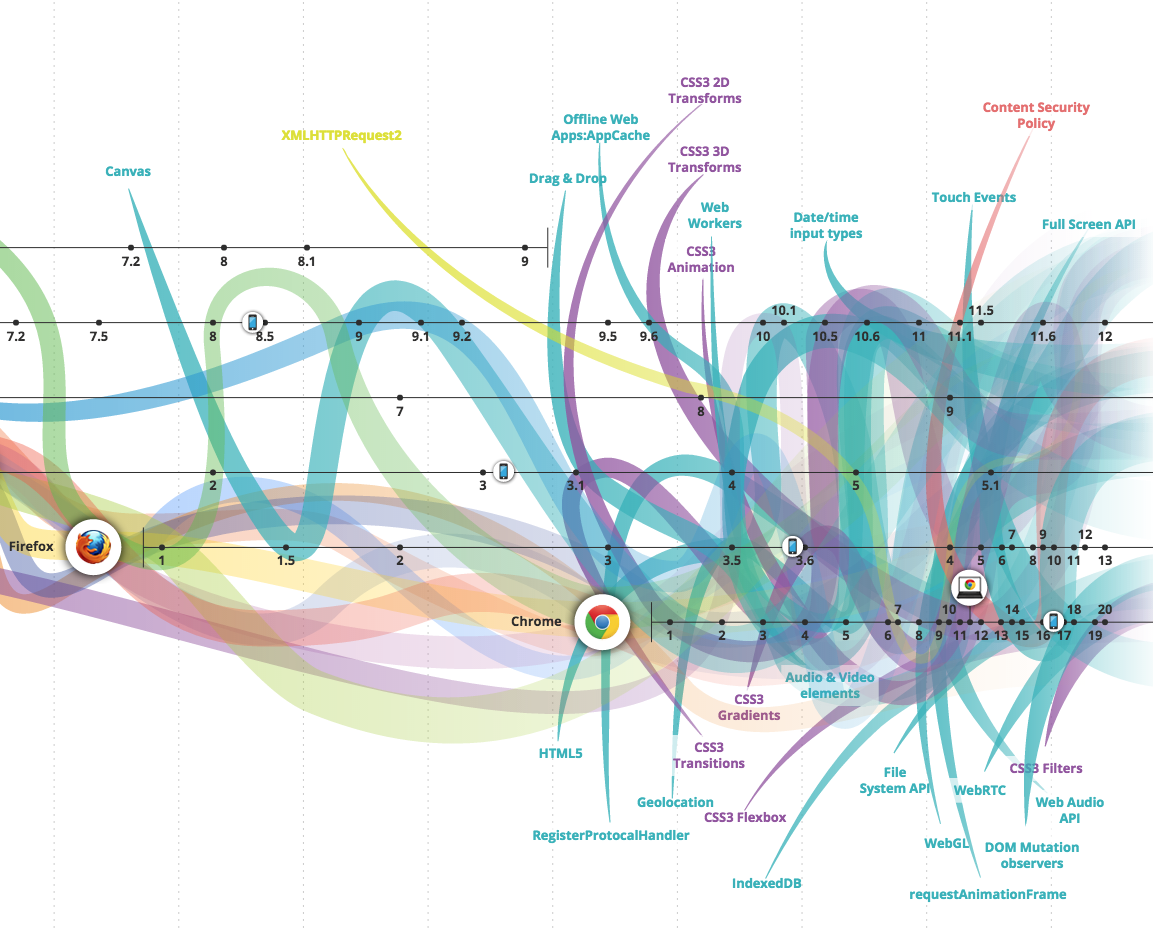
在适当情况下, 你应该了解和学习 Web/浏览器 API. 为了熟悉这些 API, 应该去研究[HTML5test.com](https://html5test.com/compare/browser/chrome-44/firefox-40/ie-11/safari-9.0.html) 对与 5 款常用浏览器对 API 新特性的支持结果, 这是一个很不错的方式.
**学习文档:**
* [DIVE INTO HTML5](http://diveintohtml5.info/) [read]
* [HTML5 专业开发](http://apress.jensimmons.com/v5/pro-html5-programming/info.html) [read]
* [HTML5 Canvas](http://chimera.labs.oreilly.com/books/1234000001654/index.html) [read]
**学习视频:**
* [Web Audio 的乐趣](https://code.tutsplus.com/courses/fun-with-web-audio/) [watch]
* [用 Web Audio 给网站添加声音](https://code.tutsplus.com/courses/add-sound-to-your-site-with-web-audio) [watch]
**其它学习资源:**
* [Web Audio API](http://chimera.labs.oreilly.com/books/1234000001552/index.html) [read]
此外, MDN 有很多关于 web/browser API 的信息:
* [MDN Web API 参考](https://developer.mozilla.org/en-US/docs/Web/Reference/API)
* [MDN WebAPI - 设备访问 API 和其它有用的 API](https://developer.mozilla.org/en-US/docs/WebAPI)
* [MDN Web APIs 接口参考](https://developer.mozilla.org/en-US/docs/Web/API)
时刻记住, 并不是每一个 API 都在 W3C 或 WHATWG 的规范之内.
除了 MDN, 还列出了一些有用的资源:
* [HTMl5-overview](https://github.com/dret/HTML5-overview)
* [platform.html5.org](https://platform.html5.org/)
* [HTML5 和 JavaScript API 索引](http://html5index.org/)
================================================
FILE: 02-fedHandlebook-master/learning/browsers.md
================================================
###Web浏览器
>web 浏览器(通常被称为浏览器)是一个用于检索、展示和遍历在万维网上的信息资源的软件应用程序. 信息资源被定义成统一资源定位符(URI/URL). 它可能是网页, 图片, 视频或者一个内容片断. 超链接的出现使用户能轻松的将浏览器导航到相关的资源, 尽管浏览器主要是为了使用万维网, 但它们还可以用来访问 Web服务器在私人网络所提供的信息或文件在文件系统. - Wikipedia
[主流的浏览器](http://www.sitepoint.com/browser-trends-april-2015-statcounter-vs-netmarketshare/) 如下:
1. [Chrome](http://www.google.com/chrome/) (引擎: [Blink](https://en.wikipedia.org/wiki/Blink_%28layout_engine%29) + [V8](https://en.wikipedia.org/wiki/V8_%28JavaScript_engine%29))
2. [Firefox](https://www.mozilla.org/en-US/firefox/new/) (引擎: [Gecko](https://en.wikipedia.org/wiki/Gecko_%28software%29) + [SpiderMonkey](https://en.wikipedia.org/wiki/SpiderMonkey_%28software%29))
3. [Internet Exploere](http://windows.microsoft.com/en-us/internet-explorer/download-ie) (引擎: [Trident](https://en.wikipedia.org/wiki/Trident_%28layout_engine%29) + [Chakra](https://en.wikipedia.org/wiki/Chakra_%28JScript_engine%29))
4. [Safari](https://www.apple.com/safari/) (引擎: [Webkit](https://en.wikipedia.org/wiki/WebKit) + [SquirrelFish](https://trac.webkit.org/wiki/SquirrelFish))
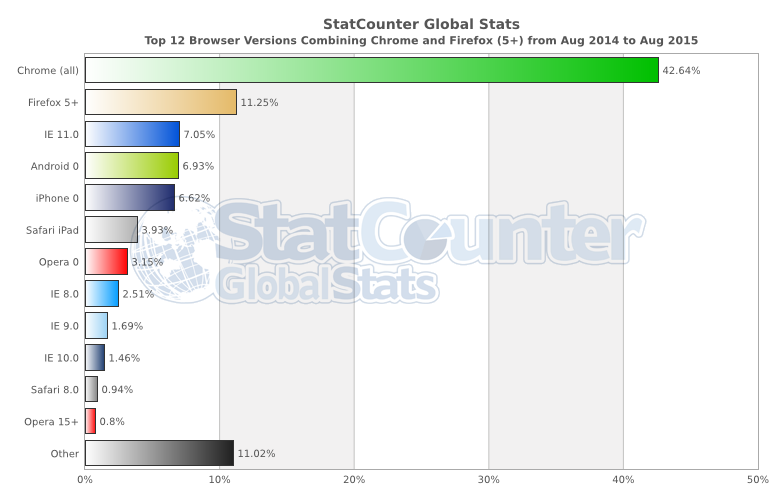
**浏览器和web技术的演变(API 等):**
* [www.evolutionoftheweb.com](http://www.evolutionoftheweb.com/) [read]
* [Timeline of web browsers](https://en.wikipedia.org/wiki/Timeline_of_web_browsers) [read]
**最常用的无壳浏览器:**
* [PhantomJS](http://phantomjs.org/) (引擎: [Webkit](https://en.wikipedia.org/wiki/WebKit) + [SquirrelFish](https://trac.webkit.org/wiki/SquirrelFish))
* [slimerjs](http://slimerjs.org/) (引擎: [Gecko](https://en.wikipedia.org/wiki/Gecko_%28software%29) + [SpiderMonkey](https://en.wikipedia.org/wiki/SpiderMonkey_%28software%29))
* [TrifleJS](http://triflejs.org/) (引擎: [Trident](https://en.wikipedia.org/wiki/Trident_%28layout_engine%29) + [Chakra](https://en.wikipedia.org/wiki/Chakra_%28JScript_engine%29))
**浏览器怎么工作的**
* [我所知道的关于浏览器和Web的20件事](http://www.20thingsilearned.com/en-US/foreword/1) [read]
* [浏览器如何工作的: 现代浏览器背后的秘密](http://www.html5rocks.com/en/tutorials/internals/howbrowserswork/) [read]
* [快速 CSS: 浏览器是怎么组织网页的](http://dbaron.org/talks/2012-03-11-sxsw/master.xhtml) [read]
* [浏览器是如何渲染一个网站的?](https://www.youtube.com/watch?v=SmE4OwHztCc) [watch]
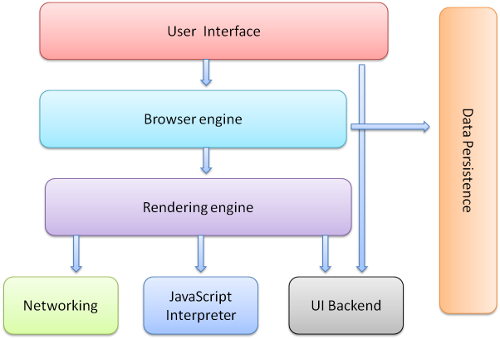
**浏览器优化**
* [网站性能优化](https://www.udacity.com/course/website-performance-optimization--ud884) [watch]
* [浏览器渲染优化](https://www.udacity.com/course/browser-rendering-optimization--ud860) [watch]
**浏览器安全**
* [浏览器安全手册](https://code.google.com/p/browsersec/wiki/Main) [read]
* [HTML5 安全参考手册](https://html5sec.org/#javascript) [read]
* [前端安全](https://mikewest.org/2013/09/frontend-security-frontendconf-2013) [watch]
* [Web 安全: JavaScript, HTML, CSS 的使用](http://www.amazon.com/Security-Web-Developers-Using-JavaScript/dp/1491928646/) [read][$]
* [网络混战: 现代 Web 应用安全指南](http://lcamtuf.coredump.cx/tangled/) [read]
**浏览器比较**
* [Web 浏览器的比较](https://en.wikipedia.org/wiki/Comparison_of_web_browsers) [read]
**浏览器的发展**
在过去, 前端开发者会花费大量的时间让代码在不同的浏览器中正常工作. 除非你必须写出兼容老版本浏览器的代码(如: IE6/IE7), 否则跟现在比起来, 这(浏览器兼容)在以前是一个很大的问题. 虽说浏览器兼容问题现在仍然存在, 但前端开发者并不用花费很多时间就能处理这类问题. 而实际上, 现代抽离出的框架(如: JQuery, pre-processors, transpilers)已经废除了很多浏览器不一致问题.
**绿色浏览器**
浏览器的最新版本被认为是绿色浏览器, 也就是说, 浏览器会自动更新而不用去提示用户更新. 浏览器的自动更新摒弃了老版本浏览器进程缓慢的问题, 因为对于老版本浏览器和现代浏览器之间的共性的差异化开发是很复杂的(如: 新规范和更新速度).
**浏览器选择**
现在大多数前端开发者使用 Chrome, "Chrome 开发工具"对开发者很有用, 然而, 所有浏览器都提供了开发者工具, 所以选择一个开发用的浏览器是一个主观的问题. 更重要的问题是要了解需要支持哪些浏览器, 当你在开发的时候, 要在每个浏览器中做测试, 但无论选择哪一款浏览器都能完成开发任务, 我建议使用 Chrome 是因为 Chrome 开发工具一直在改进, 并且包含了更健全地特性.
**浏览器 Hacks**
* [browserhacks.com](http://browserhacks.com/) [read]
================================================
FILE: 02-fedHandlebook-master/learning/build.md
================================================
###构建和任务自动化
>构建自动化是软件构建和相关流程的自动化过程, 包括: 将计算机源码编译成二进制代码, 打包二进制代码和运行自动化测试. - wikipedia
**综合学习:**
* [用 Gulp.js 进行 JavaScript 自动构建: ](http://www.pluralsight.com/courses/javascript-build-automation-gulpjs) [watch][$]
* [Gulp 入门](https://www.packtpub.com/web-development/getting-started-gulp) [read][$]
* [Gulp 快速入门](https://www.packtpub.com/web-development/rapid-gulp-video) [watch][$]
* [学习 Gulp - 前端工厂入门](http://hmphry.com/gulp) [read]
* [Gulp 基础](http://teamtreehouse.com/library/gulp-basics) [watch][$]
* [使用 npm 作为任务运行器](http://teamtreehouse.com/library/using-npm-as-a-task-runner) [watch][$]
**参考/文档:**
* [gulp](https://github.com/gulpjs/gulp/blob/master/docs/getting-started.md)
Gulp 是非常棒的构建工具, 然后, 你可能仅仅只需要 `npm run`. 在你的应用程序栈变得负责之前, 问问你自己, `npm run`是否能完成自动化构建. 如果你需要更多, 可以同时使用 `npm run`和 Gulp.
推荐阅读:
* [NPM 使用指南](http://www.sitepoint.com/guide-to-npm-as-a-build-tool/)
* [NPM 的任务自动化管理](http://substack.net/task_automation_with_npm_run)
* [构建工具 VS NPM 脚本: 为何不使用两者](http://engineering.hobsons.com/2015/06/26/build-tools-vs-npm-scripts-why-not-both/)
* [使用 NPM 作为下一个项目的构建系统](https://drublic.de/blog/npm-builds)
* [怎么将 NPM 作为构建工具使用](http://blog.keithcirkel.co.uk/how-to-use-npm-as-a-build-tool/)
**译者补充:**
* [Gulp不完全入门教程](http://www.ido321.com/1622.html)
================================================
FILE: 02-fedHandlebook-master/learning/cli.md
================================================
###命令行
>命令行接口或命令语言解译器(CLI), 也称命令行用户界面, 控制台用户界面和字符用户界面(CUI), 是一种用户以连续的文本(命令行)的形式向程序提出需求, 与计算机程序交互的方式. - wikipedia
**入门学习:**
* [codecademy: Learn the Command Line](https://www.codecademy.com/courses/learn-the-command-line) [watch]
* [The Command Line Crash Course](http://cli.learncodethehardway.org/book/) [read]
* [Meet the Command Line](http://www.pluralsight.com/courses/meet-command-line) [read][$]
* [Learn Enough Command Line to Be Dangerous](http://www.learnenough.com/command-line-tutorial) [read][free tp $]
* [Command Line Power User](http://commandlinepoweruser.com/) [watch]
**进阶学习:**
* [Advanced Command Line Techniques](https://code.tutsplus.com/courses/advanced-command-line-techniques) [watch][$]
================================================
FILE: 02-fedHandlebook-master/learning/courses.md
================================================
###Directed learning
The table below contains instructor led, paid, front-end courses, programs, schools, and bootcamps.
If you can't afford a directed education, a self directed education using screencasts, books, and articles is a viable alternative to learn front-end development for the self-driven individual.
<table>
<thead>
<tr>
<th data-field="company">company</th>
<th data-field="model">course</th>
<th data-field="year">price</th>
<th data-field="onsite">on site</th>
<th data-field="remote">remote</th>
</tr>
</thead>
<tbody>
<tr>
<td>Iron Yard</td>
<td><a target="_blank" href="http://theironyard.com/courses/front-end-engineering/">Front End Engineering</a></td>
<td>12,000</td>
<td>multiple locations</td>
<td></td>
</tr>
<tr>
<td>Udacity</td>
<td><a target="_blank" href="https://www.udacity.com/course/nd001">Front-End Web Developer Nanodegree</a></td>
<td>200 monthly</td>
<td>multiple locations</td>
<td>yes</td>
</tr>
<tr>
<td>The New York Code + Design Academy</td>
<td><a target="_blank" href="http://nycda.com/classes/front-end-101/">Front End 101</a></td>
<td>2,000</td>
<td>New York, NY</td>
<td></td>
</tr>
<tr>
<td>Portland Code School</td>
<td><a target="_blank" href="http://www.portlandcodeschool.com/advancedfe/">Advanced Front-end Developer Tools</a></td>
<td>2,000</td>
<td>Portland, OR</td>
<td></td>
</tr>
<tr>
<td>BLOC</td>
<td><a target="_blank" href="https://www.bloc.io/frontend-development-bootcamp">Become a Frontend Developer</a></td>
<td>4,999</td>
<td></td>
<td>yes</td>
</tr>
<tr>
<td>Thinkful</td>
<td><a target="_blank" href="http://www.thinkful.com/courses/learn-web-development-online">Frontend Web Development</a></td>
<td>300 per month</td>
<td></td>
<td>yes</td>
</tr>
<tr>
<td>General Assembly</td>
<td><a target="_blank" href="https://generalassemb.ly/education/front-end-web-development">Frontend Web Development</a></td>
<td>3,500</td>
<td>multiple locations</td>
<td></td>
</tr>
<tr>
<td>Hackbright Academy</td>
<td><a target="_blank" href="http://hackbrightacademy.com/courses/front-end-web-development/">Front-End Web Development</a></td>
<td>3,000</td>
<td>San Francisco, CA</td>
<td></td>
</tr>
<tr>
<td>HackerYou</td>
<td><a target="_blank" href="http://hackeryou.com/front-end-web-development-immersive/">Front-end Web Development Immersive</a></td>
<td>7,000 - 7,910</td>
<td>Toronto, Canada</td>
<td></td>
</tr>
<tr>
<td>The Flatiron School</td>
<td><a target="_blank" href="http://flatironschool.com/frontend">Introduction to Front-End Web Development</a></td>
<td>3,500</td>
<td>New York, NY</td>
<td></td>
</tr>
<tr>
<td>Austin Coding Academy</td>
<td><a target="_blank" href="http://www.austincodingacademy.com/front-end/">The Front End Track</a></td>
<td>1,490 per class</td>
<td>Austin, TX</td>
<td></td>
</tr>
<tr>
<td>Codeup</td>
<td><a target="_blank" href="http://codeup.com/night-bootcamp/">Night Front-End Bootcamp</a></td>
<td>8,500</td>
<td>San Antonio, Texas</td>
<td></td>
</tr>
<tr>
<td>Betamore</td>
<td><a target="_blank" href="http://betamore.com/academy/front-end-web-development/">Front-end Web Development</a></td>
<td>8,500</td>
<td>Baltimore, MD</td>
<td></td>
</tr>
<tr>
<td>Codify Academy</td>
<td><a target="_blank" href="http://codifyacademy.com/thecourse.php">Front-end Web Development</a></td>
<td>4,000</td>
<td>multiple locations</td>
<td></td>
</tr>
<tr>
<td>DecodeMTL</td>
<td><a target="_blank" href="http://www.decodemtl.com/">Learn Front-end Web Development</a></td>
<td>2,500</td>
<td>Montreal, QC</td>
<td></td>
</tr>
<tr>
<td>gr8code</td>
<td><a target="_blank" href="https://gr8code.com/our-programs/front-end-bootcamp/">Front-End Bootcamp</a></td>
<td>10,000</td>
<td>Tampa, FL</td>
<td></td>
</tr>
<tr>
<td>LearningFuze</td>
<td><a target="_blank" href="http://learningfuze.com/frontend-development/">Part-Time Front-End Development Course</a></td>
<td>2,500</td>
<td>Irvine, CA</td>
<td></td>
</tr>
</tbody>
</table>
================================================
FILE: 02-fedHandlebook-master/learning/design.md
================================================
###用户界面和交互设计
>**用户界面设计:** 用户界面设计(UI)或用户界面工程师是为机器或者软件做用户界面设计的, 如: 计算机, 家用器具, 移动设备和其它电子设备, 专注于最大限度地提高用户体验. 用户界面设计的目标是尽可能是使用户交互变得简单有效, 实现用户的操作目标(设计是以用户为中心的). - wikipedia
>**交互设计模式:** 设计模式是一种记录解决常见设计问题解决方案的形式化方式. 建筑师 Christopher Alexander 在城市规划和建设体系结构中已经介绍了这种方式, 并已用于其他学科, 包括教学, 教育学和软件架构和设计. - wikipedia
>**用户体验设计:** 用户体验设计(又称 UXD 或 UED 或 XD), 是通过提高可用性、可访问性以及在用户跟产品交互时的愉悦来提高用户体验的过程. 用户体验设计从完成传统的人机交互(HCI), 已经扩展到要处理产品或服务中能被用户感知的所有方面. - wikipedia
>**人机交互:** 人机交互(HCI)不仅特别关注人和计算之间的界面, 也会研究设计和使用 Web 技术. 人机交互领域的研究人员都会去关注当前人类与计算机交互的方式和为人类与计算机提供新的交互方式的设计技术. - wikipedia
若你想要建立适当的用户界面, 我会建议你阅读以下关于设计方面的书籍:
* [Designing Interfaces](http://www.amazon.com/Designing-Interfaces-Jenifer-Tidwell/dp/1449379702/ref=sr_1_1) [read][$]
* [About Face: The Essentials of Interaction Design](http://www.amazon.com/About-Face-Essentials-Interaction-Design/dp/1118766571/ref=pd_sim_14_3) [read][$]
* [Don't Make Me Think, Revisited: A Common Sense Approach to Web Usability](http://www.amazon.com/Dont-Make-Think-Revisited-Usability/dp/0321965515/ref=pd_sim_14_2) [read][$]
**译者补充:**
* [简约至上:交互式设计四策略](http://www.amazon.cn/%E7%AE%80%E7%BA%A6%E8%87%B3%E4%B8%8A-%E4%BA%A4%E4%BA%92%E5%BC%8F%E8%AE%BE%E8%AE%A1%E5%9B%9B%E7%AD%96%E7%95%A5-%E7%A7%91%E5%B0%94%E4%BC%AF%E6%81%A9/dp/B004I91HCY/ref=sr_1_1?ie=UTF8&qid=1445948451&sr=8-1) [read][RMB]
* [交互设计沉思录](http://www.amazon.cn/%E4%BA%A4%E4%BA%92%E8%AE%BE%E8%AE%A1%E6%B2%89%E6%80%9D%E5%BD%95-%E7%A7%91%E5%B0%94%E7%A7%91/dp/B009A7DAXI/ref=sr_1_3?ie=UTF8&qid=1445948451&sr=8-3) [read][RMB]
================================================
FILE: 02-fedHandlebook-master/learning/dev-tools.md
================================================
###Web 开发者工具
>Web 开发者工具允许开发者测试和调试代码, 它们不同于网站生成器和 IDE, 因为 Web 开发者工具不直接参与网页的创建, 而是用于测试网站或 Web 应用的用户界面接口的工具.
>Web 开发者工具是浏览器的加载项或内置功能. 当今最流行的web浏览器, Google Chrome, Firefox, Opera, Internet Explorer, 和 Safari 都内置工具用于帮助开发者, 并且在各自的插件下载中心, 还提供很多额外的加载项.
>Web 开发者工具允许开发者使用各种各样的 Web 技术, 包括 HTML, CSS, DOM, JavaScript 和 其它浏览器能够处理的组件. 由于日益增长的需求, 更多流行的 Web 浏览器包括了更多面向开发人员的功能.
尽管大多数浏览器都配备了开发者工具, 但是 [谷歌开发者工具](https://developers.google.com/web/tools/chrome-devtools/) 是目前谈论最多, 应用最广泛的开发者工具.
我建议学习和使用 [谷歌开发者工具](https://developers.google.com/web/tools/chrome-devtools/), 因为谷歌开发者工具周围有学习 Web 开发者工具最好的资源.
**学习使用谷歌开发者工具:**
* [Explore and Master Chrome DevTools](http://discover-devtools.codeschool.com/)
* [Chrome 开发者工具](https://code.tutsplus.com/courses/chrome-developer-tools) [watch][$]
* [使用 Chrome 开发者工具](http://www.pluralsight.com/courses/chrome-developer-tools) [watch][$]
**谷歌开发者工具文档:**
* [Per-Panel 文档](https://developers.google.com/web/tools/chrome-devtools/#docs)
* [命令行接口参考](https://developers.google.com/web/tools/javascript/command-line/command-line-reference?hl=en)
* [键盘 & UI 快捷键参考](https://developers.google.com/web/tools/iterate/inspect-styles/shortcuts)
* [设置](https://developer.chrome.com/devtools/docs/settings)
**新闻/简报/博客/建议:**
* [Dev Tips](https://umaar.com/dev-tips/)
**译者补充:**
* [Chrome Devtools Tips & Tricks](http://mo.github.io/2015/10/19/chrome-devtools.html)
* [Chrome开发者工具不完全指南](http://www.92fenxiang.com/121.html)
* [Chrome 开发工具指南](http://wiki.jikexueyuan.com/project/chrome-devtools/)
================================================
FILE: 02-fedHandlebook-master/learning/direct-learning.md
================================================
###Directed learning
This section focuses on directed learning via schools, courses, programs and bootcamps.
================================================
FILE: 02-fedHandlebook-master/learning/dns.md
================================================
###域名系统(又称 DNS)
>对于个人电脑、服务器或连接到互联网任何资源, 或专用网络而言, 域名系统(DNS)是一个分层分布式命名系统, 用给每个参与的实体分配域名的方式将各种信息联系起来, 更重要的是, 为能访问全球的计算机服务和设备, DNS 将所需的数字 IP 地址转变为人类容易记住的域名. DNS 是大多数互联网服务的必要功能, 因为这是主要的 IP 地址服务. - wikipedia
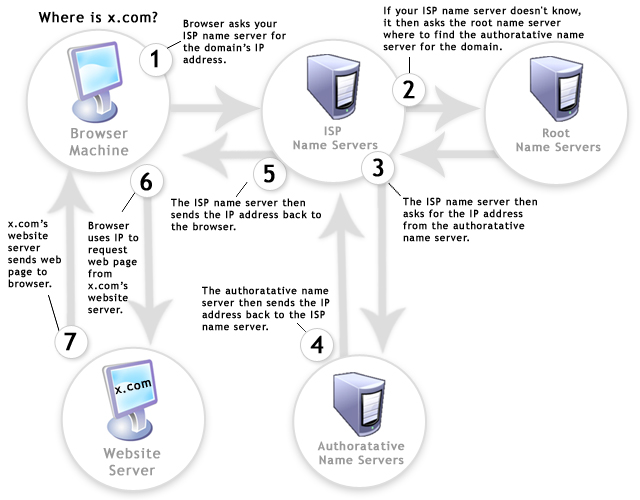
* [什么是 DNS](https://www.youtube.com/watch?v=72snZctFFtA) [watch]
* [DNS 是怎么工作的?](https://howdns.works/ep1/) [read]
================================================
FILE: 02-fedHandlebook-master/learning/dom.md
================================================
###DOM, BOM & JQuery
>**DOM** - 文档对象模型(DOM)用于代表和对象交互的HTML, XHTML 和 XML 文档, 是一种跨平台和语言无关性的约定. 每一份文档的所有节点被组织成一种树结构, 称为 DOM 树. DOM 对象通过使用对象上的方法被处理和操作, 一个 DOM 对象的公共接口被指定为它的应用程序编程接口(API). - wikipedia.org
>**BOM** - 浏览器对象模型(BOM)是一种浏览器规范, 代指 Web 浏览器暴露出的对象. 与文档对象模型不同的是, 目前并没有关于浏览器对象模型的标准和严格定义, 因而浏览器厂商可以按照他们的意愿, 采取任何方式来实现 BOM. - wikipedia.org
>**JQuery** - JQuery 是一个跨平台的 JavaScript 库, 其设计目的是简化客户端的 HTML 脚本操作. JQuery 也是目前最流行的 JavaScript 库, 在目前排名前1000万的网站中, 65% 的网站安装了 JQuery. JQuery 是免费的, 基于 MIT 协议的开源软件. - wikipedia.org
最理想但又难度最大的学习路径就是首先学习 JavaScript, 然后学习 DOM, 之后再学习 JQuery. 然后, 完全可以按照你所想的学习路径来安排学习的顺序. 大多数的前端开发者在了解 JavaScript 和 DOM 之后, 才会接触 JQuery. 无论采取什么学习路径, 都要确保 JavaScript, DOM 或者 JQuery 不要成为"黑盒子".
**入门学习:**
* [DOM](http://eloquentjavascript.net/13_dom.html) [read]
* [codecademy.com jQuery](https://www.codecademy.com/tracks/jquery) [watch]
* [jQuery 启蒙](http://jqueryenlightenment.com/) [read]
* [JQuery 入门](http://www.pluralsight.com/courses/jquery-getting-started) [watch][$]
**进阶学习:**
* [DOM 启蒙](http://www.amazon.cn/DOM%E5%90%AF%E8%92%99-%E6%9E%97%E5%BE%B7%E5%88%A9/dp/B00JWXDB52/ref=sr_1_2?ie=UTF8&qid=1446477828&sr=8-2) [read][RMB] 或 [免费在线阅读](http://domenlightenment.com/)
* [JS & DOM 进阶](https://frontendmasters.com/courses/javascript-jquery-dom/) [watch][$]
* [DOM 进阶: 动态网页设计技术](http://www.amazon.com/gp/product/1590598563/ref=as_li_tl?ie=UTF8&camp=1789&creative=390957&creativeASIN=1590598563&linkCode=as2&tag=fronenddevejo-20&linkId=VQZU5EQIQQXCF56Y) [read][$]
* [常见 JQuery bugs 修复](http://www.pluralsight.com/courses/fixing-common-jquery-bugs) [watch][$]
* [JQuery 技巧](http://www.pluralsight.com/courses/jquery-tips-and-tricks) [watch][$]
* [jQuery-free JavaScript](http://www.pluralsight.com/courses/jquery-free-javascript) [watch][$]
* [Douglas Crockford: DOM 理论--不可忽视的 API](https://www.youtube.com/watch?v=Y2Y0U-2qJMs&list=PL5586336C26BDB324&index=2) [watch]
**参考/文档:**
* [MDN: 文档对象模型](https://developer.mozilla.org/zh/docs/Web/API/Document_Object_Model)
* [MDN: 事件参考](https://developer.mozilla.org/zh/docs/Web/Events)
* [JQuery 文档](http://api.jquery.com/)
* [MDN: 浏览器对象模型](https://developer.mozilla.org/en-US/docs/Web/API/Window)
* [MSDN: 文档对象模型](https://msdn.microsoft.com/en-us/library/hh772384%28v=vs.85%29.aspx)
**标准和规范:**
* [W3C DOM4](http://www.w3.org/TR/2014/WD-dom-20140204/)
* [DOM 在线标准](https://dom.spec.whatwg.org/)
* [DOM 3 事件规范](http://www.w3.org/TR/2013/WD-DOM-Level-3-Events-20131105/)
* [DOM 技术报告](http://www.w3.org/DOM/DOMTR)
**译者补充:**
* [You Might Not Need JQuery(英)](http://youmightnotneedjquery.com/) [中文版](http://www.webhek.com/you-do-not-need-jquery)
================================================
FILE: 02-fedHandlebook-master/learning/fonts.md
================================================
###Web 字体 & 图标
>Web 字体是指在 WWW 上使用的字体. 当 HTML 文档第一次被创建时, 字体风格和样式会被每个 Web 浏览器的设置所控制, 因为直到 1995 年网景介绍了`<font>`标记之前, 个人网页没有控制字体显示的方式, 而`<font>`标记在 HTML 3.2 规范中被标准化. 然而, 被标记指定的字体必须安装在用户的电脑上, 或者是一种可以依赖的字体, 如: 浏览器默认的 sans-serif 字体或 monospace 字体. 在1996 年 发布的 CSS 1.0 规范也提供指定使用字体的功能.
> 1998 年, CSS 2.0 规范发布, 意图通过字体匹配, 合成和下载技术, 改善字体的选择过程, 但这些技术并没有得到使用, 并在 CSS2.1 规范中被移除了. 然而, 在 1997 年发布的 IE 4.0 增加了对字体下载的支持, 随后, CSS 3 的字体模块变包含了字体下载, 并且 Safari 3.1, Opera 10 和 Mozilla Firefox 3.5 实现了这一功能, 随后便增加了 Web 字体和所使用字体的下载. - wikipedia
**综合学习:**
* [Web 字体排版](http://www.pluralsight.com/courses/typography-for-web-1790) [watch][$]
* [@font-face 快速学习指南](http://www.html5rocks.com/en/tutorials/webfonts/quick/) [read]
* [响应式排版](https://frontendmasters.com/courses/responsive-typography/) [watch][$]
* [用最好的字体来美化网页](http://hellohappy.org/beautiful-web-type/) [read]
================================================
FILE: 02-fedHandlebook-master/learning/front-end-apps.md
================================================
###前端应用架构设计
* [JavaScript Web 应用开发](http://www.amazon.cn/JavaScript-Web%E5%BA%94%E7%94%A8%E5%BC%80%E5%8F%91-%E9%98%BF%E6%A0%B9%E5%BB%B7-%E6%AF%94%E7%93%A6%E5%8D%A1/dp/B016I9T8QI/ref=sr_1_2) [read][RMB]
* [用 React & Ampersand 构建 APP](http://learn.humanjavascript.com/react-ampersand) [watch][$]
* [Human JavaScript](http://read.humanjavascript.com/) [read]
* [JavaScript 应用程序编程](http://chimera.labs.oreilly.com/books/1234000000262/index.html) [read]
* [构建现代单页应用](https://frontendmasters.com/workshops/web-apps/) [watch][$]
* [JavaScript 函数式编程](https://frontendmasters.com/courses/organizing-javascript/) [watch][$]
* [JavaScript: 模块](http://eloquentjavascript.net/10_modules.html) [read]
* [Web UI 架构设计](https://frontendmasters.com/courses/web-ui-architecture/) [watch][$]
* [Web 应用设计指南](http://www.html5rocks.com/webappfieldguide/toc/index/) [read]
* [UI 架构设计](http://www.pluralsight.com/courses/web-ui-architecture) [watch][$]
* [Terrific](http://terrifically.org/) [read]
* [Nicholas Zakas: 可扩展的 JavaScript 应用架构](https://www.youtube.com/watch?v=vXjVFPosQHw) [watch]
* [大型 JavaScript 应用架构设计模式](http://addyosmani.com/largescalejavascript/) [read]
* [静态应用指南](http://www.staticapps.org/) [read]
================================================
FILE: 02-fedHandlebook-master/learning/general-front-end.md
================================================
###前端开发综合学习
**入门学习:**
* [前端参考指南](https://github.com/bendc/frontend-guidelines) [read]
* [Web 开发者](http://www.yellowshoe.com.au/standards) [read]
* [前端代码标准](http://isobar-idev.github.io/code-standards/) [read]
* [Web 基本原理](https://developers.google.com/web/fundamentals) [read]
* [前端课程](https://gist.github.com/stevekinney/03027e71aac341af14a2) [read]
* [FreeCodeCamp](http://freecodecamp.com/) [interact]
* [开发前端 JS 应用](https://www.youtube.com/watch?v=q4zEGkjTBFA) [watch]
* [前端工程师](https://www.youtube.com/watch?v=Lsg84NtJbmI) [watch]
* [Web 前端开发的工作内容](http://www.pluralsight.com/courses/front-end-web-development-career-kickstart) [watch][$]
* [Web 前端开发入门](http://www.pluralsight.com/courses/front-end-web-development-get-started) [watch][$]
* [用 HTML5, CSS, 和 JavaScript 快速进行 Web 前端开发](http://www.pluralsight.com/courses/front-end-web-app-html5-javascript-css) [watch][$]
* [Web 开发介绍](https://frontendmasters.com/courses/web-development/) [watch][$]
* [Web 前端开发基础](https://www.udemy.com/foundations-of-front-end-development/) [watch][$]
* [精益前端工程](https://frontendmasters.com/courses/lean-front-end-engineering/) [watch][$]
* [前端(JS)开发基线: 2015](http://rmurphey.com/blog/2015/03/23/a-baseline-for-front-end-developers-2015/) [read]
* [Web 前端开发入门学习](https://teamtreehouse.com/tracks/front-end-web-development) [watch][$]
* [Web 前端开发进阶学习](https://mijingo.com/products/bundles/front-end-dev-mastery/) [watch][$]
* [没有学位的 Web 前端开发者](https://www.udacity.com/course/front-end-web-developer-nanodegree--nd001) [watch][$
**前端简报, 资讯和博客:**
* [shoptalkshow.com](http://shoptalkshow.com/)
* [frontendfront.com](http://frontendfront.com/)
* [webtoolsweekly.com](http://webtoolsweekly.com/)
* [O'Reilly Web Platform Radar](http://radar.oreilly.com/web-platform)
* [The Web Platform Podcast](http://thewebplatform.libsyn.com/)
* [The Web Ahead](http://thewebahead.net/)
* [The Big Web Show](http://5by5.tv/bigwebshow)
* [Fresh Brewed Frontend](https://freshbrewed.co/frontend/)
* [Mobile Web Weekly](http://mobilewebweekly.co/)
* [Open Web Platform Daily Digest](http://webplatformdaily.org/)
* [FRONT-END DEV weekly](http://frontenddevweekly.com/)
**译者补充:**
* [前端工程系列文章](https://github.com/fouber/blog/issues/10)
* [前端知识体系](http://qianduanfan.com/index.php/topic/show/231)
* [前端资源大总结](http://qianduanfan.com/index.php/topic/show/234)
* [前端入门](https://github.com/qiu-deqing/FE-learning)
* [WebPlatForm](http://www.webplatform.org/)
* [前端开发规范手册](http://zhibimo.com/read/Ashu/front-end-style-guide/)
* [Web 开发电子书下载(英)](http://www.allitebooks.com/web-development/)
* 对前端开发者有用的文档和指南: [1](http://www.sitepoint.com/20-docs-guides-front-end-developers/) [2](http://www.sitepoint.com/20-more-docs-guides-front-end-developers/) [3](http://www.sitepoint.com/another-20-docs-guides-front-end-developers/) [4](http://www.sitepoint.com/20-docs-guides-front-end-developers-4/) [5](http://www.sitepoint.com/20-docs-guides-front-end-developers-5/) [6](http://www.sitepoint.com/20-docs-guides-front-end-developers-6/)
================================================
FILE: 02-fedHandlebook-master/learning/headless-browsers.md
================================================
###无壳浏览器
>无壳浏览器是指没有图形用户界面的 Web 浏览器.
>无壳浏览器拥有一个和受欢迎的 Web 浏览器相似的环境, 并提供了网页的自动化控制, 但要通过命令行接口或使用网络通信工具执行. 对于测试网页, 无壳浏览器是非常有用的, 因为和普通浏览器一样, 它们能渲染和理解 HTML, 包括样式元素, 如: 页面布局, 颜色, 字体选择, JavaScript 的执行和 AJAX, 但是当使用其它方法时, Ajax 通常就不可用了. 在 2009 年, 谷歌声称使用无壳浏览器有助于搜索引擎使用 Ajax 从其它网站索引内容. - wikipedia
* [PhantomJS Cookbook](http://www.amazon.com/PhantomJS-Cookbook-Rob-Friesel/dp/178398192X) [read][$]
* [Getting Started with PhantomJS](http://www.amazon.com/Getting-Started-PhantomJS-Aries-Beltran/dp/1782164227) [read][$]
* [Rapid PhantomJS](https://www.packtpub.com/web-development/rapid-phantomjs-video) [watch][$]
* [PhantomJS for Web Automation](https://www.youtube.com/watch?v=OqEcn_6GBDI) [watch]
================================================
FILE: 02-fedHandlebook-master/learning/html-css.md
================================================
###HTML & CSS
>**HTML** - 超文本标记语言, 通常被称为 HTML, 是被用于创建网页的标准标记语言. Web浏览器能将 HTML 文件渲染成可见的或者可听到的. HTML 随着线索提示, 语义化地描述了网站的结构, 使它成为一种标记语言, 而不是编程语言. - wikipedia.org
>**CSS** - 层叠式样式表(CSS)是用于描述外观和格式化标记语言编写的文档的样式表语言. 尽管经常被用来改变用 HTML 和 XHTML 编写的网页和用户界面的样式, 但也可用于任何 XML 文档, 包括纯 XML, SVG 和 XUL. 跟 JavaScript 和 HTML 一样, CSS是被大多数网站用于为Web应用程序创建富有吸引力的网页, 用户界面的一种基础技术, 也为许多移动应用程序创建用户界面. - wikipedia.org
就像建造房子, 你可以认为 HTML 是骨架, 而 CSS 是油漆和装饰.
**入门学习:**
* [codecademy.com HTML & CSS](https://www.codecademy.com/tracks/web) [interact]
* [HTML/CSS 介绍: 网页制作](https://www.khanacademy.org/computing/computer-programming/html-css) [watch]
* [HTML & CSS 编码学习](http://learn.shayhowe.com/html-css/) [read]
* [CSS 布局](http://learnlayout.com/) [read]
* [Web 前端开发入门](http://www.pluralsight.com/courses/front-end-web-development-get-started) [watch][$]
* [HTML & CSS 设计与构建网站](http://www.amazon.cn/HTML-CSS%E8%AE%BE%E8%AE%A1%E4%B8%8E%E6%9E%84%E5%BB%BA%E7%BD%91%E7%AB%99-%E8%BE%BE%E7%A7%91%E7%89%B9/dp/B00BMK4GKW/ref=sr_1_1?ie=UTF8&qid=1446191225&sr=8-1) [read][RMB]
* [快速使用 HTML5, CSS 3 & JavaScript 进行 Web 前端开发](http://www.pluralsight.com/courses/front-end-web-app-html5-javascript-css) [watch][$]
* [深入理解 HTML: 语义, 标准与样式](http://www.amazon.com/gp/product/1590597656/ref=as_li_tl?ie=UTF8&camp=1789&creative=390957&creativeASIN=1590597656&linkCode=as2&tag=fronenddevejo-20&linkId=VFZVICLZO6GUZQI2) [read][$]
* [CSS 定位](http://www.pluralsight.com/courses/css-positioning-1834) [watch][$]
* [HTML 文档流](http://www.pluralsight.com/courses/html-document-flow-1837) [watch][$]
* [HTML5 & CSS3 介绍](https://frontendmasters.com/courses/introduction-html5-css3/) [watch][$]
* [CSS 中的绝对居中](http://codepen.io/shshaw/full/gEiDt) [read]
* [CSS 盒模型](https://webdesign.tutsplus.com/courses/understanding-the-css-box-model) [watch]
* [HTML 表单结构](https://webdesign.tutsplus.com/courses/solid-html-form-structure) [watch]
* [HTML 语义化: 如何构建 Web 页面](https://webdesign.tutsplus.com/courses/semantic-html-how-to-structure-web-pages) [watch]
**进阶学习:**
* [从 CSS 1 到 CSS 4 的选择器参考](http://css4-selectors.com/selectors/) [read]
* [CSS Diner](http://flukeout.github.io/) [interact]
* [深入理解 CSS3](https://frontendmasters.com/courses/css3-in-depth/) [watch][$]
* [atozcss.com/](http://www.atozcss.com/) [watch]
* [Flexbox 完全指南](https://css-tricks.com/snippets/css/a-guide-to-flexbox/) [read]
**参考/文档:**
* [htmlelement.info](http://htmlelement.info/)
* [MDN CSS reference](https://developer.mozilla.org/zh/docs/Web/CSS/Reference)
* [MDN HTML element reference](https://developer.mozilla.org/zh/docs/Web/HTML/Element)
* [cssvalues.com/](http://cssvalues.com/)
* [CSS TRIGGERS...A GAME OF LAYOUT, PAINT, AND COMPOSITE](http://csstriggers.com/)
* [HTML attributes reference](https://developer.mozilla.org/zh/docs/Web/HTML/Attributes)
**术语表:**
* [HTML 元素编程术语参考](https://www.codecademy.com/articles/glossary-html)
* [CSS 属性和选择器编程术语参考](https://www.codecademy.com/articles/glossary-css)
**标准/规范:**
* [W3C HTML5 标准](http://www.w3.org/TR/html5/): WWW 核心语言的第五个主要版本
* [HTML 元素在线标准](https://html.spec.whatwg.org/multipage/semantics.html#semantics)
* [HTML 语法](https://html.spec.whatwg.org/multipage/syntax.html#syntax)
* [W3C HTML 规范](http://www.w3.org/standards/techs/html#w3c_all)
* [全局属性](https://developer.mozilla.org/en-US/docs/Web/HTML/Global_attributes)
* [CSS 2.2 规范](https://drafts.csswg.org/css2/)
* [CSS 3 选择器](http://www.w3.org/TR/css3-selectors/)
* [W3C CSS 规范](http://www.w3.org/Style/CSS/current-work#roadmap)
**CSS 架构设计:**
* [OOCSS](http://oocss.org/) [read]
* [SMACSS](https://smacss.com/) [read][$]
* [SMACSS](https://frontendmasters.com/courses/smacss/) [watch][$]
* [Atomic Design](http://atomicdesign.bradfrost.com/) [read]
**编写规范:**
* [CSS 通用编写规范](https://github.com/necolas/idiomatic-css) [read]
* [开发灵活的, 持久的和可持续的 HTML 和 CSS 的标准](http://mdo.github.io/code-guide/) [read]
* [cssguidelin.es](http://cssguidelin.es/) [read]
* [谷歌的 HTML/CSS 编程风格指南](http://google-styleguide.googlecode.com/svn/trunk/htmlcssguide.xml#General_Formatting)
**HTML/CSS 简报:**
* [HTML 5 Weekly](http://html5weekly.com/)
* [CSS Weekly](http://css-weekly.com/archives/)
**译者补充:**
* [CSS 3 教程](https://waylau.gitbooks.io/css3-tutorial/content/docs/Introduction.html)
* [HTML & CSS 测试](https://sitthetest.com/tests)
* [Pro HTML5 Programming](http://apress.jensimmons.com/v5/pro-html5-programming/ch0.html)
* [Pro CSS3 Animation](http://apress.jensimmons.com/v5/pro-css3-animation/ch2.html)
* [CSS Protips](https://github.com/AllThingsSmitty/css-protips)
* [精通CSS: 高级Web标准解决方案](http://www.amazon.cn/%E7%B2%BE%E9%80%9ACSS-%E9%AB%98%E7%BA%A7Web%E6%A0%87%E5%87%86%E8%A7%A3%E5%86%B3%E6%96%B9%E6%A1%88-%E5%B7%B4%E5%BE%B7/dp/B003IURKAM/ref=sr_1_1?s=books&ie=UTF8&qid=1446191443&sr=1-1)
* [高流量网站CSS开发技术](http://www.amazon.cn/%E9%AB%98%E6%B5%81%E9%87%8F%E7%BD%91%E7%AB%99CSS%E5%BC%80%E5%8F%91%E6%8A%80%E6%9C%AF-%E8%82%AF%E5%B0%BC%E8%BF%AA/dp/B00FIIM9JO/ref=sr_1_2?s=books&ie=UTF8&qid=1446191443&sr=1-2)
* [深入理解HTML5: 语义, 标准与样式](http://www.amazon.cn/%E6%B7%B1%E5%85%A5%E7%90%86%E8%A7%A3HTML5-%E8%AF%AD%E4%B9%89-%E6%A0%87%E5%87%86%E4%B8%8E%E6%A0%B7%E5%BC%8F-%E5%B8%83%E6%8B%89%E5%BE%B7%E7%A6%8F/dp/B00DNDR5HM/ref=sr_1_1?ie=UTF8&qid=1446191387&sr=8-1)
* [HTML 5与CSS 3权威指南](http://www.amazon.cn/HTML-5%E4%B8%8ECSS-3%E6%9D%83%E5%A8%81%E6%8C%87%E5%8D%97-%E9%99%86%E5%87%8C%E7%89%9B/dp/B00B03VVRW/ref=sr_1_4?ie=UTF8&qid=1446191598&sr=8-4)
================================================
FILE: 02-fedHandlebook-master/learning/interface.md
================================================
###接口/API 设计
**数据(类似 JSON) API:**
* [Build APIs You Won't Hate](http://apisyouwonthate.com/) [$][read]
* [JSON API](http://jsonapi.org/) [read]
**JavaScript API**
* [Writing JavaScript APIs](http://blog.wolksoftware.com/writing-javascript-apis) [read]
* [Designing Better JavaScript APIs](http://www.smashingmagazine.com/2012/10/designing-javascript-apis-usability/) [read]
**译者补充**
* [HTTP API 设计指南](https://github.com/cocoajin/http-api-design-ZH_CN)
* [用 JSON 构建 API 的标准指南](http://wiki.jikexueyuan.com/project/json-api/)
================================================
FILE: 02-fedHandlebook-master/learning/internet.md
================================================
###Internet/web
>互联网使用网络协议套件(TCP / IP)链接全球数十亿的设备, 是一个从区域到全球, 由数以百万计的私人, 公共, 学术, 商业, 和政府网络组成的全球性网络系统, 并通过一系列广泛的电子, 无线, 光纤网络技术相互链接. 互联网提供了广泛的信息资源和服务, 如早期的超文本文档和应用万维网(WWW), 电子邮件, 电话和点对点文件共享网络. - wikipedia
* [WHAT IS THE INTERNET? or, "You Say Tomato, I Say TCP/IP"](http://www.20thingsilearned.com/en-US/what-is-the-internet/1) [read]
* [How does the Internet work](http://www.w3.org/wiki/How_does_the_Internet_work) [read]
* [How Does the Internet Work?"](http://www.theshulers.com/whitepapers/internet_whitepaper/) [read]
* [How Does the Internet Work?"](http://www.theshulers.com/whitepapers/internet_whitepaper/) [read]
* [How does the Internet Work?](http://web.stanford.edu/class/msande91si/www-spr04/readings/week1/InternetWhitepaper.htm) [read]
* [How the Internet Works in 5 Minutes](https://www.youtube.com/watch?v=7_LPdttKXPc) [watch]
* [How The Web Works](https://www.eventedmind.com/classes/how-the-web-works-7f40254c) [watch][$]
* [How the Internet Works](https://www.khanacademy.org/partner-content/code-org/internet-works) [watch]
================================================
FILE: 02-fedHandlebook-master/learning/js.md
================================================
###JavaScript
>JavaScript 是一种高级的, 动态的, 无类型的和解释型的编程语言, 它已经在 ECMAScript 语言规范中被标准化. 跟 HTML 和 CSS 一样, JavaScript 是 WWW 内容生成的第三种必不可少的技术; 大多数的网会使用Javascript, 并且 Javascript 被所有现在Web浏览器支持. JavaScript 基于原型和函数优先的特点, 使它成为多范型的语言, 支持面向对象的, 命令式的, 和函数式编程风格. JavaScript 能提供 API 来处理文本, 数组, 日期和正则表达式, 但不包括任何 I/O, 如网络, 存储或图形工具, 对这些的依赖取决于宿主环境中嵌入了什么. - wikipedia.org
**入门学习:**
* [https://www.codecademy.com/en/tracks/javascript](https://www.codecademy.com/en/tracks/javascript) [interact]
* [JavaScript 高级程序设计](http://www.amazon.cn/JavaScript%E9%AB%98%E7%BA%A7%E7%A8%8B%E5%BA%8F%E8%AE%BE%E8%AE%A1-%E6%B3%BD%E5%8D%A1%E6%96%AF/dp/B007OQQVMY/ref=sr_1_1?ie=UTF8&qid=1446188503&sr=8-1) [read][RMB]
* [JavaScript Enlightenment](http://www.javascriptenlightenment.com/) [read]
* [JavaScript面向对象精要](http://www.amazon.cn/JavaScript%E9%9D%A2%E5%90%91%E5%AF%B9%E8%B1%A1%E7%B2%BE%E8%A6%81-%E7%BE%8E-%E5%B0%BC%E5%8F%A4%E6%8B%89%E6%96%AF/dp/B00VDSW6X2/ref=sr_1_1?ie=UTF8&qid=1446188606&sr=8-1) [read][RMB]
* [Speaking JavaScript](http://speakingjs.com/es5/index.html) [read]
* [你不知道的 JavaScript](https://github.com/getify/You-Dont-Know-JS/blob/master/up%20&%20going/README.md#you-dont-know-js-up--going) [read]
* [理解 ECMAScript 6](https://github.com/nzakas/understandinges6) [read]
* [JavaScript 模式](http://www.amazon.cn/JavaScript%E6%A8%A1%E5%BC%8F-%E6%96%AF%E7%89%B9%E5%87%A1%E6%B4%9B%E5%A4%AB/dp/B008QTG1HS/ref=sr_1_1?ie=UTF8&qid=1446188801&sr=8-1) [read][RMB]
* [JS.Next: ES6](https://frontendmasters.com/courses/jsnext-es6/) [watch][$]
* [Crockford on JavaScript - Volume 1: The Early Years](https://www.youtube.com/watch?v=JxAXlJEmNMg) [watch]
* [Crockford on JavaScript - Chapter 2: And Then There Was JavaScript](https://www.youtube.com/watch?v=RO1Wnu-xKoY) [watch]
* [Crockford on JavaScript - Act III: Function the Ultimate](https://www.youtube.com/watch?v=ya4UHuXNygM) [watch]
* [Crockford on JavaScript - Episode IV: The Metamorphosis of Ajax](https://www.youtube.com/watch?v=Fv9qT9joc0M) [watch]
* [Crockford on JavaScript - Part 5: The End of All Things](https://www.youtube.com/watch?v=47Ceot8yqeI) [watch]
* [Crockford on JavaScript - Scene 6: Loopage](https://www.youtube.com/watch?v=QgwSUtYSUqA) [watch]
* [JavaScript 模块](http://jsmodules.io/cjs.html) [read]
**进阶学习:**
* [JavaScript 函数式编程](http://www.amazon.cn/JavaScript%E5%87%BD%E6%95%B0%E5%BC%8F%E7%BC%96%E7%A8%8B-%E4%BD%9B%E6%A0%BC%E6%96%AF/dp/B01264FOY4/ref=sr_1_1?ie=UTF8&qid=1446189590&sr=8-1) [read][RMB]
* [ECMA-262 by Dmitry Soshnikov](http://dmitrysoshnikov.com/) [read]
* [JavaScript 进阶](https://frontendmasters.com/courses/advanced-javascript/) [watch][$]
* [JavaScript 语言精粹](http://www.amazon.cn/JavaScript%E8%AF%AD%E8%A8%80%E7%B2%BE%E7%B2%B9-%E9%81%93%E6%A0%BC%E6%8B%89%E6%96%AF%E2%80%A2%E5%85%8B%E7%BD%97%E5%85%8B%E7%A6%8F%E5%BE%B7/dp/B0097CON2S/ref=sr_1_1?ie=UTF8&qid=1446189734&sr=8-1) [read][RMB]
* [你不知道的 JS: 作用域 & 闭包](https://github.com/getify/You-Dont-Know-JS/blob/master/scope%20&%20closures/README.md#you-dont-know-js-scope--closures) [read]
* [你不知道的 JS: this & 原型](https://github.com/getify/You-Dont-Know-JS/blob/master/this%20&%20object%20prototypes/README.md#you-dont-know-js-this--object-prototypes) [read]
* [你不知道的 JS: 数据类型 & 语法](https://github.com/getify/You-Dont-Know-JS/blob/master/types%20&%20grammar/README.md#you-dont-know-js-types--grammar) [read]
* [你不知道的 JS: 异步 & 性能](https://github.com/getify/You-Dont-Know-JS/blob/master/async%20&%20performance/README.md#you-dont-know-js-async--performance) [read]
* [你不知道的 JS: ES6 & Beyond](https://github.com/getify/You-Dont-Know-JS/blob/master/es6%20&%20beyond/README.md#you-dont-know-js-es6--beyond) [read]
* [Eloquent JavaScript](http://eloquentjavascript.net/) [read]
* [测试驱动的 JavaScript 开发](http://www.amazon.cn/%E6%B5%8B%E8%AF%95%E9%A9%B1%E5%8A%A8%E7%9A%84JavaScript%E5%BC%80%E5%8F%91-%E7%BA%A6%E7%BF%B0%E6%A3%AE/dp/B0077KA3J4/ref=sr_1_1?ie=UTF8&qid=1446190077&sr=8-1) [read][RMB]
* [JavaScript Allonge](https://leanpub.com/javascriptallongesix) [read][$]
* [JavaScript With Promises](http://www.amazon.com/JavaScript-Promises-Daniel-Parker/dp/1449373216/ref=pd_sim_sbs_14_5) [read][$]
* [高性能 JavaScript](http://www.amazon.cn/%E9%AB%98%E6%80%A7%E8%83%BDJavaScript-%E5%B0%BC%E5%8F%A4%E6%8B%89%E6%96%AF-%E6%B3%BD%E5%8D%A1%E6%96%AF/dp/B013SGB2AO/ref=sr_1_1?ie=UTF8&qid=1446190545&sr=8-1) [read][$]
* [JavaScript 正则表达式入门](http://codylindley.com/techpro/2013_05_14__javascript-regular-expression-/) [read]
* [正则表达式使用](http://www.lynda.com/Regular-Expressions-tutorials/Using-Regular-Expressions/85870-2.html) [watch][$]
**参考/文档:**
* [MDN JavaScript reference](https://developer.mozilla.org/zh/docs/Web/JavaScript/Reference)
**术语表/百科全书:**
* [JavaScript 术语表](https://www.codecademy.com/articles/glossary-javascript)
* [JavaScript 百科全书](http://www.crockford.com/javascript/encyclopedia/)
**标准/规范:**
* [ECMAScript® 2015 语言规范](http://www.ecma-international.org/ecma-262/6.0/)
* [ECMA262 的状态, 进度和文档](https://github.com/tc39/ecma262)
**编程规范:**
* [Node.js 风格指南](https://github.com/felixge/node-style-guide)
* [JavaScript 开发原则](https://github.com/rwaldron/idiomatic.js)
* [Airbnb JavaScript 风格指南](http://airbnb.io/javascript/)
**JavaScript 简报, 新闻和播客:**
* [JavaScript Jabber](https://devchat.tv/js-jabber/)
* [JavaScript Weekly](http://javascriptweekly.com/)
* [Echo JS](http://www.echojs.com/)
* [JavaScript Kicks](http://javascriptkicks.com/)
* [javascript.com](https://www.javascript.com/news)
* [FiveJS](https://fivejs.codeschool.com/)
* [JavaScript Live](https://jslive.com/)
**译者补充:**
* [重新认识 JavaScript](https://developer.mozilla.org/zh-CN/docs/Web/JavaScript/A_re-introduction_to_JavaScript)
* [JavaScript 标准参考教程](http://javascript.ruanyifeng.com/)
* [JavaScript 秘密花园](http://bonsaiden.github.io/JavaScript-Garden/zh/)
* [浅谈JavaScript系列](http://my.oschina.net/os2015/blog/484017)
* [深入理解JavaScript系列](http://www.cnblogs.com/TomXu/archive/2011/12/15/2288411.html)
* [JavaScript Promise 迷你书](http://liubin.github.io/promises-book/)
* [学用 JavaScript 设计模式](http://www.oschina.net/translate/learning-javascript-design-patterns)
* [ES 6 入门(中文)](http://es6.ruanyifeng.com/)
* [ES 6 入门(英文)](https://leanpub.com/understandinges6/read)
* [ES 6 In Depth 系列](http://www.infoq.com/cn/es6-in-depth/)
* [ES6 Overview in 350 Bullet Points](https://ponyfoo.com/articles/es6)
* [JS The Right Way](http://jstherightway.org/)
* [JavaScript 新手教程](http://jaskokoyn.com/javascript-tutorial-series/)
* [JavaScript 进阶教程](http://jaskokoyn.com/advanced-javascript-tutorial-series/)
* [国外优秀 JavaScript 资源推荐](http://www.ido321.com/302.html)
* [awesome-javascript1](https://github.com/wwsun/awesome-javascript) [awesome-javascript2](https://github.com/sorrycc/awesome-javascript)
* [JavaScript 免费编程电子书索引(中文)](https://github.com/justjavac/free-programming-books-zh_CN#javascript)
* [JavaScript:40+基本的 Web 开发工具](http://www.ido321.com/1543.html)
* [JavaScript Puzzlers](http://javascript-puzzlers.herokuapp.com/)
* [JavaScript Test](https://sitthetest.com/tests)
* [Awesome JavaScript-CN](https://github.com/jobbole/awesome-javascript-cn)
================================================
FILE: 02-fedHandlebook-master/learning/json.md
================================================
###JSON(JavaScript Object Notation)
>JSON, 有时也称 JavaScript 对象表示, 是一种使用人类可读的文本传输由键值对组成的数据对象的开放格式. 对于异步浏览器/服务器通信(AJAJ), JSON 是主要的数据格式, 很大程度上代替了 XML(AJAX).
>尽管最初是从 JavaScript 脚本语言衍生而来, 但是 JSON 是语言无关性的数据格式, 在许多编程语言中, 代码解析和生成 JSON 是很容易的.
>JSON 的格式最初是由 Douglas Crockford 指定的, 但目前却被描述成两种标准: RFC 7159 和 ECMA-404. ECMA 标准只允许被合法的语法语句描述, 而 RFC 则提供了一些语义化描述和安全考虑. JSON 的官方网络媒体类型 application / JSON, 扩展名是 .json. - wikipedia.org
**综合学习:**
* [json.com](https://www.json.com/) [read]
* [什么是 JSON](https://mijingo.com/lessons/what-is-json/) [watch]
* [JSON 权威指南](http://www.amazon.com/Introduction-JavaScript-Object-Notation-Point/dp/1491929480/ref=pd_sim_sbs_14_1) [read][$]
**参考/文档**
* [json.org/](http://json.org/) [read]
**标准/规范:**
* [ECMA-404 JSON 数据交互格式](http://www.ecma-international.org/publications/files/ECMA-ST/ECMA-404.pdf)
* [RFC 7159 JSON 数据交互格式](https://tools.ietf.org/html/rfc7159)
**架构设计:**
* [JSON API](http://jsonapi.org/)
**译者补充:**
* [JSON 系列文章](http://jaskokoyn.com/json-tutorial-series/)
================================================
FILE: 02-fedHandlebook-master/learning/learn-from.md
================================================
###前端开发者从哪里学
关于前端开发, 独立学习会慢慢地变得没有意义. 前端开发的高级从业人员已经产出足够多的内容, 而你只要通过关注前端"资讯"(简报, 资讯 & 博客), 跟着社区学习就行.
================================================
FILE: 02-fedHandlebook-master/learning/module.md
================================================
###模块加载和依赖管理
**综合学习:**
* [用 Browserify 创建 JavaScript 模块](http://www.pluralsight.com/courses/creating-javascript-modules-browserify) [watch][$]
* [Webpack 基本原理](http://www.pluralsight.com/courses/webpack-fundamentals) [watch]
* [browserify-handbook](https://github.com/substack/browserify-handbook) [read]
* [ES6 模块](http://developer.telerik.com/featured/choose-es6-modules-today/) [read]
**参考/文档:**
* [browserify](http://browserify.org/)
* [system.js](https://github.com/systemjs/systemjs)
* [webpack](http://webpack.github.io/)
**译者补充:**
* [React Webpack cookbook](https://fakefish.github.io/react-webpack-cookbook/)
* [详解前端模块化工具-Webpack](http://www.ido321.com/1646.html)
================================================
FILE: 02-fedHandlebook-master/learning/multi-things-dev.md
================================================
###多平台开发

一个网站或应用不仅能运行在各种台式机, 笔记本电脑, 平板和手机, 还能运行于少部分其它设备(手表, 温控器, 电冰箱等等). 你将怎么决定支持哪些平台和为支持这些平台, 怎么去开发, 这被称为多平台开发策略. 接下来, 我会列出常见的多平台开发策略:
* 创建 [响应式 Web 设计](https://en.wikipedia.org/wiki/Responsive_web_design) (RWD) 网站/APP
* 创建 [RESS](http://www.lukew.com/ff/entry.asp?1392) (基于服务端组件的响应式 Web 设计) 网站/APP
* 创建 [自适应/渐进增强地](https://en.wikipedia.org/wiki/Adaptive_web_design) 网站/APP
* 对每一个或每一组平台建立一套网站, Web 应用, 本地应用或混合应用
* 尝试修改你用策略1, 策略2或策略创建的应用. 这可能和点缀与屏幕大小无关的部分 UI 一样简单, 也可以试图完全支持其他平台与整个 UI.
**入门学习:**
* [自适应网页设计](http://adaptivewebdesign.info/) [read][$]
* [设计与渐进增强](https://www.filamentgroup.com/dwpe/) [read]
* [响应式排版](https://www.pluralsight.com/courses/responsive-typography) [watch][$]
* [响应式 Web 设计](https://frontendmasters.com/courses/responsive-web-design/) [watch][$]
* [响应式 HTML 邮件设计](https://frontendmasters.com/courses/responsive-email/) [watch][$]
* [Designing Multi-Device Experiences: An Ecosystem Approach to User Experiences across Devices](http://www.amazon.com/Designing-Multi-Device-Experiences-Ecosystem-Approach/dp/1449340385/ref=pd_sim_14_8) [read][$]
* [响应式 Web 设计原理](https://www.udacity.com/courses/web-development) [watch]
* [响应式图片](https://www.udacity.com/course/responsive-images--ud882) [watch]
* [移动 Web 开发](https://www.udacity.com/course/mobile-web-development--cs256) [watch]
**译者补充:**
* [移动 Web 调试工具: weinre](https://people.apache.org/~pmuellr/weinre-docs/latest/)
* [Responsive demos & tutorials](http://navnav.co/)
* [打造最舒适的 Webview 调试环境](https://github.com/riskers/blog/issues/11)
================================================
FILE: 02-fedHandlebook-master/learning/networks.md
================================================
###HTTP/网络(包括 CORS 和 WebSockets)
>**HTTP**, The Hypertext Transfer Protocol, 即超文本传输协议, 是一个用于分布式, 协作和超媒体信息系统的应用协议, 是 WWW 数据通信的基础. - Wikipedia
>**CORS**, Cross-origin resource sharing, 即跨域资源共享, 是一种允许网页上受限制的资源(如: 字体)可以从该资源所在域之外的另一个域被请求. - Wikipedia
>**WebSockets**, WebSocket 是一种协议, 提供了在一个 TCP 连接上进行全双工通信的渠道. 在 2011 年, IETF 将 WebSocket 协议标准化为 RFC 6455, 并且 W3C 正在标准化 Web IDL 的WebSocket API. - Wikipedia
**HTTP**
* [HTTP: 每个 Web 开发者必须知道的协议(一)](http://code.tutsplus.com/tutorials/http-the-protocol-every-web-developer-must-know-part-1--net-31177) [read]
* [HTTP: 每个 Web 开发者必须知道的协议(二)](http://code.tutsplus.com/tutorials/http-the-protocol-every-web-developer-must-know-part-2--net-31155) [read]
* [HTTP 基本原理](http://www.pluralsight.com/courses/xhttp-fund) [watch][$]
* [HTTP 浅谈](http://code.tutsplus.com/series/http-succinctly--net-33683) [read]
* [高性能网络浏览: 每个 Web 开发人员都应该了解网络和网络性能](http://chimera.labs.oreilly.com/books/1230000000545/index.html) [read]
**CORS**
* [60秒内的 HTTP 状态码变化](http://webdesign.tutsplus.com/tutorials/http-status-codes-in-60-seconds--cms-24317) [watch]
* [HTTP 访问控制 (CORS)](https://developer.mozilla.org/en-US/docs/Web/HTTP/Access_control_CORS) [read]
* [CORS 实战](https://www.manning.com/books/cors-in-action) [read][$]
**WebSockets**
* [WebSocket: 轻量级的 C/S 通信](http://www.amazon.com/WebSocket-Client-Server-Communications-Andrew-Lombardi/dp/1449369278/ref=sr_1_1) [read][$]
* [WebSocket 协议](https://tools.ietf.org/html/rfc6455) [read]
* [用 WebSockets 连接 Web](https://code.tutsplus.com/courses/connect-the-web-with-websockets) [watch]
译者补充:
* [HTTP/2 资料汇总](https://imququ.com/post/http2-resource.html)
* [HTTP 权威指南](http://www.amazon.cn/gp/product/B008XFDQ14?keywords=http&qid=1445943752&ref_=sr_1_1&sr=8-1) [read][RMB]
* [图解 HTTP](http://www.amazon.cn/gp/product/B00JTQK1L4?keywords=http&qid=1445943752&ref_=sr_1_2&sr=8-2) [read][RMB]
* [图解 TCP/IP](http://www.amazon.cn/gp/product/B00DMS9990?keywords=http&qid=1445943752&ref_=sr_1_3&sr=8-3) [read][RMB]
================================================
FILE: 02-fedHandlebook-master/learning/news-podcasts.md
================================================
###前端简报, 资讯网站 & 博客
**综合的前端简报, 资讯 & 博客**
* [shoptalkshow.com](http://shoptalkshow.com/)
* [frontendfront.com](http://frontendfront.com/)
* [webtoolsweekly.com](http://webtoolsweekly.com/)
* [O'Reilly Web Platform Radar](http://radar.oreilly.com/web-platform)
* [The Web Platform Podcast](http://radar.oreilly.com/web-platform)
* [The Web Platform Podcast](http://thewebplatform.libsyn.com/)
* [The Web Ahead](http://thewebahead.net/)
* [The Big Web Show](http://5by5.tv/bigwebshow)
* [Fresh Brewed Frontend](https://freshbrewed.co/frontend/)
* [Mobile Web Weekly](http://mobilewebweekly.co/)
* [Open Web Platform Daily Digest](http://webplatformdaily.org/)
* [FRONT-END DEV weekly](http://frontenddevweekly.com/)
* [Web Design Weekly](https://web-design-weekly.com/)
* [Front-end News in 5 Minutes](https://frontendfive.codeschool.com/)
* [TTL](http://ttlpodcast.com/)
* [Viewsources](https://viewsourc.es/)
* [Web Components Weekly](http://webcomponentsweekly.me/)
**HTML/CSS 简报:**
* [HTML 5 Weekly](http://html5weekly.com/)
* [CSS Weekly](http://css-weekly.com/archives/)
**JavaScript 简报, 资讯 & 博客:**
* [Javascript Jabber](https://devchat.tv/js-jabber/)
* [JavaScript Weekly](http://javascriptweekly.com/)
* [Echo JS](http://www.echojs.com/)
* [JavaScript Kicks](http://javascriptkicks.com/)
* [javascript.com](https://www.javascript.com/news)
* [FiveJS](https://fivejs.codeschool.com/)
* [JavaScript Live](https://jslive.com/)
**图形和动画简报 & 博客:**
* [Motion and Meaning](http://motionandmeaning.io/)
* [SVG Immersion Podcast](http://svgimmersion.com/)
* [Web Animation Weekly](http://rachelnabors.us1.list-manage.com/subscribe?u=0a8f219cf8284562f91a26ee9&id=d60f6683d2)
* [Responsive Images Community Group Newsletter](https://responsiveimages.org/#newsletter)
*
**译者补充:**
* [奇舞团](http://www.75team.com/weekly/)
* [FEX](http://fex.baidu.com/weekly/)
* [开发者头条](http://toutiao.io/)
* [码农周刊](http://weekly.manong.io/issues/)
* [OurJS](http://ourjs.com/)
* [编程狂人](http://www.tuicool.com/mags)
* [一周拾遗](http://www.tuicool.com/articles/weekly)
* [设计匠艺](http://www.tuicool.com/mags/design)
================================================
FILE: 02-fedHandlebook-master/learning/node.md
================================================
###Node.js
>Node.js 用于开发服务端 Web 应用, 是一个开源的, 跨平台的运行时环境. Node.js 应用由 JavaScript 编写, 可以在 OS X, Microsoft Windows, Linux, FreeBSD, NonStop, IBM AIX, IBM System z and IBM i 上的 Node.js 运行时环境运行. Node.js 的开发和维护有 Node.js 基金会提供支持, 这是 Linux 基金会的一个合作项目.
>Node.js 提供一个事件驱动的体系架构和非阻塞的 I/O 设计来优化应用程序的吞吐量和实时web应用程序的可伸缩性, 它使用谷歌的 V8 JavaScript 引擎来执行代码, 并有大量的由 JavaScript 编写的基础模块. Node.js 包含内置的模块, 允许应用程序作为一个web服务器而不依赖类似 Apache HTTP Server, Nginx 或 IIS 的软件. - wikipedia
**入门学习:**
* [从事件角度介绍 Node.js](https://www.eventedmind.com/classes/introduction-to-node-js-4c0326de) [watch][$]
* [Node 的艺术](https://github.com/maxogden/art-of-node#the-art-of-node) [read]
* [Node.js 基础](http://teamtreehouse.com/library/nodejs-basics) [watch][$]
* [io.js 和 Node.js 入门](http://www.pluralsight.com/courses/running-node-applications-io-js) [watch][$]
* [全面学习 Nodes](https://learnallthenodes.com/episodes/1-what-is-nodejs) [watch]
* [Node 初学者书籍](https://leanpub.com/nodebeginner) [read][$]
* [Node.js 介绍](http://www.pluralsight.com/courses/node-intro) [watch][$]
* [Node.js 实战](https://www.manning.com/books/node-js-in-practice#downloads) [read][$]
* [Nodeschool.io](http://nodeschool.io/) [code]
**译者补充:**
* [Node.js 经典入门教程(中文版)](http://nodebeginner.org/index-zh-cn.html)
* [从零开始学 Node.js 系列文章](http://blog.fens.me/series-nodejs/)
* [Node.js 入门](https://cnodejs.org/getstart)
* Node.js 中文文档: [1](https://davidcai1993.gitbooks.io/nodejs-api-doc-in-chinese/content/) [2](http://wiki.jikexueyuan.com/project/nodejs/) [3](http://www.nodeapp.cn/)
* [Node.js 风格指南](https://github.com/wwsun/node-style-guide)
* Express 中文文档: [1](http://www.expressjs.com.cn/) [2](http://expressjs.jser.us/)
* [Express 指南](http://wiki.jikexueyuan.com/project/express-guide/)
* Koa中文文档: [1](http://koa.rednode.cn/) [2](http://koa.bootcss.com/) [3](https://github.com/guo-yu/koa-guide) [4](http://koajs.cn/)
* [NodeCloud](http://www.nodecloud.org/)
* [Node面试题](https://github.com/jimuyouyou/node-interview-questions)
* [Node.js 中文资料导航](https://github.com/youyudehexie/node123)
* [Node.js 开发常用资源(awesome-nodejs)1](https://github.com/sindresorhus/awesome-nodejs) [开发资源2](https://github.com/lyfeyaj/awesome-resources#nodejs) [开发资源3](https://github.com/vndmtrx/awesome-nodejs)
* [Node-books](https://github.com/pana/node-books)
================================================
FILE: 02-fedHandlebook-master/learning/offline.md
================================================
###离线开发
离线开发(又称离线优先)是一个领域常识和围绕设备并不总是连接到互联网或电源的开发实践的讨论.
**综合学习:**
* [offlinefirst.org](http://offlinefirst.org) [read]
* [HTML5 离线 Web 应用](http://apress.jensimmons.com/v5/pro-html5-programming/ch12.html) [read]
* [离线优先](http://www.webdirections.org/offlineworkshop/ibooksDraft.pdf) [read]
* [创建离线应用你需要知道的一切](https://github.com/pazguille/offline-first) [read]
================================================
FILE: 02-fedHandlebook-master/learning/optimizing.md
================================================
###网站性能优化
>Web 性能优化, WPO, 或网站优化是提高用户浏览器的网站加载和显示速度的知识领域. 由于网速整体提高了, 很适合网站的管理者和维护者去考虑网站呈现给访问者所花费的时间了. - wikipedia
**综合学习:**
* [网站性能](https://frontendmasters.com/courses/website-performance/) [watch][$]
* [高性能网站建设指南:前端工程师技能精髓](http://www.amazon.cn/%E9%AB%98%E6%80%A7%E8%83%BD%E7%BD%91%E7%AB%99%E5%BB%BA%E8%AE%BE%E6%8C%87%E5%8D%97-%E5%89%8D%E7%AB%AF%E5%B7%A5%E7%A8%8B%E5%B8%88%E6%8A%80%E8%83%BD%E7%B2%BE%E9%AB%93-%E5%8F%B2%E8%92%82%E5%A4%AB%C2%B7%E6%A1%91%E5%BE%B7%E6%96%AF/dp/B00XI979P4/ref=sr_1_1) [read][RMB]
* [高性能网站建设进阶指南:Web开发者性能优化最佳实践](http://www.amazon.cn/%E9%AB%98%E6%80%A7%E8%83%BD%E7%BD%91%E7%AB%99%E5%BB%BA%E8%AE%BE%E8%BF%9B%E9%98%B6%E6%8C%87%E5%8D%97-Web%E5%BC%80%E5%8F%91%E8%80%85%E6%80%A7%E8%83%BD%E4%BC%98%E5%8C%96%E6%9C%80%E4%BD%B3%E5%AE%9E%E8%B7%B5-%E6%A1%91%E5%BE%B7%E6%96%AF%E3%80%80-%E5%8F%A3%E7%A2%91%E7%BD%91%E5%89%8D%E7%AB%AF%E5%9B%A2%E9%98%9F/dp/B0129346KK/ref=sr_1_1) [read][RMB]
* [Web 性能实践日志](http://www.amazon.cn/Web%E6%80%A7%E8%83%BD%E5%AE%9E%E8%B7%B5%E6%97%A5%E5%BF%97-%E6%96%AF%E6%89%98%E6%89%AC/dp/B00K4RUL94/ref=sr_1_1) [read][RMB]
* [JavaScript 性能宝石](http://javascriptrocks.com/) [read]
* [性能日历](http://calendar.perfplanet.com/2014/) [read]
* [页面速度见解规则](https://developers.google.com/speed/docs/insights/rules) [read]
* [网站性能优化](https://www.udacity.com/course/website-performance-optimization--ud884) [watch]
* [浏览器渲染优化](https://www.udacity.com/course/browser-rendering-optimization--ud860) [watch]
* [Using WebPageTest](http://www.amazon.com/Using-WebPageTest-Rick-Viscomi/dp/1491902590/ref=sr_1_1) [read][$]
* [Web 性能权威指南](http://www.amazon.cn/Web%E6%80%A7%E8%83%BD%E6%9D%83%E5%A8%81%E6%8C%87%E5%8D%97-%E6%A0%BC%E9%87%8C%E9%AB%98%E5%88%A9%E5%85%8B/dp/B00JMKWHFU/ref=sr_1_1) [read][RMB]
* [perf.rocks](http://perf.rocks)
**译者补充:**
* [谷歌的性能优化指南](https://developers.google.com/web/fundamentals/performance/?hl=zh-cn)
* [前端性能优化指南](https://github.com/kahn1990/web_performance_optimization)
* [AlloyTeam: Web 性能优化专栏](http://www.alloyteam.com/2015/11/alloyteam-present-dry-event-countdown-2-days-performance-optimization-blog/)
================================================
FILE: 02-fedHandlebook-master/learning/package.md
================================================
###包管理器
>包管理器或包管理系统是一系列软件工具的集合, 这些软件工具用和电脑操作系统一致的方式, 使应用的安装, 升级, 配置和删除软件包的过程自动化, 它通常维护一个数据库软件的依赖和版本信息, 防止软件不匹配和无法跟踪. - wikipedia
**综合学习:**
* [Bower 基本原理](http://www.pluralsight.com/courses/bower-fundamentals) [watch][$]
* [包管理器: 前端开发人员入门指南](http://codylindley.com/techpro/2013_04_12__package-managers-an-introducto/) [read]
* [NPM: 包的上传和运行](http://www.lynda.com/Developer-Web-Development-tutorials/Up-Running-NPM-Node-Package-Manager/409274-2.html) [watch][$]
* [NPM 基础](http://teamtreehouse.com/library/npm-basics) [watch][$]
* [NPM 书籍](ttps://leanpub.com/npm) [read]
* [NPM & Bower: 依赖版本管理](http://developer.telerik.com/featured/mystical-magical-semver-ranges-used-npm-bower/) [read]
**参考/文档:**
* [Bower](http://bower.io/)
* [jspm.io](http://jspm.io/)
* [NPM](https://www.npmjs.com/)
================================================
FILE: 02-fedHandlebook-master/learning/react.md
================================================
###React
>**React** - 用于构建用户界面的JAVASCRIPT库
>**仅仅是UI** - 许多人使用React作为MVC架构的V层。 尽管React并没有假设过你的其余技术栈, 但它仍可以作为一个小特征轻易地在已有项目中使用
>**虚拟DOM** - React为了更高超的性能而使用虚拟DOM作为其不同的实现。 它同时也可以由服务端Node.js渲染 - 而不需要过重的浏览器DOM支持
>**数据流** - React实现了单向响应的数据流,从而减少了重复代码,这也是它为什么比传统数据绑定更简单。
**入门教程:**
* [React 入门实例教程](http://www.ruanyifeng.com/blog/2015/03/react.html)
* [React 介绍及实践教程](http://www.ibm.com/developerworks/cn/web/1509_dongyue_react/index.html) 此文中的demo实现: [demo](https://github.com/dwqs/react_practice/tree/master/react-started)
* [React 入门教程](https://hulufei.gitbooks.io/react-tutorial/content/webpack.html)
* [Learning React](https://github.com/yiminghe/learning-react)
* [SurviveJS - Table of Contents](http://survivejs.com/webpack_react/)
**进阶学习:**
* [深入浅出 React 系列](http://www.infoq.com/cn/articles/react-art-of-simplity)
* [React.js 生态系统概览](http://www.inkpaper.io/blog/post/2015/10/18/navigating-the-react-ecosystem.html)
* [详解React Flux架构工作方式](http://www.csdn.net/article/2015-08-31/2825587-react-flux)
* [Awesome React](https://github.com/enaqx/awesome-react)
* [AlloyTeam: React 专栏](http://www.alloyteam.com/2015/11/alloyteam-event-countdown-3-days-dry-presenting-react-technology-blog/)
**手册参考:**
* [React 速查手册](http://ricostacruz.com/cheatsheets/react.html)
* [React Cheat Sheet](http://reactcheatsheet.com/)
* [React Style Guide](https://github.com/dwqs/react-style-guide)
**工具:**
* [Awesome Redux](https://github.com/xgrommx/awesome-redux)
* [Webpack 中文文档](https://wohugb.gitbooks.io/webpack/content/)
* [webpack学习笔记](http://blog.csdn.net/zhbhun/article/details/47208885)
* [Webpack傻瓜式指南](https://github.com/vikingmute/webpack-for-fools)
* [React Webpack Cookbook](https://fakefish.github.io/react-webpack-cookbook/)
* [Webpack](https://github.com/ruanyf/webpack-demos)
* [React Toolbox](http://react-toolbox.com/)
**React Native:**
* [React Native Lession](https://github.com/vczero/react-native-lession)
* [Awesome React Native](https://github.com/jondot/awesome-react-native)
* [React Native 探索系列](http://www.infoq.com/cn/articles/react-native-overview)
* [React Native专题](http://www.jianshu.com/p/96febc4fec45)
* [React Native 学习指南](https://github.com/ele828/react-native-guide)
* [React Native 中文版](http://wiki.jikexueyuan.com/project/react-native/)
================================================
FILE: 02-fedHandlebook-master/learning/security.md
================================================
###安全
* [浏览器安全手册](https://code.google.com/p/browsersec/wiki/Main) [read]
* [HTML5 安全手册](https://html5sec.org/#javascript) [read]
* [前端安全](https://mikewest.org/2013/09/frontend-security-frontendconf-2013) [watch]
* [Security for Web Developers: Using JavaScript, HTML, and CSS](http://www.amazon.com/Security-Web-Developers-Using-JavaScript/dp/1491928646/ref=sr_1_11) [read][$]
* [现代 Web 应用安全指南](http://lcamtuf.coredump.cx/tangled/) [read][$]
* [Web 安全基础](https://github.com/vasanthk/web-security-basics) [read]
================================================
FILE: 02-fedHandlebook-master/learning/self-direct-learning.md
================================================
###自主学习
这个部分集中于个人能用来指导自己作为前端开发者的学习进度的免费和付费资源(视频训练, 书籍等等).
这些资源包括免费的和付费的, 付费的资源是以美元为单位结算的.
作者认为, 任何有着正确的决心和奉献精神的人都能教自己如何成为一个前端开发者, 除了一台能连接到Web的电脑和用于付费视频训练, 书籍的现金, 其它都不需要.
下面是一些我通常推荐的视频学习资料(专注技术):
* [Frontend Masters](https://frontendmasters.com/)
* [pluralsight.com](http://www.pluralsight.com/)
* [tutsplus.com](https://tutsplus.com/courses)
* [lynda.com](http://www.lynda.com/)
* [treehouse](https://teamtreehouse.com/)
* [mijingo](https://mijingo.com/)
* [codeschool.com](https://www.codeschool.com/)
* [laracasts](https://laracasts.com/)
* [eventedmind.com](https://www.eventedmind.com/)
* [egghead.io](https://egghead.io/)
* [codecademy.com](https://codecademy.com/)
* [Khan Academy](https://www.khanacademy.org/computing/computer-programming)
* [Tagtree](http://tagtree.tv/library)
* [Udacity](https://www.udacity.com/courses/web-development) [careful, quality varies]
**译者补充:**
* [号称最全前端开发学习资源~~学下来能上天了](https://github.com/AutumnsWind/Front-end-tutorial)
* [国外有哪些高质量js技术博客?](http://segmentfault.com/q/1010000002773179)
* [你经常访问的技术社区或者技术博客(IT类)有哪些?](http://segmentfault.com/q/1010000000094981)
* [国外的前端开发社区有哪些](http://segmentfault.com/q/1010000002899648)
* [前端开发初学 书籍推荐](http://segmentfault.com/q/1010000002927558)
* [MDN Web 技术文档](https://developer.mozilla.org/zh-CN/docs/Web)
* [MSDN Web](https://msdn.microsoft.com/web-app-development-msdn)
* [SegmentFault](http://segmentfault.com/)
* [前端范](http://qianduanfan.com/)
* [w3cplus](http://www.w3cplus.com/)
* [w3ctech](http://www.w3ctech.com/)
* [w3cfuns](http://www.w3cfuns.com/)
* [w3help](http://www.w3help.org/zh-cn/kb/)
* [jobbole](http://web.jobbole.com/)
* [div.io](http://div.io/#/welcome)
* [v2ex](https://www.v2ex.com/)
* [CSDN](http://blog.csdn.net/web/newest.html)
* [cnblogs](http://www.cnblogs.com/cate/108703/)
* [博客园知识库](http://kb.cnblogs.com/list/1002/)
* [前端乱炖](http://www.html-js.com/)
* [慕课网](http://www.imooc.com/)
* [极客学院](http://www.jikexueyuan.com/)
* [网易云课堂](http://study.163.com/)
* [The State of Web Type](http://stateofwebtype.com/)
* [Frontend Dev Bookmarks](https://github.com/dypsilon/frontend-dev-bookmarks)
================================================
FILE: 02-fedHandlebook-master/learning/seo.md
================================================
###SEO: 搜索引擎优化
>搜索引擎优化(SEO)是在自然的搜索结果中, 影响一个网站或者网页可见性的过程. 一般来说, 越靠前出现(或在搜索结果页中权重高的网页)的网页, 和频繁出现在搜索结果列表中的网站, 就能获取更多来自搜索引擎的用户. SEO 会定位于不同类型的搜索, 包括图片搜索, 本地搜索, 视频搜索, 学术搜索, 新闻搜索和特定行业的垂直搜索引擎. - wikipedia
**综合学习:**
* [David Booth: SEO 基本原理](http://www.lynda.com/Analytics-tutorials/SEO-Fundamentals/187858-2.html) [watch][$]
* [Paul Wilson: SEO 基本原理](http://www.pluralsight.com/courses/seo-fundamentals) [watch][$]
* [SEO: Web 设计者](https://webdesign.tutsplus.com/courses/seo-for-web-designers) [watch][$]
* [谷歌搜索引擎优化指南](http://static.googleusercontent.com/media/www.google.com/en//webmasters/docs/search-engine-optimization-starter-guide.pdf) [read]
* [SEO 优化指导](http://www.hobo-web.co.uk/seo-tutorial/) [read]
================================================
FILE: 02-fedHandlebook-master/learning/static.md
================================================
###静态网页生成器
静态网页生成器, 是使用服务器端代码编写(如: ruby, php, python, nodeJS 等...), 用静态文本数据 + 模板, 生成从服务器发送到客户端的静态 HTML 文件.
**综合学习:**
* [静态网页生成器](http://www.oreilly.com/web-platform/free/static-site-generators.csp) [read]
================================================
FILE: 02-fedHandlebook-master/learning/test.md
================================================
###JS 测试
>**单元测试** - 在计算机程序中, 单元测试是一种软件测试方法, 通过独立的代码单元, 一个或多个计算机程序模块的集合, 和相关联的控制数据, 使用程序和操作过程进行测试, 以确定它们是否适合使用. 直观地说, 可以将一个单元视为应用程序最小的, 可测试的一部分. - Wikipedia
>**功能测试** - 功能测试是一个质量保证(QA)的过程, 也是一种基于在软件组件测试规范之下的测试案例的黑盒子测试. 功能测试会检查程序的输入和输出, 但很少去考虑内部地程序结构(跟白盒子测试不同). 功能测试通常描述了系统"做什么". - Wikipedia
>**集成测试** - 在软件测试中, 集成测试(也称集成和测试, 缩写为 I&T)是各个软件模块结合起来, 作为一个整体进行测试的阶段, 之后便是单元测试和验证测试. 集成测试把已经通过的单元测试作为输入模块, 将它们组织成更大的聚集, 在集成测试中应用计划用于这些聚集而被定义的测试, 并提供为集成测试做好准备的集成系统作为其输出. - Wikipedia
**综合学习:**
* [测试驱动的 JavaScript 开发](http://www.amazon.cn/%E6%B5%8B%E8%AF%95%E9%A9%B1%E5%8A%A8%E7%9A%84JavaScript%E5%BC%80%E5%8F%91-%E7%BA%A6%E7%BF%B0%E6%A3%AE/dp/B0077KA3J4/ref=sr_1_1) [read][RMB]
* [编写可测试的 JavaScript 代码](http://www.amazon.cn/%E7%BC%96%E5%86%99%E5%8F%AF%E6%B5%8B%E8%AF%95%E7%9A%84JavaScript%E4%BB%A3%E7%A0%81-%E7%BE%8E-Mark-Ethan-Trostler-%E6%89%98%E6%96%AF%E5%8B%92/dp/B00SNCI018/ref=sr_1_1) [read][RMB]
* [JavaScript Testing Recipes](http://jstesting.jcoglan.com/) [read][$]
* [前端优先: JavaScript 的测试和原型设计](http://www.pluralsight.com/courses/testing-and-prototyping-javascript-apps) [watch][$]
* [测试驱动的 JavaScript](http://www.letscodejavascript.com/) [watch][$]
================================================
FILE: 02-fedHandlebook-master/learning/version.md
================================================
###版本控制
>软件配置管理, 版本控制的一个组成部分, 也称为校正控制或源码控制, 用于管理文档, 计算机程序, 大型网站和其它信息集合的变化. 变化通常被定义为一串数字或字母代码, 被称为 "版本编号", "版本标识", 或简称"版本". 举个例子, 初始的文件集合是"版本1", 当第一个改变文件时, 就变成了"版本2"等等. 每一个版本都和一个时间戳和做出改变的人联系在一起. 版本可以被比较, 恢复和跟其它文件合并. - wikipedia
**入门学习:**
* [codeschool.com](https://try.github.io/levels/1/challenges/1) [interact]
* [Git 基本原理](http://www.pluralsight.com/courses/git-fundamentals) [watch][$]
* [正确使用 Git](https://www.atlassian.com/git/) [read]
* [Git 介绍](http://rypress.com/tutorials/git/introduction) [read]
* [Git 权威指南](http://git-scm.com/book/en/v2) [read]
**进阶学习:**
* [Git 进阶](https://www.atlassian.com/git/tutorials/advanced-overview/) [read]
* [Git 权威指南](http://git-scm.com/book/en/v2) [read]
**参考/文档:**
* [https://git-scm.com/doc](https://git-scm.com/doc)
译者补充:
* [Pro Git 教程](http://acoder.cc/git.html)
* [Git 教程](http://www.liaoxuefeng.com/wiki/0013739516305929606dd18361248578c67b8067c8c017b000)
* [git-scm(英)](https://git-scm.com/) [中文版](https://git-scm.com/book/zh/v2)
* [my-git](https://github.com/xirong/my-git)
================================================
FILE: 02-fedHandlebook-master/learning/web-hosting.md
================================================
###Web 主机
>Web 主机是一种网络托管服务, 允许万维网访问个人和组织他们的网站, 由拥有服务器的企业提供空间, 或者租赁给客户使用, 并提供网络连接. Web 主机也能提供数据中心空间和连接到互联网上位于数据中心的其他服务器, 称为主机托管. - wikipedia
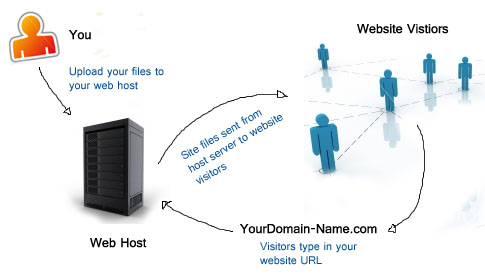
**通用知识**
* [Web Hosting Beginner Guide](http://www.webhostingsecretrevealed.net/web-hosting-beginner-guide/) [read]
* [Web Hosting For Dummies](http://www.dummies.com/store/product/Web-Hosting-For-Dummies.productCd-1118540573.html) [read][$]
* [Ultimate Guide to Web Hosting](http://www.whoishostingthis.com/resources/web-hosting/) [read]
================================================
FILE: 02-fedHandlebook-master/learning.md
================================================
###第二部分: 学习
第二部分为成为一个前端开发者提供自主学习和指导学习的资源.
注意, 仅需要学习被列举出的资源, 或者一个类别的学习记录, 因为我不建议一个前端开发人员学习所有东西, 这是非常荒谬的. 选择自己行业内的专业知识, 我会尽可能让你掌握它.
**译者补充:**
* [前端开发笔记本](https://li-xinyang.gitbooks.io/frontend-notebook/content/)
* [前端开发规范](http://zhibimo.com/read/Ashu/front-end-style-guide/)
* [适用于小团队的前端规范](https://github.com/hzlzh/Front-End-Standards)
* [无线 Web 开发浅谈](http://am-team.github.io/amg/dev-exp-doc.html#无线web开发简介)
* [如何跟上前端开发的最新前沿](https://uptodate.frontendrescue.org/zh/)
* [Engineering Blogs](https://github.com/kilimchoi/engineering-blogs)
* [大前端工具集](https://github.com/nieweidong/fetool)
* [前端收集](https://github.com/foru17/front-end-collect)
* [Front-end Dev Bookmarks](https://github.com/dypsilon/frontend-dev-bookmarks)
* [Github 资源收集](http://segmentfault.com/a/1190000003510001)
* [github上值得关注的前端项目](http://segmentfault.com/a/1190000002804472)
* [前端资源库](http://www.awesomes.cn/)
* [前端人的俱乐部](http://f2er.club/)
================================================
FILE: 02-fedHandlebook-master/practice/fd-dev-for.md
================================================
###前端开发做什么
一个前端开发者能在下面的操作系统列(又称: OS)表中之一上手写运行在Web平台(如: 浏览器)之上的 HTML, CSS 和 JS:
* Windows
* Windows Phone
* OSX
* iOS
* Android
* Ubuntu (or Linux)
* Chromium
操作系统运行在下面中的一个或者多个设备之上:
* Desktop computer
* Laptop / Netbook computer
* Mobile phone
* Tablet
* TV
* Watch
* Things (任何你能想到的, 汽车, 冰箱, 灯光, 温控器等)
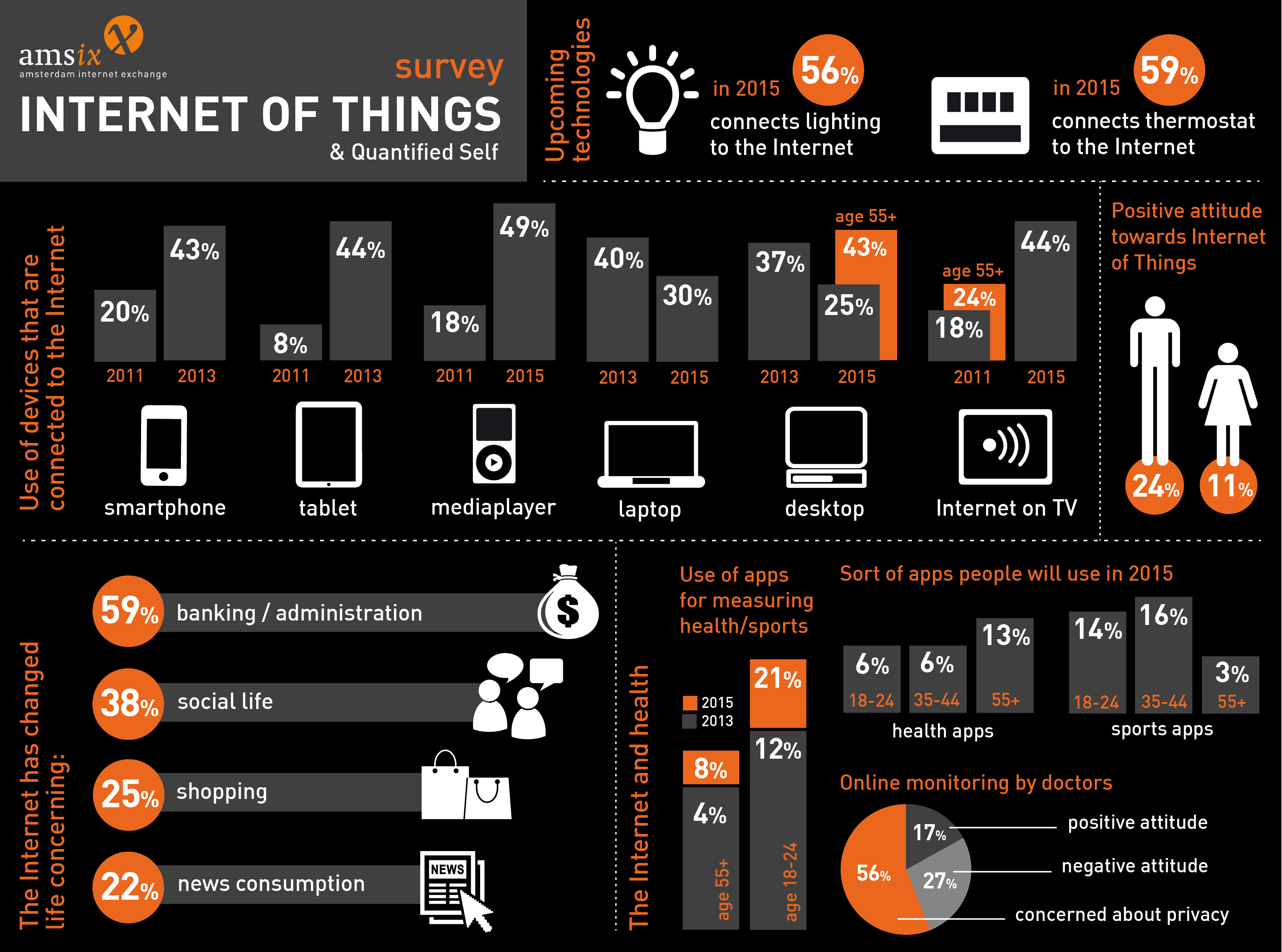
一般来说, 前端技术通过使用下列运行时场景, 能运行在前面提到的操作系统和设备之上:
* 运行在 OS 上的Web浏览器(如: [Chrome, IE, Safari, Firefox](http://outdatedbrowser.com/en))
* 运行在 OS 上并由 CLI 驱动的 [headless浏览器](https://en.wikipedia.org/wiki/Headless_browser)(如: [plantomJS](http://phantomjs.org/))
* 一个[Web视图](http://wiki.awesomium.com/general-use/introduction-to-web-views.html)/嵌入本机程序的浏览器Tab(当做 iframe)作为运行时环境, 作为与本机 API 通信的桥梁. 典型的Web视图应用包括一个由Web技术(HTML, CSS, 和 JS)构建的 UI.(如: [Apache Cordova](https://cordova.apache.org/), [NW.js](http://nwjs.io/), [Electron](http://electron.atom.io/))
* 一个由Web技术创建的本机程序会在运行时作为与本机 API 通信的桥梁, 被解释执行, UI 将使用本机的UI部分(如: IOS 本机控制)而不是Web技术控制([NativeScript](https://www.nativescript.org/), [React Native](https://facebook.github.io/react-native/)).
================================================
FILE: 02-fedHandlebook-master/practice/front-end-interview.md
================================================
###前端面试
你可能被问到的问题:
* [前端工作面试问题](http://h5bp.github.io/Front-end-Developer-Interview-Questions/)
* [前端开发面试问题](http://thatjsdude.com/interview/index.html)
* [每个 JavaScript 开发者应该知道的 10 个面试问题](https://medium.com/javascript-scene/10-interview-questions-every-javascript-developer-should-know-6fa6bdf5ad95)
* [前端测验](http://davidshariff.com/quiz/)
* [JavaScript 测验](http://davidshariff.com/js-quiz/)
你可以问的问题:
* [一个开源的开发人员可以向潜在雇主提问的问题列表](https://github.com/ChiperSoft/InterviewThis)
译者补充:
* [前端开发面试题大收集](https://github.com/paddingme/Front-end-Web-Development-Interview-Question)
* [前端开发面试问题及答案整理](https://github.com/hawx1993/Front-end-Interview-questions)
* [收集的前端面试题和答案](https://github.com/qiu-deqing/FE-interview)
* [写给前端面试者](http://www.w3cplus.com/css/write-to-front-end-developer-interview.html)
* [Awesome Interviews](https://github.com/MaximAbramchuck/awesome-interviews)
================================================
FILE: 02-fedHandlebook-master/practice/front-end-jobs-titles.md
================================================
###前端的工作职称
下面是一个前端开发者在职业发展中各种职称的描述列表. 对于前端开发者最普遍的职称是 "前端开发者" 或者 "前端工程师", 可以根据任何包含 "前端", "客户端", "web UI", "CSS", "HTML" 和 "JavaScript" 的职称推断一个人对 HTML, CSS 和 JavaScript 的了解程度.
****
**前端开发者/工程师** (又称作 Web前端开发者/工程师, 客户端开发者/工程师, 前端软件开发者/工程师 或 UI 工程师)
这是通用的职称, 用于描述一个开发者对 HTML, CSS, JavaScript 有很熟练的掌握, 并能在Web平台上应用这些技术.
****
**CSS/HTML开发者**
这个职称用于描述一个开发者精通于 CSS 和 HTML, 但是对 JavaScript 和应用不熟悉.
****
**前端JavaScript(可选, 应用程序)开发人员**
当职称中包含 "JavaScript应用程序" 时, 这就表示此开发人员是一个拥有高级编程, 软件开发和应用程序开发技能(如: 有构建前端应用程序的实践经验)的高级 JavaScript 开发者.
****
**前端Web设计师**
当职称中包含 "设计师" 时, 这就表示此设计师不仅拥有前端技能(如: HTML & CSS), 还拥有专业的设计技能(视觉设计和交互设计).
****
**Web/前端用户界面(又称 UI)开发者/工程师**
当职称中包含 "界面" 或者 "UI" 时, 这就表示此开发人员除了掌握前端技能, 还拥有交互设计技能.
****
**移动/平板前端开发者**
当职称中包含 "移动" 或者 "平板" 时, 这就表示此开发人员在开发运行在移动或平板设备上的前端应用(或本机程序, 或运行在Web平台, 例如浏览器)很有经验.
****
**前端 SEO 专家**
当职称中包含 "SEO" 时, 这就表示此开发者对一个 SEO 策略定制前端技术有着丰富的经验.
****
**前端可访问性专家**
当职称中包含 "可访问性" 时, 这就表示此开发者对定制支持可访问性要求和标准的前端技术有着丰富的经验.
****
**前端开发运维**
当职称中包含 "开发运维" 时, 这就表示此开发者对软件开发实践与合作, 集成, 部署, 自动化和测量有着丰富的经验.
****
**前端测试/QA**
当职称中包含 "测试" 或 "QA" 时, 这就表示此开发者对测试和软件管理, 包括单元测试, 功能测试, 用户测试和 A/B 测试有着丰富的经验.
****
注意, 若你在职称中碰到 "全栈" 或 类似于 "Web开发者" 一样的职位, 这些可能是雇主用来描述这个角色负责 Web/应用程序 开发的各个方面, 即包括前端和后端(还可能包括设计).
译者补充:
* [谈前端工程师的职业规划](http://www.alloyteam.com/2015/04/talk-about-the-front-end-engineering-career-planning/)
================================================
FILE: 02-fedHandlebook-master/practice/front-end-jobs.md
================================================
###前端工作版块
可以列出很多寻找技术工作的方法. 下面的有限列表是和寻找一份具体的前端工作最相关的资源:
* [frontenddeveloperjob.com](http://frontenddeveloperjob.com/)
* [authenticjobs.com](https://authenticjobs.com/#category=4)
* [weworkremotely.com](https://weworkremotely.com/)
* [jobs.github.com](https://jobs.github.com/)
* [careers.stackoverflow.com](http://careers.stackoverflow.com/jobs?searchTerm=front-end)
* [angularjobs.com](http://angularjobs.com/)
* [jobs.emberjs.com](http://jobs.emberjs.com/)
* [jobs.jsninja.com](http://jobs.jsninja.com/)
* [css-tricks.com/jobs](https://css-tricks.com/jobs/)
* [glassdoor.com](http://www.glassdoor.com/Job/front-end-developer-jobs-SRCH_KO0,19.htm?jobType=all)
译者补充:
* [w3ctech](http://www.w3ctech.com/job)
* [w3cfuns](http://www.w3cfuns.com/job.php)
* [内推网](http://www.neitui.me/)
* [拉勾网](http://www.lagou.com/)
* [前端网](http://qianduan.cc/)
* [CSDN](http://job.csdn.net/)
* [竞鹿网](https://www.nextoffer.com/)
* [100Offer](http://100offer.com/)
* [SegmentFault](http://segmentfault.com/jobs)
* [周伯通](http://www.jobtong.com/)
* [内聘网](http://www.neipin.com/)
* [博客园](http://job.cnblogs.com/)
* [V2EX](http://www.v2ex.com/)
* [简历模板](https://github.com/geekcompany/ResumeSample/blob/master/web.md)
* [面试问题1](https://github.com/Enolak/Front-end-questions-to-the-interview-stage) [面试问题2](https://github.com/qiu-deqing/FE-interview)
================================================
FILE: 02-fedHandlebook-master/practice/front-end-skills.md
================================================
###前端开发的技术栈
对于任何类型的前端开发人员, HTML, CSS, DOM, JavaScript, HTTP/URL 和浏览器利用是基本的技术要求.
对于HTML, CSS, DOM, JavaScript, HTTP/URL 和浏览器开发之外的, 一个前端开发者还应该掌握下面技术列表中的一个或多个:
* Content Management System (内容管理系统, 又称 CMS)
* Node.js
* Cross-browser testing (跨浏览器测试)
* Cross-platform testing (跨平台测试)
* Unit Testing (单元测试)
* Cross-device testing (跨设备测试)
* Accessibility / WAI-ARIA (无障碍访问/无障碍富Internet应用程序)
* Search Engine Optimization (搜索引擎优化, 又称 SEO)
* Interaction or User Interface design (交互或用户设计)
* User Experience (用户体验)
* Usability (可用性/易用性)
* E-commerce Systems (电子商务系统)
* Portal Systems (门户系统)
* Wireframing (框架)
* CSS layout / Grids (CSS 布局/栅格系统)
* DOM manipulation (e.g. jQuery) (DOM 操作)
* Mobile Web Performance (移动Web性能)
* Load Testing (载荷测试)
* Performance Testing (性能测试)
* Progressive Enhancement / Graceful Degradation (渐进增强/优雅降级)
* Version Control (e.g. GIT) (版本控制)
* MVC / MVVM / MV* (MV* 框架)
* Functional Programming (函数式编程)
* Data Formats (e.g. JSON, XML) (数据格式)
* Data API's (e.g Restful API) (数据API)
* Web Font Embedding (Web字体嵌入)
* Scalable Vector Graphics (可伸缩向量图形, 又称 SVG)
* Regular Expressions (正则表达式)
* Content Strategy (内容策略)
* Microdata / Microformats (微数据/微格式)
* Task Runners, Build Tools, Process Automation Tools (任务管道, 构建工具, 过程自动化工具)
* Responsive Web Design (响应式设计)
* Object Oriented Programming (面向对象编程)
* Application Architecture (应用架构)
* Modules (模块)
* Dependency Managers (依赖关系管理)
* Package Managers (包管理)
* JavaScript Animation (JavaScript 动画)
* CSS Animation (CSS 动画)
* Charts / Graphs (图表/图形)
* UI widgets (UI工具集)
* Code Quality Testing (代码质量测试)
* Code Coverage Testing (代码覆盖测试)
* Code Complexity Analysis (代码复杂度测试)
* Integration Testing (集成测试)
* Command Line / CLI (命令行/命令行界面)
* Templating Strategies (模板策略)
* Templating Engines (模板引擎)
* Single Page Applications (单页应用)
* XHR Requests (aka AJAX) (XHR 请求, 又称 AJAX)
* Web/Browser Security (Web/浏览器安全)
* HTML Semantics (HTML 语义化)
* Browser Developer Tools (浏览器开发者工具)
译者补充:
* [前端技能汇总](https://github.com/JacksonTian/fks)
* [WebFrontEndStack](https://github.com/unruledboy/WebFrontEndStack)
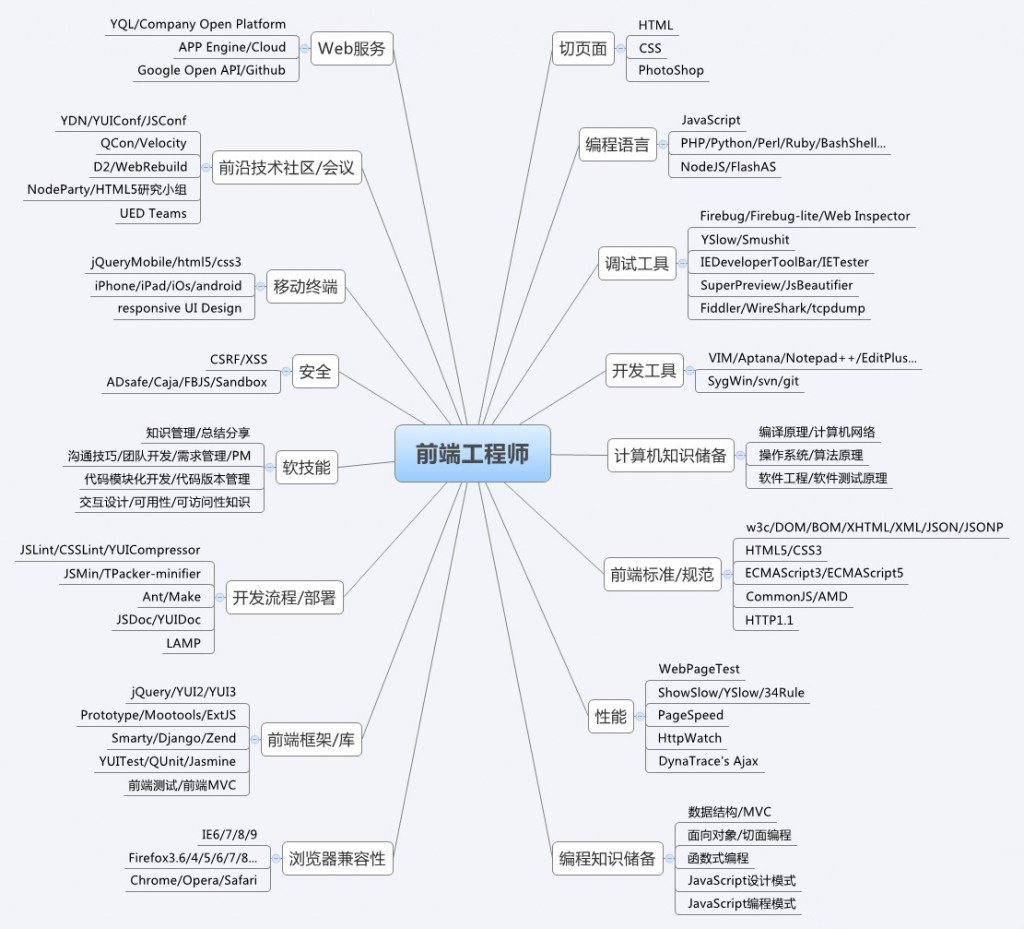
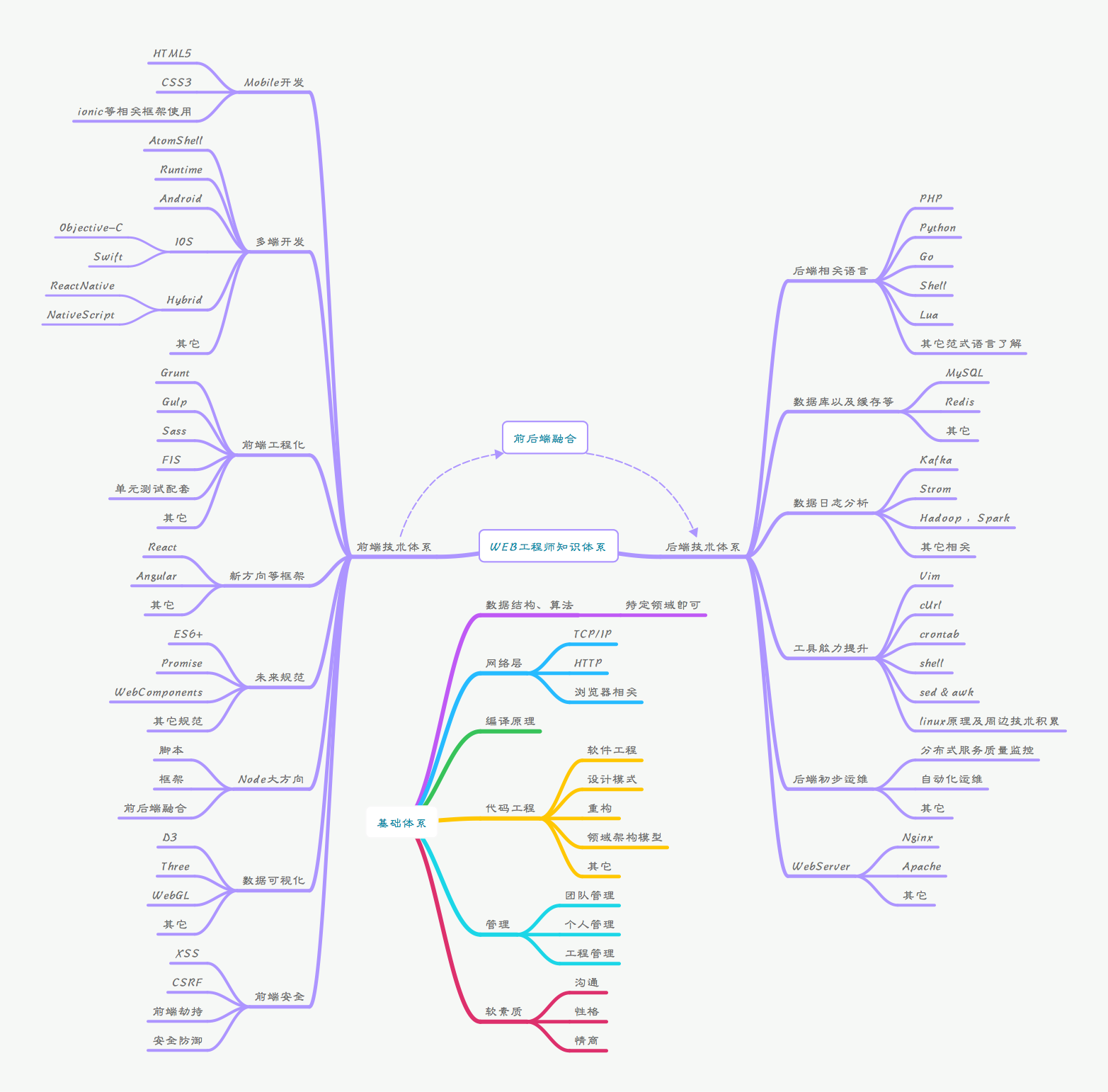
================================================
FILE: 02-fedHandlebook-master/practice/front-end-team-role.md
================================================
###团队中的前端
在一个设计和开发 Web网站, Web应用, 或者基于Web技术的本机应用的团队, 前端开发者是典型的只有一个人. (注意: 构建一切的开发者曾经被称为"Web网管", 但这些罕见的和神秘的开发人员现在被称为"全栈开发者").
一个构建专业的Web网站或软件的最小化团队也应该包含下列角色:
* 视觉设计 (字体, 颜色, 字距, 视觉概念&主题)
* UI/交互设计/信息架构师 (制定框架, 指定所有用户交互, UI功能和结构信息)
* 前端开发者 (写能够在客户端/设备上运行的代码)
* 后端开发者 (写能够在服务端运行的代码)
这些角色是根据技能的覆盖排序的(后面的角色的技能会覆盖前面的). 一个前端开发者很擅长处理 UI/交互设计, 后端开发者也一样. 团队成员承担多个角色是很少见的.
一个大的团队可能包含下列角色, 而不是如上面所展示的:
* 视觉设计
* UI/交互设计/信息架构师
* **SEO 策略师**
* 前端开发者
* **开发-运维工程师**
* 后端开发者
* **API 开发者**
* **数据库管理员**
* **QA 工程师/测试人员**
================================================
FILE: 02-fedHandlebook-master/practice/full-stack.md
================================================
###全才神话

这是个需要设计和开发一个web解决方案的角色, 不仅需要有很深厚的技术栈, 而且需要在视觉设计, UI/交互设计, 前端开发和后端开发有大量的经验. 任何可以以一个专业的水平承担这 4 个角色中的一个或多个的人(又称全才或全栈开发者)是很少的.
务实一点, 你应该寻求, 或者雇佣一个在其中一个角色堪称专家的人. 那些声称在一个或多个角色上是专家的人是非常罕见的,
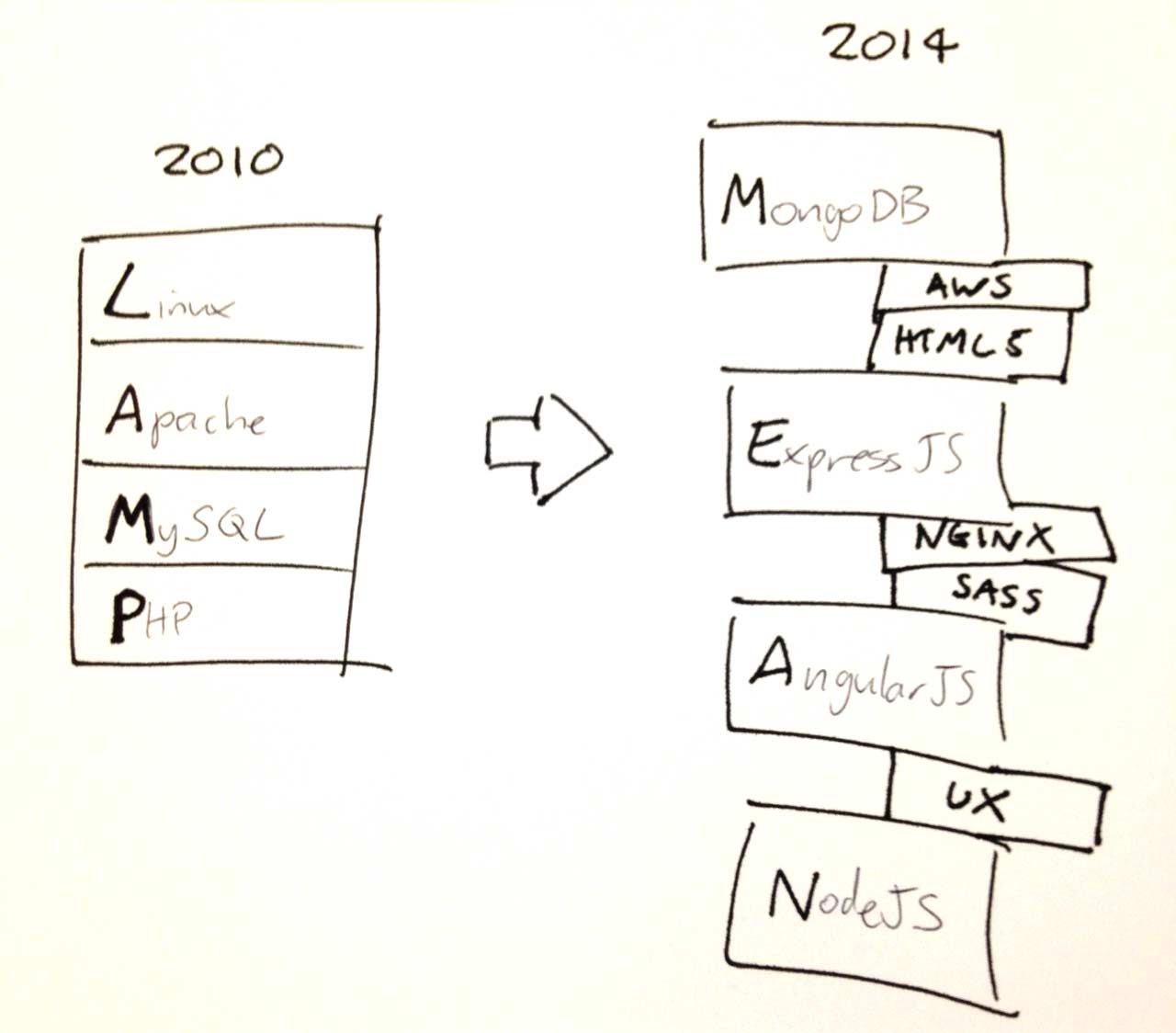
================================================
FILE: 02-fedHandlebook-master/practice/making-fd.md
================================================
###如何成为前端开发者?

那么, 怎么才能成为一个前端开发者呢? 这个问题很复杂, 因为直到现在, 你也不能去一所大学获得前端工程师的学位, 并且我也很少听说
或者遇见通过编写专业地 HTML, CSS 和 JavaScript 来获得一个无用的计算机科学学位或平面设计学位. 事实上, 现在的大部分前端
开发者都是通过自学成为开发者和没有经过传统训练的程序员. 为什么会是这种情况呢?
前端开发人员不是一个视觉设计师或一个交互设计师, 设计学校不是磨练前端技能的地方; 前端开发者也不是一个受过传统教育地计算机科
学研究生, 传统教育并不专注于让一个人为前端开发做准备. 实际上, 在美国的高等教育系统中(例如大学), 紧跟传统教学方式可能会阻碍
一个人置身实践, 而前端开发最需要实际经验. 在今天, 如果你想成为一个前端开发者, 你可以自学或者参加一些不被认可的项目, 课程,
训练营和班级.
前端工程师会精巧地创建用户界面依赖的骨架. 有时, 他们要足够关注交互设计, 因为他们会编写 UI 交互的底层代码. 因此, 现在的许多
实践是前端工程师使用编程技巧达不到的, 但是, 从另一个方面来说, 和其它类型程序员转前端开发相比, 似乎有更多的设计师转前端开发者.
当然, 由于 JavaScript 已经成熟, 更多的受过传统教育的程序员愿意将他们的知识带到前端实践中. 你可能没有意识到前端开发人员并不
总是被认为是"真正的"程序员, 但是, 时代正待正在改变.
正如所有人说的那样, 我相信作为前端开发人员, 职业生涯道路是一个未知的过程. 我能说的是, 要成为一名前端工程师, 就必须知道和在一
个高层次的水平上使用 HTML, CSS 和 JavaScript, 也不会忽略交互设计或者传统编程所应该知道的技能. 实际上, 从我的经验来看, 最
好的前端开发者通常会掌握交互设计和基于 Web 平台(例如浏览器, HTML, CSS, DOM 和 JavaScript)的编程. 不管出于什么原因, 还有
很多关于前端开发的知识往往没被发现, 也就是说, 前端工程更像一些由自学的人组成的实践, 而不是一个直接对应有组织和认可的高等教育的教
学重心的领域.
如果我从现在开始决定成为一名前端开发人员, 我会努力按照下面所概括的过程进行学习. 学习过程中, 我会假设你是自己最好的老师.
1. 粗略了解 Web 是怎么工作的, 确保你知道域名, DNS, URL, HTTP, 网络, 浏览器, 服务器/服务托管, 数据库, JSON, API, HTML, CSS
DOM 和 JavaScript. 了解这些的目的是确保你知道它们如何一起工作以及每部分用于做什么. 专注于高水平的前端架构概述. 从简单的网页
制作开始, 并简单学习一下 [本机 Web 应用(又称 SPA)](https://blog.andyet.com/2015/01/22/native-web-apps).
2. 学习 HTML, CSS, 可访问性和 SEO.
3. 学习 UI 设计模式的基本原理, 交互设计, 用户体验设计和可用性
4. 学习编程的基本原理
5. 学习 JavaScript
6. 学习 JSON 和 API
7. 学习 CLI/命令行
8. 学习软件工程实践(如: 应用设计/架构, 模板, Git, 测试, 监控, 自动化, 代码质量, 开发方法学)
9. 定制自己的工具箱
10. 学习 Node.js
当前端的 HTML/CSS 开发者和前端应用/JavaScript 开发者分离时, 你就快要结束这个学习过程.
关于学习的一个简短建议: 在学习抽象的技术之前, 先学习实际的底层技术. 先学 DOM, 再学 JQuery; 先学 CSS, 再学 SASS; 先学 HTML, 再学 HAML;
先学 JavaScript, 再学 coffeeScript; 先学 ES6 模板字符串, 再学 Handlebars; 先学 UI 模式, 再学 Bootstrap. 当你开始学习时, 你应该会
害怕事情隐藏的复杂性. Abstracts in the wrong hands can give the appearance of advanced skills, while all the time hiding
the fact that a developer has an inferior understanding of the basics or underlying concepts.
正如我之前所建议的学习过程, 这本书的剩下部分为读者指明学习资源和工具. 这也假设你不仅要学习, 而且会将你所学到的知识和工具用于实践.一些人认为只
实践, 而其他人则建议只学习, 我建议你结合二者, 找到适合自己的方式, 但是一定要结合学习和实践! 因而不仅要阅读这本书, 而且要实践. 学习, 实践, 学习,
实践. 重复执行是因为事情变化太快, 这就是为什么学习技术的基本原理, 而不是抽象的技术是如此重要.
我在前文已经提到, 现在涌现出很多的非认证的前端编码教育/训练营, 这些成为前端开发者的途径也是由老师在课室(虚拟和实体)指导的课程, 遵循了从官方体系
(如: 教学大纲, 测验, 小测试, 项目, 团队项目, 成绩等)学习的传统风格, 我在这本书的学习指导部分提到了更多关于这方面的东西. 简单地说, Web 上有
一切你需要学习的东西(几乎没有成本), 然后, 如果你需要有人告诉你如何获取真正免费的东西, 并且对你的学习负责, 你可以考虑一个有组织的课程. 关于其他方面,
我不知道其他任何职业可以通过互联网连接和对知识的强烈愿望来免费获取要学习的东西.
如果你要马上开始学习, 我建议你看看下面一些关于前端开发实践的概述:
* [前端指南](https://github.com/bendc/frontend-guidelines) [read]
* [成为 Web 开发者](http://www.yellowshoe.com.au/standards) [read]
* [Isobar 前端代码标准](http://isobar-idev.github.io/code-standards/) [read]
* [Web 基本原理](https://developers.google.com/web/fundamentals) [read]
* [前端课程](https://gist.github.com/stevekinney/03027e71aac341af14a2) [read]
* [freeCodeCamp](http://freecodecamp.com/) [interact]
* [Planing a Front-end JS Application](https://www.youtube.com/watch?v=q4zEGkjTBFA) [watch]
* [So, You Want to be a Front-end Engineer](https://www.youtube.com/watch?v=Lsg84NtJbmI) [watch]
* [Front End Web Development Career Kickstart](http://www.pluralsight.com/courses/front-end-web-development-career-kickstart) [watch][$]
* [前端 Web 开发入门](http://www.pluralsight.com/courses/front-end-web-development-get-started) [watch][$]
* [Front-End Web Development Quick Start With HTML5, CSS, and JavaScript](http://www.pluralsight.com/courses/front-end-web-app-html5-javascript-css) [watch][$]
* [Web 开发介绍](https://frontendmasters.com/courses/web-development/) [watch][$]
* [前端 Web 开发基本原理](https://www.udemy.com/foundations-of-front-end-development/) [watch][$]
* [Lean Front-End Engineering](https://frontendmasters.com/courses/lean-front-end-engineering/) [watch][$]
* [A Baseline for Front-End [JS] Developers: 2015](http://rmurphey.com/blog/2015/03/23/a-baseline-for-front-end-developers-2015/) [read]
* [了解前端 Web 开发](https://teamtreehouse.com/tracks/front-end-web-development) [watch][$]
* [前端开发精通](https://mijingo.com/products/bundles/front-end-dev-mastery/) [watch][$]
* [没有学位的前端 Web 开发者](https://www.udacity.com/course/front-end-web-developer-nanodegree--nd001) [watch][$]
**译者补充:**
* [成为一名优秀的Web前端开发者](http://www.92fenxiang.com/140.html)
* [What makes a good front end engineer?](http://www.92fenxiang.com/112.html)
* [How to become a web developer](https://medium.com/@souporserious/how-to-become-a-web-developer-ba26b0d23d81)
================================================
FILE: 02-fedHandlebook-master/practice/salaries.md
================================================
###前端薪资
在美国, 前端开发者的平均薪资是 [$75K](http://www.glassdoor.com/Salaries/front-end-web-developer-salary-SRCH_KO0,23.htm)
一个有经验的前端开发者可以去任何想去的地方生活(远程工作), 并且一年能赚的钱超过 $150k(访问 [angel.co](https://angel.co/jobs), 注册, 查找超过 $150k 的前端工作).
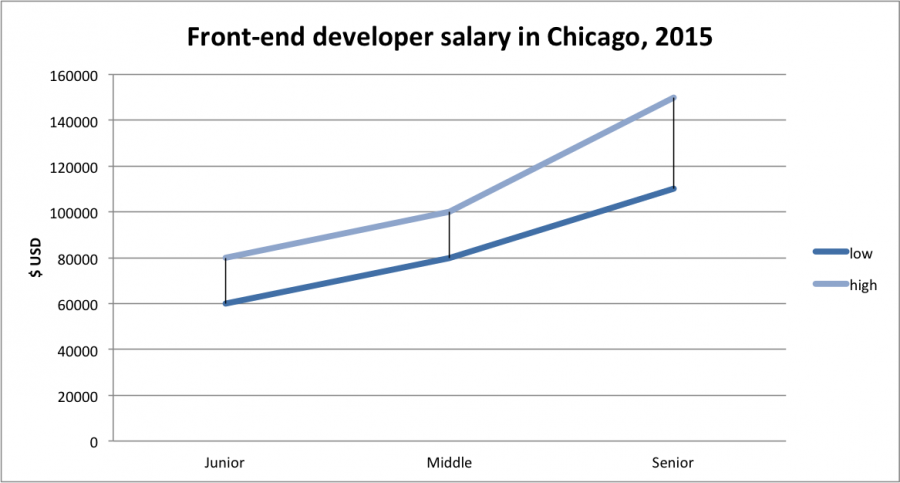
================================================
FILE: 02-fedHandlebook-master/practice/tech-employed-by-fd.md
================================================
###前端开发者常用的网络技术

前端开发者常用的网络技术如下:
* Hyper Text Markup Language(超文本标记语言, 又称 HTML)
* Cascading Style Sheets (层叠式样式表, 又称 CSS)
* Document Object Model (文档对象模型, 又称 DOM)
* JavaScript Programming Language (JavaScript编程语言, 又称: ECMAScript 6, ES6, JavaScript 2015)
* Web API's (Web应用程序接口, 又称 HTML5 API 或浏览器 API)
* Hypertext Transfer Protocol (超文本传输协议, 又称 HTTP)
* Uniform Resource Locator's (统一资源定位符, 又称 URL)
* JavaScript Object Notation (JavaScript对象表示, 又称 JSON)
* Web Content Accessibility Guidelines (网页内容无障碍设计指南, 又称 WCAG) & Accessible Rich Internet Applications (富Internet应用程序的无障碍设计, 又称 ARIA)
根据相关的文档和规范, 这些技术定义如下. 作为一个比较, 你可以在 [platform.html5.org](https://platform.html5.org/) 上看到所有与Web相关的规范.
**Hyper Text Markup Language(超文本标记语言, 又称 HTML)**
>超文本标记语言, 通常被称为 HTML, 是被用于创建网页的标准标记语言. Web浏览器能将 HTML 文件渲染成可见的或者可听到的. HTML 随着线索提示, 语义化地描述了网站的结构, 使它成为一种标记语言, 而不是编程语言. - wikipedia.org
更多相关的文档/规范:
* [W3C HTML5 规范](http://www.w3.org/TR/html5/) : HTML5 是WWW核心语言的主要修订
* [HTML 元素在线标准](https://html.spec.whatwg.org/multipage/semantics.html#semantics)
* [HTML 在线语法](https://html.spec.whatwg.org/multipage/syntax.html#syntax)
* [所有 W3C HTML 规范](http://www.w3.org/standards/techs/html#w3c_all)
* [HTML 元素参考](https://developer.mozilla.org/en-US/docs/Web/HTML/Element)
* [HTML 属性参考](https://developer.mozilla.org/en-US/docs/Web/HTML/Attributes)
* [全局属性](https://developer.mozilla.org/en-US/docs/Web/HTML/Global_attributes)
**Cascading Style Sheets (层叠式样式表, 又称 CSS)**
>层叠式样式表(CSS)是用于描述外观和格式化标记语言编写的文档的样式表语言. 尽管经常被用来改变用 HTML 和 XHTML 编写的网页和用户界面的样式, 但也可用于任何 XML 文档, 包括纯 XML, SVG 和 XUL. 跟 JavaScript 和 HTML 一样, CSS是被大多数网站用于为Web应用程序创建富有吸引力的网页, 用户界面的一种基础技术, 也为许多移动应用程序创建用户界面. - wikipedia.org
更多相关的文档/规范:
* [CSS 2.2规范](https://drafts.csswg.org/css2/)
* [CSS 3选择器](http://www.w3.org/TR/css3-selectors/)
* [所有 W3C CSS 规范](http://www.w3.org/Style/CSS/current-work#roadmap)
* [CSS 参考](https://developer.mozilla.org/en-US/docs/Web/CSS/Reference)
**Document Object Model (文档对象模型, 又称 DOM)**
>文档对象模型用于代表和对象交互的HTML, XHTML 和 XML 文档, 是一种跨平台和语言无关性的约定. 每一份文档的所有节点被组织成一种树结构, 称为 DOM 树. DOM 对象通过使用对象上的方法被处理和操作, 一个 DOM 对象的公共接口被指定为它的应用程序编程接口(API). - wikipedia.org
更多相关的文档/规范:
* [W3C DOM4](http://www.w3.org/TR/2014/WD-dom-20140204/)
* [DOM 在线标准](https://dom.spec.whatwg.org/)
* [DOM 3 事件规范](http://www.w3.org/TR/2013/WD-DOM-Level-3-Events-20131105/)
**JavaScript Programming Language (JavaScript编程语言, 又称: ECMAScript 6, ES6, JavaScript 2015)**
>JavaScript 是一种高级的, 动态的, 无类型的和解释型的编程语言, 它已经在 ECMAScript 语言规范中被标准化. 跟 HTML 和 CSS 一样, JavaScript 是 WWW 内容生成的第三种必不可少的技术; 大多数的网会使用Javascript, 并且 Javascript 被所有现在Web浏览器支持. JavaScript 基于原型和函数优先的特点, 使它成为多范型的语言, 支持面向对象的, 命令式的, 和函数式编程风格. JavaScript 能提供 API 来处理文本, 数组, 日期和正则表达式, 但不包括任何 I/O, 如网络, 存储或图形工具, 对这些的依赖取决于宿主环境中嵌入了什么. - wikipedia.org
更多相关的文档/规范:
* [ECMAScript 2015 语言规范](http://www.ecma-international.org/ecma-262/6.0/)
**Web API's (Web应用程序接口, 又称 HTML5 API)**
>当使用 JavaScript 为Web程序写代码时, 有很多不错的 API 是可以利用的. 下面列举了所有在Web APP 或网站开发中可能会用到的接口. - Mozilla
更多相关文档:
* [Web API 接口](https://developer.mozilla.org/en-US/docs/Web/API)
**Hypertext Transfer Protocol (超文本传输协议, 又称 HTTP)**
>超文本传输协议是一个用于分布式, 协作和超媒体信息系统的应用协议, 是 WWW 数据通信的基础. - wikipedia.org
更多相关规范:
* [Hypertext Transfer Protocol -- HTTP/1.1](https://tools.ietf.org/html/rfc2616)
* [Hypertext Transfer Protocol version 2 draft-ietf-httpbis-http2-16](https://tools.ietf.org/html/draft-ietf-httpbis-http2-16)
**Uniform Resource Locator's (统一资源定位符, 又称 URL)**
>一个 URL (也称Web地址)是一个资源引用, 指定了资源在计算机网络和检索机制中的位置. 与之类似的概念是 Uniform Resource Identifier(URI), 尽管许多人认为两个术语可以互换使用, 但 URL 是统一资源标识符( URI )[3] 的具体类型. 一个 URL 意味着一种访问资源量的方式, 但这并不适用于 URI.
[4][5]URL 不仅常用于引用一个网页(http), 也可用于文件传输(ftp), 邮件(mailto), 数据库访问(JDBC) 和许多其它应用. - wikipedia.org
更多相关规范:
* [URL](http://www.w3.org/Addressing/URL/url-spec.txt)
* [URL 在线标准](https://url.spec.whatwg.org/)
**JavaScript Object Notation (JavaScript对象表示, 又称 JSON)**
>JSON, 有时也称 JavaScript 对象表示, 是一种使用人类可读的文本传输由键值对组成的数据对象的开放格式. 对于异步浏览器/服务器通信(AJAJ), JSON 是主要的数据格式, 很大程度上代替了 XML(AJAX). 尽管最初是从 JavaScript 脚本语言衍生而来, 但是 JSON 是语言无关性的数据格式, 在许多编程语言中, 代码解析和生成 JSON 是很容易的. JSON 的格式最初是由 Douglas Crockford 指定的, 但目前却被描述成两种标准: RFC 7159 和 ECMA-404. ECMA 标准只允许被合法的语法语句描述, 而 RFC 则提供了一些语义化描述和安全考虑. JSON 的官方网络媒体类型 application / JSON, 扩展名是 .json. - wikipedia.org
更多相关规范:
* [JSON 介绍](http://json.org/)
* [JSON 数据交换格式](http://www.ecma-international.org/publications/files/ECMA-ST/ECMA-404.pdf)
* [JSON API](http://jsonapi.org/)
**Web Content Accessibility Guidelines (网页内容无障碍设计指南, 又称 WCAG) & Accessible Rich Internet Applications (富Internet应用程序的无障碍设计, 又称 ARIA)**
>无障碍设计是指产品, 设备, 服务, 或者环境是为残疾人设计的. 无障碍设计的概念意味着与一个人的辅助技术(例如, 电脑屏幕阅读器)相兼容, 确保直接访问(即独立)和"间接访问". - wikipedia.org
* [无障碍设计网络倡议 (WAI)](http://www.w3.org/WAI/)
* [网页内容无障碍设计指南 (WCAG) 的目前状态](http://www.w3.org/standards/techs/wcag#w3c_all)
* [富 Internet 应用程序的无障碍设计 (WAI-ARIA) 的目前状态](http://www.w3.org/standards/techs/aria#w3c_all)
**译者补充:**
* [Web 端开发常用资源](https://github.com/lyfeyaj/awesome-resources#web-%E5%89%8D%E7%AB%AF)
* [Web 前端开发资源](http://hao.jobbole.com/?catid=67)
================================================
FILE: 02-fedHandlebook-master/practice.md
================================================
###第一部分:前端开发实践
第一部分会大致描述前端工程的实践
================================================
FILE: 02-fedHandlebook-master/styles/ebook.css
================================================
cite{
margin-top: -30px;
font-size:10px;
text-align: center;
color: #666;
}
================================================
FILE: 02-fedHandlebook-master/styles/website.css
================================================
cite{
margin-top: -30px;
font-size:10px;
text-align: center;
color: #666;
}
================================================
FILE: 02-fedHandlebook-master/tools/animation.md
================================================
###动画工具
* [Velocity.js](http://julian.com/research/velocity/)
* [snabbt.js](http://daniel-lundin.github.io/snabbt.js/)
* [TweenJS](https://github.com/CreateJS/TweenJS)
* [Dynamics.js](https://github.com/michaelvillar/dynamics.js)
* [GreenSock-JS](https://github.com/greensock/GreenSock-JS)
**Polyfills/shims:**
* [web-animations-js](https://github.com/web-animations/web-animations-js)
================================================
FILE: 02-fedHandlebook-master/tools/app.md
================================================
###APP(桌面, 移动, 平板等) 工具
**前端 App 框架:**
* [AngularJS](https://angularjs.org/) & [Batarang](https://github.com/angular/angularjs-batarang)
* [Backbone](http://backbonejs.org/) & [Marionette](http://marionettejs.com/)
* [React](http://facebook.github.io/react/) & [React-router](https://github.com/rackt/react-router) & [Flux](http://facebook.github.io/flux/) & [React Developer Tools](https://chrome.google.com/webstore/detail/react-developer-tools/fmkadmapgofadopljbjfkapdkoienihi)
* [Vue.js](http://vuejs.org/) & [vue-loader](https://github.com/vuejs/vue-loader) & [vue-router](https://github.com/vuejs/vue-router)
* [Ember](http://emberjs.com/) & [Ember Inspector](https://chrome.google.com/webstore/detail/ember-inspector/bmdblncegkenkacieihfhpjfppoconhi?hl=en)
* [Aurelia](http://aurelia.io/)
* [Polymer](https://www.polymer-project.org/1.0/) & [Iron Elements](https://elements.polymer-project.org/browse?package=iron-elements) & [Paper Elements](https://elements.polymer-project.org/browse?package=paper-elements)
**全栈 JS App 平台:**
* [Meteor](https://www.meteor.com/)
* [Hood.ie](http://hood.ie/intro/)
* [MEAN](http://meanjs.org/)
**移动 Web UI/网站/App 框架:**
这些解决方案可以被用到任何地方, 包括 Web 视图(Web 平台和浏览器引擎等) APP.
* [Ratchet](http://goratchet.com/getting-started/)
* [Kendo UI Mobile](http://demos.telerik.com/kendo-ui/m/index)
* [Mobile Angular UI](http://mobileangularui.com/)
* [Framework7](http://www.idangero.us/framework7)
**本机混合移动 webview 框架:**
典型解决方案是使用 [Cordova](https://cordova.apache.org/), [crosswalk](https://crosswalk-project.org/), 或者自定义 Webview 作为本机 API 的桥梁.
* [ionic](http://ionicframework.com/)
* [onsen.io](http://onsen.io/)
**本机混合移动开发 webview 环境/平台/工具:**
典型解决方案是使用 [Cordova](https://cordova.apache.org/), [crosswalk](https://crosswalk-project.org/), 或者自定义 Webview 作为本机 API 的桥梁.
* [AppBuilder](http://www.telerik.com/appbuilder) [$]
* [Monaca](https://monaca.io/) [$]
* [Adobe PhoneGap](http://phonegap.com/) [$]
* [kony](http://www.kony.com/products/mobility-platform) [$]
* [ionic hub](http://ionic.io/) [free to $]
* [Taco](http://taco.tools/)
* [manifoldJS](http://manifoldjs.com/)
* [cacoon](https://cocoon.io) [free to $]
**本机桌面 webview 应用框架:**
* [NW.js](https://github.com/nwjs/nw.js)
* [Electron](http://electron.atom.io/)
**本机移动应用框架 (又称 JavaScript 本机应用)**
解决方案不使用浏览器引擎或 Webview, 而是利用 JS 引擎作为运行环境去编译 JavaScript, 并能调用本机的 API. UI 则使用本机的 UI 组件进行构造.
* [NativeScript](https://www.nativescript.org/)
* [React Native](https://facebook.github.io/react-native/)
* [tabris.js](https://tabrisjs.com/) [free to $]
* [trigger.io](https://trigger.io/how-it-works/) [$]
**参考:**
* [todomvc.com](http://todomvc.com/)
**App seeds/starters/boilerplates:**
* [React Starter Kit](http://www.reactstarterkit.com/)
* [Ember starter-kit](https://github.com/emberjs/starter-kit)
* [NG^-starter](https://github.com/angular-class/NG6-starter)
* [Angular 2 Webpack Starter](http://angularclass.com/angular2-webpack-starter/)
* [hjs-webpack](https://github.com/henrikjoreteg/hjs-webpack#developing-on-multiple-devices-at-once)
================================================
FILE: 02-fedHandlebook-master/tools/bass.md
================================================
###前端开发者的后端服务工具(又称 BASS: Back-end as a service)
**数据/后端服务管理:**
* [Firebase](https://www.firebase.com/index.html) [free to $]
* [Parse](https://www.parse.com/) [free to $]
* [kinvey](http://www.kinvey.com/) [free to $]
* [Back&](https://www.backand.com/) [free to $]
* [Pusher](https://pusher.com/)
**用户服务管理:**
* [UserApp](https://www.userapp.io/) [free to $]
* [hull](http://www.hull.io/) [$]
* [auth0](https://auth0.com) [$]
================================================
FILE: 02-fedHandlebook-master/tools/browser.md
================================================
###浏览工具
**JS 浏览工具:**
* [URI.js](http://medialize.github.io/URI.js/)
* [platform.js](https://github.com/bestiejs/platform.js)
* [history.js](https://github.com/browserstate/history.js)
* [html2canvas](https://github.com/niklasvh/html2canvas)
**参考工具(查看浏览器是否支持某特性)**
* [caniusee.com](http://caniuse.com/)
* [HTML5 Please](http://html5please.com/)
* [HTML5 test](https://html5test.com/)
* [Browserscope](http://www.browserscope.org/)
* [webbrowsercompatibility.com](http://www.webbrowsercompatibility.com)
* [iwanttouse.com/](http://www.iwanttouse.com/)
* [Platform status](https://dev.modern.ie/platform/status/)
* [Browser support for broken/missing images](http://codepen.io/bartveneman/full/qzCte/)
* [Big JS-Compatibility-Table](http://compatibility.shwups-cms.ch/en/home)
* [jscc.info](http://jscc.info/)
* [What Web Can Do Today](https://whatwebcando.today/)
**浏览器开发/调试工具:**
* [Opera Dragonfly](http://www.opera.com/dragonfly/)
* [Safari Web Inspector](https://developer.apple.com/safari/tools/)
* [Firefox Developer Tools](https://developer.mozilla.org/en-US/docs/Tools)
* [Chrome Developer Tools(aka DevTools)](https://developers.google.com/web/tools/?hl=en)
* [Per-Panel Documentation](https://developers.google.com/web/tools/chrome-devtools/#docs)
* [Command Line API Reference](https://developers.google.com/web/tools/javascript/command-line/command-line-reference?hl=en)
* [Keyboard & UI Shortcuts Reference](https://developers.google.com/web/tools/iterate/inspect-styles/shortcuts)
* [Settings](https://developer.chrome.com/devtools/docs/settings)
* [IE Developer tools(aka F12)](https://dev.modern.ie/platform/documentation/f12-devtools-guide/)
* [vorlon.js](http://vorlonjs.com/)
**同步浏览工具:**
* [Browsersync](http://www.browsersync.io/)
**浏览器编码工具(判断用户的浏览器是否支持某特性):**
* [Modernizr](https://modernizr.com/)
* [ES Feature Tests](https://featuretests.io/)
**浏览器的各种 polyfills/shims:**
* [webcomponents.js](https://github.com/WebComponents/webcomponentsjs)
* [webshim](https://afarkas.github.io/webshim/demos/)
* [HTML5 Cross Browser Polyfills](https://github.com/Modernizr/Modernizr/wiki/HTML5-Cross-browser-Polyfills)
* [console-polyfill](https://github.com/paulmillr/console-polyfill)
* [socket.io](http://socket.io/)
* [sockjs](https://github.com/sockjs/sockjs-client)
**浏览器承载测试/自动化:**
* [browserstack](https://www.browserstack.com) [$]
* [browserling](https://www.browserling.com/)[$]
* [Sauce labs](https://saucelabs.com/) [$]
* [Selenium](http://www.seleniumhq.org/)
* [CrossBrowserTesting.com](http://crossbrowsertesting.com/)
**无壳浏览器:**
* [PhantomJS](http://phantomjs.org/)
* [slimerjd](http://slimerjs.org/)
* [TrifleJS](http://triflejs.org/)
**无壳浏览器的自动化工具:**
* [nightwatchjs](http://nightwatchjs.org/)
* [casperJS](http://casperjs.org/)
* [Nightmare](https://github.com/segmentio/nightmare)
* [gremlins.js](https://github.com/marmelab/gremlins.js)
**浏览器 hacks:**
* [browserhacks.com](http://browserhacks.com/)
================================================
FILE: 02-fedHandlebook-master/tools/browserdocs.md
================================================
###DOC/API 浏览工具
用于浏览开发者文档和 API 文档的工具.
* [devdocs.io](http://devdocs.io/)
* [Dash](https://kapeli.com/dash) [OS X, iOS][$]
* [Velocity](https://velocity.silverlakesoftware.com/) [Windows][$]
* [Zeal](https://zealdocs.org/) [Windows, Linux]
================================================
FILE: 02-fedHandlebook-master/tools/charts.md
================================================
###数据可视化工具
**JS 库:**
* [d3](http://d3js.org/)
* [sigmajs](http://sigmajs.org/)
**部件 & 组件:</h5>
* [Chart.js](http://www.chartjs.org/)
* [C3.js](http://c3js.org/)
* [Google Charts](https://developers.google.com/chart/interactive/docs/)
* [chartist-jsj](https://github.com/gionkunz/chartist-js)
* [amCharts](http://www.amcharts.com/) [$]
* [Highcharts](http://www.highcharts.com/) [Non-commercial free to $]
* [FusionCharts](http://www.fusioncharts.com/) [$]
* [ZingChart](http://www.zingchart.com/) [free to $]
* [Epoch](https://github.com/epochjs/epoch)
**服务:**
* [Datawrapper](https://datawrapper.de/)
* [infogr.am](https://infogr.am) [free to $]
* [plotly](https://plot.ly/) [free to $]
* [ChartBlocks](http://www.chartblocks.com/) [free to $]
================================================
FILE: 02-fedHandlebook-master/tools/cms.md
================================================
###内容管理托管/API工具
**API CMS 工具:**
* [prismic.io](https://prismic.io/) [free to $]
* [contentful](https://www.contentful.com/) [$]
* [Cosmic JS](https://cosmicjs.com/) [free to $]
**Hosted CMS tools:**
* [LightCMS](https://www.lightcms.com) [$]
* [Surreal CMS](http://www.surrealcms.com/) [$]
* [Page Lime](http://www.pagelime.com/) [$]
* [Cushy CMS](https://www.cushycms.com) [free to $]
**Static CMS tools:**
* [webhook.com](http://www.webhook.com/)
================================================
FILE: 02-fedHandlebook-master/tools/code-editor.md
================================================
###了解代码编辑器
>源代码编辑器是一个文本编辑程序, 专门为编辑计算机程序源代码的程序员而设计的, 它可能是一个独立的应用程序或内置在集成开发环境(IDE)或web浏览器中. 源代码编辑器是最基本的编程工具, ,作为程序员的基本工作就是编写和编辑源代码. - Wikipedia
前端代码可以被一个简单的文本编辑应用程序(如: Notepad 或 TextEdit), 但是, 大多数前端人员使用专门为一种编程语言而设计的代码编辑器编辑.
可以这么说, 代码编辑器有各种各样的类型和大小. 选择一个编辑器是主观行为。选择一个, 学习它的使用,然后继续学习 HTML, CSS 和 JavasCript DOM.
但是, 我一直相信, 编辑器应该有如下特点:
* 一份不错的关于如何使用编辑器的文档
* 报告 HTML, CSS 和 JavaScript 代码的质量
* 为 HTML, CSS 和 JavaScript 提供语法高亮
* 为 HTML, CSS 和 JavaScript 提供代码自动完成
* 通过插件的方式自定义编辑器架构
* 有大量的第三方仓库/插件社区, 能够用于自定义编辑器
* 轻量, 简单, 不耦合代码(不需要编辑代码等等)
我个人推荐将下列的插件和 [Sublime Text](http://www.sublimetext.com/) 一起使用:
* [Package Control](https://packagecontrol.io/packages/Package%20Control)
* [AutoFileName](https://packagecontrol.io/packages/AutoFileName)
* [SublimeLinter](https://packagecontrol.io/packages/SublimeLinter)
* [SublimeLinter-json](https://packagecontrol.io/packages/SublimeLinter-json)
* [SublimeLinter-jslint](https://packagecontrol.io/packages/SublimeLinter-jshint)
* [SublimeLinter-html-tidy](https://packagecontrol.io/packages/SublimeLinter-html-tidy)
* [SideBarEnhancements](https://packagecontrol.io/packages/SideBarEnhancements)
* [Terminal](https://packagecontrol.io/packages/Terminal)
* [BracketHighlighter](https://packagecontrol.io/packages/BracketHighlighter)
* [Color Highlighter](https://packagecontrol.io/packages/Color%20Highlighter)
* [CSS3](https://packagecontrol.io/packages/CSS3)
* [HTMLAttributes](https://packagecontrol.io/packages/HTMLAttributes)
* [StringEncode](https://packagecontrol.io/packages/StringEncode)
* [HTML-CSS-JS Prettify](https://packagecontrol.io/packages/HTML-CSS-JS%20Prettify)
Sublime 的学习资源:
* [Sublime Productivity](https://leanpub.com/sublime-productivity) [read][$]
* [Sublime Text Power User Book](https://sublimetextbook.com/) [read + watch][$]
* [Sublime Text 3 From Scratch](http://www.pluralsight.com/courses/sublime-text-3-from-scratch) [watch][$]
* [Perfect Workflow in Sublime Text 2](https://code.tutsplus.com/courses/perfect-workflow-in-sublime-text-2) [watch][requires login, but free]
**代码编辑器:**
* [Atom](https://atom.io/)
* [Brackets](http://brackets.io/)
* [Sublime Text](http://www.sublimetext.com/) [$]
* [WebStorm](https://www.jetbrains.com/webstorm/whatsnew/) [$]
* [Visual Studio Code](https://code.visualstudio.com/)
**在线合作的代码编辑器:**
* [jsbin.com](http://jsbin.com/) [free to $]
* [jsfiddle.net](http://jsfiddle.net/)
* [liveweave.com](http://liveweave.com/)
* [es6fiddle.net](http://www.es6fiddle.net/)
* [codepen.io](http://codepen.io/) [free to $]
* [Plunker](http://plnkr.co/)
**在线代码编辑器:**
* [codeanywhere](https://codeanywhere.com) [free to $]
* [Koding](https://koding.com) [free to $]
* [Clound9](https://c9.io) [free to $]
================================================
FILE: 02-fedHandlebook-master/tools/coll.md
================================================
###合作 & 交流工具
* [Slack](https://slack.com/) & [screenhero](https://screenhero.com/) [free to $]
* [Skype](http://www.skype.com/) [free to $]
* [Google Hangouts](https://hangouts.google.com/)
**代码/Github 合作 & 交流:**
* [Gitter](https://gitter.im) [free to $]
**译者补充:**
* [Gitup](http://gitup.co/)
================================================
FILE: 02-fedHandlebook-master/tools/css.md
================================================
###CSS 工具
**桌面 & 移动应用 CSS 框架:**
* [Semantic UI](http://semantic-ui.com/)
* [Foundation](http://foundation.zurb.com/)
* [Bootstrap](http://getbootstrap.com/)
* [Metro UI](http://metroui.org.ua/)
* [Pure.css](http://purecss.io/)
* [Concise](http://concisecss.com/)
* [Materialize](http://materializecss.com/)
* [Material Design Lite(MDL)](http://www.getmdl.io/index.html)
* [Base](http://getbase.org/)
**移动应用 CSS 框架:**
* [Ratchet](http://goratchet.com/)
**CSS 重置:**
>CSS 重置(或重置 CSS)是一个很小的, 被压缩的 CSS 规则集合, 用于重置所有 HTML 元素的样式. - [http://cssreset.com/](http://cssreset.com/)
* [Eric Meyer’s “Reset CSS” 2.0](http://meyerweb.com/eric/tools/css/reset/)
* [Normalize](https://necolas.github.io/normalize.css/)
**Transpiling:**
* [SASS/SCSS](http://sass-lang.com/)
* [stylus](https://github.com/stylus/stylus)
* [PostCSS](https://github.com/postcss/postcss) & [cssnext](http://cssnext.io/)
* [rework](https://github.com/reworkcss/rework) & [myth](http://www.myth.io/)
* [pleeease.io](http://pleeease.io/)
**参考文档:**
* [css3test.com](http://css3test.com/)
* [css4-selectors.com](http://css4-selectors.com/)
* [css3clickchart.com](http://css3clickchart.com)
* [cssvalues.com](http://cssvalues.com)
* [CSS TRIGGERS](http://csstriggers.com/)
* [MDN CSS reference](https://developer.mozilla.org/en-US/docs/Web/CSS/Reference)
* [overapi.com CSS cheatsheet](http://overapi.com/css/)
**Linting/hinting:**
* [CSS Lint](http://csslint.net/)
* [stylelint](http://stylelint.io/)
**代码格式化/美化:**
* [CSScomb](https://github.com/csscomb/csscomb.js)
* [cssfmt](https://github.com/morishitter/cssfmt)
**优化:**
* [csso](http://css.github.io/csso/)
* [clear-css](https://github.com/jakubpawlowicz/clean-css)
* [cssnano](http://cssnano.co/)
**CSS 在线生成工具:**
* [Ultimate CSS Gradient Generator](http://www.colorzilla.com/gradient-editor/)
* [Enjoy CSS](http://enjoycss.com/)
* [CSS matic](http://www.cssmatic.com/)
* [patternify.com](http://patternify.com)
* [patternizer.com](http://patternizer.com)
* [CSS arrow please](http://cssarrowplease.com/)
* [flexplorer](http://bennettfeely.com/flexplorer/)
* [Flexbox Playground](https://scotch.io/demos/visual-guide-to-css3-flexbox-flexbox-playground)
**CSS 架构:**
* [oocss](http://oocss.org/) [read]
* [SMACSS](https://smacss.com/) [read][$]
* [Atomic Design](http://atomicdesign.bradfrost.com/) [read]
**编写规范:**
* [idiomatic-css](https://github.com/necolas/idiomatic-css) [read]
* [CSS code guide](http://codeguide.co/#css) [read]
* [cssguidelin.es](http://cssguidelin.es) [read]
* [Google HTML/CSS Style Guide](http://google-styleguide.googlecode.com/svn/trunk/htmlcssguide.xml#General_Formatting)
**本月 CSS 仓库在Github的趋势:**
* [https://github.com/trending?l=css&since=monthly](https://github.com/trending?l=css&since=monthly)
================================================
FILE: 02-fedHandlebook-master/tools/data.md
================================================
###前端数据存储工具
* [YDN-DB](http://dev.yathit.com/ydn-db/index.html)
* [forerunner](http://forerunnerdb.com/)
* [AlaSQL](http://alasql.org/)
* [LokiJS](http://lokijs.org/#/)
* [lovefiled](https://google.github.io/lovefield)
* [Dexie.js](http://www.dexie.org/)
* [localForage](http://mozilla.github.io/localForage/)
* [pouchdb](http://pouchdb.com/)
================================================
FILE: 02-fedHandlebook-master/tools/deploy.md
================================================
###部署工具
* [FTPLOY](http://ftploy.com/) [free to $]
* [Travis CI](http://docs.travis-ci.com/) [free to $]
* [codeship](https://codeship.com/) [free to $]
* [Bamboo](https://www.atlassian.com/software/bamboo/) [$]
* [Springloops](http://www.springloops.io/) [free to $]
* [surge](https://surge.sh/)
* [sync ninja](http://www.syncninja.com/)
================================================
FILE: 02-fedHandlebook-master/tools/diagram.md
================================================
###图表工具
* [Cacoo](https://cacoo.com) [free to $]
* [gliffy](https://www.gliffy.com/products/online/) [free to $]
* [draw.io](https://www.draw.io) [free to $]
================================================
FILE: 02-fedHandlebook-master/tools/dom.md
================================================
###DOM 工具
**DOM 库/框架:**
* [jQuery](http://jquery.com/)
* [Zepto.js](http://zeptojs.com)
* [keypress](http://dmauro.github.io/Keypress/)
* [clipboard.js](http://zenorocha.github.io/clipboard.js/)
* [tether.io](http://tether.io/docs/welcome/)
**DOM 性能分析:**
* [DOMMonster](http://mir.aculo.us/dom-monster/)
**参考文档:**
* [DOM Browser Support](http://www.webbrowsercompatibility.com/dom/desktop/)
* [DOM Events Browser Support](http://www.webbrowsercompatibility.com/dom-events/desktop/)
* [HTML Interfaces Browser Support](http://www.webbrowsercompatibility.com/html-interfaces/desktop/)
* [Events](https://html.spec.whatwg.org/#events-2)
* [MDN Document Object Model (DOM)](https://developer.mozilla.org/en-US/docs/Web/API/Document_Object_Model)
**DOM polyfills/shims:**
* [dom-shims](https://github.com/necolas/dom-shims)
* [Pointer Events Polyfill: a unified event system for the web platform](https://github.com/jquery/PEP)
**虚拟 DOM:**
* [jsdom](https://github.com/tmpvar/jsdom)
* [virtual-dom](https://github.com/Matt-Esch/virtual-dom)
================================================
FILE: 02-fedHandlebook-master/tools/error.md
================================================
###JavaScript 错误监控工具
* [Raygun](https://raygun.io) [$]
* [errorception](https://errorception.com/) [$]
* [sentry](https://getsentry.com/welcome/) [free to $]
* [{track:js}](https://trackjs.com/) [$]
================================================
FILE: 02-fedHandlebook-master/tools/general-tools.md
================================================
###常用前端开发工具
**开发工具:**
* [screensiz.es](http://screensiz.es/)
* [placehold.it](http://placehold.it/)
* [codeKit](http://incident57.com/codekit/)
* [prepros](https://prepros.io/)
* [Browsersync](http://www.browsersync.io/)
* [ish. 2.0.](https://github.com/bradfrost/ish.)
* [Wraith](http://bbc-news.github.io/wraith/index.html)
**在线代码编辑:**
* [jsbin.com](http://jsbin.com/)
* [jsfiddle.net](http://jsfiddle.net/)
* [liveweave.com](http://liveweave.com/)
* [es6fiddle.net](http://www.es6fiddle.net/)
* [codepen.io](http://codepen.io/)
* [Plunker](http://plnkr.co/)
**查找工具:**
* [stackshare.io](http://stackshare.io/)
* [javascripting.com](http://www.javascripting.com/)
* [built with](http://builtwith.com/)
* [microjs.com](http://microjs.com/)
* [The Tool Box](http://thetoolbox.cc/)
* [unheap.com](http://www.unheap.com/)
* [stylesheets.co](https://stylesheets.co/)
================================================
FILE: 02-fedHandlebook-master/tools/graphics.md
================================================
###图形工具
**常见图形工具:**
* [Two.js](http://jonobr1.github.io/two.js/#introduction)
* [Fabric.js](http://fabricjs.com/)
**画布:**
* [Paper.js](http://paperjs.org/)
* [EaselJS](https://github.com/CreateJS/EaselJS)
**SVG:**
* [svg.js](http://svgjs.com/)
* [Snap.svg](http://snapsvg.io/)
* [Raphaël](http://raphaeljs.com/)
* [d3](http://d3js.org/)
**Webgl:**
* [three.js](http://threejs.org/)
* [pixi.js](https://github.com/pixijs/pixi.js)
================================================
FILE: 02-fedHandlebook-master/tools/hosting.md
================================================
###Web/云/静态主机托管工具
* [AWS](https://aws.amazon.com/websites/) [$]
* [Heroku](https://heroku.com) [free to $]
* [DigitalOcean](https://digitalocean.com) [$]
* [Modulus](https://modulus.io/) [$]
* [DIVSHOT](https://divshot.com) [free to $]
* [netlify](https://www.netlify.com) [free to $]
* [surge](https://surge.sh/) [free to $]
================================================
FILE: 02-fedHandlebook-master/tools/html.md
================================================
###HTML 工具
**HTML 模板:**
* [HTML5 Boilerplate](https://html5boilerplate.com/)
* [Mobile boilerplate](https://html5boilerplate.com/mobile/)
* [Web Starter Kit Boilerplate & Tooling for Multi-Device Development](https://developers.google.com/web/tools/starter-kit)
* [dCodes](http://www.dcodes.net/2/docs/index.html)
* [HTML5 Bones](http://html5bones.com/)
* [Email-Boilerplate](https://github.com/seanpowell/Email-Boilerplate)
* [Pears](http://pea.rs/)
**HTML polyfill:**
* [html5shiv](https://github.com/aFarkas/html5shiv)
**Transpiling:**
* [jade](http://jade-lang.com/)
* [HAML](http://haml.info/)
* [Markdown](http://daringfireball.net/projects/markdown/)
**文档参考:**
* [HTML Interfaces Browser Support](http://www.webbrowsercompatibility.com/html-interfaces/desktop/)
* [HTML Entity Lookup](http://entity-lookup.leftlogic.com/)
* [HTMLElement.info](http://htmlelement.info/)
* [ELements](https://html.spec.whatwg.org/multipage/indices.html#elements-3)
* [Elelemt Attributes](https://html.spec.whatwg.org/multipage/indices.html#attributes-3)
* [HTML Arrows](http://htmlarrows.com/)
**Linting/hinting:**
* [html5-lint](https://github.com/mozilla/html5-lint)
* [HTMLHint](http://htmlhint.com/)
* [html-inspector](https://github.com/philipwalton/html-inspector)
**HTML 优化:**
* [HTML Minifier](http://kangax.github.io/html-minifier/)
**HTML 在线生成工具:**
* [tablesgenerator.com](http://www.tablesgenerator.com)
**编写规范:**
* [Principles of writing consistent, idiomatic HTML](https://github.com/necolas/idiomatic-html)
* [HTML code guide](http://codeguide.co/#html)
**Workflow:**
* [Emmet](http://emmet.io/)
**本月 HTML 仓库在Github的趋势:**
* [https://github.com/trending?l=html&since=monthly](https://github.com/trending?l=html&since=monthly)
================================================
FILE: 02-fedHandlebook-master/tools/http.md
================================================
###HTTP/网络工具
* [Charles](http://www.charlesproxy.com/) [$]
* [Fiddler](http://www.telerik.com/fiddler)
* [Postman](https://www.getpostman.com/)
* [Chrome DevTools Network Panel](https://developers.google.com/web/tools/chrome-devtools/profile/network-performance/resource-loading)
================================================
FILE: 02-fedHandlebook-master/tools/js.md
================================================
###JavaScript 工具
**JS 库:**
* [lodash](http://lodash.com)
* [underscore.js](http://underscorejs.org)
* [Moment.js](http://momentjs.com/)
* [string.js](http://stringjs.com/)
* [Numeral.js](http://numeraljs.com/)
* [accounting.js](http://openexchangerates.github.io/accounting.js/)
* [xregexp.com](http://xregexp.com/)
* [Math.js](http://mathjs.org/)
* [wait](https://github.com/elving/wait)
* [async](https://github.com/caolan/async)
* [format.js](http://formatjs.io/)
* [Chance](http://chancejs.com/)
**编译转换 (ESX to ESX):**
* [Babel](https://babeljs.io/)
**JavaScript 兼容性检查:**
* [jscc.info](http://jscc.info/)
**代码检查:**
* [jshint](http://jshint.com/)
* [eshint](http://eslint.org/)
* [JSlint](http://www.jslint.com/)
* [jslinterrors.com](http://jslinterrors.com/)
**单元测试:**
* [Mocha](http://mochajs.org/)
* [QUnit](http://qunitjs.com/)
* [Jasmine](http://jasmine.github.io/)
* [Jest](http://facebook.github.io/jest/)
**单元测试的断言库:**
* [should.js](http://shouldjs.github.io/)
* [Chai](http://chaijs.com/)
* [expect.js](https://github.com/Automattic/expect.js)
**单元测试监控, 存根和模拟:**
* [sinon.js](http://sinonjs.org/)
**编码规范检查:**
* [JSCS](http://jscs.info/)
**代码格式化/美化:**
* [jsfmt](http://rdio.github.io/jsfmt/)
* [esformatter](https://github.com/millermedeiros/esformatter#esformatterformatstr-optsstring)
* [js-beautify](http://jsbeautifier.org/)
**性能测试:**
* [jsperf](http://jsperf.com/)
* [benchmark.js](http://benchmarkjs.com/)
**可视化, 静态分析, 复杂性, 覆盖工具:**
* [jscomplexity.org](http://jscomplexity.org/)
* [istanbul](https://github.com/gotwarlost/istanbul)
* [Blanket.js](http://blanketjs.org/)
* [Coveralls](https://coveralls.io/) [$]
* [Plato](https://github.com/es-analysis/plato)
* [escomplex](https://github.com/jared-stilwell/escomplex)
* [Esprima](http://esprima.org/)
**优化:**
* [UglifyJS 2](https://github.com/mishoo/UglifyJS2)
**混淆:**
* [Javascript 混淆器](http://www.javascriptobfuscator.com/)
* [JScrambler](https://jscrambler.com/) [$]
**在线代码编辑器:**
* [jsbin.com](http://jsbin.com/)
* [jsfiddle.net](http://jsfiddle.net/)
* [es6fiddle.net](http://www.es6fiddle.net/)
* [plnkr.co](http://plnkr.co/)
**在线正则表达式编辑器/可视化工具:**
* [regex101](https://regex101.com/)
* [regexper](http://regexper.com/)
* [debuggex](https://www.debuggex.com)
* [RegExr](http://regexr.com/)
**编码规范:**
* [Node.js 规范指南](https://github.com/felixge/node-style-guide)
* [JavaScript 编码原则](https://github.com/rwaldron/idiomatic.js)
* [JavaScript 规范指南](http://airbnb.io/javascript/)
**本月 JS 仓库在 Github 的趋势:**
* [https://github.com/trending?l=javascript&since=monthly](https://github.com/trending?l=javascript&since=monthly)
**NPM 上被依赖最多的包:**
* [https://www.npmjs.com/browse/depended](https://www.npmjs.com/browse/depended)
================================================
FILE: 02-fedHandlebook-master/tools/json.md
================================================
###JSON 工具
**JSON 在线编辑器:**
* [JSONmate](http://jsonmate.com/)
**JSON 查询工具:**
* [DefiantJS](http://www.defiantjs.com/)
* [ObjectPath](http://objectpath.org/)
* [JOSN Mask](https://github.com/nemtsov/json-mask)
**生成模拟 JSON 工具:**
* [JSON Generator](http://www.json-generator.com/)
* [Mockaroo](https://www.mockaroo.com/)
**JSON API 在线模拟工具:**
* [Mocky](http://www.mocky.io/)
* [FillText.com](http://www.filltext.com)
* [JSONPlaceholder](http://jsonplaceholder.typicode.com/)
* [mackable.io](https://www.mockable.io/)
**JSON API 本地模拟工具:</h5>
* [json-server](https://github.com/typicode/json-server)
**JSON 规范/模式:**
* [json-schema.org](http://json-schema.org/) & [jsonschema.net](http://jsonschema.net)
* [jsonapi](http://jsonapi.org/)
================================================
FILE: 02-fedHandlebook-master/tools/loader.md
================================================
###模块/包加载工具
* [SystemJS](https://github.com/systemjs/systemjs)
* [webpack](https://webpack.github.io/)
* [Broeserify](http://browserify.org/)
* [rollup.js](http://rollupjs.org/)
================================================
FILE: 02-fedHandlebook-master/tools/monitor.md
================================================
###网站/APP 监控工具
**Uptime:**
* [pingdom](https://www.pingdom.com/) [free to $]
* [Uptime Robot](https://uptimerobot.com/)
* [Uptrends](https://www.uptrends.com/) [$]
**General:**
* [New Relic](http://newrelic.com/)
================================================
FILE: 02-fedHandlebook-master/tools/offline.md
================================================
###离线工具
* [upup](https://www.talater.com/upup/)
* [offline.js](http://github.hubspot.com/offline/docs/welcome/)
* [pouchdb](http://pouchdb.com/)
* [hood.ie](http://hood.ie/)
================================================
FILE: 02-fedHandlebook-master/tools/perf.md
================================================
###性能工具
**Reporting:**
* [WEIGHTOF.IT](http://weightof.it/category/application-frameworks)
* [Web Page Test](http://www.webpagetest.org/)
* [GTmetrix](https://gtmetrix.com/)
* [Speed Curve](https://speedcurve.com/) [$]
* [Chrome Devtools Timeline](https://developers.google.com/web/tools/profile-performance/evaluate-performance/timeline-tool?hl=en)
* [sitespeed.io](https://www.sitespeed.io)
**JS tools:**
* [ImageOptim-CLI](http://jamiemason.github.io/ImageOptim-CLI/)
* [imagemin](https://github.com/imagemin/imagemin)
**Budgeting:**
* [performancebudget.io](http://www.performancebudget.io)
================================================
FILE: 02-fedHandlebook-master/tools/project.md
================================================
###项目管理 & 代码托管
* [Github](https://github.com/) [free to $]
* [Codebase](https://www.codebasehq.com/) [$]
* [Bitbucket](https://bitbucket.org) [free to $]
* [Unfuddle](https://unfuddle.com/) [$]
* [Assembla](https://www.assembla.com) [free to $]
================================================
FILE: 02-fedHandlebook-master/tools/proto.md
================================================
###原型和框架工具
**创建原型和框架:**
* [Balsamiq Mockups](https://balsamiq.com) [$]
* [Justinmind](http://www.justinmind.com) [$]
* [UXPin](http://www.uxpin.com/) [free to $]
**合作/展示:**
* [InVision](http://www.invisionapp.com/) [free to $]
* [myBalsamiq](https://www.mybalsamiq.com/) [$]
* [conceptboard](https://conceptboard.com/) [free to $]
================================================
FILE: 02-fedHandlebook-master/tools/repo.md
================================================
###模块/包仓库工具
* [NPM](https://www.npmjs.com/)
* [Bower](http://bower.io/)
* [jspm.io](http://jspm.io/)
* [spmjs](http://spmjs.io)
================================================
FILE: 02-fedHandlebook-master/tools/scaffolding.md
================================================
###脚手架工具
脚手架是指为整个应用生成一个初始化的模板, 而不是[生成访问数据库的代码](https://en.wikipedia.org/wiki/Scaffold_%28programming%29).
* [Yeoman](http://yeoman.io/)
* [Slush](http://slushjs.github.io/#/)
================================================
FILE: 02-fedHandlebook-master/tools/security.md
================================================
###安全工具
**Coding tool:**
* [DOMPurity](https://github.com/cure53/DOMPurify)
* [XSS](http://jsxss.com/en/index.html)
**References:**
* [HTML5 Security Cheatsheet](https://html5sec.org/)
================================================
FILE: 02-fedHandlebook-master/tools/seo.md
================================================
###SEO 工具
* [Google Webmasters Search Console](https://www.google.com/webmasters/)
* [Varvy SEO tool](https://varvy.com/tools/)
* [Keyword Tool](http://keywordtool.io/)
================================================
FILE: 02-fedHandlebook-master/tools/static.md
================================================
###静态网页生成器工具
**JS 网页生成器:**
* [Metalsmith](http://www.metalsmith.io/)
* [harp](http://harpjs.com/)
**JS 博客网站生成器:**
* [hubpress.io](http://hubpress.io)
* [Hexo.io](http://hexo.io)
**网站生成器列表:**
* [staticsitegenerators.net](https://staticsitegenerators.net)
* [www.staticgen.com](https://www.staticgen.com)
================================================
FILE: 02-fedHandlebook-master/tools/svg.md
================================================
###SVG 工具
**优化:**
* [SVGOMG](https://jakearchibald.github.io/svgomg/)
* [Peter Collingridge's SVG Optimiser](http://petercollingridge.appspot.com/svg-optimiser)
* [SVGO](https://github.com/svg/svgo)
* [SVGO-GUI](https://github.com/svg/svgo-gui)
* [SVG Cleaner](https://launchpad.net/svg-cleaner)
* [Scour SVG Scrubber](http://www.codedread.com/scour/)
* [Clean Multiple Gradient Stops](http://codepen.io/jakealbaugh/pen/OVrQXY)
**SVG 编辑器:**
* [Illustrator](http://www.adobe.com/products/illustrator.html)
* [Sketch](https://www.sketchapp.com/)
* [Inkscape](https://inkscape.org/en/)
* [DrawSVG](http://www.drawsvg.org/)
**创建雪碧图:**
* [Icomoon](https://icomoon.io/)
* [Fontastic](http://fontastic.me/)
* [Grunticon](http://www.grunticon.com/)
**Bug 追踪:**
* [SVG Weirdness](https://github.com/emilbjorklund/svg-weirdness)
* [SVG Edit](https://code.google.com/p/svg-edit/wiki/BrowserBugs)
================================================
FILE: 02-fedHandlebook-master/tools/task.md
================================================
###任务管理(又称 构建)工具
**任务管理/构建 工具:**
* [Gulp](http://gulpjs.com/)
* [Grunt](http://gruntjs.com/)
**Tasking/build and more tools:**
* [Brunch](http://brunch.io/)
* [Mimosa](http://mimosa.io/)
================================================
FILE: 02-fedHandlebook-master/tools/templates.md
================================================
###模板工具
**Just Templating:**
* [Mustache.js](https://github.com/janl/mustache.js)
* [Handlebars](http://handlebarsjs.com/)
* [htmlbars](https://github.com/tildeio/htmlbars)
* [Nunjuncks](http://mozilla.github.io/nunjucks/)
* [Transparency](http://leonidas.github.io/transparency/)
* [doT.js](http://olado.github.io/doT/)
* [Hogan.js](http://twitter.github.io/hogan.js/)
**Templating and reactive data binding:**
* [Rivets.js](http://rivetsjs.com)
* [paperclip.js](http://paperclipjs.com)
* [riot](http://riotjs.com/)
* [vue.js](http://vuejs.org)
* [ractive.js](http://www.ractivejs.org)
* [react.js](https://facebook.github.io/react/index.html)
* [RxJS](https://github.com/Reactive-Extensions/RxJS)
* [knockout](http://knockoutjs.com/index.html)
* [jquerymy.js](http://jquerymy.com/)
**Templating to Virtual DOM:**
* [JSX](https://facebook.github.io/jsx/)
* [t7](http://t7js.com/)
**译者补充:**
* [Handlebars 入门](http://www.ido321.com/1629.html)
* [Handlebars 系列文章](http://jaskokoyn.com/handlebars-js-tutorial-series/)
================================================
FILE: 02-fedHandlebook-master/tools/test.md
================================================
###测试框架工具
* [Karma](http://karma-runner.github.io/0.8/index.html)
* [Intern](https://theintern.github.io/)
* [NightWatch.js](http://nightwatchjs.org/)
================================================
FILE: 02-fedHandlebook-master/tools/ui.md
================================================
###UI 部件 & 组件工具
**桌面 & 移动:**
* [Kendo UI](http://www.telerik.com/kendo-ui) [free to $]
* [Webix](http://webix.com/) [$]
* [Semantic UI](http://semantic-ui.com/)
* [Metro UI](http://metroui.org.ua/)
* [Bootstrap](http://getbootstrap.com/components/)
* [Materialize](http://materializecss.com/)
* [Material UI](http://material-ui.com/)
* [Polymer Paper Elements](https://elements.polymer-project.org/browse?package=paper-elements)
**桌面 (NW.js 和 Electron):**
* [photonkit](http://photonkit.com/)
* [React UI Components for OS X El Capitan and Windows 10](http://gabrielbull.github.io/react-desktop/)
**专注移动:**
* [Ratchet](http://goratchet.com/)
* [Kendo UI Mobile](http://demos.telerik.com/kendo-ui/m/index)
* [Mobile Angular UI](http://mobileangularui.com/)
* [Framework7](http://www.idangero.us/framework7)
================================================
FILE: 02-fedHandlebook-master/tools.md
================================================
###第三部分
第三部分会简单地讨论一些前端开发工具的使用.
为确保你理解一套工具所属的类别, 建议在此之前先研究工具本身.
注意, 仅仅是一个工具列表, 或一个类别的工具记录, 但这并不等于我断言, 前端开发人员应该学习它并使用它. 选择自己的工具箱, 我只是提供常见的工具箱选项.
**译者补充:**
* [Web 前端开发资源汇总](https://github.com/lyfeyaj/awesome-resources#web-%E5%89%8D%E7%AB%AF)
================================================
FILE: 02-fedHandlebook-master/what-is-a-fd.md
================================================
###什么是前端开发者?
一个前端开发者, 要会使用Web技术(如:HTML,CSS,DOM和JavaScript)设计和开发网站应用. 网站应用, 或运行于 [Web平台](https://en.wikipedia.org/wiki/Open_Web_Platform) 之上, 或用于编译非Web平台环境的输入(如:[NativeScript](https://www.nativescript.org/)).
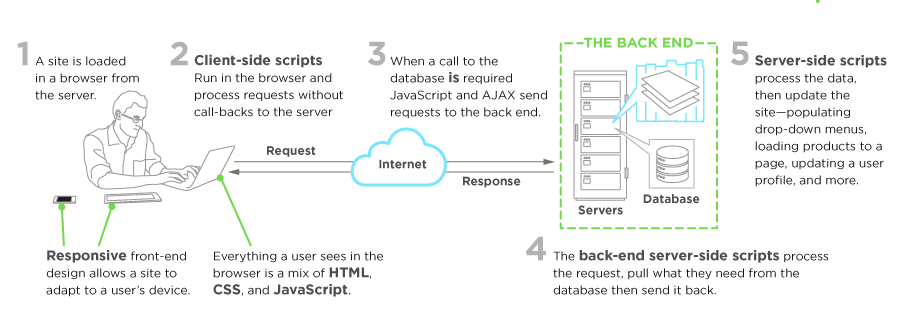
<cite>图片来源:https://www.upwork.com/hiring/development/front-end-developer/</cite>
一般而言, 一个人可以通过学习 HTML,CSS,JavaScript进入前端开发领域, 这些代码运行在 [Web浏览器](https://en.wikipedia.org/wiki/Web_browser), [无壳为浏览器](https://en.wikipedia.org/wiki/Headless_browser), Web视图之中, 或用于编译本地运行环境的输入. 后文将详细介绍这四个运行场景.
Web浏览器是用于检索, 呈现和遍历万维网(WWW)信息的软件. 一般而言, 浏览器可以运行在台式机, 笔记本电脑, 平板电脑或手机. 但是近来, 几乎在任何事物上都能够发现浏览器(如: 冰箱上, 汽车里等).
最普遍的Web浏览器如下:
* [Chrome](http://www.google.com/chrome/)
* [Internet Explorer](http://dev.modern.ie/)
* [Firefox](https://www.mozilla.org/firefox/)
* [Safari](http://www.apple.com/safari/)
无壳浏览器是指没有图形用户界面的Web浏览器, 可以通过命令行接口控制达到网页自动化的目的(如: 功能测试, 单元测试等). 把无壳浏览器当做可以从命令行运行的浏览器, 它依然可以检索和遍历网页.
最普遍的无壳浏览器如下:
* [PhantomJS](http://phantomjs.org/)
* [slimerjs](http://slimerjs.org/)
* [trifleJS](http://triflejs.org/)
[Webviews](http://developer.telerik.com/featured/what-is-a-webview/) 被本地 OS 用来运行网页. 把Web视图当做Web浏览器中的iframe或者单个的Tab, 其嵌入于运行在设备上的本地应用程序中(如:[iOS](https://developer.apple.com/library/ios/documentation/UIKit/Reference/UIWebView_Class/), [android](http://developer.android.com/reference/android/webkit/WebView.html), [windows](https://msdn.microsoft.com/library/windows/apps/windows.ui.xaml.controls.webview.aspx)).
Web视图开发最普遍的解决方案如下:
* [Cordova](https://cordova.apache.org/) (用于本地手机/平板应用)
* [NW.js](https://github.com/nwjs/nw.js) (即 Node-Webkit, 用于桌面应用)
* [Electron](http://electron.atom.io/) (用于桌面应用)
最后, 前端开发者从 Web 浏览器开发环境中学到的东西也可以用于不受浏览器引擎驱动的环境下. 目前, 脱离 Web 引擎,使用 Web 技术(如: CSS 和 JavaScript)去创建真正的本地应用的开发环境正在出现.
此类环境的示例如下:
* [NativeScript](https://www.nativescript.org/)
* [React Native](https://facebook.github.io/react-native/)
**译者补充:**
* [达到什么样的标准才能是大公司要的前端](http://qianduanfan.com/index.php/topic/show/217)
* [写给初学前端工程师的一封信](http://www.w3ctech.com/topic/983)
* [前端路上的旅行](http://www.w3cplus.com/front-end-trip-on-road.html)
* [React Native专题](http://www.jianshu.com/p/96febc4fec45)
================================================
FILE: 03-FEND_Note-master/AUTHORS
================================================
Li Xinyang <lixinyang1026@gmail.com>
Li Xinyang <lixinyang1026@Gmail.com>
rwang23 <des.renfei.wang@gmail.com>
hcy003 <chenyu19921103@gmail.com>
Fred.W. <robert.wei.176@gmail.com>
tinglin92 <tinglin1992@gmail.com>
Tinglin <tinglin1992@gmail.com>
Sylvia Zhang <rszhang89@gmail.com>
leikn <leikn@users.noreply.github.com>
The Gitter Badger <badger@gitter.im>
Osub <814566123@qq.com>
Chenyu <chenyu19921103@gmail.com>
nifanle <nifanle7@163.com>
================================================
FILE: 03-FEND_Note-master/Booklist.md
================================================
<!-- START doctoc generated TOC please keep comment here to allow auto update -->
<!-- DON'T EDIT THIS SECTION, INSTEAD RE-RUN doctoc TO UPDATE -->
**Table of Contents** *generated with [DocToc](https://github.com/thlorenz/doctoc)*
- [书单](#%E4%B9%A6%E5%8D%95)
- [HTML](#html)
- [CSS](#css)
- [JavaScript](#javascript)
<!-- END doctoc generated TOC please keep comment here to allow auto update -->
# 书单
## HTML
N/A
## CSS
- CSS Mastery: Advanced Web Standard Solutions
## JavaScript
- Professional JavaScript for Web Developers
- DOM Scripting: Web Design with JavaScript and the Document Object Model
- AdvancED DOM Scripting: Dynamic Web Design Techniques
- JavaScript: The Definitive Guide
## Version Control
- [Git 简明指南](http://rogerdudler.github.io/git-guide/index.zh.html)
- [Git Pro](https://git-scm.com/book/en/v2)
================================================
FILE: 03-FEND_Note-master/README.md
================================================
# 前端开发笔记本
[](https://gitter.im/li-xinyang/FEND_Note?utm_source=badge&utm_medium=badge&utm_campaign=pr-badge&utm_content=badge)
点击[这里](https://www.gitbook.com/read/book/li-xinyang/frontend-notebook)开始在 GitBook 阅读!
点击[这里](http://wiki.jikexueyuan.com/project/fend_note/)开始在极客学院 Wiki 阅读!(中国大陆访问速度较快)
前端开发笔记本的 GitHub 项目地址在[这里](https://github.com/li-xinyang/FEND_Note)。如果你觉得这个项目不错,请点击 **Star** 一下,您的支持是我最大的动力。
<!-- Place this tag where you want the button to render. -->
<a class="github-button" href="https://github.com/li-xinyang/FEND_Note" data-style="mega" data-count-href="/li-xinyang/FEND_Note/stargazers" data-count-api="/repos/li-xinyang/FEND_Note#stargazers_count" data-count-aria-label="# stargazers on GitHub" aria-label="Star li-xinyang/FEND_Note on GitHub">Star</a>
<a class="github-button" href="https://github.com/li-xinyang/FEND_Note" data-style="mega" data-count-href="/li-xinyang/FEND_Note/watchers" data-count-api="/repos/li-xinyang/FEND_Note#subscribers_count" data-count-aria-label="# watchers on GitHub" aria-label="Watch li-xinyang/FEND_Note on GitHub">Watch</a>
<a class="github-button" href="https://github.com/li-xinyang/FEND_Note/fork" data-style="mega" data-count-href="/li-xinyang/FEND_Note/network" data-count-api="/repos/li-xinyang/FEND_Note#forks_count" data-count-aria-label="# forks on GitHub" aria-label="Fork li-xinyang/FEND_Note on GitHub">Fork</a>
<a class="github-button" href="https://github.com/li-xinyang/FEND_Note/archive/master.zip" data-style="mega" aria-label="Download li-xinyang/FEND_Note on GitHub">Download</a>

《前端笔记本》涵盖了 Web 前端开发所需的全部基本知识以及所对应的学习路径。它并不能当做一本完整的学习材料来进行前端的学习,因为在有限的篇幅中无法深入的展开每一个单独的知识点。它更适合作为一个学习清单或者是查询手册,结合其他在各个方面更专业的图书或者官方文档来进行同步学习。在学习过程中为了能达到最佳的学习效果,也可将每个技术点实现并进行适当的拓展。
### 写作进程
*第一版草稿* 完成时间 1507252244
| 章节 | 名称 | 进程 |
| :--- | :-------------- | :-------------------------------- |
| 第一章 | 页面制作 |  |
| 第二章 | JavaScript 程序设计 |  |
| 第三章 | DOM 编程 |  |
| 第四章 | 页面构架 |  |
| 第五章 | 前端产品构架 |  |
### 成就
**1508311803** - 100 Stars: [@dszls](https://github.com/dszls), thank you!
**1511071358** - 200 Stars: [@cschenchen](https://github.com/cschenchen)
**1511222144** - 300 Stars: [@lujun9972](https://github.com/lujun9972)
**1512102333** - 400 Stars: [@Niefee](https://github.com/Niefee)
**1601231619** - 500 Stars: [@wangdsh](https://github.com/wangdsh)
**1603261510** - 600 Stars: [@lty2226262](https://github.com/lty2226262)
**1605170450** - 700 Stars: [@eqzcy](https://github.com/eqzcy)
**1608010000** - 800 Stars: [@BeOker](https://github.com/BeOker)
### 相关链接
- [NEC](http://nec.netease.com/) {N: nice, E: easy, C: css;}
### 声明
前端笔记本大纲及内容由[网易云课堂前端专业](http://mooc.study.163.com/smartSpec/detail/12001.htm_)改编
<a rel="license" href="http://creativecommons.org/licenses/by-nc-sa/4.0/"><img alt="Creative Commons License" style="border-width:0" src="https://i.creativecommons.org/l/by-nc-sa/4.0/80x15.png" /></a><br />This work by <a xmlns:cc="http://creativecommons.org/ns#" href="li-xinyang.com" property="cc:attributionName" rel="cc:attributionURL">Li Xinyang</a> is licensed under a <a rel="license" href="http://creativecommons.org/licenses/by-nc-sa/4.0/">Creative Commons Attribution-NonCommercial-ShareAlike 4.0 International License</a>.
<!-- Place this tag right after the last button or just before your close body tag. -->
<script async defer id="github-bjs" src="https://buttons.github.io/buttons.js"></script>
================================================
FILE: 03-FEND_Note-master/SUMMARY.md
================================================
# Summary
- [页面制作](chapter1/00_intro.md)
- [Photoshop](chapter1/01_photoshop.md)
- [工具、面板、视图](chapter1/01_01_tool_panel_view.md)
- [测量及取色](chapter1/01_02_measurement_and_color.md)
- [切图](chapter1/01_03_slice.md)
- [图片保存](chapter1/01_04_save_image.md)
- [图片优化与合并](chapter1/01_05_image_optimisation.md)
- [开发及调试工具](chapter1/02_dev_tools.md)
- [Sublime 编辑器](chapter1/02_01_sublime.md)
- [Atom 编辑器](chapter1/02_02_atom.md)
- [HTML](chapter1/03_html.md)
- [HTML 简介](chapter1/03_01_html_intro.md)
- [HTML 语法](chapter1/03_02_html_sytax.md)
- [HTML 标签](chapter1/03_05_html_tags.md)
- [实体字符](chapter1/03_03_html_ascii_encoding.md)
- [浏览器兼容](chapter1/03_04_cross_browser.md)
- [CSS](chapter1/04_css_intro.md)
- [语法](chapter1/04_01_css_sytax.md)
- [选择器](chapter1/04_02_selector.md)
- [文本](chapter1/04_03_text.md)
- [盒模型](chapter1/04_04_box_model.md)
- [背景](chapter1/04_05_background.md)
- [布局](chapter1/04_06_layout.md)
- [变形](chapter1/04_07_transform.md)
- [动画](chapter1/04_08_animation.md)
- [常见布局样例](chapter1/04_09_layout_demo.md)
- [JavaScript 程序设计](chapter2/00_intro.md)
- [JavaScript 介绍](chapter2/01_javascript_intro.md)
- [调试器](chapter2/02_dev_tools.md)
- [基础语法](chapter2/03_basic_syntax.md)
- [类型系统](chapter2/04_data_type.md)
- [类型判断](chapter2/11_js_type_determin.md)
- [内置对象](chapter2/05_internal_object.md)
- [变量作用域](chapter2/06_scope.md)
- [表达式与运算符号](chapter2/07_statement_and_operator.md)
- [语句](chapter2/08_statement.md)
- [闭包](chapter2/09_closure.md)
- [面向对象](chapter2/10_object.md)
- [正则表达式](chapter2/12_reg_exp.md)
- [DOM 编程](chapter3/00_intro.md)
- [文档树(DOM Tree)](chapter3/01_dom_tree.md)
- [节点操作](chapter3/02_node_manipulation.md)
- [操作属性](chapter3/03_attribute.md)
- [样式操作](chapter3/04_style_manipulation.md)
- [事件](chapter3/05_events.md)
- [多媒体(视频与音频)](chapter3/08_multimedia.md)
- [Canvas](chapter3/07_canvas.md)
- [BOM](chapter3/10_bom.md)
- [数据通信](chapter3/09_network.md)
- [数据存储](chapter3/11_storage.md)
- [动画](chapter3/06_animation.md)
- [表单操作](chapter3/12_form_manipulation.md)
- [列表操作](chapter3/13_list_manipulation.md)
- [页面架构](chapter4/00_intro.md)
- [CSS Reset](chapter4/01_CSS_Reset.md)
- [布局解决方案](chapter4/02_layout.md)
- [响应式布局](chapter4/03_responsive.md)
- [页面优化](chapter4/04_page_optimisation.md)
- [规范与模块化](chapter4/05_modulation.md)
- [产品前端架构](chapter5/00_intro.md)
- [协作流程](chapter5/01_collaboration.md)
- [接口设计](chapter5/02_design_api.md)
- [版本控制](chapter5/03_version_control.md)
- [技术选型](chapter5/04_tech_selection.md)
- [开发实践](chapter5/05_development.md)
- [附录 A:书单](Booklist.md)
================================================
FILE: 03-FEND_Note-master/SampleCode/CSS/Animation.html
================================================
<!DOCTYPE html>
<html lang="en">
<head>
<meta charset="UTF-8">
<title>Animation</title>
<style type="text/css">
body {
margin: 50px;
text-align: center;
position: relative;
margin: ;
100px 0;
}
.row {
position: relative;
margin: 10px;
height: 155px;
background: rgba(39, 139, 210, .1);
border: 3px dashed rgba(39, 139, 210, 1);
}
.ball {
width: 150px;
height:150px;
border: 3px solid black;
background: rgba(139, 158, 67, 1);
border-radius: 50%;
}
</style>
</head>
<body>
<h1>动画 animation</h1>
<div class="row">
<div class="ball" id="ball1"></div>
</div>
<style type="text/css">
#ball1 {
animation: change-color 5s infinite;
animation-name: change-color, change-position;
position: relative;
animation-direction: alternate;
}
@keyframes change-color {
0% {background: red;}
100% {background: yellow;}
}
@keyframes change-position {
0% {left: 0;}
100% {left: calc(100% - 150px);}
}
</style>
</body>
</html>
================================================
FILE: 03-FEND_Note-master/SampleCode/CSS/AnimationPractice.html
================================================
<!DOCTYPE html>
<html lang="en">
<head>
<meta charset="UTF-8">
<title>Animation Practice</title>
<style type="text/css">
body {
margin: 30px;
text-align: center;
font-family: monospace;
}
.container {
line-height: 300px;
position: relative;
width: 1px;
top: 50%;
left: 50%;
margin-top: 200px;
font-size: 3rem;
perspective: 2000px;
perspective-origin: 0 150px;
transform-style: preserve-3d;
}
.side {
transition-duration: 3s;
height: 300px;
width: 300px;
border: 5px solid rgba(0, 0, 0, .3);
position: absolute;
left: -150px;
top: 50%;
}
</style>
</head>
<body>
<h1>3D 正方体组合旋转</h1>
<div class="container">
<div class="back side">back</div>
<div class="front side">front</div>
<div class="side right">right</div>
<div class="side left">left</div>
<div class="side bottom">botto </div>
<div class="side top">top </div>
</div>
<style type="text/css">
.top {
animation: placeTop 1s linear both;
transition-property: background-color;
}
.bottom {
animation: placeBottom 1s 1s linear both;
transition-property: background-color;
}
.left {
animation: placeLeft 1s 2s linear both;
transition-property: background-color;
}
.right {
animation: placeRight 1s 3s linear both;
transition-property: background-color;
}
.back {
animation: placeBack 1s 4s linear both;
transition-property: background-color;
}
.front {
animation: placeFront 1s 5s linear both;
transition-property: background-color;
}
.container {
animation: cube 3s 6s linear infinite both;
}
.container:hover .top {
background-color: red;
}
.container:hover .bottom {
background-color: green;
}
.container:hover .left {
background-color: blue;
}
.container:hover .right {
background-color: yellow;
}
.container:hover .back {
background-color: gray;
}
.container:hover .front {
background-color: orange;
}
@keyframes placeTop {
100% {
transform: translateY(-150px) rotateX(90deg);
}
}
@keyframes placeBottom {
100% {
transform: translateY(150px) rotateX(90deg);
}
}
@keyframes placeLeft {
100% {
transform: translateX(-150px) rotateY(90deg);
}
}
@keyframes placeRight {
100% {
transform: translateX(150px) rotateY(90deg);
}
}
@keyframes placeBack {
100% {
transform: translateZ(-150px) rotateY(180deg);
}
}
@keyframes placeFront {
100% {
transform: translateZ(150px);
}
}
@-webkit-keyframes cube {
0% {
perspective: 2000px;
}
100% {
perspective: 0px;
transform: rotate3d(0.5, 0.5, 0.5, 360deg);
}
}
</style>
</body>
</html>
================================================
FILE: 03-FEND_Note-master/SampleCode/CSS/Transform2D.html
================================================
<!DOCTYPE html>
<html lang="en">
<head>
<meta charset="UTF-8">
<title>Transform 2D</title>
<style type="text/css">
body {
margin: 50px;
text-align: center;
position: relative;
margin: ;
100px 0;
}
.container {
position: relative;
margin: 100px 0;
display: inline-block;
}
.box {
width: 150px;
height: 150px;
border: 3px solid black;
background-color: rgba(138, 161, 64, .5);
}
.box-origin {
position: absolute;
top: 0;
left: 0;
}
</style>
</head>
<body>
<h1>Transform 2D</h1>
<h3>可忽略所有<code>:after</code>的样式</h3>
<h2>transform (translate & rotate)</h2>
<div class="container">
<div id="box1" class="box"></div>
<div id="box1-clone" class="box box-origin"></div>
<p>translate(50%) -> rotate(45deg)</p>
</div>
<br>
<style type="text/css">
#box1 {
transform: translate(50%) rotate(45deg);
}
#box1:after {
background: RED;
width: 15px;
height: 15px;
position: absolute;
left: 50%;
top: 50%;
content: "";
border-radius: 50%;
transform: translate(-50%, -50%);
}
</style>
<div class="container">
<div id="box2" class="box"></div>
<div class="box box-origin"></div>
<p>rotate(45deg) -> translate(50%)</p>
</div>
<br>
<style type="text/css">
#box2 {
transform: rotate(45deg) translate(50%);
}
#box2:after {
background: RED;
width: 15px;
height: 15px;
position: absolute;
left: 50%;
top: 50%;
content: "";
border-radius: 50%;
transform: translate(-50%, -50%);
}
</style>
<h2>translate-origin</h2>
<div class="container">
<div id="box3" class="box"></div>
<div class="box box-origin"></div>
<p>transform-origin: 100% 100%</p>
</div>
<br>
<style type="text/css">
#box3 {
transform-origin: 100% 100%;
transform: rotate(45deg);
}
#box3:after {
background: RED;
width: 15px;
height: 15px;
position: absolute;
left: 100%;
top: 100%;
content: "";
border-radius: 50%;
transform: translate(-50%, -50%);
}
</style>
<h3>scale</h3>
<div class="container">
<div id="box4" class="box"></div>
<div class="box box-origin"></div>
<p>scale(0.5)</p>
</div>
<br>
<style type="text/css">
#box4 {
transform: scale(0.5);
}
#box4:after {
background: RED;
width: 15px;
height: 15px;
position: absolute;
left: 50%;
top: 50%;
content: "";
border-radius: 50%;
transform: translate(-50%, -50%);
}
</style>
<div class="container">
<div id="box5" class="box"></div>
<div class="box box-origin"></div>
<p id="box-scale">rotate(45deg) scale(1.5, 2)</p>
</div>
<br>
<style type="text/css">
#box5 {
transform: rotate(45deg) scale(1.5, 2);
}
#box-scale:before {
background: RED;
width: 15px;
height: 15px;
position: absolute;
left: 75px;
top: 75px;
content: "";
border-radius: 50%;
transform: translate(-50%, -50%);
}
</style>
<h3>skew</h3>
<div class="container">
<div id="box6" class="box"></div>
<div class="box box-origin"></div>
<p>skew(-45deg, 45deg)</p>
</div>
<br>
<style type="text/css">
#box6 {
transform: skew(-45deg, 45deg);
}
#box6:after {
background: RED;
width: 15px;
height: 15px;
position: absolute;
left: 50%;
top: 50%;
content: "";
border-radius: 50%;
transform: translate(-50%, -50%);
}
</style>
</body>
</html>
================================================
FILE: 03-FEND_Note-master/SampleCode/CSS/Transform3D.html
================================================
<!DOCTYPE html>
<html lang="en">
<head>
<meta charset="UTF-8">
<title>Transfomr 3D</title>
<style type="text/css">
body {
margin: 50px;
text-align: center;
position: relative;
margin: 100px 0;
}
.container {
position: relative;
margin: 100px 10px;
display: inline-block;
perspective: 500px;
}
.box {
width: 150px;
height: 150px;
border: 3px solid black;
background-color: rgba(138, 161, 64, .5);
}
.box-origin {
position: absolute;
top: 0;
left: 0;
z-index: -999;
}
</style>
</head>
<body>
<h1>Transform 3D</h1>
<h3>可以忽略所有<code>:after</code>的样式</h3>
<h2>rotate</h2>
<div class="container">
<div id="box1" class="box">
<div id="line"></div>
</div>
<div class="box box-origin"></div>
</div>
<style type="text/css">
#box1 {
transform: rotateY(60deg) rotateX(0deg);
}
#line {
position: absolute;
width: 2px;
height: 150px;
background-color: RED;
left: 73px;
}
</style>
<h2>perspective-origin</h2>
<div class="container" id="container-1">
<div id="box2" class="box"></div>
<div class="box box-origin"></div>
<p>top</p>
</div>
<div class="container" id="container-2">
<div id="box3" class="box"></div>
<div class="box box-origin"></div>
<p>50% 50%</p>
</div>
<div class="container" id="container-3">
<div id="box4" class="box"></div>
<div class="box box-origin"></div>
<p>bottom</p>
</div>
<style type="text/css">
#box2,
#box3,
#box4 {
transform: rotateY(45deg);
}
#container-1 {
perspective-origin: 0 0;
}
#container-2 {
perspective-origin: 50% 50%;
}
#container-3 {
perspective-origin: 100% 100%;
}
</style>
<h2>translate3d(x, y, z)</h2>
<div class="container">
<div id="box-5" class="box"></div>
<div class="box box-origin"></div>
<p>(10px, 10px, 200px)</p>
</div>
<div class="container">
<div id="box-6" class="box"></div>
<div class="box box-origin"></div>
<p>(0, 0, -100px)</p>
</div>
<div class="container">
<div id="box-7" class="box"></div>
<div class="box box-origin"></div>
<p>(0, 0, 0)</p>
</div>
<style type="text/css">
#box-5 {
transform: translateZ(100px) translateY(10px) translateX(10px);
}
#box-6 {
transform: translate3d(0, 0, -100px);
}
#box-7 {
transform: translate3d(0, 0, 0);
}
</style>
<h2>scale3d</h2>
<h3>改变轴的比例</h3>
<div class="container">
<div id="box-8" class="box"></div>
<div class="box box-origin"></div>
<p>scale3d(1.2, 1.2, 1)</p>
</div>
<style>
#box-8 {
transform: scale3d(1.2, 1.2, 1);
}
</style>
<h2>rotate3d</h2>
<div class="container">
<div id="box-9" class="box"></div>
<div class="box box-origin"></div>
<p>(0, 0, 1, 45deg)</p>
</div>
<div class="container">
<div id="box-10" class="box"></div>
<div class="box box-origin"></div>
<p>(1, 1, 1, 45deg)</p>
</div>
<div class="container">
<div id="box-11" class="box"></div>
<div class="box box-origin"></div>
<p>(-1, -1, -1, 45deg)</p>
</div>
<style type="text/css">
#box-9 {
transform: rotate3d(0, 0, 1, 45deg);
}
#box-10 {
transform: rotate3d(1, 1, 1, 45deg);
}
#box-11 {
transform: rotate3d(-1, -1, -1, 45deg);
}
</style>
<h2>transform-style</h2>
<div class="container">
<div id="box-12" class="box">
<div id="box-13" class="box"></div>
</div>
<div class="box box-origin"></div>
<p>preserve-3d</p>
</div>
<style type="text/css">
#box-12 {
transform: rotateX(45deg);
transform-style: preserve-3d;
}
#box-13 {
transform: rotateY(45deg);
}
</style>
<div class="container">
<div id="box-14" class="box">
<div id="box-15" class="box"></div>
</div>
<div class="box box-origin"></div>
<p>flat</p>
</div>
<style type="text/css">
#box-14 {
transform: rotateX(45deg);
transform-style: flat;
}
#box-15 {
transform: rotateY(45deg);
}
</style>
<h2>backface-visibility</h2>
<div class="container">
<div id="box-16" class="box">
<p>B</p>
</div>
<div class="box box-origin"></div>
<p>visible</p>
</div>
<div class="container">
<div id="box-17" class="box">
<p>B</p>
</div>
<div class="box box-origin"></div>
<p>hidden</p>
</div>
<style type="text/css">
#box-16 {
background-color: rgba(138, 161, 64, 1);
transform: rotateY(100deg);
backface-visibility: visible;
}
#box-16 p {
color: black;
font-size: 3rem;
}
#box-17 {
background-color: rgba(138, 161, 64, 1);
transform: rotateY(100deg);
backface-visibility: hidden;
}
#box-17 p {
color: black;
font-size: 3rem;
}
</style>
</body>
</html>
================================================
FILE: 03-FEND_Note-master/SampleCode/CSS/Transition.html
================================================
<!DOCTYPE html>
<html lang="en">
<head>
<meta charset="UTF-8">
<title>Transition</title>
<style type="text/css">
body {
margin: 50px;
text-align: center;
position: relative;
margin: ;
100px 0;
}
.container {
position: relative;
margin: 100px 10px;
display: inline-block;
perspective: 500px;
}
.box {
width: 150px;
height: 150px;
border: 3px solid black;
background-color: rgba(138, 161, 64, .5);
}
.box-origin {
position: absolute;
top: 0;
left: 0;
z-index: -999;
}
</style>
</head>
<body>
<h1> 动画 - Transition </h1>
<h2>transition</h2>
<div class="container">
<div id="box1" class="box"></div>
<div class="box box-origin"></div>
<p>无过度</p>
</div>
<div class="container">
<div id="box2" class="box"></div>
<div class="box box-origin"></div>
<p>有过度</p>
</div>
<style>
#box1:hover {
transform: rotate(45deg);
}
#box2:hover {
transition-delay: .3s;
transform: rotate(45deg);
transition: 1s;
}
</style>
<h2>transition-property</h2>
<div class="row">
<div class="box hover-demo" id="box3">
<p>none</p>
</div>
</div>
<style type="text/css">
.row {
position: relative;
margin: 10px;
height: 155px;
background: rgba(187, 198, 145, 0.5);
border: 3px dashed rgba(135, 162, 64, 1);
}
#box3 {
border-radius: 50%;
position: absolute;
top: 0;
left: 0;
font-size: 3rem;
}
#box3:hover {
transition-delay: .3s;
transition: 2s;
transition-property: none;
left: calc(100% - 150px);
color: white;
top: 0;
}
</style>
<div class="row">
<div class="box hover-demo" id="box4">
<p>all</p>
</div>
</div>
<style type="text/css">
#box4 {
border-radius: 50%;
position: absolute;
top: 0;
left: 0;
font-size: 3rem;
}
#box4:hover {
transition-delay: .3s;
transition: 2s;
transition-property: all;
color: white;
left: calc(100% - 150px);
top: 0;
}
</style>
<div class="row">
<div class="box hover-demo" id="box5">
<p>left</p>
</div>
</div>
<style type="text/css">
#box5 {
border-radius: 50%;
transition-property: all;
position: absolute;
top: 0;
left: 0;
font-size: 3rem;
}
#box5:hover {
transition-delay: .3s;
transition: 2s;
transition-property: left;
color: white;
left: calc(100% - 150px);
top: 0;
}
</style>
<div class="row">
<div class="box hover-demo" id="box6">
<p>color</p>
</div>
</div>
<style type="text/css">
#box6 {
border-radius: 50%;
transition-property: all;
position: absolute;
top: 0;
left: 0;
font-size: 3rem;
}
#box6:hover {
transition-delay: .3s;
transition: 2s;
transition-property: color;
color: white;
left: calc(100% - 150px);
top: 0;
}
</style>
<h2>多个动画,多个时间</h2>
<div class="row">
<div class="box hover-demo" id="box7">
<p>multipe</p>
</div>
</div>
<style type="text/css">
#box7 {
border-radius: 50%;
position: absolute;
top: 0;
left: 0;
font-size: 3rem;
}
#box7:hover {
transition-delay: .3s;
transition-property: left, color, border-radius;
transition-duration: 1s, 3s, 8s;
color: white;
border-radius: 0;
left: calc(100% - 150px);
top: 0;
}
</style>
</body>
</html>
================================================
FILE: 03-FEND_Note-master/SampleCode/Layout/00_center_horizontal.html
================================================
<!DOCTYPE html>
<html>
<head>
<meta charset="utf-8">
<title>水平居中</title>
</head>
<body>
<style media="screen">
.box {
width: 100px;
height: 100px;
background: #859A00;
}
</style>
<!-- Sample 00 -->
<h1>inline-block + text-align</h1>
<div class="demo0-parent">
<div class="demo0-child box"></div>
</div>
<style media="screen">
.demo0-child {
display: inline-block;
}
.demo0-parent {
text-align: center;
}
</style>
<!-- Sample 01 -->
<h1>table + margin</h1>
<div class="demo1-parent">
<div class="demo1-child box"></div>
</div>
<style media="screen">
.demo1-child {
display: table;
margin: 0 auto;
}
</style>
<!-- Sample 02 -->
<h1>absolute + transform</h1>
<div class="demo2-parent">
<div class="demo2-child box"></div>
</div>
<style media="screen">
.demo2-parent {
position: relative;
height: 100px;
}
.demo2-child {
position: absolute;
left: 50%;
transform: translateX(-50%);
}
</style>
<!-- Sample03 -->
<h1>flex + justify-content</h1>
<div class="demo3-parent">
<div class="demo3-child box"></div>
</div>
<style media="screen">
.demo3-parent {
display: flex;
justify-content: center;
}
</style>
</body>
</html>
================================================
FILE: 03-FEND_Note-master/SampleCode/Layout/01_center_vertical.html
================================================
<!DOCTYPE html>
<html>
<head>
<meta charset="utf-8">
<title>垂直居中</title>
</head>
<body>
<style media="screen">
.box {
width: 100px;
height: 100px;
background: #859A00;
}
</style>
<div class="demo0-wrap">
<div class="demo0-parent">
<div class="demo0-child box"></div>
</div>
</div>
<style media="screen">
.demo0-wrap {
height: 100vh;
display: table;
}
.demo0-parent {
display: table-cell;
vertical-align: middle;
}
.demo0-child {
display: table-cell;
vertical-align: middle;
}
</style>
</body>
</html>
================================================
FILE: 03-FEND_Note-master/SampleCode/Layout/02multiple_column.html
================================================
<!DOCTYPE html>
<html>
<head>
<meta charset="utf-8">
<title>多列布局 - 一列定宽</title>
</head>
<body>
<div class="demo0-parent">
<div class="demo0-left">
</div>
<div class="demo0-right">
</div>
</div>
</body>
</html>
================================================
FILE: 03-FEND_Note-master/TOC.md
================================================
# Summary
- [页面制作](chapter1/00_intro.md)
- [Photoshop](chapter1/01_photoshop.md)
- [工具、面板、视图](chapter1/01_01_tool_panel_view.md)
- [测量及取色](chapter1/01_02_measurement_and_color.md)
- [切图](chapter1/01_03_slice.md)
- [图片保存](chapter1/01_04_save_image.md)
- [图片优化与合并](chapter1/01_05_image_optimisation.md)
- [开发及调试工具](chapter1/02_dev_tools.md)
- [Sublime 编辑器](chapter1/02_01_sublime.md)
- [Atom 编辑器](chapter1/02_02_atom.md)
- [HTML](chapter1/03_html.md)
- [HTML 简介](chapter1/03_01_html_intro.md)
- [HTML 语法](chapter1/03_02_html_sytax.md)
- [HTML 标签](chapter1/03_05_html_tags.md)
- [实体字符](chapter1/03_03_html_ascii_encoding.md)
- [浏览器兼容](chapter1/03_04_cross_browser.md)
- [CSS](chapter1/04_css_intro.md)
- [语法](chapter1/04_01_css_sytax.md)
- [选择器](chapter1/04_02_selector.md)
- [文本](chapter1/04_03_text.md)
- [盒模型](chapter1/04_04_box_model.md)
- [背景](chapter1/04_05_background.md)
- [布局](chapter1/04_06_layout.md)
- [变形](chapter1/04_07_transform.md)
- [动画](chapter1/04_08_animation.md)
- [常见布局样例](chapter1/04_09_layout_demo.md)
- [JavaScript 程序设计](chapter2/00_intro.md)
- [JavaScript 介绍](chapter2/01_javascript_intro.md)
- [调试器](chapter2/02_dev_tools.md)
- [基础语法](chapter2/03_basic_syntax.md)
- [类型系统](chapter2/04_data_type.md)
- [类型判断](chapter2/11_js_type_determin.md)
- [内置对象](chapter2/05_internal_object.md)
- [变量作用域](chapter2/06_scope.md)
- [表达式与运算符号](chapter2/07_statement_and_operator.md)
- [语句](chapter2/08_statement.md)
- [闭包](chapter2/09_closure.md)
- [面向对象](chapter2/10_object.md)
- [正则表达式](chapter2/12_reg_exp.md)
- [DOM 编程](chapter3/00_intro.md)
- [文档树(DOM Tree)](chapter3/01_dom_tree.md)
- [节点操作](chapter3/02_node_manipulation.md)
- [操作属性](chapter3/03_attribute.md)
- [样式操作](chapter3/04_style_manipulation.md)
- [事件](chapter3/05_events.md)
- [多媒体(视频与音频)](chapter3/08_multimedia.md)
- [Canvas](chapter3/07_canvas.md)
- [BOM](chapter3/10_bom.md)
- [数据通信](chapter3/09_network.md)
- [数据存储](chapter3/11_storage.md)
- [动画](chapter3/06_animation.md)
- [表单操作](chapter3/12_form_manipulation.md)
- [列表操作](chapter3/13_list_manipulation.md)
- [页面架构](chapter4/00_intro.md)
- [CSS Reset](chapter4/01_CSS_Reset.md)
- [布局解决方案](chapter4/02_layout.md)
- [响应式布局](chapter4/03_responsive.md)
- [页面优化](chapter4/04_page_optimisation.md)
- [规范与模块化](chapter4/05_modulation.md)
- [产品前端架构](chapter5/00_intro.md)
- [协作流程](chapter5/01_collaboration.md)
- [接口设计](chapter5/02_design_api.md)
- [版本控制](chapter5/03_version_control.md)
- [技术选型](chapter5/04_tech_selection.md)
- [开发实践](chapter5/05_development.md)
- [附录 A:书单](Booklist.md)
================================================
FILE: 03-FEND_Note-master/assets/Bookcover.sketch
================================================
[File too large to display: 31.8 MB]
================================================
FILE: 03-FEND_Note-master/book.json
================================================
{
"gitbook": ">=2.0.0",
"title":"Frontend Notebook",
"language":"zh-cn",
"description":"互联网前端开发过程全记录。从基础开始,从现在开始。"
}
================================================
FILE: 03-FEND_Note-master/chapter1/00_intro.md
================================================
## 前端工程师概述
[TOC]
**网页发展史**
Web 1.0 -> Web 2.0(基于 Ajax) -> Web 3.0 (基于 HTML5)
**网站开发协作流程**

**前端职责**
视觉稿(配色图标距离空间) + 交互稿(用户逻辑) = UI(用户界面)
视觉稿 -> 页面制作
交互稿 -> 页面逻辑开发
**所需技能**
- DOM (操作 HTML 及 CSS 的接口)
- JavaScript (定义页面互动)
- CSS (定义页面样式)
- HTML (定义页面结果)
- Photoshop (取图)
================================================
FILE: 03-FEND_Note-master/chapter1/01_01_tool_panel_view.md
================================================
### 工具, 面板, 视图
[TOC]
在全局设置下将单位修改为像素,因其在 CSS 中运用最广 (**Preference** -> **Units & Rulers** -> **Units**) 。设置工作区布局为切图及图片编辑做准备(所需窗口为信息窗口,图层窗口以及历史记录窗口)。

打开『信息窗口』、『图层窗口』、『历史纪录窗口』、『工具面板』、『选项』面板,可以通过 Window -> Workspace -> New WorkSpaces 保存工作区,以便下次打开。
**切图常用工具**
| 工具名 | 示意图 | 注释 |
| ------ | :----------------------: | -------------------------------------- |
| 移动工具 |  | |
| 矩形选框工具 |  | 需将自动选择调至选择图层 |
| 魔棒工具 |  | (容差 Tolerance 越小选择的范围就越小)消除锯齿可以让选择区域光滑 |
| 剪裁工具 |  | |
| 切片工具 |  | 在裁剪工具分支下 |
| 缩放工具 |  | `Ctrl+加号`与`Ctrl+减号` 或者 `alt+鼠标滑轮` |
| 取色器 |  | |
图层(单层元素)与组(类似于文件夹)的区别。
**辅助视图**,在视图菜单下启动
- 对齐,会启动靠近吸附功能
- 标尺,<kbd>Command</kbd> + <kbd>R</kbd>
- 参考线,<kbd>Command</kbd> + <kbd>;</kbd>

NOTE: 所有工具及快捷键如下。

### 常用快捷键
**放大缩小画布**
- 放大到100%大小:<kbd>Ctrl</kbd>+<kbd>数字1</kbd>
- 放大:<kbd>ctrl</kbd> + 加号
- 缩小:<kbd>ctrl</kbd> + 减号
- <kbd>alt</kbd> + 滚轮
**合并图层**
- 合并图层:<kbd>ctrl</kbd>+<kbd>E</kbd>
- 合并可见图层:<kbd>ctrl</kbd>+<kbd>shift</kbd>+<kbd>E</kbd>
================================================
FILE: 03-FEND_Note-master/chapter1/01_02_measurement_and_color.md
================================================
<!-- START doctoc generated TOC please keep comment here to allow auto update -->
<!-- DON'T EDIT THIS SECTION, INSTEAD RE-RUN doctoc TO UPDATE -->
**Table of Contents** *generated with [DocToc](https://github.com/thlorenz/doctoc)*
- [测量及取色](#%E6%B5%8B%E9%87%8F%E5%8F%8A%E5%8F%96%E8%89%B2)
<!-- END doctoc generated TOC please keep comment here to allow auto update -->
### 测量及取色
所有能接受数字的属性都需要测量并尽可能百分百的还原设计稿。
#### 测量
- 宽度,高度 (width, height)
- 内外边距 (padding, margin)
- 边框 (border)
- 定位 (position)
- 文字大小 (font-size)
- 行高 (line-height),其为第一行的底端到第二行的底端。
- 背景位置 (background-position)
NOTE: 测量时尽可能放大画布以减少误差。量取文字是为了减少误差尽量选取尺寸大的文字进行测量。

**选框工具的多用途**,增(Shift)减(Alt)以及交叉选择(Shift + Alt)。左右(或上下)使用分离选框选择可以得到整两个分离边框的距离总值。

#### 取色
所有能接受颜色的属性都需要取色。
- 边框色
- 背景色
- 文字色
NOTE:使用魔棒工具可以迅速识别背景色是否没*线性*渐变的方法。Mac OS X 推荐使用 **Sip** 可在 Mac App Store 免费下载。
NOTE+:可以使用魔棒工具来判断颜色是否为渐变。
================================================
FILE: 03-FEND_Note-master/chapter1/01_03_slice.md
================================================
<!-- START doctoc generated TOC please keep comment here to allow auto update -->
<!-- DON'T EDIT THIS SECTION, INSTEAD RE-RUN doctoc TO UPDATE -->
**Table of Contents** *generated with [DocToc](https://github.com/thlorenz/doctoc)*
- [切图](#%E5%88%87%E5%9B%BE)
<!-- END doctoc generated TOC please keep comment here to allow auto update -->
### 切图
- **内容性图片** 指的是图片在页面是作为内容存在,如页面中的海报。
- **修饰性图片** 指的是图片在页面中起修饰作用,如页面中的背景和图标。
修饰性图标和内容性图片需要(在 HTML 的 `<img>` 之中,只需站位不需切图)切出。切出的内容性图片应保存为 `*.jpg` 格式,而修饰性图片因保存为 `png24`(IE6 不支持半透明,Alpha 透明) 或 `png8` 它们均支持全透明。
**隐藏文字**,方法一,直接在图层中隐藏文字图层。方法二(两种,分别应对于纯色和有背景需要隐藏文本的情况)如下图所示,使用自由变换。

**PNG24**切图方法
- 移动工具选中所需图层(<kbd>Ctrl</kbd> 多选)
- 右键合并图层(<kbd>Ctrl</kbd> + <kbd>E</kbd>)
- 复制到新图层
**PNG8**带背景切图方法
- 合并可见图层(<kbd>Shift</kbd> + <kbd>Ctrl</kbd> + <kbd>E</kbd>)
- 矩形选框选择内容
- 魔棒工具去除多余部分(<kbd>Alt</kbd> + 选取)
**可平铺**背景的切图方法
- 用矩形选择一个区域
- 复制至新图层
NOTE: X 轴平铺需要占满图片的宽,Y 轴平铺需要占满图片的高。
**切片**工具(大图化小的方法,将一大图分为多小图)
- 拉参考线
- 选择切片工具
- 点击 “基于参考线的切片” 按钮
- 选择切片选择工具
- 保存于新图层
#### 如何开始切图
##### 第一步:去掉所有文字,只留背景
打开视觉稿后,用上面说过的方法去掉所有的文字,只留背景和图片(记得备份一下PSD文件)。

##### 第二步:保存图片
将去掉文字的图片保存起来。一般情况下内容性图片保存为jpg格式,图标类型的保存为png格式。

##### 第三步:构思页面的具体实现
划分页面的结构,具体的实现方式。
##### 第四步:一边编写HTML代码,一边测量、取色
根据构思号的页面结构,开始编写HTML代码,并且开始进行测量和取色。
================================================
FILE: 03-FEND_Note-master/chapter1/01_04_save_image.md
================================================
<!-- START doctoc generated TOC please keep comment here to allow auto update -->
<!-- DON'T EDIT THIS SECTION, INSTEAD RE-RUN doctoc TO UPDATE -->
**Table of Contents** *generated with [DocToc](https://github.com/thlorenz/doctoc)*
- [图片保存](#%E5%9B%BE%E7%89%87%E4%BF%9D%E5%AD%98)
- [保存格式的选择](#%E4%BF%9D%E5%AD%98%E6%A0%BC%E5%BC%8F%E7%9A%84%E9%80%89%E6%8B%A9)
- [图片修改与维护](#%E5%9B%BE%E7%89%87%E4%BF%AE%E6%94%B9%E4%B8%8E%E7%BB%B4%E6%8A%A4)
<!-- END doctoc generated TOC please keep comment here to allow auto update -->
### 图片保存
将需要的内容保存在独立的文件里便于之后的导出。(存储于 Web 所用格式 <kbd>Alt</kbd> + <kbd>Shift</kbd> + <kbd>Ctrl</kbd> + <kbd>S</kbd>)
如需保存**独立图层**则要把需要的图层拖到新建的透明背景的图层,或在图层上右键复制(Duplicate)图层选择地址为新文件即可。
**图片与背景合并**的切图方法如下

#### 保存格式的选择
保存类型一:色彩丰富切无透明要求时保存为 `JPG` 格式并选用时候的品质(通常使用品质 80 )。
保存类型二:图片色彩不丰富,不伦透明与否一律保存为 `PNG8` 格式(256颜色,需特殊设置如下图,需设置`杂边:无` `无仿色`)。

保存类型三:图片有半透明(Alpha 透明)的要求,保存为 `PNG24` 格式(不对图片进行压缩)。
保存类型四:保留 PSD 源文件,以备不时之需。
##### 如何保存
一般使用『存储于 Web 所用格式』菜单(Alt + Shift + Ctrl + S)保存
### 图片修改与维护
维护与修改之一:**更改画布**大小以便增加新素材。

维护与修改之二:移动图标分两种,独立图层(移动工具拖动),于非独立图层(选取工具选中分离后移动工具拖动)。

维护与修改之三:**裁剪画布**的方法有两种,(1)用选取工具选取后图片裁取,(2)直接用裁剪工具裁剪画布。

**注意事项**:为了可维护性的考虑因适当的留出适当的空白区域以便修改所用和提高容错性。`PNG8`需更改图片颜色模式为 RGB 颜色(默认为索引颜色模式,颜色信息会被丢失)。

================================================
FILE: 03-FEND_Note-master/chapter1/01_05_image_optimisation.md
================================================
<!-- START doctoc generated TOC please keep comment here to allow auto update -->
<!-- DON'T EDIT THIS SECTION, INSTEAD RE-RUN doctoc TO UPDATE -->
**Table of Contents** *generated with [DocToc](https://github.com/thlorenz/doctoc)*
- [图片优化与合并](#%E5%9B%BE%E7%89%87%E4%BC%98%E5%8C%96%E4%B8%8E%E5%90%88%E5%B9%B6)
- [图片的兼容](#%E5%9B%BE%E7%89%87%E7%9A%84%E5%85%BC%E5%AE%B9)
<!-- END doctoc generated TOC please keep comment here to allow auto update -->
### 图片优化与合并
在 HTML 中使用背景图片的方法如下:
```html
<button type="button" class="btn-default">Click Me</button>
<style type="text/css" media="screen">
.btn-default {
background: url(image/btn.png) no-repeat 0 0;
}
.btn-default-alt {
background: url(image/sprite.png) no-repeat 0 -50px;
}
</style>
```
图片的**合并**就如同上面提到的切图后保存的过程。拼好的图称之为 **Sprite** 它能减少网络请求次数提高速度。图片压缩工具分为无损(ImageOptim 等工具,也可结合 Grunt 自动化构建工具一同使用)与有损压缩工具(TinyPng)。
#### 图片合并
图片合并建议方案:
- 同个模块的图片合并
- 大小相近的图片合并
- 色彩相近的图片合并
- 以上3种合并混合
合并的图片可以以横向或纵向的排列,分类可将同属于一个模块(功能模块),大小相近(充分利用画布空间),颜色相近(减少文件大小)。
#### 图片的兼容
IE6 不支持 PNG24 半透明所以需要保存两份(sprite.png - png24 和 sprite-ie.png - 8)。在使用 CSS3 是让高级浏览器使用 CSS3 低级浏览器则使用切图。优雅降级指的是让低级浏览器不显示高级浏览器中的界面细节。
================================================
FILE: 03-FEND_Note-master/chapter1/01_photoshop.md
================================================
<!-- START doctoc generated TOC please keep comment here to allow auto update -->
<!-- DON'T EDIT THIS SECTION, INSTEAD RE-RUN doctoc TO UPDATE -->
**Table of Contents** *generated with [DocToc](https://github.com/thlorenz/doctoc)*
- [Photoshop](#photoshop)
<!-- END doctoc generated TOC please keep comment here to allow auto update -->
## Photoshop
**切图** 从设计稿中切除网页的素材并在代码中引入图片 (复杂的图片或者解决兼容问题)
```html
// 设计稿 (*.psd) -> 产出物 (*png, *.jpg)
<img src="../img/avatar.jpg" alt="desc">
<style type="text/css" media="screen">
background-image: url(../../img/sprite.png);
background-position: 0 0;
</style>
```
================================================
FILE: 03-FEND_Note-master/chapter1/02_01_sublime.md
================================================
<!-- START doctoc generated TOC please keep comment here to allow auto update -->
<!-- DON'T EDIT THIS SECTION, INSTEAD RE-RUN doctoc TO UPDATE -->
**Table of Contents** *generated with [DocToc](https://github.com/thlorenz/doctoc)*
- [Sublime 编辑器](#sublime-%E7%BC%96%E8%BE%91%E5%99%A8)
- [介绍](#%E4%BB%8B%E7%BB%8D)
- [安装](#%E5%AE%89%E8%A3%85)
- [Windows/OS X](#windowsos-x)
- [Ubuntu](#ubuntu)
- [推荐插件](#%E6%8E%A8%E8%8D%90%E6%8F%92%E4%BB%B6)
- [1. Package Control](#1-package-control)
- [2.Emmet](#2emmet)
- [3.JQuery](#3jquery)
- [4.FileHeader](#4fileheader)
- [5.Pretty Json](#5pretty-json)
- [6.CSS Format](#6css-format)
- [7.ConvertToUTF8](#7converttoutf8)
- [用户自定义代码](#%E7%94%A8%E6%88%B7%E8%87%AA%E5%AE%9A%E4%B9%89%E4%BB%A3%E7%A0%81)
<!-- END doctoc generated TOC please keep comment here to allow auto update -->
### Sublime 编辑器
#### 介绍
Sublime Text是一款性感的编辑器,具有优雅,快速,插件多等优势,不失为前端开发者的轻量高效编辑器。
#### 安装
##### Windows/OS X
官方[站点](http://www.sublimetext.com/)下载安装即可。
##### Ubuntu
可参见 [Ubuntu 下使用 Sublime Text 并解决中文输入问题](http://www.zntec.cn/archives/ubuntu-sublime-text-fcitx.html),用apt-get安装,解决任务栏,中文输入等多个问题。
##### Sublime 快捷键
<kbd>command/control</kbd> + <kbd>P</kbd> 进入查找命令(Goto Anything),此时有三种选择:
* `:` 输入行数找到对应行 (<kbd>control</kbd> + <kbd>G</kbd>)
* `@` 找到特定函数 (<kbd>command/control</kbd> + <kbd>R</kbd>)
* `#` 找到对应变量与块
#### 推荐插件
##### 1. Package Control
以后的插件安装基本都靠他了,安装方法可以去[Package Control](https://packagecontrol.io/installation)查看,注意Sublime Text的版本问题。
##### 2.Emmet
前端神器,相信搞前端的没有不用的
**下面插件在Edit 或者 Tools 里面看到插件功能:**
##### 3.JQuery
写JQuery怎么能不用他来增强你的提示?
##### 4.FileHeader
自动创建文件开头模板,并且会根据最后的保存时间修改更新时间
##### 5.Pretty Json
写json不格式话怎么行?
##### 6.CSS Format
css格式化
##### 7.ConvertToUTF8
GBK编码兼容
#### 用户自定义代码
Preferences - Settings - User 里面加入,全部的设置均为 `JSON` 文本。
```
"translate_tabs_to_spaces": true,
"tab_size": 2,
```
把Tab对齐转化为空格对齐,tab_size 控制转化比例。
```
"trim_trailing_white_space_on_save": true,
```
自动移除行尾多余空格。
```
"ensure_newline_at_eof_on_save": true,
```
自动在文件末尾加入一个空行,git 用户相信知道是干嘛的。
```
"save_on_focus_lost": true,
```
窗口失去焦后立即保存文件。
```
"bold_folder_labels": true,
```
侧栏文件夹加粗。
================================================
FILE: 03-FEND_Note-master/chapter1/02_02_atom.md
================================================
### Atom 文本编辑器
本文即为在 **Atom** 下编写完成,在写作过程中让我对这个崭新的 1.0 版本文本编辑器
有了更多的了解。
在阅读本文时注意快捷键于后面英文单词的对应可帮助记忆,在使用中忘记的快捷键以可以通过使用
**查询面板**(后面会提到)进行查询。
如果你在使用过程中发现了异常和错误可以到 **Atom** 所在的
GitHub 仓库提交问题报告。同一款编辑器一同成长,愿力量与你同在!
下面的快捷键均为 **Mac OS X** 默认设置。如你用的是 Windows 或者是 Linux,可能需要尝试将
所有提到的 <kbd>cmd</kbd> 改为 <kbd>ctrl</kbd>。
#### 基础中的基础
开始之前先把下面这条快捷键记住。<kbd>cmd</kbd>+<kbd>shift</kbd>+<kbd>P</kbd>
它会打开类似 Alfred 的快捷功能选择窗口,
如果你从来没有听过 Alfred(此为 Mac OS X 特有应用) 那你应该赶紧去所搜引擎中找找了。
**保存时间**
|快捷键|描述|
|-----|----|
|`cmd-shift-S`|可以另存为 "Save As"|
|`cmd-alt-S`|可以保存全部的 "Save All".|
**打开文件与目录**
如果在命令行环境中可以使用下面的方法一次打开多个目录。
```bash
# 打开目录
atom ./hopes ./dreams
# 获得帮助
atom -h
```
|快捷键|描述|
|-----|----|
|`cmd-O`|打开文件|
|`cmd-shift-O`|添加目录至当前编辑器窗口|
`cmd-P` 可以打开 Fuzzy Finder 进行模糊搜索,默认可所搜区域为项目内所有文件。
下面的命令可以对模糊所搜做一些限制,`cmd-B` 只所搜已打开的文件(存在与 Buffer 中的文件)。
`cmd-shift-B`
1.0 版本中在编辑器中添加的新文件无法使用 Fuzzy Finder(模糊寻找) 找到,重启后则可以解决。
**边栏(树目录)**
|快捷键|描述|
|-----|----|
|`cmd-\`|显示或隐藏边栏|
|`ctrl-0`|聚焦边栏,聚焦后可以操作树目录中的文件|
在聚焦后可以通过 `a` 来增加(add),`m` 来移动(move),`d` 来复制(duplicate)或者
`delete` 来删除(此处为键盘删除键)。
这里的操作并没有自动路径补全功能,之后可能需要插件支持。
#### 开始使用
**Atom** 中几乎所有的功能都是以插件的形式存在的。所有如何安装插件则就是我们第一件要做的事。
除了图形界面安装的方法外,随 **Atom** 还安装了插件管理器叫做 `apm` 。通过它也可以直接安装
和更新插件。简单说主题也是插件,所以安装主题与安装插件的步骤类似。
*下面的操作均需要联网*
```
# 安装插件
apm install <package_name>
# 安装指定版本的插件
apm install <package_name>@<package_version>
# 查询插件
apm search <package_name>
# 查询插件详情
apm view <package_name>
```
##### 移动光标
**Atom** 的移动快方法同 **Emacs** 一致。在熟悉使用 **Atom** 后也很容易的转移至
**Emacs** 的环境下熟练工作。
单个字符的移动,效果于方向键一致。
|快捷键|描述|
|-----|----|
|`ctrl-P`|上移(Previous)|
|`ctrl-N`|下移(Next)|
|`ctrl-B`|后移(Back)|
|`ctrl-F`|前移(Forward)|
在单个字符移动基础上,可以延展至更大范围的移动。例如,单词,整行。
|快捷键|描述|
|-----|----|
|`alt-B`|向后以词为单位移动(英文),中文则以英文标点为间隔|
|`alt-F`|向前以词为单位移动(英文),中文则以英文标点为间隔|
|`ctrl-E`|移动至行末(End)|
|`ctrl-A`|移动至此行首字符(Ahead)|
|`ctrl-A`(敲击两次)|移动至此行行首(包括空格)|
|`cmd-up`|移动至文件最顶|
|`cmd-down`|移动至文件最低|
`ctrl-G` 加数字可移动至**目标行**,使用 `row:column` 可以定位行数和列数,
使用这个方法在查找错误时变得十分方便。
`cmd-R` 可以**在当前文件中**(Buffer)按照符号来搜索,符号关键字指的是函数名(代码中)
或标题(文档中)。
<!-- TODO: Add Generate ctags and Fuzzy Finder for entire project -->
<!-- TODO: Add the usage of `ctrl-shift-R` for project width search -->
<!-- https://atom.io/docs/v1.0.0/using-atom-moving-in-atom#navigating-by-symbols -->
##### 选择
选择是在移动的基础上加入 `shift` 既可完成。特别的几种选择方法如下。
|快捷键|描述|
|-----|----|
|`cmd-L`|选取整行|
|`ctrl-shift-W`|选取当前单词(英文),中文则为整行|
##### 编辑与删除
**Atom** 如同其他的常用的文本编辑器一样可以直接编辑文字,并不存在特殊的模式。但了解下面的
编辑技巧可以让你使用 **Atom** 更得心应手。
**编辑操作**
|快捷键|描述|
|-----|----|
|`ctrl-T`|交换光标两边的字符(Transpose)|
|`ctrl-J`|将下一行同当前行合并(Join)|
|`ctrl-cmd-up`|向上冒泡当前行|
|`ctrl-cmd-down`|向下冒泡当前行|
|`cmd-shift-D`|复制当前行(Duplicate)|
|`cmd-K, cmd-U`|转换选中字符至全大写|
|`cmd-K, cmd-L`|转换选中字符至全小|
<!-- TODO: re-flow selected paragraph to hard-wrap at given line length -->
<!-- TODO: cmd-alt-Q -->
**删除操作**
|快捷键|描述|
|-----|----|
|`ctrl-shift-K`|删除当前(Cut)|
|`cmd-delete`|删除此行光标后全部字符|
|`cmd-backspace`|删除至当前行首|
|`ctrl-K`|切帖至行末(Cut)|
|`alt-H`|删除前一个字符|
|`alt-D`|删除后一个字符|
**多个光标及选择**
同 **Sublime Text** 相同,**Atom** 也同样有多光标的实现。
按住<kbd>cmd</kbd>可以在文本中使用进行区域性选择。
|快捷键|描述|
|-----|----|
|`cmd-click`|在点击处增加新光标|
|`cmd-shift-L`|将选择区域转换为多光标|
|`ctrl-shift-up`|在上一行增加新光标|
|`ctrl-shift-down`|在下一行增加新光标|
|`cmd-D`|选择下一个于当前被选字符相同的字符并添加新光标|
|`cmd-ctrl-G`|选择全部于当前选中字符相同的字符并添加光标|
##### 括号
编程中最常打交道和需要跳出的莫属于括号和引号了。**Atom** 对于括号有很好的处理办法,
各种括号在光标内移动都会被自动高亮(引号和 HTML 中的标签也会被高亮和自动补全)。
选中内容后使用括号可以自动将选中内容包含在括号或引号内。
|快捷键|描述|
|-----|----|
|`ctrl-M`|跳至最近的一个括号的起始位置|
|`ctrl-cmd-M`|选中括号内的所有内容|
|`alt-cmd-.`|关闭最近的一个 XML/HTML 标签|
##### 搜索与替换
|快捷键|描述|
|-----|----|
|`cmd-F`|当前文本中搜索|
|`cmd-shift-F`|搜索整个项目|
|`cmd-G`|找到下一个匹配的搜索结果|
|`cmd-G-shift`|找到上一个匹配的搜索结果|
在项目搜索中可以使用 wildcard 和指定目标的搜索路径。
##### 代码片段(Snippets)
代码片段让你在写代码时有飞一般的感觉,代码片段会将预先设置好的代码片段替换在当前文本中,
并且设置焦点并用 <kbd>tab</kbd> 聚焦下一个焦点,
或 <kbd>shift</kbd> + <kbd>tab</kbd> 聚焦上一个焦点。
所有的代码片都存储在下面的目录中 `~/.atom/snippets.cson`,
你可以通过 Open Your Snippets Menu 打开此文件。
|快捷键|描述|
|-----|----|
|`alt-shift-S`|显示当前文件类型下的全部代码片段|
当然制作代码片也有一个代码片,它就是 `snip` 。
###### 制作代码片段
下面是一个简单的代码片样例。
```javascript
'.source.js':
'console.log':
'prefix
gitextract_jr3vv7t_/ ├── 01-FE-learning-master/ │ └── README.md ├── 02-fedHandlebook-master/ │ ├── README.md │ ├── SUMMARY.md │ ├── learning/ │ │ ├── accessibility.md │ │ ├── animation.md │ │ ├── api.md │ │ ├── browsers.md │ │ ├── build.md │ │ ├── cli.md │ │ ├── courses.md │ │ ├── design.md │ │ ├── dev-tools.md │ │ ├── direct-learning.md │ │ ├── dns.md │ │ ├── dom.md │ │ ├── fonts.md │ │ ├── front-end-apps.md │ │ ├── general-front-end.md │ │ ├── headless-browsers.md │ │ ├── html-css.md │ │ ├── interface.md │ │ ├── internet.md │ │ ├── js.md │ │ ├── json.md │ │ ├── learn-from.md │ │ ├── module.md │ │ ├── multi-things-dev.md │ │ ├── networks.md │ │ ├── news-podcasts.md │ │ ├── node.md │ │ ├── offline.md │ │ ├── optimizing.md │ │ ├── package.md │ │ ├── react.md │ │ ├── security.md │ │ ├── self-direct-learning.md │ │ ├── seo.md │ │ ├── static.md │ │ ├── test.md │ │ ├── version.md │ │ └── web-hosting.md │ ├── learning.md │ ├── practice/ │ │ ├── fd-dev-for.md │ │ ├── front-end-interview.md │ │ ├── front-end-jobs-titles.md │ │ ├── front-end-jobs.md │ │ ├── front-end-skills.md │ │ ├── front-end-team-role.md │ │ ├── full-stack.md │ │ ├── making-fd.md │ │ ├── salaries.md │ │ └── tech-employed-by-fd.md │ ├── practice.md │ ├── styles/ │ │ ├── ebook.css │ │ └── website.css │ ├── tools/ │ │ ├── animation.md │ │ ├── app.md │ │ ├── bass.md │ │ ├── browser.md │ │ ├── browserdocs.md │ │ ├── charts.md │ │ ├── cms.md │ │ ├── code-editor.md │ │ ├── coll.md │ │ ├── css.md │ │ ├── data.md │ │ ├── deploy.md │ │ ├── diagram.md │ │ ├── dom.md │ │ ├── error.md │ │ ├── general-tools.md │ │ ├── graphics.md │ │ ├── hosting.md │ │ ├── html.md │ │ ├── http.md │ │ ├── js.md │ │ ├── json.md │ │ ├── loader.md │ │ ├── monitor.md │ │ ├── offline.md │ │ ├── perf.md │ │ ├── project.md │ │ ├── proto.md │ │ ├── repo.md │ │ ├── scaffolding.md │ │ ├── security.md │ │ ├── seo.md │ │ ├── static.md │ │ ├── svg.md │ │ ├── task.md │ │ ├── templates.md │ │ ├── test.md │ │ └── ui.md │ ├── tools.md │ └── what-is-a-fd.md ├── 03-FEND_Note-master/ │ ├── AUTHORS │ ├── Booklist.md │ ├── README.md │ ├── SUMMARY.md │ ├── SampleCode/ │ │ ├── CSS/ │ │ │ ├── Animation.html │ │ │ ├── AnimationPractice.html │ │ │ ├── Transform2D.html │ │ │ ├── Transform3D.html │ │ │ └── Transition.html │ │ └── Layout/ │ │ ├── 00_center_horizontal.html │ │ ├── 01_center_vertical.html │ │ └── 02multiple_column.html │ ├── TOC.md │ ├── assets/ │ │ └── Bookcover.sketch │ ├── book.json │ ├── chapter1/ │ │ ├── 00_intro.md │ │ ├── 01_01_tool_panel_view.md │ │ ├── 01_02_measurement_and_color.md │ │ ├── 01_03_slice.md │ │ ├── 01_04_save_image.md │ │ ├── 01_05_image_optimisation.md │ │ ├── 01_photoshop.md │ │ ├── 02_01_sublime.md │ │ ├── 02_02_atom.md │ │ ├── 02_dev_tools.md │ │ ├── 03_01_html_intro.md │ │ ├── 03_02_html_sytax.md │ │ ├── 03_03_html_ascii_encoding.md │ │ ├── 03_04_cross_browser.md │ │ ├── 03_05_html_tags.md │ │ ├── 03_html.md │ │ ├── 04_01_css_sytax.md │ │ ├── 04_02_selector.md │ │ ├── 04_03_text.md │ │ ├── 04_04_box_model.md │ │ ├── 04_05_background.md │ │ ├── 04_06_layout.md │ │ ├── 04_07_transform.md │ │ ├── 04_08_animation.md │ │ ├── 04_09_layout_demo.md │ │ └── 04_css_intro.md │ ├── chapter2/ │ │ ├── 00_intro.md │ │ ├── 01_javascript_intro.md │ │ ├── 02_dev_tools.md │ │ ├── 03_basic_syntax.md │ │ ├── 04_data_type.md │ │ ├── 05_internal_object.md │ │ ├── 06_scope.md │ │ ├── 07_statement_and_operator.md │ │ ├── 08_statement.md │ │ ├── 09_closure.md │ │ ├── 10_object.md │ │ ├── 11_js_type_determin.md │ │ └── 12_reg_exp.md │ ├── chapter3/ │ │ ├── 00_intro.md │ │ ├── 01_dom_tree.md │ │ ├── 02_node_manipulation.md │ │ ├── 03_attribute.md │ │ ├── 04_style_manipulation.md │ │ ├── 05_events.md │ │ ├── 06_animation.md │ │ ├── 07_canvas.md │ │ ├── 08_multimedia.md │ │ ├── 09_network.md │ │ ├── 10_bom.md │ │ ├── 11_storage.md │ │ ├── 12_form_manipulation.md │ │ └── 13_list_manipulation.md │ ├── chapter4/ │ │ ├── 00_intro.md │ │ ├── 01_CSS_Reset.md │ │ ├── 02_layout.md │ │ ├── 03_responsive.md │ │ ├── 04_page_optimisation.md │ │ └── 05_modulation.md │ ├── chapter5/ │ │ ├── 00_intro.md │ │ ├── 01_collaboration.md │ │ ├── 02_design_api.md │ │ ├── 03_version_control.md │ │ ├── 04_tech_selection.md │ │ └── 05_development.md │ └── config.json ├── 04-Front-end-tutorial-master/ │ ├── KnowledgeSystem.md │ ├── README/ │ │ ├── Cache/ │ │ │ ├── Cache.php │ │ │ ├── drivers/ │ │ │ │ ├── Cache_apc.php │ │ │ │ ├── Cache_dummy.php │ │ │ │ ├── Cache_file.php │ │ │ │ ├── Cache_memcached.php │ │ │ │ ├── Cache_redis.php │ │ │ │ ├── Cache_wincache.php │ │ │ │ └── index.html │ │ │ └── index.html │ │ ├── Calendar.php │ │ ├── Cart.php │ │ ├── Driver.php │ │ ├── Email.php │ │ ├── Encrypt.php │ │ ├── Encryption.php │ │ ├── Form_validation.php │ │ ├── Ftp.php │ │ ├── Image_lib.php │ │ ├── Javascript/ │ │ │ ├── Jquery.php │ │ │ └── index.html │ │ ├── Javascript.php │ │ ├── Migration.php │ │ ├── Pagination.php │ │ ├── Parser.php │ │ ├── Profiler.php │ │ ├── README.php │ │ ├── Session/ │ │ │ ├── Session.php │ │ │ ├── SessionHandlerInterface.php │ │ │ ├── Session_driver.php │ │ │ ├── drivers/ │ │ │ │ ├── Session_database_driver.php │ │ │ │ ├── Session_files_driver.php │ │ │ │ ├── Session_memcached_driver.php │ │ │ │ ├── Session_redis_driver.php │ │ │ │ └── index.html │ │ │ └── index.html │ │ ├── Table.php │ │ ├── Trackback.php │ │ ├── Typography.php │ │ ├── Unit_test.php │ │ ├── Upload.php │ │ ├── User_agent.php │ │ ├── Xmlrpc.php │ │ ├── Xmlrpcs.php │ │ ├── Zip.php │ │ └── index.html │ ├── README.md │ ├── README_old.md │ └── project.md ├── 05-fks-master/ │ ├── .gitignore │ ├── Makefile │ ├── README.en.md │ ├── README.md │ ├── bin/ │ │ └── generate.js │ ├── fks_chart/ │ │ ├── bower.json │ │ ├── bower_components/ │ │ │ ├── angular/ │ │ │ │ ├── .bower.json │ │ │ │ ├── README.md │ │ │ │ ├── angular-csp.css │ │ │ │ ├── angular.js │ │ │ │ ├── angular.min.js.gzip │ │ │ │ ├── bower.json │ │ │ │ └── package.json │ │ │ ├── angular-marked/ │ │ │ │ ├── .bower.json │ │ │ │ ├── README.md │ │ │ │ ├── angular-marked.js │ │ │ │ ├── bower.json │ │ │ │ ├── example/ │ │ │ │ │ └── index.html │ │ │ │ ├── gruntfile.js │ │ │ │ ├── karma.conf.js │ │ │ │ ├── package.json │ │ │ │ └── todo.md │ │ │ ├── d3/ │ │ │ │ ├── .bower.json │ │ │ │ ├── .spmignore │ │ │ │ ├── CONTRIBUTING.md │ │ │ │ ├── LICENSE │ │ │ │ ├── README.md │ │ │ │ ├── bower.json │ │ │ │ ├── composer.json │ │ │ │ └── d3.js │ │ │ ├── jquery/ │ │ │ │ ├── .bower.json │ │ │ │ ├── MIT-LICENSE.txt │ │ │ │ ├── bower.json │ │ │ │ ├── dist/ │ │ │ │ │ └── jquery.js │ │ │ │ └── src/ │ │ │ │ ├── ajax/ │ │ │ │ │ ├── jsonp.js │ │ │ │ │ ├── load.js │ │ │ │ │ ├── parseJSON.js │ │ │ │ │ ├── parseXML.js │ │ │ │ │ ├── script.js │ │ │ │ │ ├── var/ │ │ │ │ │ │ ├── nonce.js │ │ │ │ │ │ └── rquery.js │ │ │ │ │ └── xhr.js │ │ │ │ ├── ajax.js │ │ │ │ ├── attributes/ │ │ │ │ │ ├── attr.js │ │ │ │ │ ├── classes.js │ │ │ │ │ ├── prop.js │ │ │ │ │ ├── support.js │ │ │ │ │ └── val.js │ │ │ │ ├── attributes.js │ │ │ │ ├── callbacks.js │ │ │ │ ├── core/ │ │ │ │ │ ├── access.js │ │ │ │ │ ├── init.js │ │ │ │ │ ├── parseHTML.js │ │ │ │ │ ├── ready.js │ │ │ │ │ └── var/ │ │ │ │ │ └── rsingleTag.js │ │ │ │ ├── core.js │ │ │ │ ├── css/ │ │ │ │ │ ├── addGetHookIf.js │ │ │ │ │ ├── curCSS.js │ │ │ │ │ ├── defaultDisplay.js │ │ │ │ │ ├── hiddenVisibleSelectors.js │ │ │ │ │ ├── support.js │ │ │ │ │ ├── swap.js │ │ │ │ │ └── var/ │ │ │ │ │ ├── cssExpand.js │ │ │ │ │ ├── getStyles.js │ │ │ │ │ ├── isHidden.js │ │ │ │ │ ├── rmargin.js │ │ │ │ │ └── rnumnonpx.js │ │ │ │ ├── css.js │ │ │ │ ├── data/ │ │ │ │ │ ├── Data.js │ │ │ │ │ ├── accepts.js │ │ │ │ │ └── var/ │ │ │ │ │ ├── data_priv.js │ │ │ │ │ └── data_user.js │ │ │ │ ├── data.js │ │ │ │ ├── deferred.js │ │ │ │ ├── deprecated.js │ │ │ │ ├── dimensions.js │ │ │ │ ├── effects/ │ │ │ │ │ ├── Tween.js │ │ │ │ │ └── animatedSelector.js │ │ │ │ ├── effects.js │ │ │ │ ├── event/ │ │ │ │ │ ├── ajax.js │ │ │ │ │ ├── alias.js │ │ │ │ │ └── support.js │ │ │ │ ├── event.js │ │ │ │ ├── exports/ │ │ │ │ │ ├── amd.js │ │ │ │ │ └── global.js │ │ │ │ ├── intro.js │ │ │ │ ├── jquery.js │ │ │ │ ├── manipulation/ │ │ │ │ │ ├── _evalUrl.js │ │ │ │ │ ├── support.js │ │ │ │ │ └── var/ │ │ │ │ │ └── rcheckableType.js │ │ │ │ ├── manipulation.js │ │ │ │ ├── offset.js │ │ │ │ ├── outro.js │ │ │ │ ├── queue/ │ │ │ │ │ └── delay.js │ │ │ │ ├── queue.js │ │ │ │ ├── selector-native.js │ │ │ │ ├── selector-sizzle.js │ │ │ │ ├── selector.js │ │ │ │ ├── serialize.js │ │ │ │ ├── sizzle/ │ │ │ │ │ └── dist/ │ │ │ │ │ └── sizzle.js │ │ │ │ ├── traversing/ │ │ │ │ │ ├── findFilter.js │ │ │ │ │ └── var/ │ │ │ │ │ └── rneedsContext.js │ │ │ │ ├── traversing.js │ │ │ │ ├── var/ │ │ │ │ │ ├── arr.js │ │ │ │ │ ├── class2type.js │ │ │ │ │ ├── concat.js │ │ │ │ │ ├── hasOwn.js │ │ │ │ │ ├── indexOf.js │ │ │ │ │ ├── pnum.js │ │ │ │ │ ├── push.js │ │ │ │ │ ├── rnotwhite.js │ │ │ │ │ ├── slice.js │ │ │ │ │ ├── strundefined.js │ │ │ │ │ ├── support.js │ │ │ │ │ └── toString.js │ │ │ │ └── wrap.js │ │ │ └── marked/ │ │ │ ├── .bower.json │ │ │ ├── .gitignore │ │ │ ├── .npmignore │ │ │ ├── .travis.yml │ │ │ ├── LICENSE │ │ │ ├── Makefile │ │ │ ├── README.md │ │ │ ├── bin/ │ │ │ │ └── marked │ │ │ ├── component.json │ │ │ ├── doc/ │ │ │ │ ├── broken.md │ │ │ │ └── todo.md │ │ │ ├── index.js │ │ │ ├── lib/ │ │ │ │ └── marked.js │ │ │ ├── man/ │ │ │ │ └── marked.1 │ │ │ ├── package.json │ │ │ └── test/ │ │ │ ├── README │ │ │ ├── browser/ │ │ │ │ ├── index.html │ │ │ │ ├── index.js │ │ │ │ └── test.js │ │ │ ├── index.js │ │ │ ├── new/ │ │ │ │ ├── autolink_lines.html │ │ │ │ ├── autolink_lines.text │ │ │ │ ├── blockquote_list_item.html │ │ │ │ ├── blockquote_list_item.text │ │ │ │ ├── case_insensitive_refs.html │ │ │ │ ├── case_insensitive_refs.text │ │ │ │ ├── def_blocks.html │ │ │ │ ├── def_blocks.text │ │ │ │ ├── double_link.html │ │ │ │ ├── double_link.text │ │ │ │ ├── escaped_angles.html │ │ │ │ ├── escaped_angles.text │ │ │ │ ├── gfm_break.breaks.html │ │ │ │ ├── gfm_break.breaks.text │ │ │ │ ├── gfm_code.html │ │ │ │ ├── gfm_code.text │ │ │ │ ├── gfm_code_hr_list.html │ │ │ │ ├── gfm_code_hr_list.text │ │ │ │ ├── gfm_del.html │ │ │ │ ├── gfm_del.text │ │ │ │ ├── gfm_em.html │ │ │ │ ├── gfm_em.text │ │ │ │ ├── gfm_links.html │ │ │ │ ├── gfm_links.text │ │ │ │ ├── gfm_tables.html │ │ │ │ ├── gfm_tables.text │ │ │ │ ├── hr_list_break.html │ │ │ │ ├── hr_list_break.text │ │ │ │ ├── lazy_blockquotes.html │ │ │ │ ├── lazy_blockquotes.text │ │ │ │ ├── list_item_text.html │ │ │ │ ├── list_item_text.text │ │ │ │ ├── loose_lists.html │ │ │ │ ├── loose_lists.text │ │ │ │ ├── main.html │ │ │ │ ├── main.text │ │ │ │ ├── nested_code.html │ │ │ │ ├── nested_code.text │ │ │ │ ├── nested_em.html │ │ │ │ ├── nested_em.text │ │ │ │ ├── nested_square_link.html │ │ │ │ ├── nested_square_link.text │ │ │ │ ├── not_a_link.html │ │ │ │ ├── not_a_link.text │ │ │ │ ├── ref_paren.html │ │ │ │ ├── ref_paren.text │ │ │ │ ├── same_bullet.html │ │ │ │ ├── same_bullet.text │ │ │ │ ├── text.smartypants.html │ │ │ │ ├── text.smartypants.text │ │ │ │ ├── toplevel_paragraphs.gfm.html │ │ │ │ ├── toplevel_paragraphs.gfm.text │ │ │ │ ├── tricky_list.html │ │ │ │ └── tricky_list.text │ │ │ ├── original/ │ │ │ │ ├── amps_and_angles_encoding.html │ │ │ │ ├── amps_and_angles_encoding.text │ │ │ │ ├── auto_links.html │ │ │ │ ├── auto_links.text │ │ │ │ ├── backslash_escapes.html │ │ │ │ ├── backslash_escapes.text │ │ │ │ ├── blockquotes_with_code_blocks.html │ │ │ │ ├── blockquotes_with_code_blocks.text │ │ │ │ ├── code_blocks.html │ │ │ │ ├── code_blocks.text │ │ │ │ ├── code_spans.html │ │ │ │ ├── code_spans.text │ │ │ │ ├── hard_wrapped_paragraphs_with_list_like_lines.html │ │ │ │ ├── hard_wrapped_paragraphs_with_list_like_lines.text │ │ │ │ ├── horizontal_rules.html │ │ │ │ ├── horizontal_rules.text │ │ │ │ ├── inline_html_advanced.html │ │ │ │ ├── inline_html_advanced.text │ │ │ │ ├── inline_html_comments.html │ │ │ │ ├── inline_html_comments.text │ │ │ │ ├── inline_html_simple.html │ │ │ │ ├── inline_html_simple.text │ │ │ │ ├── links_inline_style.html │ │ │ │ ├── links_inline_style.text │ │ │ │ ├── links_reference_style.html │ │ │ │ ├── links_reference_style.text │ │ │ │ ├── links_shortcut_references.html │ │ │ │ ├── links_shortcut_references.text │ │ │ │ ├── literal_quotes_in_titles.html │ │ │ │ ├── literal_quotes_in_titles.text │ │ │ │ ├── markdown_documentation_basics.html │ │ │ │ ├── markdown_documentation_basics.text │ │ │ │ ├── markdown_documentation_syntax.html │ │ │ │ ├── markdown_documentation_syntax.text │ │ │ │ ├── nested_blockquotes.html │ │ │ │ ├── nested_blockquotes.text │ │ │ │ ├── ordered_and_unordered_lists.html │ │ │ │ ├── ordered_and_unordered_lists.text │ │ │ │ ├── strong_and_em_together.html │ │ │ │ ├── strong_and_em_together.text │ │ │ │ ├── tabs.html │ │ │ │ ├── tabs.text │ │ │ │ ├── tidyness.html │ │ │ │ └── tidyness.text │ │ │ └── tests/ │ │ │ ├── amps_and_angles_encoding.html │ │ │ ├── amps_and_angles_encoding.text │ │ │ ├── auto_links.html │ │ │ ├── auto_links.text │ │ │ ├── autolink_lines.html │ │ │ ├── autolink_lines.text │ │ │ ├── backslash_escapes.html │ │ │ ├── backslash_escapes.text │ │ │ ├── blockquote_list_item.html │ │ │ ├── blockquote_list_item.text │ │ │ ├── blockquotes_with_code_blocks.html │ │ │ ├── blockquotes_with_code_blocks.text │ │ │ ├── case_insensitive_refs.html │ │ │ ├── case_insensitive_refs.text │ │ │ ├── code_blocks.html │ │ │ ├── code_blocks.text │ │ │ ├── code_spans.html │ │ │ ├── code_spans.text │ │ │ ├── def_blocks.html │ │ │ ├── def_blocks.text │ │ │ ├── double_link.html │ │ │ ├── double_link.text │ │ │ ├── escaped_angles.html │ │ │ ├── escaped_angles.text │ │ │ ├── gfm_break.breaks.html │ │ │ ├── gfm_break.breaks.text │ │ │ ├── gfm_code.html │ │ │ ├── gfm_code.text │ │ │ ├── gfm_code_hr_list.html │ │ │ ├── gfm_code_hr_list.text │ │ │ ├── gfm_del.html │ │ │ ├── gfm_del.text │ │ │ ├── gfm_em.html │ │ │ ├── gfm_em.text │ │ │ ├── gfm_links.html │ │ │ ├── gfm_links.text │ │ │ ├── gfm_tables.html │ │ │ ├── gfm_tables.text │ │ │ ├── hard_wrapped_paragraphs_with_list_like_lines.nogfm.html │ │ │ ├── hard_wrapped_paragraphs_with_list_like_lines.nogfm.text │ │ │ ├── horizontal_rules.html │ │ │ ├── horizontal_rules.text │ │ │ ├── hr_list_break.html │ │ │ ├── hr_list_break.text │ │ │ ├── inline_html_advanced.html │ │ │ ├── inline_html_advanced.text │ │ │ ├── inline_html_comments.html │ │ │ ├── inline_html_comments.text │ │ │ ├── inline_html_simple.html │ │ │ ├── inline_html_simple.text │ │ │ ├── lazy_blockquotes.html │ │ │ ├── lazy_blockquotes.text │ │ │ ├── links_inline_style.html │ │ │ ├── links_inline_style.text │ │ │ ├── links_reference_style.html │ │ │ ├── links_reference_style.text │ │ │ ├── links_shortcut_references.html │ │ │ ├── links_shortcut_references.text │ │ │ ├── list_item_text.html │ │ │ ├── list_item_text.text │ │ │ ├── literal_quotes_in_titles.html │ │ │ ├── literal_quotes_in_titles.text │ │ │ ├── loose_lists.html │ │ │ ├── loose_lists.text │ │ │ ├── main.html │ │ │ ├── main.text │ │ │ ├── markdown_documentation_basics.html │ │ │ ├── markdown_documentation_basics.text │ │ │ ├── markdown_documentation_syntax.html │ │ │ ├── markdown_documentation_syntax.text │ │ │ ├── nested_blockquotes.html │ │ │ ├── nested_blockquotes.text │ │ │ ├── nested_code.html │ │ │ ├── nested_code.text │ │ │ ├── nested_em.html │ │ │ ├── nested_em.text │ │ │ ├── nested_square_link.html │ │ │ ├── nested_square_link.text │ │ │ ├── not_a_link.html │ │ │ ├── not_a_link.text │ │ │ ├── ordered_and_unordered_lists.html │ │ │ ├── ordered_and_unordered_lists.text │ │ │ ├── ref_paren.html │ │ │ ├── ref_paren.text │ │ │ ├── same_bullet.html │ │ │ ├── same_bullet.text │ │ │ ├── strong_and_em_together.html │ │ │ ├── strong_and_em_together.text │ │ │ ├── tabs.html │ │ │ ├── tabs.text │ │ │ ├── text.smartypants.html │ │ │ ├── text.smartypants.text │ │ │ ├── tidyness.html │ │ │ ├── tidyness.text │ │ │ ├── toplevel_paragraphs.gfm.html │ │ │ ├── toplevel_paragraphs.gfm.text │ │ │ ├── tricky_list.html │ │ │ └── tricky_list.text │ │ ├── css/ │ │ │ └── style.css │ │ ├── data/ │ │ │ └── front-end.json │ │ ├── index.html │ │ └── js/ │ │ └── app.js │ └── package.json ├── 06-WebFrontEndStack-master/ │ ├── .gitignore │ ├── LICENSE │ ├── README.es-es.md │ ├── README.md │ ├── README.zh-cn.md │ ├── index.js │ ├── package.json │ └── ux/ │ ├── WebFrontEndStack.htm │ ├── WebFrontEndStack.json │ └── dndTree.js ├── 07-Front-End-Develop-Guide-master/ │ ├── 2015letter.md │ ├── Articles.md │ ├── Featured-Articles.md │ ├── Featured.md │ ├── HelloWorld.swift │ ├── README.md │ ├── community.md │ ├── feedly.opml │ └── react/ │ └── React.md ├── 08-github-FE-project-master/ │ └── README.md ├── 09-front-end-collect-master/ │ ├── README.md │ ├── css/ │ │ └── style.css │ ├── data/ │ │ └── front-end.json │ ├── index.html │ ├── js/ │ │ └── app.js │ └── qq.md ├── 10-awesome-fe-team-master/ │ └── README.md ├── 11-about-reading/ │ └── Readme.md ├── 12-JavaScript-project/ │ └── README.md ├── 13-free-programming-books-zh_CN-master/ │ ├── .editorconfig │ ├── .travis.yml │ ├── CONTRIBUTING.md │ ├── LICENSE │ ├── README.md │ ├── gulpfile.js │ └── what-non-programming-books-should-programmers-read.md ├── 14-frontend-dev-bookmarks-master/ │ ├── LICENSE │ ├── README.md │ └── about.md ├── 15-fun-front-end-tutorials-master/ │ └── README.md ├── 16-front-end-code-checklist-master/ │ ├── LICENSE │ └── README.md ├── 17-Mobile-front-end-tutorial-master/ │ └── README.md ├── 18-fun-front-end-tutorials-master/ │ └── README.md ├── 19-about-resume/ │ └── Readme.md ├── 20-about-front-end-interview/ │ └── Readme.md ├── 21-Front-end-Interview-questions/ │ ├── README.md │ ├── readme.html │ └── readme.js ├── 22-Front-end-Developer-Interview-Questions-master/ │ └── README.md ├── 23-FE-interview-master/ │ └── README.md ├── 24-100+Web-Development-Tools-and-Resources/ │ └── README.md ├── 25-web-develop-standard-master/ │ └── README.md ├── 26-front-end-learning-path/ │ └── README.MD ├── 27-front-end-style-guide/ │ └── README.md ├── 28-fetool-master/ │ └── README.md ├── 29-google-interview-university/ │ ├── LICENSE.txt │ ├── README-en.md │ ├── README.md │ └── programming-language-resources.md ├── 30-jstraining/ │ ├── README.md │ ├── demos/ │ │ ├── README.md │ │ ├── angular-demo/ │ │ │ └── index.html │ │ ├── backbone-demo/ │ │ │ ├── index.html │ │ │ └── js/ │ │ │ ├── backbone.js │ │ │ ├── jquery.js │ │ │ ├── main.js │ │ │ └── underscore.js │ │ ├── eslint-demo/ │ │ │ ├── index.js │ │ │ └── package.json │ │ ├── express-demo/ │ │ │ ├── app1.js │ │ │ ├── app2.js │ │ │ ├── app3.js │ │ │ ├── app4.js │ │ │ └── package.json │ │ ├── jsx-demo/ │ │ │ ├── index.html │ │ │ ├── react-dom.js │ │ │ └── react.js │ │ ├── mobx-demo/ │ │ │ ├── .babelrc │ │ │ ├── .eslintignore │ │ │ ├── .eslintrc │ │ │ ├── .gitignore │ │ │ ├── .jshintignore │ │ │ ├── .jshintrc │ │ │ ├── app/ │ │ │ │ ├── index.html │ │ │ │ ├── main.css │ │ │ │ ├── main.jsx │ │ │ │ └── store.js │ │ │ ├── package.json │ │ │ ├── webpack.config.js │ │ │ └── webpack.production.config.js │ │ ├── mocha-demo/ │ │ │ ├── add.js │ │ │ └── package.json │ │ ├── nightmare-demo/ │ │ │ ├── index.html │ │ │ ├── package.json │ │ │ ├── react-dom.js │ │ │ ├── react.js │ │ │ ├── server.js │ │ │ ├── taobao.test.js │ │ │ └── test.js │ │ ├── react-component-demo/ │ │ │ ├── index1.html │ │ │ ├── index2.html │ │ │ ├── index3.html │ │ │ ├── index4.html │ │ │ ├── react-dom.js │ │ │ └── react.js │ │ ├── react-lifecycle-demo/ │ │ │ ├── index.html │ │ │ ├── jquery.js │ │ │ ├── react-dom.js │ │ │ └── react.js │ │ ├── recharts-demo/ │ │ │ ├── index.html │ │ │ └── react-dom.js │ │ ├── redux-demo/ │ │ │ ├── .babelrc │ │ │ ├── .eslintignore │ │ │ ├── .eslintrc │ │ │ ├── .gitignore │ │ │ ├── .jshintignore │ │ │ ├── .jshintrc │ │ │ ├── app/ │ │ │ │ ├── App.js │ │ │ │ ├── index.html │ │ │ │ ├── main.css │ │ │ │ ├── main.jsx │ │ │ │ ├── myComponent.js │ │ │ │ └── reducer.js │ │ │ ├── package.json │ │ │ ├── webpack.config.js │ │ │ └── webpack.production.config.js │ │ ├── rest-api-demo/ │ │ │ ├── db.json │ │ │ └── package.json │ │ ├── simple-app-demo/ │ │ │ ├── app.js │ │ │ ├── bundle.js │ │ │ ├── index.html │ │ │ └── package.json │ │ └── vue-demo/ │ │ ├── app1.js │ │ ├── app2.js │ │ ├── app3.js │ │ ├── index1.html │ │ ├── index2.html │ │ └── index3.html │ └── docs/ │ ├── engineering.md │ ├── history.md │ ├── node.md │ ├── preparation.md │ └── react.md ├── 31-awesome-javascript-cn/ │ └── README.md └── Readme.md
Showing preview only (254K chars total). Download the full file or copy to clipboard to get everything.
SYMBOL INDEX (2970 symbols across 85 files)
FILE: 04-Front-end-tutorial-master/README/Cache/Cache.php
class CI_Cache (line 49) | class CI_Cache extends CI_Driver_Library {
method __construct (line 101) | public function __construct($config = array())
method get (line 136) | public function get($id)
method save (line 152) | public function save($id, $data, $ttl = 60, $raw = FALSE)
method delete (line 165) | public function delete($id)
method increment (line 179) | public function increment($id, $offset = 1)
method decrement (line 193) | public function decrement($id, $offset = 1)
method clean (line 205) | public function clean()
method cache_info (line 218) | public function cache_info($type = 'user')
method get_metadata (line 231) | public function get_metadata($id)
method is_supported (line 244) | public function is_supported($driver)
FILE: 04-Front-end-tutorial-master/README/Cache/drivers/Cache_apc.php
class CI_Cache_apc (line 49) | class CI_Cache_apc extends CI_Driver {
method get (line 60) | public function get($id)
method save (line 86) | public function save($id, $data, $ttl = 60, $raw = FALSE)
method delete (line 105) | public function delete($id)
method increment (line 119) | public function increment($id, $offset = 1)
method decrement (line 133) | public function decrement($id, $offset = 1)
method clean (line 145) | public function clean()
method cache_info (line 158) | public function cache_info($type = NULL)
method get_metadata (line 171) | public function get_metadata($id)
method is_supported (line 199) | public function is_supported()
FILE: 04-Front-end-tutorial-master/README/Cache/drivers/Cache_dummy.php
class CI_Cache_dummy (line 49) | class CI_Cache_dummy extends CI_Driver {
method get (line 59) | public function get($id)
method save (line 75) | public function save($id, $data, $ttl = 60, $raw = FALSE)
method delete (line 88) | public function delete($id)
method increment (line 102) | public function increment($id, $offset = 1)
method decrement (line 116) | public function decrement($id, $offset = 1)
method clean (line 128) | public function clean()
method cache_info (line 141) | public function cache_info($type = NULL)
method get_metadata (line 154) | public function get_metadata($id)
method is_supported (line 167) | public function is_supported()
FILE: 04-Front-end-tutorial-master/README/Cache/drivers/Cache_file.php
class CI_Cache_file (line 49) | class CI_Cache_file extends CI_Driver {
method __construct (line 63) | public function __construct()
method get (line 79) | public function get($id)
method save (line 96) | public function save($id, $data, $ttl = 60, $raw = FALSE)
method delete (line 121) | public function delete($id)
method increment (line 135) | public function increment($id, $offset = 1)
method decrement (line 163) | public function decrement($id, $offset = 1)
method clean (line 189) | public function clean()
method cache_info (line 204) | public function cache_info($type = NULL)
method get_metadata (line 217) | public function get_metadata($id)
method is_supported (line 253) | public function is_supported()
method _get (line 268) | protected function _get($id)
FILE: 04-Front-end-tutorial-master/README/Cache/drivers/Cache_memcached.php
class CI_Cache_memcached (line 49) | class CI_Cache_memcached extends CI_Driver {
method __construct (line 80) | public function __construct()
method get (line 147) | public function get($id)
method save (line 165) | public function save($id, $data, $ttl = 60, $raw = FALSE)
method delete (line 192) | public function delete($id)
method increment (line 206) | public function increment($id, $offset = 1)
method decrement (line 220) | public function decrement($id, $offset = 1)
method clean (line 232) | public function clean()
method cache_info (line 244) | public function cache_info()
method get_metadata (line 257) | public function get_metadata($id)
method is_supported (line 285) | public function is_supported()
FILE: 04-Front-end-tutorial-master/README/Cache/drivers/Cache_redis.php
class CI_Cache_redis (line 49) | class CI_Cache_redis extends CI_Driver
method __construct (line 92) | public function __construct()
method get (line 144) | public function get($key)
method save (line 167) | public function save($id, $data, $ttl = 60, $raw = FALSE)
method delete (line 196) | public function delete($key)
method increment (line 221) | public function increment($id, $offset = 1)
method decrement (line 235) | public function decrement($id, $offset = 1)
method clean (line 248) | public function clean()
method cache_info (line 264) | public function cache_info($type = NULL)
method get_metadata (line 277) | public function get_metadata($key)
method is_supported (line 299) | public function is_supported()
method __destruct (line 313) | public function __destruct()
FILE: 04-Front-end-tutorial-master/README/Cache/drivers/Cache_wincache.php
class CI_Cache_wincache (line 52) | class CI_Cache_wincache extends CI_Driver {
method get (line 63) | public function get($id)
method save (line 83) | public function save($id, $data, $ttl = 60, $raw = FALSE)
method delete (line 96) | public function delete($id)
method increment (line 110) | public function increment($id, $offset = 1)
method decrement (line 127) | public function decrement($id, $offset = 1)
method clean (line 142) | public function clean()
method cache_info (line 154) | public function cache_info()
method get_metadata (line 167) | public function get_metadata($id)
method is_supported (line 195) | public function is_supported()
FILE: 04-Front-end-tutorial-master/README/Calendar.php
class CI_Calendar (line 51) | class CI_Calendar {
method __construct (line 130) | public function __construct($config = array())
method initialize (line 150) | public function initialize($config = array())
method generate (line 179) | public function generate($year = '', $month = '', $data = array())
method get_month_name (line 353) | public function get_month_name($month)
method get_day_names (line 380) | public function get_day_names($day_type = '')
method adjust_date (line 422) | public function adjust_date($month, $year)
method get_total_days (line 458) | public function get_total_days($month, $year)
method default_template (line 473) | public function default_template()
method parse_template (line 513) | public function parse_template()
FILE: 04-Front-end-tutorial-master/README/Cart.php
class CI_Cart (line 50) | class CI_Cart {
method __construct (line 99) | public function __construct($params = array())
method insert (line 129) | public function insert($items = array())
method _insert (line 183) | protected function _insert($items = array())
method update (line 287) | public function update($items = array())
method _update (line 344) | protected function _update($items = array())
method _save_cart (line 389) | protected function _save_cart()
method total (line 430) | public function total()
method remove (line 445) | public function remove($rowid)
method total_items (line 462) | public function total_items()
method contents (line 477) | public function contents($newest_first = FALSE)
method get_item (line 499) | public function get_item($row_id)
method has_options (line 517) | public function has_options($row_id = '')
method product_options (line 532) | public function product_options($row_id = '')
method format_number (line 547) | public function format_number($n = '')
method destroy (line 561) | public function destroy()
FILE: 04-Front-end-tutorial-master/README/Driver.php
class CI_Driver_Library (line 52) | class CI_Driver_Library {
method __get (line 77) | public function __get($child)
method load_driver (line 91) | public function load_driver($child)
class CI_Driver (line 208) | class CI_Driver {
method decorate (line 247) | public function decorate($parent)
method __call (line 295) | public function __call($method, $args = array())
method __get (line 315) | public function __get($var)
method __set (line 334) | public function __set($var, $val)
FILE: 04-Front-end-tutorial-master/README/Email.php
class CI_Email (line 51) | class CI_Email {
method __construct (line 408) | public function __construct(array $config = array())
method __destruct (line 434) | public function __destruct()
method initialize (line 450) | public function initialize($config = array())
method clear (line 483) | public function clear($clear_attachments = FALSE)
method from (line 517) | public function from($from, $name = '', $return_path = NULL)
method reply_to (line 565) | public function reply_to($replyto, $name = '')
method to (line 601) | public function to($to)
method cc (line 629) | public function cc($cc)
method bcc (line 657) | public function bcc($bcc, $limit = '')
method subject (line 692) | public function subject($subject)
method message (line 707) | public function message($body)
method attach (line 736) | public function attach($file, $disposition = '', $newname = NULL, $mim...
method attachment_cid (line 781) | public function attachment_cid($filename)
method set_header (line 809) | public function set_header($header, $value)
method _str_to_array (line 823) | protected function _str_to_array($email)
method set_alt_message (line 843) | public function set_alt_message($str)
method set_mailtype (line 857) | public function set_mailtype($type = 'text')
method set_wordwrap (line 871) | public function set_wordwrap($wordwrap = TRUE)
method set_protocol (line 885) | public function set_protocol($protocol = 'mail')
method set_priority (line 899) | public function set_priority($n = 3)
method set_newline (line 913) | public function set_newline($newline = "\n")
method set_crlf (line 927) | public function set_crlf($crlf = "\n")
method _set_boundaries (line 940) | protected function _set_boundaries()
method _get_message_id (line 953) | protected function _get_message_id()
method _get_protocol (line 967) | protected function _get_protocol($return = TRUE)
method _get_encoding (line 986) | protected function _get_encoding($return = TRUE)
method _get_content_type (line 1011) | protected function _get_content_type()
method _set_date (line 1034) | protected function _set_date()
method _get_mime_message (line 1051) | protected function _get_mime_message()
method validate_email (line 1064) | public function validate_email($email)
method valid_email (line 1092) | public function valid_email($email)
method clean_email (line 1110) | public function clean_email($email)
method _get_alt_message (line 1139) | protected function _get_alt_message()
method word_wrap (line 1173) | public function word_wrap($str, $charlim = NULL)
method _build_headers (line 1263) | protected function _build_headers()
method _write_headers (line 1279) | protected function _write_headers()
method _build_message (line 1316) | protected function _build_message()
method _prep_quoted_printable (line 1470) | protected function _prep_quoted_printable($str)
method _prep_q_encoding (line 1560) | protected function _prep_q_encoding($str)
method send (line 1632) | public function send($auto_clear = TRUE)
method batch_bcc_send (line 1689) | public function batch_bcc_send()
method _unwrap_specials (line 1746) | protected function _unwrap_specials()
method _remove_nl_callback (line 1759) | protected function _remove_nl_callback($matches)
method _spool_email (line 1776) | protected function _spool_email()
method _send_with_mail (line 1798) | protected function _send_with_mail()
method _send_with_sendmail (line 1824) | protected function _send_with_sendmail()
method _send_with_smtp (line 1859) | protected function _send_with_smtp()
method _smtp_connect (line 1946) | protected function _smtp_connect()
method _send_command (line 1996) | protected function _send_command($cmd, $data = '')
method _smtp_authenticate (line 2078) | protected function _smtp_authenticate()
method _send_data (line 2136) | protected function _send_data($data)
method _get_smtp_data (line 2183) | protected function _get_smtp_data()
method _get_hostname (line 2213) | protected function _get_hostname()
method print_debugger (line 2232) | public function print_debugger($include = array('headers', 'subject', ...
method _set_error_message (line 2275) | protected function _set_error_message($msg, $val = '')
method _mime_types (line 2298) | protected function _mime_types($ext = '')
FILE: 04-Front-end-tutorial-master/README/Encrypt.php
class CI_Encrypt (line 51) | class CI_Encrypt {
method __construct (line 93) | public function __construct()
method get_key (line 114) | public function get_key($key = '')
method set_key (line 142) | public function set_key($key = '')
method encode (line 165) | public function encode($string, $key = '')
method decode (line 181) | public function decode($string, $key = '')
method encode_from_legacy (line 208) | public function encode_from_legacy($string, $legacy_mode = MCRYPT_MODE...
method _xor_decode (line 250) | protected function _xor_decode($string, $key)
method _xor_merge (line 274) | protected function _xor_merge($string, $key)
method mcrypt_encode (line 295) | public function mcrypt_encode($data, $key)
method mcrypt_decode (line 311) | public function mcrypt_decode($data, $key)
method _add_cipher_noise (line 337) | protected function _add_cipher_noise($data, $key)
method _remove_cipher_noise (line 367) | protected function _remove_cipher_noise($data, $key)
method set_cipher (line 400) | public function set_cipher($cipher)
method set_mode (line 414) | public function set_mode($mode)
method _get_cipher (line 427) | protected function _get_cipher()
method _get_mode (line 444) | protected function _get_mode()
method set_hash (line 462) | public function set_hash($type = 'sha1')
method hash (line 475) | public function hash($str)
FILE: 04-Front-end-tutorial-master/README/Encryption.php
class CI_Encryption (line 51) | class CI_Encryption {
method __construct (line 152) | public function __construct(array $params = array())
method initialize (line 185) | public function initialize(array $params)
method _mcrypt_initialize (line 229) | protected function _mcrypt_initialize($params)
method _openssl_initialize (line 288) | protected function _openssl_initialize($params)
method create_key (line 338) | public function create_key($length)
method encrypt (line 354) | public function encrypt($data, array $params = NULL)
method _mcrypt_encrypt (line 388) | protected function _mcrypt_encrypt($data, $params)
method _openssl_encrypt (line 453) | protected function _openssl_encrypt($data, $params)
method decrypt (line 489) | public function decrypt($data, array $params = NULL)
method _mcrypt_decrypt (line 547) | protected function _mcrypt_decrypt($data, $params)
method _openssl_decrypt (line 609) | protected function _openssl_decrypt($data, $params)
method _get_params (line 640) | protected function _get_params($params)
method _mcrypt_get_handle (line 725) | protected function _mcrypt_get_handle($cipher, $mode)
method _openssl_get_handle (line 739) | protected function _openssl_get_handle($cipher, $mode)
method _cipher_alias (line 757) | protected function _cipher_alias(&$cipher)
method hkdf (line 835) | public function hkdf($key, $digest = 'sha512', $salt = NULL, $length =...
method __get (line 872) | public function __get($key)
method strlen (line 895) | protected static function strlen($str)
method substr (line 912) | protected static function substr($str, $start, $length = NULL)
FILE: 04-Front-end-tutorial-master/README/Form_validation.php
class CI_Form_validation (line 49) | class CI_Form_validation {
method __construct (line 127) | public function __construct($rules = array())
method set_rules (line 167) | public function set_rules($field, $label = '', $rules = array(), $erro...
method set_data (line 267) | public function set_data(array $data)
method set_message (line 289) | public function set_message($lang, $val = '')
method set_error_delimiters (line 311) | public function set_error_delimiters($prefix = '<p>', $suffix = '</p>')
method error (line 330) | public function error($field, $prefix = '', $suffix = '')
method error_array (line 359) | public function error_array()
method error_string (line 375) | public function error_string($prefix = '', $suffix = '')
method run (line 416) | public function run($group = '')
method _reduce_array (line 507) | protected function _reduce_array($array, $keys, $i = 0)
method _reset_post_array (line 525) | protected function _reset_post_array()
method _execute (line 586) | protected function _execute($row, $rules, $postdata = NULL, $cycles = 0)
method _translate_fieldname (line 876) | protected function _translate_fieldname($fieldname)
method _build_error_msg (line 898) | protected function _build_error_msg($line, $field = '', $param = '')
method has_rule (line 919) | public function has_rule($field)
method set_value (line 936) | public function set_value($field = '', $default = '')
method set_select (line 966) | public function set_select($field = '', $value = '', $default = FALSE)
method set_radio (line 1009) | public function set_radio($field = '', $value = '', $default = FALSE)
method set_checkbox (line 1052) | public function set_checkbox($field = '', $value = '', $default = FALSE)
method required (line 1066) | public function required($str)
method regex_match (line 1080) | public function regex_match($str, $regex)
method matches (line 1094) | public function matches($str, $field)
method differs (line 1110) | public function differs($str, $field)
method is_unique (line 1127) | public function is_unique($str, $field)
method min_length (line 1144) | public function min_length($str, $val)
method max_length (line 1163) | public function max_length($str, $val)
method exact_length (line 1182) | public function exact_length($str, $val)
method valid_url (line 1200) | public function valid_url($str)
method valid_email (line 1242) | public function valid_email($str)
method valid_emails (line 1260) | public function valid_emails($str)
method valid_ip (line 1287) | public function valid_ip($ip, $which = '')
method alpha (line 1300) | public function alpha($str)
method alpha_numeric (line 1313) | public function alpha_numeric($str)
method alpha_numeric_spaces (line 1326) | public function alpha_numeric_spaces($str)
method alpha_dash (line 1339) | public function alpha_dash($str)
method numeric (line 1352) | public function numeric($str)
method integer (line 1366) | public function integer($str)
method decimal (line 1379) | public function decimal($str)
method greater_than (line 1393) | public function greater_than($str, $min)
method greater_than_equal_to (line 1407) | public function greater_than_equal_to($str, $min)
method less_than (line 1421) | public function less_than($str, $max)
method less_than_equal_to (line 1435) | public function less_than_equal_to($str, $max)
method in_list (line 1449) | public function in_list($value, $list)
method is_natural (line 1462) | public function is_natural($str)
method is_natural_no_zero (line 1475) | public function is_natural_no_zero($str)
method valid_base64 (line 1491) | public function valid_base64($str)
method prep_for_form (line 1507) | public function prep_for_form($data = '')
method prep_url (line 1535) | public function prep_url($str = '')
method strip_image_tags (line 1558) | public function strip_image_tags($str)
method encode_php_tags (line 1571) | public function encode_php_tags($str)
method reset_validation (line 1586) | public function reset_validation()
FILE: 04-Front-end-tutorial-master/README/Ftp.php
class CI_FTP (line 49) | class CI_FTP {
method __construct (line 112) | public function __construct($config = array())
method initialize (line 126) | public function initialize($config = array())
method connect (line 148) | public function connect($config = array())
method _login (line 191) | protected function _login()
method _is_conn (line 203) | protected function _is_conn()
method changedir (line 233) | public function changedir($path, $suppress_debug = FALSE)
method mkdir (line 264) | public function mkdir($path, $permissions = NULL)
method upload (line 303) | public function upload($locpath, $rempath, $mode = 'auto', $permission...
method download (line 357) | public function download($rempath, $locpath, $mode = 'auto')
method rename (line 399) | public function rename($old_file, $new_file, $move = FALSE)
method move (line 430) | public function move($old_file, $new_file)
method delete_file (line 443) | public function delete_file($filepath)
method delete_dir (line 474) | public function delete_dir($filepath)
method chmod (line 520) | public function chmod($path, $perm)
method list_files (line 548) | public function list_files($path = '.')
method mirror (line 569) | public function mirror($locpath, $rempath)
method _getext (line 616) | protected function _getext($filename)
method _settype (line 631) | protected function _settype($ext)
method close (line 645) | public function close()
method _error (line 660) | protected function _error($line)
FILE: 04-Front-end-tutorial-master/README/Image_lib.php
class CI_Image_lib (line 49) | class CI_Image_lib {
method __construct (line 388) | public function __construct($props = array())
method clear (line 407) | public function clear()
method initialize (line 450) | public function initialize($props = array())
method resize (line 668) | public function resize()
method crop (line 684) | public function crop()
method rotate (line 700) | public function rotate()
method image_process_gd (line 745) | public function image_process_gd($action = 'resize')
method image_process_imagemagick (line 846) | public function image_process_imagemagick($action = 'resize')
method image_process_netpbm (line 915) | public function image_process_netpbm($action = 'resize')
method image_rotate_gd (line 1000) | public function image_rotate_gd()
method image_mirror_gd (line 1046) | public function image_mirror_gd()
method watermark (line 1125) | public function watermark()
method overlay_watermark (line 1137) | public function overlay_watermark()
method text_watermark (line 1251) | public function text_watermark()
method image_create_gd (line 1426) | public function image_create_gd($path = '', $image_type = '')
method image_save_gd (line 1481) | public function image_save_gd($resource)
method image_display_gd (line 1541) | public function image_display_gd($resource)
method image_reproportion (line 1575) | public function image_reproportion()
method get_image_properties (line 1627) | public function get_image_properties($path = '', $return = FALSE)
method size_calculator (line 1686) | public function size_calculator($vals)
method explode_name (line 1735) | public function explode_name($source_image)
method gd_loaded (line 1750) | public function gd_loaded()
method gd_version (line 1770) | public function gd_version()
method set_error (line 1789) | public function set_error($msg)
method display_errors (line 1820) | public function display_errors($open = '<p>', $close = '</p>')
FILE: 04-Front-end-tutorial-master/README/Javascript.php
class CI_Javascript (line 50) | class CI_Javascript {
method __construct (line 67) | public function __construct($params = array())
method blur (line 104) | public function blur($element = 'this', $js = '')
method change (line 120) | public function change($element = 'this', $js = '')
method click (line 137) | public function click($element = 'this', $js = '', $ret_false = TRUE)
method dblclick (line 153) | public function dblclick($element = 'this', $js = '')
method error (line 169) | public function error($element = 'this', $js = '')
method focus (line 185) | public function focus($element = 'this', $js = '')
method hover (line 202) | public function hover($element = 'this', $over = '', $out = '')
method keydown (line 218) | public function keydown($element = 'this', $js = '')
method keyup (line 234) | public function keyup($element = 'this', $js = '')
method load (line 250) | public function load($element = 'this', $js = '')
method mousedown (line 266) | public function mousedown($element = 'this', $js = '')
method mouseout (line 282) | public function mouseout($element = 'this', $js = '')
method mouseover (line 298) | public function mouseover($element = 'this', $js = '')
method mouseup (line 314) | public function mouseup($element = 'this', $js = '')
method output (line 329) | public function output($js)
method ready (line 344) | public function ready($js)
method resize (line 360) | public function resize($element = 'this', $js = '')
method scroll (line 376) | public function scroll($element = 'this', $js = '')
method unload (line 392) | public function unload($element = 'this', $js = '')
method addClass (line 410) | public function addClass($element = 'this', $class = '')
method animate (line 428) | public function animate($element = 'this', $params = array(), $speed =...
method fadeIn (line 445) | public function fadeIn($element = 'this', $speed = '', $callback = '')
method fadeOut (line 462) | public function fadeOut($element = 'this', $speed = '', $callback = '')
method slideUp (line 478) | public function slideUp($element = 'this', $speed = '', $callback = '')
method removeClass (line 495) | public function removeClass($element = 'this', $class = '')
method slideDown (line 512) | public function slideDown($element = 'this', $speed = '', $callback = '')
method slideToggle (line 529) | public function slideToggle($element = 'this', $speed = '', $callback ...
method hide (line 547) | public function hide($element = 'this', $speed = '', $callback = '')
method toggle (line 562) | public function toggle($element = 'this')
method toggleClass (line 579) | public function toggleClass($element = 'this', $class = '')
method show (line 596) | public function show($element = 'this', $speed = '', $callback = '')
method compile (line 612) | public function compile($view_var = 'script_foot', $script_tags = TRUE)
method clear_compile (line 626) | public function clear_compile()
method external (line 642) | public function external($external_file = '', $relative = FALSE)
method inline (line 680) | public function inline($script, $cdata = TRUE)
method _open_script (line 697) | protected function _open_script($src = '')
method _close_script (line 713) | protected function _close_script($extra = "\n")
method update (line 732) | public function update($element = 'this', $speed = '', $callback = '')
method generate_json (line 748) | public function generate_json($result = NULL, $match_array_type = FALSE)
method _is_associative_array (line 812) | protected function _is_associative_array($arr)
method _prep_args (line 836) | protected function _prep_args($result, $is_key = FALSE)
FILE: 04-Front-end-tutorial-master/README/Javascript/Jquery.php
class CI_Jquery (line 49) | class CI_Jquery extends CI_Javascript {
method __construct (line 108) | public function __construct($params)
method _blur (line 134) | protected function _blur($element = 'this', $js = '')
method _change (line 150) | protected function _change($element = 'this', $js = '')
method _click (line 167) | protected function _click($element = 'this', $js = '', $ret_false = TRUE)
method _dblclick (line 190) | protected function _dblclick($element = 'this', $js = '')
method _error (line 206) | protected function _error($element = 'this', $js = '')
method _focus (line 222) | protected function _focus($element = 'this', $js = '')
method _hover (line 239) | protected function _hover($element = 'this', $over = '', $out = '')
method _keydown (line 259) | protected function _keydown($element = 'this', $js = '')
method _keyup (line 275) | protected function _keyup($element = 'this', $js = '')
method _load (line 291) | protected function _load($element = 'this', $js = '')
method _mousedown (line 307) | protected function _mousedown($element = 'this', $js = '')
method _mouseout (line 323) | protected function _mouseout($element = 'this', $js = '')
method _mouseover (line 339) | protected function _mouseover($element = 'this', $js = '')
method _mouseup (line 355) | protected function _mouseup($element = 'this', $js = '')
method _output (line 370) | protected function _output($array_js = array())
method _resize (line 394) | protected function _resize($element = 'this', $js = '')
method _scroll (line 410) | protected function _scroll($element = 'this', $js = '')
method _unload (line 426) | protected function _unload($element = 'this', $js = '')
method _addClass (line 444) | protected function _addClass($element = 'this', $class = '')
method _animate (line 463) | protected function _animate($element = 'this', $params = array(), $spe...
method _fadeIn (line 502) | protected function _fadeIn($element = 'this', $speed = '', $callback =...
method _fadeOut (line 527) | protected function _fadeOut($element = 'this', $speed = '', $callback ...
method _hide (line 552) | protected function _hide($element = 'this', $speed = '', $callback = '')
method _removeClass (line 576) | protected function _removeClass($element = 'this', $class = '')
method _slideUp (line 594) | protected function _slideUp($element = 'this', $speed = '', $callback ...
method _slideDown (line 619) | protected function _slideDown($element = 'this', $speed = '', $callbac...
method _slideToggle (line 644) | protected function _slideToggle($element = 'this', $speed = '', $callb...
method _toggle (line 667) | protected function _toggle($element = 'this')
method _toggleClass (line 684) | protected function _toggleClass($element = 'this', $class = '')
method _show (line 702) | protected function _show($element = 'this', $speed = '', $callback = '')
method _updater (line 729) | protected function _updater($container = 'this', $controller = '', $op...
method _zebraTables (line 770) | protected function _zebraTables($class = '', $odd = 'odd', $hover = '')
method corner (line 797) | public function corner($element = '', $corner_style = '')
method modal (line 821) | public function modal($src, $relative = FALSE)
method effect (line 837) | public function effect($src, $relative = FALSE)
method plugin (line 853) | public function plugin($src, $relative = FALSE)
method ui (line 869) | public function ui($src, $relative = FALSE)
method sortable (line 885) | public function sortable($element, $options = array())
method tablesorter (line 913) | public function tablesorter($table = '', $options = '')
method _add_event (line 932) | protected function _add_event($element, $js, $event)
method _compile (line 956) | protected function _compile($view_var = 'script_foot', $script_tags = ...
method _clear_compile (line 987) | protected function _clear_compile()
method _document_ready (line 1002) | protected function _document_ready($js)
method script (line 1023) | public function script($library_src = '', $relative = FALSE)
method _prep_element (line 1042) | protected function _prep_element($element)
method _validate_speed (line 1062) | protected function _validate_speed($speed)
FILE: 04-Front-end-tutorial-master/README/Migration.php
class CI_Migration (line 52) | class CI_Migration {
method __construct (line 116) | public function __construct($config = array())
method version (line 196) | public function version($target_version)
method latest (line 299) | public function latest()
method current (line 323) | public function current()
method error_string (line 335) | public function error_string()
method find_migrations (line 347) | public function find_migrations()
method _get_migration_number (line 384) | protected function _get_migration_number($migration)
method _get_migration_name (line 398) | protected function _get_migration_name($migration)
method _get_version (line 412) | protected function _get_version()
method _update_version (line 426) | protected function _update_version($migration)
method __get (line 441) | public function __get($var)
FILE: 04-Front-end-tutorial-master/README/Pagination.php
class CI_Pagination (line 49) | class CI_Pagination {
method __construct (line 330) | public function __construct($params = array())
method initialize (line 354) | public function initialize(array $params = array())
method create_links (line 399) | public function create_links()
method _parse_attributes (line 662) | protected function _parse_attributes($attributes)
method _attr_rel (line 686) | protected function _attr_rel($type)
FILE: 04-Front-end-tutorial-master/README/Parser.php
class CI_Parser (line 49) | class CI_Parser {
method __construct (line 79) | public function __construct()
method parse (line 98) | public function parse($template, $data, $return = FALSE)
method parse_string (line 118) | public function parse_string($template, $data, $return = FALSE)
method _parse (line 136) | protected function _parse($template, $data, $return = FALSE)
method set_delimiters (line 174) | public function set_delimiters($l = '{', $r = '}')
method _parse_single (line 190) | protected function _parse_single($key, $val, $string)
method _parse_pair (line 207) | protected function _parse_pair($variable, $data, $string)
FILE: 04-Front-end-tutorial-master/README/Profiler.php
function set_sections (line 126) | function set_sections($config)
FILE: 04-Front-end-tutorial-master/README/README.php
function getCookie (line 924) | function getCookie (name) {
function unsetCookie (line 939) | function unsetCookie (name) {
FILE: 04-Front-end-tutorial-master/README/Session/Session.php
class CI_Session (line 49) | class CI_Session {
method __construct (line 69) | public function __construct(array $params = array())
method _ci_load_classes (line 188) | protected function _ci_load_classes($driver)
method _configure (line 260) | protected function _configure(&$params)
method _ci_init_vars (line 331) | protected function _ci_init_vars()
method mark_as_flash (line 368) | public function mark_as_flash($key)
method get_flash_keys (line 405) | public function get_flash_keys()
method unmark_flash (line 429) | public function unmark_flash($key)
method mark_as_temp (line 461) | public function mark_as_temp($key, $ttl = 300)
method get_temp_keys (line 513) | public function get_temp_keys()
method unmark_temp (line 537) | public function unmark_temp($key)
method __get (line 568) | public function __get($key)
method __set (line 593) | public function __set($key, $value)
method sess_destroy (line 607) | public function sess_destroy()
method sess_regenerate (line 622) | public function sess_regenerate($destroy = FALSE)
method get_userdata (line 637) | public function &get_userdata()
method userdata (line 652) | public function userdata($key = NULL)
method set_userdata (line 692) | public function set_userdata($data, $value = NULL)
method unset_userdata (line 717) | public function unset_userdata($key)
method all_userdata (line 741) | public function all_userdata()
method has_userdata (line 756) | public function has_userdata($key)
method flashdata (line 771) | public function flashdata($key = NULL)
method set_flashdata (line 804) | public function set_flashdata($data, $value = NULL)
method keep_flashdata (line 820) | public function keep_flashdata($key)
method tempdata (line 835) | public function tempdata($key = NULL)
method set_tempdata (line 869) | public function set_tempdata($data, $value = NULL, $ttl = 300)
method unset_tempdata (line 885) | public function unset_tempdata($key)
FILE: 04-Front-end-tutorial-master/README/Session/SessionHandlerInterface.php
type SessionHandlerInterface (line 51) | interface SessionHandlerInterface {
method open (line 53) | public function open($save_path, $name);
method close (line 54) | public function close();
method read (line 55) | public function read($session_id);
method write (line 56) | public function write($session_id, $session_data);
method destroy (line 57) | public function destroy($session_id);
method gc (line 58) | public function gc($maxlifetime);
FILE: 04-Front-end-tutorial-master/README/Session/Session_driver.php
class CI_Session_driver (line 49) | abstract class CI_Session_driver implements SessionHandlerInterface {
method __construct (line 85) | public function __construct(&$params)
method _cookie_destroy (line 100) | protected function _cookie_destroy()
method _get_lock (line 125) | protected function _get_lock($session_id)
method _release_lock (line 138) | protected function _release_lock()
FILE: 04-Front-end-tutorial-master/README/Session/drivers/Session_database_driver.php
class CI_Session_database_driver (line 49) | class CI_Session_database_driver extends CI_Session_driver implements Se...
method __construct (line 80) | public function __construct(&$params)
method open (line 126) | public function open($save_path, $name)
method read (line 143) | public function read($session_id)
method write (line 193) | public function write($session_id, $session_data)
method close (line 261) | public function close()
method destroy (line 278) | public function destroy($session_id)
method gc (line 306) | public function gc($maxlifetime)
method _get_lock (line 321) | protected function _get_lock($session_id)
method _release_lock (line 358) | protected function _release_lock()
FILE: 04-Front-end-tutorial-master/README/Session/drivers/Session_files_driver.php
class CI_Session_files_driver (line 49) | class CI_Session_files_driver extends CI_Session_driver implements Sessi...
method __construct (line 87) | public function __construct(&$params)
method open (line 113) | public function open($save_path, $name)
method read (line 145) | public function read($session_id)
method write (line 217) | public function write($session_id, $session_data)
method close (line 274) | public function close()
method destroy (line 298) | public function destroy($session_id)
method gc (line 327) | public function gc($maxlifetime)
FILE: 04-Front-end-tutorial-master/README/Session/drivers/Session_memcached_driver.php
class CI_Session_memcached_driver (line 49) | class CI_Session_memcached_driver extends CI_Session_driver implements S...
method __construct (line 80) | public function __construct(&$params)
method open (line 106) | public function open($save_path, $name)
method read (line 161) | public function read($session_id)
method write (line 187) | public function write($session_id, $session_data)
method close (line 234) | public function close()
method destroy (line 261) | public function destroy($session_id)
method gc (line 282) | public function gc($maxlifetime)
method _get_lock (line 298) | protected function _get_lock($session_id)
method _release_lock (line 346) | protected function _release_lock()
FILE: 04-Front-end-tutorial-master/README/Session/drivers/Session_redis_driver.php
class CI_Session_redis_driver (line 49) | class CI_Session_redis_driver extends CI_Session_driver implements Sessi...
method __construct (line 80) | public function __construct(&$params)
method open (line 123) | public function open($save_path, $name)
method read (line 162) | public function read($session_id)
method write (line 188) | public function write($session_id, $session_data)
method close (line 235) | public function close()
method destroy (line 271) | public function destroy($session_id)
method gc (line 296) | public function gc($maxlifetime)
method _get_lock (line 312) | protected function _get_lock($session_id)
method _release_lock (line 364) | protected function _release_lock()
FILE: 04-Front-end-tutorial-master/README/Table.php
class CI_Table (line 51) | class CI_Table {
method __construct (line 115) | public function __construct($config = array())
method set_template (line 134) | public function set_template($template)
method set_heading (line 155) | public function set_heading($args = array())
method make_columns (line 173) | public function make_columns($array = array(), $col_limit = 0)
method set_empty (line 219) | public function set_empty($value)
method add_row (line 235) | public function add_row($args = array())
method _prep_args (line 251) | protected function _prep_args($args)
method set_caption (line 277) | public function set_caption($caption)
method generate (line 290) | public function generate($table_data = NULL)
method clear (line 424) | public function clear()
method _set_from_db_result (line 440) | protected function _set_from_db_result($object)
method _set_from_array (line 462) | protected function _set_from_array($data)
method _compile_template (line 482) | protected function _compile_template()
method _default_template (line 507) | protected function _default_template()
FILE: 04-Front-end-tutorial-master/README/Trackback.php
class CI_Trackback (line 51) | class CI_Trackback {
method __construct (line 104) | public function __construct()
method send (line 117) | public function send($tb_data)
method receive (line 191) | public function receive()
method send_error (line 240) | public function send_error($message = 'Incomplete Information')
method send_success (line 255) | public function send_success()
method data (line 268) | public function data($item)
method process (line 285) | public function process($url, $data)
method extract_urls (line 347) | public function extract_urls($urls)
method validate_url (line 369) | public function validate_url(&$url)
method get_id (line 387) | public function get_id($url)
method convert_xml (line 428) | public function convert_xml($str)
method limit_characters (line 453) | public function limit_characters($str, $n = 500, $end_char = '…')
method convert_ascii (line 489) | public function convert_ascii($str)
method set_error (line 536) | public function set_error($msg)
method display_errors (line 551) | public function display_errors($open = '<p>', $close = '</p>')
FILE: 04-Front-end-tutorial-master/README/Typography.php
class CI_Typography (line 49) | class CI_Typography {
method auto_typography (line 108) | public function auto_typography($str, $reduce_linebreaks = FALSE)
method format_characters (line 293) | public function format_characters($str)
method _format_newlines (line 356) | protected function _format_newlines($str)
method _protect_characters (line 396) | protected function _protect_characters($match)
method nl2br_except_pre (line 409) | public function nl2br_except_pre($str)
FILE: 04-Front-end-tutorial-master/README/Unit_test.php
class CI_Unit_test (line 51) | class CI_Unit_test {
method __construct (line 112) | public function __construct()
method set_test_items (line 127) | public function set_test_items($items)
method run (line 148) | public function run($test, $expected = TRUE, $test_name = 'undefined',...
method report (line 194) | public function report($result = array())
method use_strict (line 244) | public function use_strict($state = TRUE)
method active (line 259) | public function active($state = TRUE)
method result (line 274) | public function result($results = array())
method set_template (line 321) | public function set_template($template)
method _backtrace (line 335) | protected function _backtrace()
method _default_template (line 351) | protected function _default_template()
method _parse_template (line 368) | protected function _parse_template()
function is_true (line 393) | function is_true($test)
function is_false (line 404) | function is_false($test)
FILE: 04-Front-end-tutorial-master/README/Upload.php
class CI_Upload (line 49) | class CI_Upload {
method __construct (line 292) | public function __construct($config = array())
method initialize (line 311) | public function initialize(array $config = array(), $reset = TRUE)
method do_upload (line 374) | public function do_upload($field = 'userfile')
method data (line 591) | public function data($index = NULL)
method set_upload_path (line 626) | public function set_upload_path($path)
method set_filename (line 646) | public function set_filename($path, $filename)
method set_max_filesize (line 689) | public function set_max_filesize($n)
method set_max_size (line 706) | protected function set_max_size($n)
method set_max_filename (line 719) | public function set_max_filename($n)
method set_max_width (line 733) | public function set_max_width($n)
method set_max_height (line 747) | public function set_max_height($n)
method set_min_width (line 761) | public function set_min_width($n)
method set_min_height (line 775) | public function set_min_height($n)
method set_allowed_types (line 789) | public function set_allowed_types($types)
method set_image_properties (line 807) | public function set_image_properties($path = '')
method set_xss_clean (line 836) | public function set_xss_clean($flag = FALSE)
method is_image (line 849) | public function is_image()
method is_allowed_filetype (line 879) | public function is_allowed_filetype($ignore_mime = FALSE)
method is_allowed_filesize (line 927) | public function is_allowed_filesize()
method is_allowed_dimensions (line 939) | public function is_allowed_dimensions()
method validate_upload_path (line 983) | public function validate_upload_path()
method get_extension (line 1020) | public function get_extension($filename)
method limit_filename_length (line 1042) | public function limit_filename_length($filename, $length)
method do_xss_clean (line 1071) | public function do_xss_clean()
method set_error (line 1134) | public function set_error($msg, $log_level = 'error')
method display_errors (line 1158) | public function display_errors($open = '<p>', $close = '</p>')
method _prep_filename (line 1176) | protected function _prep_filename($filename)
method _file_mime_type (line 1199) | protected function _file_mime_type($file)
FILE: 04-Front-end-tutorial-master/README/User_agent.php
class CI_User_agent (line 51) | class CI_User_agent {
method __construct (line 174) | public function __construct()
method _load_agent_file (line 196) | protected function _load_agent_file()
method _compile_data (line 254) | protected function _compile_data()
method _set_platform (line 274) | protected function _set_platform()
method _set_browser (line 299) | protected function _set_browser()
method _set_robot (line 326) | protected function _set_robot()
method _set_mobile (line 352) | protected function _set_mobile()
method _set_languages (line 377) | protected function _set_languages()
method _set_charsets (line 397) | protected function _set_charsets()
method is_browser (line 418) | public function is_browser($key = NULL)
method is_robot (line 443) | public function is_robot($key = NULL)
method is_mobile (line 468) | public function is_mobile($key = NULL)
method is_referral (line 492) | public function is_referral()
method agent_string (line 519) | public function agent_string()
method platform (line 531) | public function platform()
method browser (line 543) | public function browser()
method version (line 555) | public function version()
method robot (line 567) | public function robot()
method mobile (line 578) | public function mobile()
method referrer (line 590) | public function referrer()
method languages (line 602) | public function languages()
method charsets (line 619) | public function charsets()
method accept_lang (line 637) | public function accept_lang($lang = 'en')
method accept_charset (line 650) | public function accept_charset($charset = 'utf-8')
method parse (line 663) | public function parse($string)
FILE: 04-Front-end-tutorial-master/README/Xmlrpc.php
class CI_Xmlrpc (line 56) | class CI_Xmlrpc {
method __construct (line 264) | public function __construct($config = array())
method initialize (line 328) | public function initialize($config = array())
method server (line 353) | public function server($url, $port = 80, $proxy = FALSE, $proxy_port =...
method timeout (line 385) | public function timeout($seconds = 5)
method method (line 401) | public function method($function)
method request (line 414) | public function request($incoming)
method set_debug (line 438) | public function set_debug($flag = TRUE)
method values_parsing (line 451) | public function values_parsing($value)
method send_request (line 487) | public function send_request()
method display_error (line 509) | public function display_error()
method display_response (line 521) | public function display_response()
method send_error_message (line 535) | public function send_error_message($number, $message)
method send_response (line 548) | public function send_response($response)
class XML_RPC_Client (line 564) | class XML_RPC_Client extends CI_Xmlrpc
method __construct (line 656) | public function __construct($path, $server, $port = 80, $proxy = FALSE...
method send (line 683) | public function send($msg)
method sendPayload (line 702) | public function sendPayload($msg)
class XML_RPC_Response (line 786) | class XML_RPC_Response
method __construct (line 834) | public function __construct($val, $code = 0, $fstr = '')
method faultCode (line 863) | public function faultCode()
method faultString (line 875) | public function faultString()
method value (line 887) | public function value()
method prepare_response (line 899) | public function prepare_response()
method decode (line 929) | public function decode($array = NULL)
method xmlrpc_decoder (line 972) | public function xmlrpc_decoder($xmlrpc_val)
method iso8601_decode (line 1014) | public function iso8601_decode($time, $utc = FALSE)
class XML_RPC_Message (line 1035) | class XML_RPC_Message extends CI_Xmlrpc
method __construct (line 1075) | public function __construct($method, $pars = FALSE)
method createPayload (line 1097) | public function createPayload()
method parseResponse (line 1121) | public function parseResponse($fp)
method open_tag (line 1281) | public function open_tag($the_parser, $name)
method closing_tag (line 1382) | public function closing_tag($the_parser, $name)
method character_data (line 1516) | public function character_data($the_parser, $data)
method addParam (line 1547) | public function addParam($par)
method output_parameters (line 1560) | public function output_parameters(array $array = array())
method decode_message (line 1610) | public function decode_message($param)
class XML_RPC_Values (line 1654) | class XML_RPC_Values extends CI_Xmlrpc
method __construct (line 1679) | public function __construct($val = -1, $type = '')
method addScalar (line 1711) | public function addScalar($val, $type = 'string')
method addArray (line 1757) | public function addArray($vals)
method addStruct (line 1778) | public function addStruct($vals)
method kindOf (line 1797) | public function kindOf()
method serializedata (line 1817) | public function serializedata($typ, $val)
method serialize_class (line 1873) | public function serialize_class()
method serializeval (line 1886) | public function serializeval($o)
method scalarval (line 1902) | public function scalarval()
method iso8601_encode (line 1918) | public function iso8601_encode($time, $utc = FALSE)
FILE: 04-Front-end-tutorial-master/README/Xmlrpcs.php
class CI_Xmlrpcs (line 61) | class CI_Xmlrpcs extends CI_Xmlrpc {
method __construct (line 97) | public function __construct($config = array())
method initialize (line 118) | public function initialize($config = array())
method set_system_methods (line 148) | public function set_system_methods()
method serve (line 177) | public function serve()
method add_to_map (line 198) | public function add_to_map($methodname, $function, $sig, $doc)
method parseRequest (line 215) | public function parseRequest($data = '')
method _execute (line 316) | protected function _execute($m)
method listMethods (line 424) | public function listMethods($m)
method methodSignature (line 451) | public function methodSignature($m)
method methodHelp (line 491) | public function methodHelp($m)
method multicall (line 516) | public function multicall($m)
method multicall_error (line 557) | public function multicall_error($err)
method do_multicall (line 576) | public function do_multicall($call)
FILE: 04-Front-end-tutorial-master/README/Zip.php
class CI_Zip (line 55) | class CI_Zip {
method __construct (line 113) | public function __construct()
method add_dir (line 129) | public function add_dir($directory)
method _get_mod_time (line 153) | protected function _get_mod_time($dir)
method _add_dir (line 174) | protected function _add_dir($dir, $file_mtime, $file_mdate)
method add_data (line 226) | public function add_data($filepath, $data = NULL)
method _add_data (line 254) | protected function _add_data($filepath, $data, $file_mtime, $file_mdate)
method read_file (line 305) | public function read_file($path, $archive_filepath = FALSE)
method read_dir (line 344) | public function read_dir($path, $preserve_filepath = TRUE, $root_path ...
method get_zip (line 392) | public function get_zip()
method archive (line 419) | public function archive($filepath)
method download (line 450) | public function download($filename = 'backup.zip')
method clear_data (line 474) | public function clear_data()
FILE: 05-fks-master/fks_chart/bower_components/angular-marked/angular-marked.js
function set (line 52) | function set(val) {
FILE: 05-fks-master/fks_chart/bower_components/angular/angular.js
function minErr (line 36) | function minErr(module) {
function isArrayLike (line 268) | function isArrayLike(obj) {
function forEach (line 312) | function forEach(obj, iterator, context) {
function sortedKeys (line 340) | function sortedKeys(obj) {
function forEachSorted (line 350) | function forEachSorted(obj, iterator, context) {
function reverseParams (line 364) | function reverseParams(iteratorFn) {
function nextUid (line 376) | function nextUid() {
function setHashKey (line 404) | function setHashKey(obj, h) {
function extend (line 427) | function extend(dst) {
function int (line 441) | function int(str) {
function inherit (line 446) | function inherit(parent, extra) {
function noop (line 466) | function noop() {}
function identity (line 486) | function identity($) {return $;}
function valueFn (line 490) | function valueFn(value) {return function() {return value;};}
function isUndefined (line 504) | function isUndefined(value){return typeof value === 'undefined';}
function isDefined (line 519) | function isDefined(value){return typeof value !== 'undefined';}
function isObject (line 535) | function isObject(value){return value != null && typeof value === 'objec...
function isString (line 550) | function isString(value){return typeof value === 'string';}
function isNumber (line 565) | function isNumber(value){return typeof value === 'number';}
function isDate (line 580) | function isDate(value) {
function isFunction (line 618) | function isFunction(value){return typeof value === 'function';}
function isRegExp (line 628) | function isRegExp(value) {
function isWindow (line 640) | function isWindow(obj) {
function isScope (line 645) | function isScope(obj) {
function isFile (line 650) | function isFile(obj) {
function isBlob (line 655) | function isBlob(obj) {
function isBoolean (line 660) | function isBoolean(value) {
function isPromiseLike (line 665) | function isPromiseLike(obj) {
function isElement (line 697) | function isElement(node) {
function makeMap (line 707) | function makeMap(str) {
function map (line 728) | function map(obj, iterator, context) {
function size (line 749) | function size(obj, ownPropsOnly) {
function includes (line 764) | function includes(array, obj) {
function indexOf (line 768) | function indexOf(array, obj) {
function arrayRemove (line 777) | function arrayRemove(array, value) {
function isLeafNode (line 784) | function isLeafNode (node) {
function copy (line 854) | function copy(source, destination, stackSource, stackDest) {
function shallowCopy (line 927) | function shallowCopy(src, dst) {
function equals (line 977) | function equals(o1, o2) {
function concat (line 1039) | function concat(array1, array2, index) {
function sliceArgs (line 1043) | function sliceArgs(args, startIndex) {
function bind (line 1067) | function bind(self, fn) {
function toJsonReplacer (line 1088) | function toJsonReplacer(key, value) {
function toJson (line 1119) | function toJson(obj, pretty) {
function fromJson (line 1137) | function fromJson(json) {
function toBoolean (line 1144) | function toBoolean(value) {
function startingTag (line 1159) | function startingTag(element) {
function tryDecodeURIComponent (line 1191) | function tryDecodeURIComponent(value) {
function parseKeyValue (line 1204) | function parseKeyValue(/**string*/keyValue) {
function toKeyValue (line 1225) | function toKeyValue(obj) {
function encodeUriSegment (line 1253) | function encodeUriSegment(val) {
function encodeUriQuery (line 1272) | function encodeUriQuery(val, pctEncodeSpaces) {
function angularInit (line 1328) | function angularInit(element, bootstrap) {
function bootstrap (line 1426) | function bootstrap(element, modules) {
function snake_case (line 1472) | function snake_case(name, separator) {
function bindJQuery (line 1479) | function bindJQuery() {
function assertArg (line 1507) | function assertArg(arg, name, reason) {
function assertArgFn (line 1514) | function assertArgFn(arg, name, acceptArrayAnnotation) {
function assertNotHasOwnProperty (line 1529) | function assertNotHasOwnProperty(name, context) {
function getter (line 1543) | function getter(obj, path, bindFnToScope) {
function getBlockElements (line 1567) | function getBlockElements(nodes) {
function setupModuleLoader (line 1595) | function setupModuleLoader(window) {
function publishExternalAPI (line 1998) | function publishExternalAPI(angular){
function jqNextId (line 2233) | function jqNextId() { return ++jqId; }
function camelCase (line 2245) | function camelCase(name) {
function jqLitePatchJQueryRemove (line 2261) | function jqLitePatchJQueryRemove(name, dispatchThis, filterElems, getter...
function jqLiteIsTextNode (line 2315) | function jqLiteIsTextNode(html) {
function jqLiteBuildFragment (line 2319) | function jqLiteBuildFragment(html, context) {
function jqLiteParseHTML (line 2354) | function jqLiteParseHTML(html, context) {
function JQLite (line 2366) | function JQLite(element) {
function jqLiteClone (line 2389) | function jqLiteClone(element) {
function jqLiteDealoc (line 2393) | function jqLiteDealoc(element){
function jqLiteOff (line 2400) | function jqLiteOff(element, type, fn, unsupported) {
function jqLiteRemoveData (line 2425) | function jqLiteRemoveData(element, name) {
function jqLiteExpandoStore (line 2444) | function jqLiteExpandoStore(element, key, value) {
function jqLiteData (line 2459) | function jqLiteData(element, key, value) {
function jqLiteHasClass (line 2485) | function jqLiteHasClass(element, selector) {
function jqLiteRemoveClass (line 2491) | function jqLiteRemoveClass(element, cssClasses) {
function jqLiteAddClass (line 2503) | function jqLiteAddClass(element, cssClasses) {
function jqLiteAddNodes (line 2519) | function jqLiteAddNodes(root, elements) {
function jqLiteController (line 2530) | function jqLiteController(element, name) {
function jqLiteInheritedData (line 2534) | function jqLiteInheritedData(element, name, value) {
function jqLiteEmpty (line 2554) | function jqLiteEmpty(element) {
function trigger (line 2570) | function trigger() {
function getBooleanAttrName (line 2617) | function getBooleanAttrName(element, name) {
function getText (line 2731) | function getText(element, value) {
function createEventHandler (line 2818) | function createEventHandler(element, events) {
function hashKey (line 3139) | function hashKey(obj, nextUidFn) {
function HashMap (line 3160) | function HashMap(array, isolatedUid) {
function annotate (line 3264) | function annotate(fn) {
function createInjector (line 3784) | function createInjector(modulesToLoad) {
function $AnchorScrollProvider (line 4042) | function $AnchorScrollProvider() {
function async (line 4190) | function async(fn) {
function $$AsyncCallbackProvider (line 4353) | function $$AsyncCallbackProvider(){
function Browser (line 4387) | function Browser(window, document, $log, $sniffer) {
function $BrowserProvider (line 4754) | function $BrowserProvider(){
function $CacheFactoryProvider (line 4842) | function $CacheFactoryProvider() {
function $TemplateCacheProvider (line 5155) | function $TemplateCacheProvider() {
function $CompileProvider (line 5679) | function $CompileProvider($provide, $$sanitizeUriProvider) {
function directiveNormalize (line 7164) | function directiveNormalize(name) {
function nodesetLinkingFn (line 7213) | function nodesetLinkingFn(
function directiveLinkingFn (line 7220) | function directiveLinkingFn(
function tokenDifference (line 7228) | function tokenDifference(str1, str2) {
function $ControllerProvider (line 7254) | function $ControllerProvider() {
function $DocumentProvider (line 7357) | function $DocumentProvider(){
function $ExceptionHandlerProvider (line 7395) | function $ExceptionHandlerProvider() {
function parseHeaders (line 7409) | function parseHeaders(headers) {
function headersGetter (line 7440) | function headersGetter(headers) {
function transformData (line 7465) | function transformData(data, headers, fns) {
function isSuccess (line 7477) | function isSuccess(status) {
function $HttpProvider (line 7488) | function $HttpProvider() {
function createXhr (line 8505) | function createXhr(method) {
function $HttpBackendProvider (line 8535) | function $HttpBackendProvider() {
function createHttpBackend (line 8541) | function createHttpBackend($browser, createXhr, $browserDefer, callbacks...
function $InterpolateProvider (line 8756) | function $InterpolateProvider() {
function $IntervalProvider (line 8968) | function $IntervalProvider() {
function $LocaleProvider (line 9163) | function $LocaleProvider(){
function encodePath (line 9236) | function encodePath(path) {
function parseAbsoluteUrl (line 9247) | function parseAbsoluteUrl(absoluteUrl, locationObj, appBase) {
function parseAppUrl (line 9256) | function parseAppUrl(relativeUrl, locationObj, appBase) {
function beginsWith (line 9281) | function beginsWith(begin, whole) {
function stripHash (line 9288) | function stripHash(url) {
function stripFile (line 9294) | function stripFile(url) {
function serverBase (line 9299) | function serverBase(url) {
function LocationHtml5Url (line 9312) | function LocationHtml5Url(appBase, basePrefix) {
function LocationHashbangUrl (line 9385) | function LocationHashbangUrl(appBase, hashPrefix) {
function LocationHashbangInHtml5Url (line 9480) | function LocationHashbangInHtml5Url(appBase, hashPrefix) {
function locationGetter (line 9742) | function locationGetter(property) {
function locationGetterSetter (line 9749) | function locationGetterSetter(property, preprocess) {
function $LocationProvider (line 9794) | function $LocationProvider(){
function $LogProvider (line 10020) | function $LogProvider(){
function ensureSafeMemberName (line 10167) | function ensureSafeMemberName(name, fullExpression) {
function ensureSafeObject (line 10178) | function ensureSafeObject(obj, fullExpression) {
function ensureSafeFunction (line 10209) | function ensureSafeFunction(obj, fullExpression) {
function setter (line 10981) | function setter(obj, path, setValue, fullExp, options) {
function isPossiblyDangerousMemberName (line 11018) | function isPossiblyDangerousMemberName(name) {
function cspSafeGetterFn (line 11027) | function cspSafeGetterFn(key0, key1, key2, key3, key4, fullExp, options) {
function getterFnWithExtraArgs (line 11140) | function getterFnWithExtraArgs(fn, fullExpression) {
function getterFn (line 11146) | function getterFn(path, options, fullExp) {
function $ParseProvider (line 11284) | function $ParseProvider() {
function $QProvider (line 11599) | function $QProvider() {
function qFactory (line 11617) | function qFactory(nextTick, exceptionHandler) {
function $$RAFProvider (line 11955) | function $$RAFProvider(){ //rAF
function $RootScopeProvider (line 12054) | function $RootScopeProvider(){
function $$SanitizeUriProvider (line 13160) | function $$SanitizeUriProvider() {
function escapeForRegexp (line 13246) | function escapeForRegexp(s) {
function adjustMatcher (line 13252) | function adjustMatcher(matcher) {
function adjustMatchers (line 13280) | function adjustMatchers(matchers) {
function $SceDelegateProvider (line 13358) | function $SceDelegateProvider() {
function $SceProvider (line 13888) | function $SceProvider() {
function $SnifferProvider (line 14301) | function $SnifferProvider() {
function $TimeoutProvider (line 14378) | function $TimeoutProvider() {
function urlResolve (line 14524) | function urlResolve(url, base) {
function urlIsSameOrigin (line 14558) | function urlIsSameOrigin(requestUrl) {
function $WindowProvider (line 14605) | function $WindowProvider(){
function $FilterProvider (line 14702) | function $FilterProvider($provide) {
function filterFilter (line 14872) | function filterFilter() {
function currencyFilter (line 15027) | function currencyFilter($locale) {
function numberFilter (line 15088) | function numberFilter($locale) {
function formatNumber (line 15097) | function formatNumber(number, pattern, groupSep, decimalSep, fractionSiz...
function padNumber (line 15179) | function padNumber(num, digits, trim) {
function dateGetter (line 15193) | function dateGetter(name, size, offset, trim) {
function dateStrGetter (line 15204) | function dateStrGetter(name, shortForm) {
function timeZoneGetter (line 15213) | function timeZoneGetter(date) {
function ampmGetter (line 15223) | function ampmGetter(date, formats) {
function dateFilter (line 15343) | function dateFilter($locale) {
function jsonFilter (line 15442) | function jsonFilter() {
function limitToFilter (line 15541) | function limitToFilter(){
function orderByFilter (line 15701) | function orderByFilter($parse){
function ngDirective (line 15766) | function ngDirective(directive) {
function FormController (line 16270) | function FormController(element, attrs, $scope, $animate) {
function validate (line 17088) | function validate(ctrl, validatorName, validity, value){
function testFlags (line 17093) | function testFlags(validity, flags) {
function addNativeHtml5Validators (line 17107) | function addNativeHtml5Validators(ctrl, validatorName, badFlags, ignoreF...
function textInputType (line 17125) | function textInputType(scope, element, attr, ctrl, $sniffer, $browser) {
function numberInputType (line 17279) | function numberInputType(scope, element, attr, ctrl, $sniffer, $browser) {
function urlInputType (line 17324) | function urlInputType(scope, element, attr, ctrl, $sniffer, $browser) {
function emailInputType (line 17335) | function emailInputType(scope, element, attr, ctrl, $sniffer, $browser) {
function radioInputType (line 17346) | function radioInputType(scope, element, attr, ctrl) {
function checkboxInputType (line 17368) | function checkboxInputType(scope, element, attr, ctrl) {
function toggleValidCss (line 17764) | function toggleValidCss(isValid, validationErrorKey) {
function getStringValue (line 18483) | function getStringValue() {
function classDirective (line 18495) | function classDirective(name, selector) {
function getBlockStart (line 20768) | function getBlockStart(block) {
function getBlockEnd (line 20772) | function getBlockEnd(block) {
function setupAsSingle (line 21710) | function setupAsSingle(scope, selectElement, ngModelCtrl, selectCtrl) {
function setupAsMultiple (line 21735) | function setupAsMultiple(scope, selectElement, ctrl) {
function setupAsOptions (line 21766) | function setupAsOptions(scope, selectElement, ctrl) {
FILE: 05-fks-master/fks_chart/bower_components/d3/d3.js
function d3_ascending (line 36) | function d3_ascending(a, b) {
function d3_number (line 81) | function d3_number(x) {
function d3_numeric (line 84) | function d3_numeric(x) {
function d3_bisector (line 118) | function d3_bisector(compare) {
function d3_zipLength (line 175) | function d3_zipLength(d) {
function d3_range_integerScale (line 227) | function d3_range_integerScale(x) {
function d3_class (line 232) | function d3_class(ctor, properties) {
function d3_Map (line 247) | function d3_Map() {
function d3_map_escape (line 280) | function d3_map_escape(key) {
function d3_map_unescape (line 283) | function d3_map_unescape(key) {
function d3_map_has (line 286) | function d3_map_has(key) {
function d3_map_remove (line 289) | function d3_map_remove(key) {
function d3_map_keys (line 292) | function d3_map_keys() {
function d3_map_size (line 297) | function d3_map_size() {
function d3_map_empty (line 302) | function d3_map_empty() {
function map (line 308) | function map(mapType, array, depth) {
function entries (line 332) | function entries(map, depth) {
function d3_Set (line 374) | function d3_Set() {
function d3_rebind (line 397) | function d3_rebind(target, source, method) {
function d3_vendorSymbol (line 403) | function d3_vendorSymbol(object, name) {
function d3_noop (line 412) | function d3_noop() {}
function d3_dispatch (line 418) | function d3_dispatch() {}
function d3_dispatch_event (line 433) | function d3_dispatch_event(dispatch) {
function d3_eventPreventDefault (line 456) | function d3_eventPreventDefault() {
function d3_eventSource (line 459) | function d3_eventSource() {
function d3_eventDispatch (line 464) | function d3_eventDispatch(target) {
function d3_selection (line 490) | function d3_selection(groups) {
function d3_selection_selector (line 529) | function d3_selection_selector(selector) {
function d3_selection_selectorAll (line 547) | function d3_selection_selectorAll(selector) {
function d3_selection_attr (line 585) | function d3_selection_attr(name, value) {
function d3_collapse (line 609) | function d3_collapse(s) {
function d3_selection_classedRe (line 629) | function d3_selection_classedRe(name) {
function d3_selection_classes (line 632) | function d3_selection_classes(name) {
function d3_selection_classed (line 635) | function d3_selection_classed(name, value) {
function d3_selection_classedName (line 648) | function d3_selection_classedName(name) {
function d3_selection_style (line 674) | function d3_selection_style(name, value, priority) {
function d3_selection_property (line 695) | function d3_selection_property(name, value) {
function d3_selection_creator (line 734) | function d3_selection_creator(name) {
function bind (line 765) | function bind(group, groupData) {
function d3_selection_dataNode (line 833) | function d3_selection_dataNode(data) {
function d3_selection_filter (line 855) | function d3_selection_filter(selector) {
function d3_selection_sortComparator (line 876) | function d3_selection_sortComparator(comparator) {
function d3_selection_each (line 887) | function d3_selection_each(groups, callback) {
function d3_selection_enter (line 919) | function d3_selection_enter(selection) {
function d3_selection_enterInsertBefore (line 952) | function d3_selection_enterInsertBefore(enter) {
function d3_selection_interrupt (line 981) | function d3_selection_interrupt() {
function d3_selection_on (line 1009) | function d3_selection_on(type, listener, capture) {
function d3_selection_onListener (line 1046) | function d3_selection_onListener(listener, argumentz) {
function d3_selection_onFilter (line 1058) | function d3_selection_onFilter(listener, argumentz) {
function d3_event_dragSuppress (line 1068) | function d3_event_dragSuppress() {
function d3_mousePoint (line 1093) | function d3_mousePoint(container, e) {
function drag (line 1129) | function drag() {
function dragstart (line 1132) | function dragstart(id, position, subject, move, end) {
function d3_behavior_dragTouchId (line 1176) | function d3_behavior_dragTouchId() {
function d3_behavior_dragTouchSubject (line 1179) | function d3_behavior_dragTouchSubject() {
function d3_behavior_dragMouseSubject (line 1182) | function d3_behavior_dragMouseSubject() {
function d3_sgn (line 1194) | function d3_sgn(x) {
function d3_cross2d (line 1197) | function d3_cross2d(a, b, c) {
function d3_acos (line 1200) | function d3_acos(x) {
function d3_asin (line 1203) | function d3_asin(x) {
function d3_sinh (line 1206) | function d3_sinh(x) {
function d3_cosh (line 1209) | function d3_cosh(x) {
function d3_tanh (line 1212) | function d3_tanh(x) {
function d3_haversin (line 1215) | function d3_haversin(x) {
function interpolate (line 1222) | function interpolate(t) {
function zoom (line 1239) | function zoom(g) {
function location (line 1332) | function location(p) {
function point (line 1335) | function point(l) {
function scaleTo (line 1338) | function scaleTo(s) {
function translateTo (line 1341) | function translateTo(p, l) {
function rescale (line 1346) | function rescale() {
function zoomstarted (line 1354) | function zoomstarted(dispatch) {
function zoomed (line 1359) | function zoomed(dispatch) {
function zoomended (line 1367) | function zoomended(dispatch) {
function mousedowned (line 1372) | function mousedowned() {
function touchstarted (line 1387) | function touchstarted() {
function mousewheeled (line 1459) | function mousewheeled() {
function dblclicked (line 1472) | function dblclicked() {
function d3_color (line 1491) | function d3_color() {}
function d3_hsl (line 1496) | function d3_hsl(h, s, l) {
function d3_hsl_rgb (line 1511) | function d3_hsl_rgb(h, s, l) {
function d3_hcl (line 1531) | function d3_hcl(h, c, l) {
function d3_hcl_lab (line 1544) | function d3_hcl_lab(h, c, l) {
function d3_lab (line 1550) | function d3_lab(l, a, b) {
function d3_lab_rgb (line 1565) | function d3_lab_rgb(l, a, b) {
function d3_lab_hcl (line 1572) | function d3_lab_hcl(l, a, b) {
function d3_lab_xyz (line 1575) | function d3_lab_xyz(x) {
function d3_xyz_lab (line 1578) | function d3_xyz_lab(x) {
function d3_xyz_rgb (line 1581) | function d3_xyz_rgb(r) {
function d3_rgb (line 1585) | function d3_rgb(r, g, b) {
function d3_rgbNumber (line 1588) | function d3_rgbNumber(value) {
function d3_rgbString (line 1591) | function d3_rgbString(value) {
function d3_rgb_hex (line 1614) | function d3_rgb_hex(v) {
function d3_rgb_parse (line 1617) | function d3_rgb_parse(format, rgb, hsl) {
function d3_rgb_hsl (line 1651) | function d3_rgb_hsl(r, g, b) {
function d3_rgb_lab (line 1663) | function d3_rgb_lab(r, g, b) {
function d3_rgb_xyz (line 1670) | function d3_rgb_xyz(r) {
function d3_rgb_parseNumber (line 1673) | function d3_rgb_parseNumber(c) {
function d3_functor (line 1829) | function d3_functor(v) {
function d3_identity (line 1835) | function d3_identity(d) {
function d3_xhrType (line 1839) | function d3_xhrType(response) {
function d3_xhr (line 1846) | function d3_xhr(url, mimeType, response, callback) {
function d3_xhr_fixCallback (line 1921) | function d3_xhr_fixCallback(callback) {
function d3_xhrHasResponse (line 1926) | function d3_xhrHasResponse(request) {
function dsv (line 1932) | function dsv(url, row, callback) {
function response (line 1940) | function response(request) {
function typedResponse (line 1943) | function typedResponse(f) {
function token (line 1962) | function token() {
function formatRow (line 2024) | function formatRow(row) {
function formatValue (line 2027) | function formatValue(text) {
function d3_timer_step (line 2055) | function d3_timer_step() {
function d3_timer_mark (line 2072) | function d3_timer_mark() {
function d3_timer_sweep (line 2081) | function d3_timer_sweep() {
function d3_format_precision (line 2094) | function d3_format_precision(x, p) {
function d3_formatPrefix (line 2111) | function d3_formatPrefix(d, i) {
function d3_locale_numberFormat (line 2122) | function d3_locale_numberFormat(locale) {
function d3_format_typeDefault (line 2243) | function d3_format_typeDefault(x) {
function d3_date_utc (line 2247) | function d3_date_utc() {
function d3_time_interval (line 2313) | function d3_time_interval(local, step, number) {
function d3_time_interval_utc (line 2361) | function d3_time_interval_utc(method) {
function d3_locale_timeFormat (line 2421) | function d3_locale_timeFormat(locale) {
function d3_time_formatPad (line 2641) | function d3_time_formatPad(value, fill, width) {
function d3_time_formatRe (line 2645) | function d3_time_formatRe(names) {
function d3_time_formatLookup (line 2648) | function d3_time_formatLookup(names) {
function d3_time_parseWeekdayNumber (line 2653) | function d3_time_parseWeekdayNumber(date, string, i) {
function d3_time_parseWeekNumberSunday (line 2658) | function d3_time_parseWeekNumberSunday(date, string, i) {
function d3_time_parseWeekNumberMonday (line 2663) | function d3_time_parseWeekNumberMonday(date, string, i) {
function d3_time_parseFullYear (line 2668) | function d3_time_parseFullYear(date, string, i) {
function d3_time_parseYear (line 2673) | function d3_time_parseYear(date, string, i) {
function d3_time_parseZone (line 2678) | function d3_time_parseZone(date, string, i) {
function d3_time_expandYear (line 2682) | function d3_time_expandYear(d) {
function d3_time_parseMonthNumber (line 2685) | function d3_time_parseMonthNumber(date, string, i) {
function d3_time_parseDay (line 2690) | function d3_time_parseDay(date, string, i) {
function d3_time_parseDayOfYear (line 2695) | function d3_time_parseDayOfYear(date, string, i) {
function d3_time_parseHour24 (line 2700) | function d3_time_parseHour24(date, string, i) {
function d3_time_parseMinutes (line 2705) | function d3_time_parseMinutes(date, string, i) {
function d3_time_parseSeconds (line 2710) | function d3_time_parseSeconds(date, string, i) {
function d3_time_parseMilliseconds (line 2715) | function d3_time_parseMilliseconds(date, string, i) {
function d3_time_zone (line 2720) | function d3_time_zone(d) {
function d3_time_parseLiteralPercent (line 2724) | function d3_time_parseLiteralPercent(date, string, i) {
function d3_time_formatMulti (line 2729) | function d3_time_formatMulti(formats) {
function d3_adder (line 2760) | function d3_adder() {}
function d3_adderSum (line 2777) | function d3_adderSum(a, b, o) {
function d3_geo_streamGeometry (line 2788) | function d3_geo_streamGeometry(geometry, listener) {
function d3_geo_streamLine (line 2833) | function d3_geo_streamLine(coordinates, listener, closed) {
function d3_geo_streamPolygon (line 2839) | function d3_geo_streamPolygon(coordinates, listener) {
function d3_geo_areaRingStart (line 2868) | function d3_geo_areaRingStart() {
function d3_geo_cartesian (line 2886) | function d3_geo_cartesian(spherical) {
function d3_geo_cartesianDot (line 2890) | function d3_geo_cartesianDot(a, b) {
function d3_geo_cartesianCross (line 2893) | function d3_geo_cartesianCross(a, b) {
function d3_geo_cartesianAdd (line 2896) | function d3_geo_cartesianAdd(a, b) {
function d3_geo_cartesianScale (line 2901) | function d3_geo_cartesianScale(vector, k) {
function d3_geo_cartesianNormalize (line 2904) | function d3_geo_cartesianNormalize(d) {
function d3_geo_spherical (line 2910) | function d3_geo_spherical(cartesian) {
function d3_geo_sphericalEqual (line 2913) | function d3_geo_sphericalEqual(a, b) {
function point (line 2938) | function point(λ, φ) {
function linePoint (line 2943) | function linePoint(λ, φ) {
function lineStart (line 2983) | function lineStart() {
function lineEnd (line 2986) | function lineEnd() {
function ringPoint (line 2991) | function ringPoint(λ, φ) {
function ringStart (line 2999) | function ringStart() {
function ringEnd (line 3002) | function ringEnd() {
function angle (line 3009) | function angle(λ0, λ1) {
function compareRanges (line 3012) | function compareRanges(a, b) {
function withinRange (line 3015) | function withinRange(x, range) {
function d3_geo_centroidPoint (line 3069) | function d3_geo_centroidPoint(λ, φ) {
function d3_geo_centroidPointXYZ (line 3074) | function d3_geo_centroidPointXYZ(x, y, z) {
function d3_geo_centroidLineStart (line 3080) | function d3_geo_centroidLineStart() {
function d3_geo_centroidLineEnd (line 3101) | function d3_geo_centroidLineEnd() {
function d3_geo_centroidRingStart (line 3104) | function d3_geo_centroidRingStart() {
function d3_true (line 3134) | function d3_true() {
function d3_geo_clipPolygon (line 3137) | function d3_geo_clipPolygon(segments, compare, clipStartInside, interpol...
function d3_geo_clipPolygonLinkCircular (line 3196) | function d3_geo_clipPolygonLinkCircular(array) {
function d3_geo_clipPolygonIntersection (line 3207) | function d3_geo_clipPolygonIntersection(point, points, other, entry) {
function d3_geo_clip (line 3215) | function d3_geo_clip(pointVisible, clipLine, interpolate, clipStart) {
function d3_geo_clipSegmentLength1 (line 3307) | function d3_geo_clipSegmentLength1(segment) {
function d3_geo_clipBufferListener (line 3310) | function d3_geo_clipBufferListener() {
function d3_geo_clipSort (line 3331) | function d3_geo_clipSort(a, b) {
function d3_geo_clipAntimeridianLine (line 3335) | function d3_geo_clipAntimeridianLine(listener) {
function d3_geo_clipAntimeridianIntersect (line 3374) | function d3_geo_clipAntimeridianIntersect(λ0, φ0, λ1, φ1) {
function d3_geo_clipAntimeridianInterpolate (line 3378) | function d3_geo_clipAntimeridianInterpolate(from, to, direction, listene...
function d3_geo_pointInPolygon (line 3401) | function d3_geo_pointInPolygon(point, polygon) {
function d3_geo_clipCircle (line 3430) | function d3_geo_clipCircle(radius) {
function d3_geom_clipLine (line 3526) | function d3_geom_clipLine(x0, y0, x1, y1) {
function d3_geo_clipExtent (line 3598) | function d3_geo_clipExtent(x0, y0, x1, y1) {
function d3_geo_compose (line 3732) | function d3_geo_compose(a, b) {
function d3_geo_conic (line 3741) | function d3_geo_conic(projectAt) {
function d3_geo_conicEqualArea (line 3749) | function d3_geo_conicEqualArea(φ0, φ1) {
function albersUsa (line 3776) | function albersUsa(coordinates) {
function d3_geo_pathAreaRingStart (line 3858) | function d3_geo_pathAreaRingStart() {
function d3_geo_pathBoundsPoint (line 3880) | function d3_geo_pathBoundsPoint(x, y) {
function d3_geo_pathBuffer (line 3886) | function d3_geo_pathBuffer() {
function d3_geo_pathBufferCircle (line 3931) | function d3_geo_pathBufferCircle(radius) {
function d3_geo_pathCentroidPoint (line 3947) | function d3_geo_pathCentroidPoint(x, y) {
function d3_geo_pathCentroidLineStart (line 3952) | function d3_geo_pathCentroidLineStart() {
function d3_geo_pathCentroidLineEnd (line 3966) | function d3_geo_pathCentroidLineEnd() {
function d3_geo_pathCentroidRingStart (line 3969) | function d3_geo_pathCentroidRingStart() {
function d3_geo_pathContext (line 3990) | function d3_geo_pathContext(context) {
function d3_geo_resample (line 4030) | function d3_geo_resample(project) {
function path (line 4110) | function path(object) {
function reset (line 4149) | function reset() {
function d3_geo_pathProjectStream (line 4155) | function d3_geo_pathProjectStream(project) {
function d3_geo_transform (line 4172) | function d3_geo_transform(stream) {
function d3_geo_transformPoint (line 4195) | function d3_geo_transformPoint(stream, point) {
function d3_geo_projection (line 4217) | function d3_geo_projection(project) {
function d3_geo_projectionMutator (line 4222) | function d3_geo_projectionMutator(projectAt) {
function d3_geo_projectionRadians (line 4294) | function d3_geo_projectionRadians(stream) {
function d3_geo_equirectangular (line 4299) | function d3_geo_equirectangular(λ, φ) {
function forward (line 4307) | function forward(coordinates) {
function d3_geo_identityRotation (line 4317) | function d3_geo_identityRotation(λ, φ) {
function d3_geo_rotation (line 4321) | function d3_geo_rotation(δλ, δφ, δγ) {
function d3_geo_forwardRotationλ (line 4324) | function d3_geo_forwardRotationλ(δλ) {
function d3_geo_rotationλ (line 4329) | function d3_geo_rotationλ(δλ) {
function d3_geo_rotationφγ (line 4334) | function d3_geo_rotationφγ(δφ, δγ) {
function circle (line 4348) | function circle() {
function d3_geo_circleInterpolate (line 4378) | function d3_geo_circleInterpolate(radius, precision) {
function d3_geo_circleAngle (line 4395) | function d3_geo_circleAngle(cr, point) {
function graticule (line 4408) | function graticule() {
function lines (line 4414) | function lines() {
function d3_geo_graticuleX (line 4480) | function d3_geo_graticuleX(y0, y1, dy) {
function d3_geo_graticuleY (line 4488) | function d3_geo_graticuleY(x0, x1, dx) {
function d3_source (line 4496) | function d3_source(d) {
function d3_target (line 4499) | function d3_target(d) {
function greatArc (line 4504) | function greatArc() {
function d3_geo_interpolate (line 4531) | function d3_geo_interpolate(x0, y0, x1, y1) {
function d3_geo_lengthLineStart (line 4556) | function d3_geo_lengthLineStart() {
function d3_geo_azimuthal (line 4571) | function d3_geo_azimuthal(scale, angle) {
function d3_geo_conicConformal (line 4597) | function d3_geo_conicConformal(φ0, φ1) {
function d3_geo_conicEquidistant (line 4620) | function d3_geo_conicEquidistant(φ0, φ1) {
function d3_geo_mercator (line 4642) | function d3_geo_mercator(λ, φ) {
function d3_geo_mercatorProjection (line 4648) | function d3_geo_mercatorProjection(project) {
function d3_geo_transverseMercator (line 4689) | function d3_geo_transverseMercator(λ, φ) {
function d3_geom_pointX (line 4707) | function d3_geom_pointX(d) {
function d3_geom_pointY (line 4710) | function d3_geom_pointY(d) {
function hull (line 4716) | function hull(data) {
function d3_geom_hullUpper (line 4738) | function d3_geom_hullUpper(points) {
function d3_geom_hullOrder (line 4746) | function d3_geom_hullOrder(a, b) {
function d3_geom_polygonInside (line 4800) | function d3_geom_polygonInside(p, a, b) {
function d3_geom_polygonIntersect (line 4803) | function d3_geom_polygonIntersect(c, d, a, b) {
function d3_geom_polygonClosed (line 4807) | function d3_geom_polygonClosed(coordinates) {
function d3_geom_voronoiBeach (line 4812) | function d3_geom_voronoiBeach() {
function d3_geom_voronoiCreateBeach (line 4816) | function d3_geom_voronoiCreateBeach(site) {
function d3_geom_voronoiDetachBeach (line 4821) | function d3_geom_voronoiDetachBeach(beach) {
function d3_geom_voronoiRemoveBeach (line 4827) | function d3_geom_voronoiRemoveBeach(beach) {
function d3_geom_voronoiAddBeach (line 4863) | function d3_geom_voronoiAddBeach(site) {
function d3_geom_voronoiLeftBreakPoint (line 4917) | function d3_geom_voronoiLeftBreakPoint(arc, directrix) {
function d3_geom_voronoiRightBreakPoint (line 4929) | function d3_geom_voronoiRightBreakPoint(arc, directrix) {
function d3_geom_voronoiCell (line 4935) | function d3_geom_voronoiCell(site) {
function d3_geom_voronoiCloseCells (line 4948) | function d3_geom_voronoiCloseCells(extent) {
function d3_geom_voronoiHalfEdgeOrder (line 4978) | function d3_geom_voronoiHalfEdgeOrder(a, b) {
function d3_geom_voronoiCircle (line 4981) | function d3_geom_voronoiCircle() {
function d3_geom_voronoiAttachCircle (line 4985) | function d3_geom_voronoiAttachCircle(arc) {
function d3_geom_voronoiDetachCircle (line 5018) | function d3_geom_voronoiDetachCircle(arc) {
function d3_geom_voronoiClipEdges (line 5028) | function d3_geom_voronoiClipEdges(extent) {
function d3_geom_voronoiConnectEdge (line 5038) | function d3_geom_voronoiConnectEdge(edge, extent) {
function d3_geom_voronoiEdge (line 5112) | function d3_geom_voronoiEdge(lSite, rSite) {
function d3_geom_voronoiCreateEdge (line 5117) | function d3_geom_voronoiCreateEdge(lSite, rSite, va, vb) {
function d3_geom_voronoiCreateBorderEdge (line 5126) | function d3_geom_voronoiCreateBorderEdge(lSite, va, vb) {
function d3_geom_voronoiSetEdgeEnd (line 5133) | function d3_geom_voronoiSetEdgeEnd(edge, lSite, rSite, vertex) {
function d3_geom_voronoiHalfEdge (line 5144) | function d3_geom_voronoiHalfEdge(edge, lSite, rSite) {
function d3_geom_voronoiRedBlackTree (line 5158) | function d3_geom_voronoiRedBlackTree() {
function d3_geom_voronoiRedBlackNode (line 5161) | function d3_geom_voronoiRedBlackNode(node) {
function d3_geom_voronoiRedBlackRotateLeft (line 5324) | function d3_geom_voronoiRedBlackRotateLeft(tree, node) {
function d3_geom_voronoiRedBlackRotateRight (line 5337) | function d3_geom_voronoiRedBlackRotateRight(tree, node) {
function d3_geom_voronoiRedBlackFirst (line 5350) | function d3_geom_voronoiRedBlackFirst(node) {
function d3_geom_voronoi (line 5354) | function d3_geom_voronoi(sites, bbox) {
function d3_geom_voronoiVertexOrder (line 5383) | function d3_geom_voronoiVertexOrder(a, b) {
function voronoi (line 5389) | function voronoi(data) {
function sites (line 5400) | function sites(data) {
function d3_geom_voronoiTriangleArea (line 5453) | function d3_geom_voronoiTriangleArea(a, b, c) {
function quadtree (line 5471) | function quadtree(data) {
function d3_geom_quadtreeCompatX (line 5563) | function d3_geom_quadtreeCompatX(d) {
function d3_geom_quadtreeCompatY (line 5566) | function d3_geom_quadtreeCompatY(d) {
function d3_geom_quadtreeNode (line 5569) | function d3_geom_quadtreeNode() {
function d3_geom_quadtreeVisit (line 5578) | function d3_geom_quadtreeVisit(f, node, x1, y1, x2, y2) {
function d3_interpolateRgb (line 5588) | function d3_interpolateRgb(a, b) {
function d3_interpolateObject (line 5597) | function d3_interpolateObject(a, b) {
function d3_interpolateNumber (line 5617) | function d3_interpolateNumber(a, b) {
function d3_interpolateString (line 5624) | function d3_interpolateString(a, b) {
function d3_interpolate (line 5658) | function d3_interpolate(a, b) {
function d3_interpolateArray (line 5668) | function d3_interpolateArray(a, b) {
function d3_ease_clamp (line 5719) | function d3_ease_clamp(f) {
function d3_ease_reverse (line 5724) | function d3_ease_reverse(f) {
function d3_ease_reflect (line 5729) | function d3_ease_reflect(f) {
function d3_ease_quad (line 5734) | function d3_ease_quad(t) {
function d3_ease_cubic (line 5737) | function d3_ease_cubic(t) {
function d3_ease_cubicInOut (line 5740) | function d3_ease_cubicInOut(t) {
function d3_ease_poly (line 5746) | function d3_ease_poly(e) {
function d3_ease_sin (line 5751) | function d3_ease_sin(t) {
function d3_ease_exp (line 5754) | function d3_ease_exp(t) {
function d3_ease_circle (line 5757) | function d3_ease_circle(t) {
function d3_ease_elastic (line 5760) | function d3_ease_elastic(a, p) {
function d3_ease_back (line 5768) | function d3_ease_back(s) {
function d3_ease_bounce (line 5774) | function d3_ease_bounce(t) {
function d3_interpolateHcl (line 5778) | function d3_interpolateHcl(a, b) {
function d3_interpolateHsl (line 5789) | function d3_interpolateHsl(a, b) {
function d3_interpolateLab (line 5800) | function d3_interpolateLab(a, b) {
function d3_interpolateRound (line 5809) | function d3_interpolateRound(a, b) {
function d3_transform (line 5825) | function d3_transform(m) {
function d3_transformDot (line 5841) | function d3_transformDot(a, b) {
function d3_transformNormalize (line 5844) | function d3_transformNormalize(a) {
function d3_transformCombine (line 5852) | function d3_transformCombine(a, b, k) {
function d3_interpolateTransform (line 5866) | function d3_interpolateTransform(a, b) {
function d3_uninterpolateNumber (line 5918) | function d3_uninterpolateNumber(a, b) {
function d3_uninterpolateClamp (line 5924) | function d3_uninterpolateClamp(a, b) {
function d3_layout_bundlePath (line 5938) | function d3_layout_bundlePath(link) {
function d3_layout_bundleAncestors (line 5951) | function d3_layout_bundleAncestors(node) {
function d3_layout_bundleLeastCommonAncestor (line 5961) | function d3_layout_bundleLeastCommonAncestor(a, b) {
function relayout (line 5973) | function relayout() {
function resort (line 6039) | function resort() {
function repulse (line 6086) | function repulse(node) {
function position (line 6258) | function position(dimension, size) {
function dragmove (line 6287) | function dragmove(d) {
function d3_layout_forceDragstart (line 6293) | function d3_layout_forceDragstart(d) {
function d3_layout_forceDragend (line 6296) | function d3_layout_forceDragend(d) {
function d3_layout_forceMouseover (line 6299) | function d3_layout_forceMouseover(d) {
function d3_layout_forceMouseout (line 6303) | function d3_layout_forceMouseout(d) {
function d3_layout_forceAccumulate (line 6306) | function d3_layout_forceAccumulate(quad, alpha, charges) {
function hierarchy (line 6336) | function hierarchy(root) {
function d3_layout_hierarchyRebind (line 6392) | function d3_layout_hierarchyRebind(object, hierarchy) {
function d3_layout_hierarchyVisitBefore (line 6398) | function d3_layout_hierarchyVisitBefore(node, callback) {
function d3_layout_hierarchyVisitAfter (line 6408) | function d3_layout_hierarchyVisitAfter(node, callback) {
function d3_layout_hierarchyChildren (line 6421) | function d3_layout_hierarchyChildren(d) {
function d3_layout_hierarchyValue (line 6424) | function d3_layout_hierarchyValue(d) {
function d3_layout_hierarchySort (line 6427) | function d3_layout_hierarchySort(a, b) {
function d3_layout_hierarchyLinks (line 6430) | function d3_layout_hierarchyLinks(nodes) {
function position (line 6442) | function position(node, x, dx, dy) {
function depth (line 6457) | function depth(node) {
function partition (line 6465) | function partition(d, i) {
function pie (line 6479) | function pie(data) {
function stack (line 6528) | function stack(data, index) {
function d3_layout_stackX (line 6583) | function d3_layout_stackX(d) {
function d3_layout_stackY (line 6586) | function d3_layout_stackY(d) {
function d3_layout_stackOut (line 6589) | function d3_layout_stackOut(d, y0, y) {
function d3_layout_stackOrderDefault (line 6656) | function d3_layout_stackOrderDefault(data) {
function d3_layout_stackOffsetZero (line 6659) | function d3_layout_stackOffsetZero(data) {
function d3_layout_stackMaxIndex (line 6664) | function d3_layout_stackMaxIndex(array) {
function d3_layout_stackReduceSum (line 6674) | function d3_layout_stackReduceSum(d) {
function d3_layout_stackSum (line 6677) | function d3_layout_stackSum(p, d) {
function histogram (line 6682) | function histogram(data, i) {
function d3_layout_histogramBinSturges (line 6726) | function d3_layout_histogramBinSturges(range, values) {
function d3_layout_histogramBinFixed (line 6729) | function d3_layout_histogramBinFixed(range, n) {
function d3_layout_histogramRange (line 6734) | function d3_layout_histogramRange(values) {
function pack (line 6739) | function pack(d, i) {
function d3_layout_packSort (line 6778) | function d3_layout_packSort(a, b) {
function d3_layout_packInsert (line 6781) | function d3_layout_packInsert(a, b) {
function d3_layout_packSplice (line 6788) | function d3_layout_packSplice(a, b) {
function d3_layout_packIntersects (line 6792) | function d3_layout_packIntersects(a, b) {
function d3_layout_packSiblings (line 6796) | function d3_layout_packSiblings(node) {
function d3_layout_packLink (line 6860) | function d3_layout_packLink(node) {
function d3_layout_packUnlink (line 6863) | function d3_layout_packUnlink(node) {
function d3_layout_packTransform (line 6867) | function d3_layout_packTransform(node, x, y, k) {
function d3_layout_packPlace (line 6877) | function d3_layout_packPlace(a, b, c) {
function tree (line 6893) | function tree(d, i) {
function wrapTree (line 6912) | function wrapTree(root0) {
function firstWalk (line 6936) | function firstWalk(v) {
function secondWalk (line 6952) | function secondWalk(v) {
function apportion (line 6956) | function apportion(v, w, ancestor) {
function sizeNode (line 6986) | function sizeNode(node) {
function d3_layout_treeSeparation (line 7007) | function d3_layout_treeSeparation(a, b) {
function d3_layout_treeLeft (line 7010) | function d3_layout_treeLeft(v) {
function d3_layout_treeRight (line 7014) | function d3_layout_treeRight(v) {
function d3_layout_treeMove (line 7018) | function d3_layout_treeMove(wm, wp, shift) {
function d3_layout_treeShift (line 7026) | function d3_layout_treeShift(v) {
function d3_layout_treeAncestor (line 7035) | function d3_layout_treeAncestor(vim, v, ancestor) {
function cluster (line 7040) | function cluster(d, i) {
function d3_layout_clusterY (line 7080) | function d3_layout_clusterY(children) {
function d3_layout_clusterX (line 7085) | function d3_layout_clusterX(children) {
function d3_layout_clusterLeft (line 7090) | function d3_layout_clusterLeft(node) {
function d3_layout_clusterRight (line 7094) | function d3_layout_clusterRight(node) {
function scale (line 7100) | function scale(children, k) {
function squarify (line 7107) | function squarify(node) {
function stickify (line 7134) | function stickify(node) {
function worst (line 7151) | function worst(row, u) {
function position (line 7162) | function position(row, u, rect, flush) {
function treemap (line 7192) | function treemap(d) {
function padFunction (line 7211) | function padFunction(node) {
function padConstant (line 7215) | function padConstant(node) {
function d3_layout_treemapPadNull (line 7246) | function d3_layout_treemapPadNull(node) {
function d3_layout_treemapPad (line 7254) | function d3_layout_treemapPad(node, padding) {
function d3_scaleExtent (line 7306) | function d3_scaleExtent(domain) {
function d3_scaleRange (line 7310) | function d3_scaleRange(scale) {
function d3_scale_bilinear (line 7313) | function d3_scale_bilinear(domain, range, uninterpolate, interpolate) {
function d3_scale_nice (line 7319) | function d3_scale_nice(domain, nice) {
function d3_scale_niceStep (line 7329) | function d3_scale_niceStep(step) {
function d3_scale_polylinear (line 7343) | function d3_scale_polylinear(domain, range, uninterpolate, interpolate) {
function d3_scale_linear (line 7361) | function d3_scale_linear(domain, range, interpolate, clamp) {
function d3_scale_linearRebind (line 7413) | function d3_scale_linearRebind(scale, linear) {
function d3_scale_linearNice (line 7416) | function d3_scale_linearNice(domain, m) {
function d3_scale_linearTickRange (line 7419) | function d3_scale_linearTickRange(domain, m) {
function d3_scale_linearTicks (line 7428) | function d3_scale_linearTicks(domain, m) {
function d3_scale_linearTickFormat (line 7431) | function d3_scale_linearTickFormat(domain, m, format) {
function d3_scale_linearPrecision (line 7459) | function d3_scale_linearPrecision(value) {
function d3_scale_linearFormatPrecision (line 7462) | function d3_scale_linearFormatPrecision(type, range) {
function d3_scale_log (line 7469) | function d3_scale_log(linear, base, positive, domain) {
function d3_scale_pow (line 7541) | function d3_scale_pow(linear, exponent, domain) {
function d3_scale_powPow (line 7575) | function d3_scale_powPow(e) {
function d3_scale_ordinal (line 7589) | function d3_scale_ordinal(domain, ranger) {
function d3_scale_quantile (line 7684) | function d3_scale_quantile(domain, range) {
function d3_scale_quantize (line 7720) | function d3_scale_quantize(x0, x1, range) {
function d3_scale_threshold (line 7754) | function d3_scale_threshold(domain, range) {
function d3_scale_identity (line 7780) | function d3_scale_identity(domain) {
function arc (line 7804) | function arc() {
function d3_svg_arcInnerRadius (line 7836) | function d3_svg_arcInnerRadius(d) {
function d3_svg_arcOuterRadius (line 7839) | function d3_svg_arcOuterRadius(d) {
function d3_svg_arcStartAngle (line 7842) | function d3_svg_arcStartAngle(d) {
function d3_svg_arcEndAngle (line 7845) | function d3_svg_arcEndAngle(d) {
function d3_svg_line (line 7848) | function d3_svg_line(projection) {
function d3_svg_lineLinear (line 7915) | function d3_svg_lineLinear(points) {
function d3_svg_lineLinearClosed (line 7918) | function d3_svg_lineLinearClosed(points) {
function d3_svg_lineStep (line 7921) | function d3_svg_lineStep(points) {
function d3_svg_lineStepBefore (line 7927) | function d3_svg_lineStepBefore(points) {
function d3_svg_lineStepAfter (line 7932) | function d3_svg_lineStepAfter(points) {
function d3_svg_lineCardinalOpen (line 7937) | function d3_svg_lineCardinalOpen(points, tension) {
function d3_svg_lineCardinalClosed (line 7940) | function d3_svg_lineCardinalClosed(points, tension) {
function d3_svg_lineCardinal (line 7944) | function d3_svg_lineCardinal(points, tension) {
function d3_svg_lineHermite (line 7947) | function d3_svg_lineHermite(points, tangents) {
function d3_svg_lineCardinalTangents (line 7974) | function d3_svg_lineCardinalTangents(points, tension) {
function d3_svg_lineBasis (line 7984) | function d3_svg_lineBasis(points) {
function d3_svg_lineBasisOpen (line 8000) | function d3_svg_lineBasisOpen(points) {
function d3_svg_lineBasisClosed (line 8020) | function d3_svg_lineBasisClosed(points) {
function d3_svg_lineBundle (line 8039) | function d3_svg_lineBundle(points, tension) {
function d3_svg_lineDot4 (line 8052) | function d3_svg_lineDot4(a, b) {
function d3_svg_lineBasisBezier (line 8056) | function d3_svg_lineBasisBezier(path, x, y) {
function d3_svg_lineSlope (line 8059) | function d3_svg_lineSlope(p0, p1) {
function d3_svg_lineFiniteDifferences (line 8062) | function d3_svg_lineFiniteDifferences(points) {
function d3_svg_lineMonotoneTangents (line 8070) | function d3_svg_lineMonotoneTangents(points) {
function d3_svg_lineMonotone (line 8094) | function d3_svg_lineMonotone(points) {
function d3_svg_lineRadial (line 8103) | function d3_svg_lineRadial(points) {
function d3_svg_area (line 8114) | function d3_svg_area(projection) {
function chord (line 8204) | function chord(d, i) {
function subgroup (line 8208) | function subgroup(self, f, d, i) {
function equals (line 8218) | function equals(a, b) {
function arc (line 8221) | function arc(r, p, a) {
function curve (line 8224) | function curve(r0, p0, r1, p1) {
function d3_svg_chordRadius (line 8254) | function d3_svg_chordRadius(d) {
function diagonal (line 8259) | function diagonal(d, i) {
function d3_svg_diagonalProjection (line 8287) | function d3_svg_diagonalProjection(d) {
function d3_svg_diagonalRadialProjection (line 8297) | function d3_svg_diagonalRadialProjection(projection) {
function symbol (line 8305) | function symbol(d, i) {
function d3_svg_symbolSize (line 8320) | function d3_svg_symbolSize() {
function d3_svg_symbolType (line 8323) | function d3_svg_symbolType() {
function d3_svg_symbolCircle (line 8326) | function d3_svg_symbolCircle(size) {
function d3_transition (line 8355) | function d3_transition(groups, id) {
function d3_transition_tween (line 8426) | function d3_transition_tween(groups, name, value, tween) {
function attrNull (line 8440) | function attrNull() {
function attrNullNS (line 8443) | function attrNullNS() {
function attrTween (line 8446) | function attrTween(b) {
function attrTweenNS (line 8454) | function attrTweenNS(b) {
function attrTween (line 8466) | function attrTween(d, i) {
function attrTweenNS (line 8472) | function attrTweenNS(d, i) {
function styleNull (line 8490) | function styleNull() {
function styleString (line 8493) | function styleString(b) {
function styleTween (line 8505) | function styleTween(d, i) {
function d3_transition_text (line 8516) | function d3_transition_text(b) {
function d3_transitionNode (line 8588) | function d3_transitionNode(node, i, id, inherit) {
function axis (line 8642) | function axis(g) {
function d3_svg_axisX (line 8737) | function d3_svg_axisX(selection, x0, x1) {
function d3_svg_axisY (line 8743) | function d3_svg_axisY(selection, y0, y1) {
function brush (line 8751) | function brush(g) {
function redraw (line 8837) | function redraw(g) {
function redrawX (line 8842) | function redrawX(g) {
function redrawY (line 8846) | function redrawY(g) {
function brushstart (line 8850) | function brushstart() {
function d3_time_formatIsoNative (line 9043) | function d3_time_formatIsoNative(date) {
function d3_time_scale (line 9090) | function d3_time_scale(linear, methods, format) {
function d3_time_scaleDate (line 9140) | function d3_time_scaleDate(t) {
function d3_json (line 9199) | function d3_json(request) {
function d3_html (line 9205) | function d3_html(request) {
FILE: 05-fks-master/fks_chart/bower_components/jquery/dist/jquery.js
function isArraylike (line 533) | function isArraylike( obj ) {
function Sizzle (line 745) | function Sizzle( selector, context, results, seed ) {
function createCache (line 859) | function createCache() {
function markFunction (line 877) | function markFunction( fn ) {
function assert (line 886) | function assert( fn ) {
function addHandle (line 908) | function addHandle( attrs, handler ) {
function siblingCheck (line 923) | function siblingCheck( a, b ) {
function createInputPseudo (line 950) | function createInputPseudo( type ) {
function createButtonPseudo (line 961) | function createButtonPseudo( type ) {
function createPositionalPseudo (line 972) | function createPositionalPseudo( fn ) {
function testContext (line 995) | function testContext( context ) {
function setFilters (line 2004) | function setFilters() {}
function toSelector (line 2075) | function toSelector( tokens ) {
function addCombinator (line 2085) | function addCombinator( matcher, combinator, base ) {
function elementMatcher (line 2138) | function elementMatcher( matchers ) {
function multipleContexts (line 2152) | function multipleContexts( selector, contexts, results ) {
function condense (line 2161) | function condense( unmatched, map, filter, context, xml ) {
function setMatcher (line 2182) | function setMatcher( preFilter, selector, matcher, postFilter, postFinde...
function matcherFromTokens (line 2275) | function matcherFromTokens( tokens ) {
function matcherFromGroupMatchers (line 2333) | function matcherFromGroupMatchers( elementMatchers, setMatchers ) {
function winnow (line 2629) | function winnow( elements, qualifier, not ) {
function sibling (line 2953) | function sibling( cur, dir ) {
function createOptions (line 3031) | function createOptions( options ) {
function completed (line 3425) | function completed() {
function Data (line 3530) | function Data() {
function dataAttr (line 3721) | function dataAttr( elem, key, data ) {
function returnTrue (line 4061) | function returnTrue() {
function returnFalse (line 4065) | function returnFalse() {
function safeActiveElement (line 4069) | function safeActiveElement() {
function manipulationTarget (line 4941) | function manipulationTarget( elem, content ) {
function disableScript (line 4951) | function disableScript( elem ) {
function restoreScript (line 4955) | function restoreScript( elem ) {
function setGlobalEval (line 4968) | function setGlobalEval( elems, refElements ) {
function cloneCopyEvent (line 4979) | function cloneCopyEvent( src, dest ) {
function getAll (line 5013) | function getAll( context, tag ) {
function fixInput (line 5024) | function fixInput( src, dest ) {
function actualDisplay (line 5479) | function actualDisplay( name, doc ) {
function defaultDisplay (line 5501) | function defaultDisplay( nodeName ) {
function curCSS (line 5548) | function curCSS( elem, name, computed ) {
function addGetHookIf (line 5596) | function addGetHookIf( conditionFn, hookFn ) {
function computePixelPositionAndBoxSizingReliable (line 5636) | function computePixelPositionAndBoxSizingReliable() {
function vendorPropName (line 5741) | function vendorPropName( style, name ) {
function setPositiveNumber (line 5763) | function setPositiveNumber( elem, value, subtract ) {
function augmentWidthOrHeight (line 5771) | function augmentWidthOrHeight( elem, name, extra, isBorderBox, styles ) {
function getWidthOrHeight (line 5810) | function getWidthOrHeight( elem, name, extra ) {
function showHide (line 5854) | function showHide( elements, show ) {
function Tween (line 6152) | function Tween( elem, options, prop, end, easing ) {
function createFxNow (line 6321) | function createFxNow() {
function genFx (line 6329) | function genFx( type, includeWidth ) {
function createTween (line 6349) | function createTween( value, prop, animation ) {
function defaultPrefilter (line 6363) | function defaultPrefilter( elem, props, opts ) {
function propFilter (line 6496) | function propFilter( props, specialEasing ) {
function Animation (line 6533) | function Animation( elem, properties, options ) {
function addToPrefiltersOrTransports (line 7581) | function addToPrefiltersOrTransports( structure ) {
function inspectPrefiltersOrTransports (line 7613) | function inspectPrefiltersOrTransports( structure, options, originalOpti...
function ajaxExtend (line 7640) | function ajaxExtend( target, src ) {
function ajaxHandleResponses (line 7660) | function ajaxHandleResponses( s, jqXHR, responses ) {
function ajaxConvert (line 7716) | function ajaxConvert( s, response, jqXHR, isSuccess ) {
function done (line 8174) | function done( status, nativeStatusText, responses, headers ) {
function buildParams (line 8418) | function buildParams( prefix, obj, traditional, add ) {
function getWindow (line 8912) | function getWindow( elem ) {
FILE: 05-fks-master/fks_chart/bower_components/jquery/src/ajax.js
function addToPrefiltersOrTransports (line 50) | function addToPrefiltersOrTransports( structure ) {
function inspectPrefiltersOrTransports (line 82) | function inspectPrefiltersOrTransports( structure, options, originalOpti...
function ajaxExtend (line 109) | function ajaxExtend( target, src ) {
function ajaxHandleResponses (line 129) | function ajaxHandleResponses( s, jqXHR, responses ) {
function ajaxConvert (line 185) | function ajaxConvert( s, response, jqXHR, isSuccess ) {
function done (line 643) | function done( status, nativeStatusText, responses, headers ) {
FILE: 05-fks-master/fks_chart/bower_components/jquery/src/callbacks.js
function createOptions (line 10) | function createOptions( options ) {
FILE: 05-fks-master/fks_chart/bower_components/jquery/src/core.js
function isArraylike (line 480) | function isArraylike( obj ) {
FILE: 05-fks-master/fks_chart/bower_components/jquery/src/core/ready.js
function completed (line 64) | function completed() {
FILE: 05-fks-master/fks_chart/bower_components/jquery/src/css.js
function vendorPropName (line 39) | function vendorPropName( style, name ) {
function setPositiveNumber (line 61) | function setPositiveNumber( elem, value, subtract ) {
function augmentWidthOrHeight (line 69) | function augmentWidthOrHeight( elem, name, extra, isBorderBox, styles ) {
function getWidthOrHeight (line 108) | function getWidthOrHeight( elem, name, extra ) {
function showHide (line 152) | function showHide( elements, show ) {
FILE: 05-fks-master/fks_chart/bower_components/jquery/src/css/addGetHookIf.js
function addGetHookIf (line 3) | function addGetHookIf( conditionFn, hookFn ) {
FILE: 05-fks-master/fks_chart/bower_components/jquery/src/css/curCSS.js
function curCSS (line 9) | function curCSS( elem, name, computed ) {
FILE: 05-fks-master/fks_chart/bower_components/jquery/src/css/defaultDisplay.js
function actualDisplay (line 15) | function actualDisplay( name, doc ) {
function defaultDisplay (line 37) | function defaultDisplay( nodeName ) {
FILE: 05-fks-master/fks_chart/bower_components/jquery/src/css/support.js
function computePixelPositionAndBoxSizingReliable (line 28) | function computePixelPositionAndBoxSizingReliable() {
FILE: 05-fks-master/fks_chart/bower_components/jquery/src/data.js
function dataAttr (line 22) | function dataAttr( elem, key, data ) {
FILE: 05-fks-master/fks_chart/bower_components/jquery/src/data/Data.js
function Data (line 7) | function Data() {
FILE: 05-fks-master/fks_chart/bower_components/jquery/src/effects.js
function createFxNow (line 75) | function createFxNow() {
function genFx (line 83) | function genFx( type, includeWidth ) {
function createTween (line 103) | function createTween( value, prop, animation ) {
function defaultPrefilter (line 117) | function defaultPrefilter( elem, props, opts ) {
function propFilter (line 250) | function propFilter( props, specialEasing ) {
function Animation (line 287) | function Animation( elem, properties, options ) {
FILE: 05-fks-master/fks_chart/bower_components/jquery/src/effects/Tween.js
function Tween (line 6) | function Tween( elem, options, prop, end, easing ) {
FILE: 05-fks-master/fks_chart/bower_components/jquery/src/event.js
function returnTrue (line 21) | function returnTrue() {
function returnFalse (line 25) | function returnFalse() {
function safeActiveElement (line 29) | function safeActiveElement() {
FILE: 05-fks-master/fks_chart/bower_components/jquery/src/manipulation.js
function manipulationTarget (line 51) | function manipulationTarget( elem, content ) {
function disableScript (line 61) | function disableScript( elem ) {
function restoreScript (line 65) | function restoreScript( elem ) {
function setGlobalEval (line 78) | function setGlobalEval( elems, refElements ) {
function cloneCopyEvent (line 89) | function cloneCopyEvent( src, dest ) {
function getAll (line 123) | function getAll( context, tag ) {
function fixInput (line 134) | function fixInput( src, dest ) {
FILE: 05-fks-master/fks_chart/bower_components/jquery/src/offset.js
function getWindow (line 20) | function getWindow( elem ) {
FILE: 05-fks-master/fks_chart/bower_components/jquery/src/serialize.js
function buildParams (line 15) | function buildParams( prefix, obj, traditional, add ) {
FILE: 05-fks-master/fks_chart/bower_components/jquery/src/sizzle/dist/sizzle.js
function Sizzle (line 197) | function Sizzle( selector, context, results, seed ) {
function createCache (line 311) | function createCache() {
function markFunction (line 329) | function markFunction( fn ) {
function assert (line 338) | function assert( fn ) {
function addHandle (line 360) | function addHandle( attrs, handler ) {
function siblingCheck (line 375) | function siblingCheck( a, b ) {
function createInputPseudo (line 402) | function createInputPseudo( type ) {
function createButtonPseudo (line 413) | function createButtonPseudo( type ) {
function createPositionalPseudo (line 424) | function createPositionalPseudo( fn ) {
function testContext (line 447) | function testContext( context ) {
function setFilters (line 1456) | function setFilters() {}
function toSelector (line 1527) | function toSelector( tokens ) {
function addCombinator (line 1537) | function addCombinator( matcher, combinator, base ) {
function elementMatcher (line 1590) | function elementMatcher( matchers ) {
function multipleContexts (line 1604) | function multipleContexts( selector, contexts, results ) {
function condense (line 1613) | function condense( unmatched, map, filter, context, xml ) {
function setMatcher (line 1634) | function setMatcher( preFilter, selector, matcher, postFilter, postFinde...
function matcherFromTokens (line 1727) | function matcherFromTokens( tokens ) {
function matcherFromGroupMatchers (line 1785) | function matcherFromGroupMatchers( elementMatchers, setMatchers ) {
FILE: 05-fks-master/fks_chart/bower_components/jquery/src/traversing.js
function sibling (line 127) | function sibling( cur, dir ) {
FILE: 05-fks-master/fks_chart/bower_components/jquery/src/traversing/findFilter.js
function winnow (line 11) | function winnow( elements, qualifier, not ) {
FILE: 05-fks-master/fks_chart/bower_components/marked/lib/marked.js
function Lexer (line 101) | function Lexer(options) {
function InlineLexer (line 518) | function InlineLexer(links, options) {
function Renderer (line 753) | function Renderer(options) {
function Parser (line 896) | function Parser(options) {
function escape (line 1076) | function escape(html, encode) {
function unescape (line 1085) | function unescape(html) {
function replace (line 1098) | function replace(regex, opt) {
function noop (line 1110) | function noop() {}
function merge (line 1113) | function merge(obj) {
function marked (line 1135) | function marked(src, opt, callback) {
FILE: 05-fks-master/fks_chart/bower_components/marked/test/browser/test.js
function load (line 47) | function load() {
function escape (line 51) | function escape(html, encode) {
FILE: 05-fks-master/fks_chart/bower_components/marked/test/index.js
function load (line 21) | function load() {
function runTests (line 58) | function runTests(engine, options) {
function bench (line 174) | function bench(name, func) {
function runBench (line 218) | function runBench(options) {
function time (line 308) | function time(options) {
function fix (line 326) | function fix(options) {
function parseArg (line 416) | function parseArg(argv) {
function camelize (line 500) | function camelize(text) {
function main (line 510) | function main(argv) {
FILE: 05-fks-master/fks_chart/js/app.js
function zoom (line 52) | function zoom () {
FILE: 06-WebFrontEndStack-master/index.js
function timeout (line 67) | function timeout(ms) {
function buildReadme (line 79) | function buildReadme(object, language, deep) {
function updatestargazers (line 113) | function updatestargazers() {
function phantomjs (line 179) | function phantomjs(language) {
function readme (line 217) | function readme(language) {
function server (line 238) | function server() {
FILE: 06-WebFrontEndStack-master/ux/dndTree.js
function visit (line 43) | function visit(parent, visitFn, childrenFn, depth) {
function sortTree (line 71) | function sortTree() {
function pan (line 81) | function pan(domNode, direction) {
function zoom (line 108) | function zoom() {
function initiateDrag (line 116) | function initiateDrag(d, domNode) {
function endDrag (line 244) | function endDrag() {
function collapse (line 260) | function collapse(d) {
function expand (line 268) | function expand(d) {
function centerNode (line 315) | function centerNode(source) {
function leftNode (line 329) | function leftNode(source) {
function toggleChildren (line 345) | function toggleChildren(d) {
function click (line 358) | function click(d) {
function update (line 365) | function update(source) {
FILE: 09-front-end-collect-master/js/app.js
function zoom (line 59) | function zoom () {
function rotate (line 67) | function rotate(oldValue, newValue){
FILE: 21-Front-end-Interview-questions/readme.js
function clone (line 4) | function clone(Obj) {
function Person (line 122) | function Person() { this.name = 'Person1'; }
function Animal (line 123) | function Animal() { this.name = 'Animal1'; }
function Factory (line 125) | function Factory() {}
function Person (line 137) | function Person() { }
function PersonProxy (line 141) | function PersonProxy() {
function Publisher (line 156) | function Publisher() {
function Subscriber (line 178) | function Subscriber() {
FILE: 30-jstraining/demos/backbone-demo/js/jquery.js
function createOptions (line 911) | function createOptions( options ) {
function dataAttr (line 1800) | function dataAttr( elem, key, data ) {
function isEmptyDataObject (line 1832) | function isEmptyDataObject( obj ) {
function returnFalse (line 3279) | function returnFalse() {
function returnTrue (line 3282) | function returnTrue() {
function Sizzle (line 3884) | function Sizzle( selector, context, results, seed ) {
function createInputPseudo (line 3953) | function createInputPseudo( type ) {
function createButtonPseudo (line 3961) | function createButtonPseudo( type ) {
function createPositionalPseudo (line 3969) | function createPositionalPseudo( fn ) {
function siblingCheck (line 4564) | function siblingCheck( a, b, ret ) {
function tokenize (line 4682) | function tokenize( selector, parseOnly ) {
function addCombinator (line 4744) | function addCombinator( matcher, combinator, base ) {
function elementMatcher (line 4796) | function elementMatcher( matchers ) {
function condense (line 4810) | function condense( unmatched, map, filter, context, xml ) {
function setMatcher (line 4831) | function setMatcher( preFilter, selector, matcher, postFilter, postFinde...
function matcherFromTokens (line 4911) | function matcherFromTokens( tokens ) {
function matcherFromGroupMatchers (line 4964) | function matcherFromGroupMatchers( elementMatchers, setMatchers ) {
function multipleContexts (line 5088) | function multipleContexts( selector, contexts, results, seed ) {
function select (line 5097) | function select( selector, context, results, seed, xml ) {
function setFilters (line 5325) | function setFilters() {}
function isDisconnected (line 5491) | function isDisconnected( node ) {
function sibling (line 5495) | function sibling( cur, dir ) {
function winnow (line 5603) | function winnow( elements, qualifier, keep ) {
function createSafeFragment (line 5636) | function createSafeFragment( document ) {
function findOrAppend (line 6020) | function findOrAppend( elem, tag ) {
function cloneCopyEvent (line 6024) | function cloneCopyEvent( src, dest ) {
function cloneFixAttributes (line 6052) | function cloneFixAttributes( src, dest ) {
function getAll (line 6195) | function getAll( elem ) {
function fixDefaultChecked (line 6208) | function fixDefaultChecked( elem ) {
function jQuerySub (line 6504) | function jQuerySub( selector, context ) {
function vendorPropName (line 6550) | function vendorPropName( style, name ) {
function isHidden (line 6572) | function isHidden( elem, el ) {
function showHide (line 6577) | function showHide( elements, show ) {
function setPositiveNumber (line 6885) | function setPositiveNumber( elem, value, subtract ) {
function augmentWidthOrHeight (line 6892) | function augmentWidthOrHeight( elem, name, extra, isBorderBox ) {
function getWidthOrHeight (line 6934) | function getWidthOrHeight( elem, name, extra ) {
function css_defaultDisplay (line 6977) | function css_defaultDisplay( nodeName ) {
function buildParams (line 7231) | function buildParams( prefix, obj, traditional, add ) {
function addToPrefiltersOrTransports (line 7320) | function addToPrefiltersOrTransports( structure ) {
function inspectPrefiltersOrTransports (line 7354) | function inspectPrefiltersOrTransports( structure, options, originalOpti...
function ajaxExtend (line 7396) | function ajaxExtend( target, src ) {
function done (line 7707) | function done( status, nativeStatusText, responses, headers ) {
function ajaxHandleResponses (line 7997) | function ajaxHandleResponses( s, jqXHR, responses ) {
function ajaxConvert (line 8059) | function ajaxConvert( s, response ) {
function createStandardXHR (line 8326) | function createStandardXHR() {
function createActiveXHR (line 8332) | function createActiveXHR() {
function createFxNow (line 8586) | function createFxNow() {
function createTweens (line 8593) | function createTweens( animation, props ) {
function Animation (line 8608) | function Animation( elem, properties, options ) {
function propFilter (line 8704) | function propFilter( props, specialEasing ) {
function defaultPrefilter (line 8771) | function defaultPrefilter( elem, props, opts ) {
function Tween (line 8886) | function Tween( elem, options, prop, end, easing ) {
function genFx (line 9070) | function genFx( type, includeWidth ) {
function getWindow (line 9373) | function getWindow( elem ) {
FILE: 30-jstraining/demos/jsx-demo/react.js
function s (line 4) | function s(o,u){if(!n[o]){if(!t[o]){var a=typeof require=="function"&&re...
function isPresto (line 76) | function isPresto() {
function isKeypressCommand (line 126) | function isKeypressCommand(nativeEvent) {
function getCompositionEventType (line 138) | function getCompositionEventType(topLevelType) {
function isFallbackCompositionStart (line 157) | function isFallbackCompositionStart(topLevelType, nativeEvent) {
function isFallbackCompositionEnd (line 168) | function isFallbackCompositionEnd(topLevelType, nativeEvent) {
function getDataFromCustomEvent (line 196) | function getDataFromCustomEvent(nativeEvent) {
function extractCompositionEvent (line 210) | function extractCompositionEvent(topLevelType, targetInst, nativeEvent, ...
function getNativeBeforeInputChars (line 262) | function getNativeBeforeInputChars(topLevelType, nativeEvent) {
function getFallbackBeforeInputChars (line 316) | function getFallbackBeforeInputChars(topLevelType, nativeEvent) {
function extractBeforeInputEvent (line 368) | function extractBeforeInputEvent(topLevelType, targetInst, nativeEvent, ...
function prefixKey (line 481) | function prefixKey(prefix, key) {
function CallbackQueue (line 805) | function CallbackQueue() {
function shouldUseChangeEvent (line 930) | function shouldUseChangeEvent(elem) {
function manualDispatchChangeEvent (line 941) | function manualDispatchChangeEvent(nativeEvent) {
function runEventInBatch (line 959) | function runEventInBatch(event) {
function startWatchingForChangeEventIE8 (line 964) | function startWatchingForChangeEventIE8(target, targetInst) {
function stopWatchingForChangeEventIE8 (line 970) | function stopWatchingForChangeEventIE8() {
function getTargetInstForChangeEvent (line 979) | function getTargetInstForChangeEvent(topLevelType, targetInst) {
function handleEventsForChangeEventIE8 (line 984) | function handleEventsForChangeEventIE8(topLevelType, target, targetInst) {
function startWatchingForValueChange (line 1027) | function startWatchingForValueChange(target, targetInst) {
function stopWatchingForValueChange (line 1047) | function stopWatchingForValueChange() {
function handlePropertyChange (line 1071) | function handlePropertyChange(nativeEvent) {
function getTargetInstForInputEvent (line 1087) | function getTargetInstForInputEvent(topLevelType, targetInst) {
function handleEventsForInputEventIE (line 1095) | function handleEventsForInputEventIE(topLevelType, target, targetInst) {
function getTargetInstForInputEventIE (line 1118) | function getTargetInstForInputEventIE(topLevelType, targetInst) {
function shouldUseClickEvent (line 1140) | function shouldUseClickEvent(elem) {
function getTargetInstForClickEvent (line 1147) | function getTargetInstForClickEvent(topLevelType, targetInst) {
function getNodeAfter (line 1230) | function getNodeAfter(parentNode, node) {
function insertLazyTreeChildAt (line 1254) | function insertLazyTreeChildAt(parentNode, childTree, referenceNode) {
function moveChild (line 1258) | function moveChild(parentNode, childNode, referenceNode) {
function removeChild (line 1266) | function removeChild(parentNode, childNode) {
function moveDelimitedText (line 1276) | function moveDelimitedText(parentNode, openingComment, closingComment, r...
function removeDelimitedText (line 1288) | function removeDelimitedText(parentNode, startNode, closingComment) {
function replaceDelimitedText (line 1300) | function replaceDelimitedText(openingComment, closingComment, stringText) {
function insertTreeChildren (line 1437) | function insertTreeChildren(tree) {
function replaceChildWithTree (line 1470) | function replaceChildWithTree(oldNode, newTree) {
function queueChild (line 1475) | function queueChild(parentTree, childTree) {
function queueHTML (line 1483) | function queueHTML(tree, html) {
function queueText (line 1491) | function queueText(tree, text) {
function toString (line 1499) | function toString() {
function DOMLazyTree (line 1503) | function DOMLazyTree(node) {
function checkMask (line 1559) | function checkMask(value, bitmask) {
function isAttributeNameSafe (line 1774) | function isAttributeNameSafe(attributeName) {
function shouldIgnoreValue (line 1790) | function shouldIgnoreValue(propertyInfo, value) {
function recomputePluginOrdering (line 2584) | function recomputePluginOrdering() {
function publishEventForPlugin (line 2613) | function publishEventForPlugin(dispatchConfig, PluginModule, eventName) {
function publishRegistrationName (line 2641) | function publishRegistrationName(registrationName, PluginModule, eventNa...
function isEndish (line 2848) | function isEndish(topLevelType) {
function isMoveish (line 2852) | function isMoveish(topLevelType) {
function isStartish (line 2855) | function isStartish(topLevelType) {
function executeDispatch (line 2882) | function executeDispatch(event, simulated, listener, inst) {
function executeDispatchesInOrder (line 2896) | function executeDispatchesInOrder(event, simulated) {
function executeDispatchesInOrderStopAtTrueImpl (line 2924) | function executeDispatchesInOrderStopAtTrueImpl(event) {
function executeDispatchesInOrderStopAtTrue (line 2951) | function executeDispatchesInOrderStopAtTrue(event) {
function executeDirectDispatch (line 2967) | function executeDirectDispatch(event) {
function hasDispatches (line 2986) | function hasDispatches(event) {
function listenerAtPhase (line 3058) | function listenerAtPhase(inst, event, propagationPhase) {
function accumulateDirectionalDispatches (line 3069) | function accumulateDirectionalDispatches(inst, upwards, event) {
function accumulateTwoPhaseDispatchesSingle (line 3088) | function accumulateTwoPhaseDispatchesSingle(event) {
function accumulateTwoPhaseDispatchesSingleSkipTarget (line 3097) | function accumulateTwoPhaseDispatchesSingleSkipTarget(event) {
function accumulateDispatches (line 3110) | function accumulateDispatches(inst, ignoredDirection, event) {
function accumulateDirectDispatchesSingle (line 3126) | function accumulateDirectDispatchesSingle(event) {
function accumulateTwoPhaseDispatches (line 3132) | function accumulateTwoPhaseDispatches(events) {
function accumulateTwoPhaseDispatchesSkipTarget (line 3136) | function accumulateTwoPhaseDispatchesSkipTarget(events) {
function accumulateEnterLeaveDispatches (line 3140) | function accumulateEnterLeaveDispatches(leave, enter, from, to) {
function accumulateDirectDispatches (line 3144) | function accumulateDirectDispatches(events) {
function FallbackCompositionState (line 3198) | function FallbackCompositionState(root) {
function escape (line 3494) | function escape(key) {
function unescape (line 3513) | function unescape(key) {
function _assertSingleLink (line 3564) | function _assertSingleLink(inputProps) {
function _assertValueLink (line 3567) | function _assertValueLink(inputProps) {
function _assertCheckedLink (line 3572) | function _assertCheckedLink(inputProps) {
function getDeclarationErrorAddendum (line 3594) | function getDeclarationErrorAddendum(owner) {
function getListeningForDocument (line 4037) | function getListeningForDocument(mountAt) {
function instantiateChild (line 4218) | function instantiateChild(childInstances, child, name, selfDebugID) {
function escapeUserProvidedKey (line 4355) | function escapeUserProvidedKey(text) {
function ForEachBookKeeping (line 4367) | function ForEachBookKeeping(forEachFunction, forEachContext) {
function forEachSingleChild (line 4379) | function forEachSingleChild(bookKeeping, child, name) {
function forEachChildren (line 4398) | function forEachChildren(children, forEachFunc, forEachContext) {
function MapBookKeeping (line 4416) | function MapBookKeeping(mapResult, keyPrefix, mapFunction, mapContext) {
function mapSingleChildIntoContext (line 4432) | function mapSingleChildIntoContext(bookKeeping, child, childKey) {
function mapIntoWithKeyPrefixInternal (line 4453) | function mapIntoWithKeyPrefixInternal(children, array, prefix, func, con...
function mapChildren (line 4476) | function mapChildren(children, func, context) {
function forEachSingleChildDummy (line 4485) | function forEachSingleChildDummy(traverseContext, child, name) {
function countChildren (line 4498) | function countChildren(children, context) {
function toArray (line 4508) | function toArray(children) {
function validateTypeDef (line 4881) | function validateTypeDef(Constructor, typeDef, location) {
function validateMethodOverride (line 4891) | function validateMethodOverride(isAlreadyDefined, name) {
function mixSpecIntoComponent (line 4909) | function mixSpecIntoComponent(Constructor, spec) {
function mixStaticSpecIntoComponent (line 4984) | function mixStaticSpecIntoComponent(Constructor, statics) {
function mergeIntoWithNoDuplicateKeys (line 5010) | function mergeIntoWithNoDuplicateKeys(one, two) {
function createMergedResultFunction (line 5030) | function createMergedResultFunction(one, two) {
function createChainedFunction (line 5054) | function createChainedFunction(one, two) {
function bindAutoBindMethod (line 5068) | function bindAutoBindMethod(component, method) {
function bindAutoBindMethods (line 5105) | function bindAutoBindMethods(component) {
function ReactComponent (line 5275) | function ReactComponent(props, context, updater) {
function updateTree (line 5487) | function updateTree(id, update) {
function purgeDeep (line 5503) | function purgeDeep(id) {
function describeComponentFrame (line 5513) | function describeComponentFrame(name, source, ownerName) {
function describeID (line 5517) | function describeID(id) {
function StatelessComponent (line 5715) | function StatelessComponent(Component) {}
function warnIfInvalidElement (line 5723) | function warnIfInvalidElement(Component, element) {
function invokeComponentDidMountWithTimer (line 5730) | function invokeComponentDidMountWithTimer() {
function invokeComponentDidUpdateWithTimer (line 5741) | function invokeComponentDidUpdateWithTimer(prevProps, prevState, prevCon...
function shouldConstruct (line 5752) | function shouldConstruct(Component) {
function getDeclarationErrorAddendum (line 6804) | function getDeclarationErrorAddendum(internalInstance) {
function friendlyStringify (line 6817) | function friendlyStringify(obj) {
function checkAndWarnForMutatedStyle (line 6843) | function checkAndWarnForMutatedStyle(style1, style2, component) {
function assertValidProps (line 6873) | function assertValidProps(component, props) {
function enqueuePutListener (line 6893) | function enqueuePutListener(inst, registrationName, listener, transactio...
function putListener (line 6913) | function putListener() {
function inputPostMount (line 6918) | function inputPostMount() {
function textareaPostMount (line 6923) | function textareaPostMount() {
function optionPostMount (line 6928) | function optionPostMount() {
function trapBubbledEventsLocal (line 6994) | function trapBubbledEventsLocal() {
function postUpdateSelectWrapper (line 7035) | function postUpdateSelectWrapper() {
function validateDangerousTag (line 7082) | function validateDangerousTag(tag) {
function isCustomComponent (line 7089) | function isCustomComponent(tagName, props) {
function ReactDOMComponent (line 7109) | function ReactDOMComponent(element) {
function getRenderedHostOrTextFromComponent (line 7790) | function getRenderedHostOrTextFromComponent(component) {
function precacheNode (line 7802) | function precacheNode(inst, node) {
function uncacheNode (line 7808) | function uncacheNode(inst) {
function precacheChildNodes (line 7830) | function precacheChildNodes(inst, node) {
function getClosestInstanceFromNode (line 7863) | function getClosestInstanceFromNode(node) {
function getInstanceFromNode (line 7897) | function getInstanceFromNode(node) {
function getNodeFromInstance (line 7910) | function getNodeFromInstance(inst) {
function ReactDOMContainerInfo (line 7964) | function ReactDOMContainerInfo(topLevelWrapper, node) {
function emitEvent (line 8003) | function emitEvent(handlerFunctionName, arg1, arg2, arg3, arg4, arg5) {
function createDOMFactory (line 8133) | function createDOMFactory(tag) {
function forceUpdateIfMounted (line 8373) | function forceUpdateIfMounted() {
function isControlled (line 8380) | function isControlled(props) {
function _handleChange (line 8536) | function _handleChange(event) {
function handleElement (line 8627) | function handleElement(debugID, element) {
function flattenChildren (line 8674) | function flattenChildren(children) {
function updateOptionsIfPendingUpdateAndMounted (line 8801) | function updateOptionsIfPendingUpdateAndMounted() {
function getDeclarationErrorAddendum (line 8814) | function getDeclarationErrorAddendum(owner) {
function checkSelectPropTypes (line 8830) | function checkSelectPropTypes(inst, props) {
function updateOptions (line 8858) | function updateOptions(inst, multiple, propValue) {
function _handleChange (line 8964) | function _handleChange(event) {
function isCollapsed (line 9000) | function isCollapsed(anchorNode, anchorOffset, focusNode, focusOffset) {
function getIEOffsets (line 9018) | function getIEOffsets(node) {
function getModernOffsets (line 9041) | function getModernOffsets(node) {
function setIEOffsets (line 9103) | function setIEOffsets(node, offsets) {
function setModernOffsets (line 9137) | function setModernOffsets(node, offsets) {
function forceUpdateIfMounted (line 9416) | function forceUpdateIfMounted() {
function _handleChange (line 9536) | function _handleChange(event) {
function getLowestCommonAncestor (line 9566) | function getLowestCommonAncestor(instA, instB) {
function isAncestor (line 9606) | function isAncestor(instA, instB) {
function getParentInstance (line 9622) | function getParentInstance(inst) {
function traverseTwoPhase (line 9631) | function traverseTwoPhase(inst, fn, arg) {
function traverseEnterLeave (line 9653) | function traverseEnterLeave(from, to, fn, argFrom, argTo) {
function handleElement (line 9774) | function handleElement(debugID, element) {
function emitEvent (line 9819) | function emitEvent(handlerFunctionName, arg1, arg2, arg3, arg4, arg5) {
function clearHistory (line 9843) | function clearHistory() {
function getTreeSnapshot (line 9848) | function getTreeSnapshot(registeredIDs) {
function resetMeasurements (line 9865) | function resetMeasurements() {
function checkDebugID (line 9892) | function checkDebugID(debugID) {
function beginLifeCycleTimer (line 9896) | function beginLifeCycleTimer(debugID, timerType) {
function endLifeCycleTimer (line 9907) | function endLifeCycleTimer(debugID, timerType) {
function pauseCurrentLifeCycleTimer (line 9925) | function pauseCurrentLifeCycleTimer() {
function resumeCurrentLifeCycleTimer (line 9939) | function resumeCurrentLifeCycleTimer() {
function ReactDefaultBatchingStrategyTransaction (line 10133) | function ReactDefaultBatchingStrategyTransaction() {
function inject (line 10202) | function inject() {
function hasValidRef (line 10287) | function hasValidRef(config) {
function hasValidKey (line 10299) | function hasValidKey(config) {
function getDeclarationErrorAddendum (line 10637) | function getDeclarationErrorAddendum() {
function getCurrentComponentErrorInfo (line 10654) | function getCurrentComponentErrorInfo(parentType) {
function validateExplicitKey (line 10677) | function validateExplicitKey(element, parentType) {
function validateChildKeys (line 10712) | function validateChildKeys(node, parentType) {
function validatePropTypes (line 10751) | function validatePropTypes(element) {
function invokeGuardedCallback (line 10887) | function invokeGuardedCallback(name, func, a, b) {
function runEventQueueInBatch (line 10956) | function runEventQueueInBatch(events) {
function findParent (line 11004) | function findParent(inst) {
function TopLevelCallbackBookKeeping (line 11017) | function TopLevelCallbackBookKeeping(topLevelType, nativeEvent) {
function handleTopLevelImpl (line 11031) | function handleTopLevelImpl(bookKeeping) {
function scrollValueMonitor (line 11051) | function scrollValueMonitor(cb) {
function createInternalComponent (line 11203) | function createInternalComponent(element) {
function createInstanceForText (line 11212) | function createInstanceForText(text) {
function isTextComponent (line 11220) | function isTextComponent(component) {
function isInDocument (line 11327) | function isInDocument(node) {
function firstDifferenceIndex (line 11645) | function firstDifferenceIndex(string1, string2) {
function getReactRootElementInContainer (line 11660) | function getReactRootElementInContainer(container) {
function internalGetID (line 11672) | function internalGetID(node) {
function mountComponentIntoNode (line 11687) | function mountComponentIntoNode(wrapperInstance, container, transaction,...
function batchedMountComponentIntoNode (line 11713) | function batchedMountComponentIntoNode(componentInstance, container, sho...
function unmountComponentFromNode (line 11730) | function unmountComponentFromNode(instance, container, safely) {
function hasNonRootReactChild (line 11759) | function hasNonRootReactChild(container) {
function getHostRootInstanceInContainer (line 11767) | function getHostRootInstanceInContainer(container) {
function getTopLevelWrapperInContainer (line 11773) | function getTopLevelWrapperInContainer(container) {
function makeInsertMarkup (line 12127) | function makeInsertMarkup(markup, afterNode, toIndex) {
function makeMove (line 12146) | function makeMove(child, afterNode, toIndex) {
function makeRemove (line 12164) | function makeRemove(child, node) {
function makeSetMarkup (line 12182) | function makeSetMarkup(markup) {
function makeTextContent (line 12200) | function makeTextContent(textContent) {
function enqueue (line 12216) | function enqueue(queue, update) {
function processQueue (line 12229) | function processQueue(inst, updateQueue) {
function warnNoop (line 12632) | function warnNoop(publicInstance, callerName) {
function is (line 12950) | function is(x, y) {
function createChainableTypeChecker (line 12963) | function createChainableTypeChecker(validate) {
function createPrimitiveTypeChecker (line 12984) | function createPrimitiveTypeChecker(expectedType) {
function createAnyTypeChecker (line 13002) | function createAnyTypeChecker() {
function createArrayOfTypeChecker (line 13006) | function createArrayOfTypeChecker(typeChecker) {
function createElementTypeChecker (line 13028) | function createElementTypeChecker() {
function createInstanceTypeChecker (line 13039) | function createInstanceTypeChecker(expectedClass) {
function createEnumTypeChecker (line 13052) | function createEnumTypeChecker(expectedValues) {
function createObjectOfTypeChecker (line 13074) | function createObjectOfTypeChecker(typeChecker) {
function createUnionTypeChecker (line 13098) | function createUnionTypeChecker(arrayOfTypeCheckers) {
function createNodeChecker (line 13119) | function createNodeChecker() {
function createShapeTypeChecker (line 13130) | function createShapeTypeChecker(shapeTypes) {
function isNode (line 13153) | function isNode(propValue) {
function isSymbol (line 13200) | function isSymbol(propType, propValue) {
function getPropType (line 13220) | function getPropType(propValue) {
function getPreciseType (line 13239) | function getPreciseType(propValue) {
function getClassName (line 13252) | function getClassName(propValue) {
function ReactReconcileTransaction (line 13373) | function ReactReconcileTransaction(useCreateElement) {
function attachRefs (line 13464) | function attachRefs() {
function attachRef (line 13634) | function attachRef(ref, component, owner) {
function detachRef (line 13643) | function detachRef(ref, component, owner) {
function renderToStringImpl (line 13751) | function renderToStringImpl(element, makeStaticMarkup) {
function renderToString (line 13782) | function renderToString(element) {
function renderToStaticMarkup (line 13792) | function renderToStaticMarkup(element) {
function ReactServerRenderingTransaction (line 13844) | function ReactServerRenderingTransaction(renderToStaticMarkup) {
function _classCallCheck (line 13907) | function _classCallCheck(instance, Constructor) { if (!(instance instanc...
function warnNoop (line 13913) | function warnNoop(publicInstance, callerName) {
function ReactServerUpdateQueue (line 13931) | function ReactServerUpdateQueue(transaction) {
function enqueueUpdate (line 14085) | function enqueueUpdate(internalInstance) {
function formatUnexpectedArgument (line 14089) | function formatUnexpectedArgument(arg) {
function getInternalInstanceReadyForUpdate (line 14102) | function getInternalInstanceReadyForUpdate(publicInstance, callerName) {
function ensureInjected (line 14319) | function ensureInjected() {
function ReactUpdatesFlushTransaction (line 14353) | function ReactUpdatesFlushTransaction() {
function batchedUpdates (line 14383) | function batchedUpdates(callback, a, b, c, d, e) {
function mountOrderComparator (line 14395) | function mountOrderComparator(c1, c2) {
function runBatchedUpdates (line 14399) | function runBatchedUpdates(transaction) {
function enqueueUpdate (line 14478) | function enqueueUpdate(component) {
function asap (line 14502) | function asap(callback, context) {
function getSelection (line 14914) | function getSelection(node) {
function constructSelectEvent (line 14945) | function constructSelectEvent(nativeEvent, nativeEventTarget) {
function SyntheticAnimationEvent (line 15715) | function SyntheticAnimationEvent(dispatchConfig, dispatchMarker, nativeE...
function SyntheticClipboardEvent (line 15754) | function SyntheticClipboardEvent(dispatchConfig, dispatchMarker, nativeE...
function SyntheticCompositionEvent (line 15791) | function SyntheticCompositionEvent(dispatchConfig, dispatchMarker, nativ...
function SyntheticDragEvent (line 15828) | function SyntheticDragEvent(dispatchConfig, dispatchMarker, nativeEvent,...
function SyntheticEvent (line 15898) | function SyntheticEvent(dispatchConfig, targetInst, nativeEvent, nativeE...
function getPooledWarningPropertyDefinition (line 16070) | function getPooledWarningPropertyDefinition(propName, getVal) {
function SyntheticFocusEvent (line 16126) | function SyntheticFocusEvent(dispatchConfig, dispatchMarker, nativeEvent...
function SyntheticInputEvent (line 16164) | function SyntheticInputEvent(dispatchConfig, dispatchMarker, nativeEvent...
function SyntheticKeyboardEvent (line 16249) | function SyntheticKeyboardEvent(dispatchConfig, dispatchMarker, nativeEv...
function SyntheticMouseEvent (line 16322) | function SyntheticMouseEvent(dispatchConfig, dispatchMarker, nativeEvent...
function SyntheticTouchEvent (line 16368) | function SyntheticTouchEvent(dispatchConfig, dispatchMarker, nativeEvent...
function SyntheticTransitionEvent (line 16408) | function SyntheticTransitionEvent(dispatchConfig, dispatchMarker, native...
function SyntheticUIEvent (line 16468) | function SyntheticUIEvent(dispatchConfig, dispatchMarker, nativeEvent, n...
function SyntheticWheelEvent (line 16523) | function SyntheticWheelEvent(dispatchConfig, dispatchMarker, nativeEvent...
function accumulateInto (line 16824) | function accumulateInto(current, next) {
function adler32 (line 16873) | function adler32(data) {
function checkReactTypeSpec (line 16956) | function checkReactTypeSpec(typeSpecs, values, location, componentName, ...
function dangerousStyleValue (line 17058) | function dangerousStyleValue(name, value, component) {
function escapeHtml (line 17163) | function escapeHtml(string) {
function escapeTextContentForBrowser (line 17220) | function escapeTextContentForBrowser(text) {
function findDOMNode (line 17263) | function findDOMNode(componentOrElement) {
function flattenSingleChildIntoContext (line 17317) | function flattenSingleChildIntoContext(traverseContext, child, name, sel...
function flattenChildren (line 17337) | function flattenChildren(children, selfDebugID) {
function forEachAccumulated (line 17377) | function forEachAccumulated(arr, cb, scope) {
function getEventCharCode (line 17411) | function getEventCharCode(nativeEvent) {
function getEventKey (line 17510) | function getEventKey(nativeEvent) {
function modifierStateGetter (line 17569) | function modifierStateGetter(keyArg) {
function getEventModifierState (line 17579) | function getEventModifierState(nativeEvent) {
function getEventTarget (line 17606) | function getEventTarget(nativeEvent) {
function getHostComponentFromComposite (line 17636) | function getHostComponentFromComposite(inst) {
function getIteratorFn (line 17685) | function getIteratorFn(maybeIterable) {
function getLeafNode (line 17714) | function getLeafNode(node) {
function getSiblingNode (line 17728) | function getSiblingNode(node) {
function getNodeForCharacterOffset (line 17744) | function getNodeForCharacterOffset(root, offset) {
function getTextContentAccessor (line 17792) | function getTextContentAccessor() {
function makePrefixMap (line 17825) | function makePrefixMap(styleProp, eventName) {
function getVendorPrefixedEventName (line 17885) | function getVendorPrefixedEventName(eventName) {
function getDeclarationErrorAddendum (line 17937) | function getDeclarationErrorAddendum(owner) {
function getDisplayName (line 17947) | function getDisplayName(instance) {
function isInternalComponentType (line 17969) | function isInternalComponentType(type) {
function instantiateReactComponent (line 17983) | function instantiateReactComponent(node, shouldHaveDebugID) {
function isEventSupported (line 18089) | function isEventSupported(eventNameSuffix, capture) {
function isTextInputElement (line 18149) | function isTextInputElement(elem) {
function onlyChild (line 18197) | function onlyChild(children) {
function quoteAttributeValueForBrowser (line 18225) | function quoteAttributeValueForBrowser(value) {
function reactProdInvariant (line 18251) | function reactProdInvariant(code) {
function shouldUpdateReactComponent (line 18461) | function shouldUpdateReactComponent(prevElement, nextElement) {
function getComponentKey (line 18519) | function getComponentKey(component, index) {
function traverseAllChildrenImpl (line 18538) | function traverseAllChildrenImpl(children, nameSoFar, callback, traverse...
function traverseAllChildren (line 18630) | function traverseAllChildren(children, callback, traverseContext) {
function camelize (line 19154) | function camelize(string) {
function camelizeStyleName (line 19196) | function camelizeStyleName(string) {
function containsNode (line 19222) | function containsNode(outerNode, innerNode) {
function toArray (line 19266) | function toArray(obj) {
function hasArrayNature (line 19314) | function hasArrayNature(obj) {
function createArrayFromMixed (line 19357) | function createArrayFromMixed(obj) {
function getNodeName (line 19406) | function getNodeName(markup) {
function createNodesFromMarkup (line 19421) | function createNodesFromMarkup(markup, handleScript) {
function makeEmptyFunction (line 19466) | function makeEmptyFunction(arg) {
function focusNode (line 19528) | function focusNode(node) {
function getActiveElement (line 19561) | function getActiveElement() /*?DOMElement*/{
function getMarkupWrap (line 19651) | function getMarkupWrap(nodeName) {
function getUnboundedScrollPosition (line 19693) | function getUnboundedScrollPosition(scrollable) {
function hyphenate (line 19735) | function hyphenate(string) {
function hyphenateStyleName (line 19774) | function hyphenateStyleName(string) {
function invariant (line 19803) | function invariant(condition, format, a, b, c, d, e, f) {
function isNode (line 19847) | function isNode(object) {
function isTextNode (line 19872) | function isTextNode(object) {
function mapObject (line 19997) | function mapObject(object, callback, context) {
function memoizeStringOnly (line 20030) | function memoizeStringOnly(callback) {
function is (line 20121) | function is(x, y) {
function shallowEqual (line 20138) | function shallowEqual(objA, objB) {
function toObject (line 20228) | function toObject(val) {
function shouldUseNative (line 20236) | function shouldUseNative() {
FILE: 30-jstraining/demos/mobx-demo/app/main.jsx
class App (line 7) | @observer
method render (line 9) | render() {
FILE: 30-jstraining/demos/mobx-demo/app/store.js
class Store (line 3) | class Store {
method decorated (line 5) | @computed get decorated() {
FILE: 30-jstraining/demos/mocha-demo/add.js
function add (line 1) | function add(x, y) {
FILE: 30-jstraining/demos/nightmare-demo/react.js
function s (line 4) | function s(o,u){if(!n[o]){if(!t[o]){var a=typeof require=="function"&&re...
function isPresto (line 76) | function isPresto() {
function isKeypressCommand (line 126) | function isKeypressCommand(nativeEvent) {
function getCompositionEventType (line 138) | function getCompositionEventType(topLevelType) {
function isFallbackCompositionStart (line 157) | function isFallbackCompositionStart(topLevelType, nativeEvent) {
function isFallbackCompositionEnd (line 168) | function isFallbackCompositionEnd(topLevelType, nativeEvent) {
function getDataFromCustomEvent (line 196) | function getDataFromCustomEvent(nativeEvent) {
function extractCompositionEvent (line 210) | function extractCompositionEvent(topLevelType, targetInst, nativeEvent, ...
function getNativeBeforeInputChars (line 262) | function getNativeBeforeInputChars(topLevelType, nativeEvent) {
function getFallbackBeforeInputChars (line 316) | function getFallbackBeforeInputChars(topLevelType, nativeEvent) {
function extractBeforeInputEvent (line 368) | function extractBeforeInputEvent(topLevelType, targetInst, nativeEvent, ...
function prefixKey (line 481) | function prefixKey(prefix, key) {
function CallbackQueue (line 805) | function CallbackQueue() {
function shouldUseChangeEvent (line 930) | function shouldUseChangeEvent(elem) {
function manualDispatchChangeEvent (line 941) | function manualDispatchChangeEvent(nativeEvent) {
function runEventInBatch (line 959) | function runEventInBatch(event) {
function startWatchingForChangeEventIE8 (line 964) | function startWatchingForChangeEventIE8(target, targetInst) {
function stopWatchingForChangeEventIE8 (line 970) | function stopWatchingForChangeEventIE8() {
function getTargetInstForChangeEvent (line 979) | function getTargetInstForChangeEvent(topLevelType, targetInst) {
function handleEventsForChangeEventIE8 (line 984) | function handleEventsForChangeEventIE8(topLevelType, target, targetInst) {
function startWatchingForValueChange (line 1027) | function startWatchingForValueChange(target, targetInst) {
function stopWatchingForValueChange (line 1047) | function stopWatchingForValueChange() {
function handlePropertyChange (line 1071) | function handlePropertyChange(nativeEvent) {
function getTargetInstForInputEvent (line 1087) | function getTargetInstForInputEvent(topLevelType, targetInst) {
function handleEventsForInputEventIE (line 1095) | function handleEventsForInputEventIE(topLevelType, target, targetInst) {
function getTargetInstForInputEventIE (line 1118) | function getTargetInstForInputEventIE(topLevelType, targetInst) {
function shouldUseClickEvent (line 1140) | function shouldUseClickEvent(elem) {
function getTargetInstForClickEvent (line 1147) | function getTargetInstForClickEvent(topLevelType, targetInst) {
function getNodeAfter (line 1230) | function getNodeAfter(parentNode, node) {
function insertLazyTreeChildAt (line 1254) | function insertLazyTreeChildAt(parentNode, childTree, referenceNode) {
function moveChild (line 1258) | function moveChild(parentNode, childNode, referenceNode) {
function removeChild (line 1266) | function removeChild(parentNode, childNode) {
function moveDelimitedText (line 1276) | function moveDelimitedText(parentNode, openingComment, closingComment, r...
function removeDelimitedText (line 1288) | function removeDelimitedText(parentNode, startNode, closingComment) {
function replaceDelimitedText (line 1300) | function replaceDelimitedText(openingComment, closingComment, stringText) {
function insertTreeChildren (line 1437) | function insertTreeChildren(tree) {
function replaceChildWithTree (line 1470) | function replaceChildWithTree(oldNode, newTree) {
function queueChild (line 1475) | function queueChild(parentTree, childTree) {
function queueHTML (line 1483) | function queueHTML(tree, html) {
function queueText (line 1491) | function queueText(tree, text) {
function toString (line 1499) | function toString() {
function DOMLazyTree (line 1503) | function DOMLazyTree(node) {
function checkMask (line 1559) | function checkMask(value, bitmask) {
function isAttributeNameSafe (line 1774) | function isAttributeNameSafe(attributeName) {
function shouldIgnoreValue (line 1790) | function shouldIgnoreValue(propertyInfo, value) {
function recomputePluginOrdering (line 2584) | function recomputePluginOrdering() {
function publishEventForPlugin (line 2613) | function publishEventForPlugin(dispatchConfig, PluginModule, eventName) {
function publishRegistrationName (line 2641) | function publishRegistrationName(registrationName, PluginModule, eventNa...
function isEndish (line 2848) | function isEndish(topLevelType) {
function isMoveish (line 2852) | function isMoveish(topLevelType) {
function isStartish (line 2855) | function isStartish(topLevelType) {
function executeDispatch (line 2882) | function executeDispatch(event, simulated, listener, inst) {
function executeDispatchesInOrder (line 2896) | function executeDispatchesInOrder(event, simulated) {
function executeDispatchesInOrderStopAtTrueImpl (line 2924) | function executeDispatchesInOrderStopAtTrueImpl(event) {
function executeDispatchesInOrderStopAtTrue (line 2951) | function executeDispatchesInOrderStopAtTrue(event) {
function executeDirectDispatch (line 2967) | function executeDirectDispatch(event) {
function hasDispatches (line 2986) | function hasDispatches(event) {
function listenerAtPhase (line 3058) | function listenerAtPhase(inst, event, propagationPhase) {
function accumulateDirectionalDispatches (line 3069) | function accumulateDirectionalDispatches(inst, upwards, event) {
function accumulateTwoPhaseDispatchesSingle (line 3088) | function accumulateTwoPhaseDispatchesSingle(event) {
function accumulateTwoPhaseDispatchesSingleSkipTarget (line 3097) | function accumulateTwoPhaseDispatchesSingleSkipTarget(event) {
function accumulateDispatches (line 3110) | function accumulateDispatches(inst, ignoredDirection, event) {
function accumulateDirectDispatchesSingle (line 3126) | function accumulateDirectDispatchesSingle(event) {
function accumulateTwoPhaseDispatches (line 3132) | function accumulateTwoPhaseDispatches(events) {
function accumulateTwoPhaseDispatchesSkipTarget (line 3136) | function accumulateTwoPhaseDispatchesSkipTarget(events) {
function accumulateEnterLeaveDispatches (line 3140) | function accumulateEnterLeaveDispatches(leave, enter, from, to) {
function accumulateDirectDispatches (line 3144) | function accumulateDirectDispatches(events) {
function FallbackCompositionState (line 3198) | function FallbackCompositionState(root) {
function escape (line 3494) | function escape(key) {
function unescape (line 3513) | function unescape(key) {
function _assertSingleLink (line 3564) | function _assertSingleLink(inputProps) {
function _assertValueLink (line 3567) | function _assertValueLink(inputProps) {
function _assertCheckedLink (line 3572) | function _assertCheckedLink(inputProps) {
function getDeclarationErrorAddendum (line 3594) | function getDeclarationErrorAddendum(owner) {
function getListeningForDocument (line 4037) | function getListeningForDocument(mountAt) {
function instantiateChild (line 4218) | function instantiateChild(childInstances, child, name, selfDebugID) {
function escapeUserProvidedKey (line 4355) | function escapeUserProvidedKey(text) {
function ForEachBookKeeping (line 4367) | function ForEachBookKeeping(forEachFunction, forEachContext) {
function forEachSingleChild (line 4379) | function forEachSingleChild(bookKeeping, child, name) {
function forEachChildren (line 4398) | function forEachChildren(children, forEachFunc, forEachContext) {
function MapBookKeeping (line 4416) | function MapBookKeeping(mapResult, keyPrefix, mapFunction, mapContext) {
function mapSingleChildIntoContext (line 4432) | function mapSingleChildIntoContext(bookKeeping, child, childKey) {
function mapIntoWithKeyPrefixInternal (line 4453) | function mapIntoWithKeyPrefixInternal(children, array, prefix, func, con...
function mapChildren (line 4476) | function mapChildren(children, func, context) {
function forEachSingleChildDummy (line 4485) | function forEachSingleChildDummy(traverseContext, child, name) {
function countChildren (line 4498) | function countChildren(children, context) {
function toArray (line 4508) | function toArray(children) {
function validateTypeDef (line 4881) | function validateTypeDef(Constructor, typeDef, location) {
function validateMethodOverride (line 4891) | function validateMethodOverride(isAlreadyDefined, name) {
function mixSpecIntoComponent (line 4909) | function mixSpecIntoComponent(Constructor, spec) {
function mixStaticSpecIntoComponent (line 4984) | function mixStaticSpecIntoComponent(Constructor, statics) {
function mergeIntoWithNoDuplicateKeys (line 5010) | function mergeIntoWithNoDuplicateKeys(one, two) {
function createMergedResultFunction (line 5030) | function createMergedResultFunction(one, two) {
function createChainedFunction (line 5054) | function createChainedFunction(one, two) {
function bindAutoBindMethod (line 5068) | function bindAutoBindMethod(component, method) {
function bindAutoBindMethods (line 5105) | function bindAutoBindMethods(component) {
function ReactComponent (line 5275) | function ReactComponent(props, context, updater) {
function updateTree (line 5487) | function updateTree(id, update) {
function purgeDeep (line 5503) | function purgeDeep(id) {
function describeComponentFrame (line 5513) | function describeComponentFrame(name, source, ownerName) {
function describeID (line 5517) | function describeID(id) {
function StatelessComponent (line 5715) | function StatelessComponent(Component) {}
function warnIfInvalidElement (line 5723) | function warnIfInvalidElement(Component, element) {
function invokeComponentDidMountWithTimer (line 5730) | function invokeComponentDidMountWithTimer() {
function invokeComponentDidUpdateWithTimer (line 5741) | function invokeComponentDidUpdateWithTimer(prevProps, prevState, prevCon...
function shouldConstruct (line 5752) | function shouldConstruct(Component) {
function getDeclarationErrorAddendum (line 6804) | function getDeclarationErrorAddendum(internalInstance) {
function friendlyStringify (line 6817) | function friendlyStringify(obj) {
function checkAndWarnForMutatedStyle (line 6843) | function checkAndWarnForMutatedStyle(style1, style2, component) {
function assertValidProps (line 6873) | function assertValidProps(component, props) {
function enqueuePutListener (line 6893) | function enqueuePutListener(inst, registrationName, listener, transactio...
function putListener (line 6913) | function putListener() {
function inputPostMount (line 6918) | function inputPostMount() {
function textareaPostMount (line 6923) | function textareaPostMount() {
function optionPostMount (line 6928) | function optionPostMount() {
function trapBubbledEventsLocal (line 6994) | function trapBubbledEventsLocal() {
function postUpdateSelectWrapper (line 7035) | function postUpdateSelectWrapper() {
function validateDangerousTag (line 7082) | function validateDangerousTag(tag) {
function isCustomComponent (line 7089) | function isCustomComponent(tagName, props) {
function ReactDOMComponent (line 7109) | function ReactDOMComponent(element) {
function getRenderedHostOrTextFromComponent (line 7790) | function getRenderedHostOrTextFromComponent(component) {
function precacheNode (line 7802) | function precacheNode(inst, node) {
function uncacheNode (line 7808) | function uncacheNode(inst) {
function precacheChildNodes (line 7830) | function precacheChildNodes(inst, node) {
function getClosestInstanceFromNode (line 7863) | function getClosestInstanceFromNode(node) {
function getInstanceFromNode (line 7897) | function getInstanceFromNode(node) {
function getNodeFromInstance (line 7910) | function getNodeFromInstance(inst) {
function ReactDOMContainerInfo (line 7964) | function ReactDOMContainerInfo(topLevelWrapper, node) {
function emitEvent (line 8003) | function emitEvent(handlerFunctionName, arg1, arg2, arg3, arg4, arg5) {
function createDOMFactory (line 8133) | function createDOMFactory(tag) {
function forceUpdateIfMounted (line 8373) | function forceUpdateIfMounted() {
function isControlled (line 8380) | function isControlled(props) {
function _handleChange (line 8536) | function _handleChange(event) {
function handleElement (line 8627) | function handleElement(debugID, element) {
function flattenChildren (line 8674) | function flattenChildren(children) {
function updateOptionsIfPendingUpdateAndMounted (line 8801) | function updateOptionsIfPendingUpdateAndMounted() {
function getDeclarationErrorAddendum (line 8814) | function getDeclarationErrorAddendum(owner) {
function checkSelectPropTypes (line 8830) | function checkSelectPropTypes(inst, props) {
function updateOptions (line 8858) | function updateOptions(inst, multiple, propValue) {
function _handleChange (line 8964) | function _handleChange(event) {
function isCollapsed (line 9000) | function isCollapsed(anchorNode, anchorOffset, focusNode, focusOffset) {
function getIEOffsets (line 9018) | function getIEOffsets(node) {
function getModernOffsets (line 9041) | function getModernOffsets(node) {
function setIEOffsets (line 9103) | function setIEOffsets(node, offsets) {
function setModernOffsets (line 9137) | function setModernOffsets(node, offsets) {
function forceUpdateIfMounted (line 9416) | function forceUpdateIfMounted() {
function _handleChange (line 9536) | function _handleChange(event) {
function getLowestCommonAncestor (line 9566) | function getLowestCommonAncestor(instA, instB) {
function isAncestor (line 9606) | function isAncestor(instA, instB) {
function getParentInstance (line 9622) | function getParentInstance(inst) {
function traverseTwoPhase (line 9631) | function traverseTwoPhase(inst, fn, arg) {
function traverseEnterLeave (line 9653) | function traverseEnterLeave(from, to, fn, argFrom, argTo) {
function handleElement (line 9774) | function handleElement(debugID, element) {
function emitEvent (line 9819) | function emitEvent(handlerFunctionName, arg1, arg2, arg3, arg4, arg5) {
function clearHistory (line 9843) | function clearHistory() {
function getTreeSnapshot (line 9848) | function getTreeSnapshot(registeredIDs) {
function resetMeasurements (line 9865) | function resetMeasurements() {
function checkDebugID (line 9892) | function checkDebugID(debugID) {
function beginLifeCycleTimer (line 9896) | function beginLifeCycleTimer(debugID, timerType) {
function endLifeCycleTimer (line 9907) | function endLifeCycleTimer(debugID, timerType) {
function pauseCurrentLifeCycleTimer (line 9925) | function pauseCurrentLifeCycleTimer() {
function resumeCurrentLifeCycleTimer (line 9939) | function resumeCurrentLifeCycleTimer() {
function ReactDefaultBatchingStrategyTransaction (line 10133) | function ReactDefaultBatchingStrategyTransaction() {
function inject (line 10202) | function inject() {
function hasValidRef (line 10287) | function hasValidRef(config) {
function hasValidKey (line 10299) | function hasValidKey(config) {
function getDeclarationErrorAddendum (line 10637) | function getDeclarationErrorAddendum() {
function getCurrentComponentErrorInfo (line 10654) | function getCurrentComponentErrorInfo(parentType) {
function validateExplicitKey (line 10677) | function validateExplicitKey(element, parentType) {
function validateChildKeys (line 10712) | function validateChildKeys(node, parentType) {
function validatePropTypes (line 10751) | function validatePropTypes(element) {
function invokeGuardedCallback (line 10887) | function invokeGuardedCallback(name, func, a, b) {
function runEventQueueInBatch (line 10956) | function runEventQueueInBatch(events) {
function findParent (line 11004) | function findParent(inst) {
function TopLevelCallbackBookKeeping (line 11017) | function TopLevelCallbackBookKeeping(topLevelType, nativeEvent) {
function handleTopLevelImpl (line 11031) | function handleTopLevelImpl(bookKeeping) {
function scrollValueMonitor (line 11051) | function scrollValueMonitor(cb) {
function createInternalComponent (line 11203) | function createInternalComponent(element) {
function createInstanceForText (line 11212) | function createInstanceForText(text) {
function isTextComponent (line 11220) | function isTextComponent(component) {
function isInDocument (line 11327) | function isInDocument(node) {
function firstDifferenceIndex (line 11645) | function firstDifferenceIndex(string1, string2) {
function getReactRootElementInContainer (line 11660) | function getReactRootElementInContainer(container) {
function internalGetID (line 11672) | function internalGetID(node) {
function mountComponentIntoNode (line 11687) | function mountComponentIntoNode(wrapperInstance, container, transaction,...
function batchedMountComponentIntoNode (line 11713) | function batchedMountComponentIntoNode(componentInstance, container, sho...
function unmountComponentFromNode (line 11730) | function unmountComponentFromNode(instance, container, safely) {
function hasNonRootReactChild (line 11759) | function hasNonRootReactChild(container) {
function getHostRootInstanceInContainer (line 11767) | function getHostRootInstanceInContainer(container) {
function getTopLevelWrapperInContainer (line 11773) | function getTopLevelWrapperInContainer(container) {
function makeInsertMarkup (line 12127) | function makeInsertMarkup(markup, afterNode, toIndex) {
function makeMove (line 12146) | function makeMove(child, afterNode, toIndex) {
function makeRemove (line 12164) | function makeRemove(child, node) {
function makeSetMarkup (line 12182) | function makeSetMarkup(markup) {
function makeTextContent (line 12200) | function makeTextContent(textContent) {
function enqueue (line 12216) | function enqueue(queue, update) {
function processQueue (line 12229) | function processQueue(inst, updateQueue) {
function warnNoop (line 12632) | function warnNoop(publicInstance, callerName) {
function is (line 12950) | function is(x, y) {
function createChainableTypeChecker (line 12963) | function createChainableTypeChecker(validate) {
function createPrimitiveTypeChecker (line 12984) | function createPrimitiveTypeChecker(expectedType) {
function createAnyTypeChecker (line 13002) | function createAnyTypeChecker() {
function createArrayOfTypeChecker (line 13006) | function createArrayOfTypeChecker(typeChecker) {
function createElementTypeChecker (line 13028) | function createElementTypeChecker() {
function createInstanceTypeChecker (line 13039) | function createInstanceTypeChecker(expectedClass) {
function createEnumTypeChecker (line 13052) | function createEnumTypeChecker(expectedValues) {
function createObjectOfTypeChecker (line 13074) | function createObjectOfTypeChecker(typeChecker) {
function createUnionTypeChecker (line 13098) | function createUnionTypeChecker(arrayOfTypeCheckers) {
function createNodeChecker (line 13119) | function createNodeChecker() {
function createShapeTypeChecker (line 13130) | function createShapeTypeChecker(shapeTypes) {
function isNode (line 13153) | function isNode(propValue) {
function isSymbol (line 13200) | function isSymbol(propType, propValue) {
function getPropType (line 13220) | function getPropType(propValue) {
function getPreciseType (line 13239) | function getPreciseType(propValue) {
function getClassName (line 13252) | function getClassName(propValue) {
function ReactReconcileTransaction (line 13373) | function ReactReconcileTransaction(useCreateElement) {
function attachRefs (line 13464) | function attachRefs() {
function attachRef (line 13634) | function attachRef(ref, component, owner) {
function detachRef (line 13643) | function detachRef(ref, component, owner) {
function renderToStringImpl (line 13751) | function renderToStringImpl(element, makeStaticMarkup) {
function renderToString (line 13782) | function renderToString(element) {
function renderToStaticMarkup (line 13792) | function renderToStaticMarkup(element) {
function ReactServerRenderingTransaction (line 13844) | function ReactServerRenderingTransaction(renderToStaticMarkup) {
function _classCallCheck (line 13907) | function _classCallCheck(instance, Constructor) { if (!(instance instanc...
function warnNoop (line 13913) | function warnNoop(publicInstance, callerName) {
function ReactServerUpdateQueue (line 13931) | function ReactServerUpdateQueue(transaction) {
function enqueueUpdate (line 14085) | function enqueueUpdate(internalInstance) {
function formatUnexpectedArgument (line 14089) | function formatUnexpectedArgument(arg) {
function getInternalInstanceReadyForUpdate (line 14102) | function getInternalInstanceReadyForUpdate(publicInstance, callerName) {
function ensureInjected (line 14319) | function ensureInjected() {
function ReactUpdatesFlushTransaction (line 14353) | function ReactUpdatesFlushTransaction() {
function batchedUpdates (line 14383) | function batchedUpdates(callback, a, b, c, d, e) {
function mountOrderComparator (line 14395) | function mountOrderComparator(c1, c2) {
function runBatchedUpdates (line 14399) | function runBatchedUpdates(transaction) {
function enqueueUpdate (line 14478) | function enqueueUpdate(component) {
function asap (line 14502) | function asap(callback, context) {
function getSelection (line 14914) | function getSelection(node) {
function constructSelectEvent (line 14945) | function constructSelectEvent(nativeEvent, nativeEventTarget) {
function SyntheticAnimationEvent (line 15715) | function SyntheticAnimationEvent(dispatchConfig, dispatchMarker, nativeE...
function SyntheticClipboardEvent (line 15754) | function SyntheticClipboardEvent(dispatchConfig, dispatchMarker, nativeE...
function SyntheticCompositionEvent (line 15791) | function SyntheticCompositionEvent(dispatchConfig, dispatchMarker, nativ...
function SyntheticDragEvent (line 15828) | function SyntheticDragEvent(dispatchConfig, dispatchMarker, nativeEvent,...
function SyntheticEvent (line 15898) | function SyntheticEvent(dispatchConfig, targetInst, nativeEvent, nativeE...
function getPooledWarningPropertyDefinition (line 16070) | function getPooledWarningPropertyDefinition(propName, getVal) {
function SyntheticFocusEvent (line 16126) | function SyntheticFocusEvent(dispatchConfig, dispatchMarker, nativeEvent...
function SyntheticInputEvent (line 16164) | function SyntheticInputEvent(dispatchConfig, dispatchMarker, nativeEvent...
function SyntheticKeyboardEvent (line 16249) | function SyntheticKeyboardEvent(dispatchConfig, dispatchMarker, nativeEv...
function SyntheticMouseEvent (line 16322) | function SyntheticMouseEvent(dispatchConfig, dispatchMarker, nativeEvent...
function SyntheticTouchEvent (line 16368) | function SyntheticTouchEvent(dispatchConfig, dispatchMarker, nativeEvent...
function SyntheticTransitionEvent (line 16408) | function SyntheticTransitionEvent(dispatchConfig, dispatchMarker, native...
function SyntheticUIEvent (line 16468) | function SyntheticUIEvent(dispatchConfig, dispatchMarker, nativeEvent, n...
function SyntheticWheelEvent (line 16523) | function SyntheticWheelEvent(dispatchConfig, dispatchMarker, nativeEvent...
function accumulateInto (line 16824) | function accumulateInto(current, next) {
function adler32 (line 16873) | function adler32(data) {
function checkReactTypeSpec (line 16956) | function checkReactTypeSpec(typeSpecs, values, location, componentName, ...
function dangerousStyleValue (line 17058) | function dangerousStyleValue(name, value, component) {
function escapeHtml (line 17163) | function escapeHtml(string) {
function escapeTextContentForBrowser (line 17220) | function escapeTextContentForBrowser(text) {
function findDOMNode (line 17263) | function findDOMNode(componentOrElement) {
function flattenSingleChildIntoContext (line 17317) | function flattenSingleChildIntoContext(traverseContext, child, name, sel...
function flattenChildren (line 17337) | function flattenChildren(children, selfDebugID) {
function forEachAccumulated (line 17377) | function forEachAccumulated(arr, cb, scope) {
function getEventCharCode (line 17411) | function getEventCharCode(nativeEvent) {
function getEventKey (line 17510) | function getEventKey(nativeEvent) {
function modifierStateGetter (line 17569) | function modifierStateGetter(keyArg) {
function getEventModifierState (line 17579) | function getEventModifierState(nativeEvent) {
function getEventTarget (line 17606) | function getEventTarget(nativeEvent) {
function getHostComponentFromComposite (line 17636) | function getHostComponentFromComposite(inst) {
function getIteratorFn (line 17685) | function getIteratorFn(maybeIterable) {
function getLeafNode (line 17714) | function getLeafNode(node) {
function getSiblingNode (line 17728) | function getSiblingNode(node) {
function getNodeForCharacterOffset (line 17744) | function getNodeForCharacterOffset(root, offset) {
function getTextContentAccessor (line 17792) | function getTextContentAccessor() {
function makePrefixMap (line 17825) | function makePrefixMap(styleProp, eventName) {
function getVendorPrefixedEventName (line 17885) | function getVendorPrefixedEventName(eventName) {
function getDeclarationErrorAddendum (line 17937) | function getDeclarationErrorAddendum(owner) {
function getDisplayName (line 17947) | function getDisplayName(instance) {
function isInternalComponentType (line 17969) | function isInternalComponentType(type) {
function instantiateReactComponent (line 17983) | function instantiateReactComponent(node, shouldHaveDebugID) {
function isEventSupported (line 18089) | function isEventSupported(eventNameSuffix, capture) {
function isTextInputElement (line 18149) | function isTextInputElement(elem) {
function onlyChild (line 18197) | function onlyChild(children) {
function quoteAttributeValueForBrowser (line 18225) | function quoteAttributeValueForBrowser(value) {
function reactProdInvariant (line 18251) | function reactProdInvariant(code) {
function shouldUpdateReactComponent (line 18461) | function shouldUpdateReactComponent(prevElement, nextElement) {
function getComponentKey (line 18519) | function getComponentKey(component, index) {
function traverseAllChildrenImpl (line 18538) | function traverseAllChildrenImpl(children, nameSoFar, callback, traverse...
function traverseAllChildren (line 18630) | function traverseAllChildren(children, callback, traverseContext) {
function camelize (line 19154) | function camelize(string) {
function camelizeStyleName (line 19196) | function camelizeStyleName(string) {
function containsNode (line 19222) | function containsNode(outerNode, innerNode) {
function toArray (line 19266) | function toArray(obj) {
function hasArrayNature (line 19314) | function hasArrayNature(obj) {
function createArrayFromMixed (line 19357) | function createArrayFromMixed(obj) {
function getNodeName (line 19406) | function getNodeName(markup) {
function createNodesFromMarkup (line 19421) | function createNodesFromMarkup(markup, handleScript) {
function makeEmptyFunction (line 19466) | function makeEmptyFunction(arg) {
function focusNode (line 19528) | function focusNode(node) {
function getActiveElement (line 19561) | function getActiveElement() /*?DOMElement*/{
function getMarkupWrap (line 19651) | function getMarkupWrap(nodeName) {
function getUnboundedScrollPosition (line 19693) | function getUnboundedScrollPosition(scrollable) {
function hyphenate (line 19735) | function hyphenate(string) {
function hyphenateStyleName (line 19774) | function hyphenateStyleName(string) {
function invariant (line 19803) | function invariant(condition, format, a, b, c, d, e, f) {
function isNode (line 19847) | function isNode(object) {
function isTextNode (line 19872) | function isTextNode(object) {
function mapObject (line 19997) | function mapObject(object, callback, context) {
function memoizeStringOnly (line 20030) | function memoizeStringOnly(callback) {
function is (line 20121) | function is(x, y) {
function shallowEqual (line 20138) | function shallowEqual(objA, objB) {
function toObject (line 20228) | function toObject(val) {
function shouldUseNative (line 20236) | function shouldUseNative() {
FILE: 30-jstraining/demos/react-component-demo/react.js
function s (line 4) | function s(o,u){if(!n[o]){if(!t[o]){var a=typeof require=="function"&&re...
function isPresto (line 76) | function isPresto() {
function isKeypressCommand (line 126) | function isKeypressCommand(nativeEvent) {
function getCompositionEventType (line 138) | function getCompositionEventType(topLevelType) {
function isFallbackCompositionStart (line 157) | function isFallbackCompositionStart(topLevelType, nativeEvent) {
function isFallbackCompositionEnd (line 168) | function isFallbackCompositionEnd(topLevelType, nativeEvent) {
function getDataFromCustomEvent (line 196) | function getDataFromCustomEvent(nativeEvent) {
function extractCompositionEvent (line 210) | function extractCompositionEvent(topLevelType, targetInst, nativeEvent, ...
function getNativeBeforeInputChars (line 262) | function getNativeBeforeInputChars(topLevelType, nativeEvent) {
function getFallbackBeforeInputChars (line 316) | function getFallbackBeforeInputChars(topLevelType, nativeEvent) {
function extractBeforeInputEvent (line 368) | function extractBeforeInputEvent(topLevelType, targetInst, nativeEvent, ...
function prefixKey (line 481) | function prefixKey(prefix, key) {
function CallbackQueue (line 805) | function CallbackQueue() {
function shouldUseChangeEvent (line 930) | function shouldUseChangeEvent(elem) {
function manualDispatchChangeEvent (line 941) | function manualDispatchChangeEvent(nativeEvent) {
function runEventInBatch (line 959) | function runEventInBatch(event) {
function startWatchingForChangeEventIE8 (line 964) | function startWatchingForChangeEventIE8(target, targetInst) {
function stopWatchingForChangeEventIE8 (line 970) | function stopWatchingForChangeEventIE8() {
function getTargetInstForChangeEvent (line 979) | function getTargetInstForChangeEvent(topLevelType, targetInst) {
function handleEventsForChangeEventIE8 (line 984) | function handleEventsForChangeEventIE8(topLevelType, target, targetInst) {
function startWatchingForValueChange (line 1027) | function startWatchingForValueChange(target, targetInst) {
function stopWatchingForValueChange (line 1047) | function stopWatchingForValueChange() {
function handlePropertyChange (line 1071) | function handlePropertyChange(nativeEvent) {
function getTargetInstForInputEvent (line 1087) | function getTargetInstForInputEvent(topLevelType, targetInst) {
function handleEventsForInputEventIE (line 1095) | function handleEventsForInputEventIE(topLevelType, target, targetInst) {
function getTargetInstForInputEventIE (line 1118) | function getTargetInstForInputEventIE(topLevelType, targetInst) {
function shouldUseClickEvent (line 1140) | function shouldUseClickEvent(elem) {
function getTargetInstForClickEvent (line 1147) | function getTargetInstForClickEvent(topLevelType, targetInst) {
function getNodeAfter (line 1230) | function getNodeAfter(parentNode, node) {
function insertLazyTreeChildAt (line 1254) | function insertLazyTreeChildAt(parentNode, childTree, referenceNode) {
function moveChild (line 1258) | function moveChild(parentNode, childNode, referenceNode) {
function removeChild (line 1266) | function removeChild(parentNode, childNode) {
function moveDelimitedText (line 1276) | function moveDelimitedText(parentNode, openingComment, closingComment, r...
function removeDelimitedText (line 1288) | function removeDelimitedText(parentNode, startNode, closingComment) {
function replaceDelimitedText (line 1300) | function replaceDelimitedText(openingComment, closingComment, stringText) {
function insertTreeChildren (line 1437) | function insertTreeChildren(tree) {
function replaceChildWithTree (line 1470) | function replaceChildWithTree(oldNode, newTree) {
function queueChild (line 1475) | function queueChild(parentTree, childTree) {
function queueHTML (line 1483) | function queueHTML(tree, html) {
function queueText (line 1491) | function queueText(tree, text) {
function toString (line 1499) | function toString() {
function DOMLazyTree (line 1503) | function DOMLazyTree(node) {
function checkMask (line 1559) | function checkMask(value, bitmask) {
function isAttributeNameSafe (line 1774) | function isAttributeNameSafe(attributeName) {
function shouldIgnoreValue (line 1790) | function shouldIgnoreValue(propertyInfo, value) {
function recomputePluginOrdering (line 2584) | function recomputePluginOrdering() {
function publishEventForPlugin (line 2613) | function publishEventForPlugin(dispatchConfig, PluginModule, eventName) {
function publishRegistrationName (line 2641) | function publishRegistrationName(registrationName, PluginModule, eventNa...
function isEndish (line 2848) | function isEndish(topLevelType) {
function isMoveish (line 2852) | function isMoveish(topLevelType) {
function isStartish (line 2855) | function isStartish(topLevelType) {
function executeDispatch (line 2882) | function executeDispatch(event, simulated, listener, inst) {
function executeDispatchesInOrder (line 2896) | function executeDispatchesInOrder(event, simulated) {
function executeDispatchesInOrderStopAtTrueImpl (line 2924) | function executeDispatchesInOrderStopAtTrueImpl(event) {
function executeDispatchesInOrderStopAtTrue (line 2951) | function executeDispatchesInOrderStopAtTrue(event) {
function executeDirectDispatch (line 2967) | function executeDirectDispatch(event) {
function hasDispatches (line 2986) | function hasDispatches(event) {
function listenerAtPhase (line 3058) | function listenerAtPhase(inst, event, propagationPhase) {
function accumulateDirectionalDispatches (line 3069) | function accumulateDirectionalDispatches(inst, upwards, event) {
function accumulateTwoPhaseDispatchesSingle (line 3088) | function accumulateTwoPhaseDispatchesSingle(event) {
function accumulateTwoPhaseDispatchesSingleSkipTarget (line 3097) | function accumulateTwoPhaseDispatchesSingleSkipTarget(event) {
function accumulateDispatches (line 3110) | function accumulateDispatches(inst, ignoredDirection, event) {
function accumulateDirectDispatchesSingle (line 3126) | function accumulateDirectDispatchesSingle(event) {
function accumulateTwoPhaseDispatches (line 3132) | function accumulateTwoPhaseDispatches(events) {
function accumulateTwoPhaseDispatchesSkipTarget (line 3136) | function accumulateTwoPhaseDispatchesSkipTarget(events) {
function accumulateEnterLeaveDispatches (line 3140) | function accumulateEnterLeaveDispatches(leave, enter, from, to) {
function accumulateDirectDispatches (line 3144) | function accumulateDirectDispatches(events) {
function FallbackCompositionState (line 3198) | function FallbackCompositionState(root) {
function escape (line 3494) | function escape(key) {
function unescape (line 3513) | function unescape(key) {
function _assertSingleLink (line 3564) | function _assertSingleLink(inputProps) {
function _assertValueLink (line 3567) | function _assertValueLink(inputProps) {
function _assertCheckedLink (line 3572) | function _assertCheckedLink(inputProps) {
function getDeclarationErrorAddendum (line 3594) | function getDeclarationErrorAddendum(owner) {
function getListeningForDocument (line 4037) | function getListeningForDocument(mountAt) {
function instantiateChild (line 4218) | function instantiateChild(childInstances, child, name, selfDebugID) {
function escapeUserProvidedKey (line 4355) | function escapeUserProvidedKey(text) {
function ForEachBookKeeping (line 4367) | function ForEachBookKeeping(forEachFunction, forEachContext) {
function forEachSingleChild (line 4379) | function forEachSingleChild(bookKeeping, child, name) {
function forEachChildren (line 4398) | function forEachChildren(children, forEachFunc, forEachContext) {
function MapBookKeeping (line 4416) | function MapBookKeeping(mapResult, keyPrefix, mapFunction, mapContext) {
function mapSingleChildIntoContext (line 4432) | function mapSingleChildIntoContext(bookKeeping, child, childKey) {
function mapIntoWithKeyPrefixInternal (line 4453) | function mapIntoWithKeyPrefixInternal(children, array, prefix, func, con...
function mapChildren (line 4476) | function mapChildren(children, func, context) {
function forEachSingleChildDummy (line 4485) | function forEachSingleChildDummy(traverseContext, child, name) {
function countChildren (line 4498) | function countChildren(children, context) {
function toArray (line 4508) | function toArray(children) {
function validateTypeDef (line 4881) | function validateTypeDef(Constructor, typeDef, location) {
function validateMethodOverride (line 4891) | function validateMethodOverride(isAlreadyDefined, name) {
function mixSpecIntoComponent (line 4909) | function mixSpecIntoComponent(Constructor, spec) {
function mixStaticSpecIntoComponent (line 4984) | function mixStaticSpecIntoComponent(Constructor, statics) {
function mergeIntoWithNoDuplicateKeys (line 5010) | function mergeIntoWithNoDuplicateKeys(one, two) {
function createMergedResultFunction (line 5030) | function createMergedResultFunction(one, two) {
function createChainedFunction (line 5054) | function createChainedFunction(one, two) {
function bindAutoBindMethod (line 5068) | function bindAutoBindMethod(component, method) {
function bindAutoBindMethods (line 5105) | function bindAutoBindMethods(component) {
function ReactComponent (line 5275) | function ReactComponent(props, context, updater) {
function updateTree (line 5487) | function updateTree(id, update) {
function purgeDeep (line 5503) | function purgeDeep(id) {
function describeComponentFrame (line 5513) | function describeComponentFrame(name, source, ownerName) {
function describeID (line 5517) | function describeID(id) {
function StatelessComponent (line 5715) | function StatelessComponent(Component) {}
function warnIfInvalidElement (line 5723) | function warnIfInvalidElement(Component, element) {
function invokeComponentDidMountWithTimer (line 5730) | function invokeComponentDidMountWithTimer() {
function invokeComponentDidUpdateWithTimer (line 5741) | function invokeComponentDidUpdateWithTimer(prevProps, prevState, prevCon...
function shouldConstruct (line 5752) | function shouldConstruct(Component) {
function getDeclarationErrorAddendum (line 6804) | function getDeclarationErrorAddendum(internalInstance) {
function friendlyStringify (line 6817) | function friendlyStringify(obj) {
function checkAndWarnForMutatedStyle (line 6843) | function checkAndWarnForMutatedStyle(style1, style2, component) {
function assertValidProps (line 6873) | function assertValidProps(component, props) {
function enqueuePutListener (line 6893) | function enqueuePutListener(inst, registrationName, listener, transactio...
function putListener (line 6913) | function putListener() {
function inputPostMount (line 6918) | function inputPostMount() {
function textareaPostMount (line 6923) | function textareaPostMount() {
function optionPostMount (line 6928) | function optionPostMount() {
function trapBubbledEventsLocal (line 6994) | function trapBubbledEventsLocal() {
function postUpdateSelectWrapper (line 7035) | function postUpdateSelectWrapper() {
function validateDangerousTag (line 7082) | function validateDangerousTag(tag) {
function isCustomComponent (line 7089) | function isCustomComponent(tagName, props) {
function ReactDOMComponent (line 7109) | function ReactDOMComponent(element) {
function getRenderedHostOrTextFromComponent (line 7790) | function getRenderedHostOrTextFromComponent(component) {
function precacheNode (line 7802) | function precacheNode(inst, node) {
function uncacheNode (line 7808) | function uncacheNode(inst) {
function precacheChildNodes (line 7830) | function precacheChildNodes(inst, node) {
function getClosestInstanceFromNode (line 7863) | function getClosestInstanceFromNode(node) {
function getInstanceFromNode (line 7897) | function getInstanceFromNode(node) {
function getNodeFromInstance (line 7910) | function getNodeFromInstance(inst) {
function ReactDOMContainerInfo (line 7964) | function ReactDOMContainerInfo(topLevelWrapper, node) {
function emitEvent (line 8003) | function emitEvent(handlerFunctionName, arg1, arg2, arg3, arg4, arg5) {
function createDOMFactory (line 8133) | function createDOMFactory(tag) {
function forceUpdateIfMounted (line 8373) | function forceUpdateIfMounted() {
function isControlled (line 8380) | function isControlled(props) {
function _handleChange (line 8536) | function _handleChange(event) {
function handleElement (line 8627) | function handleElement(debugID, element) {
function flattenChildren (line 8674) | function flattenChildren(children) {
function updateOptionsIfPendingUpdateAndMounted (line 8801) | function updateOptionsIfPendingUpdateAndMounted() {
function getDeclarationErrorAddendum (line 8814) | function getDeclarationErrorAddendum(owner) {
function checkSelectPropTypes (line 8830) | function checkSelectPropTypes(inst, props) {
function updateOptions (line 8858) | function updateOptions(inst, multiple, propValue) {
function _handleChange (line 8964) | function _handleChange(event) {
function isCollapsed (line 9000) | function isCollapsed(anchorNode, anchorOffset, focusNode, focusOffset) {
function getIEOffsets (line 9018) | function getIEOffsets(node) {
function getModernOffsets (line 9041) | function getModernOffsets(node) {
function setIEOffsets (line 9103) | function setIEOffsets(node, offsets) {
function setModernOffsets (line 9137) | function setModernOffsets(node, offsets) {
function forceUpdateIfMounted (line 9416) | function forceUpdateIfMounted() {
function _handleChange (line 9536) | function _handleChange(event) {
function getLowestCommonAncestor (line 9566) | function getLowestCommonAncestor(instA, instB) {
function isAncestor (line 9606) | function isAncestor(instA, instB) {
function getParentInstance (line 9622) | function getParentInstance(inst) {
function traverseTwoPhase (line 9631) | function traverseTwoPhase(inst, fn, arg) {
function traverseEnterLeave (line 9653) | function traverseEnterLeave(from, to, fn, argFrom, argTo) {
function handleElement (line 9774) | function handleElement(debugID, element) {
function emitEvent (line 9819) | function emitEvent(handlerFunctionName, arg1, arg2, arg3, arg4, arg5) {
function clearHistory (line 9843) | function clearHistory() {
function getTreeSnapshot (line 9848) | function getTreeSnapshot(registeredIDs) {
function resetMeasurements (line 9865) | function resetMeasurements() {
function checkDebugID (line 9892) | function checkDebugID(debugID) {
function beginLifeCycleTimer (line 9896) | function beginLifeCycleTimer(debugID, timerType) {
function endLifeCycleTimer (line 9907) | function endLifeCycleTimer(debugID, timerType) {
function pauseCurrentLifeCycleTimer (line 9925) | function pauseCurrentLifeCycleTimer() {
function resumeCurrentLifeCycleTimer (line 9939) | function resumeCurrentLifeCycleTimer() {
function ReactDefaultBatchingStrategyTransaction (line 10133) | function ReactDefaultBatchingStrategyTransaction() {
function inject (line 10202) | function inject() {
function hasValidRef (line 10287) | function hasValidRef(config) {
function hasValidKe
Condensed preview — 708 files, each showing path, character count, and a content snippet. Download the .json file or copy for the full structured content (8,377K chars).
[
{
"path": "01-FE-learning-master/README.md",
"chars": 19798,
"preview": "\n转载请注明出处: [https://github.com/qiu-deqing/FE-learning](https://github.com/qiu-deqing/FE-learning)\n\n<!-- START doctoc gene"
},
{
"path": "02-fedHandlebook-master/README.md",
"chars": 1758,
"preview": "###前端开发者手册\n\n这是任何人都可以用来学习前端的实践手册, 它概述并讨论了前端工程的实践: 该如何学习以及实践时该使用什么工具.\n\n撰写该手册的目的有两个: 一是为潜在以及正在实践的前端开发人员提供一个包括学习资料和开发工具的专业资源"
},
{
"path": "02-fedHandlebook-master/SUMMARY.md",
"chars": 3003,
"preview": "# Summary\n\n* [前端开发者手册](README.md)\n* [什么是前端开发者?](what-is-a-fd.md)\n* [第一部分: 前端开发实践](practice.md)\n\t* [前端的工作职称](practice/fro"
},
{
"path": "02-fedHandlebook-master/learning/accessibility.md",
"chars": 1547,
"preview": "###无障碍设计\n\n>无障碍设计是指产品, 设备, 服务, 或者环境是为残疾人设计的. 无障碍设计的概念意味着与一个人的辅助技术(例如, 电脑屏幕阅读器)相兼容, 确保直接访问(即独立)和\"间接访问\".\n\n>无障碍设计可以理解为 \"能够访问"
},
{
"path": "02-fedHandlebook-master/learning/animation.md",
"chars": 1208,
"preview": "###Web 动画\n\n**综合学习:**\n\n* [Web 动画的历史](https://www.codeschool.com/courses/adventures-in-web-animations) [watch][$]\n* [Snap."
},
{
"path": "02-fedHandlebook-master/learning/api.md",
"chars": 1676,
"preview": "###Web/浏览器 API\n\nBOM 和 DOM 并不是唯一的浏览器 API, 在浏览器内部的 Web 平台上, 它们是可用的. DOM 和 BOM 并不是一切, 但是一个用于浏览器编程的接口可以被认识一个 Web 或者 浏览器 API("
},
{
"path": "02-fedHandlebook-master/learning/browsers.md",
"chars": 3676,
"preview": "###Web浏览器\n\n>web 浏览器(通常被称为浏览器)是一个用于检索、展示和遍历在万维网上的信息资源的软件应用程序. 信息资源被定义成统一资源定位符(URI/URL). 它可能是网页, 图片, 视频或者一个内容片断. 超链接的出现使用户"
},
{
"path": "02-fedHandlebook-master/learning/build.md",
"chars": 1264,
"preview": "###构建和任务自动化\n\n>构建自动化是软件构建和相关流程的自动化过程, 包括: 将计算机源码编译成二进制代码, 打包二进制代码和运行自动化测试. - wikipedia\n\n**综合学习:**\n\n* [用 Gulp.js 进行 JavaSc"
},
{
"path": "02-fedHandlebook-master/learning/cli.md",
"chars": 716,
"preview": "###命令行\n\n>命令行接口或命令语言解译器(CLI), 也称命令行用户界面, 控制台用户界面和字符用户界面(CUI), 是一种用户以连续的文本(命令行)的形式向程序提出需求, 与计算机程序交互的方式. - wikipedia\n\n**入门学"
},
{
"path": "02-fedHandlebook-master/learning/courses.md",
"chars": 5313,
"preview": "###Directed learning\n\nThe table below contains instructor led, paid, front-end courses, programs, schools, and bootcamps"
},
{
"path": "02-fedHandlebook-master/learning/design.md",
"chars": 1513,
"preview": "###用户界面和交互设计\n\n>**用户界面设计:** 用户界面设计(UI)或用户界面工程师是为机器或者软件做用户界面设计的, 如: 计算机, 家用器具, 移动设备和其它电子设备, 专注于最大限度地提高用户体验. 用户界面设计的目标是尽可能是"
},
{
"path": "02-fedHandlebook-master/learning/dev-tools.md",
"chars": 1507,
"preview": "###Web 开发者工具\n\n>Web 开发者工具允许开发者测试和调试代码, 它们不同于网站生成器和 IDE, 因为 Web 开发者工具不直接参与网页的创建, 而是用于测试网站或 Web 应用的用户界面接口的工具.\n\n>Web 开发者工具是浏"
},
{
"path": "02-fedHandlebook-master/learning/direct-learning.md",
"chars": 109,
"preview": "###Directed learning\n\nThis section focuses on directed learning via schools, courses, programs and bootcamps."
},
{
"path": "02-fedHandlebook-master/learning/dns.md",
"chars": 402,
"preview": "###域名系统(又称 DNS)\n\n>对于个人电脑、服务器或连接到互联网任何资源, 或专用网络而言, 域名系统(DNS)是一个分层分布式命名系统, 用给每个参与的实体分配域名的方式将各种信息联系起来, 更重要的是, 为能访问全球的计算机服务和"
},
{
"path": "02-fedHandlebook-master/learning/dom.md",
"chars": 2637,
"preview": "###DOM, BOM & JQuery\n\n>**DOM** - 文档对象模型(DOM)用于代表和对象交互的HTML, XHTML 和 XML 文档, 是一种跨平台和语言无关性的约定. 每一份文档的所有节点被组织成一种树结构, 称为 DOM"
},
{
"path": "02-fedHandlebook-master/learning/fonts.md",
"chars": 844,
"preview": "###Web 字体 & 图标\n\n>Web 字体是指在 WWW 上使用的字体. 当 HTML 文档第一次被创建时, 字体风格和样式会被每个 Web 浏览器的设置所控制, 因为直到 1995 年网景介绍了`<font>`标记之前, 个人网页没有"
},
{
"path": "02-fedHandlebook-master/learning/front-end-apps.md",
"chars": 1193,
"preview": "###前端应用架构设计\n\n* [JavaScript Web 应用开发](http://www.amazon.cn/JavaScript-Web%E5%BA%94%E7%94%A8%E5%BC%80%E5%8F%91-%E9%98%BF%E"
},
{
"path": "02-fedHandlebook-master/learning/general-front-end.md",
"chars": 2993,
"preview": "###前端开发综合学习\n\n**入门学习:**\n\n* [前端参考指南](https://github.com/bendc/frontend-guidelines) [read]\n* [Web 开发者](http://www.yellowsho"
},
{
"path": "02-fedHandlebook-master/learning/headless-browsers.md",
"chars": 690,
"preview": "###无壳浏览器\n\n>无壳浏览器是指没有图形用户界面的 Web 浏览器.\n\n>无壳浏览器拥有一个和受欢迎的 Web 浏览器相似的环境, 并提供了网页的自动化控制, 但要通过命令行接口或使用网络通信工具执行. 对于测试网页, 无壳浏览器是非常"
},
{
"path": "02-fedHandlebook-master/learning/html-css.md",
"chars": 5358,
"preview": "###HTML & CSS\n\n>**HTML** - 超文本标记语言, 通常被称为 HTML, 是被用于创建网页的标准标记语言. Web浏览器能将 HTML 文件渲染成可见的或者可听到的. HTML 随着线索提示, 语义化地描述了网站的结构"
},
{
"path": "02-fedHandlebook-master/learning/interface.md",
"chars": 528,
"preview": "###接口/API 设计\n\n**数据(类似 JSON) API:**\n\n* [Build APIs You Won't Hate](http://apisyouwonthate.com/) [$][read]\n* [JSON API](ht"
},
{
"path": "02-fedHandlebook-master/learning/internet.md",
"chars": 1046,
"preview": "###Internet/web\n\n>互联网使用网络协议套件(TCP / IP)链接全球数十亿的设备, 是一个从区域到全球, 由数以百万计的私人, 公共, 学术, 商业, 和政府网络组成的全球性网络系统, 并通过一系列广泛的电子, 无线, 光"
},
{
"path": "02-fedHandlebook-master/learning/js.md",
"chars": 7032,
"preview": "###JavaScript\n\n>JavaScript 是一种高级的, 动态的, 无类型的和解释型的编程语言, 它已经在 ECMAScript 语言规范中被标准化. 跟 HTML 和 CSS 一样, JavaScript 是 WWW 内容生成"
},
{
"path": "02-fedHandlebook-master/learning/json.md",
"chars": 1004,
"preview": "###JSON(JavaScript Object Notation)\n\n>JSON, 有时也称 JavaScript 对象表示, 是一种使用人类可读的文本传输由键值对组成的数据对象的开放格式. 对于异步浏览器/服务器通信(AJAJ), J"
},
{
"path": "02-fedHandlebook-master/learning/learn-from.md",
"chars": 99,
"preview": "###前端开发者从哪里学\n\n关于前端开发, 独立学习会慢慢地变得没有意义. 前端开发的高级从业人员已经产出足够多的内容, 而你只要通过关注前端\"资讯\"(简报, 资讯 & 博客), 跟着社区学习就行."
},
{
"path": "02-fedHandlebook-master/learning/module.md",
"chars": 678,
"preview": "###模块加载和依赖管理\n\n**综合学习:**\n\n* [用 Browserify 创建 JavaScript 模块](http://www.pluralsight.com/courses/creating-javascript-module"
},
{
"path": "02-fedHandlebook-master/learning/multi-things-dev.md",
"chars": 1617,
"preview": "###多平台开发\n\n\n\n一个网站或应用不仅能"
},
{
"path": "02-fedHandlebook-master/learning/networks.md",
"chars": 1982,
"preview": "###HTTP/网络(包括 CORS 和 WebSockets)\n\n>**HTTP**, The Hypertext Transfer Protocol, 即超文本传输协议, 是一个用于分布式, 协作和超媒体信息系统的应用协议, 是 WWW"
},
{
"path": "02-fedHandlebook-master/learning/news-podcasts.md",
"chars": 2090,
"preview": "###前端简报, 资讯网站 & 博客\n\n**综合的前端简报, 资讯 & 博客**\n\n* [shoptalkshow.com](http://shoptalkshow.com/)\n* [frontendfront.com](http://fr"
},
{
"path": "02-fedHandlebook-master/learning/node.md",
"chars": 2270,
"preview": "###Node.js\n\n>Node.js 用于开发服务端 Web 应用, 是一个开源的, 跨平台的运行时环境. Node.js 应用由 JavaScript 编写, 可以在 OS X, Microsoft Windows, Linux, F"
},
{
"path": "02-fedHandlebook-master/learning/offline.md",
"chars": 361,
"preview": "###离线开发\n\n离线开发(又称离线优先)是一个领域常识和围绕设备并不总是连接到互联网或电源的开发实践的讨论. \n\n**综合学习:**\n\n* [offlinefirst.org](http://offlinefirst.org) [read"
},
{
"path": "02-fedHandlebook-master/learning/optimizing.md",
"chars": 2058,
"preview": "###网站性能优化\n\n>Web 性能优化, WPO, 或网站优化是提高用户浏览器的网站加载和显示速度的知识领域. 由于网速整体提高了, 很适合网站的管理者和维护者去考虑网站呈现给访问者所花费的时间了. - wikipedia\n\n**综合学习"
},
{
"path": "02-fedHandlebook-master/learning/package.md",
"chars": 790,
"preview": "###包管理器\n\n>包管理器或包管理系统是一系列软件工具的集合, 这些软件工具用和电脑操作系统一致的方式, 使应用的安装, 升级, 配置和删除软件包的过程自动化, 它通常维护一个数据库软件的依赖和版本信息, 防止软件不匹配和无法跟踪. - "
},
{
"path": "02-fedHandlebook-master/learning/react.md",
"chars": 2268,
"preview": "###React\n\n>**React** - 用于构建用户界面的JAVASCRIPT库\n\n>**仅仅是UI** - 许多人使用React作为MVC架构的V层。 尽管React并没有假设过你的其余技术栈, 但它仍可以作为一个小特征轻易地在已有"
},
{
"path": "02-fedHandlebook-master/learning/security.md",
"chars": 511,
"preview": "###安全\n\n* [浏览器安全手册](https://code.google.com/p/browsersec/wiki/Main) [read]\n* [HTML5 安全手册](https://html5sec.org/#javascrip"
},
{
"path": "02-fedHandlebook-master/learning/self-direct-learning.md",
"chars": 2103,
"preview": "###自主学习\n\n这个部分集中于个人能用来指导自己作为前端开发者的学习进度的免费和付费资源(视频训练, 书籍等等).\n\n这些资源包括免费的和付费的, 付费的资源是以美元为单位结算的.\n\n作者认为, 任何有着正确的决心和奉献精神的人都能教自己"
},
{
"path": "02-fedHandlebook-master/learning/seo.md",
"chars": 705,
"preview": "###SEO: 搜索引擎优化\n\n>搜索引擎优化(SEO)是在自然的搜索结果中, 影响一个网站或者网页可见性的过程. 一般来说, 越靠前出现(或在搜索结果页中权重高的网页)的网页, 和频繁出现在搜索结果列表中的网站, 就能获取更多来自搜索引擎"
},
{
"path": "02-fedHandlebook-master/learning/static.md",
"chars": 207,
"preview": "###静态网页生成器\n\n静态网页生成器, 是使用服务器端代码编写(如: ruby, php, python, nodeJS 等...), 用静态文本数据 + 模板, 生成从服务器发送到客户端的静态 HTML 文件.\n\n**综合学习:**\n\n"
},
{
"path": "02-fedHandlebook-master/learning/test.md",
"chars": 1155,
"preview": "###JS 测试\n\n>**单元测试** - 在计算机程序中, 单元测试是一种软件测试方法, 通过独立的代码单元, 一个或多个计算机程序模块的集合, 和相关联的控制数据, 使用程序和操作过程进行测试, 以确定它们是否适合使用. 直观地说, "
},
{
"path": "02-fedHandlebook-master/learning/version.md",
"chars": 1033,
"preview": "###版本控制\n\n>软件配置管理, 版本控制的一个组成部分, 也称为校正控制或源码控制, 用于管理文档, 计算机程序, 大型网站和其它信息集合的变化. 变化通常被定义为一串数字或字母代码, 被称为 \"版本编号\", \"版本标识\", 或简称\""
},
{
"path": "02-fedHandlebook-master/learning/web-hosting.md",
"chars": 580,
"preview": "###Web 主机\n\n>Web 主机是一种网络托管服务, 允许万维网访问个人和组织他们的网站, 由拥有服务器的企业提供空间, 或者租赁给客户使用, 并提供网络连接. Web 主机也能提供数据中心空间和连接到互联网上位于数据中心的其他服务器,"
},
{
"path": "02-fedHandlebook-master/learning.md",
"chars": 916,
"preview": "###第二部分: 学习\n\n第二部分为成为一个前端开发者提供自主学习和指导学习的资源.\n\n注意, 仅需要学习被列举出的资源, 或者一个类别的学习记录, 因为我不建议一个前端开发人员学习所有东西, 这是非常荒谬的. 选择自己行业内的专业知识, "
},
{
"path": "02-fedHandlebook-master/practice/fd-dev-for.md",
"chars": 1148,
"preview": "###前端开发做什么\n\n一个前端开发者能在下面的操作系统列(又称: OS)表中之一上手写运行在Web平台(如: 浏览器)之上的 HTML, CSS 和 JS:\n\n* Windows\n* Windows Phone\n* OSX\n* iOS\n*"
},
{
"path": "02-fedHandlebook-master/practice/front-end-interview.md",
"chars": 878,
"preview": "###前端面试\n\n你可能被问到的问题:\n\n* [前端工作面试问题](http://h5bp.github.io/Front-end-Developer-Interview-Questions/)\n* [前端开发面试问题](http://th"
},
{
"path": "02-fedHandlebook-master/practice/front-end-jobs-titles.md",
"chars": 1353,
"preview": "###前端的工作职称\n\n下面是一个前端开发者在职业发展中各种职称的描述列表. 对于前端开发者最普遍的职称是 \"前端开发者\" 或者 \"前端工程师\", 可以根据任何包含 \"前端\", \"客户端\", \"web UI\", \"CSS\", \"HTML\" "
},
{
"path": "02-fedHandlebook-master/practice/front-end-jobs.md",
"chars": 1330,
"preview": "###前端工作版块\n\n可以列出很多寻找技术工作的方法. 下面的有限列表是和寻找一份具体的前端工作最相关的资源:\n\n* [frontenddeveloperjob.com](http://frontenddeveloperjob.com/)\n"
},
{
"path": "02-fedHandlebook-master/practice/front-end-skills.md",
"chars": 2392,
"preview": "###前端开发的技术栈\n\n\n这是个需要设计和开发一个w"
},
{
"path": "02-fedHandlebook-master/practice/making-fd.md",
"chars": 4485,
"preview": "###如何成为前端开发者?\n\n\n\n那么, 怎么才能成为一"
},
{
"path": "02-fedHandlebook-master/practice/salaries.md",
"chars": 334,
"preview": "###前端薪资\n\n在美国, 前端开发者的平均薪资是 [$75K](http://www.glassdoor.com/Salaries/front-end-web-developer-salary-SRCH_KO0,23.htm)\n\n一个有经"
},
{
"path": "02-fedHandlebook-master/practice/tech-employed-by-fd.md",
"chars": 5114,
"preview": "###前端开发者常用的网络技术\n\n\n* [snabbt.js](http://daniel-lundin.github.io/snabbt.js/)\n"
},
{
"path": "02-fedHandlebook-master/tools/app.md",
"chars": 3039,
"preview": "###APP(桌面, 移动, 平板等) 工具\n\n**前端 App 框架:**\n\n* [AngularJS](https://angularjs.org/) & [Batarang](https://github.com/angular/an"
},
{
"path": "02-fedHandlebook-master/tools/bass.md",
"chars": 429,
"preview": "###前端开发者的后端服务工具(又称 BASS: Back-end as a service)\n\n**数据/后端服务管理:**\n\n* [Firebase](https://www.firebase.com/index.html) [free"
},
{
"path": "02-fedHandlebook-master/tools/browser.md",
"chars": 2953,
"preview": "###浏览工具\n\n**JS 浏览工具:**\n\n* [URI.js](http://medialize.github.io/URI.js/)\n* [platform.js](https://github.com/bestiejs/platfo"
},
{
"path": "02-fedHandlebook-master/tools/browserdocs.md",
"chars": 240,
"preview": "###DOC/API 浏览工具\n\n用于浏览开发者文档和 API 文档的工具.\n\n* [devdocs.io](http://devdocs.io/)\n* [Dash](https://kapeli.com/dash) [OS X, iOS]"
},
{
"path": "02-fedHandlebook-master/tools/charts.md",
"chars": 751,
"preview": "###数据可视化工具\n \n**JS 库:**\n\n* [d3](http://d3js.org/)\n* [sigmajs](http://sigmajs.org/)\n\n**部件 & 组件:</h5>\n\n* [Chart.js](http://"
},
{
"path": "02-fedHandlebook-master/tools/cms.md",
"chars": 454,
"preview": "###内容管理托管/API工具\n\n**API CMS 工具:**\n\n* [prismic.io](https://prismic.io/) [free to $]\n* [contentful](https://www.contentful."
},
{
"path": "02-fedHandlebook-master/tools/code-editor.md",
"chars": 2719,
"preview": "###了解代码编辑器\n\n>源代码编辑器是一个文本编辑程序, 专门为编辑计算机程序源代码的程序员而设计的, 它可能是一个独立的应用程序或内置在集成开发环境(IDE)或web浏览器中. 源代码编辑器是最基本的编程工具, ,作为程序员的基本工作就"
},
{
"path": "02-fedHandlebook-master/tools/coll.md",
"chars": 297,
"preview": "###合作 & 交流工具\n\n* [Slack](https://slack.com/) & [screenhero](https://screenhero.com/) [free to $]\n* [Skype](http://www.sky"
},
{
"path": "02-fedHandlebook-master/tools/css.md",
"chars": 2768,
"preview": "###CSS 工具\n\n**桌面 & 移动应用 CSS 框架:**\n\n* [Semantic UI](http://semantic-ui.com/)\n* [Foundation](http://foundation.zurb.com/)\n*"
},
{
"path": "02-fedHandlebook-master/tools/data.md",
"chars": 343,
"preview": "###前端数据存储工具\n\n* [YDN-DB](http://dev.yathit.com/ydn-db/index.html)\n* [forerunner](http://forerunnerdb.com/)\n* [AlaSQL](htt"
},
{
"path": "02-fedHandlebook-master/tools/deploy.md",
"chars": 339,
"preview": "###部署工具\n\n* [FTPLOY](http://ftploy.com/) [free to $]\n* [Travis CI](http://docs.travis-ci.com/) [free to $]\n* [codeship](h"
},
{
"path": "02-fedHandlebook-master/tools/diagram.md",
"chars": 158,
"preview": "###图表工具\n\n* [Cacoo](https://cacoo.com) [free to $]\n* [gliffy](https://www.gliffy.com/products/online/) [free to $]\n* [dra"
},
{
"path": "02-fedHandlebook-master/tools/dom.md",
"chars": 1045,
"preview": "###DOM 工具\n\n**DOM 库/框架:**\n\n* [jQuery](http://jquery.com/)\n* [Zepto.js](http://zeptojs.com)\n* [keypress](http://dmauro.git"
},
{
"path": "02-fedHandlebook-master/tools/error.md",
"chars": 199,
"preview": "###JavaScript 错误监控工具\n\n* [Raygun](https://raygun.io) [$]\n* [errorception](https://errorception.com/) [$]\n* [sentry](https"
},
{
"path": "02-fedHandlebook-master/tools/general-tools.md",
"chars": 868,
"preview": "###常用前端开发工具\n\n**开发工具:**\n\n* [screensiz.es](http://screensiz.es/)\n* [placehold.it](http://placehold.it/)\n* [codeKit](http:/"
},
{
"path": "02-fedHandlebook-master/tools/graphics.md",
"chars": 436,
"preview": "###图形工具\n\n**常见图形工具:**\n\n* [Two.js](http://jonobr1.github.io/two.js/#introduction)\n* [Fabric.js](http://fabricjs.com/)\n\n**画"
},
{
"path": "02-fedHandlebook-master/tools/hosting.md",
"chars": 326,
"preview": "###Web/云/静态主机托管工具\n\n* [AWS](https://aws.amazon.com/websites/) [$]\n* [Heroku](https://heroku.com) [free to $]\n* [DigitalOc"
},
{
"path": "02-fedHandlebook-master/tools/html.md",
"chars": 1754,
"preview": "###HTML 工具\n\n**HTML 模板:**\n\n* [HTML5 Boilerplate](https://html5boilerplate.com/)\n* [Mobile boilerplate](https://html5boile"
},
{
"path": "02-fedHandlebook-master/tools/http.md",
"chars": 280,
"preview": "###HTTP/网络工具\n\n* [Charles](http://www.charlesproxy.com/) [$]\n* [Fiddler](http://www.telerik.com/fiddler)\n* [Postman](http"
},
{
"path": "02-fedHandlebook-master/tools/js.md",
"chars": 2726,
"preview": "###JavaScript 工具\n\n**JS 库:**\n\n* [lodash](http://lodash.com)\n* [underscore.js](http://underscorejs.org)\n* [Moment.js](http"
},
{
"path": "02-fedHandlebook-master/tools/json.md",
"chars": 741,
"preview": "###JSON 工具\n\n**JSON 在线编辑器:**\n\n* [JSONmate](http://jsonmate.com/)\n\n**JSON 查询工具:**\n\n* [DefiantJS](http://www.defiantjs.com/"
},
{
"path": "02-fedHandlebook-master/tools/loader.md",
"chars": 178,
"preview": "###模块/包加载工具\n\n* [SystemJS](https://github.com/systemjs/systemjs)\n* [webpack](https://webpack.github.io/)\n* [Broeserify](h"
},
{
"path": "02-fedHandlebook-master/tools/monitor.md",
"chars": 216,
"preview": "###网站/APP 监控工具\n\n**Uptime:**\n\n* [pingdom](https://www.pingdom.com/) [free to $]\n* [Uptime Robot](https://uptimerobot.com/"
},
{
"path": "02-fedHandlebook-master/tools/offline.md",
"chars": 174,
"preview": "###离线工具\n\n* [upup](https://www.talater.com/upup/)\n* [offline.js](http://github.hubspot.com/offline/docs/welcome/)\n* [pouc"
},
{
"path": "02-fedHandlebook-master/tools/perf.md",
"chars": 600,
"preview": "###性能工具\n\n**Reporting:**\n\n* [WEIGHTOF.IT](http://weightof.it/category/application-frameworks)\n* [Web Page Test](http://ww"
},
{
"path": "02-fedHandlebook-master/tools/project.md",
"chars": 245,
"preview": "###项目管理 & 代码托管\n\n* [Github](https://github.com/) [free to $]\n* [Codebase](https://www.codebasehq.com/) [$]\n* [Bitbucket]("
},
{
"path": "02-fedHandlebook-master/tools/proto.md",
"chars": 334,
"preview": "###原型和框架工具\n\n**创建原型和框架:**\n\n* [Balsamiq Mockups](https://balsamiq.com) [$]\n* [Justinmind](http://www.justinmind.com) [$]\n*"
},
{
"path": "02-fedHandlebook-master/tools/repo.md",
"chars": 128,
"preview": "###模块/包仓库工具\n\n* [NPM](https://www.npmjs.com/)\n* [Bower](http://bower.io/)\n* [jspm.io](http://jspm.io/)\n* [spmjs](http://s"
},
{
"path": "02-fedHandlebook-master/tools/scaffolding.md",
"chars": 176,
"preview": "###脚手架工具\n\n脚手架是指为整个应用生成一个初始化的模板, 而不是[生成访问数据库的代码](https://en.wikipedia.org/wiki/Scaffold_%28programming%29).\n\n* [Yeoman](h"
},
{
"path": "02-fedHandlebook-master/tools/security.md",
"chars": 188,
"preview": "###安全工具\n\n**Coding tool:**\n\n* [DOMPurity](https://github.com/cure53/DOMPurify)\n* [XSS](http://jsxss.com/en/index.html)\n\n*"
},
{
"path": "02-fedHandlebook-master/tools/seo.md",
"chars": 169,
"preview": "###SEO 工具\n\n* [Google Webmasters Search Console](https://www.google.com/webmasters/)\n* [Varvy SEO tool](https://varvy.com"
},
{
"path": "02-fedHandlebook-master/tools/static.md",
"chars": 308,
"preview": "###静态网页生成器工具\n\n**JS 网页生成器:**\n\n* [Metalsmith](http://www.metalsmith.io/)\n* [harp](http://harpjs.com/)\n\n**JS 博客网站生成器:**\n\n* "
},
{
"path": "02-fedHandlebook-master/tools/svg.md",
"chars": 892,
"preview": "###SVG 工具\n\n**优化:**\n\n* [SVGOMG](https://jakearchibald.github.io/svgomg/)\n* [Peter Collingridge's SVG Optimiser](http://pe"
},
{
"path": "02-fedHandlebook-master/tools/task.md",
"chars": 190,
"preview": "###任务管理(又称 构建)工具\n\n**任务管理/构建 工具:**\n\n* [Gulp](http://gulpjs.com/)\n* [Grunt](http://gruntjs.com/)\n\n**Tasking/build and more"
},
{
"path": "02-fedHandlebook-master/tools/templates.md",
"chars": 1026,
"preview": "###模板工具\n\n**Just Templating:**\n\n* [Mustache.js](https://github.com/janl/mustache.js)\n* [Handlebars](http://handlebarsjs.c"
},
{
"path": "02-fedHandlebook-master/tools/test.md",
"chars": 151,
"preview": "###测试框架工具\n\n* [Karma](http://karma-runner.github.io/0.8/index.html)\n* [Intern](https://theintern.github.io/)\n* [NightWatc"
},
{
"path": "02-fedHandlebook-master/tools/ui.md",
"chars": 811,
"preview": "###UI 部件 & 组件工具\n\n**桌面 & 移动:**\n\n* [Kendo UI](http://www.telerik.com/kendo-ui) [free to $]\n* [Webix](http://webix.com/) [$"
},
{
"path": "02-fedHandlebook-master/tools.md",
"chars": 243,
"preview": "###第三部分\n\n第三部分会简单地讨论一些前端开发工具的使用.\n\n为确保你理解一套工具所属的类别, 建议在此之前先研究工具本身.\n\n注意, 仅仅是一个工具列表, 或一个类别的工具记录, 但这并不等于我断言, 前端开发人员应该学习它并使用它."
},
{
"path": "02-fedHandlebook-master/what-is-a-fd.md",
"chars": 2232,
"preview": "###什么是前端开发者?\n一个前端开发者, 要会使用Web技术(如:HTML,CSS,DOM和JavaScript)设计和开发网站应用. 网站应用, 或运行于 [Web平台](https://en.wikipedia.org/wiki"
},
{
"path": "03-FEND_Note-master/AUTHORS",
"chars": 441,
"preview": "Li Xinyang <lixinyang1026@gmail.com>\nLi Xinyang <lixinyang1026@Gmail.com>\nrwang23 <des.renfei.wang@gmail.com>\nhcy003 <ch"
},
{
"path": "03-FEND_Note-master/Booklist.md",
"chars": 841,
"preview": "<!-- START doctoc generated TOC please keep comment here to allow auto update -->\n<!-- DON'T EDIT THIS SECTION, INSTEAD "
},
{
"path": "03-FEND_Note-master/README.md",
"chars": 3832,
"preview": "# 前端开发笔记本\n\n[](https:"
},
{
"path": "03-FEND_Note-master/SUMMARY.md",
"chars": 2674,
"preview": "# Summary\n\n- [页面制作](chapter1/00_intro.md)\n - [Photoshop](chapter1/01_photoshop.md)\n - [工具、面板、视图](chapter1/01_01_tool"
},
{
"path": "03-FEND_Note-master/SampleCode/CSS/Animation.html",
"chars": 1159,
"preview": "<!DOCTYPE html>\n<html lang=\"en\">\n\n<head>\n <meta charset=\"UTF-8\">\n <title>Animation</title>\n <style type=\"text/c"
},
{
"path": "03-FEND_Note-master/SampleCode/CSS/AnimationPractice.html",
"chars": 3197,
"preview": "<!DOCTYPE html>\n<html lang=\"en\">\n\n<head>\n <meta charset=\"UTF-8\">\n <title>Animation Practice</title>\n <style typ"
},
{
"path": "03-FEND_Note-master/SampleCode/CSS/Transform2D.html",
"chars": 4012,
"preview": "<!DOCTYPE html>\n<html lang=\"en\">\n\n<head>\n <meta charset=\"UTF-8\">\n <title>Transform 2D</title>\n <style type=\"tex"
},
{
"path": "03-FEND_Note-master/SampleCode/CSS/Transform3D.html",
"chars": 5384,
"preview": "<!DOCTYPE html>\n<html lang=\"en\">\n\n<head>\n <meta charset=\"UTF-8\">\n <title>Transfomr 3D</title>\n <style type=\"tex"
},
{
"path": "03-FEND_Note-master/SampleCode/CSS/Transition.html",
"chars": 4008,
"preview": "<!DOCTYPE html>\n<html lang=\"en\">\n\n<head>\n <meta charset=\"UTF-8\">\n <title>Transition</title>\n <style type=\"text/"
},
{
"path": "03-FEND_Note-master/SampleCode/Layout/00_center_horizontal.html",
"chars": 1461,
"preview": "<!DOCTYPE html>\n<html>\n <head>\n <meta charset=\"utf-8\">\n <title>水平居中</title>\n </head>\n <body>\n\n <style media="
},
{
"path": "03-FEND_Note-master/SampleCode/Layout/01_center_vertical.html",
"chars": 623,
"preview": "<!DOCTYPE html>\n<html>\n\n<head>\n <meta charset=\"utf-8\">\n <title>垂直居中</title>\n</head>\n\n<body>\n\n <style media=\"screen\">\n"
},
{
"path": "03-FEND_Note-master/SampleCode/Layout/02multiple_column.html",
"chars": 263,
"preview": "<!DOCTYPE html>\n<html>\n <head>\n <meta charset=\"utf-8\">\n <title>多列布局 - 一列定宽</title>\n </head>\n <body>\n <div cl"
},
{
"path": "03-FEND_Note-master/TOC.md",
"chars": 2674,
"preview": "# Summary\n\n- [页面制作](chapter1/00_intro.md)\n - [Photoshop](chapter1/01_photoshop.md)\n - [工具、面板、视图](chapter1/01_01_tool"
},
{
"path": "03-FEND_Note-master/book.json",
"chars": 124,
"preview": "{\n \"gitbook\": \">=2.0.0\",\n \"title\":\"Frontend Notebook\",\n \"language\":\"zh-cn\",\n \"description\":\"互联网前端开发过程全记录。从基础开始,从现在开始"
},
{
"path": "03-FEND_Note-master/chapter1/00_intro.md",
"chars": 312,
"preview": "## 前端工程师概述\n\n[TOC]\n\n**网页发展史**\n\nWeb 1.0 -> Web 2.0(基于 Ajax) -> Web 3.0 (基于 HTML5)\n\n**网站开发协作流程**\n\n 。设置工作区布局为切图及图片编辑"
},
{
"path": "03-FEND_Note-master/chapter1/01_02_measurement_and_color.md",
"chars": 961,
"preview": "<!-- START doctoc generated TOC please keep comment here to allow auto update -->\n<!-- DON'T EDIT THIS SECTION, INSTEAD "
},
{
"path": "03-FEND_Note-master/chapter1/01_03_slice.md",
"chars": 1372,
"preview": "<!-- START doctoc generated TOC please keep comment here to allow auto update -->\n<!-- DON'T EDIT THIS SECTION, INSTEAD "
},
{
"path": "03-FEND_Note-master/chapter1/01_04_save_image.md",
"chars": 1442,
"preview": "<!-- START doctoc generated TOC please keep comment here to allow auto update -->\n<!-- DON'T EDIT THIS SECTION, INSTEAD "
},
{
"path": "03-FEND_Note-master/chapter1/01_05_image_optimisation.md",
"chars": 1157,
"preview": "<!-- START doctoc generated TOC please keep comment here to allow auto update -->\n<!-- DON'T EDIT THIS SECTION, INSTEAD "
},
{
"path": "03-FEND_Note-master/chapter1/01_photoshop.md",
"chars": 615,
"preview": "<!-- START doctoc generated TOC please keep comment here to allow auto update -->\n<!-- DON'T EDIT THIS SECTION, INSTEAD "
},
{
"path": "03-FEND_Note-master/chapter1/02_01_sublime.md",
"chars": 2179,
"preview": "<!-- START doctoc generated TOC please keep comment here to allow auto update -->\n<!-- DON'T EDIT THIS SECTION, INSTEAD "
},
{
"path": "03-FEND_Note-master/chapter1/02_02_atom.md",
"chars": 11764,
"preview": "### Atom 文本编辑器\n\n本文即为在 **Atom** 下编写完成,在写作过程中让我对这个崭新的 1.0 版本文本编辑器\n有了更多的了解。\n在阅读本文时注意快捷键于后面英文单词的对应可帮助记忆,在使用中忘记的快捷键以可以通过使用\n**"
},
{
"path": "03-FEND_Note-master/chapter1/02_dev_tools.md",
"chars": 559,
"preview": "<!-- START doctoc generated TOC please keep comment here to allow auto update -->\n<!-- DON'T EDIT THIS SECTION, INSTEAD "
},
{
"path": "03-FEND_Note-master/chapter1/03_01_html_intro.md",
"chars": 706,
"preview": "<!-- START doctoc generated TOC please keep comment here to allow auto update -->\n<!-- DON'T EDIT THIS SECTION, INSTEAD "
},
{
"path": "03-FEND_Note-master/chapter1/03_02_html_sytax.md",
"chars": 648,
"preview": "<!-- START doctoc generated TOC please keep comment here to allow auto update -->\n<!-- DON'T EDIT THIS SECTION, INSTEAD "
},
{
"path": "03-FEND_Note-master/chapter1/03_03_html_ascii_encoding.md",
"chars": 3617,
"preview": "<!-- START doctoc generated TOC please keep comment here to allow auto update -->\n<!-- DON'T EDIT THIS SECTION, INSTEAD "
},
{
"path": "03-FEND_Note-master/chapter1/03_04_cross_browser.md",
"chars": 616,
"preview": "<!-- START doctoc generated TOC please keep comment here to allow auto update -->\n<!-- DON'T EDIT THIS SECTION, INSTEAD "
},
{
"path": "03-FEND_Note-master/chapter1/03_05_html_tags.md",
"chars": 8806,
"preview": "<!-- START doctoc generated TOC please keep comment here to allow auto update -->\n<!-- DON'T EDIT THIS SECTION, INSTEAD "
},
{
"path": "03-FEND_Note-master/chapter1/03_html.md",
"chars": 471,
"preview": "<!-- START doctoc generated TOC please keep comment here to allow auto update -->\n<!-- DON'T EDIT THIS SECTION, INSTEAD "
},
{
"path": "03-FEND_Note-master/chapter1/04_01_css_sytax.md",
"chars": 3053,
"preview": "<!-- START doctoc generated TOC please keep comment here to allow auto update -->\n<!-- DON'T EDIT THIS SECTION, INSTEAD "
},
{
"path": "03-FEND_Note-master/chapter1/04_02_selector.md",
"chars": 5666,
"preview": "<!-- START doctoc generated TOC please keep comment here to allow auto update -->\n<!-- DON'T EDIT THIS SECTION, INSTEAD "
},
{
"path": "03-FEND_Note-master/chapter1/04_03_text.md",
"chars": 7227,
"preview": "<!-- START doctoc generated TOC please keep comment here to allow auto update -->\n<!-- DON'T EDIT THIS SECTION, INSTEAD "
},
{
"path": "03-FEND_Note-master/chapter1/04_04_box_model.md",
"chars": 4249,
"preview": "<!-- START doctoc generated TOC please keep comment here to allow auto update -->\n<!-- DON'T EDIT THIS SECTION, INSTEAD "
},
{
"path": "03-FEND_Note-master/chapter1/04_05_background.md",
"chars": 6230,
"preview": "<!-- START doctoc generated TOC please keep comment here to allow auto update -->\n<!-- DON'T EDIT THIS SECTION, INSTEAD "
},
{
"path": "03-FEND_Note-master/chapter1/04_06_layout.md",
"chars": 7096,
"preview": "<!-- START doctoc generated TOC please keep comment here to allow auto update -->\n<!-- DON'T EDIT THIS SECTION, INSTEAD "
},
{
"path": "03-FEND_Note-master/chapter1/04_07_transform.md",
"chars": 5304,
"preview": "<!-- START doctoc generated TOC please keep comment here to allow auto update -->\n<!-- DON'T EDIT THIS SECTION, INSTEAD "
},
{
"path": "03-FEND_Note-master/chapter1/04_08_animation.md",
"chars": 6089,
"preview": "<!-- START doctoc generated TOC please keep comment here to allow auto update -->\n<!-- DON'T EDIT THIS SECTION, INSTEAD "
},
{
"path": "03-FEND_Note-master/chapter1/04_09_layout_demo.md",
"chars": 2404,
"preview": "### 常见布局样例\n\n#### 自动居中一列布局\n\n所需知识:\n\n- 标准文档流\n- 块级元素\n- margin 外边距属性\n\n```html\n<style type=\"text/css\" media=\"screen\">\n articl"
},
{
"path": "03-FEND_Note-master/chapter1/04_css_intro.md",
"chars": 802,
"preview": "<!-- START doctoc generated TOC please keep comment here to allow auto update -->\n<!-- DON'T EDIT THIS SECTION, INSTEAD "
},
{
"path": "03-FEND_Note-master/chapter2/00_intro.md",
"chars": 131,
"preview": "# JavaScript 程序设计\n\nJavascript 程序设计以 ECMAScript 5.1 为标准,从基本语法到原理深入,理解和编写Javascript程序。核心内容有语言简介、调试器、类型系统、内置对象、基本语法、变量作用域、闭"
},
{
"path": "03-FEND_Note-master/chapter2/01_javascript_intro.md",
"chars": 764,
"preview": "## JavaScript 介绍\n\n前端开发三要素,`HTML`(描述网页内容),`CSS`(描述样式),`JavaScript`(控制网页行为)。JavaScript 为解释型编程语(程序不需要编译,程序在运行时才翻译成机器语言,每执 行"
},
{
"path": "03-FEND_Note-master/chapter2/02_dev_tools.md",
"chars": 128,
"preview": "## 调试器\n\n调试工具都内置于主流浏览器中(Firefox 中需独立下载 Firebug)。更多关于 Google Chrome DevTools 的信息可以在[这里](https://developer.chrome.com/devto"
},
{
"path": "03-FEND_Note-master/chapter2/03_basic_syntax.md",
"chars": 801,
"preview": "## 基本语法\n\n### 变量标示符\n\n**变量**的命名\n\n```javascript\nvar _name = null;\nvar $name = null;\nvar name0 = null;\n```\n\n### 关键字与保留字\n\nJav"
},
{
"path": "03-FEND_Note-master/chapter2/04_data_type.md",
"chars": 2107,
"preview": "## 类型系统\n\njavascript 类型系统可以分为标准类型和对象类型,进一步标准类型又可以分为原始类型和引用类型,而对象类型又可以分为内置对象类型、普通对象类型、自定义对象类型。\n\n {statement0}\nelse if (expression1) {stat"
},
{
"path": "03-FEND_Note-master/chapter2/09_closure.md",
"chars": 1541,
"preview": "<!-- START doctoc generated TOC please keep comment here to allow auto update -->\n<!-- DON'T EDIT THIS SECTION, INSTEAD "
},
{
"path": "03-FEND_Note-master/chapter2/10_object.md",
"chars": 8596,
"preview": "<!-- START doctoc generated TOC please keep comment here to allow auto update -->\n<!-- DON'T EDIT THIS SECTION, INSTEAD "
},
{
"path": "03-FEND_Note-master/chapter2/11_js_type_determin.md",
"chars": 10037,
"preview": "<!-- START doctoc generated TOC please keep comment here to allow auto update -->\n<!-- DON'T EDIT THIS SECTION, INSTEAD "
},
{
"path": "03-FEND_Note-master/chapter2/12_reg_exp.md",
"chars": 1545,
"preview": "## 正则表达式\n\n正则表达式为标书字符串规则的表达式。下面为两个例子为在 JavaScript 中的使用,\n\n- `/pattern/attrs`\n- `new RegExp(pattern, attrs)`\n\n### 锚点\n\n**锚点*"
},
{
"path": "03-FEND_Note-master/chapter3/00_intro.md",
"chars": 613,
"preview": "<!-- START doctoc generated TOC please keep comment here to allow auto update -->\n<!-- DON'T EDIT THIS SECTION, INSTEAD "
},
{
"path": "03-FEND_Note-master/chapter3/01_dom_tree.md",
"chars": 5011,
"preview": "<!-- START doctoc generated TOC please keep comment here to allow auto update -->\n<!-- DON'T EDIT THIS SECTION, INSTEAD "
},
{
"path": "03-FEND_Note-master/chapter3/02_node_manipulation.md",
"chars": 6994,
"preview": "<!-- START doctoc generated TOC please keep comment here to allow auto update -->\n<!-- DON'T EDIT THIS SECTION, INSTEAD "
},
{
"path": "03-FEND_Note-master/chapter3/03_attribute.md",
"chars": 2159,
"preview": "<!-- START doctoc generated TOC please keep comment here to allow auto update -->\n<!-- DON'T EDIT THIS SECTION, INSTEAD "
},
{
"path": "03-FEND_Note-master/chapter3/04_style_manipulation.md",
"chars": 3766,
"preview": "<!-- START doctoc generated TOC please keep comment here to allow auto update -->\n<!-- DON'T EDIT THIS SECTION, INSTEAD "
},
{
"path": "03-FEND_Note-master/chapter3/05_events.md",
"chars": 11359,
"preview": "<!-- START doctoc generated TOC please keep comment here to allow auto update -->\n<!-- DON'T EDIT THIS SECTION, INSTEAD "
},
{
"path": "03-FEND_Note-master/chapter3/06_animation.md",
"chars": 2504,
"preview": "<!-- START doctoc generated TOC please keep comment here to allow auto update -->\n<!-- DON'T EDIT THIS SECTION, INSTEAD "
},
{
"path": "03-FEND_Note-master/chapter3/07_canvas.md",
"chars": 2369,
"preview": "<!-- START doctoc generated TOC please keep comment here to allow auto update -->\n<!-- DON'T EDIT THIS SECTION, INSTEAD "
},
{
"path": "03-FEND_Note-master/chapter3/08_multimedia.md",
"chars": 3184,
"preview": "<!-- START doctoc generated TOC please keep comment here to allow auto update -->\n<!-- DON'T EDIT THIS SECTION, INSTEAD "
},
{
"path": "03-FEND_Note-master/chapter3/09_network.md",
"chars": 6389,
"preview": "<!-- START doctoc generated TOC please keep comment here to allow auto update -->\n<!-- DON'T EDIT THIS SECTION, INSTEAD "
},
{
"path": "03-FEND_Note-master/chapter3/10_bom.md",
"chars": 3366,
"preview": "<!-- START doctoc generated TOC please keep comment here to allow auto update -->\n<!-- DON'T EDIT THIS SECTION, INSTEAD "
},
{
"path": "03-FEND_Note-master/chapter3/11_storage.md",
"chars": 3018,
"preview": "<!-- START doctoc generated TOC please keep comment here to allow auto update -->\n<!-- DON'T EDIT THIS SECTION, INSTEAD "
},
{
"path": "03-FEND_Note-master/chapter3/12_form_manipulation.md",
"chars": 14825,
"preview": "## 表单操作\n\n表单为页面的主要组成部分,其中包含许多的表单控件。用户通过控件提供数据并提交给服务器,服务器则做出相应的处理。而编写一个正常工作的表单需要三个部分:\n\n1. 构建表单\n2. 服务器处理(提供接受数据接口)\n3. 配置表单\n"
},
{
"path": "03-FEND_Note-master/chapter3/13_list_manipulation.md",
"chars": 2111,
"preview": "## 列表操作\n\n\n\n列表的常用形式有图片形式与信息形式的,常见的有如下的操作:\n\n- 显示列表\n- 选择列表项\n- 新增列表项\n- 删除列表项\n- 更新列表项\n\n### 范例代码\n"
},
{
"path": "03-FEND_Note-master/chapter4/00_intro.md",
"chars": 120,
"preview": "# 页面架构\n\n页面架构从实际需求出发,提供多种需求的多种解决方案和优缺点,\n各种页面优化方案以及如何为团队或产品制定规范等,\n帮助你完成产品的页面架构,进一步提升前端页面技术。\n\n本章包括布局解决方案、响应式、页面优化、规范与模块化等。\n"
},
{
"path": "03-FEND_Note-master/chapter4/01_CSS_Reset.md",
"chars": 498,
"preview": "## CSS Reset\n\n所有的 HTML 标签在**没有设置**样式时均被浏览器默认的样式列表所装饰\n(不同浏览器默认样式有所**不同**)。**CSS** 的样式重置就是清楚浏览器的默认样式\n,可以理解为**对于全局的样式定义**。\n"
},
{
"path": "03-FEND_Note-master/chapter4/02_layout.md",
"chars": 12824,
"preview": "# 布局解决方案\n了解 CSS 中属性的值及其特性, 透彻分析问题和需求才可以选择和设计最适合的布局解决方案。\n\n## 居中布局\n\n### 水平居中\n\n\n子"
},
{
"path": "03-FEND_Note-master/chapter4/03_responsive.md",
"chars": 708,
"preview": "## 响应式布局\n\n多屏的环境让我们不得不考虑网络内容在各个尺寸中的表现,\n均可正常访问和极佳的用户体验。\n\n响应式布局可以更具屏幕尺子的大小对内容和布局做出适当的调成,\n从而提供更好的用户感受。也是因为响应式布局的出现,\n开发者也无需对不"
},
{
"path": "03-FEND_Note-master/chapter4/04_page_optimisation.md",
"chars": 1042,
"preview": "## 页面优化\n\n页面优化可以提升页面的访问速度从而提高用户体验,优化的页面可以更好的提升 SEO 的效果同时也可以提高代码的可读性和维护性。\n\n从下面的几个方面可以进行页面的优化:\n\n- 减少请求数\n - 图片合并\n - CSS 文件"
},
{
"path": "03-FEND_Note-master/chapter4/05_modulation.md",
"chars": 1309,
"preview": "## 页面模块化\n\n### 规范\n\n在具体谈论规范的之前,可以下去查看下各大网络公司的前端开发规范(Developemnt Style Guide)例如谷歌,Facebook 或者 Dropbox。从而更好的理解开发规范在实际应用中和多人协"
},
{
"path": "03-FEND_Note-master/chapter5/00_intro.md",
"chars": 124,
"preview": "# 产品前端架构\n\n专注于引导前端工程师去主导团队高效协作,去引领团队规范化、工程化构建复杂系统的实践过程。\n\n本章节的核心内容包括多角色低耦合的协作流程、协作规范、\n多角度分析选择适合具体项目的技术解决方案、工程化的版本管理、系统构建案例"
},
{
"path": "03-FEND_Note-master/chapter5/01_collaboration.md",
"chars": 1873,
"preview": "## 协作流程\n\n### Web 系统\n\n\n\nWeb 系统部署在服务器上为提出不同需求的外部客户端服务。\n\n**MVC** (Model, View, Controller) 它们分别代"
},
{
"path": "03-FEND_Note-master/chapter5/02_design_api.md",
"chars": 2898,
"preview": "## 接口设计\n\n\n\n用户使用 Web 客户端访问 Web 系统,系统在收到请求后执行操作\n(收集数据模型,选择数据经行组装),将结果返回给客户。\n\n其中包括的元素和"
},
{
"path": "03-FEND_Note-master/chapter5/03_version_control.md",
"chars": 11382,
"preview": "## 版本控制\n\n版本管理涉及团队协作,产品质量,和产品上线。使用版本控制工具可使我们自由的做的一些几点:\n\n- 回退到任意版本\n- 查看历史版本\n- 对比两个版本差异\n\n\n### 版本控制系统\n\n版本控制系统(Version Contro"
},
{
"path": "03-FEND_Note-master/chapter5/04_tech_selection.md",
"chars": 9862,
"preview": "## 技术选择\n\n### 模块化\n\nNOTE:以下讨论都是基于 JavaScript 的模块组织(每个模块均以文件形式组织),而非工程的模块化。\n\n> The secret to building large app is never bu"
},
{
"path": "03-FEND_Note-master/chapter5/05_development.md",
"chars": 804,
"preview": "## 开发实践\n\n### 系统设计\n\nNOTE:综合运用实习案例,本章使用案例为网易云音乐,\n并且主要关注前端工程师的工作职责,其他工程师的职责规范并不包含。\n\n**交互流程说明**\n\n通过交互文案来了解用户行为与异常提示。\n\n**系统分解"
},
{
"path": "03-FEND_Note-master/config.json",
"chars": 114,
"preview": "{\n \"name\": \"前端开发笔记本\",\n \"introduction\": \"前端笔记本涵盖了 Web 前端开发所需的基本知识以及学习路径。\",\n \"path\": {\n \"images\": \"img\"\n }\n}\n"
},
{
"path": "04-Front-end-tutorial-master/KnowledgeSystem.md",
"chars": 42866,
"preview": "综合类 | 地址\n--- | --- \n前端知识体系|http://www.cnblogs.com/sb19871023/p/3894452.html\n前端知识结构|https://github.com/JacksonTian/fks\nWe"
},
{
"path": "04-Front-end-tutorial-master/README/Cache/Cache.php",
"chars": 6783,
"preview": "<?php\n/**\n * CodeIgniter\n *\n * An open source application development framework for PHP\n *\n * This content is released u"
},
{
"path": "04-Front-end-tutorial-master/README/Cache/drivers/Cache_apc.php",
"chars": 5287,
"preview": "<?php\n/**\n * CodeIgniter\n *\n * An open source application development framework for PHP\n *\n * This content is released u"
},
{
"path": "04-Front-end-tutorial-master/README/Cache/drivers/Cache_dummy.php",
"chars": 4335,
"preview": "<?php\n/**\n * CodeIgniter\n *\n * An open source application development framework for PHP\n *\n * This content is released u"
},
{
"path": "04-Front-end-tutorial-master/README/Cache/drivers/Cache_file.php",
"chars": 6807,
"preview": "<?php\n/**\n * CodeIgniter\n *\n * An open source application development framework for PHP\n *\n * This content is released u"
},
{
"path": "04-Front-end-tutorial-master/README/Cache/drivers/Cache_memcached.php",
"chars": 7135,
"preview": "<?php\n/**\n * CodeIgniter\n *\n * An open source application development framework for PHP\n *\n * This content is released u"
},
{
"path": "04-Front-end-tutorial-master/README/Cache/drivers/Cache_redis.php",
"chars": 7531,
"preview": "<?php\n/**\n * CodeIgniter\n *\n * An open source application development framework for PHP\n *\n * This content is released u"
},
{
"path": "04-Front-end-tutorial-master/README/Cache/drivers/Cache_wincache.php",
"chars": 5568,
"preview": "<?php\n/**\n * CodeIgniter\n *\n * An open source application development framework for PHP\n *\n * This content is released u"
},
{
"path": "04-Front-end-tutorial-master/README/Cache/drivers/index.html",
"chars": 131,
"preview": "<!DOCTYPE html>\n<html>\n<head>\n\t<title>403 Forbidden</title>\n</head>\n<body>\n\n<p>Directory access is forbidden.</p>\n\n</bod"
},
{
"path": "04-Front-end-tutorial-master/README/Cache/index.html",
"chars": 131,
"preview": "<!DOCTYPE html>\n<html>\n<head>\n\t<title>403 Forbidden</title>\n</head>\n<body>\n\n<p>Directory access is forbidden.</p>\n\n</bod"
},
{
"path": "04-Front-end-tutorial-master/README/Calendar.php",
"chars": 15469,
"preview": "<?php\n/**\n * CodeIgniter\n *\n * An open source application development framework for PHP\n *\n * This content is released u"
},
{
"path": "04-Front-end-tutorial-master/README/Cart.php",
"chars": 16368,
"preview": "<?php\n/**\n * CodeIgniter\n *\n * An open source application development framework for PHP\n *\n * This content is released u"
},
{
"path": "04-Front-end-tutorial-master/README/Driver.php",
"chars": 8264,
"preview": "<?php\n/**\n * CodeIgniter\n *\n * An open source application development framework for PHP\n *\n * This content is released u"
},
{
"path": "04-Front-end-tutorial-master/README/Email.php",
"chars": 50358,
"preview": "<?php\n/**\n * CodeIgniter\n *\n * An open source application development framework for PHP\n *\n * This content is released u"
},
{
"path": "04-Front-end-tutorial-master/README/Encrypt.php",
"chars": 11156,
"preview": "<?php\n/**\n * CodeIgniter\n *\n * An open source application development framework for PHP\n *\n * This content is released u"
},
{
"path": "04-Front-end-tutorial-master/README/Encryption.php",
"chars": 23395,
"preview": "<?php\n/**\n * CodeIgniter\n *\n * An open source application development framework for PHP\n *\n * This content is released u"
},
{
"path": "04-Front-end-tutorial-master/README/Form_validation.php",
"chars": 37265,
"preview": "<?php\n/**\n * CodeIgniter\n *\n * An open source application development framework for PHP\n *\n * This content is released u"
},
{
"path": "04-Front-end-tutorial-master/README/Ftp.php",
"chars": 13761,
"preview": "<?php\n/**\n * CodeIgniter\n *\n * An open source application development framework for PHP\n *\n * This content is released u"
},
{
"path": "04-Front-end-tutorial-master/README/Image_lib.php",
"chars": 42685,
"preview": "<?php\n/**\n * CodeIgniter\n *\n * An open source application development framework for PHP\n *\n * This content is released u"
},
{
"path": "04-Front-end-tutorial-master/README/Javascript/Jquery.php",
"chars": 25520,
"preview": "<?php\n/**\n * CodeIgniter\n *\n * An open source application development framework for PHP\n *\n * This content is released u"
},
{
"path": "04-Front-end-tutorial-master/README/Javascript/index.html",
"chars": 131,
"preview": "<!DOCTYPE html>\n<html>\n<head>\n\t<title>403 Forbidden</title>\n</head>\n<body>\n\n<p>Directory access is forbidden.</p>\n\n</bod"
},
{
"path": "04-Front-end-tutorial-master/README/Javascript.php",
"chars": 20924,
"preview": "<?php\n/**\n * CodeIgniter\n *\n * An open source application development framework for PHP\n *\n * This content is released u"
},
{
"path": "04-Front-end-tutorial-master/README/Migration.php",
"chars": 11647,
"preview": "<?php\n/**\n * CodeIgniter\n *\n * An open source application development framework for PHP\n *\n * This content is released u"
},
{
"path": "04-Front-end-tutorial-master/README/Pagination.php",
"chars": 16158,
"preview": "<?php\n/**\n * CodeIgniter\n *\n * An open source application development framework for PHP\n *\n * This content is released u"
},
{
"path": "04-Front-end-tutorial-master/README/Parser.php",
"chars": 5838,
"preview": "<?php\n/**\n * CodeIgniter\n *\n * An open source application development framework for PHP\n *\n * This content is released u"
}
]
// ... and 508 more files (download for full content)
About this extraction
This page contains the full source code of the helloqingfeng/Awsome-Front-End-learning-resource GitHub repository, extracted and formatted as plain text for AI agents and large language models (LLMs). The extraction includes 708 files (39.3 MB), approximately 2.0M tokens, and a symbol index with 2970 extracted functions, classes, methods, constants, and types. Use this with OpenClaw, Claude, ChatGPT, Cursor, Windsurf, or any other AI tool that accepts text input. You can copy the full output to your clipboard or download it as a .txt file.
Extracted by GitExtract — free GitHub repo to text converter for AI. Built by Nikandr Surkov.