Showing preview only (761K chars total). Download the full file or copy to clipboard to get everything.
Repository: hpcaitech/Open-Sora
Branch: main
Commit: d0cd5ac50da7
Files: 107
Total size: 725.4 KB
Directory structure:
gitextract_lugswvy_/

├── .github/
│   └── workflows/
│       ├── close_issue.yaml
│       └── github_page.yaml
├── .gitignore
├── .pre-commit-config.yaml
├── CONTRIBUTING.md
├── LICENSE
├── README.md
├── assets/
│   └── texts/
│       ├── example.csv
│       ├── i2v.csv
│       └── sora.csv
├── configs/
│   ├── diffusion/
│   │   ├── inference/
│   │   │   ├── 256px.py
│   │   │   ├── 256px_tp.py
│   │   │   ├── 768px.py
│   │   │   ├── high_compression.py
│   │   │   ├── plugins/
│   │   │   │   ├── sp.py
│   │   │   │   ├── t2i2v.py
│   │   │   │   └── tp.py
│   │   │   ├── t2i2v_256px.py
│   │   │   └── t2i2v_768px.py
│   │   └── train/
│   │       ├── demo.py
│   │       ├── high_compression.py
│   │       ├── image.py
│   │       ├── stage1.py
│   │       ├── stage1_i2v.py
│   │       ├── stage2.py
│   │       └── stage2_i2v.py
│   └── vae/
│       ├── inference/
│       │   ├── hunyuanvideo_vae.py
│       │   └── video_dc_ae.py
│       └── train/
│           ├── video_dc_ae.py
│           └── video_dc_ae_disc.py
├── docs/
│   ├── ae.md
│   ├── hcae.md
│   ├── report_01.md
│   ├── report_02.md
│   ├── report_03.md
│   ├── report_04.md
│   ├── train.md
│   └── zh_CN/
│       ├── report_v1.md
│       ├── report_v2.md
│       ├── report_v3.md
│       └── report_v4.md
├── gradio/
│   └── app.py
├── opensora/
│   ├── __init__.py
│   ├── acceleration/
│   │   ├── __init__.py
│   │   ├── checkpoint.py
│   │   ├── communications.py
│   │   ├── parallel_states.py
│   │   └── shardformer/
│   │       ├── __init__.py
│   │       ├── modeling/
│   │       │   ├── __init__.py
│   │       │   └── t5.py
│   │       └── policy/
│   │           ├── __init__.py
│   │           └── t5_encoder.py
│   ├── models/
│   │   ├── __init__.py
│   │   ├── dc_ae/
│   │   │   ├── __init__.py
│   │   │   ├── ae_model_zoo.py
│   │   │   ├── models/
│   │   │   │   ├── __init__.py
│   │   │   │   ├── dc_ae.py
│   │   │   │   └── nn/
│   │   │   │       ├── __init__.py
│   │   │   │       ├── act.py
│   │   │   │       ├── norm.py
│   │   │   │       ├── ops.py
│   │   │   │       └── vo_ops.py
│   │   │   └── utils/
│   │   │       ├── __init__.py
│   │   │       ├── init.py
│   │   │       └── list.py
│   │   ├── hunyuan_vae/
│   │   │   ├── __init__.py
│   │   │   ├── autoencoder_kl_causal_3d.py
│   │   │   ├── distributed.py
│   │   │   ├── policy.py
│   │   │   ├── unet_causal_3d_blocks.py
│   │   │   └── vae.py
│   │   ├── mmdit/
│   │   │   ├── __init__.py
│   │   │   ├── distributed.py
│   │   │   ├── layers.py
│   │   │   ├── math.py
│   │   │   ├── model.py
│   │   │   └── policy.py
│   │   ├── text/
│   │   │   ├── __init__.py
│   │   │   └── conditioner.py
│   │   └── vae/
│   │       ├── __init__.py
│   │       ├── autoencoder_2d.py
│   │       ├── discriminator.py
│   │       ├── losses.py
│   │       ├── lpips.py
│   │       ├── tensor_parallel.py
│   │       └── utils.py
│   ├── registry.py
│   └── utils/
│       ├── __init__.py
│       ├── cai.py
│       ├── ckpt.py
│       ├── config.py
│       ├── inference.py
│       ├── logger.py
│       ├── misc.py
│       ├── optimizer.py
│       ├── prompt_refine.py
│       ├── sampling.py
│       └── train.py
├── requirements.txt
├── scripts/
│   ├── cnv/
│   │   ├── meta.py
│   │   └── shard.py
│   ├── diffusion/
│   │   ├── inference.py
│   │   └── train.py
│   └── vae/
│       ├── inference.py
│       ├── stats.py
│       └── train.py
└── setup.py
================================================
FILE CONTENTS
================================================
================================================
FILE: .github/workflows/close_issue.yaml
================================================
name: Close inactive issues
on:
schedule:
- cron: "30 1 * * *"
jobs:
close-issues:
runs-on: ubuntu-latest
permissions:
issues: write
pull-requests: write
steps:
- uses: actions/stale@v9
with:
days-before-issue-stale: 7
days-before-issue-close: 7
stale-issue-label: "stale"
stale-issue-message: "This issue is stale because it has been open for 7 days with no activity."
close-issue-message: "This issue was closed because it has been inactive for 7 days since being marked as stale."
days-before-pr-stale: -1
days-before-pr-close: -1
repo-token: ${{ secrets.GITHUB_TOKEN }}
================================================
FILE: .github/workflows/github_page.yaml
================================================
name: GitHub Pages
on:
workflow_dispatch:
jobs:
deploy:
runs-on: ubuntu-22.04
permissions:
contents: write
concurrency:
group: ${{ github.workflow }}-${{ github.ref }}
steps:
- uses: actions/checkout@v3
with:
ref: gallery
- name: Setup Node
uses: actions/setup-node@v4
with:
node-version: 20
- run: npm install
- run: npm run build
- name: Deploy
uses: peaceiris/actions-gh-pages@v3
with:
github_token: ${{ secrets.GITHUB_TOKEN }}
publish_dir: ./build
================================================
FILE: .gitignore
================================================
__pycache__/
*.py[cod]
*$py.class
# C extensions
*.so
# Distribution / packaging
.Python
build/
develop-eggs/
dist/
downloads/
eggs/
.eggs/
lib/
lib64/
parts/
sdist/
var/
wheels/
share/python-wheels/
*.egg-info/
.installed.cfg
*.egg
MANIFEST
# PyInstaller
# Usually these files are written by a python script from a template
# before PyInstaller builds the exe, so as to inject date/other infos into it.
*.manifest
*.spec
# Installer logs
pip-log.txt
pip-delete-this-directory.txt
# Unit test / coverage reports
htmlcov/
.tox/
.nox/
.coverage
.coverage.*
.cache
nosetests.xml
coverage.xml
*.cover
*.py,cover
.hypothesis/
.pytest_cache/
cover/
# Translations
*.mo
*.pot
# Django stuff:
*.log
local_settings.py
db.sqlite3
db.sqlite3-journal
# Flask stuff:
instance/
.webassets-cache
# Scrapy stuff:
.scrapy
# Sphinx documentation
docs/_build/
# PyBuilder
.pybuilder/
target/
# Jupyter Notebook
.ipynb_checkpoints
# IPython
profile_default/
ipython_config.py
# pyenv
# For a library or package, you might want to ignore these files since the code is
# intended to run in multiple environments; otherwise, check them in:
# .python-version
# pipenv
# According to pypa/pipenv#598, it is recommended to include Pipfile.lock in version control.
# However, in case of collaboration, if having platform-specific dependencies or dependencies
# having no cross-platform support, pipenv may install dependencies that don't work, or not
# install all needed dependencies.
#Pipfile.lock
# poetry
# Similar to Pipfile.lock, it is generally recommended to include poetry.lock in version control.
# This is especially recommended for binary packages to ensure reproducibility, and is more
# commonly ignored for libraries.
# https://python-poetry.org/docs/basic-usage/#commit-your-poetrylock-file-to-version-control
#poetry.lock
# pdm
# Similar to Pipfile.lock, it is generally recommended to include pdm.lock in version control.
#pdm.lock
# pdm stores project-wide configurations in .pdm.toml, but it is recommended to not include it
# in version control.
# https://pdm.fming.dev/#use-with-ide
.pdm.toml
# PEP 582; used by e.g. github.com/David-OConnor/pyflow and github.com/pdm-project/pdm
__pypackages__/
# Celery stuff
celerybeat-schedule
celerybeat.pid
# SageMath parsed files
*.sage.py
# Environments
.env
.venv
env/
venv/
ENV/
env.bak/
venv.bak/
# Spyder project settings
.spyderproject
.spyproject
# Rope project settings
.ropeproject
# mkdocs documentation
/site
# mypy
.mypy_cache/
.dmypy.json
dmypy.json
# Pyre type checker
.pyre/
# pytype static type analyzer
.pytype/
# Cython debug symbols
cython_debug/
# PyCharm
# JetBrains specific template is maintained in a separate JetBrains.gitignore that can
# be found at https://github.com/github/gitignore/blob/main/Global/JetBrains.gitignore
# and can be added to the global gitignore or merged into this file. For a more nuclear
# option (not recommended) you can uncomment the following to ignore the entire idea folder.
.idea/
.vscode/
# macos
*.DS_Store
# misc files
data/
dataset/
runs/
checkpoints/
outputs/
outputs
samples/
samples
logs/
pretrained_models/
pretrained_models
evaluation_results/
cache/
*.swp
debug/
# Secret files
hostfiles/
hostfile*
run.sh
gradio_cached_examples/
wandb/
# npm
node_modules/
package-lock.json
package.json
exps
ckpts
flash-attention
datasets
================================================
FILE: .pre-commit-config.yaml
================================================
repos:
- repo: https://github.com/PyCQA/autoflake
rev: v2.2.1
hooks:
- id: autoflake
name: autoflake (python)
args: ['--in-place']
- repo: https://github.com/pycqa/isort
rev: 5.12.0
hooks:
- id: isort
name: sort all imports (python)
- repo: https://github.com/psf/black-pre-commit-mirror
rev: 23.9.1
hooks:
- id: black
name: black formatter
- repo: https://github.com/pre-commit/pre-commit-hooks
rev: v4.3.0
hooks:
- id: check-yaml
- id: check-merge-conflict
- id: check-case-conflict
- id: trailing-whitespace
- id: end-of-file-fixer
- id: mixed-line-ending
args: ['--fix=lf']
================================================
FILE: CONTRIBUTING.md
================================================
# Contributing
The Open-Sora project welcomes any constructive contribution from the community and the team is more than willing to work on problems you have encountered to make it a better project.
## Development Environment Setup
To contribute to Open-Sora, we would like to first guide you to set up a proper development environment so that you can better implement your code. You can install this library from source with the `editable` flag (`-e`, for development mode) so that your change to the source code will be reflected in runtime without re-installation.
You can refer to the [Installation Section](./README.md#installation) and replace `pip install -v .` with `pip install -v -e .`.
### Code Style
We have some static checks when you commit your code change, please make sure you can pass all the tests and make sure the coding style meets our requirements. We use pre-commit hook to make sure the code is aligned with the writing standard. To set up the code style checking, you need to follow the steps below.
```shell
# these commands are executed under the Open-Sora directory
pip install pre-commit
pre-commit install
```
Code format checking will be automatically executed when you commit your changes.
## Contribution Guide
You need to follow these steps below to make contribution to the main repository via pull request. You can learn about the details of pull request [here](https://docs.github.com/en/pull-requests/collaborating-with-pull-requests/proposing-changes-to-your-work-with-pull-requests/about-pull-requests).
### 1. Fork the Official Repository
Firstly, you need to visit the [Open-Sora repository](https://github.com/hpcaitech/Open-Sora) and fork into your own account. The `fork` button is at the right top corner of the web page alongside with buttons such as `watch` and `star`.
Now, you can clone your own forked repository into your local environment.
```shell
git clone https://github.com/<YOUR-USERNAME>/Open-Sora.git
```
### 2. Configure Git
You need to set the official repository as your upstream so that you can synchronize with the latest update in the official repository. You can learn about upstream [here](https://www.atlassian.com/git/tutorials/git-forks-and-upstreams).
Then add the original repository as upstream
```shell
cd Open-Sora
git remote add upstream https://github.com/hpcaitech/Open-Sora.git
```
you can use the following command to verify that the remote is set. You should see both `origin` and `upstream` in the output.
```shell
git remote -v
```
### 3. Synchronize with Official Repository
Before you make changes to the codebase, it is always good to fetch the latest updates in the official repository. In order to do so, you can use the commands below.
```shell
git fetch upstream
git checkout main
git merge upstream/main
git push origin main
```
### 5. Create a New Branch
You should not make changes to the `main` branch of your forked repository as this might make upstream synchronization difficult. You can create a new branch with the appropriate name. General branch name format should start with `hotfix/` and `feature/`. `hotfix` is for bug fix and `feature` is for addition of a new feature.
```shell
git checkout -b <NEW-BRANCH-NAME>
```
### 6. Implementation and Code Commit
Now you can implement your code change in the source code. Remember that you installed the system in development, thus you do not need to uninstall and install to make the code take effect. The code change will be reflected in every new PyThon execution.
You can commit and push the changes to your local repository. The changes should be kept logical, modular and atomic.
```shell
git add -A
git commit -m "<COMMIT-MESSAGE>"
git push -u origin <NEW-BRANCH-NAME>
```
### 7. Open a Pull Request
You can now create a pull request on the GitHub webpage of your repository. The source branch is `<NEW-BRANCH-NAME>` of your repository and the target branch should be `main` of `hpcaitech/Open-Sora`. After creating this pull request, you should be able to see it [here](https://github.com/hpcaitech/Open-Sora/pulls).
The Open-Sora team will review your code change and merge your code if applicable.
## FQA
1. `pylint` cannot recognize some members:
Add this into your `settings.json` in VSCode:
```json
"pylint.args": [
"--generated-members=numpy.* ,torch.*,cv2.*",
],
```
================================================
FILE: LICENSE
================================================
Apache License
Version 2.0, January 2004
http://www.apache.org/licenses/
TERMS AND CONDITIONS FOR USE, REPRODUCTION, AND DISTRIBUTION
1. Definitions.
"License" shall mean the terms and conditions for use, reproduction,
and distribution as defined by Sections 1 through 9 of this document.
"Licensor" shall mean the copyright owner or entity authorized by
the copyright owner that is granting the License.
"Legal Entity" shall mean the union of the acting entity and all
other entities that control, are controlled by, or are under common
control with that entity. For the purposes of this definition,
"control" means (i) the power, direct or indirect, to cause the
direction or management of such entity, whether by contract or
otherwise, or (ii) ownership of fifty percent (50%) or more of the
outstanding shares, or (iii) beneficial ownership of such entity.
"You" (or "Your") shall mean an individual or Legal Entity
exercising permissions granted by this License.
"Source" form shall mean the preferred form for making modifications,
including but not limited to software source code, documentation
source, and configuration files.
"Object" form shall mean any form resulting from mechanical
transformation or translation of a Source form, including but
not limited to compiled object code, generated documentation,
and conversions to other media types.
"Work" shall mean the work of authorship, whether in Source or
Object form, made available under the License, as indicated by a
copyright notice that is included in or attached to the work
(an example is provided in the Appendix below).
"Derivative Works" shall mean any work, whether in Source or Object
form, that is based on (or derived from) the Work and for which the
editorial revisions, annotations, elaborations, or other modifications
represent, as a whole, an original work of authorship. For the purposes
of this License, Derivative Works shall not include works that remain
separable from, or merely link (or bind by name) to the interfaces of,
the Work and Derivative Works thereof.
"Contribution" shall mean any work of authorship, including
the original version of the Work and any modifications or additions
to that Work or Derivative Works thereof, that is intentionally
submitted to Licensor for inclusion in the Work by the copyright owner
or by an individual or Legal Entity authorized to submit on behalf of
the copyright owner. For the purposes of this definition, "submitted"
means any form of electronic, verbal, or written communication sent
to the Licensor or its representatives, including but not limited to
communication on electronic mailing lists, source code control systems,
and issue tracking systems that are managed by, or on behalf of, the
Licensor for the purpose of discussing and improving the Work, but
excluding communication that is conspicuously marked or otherwise
designated in writing by the copyright owner as "Not a Contribution."
"Contributor" shall mean Licensor and any individual or Legal Entity
on behalf of whom a Contribution has been received by Licensor and
subsequently incorporated within the Work.
2. Grant of Copyright License. Subject to the terms and conditions of
this License, each Contributor hereby grants to You a perpetual,
worldwide, non-exclusive, no-charge, royalty-free, irrevocable
copyright license to reproduce, prepare Derivative Works of,
publicly display, publicly perform, sublicense, and distribute the
Work and such Derivative Works in Source or Object form.
3. Grant of Patent License. Subject to the terms and conditions of
this License, each Contributor hereby grants to You a perpetual,
worldwide, non-exclusive, no-charge, royalty-free, irrevocable
(except as stated in this section) patent license to make, have made,
use, offer to sell, sell, import, and otherwise transfer the Work,
where such license applies only to those patent claims licensable
by such Contributor that are necessarily infringed by their
Contribution(s) alone or by combination of their Contribution(s)
with the Work to which such Contribution(s) was submitted. If You
institute patent litigation against any entity (including a
cross-claim or counterclaim in a lawsuit) alleging that the Work
or a Contribution incorporated within the Work constitutes direct
or contributory patent infringement, then any patent licenses
granted to You under this License for that Work shall terminate
as of the date such litigation is filed.
4. Redistribution. You may reproduce and distribute copies of the
Work or Derivative Works thereof in any medium, with or without
modifications, and in Source or Object form, provided that You
meet the following conditions:
(a) You must give any other recipients of the Work or
Derivative Works a copy of this License; and
(b) You must cause any modified files to carry prominent notices
stating that You changed the files; and
(c) You must retain, in the Source form of any Derivative Works
that You distribute, all copyright, patent, trademark, and
attribution notices from the Source form of the Work,
excluding those notices that do not pertain to any part of
the Derivative Works; and
(d) If the Work includes a "NOTICE" text file as part of its
distribution, then any Derivative Works that You distribute must
include a readable copy of the attribution notices contained
within such NOTICE file, excluding those notices that do not
pertain to any part of the Derivative Works, in at least one
of the following places: within a NOTICE text file distributed
as part of the Derivative Works; within the Source form or
documentation, if provided along with the Derivative Works; or,
within a display generated by the Derivative Works, if and
wherever such third-party notices normally appear. The contents
of the NOTICE file are for informational purposes only and
do not modify the License. You may add Your own attribution
notices within Derivative Works that You distribute, alongside
or as an addendum to the NOTICE text from the Work, provided
that such additional attribution notices cannot be construed
as modifying the License.
You may add Your own copyright statement to Your modifications and
may provide additional or different license terms and conditions
for use, reproduction, or distribution of Your modifications, or
for any such Derivative Works as a whole, provided Your use,
reproduction, and distribution of the Work otherwise complies with
the conditions stated in this License.
5. Submission of Contributions. Unless You explicitly state otherwise,
any Contribution intentionally submitted for inclusion in the Work
by You to the Licensor shall be under the terms and conditions of
this License, without any additional terms or conditions.
Notwithstanding the above, nothing herein shall supersede or modify
the terms of any separate license agreement you may have executed
with Licensor regarding such Contributions.
6. Trademarks. This License does not grant permission to use the trade
names, trademarks, service marks, or product names of the Licensor,
except as required for reasonable and customary use in describing the
origin of the Work and reproducing the content of the NOTICE file.
7. Disclaimer of Warranty. Unless required by applicable law or
agreed to in writing, Licensor provides the Work (and each
Contributor provides its Contributions) on an "AS IS" BASIS,
WITHOUT WARRANTIES OR CONDITIONS OF ANY KIND, either express or
implied, including, without limitation, any warranties or conditions
of TITLE, NON-INFRINGEMENT, MERCHANTABILITY, or FITNESS FOR A
PARTICULAR PURPOSE. You are solely responsible for determining the
appropriateness of using or redistributing the Work and assume any
risks associated with Your exercise of permissions under this License.
8. Limitation of Liability. In no event and under no legal theory,
whether in tort (including negligence), contract, or otherwise,
unless required by applicable law (such as deliberate and grossly
negligent acts) or agreed to in writing, shall any Contributor be
liable to You for damages, including any direct, indirect, special,
incidental, or consequential damages of any character arising as a
result of this License or out of the use or inability to use the
Work (including but not limited to damages for loss of goodwill,
work stoppage, computer failure or malfunction, or any and all
other commercial damages or losses), even if such Contributor
has been advised of the possibility of such damages.
9. Accepting Warranty or Additional Liability. While redistributing
the Work or Derivative Works thereof, You may choose to offer,
and charge a fee for, acceptance of support, warranty, indemnity,
or other liability obligations and/or rights consistent with this
License. However, in accepting such obligations, You may act only
on Your own behalf and on Your sole responsibility, not on behalf
of any other Contributor, and only if You agree to indemnify,
defend, and hold each Contributor harmless for any liability
incurred by, or claims asserted against, such Contributor by reason
of your accepting any such warranty or additional liability.
END OF TERMS AND CONDITIONS
APPENDIX: How to apply the Apache License to your work.
To apply the Apache License to your work, attach the following
boilerplate notice, with the fields enclosed by brackets "[]"
replaced with your own identifying information. (Don't include
the brackets!) The text should be enclosed in the appropriate
comment syntax for the file format. We also recommend that a
file or class name and description of purpose be included on the
same "printed page" as the copyright notice for easier
identification within third-party archives.
Copyright 2024 HPC-AI Technology Inc.
Licensed under the Apache License, Version 2.0 (the "License");
you may not use this file except in compliance with the License.
You may obtain a copy of the License at
http://www.apache.org/licenses/LICENSE-2.0
Unless required by applicable law or agreed to in writing, software
distributed under the License is distributed on an "AS IS" BASIS,
WITHOUT WARRANTIES OR CONDITIONS OF ANY KIND, either express or implied.
See the License for the specific language governing permissions and
limitations under the License.
=========================================================================
This project is inspired by the listed projects and is subject to the following licenses:
10. [T5: Text-To-Text Transfer Transformer](https://github.com/google-research/text-to-text-transfer-transformer)
Copyright 2019 Google
Licensed under the Apache License, Version 2.0 (the "License");
you may not use this file except in compliance with the License.
You may obtain a copy of the License at
http://www.apache.org/licenses/LICENSE-2.0
Unless required by applicable law or agreed to in writing, software
distributed under the License is distributed on an "AS IS" BASIS,
WITHOUT WARRANTIES OR CONDITIONS OF ANY KIND, either express or implied.
See the License for the specific language governing permissions and
limitations under the License.
11. [CLIP](https://github.com/openai/CLIP/tree/main)
MIT License
Copyright (c) 2021 OpenAI
Permission is hereby granted, free of charge, to any person obtaining a copy
of this software and associated documentation files (the "Software"), to deal
in the Software without restriction, including without limitation the rights
to use, copy, modify, merge, publish, distribute, sublicense, and/or sell
copies of the Software, and to permit persons to whom the Software is
furnished to do so, subject to the following conditions:
The above copyright notice and this permission notice shall be included in all
copies or substantial portions of the Software.
12. [FLUX](https://github.com/black-forest-labs/flux)
Copyright 2024 Black Forest Labs
Licensed under the Apache License, Version 2.0 (the "License");
you may not use this file except in compliance with the License.
You may obtain a copy of the License at
http://www.apache.org/licenses/LICENSE-2.0
Unless required by applicable law or agreed to in writing, software
distributed under the License is distributed on an "AS IS" BASIS,
WITHOUT WARRANTIES OR CONDITIONS OF ANY KIND, either express or implied.
See the License for the specific language governing permissions and
limitations under the License.
13. [EfficientViT](https://github.com/mit-han-lab/efficientvit)
Copyright [2023] [Han Cai]
Licensed under the Apache License, Version 2.0 (the "License");
you may not use this file except in compliance with the License.
You may obtain a copy of the License at
http://www.apache.org/licenses/LICENSE-2.0
Unless required by applicable law or agreed to in writing, software
distributed under the License is distributed on an "AS IS" BASIS,
WITHOUT WARRANTIES OR CONDITIONS OF ANY KIND, either express or implied.
See the License for the specific language governing permissions and
limitations under the License.
14. [HunyuanVideo](https://github.com/Tencent/HunyuanVideo/tree/main)
TENCENT HUNYUAN COMMUNITY LICENSE AGREEMENT
Tencent HunyuanVideo Release Date: December 3, 2024
THIS LICENSE AGREEMENT DOES NOT APPLY IN THE EUROPEAN UNION, UNITED KINGDOM AND SOUTH KOREA AND IS EXPRESSLY LIMITED TO THE TERRITORY, AS DEFINED BELOW.
By clicking to agree or by using, reproducing, modifying, distributing, performing or displaying any portion or element of the Tencent Hunyuan Works, including via any Hosted Service, You will be deemed to have recognized and accepted the content of this Agreement, which is effective immediately.
1. DEFINITIONS.
a. “Acceptable Use Policy” shall mean the policy made available by Tencent as set forth in the Exhibit A.
b. “Agreement” shall mean the terms and conditions for use, reproduction, distribution, modification, performance and displaying of Tencent Hunyuan Works or any portion or element thereof set forth herein.
c. “Documentation” shall mean the specifications, manuals and documentation for Tencent Hunyuan made publicly available by Tencent.
d. “Hosted Service” shall mean a hosted service offered via an application programming interface (API), web access, or any other electronic or remote means.
e. “Licensee,” “You” or “Your” shall mean a natural person or legal entity exercising the rights granted by this Agreement and/or using the Tencent Hunyuan Works for any purpose and in any field of use.
f. “Materials” shall mean, collectively, Tencent’s proprietary Tencent Hunyuan and Documentation (and any portion thereof) as made available by Tencent under this Agreement.
g. “Model Derivatives” shall mean all: (i) modifications to Tencent Hunyuan or any Model Derivative of Tencent Hunyuan; (ii) works based on Tencent Hunyuan or any Model Derivative of Tencent Hunyuan; or (iii) any other machine learning model which is created by transfer of patterns of the weights, parameters, operations, or Output of Tencent Hunyuan or any Model Derivative of Tencent Hunyuan, to that model in order to cause that model to perform similarly to Tencent Hunyuan or a Model Derivative of Tencent Hunyuan, including distillation methods, methods that use intermediate data representations, or methods based on the generation of synthetic data Outputs by Tencent Hunyuan or a Model Derivative of Tencent Hunyuan for training that model. For clarity, Outputs by themselves are not deemed Model Derivatives.
h. “Output” shall mean the information and/or content output of Tencent Hunyuan or a Model Derivative that results from operating or otherwise using Tencent Hunyuan or a Model Derivative, including via a Hosted Service.
i. “Tencent,” “We” or “Us” shall mean THL A29 Limited.
j. “Tencent Hunyuan” shall mean the large language models, text/image/video/audio/3D generation models, and multimodal large language models and their software and algorithms, including trained model weights, parameters (including optimizer states), machine-learning model code, inference-enabling code, training-enabling code, fine-tuning enabling code and other elements of the foregoing made publicly available by Us, including, without limitation to, Tencent HunyuanVideo released at [https://github.com/Tencent/HunyuanVideo].
k. “Tencent Hunyuan Works” shall mean: (i) the Materials; (ii) Model Derivatives; and (iii) all derivative works thereof.
l. “Territory” shall mean the worldwide territory, excluding the territory of the European Union, United Kingdom and South Korea.
m. “Third Party” or “Third Parties” shall mean individuals or legal entities that are not under common control with Us or You.
n. “including” shall mean including but not limited to.
2. GRANT OF RIGHTS.
We grant You, for the Territory only, a non-exclusive, non-transferable and royalty-free limited license under Tencent’s intellectual property or other rights owned by Us embodied in or utilized by the Materials to use, reproduce, distribute, create derivative works of (including Model Derivatives), and make modifications to the Materials, only in accordance with the terms of this Agreement and the Acceptable Use Policy, and You must not violate (or encourage or permit anyone else to violate) any term of this Agreement or the Acceptable Use Policy.
3. DISTRIBUTION.
You may, subject to Your compliance with this Agreement, distribute or make available to Third Parties the Tencent Hunyuan Works, exclusively in the Territory, provided that You meet all of the following conditions:
a. You must provide all such Third Party recipients of the Tencent Hunyuan Works or products or services using them a copy of this Agreement;
b. You must cause any modified files to carry prominent notices stating that You changed the files;
c. You are encouraged to: (i) publish at least one technology introduction blogpost or one public statement expressing Your experience of using the Tencent Hunyuan Works; and (ii) mark the products or services developed by using the Tencent Hunyuan Works to indicate that the product/service is “Powered by Tencent Hunyuan”; and
d. All distributions to Third Parties (other than through a Hosted Service) must be accompanied by a “Notice” text file that contains the following notice: “Tencent Hunyuan is licensed under the Tencent Hunyuan Community License Agreement, Copyright © 2024 Tencent. All Rights Reserved. The trademark rights of “Tencent Hunyuan” are owned by Tencent or its affiliate.”
You may add Your own copyright statement to Your modifications and, except as set forth in this Section and in Section 5, may provide additional or different license terms and conditions for use, reproduction, or distribution of Your modifications, or for any such Model Derivatives as a whole, provided Your use, reproduction, modification, distribution, performance and display of the work otherwise complies with the terms and conditions of this Agreement (including as regards the Territory). If You receive Tencent Hunyuan Works from a Licensee as part of an integrated end user product, then this Section 3 of this Agreement will not apply to You.
4. ADDITIONAL COMMERCIAL TERMS.
If, on the Tencent Hunyuan version release date, the monthly active users of all products or services made available by or for Licensee is greater than 100 million monthly active users in the preceding calendar month, You must request a license from Tencent, which Tencent may grant to You in its sole discretion, and You are not authorized to exercise any of the rights under this Agreement unless or until Tencent otherwise expressly grants You such rights.
5. RULES OF USE.
a. Your use of the Tencent Hunyuan Works must comply with applicable laws and regulations (including trade compliance laws and regulations) and adhere to the Acceptable Use Policy for the Tencent Hunyuan Works, which is hereby incorporated by reference into this Agreement. You must include the use restrictions referenced in these Sections 5(a) and 5(b) as an enforceable provision in any agreement (e.g., license agreement, terms of use, etc.) governing the use and/or distribution of Tencent Hunyuan Works and You must provide notice to subsequent users to whom You distribute that Tencent Hunyuan Works are subject to the use restrictions in these Sections 5(a) and 5(b).
b. You must not use the Tencent Hunyuan Works or any Output or results of the Tencent Hunyuan Works to improve any other AI model (other than Tencent Hunyuan or Model Derivatives thereof).
c. You must not use, reproduce, modify, distribute, or display the Tencent Hunyuan Works, Output or results of the Tencent Hunyuan Works outside the Territory. Any such use outside the Territory is unlicensed and unauthorized under this Agreement.
6. INTELLECTUAL PROPERTY.
a. Subject to Tencent’s ownership of Tencent Hunyuan Works made by or for Tencent and intellectual property rights therein, conditioned upon Your compliance with the terms and conditions of this Agreement, as between You and Tencent, You will be the owner of any derivative works and modifications of the Materials and any Model Derivatives that are made by or for You.
b. No trademark licenses are granted under this Agreement, and in connection with the Tencent Hunyuan Works, Licensee may not use any name or mark owned by or associated with Tencent or any of its affiliates, except as required for reasonable and customary use in describing and distributing the Tencent Hunyuan Works. Tencent hereby grants You a license to use “Tencent Hunyuan” (the “Mark”) in the Territory solely as required to comply with the provisions of Section 3(c), provided that You comply with any applicable laws related to trademark protection. All goodwill arising out of Your use of the Mark will inure to the benefit of Tencent.
c. If You commence a lawsuit or other proceedings (including a cross-claim or counterclaim in a lawsuit) against Us or any person or entity alleging that the Materials or any Output, or any portion of any of the foregoing, infringe any intellectual property or other right owned or licensable by You, then all licenses granted to You under this Agreement shall terminate as of the date such lawsuit or other proceeding is filed. You will defend, indemnify and hold harmless Us from and against any claim by any Third Party arising out of or related to Your or the Third Party’s use or distribution of the Tencent Hunyuan Works.
d. Tencent claims no rights in Outputs You generate. You and Your users are solely responsible for Outputs and their subsequent uses.
7. DISCLAIMERS OF WARRANTY AND LIMITATIONS OF LIABILITY.
a. We are not obligated to support, update, provide training for, or develop any further version of the Tencent Hunyuan Works or to grant any license thereto.
b. UNLESS AND ONLY TO THE EXTENT REQUIRED BY APPLICABLE LAW, THE TENCENT HUNYUAN WORKS AND ANY OUTPUT AND RESULTS THEREFROM ARE PROVIDED “AS IS” WITHOUT ANY EXPRESS OR IMPLIED WARRANTIES OF ANY KIND INCLUDING ANY WARRANTIES OF TITLE, MERCHANTABILITY, NONINFRINGEMENT, COURSE OF DEALING, USAGE OF TRADE, OR FITNESS FOR A PARTICULAR PURPOSE. YOU ARE SOLELY RESPONSIBLE FOR DETERMINING THE APPROPRIATENESS OF USING, REPRODUCING, MODIFYING, PERFORMING, DISPLAYING OR DISTRIBUTING ANY OF THE TENCENT HUNYUAN WORKS OR OUTPUTS AND ASSUME ANY AND ALL RISKS ASSOCIATED WITH YOUR OR A THIRD PARTY’S USE OR DISTRIBUTION OF ANY OF THE TENCENT HUNYUAN WORKS OR OUTPUTS AND YOUR EXERCISE OF RIGHTS AND PERMISSIONS UNDER THIS AGREEMENT.
c. TO THE FULLEST EXTENT PERMITTED BY APPLICABLE LAW, IN NO EVENT SHALL TENCENT OR ITS AFFILIATES BE LIABLE UNDER ANY THEORY OF LIABILITY, WHETHER IN CONTRACT, TORT, NEGLIGENCE, PRODUCTS LIABILITY, OR OTHERWISE, FOR ANY DAMAGES, INCLUDING ANY DIRECT, INDIRECT, SPECIAL, INCIDENTAL, EXEMPLARY, CONSEQUENTIAL OR PUNITIVE DAMAGES, OR LOST PROFITS OF ANY KIND ARISING FROM THIS AGREEMENT OR RELATED TO ANY OF THE TENCENT HUNYUAN WORKS OR OUTPUTS, EVEN IF TENCENT OR ITS AFFILIATES HAVE BEEN ADVISED OF THE POSSIBILITY OF ANY OF THE FOREGOING.
8. SURVIVAL AND TERMINATION.
a. The term of this Agreement shall commence upon Your acceptance of this Agreement or access to the Materials and will continue in full force and effect until terminated in accordance with the terms and conditions herein.
b. We may terminate this Agreement if You breach any of the terms or conditions of this Agreement. Upon termination of this Agreement, You must promptly delete and cease use of the Tencent Hunyuan Works. Sections 6(a), 6(c), 7 and 9 shall survive the termination of this Agreement.
9. GOVERNING LAW AND JURISDICTION.
a. This Agreement and any dispute arising out of or relating to it will be governed by the laws of the Hong Kong Special Administrative Region of the People’s Republic of China, without regard to conflict of law principles, and the UN Convention on Contracts for the International Sale of Goods does not apply to this Agreement.
b. Exclusive jurisdiction and venue for any dispute arising out of or relating to this Agreement will be a court of competent jurisdiction in the Hong Kong Special Administrative Region of the People’s Republic of China, and Tencent and Licensee consent to the exclusive jurisdiction of such court with respect to any such dispute.
EXHIBIT A
ACCEPTABLE USE POLICY
Tencent reserves the right to update this Acceptable Use Policy from time to time.
Last modified: November 5, 2024
Tencent endeavors to promote safe and fair use of its tools and features, including Tencent Hunyuan. You agree not to use Tencent Hunyuan or Model Derivatives:
1. Outside the Territory;
2. In any way that violates any applicable national, federal, state, local, international or any other law or regulation;
3. To harm Yourself or others;
4. To repurpose or distribute output from Tencent Hunyuan or any Model Derivatives to harm Yourself or others;
5. To override or circumvent the safety guardrails and safeguards We have put in place;
6. For the purpose of exploiting, harming or attempting to exploit or harm minors in any way;
7. To generate or disseminate verifiably false information and/or content with the purpose of harming others or influencing elections;
8. To generate or facilitate false online engagement, including fake reviews and other means of fake online engagement;
9. To intentionally defame, disparage or otherwise harass others;
10. To generate and/or disseminate malware (including ransomware) or any other content to be used for the purpose of harming electronic systems;
11. To generate or disseminate personal identifiable information with the purpose of harming others;
12. To generate or disseminate information (including images, code, posts, articles), and place the information in any public context (including –through the use of bot generated tweets), without expressly and conspicuously identifying that the information and/or content is machine generated;
13. To impersonate another individual without consent, authorization, or legal right;
14. To make high-stakes automated decisions in domains that affect an individual’s safety, rights or wellbeing (e.g., law enforcement, migration, medicine/health, management of critical infrastructure, safety components of products, essential services, credit, employment, housing, education, social scoring, or insurance);
15. In a manner that violates or disrespects the social ethics and moral standards of other countries or regions;
16. To perform, facilitate, threaten, incite, plan, promote or encourage violent extremism or terrorism;
17. For any use intended to discriminate against or harm individuals or groups based on protected characteristics or categories, online or offline social behavior or known or predicted personal or personality characteristics;
18. To intentionally exploit any of the vulnerabilities of a specific group of persons based on their age, social, physical or mental characteristics, in order to materially distort the behavior of a person pertaining to that group in a manner that causes or is likely to cause that person or another person physical or psychological harm;
19. For military purposes;
20. To engage in the unauthorized or unlicensed practice of any profession including, but not limited to, financial, legal, medical/health, or other professional practices.
================================================
FILE: README.md
================================================
<p align="center">
<img src="https://github.com/hpcaitech/Open-Sora-Demo/blob/main/readme/icon.png" width="250"/>
</p>
<div align="center">
<a href="https://github.com/hpcaitech/Open-Sora/stargazers"><img src="https://img.shields.io/github/stars/hpcaitech/Open-Sora?style=social"></a>
<a href="https://arxiv.org/abs/2503.09642v1"><img src="https://img.shields.io/static/v1?label=Tech Report 2.0&message=Arxiv&color=red"></a>
<a href="https://arxiv.org/abs/2412.20404"><img src="https://img.shields.io/static/v1?label=Tech Report 1.2&message=Arxiv&color=red"></a>
<a href="https://hpcaitech.github.io/Open-Sora/"><img src="https://img.shields.io/badge/Gallery-View-orange?logo=&"></a>
</div>
<div align="center">
<a href="https://discord.gg/kZakZzrSUT"><img src="https://img.shields.io/badge/Discord-join-blueviolet?logo=discord&"></a>
<a href="https://join.slack.com/t/colossalaiworkspace/shared_invite/zt-247ipg9fk-KRRYmUl~u2ll2637WRURVA"><img src="https://img.shields.io/badge/Slack-ColossalAI-blueviolet?logo=slack&"></a>
<a href="https://x.com/YangYou1991/status/1899973689460044010"><img src="https://img.shields.io/badge/Twitter-Discuss-blue?logo=twitter&"></a>
<a href="https://raw.githubusercontent.com/hpcaitech/public_assets/main/colossalai/img/WeChat.png"><img src="https://img.shields.io/badge/微信-小助手加群-green?logo=wechat&"></a>
</div>
## Open-Sora: Democratizing Efficient Video Production for All
We design and implement **Open-Sora**, an initiative dedicated to **efficiently** producing high-quality video. We hope to make the model,
tools and all details accessible to all. By embracing **open-source** principles,
Open-Sora not only democratizes access to advanced video generation techniques, but also offers a
streamlined and user-friendly platform that simplifies the complexities of video generation.
With Open-Sora, our goal is to foster innovation, creativity, and inclusivity within the field of content creation.
🎬 For a professional AI video-generation product, try [Video Ocean](https://video-ocean.com/) — powered by a superior model.
<div align="center">
<a href="https://video-ocean.com/">
<img src="https://github.com/hpcaitech/public_assets/blob/main/colossalai/img/3.gif" width="850" />
</a>
</div>
<div align="center">
<a href="https://hpc-ai.com/?utm_source=github&utm_medium=social&utm_campaign=promotion-opensora">
<img src="https://github.com/hpcaitech/public_assets/blob/main/colossalai/img/1.gif" width="850" />
</a>
</div>
<!-- [[中文文档](/docs/zh_CN/README.md)] [[潞晨云](https://cloud.luchentech.com/)|[OpenSora镜像](https://cloud.luchentech.com/doc/docs/image/open-sora/)|[视频教程](https://www.bilibili.com/video/BV1ow4m1e7PX/?vd_source=c6b752764cd36ff0e535a768e35d98d2)] -->
## 📰 News
- **[2025.03.12]** 🔥 We released **Open-Sora 2.0** (11B). 🎬 11B model achieves [on-par performance](#evaluation) with 11B HunyuanVideo & 30B Step-Video on 📐VBench & 📊Human Preference. 🛠️ Fully open-source: checkpoints and training codes for training with only **$200K**. [[report]](https://arxiv.org/abs/2503.09642v1)
- **[2025.02.20]** 🔥 We released **Open-Sora 1.3** (1B). With the upgraded VAE and Transformer architecture, the quality of our generated videos has been greatly improved 🚀. [[checkpoints]](#open-sora-13-model-weights) [[report]](/docs/report_04.md) [[demo]](https://huggingface.co/spaces/hpcai-tech/open-sora)
- **[2024.12.23]** The development cost of video generation models has saved by 50%! Open-source solutions are now available with H200 GPU vouchers. [[blog]](https://company.hpc-ai.com/blog/the-development-cost-of-video-generation-models-has-saved-by-50-open-source-solutions-are-now-available-with-h200-gpu-vouchers) [[code]](https://github.com/hpcaitech/Open-Sora/blob/main/scripts/train.py) [[vouchers]](https://colossalai.org/zh-Hans/docs/get_started/bonus/)
- **[2024.06.17]** We released **Open-Sora 1.2**, which includes **3D-VAE**, **rectified flow**, and **score condition**. The video quality is greatly improved. [[checkpoints]](#open-sora-12-model-weights) [[report]](/docs/report_03.md) [[arxiv]](https://arxiv.org/abs/2412.20404)
- **[2024.04.25]** 🤗 We released the [Gradio demo for Open-Sora](https://huggingface.co/spaces/hpcai-tech/open-sora) on Hugging Face Spaces.
- **[2024.04.25]** We released **Open-Sora 1.1**, which supports **2s~15s, 144p to 720p, any aspect ratio** text-to-image, **text-to-video, image-to-video, video-to-video, infinite time** generation. In addition, a full video processing pipeline is released. [[checkpoints]](#open-sora-11-model-weights) [[report]](/docs/report_02.md)
- **[2024.03.18]** We released **Open-Sora 1.0**, a fully open-source project for video generation.
Open-Sora 1.0 supports a full pipeline of video data preprocessing, training with
<a href="https://github.com/hpcaitech/ColossalAI"><img src="https://github.com/hpcaitech/Open-Sora-Demo/blob/main/readme/colossal_ai.png" width="8%" ></a>
acceleration,
inference, and more. Our model can produce 2s 512x512 videos with only 3 days training. [[checkpoints]](#open-sora-10-model-weights)
[[blog]](https://hpc-ai.com/blog/open-sora-v1.0) [[report]](/docs/report_01.md)
- **[2024.03.04]** Open-Sora provides training with 46% cost reduction.
[[blog]](https://hpc-ai.com/blog/open-sora)
📍 Since Open-Sora is under active development, we remain different branches for different versions. The latest version is [main](https://github.com/hpcaitech/Open-Sora). Old versions include: [v1.0](https://github.com/hpcaitech/Open-Sora/tree/opensora/v1.0), [v1.1](https://github.com/hpcaitech/Open-Sora/tree/opensora/v1.1), [v1.2](https://github.com/hpcaitech/Open-Sora/tree/opensora/v1.2), [v1.3](https://github.com/hpcaitech/Open-Sora/tree/opensora/v1.3).
## 🎥 Latest Demo
Demos are presented in compressed GIF format for convenience. For original quality samples and their corresponding prompts, please visit our [Gallery](https://hpcaitech.github.io/Open-Sora/).
| **5s 1024×576** | **5s 576×1024** | **5s 576×1024** |
| -------------------------------------------------------------------------------------------------------------------------------------------------- | -------------------------------------------------------------------------------------------------------------------------------------------------- | ------------------------------------------------------------------------------------------------------------------------------------------------- |
| [<img src="https://github.com/hpcaitech/Open-Sora-Demo/blob/main/demo/v2.0/ft_0001_1_1.gif" width="">](https://streamable.com/e/8g9y9h?autoplay=1) | [<img src="https://github.com/hpcaitech/Open-Sora-Demo/blob/main/demo/v2.0/movie_0160.gif" width="">](https://streamable.com/e/k50mnv?autoplay=1) | [<img src="https://github.com/hpcaitech/Open-Sora-Demo/blob/main/demo/v2.0/movie_0017.gif" width="">](https://streamable.com/e/bzrn9n?autoplay=1) |
| [<img src="https://github.com/hpcaitech/Open-Sora-Demo/blob/main/demo/v2.0/ft_0012_1_1.gif" width="">](https://streamable.com/e/dsv8da?autoplay=1) | [<img src="https://github.com/hpcaitech/Open-Sora-Demo/blob/main/demo/v2.0/douyin_0005.gif" width="">](https://streamable.com/e/3wif07?autoplay=1) | [<img src="https://github.com/hpcaitech/Open-Sora-Demo/blob/main/demo/v2.0/movie_0037.gif" width="">](https://streamable.com/e/us2w7h?autoplay=1) |
| [<img src="https://github.com/hpcaitech/Open-Sora-Demo/blob/main/demo/v2.0/ft_0055_1_1.gif" width="">](https://streamable.com/e/yfwk8i?autoplay=1) | [<img src="https://github.com/hpcaitech/Open-Sora-Demo/blob/main/demo/v2.0/sora_0019.gif" width="">](https://streamable.com/e/jgjil0?autoplay=1) | [<img src="https://github.com/hpcaitech/Open-Sora-Demo/blob/main/demo/v2.0/movie_0463.gif" width="">](https://streamable.com/e/lsoai1?autoplay=1) |
<details>
<summary>OpenSora 1.3 Demo</summary>
| **5s 720×1280** | **5s 720×1280** | **5s 720×1280** |
| ---------------------------------------------------------------------------------------------------------------------------------------------------------------------- | ------------------------------------------------------------------------------------------------------------------------------------------------------------------------- | ---------------------------------------------------------------------------------------------------------------------------------------------------------------------------- |
| [<img src="https://github.com/hpcaitech/Open-Sora-Demo/blob/main/demo/v1.3/demo_tomato.gif" width="">](https://streamable.com/e/r0imrp?quality=highest&autoplay=1) | [<img src="https://github.com/hpcaitech/Open-Sora-Demo/blob/main/demo/v1.3/demo_fisherman.gif" width="">](https://streamable.com/e/hfvjkh?quality=highest&autoplay=1) | [<img src="https://github.com/hpcaitech/Open-Sora-Demo/blob/main/demo/v1.3/demo_girl2.gif" width="">](https://streamable.com/e/kutmma?quality=highest&autoplay=1) |
| [<img src="https://github.com/hpcaitech/Open-Sora-Demo/blob/main/demo/v1.3/demo_grape.gif" width="">](https://streamable.com/e/osn1la?quality=highest&autoplay=1) | [<img src="https://github.com/hpcaitech/Open-Sora-Demo/blob/main/demo/v1.3/demo_mushroom.gif" width="">](https://streamable.com/e/l1pzws?quality=highest&autoplay=1) | [<img src="https://github.com/hpcaitech/Open-Sora-Demo/blob/main/demo/v1.3/demo_parrot.gif" width="">](https://streamable.com/e/2vqari?quality=highest&autoplay=1) |
| [<img src="https://github.com/hpcaitech/Open-Sora-Demo/blob/main/demo/v1.3/demo_trans.gif" width="">](https://streamable.com/e/1in7d6?quality=highest&autoplay=1) | [<img src="https://github.com/hpcaitech/Open-Sora-Demo/blob/main/demo/v1.3/demo_bear.gif" width="">](https://streamable.com/e/e9bi4o?quality=highest&autoplay=1) | [<img src="https://github.com/hpcaitech/Open-Sora-Demo/blob/main/demo/v1.3/demo_futureflower.gif" width="">](https://streamable.com/e/09z7xi?quality=highest&autoplay=1) |
| [<img src="https://github.com/hpcaitech/Open-Sora-Demo/blob/main/demo/v1.3/demo_fire.gif" width="">](https://streamable.com/e/16c3hk?quality=highest&autoplay=1) | [<img src="https://github.com/hpcaitech/Open-Sora-Demo/blob/main/demo/v1.3/demo_man.gif" width="">](https://streamable.com/e/wi250w?quality=highest&autoplay=1) | [<img src="https://github.com/hpcaitech/Open-Sora-Demo/blob/main/demo/v1.3/demo_black.gif" width="">](https://streamable.com/e/vw5b64?quality=highest&autoplay=1) |
</details>
<details>
<summary>OpenSora 1.2 Demo</summary>
| **4s 720×1280** | **4s 720×1280** | **4s 720×1280** |
| --------------------------------------------------------------------------------------------------------------------------------------------------------------------------------------------------- | --------------------------------------------------------------------------------------------------------------------------------------------------------------------------------------------------- | --------------------------------------------------------------------------------------------------------------------------------------------------------------------------------------------------- |
| [<img src="https://github.com/hpcaitech/Open-Sora-Demo/blob/main/demo/v1.2/sample_0013.gif" width="">](https://github.com/hpcaitech/Open-Sora/assets/99191637/7895aab6-ed23-488c-8486-091480c26327) | [<img src="https://github.com/hpcaitech/Open-Sora-Demo/blob/main/demo/v1.2/sample_1718.gif" width="">](https://github.com/hpcaitech/Open-Sora/assets/99191637/20f07c7b-182b-4562-bbee-f1df74c86c9a) | [<img src="https://github.com/hpcaitech/Open-Sora-Demo/blob/main/demo/v1.2/sample_0087.gif" width="">](https://github.com/hpcaitech/Open-Sora/assets/99191637/3d897e0d-dc21-453a-b911-b3bda838acc2) |
| [<img src="https://github.com/hpcaitech/Open-Sora-Demo/blob/main/demo/v1.2/sample_0052.gif" width="">](https://github.com/hpcaitech/Open-Sora/assets/99191637/644bf938-96ce-44aa-b797-b3c0b513d64c) | [<img src="https://github.com/hpcaitech/Open-Sora-Demo/blob/main/demo/v1.2/sample_1719.gif" width="">](https://github.com/hpcaitech/Open-Sora/assets/99191637/272d88ac-4b4a-484d-a665-8d07431671d0) | [<img src="https://github.com/hpcaitech/Open-Sora-Demo/blob/main/demo/v1.2/sample_0002.gif" width="">](https://github.com/hpcaitech/Open-Sora/assets/99191637/ebbac621-c34e-4bb4-9543-1c34f8989764) |
| [<img src="https://github.com/hpcaitech/Open-Sora-Demo/blob/main/demo/v1.2/sample_0011.gif" width="">](https://github.com/hpcaitech/Open-Sora/assets/99191637/a1e3a1a3-4abd-45f5-8df2-6cced69da4ca) | [<img src="https://github.com/hpcaitech/Open-Sora-Demo/blob/main/demo/v1.2/sample_0004.gif" width="">](https://github.com/hpcaitech/Open-Sora/assets/99191637/d6ce9c13-28e1-4dff-9644-cc01f5f11926) | [<img src="https://github.com/hpcaitech/Open-Sora-Demo/blob/main/demo/v1.2/sample_0061.gif" width="">](https://github.com/hpcaitech/Open-Sora/assets/99191637/561978f8-f1b0-4f4d-ae7b-45bec9001b4a) |
</details>
<details>
<summary>OpenSora 1.1 Demo</summary>
| **2s 240×426** | **2s 240×426** |
| --------------------------------------------------------------------------------------------------------------------------------------------------------------------------------------------------------------- | -------------------------------------------------------------------------------------------------------------------------------------------------------------------------------------------------------------- |
| [<img src="https://github.com/hpcaitech/Open-Sora-Demo/blob/main/demo/v1.1/sample_16x240x426_9.gif" width="">](https://github.com/hpcaitech/Open-Sora-dev/assets/99191637/c31ebc52-de39-4a4e-9b1e-9211d45e05b2) | [<img src="https://github.com/hpcaitech/Open-Sora-Demo/blob/main/demo/v1.1/sora_16x240x426_26.gif" width="">](https://github.com/hpcaitech/Open-Sora-dev/assets/99191637/c31ebc52-de39-4a4e-9b1e-9211d45e05b2) |
| [<img src="https://github.com/hpcaitech/Open-Sora-Demo/blob/main/demo/v1.1/sora_16x240x426_27.gif" width="">](https://github.com/hpcaitech/Open-Sora-dev/assets/99191637/f7ce4aaa-528f-40a8-be7a-72e61eaacbbd) | [<img src="https://github.com/hpcaitech/Open-Sora-Demo/blob/main/demo/v1.1/sora_16x240x426_40.gif" width="">](https://github.com/hpcaitech/Open-Sora-dev/assets/99191637/5d58d71e-1fda-4d90-9ad3-5f2f7b75c6a9) |
| **2s 426×240** | **4s 480×854** |
| -------------------------------------------------------------------------------------------------------------------------------------------------------------------------------------------------------------- | --------------------------------------------------------------------------------------------------------------------------------------------------------------------------------------------------------------- |
| [<img src="https://github.com/hpcaitech/Open-Sora-Demo/blob/main/demo/v1.1/sora_16x426x240_24.gif" width="">](https://github.com/hpcaitech/Open-Sora-dev/assets/99191637/34ecb4a0-4eef-4286-ad4c-8e3a87e5a9fd) | [<img src="https://github.com/hpcaitech/Open-Sora-Demo/blob/main/demo/v1.1/sample_32x480x854_9.gif" width="">](https://github.com/hpcaitech/Open-Sora-dev/assets/99191637/c1619333-25d7-42ba-a91c-18dbc1870b18) |
| **16s 320×320** | **16s 224×448** | **2s 426×240** |
| ---------------------------------------------------------------------------------------------------------------------------------------------------------------------------------------------------------- | ---------------------------------------------------------------------------------------------------------------------------------------------------------------------------------------------------------- | ------------------------------------------------------------------------------------------------------------------------------------------------------------------------------------------------------------- |
| [<img src="https://github.com/hpcaitech/Open-Sora-Demo/blob/main/demo/v1.1/sample_16s_320x320.gif" width="">](https://github.com/hpcaitech/Open-Sora/assets/99191637/3cab536e-9b43-4b33-8da8-a0f9cf842ff2) | [<img src="https://github.com/hpcaitech/Open-Sora-Demo/blob/main/demo/v1.1/sample_16s_224x448.gif" width="">](https://github.com/hpcaitech/Open-Sora/assets/99191637/9fb0b9e0-c6f4-4935-b29e-4cac10b373c4) | [<img src="https://github.com/hpcaitech/Open-Sora-Demo/blob/main/demo/v1.1/sora_16x426x240_3.gif" width="">](https://github.com/hpcaitech/Open-Sora-dev/assets/99191637/3e892ad2-9543-4049-b005-643a4c1bf3bf) |
</details>
<details>
<summary>OpenSora 1.0 Demo</summary>
| **2s 512×512** | **2s 512×512** | **2s 512×512** |
| ------------------------------------------------------------------------------------------------------------------------------------------------------------------------------------------------ | ------------------------------------------------------------------------------------------------------------------------------------------------------------------------------------------------ | ------------------------------------------------------------------------------------------------------------------------------------------------------------------------------------------------ |
| [<img src="https://github.com/hpcaitech/Open-Sora-Demo/blob/main/demo/v1.0/sample_0.gif" width="">](https://github.com/hpcaitech/Open-Sora/assets/99191637/de1963d3-b43b-4e68-a670-bb821ebb6f80) | [<img src="https://github.com/hpcaitech/Open-Sora-Demo/blob/main/demo/v1.0/sample_1.gif" width="">](https://github.com/hpcaitech/Open-Sora/assets/99191637/13f8338f-3d42-4b71-8142-d234fbd746cc) | [<img src="https://github.com/hpcaitech/Open-Sora-Demo/blob/main/demo/v1.0/sample_2.gif" width="">](https://github.com/hpcaitech/Open-Sora/assets/99191637/fa6a65a6-e32a-4d64-9a9e-eabb0ebb8c16) |
| A serene night scene in a forested area. [...] The video is a time-lapse, capturing the transition from day to night, with the lake and forest serving as a constant backdrop. | A soaring drone footage captures the majestic beauty of a coastal cliff, [...] The water gently laps at the rock base and the greenery that clings to the top of the cliff. | The majestic beauty of a waterfall cascading down a cliff into a serene lake. [...] The camera angle provides a bird's eye view of the waterfall. |
| [<img src="https://github.com/hpcaitech/Open-Sora-Demo/blob/main/demo/v1.0/sample_3.gif" width="">](https://github.com/hpcaitech/Open-Sora/assets/99191637/64232f84-1b36-4750-a6c0-3e610fa9aa94) | [<img src="https://github.com/hpcaitech/Open-Sora-Demo/blob/main/demo/v1.0/sample_4.gif" width="">](https://github.com/hpcaitech/Open-Sora/assets/99191637/983a1965-a374-41a7-a76b-c07941a6c1e9) | [<img src="https://github.com/hpcaitech/Open-Sora-Demo/blob/main/demo/v1.0/sample_5.gif" width="">](https://github.com/hpcaitech/Open-Sora/assets/99191637/ec10c879-9767-4c31-865f-2e8d6cf11e65) |
| A bustling city street at night, filled with the glow of car headlights and the ambient light of streetlights. [...] | The vibrant beauty of a sunflower field. The sunflowers are arranged in neat rows, creating a sense of order and symmetry. [...] | A serene underwater scene featuring a sea turtle swimming through a coral reef. The turtle, with its greenish-brown shell [...] |
Videos are downsampled to `.gif` for display. Click for original videos. Prompts are trimmed for display,
see [here](/assets/texts/t2v_samples.txt) for full prompts.
</details>
## 🔆 Reports
- **[Tech Report of Open-Sora 2.0](https://arxiv.org/abs/2503.09642v1)**
- **[Step by step to train or finetune your own model](docs/train.md)**
- **[Step by step to train and evaluate an video autoencoder](docs/ae.md)**
- **[Visit the high compression video autoencoder](docs/hcae.md)**
- Reports of previous version (better see in according branch):
- [Open-Sora 1.3](docs/report_04.md): shift-window attention, unified spatial-temporal VAE, etc.
- [Open-Sora 1.2](docs/report_03.md), [Tech Report](https://arxiv.org/abs/2412.20404): rectified flow, 3d-VAE, score condition, evaluation, etc.
- [Open-Sora 1.1](docs/report_02.md): multi-resolution/length/aspect-ratio, image/video conditioning/editing, data preprocessing, etc.
- [Open-Sora 1.0](docs/report_01.md): architecture, captioning, etc.
📍 Since Open-Sora is under active development, we remain different branches for different versions. The latest version is [main](https://github.com/hpcaitech/Open-Sora). Old versions include: [v1.0](https://github.com/hpcaitech/Open-Sora/tree/opensora/v1.0), [v1.1](https://github.com/hpcaitech/Open-Sora/tree/opensora/v1.1), [v1.2](https://github.com/hpcaitech/Open-Sora/tree/opensora/v1.2), [v1.3](https://github.com/hpcaitech/Open-Sora/tree/opensora/v1.3).
## Quickstart
### Installation
```bash
# create a virtual env and activate (conda as an example)
conda create -n opensora python=3.10
conda activate opensora
# download the repo
git clone https://github.com/hpcaitech/Open-Sora
cd Open-Sora
# Ensure torch >= 2.4.0
pip install -v . # for development mode, `pip install -v -e .`
pip install xformers==0.0.27.post2 --index-url https://download.pytorch.org/whl/cu121 # install xformers according to your cuda version
pip install flash-attn --no-build-isolation
```
Optionally, you can install flash attention 3 for faster speed.
```bash
git clone https://github.com/Dao-AILab/flash-attention # 4f0640d5
cd flash-attention/hopper
python setup.py install
```
### Model Download
Our 11B model supports 256px and 768px resolution. Both T2V and I2V are supported by one model. 🤗 [Huggingface](https://huggingface.co/hpcai-tech/Open-Sora-v2) 🤖 [ModelScope](https://modelscope.cn/models/luchentech/Open-Sora-v2).
Download from huggingface:
```bash
pip install "huggingface_hub[cli]"
huggingface-cli download hpcai-tech/Open-Sora-v2 --local-dir ./ckpts
```
Download from ModelScope:
```bash
pip install modelscope
modelscope download hpcai-tech/Open-Sora-v2 --local_dir ./ckpts
```
### Text-to-Video Generation
Our model is optimized for image-to-video generation, but it can also be used for text-to-video generation. To generate high quality videos, with the help of flux text-to-image model, we build a text-to-image-to-video pipeline. For 256x256 resolution:
```bash
# Generate one given prompt
torchrun --nproc_per_node 1 --standalone scripts/diffusion/inference.py configs/diffusion/inference/t2i2v_256px.py --save-dir samples --prompt "raining, sea"
# Save memory with offloading
torchrun --nproc_per_node 1 --standalone scripts/diffusion/inference.py configs/diffusion/inference/t2i2v_256px.py --save-dir samples --prompt "raining, sea" --offload True
# Generation with csv
torchrun --nproc_per_node 1 --standalone scripts/diffusion/inference.py configs/diffusion/inference/t2i2v_256px.py --save-dir samples --dataset.data-path assets/texts/example.csv
```
For 768x768 resolution:
```bash
# One GPU
torchrun --nproc_per_node 1 --standalone scripts/diffusion/inference.py configs/diffusion/inference/t2i2v_768px.py --save-dir samples --prompt "raining, sea"
# Multi-GPU with colossalai sp
torchrun --nproc_per_node 8 --standalone scripts/diffusion/inference.py configs/diffusion/inference/t2i2v_768px.py --save-dir samples --prompt "raining, sea"
```
You can adjust the generation aspect ratio by `--aspect_ratio` and the generation length by `--num_frames`. Candidate values for aspect_ratio includes `16:9`, `9:16`, `1:1`, `2.39:1`. Candidate values for num_frames should be `4k+1` and less than 129.
You can also run direct text-to-video by:
```bash
# One GPU for 256px
torchrun --nproc_per_node 1 --standalone scripts/diffusion/inference.py configs/diffusion/inference/256px.py --prompt "raining, sea"
# Multi-GPU for 768px
torchrun --nproc_per_node 8 --standalone scripts/diffusion/inference.py configs/diffusion/inference/768px.py --prompt "raining, sea"
```
### Image-to-Video Generation
Given a prompt and a reference image, you can generate a video with the following command:
```bash
# 256px
torchrun --nproc_per_node 1 --standalone scripts/diffusion/inference.py configs/diffusion/inference/256px.py --cond_type i2v_head --prompt "A plump pig wallows in a muddy pond on a rustic farm, its pink snout poking out as it snorts contentedly. The camera captures the pig's playful splashes, sending ripples through the water under the midday sun. Wooden fences and a red barn stand in the background, framed by rolling green hills. The pig's muddy coat glistens in the sunlight, showcasing the simple pleasures of its carefree life." --ref assets/texts/i2v.png
# 256px with csv
torchrun --nproc_per_node 1 --standalone scripts/diffusion/inference.py configs/diffusion/inference/256px.py --cond_type i2v_head --dataset.data-path assets/texts/i2v.csv
# Multi-GPU 768px
torchrun --nproc_per_node 8 --standalone scripts/diffusion/inference.py configs/diffusion/inference/768px.py --cond_type i2v_head --dataset.data-path assets/texts/i2v.csv
```
## Advanced Usage
### Motion Score
During training, we provide motion score into the text prompt. During inference, you can use the following command to generate videos with motion score (the default score is 4):
```bash
torchrun --nproc_per_node 1 --standalone scripts/diffusion/inference.py configs/diffusion/inference/t2i2v_256px.py --save-dir samples --prompt "raining, sea" --motion-score 4
```
We also provide a dynamic motion score evaluator. After setting your OpenAI API key, you can use the following command to evaluate the motion score of a video:
```bash
torchrun --nproc_per_node 1 --standalone scripts/diffusion/inference.py configs/diffusion/inference/t2i2v_256px.py --save-dir samples --prompt "raining, sea" --motion-score dynamic
```
| Score | 1 | 4 | 7 |
| ----- | ------------------------------------------------------------------------------------------------------- | ------------------------------------------------------------------------------------------------------- | ------------------------------------------------------------------------------------------------------- |
| | <img src="https://github.com/hpcaitech/Open-Sora-Demo/blob/main/demo/v2.0/motion_score_1.gif" width=""> | <img src="https://github.com/hpcaitech/Open-Sora-Demo/blob/main/demo/v2.0/motion_score_4.gif" width=""> | <img src="https://github.com/hpcaitech/Open-Sora-Demo/blob/main/demo/v2.0/motion_score_7.gif" width=""> |
### Prompt Refine
We take advantage of ChatGPT to refine the prompt. You can use the following command to refine the prompt. The function is available for both text-to-video and image-to-video generation.
```bash
export OPENAI_API_KEY=sk-xxxx
torchrun --nproc_per_node 1 --standalone scripts/diffusion/inference.py configs/diffusion/inference/t2i2v_256px.py --save-dir samples --prompt "raining, sea" --refine-prompt True
```
### Reproductivity
To make the results reproducible, you can set the random seed by:
```bash
torchrun --nproc_per_node 1 --standalone scripts/diffusion/inference.py configs/diffusion/inference/t2i2v_256px.py --save-dir samples --prompt "raining, sea" --sampling_option.seed 42 --seed 42
```
Use `--num-sample k` to generate `k` samples for each prompt.
## Computational Efficiency
We test the computational efficiency of text-to-video on H100/H800 GPU. For 256x256, we use colossalai's tensor parallelism, and `--offload True` is used. For 768x768, we use colossalai's sequence parallelism. All use number of steps 50. The results are presented in the format: $\color{blue}{\text{Total time (s)}}/\color{red}{\text{peak GPU memory (GB)}}$
| Resolution | 1x GPU | 2x GPUs | 4x GPUs | 8x GPUs |
| ---------- | -------------------------------------- | ------------------------------------- | ------------------------------------- | ------------------------------------- |
| 256x256 | $\color{blue}{60}/\color{red}{52.5}$ | $\color{blue}{40}/\color{red}{44.3}$ | $\color{blue}{34}/\color{red}{44.3}$ | |
| 768x768 | $\color{blue}{1656}/\color{red}{60.3}$ | $\color{blue}{863}/\color{red}{48.3}$ | $\color{blue}{466}/\color{red}{44.3}$ | $\color{blue}{276}/\color{red}{44.3}$ |
## Evaluation
On [VBench](https://huggingface.co/spaces/Vchitect/VBench_Leaderboard), Open-Sora 2.0 significantly narrows the gap with OpenAI’s Sora, reducing it from 4.52% → 0.69% compared to Open-Sora 1.2.

Human preference results show our model is on par with HunyuanVideo 11B and Step-Video 30B.

With strong performance, Open-Sora 2.0 is cost-effective.

## Contribution
Thanks goes to these wonderful contributors:
<a href="https://github.com/hpcaitech/Open-Sora/graphs/contributors">
<img src="https://contrib.rocks/image?repo=hpcaitech/Open-Sora" />
</a>
If you wish to contribute to this project, please refer to the [Contribution Guideline](./CONTRIBUTING.md).
## Acknowledgement
Here we only list a few of the projects. For other works and datasets, please refer to our report.
- [ColossalAI](https://github.com/hpcaitech/ColossalAI): A powerful large model parallel acceleration and optimization
system.
- [DiT](https://github.com/facebookresearch/DiT): Scalable Diffusion Models with Transformers.
- [OpenDiT](https://github.com/NUS-HPC-AI-Lab/OpenDiT): An acceleration for DiT training. We adopt valuable acceleration
strategies for training progress from OpenDiT.
- [PixArt](https://github.com/PixArt-alpha/PixArt-alpha): An open-source DiT-based text-to-image model.
- [Flux](https://github.com/black-forest-labs/flux): A powerful text-to-image generation model.
- [Latte](https://github.com/Vchitect/Latte): An attempt to efficiently train DiT for video.
- [HunyuanVideo](https://github.com/Tencent/HunyuanVideo/tree/main?tab=readme-ov-file): Open-Source text-to-video model.
- [StabilityAI VAE](https://huggingface.co/stabilityai/sd-vae-ft-mse-original): A powerful image VAE model.
- [DC-AE](https://github.com/mit-han-lab/efficientvit): Deep Compression AutoEncoder for image compression.
- [CLIP](https://github.com/openai/CLIP): A powerful text-image embedding model.
- [T5](https://github.com/google-research/text-to-text-transfer-transformer): A powerful text encoder.
- [LLaVA](https://github.com/haotian-liu/LLaVA): A powerful image captioning model based on [Mistral-7B](https://huggingface.co/mistralai/Mistral-7B-v0.1) and [Yi-34B](https://huggingface.co/01-ai/Yi-34B).
- [PLLaVA](https://github.com/magic-research/PLLaVA): A powerful video captioning model.
- [MiraData](https://github.com/mira-space/MiraData): A large-scale video dataset with long durations and structured caption.
## Citation
```bibtex
@article{opensora,
title={Open-sora: Democratizing efficient video production for all},
author={Zheng, Zangwei and Peng, Xiangyu and Yang, Tianji and Shen, Chenhui and Li, Shenggui and Liu, Hongxin and Zhou, Yukun and Li, Tianyi and You, Yang},
journal={arXiv preprint arXiv:2412.20404},
year={2024}
}
@article{opensora2,
title={Open-Sora 2.0: Training a Commercial-Level Video Generation Model in $200k},
author={Xiangyu Peng and Zangwei Zheng and Chenhui Shen and Tom Young and Xinying Guo and Binluo Wang and Hang Xu and Hongxin Liu and Mingyan Jiang and Wenjun Li and Yuhui Wang and Anbang Ye and Gang Ren and Qianran Ma and Wanying Liang and Xiang Lian and Xiwen Wu and Yuting Zhong and Zhuangyan Li and Chaoyu Gong and Guojun Lei and Leijun Cheng and Limin Zhang and Minghao Li and Ruijie Zhang and Silan Hu and Shijie Huang and Xiaokang Wang and Yuanheng Zhao and Yuqi Wang and Ziang Wei and Yang You},
year={2025},
journal={arXiv preprint arXiv:2503.09642},
}
```
## Star History
[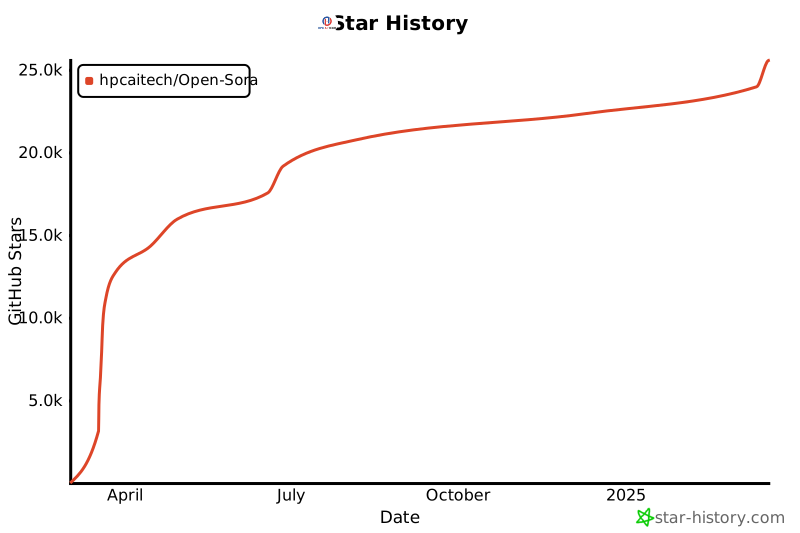](https://star-history.com/#hpcaitech/Open-Sora&Date)
================================================
FILE: assets/texts/example.csv
================================================
text
"Imagine a cyberpunk close-up shot capturing the upper body of a character with an melancholic demeanor. The subject is gesturing with one hand while shaking the head, showcasing natural body language. The background features a vibrant carnival, complementing the character's pose. The lighting is dim and moody, emphasizing the contours of their face and upper body. The camera subtly pans or zooms, drawing attention to the harmony between expression, posture, and setting."
"A sleek red sports car speeds through a winding mountain road, its engine roaring against the backdrop of towering snow-capped peaks. The sunlight glints off the polished surface, creating dazzling reflections. The camera pans to capture the lush greenery surrounding the road. The atmosphere is exhilarating, with a cinematic style emphasizing speed and adventure. The lighting is golden, suggesting early morning or late afternoon."
"A group of fluffy baby chicks huddle together under a heat lamp in a rustic barn. Their soft peeping fills the air as they nudge each other for warmth. The wooden floor beneath them is strewn with straw, and the gentle light creates a cozy, heartwarming atmosphere. The video captures their tiny, detailed movements in a close-up, realistic style."
"A black-and-white film of a pianist playing in an empty theater. His fingers move deftly across the keys, the music echoing in the large, empty hall. Dust motes float in the air, caught in the faint light streaming through the high windows. The grand piano gleams under the spotlight, contrasting with the decaying seats and peeling walls. The atmosphere is haunting and nostalgic."
"A wave of glowing steam crashes into a stone wall, the vapor hissing and swirling as it dissipates."
"A tomato surfing on a piece of lettuce down a waterfall of ranch dressing, with exaggerated surfing moves and creamy wave effects to highlight the 3D animated fun."
"A cheerful panda on a bustling city street, casually playing a violin while sitting on a bench. People passing by stop to enjoy the impromptu performance, and a group of children dance around, clapping their hands to the upbeat tempo. The panda’s paws move swiftly, creating a lively tune that brings a sense of joy and energy to the urban scene."
"A shimmering, crystalline city built into the side of a massive mountain on a distant planet. Waterfalls of liquid light cascade down the cliffs, with hovering bridges connecting the structures. The entire city glows as it absorbs energy from the planet’s core."
================================================
FILE: assets/texts/i2v.csv
================================================
text,ref
"A plump pig wallows in a muddy pond on a rustic farm, its pink snout poking out as it snorts contentedly. The camera captures the pig's playful splashes, sending ripples through the water under the midday sun. Wooden fences and a red barn stand in the background, framed by rolling green hills. The pig's muddy coat glistens in the sunlight, showcasing the simple pleasures of its carefree life.",assets/texts/i2v.png
================================================
FILE: assets/texts/sora.csv
================================================
text
"A stylish woman walks down a Tokyo street filled with warm glowing neon and animated city signage. She wears a black leather jacket, a long red dress, and black boots, and carries a black purse. She wears sunglasses and red lipstick. She walks confidently and casually. The street is damp and reflective, creating a mirror effect of the colorful lights. Many pedestrians walk about."
"Several giant wooly mammoths approach treading through a snowy meadow, their long wooly fur lightly blows in the wind as they walk, snow covered trees and dramatic snow capped mountains in the distance, mid afternoon light with wispy clouds and a sun high in the distance creates a warm glow, the low camera view is stunning capturing the large furry mammal with beautiful photography, depth of field."
"A movie trailer featuring the adventures of the 30 year old space man wearing a red wool knitted motorcycle helmet, blue sky, salt desert, cinematic style, shot on 35mm film, vivid colors."
"Drone view of waves crashing against the rugged cliffs along Big Sur's garay point beach. The crashing blue waters create white-tipped waves, while the golden light of the setting sun illuminates the rocky shore. A small island with a lighthouse sits in the distance, and green shrubbery covers the cliff's edge. The steep drop from the road down to the beach is a dramatic feat, with the cliff's edges jutting out over the sea. This is a view that captures the raw beauty of the coast and the rugged landscape of the Pacific Coast Highway."
"Animated scene features a close-up of a short fluffy monster kneeling beside a melting red candle. The art style is 3D and realistic, with a focus on lighting and texture. The mood of the painting is one of wonder and curiosity, as the monster gazes at the flame with wide eyes and open mouth. Its pose and expression convey a sense of innocence and playfulness, as if it is exploring the world around it for the first time. The use of warm colors and dramatic lighting further enhances the cozy atmosphere of the image."
"A gorgeously rendered papercraft world of a coral reef, rife with colorful fish and sea creatures."
"This close-up shot of a Victoria crowned pigeon showcases its striking blue plumage and red chest. Its crest is made of delicate, lacy feathers, while its eye is a striking red color. The bird's head is tilted slightly to the side, giving the impression of it looking regal and majestic. The background is blurred, drawing attention to the bird's striking appearance."
Photorealistic closeup video of two pirate ships battling each other as they sail inside a cup of coffee.
"A young man at his 20s is sitting on a piece of cloud in the sky, reading a book."
Historical footage of California during the gold rush.
A close up view of a glass sphere that has a zen garden within it. There is a small dwarf in the sphere who is raking the zen garden and creating patterns in the sand.
"Extreme close up of a 24 year old woman's eye blinking, standing in Marrakech during magic hour, cinematic film shot in 70mm, depth of field, vivid colors, cinematic"
A cartoon kangaroo disco dances.
"A beautiful homemade video showing the people of Lagos, Nigeria in the year 2056. Shot with a mobile phone camera."
A petri dish with a bamboo forest growing within it that has tiny red pandas running around.
"The camera rotates around a large stack of vintage televisions all showing different programs — 1950s sci-fi movies, horror movies, news, static, a 1970s sitcom, etc, set inside a large New York museum gallery."
"3D animation of a small, round, fluffy creature with big, expressive eyes explores a vibrant, enchanted forest. The creature, a whimsical blend of a rabbit and a squirrel, has soft blue fur and a bushy, striped tail. It hops along a sparkling stream, its eyes wide with wonder. The forest is alive with magical elements: flowers that glow and change colors, trees with leaves in shades of purple and silver, and small floating lights that resemble fireflies. The creature stops to interact playfully with a group of tiny, fairy-like beings dancing around a mushroom ring. The creature looks up in awe at a large, glowing tree that seems to be the heart of the forest."
"The camera follows behind a white vintage SUV with a black roof rack as it speeds up a steep dirt road surrounded by pine trees on a steep mountain slope, dust kicks up from it's tires, the sunlight shines on the SUV as it speeds along the dirt road, casting a warm glow over the scene. The dirt road curves gently into the distance, with no other cars or vehicles in sight. The trees on either side of the road are redwoods, with patches of greenery scattered throughout. The car is seen from the rear following the curve with ease, making it seem as if it is on a rugged drive through the rugged terrain. The dirt road itself is surrounded by steep hills and mountains, with a clear blue sky above with wispy clouds."
Reflections in the window of a train traveling through the Tokyo suburbs.
"A drone camera circles around a beautiful historic church built on a rocky outcropping along the Amalfi Coast, the view showcases historic and magnificent architectural details and tiered pathways and patios, waves are seen crashing against the rocks below as the view overlooks the horizon of the coastal waters and hilly landscapes of the Amalfi Coast Italy, several distant people are seen walking and enjoying vistas on patios of the dramatic ocean views, the warm glow of the afternoon sun creates a magical and romantic feeling to the scene, the view is stunning captured with beautiful photography."
"A large orange octopus is seen resting on the bottom of the ocean floor, blending in with the sandy and rocky terrain. Its tentacles are spread out around its body, and its eyes are closed. The octopus is unaware of a king crab that is crawling towards it from behind a rock, its claws raised and ready to attack. The crab is brown and spiny, with long legs and antennae. The scene is captured from a wide angle, showing the vastness and depth of the ocean. The water is clear and blue, with rays of sunlight filtering through. The shot is sharp and crisp, with a high dynamic range. The octopus and the crab are in focus, while the background is slightly blurred, creating a depth of field effect."
"A flock of paper airplanes flutters through a dense jungle, weaving around trees as if they were migrating birds."
"A cat waking up its sleeping owner demanding breakfast. The owner tries to ignore the cat, but the cat tries new tactics and finally the owner pulls out a secret stash of treats from under the pillow to hold the cat off a little longer."
Borneo wildlife on the Kinabatangan River
A Chinese Lunar New Year celebration video with Chinese Dragon.
Tour of an art gallery with many beautiful works of art in different styles.
"Beautiful, snowy Tokyo city is bustling. The camera moves through the bustling city street, following several people enjoying the beautiful snowy weather and shopping at nearby stalls. Gorgeous sakura petals are flying through the wind along with snowflakes."
A stop motion animation of a flower growing out of the windowsill of a suburban house.
The story of a robot's life in a cyberpunk setting.
"An extreme close-up of an gray-haired man with a beard in his 60s, he is deep in thought pondering the history of the universe as he sits at a cafe in Paris, his eyes focus on people offscreen as they walk as he sits mostly motionless, he is dressed in a wool coat suit coat with a button-down shirt , he wears a brown beret and glasses and has a very professorial appearance, and the end he offers a subtle closed-mouth smile as if he found the answer to the mystery of life, the lighting is very cinematic with the golden light and the Parisian streets and city in the background, depth of field, cinematic 35mm film."
"A beautiful silhouette animation shows a wolf howling at the moon, feeling lonely, until it finds its pack."
"New York City submerged like Atlantis. Fish, whales, sea turtles and sharks swim through the streets of New York."
"A litter of golden retriever puppies playing in the snow. Their heads pop out of the snow, covered in."
"Step-printing scene of a person running, cinematic film shot in 35mm."
"Five gray wolf pups frolicking and chasing each other around a remote gravel road, surrounded by grass. The pups run and leap, chasing each other, and nipping at each other, playing."
Basketball through hoop then explodes.
"Archeologists discover a generic plastic chair in the desert, excavating and dusting it with great care."
"A grandmother with neatly combed grey hair stands behind a colorful birthday cake with numerous candles at a wood dining room table, expression is one of pure joy and happiness, with a happy glow in her eye. She leans forward and blows out the candles with a gentle puff, the cake has pink frosting and sprinkles and the candles cease to flicker, the grandmother wears a light blue blouse adorned with floral patterns, several happy friends and family sitting at the table can be seen celebrating, out of focus. The scene is beautifully captured, cinematic, showing a 3/4 view of the grandmother and the dining room. Warm color tones and soft lighting enhance the mood."
The camera directly faces colorful buildings in Burano Italy. An adorable dalmation looks through a window on a building on the ground floor. Many people are walking and cycling along the canal streets in front of the buildings.
"An adorable happy otter confidently stands on a surfboard wearing a yellow lifejacket, riding along turquoise tropical waters near lush tropical islands, 3D digital render art style."
"This close-up shot of a chameleon showcases its striking color changing capabilities. The background is blurred, drawing attention to the animal's striking appearance."
A corgi vlogging itself in tropical Maui.
"A white and orange tabby cat is seen happily darting through a dense garden, as if chasing something. Its eyes are wide and happy as it jogs forward, scanning the branches, flowers, and leaves as it walks. The path is narrow as it makes its way between all the plants. the scene is captured from a ground-level angle, following the cat closely, giving a low and intimate perspective. The image is cinematic with warm tones and a grainy texture. The scattered daylight between the leaves and plants above creates a warm contrast, accentuating the cat's orange fur. The shot is clear and sharp, with a shallow depth of field."
"Aerial view of Santorini during the blue hour, showcasing the stunning architecture of white Cycladic buildings with blue domes. The caldera views are breathtaking, and the lighting creates a beautiful, serene atmosphere."
"Tiltshift of a construction site filled with workers, equipment, and heavy machinery."
"A giant, towering cloud in the shape of a man looms over the earth. The cloud man shoots lighting bolts down to the earth."
A Samoyed and a Golden Retriever dog are playfully romping through a futuristic neon city at night. The neon lights emitted from the nearby buildings glistens off of their fur.
"The Glenfinnan Viaduct is a historic railway bridge in Scotland, UK, that crosses over the west highland line between the towns of Mallaig and Fort William. It is a stunning sight as a steam train leaves the bridge, traveling over the arch-covered viaduct. The landscape is dotted with lush greenery and rocky mountains, creating a picturesque backdrop for the train journey. The sky is blue and the sun is shining, making for a beautiful day to explore this majestic spot."
================================================
FILE: configs/diffusion/inference/256px.py
================================================
save_dir = "samples" # save directory
seed = 42 # random seed (except seed for z)
batch_size = 1
dtype = "bf16"
cond_type = "t2v"
# conditional inference options:
# t2v: text-to-video
# i2v_head: image-to-video (head)
# i2v_tail: image-to-video (tail)
# i2v_loop: connect images
# v2v_head_half: video extension with first half
# v2v_tail_half: video extension with second half
dataset = dict(type="text")
sampling_option = dict(
resolution="256px", # 256px or 768px
aspect_ratio="16:9", # 9:16 or 16:9 or 1:1
num_frames=129, # number of frames
num_steps=50, # number of steps
shift=True,
temporal_reduction=4,
is_causal_vae=True,
guidance=7.5, # guidance for text-to-video
guidance_img=3.0, # guidance for image-to-video
text_osci=True, # enable text guidance oscillation
image_osci=True, # enable image guidance oscillation
scale_temporal_osci=True,
method="i2v", # hard-coded for now
seed=None, # random seed for z
)
motion_score = "4" # motion score for video generation
fps_save = 24 # fps for video generation and saving
# Define model components
model = dict(
type="flux",
from_pretrained="./ckpts/Open_Sora_v2.safetensors",
guidance_embed=False,
fused_qkv=False,
use_liger_rope=True,
# model architecture
in_channels=64,
vec_in_dim=768,
context_in_dim=4096,
hidden_size=3072,
mlp_ratio=4.0,
num_heads=24,
depth=19,
depth_single_blocks=38,
axes_dim=[16, 56, 56],
theta=10_000,
qkv_bias=True,
cond_embed=True,
)
ae = dict(
type="hunyuan_vae",
from_pretrained="./ckpts/hunyuan_vae.safetensors",
in_channels=3,
out_channels=3,
layers_per_block=2,
latent_channels=16,
use_spatial_tiling=True,
use_temporal_tiling=False,
)
t5 = dict(
type="text_embedder",
from_pretrained="./ckpts/google/t5-v1_1-xxl",
max_length=512,
shardformer=True,
)
clip = dict(
type="text_embedder",
from_pretrained="./ckpts/openai/clip-vit-large-patch14",
max_length=77,
)
================================================
FILE: configs/diffusion/inference/256px_tp.py
================================================
_base_ = [ # inherit grammer from mmengine
"256px.py",
"plugins/tp.py", # use tensor parallel
]
================================================
FILE: configs/diffusion/inference/768px.py
================================================
_base_ = [ # inherit grammer from mmengine
"256px.py",
"plugins/sp.py", # use sequence parallel
]
sampling_option = dict(
resolution="768px",
)
================================================
FILE: configs/diffusion/inference/high_compression.py
================================================
_base_ = ["t2i2v_768px.py"]
# no need for parallelism
plugin = None
plugin_config = None
plugin_ae = None
plugin_config_ae = None
# model settings
patch_size = 1
model = dict(
from_pretrained="./ckpts/Open_Sora_v2_Video_DC_AE.safetensors",
in_channels=128,
cond_embed=True,
patch_size=1,
)
# AE settings
ae = dict(
_delete_=True,
type="dc_ae",
from_scratch=True,
model_name="dc-ae-f32t4c128",
from_pretrained="./ckpts/F32T4C128_AE.safetensors",
use_spatial_tiling=True,
use_temporal_tiling=True,
spatial_tile_size=256,
temporal_tile_size=32,
tile_overlap_factor=0.25,
)
ae_spatial_compression = 32
sampling_option = dict(
num_frames=128,
)
================================================
FILE: configs/diffusion/inference/plugins/sp.py
================================================
plugin = "hybrid"
plugin_config = dict(
tp_size=1,
pp_size=1,
sp_size=8,
sequence_parallelism_mode="ring_attn",
enable_sequence_parallelism=True,
static_graph=True,
zero_stage=2,
overlap_allgather=False,
)
plugin_ae = "hybrid"
plugin_config_ae = dict(
tp_size=8,
pp_size=1,
sp_size=1,
zero_stage=2,
overlap_allgather=False,
)
================================================
FILE: configs/diffusion/inference/plugins/t2i2v.py
================================================
use_t2i2v = True
# flux configurations
img_flux = dict(
type="flux",
from_pretrained="./ckpts/flux1-dev.safetensors",
guidance_embed=True,
# model architecture
in_channels=64,
vec_in_dim=768,
context_in_dim=4096,
hidden_size=3072,
mlp_ratio=4.0,
num_heads=24,
depth=19,
depth_single_blocks=38,
axes_dim=[16, 56, 56],
theta=10_000,
qkv_bias=True,
cond_embed=False, # pass i2v & v2v info, for t2v need this layer too but with x_cond and mask all set to 0
)
img_flux_ae = dict(
type="autoencoder_2d",
from_pretrained="./ckpts/flux1-dev-ae.safetensors",
resolution=256,
in_channels=3,
ch=128,
out_ch=3,
ch_mult=[1, 2, 4, 4],
num_res_blocks=2,
z_channels=16,
scale_factor=0.3611,
shift_factor=0.1159,
)
img_resolution = "768px"
================================================
FILE: configs/diffusion/inference/plugins/tp.py
================================================
plugin = "hybrid"
plugin_config = dict(
tp_size=8,
pp_size=1,
sp_size=1,
zero_stage=2,
overlap_allgather=False,
)
plugin_ae = "hybrid"
plugin_config_ae = dict(
tp_size=8,
pp_size=1,
sp_size=1,
zero_stage=2,
overlap_allgather=False,
)
================================================
FILE: configs/diffusion/inference/t2i2v_256px.py
================================================
_base_ = [ # inherit grammer from mmengine
"256px.py",
"plugins/t2i2v.py",
]
================================================
FILE: configs/diffusion/inference/t2i2v_768px.py
================================================
_base_ = [ # inherit grammer from mmengine
"768px.py",
"plugins/t2i2v.py",
]
================================================
FILE: configs/diffusion/train/demo.py
================================================
_base_ = ["stage1.py"]
bucket_config = {
"_delete_": True,
"256px": {
1: (1.0, 1),
33: (1.0, 1),
97: (1.0, 1),
129: (1.0, 1),
},
}
================================================
FILE: configs/diffusion/train/high_compression.py
================================================
_base_ = ["image.py"]
bucket_config = {
"_delete_": True,
"768px": {
1: (1.0, 20),
16: (1.0, 8),
20: (1.0, 8),
24: (1.0, 8),
28: (1.0, 8),
32: (1.0, 8),
36: (1.0, 4),
40: (1.0, 4),
44: (1.0, 4),
48: (1.0, 4),
52: (1.0, 4),
56: (1.0, 4),
60: (1.0, 4),
64: (1.0, 4),
68: (1.0, 3),
72: (1.0, 3),
76: (1.0, 3),
80: (1.0, 3),
84: (1.0, 3),
88: (1.0, 3),
92: (1.0, 3),
96: (1.0, 3),
100: (1.0, 2),
104: (1.0, 2),
108: (1.0, 2),
112: (1.0, 2),
116: (1.0, 2),
120: (1.0, 2),
124: (1.0, 2),
128: (1.0, 2), # 30s
},
}
condition_config = dict(
t2v=1,
i2v_head=7,
)
grad_ckpt_settings = (100, 100)
patch_size = 1
model = dict(
from_pretrained=None,
grad_ckpt_settings=grad_ckpt_settings,
in_channels=128,
cond_embed=True,
patch_size=patch_size,
)
ae = dict(
_delete_=True,
type="dc_ae",
model_name="dc-ae-f32t4c128",
from_pretrained="./ckpts/F32T4C128_AE.safetensors",
from_scratch=True,
scaling_factor=0.493,
use_spatial_tiling=True,
use_temporal_tiling=True,
spatial_tile_size=256,
temporal_tile_size=32,
tile_overlap_factor=0.25,
)
is_causal_vae = False
ae_spatial_compression = 32
ckpt_every = 250
lr = 3e-5
optim = dict(lr=lr)
================================================
FILE: configs/diffusion/train/image.py
================================================
# Dataset settings
dataset = dict(
type="video_text",
transform_name="resize_crop",
fps_max=24, # the desired fps for training
vmaf=True, # load vmaf scores into text
)
grad_ckpt_settings = (8, 100) # set the grad checkpoint settings
bucket_config = {
"256px": {1: (1.0, 50)},
"768px": {1: (0.5, 11)},
"1024px": {1: (0.5, 7)},
}
# Define model components
model = dict(
type="flux",
from_pretrained=None,
strict_load=False,
guidance_embed=False,
fused_qkv=False,
use_liger_rope=True,
grad_ckpt_settings=grad_ckpt_settings,
# model architecture
in_channels=64,
vec_in_dim=768,
context_in_dim=4096,
hidden_size=3072,
mlp_ratio=4.0,
num_heads=24,
depth=19,
depth_single_blocks=38,
axes_dim=[16, 56, 56],
theta=10_000,
qkv_bias=True,
)
dropout_ratio = { # probability for dropout text embedding
"t5": 0.31622777,
"clip": 0.31622777,
}
ae = dict(
type="hunyuan_vae",
from_pretrained="./ckpts/hunyuan_vae.safetensors",
in_channels=3,
out_channels=3,
layers_per_block=2,
latent_channels=16,
use_spatial_tiling=True,
use_temporal_tiling=False,
)
is_causal_vae = True
t5 = dict(
type="text_embedder",
from_pretrained="google/t5-v1_1-xxl",
cache_dir="/mnt/ddn/sora/tmp_load/huggingface/hub/",
max_length=512,
shardformer=True,
)
clip = dict(
type="text_embedder",
from_pretrained="openai/clip-vit-large-patch14",
cache_dir="/mnt/ddn/sora/tmp_load/huggingface/hub/",
max_length=77,
)
# Optimization settings
lr = 1e-5
eps = 1e-15
optim = dict(
cls="HybridAdam",
lr=lr,
eps=eps,
weight_decay=0.0,
adamw_mode=True,
)
warmup_steps = 0
update_warmup_steps = True
grad_clip = 1.0
accumulation_steps = 1
ema_decay = None
# Acceleration settings
prefetch_factor = 2
num_workers = 12
num_bucket_build_workers = 64
dtype = "bf16"
plugin = "zero2"
grad_checkpoint = True
plugin_config = dict(
reduce_bucket_size_in_m=128,
overlap_allgather=False,
)
pin_memory_cache_pre_alloc_numels = [(260 + 20) * 1024 * 1024] * 24 + [
(34 + 20) * 1024 * 1024
] * 4
async_io = False
# Other settings
seed = 42
outputs = "outputs"
epochs = 1000
log_every = 10
ckpt_every = 100
keep_n_latest = 20
wandb_project = "mmdit"
save_master_weights = True
load_master_weights = True
# For debugging
# record_time = True
# record_barrier = True
================================================
FILE: configs/diffusion/train/stage1.py
================================================
_base_ = ["image.py"]
dataset = dict(memory_efficient=False)
# new config
grad_ckpt_settings = (8, 100)
bucket_config = {
"_delete_": True,
"256px": {
1: (1.0, 45),
5: (1.0, 12),
9: (1.0, 12),
13: (1.0, 12),
17: (1.0, 12),
21: (1.0, 12),
25: (1.0, 12),
29: (1.0, 12),
33: (1.0, 12),
37: (1.0, 6),
41: (1.0, 6),
45: (1.0, 6),
49: (1.0, 6),
53: (1.0, 6),
57: (1.0, 6),
61: (1.0, 6),
65: (1.0, 6),
69: (1.0, 4),
73: (1.0, 4),
77: (1.0, 4),
81: (1.0, 4),
85: (1.0, 4),
89: (1.0, 4),
93: (1.0, 4),
97: (1.0, 4),
101: (1.0, 3),
105: (1.0, 3),
109: (1.0, 3),
113: (1.0, 3),
117: (1.0, 3),
121: (1.0, 3),
125: (1.0, 3),
129: (1.0, 3),
},
"768px": {
1: (0.5, 13),
},
"1024px": {
1: (0.5, 7),
},
}
model = dict(grad_ckpt_settings=grad_ckpt_settings)
lr = 5e-5
optim = dict(lr=lr)
ckpt_every = 2000
keep_n_latest = 20
================================================
FILE: configs/diffusion/train/stage1_i2v.py
================================================
_base_ = ["stage1.py"]
# Define model components
model = dict(cond_embed=True)
condition_config = dict(
t2v=1,
i2v_head=5, # train i2v (image as first frame) with weight 5
i2v_loop=1, # train image connection with weight 1
i2v_tail=1, # train i2v (image as last frame) with weight 1
)
lr = 1e-5
optim = dict(lr=lr)
================================================
FILE: configs/diffusion/train/stage2.py
================================================
_base_ = ["image.py"]
# new config
grad_ckpt_settings = (100, 100)
plugin = "hybrid"
plugin_config = dict(
tp_size=1,
pp_size=1,
sp_size=4,
sequence_parallelism_mode="ring_attn",
enable_sequence_parallelism=True,
static_graph=True,
zero_stage=2,
)
bucket_config = {
"_delete_": True,
"256px": {
1: (1.0, 130),
5: (1.0, 14),
9: (1.0, 14),
13: (1.0, 14),
17: (1.0, 14),
21: (1.0, 14),
25: (1.0, 14),
29: (1.0, 14),
33: (1.0, 14),
37: (1.0, 10),
41: (1.0, 10),
45: (1.0, 10),
49: (1.0, 10),
53: (1.0, 10),
57: (1.0, 10),
61: (1.0, 10),
65: (1.0, 10),
73: (1.0, 7),
77: (1.0, 7),
81: (1.0, 7),
85: (1.0, 7),
89: (1.0, 7),
93: (1.0, 7),
97: (1.0, 7),
101: (1.0, 6),
105: (1.0, 6),
109: (1.0, 6),
113: (1.0, 6),
117: (1.0, 6),
121: (1.0, 6),
125: (1.0, 6),
129: (1.0, 6),
},
"768px": {
1: (1.0, 38),
5: (1.0, 6),
9: (1.0, 6),
13: (1.0, 6),
17: (1.0, 6),
21: (1.0, 6),
25: (1.0, 6),
29: (1.0, 6),
33: (1.0, 6),
37: (1.0, 4),
41: (1.0, 4),
45: (1.0, 4),
49: (1.0, 4),
53: (1.0, 4),
57: (1.0, 4),
61: (1.0, 4),
65: (1.0, 4),
69: (1.0, 3),
73: (1.0, 3),
77: (1.0, 3),
81: (1.0, 3),
85: (1.0, 3),
89: (1.0, 3),
93: (1.0, 3),
97: (1.0, 3),
101: (1.0, 2),
105: (1.0, 2),
109: (1.0, 2),
113: (1.0, 2),
117: (1.0, 2),
121: (1.0, 2),
125: (1.0, 2),
129: (1.0, 2),
},
}
model = dict(grad_ckpt_settings=grad_ckpt_settings)
lr = 5e-5
optim = dict(lr=lr)
ckpt_every = 200
keep_n_latest = 20
================================================
FILE: configs/diffusion/train/stage2_i2v.py
================================================
_base_ = ["stage2.py"]
# Define model components
model = dict(cond_embed=True)
grad_ckpt_buffer_size = 25 * 1024**3
condition_config = dict(
t2v=1,
i2v_head=5,
i2v_loop=1,
i2v_tail=1,
)
is_causal_vae = True
bucket_config = {
"_delete_": True,
"256px": {
1: (1.0, 195),
5: (1.0, 80),
9: (1.0, 80),
13: (1.0, 80),
17: (1.0, 80),
21: (1.0, 80),
25: (1.0, 80),
29: (1.0, 80),
33: (1.0, 80),
37: (1.0, 40),
41: (1.0, 40),
45: (1.0, 40),
49: (1.0, 40),
53: (1.0, 40),
57: (1.0, 40),
61: (1.0, 40),
65: (1.0, 40),
69: (1.0, 28),
73: (1.0, 28),
77: (1.0, 28),
81: (1.0, 28),
85: (1.0, 28),
89: (1.0, 28),
93: (1.0, 28),
97: (1.0, 28),
101: (1.0, 23),
105: (1.0, 23),
109: (1.0, 23),
113: (1.0, 23),
117: (1.0, 23),
121: (1.0, 23),
125: (1.0, 23),
129: (1.0, 23),
},
"768px": {
1: (0.5, 38),
5: (0.5, 10),
9: (0.5, 10),
13: (0.5, 10),
17: (0.5, 10),
21: (0.5, 10),
25: (0.5, 10),
29: (0.5, 10),
33: (0.5, 10),
37: (0.5, 5),
41: (0.5, 5),
45: (0.5, 5),
49: (0.5, 5),
53: (0.5, 5),
57: (0.5, 5),
61: (0.5, 5),
65: (0.5, 5),
69: (0.5, 3),
73: (0.5, 3),
77: (0.5, 3),
81: (0.5, 3),
85: (0.5, 3),
89: (0.5, 3),
93: (0.5, 3),
97: (0.5, 3),
101: (0.5, 2),
105: (0.5, 2),
109: (0.5, 2),
113: (0.5, 2),
117: (0.5, 2),
121: (0.5, 2),
125: (0.5, 2),
129: (0.5, 2),
},
}
================================================
FILE: configs/vae/inference/hunyuanvideo_vae.py
================================================
dtype = "bf16"
batch_size = 1
seed = 42
save_dir = "samples/hunyuanvideo_vae"
plugin = "zero2"
dataset = dict(
type="video_text",
transform_name="resize_crop",
fps_max=16,
data_path="datasets/pexels_45k_necessary.csv",
)
bucket_config = {
"512px_ar1:1": {97: (1.0, 1)},
}
num_workers = 24
num_bucket_build_workers = 16
prefetch_factor = 4
model = dict(
type="hunyuan_vae",
from_pretrained="./ckpts/hunyuan_vae.safetensors",
in_channels=3,
out_channels=3,
layers_per_block=2,
latent_channels=16,
scale_factor=0.476986,
shift_factor=0,
use_spatial_tiling=True,
use_temporal_tiling=True,
time_compression_ratio=4,
)
================================================
FILE: configs/vae/inference/video_dc_ae.py
================================================
dtype = "bf16"
batch_size = 1
seed = 42
dataset = dict(
type="video_text",
transform_name="resize_crop",
fps_max=16,
data_path="datasets/pexels_45k_necessary.csv",
)
bucket_config = {
"512px_ar1:1": {96: (1.0, 1)},
}
model = dict(
type="dc_ae",
model_name="dc-ae-f32t4c128",
from_pretrained="./ckpts/F32T4C128_AE.safetensors",
from_scratch=True,
use_spatial_tiling=True,
use_temporal_tiling=True,
spatial_tile_size=256,
temporal_tile_size=32,
tile_overlap_factor=0.25,
)
save_dir = "samples/video_dc_ae"
num_workers = 24
num_bucket_build_workers = 16
prefetch_factor = 4
================================================
FILE: configs/vae/train/video_dc_ae.py
================================================
# ============
# model config
# ============
model = dict(
type="dc_ae",
model_name="dc-ae-f32t4c128",
from_scratch=True,
from_pretrained=None,
)
# ============
# data config
# ============
dataset = dict(
type="video_text",
transform_name="resize_crop",
data_path="datasets/pexels_45k_necessary.csv",
fps_max=24,
)
bucket_config = {
"256px_ar1:1": {32: (1.0, 1)},
}
num_bucket_build_workers = 64
num_workers = 12
prefetch_factor = 2
# ============
# train config
# ============
optim = dict(
cls="HybridAdam",
lr=5e-5,
eps=1e-8,
weight_decay=0.0,
adamw_mode=True,
betas=(0.9, 0.98),
)
lr_scheduler = dict(warmup_steps=0)
mixed_strategy = "mixed_video_image"
mixed_image_ratio = 0.2 # 1:4
dtype = "bf16"
plugin = "zero2"
plugin_config = dict(
reduce_bucket_size_in_m=128,
overlap_allgather=False,
)
grad_clip = 1.0
grad_checkpoint = False
pin_memory_cache_pre_alloc_numels = [50 * 1024 * 1024] * num_workers * prefetch_factor
seed = 42
outputs = "outputs"
epochs = 100
log_every = 10
ckpt_every = 3000
keep_n_latest = 50
ema_decay = 0.99
wandb_project = "dcae"
update_warmup_steps = True
# ============
# loss config
# ============
vae_loss_config = dict(
perceptual_loss_weight=0.5,
kl_loss_weight=0,
)
================================================
FILE: configs/vae/train/video_dc_ae_disc.py
================================================
_base_ = ["video_dc_ae.py"]
discriminator = dict(
type="N_Layer_discriminator_3D",
from_pretrained=None,
input_nc=3,
n_layers=5,
conv_cls="conv3d"
)
disc_lr_scheduler = dict(warmup_steps=0)
gen_loss_config = dict(
gen_start=0,
disc_weight=0.05,
)
disc_loss_config = dict(
disc_start=0,
disc_loss_type="hinge",
)
optim_discriminator = dict(
cls="HybridAdam",
lr=1e-4,
eps=1e-8,
weight_decay=0.0,
adamw_mode=True,
betas=(0.9, 0.98),
)
grad_checkpoint = True
model = dict(
disc_off_grad_ckpt = True, # set to true if your `grad_checkpoint` is True
)
================================================
FILE: docs/ae.md
================================================
# Step by step to train and evaluate an video autoencoder (AE)
Inspired by [SANA](https://arxiv.org/abs/2410.10629), we aim to drastically increase the compression ratio in the AE. We propose a video autoencoder architecture based on [DC-AE](https://github.com/mit-han-lab/efficientvit), the __Video DC-AE__, which compression the video by 4x in the temporal dimension and 32x32 in the spatial dimension. Compared to [HunyuanVideo](https://github.com/Tencent/HunyuanVideo)'s VAE of 4x8x8, our proposed AE has a much higher spatial compression ratio.
Thus, we can effectively reduce the token length in the diffusion model by a total of 16x (assuming the same patch sizes), drastically increase both training and inference speed.
## Data Preparation
Follow this [guide](./train.md#prepare-dataset) to prepare the __DATASET__ for training and inference. You may use our provided dataset or custom ones.
To use custom dataset, pass the argument `--dataset.data_path <your_data_path>` to the following training or inference command.
## Training
We train our __Video DC-AE__ from scratch on 8xGPUs for 3 weeks.
We first train with the following command:
```bash
torchrun --nproc_per_node 8 scripts/vae/train.py configs/vae/train/video_dc_ae.py
```
When the model is almost converged, we add a discriminator and continue to train the model with the checkpoint `model_ckpt` using the following command:
```bash
torchrun --nproc_per_node 8 scripts/vae/train.py configs/vae/train/video_dc_ae_disc.py --model.from_pretrained <model_ckpt>
```
You may pass the flag `--wandb True` if you have a [wandb](https://wandb.ai/home) account and wish to track the training progress online.
## Inference
Download the relevant weights following [this guide](../README.md#model-download). Alternatively, you may use your own trained model by passing the following flag `--model.from_pretrained <your_model_ckpt_path>`.
### Video DC-AE
Use the following code to reconstruct the videos using our trained `Video DC-AE`:
```bash
torchrun --nproc_per_node 1 --standalone scripts/vae/inference.py configs/vae/inference/video_dc_ae.py --save-dir samples/dcae
```
### Hunyuan Video
Alternatively, we have incorporated [HunyuanVideo vae](https://github.com/Tencent/HunyuanVideo) into our code, you may run inference with the following command:
```bash
torchrun --nproc_per_node 1 --standalone scripts/vae/inference.py configs/vae/inference/hunyuanvideo_vae.py --save-dir samples/hunyuanvideo_vae
```
## Config Interpretation
All AE configs are located in `configs/vae/`, divided into configs for training (`configs/vae/train`) and for inference (`configs/vae/inference`).
### Training Config
For training, the same config rules as [those](./train.md#config) for the diffusion model are applied.
<details>
<summary> <b>Loss Config</b> </summary>
Our __Video DC-AE__ is based on the [DC-AE](https://github.com/mit-han-lab/efficientvit) architecture, which doesn't have a variational component. Thus, our training simply composes of the *reconstruction loss* and the *perceptual loss*.
Experimentally, we found that setting a ratio of 0.5 for the perceptual loss is effective.
```python
vae_loss_config = dict(
perceptual_loss_weight=0.5, # weigh the perceptual loss by 0.5
kl_loss_weight=0, # no KL loss
)
```
In a later stage, we include a discriminator, and the training loss for the ae has an additional generator loss component, where we use a small ratio of 0.05 to weigh the loss calculated:
```python
gen_loss_config = dict(
gen_start=0, # include generator loss from step 0 onwards
disc_weight=0.05, # weigh the loss by 0.05
)
```
The discriminator we use is trained from scratch, and it's loss is simply the hinged loss:
```python
disc_loss_config = dict(
disc_start=0, # update the discriminator from step 0 onwards
disc_loss_type="hinge", # the discriminator loss type
)
```
</details>
<details>
<summary> <b> Data Bucket Config </b> </summary>
For the data bucket, we used 32 frames of 256px videos to train our AE.
```python
bucket_config = {
"256px_ar1:1": {32: (1.0, 1)},
}
```
</details>
<details>
<summary> <b>Train with more frames or higher resolutions</b> </summary>
If you train with longer frames or larger resolutions, you may increase the `spatial_tile_size` and `temporal_tile_size` during inference without degrading the AE performance (see [Inference Config](ae.md#inference-config)). This may give you advantage of faster AE inference such as when training the diffusion model (although at the cost of slower AE training).
You may increase the video frames to 96 (although multiples of 4 works, we generally recommend to use frame numbers of multiples of 32):
```python
bucket_config = {
"256px_ar1:1": {96: (1.0, 1)},
}
grad_checkpoint = True
```
or train for higher resolution such as 512px:
```python
bucket_config = {
"512px_ar1:1": {32: (1.0, 1)},
}
grad_checkpoint = True
```
Note that gradient checkpoint needs to be turned on in order to avoid prevent OOM error.
Moreover, if `grad_checkpointing` is set to `True` in discriminator training, you need to pass the flag `--model.disc_off_grad_ckpt True` or simply set in the config:
```python
grad_checkpoint = True
model = dict(
disc_off_grad_ckpt = True, # set to true if your `grad_checkpoint` is True
)
```
This is to make sure the discriminator loss will have a gradient at the laster later during adaptive loss calculation.
</details>
### Inference Config
For AE inference, we have replicated the tiling mechanism in hunyuan to our Video DC-AE, which can be turned on with the following:
```python
model = dict(
...,
use_spatial_tiling=True,
use_temporal_tiling=True,
spatial_tile_size=256,
temporal_tile_size=32,
tile_overlap_factor=0.25,
...,
)
```
By default, both spatial tiling and temporal tiling are turned on for the best performance.
Since our Video DC-AE is trained on 256px videos of 32 frames only, `spatial_tile_size` should be set to 256 and `temporal_tile_size` should be set to 32.
If you train your own Video DC-AE with other resolutions and length, you may adjust the values accordingly.
You can specify the directory to store output samples with `--save_dir <your_dir>` or setting it in config, for instance:
```python
save_dir = "./samples"
```
================================================
FILE: docs/hcae.md
================================================
# 10× inference speedup with high-compression autoencoder
The high computational cost of training video generation models arises from the
large number of tokens and the dominance of attention computation. To further reduce training expenses,
we explore training video generation models with high-compression autoencoders (Video DC-AEs). As shown in the comparason below, by switching to the Video DC-AE with a much higher downsample ratio (4 x 32 x 32), we can afford to further reduce the patch size to 1 and still achieve __5.2× speedup in training throughput__ and __10x speedup during inference__:

Nevertheless, despite the advantanges in drastically lower computation costs, other challenges remain. For instance, larger channels low down convergance. Our generation model adapted with a 128-channel Video DC-AE for 25K iterations achieves a loss level of 0.5, as compared to 0.1 from the initialization model. While the fast video generation model underperforms the original, it still captures spatial-temporal
relationships. We release this model to the research community for further exploration.
Checkout more details in our [report](https://arxiv.org/abs/2503.09642v1).
## Model Download
Download from 🤗 [Huggingface](https://huggingface.co/hpcai-tech/Open-Sora-v2-Video-DC-AE):
```bash
pip install "huggingface_hub[cli]"
huggingface-cli download hpcai-tech/Open-Sora-v2-Video-DC-AE --local-dir ./ckpts
```
## Inference
To inference on our fast video generation model:
```bash
torchrun --nproc_per_node 1 --standalone scripts/diffusion/inference.py configs/diffusion/inference/high_compression.py --prompt "The story of a robot's life in a cyberpunk setting."
```
## Training
Follow this [guide](./train.md#prepare-dataset) to parepare the __DATASET__ for training.
Then, you may train your own fast generation model with the following command:
```bash
torchrun --nproc_per_node 8 scripts/diffusion/train.py configs/diffusion/train/high_compression.py --dataset.data-path datasets/pexels_45k_necessary.csv
```
================================================
FILE: docs/report_01.md
================================================
# Open-Sora 1.0 Report
OpenAI's Sora is amazing at generating one minutes high quality videos. However, it reveals almost no information about its details. To make AI more "open", we are dedicated to build an open-source version of Sora. This report describes our first attempt to train a transformer-based video diffusion model.
## Efficiency in choosing the architecture
To lower the computational cost, we want to utilize existing VAE models. Sora uses spatial-temporal VAE to reduce the temporal dimensions. However, we found that there is no open-source high-quality spatial-temporal VAE model. [MAGVIT](https://github.com/google-research/magvit)'s 4x4x4 VAE is not open-sourced, while [VideoGPT](https://wilson1yan.github.io/videogpt/index.html)'s 2x4x4 VAE has a low quality in our experiments. Thus, we decided to use a 2D VAE (from [Stability-AI](https://huggingface.co/stabilityai/sd-vae-ft-mse-original)) in our first version.
The video training involves a large amount of tokens. Considering 24fps 1min videos, we have 1440 frames. With VAE downsampling 4x and patch size downsampling 2x, we have 1440x1024≈1.5M tokens. Full attention on 1.5M tokens leads to a huge computational cost. Thus, we use spatial-temporal attention to reduce the cost following [Latte](https://github.com/Vchitect/Latte).
As shown in the figure, we insert a temporal attention right after each spatial attention in STDiT (ST stands for spatial-temporal). This is similar to variant 3 in Latte's paper. However, we do not control a similar number of parameters for these variants. While Latte's paper claims their variant is better than variant 3, our experiments on 16x256x256 videos show that with same number of iterations, the performance ranks as: DiT (full) > STDiT (Sequential) > STDiT (Parallel) ≈ Latte. Thus, we choose STDiT (Sequential) out of efficiency. Speed benchmark is provided [here](/docs/acceleration.md#efficient-stdit).

To focus on video generation, we hope to train the model based on a powerful image generation model. [PixArt-α](https://github.com/PixArt-alpha/PixArt-alpha) is an efficiently trained high-quality image generation model with T5-conditioned DiT structure. We initialize our model with PixArt-α and initialize the projection layer of inserted temporal attention with zero. This initialization preserves model's ability of image generation at beginning, while Latte's architecture cannot. The inserted attention increases the number of parameter from 580M to 724M.

Drawing from the success of PixArt-α and Stable Video Diffusion, we also adopt a progressive training strategy: 16x256x256 on 366K pretraining datasets, and then 16x256x256, 16x512x512, and 64x512x512 on 20K datasets. With scaled position embedding, this strategy greatly reduces the computational cost.
We also try to use a 3D patch embedder in DiT. However, with 2x downsampling on temporal dimension, the generated videos have a low quality. Thus, we leave the downsampling to temporal VAE in our next version. For now, we sample at every 3 frames with 16 frames training and every 2 frames with 64 frames training.
## Data is the key to high quality
We find that the number and quality of data have a great impact on the quality of generated videos, even larger than the model architecture and training strategy. At this time, we only prepared the first split (366K video clips) from [HD-VG-130M](https://github.com/daooshee/HD-VG-130M). The quality of these videos varies greatly, and the captions are not that accurate. Thus, we further collect 20k relatively high quality videos from [Pexels](https://www.pexels.com/), which provides free license videos. We label the video with LLaVA, an image captioning model, with three frames and a designed prompt. With designed prompt, LLaVA can generate good quality of captions.

As we lay more emphasis on the quality of data, we prepare to collect more data and build a video preprocessing pipeline in our next version.
## Training Details
With a limited training budgets, we made only a few exploration. We find learning rate 1e-4 is too large and scales down to 2e-5. When training with a large batch size, we find `fp16` less stable than `bf16` and may lead to generation failure. Thus, we switch to `bf16` for training on 64x512x512. For other hyper-parameters, we follow previous works.
## Loss curves
16x256x256 Pretraining Loss Curve

16x256x256 HQ Training Loss Curve

16x512x512 HQ Training Loss Curve

> Core Contributor: Zangwei Zheng*, Xiangyu Peng*, Shenggui Li, Hongxing Liu, Yang You
================================================
FILE: docs/report_02.md
================================================
# Open-Sora 1.1 Report
- [Model Architecture Modification](#model-architecture-modification)
- [Support for Multi-time/resolution/aspect ratio/fps Training](#support-for-multi-timeresolutionaspect-ratiofps-training)
- [Masked DiT as Image/Video-to-Video Model](#masked-dit-as-imagevideo-to-video-model)
- [Data Collection \& Pipeline](#data-collection--pipeline)
- [Training Details](#training-details)
- [Limitation and Future Work](#limitation-and-future-work)
In Open-Sora 1.1 release, we train a 700M models on 10M data (Open-Sora 1.0 trained on 400K data) with a better STDiT architecture. We implement the following features mentioned in [sora's report](https://openai.com/research/video-generation-models-as-world-simulators):
- Variable durations, resolutions, aspect ratios (Sampling flexibility, Improved framing and composition)
- Prompting with images and videos (Animating images, Extending generated videos, Video-to-video editing, Connecting videos)
- Image generation capabilities
To achieve this goal, we use multi-task learning in the pretraining stage. For diffusion models, training with different sampled timestep is already a multi-task learning. We further extend this idea to multi-resolution, aspect ratio, frame length, fps, and different mask strategies for image and video conditioned generation. We train the model on **0s~15s, 144p to 720p, various aspect ratios** videos. Although the quality of time consistency is not that high due to limit training FLOPs, we can still see the potential of the model.
## Model Architecture Modification
We made the following modifications to the original ST-DiT for better training stability and performance (ST-DiT-2):
- **[Rope embedding](https://arxiv.org/abs/2104.09864) for temporal attention**: Following LLM's best practice, we change the sinusoidal positional encoding to rope embedding for temporal attention since it is also a sequence prediction task.
- **AdaIN and Layernorm for temporal attention**: we wrap the temporal attention with AdaIN and layernorm as the spatial attention to stabilize the training.
- **[QK-normalization](https://arxiv.org/abs/2302.05442) with [RMSNorm](https://arxiv.org/abs/1910.07467)**: Following [SD3](https://arxiv.org/pdf/2403.03206.pdf), we apply QK-normalization to the all attention for better training stability in half-precision.
- **Dynamic input size support and video infomation condition**: To support multi-resolution, aspect ratio, and fps training, we make ST-DiT-2 to accept any input size, and automatically scale positional embeddings. Extending [PixArt-alpha](https://github.com/PixArt-alpha/PixArt-alpha)'s idea, we conditioned on video's height, width, aspect ratio, frame length, and fps.
- **Extending T5 tokens from 120 to 200**: our caption is usually less than 200 tokens, and we find the model can handle longer text well.
## Support for Multi-time/resolution/aspect ratio/fps Training
As mentioned in the [sora's report](https://openai.com/research/video-generation-models-as-world-simulators), training with original video's resolution, aspect ratio, and length increase sampling flexibility and improve framing and composition. We found three ways to achieve this goal:
- [NaViT](https://arxiv.org/abs/2307.06304): support dynamic size within the same batch by masking, with little efficiency loss. However, the system is a bit complex to implement, and may not benefit from optimized kernels such as flash attention.
- Padding ([FiT](https://arxiv.org/abs/2402.12376), [Open-Sora-Plan](https://github.com/PKU-YuanGroup/Open-Sora-Plan)): support dynamic size within the same batch by padding. However, padding different resolutions to the same size is not efficient.
- Bucket ([SDXL](https://arxiv.org/abs/2307.01952), [PixArt](https://arxiv.org/abs/2310.00426)): support dynamic size in different batches by bucketing, but the size must be the same within the same batch, and only a fixed number of size can be applied. With the same size in a batch, we do not need to implement complex masking or padding.
For the simplicity of implementation, we choose the bucket method. We pre-define some fixed resolution, and allocate different samples to different bucket. The concern for bucketing is listed below. But we can see that the concern is not a big issue in our case.
<details>
<summary>View the concerns</summary>
- The bucket size is limited to a fixed number: First, in real-world applications, only a few aspect ratios (9:16, 3:4) and resolutions (240p, 1080p) are commonly used. Second, we find trained models can generalize well to unseen resolutions.
- The size in each batch is the same, breaks the i.i.d. assumption: Since we are using multiple GPUs, the local batches on different GPUs have different sizes. We did not see a significant performance drop due to this issue.
- The may not be enough samples to fill each bucket and the distribution may be biased: First, our dataset is large enough to fill each bucket when local batch size is not too large. Second, we should analyze the data's distribution on sizes and define the bucket size accordingly. Third, an unbalanced distribution did not affect the training process significantly.
- Different resolutions and frame lengths may have different processing speed: Different from PixArt, which only deals with aspect ratios of similar resolutions (similar token numbers), we need to consider the processing speed of different resolutions and frame lengths. We can use the `bucket_config` to define the batch size for each bucket to ensure the processing speed is similar.
</details>

As shown in the figure, a bucket is a triplet of `(resolution, num_frame, aspect_ratio)`. We provide pre-defined aspect ratios for different resolution that covers most of the common video aspect ratios. Before each epoch, we shuffle the dataset and allocate the samples to different buckets as shown in the figure. We put a sample into a bucket with largest resolution and frame length that is smaller than the video's.
Considering our computational resource is limited, we further introduce two attributes `keep_prob` and `batch_size` for each `(resolution, num_frame)` to reduce the computational cost and enable multi-stage training. Specifically, a high-resolution video will be downsampled to a lower resolution with probability `1-keep_prob` and the batch size for each bucket is `batch_size`. In this way, we can control the number of samples in different buckets and balance the GPU load by search a good batch size for each bucket.
A detailed explanation of the bucket usage in training is available in [docs/config.md](/docs/config.md#training-bucket-configs).
## Masked DiT as Image/Video-to-Video Model
Transformers can be easily extended to support image-to-image and video-to-video tasks. We propose a mask strategy to support image and video conditioning. The mask strategy is shown in the figure below.

Typically, we unmask the frames to be conditioned on for image/video-to-video condition. During the ST-DiT forward, unmasked frames will have timestep 0, while others remain the same (t). We find directly apply the strategy to trained model yield poor results as the diffusion model did not learn to handle different timesteps in one sample during training.
Inspired by [UL2](https://arxiv.org/abs/2205.05131), we introduce random mask strategy during training. Specifically, we randomly unmask the frames during training, including unmask the first frame, the first k frames, the last frame, the last k frames, the first and last k frames, random frames, etc. Based on Open-Sora 1.0, with 50% probability of applying masking, we see the model can learn to handle image conditioning (while 30% yields worse ability) for 10k steps, with a little text-to-video performance drop. Thus, for Open-Sora 1.1, we pretrain the model from scratch with masking strategy.
An illustration of masking strategy config to use in inference is given as follow. A five number tuple provides great flexibility in defining the mask strategy. By conditioning on generated frames, we can autogressively generate infinite frames (although error propagates).

A detailed explanation of the mask strategy usage is available in [docs/config.md](/docs/config.md#advanced-inference-config).
## Data Collection & Pipeline
As we found in Open-Sora 1.0, the data number and quality are crucial for training a good model, we work hard on scaling the dataset. First, we create an automatic pipeline following [SVD](https://arxiv.org/abs/2311.15127), inlcuding scene cutting, captioning, various scoring and filtering, and dataset management scripts and conventions. More infomation can be found in [docs/data_processing.md](/docs/data_processing.md).

We plan to use [panda-70M](https://snap-research.github.io/Panda-70M/) and other data to traing the model, which is approximately 30M+ data. However, we find disk IO a botteleneck for training and data processing at the same time. Thus, we can only prepare a 10M dataset and did not go through all processing pipeline that we built. Finally, we use a dataset with 9.7M videos + 2.6M images for pre-training, and 560k videos + 1.6M images for fine-tuning. The pretraining dataset statistics are shown below. More information about the dataset can be found in [docs/datasets.md](/docs/datasets.md).
Image text tokens (by T5 tokenizer):

Video text tokens (by T5 tokenizer). We directly use panda's short caption for training, and caption other datasets by ourselves. The generated caption is usually less than 200 tokens.

Video duration:

## Training Details
With limited computational resources, we have to carefully monitor the training process, and change the training strategy if we speculate the model is not learning well since there is no computation for ablation study. Thus, Open-Sora 1.1's training includes multiple changes, and as a result, ema is not applied.
1. First, we fine-tune **6k** steps with images of different resolution from `Pixart-alpha-1024` checkpoints. We find the model easily adapts to generate images with different resolutions. We use [SpeeDiT](https://github.com/1zeryu/SpeeDiT) (iddpm-speed) to accelerate the diffusion training.
2. **[Stage 1]** Then, we pretrain the model with gradient-checkpointing for **24k** steps, which takes **4 days** on 64 H800 GPUs. Although the number of samples seen by the model is the same, we find the model learns slowly compared to a smaller batch size. We speculate that at an early stage, the number of steps is more important for training. The most videos are in **240p** resolution, and the config is similar to [stage2.py](/configs/opensora-v1-1/train/stage2.py). The video looking is good, but the model does not know much about the temporal knowledge. We use mask ratio of 10%.
3. **[Stage 1]** To increase the number of steps, we switch to a smaller batch size without gradient-checkpointing. We also add fps conditioning at this point. We trained **40k** steps for **2 days**. The most videos are in **144p** resolution, and the config file is [stage1.py](/configs/opensora-v1-1/train/stage1.py). We use a lower resolution as we find in Open-Sora 1.0 that the model can learn temporal knowledge with relatively low resolution.
4. **[Stage 1]** We find the model cannot learn well for long videos, and find a noised generation result as speculated to be half-precision problem found in Open-Sora 1.0 training. Thus, we adopt the QK-normalization to stabilize the training. Similar to SD3, we find the model quickly adapt to the QK-normalization. We also switch iddpm-speed to iddpm, and increase the mask ratio to 25% as we find image-condition not learning well. We trained for **17k** steps for **14 hours**. The most videos are in **144p** resolution, and the config file is [stage1.py](/configs/opensora-v1-1/train/stage1.py). The stage 1 training lasts for approximately one week, with total step **81k**.
5. **[Stage 2]** We switch to a higher resolution, where most videos are in **240p and 480p** resolution ([stage2.py](/configs/opensora-v1-1/train/stage2.py)). We trained **22k** steps for **one day** on all pre-training data.
6. **[Stage 3]** We switch to a higher resolution, where most videos are in **480p and 720p** resolution ([stage3.py](/configs/opensora-v1-1/train/stage3.py)). We trained **4k** with **one day** on high-quality data. We find loading previous stage's optimizer state can help the model learn faster.
To summarize, the training of Open-Sora 1.1 requires approximately **9 days** on 64 H800 GPUs.
## Limitation and Future Work
As we get one step closer to the replication of Sora, we find many limitations for the current model, and these limitations point to the future work.
- **Generation Failure**: we find many cases (especially when the total token number is large or the content is complex), our model fails to generate the scene. There may be a collapse in the temporal attention and we have identified a potential bug in our code. We are working hard to fix it. Besides, we will increase our model size and training data to improve the generation quality in the next version.
- **Noisy generation and influency**: we find the generated model is sometimes noisy and not fluent, especially for long videos. We think the problem is due to not using a temporal VAE. As [Pixart-Sigma](https://arxiv.org/abs/2403.04692) finds that adapting to a new VAE is simple, we plan to develop a temporal VAE for the model in the next version.
- **Lack of time consistency**: we find the model cannot generate videos with high time consistency. We think the problem is due to the lack of training FLOPs. We plan to collect more data and continue training the model to improve the time consistency.
- **Bad human generation**: We find the model cannot generate high-quality human videos. We think the problem is due to the lack of human data. We plan to collect more human data and continue training the model to improve the human generation.
- **Low aesthetic score**: we find the model's aesthetic score is not high. The problem is due to the lack of aesthetic score filtering, which is not conducted due to IO bottleneck. We plan to filter the data by aesthetic score and finetuning the model to improve the aesthetic score.
- **Worse quality for longer video generation**: we find with a same prompt, the longer video has worse quality. This means the image quality is not equally adapted to different lengths of sequences.
> - **Algorithm & Acceleration**: Zangwei Zheng, Xiangyu Peng, Shenggui Li, Hongxing Liu, Yukun Zhou, Tianyi Li
> - **Data Collection & Pipeline**: Xiangyu Peng, Zangwei Zheng, Chenhui Shen, Tom Young, Junjie Wang, Chenfeng Yu
================================================
FILE: docs/report_03.md
================================================
# Open-Sora 1.2 Report
- [Video compression network](#video-compression-network)
- [Rectified flow and model adaptation](#rectified-flow-and-model-adaptation)
- [More data and better multi-stage training](#more-data-and-better-multi-stage-training)
- [Easy and effective model conditioning](#easy-and-effective-model-conditioning)
- [Evaluation](#evaluation)
- [Sequence parallelism](#sequence-parallelism)
In Open-Sora 1.2 release, we train a 1.1B models on >30M data (\~80k hours), with training cost 35k H100 GPU hours, supporting 0s\~16s, 144p to 720p, various aspect ratios video generation. Our configurations is listed below. Following our 1.1 version, Open-Sora 1.2 can also do image-to-video generation and video extension.
| | image | 2s | 4s | 8s | 16s |
| ---- | ----- | --- | --- | --- | --- |
| 240p | ✅ | ✅ | ✅ | ✅ | ✅ |
| 360p | ✅ | ✅ | ✅ | ✅ | ✅ |
| 480p | ✅ | ✅ | ✅ | ✅ | 🆗 |
| 720p | ✅ | ✅ | ✅ | 🆗 | 🆗 |
Here ✅ means that the data is seen during training, and 🆗 means although not trained, the model can inference at that config. Inference for 🆗 requires more than one 80G memory GPU and sequence parallelism.
Besides features introduced in Open-Sora 1.1, Open-Sora 1.2 highlights:
- Video compression network
- Rectifie-flow training
- More data and better multi-stage training
- Easy and effective model conditioning
- Better evaluation metrics
All implementations (both training and inference) of the above improvements are available in the Open-Sora 1.2 release. The following sections will introduce the details of the improvements. We also refine our codebase and documentation to make it easier to use and develop, and add a LLM to [refine input prompts](/README.md#gpt-4o-prompt-refinement) and support more languages.
## Video compression network
For Open-Sora 1.0 & 1.1, we used stability-ai's 83M 2D VAE, which compress the video only in the spatial dimension by 8x8 times. To reduce the temporal dimension, we extracted one frame in every three frames. However, this method led to the low fluency of generated video as the generated fps is sacrificed. Thus, in this release, we introduce the video compression network as OpenAI's Sora does. With a 4 times compression in the temporal dimension, we do not need to extract frames and can generate videos with the original fps.
Considering the high computational cost of training a 3D VAE, we hope to re-use the knowledge learnt in the 2D VAE. We notice that after 2D VAE's compression, the features adjacent in the temporal dimension are still highly correlated. Thus, we propose a simple video compression network, which first compress the video in the spatial dimension by 8x8 times, then compress the video in the temporal dimension by 4x times. The network is shown below:

We initialize the 2D VAE with [SDXL's VAE](https://huggingface.co/stabilityai/sdxl-vae), which is better than our previously used one. For the 3D VAE, we adopt the structure of VAE in [Magvit-v2](https://magvit.cs.cmu.edu/v2/), which contains 300M parameters. Along with 83M 2D VAE, the total parameters of the video compression network is 384M. We train the 3D VAE for 1.2M steps with local batch size 1. The training data is videos from pixels and pixabay, and the training video size is mainly 17 frames, 256x256 resolution. Causal convolutions are used in the 3D VAE to make the image reconstruction more accurate.
Our training involves three stages:
1. For the first 380k steps, we train on 8 GPUs and freeze the 2D VAE. The training objective includes the reconstruction of the compressed features from 2D VAE (pink one in the figure) and also add a loss to make features from the 3D VAE similar to the features from the 2D VAE (pink one and green one, called identity loss). We find the latter loss can quickly make the whole VAE achieve a good performance for image and much faster to converge in the next stage.
2. For the next 260k steps, We remove the identity loss and just learn the 3D VAE.
3. For the last 540k steps , since we find only reconstruction 2D VAE's feature cannot lead to further improvement, we remove the loss and train the whole VAE to reconstruct the original videos. This stage is trained on on 24 GPUs.
For both stage 1 and stage 2 training, we adopt 20% images and 80% videos. Following [Magvit-v2](https://magvit.cs.cmu.edu/v2/), we train video using 17 frames, while zero-padding the first 16 frames for image. However, we find that this setting leads to blurring of videos with length different from 17 frames. Thus, in stage 3, we use a random number within 34 frames for mixed video length training (a.k.a., zero-pad the first `43-n` frames if we want to train a `n` frame video), to make our VAE more robust to different video lengths. Our [training](/scripts/train_vae.py) and [inference](/scripts/inference_vae.py) code is available in the Open-Sora 1.2 release.
When using the VAE for diffusion model, our stacked VAE requires small memory as the our VAE's input is already compressed. We also split the input videos input several 17 frames clips to make the inference more efficient. The performance of our VAE is on par with another open-sourced 3D VAE in [Open-Sora-Plan](https://github.com/PKU-YuanGroup/Open-Sora-Plan/blob/main/docs/Report-v1.1.0.md).
| Model | SSIM↑ | PSNR↑ |
| ------------------ | ----- | ------ |
| Open-Sora-Plan 1.1 | 0.882 | 29.890 |
| Open-Sora 1.2 | 0.880 | 30.590 |
## Rectified flow and model adaptation
Lastest diffusion model like Stable Diffusion 3 adopts the [rectified flow](https://github.com/gnobitab/RectifiedFlow) instead of DDPM for better performance. Pitiably, SD3's rectified flow training code is not open-sourced. However, Open-Sora 1.2 provides the training code following SD3's paper, including:
- Basic rectified flow training ([original rectified flow paper](https://arxiv.org/abs/2209.03003))
- Logit-norm sampling for training acceleration ([SD3 paper](https://arxiv.org/pdf/2403.03206) Section 3.1, intuitively it is more likely to sample timesteps at middle noise level)
- Resolution and video length aware timestep sampling ([SD3 paper](https://arxiv.org/pdf/2403.03206) Section 5.3.2, intuitively it is more likely to sample timesteps with more noise for larger resolution, and we extend it to longer video)
For the resolution-aware timestep sampling, we should use more noise for images with larger resolution. We extend this idea to video generation and use more noise for videos with longer length.
Open-Sora 1.2 starts from the [PixArt-Σ 2K](https://github.com/PixArt-alpha/PixArt-sigma) checkpoint. Note that this model is trained with DDPM and SDXL VAE, also a much higher resolution. We find finetuning on a small dataset can easily adapt the model for our video generation setting. The adaptation process is as follows, all training is done on 8 GPUs (the adaptation for the diffusion model is quite fast and straightforward):
1. Multi-resolution image generation ability: we train the model to generate different resolution ranging from 144p to 2K for 20k steps.
2. QK-norm: we add the QK-norm to the model and train for 18k steps.
3. Rectified flow: we transform from discrete-time DDPM to continuous-time rectified flow and train for 10k steps.
4. Rectified flow with logit-norm sampling and resolution-aware timestep sampling: we train for 33k steps.
5. Smaller AdamW epsilon: following SD3, with QK-norm, we can use a smaller epsilon (1e-15) for AdamW, we train for 8k steps.
6. New VAE and fps conditioning: we replace the original VAE with ours and add fps conditioning to the timestep conditioning, we train for 25k steps. Note that normalizing each channel is important for rectified flow training.
7. Temporal attention blocks: we add temporal attention blocks with zero initialized projection layers. We train on images for 3k steps.
8. Temporal blocks only for video with mask strategy: we train the temporal attention blocks only on videos for 38k steps.
After the above adaptation, we are ready to train the model on videos. The adaptation above maintains the original model's ability to generate high-quality images, and brings multiple benefits for video generation:
- With rectified flow, we can accelerate the training and reduce the number of sampling steps for video from 100 to 30, which greatly reduces the waiting time for inference.
- With qk-norm, the training is more stablized and an aggressive optimizer can be used.
- With new VAE, the temporal dimension is compressed by 4 times, which makes the training more efficient.
- With multi-resolution image generation ability, the model can generate videos with different resolutions.
## More data and better multi-stage training
Due to a limited computational budget, we carefully arrange the training data from low to high quality and split our training into three stages. Our training involves 12x8 GPUs, and the total training time is about 2 weeks for about 70k steps.
### First stage
We first train the model on Webvid-10M datasets (40k hours) for 30k steps (2 epochs). Since the video is all lower than 360p resolution and contains watermark, we train on this dataset first. The training mainly happens on 240p and 360p, with video length 2s~16s. We use the original caption in the dataset for training. The training config locates in [stage1.py](/configs/opensora-v1-2/train/stage1.py).
### Second stage
Then we train the model on Panda-70M datasets. This dataset is large but the quality varies. We use the official 30M subset which clips are more diverse, and filter out videos with aesthetic score lower than 4.5. This leads to a 20M subset with 41k hours. The captions in the dataset are directly used for our training. The training config locates in [stage2.py](/configs/opensora-v1-2/train/stage2.py).
The training mainly happens on 360p and 480p. We train the model for 23k steps, which is 0.5 epoch. The training is not fully done since we hope our new model can meet you earlier.
### Third stage
In this stage, we collect ~2M video clips with a total length of 5K hours from all kinds of sources, including:
- Free-license videos, sourced from Pexels, Pixabay, Mixkit, etc.
- [MiraData](https://github.com/mira-space/MiraData): a high-quality dataset with long videos, mainly from games and city/scenic exploration.
- [Vript](https://github.com/mutonix/Vript/tree/main): a densely annotated dataset.
- And some other datasets.
While MiraData and Vript have captions from GPT, we use [PLLaVA](https://github.com/magic-research/PLLaVA) to caption the rest ones. Compared with LLaVA, which is only capable of single frame/image captioning, PLLaVA is specially designed and trained for video captioning. The [accelerated PLLaVA](/tools/caption/README.md#pllava-captioning) is released in our `tools/`. In practice, we use the pretrained PLLaVA 13B model and select 4 frames from each video for captioning with a spatial pooling shape of 2*2.
Some statistics of the video data used in this stage are shown below. We present basic statistics of duration and resolution, as well as aesthetic score and optical flow score distribution.
We also extract tags for objects and actions from video captions and count their frequencies.


We mainly train 720p and 1080p videos in this stage, aiming to extend the model's ability to larger resolutions. We use a mask ratio of 25% during training. The training config locates in [stage3.py](/configs/opensora-v1-2/train/stage3.py). We train the model for 15k steps, which is approximately 2 epochs.
## Easy and effective model conditioning
For stage 3, we calculate the aesthetic score and motion score for each video clip. However, since the number of video clips is small, we are not willing to filter out clips with low scores, which leads to a smaller dataset. Instead, we append the scores to the captions and use them as conditioning. We find this method can make model aware of the scores and follows the scores to generate videos with better quality.
For example, a video with aesthetic score 5.5, motion score 10, and a detected camera motion pan left, the caption will be:
```plaintext
[Original Caption] aesthetic score: 5.5, motion score: 10, camera motion: pan left.
```
During inference, we can also use the scores to condition the model. For camera motion, we only label 13k clips with high confidence, and the camera motion detection module is released in our tools.
## Evaluation
Previously, we monitor the training process only by human evaluation, as DDPM traning loss is not well correlated with the quality of generated videos. However, for rectified flow, we find the training loss is well correlated with the quality of generated videos as stated in SD3. Thus, we keep track of rectified flow evaluation loss on 100 images and 1k videos.
We sampled 1k videos from pixabay as validation dataset. We calculate the evaluation loss for image and different lengths of videos (2s, 4s, 8s, 16s) for different resolution (144p, 240p, 360p, 480p, 720p). For each setting, we equidistantly sample 10 timesteps. Then all the losses are averaged. We also provide a [video](https://streamable.com/oqkkf1) showing the sampled videos with a fixed prompt for different steps.


In addition, we also keep track of [VBench](https://vchitect.github.io/VBench-project/) scores during training. VBench is an automatic video evaluation benchmark for short video generation. We calcuate the vbench score with 240p 2s videos. The two metrics verify that our model continues to improve during training.

All the evaluation code is released in `eval` folder. Check the [README](/eval/README.md) for more details.
| Model | Total Score | Quality Score | Semantic Score |
| -------------- | ----------- | ------------- | -------------- |
| Open-Sora V1.0 | 75.91% | 78.81% | 64.28% |
| Open-Sora V1.2 | 79.23% | 80.71% | 73.30% |
## Sequence parallelism
We use sequence parallelism to support long-sequence training and inference. Our implementation is based on Ulysses and the workflow is shown below. When sequence parallelism is enabled, we only need to apply the `all-to-all` communication to the spatial block in STDiT as only spatial computation is dependent on the sequence dimension.

Currently, we have not used sequence parallelism for training as data resolution is small and we plan to do so in the next release. As for inference, we can use sequence parallelism in case your GPU goes out of memory. A simple benchmark shows that sequence parallelism can achieve speedup
| Resolution | Seconds | Number of GPUs | Enable SP | Time taken/s | Speedup per GPU |
| ---------- | ------- | -------------- | --------- | ------------ | --------------- |
| 720p | 16s | 1 | No | 547.97 | - |
| 720p | 16s | 2 | Yes | 244.38 | 12% |
================================================
FILE: docs/report_04.md
================================================
# Open-Sora 1.3 Report
- [Video compression network](#video-compression-network)
- [Upgraded STDiT with shifted-window attention](#upgraded-stdit-with-shifted-window-attention)
- [Easy and effective model conditioning](#easy-and-effective-model-conditioning)
- [Evaluation](#evaluation)
In Open-Sora 1.3 release, we train a 1.1B models on >60M data (\~85k hours), with training cost 35k H100 GPU hours, supporting 0s\~113 frames, 360p & 720p, various aspect ratios video generation. Our configurations is listed below. Following our 1.2 version, Open-Sora 1.3 can also do image-to-video generation and video extension.
| | image | 49 frames | 65 frames | 81 frames | 97 frames | 113 frames |
| ---- | ----- | ---------- | ---------- | ---------- | --------- | ---------- |
| 360p | ✅ | ✅ | ✅ | ✅ | ✅ |✅ |
| 720p | ✅ | ✅ | ✅ | ✅ | ✅ |✅ |
Here ✅ means that the data is seen during training.
Besides features introduced in Open-Sora 1.2, Open-Sora 1.3 highlights:
- Video compression network
- Upgraded STDiT with shifted-window attention
- More data and better multi-stage training
- Easy and effective model conditioning
- Better evaluation metrics
All implementations (both training and inference) of the above improvements are available in the Open-Sora 1.3 release. The following sections will introduce the details of the improvements. We also refine our codebase and documentation to make it easier to use and develop, and add a LLM refiner to [refine input prompts](/README.md#gpt-4o-prompt-refinement) and support more languages.
## Video compression network
In Open-Sora 1.2, the video compression architecture employed a modular approach, where spatial and temporal dimensions were handled separately. The spatial VAE, based on Stability AI's SDXL VAE, compressed individual frames along the spatial dimensions. The temporal VAE then processed the latent representations from the spatial VAE to handle temporal compression. This two-stage design allowed effective spatial and temporal compression but introduced limitations. These included inefficiencies in handling long videos due to fixed-length input frames, a lack of seamless integration between spatial and temporal features, and higher memory requirements during both training and inference.
Open-Sora 1.3 introduces a unified approach to video compression. By combining spatial and temporal processing into a single framework and leveraging advanced features like tiled 3D convolutions and dynamic frame support, Open-Sora 1.3 achieves improved better efficiency, scalability, and reconstruction quality. Here are the key improvements in Open-Sora 1.3 VAE:
**1. Unified Spatial-Temporal Processing:** Instead of using separate VAEs for spatial and temporal compression, Open-Sora 1.3 adopts a single encoder-decoder structure that simultaneously handles both dimensions. This approach eliminates the need for intermediate representations and redundant data transfers between spatial and temporal modules.
**2. Tiled 3D Convolutions:** Open-Sora 1.3 incorporates tiled 3D convolution support for the temporal dimension. By breaking down videos into smaller temporal tiles, this feature enables efficient encoding and decoding of longer video sequences without increasing memory overhead. This improvement addresses the limitations of Open-Sora 1.2 in handling large frame counts and ensures higher flexibility in temporal compression.
**3. Dynamic Micro-Batch and Micro-Frame Processing:** Open-Sora 1.3 introduces a new micro-batch and micro-frame processing mechanism. This allows for: (1) Adaptive temporal overlap: Overlapping frames during temporal encoding and decoding help reduce discontinuities at tile boundaries. (2) Dynamic frame size support: Instead of being restricted to fixed-length sequences (e.g., 17 frames in Open-Sora 1.2), Open-Sora 1.3 supports dynamic sequence lengths, making it robust for varied video lengths.
**4. Unified Normalization Mechanism:** The normalization process in Open-Sora 1.3 has been refined with tunable scaling (scale) and shifting (shift) parameters that ensure consistent latent space distributions across diverse datasets. Unlike Open-Sora 1.2, where normalization was specific to fixed datasets, this version introduces more generalized parameters and support for frame-specific normalization strategies.
#### Summary of Improvements
| Feature | Open-Sora 1.2 | Open-Sora 1.3 |
|------------------------|-----------------------------------------|-----------------------------------------|
| **Architecture** | Separate spatial and temporal VAEs | Unified spatial-temporal VAE |
| **Tiled Processing** | Not supported | Supported (Tiled 3D Convolutions) |
| **Frame Length Support**| Fixed (17 frames) | Dynamic frame support with overlap |
| **Normalization** | Fixed parameters | Tunable scaling and shifting |
## Upgraded STDiT with shifted-window attention
Following the success of OpenSora 1.2, version 1.3 introduces several architectural improvements and new capabilities to enhance video generation quality and flexibility. This section outlines the key improvements and differences between these two versions.
Latest diffusion models like Stable Diffusion 3 adopt the [rectified flow](https://github.com/gnobitab/RectifiedFlow) instead of DDPM for better performance. While SD3's rectified flow training code is not open-sourced, OpenSora provides the training code following SD3's paper. OpenSora 1.2 introduced several key strategies from SD3:
1. Basic rectified flow training, which enables continuous-time diffusion
2. Logit-norm sampling for training acceleration (following SD3 paper Section 3.1), preferentially sampling timesteps at middle noise levels
3. Resolution and video length aware timestep sampling (following SD3 paper Section 5.3.2), using more noise for larger resolutions and longer videos
For OpenSora 1.3, we further enhance the model with significant improvements in architecture, capabilities, and performance:
#### 1. Shift-Window Attention Mechanism
- Introduced kernel-based local attention with configurable kernel_size for efficient computation
- Implemented shift-window partitioning strategy similar to Swin Transformer
- Added padding mask handling for window boundaries with extra_pad_on_dims support
- Extended position encoding with 3D relative positions within local windows (temporal, height, width)
#### 2. Enhanced Position Encoding
- Improved RoPE implementation with reduced rotation_dim (1/3 of original) for 3D scenarios
- Added separate rotary embeddings for temporal, height, and width dimensions
- Implemented resolution-adaptive scaling for position encodings
- Optional spatial RoPE for better spatial relationship modeling
#### 3. Flexible Generation
- Added I2V and V2V capabilities with dedicated conditioning mechanisms
- Introduced conditional embedding modules (x_embedder_cond and x_embedder_cond_mask)
- Zero-initialized condition embeddings for stable training
- Flexible temporal modeling with skip_temporal option
#### 4. Performance Optimization
- Refined Flash Attention triggering conditions (N > 128) for better efficiency
- Added support for torch.scaled_dot_product_attention (SDPA) as an alternative backend
- Optimized memory usage through improved padding and window partitioning
- Enhanced sequence parallelism with adaptive height padding
The adaptation process from [PixArt-Σ 2K](https://github.com/PixArt-alpha/PixArt-sigma) remains similar but with additional steps:
1-7. [Same as v1.2: multi-resolution training, QK-norm, rectified flow, logit-norm sampling, smaller AdamW epsilon, new VAE, and basic temporal attention]
#### 8. Enhanced temporal blocks
- Added kernel-based local attention with shift-window support
- Implemented 3D relative position encoding with resolution-adaptive scaling
- Zero-initialized projection layers with improved initialization strategy
Compared to v1.2 which focused on basic video generation, v1.3 brings substantial improvements in three key areas: **1. Quality**: Enhanced spatial-temporal modeling through shift-window attention and 3D position encoding. **2. Flexibility**: Support for I2V/V2V tasks and configurable temporal modeling. **3. Efficiency**: Optimized attention computation and memory usage
These improvements maintain backward compatibility with v1.2's core features while extending the model's capabilities for real-world applications. The model retains its ability to generate high-quality images and videos using rectified flow, while gaining new strengths in conditional generation and long sequence modeling.
## Easy and effective model conditioning
We calculate the aesthetic score and motion score for each video clip, and filter out those clips with low scores, which leads to a dataset with better video quality. Additionally, we append the scores to the captions and use them as conditioning. Specifically, we convert numerical scores into descriptive language based on predefined ranges. The aesthetic score transformation function converts numerical aesthetic scores into descriptive labels based on predefined ranges: scores below 4 are labeled "terrible," progressing through "very poor," "poor," "fair," "good," and "very good," with scores of 6.5 or higher labeled as "excellent." Similarly, the motion score transformation function maps motion intensity scores to descriptors: scores below 0.5 are labeled "very low," progressing through "low," "fair," "high," and "very high," with scores of 20 or more labeled as "extremely high." We find this method can make model aware of the scores and follows the scores to generate videos with better quality.
For example, a video with aesthetic score 5.5, motion score 10, and a detected camera motion pan left, the caption will be:
```plaintext
[Original Caption] The aesthetic score is good, the motion strength is high, camera motion: pan left.
```
During inference, we can also use the scores to condition the model. For camera motion, we only label 13k clips with high confidence, and the camera motion detection module is released in our tools.
## Evaluation
Previously, we monitor the training process only by human evaluation, as DDPM traning loss is not well correlated with the quality of generated videos. However, for rectified flow, we find the training loss is well correlated with the quality of generated videos as stated in SD3. Thus, we keep track of rectified flow evaluation loss on 100 images and 1k videos.
We sampled 1k videos from pixabay as validation dataset. We calculate the evaluation loss for image and different lengths of videos (49 frames, 65 frames, 81 frames, 97 frames, 113 frames) for different resolution (360p, 720p). For each setting, we equidistantly sample 10 timesteps. Then all the losses are averaged.
In addition, we also keep track of [VBench](https://vchitect.github.io/VBench-project/) scores during training. VBench is an automatic video evaluation benchmark for short video generation. We calcuate the vbench score with 360p 49-frame videos. The two metrics verify that our model continues to improve during training.
All the evaluation code is released in `eval` folder. Check the [README](/eval/README.md) for more details.
================================================
FILE: docs/train.md
================================================
# Step by step to train or finetune your own model
## Installation
Besides from the installation in the main page, you need to install the following packages:
```bash
pip install git+https://github.com/hpcaitech/TensorNVMe.git # requires cmake, for checkpoint saving
pip install pandarallel # for parallel processing
```
## Prepare dataset
The dataset should be presented in a `csv` or `parquet` file. To better illustrate the process, we will use a 45k [pexels dataset](https://huggingface.co/datasets/hpcai-tech/open-sora-pexels-45k) as an example. This dataset contains clipped, score filtered high-quality videos from [Pexels](https://www.pexels.com/).
First, download the dataset to your local machine:
```bash
mkdir datasets
cd datasets
# For Chinese users, export HF_ENDPOINT=https://hf-mirror.com to speed up the download
huggingface-cli download --repo-type dataset hpcai-tech/open-sora-pexels-45k --local-dir open-sora-pexels-45k # 250GB
cd open-sora-pexels-45k
cat tar/pexels_45k.tar.* > pexels_45k.tar
tar -xvf pexels_45k.tar
mv pexels_45k .. # make sure the path is Open-Sora/datasets/pexels_45k
```
There are three `csv` files provided:
- `pexels_45k.csv`: contains only path and text, which needs to be processed for training.
- `pexels_45k_necessary.csv`: contains necessary information for training.
- `pexels_45k_score.csv`: contains score information for each video. The 45k videos are filtered out based on the score. See tech report for more details.
If you want to use custom dataset, at least the following columns are required:
```csv
path,text,num_frames,height,width,aspect_ratio,resolution,fps
```
We provide a script to process the `pexels_45k.csv` to `pexels_45k_necessary.csv`:
```bash
# single process
python scripts/cnv/meta.py --input datasets/pexels_45k.csv --output datasets/pexels_45k_nec.csv --num_workers 0
# parallel process
python scripts/cnv/meta.py --input datasets/pexels_45k.csv --output datasets/pexels_45k_nec.csv --num_workers 64
```
> The process may take a while, depending on the number of videos in the dataset. The process is neccessary for training on arbitrary aspect ratio, resolution, and number of frames.
## Training
The command format to launch training is as follows:
```bash
torchrun --nproc_per_node 8 scripts/diffusion/train.py [path/to/config] --dataset.data-path [path/to/dataset] [override options]
```
For example, to train a model with stage 1 config from scratch using pexels dataset:
```bash
torchrun --nproc_per_node 8 scripts/diffusion/train.py configs/diffusion/train/stage1.py --dataset.data-path datasets/pexels_45k_necessary.csv
```
### Config
All configs are located in `configs/diffusion/train/`. The following rules are applied:
- `_base_ = ["config_to_inherit"]`: inherit from another config by mmengine's support. Variables are overwritten by the new config. Dictionary is merged if `_delete_` key is not present.
- command line arguments override the config file. For example, `--lr 1e-5` will override the `lr` in the config file. `--dataset.data-path datasets/pexels_45k_necessary.csv` will override the `data-path` value in the dictionary `dataset`.
The `bucket_config` is used to control different training stages. It is a dictionary of dictionaries. The tuple means (sampling probability, batch size). For example:
```python
bucket_config = {
"256px": {
1: (1.0, 45), # for 256px images, use 100% of the data with batch size 45
33: (1.0, 12), # for 256px videos with no less than 33 frames, use 100% of the data with batch size 12
65: (1.0, 6), # for 256px videos with no less than 65 frames, use 100% of the data with batch size 6
97: (1.0, 4), # for 256px videos with no less than 97 frames, use 100% of the data with batch size 4
129: (1.0, 3), # for 256px videos with no less than 129 frames, use 100% of the data with batch size 3
},
"768px": {
1: (0.5, 13), # for 768px images, use 50% of the data with batch size 13
},
"1024px": {
1: (0.5, 7), # for 1024px images, use 50% of the data with batch size 7
},
}
```
We provide the following configs, the batch size is searched on H200 GPUs with 140GB memory:
- `image.py`: train on images only.
- `stage1.py`: train on videos with 256px resolution.
- `stage2.py`: train on videos with 768px resolution with sequence parallelism (default 4).
- `stage1_i2v.py`: train t2v and i2v with 256px resolution.
- `stage2_i2v.py`: train t2v and i2v with 768px resolution.
We also provide a demo config `demo.py` with small batch size for debugging.
### Fine-tuning
To finetune from Open-Sora v2, run:
```bash
torchrun --nproc_per_node 8 scripts/diffusion/train.py configs/diffusion/train/stage1.py --dataset.data-path datasets/pexels_45k_necessary.csv --model.from_pretrained ckpts/Open_Sora_v2.safetensors
```
To finetune from flux-dev, we provided a transformed flux-dev [ckpts](https://huggingface.co/hpcai-tech/flux1-dev-fused-rope). Download it to `ckpts` and run:
```bash
torchrun --nproc_per_node 8 scripts/diffusion/train.py configs/diffusion/train/stage1.py --dataset.data-path datasets/pexels_45k_necessary.csv --model.from_pretrained ckpts/flux1-dev-fused-rope.safetensors
```
### Multi-GPU
To train on multiple GPUs, use `colossalai run`:
```bash
colossalai run --hostfile hostfiles --nproc_per_node 8 scripts/diffusion/train.py configs/diffusion/train/stage1.py --dataset.data-path datasets/pexels_45k_necessary.csv --model.from_pretrained ckpts/Open_Sora_v2.safetensors
```
`hostfiles` is a file that contains the IP addresses of the nodes. For example:
```bash
xxx.xxx.xxx.xxx
yyy.yyy.yyy.yyy
zzz.zzz.zzz.zzz
```
use `--wandb True` to log the training process to [wandb](https://wandb.ai/).
### Resume training
To resume training, use `--load`. It will load the optimizer state and dataloader state.
```bash
torchrun --nproc_per_node 8 scripts/diffusion/train.py configs/diffusion/train/stage1.py --dataset.data-path datasets/pexels_45k_necessary.csv --load outputs/your_experiment/epoch*-global_step*
```
If you want to load optimzer state but not dataloader state, use:
```bash
torchrun --nproc_per_node 8 scripts/diffusion/train.py configs/diffusion/train/stage1.py --dataset.data-path datasets/pexels_45k_necessary.csv --load outputs/your_experiment/epoch*-global_step* --start-step 0 --start-epoch 0
```
> Note if dataset, batch size, and number of GPUs are changed, the dataloader state will not be meaningful.
## Inference
The inference is the same as described in the main page. The command format is as follows:
```bash
torchrun --nproc_per_node 1 --standalone scripts/diffusion/inference.py configs/diffusion/inference/t2i2v_256px.py --save-dir samples --prompt "raining, sea" --model.from_pretrained outputs/your_experiment/epoch*-global_step*
```
## Advanced Usage
More details are provided in the tech report. If explanation for some techiques is needed, feel free to open an issue.
- Tensor parallelism and sequence parallelism
- Zero 2
- Pin memory organization
- Garbage collection organization
- Data prefetching
- Communication bucket optimization
- Shardformer for T5
### Gradient Checkpointing
We support selective gradient checkpointing to save memory. The `grad_ckpt_setting` is a tuple, the first element is the number of dual layers to apply gradient checkpointing, the second element is the number of single layers to apply full gradient. A very large number will apply full gradient to all layers.
```python
grad_ckpt_setting = (100, 100)
model = dict(
grad_ckpt_setting=grad_ckpt_setting,
)
```
To further save memory, you can offload gradient checkpointing to CPU by:
```python
grad_ckpt_buffer_size = 25 * 1024**3 # 25GB
```
### Asynchronous Checkpoint Saving
With `--async-io True`, the checkpoint will be saved asynchronously with the support of ColossalAI. This will save time for checkpoint saving.
### Dataset
With a very large dataset, the `csv` file or even `parquet` file may be too large to fit in memory. We provide a script to split the dataset into smaller chunks:
```bash
python scripts/cnv/shard.py /path/to/dataset.parquet
```
Then a folder with shards will be created. You can use the `--dataset.memory_efficient True` to load the dataset shard by shard.
================================================
FILE: docs/zh_CN/report_v1.md
================================================
# Open-Sora v1 技术报告
OpenAI的Sora在生成一分钟高质量视频方面非常出色。然而,它几乎没有透露任何关于其细节的信息。为了使人工智能更加“开放”,我们致力于构建一个开源版本的Sora。这份报告描述了我们第一次尝试训练一个基于Transformer的视频扩散模型。
## 选择高效的架构
为了降低计算成本,我们希望利用现有的VAE模型。Sora使用时空VAE来减少时间维度。然而,我们发现没有开源的高质量时空VAE模型。[MAGVIT](https://github.com/google-research/magvit)的4x4x4 VAE并未开源,而[VideoGPT](https://wilson1yan.github.io/videogpt/index.html)的2x4x4 VAE在我们的实验中质量较低。因此,我们决定在我们第一个版本中使用2D VAE(来自[Stability-AI](https://huggingface.co/stabilityai/sd-vae-ft-mse-original))。
视频训练涉及大量的token。考虑到24fps的1分钟视频,我们有1440帧。通过VAE下采样4倍和patch大小下采样2倍,我们得到了1440x1024≈150万个token。在150万个token上进行全注意力计算将带来巨大的计算成本。因此,我们使用时空注意力来降低成本,这是遵循[Latte](https://github.com/Vchitect/Latte)的方法。
如图中所示,在STDiT(ST代表时空)中,我们在每个空间注意力之后立即插入一个时间注意力。这类似于Latte论文中的变种3。然而,我们并没有控制这些变体的相似数量的参数。虽然Latte的论文声称他们的变体比变种3更好,但我们在16x256x256视频上的实验表明,相同数量的迭代次数下,性能排名为:DiT(完整)> STDiT(顺序)> STDiT(并行)≈ Latte。因此,我们出于效率考虑选择了STDiT(顺序)。[这里](/docs/acceleration.md#efficient-stdit)提供了速度基准测试。

为了专注于视频生成,我们希望基于一个强大的图像生成模型来训练我们的模型。PixArt-α是一个经过高效训练的高质量图像生成模型,具有T5条件化的DiT结构。我们使用[PixArt-α](https://github.com/PixArt-alpha/PixArt-alpha)初始化我们的模型,并将插入的时间注意力的投影层初始化为零。这种初始化在开始时保留了模型的图像生成能力,而Latte的架构则不能。插入的注意力将参数数量从5.8亿增加到7.24亿。

借鉴PixArt-α和Stable Video Diffusion的成功,我们还采用了渐进式训练策略:在366K预训练数据集上进行16x256x256的训练,然后在20K数据集上进行16x256x256、16x512x512和64x512x512的训练。通过扩展位置嵌入,这一策略极大地降低了计算成本。
我们还尝试在DiT中使用3D patch嵌入器。然而,在时间维度上2倍下采样后,生成的视频质量较低。因此,我们将在下一版本中将下采样留给时间VAE。目前,我们在每3帧采样一次进行16帧训练,以及在每2帧采样一次进行64帧训练。
## 数据是训练高质量模型的核心
我们发现数据的数量和质量对生成视频的质量有很大的影响,甚至比模型架构和训练策略的影响还要大。目前,我们只从[HD-VG-130M](https://github.com/daooshee/HD-VG-130M)准备了第一批分割(366K个视频片段)。这些视频的质量参差不齐,而且字幕也不够准确。因此,我们进一步从提供免费许可视频的[Pexels](https://www.pexels.com/)收集了20k相对高质量的视频。我们使用LLaVA,一个图像字幕模型,通过三个帧和一个设计好的提示来标记视频。有了设计好的提示,LLaVA能够生成高质量的字幕。

由于我们更加注重数据质量,我们准备收集更多数据,并在下一版本中构建一个视频预处理流程。
## 训练细节
在有限的训练预算下,我们只进行了一些探索。我们发现学习率1e-4过大,因此将其降低到2e-5。在进行大批量训练时,我们发现`fp16`比`bf16`不太稳定,可能会导致生成失败。因此,我们在64x512x512的训练中切换到`bf16`。对于其他超参数,我们遵循了之前的研究工作。
## 损失曲线
16x256x256 预训练损失曲线

16x256x256 高质量训练损失曲线

16x512x512 高质量训练损失曲线

================================================
FILE: docs/zh_CN/report_v2.md
================================================
# Open-Sora 1.1 技术报告
- [模型架构修改](#模型架构修改)
- [支持不同视频长度/分辨率/宽高比/帧率(fps)训练](#支持不同视频长度分辨率宽高比帧率fps训练)
- [使用Masked DiT作为图生视频/视频生视频模型](#使用masked-dit作为图生视频视频生视频模型)
- [数据收集和流程](#数据收集和流程)
- [训练详情](#训练详情)
- [结果和评价](#结果和评价)
- [不足和下一步计划](#不足和下一步计划)
在Open-Sora1.1版本中,我们使用了10M数据来训练经过结构调优后的STDiT的700M模型(Open-Sora1.0版本仅用400K数据)。我们实现了[Sora报告](https://openai.com/research/video-generation-models-as-world-simulators)中提到的以下功能:
- 可变的视频时长、分辨率、宽高比(包括采样灵活性、改进的取景范围和构图)
- 提示词增加图片和视频选项(使图像动起来、生成式增长视频、视频到视频编辑、连接不同视频)
- 图像生成功能
为了实现这一目标,我们在预训练阶段使用了多任务学习。对于扩散模型来说,用不同的采样时间步长进行训练已经是一种多任务学习。我们将这一思想在图像和视频的条件生成模型上,进一步扩展到多分辨率、宽高比、帧长、fps以及不同的掩码策略。我们在**0~15s、144p到720p、各种宽高比的视频**上训练模型。虽然由于训练FLOPs不足的限制,生成的视频在时间一致性上的表现没有那么高,但我们仍然可以看到这个模型的巨大潜力。
## 模型架构修改
我们对原始ST-DiT模型进行了以下修改,以获得更好的训练稳定性和模型性能(ST-DiT-2):
- **在时间注意力模块中添加[旋转位置编码](https://arxiv.org/abs/2104.09864)**:遵循目前LLM的最佳实践,我们将时间注意力模块中的正弦位置编码更改为旋转位置编码,因为它也算一项序列预测任务。
- **在时间注意力模块中添加AdaIN和Layernormal**:我们将时间注意力与AdaIN和Layer范数作为空间注意力包裹起来,以稳定训练。
- **[QK归一化](https://arxiv.org/abs/2302.05442)与[RMSNorm](https://arxiv.org/abs/1910.07467)**:和[SD3](https://arxiv.org/pdf/2403.03206.pdf)类似地,我们应用QK归一化来提高半精度训练的稳定性。
- **支持动态输入大小和视频条件限定**:为了支持多分辨率、宽高比和fps训练,我们ST-DiT-2来接受任何输入大小。延申[PixArt-alpha](https://github.com/PixArt-alpha/PixArt-alpha)的想法,我们支持限定视频的高度、宽度、宽高比、帧长和fps。
- **将T5token数量从120扩展到200**:我们使用的视频描述通常少于200个token,我们发现模型也可以很好地处理更长的文本。
## 支持不同视频长度/分辨率/宽高比/帧率(fps)训练
正如[Sora报告](https://openai.com/research/video-generation-models-as-world-simulators)中提到的,使用原始无损视频的分辨率、宽高比和视频长度进行训练可以增加采样灵活性,改善取景和构图。我们找到了三种实现这一目标的方法:
- [NaViT](https://arxiv.org/abs/2307.06304):通过不同掩码策略支持在同一训练批次内使用不同大小的数据,并且训练效率下降很少。然而,该系统实现起来有点复杂,并且可能无法兼容kernal优化技术(如flashattention)。
- 填充([FiT](https://arxiv.org/abs/2402.12376),[Open-Sora-Plan](https://github.com/PKU-YuanGroup/Open-Sora-Plan)):通过填充支持同一批次内的不同大小的数据。然而,将不同的分辨率填充到相同的大小会导致效率降低。
- 分桶训练([SDXL](https://arxiv.org/abs/2307.01952)、[PixArt](https://arxiv.org/abs/2310.00426)):支持通过分桶的方式在不同批次中动态调整大小,但在同一批次内数据大小必须相同,只能应用固定数量的数据大小。在一个批次中,我们不需要实现复杂的掩码或填充。
为了更便捷的实现,我们选择分桶训练的方式。我们预先定义了一些固定的分辨率,并将不同的样本分配到不同的桶中。下面列出了分桶方案中值得注意的点。但我们可以看到,这些在我们的实验中并不是一个大问题。
<details>
<summary>查看注意事项</summary>
- 桶大小被限制为固定数量:首先,在实际应用中,通常只使用少数宽高比(9:16、3:4)和分辨率(240p、1080p)。其次,我们发现经过训练的模型可以很好地推广到未见过的解决方案。
- 每批的大小相同,打破了独立同分布(i.i.d.)假设:由于我们使用多个 GPU,因此不同 GPU 上的本地批次具有不同的大小。我们没有发现此问题导致性能显着下降。
- 可能没有足够的样本来填充每个桶,并且分布可能有偏差:首先,当本地批量大小不太大时,我们的数据集足够大以填充每个桶。其次,我们应该分析数据大小的分布并相应地定义桶大小。第三,分配不平衡并没有显着影响训练过程。
- 不同的分辨率和帧长可能有不同的处理速度:与PixArt只处理相似分辨率(相似token数)的宽高比不同,我们需要考虑不同分辨率和帧长的处理速度。我们可以使用“bucket_config”来定义每个桶的批量大小,以确保处理速度相似。
</details>

如图所示,桶是(分辨率,帧数量,宽高比)的三元组。我们为不同的分辨率提供预定义的宽高比,涵盖了大多数常见的视频宽高比。在每个epoch之前,我们打乱数据集并将样本分配到不同的桶中,如图所示。我们将样本放入最大分辨率和帧长度小于视频的桶中。
考虑到我们的计算资源有限,我们进一步为每个(分辨率,num_frame)二元组引入keep_prob和batch_size两个属性,以降低计算成本并实现多阶段训练。具体来说,高清视频将以概率1-keep_prob下采样到较低分辨率的桶中,并且每个桶的样本数量是由batch_size属性决定的。这样,我们可以控制不同桶中的样本数量,并通过为每个桶搜索合适的数据量来平衡GPU负载。
有关训练中桶使用的详细说明,请参阅[配置文件](/docs/config.md#training-bucket-configs).
## 使用Masked DiT作为图生视频/视频生视频模型
Transformer可以很容易地扩展到支持图生图和视频生视频的任务。我们提出了一种蒙版策略来支持图像和视频的调节。蒙版策略如下图所示。

在将图像或视频转换成另一个视频的过程中,我们通常会选择出需要作为条件的帧并取消其掩码(unmask)。在使用ST-DiT模型进行前向传播时,被选择取消掩码(unmask)的帧将被赋予时间步长0,而其他帧则保持它们原有的时间步长t。我们发现,如果直接将这种策略应用到训练好的模型上,会得到较差的结果,因为扩散模型在训练过程中并未学会如何处理一个样本中具有不同时间步长的帧。
受[UL2](https://arxiv.org/abs/2205.05131)的启发,我们在训练期间引入了随机掩码策略。具体来说,我们在训练期间随机取消掩码帧,包括取消掩码第一帧,前k帧,最后k帧,最后k帧,第一和最后k帧,随机帧等。基于Open-Sora 1.0模型,以50%的概率应用掩码策略,我们发现模型能够在10,000步的训练中学会处理图像条件(而30%的概率会导致处理能力变差),同时文本到视频的性能略有下降。因此,在Open-Sora 1.1版本中,我们从头开始预训练模型,并采用了掩码策略。
下图给出了用于推理的掩码策略配置的说明。五数字元组在定义掩码策略方面提供了极大的灵活性。

掩码策略用法的详细说明可在[配置文件](/docs/config.md#advanced-inference-config)中查看.
## 数据收集和流程
正如我们在Sora1.0版本中看见的那样,数据数量和质量对于训练一个好的模型至关重要,因此,我们努力扩展数据集。首先,我们创建了一个遵循[SVD](https://arxiv.org/abs/2311.15127)的自动流水线,包括场景切割、字幕、各种评分和过滤以及数据集管理脚本和通用惯例。

我们计划使用[panda-70M](https://snap-research.github.io/Panda-70M/)和其他数据来训练模型,大约包含3000万条数据。然而,我们发现磁盘输入输出(disk IO)在同时进行训练和数据处理时成为了一个瓶颈。因此,我们只能准备一个包含1000万条数据的数据集,并且没有完成我们构建的所有处理流程。最终,我们使用了包含970万视频和260万图像的数据集进行预训练,以及560,000视频和160万图像的数据集进行微调。预训练数据集的统计信息如下所示。
图像文本标记 (使用T5分词器):

视频文本标记 (使用T5分词器)。我们直接使用Panda的短视频描述进行训练,并自己给其他数据集加视频描述。生成的字幕通常少于200个token。

视频时长:

## 训练详情
由于计算资源有限,我们必须仔细监控训练过程,并在推测模型学习不佳时更改训练策略,因为没有消融研究的计算。因此,Open-Sora1.1版本的训练包括多个更改,所以,指数移动平均(EMA)未被应用。
1. 首先,我们从`Pixart-alpha-1024`的模型checkpoint开始,使用不同分辨率的图像进行了6000步的微调。我们发现模型能够很容易地适应并生成不同分辨率的图像。为了加快扩散过程的训练,我们使用了[SpeeDiT](https://github.com/1zeryu/SpeeDiT)(iddpm-speed)技术。
2. **[阶段一]** 然后,我们使用梯度检查点(gradient-checkpointing)技术对模型进行了**24,000**步的预训练,这个过程在64个H800 GPU上运行了**4天**。尽管模型看到的数据样本数量相同,我们发现与使用较小批量大小相比,模型的学习速度较慢。我们推测,在训练的早期阶段,步数的数量对于训练更为重要。大多数视频的分辨率是**240p**,预训练时使用的配置与[stage2.py](/configs/opensora-v1-1/train/stage2.py)相似。
3. **[阶段一]** 为了增加训练步数,我们改用了更小的批量大小,并且没有使用梯度检查点技术。在这个阶段,我们还引入了帧率(fps)条件。模型训练了**40,000**步,持续了**2天**。训练中使用的视频大多数是**144p**分辨率,使用的配置文件是[stage1.py](/configs/opensora-v1-1/train/stage1.py)。我们使用较低的分辨率,因为我们在Open-Sora 1.0版本中发现模型可以以相对较低的分辨率学习时间知识。
4. **[阶段一]** 我们发现模型不能很好地学习长视频,并在Open-Sora1.0训练中发现了一个噪声生成结果,推测是半精度问题。因此,我们采用QK-归一化来稳定训练。我们还将iddpm-speed切换成iddpm。我们训练了**17k**步**14小时**。大多数视频的分辨率是144p,预训练时使用的配置是[stage1.py](/configs/opensora-v1-1/train/stage1.py)。阶段1训练持续约一周,总步长**81k**。
5. **[阶段二]** 我们切换到更高的分辨率,其中大多数视频是**240p和480p**分辨率([stage2.py](/configs/opensora-v1-1/train/stage2.py))。我们在所有预训练数据上训练了**22000**步,持续**一天**。
6. **[阶段三]** 我们切换到更高的分辨率,大多数视频的分辨率是**480p和720p**([stage3.py](/configs/opensora-v1-1/train/stage3.py))。我们在高质量数据上训了**4000**步,用时**一天**。
## 结果和评价
## 不足和下一步计划
随着我们离Sora的复现又近了一步,我们发现当前模型存在许多不足,这些不足将在我们下阶段工作中得到改善。
- **噪音的生成和影响**:我们发现生成的模型,特别是长视频中,有时很多噪点,不流畅。我们认为问题在于没有使用时间VAE。由于[Pixart-Sigma](https://arxiv.org/abs/2403.04692)发现适应新VAE很容易,我们计划在下一个版本中为模型开发时间VAE。
- **缺乏时间一致性**:我们发现模型无法生成具有高时间一致性的视频,我们认为问题是由于缺乏训练FLOPs,我们计划收集更多数据并继续训练模型以提高时间一致性。
- **人像生成质量低**:我们发现模型无法生成高质量的人类视频,我们认为问题是由于缺乏人类数据,我们计划收集更多的人类数据,并继续训练模型以提高人类生成。
- **美学得分低**:我们发现模型的美学得分不高。问题在于缺少美学得分过滤,由于IO瓶颈没我们没有进行这一步骤。我们计划通过美学得分和微调模型来过滤数据,以提高美学得分。
- **长视频生成质量低**:我们发现,使用同样的提示词,视频越长,质量越差。这意味着图像质量不能同等地被不同长度的序列所适应。
> - **算法与加速实现**:Zangwei Zheng, Xiangyu Peng, Shenggui Li, Hongxing Liu, Yukun Zhou
> - **数据收集与处理**:Xiangyu Peng, Zangwei Zheng, Chenhui Shen, Tom Young, Junjie Wang, Chenfeng Yu
================================================
FILE: docs/zh_CN/report_v3.md
================================================
# Open-Sora 1.2 报告
- [视频压缩网络](#视频压缩网络)
- [整流流和模型适应](#整流流和模型适应)
- [更多数据和更好的多阶段训练](#更多数据和更好的多阶段训练)
- [简单有效的模型调节](#简单有效的模型调节)
- [评估](#评估)
在 Open-Sora 1.2 版本中,我们在 >30M 数据上训练了 一个1.1B 的模型,支持 0s~16s、144p 到 720p、各种宽高比的视频生成。我们的配置如下所列。继 1.1 版本之后,Open-Sora 1.2 还可以进行图像到视频的生成和视频扩展。
| | 图像 | 2秒 | 4秒 | 8秒 | 16秒 |
| ---- | ----- | --- | --- | --- | --- |
| 240p | ✅ | ✅ | ✅ | ✅ | ✅ |
| 360p | ✅ | ✅ | ✅ | ✅ | ✅ |
| 480p | ✅ | ✅ | ✅ | ✅ | 🆗 |
| 720p | ✅ | ✅ | ✅ | 🆗 | 🆗 |
这里✅表示在训练期间可以看到数据,🆗表示虽然没有经过训练,但模型可以在该配置下进行推理。🆗的推理需要多个80G内存的GPU和序列并行。
除了 Open-Sora 1.1 中引入的功能外,Open-Sora 1.2 还有以下重磅更新:
- 视频压缩网络
- 整流流训练
- 更多数据和更好的多阶段训练
- 简单有效的模型调节
- 更好的评估指标
上述改进的所有实现(包括训练和推理)均可在 Open-Sora 1.2 版本中使用。以下部分将介绍改进的细节。我们还改进了代码库和文档,使其更易于使用。
## 视频压缩网络
对于 Open-Sora 1.0 & 1.1,我们使用了 stable-ai 的 83M 2D VAE,它仅在空间维度上压缩,将视频压缩 8x8 倍。为了减少时间维度,我们每三帧提取一帧。然而,这种方法导致生成的视频流畅度较低,因为牺牲了生成的帧率(fps)。因此,在这个版本中,我们引入了像 OpenAI 的 Sora 一样的视频压缩网络。该网络在时域上将视频大小压缩至四分之一,因此,我们不必再额外抽帧,而可以使用原有帧率生成模型。
考虑到训练 3D VAE 的计算成本很高,我们希望重新利用在 2D VAE 中学到的知识。我们注意到,经过 2D VAE 压缩后,时间维度上相邻的特征仍然高度相关。因此,我们提出了一个简单的视频压缩网络,首先将视频在空间维度上压缩 8x8 倍,然后将视频在时间维度上压缩 4 倍。网络如下所示:

我们用[SDXL 的 VAE](https://huggingface.co/stabilityai/sdxl-vae)初始化 2D VAE ,它比我们以前使用的更好。对于 3D VAE,我们采用[Magvit-v2](https://magvit.cs.cmu.edu/v2/)中的 VAE 结构,它包含 300M 个参数。加上 83M 的 2D VAE,视频压缩网络的总参数为 384M。我们设定batch size 为 1, 对 3D VAE 进行了 1.2M 步的训练。训练数据是来自 pixels 和 pixabay 的视频,训练视频大小主要是 17 帧,256x256 分辨率。3D VAE 中使用causal convolotions使图像重建更加准确。
我们的训练包括三个阶段:
1. 对于前 380k 步,我们冻结 2D VAE并在 8 个 GPU 上进行训练。训练目标包括重建 2D VAE 的压缩特征(图中粉红色),并添加损失以使 3D VAE 的特征与 2D VAE 的特征相似(粉红色和绿色,称为identity loss)。我们发现后者的损失可以快速使整个 VAE 在图像上取得良好的性能,并在下一阶段更快地收敛。
2. 对于接下来的 260k 步,我们消除identity loss并仅学习 3D VAE。
3. 对于最后 540k 步,由于我们发现仅重建 2D VAE 的特征无法带来进一步的改进,因此我们移除了loss并训练整个 VAE 来重建原始视频。此阶段在 24 个 GPU 上进行训练。
对于训练的前半部分,我们采用 20% 的图像和 80% 的视频。按照[Magvit-v2](https://magvit.cs.cmu.edu/v2/),我们使用 17 帧训练视频,同时对图像的前 16 帧进行零填充。然而,我们发现这种设置会导致长度不同于 17 帧的视频变得模糊。因此,在第 3 阶段,我们使用不超过34帧长度的任意帧长度视频进行混合视频长度训练,以使我们的 VAE 对不同视频长度更具鲁棒性(也就是说,如果我们希望训练含有n帧的视频,我们就把原视频中`34-n`帧用0进行填充)。我们的 [训练](/scripts/train_vae.py)和[推理](/scripts/inference_vae.py)代码可在 Open-Sora 1.2 版本中找到。
当使用 VAE 进行扩散模型时,我们的堆叠 VAE 所需的内存较少,因为我们的 VAE 的输入已经经过压缩。我们还将输入视频拆分为几个 17 帧剪辑,以提高推理效率。我们的 VAE 与[Open-Sora-Plan](https://github.com/PKU-YuanGroup/Open-Sora-Plan/blob/main/docs/Report-v1.1.0.md)中的另一个开源 3D VAE 性能相当。
| 模型 | 结构相似性↑ | 峰值信噪比↑ |
| ------------------ | ----- | ------ |
| Open-Sora-Plan 1.1 | 0.882 | 29.890 |
| Open-Sora 1.2 | 0.880 | 30.590 |
## 整流流和模型适应
最新的扩散模型 Stable Diffusion 3 为了获得更好的性能,采用了[rectified flow](https://github.com/gnobitab/RectifiedFlow)替代了 DDPM。可惜 SD3 的 rectified flow 训练代码没有开源。不过 Open-Sora 1.2 提供了遵循 SD3 论文的训练代码,包括:
- 基本整流流训练
- 用于训练加速的 Logit-norm 采样
- 分辨率和视频长度感知时间步长采样
对于分辨率感知的时间步长采样,我们应该对分辨率较大的图像使用更多的噪声。我们将这个想法扩展到视频生成,对长度较长的视频使用更多的噪声。
Open-Sora 1.2 从[PixArt-Σ 2K](https://github.com/PixArt-alpha/PixArt-sigma) 模型checkpoint开始。请注意,此模型使用 DDPM 和 SDXL VAE 进行训练,分辨率也高得多。我们发现在小数据集上进行微调可以轻松地使模型适应我们的视频生成设置。适应过程如下,所有训练都在 8 个 GPU 上完成:
1. 多分辨率图像生成能力:我们训练模型以 20k 步生成从 144p 到 2K 的不同分辨率。
2. QK-norm:我们将 QK-norm 添加到模型中并训练 18k 步。
3. 整流流:我们从离散时间 DDPM 转变为连续时间整流流并训练 10k 步。
4. 使用 logit-norm 采样和分辨率感知时间步采样的整流流:我们训练 33k 步。
5. 较小的 AdamW epsilon:按照 SD3,使用 QK-norm,我们可以对 AdamW 使用较小的 epsilon(1e-15),我们训练 8k 步。
6. 新的 VAE 和 fps 调节:我们用自己的 VAE 替换原来的 VAE,并将 fps 调节添加到时间步调节中,我们训练 25k 步。请注意,对每个通道进行规范化对于整流流训练非常重要。
7. 时间注意力模块:我们添加时间注意力模块,其中没有初始化投影层。我们在图像上进行 3k 步训练。
8. 仅针对具有掩码策略的视频的时间块:我们仅在视频上训练时间注意力块,步长为 38k。
经过上述调整后,我们就可以开始在视频上训练模型了。上述调整保留了原始模型生成高质量图像的能力,并未后续的视频生成提供了许多助力:
- 通过整流,我们可以加速训练,将视频的采样步数从100步减少到30步,大大减少了推理的等待时间。
- 使用 qk-norm,训练更加稳定,并且可以使用积极的优化器。
- 采用新的VAE,时间维度压缩了4倍,使得训练更加高效。
- 该模型具有多分辨率图像生成能力,可以生成不同分辨率的视频。
## 更多数据和更好的多阶段训练
由于计算预算有限,我们精心安排了训练数据的质量从低到高,并将训练分为三个阶段。我们的训练涉及 12x8 GPU,总训练时间约为 2 周, 约70k步。
### 第一阶段
我们首先在 Webvid-10M 数据集(40k 小时)上训练模型,共 30k 步(2 个 epoch)。由于视频分辨率均低于 360p 且包含水印,因此我们首先在此数据集上进行训练。训练主要在 240p 和 360p 上进行,视频长度为 2s~16s。我们使用数据集中的原始字幕进行训练。训练配置位于[stage1.py](/configs/opensora-v1-2/train/stage1.py)中。
### 第二阶段
然后我们在 Panda-70M 数据集上训练模型。这个数据集很大,但质量参差不齐。我们使用官方的 30M 子集,其中的片段更加多样化,并过滤掉美学评分低于 4.5 的视频。这产生了一个 20M 子集,包含 41k 小时。数据集中的字幕直接用于我们的训练。训练配置位于[stage2.py](/configs/opensora-v1-2/train/stage2.py)中。
训练主要在 360p 和 480p 上进行。我们训练模型 23k 步,即 0.5 个 epoch。训练尚未完成,因为我们希望我们的新模型能早日与大家见面。
### 第三阶段
在此阶段,我们从各种来源收集了 200 万个视频片段,总时长 5000 小时,其中包括:
- 来自 Pexels、Pixabay、Mixkit 等的免费授权视频。
- [MiraData](https://github.com/mira-space/MiraData):一个包含长视频的高质量数据集,主要来自游戏和城市/风景探索。
- [Vript](https://github.com/mutonix/Vript/tree/main):一个密集注释的数据集。
- 还有一些其他数据集。
MiraData 和 Vript 有来自 GPT 的字幕,而我们使用[PLLaVA](https://github.com/magic-research/PLLaVA)为其余字幕添加字幕。与只能进行单帧/图像字幕的 LLaVA 相比,PLLaVA 是专门为视频字幕设计和训练的。[加速版PLLaVA](/tools/caption/README.md#pllava-captioning)已在我们的`tools/`中发布。在实践中,我们使用预训练的 PLLaVA 13B 模型,并从每个视频中选择 4 帧生成字幕,空间池化形状为 2*2。
下面显示了此阶段使用的视频数据的一些统计数据。我们提供了持续时间和分辨率的基本统计数据,以及美学分数和光流分数分布。我们还从视频字幕中提取了对象和动作的标签并计算了它们的频率。


此阶段我们主要在 720p 和 1080p 上进行训练,以提高模型在高清视频上的表现力。在训练中,我们使用的掩码率为25%。训练配置位于[stage3.py](/configs/opensora-v1-2/train/stage3.py)中。我们对模型进行 15k 步训练,大约为 2 个 epoch。
## 简单有效的模型调节
对于第 3 阶段,我们计算每个视频片段的美学分数和运动分数。但是,由于视频片段数量较少,我们不愿意过滤掉得分较低的片段,这会导致数据集较小。相反,我们将分数附加到字幕中并将其用作条件。我们发现这种方法可以让模型了解分数并遵循分数来生成质量更好的视频。
例如,一段美学评分为 5.5、运动评分为 10 且检测到摄像头运动向左平移的视频,其字幕将为:
```plaintext
[Original Caption] aesthetic score: 5.5, motion score: 10, camera motion: pan left.
```
在推理过程中,我们还可以使用分数来调节模型。对于摄像机运动,我们仅标记了 13k 个具有高置信度的剪辑,并且摄像机运动检测模块已在我们的工具中发布。
## 评估
之前,我们仅通过人工评估来监控训练过程,因为 DDPM 训练损失与生成的视频质量没有很好的相关性。但是,对于校正流,如 SD3 中所述,我们发现训练损失与生成的视频质量有很好的相关性。因此,我们跟踪了 100 张图像和 1k 个视频的校正流评估损失。
我们从 pixabay 中抽样了 1k 个视频作为验证数据集。我们计算了不同分辨率(144p、240p、360p、480p、720p)下图像和不同长度的视频(2s、4s、8s、16s)的评估损失。对于每个设置,我们等距采样 10 个时间步长。然后对所有损失取平均值。


此外,我们还会在训练过程中跟踪[VBench](https://vchitect.github.io/VBench-project/)得分。VBench 是用于短视频生成的自动视频评估基准。我们用 240p 2s 视频计算 vbench 得分。这两个指标验证了我们的模型在训练过程中持续改进。

所有评估代码均发布在`eval`文件夹中。查看[评估指南](/eval/README.md)了解更多详细信息。
|模型 | 总得分 | 质量得分 | 语义分数 |
| -------------- | ----------- | ------------- | -------------- |
| Open-Sora V1.0 | 75.91% | 78.81% | 64.28% |
| Open-Sora V1.2 | 79.23% | 80.71% | 73.30% |
## 序列并行
我们使用序列并行来支持长序列训练和推理。我们的实现基于Ulysses,工作流程如下所示。启用序列并行后,我们只需要将 `all-to-all` 通信应用于STDiT中的空间模块(spatial block),因为在序列维度上,只有对空间信息的计算是相互依赖的。

目前,由于训练数据分辨率较小,我们尚未使用序列并行进行训练,我们计划在下一个版本中使用。至于推理,我们可以使用序列并行,以防您的 GPU 内存不足。下表显示,序列并行可以实现加速:
| 分辨率 | 时长 | GPU数量 | 是否启用序列并行 |用时(秒) | 加速效果/GPU |
| ---------- | ------- | -------------- | --------- | ------------ | --------------- |
| 720p | 16秒 | 1 | 否 | 547.97 | - |
| 720p | 16s秒 | 2 | 是 | 244.38 | 12% |
================================================
FILE: docs/zh_CN/report_v4.md
================================================
# Open-Sora 1.3 报告
- [视频压缩网络](#视频压缩网络)
- [升级版带位移窗口注意力的STDiT](#升级版带位移窗口注意力的STDiT)
- [简单有效的模型条件控制](#简单有效的模型条件控制)
- [评估方法](#评估方法)
在Open-Sora 1.3版本中,我们在超过60M(约85k小时)的数据上训练了一个1.1B参数的模型,训练耗时35k H100 GPU小时,支持0~113帧、360p和720p分辨率以及多种宽高比的视频生成。我们的配置如下。延续1.2版本的特性,Open-Sora 1.3同样支持图像到视频的生成和视频延展。
| | image | 49 frames | 65 frames | 81 frames | 97 frames | 113 frames |
| ---- | ----- | ---------- | ---------- | ---------- | --------- | ---------- |
| 360p | ✅ | ✅ | ✅ | ✅ | ✅ |✅ |
| 720p | ✅ | ✅ | ✅ | ✅ | ✅ |✅ |
这里✅表示在训练过程中已经见过的数据。
除了Open-Sora 1.2中引入的特性外,Open-Sora 1.3的亮点包括:
- 视频压缩网络
- 升级版带位移窗口注意力的STDiT
- 更多数据和更好的多阶段训练
- 简单有效的模型条件控制
- 更好的评估指标
以上所有改进的实现(包括训练和推理)都在Open-Sora 1.3版本中提供。以下部分将详细介绍这些改进。我们还优化了代码库和文档以使其更易于使用和开发,并添加了LLM优化器来[优化输入提示词](/README.md#gpt-4o-prompt-refinement)并支持更多语言。
## 视频压缩网络
在Open-Sora 1.2中,视频压缩架构采用了模块化方法,分别处理空间和时间维度。基于Stability AI的SDXL VAE的空间VAE压缩单个帧的空间维度。时间VAE则处理来自空间VAE的潜在表示以实现时间压缩。这种两阶段设计实现了有效的空间和时间压缩,但也带来了一些限制。这些限制包括由于固定长度输入帧而导致的长视频处理效率低下、空间和时间特征之间缺乏无缝集成,以及在训练和推理过程中更高的内存需求。
Open-Sora 1.3引入了统一的视频压缩方法。通过将空间和时间处理结合到单一框架中,并利用诸如分块3D卷积和动态帧支持等高级特性,Open-Sora 1.3实现了更好的效率、可扩展性和重建质量。以下是Open-Sora 1.3 VAE的主要改进:
**1. 统一的时空处理:** 不同于使用独立的VAE进行空间和时间压缩,Open-Sora 1.3采用单一的编码器-解码器结构同时处理这两个维度。这种方法消除了中间表示和空间-时间模块之间的冗余数据传输的需求。
**2. 分块3D卷积:** Open-Sora 1.3在时间维度上引入了分块3D卷积支持。通过将视频分解成更小的时间块,该特性实现了对更长视频序列的高效编码和解码,而不会增加内存开销。这一改进解决了Open-Sora 1.2在处理大量帧时的限制,确保了更高的时间压缩灵活性。
**3. 动态微批次和微帧处理:** Open-Sora 1.3引入了新的微批次和微帧处理机制。这实现了:(1) 自适应时间重叠:时间编码和解码过程中的重叠帧帮助减少块边界的不连续性。(2) 动态帧大小支持:不再局限于固定长度序列(如Open-Sora 1.2中的17帧),Open-Sora 1.3支持动态序列长度,使其能够适应不同的视频长度。
**4. 统一的归一化机制:** Open-Sora 1.3中的归一化过程通过可调的缩放(scale)和平移(shift)参数得到了改进,确保了不同数据集间潜在空间分布的一致性。与Open-Sora 1.2特定于固定数据集的归一化不同,这个版本引入了更通用的参数并支持特定于帧的归一化策略。
#### 改进总结
| 特性 | Open-Sora 1.2 | Open-Sora 1.3 |
|---------------|---------------------------------|----------------------------------|
| **架构** | 独立的空间和时间VAE | 统一的时空VAE |
| **分块处理** | 不支持 | 支持(分块3D卷积) |
| **帧长度支持** | 固定(17帧) | 支持动态帧长度和重叠 |
| **归一化** | 固定参数 | 可调的缩放和平移参数 |
## 包含滑动窗口注意力的STDiT
在Open-Sora 1.2取得成功的基础上,1.3版本引入了多项架构改进和新功能,以提升视频生成的质量和灵活性。本节概述了这两个版本之间的主要改进和差异。
最新的扩散模型(如Stable Diffusion 3)采用[rectified flow](https://github.com/gnobitab/RectifiedFlow)代替DDPM以获得更好的性能。虽然SD3的rectified flow训练代码未开源,但OpenSora按照SD3论文提供了训练代码实现。OpenSora 1.2从SD3引入了几个关键策略:
1. 基础的rectified flow训练,实现连续时间扩散
2. Logit-norm采样用于加速训练(遵循SD3论文第3.1节),优先在中等噪声水平采样时间步
3. 分辨率和视频长度感知的时间步采样(遵循SD3论文第5.3.2节),对更大分辨率和更长视频使用更多噪声
在OpenSora 1.3中,我们在架构、功能和性能方面进行了显著改进:
#### 1. 位移窗口注意力机制
- 引入可配置kernel_size的基于核的局部注意力,提高计算效率
- 实现类似Swin Transformer的位移窗口分区策略
- 增加带extra_pad_on_dims支持的窗口边界填充掩码处理
- 在局部窗口(时间、高度、宽度)内扩展3D相对位置编码
#### 2. 增强的位置编码
- 改进RoPE实现,将rotation_dim降至原来的1/3以适应3D场景
- 为时间、高度和宽度维度添加独立的旋转嵌入
- 实现分辨率自适应的位置编码缩放
- 可选的空间RoPE以更好地建模空间关系
#### 3. 灵活的生成能力
- 添加I2V和V2V功能,配备专门的条件控制机制
- 引入条件嵌入模块(x_embedder_cond和x_embedder_cond_mask)
- 零初始化条件嵌入以实现稳定训练
- 通过skip_temporal选项实现灵活的时序建模
#### 4. 性能优化
- 改进Flash Attention触发条件(N > 128)以提高效率
- 添加torch.scaled_dot_product_attention (SDPA)作为替代后端
- 通过改进的填充和窗口分区优化内存使用
- 通过自适应高度填充增强序列并行性
从[PixArt-Σ 2K](https://github.com/PixArt-alpha/PixArt-sigma)的适应过程保持相似,但增加了额外步骤:
[第1-7点与v1.2相同:多分辨率训练、QK-norm、rectified flow、logit-norm采样、更小的AdamW epsilon、新VAE和基础时序注意力]
#### 8. 增强的时序模块
- 添加带位移窗口支持的基于核的局部注意力
- 实现带分辨率自适应缩放的3D相对位置编码
- 采用改进的初始化策略进行投影层零初始化
相比专注于基础视频生成的v1.2,v1.3在三个关键领域带来了实质性改进:**1. 质量**:通过位移窗口注意力和3D位置编码增强时空建模。**2. 灵活性**:支持I2V/V2V任务和可配置的时序建模。**3. 效率**:优化注意力计算和内存使用
这些改进在保持v1.2核心功能的同时,扩展了模型在实际应用中的能力。模型保留了使用rectified flow生成高质量图像和视频的能力,同时在条件生成和长序列建模方面获得了新的优势。
## 简单有效的模型条件控制
我们对每个视频片段计算美学分数和运动分数,并过滤掉得分较低的片段,从而得到一个视频质量更好的数据集。此外,我们将这些分数附加到标题中并用作条件控制。具体来说,我们基于预定义的范围将数值分数转换为描述性语言。美学分数转换函数基于预定义范围将数值美学分数转换为描述标签:低于4分标记为"terrible",依次通过"very poor"、"poor"、"fair"、"good"和"very good",6.5分或更高标记为"excellent"。同样,运动分数转换函数将运动强度分数映射为描述符:低于0.5分标记为"very low",依次通过"low"、"fair"、"high"和"very high",20分或更高标记为"extremely high"。我们发现这种方法可以使模型意识到这些分数并遵循分数来生成更高质量的视频。
例如,对于一个美学分数为5.5,运动分数为10,检测到的相机运动为向左平移的视频,其标题将是:
```plaintext
[Original Caption] The aesthetic score is good, the motion strength is high, camera motion: pan left.
```
在推理过程中,我们也可以使用这些分数来控制模型。对于相机运动,我们只标记了13k个高置信度的片段,相机运动检测模块已在我们的工具中发布。
## 评估方法
此前,我们仅通过人工评估来监控训练过程,因为DDPM训练损失与生成视频的质量相关性不高。然而,对于rectified flow,我们发现正如SD3所述,训练损失与生成视频的质量有很好的相关性。因此,我们持续跟踪100张图像和1k个视频的rectified flow评估损失。
我们从pixabay采样了1k个视频作为验证数据集。我们计算了不同分辨率(360p,720p)下图像和不同长度视频(49帧、65帧、81帧、97帧、113帧)的评估损失。对于每种设置,我们等距采样10个时间步。然后对所有损失取平均值。
此外,我们还在训练期间跟踪[VBench](https://vchitect.github.io/VBench-project/)分数。VBench是一个用于短视频生成的自动视频评估基准。我们使用360p 49帧视频计算vbench分数。这两个指标验证了我们的模型在训练过程中持续改进。
所有评估代码都在`eval`文件夹中发布。查看[README](/eval/README.md)获取更多详细信息。
================================================
FILE: gradio/app.py
================================================
#!/usr/bin/env python
"""
This script runs a Gradio App for the Open-Sora model.
Usage:
python demo.py <config-path>
"""
import argparse
import datetime
import importlib
import os
import subprocess
import sys
from tempfile import NamedTemporaryFile
import spaces
import torch
import gradio as gr
MODEL_TYPES = ["v1.3"]
WATERMARK_PATH = "./asset
gitextract_lugswvy_/ ├── .github/ │ └── workflows/ │ ├── close_issue.yaml │ └── github_page.yaml ├── .gitignore ├── .pre-commit-config.yaml ├── CONTRIBUTING.md ├── LICENSE ├── README.md ├── assets/ │ └── texts/ │ ├── example.csv │ ├── i2v.csv │ └── sora.csv ├── configs/ │ ├── diffusion/ │ │ ├── inference/ │ │ │ ├── 256px.py │ │ │ ├── 256px_tp.py │ │ │ ├── 768px.py │ │ │ ├── high_compression.py │ │ │ ├── plugins/ │ │ │ │ ├── sp.py │ │ │ │ ├── t2i2v.py │ │ │ │ └── tp.py │ │ │ ├── t2i2v_256px.py │ │ │ └── t2i2v_768px.py │ │ └── train/ │ │ ├── demo.py │ │ ├── high_compression.py │ │ ├── image.py │ │ ├── stage1.py │ │ ├── stage1_i2v.py │ │ ├── stage2.py │ │ └── stage2_i2v.py │ └── vae/ │ ├── inference/ │ │ ├── hunyuanvideo_vae.py │ │ └── video_dc_ae.py │ └── train/ │ ├── video_dc_ae.py │ └── video_dc_ae_disc.py ├── docs/ │ ├── ae.md │ ├── hcae.md │ ├── report_01.md │ ├── report_02.md │ ├── report_03.md │ ├── report_04.md │ ├── train.md │ └── zh_CN/ │ ├── report_v1.md │ ├── report_v2.md │ ├── report_v3.md │ └── report_v4.md ├── gradio/ │ └── app.py ├── opensora/ │ ├── __init__.py │ ├── acceleration/ │ │ ├── __init__.py │ │ ├── checkpoint.py │ │ ├── communications.py │ │ ├── parallel_states.py │ │ └── shardformer/ │ │ ├── __init__.py │ │ ├── modeling/ │ │ │ ├── __init__.py │ │ │ └── t5.py │ │ └── policy/ │ │ ├── __init__.py │ │ └── t5_encoder.py │ ├── models/ │ │ ├── __init__.py │ │ ├── dc_ae/ │ │ │ ├── __init__.py │ │ │ ├── ae_model_zoo.py │ │ │ ├── models/ │ │ │ │ ├── __init__.py │ │ │ │ ├── dc_ae.py │ │ │ │ └── nn/ │ │ │ │ ├── __init__.py │ │ │ │ ├── act.py │ │ │ │ ├── norm.py │ │ │ │ ├── ops.py │ │ │ │ └── vo_ops.py │ │ │ └── utils/ │ │ │ ├── __init__.py │ │ │ ├── init.py │ │ │ └── list.py │ │ ├── hunyuan_vae/ │ │ │ ├── __init__.py │ │ │ ├── autoencoder_kl_causal_3d.py │ │ │ ├── distributed.py │ │ │ ├── policy.py │ │ │ ├── unet_causal_3d_blocks.py │ │ │ └── vae.py │ │ ├── mmdit/ │ │ │ ├── __init__.py │ │ │ ├── distributed.py │ │ │ ├── layers.py │ │ │ ├── math.py │ │ │ ├── model.py │ │ │ └── policy.py │ │ ├── text/ │ │ │ ├── __init__.py │ │ │ └── conditioner.py │ │ └── vae/ │ │ ├── __init__.py │ │ ├── autoencoder_2d.py │ │ ├── discriminator.py │ │ ├── losses.py │ │ ├── lpips.py │ │ ├── tensor_parallel.py │ │ └── utils.py │ ├── registry.py │ └── utils/ │ ├── __init__.py │ ├── cai.py │ ├── ckpt.py │ ├── config.py │ ├── inference.py │ ├── logger.py │ ├── misc.py │ ├── optimizer.py │ ├── prompt_refine.py │ ├── sampling.py │ └── train.py ├── requirements.txt ├── scripts/ │ ├── cnv/ │ │ ├── meta.py │ │ └── shard.py │ ├── diffusion/ │ │ ├── inference.py │ │ └── train.py │ └── vae/ │ ├── inference.py │ ├── stats.py │ └── train.py └── setup.py
SYMBOL INDEX (650 symbols across 50 files)

FILE: gradio/app.py
  function install_dependencies (line 40) | def install_dependencies(enable_optimization=False):
  function read_config (line 83) | def read_config(config_path):
  function build_models (line 92) | def build_models(mode, resolution, enable_optimization=False):
  function parse_args (line 144) | def parse_args():
  function initialize_models (line 216) | def initialize_models(mode, resolution):
  function run_inference (line 220) | def run_inference(
  function run_image_inference (line 501) | def run_image_inference(
  function run_video_inference (line 541) | def run_video_inference(
  function generate_random_prompt (line 584) | def generate_random_prompt():
  function main (line 593) | def main():

FILE: opensora/acceleration/checkpoint.py
  class ActivationManager (line 17) | class ActivationManager:
    method __init__ (line 18) | def __init__(self):
    method setup_buffer (line 26) | def setup_buffer(self, numel: int, dtype: torch.dtype):
    method offload (line 31) | def offload(self, x: torch.Tensor) -> None:
    method onload (line 44) | def onload(self, x: torch.Tensor) -> None:
    method add_ignore_tensor (line 56) | def add_ignore_tensor(self, x: torch.Tensor) -> None:
    method is_top_tensor (line 59) | def is_top_tensor(self, x: torch.Tensor) -> bool:
  class CheckpointFunctionWithOffload (line 66) | class CheckpointFunctionWithOffload(torch.autograd.Function):
    method forward (line 68) | def forward(ctx, run_function, preserve_rng_state, *args):
    method backward (line 81) | def backward(ctx, *args):
  function checkpoint (line 99) | def checkpoint(
  function set_grad_checkpoint (line 254) | def set_grad_checkpoint(model, use_fp32_attention=False, gc_step=1):
  function auto_grad_checkpoint (line 265) | def auto_grad_checkpoint(module, *args, **kwargs):

FILE: opensora/acceleration/communications.py
  function _all_to_all (line 8) | def _all_to_all(
  class _AllToAll (line 21) | class _AllToAll(torch.autograd.Function):
    method forward (line 32) | def forward(ctx, input_, process_group, scatter_dim, gather_dim):
    method backward (line 41) | def backward(ctx, grad_output):
  function all_to_all (line 57) | def all_to_all(
  function _gather (line 66) | def _gather(
  function _split (line 83) | def _split(input_, pg: dist.ProcessGroup, dim=-1):
  function _gather (line 103) | def _gather(input_, pg: dist.ProcessGroup, dim=-1):
  class _GatherForwardSplitBackward (line 123) | class _GatherForwardSplitBackward(torch.autograd.Function):
    method symbolic (line 133) | def symbolic(graph, input_):
    method forward (line 137) | def forward(ctx, input_, process_group, dim, grad_scale):
    method backward (line 144) | def backward(ctx, grad_output):
  class _SplitForwardGatherBackward (line 153) | class _SplitForwardGatherBackward(torch.autograd.Function):
    method symbolic (line 164) | def symbolic(graph, input_):
    method forward (line 168) | def forward(ctx, input_, process_group, dim, grad_scale):
    method backward (line 175) | def backward(ctx, grad_output):
  function split_forward_gather_backward (line 183) | def split_forward_gather_backward(input_, process_group, dim, grad_scale...
  function gather_forward_split_backward (line 187) | def gather_forward_split_backward(input_, process_group, dim, grad_scale...

FILE: opensora/acceleration/parallel_states.py
  function set_data_parallel_group (line 6) | def set_data_parallel_group(group: dist.ProcessGroup):
  function get_data_parallel_group (line 10) | def get_data_parallel_group(get_mixed_dp_pg : bool = False):
  function set_sequence_parallel_group (line 16) | def set_sequence_parallel_group(group: dist.ProcessGroup):
  function get_sequence_parallel_group (line 20) | def get_sequence_parallel_group():
  function set_tensor_parallel_group (line 24) | def set_tensor_parallel_group(group: dist.ProcessGroup):
  function get_tensor_parallel_group (line 28) | def get_tensor_parallel_group():

FILE: opensora/acceleration/shardformer/modeling/t5.py
  class T5LayerNorm (line 5) | class T5LayerNorm(nn.Module):
    method __init__ (line 6) | def __init__(self, hidden_size, eps=1e-6):
    method forward (line 14) | def forward(self, hidden_states):
    method from_native_module (line 30) | def from_native_module(module, *args, **kwargs):

FILE: opensora/acceleration/shardformer/policy/t5_encoder.py
  class T5EncoderPolicy (line 6) | class T5EncoderPolicy(Policy):
    method config_sanity_check (line 7) | def config_sanity_check(self):
    method preprocess (line 11) | def preprocess(self):
    method module_policy (line 14) | def module_policy(self):
    method postprocess (line 40) | def postprocess(self):

FILE: opensora/models/dc_ae/ae_model_zoo.py
  function create_dc_ae_model_cfg (line 37) | def create_dc_ae_model_cfg(name: str, pretrained_path: Optional[str] = N...
  class DCAE_HF (line 45) | class DCAE_HF(DCAE, PyTorchModelHubMixin):
    method __init__ (line 46) | def __init__(self, model_name: str):
  function DC_AE (line 52) | def DC_AE(

FILE: opensora/models/dc_ae/models/dc_ae.py
  class EncoderConfig (line 48) | class EncoderConfig:
  class DecoderConfig (line 68) | class DecoderConfig:
  class DCAEConfig (line 87) | class DCAEConfig:
  function build_block (line 116) | def build_block(
  function build_stage_main (line 147) | def build_stage_main(
  function build_downsample_block (line 166) | def build_downsample_block(
  function build_upsample_block (line 216) | def build_upsample_block(
  function build_encoder_project_in_block (line 253) | def build_encoder_project_in_block(
  function build_encoder_project_out_block (line 278) | def build_encoder_project_out_block(
  function build_decoder_project_in_block (line 314) | def build_decoder_project_in_block(in_channels: int, out_channels: int, ...
  function build_decoder_project_out_block (line 337) | def build_decoder_project_out_block(
  class Encoder (line 376) | class Encoder(nn.Module):
    method __init__ (line 377) | def __init__(self, cfg: EncoderConfig):
    method forward (line 431) | def forward(self, x: torch.Tensor) -> torch.Tensor:
  class Decoder (line 443) | class Decoder(nn.Module):
    method __init__ (line 444) | def __init__(self, cfg: DecoderConfig):
    method forward (line 507) | def forward(self, x: torch.Tensor) -> torch.Tensor:
  class DCAE (line 522) | class DCAE(nn.Module):
    method __init__ (line 523) | def __init__(self, cfg: DCAEConfig):
    method load_model (line 550) | def load_model(self):
    method get_last_layer (line 557) | def get_last_layer(self):
    method encode_single (line 564) | def encode_single(self, x: torch.Tensor, is_video_encoder: bool = Fals...
    method _encode (line 580) | def _encode(self, x: torch.Tensor) -> torch.Tensor:
    method blend_v (line 589) | def blend_v(self, a: torch.Tensor, b: torch.Tensor, blend_extent: int)...
    method blend_h (line 597) | def blend_h(self, a: torch.Tensor, b: torch.Tensor, blend_extent: int)...
    method blend_t (line 605) | def blend_t(self, a: torch.Tensor, b: torch.Tensor, blend_extent: int)...
    method spatial_tiled_encode (line 613) | def spatial_tiled_encode(self, x: torch.Tensor) -> torch.Tensor:
    method temporal_tiled_encode (line 642) | def temporal_tiled_encode(self, x: torch.Tensor) -> torch.Tensor:
    method encode (line 666) | def encode(self, x: torch.Tensor) -> torch.Tensor:
    method spatial_tiled_decode (line 674) | def spatial_tiled_decode(self, z: torch.FloatTensor) -> torch.Tensor:
    method temporal_tiled_decode (line 704) | def temporal_tiled_decode(self, z: torch.Tensor) -> torch.Tensor:
    method decode_single (line 727) | def decode_single(self, z: torch.Tensor, is_video_decoder: bool = Fals...
    method _decode (line 742) | def _decode(self, z: torch.Tensor) -> torch.Tensor:
    method decode (line 751) | def decode(self, z: torch.Tensor) -> torch.Tensor:
    method forward (line 761) | def forward(self, x: torch.Tensor) -> tuple[Any, Tensor, dict[Any, Any]]:
    method get_latent_size (line 780) | def get_latent_size(self, input_size: list[int]) -> list[int]:
  function dc_ae_f32 (line 790) | def dc_ae_f32(name: str, pretrained_path: str) -> DCAEConfig:

FILE: opensora/models/dc_ae/models/nn/act.py
  function build_act (line 38) | def build_act(name: str, **kwargs) -> Optional[nn.Module]:

FILE: opensora/models/dc_ae/models/nn/norm.py
  class LayerNorm2d (line 28) | class LayerNorm2d(nn.LayerNorm):
    method forward (line 29) | def forward(self, x: torch.Tensor) -> torch.Tensor:
  class RMSNorm2d (line 38) | class RMSNorm2d(nn.Module):
    method __init__ (line 39) | def __init__(
    method forward (line 56) | def forward(self, x: torch.Tensor) -> torch.Tensor:
  class RMSNorm3d (line 63) | class RMSNorm3d(RMSNorm2d):
    method forward (line 64) | def forward(self, x: torch.Tensor) -> torch.Tensor:
  function build_norm (line 81) | def build_norm(name="bn2d", num_features=None, **kwargs) -> Optional[nn....
  function set_norm_eps (line 94) | def set_norm_eps(model: nn.Module, eps: Optional[float] = None) -> None:

FILE: opensora/models/dc_ae/models/nn/ops.py
  class ConvLayer (line 56) | class ConvLayer(nn.Module):
    method __init__ (line 57) | def __init__(
    method forward (line 126) | def forward(self, x: torch.Tensor) -> torch.Tensor:
  class UpSampleLayer (line 139) | class UpSampleLayer(nn.Module):
    method __init__ (line 140) | def __init__(
    method forward (line 154) | def forward(self, x: torch.Tensor) -> torch.Tensor:
  class ConvPixelUnshuffleDownSampleLayer (line 162) | class ConvPixelUnshuffleDownSampleLayer(nn.Module):
    method __init__ (line 163) | def __init__(
    method forward (line 183) | def forward(self, x: torch.Tensor) -> torch.Tensor:
  class PixelUnshuffleChannelAveragingDownSampleLayer (line 189) | class PixelUnshuffleChannelAveragingDownSampleLayer(nn.Module):
    method __init__ (line 190) | def __init__(
    method forward (line 203) | def forward(self, x: torch.Tensor) -> torch.Tensor:
    method __repr__ (line 230) | def __repr__(self):
  class ConvPixelShuffleUpSampleLayer (line 234) | class ConvPixelShuffleUpSampleLayer(nn.Module):
    method __init__ (line 235) | def __init__(
    method forward (line 254) | def forward(self, x: torch.Tensor) -> torch.Tensor:
  class InterpolateConvUpSampleLayer (line 260) | class InterpolateConvUpSampleLayer(nn.Module):
    method __init__ (line 261) | def __init__(
    method forward (line 285) | def forward(self, x: torch.Tensor) -> torch.Tensor:
    method __repr__ (line 297) | def __repr__(self):
  class ChannelDuplicatingPixelShuffleUpSampleLayer (line 301) | class ChannelDuplicatingPixelShuffleUpSampleLayer(nn.Module):
    method __init__ (line 302) | def __init__(
    method forward (line 316) | def forward(self, x: torch.Tensor) -> torch.Tensor:
    method __repr__ (line 339) | def __repr__(self):
  class LinearLayer (line 343) | class LinearLayer(nn.Module):
    method __init__ (line 344) | def __init__(
    method _try_squeeze (line 360) | def _try_squeeze(self, x: torch.Tensor) -> torch.Tensor:
    method forward (line 365) | def forward(self, x: torch.Tensor) -> torch.Tensor:
  class IdentityLayer (line 377) | class IdentityLayer(nn.Module):
    method forward (line 378) | def forward(self, x: torch.Tensor) -> torch.Tensor:
  class DSConv (line 387) | class DSConv(nn.Module):
    method __init__ (line 388) | def __init__(
    method forward (line 423) | def forward(self, x: torch.Tensor) -> torch.Tensor:
  class MBConv (line 429) | class MBConv(nn.Module):
    method __init__ (line 430) | def __init__(
    method forward (line 477) | def forward(self, x: torch.Tensor) -> torch.Tensor:
  class FusedMBConv (line 484) | class FusedMBConv(nn.Module):
    method __init__ (line 485) | def __init__(
    method forward (line 524) | def forward(self, x: torch.Tensor) -> torch.Tensor:
  class GLUMBConv (line 530) | class GLUMBConv(nn.Module):
    method __init__ (line 531) | def __init__(
    method forward (line 582) | def forward(self, x: torch.Tensor) -> torch.Tensor:
  class ResBlock (line 594) | class ResBlock(nn.Module):
    method __init__ (line 595) | def __init__(
    method forward (line 636) | def forward(self, x: torch.Tensor) -> torch.Tensor:
  class LiteMLA (line 642) | class LiteMLA(nn.Module):
    method __init__ (line 645) | def __init__(
    method relu_linear_att (line 710) | def relu_linear_att(self, qkv: torch.Tensor) -> torch.Tensor:
    method relu_quadratic_att (line 768) | def relu_quadratic_att(self, qkv: torch.Tensor) -> torch.Tensor:
    method forward (line 800) | def forward(self, x: torch.Tensor) -> torch.Tensor:
  class EfficientViTBlock (line 826) | class EfficientViTBlock(nn.Module):
    method __init__ (line 827) | def __init__(
    method forward (line 885) | def forward(self, x: torch.Tensor) -> torch.Tensor:
  class ResidualBlock (line 896) | class ResidualBlock(nn.Module):
    method __init__ (line 897) | def __init__(
    method forward_main (line 911) | def forward_main(self, x: torch.Tensor) -> torch.Tensor:
    method forward (line 917) | def forward(self, x: torch.Tensor) -> torch.Tensor:
  class DAGBlock (line 929) | class DAGBlock(nn.Module):
    method __init__ (line 930) | def __init__(
    method forward (line 950) | def forward(self, feature_dict: dict[str, torch.Tensor]) -> dict[str, ...
  class OpSequential (line 966) | class OpSequential(nn.Module):
    method __init__ (line 967) | def __init__(self, op_list: list[Optional[nn.Module]]):
    method forward (line 975) | def forward(self, x: torch.Tensor) -> torch.Tensor:

FILE: opensora/models/dc_ae/models/nn/vo_ops.py
  function pixel_shuffle_3d (line 11) | def pixel_shuffle_3d(x, upscale_factor):
  function pixel_unshuffle_3d (line 38) | def pixel_unshuffle_3d(x, downsample_factor):
  function test_pixel_shuffle_3d (line 59) | def test_pixel_shuffle_3d():
  function chunked_interpolate (line 84) | def chunked_interpolate(x, scale_factor, mode="nearest"):
  function test_chunked_interpolate (line 144) | def test_chunked_interpolate():
  function get_same_padding (line 205) | def get_same_padding(kernel_size: Union[int, tuple[int, ...]]) -> Union[...
  function resize (line 213) | def resize(
  function build_kwargs_from_config (line 234) | def build_kwargs_from_config(config: dict, target_func: Callable) -> dic...

FILE: opensora/models/dc_ae/utils/init.py
  function init_modules (line 26) | def init_modules(model: Union[nn.Module, list[nn.Module]], init_type="tr...

FILE: opensora/models/dc_ae/utils/list.py
  function list_sum (line 30) | def list_sum(x: list) -> Any:
  function list_mean (line 34) | def list_mean(x: list) -> Any:
  function weighted_list_sum (line 38) | def weighted_list_sum(x: list, weights: list) -> Any:
  function list_join (line 43) | def list_join(x: list, sep="\t", format_str="%s") -> str:
  function val2list (line 47) | def val2list(x: Union[list, tuple, Any], repeat_time=1) -> list:
  function val2tuple (line 53) | def val2tuple(x: Union[list, tuple, Any], min_len: int = 1, idx_repeat: ...
  function squeeze_list (line 63) | def squeeze_list(x: Optional[list]) -> Union[list, Any]:

FILE: opensora/models/hunyuan_vae/autoencoder_kl_causal_3d.py
  class AutoEncoder3DConfig (line 60) | class AutoEncoder3DConfig:
  class AutoencoderKLCausal3D (line 84) | class AutoencoderKLCausal3D(ModelMixin, ConfigMixin, FromOriginalVAEMixin):
    method __init__ (line 95) | def __init__(self, config: AutoEncoder3DConfig):
    method enable_temporal_tiling (line 148) | def enable_temporal_tiling(self, use_tiling: bool = True):
    method disable_temporal_tiling (line 151) | def disable_temporal_tiling(self):
    method enable_spatial_tiling (line 154) | def enable_spatial_tiling(self, use_tiling: bool = True):
    method disable_spatial_tiling (line 157) | def disable_spatial_tiling(self):
    method enable_tiling (line 160) | def enable_tiling(self, use_tiling: bool = True):
    method disable_tiling (line 169) | def disable_tiling(self):
    method enable_slicing (line 177) | def enable_slicing(self):
    method disable_slicing (line 184) | def disable_slicing(self):
    method attn_processors (line 193) | def attn_processors(self) -> Dict[str, AttentionProcessor]:
    method set_attn_processor (line 217) | def set_attn_processor(
    method set_default_attn_processor (line 254) | def set_default_attn_processor(self):
    method encode (line 270) | def encode(
    method _decode (line 318) | def _decode(self, z: torch.FloatTensor, return_dict: bool = True) -> U...
    method decode (line 338) | def decode(self, z: torch.FloatTensor) -> torch.FloatTensor:
    method blend_v (line 360) | def blend_v(self, a: torch.Tensor, b: torch.Tensor, blend_extent: int)...
    method blend_h (line 368) | def blend_h(self, a: torch.Tensor, b: torch.Tensor, blend_extent: int)...
    method blend_t (line 376) | def blend_t(self, a: torch.Tensor, b: torch.Tensor, blend_extent: int)...
    method spatial_tiled_encode (line 384) | def spatial_tiled_encode(self, x: torch.FloatTensor, return_moments: b...
    method spatial_tiled_decode (line 436) | def spatial_tiled_decode(
    method temporal_tiled_encode (line 486) | def temporal_tiled_encode(self, x: torch.FloatTensor) -> DiagonalGauss...
    method temporal_tiled_decode (line 517) | def temporal_tiled_decode(
    method forward (line 554) | def forward(
    method fuse_qkv_projections (line 575) | def fuse_qkv_projections(self):
    method unfuse_qkv_projections (line 599) | def unfuse_qkv_projections(self):
    method get_last_layer (line 612) | def get_last_layer(self):
    method get_latent_size (line 615) | def get_latent_size(self, input_size: list[int]) -> list[int]:
  function CausalVAE3D_HUNYUAN (line 626) | def CausalVAE3D_HUNYUAN(

FILE: opensora/models/hunyuan_vae/distributed.py
  function align_atten_bias (line 31) | def align_atten_bias(attn_bias):
  function _attn_fwd (line 41) | def _attn_fwd(
  function _attn_bwd (line 58) | def _attn_bwd(
  class MemEfficientRingAttention (line 76) | class MemEfficientRingAttention(torch.autograd.Function):
    method forward (line 81) | def forward(
    method backward (line 180) | def backward(ctx, grad_output, grad_softmax_lse):
    method attention (line 236) | def attention(
  class MemEfficientRingAttnProcessor (line 271) | class MemEfficientRingAttnProcessor:
    method __init__ (line 272) | def __init__(self, sp_group: dist.ProcessGroup):
    method __call__ (line 277) | def __call__(
  class ContextParallelAttention (line 360) | class ContextParallelAttention:
    method __init__ (line 361) | def __init__(self):
    method from_native_module (line 365) | def from_native_module(module: Attention, process_group, *args, **kwar...
  function _context_chunk_attn_fwd (line 395) | def _context_chunk_attn_fwd(
  function _context_chunk_attn_bwd (line 433) | def _context_chunk_attn_bwd(
  function prepare_parallel_causal_attention_mask (line 502) | def prepare_parallel_causal_attention_mask(
  function prepare_parallel_attention_mask (line 523) | def prepare_parallel_attention_mask(
  class TPUpDecoderBlockCausal3D (line 539) | class TPUpDecoderBlockCausal3D(UpsampleCausal3D):
    method __init__ (line 540) | def __init__(
    method forward (line 564) | def forward(self, input_tensor):
    method from_native_module (line 568) | def from_native_module(module: UpsampleCausal3D, process_group, **kwar...

FILE: opensora/models/hunyuan_vae/policy.py
  function gen_resnets_replacements (line 13) | def gen_resnets_replacements(prefix: str, with_shortcut: bool = False):
  class HunyuanVaePolicy (line 51) | class HunyuanVaePolicy(Policy):
    method config_sanity_check (line 52) | def config_sanity_check(self):
    method preprocess (line 55) | def preprocess(self):
    method module_policy (line 58) | def module_policy(self) -> Dict[Union[str, nn.Module], ModulePolicyDes...
    method postprocess (line 154) | def postprocess(self):

FILE: opensora/models/hunyuan_vae/unet_causal_3d_blocks.py
  function chunk_nearest_interpolate (line 41) | def chunk_nearest_interpolate(
  function prepare_causal_attention_mask (line 52) | def prepare_causal_attention_mask(n_frame: int, n_hw: int, dtype, device...
  class CausalConv3d (line 63) | class CausalConv3d(nn.Module):
    method __init__ (line 69) | def __init__(
    method forward (line 94) | def forward(self, x):
  class UpsampleCausal3D (line 98) | class UpsampleCausal3D(nn.Module):
    method __init__ (line 103) | def __init__(
    method forward (line 117) | def forward(
  class DownsampleCausal3D (line 160) | class DownsampleCausal3D(nn.Module):
    method __init__ (line 165) | def __init__(
    method forward (line 177) | def forward(self, input_tensor: torch.FloatTensor) -> torch.FloatTensor:
  class ResnetBlockCausal3D (line 184) | class ResnetBlockCausal3D(nn.Module):
    method __init__ (line 189) | def __init__(
    method forward (line 240) | def forward(
  class UNetMidBlockCausal3D (line 262) | class UNetMidBlockCausal3D(nn.Module):
    method __init__ (line 267) | def __init__(
    method forward (line 345) | def forward(self, hidden_states: torch.FloatTensor, attention_mask: Op...
  class DownEncoderBlockCausal3D (line 358) | class DownEncoderBlockCausal3D(nn.Module):
    method __init__ (line 359) | def __init__(
    method forward (line 405) | def forward(self, hidden_states: torch.FloatTensor) -> torch.FloatTensor:
  class UpDecoderBlockCausal3D (line 416) | class UpDecoderBlockCausal3D(nn.Module):
    method __init__ (line 417) | def __init__(
    method forward (line 468) | def forward(self, hidden_states: torch.FloatTensor) -> torch.FloatTensor:

FILE: opensora/models/hunyuan_vae/vae.py
  class DecoderOutput (line 28) | class DecoderOutput(BaseOutput):
  class EncoderCausal3D (line 40) | class EncoderCausal3D(nn.Module):
    method __init__ (line 45) | def __init__(
    method prepare_attention_mask (line 121) | def prepare_attention_mask(self, hidden_states: torch.Tensor) -> torch...
    method forward (line 128) | def forward(self, sample: torch.FloatTensor) -> torch.FloatTensor:
  class DecoderCausal3D (line 153) | class DecoderCausal3D(nn.Module):
    method __init__ (line 158) | def __init__(
    method post_process (line 233) | def post_process(self, sample: torch.Tensor) -> torch.Tensor:
    method prepare_attention_mask (line 238) | def prepare_attention_mask(self, hidden_states: torch.Tensor) -> torch...
    method forward (line 245) | def forward(
  class DiagonalGaussianDistribution (line 280) | class DiagonalGaussianDistribution(object):
    method __init__ (line 281) | def __init__(self, parameters: torch.Tensor, deterministic: bool = Fal...
    method sample (line 299) | def sample(self, generator: Optional[torch.Generator] = None) -> torch...
    method kl (line 310) | def kl(self, other: "DiagonalGaussianDistribution" = None) -> torch.Te...
    method nll (line 330) | def nll(self, sample: torch.Tensor, dims: Tuple[int, ...] = [1, 2, 3])...
    method mode (line 339) | def mode(self) -> torch.Tensor:

FILE: opensora/models/mmdit/distributed.py
  class _SplitForwardGatherBackwardVarLen (line 39) | class _SplitForwardGatherBackwardVarLen(torch.autograd.Function):
    method forward (line 51) | def forward(ctx, input_, dim, process_group, splits: List[int]):
    method backward (line 60) | def backward(ctx, grad_output):
  function split_forward_gather_backward_var_len (line 72) | def split_forward_gather_backward_var_len(input_, dim, process_group, sp...
  class _GatherForwardSplitBackwardVarLen (line 76) | class _GatherForwardSplitBackwardVarLen(torch.autograd.Function):
    method forward (line 88) | def forward(ctx, input_, dim, process_group, splits: List[int]):
    method backward (line 105) | def backward(ctx, grad_output):
  function gather_forward_split_backward_var_len (line 111) | def gather_forward_split_backward_var_len(input_, dim, process_group, sp...
  function _fa_forward (line 115) | def _fa_forward(
  function _fa_backward (line 164) | def _fa_backward(
  class RingAttention (line 219) | class RingAttention(torch.autograd.Function):
    method forward (line 224) | def forward(
    method backward (line 316) | def backward(ctx, grad_output, grad_softmax_lse):
    method attention (line 376) | def attention(
  function ring_attention (line 413) | def ring_attention(q: Tensor, k: Tensor, v: Tensor, pe: Tensor, sp_group...
  class DistributedDoubleStreamBlockProcessor (line 425) | class DistributedDoubleStreamBlockProcessor:
    method __init__ (line 426) | def __init__(self, shard_config: ShardConfig) -> None:
    method __call__ (line 429) | def __call__(
  class DistributedSingleStreamBlockProcessor (line 508) | class DistributedSingleStreamBlockProcessor:
    method __init__ (line 509) | def __init__(self, shard_config: ShardConfig) -> None:
    method __call__ (line 512) | def __call__(self, attn: SingleStreamBlock, x: Tensor, vec: Tensor, pe...
  class _TempSwitchCP (line 561) | class _TempSwitchCP(torch.autograd.Function):
    method forward (line 563) | def forward(ctx, input_, shard_config: ShardConfig, value: bool):
    method backward (line 570) | def backward(ctx, grad_output):
  function switch_sequence_parallelism (line 576) | def switch_sequence_parallelism(input_, shard_config: ShardConfig, value...
  function mmdit_model_forward (line 580) | def mmdit_model_forward(
  class MMDiTPolicy (line 686) | class MMDiTPolicy(Policy):
    method config_sanity_check (line 687) | def config_sanity_check(self):
    method preprocess (line 693) | def preprocess(self) -> nn.Module:
    method postprocess (line 696) | def postprocess(self) -> nn.Module:
    method tie_weight_check (line 699) | def tie_weight_check(self) -> bool:
    method module_policy (line 702) | def module_policy(self) -> Dict[Union[str, nn.Module], ModulePolicyDes...
    method get_held_layers (line 853) | def get_held_layers(self) -> List[nn.Module]:

FILE: opensora/models/mmdit/layers.py
  class EmbedND (line 31) | class EmbedND(nn.Module):
    method __init__ (line 32) | def __init__(self, dim: int, theta: int, axes_dim: list[int]):
    method forward (line 38) | def forward(self, ids: Tensor) -> Tensor:
  class LigerEmbedND (line 47) | class LigerEmbedND(nn.Module):
    method __init__ (line 48) | def __init__(self, dim: int, theta: int, axes_dim: list[int]):
    method forward (line 54) | def forward(self, ids: Tensor) -> Tensor:
  function timestep_embedding (line 69) | def timestep_embedding(t: Tensor, dim, max_period=10000, time_factor: fl...
  class MLPEmbedder (line 91) | class MLPEmbedder(nn.Module):
    method __init__ (line 92) | def __init__(self, in_dim: int, hidden_dim: int):
    method forward (line 98) | def forward(self, x: Tensor) -> Tensor:
  class RMSNorm (line 102) | class RMSNorm(torch.nn.Module):
    method __init__ (line 103) | def __init__(self, dim: int):
    method forward (line 107) | def forward(self, x: Tensor):
  class FusedRMSNorm (line 114) | class FusedRMSNorm(RMSNorm):
    method forward (line 115) | def forward(self, x: Tensor):
  class QKNorm (line 126) | class QKNorm(torch.nn.Module):
    method __init__ (line 127) | def __init__(self, dim: int):
    method forward (line 132) | def forward(self, q: Tensor, k: Tensor, v: Tensor) -> tuple[Tensor, Te...
  class SelfAttention (line 138) | class SelfAttention(nn.Module):
    method __init__ (line 139) | def __init__(self, dim: int, num_heads: int = 8, qkv_bias: bool = Fals...
    method forward (line 154) | def forward(self, x: Tensor, pe: Tensor) -> Tensor:
  class ModulationOut (line 173) | class ModulationOut:
  class Modulation (line 179) | class Modulation(nn.Module):
    method __init__ (line 180) | def __init__(self, dim: int, double: bool):
    method forward (line 186) | def forward(self, vec: Tensor) -> tuple[ModulationOut, ModulationOut |...
  class DoubleStreamBlockProcessor (line 195) | class DoubleStreamBlockProcessor:
    method __call__ (line 196) | def __call__(self, attn: nn.Module, img: Tensor, txt: Tensor, vec: Ten...
  class DoubleStreamBlock (line 256) | class DoubleStreamBlock(nn.Module):
    method __init__ (line 257) | def __init__(
    method set_processor (line 299) | def set_processor(self, processor) -> None:
    method get_processor (line 302) | def get_processor(self):
    method forward (line 305) | def forward(self, img: Tensor, txt: Tensor, vec: Tensor, pe: Tensor, *...
  class SingleStreamBlockProcessor (line 309) | class SingleStreamBlockProcessor:
    method __call__ (line 310) | def __call__(self, attn: nn.Module, x: Tensor, vec: Tensor, pe: Tensor...
  class SingleStreamBlock (line 337) | class SingleStreamBlock(nn.Module):
    method __init__ (line 343) | def __init__(
    method set_processor (line 381) | def set_processor(self, processor) -> None:
    method get_processor (line 384) | def get_processor(self):
    method forward (line 387) | def forward(self, x: Tensor, vec: Tensor, pe: Tensor, **kwargs) -> Ten...
  class LastLayer (line 391) | class LastLayer(nn.Module):
    method __init__ (line 392) | def __init__(self, hidden_size: int, patch_size: int, out_channels: int):
    method forward (line 398) | def forward(self, x: Tensor, vec: Tensor) -> Tensor:

FILE: opensora/models/mmdit/math.py
  function flash_attn_func (line 16) | def flash_attn_func(q: Tensor, k: Tensor, v: Tensor) -> Tensor:
  function attention (line 22) | def attention(q: Tensor, k: Tensor, v: Tensor, pe) -> Tensor:
  function liger_rope (line 39) | def liger_rope(pos: Tensor, dim: int, theta: int) -> Tuple:
  function rope (line 50) | def rope(pos: Tensor, dim: int, theta: int) -> Tuple:
  function apply_rope (line 60) | def apply_rope(xq: Tensor, xk: Tensor, freqs_cis: Tensor) -> tuple[Tenso...
  function rearrange_tensor (line 68) | def rearrange_tensor(tensor):
  function reverse_rearrange_tensor (line 94) | def reverse_rearrange_tensor(tensor):

FILE: opensora/models/mmdit/model.py
  class MMDiTConfig (line 40) | class MMDiTConfig:
    method get (line 62) | def get(self, attribute_name, default=None):
    method __contains__ (line 65) | def __contains__(self, attribute_name):
  class MMDiTModel (line 69) | class MMDiTModel(nn.Module):
    method __init__ (line 72) | def __init__(self, config: MMDiTConfig):
    method initialize_weights (line 149) | def initialize_weights(self):
    method prepare_block_inputs (line 154) | def prepare_block_inputs(
    method enable_input_require_grads (line 204) | def enable_input_require_grads(self):
    method forward_ckpt (line 208) | def forward_ckpt(
    method forward_selective_ckpt (line 235) | def forward_selective_ckpt(
  function Flux (line 272) | def Flux(

FILE: opensora/models/mmdit/policy.py
  function gen_resnets_replacements (line 13) | def gen_resnets_replacements(prefix: str, with_shortcut: bool = False):
  class HunyuanVaePolicy (line 51) | class HunyuanVaePolicy(Policy):
    method config_sanity_check (line 52) | def config_sanity_check(self):
    method preprocess (line 55) | def preprocess(self):
    method module_policy (line 58) | def module_policy(self) -> Dict[Union[str, nn.Module], ModulePolicyDes...
    method postprocess (line 154) | def postprocess(self):

FILE: opensora/models/text/conditioner.py
  class HFEmbedder (line 10) | class HFEmbedder(nn.Module):
    method __init__ (line 11) | def __init__(self, from_pretrained: str, max_length: int, shardformer:...
    method forward (line 31) | def forward(self, text: list[str], added_tokens: int = 0, seq_align: i...
  function shardformer_t5 (line 56) | def shardformer_t5(t5: T5EncoderModel) -> T5EncoderModel:

FILE: opensora/models/vae/autoencoder_2d.py
  class AutoEncoderConfig (line 34) | class AutoEncoderConfig:
  class AttnBlock (line 49) | class AttnBlock(nn.Module):
    method __init__ (line 50) | def __init__(self, in_channels: int):
    method attention (line 58) | def attention(self, h_: Tensor) -> Tensor:
    method forward (line 70) | def forward(self, x: Tensor) -> Tensor:
  class ResnetBlock (line 74) | class ResnetBlock(nn.Module):
    method __init__ (line 75) | def __init__(self, in_channels: int, out_channels: int):
    method forward (line 88) | def forward(self, x):
  class Downsample (line 104) | class Downsample(nn.Module):
    method __init__ (line 105) | def __init__(self, in_channels: int):
    method forward (line 109) | def forward(self, x: Tensor) -> Tensor:
  class Upsample (line 115) | class Upsample(nn.Module):
    method __init__ (line 116) | def __init__(self, in_channels: int):
    method forward (line 120) | def forward(self, x: Tensor) -> Tensor:
  class Encoder (line 125) | class Encoder(nn.Module):
    method __init__ (line 126) | def __init__(self, config: AutoEncoderConfig):
    method forward (line 168) | def forward(self, x: Tensor) -> Tensor:
  class Decoder (line 192) | class Decoder(nn.Module):
    method __init__ (line 193) | def __init__(self, config: AutoEncoderConfig):
    method forward (line 236) | def forward(self, z: Tensor) -> Tensor:
  class AutoEncoder (line 260) | class AutoEncoder(nn.Module):
    method __init__ (line 261) | def __init__(self, config: AutoEncoderConfig):
    method encode_ (line 269) | def encode_(self, x: Tensor) -> tuple[Tensor, DiagonalGaussianDistribu...
    method encode (line 282) | def encode(self, x: Tensor) -> Tensor:
    method decode (line 285) | def decode(self, z: Tensor) -> Tensor:
    method forward (line 293) | def forward(self, x: Tensor) -> tuple[Tensor, DiagonalGaussianDistribu...
    method get_last_layer (line 302) | def get_last_layer(self):
  function AutoEncoderFlux (line 307) | def AutoEncoderFlux(

FILE: opensora/models/vae/discriminator.py
  function weights_init (line 9) | def weights_init(m):
  function weights_init_conv (line 18) | def weights_init_conv(m):
  class NLayerDiscriminator3D (line 29) | class NLayerDiscriminator3D(nn.Module):
    method __init__ (line 32) | def __init__(
    method forward (line 95) | def forward(self, x):
  function N_LAYER_DISCRIMINATOR_3D (line 101) | def N_LAYER_DISCRIMINATOR_3D(from_pretrained=None, force_huggingface=Non...

FILE: opensora/models/vae/losses.py
  function hinge_d_loss (line 9) | def hinge_d_loss(logits_real, logits_fake):
  function vanilla_d_loss (line 16) | def vanilla_d_loss(logits_real, logits_fake):
  function wgan_gp_loss (line 23) | def wgan_gp_loss(logits_real, logits_fake):
  function adopt_weight (line 28) | def adopt_weight(weight, global_step, threshold=0, value=0.0):
  function measure_perplexity (line 34) | def measure_perplexity(predicted_indices, n_embed):
  function l1 (line 44) | def l1(x, y):
  function l2 (line 48) | def l2(x, y):
  function batch_mean (line 52) | def batch_mean(x):
  function sigmoid_cross_entropy_with_logits (line 56) | def sigmoid_cross_entropy_with_logits(labels, logits):
  function lecam_reg (line 65) | def lecam_reg(real_pred, fake_pred, ema_real_pred, ema_fake_pred):
  function gradient_penalty_fn (line 72) | def gradient_penalty_fn(images, output):
  class VAELoss (line 86) | class VAELoss(nn.Module):
    method __init__ (line 87) | def __init__(
    method forward (line 115) | def forward(
  class GeneratorLoss (line 156) | class GeneratorLoss(nn.Module):
    method __init__ (line 157) | def __init__(self, gen_start=2001, disc_factor=1.0, disc_weight=0.5):
    method calculate_adaptive_weight (line 163) | def calculate_adaptive_weight(self, nll_loss, g_loss, last_layer):
    method forward (line 171) | def forward(
  class DiscriminatorLoss (line 192) | class DiscriminatorLoss(nn.Module):
    method __init__ (line 193) | def __init__(self, disc_start=2001, disc_factor=1.0, disc_loss_type="h...
    method forward (line 210) | def forward(

FILE: opensora/models/vae/lpips.py
  function md5_hash (line 20) | def md5_hash(path):
  function download (line 26) | def download(url, local_path, chunk_size=1024):
  function get_ckpt_path (line 38) | def get_ckpt_path(name, root=".", check=False):
  class LPIPS (line 49) | class LPIPS(nn.Module):
    method __init__ (line 51) | def __init__(self, use_dropout=True):
    method load_from_pretrained (line 66) | def load_from_pretrained(self, name="vgg_lpips"):
    method from_pretrained (line 72) | def from_pretrained(cls, name="vgg_lpips"):
    method forward_old (line 80) | def forward_old(self, input, target):
    method get_layer_loss (line 95) | def get_layer_loss(self, input, target, i):
    method forward (line 102) | def forward(self, input, target):
  class ScalingLayer (line 112) | class ScalingLayer(nn.Module):
    method __init__ (line 113) | def __init__(self):
    method forward (line 118) | def forward(self, inp):
  class NetLinLayer (line 122) | class NetLinLayer(nn.Module):
    method __init__ (line 125) | def __init__(self, chn_in, chn_out=1, use_dropout=False):
  class vgg16 (line 140) | class vgg16(torch.nn.Module):
    method __init__ (line 141) | def __init__(self, requires_grad=False, pretrained=True):
    method forward (line 164) | def forward(self, X):
  function normalize_tensor (line 180) | def normalize_tensor(x, eps=1e-10):
  function spatial_average (line 185) | def spatial_average(x, keepdim=True):

FILE: opensora/models/vae/tensor_parallel.py
  function shard_channelwise (line 27) | def shard_channelwise(
  class Conv3dTPCol (line 57) | class Conv3dTPCol(nn.Conv3d):
    method __init__ (line 60) | def __init__(
    method from_native_module (line 116) | def from_native_module(
    method forward (line 147) | def forward(self, input: torch.Tensor) -> torch.Tensor:
  class Conv3dTPRow (line 168) | class Conv3dTPRow(nn.Conv3d):
    method __init__ (line 171) | def __init__(
    method from_native_module (line 226) | def from_native_module(
    method forward (line 253) | def forward(self, input: torch.Tensor) -> torch.Tensor:
  class Conv2dTPRow (line 276) | class Conv2dTPRow(nn.Conv2d):
    method __init__ (line 279) | def __init__(
    method forward (line 333) | def forward(self, input: torch.Tensor) -> torch.Tensor:
    method from_native_module (line 355) | def from_native_module(
  class Conv1dTPRow (line 384) | class Conv1dTPRow(nn.Conv1d):
    method __init__ (line 387) | def __init__(
    method forward (line 441) | def forward(self, input: torch.Tensor) -> torch.Tensor:
    method from_native_module (line 464) | def from_native_module(
  class GroupNormTP (line 493) | class GroupNormTP(nn.GroupNorm):
    method __init__ (line 494) | def __init__(
    method forward (line 529) | def forward(self, input: torch.Tensor) -> torch.Tensor:
    method from_native_module (line 539) | def from_native_module(

FILE: opensora/models/vae/utils.py
  function ceil_to_divisible (line 11) | def ceil_to_divisible(n: int, dividend: int) -> int:
  function chunked_avg_pool1d (line 15) | def chunked_avg_pool1d(input, kernel_size, stride=None, padding=0, ceil_...
  function chunked_interpolate (line 32) | def chunked_interpolate(input, scale_factor):
  function get_conv3d_output_shape (line 47) | def get_conv3d_output_shape(
  function get_conv3d_n_chunks (line 59) | def get_conv3d_n_chunks(numel: int, n_channels: int, numel_limit: int):
  function channel_chunk_conv3d (line 65) | def channel_chunk_conv3d(
  class DiagonalGaussianDistribution (line 112) | class DiagonalGaussianDistribution(object):
    method __init__ (line 113) | def __init__(
    method sample (line 128) | def sample(self):
    method kl (line 133) | def kl(self, other=None):
    method mode (line 149) | def mode(self):
  class ChannelChunkConv3d (line 153) | class ChannelChunkConv3d(nn.Conv3d):
    method _get_output_numel (line 156) | def _get_output_numel(self, input_shape: torch.Size) -> int:
    method _get_n_chunks (line 167) | def _get_n_chunks(self, numel: int, n_channels: int):
    method forward (line 172) | def forward(self, input: Tensor) -> Tensor:
  function pad_for_conv3d (line 194) | def pad_for_conv3d(x: torch.Tensor, width_pad: int, height_pad: int, tim...
  function pad_for_conv3d_kernel_3x3x3 (line 202) | def pad_for_conv3d_kernel_3x3x3(x: torch.Tensor) -> torch.Tensor:
  class PadConv3D (line 218) | class PadConv3D(nn.Module):
    method __init__ (line 223) | def __init__(self, in_channels: int, out_channels: int, kernel_size: i...
    method forward (line 247) | def forward(self, x: Tensor) -> Tensor:
  class ChannelChunkPadConv3D (line 254) | class ChannelChunkPadConv3D(PadConv3D):
    method __init__ (line 255) | def __init__(self, in_channels: int, out_channels: int, kernel_size: i...

FILE: opensora/registry.py
  function build_module (line 7) | def build_module(module: dict | nn.Module, builder: Registry, **kwargs) ...

FILE: opensora/utils/cai.py
  function set_group_size (line 20) | def set_group_size(plugin_config: dict):
  function init_inference_environment (line 39) | def init_inference_environment():
  function get_booster (line 51) | def get_booster(cfg: dict, ae: bool = False):
  function get_is_saving_process (line 74) | def get_is_saving_process(cfg: dict):

FILE: opensora/utils/ckpt.py
  function load_from_hf_hub (line 33) | def load_from_hf_hub(repo_path: str, cache_dir: str = None) -> str:
  function load_from_sharded_state_dict (line 50) | def load_from_sharded_state_dict(model: nn.Module, ckpt_path: str, model...
  function print_load_warning (line 64) | def print_load_warning(missing: list[str], unexpected: list[str]) -> None:
  function load_checkpoint (line 84) | def load_checkpoint(
  function rm_checkpoints (line 143) | def rm_checkpoints(
  function model_sharding (line 172) | def model_sharding(model: torch.nn.Module, device: torch.device = None):
  function model_gathering (line 195) | def model_gathering(model: torch.nn.Module, model_shape_dict: dict, pinn...
  function remove_padding (line 223) | def remove_padding(tensor: torch.Tensor, original_shape: tuple) -> torch...
  function record_model_param_shape (line 234) | def record_model_param_shape(model: torch.nn.Module) -> dict:
  function load_json (line 250) | def load_json(file_path: str) -> dict:
  function save_json (line 264) | def save_json(data, file_path: str):
  function _prepare_ema_pinned_state_dict (line 276) | def _prepare_ema_pinned_state_dict(model: nn.Module, ema_shape_dict: dict):
  function _search_valid_path (line 289) | def _search_valid_path(path: str) -> str:
  function master_weights_gathering (line 297) | def master_weights_gathering(model: torch.nn.Module, optimizer: LowLevel...
  function load_master_weights (line 321) | def load_master_weights(model: torch.nn.Module, optimizer: LowLevelZeroO...
  class CheckpointIO (line 335) | class CheckpointIO:
    method __init__ (line 336) | def __init__(self, n_write_entries: int = 32):
    method _sync_io (line 343) | def _sync_io(self):
    method __del__ (line 351) | def __del__(self):
    method _prepare_pinned_state_dict (line 354) | def _prepare_pinned_state_dict(self, ema: nn.Module, ema_shape_dict: d...
    method _prepare_master_pinned_state_dict (line 358) | def _prepare_master_pinned_state_dict(self, model: nn.Module, optimize...
    method save (line 367) | def save(
    method load (line 463) | def load(

FILE: opensora/utils/config.py
  function parse_args (line 13) | def parse_args() -> tuple[str, argparse.Namespace]:
  function read_config (line 26) | def read_config(config_path: str) -> Config:
  function parse_configs (line 40) | def parse_configs() -> Config:
  function merge_args (line 58) | def merge_args(cfg: Config, args: argparse.Namespace) -> Config:
  function auto_convert (line 91) | def auto_convert(value: str) -> int | float | bool | list | dict | None:
  function sync_string (line 140) | def sync_string(value: str):
  function create_experiment_workspace (line 157) | def create_experiment_workspace(
  function config_to_name (line 190) | def config_to_name(cfg: Config) -> str:
  function parse_alias (line 198) | def parse_alias(cfg: Config) -> Config:

FILE: opensora/utils/inference.py
  class SamplingMethod (line 16) | class SamplingMethod(Enum):
  function create_tmp_csv (line 21) | def create_tmp_csv(save_dir: str, prompt: str, ref: str = None, create=T...
  function modify_option_to_t2i (line 43) | def modify_option_to_t2i(sampling_option, distilled: bool = False, img_r...
  function get_save_path_name (line 58) | def get_save_path_name(
  function get_names_from_path (line 86) | def get_names_from_path(path):
  function process_and_save (line 101) | def process_and_save(
  function check_fps_added (line 166) | def check_fps_added(sentence):
  function ensure_sentence_ends_with_period (line 176) | def ensure_sentence_ends_with_period(sentence: str):
  function add_fps_info_to_text (line 186) | def add_fps_info_to_text(text: list[str], fps: int = 16):
  function add_motion_score_to_text (line 199) | def add_motion_score_to_text(text, motion_score: int | str):
  function add_noise_to_ref (line 210) | def add_noise_to_ref(masked_ref: torch.Tensor, masks: torch.Tensor, t: f...
  function collect_references_batch (line 216) | def collect_references_batch(
  function prepare_inference_condition (line 283) | def prepare_inference_condition(

FILE: opensora/utils/logger.py
  function is_distributed (line 7) | def is_distributed() -> bool:
  function is_main_process (line 17) | def is_main_process() -> bool:
  function get_world_size (line 27) | def get_world_size() -> int:
  function create_logger (line 40) | def create_logger(logging_dir: str = None) -> logging.Logger:
  function log_message (line 72) | def log_message(*args, level: str = "info"):

FILE: opensora/utils/misc.py
  function create_tensorboard_writer (line 20) | def create_tensorboard_writer(exp_dir: str) -> SummaryWriter:
  function log_cuda_memory (line 43) | def log_cuda_memory(stage: str = None):
  function log_cuda_max_memory (line 56) | def log_cuda_max_memory(stage: str = None):
  function get_model_numel (line 75) | def get_model_numel(model: torch.nn.Module) -> tuple[int, int]:
  function log_model_params (line 94) | def log_model_params(model: nn.Module):
  function format_numel_str (line 112) | def format_numel_str(numel: int) -> str:
  function format_duration (line 135) | def format_duration(seconds: int) -> str:
  function all_reduce_mean (line 158) | def all_reduce_mean(tensor: torch.Tensor) -> torch.Tensor:
  function all_reduce_sum (line 164) | def all_reduce_sum(tensor: torch.Tensor) -> torch.Tensor:
  function to_tensor (line 169) | def to_tensor(data: torch.Tensor | np.ndarray | Sequence | int | float) ...
  function to_ndarray (line 197) | def to_ndarray(data: torch.Tensor | np.ndarray | Sequence | int | float)...
  function to_torch_dtype (line 224) | def to_torch_dtype(dtype: str | torch.dtype) -> torch.dtype:
  class Timer (line 259) | class Timer:
    method __init__ (line 260) | def __init__(self, name, log=False, barrier=False, coordinator: DistCo...
    method elapsed_time (line 269) | def elapsed_time(self) -> float:
    method __enter__ (line 272) | def __enter__(self):
    method __exit__ (line 279) | def __exit__(self, exc_type, exc_val, exc_tb):
  class Timers (line 290) | class Timers:
    method __init__ (line 291) | def __init__(self, record_time: bool, record_barrier: bool = False, co...
    method __getitem__ (line 297) | def __getitem__(self, name: str) -> Timer:
    method to_dict (line 305) | def to_dict(self):
    method to_str (line 308) | def to_str(self, epoch: int, step: int) -> str:
  function is_pipeline_enabled (line 315) | def is_pipeline_enabled(plugin_type: str, plugin_config: dict) -> bool:
  function is_log_process (line 319) | def is_log_process(plugin_type: str, plugin_config: dict) -> bool:
  class NsysRange (line 325) | class NsysRange:
    method __init__ (line 326) | def __init__(self, range_name: str):
    method __enter__ (line 329) | def __enter__(self):
    method __exit__ (line 333) | def __exit__(self, exc_type, exc_val, exc_tb):
  class NsysProfiler (line 337) | class NsysProfiler:
    method __init__ (line 359) | def __init__(self, warmup_steps: int = 0, num_steps: int = 1, enabled:...
    method step (line 365) | def step(self):
    method range (line 374) | def range(self, range_name: str) -> NsysRange:
  class ProfilerContext (line 380) | class ProfilerContext:
    method __init__ (line 381) | def __init__(
    method step (line 410) | def step(self):
    method is_profile_end (line 420) | def is_profile_end(self):
  function get_process_mem (line 424) | def get_process_mem():
  function get_total_mem (line 429) | def get_total_mem():
  function print_mem (line 433) | def print_mem(prefix: str = ""):

FILE: opensora/utils/optimizer.py
  function create_optimizer (line 7) | def create_optimizer(
  function create_lr_scheduler (line 33) | def create_lr_scheduler(
  class LinearWarmupLR (line 69) | class LinearWarmupLR(_LRScheduler):
    method __init__ (line 79) | def __init__(self, optimizer, initial_lr=0, warmup_steps: int = 0, las...
    method get_lr (line 84) | def get_lr(self):

FILE: opensora/utils/prompt_refine.py
  function image_to_url (line 66) | def image_to_url(image_path):
  function refine_prompt (line 75) | def refine_prompt(prompt: str, retry_times: int = 3, type: str = "t2v", ...
  function refine_prompts (line 227) | def refine_prompts(prompts: list[str], retry_times: int = 3, type: str =...

FILE: opensora/utils/sampling.py
  class SamplingOption (line 29) | class SamplingOption:
  function sanitize_sampling_option (line 82) | def sanitize_sampling_option(sampling_option: SamplingOption) -> Samplin...
  function get_oscillation_gs (line 120) | def get_oscillation_gs(guidance_scale: float, i: int, force_num=10):
  class Denoiser (line 141) | class Denoiser(ABC):
    method denoise (line 143) | def denoise(self, model: MMDiTModel, **kwargs) -> Tensor:
    method prepare_guidance (line 147) | def prepare_guidance(
  class I2VDenoiser (line 158) | class I2VDenoiser(Denoiser):
    method denoise (line 159) | def denoise(self, model: MMDiTModel, **kwargs) -> Tensor:
    method prepare_guidance (line 228) | def prepare_guidance(
  class DistilledDenoiser (line 248) | class DistilledDenoiser(Denoiser):
    method denoise (line 249) | def denoise(self, model: MMDiTModel, **kwargs) -> Tensor:
    method prepare_guidance (line 273) | def prepare_guidance(
  function time_shift (line 295) | def time_shift(alpha: float, t: Tensor) -> Tensor:
  function get_res_lin_function (line 299) | def get_res_lin_function(
  function get_schedule (line 307) | def get_schedule(
  function get_noise (line 335) | def get_noise(
  function pack (line 375) | def pack(x: Tensor, patch_size: int = 2) -> Tensor:
  function unpack (line 381) | def unpack(
  function prepare (line 401) | def prepare(
  function prepare_ids (line 462) | def prepare_ids(
  function prepare_models (line 511) | def prepare_models(
  function prepare_api (line 562) | def prepare_api(

FILE: opensora/utils/train.py
  function set_lr (line 25) | def set_lr(
  function set_warmup_steps (line 39) | def set_warmup_steps(
  function set_eps (line 47) | def set_eps(
  function setup_device (line 56) | def setup_device() -> tuple[torch.device, DistCoordinator]:
  function create_colossalai_plugin (line 73) | def create_colossalai_plugin(
  function update_ema (line 132) | def update_ema(
  function dropout_condition (line 166) | def dropout_condition(prob: float, txt: torch.Tensor, null_txt: torch.Te...
  function prepare_visual_condition_uncausal (line 186) | def prepare_visual_condition_uncausal(
  function prepare_visual_condition_causal (line 316) | def prepare_visual_condition_causal(x: torch.Tensor, condition_config: d...
  function get_batch_loss (line 410) | def get_batch_loss(model_pred, v_t, masks=None):
  function warmup_ae (line 454) | def warmup_ae(model_ae: nn.Module, shapes: list[tuple[int, ...]], device...

FILE: scripts/cnv/meta.py
  function set_parallel (line 10) | def set_parallel(num_workers: int = None) -> callable:
  function get_video_info (line 21) | def get_video_info(path: str) -> pd.Series:
  function parse_args (line 43) | def parse_args():
  function main (line 53) | def main():

FILE: scripts/cnv/shard.py
  function shard_parquet (line 14) | def shard_parquet(input_path, k):

FILE: scripts/diffusion/inference.py
  function main (line 42) | def main():

FILE: scripts/diffusion/train.py
  function main (line 83) | def main():

FILE: scripts/vae/inference.py
  function main (line 19) | def main():

FILE: scripts/vae/stats.py
  function main (line 17) | def main():

FILE: scripts/vae/train.py
  function main (line 56) | def main():

FILE: setup.py
  function fetch_requirements (line 6) | def fetch_requirements(paths) -> List[str]:
  function fetch_readme (line 25) | def fetch_readme() -> str:
Condensed preview — 107 files, each showing path, character count, and a content snippet. Download the .json file or copy for the full structured content (773K chars).
[
  {
    "path": ".github/workflows/close_issue.yaml",
    "chars": 701,
    "preview": "name: Close inactive issues\non:\n  schedule:\n    - cron: \"30 1 * * *\"\n\njobs:\n  close-issues:\n    runs-on: ubuntu-latest\n "
  },
  {
    "path": ".github/workflows/github_page.yaml",
    "chars": 599,
    "preview": "name: GitHub Pages\n\non:\n  workflow_dispatch:\n\njobs:\n  deploy:\n    runs-on: ubuntu-22.04\n    permissions:\n      contents:"
  },
  {
    "path": ".gitignore",
    "chars": 3396,
    "preview": "__pycache__/\n*.py[cod]\n*$py.class\n\n# C extensions\n*.so\n\n# Distribution / packaging\n.Python\nbuild/\ndevelop-eggs/\ndist/\ndo"
  },
  {
    "path": ".pre-commit-config.yaml",
    "chars": 712,
    "preview": "repos:\n\n  - repo: https://github.com/PyCQA/autoflake\n    rev: v2.2.1\n    hooks:\n      - id: autoflake\n        name: auto"
  },
  {
    "path": "CONTRIBUTING.md",
    "chars": 4368,
    "preview": "# Contributing\n\nThe Open-Sora project welcomes any constructive contribution from the community and the team is more tha"
  },
  {
    "path": "LICENSE",
    "chars": 29680,
    "preview": "                                 Apache License\n                           Version 2.0, January 2004\n                   "
  },
  {
    "path": "README.md",
    "chars": 36081,
    "preview": "<p align=\"center\">\n    <img src=\"https://github.com/hpcaitech/Open-Sora-Demo/blob/main/readme/icon.png\" width=\"250\"/>\n</"
  },
  {
    "path": "assets/texts/example.csv",
    "chars": 2533,
    "preview": "text\n\"Imagine a cyberpunk close-up shot capturing the upper body of a character with an melancholic demeanor. The subjec"
  },
  {
    "path": "assets/texts/i2v.csv",
    "chars": 428,
    "preview": "text,ref\n\"A plump pig wallows in a muddy pond on a rustic farm, its pink snout poking out as it snorts contentedly. The "
  },
  {
    "path": "assets/texts/sora.csv",
    "chars": 11641,
    "preview": "text\n\"A stylish woman walks down a Tokyo street filled with warm glowing neon and animated city signage. She wears a bla"
  },
  {
    "path": "configs/diffusion/inference/256px.py",
    "chars": 2054,
    "preview": "save_dir = \"samples\"  # save directory\nseed = 42  # random seed (except seed for z)\nbatch_size = 1\ndtype = \"bf16\"\n\ncond_"
  },
  {
    "path": "configs/diffusion/inference/256px_tp.py",
    "chars": 106,
    "preview": "_base_ = [  # inherit grammer from mmengine\n    \"256px.py\",\n    \"plugins/tp.py\",  # use tensor parallel\n]\n"
  },
  {
    "path": "configs/diffusion/inference/768px.py",
    "chars": 159,
    "preview": "_base_ = [  # inherit grammer from mmengine\n    \"256px.py\",\n    \"plugins/sp.py\",  # use sequence parallel\n]\n\nsampling_op"
  },
  {
    "path": "configs/diffusion/inference/high_compression.py",
    "chars": 704,
    "preview": "_base_ = [\"t2i2v_768px.py\"]\n\n# no need for parallelism\nplugin = None\nplugin_config = None\nplugin_ae = None\nplugin_config"
  },
  {
    "path": "configs/diffusion/inference/plugins/sp.py",
    "chars": 379,
    "preview": "plugin = \"hybrid\"\nplugin_config = dict(\n    tp_size=1,\n    pp_size=1,\n    sp_size=8,\n    sequence_parallelism_mode=\"ring"
  },
  {
    "path": "configs/diffusion/inference/plugins/t2i2v.py",
    "chars": 834,
    "preview": "use_t2i2v = True\n\n# flux configurations\nimg_flux = dict(\n    type=\"flux\",\n    from_pretrained=\"./ckpts/flux1-dev.safeten"
  },
  {
    "path": "configs/diffusion/inference/plugins/tp.py",
    "chars": 275,
    "preview": "plugin = \"hybrid\"\nplugin_config = dict(\n    tp_size=8,\n    pp_size=1,\n    sp_size=1,\n    zero_stage=2,\n    overlap_allga"
  },
  {
    "path": "configs/diffusion/inference/t2i2v_256px.py",
    "chars": 86,
    "preview": "_base_ = [  # inherit grammer from mmengine\n    \"256px.py\",\n    \"plugins/t2i2v.py\",\n]\n"
  },
  {
    "path": "configs/diffusion/inference/t2i2v_768px.py",
    "chars": 86,
    "preview": "_base_ = [  # inherit grammer from mmengine\n    \"768px.py\",\n    \"plugins/t2i2v.py\",\n]\n"
  },
  {
    "path": "configs/diffusion/train/demo.py",
    "chars": 177,
    "preview": "_base_ = [\"stage1.py\"]\n\n\nbucket_config = {\n    \"_delete_\": True,\n    \"256px\": {\n        1: (1.0, 1),\n        33: (1.0, 1"
  },
  {
    "path": "configs/diffusion/train/high_compression.py",
    "chars": 1449,
    "preview": "_base_ = [\"image.py\"]\n\nbucket_config = {\n    \"_delete_\": True,\n    \"768px\": {\n        1: (1.0, 20),\n        16: (1.0, 8)"
  },
  {
    "path": "configs/diffusion/train/image.py",
    "chars": 2421,
    "preview": "# Dataset settings\ndataset = dict(\n    type=\"video_text\",\n    transform_name=\"resize_crop\",\n    fps_max=24,  # the desir"
  },
  {
    "path": "configs/diffusion/train/stage1.py",
    "chars": 1118,
    "preview": "_base_ = [\"image.py\"]\n\ndataset = dict(memory_efficient=False)\n\n# new config\ngrad_ckpt_settings = (8, 100)\nbucket_config "
  },
  {
    "path": "configs/diffusion/train/stage1_i2v.py",
    "chars": 337,
    "preview": "_base_ = [\"stage1.py\"]\n\n# Define model components\nmodel = dict(cond_embed=True)\n\ncondition_config = dict(\n    t2v=1,\n   "
  },
  {
    "path": "configs/diffusion/train/stage2.py",
    "chars": 1943,
    "preview": "_base_ = [\"image.py\"]\n\n# new config\ngrad_ckpt_settings = (100, 100)\n\nplugin = \"hybrid\"\nplugin_config = dict(\n    tp_size"
  },
  {
    "path": "configs/diffusion/train/stage2_i2v.py",
    "chars": 1817,
    "preview": "_base_ = [\"stage2.py\"]\n\n# Define model components\nmodel = dict(cond_embed=True)\ngrad_ckpt_buffer_size = 25 * 1024**3\n\nco"
  },
  {
    "path": "configs/vae/inference/hunyuanvideo_vae.py",
    "chars": 680,
    "preview": "dtype = \"bf16\"\nbatch_size = 1\nseed = 42\nsave_dir = \"samples/hunyuanvideo_vae\"\n\nplugin = \"zero2\"\ndataset = dict(\n    type"
  },
  {
    "path": "configs/vae/inference/video_dc_ae.py",
    "chars": 632,
    "preview": "dtype = \"bf16\"\nbatch_size = 1\nseed = 42\n\ndataset = dict(\n    type=\"video_text\",\n    transform_name=\"resize_crop\",\n    fp"
  },
  {
    "path": "configs/vae/train/video_dc_ae.py",
    "chars": 1296,
    "preview": "# ============\n# model config \n# ============\nmodel = dict(\n    type=\"dc_ae\",\n    model_name=\"dc-ae-f32t4c128\",\n    from"
  },
  {
    "path": "configs/vae/train/video_dc_ae_disc.py",
    "chars": 616,
    "preview": "_base_ = [\"video_dc_ae.py\"]\n\ndiscriminator = dict(\n    type=\"N_Layer_discriminator_3D\",\n    from_pretrained=None,\n    in"
  },
  {
    "path": "docs/ae.md",
    "chars": 6392,
    "preview": "# Step by step to train and evaluate an video autoencoder (AE)\nInspired by [SANA](https://arxiv.org/abs/2410.10629), we "
  },
  {
    "path": "docs/hcae.md",
    "chars": 2142,
    "preview": "# 10× inference speedup with high-compression autoencoder\n\n\nThe high computational cost of training video generation mod"
  },
  {
    "path": "docs/report_01.md",
    "chars": 5227,
    "preview": "# Open-Sora 1.0 Report\n\nOpenAI's Sora is amazing at generating one minutes high quality videos. However, it reveals almo"
  },
  {
    "path": "docs/report_02.md",
    "chars": 15443,
    "preview": "# Open-Sora 1.1 Report\n\n- [Model Architecture Modification](#model-architecture-modification)\n- [Support for Multi-time/"
  },
  {
    "path": "docs/report_03.md",
    "chars": 15813,
    "preview": "# Open-Sora 1.2 Report\n\n- [Video compression network](#video-compression-network)\n- [Rectified flow and model adaptation"
  },
  {
    "path": "docs/report_04.md",
    "chars": 11517,
    "preview": "# Open-Sora 1.3 Report\n\n- [Video compression network](#video-compression-network)\n- [Upgraded STDiT with shifted-window "
  },
  {
    "path": "docs/train.md",
    "chars": 8290,
    "preview": "# Step by step to train or finetune your own model\n\n## Installation\n\nBesides from the installation in the main page, you"
  },
  {
    "path": "docs/zh_CN/report_v1.md",
    "chars": 2667,
    "preview": "# Open-Sora v1 技术报告\n\nOpenAI的Sora在生成一分钟高质量视频方面非常出色。然而,它几乎没有透露任何关于其细节的信息。为了使人工智能更加“开放”,我们致力于构建一个开源版本的Sora。这份报告描述了我们第一次尝试训练"
  },
  {
    "path": "docs/zh_CN/report_v2.md",
    "chars": 6806,
    "preview": "# Open-Sora 1.1 技术报告\n\n- [模型架构修改](#模型架构修改)\n- [支持不同视频长度/分辨率/宽高比/帧率(fps)训练](#支持不同视频长度分辨率宽高比帧率fps训练)\n- [使用Masked DiT作为图生视频/视"
  },
  {
    "path": "docs/zh_CN/report_v3.md",
    "chars": 7500,
    "preview": "# Open-Sora 1.2 报告\n\n- [视频压缩网络](#视频压缩网络)\n- [整流流和模型适应](#整流流和模型适应)\n- [更多数据和更好的多阶段训练](#更多数据和更好的多阶段训练)\n- [简单有效的模型调节](#简单有效的模型"
  },
  {
    "path": "docs/zh_CN/report_v4.md",
    "chars": 4885,
    "preview": "# Open-Sora 1.3 报告\n\n- [视频压缩网络](#视频压缩网络)\n- [升级版带位移窗口注意力的STDiT](#升级版带位移窗口注意力的STDiT)\n- [简单有效的模型条件控制](#简单有效的模型条件控制)\n- [评估方法]"
  },
  {
    "path": "gradio/app.py",
    "chars": 27332,
    "preview": "#!/usr/bin/env python\n\"\"\"\nThis script runs a Gradio App for the Open-Sora model.\n\nUsage:\n    python demo.py <config-path"
  },
  {
    "path": "opensora/__init__.py",
    "chars": 0,
    "preview": ""
  },
  {
    "path": "opensora/acceleration/__init__.py",
    "chars": 0,
    "preview": ""
  },
  {
    "path": "opensora/acceleration/checkpoint.py",
    "chars": 12437,
    "preview": "import warnings\nfrom collections.abc import Iterable\nfrom typing import Callable, ContextManager, Optional, Tuple\n\nimpor"
  },
  {
    "path": "opensora/acceleration/communications.py",
    "chars": 5329,
    "preview": "import torch\nimport torch.distributed as dist\n\n\n# ====================\n# All-To-All\n# ====================\ndef _all_to_a"
  },
  {
    "path": "opensora/acceleration/parallel_states.py",
    "chars": 823,
    "preview": "import torch.distributed as dist\n\n_GLOBAL_PARALLEL_GROUPS = dict()\n\n\ndef set_data_parallel_group(group: dist.ProcessGrou"
  },
  {
    "path": "opensora/acceleration/shardformer/__init__.py",
    "chars": 0,
    "preview": ""
  },
  {
    "path": "opensora/acceleration/shardformer/modeling/__init__.py",
    "chars": 0,
    "preview": ""
  },
  {
    "path": "opensora/acceleration/shardformer/modeling/t5.py",
    "chars": 1778,
    "preview": "import torch\nimport torch.nn as nn\n\n\nclass T5LayerNorm(nn.Module):\n    def __init__(self, hidden_size, eps=1e-6):\n      "
  },
  {
    "path": "opensora/acceleration/shardformer/policy/__init__.py",
    "chars": 0,
    "preview": ""
  },
  {
    "path": "opensora/acceleration/shardformer/policy/t5_encoder.py",
    "chars": 1495,
    "preview": "from colossalai.shardformer.modeling.jit import get_jit_fused_dropout_add_func\nfrom colossalai.shardformer.modeling.t5 i"
  },
  {
    "path": "opensora/models/__init__.py",
    "chars": 108,
    "preview": "from .dc_ae import *\nfrom .hunyuan_vae import *\nfrom .mmdit import *\nfrom .text import *\nfrom .vae import *\n"
  },
  {
    "path": "opensora/models/dc_ae/__init__.py",
    "chars": 32,
    "preview": "from .ae_model_zoo import DC_AE\n"
  },
  {
    "path": "opensora/models/dc_ae/ae_model_zoo.py",
    "chars": 2957,
    "preview": "# Copyright 2024 MIT Han Lab\n#\n# Licensed under the Apache License, Version 2.0 (the \"License\");\n# you may not use this "
  },
  {
    "path": "opensora/models/dc_ae/models/__init__.py",
    "chars": 21,
    "preview": "from .dc_ae import *\n"
  },
  {
    "path": "opensora/models/dc_ae/models/dc_ae.py",
    "chars": 31225,
    "preview": "# Copyright 2024 MIT Han Lab\n#\n# Licensed under the Apache License, Version 2.0 (the \"License\");\n# you may not use this "
  },
  {
    "path": "opensora/models/dc_ae/models/nn/__init__.py",
    "chars": 58,
    "preview": "from .act import *\nfrom .norm import *\nfrom .ops import *\n"
  },
  {
    "path": "opensora/models/dc_ae/models/nn/act.py",
    "chars": 1256,
    "preview": "# Copyright 2024 MIT Han Lab\n#\n# Licensed under the Apache License, Version 2.0 (the \"License\");\n# you may not use this "
  },
  {
    "path": "opensora/models/dc_ae/models/nn/norm.py",
    "chars": 3426,
    "preview": "# Copyright 2024 MIT Han Lab\n#\n# Licensed under the Apache License, Version 2.0 (the \"License\");\n# you may not use this "
  },
  {
    "path": "opensora/models/dc_ae/models/nn/ops.py",
    "chars": 30376,
    "preview": "# Copyright 2024 MIT Han Lab\n#\n# Licensed under the Apache License, Version 2.0 (the \"License\");\n# you may not use this "
  },
  {
    "path": "opensora/models/dc_ae/models/nn/vo_ops.py",
    "chars": 7694,
    "preview": "import math\nfrom inspect import signature\nfrom typing import Any, Callable, Optional, Union\n\nimport torch\nimport torch.n"
  },
  {
    "path": "opensora/models/dc_ae/utils/__init__.py",
    "chars": 41,
    "preview": "from .init import *\nfrom .list import *\n\n"
  },
  {
    "path": "opensora/models/dc_ae/utils/init.py",
    "chars": 2410,
    "preview": "# Copyright 2024 MIT Han Lab\n#\n# Licensed under the Apache License, Version 2.0 (the \"License\");\n# you may not use this "
  },
  {
    "path": "opensora/models/dc_ae/utils/list.py",
    "chars": 1854,
    "preview": "# Copyright 2024 MIT Han Lab\n#\n# Licensed under the Apache License, Version 2.0 (the \"License\");\n# you may not use this "
  },
  {
    "path": "opensora/models/hunyuan_vae/__init__.py",
    "chars": 98,
    "preview": "from pathlib import Path\n\nimport torch\n\nfrom .autoencoder_kl_causal_3d import CausalVAE3D_HUNYUAN\n"
  },
  {
    "path": "opensora/models/hunyuan_vae/autoencoder_kl_causal_3d.py",
    "chars": 26467,
    "preview": "# Modified from diffusers==0.29.2 and HunyuanVideo\n#\n# Copyright 2024 The HuggingFace Team. All rights reserved.\n#\n# Lic"
  },
  {
    "path": "opensora/models/hunyuan_vae/distributed.py",
    "chars": 22825,
    "preview": "from typing import List, Optional, Tuple\n\nimport torch\nimport torch.distributed as dist\nfrom colossalai.shardformer.laye"
  },
  {
    "path": "opensora/models/hunyuan_vae/policy.py",
    "chars": 6199,
    "preview": "from functools import partial\nfrom typing import Dict, Union\n\nimport torch.nn as nn\nfrom colossalai.shardformer.policies"
  },
  {
    "path": "opensora/models/hunyuan_vae/unet_causal_3d_blocks.py",
    "chars": 16246,
    "preview": "# Modified from diffusers==0.29.2 and HunyuanVideo\n# \n# Copyright 2024 The HuggingFace Team. All rights reserved.\n#\n# Li"
  },
  {
    "path": "opensora/models/hunyuan_vae/vae.py",
    "chars": 12792,
    "preview": "# Modified from HunyuanVideo\n# \n# Copyright 2024 HunyuanVideo\n#\n# This source code is licensed under the license found i"
  },
  {
    "path": "opensora/models/mmdit/__init__.py",
    "chars": 24,
    "preview": "from .model import Flux\n"
  },
  {
    "path": "opensora/models/mmdit/distributed.py",
    "chars": 38230,
    "preview": "from functools import partial\nfrom typing import Dict, List, Optional, Tuple, Union\n\nimport torch\nimport torch.distribut"
  },
  {
    "path": "opensora/models/mmdit/layers.py",
    "chars": 15544,
    "preview": "# Modified from Flux\n#\n# Copyright 2024 Black Forest Labs\n\n# Licensed under the Apache License, Version 2.0 (the \"Licens"
  },
  {
    "path": "opensora/models/mmdit/math.py",
    "chars": 4054,
    "preview": "import torch\nfrom einops import rearrange\nfrom flash_attn import flash_attn_func as flash_attn_func_v2\nfrom liger_kernel"
  },
  {
    "path": "opensora/models/mmdit/model.py",
    "chars": 9698,
    "preview": "# Modified from Flux\n#\n# Copyright 2024 Black Forest Labs\n\n# Licensed under the Apache License, Version 2.0 (the \"Licens"
  },
  {
    "path": "opensora/models/mmdit/policy.py",
    "chars": 6199,
    "preview": "from functools import partial\nfrom typing import Dict, Union\n\nimport torch.nn as nn\nfrom colossalai.shardformer.policies"
  },
  {
    "path": "opensora/models/text/__init__.py",
    "chars": 36,
    "preview": "from .conditioner import HFEmbedder\n"
  },
  {
    "path": "opensora/models/text/conditioner.py",
    "chars": 2954,
    "preview": "from colossalai.shardformer import ShardConfig, ShardFormer\nfrom torch import Tensor, nn\nfrom transformers import CLIPTe"
  },
  {
    "path": "opensora/models/vae/__init__.py",
    "chars": 96,
    "preview": "from .autoencoder_2d import AutoEncoderFlux\nfrom .discriminator import N_LAYER_DISCRIMINATOR_3D\n"
  },
  {
    "path": "opensora/models/vae/autoencoder_2d.py",
    "chars": 11853,
    "preview": "# Modified from Flux\n#\n# Copyright 2024 Black Forest Labs\n\n# Licensed under the Apache License, Version 2.0 (the \"Licens"
  },
  {
    "path": "opensora/models/vae/discriminator.py",
    "chars": 3511,
    "preview": "import os\n\nimport torch.nn as nn\n\nfrom opensora.registry import MODELS\nfrom opensora.utils.ckpt import load_checkpoint\n\n"
  },
  {
    "path": "opensora/models/vae/losses.py",
    "chars": 7337,
    "preview": "import torch\nimport torch.nn.functional as F\nfrom einops import rearrange\nfrom torch import Tensor, nn\n\nfrom opensora.mo"
  },
  {
    "path": "opensora/models/vae/lpips.py",
    "chars": 6974,
    "preview": "import hashlib\nimport os\nfrom collections import namedtuple\n\nimport requests\nimport torch\nimport torch.nn as nn\nfrom tor"
  },
  {
    "path": "opensora/models/vae/tensor_parallel.py",
    "chars": 19054,
    "preview": "from typing import List, Optional, Union\n\nimport torch\nimport torch.distributed as dist\nimport torch.nn as nn\nimport tor"
  },
  {
    "path": "opensora/models/vae/utils.py",
    "chars": 9850,
    "preview": "import math\n\nimport numpy as np\nimport torch\nimport torch.nn.functional as F\nfrom torch import Tensor, nn\n\nNUMEL_LIMIT ="
  },
  {
    "path": "opensora/registry.py",
    "chars": 1048,
    "preview": "from copy import deepcopy\n\nimport torch.nn as nn\nfrom mmengine.registry import Registry\n\n\ndef build_module(module: dict "
  },
  {
    "path": "opensora/utils/__init__.py",
    "chars": 0,
    "preview": ""
  },
  {
    "path": "opensora/utils/cai.py",
    "chars": 2951,
    "preview": "import colossalai\nimport torch\nimport torch.distributed as dist\nfrom colossalai.booster import Booster\nfrom colossalai.c"
  },
  {
    "path": "opensora/utils/ckpt.py",
    "chars": 20397,
    "preview": "import functools\nimport json\nimport operator\nimport os\nimport re\nimport shutil\nfrom glob import glob\nfrom typing import "
  },
  {
    "path": "opensora/utils/config.py",
    "chars": 6341,
    "preview": "import argparse\nimport ast\nimport json\nimport os\nfrom datetime import datetime\n\nimport torch\nfrom mmengine.config import"
  },
  {
    "path": "opensora/utils/inference.py",
    "chars": 12491,
    "preview": "import copy\nimport os\nimport re\nfrom enum import Enum\n\nimport torch\nfrom torch import nn\n\nfrom opensora.datasets import "
  },
  {
    "path": "opensora/utils/logger.py",
    "chars": 2348,
    "preview": "import logging\nimport os\n\nimport torch.distributed as dist\n\n\ndef is_distributed() -> bool:\n    \"\"\"\n    Check if the code"
  },
  {
    "path": "opensora/utils/misc.py",
    "chars": 13863,
    "preview": "import os\nimport time\nfrom collections import OrderedDict\nfrom collections.abc import Sequence\nfrom contextlib import nu"
  },
  {
    "path": "opensora/utils/optimizer.py",
    "chars": 3074,
    "preview": "import torch\nfrom colossalai.nn.lr_scheduler import CosineAnnealingWarmupLR\nfrom colossalai.nn.optimizer import HybridAd"
  },
  {
    "path": "opensora/utils/prompt_refine.py",
    "chars": 15242,
    "preview": "import base64\nimport os\nfrom mimetypes import guess_type\n\nfrom openai import OpenAI\n\nsys_prompt_t2v = \"\"\"You are part of"
  },
  {
    "path": "opensora/utils/sampling.py",
    "chars": 22674,
    "preview": "import math\nimport os\nimport random\nfrom abc import ABC, abstractmethod\nfrom dataclasses import dataclass, replace\n\nimpo"
  },
  {
    "path": "opensora/utils/train.py",
    "chars": 20616,
    "preview": "import random\nimport warnings\nfrom collections import OrderedDict\nfrom datetime import timedelta\n\nimport torch\nimport to"
  },
  {
    "path": "requirements.txt",
    "chars": 293,
    "preview": "torch==2.4.0\ntorchvision==0.19.0\ncolossalai>=0.4.4\nmmengine>=0.10.3\nftfy>=6.2.0 # for t5\naccelerate>=0.29.2 # for t5\nav="
  },
  {
    "path": "scripts/cnv/meta.py",
    "chars": 1965,
    "preview": "import argparse\n\nimport numpy as np\nimport pandas as pd\nfrom pandarallel import pandarallel\nfrom torchvision.io.video im"
  },
  {
    "path": "scripts/cnv/shard.py",
    "chars": 1921,
    "preview": "import os\n\nimport pandas as pd\nfrom tqdm import tqdm\n\ntry:\n    import dask.dataframe as dd\n\n    SUPPORT_DASK = True\nexce"
  },
  {
    "path": "scripts/diffusion/inference.py",
    "chars": 9476,
    "preview": "import os\nimport time\nimport warnings\nfrom pprint import pformat\n\nwarnings.filterwarnings(\"ignore\", category=FutureWarni"
  },
  {
    "path": "scripts/diffusion/train.py",
    "chars": 26337,
    "preview": "import gc\nimport math\nimport os\nimport subprocess\nimport warnings\nfrom contextlib import nullcontext\nfrom copy import de"
  },
  {
    "path": "scripts/vae/inference.py",
    "chars": 5182,
    "preview": "import os\nfrom pprint import pformat\n\nimport colossalai\nimport torch\nfrom colossalai.utils import get_current_device, se"
  },
  {
    "path": "scripts/vae/stats.py",
    "chars": 4129,
    "preview": "from pprint import pformat\n\nimport colossalai\nimport torch\nfrom colossalai.utils import get_current_device, set_seed\nfro"
  },
  {
    "path": "scripts/vae/train.py",
    "chars": 25664,
    "preview": "import gc\nimport os\nimport random\nimport subprocess\nimport warnings\nfrom contextlib import nullcontext\nfrom copy import "
  },
  {
    "path": "setup.py",
    "chars": 2148,
    "preview": "from typing import List\n\nfrom setuptools import find_packages, setup\n\n\ndef fetch_requirements(paths) -> List[str]:\n    \""
  }
]
About this extraction
This page contains the full source code of the hpcaitech/Open-Sora GitHub repository, extracted and formatted as plain text for AI agents and large language models (LLMs). The extraction includes 107 files (725.4 KB), approximately 185.8k tokens, and a symbol index with 650 extracted functions, classes, methods, constants, and types. Use this with OpenClaw, Claude, ChatGPT, Cursor, Windsurf, or any other AI tool that accepts text input. You can copy the full output to your clipboard or download it as a .txt file.
Extracted by GitExtract — free GitHub repo to text converter for AI. Built by Nikandr Surkov.