Repository: hua1995116/awesome-ai-painting
Branch: master
Commit: f98308251fc1
Files: 18
Total size: 89.2 KB
Directory structure:
gitextract_sr6yb_sw/
├── .gitignore
├── README.md
├── README_en.md
├── ai-product/
│ └── README.md
├── animatediff/
│ ├── README.md
│ ├── README_en.md
│ └── workflow_animatediff.json
├── flux.1/
│ ├── README.md
│ └── README_zh.md
├── news/
│ ├── 10.1 - 10.9.md
│ ├── 10.17 - 10.24.md
│ ├── 2022.10.1.md
│ ├── 2023.1.1 - 2023.1.7.md
│ └── 2023.7.md
├── stable-cascade/
│ ├── README.md
│ └── README_en.md
└── webui-essential-plugin/
├── README.md
└── README_en.md
================================================
FILE CONTENTS
================================================
================================================
FILE: .gitignore
================================================
.DS_Store
================================================
FILE: README.md
================================================
# AI绘画最全资料合集 ✨
[English](./README_en.md) [中文](./README.md)
> 我是秋风,是一名AI绘画爱好者,从22年中旬就开始接触AIGC行业,早期主要是AI绘画布道为主,目前主要分享AI知识和做AI产品。这个仓库是见证了我使用 AI 绘画的过程,它旨在帮助更多的人学会 AI 画画。并且也记录我励志打造100个AI产品的目标, 目前进度 4/100, 你可以在 [twitter](https://twitter.com/qiufenghyf) 关注我, 了解我的最新动态。
我的产品列表: [MewXAI绘画](https://www.mewx.art) | [星月熊](https://qr.mewx.art) | [艺映AI](https://www.artink.art) | [图片放大增强GoEnhance AI](https://goenhance.ai) | [视频转视频Video2Video](https://goenhance.ai) | [GPTs-SEO优化](https://chatgpt.com/g/g-Rj7Zxv61Y-seo-multilingual-master) | [stablediffusion3](https://stablediffusion3-site.vercel.app/)
## ChatTTS
ChatTTS是专门为对话场景设计的文本转语音模型,例如LLM助手对话任务。它支持英文和中文两种语言。最大的模型使用了10万小时以上的中英文数据进行训练。
[ChatTTS](https://www.chattts.co/)
## Flux.1
在人工智能驱动的创意领域中,一颗新星冉冉升起:Flux.1 AI图像生成器。由Black Forest Labs开发的Flux.1正在彻底改变我们思考和创造视觉内容的方式。这款尖端的文本到图像合成模型正在图像生成领域树立新的标杆,提供无与伦比的质量、速度和多样性。
Flux.1不仅仅是另一个AI图像生成器;它是一个游戏规则改变者,正在挑战Midjourney和DALL·E等老牌玩家。凭借其从文本描述创建令人惊叹的高分辨率图像的能力,Flux.1正为全球艺术家、设计师和内容创作者开启新的可能性。
[免费使用Flux.1](https://www.goenhance.ai/tools/flux1-ai-image-generator)
## stable-cascade
### 使用教程
1.安装最新版本的 Comyfui
...
[查看更多](./stable-cascade/)
## Magic Animate
 地址: https://www.youtube.com/watch?v=RDH5lyurock
## SDXL Turbo
地址: https://www.youtube.com/watch?v=RDH5lyurock
## SDXL Turbo
 地址: https://www.youtube.com/watch?v=Jh0kJl7duXM
## 0.SDV - AI视频 - Stable diffusion Video
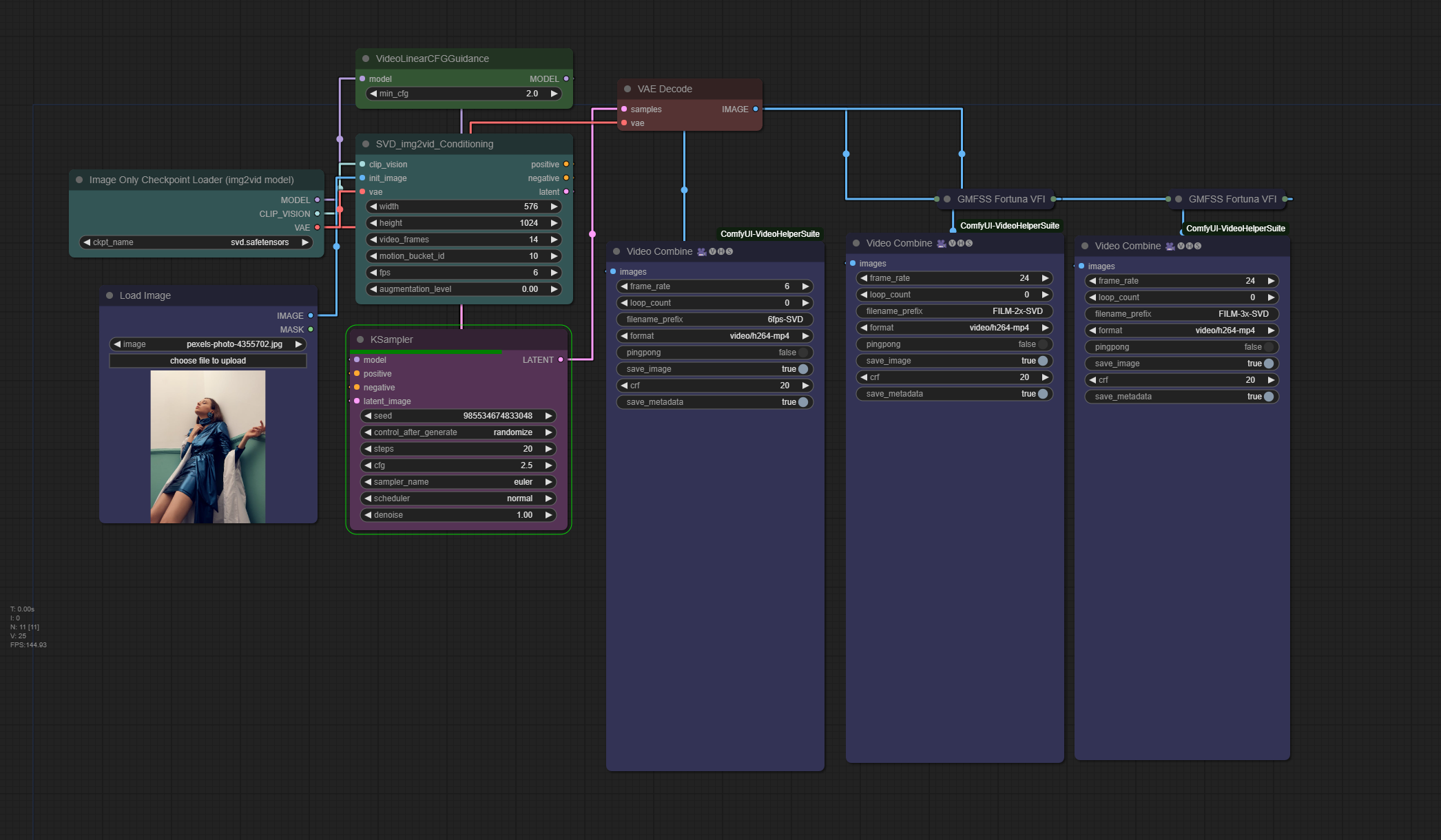
Comfyui 工作流:
1.SVD + 插帧 (from https://twitter.com/PurzBeats)
## 1.AnimateDiff
最近研究了一下 [AnimateDiff](https://github.com/guoyww/AnimateDiff), 对此用户进行了总结,从我整理的资料上来看,大体上使用的高阶应用分为三个种类:
- cli (https://github.com/s9roll7/animatediff-cli-prompt-travel)
- comfyui (https://github.com/Kosinkadink/ComfyUI-AnimateDiff-Evolved)
- webui (https://github.com/continue-revolution/sd-webui-animatediff)
以上工具的容易上手程度 webui > comfyui > cli , 他们之前不存在谁能代替谁,我的理解只是使用的人机交互界面不同,所有方式都能实现一致的效果。不过目前看起来 webui 插件目前还带有部分模型灰图的情况,但是生态来说 webui 更加强大。
具体的对比查看以及工作流 [AnimateDiff教程](./animatediff/README.md)
## 2.我的AI产品之路
**23.11.10-产品-AI视频-艺映AI**
产品地址: [艺映AI](https://artink.art)
https://github.com/hua1995116/awesome-ai-painting/assets/12070073/ea435ef4-d3b0-4e96-990e-964dddb939cb
**23.7.22-产品-AI二维码-星月熊**
产品地址: [MewXAI星月熊](https://qr.mewx.art)
地址: https://www.youtube.com/watch?v=Jh0kJl7duXM
## 0.SDV - AI视频 - Stable diffusion Video
Comfyui 工作流:
1.SVD + 插帧 (from https://twitter.com/PurzBeats)

## 1.AnimateDiff
最近研究了一下 [AnimateDiff](https://github.com/guoyww/AnimateDiff), 对此用户进行了总结,从我整理的资料上来看,大体上使用的高阶应用分为三个种类:
- cli (https://github.com/s9roll7/animatediff-cli-prompt-travel)
- comfyui (https://github.com/Kosinkadink/ComfyUI-AnimateDiff-Evolved)
- webui (https://github.com/continue-revolution/sd-webui-animatediff)
以上工具的容易上手程度 webui > comfyui > cli , 他们之前不存在谁能代替谁,我的理解只是使用的人机交互界面不同,所有方式都能实现一致的效果。不过目前看起来 webui 插件目前还带有部分模型灰图的情况,但是生态来说 webui 更加强大。
具体的对比查看以及工作流 [AnimateDiff教程](./animatediff/README.md)
## 2.我的AI产品之路
**23.11.10-产品-AI视频-艺映AI**
产品地址: [艺映AI](https://artink.art)
https://github.com/hua1995116/awesome-ai-painting/assets/12070073/ea435ef4-d3b0-4e96-990e-964dddb939cb
**23.7.22-产品-AI二维码-星月熊**
产品地址: [MewXAI星月熊](https://qr.mewx.art)


**22.11.12-产品-AI绘画-MewXAI**
[https://mewx.art](https://mewx.art)
**21.7.13-新产品-木及简历**
[https://mujicv.com](https://mujicv.com)
## 3.近期资讯
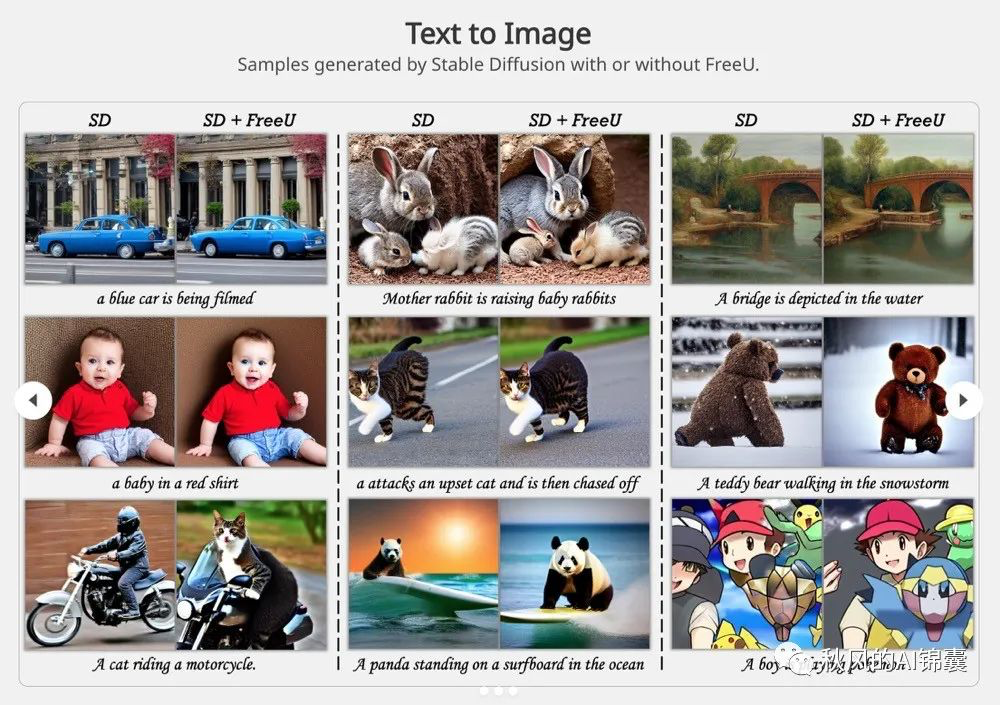
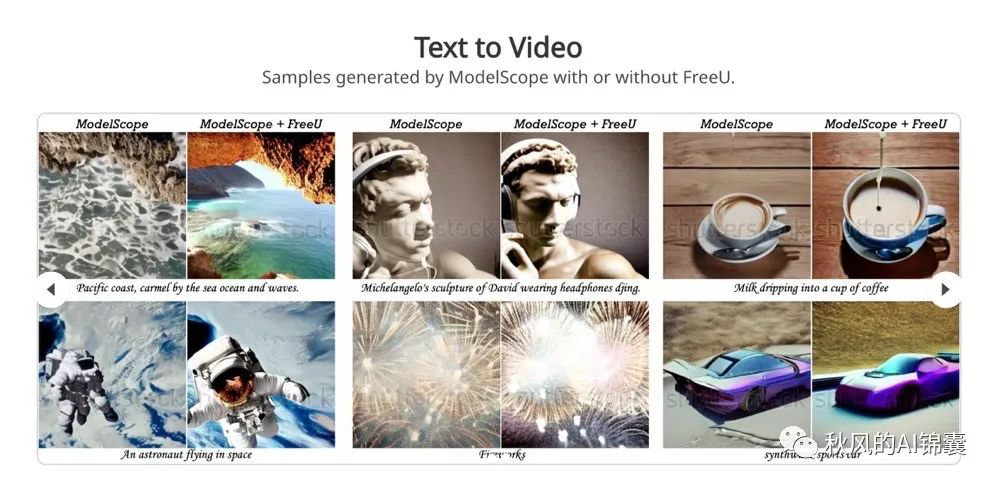
[让 Stable Diffusion 提高图片质量的新方案 —— FreeU](https://mp.weixin.qq.com/s/aHlPBxA3LybRhYPXsYzzJg)
[4.最近超级火的光影文字来咯!一键生成,让你一看就会!](https://mp.weixin.qq.com/s/qGxmQxRNlOxBEJG7LkxPcg)
概览
```
立即体验:https://qr.mewx.art(稍后星月熊小程序也会同步上线)
最近在某书、某音里,你肯定刷到这种超火的光影文字艺术作品,一发出去立刻能破万点赞。这种效果极具创意,将光影文字完美巧妙的融合进 AI 绘画里,收获了无数的喜欢,许多人甚至高价定制。
```
[3.AI这样把NB写在脸上,它在玩一种很新的艺术](https://www.qbitai.com/2023/07/69159.html)
概览:
```
都说AI绘画来势汹汹,但论创意,还是人类玩得花。
不信来看看这张乍一看平平无奇,却在网上疯传的AI生成美女图片:
AI这样把NB写在脸上,它在玩一种很新的艺术
```
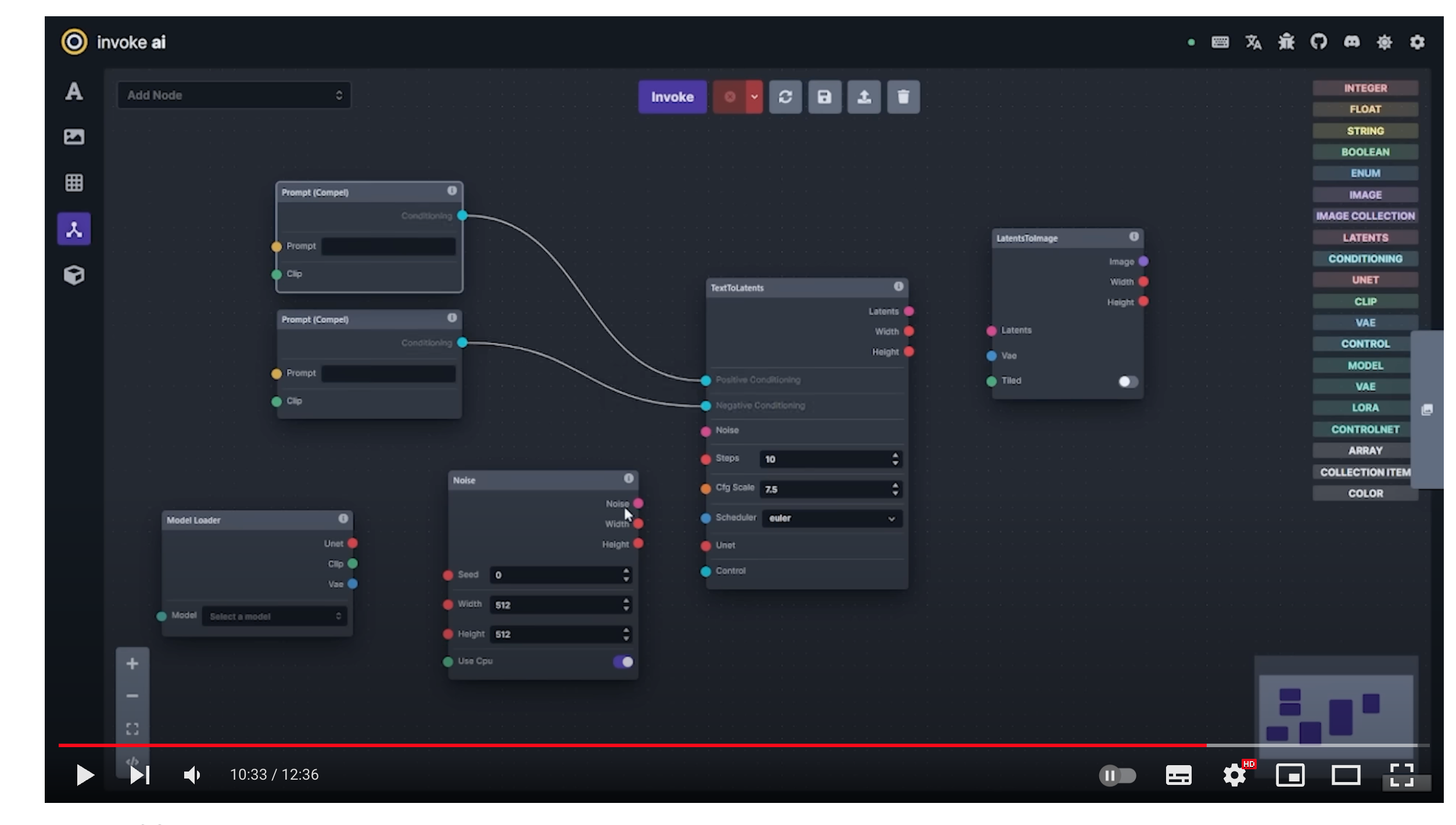
 [2.InvokeAI 3.0 Release](https://www.youtube.com/watch?v=A7uipq4lhrk)
概览:
[2.InvokeAI 3.0 Release](https://www.youtube.com/watch?v=A7uipq4lhrk)
概览:
 [1.丝滑的AI动画工作流](https://www.reddit.com/r/StableDiffusion/comments/155lgrm/you_guys_seem_to_dont_like_anime_dancing_videos/)
概览:
[](https://github.com/hua1995116/awesome-ai-painting/assets/12070073/0e86c712-997d-4036-8167-14183d13aeb4)
## 4. 可使用绘画的平台
### 📪 国外
|Name | Tags |URL |
|-----------------------|-----------|-----------------------------------------------------------------------------------------------------------|
|midjourney |新用户免费20次|https://www.midjourney.com/ |
|wombo.art |免费 |https://app.wombo.art/ |
|Google Colab |免费 |https://colab.research.google.com/github/huggingface/notebooks/blob/main/diffusers/stable_diffusion.ipynb#scrollTo=yEErJFjlrSWS|
|DALL·E 2 |排队申请 |https://openai.com/dall-e-2/ |
|artbreeder |免费 |https://www.artbreeder.com/beta/collage |
|dreamstudio |200点数 |https://beta.dreamstudio.ai/ |
|nightcafe |- |https://creator.nightcafe.studio/create/text-to-image?algo=stable |
|starryai |- |https://create.starryai.com/my-creations |
|webui |免费 |https://colab.research.google.com/github/altryne/sd-webui-colab/blob/main/Stable_Diffusion_WebUi_Altryne.ipynb |
|替换图片 |免费 |https://colab.research.google.com/drive/1R2HJvufacjy7GNrGCwgSE3LbQBk5qcS3?usp=sharing |
|webui-AUTOMATIC1111版本 |免费 |https://colab.research.google.com/drive/1Iy-xW9t1-OQWhb0hNxueGij8phCyluOh |
|生成视频 |免费 |https://github.com/THUDM/CogVideo |
|PS插件-绘画生成图片 |- |https://www.nvidia.com/en-us/studio/canvas/ |
|3D模型 |免费 |https://colab.research.google.com/drive/1u5-zA330gbNGKVfXMW5e3cmllbfafNNB?usp=sharing |
|[elbo](https://art.elbo.ai/lbo)|- |https://art.elbo.ai/ |
|deepdreamgenerator|- |https://deepdreamgenerator.com/ |
|big-sleep|免费 |https://github.com/lucidrains/big-sleep/ |
|nightcafe|- |https://nightcafe.studio/ |
|craiyon|- |https://www.craiyon.com/ |
|novelai|- |https://novelai.net/ |
|novelai 免费版|免费 |https://github.com/JingShing/novelai-colab-ver |
|Sd-Outpainting|免费 |https://github.com/lkwq007/stablediffusion-infinity |
|TyPaint|免费 |https://apps.apple.com/us/app/typaint-you-type-ai-paints/id1624024392 |
|PicSo|新用户每天免费10次 |https://picso.ai/ |
|sd-outpaing|免费 |https://github.com/lkwq007/stablediffusion-infinity |
|novelai-colab 版本|免费 |https://github.com/acheong08/Diffusion-ColabUI |
|novelai-colab 版本2|免费 |https://github.com/JingShing/novelai-colab-ver |
|Maze.Guru|免费 |https://maze.guru |
### 🚴🏻 国内
1.泛类AI绘画产品
|Name | 价格 |URL |
|--------------------------------------------------------------------|----|---------------------------------------------------------------------------------------------|
|文心-一格 |暂时免费|https://yige.baidu.com/#/ |
|6pen |部分免费|https://6pen.art/ |
|MewxAI人工智能 | 免费 | 微信小程序 / https://mewx.art |
|大画家Domo |- |https://www.domo.cool/ |
|盗梦师 |有免费次数 + 付费 |微信小程序搜盗梦师 |
|画几个画 |- |微信小程序搜画几个画 |
|Niko绘图 |免费 + 看广告 |微信小程序搜Niko绘图 |
|飞链云AI绘画版图 |免费 |https://ai.feilianyun.cn/ |
|[Freehand意绘](https://freehand.yunwooo.com/) |免费 |https://freehand.yunwooo.com/|
|即时AI |免费 |https://js.design/pluginDetail?id=6322a4ab0eededcff6ba451a|
|意见AI绘画 |有免费次数 + 付费 |微信小程序搜意见AI绘画|
|PAI |免费 |https://artpai.xyz/|
|爱作画 | 有免费次数 + 付费 |https://aizuohua.com/|
|皮卡智能AI | 免费 |https://www.picup.shop/text2image.html#/ |
|云景AI绘图 | 免费 |https://yunjing.gallery |
|100prompt | 免费 | http://100prompt.com |
|C站模型直接使用:TryYourAI | 部分免费 | https://tryyourai.com |
|创作+赚钱:WaterWheel | 有免费次数 + 付费 | https://waterwheel.network |
2.垂类绘画产品
| Name | 价格 | URL | 使用场景 |
| -------- | ------------- | ------------------- | -------- |
| 妙鸭相机 | 有免费/有付费 | 小程序搜妙鸭相机 | AI写真 |
| 星月熊 | 有免费/有付费 | https://qr.mewx.art | AI二维码 |
| WeShop | 有免费/有付费 | https://weshop.com/ | AI模特 |
| 彩鱼相机 | 有免费/有付费 | https://pixpi.art/ | AI形象 |
### 模型合集
#### 1.聚合网站
[civitai](https://civitai.com/)
[liblib](https://www.liblib.ai/)
[tensor](https://tensor.art/)
#### 2.基础模型
SDXL
https://huggingface.co/stabilityai/stable-diffusion-xl-base-1.0
SD 2.1
https://huggingface.co/stabilityai/stable-diffusion-2-1-base
SD 1.4
https://huggingface.co/CompVis/stable-diffusion-v-1-4-original/resolve/main/sd-v1-4.ckpt
SD 1.5
https://huggingface.co/runwayml/stable-diffusion-v1-5/resolve/main/v1-5-pruned-emaonly.ckpt
novelAI
https://huggingface.co/acheong08/secretAI/resolve/main/stableckpt/animefull-final-pruned/model.ckpt
## 5. 使用教程
#### Stable Diffusion(推荐)
[秋叶启动器](https://www.bilibili.com/video/BV1iM4y1y7oA/?spm_id_from=333.999.0.0)
[用Colab免费部署自己的AI绘画云平台—— Stable Diffusion](https://mp.weixin.qq.com/s/2H1gCoOVBK89dIhEqoTQmA)
[AI数字绘画 stable-diffusion 保姆级教程](https://mp.weixin.qq.com/s/nDnQuZn3hVgrwqWVada2cw)
#### Disco Diffusion ( 废弃 )
[最简单全面本地运行Colab及Disco Diffusion教程](https://www.bilibili.com/read/cv16202697)
[人工智能绘画工具 Disco Diffusion 入门教程](https://www.zcool.com.cn/article/ZMTM3OTg3Mg==.html)
[一条录制的Disco Diffusion 生成器教程的内容](https://weibo.com/5519581673/LnZuxbAC8?type=repost)
[堪比艺术家!被疯狂安利的 AI 插画神器 Disco Diffusion 有多强?](https://www.uisdc.com/disco-diffusion)
[用AI如何画概念图?](https://www.shangyexinzhi.com/article/4648362.html)
#### webui必备插件合集
[webui必备20+插件](./webui-essential-plugin/README.md)
## 6. 自建教程
### GPU厂商 - 国内 (亲民价格)
| 厂商 | 地址 | 价格 |
| ------ | -------------------------------------------------- | ------------------------------- |
| autodl | https://www.autodl.com | 大约1元左右/h,根据不同显卡定价 |
| 智星云 | http://gpu.ai-galaxy.cn/ | 大约1元左右/h,根据不同显卡定价 |
| 恒源云 | https://gpushare.com/ | 大约1元左右/h,根据不同显卡定价 |
| 腾讯云 | https://cloud.tencent.com/act/pro/gpu-study | 最低 60元/0.5个月 |
| 仙宫云 | https://www.xiangongyun.com/ | 大约1元左右/h,根据不同显卡定价 |
| 阿里云 | https://www.aliyun.com/activity/bigdata/pai/studio | 免费 A10/T4/G6 1个月 |
### 显卡选择
显卡速度
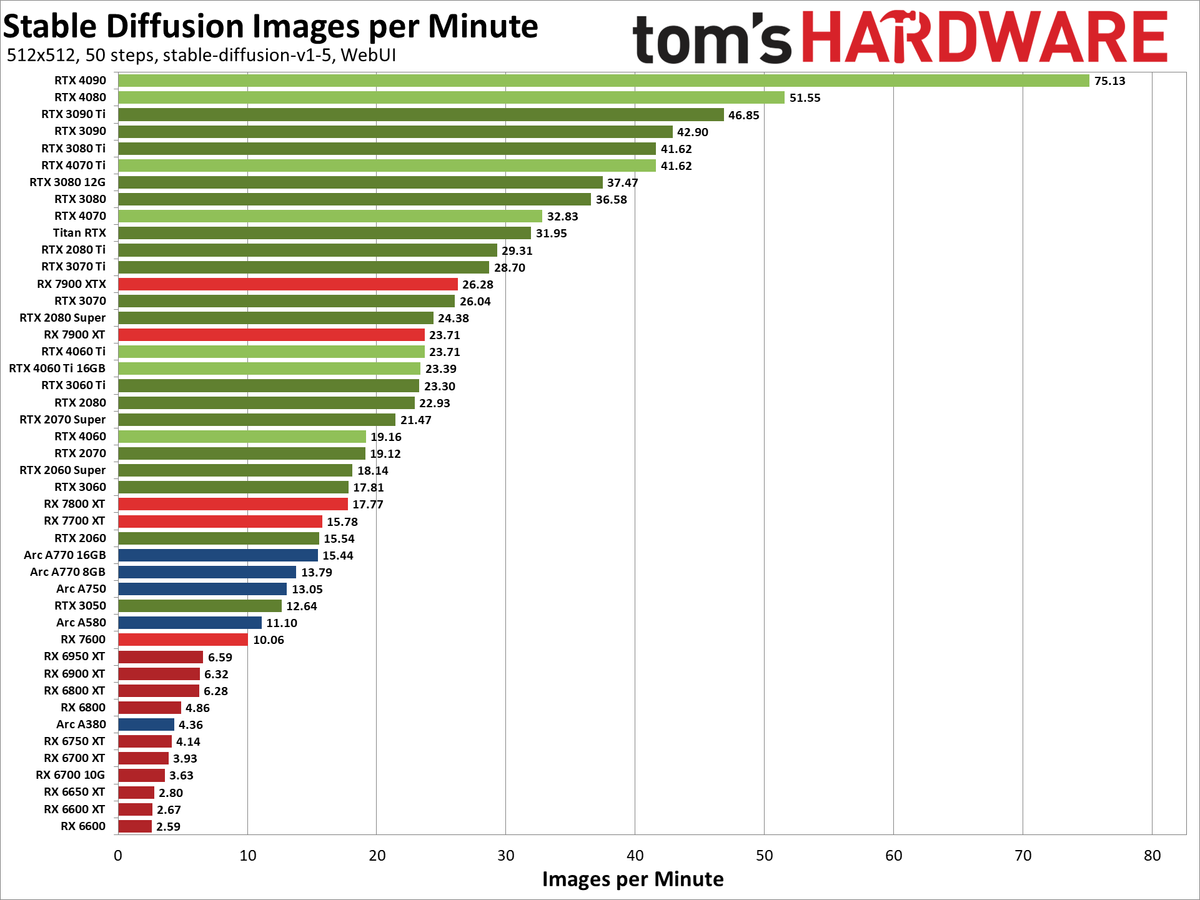
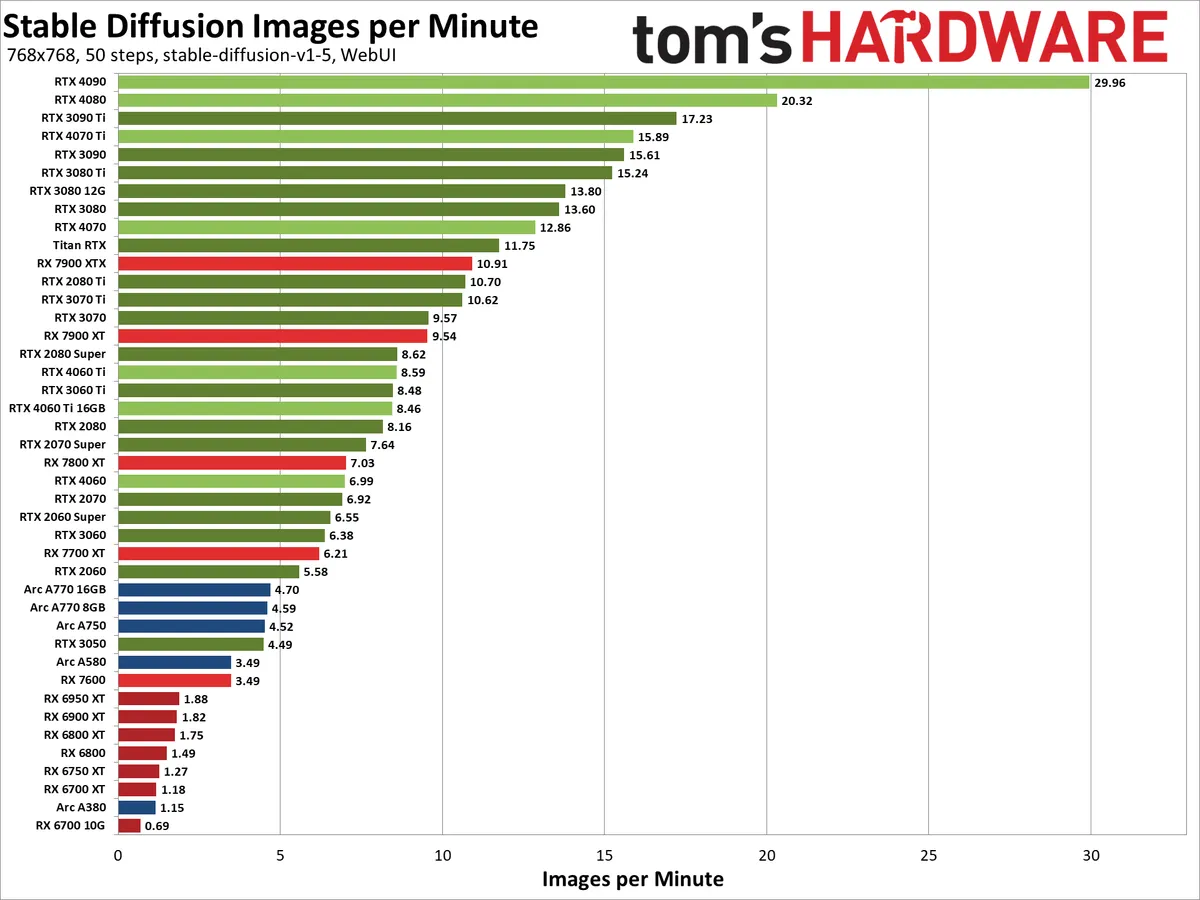
来源: https://www.tomshardware.com/pc-components/gpus/stable-diffusion-benchmarks

来源: https://www.pugetsystems.com/labs/articles/stable-diffusion-performance-nvidia-geforce-vs-amd-radeon/
显卡性价比跑分图
[1.丝滑的AI动画工作流](https://www.reddit.com/r/StableDiffusion/comments/155lgrm/you_guys_seem_to_dont_like_anime_dancing_videos/)
概览:
[](https://github.com/hua1995116/awesome-ai-painting/assets/12070073/0e86c712-997d-4036-8167-14183d13aeb4)
## 4. 可使用绘画的平台
### 📪 国外
|Name | Tags |URL |
|-----------------------|-----------|-----------------------------------------------------------------------------------------------------------|
|midjourney |新用户免费20次|https://www.midjourney.com/ |
|wombo.art |免费 |https://app.wombo.art/ |
|Google Colab |免费 |https://colab.research.google.com/github/huggingface/notebooks/blob/main/diffusers/stable_diffusion.ipynb#scrollTo=yEErJFjlrSWS|
|DALL·E 2 |排队申请 |https://openai.com/dall-e-2/ |
|artbreeder |免费 |https://www.artbreeder.com/beta/collage |
|dreamstudio |200点数 |https://beta.dreamstudio.ai/ |
|nightcafe |- |https://creator.nightcafe.studio/create/text-to-image?algo=stable |
|starryai |- |https://create.starryai.com/my-creations |
|webui |免费 |https://colab.research.google.com/github/altryne/sd-webui-colab/blob/main/Stable_Diffusion_WebUi_Altryne.ipynb |
|替换图片 |免费 |https://colab.research.google.com/drive/1R2HJvufacjy7GNrGCwgSE3LbQBk5qcS3?usp=sharing |
|webui-AUTOMATIC1111版本 |免费 |https://colab.research.google.com/drive/1Iy-xW9t1-OQWhb0hNxueGij8phCyluOh |
|生成视频 |免费 |https://github.com/THUDM/CogVideo |
|PS插件-绘画生成图片 |- |https://www.nvidia.com/en-us/studio/canvas/ |
|3D模型 |免费 |https://colab.research.google.com/drive/1u5-zA330gbNGKVfXMW5e3cmllbfafNNB?usp=sharing |
|[elbo](https://art.elbo.ai/lbo)|- |https://art.elbo.ai/ |
|deepdreamgenerator|- |https://deepdreamgenerator.com/ |
|big-sleep|免费 |https://github.com/lucidrains/big-sleep/ |
|nightcafe|- |https://nightcafe.studio/ |
|craiyon|- |https://www.craiyon.com/ |
|novelai|- |https://novelai.net/ |
|novelai 免费版|免费 |https://github.com/JingShing/novelai-colab-ver |
|Sd-Outpainting|免费 |https://github.com/lkwq007/stablediffusion-infinity |
|TyPaint|免费 |https://apps.apple.com/us/app/typaint-you-type-ai-paints/id1624024392 |
|PicSo|新用户每天免费10次 |https://picso.ai/ |
|sd-outpaing|免费 |https://github.com/lkwq007/stablediffusion-infinity |
|novelai-colab 版本|免费 |https://github.com/acheong08/Diffusion-ColabUI |
|novelai-colab 版本2|免费 |https://github.com/JingShing/novelai-colab-ver |
|Maze.Guru|免费 |https://maze.guru |
### 🚴🏻 国内
1.泛类AI绘画产品
|Name | 价格 |URL |
|--------------------------------------------------------------------|----|---------------------------------------------------------------------------------------------|
|文心-一格 |暂时免费|https://yige.baidu.com/#/ |
|6pen |部分免费|https://6pen.art/ |
|MewxAI人工智能 | 免费 | 微信小程序 / https://mewx.art |
|大画家Domo |- |https://www.domo.cool/ |
|盗梦师 |有免费次数 + 付费 |微信小程序搜盗梦师 |
|画几个画 |- |微信小程序搜画几个画 |
|Niko绘图 |免费 + 看广告 |微信小程序搜Niko绘图 |
|飞链云AI绘画版图 |免费 |https://ai.feilianyun.cn/ |
|[Freehand意绘](https://freehand.yunwooo.com/) |免费 |https://freehand.yunwooo.com/|
|即时AI |免费 |https://js.design/pluginDetail?id=6322a4ab0eededcff6ba451a|
|意见AI绘画 |有免费次数 + 付费 |微信小程序搜意见AI绘画|
|PAI |免费 |https://artpai.xyz/|
|爱作画 | 有免费次数 + 付费 |https://aizuohua.com/|
|皮卡智能AI | 免费 |https://www.picup.shop/text2image.html#/ |
|云景AI绘图 | 免费 |https://yunjing.gallery |
|100prompt | 免费 | http://100prompt.com |
|C站模型直接使用:TryYourAI | 部分免费 | https://tryyourai.com |
|创作+赚钱:WaterWheel | 有免费次数 + 付费 | https://waterwheel.network |
2.垂类绘画产品
| Name | 价格 | URL | 使用场景 |
| -------- | ------------- | ------------------- | -------- |
| 妙鸭相机 | 有免费/有付费 | 小程序搜妙鸭相机 | AI写真 |
| 星月熊 | 有免费/有付费 | https://qr.mewx.art | AI二维码 |
| WeShop | 有免费/有付费 | https://weshop.com/ | AI模特 |
| 彩鱼相机 | 有免费/有付费 | https://pixpi.art/ | AI形象 |
### 模型合集
#### 1.聚合网站
[civitai](https://civitai.com/)
[liblib](https://www.liblib.ai/)
[tensor](https://tensor.art/)
#### 2.基础模型
SDXL
https://huggingface.co/stabilityai/stable-diffusion-xl-base-1.0
SD 2.1
https://huggingface.co/stabilityai/stable-diffusion-2-1-base
SD 1.4
https://huggingface.co/CompVis/stable-diffusion-v-1-4-original/resolve/main/sd-v1-4.ckpt
SD 1.5
https://huggingface.co/runwayml/stable-diffusion-v1-5/resolve/main/v1-5-pruned-emaonly.ckpt
novelAI
https://huggingface.co/acheong08/secretAI/resolve/main/stableckpt/animefull-final-pruned/model.ckpt
## 5. 使用教程
#### Stable Diffusion(推荐)
[秋叶启动器](https://www.bilibili.com/video/BV1iM4y1y7oA/?spm_id_from=333.999.0.0)
[用Colab免费部署自己的AI绘画云平台—— Stable Diffusion](https://mp.weixin.qq.com/s/2H1gCoOVBK89dIhEqoTQmA)
[AI数字绘画 stable-diffusion 保姆级教程](https://mp.weixin.qq.com/s/nDnQuZn3hVgrwqWVada2cw)
#### Disco Diffusion ( 废弃 )
[最简单全面本地运行Colab及Disco Diffusion教程](https://www.bilibili.com/read/cv16202697)
[人工智能绘画工具 Disco Diffusion 入门教程](https://www.zcool.com.cn/article/ZMTM3OTg3Mg==.html)
[一条录制的Disco Diffusion 生成器教程的内容](https://weibo.com/5519581673/LnZuxbAC8?type=repost)
[堪比艺术家!被疯狂安利的 AI 插画神器 Disco Diffusion 有多强?](https://www.uisdc.com/disco-diffusion)
[用AI如何画概念图?](https://www.shangyexinzhi.com/article/4648362.html)
#### webui必备插件合集
[webui必备20+插件](./webui-essential-plugin/README.md)
## 6. 自建教程
### GPU厂商 - 国内 (亲民价格)
| 厂商 | 地址 | 价格 |
| ------ | -------------------------------------------------- | ------------------------------- |
| autodl | https://www.autodl.com | 大约1元左右/h,根据不同显卡定价 |
| 智星云 | http://gpu.ai-galaxy.cn/ | 大约1元左右/h,根据不同显卡定价 |
| 恒源云 | https://gpushare.com/ | 大约1元左右/h,根据不同显卡定价 |
| 腾讯云 | https://cloud.tencent.com/act/pro/gpu-study | 最低 60元/0.5个月 |
| 仙宫云 | https://www.xiangongyun.com/ | 大约1元左右/h,根据不同显卡定价 |
| 阿里云 | https://www.aliyun.com/activity/bigdata/pai/studio | 免费 A10/T4/G6 1个月 |
### 显卡选择
显卡速度


来源: https://www.tomshardware.com/pc-components/gpus/stable-diffusion-benchmarks

来源: https://www.pugetsystems.com/labs/articles/stable-diffusion-performance-nvidia-geforce-vs-amd-radeon/
显卡性价比跑分图
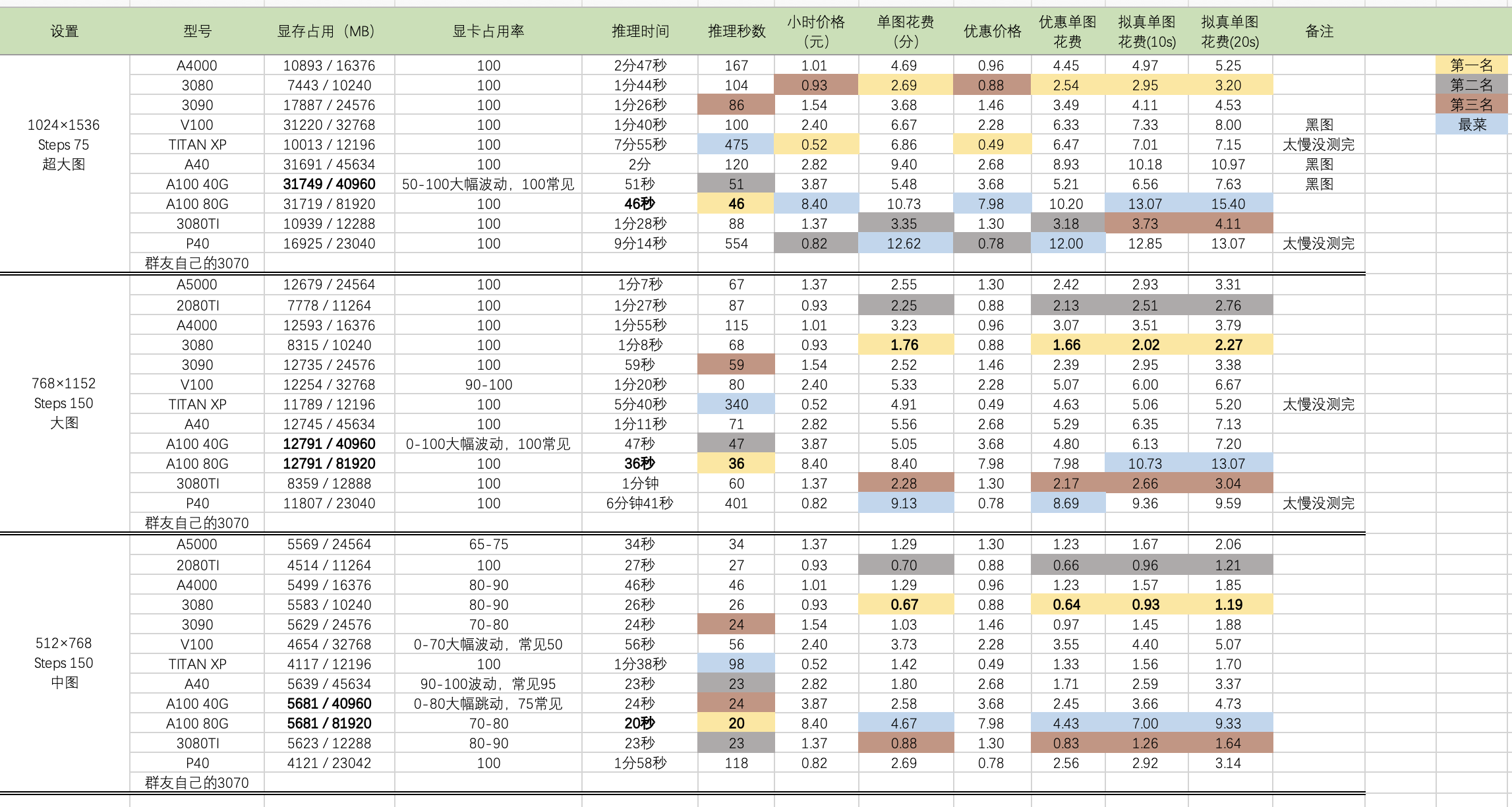 [时代变了,大人:RTX 3090时代,哪款显卡配得上我的炼丹炉?](https://zhuanlan.zhihu.com/p/225507448)
### 自建教程
[人人都能用的「AI 作画」,如何把 Stable Diffusion 装进电脑?](https://mp.weixin.qq.com/s/jL4m4e-A1oc44Z8PLyvA2A)
[https://github.com/fboulnois/stable-diffusion-docker](https://github.com/fboulnois/stable-diffusion-docker)
[https://github.com/AbdBarho/stable-diffusion-webui-docker](https://github.com/AbdBarho/stable-diffusion-webui-docker)
### MAC自建
[Run](https://replicate.com/blog/run-stable-diffusion-on-m1-mac)
[https://github.com/divamgupta/diffusionbee-stable-diffusion-ui](https://github.com/divamgupta/diffusionbee-stable-diffusion-ui)
## 4. 调参教程
### NovelAI专属
Novel AI 元素魔法全收录 https://docs.qq.com/doc/DWHl3am5Zb05QbGVs
http://wolfchen.top/tag/
https://aitag.top/
https://tags.novelai.dev/
元素法典——Novel AI 元素魔法全收录: https://docs.qq.com/doc/DWHl3am5Zb05QbGVs
NovelAI 法术解析: https://spell.novelai.dev/
### DD关键词
[Disco Diffusion](https://www.notion.so/Disco-Diffusion-d8a78d7a5a8b40238da820687615dee6)
### SD 关键词
[https://arthub.ai/](https://arthub.ai/)
[https://lexica.art/](https://lexica.art/)
[https://www.krea.ai/?continueFlag=6591d07b3186f4c7e58de1a4bcfaefb0](https://www.krea.ai/?continueFlag=6591d07b3186f4c7e58de1a4bcfaefb0)
[https://promptomania.com/stable-diffusion-prompt-builder/](https://promptomania.com/stable-diffusion-prompt-builder/)
### MJ关键词
[https://prompt.noonshot.com/midjourney](https://prompt.noonshot.com/midjourney)
[https://huggingface.co/spaces/doevent/prompt-generator](https://huggingface.co/spaces/doevent/prompt-generator)
[https://midjourney-prompt-helper.netlify.app/](https://midjourney-prompt-helper.netlify.app/)
[https://promptsalsa.com/midjourney-prompt-generator/](https://promptsalsa.com/midjourney-prompt-generator/)
### 法术解析
https://spell.novelai.dev/
Deep Danbooru:
http://dev.kanotype.net:8003/deepdanbooru/
http://www.prompttool.com/
## 7. 交流群
**微信群:已满群可加 qiufengblue**
**QQ群: 713773093**
================================================
FILE: README_en.md
================================================
# The Most Comprehensive Collection of AI Painting Resources ✨
[English](./README_en.md) [中文](./README.md)
> I am Qiufeng, an AI painting enthusiast who has been involved in the AIGC industry since mid-2022. Initially, my focus was primarily on evangelizing AI painting, but now I mainly share AI knowledge and develop AI products. This repository documents my journey with AI painting, aiming to help more people learn AI painting. It also records my goal to create 100 AI products, with the current progress at 4/100. You can follow me on [twitter](https://twitter.com/qiufenghyf) to stay updated on my latest activities.
My product list: [MewX AI Painting](https://www.mewx.art) | [Star Moon Bear](https://qr.mewx.art) | [ArtInk AI](https://www.artink.art) | [GoEnhance AI Image Enlargement and Enhancement](https://goenhance.ai) | [Video2Video](https://goenhance.ai)
## stable-cascade
### Tutorial
1. Install the latest version of Comyfui
...
[Learn more](./stable-cascade/)
## Magic Animate
URL: https://www.youtube.com/watch?v=RDH5lyurock
## SDXL Turbo
URL: https://www.youtube.com/watch?v=Jh0kJl7duXM
## 0.SDV - AI Video - Stable Diffusion Video
Comfyui workflow:
1.SVD + Frame Interpolation (from https://twitter.com/PurzBeats)

## 1.AnimateDiff
Recently, I studied [AnimateDiff](https://github.com/guoyww/AnimateDiff) and summarized its use for users. From the materials I've organized, the high-level applications are divided into three categories:
- cli (https://github.com/s9roll7/animatediff-cli-prompt-travel)
- comfyui (https://github.com/Kosinkadink/ComfyUI-AnimateDiff-Evolved)
- webui (https://github.com/continue-revolution/sd-webui-animatediff)
The ease of use for these tools is webui > comfyui > cli, and they are not replacements for each other. My understanding is that they simply offer different user interfaces, but all methods can achieve the same results. However, the webui plugin currently still has some issues with model gray images, but its ecosystem is more robust.
For detailed comparisons and workflows, see [AnimateDiff Tutorial](./animatediff/README.md)
## 2.My Journey with AI Products
**23.11.10-Product-AI Video-ArtInk AI**
Product URL: [ArtInk AI](https://artink.art)
https://github.com/hua1995116/awesome-ai-painting/assets/12070073/ea435ef4-d3b0-4e96-990e-964dddb939cb
**23.7.22-Product-AI QR Code-Star Moon Bear**
Product URL: [MewX AI Star Moon Bear](https://qr.mewx.art)
[时代变了,大人:RTX 3090时代,哪款显卡配得上我的炼丹炉?](https://zhuanlan.zhihu.com/p/225507448)
### 自建教程
[人人都能用的「AI 作画」,如何把 Stable Diffusion 装进电脑?](https://mp.weixin.qq.com/s/jL4m4e-A1oc44Z8PLyvA2A)
[https://github.com/fboulnois/stable-diffusion-docker](https://github.com/fboulnois/stable-diffusion-docker)
[https://github.com/AbdBarho/stable-diffusion-webui-docker](https://github.com/AbdBarho/stable-diffusion-webui-docker)
### MAC自建
[Run](https://replicate.com/blog/run-stable-diffusion-on-m1-mac)
[https://github.com/divamgupta/diffusionbee-stable-diffusion-ui](https://github.com/divamgupta/diffusionbee-stable-diffusion-ui)
## 4. 调参教程
### NovelAI专属
Novel AI 元素魔法全收录 https://docs.qq.com/doc/DWHl3am5Zb05QbGVs
http://wolfchen.top/tag/
https://aitag.top/
https://tags.novelai.dev/
元素法典——Novel AI 元素魔法全收录: https://docs.qq.com/doc/DWHl3am5Zb05QbGVs
NovelAI 法术解析: https://spell.novelai.dev/
### DD关键词
[Disco Diffusion](https://www.notion.so/Disco-Diffusion-d8a78d7a5a8b40238da820687615dee6)
### SD 关键词
[https://arthub.ai/](https://arthub.ai/)
[https://lexica.art/](https://lexica.art/)
[https://www.krea.ai/?continueFlag=6591d07b3186f4c7e58de1a4bcfaefb0](https://www.krea.ai/?continueFlag=6591d07b3186f4c7e58de1a4bcfaefb0)
[https://promptomania.com/stable-diffusion-prompt-builder/](https://promptomania.com/stable-diffusion-prompt-builder/)
### MJ关键词
[https://prompt.noonshot.com/midjourney](https://prompt.noonshot.com/midjourney)
[https://huggingface.co/spaces/doevent/prompt-generator](https://huggingface.co/spaces/doevent/prompt-generator)
[https://midjourney-prompt-helper.netlify.app/](https://midjourney-prompt-helper.netlify.app/)
[https://promptsalsa.com/midjourney-prompt-generator/](https://promptsalsa.com/midjourney-prompt-generator/)
### 法术解析
https://spell.novelai.dev/
Deep Danbooru:
http://dev.kanotype.net:8003/deepdanbooru/
http://www.prompttool.com/
## 7. 交流群
**微信群:已满群可加 qiufengblue**
**QQ群: 713773093**
================================================
FILE: README_en.md
================================================
# The Most Comprehensive Collection of AI Painting Resources ✨
[English](./README_en.md) [中文](./README.md)
> I am Qiufeng, an AI painting enthusiast who has been involved in the AIGC industry since mid-2022. Initially, my focus was primarily on evangelizing AI painting, but now I mainly share AI knowledge and develop AI products. This repository documents my journey with AI painting, aiming to help more people learn AI painting. It also records my goal to create 100 AI products, with the current progress at 4/100. You can follow me on [twitter](https://twitter.com/qiufenghyf) to stay updated on my latest activities.
My product list: [MewX AI Painting](https://www.mewx.art) | [Star Moon Bear](https://qr.mewx.art) | [ArtInk AI](https://www.artink.art) | [GoEnhance AI Image Enlargement and Enhancement](https://goenhance.ai) | [Video2Video](https://goenhance.ai)
## stable-cascade
### Tutorial
1. Install the latest version of Comyfui
...
[Learn more](./stable-cascade/)
## Magic Animate
URL: https://www.youtube.com/watch?v=RDH5lyurock
## SDXL Turbo
URL: https://www.youtube.com/watch?v=Jh0kJl7duXM
## 0.SDV - AI Video - Stable Diffusion Video
Comfyui workflow:
1.SVD + Frame Interpolation (from https://twitter.com/PurzBeats)

## 1.AnimateDiff
Recently, I studied [AnimateDiff](https://github.com/guoyww/AnimateDiff) and summarized its use for users. From the materials I've organized, the high-level applications are divided into three categories:
- cli (https://github.com/s9roll7/animatediff-cli-prompt-travel)
- comfyui (https://github.com/Kosinkadink/ComfyUI-AnimateDiff-Evolved)
- webui (https://github.com/continue-revolution/sd-webui-animatediff)
The ease of use for these tools is webui > comfyui > cli, and they are not replacements for each other. My understanding is that they simply offer different user interfaces, but all methods can achieve the same results. However, the webui plugin currently still has some issues with model gray images, but its ecosystem is more robust.
For detailed comparisons and workflows, see [AnimateDiff Tutorial](./animatediff/README.md)
## 2.My Journey with AI Products
**23.11.10-Product-AI Video-ArtInk AI**
Product URL: [ArtInk AI](https://artink.art)
https://github.com/hua1995116/awesome-ai-painting/assets/12070073/ea435ef4-d3b0-4e96-990e-964dddb939cb
**23.7.22-Product-AI QR Code-Star Moon Bear**
Product URL: [MewX AI Star Moon Bear](https://qr.mewx.art)
**22.11.12-Product-AI Painting-MewX AI**
[https://mewx.art](https://mewx.art)
**21.7.13-New Product-Muji Resume**
[https://mujicv.com](https://mujicv.com)
## 3.Recent News
[A New Scheme for Enhancing Image Quality with Stable Diffusion — FreeU](https://mp.weixin.qq.com/s/aHlPBxA3LybRhYPXsYzzJg)


[4.The Super Popular Light and Shadow Text is Here! One-Click Generation, Easy to Learn!](https://mp.weixin.qq.com/s/qGxmQxRNlOxBEJG7LkxPcg)
Overview
> Try it now: https://qr.mewx.art (The Star Moon Bear mini-program will also be online soon)
> Recently on certain platforms, you've definitely seen these super popular light and shadow text art works that can instantly garner tens of thousands of likes upon posting. This effect is highly creative, perfectly and cleverly integrating light and shadow text into AI painting, earning countless likes, with many people even paying a high price for customizations.
[3.AI Flaunts Its Skills with a New Kind of Art](https://www.qbitai.com/2023/07/69159.html)
Overview:
> They say AI painting is making a big splash, but when it comes to creativity, humans still play the game better.
> Don't believe it? Take a look at this AI-generated picture of a beautiful woman that looks quite ordinary at first glance but has gone viral on the internet:
> AI flaunts its skills with a new kind of art
[2.InvokeAI 3.0 Release](https://www.youtube.com/watch?v=A7uipq4lhrk)
Overview:
[1.Smooth AI Animation Workflow](https://www.reddit.com/r/StableDiffusion/comments/155lgrm/you_guys_seem_to_dont_like_anime_dancing_videos/)
Overview:
[](https://github.com/hua1995116/awesome-ai-painting/assets/12070073/0e86c712-997d-4036-8167-14183d13aeb4)
## 4. Platforms for AI Painting
### 📪 Global
|Name | Tags |URL |
|-----------------------|------------------|--------------------------------------------------------------------------------------------------------------------------|
|midjourney |Free for new users for 20 uses|https://www.midjourney.com/ |
|wombo.art |Free |https://app.wombo.art/ |
|Google Colab |Free |https://colab.research.google.com/github/huggingface/notebooks/blob/main/diffusers/stable_diffusion.ipynb#scrollTo=yEErJFjlrSWS|
|DALL·E 2 |Waitlist |https://openai.com/dall-e-2/ |
|artbreeder |Free |https://www.artbreeder.com/beta/collage |
|dreamstudio |200 credits |https://beta.dreamstudio.ai/ |
|nightcafe |- |https://creator.nightcafe.studio/create/text-to-image?algo=stable |
|starryai |- |https://create.starryai.com/my-creations |
|webui |Free |https://colab.research.google.com/github/altryne/sd-webui-colab/blob/main/Stable_Diffusion_WebUi_Altryne.ipynb |
|Image Replacement |Free |https://colab.research.google.com/drive/1R2HJvufacjy7GNrGCwgSE3LbQBk5qcS3?usp=sharing |
|webui-AUTOMATIC1111 version|Free |https://colab.research.google.com/drive/1Iy-xW9t1-OQWhb0hNxueGij8phCyluOh |
|Video Generation |Free |https://github.com/THUDM/CogVideo |
|PS Plugin - Image Generation|- |https://www.nvidia.com/en-us/studio/canvas/ |
|3D Models |Free |https://colab.research.google.com/drive/1u5-zA330gbNGKVfXMW5e3cmllbfafNNB?usp=sharing |
|[elbo](https://art.elbo.ai/lbo)|- |https://art.elbo.ai/ |
|deepdreamgenerator |- |https://deepdreamgenerator.com/ |
|big-sleep |Free |https://github.com/lucidrains/big-sleep/ |
|nightcafe |- |https://nightcafe.studio/ |
|craiyon |- |https://www.craiyon.com/ |
|novelai |- |https://novelai.net/ |
|novelai Free Version |Free |https://github.com/JingShing/novelai-colab-ver |
|Sd-Outpainting |Free |https://github.com/lkwq007/stablediffusion-infinity |
|TyPaint |Free |https://apps.apple.com/us/app/typaint-you-type-ai-paints/id1624024392 |
|PicSo |10 free uses per day for new users |https://picso.ai/ |
|sd-outpaing |Free |https://github.com/lkwq007/stablediffusion-infinity |
|novelai-colab version |Free |https://github.com/acheong08/Diffusion-ColabUI |
|novelai-colab version 2|Free |https://github.com/JingShing/novelai-colab-ver |
|Maze.Guru |Free |https://maze.guru |
### 🚴🏻 Chinese
1.泛类AI绘画产品
|Name | 价格 |URL |
|--------------------------------------------------------------------|----|---------------------------------------------------------------------------------------------|
|文心-一格 |暂时免费|https://yige.baidu.com/#/ |
|6pen |部分免费|https://6pen.art/ |
|MewxAI人工智能 | 免费 | 微信小程序 / https://mewx.art |
|大画家Domo |- |https://www.domo.cool/ |
|盗梦师 |有免费次数 + 付费 |微信小程序搜盗梦师 |
|画几个画 |- |微信小程序搜画几个画 |
|Niko绘图 |免费 + 看广告 |微信小程序搜Niko绘图 |
|飞链云AI绘画版图 |免费 |https://ai.feilianyun.cn/ |
|[Freehand意绘](https://freehand.yunwooo.com/) |免费 |https://freehand.yunwooo.com/|
|即时AI |免费 |https://js.design/pluginDetail?id=6322a4ab0eededcff6ba451a|
|意见AI绘画 |有免费次数 + 付费 |微信小程序搜意见AI绘画|
|PAI |免费 |https://artpai.xyz/|
|爱作画 | 有免费次数 + 付费 |https://aizuohua.com/|
|皮卡智能AI | 免费 |https://www.picup.shop/text2image.html#/ |
|云景AI绘图 | 免费 |https://yunjing.gallery |
|100prompt | 免费 | http://100prompt.com |
|C站模型直接使用:TryYourAI | 部分免费 | https://tryyourai.com |
|创作+赚钱:WaterWheel | 有免费次数 + 付费 | https://waterwheel.network |
2.垂类绘画产品
| Name | 价格 | URL | 使用场景 |
| -------- | ------------- | ------------------- | -------- |
| 妙鸭相机 | 有免费/有付费 | 小程序搜妙鸭相机 | AI写真 |
| 星月熊 | 有免费/有付费 | https://qr.mewx.art | AI二维码 |
| WeShop | 有免费/有付费 | https://weshop.com/ | AI模特 |
| 彩鱼相机 | 有免费/有付费 | https://pixpi.art/ | AI形象 |
### Model Collections
#### 1.Aggregator Websites
[civitai](https://civitai.com/)
[liblib](https://www.liblib.ai/)
[tensor](https://tensor.art/)
#### 2.Base Models
SDXL
https://huggingface.co/stabilityai/stable-diffusion-xl-base-1.0
SD 2.1
https://huggingface.co/stabilityai/stable-diffusion-2-1-base
SD 1.4
https://huggingface.co/CompVis/stable-diffusion-v-1-4-original/resolve/main/sd-v1-4.ckpt
SD 1.5
https://huggingface.co/runwayml/stable-diffusion-v1-5/resolve/main/v1-5-pruned-emaonly.ckpt
novelAI
https://huggingface.co/acheong08/secretAI/resolve/main/stableckpt/animefull-final-pruned/model.ckpt
## 5. Tutorials
#### Stable Diffusion (Recommended)
[Qiuye Launcher](https://www.bilibili.com/video/BV1iM4y1y7oA/?spm_id_from=333.999.0.0)
[Deploy Your Own AI Painting Cloud Platform with Colab for Free — Stable Diffusion](https://mp.weixin.qq.com/s/2H1gCoOVBK89dIhEqoTQmA)
[A Nanny-Level Tutorial for AI Digital Painting Stable-Diffusion](https://mp.weixin.qq.com/s/nDnQuZn3hVgrwqWVada2cw)
#### Disco Diffusion (Discontinued)
[The Simplest and Most Comprehensive Tutorial for Running Colab and Disco Diffusion Locally](https://www.bilibili.com/read/cv16202697)
[A Beginner's Guide to the AI Painting Tool Disco Diffusion](https://www.zcool.com.cn/article/ZMTM3OTg3Mg==.html)
[A Recorded Disco Diffusion Generator Tutorial](https://weibo.com/5519581673/LnZuxbAC8?type=repost)
[As Good as an Artist! How Powerful Is the AI Illustration Tool Disco Diffusion That's Been Hyped Up?](https://www.uisdc.com/disco-diffusion)
[How to Paint Concept Art with AI?](https://www.shangyexinzhi.com/article/4648362.html)
#### Essential WebUI Plugin Collection
[20+ Essential WebUI Plugins](./webui-essential-plugin/README.md)
## 6. DIY Tutorials
### GPU Vendors - Domestic (Affordable Prices)
| Vendor | URL | Price |
| ------ | -------------------------------------------------- | ------------------------------------- |
| autodl | https://www.autodl.com | About 1 RMB/h, varies by GPU model |
| ZhiXingYun | http://gpu.ai-galaxy.cn/ | About 1 RMB/h, varies by GPU model |
| HengYuanYun | https://gpushare.com/ | About 1 RMB/h, varies by GPU model |
| Tencent Cloud | https://cloud.tencent.com/act/pro/gpu-study | From 60 RMB/0.5 month |
| XianGongYun | https://www.xiangongyun.com/ | About 1 RMB/h, varies by GPU model |
| Aliyun | https://www.aliyun.com/activity/bigdata/pai/studio | Free A10/T4/G6 for 1 month |
### GPU Selection
GPU Speeds


Source: https://www.tomshardware.com/pc-components/gpus/stable-diffusion-benchmarks

Source: https://www.pugetsystems.com/labs/articles/stable-diffusion-performance-nvidia-geforce-vs-amd-radeon/
GPU Cost-Performance Chart
[The Era Has Changed, Folks: In the RTX 3090 Era, Which GPU Deserves My Alchemy Furnace?](https://zhuanlan.zhihu.com/p/225507448)
### DIY Tutorials
[AI Painting for Everyone: How to Install Stable Diffusion on Your Computer?](https://mp.weixin.qq.com/s/jL4m4e-A1oc44Z8PLyvA2A)
[https://github.com/fboulnois/stable-diffusion-docker](https://github.com/fboulnois/stable-diffusion-docker)
[https://github.com/AbdBarho/stable-diffusion-webui-docker](https://github.com/AbdBarho/stable-diffusion-webui-docker)
### DIY on MAC
[Run](https://replicate.com/blog/run-stable-diffusion-on-m1-mac)
[https://github.com/divamgupta/diffusionbee-stable-diffusion-ui](https://github.com/divamgupta/diffusionbee-stable-diffusion-ui)
## 4. Parameter Tuning Tutorials
### Exclusive for NovelAI
Novel AI Elemental Magic Complete Collection https://docs.qq.com/doc/DWHl3am5Zb05QbGVs
http://wolfchen.top/tag/
https://aitag.top/
https://tags.novelai.dev/
Elemental Codex — Complete Collection of Novel AI Elemental Magic: https://docs.qq.com/doc/DWHl3am5Zb05QbGVs
NovelAI Spell Analysis: https://spell.novelai.dev/
### DD Keywords
[Disco Diffusion](https://www.notion.so/Disco-Diffusion-d8a78d7a5a8b40238da820687615dee6)
### SD Keywords
[https://arthub.ai/](https://arthub.ai/)
[https://lexica.art/](https://lexica.art/)
[https://www.krea.ai/?continueFlag=6591d07b3186f4c7e58de1a4bcfaefb0](https://www.krea.ai/?continueFlag=6591d07b3186f4c7e58de1a4bcfaefb0)
[https://promptomania.com/stable-diffusion-prompt-builder/](https://promptomania.com/stable-diffusion-prompt-builder/)
### MJ Keywords
[https://prompt.noonshot.com/midjourney](https://prompt.noonshot.com/midjourney)
[https://huggingface.co/spaces/doevent/prompt-generator](https://huggingface.co/spaces/doevent/prompt-generator)
[https://midjourney-prompt-helper.netlify.app/](https://midjourney-prompt-helper.netlify.app/)
[https://promptsalsa.com/midjourney-prompt-generator/](https://promptsalsa.com/midjourney-prompt-generator/)
### Spell Analysis
https://spell.novelai.dev/
Deep Danbooru:
http://dev.kanotype.net:8003/deepdanbooru/
http://www.prompttool.com/
================================================
FILE: ai-product/README.md
================================================
**23.7.13 更新**
最近又进行了一波优化,这次带来的是的无码眼版本,效果炸裂,以下均可微信长按识别。 产品地址: [MewXAI星月熊](https://qr.mewx.art)


**23.6.25 更新**
最近又花了一周时间,捣腾了一个二维码生成器:https://www.qrcode1s.com 效果如下:(原理是利用了以下教程中的基础方法 + 一定程度的改进 + MewXAI模型拥有了更好的融合效果)


 **AI二维码生成教程 (推荐)**
https://www.bilibili.com/video/BV1Jm4y1v76C
https://www.youtube.com/watch?v=HOY5J9UT_lY
**12.10 更新**
沉寂了一端时间没更新,是的,没错,因为也去入股了一波 AI绘画,之后会继续更新相关的资源。
**MewXAI 小程序**,在线地址: https://www.mewxai.cn 全网独有的古风模型!也加上了ControlNet、融合Lora等高级玩法,下面贴一些效果图~

以及真人模型、厚涂模型、2.5D、二次元等诸多模型~

扫码进入可得**30点数免费画图**,**立即体验**👇:
**AI二维码生成教程 (推荐)**
https://www.bilibili.com/video/BV1Jm4y1v76C
https://www.youtube.com/watch?v=HOY5J9UT_lY
**12.10 更新**
沉寂了一端时间没更新,是的,没错,因为也去入股了一波 AI绘画,之后会继续更新相关的资源。
**MewXAI 小程序**,在线地址: https://www.mewxai.cn 全网独有的古风模型!也加上了ControlNet、融合Lora等高级玩法,下面贴一些效果图~

以及真人模型、厚涂模型、2.5D、二次元等诸多模型~

扫码进入可得**30点数免费画图**,**立即体验**👇:

#### 🌰 持续更新中...
目前有大量的平台推出了 AI 绘画的能力,这里做一个汇总。有更多的欢迎前来补充(可直接提交 pr),也欢迎进群一起交流探索。(文末有二维码)
================================================
FILE: animatediff/README.md
================================================
# Awesome AnimateDiff Tutorial
[English](./README_en.md) [中文](./README.md)
最近研究了一下 [AnimateDiff](https://github.com/guoyww/AnimateDiff), 对此用户进行了总结,从我整理的资料上来看,大体上使用的高阶应用分为三个种类:
- cli (https://github.com/s9roll7/animatediff-cli-prompt-travel)
- comfyui (https://github.com/Kosinkadink/ComfyUI-AnimateDiff-Evolved)
- webui (https://github.com/continue-revolution/sd-webui-animatediff)
以上工具的容易上手程度 webui > comfyui > cli , 他们之前不存在谁能代替谁,我的理解只是使用的人机交互界面不同,所有方式都能实现一致的效果。不过目前看起来 webui 插件目前还带有部分模型灰图的情况,但是生态来说 webui 更加强大。
# 0.性能提速
LCM AnimateDiff 工作流方案(提速100%):
[workflow_animatediff.json](./workflow_animatediff.json)
 
twitter地址:https://twitter.com/qiufenghyf/status/1723628793993322871
openpost示例:
https://www.reddit.com/r/StableDiffusion/comments/17s7vl8/its_so_fast_lcm_lora_controlnet_openpose/
# 1.教程
## cli 教程
### [Guide: Workflow for Creating Animations using animatediff-cli-prompt-travel Step-by-Step](https://simpleaiart.com/sd-animatediff-cli-prompt-travel?a=b)
*摘要*
主要使用了用AWPainting制作一系列图片,然后通过 Animatediff 进行串联的教学
### [AnimateDiff CLI prompt travel: IPAdapters, LoRAs, and Embeddings](https://www.youtube.com/watch?v=IxoXq9PiPis)
*摘要(gpt总结)*
本视频介绍了如何使用AnimateDiff CLI prompt travel,主要关注Lora embeddings和IP adapter。Lora能够与文本提示进行混合,而IP adapter则允许使用图像提示。视频作者使用了IP adapter和Lora,以便更容易上手。除此之外,视频还提到了embedding,这是一种影响结果的方法。最后,视频演示了如何设置IP adapter和Lora,并展示了生成结果。
*亮点*
🎬 Lora embeddings和IP adapter的介绍
🌟 IP adapter能够与文本提示混合,Lora则允许使用图像提示
📚 Embedding是影响结果的方法
🖥️ IP adapter和Lora的设置步骤
🚀 展示了生成结果
### [AI视频生成新工具!animatediff-cli-prompt-travel拥有巨大潜力!视频赛道有哪些机会?](https://www.bilibili.com/video/BV1w34y137Bu/?spm_id_from=333.337.search-card.all.click&vd_source=8d16a2bc27ef95a22c29f9a40f8f5633)
*摘要(gpt总结)*
这个视频是介绍一个新工具AnimateDiff,它是基于AnimateDiff的一个封装,用来解决AI视频生成中的一些痛点,并引入了ControlNet和IP Adapter。它的特点是可以进行风格转换,控制视频中的图像细节,可以用来做快速脚本转视频,抖音风格视频,漫画转视频等,具有巨大的潜力。
*亮点*
- 🎨 AnimateDiff是一个AI视频生成的新工具,可以解决一些痛点
- 🎞️ 它可以进行风格转换,控制视频中的图像细节
- 🚀 可以用来做快速脚本转视频、抖音风格视频、漫画转视频等
- 🤖 引入了ControlNet和IP Adapter,拥有巨大的潜力
- 📈 可以用来做更多有意思的视频生成,具有非常大的市场机会
## comfyui教程
### [ComfyUI AnimateDiff Prompt Travel: Unlimited Animation Length!](https://www.youtube.com/watch?v=L45Xqtk8J0I)
*摘要*
介绍了使用 animatediff comfyui 的入门级别操作,简单快速
### [ComfyUI Setup & AnimateDiff-Evolved Workflow + ControlNet OpenPose and QRcode Monster](https://www.youtube.com/watch?v=GV_syPyGSDY)
*摘要*
详细介绍了使用 animatediff comfyui 的各种操作, 时长 5 个小时,非常久,但是非常详细
### [ComfyUI AnimateDiff Guide/Workflows Including Prompt Scheduling - An Inner-Reflections Guide](https://civitai.com/articles/2379)
*摘要*
- 包含video2video 示例
- 包含text2video 示例
- 包含video2video 多 controlnet 控制示例
### SDXL Suppport
https://civitai.com/articles/2601
https://huggingface.co/hotshotco/Hotshot-XL/tree/main
https://github.com/hotshotco/Hotshot-XL
https://www.reddit.com/r/StableDiffusion/comments/1740eh8/now_we_can_try_hotshotxl_in_comfyui/
https://zhuanlan.zhihu.com/p/663187463
## webui教程
### [animatediff昨天更新啦! 可以控制动作了,赶紧做动起来的小姐姐吧!](https://www.bilibili.com/video/BV1N34y1G7pm)
*摘要(gpt总结)*
视频介绍了animatediff插件的更新情况,以及如何使用该插件来控制小姐姐的动作。
*亮点*
- 🤩 AI视频生成质量大幅提升,丝滑流畅
- 🤔 通过描述词来控制小姐姐的细微动作
- 🚀 简单易用的面板,推荐最新版本15_V2
- 💡 优化设置可以选择生成一段完整的动图或稳定的长串视频
- 💻 安装简单,建议自行安装以实时更新
### [动画自由?无限长动画生成,AnimateDiff本地化安装](https://www.bilibili.com/video/BV1RF411C7ix)
*摘要(gpt总结)*
今天要分享的是AI开源软件AnimateDiff,可以生成长动画,需要12G显存。通过改变代码可以突破三秒长度限制,生成更长的动画。
*亮点*
- 🎞️ AnimateDiff可以生成长动画,需要12G显存,优化后可在3090显卡上运行。
- 🚀 安装过程简单,按照文档安装即可。
- 🎨 通过改变代码可以突破三秒长度限制,生成更长的动画。
- 🎬 生成的动画可用于作为素材,配合剪辑会有更好的效果。
- 🤖 AnimateDiff提供了训练方法,可以让镜头更加丰富,动作更多,没有水印。
# 2.模型合集
目前主要分为 3个运动主模型 和 8个 运动 lora
mm_sd_v14.ckpt
mm_sd_v15.ckpt
mm_sd_v15_v2.ckpt
v2_lora_PanLeft.ckpt
v2_lora_PanRight.ckpt
v2_lora_RollingAnticlockwise.ckpt
v2_lora_RollingClockwise.ckpt
v2_lora_TiltDown.ckpt
v2_lora_TiltUp.ckpt
v2_lora_ZoomIn.ckpt
v2_lora_ZoomOut.ckpt
下载地址:https://huggingface.co/guoyww/animatediff/tree/main
# 3.生态套件
## cli
https://github.com/s9roll7/animatediff-cli-prompt-travel
## webui
https://github.com/continue-revolution/sd-webui-animatediff
## comfyui
https://github.com/Kosinkadink/ComfyUI-AnimateDiff-Evolved
- https://github.com/FizzleDorf/ComfyUI_FizzNodes
- https://github.com/Kosinkadink/ComfyUI-Advanced-ControlNet
- https://github.com/Kosinkadink/ComfyUI-VideoHelperSuite
- https://github.com/Fannovel16/comfyui_controlnet_aux
# 4.业内 case
https://twitter.com/DiffusionPics/status/1716597134257164448
https://twitter.com/FinanceYF5/status/1709022312824226047
https://github.com/hua1995116/awesome-ai-painting/assets/12070073/ea4e60ca-0fa8-449b-9a33-549a1fb1b665
https://twitter.com/slimesunday/status/1709326883626615095
https://github.com/hua1995116/awesome-ai-painting/assets/12070073/c5582186-cd13-44c6-b3e8-8363280392bc
https://twitter.com/TDS_95514874/status/1708103034214219897
https://github.com/hua1995116/awesome-ai-painting/assets/12070073/200ecd03-4508-42ce-9762-ea9d5098639a
https://twitter.com/c0nsumption_/status/1711160317726597153
https://github.com/hua1995116/awesome-ai-painting/assets/12070073/f0a5b51a-450a-41f7-a684-8c9de80d56d9
https://twitter.com/DiffusionPics/status/1708937572880126338
https://github.com/hua1995116/awesome-ai-painting/assets/12070073/3633a181-6153-4788-877c-11c3b7306e11
https://www.youtube.com/watch?v=7_hh3wOD81s
https://www.reddit.com/r/StableDiffusion/comments/16xx177/ipadapters_in_animatediffcliprompttravel_another/?utm_source=share&utm_medium=web2x&context=3
https://www.reddit.com/r/StableDiffusion/comments/173rrc2/underwater_caustics_study_using_animatediff/
https://www.reddit.com/r/StableDiffusion/comments/1736k87/eleven_vs_one_details_in_comments/
https://www.reddit.com/r/StableDiffusion/comments/1734ns0/a1111_webui_animatediff_v19_updated_support/
https://www.reddit.com/r/StableDiffusion/comments/172lcxm/ai_revolution/
https://huggingface.co/viddle/viddle-pix2pix-animatediff
https://github.com/viddle-app/viddle-pix2pix-animatediff
================================================
FILE: animatediff/README_en.md
================================================
# Awesome AnimateDiff Tutorial
[English](./README_en.md) [中文](./README.md)
Recently, I studied [AnimateDiff](https://github.com/guoyww/AnimateDiff) and summarized its usage for users. From the information I organized, the high-level applications can be divided into three categories:
- cli (https://github.com/s9roll7/animatediff-cli-prompt-travel)
- comfyui (https://github.com/Kosinkadink/ComfyUI-AnimateDiff-Evolved)
- webui (https://github.com/continue-revolution/sd-webui-animatediff)
The ease of getting started with these tools is ranked as webui > comfyui > cli. There is no replacement among them; my understanding is that the difference lies in the human-computer interaction interface, but all methods can achieve consistent effects. However, the webui plugin currently still has some model gray pictures, but in terms of ecology, webui is more powerful.
# 0. Performance Boost
LCM AnimateDiff Workflow Scheme (Speed up by 100%):
[workflow_animatediff.json](./workflow_animatediff.json)

Twitter address: https://twitter.com/qiufenghyf/status/1723628793993322871
Openpost example:
https://www.reddit.com/r/StableDiffusion/comments/17s7vl8/its_so_fast_lcm_lora_controlnet_openpose/
# 1. Tutorials
## CLI Tutorials
### [Guide: Workflow for Creating Animations using animatediff-cli-prompt-travel Step-by-Step](https://simpleaiart.com/sd-animatediff-cli-prompt-travel?a=b)
*Summary*
Mainly uses AWPainting to produce a series of images, then strings them together with Animatediff for teaching.
### [AnimateDiff CLI prompt travel: IPAdapters, LoRAs, and Embeddings](https://www.youtube.com/watch?v=IxoXq9PiPis)
*Summary (GPT Summary)*
This video introduces how to use AnimateDiff CLI prompt travel, focusing mainly on Lora embeddings and IP adapter. Lora can be mixed with text prompts, while the IP adapter allows the use of image prompts. The video author used both IP adapter and Lora for easier handling. Besides, the video also mentions embedding, a method to influence the result. Finally, the video demonstrates how to set up IP adapter and Lora and showcases the generated result.
*Highlights*
🎬 Introduction of Lora embeddings and IP adapter
🌟 IP adapter can be mixed with text prompts, Lora allows the use of image prompts
📚 Embedding is a method to influence the result
🖥️ Steps to set up IP adapter and Lora
🚀 Showcase of generated results
### [New AI Video Creation Tool with Huge Potential! What Opportunities Exist in the Video Sector with animatediff-cli-prompt-travel?](https://www.bilibili.com/video/BV1w34y137Bu/?spm_id_from=333.337.search-card.all.click&vd_source=8d16a2bc27ef95a22c29f9a40f8f5633)
*Summary (GPT Summary)*
This video introduces a new tool, AnimateDiff, which is a wrapper based on AnimateDiff to solve some pain points in AI video creation and introduces ControlNet and IP Adapter. Its features include style conversion, controlling image details in videos, quick script-to-video conversion, TikTok-style videos, comic-to-video conversion, etc., showcasing its huge potential.
*Highlights*
- 🎨 AnimateDiff is a new AI video creation tool that can address some challenges
- 🎞️ It enables style conversion and control over image details in videos
- 🚀 Suitable for quick script-to-video conversions, TikTok-style videos, comic-to-video conversions, etc.
- 🤖 Incorporates ControlNet and IP Adapter, showing huge potential
- 📈 Offers significant opportunities for creative video production with a large market potential
## ComfyUI Tutorials
### [ComfyUI AnimateDiff Prompt Travel: Unlimited Animation Length!](https://www.youtube.com/watch?v=L45Xqtk8J0I)
*Summary*
Introduces entry-level operations using animatediff comfyui, simple and fast
### [ComfyUI Setup & AnimateDiff-Evolved Workflow + ControlNet OpenPose and QRcode Monster](https://www.youtube.com/watch?v=GV_syPyGSDY)
*Summary*
Details on various operations using animatediff comfyui, lasting 5 hours, very long but very detailed
### [ComfyUI AnimateDiff Guide/Workflows Including Prompt Scheduling - An Inner-Reflections Guide](https://civitai.com/articles/2379)
*Summary*
- Includes video2video examples
- Includes text2video examples
- Includes video2video with multiple controlnet controls examples
### SDXL Support
https://civitai.com/articles/2601
https://huggingface.co/hotshotco/Hotshot-XL/tree/main
https://github.com/hotshotco/Hotshot-XL
https://www.reddit.com/r/StableDiffusion/comments/1740eh8/now_we_can_try_hotshotxl_in_comfyui/
https://zhuanlan.zhihu.com/p/663187463
## WebUI Tutorials
### [Animatediff got updated yesterday! Now you can control the actions, hurry up and make an animated little sister!](https://www.bilibili.com/video/BV1N34y1G7pm)
*Summary (GPT Summary)*
The video introduces the update of the animatediff plugin and how to use the plugin to control the actions of a little sister.
*Highlights*
- 🤩 Significant improvement in AI video creation quality, smooth and fluid
- 🤔 Control subtle movements of a little sister through descriptive words
- 🚀 Simple and user-friendly panel, recommend the latest version 15_V2
- 💡 Optimized settings allow for the creation of a complete animated GIF or a stable long video
- 💻 Easy installation, recommended to install yourself for real-time updates
### [Animation Freedom? Generating Unlimited Long Animations, Local Installation of AnimateDiff](https://www.bilibili.com/video/BV1RF411C7ix)
*Summary (GPT Summary)*
Sharing today is about the AI open-source software AnimateDiff, which can generate long animations and requires 12GB of VRAM. By changing the code, you can break the three-second length limit and generate longer animations.
*Highlights*
- 🎞️ AnimateDiff can generate long animations, requires 12GB of VRAM, optimized to run on a 3090 graphics card.
================================================
FILE: animatediff/workflow_animatediff.json
================================================
{
"last_node_id": 52,
"last_link_id": 80,
"nodes": [
{
"id": 6,
"type": "CLIPTextEncode",
"pos": [
1077.4357340374993,
1132.89744756875
],
"size": {
"0": 391.23883056640625,
"1": 78.14339447021484
},
"flags": {},
"order": 10,
"mode": 0,
"inputs": [
{
"name": "clip",
"type": "CLIP",
"link": 73
}
],
"outputs": [
{
"name": "CONDITIONING",
"type": "CONDITIONING",
"links": [
5
],
"shape": 3,
"slot_index": 0
}
],
"properties": {
"Node name for S&R": "CLIPTextEncode"
},
"widgets_values": [
"(worst quality, low quality: 1.4)"
],
"color": "#322",
"bgcolor": "#533"
},
{
"id": 3,
"type": "CLIPTextEncode",
"pos": [
1078.4357340374993,
944.89744756875
],
"size": {
"0": 377.7811279296875,
"1": 124.52955627441406
},
"flags": {},
"order": 9,
"mode": 0,
"inputs": [
{
"name": "clip",
"type": "CLIP",
"link": 72
}
],
"outputs": [
{
"name": "CONDITIONING",
"type": "CONDITIONING",
"links": [
4
],
"shape": 3,
"slot_index": 0
}
],
"properties": {
"Node name for S&R": "CLIPTextEncode"
},
"widgets_values": [
"1girl, solo, cherry blossom, hanami, pink flower, white flower, spring season, wisteria, petals, wind is blowing, plum blossoms, outdoors, falling petals, upper body"
],
"color": "#232",
"bgcolor": "#353"
},
{
"id": 27,
"type": "ADE_AnimateDiffLoaderWithContext",
"pos": [
1070,
655
],
"size": {
"0": 315,
"1": 190
},
"flags": {},
"order": 8,
"mode": 0,
"inputs": [
{
"name": "model",
"type": "MODEL",
"link": 66,
"slot_index": 0
},
{
"name": "context_options",
"type": "CONTEXT_OPTIONS",
"link": 70,
"slot_index": 1
},
{
"name": "motion_lora",
"type": "MOTION_LORA",
"link": null
},
{
"name": "motion_model_settings",
"type": "MOTION_MODEL_SETTINGS",
"link": null
}
],
"outputs": [
{
"name": "MODEL",
"type": "MODEL",
"links": [
74
],
"shape": 3,
"slot_index": 0
}
],
"properties": {
"Node name for S&R": "ADE_AnimateDiffLoaderWithContext"
},
"widgets_values": [
"mm_sd_v15_v2.ckpt",
"sqrt_linear (AnimateDiff)",
1,
true
],
"color": "#432",
"bgcolor": "#653"
},
{
"id": 4,
"type": "CLIPSetLastLayer",
"pos": [
576,
1161
],
"size": {
"0": 315,
"1": 58
},
"flags": {},
"order": 6,
"mode": 0,
"inputs": [
{
"name": "clip",
"type": "CLIP",
"link": 44
}
],
"outputs": [
{
"name": "CLIP",
"type": "CLIP",
"links": [
71
],
"shape": 3,
"slot_index": 0
}
],
"properties": {
"Node name for S&R": "CLIPSetLastLayer"
},
"widgets_values": [
-2
]
},
{
"id": 2,
"type": "VAELoader",
"pos": [
578,
1282
],
"size": {
"0": 385.8948669433594,
"1": 58
},
"flags": {},
"order": 0,
"mode": 0,
"outputs": [
{
"name": "VAE",
"type": "VAE",
"links": [
69
],
"shape": 3,
"slot_index": 0
}
],
"properties": {
"Node name for S&R": "VAELoader"
},
"widgets_values": [
"vae-ft-mse-840000-ema-pruned.vae.safetensors"
]
},
{
"id": 5,
"type": "PrimitiveNode",
"pos": [
1083,
1279
],
"size": {
"0": 210,
"1": 82
},
"flags": {},
"order": 1,
"mode": 0,
"outputs": [
{
"name": "INT",
"type": "INT",
"links": [
6
],
"slot_index": 0,
"widget": {
"name": "seed"
}
}
],
"title": "Seed",
"properties": {},
"widgets_values": [
1080859193369275,
"randomize"
],
"color": "#2a363b",
"bgcolor": "#3f5159"
},
{
"id": 50,
"type": "ModelSamplingDiscrete",
"pos": [
1093,
508
],
"size": {
"0": 315,
"1": 82
},
"flags": {},
"order": 11,
"mode": 0,
"inputs": [
{
"name": "model",
"type": "MODEL",
"link": 74
}
],
"outputs": [
{
"name": "MODEL",
"type": "MODEL",
"links": [
75
],
"shape": 3,
"slot_index": 0
}
],
"properties": {
"Node name for S&R": "ModelSamplingDiscrete"
},
"widgets_values": [
"lcm",
false
]
},
{
"id": 32,
"type": "CheckpointLoaderSimple",
"pos": [
572,
1003
],
"size": {
"0": 315,
"1": 98
},
"flags": {},
"order": 2,
"mode": 0,
"outputs": [
{
"name": "MODEL",
"type": "MODEL",
"links": [
79
],
"shape": 3,
"slot_index": 0
},
{
"name": "CLIP",
"type": "CLIP",
"links": [
44
],
"shape": 3,
"slot_index": 1
},
{
"name": "VAE",
"type": "VAE",
"links": null,
"shape": 3
}
],
"properties": {
"Node name for S&R": "CheckpointLoaderSimple"
},
"widgets_values": [
"toonyou_beta6.safetensors"
]
},
{
"id": 49,
"type": "ADE_AnimateDiffUniformContextOptions",
"pos": [
576,
372
],
"size": {
"0": 315,
"1": 154
},
"flags": {},
"order": 3,
"mode": 0,
"outputs": [
{
"name": "CONTEXT_OPTIONS",
"type": "CONTEXT_OPTIONS",
"links": [
70
],
"shape": 3
}
],
"properties": {
"Node name for S&R": "ADE_AnimateDiffUniformContextOptions"
},
"widgets_values": [
16,
1,
8,
"uniform",
false
]
},
{
"id": 46,
"type": "LoraLoader",
"pos": [
578,
588
],
"size": {
"0": 315,
"1": 126
},
"flags": {},
"order": 7,
"mode": 0,
"inputs": [
{
"name": "model",
"type": "MODEL",
"link": 80
},
{
"name": "clip",
"type": "CLIP",
"link": 71,
"slot_index": 1
}
],
"outputs": [
{
"name": "MODEL",
"type": "MODEL",
"links": [
66
],
"shape": 3,
"slot_index": 0
},
{
"name": "CLIP",
"type": "CLIP",
"links": [
72,
73
],
"shape": 3,
"slot_index": 1
}
],
"properties": {
"Node name for S&R": "LoraLoader"
},
"widgets_values": [
"lcm_lora_weights.safetensors",
1,
1
]
},
{
"id": 52,
"type": "FreeU_V2",
"pos": [
570,
795
],
"size": {
"0": 315,
"1": 130
},
"flags": {},
"order": 5,
"mode": 0,
"inputs": [
{
"name": "model",
"type": "MODEL",
"link": 79
}
],
"outputs": [
{
"name": "MODEL",
"type": "MODEL",
"links": [
80
],
"shape": 3,
"slot_index": 0
}
],
"properties": {
"Node name for S&R": "FreeU_V2"
},
"widgets_values": [
1.5,
1.6,
0.9,
0.2
]
},
{
"id": 9,
"type": "EmptyLatentImage",
"pos": [
1081,
332
],
"size": {
"0": 315,
"1": 106
},
"flags": {},
"order": 4,
"mode": 0,
"outputs": [
{
"name": "LATENT",
"type": "LATENT",
"links": [
39
],
"shape": 3,
"slot_index": 0
}
],
"properties": {
"Node name for S&R": "EmptyLatentImage"
},
"widgets_values": [
512,
512,
16
]
},
{
"id": 7,
"type": "KSampler",
"pos": [
1587,
350
],
"size": {
"0": 315,
"1": 262
},
"flags": {},
"order": 12,
"mode": 0,
"inputs": [
{
"name": "model",
"type": "MODEL",
"link": 75
},
{
"name": "positive",
"type": "CONDITIONING",
"link": 4
},
{
"name": "negative",
"type": "CONDITIONING",
"link": 5
},
{
"name": "latent_image",
"type": "LATENT",
"link": 39
},
{
"name": "seed",
"type": "INT",
"link": 6,
"widget": {
"name": "seed"
}
}
],
"outputs": [
{
"name": "LATENT",
"type": "LATENT",
"links": [
67
],
"shape": 3,
"slot_index": 0
}
],
"properties": {
"Node name for S&R": "KSampler"
},
"widgets_values": [
1080859193369275,
"fixed",
8,
1.5,
"lcm",
"normal",
1
]
},
{
"id": 47,
"type": "VAEDecode",
"pos": [
1593,
668
],
"size": {
"0": 210,
"1": 46
},
"flags": {},
"order": 13,
"mode": 0,
"inputs": [
{
"name": "samples",
"type": "LATENT",
"link": 67
},
{
"name": "vae",
"type": "VAE",
"link": 69,
"slot_index": 1
}
],
"outputs": [
{
"name": "IMAGE",
"type": "IMAGE",
"links": [
68
],
"shape": 3,
"slot_index": 0
}
],
"properties": {
"Node name for S&R": "VAEDecode"
}
},
{
"id": 48,
"type": "VHS_VideoCombine",
"pos": [
1584,
770
],
"size": [
320,
512
],
"flags": {},
"order": 14,
"mode": 0,
"inputs": [
{
"name": "images",
"type": "IMAGE",
"link": 68,
"slot_index": 0
}
],
"outputs": [
{
"name": "GIF",
"type": "GIF",
"links": null,
"shape": 3
}
],
"properties": {
"Node name for S&R": "VHS_VideoCombine"
},
"widgets_values": [
8,
0,
"AnimateDiff",
"image/gif",
false,
true,
"/demo1/view?filename=AnimateDiff_00165_.gif&subfolder=&type=output&format=image%2Fgif"
]
}
],
"links": [
[
4,
3,
0,
7,
1,
"CONDITIONING"
],
[
5,
6,
0,
7,
2,
"CONDITIONING"
],
[
6,
5,
0,
7,
4,
"INT"
],
[
39,
9,
0,
7,
3,
"LATENT"
],
[
44,
32,
1,
4,
0,
"CLIP"
],
[
66,
46,
0,
27,
0,
"MODEL"
],
[
67,
7,
0,
47,
0,
"LATENT"
],
[
68,
47,
0,
48,
0,
"IMAGE"
],
[
69,
2,
0,
47,
1,
"VAE"
],
[
70,
49,
0,
27,
1,
"CONTEXT_OPTIONS"
],
[
71,
4,
0,
46,
1,
"CLIP"
],
[
72,
46,
1,
3,
0,
"CLIP"
],
[
73,
46,
1,
6,
0,
"CLIP"
],
[
74,
27,
0,
50,
0,
"MODEL"
],
[
75,
50,
0,
7,
0,
"MODEL"
],
[
79,
32,
0,
52,
0,
"MODEL"
],
[
80,
52,
0,
46,
0,
"MODEL"
]
],
"groups": [],
"config": {},
"extra": {},
"version": 0.4
}
================================================
FILE: flux.1/README.md
================================================
# Flux.1: The Best AI Image Generator
## 1. Introduction
In the ever-evolving landscape of AI-powered creativity, a new star has risen: Flux.1 AI Image Generator. Developed by Black Forest Labs, Flux.1 is revolutionizing the way we think about and create visual content. This cutting-edge text-to-image synthesis model is setting new benchmarks in image generation, offering unparalleled quality, speed, and versatility.
Flux.1 isn't just another AI image generator; it's a game-changer that's challenging established players like Midjourney and DALL·E. With its ability to create stunning, high-resolution images from text descriptions, Flux.1 is opening up new possibilities for artists, designers, and content creators worldwide.
[Free To Use Flux.1](https://www.goenhance.ai/tools/flux1-ai-image-generator)
## 2. Features and Capabilities
### 2.1 High-Quality Image Generation
Flux.1 consistently outperforms popular models in terms of visual quality. Whether you're creating photorealistic scenes or stylized artwork, Flux.1 delivers crisp, detailed images that closely match your prompts.
### 2.2 Lightning-Fast Processing
With three different models - Schnell, Dev, and Pro - Flux.1 offers options for various speed and quality needs. The Schnell model, in particular, can generate images up to 10 times faster than its competitors.
### 2.3 Exceptional Prompt Adherence
One of Flux.1's standout features is its ability to accurately interpret and execute complex prompts. From simple descriptions to intricate scenes, Flux.1 consistently produces images that closely match the given instructions.
### 2.4 Versatile Output Options
Flux.1 supports multiple aspect ratios and resolutions, from 0.1 to 2.0 megapixels. This flexibility makes it suitable for a wide range of applications, from social media content to high-resolution prints.
### 2.5 Advanced Text Rendering
Unlike many AI image generators that struggle with text, Flux.1 excels at rendering clear, accurate text within images. This makes it ideal for creating mockups, signage, or any content that requires legible text.
### 2.6 Anatomical Accuracy
Flux.1 demonstrates impressive handling of complex subjects, including accurate rendering of human anatomy. It's particularly adept at creating realistic hands and faces, areas where many AI models struggle.
### 2.7 Open-Source Availability
The Schnell and Dev versions of Flux.1 are open-source, fostering community engagement and innovation. This openness allows developers and researchers to build upon and improve the model.
## 3. Frequently Asked Questions
### Q1: What is Flux.1?
A: Flux.1 is an advanced AI image generation model developed by Black Forest Labs. It uses text prompts to create high-quality, diverse images quickly and accurately.
### Q2: How do I use Flux.1?
A: You can access Flux.1 through various online platforms like Replicate, Poe, Seaart.ai, and Hugging Face. Simply input your text prompt, adjust any settings if desired, and let Flux.1 generate your image.
### Q3: Is Flux.1 free to use?
A: Yes, Flux.1 offers free options. The Schnell model is open-source and free for personal use. Many online platforms also offer free trials or credits for using Flux.1.
### Q4: What types of images can I create with Flux.1?
A: Flux.1 can create a wide range of images, from photorealistic scenes to stylized artwork. It excels at complex compositions, anatomically accurate figures, and even text rendering within images.
### Q5: How does Flux.1 compare to other AI image generators?
A: In benchmark tests, Flux.1 has demonstrated superior performance in visual quality, prompt adherence, and versatility compared to many popular models like Midjourney v6.0 and DALL·E 3.
## 4. Conclusion
Flux.1 is more than just an AI image generator; it's a glimpse into the future of visual content creation. Its combination of speed, quality, and accessibility is setting new standards in the field, making professional-grade image generation available to everyone from hobbyists to industry professionals.
As Flux.1 continues to evolve and more platforms adopt it, we can expect to see its impact grow even further. The open-source nature of some Flux.1 models ensures that the community will play a crucial role in its development, potentially leading to even more impressive capabilities in the future.
Whether you're an artist looking to expand your creative toolkit, a developer integrating AI into your applications, or simply someone curious about the latest in AI technology, Flux.1 offers an exciting opportunity to explore the cutting edge of image generation. As we look to the future, one thing is clear: Flux.1 is not just keeping pace with the AI revolution – it's helping to lead it.
================================================
FILE: flux.1/README_zh.md
================================================
# Flux.1:最强AI图像生成器
## 1. 简介
在人工智能驱动的创意领域中,一颗新星冉冉升起:Flux.1 AI图像生成器。由Black Forest Labs开发的Flux.1正在彻底改变我们思考和创造视觉内容的方式。这款尖端的文本到图像合成模型正在图像生成领域树立新的标杆,提供无与伦比的质量、速度和多样性。
Flux.1不仅仅是另一个AI图像生成器;它是一个游戏规则改变者,正在挑战Midjourney和DALL·E等老牌玩家。凭借其从文本描述创建令人惊叹的高分辨率图像的能力,Flux.1正为全球艺术家、设计师和内容创作者开启新的可能性。
[免费使用Flux.1](https://www.goenhance.ai/tools/flux1-ai-image-generator)
## 2. 功能和特性
### 2.1 高质量图像生成
Flux.1在视觉质量方面始终优于流行模型。无论您是创建真实照片场景还是风格化艺术作品,Flux.1都能提供清晰、详细的图像,紧密匹配您的提示。
### 2.2 闪电般的处理速度
Flux.1提供三种不同的模型 - Schnell、Dev和Pro,满足各种速度和质量需求。特别是Schnell模型,其生成图像的速度比竞争对手快10倍。
### 2.3 出色的提示遵循能力
Flux.1的一个突出特点是其准确理解和执行复杂提示的能力。从简单描述到复杂场景,Flux.1始终生成与给定指令紧密匹配的图像。
### 2.4 多样化的输出选项
Flux.1支持多种纵横比和分辨率,从0.1到2.0百万像素。这种灵活性使其适用于广泛的应用,从社交媒体内容到高分辨率打印。
### 2.5 高级文本渲染
与许多在文本处理上存在困难的AI图像生成器不同,Flux.1在图像中渲染清晰、准确的文本方面表现出色。这使其非常适合创建模型、标识或任何需要清晰文本的内容。
### 2.6 解剖学准确性
Flux.1在处理复杂主题方面表现出色,包括准确渲染人体解剖结构。它特别擅长创建逼真的手和脸部,这是许多AI模型难以处理的领域。
### 2.7 开源可用性
Flux.1的Schnell和Dev版本是开源的,促进了社区参与和创新。这种开放性允许开发者和研究人员在模型基础上进行构建和改进。
## 3. 常见问题解答
### Q1: 什么是Flux.1?
A: Flux.1是由Black Forest Labs开发的先进AI图像生成模型。它使用文本提示快速准确地创建高质量、多样化的图像。
### Q2: 如何使用Flux.1?
A: 您可以通过Replicate、Poe、Seaart.ai和Hugging Face等各种在线平台访问Flux.1。只需输入您的文本提示,根据需要调整任何设置,然后让Flux.1生成您的图像。
### Q3: Flux.1是免费使用的吗?
A: 是的,Flux.1提供免费选项。Schnell模型是开源的,可以免费用于个人用途。许多在线平台还提供免费试用或使用Flux.1的积分。
### Q4: 我可以用Flux.1创建什么类型的图像?
A: Flux.1可以创建广泛的图像,从真实照片场景到风格化艺术作品。它擅长复杂构图、解剖学准确的人物,甚至图像中的文本渲染。
### Q5: Flux.1与其他AI图像生成器相比如何?
A: 在基准测试中,Flux.1在视觉质量、提示遵循和多样性方面表现出优于许多流行模型(如Midjourney v6.0和DALL·E 3)的性能。
## 4. 结论
Flux.1不仅仅是一个AI图像生成器;它是视觉内容创作未来的一瞥。它结合了速度、质量和可访问性,在该领域设立了新的标准,使从业余爱好者到行业专业人士的每个人都能使用专业级图像生成。
随着Flux.1的不断发展和更多平台采用它,我们可以预期看到它的影响进一步扩大。一些Flux.1模型的开源性质确保了社区将在其发展中发挥关键作用,可能会导致未来更令人印象深刻的功能。
无论您是寻求扩展创意工具包的艺术家,将AI集成到应用程序中的开发人员,还是仅仅对最新AI技术感兴趣的人,Flux.1都为探索图像生成的前沿提供了令人兴奋的机会。展望未来,有一点是明确的:Flux.1不仅仅是跟上AI革命的步伐 – 它正在帮助引领这场革命。
================================================
FILE: news/10.1 - 10.9.md
================================================
[真·拿嘴做视频!Meta「AI导演」一句话搞定视频素材,网友:我已跟不上AI发展速度](http://mp.weixin.qq.com/s?__biz=MzI2MzEzNTI1NQ==&mid=2650045848&idx=2&sn=9f314ecb68b274255c537767f402c4fd&chksm=f24054e0c537ddf6087926096efd68bf8ef9360b74d0f5f47c42db23b61563fade4acddabc45&mpshare=1&scene=1&srcid=0930IDxRARBOXCzqQXQnjH3G&sharer_sharetime=1664547850209&sharer_shareid=729af761aea5c233c025deeee8543377#rd)
[大神微调Stable Diffusion,打造神奇宝贝新世界](http://mp.weixin.qq.com/s?__biz=MzI4MDUzMTc3Mg==&mid=2247570940&idx=1&sn=a0f3b9a775e464b57275ab7c7456e1b9&chksm=ebb493afdcc31ab9ae5e8e252a8cbf2d671de6ec79eef6dd18e80276e6014cea916e364b90ea&mpshare=1&scene=1&srcid=10030uVpR3PeWaoG9O1GKLbV&sharer_sharetime=1664845210081&sharer_shareid=729af761aea5c233c025deeee8543377#rd)
[从第一性原理出发,分析AI会如何改变视觉内容的创作和分发-36氪](https://36kr.com/p/1943272175815297?channel=moments)
[谷歌最近放出了两个工作:Imagen Video和Phenaki,如何看待文本生成视频工作的发展? - 知乎](https://www.zhihu.com/question/557935539?utm_medium=social&utm_oi=720050542423838720&utm_psn=1561324782750244864&utm_source=ZHShareTargetIDMore)
[用嘴做视频,这款应用太逆天](https://mp.weixin.qq.com/s/S53_hq-4CLaGtwID6sPRTg)
[如何评价ai绘画网站novelai? - 知乎](https://www.zhihu.com/question/558019952)
[GAN、扩散模型应有尽有,CMU出品的生成模型专属搜索引擎Modelverse来了](http://mp.weixin.qq.com/s?__biz=MzA3MzI4MjgzMw==&mid=2650858235&idx=1&sn=4040fbf9ab7bd2f18f7bf09fd9557d57&chksm=84e52685b392af938495d9d25e29574990eac34ed695ea2b436ca1cc8516fa29317a636a04a6&mpshare=1&scene=1&srcid=1008KZSaQ7A4N1qJOSY2ZjRQ&sharer_sharetime=1665206274211&sharer_shareid=729af761aea5c233c025deeee8543377#rd)
[「羊驼打篮球」怎么画?有人花了13美元逼DALL·E 2亮出真本事](http://mp.weixin.qq.com/s?__biz=MzA3MzI4MjgzMw==&mid=2650858235&idx=2&sn=ac0ba74e591c97f6ac8837d59fde26d9&chksm=84e52685b392af934820c6deaf8efacc890dd04d987b29a26a7bac71866cf598870ef86d768c&mpshare=1&scene=1&srcid=1008nOf1HdJsW0nuoWMEWmbB&sharer_sharetime=1665206313934&sharer_shareid=729af761aea5c233c025deeee8543377#rd)
[AI时代的巫师与咒语](http://mp.weixin.qq.com/s?__biz=MzI3NDQzNTk2Mw==&mid=2247484347&idx=1&sn=ce81d3c4532660d3bbbf675f71246f48&chksm=eb1559afdc62d0b90b922e828adb4ef987a3022e64bf2fbb54f91c7c7e9622e8f4c9518c11d0&mpshare=1&scene=1&srcid=1007PG2QiWqikGvlKsNaBzKB&sharer_sharetime=1665134898726&sharer_shareid=fd4057a7e98d0f662cb30b87c6d9f24e#rd)
[https://twitter.com/hashtag/novelAI?src=hashtag_click](https://twitter.com/hashtag/novelAI?src=hashtag_click)
[太酷了!网页端实现真实3d世界!打造GTA不是梦!Web3d潜力无限!](https://b23.tv/damkRtC?share_medium=android&share_source=weixin&bbid=XXF97AAFF3225E7949FCFD4496875D9AFBF64&ts=1665042962294)
[AI终于能生成流畅3D动作片了,不同动作过渡衔接不出bug,准确识别文本指令丨开源 - 知乎](https://zhuanlan.zhihu.com/p/570968101)
[AI绘画的当下,人类美术还有未来吗? - 知乎](https://www.zhihu.com/question/550568302)
[如何评价2022年九,十月份的一系列AI绘画最新技术? - 知乎](https://www.zhihu.com/question/557853793)
[Image Generation Announcement](https://blog.novelai.net/image-generation-announcement-807b3cf0afec?gi=ff0b4531c84d)
================================================
FILE: news/10.17 - 10.24.md
================================================
[NovelAI(AI 画二次元美少女)本地部署配置教程](http://mp.weixin.qq.com/s?__biz=Mzg5MzgzMTE5MQ==&mid=2247483707&idx=1&sn=5b856d37603c32e592f5df4ab70214b9&chksm=c0299043f75e1955be0a4ad4a58f4e1671070d23720d88b455ddf676d993bc12ec83e6bdbbdd&mpshare=1&scene=1&srcid=1022ZntNCh53vKaHme7nLJl3&sharer_sharetime=1666543126896&sharer_shareid=922caa2df7de8c62d6b045af74da4ee2#rd)
[ProGAN、StyleGAN、Diffusion GAN…你都掌握了吗?一文总结图像生成必备经典模型(一)](http://mp.weixin.qq.com/s?__biz=MzA3MzI4MjgzMw==&mid=2650859439&idx=2&sn=c45f2b2767a027c77348545a783c21a5&chksm=84e523d1b392aac755221749c4e194a0ea432998f6e6ad871f53038f2edd49c28789e71c8fb2&mpshare=1&scene=1&srcid=1023HqcKl9StU9VD2VwwEJBh&sharer_sharetime=1666519247258&sharer_shareid=3beb38c56405467c262b8f83a8f8f845#rd)
[【NovelAI】WebUI 如何调参达到 naifu 的效果? - 哔哩哔哩](https://www.bilibili.com/read/mobile?id=19174240&spm_id_from=333.999.0.0)
[Fast.ai 的新课来了,给你详细介绍 Stable Diffusion 原理 - 知乎](https://zhuanlan.zhihu.com/p/568714489)
[AI 绘画,显露锋芒,以画为生的人,接受现实,还是另谋他路? - 知乎](https://www.zhihu.com/question/560126816?utm_medium=social&utm_oi=720050542423838720&utm_psn=1566874961842827264&utm_source=ZHShareTargetIDMore)
[AIGC 应用目录](https://xiaobot.net/post/7aa026e7-b23a-4d2f-84d3-0b0840688099)
[价值 1 亿美金时,Stable Diffusion 背后的团队开始互撕,谁才是真官方?](https://m.36kr.com/p/1966968702389382?channel=wechat)
[NovelAI 训练自己的二次元人物教程(embedding 教程)\_哔哩哔哩\_bilibili](https://www.bilibili.com/video/BV1i84y1q7dr/?spm_id_from=..search-card.all.click)
[【NovelAI|Stable Diffusion】AI 绘画调参搞出帅哥技巧【铜仁女狂喜】 - 知乎](https://zhuanlan.zhihu.com/p/572865961?utm_id=0)
[AIGC 火了,VC 正在催 FA 推案子](http://mp.weixin.qq.com/s?__biz=MzI4MjYxMTYyNA==&mid=2247503985&idx=1&sn=fd4dd586c0135ced1fffbc963f1dccdd&chksm=eb95cab6dce243a015ae0b3f385bf36eb93697345daaae3af2b244efcee5d1996c1fdcaf39b9&mpshare=1&scene=1&srcid=1021SoiZU1x9snrCWFFGMEV4&sharer_sharetime=1666319993932&sharer_shareid=b321e71cf3e4370036f7d2d637826e52#rd)
[【NovelAI 大魔导书】教科书级的壁纸展示](https://b23.tv/NwovEHJ)
[怎么理解今年 CV 比较火的扩散模型(DDPM)?](https://www.zhihu.com/question/545764550/answer/2716955123?utm_campaign=shareopn&utm_content=group3_Answer&utm_medium=social&utm_oi=720050542423838720&utm_psn=1566428939140132864&utm_source=wechat_session)
[StableDiffusion 嵌入现实世界,能在墙上直接长出小猫咪,手机可玩](https://mp.weixin.qq.com/s/wcdDK5NIp65BJHIcpTW-Rg)
[世界模拟器是通往 AI 的一条通路? | AI 产品系列 01(6000 字)](http://mp.weixin.qq.com/s?__biz=MjM5ODU1MzQzOQ==&mid=2451421575&idx=1&sn=27aedd8d53e9206cc4c34174ef58b2bf&chksm=b121ebb7865662a1269007a49058f4db8d59e064ca2cd3bd10a2ef37a42ba844bbf8b510ca51&mpshare=1&scene=1&srcid=1019tI3PWGVAzedHXMHvUDPY&sharer_sharetime=1666174676757&sharer_shareid=b354270a6104096dba562ccf9c7c4c1c#rd)
[最近用 Midjourney 生成的一些建筑相关的图 - 知乎](https://zhuanlan.zhihu.com/p/568426053)
[Stable Diffusion 还能压缩图:比 JPEG 更小,肉眼看更清晰,但千万别试人脸 - 知乎](https://zhuanlan.zhihu.com/p/569417951)
[Google Colab 一键搭建 NovelAI...](https://www.microcharon.top/tech/194.html)
[Stable Diffusion Models](https://rentry.org/sdmodels)
[【NovelAI】让你的本地版与官网输出完全一致!最新 Stable Diffusion WebUI 设置\_哔哩哔哩\_bilibili](https://www.bilibili.com/video/BV1nP411N7CG/?vd_source=8d16a2bc27ef95a22c29f9a40f8f5633)
[AIGC 继续爆发,Jasper AI 18 个月估值 15 亿美金收入近 9000 万了](https://mp.weixin.qq.com/s/CxcdfIpA9W9OKv8dXOf8jA)
[Stable Diffusion 背后的故事:独辟蹊径,开源和社区驱动的 AI 独角兽 | 创始人专访](http://mp.weixin.qq.com/s?__biz=MzU5ODg0MTAwMw==&mid=2247530719&idx=1&sn=89fce1b657c99558104cd160545f2e57&chksm=febc3b1bc9cbb20db18c97f0f1e0dbb125cc25135a2278d58c309dd1d3394f32346e3317abb4&mpshare=1&scene=1&srcid=1018MHvGLIvxnoqtHbq1tRHg&sharer_sharetime=1666096695377&sharer_shareid=7ffa0203c0d5c6f54c8a2d0a772682a2#rd)
[为什么施法前需要咏唱? - 知乎](https://www.zhihu.com/question/544157757/answer/2712604030)
[诗人继续沉默,AI 灿烂烟火](http://mp.weixin.qq.com/s?__biz=MzI2NDYzMTI0OQ==&mid=2247483927&idx=1&sn=4e13362b20923f2ac0c593af5f7b9c35&chksm=eaa8e4a9dddf6dbfa9d943221ed574aa29b263b8d49452b5b0f3c25e2bb67dbfdc7ea0dc98dc&mpshare=1&scene=24&srcid=1016XUf3tGSdqUzowyq8vTk1&sharer_sharetime=1665910343242&sharer_shareid=5e3c9e0f64943b7741c1dfb10400be9e#rd)
[AI 绘图技术需要大厂,但大厂不需要 AI 绘图](https://36kr.com/p/1962437763269128?channel=wechat)
[AIGC 新晋独角兽!龙头公司 Stability AI 宣布获得超过 1 亿美元投资,估值达到 10 亿美元!](http://mp.weixin.qq.com/s?__biz=MjM5MTkyNzQ3NA==&mid=2247484405&idx=1&sn=fb51f38a109aa369e0668537a0c37ba7&chksm=a6af5e2891d8d73e96f330af84eece93a5035d6dbec16001ef53d4779adb931b76901bd1b1f7&mpshare=1&scene=1&srcid=1018bgfmXcKyHZZaHYwznzSR&sharer_sharetime=1666066089280&sharer_shareid=d6c33c49434e23612944bc5e67b78d0a#rd)
[可落地的 3D-AIGC 来了......吗?](http://mp.weixin.qq.com/s?__biz=Mzg3MjgyODcwMQ==&mid=2247483971&idx=1&sn=21cfba8c5096a136a3ff9f132ca2f424&chksm=cee81831f99f9127c81200e53667dff107379a732ef9bbf845afa7a93eb53fd947abf749cdb8&mpshare=1&scene=1&srcid=10174Op5IhHVnNQiR25AOTQh&sharer_sharetime=1666014354625&sharer_shareid=a297c51b80e52aabe3fc7653c763912f#rd)
[深入浅出 stable diffusion:AI 作画技术背后的潜在扩散模型论文解读](http://mp.weixin.qq.com/s?__biz=MzU5MTgzNzE0MA==&mid=2247498231&idx=1&sn=df0b78dea752e93e0e0a9145f277638d&chksm=fe2a5b4cc95dd25a50081c61ca9a35111305d3c57bce863da097aa60fd650f9d261aae4daf3d&mpshare=1&scene=1&srcid=1015jzA0slY56sXajBTJV0k0&sharer_sharetime=1666015382562&sharer_shareid=ad27d78de4e8d156f4a7b3d2b2defea8#rd)
[从起因到争议,在 AI 生成艺术元年聊聊 AI](http://mp.weixin.qq.com/s?__biz=Mzg2MTcyMDY2Mw==&mid=2247489874&idx=1&sn=cbd38214692973297f30cb6a19aaa91c&chksm=ce13806af964097c84c434b24731eec0846effbc93000f4a09a5516c6bb8ae75efbefd79d3aa&mpshare=1&scene=1&srcid=1017BE838GCvIUfcVhhxQ6Ky&sharer_sharetime=1665982386472&sharer_shareid=729af761aea5c233c025deeee8543377#rd)
[你刚听说的 AI 绘画,有人已经用它赚大钱了](https://mp.weixin.qq.com/s/HMjQDuu-oBB6_TJRtLcEZw)
[当我沉迷 AI 画图几百小时后,我在思考什么?](https://mp.weixin.qq.com/s/dhAt4C4xHRIbF4OyXuUQig)
[NovelAI 本地部署配置教程(附优化) AI 画二次元美少女|・ω・`) - 知乎](https://zhuanlan.zhihu.com/p/571731191)
================================================
FILE: news/2022.10.1.md
================================================
[目前有没有可以 AI 实现自动绘画的软件?](https://www.zhihu.com/question/413277344)
[人工 AI 绘画是否会让中低端画师失业?](https://www.zhihu.com/question/442610947)
[现在或未来的AI绘画会取代画师吗?](https://www.zhihu.com/question/548966037/answer/2655154238)
[Tools and Resources for AI Art](https://pharmapsychotic.com/tools.html)
[Stable Diffusion原理](https://nn.labml.ai/diffusion/stable_diffusion/index.html)
更多补充中..
================================================
FILE: news/2023.1.1 - 2023.1.7.md
================================================
### Windows GUI 工具
https://nmkd.itch.io/t2i-gui

### 绝对纯净的二次元生成模型
https://huggingface.co/aipicasso/cool-japan-diffusion-2-1-0-beta

### 新的高质量模型
https://huggingface.co/22h/vintedois-diffusion-v0-1

### Maximum Diffusion
同时运行12个模型,进行对比
https://huggingface.co/spaces/Omnibus/maximum_diffusion

### 一张图进行训练
使用 SinDDM,可以从单个自然图像训练生成模型,然后从给定的图像生成随机样本
https://github.com/fallenshock/SinDDM

### 腾讯领衔 TextTo3D
目前还没有代码
https://bluestyle97.github.io/dream3d/

### iOS APP 直接跑 Stable Diffusion 2.0
https://github.com/ynagatomo/ImgGenSD2

### 支持9种语言的多语言图像到文本模型
https://huggingface.co/spaces/BAAI/dreambooth-altdiffusion

### 新的训练方式 custom-diffusion
类似 dreambooth
https://github.com/adobe-research/custom-diffusion

### 碎片感的模型
https://huggingface.co/Stkzzzz222/fragments_V2

### 降低训练成本框架 Colossal-AI
https://mp.weixin.qq.com/s/IdK0XLitqfu0iPGqHnNQzw


================================================
FILE: news/2023.7.md
================================================
[4.最近超级火的光影文字来咯!一键生成,让你一看就会!](https://mp.weixin.qq.com/s/qGxmQxRNlOxBEJG7LkxPcg)
概览
```
立即体验:https://qr.mewx.art(稍后星月熊小程序也会同步上线)
最近在某书、某音里,你肯定刷到这种超火的光影文字艺术作品,一发出去立刻能破万点赞。这种效果极具创意,将光影文字完美巧妙的融合进 AI 绘画里,收获了无数的喜欢,许多人甚至高价定制。
```
[3.AI这样把NB写在脸上,它在玩一种很新的艺术](https://www.qbitai.com/2023/07/69159.html)
概览:
```
都说AI绘画来势汹汹,但论创意,还是人类玩得花。
不信来看看这张乍一看平平无奇,却在网上疯传的AI生成美女图片:
AI这样把NB写在脸上,它在玩一种很新的艺术
```
[2.InvokeAI 3.0 Release](https://www.youtube.com/watch?v=A7uipq4lhrk)
概览:
[1.丝滑的AI动画工作流](https://www.reddit.com/r/StableDiffusion/comments/155lgrm/you_guys_seem_to_dont_like_anime_dancing_videos/)
概览:
[](https://github.com/hua1995116/awesome-ai-painting/assets/12070073/0e86c712-997d-4036-8167-14183d13aeb4)
================================================
FILE: stable-cascade/README.md
================================================
## stable-cascade 使用教程
[English](./README_en.md) [中文](./README.md)
1.安装最新版本的 Comyfui
2.将 https://huggingface.co/stabilityai/stable-cascade/tree/main 下面的 stage_b 和 stage_c 模型放到 ComfyUI/models/unet 下面
3.将 https://huggingface.co/stabilityai/stable-cascade/tree/main 下面的 stage_a 模型
4.将 clip 模型 https://huggingface.co/stabilityai/stable-cascade/tree/main/text_encoder 放到 ComfyUI/models/clip
说明:
stage_b 和 stage_c 可以根据显存选择不同的组合,组合如下(以下组合越往下显存消耗越小):
- stage_b.safetensors + stage_c.safetensors
- stage_b_bf16.safetensors + stage_c_bf16.safetensors
- stage_b_lite.safetensors + stage_c_lite.safetensors
- stage_b_lite_bf16.safetensors + stage_c_lite_bf16.safetensors
Comyfui 工作流
[stable_cascade_workflow_test.json](https://github.com/hua1995116/awesome-ai-painting/files/14339725/stable_cascade_workflow_test.json)
## stable-cascade 训练教程
目前 kohya_ss 已经支持了早期的 stable-cascade 训练
https://github.com/bmaltais/kohya_ss/tree/stable-cascade
训练示例:
https://github.com/bmaltais/kohya_ss/tree/stable-cascade/examples/stable_cascade
训练启动示例(官方中有部分参数异常训练会报错)
```
accelerate launch --mixed_precision bf16 --num_cpu_threads_per_process 8 stable_cascade_train_stage_c.py \
--mixed_precision bf16 --save_precision bf16 --max_data_loader_n_workers 2 --persistent_data_loader_workers \
--gradient_checkpointing --learning_rate 1e-4 \
--optimizer_type adafactor --optimizer_args "scale_parameter=False" "relative_step=False" "warmup_init=False" \
--max_train_epochs 10 --save_every_n_epochs 1 --save_precision bf16 \
--output_dir "/root/autodl-tmp/kohya_ss/output" --output_name "testv1" \
--stage_c_checkpoint_path "/root/autodl-tmp/ckpts/stage_c_bf16.safetensors" \
--effnet_checkpoint_path "/root/autodl-tmp/ckpts/effnet_encoder.safetensors" \
--previewer_checkpoint_path "/root/autodl-tmp/ckpts/previewer.safetensors" \
--dataset_config "/root/autodl-tmp/kohya_ss/examples/stable_cascade/test_dataset.toml" \
--sample_every_n_epochs 1 --sample_prompts "/root/autodl-tmp/kohya_ss/examples/stable_cascade/prompt.txt" \
--adaptive_loss_weight
```
## stable-cascade 介绍
是一个建立在Würstchen架构之上的创新文本到图像模型。Stable Cascade的显著特点在于其采用的三阶段方法,这种方法不仅在图像质量、灵活性和微调能力上达到了新的高度,而且极大地降低了对硬件的要求,使得在普通消费级硬件上进行训练和微调变得轻而易举。
https://github.com/Stability-AI/StableCascade
================================================
FILE: stable-cascade/README_en.md
================================================
## Tutorial for using stable-cascade
[English](./README_en.md) [中文](./README.md)
1. Install the latest version of Comyfui
2. Place the stage_b and stage_c models from https://huggingface.co/stabilityai/stable-cascade/tree/main under ComfyUI/models/unet
3. Place the stage_a model from https://huggingface.co/stabilityai/stable-cascade/tree/main
4. Place the clip model from https://huggingface.co/stabilityai/stable-cascade/tree/main/text_encoder into ComfyUI/models/clip
Explanation:
Stage_b and stage_c can be combined differently depending on the VRAM available. The combinations below are listed from the most to the least VRAM consumption:
- stage_b.safetensors + stage_c.safetensors
- stage_b_bf16.safetensors + stage_c_bf16.safetensors
- stage_b_lite.safetensors + stage_c_lite.safetensors
- stage_b_lite_bf16.safetensors + stage_c_lite_bf16.safetensors
### Comyfui Workflow
[stable_cascade_workflow_test.json](https://github.com/hua1995116/awesome-ai-painting/files/14339725/stable_cascade_workflow_test.json)
## Training tutorial for stable-cascade
Kohya_ss now supports early training of stable-cascade
https://github.com/bmaltais/kohya_ss/tree/stable-cascade
Training example:
https://github.com/bmaltais/kohya_ss/tree/stable-cascade/examples/stable_cascade
## Introduction to stable-cascade
Stable Cascade is an innovative text-to-image model built upon the Würstchen architecture. Its notable feature is the three-stage approach, which not only achieves new heights in image quality, flexibility, and fine-tuning capabilities but also significantly lowers hardware requirements. This makes training and fine-tuning on standard consumer-grade hardware straightforward and accessible.
https://github.com/Stability-AI/StableCascade
================================================
FILE: webui-essential-plugin/README.md
================================================
# webui 必备插件
[English](./README_en.md) [中文](./README.md)
webui的插件非常繁多,为了避免过多无用的插件眼花缭乱同时也要找寻一些精品插件,这里整理出一些常用的、必备的一些插件。
prompt合集
[prompt](https://github.com/Physton/sd-webui-prompt-all-in-one)
翻译插件
[sd-webui-bilingual-localization](https://github.com/journey-ad/sd-webui-bilingual-localization)
controlnet
[sd-webui-controlnet](https://github.com/Mikubill/sd-webui-controlnet)
修脸、修手
[adetailer](https://github.com/Bing-su/adetailer)
[sd-face-editor](https://github.com/ototadana/sd-face-editor)
图片比例调整
[sd-webui-ar](https://github.com/alemelis/sd-webui-ar/blob/main/scripts/sd-webui-ar.py)
[sd-webui-aspect-ratio-helper](https://github.com/thomasasfk/sd-webui-aspect-ratio-helper)
C站自动下载
[Stable-Diffusion-Webui-Civitai-Helper](https://github.com/butaixianran/Stable-Diffusion-Webui-Civitai-Helper)
高CFG图片爆炸优化
[sd-dynamic-thresholding](https://github.com/mcmonkeyprojects/sd-dynamic-thresholding)
防止颜色污染
[sd-webui-cutoff](https://github.com/hnmr293/sd-webui-cutoff)
视频转动画
[SD-CN-Animation](https://github.com/volotat/SD-CN-Animation)
prompt助手
[sd-webui-prompt-all-in-one](https://github.com/Physton/sd-webui-prompt-all-in-one)
[a1111-sd-webui-tagcomplete](https://github.com/DominikDoom/a1111-sd-webui-tagcomplete)
lycoris支持
[a1111-sd-webui-lycoris](https://github.com/KohakuBlueleaf/a1111-sd-webui-lycoris)
高清分辨率
[multidiffusion-upscaler-for-automatic1111](https://github.com/pkuliyi2015/multidiffusion-upscaler-for-automatic1111)
人体2d姿态编辑器
[openpose-editor](https://github.com/fkunn1326/openpose-editor)
人体3d姿态编辑器
[sd-webui-3d-open-pose-editor](https://github.com/nonnonstop/sd-webui-3d-open-pose-editor)
手部姿态
[sd-webui-depth-lib](https://github.com/jexom/sd-webui-depth-lib)
sd-scripts 训练的 lora 支持
[sd-webui-additional-networks](https://github.com/kohya-ss/sd-webui-additional-networks)
模型转化
[sd-webui-model-converter](https://github.com/Akegarasu/sd-webui-model-converter)
================================================
FILE: webui-essential-plugin/README_en.md
================================================
# Essential Plugins for WebUI
[English](./README_en.md) [中文](./README.md)
The plugins for WebUI are numerous. To avoid the confusion of too many unnecessary plugins while also seeking out some quality ones, here's a compilation of some commonly used and essential plugins.
Collection of prompts
[prompt](https://github.com/Physton/sd-webui-prompt-all-in-one)
Translation plugin
[sd-webui-bilingual-localization](https://github.com/journey-ad/sd-webui-bilingual-localization)
controlnet
[sd-webui-controlnet](https://github.com/Mikubill/sd-webui-controlnet)
Face and hand retouching
[adetailer](https://github.com/Bing-su/adetailer)
[sd-face-editor](https://github.com/ototadana/sd-face-editor)
Image aspect ratio adjustment
[sd-webui-ar](https://github.com/alemelis/sd-webui-ar/blob/main/scripts/sd-webui-ar.py)
[sd-webui-aspect-ratio-helper](https://github.com/thomasasfk/sd-webui-aspect-ratio-helper)
Automatic downloading from C-site
[Stable-Diffusion-Webui-Civitai-Helper](https://github.com/butaixianran/Stable-Diffusion-Webui-Civitai-Helper)
Optimization for high CFG image explosion
[sd-dynamic-thresholding](https://github.com/mcmonkeyprojects/sd-dynamic-thresholding)
Preventing color contamination
[sd-webui-cutoff](https://github.com/hnmr293/sd-webui-cutoff)
Video to animation
[SD-CN-Animation](https://github.com/volotat/SD-CN-Animation)
Prompt assistant
[sd-webui-prompt-all-in-one](https://github.com/Physton/sd-webui-prompt-all-in-one)
[a1111-sd-webui-tagcomplete](https://github.com/DominikDoom/a1111-sd-webui-tagcomplete)
Support for lycoris
[a1111-sd-webui-lycoris](https://github.com/KohakuBlueleaf/a1111-sd-webui-lycoris)
High-definition resolution
[multidiffusion-upscaler-for-automatic1111](https://github.com/pkuliyi2015/multidiffusion-upscaler-for-automatic1111)
Human 2D pose editor
[openpose-editor](https://github.com/fkunn1326/openpose-editor)
Human 3D pose editor
[sd-webui-3d-open-pose-editor](https://github.com/nonnonstop/sd-webui-3d-open-pose-editor)
Hand pose
[sd-webui-depth-lib](https://github.com/jexom/sd-webui-depth-lib)
Support for lora trained by sd-scripts
[sd-webui-additional-networks](https://github.com/kohya-ss/sd-webui-additional-networks)
Model conversion
[sd-webui-model-converter](https://github.com/Akegarasu/sd-webui-model-converter)

twitter地址:https://twitter.com/qiufenghyf/status/1723628793993322871
openpost示例:
https://www.reddit.com/r/StableDiffusion/comments/17s7vl8/its_so_fast_lcm_lora_controlnet_openpose/
# 1.教程
## cli 教程
### [Guide: Workflow for Creating Animations using animatediff-cli-prompt-travel Step-by-Step](https://simpleaiart.com/sd-animatediff-cli-prompt-travel?a=b)
*摘要*
主要使用了用AWPainting制作一系列图片,然后通过 Animatediff 进行串联的教学
### [AnimateDiff CLI prompt travel: IPAdapters, LoRAs, and Embeddings](https://www.youtube.com/watch?v=IxoXq9PiPis)
*摘要(gpt总结)*
本视频介绍了如何使用AnimateDiff CLI prompt travel,主要关注Lora embeddings和IP adapter。Lora能够与文本提示进行混合,而IP adapter则允许使用图像提示。视频作者使用了IP adapter和Lora,以便更容易上手。除此之外,视频还提到了embedding,这是一种影响结果的方法。最后,视频演示了如何设置IP adapter和Lora,并展示了生成结果。
*亮点*
🎬 Lora embeddings和IP adapter的介绍
🌟 IP adapter能够与文本提示混合,Lora则允许使用图像提示
📚 Embedding是影响结果的方法
🖥️ IP adapter和Lora的设置步骤
🚀 展示了生成结果
### [AI视频生成新工具!animatediff-cli-prompt-travel拥有巨大潜力!视频赛道有哪些机会?](https://www.bilibili.com/video/BV1w34y137Bu/?spm_id_from=333.337.search-card.all.click&vd_source=8d16a2bc27ef95a22c29f9a40f8f5633)
*摘要(gpt总结)*
这个视频是介绍一个新工具AnimateDiff,它是基于AnimateDiff的一个封装,用来解决AI视频生成中的一些痛点,并引入了ControlNet和IP Adapter。它的特点是可以进行风格转换,控制视频中的图像细节,可以用来做快速脚本转视频,抖音风格视频,漫画转视频等,具有巨大的潜力。
*亮点*
- 🎨 AnimateDiff是一个AI视频生成的新工具,可以解决一些痛点
- 🎞️ 它可以进行风格转换,控制视频中的图像细节
- 🚀 可以用来做快速脚本转视频、抖音风格视频、漫画转视频等
- 🤖 引入了ControlNet和IP Adapter,拥有巨大的潜力
- 📈 可以用来做更多有意思的视频生成,具有非常大的市场机会
## comfyui教程
### [ComfyUI AnimateDiff Prompt Travel: Unlimited Animation Length!](https://www.youtube.com/watch?v=L45Xqtk8J0I)
*摘要*
介绍了使用 animatediff comfyui 的入门级别操作,简单快速
### [ComfyUI Setup & AnimateDiff-Evolved Workflow + ControlNet OpenPose and QRcode Monster](https://www.youtube.com/watch?v=GV_syPyGSDY)
*摘要*
详细介绍了使用 animatediff comfyui 的各种操作, 时长 5 个小时,非常久,但是非常详细
### [ComfyUI AnimateDiff Guide/Workflows Including Prompt Scheduling - An Inner-Reflections Guide](https://civitai.com/articles/2379)
*摘要*
- 包含video2video 示例
- 包含text2video 示例
- 包含video2video 多 controlnet 控制示例
### SDXL Suppport
https://civitai.com/articles/2601
https://huggingface.co/hotshotco/Hotshot-XL/tree/main
https://github.com/hotshotco/Hotshot-XL
https://www.reddit.com/r/StableDiffusion/comments/1740eh8/now_we_can_try_hotshotxl_in_comfyui/
https://zhuanlan.zhihu.com/p/663187463
## webui教程
### [animatediff昨天更新啦! 可以控制动作了,赶紧做动起来的小姐姐吧!](https://www.bilibili.com/video/BV1N34y1G7pm)
*摘要(gpt总结)*
视频介绍了animatediff插件的更新情况,以及如何使用该插件来控制小姐姐的动作。
*亮点*
- 🤩 AI视频生成质量大幅提升,丝滑流畅
- 🤔 通过描述词来控制小姐姐的细微动作
- 🚀 简单易用的面板,推荐最新版本15_V2
- 💡 优化设置可以选择生成一段完整的动图或稳定的长串视频
- 💻 安装简单,建议自行安装以实时更新
### [动画自由?无限长动画生成,AnimateDiff本地化安装](https://www.bilibili.com/video/BV1RF411C7ix)
*摘要(gpt总结)*
今天要分享的是AI开源软件AnimateDiff,可以生成长动画,需要12G显存。通过改变代码可以突破三秒长度限制,生成更长的动画。
*亮点*
- 🎞️ AnimateDiff可以生成长动画,需要12G显存,优化后可在3090显卡上运行。
- 🚀 安装过程简单,按照文档安装即可。
- 🎨 通过改变代码可以突破三秒长度限制,生成更长的动画。
- 🎬 生成的动画可用于作为素材,配合剪辑会有更好的效果。
- 🤖 AnimateDiff提供了训练方法,可以让镜头更加丰富,动作更多,没有水印。
# 2.模型合集
目前主要分为 3个运动主模型 和 8个 运动 lora
mm_sd_v14.ckpt
mm_sd_v15.ckpt
mm_sd_v15_v2.ckpt
v2_lora_PanLeft.ckpt
v2_lora_PanRight.ckpt
v2_lora_RollingAnticlockwise.ckpt
v2_lora_RollingClockwise.ckpt
v2_lora_TiltDown.ckpt
v2_lora_TiltUp.ckpt
v2_lora_ZoomIn.ckpt
v2_lora_ZoomOut.ckpt
下载地址:https://huggingface.co/guoyww/animatediff/tree/main
# 3.生态套件
## cli
https://github.com/s9roll7/animatediff-cli-prompt-travel
## webui
https://github.com/continue-revolution/sd-webui-animatediff
## comfyui
https://github.com/Kosinkadink/ComfyUI-AnimateDiff-Evolved
- https://github.com/FizzleDorf/ComfyUI_FizzNodes
- https://github.com/Kosinkadink/ComfyUI-Advanced-ControlNet
- https://github.com/Kosinkadink/ComfyUI-VideoHelperSuite
- https://github.com/Fannovel16/comfyui_controlnet_aux
# 4.业内 case
https://twitter.com/DiffusionPics/status/1716597134257164448
https://twitter.com/FinanceYF5/status/1709022312824226047
https://github.com/hua1995116/awesome-ai-painting/assets/12070073/ea4e60ca-0fa8-449b-9a33-549a1fb1b665
https://twitter.com/slimesunday/status/1709326883626615095
https://github.com/hua1995116/awesome-ai-painting/assets/12070073/c5582186-cd13-44c6-b3e8-8363280392bc
https://twitter.com/TDS_95514874/status/1708103034214219897
https://github.com/hua1995116/awesome-ai-painting/assets/12070073/200ecd03-4508-42ce-9762-ea9d5098639a
https://twitter.com/c0nsumption_/status/1711160317726597153
https://github.com/hua1995116/awesome-ai-painting/assets/12070073/f0a5b51a-450a-41f7-a684-8c9de80d56d9
https://twitter.com/DiffusionPics/status/1708937572880126338
https://github.com/hua1995116/awesome-ai-painting/assets/12070073/3633a181-6153-4788-877c-11c3b7306e11
https://www.youtube.com/watch?v=7_hh3wOD81s
https://www.reddit.com/r/StableDiffusion/comments/16xx177/ipadapters_in_animatediffcliprompttravel_another/?utm_source=share&utm_medium=web2x&context=3
https://www.reddit.com/r/StableDiffusion/comments/173rrc2/underwater_caustics_study_using_animatediff/
https://www.reddit.com/r/StableDiffusion/comments/1736k87/eleven_vs_one_details_in_comments/
https://www.reddit.com/r/StableDiffusion/comments/1734ns0/a1111_webui_animatediff_v19_updated_support/
https://www.reddit.com/r/StableDiffusion/comments/172lcxm/ai_revolution/
https://huggingface.co/viddle/viddle-pix2pix-animatediff
https://github.com/viddle-app/viddle-pix2pix-animatediff
================================================
FILE: animatediff/README_en.md
================================================
# Awesome AnimateDiff Tutorial
[English](./README_en.md) [中文](./README.md)
Recently, I studied [AnimateDiff](https://github.com/guoyww/AnimateDiff) and summarized its usage for users. From the information I organized, the high-level applications can be divided into three categories:
- cli (https://github.com/s9roll7/animatediff-cli-prompt-travel)
- comfyui (https://github.com/Kosinkadink/ComfyUI-AnimateDiff-Evolved)
- webui (https://github.com/continue-revolution/sd-webui-animatediff)
The ease of getting started with these tools is ranked as webui > comfyui > cli. There is no replacement among them; my understanding is that the difference lies in the human-computer interaction interface, but all methods can achieve consistent effects. However, the webui plugin currently still has some model gray pictures, but in terms of ecology, webui is more powerful.
# 0. Performance Boost
LCM AnimateDiff Workflow Scheme (Speed up by 100%):
[workflow_animatediff.json](./workflow_animatediff.json)

Twitter address: https://twitter.com/qiufenghyf/status/1723628793993322871
Openpost example:
https://www.reddit.com/r/StableDiffusion/comments/17s7vl8/its_so_fast_lcm_lora_controlnet_openpose/
# 1. Tutorials
## CLI Tutorials
### [Guide: Workflow for Creating Animations using animatediff-cli-prompt-travel Step-by-Step](https://simpleaiart.com/sd-animatediff-cli-prompt-travel?a=b)
*Summary*
Mainly uses AWPainting to produce a series of images, then strings them together with Animatediff for teaching.
### [AnimateDiff CLI prompt travel: IPAdapters, LoRAs, and Embeddings](https://www.youtube.com/watch?v=IxoXq9PiPis)
*Summary (GPT Summary)*
This video introduces how to use AnimateDiff CLI prompt travel, focusing mainly on Lora embeddings and IP adapter. Lora can be mixed with text prompts, while the IP adapter allows the use of image prompts. The video author used both IP adapter and Lora for easier handling. Besides, the video also mentions embedding, a method to influence the result. Finally, the video demonstrates how to set up IP adapter and Lora and showcases the generated result.
*Highlights*
🎬 Introduction of Lora embeddings and IP adapter
🌟 IP adapter can be mixed with text prompts, Lora allows the use of image prompts
📚 Embedding is a method to influence the result
🖥️ Steps to set up IP adapter and Lora
🚀 Showcase of generated results
### [New AI Video Creation Tool with Huge Potential! What Opportunities Exist in the Video Sector with animatediff-cli-prompt-travel?](https://www.bilibili.com/video/BV1w34y137Bu/?spm_id_from=333.337.search-card.all.click&vd_source=8d16a2bc27ef95a22c29f9a40f8f5633)
*Summary (GPT Summary)*
This video introduces a new tool, AnimateDiff, which is a wrapper based on AnimateDiff to solve some pain points in AI video creation and introduces ControlNet and IP Adapter. Its features include style conversion, controlling image details in videos, quick script-to-video conversion, TikTok-style videos, comic-to-video conversion, etc., showcasing its huge potential.
*Highlights*
- 🎨 AnimateDiff is a new AI video creation tool that can address some challenges
- 🎞️ It enables style conversion and control over image details in videos
- 🚀 Suitable for quick script-to-video conversions, TikTok-style videos, comic-to-video conversions, etc.
- 🤖 Incorporates ControlNet and IP Adapter, showing huge potential
- 📈 Offers significant opportunities for creative video production with a large market potential
## ComfyUI Tutorials
### [ComfyUI AnimateDiff Prompt Travel: Unlimited Animation Length!](https://www.youtube.com/watch?v=L45Xqtk8J0I)
*Summary*
Introduces entry-level operations using animatediff comfyui, simple and fast
### [ComfyUI Setup & AnimateDiff-Evolved Workflow + ControlNet OpenPose and QRcode Monster](https://www.youtube.com/watch?v=GV_syPyGSDY)
*Summary*
Details on various operations using animatediff comfyui, lasting 5 hours, very long but very detailed
### [ComfyUI AnimateDiff Guide/Workflows Including Prompt Scheduling - An Inner-Reflections Guide](https://civitai.com/articles/2379)
*Summary*
- Includes video2video examples
- Includes text2video examples
- Includes video2video with multiple controlnet controls examples
### SDXL Support
https://civitai.com/articles/2601
https://huggingface.co/hotshotco/Hotshot-XL/tree/main
https://github.com/hotshotco/Hotshot-XL
https://www.reddit.com/r/StableDiffusion/comments/1740eh8/now_we_can_try_hotshotxl_in_comfyui/
https://zhuanlan.zhihu.com/p/663187463
## WebUI Tutorials
### [Animatediff got updated yesterday! Now you can control the actions, hurry up and make an animated little sister!](https://www.bilibili.com/video/BV1N34y1G7pm)
*Summary (GPT Summary)*
The video introduces the update of the animatediff plugin and how to use the plugin to control the actions of a little sister.
*Highlights*
- 🤩 Significant improvement in AI video creation quality, smooth and fluid
- 🤔 Control subtle movements of a little sister through descriptive words
- 🚀 Simple and user-friendly panel, recommend the latest version 15_V2
- 💡 Optimized settings allow for the creation of a complete animated GIF or a stable long video
- 💻 Easy installation, recommended to install yourself for real-time updates
### [Animation Freedom? Generating Unlimited Long Animations, Local Installation of AnimateDiff](https://www.bilibili.com/video/BV1RF411C7ix)
*Summary (GPT Summary)*
Sharing today is about the AI open-source software AnimateDiff, which can generate long animations and requires 12GB of VRAM. By changing the code, you can break the three-second length limit and generate longer animations.
*Highlights*
- 🎞️ AnimateDiff can generate long animations, requires 12GB of VRAM, optimized to run on a 3090 graphics card.
================================================
FILE: animatediff/workflow_animatediff.json
================================================
{
"last_node_id": 52,
"last_link_id": 80,
"nodes": [
{
"id": 6,
"type": "CLIPTextEncode",
"pos": [
1077.4357340374993,
1132.89744756875
],
"size": {
"0": 391.23883056640625,
"1": 78.14339447021484
},
"flags": {},
"order": 10,
"mode": 0,
"inputs": [
{
"name": "clip",
"type": "CLIP",
"link": 73
}
],
"outputs": [
{
"name": "CONDITIONING",
"type": "CONDITIONING",
"links": [
5
],
"shape": 3,
"slot_index": 0
}
],
"properties": {
"Node name for S&R": "CLIPTextEncode"
},
"widgets_values": [
"(worst quality, low quality: 1.4)"
],
"color": "#322",
"bgcolor": "#533"
},
{
"id": 3,
"type": "CLIPTextEncode",
"pos": [
1078.4357340374993,
944.89744756875
],
"size": {
"0": 377.7811279296875,
"1": 124.52955627441406
},
"flags": {},
"order": 9,
"mode": 0,
"inputs": [
{
"name": "clip",
"type": "CLIP",
"link": 72
}
],
"outputs": [
{
"name": "CONDITIONING",
"type": "CONDITIONING",
"links": [
4
],
"shape": 3,
"slot_index": 0
}
],
"properties": {
"Node name for S&R": "CLIPTextEncode"
},
"widgets_values": [
"1girl, solo, cherry blossom, hanami, pink flower, white flower, spring season, wisteria, petals, wind is blowing, plum blossoms, outdoors, falling petals, upper body"
],
"color": "#232",
"bgcolor": "#353"
},
{
"id": 27,
"type": "ADE_AnimateDiffLoaderWithContext",
"pos": [
1070,
655
],
"size": {
"0": 315,
"1": 190
},
"flags": {},
"order": 8,
"mode": 0,
"inputs": [
{
"name": "model",
"type": "MODEL",
"link": 66,
"slot_index": 0
},
{
"name": "context_options",
"type": "CONTEXT_OPTIONS",
"link": 70,
"slot_index": 1
},
{
"name": "motion_lora",
"type": "MOTION_LORA",
"link": null
},
{
"name": "motion_model_settings",
"type": "MOTION_MODEL_SETTINGS",
"link": null
}
],
"outputs": [
{
"name": "MODEL",
"type": "MODEL",
"links": [
74
],
"shape": 3,
"slot_index": 0
}
],
"properties": {
"Node name for S&R": "ADE_AnimateDiffLoaderWithContext"
},
"widgets_values": [
"mm_sd_v15_v2.ckpt",
"sqrt_linear (AnimateDiff)",
1,
true
],
"color": "#432",
"bgcolor": "#653"
},
{
"id": 4,
"type": "CLIPSetLastLayer",
"pos": [
576,
1161
],
"size": {
"0": 315,
"1": 58
},
"flags": {},
"order": 6,
"mode": 0,
"inputs": [
{
"name": "clip",
"type": "CLIP",
"link": 44
}
],
"outputs": [
{
"name": "CLIP",
"type": "CLIP",
"links": [
71
],
"shape": 3,
"slot_index": 0
}
],
"properties": {
"Node name for S&R": "CLIPSetLastLayer"
},
"widgets_values": [
-2
]
},
{
"id": 2,
"type": "VAELoader",
"pos": [
578,
1282
],
"size": {
"0": 385.8948669433594,
"1": 58
},
"flags": {},
"order": 0,
"mode": 0,
"outputs": [
{
"name": "VAE",
"type": "VAE",
"links": [
69
],
"shape": 3,
"slot_index": 0
}
],
"properties": {
"Node name for S&R": "VAELoader"
},
"widgets_values": [
"vae-ft-mse-840000-ema-pruned.vae.safetensors"
]
},
{
"id": 5,
"type": "PrimitiveNode",
"pos": [
1083,
1279
],
"size": {
"0": 210,
"1": 82
},
"flags": {},
"order": 1,
"mode": 0,
"outputs": [
{
"name": "INT",
"type": "INT",
"links": [
6
],
"slot_index": 0,
"widget": {
"name": "seed"
}
}
],
"title": "Seed",
"properties": {},
"widgets_values": [
1080859193369275,
"randomize"
],
"color": "#2a363b",
"bgcolor": "#3f5159"
},
{
"id": 50,
"type": "ModelSamplingDiscrete",
"pos": [
1093,
508
],
"size": {
"0": 315,
"1": 82
},
"flags": {},
"order": 11,
"mode": 0,
"inputs": [
{
"name": "model",
"type": "MODEL",
"link": 74
}
],
"outputs": [
{
"name": "MODEL",
"type": "MODEL",
"links": [
75
],
"shape": 3,
"slot_index": 0
}
],
"properties": {
"Node name for S&R": "ModelSamplingDiscrete"
},
"widgets_values": [
"lcm",
false
]
},
{
"id": 32,
"type": "CheckpointLoaderSimple",
"pos": [
572,
1003
],
"size": {
"0": 315,
"1": 98
},
"flags": {},
"order": 2,
"mode": 0,
"outputs": [
{
"name": "MODEL",
"type": "MODEL",
"links": [
79
],
"shape": 3,
"slot_index": 0
},
{
"name": "CLIP",
"type": "CLIP",
"links": [
44
],
"shape": 3,
"slot_index": 1
},
{
"name": "VAE",
"type": "VAE",
"links": null,
"shape": 3
}
],
"properties": {
"Node name for S&R": "CheckpointLoaderSimple"
},
"widgets_values": [
"toonyou_beta6.safetensors"
]
},
{
"id": 49,
"type": "ADE_AnimateDiffUniformContextOptions",
"pos": [
576,
372
],
"size": {
"0": 315,
"1": 154
},
"flags": {},
"order": 3,
"mode": 0,
"outputs": [
{
"name": "CONTEXT_OPTIONS",
"type": "CONTEXT_OPTIONS",
"links": [
70
],
"shape": 3
}
],
"properties": {
"Node name for S&R": "ADE_AnimateDiffUniformContextOptions"
},
"widgets_values": [
16,
1,
8,
"uniform",
false
]
},
{
"id": 46,
"type": "LoraLoader",
"pos": [
578,
588
],
"size": {
"0": 315,
"1": 126
},
"flags": {},
"order": 7,
"mode": 0,
"inputs": [
{
"name": "model",
"type": "MODEL",
"link": 80
},
{
"name": "clip",
"type": "CLIP",
"link": 71,
"slot_index": 1
}
],
"outputs": [
{
"name": "MODEL",
"type": "MODEL",
"links": [
66
],
"shape": 3,
"slot_index": 0
},
{
"name": "CLIP",
"type": "CLIP",
"links": [
72,
73
],
"shape": 3,
"slot_index": 1
}
],
"properties": {
"Node name for S&R": "LoraLoader"
},
"widgets_values": [
"lcm_lora_weights.safetensors",
1,
1
]
},
{
"id": 52,
"type": "FreeU_V2",
"pos": [
570,
795
],
"size": {
"0": 315,
"1": 130
},
"flags": {},
"order": 5,
"mode": 0,
"inputs": [
{
"name": "model",
"type": "MODEL",
"link": 79
}
],
"outputs": [
{
"name": "MODEL",
"type": "MODEL",
"links": [
80
],
"shape": 3,
"slot_index": 0
}
],
"properties": {
"Node name for S&R": "FreeU_V2"
},
"widgets_values": [
1.5,
1.6,
0.9,
0.2
]
},
{
"id": 9,
"type": "EmptyLatentImage",
"pos": [
1081,
332
],
"size": {
"0": 315,
"1": 106
},
"flags": {},
"order": 4,
"mode": 0,
"outputs": [
{
"name": "LATENT",
"type": "LATENT",
"links": [
39
],
"shape": 3,
"slot_index": 0
}
],
"properties": {
"Node name for S&R": "EmptyLatentImage"
},
"widgets_values": [
512,
512,
16
]
},
{
"id": 7,
"type": "KSampler",
"pos": [
1587,
350
],
"size": {
"0": 315,
"1": 262
},
"flags": {},
"order": 12,
"mode": 0,
"inputs": [
{
"name": "model",
"type": "MODEL",
"link": 75
},
{
"name": "positive",
"type": "CONDITIONING",
"link": 4
},
{
"name": "negative",
"type": "CONDITIONING",
"link": 5
},
{
"name": "latent_image",
"type": "LATENT",
"link": 39
},
{
"name": "seed",
"type": "INT",
"link": 6,
"widget": {
"name": "seed"
}
}
],
"outputs": [
{
"name": "LATENT",
"type": "LATENT",
"links": [
67
],
"shape": 3,
"slot_index": 0
}
],
"properties": {
"Node name for S&R": "KSampler"
},
"widgets_values": [
1080859193369275,
"fixed",
8,
1.5,
"lcm",
"normal",
1
]
},
{
"id": 47,
"type": "VAEDecode",
"pos": [
1593,
668
],
"size": {
"0": 210,
"1": 46
},
"flags": {},
"order": 13,
"mode": 0,
"inputs": [
{
"name": "samples",
"type": "LATENT",
"link": 67
},
{
"name": "vae",
"type": "VAE",
"link": 69,
"slot_index": 1
}
],
"outputs": [
{
"name": "IMAGE",
"type": "IMAGE",
"links": [
68
],
"shape": 3,
"slot_index": 0
}
],
"properties": {
"Node name for S&R": "VAEDecode"
}
},
{
"id": 48,
"type": "VHS_VideoCombine",
"pos": [
1584,
770
],
"size": [
320,
512
],
"flags": {},
"order": 14,
"mode": 0,
"inputs": [
{
"name": "images",
"type": "IMAGE",
"link": 68,
"slot_index": 0
}
],
"outputs": [
{
"name": "GIF",
"type": "GIF",
"links": null,
"shape": 3
}
],
"properties": {
"Node name for S&R": "VHS_VideoCombine"
},
"widgets_values": [
8,
0,
"AnimateDiff",
"image/gif",
false,
true,
"/demo1/view?filename=AnimateDiff_00165_.gif&subfolder=&type=output&format=image%2Fgif"
]
}
],
"links": [
[
4,
3,
0,
7,
1,
"CONDITIONING"
],
[
5,
6,
0,
7,
2,
"CONDITIONING"
],
[
6,
5,
0,
7,
4,
"INT"
],
[
39,
9,
0,
7,
3,
"LATENT"
],
[
44,
32,
1,
4,
0,
"CLIP"
],
[
66,
46,
0,
27,
0,
"MODEL"
],
[
67,
7,
0,
47,
0,
"LATENT"
],
[
68,
47,
0,
48,
0,
"IMAGE"
],
[
69,
2,
0,
47,
1,
"VAE"
],
[
70,
49,
0,
27,
1,
"CONTEXT_OPTIONS"
],
[
71,
4,
0,
46,
1,
"CLIP"
],
[
72,
46,
1,
3,
0,
"CLIP"
],
[
73,
46,
1,
6,
0,
"CLIP"
],
[
74,
27,
0,
50,
0,
"MODEL"
],
[
75,
50,
0,
7,
0,
"MODEL"
],
[
79,
32,
0,
52,
0,
"MODEL"
],
[
80,
52,
0,
46,
0,
"MODEL"
]
],
"groups": [],
"config": {},
"extra": {},
"version": 0.4
}
================================================
FILE: flux.1/README.md
================================================
# Flux.1: The Best AI Image Generator
## 1. Introduction
In the ever-evolving landscape of AI-powered creativity, a new star has risen: Flux.1 AI Image Generator. Developed by Black Forest Labs, Flux.1 is revolutionizing the way we think about and create visual content. This cutting-edge text-to-image synthesis model is setting new benchmarks in image generation, offering unparalleled quality, speed, and versatility.
Flux.1 isn't just another AI image generator; it's a game-changer that's challenging established players like Midjourney and DALL·E. With its ability to create stunning, high-resolution images from text descriptions, Flux.1 is opening up new possibilities for artists, designers, and content creators worldwide.
[Free To Use Flux.1](https://www.goenhance.ai/tools/flux1-ai-image-generator)
## 2. Features and Capabilities
### 2.1 High-Quality Image Generation
Flux.1 consistently outperforms popular models in terms of visual quality. Whether you're creating photorealistic scenes or stylized artwork, Flux.1 delivers crisp, detailed images that closely match your prompts.
### 2.2 Lightning-Fast Processing
With three different models - Schnell, Dev, and Pro - Flux.1 offers options for various speed and quality needs. The Schnell model, in particular, can generate images up to 10 times faster than its competitors.
### 2.3 Exceptional Prompt Adherence
One of Flux.1's standout features is its ability to accurately interpret and execute complex prompts. From simple descriptions to intricate scenes, Flux.1 consistently produces images that closely match the given instructions.
### 2.4 Versatile Output Options
Flux.1 supports multiple aspect ratios and resolutions, from 0.1 to 2.0 megapixels. This flexibility makes it suitable for a wide range of applications, from social media content to high-resolution prints.
### 2.5 Advanced Text Rendering
Unlike many AI image generators that struggle with text, Flux.1 excels at rendering clear, accurate text within images. This makes it ideal for creating mockups, signage, or any content that requires legible text.
### 2.6 Anatomical Accuracy
Flux.1 demonstrates impressive handling of complex subjects, including accurate rendering of human anatomy. It's particularly adept at creating realistic hands and faces, areas where many AI models struggle.
### 2.7 Open-Source Availability
The Schnell and Dev versions of Flux.1 are open-source, fostering community engagement and innovation. This openness allows developers and researchers to build upon and improve the model.
## 3. Frequently Asked Questions
### Q1: What is Flux.1?
A: Flux.1 is an advanced AI image generation model developed by Black Forest Labs. It uses text prompts to create high-quality, diverse images quickly and accurately.
### Q2: How do I use Flux.1?
A: You can access Flux.1 through various online platforms like Replicate, Poe, Seaart.ai, and Hugging Face. Simply input your text prompt, adjust any settings if desired, and let Flux.1 generate your image.
### Q3: Is Flux.1 free to use?
A: Yes, Flux.1 offers free options. The Schnell model is open-source and free for personal use. Many online platforms also offer free trials or credits for using Flux.1.
### Q4: What types of images can I create with Flux.1?
A: Flux.1 can create a wide range of images, from photorealistic scenes to stylized artwork. It excels at complex compositions, anatomically accurate figures, and even text rendering within images.
### Q5: How does Flux.1 compare to other AI image generators?
A: In benchmark tests, Flux.1 has demonstrated superior performance in visual quality, prompt adherence, and versatility compared to many popular models like Midjourney v6.0 and DALL·E 3.
## 4. Conclusion
Flux.1 is more than just an AI image generator; it's a glimpse into the future of visual content creation. Its combination of speed, quality, and accessibility is setting new standards in the field, making professional-grade image generation available to everyone from hobbyists to industry professionals.
As Flux.1 continues to evolve and more platforms adopt it, we can expect to see its impact grow even further. The open-source nature of some Flux.1 models ensures that the community will play a crucial role in its development, potentially leading to even more impressive capabilities in the future.
Whether you're an artist looking to expand your creative toolkit, a developer integrating AI into your applications, or simply someone curious about the latest in AI technology, Flux.1 offers an exciting opportunity to explore the cutting edge of image generation. As we look to the future, one thing is clear: Flux.1 is not just keeping pace with the AI revolution – it's helping to lead it.
================================================
FILE: flux.1/README_zh.md
================================================
# Flux.1:最强AI图像生成器
## 1. 简介
在人工智能驱动的创意领域中,一颗新星冉冉升起:Flux.1 AI图像生成器。由Black Forest Labs开发的Flux.1正在彻底改变我们思考和创造视觉内容的方式。这款尖端的文本到图像合成模型正在图像生成领域树立新的标杆,提供无与伦比的质量、速度和多样性。
Flux.1不仅仅是另一个AI图像生成器;它是一个游戏规则改变者,正在挑战Midjourney和DALL·E等老牌玩家。凭借其从文本描述创建令人惊叹的高分辨率图像的能力,Flux.1正为全球艺术家、设计师和内容创作者开启新的可能性。
[免费使用Flux.1](https://www.goenhance.ai/tools/flux1-ai-image-generator)
## 2. 功能和特性
### 2.1 高质量图像生成
Flux.1在视觉质量方面始终优于流行模型。无论您是创建真实照片场景还是风格化艺术作品,Flux.1都能提供清晰、详细的图像,紧密匹配您的提示。
### 2.2 闪电般的处理速度
Flux.1提供三种不同的模型 - Schnell、Dev和Pro,满足各种速度和质量需求。特别是Schnell模型,其生成图像的速度比竞争对手快10倍。
### 2.3 出色的提示遵循能力
Flux.1的一个突出特点是其准确理解和执行复杂提示的能力。从简单描述到复杂场景,Flux.1始终生成与给定指令紧密匹配的图像。
### 2.4 多样化的输出选项
Flux.1支持多种纵横比和分辨率,从0.1到2.0百万像素。这种灵活性使其适用于广泛的应用,从社交媒体内容到高分辨率打印。
### 2.5 高级文本渲染
与许多在文本处理上存在困难的AI图像生成器不同,Flux.1在图像中渲染清晰、准确的文本方面表现出色。这使其非常适合创建模型、标识或任何需要清晰文本的内容。
### 2.6 解剖学准确性
Flux.1在处理复杂主题方面表现出色,包括准确渲染人体解剖结构。它特别擅长创建逼真的手和脸部,这是许多AI模型难以处理的领域。
### 2.7 开源可用性
Flux.1的Schnell和Dev版本是开源的,促进了社区参与和创新。这种开放性允许开发者和研究人员在模型基础上进行构建和改进。
## 3. 常见问题解答
### Q1: 什么是Flux.1?
A: Flux.1是由Black Forest Labs开发的先进AI图像生成模型。它使用文本提示快速准确地创建高质量、多样化的图像。
### Q2: 如何使用Flux.1?
A: 您可以通过Replicate、Poe、Seaart.ai和Hugging Face等各种在线平台访问Flux.1。只需输入您的文本提示,根据需要调整任何设置,然后让Flux.1生成您的图像。
### Q3: Flux.1是免费使用的吗?
A: 是的,Flux.1提供免费选项。Schnell模型是开源的,可以免费用于个人用途。许多在线平台还提供免费试用或使用Flux.1的积分。
### Q4: 我可以用Flux.1创建什么类型的图像?
A: Flux.1可以创建广泛的图像,从真实照片场景到风格化艺术作品。它擅长复杂构图、解剖学准确的人物,甚至图像中的文本渲染。
### Q5: Flux.1与其他AI图像生成器相比如何?
A: 在基准测试中,Flux.1在视觉质量、提示遵循和多样性方面表现出优于许多流行模型(如Midjourney v6.0和DALL·E 3)的性能。
## 4. 结论
Flux.1不仅仅是一个AI图像生成器;它是视觉内容创作未来的一瞥。它结合了速度、质量和可访问性,在该领域设立了新的标准,使从业余爱好者到行业专业人士的每个人都能使用专业级图像生成。
随着Flux.1的不断发展和更多平台采用它,我们可以预期看到它的影响进一步扩大。一些Flux.1模型的开源性质确保了社区将在其发展中发挥关键作用,可能会导致未来更令人印象深刻的功能。
无论您是寻求扩展创意工具包的艺术家,将AI集成到应用程序中的开发人员,还是仅仅对最新AI技术感兴趣的人,Flux.1都为探索图像生成的前沿提供了令人兴奋的机会。展望未来,有一点是明确的:Flux.1不仅仅是跟上AI革命的步伐 – 它正在帮助引领这场革命。
================================================
FILE: news/10.1 - 10.9.md
================================================
[真·拿嘴做视频!Meta「AI导演」一句话搞定视频素材,网友:我已跟不上AI发展速度](http://mp.weixin.qq.com/s?__biz=MzI2MzEzNTI1NQ==&mid=2650045848&idx=2&sn=9f314ecb68b274255c537767f402c4fd&chksm=f24054e0c537ddf6087926096efd68bf8ef9360b74d0f5f47c42db23b61563fade4acddabc45&mpshare=1&scene=1&srcid=0930IDxRARBOXCzqQXQnjH3G&sharer_sharetime=1664547850209&sharer_shareid=729af761aea5c233c025deeee8543377#rd)
[大神微调Stable Diffusion,打造神奇宝贝新世界](http://mp.weixin.qq.com/s?__biz=MzI4MDUzMTc3Mg==&mid=2247570940&idx=1&sn=a0f3b9a775e464b57275ab7c7456e1b9&chksm=ebb493afdcc31ab9ae5e8e252a8cbf2d671de6ec79eef6dd18e80276e6014cea916e364b90ea&mpshare=1&scene=1&srcid=10030uVpR3PeWaoG9O1GKLbV&sharer_sharetime=1664845210081&sharer_shareid=729af761aea5c233c025deeee8543377#rd)
[从第一性原理出发,分析AI会如何改变视觉内容的创作和分发-36氪](https://36kr.com/p/1943272175815297?channel=moments)
[谷歌最近放出了两个工作:Imagen Video和Phenaki,如何看待文本生成视频工作的发展? - 知乎](https://www.zhihu.com/question/557935539?utm_medium=social&utm_oi=720050542423838720&utm_psn=1561324782750244864&utm_source=ZHShareTargetIDMore)
[用嘴做视频,这款应用太逆天](https://mp.weixin.qq.com/s/S53_hq-4CLaGtwID6sPRTg)
[如何评价ai绘画网站novelai? - 知乎](https://www.zhihu.com/question/558019952)
[GAN、扩散模型应有尽有,CMU出品的生成模型专属搜索引擎Modelverse来了](http://mp.weixin.qq.com/s?__biz=MzA3MzI4MjgzMw==&mid=2650858235&idx=1&sn=4040fbf9ab7bd2f18f7bf09fd9557d57&chksm=84e52685b392af938495d9d25e29574990eac34ed695ea2b436ca1cc8516fa29317a636a04a6&mpshare=1&scene=1&srcid=1008KZSaQ7A4N1qJOSY2ZjRQ&sharer_sharetime=1665206274211&sharer_shareid=729af761aea5c233c025deeee8543377#rd)
[「羊驼打篮球」怎么画?有人花了13美元逼DALL·E 2亮出真本事](http://mp.weixin.qq.com/s?__biz=MzA3MzI4MjgzMw==&mid=2650858235&idx=2&sn=ac0ba74e591c97f6ac8837d59fde26d9&chksm=84e52685b392af934820c6deaf8efacc890dd04d987b29a26a7bac71866cf598870ef86d768c&mpshare=1&scene=1&srcid=1008nOf1HdJsW0nuoWMEWmbB&sharer_sharetime=1665206313934&sharer_shareid=729af761aea5c233c025deeee8543377#rd)
[AI时代的巫师与咒语](http://mp.weixin.qq.com/s?__biz=MzI3NDQzNTk2Mw==&mid=2247484347&idx=1&sn=ce81d3c4532660d3bbbf675f71246f48&chksm=eb1559afdc62d0b90b922e828adb4ef987a3022e64bf2fbb54f91c7c7e9622e8f4c9518c11d0&mpshare=1&scene=1&srcid=1007PG2QiWqikGvlKsNaBzKB&sharer_sharetime=1665134898726&sharer_shareid=fd4057a7e98d0f662cb30b87c6d9f24e#rd)
[https://twitter.com/hashtag/novelAI?src=hashtag_click](https://twitter.com/hashtag/novelAI?src=hashtag_click)
[太酷了!网页端实现真实3d世界!打造GTA不是梦!Web3d潜力无限!](https://b23.tv/damkRtC?share_medium=android&share_source=weixin&bbid=XXF97AAFF3225E7949FCFD4496875D9AFBF64&ts=1665042962294)
[AI终于能生成流畅3D动作片了,不同动作过渡衔接不出bug,准确识别文本指令丨开源 - 知乎](https://zhuanlan.zhihu.com/p/570968101)
[AI绘画的当下,人类美术还有未来吗? - 知乎](https://www.zhihu.com/question/550568302)
[如何评价2022年九,十月份的一系列AI绘画最新技术? - 知乎](https://www.zhihu.com/question/557853793)
[Image Generation Announcement](https://blog.novelai.net/image-generation-announcement-807b3cf0afec?gi=ff0b4531c84d)
================================================
FILE: news/10.17 - 10.24.md
================================================
[NovelAI(AI 画二次元美少女)本地部署配置教程](http://mp.weixin.qq.com/s?__biz=Mzg5MzgzMTE5MQ==&mid=2247483707&idx=1&sn=5b856d37603c32e592f5df4ab70214b9&chksm=c0299043f75e1955be0a4ad4a58f4e1671070d23720d88b455ddf676d993bc12ec83e6bdbbdd&mpshare=1&scene=1&srcid=1022ZntNCh53vKaHme7nLJl3&sharer_sharetime=1666543126896&sharer_shareid=922caa2df7de8c62d6b045af74da4ee2#rd)
[ProGAN、StyleGAN、Diffusion GAN…你都掌握了吗?一文总结图像生成必备经典模型(一)](http://mp.weixin.qq.com/s?__biz=MzA3MzI4MjgzMw==&mid=2650859439&idx=2&sn=c45f2b2767a027c77348545a783c21a5&chksm=84e523d1b392aac755221749c4e194a0ea432998f6e6ad871f53038f2edd49c28789e71c8fb2&mpshare=1&scene=1&srcid=1023HqcKl9StU9VD2VwwEJBh&sharer_sharetime=1666519247258&sharer_shareid=3beb38c56405467c262b8f83a8f8f845#rd)
[【NovelAI】WebUI 如何调参达到 naifu 的效果? - 哔哩哔哩](https://www.bilibili.com/read/mobile?id=19174240&spm_id_from=333.999.0.0)
[Fast.ai 的新课来了,给你详细介绍 Stable Diffusion 原理 - 知乎](https://zhuanlan.zhihu.com/p/568714489)
[AI 绘画,显露锋芒,以画为生的人,接受现实,还是另谋他路? - 知乎](https://www.zhihu.com/question/560126816?utm_medium=social&utm_oi=720050542423838720&utm_psn=1566874961842827264&utm_source=ZHShareTargetIDMore)
[AIGC 应用目录](https://xiaobot.net/post/7aa026e7-b23a-4d2f-84d3-0b0840688099)
[价值 1 亿美金时,Stable Diffusion 背后的团队开始互撕,谁才是真官方?](https://m.36kr.com/p/1966968702389382?channel=wechat)
[NovelAI 训练自己的二次元人物教程(embedding 教程)\_哔哩哔哩\_bilibili](https://www.bilibili.com/video/BV1i84y1q7dr/?spm_id_from=..search-card.all.click)
[【NovelAI|Stable Diffusion】AI 绘画调参搞出帅哥技巧【铜仁女狂喜】 - 知乎](https://zhuanlan.zhihu.com/p/572865961?utm_id=0)
[AIGC 火了,VC 正在催 FA 推案子](http://mp.weixin.qq.com/s?__biz=MzI4MjYxMTYyNA==&mid=2247503985&idx=1&sn=fd4dd586c0135ced1fffbc963f1dccdd&chksm=eb95cab6dce243a015ae0b3f385bf36eb93697345daaae3af2b244efcee5d1996c1fdcaf39b9&mpshare=1&scene=1&srcid=1021SoiZU1x9snrCWFFGMEV4&sharer_sharetime=1666319993932&sharer_shareid=b321e71cf3e4370036f7d2d637826e52#rd)
[【NovelAI 大魔导书】教科书级的壁纸展示](https://b23.tv/NwovEHJ)
[怎么理解今年 CV 比较火的扩散模型(DDPM)?](https://www.zhihu.com/question/545764550/answer/2716955123?utm_campaign=shareopn&utm_content=group3_Answer&utm_medium=social&utm_oi=720050542423838720&utm_psn=1566428939140132864&utm_source=wechat_session)
[StableDiffusion 嵌入现实世界,能在墙上直接长出小猫咪,手机可玩](https://mp.weixin.qq.com/s/wcdDK5NIp65BJHIcpTW-Rg)
[世界模拟器是通往 AI 的一条通路? | AI 产品系列 01(6000 字)](http://mp.weixin.qq.com/s?__biz=MjM5ODU1MzQzOQ==&mid=2451421575&idx=1&sn=27aedd8d53e9206cc4c34174ef58b2bf&chksm=b121ebb7865662a1269007a49058f4db8d59e064ca2cd3bd10a2ef37a42ba844bbf8b510ca51&mpshare=1&scene=1&srcid=1019tI3PWGVAzedHXMHvUDPY&sharer_sharetime=1666174676757&sharer_shareid=b354270a6104096dba562ccf9c7c4c1c#rd)
[最近用 Midjourney 生成的一些建筑相关的图 - 知乎](https://zhuanlan.zhihu.com/p/568426053)
[Stable Diffusion 还能压缩图:比 JPEG 更小,肉眼看更清晰,但千万别试人脸 - 知乎](https://zhuanlan.zhihu.com/p/569417951)
[Google Colab 一键搭建 NovelAI...](https://www.microcharon.top/tech/194.html)
[Stable Diffusion Models](https://rentry.org/sdmodels)
[【NovelAI】让你的本地版与官网输出完全一致!最新 Stable Diffusion WebUI 设置\_哔哩哔哩\_bilibili](https://www.bilibili.com/video/BV1nP411N7CG/?vd_source=8d16a2bc27ef95a22c29f9a40f8f5633)
[AIGC 继续爆发,Jasper AI 18 个月估值 15 亿美金收入近 9000 万了](https://mp.weixin.qq.com/s/CxcdfIpA9W9OKv8dXOf8jA)
[Stable Diffusion 背后的故事:独辟蹊径,开源和社区驱动的 AI 独角兽 | 创始人专访](http://mp.weixin.qq.com/s?__biz=MzU5ODg0MTAwMw==&mid=2247530719&idx=1&sn=89fce1b657c99558104cd160545f2e57&chksm=febc3b1bc9cbb20db18c97f0f1e0dbb125cc25135a2278d58c309dd1d3394f32346e3317abb4&mpshare=1&scene=1&srcid=1018MHvGLIvxnoqtHbq1tRHg&sharer_sharetime=1666096695377&sharer_shareid=7ffa0203c0d5c6f54c8a2d0a772682a2#rd)
[为什么施法前需要咏唱? - 知乎](https://www.zhihu.com/question/544157757/answer/2712604030)
[诗人继续沉默,AI 灿烂烟火](http://mp.weixin.qq.com/s?__biz=MzI2NDYzMTI0OQ==&mid=2247483927&idx=1&sn=4e13362b20923f2ac0c593af5f7b9c35&chksm=eaa8e4a9dddf6dbfa9d943221ed574aa29b263b8d49452b5b0f3c25e2bb67dbfdc7ea0dc98dc&mpshare=1&scene=24&srcid=1016XUf3tGSdqUzowyq8vTk1&sharer_sharetime=1665910343242&sharer_shareid=5e3c9e0f64943b7741c1dfb10400be9e#rd)
[AI 绘图技术需要大厂,但大厂不需要 AI 绘图](https://36kr.com/p/1962437763269128?channel=wechat)
[AIGC 新晋独角兽!龙头公司 Stability AI 宣布获得超过 1 亿美元投资,估值达到 10 亿美元!](http://mp.weixin.qq.com/s?__biz=MjM5MTkyNzQ3NA==&mid=2247484405&idx=1&sn=fb51f38a109aa369e0668537a0c37ba7&chksm=a6af5e2891d8d73e96f330af84eece93a5035d6dbec16001ef53d4779adb931b76901bd1b1f7&mpshare=1&scene=1&srcid=1018bgfmXcKyHZZaHYwznzSR&sharer_sharetime=1666066089280&sharer_shareid=d6c33c49434e23612944bc5e67b78d0a#rd)
[可落地的 3D-AIGC 来了......吗?](http://mp.weixin.qq.com/s?__biz=Mzg3MjgyODcwMQ==&mid=2247483971&idx=1&sn=21cfba8c5096a136a3ff9f132ca2f424&chksm=cee81831f99f9127c81200e53667dff107379a732ef9bbf845afa7a93eb53fd947abf749cdb8&mpshare=1&scene=1&srcid=10174Op5IhHVnNQiR25AOTQh&sharer_sharetime=1666014354625&sharer_shareid=a297c51b80e52aabe3fc7653c763912f#rd)
[深入浅出 stable diffusion:AI 作画技术背后的潜在扩散模型论文解读](http://mp.weixin.qq.com/s?__biz=MzU5MTgzNzE0MA==&mid=2247498231&idx=1&sn=df0b78dea752e93e0e0a9145f277638d&chksm=fe2a5b4cc95dd25a50081c61ca9a35111305d3c57bce863da097aa60fd650f9d261aae4daf3d&mpshare=1&scene=1&srcid=1015jzA0slY56sXajBTJV0k0&sharer_sharetime=1666015382562&sharer_shareid=ad27d78de4e8d156f4a7b3d2b2defea8#rd)
[从起因到争议,在 AI 生成艺术元年聊聊 AI](http://mp.weixin.qq.com/s?__biz=Mzg2MTcyMDY2Mw==&mid=2247489874&idx=1&sn=cbd38214692973297f30cb6a19aaa91c&chksm=ce13806af964097c84c434b24731eec0846effbc93000f4a09a5516c6bb8ae75efbefd79d3aa&mpshare=1&scene=1&srcid=1017BE838GCvIUfcVhhxQ6Ky&sharer_sharetime=1665982386472&sharer_shareid=729af761aea5c233c025deeee8543377#rd)
[你刚听说的 AI 绘画,有人已经用它赚大钱了](https://mp.weixin.qq.com/s/HMjQDuu-oBB6_TJRtLcEZw)
[当我沉迷 AI 画图几百小时后,我在思考什么?](https://mp.weixin.qq.com/s/dhAt4C4xHRIbF4OyXuUQig)
[NovelAI 本地部署配置教程(附优化) AI 画二次元美少女|・ω・`) - 知乎](https://zhuanlan.zhihu.com/p/571731191)
================================================
FILE: news/2022.10.1.md
================================================
[目前有没有可以 AI 实现自动绘画的软件?](https://www.zhihu.com/question/413277344)
[人工 AI 绘画是否会让中低端画师失业?](https://www.zhihu.com/question/442610947)
[现在或未来的AI绘画会取代画师吗?](https://www.zhihu.com/question/548966037/answer/2655154238)
[Tools and Resources for AI Art](https://pharmapsychotic.com/tools.html)
[Stable Diffusion原理](https://nn.labml.ai/diffusion/stable_diffusion/index.html)
更多补充中..
================================================
FILE: news/2023.1.1 - 2023.1.7.md
================================================
### Windows GUI 工具
https://nmkd.itch.io/t2i-gui

### 绝对纯净的二次元生成模型
https://huggingface.co/aipicasso/cool-japan-diffusion-2-1-0-beta

### 新的高质量模型
https://huggingface.co/22h/vintedois-diffusion-v0-1

### Maximum Diffusion
同时运行12个模型,进行对比
https://huggingface.co/spaces/Omnibus/maximum_diffusion

### 一张图进行训练
使用 SinDDM,可以从单个自然图像训练生成模型,然后从给定的图像生成随机样本
https://github.com/fallenshock/SinDDM

### 腾讯领衔 TextTo3D
目前还没有代码
https://bluestyle97.github.io/dream3d/

### iOS APP 直接跑 Stable Diffusion 2.0
https://github.com/ynagatomo/ImgGenSD2

### 支持9种语言的多语言图像到文本模型
https://huggingface.co/spaces/BAAI/dreambooth-altdiffusion

### 新的训练方式 custom-diffusion
类似 dreambooth
https://github.com/adobe-research/custom-diffusion

### 碎片感的模型
https://huggingface.co/Stkzzzz222/fragments_V2

### 降低训练成本框架 Colossal-AI
https://mp.weixin.qq.com/s/IdK0XLitqfu0iPGqHnNQzw


================================================
FILE: news/2023.7.md
================================================
[4.最近超级火的光影文字来咯!一键生成,让你一看就会!](https://mp.weixin.qq.com/s/qGxmQxRNlOxBEJG7LkxPcg)
概览
```
立即体验:https://qr.mewx.art(稍后星月熊小程序也会同步上线)
最近在某书、某音里,你肯定刷到这种超火的光影文字艺术作品,一发出去立刻能破万点赞。这种效果极具创意,将光影文字完美巧妙的融合进 AI 绘画里,收获了无数的喜欢,许多人甚至高价定制。
```
[3.AI这样把NB写在脸上,它在玩一种很新的艺术](https://www.qbitai.com/2023/07/69159.html)
概览:
```
都说AI绘画来势汹汹,但论创意,还是人类玩得花。
不信来看看这张乍一看平平无奇,却在网上疯传的AI生成美女图片:
AI这样把NB写在脸上,它在玩一种很新的艺术
```
[2.InvokeAI 3.0 Release](https://www.youtube.com/watch?v=A7uipq4lhrk)
概览:
[1.丝滑的AI动画工作流](https://www.reddit.com/r/StableDiffusion/comments/155lgrm/you_guys_seem_to_dont_like_anime_dancing_videos/)
概览:
[](https://github.com/hua1995116/awesome-ai-painting/assets/12070073/0e86c712-997d-4036-8167-14183d13aeb4)
================================================
FILE: stable-cascade/README.md
================================================
## stable-cascade 使用教程
[English](./README_en.md) [中文](./README.md)
1.安装最新版本的 Comyfui
2.将 https://huggingface.co/stabilityai/stable-cascade/tree/main 下面的 stage_b 和 stage_c 模型放到 ComfyUI/models/unet 下面
3.将 https://huggingface.co/stabilityai/stable-cascade/tree/main 下面的 stage_a 模型
4.将 clip 模型 https://huggingface.co/stabilityai/stable-cascade/tree/main/text_encoder 放到 ComfyUI/models/clip
说明:
stage_b 和 stage_c 可以根据显存选择不同的组合,组合如下(以下组合越往下显存消耗越小):
- stage_b.safetensors + stage_c.safetensors
- stage_b_bf16.safetensors + stage_c_bf16.safetensors
- stage_b_lite.safetensors + stage_c_lite.safetensors
- stage_b_lite_bf16.safetensors + stage_c_lite_bf16.safetensors
Comyfui 工作流
[stable_cascade_workflow_test.json](https://github.com/hua1995116/awesome-ai-painting/files/14339725/stable_cascade_workflow_test.json)
## stable-cascade 训练教程
目前 kohya_ss 已经支持了早期的 stable-cascade 训练
https://github.com/bmaltais/kohya_ss/tree/stable-cascade
训练示例:
https://github.com/bmaltais/kohya_ss/tree/stable-cascade/examples/stable_cascade
训练启动示例(官方中有部分参数异常训练会报错)
```
accelerate launch --mixed_precision bf16 --num_cpu_threads_per_process 8 stable_cascade_train_stage_c.py \
--mixed_precision bf16 --save_precision bf16 --max_data_loader_n_workers 2 --persistent_data_loader_workers \
--gradient_checkpointing --learning_rate 1e-4 \
--optimizer_type adafactor --optimizer_args "scale_parameter=False" "relative_step=False" "warmup_init=False" \
--max_train_epochs 10 --save_every_n_epochs 1 --save_precision bf16 \
--output_dir "/root/autodl-tmp/kohya_ss/output" --output_name "testv1" \
--stage_c_checkpoint_path "/root/autodl-tmp/ckpts/stage_c_bf16.safetensors" \
--effnet_checkpoint_path "/root/autodl-tmp/ckpts/effnet_encoder.safetensors" \
--previewer_checkpoint_path "/root/autodl-tmp/ckpts/previewer.safetensors" \
--dataset_config "/root/autodl-tmp/kohya_ss/examples/stable_cascade/test_dataset.toml" \
--sample_every_n_epochs 1 --sample_prompts "/root/autodl-tmp/kohya_ss/examples/stable_cascade/prompt.txt" \
--adaptive_loss_weight
```
## stable-cascade 介绍
是一个建立在Würstchen架构之上的创新文本到图像模型。Stable Cascade的显著特点在于其采用的三阶段方法,这种方法不仅在图像质量、灵活性和微调能力上达到了新的高度,而且极大地降低了对硬件的要求,使得在普通消费级硬件上进行训练和微调变得轻而易举。
https://github.com/Stability-AI/StableCascade
================================================
FILE: stable-cascade/README_en.md
================================================
## Tutorial for using stable-cascade
[English](./README_en.md) [中文](./README.md)
1. Install the latest version of Comyfui
2. Place the stage_b and stage_c models from https://huggingface.co/stabilityai/stable-cascade/tree/main under ComfyUI/models/unet
3. Place the stage_a model from https://huggingface.co/stabilityai/stable-cascade/tree/main
4. Place the clip model from https://huggingface.co/stabilityai/stable-cascade/tree/main/text_encoder into ComfyUI/models/clip
Explanation:
Stage_b and stage_c can be combined differently depending on the VRAM available. The combinations below are listed from the most to the least VRAM consumption:
- stage_b.safetensors + stage_c.safetensors
- stage_b_bf16.safetensors + stage_c_bf16.safetensors
- stage_b_lite.safetensors + stage_c_lite.safetensors
- stage_b_lite_bf16.safetensors + stage_c_lite_bf16.safetensors
### Comyfui Workflow
[stable_cascade_workflow_test.json](https://github.com/hua1995116/awesome-ai-painting/files/14339725/stable_cascade_workflow_test.json)
## Training tutorial for stable-cascade
Kohya_ss now supports early training of stable-cascade
https://github.com/bmaltais/kohya_ss/tree/stable-cascade
Training example:
https://github.com/bmaltais/kohya_ss/tree/stable-cascade/examples/stable_cascade
## Introduction to stable-cascade
Stable Cascade is an innovative text-to-image model built upon the Würstchen architecture. Its notable feature is the three-stage approach, which not only achieves new heights in image quality, flexibility, and fine-tuning capabilities but also significantly lowers hardware requirements. This makes training and fine-tuning on standard consumer-grade hardware straightforward and accessible.
https://github.com/Stability-AI/StableCascade
================================================
FILE: webui-essential-plugin/README.md
================================================
# webui 必备插件
[English](./README_en.md) [中文](./README.md)
webui的插件非常繁多,为了避免过多无用的插件眼花缭乱同时也要找寻一些精品插件,这里整理出一些常用的、必备的一些插件。
prompt合集
[prompt](https://github.com/Physton/sd-webui-prompt-all-in-one)
翻译插件
[sd-webui-bilingual-localization](https://github.com/journey-ad/sd-webui-bilingual-localization)
controlnet
[sd-webui-controlnet](https://github.com/Mikubill/sd-webui-controlnet)
修脸、修手
[adetailer](https://github.com/Bing-su/adetailer)
[sd-face-editor](https://github.com/ototadana/sd-face-editor)
图片比例调整
[sd-webui-ar](https://github.com/alemelis/sd-webui-ar/blob/main/scripts/sd-webui-ar.py)
[sd-webui-aspect-ratio-helper](https://github.com/thomasasfk/sd-webui-aspect-ratio-helper)
C站自动下载
[Stable-Diffusion-Webui-Civitai-Helper](https://github.com/butaixianran/Stable-Diffusion-Webui-Civitai-Helper)
高CFG图片爆炸优化
[sd-dynamic-thresholding](https://github.com/mcmonkeyprojects/sd-dynamic-thresholding)
防止颜色污染
[sd-webui-cutoff](https://github.com/hnmr293/sd-webui-cutoff)
视频转动画
[SD-CN-Animation](https://github.com/volotat/SD-CN-Animation)
prompt助手
[sd-webui-prompt-all-in-one](https://github.com/Physton/sd-webui-prompt-all-in-one)
[a1111-sd-webui-tagcomplete](https://github.com/DominikDoom/a1111-sd-webui-tagcomplete)
lycoris支持
[a1111-sd-webui-lycoris](https://github.com/KohakuBlueleaf/a1111-sd-webui-lycoris)
高清分辨率
[multidiffusion-upscaler-for-automatic1111](https://github.com/pkuliyi2015/multidiffusion-upscaler-for-automatic1111)
人体2d姿态编辑器
[openpose-editor](https://github.com/fkunn1326/openpose-editor)
人体3d姿态编辑器
[sd-webui-3d-open-pose-editor](https://github.com/nonnonstop/sd-webui-3d-open-pose-editor)
手部姿态
[sd-webui-depth-lib](https://github.com/jexom/sd-webui-depth-lib)
sd-scripts 训练的 lora 支持
[sd-webui-additional-networks](https://github.com/kohya-ss/sd-webui-additional-networks)
模型转化
[sd-webui-model-converter](https://github.com/Akegarasu/sd-webui-model-converter)
================================================
FILE: webui-essential-plugin/README_en.md
================================================
# Essential Plugins for WebUI
[English](./README_en.md) [中文](./README.md)
The plugins for WebUI are numerous. To avoid the confusion of too many unnecessary plugins while also seeking out some quality ones, here's a compilation of some commonly used and essential plugins.
Collection of prompts
[prompt](https://github.com/Physton/sd-webui-prompt-all-in-one)
Translation plugin
[sd-webui-bilingual-localization](https://github.com/journey-ad/sd-webui-bilingual-localization)
controlnet
[sd-webui-controlnet](https://github.com/Mikubill/sd-webui-controlnet)
Face and hand retouching
[adetailer](https://github.com/Bing-su/adetailer)
[sd-face-editor](https://github.com/ototadana/sd-face-editor)
Image aspect ratio adjustment
[sd-webui-ar](https://github.com/alemelis/sd-webui-ar/blob/main/scripts/sd-webui-ar.py)
[sd-webui-aspect-ratio-helper](https://github.com/thomasasfk/sd-webui-aspect-ratio-helper)
Automatic downloading from C-site
[Stable-Diffusion-Webui-Civitai-Helper](https://github.com/butaixianran/Stable-Diffusion-Webui-Civitai-Helper)
Optimization for high CFG image explosion
[sd-dynamic-thresholding](https://github.com/mcmonkeyprojects/sd-dynamic-thresholding)
Preventing color contamination
[sd-webui-cutoff](https://github.com/hnmr293/sd-webui-cutoff)
Video to animation
[SD-CN-Animation](https://github.com/volotat/SD-CN-Animation)
Prompt assistant
[sd-webui-prompt-all-in-one](https://github.com/Physton/sd-webui-prompt-all-in-one)
[a1111-sd-webui-tagcomplete](https://github.com/DominikDoom/a1111-sd-webui-tagcomplete)
Support for lycoris
[a1111-sd-webui-lycoris](https://github.com/KohakuBlueleaf/a1111-sd-webui-lycoris)
High-definition resolution
[multidiffusion-upscaler-for-automatic1111](https://github.com/pkuliyi2015/multidiffusion-upscaler-for-automatic1111)
Human 2D pose editor
[openpose-editor](https://github.com/fkunn1326/openpose-editor)
Human 3D pose editor
[sd-webui-3d-open-pose-editor](https://github.com/nonnonstop/sd-webui-3d-open-pose-editor)
Hand pose
[sd-webui-depth-lib](https://github.com/jexom/sd-webui-depth-lib)
Support for lora trained by sd-scripts
[sd-webui-additional-networks](https://github.com/kohya-ss/sd-webui-additional-networks)
Model conversion
[sd-webui-model-converter](https://github.com/Akegarasu/sd-webui-model-converter)