Repository: huggingface/sentence-transformers
Branch: main
Commit: aebd46c05d3d
Files: 537
Total size: 16.9 MB
Directory structure:
gitextract_by8kvk5i/
├── .github/
│ └── workflows/
│ ├── quality.yml
│ └── tests.yml
├── .gitignore
├── .pre-commit-config.yaml
├── LICENSE
├── MANIFEST.in
├── Makefile
├── NOTICE.txt
├── README.md
├── docs/
│ ├── .htaccess
│ ├── Makefile
│ ├── _static/
│ │ ├── css/
│ │ │ └── custom.css
│ │ ├── html/
│ │ │ └── models_en_sentence_embeddings.html
│ │ └── js/
│ │ └── custom.js
│ ├── _templates/
│ │ └── layout.html
│ ├── conf.py
│ ├── cross_encoder/
│ │ ├── loss_overview.md
│ │ ├── pretrained_models.md
│ │ ├── training/
│ │ │ └── examples.rst
│ │ ├── training_overview.md
│ │ └── usage/
│ │ ├── efficiency.rst
│ │ └── usage.rst
│ ├── img/
│ │ └── logo.xcf
│ ├── installation.md
│ ├── migration_guide.md
│ ├── package_reference/
│ │ ├── cross_encoder/
│ │ │ ├── cross_encoder.md
│ │ │ ├── evaluation.md
│ │ │ ├── index.rst
│ │ │ ├── losses.md
│ │ │ ├── trainer.md
│ │ │ └── training_args.md
│ │ ├── sentence_transformer/
│ │ │ ├── SentenceTransformer.md
│ │ │ ├── datasets.md
│ │ │ ├── evaluation.md
│ │ │ ├── index.rst
│ │ │ ├── losses.md
│ │ │ ├── models.md
│ │ │ ├── quantization.md
│ │ │ ├── sampler.md
│ │ │ ├── trainer.md
│ │ │ └── training_args.md
│ │ ├── sparse_encoder/
│ │ │ ├── SparseEncoder.md
│ │ │ ├── callbacks.md
│ │ │ ├── evaluation.md
│ │ │ ├── index.rst
│ │ │ ├── losses.md
│ │ │ ├── models.md
│ │ │ ├── search_engines.md
│ │ │ ├── trainer.md
│ │ │ └── training_args.md
│ │ └── util.md
│ ├── pretrained-models/
│ │ ├── ce-msmarco.md
│ │ ├── dpr.md
│ │ ├── msmarco-v1.md
│ │ ├── msmarco-v2.md
│ │ ├── msmarco-v3.md
│ │ ├── msmarco-v5.md
│ │ ├── nli-models.md
│ │ ├── nq-v1.md
│ │ ├── sts-models.md
│ │ └── wikipedia-sections-models.md
│ ├── publications.md
│ ├── quickstart.rst
│ ├── requirements.txt
│ ├── sentence_transformer/
│ │ ├── dataset_overview.md
│ │ ├── loss_overview.md
│ │ ├── pretrained_models.md
│ │ ├── training/
│ │ │ ├── distributed.rst
│ │ │ └── examples.rst
│ │ ├── training_overview.md
│ │ └── usage/
│ │ ├── backend_export_sidebar.rst
│ │ ├── custom_models.rst
│ │ ├── efficiency.rst
│ │ ├── mteb_evaluation.md
│ │ ├── semantic_textual_similarity.rst
│ │ └── usage.rst
│ └── sparse_encoder/
│ ├── loss_overview.md
│ ├── pretrained_models.md
│ ├── training/
│ │ └── examples.rst
│ ├── training_overview.md
│ └── usage/
│ ├── efficiency.rst
│ └── usage.rst
├── examples/
│ ├── cross_encoder/
│ │ ├── applications/
│ │ │ ├── README.md
│ │ │ ├── cross-encoder_reranking.py
│ │ │ └── cross-encoder_usage.py
│ │ └── training/
│ │ ├── README.md
│ │ ├── distillation/
│ │ │ ├── README.md
│ │ │ ├── train_cross_encoder_kd_margin_mse.py
│ │ │ └── train_cross_encoder_kd_mse.py
│ │ ├── ms_marco/
│ │ │ ├── README.md
│ │ │ ├── eval_cross-encoder-trec-dl.py
│ │ │ ├── training_ms_marco_bce.py
│ │ │ ├── training_ms_marco_bce_preprocessed.py
│ │ │ ├── training_ms_marco_cmnrl.py
│ │ │ ├── training_ms_marco_lambda.py
│ │ │ ├── training_ms_marco_lambda_hard_neg.py
│ │ │ ├── training_ms_marco_lambda_preprocessed.py
│ │ │ ├── training_ms_marco_listmle.py
│ │ │ ├── training_ms_marco_listnet.py
│ │ │ ├── training_ms_marco_plistmle.py
│ │ │ └── training_ms_marco_ranknet.py
│ │ ├── nli/
│ │ │ ├── README.md
│ │ │ └── training_nli.py
│ │ ├── quora_duplicate_questions/
│ │ │ ├── README.md
│ │ │ └── training_quora_duplicate_questions.py
│ │ ├── rerankers/
│ │ │ ├── README.md
│ │ │ ├── training_gooaq_bce.py
│ │ │ ├── training_gooaq_cmnrl.py
│ │ │ ├── training_gooaq_lambda.py
│ │ │ └── training_nq_bce.py
│ │ └── sts/
│ │ ├── README.md
│ │ └── training_stsbenchmark.py
│ ├── sentence_transformer/
│ │ ├── README.md
│ │ ├── applications/
│ │ │ ├── README.md
│ │ │ ├── clustering/
│ │ │ │ ├── README.md
│ │ │ │ ├── agglomerative.py
│ │ │ │ ├── fast_clustering.py
│ │ │ │ └── kmeans.py
│ │ │ ├── computing-embeddings/
│ │ │ │ ├── README.rst
│ │ │ │ ├── computing_embeddings.py
│ │ │ │ ├── computing_embeddings_multi_gpu.py
│ │ │ │ └── computing_embeddings_streaming.py
│ │ │ ├── embedding-quantization/
│ │ │ │ ├── README.md
│ │ │ │ ├── semantic_search_faiss.py
│ │ │ │ ├── semantic_search_faiss_benchmark.py
│ │ │ │ ├── semantic_search_recommended.py
│ │ │ │ ├── semantic_search_usearch.py
│ │ │ │ └── semantic_search_usearch_benchmark.py
│ │ │ ├── image-search/
│ │ │ │ ├── Image_Classification.ipynb
│ │ │ │ ├── Image_Clustering.ipynb
│ │ │ │ ├── Image_Duplicates.ipynb
│ │ │ │ ├── Image_Search-multilingual.ipynb
│ │ │ │ ├── Image_Search.ipynb
│ │ │ │ ├── README.md
│ │ │ │ └── example.py
│ │ │ ├── parallel-sentence-mining/
│ │ │ │ ├── README.md
│ │ │ │ ├── bitext_mining.py
│ │ │ │ ├── bitext_mining_utils.py
│ │ │ │ └── bucc2018.py
│ │ │ ├── paraphrase-mining/
│ │ │ │ └── README.md
│ │ │ ├── retrieve_rerank/
│ │ │ │ ├── README.md
│ │ │ │ ├── in_document_search_crossencoder.py
│ │ │ │ └── retrieve_rerank_simple_wikipedia.ipynb
│ │ │ ├── semantic-search/
│ │ │ │ ├── README.md
│ │ │ │ ├── semantic_search.py
│ │ │ │ ├── semantic_search_nq_opensearch.py
│ │ │ │ ├── semantic_search_publications.py
│ │ │ │ ├── semantic_search_quora_annoy.py
│ │ │ │ ├── semantic_search_quora_elasticsearch.py
│ │ │ │ ├── semantic_search_quora_faiss.py
│ │ │ │ ├── semantic_search_quora_hnswlib.py
│ │ │ │ ├── semantic_search_quora_pytorch.py
│ │ │ │ └── semantic_search_wikipedia_qa.py
│ │ │ └── text-summarization/
│ │ │ ├── LexRank.py
│ │ │ ├── README.md
│ │ │ └── text-summarization.py
│ │ ├── domain_adaptation/
│ │ │ └── README.md
│ │ ├── evaluation/
│ │ │ ├── evaluation_inference_speed.py
│ │ │ ├── evaluation_no_dup_batch_sampler_speed.py
│ │ │ ├── evaluation_stsbenchmark.py
│ │ │ └── evaluation_translation_matching.py
│ │ ├── training/
│ │ │ ├── README.md
│ │ │ ├── adaptive_layer/
│ │ │ │ ├── README.md
│ │ │ │ ├── adaptive_layer_nli.py
│ │ │ │ └── adaptive_layer_sts.py
│ │ │ ├── avg_word_embeddings/
│ │ │ │ ├── training_stsbenchmark_avg_word_embeddings.py
│ │ │ │ ├── training_stsbenchmark_bilstm.py
│ │ │ │ ├── training_stsbenchmark_bow.py
│ │ │ │ ├── training_stsbenchmark_cnn.py
│ │ │ │ └── training_stsbenchmark_tf-idf_word_embeddings.py
│ │ │ ├── clip/
│ │ │ │ ├── train_clip.ipynb
│ │ │ │ └── training_clip_flickr8k_mlflow.py
│ │ │ ├── data_augmentation/
│ │ │ │ ├── README.md
│ │ │ │ ├── train_sts_indomain_bm25.py
│ │ │ │ ├── train_sts_indomain_nlpaug.py
│ │ │ │ ├── train_sts_indomain_semantic.py
│ │ │ │ ├── train_sts_qqp_crossdomain.py
│ │ │ │ └── train_sts_seed_optimization.py
│ │ │ ├── distillation/
│ │ │ │ ├── README.md
│ │ │ │ ├── dimensionality_reduction.py
│ │ │ │ ├── model_distillation.py
│ │ │ │ ├── model_distillation_layer_reduction.py
│ │ │ │ └── model_quantization.py
│ │ │ ├── hpo/
│ │ │ │ ├── README.rst
│ │ │ │ └── hpo_nli.py
│ │ │ ├── matryoshka/
│ │ │ │ ├── 2d_matryoshka_nli.py
│ │ │ │ ├── 2d_matryoshka_sts.py
│ │ │ │ ├── README.md
│ │ │ │ ├── matryoshka_eval_stsb.py
│ │ │ │ ├── matryoshka_nli.py
│ │ │ │ ├── matryoshka_nli_reduced_dim.py
│ │ │ │ └── matryoshka_sts.py
│ │ │ ├── ms_marco/
│ │ │ │ ├── README.md
│ │ │ │ ├── eval_msmarco.py
│ │ │ │ ├── multilingual/
│ │ │ │ │ ├── README.md
│ │ │ │ │ └── translate_queries.py
│ │ │ │ ├── train-kldiv.py
│ │ │ │ ├── train-margin-mse.py
│ │ │ │ ├── train_bi-encoder_margin-mse.py
│ │ │ │ └── train_bi-encoder_mnrl.py
│ │ │ ├── multilingual/
│ │ │ │ ├── README.md
│ │ │ │ ├── get_parallel_data_opus.py
│ │ │ │ ├── get_parallel_data_talks.py
│ │ │ │ ├── get_parallel_data_tatoeba.py
│ │ │ │ ├── get_parallel_data_wikimatrix.py
│ │ │ │ └── make_multilingual.py
│ │ │ ├── nli/
│ │ │ │ ├── README.md
│ │ │ │ ├── training_nli.py
│ │ │ │ ├── training_nli_angle.py
│ │ │ │ ├── training_nli_v2.py
│ │ │ │ └── training_nli_v3.py
│ │ │ ├── other/
│ │ │ │ ├── training_batch_hard_trec.py
│ │ │ │ ├── training_gooaq_infonce_gor.py
│ │ │ │ ├── training_multi-task.py
│ │ │ │ └── training_wikipedia_sections.py
│ │ │ ├── paraphrases/
│ │ │ │ ├── README.md
│ │ │ │ └── training.py
│ │ │ ├── peft/
│ │ │ │ ├── README.md
│ │ │ │ └── training_gooaq_lora.py
│ │ │ ├── prompts/
│ │ │ │ ├── README.md
│ │ │ │ └── training_nq_prompts.py
│ │ │ ├── quora_duplicate_questions/
│ │ │ │ ├── README.md
│ │ │ │ ├── application_duplicate_questions_mining.py
│ │ │ │ ├── create_splits.py
│ │ │ │ ├── training_MultipleNegativesRankingLoss.py
│ │ │ │ ├── training_OnlineContrastiveLoss.py
│ │ │ │ └── training_multi-task-learning.py
│ │ │ ├── sts/
│ │ │ │ ├── README.md
│ │ │ │ ├── training_stsbenchmark.py
│ │ │ │ └── training_stsbenchmark_continue_training.py
│ │ │ └── unsloth/
│ │ │ ├── README.md
│ │ │ ├── training_gooaq_unsloth.py
│ │ │ └── training_medical_unsloth.py
│ │ └── unsupervised_learning/
│ │ ├── CT/
│ │ │ ├── README.md
│ │ │ ├── train_askubuntu_ct.py
│ │ │ ├── train_ct_from_file.py
│ │ │ └── train_stsb_ct.py
│ │ ├── CT_In-Batch_Negatives/
│ │ │ ├── README.md
│ │ │ ├── train_askubuntu_ct-improved.py
│ │ │ ├── train_ct-improved_from_file.py
│ │ │ └── train_stsb_ct-improved.py
│ │ ├── MLM/
│ │ │ ├── README.md
│ │ │ └── train_mlm.py
│ │ ├── README.md
│ │ ├── SimCSE/
│ │ │ ├── README.md
│ │ │ ├── train_askubuntu_simcse.py
│ │ │ ├── train_simcse_from_file.py
│ │ │ └── train_stsb_simcse.py
│ │ ├── TSDAE/
│ │ │ ├── README.md
│ │ │ ├── eval_askubuntu.py
│ │ │ ├── train_askubuntu_tsdae.py
│ │ │ ├── train_stsb_tsdae.py
│ │ │ └── train_tsdae_from_file.py
│ │ └── query_generation/
│ │ ├── 1_programming_query_generation.py
│ │ ├── 2_programming_train_bi-encoder.py
│ │ ├── 3_programming_semantic_search.py
│ │ ├── README.md
│ │ └── example_query_generation.py
│ └── sparse_encoder/
│ ├── applications/
│ │ ├── README.md
│ │ ├── computing_embeddings/
│ │ │ ├── README.rst
│ │ │ └── compute_embeddings.py
│ │ ├── retrieve_rerank/
│ │ │ ├── README.md
│ │ │ ├── hybrid_search.py
│ │ │ └── retrieve_rerank_simple_wikipedia.ipynb
│ │ ├── semantic_search/
│ │ │ ├── README.md
│ │ │ ├── semantic_search_elasticsearch.py
│ │ │ ├── semantic_search_manual.py
│ │ │ ├── semantic_search_opensearch.py
│ │ │ ├── semantic_search_qdrant.py
│ │ │ ├── semantic_search_seismic.py
│ │ │ └── semantic_search_splade_index.py
│ │ └── semantic_textual_similarity/
│ │ ├── README.md
│ │ └── semantic_textual_similarity.py
│ ├── evaluation/
│ │ ├── README.md
│ │ ├── sparse_classification_evaluator.py
│ │ ├── sparse_mse_evaluator.py
│ │ ├── sparse_nanobeir_advanced_evaluator.py
│ │ ├── sparse_nanobeir_evaluator.py
│ │ ├── sparse_reranking_evaluator.py
│ │ ├── sparse_retrieval_evaluator.py
│ │ ├── sparse_similarity_evaluator.py
│ │ ├── sparse_translation_evaluator.py
│ │ └── sparse_triplet_evaluator.py
│ └── training/
│ ├── README.md
│ ├── distillation/
│ │ ├── README.md
│ │ └── train_splade_msmarco_margin_mse.py
│ ├── ms_marco/
│ │ ├── README.md
│ │ └── train_splade_msmarco_mnrl.py
│ ├── nli/
│ │ ├── README.md
│ │ └── train_splade_nli.py
│ ├── peft/
│ │ └── train_splade_gooaq_peft.py
│ ├── quora_duplicate_questions/
│ │ ├── README.md
│ │ └── training_splade_quora.py
│ ├── retrievers/
│ │ ├── README.md
│ │ ├── train_csr_nq.py
│ │ ├── train_splade_gooaq.py
│ │ ├── train_splade_nq.py
│ │ └── train_splade_nq_cached.py
│ └── sts/
│ ├── README.md
│ └── train_splade_stsbenchmark.py
├── index.rst
├── pyproject.toml
├── sentence_transformers/
│ ├── LoggingHandler.py
│ ├── SentenceTransformer.py
│ ├── __init__.py
│ ├── backend/
│ │ ├── __init__.py
│ │ ├── load.py
│ │ ├── optimize.py
│ │ ├── quantize.py
│ │ └── utils.py
│ ├── cross_encoder/
│ │ ├── CrossEncoder.py
│ │ ├── __init__.py
│ │ ├── data_collator.py
│ │ ├── evaluation/
│ │ │ ├── __init__.py
│ │ │ ├── classification.py
│ │ │ ├── correlation.py
│ │ │ ├── deprecated.py
│ │ │ ├── nano_beir.py
│ │ │ └── reranking.py
│ │ ├── fit_mixin.py
│ │ ├── losses/
│ │ │ ├── BinaryCrossEntropyLoss.py
│ │ │ ├── CachedMultipleNegativesRankingLoss.py
│ │ │ ├── CrossEntropyLoss.py
│ │ │ ├── LambdaLoss.py
│ │ │ ├── ListMLELoss.py
│ │ │ ├── ListNetLoss.py
│ │ │ ├── MSELoss.py
│ │ │ ├── MarginMSELoss.py
│ │ │ ├── MultipleNegativesRankingLoss.py
│ │ │ ├── PListMLELoss.py
│ │ │ ├── RankNetLoss.py
│ │ │ └── __init__.py
│ │ ├── model_card.py
│ │ ├── model_card_template.md
│ │ ├── trainer.py
│ │ ├── training_args.py
│ │ └── util.py
│ ├── data_collator.py
│ ├── datasets/
│ │ ├── DenoisingAutoEncoderDataset.py
│ │ ├── NoDuplicatesDataLoader.py
│ │ ├── ParallelSentencesDataset.py
│ │ ├── SentenceLabelDataset.py
│ │ ├── SentencesDataset.py
│ │ └── __init__.py
│ ├── evaluation/
│ │ ├── BinaryClassificationEvaluator.py
│ │ ├── EmbeddingSimilarityEvaluator.py
│ │ ├── InformationRetrievalEvaluator.py
│ │ ├── LabelAccuracyEvaluator.py
│ │ ├── MSEEvaluator.py
│ │ ├── MSEEvaluatorFromDataFrame.py
│ │ ├── NanoBEIREvaluator.py
│ │ ├── ParaphraseMiningEvaluator.py
│ │ ├── RerankingEvaluator.py
│ │ ├── SentenceEvaluator.py
│ │ ├── SequentialEvaluator.py
│ │ ├── SimilarityFunction.py
│ │ ├── TranslationEvaluator.py
│ │ ├── TripletEvaluator.py
│ │ └── __init__.py
│ ├── fit_mixin.py
│ ├── losses/
│ │ ├── AdaptiveLayerLoss.py
│ │ ├── AnglELoss.py
│ │ ├── BatchAllTripletLoss.py
│ │ ├── BatchHardSoftMarginTripletLoss.py
│ │ ├── BatchHardTripletLoss.py
│ │ ├── BatchSemiHardTripletLoss.py
│ │ ├── CachedGISTEmbedLoss.py
│ │ ├── CachedMultipleNegativesRankingLoss.py
│ │ ├── CachedMultipleNegativesSymmetricRankingLoss.py
│ │ ├── CoSENTLoss.py
│ │ ├── ContrastiveLoss.py
│ │ ├── ContrastiveTensionLoss.py
│ │ ├── CosineSimilarityLoss.py
│ │ ├── DenoisingAutoEncoderLoss.py
│ │ ├── DistillKLDivLoss.py
│ │ ├── GISTEmbedLoss.py
│ │ ├── GlobalOrthogonalRegularizationLoss.py
│ │ ├── MSELoss.py
│ │ ├── MarginMSELoss.py
│ │ ├── Matryoshka2dLoss.py
│ │ ├── MatryoshkaLoss.py
│ │ ├── MegaBatchMarginLoss.py
│ │ ├── MultipleNegativesRankingLoss.py
│ │ ├── MultipleNegativesSymmetricRankingLoss.py
│ │ ├── OnlineContrastiveLoss.py
│ │ ├── SoftmaxLoss.py
│ │ ├── TripletLoss.py
│ │ └── __init__.py
│ ├── model_card.py
│ ├── model_card_template.md
│ ├── model_card_templates.py
│ ├── models/
│ │ ├── BoW.py
│ │ ├── CLIPModel.py
│ │ ├── CNN.py
│ │ ├── Dense.py
│ │ ├── Dropout.py
│ │ ├── InputModule.py
│ │ ├── LSTM.py
│ │ ├── LayerNorm.py
│ │ ├── Module.py
│ │ ├── Normalize.py
│ │ ├── Pooling.py
│ │ ├── Router.py
│ │ ├── StaticEmbedding.py
│ │ ├── Transformer.py
│ │ ├── WeightedLayerPooling.py
│ │ ├── WordEmbeddings.py
│ │ ├── WordWeights.py
│ │ ├── __init__.py
│ │ └── tokenizer/
│ │ ├── PhraseTokenizer.py
│ │ ├── WhitespaceTokenizer.py
│ │ ├── WordTokenizer.py
│ │ └── __init__.py
│ ├── peft_mixin.py
│ ├── py.typed
│ ├── quantization.py
│ ├── readers/
│ │ ├── InputExample.py
│ │ ├── LabelSentenceReader.py
│ │ ├── NLIDataReader.py
│ │ ├── PairedFilesReader.py
│ │ ├── STSDataReader.py
│ │ ├── TripletReader.py
│ │ └── __init__.py
│ ├── sampler.py
│ ├── similarity_functions.py
│ ├── sparse_encoder/
│ │ ├── SparseEncoder.py
│ │ ├── __init__.py
│ │ ├── callbacks/
│ │ │ ├── __init__.py
│ │ │ └── splade_callbacks.py
│ │ ├── data_collator.py
│ │ ├── evaluation/
│ │ │ ├── ReciprocalRankFusionEvaluator.py
│ │ │ ├── SparseBinaryClassificationEvaluator.py
│ │ │ ├── SparseEmbeddingSimilarityEvaluator.py
│ │ │ ├── SparseInformationRetrievalEvaluator.py
│ │ │ ├── SparseMSEEvaluator.py
│ │ │ ├── SparseNanoBEIREvaluator.py
│ │ │ ├── SparseRerankingEvaluator.py
│ │ │ ├── SparseTranslationEvaluator.py
│ │ │ ├── SparseTripletEvaluator.py
│ │ │ └── __init__.py
│ │ ├── losses/
│ │ │ ├── CSRLoss.py
│ │ │ ├── CachedSpladeLoss.py
│ │ │ ├── FlopsLoss.py
│ │ │ ├── SparseAnglELoss.py
│ │ │ ├── SparseCoSENTLoss.py
│ │ │ ├── SparseCosineSimilarityLoss.py
│ │ │ ├── SparseDistillKLDivLoss.py
│ │ │ ├── SparseMSELoss.py
│ │ │ ├── SparseMarginMSELoss.py
│ │ │ ├── SparseMultipleNegativesRankingLoss.py
│ │ │ ├── SparseTripletLoss.py
│ │ │ ├── SpladeLoss.py
│ │ │ └── __init__.py
│ │ ├── model_card.py
│ │ ├── model_card_template.md
│ │ ├── models/
│ │ │ ├── MLMTransformer.py
│ │ │ ├── SparseAutoEncoder.py
│ │ │ ├── SparseStaticEmbedding.py
│ │ │ ├── SpladePooling.py
│ │ │ └── __init__.py
│ │ ├── search_engines.py
│ │ ├── trainer.py
│ │ └── training_args.py
│ ├── trainer.py
│ ├── training_args.py
│ └── util/
│ ├── __init__.py
│ ├── decorators.py
│ ├── distributed.py
│ ├── environment.py
│ ├── file_io.py
│ ├── hard_negatives.py
│ ├── misc.py
│ ├── retrieval.py
│ ├── similarity.py
│ └── tensor.py
└── tests/
├── __init__.py
├── conftest.py
├── cross_encoder/
│ ├── __init__.py
│ ├── conftest.py
│ ├── test_backends.py
│ ├── test_cross_encoder.py
│ ├── test_deprecated_imports.py
│ ├── test_model_card.py
│ ├── test_multi_process.py
│ ├── test_pretrained.py
│ ├── test_train_stsb.py
│ └── test_trainer.py
├── evaluation/
│ ├── test_binary_classification_evaluator.py
│ ├── test_information_retrieval_evaluator.py
│ ├── test_label_accuracy_evaluator.py
│ ├── test_nanobeir_evaluator.py
│ ├── test_paraphrase_mining_evaluator.py
│ └── test_triplet_evaluator.py
├── losses/
│ └── test_MatryoshkaLoss.py
├── models/
│ ├── __init__.py
│ ├── test_dense.py
│ ├── test_pooling.py
│ ├── test_router.py
│ ├── test_static_embedding.py
│ └── test_transformer.py
├── samplers/
│ ├── test_group_by_label_batch_sampler.py
│ ├── test_no_duplicates_batch_sampler.py
│ └── test_round_robin_batch_sampler.py
├── sparse_encoder/
│ ├── __init__.py
│ ├── conftest.py
│ ├── models/
│ │ ├── __init__.py
│ │ ├── test_csr.py
│ │ └── test_sparse_static_embedding.py
│ ├── test_backends.py
│ ├── test_model_card.py
│ ├── test_multi_process.py
│ ├── test_opensearch_models.py
│ ├── test_pretrained.py
│ ├── test_sparse_encoder.py
│ ├── test_train_stsb.py
│ ├── test_trainer.py
│ └── utils.py
├── test_backends.py
├── test_cmnrl.py
├── test_compute_embeddings.py
├── test_custom_models.py
├── test_image_embeddings.py
├── test_model_card.py
├── test_model_card_data.py
├── test_multi_process.py
├── test_pretrained.py
├── test_pretrained_stsb.py
├── test_sentence_transformer.py
├── test_train_stsb.py
├── test_trainer.py
├── test_training_args.py
├── util/
│ ├── test_hard_negatives.py
│ ├── test_import.py
│ ├── test_retrieval.py
│ ├── test_similarity.py
│ └── test_tensor.py
└── utils.py
================================================
FILE CONTENTS
================================================
================================================
FILE: .github/workflows/quality.yml
================================================
name: Quality
on:
push:
branches:
- main
- "*-release"
- "*-pre"
pull_request:
branches:
- main
- "*-release"
- "*-pre"
workflow_dispatch:
jobs:
check_code_quality:
name: Check code quality
runs-on: ubuntu-latest
steps:
- name: Checkout code
uses: actions/checkout@v6
- name: Setup Python environment
uses: actions/setup-python@v6
with:
python-version: "3.10"
- name: Install uv
uses: astral-sh/setup-uv@v6
- name: Install pre-commit
run: uv pip install pre-commit --system
- name: Code quality
run: |
make check
================================================
FILE: .github/workflows/tests.yml
================================================
name: Unit tests
on:
push:
branches:
- main
- "*-release"
pull_request:
branches:
- main
- "*-release"
workflow_dispatch:
env:
TRANSFORMERS_IS_CI: 1
HF_HUB_DISABLE_PROGRESS_BARS: 1 # The Transformers v5 weight loading progress bars heavily expand the logs
jobs:
test_sampling:
name: Run unit tests
strategy:
matrix:
python-version: ["3.10", "3.11", "3.12", "3.13"]
os: [ubuntu-latest, windows-latest]
transformers-version: ["<5.0.0", ">=5.0.0"]
fail-fast: false
runs-on: ${{ matrix.os }}
steps:
- name: Remove unnecessary files
run: |
df -h /
# Remove software and language runtimes we're not using
sudo rm -rf \
"$AGENT_TOOLSDIRECTORY" \
/opt/google/chrome \
/opt/microsoft/msedge \
/opt/microsoft/powershell \
/opt/pipx \
/usr/lib/mono \
/usr/local/julia* \
/usr/local/lib/android \
/usr/local/lib/node_modules \
/usr/local/share/chromium \
/usr/local/share/powershell \
/usr/share/dotnet \
/usr/share/swift
df -h /
if: runner.os == 'Linux'
- name: Checkout code
uses: actions/checkout@v6
- name: Setup Python environment
uses: actions/setup-python@v6
with:
python-version: ${{ matrix.python-version }}
- name: Install uv
uses: astral-sh/setup-uv@v6
- name: Install dependencies (transformers < 5.0.0)
if: ${{ matrix.transformers-version == '<5.0.0' }}
run: uv pip install '.[train, onnx, openvino, dev]' 'transformers<5.0.0' --system
- name: Install dependencies (transformers >= 5.0.0)
if: ${{ matrix.transformers-version == '>=5.0.0' }}
run: uv pip install '.[train, dev]' 'transformers>=5.0.0' --system
- name: Install model2vec
run: uv pip install model2vec --system
if: ${{ contains(fromJSON('["3.10", "3.11", "3.12", "3.13"]'), matrix.python-version) }}
- name: Run unit tests
run: |
python -m pytest --durations 20 -sv tests/
================================================
FILE: .gitignore
================================================
# Distribution / packaging
.Python
build/
develop-eggs/
dist/
downloads/
eggs/
.eggs/
lib/
lib64/
parts/
sdist/
var/
wheels/
share/python-wheels/
*.egg-info/
.installed.cfg
*.egg
MANIFEST
# Docs
/docs/_build/
/docs/make.bat
# Editors
.idea
.vscode
# Coverage
htmlcov
.coverage*
coverage.xml
# Examples
/examples/**/output/*
/examples/datasets/
/examples/embeddings/
/examples/sentence_transformer/training/quora_duplicate_questions/quora-IR-dataset/
examples/datasets/*/
# Specific files and folders
/pretrained-models/
/cheatsheet.txt
/testsuite.txt
/TODO.txt
# Virtual environments
.env
.venv
env/
venv/
# Database
/qdrant_storage
/elastic-start-local
# Others
*.pyc
*.gz
*.tsv
tmp_*.py
nr_*/
wandb
checkpoints
tmp
.DS_Store
/runs
/tmp_trainer/
================================================
FILE: .pre-commit-config.yaml
================================================
repos:
- repo: https://github.com/astral-sh/ruff-pre-commit
rev: v0.14.5
hooks:
- id: ruff
args: [--exit-non-zero-on-fix]
- id: ruff-format
================================================
FILE: LICENSE
================================================
Apache License
Version 2.0, January 2004
http://www.apache.org/licenses/
TERMS AND CONDITIONS FOR USE, REPRODUCTION, AND DISTRIBUTION
1. Definitions.
"License" shall mean the terms and conditions for use, reproduction,
and distribution as defined by Sections 1 through 9 of this document.
"Licensor" shall mean the copyright owner or entity authorized by
the copyright owner that is granting the License.
"Legal Entity" shall mean the union of the acting entity and all
other entities that control, are controlled by, or are under common
control with that entity. For the purposes of this definition,
"control" means (i) the power, direct or indirect, to cause the
direction or management of such entity, whether by contract or
otherwise, or (ii) ownership of fifty percent (50%) or more of the
outstanding shares, or (iii) beneficial ownership of such entity.
"You" (or "Your") shall mean an individual or Legal Entity
exercising permissions granted by this License.
"Source" form shall mean the preferred form for making modifications,
including but not limited to software source code, documentation
source, and configuration files.
"Object" form shall mean any form resulting from mechanical
transformation or translation of a Source form, including but
not limited to compiled object code, generated documentation,
and conversions to other media types.
"Work" shall mean the work of authorship, whether in Source or
Object form, made available under the License, as indicated by a
copyright notice that is included in or attached to the work
(an example is provided in the Appendix below).
"Derivative Works" shall mean any work, whether in Source or Object
form, that is based on (or derived from) the Work and for which the
editorial revisions, annotations, elaborations, or other modifications
represent, as a whole, an original work of authorship. For the purposes
of this License, Derivative Works shall not include works that remain
separable from, or merely link (or bind by name) to the interfaces of,
the Work and Derivative Works thereof.
"Contribution" shall mean any work of authorship, including
the original version of the Work and any modifications or additions
to that Work or Derivative Works thereof, that is intentionally
submitted to Licensor for inclusion in the Work by the copyright owner
or by an individual or Legal Entity authorized to submit on behalf of
the copyright owner. For the purposes of this definition, "submitted"
means any form of electronic, verbal, or written communication sent
to the Licensor or its representatives, including but not limited to
communication on electronic mailing lists, source code control systems,
and issue tracking systems that are managed by, or on behalf of, the
Licensor for the purpose of discussing and improving the Work, but
excluding communication that is conspicuously marked or otherwise
designated in writing by the copyright owner as "Not a Contribution."
"Contributor" shall mean Licensor and any individual or Legal Entity
on behalf of whom a Contribution has been received by Licensor and
subsequently incorporated within the Work.
2. Grant of Copyright License. Subject to the terms and conditions of
this License, each Contributor hereby grants to You a perpetual,
worldwide, non-exclusive, no-charge, royalty-free, irrevocable
copyright license to reproduce, prepare Derivative Works of,
publicly display, publicly perform, sublicense, and distribute the
Work and such Derivative Works in Source or Object form.
3. Grant of Patent License. Subject to the terms and conditions of
this License, each Contributor hereby grants to You a perpetual,
worldwide, non-exclusive, no-charge, royalty-free, irrevocable
(except as stated in this section) patent license to make, have made,
use, offer to sell, sell, import, and otherwise transfer the Work,
where such license applies only to those patent claims licensable
by such Contributor that are necessarily infringed by their
Contribution(s) alone or by combination of their Contribution(s)
with the Work to which such Contribution(s) was submitted. If You
institute patent litigation against any entity (including a
cross-claim or counterclaim in a lawsuit) alleging that the Work
or a Contribution incorporated within the Work constitutes direct
or contributory patent infringement, then any patent licenses
granted to You under this License for that Work shall terminate
as of the date such litigation is filed.
4. Redistribution. You may reproduce and distribute copies of the
Work or Derivative Works thereof in any medium, with or without
modifications, and in Source or Object form, provided that You
meet the following conditions:
(a) You must give any other recipients of the Work or
Derivative Works a copy of this License; and
(b) You must cause any modified files to carry prominent notices
stating that You changed the files; and
(c) You must retain, in the Source form of any Derivative Works
that You distribute, all copyright, patent, trademark, and
attribution notices from the Source form of the Work,
excluding those notices that do not pertain to any part of
the Derivative Works; and
(d) If the Work includes a "NOTICE" text file as part of its
distribution, then any Derivative Works that You distribute must
include a readable copy of the attribution notices contained
within such NOTICE file, excluding those notices that do not
pertain to any part of the Derivative Works, in at least one
of the following places: within a NOTICE text file distributed
as part of the Derivative Works; within the Source form or
documentation, if provided along with the Derivative Works; or,
within a display generated by the Derivative Works, if and
wherever such third-party notices normally appear. The contents
of the NOTICE file are for informational purposes only and
do not modify the License. You may add Your own attribution
notices within Derivative Works that You distribute, alongside
or as an addendum to the NOTICE text from the Work, provided
that such additional attribution notices cannot be construed
as modifying the License.
You may add Your own copyright statement to Your modifications and
may provide additional or different license terms and conditions
for use, reproduction, or distribution of Your modifications, or
for any such Derivative Works as a whole, provided Your use,
reproduction, and distribution of the Work otherwise complies with
the conditions stated in this License.
5. Submission of Contributions. Unless You explicitly state otherwise,
any Contribution intentionally submitted for inclusion in the Work
by You to the Licensor shall be under the terms and conditions of
this License, without any additional terms or conditions.
Notwithstanding the above, nothing herein shall supersede or modify
the terms of any separate license agreement you may have executed
with Licensor regarding such Contributions.
6. Trademarks. This License does not grant permission to use the trade
names, trademarks, service marks, or product names of the Licensor,
except as required for reasonable and customary use in describing the
origin of the Work and reproducing the content of the NOTICE file.
7. Disclaimer of Warranty. Unless required by applicable law or
agreed to in writing, Licensor provides the Work (and each
Contributor provides its Contributions) on an "AS IS" BASIS,
WITHOUT WARRANTIES OR CONDITIONS OF ANY KIND, either express or
implied, including, without limitation, any warranties or conditions
of TITLE, NON-INFRINGEMENT, MERCHANTABILITY, or FITNESS FOR A
PARTICULAR PURPOSE. You are solely responsible for determining the
appropriateness of using or redistributing the Work and assume any
risks associated with Your exercise of permissions under this License.
8. Limitation of Liability. In no event and under no legal theory,
whether in tort (including negligence), contract, or otherwise,
unless required by applicable law (such as deliberate and grossly
negligent acts) or agreed to in writing, shall any Contributor be
liable to You for damages, including any direct, indirect, special,
incidental, or consequential damages of any character arising as a
result of this License or out of the use or inability to use the
Work (including but not limited to damages for loss of goodwill,
work stoppage, computer failure or malfunction, or any and all
other commercial damages or losses), even if such Contributor
has been advised of the possibility of such damages.
9. Accepting Warranty or Additional Liability. While redistributing
the Work or Derivative Works thereof, You may choose to offer,
and charge a fee for, acceptance of support, warranty, indemnity,
or other liability obligations and/or rights consistent with this
License. However, in accepting such obligations, You may act only
on Your own behalf and on Your sole responsibility, not on behalf
of any other Contributor, and only if You agree to indemnify,
defend, and hold each Contributor harmless for any liability
incurred by, or claims asserted against, such Contributor by reason
of your accepting any such warranty or additional liability.
END OF TERMS AND CONDITIONS
APPENDIX: How to apply the Apache License to your work.
To apply the Apache License to your work, attach the following
boilerplate notice, with the fields enclosed by brackets "{}"
replaced with your own identifying information. (Don't include
the brackets!) The text should be enclosed in the appropriate
comment syntax for the file format. We also recommend that a
file or class name and description of purpose be included on the
same "printed page" as the copyright notice for easier
identification within third-party archives.
Copyright 2019 Nils Reimers
Licensed under the Apache License, Version 2.0 (the "License");
you may not use this file except in compliance with the License.
You may obtain a copy of the License at
http://www.apache.org/licenses/LICENSE-2.0
Unless required by applicable law or agreed to in writing, software
distributed under the License is distributed on an "AS IS" BASIS,
WITHOUT WARRANTIES OR CONDITIONS OF ANY KIND, either express or implied.
See the License for the specific language governing permissions and
limitations under the License.
================================================
FILE: MANIFEST.in
================================================
include sentence_transformers/model_card_template.md
include sentence_transformers/cross_encoder/model_card_template.md
include sentence_transformers/sparse_encoder/model_card_template.md
================================================
FILE: Makefile
================================================
.PHONY: check
check: ## Run code quality tools.
@echo "Linting code via pre-commit"
@pre-commit run -a
.PHONY: test
test: ## Run unit tests
@pytest
.PHONY: test-cov
test-cov: ## Run unit tests and generate a coverage report
@pytest --cov-report term --cov-report=html --cov=sentence_transformers
.PHONY: help
help: ## Show help for the commands.
@grep -E '^[a-zA-Z_-]+:.*?## .*$$' $(MAKEFILE_LIST) | awk 'BEGIN {FS = ":.*?## "}; {printf "\033[36m%-20s\033[0m %s\n", $$1, $$2}'
.DEFAULT_GOAL := help
================================================
FILE: NOTICE.txt
================================================
-------------------------------------------------------------------------------
Sentence Transformers
Copyright 2019-2025
Ubiquitous Knowledge Processing (UKP) Lab
Technische Universität Darmstadt
Copyright 2025-present
Hugging Face, Inc.
-------------------------------------------------------------------------------
================================================
FILE: README.md
================================================
[](https://huggingface.co/models?library=sentence-transformers)
[][#github-license]
[][#pypi-package]
[][#pypi-package]
[][#docs-package]
# Sentence Transformers: Embeddings, Retrieval, and Reranking
This framework provides an easy method to compute embeddings for accessing, using, and training state-of-the-art embedding and reranker models. It can be used to compute embeddings using Sentence Transformer models ([quickstart](https://sbert.net/docs/quickstart.html#sentence-transformer)), to calculate similarity scores using Cross-Encoder (a.k.a. reranker) models ([quickstart](https://sbert.net/docs/quickstart.html#cross-encoder)) or to generate sparse embeddings using Sparse Encoder models ([quickstart](https://sbert.net/docs/quickstart.html#sparse-encoder)). This unlocks a wide range of applications, including [semantic search](https://sbert.net/examples/applications/semantic-search/README.html), [semantic textual similarity](https://sbert.net/docs/sentence_transformer/usage/semantic_textual_similarity.html), and [paraphrase mining](https://sbert.net/examples/applications/paraphrase-mining/README.html).
A wide selection of over [15,000 pre-trained Sentence Transformers models](https://huggingface.co/models?library=sentence-transformers) are available for immediate use on 🤗 Hugging Face, including many of the state-of-the-art models from the [Massive Text Embeddings Benchmark (MTEB) leaderboard](https://huggingface.co/spaces/mteb/leaderboard). Additionally, it is easy to train or finetune your own [embedding models](https://sbert.net/docs/sentence_transformer/training_overview.html), [reranker models](https://sbert.net/docs/cross_encoder/training_overview.html) or [sparse encoder models](https://sbert.net/docs/sparse_encoder/training_overview.html) using Sentence Transformers, enabling you to create custom models for your specific use cases.
For the **full documentation**, see **[www.SBERT.net](https://www.sbert.net)**.
## Installation
We recommend **Python 3.10+**, **[PyTorch 1.11.0+](https://pytorch.org/get-started/locally/)**, and **[transformers v4.34.0+](https://github.com/huggingface/transformers)**.
**Install with pip**
```
pip install -U sentence-transformers
```
**Install with conda**
```
conda install -c conda-forge sentence-transformers
```
**Install from sources**
Alternatively, you can also clone the latest version from the [repository](https://github.com/huggingface/sentence-transformers) and install it directly from the source code:
```
pip install -e .
```
**PyTorch with CUDA**
If you want to use a GPU / CUDA, you must install PyTorch with the matching CUDA Version. Follow
[PyTorch - Get Started](https://pytorch.org/get-started/locally/) for further details how to install PyTorch.
## Getting Started
See [Quickstart](https://www.sbert.net/docs/quickstart.html) in our documentation.
### Embedding Models
First download a pretrained embedding a.k.a. Sentence Transformer model.
```python
from sentence_transformers import SentenceTransformer
model = SentenceTransformer("all-MiniLM-L6-v2")
```
Then provide some texts to the model.
```python
sentences = [
"The weather is lovely today.",
"It's so sunny outside!",
"He drove to the stadium.",
]
embeddings = model.encode(sentences)
print(embeddings.shape)
# => (3, 384)
```
And that's already it. We now have numpy arrays with the embeddings, one for each text. We can use these to compute similarities.
```python
similarities = model.similarity(embeddings, embeddings)
print(similarities)
# tensor([[1.0000, 0.6660, 0.1046],
# [0.6660, 1.0000, 0.1411],
# [0.1046, 0.1411, 1.0000]])
```
### Reranker Models
First download a pretrained reranker a.k.a. Cross Encoder model.
```python
from sentence_transformers import CrossEncoder
# 1. Load a pretrained CrossEncoder model
model = CrossEncoder("cross-encoder/ms-marco-MiniLM-L6-v2")
```
Then provide some texts to the model.
```python
# The texts for which to predict similarity scores
query = "How many people live in Berlin?"
passages = [
"Berlin had a population of 3,520,031 registered inhabitants in an area of 891.82 square kilometers.",
"Berlin has a yearly total of about 135 million day visitors, making it one of the most-visited cities in the European Union.",
"In 2013 around 600,000 Berliners were registered in one of the more than 2,300 sport and fitness clubs.",
]
# 2a. predict scores for pairs of texts
scores = model.predict([(query, passage) for passage in passages])
print(scores)
# => [8.607139 5.506266 6.352977]
```
And we're good to go. You can also use [`model.rank`](https://sbert.net/docs/package_reference/cross_encoder/cross_encoder.html#sentence_transformers.cross_encoder.CrossEncoder.rank) to avoid having to perform the reranking manually:
```python
# 2b. Rank a list of passages for a query
ranks = model.rank(query, passages, return_documents=True)
print("Query:", query)
for rank in ranks:
print(f"- #{rank['corpus_id']} ({rank['score']:.2f}): {rank['text']}")
"""
Query: How many people live in Berlin?
- #0 (8.61): Berlin had a population of 3,520,031 registered inhabitants in an area of 891.82 square kilometers.
- #2 (6.35): In 2013 around 600,000 Berliners were registered in one of the more than 2,300 sport and fitness clubs.
- #1 (5.51): Berlin has a yearly total of about 135 million day visitors, making it one of the most-visited cities in the European Union.
"""
```
### Sparse Encoder Models
First download a pretrained sparse embedding a.k.a. Sparse Encoder model.
```python
from sentence_transformers import SparseEncoder
# 1. Load a pretrained SparseEncoder model
model = SparseEncoder("naver/splade-cocondenser-ensembledistil")
# The sentences to encode
sentences = [
"The weather is lovely today.",
"It's so sunny outside!",
"He drove to the stadium.",
]
# 2. Calculate sparse embeddings by calling model.encode()
embeddings = model.encode(sentences)
print(embeddings.shape)
# [3, 30522] - sparse representation with vocabulary size dimensions
# 3. Calculate the embedding similarities
similarities = model.similarity(embeddings, embeddings)
print(similarities)
# tensor([[ 35.629, 9.154, 0.098],
# [ 9.154, 27.478, 0.019],
# [ 0.098, 0.019, 29.553]])
# 4. Check sparsity stats
stats = SparseEncoder.sparsity(embeddings)
print(f"Sparsity: {stats['sparsity_ratio']:.2%}")
# Sparsity: 99.84%
```
## Pre-Trained Models
We provide a large list of pretrained models for more than 100 languages. Some models are general purpose models, while others produce embeddings for specific use cases.
- [Pretrained Sentence Transformer (Embedding) Models](https://sbert.net/docs/sentence_transformer/pretrained_models.html)
- [Pretrained Cross Encoder (Reranker) Models](https://sbert.net/docs/cross_encoder/pretrained_models.html)
- [Pretrained Sparse Encoder (Sparse Embeddings) Models](https://sbert.net/docs/sparse_encoder/pretrained_models.html)
## Training
This framework allows you to fine-tune your own sentence embedding methods, so that you get task-specific sentence embeddings. You have various options to choose from in order to get perfect sentence embeddings for your specific task.
- Embedding Models
- [Sentence Transformer > Training Overview](https://www.sbert.net/docs/sentence_transformer/training_overview.html)
- [Sentence Transformer > Training Examples](https://www.sbert.net/docs/sentence_transformer/training/examples.html) or [training examples on GitHub](https://github.com/huggingface/sentence-transformers/tree/main/examples/sentence_transformer/training).
- Reranker Models
- [Cross Encoder > Training Overview](https://www.sbert.net/docs/cross_encoder/training_overview.html)
- [Cross Encoder > Training Examples](https://www.sbert.net/docs/cross_encoder/training/examples.html) or [training examples on GitHub](https://github.com/huggingface/sentence-transformers/tree/main/examples/cross_encoder/training).
- Sparse Embedding Models
- [Sparse Encoder > Training Overview](https://www.sbert.net/docs/sparse_encoder/training_overview.html)
- [Sparse Encoder > Training Examples](https://www.sbert.net/docs/sparse_encoder/training/examples.html) or [training examples on GitHub](https://github.com/huggingface/sentence-transformers/tree/main/examples/sparse_encoder/training).
Some highlights across the different types of training are:
- Support of various transformer networks including BERT, RoBERTa, XLM-R, DistilBERT, Electra, BART, ...
- Multi-Lingual and multi-task learning
- Evaluation during training to find optimal model
- [20+ loss functions](https://www.sbert.net/docs/package_reference/sentence_transformer/losses.html) for embedding models, [10+ loss functions](https://www.sbert.net/docs/package_reference/cross_encoder/losses.html) for reranker models and [10+ loss functions](https://www.sbert.net/docs/package_reference/sparse_encoder/losses.html) for sparse embedding models, allowing you to tune models specifically for semantic search, paraphrase mining, semantic similarity comparison, clustering, triplet loss, contrastive loss, etc.
## Application Examples
You can use this framework for:
- **Computing Sentence Embeddings**
- [Dense Embeddings](https://www.sbert.net/examples/sentence_transformer/applications/computing-embeddings/README.html)
- [Sparse Embeddings](https://www.sbert.net/examples/sparse_encoder/applications/computing_embeddings/README.html)
- **Semantic Textual Similarity**
- [Dense STS](https://www.sbert.net/docs/sentence_transformer/usage/semantic_textual_similarity.html)
- [Sparse STS](https://www.sbert.net/examples/sparse_encoder/applications/semantic_textual_similarity/README.html)
- **Semantic Search**
- [Dense Search](https://www.sbert.net/examples/sentence_transformer/applications/semantic-search/README.html)
- [Sparse Search](https://www.sbert.net/examples/sparse_encoder/applications/semantic_search/README.html)
- **Retrieve & Re-Rank**
- [Dense only Retrieval](https://www.sbert.net/examples/sentence_transformer/applications/retrieve_rerank/README.html)
- [Sparse/Dense/Hybrid Retrieval](https://www.sbert.net/examples/sentence_transformer/applications/retrieve_rerank/README.html)
- [Clustering](https://www.sbert.net/examples/sentence_transformer/applications/clustering/README.html)
- [Paraphrase Mining](https://www.sbert.net/examples/sentence_transformer/applications/paraphrase-mining/README.html)
- [Translated Sentence Mining](https://www.sbert.net/examples/sentence_transformer/applications/parallel-sentence-mining/README.html)
- [Multilingual Image Search, Clustering & Duplicate Detection](https://www.sbert.net/examples/sentence_transformer/applications/image-search/README.html)
and many more use-cases.
For all examples, see [examples/sentence_transformer/applications](https://github.com/huggingface/sentence-transformers/tree/main/examples/sentence_transformer/applications).
## Development setup
After cloning the repo (or a fork) to your machine, in a virtual environment, run:
```
python -m pip install -e ".[dev]"
pre-commit install
```
To test your changes, run:
```
pytest
```
## Citing & Authors
If you find this repository helpful, feel free to cite our publication [Sentence-BERT: Sentence Embeddings using Siamese BERT-Networks](https://huggingface.co/papers/1908.10084):
```bibtex
@inproceedings{reimers-2019-sentence-bert,
title = "Sentence-BERT: Sentence Embeddings using Siamese BERT-Networks",
author = "Reimers, Nils and Gurevych, Iryna",
booktitle = "Proceedings of the 2019 Conference on Empirical Methods in Natural Language Processing",
month = "11",
year = "2019",
publisher = "Association for Computational Linguistics",
url = "https://arxiv.org/abs/1908.10084",
}
```
If you use one of the multilingual models, feel free to cite our publication [Making Monolingual Sentence Embeddings Multilingual using Knowledge Distillation](https://huggingface.co/papers/2004.09813):
```bibtex
@inproceedings{reimers-2020-multilingual-sentence-bert,
title = "Making Monolingual Sentence Embeddings Multilingual using Knowledge Distillation",
author = "Reimers, Nils and Gurevych, Iryna",
booktitle = "Proceedings of the 2020 Conference on Empirical Methods in Natural Language Processing",
month = "11",
year = "2020",
publisher = "Association for Computational Linguistics",
url = "https://arxiv.org/abs/2004.09813",
}
```
Please have a look at [Publications](https://www.sbert.net/docs/publications.html) for our different publications that are integrated into SentenceTransformers.
### Maintainers
Maintainer: [Tom Aarsen](https://github.com/tomaarsen), 🤗 Hugging Face
Don't hesitate to open an issue if something is broken (and it shouldn't be) or if you have further questions.
---
This project was originally developed by the [Ubiquitous Knowledge Processing (UKP) Lab](https://www.ukp.tu-darmstadt.de/) at TU Darmstadt. We're grateful for their foundational work and continued contributions to the field.
> This repository contains experimental software and is published for the sole purpose of giving additional background details on the respective publication.
[#docs-package]: https://www.sbert.net/
[#github-license]: https://github.com/huggingface/sentence-transformers/blob/main/LICENSE
[#pypi-package]: https://pypi.org/project/sentence-transformers/
================================================
FILE: docs/.htaccess
================================================
RewriteEngine On
RewriteCond %{HTTPS} !=on
RewriteRule ^ https://%{HTTP_HOST}%{REQUEST_URI} [L,R=301]
# Moved main pages for v3.0
Redirect 301 /docs/pretrained_models.html /docs/sentence_transformer/pretrained_models.html
Redirect 301 /docs/pretrained_cross-encoders.html /docs/cross_encoder/pretrained_models.html
Redirect 301 /docs/usage/semantic_textual_similarity.html /docs/sentence_transformer/usage/semantic_textual_similarity.html
Redirect 301 /docs/training/loss_overview.html /docs/sentence_transformer/loss_overview.html
Redirect 301 /docs/training/multilingual.html /examples/sentence_transformer/training/multilingual/README.html
Redirect 301 /docs/training/overview.html /docs/sentence_transformer/training_overview.html
Redirect 301 /examples/applications/information-retrieval/README.html /examples/sentence_transformer/applications/retrieve_rerank/README.html
Redirect 301 /examples/datasets/README.html /docs/sentence_transformer/dataset_overview.html
Redirect 301 /examples/training/datasets/README.html /docs/sentence_transformer/dataset_overview.html
# Moved API Reference pages for v3.0
Redirect 301 /docs/package_reference/cross_encoder.html /docs/package_reference/cross_encoder/cross_encoder.html
Redirect 301 /docs/package_reference/datasets.html /docs/package_reference/sentence_transformer/datasets.html
Redirect 301 /docs/package_reference/evaluation.html /docs/package_reference/sentence_transformer/evaluation.html
Redirect 301 /docs/package_reference/losses.html /docs/package_reference/sentence_transformer/losses.html
Redirect 301 /docs/package_reference/models.html /docs/package_reference/sentence_transformer/models.html
Redirect 301 /docs/package_reference/quantization.html /docs/package_reference/sentence_transformer/quantization.html
Redirect 301 /docs/package_reference/SentenceTransformer.html /docs/package_reference/sentence_transformer/SentenceTransformer.html
# Removed pages for v3.0
Redirect 301 /release_notes.html /index.html
Redirect 301 /docs/contact.html /index.html
Redirect 301 /docs/index.html /index.html
Redirect 301 /examples/applications/image-search/tmp-clip-model/README.html /index.html
# Removed pages for v3.0 (that shouldnt go to Home)
Redirect 301 /docs/hugging_face.html /docs/sentence_transformer/pretrained_models.html
Redirect 301 /docs/pretrained_models_performance.html /docs/sentence_transformer/pretrained_models.html
Redirect 301 /docs/package_reference/readers.html /docs/package_reference/sentence_transformer/index.html
Redirect 301 /docs/pretrained-models/msmarco.html /docs/pretrained-models/msmarco-v1.html
Redirect 301 /docs/examples/training/sts/README.html /examples/sentence_transformer/training/sts/README.html
# Moved example pages for v4.0
Redirect 301 /examples/training/ms_marco/cross_encoder_README.html /examples/cross_encoder/training/ms_marco/README.html
Redirect 301 /examples/applications/cross-encoder/README.html /examples/cross_encoder/applications/README.html
Redirect 301 /examples/applications/clustering/README.html /examples/sentence_transformer/applications/clustering/README.html
Redirect 301 /examples/applications/embedding-quantization/README.html /examples/sentence_transformer/applications/embedding-quantization/README.html
Redirect 301 /examples/applications/image-search/README.html /examples/sentence_transformer/applications/image-search/README.html
Redirect 301 /examples/applications/parallel-sentence-mining/README.html /examples/sentence_transformer/applications/parallel-sentence-mining/README.html
Redirect 301 /examples/applications/paraphrase-mining/README.html /examples/sentence_transformer/applications/paraphrase-mining/README.html
Redirect 301 /examples/applications/retrieve_rerank/README.html /examples/sentence_transformer/applications/retrieve_rerank/README.html
Redirect 301 /examples/applications/semantic-search/README.html /examples/sentence_transformer/applications/semantic-search/README.html
Redirect 301 /examples/applications/text-summarization/README.html /examples/sentence_transformer/applications/text-summarization/README.html
Redirect 301 /examples/domain_adaptation/README.html /examples/sentence_transformer/domain_adaptation/README.html
Redirect 301 /examples/README.html /examples/sentence_transformer/README.html
Redirect 301 /examples/training/adaptive_layer/README.html /examples/sentence_transformer/training/adaptive_layer/README.html
Redirect 301 /examples/training/data_augmentation/README.html /examples/sentence_transformer/training/data_augmentation/README.html
Redirect 301 /examples/training/distillation/README.html /examples/sentence_transformer/training/distillation/README.html
Redirect 301 /examples/training/matryoshka/README.html /examples/sentence_transformer/training/matryoshka/README.html
Redirect 301 /examples/training/ms_marco/multilingual/README.html /examples/sentence_transformer/training/ms_marco/multilingual/README.html
Redirect 301 /examples/training/ms_marco/README.html /examples/sentence_transformer/training/ms_marco/README.html
Redirect 301 /examples/training/multilingual/README.html /examples/sentence_transformer/training/multilingual/README.html
Redirect 301 /examples/training/nli/README.html /examples/sentence_transformer/training/nli/README.html
Redirect 301 /examples/training/paraphrases/README.html /examples/sentence_transformer/training/paraphrases/README.html
Redirect 301 /examples/training/peft/README.html /examples/sentence_transformer/training/peft/README.html
Redirect 301 /examples/training/prompts/README.html /examples/sentence_transformer/training/prompts/README.html
Redirect 301 /examples/training/quora_duplicate_questions/README.html /examples/sentence_transformer/training/quora_duplicate_questions/README.html
Redirect 301 /examples/training/README.html /examples/sentence_transformer/training/README.html
Redirect 301 /examples/training/sts/README.html /examples/sentence_transformer/training/sts/README.html
Redirect 301 /examples/training/hpo/README.html /examples/sentence_transformer/training/hpo/README.html
Redirect 301 /examples/unsupervised_learning/CT/README.html /examples/sentence_transformer/unsupervised_learning/CT/README.html
Redirect 301 /examples/unsupervised_learning/CT_In-Batch_Negatives/README.html /examples/sentence_transformer/unsupervised_learning/CT_In-Batch_Negatives/README.html
Redirect 301 /examples/unsupervised_learning/MLM/README.html /examples/sentence_transformer/unsupervised_learning/MLM/README.html
Redirect 301 /examples/unsupervised_learning/query_generation/README.html /examples/sentence_transformer/unsupervised_learning/query_generation/README.html
Redirect 301 /examples/unsupervised_learning/README.html /examples/sentence_transformer/unsupervised_learning/README.html
Redirect 301 /examples/unsupervised_learning/SimCSE/README.html /examples/sentence_transformer/unsupervised_learning/SimCSE/README.html
Redirect 301 /examples/unsupervised_learning/TSDAE/README.html /examples/sentence_transformer/unsupervised_learning/TSDAE/README.html
# Redirect to index.html when request file does not exist
# RewriteCond %{REQUEST_FILENAME} !-f
# RewriteCond %{REQUEST_FILENAME} !-d
# RewriteRule ^ /index.html [L,R=302]
ErrorDocument 404 /index.html
================================================
FILE: docs/Makefile
================================================
docs:
sphinx-build -c . -a -E .. _build
docs-quick:
sphinx-build -c . .. _build
================================================
FILE: docs/_static/css/custom.css
================================================
.wy-nav-content {
max-width: 1280px;
}
a.icon-home {
font-size: 1.4em;
}
dl.class > dt {
width: 100%;
}
dd > dl {
width: 100%;
}
.toctree-l1 > ul {
margin-top: 0px !important;
}
.wy-side-nav-search .wy-dropdown>a:hover, .wy-side-nav-search>a:hover {
background: none;
}
.project-name {
font-size: 1.4em;
}
.wy-side-nav-search {
padding-top: 0px;
}
.components {
display: flex;
flex-flow: row wrap;
gap: 1rem; /* Use gap for consistent spacing */
}
.components > .box {
flex: 0 0 auto; /* Don't grow or shrink, use natural size */
margin: 0; /* Remove margin since we're using gap */
padding: 1rem;
border-style: solid;
border-width: 1px;
border-radius: 0.5rem;
border-color: rgb(55 65 81);
background-color: #e3e3e3;
color: #404040;
width: 11.3rem;
box-sizing: border-box;
}
.components > .box:nth-child(1) > .header {
background-image: linear-gradient(to bottom right, #60a5fa, #3b82f6);
}
.components > .box:nth-child(2) > .header {
background-image: linear-gradient(to bottom right, #fb923c, #f97316);
}
.components > .box:nth-child(3) > .header {
background-image: linear-gradient(to bottom right, #f472b6, #ec4899);
}
.components > .box:nth-child(4) > .header {
background-image: linear-gradient(to bottom right, #a78bfa, #8b5cf6);
}
.components > .box:nth-child(5) > .header {
background-image: linear-gradient(to bottom right, #34d399, #10b981);
}
.components > .box:nth-child(6) > .header {
background-image: linear-gradient(to bottom right, #fbbf24, #f59e0b);
}
.components > .optional {
background: repeating-linear-gradient(
135deg,
#f1f1f1,
#f1f1f1 25px,
#e3e3e3 25px,
#e3e3e3 50px
);
}
.components > .box > .header {
border-style: solid;
border-width: 1px;
border-radius: 0.5rem;
border-color: rgb(55 65 81);
padding: 0.5rem 0.2rem;
text-align: center;
margin-bottom: 0.5rem;
font-weight: bold;
color: white;
}
.sidebar p {
font-size: 100% !important;
}
.training-arguments {
background-color: #f3f6f6;
border: 1px solid #e1e4e5;
}
.training-arguments > .header {
font-weight: 700;
padding: 6px 12px;
background: #e1e4e5;
}
.training-arguments > .table {
display: grid;
grid-template-columns: repeat(auto-fill, minmax(15em, 1fr));
}
.training-arguments > .table > a {
padding: 0.5rem;
border: 1px solid #e1e4e5;
}
================================================
FILE: docs/_static/html/models_en_sentence_embeddings.html
================================================
SBERT.net Models
All models All models
{{ item.name }}
{{ item.sentence_performance > 0 ? item.sentence_performance.toFixed(2) : "" }}
{{ item.semantic_search > 0 ? item.semantic_search.toFixed(2) : "" }}
{{ (item.sentence_performance > 0 && item.semantic_search > 0) ? item.avg_performance.toFixed(2) : "" }}
{{ item.speed }}
{{ item.size }} MB
{{ item.name }}
Description:
{{item.description}}
Base Model:
Max Sequence Length:
{{item.max_seq_length || ''}}
Dimensions:
{{item.dim }}
Normalized Embeddings:
{{item.normalized_embeddings}}
Suitable Score Functions:
Size:
{{item.size}} MB
Pooling:
{{item.pooling}}
Training Data:
{{item.training_data}}
Model Card:
https://huggingface.co/sentence-transformers/{{item.name}}
================================================
FILE: docs/_static/js/custom.js
================================================
function addGithubButton() {
const div = `
`;
document.getElementsByClassName("logo")[0].parentElement.insertAdjacentHTML("afterend", div);
}
/*!
* github-buttons v2.2.10
* (c) 2019 なつき
* @license BSD-2-Clause
*/
/**
* modified to run programmatically
*/
function parseGithubButtons (){"use strict";var e=window.document,t=e.location,o=window.encodeURIComponent,r=window.decodeURIComponent,n=window.Math,a=window.HTMLElement,i=window.XMLHttpRequest,l="https://unpkg.com/github-buttons@2.2.10/dist/buttons.html",c=i&&i.prototype&&"withCredentials"in i.prototype,d=c&&a&&a.prototype.attachShadow&&!a.prototype.attachShadow.prototype,s=function(e,t,o){e.addEventListener?e.addEventListener(t,o):e.attachEvent("on"+t,o)},u=function(e,t,o){e.removeEventListener?e.removeEventListener(t,o):e.detachEvent("on"+t,o)},h=function(e,t,o){var r=function(n){return u(e,t,r),o(n)};s(e,t,r)},f=function(e,t,o){var r=function(n){if(t.test(e.readyState))return u(e,"readystatechange",r),o(n)};s(e,"readystatechange",r)},p=function(e){return function(t,o,r){var n=e.createElement(t);if(o)for(var a in o){var i=o[a];null!=i&&(null!=n[a]?n[a]=i:n.setAttribute(a,i))}if(r)for(var l=0,c=r.length;l '},eye:{width:16,height:16,path:' '},star:{width:14,height:16,path:' '},"repo-forked":{width:10,height:16,path:' '},"issue-opened":{width:14,height:16,path:' '},"cloud-download":{width:16,height:16,path:' '}},w={},x=function(e,t,o){var r=p(e.ownerDocument),n=e.appendChild(r("style",{type:"text/css"}));n.styleSheet?n.styleSheet.cssText=m:n.appendChild(e.ownerDocument.createTextNode(m));var a,l,d=r("a",{className:"btn",href:t.href,target:"_blank",innerHTML:(a=t["data-icon"],l=/^large$/i.test(t["data-size"])?16:14,a=(""+a).toLowerCase().replace(/^octicon-/,""),{}.hasOwnProperty.call(v,a)||(a="mark-github"),''+v[a].path+" "),"aria-label":t["aria-label"]||void 0},[" ",r("span",{},[t["data-text"]||""])]);/\.github\.com$/.test("."+d.hostname)?/^https?:\/\/((gist\.)?github\.com\/[^\/?#]+\/[^\/?#]+\/archive\/|github\.com\/[^\/?#]+\/[^\/?#]+\/releases\/download\/|codeload\.github\.com\/)/.test(d.href)&&(d.target="_top"):(d.href="#",d.target="_self");var u,h,g,x,y=e.appendChild(r("div",{className:"widget"+(/^large$/i.test(t["data-size"])?" lg":"")},[d]));/^(true|1)$/i.test(t["data-show-count"])&&"github.com"===d.hostname&&(u=d.pathname.replace(/^(?!\/)/,"/").match(/^\/([^\/?#]+)(?:\/([^\/?#]+)(?:\/(?:(subscription)|(fork)|(issues)|([^\/?#]+)))?)?(?:[\/?#]|$)/))&&!u[6]?(u[2]?(h="/repos/"+u[1]+"/"+u[2],u[3]?(x="subscribers_count",g="watchers"):u[4]?(x="forks_count",g="network"):u[5]?(x="open_issues_count",g="issues"):(x="stargazers_count",g="stargazers")):(h="/users/"+u[1],g=x="followers"),function(e,t){var o=w[e]||(w[e]=[]);if(!(o.push(t)>1)){var r=b(function(){for(delete w[e];t=o.shift();)t.apply(null,arguments)});if(c){var n=new i;s(n,"abort",r),s(n,"error",r),s(n,"load",function(){var e;try{e=JSON.parse(n.responseText)}catch(e){return void r(e)}r(200!==n.status,e)}),n.open("GET",e),n.send()}else{var a=this||window;a._=function(e){a._=null,r(200!==e.meta.status,e.data)};var l=p(a.document)("script",{async:!0,src:e+(/\?/.test(e)?"&":"?")+"callback=_"}),d=function(){a._&&a._({meta:{}})};s(l,"load",d),s(l,"error",d),l.readyState&&f(l,/de|m/,d),a.document.getElementsByTagName("head")[0].appendChild(l)}}}.call(this,"https://api.github.com"+h,function(e,t){if(!e){var n=t[x];y.appendChild(r("a",{className:"social-count",href:t.html_url+"/"+g,target:"_blank","aria-label":n+" "+x.replace(/_count$/,"").replace("_"," ").slice(0,n<2?-1:void 0)+" on GitHub"},[r("b"),r("i"),r("span",{},[(""+n).replace(/\B(?=(\d{3})+(?!\d))/g,",")])]))}o&&o(y)})):o&&o(y)},y=window.devicePixelRatio||1,C=function(e){return(y>1?n.ceil(n.round(e*y)/y*2)/2:n.ceil(e))||0},F=function(e,t){e.style.width=t[0]+"px",e.style.height=t[1]+"px"},k=function(t,r){if(null!=t&&null!=r)if(t.getAttribute&&(t=function(e){for(var t={href:e.href,title:e.title,"aria-label":e.getAttribute("aria-label")},o=["icon","text","size","show-count"],r=0,n=o.length;r
{% endblock %}
================================================
FILE: docs/conf.py
================================================
# Configuration file for the Sphinx documentation builder.
#
# This file only contains a selection of the most common options. For a full
# list see the documentation:
# https://www.sphinx-doc.org/en/master/usage/configuration.html
# -- Path setup --------------------------------------------------------------
# If extensions (or modules to document with autodoc) are in another directory,
# add these directories to sys.path here. If the directory is relative to the
# documentation root, use os.path.abspath to make it absolute, like shown here.
#
# import os
# import sys
# sys.path.insert(0, os.path.abspath('.'))
import datetime
import importlib
import inspect
import os
import posixpath
from sphinx.application import Sphinx
from sphinx.writers.html5 import HTML5Translator
# -- Project information -----------------------------------------------------
project = "Sentence Transformers"
copyright = str(datetime.datetime.now().year)
author = "Nils Reimers, Tom Aarsen"
# -- General configuration ---------------------------------------------------
# Add any Sphinx extension module names here, as strings. They can be
# extensions coming with Sphinx (named 'sphinx.ext.*') or your custom
# ones.
extensions = [
"sphinx.ext.napoleon",
"sphinx.ext.autodoc",
"myst_parser",
"sphinx_markdown_tables",
"sphinx_copybutton",
"sphinx.ext.intersphinx",
"sphinx.ext.linkcode",
"sphinx_inline_tabs",
"sphinxcontrib.mermaid",
"sphinx_toolbox.collapse",
]
# Add any paths that contain templates here, relative to this directory.
templates_path = ["_templates"]
# List of patterns, relative to source directory, that match files and
# directories to include when looking for source files.
# This pattern also affects html_static_path and html_extra_path.
include_patterns = [
"docs/**",
"sentence_transformers/**/.py",
"examples/**",
"index.rst",
]
intersphinx_mapping = {
"datasets": ("https://huggingface.co/docs/datasets/main/en/", None),
"transformers": ("https://huggingface.co/docs/transformers/main/en/", None),
"huggingface_hub": ("https://huggingface.co/docs/huggingface_hub/main/en/", None),
"optimum": ("https://huggingface.co/docs/optimum/main/en/", None),
"peft": ("https://huggingface.co/docs/peft/main/en/", None),
"torch": ("https://pytorch.org/docs/stable/", None),
}
# -- Options for HTML output -------------------------------------------------
# The theme to use for HTML and HTML Help pages. See the documentation for
# a list of builtin themes.
#
html_theme = "sphinx_rtd_theme"
html_theme_options = {
"logo_only": True,
"canonical_url": "https://www.sbert.net",
"collapse_navigation": False,
"navigation_depth": 3,
}
# Add any paths that contain custom static files (such as style sheets) here,
# relative to this directory. They are copied after the builtin static files,
# so a file named "default.css" will overwrite the builtin "default.css".
html_static_path = ["_static", "img/hf-logo.svg"]
# Add any paths that contain "extra" files, such as .htaccess or
# robots.txt.
html_extra_path = [".htaccess"]
html_css_files = [
"css/custom.css",
]
html_js_files = [
"js/custom.js",
]
html_show_sourcelink = False
html_context = {
"display_github": True,
"github_user": "huggingface",
"github_repo": "sentence-transformers",
"github_version": "main/",
}
html_logo = "img/logo.png"
html_favicon = "img/favicon.ico"
autoclass_content = "both"
# Required to get rid of some myst.xref_missing warnings
myst_heading_anchors = 3
# https://github.com/readthedocs/sphinx-autoapi/issues/202#issuecomment-907582382
def linkcode_resolve(domain, info):
# Non-linkable objects from the starter kit in the tutorial.
if domain == "js" or info["module"] == "connect4":
return
assert domain == "py", "expected only Python objects"
mod = importlib.import_module(info["module"])
if "." in info["fullname"]:
objname, attrname = info["fullname"].split(".")
obj = getattr(mod, objname)
try:
# object is a method of a class
obj = getattr(obj, attrname)
except AttributeError:
# object is an attribute of a class
return None
else:
obj = getattr(mod, info["fullname"])
obj = inspect.unwrap(obj)
try:
file = inspect.getsourcefile(obj)
lines = inspect.getsourcelines(obj)
except TypeError:
# e.g. object is a typing.Union
return None
file = os.path.relpath(file, os.path.abspath(".."))
if not file.startswith("sentence_transformers"):
# e.g. object is a typing.NewType
return None
start, end = lines[1], lines[1] + len(lines[0]) - 1
return f"https://github.com/huggingface/sentence-transformers/blob/main/{file}#L{start}-L{end}"
def visit_download_reference(self, node):
root = "https://github.com/huggingface/sentence-transformers/tree/main"
atts = {"class": "reference download", "download": ""}
if not self.builder.download_support:
self.context.append("")
elif "refuri" in node:
atts["class"] += " external"
atts["href"] = node["refuri"]
self.body.append(self.starttag(node, "a", "", **atts))
self.context.append("")
elif "reftarget" in node and "refdoc" in node:
atts["class"] += " external"
atts["href"] = posixpath.join(root, os.path.dirname(node["refdoc"]), node["reftarget"])
self.body.append(self.starttag(node, "a", "", **atts))
self.context.append("")
else:
self.context.append("")
HTML5Translator.visit_download_reference = visit_download_reference
def setup(app: Sphinx):
pass
================================================
FILE: docs/cross_encoder/loss_overview.md
================================================
# Loss Overview
## Loss Table
Loss functions play a critical role in the performance of your fine-tuned Cross Encoder model. Sadly, there is no "one size fits all" loss function. Ideally, this table should help narrow down your choice of loss function(s) by matching them to your data formats.
```{eval-rst}
.. note::
You can often convert one training data format into another, allowing more loss functions to be viable for your scenario. For example, ``(sentence_A, sentence_B) pairs`` with ``class`` labels can be converted into ``(anchor, positive, negative) triplets`` by sampling sentences with the same or different classes.
Additionally, :func:`~sentence_transformers.util.mine_hard_negatives` can easily be used to turn ``(anchor, positive)`` to:
- ``(anchor, positive, negative) triplets`` with ``output_format="triplet"``,
- ``(anchor, positive, negative_1, …, negative_n) tuples`` with ``output_format="n-tuple"``.
- ``(anchor, passage, label) labeled pairs`` with a label of 0 for negative and 1 for positive with ``output_format="labeled-pair"``,
- ``(anchor, [doc1, doc2, ..., docN], [label1, label2, ..., labelN]) triplets`` with labels of 0 for negative and 1 for positive with ``output_format="labeled-list"``
As well as formats with similarity scores instead of binarized labels, by setting ``output_scores=True``.
```
| Inputs | Labels | Number of Model Output Labels | Appropriate Loss Functions |
|---------------------------------------------------|------------------------------------------|-------------------------------|-----------------------------------------------------------------------------------------------------------------------------------------------------------------------------------------------------------------------------------------------------------------------------------------------------------------------------------------------------------------------------------------------------------------------------------------------------------------------------------------------------------------------------------------------------|
| `(sentence_A, sentence_B) pairs` | `class` | `num_classes` | `CrossEntropyLoss` |
| `(anchor, positive) pairs` | `none` | `1` | `MultipleNegativesRankingLoss` `CachedMultipleNegativesRankingLoss` |
| `(anchor, positive/negative) pairs` | `1 if positive, 0 if negative` | `1` | `BinaryCrossEntropyLoss` |
| `(sentence_A, sentence_B) pairs` | `float similarity score between 0 and 1` | `1` | `BinaryCrossEntropyLoss` |
| `(anchor, positive, negative) triplets` | `none` | `1` | `MultipleNegativesRankingLoss` `CachedMultipleNegativesRankingLoss` |
| `(anchor, positive, negative_1, ..., negative_n)` | `none` | `1` | `MultipleNegativesRankingLoss` `CachedMultipleNegativesRankingLoss` |
| `(query, [doc1, doc2, ..., docN])` | `[score1, score2, ..., scoreN]` | `1` | `LambdaLoss` `PListMLELoss` `ListNetLoss` `RankNetLoss` `ListMLELoss` |
## Distillation
These loss functions are specifically designed to be used when distilling the knowledge from one model into another.
For example, when finetuning a small model to behave more like a larger & stronger one, or when finetuning a model to become multi-lingual.
| Texts | Labels | Appropriate Loss Functions |
|---------------------------------------------------|---------------------------------------------------------------------------|--------------------------------------------------------------------------------------------|
| `(sentence_A, sentence_B) pairs` | `similarity score` | `MSELoss` |
| `(query, passage_one, passage_two) triplets` | `gold_sim(query, passage_one) - gold_sim(query, passage_two)` | `MarginMSELoss` |
| `(query, positive, negative_1, ..., negative_n)` | `[gold_sim(query, positive) - gold_sim(query, negative_i) for i in 1..n]` | `MarginMSELoss` |
| `(query, positive, negative)` | `[gold_sim(query, positive), gold_sim(query, negative)]` | `MarginMSELoss` |
| `(query, positive, negative_1, ..., negative_n) ` | `[gold_sim(query, positive), gold_sim(query, negative_i)...] ` | `MarginMSELoss` |
## Commonly used Loss Functions
In practice, not all loss functions get used equally often. The most common scenarios are:
- `(sentence_A, sentence_B) pairs` with `float similarity score` or `1 if positive, 0 if negative`: BinaryCrossEntropyLoss is a traditional option that remains very challenging to outperform.
- `(anchor, positive) pairs` without any labels: combined with mine_hard_negatives
- with output_format="labeled-list", then LambdaLoss is frequently used for learning-to-rank tasks.
- with output_format="labeled-pair", then BinaryCrossEntropyLoss remains a strong option.
## Custom Loss Functions
```{eval-rst}
Advanced users can create and train with their own loss functions. Custom loss functions only have a few requirements:
- They must be a subclass of :class:`torch.nn.Module`.
- They must have ``model`` as the first argument in the constructor.
- They must implement a ``forward`` method that accepts ``inputs`` and ``labels``. The former is a nested list of texts in the batch, with each element in the outer list representing a column in the training dataset. You have to combine these texts into pairs that can be 1) tokenized and 2) fed to the model. The latter is an optional (list of) tensor(s) of labels from a ``label``, ``labels``, ``score``, or ``scores`` column in the dataset. The method must return a single loss value or a dictionary of loss components (component names to loss values) that will be summed to produce the final loss value. When returning a dictionary, the individual components will be logged separately in addition to the summed loss, allowing you to monitor the individual components of the loss.
To get full support with the automatic model card generation, you may also wish to implement:
- a ``get_config_dict`` method that returns a dictionary of loss parameters.
- a ``citation`` property so your work gets cited in all models that train with the loss.
Consider inspecting existing loss functions to get a feel for how loss functions are commonly implemented.
```
================================================
FILE: docs/cross_encoder/pretrained_models.md
================================================
# Pretrained Models
```{eval-rst}
We have released various pre-trained Cross Encoder models via our Cross Encoder Hugging Face organization. Additionally, numerous community Cross Encoder models have been publicly released on the Hugging Face Hub.
* **Original models**: `Cross Encoder Hugging Face organization `_.
* **Community models**: `All Cross Encoder models on Hugging Face `_.
Each of these models can be easily downloaded and used like so:
```
```python
from sentence_transformers import CrossEncoder
import torch
# Load https://huggingface.co/cross-encoder/ms-marco-MiniLM-L6-v2
model = CrossEncoder("cross-encoder/ms-marco-MiniLM-L6-v2", activation_fn=torch.nn.Sigmoid())
scores = model.predict([
("How many people live in Berlin?", "Berlin had a population of 3,520,031 registered inhabitants in an area of 891.82 square kilometers."),
("How many people live in Berlin?", "Berlin is well known for its museums."),
])
# => array([0.9998173 , 0.01312432], dtype=float32)
```
Cross-Encoders require text pairs as inputs and output a score 0...1 (if the Sigmoid activation function is used). They do not work for individual sentences and they don't compute embeddings for individual texts.
## MS MARCO
[MS MARCO Passage Retrieval](https://github.com/microsoft/MSMARCO-Passage-Ranking) is a large dataset with real user queries from Bing search engine with annotated relevant text passages. Models trained on this dataset are very effective as rerankers for search systems.
```{eval-rst}
.. note::
You can initialize these models with ``activation_fn=torch.nn.Sigmoid()`` to force the model to return scores between 0 and 1. Otherwise, the raw value can reasonably range between -10 and 10.
```
| Model Name | NDCG@10 (TREC DL 19) | MRR@10 (MS Marco Dev) | Docs / Sec |
| ------------- | :-------------: | :-----: | ---: |
| [cross-encoder/ms-marco-TinyBERT-L2-v2](https://huggingface.co/cross-encoder/ms-marco-TinyBERT-L2) | 69.84 | 32.56 | 9000
| [cross-encoder/ms-marco-MiniLM-L2-v2](https://huggingface.co/cross-encoder/ms-marco-MiniLM-L2-v2) | 71.01 | 34.85 | 4100
| [cross-encoder/ms-marco-MiniLM-L4-v2](https://huggingface.co/cross-encoder/ms-marco-MiniLM-L4-v2) | 73.04 | 37.70 | 2500
| **[cross-encoder/ms-marco-MiniLM-L6-v2](https://huggingface.co/cross-encoder/ms-marco-MiniLM-L6-v2)** | 74.30 | 39.01 | 1800
| [cross-encoder/ms-marco-MiniLM-L12-v2](https://huggingface.co/cross-encoder/ms-marco-MiniLM-L12-v2) | 74.31 | 39.02 | 960
| [cross-encoder/ms-marco-electra-base](https://huggingface.co/cross-encoder/ms-marco-electra-base) | 71.99 | 36.41 | 340 |
For details on the usage, see [Retrieve & Re-Rank](../../examples/sentence_transformer/applications/retrieve_rerank/README.md).
## SQuAD (QNLI)
QNLI is based on the [SQuAD dataset](https://rajpurkar.github.io/SQuAD-explorer/) ([HF](https://huggingface.co/datasets/rajpurkar/squad)) and was introduced by the [GLUE Benchmark](https://huggingface.co/papers/1804.07461) ([HF](https://huggingface.co/datasets/nyu-mll/glue)). Given a passage from Wikipedia, annotators created questions that are answerable by that passage. These models output higher scores if a passage answers a question.
| Model Name | Accuracy on QNLI dev set |
| ------------- | :----------------------------: |
| [cross-encoder/qnli-distilroberta-base](https://huggingface.co/cross-encoder/qnli-distilroberta-base) | 90.96 |
| [cross-encoder/qnli-electra-base](https://huggingface.co/cross-encoder/qnli-electra-base) | 93.21 |
## STSbenchmark
The following models can be used like this:
```python
from sentence_transformers import CrossEncoder
model = CrossEncoder("cross-encoder/stsb-roberta-base")
scores = model.predict([("It's a wonderful day outside.", "It's so sunny today!"), ("It's a wonderful day outside.", "He drove to work earlier.")])
# => array([0.60443085, 0.00240758], dtype=float32)
```
They return a score 0...1 indicating the semantic similarity of the given sentence pair.
| Model Name | STSbenchmark Test Performance |
| ------------- | :----------------------------: |
| [cross-encoder/stsb-TinyBERT-L4](https://huggingface.co/cross-encoder/stsb-TinyBERT-L4) | 85.50 |
| [cross-encoder/stsb-distilroberta-base](https://huggingface.co/cross-encoder/stsb-distilroberta-base) | 87.92 |
| [cross-encoder/stsb-roberta-base](https://huggingface.co/cross-encoder/stsb-roberta-base) | 90.17 |
| [cross-encoder/stsb-roberta-large](https://huggingface.co/cross-encoder/stsb-roberta-large) | 91.47 |
## Quora Duplicate Questions
These models have been trained on the [Quora duplicate questions dataset](https://huggingface.co/datasets/sentence-transformers/quora-duplicates). They can used like the STSb models and give a score 0...1 indicating the probability that two questions are duplicate questions.
| Model Name | Average Precision dev set |
| ------------- | :----------------------------: |
| [cross-encoder/quora-distilroberta-base](https://huggingface.co/cross-encoder/quora-distilroberta-base) | 87.48 |
| [cross-encoder/quora-roberta-base](https://huggingface.co/cross-encoder/quora-roberta-base) | 87.80 |
| [cross-encoder/quora-roberta-large](https://huggingface.co/cross-encoder/quora-roberta-large) | 87.91 |
```{eval-rst}
.. note::
The model don't work for question similarity. The question "How to learn Java?" and "How to learn Python?" will get a low score, as these questions are not duplicates. For question similarity, a :class:`~sentence_transformers.SentenceTransformer` trained on the Quora dataset will yield much more meaningful results.
```
## NLI
Given two sentences, are these contradicting each other, entailing one the other or are these neutral? The following models were trained on the [SNLI](https://huggingface.co/datasets/stanfordnlp/snli) and [MultiNLI](https://huggingface.co/datasets/nyu-mll/multi_nli) datasets.
| Model Name | Accuracy on MNLI mismatched set |
| ------------- | :----------------------------: |
| [cross-encoder/nli-deberta-v3-base](https://huggingface.co/cross-encoder/nli-deberta-v3-base) | 90.04 |
| [cross-encoder/nli-deberta-base](https://huggingface.co/cross-encoder/nli-deberta-base) | 88.08 |
| [cross-encoder/nli-deberta-v3-xsmall](https://huggingface.co/cross-encoder/nli-deberta-v3-xsmall) | 87.77 |
| [cross-encoder/nli-deberta-v3-small](https://huggingface.co/cross-encoder/nli-deberta-v3-small) | 87.55 |
| [cross-encoder/nli-roberta-base](https://huggingface.co/cross-encoder/nli-roberta-base) | 87.47 |
| [cross-encoder/nli-MiniLM2-L6-H768](https://huggingface.co/cross-encoder/nli-MiniLM2-L6-H768) | 86.89 |
| [cross-encoder/nli-distilroberta-base](https://huggingface.co/cross-encoder/nli-distilroberta-base) | 83.98 |
```python
from sentence_transformers import CrossEncoder
model = CrossEncoder("cross-encoder/nli-deberta-v3-base")
scores = model.predict([
("A man is eating pizza", "A man eats something"),
("A black race car starts up in front of a crowd of people.", "A man is driving down a lonely road."),
])
# Convert scores to labels
label_mapping = ["contradiction", "entailment", "neutral"]
labels = [label_mapping[score_max] for score_max in scores.argmax(axis=1)]
# => ['entailment', 'contradiction']
```
## Community Models
Some notable models from the Community include:
- [BAAI/bge-reranker-base](https://huggingface.co/BAAI/bge-reranker-base)
- [BAAI/bge-reranker-large](https://huggingface.co/BAAI/bge-reranker-large)
- [BAAI/bge-reranker-v2-m3](https://huggingface.co/BAAI/bge-reranker-v2-m3)
- [BAAI/bge-reranker-v2-gemma](https://huggingface.co/BAAI/bge-reranker-v2-gemma)
- [BAAI/bge-reranker-v2-minicpm-layerwise](https://huggingface.co/BAAI/bge-reranker-v2-minicpm-layerwise)
- [jinaai/jina-reranker-v1-tiny-en](https://huggingface.co/jinaai/jina-reranker-v1-tiny-en)
- [jinaai/jina-reranker-v1-turbo-en](https://huggingface.co/jinaai/jina-reranker-v1-turbo-en)
- [mixedbread-ai/mxbai-rerank-xsmall-v1](https://huggingface.co/mixedbread-ai/mxbai-rerank-xsmall-v1)
- [mixedbread-ai/mxbai-rerank-base-v1](https://huggingface.co/mixedbread-ai/mxbai-rerank-base-v1)
- [mixedbread-ai/mxbai-rerank-large-v1](https://huggingface.co/mixedbread-ai/mxbai-rerank-large-v1)
- [maidalun1020/bce-reranker-base_v1](https://huggingface.co/maidalun1020/bce-reranker-base_v1)
- [Alibaba-NLP/gte-reranker-modernbert-base](https://huggingface.co/Alibaba-NLP/gte-reranker-modernbert-base)
- [Alibaba-NLP/gte-multilingual-reranker-base](https://huggingface.co/Alibaba-NLP/gte-multilingual-reranker-base)
================================================
FILE: docs/cross_encoder/training/examples.rst
================================================
Training Examples
=================
.. toctree::
:maxdepth: 1
:caption: Supervised Learning
../../../examples/cross_encoder/training/sts/README
../../../examples/cross_encoder/training/nli/README
../../../examples/cross_encoder/training/quora_duplicate_questions/README
../../../examples/cross_encoder/training/ms_marco/README
../../../examples/cross_encoder/training/rerankers/README
../../../examples/cross_encoder/training/distillation/README
.. toctree::
:maxdepth: 1
:caption: Advanced Usage
../../sentence_transformer/training/distributed
================================================
FILE: docs/cross_encoder/training_overview.md
================================================
# Training Overview
## Why Finetune?
Cross Encoder models are very often used as 2nd stage rerankers in a [Retrieve and Rerank](../../examples/sentence_transformer/applications/retrieve_rerank/README.md) search stack. In such a situation, the Cross Encoder reranks the top X candidates from the retriever (which can be a [Sentence Transformer model](../sentence_transformer/usage/usage.rst)). To avoid the reranker model reducing the performance on your use case, finetuning it can be crucial. Rerankers always have just 1 output label.
Beyond that, Cross Encoder models can also be used as pair classifiers. For example, a model trained on Natural Language Inference data can be used to classify pairs of texts as "contradiction", "entailment", and "neutral". Pair Classifiers generally have more than 1 output label.
See [**Training Examples**](training/examples) for numerous training scripts for common real-world applications that you can adopt.
## Training Components
Training Cross Encoder models involves between 4 to 6 components, just like [training Sentence Transformer models](../sentence_transformer/training_overview.md):
## Model
```{eval-rst}
Cross Encoder models are initialized by loading a pretrained `transformers `_ model using a sequence classification head. If the model itself does not have such a head, then it will be added automatically. Consequently, initializing a Cross Encoder model is rather simple:
.. sidebar:: Documentation
- :class:`sentence_transformers.cross_encoder.CrossEncoder`
::
from sentence_transformers import CrossEncoder
# This model already has a sequence classification head
model = CrossEncoder("cross-encoder/ms-marco-MiniLM-L6-v2")
# And this model does not, so it will be added automatically
model = CrossEncoder("google-bert/bert-base-uncased")
.. tip::
You can find pretrained reranker models in the `Cross Encoder > Pretrained Models `_ documentation.
For other models, the strongest pretrained models are often "encoder models", i.e. models that are trained to produce a meaningful token embedding for inputs. You can find strong candidates here:
- `fill-mask models `_ - trained for token embeddings
- `sentence similarity models `_ - trained for text embeddings
- `feature-extraction models `_ - trained for text embeddings
Consider looking for base models that are designed on your language and/or domain of interest. For example, `klue/bert-base `_ will work much better than `google-bert/bert-base-uncased `_ for Korean.
```
## Dataset
```{eval-rst}
The :class:`CrossEncoderTrainer` trains and evaluates using :class:`datasets.Dataset` (one dataset) or :class:`datasets.DatasetDict` instances (multiple datasets, see also `Multi-dataset training <#multi-dataset-training>`_).
.. tab:: Data on 🤗 Hugging Face Hub
If you want to load data from the `Hugging Face Datasets `_, then you should use :func:`datasets.load_dataset`:
.. raw:: html
::
from datasets import load_dataset
train_dataset = load_dataset("sentence-transformers/all-nli", "pair-class", split="train")
eval_dataset = load_dataset("sentence-transformers/all-nli", "pair-class", split="dev")
print(train_dataset)
"""
Dataset({
features: ['premise', 'hypothesis', 'label'],
num_rows: 942069
})
"""
Some datasets (including `sentence-transformers/all-nli `_) require you to provide a "subset" alongside the dataset name. ``sentence-transformers/all-nli`` has 4 subsets, each with different data formats: `pair `_, `pair-class `_, `pair-score `_, `triplet `_.
.. note::
Many Hugging Face datasets that work out of the box with Sentence Transformers have been tagged with ``sentence-transformers``, allowing you to easily find them by browsing to `https://huggingface.co/datasets?other=sentence-transformers `_. We strongly recommend that you browse these datasets to find training datasets that might be useful for your tasks.
.. tab:: Local Data (CSV, JSON, Parquet, Arrow, SQL)
If you have local data in common file-formats, then you can load this data easily using :func:`datasets.load_dataset`:
.. raw:: html
::
from datasets import load_dataset
dataset = load_dataset("csv", data_files="my_file.csv")
or::
from datasets import load_dataset
dataset = load_dataset("json", data_files="my_file.json")
.. tab:: Local Data that requires pre-processing
If you have local data that requires some extra pre-processing, my recommendation is to initialize your dataset using :meth:`datasets.Dataset.from_dict` and a dictionary of lists, like so:
.. raw:: html
::
from datasets import Dataset
anchors = []
positives = []
# Open a file, do preprocessing, filtering, cleaning, etc.
# and append to the lists
dataset = Dataset.from_dict({
"anchor": anchors,
"positive": positives,
})
Each key from the dictionary will become a column in the resulting dataset.
```
### Dataset Format
```{eval-rst}
It is important that your dataset format matches your loss function (or that you choose a loss function that matches your dataset format and model). Verifying whether a dataset format and model work with a loss function involves three steps:
1. All columns not named "label", "labels", "score", or "scores" are considered *Inputs* according to the `Loss Overview `_ table. The number of remaining columns must match the number of valid inputs for your chosen loss. The names of these columns are **irrelevant**, only the **order matters**.
2. If your loss function requires a *Label* according to the `Loss Overview `_ table, then your dataset must have a **column named "label", "labels", "score", or "scores"**. This column is automatically taken as the label.
3. The number of model output labels matches what is required for the loss according to `Loss Overview `_ table.
For example, given a dataset with columns ``["text1", "text2", "label"]`` where the "label" column has float similarity score ranging from 0 to 1 and a model outputting 1 label, we can use it with :class:`~sentence_transformers.cross_encoder.losses.BinaryCrossEntropyLoss` because:
1. the dataset has a "label" column as is required for this loss function.
2. the dataset has 2 non-label columns, exactly the amount required by this loss functions.
3. the model has 1 output label, exactly as required by this loss function.
Be sure to re-order your dataset columns with :meth:`Dataset.select_columns ` if your columns are not ordered correctly. For example, if your dataset has ``["good_answer", "bad_answer", "question"]`` as columns, then this dataset can technically be used with a loss that requires (anchor, positive, negative) triplets, but the ``good_answer`` column will be taken as the anchor, ``bad_answer`` as the positive, and ``question`` as the negative.
Additionally, if your dataset has extraneous columns (e.g. sample_id, metadata, source, type), you should remove these with :meth:`Dataset.remove_columns ` as they will be used as inputs otherwise. You can also use :meth:`Dataset.select_columns ` to keep only the desired columns.
```
### Hard Negatives Mining
The success of training CrossEncoder models often depends on the quality of the *negatives*, i.e. the passages for which the query-negative score should be low. Negatives can be divided into two types:
- **Soft negatives**: passages that are completely unrelated.
- **Hard negatives**: passages that seem like they might be relevant for the query, but are not.
A concise example is:
- **Query**: Where was Apple founded?
- **Soft Negative**: The Cache River Bridge is a Parker pony truss that spans the Cache River between Walnut Ridge and Paragould, Arkansas.
- **Hard Negative**: The Fuji apple is an apple cultivar developed in the late 1930s, and brought to market in 1962.
```{eval-rst}
The strongest CrossEncoder models are generally trained to recognize hard negatives, and so it's valuable to be able to "mine" hard negatives. Sentence Transformers supports a strong :func:`~sentence_transformers.util.mine_hard_negatives` function that can assist, given a dataset of query-answer pairs:
.. sidebar:: Documentation
* `sentence-transformers/gooaq `_
* `sentence-transformers/static-retrieval-mrl-en-v1 `_
* :class:`~sentence_transformers.SentenceTransformer`
* :func:`~sentence_transformers.util.mine_hard_negatives`
::
from datasets import load_dataset
from sentence_transformers import SentenceTransformer
from sentence_transformers.util import mine_hard_negatives
# Load the GooAQ dataset: https://huggingface.co/datasets/sentence-transformers/gooaq
train_dataset = load_dataset("sentence-transformers/gooaq", split=f"train").select(range(100_000))
print(train_dataset)
# Mine hard negatives using a very efficient embedding model
embedding_model = SentenceTransformer("sentence-transformers/static-retrieval-mrl-en-v1", device="cpu")
hard_train_dataset = mine_hard_negatives(
train_dataset,
embedding_model,
num_negatives=5, # How many negatives per question-answer pair
range_min=10, # Skip the x most similar samples
range_max=100, # Consider only the x most similar samples
max_score=0.8, # Only consider samples with a similarity score of at most x
absolute_margin=0.1, # Anchor-negative similarity is at least x lower than anchor-positive similarity
relative_margin=0.1, # Anchor-negative similarity is at most 1-x times the anchor-positive similarity, e.g. 90%
sampling_strategy="top", # Sample the top negatives from the range
batch_size=4096, # Use a batch size of 4096 for the embedding model
output_format="labeled-pair", # The output format is (query, passage, label), as required by BinaryCrossEntropyLoss
use_faiss=True, # Using FAISS is recommended to keep memory usage low (pip install faiss-gpu or pip install faiss-cpu)
)
print(hard_train_dataset)
print(hard_train_dataset[1])
```
Click to see the outputs of this script.
```
Dataset({
features: ['question', 'answer'],
num_rows: 100000
})
Batches: 100%|██████████████████████████████████████████████████████████████████████████████████████████████████████████████| 22/22 [00:01<00:00, 12.74it/s]
Batches: 100%|██████████████████████████████████████████████████████████████████████████████████████████████████████████████| 25/25 [00:00<00:00, 37.50it/s]
Querying FAISS index: 100%|███████████████████████████████████████████████████████████████████████████████████████████████████| 7/7 [00:18<00:00, 2.66s/it]
Metric Positive Negative Difference
Count 100,000 436,925
Mean 0.5882 0.4040 0.2157
Median 0.5989 0.4024 0.1836
Std 0.1425 0.0905 0.1013
Min -0.0514 0.1405 0.1014
25% 0.4993 0.3377 0.1352
50% 0.5989 0.4024 0.1836
75% 0.6888 0.4681 0.2699
Max 0.9748 0.7486 0.7545
Skipped 2,420,871 potential negatives (23.97%) due to the absolute_margin of 0.1.
Skipped 43 potential negatives (0.00%) due to the max_score of 0.8.
Could not find enough negatives for 63075 samples (12.62%). Consider adjusting the range_max, range_min, absolute_margin, relative_margin and max_score parameters if you'd like to find more valid negatives.
Dataset({
features: ['question', 'answer', 'label'],
num_rows: 536925
})
{
'question': 'how to transfer bookmarks from one laptop to another?',
'answer': 'Using an External Drive Just about any external drive, including a USB thumb drive, or an SD card can be used to transfer your files from one laptop to another. Connect the drive to your old laptop; drag your files to the drive, then disconnect it and transfer the drive contents onto your new laptop.',
'label': 0
}
```
## Loss Function
Loss functions quantify how well a model performs for a given batch of data, allowing an optimizer to update the model weights to produce more favourable (i.e., lower) loss values. This is the core of the training process.
Sadly, there is no single loss function that works best for all use-cases. Instead, which loss function to use greatly depends on your available data and on your target task. See [Dataset Format](#dataset-format) to learn what datasets are valid for which loss functions. Additionally, the [Loss Overview](loss_overview) will be your best friend to learn about the options.
```{eval-rst}
Most loss functions can be initialized with just the :class:`~sentence_transformers.cross_encoder.CrossEncoder` that you're training, alongside some optional parameters, e.g.:
.. sidebar:: Documentation
- :class:`sentence_transformers.cross_encoder.losses.MultipleNegativesRankingLoss`
- `Losses API Reference <../package_reference/cross_encoder/losses.html>`_
- `Loss Overview `_
::
from datasets import load_dataset
from sentence_transformers import CrossEncoder
from sentence_transformers.cross_encoder.losses import MultipleNegativesRankingLoss
# Load a model to train/finetune
model = CrossEncoder("xlm-roberta-base", num_labels=1) # num_labels=1 is for rerankers
# Initialize the MultipleNegativesRankingLoss
# This loss requires pairs of related texts or triplets
loss = MultipleNegativesRankingLoss(model)
# Load an example training dataset that works with our loss function:
train_dataset = load_dataset("sentence-transformers/gooaq", split="train")
```
## Training Arguments
```{eval-rst}
The :class:`~sentence_transformers.cross_encoder.training_args.CrossEncoderTrainingArguments` class can be used to specify parameters for influencing training performance as well as defining the tracking/debugging parameters. Although it is optional, it is heavily recommended to experiment with the various useful arguments.
```
```{eval-rst}
Here is an example of how :class:`~sentence_transformers.cross_encoder.training_args.CrossEncoderTrainingArguments` can be initialized:
```
```python
from sentence_transformers.cross_encoder import CrossEncoderTrainingArguments
args = CrossEncoderTrainingArguments(
# Required parameter:
output_dir="models/reranker-MiniLM-msmarco-v1",
# Optional training parameters:
num_train_epochs=1,
per_device_train_batch_size=16,
per_device_eval_batch_size=16,
learning_rate=2e-5,
warmup_ratio=0.1,
fp16=True, # Set to False if you get an error that your GPU can't run on FP16
bf16=False, # Set to True if you have a GPU that supports BF16
batch_sampler=BatchSamplers.NO_DUPLICATES, # losses that use "in-batch negatives" benefit from no duplicates
# Optional tracking/debugging parameters:
eval_strategy="steps",
eval_steps=100,
save_strategy="steps",
save_steps=100,
save_total_limit=2,
logging_steps=100,
run_name="reranker-MiniLM-msmarco-v1", # Will be used in W&B if `wandb` is installed
)
```
## Evaluator
```{eval-rst}
You can provide the :class:`~sentence_transformers.cross_encoder.trainer.CrossEncoderTrainer` with an ``eval_dataset`` to get the evaluation loss during training, but it may be useful to get more concrete metrics during training, too. For this, you can use evaluators to assess the model's performance with useful metrics before, during, or after training. You can use both an ``eval_dataset`` and an evaluator, one or the other, or neither. They evaluate based on the ``eval_strategy`` and ``eval_steps`` `Training Arguments <#training-arguments>`_.
Here are the implemented Evaluators that come with Sentence Transformers for Cross Encoder models:
============================================================================================= ========================================================================================================================================================================
Evaluator Required Data
============================================================================================= ========================================================================================================================================================================
:class:`~sentence_transformers.cross_encoder.evaluation.CrossEncoderClassificationEvaluator` Pairs with class labels (binary or multiclass).
:class:`~sentence_transformers.cross_encoder.evaluation.CrossEncoderCorrelationEvaluator` Pairs with similarity scores.
:class:`~sentence_transformers.cross_encoder.evaluation.CrossEncoderNanoBEIREvaluator` No data required.
:class:`~sentence_transformers.cross_encoder.evaluation.CrossEncoderRerankingEvaluator` List of ``{'query': '...', 'positive': [...], 'negative': [...]}`` dictionaries. Negatives can be mined with :func:`~sentence_transformers.util.mine_hard_negatives`.
============================================================================================= ========================================================================================================================================================================
Additionally, :class:`~sentence_transformers.evaluation.SequentialEvaluator` should be used to combine multiple evaluators into one Evaluator that can be passed to the :class:`~sentence_transformers.cross_encoder.trainer.CrossEncoderTrainer`.
Sometimes you don't have the required evaluation data to prepare one of these evaluators on your own, but you still want to track how well the model performs on some common benchmarks. In that case, you can use these evaluators with data from Hugging Face.
.. tab:: CrossEncoderNanoBEIREvaluator
.. raw:: html
::
from sentence_transformers import CrossEncoder
from sentence_transformers.cross_encoder.evaluation import CrossEncoderNanoBEIREvaluator
# Load a model
model = CrossEncoder("cross-encoder/ms-marco-MiniLM-L6-v2")
# Initialize the evaluator. Unlike most other evaluators, this one loads the relevant datasets
# directly from Hugging Face, so there's no mandatory arguments
dev_evaluator = CrossEncoderNanoBEIREvaluator()
# You can run evaluation like so:
# results = dev_evaluator(model)
.. tab:: CrossEncoderRerankingEvaluator with GooAQ mined negatives
Preparing data for :class:`~sentence_transformers.cross_encoder.evaluation.CrossEncoderRerankingEvaluator` can be difficult as you need negatives in addition to your query-positive data.
The :func:`~sentence_transformers.util.mine_hard_negatives` function has a convenient ``include_positives`` parameter, which can be set to ``True`` to also mine for the positive texts. When supplied as ``documents`` (which have to be 1. ranked and 2. contain positives) to :class:`~sentence_transformers.cross_encoder.evaluation.CrossEncoderRerankingEvaluator`, the evaluator will not just evaluate the reranking performance of the CrossEncoder, but also the original rankings by the embedding model used for mining.
For example::
CrossEncoderRerankingEvaluator: Evaluating the model on the gooaq-dev dataset:
Queries: 1000 Positives: Min 1.0, Mean 1.0, Max 1.0 Negatives: Min 49.0, Mean 49.1, Max 50.0
Base -> Reranked
MAP: 53.28 -> 67.28
MRR@10: 52.40 -> 66.65
NDCG@10: 59.12 -> 71.35
Note that by default, if you are using :class:`~sentence_transformers.cross_encoder.evaluation.CrossEncoderRerankingEvaluator` with ``documents``, the evaluator will rerank with *all* positives, even if they are not in the documents. This is useful for getting a stronger signal out of your evaluator, but does give a slightly unrealistic performance. After all, the maximum performance is now 100, whereas normally its bounded by whether the first-stage retriever actually retrieved the positives.
You can enable the realistic behaviour by setting ``always_rerank_positives=False`` when initializing :class:`~sentence_transformers.cross_encoder.evaluation.CrossEncoderRerankingEvaluator`. Repeating the same script with this realistic two-stage performance results in::
CrossEncoderRerankingEvaluator: Evaluating the model on the gooaq-dev dataset:
Queries: 1000 Positives: Min 1.0, Mean 1.0, Max 1.0 Negatives: Min 49.0, Mean 49.1, Max 50.0
Base -> Reranked
MAP: 53.28 -> 66.12
MRR@10: 52.40 -> 65.61
NDCG@10: 59.12 -> 70.10
.. raw:: html
::
from datasets import load_dataset
from sentence_transformers import SentenceTransformer
from sentence_transformers.cross_encoder import CrossEncoder
from sentence_transformers.cross_encoder.evaluation import CrossEncoderRerankingEvaluator
from sentence_transformers.util import mine_hard_negatives
# Load a model
model = CrossEncoder("cross-encoder/ms-marco-MiniLM-L6-v2")
# Load the GooAQ dataset: https://huggingface.co/datasets/sentence-transformers/gooaq
full_dataset = load_dataset("sentence-transformers/gooaq", split=f"train").select(range(100_000))
dataset_dict = full_dataset.train_test_split(test_size=1_000, seed=12)
train_dataset = dataset_dict["train"]
eval_dataset = dataset_dict["test"]
print(eval_dataset)
"""
Dataset({
features: ['question', 'answer'],
num_rows: 1000
})
"""
# Mine hard negatives using a very efficient embedding model
embedding_model = SentenceTransformer("sentence-transformers/static-retrieval-mrl-en-v1", device="cpu")
hard_eval_dataset = mine_hard_negatives(
eval_dataset,
embedding_model,
corpus=full_dataset["answer"], # Use the full dataset as the corpus
num_negatives=50, # How many negatives per question-answer pair
batch_size=4096, # Use a batch size of 4096 for the embedding model
output_format="n-tuple", # The output format is (query, positive, negative1, negative2, ...) for the evaluator
include_positives=True, # Key: Include the positive answer in the list of negatives
use_faiss=True, # Using FAISS is recommended to keep memory usage low (pip install faiss-gpu or pip install faiss-cpu)
)
print(hard_eval_dataset)
"""
Dataset({
features: ['question', 'answer', 'negative_1', 'negative_2', 'negative_3', 'negative_4', 'negative_5', 'negative_6', 'negative_7', 'negative_8', 'negative_9', 'negative_10', 'negative_11', 'negative_12', 'negative_13', 'negative_14', 'negative_15', 'negative_16', 'negative_17', 'negative_18', 'negative_19', 'negative_20', 'negative_21', 'negative_22', 'negative_23', 'negative_24', 'negative_25', 'negative_26', 'negative_27', 'negative_28', 'negative_29', 'negative_30', 'negative_31', 'negative_32', 'negative_33', 'negative_34', 'negative_35', 'negative_36', 'negative_37', 'negative_38', 'negative_39', 'negative_40', 'negative_41', 'negative_42', 'negative_43', 'negative_44', 'negative_45', 'negative_46', 'negative_47', 'negative_48', 'negative_49', 'negative_50'],
num_rows: 1000
})
"""
reranking_evaluator = CrossEncoderRerankingEvaluator(
samples=[
{
"query": sample["question"],
"positive": [sample["answer"]],
"documents": [sample[column_name] for column_name in hard_eval_dataset.column_names[2:]],
}
for sample in hard_eval_dataset
],
batch_size=32,
name="gooaq-dev",
)
# You can run evaluation like so
results = reranking_evaluator(model)
"""
CrossEncoderRerankingEvaluator: Evaluating the model on the gooaq-dev dataset:
Queries: 1000 Positives: Min 1.0, Mean 1.0, Max 1.0 Negatives: Min 49.0, Mean 49.1, Max 50.0
Base -> Reranked
MAP: 53.28 -> 67.28
MRR@10: 52.40 -> 66.65
NDCG@10: 59.12 -> 71.35
"""
# {'gooaq-dev_map': 0.6728370126462222, 'gooaq-dev_mrr@10': 0.6665190476190477, 'gooaq-dev_ndcg@10': 0.7135068904582963, 'gooaq-dev_base_map': 0.5327714512001362, 'gooaq-dev_base_mrr@10': 0.5239674603174603, 'gooaq-dev_base_ndcg@10': 0.5912299141913905}
.. tab:: CrossEncoderCorrelationEvaluator with STSb
.. raw:: html
::
from datasets import load_dataset
from sentence_transformers import CrossEncoder
from sentence_transformers.cross_encoder.evaluation import CrossEncoderCorrelationEvaluator
# Load a model
model = CrossEncoder("cross-encoder/stsb-TinyBERT-L4")
# Load the STSB dataset (https://huggingface.co/datasets/sentence-transformers/stsb)
eval_dataset = load_dataset("sentence-transformers/stsb", split="validation")
pairs = list(zip(eval_dataset["sentence1"], eval_dataset["sentence2"]))
# Initialize the evaluator
dev_evaluator = CrossEncoderCorrelationEvaluator(
sentence_pairs=pairs,
scores=eval_dataset["score"],
name="sts_dev",
)
# You can run evaluation like so:
# results = dev_evaluator(model)
.. tab:: CrossEncoderClassificationEvaluator with AllNLI
.. raw:: html
::
from datasets import load_dataset
from sentence_transformers import CrossEncoder
from sentence_transformers.evaluation import TripletEvaluator, SimilarityFunction
# Load a model
model = CrossEncoder("cross-encoder/nli-deberta-v3-base")
# Load triplets from the AllNLI dataset (https://huggingface.co/datasets/sentence-transformers/all-nli)
max_samples = 1000
eval_dataset = load_dataset("sentence-transformers/all-nli", "pair-class", split=f"dev[:{max_samples}]")
# Create a list of pairs, and map the labels to the labels that the model knows
pairs = list(zip(eval_dataset["premise"], eval_dataset["hypothesis"]))
label_mapping = {0: 1, 1: 2, 2: 0}
labels = [label_mapping[label] for label in eval_dataset["label"]]
# Initialize the evaluator
cls_evaluator = CrossEncoderClassificationEvaluator(
sentence_pairs=pairs,
labels=labels,
name="all-nli-dev",
)
# You can run evaluation like so:
# results = cls_evaluator(model)
.. warning::
When using `Distributed Training `_, the evaluator only runs on the first device, unlike the training and evaluation datasets, which are shared across all devices.
```
## Trainer
```{eval-rst}
The :class:`~sentence_transformers.cross_encoder.trainer.CrossEncoderTrainer` is where all previous components come together. We only have to specify the trainer with the model, training arguments (optional), training dataset, evaluation dataset (optional), loss function, evaluator (optional) and we can start training. Let's have a look at a script where all of these components come together:
.. tab:: Simple Example
.. raw:: html
::
import logging
import traceback
from datasets import load_dataset
from sentence_transformers.cross_encoder import (
CrossEncoder,
CrossEncoderModelCardData,
CrossEncoderTrainer,
CrossEncoderTrainingArguments,
)
from sentence_transformers.cross_encoder.evaluation import CrossEncoderNanoBEIREvaluator
from sentence_transformers.cross_encoder.losses import CachedMultipleNegativesRankingLoss
# Set the log level to INFO to get more information
logging.basicConfig(format="%(asctime)s - %(message)s", datefmt="%Y-%m-%d %H:%M:%S", level=logging.INFO)
model_name = "microsoft/MiniLM-L12-H384-uncased"
train_batch_size = 64
num_epochs = 1
num_rand_negatives = 5 # How many random negatives should be used for each question-answer pair
# 1a. Load a model to finetune with 1b. (Optional) model card data
model = CrossEncoder(
model_name,
model_card_data=CrossEncoderModelCardData(
language="en",
license="apache-2.0",
model_name="MiniLM-L12-H384 trained on GooAQ",
),
)
print("Model max length:", model.max_length)
print("Model num labels:", model.num_labels)
# 2. Load the GooAQ dataset: https://huggingface.co/datasets/sentence-transformers/gooaq
logging.info("Read the gooaq training dataset")
full_dataset = load_dataset("sentence-transformers/gooaq", split="train").select(range(100_000))
dataset_dict = full_dataset.train_test_split(test_size=1_000, seed=12)
train_dataset = dataset_dict["train"]
eval_dataset = dataset_dict["test"]
logging.info(train_dataset)
logging.info(eval_dataset)
# 3. Define our training loss.
loss = CachedMultipleNegativesRankingLoss(
model=model,
num_negatives=num_rand_negatives,
mini_batch_size=32, # Informs the memory usage
)
# 4. Use CrossEncoderNanoBEIREvaluator, a light-weight evaluator for English reranking
evaluator = CrossEncoderNanoBEIREvaluator(
dataset_names=["msmarco", "nfcorpus", "nq"],
batch_size=train_batch_size,
)
evaluator(model)
# 5. Define the training arguments
short_model_name = model_name if "/" not in model_name else model_name.split("/")[-1]
run_name = f"reranker-{short_model_name}-gooaq-cmnrl"
args = CrossEncoderTrainingArguments(
# Required parameter:
output_dir=f"models/{run_name}",
# Optional training parameters:
num_train_epochs=num_epochs,
per_device_train_batch_size=train_batch_size,
per_device_eval_batch_size=train_batch_size,
learning_rate=2e-5,
warmup_ratio=0.1,
fp16=False, # Set to False if you get an error that your GPU can't run on FP16
bf16=True, # Set to True if you have a GPU that supports BF16
# Optional tracking/debugging parameters:
eval_strategy="steps",
eval_steps=100,
save_strategy="steps",
save_steps=100,
save_total_limit=2,
logging_steps=50,
logging_first_step=True,
run_name=run_name, # Will be used in W&B if `wandb` is installed
seed=12,
)
# 6. Create the trainer & start training
trainer = CrossEncoderTrainer(
model=model,
args=args,
train_dataset=train_dataset,
eval_dataset=eval_dataset,
loss=loss,
evaluator=evaluator,
)
trainer.train()
# 7. Evaluate the final model, useful to include these in the model card
evaluator(model)
# 8. Save the final model
final_output_dir = f"models/{run_name}/final"
model.save_pretrained(final_output_dir)
# 9. (Optional) save the model to the Hugging Face Hub!
# It is recommended to run `huggingface-cli login` to log into your Hugging Face account first
try:
model.push_to_hub(run_name)
except Exception:
logging.error(
f"Error uploading model to the Hugging Face Hub:\n{traceback.format_exc()}To upload it manually, you can run "
f"`huggingface-cli login`, followed by loading the model using `model = CrossEncoder({final_output_dir!r})` "
f"and saving it using `model.push_to_hub('{run_name}')`."
)
.. tab:: Extensive Example
.. raw:: html
::
import logging
import traceback
import torch
from datasets import load_dataset
from sentence_transformers import SentenceTransformer
from sentence_transformers.cross_encoder import (
CrossEncoder,
CrossEncoderModelCardData,
CrossEncoderTrainer,
CrossEncoderTrainingArguments,
)
from sentence_transformers.cross_encoder.evaluation import (
CrossEncoderNanoBEIREvaluator,
CrossEncoderRerankingEvaluator,
)
from sentence_transformers.cross_encoder.losses import BinaryCrossEntropyLoss
from sentence_transformers.evaluation import SequentialEvaluator
from sentence_transformers.util import mine_hard_negatives
# Set the log level to INFO to get more information
logging.basicConfig(format="%(asctime)s - %(message)s", datefmt="%Y-%m-%d %H:%M:%S", level=logging.INFO)
def main():
model_name = "answerdotai/ModernBERT-base"
train_batch_size = 64
num_epochs = 1
num_hard_negatives = 5 # How many hard negatives should be mined for each question-answer pair
# 1a. Load a model to finetune with 1b. (Optional) model card data
model = CrossEncoder(
model_name,
model_card_data=CrossEncoderModelCardData(
language="en",
license="apache-2.0",
model_name="ModernBERT-base trained on GooAQ",
),
)
print("Model max length:", model.max_length)
print("Model num labels:", model.num_labels)
# 2a. Load the GooAQ dataset: https://huggingface.co/datasets/sentence-transformers/gooaq
logging.info("Read the gooaq training dataset")
full_dataset = load_dataset("sentence-transformers/gooaq", split="train").select(range(100_000))
dataset_dict = full_dataset.train_test_split(test_size=1_000, seed=12)
train_dataset = dataset_dict["train"]
eval_dataset = dataset_dict["test"]
logging.info(train_dataset)
logging.info(eval_dataset)
# 2b. Modify our training dataset to include hard negatives using a very efficient embedding model
embedding_model = SentenceTransformer("sentence-transformers/static-retrieval-mrl-en-v1", device="cpu")
hard_train_dataset = mine_hard_negatives(
train_dataset,
embedding_model,
num_negatives=num_hard_negatives, # How many negatives per question-answer pair
margin=0, # Similarity between query and negative samples should be x lower than query-positive similarity
range_min=0, # Skip the x most similar samples
range_max=100, # Consider only the x most similar samples
sampling_strategy="top", # Sample the top negatives from the range
batch_size=4096, # Use a batch size of 4096 for the embedding model
output_format="labeled-pair", # The output format is (query, passage, label), as required by BinaryCrossEntropyLoss
use_faiss=True,
)
logging.info(hard_train_dataset)
# 2c. (Optionally) Save the hard training dataset to disk
# hard_train_dataset.save_to_disk("gooaq-hard-train")
# Load again with:
# hard_train_dataset = load_from_disk("gooaq-hard-train")
# 3. Define our training loss.
# pos_weight is recommended to be set as the ratio between positives to negatives, a.k.a. `num_hard_negatives`
loss = BinaryCrossEntropyLoss(model=model, pos_weight=torch.tensor(num_hard_negatives))
# 4a. Define evaluators. We use the CrossEncoderNanoBEIREvaluator, which is a light-weight evaluator for English reranking
nano_beir_evaluator = CrossEncoderNanoBEIREvaluator(
dataset_names=["msmarco", "nfcorpus", "nq"],
batch_size=train_batch_size,
)
# 4b. Define a reranking evaluator by mining hard negatives given query-answer pairs
# We include the positive answer in the list of negatives, so the evaluator can use the performance of the
# embedding model as a baseline.
hard_eval_dataset = mine_hard_negatives(
eval_dataset,
embedding_model,
corpus=full_dataset["answer"], # Use the full dataset as the corpus
num_negatives=30, # How many documents to rerank
batch_size=4096,
include_positives=True,
output_format="n-tuple",
use_faiss=True,
)
logging.info(hard_eval_dataset)
reranking_evaluator = CrossEncoderRerankingEvaluator(
samples=[
{
"query": sample["question"],
"positive": [sample["answer"]],
"documents": [sample[column_name] for column_name in hard_eval_dataset.column_names[2:]],
}
for sample in hard_eval_dataset
],
batch_size=train_batch_size,
name="gooaq-dev",
# Realistic setting: only rerank the positives that the retriever found
# Set to True to rerank *all* positives
always_rerank_positives=False,
)
# 4c. Combine the evaluators & run the base model on them
evaluator = SequentialEvaluator([reranking_evaluator, nano_beir_evaluator])
evaluator(model)
# 5. Define the training arguments
short_model_name = model_name if "/" not in model_name else model_name.split("/")[-1]
run_name = f"reranker-{short_model_name}-gooaq-bce"
args = CrossEncoderTrainingArguments(
# Required parameter:
output_dir=f"models/{run_name}",
# Optional training parameters:
num_train_epochs=num_epochs,
per_device_train_batch_size=train_batch_size,
per_device_eval_batch_size=train_batch_size,
learning_rate=2e-5,
warmup_ratio=0.1,
fp16=False, # Set to False if you get an error that your GPU can't run on FP16
bf16=True, # Set to True if you have a GPU that supports BF16
dataloader_num_workers=4,
load_best_model_at_end=True,
metric_for_best_model="eval_gooaq-dev_ndcg@10",
# Optional tracking/debugging parameters:
eval_strategy="steps",
eval_steps=1000,
save_strategy="steps",
save_steps=1000,
save_total_limit=2,
logging_steps=200,
logging_first_step=True,
run_name=run_name, # Will be used in W&B if `wandb` is installed
seed=12,
)
# 6. Create the trainer & start training
trainer = CrossEncoderTrainer(
model=model,
args=args,
train_dataset=hard_train_dataset,
loss=loss,
evaluator=evaluator,
)
trainer.train()
# 7. Evaluate the final model, useful to include these in the model card
evaluator(model)
# 8. Save the final model
final_output_dir = f"models/{run_name}/final"
model.save_pretrained(final_output_dir)
# 9. (Optional) save the model to the Hugging Face Hub!
# It is recommended to run `huggingface-cli login` to log into your Hugging Face account first
try:
model.push_to_hub(run_name)
except Exception:
logging.error(
f"Error uploading model to the Hugging Face Hub:\n{traceback.format_exc()}To upload it manually, you can run "
f"`huggingface-cli login`, followed by loading the model using `model = CrossEncoder({final_output_dir!r})` "
f"and saving it using `model.push_to_hub('{run_name}')`."
)
if __name__ == "__main__":
main()
```
### Callbacks
```{eval-rst}
This CrossEncoder trainer integrates support for various :class:`transformers.TrainerCallback` subclasses, such as:
- :class:`~transformers.integrations.WandbCallback` to automatically log training metrics to W&B if ``wandb`` is installed
- :class:`~transformers.integrations.TensorBoardCallback` to log training metrics to TensorBoard if ``tensorboard`` is accessible.
- :class:`~transformers.integrations.CodeCarbonCallback` to track the carbon emissions of your model during training if ``codecarbon`` is installed.
- Note: These carbon emissions will be included in your automatically generated model card.
See the Transformers `Callbacks `_
documentation for more information on the integrated callbacks and how to write your own callbacks.
```
## Multi-Dataset Training
```{eval-rst}
The top performing models are trained using many datasets at once. Normally, this is rather tricky, as each dataset has a different format. However, :class:`~sentence_transformers.cross_encoder.trainer.CrossEncoderTrainer` can train with multiple datasets without having to convert each dataset to the same format. It can even apply different loss functions to each of the datasets. The steps to train with multiple datasets are:
- Use a dictionary of :class:`~datasets.Dataset` instances (or a :class:`~datasets.DatasetDict`) as the ``train_dataset`` (and optionally also ``eval_dataset``).
- (Optional) Use a dictionary of loss functions mapping dataset names to losses. Only required if you wish to use different loss function for different datasets.
Each training/evaluation batch will only contain samples from one of the datasets. The order in which batches are samples from the multiple datasets is defined by the :class:`~sentence_transformers.training_args.MultiDatasetBatchSamplers` enum, which can be passed to the :class:`~sentence_transformers.cross_encoder.training_args.CrossEncoderTrainingArguments` via ``multi_dataset_batch_sampler``. Valid options are:
- ``MultiDatasetBatchSamplers.ROUND_ROBIN``: Round-robin sampling from each dataset until one is exhausted. With this strategy, it’s likely that not all samples from each dataset are used, but each dataset is sampled from equally.
- ``MultiDatasetBatchSamplers.PROPORTIONAL`` (default): Sample from each dataset in proportion to its size. With this strategy, all samples from each dataset are used and larger datasets are sampled from more frequently.
```
## Training Tips
```{eval-rst}
Cross Encoder models have their own unique quirks, so here's some tips to help you out:
#. :class:`~sentence_transformers.cross_encoder.CrossEncoder` models overfit rather quickly, so it's recommended to use an evaluator like :class:`~sentence_transformers.cross_encoder.evaluation.CrossEncoderNanoBEIREvaluator` or :class:`~sentence_transformers.cross_encoder.evaluation.CrossEncoderRerankingEvaluator` together with the ``load_best_model_at_end`` and ``metric_for_best_model`` training arguments to load the model with the best evaluation performance after training.
#. :class:`~sentence_transformers.cross_encoder.CrossEncoder` are particularly receptive to strong hard negatives (:func:`~sentence_transformers.util.mine_hard_negatives`). They teach the model to be very strict, useful e.g. when distinguishing between passages that answer a question or passages that relate to a question.
a. Note that if you only use hard negatives, `your model may unexpectedly perform worse for easier tasks `_. This can mean that reranking the top 200 results from a first-stage retrieval system (e.g. with a :class:`~sentence_transformers.SentenceTransformer` model) can actually give worse top-10 results than reranking the top 100. Training using random negatives alongside hard negatives can mitigate this.
#. Don't underestimate :class:`~sentence_transformers.cross_encoder.losses.BinaryCrossEntropyLoss`, it remains a very strong option despite being simpler than learning-to-rank (:class:`~sentence_transformers.cross_encoder.losses.LambdaLoss`, :class:`~sentence_transformers.cross_encoder.losses.ListNetLoss`) or in-batch negatives (:class:`~sentence_transformers.cross_encoder.losses.CachedMultipleNegativesRankingLoss`, :class:`~sentence_transformers.cross_encoder.losses.MultipleNegativesRankingLoss`) losses, and its data is easy to prepare, especially using :func:`~sentence_transformers.util.mine_hard_negatives`.
```
## Deprecated Training
```{eval-rst}
Prior to the Sentence Transformers v4.0 release, models would be trained with the :meth:`CrossEncoder.fit() ` method and a :class:`~torch.utils.data.DataLoader` of :class:`~sentence_transformers.readers.InputExample`, which looked something like this::
from sentence_transformers import CrossEncoder, InputExample
from torch.utils.data import DataLoader
# Define the model. Either from scratch of by loading a pre-trained model
model = CrossEncoder("distilbert/distilbert-base-uncased")
# Define your train examples. You need more than just two examples...
train_examples = [
InputExample(texts=["What are pandas?", "The giant panda ..."], label=1),
InputExample(texts=["What's a panda?", "Mount Vesuvius is a ..."], label=0),
]
# Define your train dataset, the dataloader and the train loss
train_dataloader = DataLoader(train_examples, shuffle=True, batch_size=16)
# Tune the model
model.fit(train_dataloader=train_dataloader, epochs=1, warmup_steps=100)
Since the v4.0 release, using :meth:`CrossEncoder.fit() ` is still possible, but it will initialize a :class:`~sentence_transformers.cross_encoder.trainer.CrossEncoderTrainer` behind the scenes. It is recommended to use the Trainer directly, as you will have more control via the :class:`~sentence_transformers.cross_encoder.training_args.CrossEncoderTrainingArguments`, but existing training scripts relying on :meth:`CrossEncoder.fit() ` should still work.
In case there are issues with the updated :meth:`CrossEncoder.fit() `, you can also get exactly the old behaviour by calling :meth:`CrossEncoder.old_fit() ` instead, but this method is planned to be deprecated fully in the future.
```
## Comparisons with SentenceTransformer Training
```{eval-rst}
Training :class:`~sentence_transformers.cross_encoder.CrossEncoder` models is very similar as training :class:`~sentence_transformers.SentenceTransformer` models, with some key differences:
- In :class:`~sentence_transformers.SentenceTransformer` training, you cannot use lists of inputs (e.g. texts) in a column of the training/evaluation dataset(s). For :class:`~sentence_transformers.cross_encoder.CrossEncoder` training, you **can** use (variably sized) lists of texts in a column. This is required for the :class:`~sentence_transformers.cross_encoder.losses.ListNetLoss` class, for example.
See the `Sentence Transformer > Training Overview <../sentence_transformer/training_overview.html>`_ documentation for more details on training :class:`~sentence_transformers.SentenceTransformer` models.
```
================================================
FILE: docs/cross_encoder/usage/efficiency.rst
================================================
Speeding up Inference
=====================
Sentence Transformers supports 3 backends for performing inference with Cross Encoder models, each with its own optimizations for speeding up inference:
.. raw:: html
PyTorch
-------
The PyTorch backend is the default backend for Cross Encoders. If you don't specify a device, it will use the strongest available option across "cuda", "mps", and "cpu". Its default usage looks like this:
.. code-block:: python
from sentence_transformers import CrossEncoder
model = CrossEncoder("cross-encoder/ms-marco-MiniLM-L6-v2")
query = "Which planet is known as the Red Planet?"
passages = [
"Venus is often called Earth's twin because of its similar size and proximity.",
"Mars, known for its reddish appearance, is often referred to as the Red Planet.",
"Jupiter, the largest planet in our solar system, has a prominent red spot.",
"Saturn, famous for its rings, is sometimes mistaken for the Red Planet."
]
scores = model.predict([(query, passage) for passage in passages])
print(scores)
If you're using a GPU, then you can use the following options to speed up your inference:
.. tab:: float16 (fp16)
Float32 (fp32, full precision) is the default floating-point format in ``torch``, whereas float16 (fp16, half precision) is a reduced-precision floating-point format that can speed up inference on GPUs at a minimal loss of model accuracy. To use it, you can specify the ``torch_dtype`` during initialization or call :meth:`model.half() ` on the initialized model:
.. code-block:: python
from sentence_transformers import CrossEncoder
model = CrossEncoder("cross-encoder/ms-marco-MiniLM-L6-v2", model_kwargs={"torch_dtype": "float16"})
# or: model.half()
query = "Which planet is known as the Red Planet?"
passages = [
"Venus is often called Earth's twin because of its similar size and proximity.",
"Mars, known for its reddish appearance, is often referred to as the Red Planet.",
"Jupiter, the largest planet in our solar system, has a prominent red spot.",
"Saturn, famous for its rings, is sometimes mistaken for the Red Planet."
]
scores = model.predict([(query, passage) for passage in passages])
print(scores)
.. tab:: bfloat16 (bf16)
Bfloat16 (bf16) is similar to fp16, but preserves more of the original accuracy of fp32. To use it, you can specify the ``torch_dtype`` during initialization or call :meth:`model.bfloat16() ` on the initialized model:
.. code-block:: python
from sentence_transformers import CrossEncoder
model = CrossEncoder("cross-encoder/ms-marco-MiniLM-L6-v2", model_kwargs={"torch_dtype": "bfloat16"})
# or: model.bfloat16()
query = "Which planet is known as the Red Planet?"
passages = [
"Venus is often called Earth's twin because of its similar size and proximity.",
"Mars, known for its reddish appearance, is often referred to as the Red Planet.",
"Jupiter, the largest planet in our solar system, has a prominent red spot.",
"Saturn, famous for its rings, is sometimes mistaken for the Red Planet."
]
scores = model.predict([(query, passage) for passage in passages])
print(scores)
ONNX
----
.. include:: backend_export_sidebar.rst
ONNX can be used to speed up inference by converting the model to ONNX format and using ONNX Runtime to run the model. To use the ONNX backend, you must install Sentence Transformers with the ``onnx`` or ``onnx-gpu`` extra for CPU or GPU acceleration, respectively:
.. code-block:: bash
pip install sentence-transformers[onnx-gpu]
# or
pip install sentence-transformers[onnx]
To convert a model to ONNX format, you can use the following code:
.. code-block:: python
from sentence_transformers import CrossEncoder
model = CrossEncoder("cross-encoder/ms-marco-MiniLM-L6-v2", backend="onnx")
query = "Which planet is known as the Red Planet?"
passages = [
"Venus is often called Earth's twin because of its similar size and proximity.",
"Mars, known for its reddish appearance, is often referred to as the Red Planet.",
"Jupiter, the largest planet in our solar system, has a prominent red spot.",
"Saturn, famous for its rings, is sometimes mistaken for the Red Planet."
]
scores = model.predict([(query, passage) for passage in passages])
print(scores)
If the model path or repository already contains a model in ONNX format, Sentence Transformers will automatically use it. Otherwise, it will convert the model to the ONNX format.
.. note::
If you wish to use the ONNX model outside of Sentence Transformers, you might need to apply your chosen activation function (e.g. Sigmoid) to get identical results as the Cross Encoder in Sentence Transformers.
All keyword arguments passed via ``model_kwargs`` will be passed on to :meth:`ORTModelForSequenceClassification.from_pretrained `. Some notable arguments include:
* ``provider``: ONNX Runtime provider to use for loading the model, e.g. ``"CPUExecutionProvider"`` . See https://onnxruntime.ai/docs/execution-providers/ for possible providers. If not specified, the strongest provider (E.g. ``"CUDAExecutionProvider"``) will be used.
* ``file_name``: The name of the ONNX file to load. If not specified, will default to ``"model.onnx"`` or otherwise ``"onnx/model.onnx"``. This argument is useful for specifying optimized or quantized models.
* ``export``: A boolean flag specifying whether the model will be exported. If not provided, ``export`` will be set to ``True`` if the model repository or directory does not already contain an ONNX model.
.. tip::
It's heavily recommended to save the exported model to prevent having to re-export it every time you run your code. You can do this by calling :meth:`model.save_pretrained() ` if your model was local:
.. code-block:: python
model = CrossEncoder("path/to/my/model", backend="onnx")
model.save_pretrained("path/to/my/model")
or with :meth:`model.push_to_hub() ` if your model was from the Hugging Face Hub:
.. code-block:: python
model = CrossEncoder("Alibaba-NLP/gte-reranker-modernbert-base", backend="onnx")
model.push_to_hub("Alibaba-NLP/gte-reranker-modernbert-base", create_pr=True)
Optimizing ONNX Models
^^^^^^^^^^^^^^^^^^^^^^
.. include:: backend_export_sidebar.rst
ONNX models can be optimized using `Optimum `_, allowing for speedups on CPUs and GPUs alike. To do this, you can use the :func:`~sentence_transformers.backend.export_optimized_onnx_model` function, which saves the optimized in a directory or model repository that you specify. It expects:
- ``model``: a Sentence Transformer, Sparse Encoder, or Cross Encoder model loaded with the ONNX backend.
- ``optimization_config``: ``"O1"``, ``"O2"``, ``"O3"``, or ``"O4"`` representing optimization levels from :class:`~optimum.onnxruntime.AutoOptimizationConfig`, or an :class:`~optimum.onnxruntime.OptimizationConfig` instance.
- ``model_name_or_path``: a path to save the optimized model file, or the repository name if you want to push it to the Hugging Face Hub.
- ``push_to_hub``: (Optional) a boolean to push the optimized model to the Hugging Face Hub.
- ``create_pr``: (Optional) a boolean to create a pull request when pushing to the Hugging Face Hub. Useful when you don't have write access to the repository.
- ``file_suffix``: (Optional) a string to append to the model name when saving it. If not specified, the optimization level name string will be used, or just ``"optimized"`` if the optimization config was not just a string optimization level.
See this example for exporting a model with :doc:`optimization level 3 ` (basic and extended general optimizations, transformers-specific fusions, fast Gelu approximation):
.. tab:: Hugging Face Hub Model
Only optimize once::
from sentence_transformers import CrossEncoder, export_optimized_onnx_model
model = CrossEncoder("cross-encoder/ms-marco-MiniLM-L6-v2", backend="onnx")
export_optimized_onnx_model(
model=model,
optimization_config="O3",
model_name_or_path="cross-encoder/ms-marco-MiniLM-L6-v2",
push_to_hub=True,
create_pr=True,
)
Before the pull request gets merged::
from sentence_transformers import CrossEncoder
pull_request_nr = 2 # TODO: Update this to the number of your pull request
model = CrossEncoder(
"cross-encoder/ms-marco-MiniLM-L6-v2",
backend="onnx",
model_kwargs={"file_name": "onnx/model_O3.onnx"},
revision=f"refs/pr/{pull_request_nr}"
)
Once the pull request gets merged::
from sentence_transformers import CrossEncoder
model = CrossEncoder(
"cross-encoder/ms-marco-MiniLM-L6-v2",
backend="onnx",
model_kwargs={"file_name": "onnx/model_O3.onnx"},
)
.. tab:: Local Model
Only optimize once::
from sentence_transformers import CrossEncoder, export_optimized_onnx_model
model = CrossEncoder("path/to/my/mpnet-legal-finetuned", backend="onnx")
export_optimized_onnx_model(
model=model, optimization_config="O3", model_name_or_path="path/to/my/mpnet-legal-finetuned"
)
After optimizing::
from sentence_transformers import CrossEncoder
model = CrossEncoder(
"path/to/my/mpnet-legal-finetuned",
backend="onnx",
model_kwargs={"file_name": "onnx/model_O3.onnx"},
)
Quantizing ONNX Models
^^^^^^^^^^^^^^^^^^^^^^
.. include:: backend_export_sidebar.rst
ONNX models can be quantized to int8 precision using `Optimum `_, allowing for faster inference on CPUs. To do this, you can use the :func:`~sentence_transformers.backend.export_dynamic_quantized_onnx_model` function, which saves the quantized in a directory or model repository that you specify. Dynamic quantization, unlike static quantization, does not require a calibration dataset. It expects:
- ``model``: a Sentence Transformer, Sparse Encoder, or Cross Encoder model loaded with the ONNX backend.
- ``quantization_config``: ``"arm64"``, ``"avx2"``, ``"avx512"``, or ``"avx512_vnni"`` representing quantization configurations from :class:`~optimum.onnxruntime.AutoQuantizationConfig`, or an :class:`~optimum.onnxruntime.QuantizationConfig` instance.
- ``model_name_or_path``: a path to save the quantized model file, or the repository name if you want to push it to the Hugging Face Hub.
- ``push_to_hub``: (Optional) a boolean to push the quantized model to the Hugging Face Hub.
- ``create_pr``: (Optional) a boolean to create a pull request when pushing to the Hugging Face Hub. Useful when you don't have write access to the repository.
- ``file_suffix``: (Optional) a string to append to the model name when saving it. If not specified, ``"qint8_quantized"`` will be used.
On my CPU, each of the default quantization configurations (``"arm64"``, ``"avx2"``, ``"avx512"``, ``"avx512_vnni"``) resulted in roughly equivalent speedups.
See this example for quantizing a model to ``int8`` with :doc:`avx512_vnni `:
.. tab:: Hugging Face Hub Model
Only quantize once::
from sentence_transformers import CrossEncoder, export_dynamic_quantized_onnx_model
model = CrossEncoder("cross-encoder/ms-marco-MiniLM-L6-v2", backend="onnx")
export_dynamic_quantized_onnx_model(
model=model,
quantization_config="avx512_vnni",
model_name_or_path="sentence-transformers/cross-encoder/ms-marco-MiniLM-L6-v2",
push_to_hub=True,
create_pr=True,
)
Before the pull request gets merged::
from sentence_transformers import CrossEncoder
pull_request_nr = 2 # TODO: Update this to the number of your pull request
model = CrossEncoder(
"cross-encoder/ms-marco-MiniLM-L6-v2",
backend="onnx",
model_kwargs={"file_name": "onnx/model_qint8_avx512_vnni.onnx"},
revision=f"refs/pr/{pull_request_nr}",
)
Once the pull request gets merged::
from sentence_transformers import CrossEncoder
model = CrossEncoder(
"cross-encoder/ms-marco-MiniLM-L6-v2",
backend="onnx",
model_kwargs={"file_name": "onnx/model_qint8_avx512_vnni.onnx"},
)
.. tab:: Local Model
Only quantize once::
from sentence_transformers import CrossEncoder, export_dynamic_quantized_onnx_model
model = CrossEncoder("path/to/my/mpnet-legal-finetuned", backend="onnx")
export_dynamic_quantized_onnx_model(
model=model, quantization_config="avx512_vnni", model_name_or_path="path/to/my/mpnet-legal-finetuned"
)
After quantizing::
from sentence_transformers import CrossEncoder
model = CrossEncoder(
"path/to/my/mpnet-legal-finetuned",
backend="onnx",
model_kwargs={"file_name": "onnx/model_qint8_avx512_vnni.onnx"},
)
OpenVINO
--------
.. include:: backend_export_sidebar.rst
OpenVINO allows for accelerated inference on CPUs by exporting the model to the OpenVINO format. To use the OpenVINO backend, you must install Sentence Transformers with the ``openvino`` extra:
.. code-block:: bash
pip install sentence-transformers[openvino]
To convert a model to OpenVINO format, you can use the following code:
.. code-block:: python
from sentence_transformers import CrossEncoder
model = CrossEncoder("cross-encoder/ms-marco-MiniLM-L6-v2", backend="openvino")
query = "Which planet is known as the Red Planet?"
passages = [
"Venus is often called Earth's twin because of its similar size and proximity.",
"Mars, known for its reddish appearance, is often referred to as the Red Planet.",
"Jupiter, the largest planet in our solar system, has a prominent red spot.",
"Saturn, famous for its rings, is sometimes mistaken for the Red Planet."
]
scores = model.predict([(query, passage) for passage in passages])
print(scores)
If the model path or repository already contains a model in OpenVINO format, Sentence Transformers will automatically use it. Otherwise, it will convert the model to the OpenVINO format.
.. note::
If you wish to use the OpenVINO model outside of Sentence Transformers, you might need to apply your chosen activation function (e.g. Sigmoid) to get identical results as the Cross Encoder in Sentence Transformers.
.. raw:: html
All keyword arguments passed via model_kwargs will be passed on to OVBaseModel.from_pretrained() . Some notable arguments include:
* ``file_name``: The name of the ONNX file to load. If not specified, will default to ``"openvino_model.xml"`` or otherwise ``"openvino/openvino_model.xml"``. This argument is useful for specifying optimized or quantized models.
* ``export``: A boolean flag specifying whether the model will be exported. If not provided, ``export`` will be set to ``True`` if the model repository or directory does not already contain an OpenVINO model.
.. tip::
It's heavily recommended to save the exported model to prevent having to re-export it every time you run your code. You can do this by calling :meth:`model.save_pretrained() ` if your model was local:
.. code-block:: python
model = CrossEncoder("path/to/my/model", backend="openvino")
model.save_pretrained("path/to/my/model")
or with :meth:`model.push_to_hub() ` if your model was from the Hugging Face Hub:
.. code-block:: python
model = CrossEncoder("Alibaba-NLP/gte-reranker-modernbert-base", backend="openvino")
model.push_to_hub("Alibaba-NLP/gte-reranker-modernbert-base", create_pr=True)
Quantizing OpenVINO Models
^^^^^^^^^^^^^^^^^^^^^^^^^^
.. include:: backend_export_sidebar.rst
OpenVINO models can be quantized to int8 precision using `Optimum Intel `_ to speed up inference.
To do this, you can use the :func:`~sentence_transformers.backend.export_static_quantized_openvino_model` function,
which saves the quantized model in a directory or model repository that you specify.
Post-Training Static Quantization expects:
- ``model``: a Sentence Transformer, Sparse Encoder, or Cross Encoder model loaded with the OpenVINO backend.
- ``quantization_config``: (Optional) The quantization configuration. This parameter accepts either:
``None`` for the default 8-bit quantization, a dictionary representing quantization configurations, or
an :class:`~optimum.intel.OVQuantizationConfig` instance.
- ``model_name_or_path``: a path to save the quantized model file, or the repository name if you want to push it to the Hugging Face Hub.
- ``dataset_name``: (Optional) The name of the dataset to load for calibration. If not specified, defaults to ``sst2`` subset from the ``glue`` dataset.
- ``dataset_config_name``: (Optional) The specific configuration of the dataset to load.
- ``dataset_split``: (Optional) The split of the dataset to load (e.g., 'train', 'test').
- ``column_name``: (Optional) The column name in the dataset to use for calibration.
- ``push_to_hub``: (Optional) a boolean to push the quantized model to the Hugging Face Hub.
- ``create_pr``: (Optional) a boolean to create a pull request when pushing to the Hugging Face Hub. Useful when you don't have write access to the repository.
- ``file_suffix``: (Optional) a string to append to the model name when saving it. If not specified, ``"qint8_quantized"`` will be used.
See this example for quantizing a model to ``int8`` with `static quantization `_:
.. tab:: Hugging Face Hub Model
Only quantize once::
from sentence_transformers import CrossEncoder, export_static_quantized_openvino_model
model = CrossEncoder("cross-encoder/ms-marco-MiniLM-L6-v2", backend="openvino")
export_static_quantized_openvino_model(
model=model,
quantization_config=None,
model_name_or_path="cross-encoder/ms-marco-MiniLM-L6-v2",
push_to_hub=True,
create_pr=True,
)
Before the pull request gets merged::
from sentence_transformers import CrossEncoder
pull_request_nr = 2 # TODO: Update this to the number of your pull request
model = CrossEncoder(
"cross-encoder/ms-marco-MiniLM-L6-v2",
backend="openvino",
model_kwargs={"file_name": "openvino/openvino_model_qint8_quantized.xml"},
revision=f"refs/pr/{pull_request_nr}"
)
Once the pull request gets merged::
from sentence_transformers import CrossEncoder
model = CrossEncoder(
"cross-encoder/ms-marco-MiniLM-L6-v2",
backend="openvino",
model_kwargs={"file_name": "openvino/openvino_model_qint8_quantized.xml"},
)
.. tab:: Local Model
Only quantize once::
from sentence_transformers import CrossEncoder, export_static_quantized_openvino_model
from optimum.intel import OVQuantizationConfig
model = CrossEncoder("path/to/my/mpnet-legal-finetuned", backend="openvino")
quantization_config = OVQuantizationConfig()
export_static_quantized_openvino_model(
model=model, quantization_config=quantization_config, model_name_or_path="path/to/my/mpnet-legal-finetuned"
)
After quantizing::
from sentence_transformers import CrossEncoder
model = CrossEncoder(
"path/to/my/mpnet-legal-finetuned",
backend="openvino",
model_kwargs={"file_name": "openvino/openvino_model_qint8_quantized.xml"},
)
Benchmarks
----------
The following images show the benchmark results for the different backends on GPUs and CPUs. The results are averaged across 4 models of various sizes, 3 datasets, and numerous batch sizes.
.. raw:: html
Expand the benchmark details
Speedup ratio:
Hardware: RTX 3090 GPU, i7-17300K CPU
Datasets: 2000 samples for GPU tests, 1000 samples for CPU tests.
sentence-transformers/stsb : sentence1 and sentence2 columns as pairs, with 38.94 ± 13.97 and 38.96 ± 14.05 characters on average, respectively.
sentence-transformers/natural-questions : query and answer columns as pairs, with 46.99 ± 10.98 and 619.63 ± 345.30 characters on average, respectively.
stanfordnlp/imdb : Two variants used from the text column: first 100 characters (100.00 ± 0.00 characters) and each sample repeated 4 times (16804.25 ± 10178.26 characters).
Models:
cross-encoder/ms-marco-MiniLM-L6-v2 : 22.7M parameters; batch sizes of 16, 32, 64, 128 and 256.
BAAI/bge-reranker-base : 278M parameters; batch sizes of 16, 32, 64, and 128.
mixedbread-ai/mxbai-rerank-large-v1 : 435M parameters; batch sizes of 8, 16, 32, and 64. Also 128 and 256 for GPU tests.
BAAI/bge-reranker-v2-m3 : 568M parameters; batch sizes of 2, 4. Also 8, 16, and 32 for GPU tests.
Performance ratio: The same models and hardware was used. We compare the performance against the performance of PyTorch with fp32, i.e. the default backend and precision.
Evaluation:
Information Retrieval: NDCG@10 based on cosine similarity on the MS MARCO and NQ subsets from the NanoBEIR collection of datasets, computed via the CrossEncoderNanoBEIREvaluator.
Backends:
torch-fp32: PyTorch with float32 precision (default).
torch-fp16: PyTorch with float16 precision, via model_kwargs={"torch_dtype": "float16"}.
torch-bf16: PyTorch with bfloat16 precision, via model_kwargs={"torch_dtype": "bfloat16"}.
onnx: ONNX with float32 precision, via backend="onnx".
onnx-O1: ONNX with float32 precision and O1 optimization, via export_optimized_onnx_model(..., optimization_config="O1", ...) and backend="onnx".
onnx-O2: ONNX with float32 precision and O2 optimization, via export_optimized_onnx_model(..., optimization_config="O2", ...) and backend="onnx".
onnx-O3: ONNX with float32 precision and O3 optimization, via export_optimized_onnx_model(..., optimization_config="O3", ...) and backend="onnx".
onnx-O4: ONNX with float16 precision and O4 optimization, via export_optimized_onnx_model(..., optimization_config="O4", ...) and backend="onnx".
onnx-qint8: ONNX quantized to int8 with "avx512_vnni", via export_dynamic_quantized_onnx_model(..., quantization_config="avx512_vnni", ...) and backend="onnx". The different quantization configurations resulted in roughly equivalent speedups.
openvino: OpenVINO, via backend="openvino".
openvino-qint8: OpenVINO quantized to int8 via export_static_quantized_openvino_model(..., quantization_config=OVQuantizationConfig(), ...) and backend="openvino".
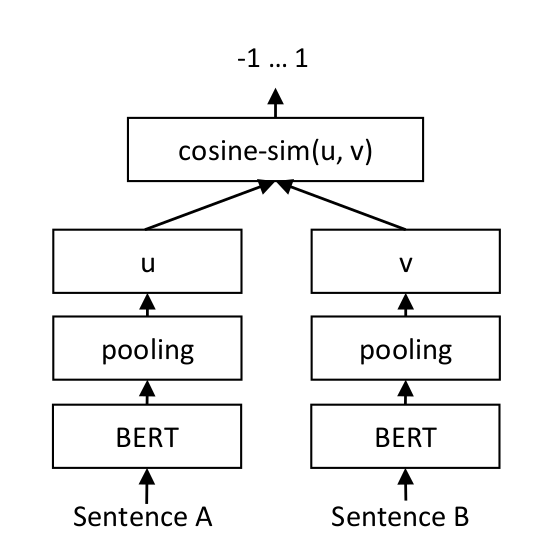
Note that the aggressive averaging across models, datasets, and batch sizes prevents some more intricate patterns from being visible. For example, ONNX seems to perform stronger at low batch sizes. However, ONNX and OpenVINO can even perform slightly worse than PyTorch, so we recommend testing the different backends with your specific model and data to find the best one for your use case.
.. image:: ../../img/ce_backends_benchmark_gpu.png
:alt: Benchmark for GPUs
:width: 45%
.. image:: ../../img/ce_backends_benchmark_cpu.png
:alt: Benchmark for CPUs
:width: 45%
Recommendations
^^^^^^^^^^^^^^^
Based on the benchmarks, this flowchart should help you decide which backend to use for your model:
.. mermaid::
%%{init: {
"theme": "neutral",
"flowchart": {
"curve": "bumpY"
}
}}%%
graph TD
A("What is your hardware?") -->|GPU| B("Are you using a small batch size?")
A -->|CPU| C("Are minor performance degradations acceptable?")
B -->|yes| D[onnx-O4]
B -->|no| F[float16]
C -->|yes| G[openvino-qint8]
C -->|no| H("Do you have an Intel CPU?")
H -->|yes| I[openvino]
H -->|no| J[onnx]
click D "#optimizing-onnx-models"
click F "#pytorch"
click G "#quantizing-openvino-models"
click I "#openvino"
click J "#onnx"
.. note::
Your milage may vary, and you should always test the different backends with your specific model and data to find the best one for your use case.
User Interface
^^^^^^^^^^^^^^
This Hugging Face Space provides a user interface for exporting, optimizing, and quantizing models for either ONNX or OpenVINO:
- `sentence-transformers/backend-export `_
================================================
FILE: docs/cross_encoder/usage/usage.rst
================================================
Usage
=====
Characteristics of Cross Encoder (a.k.a reranker) models:
1. Calculates a **similarity score** given **pairs of texts**.
2. Generally provides **superior performance** compared to a Sentence Transformer (a.k.a. bi-encoder) model.
3. Often **slower** than a Sentence Transformer model, as it requires computation for each pair rather than each text.
4. Due to the previous 2 characteristics, Cross Encoders are often used to **re-rank the top-k results** from a Sentence Transformer model.
Once you have `installed <../../installation.html>`_ Sentence Transformers, you can easily use Cross Encoder models:
.. sidebar:: Documentation
1. :class:`~sentence_transformers.cross_encoder.CrossEncoder`
2. :meth:`CrossEncoder.predict `
3. :meth:`CrossEncoder.rank `
.. note::
MS Marco models return logits rather than scores between 0 and 1. Load the :class:`~sentence_transformers.cross_encoder.CrossEncoder` with ``activation_fn=torch.nn.Sigmoid()`` to get scores between 0 and 1. This does not affect the ranking.
::
from sentence_transformers import CrossEncoder
# 1. Load a pre-trained CrossEncoder model
model = CrossEncoder("cross-encoder/ms-marco-MiniLM-L6-v2")
# 2. Predict scores for a pair of sentences
scores = model.predict([
("How many people live in Berlin?", "Berlin had a population of 3,520,031 registered inhabitants in an area of 891.82 square kilometers."),
("How many people live in Berlin?", "Berlin is well known for its museums."),
])
# => array([ 8.607138 , -4.3200774], dtype=float32)
# 3. Rank a list of passages for a query
query = "How many people live in Berlin?"
passages = [
"Berlin had a population of 3,520,031 registered inhabitants in an area of 891.82 square kilometers.",
"Berlin is well known for its museums.",
"In 2014, the city state Berlin had 37,368 live births (+6.6%), a record number since 1991.",
"The urban area of Berlin comprised about 4.1 million people in 2014, making it the seventh most populous urban area in the European Union.",
"The city of Paris had a population of 2,165,423 people within its administrative city limits as of January 1, 2019",
"An estimated 300,000-420,000 Muslims reside in Berlin, making up about 8-11 percent of the population.",
"Berlin is subdivided into 12 boroughs or districts (Bezirke).",
"In 2015, the total labour force in Berlin was 1.85 million.",
"In 2013 around 600,000 Berliners were registered in one of the more than 2,300 sport and fitness clubs.",
"Berlin has a yearly total of about 135 million day visitors, which puts it in third place among the most-visited city destinations in the European Union.",
]
ranks = model.rank(query, passages)
# Print the scores
print("Query:", query)
for rank in ranks:
print(f"{rank['score']:.2f}\t{passages[rank['corpus_id']]}")
"""
Query: How many people live in Berlin?
8.92 The urban area of Berlin comprised about 4.1 million people in 2014, making it the seventh most populous urban area in the European Union.
8.61 Berlin had a population of 3,520,031 registered inhabitants in an area of 891.82 square kilometers.
8.24 An estimated 300,000-420,000 Muslims reside in Berlin, making up about 8-11 percent of the population.
7.60 In 2014, the city state Berlin had 37,368 live births (+6.6%), a record number since 1991.
6.35 In 2013 around 600,000 Berliners were registered in one of the more than 2,300 sport and fitness clubs.
5.42 Berlin has a yearly total of about 135 million day visitors, which puts it in third place among the most-visited city destinations in the European Union.
3.45 In 2015, the total labour force in Berlin was 1.85 million.
0.33 Berlin is subdivided into 12 boroughs or districts (Bezirke).
-4.24 The city of Paris had a population of 2,165,423 people within its administrative city limits as of January 1, 2019
-4.32 Berlin is well known for its museums.
"""
.. toctree::
:maxdepth: 1
:caption: Tasks
Cross-Encoder vs Bi-Encoder <../../../examples/cross_encoder/applications/README>
../../../examples/sentence_transformer/applications/retrieve_rerank/README
efficiency
================================================
FILE: docs/installation.md
================================================
# Installation
We recommend **Python 3.10+**, **[PyTorch 1.11.0+](https://pytorch.org/get-started/locally/)**, and **[transformers v4.41.0+](https://github.com/huggingface/transformers)**. There are 5 extra options to install Sentence Transformers:
- **Default:** This allows for loading, saving, and inference (i.e., getting embeddings) of models.
- **ONNX:** This allows for loading, saving, inference, optimizing, and quantizing of models using the ONNX backend.
- **OpenVINO:** This allows for loading, saving, and inference of models using the OpenVINO backend.
- **Default and Training**: Like **Default**, plus training.
- **Development**: All of the above plus some dependencies for developing Sentence Transformers, see [Editable Install](#editable-install).
Note that you can mix and match the various extras, e.g. `pip install -U "sentence-transformers[train,onnx-gpu]"`.
## Install with pip
```{eval-rst}
.. tab:: Default
::
pip install -U sentence-transformers
.. tab:: ONNX
For GPU and CPU:
::
pip install -U "sentence-transformers[onnx-gpu]"
For CPU only:
::
pip install -U "sentence-transformers[onnx]"
.. tab:: OpenVINO
::
pip install -U "sentence-transformers[openvino]"
.. tab:: Default and Training
::
pip install -U "sentence-transformers[train]"
To use `Weights and Biases `_ to track your training logs, you should also install ``wandb`` **(recommended)**::
pip install wandb
And to track your Carbon Emissions while training and have this information automatically included in your model cards, also install ``codecarbon`` **(recommended)**::
pip install codecarbon
.. tab:: Development
::
pip install -U "sentence-transformers[dev]"
```
## Install with Conda
```{eval-rst}
.. tab:: Default
::
conda install -c conda-forge sentence-transformers
.. tab:: ONNX
For GPU and CPU:
::
pip install -U "sentence-transformers[onnx-gpu]"
For CPU only:
::
pip install -U "sentence-transformers[onnx]"
.. tab:: OpenVINO
::
pip install -U "sentence-transformers[openvino]"
.. tab:: Default and Training
::
conda install -c conda-forge sentence-transformers accelerate datasets
To use `Weights and Biases `_ to track your training logs, you should also install ``wandb`` **(recommended)**::
pip install wandb
And to track your Carbon Emissions while training and have this information automatically included in your model cards, also install ``codecarbon`` **(recommended)**::
pip install codecarbon
.. tab:: Development
::
conda install -c conda-forge sentence-transformers accelerate datasets pre-commit pytest ruff
```
## Install from Source
You can install `sentence-transformers` directly from source to take advantage of the bleeding edge `main` branch rather than the latest stable release:
```{eval-rst}
.. tab:: Default
::
pip install git+https://github.com/huggingface/sentence-transformers.git
.. tab:: ONNX
For GPU and CPU:
::
pip install -U "sentence-transformers[onnx-gpu] @ git+https://github.com/huggingface/sentence-transformers.git"
For CPU only:
::
pip install -U "sentence-transformers[onnx] @ git+https://github.com/huggingface/sentence-transformers.git"
.. tab:: OpenVINO
::
pip install -U "sentence-transformers[openvino] @ git+https://github.com/huggingface/sentence-transformers.git"
.. tab:: Default and Training
::
pip install -U "sentence-transformers[train] @ git+https://github.com/huggingface/sentence-transformers.git"
To use `Weights and Biases `_ to track your training logs, you should also install ``wandb`` **(recommended)**::
pip install wandb
And to track your carbon emissions while training and have this information automatically included in your model cards, also install ``codecarbon`` **(recommended)**::
pip install codecarbon
.. tab:: Development
::
pip install -U "sentence-transformers[dev] @ git+https://github.com/huggingface/sentence-transformers.git"
```
## Editable Install
If you want to make changes to `sentence-transformers`, you will need an editable install. Clone the repository and install it with these commands:
```
git clone https://github.com/huggingface/sentence-transformers
cd sentence-transformers
pip install -e ".[train,dev]"
```
These commands will link the new `sentence-transformers` folder and your Python library paths, such that this folder will be used when importing `sentence-transformers`.
## Install PyTorch with CUDA support
To use a GPU/CUDA, you must install PyTorch with CUDA support. Follow [PyTorch - Get Started](https://pytorch.org/get-started/locally/) for installation steps.
================================================
FILE: docs/migration_guide.md
================================================
# Migration Guide
## Migrating from v4.x to v5.x
```{eval-rst}
The v5 Sentence Transformers release introduced :class:`~sentence_transformers.sparse_encoder.SparseEncoder` embedding models (see the `Sparse Encoder Usage `_ for more details on them) alongside an extensive training suite for them, including :class:`~sentence_transformers.sparse_encoder.trainer.SparseEncoderTrainer` and :class:`~sentence_transformers.sparse_encoder.training_args.SparseEncoderTrainingArguments`. Unlike with v3 (updated :class:`~sentence_transformers.SentenceTransformer`) and v4 (updated :class:`~sentence_transformers.cross_encoder.CrossEncoder`), this update does not deprecate any training methods.
```
### Migration for model.encode
```{eval-rst}
We introduce two new methods, :meth:`~sentence_transformers.SentenceTransformer.encode_query` and :meth:`~sentence_transformers.SentenceTransformer.encode_document`, which are recommended to use instead of the :meth:`~sentence_transformers.SentenceTransformer.encode` method when working with information retrieval tasks. These methods are specialized version of :meth:`~sentence_transformers.SentenceTransformer.encode` that differs in exactly two ways:
1. If no ``prompt_name`` or ``prompt`` is provided, it uses a predefined "query" prompt,
if available in the model's ``prompts`` dictionary.
2. It sets the ``task`` to "query". If the model has a :class:`~sentence_transformers.models.Router`
module, it will use the "query" task type to route the input through the appropriate submodules.
The same methods apply to the :class:`~sentence_transformers.sparse_encoder.SparseEncoder` models.
.. list-table:: encode_query and encode_document
:widths: 50 50
:header-rows: 1
* - v4.x
- v5.x (recommended)
* - .. code-block:: python
:emphasize-lines: 7-9
from sentence_transformers import SentenceTransformer
model = SentenceTransformer("mixedbread-ai/mxbai-embed-large-v1")
query = "What is the capital of France?"
document = "Paris is the capital of France."
# Use the prompt with the name "query" for the query
query_embedding = model.encode(query, prompt_name="query")
document_embedding = model.encode(document)
print(query_embedding.shape, document_embedding.shape)
# => (1, 768) (1, 768)
- .. code-block:: python
:emphasize-lines: 7-12
from sentence_transformers import SentenceTransformer
model = SentenceTransformer("mixedbread-ai/mxbai-embed-large-v1")
query = "What is the capital of France?"
document = "Paris is the capital of France."
# The new encode_query and encode_document methods call encode,
# but with the prompt name set to "query" or "document" if the
# model has prompts saved, and the task set to "query" or "document",
# if the model has a Router module.
query_embedding = model.encode_query(query)
document_embedding = model.encode_document(document)
print(query_embedding.shape, document_embedding.shape)
# => (1, 768) (1, 768)
We also deprecated the :meth:`~sentence_transformers.SentenceTransformer.encode_multi_process` method, which was used to encode large datasets in parallel using multiple processes. This method has now been subsumed by the :meth:`~sentence_transformers.SentenceTransformer.encode` method with the ``device``, ``pool``, and ``chunk_size`` arguments. Provide a list of devices to the ``device`` argument to use multiple processes, or a single device to use a single process. The ``pool`` argument can be used to pass a multiprocessing pool that gets reused across calls, and the ``chunk_size`` argument can be used to control the size of the chunks that are sent to each process in parallel.
.. list-table:: encode_multi_process deprecation -> encode
:widths: 50 50
:header-rows: 1
* - v4.x
- v5.x (recommended)
* - .. code-block:: python
:emphasize-lines: 7-9
from sentence_transformers import SentenceTransformer
def main():
model = SentenceTransformer("all-mpnet-base-v2")
texts = ["The weather is so nice!", "It's so sunny outside.", ...]
pool = model.start_multi_process_pool(["cpu", "cpu", "cpu", "cpu"])
embeddings = model.encode_multi_process(texts, pool, chunk_size=512)
model.stop_multi_process_pool(pool)
print(embeddings.shape)
# => (4000, 768)
if __name__ == "__main__":
main()
- .. code-block:: python
:emphasize-lines: 7
from sentence_transformers import SentenceTransformer
def main():
model = SentenceTransformer("all-mpnet-base-v2")
texts = ["The weather is so nice!", "It's so sunny outside.", ...]
embeddings = model.encode(texts, device=["cpu", "cpu", "cpu", "cpu"], chunk_size=512)
print(embeddings.shape)
# => (4000, 768)
if __name__ == "__main__":
main()
The ``truncate_dim`` parameter allows you to reduce the dimensionality of embeddings by truncating them. This is useful for optimizing storage and retrieval while maintaining most of the semantic information. Research has shown that the first dimensions often contain most of the important information in transformer embeddings.
.. list-table:: Add truncate_dim to encode
:widths: 50 50
:header-rows: 1
* - v4.x
- v5.x (recommended)
* - .. code-block:: python
:emphasize-lines: 3-8
from sentence_transformers import SentenceTransformer
# To truncate embeddings to a specific dimension,
# you had to specify the dimension when loading
model = SentenceTransformer(
"mixedbread-ai/mxbai-embed-large-v1",
truncate_dim=384,
)
sentences = ["This is an example sentence", "Each sentence is converted"]
embeddings = model.encode(sentences)
print(embeddings.shape)
# => (2, 384)
- .. code-block:: python
:emphasize-lines: 3-7, 10-18
from sentence_transformers import SentenceTransformer
# Now you can either specify the dimension when loading the model...
model = SentenceTransformer(
"mixedbread-ai/mxbai-embed-large-v1",
truncate_dim=384,
)
sentences = ["This is an example sentence", "Each sentence is converted"]
# ... or you can specify it when encoding
embeddings = model.encode(sentences, truncate_dim=256)
print(embeddings.shape)
# => (2, 256)
# The encode parameter has priority, but otherwise the model truncate_dim is used
embeddings = model.encode(sentences)
print(embeddings.shape)
# => (2, 384)
```
### Migration for Asym to Router
```{eval-rst}
The ``Asym`` module has been renamed and updated to the new :class:`~sentence_transformers.models.Router` module, which provides the same functionality but with a more consistent API and additional features. The new :class:`~sentence_transformers.models.Router` module allows for more flexible routing of different tasks, such as query and document embeddings, and is recommended when working with asymmetric models that require different processing for different tasks, notably queries and documents.
The :meth:`~sentence_transformers.SentenceTransformer.encode_query` and :meth:`~sentence_transformers.SentenceTransformer.encode_document` methods automatically set the ``task`` parameter that is used by the :class:`~sentence_transformers.models.Router` module to route the input to the query or document submodules, respectively.
.. collapse:: Asym -> Router
.. list-table::
:widths: 50 50
:header-rows: 1
* - v4.x
- v5.x (recommended)
* - .. code-block:: python
:emphasize-lines: 7-10
from sentence_transformers import SentenceTransformer, models
# Load a Sentence Transformer model and add an asymmetric router
# for different query and document post-processing
model = SentenceTransformer("microsoft/mpnet-base")
dim = model.get_sentence_embedding_dimension()
asym_model = models.Asym({
'sts': [models.Dense(dim, dim)],
'classification': [models.Dense(dim, dim)]
})
model.add_module("asym", asym_model)
- .. code-block:: python
:emphasize-lines: 7-10
from sentence_transformers import SentenceTransformer, models
# Load a Sentence Transformer model and add a router
# for different query and document post-processing
model = SentenceTransformer("microsoft/mpnet-base")
dim = model.get_sentence_embedding_dimension()
router_model = models.Router({
'sts': [models.Dense(dim, dim)],
'classification': [models.Dense(dim, dim)]
})
model.add_module("router", router_model)
.. collapse:: Asym -> Router for queries and documents
.. list-table::
:widths: 50 50
:header-rows: 1
* - v4.x
- v5.x (recommended)
* - .. code-block:: python
:emphasize-lines: 8-11, 22-23
from sentence_transformers import SentenceTransformer
from sentence_transformers.models import Router, Normalize
# Use a regular SentenceTransformer for the document embeddings,
# and a static embedding model for the query embeddings
document_embedder = SentenceTransformer("mixedbread-ai/mxbai-embed-large-v1")
query_embedder = SentenceTransformer("static-retrieval-mrl-en-v1")
asym = Asym({
"query": list(query_embedder.children()),
"document": list(document_embedder.children()),
})
normalize = Normalize()
# Create an asymmetric model with different encoders for queries and documents
model = SentenceTransformer(
modules=[asym, normalize],
)
# ... requires more training to align the vector spaces
# Use the query & document routes
query_embedding = model.encode({"query": "What is the capital of France?"})
document_embedding = model.encode({"document": "Paris is the capital of France."})
- .. code-block:: python
:emphasize-lines: 8-11, 22-23
from sentence_transformers import SentenceTransformer
from sentence_transformers.models import Router, Normalize
# Use a regular SentenceTransformer for the document embeddings,
# and a static embedding model for the query embeddings
document_embedder = SentenceTransformer("mixedbread-ai/mxbai-embed-large-v1")
query_embedder = SentenceTransformer("static-retrieval-mrl-en-v1")
router = Router.for_query_document(
query_modules=list(query_embedder.children()),
document_modules=list(document_embedder.children()),
)
normalize = Normalize()
# Create an asymmetric model with different encoders for queries and documents
model = SentenceTransformer(
modules=[router, normalize],
)
# ... requires more training to align the vector spaces
# Use the query & document routes
query_embedding = model.encode_query("What is the capital of France?")
document_embedding = model.encode_document("Paris is the capital of France.")
.. collapse:: Asym inference -> Router inference
.. list-table::
:widths: 50 50
:header-rows: 1
* - v4.x
- v5.x (recommended)
* - .. code-block:: python
...
# Use the query & document routes as keys in dictionaries
query_embedding = model.encode([{"query": "What is the capital of France?"}])
document_embedding = model.encode([
{"document": "Paris is the capital of France."},
{"document": "Berlin is the capital of Germany."},
])
class_embedding = model.encode(
[{"classification": "S&P500 is down 2.1% today."}],
)
- .. code-block:: python
...
# Use the query & document routes with encode_query/encode_document
query_embedding = model.encode_query(["What is the capital of France?"])
document_embedding = model.encode_document([
"Paris is the capital of France.",
"Berlin is the capital of Germany.",
])
# When using routes other than "query" and "document", you can use the `task` parameter
# on model.encode
class_embedding = model.encode(
["S&P500 is down 2.1% today."],
task="classification" # or any other task defined in the model Router
)
.. collapse:: Asym training -> Router training
.. list-table::
:widths: 50 50
:header-rows: 1
* - v4.x
- v5.x (recommended)
* - .. code-block:: python
:emphasize-lines: 16-22
...
# Prepare a training dataset for an Asym model with "query" and "document" keys
train_dataset = Dataset.from_dict({
"query": [
"is toprol xl the same as metoprolol?",
"are eyes always the same size?",
],
"answer": [
"Metoprolol succinate is also known by the brand name Toprol XL.",
"The eyes are always the same size from birth to death.",
],
})
# This mapper turns normal texts into a dictionary mapping Asym keys to the text
def mapper(sample):
return {
"question": {"query": sample["question"]},
"answer": {"document": sample["answer"]},
}
train_dataset = train_dataset.map(mapper)
print(train_dataset[0])
"""
{
"question": {"query": "is toprol xl the same as metoprolol?"},
"answer": {"document": "Metoprolol succinate is also known by the ..."}
}
"""
trainer = SentenceTransformerTrainer( # Or SparseEncoderTrainer
model=model,
args=training_args,
train_dataset=train_dataset,
...
)
- .. code-block:: python
:emphasize-lines: 25-28
...
# Prepare a training dataset for a Router model with "query" and "document" keys
train_dataset = Dataset.from_dict({
"query": [
"is toprol xl the same as metoprolol?",
"are eyes always the same size?",
],
"answer": [
"Metoprolol succinate is also known by the brand name Toprol XL.",
"The eyes are always the same size from birth to death.",
],
})
train_dataset = train_dataset.map(mapper)
print(train_dataset[0])
"""
{
"question": "is toprol xl the same as metoprolol?",
"answer": "Metoprolol succinate is also known by the brand name Toprol XL."
}
"""
args = SentenceTransformerTrainingArguments( # Or SparseEncoderTrainingArguments
# Map dataset columns to the Router keys
router_mapping={
"question": "query",
"answer": "document",
}
)
trainer = SentenceTransformerTrainer( # Or SparseEncoderTrainer
model=model,
args=training_args,
train_dataset=train_dataset,
...
)
```
### Migration of advanced usage
```{eval-rst}
.. collapse:: Module and InputModule convenience superclasses
.. list-table::
:widths: 50 50
:header-rows: 1
* - v4.x
- v5.x (recommended)
* - .. code-block:: python
:emphasize-lines: 4
from sentence_transformers import SentenceTransformer
import torch
class MyModule(torch.nn.Module):
def __init__(self):
super().__init__()
# Custom code here
model = SentenceTransformer(modules=[MyModule()])
- .. code-block:: python
:emphasize-lines: 4-9
from sentence_transformers import SentenceTransformer
from sentence_transformers.models import Module, InputModule
# The new Module and InputModule superclasses provide convenience methods
# like 'load', 'load_file_path', 'load_dir_path', 'load_torch_weights',
# 'save_config', 'save_torch_weights', 'get_config_dict'
# InputModule is meant to be used as the first module, is requires the
# 'tokenize' method to be implemented
class MyModule(Module):
def __init__(self):
super().__init__()
# Custom initialization code here
model = SentenceTransformer(modules=[MyModule()])
.. collapse:: Custom batch samplers via class or function
.. list-table::
:widths: 50 50
:header-rows: 1
* - v4.x
- v5.x (recommended)
* - .. code-block:: python
from sentence_transformers import SentenceTransformer, SentenceTransformerTrainer
class CustomSentenceTransformerTrainer(SentenceTransformerTrainer):
# Custom batch samplers require subclassing the Trainer
def get_batch_sampler(
self,
dataset,
batch_size,
drop_last,
valid_label_columns=None,
generator=None,
seed=0,
):
# Custom batch sampler logic here
return ...
...
trainer = CustomSentenceTransformerTrainer(
model=model,
args=args,
train_dataset=train_dataset,
...
)
trainer.train()
- .. code-block:: python
from sentence_transformers import SentenceTransformer, SentenceTransformerTrainer
from sentence_transformers.sampler import DefaultBatchSampler
import torch
class CustomBatchSampler(DefaultBatchSampler):
def __init__(
self,
dataset: Dataset,
batch_size: int,
drop_last: bool,
valid_label_columns: list[str] | None = None,
generator: torch.Generator | None = None,
seed: int = 0,
):
super().__init__(dataset, batch_size, drop_last, valid_label_columns, generator, seed)
# Custom batch sampler logic here
args = SentenceTransformerTrainingArguments(
# Other training arguments
batch_sampler=CustomBatchSampler, # Use the custom batch sampler class
)
trainer = SentenceTransformerTrainer(
model=model,
args=args,
train_dataset=train_dataset,
...
)
trainer.train()
# Or, use a function to initialize the batch sampler
def custom_batch_sampler(
dataset: Dataset,
batch_size: int,
drop_last: bool,
valid_label_columns: list[str] | None = None,
generator: torch.Generator | None = None,
seed: int = 0,
):
# Custom batch sampler logic here
return ...
args = SentenceTransformerTrainingArguments(
# Other training arguments
batch_sampler=custom_batch_sampler, # Use the custom batch sampler function
)
trainer = SentenceTransformerTrainer(
model=model,
args=args,
train_dataset=train_dataset,
...
)
trainer.train()
.. collapse:: Custom multi-dataset batch samplers via class or function
.. list-table::
:widths: 50 50
:header-rows: 1
* - v4.x
- v5.x (recommended)
* - .. code-block:: python
from sentence_transformers import SentenceTransformer, SentenceTransformerTrainer
class CustomSentenceTransformerTrainer(SentenceTransformerTrainer):
def get_multi_dataset_batch_sampler(
self,
dataset: ConcatDataset,
batch_samplers: list[BatchSampler],
generator: torch.Generator | None = None,
seed: int | None = 0,
):
# Custom multi-dataset batch sampler logic here
return ...
...
trainer = CustomSentenceTransformerTrainer(
model=model,
args=args,
train_dataset=train_dataset,
...
)
trainer.train()
- .. code-block:: python
from sentence_transformers import SentenceTransformer, SentenceTransformerTrainer
from sentence_transformers.sampler import MultiDatasetDefaultBatchSampler
import torch
class CustomMultiDatasetBatchSampler(MultiDatasetDefaultBatchSampler):
def __init__(
self,
dataset: ConcatDataset,
batch_samplers: list[BatchSampler],
generator: torch.Generator | None = None,
seed: int = 0,
):
super().__init__(dataset, batch_samplers=batch_samplers, generator=generator, seed=seed)
# Custom multi-dataset batch sampler logic here
args = SentenceTransformerTrainingArguments(
# Other training arguments
multi_dataset_batch_sampler=CustomMultiDatasetBatchSampler,
)
trainer = SentenceTransformerTrainer(
model=model,
args=args,
train_dataset=train_dataset,
...
)
trainer.train()
# Or, use a function to initialize the batch sampler
def custom_batch_sampler(
dataset: ConcatDataset,
batch_samplers: list[BatchSampler],
generator: torch.Generator | None = None,
seed: int = 0,
):
# Custom multi-dataset batch sampler logic here
return ...
args = SentenceTransformerTrainingArguments(
# Other training arguments
multi_dataset_batch_sampler=custom_batch_sampler, # Use the custom batch sampler function
)
trainer = SentenceTransformerTrainer(
model=model,
args=args,
train_dataset=train_dataset,
...
)
trainer.train()
.. collapse:: Custom learning rate for sections
.. list-table::
:widths: 50 50
:header-rows: 1
* - v4.x
- v5.x (recommended)
* - .. code-block:: python
# A bunch of hacky code to set different learning rates
# for different sections of the model
- .. code-block:: python
:emphasize-lines: 3-9, 14
from sentence_transformers import SentenceTransformer, SentenceTransformerTrainer
# Custom learning rate for each section of the model,
# mapping regular expressions of parameter names to learning rates
# Matching is done with 'search', not just 'match' or 'fullmatch'
learning_rate_mapping = {
"SparseStaticEmbedding": 1e-4,
"linear_.*": 1e-5,
}
args = SentenceTransformerTrainingArguments(
...,
learning_rate=1e-5, # Default learning rate
learning_rate_mapping=learning_rate_mapping,
)
trainer = SentenceTransformerTrainer(
model=model,
args=args,
train_dataset=train_dataset,
...
)
trainer.train()
.. collapse:: Training with composite losses
.. list-table::
:widths: 50 50
:header-rows: 1
* - v4.x
- v5.x (recommended)
* - .. code-block:: python
:emphasize-lines: 10-11
class CustomLoss(torch.nn.Module):
def __init__(self, model, ...):
super().__init__()
# Custom loss initialization code here
def forward(self, features, labels):
loss_component_one = self.compute_loss_one(features, labels)
loss_component_two = self.compute_loss_two(features, labels)
loss = loss_component_one * alpha + loss_component_two * beta
return loss
loss = CustomLoss(model, ...)
- .. code-block:: python
:emphasize-lines: 10-16
class CustomLoss(torch.nn.Module):
def __init__(self, model, ...):
super().__init__()
# Custom loss initialization code here
def forward(self, features, labels):
loss_component_one = self.compute_loss_one(features, labels)
loss_component_two = self.compute_loss_two(features, labels)
# You can now return a dictionary of loss components.
# The trainer considers the full loss as the sum of all
# components, but each component will also be logged separately.
return {
"loss_one": loss_component_one,
"loss_two": loss_component_two,
}
loss = CustomLoss(model, ...)
.. collapse:: Accessing the underlying Transformer model
.. list-table::
:widths: 50 50
:header-rows: 1
* - v4.x
- v5.x (recommended)
* - .. code-block:: python
:emphasize-lines: 8
from sentence_transformers import SentenceTransformer
# Sometimes, for one reason or another, you need to access the underlying
# Transformer directly. This was previously commonly done by accessing
# the first module, often 'Transformer', and then accessing the
# `auto_model` attribute.
model = SentenceTransformer("all-MiniLM-L6-v2")
print(model[0].auto_model)
# BertModel(
# (embeddings): BertEmbeddings(
# ...
- .. code-block:: python
:emphasize-lines: 6
from sentence_transformers import SentenceTransformer
# Now, you can just use the `transformers_model` attribute on the model itself
# even if your model has non-standard modules.
model = SentenceTransformer("all-MiniLM-L6-v2")
print(model.transformers_model)
# BertModel(
# (embeddings): BertEmbeddings(
# ...
```
## Migrating from v3.x to v4.x
```{eval-rst}
The v4 Sentence Transformers release refactored the training of :class:`~sentence_transformers.cross_encoder.CrossEncoder` reranker/pair classification models, replacing :meth:`CrossEncoder.fit ` with a :class:`~sentence_transformers.cross_encoder.trainer.CrossEncoderTrainer` and :class:`~sentence_transformers.cross_encoder..training_args.CrossEncoderTrainingArguments`. Like with v3 and :class:`~sentence_transformers.SentenceTransformer` models, this update softly deprecated :meth:`CrossEncoder.fit `, meaning that it still works, but it's recommended to switch to the new v4.x training format. Behind the scenes, this method now uses the new trainer.
.. warning::
If you don't have code that uses :meth:`CrossEncoder.fit `, then you will not have to make any changes to your code to update from v3.x to v4.x.
If you do, your code still works, but it is recommended to switch to the new v4.x training format, as it allows more training arguments and functionality. See the `Training Overview `_ for more details.
.. list-table:: Old and new training flow
:widths: 50 50
:header-rows: 1
* - v3.x
- v4.x (recommended)
* - ::
from sentence_transformers import CrossEncoder, InputExample
from torch.utils.data import DataLoader
# 1. Define the model. Either from scratch of by loading a pre-trained model
model = CrossEncoder("microsoft/mpnet-base")
# 2. Define your train examples. You need more than just two examples...
train_examples = [
InputExample(texts=["What are pandas?", "The giant panda ..."], label=1),
InputExample(texts=["What's a panda?", "Mount Vesuvius is a ..."], label=0),
]
train_dataloader = DataLoader(train_examples, shuffle=True, batch_size=16)
# 3. Finetune the model
model.fit(train_dataloader=train_dataloader, epochs=1, warmup_steps=100)
- ::
from datasets import load_dataset
from sentence_transformers import CrossEncoder, CrossEncoderTrainer
from sentence_transformers.cross_encoder.losses import BinaryCrossEntropyLoss
# 1. Define the model. Either from scratch of by loading a pre-trained model
model = CrossEncoder("microsoft/mpnet-base")
# 2. Load a dataset to finetune on, convert to required format
dataset = load_dataset("sentence-transformers/hotpotqa", "triplet", split="train")
def triplet_to_labeled_pair(batch):
anchors = batch["anchor"]
positives = batch["positive"]
negatives = batch["negative"]
return {
"sentence_A": anchors * 2,
"sentence_B": positives + negatives,
"labels": [1] * len(positives) + [0] * len(negatives),
}
dataset = dataset.map(triplet_to_labeled_pair, batched=True, remove_columns=dataset.column_names)
train_dataset = dataset.select(range(10_000))
eval_dataset = dataset.select(range(10_000, 11_000))
# 3. Define a loss function
loss = BinaryCrossEntropyLoss(model)
# 4. Create a trainer & train
trainer = CrossEncoderTrainer(
model=model,
train_dataset=train_dataset,
eval_dataset=eval_dataset,
loss=loss,
)
trainer.train()
# 5. Save the trained model
model.save_pretrained("models/mpnet-base-hotpotqa")
# model.push_to_hub("mpnet-base-hotpotqa")
```
### Migration for parameters on `CrossEncoder` initialization and methods
```{eval-rst}
.. list-table::
:widths: 50 50
:header-rows: 1
* - v3.x
- v4.x (recommended)
* - ``CrossEncoder(model_name=...)``
- Renamed to ``CrossEncoder(model_name_or_path=...)``
* - ``CrossEncoder(automodel_args=...)``
- Renamed to ``CrossEncoder(model_kwargs=...)``
* - ``CrossEncoder(tokenizer_args=...)``
- Renamed to ``CrossEncoder(tokenizer_kwargs=...)``
* - ``CrossEncoder(config_args=...)``
- Renamed to ``CrossEncoder(config_kwargs=...)``
* - ``CrossEncoder(cache_dir=...)``
- Renamed to ``CrossEncoder(cache_folder=...)``
* - ``CrossEncoder(default_activation_function=...)``
- Renamed to ``CrossEncoder(activation_fn=...)``
* - ``CrossEncoder(classifier_dropout=...)``
- Use ``CrossEncoder(config_kwargs={"classifier_dropout": ...})`` instead.
* - ``CrossEncoder.predict(activation_fct=...)``
- Renamed to ``CrossEncoder.predict(activation_fn=...)``
* - ``CrossEncoder.rank(activation_fct=...)``
- Renamed to ``CrossEncoder.rank(activation_fn=...)``
* - ``CrossEncoder.predict(num_workers=...)``
- Fully deprecated, no longer has any effect.
* - ``CrossEncoder.rank(num_workers=...)``
- Fully deprecated, no longer has any effect.
.. note::
The old keyword arguments still work, but they will emit a warning recommending you to use the new names instead.
```
### Migration for specific parameters from `CrossEncoder.fit`
```{eval-rst}
.. collapse:: CrossEncoder.fit(train_dataloader)
.. list-table::
:widths: 50 50
:header-rows: 1
* - v3.x
- v4.x (recommended)
* - .. code-block:: python
:emphasize-lines: 8-12, 15
from sentence_transformers import CrossEncoder, InputExample
from torch.utils.data import DataLoader
# 1. Define the model. Either from scratch of by loading a pre-trained model
model = CrossEncoder("microsoft/mpnet-base")
# 2. Define your train examples. You need more than just two examples...
train_examples = [
InputExample(texts=["What are pandas?", "The giant panda ..."], label=1),
InputExample(texts=["What's a panda?", "Mount Vesuvius is a ..."], label=0),
]
train_dataloader = DataLoader(train_examples, shuffle=True, batch_size=16)
# 3. Finetune the model
model.fit(train_dataloader=train_dataloader)
- .. code-block:: python
:emphasize-lines: 6-18, 26
from datasets import Dataset
from sentence_transformers import CrossEncoder, CrossEncoderTrainer
from sentence_transformers.cross_encoder.losses import BinaryCrossEntropyLoss
# Define a training dataset
train_examples = [
{
"sentence_1": "A person on a horse jumps over a broken down airplane.",
"sentence_2": "A person is outdoors, on a horse.",
"label": 1,
},
{
"sentence_1": "Children smiling and waving at camera",
"sentence_2": "The kids are frowning",
"label": 0,
},
]
train_dataset = Dataset.from_list(train_examples)
# Define a loss function
loss = BinaryCrossEntropyLoss(model)
# Finetune the model
trainer = CrossEncoderTrainer(
model=model,
train_dataset=train_dataset,
loss=loss,
)
trainer.train()
.. collapse:: CrossEncoder.fit(loss_fct)
.. list-table::
:widths: 50 50
:header-rows: 1
* - v3.x
- v4.x (recommended)
* - .. code-block:: python
:emphasize-lines: 6
...
# Finetune the model
model.fit(
train_dataloader=train_dataloader,
loss_fct=torch.nn.MSELoss(),
)
- .. code-block:: python
:emphasize-lines: 1, 6, 7, 14
from sentence_transformers.cross_encoder.losses import MSELoss
...
# Prepare the loss function
# See all valid losses in https://sbert.net/docs/cross_encoder/loss_overview.html
loss = MSELoss(model)
# Finetune the model
trainer = CrossEncoderTrainer(
model=model,
args=args,
train_dataset=train_dataset,
loss=loss,
)
trainer.train()
.. collapse:: CrossEncoder.fit(evaluator)
.. list-table::
:widths: 50 50
:header-rows: 1
* - v3.x
- v4.x (recommended)
* - .. code-block:: python
:emphasize-lines: 9
...
# Load an evaluator
evaluator = CrossEncoderNanoBEIREvaluator()
# Finetune with an evaluator
model.fit(
train_dataloader=train_dataloader,
evaluator=evaluator,
)
- .. code-block:: python
:emphasize-lines: 10
# Load an evaluator
evaluator = CrossEncoderNanoBEIREvaluator()
# Finetune with an evaluator
trainer = CrossEncoderTrainer(
model=model,
train_dataset=train_dataset,
eval_dataset=eval_dataset,
loss=loss,
evaluator=evaluator,
)
trainer.train()
.. collapse:: CrossEncoder.fit(epochs)
.. list-table::
:widths: 50 50
:header-rows: 1
* - v3.x
- v4.x (recommended)
* - .. code-block:: python
:emphasize-lines: 6
...
# Finetune the model
model.fit(
train_dataloader=train_dataloader,
epochs=1,
)
- .. code-block:: python
:emphasize-lines: 5
...
# Prepare the Training Arguments
args = CrossEncoderTrainingArguments(
num_train_epochs=1,
)
# Finetune the model
trainer = CrossEncoderTrainer(
model=model,
args=args,
train_dataset=train_dataset,
loss=loss,
)
trainer.train()
.. collapse:: CrossEncoder.fit(activation_fct)
.. list-table::
:widths: 50 50
:header-rows: 1
* - v3.x
- v4.x (recommended)
* - .. code-block:: python
:emphasize-lines: 6
...
# Finetune the model
model.fit(
train_dataloader=train_dataloader,
activation_fct=torch.nn.Sigmoid(),
)
- .. code-block:: python
:emphasize-lines: 4
...
# Prepare the loss function
loss = MSELoss(model, activation_fn=torch.nn.Sigmoid())
# Finetune the model
trainer = CrossEncoderTrainer(
model=model,
args=args,
train_dataset=train_dataset,
loss=loss,
)
trainer.train()
.. collapse:: CrossEncoder.fit(scheduler)
.. list-table::
:widths: 50 50
:header-rows: 1
* - v3.x
- v4.x (recommended)
* - .. code-block:: python
:emphasize-lines: 6
...
# Finetune the model
model.fit(
train_dataloader=train_dataloader,
scheduler="WarmupLinear",
)
- .. code-block:: python
:emphasize-lines: 6
...
# Prepare the Training Arguments
args = CrossEncoderTrainingArguments(
# See https://huggingface.co/docs/transformers/main_classes/optimizer_schedules#transformers.SchedulerType
lr_scheduler_type="linear"
)
# Finetune the model
trainer = CrossEncoderTrainer(
model=model,
args=args,
train_dataset=train_dataset,
loss=loss,
)
trainer.train()
.. collapse:: CrossEncoder.fit(warmup_steps)
.. list-table::
:widths: 50 50
:header-rows: 1
* - v3.x
- v4.x (recommended)
* - .. code-block:: python
:emphasize-lines: 6
...
# Finetune the model
model.fit(
train_dataloader=train_dataloader,
warmup_steps=1000,
)
- .. code-block:: python
:emphasize-lines: 5
...
# Prepare the Training Arguments
args = CrossEncoderTrainingArguments(
warmup_steps=1000,
)
# Finetune the model
trainer = CrossEncoderTrainer(
model=model,
args=args,
train_dataset=train_dataset,
loss=loss,
)
trainer.train()
.. collapse:: CrossEncoder.fit(optimizer_class, optimizer_params)
.. list-table::
:widths: 50 50
:header-rows: 1
* - v3.x
- v4.x (recommended)
* - .. code-block:: python
:emphasize-lines: 6
...
# Finetune the model
model.fit(
train_dataloader=train_dataloader,
optimizer_class=torch.optim.AdamW,
optimizer_params={"eps": 1e-7},
)
- .. code-block:: python
:emphasize-lines: 6-7
...
# Prepare the Training Arguments
args = CrossEncoderTrainingArguments(
# See https://github.com/huggingface/transformers/blob/main/src/transformers/training_args.py
optim="adamw_torch",
optim_args={"eps": 1e-7},
)
# Finetune the model
trainer = CrossEncoderTrainer(
model=model,
args=args,
train_dataset=train_dataset,
loss=loss,
)
trainer.train()
.. collapse:: CrossEncoder.fit(weight_decay)
.. list-table::
:widths: 50 50
:header-rows: 1
* - v3.x
- v4.x (recommended)
* - .. code-block:: python
:emphasize-lines: 6
...
# Finetune the model
model.fit(
train_dataloader=train_dataloader,
weight_decay=0.02,
)
- .. code-block:: python
:emphasize-lines: 5
...
# Prepare the Training Arguments
args = CrossEncoderTrainingArguments(
weight_decay=0.02,
)
# Finetune the model
trainer = CrossEncoderTrainer(
model=model,
args=args,
train_dataset=train_dataset,
loss=loss,
)
trainer.train()
.. collapse:: CrossEncoder.fit(evaluation_steps)
.. list-table::
:widths: 50 50
:header-rows: 1
* - v3.x
- v4.x (recommended)
* - .. code-block:: python
:emphasize-lines: 6, 7
...
# Finetune the model
model.fit(
train_dataloader=train_dataloader,
evaluator=evaluator,
evaluation_steps=1000,
)
- .. code-block:: python
:emphasize-lines: 5, 6, 10, 15, 17
...
# Prepare the Training Arguments
args = CrossEncoderTrainingArguments(
eval_strategy="steps",
eval_steps=1000,
)
# Finetune the model
# Note: You need an eval_dataset and/or evaluator to evaluate
trainer = CrossEncoderTrainer(
model=model,
args=args,
train_dataset=train_dataset,
eval_dataset=eval_dataset,
loss=loss,
evaluator=evaluator,
)
trainer.train()
.. collapse:: CrossEncoder.fit(output_path, save_best_model)
.. list-table::
:widths: 50 50
:header-rows: 1
* - v3.x
- v4.x (recommended)
* - .. code-block:: python
:emphasize-lines: 7, 8
...
# Finetune the model
model.fit(
train_dataloader=train_dataloader,
evaluator=evaluator,
output_path="my/path",
save_best_model=True,
)
- .. code-block:: python
:emphasize-lines: 5, 6, 19
...
# Prepare the Training Arguments
args = CrossEncoderTrainingArguments(
load_best_model_at_end=True,
metric_for_best_model="hotpotqa_ndcg@10", # E.g. `evaluator.primary_metric`
)
# Finetune the model
trainer = CrossEncoderTrainer(
model=model,
args=args,
train_dataset=train_dataset,
loss=loss,
)
trainer.train()
# Save the best model at my output path
model.save_pretrained("my/path")
.. collapse:: CrossEncoder.fit(max_grad_norm)
.. list-table::
:widths: 50 50
:header-rows: 1
* - v3.x
- v4.x (recommended)
* - .. code-block:: python
:emphasize-lines: 6
...
# Finetune the model
model.fit(
train_dataloader=train_dataloader,
max_grad_norm=1,
)
- .. code-block:: python
:emphasize-lines: 5
...
# Prepare the Training Arguments
args = CrossEncoderTrainingArguments(
max_grad_norm=1,
)
# Finetune the model
trainer = CrossEncoderTrainer(
model=model,
args=args,
train_dataset=train_dataset,
loss=loss,
)
trainer.train()
.. collapse:: CrossEncoder.fit(use_amp)
.. list-table::
:widths: 50 50
:header-rows: 1
* - v3.x
- v4.x (recommended)
* - .. code-block:: python
:emphasize-lines: 6
...
# Finetune the model
model.fit(
train_dataloader=train_dataloader,
use_amp=True,
)
- .. code-block:: python
:emphasize-lines: 5, 6
...
# Prepare the Training Arguments
args = CrossEncoderTrainingArguments(
fp16=True,
bf16=False, # If your GPU supports it, you can also use bf16 instead
)
# Finetune the model
trainer = CrossEncoderTrainer(
model=model,
args=args,
train_dataset=train_dataset,
loss=loss,
)
trainer.train()
.. collapse:: CrossEncoder.fit(callback)
.. list-table::
:widths: 50 50
:header-rows: 1
* - v3.x
- v4.x (recommended)
* - .. code-block:: python
:emphasize-lines: 3, 4, 9
...
def printer_callback(score, epoch, steps):
print(f"Score: {score:.4f} at epoch {epoch:d}, step {steps:d}")
# Finetune the model
model.fit(
train_dataloader=train_dataloader,
callback=printer_callback,
)
- .. code-block:: python
:emphasize-lines: 1, 5-10, 17
from transformers import TrainerCallback
...
class PrinterCallback(TrainerCallback):
# Subclass any method from https://huggingface.co/docs/transformers/main_classes/callback#transformers.TrainerCallback
def on_evaluate(self, args, state, control, metrics=None, **kwargs):
print(f"Metrics: {metrics} at epoch {state.epoch:d}, step {state.global_step:d}")
printer_callback = PrinterCallback()
# Finetune the model
trainer = CrossEncoderTrainer(
model=model,
train_dataset=train_dataset,
loss=loss,
callbacks=[printer_callback],
)
trainer.train()
.. collapse:: CrossEncoder.fit(show_progress_bar)
.. list-table::
:widths: 50 50
:header-rows: 1
* - v3.x
- v4.x (recommended)
* - .. code-block:: python
:emphasize-lines: 6
...
# Finetune the model
model.fit(
train_dataloader=train_dataloader,
show_progress_bar=True,
)
- .. code-block:: python
:emphasize-lines: 5
...
# Prepare the Training Arguments
args = CrossEncoderTrainingArguments(
disable_tqdm=False,
)
# Finetune the model
trainer = CrossEncoderTrainer(
model=model,
args=args,
train_dataset=train_dataset,
loss=loss,
)
trainer.train()
.. raw:: html
.. note::
The old :meth:`CrossEncoder.fit ` method still works, it was only softly deprecated. It now uses the new :class:`~sentence_transformers.cross_encoder.trainer.CrossEncoderTrainer` behind the scenes.
```
### Migration for CrossEncoder evaluators
```{eval-rst}
.. list-table::
:widths: 50 50
:header-rows: 1
* - v3.x
- v4.x (recommended)
* - ``CEBinaryAccuracyEvaluator``
- Use :class:`~sentence_transformers.cross_encoder.evaluation.CrossEncoderClassificationEvaluator`, an encompassed evaluator which uses the same inputs & outputs.
* - ``CEBinaryClassificationEvaluator``
- Use :class:`~sentence_transformers.cross_encoder.evaluation.CrossEncoderClassificationEvaluator`, an encompassed evaluator which uses the same inputs & outputs.
* - ``CECorrelationEvaluator``
- Use :class:`~sentence_transformers.cross_encoder.evaluation.CrossEncoderCorrelationEvaluator`, this evaluator was renamed.
* - ``CEF1Evaluator``
- Use :class:`~sentence_transformers.cross_encoder.evaluation.CrossEncoderClassificationEvaluator`, an encompassed evaluator which uses the same inputs & outputs.
* - ``CESoftmaxAccuracyEvaluator``
- Use :class:`~sentence_transformers.cross_encoder.evaluation.CrossEncoderClassificationEvaluator`, an encompassed evaluator which uses the same inputs & outputs.
* - ``CERerankingEvaluator``
- Renamed to :class:`~sentence_transformers.cross_encoder.evaluation.CrossEncoderRerankingEvaluator`, this evaluator was renamed
.. note::
The old evaluators still work, they will simply warn you to update to the new evaluators.
```
## Migrating from v2.x to v3.x
```{eval-rst}
The v3 Sentence Transformers release refactored the training of :class:`~sentence_transformers.SentenceTransformer` embedding models, replacing :meth:`SentenceTransformer.fit ` with a :class:`~sentence_transformers.trainer.SentenceTransformerTrainer` and :class:`~sentence_transformers.training_args.SentenceTransformerTrainingArguments`. This update softly deprecated :meth:`SentenceTransformer.fit `, meaning that it still works, but it's recommended to switch to the new v3.x training format. Behind the scenes, this method now uses the new trainer.
.. warning::
If you don't have code that uses :meth:`SentenceTransformer.fit `, then you will not have to make any changes to your code to update from v2.x to v3.x.
If you do, your code still works, but it is recommended to switch to the new v3.x training format, as it allows more training arguments and functionality. See the `Training Overview `_ for more details.
.. list-table:: Old and new training flow
:widths: 50 50
:header-rows: 1
* - v2.x
- v3.x (recommended)
* - ::
from sentence_transformers import SentenceTransformer, InputExample, losses
from torch.utils.data import DataLoader
# 1. Define the model. Either from scratch of by loading a pre-trained model
model = SentenceTransformer("microsoft/mpnet-base")
# 2. Define your train examples. You need more than just two examples...
train_examples = [
InputExample(texts=[
"A person on a horse jumps over a broken down airplane.",
"A person is outdoors, on a horse.",
"A person is at a diner, ordering an omelette.",
]),
InputExample(texts=[
"Children smiling and waving at camera",
"There are children present",
"The kids are frowning",
]),
]
train_dataloader = DataLoader(train_examples, shuffle=True, batch_size=16)
# 3. Define a loss function
train_loss = losses.MultipleNegativesRankingLoss(model)
# 4. Finetune the model
model.fit(
train_objectives=[(train_dataloader, train_loss)],
epochs=1,
warmup_steps=100,
)
# 5. Save the trained model
model.save_pretrained("models/mpnet-base-all-nli")
- ::
from datasets import load_dataset
from sentence_transformers import SentenceTransformer, SentenceTransformerTrainer
from sentence_transformers.losses import MultipleNegativesRankingLoss
# 1. Define the model. Either from scratch of by loading a pre-trained model
model = SentenceTransformer("microsoft/mpnet-base")
# 2. Load a dataset to finetune on
dataset = load_dataset("sentence-transformers/all-nli", "triplet")
train_dataset = dataset["train"].select(range(10_000))
eval_dataset = dataset["dev"].select(range(1_000))
# 3. Define a loss function
loss = MultipleNegativesRankingLoss(model)
# 4. Create a trainer & train
trainer = SentenceTransformerTrainer(
model=model,
train_dataset=train_dataset,
eval_dataset=eval_dataset,
loss=loss,
)
trainer.train()
# 5. Save the trained model
model.save_pretrained("models/mpnet-base-all-nli")
# model.push_to_hub("mpnet-base-all-nli")
```
### Migration for specific parameters from `SentenceTransformer.fit`
```{eval-rst}
.. collapse:: SentenceTransformer.fit(train_objectives)
.. list-table::
:widths: 50 50
:header-rows: 1
* - v2.x
- v3.x (recommended)
* - .. code-block:: python
:emphasize-lines: 5-17, 20, 23
from sentence_transformers import SentenceTransformer, InputExample, losses
from torch.utils.data import DataLoader
# Define a training dataloader
train_examples = [
InputExample(texts=[
"A person on a horse jumps over a broken down airplane.",
"A person is outdoors, on a horse.",
"A person is at a diner, ordering an omelette.",
]),
InputExample(texts=[
"Children smiling and waving at camera",
"There are children present",
"The kids are frowning",
]),
]
train_dataloader = DataLoader(train_examples, shuffle=True, batch_size=16)
# Define a loss function
train_loss = losses.MultipleNegativesRankingLoss(model)
# Finetune the model
model.fit(train_objectives=[(train_dataloader, train_loss)])
- .. code-block:: python
:emphasize-lines: 6-18, 21, 26, 27
from datasets import Dataset
from sentence_transformers import SentenceTransformer, SentenceTransformerTrainer
from sentence_transformers.losses import MultipleNegativesRankingLoss
# Define a training dataset
train_examples = [
{
"anchor": "A person on a horse jumps over a broken down airplane.",
"positive": "A person is outdoors, on a horse.",
"negative": "A person is at a diner, ordering an omelette.",
},
{
"anchor": "Children smiling and waving at camera",
"positive": "There are children present",
"negative": "The kids are frowning",
},
]
train_dataset = Dataset.from_list(train_examples)
# Define a loss function
loss = MultipleNegativesRankingLoss(model)
# Finetune the model
trainer = SentenceTransformerTrainer(
model=model,
train_dataset=train_dataset,
loss=loss,
)
trainer.train()
.. collapse:: SentenceTransformer.fit(evaluator)
.. list-table::
:widths: 50 50
:header-rows: 1
* - v2.x
- v3.x (recommended)
* - .. code-block:: python
:emphasize-lines: 9
...
# Load an evaluator
evaluator = NanoBEIREvaluator()
# Finetune with an evaluator
model.fit(
train_objectives=[(train_dataloader, train_loss)],
evaluator=evaluator,
)
- .. code-block:: python
:emphasize-lines: 10
# Load an evaluator
evaluator = NanoBEIREvaluator()
# Finetune with an evaluator
trainer = SentenceTransformerTrainer(
model=model,
train_dataset=train_dataset,
eval_dataset=eval_dataset,
loss=loss,
evaluator=evaluator,
)
trainer.train()
.. collapse:: SentenceTransformer.fit(epochs)
.. list-table::
:widths: 50 50
:header-rows: 1
* - v2.x
- v3.x (recommended)
* - .. code-block:: python
:emphasize-lines: 6
...
# Finetune the model
model.fit(
train_objectives=[(train_dataloader, train_loss)],
epochs=1,
)
- .. code-block:: python
:emphasize-lines: 5
...
# Prepare the Training Arguments
args = SentenceTransformerTrainingArguments(
num_train_epochs=1,
)
# Finetune the model
trainer = SentenceTransformerTrainer(
model=model,
args=args,
train_dataset=train_dataset,
loss=loss,
)
trainer.train()
.. collapse:: SentenceTransformer.fit(steps_per_epoch)
.. list-table::
:widths: 50 50
:header-rows: 1
* - v2.x
- v3.x (recommended)
* - .. code-block:: python
:emphasize-lines: 6
...
# Finetune the model
model.fit(
train_objectives=[(train_dataloader, train_loss)],
steps_per_epoch=1000,
)
- .. code-block:: python
:emphasize-lines: 5
...
# Prepare the Training Arguments
args = SentenceTransformerTrainingArguments(
max_steps=1000, # Note: max_steps is across all epochs, not per epoch
)
# Finetune the model
trainer = SentenceTransformerTrainer(
model=model,
args=args,
train_dataset=train_dataset,
loss=loss,
)
trainer.train()
.. collapse:: SentenceTransformer.fit(scheduler)
.. list-table::
:widths: 50 50
:header-rows: 1
* - v2.x
- v3.x (recommended)
* - .. code-block:: python
:emphasize-lines: 6
...
# Finetune the model
model.fit(
train_objectives=[(train_dataloader, train_loss)],
scheduler="WarmupLinear",
)
- .. code-block:: python
:emphasize-lines: 6
...
# Prepare the Training Arguments
args = SentenceTransformerTrainingArguments(
# See https://huggingface.co/docs/transformers/main_classes/optimizer_schedules#transformers.SchedulerType
lr_scheduler_type="linear"
)
# Finetune the model
trainer = SentenceTransformerTrainer(
model=model,
args=args,
train_dataset=train_dataset,
loss=loss,
)
trainer.train()
.. collapse:: SentenceTransformer.fit(warmup_steps)
.. list-table::
:widths: 50 50
:header-rows: 1
* - v2.x
- v3.x (recommended)
* - .. code-block:: python
:emphasize-lines: 6
...
# Finetune the model
model.fit(
train_objectives=[(train_dataloader, train_loss)],
warmup_steps=1000,
)
- .. code-block:: python
:emphasize-lines: 5
...
# Prepare the Training Arguments
args = SentenceTransformerTrainingArguments(
warmup_steps=1000,
)
# Finetune the model
trainer = SentenceTransformerTrainer(
model=model,
args=args,
train_dataset=train_dataset,
loss=loss,
)
trainer.train()
.. collapse:: SentenceTransformer.fit(optimizer_class, optimizer_params)
.. list-table::
:widths: 50 50
:header-rows: 1
* - v2.x
- v3.x (recommended)
* - .. code-block:: python
:emphasize-lines: 6
...
# Finetune the model
model.fit(
train_objectives=[(train_dataloader, train_loss)],
optimizer_class=torch.optim.AdamW,
optimizer_params={"eps": 1e-7},
)
- .. code-block:: python
:emphasize-lines: 6-7
...
# Prepare the Training Arguments
args = SentenceTransformerTrainingArguments(
# See https://github.com/huggingface/transformers/blob/main/src/transformers/training_args.py
optim="adamw_torch",
optim_args={"eps": 1e-7},
)
# Finetune the model
trainer = SentenceTransformerTrainer(
model=model,
args=args,
train_dataset=train_dataset,
loss=loss,
)
trainer.train()
.. collapse:: SentenceTransformer.fit(weight_decay)
.. list-table::
:widths: 50 50
:header-rows: 1
* - v2.x
- v3.x (recommended)
* - .. code-block:: python
:emphasize-lines: 6
...
# Finetune the model
model.fit(
train_objectives=[(train_dataloader, train_loss)],
weight_decay=0.02,
)
- .. code-block:: python
:emphasize-lines: 5
...
# Prepare the Training Arguments
args = SentenceTransformerTrainingArguments(
weight_decay=0.02,
)
# Finetune the model
trainer = SentenceTransformerTrainer(
model=model,
args=args,
train_dataset=train_dataset,
loss=loss,
)
trainer.train()
.. collapse:: SentenceTransformer.fit(evaluation_steps)
.. list-table::
:widths: 50 50
:header-rows: 1
* - v2.x
- v3.x (recommended)
* - .. code-block:: python
:emphasize-lines: 6, 7
...
# Finetune the model
model.fit(
train_objectives=[(train_dataloader, train_loss)],
evaluator=evaluator,
evaluation_steps=1000,
)
- .. code-block:: python
:emphasize-lines: 5, 6, 10, 15, 17
...
# Prepare the Training Arguments
args = SentenceTransformerTrainingArguments(
eval_strategy="steps",
eval_steps=1000,
)
# Finetune the model
# Note: You need an eval_dataset and/or evaluator to evaluate
trainer = SentenceTransformerTrainer(
model=model,
args=args,
train_dataset=train_dataset,
eval_dataset=eval_dataset,
loss=loss,
evaluator=evaluator,
)
trainer.train()
.. collapse:: SentenceTransformer.fit(output_path, save_best_model)
.. list-table::
:widths: 50 50
:header-rows: 1
* - v2.x
- v3.x (recommended)
* - .. code-block:: python
:emphasize-lines: 7, 8
...
# Finetune the model
model.fit(
train_objectives=[(train_dataloader, train_loss)],
evaluator=evaluator,
output_path="my/path",
save_best_model=True,
)
- .. code-block:: python
:emphasize-lines: 5, 6, 19
...
# Prepare the Training Arguments
args = SentenceTransformerTrainingArguments(
load_best_model_at_end=True,
metric_for_best_model="all_nli_cosine_accuracy", # E.g. `evaluator.primary_metric`
)
# Finetune the model
trainer = SentenceTransformerTrainer(
model=model,
args=args,
train_dataset=train_dataset,
loss=loss,
)
trainer.train()
# Save the best model at my output path
model.save_pretrained("my/path")
.. collapse:: SentenceTransformer.fit(max_grad_norm)
.. list-table::
:widths: 50 50
:header-rows: 1
* - v2.x
- v3.x (recommended)
* - .. code-block:: python
:emphasize-lines: 6
...
# Finetune the model
model.fit(
train_objectives=[(train_dataloader, train_loss)],
max_grad_norm=1,
)
- .. code-block:: python
:emphasize-lines: 5
...
# Prepare the Training Arguments
args = SentenceTransformerTrainingArguments(
max_grad_norm=1,
)
# Finetune the model
trainer = SentenceTransformerTrainer(
model=model,
args=args,
train_dataset=train_dataset,
loss=loss,
)
trainer.train()
.. collapse:: SentenceTransformer.fit(use_amp)
.. list-table::
:widths: 50 50
:header-rows: 1
* - v2.x
- v3.x (recommended)
* - .. code-block:: python
:emphasize-lines: 6
...
# Finetune the model
model.fit(
train_objectives=[(train_dataloader, train_loss)],
use_amp=True,
)
- .. code-block:: python
:emphasize-lines: 5, 6
...
# Prepare the Training Arguments
args = SentenceTransformerTrainingArguments(
fp16=True,
bf16=False, # If your GPU supports it, you can also use bf16 instead
)
# Finetune the model
trainer = SentenceTransformerTrainer(
model=model,
args=args,
train_dataset=train_dataset,
loss=loss,
)
trainer.train()
.. collapse:: SentenceTransformer.fit(callback)
.. list-table::
:widths: 50 50
:header-rows: 1
* - v2.x
- v3.x (recommended)
* - .. code-block:: python
:emphasize-lines: 3, 4, 9
...
def printer_callback(score, epoch, steps):
print(f"Score: {score:.4f} at epoch {epoch:d}, step {steps:d}")
# Finetune the model
model.fit(
train_objectives=[(train_dataloader, train_loss)],
callback=printer_callback,
)
- .. code-block:: python
:emphasize-lines: 1, 5-10, 17
from transformers import TrainerCallback
...
class PrinterCallback(TrainerCallback):
# Subclass any method from https://huggingface.co/docs/transformers/main_classes/callback#transformers.TrainerCallback
def on_evaluate(self, args, state, control, metrics=None, **kwargs):
print(f"Metrics: {metrics} at epoch {state.epoch:d}, step {state.global_step:d}")
printer_callback = PrinterCallback()
# Finetune the model
trainer = SentenceTransformerTrainer(
model=model,
train_dataset=train_dataset,
loss=loss,
callbacks=[printer_callback],
)
trainer.train()
.. collapse:: SentenceTransformer.fit(show_progress_bar)
.. list-table::
:widths: 50 50
:header-rows: 1
* - v2.x
- v3.x (recommended)
* - .. code-block:: python
:emphasize-lines: 6
...
# Finetune the model
model.fit(
train_objectives=[(train_dataloader, train_loss)],
show_progress_bar=True,
)
- .. code-block:: python
:emphasize-lines: 5
...
# Prepare the Training Arguments
args = SentenceTransformerTrainingArguments(
disable_tqdm=False,
)
# Finetune the model
trainer = SentenceTransformerTrainer(
model=model,
args=args,
train_dataset=train_dataset,
loss=loss,
)
trainer.train()
.. collapse:: SentenceTransformer.fit(checkpoint_path, checkpoint_save_steps, checkpoint_save_total_limit)
.. list-table::
:widths: 50 50
:header-rows: 1
* - v2.x
- v3.x (recommended)
* - .. code-block:: python
:emphasize-lines: 6-8
...
# Finetune the model
model.fit(
train_objectives=[(train_dataloader, train_loss)],
checkpoint_path="checkpoints",
checkpoint_save_steps=5000,
checkpoint_save_total_limit=2,
)
- .. code-block:: python
:emphasize-lines: 7-9, 13, 18
...
# Prepare the Training Arguments
args = SentenceTransformerTrainingArguments(
eval_strategy="steps",
eval_steps=5000,
save_strategy="steps",
save_steps=5000,
save_total_limit=2,
)
# Finetune the model
# Note: You need an eval_dataset and/or evaluator to checkpoint
trainer = SentenceTransformerTrainer(
model=model,
args=args,
train_dataset=train_dataset,
eval_dataset=eval_dataset,
loss=loss,
)
trainer.train()
```
### Migration for custom Datasets and DataLoaders used in `SentenceTransformer.fit`
```{eval-rst}
.. list-table::
:widths: 50 50
:header-rows: 1
* - v2.x
- v3.x (recommended)
* - ``ParallelSentencesDataset``
- Manually creating a :class:`~datasets.Dataset` and adding a ``label`` column for embeddings. Alternatively, consider loading one of our pre-provided `Parallel Sentences Datasets `_.
* - ``SentenceLabelDataset``
- Loading or creating a :class:`~datasets.Dataset` and using ``SentenceTransformerTrainingArguments(batch_sampler=BatchSamplers.GROUP_BY_LABEL)`` (uses the :class:`~sentence_transformers.sampler.GroupByLabelBatchSampler`). Constructs each batch with at least 2 distinct labels and at least 2 samples per label. Recommended for the BatchTripletLosses.
* - ``DenoisingAutoEncoderDataset``
- Manually adding a column with noisy text to a :class:`~datasets.Dataset` with texts, e.g. with :func:`Dataset.map `.
* - ``NoDuplicatesDataLoader``
- Loading or creating a :class:`~datasets.Dataset` and using ``SentenceTransformerTrainingArguments(batch_sampler=BatchSamplers.NO_DUPLICATES)`` (uses the :class:`~sentence_transformers.sampler.NoDuplicatesBatchSampler`). Recommended for :class:`~sentence_transformers.losses.MultipleNegativesRankingLoss`.
```
================================================
FILE: docs/package_reference/cross_encoder/cross_encoder.md
================================================
# CrossEncoder
## CrossEncoder
For an introduction to Cross-Encoders, see [Cross-Encoders](../../cross_encoder/usage/usage.rst).
```{eval-rst}
.. autoclass:: sentence_transformers.cross_encoder.CrossEncoder
:members:
:inherited-members: fit, old_fit
:exclude-members: save, add_module, apply, buffers, children, extra_repr, forward, get_buffer, get_extra_state, get_parameter, get_submodule, ipu, load_state_dict, modules, named_buffers, named_children, named_modules, named_parameters, parameters, register_backward_hook, register_buffer, register_forward_hook, register_forward_pre_hook, register_full_backward_hook, register_full_backward_pre_hook, register_load_state_dict_post_hook, register_module, register_parameter, register_state_dict_pre_hook, requires_grad_, set_extra_state, share_memory, state_dict, to_empty, type, xpu, zero_grad
```
## CrossEncoderModelCardData
```{eval-rst}
.. autoclass:: sentence_transformers.cross_encoder.model_card.CrossEncoderModelCardData
```
================================================
FILE: docs/package_reference/cross_encoder/evaluation.md
================================================
# Evaluation
CrossEncoder have their own evaluation classes in `sentence_transformers.cross_encoder.evaluation`.
## CrossEncoderRerankingEvaluator
```{eval-rst}
.. autoclass:: sentence_transformers.cross_encoder.evaluation.CrossEncoderRerankingEvaluator
```
## CrossEncoderNanoBEIREvaluator
```{eval-rst}
.. autoclass:: sentence_transformers.cross_encoder.evaluation.CrossEncoderNanoBEIREvaluator
```
## CrossEncoderClassificationEvaluator
```{eval-rst}
.. autoclass:: sentence_transformers.cross_encoder.evaluation.CrossEncoderClassificationEvaluator
```
## CrossEncoderCorrelationEvaluator
```{eval-rst}
.. autoclass:: sentence_transformers.cross_encoder.evaluation.CrossEncoderCorrelationEvaluator
```
================================================
FILE: docs/package_reference/cross_encoder/index.rst
================================================
Cross Encoder
=============
.. toctree::
cross_encoder
trainer
training_args
losses
evaluation
================================================
FILE: docs/package_reference/cross_encoder/losses.md
================================================
# Losses
`sentence_transformers.cross_encoder.losses` defines different loss functions that can be used to fine-tune cross-encoder models on training data. The choice of loss function plays a critical role when fine-tuning the model. It determines how well our model will work for the specific downstream task.
Sadly, there is no "one size fits all" loss function. Which loss function is suitable depends on the available training data and on the target task. Consider checking out the [Loss Overview](../../cross_encoder/loss_overview.md) to help narrow down your choice of loss function(s).
## BinaryCrossEntropyLoss
```{eval-rst}
.. autoclass:: sentence_transformers.cross_encoder.losses.BinaryCrossEntropyLoss
```
## CrossEntropyLoss
```{eval-rst}
.. autoclass:: sentence_transformers.cross_encoder.losses.CrossEntropyLoss
```
## LambdaLoss
```{eval-rst}
.. autoclass:: sentence_transformers.cross_encoder.losses.LambdaLoss
.. autoclass:: sentence_transformers.cross_encoder.losses.LambdaLoss.BaseWeightingScheme
.. autoclass:: sentence_transformers.cross_encoder.losses.NoWeightingScheme
.. autoclass:: sentence_transformers.cross_encoder.losses.NDCGLoss1Scheme
.. autoclass:: sentence_transformers.cross_encoder.losses.NDCGLoss2Scheme
.. autoclass:: sentence_transformers.cross_encoder.losses.LambdaRankScheme
.. autoclass:: sentence_transformers.cross_encoder.losses.NDCGLoss2PPScheme
```
## ListMLELoss
```{eval-rst}
.. autoclass:: sentence_transformers.cross_encoder.losses.ListMLELoss
```
## PListMLELoss
```{eval-rst}
.. autoclass:: sentence_transformers.cross_encoder.losses.PListMLELoss
.. autoclass:: sentence_transformers.cross_encoder.losses.PListMLELambdaWeight
```
## ListNetLoss
```{eval-rst}
.. autoclass:: sentence_transformers.cross_encoder.losses.ListNetLoss
```
## MultipleNegativesRankingLoss
```{eval-rst}
.. autoclass:: sentence_transformers.cross_encoder.losses.MultipleNegativesRankingLoss
```
## CachedMultipleNegativesRankingLoss
```{eval-rst}
.. autoclass:: sentence_transformers.cross_encoder.losses.CachedMultipleNegativesRankingLoss
```
## MSELoss
```{eval-rst}
.. autoclass:: sentence_transformers.cross_encoder.losses.MSELoss
```
## MarginMSELoss
```{eval-rst}
.. autoclass:: sentence_transformers.cross_encoder.losses.MarginMSELoss
```
## RankNetLoss
```{eval-rst}
.. autoclass:: sentence_transformers.cross_encoder.losses.RankNetLoss
```
================================================
FILE: docs/package_reference/cross_encoder/trainer.md
================================================
# Trainer
## CrossEncoderTrainer
```{eval-rst}
.. autoclass:: sentence_transformers.cross_encoder.trainer.CrossEncoderTrainer
:members:
:inherited-members:
:exclude-members: autocast_smart_context_manager, collect_features, compute_loss_context_manager, evaluation_loop, floating_point_ops, get_decay_parameter_names, get_optimizer_cls_and_kwargs, init_hf_repo, log_metrics, metrics_format, num_examples, num_tokens, predict, prediction_loop, prediction_step, save_metrics, save_state, training_step
```
================================================
FILE: docs/package_reference/cross_encoder/training_args.md
================================================
# Training Arguments
## CrossEncoderTrainingArguments
```{eval-rst}
.. autoclass:: sentence_transformers.cross_encoder.training_args.CrossEncoderTrainingArguments
:members:
:inherited-members:
```
================================================
FILE: docs/package_reference/sentence_transformer/SentenceTransformer.md
================================================
# SentenceTransformer
## SentenceTransformer
```{eval-rst}
.. autoclass:: sentence_transformers.SentenceTransformer
:members:
:inherited-members: fit, old_fit
:exclude-members: save, save_to_hub, add_module, append, apply, buffers, children, extra_repr, forward, get_buffer, get_extra_state, get_parameter, get_submodule, ipu, load_state_dict, modules, named_buffers, named_children, named_modules, named_parameters, parameters, register_backward_hook, register_buffer, register_forward_hook, register_forward_pre_hook, register_full_backward_hook, register_full_backward_pre_hook, register_load_state_dict_post_hook, register_module, register_parameter, register_state_dict_pre_hook, requires_grad_, set_extra_state, share_memory, state_dict, to_empty, type, xpu, zero_grad
```
## SentenceTransformerModelCardData
```{eval-rst}
.. autoclass:: sentence_transformers.model_card.SentenceTransformerModelCardData
```
## SimilarityFunction
```{eval-rst}
.. autoclass:: sentence_transformers.SimilarityFunction
:members:
```
================================================
FILE: docs/package_reference/sentence_transformer/datasets.md
================================================
# Datasets
```{eval-rst}
.. note::
The ``sentence_transformers.datasets`` classes have been deprecated, and only exist for compatibility with the `deprecated training <../../sentence_transformer/training_overview.html#deprecated-training>`_.
* Instead of :class:`~sentence_transformers.datasets.SentenceLabelDataset`, you can now use ``BatchSamplers.GROUP_BY_LABEL`` to use the :class:`~sentence_transformers.sampler.GroupByLabelBatchSampler`, which constructs each batch by drawing K samples from each of P distinct labels, ensuring every batch has at least 2 labels with at least 2 samples each.
* Instead of :class:`~sentence_transformers.datasets.NoDuplicatesDataLoader`, you can now use the ``BatchSamplers.NO_DUPLICATES`` to use the :class:`~sentence_transformers.sampler.NoDuplicatesBatchSampler`.
```
`sentence_transformers.datasets` contains classes to organize your training input examples.
## ParallelSentencesDataset
`ParallelSentencesDataset` is used for multilingual training. For details, see [multilingual training](../../../examples/sentence_transformer/training/multilingual/README.md).
```{eval-rst}
.. autoclass:: sentence_transformers.datasets.ParallelSentencesDataset
```
## SentenceLabelDataset
`SentenceLabelDataset` can be used if you have labeled sentences and want to train with triplet loss.
```{eval-rst}
.. autoclass:: sentence_transformers.datasets.SentenceLabelDataset
```
## DenoisingAutoEncoderDataset
`DenoisingAutoEncoderDataset` is used for unsupervised training with the TSDAE method.
```{eval-rst}
.. autoclass:: sentence_transformers.datasets.DenoisingAutoEncoderDataset
```
## NoDuplicatesDataLoader
`NoDuplicatesDataLoader`can be used together with MultipleNegativeRankingLoss to ensure that no duplicates are within the same batch.
```{eval-rst}
.. autoclass:: sentence_transformers.datasets.NoDuplicatesDataLoader
```
================================================
FILE: docs/package_reference/sentence_transformer/evaluation.md
================================================
# Evaluation
`sentence_transformers.evaluation` defines different classes, that can be used to evaluate the model during training.
## BinaryClassificationEvaluator
```{eval-rst}
.. autoclass:: sentence_transformers.evaluation.BinaryClassificationEvaluator
```
## EmbeddingSimilarityEvaluator
```{eval-rst}
.. autoclass:: sentence_transformers.evaluation.EmbeddingSimilarityEvaluator
```
## InformationRetrievalEvaluator
```{eval-rst}
.. autoclass:: sentence_transformers.evaluation.InformationRetrievalEvaluator
```
## NanoBEIREvaluator
```{eval-rst}
.. autoclass:: sentence_transformers.evaluation.NanoBEIREvaluator
```
## MSEEvaluator
```{eval-rst}
.. autoclass:: sentence_transformers.evaluation.MSEEvaluator
```
## ParaphraseMiningEvaluator
```{eval-rst}
.. autoclass:: sentence_transformers.evaluation.ParaphraseMiningEvaluator
```
## RerankingEvaluator
```{eval-rst}
.. autoclass:: sentence_transformers.evaluation.RerankingEvaluator
```
## SentenceEvaluator
```{eval-rst}
.. autoclass:: sentence_transformers.evaluation.SentenceEvaluator
```
## SequentialEvaluator
```{eval-rst}
.. autoclass:: sentence_transformers.evaluation.SequentialEvaluator
```
## TranslationEvaluator
```{eval-rst}
.. autoclass:: sentence_transformers.evaluation.TranslationEvaluator
```
## TripletEvaluator
```{eval-rst}
.. autoclass:: sentence_transformers.evaluation.TripletEvaluator
```
================================================
FILE: docs/package_reference/sentence_transformer/index.rst
================================================
Sentence Transformer
====================
.. toctree::
SentenceTransformer
trainer
training_args
losses
sampler
evaluation
datasets
models
quantization
================================================
FILE: docs/package_reference/sentence_transformer/losses.md
================================================
# Losses
`sentence_transformers.losses` defines different loss functions that can be used to fine-tune embedding models on training data. The choice of loss function plays a critical role when fine-tuning the model. It determines how well our embedding model will work for the specific downstream task.
Sadly, there is no "one size fits all" loss function. Which loss function is suitable depends on the available training data and on the target task. Consider checking out the [Loss Overview](../../sentence_transformer/loss_overview.md) to help narrow down your choice of loss function(s).
## BatchAllTripletLoss
```{eval-rst}
.. autoclass:: sentence_transformers.losses.BatchAllTripletLoss
```
## BatchHardSoftMarginTripletLoss
```{eval-rst}
.. autoclass:: sentence_transformers.losses.BatchHardSoftMarginTripletLoss
```
## BatchHardTripletLoss
```{eval-rst}
.. autoclass:: sentence_transformers.losses.BatchHardTripletLoss
```
## BatchSemiHardTripletLoss
```{eval-rst}
.. autoclass:: sentence_transformers.losses.BatchSemiHardTripletLoss
```
## ContrastiveLoss
```{eval-rst}
.. autoclass:: sentence_transformers.losses.ContrastiveLoss
```
## OnlineContrastiveLoss
```{eval-rst}
.. autoclass:: sentence_transformers.losses.OnlineContrastiveLoss
```
## ContrastiveTensionLoss
```{eval-rst}
.. autoclass:: sentence_transformers.losses.ContrastiveTensionLoss
```
## ContrastiveTensionLossInBatchNegatives
```{eval-rst}
.. autoclass:: sentence_transformers.losses.ContrastiveTensionLossInBatchNegatives
```
## CoSENTLoss
```{eval-rst}
.. autoclass:: sentence_transformers.losses.CoSENTLoss
```
## AnglELoss
```{eval-rst}
.. autoclass:: sentence_transformers.losses.AnglELoss
```
## CosineSimilarityLoss
For each sentence pair, we pass sentence A and sentence B through our network which yields the embeddings *u* und *v*. The similarity of these embeddings is computed using cosine similarity and the result is compared to the gold similarity score.
This allows our network to be fine-tuned to recognize the similarity of sentences.
```{eval-rst}
.. autoclass:: sentence_transformers.losses.CosineSimilarityLoss
```
## DenoisingAutoEncoderLoss
```{eval-rst}
.. autoclass:: sentence_transformers.losses.DenoisingAutoEncoderLoss
```
## GISTEmbedLoss
```{eval-rst}
.. autoclass:: sentence_transformers.losses.GISTEmbedLoss
```
## CachedGISTEmbedLoss
```{eval-rst}
.. autoclass:: sentence_transformers.losses.CachedGISTEmbedLoss
```
## GlobalOrthogonalRegularizationLoss
```{eval-rst}
.. autoclass:: sentence_transformers.losses.GlobalOrthogonalRegularizationLoss
```
## MSELoss
```{eval-rst}
.. autoclass:: sentence_transformers.losses.MSELoss
```
## MarginMSELoss
```{eval-rst}
.. autoclass:: sentence_transformers.losses.MarginMSELoss
```
## MatryoshkaLoss
```{eval-rst}
.. autoclass:: sentence_transformers.losses.MatryoshkaLoss
```
## Matryoshka2dLoss
```{eval-rst}
.. autoclass:: sentence_transformers.losses.Matryoshka2dLoss
```
## AdaptiveLayerLoss
```{eval-rst}
.. autoclass:: sentence_transformers.losses.AdaptiveLayerLoss
```
## MegaBatchMarginLoss
```{eval-rst}
.. autoclass:: sentence_transformers.losses.MegaBatchMarginLoss
```
## MultipleNegativesRankingLoss
*MultipleNegativesRankingLoss* is a great loss function if you only have positive pairs, for example, only pairs of similar texts like pairs of paraphrases, pairs of duplicate questions, pairs of (query, response), or pairs of (source_language, target_language).
```{eval-rst}
.. autoclass:: sentence_transformers.losses.MultipleNegativesRankingLoss
```
## CachedMultipleNegativesRankingLoss
```{eval-rst}
.. autoclass:: sentence_transformers.losses.CachedMultipleNegativesRankingLoss
```
## MultipleNegativesSymmetricRankingLoss
```{eval-rst}
.. autoclass:: sentence_transformers.losses.MultipleNegativesSymmetricRankingLoss
```
## CachedMultipleNegativesSymmetricRankingLoss
```{eval-rst}
.. autoclass:: sentence_transformers.losses.CachedMultipleNegativesSymmetricRankingLoss
```
## SoftmaxLoss
```{eval-rst}
.. autoclass:: sentence_transformers.losses.SoftmaxLoss
```
## TripletLoss
```{eval-rst}
.. autoclass:: sentence_transformers.losses.TripletLoss
```
## DistillKLDivLoss
```{eval-rst}
.. autoclass:: sentence_transformers.losses.DistillKLDivLoss
```
================================================
FILE: docs/package_reference/sentence_transformer/models.md
================================================
# Modules
`sentence_transformers.models` defines different building blocks, a.k.a. Modules, that can be used to create SentenceTransformer models from scratch. For more details, see [Creating Custom Models](../../sentence_transformer/usage/custom_models.rst).
## Main Modules
```{eval-rst}
.. autoclass:: sentence_transformers.models.Transformer
.. autoclass:: sentence_transformers.models.Pooling
.. autoclass:: sentence_transformers.models.Dense
.. autoclass:: sentence_transformers.models.Normalize
.. autoclass:: sentence_transformers.models.Router
:members: for_query_document
.. autoclass:: sentence_transformers.models.StaticEmbedding
:members: from_model2vec, from_distillation
```
## Further Modules
```{eval-rst}
.. autoclass:: sentence_transformers.models.BoW
.. autoclass:: sentence_transformers.models.CNN
.. autoclass:: sentence_transformers.models.LSTM
.. autoclass:: sentence_transformers.models.WeightedLayerPooling
.. autoclass:: sentence_transformers.models.WordEmbeddings
.. autoclass:: sentence_transformers.models.WordWeights
```
## Base Modules
```{eval-rst}
.. autoclass:: sentence_transformers.models.Module
:members: config_file_name, config_keys, save_in_root, forward, get_config_dict, load, load_config, load_file_path, load_dir_path, load_torch_weights, save, save_config, save_torch_weights
.. autoclass:: sentence_transformers.models.InputModule
:members: save_in_root, tokenizer, tokenize, save_tokenizer
```
================================================
FILE: docs/package_reference/sentence_transformer/quantization.md
================================================
# quantization
`sentence_transformers.quantization` defines different helpful functions to perform embedding quantization.
```{eval-rst}
.. note::
`Embedding Quantization <../../../examples/sentence_transformer/applications/embedding-quantization/README.html>`_ differs from model quantization. The former shrinks the size of embeddings such that semantic search/retrieval is faster and requires less memory and disk space. The latter refers to lowering the precision of the model weights to speed up inference. This page only shows documentation for the former.
```
```{eval-rst}
.. automodule:: sentence_transformers.quantization
:members: quantize_embeddings, semantic_search_faiss, semantic_search_usearch
```
================================================
FILE: docs/package_reference/sentence_transformer/sampler.md
================================================
# Samplers
## BatchSamplers
```{eval-rst}
.. autoclass:: sentence_transformers.training_args.BatchSamplers
:members:
```
```{eval-rst}
.. autoclass:: sentence_transformers.sampler.DefaultBatchSampler
:members:
```
```{eval-rst}
.. autoclass:: sentence_transformers.sampler.NoDuplicatesBatchSampler
:members:
```
```{eval-rst}
.. autoclass:: sentence_transformers.sampler.GroupByLabelBatchSampler
:members:
```
## MultiDatasetBatchSamplers
```{eval-rst}
.. autoclass:: sentence_transformers.training_args.MultiDatasetBatchSamplers
:members:
```
```{eval-rst}
.. autoclass:: sentence_transformers.sampler.MultiDatasetDefaultBatchSampler
:members:
```
```{eval-rst}
.. autoclass:: sentence_transformers.sampler.RoundRobinBatchSampler
:members:
```
```{eval-rst}
.. autoclass:: sentence_transformers.sampler.ProportionalBatchSampler
:members:
```
================================================
FILE: docs/package_reference/sentence_transformer/trainer.md
================================================
# Trainer
## SentenceTransformerTrainer
```{eval-rst}
.. autoclass:: sentence_transformers.trainer.SentenceTransformerTrainer
:members:
:inherited-members:
:exclude-members: autocast_smart_context_manager, collect_features, compute_loss_context_manager, evaluation_loop, floating_point_ops, get_decay_parameter_names, get_optimizer_cls_and_kwargs, init_hf_repo, log_metrics, metrics_format, num_examples, num_tokens, predict, prediction_loop, prediction_step, save_metrics, save_state, training_step
```
================================================
FILE: docs/package_reference/sentence_transformer/training_args.md
================================================
# Training Arguments
## SentenceTransformerTrainingArguments
```{eval-rst}
.. autoclass:: sentence_transformers.training_args.SentenceTransformerTrainingArguments
:members:
:inherited-members:
```
================================================
FILE: docs/package_reference/sparse_encoder/SparseEncoder.md
================================================
# SparseEncoder
## SparseEncoder
```{eval-rst}
.. autoclass:: sentence_transformers.sparse_encoder.SparseEncoder
:members:
:inherited-members:
:exclude-members: fit, old_fit, save, save_to_hub, add_module, append, apply, buffers, children, extra_repr, forward, get_buffer, get_extra_state, get_parameter, get_submodule, ipu, load_state_dict, modules, named_buffers, named_children, named_modules, named_parameters, parameters, register_backward_hook, register_buffer, register_forward_hook, register_forward_pre_hook, register_full_backward_hook, register_full_backward_pre_hook, register_load_state_dict_post_hook, register_module, register_parameter, register_state_dict_pre_hook, requires_grad_, set_extra_state, share_memory, state_dict, to_empty, type, xpu, zero_grad, truncate_sentence_embeddings, encode_multi_process
```
## SparseEncoderModelCardData
```{eval-rst}
.. autoclass:: sentence_transformers.sparse_encoder.model_card.SparseEncoderModelCardData
:members:
```
## SimilarityFunction
```{eval-rst}
.. autoclass:: sentence_transformers.SimilarityFunction
:members:
```
================================================
FILE: docs/package_reference/sparse_encoder/callbacks.md
================================================
# Callbacks
## SpladeRegularizerWeightSchedulerCallback
```{eval-rst}
.. autoclass:: sentence_transformers.sparse_encoder.callbacks.splade_callbacks.SpladeRegularizerWeightSchedulerCallback
```
================================================
FILE: docs/package_reference/sparse_encoder/evaluation.md
================================================
# Evaluation
`sentence_transformers.sparse_encoder.evaluation` defines different classes, that can be used to evaluate the SparseEncoder model during training.
## SparseInformationRetrievalEvaluator
```{eval-rst}
.. autoclass:: sentence_transformers.sparse_encoder.evaluation.SparseInformationRetrievalEvaluator
```
## SparseNanoBEIREvaluator
```{eval-rst}
.. autoclass:: sentence_transformers.sparse_encoder.evaluation.SparseNanoBEIREvaluator
```
## SparseEmbeddingSimilarityEvaluator
```{eval-rst}
.. autoclass:: sentence_transformers.sparse_encoder.evaluation.SparseEmbeddingSimilarityEvaluator
```
## SparseBinaryClassificationEvaluator
```{eval-rst}
.. autoclass:: sentence_transformers.sparse_encoder.evaluation.SparseBinaryClassificationEvaluator
```
## SparseTripletEvaluator
```{eval-rst}
.. autoclass:: sentence_transformers.sparse_encoder.evaluation.SparseTripletEvaluator
```
## SparseRerankingEvaluator
```{eval-rst}
.. autoclass:: sentence_transformers.sparse_encoder.evaluation.SparseRerankingEvaluator
```
## SparseTranslationEvaluator
```{eval-rst}
.. autoclass:: sentence_transformers.sparse_encoder.evaluation.SparseTranslationEvaluator
```
## SparseMSEEvaluator
```{eval-rst}
.. autoclass:: sentence_transformers.sparse_encoder.evaluation.SparseMSEEvaluator
```
## ReciprocalRankFusionEvaluator
```{eval-rst}
.. autoclass:: sentence_transformers.sparse_encoder.evaluation.ReciprocalRankFusionEvaluator
================================================
FILE: docs/package_reference/sparse_encoder/index.rst
================================================
Sparse Encoder
=============
.. toctree::
SparseEncoder
trainer
training_args
losses
../sentence_transformer/sampler
evaluation
models
callbacks
search_engines
================================================
FILE: docs/package_reference/sparse_encoder/losses.md
================================================
# Losses
`sentence_transformers.sparse_encoder.losses` defines different loss functions that can be used to fine-tune saprse embedding models on training data. The choice of loss function plays a critical role when fine-tuning the model. It determines how well our embedding model will work for the specific downstream task.
Sadly, there is no "one size fits all" loss function. Which loss function is suitable depends on the available training data and on the target task. Consider checking out the [Loss Overview](../../sparse_encoder/loss_overview.md) to help narrow down your choice of loss function(s).
```{eval-rst}
.. warning::
To train a :class:`~sentence_transformers.sparse_encoder.SparseEncoder`, you need either :class:`~sentence_transformers.sparse_encoder.losses.SpladeLoss` or :class:`~sentence_transformers.sparse_encoder.losses.CSRLoss`, depending on the architecture. These are wrapper losses that add sparsity regularization on top of a main loss function, which must be provided as a parameter. The only loss that can be used independently is :class:`~sentence_transformers.sparse_encoder.losses.SparseMSELoss`, as it performs embedding-level distillation, ensuring sparsity by directly copying the teacher's sparse embedding.
```
## SpladeLoss
```{eval-rst}
.. autoclass:: sentence_transformers.sparse_encoder.losses.SpladeLoss
```
## CachedSpladeLoss
```{eval-rst}
.. autoclass:: sentence_transformers.sparse_encoder.losses.CachedSpladeLoss
```
## FlopsLoss
```{eval-rst}
.. autoclass:: sentence_transformers.sparse_encoder.losses.FlopsLoss
```
## CSRLoss
```{eval-rst}
.. autoclass:: sentence_transformers.sparse_encoder.losses.CSRLoss
```
## CSRReconstructionLoss
```{eval-rst}
.. autoclass:: sentence_transformers.sparse_encoder.losses.CSRReconstructionLoss
```
## SparseMultipleNegativesRankingLoss
```{eval-rst}
.. autoclass:: sentence_transformers.sparse_encoder.losses.SparseMultipleNegativesRankingLoss
```
## SparseMarginMSELoss
```{eval-rst}
.. autoclass:: sentence_transformers.sparse_encoder.losses.SparseMarginMSELoss
```
## SparseDistillKLDivLoss
```{eval-rst}
.. autoclass:: sentence_transformers.sparse_encoder.losses.SparseDistillKLDivLoss
```
## SparseTripletLoss
```{eval-rst}
.. autoclass:: sentence_transformers.sparse_encoder.losses.SparseTripletLoss
```
## SparseCosineSimilarityLoss
```{eval-rst}
.. autoclass:: sentence_transformers.sparse_encoder.losses.SparseCosineSimilarityLoss
```
## SparseCoSENTLoss
```{eval-rst}
.. autoclass:: sentence_transformers.sparse_encoder.losses.SparseCoSENTLoss
```
## SparseAnglELoss
```{eval-rst}
.. autoclass:: sentence_transformers.sparse_encoder.losses.SparseAnglELoss
```
## SparseMSELoss
```{eval-rst}
.. autoclass:: sentence_transformers.sparse_encoder.losses.SparseMSELoss
```
================================================
FILE: docs/package_reference/sparse_encoder/models.md
================================================
# Modules
`sentence_transformers.sparse_encoder.models` defines different building blocks, that can be used to create SparseEncoder networks from scratch. For more details, see [Training Overview](../../sparse_encoder/training_overview.md).
Note that modules from `sentence_transformers.models` can also be used for Sparse models, such as `sentence_transformers.models.Transformer` from [SentenceTransformer > Modules](../sentence_transformer/models.md)
## SPLADE Pooling
```{eval-rst}
.. autoclass:: sentence_transformers.sparse_encoder.models.SpladePooling
```
## MLM Transformer
```{eval-rst}
.. autoclass:: sentence_transformers.sparse_encoder.models.MLMTransformer
```
## SparseAutoEncoder
```{eval-rst}
.. autoclass:: sentence_transformers.sparse_encoder.models.SparseAutoEncoder
```
## SparseStaticEmbedding
```{eval-rst}
.. autoclass:: sentence_transformers.sparse_encoder.models.SparseStaticEmbedding
```
================================================
FILE: docs/package_reference/sparse_encoder/search_engines.md
================================================
# Search Engines
`sentence_transformers.sparse_encoder.search_engines` defines different helpful functions to integrate with vector databases and search engines the sparse embeddings produced.
```{eval-rst}
.. automodule:: sentence_transformers.sparse_encoder.search_engines
:members: semantic_search_qdrant, semantic_search_elasticsearch, semantic_search_seismic, semantic_search_opensearch
```
================================================
FILE: docs/package_reference/sparse_encoder/trainer.md
================================================
# Trainer
## SparseEncoderTrainer
```{eval-rst}
.. autoclass:: sentence_transformers.sparse_encoder.SparseEncoderTrainer
:members:
:inherited-members:
:exclude-members: autocast_smart_context_manager, collect_features, compute_loss_context_manager, evaluation_loop, floating_point_ops, get_decay_parameter_names, get_optimizer_cls_and_kwargs, init_hf_repo, log_metrics, metrics_format, num_examples, num_tokens, predict, prediction_loop, prediction_step, save_metrics, save_state, training_step
```
================================================
FILE: docs/package_reference/sparse_encoder/training_args.md
================================================
# Training Arguments
## SparseEncoderTrainingArguments
```{eval-rst}
.. autoclass:: sentence_transformers.sparse_encoder.training_args.SparseEncoderTrainingArguments
:members:
:inherited-members:
```
================================================
FILE: docs/package_reference/util.md
================================================
# util
`sentence_transformers.util` defines different helpful functions to work with text embeddings.
## Helper Functions
```{eval-rst}
.. automodule:: sentence_transformers.util
:members: paraphrase_mining, semantic_search, community_detection, http_get, truncate_embeddings, normalize_embeddings, is_training_available, mine_hard_negatives
```
## Model Optimization
```{eval-rst}
.. automodule:: sentence_transformers.backend
:members: export_optimized_onnx_model, export_dynamic_quantized_onnx_model, export_static_quantized_openvino_model
```
## Similarity Metrics
```{eval-rst}
.. automodule:: sentence_transformers.util
:members: cos_sim, pairwise_cos_sim, dot_score, pairwise_dot_score, manhattan_sim, pairwise_manhattan_sim, euclidean_sim, pairwise_euclidean_sim
```
================================================
FILE: docs/pretrained-models/ce-msmarco.md
================================================
# MS MARCO Cross-Encoders
[MS MARCO](https://microsoft.github.io/msmarco/) is a large scale information retrieval corpus that was created based on real user search queries using Bing search engine. The provided models can be used for semantic search, i.e., given keywords / a search phrase / a question, the model will find passages that are relevant for the search query.
The training data consists of over 500k examples, while the complete corpus consists of over 8.8 million passages.
## Usage with SentenceTransformers
Pre-trained models can be used like this:
```python
from sentence_transformers import CrossEncoder
model = CrossEncoder("model_name", max_length=512)
scores = model.predict(
[("Query", "Paragraph1"), ("Query", "Paragraph2"), ("Query", "Paragraph3")]
)
```
## Usage with Transformers
```python
from transformers import AutoTokenizer, AutoModelForSequenceClassification
import torch
model = AutoModelForSequenceClassification.from_pretrained("model_name")
tokenizer = AutoTokenizer.from_pretrained("model_name")
features = tokenizer(["Query", "Query"], ["Paragraph1", "Paragraph2"], padding=True, truncation=True, return_tensors="pt")
model.eval()
with torch.no_grad():
scores = model(**features).logits
print(scores)
```
## Models & Performance
In the following table, we provide various pre-trained Cross-Encoders together with their performance on the [TREC Deep Learning 2019](https://microsoft.github.io/TREC-2019-Deep-Learning/) and the [MS Marco Passage Reranking](https://github.com/microsoft/MSMARCO-Passage-Ranking/) dataset.
| Model-Name | NDCG@10 (TREC DL 19) | MRR@10 (MS Marco Dev) | Docs / Sec |
| ------------- | :-------------: | :-----: | ---: |
| **Version 2 models** | | |
| cross-encoder/ms-marco-TinyBERT-L2-v2 | 69.84 | 32.56 | 9000
| cross-encoder/ms-marco-MiniLM-L2-v2 | 71.01 | 34.85 | 4100
| cross-encoder/ms-marco-MiniLM-L4-v2 | 73.04 | 37.70 | 2500
| cross-encoder/ms-marco-MiniLM-L6-v2 | 74.30 | 39.01 | 1800
| cross-encoder/ms-marco-MiniLM-L12-v2 | 74.31 | 39.02 | 960
| **Version 1 models** | | |
| cross-encoder/ms-marco-TinyBERT-L2 | 67.43 | 30.15 | 9000 |
| cross-encoder/ms-marco-TinyBERT-L4 | 68.09 | 34.50 | 2900 |
| cross-encoder/ms-marco-TinyBERT-L6 | 69.57 | 36.13 | 680 |
| cross-encoder/ms-marco-electra-base | 71.99 | 36.41 | 340 |
| **Other models** | | | |
| nboost/pt-tinybert-msmarco | 63.63 | 28.80 | 2900 |
| nboost/pt-bert-base-uncased-msmarco | 70.94 | 34.75 | 340 |
| nboost/pt-bert-large-msmarco | 73.36 | 36.48 | 100 |
| Capreolus/electra-base-msmarco | 71.23 | 36.89 | 340 |
| amberoad/bert-multilingual-passage-reranking-msmarco | 68.40 | 35.54 | 330 |
| sebastian-hofstaetter/distilbert-cat-margin_mse-T2-msmarco | 72.82 | 37.88 | 720
Note: Runtime was computed on a V100 GPU with Hugging Face Transformers v4.
================================================
FILE: docs/pretrained-models/dpr.md
================================================
# DPR-Models
In [Dense Passage Retrieval for Open-Domain Question Answering](https://huggingface.co/papers/2004.04906) Karpukhin et al. trained models based on [Google's Natural Questions dataset](https://ai.google.com/research/NaturalQuestions):
- **facebook-dpr-ctx_encoder-single-nq-base**
- **facebook-dpr-question_encoder-single-nq-base**
They also trained models on the combination of Natural Questions, TriviaQA, WebQuestions, and CuratedTREC.
- **facebook-dpr-ctx_encoder-multiset-base**
- **facebook-dpr-question_encoder-multiset-base**
There is one model to encode passages and one model to encode question / queries.
## Usage
To encode paragraphs, you need to provide a title (e.g. the Wikipedia article title) and the text passage. These must be separated with a `[SEP]` token. For encoding paragraphs, we use the **ctx_encoder**.
Queries are encoded with **question_encoder**:
```python
from sentence_transformers import SentenceTransformer, util
passage_encoder = SentenceTransformer("facebook-dpr-ctx_encoder-single-nq-base")
passages = [
"London [SEP] London is the capital and largest city of England and the United Kingdom.",
"Paris [SEP] Paris is the capital and most populous city of France.",
"Berlin [SEP] Berlin is the capital and largest city of Germany by both area and population.",
]
passage_embeddings = passage_encoder.encode(passages)
query_encoder = SentenceTransformer("facebook-dpr-question_encoder-single-nq-base")
query = "What is the capital of England?"
query_embedding = query_encoder.encode(query)
# Important: You must use dot-product, not cosine_similarity
scores = util.dot_score(query_embedding, passage_embeddings)
print("Scores:", scores)
```
**Important note:** When you use these models, you have to use them with dot-product (e.g. as implemented in `util.dot_score`) and not with cosine similarity.
================================================
FILE: docs/pretrained-models/msmarco-v1.md
================================================
# MSMARCO Models
[MS MARCO](https://microsoft.github.io/msmarco/) is a large scale information retrieval corpus that was created based on real user search queries using Bing search engine. The provided models can be used for semantic search, i.e., given keywords / a search phrase / a question, the model will find passages that are relevant for the search query.
The training data consists of over 500k examples, while the complete corpus consist of over 8.8 Million passages.
## Version History
### v1
Version 1 models were trained on the training set of MS Marco Passage retrieval task. The models were trained using in-batch negative sampling via the MultipleNegativesRankingLoss with a scaling factor of 20 and a batch size of 128.
They can be used like this:
```python
from sentence_transformers import SentenceTransformer, util
model = SentenceTransformer("distilroberta-base-msmarco-v1")
query_embedding = model.encode("[QRY] " + "How big is London")
passage_embedding = model.encode("[DOC] " + "London has 9,787,426 inhabitants at the 2011 census")
print("Similarity:", util.pytorch_cos_sim(query_embedding, passage_embedding))
```
**Models**:
- **distilroberta-base-msmarco-v1** - Performance MSMARCO dev dataset (queries.dev.small.tsv) MRR@10: 23.28
================================================
FILE: docs/pretrained-models/msmarco-v2.md
================================================
# MSMARCO Models (Version 2)
[MS MARCO](https://microsoft.github.io/msmarco/) is a large scale information retrieval corpus that was created based on real user search queries using Bing search engine. The provided models can be used for semantic search, i.e., given keywords / a search phrase / a question, the model will find passages that are relevant for the search query.
The training data consists of over 500k examples, while the complete corpus consist of over 8.8 Million passages.
## Usage
```python
from sentence_transformers import SentenceTransformer, util
model = SentenceTransformer("msmarco-distilroberta-base-v2")
query_embedding = model.encode("How big is London")
passage_embedding = model.encode("London has 9,787,426 inhabitants at the 2011 census")
print("Similarity:", util.pytorch_cos_sim(query_embedding, passage_embedding))
```
For more details on the usage, see [Applications - Information Retrieval](../../examples/sentence_transformer/applications/retrieve_rerank/README.md)
## Performance
Performance is evaluated on [TREC-DL 2019](https://microsoft.github.io/TREC-2019-Deep-Learning/), which is a query-passage retrieval task where multiple queries have been annotated as with their relevance with respect to the given query. Further, we evaluate on the [MS Marco Passage Retrieval](https://github.com/microsoft/MSMARCO-Passage-Ranking/) dataset.
As baseline we show the results for lexical search with BM25 using Elasticsearch.
| Approach | NDCG@10 (TREC DL 19 Reranking) | MRR@10 (MS Marco Dev) |
| ------------- |:-------------: | :---: |
| BM25 (Elasticsearch) | 45.46 | 17.29 |
| msmarco-distilroberta-base-v2 | 65.65 | 28.55 |
| msmarco-roberta-base-v2 | 67.18 | 29.17 |
| msmarco-distilbert-base-v2 | 68.35 | 30.77 |
## Version History
- [Version 1](msmarco-v1.md)
================================================
FILE: docs/pretrained-models/msmarco-v3.md
================================================
# MSMARCO Models
[MS MARCO](https://microsoft.github.io/msmarco/) is a large scale information retrieval corpus that was created based on real user search queries using Bing search engine. The provided models can be used for semantic search, i.e., given keywords / a search phrase / a question, the model will find passages that are relevant for the search query.
The training data consists of over 500k examples, while the complete corpus consist of over 8.8 Million passages.
## Usage
```python
from sentence_transformers import SentenceTransformer, util
model = SentenceTransformer("msmarco-distilbert-base-v3")
query_embedding = model.encode("How big is London")
passage_embedding = model.encode("London has 9,787,426 inhabitants at the 2011 census")
print("Similarity:", util.cos_sim(query_embedding, passage_embedding))
```
For more details on the usage, see [Applications - Information Retrieval](../../examples/sentence_transformer/applications/retrieve_rerank/README.md)
## Performance
Performance is evaluated on [TREC-DL 2019](https://microsoft.github.io/TREC-2019-Deep-Learning/), which is a query-passage retrieval task where multiple queries have been annotated as with their relevance with respect to the given query. Further, we evaluate on the [MS Marco Passage Retrieval](https://github.com/microsoft/MSMARCO-Passage-Ranking/) dataset.
As baseline we show the results for lexical search with BM25 using Elasticsearch.
| Approach | NDCG@10 (TREC DL 19 Reranking) | MRR@10 (MS Marco Dev) | Queries (GPU / CPU) | Docs (GPU / CPU)
| ------------- |:-------------: | :---: | :---: | :---: |
| **Models tuned for cosine-similarity** | |
| msmarco-MiniLM-L6-v3 | 67.46 | 32.27 | 18,000 / 750 | 2,800 / 180
| msmarco-MiniLM-L12-v3 | 65.14 | 32.75 | 11,000 / 400 | 1,500 / 90
| msmarco-distilbert-base-v3| 69.02 | 33.13 | 7,000 / 350 | 1,100 / 70
| msmarco-distilbert-base-v4 | **70.24** | **33.79**| 7,000 / 350 | 1,100 / 70
| msmarco-roberta-base-v3 | 69.08 | 33.01 | 4,000 / 170 | 540 / 30
| **Models tuned for dot-product** | |
| msmarco-distilbert-base-dot-prod-v3 | 68.42 | 33.04 | 7,000 / 350 | 1100 / 70
| [msmarco-roberta-base-ance-firstp](https://github.com/microsoft/ANCE) | 67.84 | 33.01 | 4,000 / 170 | 540 / 30
| [msmarco-distilbert-base-tas-b](https://huggingface.co/sebastian-hofstaetter/distilbert-dot-tas_b-b256-msmarco) | **71.04** | **34.43** | 7,000 / 350 | 1100 / 70
| **Previous approaches** | | |
| BM25 (Elasticsearch) | 45.46 | 17.29 |
| msmarco-distilroberta-base-v2 | 65.65 | 28.55 |
| msmarco-roberta-base-v2 | 67.18 | 29.17 |
| msmarco-distilbert-base-v2 | 68.35 | 30.77 |
**Notes:**
- We provide two type of models, one tuned for **cosine-similarity**, the other for **dot-product**. Make sure to use the right method to compute the similarity between query and passages.
- Models tuned for **cosine-similarity** will prefer the retrieval of shorter passages, while models for **dot-product** will prefer the retrieval of longer passages. Depending on your task, you might prefer the one or the other type of model.
- **msmarco-roberta-base-ance-firstp** is the MSMARCO Dev Passage Retrieval ANCE(FirstP) 600K model from [ANCE](https://github.com/microsoft/ANCE). This model should be used with dot-product instead of cosine similarity.
- **msmarco-distilbert-base-tas-b** uses the model from [sebastian-hofstaetter/distilbert-dot-tas_b-b256-msmarco](https://huggingface.co/sebastian-hofstaetter/distilbert-dot-tas_b-b256-msmarco). See the linked documentation / paper for more details.
- Encoding speeds are per second and were measured on a V100 GPU and an 8 core Intel(R) Xeon(R) Platinum 8168 CPU @ 2.70GHz
## Changes in v3
The models from v2 have been used for find for all training queries similar passages. An [MS MARCO Cross-Encoder](ce-msmarco.md) based on the electra-base-model has been then used to classify if these retrieved passages answer the question.
If they received a low score by the cross-encoder, we saved them as hard negatives: They got a high score from the bi-encoder, but a low-score from the (better) cross-encoder.
We then trained the v2 models with these new hard negatives.
## Version History
- [Version 2](msmarco-v2.md)
- [Version 1](msmarco-v1.md)
================================================
FILE: docs/pretrained-models/msmarco-v5.md
================================================
# MSMARCO Models
[MS MARCO](https://microsoft.github.io/msmarco/) is a large scale information retrieval corpus that was created based on real user search queries using Bing search engine. The provided models can be used for semantic search, i.e., given keywords / a search phrase / a question, the model will find passages that are relevant for the search query.
The training data consists of over 500k examples, while the complete corpus consist of over 8.8 Million passages.
## Usage
```python
from sentence_transformers import SentenceTransformer, util
model = SentenceTransformer("msmarco-distilbert-dot-v5")
query_embedding = model.encode("How big is London")
passage_embedding = model.encode([
"London has 9,787,426 inhabitants at the 2011 census",
"London is known for its financial district",
])
print("Similarity:", util.dot_score(query_embedding, passage_embedding))
```
For more details on the usage, see [Applications - Information Retrieval](../../examples/sentence_transformer/applications/retrieve_rerank/README.md)
## Performance
Performance is evaluated on [TREC-DL 2019](https://microsoft.github.io/msmarco/TREC-Deep-Learning-2019) and [TREC-DL 2020](https://microsoft.github.io/msmarco/TREC-Deep-Learning-2020), which are a query-passage retrieval task where multiple queries have been annotated as with their relevance with respect to the given query. Further, we evaluate on the [MS Marco Passage Retrieval](https://github.com/microsoft/MSMARCO-Passage-Ranking/) dataset.
| Approach | MRR@10 (MS Marco Dev) | NDCG@10 (TREC DL 19 Reranking) | NDCG@10 (TREC DL 20 Reranking) | Queries (GPU / CPU) | Docs (GPU / CPU)
| ------------- | :-------------: | :-------------: | :---: | :---: | :---: |
| **Models tuned with normalized embeddings** | |
| [msmarco-MiniLM-L6-cos-v5](https://huggingface.co/sentence-transformers/msmarco-MiniLM-L6-cos-v5) | 32.27 | 67.46 | 64.73 | 18,000 / 750 | 2,800 / 180
| [msmarco-MiniLM-L12-cos-v5](https://huggingface.co/sentence-transformers/msmarco-MiniLM-L12-cos-v5) | 32.75 | 65.14 | 67.48 | 11,000 / 400 | 1,500 / 90
| [msmarco-distilbert-cos-v5](https://huggingface.co/sentence-transformers/msmarco-distilbert-cos-v5) | 33.79 | 70.24 | 66.24 | 7,000 / 350 | 1,100 / 70
| [multi-qa-MiniLM-L6-cos-v1](https://huggingface.co/sentence-transformers/multi-qa-MiniLM-L6-cos-v1) | | 65.55 | 64.66 | 18,000 / 750 | 2,800 / 180
| [multi-qa-distilbert-cos-v1](https://huggingface.co/sentence-transformers/multi-qa-distilbert-cos-v1) | | 67.59 | 66.46 | 7,000 / 350 | 1,100 / 70
| [multi-qa-mpnet-base-cos-v1](https://huggingface.co/sentence-transformers/multi-qa-mpnet-base-cos-v1) | | 67.78 | 69.87 | 4,000 / 170 | 540 / 30
| **Models tuned for dot-product** | |
| [msmarco-distilbert-base-tas-b](https://huggingface.co/sentence-transformers/msmarco-distilbert-base-tas-b) | 34.43 | 71.04 | 69.78 | 7,000 / 350 | 1100 / 70
| [msmarco-distilbert-dot-v5](https://huggingface.co/sentence-transformers/msmarco-distilbert-dot-v5) | 37.25 | 70.14 | 71.08 | 7,000 / 350 | 1100 / 70
| [msmarco-bert-base-dot-v5](https://huggingface.co/sentence-transformers/msmarco-bert-base-dot-v5) | 38.08 | 70.51 | 73.45 | 4,000 / 170 | 540 / 30
| [multi-qa-MiniLM-L6-dot-v1](https://huggingface.co/sentence-transformers/multi-qa-MiniLM-L6-dot-v1) | | 66.70 | 65.98 | 18,000 / 750 | 2,800 / 180
| [multi-qa-distilbert-dot-v1](https://huggingface.co/sentence-transformers/multi-qa-distilbert-dot-v1) | | 68.05 | 70.49 | 7,000 / 350 | 1,100 / 70
| [multi-qa-mpnet-base-dot-v1](https://huggingface.co/sentence-transformers/multi-qa-mpnet-base-dot-v1) | | 70.66 | 71.18 | 4,000 / 170 | 540 / 30
**Notes:**
- We provide two type of models: One that produces **normalized embedding** and can be used with dot-product, cosine-similarity or euclidean distance (all three scoring function will produce the same results). The models tuned for **dot-product** will produce embeddings of different lengths and must be used with dot-product to find close items in a vector space.
- Models with normalized embeddings will prefer the retrieval of shorter passages, while models tuned for **dot-product** will prefer the retrieval of longer passages. Depending on your task, you might prefer the one or the other type of model.
- Encoding speeds are per second and were measured on a V100 GPU and an 8 core Intel(R) Xeon(R) Platinum 8168 CPU @ 2.70GHz
## Changes in v5
- Models with normalized embeddings were added: These are the v3 cosine-similarity models, but with an additional normalize layer on-top.
- New models trained with MarginMSE loss trained: msmarco-distilbert-dot-v5 and msmarco-bert-base-dot-v5
## Changes in v4
- Just one new model was trained with better hard negatives, leading to a small improvement compared to v3
## Changes in v3
The models from v2 have been used for find for all training queries similar passages. An [MS MARCO Cross-Encoder](ce-msmarco.md) based on the electra-base-model has been then used to classify if these retrieved passages answer the question.
If they received a low score by the cross-encoder, we saved them as hard negatives: They got a high score from the bi-encoder, but a low-score from the (better) cross-encoder.
We then trained the v2 models with these new hard negatives.
## Version History
- [Version 3](msmarco-v3.md)
- [Version 2](msmarco-v2.md)
- [Version 1](msmarco-v1.md)
================================================
FILE: docs/pretrained-models/nli-models.md
================================================
# NLI Models
Conneau et al., 2017, show in the InferSent-Paper ([Supervised Learning of Universal Sentence Representations from Natural Language Inference Data](https://huggingface.co/papers/1705.02364)) that training on Natural Language Inference (NLI) data can produce universal sentence embeddings.
The datasets labeled sentence pairs with the labels *entail*, *contradict*, and *neutral*. For both sentences, we compute a sentence embedding. These two embeddings are concatenated and passed to softmax classifier to derive the final label.
As shown, this produces sentence embeddings that can be used for various use cases like clustering or semantic search.
# Datasets
We train the models on the [SNLI](https://nlp.stanford.edu/projects/snli/) and on the [MultiNLI](https://www.nyu.edu/projects/bowman/multinli/) dataset. We call the combination of the two datasets AllNLI.
For a training example, see [examples/sentence_transformer/training/nli/training_nli.py](../../examples/sentence_transformer/training/nli/training_nli.py).
# Pretrained models
We provide the various pre-trained models. The performance was evaluated on the test set of the STS benchmark dataset ([docs](https://web.archive.org/web/20231128064114/http://ixa2.si.ehu.eus/stswiki/index.php/STSbenchmark), [dataset](https://huggingface.co/datasets/sentence-transformers/stsb)) using Spearman rank correlation.
[» Full List of NLI & STS Models](https://docs.google.com/spreadsheets/d/14QplCdTCDwEmTqrn1LH4yrbKvdogK4oQvYO1K1aPR5M/edit#gid=0)
# Performance Comparison
Here are the performances on the STS benchmark for other sentence embeddings methods. They were also computed by using cosine-similarity and Spearman rank correlation:
- Avg. GloVe embeddings: 58.02
- BERT-as-a-service avg. embeddings: 46.35
- BERT-as-a-service CLS-vector: 16.50
- InferSent - GloVe: 68.03
- Universal Sentence Encoder: 74.92
# Applications
This model works well in accessing the coarse-grained similarity between sentences. For application examples, see [semantic_textual_similarity](../sentence_transformer/usage/semantic_textual_similarity.rst) and [semantic search](../../examples/sentence_transformer/applications/semantic-search/README.md).
================================================
FILE: docs/pretrained-models/nq-v1.md
================================================
# Natural Questions Models
[Google's Natural Questions dataset](https://ai.google.com/research/NaturalQuestions) consists of about 100k real search queries from Google with the respective, relevant passage from Wikipedia. Models trained on this dataset work well for question-answer retrieval.
## Usage
```python
from sentence_transformers import SentenceTransformer, util
model = SentenceTransformer("nq-distilbert-base-v1")
query_embedding = model.encode("How many people live in London?")
# The passages are encoded as [ [title1, text1], [title2, text2], ...]
passage_embedding = model.encode(
[["London", "London has 9,787,426 inhabitants at the 2011 census."]]
)
print("Similarity:", util.cos_sim(query_embedding, passage_embedding))
```
Note: For the passage, we have to encode the Wikipedia article title together with a text paragraph from that article.
## Performance
The models are evaluated on the Natural Questions development dataset using MRR@10.
| Approach | MRR@10 (NQ dev set small) |
| ------------- |:-------------: |
| nq-distilbert-base-v1 | 72.36 |
| *Other models* | |
| [DPR](https://huggingface.co/transformers/model_doc/dpr.html) | 58.96 |
================================================
FILE: docs/pretrained-models/sts-models.md
================================================
# STS Models
The models were first trained on [NLI data](nli-models.md), then we fine-tuned them on the STS benchmark dataset ([docs](https://web.archive.org/web/20231128064114/http://ixa2.si.ehu.eus/stswiki/index.php/STSbenchmark), [dataset](https://huggingface.co/datasets/sentence-transformers/stsb)). This generate sentence embeddings that are especially suitable to measure the semantic similarity between sentence pairs.
# Datasets
We use the training file from the [STS benchmark dataset](https://huggingface.co/datasets/sentence-transformers/stsb).
For a training example, see:
- [examples/sentence_transformer/training_stsbenchmark.py](https://github.com/huggingface/sentence-transformers/blob/main/examples/sentence_transformer/training/sts/training_stsbenchmark.py) - Train directly on STS data
- [examples/sentence_transformer/training_stsbenchmark_continue_training.py ](https://github.com/huggingface/sentence-transformers/blob/main/examples/sentence_transformer/training/sts/training_stsbenchmark_continue_training.py) - First train on NLI, than train on STS data.
# Pre-trained models
We provide the following pre-trained models:
[» Full List of STS Models](https://docs.google.com/spreadsheets/d/14QplCdTCDwEmTqrn1LH4yrbKvdogK4oQvYO1K1aPR5M/edit#gid=0)
# Performance Comparison
Here are the performances on the STS benchmark for other sentence embeddings methods. They were also computed by using cosine-similarity and Spearman rank correlation. Note, these models were not-fined on the STS benchmark.
- Avg. GloVe embeddings: 58.02
- BERT-as-a-service avg. embeddings: 46.35
- BERT-as-a-service CLS-vector: 16.50
- InferSent - GloVe: 68.03
- Universal Sentence Encoder: 74.92
================================================
FILE: docs/pretrained-models/wikipedia-sections-models.md
================================================
# Wikipedia Sections Models
The `wikipedia-sections-models` implement the idea from Ein Dor et al., 2018, [Learning Thematic Similarity Metric Using Triplet Networks](https://aclweb.org/anthology/P18-2009).
It was trained with a triplet-loss: The anchor and the positive example were sentences from the same section from an wikipedia article, for example, from the History section of the London article. The negative example came from a different section from the same article, for example, from the Education section of the London article.
# Dataset
We use dataset from Ein Dor et al., 2018, [Learning Thematic Similarity Metric Using Triplet Networks](https://aclweb.org/anthology/P18-2009).
See [examples/sentence_transformer/training/other/training_wikipedia_sections.py](../../examples/sentence_transformer/training/other/training_wikipedia_sections.py) for how to train on this dataset.
# Pre-trained models
We provide the following pre-trained models:
- **bert-base-wikipedia-sections-mean-tokens**: 80.42% accuracy on test set.
You can use them in the following way:
```
from sentence_transformers import SentenceTransformer
embedder = SentenceTransformer("bert-base-wikipedia-sections-mean-tokens")
```
# Performance Comparison
Performance (accuracy) reported by Dor et al.:
- mean-vectors: 0.65
- skip-thoughts-CS: 0.615
- skip-thoughts-SICK: 0.547
- triplet-sen: 0.74
# Applications
The models achieve a rather low performance on the STS benchmark dataset. The reason for this is the training objective: An anchor, a positive and a negative example are presented. The network must only learn to differentiate what the positive and what the negative example is by ensuring that the negative example is further away from the anchor than the positive example.
However, it does not matter how far the negative example is away, it can be little or really far away. This makes this model rather bad for deciding if a pair is somewhat similar. It learns only to recognize similar pairs (high scores) and dissimilar pairs (low scores).
However, this model works well for **fine-grained clustering**.
================================================
FILE: docs/publications.md
================================================
# Publications
If you find this repository helpful, feel free to cite our publication [Sentence-BERT: Sentence Embeddings using Siamese BERT-Networks](https://huggingface.co/papers/1908.10084):
```bibtex
@inproceedings{reimers-2019-sentence-bert,
title = "Sentence-BERT: Sentence Embeddings using Siamese BERT-Networks",
author = "Reimers, Nils and Gurevych, Iryna",
booktitle = "Proceedings of the 2019 Conference on Empirical Methods in Natural Language Processing",
month = "11",
year = "2019",
publisher = "Association for Computational Linguistics",
url = "http://arxiv.org/abs/1908.10084",
}
```
If you use one of the multilingual models, feel free to cite our publication [Making Monolingual Sentence Embeddings Multilingual using Knowledge Distillation](https://huggingface.co/papers/2004.09813):
```bibtex
@inproceedings{reimers-2020-multilingual-sentence-bert,
title = "Making Monolingual Sentence Embeddings Multilingual using Knowledge Distillation",
author = "Reimers, Nils and Gurevych, Iryna",
booktitle = "Proceedings of the 2020 Conference on Empirical Methods in Natural Language Processing",
month = "11",
year = "2020",
publisher = "Association for Computational Linguistics",
url = "https://arxiv.org/abs/2004.09813",
}
```
If you use the code for [data augmentation](https://github.com/huggingface/sentence-transformers/tree/main/examples/sentence_transformer/training/data_augmentation), feel free to cite our publication [Augmented SBERT: Data Augmentation Method for Improving Bi-Encoders for Pairwise Sentence Scoring Tasks](https://huggingface.co/papers/2010.08240):
```bibtex
@inproceedings{thakur-2020-AugSBERT,
title = "Augmented {SBERT}: Data Augmentation Method for Improving Bi-Encoders for Pairwise Sentence Scoring Tasks",
author = "Thakur, Nandan and Reimers, Nils and Daxenberger, Johannes and Gurevych, Iryna",
booktitle = "Proceedings of the 2021 Conference of the North American Chapter of the Association for Computational Linguistics: Human Language Technologies",
month = "6",
year = "2021",
address = "Online",
publisher = "Association for Computational Linguistics",
url = "https://arxiv.org/abs/2010.08240",
pages = "296--310",
}
```
If you use the models for [MS MARCO](pretrained-models/msmarco-v2.md), feel free to cite the paper: [The Curse of Dense Low-Dimensional Information Retrieval for Large Index Sizes](https://huggingface.co/papers/2012.14210)
```bibtex
@inproceedings{reimers-2020-Curse_Dense_Retrieval,
title = "The Curse of Dense Low-Dimensional Information Retrieval for Large Index Sizes",
author = "Reimers, Nils and Gurevych, Iryna",
booktitle = "Proceedings of the 59th Annual Meeting of the Association for Computational Linguistics and the 11th International Joint Conference on Natural Language Processing (Volume 2: Short Papers)",
month = "8",
year = "2021",
address = "Online",
publisher = "Association for Computational Linguistics",
url = "https://arxiv.org/abs/2012.14210",
pages = "605--611",
}
```
When you use the unsupervised learning example, please have a look at: [TSDAE: Using Transformer-based Sequential Denoising Auto-Encoderfor Unsupervised Sentence Embedding Learning](https://huggingface.co/papers/2104.06979):
```bibtex
@inproceedings{wang-2021-TSDAE,
title = "TSDAE: Using Transformer-based Sequential Denoising Auto-Encoderfor Unsupervised Sentence Embedding Learning",
author = "Wang, Kexin and Reimers, Nils and Gurevych, Iryna",
booktitle = "Findings of the Association for Computational Linguistics: EMNLP 2021",
month = nov,
year = "2021",
address = "Punta Cana, Dominican Republic",
publisher = "Association for Computational Linguistics",
pages = "671--688",
url = "https://arxiv.org/abs/2104.06979",
}
```
When you use the GenQ learning example, please have a look at: [BEIR: A Heterogeneous Benchmark for Zero-shot Evaluation of Information Retrieval Models](https://huggingface.co/papers/2104.08663):
```bibtex
@inproceedings{thakur-2021-BEIR,
title = "BEIR: A Heterogeneous Benchmark for Zero-shot Evaluation of Information Retrieval Models",
author = {Thakur, Nandan and Reimers, Nils and R{\"{u}}ckl{\'{e}}, Andreas and Srivastava, Abhishek and Gurevych, Iryna},
booktitle={Thirty-fifth Conference on Neural Information Processing Systems (NeurIPS 2021) - Datasets and Benchmarks Track (Round 2)},
month = "4",
year = "2021",
url = "https://arxiv.org/abs/2104.08663",
}
```
When you use GPL, please have a look at: [GPL: Generative Pseudo Labeling for Unsupervised Domain Adaptation of Dense Retrieval](https://huggingface.co/papers/2112.07577):
```bibtex
@inproceedings{wang-2021-GPL,
title = "GPL: Generative Pseudo Labeling for Unsupervised Domain Adaptation of Dense Retrieval",
author = "Wang, Kexin and Thakur, Nandan and Reimers, Nils and Gurevych, Iryna",
journal= "arXiv preprint arXiv:2112.07577",
month = "12",
year = "2021",
url = "https://arxiv.org/abs/2112.07577",
}
```
**Repositories using SentenceTransformers**
- **[haystack](https://github.com/deepset-ai/haystack)** - Neural Search / Q&A
- **[Top2Vec](https://github.com/ddangelov/Top2Vec)** - Topic modeling
- **[txtai](https://github.com/neuml/txtai)** - AI-powered search engine
- **[BERTTopic](https://github.com/MaartenGr/BERTopic)** - Topic model using SBERT embeddings
- **[KeyBERT](https://github.com/MaartenGr/KeyBERT)** - Key phrase extraction using SBERT
- **[contextualized-topic-models](https://github.com/MilaNLProc/contextualized-topic-models)** - Cross-Lingual Topic Modeling
- **[covid-papers-browser](https://github.com/gsarti/covid-papers-browser)** - Semantic Search for Covid-19 papers
- **[backprop](https://github.com/backprop-ai/backprop)** - Natural Language Engine that makes using state-of-the-art language models easy, accessible and scalable.
**SentenceTransformers in Articles**
In the following you find a (selective) list of articles / applications using SentenceTransformers to do amazing stuff. Feel free to contact me (info@nils-reimers.de) to add you application here.
- **December 2021 - [Sentence Transformer Fine-Tuning (SetFit): Outperforming GPT-3 on few-shot Text-Classification while being 1600 times smaller](https://towardsdatascience.com/sentence-transformer-fine-tuning-setfit-outperforms-gpt-3-on-few-shot-text-classification-while-d9a3788f0b4e?gi=4bdbaff416e3)**
- **October 2021: [Natural Language Processing (NLP) for Semantic Search](https://www.pinecone.io/learn/nlp)**
- **January 2021 - [Advance BERT model via transferring knowledge from Cross-Encoders to Bi-Encoders](https://resources.experfy.com/ai-ml/bert-model-transferring-knowledge-cross-encoders-bi-encoders/)**
- **November 2020 - [How to Build a Semantic Search Engine With Transformers and Faiss](https://towardsdatascience.com/how-to-build-a-semantic-search-engine-with-transformers-and-faiss-dcbea307a0e8)**
- **October 2020 - [Topic Modeling with BERT](https://medium.com/data-science/topic-modeling-with-bert-779f7db187e6)**
- **September 2020 - [Elastic Transformers -
Making BERT stretchy - Scalable Semantic Search on a Jupyter Notebook](https://medium.com/@mihail.dungarov/elastic-transformers-ae011e8f5b88)**
- **July 2020 - [Simple Sentence Similarity Search with SentenceBERT](https://laptrinhx.com/simple-sentence-similarity-search-with-sentencebert-800684405/?fbclid=IwAR0rxdYS2DBGuHhijIRO_lsXqGc9BbjtDA-dDQM5Ng_StahT9xrHdRZuP9M)**
- **May 2020 - [HN Time Machine: finally some Hacker News history!](https://peltarion.com/blog/applied-ai/hacker-news-time-machine)**
- **May 2020 - [A complete guide to transfer learning from English to other Languages using Sentence Embeddings BERT Models](https://medium.com/data-science/a-complete-guide-to-transfer-learning-from-english-to-other-languages-using-sentence-embeddings-8c427f8804a9)**
- **March 2020 - [Building a k-NN Similarity Search Engine using Amazon Elasticsearch and SageMaker](https://medium.com/data-science/building-a-k-nn-similarity-search-engine-using-amazon-elasticsearch-and-sagemaker-98df18d883bd)**
- **February 2020 - [Semantic Search Engine with Sentence BERT](https://medium.com/@evergreenllc2020/semantic-search-engine-with-s-abbfb3cd9377)**
**SentenceTransformers used in Research**
SentenceTransformers is used in hundreds of research projects. For a list of publications, see [Google Scholar](https://scholar.google.com/scholar?oi=bibs&hl=de&cites=12599223809118664426) or [Semantic Scholar](https://www.semanticscholar.org/paper/Sentence-BERT%3A-Sentence-Embeddings-using-Siamese-Reimers-Gurevych/93d63ec754f29fa22572615320afe0521f7ec66d).
================================================
FILE: docs/quickstart.rst
================================================
Quickstart
==========
Sentence Transformer
--------------------
Characteristics of Sentence Transformer (a.k.a bi-encoder) models:
1. Calculates a **fixed-size vector representation (embedding)** given **texts or images**.
2. Embedding calculation is often **efficient**, embedding similarity calculation is **very fast**.
3. Applicable for a **wide range of tasks**, such as semantic textual similarity, semantic search, clustering, classification, paraphrase mining, and more.
4. Often used as a **first step in a two-step retrieval process**, where a Cross-Encoder (a.k.a. reranker) model is used to re-rank the top-k results from the bi-encoder.
Once you have `installed `_ Sentence Transformers, you can easily use Sentence Transformer models:
.. sidebar:: Documentation
1. :class:`SentenceTransformer `
2. :meth:`SentenceTransformer.encode `
3. :meth:`SentenceTransformer.similarity `
**Other useful methods and links:**
- :meth:`SentenceTransformer.similarity_pairwise `
- `SentenceTransformer > Usage <./sentence_transformer/usage/usage.html>`_
- `SentenceTransformer > Usage > Speeding up Inference <./sentence_transformer/usage/efficiency.html>`_
- `SentenceTransformer > Pretrained Models <./sentence_transformer/pretrained_models.html>`_
- `SentenceTransformer > Training Overview <./sentence_transformer/training_overview.html>`_
- `SentenceTransformer > Dataset Overview <./sentence_transformer/dataset_overview.html>`_
- `SentenceTransformer > Loss Overview <./sentence_transformer/loss_overview.html>`_
- `SentenceTransformer > Training Examples <./sentence_transformer/training/examples.html>`_
::
from sentence_transformers import SentenceTransformer
# 1. Load a pretrained Sentence Transformer model
model = SentenceTransformer("all-MiniLM-L6-v2")
# The sentences to encode
sentences = [
"The weather is lovely today.",
"It's so sunny outside!",
"He drove to the stadium.",
]
# 2. Calculate embeddings by calling model.encode()
embeddings = model.encode(sentences)
print(embeddings.shape)
# [3, 384]
# 3. Calculate the embedding similarities
similarities = model.similarity(embeddings, embeddings)
print(similarities)
# tensor([[1.0000, 0.6660, 0.1046],
# [0.6660, 1.0000, 0.1411],
# [0.1046, 0.1411, 1.0000]])
With ``SentenceTransformer("all-MiniLM-L6-v2")`` we pick which `Sentence Transformer model `_ we load. In this example, we load `all-MiniLM-L6-v2 `_, which is a MiniLM model finetuned on a large dataset of over 1 billion training pairs. Using :meth:`SentenceTransformer.similarity() `, we compute the similarity between all pairs of sentences. As expected, the similarity between the first two sentences (0.6660) is higher than the similarity between the first and the third sentence (0.1046) or the second and the third sentence (0.1411).
Finetuning Sentence Transformer models is easy and requires only a few lines of code. For more information, see the `Training Overview <./sentence_transformer/training_overview.html>`_ section.
.. tip::
Read `Sentence Transformer > Usage > Speeding up Inference `_ for tips on how to speed up inference of models by up to 2x-3x.
Cross Encoder
-------------
Characteristics of Cross Encoder (a.k.a reranker) models:
1. Calculates a **similarity score** given **pairs of texts**.
2. Generally provides **superior performance** compared to a Sentence Transformer (a.k.a. bi-encoder) model.
3. Often **slower** than a Sentence Transformer model, as it requires computation for each pair rather than each text.
4. Due to the previous 2 characteristics, Cross Encoders are often used to **re-rank the top-k results** from a Sentence Transformer model.
The usage for Cross Encoder (a.k.a. reranker) models is similar to Sentence Transformers:
.. sidebar:: Documentation
1. :class:`CrossEncoder `
2. :meth:`CrossEncoder.rank `
3. :meth:`CrossEncoder.predict `
**Other useful methods and links:**
- `CrossEncoder > Usage <./cross_encoder/usage/usage.html>`_
- `CrossEncoder > Pretrained Models <./cross_encoder/pretrained_models.html>`_
- `CrossEncoder > Training Overview <./cross_encoder/training_overview.html>`_
- `CrossEncoder > Dataset Overview <./cross_encoder/dataset_overview.html>`_
- `CrossEncoder > Loss Overview <./cross_encoder/loss_overview.html>`_
- `CrossEncoder > Training Examples <./cross_encoder/training/examples.html>`_
::
from sentence_transformers.cross_encoder import CrossEncoder
# 1. Load a pretrained CrossEncoder model
model = CrossEncoder("cross-encoder/stsb-distilroberta-base")
# We want to compute the similarity between the query sentence...
query = "A man is eating pasta."
# ... and all sentences in the corpus
corpus = [
"A man is eating food.",
"A man is eating a piece of bread.",
"The girl is carrying a baby.",
"A man is riding a horse.",
"A woman is playing violin.",
"Two men pushed carts through the woods.",
"A man is riding a white horse on an enclosed ground.",
"A monkey is playing drums.",
"A cheetah is running behind its prey.",
]
# 2. We rank all sentences in the corpus for the query
ranks = model.rank(query, corpus)
# Print the scores
print("Query: ", query)
for rank in ranks:
print(f"{rank['score']:.2f}\t{corpus[rank['corpus_id']]}")
"""
Query: A man is eating pasta.
0.67 A man is eating food.
0.34 A man is eating a piece of bread.
0.08 A man is riding a horse.
0.07 A man is riding a white horse on an enclosed ground.
0.01 The girl is carrying a baby.
0.01 Two men pushed carts through the woods.
0.01 A monkey is playing drums.
0.01 A woman is playing violin.
0.01 A cheetah is running behind its prey.
"""
# 3. Alternatively, you can also manually compute the score between two sentences
import numpy as np
sentence_combinations = [[query, sentence] for sentence in corpus]
scores = model.predict(sentence_combinations)
# Sort the scores in decreasing order to get the corpus indices
ranked_indices = np.argsort(scores)[::-1]
print("Scores:", scores)
print("Indices:", ranked_indices)
"""
Scores: [0.6732372, 0.34102544, 0.00542465, 0.07569341, 0.00525378, 0.00536814, 0.06676237, 0.00534825, 0.00516717]
Indices: [0 1 3 6 2 5 7 4 8]
"""
With ``CrossEncoder("cross-encoder/stsb-distilroberta-base")`` we pick which `CrossEncoder model <./cross_encoder/pretrained_models.html>`_ we load. In this example, we load `cross-encoder/stsb-distilroberta-base `_, which is a `DistilRoBERTa `_ model finetuned on the `STS Benchmark `_ dataset.
Sparse Encoder
-------------
Characteristics of Sparse Encoder models:
1. Calculates **sparse vector representations** where most dimensions are zero.
2. Provides **efficiency benefits** for large-scale retrieval systems due to the sparse nature of embeddings.
3. Often **more interpretable** than dense embeddings, with non-zero dimensions corresponding to specific tokens.
4. **Complementary to dense embeddings**, enabling hybrid search systems that combine the strengths of both approaches.
The usage for Sparse Encoder models follows a similar pattern to Sentence Transformers:
.. sidebar:: Documentation
1. :class:`SparseEncoder `
2. :meth:`SparseEncoder.encode `
3. :meth:`SparseEncoder.similarity `
4. :meth:`SparseEncoder.sparsity `
**Other useful methods and links:**
- `SparseEncoder > Usage <./sparse_encoder/usage/usage.html>`_
- `SparseEncoder > Pretrained Models <./sparse_encoder/pretrained_models.html>`_
- `SparseEncoder > Training Overview <./sparse_encoder/training_overview.html>`_
- `SparseEncoder > Loss Overview <./sparse_encoder/loss_overview.html>`_
- `Sparse Encoder > Vector Database Integration <../examples/sparse_encoder/applications/semantic_search/README.html#vector-database-search>`_
::
from sentence_transformers import SparseEncoder
# 1. Load a pretrained SparseEncoder model
model = SparseEncoder("naver/splade-cocondenser-ensembledistil")
# The sentences to encode
sentences = [
"The weather is lovely today.",
"It's so sunny outside!",
"He drove to the stadium.",
]
# 2. Calculate sparse embeddings by calling model.encode()
embeddings = model.encode(sentences)
print(embeddings.shape)
# [3, 30522] - sparse representation with vocabulary size dimensions
# 3. Calculate the embedding similarities (using dot product by default)
similarities = model.similarity(embeddings, embeddings)
print(similarities)
# tensor([[ 35.629, 9.154, 0.098],
# [ 9.154, 27.478, 0.019],
# [ 0.098, 0.019, 29.553]])
# 4. Check sparsity statistics
stats = SparseEncoder.sparsity(embeddings)
print(f"Sparsity: {stats['sparsity_ratio']:.2%}") # Typically >99% zeros
print(f"Avg non-zero dimensions per embedding: {stats['active_dims']:.2f}")
With ``SparseEncoder("naver/splade-cocondenser-ensembledistil")`` we load a pretrained SPLADE model that generates sparse embeddings. SPLADE (SParse Lexical AnD Expansion) models use MLM prediction mechanisms to create sparse representations that are particularly effective for information retrieval tasks.
Next Steps
----------
Consider reading one of the following sections next:
* `Sentence Transformers > Usage <./sentence_transformer/usage/usage.html>`_
* `Sentence Transformers > Pretrained Models <./sentence_transformer/pretrained_models.html>`_
* `Sentence Transformers > Training Overview <./sentence_transformer/training_overview.html>`_
* `Sentence Transformers > Training Examples > Multilingual Models <../examples/sentence_transformer/training/multilingual/README.html>`_
* `Cross Encoder > Usage <./cross_encoder/usage/usage.html>`_
* `Cross Encoder > Pretrained Models <./cross_encoder/pretrained_models.html>`_
* `Sparse Encoder > Usage <./sparse_encoder/usage/usage.html>`_
* `Sparse Encoder > Pretrained Models <./sparse_encoder/pretrained_models.html>`_
* `Sparse Encoder > Vector Database Integration <../examples/sparse_encoder/applications/semantic_search/README.html#vector-database-search>`_
================================================
FILE: docs/requirements.txt
================================================
sphinx==8.1.3
Jinja2==3.1.6
myst-parser==4.0.0
sphinx_markdown_tables==0.0.17
sphinx-copybutton==0.5.2
sphinx_inline_tabs==2023.4.21
sphinxcontrib-mermaid==1.0.0
sphinx-toolbox==3.9.0
-e ..
================================================
FILE: docs/sentence_transformer/dataset_overview.md
================================================
# Dataset Overview
```{eval-rst}
.. hint::
**Quickstart:** Find `curated datasets `_ or `community datasets `_, choose a loss function via this `loss overview `_, and `verify `_ that it works with your dataset.
```
It is important that your dataset format matches your loss function (or that you choose a loss function that matches your dataset format). See [Training Overview > Dataset Format](./training_overview.md#dataset-format) to learn how to verify whether a dataset format works with a loss function.
In practice, most dataset configurations will take one of four forms:
- **Positive Pair**: A pair of related sentences. This can be used both for symmetric tasks (semantic textual similarity) or asymmetric tasks (semantic search), with examples including pairs of paraphrases, pairs of full texts and their summaries, pairs of duplicate questions, pairs of (`query`, `response`), or pairs of (`source_language`, `target_language`). Natural Language Inference datasets can also be formatted this way by pairing entailing sentences.
- **Examples:** [sentence-transformers/sentence-compression](https://huggingface.co/datasets/sentence-transformers/sentence-compression), [sentence-transformers/coco-captions](https://huggingface.co/datasets/sentence-transformers/coco-captions), [sentence-transformers/codesearchnet](https://huggingface.co/datasets/sentence-transformers/codesearchnet), [sentence-transformers/natural-questions](https://huggingface.co/datasets/sentence-transformers/natural-questions), [sentence-transformers/gooaq](https://huggingface.co/datasets/sentence-transformers/gooaq), [sentence-transformers/squad](https://huggingface.co/datasets/sentence-transformers/squad), [sentence-transformers/wikihow](https://huggingface.co/datasets/sentence-transformers/wikihow), [sentence-transformers/eli5](https://huggingface.co/datasets/sentence-transformers/eli5)
- **Triplets**: (anchor, positive, negative) text triplets. These datasets don't need labels.
- **Examples:** [sentence-transformers/quora-duplicates](https://huggingface.co/datasets/sentence-transformers/quora-duplicates), [nirantk/triplets](https://huggingface.co/datasets/nirantk/triplets), [sentence-transformers/all-nli](https://huggingface.co/datasets/sentence-transformers/all-nli)
- **Pair with Similarity Score**: A pair of sentences with a score indicating their similarity. Common examples are "Semantic Textual Similarity" datasets.
- **Examples:** [sentence-transformers/stsb](https://huggingface.co/datasets/sentence-transformers/stsb), [PhilipMay/stsb_multi_mt](https://huggingface.co/datasets/PhilipMay/stsb_multi_mt).
- **Texts with Classes**: A text with its corresponding class. This data format is easily converted by loss functions into three sentences (triplets) where the first is an "anchor", the second a "positive" of the same class as the anchor, and the third a "negative" of a different class.
- **Examples:** [trec](https://huggingface.co/datasets/trec), [yahoo_answers_topics](https://huggingface.co/datasets/yahoo_answers_topics).
Note that it is often simple to transform a dataset from one format to another, such that it works with your loss function of choice.
```{eval-rst}
.. tip::
You can use :func:`~sentence_transformers.util.mine_hard_negatives` to convert a dataset of positive pairs into a dataset of triplets. It uses a :class:`~sentence_transformers.SentenceTransformer` model to find hard negatives: texts that are similar to the first dataset column, but are not quite as similar as the text in the second dataset column. Datasets with hard triplets often outperform datasets with just positive pairs.
For example, we mined hard negatives from `sentence-transformers/gooaq `_ to produce `tomaarsen/gooaq-hard-negatives `_ and trained `tomaarsen/mpnet-base-gooaq `_ and `tomaarsen/mpnet-base-gooaq-hard-negatives `_ on the two datasets, respectively. Sadly, the two models use a different evaluation split, so their performance can't be compared directly.
```
## Datasets on the Hugging Face Hub
```{eval-rst}
The `Datasets library `_ (``pip install datasets``) allows you to load datasets from the Hugging Face Hub with the :func:`~datasets.load_dataset` function::
from datasets import load_dataset
# Indicate the dataset id from the Hub
dataset_id = "sentence-transformers/natural-questions"
dataset = load_dataset(dataset_id, split="train")
"""
Dataset({
features: ['query', 'answer'],
num_rows: 100231
})
"""
print(dataset[0])
"""
{
'query': 'when did richmond last play in a preliminary final',
'answer': "Richmond Football Club Richmond began 2017 with 5 straight wins, a feat it had not achieved since 1995. A series of close losses hampered the Tigers throughout the middle of the season, including a 5-point loss to the Western Bulldogs, 2-point loss to Fremantle, and a 3-point loss to the Giants. Richmond ended the season strongly with convincing victories over Fremantle and St Kilda in the final two rounds, elevating the club to 3rd on the ladder. Richmond's first final of the season against the Cats at the MCG attracted a record qualifying final crowd of 95,028; the Tigers won by 51 points. Having advanced to the first preliminary finals for the first time since 2001, Richmond defeated Greater Western Sydney by 36 points in front of a crowd of 94,258 to progress to the Grand Final against Adelaide, their first Grand Final appearance since 1982. The attendance was 100,021, the largest crowd to a grand final since 1986. The Crows led at quarter time and led by as many as 13, but the Tigers took over the game as it progressed and scored seven straight goals at one point. They eventually would win by 48 points – 16.12 (108) to Adelaide's 8.12 (60) – to end their 37-year flag drought.[22] Dustin Martin also became the first player to win a Premiership medal, the Brownlow Medal and the Norm Smith Medal in the same season, while Damien Hardwick was named AFL Coaches Association Coach of the Year. Richmond's jump from 13th to premiers also marked the biggest jump from one AFL season to the next."
}
"""
```
For more information on how to manipulate your dataset see the [Datasets Documentation](https://huggingface.co/docs/datasets/access).
```{eval-rst}
.. tip::
It's common for Hugging Face Datasets to contain extraneous columns, e.g. sample_id, metadata, source, type, etc. You can use :meth:`Dataset.remove_columns ` to remove these columns, as they will be used as inputs otherwise. You can also use :meth:`Dataset.select_columns ` to keep only the desired columns.
```
## Pre-existing Datasets
The [Hugging Face Hub](https://huggingface.co/datasets) hosts 150k+ datasets, many of which can be converted for training embedding models.
We are aiming to tag all Hugging Face datasets that work out of the box with Sentence Transformers with `sentence-transformers`, allowing you to easily find them by browsing to [https://huggingface.co/datasets?other=sentence-transformers](https://huggingface.co/datasets?other=sentence-transformers). We strongly recommend that you browse these datasets to find training datasets that might be useful for your tasks.
These are some of the popular pre-existing datasets tagged as ``sentence-transformers`` that can be used to train and fine-tune SentenceTransformer models:
| Dataset | Description |
|------------------------------------------------------------------------------------------------------------------------------------------------------------------------|-----------------------------------------------------------------------------------------------------------|
| [GooAQ](https://huggingface.co/datasets/sentence-transformers/gooaq) | (Question, Answer) pairs from Google auto suggest |
| [Yahoo Answers](https://huggingface.co/datasets/sentence-transformers/yahoo-answers) | (Title+Question, Answer), (Title, Answer), (Title, Question), (Question, Answer) pairs from Yahoo Answers |
| [MS MARCO Triplets (msmarco-distilbert-base-tas-b)](https://huggingface.co/datasets/sentence-transformers/msmarco-msmarco-distilbert-base-tas-b) | (Question, Answer, Negative) triplets from MS MARCO Passages dataset with mined negatives |
| [MS MARCO Triplets (msmarco-distilbert-base-v3)](https://huggingface.co/datasets/sentence-transformers/msmarco-msmarco-distilbert-base-v3) | (Question, Answer, Negative) triplets from MS MARCO Passages dataset with mined negatives |
| [MS MARCO Triplets (msmarco-MiniLM-L6-v3)](https://huggingface.co/datasets/sentence-transformers/msmarco-msmarco-MiniLM-L6-v3) | (Question, Answer, Negative) triplets from MS MARCO Passages dataset with mined negatives |
| [MS MARCO Triplets (distilbert-margin-mse-cls-dot-v2)](https://huggingface.co/datasets/sentence-transformers/msmarco-distilbert-margin-mse-cls-dot-v2) | (Question, Answer, Negative) triplets from MS MARCO Passages dataset with mined negatives |
| [MS MARCO Triplets (distilbert-margin-mse-cls-dot-v1)](https://huggingface.co/datasets/sentence-transformers/msmarco-distilbert-margin-mse-cls-dot-v1) | (Question, Answer, Negative) triplets from MS MARCO Passages dataset with mined negatives |
| [MS MARCO Triplets (distilbert-margin-mse-mean-dot-v1)](https://huggingface.co/datasets/sentence-transformers/msmarco-distilbert-margin-mse-mean-dot-v1) | (Question, Answer, Negative) triplets from MS MARCO Passages dataset with mined negatives |
| [MS MARCO Triplets (mpnet-margin-mse-mean-v1)](https://huggingface.co/datasets/sentence-transformers/msmarco-mpnet-margin-mse-mean-v1) | (Question, Answer, Negative) triplets from MS MARCO Passages dataset with mined negatives |
| [MS MARCO Triplets (co-condenser-margin-mse-cls-v1)](https://huggingface.co/datasets/sentence-transformers/msmarco-co-condenser-margin-mse-cls-v1) | (Question, Answer, Negative) triplets from MS MARCO Passages dataset with mined negatives |
| [MS MARCO Triplets (distilbert-margin-mse-mnrl-mean-v1)](https://huggingface.co/datasets/sentence-transformers/msmarco-distilbert-margin-mse-mnrl-mean-v1) | (Question, Answer, Negative) triplets from MS MARCO Passages dataset with mined negatives |
| [MS MARCO Triplets (distilbert-margin-mse-sym-mnrl-mean-v1)](https://huggingface.co/datasets/sentence-transformers/msmarco-distilbert-margin-mse-sym-mnrl-mean-v1) | (Question, Answer, Negative) triplets from MS MARCO Passages dataset with mined negatives |
| [MS MARCO Triplets (distilbert-margin-mse-sym-mnrl-mean-v2)](https://huggingface.co/datasets/sentence-transformers/msmarco-distilbert-margin-mse-sym-mnrl-mean-v2) | (Question, Answer, Negative) triplets from MS MARCO Passages dataset with mined negatives |
| [MS MARCO Triplets (co-condenser-margin-mse-sym-mnrl-mean-v1)](https://huggingface.co/datasets/sentence-transformers/msmarco-co-condenser-margin-mse-sym-mnrl-mean-v1) | (Question, Answer, Negative) triplets from MS MARCO Passages dataset with mined negatives |
| [MS MARCO Triplets (BM25)](https://huggingface.co/datasets/sentence-transformers/msmarco-bm25) | (Question, Answer, Negative) triplets from MS MARCO Passages dataset with mined negatives |
| [Stack Exchange Duplicates](https://huggingface.co/datasets/sentence-transformers/stackexchange-duplicates) | (Title, Title), (Title+Body, Title+Body), (Body, Body) pairs of duplicate questions from StackExchange |
| [ELI5](https://huggingface.co/datasets/sentence-transformers/eli5) | (Question, Answer) pairs from ELI5 dataset |
| [SQuAD](https://huggingface.co/datasets/sentence-transformers/squad) | (Question, Answer) pairs from SQuAD dataset |
| [WikiHow](https://huggingface.co/datasets/sentence-transformers/wikihow) | (Summary, Text) pairs from WikiHow |
| [Amazon Reviews 2018](https://huggingface.co/datasets/sentence-transformers/amazon-reviews) | (Title, review) pairs from Amazon Reviews |
| [Natural Questions](https://huggingface.co/datasets/sentence-transformers/natural-questions) | (Query, Answer) pairs from the Natural Questions dataset |
| [Amazon QA](https://huggingface.co/datasets/sentence-transformers/amazon-qa) | (Question, Answer) pairs from Amazon |
| [S2ORC](https://huggingface.co/datasets/sentence-transformers/s2orc) | (Title, Abstract), (Abstract, Citation), (Title, Citation) pairs of scientific papers |
| [Quora Duplicates](https://huggingface.co/datasets/sentence-transformers/quora-duplicates) | Duplicate question pairs from Quora |
| [WikiAnswers](https://huggingface.co/datasets/sentence-transformers/wikianswers-duplicates) | Duplicate question pairs from WikiAnswers |
| [AGNews](https://huggingface.co/datasets/sentence-transformers/agnews) | (Title, Description) pairs of news articles from the AG News dataset |
| [AllNLI](https://huggingface.co/datasets/sentence-transformers/all-nli) | (Anchor, Entailment, Contradiction) triplets from SNLI + MultiNLI |
| [NPR](https://huggingface.co/datasets/sentence-transformers/npr) | (Title, Body) pairs from the npr.org website |
| [SPECTER](https://huggingface.co/datasets/sentence-transformers/specter) | (Title, Positive Title, Negative Title) triplets of Scientific Publications from Specter |
| [Simple Wiki](https://huggingface.co/datasets/sentence-transformers/simple-wiki) | (English, Simple English) pairs from Wikipedia |
| [PAQ](https://huggingface.co/datasets/sentence-transformers/paq) | (Query, Answer) from the Probably-Asked Questions dataset |
| [altlex](https://huggingface.co/datasets/sentence-transformers/altlex) | (English, Simple English) pairs from Wikipedia |
| [CC News](https://huggingface.co/datasets/sentence-transformers/ccnews) | (Title, article) pairs from the CC News dataset |
| [CodeSearchNet](https://huggingface.co/datasets/sentence-transformers/codesearchnet) | (Comment, Code) pairs from open source libraries on GitHub |
| [Sentence Compression](https://huggingface.co/datasets/sentence-transformers/sentence-compression) | (Long text, Short text) pairs from the Sentence Compression dataset |
| [Trivia QA](https://huggingface.co/datasets/sentence-transformers/trivia-qa) | (Query, Answer) pairs from the TriviaQA dataset |
| [Flickr30k Captions](https://huggingface.co/datasets/sentence-transformers/flickr30k-captions) | Duplicate captions from the Flickr30k dataset |
| [xsum](https://huggingface.co/datasets/sentence-transformers/xsum) | (News Article, Summary) pairs from XSUM dataset |
| [Coco Captions](https://huggingface.co/datasets/sentence-transformers/coco-captions) | Duplicate captions from the Coco Captions dataset |
| [Parallel Sentences: Europarl](https://huggingface.co/datasets/sentence-transformers/parallel-sentences-europarl) | (English, Non-English) pairs across numerous languages |
| [Parallel Sentences: Global Voices](https://huggingface.co/datasets/sentence-transformers/parallel-sentences-global-voices) | (English, Non-English) pairs across numerous languages |
| [Parallel Sentences: MUSE](https://huggingface.co/datasets/sentence-transformers/parallel-sentences-muse) | (English, Non-English) pairs across numerous languages |
| [Parallel Sentences: JW300](https://huggingface.co/datasets/sentence-transformers/parallel-sentences-jw300) | (English, Non-English) pairs across numerous languages |
| [Parallel Sentences: News Commentary](https://huggingface.co/datasets/sentence-transformers/parallel-sentences-news-commentary) | (English, Non-English) pairs across numerous languages |
| [Parallel Sentences: OpenSubtitles](https://huggingface.co/datasets/sentence-transformers/parallel-sentences-opensubtitles) | (English, Non-English) pairs across numerous languages |
| [Parallel Sentences: Talks](https://huggingface.co/datasets/sentence-transformers/parallel-sentences-talks) | (English, Non-English) pairs across numerous languages |
| [Parallel Sentences: Tatoeba](https://huggingface.co/datasets/sentence-transformers/parallel-sentences-tatoeba) | (English, Non-English) pairs across numerous languages |
| [Parallel Sentences: WikiMatrix](https://huggingface.co/datasets/sentence-transformers/parallel-sentences-wikimatrix) | (English, Non-English) pairs across numerous languages |
| [Parallel Sentences: WikiTitles](https://huggingface.co/datasets/sentence-transformers/parallel-sentences-wikititles) | (English, Non-English) pairs across numerous languages |
```{eval-rst}
.. note::
We advise users to tag datasets that can be used for training embedding models with ``sentence-transformers`` by adding ``tags: sentence-transformers``. We would also gladly accept high quality datasets to be added to the list above for all to see and use.
```
================================================
FILE: docs/sentence_transformer/loss_overview.md
================================================
# Loss Overview
## Loss Table
Loss functions play a critical role in the performance of your fine-tuned model. Sadly, there is no "one size fits all" loss function. Ideally, this table should help narrow down your choice of loss function(s) by matching them to your data formats.
```{eval-rst}
.. note::
You can often convert one training data format into another, allowing more loss functions to be viable for your scenario. For example, ``(sentence_A, sentence_B) pairs`` with ``class`` labels can be converted into ``(anchor, positive, negative) triplets`` by sampling sentences with the same or different classes.
```
**Legend:** Loss functions marked with `★` are commonly recommended default choices.
| Inputs | Labels | Appropriate Loss Functions |
|---------------------------------------------------|------------------------------------------|-----------------------------------------------------------------------------------------------------------------------------------------------------------------------------------------------------------------------------------------------------------------------------------------------------------------------------------------------------------------------------------------------------------------------------------------------------------------------------------------------------------------------------------------------------------------------------------------------------------------------|
| `single sentences` | `class` | `BatchAllTripletLoss` `BatchHardSoftMarginTripletLoss` `BatchHardTripletLoss` `BatchSemiHardTripletLoss` |
| `single sentences` | `none` | `ContrastiveTensionLoss` `DenoisingAutoEncoderLoss` |
| `(anchor, anchor) pairs` | `none` | `ContrastiveTensionLossInBatchNegatives` |
| `(damaged_sentence, original_sentence) pairs` | `none` | `DenoisingAutoEncoderLoss` |
| `(sentence_A, sentence_B) pairs` | `class` | `SoftmaxLoss` |
| `(anchor, positive) pairs` | `none` | `MultipleNegativesRankingLoss` ★`CachedMultipleNegativesRankingLoss` ★`MegaBatchMarginLoss` `GISTEmbedLoss` `CachedGISTEmbedLoss` |
| `(anchor, positive/negative) pairs` | `1 if positive, 0 if negative` | `ContrastiveLoss` `OnlineContrastiveLoss` |
| `(sentence_A, sentence_B) pairs` | `float similarity score between 0 and 1` | `CoSENTLoss` `AnglELoss` `CosineSimilarityLoss` |
| `(anchor, positive, negative) triplets` | `none` | `MultipleNegativesRankingLoss` ★`CachedMultipleNegativesRankingLoss` ★`TripletLoss` `CachedGISTEmbedLoss` `GISTEmbedLoss` |
| `(anchor, positive, negative_1, ..., negative_n)` | `none` | `MultipleNegativesRankingLoss` ★`CachedMultipleNegativesRankingLoss` ★`CachedGISTEmbedLoss` |
## Loss modifiers
These loss functions can be seen as *loss modifiers*: they work on top of standard loss functions, but apply those loss functions in different ways to try and instil useful properties into the trained embedding model.
For example, models trained with `MatryoshkaLoss` produce embeddings whose size can be truncated without notable losses in performance, and models trained with `AdaptiveLayerLoss` still perform well when you remove model layers for faster inference.
| Texts | Labels | Appropriate Loss Functions |
|-------|--------|-----------------------------------------------------------------------------------------------------------------------------------------------------------------------------------------------------------------------------------------------------------------------------------------------------------------------------|
| `any` | `any` | `MatryoshkaLoss` `AdaptiveLayerLoss` `Matryoshka2dLoss` |
## Regularization
These losses are designed to regularize the embedding space during training, encouraging certain properties in the learned embeddings. They can often be applied to any dataset configuration.
| Texts | Labels | Appropriate Loss Functions |
|-------|--------|---------------------------------------------------------------------------------------------------------------------------------------------|
| `any` | `none` | `GlobalOrthogonalRegularizationLoss` |
## Distillation
These loss functions are specifically designed to be used when distilling the knowledge from one model into another.
For example, when finetuning a small model to behave more like a larger & stronger one, or when finetuning a model to become multi-lingual.
| Texts | Labels | Appropriate Loss Functions |
|---------------------------------------------------|---------------------------------------------------------------------------|--------------------------------------------------------------------------------------------------------------------------------------------------------------------------------------------------------------|
| `sentence` | `model sentence embeddings` | `MSELoss` |
| `(sentence_1, sentence_2, ..., sentence_N)` | `model sentence embeddings` | `MSELoss` |
| `(query, passage_one, passage_two)` | `gold_sim(query, passage_one) - gold_sim(query, passage_two)` | `MarginMSELoss` |
| `(query, positive, negative_1, ..., negative_n)` | `[gold_sim(query, positive) - gold_sim(query, negative_i) for i in 1..n]` | `MarginMSELoss` |
| `(query, positive, negative)` | `[gold_sim(query, positive), gold_sim(query, negative)]` | `DistillKLDivLoss` `MarginMSELoss` |
| `(query, positive, negative_1, ..., negative_n) ` | `[gold_sim(query, positive), gold_sim(query, negative_i)...] ` | `DistillKLDivLoss` `MarginMSELoss` |
## Commonly used Loss Functions
In practice, not all loss functions get used equally often. The most common scenarios are:
* `(anchor, positive) pairs` without any labels: MultipleNegativesRankingLoss (a.k.a. InfoNCE or in-batch negatives loss) is commonly used to train the top performing embedding models. This data is often relatively cheap to obtain, and the models are generally very performant. CachedMultipleNegativesRankingLoss is often used to increase the batch size, resulting in superior performance.
* `(sentence_A, sentence_B) pairs` with a `float similarity score`: CosineSimilarityLoss is traditionally used a lot, though more recently CoSENTLoss and AnglELoss are used as drop-in replacements with superior performance.
## Custom Loss Functions
```{eval-rst}
Advanced users can create and train with their own loss functions. Custom loss functions only have a few requirements:
- They must be a subclass of :class:`torch.nn.Module`.
- They must have ``model`` as the first argument in the constructor.
- They must implement a ``forward`` method that accepts ``sentence_features`` and ``labels``. The former is a list of tokenized batches, one element for each column. These tokenized batches can be fed directly to the ``model`` being trained to produce embeddings. The latter is an optional tensor of labels. The method must return a single loss value or a dictionary of loss components (component names to loss values) that will be summed to produce the final loss value. When returning a dictionary, the individual components will be logged separately in addition to the summed loss, allowing you to monitor the individual components of the loss.
To get full support with the automatic model card generation, you may also wish to implement:
- a ``get_config_dict`` method that returns a dictionary of loss parameters.
- a ``citation`` property so your work gets cited in all models that train with the loss.
Consider inspecting existing loss functions to get a feel for how loss functions are commonly implemented.
```
================================================
FILE: docs/sentence_transformer/pretrained_models.md
================================================
# Pretrained Models
```{eval-rst}
We provide various pre-trained Sentence Transformers models via our Sentence Transformers Hugging Face organization. Additionally, over 6,000 community Sentence Transformers models have been publicly released on the Hugging Face Hub. All models can be found here:
* **Original models**: `Sentence Transformers Hugging Face organization `_.
* **Community models**: `All Sentence Transformer models on Hugging Face `_.
Each of these models can be easily downloaded and used like so:
.. sidebar:: Original Models
For the original models from the `Sentence Transformers Hugging Face organization `_, it is not necessary to include the model author or organization prefix. For example, this snippet loads `sentence-transformers/all-mpnet-base-v2 `_.
```
```python
from sentence_transformers import SentenceTransformer
# Load https://huggingface.co/sentence-transformers/all-mpnet-base-v2
model = SentenceTransformer("all-mpnet-base-v2")
embeddings = model.encode([
"The weather is lovely today.",
"It's so sunny outside!",
"He drove to the stadium.",
])
similarities = model.similarity(embeddings, embeddings)
```
```{eval-rst}
.. note::
Consider using the `Massive Textual Embedding Benchmark leaderboard `_ as an inspiration of strong Sentence Transformer models. Be wary:
- **Model sizes**: it is recommended to filter away the large models that might not be feasible without excessive hardware.
- **Experimentation is key**: models that perform well on the leaderboard do not necessarily do well on your tasks, it is **crucial** to experiment with various promising models.
.. tip::
Read `Sentence Transformer > Usage > Speeding up Inference <./usage/efficiency.html>`_ for tips on how to speed up inference of models by up to 2x-3x.
```
## Original Models
The following table provides an overview of a selection of our models. They have been extensively evaluated for their quality to embedded sentences (Performance Sentence Embeddings) and to embedded search queries & paragraphs (Performance Semantic Search).
The **all-*** models were trained on all available training data (more than 1 billion training pairs) and are designed as **general purpose** models. The [**all-mpnet-base-v2**](https://huggingface.co/sentence-transformers/all-mpnet-base-v2) model provides the best quality, while [**all-MiniLM-L6-v2**](https://huggingface.co/sentence-transformers/all-MiniLM-L6-v2) is 5 times faster and still offers good quality. Toggle *All models* to see all evaluated original models.
---
## Semantic Search Models
The following models have been specifically trained for **Semantic Search**: Given a question / search query, these models are able to find relevant text passages. For more details, see [Usage > Semantic Search](../../examples/sentence_transformer/applications/semantic-search/README.md).
```{eval-rst}
.. sidebar:: Documentation
#. `multi-qa-mpnet-base-cos-v1 `_
#. :class:`SentenceTransformer `
#. :meth:`SentenceTransformer.encode `
#. :meth:`SentenceTransformer.similarity `
```
```python
from sentence_transformers import SentenceTransformer
model = SentenceTransformer("multi-qa-mpnet-base-cos-v1")
query_embedding = model.encode("How big is London")
passage_embeddings = model.encode([
"London is known for its financial district",
"London has 9,787,426 inhabitants at the 2011 census",
"The United Kingdom is the fourth largest exporter of goods in the world",
])
similarity = model.similarity(query_embedding, passage_embeddings)
# => tensor([[0.4659, 0.6142, 0.2697]])
```
### Multi-QA Models
The following models have been trained on [215M question-answer pairs](https://huggingface.co/sentence-transformers/multi-qa-MiniLM-L6-dot-v1#training) from various sources and domains, including StackExchange, Yahoo Answers, Google & Bing search queries and many more. These model perform well across many search tasks and domains.
These models were tuned to be used with the dot-product similarity score:
| Model | Performance Semantic Search (6 Datasets) | Queries (GPU / CPU) per sec. |
| --- | :---: | :---: |
| [multi-qa-mpnet-base-dot-v1](https://huggingface.co/sentence-transformers/multi-qa-mpnet-base-dot-v1) | 57.60 | 4,000 / 170 |
| [multi-qa-distilbert-dot-v1](https://huggingface.co/sentence-transformers/multi-qa-distilbert-dot-v1) | 52.51 | 7,000 / 350 |
| [multi-qa-MiniLM-L6-dot-v1](https://huggingface.co/sentence-transformers/multi-qa-MiniLM-L6-dot-v1) | 49.19 | 18,000 / 750 |
These models produce normalized vectors of length 1, which can be used with dot-product, cosine-similarity and Euclidean distance as the similarity functions:
| Model | Performance Semantic Search (6 Datasets) | Queries (GPU / CPU) per sec. |
| --- | :---: | :---: |
| [multi-qa-mpnet-base-cos-v1](https://huggingface.co/sentence-transformers/multi-qa-mpnet-base-cos-v1) | 57.46 | 4,000 / 170 |
| [multi-qa-distilbert-cos-v1](https://huggingface.co/sentence-transformers/multi-qa-distilbert-cos-v1) | 52.83 | 7,000 / 350 |
| [multi-qa-MiniLM-L6-cos-v1](https://huggingface.co/sentence-transformers/multi-qa-MiniLM-L6-cos-v1) | 51.83 | 18,000 / 750 |
### MSMARCO Passage Models
The following models have been trained on the [MSMARCO Passage Ranking Dataset](https://github.com/microsoft/MSMARCO-Passage-Ranking), which contains 500k real queries from Bing search together with the relevant passages from various web sources. Given the diversity of the MSMARCO dataset, models also perform well on other domains.
These models were tuned to be used with the dot-product similarity score:
| Model | MSMARCO MRR@10 dev set | Performance Semantic Search (6 Datasets) | Queries (GPU / CPU) per sec. |
| --- | :---: | :---: | :---: |
| [msmarco-bert-base-dot-v5](https://huggingface.co/sentence-transformers/msmarco-bert-base-dot-v5) | 38.08 | 52.11 | 4,000 / 170 |
| [msmarco-distilbert-dot-v5](https://huggingface.co/sentence-transformers/msmarco-distilbert-dot-v5) | 37.25 | 49.47 | 7,000 / 350 |
| [msmarco-distilbert-base-tas-b](https://huggingface.co/sentence-transformers/msmarco-distilbert-base-tas-b) | 34.43 | 49.25 | 7,000 / 350 |
These models produce normalized vectors of length 1, which can be used with dot-product, cosine-similarity and Euclidean distance as the similarity functions:
| Model | MSMARCO MRR@10 dev set | Performance Semantic Search (6 Datasets) | Queries (GPU / CPU) per sec. |
| --- | :---: | :---: | :---: |
| [msmarco-distilbert-cos-v5](https://huggingface.co/sentence-transformers/msmarco-distilbert-cos-v5) | 33.79 | 44.98 | 7,000 / 350 |
| [msmarco-MiniLM-L12-cos-v5](https://huggingface.co/sentence-transformers/msmarco-MiniLM-L12-cos-v5) | 32.75 | 43.89 | 11,000 / 400 |
| [msmarco-MiniLM-L6-cos-v5](https://huggingface.co/sentence-transformers/msmarco-MiniLM-L6-cos-v5) | 32.27 | 42.16 | 18,000 / 750 |
[MSMARCO Models - More details](../pretrained-models/msmarco-v5.md)
---
## Multilingual Models
The following models similar embeddings for the same texts in different languages. You do not need to specify the input language. Details are in our publication [Making Monolingual Sentence Embeddings Multilingual using Knowledge Distillation](https://huggingface.co/papers/2004.09813). We used the following 50+ languages: ar, bg, ca, cs, da, de, el, en, es, et, fa, fi, fr, fr-ca, gl, gu, he, hi, hr, hu, hy, id, it, ja, ka, ko, ku, lt, lv, mk, mn, mr, ms, my, nb, nl, pl, pt, pt-br, ro, ru, sk, sl, sq, sr, sv, th, tr, uk, ur, vi, zh-cn, zh-tw.
### Semantic Similarity Models
These models find semantically similar sentences within one language or across languages:
- **[distiluse-base-multilingual-cased-v1](https://huggingface.co/sentence-transformers/distiluse-base-multilingual-cased-v1)**: Multilingual knowledge distilled version of [multilingual Universal Sentence Encoder](https://huggingface.co/papers/1907.04307). Supports 15 languages: Arabic, Chinese, Dutch, English, French, German, Italian, Korean, Polish, Portuguese, Russian, Spanish, Turkish.
- **[distiluse-base-multilingual-cased-v2](https://huggingface.co/sentence-transformers/distiluse-base-multilingual-cased-v2)**: Multilingual knowledge distilled version of [multilingual Universal Sentence Encoder](https://huggingface.co/papers/1907.04307). This version supports 50+ languages, but performs a bit weaker than the v1 model.
- **[paraphrase-multilingual-MiniLM-L12-v2](https://huggingface.co/sentence-transformers/paraphrase-multilingual-MiniLM-L12-v2)** - Multilingual version of [paraphrase-MiniLM-L12-v2](https://huggingface.co/sentence-transformers/paraphrase-MiniLM-L12-v2), trained on parallel data for 50+ languages.
- **[paraphrase-multilingual-mpnet-base-v2](https://huggingface.co/sentence-transformers/paraphrase-multilingual-mpnet-base-v2)** - Multilingual version of [paraphrase-mpnet-base-v2](https://huggingface.co/sentence-transformers/paraphrase-mpnet-base-v2), trained on parallel data for 50+ languages.
### Bitext Mining
Bitext mining describes the process of finding translated sentence pairs in two languages. If this is your use-case, the following model gives the best performance:
- **[LaBSE](https://huggingface.co/sentence-transformers/LaBSE)** - [LaBSE](https://huggingface.co/papers/2007.01852) Model. Supports 109 languages. Works well for finding translation pairs in multiple languages. As detailed [here](https://huggingface.co/papers/2004.09813), LaBSE works less well for assessing the similarity of sentence pairs that are not translations of each other.
Extending a model to new languages is easy by following [Training Examples > Multilingual Models](../../examples/sentence_transformer/training/multilingual/README.md).
## Image & Text-Models
The following models can embed images and text into a joint vector space. See [Usage > Image Search](../../examples/sentence_transformer/applications/image-search/README.md) for more details how to use for text2image-search, image2image-search, image clustering, and zero-shot image classification.
The following models are available with their respective Top 1 accuracy on zero-shot ImageNet validation dataset.
| Model | Top 1 Performance |
| --- | :---: |
| [clip-ViT-L-14](https://huggingface.co/sentence-transformers/clip-ViT-L-14) | 75.4 |
| [clip-ViT-B-16](https://huggingface.co/sentence-transformers/clip-ViT-B-16) | 68.1 |
| [clip-ViT-B-32](https://huggingface.co/sentence-transformers/clip-ViT-B-32) | 63.3 |
We further provide this multilingual text-image model:
- **[clip-ViT-B-32-multilingual-v1](https://huggingface.co/sentence-transformers/clip-ViT-B-32-multilingual-v1)** - Multilingual text encoder for the [clip-ViT-B-32](https://huggingface.co/sentence-transformers/clip-ViT-B-32) model using [Multilingual Knowledge Distillation](https://huggingface.co/papers/2004.09813). This model can encode text in 50+ languages to match the image vectors from the [clip-ViT-B-32](https://huggingface.co/sentence-transformers/clip-ViT-B-32) model.
## INSTRUCTOR models
Some INSTRUCTOR models, such as [hkunlp/instructor-large](https://huggingface.co/hkunlp/instructor-large), are natively supported in Sentence Transformers. These models are special, as they are trained with instructions in mind. Notably, the primary difference between normal Sentence Transformer models and Instructor models is that the latter do not include the instructions themselves in the pooling step.
The following models work out of the box:
* [hkunlp/instructor-base](https://huggingface.co/hkunlp/instructor-base)
* [hkunlp/instructor-large](https://huggingface.co/hkunlp/instructor-large)
* [hkunlp/instructor-xl](https://huggingface.co/hkunlp/instructor-xl)
You can use these models like so:
```python
from sentence_transformers import SentenceTransformer
model = SentenceTransformer("hkunlp/instructor-large")
embeddings = model.encode(
[
"Dynamical Scalar Degree of Freedom in Horava-Lifshitz Gravity",
"Comparison of Atmospheric Neutrino Flux Calculations at Low Energies",
"Fermion Bags in the Massive Gross-Neveu Model",
"QCD corrections to Associated t-tbar-H production at the Tevatron",
],
prompt="Represent the Medicine sentence for clustering: ",
)
print(embeddings.shape)
# => (4, 768)
```
For example, for information retrieval:
```python
from sentence_transformers import SentenceTransformer
from sentence_transformers.util import cos_sim
model = SentenceTransformer("hkunlp/instructor-large")
query = "where is the food stored in a yam plant"
query_instruction = (
"Represent the Wikipedia question for retrieving supporting documents: "
)
corpus = [
'Yams are perennial herbaceous vines native to Africa, Asia, and the Americas and cultivated for the consumption of their starchy tubers in many temperate and tropical regions. The tubers themselves, also called "yams", come in a variety of forms owing to numerous cultivars and related species.',
"The disparate impact theory is especially controversial under the Fair Housing Act because the Act regulates many activities relating to housing, insurance, and mortgage loans—and some scholars have argued that the theory's use under the Fair Housing Act, combined with extensions of the Community Reinvestment Act, contributed to rise of sub-prime lending and the crash of the U.S. housing market and ensuing global economic recession",
"Disparate impact in United States labor law refers to practices in employment, housing, and other areas that adversely affect one group of people of a protected characteristic more than another, even though rules applied by employers or landlords are formally neutral. Although the protected classes vary by statute, most federal civil rights laws protect based on race, color, religion, national origin, and sex as protected traits, and some laws include disability status and other traits as well.",
]
corpus_instruction = "Represent the Wikipedia document for retrieval: "
query_embedding = model.encode(query, prompt=query_instruction)
corpus_embeddings = model.encode(corpus, prompt=corpus_instruction)
similarities = cos_sim(query_embedding, corpus_embeddings)
print(similarities)
# => tensor([[0.8835, 0.7037, 0.6970]])
```
All other Instructor models either 1) will not load as they refer to `InstructorEmbedding` in their `modules.json` or 2) require calling `model.set_pooling_include_prompt(include_prompt=False)` after loading.
## Scientific Similarity Models
[SPECTER](https://huggingface.co/papers/2004.07180) is a model trained on scientific citations and can be used to estimate the similarity of two publications. We can use it to find similar papers.
- **[allenai-specter](https://huggingface.co/sentence-transformers/allenai-specter)** - [Semantic Search Python Example](../../examples/sentence_transformer/applications/semantic-search/semantic_search_publications.py) / [Semantic Search Colab Example](https://colab.research.google.com/drive/12hfBveGHRsxhPIUMmJYrll2lFU4fOX06)
================================================
FILE: docs/sentence_transformer/training/distributed.rst
================================================
Distributed Training
====================
Sentence Transformers implements two forms of distributed training: Data Parallel (DP) and Distributed Data Parallel (DDP). Read the `Data Parallelism documentation `_ on Hugging Face for more details on these strategies. Some of the key differences include:
1. DDP is generally faster than DP because it has to communicate less data.
2. With DP, GPU 0 does the bulk of the work, while with DDP, the work is distributed more evenly across all GPUs.
3. DDP allows for training across multiple machines, while DP is limited to a single machine.
In short, **DDP is generally recommended**. You can use DDP by running your normal training scripts with ``torchrun`` or ``accelerate``. For example, if you have a script called ``train_script.py``, you can run it with DDP using the following command:
.. |br| raw:: html
.. tab:: Via ``torchrun``
|br|
- `torchrun documentation `_
::
torchrun --nproc_per_node=4 train_script.py
.. tab:: Via ``accelerate``
|br|
- `accelerate documentation `_
::
accelerate launch --num_processes 4 train_script.py
.. note::
When performing distributed training, you have to wrap your code in a ``main`` function and call it with ``if __name__ == "__main__":``. This is because each process will run the entire script, so you don't want to run the same code multiple times. Here is an example of how to do this::
from sentence_transformers import SentenceTransformer, SentenceTransformerTrainingArguments, SentenceTransformerTrainer
# Other imports here
def main():
# Your training code here
if __name__ == "__main__":
main()
.. note::
When using an `Evaluator <../training_overview.html#evaluator>`_, the evaluator only runs on the first device unlike the training and evaluation datasets, which are shared across all devices.
Comparison
----------
The following table shows the speedup of DDP over DP and no parallelism given a certain hardware setup.
- Hardware: a ``p3.8xlarge`` AWS instance, i.e. 4x V100 GPUs
- Model being trained: `microsoft/mpnet-base `_ (133M parameters)
- Maximum sequence length: 384 (following `all-mpnet-base-v2 `_)
- Training datasets: MultiNLI, SNLI and STSB (note: these have short texts)
- Losses: :class:`~sentence_transformers.losses.SoftmaxLoss` for MultiNLI and SNLI, :class:`~sentence_transformers.losses.CosineSimilarityLoss` for STSB
- Batch size per device: 32
.. list-table::
:header-rows: 1
* - Strategy
- Launcher
- Samples per Second
* - No Parallelism
- ``CUDA_VISIBLE_DEVICES=0 python train_script.py``
- 2724
* - Data Parallel (DP)
- ``python train_script.py`` (DP is used by default when launching a script with ``python``)
- 3675 (1.349x speedup)
* - **Distributed Data Parallel (DDP)**
- ``torchrun --nproc_per_node=4 train_script.py`` or ``accelerate launch --num_processes 4 train_script.py``
- **6980 (2.562x speedup)**
FSDP
----
Fully Sharded Data Parallelism (FSDP) is another distributed training strategy that is not fully supported by Sentence Transformers. It is a more advanced version of DDP that is particularly useful for very large models. Note that in the previous comparison, FSDP reaches 5782 samples per second (2.122x speedup), i.e. **worse than DDP**. FSDP only makes sense with very large models. If you want to use FSDP with Sentence Transformers, you have to be aware of the following limitations:
- You can't use the ``evaluator`` functionality with FSDP.
- You have to save the trained model with ``trainer.accelerator.state.fsdp_plugin.set_state_dict_type("FULL_STATE_DICT")`` followed with ``trainer.save_model("output")``.
- You have to use ``fsdp=["full_shard", "auto_wrap"]`` and ``fsdp_config={"transformer_layer_cls_to_wrap": "BertLayer"}`` in your ``SentenceTransformerTrainingArguments``, where ``BertLayer`` is the repeated layer in the encoder that houses the multi-head attention and feed-forward layers, so e.g. ``BertLayer`` or ``MPNetLayer``.
Read the `FSDP documentation `_ by Accelerate for more details.
================================================
FILE: docs/sentence_transformer/training/examples.rst
================================================
Training Examples
=================
.. toctree::
:maxdepth: 1
:caption: Supervised Learning
../../../examples/sentence_transformer/training/sts/README
../../../examples/sentence_transformer/training/nli/README
../../../examples/sentence_transformer/training/paraphrases/README
../../../examples/sentence_transformer/training/quora_duplicate_questions/README
../../../examples/sentence_transformer/training/ms_marco/README
../../../examples/sentence_transformer/training/matryoshka/README
../../../examples/sentence_transformer/training/adaptive_layer/README
../../../examples/sentence_transformer/training/multilingual/README
../../../examples/sentence_transformer/training/distillation/README
../../../examples/sentence_transformer/training/data_augmentation/README
../../../examples/sentence_transformer/training/prompts/README
../../../examples/sentence_transformer/training/peft/README
../../../examples/sentence_transformer/training/unsloth/README
.. toctree::
:maxdepth: 1
:caption: Unsupervised Learning
../../../examples/sentence_transformer/unsupervised_learning/README
../../../examples/sentence_transformer/domain_adaptation/README
.. toctree::
:maxdepth: 1
:caption: Advanced Usage
../../../examples/sentence_transformer/training/hpo/README
distributed
================================================
FILE: docs/sentence_transformer/training_overview.md
================================================
# Training Overview
## Why Finetune?
Finetuning Sentence Transformer models often heavily improves the performance of the model on your use case, because each task requires a different notion of similarity. For example, given news articles:
- "Apple launches the new iPad"
- "NVIDIA is gearing up for the next GPU generation"
Then the following use cases, we may have different notions of similarity:
- a model for **classification** of news articles as Economy, Sports, Technology, Politics, etc., should produce **similar embeddings** for these texts.
- a model for **semantic textual similarity** should produce **dissimilar embeddings** for these texts, as they have different meanings.
- a model for **semantic search** would **not need a notion for similarity** between two documents, as it should only compare queries and documents.
Also see [**Training Examples**](training/examples) for numerous training scripts for common real-world applications that you can adopt.
## Training Components
Training Sentence Transformer models involves between 4 to 6 components:
## Model
```{eval-rst}
Sentence Transformer models consist of a sequence of `Modules <../package_reference/sentence_transformer/models.html>`_ or `Custom Modules `_, allowing for a lot of flexibility. If you want to further finetune a SentenceTransformer model (e.g. it has a `modules.json file `_), then you don't have to worry about which modules are used::
from sentence_transformers import SentenceTransformer
model = SentenceTransformer("sentence-transformers/all-MiniLM-L6-v2")
But if instead you want to train from another checkpoint, or from scratch, then these are the most common architectures you can use:
.. tab:: Transformers
Most Sentence Transformer models use the :class:`~sentence_transformers.models.Transformer` and :class:`~sentence_transformers.models.Pooling` modules. The former loads a pretrained transformer model (e.g. `BERT `_, `RoBERTa `_, `DistilBERT `_, `ModernBERT `_, etc.) and the latter pools the output of the transformer to produce a single vector representation for each input sentence.
.. raw:: html
::
from sentence_transformers import models, SentenceTransformer
transformer = models.Transformer("google-bert/bert-base-uncased")
pooling = models.Pooling(transformer.get_word_embedding_dimension(), pooling_mode="mean")
model = SentenceTransformer(modules=[transformer, pooling])
This is the default option in Sentence Transformers, so it's easier to use the shortcut:
::
from sentence_transformers import SentenceTransformer
model = SentenceTransformer("google-bert/bert-base-uncased")
.. tip::
The strongest base models are often "encoder models", i.e. models that are trained to produce a meaningful token embedding for inputs. You can find strong candidates here:
- `fill-mask models `_ - trained for token embeddings
- `sentence similarity models `_ - trained for text embeddings
- `feature-extraction models `_ - trained for text embeddings
Consider looking for base models that are designed on your language and/or domain of interest. For example, `FacebookAI/xlm-roberta-base `_ will work better than `google-bert/bert-base-uncased `_ for Turkish.
.. tab:: Static
Static Embedding models (`blogpost `_) use the :class:`~sentence_transformers.models.StaticEmbedding` module, and are encoder models that don't use slow transformers or attention mechanisms. For these models, computing embeddings is simply: given the input token, return the pre-computed token embedding. These models are orders of magnitude faster, but cannot capture complex semantics as token embeddings are computed separate from the context.
.. raw:: html
::
from sentence_transformers import models, SentenceTransformer
from tokenizers import Tokenizer
# Load any Tokenizer from Hugging Face
tokenizer = Tokenizer.from_pretrained("google-bert/bert-base-uncased")
# The `embedding_dim` is the dimensionality (size) of the token embeddings
static_embedding = StaticEmbedding(tokenizer, embedding_dim=512)
model = SentenceTransformer(modules=[static_embedding])
```
## Dataset
```{eval-rst}
The :class:`SentenceTransformerTrainer` trains and evaluates using :class:`datasets.Dataset` (one dataset) or :class:`datasets.DatasetDict` instances (multiple datasets, see also `Multi-dataset training <#multi-dataset-training>`_).
.. tab:: Data on 🤗 Hugging Face Hub
If you want to load data from the `Hugging Face Datasets `_, then you should use :func:`datasets.load_dataset`:
.. raw:: html
::
from datasets import load_dataset
train_dataset = load_dataset("sentence-transformers/all-nli", "pair-class", split="train")
eval_dataset = load_dataset("sentence-transformers/all-nli", "pair-class", split="dev")
print(train_dataset)
"""
Dataset({
features: ['premise', 'hypothesis', 'label'],
num_rows: 942069
})
"""
Some datasets (including `sentence-transformers/all-nli `_) require you to provide a "subset" alongside the dataset name. ``sentence-transformers/all-nli`` has 4 subsets, each with different data formats: `pair `_, `pair-class `_, `pair-score `_, `triplet `_.
.. note::
Many Hugging Face datasets that work out of the box with Sentence Transformers have been tagged with ``sentence-transformers``, allowing you to easily find them by browsing to `https://huggingface.co/datasets?other=sentence-transformers `_. We strongly recommend that you browse these datasets to find training datasets that might be useful for your tasks.
.. tab:: Local Data (CSV, JSON, Parquet, Arrow, SQL)
If you have local data in common file-formats, then you can load this data easily using :func:`datasets.load_dataset`:
.. raw:: html
::
from datasets import load_dataset
dataset = load_dataset("csv", data_files="my_file.csv")
or::
from datasets import load_dataset
dataset = load_dataset("json", data_files="my_file.json")
.. tab:: Local Data that requires pre-processing
If you have local data that requires some extra pre-processing, my recommendation is to initialize your dataset using :meth:`datasets.Dataset.from_dict` and a dictionary of lists, like so:
.. raw:: html
::
from datasets import Dataset
anchors = []
positives = []
# Open a file, do preprocessing, filtering, cleaning, etc.
# and append to the lists
dataset = Dataset.from_dict({
"anchor": anchors,
"positive": positives,
})
Each key from the dictionary will become a column in the resulting dataset.
```
### Dataset Format
```{eval-rst}
It is important that your dataset format matches your loss function (or that you choose a loss function that matches your dataset format). Verifying whether a dataset format works with a loss function involves two steps:
1. If your loss function requires a *Label* according to the `Loss Overview `_ table, then your dataset must have a **column named "label", "labels", "score" or "scores"**. This column is automatically taken as the label.
2. All columns not named "label", "labels", "score" or "scores" are considered *Inputs* according to the `Loss Overview `_ table. The number of remaining columns must match the number of valid inputs for your chosen loss. The names of these columns are **irrelevant**, only the **order matters**.
For example, given a dataset with columns ``["text1", "text2", "label"]`` where the "label" column has float similarity score between 0 and 1, we can use it with :class:`~sentence_transformers.losses.CoSENTLoss`, :class:`~sentence_transformers.losses.AnglELoss`, and :class:`~sentence_transformers.losses.CosineSimilarityLoss` because it:
1. has a "label" column as is required for these loss functions.
2. has 2 non-label columns, exactly the amount required by these loss functions.
Be sure to re-order your dataset columns with :meth:`Dataset.select_columns ` if your columns are not ordered correctly. For example, if your dataset has ``["good_answer", "bad_answer", "question"]`` as columns, then this dataset can technically be used with a loss that requires (anchor, positive, negative) triplets, but the ``good_answer`` column will be taken as the anchor, ``bad_answer`` as the positive, and ``question`` as the negative.
Additionally, if your dataset has extraneous columns (e.g. sample_id, metadata, source, type), you should remove these with :meth:`Dataset.remove_columns ` as they will be used as inputs otherwise. You can also use :meth:`Dataset.select_columns ` to keep only the desired columns.
```
## Loss Function
Loss functions quantify how well a model performs for a given batch of data, allowing an optimizer to update the model weights to produce more favourable (i.e., lower) loss values. This is the core of the training process.
Sadly, there is no single loss function that works best for all use-cases. Instead, which loss function to use greatly depends on your available data and on your target task. See [Dataset Format](#dataset-format) to learn what datasets are valid for which loss functions. Additionally, the [Loss Overview](loss_overview) will be your best friend to learn about the options.
```{eval-rst}
Most loss functions can be initialized with just the :class:`~sentence_transformers.SentenceTransformer` that you're training, alongside some optional parameters, e.g.:
.. sidebar:: Documentation
- :class:`sentence_transformers.losses.CoSENTLoss`
- `Losses API Reference <../package_reference/sentence_transformer/losses.html>`_
- `Loss Overview `_
::
from datasets import load_dataset
from sentence_transformers import SentenceTransformer
from sentence_transformers.losses import CoSENTLoss
# Load a model to train/finetune
model = SentenceTransformer("xlm-roberta-base")
# Initialize the CoSENTLoss
# This loss requires pairs of text and a float similarity score as a label
loss = CoSENTLoss(model)
# Load an example training dataset that works with our loss function:
train_dataset = load_dataset("sentence-transformers/all-nli", "pair-score", split="train")
"""
Dataset({
features: ['sentence1', 'sentence2', 'label'],
num_rows: 942069
})
"""
```
## Training Arguments
```{eval-rst}
The :class:`~sentence_transformers.training_args.SentenceTransformerTrainingArguments` class can be used to specify parameters for influencing training performance as well as defining the tracking/debugging parameters. Although it is optional, it is heavily recommended to experiment with the various useful arguments.
```
```{eval-rst}
Here is an example of how :class:`~sentence_transformers.training_args.SentenceTransformerTrainingArguments` can be initialized:
```
```python
args = SentenceTransformerTrainingArguments(
# Required parameter:
output_dir="models/mpnet-base-all-nli-triplet",
# Optional training parameters:
num_train_epochs=1,
per_device_train_batch_size=16,
per_device_eval_batch_size=16,
learning_rate=2e-5,
warmup_ratio=0.1,
fp16=True, # Set to False if you get an error that your GPU can't run on FP16
bf16=False, # Set to True if you have a GPU that supports BF16
batch_sampler=BatchSamplers.NO_DUPLICATES, # losses that use "in-batch negatives" benefit from no duplicates
# Optional tracking/debugging parameters:
eval_strategy="steps",
eval_steps=100,
save_strategy="steps",
save_steps=100,
save_total_limit=2,
logging_steps=100,
run_name="mpnet-base-all-nli-triplet", # Will be used in W&B if `wandb` is installed
)
```
## Evaluator
```{eval-rst}
You can provide the :class:`~sentence_transformers.trainer.SentenceTransformerTrainer` with an ``eval_dataset`` to get the evaluation loss during training, but it may be useful to get more concrete metrics during training, too. For this, you can use evaluators to assess the model's performance with useful metrics before, during, or after training. You can use both an ``eval_dataset`` and an evaluator, one or the other, or neither. They evaluate based on the ``eval_strategy`` and ``eval_steps`` `Training Arguments <#training-arguments>`_.
Here are the implemented Evaluators that come with Sentence Transformers:
======================================================================== ===========================================================================================================================
Evaluator Required Data
======================================================================== ===========================================================================================================================
:class:`~sentence_transformers.evaluation.BinaryClassificationEvaluator` Pairs with class labels.
:class:`~sentence_transformers.evaluation.EmbeddingSimilarityEvaluator` Pairs with similarity scores.
:class:`~sentence_transformers.evaluation.InformationRetrievalEvaluator` Queries (qid => question), Corpus (cid => document), and relevant documents (qid => set[cid]).
:class:`~sentence_transformers.evaluation.NanoBEIREvaluator` No data required.
:class:`~sentence_transformers.evaluation.MSEEvaluator` Source sentences to embed with a teacher model and target sentences to embed with the student model. Can be the same texts.
:class:`~sentence_transformers.evaluation.ParaphraseMiningEvaluator` Mapping of IDs to sentences & pairs with IDs of duplicate sentences.
:class:`~sentence_transformers.evaluation.RerankingEvaluator` List of ``{'query': '...', 'positive': [...], 'negative': [...]}`` dictionaries.
:class:`~sentence_transformers.evaluation.TranslationEvaluator` Pairs of sentences in two separate languages.
:class:`~sentence_transformers.evaluation.TripletEvaluator` (anchor, positive, negative) pairs.
======================================================================== ===========================================================================================================================
Additionally, :class:`~sentence_transformers.evaluation.SequentialEvaluator` should be used to combine multiple evaluators into one Evaluator that can be passed to the :class:`~sentence_transformers.trainer.SentenceTransformerTrainer`.
Sometimes you don't have the required evaluation data to prepare one of these evaluators on your own, but you still want to track how well the model performs on some common benchmarks. In that case, you can use these evaluators with data from Hugging Face.
.. tab:: EmbeddingSimilarityEvaluator with STSb
.. raw:: html
::
from datasets import load_dataset
from sentence_transformers.evaluation import EmbeddingSimilarityEvaluator, SimilarityFunction
# Load the STSB dataset (https://huggingface.co/datasets/sentence-transformers/stsb)
eval_dataset = load_dataset("sentence-transformers/stsb", split="validation")
# Initialize the evaluator
dev_evaluator = EmbeddingSimilarityEvaluator(
sentences1=eval_dataset["sentence1"],
sentences2=eval_dataset["sentence2"],
scores=eval_dataset["score"],
main_similarity=SimilarityFunction.COSINE,
name="sts-dev",
)
# You can run evaluation like so:
# results = dev_evaluator(model)
.. tab:: TripletEvaluator with AllNLI
.. raw:: html
::
from datasets import load_dataset
from sentence_transformers.evaluation import TripletEvaluator, SimilarityFunction
# Load triplets from the AllNLI dataset (https://huggingface.co/datasets/sentence-transformers/all-nli)
max_samples = 1000
eval_dataset = load_dataset("sentence-transformers/all-nli", "triplet", split=f"dev[:{max_samples}]")
# Initialize the evaluator
dev_evaluator = TripletEvaluator(
anchors=eval_dataset["anchor"],
positives=eval_dataset["positive"],
negatives=eval_dataset["negative"],
main_distance_function=SimilarityFunction.COSINE,
name="all-nli-dev",
)
# You can run evaluation like so:
# results = dev_evaluator(model)
.. tab:: NanoBEIREvaluator
.. raw:: html
::
from sentence_transformers.evaluation import NanoBEIREvaluator
# Initialize the evaluator. Unlike most other evaluators, this one loads the relevant datasets
# directly from Hugging Face, so there's no mandatory arguments
dev_evaluator = NanoBEIREvaluator()
# You can run evaluation like so:
# results = dev_evaluator(model)
.. tip::
When evaluating frequently during training with a small ``eval_steps``, consider using a tiny ``eval_dataset`` to minimize evaluation overhead. If you're concerned about the evaluation set size, a 90-1-9 train-eval-test split can provide a balance, reserving a reasonably sized test set for final evaluations. After training, you can assess your model's performance using ``trainer.evaluate(test_dataset)`` for test loss or initialize a testing evaluator with ``test_evaluator(model)`` for detailed test metrics.
If you evaluate after training, but before saving the model, your automatically generated model card will still include the test results.
.. warning::
When using `Distributed Training `_, the evaluator only runs on the first device, unlike the training and evaluation datasets, which are shared across all devices.
```
## Trainer
```{eval-rst}
The :class:`~sentence_transformers.trainer.SentenceTransformerTrainer` is where all previous components come together. We only have to specify the trainer with the model, training arguments (optional), training dataset, evaluation dataset (optional), loss function, evaluator (optional) and we can start training. Let's have a look at a script where all of these components come together:
.. sidebar:: Documentation
#. :class:`~sentence_transformers.SentenceTransformer`
#. :class:`~sentence_transformers.model_card.SentenceTransformerModelCardData`
#. :func:`~datasets.load_dataset`
#. :class:`~sentence_transformers.losses.MultipleNegativesRankingLoss`
#. :class:`~sentence_transformers.training_args.SentenceTransformerTrainingArguments`
#. :class:`~sentence_transformers.evaluation.TripletEvaluator`
#. :class:`~sentence_transformers.trainer.SentenceTransformerTrainer`
#. :class:`SentenceTransformer.save_pretrained `
#. :class:`SentenceTransformer.push_to_hub `
- `Training Examples `_
::
from datasets import load_dataset
from sentence_transformers import (
SentenceTransformer,
SentenceTransformerTrainer,
SentenceTransformerTrainingArguments,
SentenceTransformerModelCardData,
)
from sentence_transformers.losses import MultipleNegativesRankingLoss
from sentence_transformers.training_args import BatchSamplers
from sentence_transformers.evaluation import TripletEvaluator
# 1. Load a model to finetune with 2. (Optional) model card data
model = SentenceTransformer(
"microsoft/mpnet-base",
model_card_data=SentenceTransformerModelCardData(
language="en",
license="apache-2.0",
model_name="MPNet base trained on AllNLI triplets",
)
)
# 3. Load a dataset to finetune on
dataset = load_dataset("sentence-transformers/all-nli", "triplet")
train_dataset = dataset["train"].select(range(100_000))
eval_dataset = dataset["dev"]
test_dataset = dataset["test"]
# 4. Define a loss function
loss = MultipleNegativesRankingLoss(model)
# 5. (Optional) Specify training arguments
args = SentenceTransformerTrainingArguments(
# Required parameter:
output_dir="models/mpnet-base-all-nli-triplet",
# Optional training parameters:
num_train_epochs=1,
per_device_train_batch_size=16,
per_device_eval_batch_size=16,
learning_rate=2e-5,
warmup_ratio=0.1,
fp16=True, # Set to False if you get an error that your GPU can't run on FP16
bf16=False, # Set to True if you have a GPU that supports BF16
batch_sampler=BatchSamplers.NO_DUPLICATES, # MultipleNegativesRankingLoss benefits from no duplicate samples in a batch
# Optional tracking/debugging parameters:
eval_strategy="steps",
eval_steps=100,
save_strategy="steps",
save_steps=100,
save_total_limit=2,
logging_steps=100,
run_name="mpnet-base-all-nli-triplet", # Will be used in W&B if `wandb` is installed
)
# 6. (Optional) Create an evaluator & evaluate the base model
dev_evaluator = TripletEvaluator(
anchors=eval_dataset["anchor"],
positives=eval_dataset["positive"],
negatives=eval_dataset["negative"],
name="all-nli-dev",
)
dev_evaluator(model)
# 7. Create a trainer & train
trainer = SentenceTransformerTrainer(
model=model,
args=args,
train_dataset=train_dataset,
eval_dataset=eval_dataset,
loss=loss,
evaluator=dev_evaluator,
)
trainer.train()
# (Optional) Evaluate the trained model on the test set
test_evaluator = TripletEvaluator(
anchors=test_dataset["anchor"],
positives=test_dataset["positive"],
negatives=test_dataset["negative"],
name="all-nli-test",
)
test_evaluator(model)
# 8. Save the trained model
model.save_pretrained("models/mpnet-base-all-nli-triplet/final")
# 9. (Optional) Push it to the Hugging Face Hub
model.push_to_hub("mpnet-base-all-nli-triplet")
```
### Callbacks
```{eval-rst}
This Sentence Transformers trainer integrates support for various :class:`transformers.TrainerCallback` subclasses, such as:
- :class:`~transformers.integrations.WandbCallback` to automatically log training metrics to W&B if ``wandb`` is installed
- :class:`~transformers.integrations.TensorBoardCallback` to log training metrics to TensorBoard if ``tensorboard`` is accessible.
- :class:`~transformers.integrations.CodeCarbonCallback` to track the carbon emissions of your model during training if ``codecarbon`` is installed.
- Note: These carbon emissions will be included in your automatically generated model card.
See the Transformers `Callbacks `_
documentation for more information on the integrated callbacks and how to write your own callbacks.
```
## Multi-Dataset Training
```{eval-rst}
The top performing models are trained using many datasets at once. Normally, this is rather tricky, as each dataset has a different format. However, :class:`sentence_transformers.trainer.SentenceTransformerTrainer` can train with multiple datasets without having to convert each dataset to the same format. It can even apply different loss functions to each of the datasets. The steps to train with multiple datasets are:
- Use a dictionary of :class:`~datasets.Dataset` instances (or a :class:`~datasets.DatasetDict`) as the ``train_dataset`` (and optionally also ``eval_dataset``).
- (Optional) Use a dictionary of loss functions mapping dataset names to losses. Only required if you wish to use different loss function for different datasets.
Each training/evaluation batch will only contain samples from one of the datasets. The order in which batches are samples from the multiple datasets is defined by the :class:`~sentence_transformers.training_args.MultiDatasetBatchSamplers` enum, which can be passed to the :class:`~sentence_transformers.training_args.SentenceTransformerTrainingArguments` via ``multi_dataset_batch_sampler``. Valid options are:
- ``MultiDatasetBatchSamplers.ROUND_ROBIN``: Round-robin sampling from each dataset until one is exhausted. With this strategy, it’s likely that not all samples from each dataset are used, but each dataset is sampled from equally.
- ``MultiDatasetBatchSamplers.PROPORTIONAL`` (default): Sample from each dataset in proportion to its size. With this strategy, all samples from each dataset are used and larger datasets are sampled from more frequently.
This multi-task training has been shown to be very effective, e.g. `Huang et al. `_ employed :class:`~sentence_transformers.losses.MultipleNegativesRankingLoss`, :class:`~sentence_transformers.losses.CoSENTLoss`, and a variation on :class:`~sentence_transformers.losses.MultipleNegativesRankingLoss` without in-batch negatives and only hard negatives to reach state-of-the-art performance on Chinese. They even applied :class:`~sentence_transformers.losses.MatryoshkaLoss` to allow the model to produce `Matryoshka Embeddings <../../examples/sentence_transformer/training/matryoshka/README.html>`_.
Training on multiple datasets looks like this:
.. sidebar:: Documentation
- :func:`datasets.load_dataset`
- :class:`~sentence_transformers.SentenceTransformer`
- :class:`~sentence_transformers.trainer.SentenceTransformerTrainer`
- :class:`~sentence_transformers.losses.CoSENTLoss`
- :class:`~sentence_transformers.losses.MultipleNegativesRankingLoss`
- :class:`~sentence_transformers.losses.SoftmaxLoss`
- `sentence-transformers/all-nli `_
- `sentence-transformers/stsb `_
- `sentence-transformers/quora-duplicates `_
- `sentence-transformers/natural-questions `_
**Training Examples:**
- `Quora Duplicate Questions > Multi-task learning `_
- `AllNLI + STSb > Multi-task learning `_
::
from datasets import load_dataset
from sentence_transformers import SentenceTransformer, SentenceTransformerTrainer
from sentence_transformers.losses import CoSENTLoss, MultipleNegativesRankingLoss, SoftmaxLoss
# 1. Load a model to finetune
model = SentenceTransformer("bert-base-uncased")
# 2. Load several Datasets to train with
# (anchor, positive)
all_nli_pair_train = load_dataset("sentence-transformers/all-nli", "pair", split="train[:10000]")
# (premise, hypothesis) + label
all_nli_pair_class_train = load_dataset("sentence-transformers/all-nli", "pair-class", split="train[:10000]")
# (sentence1, sentence2) + score
all_nli_pair_score_train = load_dataset("sentence-transformers/all-nli", "pair-score", split="train[:10000]")
# (anchor, positive, negative)
all_nli_triplet_train = load_dataset("sentence-transformers/all-nli", "triplet", split="train[:10000]")
# (sentence1, sentence2) + score
stsb_pair_score_train = load_dataset("sentence-transformers/stsb", split="train[:10000]")
# (anchor, positive)
quora_pair_train = load_dataset("sentence-transformers/quora-duplicates", "pair", split="train[:10000]")
# (query, answer)
natural_questions_train = load_dataset("sentence-transformers/natural-questions", split="train[:10000]")
# We can combine all datasets into a dictionary with dataset names to datasets
train_dataset = {
"all-nli-pair": all_nli_pair_train,
"all-nli-pair-class": all_nli_pair_class_train,
"all-nli-pair-score": all_nli_pair_score_train,
"all-nli-triplet": all_nli_triplet_train,
"stsb": stsb_pair_score_train,
"quora": quora_pair_train,
"natural-questions": natural_questions_train,
}
# 3. Load several Datasets to evaluate with
# (anchor, positive, negative)
all_nli_triplet_dev = load_dataset("sentence-transformers/all-nli", "triplet", split="dev")
# (sentence1, sentence2, score)
stsb_pair_score_dev = load_dataset("sentence-transformers/stsb", split="validation")
# (anchor, positive)
quora_pair_dev = load_dataset("sentence-transformers/quora-duplicates", "pair", split="train[10000:11000]")
# (query, answer)
natural_questions_dev = load_dataset("sentence-transformers/natural-questions", split="train[10000:11000]")
# We can use a dictionary for the evaluation dataset too, but we don't have to. We could also just use
# no evaluation dataset, or one dataset.
eval_dataset = {
"all-nli-triplet": all_nli_triplet_dev,
"stsb": stsb_pair_score_dev,
"quora": quora_pair_dev,
"natural-questions": natural_questions_dev,
}
# 4. Load several loss functions to train with
# (anchor, positive), (anchor, positive, negative)
mnrl_loss = MultipleNegativesRankingLoss(model)
# (sentence_A, sentence_B) + class
softmax_loss = SoftmaxLoss(model, model.get_sentence_embedding_dimension(), 3)
# (sentence_A, sentence_B) + score
cosent_loss = CoSENTLoss(model)
# Create a mapping with dataset names to loss functions, so the trainer knows which loss to apply where.
# Note that you can also just use one loss if all of your training/evaluation datasets use the same loss
losses = {
"all-nli-pair": mnrl_loss,
"all-nli-pair-class": softmax_loss,
"all-nli-pair-score": cosent_loss,
"all-nli-triplet": mnrl_loss,
"stsb": cosent_loss,
"quora": mnrl_loss,
"natural-questions": mnrl_loss,
}
# 5. Define a simple trainer, although it's recommended to use one with args & evaluators
trainer = SentenceTransformerTrainer(
model=model,
train_dataset=train_dataset,
eval_dataset=eval_dataset,
loss=losses,
)
trainer.train()
# 6. save the trained model and optionally push it to the Hugging Face Hub
model.save_pretrained("bert-base-all-nli-stsb-quora-nq")
model.push_to_hub("bert-base-all-nli-stsb-quora-nq")
```
## Deprecated Training
```{eval-rst}
Prior to the Sentence Transformers v3.0 release, models would be trained with the :meth:`SentenceTransformer.fit() ` method and a :class:`~torch.utils.data.DataLoader` of :class:`~sentence_transformers.readers.InputExample`, which looked something like this::
from sentence_transformers import SentenceTransformer, InputExample, losses
from torch.utils.data import DataLoader
# Define the model. Either from scratch of by loading a pre-trained model
model = SentenceTransformer("distilbert/distilbert-base-uncased")
# Define your train examples. You need more than just two examples...
train_examples = [
InputExample(texts=["My first sentence", "My second sentence"], label=0.8),
InputExample(texts=["Another pair", "Unrelated sentence"], label=0.3),
]
# Define your train dataset, the dataloader and the train loss
train_dataloader = DataLoader(train_examples, shuffle=True, batch_size=16)
train_loss = losses.CosineSimilarityLoss(model)
# Tune the model
model.fit(train_objectives=[(train_dataloader, train_loss)], epochs=1, warmup_steps=100)
Since the v3.0 release, using :meth:`SentenceTransformer.fit() ` is still possible, but it will initialize a :class:`~sentence_transformers.trainer.SentenceTransformerTrainer` behind the scenes. It is recommended to use the Trainer directly, as you will have more control via the :class:`~sentence_transformers.training_args.SentenceTransformerTrainingArguments`, but existing training scripts relying on :meth:`SentenceTransformer.fit() ` should still work.
In case there are issues with the updated :meth:`SentenceTransformer.fit() `, you can also get exactly the old behaviour by calling :meth:`SentenceTransformer.old_fit() ` instead, but this method is planned to be deprecated fully in the future.
```
## Best Base Embedding Models
The quality of your text embedding model depends on which transformer model you choose. Sadly we cannot infer from a better performance on e.g. the GLUE or SuperGLUE benchmark that this model will also yield better representations.
To test the suitability of transformer models, I use the [training_nli_v2.py](https://github.com/huggingface/sentence-transformers/blob/main/examples/sentence_transformer/training/nli/training_nli_v2.py) script and train on 560k (anchor, positive, negative)-triplets for 1 epoch with batch size 64. I then evaluate on 14 diverse text similarity tasks (clustering, semantic search, duplicate detection etc.) from various domains.
In the following table you find the performance for different models and their performance on this benchmark:
| Model | Performance (14 sentence similarity tasks) |
|:-----------------------------------------------------------------------------------------------------------------------------------|:-----------------------------------------|
| [microsoft/mpnet-base](https://huggingface.co/microsoft/mpnet-base) | 60.99 |
| [nghuyong/ernie-2.0-en](https://huggingface.co/nghuyong/ernie-2.0-en) | 60.73 |
| [microsoft/deberta-base](https://huggingface.co/microsoft/deberta-base) | 60.21 |
| [roberta-base](https://huggingface.co/roberta-base) | 59.63 |
| [t5-base](https://huggingface.co/t5-base) | 59.21 |
| [bert-base-uncased](https://huggingface.co/bert-base-uncased) | 59.17 |
| [distilbert-base-uncased](https://huggingface.co/distilbert-base-uncased) | 59.03 |
| [nreimers/TinyBERT_L-6_H-768_v2](https://huggingface.co/nreimers/TinyBERT_L-6_H-768_v2) | 58.27 |
| [google/t5-v1_1-base](https://huggingface.co/google/t5-v1_1-base) | 57.63 |
| [nreimers/MiniLMv2-L6-H768-distilled-from-BERT-Large](https://huggingface.co/nreimers/MiniLMv2-L6-H768-distilled-from-BERT-Large) | 57.31 |
| [albert-base-v2](https://huggingface.co/albert-base-v2) | 57.14 |
| [microsoft/MiniLM-L12-H384-uncased](https://huggingface.co/microsoft/MiniLM-L12-H384-uncased) | 56.79 |
| [microsoft/deberta-v3-base](https://huggingface.co/microsoft/deberta-v3-base) | 54.46 |
## Comparisons with CrossEncoder Training
```{eval-rst}
Training :class:`~sentence_transformers.SentenceTransformer` models is very similar as training :class:`~sentence_transformers.cross_encoder.CrossEncoder` models, with some key differences:
- For :class:`~sentence_transformers.cross_encoder.CrossEncoder` training, you can use (variably sized) lists of texts in a column. In :class:`~sentence_transformers.SentenceTransformer` training, you **cannot** use lists of inputs (e.g. texts) in a column of the training/evaluation dataset(s). In short: training with a variable number of negatives is not supported.
See the `Cross Encoder > Training Overview <../cross_encoder/training_overview.html>`_ documentation for more details on training :class:`~sentence_transformers.cross_encoder.CrossEncoder` models.
```
================================================
FILE: docs/sentence_transformer/usage/backend_export_sidebar.rst
================================================
.. sidebar:: Export, Optimize, and Quantize Hugging Face models
This Hugging Face Space provides a user interface for exporting, optimizing, and quantizing models for either ONNX or OpenVINO:
- `sentence-transformers/backend-export `_
================================================
FILE: docs/sentence_transformer/usage/custom_models.rst
================================================
Creating Custom Models
=======================
Structure of Sentence Transformer Models
----------------------------------------
A Sentence Transformer model consists of a collection of modules (`docs <../../package_reference/sentence_transformer/models.html>`_) that are executed sequentially. The most common architecture is a combination of a :class:`~sentence_transformers.models.Transformer` module, a :class:`~sentence_transformers.models.Pooling` module, and optionally, a :class:`~sentence_transformers.models.Dense` module and/or a :class:`~sentence_transformers.models.Normalize` module.
* :class:`~sentence_transformers.models.Transformer`: This module is responsible for processing the input text and generating contextualized embeddings.
* :class:`~sentence_transformers.models.Pooling`: This module reduces the dimensionality of the output from the Transformer module by aggregating the embeddings. Common pooling strategies include mean pooling and CLS pooling.
* :class:`~sentence_transformers.models.Dense`: This module contains a linear layer that post-processes the embedding output from the Pooling module.
* :class:`~sentence_transformers.models.Normalize`: This module normalizes the embedding from the previous layer.
For example, the popular `all-MiniLM-L6-v2 `_ model can also be loaded by initializing the 3 specific modules that make up that model:
.. code-block:: python
from sentence_transformers import models, SentenceTransformer
transformer = models.Transformer("sentence-transformers/all-MiniLM-L6-v2", max_seq_length=256)
pooling = models.Pooling(transformer.get_word_embedding_dimension(), pooling_mode="mean")
normalize = models.Normalize()
model = SentenceTransformer(modules=[transformer, pooling, normalize])
Saving Sentence Transformer Models
^^^^^^^^^^^^^^^^^^^^^^^^^^^^^^^^^^
Whenever a Sentence Transformer model is saved, three types of files are generated:
* ``modules.json``: This file contains a list of module names, paths, and types that are used to reconstruct the model.
* ``config_sentence_transformers.json``: This file contains some configuration options of the Sentence Transformer model, including saved prompts, the model its similarity function, and the Sentence Transformer package version used by the model author.
* **Module-specific files**: Each module is saved in separate subfolders named after the module index and the model name (e.g., ``1_Pooling``, ``2_Normalize``), except the first module may be saved in the root directory if it has a ``save_in_root`` attribute set to ``True``. In Sentence Transformers, this is the case for the :class:`~sentence_transformers.models.Transformer` and :class:`~sentence_transformers.models.CLIPModel` modules.
Most module folders contain a ``config.json`` (or ``sentence_bert_config.json`` for the :class:`~sentence_transformers.models.Transformer` module) file that stores default values for keyword arguments passed to that Module. So, a ``sentence_bert_config.json`` of::
{
"max_seq_length": 4096,
"do_lower_case": false
}
means that the :class:`~sentence_transformers.models.Transformer` module will be initialized with ``max_seq_length=4096`` and ``do_lower_case=False``.
As a result, if I call :meth:`SentenceTransformer.save_pretrained("local-all-MiniLM-L6-v2") ` on the ``model`` from the previous snippet, the following files are generated:
.. code-block:: bash
local-all-MiniLM-L6-v2/
├── 1_Pooling
│ └── config.json
├── 2_Normalize
├── README.md
├── config.json
├── config_sentence_transformers.json
├── model.safetensors
├── modules.json
├── sentence_bert_config.json
├── special_tokens_map.json
├── tokenizer.json
├── tokenizer_config.json
└── vocab.txt
This contains a ``modules.json`` with these contents:
.. code-block:: json
[
{
"idx": 0,
"name": "0",
"path": "",
"type": "sentence_transformers.models.Transformer"
},
{
"idx": 1,
"name": "1",
"path": "1_Pooling",
"type": "sentence_transformers.models.Pooling"
},
{
"idx": 2,
"name": "2",
"path": "2_Normalize",
"type": "sentence_transformers.models.Normalize"
}
]
And a ``config_sentence_transformers.json`` with these contents:
.. code-block:: json
{
"__version__": {
"sentence_transformers": "3.0.1",
"transformers": "4.43.4",
"pytorch": "2.5.0"
},
"prompts": {},
"default_prompt_name": null,
"similarity_fn_name": null
}
Additionally, the ``1_Pooling`` directory contains the configuration file for the :class:`~sentence_transformers.models.Pooling` module, while the ``2_Normalize`` directory is empty because the :class:`~sentence_transformers.models.Normalize` module does not require any configuration. The ``sentence_bert_config.json`` file contains the configuration of the :class:`~sentence_transformers.models.Transformer` module, and this module also saved a lot of files related to the tokenizer and the model itself in the root directory.
Loading Sentence Transformer Models
^^^^^^^^^^^^^^^^^^^^^^^^^^^^^^^^^^^
To load a Sentence Transformer model from a saved model directory, the ``modules.json`` is read to determine the modules that make up the model. Each module is initialized with the configuration stored in the corresponding module directory, after which the SentenceTransformer class is instantiated with the loaded modules.
Sentence Transformer Model from a Transformers Model
----------------------------------------------------
When you initialize a Sentence Transformer model with a pure Transformers model (e.g., BERT, RoBERTa, DistilBERT, T5), Sentence Transformers creates a Transformer module and a Mean Pooling module by default. This provides a simple way to leverage pre-trained language models for sentence embeddings.
To be specific, these two snippets are identical::
from sentence_transformers import SentenceTransformer
model = SentenceTransformer("bert-base-uncased")
::
from sentence_transformers import models, SentenceTransformer
transformer = models.Transformer("bert-base-uncased")
pooling = models.Pooling(transformer.get_word_embedding_dimension(), pooling_mode="mean")
model = SentenceTransformer(modules=[transformer, pooling])
Advanced: Custom Modules
------------------------
Input Modules
^^^^^^^^^^^^^
The first module in a pipeline is called the input module. It is responsible for tokenizing the input text and generating the input features for the subsequent modules. The input module can be any module that implements the :class:`~sentence_transformers.models.InputModule` class, which is a subclass of the :class:`~sentence_transformers.models.Module` class.
It has three abstract methods that you need to implement:
* A :meth:`~sentence_transformers.models.Module.forward` method that accepts a ``features`` dictionary with keys like ``input_ids``, ``attention_mask``, ``token_type_ids``, ``token_embeddings``, and ``sentence_embedding``, depending on where the module is in the model pipeline.
* A :meth:`~sentence_transformers.models.Module.save` method that saves the module's configuration and optionally weights to a provided directory.
* A :meth:`~sentence_transformers.models.InputModule.tokenize` method that accepts a list of inputs and returns a dictionary with keys like ``input_ids``, ``attention_mask``, ``token_type_ids``, ``pixel_values``, etc. This dictionary will be passed along to the module's ``forward`` method.
Optionally, you can also implement the following methods:
* A :meth:`~sentence_transformers.models.Module.load` static method that accepts a ``model_name_or_path`` argument, keyword arguments for loading from Hugging Face (``subfolder``, ``token``, ``cache_folder``, etc.) and module kwargs (``model_kwargs``, ``trust_remote_code``, ``backend``, etc.) and initializes the Module given the module's configuration from that directory or model name.
* A :meth:`~sentence_transformers.models.Module.get_sentence_embedding_dimension` method that returns the dimensionality of the sentence embeddings produced by the module. This is required if the module generates the embeddings or updates the embeddings' dimensionality.
* A :meth:`~sentence_transformers.models.InputModule.get_max_seq_length` method that returns the maximum sequence length the module can process. Only required if the module processes input text.
Subsequent Modules
^^^^^^^^^^^^^^^^^^
Subsequent modules in the pipeline are called non-input modules. They are responsible for processing the input features generated by the input module and generating the final sentence embeddings. Non-input modules can be any module that implements the :class:`~sentence_transformers.models.Module` class.
It has two abstract methods that you need to implement:
* A :meth:`~sentence_transformers.models.Module.forward` method that accepts a ``features`` dictionary with keys like ``input_ids``, ``attention_mask``, ``token_type_ids``, ``token_embeddings``, and ``sentence_embedding``, depending on where the module is in the model pipeline.
* A :meth:`~sentence_transformers.models.Module.save` method that saves the module's configuration and optionally weights to a provided directory.
Optionally, you can also implement the following methods:
* A :meth:`~sentence_transformers.models.Module.load` static method that accepts a ``model_name_or_path`` argument, keyword arguments for loading from Hugging Face (``subfolder``, ``token``, ``cache_folder``, etc.) and module kwargs (``model_kwargs``, ``trust_remote_code``, ``backend``, etc.) and initializes the Module given the module's configuration from that directory or model name.
* A :meth:`~sentence_transformers.models.Module.get_sentence_embedding_dimension` method that returns the dimensionality of the sentence embeddings produced by the module. This is required if the module generates the embeddings or updates the embeddings' dimensionality.
Example Module
^^^^^^^^^^^^^^
For example, we can create a custom pooling method by implementing a custom Module.
.. code-block:: python
# decay_pooling.py
import torch
from sentence_transformers.models import Module
class DecayMeanPooling(Module):
config_keys: list[str] = ["dimension", "decay"]
def __init__(self, dimension: int, decay: float = 0.95, **kwargs) -> None:
super(DecayMeanPooling, self).__init__()
self.dimension = dimension
self.decay = decay
def forward(self, features: dict[str, torch.Tensor], **kwargs) -> dict[str, torch.Tensor]:
# This module is expected to be used after some modules that provide "token_embeddings"
# and "attention_mask" in the features dictionary.
token_embeddings = features["token_embeddings"]
attention_mask = features["attention_mask"].unsqueeze(-1)
# Apply the attention mask to filter away padding tokens
token_embeddings = token_embeddings * attention_mask
# Calculate mean of token embeddings
sentence_embeddings = token_embeddings.sum(1) / attention_mask.sum(1)
# Apply exponential decay
importance_per_dim = self.decay ** torch.arange(
sentence_embeddings.size(1), device=sentence_embeddings.device
)
features["sentence_embedding"] = sentence_embeddings * importance_per_dim
return features
def get_sentence_embedding_dimension(self) -> int:
return self.dimension
def save(self, output_path, *args, safe_serialization=True, **kwargs) -> None:
self.save_config(output_path)
# The `load` method by default loads the config.json file from the model directory
# and initializes the class with the loaded parameters, i.e. the `config_keys`.
# This works for us, so no need to override it.
.. note::
Adding ``**kwargs`` to the ``__init__``, ``forward``, ``save``, ``load``, and ``tokenize`` methods is recommended to ensure that the methods remain compatible with future updates to the Sentence Transformers library.
This can now be used as a module in a Sentence Transformer model::
from sentence_transformers import models, SentenceTransformer
from decay_pooling import DecayMeanPooling
transformer = models.Transformer("bert-base-uncased", max_seq_length=256)
decay_mean_pooling = DecayMeanPooling(transformer.get_word_embedding_dimension(), decay=0.99)
normalize = models.Normalize()
model = SentenceTransformer(modules=[transformer, decay_mean_pooling, normalize])
print(model)
"""
SentenceTransformer(
(0): Transformer({'max_seq_length': 256, 'do_lower_case': False, 'architecture': 'BertModel'})
(1): DecayMeanPooling()
(2): Normalize()
)
"""
texts = [
"Hello, World!",
"The quick brown fox jumps over the lazy dog.",
"I am a sentence that is used for testing purposes.",
"This is a test sentence.",
"This is another test sentence.",
]
embeddings = model.encode(texts)
print(embeddings.shape)
# [5, 768]
You can save this model with :meth:`SentenceTransformer.save_pretrained `, resulting in a ``modules.json`` of::
[
{
"idx": 0,
"name": "0",
"path": "",
"type": "sentence_transformers.models.Transformer"
},
{
"idx": 1,
"name": "1",
"path": "1_DecayMeanPooling",
"type": "decay_pooling.DecayMeanPooling"
},
{
"idx": 2,
"name": "2",
"path": "2_Normalize",
"type": "sentence_transformers.models.Normalize"
}
]
To ensure that ``decay_pooling.DecayMeanPooling`` can be imported, you should copy over the ``decay_pooling.py`` file to the directory where you saved the model. If you push the model to the `Hugging Face Hub `_, then you should also upload the ``decay_pooling.py`` file to the model's repository. Then, everyone can use your custom module by calling :meth:`SentenceTransformer("your-username/your-model-id", trust_remote_code=True) `.
.. note::
Using a custom module with remote code stored on the Hugging Face Hub requires that your users specify ``trust_remote_code`` as ``True`` when loading the model. This is a security measure to prevent remote code execution attacks.
If you have your models and custom modelling code on the Hugging Face Hub, then it might make sense to separate your custom modules into a separate repository. This way, you only have to maintain one implementation of your custom module, and you can reuse it across multiple models. You can do this by updating the ``type`` in ``modules.json`` file to include the path to the repository where the custom module is stored like ``{repository_id}--{dot_path_to_module}``. For example, if the ``decay_pooling.py`` file is stored in a repository called ``my-user/my-model-implementation`` and the module is called ``DecayMeanPooling``, then the ``modules.json`` file may look like this::
[
{
"idx": 0,
"name": "0",
"path": "",
"type": "sentence_transformers.models.Transformer"
},
{
"idx": 1,
"name": "1",
"path": "1_DecayMeanPooling",
"type": "my-user/my-model-implementation--decay_pooling.DecayMeanPooling"
},
{
"idx": 2,
"name": "2",
"path": "2_Normalize",
"type": "sentence_transformers.models.Normalize"
}
]
Advanced: Keyword argument passthrough in Custom Modules
^^^^^^^^^^^^^^^^^^^^^^^^^^^^^^^^^^^^^^^^^^^^^^^^^^^^^^^^
If you want your users to be able to specify custom keyword arguments via the :meth:`SentenceTransformer.encode ` method, then you can add their names to the ``modules.json`` file. For example, if my module should behave differently if your users specify a ``task`` keyword argument, then your ``modules.json`` might look like::
[
{
"idx": 0,
"name": "0",
"path": "",
"type": "custom_transformer.CustomTransformer",
"kwargs": ["task"]
},
{
"idx": 1,
"name": "1",
"path": "1_Pooling",
"type": "sentence_transformers.models.Pooling"
},
{
"idx": 2,
"name": "2",
"path": "2_Normalize",
"type": "sentence_transformers.models.Normalize"
}
]
Then, you can access the ``task`` keyword argument in the ``forward`` method of your custom module::
from sentence_transformers.models import Transformer
class CustomTransformer(Transformer):
def forward(self, features: dict[str, torch.Tensor], task: Optional[str] = None, **kwargs) -> dict[str, torch.Tensor]:
if task == "default":
# Do something
else:
# Do something else
return features
This way, users can specify the ``task`` keyword argument when calling :meth:`SentenceTransformer.encode `::
from sentence_transformers import SentenceTransformer
model = SentenceTransformer("your-username/your-model-id", trust_remote_code=True)
texts = [...]
model.encode(texts, task="default")
================================================
FILE: docs/sentence_transformer/usage/efficiency.rst
================================================
Speeding up Inference
=====================
Sentence Transformers supports 3 backends for computing embeddings, each with its own optimizations for speeding up inference:
.. raw:: html
PyTorch
-------
The PyTorch backend is the default backend for Sentence Transformers. If you don't specify a device, it will use the strongest available option across "cuda", "mps", and "cpu". Its default usage looks like this:
.. code-block:: python
from sentence_transformers import SentenceTransformer
model = SentenceTransformer("all-MiniLM-L6-v2")
sentences = ["This is an example sentence", "Each sentence is converted"]
embeddings = model.encode(sentences)
If you're using a GPU, then you can use the following options to speed up your inference:
.. tab:: float16 (fp16)
Float32 (fp32, full precision) is the default floating-point format in ``torch``, whereas float16 (fp16, half precision) is a reduced-precision floating-point format that can speed up inference on GPUs at a minimal loss of model accuracy. To use it, you can specify the ``torch_dtype`` during initialization or call :meth:`model.half() ` on the initialized model:
.. code-block:: python
from sentence_transformers import SentenceTransformer
model = SentenceTransformer("all-MiniLM-L6-v2", model_kwargs={"torch_dtype": "float16"})
# or: model.half()
sentences = ["This is an example sentence", "Each sentence is converted"]
embeddings = model.encode(sentences)
.. tab:: bfloat16 (bf16)
Bfloat16 (bf16) is similar to fp16, but preserves more of the original accuracy of fp32. To use it, you can specify the ``torch_dtype`` during initialization or call :meth:`model.bfloat16() ` on the initialized model:
.. code-block:: python
from sentence_transformers import SentenceTransformer
model = SentenceTransformer("all-MiniLM-L6-v2", model_kwargs={"torch_dtype": "bfloat16"})
# or: model.bfloat16()
sentences = ["This is an example sentence", "Each sentence is converted"]
embeddings = model.encode(sentences)
ONNX
----
.. include:: backend_export_sidebar.rst
ONNX can be used to speed up inference by converting the model to ONNX format and using ONNX Runtime to run the model. To use the ONNX backend, you must install Sentence Transformers with the ``onnx`` or ``onnx-gpu`` extra for CPU or GPU acceleration, respectively:
.. code-block:: bash
pip install sentence-transformers[onnx-gpu]
# or
pip install sentence-transformers[onnx]
To convert a model to ONNX format, you can use the following code:
.. code-block:: python
from sentence_transformers import SentenceTransformer
model = SentenceTransformer("all-MiniLM-L6-v2", backend="onnx")
sentences = ["This is an example sentence", "Each sentence is converted"]
embeddings = model.encode(sentences)
If the model path or repository already contains a model in ONNX format, Sentence Transformers will automatically use it. Otherwise, it will convert the model to the ONNX format.
.. note::
If you wish to use the ONNX model outside of Sentence Transformers, you'll need to perform pooling and/or normalization yourself. The ONNX export only converts the Transformer component, which outputs token embeddings, not sentence embeddings. To get sentence embeddings, you'll need to apply the appropriate pooling strategy (like mean pooling) and any normalization that the original model uses.
All keyword arguments passed via ``model_kwargs`` will be passed on to :meth:`ORTModel.from_pretrained `. Some notable arguments include:
* ``provider``: ONNX Runtime provider to use for loading the model, e.g. ``"CPUExecutionProvider"`` . See https://onnxruntime.ai/docs/execution-providers/ for possible providers. If not specified, the strongest provider (E.g. ``"CUDAExecutionProvider"``) will be used.
* ``file_name``: The name of the ONNX file to load. If not specified, will default to ``"model.onnx"`` or otherwise ``"onnx/model.onnx"``. This argument is useful for specifying optimized or quantized models.
* ``export``: A boolean flag specifying whether the model will be exported. If not provided, ``export`` will be set to ``True`` if the model repository or directory does not already contain an ONNX model.
.. tip::
It's heavily recommended to save the exported model to prevent having to re-export it every time you run your code. You can do this by calling :meth:`model.save_pretrained() ` if your model was local:
.. code-block:: python
model = SentenceTransformer("path/to/my/model", backend="onnx")
model.save_pretrained("path/to/my/model")
or with :meth:`model.push_to_hub() ` if your model was from the Hugging Face Hub:
.. code-block:: python
model = SentenceTransformer("intfloat/multilingual-e5-small", backend="onnx")
model.push_to_hub("intfloat/multilingual-e5-small", create_pr=True)
Optimizing ONNX Models
^^^^^^^^^^^^^^^^^^^^^^
.. include:: backend_export_sidebar.rst
ONNX models can be optimized using `Optimum `_, allowing for speedups on CPUs and GPUs alike. To do this, you can use the :func:`~sentence_transformers.backend.export_optimized_onnx_model` function, which saves the optimized in a directory or model repository that you specify. It expects:
- ``model``: a Sentence Transformer, Sparse Encoder, or Cross Encoder model loaded with the ONNX backend.
- ``optimization_config``: ``"O1"``, ``"O2"``, ``"O3"``, or ``"O4"`` representing optimization levels from :class:`~optimum.onnxruntime.AutoOptimizationConfig`, or an :class:`~optimum.onnxruntime.OptimizationConfig` instance.
- ``model_name_or_path``: a path to save the optimized model file, or the repository name if you want to push it to the Hugging Face Hub.
- ``push_to_hub``: (Optional) a boolean to push the optimized model to the Hugging Face Hub.
- ``create_pr``: (Optional) a boolean to create a pull request when pushing to the Hugging Face Hub. Useful when you don't have write access to the repository.
- ``file_suffix``: (Optional) a string to append to the model name when saving it. If not specified, the optimization level name string will be used, or just ``"optimized"`` if the optimization config was not just a string optimization level.
See this example for exporting a model with :doc:`optimization level 3 ` (basic and extended general optimizations, transformers-specific fusions, fast Gelu approximation):
.. tab:: Hugging Face Hub Model
Only optimize once::
from sentence_transformers import SentenceTransformer, export_optimized_onnx_model
model = SentenceTransformer("all-MiniLM-L6-v2", backend="onnx")
export_optimized_onnx_model(
model=model,
optimization_config="O3",
model_name_or_path="sentence-transformers/all-MiniLM-L6-v2",
push_to_hub=True,
create_pr=True,
)
Before the pull request gets merged::
from sentence_transformers import SentenceTransformer
pull_request_nr = 2 # TODO: Update this to the number of your pull request
model = SentenceTransformer(
"all-MiniLM-L6-v2",
backend="onnx",
model_kwargs={"file_name": "onnx/model_O3.onnx"},
revision=f"refs/pr/{pull_request_nr}"
)
Once the pull request gets merged::
from sentence_transformers import SentenceTransformer
model = SentenceTransformer(
"all-MiniLM-L6-v2",
backend="onnx",
model_kwargs={"file_name": "onnx/model_O3.onnx"},
)
.. tab:: Local Model
Only optimize once::
from sentence_transformers import SentenceTransformer, export_optimized_onnx_model
model = SentenceTransformer("path/to/my/mpnet-legal-finetuned", backend="onnx")
export_optimized_onnx_model(
model=model, optimization_config="O3", model_name_or_path="path/to/my/mpnet-legal-finetuned"
)
After optimizing::
from sentence_transformers import SentenceTransformer
model = SentenceTransformer(
"path/to/my/mpnet-legal-finetuned",
backend="onnx",
model_kwargs={"file_name": "onnx/model_O3.onnx"},
)
Quantizing ONNX Models
^^^^^^^^^^^^^^^^^^^^^^
.. include:: backend_export_sidebar.rst
ONNX models can be quantized to int8 precision using `Optimum `_, allowing for faster inference on CPUs. To do this, you can use the :func:`~sentence_transformers.backend.export_dynamic_quantized_onnx_model` function, which saves the quantized in a directory or model repository that you specify. Dynamic quantization, unlike static quantization, does not require a calibration dataset. It expects:
- ``model``: a Sentence Transformer, Sparse Encoder, or Cross Encoder model loaded with the ONNX backend.
- ``quantization_config``: ``"arm64"``, ``"avx2"``, ``"avx512"``, or ``"avx512_vnni"`` representing quantization configurations from :class:`~optimum.onnxruntime.AutoQuantizationConfig`, or an :class:`~optimum.onnxruntime.QuantizationConfig` instance.
- ``model_name_or_path``: a path to save the quantized model file, or the repository name if you want to push it to the Hugging Face Hub.
- ``push_to_hub``: (Optional) a boolean to push the quantized model to the Hugging Face Hub.
- ``create_pr``: (Optional) a boolean to create a pull request when pushing to the Hugging Face Hub. Useful when you don't have write access to the repository.
- ``file_suffix``: (Optional) a string to append to the model name when saving it. If not specified, ``"qint8_quantized"`` will be used.
On my CPU, each of the default quantization configurations (``"arm64"``, ``"avx2"``, ``"avx512"``, ``"avx512_vnni"``) resulted in roughly equivalent speedups.
See this example for quantizing a model to ``int8`` with :doc:`avx512_vnni `:
.. tab:: Hugging Face Hub Model
Only quantize once::
from sentence_transformers import SentenceTransformer, export_dynamic_quantized_onnx_model
model = SentenceTransformer("all-MiniLM-L6-v2", backend="onnx")
export_dynamic_quantized_onnx_model(
model=model,
quantization_config="avx512_vnni",
model_name_or_path="sentence-transformers/all-MiniLM-L6-v2",
push_to_hub=True,
create_pr=True,
)
Before the pull request gets merged::
from sentence_transformers import SentenceTransformer
pull_request_nr = 2 # TODO: Update this to the number of your pull request
model = SentenceTransformer(
"all-MiniLM-L6-v2",
backend="onnx",
model_kwargs={"file_name": "onnx/model_qint8_avx512_vnni.onnx"},
revision=f"refs/pr/{pull_request_nr}",
)
Once the pull request gets merged::
from sentence_transformers import SentenceTransformer
model = SentenceTransformer(
"all-MiniLM-L6-v2",
backend="onnx",
model_kwargs={"file_name": "onnx/model_qint8_avx512_vnni.onnx"},
)
.. tab:: Local Model
Only quantize once::
from sentence_transformers import SentenceTransformer, export_dynamic_quantized_onnx_model
model = SentenceTransformer("path/to/my/mpnet-legal-finetuned", backend="onnx")
export_dynamic_quantized_onnx_model(
model=model, quantization_config="avx512_vnni", model_name_or_path="path/to/my/mpnet-legal-finetuned"
)
After quantizing::
from sentence_transformers import SentenceTransformer
model = SentenceTransformer(
"path/to/my/mpnet-legal-finetuned",
backend="onnx",
model_kwargs={"file_name": "onnx/model_qint8_avx512_vnni.onnx"},
)
OpenVINO
--------
.. include:: backend_export_sidebar.rst
OpenVINO allows for accelerated inference on CPUs by exporting the model to the OpenVINO format. To use the OpenVINO backend, you must install Sentence Transformers with the ``openvino`` extra:
.. code-block:: bash
pip install sentence-transformers[openvino]
To convert a model to OpenVINO format, you can use the following code:
.. code-block:: python
from sentence_transformers import SentenceTransformer
model = SentenceTransformer("all-MiniLM-L6-v2", backend="openvino")
sentences = ["This is an example sentence", "Each sentence is converted"]
embeddings = model.encode(sentences)
If the model path or repository already contains a model in OpenVINO format, Sentence Transformers will automatically use it. Otherwise, it will convert the model to the OpenVINO format.
.. note::
If you wish to use the OpenVINO model outside of Sentence Transformers, you'll need to perform pooling and/or normalization yourself. The OpenVINO export only converts the Transformer component, which outputs token embeddings, not sentence embeddings. To get sentence embeddings, you'll need to apply the appropriate pooling strategy (like mean pooling) and any normalization that the original model uses.
.. raw:: html
All keyword arguments passed via model_kwargs will be passed on to OVBaseModel.from_pretrained() . Some notable arguments include:
* ``file_name``: The name of the ONNX file to load. If not specified, will default to ``"openvino_model.xml"`` or otherwise ``"openvino/openvino_model.xml"``. This argument is useful for specifying optimized or quantized models.
* ``export``: A boolean flag specifying whether the model will be exported. If not provided, ``export`` will be set to ``True`` if the model repository or directory does not already contain an OpenVINO model.
.. tip::
It's heavily recommended to save the exported model to prevent having to re-export it every time you run your code. You can do this by calling :meth:`model.save_pretrained() ` if your model was local:
.. code-block:: python
model = SentenceTransformer("path/to/my/model", backend="openvino")
model.save_pretrained("path/to/my/model")
or with :meth:`model.push_to_hub() ` if your model was from the Hugging Face Hub:
.. code-block:: python
model = SentenceTransformer("intfloat/multilingual-e5-small", backend="openvino")
model.push_to_hub("intfloat/multilingual-e5-small", create_pr=True)
Quantizing OpenVINO Models
^^^^^^^^^^^^^^^^^^^^^^^^^^
.. include:: backend_export_sidebar.rst
OpenVINO models can be quantized to int8 precision using `Optimum Intel `_ to speed up inference.
To do this, you can use the :func:`~sentence_transformers.backend.export_static_quantized_openvino_model` function,
which saves the quantized model in a directory or model repository that you specify.
Post-Training Static Quantization expects:
- ``model``: a Sentence Transformer, Sparse Encoder, or Cross Encoder model loaded with the OpenVINO backend.
- ``quantization_config``: (Optional) The quantization configuration. This parameter accepts either:
``None`` for the default 8-bit quantization, a dictionary representing quantization configurations, or
an :class:`~optimum.intel.OVQuantizationConfig` instance.
- ``model_name_or_path``: a path to save the quantized model file, or the repository name if you want to push it to the Hugging Face Hub.
- ``dataset_name``: (Optional) The name of the dataset to load for calibration. If not specified, defaults to ``sst2`` subset from the ``glue`` dataset.
- ``dataset_config_name``: (Optional) The specific configuration of the dataset to load.
- ``dataset_split``: (Optional) The split of the dataset to load (e.g., 'train', 'test').
- ``column_name``: (Optional) The column name in the dataset to use for calibration.
- ``push_to_hub``: (Optional) a boolean to push the quantized model to the Hugging Face Hub.
- ``create_pr``: (Optional) a boolean to create a pull request when pushing to the Hugging Face Hub. Useful when you don't have write access to the repository.
- ``file_suffix``: (Optional) a string to append to the model name when saving it. If not specified, ``"qint8_quantized"`` will be used.
See this example for quantizing a model to ``int8`` with `static quantization `_:
.. tab:: Hugging Face Hub Model
Only quantize once::
from sentence_transformers import SentenceTransformer, export_static_quantized_openvino_model
model = SentenceTransformer("all-MiniLM-L6-v2", backend="openvino")
export_static_quantized_openvino_model(
model=model,
quantization_config=None,
model_name_or_path="sentence-transformers/all-MiniLM-L6-v2",
push_to_hub=True,
create_pr=True,
)
Before the pull request gets merged::
from sentence_transformers import SentenceTransformer
pull_request_nr = 2 # TODO: Update this to the number of your pull request
model = SentenceTransformer(
"all-MiniLM-L6-v2",
backend="openvino",
model_kwargs={"file_name": "openvino/openvino_model_qint8_quantized.xml"},
revision=f"refs/pr/{pull_request_nr}"
)
Once the pull request gets merged::
from sentence_transformers import SentenceTransformer
model = SentenceTransformer(
"all-MiniLM-L6-v2",
backend="openvino",
model_kwargs={"file_name": "openvino/openvino_model_qint8_quantized.xml"},
)
.. tab:: Local Model
Only quantize once::
from sentence_transformers import SentenceTransformer, export_static_quantized_openvino_model
from optimum.intel import OVQuantizationConfig
model = SentenceTransformer("path/to/my/mpnet-legal-finetuned", backend="openvino")
quantization_config = OVQuantizationConfig()
export_static_quantized_openvino_model(
model=model, quantization_config=quantization_config, model_name_or_path="path/to/my/mpnet-legal-finetuned"
)
After quantizing::
from sentence_transformers import SentenceTransformer
model = SentenceTransformer(
"path/to/my/mpnet-legal-finetuned",
backend="openvino",
model_kwargs={"file_name": "openvino/openvino_model_qint8_quantized.xml"},
)
Benchmarks
----------
The following images show the benchmark results for the different backends on GPUs and CPUs. The results are averaged across 4 models of various sizes, 3 datasets, and numerous batch sizes.
.. raw:: html
Expand the benchmark details
Speedup ratio:
Hardware: RTX 3090 GPU, i7-17300K CPU
Datasets: 2000 samples for GPU tests, 1000 samples for CPU tests.
Models:
sentence-transformers/all-MiniLM-L6-v2 : 22.7M parameters; batch sizes of 16, 32, 64, 128 and 256.
BAAI/bge-base-en-v1.5 : 109M parameters; batch sizes of 16, 32, 64, and 128.
mixedbread-ai/mxbai-embed-large-v1 : 335M parameters; batch sizes of 8, 16, 32, and 64. Also 128 and 256 for GPU tests.
BAAI/bge-m3 : 567M parameters; batch sizes of 2, 4. Also 8, 16, and 32 for GPU tests.
Performance ratio: The same models and hardware was used. We compare the performance against the performance of PyTorch with fp32, i.e. the default backend and precision.
Evaluation:
Semantic Textual Similarity: Spearman rank correlation based on cosine similarity on the sentence-transformers/stsb test set, computed via the EmbeddingSimilarityEvaluator.
Information Retrieval: NDCG@10 based on cosine similarity on the entire NanoBEIR collection of datasets, computed via the InformationRetrievalEvaluator.
Backends:
torch-fp32: PyTorch with float32 precision (default).
torch-fp16: PyTorch with float16 precision, via model_kwargs={"torch_dtype": "float16"}.
torch-bf16: PyTorch with bfloat16 precision, via model_kwargs={"torch_dtype": "bfloat16"}.
onnx: ONNX with float32 precision, via backend="onnx".
onnx-O1: ONNX with float32 precision and O1 optimization, via export_optimized_onnx_model(..., optimization_config="O1", ...) and backend="onnx".
onnx-O2: ONNX with float32 precision and O2 optimization, via export_optimized_onnx_model(..., optimization_config="O2", ...) and backend="onnx".
onnx-O3: ONNX with float32 precision and O3 optimization, via export_optimized_onnx_model(..., optimization_config="O3", ...) and backend="onnx".
onnx-O4: ONNX with float16 precision and O4 optimization, via export_optimized_onnx_model(..., optimization_config="O4", ...) and backend="onnx".
onnx-qint8: ONNX quantized to int8 with "avx512_vnni", via export_dynamic_quantized_onnx_model(..., quantization_config="avx512_vnni", ...) and backend="onnx". The different quantization configurations resulted in roughly equivalent speedups.
openvino: OpenVINO, via backend="openvino".
openvino-qint8: OpenVINO quantized to int8 via export_static_quantized_openvino_model(..., quantization_config=OVQuantizationConfig(), ...) and backend="openvino".
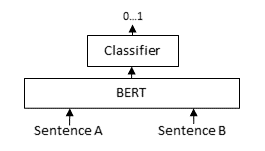
Note that the aggressive averaging across models, datasets, and batch sizes prevents some more intricate patterns from being visible. For example, for GPUs, if we only consider the stsb dataset with the shortest texts, ONNX becomes better: 1.46x for ONNX, and ONNX-O4 reaches 1.83x whereas fp16 and bf16 reach 1.54x and 1.53x respectively. So, for shorter texts we recommend ONNX on GPU.
For CPU, ONNX is also stronger for the stsb dataset with the shortest texts: 1.39x for ONNX, outperforming 1.29x for OpenVINO. ONNX with int8 quantization is even stronger with a 3.08x speedup. For longer texts, ONNX and OpenVINO can even perform slightly worse than PyTorch, so we recommend testing the different backends with your specific model and data to find the best one for your use case.
.. image:: ../../img/backends_benchmark_gpu.png
:alt: Benchmark for GPUs
:width: 45%
.. image:: ../../img/backends_benchmark_cpu.png
:alt: Benchmark for CPUs
:width: 45%
Recommendations
^^^^^^^^^^^^^^^
Based on the benchmarks, this flowchart should help you decide which backend to use for your model:
.. mermaid::
%%{init: {
"theme": "neutral",
"flowchart": {
"curve": "bumpY"
}
}}%%
graph TD
A(What is your hardware?) -->|GPU| B(Is your text usually smaller than 500 characters?)
A -->|CPU| C(Is a 0.4% accuracy loss acceptable?)
B -->|yes| D[onnx-O4]
B -->|no| F[float16]
C -->|yes| G[openvino-qint8]
C -->|no| H(Do you have an Intel CPU?)
H -->|yes| I[openvino]
H -->|no| J[onnx]
click D "#optimizing-onnx-models"
click F "#pytorch"
click G "#quantizing-openvino-models"
click I "#openvino"
click J "#onnx"
.. note::
Your milage may vary, and you should always test the different backends with your specific model and data to find the best one for your use case.
User Interface
^^^^^^^^^^^^^^
This Hugging Face Space provides a user interface for exporting, optimizing, and quantizing models for either ONNX or OpenVINO:
- `sentence-transformers/backend-export `_
================================================
FILE: docs/sentence_transformer/usage/mteb_evaluation.md
================================================
# Evaluation with MTEB
The [Massive Text Embedding Benchmark (MTEB)](https://github.com/embeddings-benchmark/mteb) is a comprehensive benchmark suite for evaluating embedding models across diverse NLP tasks like retrieval, classification, clustering, reranking, and semantic similarity.
This guide walks you through using MTEB with SentenceTransformer models for post-training evaluation. This is *not* designed for use during training, as this risks overfitting on public benchmarks. For evaluation during training, please see the [Evaluator section in the Training Overview](../training_overview.md#evaluator). To fully integrate your model to MTEB, you can follow the [Adding a model to the Leaderboard](https://github.com/embeddings-benchmark/mteb/blob/main/docs/adding_a_model.md) guide from the MTEB Documentation.
## Installation
Install MTEB and its dependencies:
```bash
pip install mteb>=2.0.0
```
## Evaluation
You can evaluate your SentenceTransformer model on individual tasks from the MTEB suite like so:
```python
import mteb
from sentence_transformers import SentenceTransformer
model = SentenceTransformer("all-MiniLM-L6-v2")
# Example 1: Run a specific single task
tasks = mteb.get_tasks(tasks=["STS22.v2"], languages=["eng"])
results = mteb.evaluate(model, tasks)
```
.. note::
If you are evaluating existings models the MTEB team recommends that you use `mteb.get_model("{model_name}")` instead of `SentenceTransformer`. This will load the model as it is implemented in MTEB, typically by the model developers. This ensures reproducible results, which might otherwise vary due to normalization, quantization, prompts or similar. If the model isn't implemented in `mteb` it will attempt to load the model using `SentenceTransformer`.
For the full list of available tasks, you can check the MTEB Tasks overview, e.g. for [STS22.v2](https://embeddings-benchmark.github.io/mteb/overview/available_tasks/sts#sts22v2).
You can also filter available MTEB tasks based on task type, domain, language, and more.
For example, the following snippet evaluates on English retrieval tasks in the medical domain:
```python
import mteb
from sentence_transformers import SentenceTransformer
model = SentenceTransformer("all-MiniLM-L6-v2")
# Example 2: Run all English retrieval tasks in the medical domain
tasks = mteb.get_tasks(
task_types=["Retrieval"],
domains=["Medical"],
languages=["eng"]
)
results = mteb.evaluate(model, tasks)
```
Lastly, it's often valuable to evaluate on predefined benchmarks. For example, to run all retrieval tasks in the `MTEB(eng, v2)` benchmark:
```python
import mteb
from sentence_transformers import SentenceTransformer
model = SentenceTransformer("all-MiniLM-L6-v2")
# Example 3: Run the MTEB benchmark for English tasks
benchmark = mteb.get_benchmark("MTEB(eng, v2)")
results = mteb.evaluate(model, benchmark)
```
For the full list of supported benchmarks, visit the [MTEB Benchmarks documentation](https://embeddings-benchmark.github.io/mteb/overview/available_benchmarks/).
## Additional Arguments
When running evaluations, you can pass arguments down to `model.encode()` using the `encode_kwargs` parameter on [`mteb.evaluate`](https://embeddings-benchmark.github.io/mteb/api/evaluation/#mteb.evaluate). This allows you to customize how embeddings are generated, such as setting `batch_size`, `truncate_dim`, or `normalize_embeddings`. For example:
```python
...
results = mteb.evaluate(
model,
tasks,
encode_kwargs={"batch_size": 64, "normalize_embeddings": True}
)
```
Additionally, your SentenceTransformer model may have been configured to use `prompts`. MTEB will automatically detect and use these prompts if they are defined in your model's configuration. For task-specific or document/query-specific prompts, you should read the MTEB Documentation on [Running SentenceTransformer models with prompts](https://embeddings-benchmark.github.io/mteb/usage/running_the_evaluation#running-sentencetransformer-model-with-prompts).
## Results Handling
MTEB caches all results to disk, so you can rerun `mteb.evaluate` without needing to redownload datasets or recomputing scores. By default these are stored in `~/.cache/mteb`, which is configurable using the environmental variable `MTEB_CACHE`. However you can also manage the cache using the `ResultCache` object:
```python
import mteb.cache import ResultCache
from sentence_transformers import SentenceTransformer
cache = ResultCache("my_mteb_results_folder")
model = SentenceTransformer("all-MiniLM-L6-v2")
tasks = mteb.get_tasks(tasks=["STS17", "STS22.v2"], languages=["eng"])
results = mteb.evaluate(model, tasks, cache=cache)
for task_results in results:
# Print the aggregated main scores for each task
print(f"{task_results.task_name}: {task_results.get_score():.4f} mean {task_results.task.metadata.main_score}")
"""
STS17: 0.2881 mean cosine_spearman
STS22.v2: 0.4925 mean cosine_spearman
"""
# Or e.g. print the individual scores for each split or subset
print(task_results.only_main_score().to_dict())
```
You can even avoid rerunning already existing result by running downloading existing result from the [results repository](https://github.com/embeddings-benchmark/results):
```py
import mteb.cache import ResultCache
cache = ResultCache("my_mteb_results_folder")
cache.download_from_remote() # will take a while the first time
# will only rerun missing results
results = mteb.evaluate(
tasks,
model,
cache=cache,
overwrite_strategy="only-missing" # default
)
```
To read more about how to load and work with results check out the [MTEB documentation](https://embeddings-benchmark.github.io/mteb/usage/loading_results/).
## Leaderboard Submission
To add your model to the [MTEB Leaderboard](https://huggingface.co/spaces/mteb/leaderboard), you will need to follow the [Adding a Model](https://github.com/embeddings-benchmark/mteb/blob/main/docs/adding_a_model.md) MTEB Documentation.
For the process, you'll need to follow these steps:
1. Add your model metadata (name, languages, number of parameters, framework, training datasets, etc.) to the [MTEB Repository](https://github.com/embeddings-benchmark/mteb/tree/main/mteb/models).
2. Evaluate your model using MTEB on your desired tasks and save the results.
2. Submit your results to the [MTEB Results Repository](https://github.com/embeddings-benchmark/results).
Once both are merged, after a day you'll be able to find your model on the [official leaderboard](https://huggingface.co/spaces/mteb/leaderboard).
================================================
FILE: docs/sentence_transformer/usage/semantic_textual_similarity.rst
================================================
Semantic Textual Similarity
===========================
For Semantic Textual Similarity (STS), we want to produce embeddings for all texts involved and calculate the similarities between them. The text pairs with the highest similarity score are most semantically similar. See also the `Computing Embeddings <../../../examples/sentence_transformer/applications/computing-embeddings/README.html>`_ documentation for more advanced details on getting embedding scores.
.. sidebar:: Documentation
1. :class:`SentenceTransformer `
2. :meth:`SentenceTransformer.encode `
3. :meth:`SentenceTransformer.similarity `
::
from sentence_transformers import SentenceTransformer
model = SentenceTransformer("all-MiniLM-L6-v2")
# Two lists of sentences
sentences1 = [
"The new movie is awesome",
"The cat sits outside",
"A man is playing guitar",
]
sentences2 = [
"The dog plays in the garden",
"The new movie is so great",
"A woman watches TV",
]
# Compute embeddings for both lists
embeddings1 = model.encode(sentences1)
embeddings2 = model.encode(sentences2)
# Compute cosine similarities
similarities = model.similarity(embeddings1, embeddings2)
# Output the pairs with their score
for idx_i, sentence1 in enumerate(sentences1):
print(sentence1)
for idx_j, sentence2 in enumerate(sentences2):
print(f" - {sentence2: <30}: {similarities[idx_i][idx_j]:.4f}")
.. code-block:: text
:emphasize-lines: 3
The new movie is awesome
- The dog plays in the garden : 0.0543
- The new movie is so great : 0.8939
- A woman watches TV : -0.0502
The cat sits outside
- The dog plays in the garden : 0.2838
- The new movie is so great : -0.0029
- A woman watches TV : 0.1310
A man is playing guitar
- The dog plays in the garden : 0.2277
- The new movie is so great : -0.0136
- A woman watches TV : -0.0327
In this example, the :meth:`SentenceTransformer.similarity ` method returns a 3x3 matrix with the respective cosine similarity scores for all possible pairs between ``embeddings1`` and ``embeddings2``.
Similarity Calculation
----------------------
The similarity metric that is used is stored in the SentenceTransformer instance under :attr:`SentenceTransformer.similarity_fn_name `. Valid options are:
- ``SimilarityFunction.COSINE`` (a.k.a `"cosine"`): Cosine Similarity (**default**)
- ``SimilarityFunction.DOT_PRODUCT`` (a.k.a `"dot"`): Dot Product
- ``SimilarityFunction.EUCLIDEAN`` (a.k.a `"euclidean"`): Negative Euclidean Distance
- ``SimilarityFunction.MANHATTAN`` (a.k.a. `"manhattan"`): Negative Manhattan Distance
This value can be changed in a handful of ways:
1. By initializing the SentenceTransformer instance with the desired similarity function::
from sentence_transformers import SentenceTransformer, SimilarityFunction
model = SentenceTransformer("all-MiniLM-L6-v2", similarity_fn_name=SimilarityFunction.DOT_PRODUCT)
2. By setting the value directly on the SentenceTransformer instance::
from sentence_transformers import SentenceTransformer, SimilarityFunction
model = SentenceTransformer("all-MiniLM-L6-v2")
model.similarity_fn_name = SimilarityFunction.DOT_PRODUCT
3. By setting the value under the ``"similarity_fn_name"`` key in the ``config_sentence_transformers.json`` file of a saved model. When you save a Sentence Transformer model, this value will be automatically saved as well.
Sentence Transformers implements two methods to calculate the similarity between embeddings:
- :meth:`SentenceTransformer.similarity `: Calculates the similarity between all pairs of embeddings.
- :meth:`SentenceTransformer.similarity_pairwise `: Calculates the similarity between embeddings in a pairwise fashion.
::
from sentence_transformers import SentenceTransformer, SimilarityFunction
# Load a pretrained Sentence Transformer model
model = SentenceTransformer("all-MiniLM-L6-v2")
# Embed some sentences
sentences = [
"The weather is lovely today.",
"It's so sunny outside!",
"He drove to the stadium.",
]
embeddings = model.encode(sentences)
similarities = model.similarity(embeddings, embeddings)
print(similarities)
# tensor([[1.0000, 0.6660, 0.1046],
# [0.6660, 1.0000, 0.1411],
# [0.1046, 0.1411, 1.0000]])
# Change the similarity function to Manhattan distance
model.similarity_fn_name = SimilarityFunction.MANHATTAN
print(model.similarity_fn_name)
# => "manhattan"
similarities = model.similarity(embeddings, embeddings)
print(similarities)
# tensor([[ -0.0000, -12.6269, -20.2167],
# [-12.6269, -0.0000, -20.1288],
# [-20.2167, -20.1288, -0.0000]])
.. note::
If a Sentence Transformer instance ends with a :class:`~sentence_transformers.models.Normalize` module, then it is sensible to choose the "dot" metric instead of "cosine".
Dot product on normalized embeddings is equivalent to cosine similarity, but "cosine" will re-normalize the embeddings again. As a result, the "dot" metric will be faster than "cosine".
If you want find the highest scoring pairs in a long list of sentences, have a look at `Paraphrase Mining <../../../examples/sentence_transformer/applications/paraphrase-mining/README.html>`_.
================================================
FILE: docs/sentence_transformer/usage/usage.rst
================================================
Usage
=====
Characteristics of Sentence Transformer (a.k.a bi-encoder) models:
1. Calculates a **fixed-size vector representation (embedding)** given **texts or images**.
2. Embedding calculation is often **efficient**, embedding similarity calculation is **very fast**.
3. Applicable for a **wide range of tasks**, such as semantic textual similarity, semantic search, clustering, classification, paraphrase mining, and more.
4. Often used as a **first step in a two-step retrieval process**, where a Cross-Encoder (a.k.a. reranker) model is used to re-rank the top-k results from the bi-encoder.
Once you have `installed <../../installation.html>`_ Sentence Transformers, you can easily use Sentence Transformer models:
.. sidebar:: Documentation
1. :class:`SentenceTransformer `
2. :meth:`SentenceTransformer.encode `
3. :meth:`SentenceTransformer.similarity `
::
from sentence_transformers import SentenceTransformer
# 1. Load a pretrained Sentence Transformer model
model = SentenceTransformer("all-MiniLM-L6-v2")
# The sentences to encode
sentences = [
"The weather is lovely today.",
"It's so sunny outside!",
"He drove to the stadium.",
]
# 2. Calculate embeddings by calling model.encode()
embeddings = model.encode(sentences)
print(embeddings.shape)
# [3, 384]
# 3. Calculate the embedding similarities
similarities = model.similarity(embeddings, embeddings)
print(similarities)
# tensor([[1.0000, 0.6660, 0.1046],
# [0.6660, 1.0000, 0.1411],
# [0.1046, 0.1411, 1.0000]])
.. toctree::
:maxdepth: 1
:caption: Tasks and Advanced Usage
../../../examples/sentence_transformer/applications/computing-embeddings/README
semantic_textual_similarity
../../../examples/sentence_transformer/applications/semantic-search/README
../../../examples/sentence_transformer/applications/retrieve_rerank/README
../../../examples/sentence_transformer/applications/clustering/README
../../../examples/sentence_transformer/applications/paraphrase-mining/README
../../../examples/sentence_transformer/applications/parallel-sentence-mining/README
../../../examples/sentence_transformer/applications/image-search/README
../../../examples/sentence_transformer/applications/embedding-quantization/README
custom_models
mteb_evaluation
efficiency
================================================
FILE: docs/sparse_encoder/loss_overview.md
================================================
# Loss Overview
```{eval-rst}
.. warning::
To train a :class:`~sentence_transformers.sparse_encoder.SparseEncoder`, you need either :class:`~sentence_transformers.sparse_encoder.losses.SpladeLoss`, :class:`~sentence_transformers.sparse_encoder.losses.CachedSpladeLoss`, or :class:`~sentence_transformers.sparse_encoder.losses.CSRLoss`, depending on the architecture. These are wrapper losses that add sparsity regularization on top of a main loss function, which must be provided as a parameter. The only loss that can be used independently is :class:`~sentence_transformers.sparse_encoder.losses.SparseMSELoss`, as it performs embedding-level distillation, ensuring sparsity by directly copying the teacher's sparse embedding.
```
## Sparse specific Loss Functions
### SPLADE Loss
The SpladeLoss implements a specialized loss function for SPLADE (Sparse Lexical and Expansion) models. It combines a main loss function with regularization terms to balance effectiveness and efficiency:
1. Main loss: Supports all the losses from the Loss Table and Distillation , with SparseMultipleNegativesRankingLoss , SparseMarginMSELoss and SparseDistillKLDivLoss commonly used.
2. Regularization loss: FlopsLoss is used to control sparsity, but supports custom regularizers.
- `query_regularizer` and `document_regularizer` can be set to any custom regularization loss.
- `query_regularizer_threshold` and `document_regularizer_threshold` can be set to control the sparsity strictness for queries and documents separately, setting the regularization loss to zero if an embedding has less than the threshold number of active (non-zero) dimensions.
#### Cached SPLADE Loss
The CachedSpladeLoss is a variant of the SPLADE loss adopting GradCache , which allows for much larger batch sizes without additional GPU memory usage. It achieves this by computing and caching loss gradients in mini-batches.
Main losses that use in-batch negatives, primarily SparseMultipleNegativesRankingLoss , benefit heavily from larger batch sizes, as it results in more negatives and a stronger training signal.
### CSR Loss
If you are using the SparseAutoEncoder module, then you have to use the CSRLoss (Contrastive Sparse Representation Loss). It combines two components:
1. Main loss: Supports all the losses from the Loss Table and Distillation , with SparseMultipleNegativesRankingLoss used in the CSR Paper.
2. Reconstruction loss: CSRReconstructionLoss is used to ensure that sparse representation can faithfully reconstruct the original dense embeddings.
## Loss Table
Loss functions play a critical role in the performance of your fine-tuned model. Sadly, there is no "one size fits all" loss function. Ideally, this table should help narrow down your choice of loss function(s) by matching them to your data formats.
```{eval-rst}
.. note::
You can often convert one training data format into another, allowing more loss functions to be viable for your scenario. For example, ``(sentence_A, sentence_B) pairs`` with ``class`` labels can be converted into ``(anchor, positive, negative) triplets`` by sampling sentences with the same or different classes.
```
**Legend:** Loss functions marked with `★` are commonly recommended default choices.
| Inputs | Labels | Appropriate Loss Functions |
|---------------------------------------------------|------------------------------------------|-------------------------------------------------------------------------------------------------------------------------------------------------------------------------------------------------------------------------------------------------------------------------------------------------------------------------------------------------------------------------------------------------------------------------------------------------------------------------------------------------------------------------------------------------------------------------------------------------------------------------------------|
| `(anchor, positive) pairs` | `none` | `SparseMultipleNegativesRankingLoss` ★ |
| `(sentence_A, sentence_B) pairs` | `float similarity score between 0 and 1` | `SparseCoSENTLoss` `SparseAnglELoss` `SparseCosineSimilarityLoss` |
| `(anchor, positive, negative) triplets` | `none` | `SparseMultipleNegativesRankingLoss` ★`SparseTripletLoss` |
| `(anchor, positive, negative_1, ..., negative_n)` | `none` | `SparseMultipleNegativesRankingLoss` ★ |
## Distillation
These loss functions are specifically designed to be used when distilling the knowledge from one model into another. This is rather commonly used when training Sparse embedding models.
| Texts | Labels | Appropriate Loss Functions |
|---------------------------------------------------|---------------------------------------------------------------------------|--------------------------------------------------------------------------------------------------------------------------------------------------------------------------------------------------------------------------|
| `sentence` | `model sentence embeddings` | `SparseMSELoss` |
| `(sentence_1, sentence_2, ..., sentence_N)` | `model sentence embeddings` | `SparseMSELoss` |
| `(query, passage_one, passage_two)` | `gold_sim(query, passage_one) - gold_sim(query, passage_two)` | `SparseMarginMSELoss` |
| `(query, positive, negative_1, ..., negative_n)` | `[gold_sim(query, positive) - gold_sim(query, negative_i) for i in 1..n]` | `SparseMarginMSELoss` |
| `(query, positive, negative)` | `[gold_sim(query, positive), gold_sim(query, negative)]` | `SparseDistillKLDivLoss` `SparseMarginMSELoss` |
| `(query, positive, negative_1, ..., negative_n) ` | `[gold_sim(query, positive), gold_sim(query, negative_i)...] ` | `SparseDistillKLDivLoss` `SparseMarginMSELoss` |
## Commonly used Loss Functions
In practice, not all loss functions get used equally often. The most common scenarios are:
* `(anchor, positive) pairs` without any labels: SparseMultipleNegativesRankingLoss (a.k.a. InfoNCE or in-batch negatives loss) is commonly used to train the top performing embedding models. This data is often relatively cheap to obtain, and the models are generally very performant. Here for our sparse retrieval tasks, this format works well with SpladeLoss , CachedSpladeLoss , or CSRLoss , all typically using InfoNCE as their underlying loss function.
* `(query, positive, negative_1, ..., negative_n)` format: This structure with multiple negatives is particularly effective with SpladeLoss configured with SparseMarginMSELoss , especially in knowledge distillation scenarios where a teacher model provides similarity scores. The strongest models are trained with distillation losses like SparseDistillKLDivLoss or SparseMarginMSELoss .
## Custom Loss Functions
```{eval-rst}
Advanced users can create and train with their own loss functions. Custom loss functions only have a few requirements:
- They must be a subclass of :class:`torch.nn.Module`.
- They must have ``model`` as the first argument in the constructor.
- They must implement a ``forward`` method that accepts ``sentence_features`` and ``labels``. The former is a list of tokenized batches, one element for each column. These tokenized batches can be fed directly to the ``model`` being trained to produce embeddings. The latter is an optional tensor of labels. The method must return a single loss value or a dictionary of loss components (component names to loss values) that will be summed to produce the final loss value. When returning a dictionary, the individual components will be logged separately in addition to the summed loss, allowing you to monitor the individual components of the loss.
To get full support with the automatic model card generation, you may also wish to implement:
- a ``get_config_dict`` method that returns a dictionary of loss parameters.
- a ``citation`` property so your work gets cited in all models that train with the loss.
Consider inspecting existing loss functions to get a feel for how loss functions are commonly implemented.
```
================================================
FILE: docs/sparse_encoder/pretrained_models.md
================================================
# Pretrained Models
```{eval-rst}
Several Sparse Encoder models have been publicly released on the Hugging Face Hub:
* **Community models**: `All Sparse Encoder models on Hugging Face `_.
Models integrate seamlessly with this simple interface:
```
```python
from sentence_transformers import SparseEncoder
# Download from the 🤗 Hub
model = SparseEncoder("naver/splade-v3")
# Run inference
queries = ["what causes aging fast"]
documents = [
"UV-A light, specifically, is what mainly causes tanning, skin aging, and cataracts, UV-B causes sunburn, skin aging and skin cancer, and UV-C is the strongest, and therefore most effective at killing microorganisms. Again â\x80\x93 single words and multiple bullets.",
"Answers from Ronald Petersen, M.D. Yes, Alzheimer's disease usually worsens slowly. But its speed of progression varies, depending on a person's genetic makeup, environmental factors, age at diagnosis and other medical conditions. Still, anyone diagnosed with Alzheimer's whose symptoms seem to be progressing quickly â\x80\x94 or who experiences a sudden decline â\x80\x94 should see his or her doctor.",
"Bell's palsy and Extreme tiredness and Extreme fatigue (2 causes) Bell's palsy and Extreme tiredness and Hepatitis (2 causes) Bell's palsy and Extreme tiredness and Liver pain (2 causes) Bell's palsy and Extreme tiredness and Lymph node swelling in children (2 causes)",
]
query_embeddings = model.encode_query(queries)
document_embeddings = model.encode_document(documents)
print(query_embeddings.shape, document_embeddings.shape)
# [1, 30522] [3, 30522]
# Get the similarity scores for the embeddings
similarities = model.similarity(query_embeddings, document_embeddings)
print(similarities)
# tensor([[11.3768, 10.8296, 4.3457]])
```
## Core SPLADE Models
[MS MARCO Passage Retrieval](https://github.com/microsoft/MSMARCO-Passage-Ranking) serves as the gold standard dataset, featuring authentic user queries from Bing search engine paired with expertly annotated relevant text passages. Models trained on this benchmark demonstrate exceptional effectiveness as embedding models for production search systems. Performance scores reflect evaluation on this dataset, it's a good indication but shouldn't be the only parameters to take into account.
[BEIR (Benchmarking IR)](https://github.com/beir-cellar/beir) provides a heterogeneous benchmark for evaluation of information retrieval models across in our case 13 diverse datasets. The avg nDCG@10 scores represent the average performance across all 13 datasets.
Note that all the numbers of below are extracted information from different papers. These models represent the backbone of sparse neural retrieval:
| Model Name | MS MARCO MRR@10 | BEIR-13 avg nDCG@10 | Parameters |
|-----------------------------------------------------------------------------------------------------------------------------------------------------------|:---------------:|:-------------------:|-----------:|
| [opensearch-project/opensearch-neural-sparse-encoding-v2-distill](https://huggingface.co/opensearch-project/opensearch-neural-sparse-encoding-v2-distill) | NA | **52.8** | 67M |
| [opensearch-project/opensearch-neural-sparse-encoding-v1](https://huggingface.co/opensearch-project/opensearch-neural-sparse-encoding-v1) | NA | 52.4 | 133M |
| [naver/splade-v3](https://huggingface.co/naver/splade-v3) | **40.2** | 51.7 | 109M |
| [ibm-granite/granite-embedding-30m-sparse](https://huggingface.co/ibm-granite/granite-embedding-30m-sparse) | NA | 50.8 | 30M |
| [naver/splade-cocondenser-selfdistil](https://huggingface.co/naver/splade-cocondenser-selfdistil) | 37.6 | 50.7 | 109M |
| [naver/splade_v2_distil](https://huggingface.co/naver/splade_v2_distil) | 36.8 | 50.6 | 67M |
| [naver/splade-cocondenser-ensembledistil](https://huggingface.co/naver/splade-cocondenser-ensembledistil) | 38.0 | 50.5 | 109M |
| [naver/splade-v3-distilbert](https://huggingface.co/naver/splade-v3-distilbert) | 38.7 | 50.0 | 67M |
| [prithivida/Splade_PP_en_v2](https://huggingface.co/prithivida/Splade_PP_en_v2) | 37.8 | 49.4 | 109M |
| [naver/splade-v3-lexical](https://huggingface.co/naver/splade-v3-lexical) | 40.0 | 49.1 | 109M |
| [prithivida/Splade_PP_en_v1](https://huggingface.co/prithivida/Splade_PP_en_v1) | 37.2 | 48.7 | 109M |
| [naver/splade_v2_max](https://huggingface.co/naver/splade_v2_max) | 34.0 | 46.4 | 67M |
| [rasyosef/splade-mini](https://huggingface.co/rasyosef/splade-mini) | 34.1 | 44.5 | 11M |
| [rasyosef/splade-tiny](https://huggingface.co/rasyosef/splade-tiny) | 30.9 | 40.6 | 4M |
| BM25 (Baseline) | 18.4 | 45.6 | NA |
## Inference-Free SPLADE Models
```{eval-rst}
Inference-free Splade uses for the documents part a traditional Splade architecture and for the query part is an :class:`~sentence_transformers.sparse_encoder.models.SparseStaticEmbedding` module, which just returns a pre-computed score for every token in the query. So for these models we lose the query expansion, but query inference becomes near instant, which is very valuable for speed optimization.
```
| Model Name | BEIR-13 avg nDCG@10 | Parameters |
|-------------------------------------------------------------------------------------------------------------------------------------------------------------------|:-------------------:|-----------:|
| [opensearch-project/opensearch-neural-sparse-encoding-doc-v3-gte](https://huggingface.co/opensearch-project/opensearch-neural-sparse-encoding-doc-v3-gte) | **54.6** | 137M |
| [opensearch-project/opensearch-neural-sparse-encoding-doc-v3-distill](https://huggingface.co/opensearch-project/opensearch-neural-sparse-encoding-doc-v3-distill) | 51.7 | 67M |
| [opensearch-project/opensearch-neural-sparse-encoding-doc-v2-distill](https://huggingface.co/opensearch-project/opensearch-neural-sparse-encoding-doc-v2-distill) | 50.4 | 67M |
| [opensearch-project/opensearch-neural-sparse-encoding-doc-v2-mini](https://huggingface.co/opensearch-project/opensearch-neural-sparse-encoding-doc-v2-mini) | 49.7 | 23M |
| [opensearch-project/opensearch-neural-sparse-encoding-doc-v1](https://huggingface.co/opensearch-project/opensearch-neural-sparse-encoding-doc-v1) | 49.0 | 133M |
| [naver/splade-v3-doc](https://huggingface.co/naver/splade-v3-doc) | 47.0 | 109M |
## Model Collections
These are collections of models that are available on the Hugging Face Hub:
- [**SPLADE Models**](https://huggingface.co/collections/sparse-encoder/splade-models-6862be100374b320d826eeaa)
- [**Inference-Free SPLADE Models**](https://huggingface.co/collections/sparse-encoder/inference-free-splade-models-6862be3a1d72eab38920bc6a)
================================================
FILE: docs/sparse_encoder/training/examples.rst
================================================
Training Examples
================
This page provides examples showing how to train Sparse Encoder models for various tasks.
.. toctree::
:maxdepth: 1
:caption: Supervised Learning
../../../examples/sparse_encoder/training/distillation/README
../../../examples/sparse_encoder/training/ms_marco/README
../../../examples/sparse_encoder/training/sts/README
../../../examples/sparse_encoder/training/nli/README
../../../examples/sparse_encoder/training/quora_duplicate_questions/README
../../../examples/sparse_encoder/training/retrievers/README
.. toctree::
:maxdepth: 1
:caption: Advanced Usage
../../sentence_transformer/training/distributed
================================================
FILE: docs/sparse_encoder/training_overview.md
================================================
# Training Overview
## Why Finetune?
Finetuning Sparse Encoder models often heavily improves the performance of the model on your use case, because each task requires a different notion of similarity. For example, given news articles:
- "Apple launches the new iPad"
- "NVIDIA is gearing up for the next GPU generation"
Then the following use cases, we may have different notions of similarity:
- a model for **classification** of news articles as Economy, Sports, Technology, Politics, etc., should produce **similar embeddings** for these texts.
- a model for **semantic textual similarity** should produce **dissimilar embeddings** for these texts, as they have different meanings.
- a model for **semantic search** would **not need a notion for similarity** between two documents, as it should only compare queries and documents.
Also see [**Training Examples**](training/examples) for numerous training scripts for common real-world applications that you can adopt.
## Training Components
Training Sparse Encoder models involves between 4 to 6 components:
## Model
```{eval-rst}
Sparse Encoder models consist of a sequence of `Modules <../package_reference/sentence_transformer/models.html>`_, `Sparse Encoder specific Modules <../package_reference/sparse_encoder/models.html>`_ or `Custom Modules <../sentence_transformer/usage/custom_models.html#advanced-custom-modules>`_, allowing for a lot of flexibility. If you want to further finetune a SparseEncoder model (e.g. it has a `modules.json file `_), then you don't have to worry about which modules are used::
from sentence_transformers import SparseEncoder
model = SparseEncoder("naver/splade-cocondenser-ensembledistil")
But if instead you want to train from another checkpoint, or from scratch, then these are the most common architectures you can use:
.. tab:: Splade
Splade models use the :class:`~sentence_transformers.sparse_encoder.models.MLMTransformer` followed by a :class:`~sentence_transformers.sparse_encoder.models.SpladePooling` modules. The former loads a pretrained `Masked Language Modeling transformer model `_ (e.g. `BERT `_, `RoBERTa `_, `DistilBERT `_, `ModernBERT `_, etc.) and the latter pools the output of the MLMHead to produce a single sparse embedding of the size of the vocabulary.
.. raw:: html
::
from sentence_transformers import models, SparseEncoder
from sentence_transformers.sparse_encoder.models import MLMTransformer, SpladePooling
# Initialize MLM Transformer (use a fill-mask model)
mlm_transformer = MLMTransformer("google-bert/bert-base-uncased")
# Initialize SpladePooling module
splade_pooling = SpladePooling(pooling_strategy="max")
# Create the Splade model
model = SparseEncoder(modules=[mlm_transformer, splade_pooling])
This architecture is the default if you provide a fill-mask model architecture to SparseEncoder, so it's easier to use the shortcut:
::
from sentence_transformers import SparseEncoder
model = SparseEncoder("google-bert/bert-base-uncased")
# SparseEncoder(
# (0): MLMTransformer({'max_seq_length': 512, 'do_lower_case': False, 'architecture': 'BertForMaskedLM'})
# (1): SpladePooling({'pooling_strategy': 'max', 'activation_function': 'relu', 'word_embedding_dimension': None})
# )
.. tab:: Inference-free Splade
Inference-free Splade uses a :class:`~sentence_transformers.models.Router` module with different modules for queries and documents. Usually for this type of architecture, the documents part is a traditional Splade architecture (a :class:`~sentence_transformers.sparse_encoder.models.MLMTransformer` followed by a :class:`~sentence_transformers.sparse_encoder.models.SpladePooling` module) and the query part is an :class:`~sentence_transformers.sparse_encoder.models.SparseStaticEmbedding` module, which just returns a pre-computed score for every token in the query.
.. raw:: html
::
from sentence_transformers import SparseEncoder
from sentence_transformers.models import Router
from sentence_transformers.sparse_encoder.models import MLMTransformer, SparseStaticEmbedding, SpladePooling
# Initialize MLM Transformer for document encoding
doc_encoder = MLMTransformer("google-bert/bert-base-uncased")
# Create a router model with different paths for queries and documents
router = Router.for_query_document(
query_modules=[SparseStaticEmbedding(tokenizer=doc_encoder.tokenizer, frozen=False)],
# Document path: full MLM transformer + pooling
document_modules=[doc_encoder, SpladePooling("max")],
)
# Create the inference-free model
model = SparseEncoder(modules=[router], similarity_fn_name="dot")
# SparseEncoder(
# (0): Router(
# (query_0_SparseStaticEmbedding): SparseStaticEmbedding({'frozen': False}, dim:30522, tokenizer: BertTokenizerFast)
# (document_0_MLMTransformer): MLMTransformer({'max_seq_length': 512, 'do_lower_case': False, 'architecture': 'BertForMaskedLM'})
# (document_1_SpladePooling): SpladePooling({'pooling_strategy': 'max', 'activation_function': 'relu', 'word_embedding_dimension': None})
# )
# )
This architecture allows for fast query-time processing using the lightweight SparseStaticEmbedding approach, that can be trained and seen as a linear weights, while documents are processed with the full MLM transformer and SpladePooling.
.. tip::
Inference-free Splade is particularly useful for search applications where query latency is critical, as it shifts the computational complexity to the document indexing phase which can be done offline.
.. note::
When training models with the :class:`~sentence_transformers.models.Router` module, you must use the ``router_mapping`` argument in the :class:`~sentence_transformers.sparse_encoder.SparseEncoderTrainingArguments` to map the training dataset columns to the correct route ("query" or "document"). For example, if your dataset(s) have ``["question", "answer"]`` columns, then you can use the following mapping::
args = SparseEncoderTrainingArguments(
...,
router_mapping={
"question": "query",
"answer": "document",
}
)
Additionally, it is recommended to use a much higher learning rate for the SparseStaticEmbedding module than for the rest of the model. For this, you should use the ``learning_rate_mapping`` argument in the :class:`~sentence_transformers.sparse_encoder.SparseEncoderTrainingArguments` to map parameter patterns to their learning rates. For example, if you want to use a learning rate of ``1e-3`` for the SparseStaticEmbedding module and ``2e-5`` for the rest of the model, you can do this::
args = SparseEncoderTrainingArguments(
...,
learning_rate=2e-5,
learning_rate_mapping={
r"SparseStaticEmbedding\.*": 1e-3,
}
)
.. tab:: Contrastive Sparse Representation (CSR)
..
Contrastive Sparse Representation (CSR) models usually use a sequence of :class:`~sentence_transformers.models.Transformer`, :class:`~sentence_transformers.models.Pooling` and :class:`~sentence_transformers.sparse_encoder.models.SparseAutoEncoder` modules to create sparse representations on top of an already trained dense Sentence Transformer model.
Contrastive Sparse Representation (CSR) models apply a :class:`~sentence_transformers.sparse_encoder.models.SparseAutoEncoder` module on top of a dense Sentence Transformer model, which usually consist of a :class:`~sentence_transformers.models.Transformer` followed by a :class:`~sentence_transformers.models.Pooling` module. You can initialize one from scratch like so:
..
usually use a sequence of :class:`~sentence_transformers.models.Transformer`, :class:`~sentence_transformers.models.Pooling` and :class:`~sentence_transformers.sparse_encoder.models.SparseAutoEncoder` modules to create sparse representations on top of an already trained dense Sentence Transformer model.
.. raw:: html
::
from sentence_transformers import models, SparseEncoder
from sentence_transformers.sparse_encoder.models import SparseAutoEncoder
# Initialize transformer (can be any dense encoder model)
transformer = models.Transformer("google-bert/bert-base-uncased")
# Initialize pooling
pooling = models.Pooling(transformer.get_word_embedding_dimension(), pooling_mode="mean")
# Initialize SparseAutoEncoder module
sae = SparseAutoEncoder(
input_dim=transformer.get_word_embedding_dimension(),
hidden_dim=4 * transformer.get_word_embedding_dimension(),
k=256, # Number of top values to keep
k_aux=512, # Number of top values for auxiliary loss
)
# Create the CSR model
model = SparseEncoder(modules=[transformer, pooling, sae])
Or if your base model is 1) a dense Sentence Transformer model or 2) a non-MLM Transformer model (those are loaded as Splade models by default), then this shortcut will automatically initialize the CSR model for you:
::
from sentence_transformers import SparseEncoder
model = SparseEncoder("mixedbread-ai/mxbai-embed-large-v1")
# SparseEncoder(
# (0): Transformer({'max_seq_length': 512, 'do_lower_case': False, 'architecture': 'BertModel'})
# (1): Pooling({'word_embedding_dimension': 1024, 'pooling_mode_cls_token': True, 'pooling_mode_mean_tokens': False, 'pooling_mode_max_tokens': False, 'pooling_mode_mean_sqrt_len_tokens': False, 'pooling_mode_weightedmean_tokens': False, 'pooling_mode_lasttoken': False, 'include_prompt': True})
# (2): SparseAutoEncoder({'input_dim': 1024, 'hidden_dim': 4096, 'k': 256, 'k_aux': 512, 'normalize': False, 'dead_threshold': 30})
# )
.. warning::
Unlike (Inference-free) Splade models, sparse embeddings by CSR models don't have the same size as the vocabulary of the base model. This means you can't directly interpret which words are activated in your embedding like you can with Splade models, where each dimension corresponds to a specific token in the vocabulary.
Beyond that, CSR models are most effective on dense encoder models that use high-dimensional representations (e.g. 1024-4096 dimensions).
```
## Dataset
```{eval-rst}
The :class:`SparseEncoderTrainer` trains and evaluates using :class:`datasets.Dataset` (one dataset) or :class:`datasets.DatasetDict` instances (multiple datasets, see also `Multi-dataset training <#multi-dataset-training>`_).
.. tab:: Data on 🤗 Hugging Face Hub
If you want to load data from the `Hugging Face Datasets `_, then you should use :func:`datasets.load_dataset`:
.. raw:: html
::
from datasets import load_dataset
train_dataset = load_dataset("sentence-transformers/all-nli", "triplet", split="train")
eval_dataset = load_dataset("sentence-transformers/all-nli", "triplet", split="dev")
print(train_dataset)
"""
Dataset({
features: ['anchor', 'positive', 'negative'],
num_rows: 557850
})
"""
Some datasets (including `sentence-transformers/all-nli `_) require you to provide a "subset" alongside the dataset name. ``sentence-transformers/all-nli`` has 4 subsets, each with different data formats: `pair `_, `pair-class `_, `pair-score `_, `triplet `_.
.. note::
Many Hugging Face datasets that work out of the box with Sentence Transformers have been tagged with ``sentence-transformers``, allowing you to easily find them by browsing to `https://huggingface.co/datasets?other=sentence-transformers `_. We strongly recommend that you browse these datasets to find training datasets that might be useful for your tasks.
.. tab:: Local Data (CSV, JSON, Parquet, Arrow, SQL)
If you have local data in common file-formats, then you can load this data easily using :func:`datasets.load_dataset`:
.. raw:: html
::
from datasets import load_dataset
dataset = load_dataset("csv", data_files="my_file.csv")
or::
from datasets import load_dataset
dataset = load_dataset("json", data_files="my_file.json")
.. tab:: Local Data that requires pre-processing
If you have local data that requires some extra pre-processing, my recommendation is to initialize your dataset using :meth:`datasets.Dataset.from_dict` and a dictionary of lists, like so:
.. raw:: html
::
from datasets import Dataset
anchors = []
positives = []
# Open a file, do preprocessing, filtering, cleaning, etc.
# and append to the lists
dataset = Dataset.from_dict({
"anchor": anchors,
"positive": positives,
})
Each key from the dictionary will become a column in the resulting dataset.
```
### Dataset Format
```{eval-rst}
It is important that your dataset format matches your loss function (or that you choose a loss function that matches your dataset format). Verifying whether a dataset format works with a loss function involves two steps:
1. If your loss function requires a *Label* according to the `Loss Overview `_ table, then your dataset must have a **column named "label" or "score"**. This column is automatically taken as the label.
2. All columns not named "label" or "score" are considered *Inputs* according to the `Loss Overview `_ table. The number of remaining columns must match the number of valid inputs for your chosen loss. The names of these columns are **irrelevant**, only the **order matters**.
For example, given a dataset with columns ``["text1", "text2", "label"]`` where the "label" column has float similarity score between 0 and 1, we can use it with :class:`~sentence_transformers.sparse_encoder.losses.SparseCoSENTLoss`, :class:`~sentence_transformers.sparse_encoder.losses.SparseAnglELoss`, and :class:`~sentence_transformers.sparse_encoder.losses.SparseCosineSimilarityLoss` because it:
1. has a "label" column as is required for these loss functions.
2. has 2 non-label columns, exactly the amount required by these loss functions.
Be sure to re-order your dataset columns with :meth:`Dataset.select_columns ` if your columns are not ordered correctly. For example, if your dataset has ``["good_answer", "bad_answer", "question"]`` as columns, then this dataset can technically be used with a loss that requires (anchor, positive, negative) triplets, but the ``good_answer`` column will be taken as the anchor, ``bad_answer`` as the positive, and ``question`` as the negative.
Additionally, if your dataset has extraneous columns (e.g. sample_id, metadata, source, type), you should remove these with :meth:`Dataset.remove_columns ` as they will be used as inputs otherwise. You can also use :meth:`Dataset.select_columns ` to keep only the desired columns.
```
## Loss Function
Loss functions quantify how well a model performs for a given batch of data, allowing an optimizer to update the model weights to produce more favourable (i.e., lower) loss values. This is the core of the training process.
Sadly, there is no single loss function that works best for all use-cases. Instead, which loss function to use greatly depends on your available data and on your target task. See [Dataset Format](#dataset-format) to learn what datasets are valid for which loss functions. Additionally, the [Loss Overview](loss_overview) will be your best friend to learn about the options.
```{eval-rst}
.. warning::
To train a :class:`~sentence_transformers.sparse_encoder.SparseEncoder`, you need either :class:`~sentence_transformers.sparse_encoder.losses.SpladeLoss` or :class:`~sentence_transformers.sparse_encoder.losses.CSRLoss`, depending on the architecture. These are wrapper losses that add sparsity regularization on top of a main loss function, which must be provided as a parameter. The only loss that can be used independently is :class:`~sentence_transformers.sparse_encoder.losses.SparseMSELoss`, as it performs embedding-level distillation, ensuring sparsity by directly copying the teacher's sparse embedding.
Most loss functions can be initialized with just the :class:`~sentence_transformers.sparse_encoder.SparseEncoder` that you're training, alongside some optional parameters, e.g.:
.. sidebar:: Documentation
- :class:`sentence_transformers.sparse_encoder.losses.SpladeLoss`
- :class:`sentence_transformers.sparse_encoder.losses.CSRLoss`
- `Losses API Reference <../package_reference/sparse_encoder/losses.html>`_
- `Loss Overview `_
::
from datasets import load_dataset
from sentence_transformers import SparseEncoder
from sentence_transformers.sparse_encoder.losses import SpladeLoss, SparseMultipleNegativesRankingLoss
# Load a model to train/finetune
model = SparseEncoder("distilbert/distilbert-base-uncased")
# Initialize the SpladeLoss with a SparseMultipleNegativesRankingLoss
# This loss requires pairs of related texts or triplets
loss = SpladeLoss(
model=model,
loss=SparseMultipleNegativesRankingLoss(model=model),
query_regularizer_weight=5e-5, # Weight for query loss
document_regularizer_weight=3e-5,
)
# Load an example training dataset that works with our loss function:
train_dataset = load_dataset("sentence-transformers/natural-questions", split="train")
print(train_dataset)
"""
Dataset({
features: ['query', 'answer'],
num_rows: 100231
})
"""
```
## Training Arguments
```{eval-rst}
The :class:`~sentence_transformers.sparse_encoder.training_args.SparseEncoderTrainingArguments` class can be used to specify parameters for influencing training performance as well as defining the tracking/debugging parameters. Although it is optional, it is heavily recommended to experiment with the various useful arguments.
```
```{eval-rst}
Here is an example of how :class:`~sentence_transformers.sparse_encoder.training_args.SparseEncoderTrainingArguments` can be initialized:
```
```python
args = SparseEncoderTrainingArguments(
# Required parameter:
output_dir="models/splade-distilbert-base-uncased-nq",
# Optional training parameters:
num_train_epochs=1,
per_device_train_batch_size=16,
per_device_eval_batch_size=16,
learning_rate=2e-5,
warmup_ratio=0.1,
fp16=True, # Set to False if you get an error that your GPU can't run on FP16
bf16=False, # Set to True if you have a GPU that supports BF16
batch_sampler=BatchSamplers.NO_DUPLICATES, # losses that use "in-batch negatives" benefit from no duplicates
# Optional tracking/debugging parameters:
eval_strategy="steps",
eval_steps=100,
save_strategy="steps",
save_steps=100,
save_total_limit=2,
logging_steps=100,
run_name="splade-distilbert-base-uncased-nq", # Will be used in W&B if `wandb` is installed
)
```
## Evaluator
```{eval-rst}
You can provide the :class:`~sentence_transformers.sparse_encoder.trainer.SparseEncoderTrainer` with an ``eval_dataset`` to get the evaluation loss during training, but it may be useful to get more concrete metrics during training, too. For this, you can use evaluators to assess the model's performance with useful metrics before, during, or after training. You can use both an ``eval_dataset`` and an evaluator, one or the other, or neither. They evaluate based on the ``eval_strategy`` and ``eval_steps`` `Training Arguments <#training-arguments>`_.
Here are the implemented Evaluators that come with Sentence Transformers for Sparse Encoder models:
============================================================================================= ===========================================================================================================================
Evaluator Required Data
============================================================================================= ===========================================================================================================================
:class:`~sentence_transformers.sparse_encoder.evaluation.SparseBinaryClassificationEvaluator` Pairs with class labels.
:class:`~sentence_transformers.sparse_encoder.evaluation.SparseEmbeddingSimilarityEvaluator` Pairs with similarity scores.
:class:`~sentence_transformers.sparse_encoder.evaluation.SparseInformationRetrievalEvaluator` Queries (qid => question), Corpus (cid => document), and relevant documents (qid => set[cid]).
:class:`~sentence_transformers.sparse_encoder.evaluation.SparseNanoBEIREvaluator` No data required.
:class:`~sentence_transformers.sparse_encoder.evaluation.SparseMSEEvaluator` Source sentences to embed with a teacher model and target sentences to embed with the student model. Can be the same texts.
:class:`~sentence_transformers.sparse_encoder.evaluation.SparseRerankingEvaluator` List of ``{'query': '...', 'positive': [...], 'negative': [...]}`` dictionaries.
:class:`~sentence_transformers.sparse_encoder.evaluation.SparseTranslationEvaluator` Pairs of sentences in two separate languages.
:class:`~sentence_transformers.sparse_encoder.evaluation.SparseTripletEvaluator` (anchor, positive, negative) pairs.
============================================================================================= ===========================================================================================================================
Additionally, :class:`~sentence_transformers.evaluation.SequentialEvaluator` should be used to combine multiple evaluators into one Evaluator that can be passed to the :class:`~sentence_transformers.sparse_encoder.trainer.SparseEncoderTrainer`.
Sometimes you don't have the required evaluation data to prepare one of these evaluators on your own, but you still want to track how well the model performs on some common benchmarks. In that case, you can use these evaluators with data from Hugging Face.
.. tab:: SparseNanoBEIREvaluator
.. raw:: html
::
from sentence_transformers.sparse_encoder.evaluation import SparseNanoBEIREvaluator
# Initialize the evaluator. Unlike most other evaluators, this one loads the relevant datasets
# directly from Hugging Face, so there's no mandatory arguments
dev_evaluator = SparseNanoBEIREvaluator()
# You can run evaluation like so:
# results = dev_evaluator(model)
.. tab:: SparseEmbeddingSimilarityEvaluator with STSb
.. raw:: html
::
from datasets import load_dataset
from sentence_transformers.evaluation import SimilarityFunction
from sentence_transformers.sparse_encoder.evaluation import SparseEmbeddingSimilarityEvaluator
# Load the STSB dataset (https://huggingface.co/datasets/sentence-transformers/stsb)
eval_dataset = load_dataset("sentence-transformers/stsb", split="validation")
# Initialize the evaluator
dev_evaluator = SparseEmbeddingSimilarityEvaluator(
sentences1=eval_dataset["sentence1"],
sentences2=eval_dataset["sentence2"],
scores=eval_dataset["score"],
main_similarity=SimilarityFunction.COSINE,
name="sts-dev",
)
# You can run evaluation like so:
# results = dev_evaluator(model)
.. tab:: SparseTripletEvaluator with AllNLI
.. raw:: html
::
from datasets import load_dataset
from sentence_transformers.evaluation import SimilarityFunction
from sentence_transformers.sparse_encoder.evaluation import SparseTripletEvaluator
# Load triplets from the AllNLI dataset (https://huggingface.co/datasets/sentence-transformers/all-nli)
max_samples = 1000
eval_dataset = load_dataset("sentence-transformers/all-nli", "triplet", split=f"dev[:{max_samples}]")
# Initialize the evaluator
dev_evaluator = SparseTripletEvaluator(
anchors=eval_dataset["anchor"],
positives=eval_dataset["positive"],
negatives=eval_dataset["negative"],
main_distance_function=SimilarityFunction.DOT,
name="all-nli-dev",
)
# You can run evaluation like so:
# results = dev_evaluator(model)
.. tip::
When evaluating frequently during training with a small ``eval_steps``, consider using a tiny ``eval_dataset`` to minimize evaluation overhead. If you're concerned about the evaluation set size, a 90-1-9 train-eval-test split can provide a balance, reserving a reasonably sized test set for final evaluations. After training, you can assess your model's performance using ``trainer.evaluate(test_dataset)`` for test loss or initialize a testing evaluator with ``test_evaluator(model)`` for detailed test metrics.
If you evaluate after training, but before saving the model, your automatically generated model card will still include the test results.
.. warning::
When using `Distributed Training <../sentence_transformer/training/distributed.html>`_, the evaluator only runs on the first device, unlike the training and evaluation datasets, which are shared across all devices.
```
## Trainer
```{eval-rst}
The :class:`~sentence_transformers.sparse_encoder.trainer.SparseEncoderTrainer` is where all previous components come together. We only have to specify the trainer with the model, training arguments (optional), training dataset, evaluation dataset (optional), loss function, evaluator (optional) and we can start training. Let's have a look at a script where all of these components come together:
.. tab:: SPLADE
.. raw:: html
::
import logging
from datasets import load_dataset
from sentence_transformers import (
SparseEncoder,
SparseEncoderModelCardData,
SparseEncoderTrainer,
SparseEncoderTrainingArguments,
)
from sentence_transformers.sparse_encoder.evaluation import SparseNanoBEIREvaluator
from sentence_transformers.sparse_encoder.losses import SparseMultipleNegativesRankingLoss, SpladeLoss
from sentence_transformers.training_args import BatchSamplers
logging.basicConfig(format="%(asctime)s - %(message)s", datefmt="%Y-%m-%d %H:%M:%S", level=logging.INFO)
# 1. Load a model to finetune with 2. (Optional) model card data
model = SparseEncoder(
"distilbert/distilbert-base-uncased",
model_card_data=SparseEncoderModelCardData(
language="en",
license="apache-2.0",
model_name="DistilBERT base trained on Natural-Questions tuples",
)
)
# 3. Load a dataset to finetune on
full_dataset = load_dataset("sentence-transformers/natural-questions", split="train").select(range(100_000))
dataset_dict = full_dataset.train_test_split(test_size=1_000, seed=12)
train_dataset = dataset_dict["train"]
eval_dataset = dataset_dict["test"]
# 4. Define a loss function
loss = SpladeLoss(
model=model,
loss=SparseMultipleNegativesRankingLoss(model=model),
query_regularizer_weight=5e-5,
document_regularizer_weight=3e-5,
)
# 5. (Optional) Specify training arguments
run_name = "splade-distilbert-base-uncased-nq"
args = SparseEncoderTrainingArguments(
# Required parameter:
output_dir=f"models/{run_name}",
# Optional training parameters:
num_train_epochs=1,
per_device_train_batch_size=16,
per_device_eval_batch_size=16,
learning_rate=2e-5,
warmup_ratio=0.1,
fp16=True, # Set to False if you get an error that your GPU can't run on FP16
bf16=False, # Set to True if you have a GPU that supports BF16
batch_sampler=BatchSamplers.NO_DUPLICATES, # MultipleNegativesRankingLoss benefits from no duplicate samples in a batch
# Optional tracking/debugging parameters:
eval_strategy="steps",
eval_steps=1000,
save_strategy="steps",
save_steps=1000,
save_total_limit=2,
logging_steps=200,
run_name=run_name, # Will be used in W&B if `wandb` is installed
)
# 6. (Optional) Create an evaluator & evaluate the base model
dev_evaluator = SparseNanoBEIREvaluator(dataset_names=["msmarco", "nfcorpus", "nq"], batch_size=16)
# 7. Create a trainer & train
trainer = SparseEncoderTrainer(
model=model,
args=args,
train_dataset=train_dataset,
eval_dataset=eval_dataset,
loss=loss,
evaluator=dev_evaluator,
)
trainer.train()
# 8. Evaluate the model performance again after training
dev_evaluator(model)
# 9. Save the trained model
model.save_pretrained(f"models/{run_name}/final")
# 10. (Optional) Push it to the Hugging Face Hub
model.push_to_hub(run_name)
.. tab:: Inference-free SPLADE
.. raw:: html
::
import logging
from datasets import load_dataset
from sentence_transformers import (
SparseEncoder,
SparseEncoderModelCardData,
SparseEncoderTrainer,
SparseEncoderTrainingArguments,
)
from sentence_transformers.models import Router
from sentence_transformers.sparse_encoder.evaluation import SparseNanoBEIREvaluator
from sentence_transformers.sparse_encoder.losses import SparseMultipleNegativesRankingLoss, SpladeLoss
from sentence_transformers.sparse_encoder.models import MLMTransformer, SparseStaticEmbedding, SpladePooling
from sentence_transformers.training_args import BatchSamplers
logging.basicConfig(format="%(asctime)s - %(message)s", datefmt="%Y-%m-%d %H:%M:%S", level=logging.INFO)
# 1. Load a model to finetune with 2. (Optional) model card data
mlm_transformer = MLMTransformer("distilbert/distilbert-base-uncased", tokenizer_args={"model_max_length": 512})
splade_pooling = SpladePooling(
pooling_strategy="max", word_embedding_dimension=mlm_transformer.get_sentence_embedding_dimension()
)
router = Router.for_query_document(
query_modules=[SparseStaticEmbedding(tokenizer=mlm_transformer.tokenizer, frozen=False)],
document_modules=[mlm_transformer, splade_pooling],
)
model = SparseEncoder(
modules=[router],
model_card_data=SparseEncoderModelCardData(
language="en",
license="apache-2.0",
model_name="Inference-free SPLADE distilbert-base-uncased trained on Natural-Questions tuples",
),
)
# 3. Load a dataset to finetune on
full_dataset = load_dataset("sentence-transformers/natural-questions", split="train").select(range(100_000))
dataset_dict = full_dataset.train_test_split(test_size=1_000, seed=12)
train_dataset = dataset_dict["train"]
eval_dataset = dataset_dict["test"]
print(train_dataset)
print(train_dataset[0])
# 4. Define a loss function
loss = SpladeLoss(
model=model,
loss=SparseMultipleNegativesRankingLoss(model=model),
query_regularizer_weight=0,
document_regularizer_weight=3e-4,
)
# 5. (Optional) Specify training arguments
run_name = "inference-free-splade-distilbert-base-uncased-nq"
args = SparseEncoderTrainingArguments(
# Required parameter:
output_dir=f"models/{run_name}",
# Optional training parameters:
num_train_epochs=1,
per_device_train_batch_size=16,
per_device_eval_batch_size=16,
learning_rate=2e-5,
learning_rate_mapping={r"SparseStaticEmbedding\.weight": 1e-3}, # Set a higher learning rate for the SparseStaticEmbedding module
warmup_ratio=0.1,
fp16=True, # Set to False if you get an error that your GPU can't run on FP16
bf16=False, # Set to True if you have a GPU that supports BF16
batch_sampler=BatchSamplers.NO_DUPLICATES, # MultipleNegativesRankingLoss benefits from no duplicate samples in a batch
router_mapping={"query": "query", "answer": "document"}, # Map the column names to the routes
# Optional tracking/debugging parameters:
eval_strategy="steps",
eval_steps=1000,
save_strategy="steps",
save_steps=1000,
save_total_limit=2,
logging_steps=200,
run_name=run_name, # Will be used in W&B if `wandb` is installed
)
# 6. (Optional) Create an evaluator & evaluate the base model
dev_evaluator = SparseNanoBEIREvaluator(dataset_names=["msmarco", "nfcorpus", "nq"], batch_size=16)
# 7. Create a trainer & train
trainer = SparseEncoderTrainer(
model=model,
args=args,
train_dataset=train_dataset,
eval_dataset=eval_dataset,
loss=loss,
evaluator=dev_evaluator,
)
trainer.train()
# 8. Evaluate the model performance again after training
dev_evaluator(model)
# 9. Save the trained model
model.save_pretrained(f"models/{run_name}/final")
# 10. (Optional) Push it to the Hugging Face Hub
model.push_to_hub(run_name)
```
### Callbacks
```{eval-rst}
This Sparse Encoder trainer integrates support for various :class:`transformers.TrainerCallback` subclasses, such as:
- :class:`~sentence_transformers.sparse_encoder.callbacks.splade_callbacks.SpladeRegularizerWeightSchedulerCallback` to schedule
the lambda parameters of the :class:`~sentence_transformers.sparse_encoder.losses.SpladeLoss` loss during training.
- :class:`~transformers.integrations.WandbCallback` to automatically log training metrics to W&B if ``wandb`` is installed
- :class:`~transformers.integrations.TensorBoardCallback` to log training metrics to TensorBoard if ``tensorboard`` is accessible.
- :class:`~transformers.integrations.CodeCarbonCallback` to track the carbon emissions of your model during training if ``codecarbon`` is installed.
- Note: These carbon emissions will be included in your automatically generated model card.
See the Transformers `Callbacks `_
documentation for more information on the integrated callbacks and how to write your own callbacks.
```
## Multi-Dataset Training
```{eval-rst}
The top performing models are trained using many datasets at once. Normally, this is rather tricky, as each dataset has a different format. However, :class:`~sentence_transformers.sparse_encoder.trainer.SparseEncoderTrainer` can train with multiple datasets without having to convert each dataset to the same format. It can even apply different loss functions to each of the datasets. The steps to train with multiple datasets are:
- Use a dictionary of :class:`~datasets.Dataset` instances (or a :class:`~datasets.DatasetDict`) as the ``train_dataset`` (and optionally also ``eval_dataset``).
- (Optional) Use a dictionary of loss functions mapping dataset names to losses. Only required if you wish to use different loss function for different datasets.
Each training/evaluation batch will only contain samples from one of the datasets. The order in which batches are samples from the multiple datasets is defined by the :class:`~sentence_transformers.training_args.MultiDatasetBatchSamplers` enum, which can be passed to the :class:`~sentence_transformers.sparse_encoder.training_args.SparseEncoderTrainingArguments` via ``multi_dataset_batch_sampler``. Valid options are:
- ``MultiDatasetBatchSamplers.ROUND_ROBIN``: Round-robin sampling from each dataset until one is exhausted. With this strategy, it's likely that not all samples from each dataset are used, but each dataset is sampled from equally.
- ``MultiDatasetBatchSamplers.PROPORTIONAL`` (default): Sample from each dataset in proportion to its size. With this strategy, all samples from each dataset are used and larger datasets are sampled from more frequently.
```
## Training Tips
```{eval-rst}
Sparse Encoder models have a few quirks that you should be aware of when training them:
1. Sparse Encoder models should not be evaluated solely using the evaluation scores, but also with the sparsity of the embeddings. After all, a low sparsity means that the model embeddings are expensive to store and slow to retrieve. This also means that the parameters that determine sparsity (e.g. ``query_regularizer_weight``, ``document_regularizer_weight`` in :class:`~sentence_transformers.sparse_encoder.losses.SpladeLoss` and ``beta`` and ``gamma`` in the :class:`~sentence_transformers.sparse_encoder.losses.CSRLoss`) should be tuned to achieve a good balance between performance and sparsity. Each `Evaluator <../package_reference/sparse_encoder/evaluation.html>`_ outputs the ``active_dims`` and ``sparsity_ratio`` metrics that can be used to assess the sparsity of the embeddings.
2. It is not recommended to use an `Evaluator <../package_reference/sparse_encoder/evaluation.html>`_ on an untrained model prior to training, as the sparsity will be very low, and so the memory usage might be unexpectedly high.
3. The stronger Sparse Encoder models are trained almost exclusively with distillation from a stronger teacher model (e.g. a `CrossEncoder model <../cross_encoder/usage/usage.html>`_), instead of training directly from text pairs or triplets. See for example the `SPLADE-v3 paper `_, which uses :class:`~sentence_transformers.sparse_encoder.losses.SparseDistillKLDivLoss` and :class:`~sentence_transformers.sparse_encoder.losses.SparseMarginMSELoss` for distillation.
4. Whereas the majority of dense embedding models are trained to be used with cosine similarity, :class:`~sentence_transformers.sparse_encoder.SparseEncoder` models are commonly trained to be used with dot product to compute similarity. Some losses require you to provide a similarity function, and you might be better off using dot product there. Note that you can often provide the loss with :meth:`model.similarity ` or :meth:`model.similarity_pairwise `.
```
================================================
FILE: docs/sparse_encoder/usage/efficiency.rst
================================================
Speeding up Inference
=====================
Sentence Transformers supports 3 backends for computing sparse embeddings using Sparse Encoder models, each with its own optimizations for speeding up inference:
.. raw:: html
PyTorch
-------
The PyTorch backend is the default backend for Sparse Encoders. If you don't specify a device, it will use the strongest available option across "cuda", "mps", and "cpu". Its default usage looks like this:
.. code-block:: python
from sentence_transformers import SparseEncoder
model = SparseEncoder("naver/splade-v3")
sentences = ["This is an example sentence", "Each sentence is converted"]
embeddings = model.encode(sentences)
decoded = model.decode(embeddings)
print(decoded[0][:5])
# [('example', 2.451861619949341), ('sentence', 2.214038848876953), ('examples', 2.0835916996002197), ('sentences', 2.0063159465789795), ('this', 1.7662484645843506)]
If you're using a GPU, then you can use the following options to speed up your inference:
.. tab:: float16 (fp16)
Float32 (fp32, full precision) is the default floating-point format in ``torch``, whereas float16 (fp16, half precision) is a reduced-precision floating-point format that can speed up inference on GPUs at a minimal loss of model accuracy. To use it, you can specify the ``torch_dtype`` during initialization or call :meth:`model.half() ` on the initialized model:
.. code-block:: python
from sentence_transformers import SparseEncoder
model = SparseEncoder("naver/splade-v3", model_kwargs={"torch_dtype": "float16"})
# or: model.half()
sentences = ["This is an example sentence", "Each sentence is converted"]
embeddings = model.encode(sentences)
.. tab:: bfloat16 (bf16)
Bfloat16 (bf16) is similar to fp16, but preserves more of the original accuracy of fp32. To use it, you can specify the ``torch_dtype`` during initialization or call :meth:`model.bfloat16() ` on the initialized model:
.. code-block:: python
from sentence_transformers import SparseEncoder
model = SparseEncoder("naver/splade-v3", model_kwargs={"torch_dtype": "bfloat16"})
# or: model.bfloat16()
sentences = ["This is an example sentence", "Each sentence is converted"]
embeddings = model.encode(sentences)
ONNX
----
.. include:: backend_export_sidebar.rst
ONNX can be used to speed up inference by converting the model to ONNX format and using ONNX Runtime to run the model. To use the ONNX backend, you must install Sentence Transformers with the ``onnx`` or ``onnx-gpu`` extra for CPU or GPU acceleration, respectively:
.. code-block:: bash
pip install sentence-transformers[onnx-gpu]
# or
pip install sentence-transformers[onnx]
To convert a model to ONNX format, you can use the following code:
.. code-block:: python
from sentence_transformers import SparseEncoder
model = SparseEncoder("naver/splade-v3", backend="onnx")
sentences = ["This is an example sentence", "Each sentence is converted"]
embeddings = model.encode(sentences)
If the model path or repository already contains a model in ONNX format, Sentence Transformers will automatically use it. Otherwise, it will convert the model to the ONNX format.
.. note::
If you wish to use the ONNX model outside of Sentence Transformers, you'll need to perform SPLADE pooling and/or normalization yourself. The ONNX export only converts the (Masked Language Modelling) Transformer component, which outputs token embeddings, not sparse embeddings embeddings for the full text.
All keyword arguments passed via ``model_kwargs`` will be passed on to :meth:`ORTModelForMaskedLM.from_pretrained `. Some notable arguments include:
* ``provider``: ONNX Runtime provider to use for loading the model, e.g. ``"CPUExecutionProvider"`` . See https://onnxruntime.ai/docs/execution-providers/ for possible providers. If not specified, the strongest provider (E.g. ``"CUDAExecutionProvider"``) will be used.
* ``file_name``: The name of the ONNX file to load. If not specified, will default to ``"model.onnx"`` or otherwise ``"onnx/model.onnx"``. This argument is useful for specifying optimized or quantized models.
* ``export``: A boolean flag specifying whether the model will be exported. If not provided, ``export`` will be set to ``True`` if the model repository or directory does not already contain an ONNX model.
.. tip::
It's heavily recommended to save the exported model to prevent having to re-export it every time you run your code. You can do this by calling :meth:`model.save_pretrained() ` if your model was local:
.. code-block:: python
model = SparseEncoder("path/to/my/model", backend="onnx")
model.save_pretrained("path/to/my/model")
or with :meth:`model.push_to_hub() ` if your model was from the Hugging Face Hub:
.. code-block:: python
model = SparseEncoder("naver/splade-v3", backend="onnx")
model.push_to_hub("naver/splade-v3", create_pr=True)
Optimizing ONNX Models
^^^^^^^^^^^^^^^^^^^^^^
.. include:: backend_export_sidebar.rst
ONNX models can be optimized using `Optimum `_, allowing for speedups on CPUs and GPUs alike. To do this, you can use the :func:`~sentence_transformers.backend.export_optimized_onnx_model` function, which saves the optimized in a directory or model repository that you specify. It expects:
- ``model``: a Sentence Transformer, Sparse Encoder, or Cross Encoder model loaded with the ONNX backend.
- ``optimization_config``: ``"O1"``, ``"O2"``, ``"O3"``, or ``"O4"`` representing optimization levels from :class:`~optimum.onnxruntime.AutoOptimizationConfig`, or an :class:`~optimum.onnxruntime.OptimizationConfig` instance.
- ``model_name_or_path``: a path to save the optimized model file, or the repository name if you want to push it to the Hugging Face Hub.
- ``push_to_hub``: (Optional) a boolean to push the optimized model to the Hugging Face Hub.
- ``create_pr``: (Optional) a boolean to create a pull request when pushing to the Hugging Face Hub. Useful when you don't have write access to the repository.
- ``file_suffix``: (Optional) a string to append to the model name when saving it. If not specified, the optimization level name string will be used, or just ``"optimized"`` if the optimization config was not just a string optimization level.
See this example for exporting a model with :doc:`optimization level 3 ` (basic and extended general optimizations, transformers-specific fusions, fast Gelu approximation):
.. tab:: Hugging Face Hub Model
Only optimize once::
from sentence_transformers import SparseEncoder, export_optimized_onnx_model
model = SparseEncoder("naver/splade-v3", backend="onnx")
export_optimized_onnx_model(
model=model,
optimization_config="O3",
model_name_or_path="naver/splade-v3",
push_to_hub=True,
create_pr=True,
)
Before the pull request gets merged::
from sentence_transformers import SparseEncoder
pull_request_nr = 2 # TODO: Update this to the number of your pull request
model = SparseEncoder(
"naver/splade-v3",
backend="onnx",
model_kwargs={"file_name": "onnx/model_O3.onnx"},
revision=f"refs/pr/{pull_request_nr}"
)
Once the pull request gets merged::
from sentence_transformers import SparseEncoder
model = SparseEncoder(
"naver/splade-v3",
backend="onnx",
model_kwargs={"file_name": "onnx/model_O3.onnx"},
)
.. tab:: Local Model
Only optimize once::
from sentence_transformers import SparseEncoder, export_optimized_onnx_model
model = SparseEncoder("path/to/my/mpnet-legal-finetuned", backend="onnx")
export_optimized_onnx_model(
model=model, optimization_config="O3", model_name_or_path="path/to/my/mpnet-legal-finetuned"
)
After optimizing::
from sentence_transformers import SparseEncoder
model = SparseEncoder(
"path/to/my/mpnet-legal-finetuned",
backend="onnx",
model_kwargs={"file_name": "onnx/model_O3.onnx"},
)
Quantizing ONNX Models
^^^^^^^^^^^^^^^^^^^^^^
.. include:: backend_export_sidebar.rst
ONNX models can be quantized to int8 precision using `Optimum `_, allowing for faster inference on CPUs. To do this, you can use the :func:`~sentence_transformers.backend.export_dynamic_quantized_onnx_model` function, which saves the quantized in a directory or model repository that you specify. Dynamic quantization, unlike static quantization, does not require a calibration dataset. It expects:
- ``model``: a Sentence Transformer, Sparse Encoder, or Cross Encoder model loaded with the ONNX backend.
- ``quantization_config``: ``"arm64"``, ``"avx2"``, ``"avx512"``, or ``"avx512_vnni"`` representing quantization configurations from :class:`~optimum.onnxruntime.AutoQuantizationConfig`, or an :class:`~optimum.onnxruntime.QuantizationConfig` instance.
- ``model_name_or_path``: a path to save the quantized model file, or the repository name if you want to push it to the Hugging Face Hub.
- ``push_to_hub``: (Optional) a boolean to push the quantized model to the Hugging Face Hub.
- ``create_pr``: (Optional) a boolean to create a pull request when pushing to the Hugging Face Hub. Useful when you don't have write access to the repository.
- ``file_suffix``: (Optional) a string to append to the model name when saving it. If not specified, ``"qint8_quantized"`` will be used.
On my CPU, each of the default quantization configurations (``"arm64"``, ``"avx2"``, ``"avx512"``, ``"avx512_vnni"``) resulted in roughly equivalent speedups.
See this example for quantizing a model to ``int8`` with :doc:`avx512_vnni `:
.. tab:: Hugging Face Hub Model
Only quantize once::
from sentence_transformers import SparseEncoder, export_dynamic_quantized_onnx_model
model = SparseEncoder("naver/splade-v3", backend="onnx")
export_dynamic_quantized_onnx_model(
model=model,
quantization_config="avx512_vnni",
model_name_or_path="sentence-transformers/naver/splade-v3",
push_to_hub=True,
create_pr=True,
)
Before the pull request gets merged::
from sentence_transformers import SparseEncoder
pull_request_nr = 2 # TODO: Update this to the number of your pull request
model = SparseEncoder(
"naver/splade-v3",
backend="onnx",
model_kwargs={"file_name": "onnx/model_qint8_avx512_vnni.onnx"},
revision=f"refs/pr/{pull_request_nr}",
)
Once the pull request gets merged::
from sentence_transformers import SparseEncoder
model = SparseEncoder(
"naver/splade-v3",
backend="onnx",
model_kwargs={"file_name": "onnx/model_qint8_avx512_vnni.onnx"},
)
.. tab:: Local Model
Only quantize once::
from sentence_transformers import SparseEncoder, export_dynamic_quantized_onnx_model
model = SparseEncoder("path/to/my/mpnet-legal-finetuned", backend="onnx")
export_dynamic_quantized_onnx_model(
model=model, quantization_config="avx512_vnni", model_name_or_path="path/to/my/mpnet-legal-finetuned"
)
After quantizing::
from sentence_transformers import SparseEncoder
model = SparseEncoder(
"path/to/my/mpnet-legal-finetuned",
backend="onnx",
model_kwargs={"file_name": "onnx/model_qint8_avx512_vnni.onnx"},
)
OpenVINO
--------
.. include:: backend_export_sidebar.rst
OpenVINO allows for accelerated inference on CPUs by exporting the model to the OpenVINO format. To use the OpenVINO backend, you must install Sentence Transformers with the ``openvino`` extra:
.. code-block:: bash
pip install sentence-transformers[openvino]
To convert a model to OpenVINO format, you can use the following code:
.. code-block:: python
from sentence_transformers import SparseEncoder
model = SparseEncoder("naver/splade-v3", backend="openvino")
sentences = ["This is an example sentence", "Each sentence is converted"]
embeddings = model.encode(sentences)
If the model path or repository already contains a model in OpenVINO format, Sentence Transformers will automatically use it. Otherwise, it will convert the model to the OpenVINO format.
.. note::
If you wish to use the OpenVINO model outside of Sentence Transformers, you'll need to perform SPLADE pooling and/or normalization yourself. The OpenVINO export only converts the (Masked Language Modelling) Transformer component, which outputs token embeddings, not sparse embeddings for the full text.
.. raw:: html
All keyword arguments passed via model_kwargs will be passed on to OVBaseModel.from_pretrained() . Some notable arguments include:
* ``file_name``: The name of the ONNX file to load. If not specified, will default to ``"openvino_model.xml"`` or otherwise ``"openvino/openvino_model.xml"``. This argument is useful for specifying optimized or quantized models.
* ``export``: A boolean flag specifying whether the model will be exported. If not provided, ``export`` will be set to ``True`` if the model repository or directory does not already contain an OpenVINO model.
.. tip::
It's heavily recommended to save the exported model to prevent having to re-export it every time you run your code. You can do this by calling :meth:`model.save_pretrained() ` if your model was local:
.. code-block:: python
model = SparseEncoder("path/to/my/model", backend="openvino")
model.save_pretrained("path/to/my/model")
or with :meth:`model.push_to_hub() ` if your model was from the Hugging Face Hub:
.. code-block:: python
model = SparseEncoder("intfloat/multilingual-e5-small", backend="openvino")
model.push_to_hub("intfloat/multilingual-e5-small", create_pr=True)
Quantizing OpenVINO Models
^^^^^^^^^^^^^^^^^^^^^^^^^^
.. include:: backend_export_sidebar.rst
OpenVINO models can be quantized to int8 precision using `Optimum Intel `_ to speed up inference.
To do this, you can use the :func:`~sentence_transformers.backend.export_static_quantized_openvino_model` function,
which saves the quantized model in a directory or model repository that you specify.
Post-Training Static Quantization expects:
- ``model``: a Sentence Transformer, Sparse Encoder, or Cross Encoder model loaded with the OpenVINO backend.
- ``quantization_config``: (Optional) The quantization configuration. This parameter accepts either:
``None`` for the default 8-bit quantization, a dictionary representing quantization configurations, or
an :class:`~optimum.intel.OVQuantizationConfig` instance.
- ``model_name_or_path``: a path to save the quantized model file, or the repository name if you want to push it to the Hugging Face Hub.
- ``dataset_name``: (Optional) The name of the dataset to load for calibration. If not specified, defaults to ``sst2`` subset from the ``glue`` dataset.
- ``dataset_config_name``: (Optional) The specific configuration of the dataset to load.
- ``dataset_split``: (Optional) The split of the dataset to load (e.g., 'train', 'test').
- ``column_name``: (Optional) The column name in the dataset to use for calibration.
- ``push_to_hub``: (Optional) a boolean to push the quantized model to the Hugging Face Hub.
- ``create_pr``: (Optional) a boolean to create a pull request when pushing to the Hugging Face Hub. Useful when you don't have write access to the repository.
- ``file_suffix``: (Optional) a string to append to the model name when saving it. If not specified, ``"qint8_quantized"`` will be used.
See this example for quantizing a model to ``int8`` with `static quantization `_:
.. tab:: Hugging Face Hub Model
Only quantize once::
from sentence_transformers import SparseEncoder, export_static_quantized_openvino_model
model = SparseEncoder("naver/splade-v3", backend="openvino")
export_static_quantized_openvino_model(
model=model,
quantization_config=None,
model_name_or_path="sentence-transformers/naver/splade-v3",
push_to_hub=True,
create_pr=True,
)
Before the pull request gets merged::
from sentence_transformers import SparseEncoder
pull_request_nr = 2 # TODO: Update this to the number of your pull request
model = SparseEncoder(
"naver/splade-v3",
backend="openvino",
model_kwargs={"file_name": "openvino/openvino_model_qint8_quantized.xml"},
revision=f"refs/pr/{pull_request_nr}"
)
Once the pull request gets merged::
from sentence_transformers import SparseEncoder
model = SparseEncoder(
"naver/splade-v3",
backend="openvino",
model_kwargs={"file_name": "openvino/openvino_model_qint8_quantized.xml"},
)
.. tab:: Local Model
Only quantize once::
from sentence_transformers import SparseEncoder, export_static_quantized_openvino_model
from optimum.intel import OVQuantizationConfig
model = SparseEncoder("path/to/my/mpnet-legal-finetuned", backend="openvino")
quantization_config = OVQuantizationConfig()
export_static_quantized_openvino_model(
model=model, quantization_config=quantization_config, model_name_or_path="path/to/my/mpnet-legal-finetuned"
)
After quantizing::
from sentence_transformers import SparseEncoder
model = SparseEncoder(
"path/to/my/mpnet-legal-finetuned",
backend="openvino",
model_kwargs={"file_name": "openvino/openvino_model_qint8_quantized.xml"},
)
Benchmarks
----------
The following images show the benchmark results for the different backends on GPUs and CPUs. The results are averaged across 3 datasets and numerous batch sizes.
.. raw:: html
Expand the benchmark details
Speedup ratio:
Hardware: RTX 3090 GPU, i7-17300K CPU
Datasets: 2000 samples for GPU tests, 1000 samples for CPU tests.
Model:
I also benchmarked ibm-granite/granite-embedding-30m-sparse , but it proved too small to effectively show the gains of the different backends, so I excluded it from the results.
Performance ratio: The same models and hardware was used. We compare the performance against the performance of PyTorch with fp32, i.e. the default backend and precision.
Evaluation:
Information Retrieval: NDCG@10 based on cosine similarity on the MS MARCO and NQ subsets from the NanoBEIR collection of datasets, computed via the SparseNanoBEIREvaluator.
Backends:
torch-fp32: PyTorch with float32 precision (default).
torch-fp16: PyTorch with float16 precision, via model_kwargs={"torch_dtype": "float16"}.
torch-bf16: PyTorch with bfloat16 precision, via model_kwargs={"torch_dtype": "bfloat16"}.
onnx: ONNX with float32 precision, via backend="onnx".
onnx-O1: ONNX with float32 precision and O1 optimization, via export_optimized_onnx_model(..., optimization_config="O1", ...) and backend="onnx".
onnx-O2: ONNX with float32 precision and O2 optimization, via export_optimized_onnx_model(..., optimization_config="O2", ...) and backend="onnx".
onnx-O3: ONNX with float32 precision and O3 optimization, via export_optimized_onnx_model(..., optimization_config="O3", ...) and backend="onnx".
onnx-O4: ONNX with float16 precision and O4 optimization, via export_optimized_onnx_model(..., optimization_config="O4", ...) and backend="onnx".
onnx-qint8: ONNX quantized to int8 with "avx512_vnni", via export_dynamic_quantized_onnx_model(..., quantization_config="avx512_vnni", ...) and backend="onnx". The different quantization configurations resulted in roughly equivalent speedups.
openvino: OpenVINO, via backend="openvino".
openvino-qint8: OpenVINO quantized to int8 via export_static_quantized_openvino_model(..., quantization_config=OVQuantizationConfig(), ...) and backend="openvino".
Note that the aggressive averaging across models, datasets, and batch sizes prevents some more intricate patterns from being visible. For example, for both GPUs and CPUs, the ibm-granite/granite-embedding-30m-sparse model benefits less from various backends than larger models. For example, fp16 and bf16 on GPUs only results in a 1.4x speedup on average.
.. image:: ../../img/se_backends_benchmark_gpu.png
:alt: Benchmark for GPUs
:width: 45%
.. image:: ../../img/se_backends_benchmark_cpu.png
:alt: Benchmark for CPUs
:width: 45%
Recommendations
^^^^^^^^^^^^^^^
Based on the benchmarks, this flowchart should help you decide which backend to use for your model:
.. mermaid::
%%{init: {
"theme": "neutral",
"flowchart": {
"curve": "bumpY"
}
}}%%
graph TD
A(What is your hardware?) -->|GPU| B("Are you using a batch size of <= 4?")
A -->|CPU| C("Are minor performance degradations acceptable?")
B -->|yes| D[onnx-O4]
B -->|no| F[bfloat16]
C -->|yes| G[openvino-qint8]
C -->|no| H(Do you have an Intel CPU?)
H -->|yes| I[openvino]
I -->|or| J[onnx-O3]
H -->|no| K[onnx-O3]
click D "#optimizing-onnx-models"
click F "#pytorch"
click G "#quantizing-openvino-models"
click I "#openvino"
click J "#optimizing-onnx-models"
click K "#optimizing-onnx-models"
.. note::
Your milage may vary, and you should always test the different backends with your specific model and data to find the best one for your use case.
User Interface
^^^^^^^^^^^^^^
This Hugging Face Space provides a user interface for exporting, optimizing, and quantizing models for either ONNX or OpenVINO:
- `sentence-transformers/backend-export `_
================================================
FILE: docs/sparse_encoder/usage/usage.rst
================================================
Usage
=====
Characteristics of Sparse Encoder models:
1. Calculates **sparse vector representations** where most dimensions are zero
2. Provides **efficiency benefits** for large-scale retrieval systems due to the sparse nature of embeddings
3. Often **more interpretable** than dense embeddings, with non-zero dimensions corresponding to specific tokens
4. **Complementary to dense embeddings**, enabling hybrid search systems that combine the strengths of both approaches
Once you have `installed <../../installation.html>`_ Sentence Transformers, you can easily use Sparse Encoder models:
.. sidebar:: Documentation
1. :class:`SparseEncoder `
2. :meth:`SparseEncoder.encode `
3. :meth:`SparseEncoder.similarity `
4. :meth:`SparseEncoder.sparsity `
::
from sentence_transformers import SparseEncoder
# 1. Load a pretrained SparseEncoder model
model = SparseEncoder("naver/splade-cocondenser-ensembledistil")
# The sentences to encode
sentences = [
"The weather is lovely today.",
"It's so sunny outside!",
"He drove to the stadium.",
]
# 2. Calculate sparse embeddings by calling model.encode()
embeddings = model.encode(sentences)
print(embeddings.shape)
# [3, 30522] - sparse representation with vocabulary size dimensions
# 3. Calculate the embedding similarities (using dot product by default)
similarities = model.similarity(embeddings, embeddings)
print(similarities)
# tensor([[ 35.629, 9.154, 0.098],
# [ 9.154, 27.478, 0.019],
# [ 0.098, 0.019, 29.553]])
# 4. Check sparsity statistics
stats = SparseEncoder.sparsity(embeddings)
print(f"Sparsity: {stats['sparsity_ratio']:.2%}") # Typically >99% zeros
print(f"Avg non-zero dimensions per embedding: {stats['active_dims']:.2f}")
.. toctree::
:maxdepth: 1
:caption: Tasks and Advanced Usage
../../../examples/sparse_encoder/applications/computing_embeddings/README
../../../examples/sparse_encoder/applications/semantic_textual_similarity/README
../../../examples/sparse_encoder/applications/semantic_search/README
../../../examples/sparse_encoder/applications/retrieve_rerank/README
../../../examples/sparse_encoder/evaluation/README
efficiency
================================================
FILE: examples/cross_encoder/applications/README.md
================================================
# Cross-Encoders
SentenceTransformers also supports to load Cross-Encoders for sentence pair scoring and sentence pair classification tasks.
## Cross-Encoder vs. Bi-Encoder
First, it is important to understand the difference between Bi- and Cross-Encoder.
**Bi-Encoders** produce for a given sentence a sentence embedding. We pass to a BERT independently the sentences A and B, which result in the sentence embeddings u and v. These sentence embedding can then be compared using cosine similarity:

In contrast, for a **Cross-Encoder**, we pass both sentences simultaneously to the Transformer network. It produces then an output value between 0 and 1 indicating the similarity of the input sentence pair:
A **Cross-Encoder does not produce a sentence embedding**. Also, we are not able to pass individual sentences to a Cross-Encoder.
As detailed in our [paper](https://huggingface.co/papers/1908.10084), Cross-Encoder achieve better performances than Bi-Encoders. However, for many application they are not practical as they do not produce embeddings we could e.g. index or efficiently compare using cosine similarity.
## When to use Cross- / Bi-Encoders?
Cross-Encoders can be used whenever you have a pre-defined set of sentence pairs you want to score. For example, you have 100 sentence pairs and you want to get similarity scores for these 100 pairs.
Bi-Encoders (see [Computing Sentence Embeddings](../../sentence_transformer/applications/computing-embeddings/README.rst)) are used whenever you need a sentence embedding in a vector space for efficient comparison. Applications are for example Information Retrieval / Semantic Search or Clustering. Cross-Encoders would be the wrong choice for these application: Clustering 10,000 sentence with CrossEncoders would require computing similarity scores for about 50 Million sentence combinations, which takes about 65 hours. With a Bi-Encoder, you compute the embedding for each sentence, which takes only 5 seconds. You can then perform the clustering.
## Cross-Encoders Usage
Using Cross-Encoders is quite easy:
```python
from sentence_transformers.cross_encoder import CrossEncoder
model = CrossEncoder("cross-encoder/ms-marco-MiniLM-L6-v2")
scores = model.predict([["My first", "sentence pair"], ["Second text", "pair"]])
```
You pass to `model.predict` a list of sentence **pairs**. Note, Cross-Encoder do not work on individual sentence, you have to pass sentence pairs.
As model name, you can pass any model or path that is compatible with Hugging Face [AutoModel](https://huggingface.co/transformers/model_doc/auto.html) class.
For a full example, to score a query with all possible sentences in a corpus see [cross-encoder_usage.py](cross-encoder_usage.py).
## Combining Bi- and Cross-Encoders
Cross-Encoder achieve higher performance than Bi-Encoders, however, they do not scale well for large datasets. Here, it can make sense to combine Cross- and Bi-Encoders, for example in Information Retrieval / Semantic Search scenarios: First, you use an efficient Bi-Encoder to retrieve e.g. the top-100 most similar sentences for a query. Then, you use a Cross-Encoder to re-rank these 100 hits by computing the score for every (query, hit) combination.
For more details on combing Bi- and Cross-Encoders, see [Application - Information Retrieval](../../sentence_transformer/applications/retrieve_rerank/README.md).
## Training Cross-Encoders
See [Cross-Encoder Training](../../../docs/cross_encoder/training_overview.md) how to train your own Cross-Encoder models.
================================================
FILE: examples/cross_encoder/applications/cross-encoder_reranking.py
================================================
"""
This script contains an example how to perform re-ranking with a Cross-Encoder for semantic search.
First, we use an efficient Bi-Encoder to retrieve similar questions from the Natural Questions dataset:
https://huggingface.co/datasets/sentence-transformers/natural-questions
Then, we re-rank the hits from the Bi-Encoder (retriever) using a Cross-Encoder (reranker).
"""
import os
import pickle
import time
from datasets import load_dataset
from sentence_transformers import CrossEncoder, SentenceTransformer, util
# We use a BiEncoder (SentenceTransformer) that produces embeddings for questions.
# We then search for similar questions using cosine similarity and identify the top 100 most similar questions
# Loading https://huggingface.co/sentence-transformers/all-MiniLM-L6-v2
model_name = "sentence-transformers/all-MiniLM-L6-v2"
model = SentenceTransformer(model_name)
num_candidates = 500
batch_size = 128
# To refine the results, we use a CrossEncoder. A CrossEncoder gets both inputs (input_question, retrieved_answer)
# and outputs a score indicating the similarity.
# Loading https://huggingface.co/cross-encoder/ms-marco-MiniLM-L6-v2
cross_encoder_model = CrossEncoder("cross-encoder/ms-marco-MiniLM-L6-v2")
# Load the dataset
max_corpus_size = 20_000
dataset = load_dataset("sentence-transformers/natural-questions", split=f"train[:{max_corpus_size}]")
# Some local file to cache computed embeddings
embedding_cache_path = "natural-questions-embeddings-{}-size-{}.pkl".format(
model_name.replace("/", "_"), max_corpus_size
)
# Check if embedding cache path exists
if not os.path.exists(embedding_cache_path):
print("Encode the questions and answers. This might take a while")
answers = list(set(dataset["answer"]))
answer_embeddings = model.encode(answers, batch_size=batch_size, show_progress_bar=True, convert_to_tensor=True)
print("Store file on disk")
with open(embedding_cache_path, "wb") as fOut:
pickle.dump({"answers": dataset["answer"], "answer_embeddings": answer_embeddings}, fOut)
else:
print("Load pre-computed embeddings from disk")
with open(embedding_cache_path, "rb") as fIn:
cache_data = pickle.load(fIn)
answers = cache_data["answers"][:max_corpus_size]
answer_embeddings = cache_data["answer_embeddings"][:max_corpus_size]
###############################
print(f"Corpus loaded with {len(answers)} answers / embeddings")
while True:
query = input("Please enter a question: ")
print("Input question:", query)
# First, retrieve candidates using cosine similarity search
start_time = time.time()
query_embedding = model.encode(query, convert_to_tensor=True)
hits = util.semantic_search(query_embedding, answer_embeddings, top_k=num_candidates)
hits = hits[0] # Get the hits for the first query
print(f"Cosine-Similarity search took {time.time() - start_time:.3f} seconds")
print("Top 5 hits with cosine-similarity:")
for hit in hits[0:5]:
print("\t{:.3f}\t{}".format(hit["score"], answers[hit["corpus_id"]]))
# Now, do the re-ranking with the cross-encoder
start_time = time.time()
sentence_pairs = [[query, answers[hit["corpus_id"]]] for hit in hits]
ranked_results = cross_encoder_model.rank(
query, [answers[hit["corpus_id"]] for hit in hits], return_documents=True, top_k=5
)
print(f"\nRe-ranking with CrossEncoder took {time.time() - start_time:.3f} seconds")
print("Top 5 hits with CrossEncoder:")
for hit in ranked_results:
print("\t{:.3f}\t{}".format(hit["score"], hit["text"]))
print("\n\n========\n")
"""
Input question: apple sayings
Cosine-Similarity search took 0.063 seconds
Top 5 hits with cosine-similarity:
0.602 Apple Inc. Apple Inc. is an American multinational technology company headquartered in Cupertino, California that designs, develops, and sells consumer electronics, computer software, and online services. The company's hardware products include the iPhone smartphone, the iPad tablet computer, the Mac personal computer, the iPod portable media player, the Apple Watch smartwatch, the Apple TV digital media player, and the HomePod smart speaker. Apple's consumer software includes the macOS and iOS operating systems, the iTunes media player, the Safari web browser, and the iLife and iWork creativity and productivity suites. Its online services include the iTunes Store, the iOS App Store and Mac App Store, Apple Music, and iCloud.
0.570 How do you like them apples The phrase is thought to have originated in World War I, with the "Toffee Apple" trench mortar used by British troops. These mortars were later rendered obsolete by the Stokes mortar, which used a more modern bullet-shaped shell.
0.547 History of Apple Inc. Apple Inc., formerly Apple Computer, Inc., is a multinational corporation that creates consumer electronics, personal computers, servers, and computer software, and is a digital distributor of media content. The company also has a chain of retail stores known as Apple Stores. Apple's core product lines are the iPhone smart phone, iPad tablet computer, iPod portable media players, and Macintosh computer line. Founders Steve Jobs and Steve Wozniak created Apple Computer on April 1, 1976,[1] and incorporated the company on January 3, 1977,[2] in Cupertino, California.
0.528 History of Apple Inc. On January 9, 2007, Apple Computer, Inc. shortened its name to simply Apple Inc. In his Macworld Expo keynote address, Steve Jobs explained that with their current product mix consisting of the iPod and Apple TV as well as their Macintosh brand, Apple really wasn't just a computer company anymore. At the same address, Jobs revealed a product that would revolutionize an industry in which Apple had never previously competed: the Apple iPhone. The iPhone combined Apple's first widescreen iPod with the world's first mobile device boasting visual voicemail, and an internet communicator able to run a fully functional version of Apple's web browser, Safari, on the then-named iPhone OS (later renamed iOS).
0.522 Siri In June 2016, The Verge's Sean O'Kane wrote about the then-upcoming major iOS 10 updates, with a headline stating "Siri's big upgrades won't matter if it can't understand its users". O'Kane wrote that "What Apple didn’t talk about was solving Siri’s biggest, most basic flaws: it’s still not very good at voice recognition, and when it gets it right, the results are often clunky. And these problems look even worse when you consider that Apple now has full-fledged competitors in this space: Amazon’s Alexa, Microsoft’s Cortana, and Google’s Assistant."[61] Also writing for The Verge, Walt Mossberg had previously questioned Apple's efforts in cloud-based services, writing:[62]
Re-ranking with CrossEncoder took 0.808 seconds
Top 5 hits with CrossEncoder:
4.776 An apple a day keeps the doctor away First recorded in the 1860s, the proverb originated in Wales, and was particularly prevalent in Pembrokshire. The first English version of the saying was "Eat an apple on going to bed, and you’ll keep the doctor from earning his bread." The current phrasing ("An apple a day keeps the doctor away") was first used in print in 1922.[1][2]
4.636 An apple a day keeps the doctor away First recorded in the 1860s, the proverb originated in Wales, and was particularly prevalent in Pembrokeshire. The first English version of the saying was "Eat an apple on going to bed, and you’ll keep the doctor from earning his bread." The current english phrasing, "An apple a day keeps the doctor away", began usage at the end of the 19th century, [1][2] early print examples found as early as 1899.[3]
2.349 Apple of my eye The Bible references below (from the King James Version, translated in 1611) contain the English idiom "apple of my eye." However the Hebrew literally says, "little man of the eye." The Hebrew idiom also refers to the pupil, and has the same meaning, but does not parallel the English use of "apple."
2.091 Apple of my eye The Bible references below (from the King James Version, translated in 1611) contain the English idiom "apple of my eye." However the "apple" reference comes from English idiom, not biblical Hebrew. The Hebrew literally says, "dark part of the eye." The Hebrew idiom also refers to the pupil, and has the same meaning, but does not parallel the English use of "apple."
1.445 Apple of my eye The phrase apple of my eye refers to something or someone that one cherishes above all others.[1]
"""
================================================
FILE: examples/cross_encoder/applications/cross-encoder_usage.py
================================================
"""
This example computes the score between a query and all possible
sentences in a corpus using a Cross-Encoder for semantic textual similarity (STS).
It output then the most similar sentences for the given query.
"""
import numpy as np
from sentence_transformers.cross_encoder import CrossEncoder
# Pre-trained cross encoder
model = CrossEncoder("cross-encoder/stsb-distilroberta-base")
# We want to compute the similarity between the query sentence
query = "A man is eating pasta."
# With all sentences in the corpus
corpus = [
"A man is eating food.",
"A man is eating a piece of bread.",
"The girl is carrying a baby.",
"A man is riding a horse.",
"A woman is playing violin.",
"Two men pushed carts through the woods.",
"A man is riding a white horse on an enclosed ground.",
"A monkey is playing drums.",
"A cheetah is running behind its prey.",
]
# 1. We rank all sentences in the corpus for the query
ranks = model.rank(query, corpus)
# Print the scores
print("Query:", query)
for rank in ranks:
print(f"{rank['score']:.2f}\t{corpus[rank['corpus_id']]}")
# 2. Alternatively, you can also manually compute the score between two sentences
sentence_combinations = [[query, sentence] for sentence in corpus]
scores = model.predict(sentence_combinations)
# Sort the scores in decreasing order to get the corpus indices
ranked_indices = np.argsort(scores)[::-1]
print("scores:", scores)
print("indices:", ranked_indices)
================================================
FILE: examples/cross_encoder/training/README.md
================================================
# Training
This folder contains various examples to fine-tune `CrossEncoder` models for specific tasks.
For the beginning, I can recommend to have a look at the [MS MARCO](ms_marco/) examples.
For the documentation how to train your own models, see [Training Overview](http://www.sbert.net/docs/cross_encoder/training_overview.html).
## Training Examples
- [distillation](distillation/) - Examples to make models smaller, faster and lighter.
- [ms_marco](ms_marco/) - Numerous example training scripts for training on the MS MARCO information retrieval dataset.
- [nli](nli/) - Natural Language Inference (NLI) data involves pair classification using the "contradiction", "entailment", and "neutral" classes.
- [quora_duplicate_questions](quora_duplicate_questions/) - Quora Duplicate Questions is large set corpus with duplicate questions from the Quora community. The folder contains examples how to train models for duplicate questions mining and for semantic search.
- [rerankers](rerankers/) - Example training scripts for training on generic information retrieval datasets.
- [sts](sts/) - The most basic method to train models is using Semantic Textual Similarity (STS) data. Here, we have a sentence pair and a score indicating the semantic similarity.
================================================
FILE: examples/cross_encoder/training/distillation/README.md
================================================
# Model Distillation
Model distillation refers to training an (often smaller) student model to mimic the behaviour of an (often larger) teacher model, or collection of teacher models. This is commonly used to make models **faster, cheaper and lighter**.
## Cross Encoder Knowledge Distillation
The goal is to minimize the difference between the student logits (a.k.a. raw model outputs) and the teacher logits on the same input pair (often a query-answer pair).

Here are two training scripts that use pre-computed logits from [Hostätter et al.](https://huggingface.co/papers/2010.02666), who trained an ensemble of 3 (large) models for the MS MARCO dataset and predicted the scores for various (query, passage)-pairs (50% positive, 50% negative).
- **[train_cross_encoder_kd_mse.py](train_cross_encoder_kd_mse.py)**
```{eval-rst}
In this example, we use knowledge distillation with a small & fast model and learn the logits scores from the teacher ensemble. This yields performances comparable to large models, while being 18 times faster.
It uses the :class:`~sentence_transformers.cross_encoder.losses.MSELoss` to minimize the distance between predicted student logits and precomputed teacher logits for (query, answer) pairs.
```
- **[train_cross_encoder_kd_margin_mse.py](train_cross_encoder_kd_margin_mse.py)**
```{eval-rst}
This is the same setup as the previous script, but now using the :class:`~sentence_transformers.cross_encoder.losses.MarginMSELoss` as used in the aforementioned `Hostätter et al. `_.
:class:`~sentence_transformers.cross_encoder.losses.MarginMSELoss` does not work with (query, answer) pairs and a precomputed logit, but with (query, correct_answer, incorrect_answer) triplets and a precomputed logit that corresponds to ``teacher.predict([query, correct_answer]) - teacher.predict([query, incorrect_answer])``. In short, this precomputed logit is the *difference* between (query, correct_answer) and (query, incorrect_answer).
```
## Inference
The [tomaarsen/reranker-MiniLM-L12-H384-margin-mse](https://huggingface.co/tomaarsen/reranker-MiniLM-L12-H384-margin-mse) model was trained with the second script. If you want to try out the model before distilling a model yourself, feel free to use this script:
```python
from sentence_transformers import CrossEncoder
# Download from the 🤗 Hub
model = CrossEncoder("tomaarsen/reranker-modernbert-base-msmarco-margin-mse")
# Get scores for pairs of texts
pairs = [
["where is joplin airport", "Scott Joplin is important both as a composer for bringing ragtime to the concert hall, setting the stage (literally) for the rise of jazz; and as an early advocate for civil rights and education among American blacks. Joplin is a hero, and a national treasure of the United States."],
["where is joplin airport", "Flights from Jos to Abuja will get you to this shimmering Nigerian capital within approximately 19 hours. Flights depart from Yakubu Gowon Airport/ Jos Airport (JOS) and arrive at Nnamdi Azikiwe International Airport (ABV). Arik Air is the main airline flying the Jos to Abuja route."],
["where is joplin airport", "Janis Joplin returned to the music scene, knowing it was her destiny, in 1966. A friend, Travis Rivers, recruited her to audition for the psychedelic band, Big Brother and the Holding Company, based in San Francisco. The band was quite big in San Francisco at the time, and Joplin landed the gig."],
["where is joplin airport", "Joplin Regional Airport. Joplin Regional Airport (IATA: JLN, ICAO: KJLN, FAA LID: JLN) is a city-owned airport four miles north of Joplin, in Jasper County, Missouri. It has airline service subsidized by the Essential Air Service program. Airline flights and general aviation are in separate terminals."],
["where is joplin airport", 'Trolley and rail lines made Joplin the hub of southwest Missouri. As the center of the "Tri-state district", it soon became the lead- and zinc-mining capital of the world. As a result of extensive surface and deep mining, Joplin is dotted with open-pit mines and mine shafts.'],
]
scores = model.predict(pairs)
print(scores)
# [0.00410349 0.03430534 0.5108879 0.999984 0.91639173]
# Or rank different texts based on similarity to a single text
ranks = model.rank(
"where is joplin airport",
[
"Scott Joplin is important both as a composer for bringing ragtime to the concert hall, setting the stage (literally) for the rise of jazz; and as an early advocate for civil rights and education among American blacks. Joplin is a hero, and a national treasure of the United States.",
"Flights from Jos to Abuja will get you to this shimmering Nigerian capital within approximately 19 hours. Flights depart from Yakubu Gowon Airport/ Jos Airport (JOS) and arrive at Nnamdi Azikiwe International Airport (ABV). Arik Air is the main airline flying the Jos to Abuja route.",
"Janis Joplin returned to the music scene, knowing it was her destiny, in 1966. A friend, Travis Rivers, recruited her to audition for the psychedelic band, Big Brother and the Holding Company, based in San Francisco. The band was quite big in San Francisco at the time, and Joplin landed the gig.",
"Joplin Regional Airport. Joplin Regional Airport (IATA: JLN, ICAO: KJLN, FAA LID: JLN) is a city-owned airport four miles north of Joplin, in Jasper County, Missouri. It has airline service subsidized by the Essential Air Service program. Airline flights and general aviation are in separate terminals.",
'Trolley and rail lines made Joplin the hub of southwest Missouri. As the center of the "Tri-state district", it soon became the lead- and zinc-mining capital of the world. As a result of extensive surface and deep mining, Joplin is dotted with open-pit mines and mine shafts.',
],
)
print(ranks)
# [
# {"corpus_id": 3, "score": 0.999984},
# {"corpus_id": 4, "score": 0.91639173},
# {"corpus_id": 2, "score": 0.5108879},
# {"corpus_id": 1, "score": 0.03430534},
# {"corpus_id": 0, "score": 0.004103488},
# ]
```
================================================
FILE: examples/cross_encoder/training/distillation/train_cross_encoder_kd_margin_mse.py
================================================
import logging
import traceback
from datasets import load_dataset, load_from_disk
from sentence_transformers.cross_encoder import CrossEncoder
from sentence_transformers.cross_encoder.evaluation import CrossEncoderNanoBEIREvaluator
from sentence_transformers.cross_encoder.losses.MarginMSELoss import MarginMSELoss
from sentence_transformers.cross_encoder.trainer import CrossEncoderTrainer
from sentence_transformers.cross_encoder.training_args import CrossEncoderTrainingArguments
def main():
model_name = "microsoft/MiniLM-L12-H384-uncased"
# Set the log level to INFO to get more information
logging.basicConfig(format="%(asctime)s - %(message)s", datefmt="%Y-%m-%d %H:%M:%S", level=logging.INFO)
train_batch_size = 16
num_epochs = 1
dataset_size = 2_000_000
# 1. Define our CrossEncoder model
model = CrossEncoder(model_name)
print("Model max length:", model.max_length)
print("Model num labels:", model.num_labels)
# 2. Load the MS MARCO dataset: https://huggingface.co/datasets/sentence-transformers/msmarco
logging.info("Read train dataset")
try:
train_dataset = load_from_disk("ms-marco-margin-mse-train")
eval_dataset = load_from_disk("ms-marco-margin-mse-eval")
except FileNotFoundError:
logging.info("The dataset has not been fully stored as texts on disk yet. We will do this now.")
corpus = load_dataset("sentence-transformers/msmarco", "corpus", split="train")
corpus = dict(zip(corpus["passage_id"], corpus["passage"]))
queries = load_dataset("sentence-transformers/msmarco", "queries", split="train")
queries = dict(zip(queries["query_id"], queries["query"]))
dataset = load_dataset("sentence-transformers/msmarco", "bert-ensemble-margin-mse", split="train")
dataset = dataset.select(range(dataset_size))
def id_to_text_map(batch):
return {
"query": [queries[qid] for qid in batch["query_id"]],
"positive": [corpus[pid] for pid in batch["positive_id"]],
"negative": [corpus[pid] for pid in batch["negative_id"]],
"score": batch["score"],
}
dataset = dataset.map(id_to_text_map, batched=True, remove_columns=["query_id", "positive_id", "negative_id"])
dataset = dataset.train_test_split(test_size=10_000)
train_dataset = dataset["train"]
eval_dataset = dataset["test"]
train_dataset.save_to_disk("ms-marco-margin-mse-train")
eval_dataset.save_to_disk("ms-marco-margin-mse-eval")
logging.info(
"The dataset has now been stored as texts on disk. The script will now stop to ensure that memory is freed. "
"Please restart the script to start training."
)
quit()
logging.info(train_dataset)
# 3. Define our training loss
loss = MarginMSELoss(model)
# 4. Define the evaluator. We use the CrossEncoderNanoBEIREvaluator, which is a light-weight evaluator for English reranking
evaluator = CrossEncoderNanoBEIREvaluator(dataset_names=["msmarco", "nfcorpus", "nq"], batch_size=train_batch_size)
evaluator(model)
# 5. Define the training arguments
short_model_name = model_name if "/" not in model_name else model_name.split("/")[-1]
run_name = f"reranker-{short_model_name}-msmarco-margin-mse"
args = CrossEncoderTrainingArguments(
# Required parameter:
output_dir=f"models/{run_name}",
# Optional training parameters:
num_train_epochs=num_epochs,
per_device_train_batch_size=train_batch_size,
per_device_eval_batch_size=train_batch_size,
learning_rate=8e-6, # Lower than usual
warmup_ratio=0.1,
fp16=False, # Set to False if you get an error that your GPU can't run on FP16
bf16=True, # Set to True if you have a GPU that supports BF16
load_best_model_at_end=True,
metric_for_best_model="eval_NanoBEIR_R100_mean_ndcg@10",
# Optional tracking/debugging parameters:
eval_strategy="steps",
eval_steps=20000,
save_strategy="steps",
save_steps=20000,
save_total_limit=2,
logging_steps=4000,
logging_first_step=True,
run_name=run_name, # Will be used in W&B if `wandb` is installed
seed=12,
dataloader_num_workers=4,
)
# 6. Create the trainer & start training
trainer = CrossEncoderTrainer(
model=model,
args=args,
train_dataset=train_dataset,
eval_dataset=eval_dataset,
loss=loss,
evaluator=evaluator,
)
trainer.train()
# 7. Evaluate the final model, useful to include these in the model card
evaluator(model)
# 8. Save the final model
final_output_dir = f"models/{run_name}/final"
model.save_pretrained(final_output_dir)
# 9. (Optional) save the model to the Hugging Face Hub!
# It is recommended to run `huggingface-cli login` to log into your Hugging Face account first
try:
model.push_to_hub(run_name)
except Exception:
logging.error(
f"Error uploading model to the Hugging Face Hub:\n{traceback.format_exc()}To upload it manually, you can run "
f"`huggingface-cli login`, followed by loading the model using `model = CrossEncoder({final_output_dir!r})` "
f"and saving it using `model.push_to_hub('{run_name}')`."
)
if __name__ == "__main__":
main()
================================================
FILE: examples/cross_encoder/training/distillation/train_cross_encoder_kd_mse.py
================================================
import logging
import traceback
from datasets import load_dataset, load_from_disk
from sentence_transformers.cross_encoder import CrossEncoder
from sentence_transformers.cross_encoder.evaluation import CrossEncoderNanoBEIREvaluator
from sentence_transformers.cross_encoder.losses.MSELoss import MSELoss
from sentence_transformers.cross_encoder.trainer import CrossEncoderTrainer
from sentence_transformers.cross_encoder.training_args import CrossEncoderTrainingArguments
def main():
model_name = "microsoft/MiniLM-L12-H384-uncased"
# Set the log level to INFO to get more information
logging.basicConfig(format="%(asctime)s - %(message)s", datefmt="%Y-%m-%d %H:%M:%S", level=logging.INFO)
train_batch_size = 16
num_epochs = 1
dataset_size = 2_000_000
# 1. Define our CrossEncoder model
model = CrossEncoder(model_name)
print("Model max length:", model.max_length)
print("Model num labels:", model.num_labels)
# 2. Load the MS MARCO dataset: https://huggingface.co/datasets/sentence-transformers/msmarco
logging.info("Read train dataset")
try:
train_dataset = load_from_disk("ms-marco-mse-train")
eval_dataset = load_from_disk("ms-marco-mse-eval")
except FileNotFoundError:
logging.info("The dataset has not been fully stored as texts on disk yet. We will do this now.")
corpus = load_dataset("sentence-transformers/msmarco", "corpus", split="train")
corpus = dict(zip(corpus["passage_id"], corpus["passage"]))
queries = load_dataset("sentence-transformers/msmarco", "queries", split="train")
queries = dict(zip(queries["query_id"], queries["query"]))
dataset = load_dataset("sentence-transformers/msmarco", "bert-ensemble-mse", split="train")
dataset = dataset.select(range(dataset_size))
def id_to_text_map(batch):
return {
"query": [queries[qid] for qid in batch["query_id"]],
"passage": [corpus[pid] for pid in batch["passage_id"]],
"score": batch["score"],
}
dataset = dataset.map(id_to_text_map, batched=True, remove_columns=["query_id", "passage_id"])
dataset = dataset.train_test_split(test_size=10_000)
train_dataset = dataset["train"]
eval_dataset = dataset["test"]
train_dataset.save_to_disk("ms-marco-mse-train")
eval_dataset.save_to_disk("ms-marco-mse-eval")
logging.info(
"The dataset has now been stored as texts on disk. The script will now stop to ensure that memory is freed. "
"Please restart the script to start training."
)
quit()
logging.info(train_dataset)
# 3. Define our training loss
loss = MSELoss(model)
# 4. Define the evaluator. We use the CrossEncoderNanoBEIREvaluator, which is a light-weight evaluator for English reranking
evaluator = CrossEncoderNanoBEIREvaluator(dataset_names=["msmarco", "nfcorpus", "nq"], batch_size=train_batch_size)
evaluator(model)
# 5. Define the training arguments
short_model_name = model_name if "/" not in model_name else model_name.split("/")[-1]
run_name = f"reranker-{short_model_name}-msmarco-mse"
args = CrossEncoderTrainingArguments(
# Required parameter:
output_dir=f"models/{run_name}",
# Optional training parameters:
num_train_epochs=num_epochs,
per_device_train_batch_size=train_batch_size,
per_device_eval_batch_size=train_batch_size,
learning_rate=8e-6, # Lower than usual, for MSELoss
warmup_ratio=0.1,
fp16=False, # Set to False if you get an error that your GPU can't run on FP16
bf16=True, # Set to True if you have a GPU that supports BF16
load_best_model_at_end=True,
metric_for_best_model="eval_NanoBEIR_R100_mean_ndcg@10",
# Optional tracking/debugging parameters:
eval_strategy="steps",
eval_steps=20000,
save_strategy="steps",
save_steps=20000,
save_total_limit=2,
logging_steps=4000,
logging_first_step=True,
run_name=run_name, # Will be used in W&B if `wandb` is installed
seed=12,
dataloader_num_workers=4,
)
# 6. Create the trainer & start training
trainer = CrossEncoderTrainer(
model=model,
args=args,
train_dataset=train_dataset,
eval_dataset=eval_dataset,
loss=loss,
evaluator=evaluator,
)
trainer.train()
# 7. Evaluate the final model, useful to include these in the model card
evaluator(model)
# 8. Save the final model
final_output_dir = f"models/{run_name}/final"
model.save_pretrained(final_output_dir)
# 9. (Optional) save the model to the Hugging Face Hub!
# It is recommended to run `huggingface-cli login` to log into your Hugging Face account first
try:
model.push_to_hub(run_name)
except Exception:
logging.error(
f"Error uploading model to the Hugging Face Hub:\n{traceback.format_exc()}To upload it manually, you can run "
f"`huggingface-cli login`, followed by loading the model using `model = CrossEncoder({final_output_dir!r})` "
f"and saving it using `model.push_to_hub('{run_name}')`."
)
if __name__ == "__main__":
main()
================================================
FILE: examples/cross_encoder/training/ms_marco/README.md
================================================
# MS MARCO
[MS MARCO Passage Ranking](https://github.com/microsoft/MSMARCO-Passage-Ranking) is a large dataset to train models for information retrieval. It consists of about 500k real search queries from Bing search engine with the relevant text passage that answers the query. This page shows how to **train** Cross Encoder models on this dataset so that it can be used for searching text passages given queries (key words, phrases or questions).
If you are interested in how to use these models, see [Application - Retrieve & Re-Rank](../../../sentence_transformer/applications/retrieve_rerank/README.md). There are **pre-trained models** available, which you can directly use without the need of training your own models. For more information, see [Pretrained Cross-Encoders for MS MARCO](../../../../docs/cross_encoder/pretrained_models.md#ms-marco).
## Cross Encoder
```{eval-rst}
A `Cross Encoder <../../applications/README.html>`_ accepts both a query and a possible relevant passage and returns a score denoting how relevant the passage is for the given query. Often times, a :class:`torch.nn.Sigmoid` is applied over the raw output prediction, casting it to a value between 0 and 1.
```

```{eval-rst}
:class:`~sentence_transformers.cross_encoder.CrossEncoder` models are often used for **re-ranking**: Given a list with possible relevant passages for a query, for example retrieved from a :class:`~sentence_transformers.SentenceTransformer` model / BM25 / Elasticsearch, the cross-encoder re-ranks this list so that the most relevant passages are the top of the result list.
```
## Training Scripts
```{eval-rst}
We provide several training scripts with various loss functions to train a :class:`~sentence_transformers.cross_encoder.CrossEncoder` on MS MARCO.
In all scripts, the model is evaluated on subsets of `MS MARCO `_, `NFCorpus `_, `NQ `_ via the :class:`~sentence_transformers.cross_encoder.evaluation.CrossEncoderNanoBEIREvaluator`.
```
- **[training_ms_marco_bce_preprocessed.py](training_ms_marco_bce_preprocessed.py)**:
```{eval-rst}
This example uses :class:`~sentence_transformers.cross_encoder.losses.BinaryCrossEntropyLoss` on a `pre-processed MS MARCO dataset `_.
```
- **[training_ms_marco_bce.py](training_ms_marco_bce.py)**:
```{eval-rst}
This example also uses the :class:`~sentence_transformers.cross_encoder.losses.BinaryCrossEntropyLoss`, but now the dataset pre-processing into ``(query, answer)`` with ``label`` as 1 or 0 is done in the training script.
```
- **[training_ms_marco_cmnrl.py](training_ms_marco_cmnrl.py)**:
```{eval-rst}
This example uses the :class:`~sentence_transformers.cross_encoder.losses.CachedMultipleNegativesRankingLoss`. The script applies dataset pre-processing into ``(query, answer, negative_1, negative_2, negative_3, negative_4, negative_5)``.
```
- **[training_ms_marco_listnet.py](training_ms_marco_listnet.py)**:
```{eval-rst}
This example uses the :class:`~sentence_transformers.cross_encoder.losses.ListNetLoss`. The script applies dataset pre-processing into ``(query, [doc1, doc2, ..., docN])`` with ``labels`` as ``[score1, score2, ..., scoreN]``.
```
- **[training_ms_marco_lambda.py](training_ms_marco_lambda.py)**:
```{eval-rst}
This example uses the :class:`~sentence_transformers.cross_encoder.losses.LambdaLoss` with the :class:`~sentence_transformers.cross_encoder.losses.NDCGLoss2PPScheme` loss scheme. The script applies dataset pre-processing into ``(query, [doc1, doc2, ..., docN])`` with ``labels`` as ``[score1, score2, ..., scoreN]``.
```
- **[training_ms_marco_lambda_preprocessed.py](training_ms_marco_lambda_preprocessed.py)**:
```{eval-rst}
This example uses the :class:`~sentence_transformers.cross_encoder.losses.LambdaLoss` with the :class:`~sentence_transformers.cross_encoder.losses.NDCGLoss2PPScheme` loss scheme on a `pre-processed MS MARCO dataset `_.
```
- **[training_ms_marco_lambda_hard_neg.py](training_ms_marco_lambda_hard_neg.py)**:
```{eval-rst}
This example extends the above example by increasing the size of the training dataset by mining hard negatives with :func:`~sentence_transformers.util.mine_hard_negatives`.
```
- **[training_ms_marco_listmle.py](training_ms_marco_listmle.py)**:
```{eval-rst}
This example uses the :class:`~sentence_transformers.cross_encoder.losses.ListMLELoss`. The script applies dataset pre-processing into ``(query, [doc1, doc2, ..., docN])`` with ``labels`` as ``[score1, score2, ..., scoreN]``.
```
- **[training_ms_marco_plistmle.py](training_ms_marco_plistmle.py)**:
```{eval-rst}
This example uses the :class:`~sentence_transformers.cross_encoder.losses.PListMLELoss` with the default :class:`~sentence_transformers.cross_encoder.losses.PListMLELambdaWeight` position weighting. The script applies dataset pre-processing into ``(query, [doc1, doc2, ..., docN])`` with ``labels`` as ``[score1, score2, ..., scoreN]``.
```
- **[training_ms_marco_ranknet.py](training_ms_marco_ranknet.py)**:
```{eval-rst}
This example uses the :class:`~sentence_transformers.cross_encoder.losses.RankNetLoss`. The script applies dataset pre-processing into ``(query, [doc1, doc2, ..., docN])`` with ``labels`` as ``[score1, score2, ..., scoreN]``.
```
Out of these training scripts, I suspect that **[training_ms_marco_lambda_preprocessed.py](training_ms_marco_lambda_preprocessed.py)**, **[training_ms_marco_lambda_hard_neg.py](training_ms_marco_lambda_hard_neg.py)** or **[training_ms_marco_bce_preprocessed.py](training_ms_marco_bce_preprocessed.py)** produces the strongest model, as anecdotally `LambdaLoss` and `BinaryCrossEntropyLoss` are quite strong. It seems that `LambdaLoss` > `PListMLELoss` > `ListNetLoss` > `RankNetLoss` > `ListMLELoss` out of all learning to rank losses, but your milage may vary.
Additionally, you can also train with Distillation. See [Cross Encoder > Training Examples > Distillation](../distillation/README.md) for more details.
## Inference
You can perform inference using any of the [pre-trained CrossEncoder models for MS MARCO](../../../../docs/cross_encoder/pretrained_models.md#ms-marco) like so:
```python
from sentence_transformers import CrossEncoder
# 1. Load a pre-trained CrossEncoder model
model = CrossEncoder("cross-encoder/ms-marco-MiniLM-L6-v2")
# 2. Predict scores for a pair of sentences
scores = model.predict([
("How many people live in Berlin?", "Berlin had a population of 3,520,031 registered inhabitants in an area of 891.82 square kilometers."),
("How many people live in Berlin?", "Berlin is well known for its museums."),
])
# => array([ 8.607138 , -4.3200774], dtype=float32)
# 3. Rank a list of passages for a query
query = "How many people live in Berlin?"
passages = [
"Berlin had a population of 3,520,031 registered inhabitants in an area of 891.82 square kilometers.",
"Berlin is well known for its museums.",
"In 2014, the city state Berlin had 37,368 live births (+6.6%), a record number since 1991.",
"The urban area of Berlin comprised about 4.1 million people in 2014, making it the seventh most populous urban area in the European Union.",
"The city of Paris had a population of 2,165,423 people within its administrative city limits as of January 1, 2019",
"An estimated 300,000-420,000 Muslims reside in Berlin, making up about 8-11 percent of the population.",
"Berlin is subdivided into 12 boroughs or districts (Bezirke).",
"In 2015, the total labour force in Berlin was 1.85 million.",
"In 2013 around 600,000 Berliners were registered in one of the more than 2,300 sport and fitness clubs.",
"Berlin has a yearly total of about 135 million day visitors, which puts it in third place among the most-visited city destinations in the European Union.",
]
ranks = model.rank(query, passages)
# Print the scores
print("Query:", query)
for rank in ranks:
print(f"{rank['score']:.2f}\t{passages[rank['corpus_id']]}")
"""
Query: How many people live in Berlin?
8.92 The urban area of Berlin comprised about 4.1 million people in 2014, making it the seventh most populous urban area in the European Union.
8.61 Berlin had a population of 3,520,031 registered inhabitants in an area of 891.82 square kilometers.
8.24 An estimated 300,000-420,000 Muslims reside in Berlin, making up about 8-11 percent of the population.
7.60 In 2014, the city state Berlin had 37,368 live births (+6.6%), a record number since 1991.
6.35 In 2013 around 600,000 Berliners were registered in one of the more than 2,300 sport and fitness clubs.
5.42 Berlin has a yearly total of about 135 million day visitors, which puts it in third place among the most-visited city destinations in the European Union.
3.45 In 2015, the total labour force in Berlin was 1.85 million.
0.33 Berlin is subdivided into 12 boroughs or districts (Bezirke).
-4.24 The city of Paris had a population of 2,165,423 people within its administrative city limits as of January 1, 2019
-4.32 Berlin is well known for its museums.
"""
```
================================================
FILE: examples/cross_encoder/training/ms_marco/eval_cross-encoder-trec-dl.py
================================================
"""
This file evaluates CrossEncoder on the TREC 2019 Deep Learning (DL) Track: https://huggingface.co/papers/2003.07820
TREC 2019 DL is based on the corpus of MS Marco. MS Marco provides a sparse annotation, i.e., usually only a single
passage is marked as relevant for a given query. Many other highly relevant passages are not annotated and hence are treated
as an error if a model ranks those high.
TREC DL instead annotated up to 200 passages per query for their relevance to a given query. It is better suited to estimate
the model performance for the task of reranking in Information Retrieval.
Run:
python eval_cross-encoder-trec-dl.py cross-encoder-model-name
"""
import gzip
import logging
import os
import sys
from collections import defaultdict
import numpy as np
import pytrec_eval
import tqdm
from sentence_transformers import CrossEncoder, util
data_folder = "trec2019-data"
os.makedirs(data_folder, exist_ok=True)
# Read test queries
queries = {}
queries_filepath = os.path.join(data_folder, "msmarco-test2019-queries.tsv.gz")
if not os.path.exists(queries_filepath):
logging.info("Download " + os.path.basename(queries_filepath))
util.http_get(
"https://msmarco.z22.web.core.windows.net/msmarcoranking/msmarco-test2019-queries.tsv.gz", queries_filepath
)
with gzip.open(queries_filepath, "rt", encoding="utf8") as fIn:
for line in fIn:
qid, query = line.strip().split("\t")
queries[qid] = query
# Read which passages are relevant
relevant_docs = defaultdict(lambda: defaultdict(int))
qrels_filepath = os.path.join(data_folder, "2019qrels-pass.txt")
if not os.path.exists(qrels_filepath):
logging.info("Download " + os.path.basename(qrels_filepath))
util.http_get("https://trec.nist.gov/data/deep/2019qrels-pass.txt", qrels_filepath)
with open(qrels_filepath) as fIn:
for line in fIn:
qid, _, pid, score = line.strip().split()
score = int(score)
if score > 0:
relevant_docs[qid][pid] = score
# Only use queries that have at least one relevant passage
relevant_qid = []
for qid in queries:
if len(relevant_docs[qid]) > 0:
relevant_qid.append(qid)
# Read the top 1000 passages that are supposed to be re-ranked
passage_filepath = os.path.join(data_folder, "msmarco-passagetest2019-top1000.tsv.gz")
if not os.path.exists(passage_filepath):
logging.info("Download " + os.path.basename(passage_filepath))
util.http_get(
"https://msmarco.z22.web.core.windows.net/msmarcoranking/msmarco-passagetest2019-top1000.tsv.gz",
passage_filepath,
)
passage_cand = {}
with gzip.open(passage_filepath, "rt", encoding="utf8") as fIn:
for line in fIn:
qid, pid, query, passage = line.strip().split("\t")
if qid not in passage_cand:
passage_cand[qid] = []
passage_cand[qid].append([pid, passage])
logging.info(f"Queries: {len(queries)}")
queries_result_list = []
run = {}
model = CrossEncoder(sys.argv[1], max_length=512)
for qid in tqdm.tqdm(relevant_qid):
query = queries[qid]
cand = passage_cand[qid]
pids = [c[0] for c in cand]
corpus_sentences = [c[1] for c in cand]
cross_inp = [[query, sent] for sent in corpus_sentences]
if model.config.num_labels > 1: # Cross-Encoder that predict more than 1 score, we use the last and apply softmax
cross_scores = model.predict(cross_inp, apply_softmax=True)[:, 1].tolist()
else:
cross_scores = model.predict(cross_inp).tolist()
cross_scores_sparse = {}
for idx, pid in enumerate(pids):
cross_scores_sparse[pid] = cross_scores[idx]
sparse_scores = cross_scores_sparse
run[qid] = {}
for pid in sparse_scores:
run[qid][pid] = float(sparse_scores[pid])
evaluator = pytrec_eval.RelevanceEvaluator(relevant_docs, {"ndcg_cut.10"})
scores = evaluator.evaluate(run)
print("Queries:", len(relevant_qid))
print("NDCG@10: {:.2f}".format(np.mean([ele["ndcg_cut_10"] for ele in scores.values()]) * 100))
================================================
FILE: examples/cross_encoder/training/ms_marco/training_ms_marco_bce.py
================================================
import logging
import traceback
import torch
from datasets import load_dataset
from sentence_transformers.cross_encoder import CrossEncoder
from sentence_transformers.cross_encoder.evaluation import CrossEncoderNanoBEIREvaluator
from sentence_transformers.cross_encoder.losses.BinaryCrossEntropyLoss import BinaryCrossEntropyLoss
from sentence_transformers.cross_encoder.trainer import CrossEncoderTrainer
from sentence_transformers.cross_encoder.training_args import CrossEncoderTrainingArguments
from sentence_transformers.training_args import BatchSamplers
def main():
model_name = "answerdotai/ModernBERT-base"
# Set the log level to INFO to get more information
logging.basicConfig(format="%(asctime)s - %(message)s", datefmt="%Y-%m-%d %H:%M:%S", level=logging.INFO)
train_batch_size = 32
num_epochs = 1
# 1. Define our CrossEncoder model
# Set the seed so the new classifier weights are identical in subsequent runs
torch.manual_seed(12)
model = CrossEncoder(model_name)
print("Model max length:", model.max_length)
print("Model num labels:", model.num_labels)
# 2. Load the MS MARCO dataset: https://huggingface.co/datasets/microsoft/ms_marco
logging.info("Read train dataset")
dataset = load_dataset("microsoft/ms_marco", "v1.1", split="train")
def bce_mapper(batch):
queries = []
passages = []
labels = []
for query, passages_info in zip(batch["query"], batch["passages"]):
for idx, is_selected in enumerate(passages_info["is_selected"]):
queries.append(query)
passages.append(passages_info["passage_text"][idx])
labels.append(is_selected)
return {"query": queries, "passage": passages, "label": labels}
dataset = dataset.map(bce_mapper, batched=True, remove_columns=dataset.column_names)
dataset = dataset.train_test_split(test_size=10_000)
train_dataset = dataset["train"]
eval_dataset = dataset["test"]
logging.info(train_dataset)
# 3. Define our training loss
loss = BinaryCrossEntropyLoss(model)
# 4. Define the evaluator. We use the CrossEncoderNanoBEIREvaluator, which is a light-weight evaluator for English reranking
evaluator = CrossEncoderNanoBEIREvaluator(dataset_names=["msmarco", "nfcorpus", "nq"], batch_size=train_batch_size)
evaluator(model)
# 5. Define the training arguments
short_model_name = model_name if "/" not in model_name else model_name.split("/")[-1]
run_name = f"reranker-msmarco-v1.1-{short_model_name}-bce"
args = CrossEncoderTrainingArguments(
# Required parameter:
output_dir=f"models/{run_name}",
# Optional training parameters:
num_train_epochs=num_epochs,
per_device_train_batch_size=train_batch_size,
per_device_eval_batch_size=train_batch_size,
learning_rate=2e-5,
warmup_ratio=0.1,
fp16=False, # Set to False if you get an error that your GPU can't run on FP16
bf16=True, # Set to True if you have a GPU that supports BF16
batch_sampler=BatchSamplers.BATCH_SAMPLER,
load_best_model_at_end=True,
metric_for_best_model="eval_NanoBEIR_R100_mean_ndcg@10",
# Optional tracking/debugging parameters:
eval_strategy="steps",
eval_steps=4_000,
save_strategy="steps",
save_steps=4_000,
save_total_limit=2,
logging_steps=1_000,
logging_first_step=True,
run_name=run_name, # Will be used in W&B if `wandb` is installed
seed=12,
)
# 6. Create the trainer & start training
trainer = CrossEncoderTrainer(
model=model,
args=args,
train_dataset=train_dataset,
eval_dataset=eval_dataset,
loss=loss,
evaluator=evaluator,
)
trainer.train()
# 7. Evaluate the final model, useful to include these in the model card
evaluator(model)
# 8. Save the final model
final_output_dir = f"models/{run_name}/final"
model.save_pretrained(final_output_dir)
# 9. (Optional) save the model to the Hugging Face Hub!
# It is recommended to run `huggingface-cli login` to log into your Hugging Face account first
try:
model.push_to_hub(run_name)
except Exception:
logging.error(
f"Error uploading model to the Hugging Face Hub:\n{traceback.format_exc()}To upload it manually, you can run "
f"`huggingface-cli login`, followed by loading the model using `model = CrossEncoder({final_output_dir!r})` "
f"and saving it using `model.push_to_hub('{run_name}')`."
)
if __name__ == "__main__":
main()
================================================
FILE: examples/cross_encoder/training/ms_marco/training_ms_marco_bce_preprocessed.py
================================================
import logging
import traceback
import torch
from datasets import load_dataset, load_from_disk
from sentence_transformers.cross_encoder import CrossEncoder
from sentence_transformers.cross_encoder.evaluation import CrossEncoderNanoBEIREvaluator
from sentence_transformers.cross_encoder.losses.BinaryCrossEntropyLoss import BinaryCrossEntropyLoss
from sentence_transformers.cross_encoder.trainer import CrossEncoderTrainer
from sentence_transformers.cross_encoder.training_args import CrossEncoderTrainingArguments
def main():
model_name = "microsoft/MiniLM-L12-H384-uncased"
# Set the log level to INFO to get more information
logging.basicConfig(format="%(asctime)s - %(message)s", datefmt="%Y-%m-%d %H:%M:%S", level=logging.INFO)
train_batch_size = 16
num_epochs = 1
dataset_size = 2_000_000
# 1. Define our CrossEncoder model
# Set the seed so the new classifier weights are identical in subsequent runs
torch.manual_seed(12)
model = CrossEncoder(model_name)
print("Model max length:", model.max_length)
print("Model num labels:", model.num_labels)
# 2. Load the MS MARCO dataset: https://huggingface.co/datasets/sentence-transformers/msmarco
logging.info("Read train dataset")
try:
train_dataset = load_from_disk("ms-marco-train")
eval_dataset = load_from_disk("ms-marco-eval")
except FileNotFoundError:
logging.info("The dataset has not been fully stored as texts on disk yet. We will do this now.")
corpus = load_dataset("sentence-transformers/msmarco", "corpus", split="train")
corpus = dict(zip(corpus["passage_id"], corpus["passage"]))
queries = load_dataset("sentence-transformers/msmarco", "queries", split="train")
queries = dict(zip(queries["query_id"], queries["query"]))
dataset = load_dataset("sentence-transformers/msmarco", "triplets", split="train")
dataset = dataset.select(range(dataset_size // 2))
def id_to_text_map(batch):
return {
"query": [queries[qid] for qid in batch["query_id"]] * 2,
"passage": [corpus[pid] for pid in batch["positive_id"]]
+ [corpus[pid] for pid in batch["negative_id"]],
"score": [1.0] * len(batch["positive_id"]) + [0.0] * len(batch["negative_id"]),
}
dataset = dataset.map(id_to_text_map, batched=True, remove_columns=dataset.column_names)
dataset = dataset.train_test_split(test_size=10_000)
train_dataset = dataset["train"]
eval_dataset = dataset["test"]
train_dataset.save_to_disk("ms-marco-train")
eval_dataset.save_to_disk("ms-marco-eval")
logging.info(
"The dataset has now been stored as texts on disk. The script will now stop to ensure that memory is freed. "
"Please restart the script to start training."
)
quit()
logging.info(train_dataset)
# 3. Define our training loss
loss = BinaryCrossEntropyLoss(model)
# 4. Define the evaluator. We use the CrossEncoderNanoBEIREvaluator, which is a light-weight evaluator for English reranking
evaluator = CrossEncoderNanoBEIREvaluator(dataset_names=["msmarco", "nfcorpus", "nq"], batch_size=train_batch_size)
evaluator(model)
# 5. Define the training arguments
short_model_name = model_name if "/" not in model_name else model_name.split("/")[-1]
run_name = f"reranker-{short_model_name}-msmarco-bce"
args = CrossEncoderTrainingArguments(
# Required parameter:
output_dir=f"models/{run_name}",
# Optional training parameters:
num_train_epochs=num_epochs,
per_device_train_batch_size=train_batch_size,
per_device_eval_batch_size=train_batch_size,
learning_rate=2e-5,
warmup_ratio=0.1,
fp16=False, # Set to False if you get an error that your GPU can't run on FP16
bf16=True, # Set to True if you have a GPU that supports BF16
load_best_model_at_end=True,
metric_for_best_model="eval_NanoBEIR_R100_mean_ndcg@10",
# Optional tracking/debugging parameters:
eval_strategy="steps",
eval_steps=10000,
save_strategy="steps",
save_steps=10000,
save_total_limit=2,
logging_steps=4000,
logging_first_step=True,
run_name=run_name, # Will be used in W&B if `wandb` is installed
seed=12,
dataloader_num_workers=4,
)
# 6. Create the trainer & start training
trainer = CrossEncoderTrainer(
model=model,
args=args,
train_dataset=train_dataset,
eval_dataset=eval_dataset,
loss=loss,
evaluator=evaluator,
)
trainer.train()
# 7. Evaluate the final model, useful to include these in the model card
evaluator(model)
# 8. Save the final model
final_output_dir = f"models/{run_name}/final"
model.save_pretrained(final_output_dir)
# 9. (Optional) save the model to the Hugging Face Hub!
# It is recommended to run `huggingface-cli login` to log into your Hugging Face account first
try:
model.push_to_hub(run_name)
except Exception:
logging.error(
f"Error uploading model to the Hugging Face Hub:\n{traceback.format_exc()}To upload it manually, you can run "
f"`huggingface-cli login`, followed by loading the model using `model = CrossEncoder({final_output_dir!r})` "
f"and saving it using `model.push_to_hub('{run_name}')`."
)
if __name__ == "__main__":
main()
================================================
FILE: examples/cross_encoder/training/ms_marco/training_ms_marco_cmnrl.py
================================================
import logging
import traceback
from collections import defaultdict
import torch
from datasets import load_dataset
from torch import nn
from sentence_transformers.cross_encoder import CrossEncoder
from sentence_transformers.cross_encoder.evaluation import CrossEncoderNanoBEIREvaluator
from sentence_transformers.cross_encoder.losses.CachedMultipleNegativesRankingLoss import (
CachedMultipleNegativesRankingLoss,
)
from sentence_transformers.cross_encoder.trainer import CrossEncoderTrainer
from sentence_transformers.cross_encoder.training_args import CrossEncoderTrainingArguments
from sentence_transformers.training_args import BatchSamplers
def main():
model_name = "answerdotai/ModernBERT-base"
# Set the log level to INFO to get more information
logging.basicConfig(format="%(asctime)s - %(message)s", datefmt="%Y-%m-%d %H:%M:%S", level=logging.INFO)
train_batch_size = 32
num_epochs = 1
# 1. Define our CrossEncoder model
# Set the seed so the new classifier weights are identical in subsequent runs
torch.manual_seed(12)
model = CrossEncoder(model_name)
print("Model max length:", model.max_length)
print("Model num labels:", model.num_labels)
# 2. Load the MS MARCO dataset: https://huggingface.co/datasets/microsoft/ms_marco
logging.info("Read train dataset")
dataset = load_dataset("microsoft/ms_marco", "v1.1", split="train")
def mnrl_mapper(batch):
outputs = defaultdict(list)
num_negatives = 5
for query, passages_info in zip(batch["query"], batch["passages"]):
if sum([boolean == 0 for boolean in passages_info["is_selected"]]) < num_negatives:
continue
if 1 not in passages_info["is_selected"]:
continue
positive_idx = passages_info["is_selected"].index(1)
negatives = [idx for idx, is_selected in enumerate(passages_info["is_selected"]) if not is_selected][:5]
outputs["query"].append(query)
outputs["positive"].append(passages_info["passage_text"][positive_idx])
for idx in range(num_negatives):
outputs[f"negative_{idx + 1}"].append(passages_info["passage_text"][negatives[idx]])
return outputs
dataset = dataset.map(mnrl_mapper, batched=True, remove_columns=dataset.column_names)
dataset = dataset.train_test_split(test_size=10_000)
train_dataset = dataset["train"]
eval_dataset = dataset["test"]
logging.info(train_dataset)
# 3. Define our training loss
scale = 10.0
activation_fn = nn.Sigmoid()
loss = CachedMultipleNegativesRankingLoss(
model,
num_negatives=5,
mini_batch_size=32,
scale=scale,
activation_fn=activation_fn,
)
# 4. Define the evaluator. We use the CrossEncoderNanoBEIREvaluator, which is a light-weight evaluator for English reranking
evaluator = CrossEncoderNanoBEIREvaluator(dataset_names=["msmarco", "nfcorpus", "nq"], batch_size=train_batch_size)
evaluator(model)
# 5. Define the training arguments
short_model_name = model_name if "/" not in model_name else model_name.split("/")[-1]
run_name = f"reranker-msmarco-v1.1-{short_model_name}-cmnrl"
args = CrossEncoderTrainingArguments(
# Required parameter:
output_dir=f"models/{run_name}",
# Optional training parameters:
num_train_epochs=num_epochs,
per_device_train_batch_size=train_batch_size,
per_device_eval_batch_size=train_batch_size,
learning_rate=2e-5,
warmup_ratio=0.1,
fp16=False, # Set to False if you get an error that your GPU can't run on FP16
bf16=True, # Set to True if you have a GPU that supports BF16
# MultipleNegativesRankingLoss benefits from no duplicate samples in a batch
batch_sampler=BatchSamplers.NO_DUPLICATES,
load_best_model_at_end=True,
metric_for_best_model="eval_NanoBEIR_R100_mean_ndcg@10",
# Optional tracking/debugging parameters:
eval_strategy="steps",
eval_steps=400,
save_strategy="steps",
save_steps=400,
save_total_limit=2,
logging_steps=100,
logging_first_step=True,
run_name=run_name, # Will be used in W&B if `wandb` is installed
seed=12,
)
# 6. Create the trainer & start training
trainer = CrossEncoderTrainer(
model=model,
args=args,
train_dataset=train_dataset,
eval_dataset=eval_dataset,
loss=loss,
evaluator=evaluator,
)
trainer.train()
# 7. Evaluate the final model, useful to include these in the model card
evaluator(model)
# 8. Save the final model
final_output_dir = f"models/{run_name}/final"
model.save_pretrained(final_output_dir)
# 9. (Optional) save the model to the Hugging Face Hub!
# It is recommended to run `huggingface-cli login` to log into your Hugging Face account first
try:
model.push_to_hub(run_name)
except Exception:
logging.error(
f"Error uploading model to the Hugging Face Hub:\n{traceback.format_exc()}To upload it manually, you can run "
f"`huggingface-cli login`, followed by loading the model using `model = CrossEncoder({final_output_dir!r})` "
f"and saving it using `model.push_to_hub('{run_name}')`."
)
if __name__ == "__main__":
main()
================================================
FILE: examples/cross_encoder/training/ms_marco/training_ms_marco_lambda.py
================================================
import logging
import traceback
from datetime import datetime
import torch
from datasets import load_dataset
from sentence_transformers.cross_encoder import CrossEncoder
from sentence_transformers.cross_encoder.evaluation import CrossEncoderNanoBEIREvaluator
from sentence_transformers.cross_encoder.losses import LambdaLoss, NDCGLoss2PPScheme
from sentence_transformers.cross_encoder.trainer import CrossEncoderTrainer
from sentence_transformers.cross_encoder.training_args import CrossEncoderTrainingArguments
def main():
model_name = "microsoft/MiniLM-L12-H384-uncased"
# Set the log level to INFO to get more information
logging.basicConfig(
format="%(asctime)s - %(message)s",
datefmt="%Y-%m-%d %H:%M:%S",
level=logging.INFO,
)
# train_batch_size and eval_batch_size inform the size of the batches, while mini_batch_size is used by the loss
# to subdivide the batch into smaller parts. This mini_batch_size largely informs the training speed and memory usage.
# Keep in mind that the loss does not process `train_batch_size` pairs, but `train_batch_size * num_docs` pairs.
train_batch_size = 16
eval_batch_size = 16
mini_batch_size = 16
num_epochs = 1
max_docs = None
dt = datetime.now().strftime("%Y-%m-%d_%H-%M-%S")
# 1. Define our CrossEncoder model
# Set the seed so the new classifier weights are identical in subsequent runs
torch.manual_seed(12)
model = CrossEncoder(model_name, num_labels=1)
print("Model max length:", model.max_length)
print("Model num labels:", model.num_labels)
# 2. Load the MS MARCO dataset: https://huggingface.co/datasets/microsoft/ms_marco
logging.info("Read train dataset")
dataset = load_dataset("microsoft/ms_marco", "v1.1", split="train")
def listwise_mapper(batch, max_docs: int | None = 10):
processed_queries = []
processed_docs = []
processed_labels = []
for query, passages_info in zip(batch["query"], batch["passages"]):
# Extract passages and labels
passages = passages_info["passage_text"]
labels = passages_info["is_selected"]
# Pair passages with labels and sort descending by label (positives first)
paired = sorted(zip(passages, labels), key=lambda x: x[1], reverse=True)
# Separate back to passages and labels
sorted_passages, sorted_labels = zip(*paired) if paired else ([], [])
# Filter queries without any positive labels
if max(sorted_labels) < 1.0:
continue
# Truncate to max_docs
if max_docs is not None:
sorted_passages = list(sorted_passages[:max_docs])
sorted_labels = list(sorted_labels[:max_docs])
processed_queries.append(query)
processed_docs.append(sorted_passages)
processed_labels.append(sorted_labels)
return {
"query": processed_queries,
"docs": processed_docs,
"labels": processed_labels,
}
# Create a dataset with a "query" column with strings, a "docs" column with lists of strings,
# and a "labels" column with lists of floats
dataset = dataset.map(
lambda batch: listwise_mapper(batch=batch, max_docs=max_docs),
batched=True,
remove_columns=dataset.column_names,
desc="Processing listwise samples",
)
dataset = dataset.train_test_split(test_size=1_000, seed=12)
train_dataset = dataset["train"]
eval_dataset = dataset["test"]
logging.info(train_dataset)
# 3. Define our training loss
loss = LambdaLoss(
model=model,
weighting_scheme=NDCGLoss2PPScheme(),
mini_batch_size=mini_batch_size,
)
# 4. Define the evaluator. We use the CENanoBEIREvaluator, which is a light-weight evaluator for English reranking
evaluator = CrossEncoderNanoBEIREvaluator(dataset_names=["msmarco", "nfcorpus", "nq"], batch_size=eval_batch_size)
evaluator(model)
# 5. Define the training arguments
short_model_name = model_name if "/" not in model_name else model_name.split("/")[-1]
run_name = f"reranker-msmarco-v1.1-{short_model_name}-lambdaloss"
args = CrossEncoderTrainingArguments(
# Required parameter:
output_dir=f"models/{run_name}_{dt}",
# Optional training parameters:
num_train_epochs=num_epochs,
per_device_train_batch_size=train_batch_size,
per_device_eval_batch_size=eval_batch_size,
learning_rate=2e-5,
warmup_ratio=0.1,
fp16=False, # Set to False if you get an error that your GPU can't run on FP16
bf16=True, # Set to True if you have a GPU that supports BF16
# MultipleNegativesRankingLoss benefits from no duplicate samples in a batch
load_best_model_at_end=True,
metric_for_best_model="eval_NanoBEIR_R100_mean_ndcg@10",
# Optional tracking/debugging parameters:
eval_strategy="steps",
eval_steps=500,
save_strategy="steps",
save_steps=500,
save_total_limit=2,
logging_steps=250,
logging_first_step=True,
run_name=run_name, # Will be used in W&B if `wandb` is installed
seed=12,
)
# 6. Create the trainer & start training
trainer = CrossEncoderTrainer(
model=model,
args=args,
train_dataset=train_dataset,
eval_dataset=eval_dataset,
loss=loss,
evaluator=evaluator,
)
trainer.train()
# 7. Evaluate the final model, useful to include these in the model card
evaluator(model)
# 8. Save the final model
final_output_dir = f"models/{run_name}_{dt}/final"
model.save_pretrained(final_output_dir)
# 9. (Optional) save the model to the Hugging Face Hub!
# It is recommended to run `huggingface-cli login` to log into your Hugging Face account first
try:
model.push_to_hub(run_name)
except Exception:
logging.error(
f"Error uploading model to the Hugging Face Hub:\n{traceback.format_exc()}To upload it manually, you can run "
f"`huggingface-cli login`, followed by loading the model using `model = CrossEncoder({final_output_dir!r})` "
f"and saving it using `model.push_to_hub('{run_name}')`."
)
if __name__ == "__main__":
main()
================================================
FILE: examples/cross_encoder/training/ms_marco/training_ms_marco_lambda_hard_neg.py
================================================
import logging
import traceback
from datetime import datetime
import torch
from datasets import Dataset, concatenate_datasets, load_dataset
from sentence_transformers import CrossEncoder, SentenceTransformer
from sentence_transformers.cross_encoder.evaluation import CrossEncoderNanoBEIREvaluator
from sentence_transformers.cross_encoder.losses import LambdaLoss, NDCGLoss2PPScheme
from sentence_transformers.cross_encoder.trainer import CrossEncoderTrainer
from sentence_transformers.cross_encoder.training_args import CrossEncoderTrainingArguments
from sentence_transformers.util import mine_hard_negatives
def main():
model_name = "microsoft/MiniLM-L12-H384-uncased"
# Set the log level to INFO to get more information
logging.basicConfig(
format="%(asctime)s - %(message)s",
datefmt="%Y-%m-%d %H:%M:%S",
level=logging.INFO,
)
# train_batch_size and eval_batch_size inform the size of the batches, while mini_batch_size is used by the loss
# to subdivide the batch into smaller parts. This mini_batch_size largely informs the training speed and memory usage.
# Keep in mind that the loss does not process `train_batch_size` pairs, but `train_batch_size * num_docs` pairs.
train_batch_size = 16
eval_batch_size = 16
mini_batch_size = 16
num_epochs = 1
max_docs = None
dt = datetime.now().strftime("%Y-%m-%d_%H-%M-%S")
# 1. Define our CrossEncoder model
# Set the seed so the new classifier weights are identical in subsequent runs
torch.manual_seed(12)
model = CrossEncoder(model_name, num_labels=1)
print("Model max length:", model.max_length)
print("Model num labels:", model.num_labels)
# 2. Load the MS MARCO dataset: https://huggingface.co/datasets/microsoft/ms_marco
logging.info("Read train dataset")
dataset = load_dataset("microsoft/ms_marco", "v1.1", split="train")
# 2a. Prepare the normal MS MARCO dataset for training
def listwise_mapper(batch, max_docs: int | None = 10):
processed_queries = []
processed_docs = []
processed_labels = []
for query, passages_info in zip(batch["query"], batch["passages"]):
# Extract passages and labels
passages = passages_info["passage_text"]
labels = passages_info["is_selected"]
# Pair passages with labels and sort descending by label (positives first)
paired = sorted(zip(passages, labels), key=lambda x: x[1], reverse=True)
# Separate back to passages and labels
sorted_passages, sorted_labels = zip(*paired) if paired else ([], [])
# Filter queries without any positive labels
if max(sorted_labels) < 1.0:
continue
# Truncate to max_docs
if max_docs is not None:
sorted_passages = list(sorted_passages[:max_docs])
sorted_labels = list(sorted_labels[:max_docs])
processed_queries.append(query)
processed_docs.append(sorted_passages)
processed_labels.append(sorted_labels)
return {
"query": processed_queries,
"docs": processed_docs,
"labels": processed_labels,
}
# Create a dataset with a "query" column with strings, a "docs" column with lists of strings,
# and a "labels" column with lists of floats
listwise_dataset = dataset.map(
lambda batch: listwise_mapper(batch=batch, max_docs=max_docs),
batched=True,
remove_columns=dataset.column_names,
desc="Processing listwise samples",
)
# 2b. Prepare the hard negative dataset by mining hard negatives
embedding_model = SentenceTransformer("sentence-transformers/all-MiniLM-L6-v2")
embedding_model_batch_size = 1024
skip_n_hardest = 3
num_hard_negatives = 9 # 1 positive + 9 negatives
logging.info("Creating hard negative dataset")
queries = []
positives = []
# Extract all queries and positive pairs
for item in dataset:
query = item["query"]
passages = item["passages"]["passage_text"]
labels = item["passages"]["is_selected"]
# Find positive passages
for i, (passage, label) in enumerate(zip(passages, labels)):
if label > 0:
queries.append(query)
positives.append(passage)
pairs_dataset = Dataset.from_dict({"query": queries, "positive": positives})
logging.info(f"Created {len(pairs_dataset):_} query-positive pairs")
# Extract all passages to use as corpus
all_passages = []
for item in dataset:
all_passages.extend(item["passages"]["passage_text"])
# Remove duplicates
all_passages = list(set(all_passages))
logging.info(f"Corpus contains {len(all_passages):_} unique passages")
# Use the mine_hard_negatives utility to find hard negatives
hard_negatives_dataset = mine_hard_negatives(
dataset=pairs_dataset,
model=embedding_model,
corpus=all_passages, # Use all passages as the corpus
num_negatives=num_hard_negatives,
range_min=skip_n_hardest, # Skip the most similar passages
range_max=skip_n_hardest + num_hard_negatives * 3, # Look for negatives in a reasonable range
batch_size=embedding_model_batch_size,
output_format="labeled-list",
use_faiss=True,
)
# Concatenate the two datasets into one
dataset: Dataset = concatenate_datasets([listwise_dataset, hard_negatives_dataset])
dataset = dataset.train_test_split(test_size=1_000, seed=12)
train_dataset = dataset["train"]
eval_dataset = dataset["test"]
logging.info(train_dataset)
# 3. Define our training loss
loss = LambdaLoss(
model=model,
weighting_scheme=NDCGLoss2PPScheme(),
mini_batch_size=mini_batch_size,
)
# 4. Define the evaluator. We use the CENanoBEIREvaluator, which is a light-weight evaluator for English reranking
evaluator = CrossEncoderNanoBEIREvaluator(dataset_names=["msmarco", "nfcorpus", "nq"], batch_size=eval_batch_size)
evaluator(model)
# 5. Define the training arguments
short_model_name = model_name if "/" not in model_name else model_name.split("/")[-1]
run_name = f"reranker-msmarco-v1.1-{short_model_name}-lambdaloss-hard-neg"
args = CrossEncoderTrainingArguments(
# Required parameter:
output_dir=f"models/{run_name}_{dt}",
# Optional training parameters:
num_train_epochs=num_epochs,
per_device_train_batch_size=train_batch_size,
per_device_eval_batch_size=eval_batch_size,
learning_rate=2e-5,
warmup_ratio=0.1,
fp16=False, # Set to False if you get an error that your GPU can't run on FP16
bf16=True, # Set to True if you have a GPU that supports BF16
# MultipleNegativesRankingLoss benefits from no duplicate samples in a batch
load_best_model_at_end=True,
metric_for_best_model="eval_NanoBEIR_R100_mean_ndcg@10",
# Optional tracking/debugging parameters:
eval_strategy="steps",
eval_steps=500,
save_strategy="steps",
save_steps=500,
save_total_limit=2,
logging_steps=250,
logging_first_step=True,
run_name=run_name, # Will be used in W&B if `wandb` is installed
seed=12,
)
# 6. Create the trainer & start training
trainer = CrossEncoderTrainer(
model=model,
args=args,
train_dataset=train_dataset,
eval_dataset=eval_dataset,
loss=loss,
evaluator=evaluator,
)
trainer.train()
# 7. Evaluate the final model, useful to include these in the model card
evaluator(model)
# 8. Save the final model
final_output_dir = f"models/{run_name}_{dt}/final"
model.save_pretrained(final_output_dir)
# 9. (Optional) save the model to the Hugging Face Hub!
# It is recommended to run `huggingface-cli login` to log into your Hugging Face account first
try:
model.push_to_hub(run_name)
except Exception:
logging.error(
f"Error uploading model to the Hugging Face Hub:\n{traceback.format_exc()}To upload it manually, you can run "
f"`huggingface-cli login`, followed by loading the model using `model = CrossEncoder({final_output_dir!r})` "
f"and saving it using `model.push_to_hub('{run_name}')`."
)
if __name__ == "__main__":
main()
================================================
FILE: examples/cross_encoder/training/ms_marco/training_ms_marco_lambda_preprocessed.py
================================================
import logging
import traceback
from datetime import datetime
import torch
from datasets import load_dataset
from sentence_transformers.cross_encoder import CrossEncoder
from sentence_transformers.cross_encoder.evaluation import CrossEncoderNanoBEIREvaluator
from sentence_transformers.cross_encoder.losses import LambdaLoss, NDCGLoss2PPScheme
from sentence_transformers.cross_encoder.trainer import CrossEncoderTrainer
from sentence_transformers.cross_encoder.training_args import CrossEncoderTrainingArguments
def main():
model_name = "microsoft/MiniLM-L12-H384-uncased"
# Set the log level to INFO to get more information
logging.basicConfig(
format="%(asctime)s - %(message)s",
datefmt="%Y-%m-%d %H:%M:%S",
level=logging.INFO,
)
# train_batch_size and eval_batch_size inform the size of the batches, while mini_batch_size is used by the loss
# to subdivide the batch into smaller parts. This mini_batch_size largely informs the training speed and memory usage.
# Keep in mind that the loss does not process `train_batch_size` pairs, but `train_batch_size * num_docs` pairs.
train_batch_size = 16
eval_batch_size = 16
mini_batch_size = 16
num_epochs = 1
max_docs = 20
dt = datetime.now().strftime("%Y-%m-%d_%H-%M-%S")
# 1. Define our CrossEncoder model
# Set the seed so the new classifier weights are identical in subsequent runs
torch.manual_seed(12)
model = CrossEncoder(model_name, num_labels=1)
print("Model max length:", model.max_length)
print("Model num labels:", model.num_labels)
# 2. Load the MS MARCO dataset: https://huggingface.co/datasets/microsoft/ms_marco
logging.info("Read train dataset")
corpus = load_dataset("sentence-transformers/msmarco", "corpus", split="train")
corpus = dict(zip(corpus["passage_id"], corpus["passage"]))
queries = load_dataset("sentence-transformers/msmarco", "queries", split="train")
queries = dict(zip(queries["query_id"], queries["query"]))
dataset = load_dataset("sentence-transformers/msmarco", "labeled-list", split="train")
def it_to_text_transform(batch):
return {
"query_id": [queries[qid] for qid in batch["query_id"]],
"doc_ids": [[corpus[pid] for pid in doc_ids[:max_docs]] for doc_ids in batch["doc_ids"]],
"labels": [labels[:max_docs] for labels in batch["labels"]],
}
dataset.set_transform(it_to_text_transform)
dataset = dataset.train_test_split(test_size=1_000, seed=12)
train_dataset = dataset["train"]
eval_dataset = dataset["test"]
logging.info(train_dataset)
logging.info(train_dataset[0])
# 3. Define our training loss
loss = LambdaLoss(
model=model,
weighting_scheme=NDCGLoss2PPScheme(),
mini_batch_size=mini_batch_size,
)
# 4. Define the evaluator. We use the CENanoBEIREvaluator, which is a light-weight evaluator for English reranking
evaluator = CrossEncoderNanoBEIREvaluator(dataset_names=["msmarco", "nfcorpus", "nq"], batch_size=eval_batch_size)
evaluator(model)
# 5. Define the training arguments
short_model_name = model_name if "/" not in model_name else model_name.split("/")[-1]
run_name = f"reranker-msmarco-{short_model_name}-lambdaloss"
args = CrossEncoderTrainingArguments(
# Required parameter:
output_dir=f"models/{run_name}_{dt}",
# Optional training parameters:
num_train_epochs=num_epochs,
per_device_train_batch_size=train_batch_size,
per_device_eval_batch_size=eval_batch_size,
learning_rate=2e-5,
warmup_ratio=0.1,
fp16=False, # Set to False if you get an error that your GPU can't run on FP16
bf16=True, # Set to True if you have a GPU that supports BF16
# MultipleNegativesRankingLoss benefits from no duplicate samples in a batch
load_best_model_at_end=True,
metric_for_best_model="eval_NanoBEIR_R100_mean_ndcg@10",
# Optional tracking/debugging parameters:
eval_strategy="steps",
eval_steps=1000,
save_strategy="steps",
save_steps=1000,
save_total_limit=2,
logging_steps=200,
logging_first_step=True,
run_name=run_name, # Will be used in W&B if `wandb` is installed
seed=12,
)
# 6. Create the trainer & start training
trainer = CrossEncoderTrainer(
model=model,
args=args,
train_dataset=train_dataset,
eval_dataset=eval_dataset,
loss=loss,
evaluator=evaluator,
)
trainer.train()
# 7. Evaluate the final model, useful to include these in the model card
evaluator(model)
# 8. Save the final model
final_output_dir = f"models/{run_name}_{dt}/final"
model.save_pretrained(final_output_dir)
# 9. (Optional) save the model to the Hugging Face Hub!
# It is recommended to run `huggingface-cli login` to log into your Hugging Face account first
try:
model.push_to_hub(run_name)
except Exception:
logging.error(
f"Error uploading model to the Hugging Face Hub:\n{traceback.format_exc()}To upload it manually, you can run "
f"`huggingface-cli login`, followed by loading the model using `model = CrossEncoder({final_output_dir!r})` "
f"and saving it using `model.push_to_hub('{run_name}')`."
)
if __name__ == "__main__":
main()
================================================
FILE: examples/cross_encoder/training/ms_marco/training_ms_marco_listmle.py
================================================
import logging
import traceback
import torch
from datasets import load_dataset
from sentence_transformers.cross_encoder import CrossEncoder
from sentence_transformers.cross_encoder.evaluation import CrossEncoderNanoBEIREvaluator
from sentence_transformers.cross_encoder.losses import ListMLELoss
from sentence_transformers.cross_encoder.trainer import CrossEncoderTrainer
from sentence_transformers.cross_encoder.training_args import CrossEncoderTrainingArguments
def main():
model_name = "microsoft/MiniLM-L12-H384-uncased"
# Set the log level to INFO to get more information
logging.basicConfig(
format="%(asctime)s - %(message)s",
datefmt="%Y-%m-%d %H:%M:%S",
level=logging.INFO,
)
# train_batch_size and eval_batch_size inform the size of the batches, while mini_batch_size is used by the loss
# to subdivide the batch into smaller parts. This mini_batch_size largely informs the training speed and memory usage.
# Keep in mind that the loss does not process `train_batch_size` pairs, but `train_batch_size * num_docs` pairs.
train_batch_size = 16
eval_batch_size = 16
mini_batch_size = 16
num_epochs = 1
max_docs = None
respect_input_order = True # Whether to respect the original order of documents
# 1. Define our CrossEncoder model
# Set the seed so the new classifier weights are identical in subsequent runs
torch.manual_seed(12)
model = CrossEncoder(model_name, num_labels=1)
print("Model max length:", model.max_length)
print("Model num labels:", model.num_labels)
# 2. Load the MS MARCO dataset: https://huggingface.co/datasets/microsoft/ms_marco
logging.info("Read train dataset")
dataset = load_dataset("microsoft/ms_marco", "v1.1", split="train")
def listwise_mapper(batch, max_docs: int | None = 10):
processed_queries = []
processed_docs = []
processed_labels = []
for query, passages_info in zip(batch["query"], batch["passages"]):
# Extract passages and labels
passages = passages_info["passage_text"]
labels = passages_info["is_selected"]
# Pair passages with labels and sort descending by label (positives first)
paired = sorted(zip(passages, labels), key=lambda x: x[1], reverse=True)
# Separate back to passages and labels
sorted_passages, sorted_labels = zip(*paired) if paired else ([], [])
# Filter queries without any positive labels
if max(sorted_labels) < 1.0:
continue
# Truncate to max_docs
if max_docs is not None:
sorted_passages = list(sorted_passages[:max_docs])
sorted_labels = list(sorted_labels[:max_docs])
processed_queries.append(query)
processed_docs.append(sorted_passages)
processed_labels.append(sorted_labels)
return {
"query": processed_queries,
"docs": processed_docs,
"labels": processed_labels,
}
# Create a dataset with a "query" column with strings, a "docs" column with lists of strings,
# and a "labels" column with lists of floats
dataset = dataset.map(
lambda batch: listwise_mapper(batch=batch, max_docs=max_docs),
batched=True,
remove_columns=dataset.column_names,
desc="Processing listwise samples",
)
dataset = dataset.train_test_split(test_size=1_000)
train_dataset = dataset["train"]
eval_dataset = dataset["test"]
logging.info(train_dataset)
# 3. Define our training loss
loss = ListMLELoss(model, mini_batch_size=mini_batch_size, respect_input_order=respect_input_order)
# 4. Define the evaluator. We use the CENanoBEIREvaluator, which is a light-weight evaluator for English reranking
evaluator = CrossEncoderNanoBEIREvaluator(dataset_names=["msmarco", "nfcorpus", "nq"], batch_size=eval_batch_size)
evaluator(model)
# 5. Define the training arguments
short_model_name = model_name if "/" not in model_name else model_name.split("/")[-1]
run_name = f"reranker-msmarco-v1.1-{short_model_name}-listmle"
args = CrossEncoderTrainingArguments(
# Required parameter:
output_dir=f"models/{run_name}",
# Optional training parameters:
num_train_epochs=num_epochs,
per_device_train_batch_size=train_batch_size,
per_device_eval_batch_size=eval_batch_size,
learning_rate=2e-5,
warmup_ratio=0.1,
fp16=False, # Set to False if you get an error that your GPU can't run on FP16
bf16=True, # Set to True if you have a GPU that supports BF16
load_best_model_at_end=True,
metric_for_best_model="eval_NanoBEIR_R100_mean_ndcg@10",
# Optional tracking/debugging parameters:
eval_strategy="steps",
eval_steps=500,
save_strategy="steps",
save_steps=500,
save_total_limit=2,
logging_steps=250,
logging_first_step=True,
run_name=run_name, # Will be used in W&B if `wandb` is installed
seed=12,
)
# 6. Create the trainer & start training
trainer = CrossEncoderTrainer(
model=model,
args=args,
train_dataset=train_dataset,
eval_dataset=eval_dataset,
loss=loss,
evaluator=evaluator,
)
trainer.train()
# 7. Evaluate the final model, useful to include these in the model card
evaluator(model)
# 8. Save the final model
final_output_dir = f"models/{run_name}/final"
model.save_pretrained(final_output_dir)
# 9. (Optional) save the model to the Hugging Face Hub!
# It is recommended to run `huggingface-cli login` to log into your Hugging Face account first
try:
model.push_to_hub(run_name)
except Exception:
logging.error(
f"Error uploading model to the Hugging Face Hub:\n{traceback.format_exc()}To upload it manually, you can run "
f"`huggingface-cli login`, followed by loading the model using `model = CrossEncoder({final_output_dir!r})` "
f"and saving it using `model.push_to_hub('{run_name}')`."
)
if __name__ == "__main__":
main()
================================================
FILE: examples/cross_encoder/training/ms_marco/training_ms_marco_listnet.py
================================================
import logging
import traceback
import torch
from datasets import load_dataset
from sentence_transformers.cross_encoder import CrossEncoder
from sentence_transformers.cross_encoder.evaluation import CrossEncoderNanoBEIREvaluator
from sentence_transformers.cross_encoder.losses import ListNetLoss
from sentence_transformers.cross_encoder.trainer import CrossEncoderTrainer
from sentence_transformers.cross_encoder.training_args import CrossEncoderTrainingArguments
def main():
model_name = "microsoft/MiniLM-L12-H384-uncased"
# Set the log level to INFO to get more information
logging.basicConfig(
format="%(asctime)s - %(message)s",
datefmt="%Y-%m-%d %H:%M:%S",
level=logging.INFO,
)
# train_batch_size and eval_batch_size inform the size of the batches, while mini_batch_size is used by the loss
# to subdivide the batch into smaller parts. This mini_batch_size largely informs the training speed and memory usage.
# Keep in mind that the loss does not process `train_batch_size` pairs, but `train_batch_size * num_docs` pairs.
train_batch_size = 16
eval_batch_size = 16
mini_batch_size = 16
num_epochs = 1
max_docs = None
# 1. Define our CrossEncoder model
# Set the seed so the new classifier weights are identical in subsequent runs
torch.manual_seed(12)
model = CrossEncoder(model_name, num_labels=1)
print("Model max length:", model.max_length)
print("Model num labels:", model.num_labels)
# 2. Load the MS MARCO dataset: https://huggingface.co/datasets/microsoft/ms_marco
logging.info("Read train dataset")
dataset = load_dataset("microsoft/ms_marco", "v1.1", split="train")
def listwise_mapper(batch, max_docs: int | None = 10):
processed_queries = []
processed_docs = []
processed_labels = []
for query, passages_info in zip(batch["query"], batch["passages"]):
# Extract passages and labels
passages = passages_info["passage_text"]
labels = passages_info["is_selected"]
# Pair passages with labels and sort descending by label (positives first)
paired = sorted(zip(passages, labels), key=lambda x: x[1], reverse=True)
# Separate back to passages and labels
sorted_passages, sorted_labels = zip(*paired) if paired else ([], [])
# Filter queries without any positive labels
if max(sorted_labels) < 1.0:
continue
# Truncate to max_docs
if max_docs is not None:
sorted_passages = list(sorted_passages[:max_docs])
sorted_labels = list(sorted_labels[:max_docs])
processed_queries.append(query)
processed_docs.append(sorted_passages)
processed_labels.append(sorted_labels)
return {
"query": processed_queries,
"docs": processed_docs,
"labels": processed_labels,
}
# Create a dataset with a "query" column with strings, a "docs" column with lists of strings,
# and a "labels" column with lists of floats
dataset = dataset.map(
lambda batch: listwise_mapper(batch=batch, max_docs=max_docs),
batched=True,
remove_columns=dataset.column_names,
desc="Processing listwise samples",
)
dataset = dataset.train_test_split(test_size=1_000)
train_dataset = dataset["train"]
eval_dataset = dataset["test"]
logging.info(train_dataset)
# 3. Define our training loss
loss = ListNetLoss(model, mini_batch_size=mini_batch_size)
# 4. Define the evaluator. We use the CENanoBEIREvaluator, which is a light-weight evaluator for English reranking
evaluator = CrossEncoderNanoBEIREvaluator(dataset_names=["msmarco", "nfcorpus", "nq"], batch_size=eval_batch_size)
evaluator(model)
# 5. Define the training arguments
short_model_name = model_name if "/" not in model_name else model_name.split("/")[-1]
run_name = f"reranker-msmarco-v1.1-{short_model_name}-listnet"
args = CrossEncoderTrainingArguments(
# Required parameter:
output_dir=f"models/{run_name}",
# Optional training parameters:
num_train_epochs=num_epochs,
per_device_train_batch_size=train_batch_size,
per_device_eval_batch_size=eval_batch_size,
learning_rate=2e-5,
warmup_ratio=0.1,
fp16=False, # Set to False if you get an error that your GPU can't run on FP16
bf16=True, # Set to True if you have a GPU that supports BF16
# MultipleNegativesRankingLoss benefits from no duplicate samples in a batch
load_best_model_at_end=True,
metric_for_best_model="eval_NanoBEIR_R100_mean_ndcg@10",
# Optional tracking/debugging parameters:
eval_strategy="steps",
eval_steps=500,
save_strategy="steps",
save_steps=500,
save_total_limit=2,
logging_steps=250,
logging_first_step=True,
run_name=run_name, # Will be used in W&B if `wandb` is installed
seed=12,
)
# 6. Create the trainer & start training
trainer = CrossEncoderTrainer(
model=model,
args=args,
train_dataset=train_dataset,
eval_dataset=eval_dataset,
loss=loss,
evaluator=evaluator,
)
trainer.train()
# 7. Evaluate the final model, useful to include these in the model card
evaluator(model)
# 8. Save the final model
final_output_dir = f"models/{run_name}/final"
model.save_pretrained(final_output_dir)
# 9. (Optional) save the model to the Hugging Face Hub!
# It is recommended to run `huggingface-cli login` to log into your Hugging Face account first
try:
model.push_to_hub(run_name)
except Exception:
logging.error(
f"Error uploading model to the Hugging Face Hub:\n{traceback.format_exc()}To upload it manually, you can run "
f"`huggingface-cli login`, followed by loading the model using `model = CrossEncoder({final_output_dir!r})` "
f"and saving it using `model.push_to_hub('{run_name}')`."
)
if __name__ == "__main__":
main()
================================================
FILE: examples/cross_encoder/training/ms_marco/training_ms_marco_plistmle.py
================================================
import logging
import traceback
import torch
from datasets import load_dataset
from sentence_transformers.cross_encoder import CrossEncoder
from sentence_transformers.cross_encoder.evaluation import CrossEncoderNanoBEIREvaluator
from sentence_transformers.cross_encoder.losses import PListMLELoss
from sentence_transformers.cross_encoder.trainer import CrossEncoderTrainer
from sentence_transformers.cross_encoder.training_args import CrossEncoderTrainingArguments
def main():
model_name = "microsoft/MiniLM-L12-H384-uncased"
# Set the log level to INFO to get more information
logging.basicConfig(
format="%(asctime)s - %(message)s",
datefmt="%Y-%m-%d %H:%M:%S",
level=logging.INFO,
)
# train_batch_size and eval_batch_size inform the size of the batches, while mini_batch_size is used by the loss
# to subdivide the batch into smaller parts. This mini_batch_size largely informs the training speed and memory usage.
# Keep in mind that the loss does not process `train_batch_size` pairs, but `train_batch_size * num_docs` pairs.
train_batch_size = 16
eval_batch_size = 16
mini_batch_size = 16
num_epochs = 1
max_docs = None
respect_input_order = True # Whether to respect the original order of documents
# 1. Define our CrossEncoder model
# Set the seed so the new classifier weights are identical in subsequent runs
torch.manual_seed(12)
model = CrossEncoder(model_name, num_labels=1)
print("Model max length:", model.max_length)
print("Model num labels:", model.num_labels)
# 2. Load the MS MARCO dataset: https://huggingface.co/datasets/microsoft/ms_marco
logging.info("Read train dataset")
dataset = load_dataset("microsoft/ms_marco", "v1.1", split="train")
def listwise_mapper(batch, max_docs: int | None = 10):
processed_queries = []
processed_docs = []
processed_labels = []
for query, passages_info in zip(batch["query"], batch["passages"]):
# Extract passages and labels
passages = passages_info["passage_text"]
labels = passages_info["is_selected"]
# Pair passages with labels and sort descending by label (positives first)
paired = sorted(zip(passages, labels), key=lambda x: x[1], reverse=True)
# Separate back to passages and labels
sorted_passages, sorted_labels = zip(*paired) if paired else ([], [])
# Filter queries without any positive labels
if max(sorted_labels) < 1.0:
continue
# Truncate to max_docs
if max_docs is not None:
sorted_passages = list(sorted_passages[:max_docs])
sorted_labels = list(sorted_labels[:max_docs])
processed_queries.append(query)
processed_docs.append(sorted_passages)
processed_labels.append(sorted_labels)
return {
"query": processed_queries,
"docs": processed_docs,
"labels": processed_labels,
}
# Create a dataset with a "query" column with strings, a "docs" column with lists of strings,
# and a "labels" column with lists of floats
dataset = dataset.map(
lambda batch: listwise_mapper(batch=batch, max_docs=max_docs),
batched=True,
remove_columns=dataset.column_names,
desc="Processing listwise samples",
)
dataset = dataset.train_test_split(test_size=1_000)
train_dataset = dataset["train"]
eval_dataset = dataset["test"]
logging.info(train_dataset)
# 3. Define our training loss
# Option 1: Position-Aware ListMLE with default weighting
loss = PListMLELoss(model, mini_batch_size=mini_batch_size, respect_input_order=respect_input_order)
# Option 2: Position-Aware ListMLE with custom weighting function (NDCG-like)
# def custom_discount(ranks):
# return 1.0 / torch.log1p(ranks)
# from sentence_transformers.cross_encoder.losses import PListMLELambdaWeight
# lambda_weight = PListMLELambdaWeight(rank_discount_fn=custom_discount)
# loss = PListMLELoss(
# model,
# lambda_weight=lambda_weight,
# mini_batch_size=mini_batch_size,
# respect_input_order=respect_input_order
# )
# 4. Define the evaluator. We use the CENanoBEIREvaluator, which is a light-weight evaluator for English reranking
evaluator = CrossEncoderNanoBEIREvaluator(dataset_names=["msmarco", "nfcorpus", "nq"], batch_size=eval_batch_size)
evaluator(model)
# 5. Define the training arguments
short_model_name = model_name if "/" not in model_name else model_name.split("/")[-1]
run_name = f"reranker-msmarco-v1.1-{short_model_name}-plistmle"
args = CrossEncoderTrainingArguments(
# Required parameter:
output_dir=f"models/{run_name}",
# Optional training parameters:
num_train_epochs=num_epochs,
per_device_train_batch_size=train_batch_size,
per_device_eval_batch_size=eval_batch_size,
learning_rate=2e-5,
warmup_ratio=0.1,
fp16=False, # Set to False if you get an error that your GPU can't run on FP16
bf16=True, # Set to True if you have a GPU that supports BF16
load_best_model_at_end=True,
metric_for_best_model="eval_NanoBEIR_R100_mean_ndcg@10",
# Optional tracking/debugging parameters:
eval_strategy="steps",
eval_steps=500,
save_strategy="steps",
save_steps=500,
save_total_limit=2,
logging_steps=250,
logging_first_step=True,
run_name=run_name, # Will be used in W&B if `wandb` is installed
seed=12,
)
# 6. Create the trainer & start training
trainer = CrossEncoderTrainer(
model=model,
args=args,
train_dataset=train_dataset,
eval_dataset=eval_dataset,
loss=loss,
evaluator=evaluator,
)
trainer.train()
# 7. Evaluate the final model, useful to include these in the model card
evaluator(model)
# 8. Save the final model
final_output_dir = f"models/{run_name}/final"
model.save_pretrained(final_output_dir)
# 9. (Optional) save the model to the Hugging Face Hub!
# It is recommended to run `huggingface-cli login` to log into your Hugging Face account first
try:
model.push_to_hub(run_name)
except Exception:
logging.error(
f"Error uploading model to the Hugging Face Hub:\n{traceback.format_exc()}To upload it manually, you can run "
f"`huggingface-cli login`, followed by loading the model using `model = CrossEncoder({final_output_dir!r})` "
f"and saving it using `model.push_to_hub('{run_name}')`."
)
if __name__ == "__main__":
main()
================================================
FILE: examples/cross_encoder/training/ms_marco/training_ms_marco_ranknet.py
================================================
from __future__ import annotations
import logging
import traceback
from datetime import datetime
import torch
from datasets import load_dataset
from sentence_transformers.cross_encoder import CrossEncoder
from sentence_transformers.cross_encoder.evaluation import CrossEncoderNanoBEIREvaluator
from sentence_transformers.cross_encoder.losses import RankNetLoss
from sentence_transformers.cross_encoder.trainer import CrossEncoderTrainer
from sentence_transformers.cross_encoder.training_args import CrossEncoderTrainingArguments
def main():
model_name = "microsoft/MiniLM-L12-H384-uncased"
# Set the log level to INFO to get more information
logging.basicConfig(
format="%(asctime)s - %(message)s",
datefmt="%Y-%m-%d %H:%M:%S",
level=logging.INFO,
)
# train_batch_size and eval_batch_size inform the size of the batches, while mini_batch_size is used by the loss
# to subdivide the batch into smaller parts. This mini_batch_size largely informs the training speed and memory usage.
# Keep in mind that the loss does not process `train_batch_size` pairs, but `train_batch_size * num_docs` pairs.
train_batch_size = 16
eval_batch_size = 16
mini_batch_size = 16
num_epochs = 1
max_docs = None
dt = datetime.now().strftime("%Y-%m-%d_%H-%M-%S")
# 1. Define our CrossEncoder model
# Set the seed so the new classifier weights are identical in subsequent runs
torch.manual_seed(12)
model = CrossEncoder(model_name, num_labels=1)
print("Model max length:", model.max_length)
print("Model num labels:", model.num_labels)
# 2. Load the MS MARCO dataset: https://huggingface.co/datasets/microsoft/ms_marco
logging.info("Read train dataset")
dataset = load_dataset("microsoft/ms_marco", "v1.1", split="train")
def listwise_mapper(batch, max_docs: int | None = 10):
processed_queries = []
processed_docs = []
processed_labels = []
for query, passages_info in zip(batch["query"], batch["passages"]):
# Extract passages and labels
passages = passages_info["passage_text"]
labels = passages_info["is_selected"]
# Pair passages with labels and sort descending by label (positives first)
paired = sorted(zip(passages, labels), key=lambda x: x[1], reverse=True)
# Separate back to passages and labels
sorted_passages, sorted_labels = zip(*paired) if paired else ([], [])
# Filter queries without any positive labels
if max(sorted_labels) < 1.0:
continue
# Truncate to max_docs
if max_docs is not None:
sorted_passages = list(sorted_passages[:max_docs])
sorted_labels = list(sorted_labels[:max_docs])
processed_queries.append(query)
processed_docs.append(sorted_passages)
processed_labels.append(sorted_labels)
return {
"query": processed_queries,
"docs": processed_docs,
"labels": processed_labels,
}
# Create a dataset with a "query" column with strings, a "docs" column with lists of strings,
# and a "labels" column with lists of floats
dataset = dataset.map(
lambda batch: listwise_mapper(batch=batch, max_docs=max_docs),
batched=True,
remove_columns=dataset.column_names,
desc="Processing listwise samples",
)
dataset = dataset.train_test_split(test_size=1_000, seed=12)
train_dataset = dataset["train"]
eval_dataset = dataset["test"]
logging.info(train_dataset)
# 3. Define our training loss
loss = RankNetLoss(
model=model,
mini_batch_size=mini_batch_size,
)
# 4. Define the evaluator. We use the CENanoBEIREvaluator, which is a light-weight evaluator for English reranking
evaluator = CrossEncoderNanoBEIREvaluator(dataset_names=["msmarco", "nfcorpus", "nq"], batch_size=eval_batch_size)
evaluator(model)
# 5. Define the training arguments
short_model_name = model_name if "/" not in model_name else model_name.split("/")[-1]
run_name = f"reranker-msmarco-v1.1-{short_model_name}-ranknetloss"
args = CrossEncoderTrainingArguments(
# Required parameter:
output_dir=f"models/{run_name}_{dt}",
# Optional training parameters:
num_train_epochs=num_epochs,
per_device_train_batch_size=train_batch_size,
per_device_eval_batch_size=eval_batch_size,
learning_rate=2e-5,
warmup_ratio=0.1,
fp16=False, # Set to False if you get an error that your GPU can't run on FP16
bf16=True, # Set to True if you have a GPU that supports BF16
# MultipleNegativesRankingLoss benefits from no duplicate samples in a batch
load_best_model_at_end=True,
metric_for_best_model="eval_NanoBEIR_R100_mean_ndcg@10",
# Optional tracking/debugging parameters:
eval_strategy="steps",
eval_steps=500,
save_strategy="steps",
save_steps=500,
save_total_limit=2,
logging_steps=250,
logging_first_step=True,
run_name=run_name, # Will be used in W&B if `wandb` is installed
seed=12,
)
# 6. Create the trainer & start training
trainer = CrossEncoderTrainer(
model=model,
args=args,
train_dataset=train_dataset,
eval_dataset=eval_dataset,
loss=loss,
evaluator=evaluator,
)
trainer.train()
# 7. Evaluate the final model, useful to include these in the model card
evaluator(model)
# 8. Save the final model
final_output_dir = f"models/{run_name}_{dt}/final"
model.save_pretrained(final_output_dir)
# 9. (Optional) save the model to the Hugging Face Hub!
# It is recommended to run `huggingface-cli login` to log into your Hugging Face account first
try:
model.push_to_hub(run_name)
except Exception:
logging.error(
f"Error uploading model to the Hugging Face Hub:\n{traceback.format_exc()}To upload it manually, you can run "
f"`huggingface-cli login`, followed by loading the model using `model = CrossEncoder({final_output_dir!r})` "
f"and saving it using `model.push_to_hub('{run_name}')`."
)
if __name__ == "__main__":
main()
================================================
FILE: examples/cross_encoder/training/nli/README.md
================================================
# Natural Language Inference
Given two sentence (premise and hypothesis), Natural Language Inference (NLI) is the task of deciding if the premise entails the hypothesis, if they are contradiction, or if they are neutral. Commonly used NLI dataset are [SNLI](https://huggingface.co/datasets/stanfordnlp/snli) and [MultiNLI](https://huggingface.co/datasets/nyu-mll/multi_nli).
To train a CrossEncoder on NLI, see the following example file:
- **[training_nli.py](training_nli.py)**:
```{eval-rst}
This example uses :class:`~sentence_transformers.cross_encoder.losses.CrossEntropyLoss` to train the CrossEncoder model to predict the highest logit for the correct class out of "contradiction", "entailment", and "neutral".
```
```{eval-rst}
You can also train and use :class:`~sentence_transformers.SentenceTransformer` models for this task. See `Sentence Transformer > Training Examples > Natural Language Inference <../../../sentence_transformer/training/nli/README.html>`_ for more details.
```
## Data
We combine [SNLI](https://huggingface.co/datasets/stanfordnlp/snli) and [MultiNLI](https://huggingface.co/datasets/nyu-mll/multi_nli) into a dataset we call [AllNLI](https://huggingface.co/datasets/sentence-transformers/all-nli). These two datasets contain sentence pairs and one of three labels: entailment, neutral, contradiction:
| Sentence A (Premise) | Sentence B (Hypothesis) | Label |
| --- | --- | --- |
| A soccer game with multiple males playing. | Some men are playing a sport. | entailment |
| An older and younger man smiling. | Two men are smiling and laughing at the cats playing on the floor. | neutral |
| A man inspects the uniform of a figure in some East Asian country. | The man is sleeping. | contradiction |
We format AllNLI in a few different subsets, compatible with different loss functions. See for example the [pair-class subset of AllNLI](https://huggingface.co/datasets/sentence-transformers/all-nli/viewer/pair-class).
## CrossEntropyLoss
```{eval-rst}
The :class:`~sentence_transformers.cross_encoder.losses.CrossEntropyLoss` is a rather elementary loss that applies the common :class:`torch.nn.CrossEntropyLoss` on the logits (a.k.a. outputs, raw predictions) produced after 1) passing the tokenized text pairs through the model and 2) applying the optional activation function over the logits. It's very commonly used if the CrossEncoder model has to predict more than just 1 class.
```
## Inference
You can perform inference using any of the [pre-trained CrossEncoder models for NLI](../../../../docs/cross_encoder/pretrained_models.md#nli) like so:
```python
from sentence_transformers import CrossEncoder
model = CrossEncoder("cross-encoder/nli-deberta-v3-base")
scores = model.predict([
("A man is eating pizza", "A man eats something"),
("A black race car starts up in front of a crowd of people.", "A man is driving down a lonely road."),
])
# Convert scores to labels
label_mapping = ["contradiction", "entailment", "neutral"]
labels = [label_mapping[score_max] for score_max in scores.argmax(axis=1)]
# => ['entailment', 'contradiction']
```
================================================
FILE: examples/cross_encoder/training/nli/training_nli.py
================================================
"""
This examples trains a CrossEncoder for the NLI task. A CrossEncoder takes a sentence pair
as input and outputs a label. Here, it learns to predict the labels: "contradiction": 0, "entailment": 1, "neutral": 2.
It does NOT produce a sentence embedding and does NOT work for individual sentences.
Usage:
python training_nli.py
"""
import logging
import traceback
from datetime import datetime
from datasets import load_dataset
from sentence_transformers.cross_encoder import CrossEncoder
from sentence_transformers.cross_encoder.evaluation import CrossEncoderClassificationEvaluator
from sentence_transformers.cross_encoder.losses.CrossEntropyLoss import CrossEntropyLoss
from sentence_transformers.cross_encoder.trainer import CrossEncoderTrainer
from sentence_transformers.cross_encoder.training_args import CrossEncoderTrainingArguments
# Set the log level to INFO to get more information
logging.basicConfig(format="%(asctime)s - %(message)s", datefmt="%Y-%m-%d %H:%M:%S", level=logging.INFO)
train_batch_size = 64
num_epochs = 1
output_dir = "output/training_ce_allnli-" + datetime.now().strftime("%Y-%m-%d_%H-%M-%S")
# 1. Define our CrossEncoder model. We use distilroberta-base as the base model and set it up to predict 3 labels
# You can also use other base models, like bert-base-uncased, microsoft/mpnet-base, etc.
model_name = "distilroberta-base"
model = CrossEncoder(model_name, num_labels=3)
# 2. Load the AllNLI dataset: https://huggingface.co/datasets/sentence-transformers/all-nli
# We'll start with 100k training samples, but you can increase this to get a stronger model
logging.info("Read AllNLI train dataset")
train_dataset = load_dataset("sentence-transformers/all-nli", "pair-class", split="train").select(range(100_000))
eval_dataset = load_dataset("sentence-transformers/all-nli", "pair-class", split="dev").select(range(1000))
test_dataset = load_dataset("sentence-transformers/all-nli", "pair-class", split="test")
logging.info(train_dataset)
# 3. Define our training loss:
loss = CrossEntropyLoss(model)
# 4. Before and during training, we use CrossEncoderClassificationEvaluator to measure the performance on the dev set
dev_cls_evaluator = CrossEncoderClassificationEvaluator(
sentence_pairs=list(zip(eval_dataset["premise"], eval_dataset["hypothesis"])),
labels=eval_dataset["label"],
name="AllNLI-dev",
)
dev_cls_evaluator(model)
# 5. Define the training arguments
short_model_name = model_name if "/" not in model_name else model_name.split("/")[-1]
run_name = f"reranker-{short_model_name}-nli"
args = CrossEncoderTrainingArguments(
# Required parameter:
output_dir=output_dir,
# Optional training parameters:
num_train_epochs=num_epochs,
per_device_train_batch_size=train_batch_size,
per_device_eval_batch_size=train_batch_size,
warmup_ratio=0.1,
fp16=False, # Set to False if you get an error that your GPU can't run on FP16
bf16=True, # Set to True if you have a GPU that supports BF16
# Optional tracking/debugging parameters:
eval_strategy="steps",
eval_steps=500,
save_strategy="steps",
save_steps=500,
save_total_limit=2,
logging_steps=100,
run_name=run_name, # Will be used in W&B if `wandb` is installed
)
# 6. Create the trainer & start training
trainer = CrossEncoderTrainer(
model=model,
args=args,
train_dataset=train_dataset,
eval_dataset=eval_dataset,
loss=loss,
evaluator=dev_cls_evaluator,
)
trainer.train()
# 7. Evaluate the final model on test dataset
test_cls_evaluator = CrossEncoderClassificationEvaluator(
list(zip(test_dataset["premise"], test_dataset["hypothesis"])),
test_dataset["label"],
name="AllNLI-test",
)
test_cls_evaluator(model)
# 8. Save the final model
final_output_dir = f"{output_dir}/final"
model.save_pretrained(final_output_dir)
# 9. (Optional) save the model to the Hugging Face Hub!
# It is recommended to run `huggingface-cli login` to log into your Hugging Face account first
model_name = model_name if "/" not in model_name else model_name.split("/")[-1]
try:
model.push_to_hub(run_name)
except Exception:
logging.error(
f"Error uploading model to the Hugging Face Hub:\n{traceback.format_exc()}To upload it manually, you can run "
f"`huggingface-cli login`, followed by loading the model using `model = CrossEncoder({final_output_dir!r})` "
f"and saving it using `model.push_to_hub('{run_name}')`."
)
================================================
FILE: examples/cross_encoder/training/quora_duplicate_questions/README.md
================================================
# Quora Duplicate Questions
```{eval-rst}
This folder contains scripts that demonstrate how to train SentenceTransformers for **Information Retrieval**. As a simple example, we will use the `Quora Duplicate Questions dataset `_. It contains over 500,000 sentences with over 400,000 pairwise annotations whether two questions are a duplicate or not.
Models trained on this dataset can be used for mining duplicate questions, i.e., given a large set of sentences (in this case questions), identify all pairs that are duplicates. Due to how :class:`~sentence_transformers.cross_encoder.CrossEncoder` models work only on pairs of texts, they are best deployed after an initial filtering using a :class:`~sentence_transformers.SentenceTransformer` model. See `Sentence Transformer > Usage > Paraphrase Mining <../../../sentence_transformer/applications/paraphrase-mining/README.html>`_ for an example how to use sentence transformers to mine for duplicate questions / paraphrases across hundred thousands of sentences.
After the initial filtering, a :class:`~sentence_transformers.cross_encoder.CrossEncoder` model can be used to rerank the top e.g. 100 candidates into the top e.g. 10. Because a :class:`~sentence_transformers.cross_encoder.CrossEncoder` can apply attention across the sentences from the pairs, the model can give better scores than the :class:`~sentence_transformers.SentenceTransformer` can.
```
To train a CrossEncoder on the Quora Duplicate Questions dataset, see the following example file:
- **[training_quora_duplicate_questions.py](training_quora_duplicate_questions.py)**:
```{eval-rst}
This example uses :class:`~sentence_transformers.cross_encoder.losses.BinaryCrossEntropyLoss` to train the CrossEncoder model to give high scores for identical questions and low scores for different questions.
```
```{eval-rst}
You can also train and use :class:`~sentence_transformers.SentenceTransformer` models for this task. See `Sentence Transformer > Training Examples > Quora Duplicate Questions <../../../sentence_transformer/training/quora_duplicate_questions/README.html>`_ for more details.
```
## Training
```{eval-rst}
Choosing the right loss function is crucial for finetuning useful models. :class:`~sentence_transformers.cross_encoder.losses.BinaryCrossEntropyLoss` remains a very solid loss for training any :class:`~sentence_transformers.cross_encoder.CrossEncoder` model that has just one output class, i.e. if it just outputs one score.
```
```{eval-rst}
For each question pair, we pass question A and question B through the BERT-based model, after which a classifier head converts the intermediary representation from the BERT-based model into a similarity score. With this loss, we apply :class:`torch.nn.BCEWithLogitsLoss` which accepts logits (a.k.a. outputs, raw predictions) and gold similarity scores (1 if duplicate, 0 if not duplicate) to compute a loss denoting how well the model has done. This loss is then minimized to improve the performance of the model.
```
## Inference
You can perform inference using any of the [pre-trained CrossEncoder models for Duplicate Question detection](../../../../docs/cross_encoder/pretrained_models.md#quora-duplicate-questions) like so:
```python
from sentence_transformers import CrossEncoder
model = CrossEncoder('cross-encoder/quora-distilroberta-base')
scores = model.predict([
('What do apples consist of?', 'What are in Apple devices?'),
('How do I get good at programming?', 'How to become a good programmer?')
])
print(scores)
# [0.00056, 0.97536]
```
================================================
FILE: examples/cross_encoder/training/quora_duplicate_questions/training_quora_duplicate_questions.py
================================================
"""
This examples trains a CrossEncoder for the Quora Duplicate Questions Detection task. A CrossEncoder takes a sentence pair
as input and outputs a label. Here, it output a continuous labels 0...1 to indicate the similarity between the input pair.
It does NOT produce a sentence embedding and does NOT work for individual sentences.
Usage:
python training_quora_duplicate_questions.py
"""
import logging
import traceback
from datetime import datetime
from datasets import load_dataset
from sentence_transformers.cross_encoder import CrossEncoder, CrossEncoderTrainingArguments
from sentence_transformers.cross_encoder.evaluation import CrossEncoderClassificationEvaluator
from sentence_transformers.cross_encoder.losses import BinaryCrossEntropyLoss
from sentence_transformers.cross_encoder.trainer import CrossEncoderTrainer
# Set the log level to INFO to get more information
logging.basicConfig(format="%(asctime)s - %(message)s", datefmt="%Y-%m-%d %H:%M:%S", level=logging.INFO)
train_batch_size = 64
num_epochs = 1
output_dir = "output/training_ce_quora-" + datetime.now().strftime("%Y-%m-%d_%H-%M-%S")
# 1. Define our CrossEncoder model. We use distilroberta-base as the base model and set it up to predict 1 label
# You can also use other base models, like bert-base-uncased, microsoft/mpnet-base, or rerankers like Alibaba-NLP/gte-reranker-modernbert-base
model_name = "distilroberta-base"
model = CrossEncoder(model_name, num_labels=1)
# 2. Load the Quora duplicates dataset: https://huggingface.co/datasets/sentence-transformers/quora-duplicates
logging.info("Read quora-duplicates train dataset")
dataset = load_dataset("sentence-transformers/quora-duplicates", "pair-class", split="train")
eval_dataset = dataset.select(range(10_000))
test_dataset = dataset.select(range(10_000, 20_000))
train_dataset = dataset.select(range(20_000, len(dataset)))
logging.info(train_dataset)
logging.info(eval_dataset)
logging.info(test_dataset)
# 3. Define our training loss, we use one that accepts pairs with a binary label
loss = BinaryCrossEntropyLoss(model)
# 4. Before and during training, we use CrossEncoderClassificationEvaluator to measure the performance on the dev set
dev_cls_evaluator = CrossEncoderClassificationEvaluator(
sentence_pairs=list(zip(eval_dataset["sentence1"], eval_dataset["sentence2"])),
labels=eval_dataset["label"],
name="quora-duplicates-dev",
)
dev_cls_evaluator(model)
# 5. Define the training arguments
short_model_name = model_name if "/" not in model_name else model_name.split("/")[-1]
run_name = f"reranker-{short_model_name}-quora-duplicates"
args = CrossEncoderTrainingArguments(
# Required parameter:
output_dir=output_dir,
# Optional training parameters:
num_train_epochs=num_epochs,
per_device_train_batch_size=train_batch_size,
per_device_eval_batch_size=train_batch_size,
warmup_ratio=0.1,
fp16=False, # Set to False if you get an error that your GPU can't run on FP16
bf16=True, # Set to True if you have a GPU that supports BF16
# Optional tracking/debugging parameters:
eval_strategy="steps",
eval_steps=500,
save_strategy="steps",
save_steps=500,
save_total_limit=2,
logging_steps=100,
run_name=run_name, # Will be used in W&B if `wandb` is installed
)
# 6. Create the trainer & start training
trainer = CrossEncoderTrainer(
model=model,
args=args,
train_dataset=train_dataset,
eval_dataset=eval_dataset,
loss=loss,
evaluator=dev_cls_evaluator,
)
trainer.train()
# 7. Evaluate the final model on test dataset
test_cls_evaluator = CrossEncoderClassificationEvaluator(
sentence_pairs=list(zip(eval_dataset["sentence1"], eval_dataset["sentence2"])),
labels=eval_dataset["label"],
name="quora-duplicates-test",
)
test_cls_evaluator(model)
# 8. Save the final model
final_output_dir = f"{output_dir}/final"
model.save_pretrained(final_output_dir)
# 9. (Optional) save the model to the Hugging Face Hub!
# It is recommended to run `huggingface-cli login` to log into your Hugging Face account first
try:
model.push_to_hub(run_name)
except Exception:
logging.error(
f"Error uploading model to the Hugging Face Hub:\n{traceback.format_exc()}To upload it manually, you can run "
f"`huggingface-cli login`, followed by loading the model using `model = CrossEncoder({final_output_dir!r})` "
f"and saving it using `model.push_to_hub('{run_name}')`."
)
================================================
FILE: examples/cross_encoder/training/rerankers/README.md
================================================
# Rerankers
```{eval-rst}
Reranker models are often :class:`~sentence_transformers.cross_encoder.CrossEncoder` models with 1 output class, i.e. given a pair of texts (query, answer), the model outputs one score. This score, either a float score that reasonably ranges between -10.0 and 10.0, or a score that's bound to 0...1, denotes to what extent the answer can help answer the query.
Many reranker models are trained on MS MARCO:
- `MS MARCO Pre-trained Cross Encoders <../../../../docs/cross_encoder/pretrained_models.html#ms-marco>`_
- `Cross Encoder > Training Examples > MS MARCO <../ms_marco/README.html>`_
```
But most likely, you will get the best results when training on your dataset. Because of this, this page includes some examples training scripts that you can adopt for your own data:
- **[training_gooaq_bce.py](training_gooaq_bce.py)**:
```{eval-rst}
This example uses :class:`~sentence_transformers.cross_encoder.losses.BinaryCrossEntropyLoss` on labeled pair data that was mined from the `GooAQ `_ dataset using an efficient :class:`~sentence_transformer.SentenceTransformers`.
The model is evaluated on subsets of `MS MARCO `_, `NFCorpus `_, `NQ `_ via the :class:`~sentence_transformers.cross_encoder.evaluation.CrossEncoderNanoBEIREvaluator`. Additionally, it is evaluated on the performance gain when reranking the top 100 results from an efficient :class:`~sentence_transformer.SentenceTransformers` on the GooAQ development set.
```
- **[training_gooaq_cmnrl.py](training_gooaq_cmnrl.py)**:
```{eval-rst}
This example uses :class:`~sentence_transformers.cross_encoder.losses.CachedMultipleNegativesRankingLoss` on positive pair data loaded from the `GooAQ `_ dataset.
The model is evaluated on subsets of `MS MARCO `_, `NFCorpus `_, `NQ `_ via the :class:`~sentence_transformers.cross_encoder.evaluation.CrossEncoderNanoBEIREvaluator`.
```
- **[training_gooaq_lambda.py](training_gooaq_lambda.py)**:
```{eval-rst}
This example uses :class:`~sentence_transformers.cross_encoder.losses.LambdaLoss` on labeled list data that was mined from the `GooAQ `_ dataset using an efficient :class:`~sentence_transformer.SentenceTransformers`.
The model is evaluated on subsets of `MS MARCO `_, `NFCorpus `_, `NQ `_ via the :class:`~sentence_transformers.cross_encoder.evaluation.CrossEncoderNanoBEIREvaluator`. Additionally, it is evaluated on the performance gain when reranking the top 100 results from an efficient :class:`~sentence_transformer.SentenceTransformers` on the GooAQ development set.
```
- **[training_nq_bce.py](training_nq_bce.py)**:
```{eval-rst}
This example uses a near-identical training script as ``training_gooaq_bce.py``, except on the smaller `NQ (natural questions) `_ dataset.
```
## BinaryCrossEntropyLoss
```{eval-rst}
The :class:`~sentence_transformers.cross_encoder.losses.BinaryCrossEntropyLoss` is a very strong yet simple loss. Given pairs of texts (e.g. (query, answer) pairs), this loss uses the :class:`~sentence_transformers.cross_encoder.CrossEncoder` model to compute prediction scores. It compares these against the gold (or silver, a.k.a. determined with some model) labels, and computes a lower loss the better the model is doing.
```
## CachedMultipleNegativesRankingLoss
```{eval-rst}
The :class:`~sentence_transformers.cross_encoder.losses.CachedMultipleNegativesRankingLoss` (a.k.a. InfoNCE with GradCache) is more complex than the common :class:`~sentence_transformers.cross_encoder.losses.BinaryCrossEntropyLoss`. It accepts positive pairs (i.e. (query, answer) pairs) or triplets (i.e. (query, right_answer, wrong_answer) triplets), and will then randomly find ``num_negatives`` extra incorrect answers per query by taking answers from other questions in the batch. This is often referred to as "in-batch negatives".
The loss will then compute scores for all (query, answer) pairs, *including* the incorrect answers ones it just selected. The loss will then use a Cross Entropy Loss to ensure that the score of the (query, correct_answer) is higher than (query, wrong_answer) for all (randomly selected) wrong answers.
The :class:`~sentence_transformers.cross_encoder.losses.CachedMultipleNegativesRankingLoss` uses an approach called `GradCache `_ to allow computing the scores in mini-batches without increasing the memory usage excessively. This loss is recommended over the "standard" :class:`~sentence_transformers.cross_encoder.losses.MultipleNegativesRankingLoss` (a.k.a. InfoNCE) loss, which does not have this clever mini-batching support and thus requires a lot of memory.
Experimentation with an ``activation_fn`` and ``scale`` is warranted for this loss. :class:`torch.nn.Sigmoid` with ``scale=10.0`` works okay, :class:`torch.nn.Identity`` with ``scale=1.0`` also works, and the `mGTE `_ paper authors suggest using :class:`torch.nn.Tanh` with ``scale=10.0``.
```
## Inference
The [tomaarsen/reranker-ModernBERT-base-gooaq-bce](https://huggingface.co/tomaarsen/reranker-ModernBERT-base-gooaq-bce) model was trained with the first script. If you want to try out the model before training something yourself, feel free to use this script:
```python
from sentence_transformers import CrossEncoder
# Download from the 🤗 Hub
model = CrossEncoder("tomaarsen/reranker-ModernBERT-base-gooaq-bce")
# Get scores for pairs of texts
pairs = [
["how to obtain a teacher's certificate in texas?", 'Some aspiring educators may be confused about the difference between teaching certification and teaching certificates. Teacher certification is another term for the licensure required to teach in public schools, while a teaching certificate is awarded upon completion of an academic program.'],
["how to obtain a teacher's certificate in texas?", '["Step 1: Obtain a Bachelor\'s Degree. One of the most important Texas teacher qualifications is a bachelor\'s degree. ... ", \'Step 2: Complete an Educator Preparation Program (EPP) ... \', \'Step 3: Pass Texas Teacher Certification Exams. ... \', \'Step 4: Complete a Final Application and Background Check.\']'],
["how to obtain a teacher's certificate in texas?", "Washington Teachers Licensing Application Process Official transcripts showing proof of bachelor's degree. Proof of teacher program completion at an approved teacher preparation school. Passing scores on the required examinations. Completed application for teacher certification in Washington."],
["how to obtain a teacher's certificate in texas?", 'Teacher education programs may take 4 years to complete after which certification plans are prepared for a three year period. During this plan period, the teacher must obtain a Standard Certification within 1-2 years. Learn how to get certified to teach in Texas.'],
["how to obtain a teacher's certificate in texas?", 'In Texas, the minimum age to work is 14. Unlike some states, Texas does not require juvenile workers to obtain a child employment certificate or an age certificate to work. A prospective employer that wants one can request a certificate of age for any minors it employs, obtainable from the Texas Workforce Commission.'],
]
scores = model.predict(pairs)
print(scores)
# [0.00121048 0.97105724 0.00536712 0.8632406 0.00168043]
# Or rank different texts based on similarity to a single text
ranks = model.rank(
"how to obtain a teacher's certificate in texas?",
[
"[\"Step 1: Obtain a Bachelor's Degree. One of the most important Texas teacher qualifications is a bachelor's degree. ... \", 'Step 2: Complete an Educator Preparation Program (EPP) ... ', 'Step 3: Pass Texas Teacher Certification Exams. ... ', 'Step 4: Complete a Final Application and Background Check.']",
"Teacher education programs may take 4 years to complete after which certification plans are prepared for a three year period. During this plan period, the teacher must obtain a Standard Certification within 1-2 years. Learn how to get certified to teach in Texas.",
"Washington Teachers Licensing Application Process Official transcripts showing proof of bachelor's degree. Proof of teacher program completion at an approved teacher preparation school. Passing scores on the required examinations. Completed application for teacher certification in Washington.",
"Some aspiring educators may be confused about the difference between teaching certification and teaching certificates. Teacher certification is another term for the licensure required to teach in public schools, while a teaching certificate is awarded upon completion of an academic program.",
"In Texas, the minimum age to work is 14. Unlike some states, Texas does not require juvenile workers to obtain a child employment certificate or an age certificate to work. A prospective employer that wants one can request a certificate of age for any minors it employs, obtainable from the Texas Workforce Commission.",
],
)
print(ranks)
# [
# {'corpus_id': 0, 'score': 0.97105724},
# {'corpus_id': 1, 'score': 0.8632406},
# {'corpus_id': 2, 'score': 0.0053671156},
# {'corpus_id': 4, 'score': 0.0016804343},
# {'corpus_id': 3, 'score': 0.0012104829},
# ]
```
================================================
FILE: examples/cross_encoder/training/rerankers/training_gooaq_bce.py
================================================
import logging
import traceback
import torch
from datasets import load_dataset
from sentence_transformers import SentenceTransformer
from sentence_transformers.cross_encoder import CrossEncoder, CrossEncoderModelCardData
from sentence_transformers.cross_encoder.evaluation import (
CrossEncoderNanoBEIREvaluator,
CrossEncoderRerankingEvaluator,
)
from sentence_transformers.cross_encoder.losses.BinaryCrossEntropyLoss import BinaryCrossEntropyLoss
from sentence_transformers.cross_encoder.trainer import CrossEncoderTrainer
from sentence_transformers.cross_encoder.training_args import CrossEncoderTrainingArguments
from sentence_transformers.evaluation.SequentialEvaluator import SequentialEvaluator
from sentence_transformers.util import mine_hard_negatives
# Set the log level to INFO to get more information
logging.basicConfig(format="%(asctime)s - %(message)s", datefmt="%Y-%m-%d %H:%M:%S", level=logging.INFO)
def main():
model_name = "answerdotai/ModernBERT-base"
train_batch_size = 64
num_epochs = 1
num_hard_negatives = 5 # How many hard negatives should be mined for each question-answer pair
# 1a. Load a model to finetune with 1b. (Optional) model card data
model = CrossEncoder(
model_name,
model_card_data=CrossEncoderModelCardData(
language="en",
license="apache-2.0",
model_name="ModernBERT-base trained on GooAQ",
),
)
print("Model max length:", model.max_length)
print("Model num labels:", model.num_labels)
# 2a. Load the GooAQ dataset: https://huggingface.co/datasets/sentence-transformers/gooaq
logging.info("Read the gooaq training dataset")
full_dataset = load_dataset("sentence-transformers/gooaq", split="train").select(range(100_000))
dataset_dict = full_dataset.train_test_split(test_size=1_000, seed=12)
train_dataset = dataset_dict["train"]
eval_dataset = dataset_dict["test"]
logging.info(train_dataset)
logging.info(eval_dataset)
# 2b. Modify our training dataset to include hard negatives using a very efficient embedding model
embedding_model = SentenceTransformer("sentence-transformers/static-retrieval-mrl-en-v1", device="cpu")
hard_train_dataset = mine_hard_negatives(
train_dataset,
embedding_model,
num_negatives=num_hard_negatives, # How many negatives per question-answer pair
absolute_margin=0, # Similarity between query and negative samples should be x lower than query-positive similarity
range_min=0, # Skip the x most similar samples
range_max=100, # Consider only the x most similar samples
sampling_strategy="top", # Sample the top negatives from the range
batch_size=4096, # Use a batch size of 4096 for the embedding model
output_format="labeled-pair", # The output format is (query, passage, label), as required by BinaryCrossEntropyLoss
use_faiss=True,
)
logging.info(hard_train_dataset)
# 2c. (Optionally) Save the hard training dataset to disk
# hard_train_dataset.save_to_disk("gooaq-hard-train")
# Load again with:
# hard_train_dataset = load_from_disk("gooaq-hard-train")
# 3. Define our training loss.
# pos_weight is recommended to be set as the ratio between positives to negatives, a.k.a. `num_hard_negatives`
loss = BinaryCrossEntropyLoss(model=model, pos_weight=torch.tensor(num_hard_negatives))
# 4a. Define evaluators. We use the CrossEncoderNanoBEIREvaluator, which is a light-weight evaluator for English reranking
nano_beir_evaluator = CrossEncoderNanoBEIREvaluator(
dataset_names=["msmarco", "nfcorpus", "nq"],
batch_size=train_batch_size,
)
# 4b. Define a reranking evaluator by mining hard negatives given query-answer pairs
# We include the positive answer in the list of negatives, so the evaluator can use the performance of the
# embedding model as a baseline.
hard_eval_dataset = mine_hard_negatives(
eval_dataset,
embedding_model,
corpus=full_dataset["answer"], # Use the full dataset as the corpus
num_negatives=30, # How many documents to rerank
batch_size=4096,
include_positives=True,
output_format="n-tuple",
use_faiss=True,
)
logging.info(hard_eval_dataset)
reranking_evaluator = CrossEncoderRerankingEvaluator(
samples=[
{
"query": sample["question"],
"positive": [sample["answer"]],
"documents": [sample[column_name] for column_name in hard_eval_dataset.column_names[2:]],
}
for sample in hard_eval_dataset
],
batch_size=train_batch_size,
name="gooaq-dev",
always_rerank_positives=False,
)
# 4c. Combine the evaluators & run the base model on them
evaluator = SequentialEvaluator([reranking_evaluator, nano_beir_evaluator])
evaluator(model)
# 5. Define the training arguments
short_model_name = model_name if "/" not in model_name else model_name.split("/")[-1]
run_name = f"reranker-{short_model_name}-gooaq-bce"
args = CrossEncoderTrainingArguments(
# Required parameter:
output_dir=f"models/{run_name}",
# Optional training parameters:
num_train_epochs=num_epochs,
per_device_train_batch_size=train_batch_size,
per_device_eval_batch_size=train_batch_size,
learning_rate=2e-5,
warmup_ratio=0.1,
fp16=False, # Set to False if you get an error that your GPU can't run on FP16
bf16=True, # Set to True if you have a GPU that supports BF16
dataloader_num_workers=4,
load_best_model_at_end=True,
metric_for_best_model="eval_gooaq-dev_ndcg@10",
# Optional tracking/debugging parameters:
eval_strategy="steps",
eval_steps=1000,
save_strategy="steps",
save_steps=1000,
save_total_limit=2,
logging_steps=200,
logging_first_step=True,
run_name=run_name, # Will be used in W&B if `wandb` is installed
seed=12,
)
# 6. Create the trainer & start training
trainer = CrossEncoderTrainer(
model=model,
args=args,
train_dataset=hard_train_dataset,
loss=loss,
evaluator=evaluator,
)
trainer.train()
# 7. Evaluate the final model, useful to include these in the model card
evaluator(model)
# 8. Save the final model
final_output_dir = f"models/{run_name}/final"
model.save_pretrained(final_output_dir)
# 9. (Optional) save the model to the Hugging Face Hub!
# It is recommended to run `huggingface-cli login` to log into your Hugging Face account first
try:
model.push_to_hub(run_name)
except Exception:
logging.error(
f"Error uploading model to the Hugging Face Hub:\n{traceback.format_exc()}To upload it manually, you can run "
f"`huggingface-cli login`, followed by loading the model using `model = CrossEncoder({final_output_dir!r})` "
f"and saving it using `model.push_to_hub('{run_name}')`."
)
if __name__ == "__main__":
main()
================================================
FILE: examples/cross_encoder/training/rerankers/training_gooaq_cmnrl.py
================================================
import logging
import traceback
from datasets import load_dataset
from sentence_transformers.cross_encoder import CrossEncoder, CrossEncoderModelCardData
from sentence_transformers.cross_encoder.evaluation import CrossEncoderNanoBEIREvaluator
from sentence_transformers.cross_encoder.losses import CachedMultipleNegativesRankingLoss
from sentence_transformers.cross_encoder.trainer import CrossEncoderTrainer
from sentence_transformers.cross_encoder.training_args import CrossEncoderTrainingArguments
# Set the log level to INFO to get more information
logging.basicConfig(format="%(asctime)s - %(message)s", datefmt="%Y-%m-%d %H:%M:%S", level=logging.INFO)
model_name = "microsoft/MiniLM-L12-H384-uncased"
train_batch_size = 64
num_epochs = 1
num_rand_negatives = 5 # How many random negatives should be used for each question-answer pair
# 1a. Load a model to finetune with 1b. (Optional) model card data
model = CrossEncoder(
model_name,
model_card_data=CrossEncoderModelCardData(
language="en",
license="apache-2.0",
model_name="MiniLM-L12-H384 trained on GooAQ",
),
)
print("Model max length:", model.max_length)
print("Model num labels:", model.num_labels)
# 2. Load the GooAQ dataset: https://huggingface.co/datasets/sentence-transformers/gooaq
logging.info("Read the gooaq training dataset")
full_dataset = load_dataset("sentence-transformers/gooaq", split="train").select(range(100_000))
dataset_dict = full_dataset.train_test_split(test_size=1_000, seed=12)
train_dataset = dataset_dict["train"]
eval_dataset = dataset_dict["test"]
logging.info(train_dataset)
logging.info(eval_dataset)
# 3. Define our training loss.
loss = CachedMultipleNegativesRankingLoss(
model=model,
num_negatives=num_rand_negatives,
mini_batch_size=16, # Informs the memory usage
)
# 4. Use CrossEncoderNanoBEIREvaluator, a light-weight evaluator for English reranking
evaluator = CrossEncoderNanoBEIREvaluator(
dataset_names=["msmarco", "nfcorpus", "nq"],
batch_size=train_batch_size,
)
evaluator(model)
# 5. Define the training arguments
short_model_name = model_name if "/" not in model_name else model_name.split("/")[-1]
run_name = f"reranker-{short_model_name}-gooaq-cmnrl"
args = CrossEncoderTrainingArguments(
# Required parameter:
output_dir=f"models/{run_name}",
# Optional training parameters:
num_train_epochs=num_epochs,
per_device_train_batch_size=train_batch_size,
per_device_eval_batch_size=train_batch_size,
learning_rate=2e-5,
warmup_ratio=0.1,
fp16=False, # Set to False if you get an error that your GPU can't run on FP16
bf16=True, # Set to True if you have a GPU that supports BF16
# Optional tracking/debugging parameters:
eval_strategy="steps",
eval_steps=250,
save_strategy="steps",
save_steps=250,
save_total_limit=2,
logging_steps=100,
logging_first_step=True,
run_name=run_name, # Will be used in W&B if `wandb` is installed
seed=12,
)
# 6. Create the trainer & start training
trainer = CrossEncoderTrainer(
model=model,
args=args,
train_dataset=train_dataset,
eval_dataset=eval_dataset,
loss=loss,
evaluator=evaluator,
)
trainer.train()
# 7. Evaluate the final model, useful to include these in the model card
evaluator(model)
# 8. Save the final model
final_output_dir = f"models/{run_name}/final"
model.save_pretrained(final_output_dir)
# 9. (Optional) save the model to the Hugging Face Hub!
# It is recommended to run `huggingface-cli login` to log into your Hugging Face account first
try:
model.push_to_hub(run_name)
except Exception:
logging.error(
f"Error uploading model to the Hugging Face Hub:\n{traceback.format_exc()}To upload it manually, you can run "
f"`huggingface-cli login`, followed by loading the model using `model = CrossEncoder({final_output_dir!r})` "
f"and saving it using `model.push_to_hub('{run_name}')`."
)
================================================
FILE: examples/cross_encoder/training/rerankers/training_gooaq_lambda.py
================================================
import logging
import traceback
from datasets import load_dataset
from sentence_transformers import SentenceTransformer
from sentence_transformers.cross_encoder import CrossEncoder, CrossEncoderModelCardData
from sentence_transformers.cross_encoder.evaluation import (
CrossEncoderNanoBEIREvaluator,
CrossEncoderRerankingEvaluator,
)
from sentence_transformers.cross_encoder.losses import LambdaLoss
from sentence_transformers.cross_encoder.trainer import CrossEncoderTrainer
from sentence_transformers.cross_encoder.training_args import CrossEncoderTrainingArguments
from sentence_transformers.evaluation.SequentialEvaluator import SequentialEvaluator
from sentence_transformers.util import mine_hard_negatives
# Set the log level to INFO to get more information
logging.basicConfig(format="%(asctime)s - %(message)s", datefmt="%Y-%m-%d %H:%M:%S", level=logging.INFO)
def main():
model_name = "answerdotai/ModernBERT-base"
train_batch_size = 64
mini_batch_size = 16
num_epochs = 1
num_hard_negatives = 5
# 1a. Load a model to finetune with 1b. (Optional) model card data
model = CrossEncoder(
model_name,
model_card_data=CrossEncoderModelCardData(
language="en",
license="apache-2.0",
model_name="ModernBERT-base trained on GooAQ",
),
)
print("Model max length:", model.max_length)
print("Model num labels:", model.num_labels)
# 2a. Load the GooAQ dataset: https://huggingface.co/datasets/sentence-transformers/gooaq
logging.info("Read the gooaq training dataset")
full_dataset = load_dataset("sentence-transformers/gooaq", split="train").select(range(100_000))
dataset_dict = full_dataset.train_test_split(test_size=1_000, seed=12)
train_dataset = dataset_dict["train"]
eval_dataset = dataset_dict["test"]
logging.info(train_dataset)
logging.info(eval_dataset)
# 2b. Modify our training dataset to include hard negatives using a very efficient embedding model
embedding_model = SentenceTransformer("sentence-transformers/static-retrieval-mrl-en-v1", device="cpu")
hard_train_dataset = mine_hard_negatives(
train_dataset,
embedding_model,
num_negatives=num_hard_negatives, # How many negatives per question-answer pair
absolute_margin=0, # Similarity between query and negative samples should be x lower than query-positive similarity
range_min=0, # Skip the x most similar samples
range_max=100, # Consider only the x most similar samples
sampling_strategy="top", # Sample the top negatives from the range
batch_size=4096, # Use a batch size of 4096 for the embedding model
output_format="labeled-list", # The output format is (query, passage, label), as required by BinaryCrossEntropyLoss
use_faiss=True,
)
logging.info(hard_train_dataset)
# 2c. (Optionally) Save the hard training dataset to disk
# hard_train_dataset.save_to_disk("gooaq-hard-train")
# Load again with:
# hard_train_dataset = load_from_disk("gooaq-hard-train")
# 3. Define our training loss.
loss = LambdaLoss(model=model, mini_batch_size=mini_batch_size)
# 4a. Define evaluators. We use the CrossEncoderNanoBEIREvaluator, which is a light-weight evaluator for English reranking
nano_beir_evaluator = CrossEncoderNanoBEIREvaluator(
dataset_names=["msmarco", "nfcorpus", "nq"],
batch_size=train_batch_size,
)
# 4b. Define a reranking evaluator by mining hard negatives given query-answer pairs
# We include the positive answer in the list of negatives, so the evaluator can use the performance of the
# embedding model as a baseline.
hard_eval_dataset = mine_hard_negatives(
eval_dataset,
embedding_model,
corpus=full_dataset["answer"], # Use the full dataset as the corpus
num_negatives=30, # How many documents to rerank
batch_size=4096,
include_positives=True,
output_format="n-tuple",
use_faiss=True,
)
logging.info(hard_eval_dataset)
reranking_evaluator = CrossEncoderRerankingEvaluator(
samples=[
{
"query": sample["question"],
"positive": [sample["answer"]],
"documents": [sample[column_name] for column_name in hard_eval_dataset.column_names[2:]],
}
for sample in hard_eval_dataset
],
batch_size=train_batch_size,
name="gooaq-dev",
always_rerank_positives=False,
)
# 4c. Combine the evaluators & run the base model on them
evaluator = SequentialEvaluator([reranking_evaluator, nano_beir_evaluator])
evaluator(model)
# 5. Define the training arguments
short_model_name = model_name if "/" not in model_name else model_name.split("/")[-1]
run_name = f"reranker-{short_model_name}-gooaq-lambda"
args = CrossEncoderTrainingArguments(
# Required parameter:
output_dir=f"models/{run_name}",
# Optional training parameters:
num_train_epochs=num_epochs,
per_device_train_batch_size=train_batch_size,
per_device_eval_batch_size=train_batch_size,
learning_rate=2e-5,
warmup_ratio=0.1,
fp16=False, # Set to False if you get an error that your GPU can't run on FP16
bf16=True, # Set to True if you have a GPU that supports BF16
dataloader_num_workers=4,
load_best_model_at_end=True,
metric_for_best_model="eval_gooaq-dev_ndcg@10",
# Optional tracking/debugging parameters:
eval_strategy="steps",
eval_steps=250,
save_strategy="steps",
save_steps=250,
save_total_limit=2,
logging_steps=100,
logging_first_step=True,
run_name=run_name, # Will be used in W&B if `wandb` is installed
seed=12,
)
# 6. Create the trainer & start training
trainer = CrossEncoderTrainer(
model=model,
args=args,
train_dataset=hard_train_dataset,
loss=loss,
evaluator=evaluator,
)
trainer.train()
# 7. Evaluate the final model, useful to include these in the model card
evaluator(model)
# 8. Save the final model
final_output_dir = f"models/{run_name}/final"
model.save_pretrained(final_output_dir)
# 9. (Optional) save the model to the Hugging Face Hub!
# It is recommended to run `huggingface-cli login` to log into your Hugging Face account first
try:
model.push_to_hub(run_name)
except Exception:
logging.error(
f"Error uploading model to the Hugging Face Hub:\n{traceback.format_exc()}To upload it manually, you can run "
f"`huggingface-cli login`, followed by loading the model using `model = CrossEncoder({final_output_dir!r})` "
f"and saving it using `model.push_to_hub('{run_name}')`."
)
if __name__ == "__main__":
main()
================================================
FILE: examples/cross_encoder/training/rerankers/training_nq_bce.py
================================================
import logging
import traceback
import torch
from datasets import load_dataset
from sentence_transformers import SentenceTransformer
from sentence_transformers.cross_encoder import CrossEncoder, CrossEncoderModelCardData
from sentence_transformers.cross_encoder.evaluation import (
CrossEncoderNanoBEIREvaluator,
CrossEncoderRerankingEvaluator,
)
from sentence_transformers.cross_encoder.losses.BinaryCrossEntropyLoss import BinaryCrossEntropyLoss
from sentence_transformers.cross_encoder.trainer import CrossEncoderTrainer
from sentence_transformers.cross_encoder.training_args import CrossEncoderTrainingArguments
from sentence_transformers.evaluation.SequentialEvaluator import SequentialEvaluator
from sentence_transformers.util import mine_hard_negatives
# Set the log level to INFO to get more information
logging.basicConfig(format="%(asctime)s - %(message)s", datefmt="%Y-%m-%d %H:%M:%S", level=logging.INFO)
def main():
model_name = "answerdotai/ModernBERT-base"
train_batch_size = 64
num_epochs = 1
num_hard_negatives = 5 # How many hard negatives should be mined for each question-answer pair
# 1a. Load a model to finetune with 1b. (Optional) model card data
model = CrossEncoder(
model_name,
model_card_data=CrossEncoderModelCardData(
language="en",
license="apache-2.0",
model_name="ModernBERT-base trained on Natural Questions",
),
)
print("Model max length:", model.max_length)
print("Model num labels:", model.num_labels)
# 2a. Load the NQ dataset: https://huggingface.co/datasets/sentence-transformers/natural-questions
logging.info("Read the Natural Questions training dataset")
full_dataset = load_dataset("sentence-transformers/natural-questions", split="train").select(range(100_000))
dataset_dict = full_dataset.train_test_split(test_size=1_000, seed=12)
train_dataset = dataset_dict["train"]
eval_dataset = dataset_dict["test"]
logging.info(train_dataset)
logging.info(eval_dataset)
# 2b. Modify our training dataset to include hard negatives using a very efficient embedding model
embedding_model = SentenceTransformer("sentence-transformers/static-retrieval-mrl-en-v1", device="cpu")
hard_train_dataset = mine_hard_negatives(
train_dataset,
embedding_model,
num_negatives=num_hard_negatives, # How many negatives per question-answer pair
absolute_margin=0, # Similarity between query and negative samples should be x lower than query-positive similarity
range_min=0, # Skip the x most similar samples
range_max=100, # Consider only the x most similar samples
sampling_strategy="top", # Sample the top negatives from the range
batch_size=4096, # Use a batch size of 4096 for the embedding model
output_format="labeled-pair", # The output format is (query, passage, label), as required by BinaryCrossEntropyLoss
use_faiss=True,
)
logging.info(hard_train_dataset)
# 2c. (Optionally) Save the hard training dataset to disk
# hard_train_dataset.save_to_disk("nq-hard-train")
# Load again with:
# hard_train_dataset = load_from_disk("nq-hard-train")
# 3. Define our training loss.
# pos_weight is recommended to be set as the ratio between positives to negatives, a.k.a. `num_hard_negatives`
loss = BinaryCrossEntropyLoss(model=model, pos_weight=torch.tensor(num_hard_negatives))
# 4a. Define evaluators. We use the CrossEncoderNanoBEIREvaluator, which is a light-weight evaluator for English reranking
nano_beir_evaluator = CrossEncoderNanoBEIREvaluator(
dataset_names=["msmarco", "nfcorpus", "nq"],
batch_size=train_batch_size,
)
# 4b. Define a reranking evaluator by mining hard negatives given query-answer pairs
# We include the positive answer in the list of negatives, so the evaluator can use the performance of the
# embedding model as a baseline.
hard_eval_dataset = mine_hard_negatives(
eval_dataset,
embedding_model,
corpus=full_dataset["answer"], # Use the full dataset as the corpus
num_negatives=30, # How many documents to rerank
batch_size=4096,
include_positives=True,
output_format="n-tuple",
use_faiss=True,
)
logging.info(hard_eval_dataset)
reranking_evaluator = CrossEncoderRerankingEvaluator(
samples=[
{
"query": sample["query"],
"positive": [sample["answer"]],
"documents": [sample[column_name] for column_name in hard_eval_dataset.column_names[2:]],
}
for sample in hard_eval_dataset
],
batch_size=train_batch_size,
name="nq-dev",
always_rerank_positives=False,
)
# 4c. Combine the evaluators & run the base model on them
evaluator = SequentialEvaluator([reranking_evaluator, nano_beir_evaluator])
evaluator(model)
# 5. Define the training arguments
short_model_name = model_name if "/" not in model_name else model_name.split("/")[-1]
run_name = f"reranker-{short_model_name}-nq-bce"
args = CrossEncoderTrainingArguments(
# Required parameter:
output_dir=f"models/{run_name}",
# Optional training parameters:
num_train_epochs=num_epochs,
per_device_train_batch_size=train_batch_size,
per_device_eval_batch_size=train_batch_size,
learning_rate=2e-5,
warmup_ratio=0.1,
fp16=False, # Set to False if you get an error that your GPU can't run on FP16
bf16=True, # Set to True if you have a GPU that supports BF16
dataloader_num_workers=4,
load_best_model_at_end=True,
metric_for_best_model="eval_nq-dev_ndcg@10",
# Optional tracking/debugging parameters:
eval_strategy="steps",
eval_steps=1000,
save_strategy="steps",
save_steps=1000,
save_total_limit=2,
logging_steps=200,
logging_first_step=True,
run_name=run_name, # Will be used in W&B if `wandb` is installed
seed=12,
)
# 6. Create the trainer & start training
trainer = CrossEncoderTrainer(
model=model,
args=args,
train_dataset=hard_train_dataset,
loss=loss,
evaluator=evaluator,
)
trainer.train()
# 7. Evaluate the final model, useful to include these in the model card
evaluator(model)
# 8. Save the final model
final_output_dir = f"models/{run_name}/final"
model.save_pretrained(final_output_dir)
# 9. (Optional) save the model to the Hugging Face Hub!
# It is recommended to run `huggingface-cli login` to log into your Hugging Face account first
try:
model.push_to_hub(run_name)
except Exception:
logging.error(
f"Error uploading model to the Hugging Face Hub:\n{traceback.format_exc()}To upload it manually, you can run "
f"`huggingface-cli login`, followed by loading the model using `model = CrossEncoder({final_output_dir!r})` "
f"and saving it using `model.push_to_hub('{run_name}')`."
)
if __name__ == "__main__":
main()
================================================
FILE: examples/cross_encoder/training/sts/README.md
================================================
# Semantic Textual Similarity
```{eval-rst}
Semantic Textual Similarity (STS) assigns a score on the similarity of two texts. In this example, we use the `stsb `_ dataset as training data to fine-tune a :class:`~sentence_transformers.cross_encoder.CrossEncoder` model. See the following example script how to tune :class:`~sentence_transformers.cross_encoder.CrossEncoder` models on STS data:
```
- **[training_stsbenchmark.py](training_stsbenchmark.py)** - This example shows how to create and finetune a CrossEncoder model from a pre-trained transformer model (e.g. [`distilroberta-base`](https://huggingface.co/distilbert/distilroberta-base)).
```{eval-rst}
You can also train and use :class:`~sentence_transformers.SentenceTransformer` models for this task. See `Sentence Transformer > Training Examples > Semantic Textual Similarity <../../../sentence_transformer/training/sts/README.html>`_ for more details.
```
## Training data
```{eval-rst}
In STS, we have sentence pairs annotated together with a score indicating the similarity. In the original STSbenchmark dataset, the scores range from 0 to 5. We have normalized these scores to range between 0 and 1 in `stsb `_, as that is required for :class:`~sentence_transformers.cross_encoder.losses.BinaryCrossEntropyLoss` as you can see in the `Loss Overiew <../../../../docs/cross_encoder/loss_overview.html>`_.
```
Here is a simplified version of our training data:
```python
from datasets import Dataset
sentence1_list = ["My first sentence", "Another pair"]
sentence2_list = ["My second sentence", "Unrelated sentence"]
labels_list = [0.8, 0.3]
train_dataset = Dataset.from_dict({
"sentence1": sentence1_list,
"sentence2": sentence2_list,
"label": labels_list,
})
# => Dataset({
# features: ['sentence1', 'sentence2', 'label'],
# num_rows: 2
# })
print(train_dataset[0])
# => {'sentence1': 'My first sentence', 'sentence2': 'My second sentence', 'label': 0.8}
print(train_dataset[1])
# => {'sentence1': 'Another pair', 'sentence2': 'Unrelated sentence', 'label': 0.3}
```
In the aforementioned scripts, we directly load the [stsb](https://huggingface.co/datasets/sentence-transformers/stsb) dataset:
```python
from datasets import load_dataset
train_dataset = load_dataset("sentence-transformers/stsb", split="train")
# => Dataset({
# features: ['sentence1', 'sentence2', 'score'],
# num_rows: 5749
# })
```
## Loss Function
```{eval-rst}
We use :class:`~sentence_transformers.cross_encoder.losses.BinaryCrossEntropyLoss` as our loss function.
```
```{eval-rst}
For each sentence pair, we pass sentence A and sentence B through the BERT-based model, after which a classifier head converts the intermediary representation from the BERT-based model into a similarity score. With this loss, we apply :class:`torch.nn.BCEWithLogitsLoss` which accepts logits (a.k.a. outputs, raw predictions) and gold similarity scores to compute a loss denoting how well the model has done on this batch. This loss can be minimized to improve the performance of the model.
```
## Inference
You can perform inference using any of the [pre-trained CrossEncoder models for STS](../../../../docs/cross_encoder/pretrained_models.md#stsbenchmark) like so:
```python
from sentence_transformers import CrossEncoder
model = CrossEncoder("cross-encoder/stsb-roberta-base")
scores = model.predict([("It's a wonderful day outside.", "It's so sunny today!"), ("It's a wonderful day outside.", "He drove to work earlier.")])
# => array([0.60443085, 0.00240758], dtype=float32)
```
================================================
FILE: examples/cross_encoder/training/sts/training_stsbenchmark.py
================================================
"""
This examples trains a CrossEncoder for the STSbenchmark task. A CrossEncoder takes a sentence pair
as input and outputs a label. Here, it output a continuous labels 0...1 to indicate the similarity between the input pair.
It does NOT produce a sentence embedding and does NOT work for individual sentences.
Usage:
python training_stsbenchmark.py
"""
import logging
import traceback
from datetime import datetime
from datasets import load_dataset
from sentence_transformers.cross_encoder import CrossEncoder
from sentence_transformers.cross_encoder.evaluation import CrossEncoderCorrelationEvaluator
from sentence_transformers.cross_encoder.losses.BinaryCrossEntropyLoss import BinaryCrossEntropyLoss
from sentence_transformers.cross_encoder.trainer import CrossEncoderTrainer
from sentence_transformers.cross_encoder.training_args import CrossEncoderTrainingArguments
# Set the log level to INFO to get more information
logging.basicConfig(format="%(asctime)s - %(message)s", datefmt="%Y-%m-%d %H:%M:%S", level=logging.INFO)
train_batch_size = 64
num_epochs = 4
output_dir = "output/training_ce_stsbenchmark-" + datetime.now().strftime("%Y-%m-%d_%H-%M-%S")
# 1. Define our CrossEncoder model. We use distilroberta-base as the base model and set it up to predict 1 label
# You can also use other base models, like bert-base-uncased, microsoft/mpnet-base, or rerankers like Alibaba-NLP/gte-reranker-modernbert-base
model_name = "distilroberta-base"
model = CrossEncoder(model_name, num_labels=1)
# 2. Load the STSB dataset: https://huggingface.co/datasets/sentence-transformers/stsb
train_dataset = load_dataset("sentence-transformers/stsb", split="train")
eval_dataset = load_dataset("sentence-transformers/stsb", split="validation")
test_dataset = load_dataset("sentence-transformers/stsb", split="test")
logging.info(train_dataset)
# 3. Define our training loss, we use one that accepts pairs with a binary label
loss = BinaryCrossEntropyLoss(model)
# 4. Before and during training, we use CrossEncoderClassificationEvaluator to measure the performance on the dev set
eval_evaluator = CrossEncoderCorrelationEvaluator(
sentence_pairs=list(zip(eval_dataset["sentence1"], eval_dataset["sentence2"])),
scores=eval_dataset["score"],
name="stsb-validation",
)
eval_evaluator(model)
# 5. Define the training arguments
short_model_name = model_name if "/" not in model_name else model_name.split("/")[-1]
run_name = f"reranker-{short_model_name}-stsb"
args = CrossEncoderTrainingArguments(
# Required parameter:
output_dir=output_dir,
# Optional training parameters:
num_train_epochs=num_epochs,
per_device_train_batch_size=train_batch_size,
per_device_eval_batch_size=train_batch_size,
warmup_ratio=0.1,
fp16=False, # Set to False if you get an error that your GPU can't run on FP16
bf16=True, # Set to True if you have a GPU that supports BF16
# Optional tracking/debugging parameters:
eval_strategy="steps",
eval_steps=80,
save_strategy="steps",
save_steps=80,
save_total_limit=2,
logging_steps=20,
run_name=run_name, # Will be used in W&B if `wandb` is installed
)
# 6. Create the trainer & start training
trainer = CrossEncoderTrainer(
model=model,
args=args,
train_dataset=train_dataset,
eval_dataset=eval_dataset,
loss=loss,
evaluator=eval_evaluator,
)
trainer.train()
# 7. Evaluate the final model on test dataset
test_evaluator = CrossEncoderCorrelationEvaluator(
sentence_pairs=list(zip(test_dataset["sentence1"], test_dataset["sentence2"])),
scores=test_dataset["score"],
name="stsb-test",
)
test_evaluator(model)
# 8. Save the final model
final_output_dir = f"{output_dir}/final"
model.save_pretrained(final_output_dir)
# 9. (Optional) save the model to the Hugging Face Hub!
# It is recommended to run `huggingface-cli login` to log into your Hugging Face account first
try:
model.push_to_hub(run_name)
except Exception:
logging.error(
f"Error uploading model to the Hugging Face Hub:\n{traceback.format_exc()}To upload it manually, you can run "
f"`huggingface-cli login`, followed by loading the model using `model = CrossEncoder({final_output_dir!r})` "
f"and saving it using `model.push_to_hub('{run_name}')`."
)
================================================
FILE: examples/sentence_transformer/README.md
================================================
# Examples
This folder contains various examples how to use SentenceTransformers.
## Applications
The [applications](applications/) folder contains examples how to use SentenceTransformers for tasks like clustering or semantic search.
## Evaluation
The [evaluation](evaluation/) folder contains some examples how to evaluate SentenceTransformer models for common tasks.
## Training
The [training](training/) folder contains examples how to fine-tune transformer models like BERT, RoBERTa, or XLM-RoBERTa for generating sentence embedding. For the documentation how to train your own models, see [Training Overview](http://www.sbert.net/docs/sentence_transformer/training_overview.html).
## Unsupervised Learning
The [unsupervised_learning](unsupervised_learning/) folder contains examples how to train sentence embedding models without labeled data.
================================================
FILE: examples/sentence_transformer/applications/README.md
================================================
# Applications
SentenceTransformers can be used for various use-cases. In these folders, you find several example scripts that show case how SentenceTransformers can be used
## Computing Embeddings
The [computing-embeddings](computing-embeddings/) folder contains examples how to compute sentence embeddings using SentenceTransformers.
## Clustering
The [clustering](clustering/) folder shows how SentenceTransformers can be used for text clustering, i.e., grouping sentences together based on their similarity.
## Cross-Encoder
SentenceTransformers also support training and inference of [Cross-Encoders](cross-encoder/). There, two sentences are presented simultaneously to the transformer network and a score (0...1) is derived indicating the similarity or a label.
## Parallel Sentence Mining
The [parallel-sentence-mining](parallel-sentence-mining/) folder contains examples of how parallel (translated) sentences can be found in two corpora of different languages. For example, you take the English and the Spanish Wikipedia and the script finds and returns all translated English-Spanish sentence pairs.
## Paraphrase Mining
The [paraphrase-mining](paraphrase-mining/) folder contains examples to find all paraphrase sentences in a large set of sentences. The example can be used to find e.g. duplicate questions or duplicate sentences in a set of Millions of questions / sentences.
## Semantic Search
The [semantic-search](semantic-search/) folder shows examples for semantic search: Given a sentence, find in a large collection semantically similar sentences.
## Retrieve & Rerank
The [retrieve_rerank](retrieve_rerank/) folder shows how to combine a bi-encoder for semantic search retrieval and a more powerful re-ranking stage with a cross-encoder.
## Image Search
The [image-search](image-search/) folder shows how to use the image&text-models, which can map images and text to the same vector space. This allows for an image search given a user query.
## Text Summarization
The [text-summarization](text-summarization/) folder shows how SentenceTransformers can be used for extractive summarization: Give a long document, find the k sentences that give a good and short summary of the content.
================================================
FILE: examples/sentence_transformer/applications/clustering/README.md
================================================
# Clustering
Sentence-Transformers can be used in different ways to perform clustering of small or large set of sentences.
## k-Means
[kmeans.py](kmeans.py) contains an example of using [K-means Clustering Algorithm](https://scikit-learn.org/stable/modules/clustering.html#k-means). K-Means requires that the number of clusters is specified beforehand. The sentences are clustered in groups of about equal size.
## Agglomerative Clustering
[agglomerative.py](agglomerative.py) shows an example of using [Hierarchical clustering](https://scikit-learn.org/stable/modules/clustering.html#hierarchical-clustering) using the [Agglomerative Clustering Algorithm](https://scikit-learn.org/stable/modules/generated/sklearn.cluster.AgglomerativeClustering.html#sklearn.cluster.AgglomerativeClustering). In contrast to k-means, we can specify a threshold for the clustering: Clusters below that threshold are merged. This algorithm can be useful if the number of clusters is unknown. By the threshold, we can control if we want to have many small and fine-grained clusters or few coarse-grained clusters.
## Fast Clustering
Agglomerative Clustering for larger datasets is quite slow, so it is only applicable for maybe a few thousand sentences.
In [fast_clustering.py](fast_clustering.py) we present a clustering algorithm that is tuned for large datasets (50k sentences in less than 5 seconds). In a large list of sentences it searches for local communities: A local community is a set of highly similar sentences.
You can configure the threshold of cosine-similarity for which we consider two sentences as similar. Also, you can specify the minimal size for a local community. This allows you to get either large coarse-grained clusters or small fine-grained clusters.
We apply it on the [Quora Duplicate Questions](https://huggingface.co/datasets/sentence-transformers/quora-duplicates) dataset and the output looks something like this:
```
Cluster 1, #83 Elements
What should I do to improve my English ?
What should I do to improve my spoken English?
Can I improve my English?
...
Cluster 2, #79 Elements
How can I earn money online?
How do I earn money online?
Can I earn money online?
...
...
Cluster 47, #25 Elements
What are some mind-blowing Mobile gadgets that exist that most people don't know about?
What are some mind-blowing gadgets and technologies that exist that most people don't know about?
What are some mind-blowing mobile technology tools that exist that most people don't know about?
...
```
## Topic Modeling
Topic modeling is the process of discovering topics in a collection of documents.
An example is shown in the following picture, which shows the identified topics in the 20 newsgroup dataset:
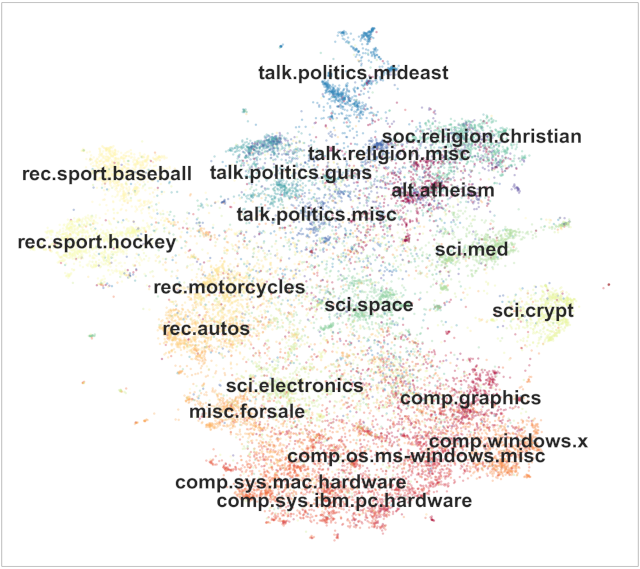
For each topic, you want to extract the words that describe this topic:
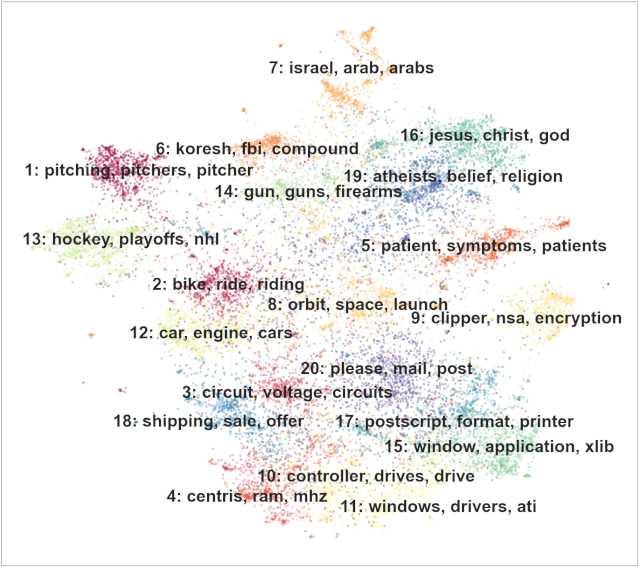
Sentence-Transformers can be used to identify these topics in a collection of sentences, paragraphs or short documents. For an excellent tutorial, see [Topic Modeling with BERT](https://medium.com/data-science/topic-modeling-with-bert-779f7db187e6) as well as the [BERTopic](https://github.com/MaartenGr/BERTopic) and [Top2Vec](https://github.com/ddangelov/Top2Vec) repositories.
Image source: [Top2Vec: Distributed Representations of Topics](https://huggingface.co/papers/2008.09470)
================================================
FILE: examples/sentence_transformer/applications/clustering/agglomerative.py
================================================
"""
This is a simple application for sentence embeddings: clustering
Sentences are mapped to sentence embeddings and then agglomerative clustering with a threshold is applied.
"""
from sklearn.cluster import AgglomerativeClustering
from sentence_transformers import SentenceTransformer
embedder = SentenceTransformer("all-MiniLM-L6-v2")
# Corpus with example sentences
corpus = [
"A man is eating food.",
"A man is eating a piece of bread.",
"A man is eating pasta.",
"The girl is carrying a baby.",
"The baby is carried by the woman",
"A man is riding a horse.",
"A man is riding a white horse on an enclosed ground.",
"A monkey is playing drums.",
"Someone in a gorilla costume is playing a set of drums.",
"A cheetah is running behind its prey.",
"A cheetah chases prey on across a field.",
]
corpus_embeddings = embedder.encode(corpus)
# Some models don't automatically normalize the embeddings, in which case you should normalize the embeddings:
# corpus_embeddings = corpus_embeddings / np.linalg.norm(corpus_embeddings, axis=1, keepdims=True)
# Perform agglomerative clustering
clustering_model = AgglomerativeClustering(
n_clusters=None, distance_threshold=1.5
) # , affinity='cosine', linkage='average', distance_threshold=0.4)
clustering_model.fit(corpus_embeddings)
cluster_assignment = clustering_model.labels_
clustered_sentences = {}
for sentence_id, cluster_id in enumerate(cluster_assignment):
if cluster_id not in clustered_sentences:
clustered_sentences[cluster_id] = []
clustered_sentences[cluster_id].append(corpus[sentence_id])
for i, cluster in clustered_sentences.items():
print("Cluster ", i + 1)
print(cluster)
print("")
================================================
FILE: examples/sentence_transformer/applications/clustering/fast_clustering.py
================================================
"""
This is a more complex example on performing clustering on large scale dataset.
This examples find in a large set of sentences local communities, i.e., groups of sentences that are highly
similar. You can freely configure the threshold what is considered as similar. A high threshold will
only find extremely similar sentences, a lower threshold will find more sentence that are less similar.
A second parameter is 'min_community_size': Only communities with at least a certain number of sentences will be returned.
The method for finding the communities is extremely fast, for clustering 50k sentences it requires only 5 seconds (plus embedding computation).
In this example, we download a large set of questions from Quora and then find similar questions in this set.
"""
import csv
import os
import time
from sentence_transformers import SentenceTransformer, util
# Model for computing sentence embeddings. We use one trained for similar questions detection
model = SentenceTransformer("all-MiniLM-L6-v2")
# We download the Quora Duplicate Questions Dataset (https://www.quora.com/q/quoradata/First-Quora-Dataset-Release-Question-Pairs)
# and find similar question in it
url = "http://qim.fs.quoracdn.net/quora_duplicate_questions.tsv"
dataset_path = "quora_duplicate_questions.tsv"
max_corpus_size = 50000 # We limit our corpus to only the first 50k questions
# Check if the dataset exists. If not, download and extract
# Download dataset if needed
if not os.path.exists(dataset_path):
print("Download dataset")
util.http_get(url, dataset_path)
# Get all unique sentences from the file
corpus_sentences = set()
with open(dataset_path, encoding="utf8") as fIn:
reader = csv.DictReader(fIn, delimiter="\t", quoting=csv.QUOTE_MINIMAL)
for row in reader:
corpus_sentences.add(row["question1"])
corpus_sentences.add(row["question2"])
if len(corpus_sentences) >= max_corpus_size:
break
corpus_sentences = list(corpus_sentences)
print("Encode the corpus. This might take a while")
corpus_embeddings = model.encode(corpus_sentences, batch_size=64, show_progress_bar=True, convert_to_tensor=True)
print("Start clustering")
start_time = time.time()
# Two parameters to tune:
# min_cluster_size: Only consider cluster that have at least 25 elements
# threshold: Consider sentence pairs with a cosine-similarity larger than threshold as similar
clusters = util.community_detection(corpus_embeddings, min_community_size=25, threshold=0.75)
print(f"Clustering done after {time.time() - start_time:.2f} sec")
# Print for all clusters the top 3 and bottom 3 elements
for i, cluster in enumerate(clusters):
print(f"\nCluster {i + 1}, #{len(cluster)} Elements ")
for sentence_id in cluster[0:3]:
print("\t", corpus_sentences[sentence_id])
print("\t", "...")
for sentence_id in cluster[-3:]:
print("\t", corpus_sentences[sentence_id])
================================================
FILE: examples/sentence_transformer/applications/clustering/kmeans.py
================================================
"""
This is a simple application for sentence embeddings: clustering
Sentences are mapped to sentence embeddings and then k-mean clustering is applied.
"""
from sklearn.cluster import KMeans
from sentence_transformers import SentenceTransformer
embedder = SentenceTransformer("all-MiniLM-L6-v2")
# Corpus with example sentences
corpus = [
"A man is eating food.",
"A man is eating a piece of bread.",
"A man is eating pasta.",
"The girl is carrying a baby.",
"The baby is carried by the woman",
"A man is riding a horse.",
"A man is riding a white horse on an enclosed ground.",
"A monkey is playing drums.",
"Someone in a gorilla costume is playing a set of drums.",
"A cheetah is running behind its prey.",
"A cheetah chases prey on across a field.",
]
corpus_embeddings = embedder.encode(corpus)
# Perform kmean clustering
num_clusters = 5
clustering_model = KMeans(n_clusters=num_clusters)
clustering_model.fit(corpus_embeddings)
cluster_assignment = clustering_model.labels_
clustered_sentences = [[] for i in range(num_clusters)]
for sentence_id, cluster_id in enumerate(cluster_assignment):
clustered_sentences[cluster_id].append(corpus[sentence_id])
for i, cluster in enumerate(clustered_sentences):
print("Cluster ", i + 1)
print(cluster)
print("")
================================================
FILE: examples/sentence_transformer/applications/computing-embeddings/README.rst
================================================
Computing Embeddings
====================
Once you have `installed <../../../../docs/installation.html>`_ Sentence Transformers, you can easily use Sentence Transformer models:
.. sidebar:: Documentation
1. :class:`SentenceTransformer `

2. :meth:`SentenceTransformer.encode `
3. :meth:`SentenceTransformer.similarity `
::
from sentence_transformers import SentenceTransformer
# 1. Load a pretrained Sentence Transformer model
model = SentenceTransformer("all-MiniLM-L6-v2")
# The sentences to encode
sentences = [
"The weather is lovely today.",
"It's so sunny outside!",
"He drove to the stadium.",
]
# 2. Calculate embeddings by calling model.encode()
embeddings = model.encode(sentences)
print(embeddings.shape)
# [3, 384]
# 3. Calculate the embedding similarities
similarities = model.similarity(embeddings, embeddings)
print(similarities)
# tensor([[1.0000, 0.6660, 0.1046],
# [0.6660, 1.0000, 0.1411],
# [0.1046, 0.1411, 1.0000]])
.. note::
Even though we talk about sentence embeddings, you can use Sentence Transformers for shorter phrases as well as for longer texts with multiple sentences. See :ref:`input-sequence-length` for notes on embeddings for longer texts.
Initializing a Sentence Transformer Model
-----------------------------------------
The first step is to load a pretrained Sentence Transformer model. You can use any of the models from the `Pretrained Models <../../../../docs/sentence_transformer/pretrained_models.html>`_ or a local model. See also :class:`~sentence_transformers.SentenceTransformer` for information on parameters.
::
from sentence_transformers import SentenceTransformer
model = SentenceTransformer("all-mpnet-base-v2")
# Alternatively, you can pass a path to a local model directory:
model = SentenceTransformer("output/models/mpnet-base-finetuned-all-nli")
The model will automatically be placed on the most performant available device, e.g. ``cuda`` or ``mps`` if available. You can also specify the device explicitly:
::
model = SentenceTransformer("all-mpnet-base-v2", device="cuda")
Calculating Embeddings
----------------------
The method to calculate embeddings is :meth:`SentenceTransformer.encode `.
Prompt Templates
----------------
Some models require using specific text *prompts* to achieve optimal performance. For example, with `intfloat/multilingual-e5-large `_ you should prefix all queries with ``"query: "`` and all passages with ``"passage: "``. Another example is `BAAI/bge-large-en-v1.5 `_, which performs best for retrieval when the input texts are prefixed with ``"Represent this sentence for searching relevant passages: "``.
Sentence Transformer models can be initialized with ``prompts`` and ``default_prompt_name`` parameters:
- ``prompts`` is an optional argument that accepts a dictionary of prompts with prompt names to prompt texts. The prompt will be prepended to the input text during inference. For example::
model = SentenceTransformer(
"intfloat/multilingual-e5-large",
prompts={
"classification": "Classify the following text: ",
"retrieval": "Retrieve semantically similar text: ",
"clustering": "Identify the topic or theme based on the text: ",
},
)
# or
model.prompts = {
"classification": "Classify the following text: ",
"retrieval": "Retrieve semantically similar text: ",
"clustering": "Identify the topic or theme based on the text: ",
}
- ``default_prompt_name`` is an optional argument that determines the default prompt to be used. It has to correspond with a prompt name from ``prompts``. If ``None``, then no prompt is used by default. For example::
model = SentenceTransformer(
"intfloat/multilingual-e5-large",
prompts={
"classification": "Classify the following text: ",
"retrieval": "Retrieve semantically similar text: ",
"clustering": "Identify the topic or theme based on the text: ",
},
default_prompt_name="retrieval",
)
# or
model.default_prompt_name="retrieval"
Both of these parameters can also be specified in the ``config_sentence_transformers.json`` file of a saved model. That way, you won't have to specify these options manually when loading. When you save a Sentence Transformer model, these options will be automatically saved as well.
During inference, prompts can be applied in a few different ways. All of these scenarios result in identical texts being embedded:
1. Explicitly using the ``prompt`` option in ``SentenceTransformer.encode``::
embeddings = model.encode("How to bake a strawberry cake", prompt="Retrieve semantically similar text: ")
2. Explicitly using the ``prompt_name`` option in ``SentenceTransformer.encode`` by relying on the prompts loaded from a) initialization or b) the model config::
embeddings = model.encode("How to bake a strawberry cake", prompt_name="retrieval")
3. If ``prompt`` nor ``prompt_name`` are specified in ``SentenceTransformer.encode``, then the prompt specified by ``default_prompt_name`` will be applied. If it is ``None``, then no prompt will be applied::
embeddings = model.encode("How to bake a strawberry cake")
.. _input-sequence-length:
Input Sequence Length
---------------------
For transformer models like BERT, RoBERTa, DistilBERT etc., the runtime and memory requirement grows quadratic with the input length. This limits transformers to inputs of certain lengths. A common value for BERT-based models are 512 tokens, which corresponds to about 300-400 words (for English).
Each model has a maximum sequence length under ``model.max_seq_length``, which is the maximal number of tokens that can be processed. Longer texts will be truncated to the first ``model.max_seq_length`` tokens::
from sentence_transformers import SentenceTransformer
model = SentenceTransformer("all-MiniLM-L6-v2")
print("Max Sequence Length:", model.max_seq_length)
# => Max Sequence Length: 256
# Change the length to 200
model.max_seq_length = 200
print("Max Sequence Length:", model.max_seq_length)
# => Max Sequence Length: 200
.. note::
You cannot increase the length higher than what is maximally supported by the respective transformer model. Also note that if a model was trained on short texts, the representations for long texts might not be that good.
Multi-Process / Multi-GPU Encoding
----------------------------------
You can encode input texts with more than one GPU (or with multiple processes on a CPU machine). It tends to help significantly with large datasets, but the overhead of starting multiple processes can be significant for smaller datasets.
For an example, see: `computing_embeddings_multi_gpu.py

