Repository: hukl/freebsd-toolbox
Branch: master
Commit: 430f4948f816
Files: 7
Total size: 24.5 KB
Directory structure:
gitextract_t_45ceoj/

├── README.md
├── commands.md
├── mailserver.md
├── quicketc.sh
├── upgrade_guide.md
├── zfs_bootstrap.sh
└── zfs_bootstrap_be.sh
================================================
FILE CONTENTS
================================================
================================================
FILE: README.md
================================================
# FreeBSD Toolbox
This a collection of commands and intstructions to accomplish common tasks on FreeBSD
* [Commands](https://github.com/hukl/freebsd-toolbox/blob/master/commands.md)
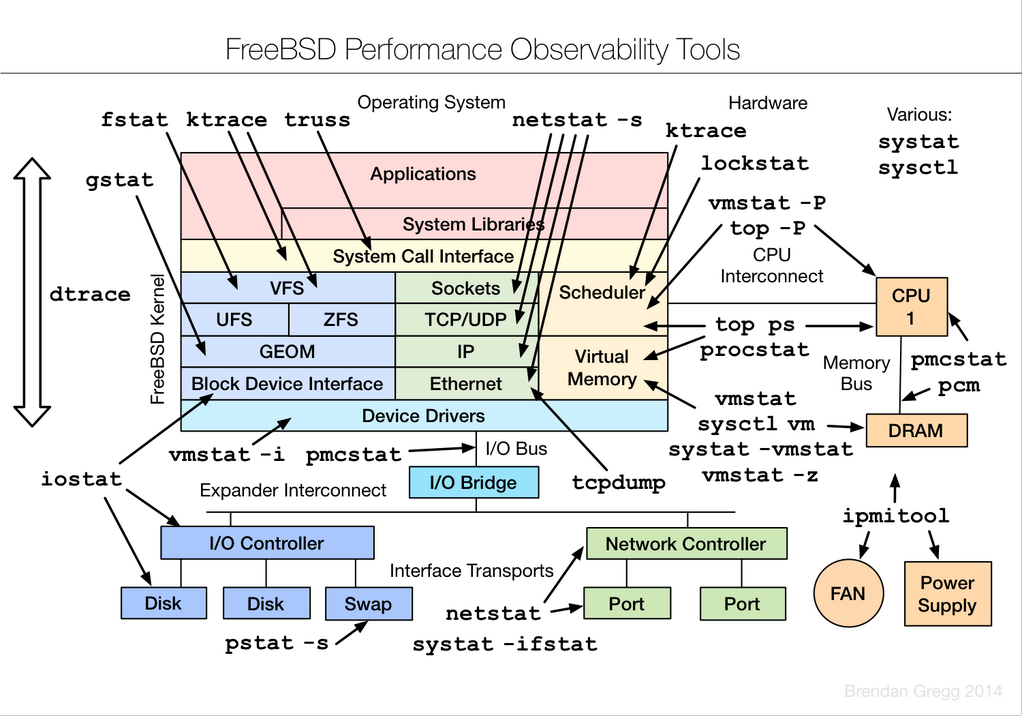
## Performance Analysis Tools
## ZFS Pool Composition Tips
* https://klarasystems.com/articles/choosing-the-right-zfs-pool-layout/
================================================
FILE: commands.md
================================================
# Users
```
adduser # wrapper script to add users
chsh # change user shell and other info
pw groupadd teamtwo # add a group to the system
pw groupmod teamtwo -m <username> # add a user to a group
/etc/group # file to edit groups manually
id # show group membership for current user
```
# System Configuration
```
cat /var/run/dmesg.boot # show boot log with info about disks and pci devices
kenv # show bios, board and chassi info (dump from kernel env)
pciconf -l -cv # show info about PCI devices of the machine
camcontrol devlist -v # list of attached ATA devices
ifconfig # show and configure network interface parameters
sysctl # tool to show/set all system/kernel coniguration variables
sysctl -a # show all system/kernel configuration variables
sysctl hw # show hardware related info and settings
sysctl net # show all network related info and settings
sysctl hw.model # show CPU model
sysctl net.inet.tcp.delayed_ack=0 # disable delayed ack in tcp
```
# System Statistics
```
top # display and update information about the top cpu processes
ps auxwww | grep <processname> # display process status
CTRL-t # on running commands will output useful info
systat -vmstat 1 # show general overview of load, memory, interrupts, disk io
systat -iostat 1 # show disk throughput
systat -ifstat 1 # show network throughput for all interfaces
systat -netstat 1 # show netstat output but automatically refreshed
systat -tcp 1 # show tcp statistics
```
# ZFS
```
zfs list # list all zfs datasets (volumes)
zfs list -t snapshot # list all zfs snapshots
zfs list -r -t snapshot <pool> # list zfs snapshots for a given pool
zfs snapshot <pool>/<dataset>@<name> # generic way of creating a snapshot of a dataset in a storage pool
zfs snapshot -r tank@2014021301 # create a snapshot of all datasets in the pool "tank"
zfs create <pool>/<dataset> # create a new dataset
zfs rollback <pool>/<dataset>@name # rollback of a dataset to a given snapshot
zfs destroy <pool>/<dataset> # destroy a dataset / remove it from the pool
zfs destroy <pool>/<dataset>@name # destroy a snapshot
zfs set <key>=<val> <pool>/<dataset> # generic way of setting options on a given dataset
zfs set compression=lz4 tank/var/log # enable LZ4 compression on /var/logs
zfs get compressratio <pool>/<dataset> # show the current compression ratio of a dataset
zfs send -R tank@snapshot | \ # send all datasets@snapshot recursively to another host
ssh root@[IP] zfs recv -F tank
zfs unmount <pool>/<dataset> # unmount a zfs dataset
zfs upgrade -r <pool> # upgrade all volumes in the pool (technically its the root volume e.g. tank)
zpool status # show health info about currently imported ZFS storage pools
zpool scrub # check all written blocks for consistency
zpool iostat -v tank # show more information about the pool including log devices
zpool add <pool> mirror <dev1> <dev1> # add two disks as mirror to a storage pool
zpool remove <pool> <device> # remove single devices or mirror sets from the storage pool
zpool upgrade <pool> # upgrade the storage pool to latest version
zpool labelclear [-f] <pool> # Clear vdev headers on disk of previous / faulted / obsolete pools
zfs send pool/volume@snapshot \ # Compress and Encrypt a snapshot and send it to a remote host for backups
| lz4 \ # Decrypt with: openssl enc -d -aes-256-cbc -a -in /path/to/backup/snapshot.lz4.ssl | unlz4 > /path/to/dest
| openssl enc -aes-256-cbc -a -salt -pbkdf2 \ # OR | zfs receive tank/volume
| ssh u@h "cat > /snapshot.lz4.ssl
```
# Software
```
# Ports
portsnap fetch # fetch the latest portfiles
portsnap update # update the portfiles on disk with the previously fetched portfiles
portsnap update -p /usr/jails/basejail/usr/ports # update ports tree for jails
whereis <portname> # show the directory of the portfile
cd /usr/ports/*/<portname> # find the parent directory of a given portname
locate <portname> | grep ports # manual way of searching for ports
cd <portdir> && make install # compile and install a port
cd <portdir> && make config # re-run configuration of a port when available
cd <portdir> && sudo make deinstall clean reinstall # upgrade the port
# Packages
pkg search <packagename> # search for binary packages
pkg install <packagename> # install binary package and its dependencies
pkg delete <packagename> # delete an installed package
pkg autoremove # remove unneeded dependencies
pkg info # show list of currently installed ports/packages with version info
pkg version # show which ports/packages are outdated and need an update
pkg upgrade <packagename> # upgrade a packages
pkg which <filename> # find out which package installed a given file
pkg audit -F # look for ports/packages with security vulnerabilities
# System
freebsd-update fetch # fetch updates from server
freebsd-update -r <target> upgrade # fetch upgrades to specified version (e.g. '10.1-RELEASE') from server
freebsd-update install # install downloaded updates/upgrades
```
# Services
```
service -l # list all available services
service -e # list all enabled services
service <servicename> status # show the status of the service with the given servicename
service <servicename> start # start the service with the given servicename
service <servicename> stop # stop the service with the given servicename
service <servicename> restart # restart the service with the given servicename
service <servicename> reload # reload the configuration of the service with the given servicename
```
# Network
```
ifconfig <iface> inet <ip/mask> # configure IP address on interface
ifconfig <iface> inet <ip/mask> alias # configure IP address alias on interface
ifconfig <iface> del <ip> # remove IP address from interface
route add -net default <gw_ip> # add default route
route add -net <ip/mask> <gw_ip> # add a custom route for given network
/etc/rc.d/netif restart && \ # restart networking and routing after changing the configuration
/etc/rc.d/routing restart without rebooting. Execute in tmux or screen session
netstat -rn # display routing table
netstat -an # display all connections
netstat -m # display buffer usage
netstat -Lan # display status of listen queues
netstat -s # display extensive statistics per protocol (use -p tcp to only show tcp)
sockstat -l # display listening sockets, process names and pids
sockstat -4 # display all IPv4 sockets - good with -l as above
sysctl kern.ipc.numopensockets # display number of open sockets
vmstat -z | egrep "ITEM|tcpcb" # number of hash table buckets to handle incoming tcp connections
increase net.inet.tcp.tcbhashsize if hitting the limit
sysctl net.inet.tcp.hostcache.list # display current content of hostcache with its parameters per IP
ssh <host> sudo tcpdump \ # Send remote tcpdump output to local wireshark for live analysis
-i em0 -U \
-w - "not port 22" | wireshark -i - -k
```
# Firewall
```
pfctl -si # show current state table and counters (useful for tuning)
pfctl -s state # show current content of state table
```
# IPsec
```
ipsec start # start VPN and establish (auto=start) VPN connections
setkey -D # show extensive Kernel information about current connections
setkey -DP # show more condensed connection information
ipsec statusall [conn] # show returns detailed status information either on connection or all
connections if no name is provided
ipsec leases # show current leases from virtual IP address pool
ipsec rereadsecrets # flushes and rereads all secrets defined in ipsec.secrets
ipsec rereadall # flushes and rereads all secrets defined in ipsec.secrets as well as all
certificates and and certificate revocation lists
ipsec update # sends a HUP signal to the daemon that determines any changes in ipsec.conf
and updates the configuration on the running IKE daemon charon
ipsec reload # sends a USR1 signal to the daemon that reloads the whole configuration
on the running IKE daemon charon based on the actual ipsec.conf
ipsec restart # terminates all ipsec connections, sends a TERM signal to the daemon and
restarts it afterwards
ipsec stroke up [conn] # initiate connection [conn]
ipsec stroke down [conn] # terminate connection [conn]
```
# ezjail
```
ezjail-admin start|stop # start and stop all the jails
ezjail-admin start|stop <JID>|<hostname># start and stop individual jail
ezjail-admin list # list all the jails on the host system
ezjail-admin console <JID>|<hostname> # open root shell into jail
ezjail-admin create -f exmaple <hostname> <IP> # create a new jail
ezjail-admin delete -w hostname # delete the jail (in case you use zfs also delete the volume)
ezjail-admin update -U -s 11.1-RELEASE # update basejail from -s <RELEASE> to current host system
```
# Boot Environments
```
bectl list # List existing boot environments
bectl create <envname> # Create a new boot environment e.g. 13_1_RELEASE
bectl mount <envname> # Mount boot environment temporary mountpoint like /tmp/be_mount.JO5Y
bectl activate -t <envname> # Activate new boot environment for one-time-boot
bectl activate <envname> # Activate new boot environment permanently
---
freebsd-update \ # Example for upgrading FreeBSD to a release in a boot environment
-b /tmp/be_mount.JO5Y \
-d /tmp/be_mount.JO5Y/var/db/freebsd-update \
-r 13.1-RELEASE upgrade
================================================
FILE: mailserver.md
================================================
# Upgrading Postfix & Dovecot
First lock the ports so they don't get upgraded by pkg
```
sudo pkg lock postfix dovecot dovecot-pigeonhole
```
Upgrade all other packages through pkg
```
sudo pkg upgrade
```
Unlock postfix, dovecot and dovecot-pigeonhole
```
sudo pkg unlock postfix dovecot dovecot-pigeonhole
```
Upgrade postfix, dovecot and dovecot-pigeonhole via ports
```
cd /usr/ports/mail/postfix
sudo make deinstall clean reinstall
cd /usr/ports/mail/dovecot
sudo make deinstall clean reinstall
cd /usr/ports/mail/dovecot-pigeonhole
sudo make deinstall clean reinstall
```
After that, lock ports again to prevent accidental binary upgrades
```
sudo pkg lock postfix dovecot dovecot-pigeonhole
```
# Dovecot
### Create Password
```
doveadm pw -s SHA512-CRYPT
```
### Migrate a User from old Server
```
sudo -u vmail doveadm -o imapc_user=user@domain -o imapc_password=foobar backup -R -u user@domain imapc:
```
================================================
FILE: quicketc.sh
================================================
#!/bin/sh
# This was tested from ZSH - not sure if the glob is auto expanded in other shells
unset TARBALL
usage() {
echo "USAGE: quicketc -h | -t <path/to/tarfile> directory_or_glob_pattern"
exit 1
}
while getopts j:t:h opt; do
case $opt in
t) TARBALL=$OPTARG
;;
h) echo $USAGE
exit 0
;;
'?') echo "$0: invalid option -$OPTARG" >&2
usage
;;
esac done
shift $((OPTIND - 1))
# Check if TARBALL arg was provided
[ -z "$TARBALL" ] && usage
# Go through list of Jail from expanded glob pattern and build internal list
NUMBER_OF_JAILS=0
NUMBER_OF_JAIL_ARGS=$#
JAILS=""
while [ $NUMBER_OF_JAILS -lt $NUMBER_OF_JAIL_ARGS ]
do
JAILS="$JAILS$1 "
NUMBER_OF_JAILS=$(($NUMBER_OF_JAILS+1))
shift
done
# Build Tarball if specified file does not yet exist
if [ -f $TARBALL ]
then
echo "Found existing Tarball at $TARBALL"
else
echo "Generate Source Tarball $TARBALL"
etcupdate build $TARBALL
fi
# Loop through each subdirectory in JAIL_DIR
for jail_sub_dir in $JAILS; do
# Check if the directory exists
if [ -d "$jail_sub_dir" ]; then
# Run etcupdate commands with the current subdirectory
echo "Updating: $jail_sub_dir"
etcupdate -t $TARBALL -D "$jail_sub_dir"
etcupdate resolve -D "$jail_sub_dir"
fi
done
================================================
FILE: upgrade_guide.md
================================================
## References
* https://docs.freebsd.org/en/books/handbook/cutting-edge/
* https://klarasystems.com/articles/managing-boot-environments/
## Preparations
https://www.freebsd.org/releases/13.1R/relnotes/
## General Procedure
* Check Release Notes for potentially breaking changes (which is rare)
* Upgrade pkg and packages to latest versions on host `sudo pkg upgrade`
* ZFS Snapshot `zfs snapshot -r tank@2022-08-05_01`
* Create Boot Environemnt `bectl create 13_1_RELEASE`
* Mount Boot Environment `bectl mount 13_1_RELEASE`
* Run FreeBSD Upgrade
```sh
freebsd-update \
-b /tmp/be_mount.JO5Y \
-d /tmp/be_mount.JO5Y/var/db/freebsd-update \
-r 13.1-RELEASE upgrade
```
* Run the following command 2x in a row without rebooting
```sh
freebsd-update \
-b /tmp/be_mount.JO5Y \
-d /tmp/be_mount.JO5Y/var/db/freebsd-update \
install
````
* Disable ezjail in rc.conf
* Temporarily activate boot environment `bectl activate -t 13_1_RELEASE`
* After successful reboot, permanently activate boot environment `bectl activate 13_1_RELEASE`
* Delete ezjail basejail and newjail `zfs destroy tank/ezjail/basejail` and `zfs destroy tank/ezjail/newjail`
* Re-install ezjail basejail and newjail `ezjail-admin install -s`
* Mergemaster jails, starting with the most important ones `etcupdate -D /path/to/jail` or use the `quicketc.sh` script included in this repo to speed up the process
* Check ZFS `zpool status`
================================================
FILE: zfs_bootstrap.sh
================================================
#!/bin/sh
# Check:
# https://wiki.freebsd.org/RootOnZFS/GPTZFSBoot/9.0-RELEASE
# http://wp.strahlert.net/wordpress/zfs-2/expanding-zpool/
# Tested on FreeBSD 10, 11 and 12
###############################################################
# WARNING: Go through line by line and adjust where necessary #
###############################################################
# Create Partition Table
echo "Create Partition Table"
gpart create -s gpt ada0 # Main HDD
gpart create -s gpt ada1 # Main HDD
# Optional if you have SSDs for ZIL and L2ARC
# gpart create -s gpt ada2 # ZIL and L2ARC SSD
# gpart create -s gpt ada3 # ZIL and L2ARC SSD
# Create Boot Partition
echo "Create Boot Partition"
gpart add -a 4k -s 512k -t freebsd-boot ada0
gpart add -a 4k -s 512k -t freebsd-boot ada1
# Create Swap Partitions
echo "Create Swap Partitions"
gpart add -a 4k -s 8G -t freebsd-swap -l swap0 ada0
gpart add -a 4k -s 8G -t freebsd-swap -l swap1 ada1
# Create Main Partitions
echo "Create Main Partitions"
gpart add -a 4k -t freebsd-zfs -l disk0 ada0
gpart add -a 4k -t freebsd-zfs -l disk1 ada1
# Write Bootcode
echo "Write Bootcode"
gpart bootcode -b /boot/pmbr -p /boot/gptzfsboot -i 1 ada0
gpart bootcode -b /boot/pmbr -p /boot/gptzfsboot -i 1 ada1
# Create ZIL Partions
# echo "Create ZIL Partions"
# gpart add -a 4k -b 2048 -s 10G -t freebsd-zfs -l zil0 ada2
# gpart add -a 4k -b 2048 -s 10G -t freebsd-zfs -l zil1 ada3
# Create L2ARC Partitions
# echo "Create L2ARC Partitions"
# gpart add -a 4k -t freebsd-zfs -l l2arc0 ada2
# gpart add -a 4k -t freebsd-zfs -l l2arc1 ada3
# Load ZFS extensions
kldload opensolaris.ko
kldload zfs.ko
# Force ZFS to use 4k sectors
sysctl vfs.zfs.min_auto_ashift=12
# Create ZFS Pool
echo "Create ZFS Pool"
zpool create -f tank mirror /dev/gpt/disk0 /dev/gpt/disk1
# Set proper mountpoint
echo "Setting Mountpoint"
zfs set mountpoint=/ tank
# Export and import the Pool
zpool export tank
zpool import -o altroot=/mnt -o cachefile=/var/tmp/zpool.cache tank
# Enable Compression
echo "Enabling Compression"
zfs set compression=lz4 tank
# Add ZIL and L2ARC
# echo "Add ZIL and L2ARC"
# zpool add tank log mirror /dev/gpt/zil0 /dev/gpt/zil1
# zpool add tank cache /dev/gpt/l2arc0 /dev/gpt/l2arc1
# Set BOOTFS
echo "Set BOOTFS"
zpool set bootfs=tank tank
# Copy FreeBSD files
echo "Installing FreeBSD"
cd /usr/freebsd-dist
export DESTDIR=/mnt
for f in base.txz lib32.txz kernel.txz doc.txz ports.txz src.txz;do
(cat $f | tar --unlink -xvpJf - -C ${DESTDIR:-/});
done
cp /var/tmp/zpool.cache /mnt/boot/zfs/
echo "Enter hostname FQDN"
read HOSTNAME
echo "Enter last public IP octet"
read IP_ENDING
echo "Enter username"
read USERNAME
cat > /mnt/etc/rc.conf << RCCONF
hostname="$HOSTNAME"
zfs_enable="YES"
# Network
defaultrouter="0.0.0.0"
ifconfig_igb0="inet 0.0.0.$IP_ENDING/32"
# Services
sendmail_enable="NONE"
sshd_enable="YES"
RCCONF
cat > /mnt/etc/fstab << FSTAB
# Device Mountpoint FStype Options Dump Pass#
/dev/gpt/swap0 none swap sw 0 0
/dev/gpt/swap1 none swap sw 0 0
FSTAB
cat >> /mnt/boot/loader.conf << LOADER
zfs_load="YES"
vfs.root.mountfrom="zfs:tank"
vfs.zfs.arc_max="8G"
LOADER
cat >> /mnt/etc/sysctl.conf << SYSCTL
vfs.zfs.min_auto_ashift=12
SYSCTL
cat > /mnt/etc/resolv.conf << RESOLV
nameserver 0.0.0.0
nameserver 0.0.0.0
RESOLV
# Mount a devfs to have /dev/random /dev/zero etc in our chroot
mount -t devfs none /mnt/dev
# Bootstap pkg and install minimal packages for ansible
chroot -u root -g wheel /mnt/ env ASSUME_ALWAYS_YES=YES pkg bootstrap
chroot -u root -g wheel /mnt/ env ASSUME_ALWAYS_YES=YES pkg install sudo zsh
# Add user
chroot -u root -g wheel /mnt/ pw useradd -n $USERNAME -u 1001 -s /usr/local/bin/zsh -m -d /home/$USERNAME -G wheel -h 0
# Fetch user pub key from github
mkdir -p /mnt/home/$USERNAME/.ssh
# This fetches the pub key from the sepcified github users and adds them
# to the .authorized_keys of the new system user
echo "List of Github users for pubkey retrieval (space separated):"
read users
for user in $users; do
fetch https://github.com/$user.keys --no-verify-peer -o - >> /mnt/home/deploy/.ssh/authorized_keys
done
chown -R 1001:1001 /mnt/home/$USERNAME/.ssh
# Unmount tank and re-set mountpoint
zfs unmount -f tank
zfs set mountpoint=/ tank
echo "Done"
================================================
FILE: zfs_bootstrap_be.sh
================================================
#!/bin/sh
# Check:
# https://wiki.freebsd.org/RootOnZFS/GPTZFSBoot/9.0-RELEASE
# http://wp.strahlert.net/wordpress/zfs-2/expanding-zpool/
# This script will add ZFS Boot-Enironment support
# Tested on FreeBSD 10, 11 and 12
###############################################################
# WARNING: Go through line by line and adjust where necessary #
###############################################################
# Create Partition Table
echo "Create Partition Table"
gpart create -s gpt ada0 # Main HDD
gpart create -s gpt ada1 # Main HDD
# Optional if you have SSDs for ZIL and L2ARC
# gpart create -s gpt ada2 # ZIL and L2ARC SSD
# gpart create -s gpt ada3 # ZIL and L2ARC SSD
# Create Boot Partition
echo "Create Boot Partition"
gpart add -a 4k -s 512k -t freebsd-boot ada0
gpart add -a 4k -s 512k -t freebsd-boot ada1
# Create Swap Partitions
echo "Create Swap Partitions"
gpart add -a 4k -s 8G -t freebsd-swap -l swap0 ada0
gpart add -a 4k -s 8G -t freebsd-swap -l swap1 ada1
# Create Main Partitions
echo "Create Main Partitions"
gpart add -a 4k -t freebsd-zfs -l disk0 ada0
gpart add -a 4k -t freebsd-zfs -l disk1 ada1
# Write Bootcode
echo "Write Bootcode"
gpart bootcode -b /boot/pmbr -p /boot/gptzfsboot -i 1 ada0
gpart bootcode -b /boot/pmbr -p /boot/gptzfsboot -i 1 ada1
# Create ZIL Partions
# echo "Create ZIL Partions"
# gpart add -a 4k -b 2048 -s 10G -t freebsd-zfs -l zil0 ada2
# gpart add -a 4k -b 2048 -s 10G -t freebsd-zfs -l zil1 ada3
# Create L2ARC Partitions
# echo "Create L2ARC Partitions"
# gpart add -a 4k -t freebsd-zfs -l l2arc0 ada2
# gpart add -a 4k -t freebsd-zfs -l l2arc1 ada3
# Load ZFS extensions
kldload opensolaris.ko
kldload zfs.ko
# Force ZFS to use 4k sectors
sysctl vfs.zfs.min_auto_ashift=12
# Create ZFS Pool
echo "Create ZFS Pool"
zpool create -o altroot=/mnt -o cachefile=/var/tmp/zpool.cache -f tank mirror /dev/ada0p3 /dev/ada1p3
# Enable Compression
echo "Enabling Compression"
zfs set compression=lz4 tank
# Add ZIL and L2ARC
# echo "Add ZIL and L2ARC"
# zpool add tank log mirror /dev/gpt/zil0 /dev/gpt/zil1
# zpool add tank cache /dev/gpt/l2arc0 /dev/gpt/l2arc1
# Create a very minimal ZFS Boot Environment Layout
# https://wiki.freebsd.org/BootEnvironments
# https://klarasystems.com/articles/managing-boot-environments/
echo "Creating zfs boot-environment layout"
zfs create -o mountpoint=none tank/ROOT
zfs create -o mountpoint=/ tank/ROOT/default
# Set BOOTFS
echo "Set BOOTFS"
zpool set bootfs=tank/ROOT/default tank
zpool set cachefile=/var/tmp/zpool.cache tank
# Copy FreeBSD files
echo "Installing FreeBSD"
cd /usr/freebsd-dist
export DESTDIR=/mnt
for f in base.txz kernel.txz doc.txz ports.txz src.txz;do
(cat $f | tar --unlink -xvpJf - -C ${DESTDIR:-/});
done
echo "Enter hostname FQDN"
read HOSTNAME
echo "Enter last public IP octet"
read IP_ENDING
echo "Enter username"
read USERNAME
cat > /mnt/etc/rc.conf << RCCONF
hostname="$HOSTNAME"
zfs_enable="YES"
# Network
defaultrouter="0.0.0.0"
ifconfig_igb0="inet 0.0.0.$IP_ENDING/32"
# Services
sendmail_enable="NONE"
sshd_enable="YES"
RCCONF
cat > /mnt/etc/fstab << FSTAB
# Device Mountpoint FStype Options Dump Pass#
/dev/ada0p2 none swap sw 0 0
/dev/ada1p2 none swap sw 0 0
FSTAB
cat >> /mnt/boot/loader.conf << LOADER
opensolaris_load="YES"
zfs_load="YES"
vfs.zfs.arc_max="8G"
LOADER
cat >> /mnt/etc/sysctl.conf << SYSCTL
vfs.zfs.min_auto_ashift=12
SYSCTL
cat > /mnt/etc/resolv.conf << RESOLV
nameserver 0.0.0.0
nameserver 0.0.0.0
RESOLV
# Mount a devfs to have /dev/random /dev/zero etc in our chroot
mount -t devfs none /mnt/dev
# Bootstap pkg and install minimal packages for ansible
chroot -u root -g wheel /mnt/ env ASSUME_ALWAYS_YES=YES pkg bootstrap
chroot -u root -g wheel /mnt/ env ASSUME_ALWAYS_YES=YES pkg install sudo zsh
# Add user
chroot -u root -g wheel /mnt/ pw useradd -n $USERNAME -u 1001 -s /usr/local/bin/zsh -m -d /home/$USERNAME -G wheel -h 0
# Fetch user pub key from github
mkdir -p /mnt/home/$USERNAME/.ssh
# This fetches the pub key from the sepcified github users and adds them
# to the .authorized_keys of the new system user
echo "List of Github users for pubkey retrieval (space separated):"
read users
for user in $users; do
fetch https://github.com/$user.keys --no-verify-peer -o - >> /mnt/home/deploy/.ssh/authorized_keys
done
chown -R 1001:1001 /mnt/home/$USERNAME/.ssh
# Disabling auto mount of default boot environment otherwise it will overlay future environments which
# will prevent the new environment from booting successfully
zfs set canmount=noauto tank/ROOT/default
echo "Done"
gitextract_t_45ceoj/ ├── README.md ├── commands.md ├── mailserver.md ├── quicketc.sh ├── upgrade_guide.md ├── zfs_bootstrap.sh └── zfs_bootstrap_be.sh
Condensed preview — 7 files, each showing path, character count, and a content snippet. Download the .json file or copy for the full structured content (26K chars).
[
  {
    "path": "README.md",
    "chars": 455,
    "preview": "# FreeBSD Toolbox\n\nThis a collection of commands and intstructions to accomplish common tasks on FreeBSD\n\n\n* [Commands]("
  },
  {
    "path": "commands.md",
    "chars": 11651,
    "preview": "# Users\n```\nadduser                                 # wrapper script to add users\nchsh                                  "
  },
  {
    "path": "mailserver.md",
    "chars": 924,
    "preview": "# Upgrading Postfix & Dovecot\n\nFirst lock the ports so they don't get upgraded by pkg\n```\nsudo pkg lock postfix dovecot "
  },
  {
    "path": "quicketc.sh",
    "chars": 1402,
    "preview": "#!/bin/sh\n\n# This was tested from ZSH - not sure if the glob is auto expanded in other shells\n\nunset TARBALL\n\nusage() {\n"
  },
  {
    "path": "upgrade_guide.md",
    "chars": 1473,
    "preview": "## References\n\n* https://docs.freebsd.org/en/books/handbook/cutting-edge/\n* https://klarasystems.com/articles/managing-b"
  },
  {
    "path": "zfs_bootstrap.sh",
    "chars": 4448,
    "preview": "#!/bin/sh\n\n# Check:\n# https://wiki.freebsd.org/RootOnZFS/GPTZFSBoot/9.0-RELEASE\n# http://wp.strahlert.net/wordpress/zfs-"
  },
  {
    "path": "zfs_bootstrap_be.sh",
    "chars": 4764,
    "preview": "#!/bin/sh\n\n# Check:\n# https://wiki.freebsd.org/RootOnZFS/GPTZFSBoot/9.0-RELEASE\n# http://wp.strahlert.net/wordpress/zfs-"
  }
]
About this extraction
This page contains the full source code of the hukl/freebsd-toolbox GitHub repository, extracted and formatted as plain text for AI agents and large language models (LLMs). The extraction includes 7 files (24.5 KB), approximately 6.9k tokens. Use this with OpenClaw, Claude, ChatGPT, Cursor, Windsurf, or any other AI tool that accepts text input. You can copy the full output to your clipboard or download it as a .txt file.
Extracted by GitExtract — free GitHub repo to text converter for AI. Built by Nikandr Surkov.