Repository: hwaet/UnityProjectCloner
Branch: master
Commit: f8c8347af3a1
Files: 17
Total size: 36.0 KB
Directory structure:
gitextract_6tpyoxsf/
├── .gitignore
├── LICENSE.md
├── LICENSE.md.meta
├── README.md
├── README.md.meta
├── UnityProjectCloner/
│ ├── Editor/
│ │ ├── ProjectCloner.cs
│ │ ├── ProjectCloner.cs.meta
│ │ ├── ProjectClonerWindow.cs
│ │ └── ProjectClonerWindow.cs.meta
│ ├── Editor.meta
│ ├── Project.cs
│ ├── Project.cs.meta
│ ├── projectCloner.asmdef
│ └── projectCloner.asmdef.meta
├── UnityProjectCloner.meta
├── package.json
└── package.json.meta
================================================
FILE CONTENTS
================================================
================================================
FILE: .gitignore
================================================
[Ll]ibrary/
[Tt]emp/
[Oo]bj/
[Bb]uild/
[Bb]uilds/
Assets/AssetStoreTools*
# Visual Studio cache directory
.vs/
# Autogenerated VS/MD/Consulo solution and project files
ExportedObj/
.consulo/
*.csproj
*.unityproj
*.sln
*.suo
*.tmp
*.user
*.userprefs
*.pidb
*.booproj
*.svd
*.pdb
*.opendb
# Unity3D generated meta files
*.pidb.meta
*.pdb.meta
# Unity3D Generated File On Crash Reports
sysinfo.txt
# Builds
*.apk
*.unitypackage
================================================
FILE: LICENSE.md
================================================
MIT License
Copyright (c) 2018 Greg M
Permission is hereby granted, free of charge, to any person obtaining a copy
of this software and associated documentation files (the "Software"), to deal
in the Software without restriction, including without limitation the rights
to use, copy, modify, merge, publish, distribute, sublicense, and/or sell
copies of the Software, and to permit persons to whom the Software is
furnished to do so, subject to the following conditions:
The above copyright notice and this permission notice shall be included in all
copies or substantial portions of the Software.
THE SOFTWARE IS PROVIDED "AS IS", WITHOUT WARRANTY OF ANY KIND, EXPRESS OR
IMPLIED, INCLUDING BUT NOT LIMITED TO THE WARRANTIES OF MERCHANTABILITY,
FITNESS FOR A PARTICULAR PURPOSE AND NONINFRINGEMENT. IN NO EVENT SHALL THE
AUTHORS OR COPYRIGHT HOLDERS BE LIABLE FOR ANY CLAIM, DAMAGES OR OTHER
LIABILITY, WHETHER IN AN ACTION OF CONTRACT, TORT OR OTHERWISE, ARISING FROM,
OUT OF OR IN CONNECTION WITH THE SOFTWARE OR THE USE OR OTHER DEALINGS IN THE
SOFTWARE.
================================================
FILE: LICENSE.md.meta
================================================
fileFormatVersion: 2
guid: f4b327eab8d866e4087e166da8cafc09
DefaultImporter:
externalObjects: {}
userData:
assetBundleName:
assetBundleVariant:
================================================
FILE: README.md
================================================
# Recent news! 11/2022
The 2022 unite presentation has shown progress on unity's multiplayer abilities, including a built-in process that seems to mimic this approach but in an even better way! That would be rad. Upon its release, this repository may become redundant.

# UnityProjectCloner
A tool to let the user quickly duplicate their unity project *without copying all the assets*, for multiplayer testing
# Why?
One method of quickly debugging multiplayer code is to run multiple unity editors of the same project, and inspect each instance as it works its way through the server/client functions. This is disabled by design for a unity project because of file IO concerns, so this tool lets you get around that by cloning your unity project and creating a series of hard links/junctions in your new cloned folder. These links point back to the original, which can let you edit code and see the results fairly quickly in each cloned unity.
# How?
There's a couple ways you can add this to a unity project:
1. Place this code anywhere in your project!
2. Check this project out somewhere else and point to it with your Unity package manifest:
```"com.hwaet.projectcloner": "file:../../../../[relative path from your manifest file to the package.json]"```
3. If you've got git installed on your machine, (and unity is > 2018.3.0b7) add a line in your package manifest that points straight here!
```"com.hwaet.projectcloner": "https://github.com/hwaet/UnityProjectCloner.git"```
4. In recent unity versions, you can add the above git link directly in the editor without manually editing your manifest:
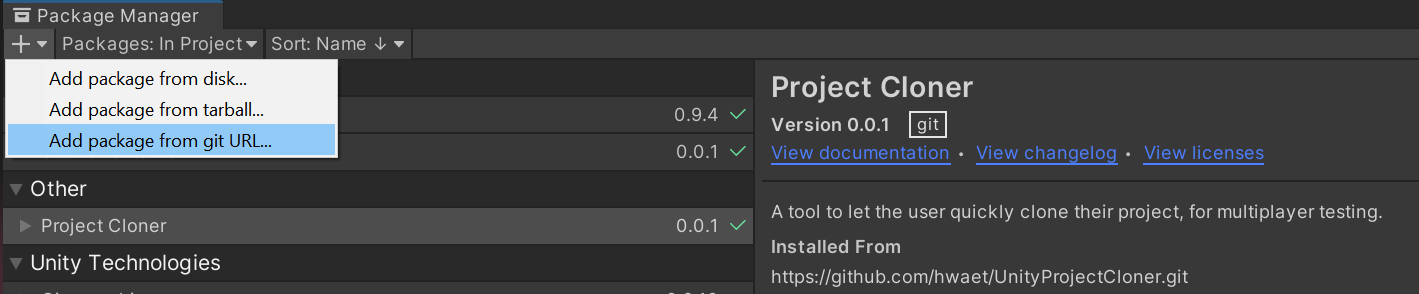
# Where?
The new cloned project will be placed right next to the original. So your folder structure will look like:
- Root/ProjectName
- Root/ProjectName_clone_0
- Root/ProjectName_clone_1
...
To open the window which allows to create a clone and manage it, in Unity Editor go to "Tools/Project Cloner". After the clone is created, you can launch it from the same window ("Open clone project" button will appear there). No need to add the clone to Unity Hub or anywhere else.
# Future Plans:
- I'm currently using a terminal command to create the folder links instead of kernel32, and that would be much wiser. So that'll be implemented in future passes of this.
- Mac and linux suport would be swell.
# Known Issues:
- When using scriptable objects in one Editor instance, the user will need to trigger a save (either scene or project saves seem to work) in order for the clone to notice that change. Otherwise the scriptable object's values seem to be cached. Save often while you work with SOs!
================================================
FILE: README.md.meta
================================================
fileFormatVersion: 2
guid: fa3f2fa6aced9b54b970c8996957df3b
TextScriptImporter:
externalObjects: {}
userData:
assetBundleName:
assetBundleVariant:
================================================
FILE: UnityProjectCloner/Editor/ProjectCloner.cs
================================================
using System.Collections;
using System.Collections.Generic;
using UnityEngine;
using UnityEditor;
using System.Linq;
using System.Runtime.InteropServices;
using System.IO;
using UnityProjectCloner;
namespace UnityProjectCloner
{
///
/// Contains all required methods for creating a linked clone of the Unity project.
///
public class ProjectCloner
{
///
/// Name used for an identifying file created in the clone project directory.
///
///
/// (!) Do not change this after the clone was created, because then connection will be lost.
///
public const string CloneFileName = ".clone";
///
/// Suffix added to the end of the project clone name when it is created.
///
///
/// (!) Do not change this after the clone was created, because then connection will be lost.
///
public const string CloneNameSuffix = "_clone";
public const int MaxCloneProjectCount = 10;
#region Managing clones
///
/// Creates clone from the project currently open in Unity Editor.
///
///
public static Project CreateCloneFromCurrent()
{
if (IsClone())
{
Debug.LogError("This project is already a clone. Cannot clone it.");
return null;
}
string currentProjectPath = ProjectCloner.GetCurrentProjectPath();
return ProjectCloner.CreateCloneFromPath(currentProjectPath);
}
///
/// Creates clone of the project located at the given path.
///
///
///
public static Project CreateCloneFromPath(string sourceProjectPath)
{
Project sourceProject = new Project(sourceProjectPath);
string cloneProjectPath = null;
//Find available clone suffix id
for (int i = 0; i < MaxCloneProjectCount; i++)
{
string originalProjectPath = ProjectCloner.GetCurrentProject().projectPath;
string possibleCloneProjectPath = originalProjectPath + ProjectCloner.CloneNameSuffix + "_" + i;
if (!Directory.Exists(possibleCloneProjectPath))
{
cloneProjectPath = possibleCloneProjectPath;
break;
}
}
if (string.IsNullOrEmpty(cloneProjectPath))
{
Debug.LogError("The number of cloned projects has reach its limit. Limit: " + MaxCloneProjectCount);
return null;
}
Project cloneProject = new Project(cloneProjectPath);
Debug.Log("Start project name: " + sourceProject);
Debug.Log("Clone project name: " + cloneProject);
ProjectCloner.CreateProjectFolder(cloneProject);
ProjectCloner.CopyLibraryFolder(sourceProject, cloneProject);
ProjectCloner.LinkFolders(sourceProject.assetPath, cloneProject.assetPath);
ProjectCloner.LinkFolders(sourceProject.projectSettingsPath, cloneProject.projectSettingsPath);
ProjectCloner.LinkFolders(sourceProject.packagesPath, cloneProject.packagesPath);
ProjectCloner.LinkFolders(sourceProject.autoBuildPath, cloneProject.autoBuildPath);
ProjectCloner.RegisterClone(cloneProject);
return cloneProject;
}
///
/// Registers a clone by placing an identifying ".clone" file in its root directory.
///
///
private static void RegisterClone(Project cloneProject)
{
/// Add clone identifier file.
string identifierFile = Path.Combine(cloneProject.projectPath, ProjectCloner.CloneFileName);
File.Create(identifierFile).Dispose();
/// Add collabignore.txt to stop the clone from messing with Unity Collaborate if it's enabled. Just in case.
string collabignoreFile = Path.Combine(cloneProject.projectPath, "collabignore.txt");
File.WriteAllText(collabignoreFile, "*"); /// Make it ignore ALL files in the clone.
}
///
/// Opens a project located at the given path (if one exists).
///
///
public static void OpenProject(string projectPath)
{
if (!Directory.Exists(projectPath))
{
Debug.LogError("Cannot open the project - provided folder (" + projectPath + ") does not exist.");
return;
}
if (projectPath == ProjectCloner.GetCurrentProjectPath())
{
Debug.LogError("Cannot open the project - it is already open.");
return;
}
string fileName = EditorApplication.applicationPath;
string args = "-projectPath \"" + projectPath + "\"";
Debug.Log("Opening project \"" + fileName + " " + args + "\"");
ProjectCloner.StartHiddenConsoleProcess(fileName, args);
}
///
/// Deletes the clone of the currently open project, if such exists.
///
public static void DeleteClone(string cloneProjectPath)
{
/// Clone won't be able to delete itself.
if (ProjectCloner.IsClone()) return;
///Extra precautions.
if (cloneProjectPath == string.Empty) return;
if (cloneProjectPath == ProjectCloner.GetOriginalProjectPath()) return;
if (!cloneProjectPath.EndsWith(ProjectCloner.CloneNameSuffix)) return;
//Check what OS is
switch (Application.platform)
{
case (RuntimePlatform.WindowsEditor):
Debug.Log("Attempting to delete folder \"" + cloneProjectPath + "\"");
string args = "/c " + @"rmdir /s/q " + string.Format("\"{0}\"", cloneProjectPath);
StartHiddenConsoleProcess("cmd.exe", args);
break;
case (RuntimePlatform.OSXEditor):
throw new System.NotImplementedException("No Mac function implement yet :(");
//break;
case (RuntimePlatform.LinuxEditor):
throw new System.NotImplementedException("No linux support yet :(");
//break;
default:
Debug.LogWarning("Not in a known editor. Where are you!?");
break;
}
}
#endregion
#region Creating project folders
///
/// Creates an empty folder using data in the given Project object
///
///
public static void CreateProjectFolder(Project project)
{
string path = project.projectPath;
Debug.Log("Creating new empty folder at: " + path);
Directory.CreateDirectory(path);
}
///
/// Copies the full contents of the unity library. We want to do this to avoid the lengthy reserialization of the whole project when it opens up the clone.
///
///
///
public static void CopyLibraryFolder(Project sourceProject, Project destinationProject)
{
if (Directory.Exists(destinationProject.libraryPath))
{
Debug.LogWarning("Library copy: destination path already exists! ");
return;
}
Debug.Log("Library copy: " + destinationProject.libraryPath);
ProjectCloner.CopyDirectoryWithProgressBar(sourceProject.libraryPath, destinationProject.libraryPath, "Cloning project '" + sourceProject.name + "'. ");
}
#endregion
#region Creating symlinks
///
/// Creates a symlink between destinationPath and sourcePath (Mac version).
///
///
///
private static void CreateLinkMac(string sourcePath, string destinationPath)
{
Debug.LogWarning("This hasn't been tested yet! I am mac-less :( Please chime in on the github if it works for you.");
string cmd = "ln " + string.Format("\"{0}\" \"{1}\"", destinationPath, sourcePath);
Debug.Log("Mac hard link " + cmd);
ProjectCloner.StartHiddenConsoleProcess("/bin/bash", cmd);
}
///
/// Creates a symlink between destinationPath and sourcePath (Windows version).
///
///
///
private static void CreateLinkWin(string sourcePath, string destinationPath)
{
string cmd = "/C mklink /J " + string.Format("\"{0}\" \"{1}\"", destinationPath, sourcePath);
Debug.Log("Windows junction: " + cmd);
ProjectCloner.StartHiddenConsoleProcess("cmd.exe", cmd);
}
///
/// Creates a symlink between destinationPath and sourcePath (Linux version).
///
///
///
private static void CreateLinkLunux(string sourcePath, string destinationPath)
{
string cmd = string.Format("-c \"ln -s {0} {1}\"", sourcePath, destinationPath);
Debug.Log("Linux junction: " + cmd);
ProjectCloner.StartHiddenConsoleProcess("/bin/bash", cmd);
}
//TODO avoid terminal calls and use proper api stuff. See below for windows!
////https://docs.microsoft.com/en-us/windows/desktop/api/ioapiset/nf-ioapiset-deviceiocontrol
//[DllImport("kernel32.dll", CharSet = CharSet.Auto, SetLastError = true)]
//private static extern bool DeviceIoControl(System.IntPtr hDevice, uint dwIoControlCode,
// System.IntPtr InBuffer, int nInBufferSize,
// System.IntPtr OutBuffer, int nOutBufferSize,
// out int pBytesReturned, System.IntPtr lpOverlapped);
///
/// Create a link / junction from the real project to it's clone.
///
///
///
public static void LinkFolders(string sourcePath, string destinationPath)
{
if ((Directory.Exists(destinationPath) == false) && (Directory.Exists(sourcePath) == true))
{
switch (Application.platform)
{
case (RuntimePlatform.WindowsEditor):
CreateLinkWin(sourcePath, destinationPath);
break;
case (RuntimePlatform.OSXEditor):
CreateLinkMac(sourcePath, destinationPath);
break;
case (RuntimePlatform.LinuxEditor):
CreateLinkLunux(sourcePath, destinationPath);
break;
default:
Debug.LogWarning("Not in a known editor. Where are you!?");
break;
}
}
else
{
Debug.LogWarning("Skipping Asset link, it already exists: " + destinationPath);
}
}
#endregion
#region Utility methods
///
/// Returns true is the project currently open in Unity Editor is a clone.
///
///
public static bool IsClone()
{
/// The project is a clone if its root directory contains an empty file named ".clone".
string cloneFilePath = Path.Combine(ProjectCloner.GetCurrentProjectPath(), ProjectCloner.CloneFileName);
bool isClone = File.Exists(cloneFilePath);
return isClone;
}
///
/// Get the path to the current unityEditor project folder's info
///
///
public static string GetCurrentProjectPath()
{
return Application.dataPath.Replace("/Assets", "");
}
///
/// Return a project object that describes all the paths we need to clone it.
///
///
public static Project GetCurrentProject()
{
string pathString = ProjectCloner.GetCurrentProjectPath();
return new Project(pathString);
}
///
/// Returns the path to the original project.
/// If currently open project is the original, returns its own path.
/// If the original project folder cannot be found, retuns an empty string.
///
///
public static string GetOriginalProjectPath()
{
if (IsClone())
{
/// If this is a clone...
/// Original project path can be deduced by removing the suffix from the clone's path.
string cloneProjectPath = ProjectCloner.GetCurrentProject().projectPath;
int index = cloneProjectPath.LastIndexOf(ProjectCloner.CloneNameSuffix);
if (index > 0)
{
string originalProjectPath = cloneProjectPath.Substring(0, index);
if (Directory.Exists(originalProjectPath)) return originalProjectPath;
}
return string.Empty;
}
else
{
/// If this is the original, we return its own path.
return ProjectCloner.GetCurrentProjectPath();
}
}
///
/// Returns all clone projects path.
///
///
public static List GetCloneProjectsPath()
{
List projectsPath = new List();
for (int i = 0; i < MaxCloneProjectCount; i++)
{
string originalProjectPath = ProjectCloner.GetCurrentProject().projectPath;
string cloneProjectPath = originalProjectPath + ProjectCloner.CloneNameSuffix + "_" + i;
if (Directory.Exists(cloneProjectPath))
projectsPath.Add(cloneProjectPath);
}
return projectsPath;
}
///
/// Copies directory located at sourcePath to destinationPath. Displays a progress bar.
///
/// Directory to be copied.
/// Destination directory (created automatically if needed).
/// Optional string added to the beginning of the progress bar window header.
public static void CopyDirectoryWithProgressBar(string sourcePath, string destinationPath, string progressBarPrefix = "")
{
var source = new DirectoryInfo(sourcePath);
var destination = new DirectoryInfo(destinationPath);
long totalBytes = 0;
long copiedBytes = 0;
ProjectCloner.CopyDirectoryWithProgressBarRecursive(source, destination, ref totalBytes, ref copiedBytes, progressBarPrefix);
EditorUtility.ClearProgressBar();
}
///
/// Copies directory located at sourcePath to destinationPath. Displays a progress bar.
/// Same as the previous method, but uses recursion to copy all nested folders as well.
///
/// Directory to be copied.
/// Destination directory (created automatically if needed).
/// Total bytes to be copied. Calculated automatically, initialize at 0.
/// To track already copied bytes. Calculated automatically, initialize at 0.
/// Optional string added to the beginning of the progress bar window header.
private static void CopyDirectoryWithProgressBarRecursive(DirectoryInfo source, DirectoryInfo destination, ref long totalBytes, ref long copiedBytes, string progressBarPrefix = "")
{
/// Directory cannot be copied into itself.
if (source.FullName.ToLower() == destination.FullName.ToLower())
{
Debug.LogError("Cannot copy directory into itself.");
return;
}
/// Calculate total bytes, if required.
if (totalBytes == 0)
{
totalBytes = ProjectCloner.GetDirectorySize(source, true, progressBarPrefix);
}
/// Create destination directory, if required.
if (!Directory.Exists(destination.FullName))
{
Directory.CreateDirectory(destination.FullName);
}
/// Copy all files from the source.
foreach (FileInfo file in source.GetFiles())
{
try
{
file.CopyTo(Path.Combine(destination.ToString(), file.Name), true);
}
catch (IOException)
{
/// Some files may throw IOException if they are currently open in Unity editor.
/// Just ignore them in such case.
}
/// Account the copied file size.
copiedBytes += file.Length;
/// Display the progress bar.
float progress = (float)copiedBytes / (float)totalBytes;
bool cancelCopy = EditorUtility.DisplayCancelableProgressBar(
progressBarPrefix + "Copying '" + source.FullName + "' to '" + destination.FullName + "'...",
"(" + (progress * 100f).ToString("F2") + "%) Copying file '" + file.Name + "'...",
progress);
if (cancelCopy) return;
}
/// Copy all nested directories from the source.
foreach (DirectoryInfo sourceNestedDir in source.GetDirectories())
{
DirectoryInfo nextDestingationNestedDir = destination.CreateSubdirectory(sourceNestedDir.Name);
ProjectCloner.CopyDirectoryWithProgressBarRecursive(sourceNestedDir, nextDestingationNestedDir, ref totalBytes, ref copiedBytes, progressBarPrefix);
}
}
///
/// Calculates the size of the given directory. Displays a progress bar.
///
/// Directory, which size has to be calculated.
/// If true, size will include all nested directories.
/// Optional string added to the beginning of the progress bar window header.
/// Size of the directory in bytes.
private static long GetDirectorySize(DirectoryInfo directory, bool includeNested = false, string progressBarPrefix = "")
{
EditorUtility.DisplayProgressBar(progressBarPrefix + "Calculating size of directories...", "Scanning '" + directory.FullName + "'...", 0f);
/// Calculate size of all files in directory.
long filesSize = directory.EnumerateFiles().Sum((FileInfo file) => file.Length);
/// Calculate size of all nested directories.
long directoriesSize = 0;
if (includeNested)
{
IEnumerable nestedDirectories = directory.EnumerateDirectories();
foreach (DirectoryInfo nestedDir in nestedDirectories)
{
directoriesSize += ProjectCloner.GetDirectorySize(nestedDir, true, progressBarPrefix);
}
}
return filesSize + directoriesSize;
}
///
/// Starts process in the system console, taking the given fileName and args.
///
///
///
private static void StartHiddenConsoleProcess(string fileName, string args)
{
var process = new System.Diagnostics.Process();
//process.StartInfo.WindowStyle = System.Diagnostics.ProcessWindowStyle.Hidden;
process.StartInfo.FileName = fileName;
process.StartInfo.Arguments = args;
process.Start();
}
#endregion
}
}
================================================
FILE: UnityProjectCloner/Editor/ProjectCloner.cs.meta
================================================
fileFormatVersion: 2
guid: 6148e48ed6b61d748b187d06d3687b83
MonoImporter:
externalObjects: {}
serializedVersion: 2
defaultReferences: []
executionOrder: 0
icon: {instanceID: 0}
userData:
assetBundleName:
assetBundleVariant:
================================================
FILE: UnityProjectCloner/Editor/ProjectClonerWindow.cs
================================================
using System.Collections;
using System.Collections.Generic;
using UnityEngine;
using UnityEditor;
using UnityProjectCloner;
using System.IO;
namespace UnityProjectCloner
{
///
/// Provides Unity Editor window for ProjectCloner.
///
public class ProjectClonerWindow : EditorWindow
{
///
/// True if currently open project is a clone.
///
public bool isClone
{
get { return ProjectCloner.IsClone(); }
}
///
/// Returns true if project clone exists.
///
public bool isCloneCreated
{
get { return ProjectCloner.GetCloneProjectsPath().Count >= 1; }
}
[MenuItem("Tools/Project Cloner")]
private static void InitWindow()
{
ProjectClonerWindow window = (ProjectClonerWindow)EditorWindow.GetWindow(typeof(ProjectClonerWindow));
window.titleContent = new GUIContent("Project Cloner");
window.Show();
}
private void OnGUI()
{
if (isClone)
{
/// If it is a clone project...
string originalProjectPath = ProjectCloner.GetOriginalProjectPath();
if (originalProjectPath == string.Empty)
{
/// If original project cannot be found, display warning message.
string thisProjectName = ProjectCloner.GetCurrentProject().name;
string supposedOriginalProjectName = ProjectCloner.GetCurrentProject().name.Replace("_clone", "");
EditorGUILayout.HelpBox(
"This project is a clone, but the link to the original seems lost.\nYou have to manually open the original and create a new clone instead of this one.\nThe original project should have a name '" + supposedOriginalProjectName + "', if it was not changed.",
MessageType.Warning);
}
else
{
/// If original project is present, display some usage info.
EditorGUILayout.HelpBox(
"This project is a clone of the project '" + Path.GetFileName(originalProjectPath) + "'.\nIf you want to make changes the project files or manage clones, please open the original project through Unity Hub.",
MessageType.Info);
}
}
else
{
/// If it is an original project...
if (isCloneCreated)
{
GUILayout.BeginVertical("HelpBox");
GUILayout.Label("Clones of this Project");
/// If clone(s) is created, we can either open it or delete it.
var cloneProjectsPath = ProjectCloner.GetCloneProjectsPath();
for (int i = 0; i < cloneProjectsPath.Count; i++)
{
GUILayout.BeginVertical("GroupBox");
string cloneProjectPath = cloneProjectsPath[i];
EditorGUILayout.LabelField("Clone " + i);
EditorGUILayout.TextField("Clone project path", cloneProjectPath, EditorStyles.textField);
if (GUILayout.Button("Open in New Editor"))
{
ProjectCloner.OpenProject(cloneProjectPath);
}
GUILayout.BeginHorizontal();
if (GUILayout.Button("Delete"))
{
bool delete = EditorUtility.DisplayDialog(
"Delete the clone?",
"Are you sure you want to delete the clone project '" + ProjectCloner.GetCurrentProject().name + "_clone'? If so, you can always create a new clone from ProjectCloner window.",
"Delete",
"Cancel");
if (delete)
{
ProjectCloner.DeleteClone(cloneProjectPath);
}
}
//Offer a solution to user in-case they are stuck with deleting project
if (GUILayout.Button("?", GUILayout.Width(30)))
{
var openUrl = EditorUtility.DisplayDialog("Can't delete clone?",
"Sometime clone can't be deleted due to it's still being opened by another unity instance running in the background." +
"\nYou can read this answer from ServerFault on how to find and kill the process.", "Open Answer");
if (openUrl)
{
Application.OpenURL("https://serverfault.com/a/537762");
}
}
GUILayout.EndHorizontal();
GUILayout.EndVertical();
}
GUILayout.EndVertical();
//Have difficulty with naming
//GUILayout.Label("Other", EditorStyles.boldLabel);
if (GUILayout.Button("Add new clone"))
{
ProjectCloner.CreateCloneFromCurrent();
}
}
else
{
/// If no clone created yet, we must create it.
EditorGUILayout.HelpBox("No project clones found. Create a new one!", MessageType.Info);
if (GUILayout.Button("Create new clone"))
{
ProjectCloner.CreateCloneFromCurrent();
}
}
}
}
}
}
================================================
FILE: UnityProjectCloner/Editor/ProjectClonerWindow.cs.meta
================================================
fileFormatVersion: 2
guid: a041d83486c20b84bbf5077ddfbbca37
MonoImporter:
externalObjects: {}
serializedVersion: 2
defaultReferences: []
executionOrder: 0
icon: {instanceID: 0}
userData:
assetBundleName:
assetBundleVariant:
================================================
FILE: UnityProjectCloner/Editor.meta
================================================
fileFormatVersion: 2
guid: b0e79e43e01ff3e4991e8902ac89b322
folderAsset: yes
DefaultImporter:
externalObjects: {}
userData:
assetBundleName:
assetBundleVariant:
================================================
FILE: UnityProjectCloner/Project.cs
================================================
using System.Collections;
using System.Collections.Generic;
using UnityEngine;
using System.Linq;
using UnityProjectCloner;
namespace UnityProjectCloner
{
public class Project : System.ICloneable
{
public string name;
public string projectPath;
string rootPath;
public string assetPath;
public string projectSettingsPath;
public string libraryPath;
public string packagesPath;
public string autoBuildPath;
char[] separator = new char[1] { '/' };
///
/// Default constructor
///
public Project()
{
}
///
/// Initialize the project object by parsing its full path returned by Unity into a bunch of individual folder names and paths.
///
///
public Project(string path)
{
ParsePath(path);
}
///
/// Create a new object with the same settings
///
///
public object Clone()
{
Project newProject = new Project();
newProject.rootPath = rootPath;
newProject.projectPath = projectPath;
newProject.assetPath = assetPath;
newProject.projectSettingsPath = projectSettingsPath;
newProject.libraryPath = libraryPath;
newProject.name = name;
newProject.separator = separator;
newProject.packagesPath = packagesPath;
newProject.autoBuildPath = autoBuildPath;
return newProject;
}
///
/// Update the project object by renaming and reparsing it. Pass in the new name of a project, and it'll update the other member variables to match.
///
///
public void updateNewName(string newName)
{
name = newName;
ParsePath(rootPath + "/" + name + "/Assets");
}
///
/// Debug override so we can quickly print out the project info.
///
///
public override string ToString()
{
string printString = name + "\n" +
rootPath + "\n" +
projectPath + "\n" +
assetPath + "\n" +
projectSettingsPath + "\n" +
packagesPath + "\n" +
autoBuildPath + "\n" +
libraryPath;
return (printString);
}
private void ParsePath(string path)
{
//Unity's Application functions return the Assets path in the Editor.
projectPath = path;
//pop off the last part of the path for the project name, keep the rest for the root path
List pathArray = projectPath.Split(separator).ToList();
name = pathArray.Last();
pathArray.RemoveAt(pathArray.Count() - 1);
rootPath = string.Join(separator[0].ToString(), pathArray);
assetPath = projectPath + "/Assets";
projectSettingsPath = projectPath + "/ProjectSettings";
libraryPath = projectPath + "/Library";
packagesPath = projectPath + "/Packages";
autoBuildPath = projectPath + "/AutoBuild";
}
}
}
================================================
FILE: UnityProjectCloner/Project.cs.meta
================================================
fileFormatVersion: 2
guid: ec8d3a1577179ef44815739178cf75b4
MonoImporter:
externalObjects: {}
serializedVersion: 2
defaultReferences: []
executionOrder: 0
icon: {instanceID: 0}
userData:
assetBundleName:
assetBundleVariant:
================================================
FILE: UnityProjectCloner/projectCloner.asmdef
================================================
{
"name": "projectCloner",
"references": [],
"optionalUnityReferences": [],
"includePlatforms": [
"Editor"
],
"includePlatforms": [],
"excludePlatforms": [],
"allowUnsafeCode": false,
"overrideReferences": false,
"precompiledReferences": [],
"autoReferenced": true,
"defineConstraints": []
}
================================================
FILE: UnityProjectCloner/projectCloner.asmdef.meta
================================================
fileFormatVersion: 2
guid: 894a6cc6ed5cd2645bb542978cbed6a9
AssemblyDefinitionImporter:
externalObjects: {}
userData:
assetBundleName:
assetBundleVariant:
================================================
FILE: UnityProjectCloner.meta
================================================
fileFormatVersion: 2
guid: 8f5fec620d3bc9546a41a5b67cb9f8b6
folderAsset: yes
DefaultImporter:
externalObjects: {}
userData:
assetBundleName:
assetBundleVariant:
================================================
FILE: package.json
================================================
{
"name": "com.hwaet.projectcloner",
"displayName": "Project Cloner",
"version": "0.0.1",
"unity": "2018.2",
"description": "A tool to let the user quickly clone their project, for multiplayer testing.",
"keywords": [
"multiplayer",
"unity",
"editor"
],
"category": "Unity"
}
================================================
FILE: package.json.meta
================================================
fileFormatVersion: 2
guid: ab4f81f15974d5a4a88263c7a3f67737
TextScriptImporter:
externalObjects: {}
userData:
assetBundleName:
assetBundleVariant: