truetruefalsefalsefalsefalsefalse
================================================
FILE: CHANGELOG.md
================================================
# Changelog
## [Unreleased]
### Added
#### [CSL bibliography styles](https://quarkdown.com/wiki/bibliography) (breaking change)
Quarkdown's internal bibliography management is now powered by [CSL](https://citationstyles.org) (Citation Style Language).
- A curated selection of citation styles from the [CSL Style Repository](https://github.com/citation-style-language/styles) is now supported. The `style` parameter now accepts a CSL style identifier (e.g. `ieee`, `apa`, `chicago-author-date`, `nature`). The default style is now `ieee`.
**Breaking change:** `plain` and `ieeetr` styles do not exist anymore, and have been replaced by `ieee`.
- Along with BibTeX (`.bib`) files, the following file formats are now accepted:
- CSL JSON (`.json`)
- YAML (`.yaml`/`.yml`)
- EndNote (`.enl`)
- RIS (`.ris`)
- Rendered bibliography entries are now localized to the document locale, set via `.doclang`.
#### [Multi-key citations](https://quarkdown.com/wiki/bibliography#citations)
`.cite` now accepts a comma-separated list of keys (e.g. `.cite {einstein, hawking}`) to produce a single combined citation label, whose format depends on the active citation style (e.g. `[1], [2]` for IEEE, `(Einstein, 1905; Hawking, 1988)` for APA).
#### [Scoped page formatting](https://quarkdown.com/wiki/page-format#scoped-formatting)
`.pageformat` now supports scoping formats to specific pages in `paged` documents via two combinable parameters:
- `side` (`left` or `right`): restricts formatting to recto or verso pages, enabling mirrored margins and other asymmetric layouts.
- `pages` (e.g. `2..5`): restricts formatting to an inclusive range of page indices.
```markdown
.pageformat size:{A4}
.pageformat side:{left} margin:{2cm 3cm 2cm 1cm}
.pageformat side:{right} margin:{2cm 1cm 2cm 3cm}
```
```markdown
.pageformat pages:{1..3} borderbottom:{4px}
```
#### [`.heading` primitive function](https://quarkdown.com/wiki/headings)
The new `.heading` function creates headings with granular control over their behavior, unlike standard Markdown headings (`#`, `##`, ...).
It allows explicit control over numbering (`numbered`), table of contents indexing (`indexed`), page breaks (`breakpage`), depth, and reference ID (`ref`).
#### New syntax: [Tight function calls](https://quarkdown.com/wiki/syntax-of-a-function-call#tight-function-calls)
Inline function calls can now be wrapped in curly braces to delimit them from surrounding content, without relying on whitespace.
```markdown
abc{.uppercase {def}}ghi
```
#### [`.pagebreak` primitive function](https://quarkdown.com/wiki/page-break)
The new `.pagebreak` function provides an explicit way to insert a page break as an alternative to the `<<<` syntax.
#### [File tree](https://quarkdown.com/wiki/file-tree)
The new `.filetree` function renders a visual file tree from a Markdown list.
```markdown
.filetree
- src
- main.ts
- ...
- README.md
```
Bold entries (`**name**`) are highlighted with a distinct background color, useful for drawing attention to specific items.
```markdown
.filetree
- src
- **main.ts**
- utils.ts
- README.md
```
#### [Better heading configuration for table of contents and bibliography](https://quarkdown.com/wiki/table-of-contents)
Both `.tableofcontents` and `.bibliography` now accept the following optional parameters to control the heading that precedes them:
- `breakpage`: controls whether the heading triggers an automatic page break.
- `headingdepth`: the depth of the heading (1-6).
- `numberheading`: controls whether the heading is numbered in the document hierarchy.
- `indexheading`: when enabled, the heading is included in the document's own table of contents.
#### [Subscript and superscript text](https://quarkdown.com/wiki/text)
The `.text` function now accepts a `script` parameter with `sub` and `sup` values for subscript and superscript text.
### Changed
#### Removed `includeunnumbered` parameter from `.tableofcontents`
The `includeunnumbered` parameter has been removed, in favor of the more granular heading configuration previously mentioned.
Now all indexable headings are included in the ToC by default, regardless of their numbering.
#### `.fullspan` now relies on `.container`
`.fullspan`, used to create a block spanning over multiple columns in a multi-column layout, is now shorthand for `.container fullspan:{yes}`.
### Fixed
#### Stabilized multi-column layout
The [multi-column layout](https://quarkdown.com/wiki/multi-column-layout) via `.pageformat columns:{N}` is no longer experimental, and now works reliably across all document types.
#### Added call stack limit
Infinite recursion in function calls is now detected and reported as a clear error.
#### Fixed default browser not opening on Linux (Wayland and XDG environments)
On Linux systems where the Java AWT Desktop API does not support the BROWSE action (e.g., Wayland), `--browser default` now falls back to `xdg-open` automatically.
Additionally, `--browser xdg` is now a supported named choice for the `--browser` CLI option.
Thanks @szy1840!
#### Fixed scroll position not fully restored during live preview on long paged documents
When editing long paged documents with live preview, the scroll position could sometimes be restored only partially because of long paged.js load times. The swap now reliably waits for the content to be fully loaded.
#### Improved lexer performance
The lexer has been optimized to reduce regex builds to a minimum, resulting in significantly improved performance for large documents.
* * *
### Sponsors
Thanks to our sponsors! 🎉
@vitto4
## [1.14.1] - 2026-03-06
### Added
#### [Escaped characters in numbering formats](https://quarkdown.com/wiki/numbering)
A backslash (`\`) in a numbering format string now escapes the next character, treating it as a fixed symbol. For example, `\1` produces a literal `1` instead of a decimal counter.
### Fixed
#### Fixed live preview sometimes timing out on Windows
Fixed an IPv6-related issue that caused connections to Quarkdown's server to time out on Windows. _Please also update to the latest version of the VS Code extension to v1.1.2 or later._
#### Fixed block function call incorrectly matching lines with trailing content
Fixed an issue that caused a line like `.sum {1} {2} .sum {3} {4}` to be incorrectly lexed as two block function calls rather than a single paragraph with two inline function calls.
### Changed
#### Improved lexer performance
The lexer no longer restarts its regex search from scratch when a function call advances the scan position, resulting in slightly improved performance, especially for documents with many function calls.
## [1.14.0] - 2026-02-19
This version is the biggest release to date, with a large number of new features and improvements, and a [new official wiki](https://quarkdown.com/wiki), written in Quarkdown, that fully replaces the GitHub wiki for a better experience.
> Going forward, next minor releases will be smaller and more frequent.
### Added
#### [`docs` document type](https://quarkdown.com/wiki/document-types#docs-docs)
`docs` is the fourth document type available in Quarkdown, alongside `plain`, `paged` and `slides`. It is designed for technical documentation, wikis and knowledge bases.
It derives from `plain`, and adds a customizable navigation sidebar, a ToC sidebar, a header, accurate client-side search, and next/previous page navigation buttons.
You can see it in action in the [new official wiki](https://quarkdown.com/wiki)! To get started with a new `docs` document, you can rely on `quarkdown create` as usual.
#### New themes: Galactic (color) and Hyperlegible (layout)
Inspired by Astro, this new theme combination is the one used in the new wiki for improved readability and modern look.
#### [GitHub-style alerts](https://quarkdown.com/wiki/quote-types)
GitHub's alert syntax is now supported, making it easier to migrate from other tools:
```markdown
> [!NOTE]
> This is a note
```
Note that Quarkdown's original syntax is still supported _and recommended_, especially for English documents:
```markdown
> Note: This is a note
```
#### [Subdocument links now allow anchors](https://quarkdown.com/wiki/subdocuments)
Links to Quarkdown subdocuments now support anchors, to link to specific sections:
```markdown
[Page](page.qd#section)
```
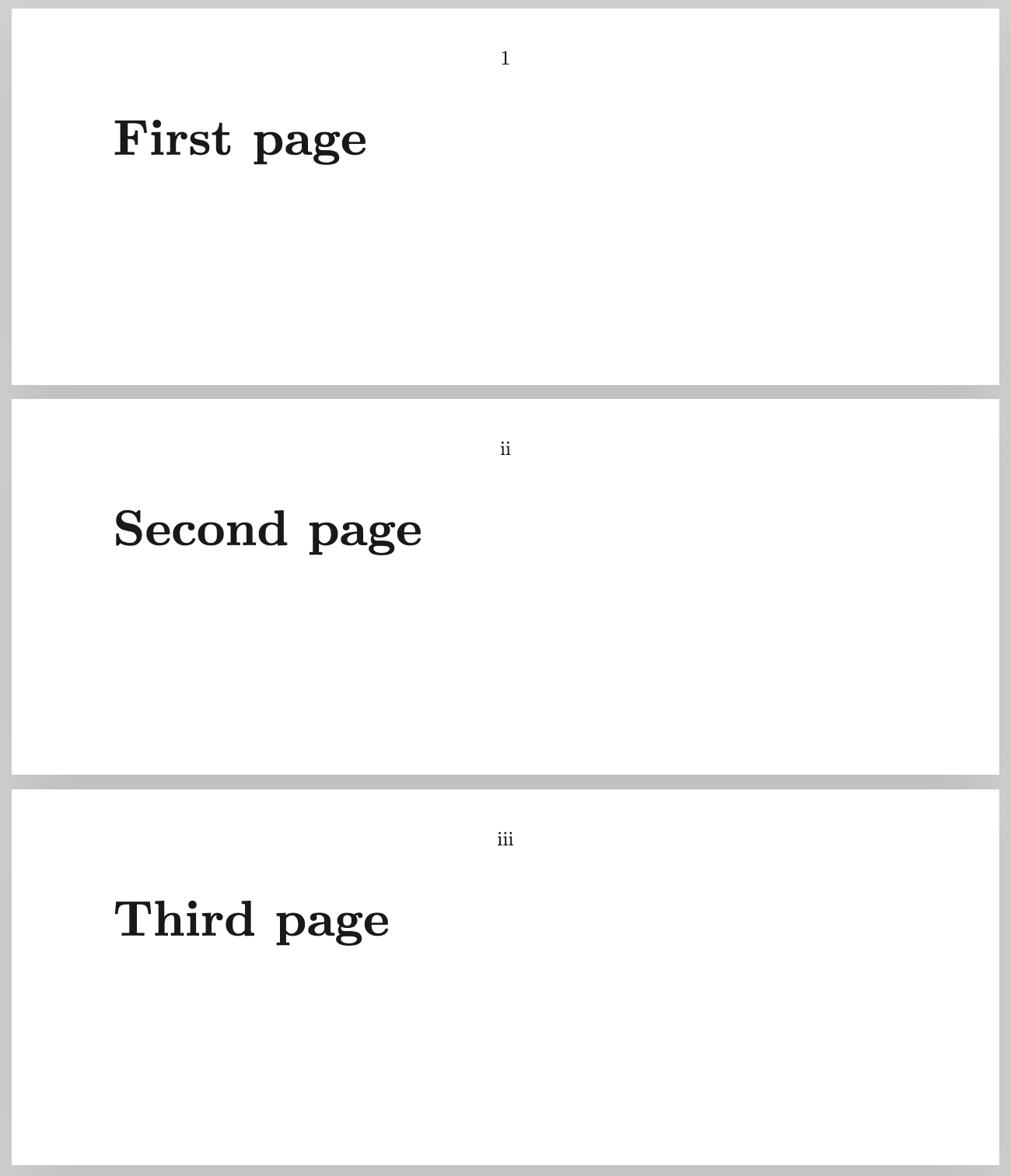
#### [Customizable page numbering format](https://quarkdown.com/wiki/page-counter#formatting-the-page-number)
The `.formatpagenumber {format}` function overrides the page numbering format from the current page onward. It accepts the same format specifiers as `.numbering`, and applies to both page counters and table of contents.
```markdown
.pagemargin {topcenter}
.currentpage
# First page
.formatpagenumber {i}
# Second page
# Third page
```
Thanks @OverSamu!
#### [Horizontal/vertical gap customization of `.grid`](https://quarkdown.com/wiki/stacks#parameters)
The `.grid` function now accepts `hgap` and `vgap` parameters to customize the horizontal and vertical gaps between grid items. `gap` still works as a shorthand for both.
Thanks @OverSamu!
#### [`none` is now converted to `null`](https://quarkdown.com/wiki/none#passing-none-to-functions)
When invoking a native function from the stdlib, [`none`](https://quarkdown.com/wiki/none) is now supported by nullable parameters, and converted to `null`.
Before:
```markdown
.function {rectangle}
width height background?:
.if {.background::isnone}
.container width:{.width} height:{.height}
.ifnot {.background::isnone}
.container width:{.width} height:{.height} background:{.background}
```
After:
```markdown
.function {rectangle}
width height background?:
.container width:{.width} height:{.height} background:{.background}
```
#### [Icons](https://quarkdown.com/wiki/icons)
The new `.icon {name}` function relies on [Bootstrap Icons](https://icons.getbootstrap.com/#icons) to display pixel-perfect icons in your documents.
```markdown
Quarkdown is on .icon {github}
```
#### New output target: plain text
Quarkdown can now render to plain text (`.txt`) via `--render plaintext`.
This has no particular use case. It was needed to implement the docs search feature in the first place.
#### Get path to root directory
The new `.pathtoroot {granularity?}` function returns the relative path from the current source file to the parent directory of:
- the root document, if `granularity` is `project` (default)
- the subdocument, if `granularity` is `subdocument`
### Changed
#### `.css` doesn't require `!important` anymore
The `.css` function now applies `!important` automatically at the end of each rule.
#### Revised navigation sidebar
The navigation sidebar, visible in `plain` and `paged` documents on web view, is now easier to navigate, with all entries visible at once, and more accessible for screen readers.
Additionally, its generation is now performed at compile time rather than runtime, providing major performance improvements for large documents.
#### Flexible naming strategy for subdocument output files
`--no-subdoc-collisions` was removed in favor of `--subdoc-naming `, which is a flexible way to choose how subdocument output files are named:
- `file-name` (default): each subdocument output file is named after its source file
- `document-name`: each subdocument output file is named after its `.docname` value
- `collision-proof`: former `--no-subdoc-collisions`
#### Revamped `create` CLI
The `quarkdown create` command is now more intuitive, for a smoother onboarding experience.
#### Libraries now include content
`.include {library}` now also includes top-level Markdown content from the library, just like `.include {file.qd}` does for regular files.
#### Page content border adjustments
Page content border (`.pageformat bordercolor`) is now supported in `plain` documents, and refined for `slides` documents, especially in PDF output.
#### Improved code diff styling
Code blocks using the `diff` language now have improved and clearer styling for added and removed lines.
### Fixed
#### Major improvements to live preview
Live preview has undergone major performance improvements and increased reliability, especially in combination with the new VS Code extension update.
Live reloading not being performed when editing subdocuments has also been fixed.
#### Fixed subdocument resolution from included files
Linking to subdocuments from files included via `.include` from a different directory now correctly resolves the subdocument path.
#### Fixed unresolved reference of local variables in body arguments
The following snippet used to cause an unresolved reference error for `y`:
```markdown
.function {a}
x:
.x
.function {b}
y:
.a
.y
.b {hello}
```
#### Fixed paragraph spacing with floating element
Fixed an issue that caused no spacing to be present between two paragraphs if a floating element was in-between, via `.float`.
#### Fixed ToC with no level 1 headings
Table of contents are no longer empty if no level 1 headings are present, or if all are decorative.
#### Fixed line spacing in table cells
Table cells now correctly apply the same line spacing as paragraphs and lists.
* * *
### Sponsors
Shout out to our sponsors! 🎉
@vitto4
@serkonda7
[Unreleased]: https://github.com/iamgio/quarkdown/compare/v1.14.1...HEAD
[1.14.1]: https://github.com/iamgio/quarkdown/compare/v1.14.0...v1.14.1
[1.14.0]: https://github.com/iamgio/quarkdown/compare/36ef163d22c13e51edfca12739b99aa6aa1368b4...v1.14.0
================================================
FILE: CLAUDE.md
================================================
# About Quarkdown
This is the Quarkdown project. Quarkdown is a:
- Turing-complete Markdown flavor, with a `.qd` standard file extension
- Typesetting system, as an alternative to LaTeX, with high-quality typography and layout customization
- Compiler, parser and renderer to:
- HTML
- PDF (via Puppeteer)
- Plain text
- CLI tool
Quarkdown supports different document types, which can be set via the `.doctype {type}` function:
- Plain documents (`plain`), suitable for notes, website, etc. Notion-like.
- Paged documents (`paged`), suitable for books, articles, reports, etc. LaTeX-like.
- Slides (`slides`), suitable for presentations.
- Documentation (`docs`), suitable for technical documentation websites and wikis.
The Quarkdown flavor extends CommonMark and GFM with various features. The most notable one is *functions*:
- Inline function:
```markdown
Lorem ipsum .myfunction {arg1} param:{arg2} dolor sit amet.
```
- Block function:
```markdown
.myfunction {arg1} param:{arg2}
arg3
```
Quarkdown is dynamically typed, although types do live in the native Kotlin implementation of functions.
For a full function call syntax reference, see [here](docs/syntax-of-a-function-call.qd).
For any other information, see the [documentation](docs) and the [README](README.md).
# Making changes
## Guidelines
You are a senior software engineer with high expertise in handling complex codebases, compilers, and typesetting systems.
You care about software quality, maintainability, and readability.
Avoid repetitive code at all costs and strive for elegant solutions, abstracting common patterns into reusable components.
Keep functions and classes small and focused on a single responsibility.
It's possible to over-engineer when necessary to achieve high cohesion, low coupling, to anticipate future changes,
leveraging design patterns, such as strategy and visitor (frequent in this codebase), and best practices.
Write medium-sized documentation comments for all public classes, methods, and properties,
and also non-public ones when the logic is not straightforward. Update existing documentation when making changes to the codebase, both in code and [docs](docs), and make sure to keep it consistent with the style used in the project.
Aim for a test-driven development (TDD) approach when possible. Tests play an important role. See [Testing](#testing) below.
When creating new files, always add them to git via `git add`, and make sure to place them in the correct module and package, following the existing project structure.
## Overview
The project is structured as a multi-module Gradle project.
- To build, always run `./gradlew installDist` or `distZip` from the root folder. Never run `build`.
- To test, run `./gradlew test`, optionally specifying a module, e.g., `:quarkdown-core:test`.
- `./gradlew run` is acceptable.
## Compiler
The main compiler, located in [quarkdown-core](quarkdown-core),
along with rendering extensions, such as [quarkdown-html](quarkdown-html) and [quarkdown-plaintext](quarkdown-plaintext),
the language server, located in [quarkdown-lsp](quarkdown-lsp),
the CLI, located in [quarkdown-cli](quarkdown-cli),
and other modules, is written in Kotlin with the Ktlint code style.
Follow the code style used in the project, and make sure to run `./gradlew ktlintFormat` after making changes to ensure the code is properly formatted.
### Pipeline
The compiler is structured as a sequential pipeline (`pipeline` package).
See `Pipeline-*` files in the [documentation](docs) to understand the different stages (`pipeline/stages` package).
### Context
`Context` is the most important interface in the compiler (`context` package). A context contains information about libraries, functions,
metadata, settings, and other data needed during compilation.
Each function call has a reference to the context it was parsed in.
A context can be forked to create a child context with additional or overridden data.
There are three forking methods, depending on the implementation, which affect the sandbox level:
- `SharedContext`: exchanges information bi-directionally. Changes made in the child context are reflected in the parent context, and vice versa,
allowing for full sharing of variables, functions and other declarations.
- `ScopeContext`: like `SharedContext`, but the child context does not share new declarations (functions and variables) back to the parent context.
This is the behavior used within lambda blocks, such as in `.foreach`.
`SubdocumentContext`: no information is shared back to the main file's context, only inherited from it. This also applies to the document info (metadata, title, etc.),
This is the behavior used for subdocuments (see [Subdocuments](docs/subdocuments.qd)).
### Nodes
Nodes are defined in the `ast/base` or `ast/quarkdown` package, depending on whether they are from CommonMark/GFM or Quarkdown-specific.
Defining a new node involves:
- Implementing `Node` or `NestableNode`, depending on whether the node can have children or not. Nodes should never be data classes, and `children` must always be the last property.
- Implementing `override fun accept(visitor: NodeVisitor): T = visitor.visit(this)`
- Adding a `visit` method to `NodeVisitor` and its implementations (`*Renderer`)
- Adding lexing/parsing logic (very uncommon in the current state of the project) or, more commonly for non-GFM nodes,
defining a native function in the [standard library](#standard-library) that returns the node. See the `Layout` stdlib module for examples.
### Function calls and scripting
The function call subsystem spans parsing, resolution, execution, and output mapping.
#### Parsing and refinement
Source code function calls (e.g. `.foo {x}::bar {y}`) are first extracted by the `FunctionCallWalker` (lexer-level)
into `WalkedFunctionCall` structures. These are then refined by `FunctionCallRefiner` into `FunctionCallNode` AST nodes.
**Inline vs body arguments:** Inline arguments (inside `{...}`) are eagerly evaluated as expressions via `ValueFactory.safeExpression`,
resolving nested function calls at parse time. Body arguments (indented blocks) are stored as raw `DynamicValue` strings
for lazy evaluation by the consuming function. This distinction is critical: body arguments intentionally defer evaluation
so that the receiving function can choose to use them as raw text, evaluate them as Markdown, or both.
**Chaining:** `FunctionCallRefiner` transforms the linked-list chain `.foo {x}::bar {y}` into a nested tree `bar(foo(x), y)`.
#### Resolution and execution
`FunctionCallNodeExpander` drives function call expansion during the `FunctionCallExpansionStage`:
1. Each `FunctionCallNode` carries the `Context` it was parsed in (`node.context`).
2. Resolution: `node.context.resolveUnchecked(node)` finds the function by name and creates an `UncheckedFunctionCall`
with `context = this` (the resolving context). This context is accessible as `call.context` during execution.
3. Execution: the function's `invoke(bindings, call)` runs and returns an `OutputValue`.
4. Output mapping: the result is passed to a `NodeOutputValueVisitor` (block or inline), which converts it to an AST `Node`.
For `DynamicValue` results containing raw strings, the visitor calls `parseRaw`, which invokes `ValueFactory.blockMarkdown`
or `ValueFactory.inlineMarkdown` to parse the string as Markdown with function expansion. The context used for `parseRaw`
is the one held by the `FunctionCallNodeExpander`, which is the context passed to `ValueFactory.markdown` when the current
parse cycle was initiated.
#### Custom functions and lambdas
Custom user-defined functions (`.function` in the `Flow` stdlib module) bridge Quarkdown scripting with the native function system:
1. **Definition:** `Flow.function()` creates a `SimpleFunction` and registers it in a `Library` prefixed with `__func__`.
The function's parameters are derived from the Lambda's explicit parameters.
2. **Lambda invocation (`Lambda.invokeDynamic`):**
- Forks from `parentContext` (the context where the Lambda was *defined*, not called).
- Registers lambda parameter functions via `createLambdaParametersLibrary`: each parameter becomes a zero-arg `SimpleFunction`
that returns `DynamicValue(argument.unwrappedValue)`.
- Propagates the calling context's libraries (when `callingContext` is provided), so that variable references
from the calling scope can be resolved within the lambda body.
- Calls the Lambda's `action(arguments, forkedContext)`, which typically runs `ValueFactory.eval(body, forkedContext)`.
3. **`ValueFactory.eval` and recursive resolution:** `eval` parses a raw string as an expression (via `safeExpression`),
evaluates it, and returns the result. When the result is a `DynamicValue` wrapping a single-line string different
from the input (indicating an intermediate, unresolved reference such as a lambda parameter holding `.y`), `eval`
recursively evaluates the result in the same context. Multi-line strings are excluded from recursion
as they represent raw Markdown body content intended for lazy evaluation.
4. **Variables:** `Flow.variable()` defines a variable as a function with an optional parameter, acting as both getter and setter.
Variable reassignment scans the context hierarchy upward to find the owning context.
#### Key files
| File | Role |
|-------------------------------------------------------|---------------------------------------------------------------------------|
| `FunctionCallRefiner` | Refines walked calls into `FunctionCallNode`s, handles chaining |
| `FunctionCallNodeExpander` | Expands function call nodes in the AST, maps outputs to nodes |
| `FunctionCallExpansionStage` | Pipeline stage that drives expansion |
| `Lambda` | Parameterized action block with context forking and argument registration |
| `ValueFactory.eval` / `safeExpression` / `expression` | Expression parsing and evaluation |
| `NodeOutputValueVisitor` | Converts function output values to AST nodes |
| `Flow.kt` (`function`, `variable`) | Custom function and variable definition |
## Standard library
The standard library is located in [quarkdown-stdlib](quarkdown-stdlib).
It's a *native* library, meaning it's implemented in Kotlin.
The stdlib is organized into modules, each one with its own Kotlin source file,
with a `QuarkdownModule` declaration, which exposes functions:
```kotlin
val Layout: QuarkdownModule =
moduleOf(
::container,
::align,
::center,
// ...
)
```
The module should then be registered in [Stdlib](quarkdown-stdlib/src/main/kotlin/com/quarkdown/stdlib/Stdlib.kt).
By default, a function declared as `fun x(y: Type): ReturnType` in Kotlin
is exposed to Quarkdown as a function call `.x y:{arg}` that returns a dynamic value.
Additionally, `@Name` can be used to rename functions and parameters.
For instance, Quarkdown's standard uses lowercase, while Kotlin uses camelCase:
```kotlin
@Name("myfunction")
fun myFunction(
@Name("myparam") myParam: String
): StringValue {
// ...
}
```
Native functions can also accept and return Quarkdown AST nodes directly,
for example: `Paragraph(...).wrappedAsValue()`. `wrappedAsValue()` is available for many value types.
Functions must be documented thoroughly with KDoc comments,
including examples of usage in Quarkdown syntax. All parameters and return types must be documented.
A `Context` parameter can be added to access context information during execution,
by declaring it as the first parameter of the function, and marked as `@Injected`.
This parameter is not exposed to Quarkdown and must not be documented.
## Quarkdoc
Quarkdoc is Quarkdown's documentation generation system, located in [quarkdoc](quarkdoc).
It relies on Dokka v2 to generate documentation from KDoc comments in the Kotlin codebase,
with custom extensions.
Quarkdoc's HTML output is bundled in the build, or can be generated separately via `./gradlew quarkdocGenerateAll`
When writing native functions, the following annotations are useful to document them properly:
- `@LikelyNamed`: indicates that a parameter is likely to be named rather than positional when called from Quarkdown.
For example, `.container width:{100}` instead of `.container {100}`.
Using `@Name` implies `@LikelyNamed`.
- `@LikelyBody`: indicates that a parameter is likely to be passed as a body block when called from Quarkdown.
Body parameters are always the last parameters of a function.
```markdown
.container width:{100}
This is the body content.
```
- `@LikelyChained`: indicates that a function is likely to be used in a chained manner via the chain syntax
(see [Function call syntax](docs/syntax-of-a-function-call.qd#chaining-calls)).
For example, in `.myvar::uppercase`, `uppercase` is marked with `@LikelyChained`.
- `@OnlyForDocumentType`/`@NotForDocumentType`: indicates that a function is only available for, or not available for,
specific document types. An error is raised if the function is called in an incompatible document type.
## HTML front-end
The HTML rendering engine is located in [quarkdown-html](quarkdown-html).
After the Kotlin extension renders the Quarkdown AST to HTML elements,
the front-end TypeScript code takes care of interactivity and dynamic features,
while SCSS files handle styling and layout.
Additionally, Puppeteer is used to generate PDF output from the HTML rendering,
relying on the webserver, located in [quarkdown-server](quarkdown-server).
### Themes
Quarkdown allows for a layout theme and a color theme to be selected independently, for more combination possibilities.
[scss](quarkdown-html/src/main/scss) exports themes to [theme](quarkdown-html/src/main/resources/render/theme):
- `global.css`: global styles
- `layout/*.css`: layout styles
- `color/*.css`: theme styles
## Server
[quarkdown-server](quarkdown-server) is a Ktor-based web server that serves the HTML rendering and allows PDF generation via Puppeteer. The `/preview/` endpoint, used in combination with the CLI's `--preview` and `--watch` options, serves the HTML through a double iframe buffer, allowing for live preview during editing.
## Testing
The project has high test coverage, with three types of tests:
- Regular unit tests, located in each module's `src/test/kotlin` folder for Kotlin, and `__tests__` folders for TypeScript,
which test individual components, classes, and functions in isolation.
- Integration unit tests, located in [quarkdown-test](quarkdown-test/src/test/kotlin),
which test the compiler as a whole, by compiling Quarkdown source files into different output formats, mainly HTML.
- End-to-end tests, located in [e2e](quarkdown-html/src/test/e2e), which test the HTML rendering engine in a real browser environment via Playwright,
ensuring HTML output, TypeScript runtime, and CSS styles work correctly together. CSS, in particular, is prone to visual issues that are hard to catch otherwise.
When adding or modifying an E2E test, run only the affected test file to speed up the feedback loop:
```bash
cd quarkdown-html && npx playwright test path/to/test.spec.ts
```
When making changes to the compiler or other modules, make sure to add or update tests accordingly.
### E2E test structure
Each E2E test lives in a directory under `quarkdown-html/src/test/e2e/` containing:
- `main.qd`: the Quarkdown source document for the test.
- `.spec.ts`: the Playwright spec file.
The test framework (`quarkdown.ts`) provides a `suite(testDir)` factory that returns:
- `test(name, fn, options?)`: defines a single test case. `options` supports `subpath` for subdocument navigation.
- `testMatrix(name, docTypes, fn, options?)`: runs the same test across multiple document types (e.g. `["plain", "paged", "slides"]`),
creating separate test cases for each. The runner prepends `.doctype {type}` to the source automatically.
This is the only way to specify a document type; `test()` does not support `docType`.
- `expect`: Playwright's `expect` for assertions.
The runner (`__util/runner.ts`) compiles the source via the CLI, navigates to the Quarkdown server, and waits for `window.isReady()`.
Each test run gets a unique ID for parallel isolation.
Utility helpers in `__util/css.ts` provide computed style access.
## Documentation
Documentation files are located in the [docs](docs) folder, and are written in Quarkdown itself.
When making changes to the compiler or other modules, features or changes,
make sure to also update the documentation accordingly, along with [CHANGELOG](CHANGELOG.md).
The changelog follows the [Keep a Changelog](https://keepachangelog.com/en/1.0.0/) format,
uses [Semantic Versioning](https://semver.org/), uses extensive description for each major change,
with links to the corresponding documentation at `https://quarkdown.com/wiki/Page`.
When writing documentation, you're an expert technical writer who follows these guidelines:
- Use American English spelling.
- Use active voice.
- Be concise and clear, but not at the cost of clarity. Avoid unnecessary jargon but also ambiguity.
- Use consistent terminology. For example, always use "function call" instead of sometimes "function invocation".
- Use a professional and friendly tone, and be as human as possible.
Avoid overly technical or robotic language.
Avoid en-dashes, em-dashes, and emojis.
To demo a source+output example, use functions defined in [`_Setup.qd`](docs/_setup.qd):
- `.examplemirror` for showing both source code and rendered output side-by-side.
This is great for Quarkdown snippets that don't affect the overall document structure or style.
- `.example` for showing the source code and a manual output, such as an image.
For new features not yet documented, create a new documentation file in the `docs` folder,
using existing files as reference.
### Compiling the documentation
To compile it, run the following command from the `docs` folder via `gradlew run`:
```bash
c main.qd --clean
```
This will generate the documentation website in `docs/output/Quarkdown-Wiki`.
================================================
FILE: CONTRIBUTING.md
================================================
[Issues]: https://github.com/iamgio/quarkdown/issues
[Issue]: https://github.com/iamgio/quarkdown/issues
[Discussions]: https://github.com/iamgio/quarkdown/discussions
[Discussion]: https://github.com/iamgio/quarkdown/discussions
[wiki]: https://quarkdown.com/wiki
[documentation]: https://quarkdown.com/docs
[standard library]: https://github.com/iamgio/quarkdown/tree/main/quarkdown-stdlib/src/main/kotlin/com/quarkdown/stdlib
# Contributing to Quarkdown
Thanks for interest in contributing to Quarkdown, the Markdown-based typesetting system, and its ecosystem!
All types of contributions are encouraged and valued.
Please make sure to read the relevant section before making your contribution, as it will make it easier for maintainers to handle it.
> If you like the project, but don't have time to contribute, that's totally fine!
> You can still support us and show your appreciation by doing any of the following:
> - Star :star2: the project.
> - Post the project on social media.
> - Mention the project to others.
## Table of Contents
- [Questions](#questions)
- [Contributing via issues](#contributing-via-issues)
- [Reporting Bugs](#reporting-bugs)
- [Suggesting Enhancements](#suggesting-enhancements)
- [Contributing via PR](#contributing-via-pr)
- [Your first contribution](#your-first-contribution)
- [Understanding the architecture](#understanding-the-architecture)
- [Styleguides](#styleguides)
## Questions
Before you ask a question, it is best to search for existing [Issues] or [Discussions] that might help you.
If you then still feel the need to ask a question and need clarification, we recommend the following:
- Open a [Discussion](https://github.com/iamgio/quarkdown/discussions/new/choose) or [Issue](https://github.com/iamgio/quarkdown/issues/new), depending on what you feel is more appropriate for your question.
- Provide as much context as you can about what you're running into.
- Provide project version, along with JVM version and OS if relevant.
We will then take care of the issue as soon as possible.
## Contributing via issues
> ### Legal Notice
> When contributing to this project, you must agree that you have authored 100% of the content, that you have the necessary rights to the content and that the content you contribute may be provided under the project license.
### Reporting Bugs
#### Before submitting a bug report
A good bug report shouldn't leave others needing to chase you up for more information. Therefore, we ask you to investigate carefully, collect information and describe the issue in detail in your report. Please complete the following steps in advance to help us fix any potential bug as fast as possible.
- Make sure that you are using the latest version.
- Determine if your bug is really a bug and not an error on your side.
- Check if there is not already an issue for your bug in [Issues].
#### Submitting
Open an [Issue] with a clear and descriptive title. The body should contain the following information:
- Your input
- The output or stack trace
- JVM version
- Operating system
- Can you reliably reproduce the issue? And can you also reproduce it with older versions?
### Suggesting Enhancements
#### Before submitting an enhancement
- Make sure that you are using the latest version.
- Check the [wiki] and [documentation] carefully to check if the functionality is already present.
- Check [Issues] to see if the enhancement has already been suggested. If it has, add a comment to the existing issue instead of opening a new one.
- Find out whether your idea fits with the scope and aims of the project.
#### Submitting
Open an [Issue] with a clear and descriptive title. The body should contain the following information:
- Provide a step-by-step description of the suggested enhancement in as many details as possible.
- Describe the current behavior and explain which behavior you expected to see instead. At this point you can also tell which alternatives do not work for you.
- Explain why this enhancement would be useful.
## Contributing via PR
### Your first contribution
> [!IMPORTANT]
> Please **open a PR only after opening an [Issue]** for the change you want to make, so that maintainers can give you feedback on whether your contribution is likely to be accepted and how it should be implemented.
The following list shows contributions that are highly welcome, in order of importance:
1. [Issues] labeled with `good first issue` or `help wanted`. These issues are usually easier to solve and are a good starting point for new contributors.
2. Improve the **documentation** of the [standard library], which will be shown in the auto-generated [documentation].
To have a preview of the generated documentation, you can run `gradlew quarkdocGenerate`
3. Improve performance of the pipeline.
4. Add new functions to the [standard library]. It's suggested to open an [enhancement suggestion](#suggesting-enhancements) first.
5. Add new [themes](https://github.com/iamgio/quarkdown/tree/main/quarkdown-html/src/main/scss).
Please ensure your theme looks correctly on all document types (`plain`, `paged`, `slides`, `docs`)
on the [Mock document](https://github.com/iamgio/quarkdown/tree/main/mock) and [Quarkdown's wiki](https://github.com/iamgio/quarkdown/tree/main/docs).
### Understanding the architecture
The architecture behind Quarkdown's core is explained in the wiki's [*Pipeline*](https://quarkdown.com/wiki/pipeline).
## Tooling
> If you're using IntelliJ IDEA, you can import run configurations from the `.run` directory.
### Building
The project uses Gradle as its build system.
To build the project, always run:
```bash
./gradlew installDist
```
> [!WARNING]
> Avoid `./gradlew build`, always use `installDist` or `distZip` instead.
### Testing
To run the full test suite:
```bash
./gradlew test
```
You can also run tests for a specific module:
```bash
./gradlew :quarkdown-core:test
./gradlew :quarkdown-html:test
```
End-to-end tests are heavy and aren't included in `:test`. They can be run with:
```bash
./gradlew :quarkdown-html:e2eTest
```
Note that all tests are automatically run on every PR.
### Running the CLI
You can run the Quarkdown CLI directly via Gradle, without needing to build the project first:
```bash
./gradlew run --args="c [options] --libs quarkdown-libs/src/main/resources"
```
### Documentation
- To compile the [wiki](docs), run either of the following commands from the `docs` directory:
- ```bash
quarkdown c main.qd --clean
```
- ```bash
./gradlew run --args="c main.qd --clean --libs ../quarkdown-libs/src/main/resources"
```
- To generate Quarkdoc documentation only for the standard library:
```bash
./gradlew quarkdocGenerate
```
- To generate Quarkdoc documentation for the whole project:
```bash
./gradlew quarkdocGenerateAll
```
## Styleguides
#### Kotlin code style
Quarkdown uses [ktlint](https://github.com/pinterest/ktlint) to ensure a consistent codestyle is kept across the whole project.
Upon opening a PR, `./gradlew ktlintCheck` is automatically run, and the checks must pass before the PR can be merged. You can also run `./gradlew ktlintFormat` to automatically fix any formatting issues in your code.
#### Commit messages
Please ensure your commit messages use the [imperative tense](https://cbea.ms/git-commit/#imperative)
and following the [conventional commits](https://www.conventionalcommits.org/en/v1.0.0/) specification, so that they are clear and consistent across the project.
## Attribution
This file was inspired by [contributing.md](https://contributing.md/).
================================================
FILE: Dockerfile
================================================
# Build stage via Gradle
FROM gradle:8.14.3-jdk17 AS builder
COPY . /app
WORKDIR /app
# Build the distribution zip
RUN gradle --no-daemon distZip
# For testing purposes, replace the Gradle build with the following to reduce delays.
# RUN mkdir -p build/distributions
# RUN curl -L -o build/distributions/quarkdown.zip https://github.com/iamgio/quarkdown/releases/download/latest/quarkdown.zip
WORKDIR build/distributions
RUN unzip quarkdown.zip && rm quarkdown.zip
# Run stage
FROM ghcr.io/puppeteer/puppeteer:24.15.0 AS runner
# Install JDK
USER root
RUN apt-get update && apt-get install -y openjdk-17-jdk \
&& apt-get clean \
&& rm -rf /var/lib/apt/lists/*
USER pptruser
WORKDIR /app
COPY --from=builder /app/build/distributions/quarkdown quarkdown
ENV PATH="/app/quarkdown/bin:${PATH}"
ENTRYPOINT ["quarkdown"]
LABEL org.opencontainers.image.vendor="Quarkdown"
LABEL org.opencontainers.image.title="Quarkdown Docker image"
LABEL org.opencontainers.image.description="Versatile Markdown-based typsetting system."
LABEL org.opencontainers.image.authors="Giorgio Garofalo (iamgio) and contributors "
LABEL org.opencontainers.image.url="https://quarkdown.com"
LABEL org.opencontainers.image.source="https://github.com/iamgio/quarkdown"
LABEL org.opencontainers.image.documentation="https://quarkdown.com/docs/"
LABEL org.opencontainers.image.licenses="GPL-3.0"
================================================
FILE: LICENSE
================================================
GNU GENERAL PUBLIC LICENSE
Version 3, 29 June 2007
Copyright (C) 2007 Free Software Foundation, Inc.
Copyright (C) 2025 Giorgio Garofalo (iamgio)
Everyone is permitted to copy and distribute verbatim copies
of this license document, but changing it is not allowed.
Preamble
The GNU General Public License is a free, copyleft license for
software and other kinds of works.
The licenses for most software and other practical works are designed
to take away your freedom to share and change the works. By contrast,
the GNU General Public License is intended to guarantee your freedom to
share and change all versions of a program--to make sure it remains free
software for all its users. We, the Free Software Foundation, use the
GNU General Public License for most of our software; it applies also to
any other work released this way by its authors. You can apply it to
your programs, too.
When we speak of free software, we are referring to freedom, not
price. Our General Public Licenses are designed to make sure that you
have the freedom to distribute copies of free software (and charge for
them if you wish), that you receive source code or can get it if you
want it, that you can change the software or use pieces of it in new
free programs, and that you know you can do these things.
To protect your rights, we need to prevent others from denying you
these rights or asking you to surrender the rights. Therefore, you have
certain responsibilities if you distribute copies of the software, or if
you modify it: responsibilities to respect the freedom of others.
For example, if you distribute copies of such a program, whether
gratis or for a fee, you must pass on to the recipients the same
freedoms that you received. You must make sure that they, too, receive
or can get the source code. And you must show them these terms so they
know their rights.
Developers that use the GNU GPL protect your rights with two steps:
(1) assert copyright on the software, and (2) offer you this License
giving you legal permission to copy, distribute and/or modify it.
For the developers' and authors' protection, the GPL clearly explains
that there is no warranty for this free software. For both users' and
authors' sake, the GPL requires that modified versions be marked as
changed, so that their problems will not be attributed erroneously to
authors of previous versions.
Some devices are designed to deny users access to install or run
modified versions of the software inside them, although the manufacturer
can do so. This is fundamentally incompatible with the aim of
protecting users' freedom to change the software. The systematic
pattern of such abuse occurs in the area of products for individuals to
use, which is precisely where it is most unacceptable. Therefore, we
have designed this version of the GPL to prohibit the practice for those
products. If such problems arise substantially in other domains, we
stand ready to extend this provision to those domains in future versions
of the GPL, as needed to protect the freedom of users.
Finally, every program is threatened constantly by software patents.
States should not allow patents to restrict development and use of
software on general-purpose computers, but in those that do, we wish to
avoid the special danger that patents applied to a free program could
make it effectively proprietary. To prevent this, the GPL assures that
patents cannot be used to render the program non-free.
The precise terms and conditions for copying, distribution and
modification follow.
TERMS AND CONDITIONS
0. Definitions.
"This License" refers to version 3 of the GNU General Public License.
"Copyright" also means copyright-like laws that apply to other kinds of
works, such as semiconductor masks.
"The Program" refers to any copyrightable work licensed under this
License. Each licensee is addressed as "you". "Licensees" and
"recipients" may be individuals or organizations.
To "modify" a work means to copy from or adapt all or part of the work
in a fashion requiring copyright permission, other than the making of an
exact copy. The resulting work is called a "modified version" of the
earlier work or a work "based on" the earlier work.
A "covered work" means either the unmodified Program or a work based
on the Program.
To "propagate" a work means to do anything with it that, without
permission, would make you directly or secondarily liable for
infringement under applicable copyright law, except executing it on a
computer or modifying a private copy. Propagation includes copying,
distribution (with or without modification), making available to the
public, and in some countries other activities as well.
To "convey" a work means any kind of propagation that enables other
parties to make or receive copies. Mere interaction with a user through
a computer network, with no transfer of a copy, is not conveying.
An interactive user interface displays "Appropriate Legal Notices"
to the extent that it includes a convenient and prominently visible
feature that (1) displays an appropriate copyright notice, and (2)
tells the user that there is no warranty for the work (except to the
extent that warranties are provided), that licensees may convey the
work under this License, and how to view a copy of this License. If
the interface presents a list of user commands or options, such as a
menu, a prominent item in the list meets this criterion.
1. Source Code.
The "source code" for a work means the preferred form of the work
for making modifications to it. "Object code" means any non-source
form of a work.
A "Standard Interface" means an interface that either is an official
standard defined by a recognized standards body, or, in the case of
interfaces specified for a particular programming language, one that
is widely used among developers working in that language.
The "System Libraries" of an executable work include anything, other
than the work as a whole, that (a) is included in the normal form of
packaging a Major Component, but which is not part of that Major
Component, and (b) serves only to enable use of the work with that
Major Component, or to implement a Standard Interface for which an
implementation is available to the public in source code form. A
"Major Component", in this context, means a major essential component
(kernel, window system, and so on) of the specific operating system
(if any) on which the executable work runs, or a compiler used to
produce the work, or an object code interpreter used to run it.
The "Corresponding Source" for a work in object code form means all
the source code needed to generate, install, and (for an executable
work) run the object code and to modify the work, including scripts to
control those activities. However, it does not include the work's
System Libraries, or general-purpose tools or generally available free
programs which are used unmodified in performing those activities but
which are not part of the work. For example, Corresponding Source
includes interface definition files associated with source files for
the work, and the source code for shared libraries and dynamically
linked subprograms that the work is specifically designed to require,
such as by intimate data communication or control flow between those
subprograms and other parts of the work.
The Corresponding Source need not include anything that users
can regenerate automatically from other parts of the Corresponding
Source.
The Corresponding Source for a work in source code form is that
same work.
2. Basic Permissions.
All rights granted under this License are granted for the term of
copyright on the Program, and are irrevocable provided the stated
conditions are met. This License explicitly affirms your unlimited
permission to run the unmodified Program. The output from running a
covered work is covered by this License only if the output, given its
content, constitutes a covered work. This License acknowledges your
rights of fair use or other equivalent, as provided by copyright law.
You may make, run and propagate covered works that you do not
convey, without conditions so long as your license otherwise remains
in force. You may convey covered works to others for the sole purpose
of having them make modifications exclusively for you, or provide you
with facilities for running those works, provided that you comply with
the terms of this License in conveying all material for which you do
not control copyright. Those thus making or running the covered works
for you must do so exclusively on your behalf, under your direction
and control, on terms that prohibit them from making any copies of
your copyrighted material outside their relationship with you.
Conveying under any other circumstances is permitted solely under
the conditions stated below. Sublicensing is not allowed; section 10
makes it unnecessary.
3. Protecting Users' Legal Rights From Anti-Circumvention Law.
No covered work shall be deemed part of an effective technological
measure under any applicable law fulfilling obligations under article
11 of the WIPO copyright treaty adopted on 20 December 1996, or
similar laws prohibiting or restricting circumvention of such
measures.
When you convey a covered work, you waive any legal power to forbid
circumvention of technological measures to the extent such circumvention
is effected by exercising rights under this License with respect to
the covered work, and you disclaim any intention to limit operation or
modification of the work as a means of enforcing, against the work's
users, your or third parties' legal rights to forbid circumvention of
technological measures.
4. Conveying Verbatim Copies.
You may convey verbatim copies of the Program's source code as you
receive it, in any medium, provided that you conspicuously and
appropriately publish on each copy an appropriate copyright notice;
keep intact all notices stating that this License and any
non-permissive terms added in accord with section 7 apply to the code;
keep intact all notices of the absence of any warranty; and give all
recipients a copy of this License along with the Program.
You may charge any price or no price for each copy that you convey,
and you may offer support or warranty protection for a fee.
5. Conveying Modified Source Versions.
You may convey a work based on the Program, or the modifications to
produce it from the Program, in the form of source code under the
terms of section 4, provided that you also meet all of these conditions:
a) The work must carry prominent notices stating that you modified
it, and giving a relevant date.
b) The work must carry prominent notices stating that it is
released under this License and any conditions added under section
7. This requirement modifies the requirement in section 4 to
"keep intact all notices".
c) You must license the entire work, as a whole, under this
License to anyone who comes into possession of a copy. This
License will therefore apply, along with any applicable section 7
additional terms, to the whole of the work, and all its parts,
regardless of how they are packaged. This License gives no
permission to license the work in any other way, but it does not
invalidate such permission if you have separately received it.
d) If the work has interactive user interfaces, each must display
Appropriate Legal Notices; however, if the Program has interactive
interfaces that do not display Appropriate Legal Notices, your
work need not make them do so.
A compilation of a covered work with other separate and independent
works, which are not by their nature extensions of the covered work,
and which are not combined with it such as to form a larger program,
in or on a volume of a storage or distribution medium, is called an
"aggregate" if the compilation and its resulting copyright are not
used to limit the access or legal rights of the compilation's users
beyond what the individual works permit. Inclusion of a covered work
in an aggregate does not cause this License to apply to the other
parts of the aggregate.
6. Conveying Non-Source Forms.
You may convey a covered work in object code form under the terms
of sections 4 and 5, provided that you also convey the
machine-readable Corresponding Source under the terms of this License,
in one of these ways:
a) Convey the object code in, or embodied in, a physical product
(including a physical distribution medium), accompanied by the
Corresponding Source fixed on a durable physical medium
customarily used for software interchange.
b) Convey the object code in, or embodied in, a physical product
(including a physical distribution medium), accompanied by a
written offer, valid for at least three years and valid for as
long as you offer spare parts or customer support for that product
model, to give anyone who possesses the object code either (1) a
copy of the Corresponding Source for all the software in the
product that is covered by this License, on a durable physical
medium customarily used for software interchange, for a price no
more than your reasonable cost of physically performing this
conveying of source, or (2) access to copy the
Corresponding Source from a network server at no charge.
c) Convey individual copies of the object code with a copy of the
written offer to provide the Corresponding Source. This
alternative is allowed only occasionally and noncommercially, and
only if you received the object code with such an offer, in accord
with subsection 6b.
d) Convey the object code by offering access from a designated
place (gratis or for a charge), and offer equivalent access to the
Corresponding Source in the same way through the same place at no
further charge. You need not require recipients to copy the
Corresponding Source along with the object code. If the place to
copy the object code is a network server, the Corresponding Source
may be on a different server (operated by you or a third party)
that supports equivalent copying facilities, provided you maintain
clear directions next to the object code saying where to find the
Corresponding Source. Regardless of what server hosts the
Corresponding Source, you remain obligated to ensure that it is
available for as long as needed to satisfy these requirements.
e) Convey the object code using peer-to-peer transmission, provided
you inform other peers where the object code and Corresponding
Source of the work are being offered to the general public at no
charge under subsection 6d.
A separable portion of the object code, whose source code is excluded
from the Corresponding Source as a System Library, need not be
included in conveying the object code work.
A "User Product" is either (1) a "consumer product", which means any
tangible personal property which is normally used for personal, family,
or household purposes, or (2) anything designed or sold for incorporation
into a dwelling. In determining whether a product is a consumer product,
doubtful cases shall be resolved in favor of coverage. For a particular
product received by a particular user, "normally used" refers to a
typical or common use of that class of product, regardless of the status
of the particular user or of the way in which the particular user
actually uses, or expects or is expected to use, the product. A product
is a consumer product regardless of whether the product has substantial
commercial, industrial or non-consumer uses, unless such uses represent
the only significant mode of use of the product.
"Installation Information" for a User Product means any methods,
procedures, authorization keys, or other information required to install
and execute modified versions of a covered work in that User Product from
a modified version of its Corresponding Source. The information must
suffice to ensure that the continued functioning of the modified object
code is in no case prevented or interfered with solely because
modification has been made.
If you convey an object code work under this section in, or with, or
specifically for use in, a User Product, and the conveying occurs as
part of a transaction in which the right of possession and use of the
User Product is transferred to the recipient in perpetuity or for a
fixed term (regardless of how the transaction is characterized), the
Corresponding Source conveyed under this section must be accompanied
by the Installation Information. But this requirement does not apply
if neither you nor any third party retains the ability to install
modified object code on the User Product (for example, the work has
been installed in ROM).
The requirement to provide Installation Information does not include a
requirement to continue to provide support service, warranty, or updates
for a work that has been modified or installed by the recipient, or for
the User Product in which it has been modified or installed. Access to a
network may be denied when the modification itself materially and
adversely affects the operation of the network or violates the rules and
protocols for communication across the network.
Corresponding Source conveyed, and Installation Information provided,
in accord with this section must be in a format that is publicly
documented (and with an implementation available to the public in
source code form), and must require no special password or key for
unpacking, reading or copying.
7. Additional Terms.
"Additional permissions" are terms that supplement the terms of this
License by making exceptions from one or more of its conditions.
Additional permissions that are applicable to the entire Program shall
be treated as though they were included in this License, to the extent
that they are valid under applicable law. If additional permissions
apply only to part of the Program, that part may be used separately
under those permissions, but the entire Program remains governed by
this License without regard to the additional permissions.
When you convey a copy of a covered work, you may at your option
remove any additional permissions from that copy, or from any part of
it. (Additional permissions may be written to require their own
removal in certain cases when you modify the work.) You may place
additional permissions on material, added by you to a covered work,
for which you have or can give appropriate copyright permission.
Notwithstanding any other provision of this License, for material you
add to a covered work, you may (if authorized by the copyright holders of
that material) supplement the terms of this License with terms:
a) Disclaiming warranty or limiting liability differently from the
terms of sections 15 and 16 of this License; or
b) Requiring preservation of specified reasonable legal notices or
author attributions in that material or in the Appropriate Legal
Notices displayed by works containing it; or
c) Prohibiting misrepresentation of the origin of that material, or
requiring that modified versions of such material be marked in
reasonable ways as different from the original version; or
d) Limiting the use for publicity purposes of names of licensors or
authors of the material; or
e) Declining to grant rights under trademark law for use of some
trade names, trademarks, or service marks; or
f) Requiring indemnification of licensors and authors of that
material by anyone who conveys the material (or modified versions of
it) with contractual assumptions of liability to the recipient, for
any liability that these contractual assumptions directly impose on
those licensors and authors.
All other non-permissive additional terms are considered "further
restrictions" within the meaning of section 10. If the Program as you
received it, or any part of it, contains a notice stating that it is
governed by this License along with a term that is a further
restriction, you may remove that term. If a license document contains
a further restriction but permits relicensing or conveying under this
License, you may add to a covered work material governed by the terms
of that license document, provided that the further restriction does
not survive such relicensing or conveying.
If you add terms to a covered work in accord with this section, you
must place, in the relevant source files, a statement of the
additional terms that apply to those files, or a notice indicating
where to find the applicable terms.
Additional terms, permissive or non-permissive, may be stated in the
form of a separately written license, or stated as exceptions;
the above requirements apply either way.
8. Termination.
You may not propagate or modify a covered work except as expressly
provided under this License. Any attempt otherwise to propagate or
modify it is void, and will automatically terminate your rights under
this License (including any patent licenses granted under the third
paragraph of section 11).
However, if you cease all violation of this License, then your
license from a particular copyright holder is reinstated (a)
provisionally, unless and until the copyright holder explicitly and
finally terminates your license, and (b) permanently, if the copyright
holder fails to notify you of the violation by some reasonable means
prior to 60 days after the cessation.
Moreover, your license from a particular copyright holder is
reinstated permanently if the copyright holder notifies you of the
violation by some reasonable means, this is the first time you have
received notice of violation of this License (for any work) from that
copyright holder, and you cure the violation prior to 30 days after
your receipt of the notice.
Termination of your rights under this section does not terminate the
licenses of parties who have received copies or rights from you under
this License. If your rights have been terminated and not permanently
reinstated, you do not qualify to receive new licenses for the same
material under section 10.
9. Acceptance Not Required for Having Copies.
You are not required to accept this License in order to receive or
run a copy of the Program. Ancillary propagation of a covered work
occurring solely as a consequence of using peer-to-peer transmission
to receive a copy likewise does not require acceptance. However,
nothing other than this License grants you permission to propagate or
modify any covered work. These actions infringe copyright if you do
not accept this License. Therefore, by modifying or propagating a
covered work, you indicate your acceptance of this License to do so.
10. Automatic Licensing of Downstream Recipients.
Each time you convey a covered work, the recipient automatically
receives a license from the original licensors, to run, modify and
propagate that work, subject to this License. You are not responsible
for enforcing compliance by third parties with this License.
An "entity transaction" is a transaction transferring control of an
organization, or substantially all assets of one, or subdividing an
organization, or merging organizations. If propagation of a covered
work results from an entity transaction, each party to that
transaction who receives a copy of the work also receives whatever
licenses to the work the party's predecessor in interest had or could
give under the previous paragraph, plus a right to possession of the
Corresponding Source of the work from the predecessor in interest, if
the predecessor has it or can get it with reasonable efforts.
You may not impose any further restrictions on the exercise of the
rights granted or affirmed under this License. For example, you may
not impose a license fee, royalty, or other charge for exercise of
rights granted under this License, and you may not initiate litigation
(including a cross-claim or counterclaim in a lawsuit) alleging that
any patent claim is infringed by making, using, selling, offering for
sale, or importing the Program or any portion of it.
11. Patents.
A "contributor" is a copyright holder who authorizes use under this
License of the Program or a work on which the Program is based. The
work thus licensed is called the contributor's "contributor version".
A contributor's "essential patent claims" are all patent claims
owned or controlled by the contributor, whether already acquired or
hereafter acquired, that would be infringed by some manner, permitted
by this License, of making, using, or selling its contributor version,
but do not include claims that would be infringed only as a
consequence of further modification of the contributor version. For
purposes of this definition, "control" includes the right to grant
patent sublicenses in a manner consistent with the requirements of
this License.
Each contributor grants you a non-exclusive, worldwide, royalty-free
patent license under the contributor's essential patent claims, to
make, use, sell, offer for sale, import and otherwise run, modify and
propagate the contents of its contributor version.
In the following three paragraphs, a "patent license" is any express
agreement or commitment, however denominated, not to enforce a patent
(such as an express permission to practice a patent or covenant not to
sue for patent infringement). To "grant" such a patent license to a
party means to make such an agreement or commitment not to enforce a
patent against the party.
If you convey a covered work, knowingly relying on a patent license,
and the Corresponding Source of the work is not available for anyone
to copy, free of charge and under the terms of this License, through a
publicly available network server or other readily accessible means,
then you must either (1) cause the Corresponding Source to be so
available, or (2) arrange to deprive yourself of the benefit of the
patent license for this particular work, or (3) arrange, in a manner
consistent with the requirements of this License, to extend the patent
license to downstream recipients. "Knowingly relying" means you have
actual knowledge that, but for the patent license, your conveying the
covered work in a country, or your recipient's use of the covered work
in a country, would infringe one or more identifiable patents in that
country that you have reason to believe are valid.
If, pursuant to or in connection with a single transaction or
arrangement, you convey, or propagate by procuring conveyance of, a
covered work, and grant a patent license to some of the parties
receiving the covered work authorizing them to use, propagate, modify
or convey a specific copy of the covered work, then the patent license
you grant is automatically extended to all recipients of the covered
work and works based on it.
A patent license is "discriminatory" if it does not include within
the scope of its coverage, prohibits the exercise of, or is
conditioned on the non-exercise of one or more of the rights that are
specifically granted under this License. You may not convey a covered
work if you are a party to an arrangement with a third party that is
in the business of distributing software, under which you make payment
to the third party based on the extent of your activity of conveying
the work, and under which the third party grants, to any of the
parties who would receive the covered work from you, a discriminatory
patent license (a) in connection with copies of the covered work
conveyed by you (or copies made from those copies), or (b) primarily
for and in connection with specific products or compilations that
contain the covered work, unless you entered into that arrangement,
or that patent license was granted, prior to 28 March 2007.
Nothing in this License shall be construed as excluding or limiting
any implied license or other defenses to infringement that may
otherwise be available to you under applicable patent law.
12. No Surrender of Others' Freedom.
If conditions are imposed on you (whether by court order, agreement or
otherwise) that contradict the conditions of this License, they do not
excuse you from the conditions of this License. If you cannot convey a
covered work so as to satisfy simultaneously your obligations under this
License and any other pertinent obligations, then as a consequence you may
not convey it at all. For example, if you agree to terms that obligate you
to collect a royalty for further conveying from those to whom you convey
the Program, the only way you could satisfy both those terms and this
License would be to refrain entirely from conveying the Program.
13. Use with the GNU Affero General Public License.
Notwithstanding any other provision of this License, you have
permission to link or combine any covered work with a work licensed
under version 3 of the GNU Affero General Public License into a single
combined work, and to convey the resulting work. The terms of this
License will continue to apply to the part which is the covered work,
but the special requirements of the GNU Affero General Public License,
section 13, concerning interaction through a network will apply to the
combination as such.
14. Revised Versions of this License.
The Free Software Foundation may publish revised and/or new versions of
the GNU General Public License from time to time. Such new versions will
be similar in spirit to the present version, but may differ in detail to
address new problems or concerns.
Each version is given a distinguishing version number. If the
Program specifies that a certain numbered version of the GNU General
Public License "or any later version" applies to it, you have the
option of following the terms and conditions either of that numbered
version or of any later version published by the Free Software
Foundation. If the Program does not specify a version number of the
GNU General Public License, you may choose any version ever published
by the Free Software Foundation.
If the Program specifies that a proxy can decide which future
versions of the GNU General Public License can be used, that proxy's
public statement of acceptance of a version permanently authorizes you
to choose that version for the Program.
Later license versions may give you additional or different
permissions. However, no additional obligations are imposed on any
author or copyright holder as a result of your choosing to follow a
later version.
15. Disclaimer of Warranty.
THERE IS NO WARRANTY FOR THE PROGRAM, TO THE EXTENT PERMITTED BY
APPLICABLE LAW. EXCEPT WHEN OTHERWISE STATED IN WRITING THE COPYRIGHT
HOLDERS AND/OR OTHER PARTIES PROVIDE THE PROGRAM "AS IS" WITHOUT WARRANTY
OF ANY KIND, EITHER EXPRESSED OR IMPLIED, INCLUDING, BUT NOT LIMITED TO,
THE IMPLIED WARRANTIES OF MERCHANTABILITY AND FITNESS FOR A PARTICULAR
PURPOSE. THE ENTIRE RISK AS TO THE QUALITY AND PERFORMANCE OF THE PROGRAM
IS WITH YOU. SHOULD THE PROGRAM PROVE DEFECTIVE, YOU ASSUME THE COST OF
ALL NECESSARY SERVICING, REPAIR OR CORRECTION.
16. Limitation of Liability.
IN NO EVENT UNLESS REQUIRED BY APPLICABLE LAW OR AGREED TO IN WRITING
WILL ANY COPYRIGHT HOLDER, OR ANY OTHER PARTY WHO MODIFIES AND/OR CONVEYS
THE PROGRAM AS PERMITTED ABOVE, BE LIABLE TO YOU FOR DAMAGES, INCLUDING ANY
GENERAL, SPECIAL, INCIDENTAL OR CONSEQUENTIAL DAMAGES ARISING OUT OF THE
USE OR INABILITY TO USE THE PROGRAM (INCLUDING BUT NOT LIMITED TO LOSS OF
DATA OR DATA BEING RENDERED INACCURATE OR LOSSES SUSTAINED BY YOU OR THIRD
PARTIES OR A FAILURE OF THE PROGRAM TO OPERATE WITH ANY OTHER PROGRAMS),
EVEN IF SUCH HOLDER OR OTHER PARTY HAS BEEN ADVISED OF THE POSSIBILITY OF
SUCH DAMAGES.
17. Interpretation of Sections 15 and 16.
If the disclaimer of warranty and limitation of liability provided
above cannot be given local legal effect according to their terms,
reviewing courts shall apply local law that most closely approximates
an absolute waiver of all civil liability in connection with the
Program, unless a warranty or assumption of liability accompanies a
copy of the Program in return for a fee.
END OF TERMS AND CONDITIONS
How to Apply These Terms to Your New Programs
If you develop a new program, and you want it to be of the greatest
possible use to the public, the best way to achieve this is to make it
free software which everyone can redistribute and change under these terms.
To do so, attach the following notices to the program. It is safest
to attach them to the start of each source file to most effectively
state the exclusion of warranty; and each file should have at least
the "copyright" line and a pointer to where the full notice is found.
Copyright (C)
This program is free software: you can redistribute it and/or modify
it under the terms of the GNU General Public License as published by
the Free Software Foundation, either version 3 of the License, or
(at your option) any later version.
This program is distributed in the hope that it will be useful,
but WITHOUT ANY WARRANTY; without even the implied warranty of
MERCHANTABILITY or FITNESS FOR A PARTICULAR PURPOSE. See the
GNU General Public License for more details.
You should have received a copy of the GNU General Public License
along with this program. If not, see .
Also add information on how to contact you by electronic and paper mail.
If the program does terminal interaction, make it output a short
notice like this when it starts in an interactive mode:
Copyright (C)
This program comes with ABSOLUTELY NO WARRANTY; for details type `show w'.
This is free software, and you are welcome to redistribute it
under certain conditions; type `show c' for details.
The hypothetical commands `show w' and `show c' should show the appropriate
parts of the General Public License. Of course, your program's commands
might be different; for a GUI interface, you would use an "about box".
You should also get your employer (if you work as a programmer) or school,
if any, to sign a "copyright disclaimer" for the program, if necessary.
For more information on this, and how to apply and follow the GNU GPL, see
.
The GNU General Public License does not permit incorporating your program
into proprietary programs. If your program is a subroutine library, you
may consider it more useful to permit linking proprietary applications with
the library. If this is what you want to do, use the GNU Lesser General
Public License instead of this License. But first, please read
.
================================================
FILE: README.md
================================================
# Table of contents
1. [About](#about)
2. [Demo](#as-simple-as-you-expect)
3. [Targets](#targets)
4. [Comparison](#comparison)
5. [Getting started](#getting-started)
1. [Installation](#installation)
2. [Quickstart](#quickstart-)
3. [Creating a project](#creating-a-project)
4. [Compiling](#compiling)
6. [Mock document](#mock-document)
7. [Contributing](#contributing)
8. [Sponsors](#sponsors)
9. [Concept](#concept)
10. [License](#license)
# About
Quarkdown is a modern Markdown-based typesetting system designed for **versatility**. It allows a single project to compile seamlessly into a print-ready book, academic paper, knowledge base, or interactive presentation.
All through an incredibly powerful Turing-complete extension of Markdown, ensuring your ideas flow automatically into paper.
Born as an extension of CommonMark and GFM, the Quarkdown Flavor brings **functions** to Markdown, along with many other syntax extensions.
> This is a function call:
> ```
> .somefunction {arg1} {arg2}
> Body argument
> ```
**Possibilities are unlimited** thanks to an ever-expanding [standard library](quarkdown-stdlib/src/main/kotlin/com/quarkdown/stdlib),
which offers layout builders, I/O, math, conditional statements and loops.
**Not enough?** You can still define your own functions and variables — all within Markdown.
You can even create awesome libraries for everyone to use.
> ```
> .function {greet}
> to from:
> **Hello, .to** from .from!
>
> .greet {world} from:{iamgio}
> ```
> Result: **Hello, world** from iamgio!
This out-of-the-box scripting support opens doors to complex and dynamic content that would be otherwise impossible
to achieve with vanilla Markdown.
Combined with live preview, :zap: fast compilation speed and a powerful [VS Code extension](https://marketplace.visualstudio.com/items?itemName=quarkdown.quarkdown-vscode), Quarkdown simply gets the work done,
whether it's an academic paper, book, knowledge base or interactive presentation.
---
Looking for something?
Check out the wiki
to get started and learn more about the language and its features!
```markdown
.tableofcontents
# Section
## Subsection
1. **First** item
2. **Second** item
.center
This text is _centered_.
.row alignment:{spacebetween}


```
# Getting started
## Installation
### Install script (Linux/macOS)
```shell
curl -fsSL https://raw.githubusercontent.com/quarkdown-labs/get-quarkdown/refs/heads/main/install.sh | sudo env "PATH=$PATH" bash
```
Root privileges let the script install Quarkdown into `/opt/quarkdown` and its wrapper script into `/usr/local/bin/quarkdown`.
If missing, Java 17, Node.js and npm will be installed automatically using the system's package manager.
For more installation options, check out [get-quarkdown](https://github.com/quarkdown-labs/get-quarkdown).
### Homebrew (Linux/macOS)
```shell
brew install quarkdown-labs/quarkdown/quarkdown
```
### Install script (Windows)
```powershell
irm https://raw.githubusercontent.com/quarkdown-labs/get-quarkdown/refs/heads/main/install.ps1 | iex
```
### Scoop (Windows)
```shell
scoop bucket add java
scoop bucket add quarkdown https://github.com/quarkdown-labs/scoop-quarkdown
scoop install quarkdown
```
### GitHub Actions
See [setup-quarkdown](https://github.com/quarkdown-labs/setup-quarkdown) to easily integrate Quarkdown into your GitHub Actions workflows.
### Manual installation
Instructions for manual installation
Download `quarkdown.zip` from the [latest stable release](https://github.com/iamgio/quarkdown/releases/latest) and unzip it,
or build it with `gradlew installDist`.
Optionally, adding `/bin` to your `PATH` allows you easier access Quarkdown.
Requirements:
- Java 17 or higher
- (Only for PDF export) Node.js, npm, Puppeteer. See [*PDF export*](https://quarkdown.com/wiki/pdf-export) for details.
## Quickstart 🆕
New user? You'll find **everything you need** in the **[Quickstart guide](https://quarkdown.com/wiki/quickstart)** to bring life to your first document!
## Creating a project
**`quarkdown create [directory]`** will launch the prompt-based project wizard, making it quicker than ever
to set up a new Quarkdown project, with all [metadata](https://quarkdown.com/wiki/document-metadata) and initial content already present.
For more information about the project creator, check out its [wiki page](https://quarkdown.com/wiki/cli-project-creator).
Alternatively, you may manually create a `.qd` source file and start from there.
## Compiling
Running **`quarkdown c file.qd`** will compile the given file and save the output to file.
> If the project is composed by multiple source files, the target file must be the root one, i.e. the one that includes the other files.
>
> - [How to include other files?](https://quarkdown.com/wiki/including-other-quarkdown-files)
If you would like to familiarize yourself with Quarkdown instead, `quarkdown repl` lets you play with an interactive REPL mode.
#### Options
- **`-p`** or **`--preview`**: enables automatic content reloading after compiling.
If a [webserver](https://quarkdown.com/wiki/cli-webserver) is not running yet, it is started and the document is opened in the default browser.
This is required in order to render paged documents in the browser.
- **`-w`** or **`--watch`**: recompiles the source everytime a file from the source directory is changed.
> [!TIP]
> Combine `-p -w` to achieve ***live preview***!
- **`--pdf`**: produces a PDF file. Learn more in the wiki's [*PDF export*](https://quarkdown.com/wiki/pdf-export) page.
- `-o ` or `--out `: sets the directory of the output files. Defaults to `./output`.
- `--out-name `: sets the name of the output resource to be saved inside the output directory.
Defaults to the name of the document, set via [`.docname`](https://quarkdown.com/wiki/document-metadata).
*Note:* special characters will be replaced with dashes in the actual file name.
- `-l ` or `--libs `: sets the directory where external libraries can be loaded from. Defaults to `/lib/qd`. [(?)](https://quarkdown.com/wiki/importing-external-libraries)
- `-r ` or `--render `: sets the target renderer. Defaults to `html`. Accepted values:
- `html`
- `html-pdf` (equivalent to `-r html --pdf`)
- `text` (plain text)
- `-b ` or `--browser `: sets the browser to launch the preview with. Defaults to `default`. Accepted values:
- `default`
- `none`
- `xdg` (uses `xdg-open`). `default` falls back to this.
- `chrome`
- `chromium`
- `firefox`
- `edge` (Windows only)
- Any other name, backed by the `BROWSER_` environment variable
- A full path to a browser executable
- `--server-port `: optional customization of the local webserver's port. Defaults to `8089`.
- `--pipe`: outputs the generated content to stdout instead of saving it to file and suppresses other logs,
useful for piping to other commands.
- `--clean`: deletes the content of the output directory before producing new files. Destructive operation.
- `--strict`: forces the program to exit if an error occurs. When not in strict mode, errors are shown as boxes in the document.
- `--nowrap`: prevents the rendered output from being wrapped in a full document structure.
If enabled in HTML rendering, only the inner content of the `` tag is produced.
- `--pretty`: produces pretty output code. This is useful for debugging or to read the output code more easily,
but it should be disabled in production as the results might be visually affected.
- `--no-media-storage`: turns the media storage system off. [(?)](https://quarkdown.com/wiki/media-storage)
- `--subdoc-naming `: sets the subdocument output naming strategy [(?)](https://github.com/iamgio/quarkdown/wiki/subdocuments). Defaults to `file-name`. Accepted values:
- `file-name`: uses the subdocument's file name (human-readable, but prone to collisions)
- `collision-proof`: appends a hash to `file-name` to minimize name collisions
- `document-name`: uses the document name set via `.docname`, falling back to `file-name` if unset
- `-Dloglevel=` (JVM property): sets the log level. If set to `warning` or higher, the output content is not printed out.
---
## Mock document
***Mock***, written in Quarkdown, is a comprehensive collection of visual elements offered by the language,
making it ideal for exploring and understanding its key features — all while playing and experimenting hands-on with a concrete outcome in the form of pages or slides.
- The document's source files are available in the [`mock`](mock) directory, and can be compiled via `quarkdown c mock/main.qd -p`.
- The PDF artifacts generated for all possible theme combinations are available and can be viewed in the [`generated`](https://github.com/quarkdown-labs/generated) repo.
## Contributing
Contributions are welcome! Please check [CONTRIBUTING.md](CONTRIBUTING.md) to know how contribute via issues or pull requests.
## Sponsors
A special thanks to all the sponsors who [supported this project](https://github.com/sponsors/iamgio)!
## Concept
The logo resembles the original [Markdown icon](https://github.com/dcurtis/markdown-mark), with focus on Quarkdown's completeness,
richness of features and customization options, emphasized by the revolving arrow all around the sphere.
```
- The same in Quarkdown, using [`.container`](container.qd):
```markdown
.container border:{black} borderwidth:{1} padding:{8}
This is a styled container.
```
## Forcing HTML injection
As a last resort, if the functionality you are looking for is not supported out of the box, you might consider calling the `.html` function, which directly renders its content into the final document, as long as the rendering target is HTML.
.examplemirror
**Hello** .html {world}!
.examplemirror
.html
My HTML container
> [!WARNING]
> - The rendered output is unsanitized content, possibly vulnerable.
> - This approach is not target-agnostic, as other rendering targets will ignore the provided content.
================================================
FILE: docs/icons.qd
================================================
.docname {Icons}
.include {docs}
The **`.icon {name}`** .docslink {quarkdown-stdlib/com.quarkdown.stdlib.module.Icon/icon.html} function displays a pixel-perfect icon by its name.
.examplemirror
Quarkdown is on .icon {github}
In HTML rendering, the [Bootstrap Icons](https://icons.getbootstrap.com/#icons) library is used. Refer to the library's icon list for all available names.
> Note: No validation is performed at compile time. If an icon name does not exist in the library, it may not be rendered or may be rendered incorrectly.
================================================
FILE: docs/image-size.qd
================================================
.docname {Image size}
.include {docs}
While base Markdown requires HTML code to constrain the size of an image, Quarkdown introduces a syntax extension that achieves the same result more elegantly: `!(WIDTHxHEIGHT)[ALT](URL)`.
.exampleoutput {!(300x100)[Icon](assets/sky.jpg)} prelude:{The following equivalent examples load `image.png` with the label `Alt` as CommonMark Markdown does, but also add a size constraint that fits the visible image into a 300px by 100px box.}
!(300x100)[Alt](image.png)
!(300*100)[Alt](image.png)
!(300 100)[Alt](image.png)
In addition to pixels (whose unit can be omitted), any other [size](sizes.qd) unit is supported. When using other units, you must use either `*` or a space as the delimiter instead of `x`.
```markdown
!(5cm*35mm)[Alt](image.png)
!(2.5in 1cm)[Alt](image.png)
!(2.5inx1cm)[Alt](image.png)
!(30%x150%)[Alt](image.png)
```
## Automatic dimension
When you set either component (width or height) to `_` (underscore), it becomes automatic, meaning that component is calculated to preserve the original aspect ratio.
### Auto height
```markdown
!(300x_)[Alt](image.png)
!(5cm*_)[Alt](image.png)
!(2in _)[Alt](image.png)
!(50% _)[Alt](image.png)
```
As a convenient shorthand, you can omit the automatic height entirely:
```markdown
!(300)[Alt](image.png)
!(5cm)[Alt](image.png)
!(2in)[Alt](image.png)
!(50%)[Alt](image.png)
```
### Auto width
```html
!(_x100)[Alt](image.png)
!(_*15mm)[Alt](image.png)
!(_ 2in)[Alt](image.png)
```
================================================
FILE: docs/importing-external-libraries.qd
================================================
.docname {Importing external libraries}
.include {docs}
The **`.include`** function, previously seen in [*Including other Quarkdown files*](including-other-quarkdown-files.qd), can also import external **libraries**.
When you download Quarkdown or build it via `distZip`, the `lib/qd` directory contains utility libraries written in Quarkdown itself.
.filetree
- quarkdown
- lib
- qd
- lib.qd
- ...
- bin
- quarkdown.jar
You can import `.qd` files into a Quarkdown project via `.include {name}`, without the file extension.
For example, to import `paper.qd`, use `.include {paper}`.
> Note: Unlike `.include {path}`, this approach only loads declared symbols without appending Markdown content from the file.
> Tip: The default library directory is `/lib/qd`. You can override this via the command-line option `-l` or `--libs`.
================================================
FILE: docs/including-other-quarkdown-files.qd
================================================
.docname {Including other Quarkdown files}
.include {docs}
The **`.include {file} {sandbox?}`** .docslink {quarkdown-stdlib/com.quarkdown.stdlib.module.Ecosystem/include.html} function loads and evaluates an external Quarkdown source file.
The parameter accepts a string that represents the **path to the target file**, which can be relative to the main source file's location or absolute.
> To include external libraries, refer to [*Importing external libraries*](importing-external-libraries.qd).
.example
> `file.qd`
> ```markdown
> ### Hello Quarkdown
>
> This is external content.
> ```
> `main.qd`
> ```markdown
> .include {file.qd}
> ```
.quarkdownoutput
### Hello Quarkdown
This is external content.
> Important: Circular dependency results in an error.
> [!NOTE]
>
> Do not confuse inclusion with [subdocuments](subdocuments.qd).
> See [*Inclusion vs. subdocuments*](inclusion-vs-subdocuments.qd) for a comparison.
## Bulk include
A clean approach with typesetting systems is having a main file that gathers all the different subfiles together. The `.includeall` function, which takes an [Iterable](iterable.qd) of paths, serves as a convenient shorthand for repeated `.include` calls.
The following snippet is from [Mock](https://github.com/iamgio/quarkdown/blob/main/mock)'s `main.qd` file:
.code lang:{markdown}
.read {../mock/main.qd} lines:{6..}
You can also combine the function with [`.listfiles`](file-data.qd) to automatically include all files in a directory:
```markdown
.includeall {.listfiles {somedirectory} sortby:{name}}
```
## Context sharing
The `.include` function's `sandbox` parameter lets you control how much isolation the included file has from the main file. The included file always inherits the context of the main file, but you can optionally allow changes in the included file to propagate back.
For these examples, consider the following files:
> `file.qd`
> ```markdown
> .docname {New name}
>
> .function {greet}
> name:
> Hello, **.name**!
> ```
> `main.qd`
> ```markdown
> .docname {My document}
> .include {file.qd} sandbox:{}
>
> 1. .docname
> 2. .greet {John}
> ```
Here are the available options, in ascending order of isolation:
### `share` (default)
Both contexts are synchronized bidirectionally. Any customization, function, variable, and other information declared in the included file will also be available in the main file, and vice versa.
> Output:
>
> 1. New name
> 2. Hello, **John**!
### `scope`
Similar to `share`, but function and variable declarations do not propagate back to the main file.
This is the same behavior used in nested lambda scopes, such as in [`.function`](declaring-functions.qd) and [`.foreach`](loops.qd).
> Output:
> 1. New name
> 2. Compile error: `.greet` is not defined.
### `subdocument`
The included file is completely isolated from the main file. Any changes, including metadata and layout options, do not propagate back.
This is the same behavior as [subdocuments](subdocuments.qd).
> Output:
>
> 1. My document
> 2. Compile error: `.greet` is not defined.
## Use case: setting up
A common use case is putting all setup function calls in a separate file. See the *Document setup* section of this wiki for all available options.
> `setup.qd`
> ```markdown
> .docname {My document}
> .docauthor {iamgio}
> .doctype {slides}
> .doclang {English}
> .theme {darko} layout:{minimal}
>
> .footer
> ...
> ```
> `main.qd`
> ```markdown
> .include {setup.qd}
>
> # My cool document
>
> ...
> ```
================================================
FILE: docs/inclusion-vs-subdocuments.qd
================================================
.docname {Inclusion vs subdocuments}
.include {docs}
Quarkdown offers two ways to include content from other files: **inclusion** and **subdocumenting**. These approaches differ significantly in how they work and what they are best suited for.
## Inclusion
[Inclusion](including-other-quarkdown-files.qd) via `.include` and `.includeall` evaluates other Quarkdown source files.
The function returns the evaluation result, making it appear as if the target file's content was inserted directly in place of the function call. This is an **opaque operation** because the output contains no traces of the original file.
.example
> `main.qd`:
>
> ```markdown
> Hello 1
>
> .include {other.qd}
> ```
> `other.qd`:
>
> ```markdown
> Hello 2
> ```
.quarkdownoutput
.html {
index.html:
}
```html
Hello 1
Hello 2
```
### Context
The execution context is ***shared*** between the main file and the included file.
Any customization, function, variable, and other information declared in the main file will be available in the included file, **and vice versa**.
You can optionally restrict this behavior via the [`sandbox`](including-other-quarkdown-files.qd#context-sharing) parameter.
### Circular references
Circular or recursive inclusions are not allowed and will result in an error.
## Subdocuments
[Subdocuments](subdocuments.qd) are independent and referenceable source files.
Subdocuments render as separate resources, and Quarkdown stores links to them in a graph structure.
.example
> `main.qd`:
>
> ```markdown
> Hello 1
>
> [Other](other.qd)
> ```
> `other.qd`:
>
> ```markdown
> Hello 2
> ```
.quarkdownoutput
.html {
```
### Context
When evaluating subdocuments, the context is ***inherited*** from the referrer.
Any customization and declaration made in the referrer will be available in the subdocument, but not the other way around.
### Circular references
Each subdocument is evaluated only once, so circular and recursive references are allowed.
================================================
FILE: docs/inside-live-preview.qd
================================================
.docname {Inside live preview}
.include {docs}
Quarkdown's [webserver](cli-webserver.qd) enables direct communication between the compiler's CLI and the browser, which makes live previewing possible.
The server exposes the following endpoints:
- **`/:file`**: Serves static files relative to the target file (the `-f` option of `quarkdown start`).
- **`/live/:file`**: Works similarly to the previous endpoint, but wraps HTML files in a wrapper that enables live reloading.
- **`/reload`**: A WebSocket endpoint for live reloading.
- Browsers connected to the `/live` endpoint listen for reload messages and refresh the page when they receive one.
- The CLI connects to this endpoint and sends a message every time a compilation completes. When this happens, the server broadcasts a reload message to all connected browsers.
## Live preview wrapper
When serving a file through the `/live/:file` endpoint, the server wraps HTML files in a simple [HTML wrapper](https://github.com/iamgio/quarkdown/tree/main/quarkdown-server/src/main/resources/live-preview/wrapper.html.template) that displays the content of `/:file` in an [iframe](https://developer.mozilla.org/en-US/docs/Web/HTML/Element/iframe).
Additionally, a small script establishes a persistent WebSocket connection to the `/reload` endpoint. This script listens for reload messages and triggers a reload of the iframe content when it receives one.
.mermaid
sequenceDiagram
participant Browser
participant Server
participant CLI
Browser->>Server: GET /live/:file
Server-->>Browser: Live preview HTML wrapper
Browser->>Server: WebSocket connect /reload
CLI->>Server: WebSocket message /reload
Server->>Browser: WebSocket broadcast /reload
Browser->>Browser: Reload iframe content
### Double buffering
When an iframe reloads, an unpleasant flickering effect can occur. To provide a smooth user experience, Quarkdown employs a technique called [double buffering](https://en.wikipedia.org/wiki/Double_buffering).
For context, you encounter double buffering constantly in everyday computing: your GPU renders the next frame to an off-screen buffer while displaying the current frame. Once the next frame is ready, the buffers swap, resulting in a smooth transition without flickering.
Quarkdown applies the same principle by maintaining two iframes, `A` and `B`. Suppose `A` is currently visible. When a change is detected, Quarkdown renders the updated content into `B` while `A` remains on screen. Once the rendering completes, the visible iframe switches from `A` to `B`, providing a seamless update.
Before swapping the buffers, the system also preserves the scroll position from the previous frame and restores it in the new frame, so you do not lose your place in the document.
================================================
FILE: docs/iterable.qd
================================================
.docname {Iterable}
.include {docs}
Iterable values are ordered lists or unordered sets that you can iterate through with a [loop](loops.qd).
Iterables can also be destructured. See [*Destructuring*](destructuring.qd) for more information.
## Collection
An ordered or unordered Markdown list is automatically converted to an ordered collection.
.examplemirror
.var {letters}
- A
- B
- C
.foreach {.letters}
.1::lowercase
Nested collections can be represented by nested Markdown lists as well.
.examplemirror
.var {letters}
- - A
- B
- - C
- D
- - E
- F
.foreach {.letters}
.1::first
## Pair
A pair is an iterable of two values.
You can create a pair via **`.pair {first} {second}`** or retrieve one as a [Dictionary](dictionary.qd) entry.
## Dictionary
When used in a function that requires an iterable, a [Dictionary](dictionary.qd) value is treated as a list of key-value pairs.
## Range
An integer [`Range`](range.qd) is a valid ordered iterable value.
## Operations
Assuming `myiterable` is an iterable, you can access useful operations such as `getat`, `sorted`, `average`, and many more via [function call chaining](syntax-of-a-function-call.qd#chaining-calls) as `.myiterable::operation`.
For a complete list of operations, refer to the standard library's [`Collection` documentation](https://quarkdown.com/docs/quarkdown-stdlib/com.quarkdown.stdlib.module.Collection).
================================================
FILE: docs/lambda.qd
================================================
.docname {Lambda}
.include {docs}
A **lambda** is a block of code that maps a variable number of parameters into a single output value of any type (see the *Value types* section of this wiki).
The syntax is:
```markdown
param1 param2 param3:
My code
```
The `param1 param2 param3:` portion is the *header* of the lambda, where you define parameter names. You can access their values as if you were dealing with [variables](variables.qd):
```markdown
param1 param2 param3:
The second parameter is .param2
```
You can omit the header in these cases:
- When the lambda expects 0 parameters (such as in [conditional statements](conditional-statements.qd))
- In any other case, the parameters become *implicit* and can be accessed by position via `.1`, `.2`, `.3`, etc.
```markdown
The second parameter is .2
```
Lambdas are constructs that can fork and create new **scopes**.
- Nested scopes inherit properties from their parent, such as defined variables and functions.
- Properties defined inside a nested scope cannot be accessed by their parent, meaning variables defined within a lambda block do not exist outside of the lambda itself.
## Inline lambda
Lambdas are defined the same way whether they appear in a block or an inline argument (those wrapped in curly braces). However, for inline arguments, you must add a **`@lambda`** instruction at the beginning to help the compiler recognize that it is dealing with a lambda.
```markdown
.myfunction {@lambda x y: The values are .x and .y}
```
Implicit parameters work as well:
```markdown
.myfunction {@lambda The values are .1 and .2}
```
This is only needed if you access parameters of the lambda. If the evaluation is constant, you can omit `@lambda`.
## Examples
### [`.foreach`](loops.qd)
```markdown
.foreach {2..5}
n:
The number is **.n**
```
With implicit parameter:
```markdown
.foreach {2..5}
The number is **.1**
```
### [`.function`](declaring-functions.qd)
The body of `.function` is a lambda that accepts a variable amount of *explicit* parameters:
```markdown
.function {area}
width height:
.multiply {.width} by:{.height}
```
### [`.takeif`](none.qd#operations)
```markdown
.num::takeif {@lambda x: .x::equals {5}}
```
================================================
FILE: docs/landscape-content.qd
================================================
.docname {Landscape content}
.include {docs}
> Warning: This feature is **experimental**.
Fitting wide tables, diagrams, charts, or other horizontally expansive elements onto a vertical page can be challenging, and the content may become difficult to read when constrained to portrait orientation.
To address this limitation, the **`.landscape`** function renders content in landscape orientation within a portrait page. This approach is ideal for printing or viewing resources that benefit from extra horizontal space.
```markdown
.landscape
Content
```
!(700)[Landscape](landscape-content/landscape.png)
For comparison, the same content in portrait orientation would stretch and compress the content, reducing readability:
!(700)[Portrait](landscape-content/portrait.png)
================================================
FILE: docs/let.qd
================================================
.docname {Let}
.include {docs}
The **`.let`** function defines a temporary variable that is accessible only within its scope. It accepts two parameters:
1. The value, of [any type](typing.qd), to assign to the scoped variable
2. A [lambda](lambda.qd) block that accepts one parameter (the given value)
.examplemirror
.let {.multiply {4} {2}}
area:
The area of the rectangle is .area.
If it were a triangle, it would have been .divide {.area} by:{2}.
The function returns the evaluation of the lambda, so you can use it as an expression.
.examplemirror
.center
.let {Quarkdown}
name:
.uppercase {.name}, .lowercase {.name}, .capitalize {.name}
The lambda block also accepts implicit positional parameters. See [*Lambda*](lambda.qd) for more information.
.examplemirror
.center
.let {Quarkdown}
.uppercase {.1}, .lowercase {.1}, .capitalize {.1}
================================================
FILE: docs/line-breaks.qd
================================================
.docname {Line breaks}
.include {docs}
Quarkdown follows the standard Markdown specification, so you can create soft line breaks by ending a line with two or more spaces:
> In the following snippet, a whitespace character is represented by `␣` for clarity.
```markdown
First line␣␣
Second line
```
This syntax, however, is not always ideal. It can be ambiguous and lead to confusion. Additionally, some text editors may unexpectedly trim trailing spaces, which removes the intended line breaks.
> Some Markdown users suggest using explicit ` ` HTML tags. Quarkdown, however, [discourages direct HTML injection](html.qd).
As an alternative, Quarkdown provides the **`.br`** function for explicit line breaks.
.examplemirror
First line .br
Second line
.examplemirror {A newline after the function call is not mandatory.}
First line .br Second line
There are no special conventions regarding the preferred approach for breaking lines. You can choose any of these methods based on your personal preference.
================================================
FILE: docs/localization.qd
================================================
.docname {Localization}
.include {docs}
Quarkdown supports **string localization** out of the box.
The first step is to set the document language via [**`.doclang {locale}`**](document-metadata.qd). Call this function among the other document metadata functions (such as `.docname`, `.docauthor`, etc.).
The `locale` value can be either a case-insensitive English full name (e.g., `English`, `Italian`, `French (Canada)`) or an IETF BCP 47 language tag (e.g., `en`, `it`, `fr-CA`).
## Built-in localization
Quarkdown's built-in libraries expose localization tables that localize elements such as [quote types](quote-types.qd), [numbering](numbering.qd) captions, and [table of contents](table-of-contents.qd) title.
> Note: The currently supported locales are **English, Italian, German, French, Chinese, and Japanese**.
>
> Contributions to support new locales are welcome:
> - [stdlib](https://github.com/iamgio/quarkdown/blob/main/quarkdown-stdlib/src/main/resources/lib/localization)
> - [paperlib](https://github.com/iamgio/quarkdown/blob/main/quarkdown-libs/src/main/resources/paper)
## Creating your own localized strings
.examplemirror {Imagine a function `\.theorem` that displays **`Theorem.`** before its content. You could define it as follows:} type:{warning}
.function {theorem}
**Theorem.**
.theorem This is my theorem
This works well for your own English document, but what if you are making a library for everyone to use? You would need to support multiple languages. This is where *localization tables* come in.
The `.localization {name}` function defines a new **localization table** associated with a unique name. Its body parameter accepts a particular Markdown list that, in Quarkdown, is called a [*dictionary*](dictionary.qd).
This localization dictionary exposes key-value pairs for each locale that you intend to support. The locale names follow the same rules as those from `.doclang`, meaning they can be full names or tags. As long as `.doclang` is set, you can access the localized string via `.localize {table:key}`, in this case `.localize {mylib:theorem}`.
.exampleoutput {**Theorem.** This is my theorem} prelude:{The previous function would now look like this:}
.localization name:{mylib}
- English
- theorem: Theorem
- Italian
- theorem: Teorema
.function {theorem}
**.localize {mylib:theorem}.**
.theorem This is my theorem
## Extending a built-in localization table
If your locale is not yet supported by Quarkdown and you are unable to contribute to the project, you can still extend the built-in localization tables for your document.
When calling `.localization {name}`, an additional **`merge:{yes}`** argument causes the localization table with the given name to be extended with the new user-provided one. Any conflicting entries will be replaced by the new ones.
For instance, [typed boxes](box.qd) feature a localized title by default, such as *Warning* for a warning-typed box. If the document locale is not supported, the title will be missing. To extend the built-in localization with box titles in Canadian French, use the following approach:
```yaml
.localization {std} merge:{yes}
- fr-CA
- warning: Avertissement
- error: Erreur
...
```
After that, assuming Canadian French is set in `.doclang`, the new entries will be available to the `.box` function.
Built-in table names and entries are listed in this page's [*Built-in localization*](#built-in-localization).
================================================
FILE: docs/logging.qd
================================================
.docname {Logging}
.include {docs}
Quarkdown provides several ways to log content to standard channels, which can be useful for debugging and error handling.
- **`.log {message}`** logs a message to stdout at the *info* level. This output appears when you run the compiler with `-Dloglevel=info` or a lower threshold.
- **`.debug {message}`** logs a message to stdout at the *debug* level. This output appears when you run the compiler with `-Dloglevel=debug` or a lower threshold.
- **`.error {message}`** throws a runtime error, which the error manager then handles according to the current mode:
- By default, the error message is logged to stderr (when `-Dloglevel=error` or a lower threshold is set) and an error [box](box.qd) appears in the document.
- If you launch the CLI in strict mode (`--strict`), a full stack trace is logged to stderr and the program exits.
================================================
FILE: docs/loops.qd
================================================
.docname {Loops}
.include {docs}
## For-each
The main type of loop is provided by the **`.foreach`** function, which accepts:
1. An [`Iterable`](iterable.qd) value
2. A single-parameter [lambda](lambda.qd) block, where the argument is the current item being iterated
.examplemirror
.foreach {2..4}
n:
The number is: **.n**
The function returns an ordered iterable **collection** of the same size as the input, containing the evaluation of the lambda for each iterated value. This means the function can be used as an expression, similarly to the `map` function in many programming languages.
.examplemirror {Keep in mind that `\.1` implicitly refers to the first parameter of the lambda.}
.row alignment:{spacearound}
.foreach {1..3}
.1
Any iterable value is accepted, including Markdown lists. See [*Iterable*](iterable.qd) for all possible ways of defining an iterable value.
.examplemirror
.var {letters}
- A
- B
- C
.foreach {.letters}
###! .1
The letter is **.1**.
The type of iterated elements is preserved. See [*Typing*](typing.qd) for more information.
.examplemirror
.row alignment:{spacearound}
.foreach {1..5}
n:
.multiply {.n} by:{.n}
## Repeat
The **`.repeat {times}`** function is a shorthand for `.foreach {1..times}`.
.examplemirror
.repeat {3}
.1
================================================
FILE: docs/main.qd
================================================
.docname {Quarkdown Wiki}
.include {docs}
.css
h1 { opacity: 0; height: 0; margin: 0; padding: 0; }
figure { margin: 72px 0; }

## Welcome to the Quarkdown Wiki
Use the sidebar to explore how-to guides and all the features of Quarkdown has to offer, and learn about the inner workings of the compiler.
This wiki is written in Quarkdown itself, and built on the latest stable release. You can find the source files in the .repolink {docs} {tree/main/docs} directory.
### Documentation
This wiki complements the **project documentation** available at [quarkdown.com/docs](https://quarkdown.com/docs/quarkdown-stdlib).
While the documentation provides comprehensive details about functions, their inputs, and their outputs,
this wiki focuses on practical, user-centered guides that show how to use Quarkdown's features in real-world scenarios.
When a topic has particularly relevant documentation, you will find a .docslink {quarkdown-stdlib} link that takes you directly to it.
### Other resources
- .repolink {README} {blob/main/README.md#installation} covers installation and getting started.
- Visit the [Discussions](https://github.com/iamgio/quarkdown/discussions) page to ask questions and share your creations.
- The [quarkdown-test](https://github.com/iamgio/quarkdown/tree/main/quarkdown-test/src/test/kotlin/com/quarkdown/test) module contains complete, working examples that you can use as reference.
- Since Quarkdown extends CommonMark and GFM, this wiki does not cover standard Markdown syntax. For Markdown basics, see [markdownguide.org](https://www.markdownguide.org/basic-syntax).
================================================
FILE: docs/markdown-content.qd
================================================
.docname {Markdown content}
.include {docs}
Many functions accept rich Quarkdown content as their argument.
## Block content
Body parameters usually accept *block content*, which refers to one or more *block* elements that Quarkdown supports. This includes paragraphs, headings, code blocks, quotes, [block function calls](syntax-of-a-function-call.qd#block-vs-inline-function-calls), and more.
Inner *inline* elements are processed as well.
In other words, everything you can express with Quarkdown *outside* a function call will also work here.
```markdown
.center
# My centered title
This is a paragraph in a **centered** block!
> This is a _blockquote_.
>
> It spans over multiple sub-paragraphs.
.row
...
```
> See more: [`.center`](align.qd), [`.row`](stacks.qd)
## Inline content
*Inline content* strictly accepts inline data and ignores any block syntax. This includes plain text, strong (bold), emphasis (italics), code spans, links, images, [inline math](tex-formulae.qd), [inline function calls](syntax-of-a-function-call.qd#block-vs-inline-function-calls), and more.
```markdown
.box {My _box_ title}
...
```
> See more: [`.box`](box.qd)
Block syntax has no effect where inline content is required. In the following example, *# My box* is parsed as plain text, since headings are block elements.
```markdown
.box {# My box}
...
```
Inline function calls are accepted:
```markdown
.box {3 + 2 is .sum {3} {2}}
...
```
> See more: [`.sum`](math.qd)
In general, everything that can appear inside a paragraph can also go into an inline argument.
================================================
FILE: docs/math.qd
================================================
.docname {Math}
.include {docs}
Mathematical functions provide a way to perform numeric operations.
.examplemirror
.var {radius} {8}
If we try to calculate the **surface** of a circle of **radius .radius**,
we'll find out it's **.pow {.radius} to:{2}::multiply {.pi}::truncate {2}**
Handling complex math is particularly effective when combined with [function call chaining](syntax-of-a-function-call.qd#chaining-calls). The following two calls are equivalent, with the latter being more natural to read:
```markdown
.truncate {.multiply {.pow {.radius} to:{2}} by:{.pi}} {2}
```
```markdown
.pow {.radius} to:{2}::multiply {.pi}::truncate {2}
```
For a complete list of available functions, refer to the standard library's [`Math` documentation](https://quarkdown.com/docs/quarkdown-stdlib/com.quarkdown.stdlib.module.Math).
================================================
FILE: docs/media-storage.qd
================================================
.docname {Media storage}
.include {docs}
**Media storage** is a feature that ensures all required files are present in the output directory when you export a Quarkdown project.
Here is what it does:
1. Keeps track of external files (*media*) referenced in a Quarkdown document through **image** and **reference image** nodes
2. Copies each media file to the `media` directory inside the output directory
3. Updates the image nodes to point their source path to the newly created file
> Source:
> ```markdown
> 
> ```
> Result:
> ```html
>
> ```
Media storage is enabled by default. You can turn it off via the `--no-media-storage` flag.
## Why
Take HTML as an example: images from remote URLs load effortlessly, while *local* ones (e.g., `../my-img.png`) require the image file to be present on the server at the exact same location.
Imagine writing a Quarkdown document, typing ``, with `my-img.png` located in the same directory as your Quarkdown source. You would expect it to work, but as soon as you compile the project and open your HTML artifact, you notice the browser cannot find the file simply because it is not there.
Thanks to the media storage system, all media files are carried around with your output.
## Options
The storage can handle **both local and remote files**. The rules that determine which types are allowed in the storage are set by the active renderer.
- When rendering to HTML, storage is enabled for local files only.
- On the other hand, LaTeX (which is not yet supported but might be in the future) also requires remote media to be downloaded locally.
Overriding these rules is supported, although currently unavailable via CLI.
================================================
FILE: docs/mermaid-diagrams.qd
================================================
.docname {Mermaid diagrams}
.include {docs}
Quarkdown offers full Mermaid interoperability via the **`.mermaid`** block function, bringing Mermaid diagrams and charts into your documents.
The block parameter accepts the Mermaid code content. Refer to [Mermaid's documentation](https://mermaid.js.org/intro/) for information about its powerful syntax to create flowcharts, pie charts, class and sequence diagrams, and much more.
.examplemirror
.mermaid
flowchart TD
A([Start]) --> B[Enter username and password]
B --> C{Correct?}
C -- Yes --> D[Redirect to dashboard]
C -- No --> E[Show error message]
D --> F([End])
E --> F
The Mermaid code accepts Quarkdown function calls.
.examplemirror
.var {n1} {2}
.var {n2} {3}
.mermaid
flowchart TD
A([Start]) --> B{.n1 + .n2 = ?}
B -- .sum {.n1} {.n2} --> C([Correct])
## Diagram from file
Since function calls can be used inside the block argument, you can leverage use the [**`.read`**](file-data.qd) function to load text from a file.
```markdown
.mermaid
.read {chart.mmd}
```
## Diagram caption and numbering
An optional `caption` argument assigns a caption to the diagram and lets the block be numbered according to the document's *figure* [numbering](numbering.qd).
.exampleoutput {}
.mermaid caption:{My Mermaid diagram.}
flowchart TD
A([Start]) --> B[Enter username and password]
B --> C{Correct?}
C -- Yes --> D[Redirect to dashboard]
C -- No --> E[Show error message]
D --> F([End])
E --> F
.exampleoutput {} prelude:{To number the diagram without a caption, pass an empty string as the caption value.}
.mermaid caption:{}
flowchart TD
A([Start]) --> B[Enter username and password]
B --> C{Correct?}
C -- Yes --> D[Redirect to dashboard]
C -- No --> E[Show error message]
D --> F([End])
E --> F
================================================
FILE: docs/multi-column-layout/source.qd
================================================
.doctype {paged}
.pageformat columns:{2}
.nonumbering
# Robinson Crusoe
I was born in the year 1632, in the city of York, of a good family, though not of that country, my father being a foreigner of Bremen, who settled first at Hull. He got a good estate by merchandise, and leaving off his trade lived afterward at York, from whence he had married my mother, whose relations were named Robinson, a good family in that country, and from whom I was called Robinson Kreutznear; but by the usual corruption of words in England we are now called, nay, we call ourselves, and write our name, Crusoe, and so my companions always called me.
.fullspan
!(50%)[](https://upload.wikimedia.org/wikipedia/commons/1/1e/Robinson_Crusoe_1719_1st_edition.jpg)
I had two elder brothers, one of which was lieutenant-colonel to an English regiment of foot in Flanders, formerly commanded by the famous Colonel Lockhart, and was killed at the battle near Dunkirk against the Spaniards; what became of my second brother I never knew, any more than my father and mother did know what was become of me.
Being the third son of the family, and not bred to any trade, my head began to be filled very early with rambling thoughts. My father, who was very ancient, had given me a competent share of learning, as far as house-education and a country free school generally goes, and designed me for the law, but I would be satisfied with nothing but going to sea; and my inclination to this led me so strongly against the will, nay, the commands, of my father, and against all the entreaties and persuasions of my mother and other friends, that there seemed to be something fatal in that propension of nature tending directly to the life of misery which was to befall me.
My father, a wise and grave man, gave me serious and excellent counsel against what he foresaw was my design. He called me one morning into his chamber, where he was confined by the gout, and expostulated very warmly with me upon this subject. He asked me what reasons more than a mere wandering inclination I had for leaving my father's house and my native country, where I might be well introduced, and had a prospect of raising my fortunes by application and industry, with a life of ease and pleasure. He told me it was for men of desperate fortunes on one hand, or of aspiring, superior fortunes on the other, who went abroad upon adventures, to rise by enterprise, and make themselves famous in undertakings of a nature out of the common road; that these things were all either too far above me, or too far below me; that mine was the middle state, or what might be called the upper station of low life, which he had found by long experience was the best state in the world, the most suited to human happiness, not exposed to the miseries and hardships, the labor and sufferings, of the mechanic part of mankind, and not embarrassed with the pride, luxury, ambition, and envy of the upper part of mankind. He told me I might judge of the happiness of this state by one thing, viz., that this was the state of life which all other people envied; that kings have frequently lamented the miserable consequences of being born to great things, and wished they had been placed in the middle of the two extremes, between the mean and the great; that the wise man gave his testimony to this as the just standard of true felicity, when he prayed to have neither poverty nor riches.
He bid me observe it, and I should always find that the calamities of life were shared among the upper and lower part of mankind; but that the middle station had the fewest disasters and was not exposed to so many vicissitudes as the higher or lower part of mankind. Nay, they were not subjected to so many distempers and uneasiness either of body or mind as those were who, by vicious living, luxury, and extravagancies on one hand, or by hard labor, want of necessaries, and mean or insufficient diet on the other hand, bring distempers upon themselves by the natural consequences of their way of living; that the middle station of life was calculated for all kind of virtues and all kind of enjoyments; that peace and plenty were the handmaids of a middle fortune; that temperance, moderation, quietness, health, society, all agreeable diversions, and all desirable pleasures, were the blessings attending the middle station of life; that this way men went silently and smoothly through the world, and comfortably out of it, not embarrassed with the labors of the hands or of the head, not sold to the life of slavery for daily bread, or harassed with perplexed circumstances, which rob the soul of peace, and the body of rest; not enraged with the passion of envy, or secret burning lust of ambition for great things; but in easy circumstances sliding gently through the world, and sensibly tasting the sweets of living, without the bitter, feeling that they are happy, and learning by every day's experience to know it more sensibly.
================================================
FILE: docs/multi-column-layout.qd
================================================
.docname {Multi-column layout}
.include {docs}
[**`.pageformat {columns}`**](page-format.qd) applies a multi-column layout to each page when the value of `columns` is higher than 1.
.exampleoutput {}
.pageformat columns:{2}
## Full-span content
In a multi-column layout, all elements except for level 1-3 headings render within their own column.
You can set some content to span across all columns of the layout by using the **`.fullspan`** block function.
.exampleoutput {}
.fullspan

================================================
FILE: docs/none.qd
================================================
.docname {None}
.include {docs}
*None* is a special value that represents nothing or emptiness (similar to `null` in many programming languages). Functions can return it, and it also serves as a placeholder for [optional parameters](declaring-functions.qd#optional-parameters).
## Operations
| Function | Description | Return type |
|---------------------------------|-----------------------------------------------------------------------------------------------------------------------------------------------------------|--------------------------------------|
| `.none` | Creates an empty value. | `none` |
| `.isnone {value}` | Checks whether `value` is `none`. | [`Boolean`](boolean.qd) |
| `.otherwise {value} {fallback}` | Returns `value` if it is not `none`, `fallback` otherwise. Works best with [function call chaining](syntax-of-a-function-call.qd#chaining-calls). | Type of either `value` or `fallback` |
| `.ifpresent {value} {lambda}` | If `value` is not `none`, maps it to a new value according to the [lambda](lambda.qd). If `none`, returns `none`. Works best with function call chaining. | Type returned by `lambda`, or `none` |
| `.takeif {value} {lambda}` | Returns `value` if the boolean-returning [lambda](lambda.qd) is accepted on `value`. Returns `none` otherwise. Works best with function call chaining. | Type of `value`, or `none` |
## Passing None to functions
Native functions from the stdlib, written in Kotlin, often accept nullable parameters. When such a parameter is passed `None`, the function treats it as if it were `null`, which often means that the parameter is considered absent.
This is particularly useful when a value is stored in a variable that might or might not be `None`, and you want to forward it to a function without checking first.
.examplemirror
.function {highlight}
color?:
.container background:{.color}
Value of color: .color
1. .highlight {teal}
2. .highlight
## Example operations
.example
```markdown
Hi! I'm .name::otherwise {unnamed}
```
.quarkdownoutput
- If `name` is `John`: *Hi! I'm John*
- If it is `none`: *Hi! I'm unnamed*
.example
```markdown
.num::takeif {@lambda x: .x::equals {5}}
```
.quarkdownoutput
- If `num` is 5: *5*
- Otherwise: *None*
> Confused about `@lambda`? It begins a parametric [inline `Lambda`](lambda.qd#inline-lambda). Check its page for further details.
.example
```markdown
.num::takeif {@lambda x: .x::iseven}::ifpresent {Even}::otherwise {Odd}
```
.quarkdownoutput
- If `num` is even: *Even*
- Otherwise: *Odd*
.example
```markdown
.x::ifpresent {@lambda Yes, .1 is present}::otherwise {Not present}
```
.quarkdownoutput
- If `x` is `something`: *Yes, something is present*
- If it is `none`: *Not present*
> Here, the lambda parameter is implicit and accessed by position.
================================================
FILE: docs/numbering.qd
================================================
.docname {Numbering}
.include {docs}
The **`.numbering`** function sets the global numbering configuration of the document. The following elements can be numbered:
- Headings and [table of contents](table-of-contents.qd) entries
- [Figures](figure.qd)
- Tables
- [Equations](tex-formulae.qd)
- Code blocks
- [Footnotes](footnotes.qd)
- Custom elements (`.numbered`)
The configuration is represented by a [Dictionary](dictionary.qd). The following snippet shows the full configuration schema, where all entries are optional:
```yaml
.numbering
- headings:
- figures:
- tables:
- equations:
- code:
- footnotes:
```
Each format parameter accepts either `none` or a string where each character represents either a counter or a fixed symbol:
- `1` for decimal (`1, 2, 3, ...`)
- `a` for lowercase latin alphabet (`a, b, c, ...`)
- `A` for uppercase latin alphabet (`A, B, C, ...`)
- `i` for lowercase roman numerals (`i, ii, iii, ...`)
- `I` for uppercase roman numerals (`I, II, III, ...`)
- A backslash (`\`) escapes the next character, treating it as a fixed symbol. For example, `\1` produces a literal `1` instead of a decimal counter.
- Any other character is a fixed symbol.
## Default formats
The default numbering format, if unspecified, is:
- For `paged` documents:
- `1.1.1` for headings
- `1.1` for figures and tables
- `(1)` for equations
- `1` for footnotes
- For `plain` documents:
- `(1)` for equations
- `1` for footnotes
- For `slides` and `docs` documents:
- `1` for footnotes
You can turn off any active numbering configuration via the **`.nonumbering`** function.
## Merging configurations
By default, `.numbering` enhances the current numbering configuration by merging the new configuration with the existing one. This means only the specified entries are updated while the rest remain unchanged.
To avoid merging and turn off numbering rules for unspecified entries, set the `merge:{no}` argument:
```yaml
.numbering merge:{no}
- figures: 1.1
```
## Headings
.example
```markdown
.numbering
- headings: 1.A.a
## Title
### Title
#### Title
#### Title
##### Title
### Title
## Title
### Title
```
.quarkdownoutput
!(550)[Latex theme numbering](numbering/headings-latex.png)
!(550)[Latex theme table of contents](numbering/toc-latex.png)
### Excluding headings from numbering
To prevent a heading from being numbered, you can either:
- Use a [decorative heading](headings.qd#decorative-headings) (`#!`, `##!`, etc.), which also excludes the heading from the [table of contents](table-of-contents.qd).
- Use the [`.heading`](headings.qd) function with `numbered:{no}` for more granular control, allowing you to independently decide whether the heading appears in the table of contents.
## Figures
[Figures](figure.qd) are numbered only if they have a **caption**, which may also be empty.
.exampleoutput {!(600)[Figure numbering with format 1.1](numbering/figures-nested-format.png)}
```markdown
.numbering
- headings: 1.A.a
- figures: 1.1
## Title

### Title

## Title

```
## Tables
.exampleoutput {!(600)[Table numbering](numbering/tables.png)}
.numbering
- headings: 1.A.a
- tables: 1.1
## Title
| | Age | Favorite food |
|-----------|-----|---------------|
| **Anne** | 24 | Hamburger |
| **Lucas** | 19 | Pizza |
| **Joe** | 32 | Sushi |
"Study results."
### Title
| | Age | Favorite food |
|-----------|-----|---------------|
| **Anne** | 24 | Hamburger |
| **Lucas** | 19 | Pizza |
| **Joe** | 32 | Sushi |
## Title
| | Age | Favorite food |
|-----------|-----|---------------|
| **Anne** | 24 | Hamburger |
| **Lucas** | 19 | Pizza |
| **Joe** | 32 | Sushi |
## Equations
[Math blocks](tex-formulae.qd) (equations) are numbered only if they have a [cross-reference ID](cross-references.qd).
.exampleoutput {!(600)[Equation numbering](numbering/equations.png)}
.numbering
- equations: (1)
$ E = mc^2 $ {#energy}
$ F = ma $ {#force}
Conventionally, if the equation is not cross-referenced anywhere in the document, but you still want it to be numbered, you can use `_` as the ID.
.example
```markdown
$ E = mc^2 $ {#_}
$ F = ma $ {#_}
```
## Code blocks
.exampleoutput {!(600)[Code blocks](numbering/equations.png)}
.numbering
- code: 1
```python
def hello():
print("Hello, world!")
```
```kotlin
fun main() {
println("Hello, world!")
}
```
## Footnotes
The numbering format of [footnotes](footnotes.qd) is flat, meaning it only considers the leftmost symbol and ignores the rest.
If not specified, footnotes format defaults to `1` (decimal).
.exampleoutput {}
.numbering
- footnotes: i
Here is a footnote reference[^: First], and another one[^: Second].
## Custom numbered elements
Along with the built-in numerable elements discussed above, Quarkdown allows any element to be numbered if wrapped in a `.numbered` block.
The function accepts two arguments:
1. A key string. The element's number is counted across previous occurrences with the same key.
2. A [lambda](lambda.qd) block that takes the number as an argument, formatted according to the active numbering format.
```markdown
.numbered {greetings}
number:
**Hello!** This block has the number **.number**
```
Executing the previous block renders an empty string in place of `number` because you need to specify the numbering format for `greetings` in the `.numbering` call:
```yaml
.numbering
...
- greetings: 1.a
```
A numbered block can also be cross-referenced. See [*Cross-references*](cross-references.qd#custom-numbered-elements) for details.
Full example:
.exampleoutput {!(600)[Custom numbering](numbering/custom-numbered.png)}
.numbering
- headings: 1.1
- greetings: 1.a
## Title 1
.numbered {greetings}
number:
**Hello!** This block has the number **.number**
.numbered {greetings}
number:
**Hey!** This has instead the number **.number**
## Title 2
.numbered {greetings}
number:
**Hi!** Here we have the number **.number**
## Localization
The localized name of the labeled element appears in captions if [`.doclang`](document-metadata.qd) is set and the locale is supported. For instance, *Figure* and *Table* for the English locale, *Figura* and *Tabella* for Italian.
================================================
FILE: docs/page-break.qd
================================================
.docname {Page break}
.include {docs}
A page break is a forced interruption of the page flow that causes content following the break to appear on the next page. Page breaks do not affect `plain` and `docs` documents, except for printing.
> Note: The word *page* is interchangeable with *slide* in the context of a `slides` document.
## Manual break
You can trigger a page break in two ways:
- Placing a line containing only a sequence of 3 (or more) `<` characters:
```markdown
Page 1
<<<
Page 2
```
- Using the **`.pagebreak`** .docslink {quarkdown-stdlib/com.quarkdown.stdlib.module.Primitives/pagebreak.html} function:
```markdown
Page 1
.pagebreak
Page 2
```
> The `<<<` pattern does not interrupt the current block, so it might appear as plain text if the criteria for closing a block (such as an empty line for paragraphs) are not satisfied. The following example does not trigger a page break.
.examplemirror type:{warning}
Page 1
<<<
Page 2
## Automatic break
A heading block (`# This!`) can automatically trigger a page break.
By default, only level-1 headings (one `#` symbol) trigger automatic page breaks, but you can customize this via the **`.autopagebreak`** function. Call this function in the setup area of your source code (along with metadata, page format, etc.).
This function takes a `maxdepth` integer argument that indicates the maximum level a heading should be in order to trigger a page break. Heading levels range from 1 to 6.
.example
```html
.autopagebreak maxdepth:{3}
## A
### B
#### C
##### D
```
### Disabling automatic breaks
**`.noautopagebreak`**, which is equivalent to `.autopagebreak {0}`, disables automatic breaks.
================================================
FILE: docs/page-counter.qd
================================================
.docname {Page counter}
.include {docs}
The **`.currentpage`** and **`.totalpages`** functions display, respectively, the current index (beginning from 1) of the page or slide where the function call appears and the total number of pages or slides. They do not accept any arguments.
These functions are supported in `paged` and `slides` documents. In other document types, the `-` placeholder is shown instead.
> Note: These functions return visual elements (nodes), *not* numbers. Therefore, you cannot perform operations like `.sum {.currentpage} {3}`.
## Fixed page counter
You can display a page counter on each page using [page margin content](page-margin-content.qd):
```markdown
.pagemargin {bottomcenter}
.currentpage / .totalpages
```
## Formatting the page number
The **`.formatpagenumber {format}`** .docslink {quarkdown-stdlib/com.quarkdown.stdlib.module.Document/formatpagenumber.html} function sets a new page number format from the page where it appears. It only affects page numbers from that point onwards.
The format string accepts the same syntax as the one in [numbering](numbering.qd):
- `1` (default) for decimal (1, 2, 3, ...)
- `a` for lowercase latin alphabet (a, b, c, ...)
- `A` for uppercase latin alphabet (A, B, C, ...)
- `i` for lowercase roman numerals (i, ii, iii, ...)
- `I` for uppercase roman numerals (I, II, III, ...)
These changes are reflected in `.currentpage` and page numbers in the [table of contents](table-of-contents.qd).
.exampleoutput {}
.pagemargin {topcenter}
.currentpage
# First page
.formatpagenumber {i}
# Second page
# Third page
## Resetting the page number
The **`.resetpagenumber {from?}`** .docslink {quarkdown-stdlib/com.quarkdown.stdlib.module.Document/resetpagenumber.html} function allows you to overwrite the current page number at any point in a `paged` or `slides` document.
These changes are reflected in `.currentpage` and page numbers in the [table of contents](table-of-contents.qd).
.exampleoutput {}
.pagemargin {topcenter}
.currentpage
# First page
# Second page
.resetpagenumber start:{20}
# Third page
================================================
FILE: docs/page-format.qd
================================================
.docname {Page format}
.include {docs}
The **`.pageformat`** .docslink {quarkdown-stdlib/com.quarkdown.stdlib.module.Document/pageformat.html} function configures the page format. All its parameters are **optional**, and if left unset, they delegate their default value to the underlying renderer depending on the document type.
Multiple calls to `.pageformat` are layered on top of each other, with later calls overriding earlier ones.
| Parameter | Description | Accepts | Supported documents |
|----------------------------------------------------------|-------------------------------------------------------------------------------------------------------------------------------------------------------------------------|--------------------------------------------------------------------------------------------|------------------------------------|
| `side` | Restricts the format to left (verso) or right (recto) pages only. See [Scoped formatting](#scoped-formatting). | `left`, `right` | `paged` |
| `pages` | Restricts the format to specific pages by 1-based inclusive range. See [Scoped formatting](#scoped-formatting). Combinable with `side`. | Range, e.g. `2..5` | `paged` |
| `size` | Name of the paper format. | `A0`..`A10`, `B0`..`B5`, `letter`, `legal`, `ledger` | `paged`, `slides` |
| `width` | Page width. If `size` is set too, this value overrides its width. | [`Size`](sizes.qd#size-single-size), e.g. `300px`, `15cm`, `5.8in` | `plain`, `paged`, `slides`, `docs` |
| `height` | Page height. If `size` is set too, this value overrides its height. | [`Size`](sizes.qd#size-single-size), e.g. `300px`, `15cm`, `5.8in` | `paged`, `slides` |
| `orientation` | Whether width and height of the paper format (`size`) should be swapped. This defaults to `portrait` for `plain` and `paged` documents and to `landscape` for `slides`. | `portrait`, `landscape` | `paged`, `slides` |
| `margin` | Blank space between page borders and content area. | [`Sizes`](sizes.qd#size-group-sizes), e.g. `1cm`, `15mm 30px`, `2in 1in 3in 2in` | `plain`, `paged`, `slides` |
| `bordertop`, `borderright`, `borderbottom`, `borderleft` | Thickness of the border at each side of the content area. | [`Size`](sizes.qd) | `plain`, `paged`, `slides` |
| `bordercolor` | Color of the border around the content area. | [`Color`](color.qd) | `plain`, `paged`, `slides` |
| `columns` | Number of columns in each page. If set to 2 or higher, the document has a [multi-column layout](multi-column-layout.qd). | Positive integer | `plain`, `paged`, `slides` |
| `alignment` | Horizontal content and text alignment. | `start` (default in `slides`), `center`, `end`, `justify` (default in `plain` and `paged`) | `plain`, `paged`, `slides`, `docs` |
## Content area
Each page consists of a *content area* in which the main content is displayed, and a *margin area*, a blank outline that may host [page margin content](page-margin-content.qd) such as [page counters](page-counter.qd).
!(400)[Content area](page-format/content-area.png)
### Margins
The `margin` parameter affects the size of the margin area, reducing the surface of the content area.
.exampleoutput {!(500)[Margins](page-format/margins.png)}
.pageformat margin:{4cm}
### Borders
The `bordertop`, `borderright`, `borderbottom`, `borderleft`, and `bordercolor` parameters allow customization of borders around the content area of each page in `paged` and `slides` documents.
- If you specify at least one side, the border applies to the specified sides. If you do not specify the color, it uses the default foreground text color.
- If you do not specify any side but do specify the color, the border applies to all sides with a default thickness.
.exampleoutput {!(500)[image](page-format/borders.png)}
.pageformat bordertop:{1px} borderbottom:{4px}
## Scoped formatting
In `paged` documents, the `side` and `pages` parameters restrict a format to specific pages.
### Per-side formatting
The `side` parameter restricts a format to left (verso) or right (recto) pages only. This is useful, for example, for mirrored margins in book-style layouts.
.exampleoutput {}
.pageformat size:{A4}
.pageformat side:{left} margin:{2cm 3cm 2cm 1cm}
.pageformat side:{right} margin:{2cm 1cm 2cm 3cm}
### Per-range formatting
The `pages` parameter restricts a format to an inclusive range of page indices, starting from 1. This is useful, for example, for applying distinct styles to the first few pages of a document.
```
.pageformat pages:{2..5} margin:{3cm}
```
`side` and `pages` can also be combined to target specific sides within a range:
```
.pageformat side:{left} pages:{1..3} bordercolor:{green}
```
================================================
FILE: docs/page-margin-content.qd
================================================
.docname {Page margin content}
.include {docs}
The **`.pagemargin`** function displays content on each page in a fixed position along its [margins](page-format.qd#content-area).
- In `paged` documents, a special area of each page is reserved for margins:
!(_*600)[Paged margin areas](page-margin-content/margin-areas.png)
> Credits: [Paged.js](https://pagedjs.org/documentation/7-generated-content-in-margin-boxes/#margin-boxes-of-a-page)
- In `plain` and `slides` documents, content set on margins could potentially overlap page content.
- In `plain` documents, where the concept of *page* does not exist, page margins are displayed once per document.
The function accepts an optional `position` and a body argument `content`:
| Parameter | Description | Accepts |
|------------|----------------------|------------------------------------------------------------------------------------------------------------------------------------------------------------------------------------------------------------------------------------------------------------------------------------------------------------------------------------------------------------------------------------------------|
| `position` | Page area to target. | `topleftcorner`, `topleft`, `topcenter`, `topright`, `toprightcorner`, `righttop`, `rightmiddle`, `rightbottom`, `bottomrightcorner`, `bottomright`, `bottomcenter`, `bottomleft`, `bottomleftcorner`, `leftbottom`, `leftmiddle`, `lefttop`, *`topoutsidecorner`, `topoutside`, `topinsidecorner`, `topinside`, `bottomoutsidecorner`, `bottomoutside`, `bottominsidecorner`, `bottominside`* |
| `content` | Element to display. | [Block content](markdown-content.qd#block-content) |
.exampleoutput {}
.pagemargin {topright}
**This** is a margin content.
## Scoped margins
When used in `paged` and `slides` documents, page margin content takes effect only from the page where it is declared onward. This allows for different page margin settings in different parts of the document.
.exampleoutput {}
.pagemargin {topcenter}
On all pages
## First page
## Second page
.pagemargin {topleft}
From second page
## Third page
Overwriting the page margin again changes it from that point onward.
.exampleoutput {}
...
## Third page
.pagemargin {topcenter}
From third page
## Mirror positions
Along with fixed positions such as `topright` or `bottomleft`, Quarkdown also supports *mirror positions*, which adapt based on whether the page is left (even number) or right (odd number).
Mirror positions are marked in italics in the table above and refer to `outside` and `inside` areas:
.exampleoutput {}
.pagemargin {topoutside}
**This** is a margin content.
## Footer
Most layout themes associate the `bottomcenter` margin with the document footer and style it differently. For instance, different blocks may be displayed in a row. Footers are particularly common in `slides` documents.
The **`.footer`** function is a shorthand for `.pagemargin {bottomcenter}`.
.exampleoutput {}
.theme {beaver} layout:{beamer}
.footer
.docauthor
**.docname**
[GitHub](https://github.com/iamgio/quarkdown)
## Page counter
A page margin can host a page counter. See [Page counter](page-counter.qd) for more information.
================================================
FILE: docs/paper-library.qd
================================================
.docname {Paper library}
.include {docs}
.include {paper}
The built-in .repolink {`paper`} {blob/main/quarkdown-libs/src/main/resources/paper} library is written in Quarkdown and adds support for typical elements of scientific papers in a LaTeX fashion.
The library features the following components:
- Abstract
- Titled, numbered blocks:
- Definitions
- Lemmas
- Theorems
- Proofs
> Note: The supported languages align with those supported by Quarkdown's core. See [*Built-in localization*](localization.qd#built-in-localization) for further information.
The first step is to [import](importing-external-libraries.qd) the library:
```markdown
.include {paper}
```
## Abstract
**`.abstract`** generates the layout for a titled *abstract* block. Its content goes in the block argument.
.exampleoutput {}
.abstract
This is my *abstract*! Here goes the summary of the document.
.loremipsum
This is not part of the abstract, instead.
The alignment of the title defaults to center and can be changed via `.abstractalignment {start|center|end}`.
.exampleoutput {}
.abstractalignment {start}
.abstract
This is my *abstract*! Here goes the summary of the document.
.loremipsum
## Titled blocks
You can create any of the following blocks:
- Definition via **`.definition`**
- Lemma via **`.lemma`**
- Theorem via **`.theorem`**
- Proof via **`.proof`**
All the mentioned functions take one block argument that defines the content.
.exampleoutput {}
.definition
Let $ \Delta x $ be an object's change in position over a time interval $ \Delta t $,
then the average velocity is defined as $ v = \frac {\Delta x} {\Delta t} $.
### Custom title suffix
The default title suffix is `.` (dot) and can be customized via `.paperblocksuffix {suffix}`:
.exampleoutput {}
.paperblocksuffix {:}
### Numbering
Defining a [numbering format](numbering.qd) causes the blocks of that type to be numbered. The format names are plural: `definitions`, `lemmas`, `theorems`, `proofs`.
.exampleoutput {!(600)[Numbered blocks](paper-library/numbered-blocks.png)}
.numbering
- definitions: 1.a
- lemmas: i
...
.definition
.loremipsum
.lemma
.loremipsum
.definition
.loremipsum
### End-of-proof
Proofs also feature a special *end-of-proof* character, which defaults to `∎`.
.exampleoutput {}
.theorem
.loremipsum
.proof
.loremipsum
You can customize the end-of-proof character via `.proofend {string}`:
.exampleoutput {}
.proofend {😎}
================================================
FILE: docs/paragraph-style.qd
================================================
.docname {Paragraph style}
.include {docs}
The **`.paragraphstyle`** .docslink {quarkdown-stdlib/com.quarkdown.stdlib.module.Document/paragraphstyle.html} function allows you to override the global style of paragraphs.
All parameters are optional, and if left unset, they delegate their value to the active theme.
| Parameter | Description | Accepts |
|-----------------|-----------------------------------------------------------------------------------|---------|
| `lineheight` | Whitespace between lines, multiplied by the font size. | Number |
| `letterspacing` | Whitespace between letters, multiplied by the font size. | Number |
| `spacing` | Whitespace between subsequent paragraphs, multiplied by the font size. | Number |
| `indent` | Whitespace at the start of each non-first paragraph, multiplied by the font size. | Number |
Using `spacing:{0} indent:{2}` produces the classic LaTeX look.
.exampleoutput {}
.paragraphstyle lineheight:{2.5} spacing:{0} indent:{2}
================================================
FILE: docs/pdf-export.qd
================================================
.docname {PDF export}
.include {docs}
When running Quarkdown's [compiler](cli-compiler.qd) via `quarkdown c`, specifying the **`--pdf`** flag generates a PDF file.
- The content of the PDF matches exactly what the HTML output would render in the Chrome browser.
- All document types and features supported by the HTML target are also supported.
### Requirements
To generate PDF files from HTML, the following dependencies are required:
- Node.js
- npm (usually bundled with Node.js)
- [Puppeteer](https://pptr.dev) (`npm install puppeteer --prefix /lib`)
Package managers and install scripts already take care of these dependencies.
### Additional options
- `--node-path `: Sets the path to the Node.js executable. Defaults to `node`.
- `--npm-path `: Sets the path to the npm executable. Defaults to `npm`.
- `--pdf-no-sandbox`: Disables Chrome sandbox during PDF generation.
This is potentially unsafe and should only be used when strictly needed. For instance, some Linux distributions do not support headless sandbox.
### Environment variables
- `QD_NPM_PREFIX`: Directory where `node_modules` should be found. Defaults to `lib` if Quarkdown was installed via a package manager or install script.
### Exporting manually (legacy way)
You can export an HTML artifact to PDF via the **in-browser print** feature (`CTRL/CMD + P`).
While `paged` (and `plain`) documents are print-ready, you need a few additional steps to save your `slides` document as PDF.
Please refer to [Reveal's instructions](https://revealjs.com/pdf-export/#instructions) to learn how to do so.
================================================
FILE: docs/persistent-headings.qd
================================================
.docname {Persistent headings}
.include {docs}
The **`.lastheading {depth}`** .docslink {quarkdown-stdlib/com.quarkdown.stdlib.module.Document/lastheading.html} function allows you to reference the last heading of a given depth across pages or slides.
When used in combination with [page margin content](page-margin-content.qd), this function enables persistent headings, such as chapter titles or section names, to appear in the page margins.
> Note: `depth` refers to the heading level: `1` for `#`, `2` for `##`, and so on.
.exampleoutput {}
.pagemargin {topcenter}
*.lastheading depth:{1}*
## Chapter 1
.repeat {10}
.loremipsum
Note that headings of lesser depth reset the last reference.
.exampleoutput {} prelude:{In the following example, the depth-2 persistent heading appears when on a depth-2 section (page 2), but resets when entering a depth-1 section (page 3).}
.pagemargin {topleft}
*.lastheading depth:{1}*
.pagemargin {topright}
*.lastheading depth:{2}*
## Chapter 1
.repeat {6}
.loremipsum
### Subsection
.loremipsum
## Chapter 2
.repeat {2}
.loremipsum
================================================
FILE: docs/pipeline---function-call-expansion.qd
================================================
.docname {Pipeline - Function call expansion}
.include {docs}
> Main packages: .repolink {`core.function`} {tree/main/quarkdown-core/src/main/kotlin/com/quarkdown/core/function}
Among the nodes generated from the [Parsing](pipeline---parsing.qd) stage, those of type `FunctionCallNode(context, name, arguments)` represent [function calls](syntax-of-a-function-call.qd).
While all other nodes never change after they are created, this is the only kind of *mutable* node, which means its inner data is expected to change after the AST has been fully generated. Its mutation affects its child nodes, which is initially an empty collection that is later populated by a component called *function call expander*.
Before addressing the expansion itself, we should understand how data is exchanged among functions. Quarkdown functions, either explicitly or implicitly, always return a [`Value`](https://github.com/iamgio/quarkdown/tree/main/quarkdown-core/src/main/kotlin/eu/iamgio/quarkdown/function/value), a type-checked object wrapper.
In Quarkdown, not all types can be returned and not all types can be used as arguments. Therefore, functions should feature `InputValue` parameters and return an `OutputValue`. A complete set of value types is visualized in the following Venn-UML diagram:
!(80%)[Value types](pipeline---function-call-expansion/value-types.svg)
Whenever a function returns some `OutputValue`, it must be converted to some `Node` that can be rendered on screen. For instance, a `StringValue` becomes text, an `OrderedCollectionValue` becomes an ordered list, a `BooleanValue` becomes a checkbox, a `DictionaryValue` becomes a table, and so on. This operation is handled by a *value-node mapper*.
For each function call node enqueued by the parser, the corresponding function is looked up among loaded libraries[^1], argument-parameter bindings are established[^2], and the function is executed to obtain its output.
After retrieving the output node from the mapper, the expander can push it to the function call's child nodes, ready for the next stage.
[^1]: User-defined functions are also dynamically stored into a volatile library. Native libraries (e.g. `stdlib`) load their functions via reflection instead.
[^2]: Quarkdown is [dynamically typed](typing.qd), while the native libraries are written in a statically typed language (Kotlin). When an argument-parameter binding is created, if the argument's type is dynamic, a conversion to its parameter's static type is performed via the `ValueFactory`. If the conversion fails, an error is thrown.
================================================
FILE: docs/pipeline---lexing.qd
================================================
.docname {Pipeline - Lexing}
.include {docs}
> Main packages: .repolink {`core.lexer`} {tree/main/quarkdown-core/src/main/kotlin/com/quarkdown/core/lexer}
Lexing is like breaking down a sentence into its individual words before figuring out the meaning of the sentence. Imagine you are reading a paragraph, and before understanding the message, you first recognize individual words like nouns, verbs, and punctuation.
In Quarkdown, the lexing process scans a source file, which is nothing but a sequence of characters, and splits it into small pieces called **tokens**. Each token represents a different element, like a heading, a paragraph, or bold text, and stores basic information such as its type, its position in the text, and its textual content (*lexeme*).
Markdown recognizes two macro-categories of tokens: **block** tokens and **inline** tokens. The difference is based on how these elements are structured in the document:
- Blocks are sections that define the outer structure of a document. For example, a paragraph, a list, a heading, a code block, or a quote.
```markdown
# A heading
A paragraph
> A quote
- A list
- of multiple items
```
!(500)[Blocks](pipeline---lexing/blocks-diagram.svg)
- Inlines are elements that appear inside blocks and define, most commonly, textual features such as formatting. For example, bold, italics, monospaced, links, and images.
```markdown
A **formatted** _text_.
```
To accomplish this separation, two distinct lexers are supplied: a block lexer and an inline lexer, which extract their corresponding tokens.
**Function calls** are extracted both as blocks and inlines, with just a [few differences](syntax-of-a-function-call.qd#block-vs-inline-function-calls) between them.
At the beginning, only the block lexer is invoked. Once the source is broken down into its outer blocks, they are passed to the parser, which is delegated to search for nested information.
================================================
FILE: docs/pipeline---parsing.qd
================================================
.docname {Pipeline - Parsing}
.include {docs}
> Main packages: .repolink {`core.parser`} {tree/main/quarkdown-core/src/main/kotlin/com/quarkdown/core/parser}, .repolink {`core.ast`} {tree/main/quarkdown-core/src/main/kotlin/com/quarkdown/core/ast}
Continuing with the metaphor introduced in [Lexing](pipeline---lexing.qd), once the nouns, verbs, and adjectives are extracted from a sentence, our brain is responsible for linking them together to build information out of them.
The parser takes the sequence of tokens and organizes them into a tree structure called an *Abstract Syntax Tree* (AST), which defines the relationships between different parts of the document. Each element of the tree is called a *Node*.
---
Example Markdown input:
```markdown
## Title
This is **bold** and _italic_ text.
- Item 1
- Item 2
```
Output AST:
- `AstRoot`
- `Heading(depth=1)`
- `Text("Title")`
- `Paragraph`
- `Text("This is ")`
- `Strong("bold")`
- `Text(" and ")`
- `Emphasis("italic")`
- `Text(" text")`
- `UnorderedList`
- `ListItem`
- `Paragraph`
- `Text("Item 1")`
- `ListItem`
- `Paragraph`
- `Text("Item 2")`
---
The *lexing* stage produces just the outer blocks, which in this example are a `HeadingToken`, a `ParagraphToken`, and an `UnorderedListToken`.
To gain nested information, the parser analyzes each token and starts searching in depth for nested blocks and inlines.
- For each block token, the parser triggers the lexing stage on its inner content (*lexeme*)
- Once the inner tokens are extracted, they undergo the parsing stage again
- This process continues until no more nested tokens remain. This is called **recursive parsing**, visualized in the following figure:
!(200)[Recursive parsing](pipeline---parsing/recursive-parsing.svg)
================================================
FILE: docs/pipeline---post-rendering.qd
================================================
.docname {Pipeline - Post rendering}
.include {docs}
> Main packages: .repolink {`core.rendering`} {tree/main/quarkdown-core/src/main/kotlin/com/quarkdown/core/rendering}, .repolink {`core.pipeline.output`} {tree/main/quarkdown-core/src/main/kotlin/com/quarkdown/core/pipeline/output}
>
> Rendering modules: .repolink {`quarkdown-html`} {tree/main/quarkdown-html}, .repolink {`quarkdown-plaintext`} {tree/main/quarkdown-plaintext}
After obtaining the translation of the AST to the target format from the [Renderer](pipeline---rendering.qd), you might notice that it is not enough to display to the user. Considering the HTML format, that is just the content that would go inside ``, but everything else is missing: metadata, styling, and possibly a runtime.
Here comes the *post-renderer*, which programmatically builds the full document around the rendered content. For HTML, this is handled by `HtmlDocumentBuilder` (using the `kotlinx.html` DSL), located in .repolink {`html.post.document`} {tree/main/quarkdown-html/src/main/kotlin/com/quarkdown/rendering/html/post/document}. The builder injects all the needed data, such as:
- The content itself, placed into ``
- The document target (plain/slides/paged/docs). Each target requires different scripts, stylesheets, and body structure
- User-defined properties, such as title, page format, and fonts
- The need to load certain libraries, such as KaTeX for rendering LaTeX formulas. This is only done if at least one formula is used
On top of that, the post-renderer is also responsible for returning the output resources of the compilation. These resources include:
- The generated HTML
- The group of stylesheets (global stylesheet, layout theme, and color theme)
- The group of required runtime scripts
These resources are then added to those provided by the [media storage](media-storage.qd) and ultimately returned by the pipeline.
It is then up to the invoker to handle those resources, which in the case of .repolink {CLI} {tree/main/quarkdown-cli} are saved to file.
================================================
FILE: docs/pipeline---rendering.qd
================================================
.docname {Pipeline - Rendering}
.include {docs}
> Main packages: .repolink {`core.rendering`} {tree/main/quarkdown-core/src/main/kotlin/com/quarkdown/core/rendering}
>
> Rendering modules: .repolink {`quarkdown-html`} {tree/main/quarkdown-html}, .repolink {`quarkdown-plaintext`} {tree/main/quarkdown-plaintext}
Once the AST is fully generated and enriched, it is time to translate it into a target format, such as HTML.
This translation is performed via a depth-first traversal of the AST, starting from the root. Each visit to a node produces some output (in the case of HTML, an element tag) which, ideally in a one-to-one fashion, translates the information stored by the node into the target format.
To ensure scalability, Quarkdown locates each rendering target in external modules, such as `quarkdown-html`, which can be plugged into the core architecture.
---
Example Markdown input:
```markdown
## Title
This is **bold** and _italic_ text.
- Item 1
- Item 2
```
Output HTML:
```html
# Mock
***Mock***, written in Quarkdown, is a comprehensive collection of visual elements offered by the language,
making it ideal for exploring and understanding its key features — all while playing with a concrete outcome in the form of pages or slides.
This document is also a great theme testing site.
To compile: `quarkdown c mock/main.qd`
- Add `-p` to open in-browser. Add `-p -w` to enable live reloading.
- Add `--pdf` to compile to PDF.
================================================
FILE: mock/alignment.qd
================================================
# Alignment
.function {aligncontent}
alignment:
.align {.alignment}
##! .alignment::capitalize
The quick brown fox jumps over the lazy dog.
The brown fox jumps over the lazy dog.
The fox jumps over the dog.
.aligncontent {start}
.aligncontent {center}
.aligncontent {end}
================================================
FILE: mock/bibliography/bibliography.bib
================================================
@article{einstein,
author = "Albert Einstein",
title = "Zur Elektrodynamik bewegter Körper. (German)
[On the electrodynamics of moving bodies]",
journal = "Annalen der Physik",
volume = "322",
number = "10",
year = "1905",
DOI = "http://dx.doi.org/10.1002/andp.19053221004"
}
@book{hawking,
author = "Stephen Hawking",
title = "A Brief History of Time",
publisher = "Bantam Books",
year = "1988",
ISBN = "978-0553109535"
}
@misc{knuthwebsite,
author = "Donald Knuth",
title = "Knuth: Computers and Typesetting",
url = "http://www-cs-faculty.stanford.edu/\~uno/abcde.html"
}
================================================
FILE: mock/bibliography.qd
================================================
# Bibliography
Einstein's publication .cite {einstein} in 1905 revolutionized the field of physics, particularly in the realm of special relativity.
His work laid the foundation for modern theoretical physics and has been cited extensively in subsequent research.
Similarly, Hawking's book .cite {hawking} has had a profound impact on our understanding of cosmology and black holes.
.bibliography {bibliography/bibliography.bib} style:{ieee} breakpage:{no}
================================================
FILE: mock/boxes.qd
================================================
# Boxes
.var {boxtext}
Don't fight it, use what happens. That's what makes life fun. That you can make these decisions. That you can create the world that you want. Once you learn the technique, ohhh! Turn you loose on the world; you become a tiger.
- The quick brown fox jumps over the lazy dog.
.box
.boxtext
.box {The quick brown fox jumps over the lazy dog}
.boxtext
<<<
## Alerts
.box {The quick brown fox jumps over the lazy dog} type:{tip}
.boxtext
.box {The quick brown fox jumps over the lazy dog} type:{note}
.boxtext
<<<
.box {The quick brown fox jumps over the lazy dog} type:{warning}
.boxtext
.box {The quick brown fox jumps over the lazy dog} type:{error}
.boxtext
================================================
FILE: mock/code/Wrapper.java
================================================
public final class Wrapper {
private final T value;
public Wrapper(T value) {
this.value = value;
}
public final T getValue() {
return this.value;
}
}
================================================
FILE: mock/code.qd
================================================
# Code
#### Default
.code lang:{java}
.read {code/Wrapper.java}
#### With caption
.code lang:{java} caption:{A wrapper class}
.read {code/Wrapper.java}
<<<
#### Focused
.code lang:{java} focus:{4..6}
.read {code/Wrapper.java}
#### Without line numbers
.code lang:{java} linenumbers:{no}
.read {code/Wrapper.java}
================================================
FILE: mock/collapsibles.qd
================================================
# Collapsibles
#### Block
.collapse {A collapsible block. *Click me!*} open:{yes}
.loremipsum
#### Inline
Here is an inline collapsible text, which you .textcollapse {have just opened. Congratulations} short:{can click here}!
================================================
FILE: mock/colorpreview.qd
================================================
# Color preview
`#000000`
`#FFFFFF`
`#32A852`
`rgb(255, 0, 255)`
`hsl(350, 55, 40)`
`hsv(190, 50, 90)`
================================================
FILE: mock/crossreferences.qd
================================================
# Cross-references {#cross-references}
.ref {cross-references} shows various examples of cross-references.
For instance, the Quarkdown icon shown in .ref {qd-icon} features a circular design.
 {#qd-icon}
In mathematics, a circle with center at $ (a, b) $ and radius $ r $ is defined by .ref {circle-eq}:
$ (x - a)^2 + (y - b)^2 = r^2 $ {#circle-eq}
.ref {circle-eq} is a special case of the more general equation .ref {ellipse-eq}, which defines an ellipse.
$ \frac{(x - a)^2}{r_x^2} + \frac{(y - b)^2}{r_y^2} = 1 $ {#ellipse-eq}
An ellipse is not a polygon. .ref {polygons} shows polygons and their properties.
| Polygon | Sides | Internal angle sum |
|---------------|-------|--------------------|
| Triangle | 3 | 180° |
| Quadrilateral | 4 | 360° |
| Pentagon | 5 | 540° |
| Hexagon | 6 | 720° |
{#polygons}
================================================
FILE: mock/errors.qd
================================================
# Errors
.row alignment:{Error demonstration!}
Hello!
================================================
FILE: mock/footnotes.qd
================================================
# Footnotes
The search for planets beyond our solar system - exoplanets - has transformed modern astronomy.
Ever since the first confirmed detection of an exoplanet orbiting a sun-like star in 1995[^pegasi], astronomers have cataloged thousands more, revealing an incredible diversity of worlds.
Many exoplanets are found using the transit method, where astronomers detect a slight dip in a star's brightness when a planet passes in front of it[^transit: The transit method was used extensively by NASA's *Kepler* mission.].
This method, popularized by missions like *Kepler*, has uncovered planets of all sizes--from Earth-like rocky worlds to gas giants larger than Jupiter.
Another technique is the radial velocity method, which detects the gravitational wobble a planet induces in its host star[^doppler].
This was how the first exoplanet, 51 Pegasi b, was confirmed[^pegasi].
Combining both transit and radial velocity data allows scientists to estimate a planet's density and composition.
Surprisingly, many exoplanets challenge our understanding of planetary systems.
Hot Jupiters, for example, are massive gas giants orbiting extremely close to their stars--something not seen in our own solar system[^: Hot Jupiters are believed to have migrated inward from their original formation zone.].
These discoveries force astronomers to refine models of planetary formation and migration[^doppler].
With next-generation telescopes like the James Webb Space Telescope (JWST), scientists hope to study the atmospheres of distant exoplanets in greater detail[^transit].
By analyzing the starlight passing through a planet's atmosphere during a transit, researchers can search for signatures of water, methane, or even biosignatures--potential signs of life.
[^pegasi]: Mayor & Queloz, 1995--discovery of *51 Pegasi b*.
[^doppler]: Radial velocity method measures the Doppler shift in a star's spectrum.
================================================
FILE: mock/headings.qd
================================================
# Headings
.initnumbering
#! First-level heading
.loremipsum
##! Second-level heading
.loremipsum
###! Third-level heading
.loremipsum
<<<
####! Fourth-level heading
.loremipsum
#####! Fifth-level heading
.loremipsum
######! Sixth-level heading
.loremipsum
================================================
FILE: mock/icons.qd
================================================
# Icons
.var {icons}
- heart
- heart-fill
- arrow-down
- arrow-down-fill
- airplane-fill
- warning-triangle
- github
.foreach {.icons}
.codespan {.1} becomes .icon {.1};
================================================
FILE: mock/images.qd
================================================
# Images

The quick brown fox jumps over the lazy dog. This is a separator text.

.conditionalpagebreak ontype:{slides}

<<<
!(20%)[Quarkdown icon](images/icon.svg "20% of page width.")
.conditionalpagebreak ontype:{slides}
!(40%)[Quarkdown icon](images/icon.svg "40% of page width.")
.conditionalpagebreak ontype:{slides}
!(60%)[Quarkdown icon](images/icon.svg "60% of page width.")
<<<

<<<
## Floating
.var {floatalignments}
- start
- end
---
.foreach {.floatalignments}
The more that you practice, the more you're able to visualize things.
Beauty is everywhere; you only have to look to see it. However you want to change this, that's the way it should be.
It's a lot of fun. If you comply with that rule, how can you go wrong? Get a nice, even distribution of paint all through the bristles.
We don't know where that goes--it doesn't matter at this point. Let's just have a good time.
Anything you are willing to practice, you can do! Think like a cloud.
.float {.1}
!(118px)[Sky](images/sky.jpg)
The more that you practice, the more you're able to visualize things.
Beauty is everywhere; you only have to look to see it. However you want to change this, that's the way it should be.
It's a lot of fun. If you comply with that rule, how can you go wrong? Get a nice, even distribution of paint all through the bristles.
We don't know where that goes--it doesn't matter at this point. Let's just have a good time.
Anything you are willing to practice, you can do! Think like a cloud.
---
<<<
## Clipping
.center
.clip {circle}
.container alignment:{center} background:{salmon} foreground:{white} padding:{1cm}
.container background:{lemonchiffon}
###! Clipping
in a **circle**!
.clip {circle}
!(40%)[Sky](images/sky.jpg "A nice sky.")
*Photo credits: [Pixabay](https://www.pexels.com/photo/blue-skies-53594/)*
================================================
FILE: mock/lists.qd
================================================
# Lists
## Unordered
#### Tight
My favorite foods:
- Some delicious pasta
- A huge pizza
- A lot of sushi
- A tasty burger
#### Loose
My favorite foods:
- Some delicious pasta
- A huge pizza
- A lot of sushi
- A tasty burger
<<<
#### Nested
- .loremipsum
- The quick brown fox jumps over the lazy dog
<<<
## Ordered
#### Tight
My favorite foods:
1. Some delicious pasta
2. A huge pizza
3. A lot of sushi
4. A tasty burger
#### Loose
My favorite foods:
1. Some delicious pasta
2. A huge pizza
3. A lot of sushi
4. A tasty burger
<<<
#### Nested
1. .loremipsum
1. The quick brown fox jumps over the lazy dog
2. The quick brown fox jumps over the lazy dog
1. The quick brown fox jumps over the lazy dog
2. The quick brown fox jumps over the lazy dog
<<<
## Tasks
#### Tight
Today's shopping list:
- [ ] Some delicious pasta
- [x] A huge pizza
- [x] A lot of sushi
- [ ] A tasty burger
#### Loose
Today's shopping list:
- [ ] Some delicious pasta
- [x] A huge pizza
- [x] A lot of sushi
- [ ] A tasty burger
================================================
FILE: mock/localization.qd
================================================
# Ad-hoc locale adaptation
Quarkdown can dynamically adapt to different locales.
Try changing the document language to *Chinese* in `setup.qd` and see this page magically morph!
---
在這個快速變化的時代,生活節奏越來越快,人們開始重新思考什麼才是真正重要的。無論是城市的喧囂還是鄉間的寧靜,內心的平衡才是追求的目標。
陽光穿過窗戶,灑在舊書的頁面上,時間彷彿靜止了一刻。記憶中的味道、聲音與畫面交織成過去與現在的橋樑。每一次呼吸,都像是與世界重新連結的契機。
當科技不斷前進,我們是否還記得最初的感動?在無數的選擇之中,找到屬於自己的節奏,才能真正走出屬於自己的路。
語言,是連結思想的工具;而文字,則是記錄靈魂的方式。願每一段文字,都是一場靜靜綻放的旅程。
- 滚滚长江东逝水,浪花淘尽英雄。是非成败转头空,青山依旧在,几度夕阳红。白发渔樵江渚上,惯看秋月春风。一壶浊酒喜相逢,古今多少事, 都付笑谈中。滚滚长江东逝水,浪花淘尽英雄。是非成败转头空,青山依旧在,几度夕阳红。白发渔樵江渚上,惯看秋月春风。一壶浊酒喜相逢,古今多少事, 都付笑谈中。
================================================
FILE: mock/main.qd
================================================
.theme {paperwhite} layout:{latex}
.doctype {paged}
.includeall
- setup.qd
- headings.qd
- paragraphs.qd
- lists.qd
- images.qd
- tables.qd
- code.qd
- textformatting.qd
- colorpreview.qd
- quotes.qd
- boxes.qd
- math.qd
- footnotes.qd
- mermaid.qd
- collapsibles.qd
- errors.qd
- icons.qd
- separators.qd
- alignment.qd
- stacks.qd
- crossreferences.qd
- bibliography.qd
- localization.qd
================================================
FILE: mock/math.qd
================================================
# Math
#### Inline
Let $ F(u) $ be the *Fourier Transform* of the function $ f(x) $.
#### Block
$ F(u) = \int_{-\infty}^{\infty} f(x) e^{-2 \pi i u x} dx $
#### Multiline block
$$$
f(x) = \begin{cases}
x^2, & \text{if } x \ge 0 \\
-x, & \text{if } x < 0
\end{cases}
$$$
#### Numbered block
$ E = mc^2 $ {#_}
.texmacro {\binomdef}
\frac{#1!}{#2!(#1 - #2)!}
> Tip: Quarkdown supports TeX macros.
>
> $ \binom{n}{k} = \binomdef{n}{k} $
================================================
FILE: mock/mermaid/class.mmd
================================================
classDiagram
class Bank {
+name: string
+address: string
}
class Customer {
+name: string
+id: int
}
class BankAccount {
<>
+id: int
+balance: double
+deposit(amount: double)
+withdraw(amount: double)
}
class Transaction {
+amount: double
+date: date
+execute()
}
class Loan {
+id: int
+amount: double
+interestRate: double
+approve()
}
Bank "1" o-- "*" Customer : manages
Customer "1" --> "*" BankAccount : owns
Customer "1" --> "*" Loan : has
BankAccount "1" --> "*" Transaction : records
================================================
FILE: mock/mermaid/flow.mmd
================================================
flowchart TD
A([Start]) --> B[Enter username and password]
B --> C{Correct?}
C -- Yes --> D[Redirect to dashboard]
C -- No --> E[Show error message]
D --> F([END])
E --> F
================================================
FILE: mock/mermaid/git.mmd
================================================
gitGraph:
commit "Ashish"
branch newbranch
checkout newbranch
commit id:"1111"
commit tag:"test"
checkout main
commit type: HIGHLIGHT
commit
merge newbranch
commit
branch b2
commit
================================================
FILE: mock/mermaid/pie.mmd
================================================
pie showData
"Sleep" : 8
"Work" : 9
"Exercise" : 1
"Leisure" : 4
"Meals" : 2
================================================
FILE: mock/mermaid/sequence.mmd
================================================
sequenceDiagram
Alice ->> Bob: Hello Bob, how are you?
alt sick
Bob ->> Alice: Not so good :(
else well
Bob ->> Alice: Feeling fresh like a daisy.
end
opt
Bob ->> Alice: Thanks for asking!
end
================================================
FILE: mock/mermaid.qd
================================================
# Mermaid diagrams
## XY chart
.let {100}
n:
.xychart yrange:{..100}
.repeat {.n}
.1::pow {2}::divide {100}
.repeat {.n}
.1::logn::multiply {5}
.repeat {.n}
.1::divide {3}::sin::multiply {5}::sum {40}
.repeat {.n}
.1::divide {3}::cos::multiply {5}::sum {40}
.xychart lines:{no} bars:{yes} x:{Months} y:{Revenue}
- 5000
- 6000
- 7500
- 8200
- 9500
- 10500
- 11000
- 10200
- 9200
- 8500
- 7000
- 6000
<<<
## Class diagram
.mermaid caption:{Class diagram of a bank system.}
.read {mermaid/class.mmd}
<<<
## Sequence diagram
.mermaid caption:{Sequence diagram of a communication.}
.read {mermaid/sequence.mmd}
<<<
## Flowchart
.mermaid caption:{Flowchart of the dashboard.}
.read {mermaid/flow.mmd}
<<<
## Git graph
.mermaid caption:{Graph of a Git repository.}
.read {mermaid/git.mmd}
.conditionalpagebreak {slides}
<<<
## Pie chart
.mermaid caption:{Pie chart of a daily routine.}
.read {mermaid/pie.mmd}
================================================
FILE: mock/paragraphs.qd
================================================
# Paragraphs
All you need is a dream in your heart, and an almighty knife. Learn when to stop. No pressure. Just relax and watch it happen. Get away from those little Christmas tree things we used to make in school.
Let your heart be your guide. A thin paint will stick to a thick paint. There comes a nice little fluffer. It's a very cold picture, I may have to go get my coat. It’s about to freeze me to death.
And I know you're saying, 'Oh Bob, you've done it this time.' And you may be right. You have to make almighty decisions when you're the creator. You create the dream - then you bring it into your world.
Anytime you learn something your time and energy are not wasted. Just think about these things in your mind and drop em' on canvas. At home you have unlimited time. Isn't that fantastic? You can just push a little tree out of your brush like that.
Little trees and bushes grow however makes them happy. The light is your friend. Preserve it. Let's make some happy little clouds in our world. When you do it your way you can go anywhere you choose. You can create anything that makes you happy.
Zip. That easy. If you don't think every day is a good day - try missing a few. You'll see. Get tough with it, get strong. Think about a cloud. Just float around and be there.
Here we're limited by the time we have. With something so strong, a little bit can go a long way. You don't have to spend all your time thinking about what you're doing, you just let it happen. Just let your mind wander and enjoy. This should make you happy. A big strong tree needs big strong roots.
================================================
FILE: mock/quotes.qd
================================================
# Blockquotes
> The quick brown fox jumps over the lazy dog.
> Let your imagination be your guide. Maybe we got a few little happy bushes here, just covered with snow. A big strong tree needs big strong roots.
> - Bob Ross
>> You miss 100% of the shots you don't take.
>> - Wayne Gretzky
> - _Michael Scott_
<<<
## Alerts
> Tip: Some useful information.
> The quick brown fox jumps over the lazy dog.
> Note: Something to be aware of.
> The quick brown fox jumps over the lazy dog.
> Warning: Something to be cautious about.
> The quick brown fox jumps over the lazy dog.
> Important: Some critical information.
> The quick brown fox jumps over the lazy dog
================================================
FILE: mock/separators.qd
================================================
# Separators
#### Horizontal
The quick brown fox jumps over the lazy dog.
---
The quick brown fox jumps over the lazy dog.
.whitespace
#### Vertical
.row
.container
A
B
C
---
.container
D
E
F
================================================
FILE: mock/setup.qd
================================================
.docname {Quarkdown Mock}
.docauthor {Giorgio Garofalo}
.doclang {English}
.pageformat borderbottom:{1px} bordercolor:{grey}
.include {paper}
.function {conditionalpagebreak}
ontype:
.if {.doctype::equals {.ontype}}
<<<
.function {initnumbering}
.resetpagenumber
.pagemargin {bottominside}
*.lastheading depth:{1}*
.pagemargin {bottomoutside}
.currentpage
.footer
Quarkdown
.center
#! .docname
.docauthor (c) 2024-2025
---
.abstract
Welcome to [Quarkdown](https://github.com/iamgio)'s mock document.
This comprehensive document serves as a **detailed reference** guide for all the visual elements that can be featured in a Quarkdown-generated document, and is structured to provide **clear and concise examples** of each.
It is designed to be a resource for the interested in creating, refining and testing their own themes.
Whether you are looking to experiment with **color schemes, typography, or layout designs**, or just taking a look at some Quarkdown snippets, this mock document will provide the support you need.
.whitespace height:{1cm}
.center
To compile this document, run:
**`quarkdown c mock/main.qd -p`**
Different themes and document types may be tested
by changing the first lines of `main.qd`.
.whitespace height:{3cm}
.conditionalpagebreak ontype:{slides}
- [Quarkdown on GitHub](https://github.com/iamgio/quarkdown)
- [Quarkdown Wiki](https://github.com/iamgio/quarkdown)
- Several quotes from this document were taken from [Bob Ross Lipsum](https://www.bobrosslipsum.com)
.tableofcontents
================================================
FILE: mock/stacks.qd
================================================
# Layout stacks
Here positioning techniques will be used: rows, columns, grids and containers.
.row alignment:{center}
A
B
C
D
---
.row alignment:{spacearound}
A
B
C
D
---
.column
A
B
C
---
.grid columns:{3}
A
B
C
D
E
F
<<<
.row alignment:{spacearound}
.row
Left
##! Title
Right
---
.column cross:{start}
Top
##! Title
Bottom
---
.row alignment:{spacebetween} gap:{1cm}
.container
##! Container 1
.loremipsum
.container
##! Container 2
.loremipsum
---
<<<
.grid columns:{2} gap:{1cm}
.repeat {4}
.container
##! Container .1
.loremipsum
---
<<<
.var {skyimg}

.grid columns:{2} gap:{1cm}
.column
##! Some nice clouds!
.row gap:{1cm}
A
B
C
.repeat {2}
.skyimg
.container
There it is. In nature, dead trees are just as normal as live trees. Just a happy little shadow that lives in there. If you didn't have baby clouds, you wouldn't have big clouds.
---
That's it.
.whitespace
.clip {circle}
.skyimg
================================================
FILE: mock/tables.qd
================================================
# Tables
| Name | Age | City |
|------------|-----|--------------|
| Alice | 30 | New York |
| Bob | 25 | San Francisco|
| Charlie | 35 | Los Angeles |
The quick brown fox jumps over the lazy dog. This is a separator text.
| Name | Age | City |
|------------|-----|--------------|
| Alice | 30 | New York |
| Bob | 25 | San Francisco|
| Charlie | 35 | Los Angeles |
"User information."
| | Jump | Move left | Move right | Ability | Sprint |
|--------------|:--------:|:---------:|:----------:|:-------:|:------:|
| **Player 1** | W, Space | A | D | Shift | CTRL |
| **Player 2** | Up | Left | Right | X | Z |
"Key bindings of the game."
================================================
FILE: mock/textformatting.qd
================================================
# Text formatting
## *Emphasis*
**You can't have light without dark.** You can't know *happiness* unless you've known **sorrow**. Let's have a ~~nice~~ *tree right here*. Now __we don't want him to get lonely__, so we'll give him a little _friend_.
We start with a ***vision*** in our **_heart_, and ~~we put it~~ on canvas**. If I *paint something*, **I don't want to *have* to explain** what it is.
## `Code`
After running **`quarkdown c file.qd -p`**, a webserver will run on port `8089`.
It may also be changed it via `--server-port `.
Combining `-p` with `-w` enables live content reload!
## [Link](https://github.com/iamgio/quarkdown/)
Did you know [Quarkdown's wiki](https://quarkdown.com/wiki) is a great place to start? Check it out!
<<<
## Advanced formatting
.text {This} size:{large} decoration:{underoverline} is an .text {example} size:{larger} style:{italic} of .text {what you can do} decoration:{underline} with just a .text {few things} weight:{bold} decoration:{strikethrough}, a little imagination and a happy dream in your heart. .text {That easy} variant:{smallcaps}.
.text {The} size:{tiny} .text {quick} size:{small} .text {brown} size:{normal} .text {fox} size:{medium} .text {jumps} size:{larger} .text {over} size:{large} .text {the lazy dog} size:{huge}.
.text {The quick} decoration:{underline} .text {brown} decoration:{overline} .text {fox} decoration:{underoverline} .text {jumps over} decoration:{strikethrough} .text {the lazy dog} decoration:{all}.
.text {The quick} case:{lowercase} .text {brown fox} case:{uppercase} .text {jumps over the lazy dog} case:{capitalize}.
.text {The quick brown fox jumps over the lazy dog} variant:{smallcaps}.
================================================
FILE: quarkdown-cli/LICENSE
================================================
GNU AFFERO GENERAL PUBLIC LICENSE
Version 3, 19 November 2007
Copyright (C) 2007 Free Software Foundation, Inc.
Copyright (C) 2025 Giorgio Garofalo (iamgio)
Everyone is permitted to copy and distribute verbatim copies
of this license document, but changing it is not allowed.
Preamble
The GNU Affero General Public License is a free, copyleft license for
software and other kinds of works, specifically designed to ensure
cooperation with the community in the case of network server software.
The licenses for most software and other practical works are designed
to take away your freedom to share and change the works. By contrast,
our General Public Licenses are intended to guarantee your freedom to
share and change all versions of a program--to make sure it remains free
software for all its users.
When we speak of free software, we are referring to freedom, not
price. Our General Public Licenses are designed to make sure that you
have the freedom to distribute copies of free software (and charge for
them if you wish), that you receive source code or can get it if you
want it, that you can change the software or use pieces of it in new
free programs, and that you know you can do these things.
Developers that use our General Public Licenses protect your rights
with two steps: (1) assert copyright on the software, and (2) offer
you this License which gives you legal permission to copy, distribute
and/or modify the software.
A secondary benefit of defending all users' freedom is that
improvements made in alternate versions of the program, if they
receive widespread use, become available for other developers to
incorporate. Many developers of free software are heartened and
encouraged by the resulting cooperation. However, in the case of
software used on network servers, this result may fail to come about.
The GNU General Public License permits making a modified version and
letting the public access it on a server without ever releasing its
source code to the public.
The GNU Affero General Public License is designed specifically to
ensure that, in such cases, the modified source code becomes available
to the community. It requires the operator of a network server to
provide the source code of the modified version running there to the
users of that server. Therefore, public use of a modified version, on
a publicly accessible server, gives the public access to the source
code of the modified version.
An older license, called the Affero General Public License and
published by Affero, was designed to accomplish similar goals. This is
a different license, not a version of the Affero GPL, but Affero has
released a new version of the Affero GPL which permits relicensing under
this license.
The precise terms and conditions for copying, distribution and
modification follow.
TERMS AND CONDITIONS
0. Definitions.
"This License" refers to version 3 of the GNU Affero General Public License.
"Copyright" also means copyright-like laws that apply to other kinds of
works, such as semiconductor masks.
"The Program" refers to any copyrightable work licensed under this
License. Each licensee is addressed as "you". "Licensees" and
"recipients" may be individuals or organizations.
To "modify" a work means to copy from or adapt all or part of the work
in a fashion requiring copyright permission, other than the making of an
exact copy. The resulting work is called a "modified version" of the
earlier work or a work "based on" the earlier work.
A "covered work" means either the unmodified Program or a work based
on the Program.
To "propagate" a work means to do anything with it that, without
permission, would make you directly or secondarily liable for
infringement under applicable copyright law, except executing it on a
computer or modifying a private copy. Propagation includes copying,
distribution (with or without modification), making available to the
public, and in some countries other activities as well.
To "convey" a work means any kind of propagation that enables other
parties to make or receive copies. Mere interaction with a user through
a computer network, with no transfer of a copy, is not conveying.
An interactive user interface displays "Appropriate Legal Notices"
to the extent that it includes a convenient and prominently visible
feature that (1) displays an appropriate copyright notice, and (2)
tells the user that there is no warranty for the work (except to the
extent that warranties are provided), that licensees may convey the
work under this License, and how to view a copy of this License. If
the interface presents a list of user commands or options, such as a
menu, a prominent item in the list meets this criterion.
1. Source Code.
The "source code" for a work means the preferred form of the work
for making modifications to it. "Object code" means any non-source
form of a work.
A "Standard Interface" means an interface that either is an official
standard defined by a recognized standards body, or, in the case of
interfaces specified for a particular programming language, one that
is widely used among developers working in that language.
The "System Libraries" of an executable work include anything, other
than the work as a whole, that (a) is included in the normal form of
packaging a Major Component, but which is not part of that Major
Component, and (b) serves only to enable use of the work with that
Major Component, or to implement a Standard Interface for which an
implementation is available to the public in source code form. A
"Major Component", in this context, means a major essential component
(kernel, window system, and so on) of the specific operating system
(if any) on which the executable work runs, or a compiler used to
produce the work, or an object code interpreter used to run it.
The "Corresponding Source" for a work in object code form means all
the source code needed to generate, install, and (for an executable
work) run the object code and to modify the work, including scripts to
control those activities. However, it does not include the work's
System Libraries, or general-purpose tools or generally available free
programs which are used unmodified in performing those activities but
which are not part of the work. For example, Corresponding Source
includes interface definition files associated with source files for
the work, and the source code for shared libraries and dynamically
linked subprograms that the work is specifically designed to require,
such as by intimate data communication or control flow between those
subprograms and other parts of the work.
The Corresponding Source need not include anything that users
can regenerate automatically from other parts of the Corresponding
Source.
The Corresponding Source for a work in source code form is that
same work.
2. Basic Permissions.
All rights granted under this License are granted for the term of
copyright on the Program, and are irrevocable provided the stated
conditions are met. This License explicitly affirms your unlimited
permission to run the unmodified Program. The output from running a
covered work is covered by this License only if the output, given its
content, constitutes a covered work. This License acknowledges your
rights of fair use or other equivalent, as provided by copyright law.
You may make, run and propagate covered works that you do not
convey, without conditions so long as your license otherwise remains
in force. You may convey covered works to others for the sole purpose
of having them make modifications exclusively for you, or provide you
with facilities for running those works, provided that you comply with
the terms of this License in conveying all material for which you do
not control copyright. Those thus making or running the covered works
for you must do so exclusively on your behalf, under your direction
and control, on terms that prohibit them from making any copies of
your copyrighted material outside their relationship with you.
Conveying under any other circumstances is permitted solely under
the conditions stated below. Sublicensing is not allowed; section 10
makes it unnecessary.
3. Protecting Users' Legal Rights From Anti-Circumvention Law.
No covered work shall be deemed part of an effective technological
measure under any applicable law fulfilling obligations under article
11 of the WIPO copyright treaty adopted on 20 December 1996, or
similar laws prohibiting or restricting circumvention of such
measures.
When you convey a covered work, you waive any legal power to forbid
circumvention of technological measures to the extent such circumvention
is effected by exercising rights under this License with respect to
the covered work, and you disclaim any intention to limit operation or
modification of the work as a means of enforcing, against the work's
users, your or third parties' legal rights to forbid circumvention of
technological measures.
4. Conveying Verbatim Copies.
You may convey verbatim copies of the Program's source code as you
receive it, in any medium, provided that you conspicuously and
appropriately publish on each copy an appropriate copyright notice;
keep intact all notices stating that this License and any
non-permissive terms added in accord with section 7 apply to the code;
keep intact all notices of the absence of any warranty; and give all
recipients a copy of this License along with the Program.
You may charge any price or no price for each copy that you convey,
and you may offer support or warranty protection for a fee.
5. Conveying Modified Source Versions.
You may convey a work based on the Program, or the modifications to
produce it from the Program, in the form of source code under the
terms of section 4, provided that you also meet all of these conditions:
a) The work must carry prominent notices stating that you modified
it, and giving a relevant date.
b) The work must carry prominent notices stating that it is
released under this License and any conditions added under section
7. This requirement modifies the requirement in section 4 to
"keep intact all notices".
c) You must license the entire work, as a whole, under this
License to anyone who comes into possession of a copy. This
License will therefore apply, along with any applicable section 7
additional terms, to the whole of the work, and all its parts,
regardless of how they are packaged. This License gives no
permission to license the work in any other way, but it does not
invalidate such permission if you have separately received it.
d) If the work has interactive user interfaces, each must display
Appropriate Legal Notices; however, if the Program has interactive
interfaces that do not display Appropriate Legal Notices, your
work need not make them do so.
A compilation of a covered work with other separate and independent
works, which are not by their nature extensions of the covered work,
and which are not combined with it such as to form a larger program,
in or on a volume of a storage or distribution medium, is called an
"aggregate" if the compilation and its resulting copyright are not
used to limit the access or legal rights of the compilation's users
beyond what the individual works permit. Inclusion of a covered work
in an aggregate does not cause this License to apply to the other
parts of the aggregate.
6. Conveying Non-Source Forms.
You may convey a covered work in object code form under the terms
of sections 4 and 5, provided that you also convey the
machine-readable Corresponding Source under the terms of this License,
in one of these ways:
a) Convey the object code in, or embodied in, a physical product
(including a physical distribution medium), accompanied by the
Corresponding Source fixed on a durable physical medium
customarily used for software interchange.
b) Convey the object code in, or embodied in, a physical product
(including a physical distribution medium), accompanied by a
written offer, valid for at least three years and valid for as
long as you offer spare parts or customer support for that product
model, to give anyone who possesses the object code either (1) a
copy of the Corresponding Source for all the software in the
product that is covered by this License, on a durable physical
medium customarily used for software interchange, for a price no
more than your reasonable cost of physically performing this
conveying of source, or (2) access to copy the
Corresponding Source from a network server at no charge.
c) Convey individual copies of the object code with a copy of the
written offer to provide the Corresponding Source. This
alternative is allowed only occasionally and noncommercially, and
only if you received the object code with such an offer, in accord
with subsection 6b.
d) Convey the object code by offering access from a designated
place (gratis or for a charge), and offer equivalent access to the
Corresponding Source in the same way through the same place at no
further charge. You need not require recipients to copy the
Corresponding Source along with the object code. If the place to
copy the object code is a network server, the Corresponding Source
may be on a different server (operated by you or a third party)
that supports equivalent copying facilities, provided you maintain
clear directions next to the object code saying where to find the
Corresponding Source. Regardless of what server hosts the
Corresponding Source, you remain obligated to ensure that it is
available for as long as needed to satisfy these requirements.
e) Convey the object code using peer-to-peer transmission, provided
you inform other peers where the object code and Corresponding
Source of the work are being offered to the general public at no
charge under subsection 6d.
A separable portion of the object code, whose source code is excluded
from the Corresponding Source as a System Library, need not be
included in conveying the object code work.
A "User Product" is either (1) a "consumer product", which means any
tangible personal property which is normally used for personal, family,
or household purposes, or (2) anything designed or sold for incorporation
into a dwelling. In determining whether a product is a consumer product,
doubtful cases shall be resolved in favor of coverage. For a particular
product received by a particular user, "normally used" refers to a
typical or common use of that class of product, regardless of the status
of the particular user or of the way in which the particular user
actually uses, or expects or is expected to use, the product. A product
is a consumer product regardless of whether the product has substantial
commercial, industrial or non-consumer uses, unless such uses represent
the only significant mode of use of the product.
"Installation Information" for a User Product means any methods,
procedures, authorization keys, or other information required to install
and execute modified versions of a covered work in that User Product from
a modified version of its Corresponding Source. The information must
suffice to ensure that the continued functioning of the modified object
code is in no case prevented or interfered with solely because
modification has been made.
If you convey an object code work under this section in, or with, or
specifically for use in, a User Product, and the conveying occurs as
part of a transaction in which the right of possession and use of the
User Product is transferred to the recipient in perpetuity or for a
fixed term (regardless of how the transaction is characterized), the
Corresponding Source conveyed under this section must be accompanied
by the Installation Information. But this requirement does not apply
if neither you nor any third party retains the ability to install
modified object code on the User Product (for example, the work has
been installed in ROM).
The requirement to provide Installation Information does not include a
requirement to continue to provide support service, warranty, or updates
for a work that has been modified or installed by the recipient, or for
the User Product in which it has been modified or installed. Access to a
network may be denied when the modification itself materially and
adversely affects the operation of the network or violates the rules and
protocols for communication across the network.
Corresponding Source conveyed, and Installation Information provided,
in accord with this section must be in a format that is publicly
documented (and with an implementation available to the public in
source code form), and must require no special password or key for
unpacking, reading or copying.
7. Additional Terms.
"Additional permissions" are terms that supplement the terms of this
License by making exceptions from one or more of its conditions.
Additional permissions that are applicable to the entire Program shall
be treated as though they were included in this License, to the extent
that they are valid under applicable law. If additional permissions
apply only to part of the Program, that part may be used separately
under those permissions, but the entire Program remains governed by
this License without regard to the additional permissions.
When you convey a copy of a covered work, you may at your option
remove any additional permissions from that copy, or from any part of
it. (Additional permissions may be written to require their own
removal in certain cases when you modify the work.) You may place
additional permissions on material, added by you to a covered work,
for which you have or can give appropriate copyright permission.
Notwithstanding any other provision of this License, for material you
add to a covered work, you may (if authorized by the copyright holders of
that material) supplement the terms of this License with terms:
a) Disclaiming warranty or limiting liability differently from the
terms of sections 15 and 16 of this License; or
b) Requiring preservation of specified reasonable legal notices or
author attributions in that material or in the Appropriate Legal
Notices displayed by works containing it; or
c) Prohibiting misrepresentation of the origin of that material, or
requiring that modified versions of such material be marked in
reasonable ways as different from the original version; or
d) Limiting the use for publicity purposes of names of licensors or
authors of the material; or
e) Declining to grant rights under trademark law for use of some
trade names, trademarks, or service marks; or
f) Requiring indemnification of licensors and authors of that
material by anyone who conveys the material (or modified versions of
it) with contractual assumptions of liability to the recipient, for
any liability that these contractual assumptions directly impose on
those licensors and authors.
All other non-permissive additional terms are considered "further
restrictions" within the meaning of section 10. If the Program as you
received it, or any part of it, contains a notice stating that it is
governed by this License along with a term that is a further
restriction, you may remove that term. If a license document contains
a further restriction but permits relicensing or conveying under this
License, you may add to a covered work material governed by the terms
of that license document, provided that the further restriction does
not survive such relicensing or conveying.
If you add terms to a covered work in accord with this section, you
must place, in the relevant source files, a statement of the
additional terms that apply to those files, or a notice indicating
where to find the applicable terms.
Additional terms, permissive or non-permissive, may be stated in the
form of a separately written license, or stated as exceptions;
the above requirements apply either way.
8. Termination.
You may not propagate or modify a covered work except as expressly
provided under this License. Any attempt otherwise to propagate or
modify it is void, and will automatically terminate your rights under
this License (including any patent licenses granted under the third
paragraph of section 11).
However, if you cease all violation of this License, then your
license from a particular copyright holder is reinstated (a)
provisionally, unless and until the copyright holder explicitly and
finally terminates your license, and (b) permanently, if the copyright
holder fails to notify you of the violation by some reasonable means
prior to 60 days after the cessation.
Moreover, your license from a particular copyright holder is
reinstated permanently if the copyright holder notifies you of the
violation by some reasonable means, this is the first time you have
received notice of violation of this License (for any work) from that
copyright holder, and you cure the violation prior to 30 days after
your receipt of the notice.
Termination of your rights under this section does not terminate the
licenses of parties who have received copies or rights from you under
this License. If your rights have been terminated and not permanently
reinstated, you do not qualify to receive new licenses for the same
material under section 10.
9. Acceptance Not Required for Having Copies.
You are not required to accept this License in order to receive or
run a copy of the Program. Ancillary propagation of a covered work
occurring solely as a consequence of using peer-to-peer transmission
to receive a copy likewise does not require acceptance. However,
nothing other than this License grants you permission to propagate or
modify any covered work. These actions infringe copyright if you do
not accept this License. Therefore, by modifying or propagating a
covered work, you indicate your acceptance of this License to do so.
10. Automatic Licensing of Downstream Recipients.
Each time you convey a covered work, the recipient automatically
receives a license from the original licensors, to run, modify and
propagate that work, subject to this License. You are not responsible
for enforcing compliance by third parties with this License.
An "entity transaction" is a transaction transferring control of an
organization, or substantially all assets of one, or subdividing an
organization, or merging organizations. If propagation of a covered
work results from an entity transaction, each party to that
transaction who receives a copy of the work also receives whatever
licenses to the work the party's predecessor in interest had or could
give under the previous paragraph, plus a right to possession of the
Corresponding Source of the work from the predecessor in interest, if
the predecessor has it or can get it with reasonable efforts.
You may not impose any further restrictions on the exercise of the
rights granted or affirmed under this License. For example, you may
not impose a license fee, royalty, or other charge for exercise of
rights granted under this License, and you may not initiate litigation
(including a cross-claim or counterclaim in a lawsuit) alleging that
any patent claim is infringed by making, using, selling, offering for
sale, or importing the Program or any portion of it.
11. Patents.
A "contributor" is a copyright holder who authorizes use under this
License of the Program or a work on which the Program is based. The
work thus licensed is called the contributor's "contributor version".
A contributor's "essential patent claims" are all patent claims
owned or controlled by the contributor, whether already acquired or
hereafter acquired, that would be infringed by some manner, permitted
by this License, of making, using, or selling its contributor version,
but do not include claims that would be infringed only as a
consequence of further modification of the contributor version. For
purposes of this definition, "control" includes the right to grant
patent sublicenses in a manner consistent with the requirements of
this License.
Each contributor grants you a non-exclusive, worldwide, royalty-free
patent license under the contributor's essential patent claims, to
make, use, sell, offer for sale, import and otherwise run, modify and
propagate the contents of its contributor version.
In the following three paragraphs, a "patent license" is any express
agreement or commitment, however denominated, not to enforce a patent
(such as an express permission to practice a patent or covenant not to
sue for patent infringement). To "grant" such a patent license to a
party means to make such an agreement or commitment not to enforce a
patent against the party.
If you convey a covered work, knowingly relying on a patent license,
and the Corresponding Source of the work is not available for anyone
to copy, free of charge and under the terms of this License, through a
publicly available network server or other readily accessible means,
then you must either (1) cause the Corresponding Source to be so
available, or (2) arrange to deprive yourself of the benefit of the
patent license for this particular work, or (3) arrange, in a manner
consistent with the requirements of this License, to extend the patent
license to downstream recipients. "Knowingly relying" means you have
actual knowledge that, but for the patent license, your conveying the
covered work in a country, or your recipient's use of the covered work
in a country, would infringe one or more identifiable patents in that
country that you have reason to believe are valid.
If, pursuant to or in connection with a single transaction or
arrangement, you convey, or propagate by procuring conveyance of, a
covered work, and grant a patent license to some of the parties
receiving the covered work authorizing them to use, propagate, modify
or convey a specific copy of the covered work, then the patent license
you grant is automatically extended to all recipients of the covered
work and works based on it.
A patent license is "discriminatory" if it does not include within
the scope of its coverage, prohibits the exercise of, or is
conditioned on the non-exercise of one or more of the rights that are
specifically granted under this License. You may not convey a covered
work if you are a party to an arrangement with a third party that is
in the business of distributing software, under which you make payment
to the third party based on the extent of your activity of conveying
the work, and under which the third party grants, to any of the
parties who would receive the covered work from you, a discriminatory
patent license (a) in connection with copies of the covered work
conveyed by you (or copies made from those copies), or (b) primarily
for and in connection with specific products or compilations that
contain the covered work, unless you entered into that arrangement,
or that patent license was granted, prior to 28 March 2007.
Nothing in this License shall be construed as excluding or limiting
any implied license or other defenses to infringement that may
otherwise be available to you under applicable patent law.
12. No Surrender of Others' Freedom.
If conditions are imposed on you (whether by court order, agreement or
otherwise) that contradict the conditions of this License, they do not
excuse you from the conditions of this License. If you cannot convey a
covered work so as to satisfy simultaneously your obligations under this
License and any other pertinent obligations, then as a consequence you may
not convey it at all. For example, if you agree to terms that obligate you
to collect a royalty for further conveying from those to whom you convey
the Program, the only way you could satisfy both those terms and this
License would be to refrain entirely from conveying the Program.
13. Remote Network Interaction; Use with the GNU General Public License.
Notwithstanding any other provision of this License, if you modify the
Program, your modified version must prominently offer all users
interacting with it remotely through a computer network (if your version
supports such interaction) an opportunity to receive the Corresponding
Source of your version by providing access to the Corresponding Source
from a network server at no charge, through some standard or customary
means of facilitating copying of software. This Corresponding Source
shall include the Corresponding Source for any work covered by version 3
of the GNU General Public License that is incorporated pursuant to the
following paragraph.
Notwithstanding any other provision of this License, you have
permission to link or combine any covered work with a work licensed
under version 3 of the GNU General Public License into a single
combined work, and to convey the resulting work. The terms of this
License will continue to apply to the part which is the covered work,
but the work with which it is combined will remain governed by version
3 of the GNU General Public License.
14. Revised Versions of this License.
The Free Software Foundation may publish revised and/or new versions of
the GNU Affero General Public License from time to time. Such new versions
will be similar in spirit to the present version, but may differ in detail to
address new problems or concerns.
Each version is given a distinguishing version number. If the
Program specifies that a certain numbered version of the GNU Affero General
Public License "or any later version" applies to it, you have the
option of following the terms and conditions either of that numbered
version or of any later version published by the Free Software
Foundation. If the Program does not specify a version number of the
GNU Affero General Public License, you may choose any version ever published
by the Free Software Foundation.
If the Program specifies that a proxy can decide which future
versions of the GNU Affero General Public License can be used, that proxy's
public statement of acceptance of a version permanently authorizes you
to choose that version for the Program.
Later license versions may give you additional or different
permissions. However, no additional obligations are imposed on any
author or copyright holder as a result of your choosing to follow a
later version.
15. Disclaimer of Warranty.
THERE IS NO WARRANTY FOR THE PROGRAM, TO THE EXTENT PERMITTED BY
APPLICABLE LAW. EXCEPT WHEN OTHERWISE STATED IN WRITING THE COPYRIGHT
HOLDERS AND/OR OTHER PARTIES PROVIDE THE PROGRAM "AS IS" WITHOUT WARRANTY
OF ANY KIND, EITHER EXPRESSED OR IMPLIED, INCLUDING, BUT NOT LIMITED TO,
THE IMPLIED WARRANTIES OF MERCHANTABILITY AND FITNESS FOR A PARTICULAR
PURPOSE. THE ENTIRE RISK AS TO THE QUALITY AND PERFORMANCE OF THE PROGRAM
IS WITH YOU. SHOULD THE PROGRAM PROVE DEFECTIVE, YOU ASSUME THE COST OF
ALL NECESSARY SERVICING, REPAIR OR CORRECTION.
16. Limitation of Liability.
IN NO EVENT UNLESS REQUIRED BY APPLICABLE LAW OR AGREED TO IN WRITING
WILL ANY COPYRIGHT HOLDER, OR ANY OTHER PARTY WHO MODIFIES AND/OR CONVEYS
THE PROGRAM AS PERMITTED ABOVE, BE LIABLE TO YOU FOR DAMAGES, INCLUDING ANY
GENERAL, SPECIAL, INCIDENTAL OR CONSEQUENTIAL DAMAGES ARISING OUT OF THE
USE OR INABILITY TO USE THE PROGRAM (INCLUDING BUT NOT LIMITED TO LOSS OF
DATA OR DATA BEING RENDERED INACCURATE OR LOSSES SUSTAINED BY YOU OR THIRD
PARTIES OR A FAILURE OF THE PROGRAM TO OPERATE WITH ANY OTHER PROGRAMS),
EVEN IF SUCH HOLDER OR OTHER PARTY HAS BEEN ADVISED OF THE POSSIBILITY OF
SUCH DAMAGES.
17. Interpretation of Sections 15 and 16.
If the disclaimer of warranty and limitation of liability provided
above cannot be given local legal effect according to their terms,
reviewing courts shall apply local law that most closely approximates
an absolute waiver of all civil liability in connection with the
Program, unless a warranty or assumption of liability accompanies a
copy of the Program in return for a fee.
END OF TERMS AND CONDITIONS
How to Apply These Terms to Your New Programs
If you develop a new program, and you want it to be of the greatest
possible use to the public, the best way to achieve this is to make it
free software which everyone can redistribute and change under these terms.
To do so, attach the following notices to the program. It is safest
to attach them to the start of each source file to most effectively
state the exclusion of warranty; and each file should have at least
the "copyright" line and a pointer to where the full notice is found.
Copyright (C)
This program is free software: you can redistribute it and/or modify
it under the terms of the GNU Affero General Public License as published
by the Free Software Foundation, either version 3 of the License, or
(at your option) any later version.
This program is distributed in the hope that it will be useful,
but WITHOUT ANY WARRANTY; without even the implied warranty of
MERCHANTABILITY or FITNESS FOR A PARTICULAR PURPOSE. See the
GNU Affero General Public License for more details.
You should have received a copy of the GNU Affero General Public License
along with this program. If not, see .
Also add information on how to contact you by electronic and paper mail.
If your software can interact with users remotely through a computer
network, you should also make sure that it provides a way for users to
get its source. For example, if your program is a web application, its
interface could display a "Source" link that leads users to an archive
of the code. There are many ways you could offer source, and different
solutions will be better for different programs; see section 13 for the
specific requirements.
You should also get your employer (if you work as a programmer) or school,
if any, to sign a "copyright disclaimer" for the program, if necessary.
For more information on this, and how to apply and follow the GNU AGPL, see
.
================================================
FILE: quarkdown-cli/build.gradle.kts
================================================
plugins {
kotlin("jvm")
application
}
dependencies {
testImplementation("org.jetbrains.kotlin:kotlin-test")
testImplementation("org.apache.pdfbox:pdfbox:3.0.6")
implementation(project(":quarkdown-core"))
implementation(project(":quarkdown-html"))
implementation(project(":quarkdown-plaintext"))
implementation(project(":quarkdown-server"))
implementation(project(":quarkdown-interaction"))
implementation(project(":quarkdown-stdlib"))
implementation(project(":quarkdown-lsp"))
implementation("com.github.ajalt.clikt:clikt:5.1.0")
implementation("org.jetbrains.kotlinx:kotlinx-coroutines-core:1.10.2")
implementation("io.methvin:directory-watcher:0.19.1")
}
application {
mainClass.set("com.quarkdown.cli.QuarkdownCliKt")
}
// Writes the project version to a file in the resources directory, so it can be accessed at runtime.
val writeVersionFile by tasks.registering {
val version = project.parent?.version ?: "unknown"
val versionFile = "version.txt"
val outputFile = layout.projectDirectory.file("src/main/resources/$versionFile").asFile
doLast {
outputFile.writeText(version.toString())
}
}
tasks.processResources {
dependsOn(writeVersionFile)
}
================================================
FILE: quarkdown-cli/src/main/kotlin/com/quarkdown/cli/CliOptions.kt
================================================
package com.quarkdown.cli
import com.quarkdown.cli.renderer.RendererRetriever
import java.io.File
/**
* Options that affect the behavior of the Quarkdown CLI, especially I/O.
* For pipeline-related options, see [com.quarkdown.core.pipeline.PipelineOptions].
* @param source main source file to process
* @param outputDirectory the output directory to save resource in, if set
* @param libraryDirectory the directory to load .qd library files from
* @param rendererName name of the renderer to use to generate the output for
* @param clean whether to clean the output directory before generating new files
* @param pipe whether to output the rendered result to standard output, suitable for piping
* @param nodePath path to the Node.js executable
* @param npmPath path to the npm executable
* @param exportPdf whether to generate a PDF file
* @param noPdfSandbox whether to disable the Chrome sandbox for PDF export
*/
data class CliOptions(
val source: File?,
val outputDirectory: File?,
val libraryDirectory: File?,
val rendererName: String,
val clean: Boolean,
val pipe: Boolean,
val nodePath: String,
val npmPath: String,
val exportPdf: Boolean = false,
val noPdfSandbox: Boolean = false,
) {
/**
* The rendering target to generate the output for.
* For instance HTML or PDF.
*/
val renderer by lazy { RendererRetriever(this).getRenderer() }
}
================================================
FILE: quarkdown-cli/src/main/kotlin/com/quarkdown/cli/PipelineInitialization.kt
================================================
package com.quarkdown.cli
import com.quarkdown.core.context.Context
import com.quarkdown.core.context.MutableContext
import com.quarkdown.core.flavor.MarkdownFlavor
import com.quarkdown.core.flavor.RendererFactory
import com.quarkdown.core.function.library.Library
import com.quarkdown.core.function.library.LibraryExporter
import com.quarkdown.core.log.DebugFormatter
import com.quarkdown.core.log.Log
import com.quarkdown.core.pipeline.Pipeline
import com.quarkdown.core.pipeline.PipelineHooks
import com.quarkdown.core.pipeline.PipelineOptions
import com.quarkdown.core.rendering.RenderingComponents
import com.quarkdown.stdlib.Stdlib
/**
* Utility to initialize a [Pipeline].
*/
object PipelineInitialization {
/**
* Initializes a [Pipeline] with the given [flavor].
* @param flavor flavor to use across the pipeline
* @param loadableLibraryExporters exporters of external libraries that can be loaded by the user
* @param options options that define the behavior of the pipeline
* @param printOutput whether to output the rendered result to standard output, suitable for piping
* @param renderer function that provides the rendering components given a renderer factory and context
* @return the new pipeline
*/
fun init(
flavor: MarkdownFlavor,
loadableLibraryExporters: Set,
options: PipelineOptions,
printOutput: Boolean,
renderer: (RendererFactory, Context) -> RenderingComponents,
): Pipeline {
// Libraries to load.
val libraries: Set = LibraryExporter.exportAll(Stdlib)
val loadableLibraries: Set = LibraryExporter.exportAll(*loadableLibraryExporters.toTypedArray())
// Actions run after each stage of the pipeline.
val hooks =
PipelineHooks(
afterRegisteringLibraries = { libs ->
Log.debug { "Libraries: " + DebugFormatter.formatLibraries(libs) }
},
afterParsing = { document ->
Log.debug { "AST:\n" + DebugFormatter.formatAST(document) }
},
afterAllRendering = { output ->
Log.debug { "Final Output:\n$output" }
if (printOutput) {
println(output)
}
},
)
// The pipeline.
return Pipeline(
context = MutableContext(flavor, loadableLibraries = loadableLibraries),
options = options,
libraries = libraries,
renderer = renderer,
hooks = hooks,
)
}
}
================================================
FILE: quarkdown-cli/src/main/kotlin/com/quarkdown/cli/QuarkdownCli.kt
================================================
package com.quarkdown.cli
import com.github.ajalt.clikt.core.CliktCommand
import com.github.ajalt.clikt.core.main
import com.github.ajalt.clikt.core.subcommands
import com.github.ajalt.clikt.parameters.options.versionOption
import com.quarkdown.cli.creator.command.CreateProjectCommand
import com.quarkdown.cli.exec.CompileCommand
import com.quarkdown.cli.exec.ReplCommand
import com.quarkdown.cli.lsp.LanguageServerCommand
import com.quarkdown.cli.server.StartWebServerCommand
/**
* Main command of Quarkdown CLI, which delegates to subcommands.
*/
class QuarkdownCommand : CliktCommand() {
init {
val version = this::class.java.getResource("/version.txt")?.readText() ?: "unknown"
versionOption(version)
}
override fun aliases() = mapOf("c" to listOf(CompileCommand().commandName))
override fun run() {}
}
fun main(args: Array) =
QuarkdownCommand()
.subcommands(
CompileCommand(),
ReplCommand(),
StartWebServerCommand(),
CreateProjectCommand(),
LanguageServerCommand(),
).main(args)
================================================
FILE: quarkdown-cli/src/main/kotlin/com/quarkdown/cli/creator/ProjectCreator.kt
================================================
package com.quarkdown.cli.creator
import com.quarkdown.cli.creator.content.ProjectCreatorInitialContentSupplier
import com.quarkdown.cli.creator.template.ProjectCreatorTemplatePlaceholders
import com.quarkdown.cli.creator.template.ProjectCreatorTemplateProcessorFactory
import com.quarkdown.core.pipeline.output.ArtifactType
import com.quarkdown.core.pipeline.output.OutputResource
import com.quarkdown.core.pipeline.output.TextOutputArtifact
import com.quarkdown.core.template.TemplateProcessor
/**
* Generator of resources for a new Quarkdown project via [createResources].
* Based on different properties, the resources and their content may vary.
* @param templateProcessorFactory factory that generates the template for the main file
* @param initialContentSupplier supplier of the initial content (code content and assets)
* @param mainFileName name of the main file, without extension
* @see com.quarkdown.cli.creator.template.DefaultProjectCreatorTemplateProcessorFactory
* @see com.quarkdown.cli.creator.content.DefaultProjectCreatorInitialContentSupplier
* @see com.quarkdown.cli.creator.content.EmptyProjectCreatorInitialContentSupplier
*/
class ProjectCreator(
private val templateProcessorFactory: ProjectCreatorTemplateProcessorFactory,
private val initialContentSupplier: ProjectCreatorInitialContentSupplier,
private val mainFileName: String,
) {
/**
* Finalizes the template processor by injecting into it:
* - The main file name
* - The initial example content, processed via the same template processor
* @param template the template processor to finalize
* @return the finalized template processor
*/
private fun finalizeTemplateProcessor(template: TemplateProcessor): TemplateProcessor {
// The main file name is injected before copying,
// so that the initial content template can reference it.
template.optionalValue(ProjectCreatorTemplatePlaceholders.MAIN_FILE, mainFileName)
// Initial content is processed via the same template processor.
val initialContentCode =
initialContentSupplier.templateCodeContent
?.let { template.copy(text = it).process().trim() }
// Processed initial content is injected into the main template.
template.optionalValue(ProjectCreatorTemplatePlaceholders.INITIAL_CONTENT, initialContentCode)
return template
}
/**
* @return a collection of resources generated by this project creator
*/
fun createResources(): Set {
val resources =
this.templateProcessorFactory.createFilenameMappings().map { (fileName, processor) ->
TextOutputArtifact(
fileName ?: mainFileName,
finalizeTemplateProcessor(processor).process().trim(),
ArtifactType.QUARKDOWN,
)
}
return buildSet {
addAll(resources)
addAll(initialContentSupplier.createResources())
}
}
}
================================================
FILE: quarkdown-cli/src/main/kotlin/com/quarkdown/cli/creator/command/CreateProjectCommand.kt
================================================
package com.quarkdown.cli.creator.command
import com.github.ajalt.clikt.core.CliktCommand
import com.github.ajalt.clikt.parameters.arguments.argument
import com.github.ajalt.clikt.parameters.arguments.default
import com.github.ajalt.clikt.parameters.options.check
import com.github.ajalt.clikt.parameters.options.flag
import com.github.ajalt.clikt.parameters.options.option
import com.github.ajalt.clikt.parameters.options.prompt
import com.github.ajalt.clikt.parameters.types.enum
import com.github.ajalt.clikt.parameters.types.file
import com.github.ajalt.mordant.rendering.TextColors.cyan
import com.github.ajalt.mordant.rendering.TextColors.green
import com.github.ajalt.mordant.rendering.TextStyles.bold
import com.github.ajalt.mordant.rendering.TextStyles.dim
import com.quarkdown.cli.creator.ProjectCreator
import com.quarkdown.cli.creator.content.DefaultProjectCreatorInitialContentSupplier
import com.quarkdown.cli.creator.content.DefaultTheme
import com.quarkdown.cli.creator.content.DocsProjectCreatorInitialContentSupplier
import com.quarkdown.cli.creator.content.EmptyProjectCreatorInitialContentSupplier
import com.quarkdown.cli.creator.template.DefaultProjectCreatorTemplateProcessorFactory
import com.quarkdown.cli.creator.template.DocsProjectCreatorTemplateProcessorFactory
import com.quarkdown.core.document.DocumentAuthor
import com.quarkdown.core.document.DocumentInfo
import com.quarkdown.core.document.DocumentTheme
import com.quarkdown.core.document.DocumentType
import com.quarkdown.core.function.quarkdownName
import com.quarkdown.core.localization.Locale
import com.quarkdown.core.localization.LocaleLoader
import com.quarkdown.core.pipeline.output.visitor.saveTo
import java.io.File
/**
* Default name of the default directory to save the generated files in.
*/
private const val DEFAULT_DIRECTORY = "."
/**
* Default name of the main file, if not specified by the user.
*/
private const val DEFAULT_MAIN_FILE_NAME = "main"
/**
* Formats a prompt label with an optional hint, using Mordant styling.
* The label is bold and the hint, if present, is dimmed.
*/
private fun styledPrompt(
label: String,
hint: String? = null,
): String = if (hint != null) "${bold(label)} ${dim(hint)}" else bold(label)
/**
* Command to create a new Quarkdown project with a default template.
*/
class CreateProjectCommand : CliktCommand("create") {
private val directory: File by argument(help = "Project directory")
.file(
canBeFile = false,
canBeDir = true,
mustExist = false,
).default(File(DEFAULT_DIRECTORY))
private val mainFileName: String? by option("--main-file", help = "Main file name")
private val name: String? by option("--name", help = "Project name")
.prompt(styledPrompt("Project name"))
private val authorsRaw: String by option("--authors", help = "Project authors")
.prompt(styledPrompt("Authors", "(comma-separated)"))
private val authors: List by lazy {
authorsRaw
.split(",")
.filter { it.isNotBlank() }
.map { DocumentAuthor(it.trim()) }
}
private val type: DocumentType by option("--type", help = "Document type")
.enum { it.quarkdownName }
.prompt(
styledPrompt("Document type", "(${DocumentType.entries.joinToString(", ") { it.quarkdownName }})"),
default = DocumentType.PLAIN,
)
private val description: String by option("--description", help = "Document description")
.prompt(styledPrompt("Description"))
private val keywordsRaw: String? by option("--keywords", help = "Document keywords (comma-separated)")
private val keywords: List by lazy {
keywordsRaw
?.split(",")
?.filter { it.isNotBlank() }
?.map { it.trim() }
?: emptyList()
}
private fun findLocale(language: String): Locale? = LocaleLoader.SYSTEM.find(language)
private val languageRaw: String? by option("--lang", help = "Document language")
.prompt(styledPrompt("Language", "(e.g. English, French, zh, it)"))
.check(
lazyMessage = { "$it is not a valid locale." },
validator = { it.isBlank() || findLocale(it) != null },
)
private val language: Locale? by lazy {
languageRaw?.let(::findLocale)
}
private val colorTheme: String? by option("--color-theme", help = "Color theme")
private val layoutTheme: String? by option("--layout-theme", help = "Layout theme")
private val noInitialContent: Boolean by option("-e", "--empty", help = "Do not include initial content")
.flag()
private fun createDocumentInfo() =
DocumentInfo(
name = name?.takeUnless { it.isBlank() } ?: directory.name,
description = description.takeUnless { it.isBlank() },
authors = authors.toMutableList(),
keywords = keywords,
type = type,
locale = language,
theme =
DocumentTheme(
colorTheme ?: DefaultTheme.getColorTheme(type),
layoutTheme ?: DefaultTheme.getLayoutTheme(type),
),
)
private fun createProjectCreator(): ProjectCreator {
val mainFileName = this.mainFileName ?: DEFAULT_MAIN_FILE_NAME
val documentInfo = this.createDocumentInfo()
val isDocs = documentInfo.type == DocumentType.DOCS
return ProjectCreator(
templateProcessorFactory =
when {
isDocs -> DocsProjectCreatorTemplateProcessorFactory(documentInfo)
else -> DefaultProjectCreatorTemplateProcessorFactory(documentInfo)
},
initialContentSupplier =
when {
noInitialContent -> EmptyProjectCreatorInitialContentSupplier()
isDocs -> DocsProjectCreatorInitialContentSupplier()
else -> DefaultProjectCreatorInitialContentSupplier()
},
mainFileName,
)
}
override fun run() {
val creator = this.createProjectCreator()
directory.mkdirs()
creator.createResources().forEach { it.saveTo(directory) }
val mainFile = "${this.mainFileName ?: DEFAULT_MAIN_FILE_NAME}.qd"
echo()
echo(" ${(green + bold)("Project created")} in ${bold(directory.canonicalPath)}")
echo()
echo(" ${dim("Compile:")} ${cyan("quarkdown c $mainFile")}")
echo(" ${dim("Live preview:")} ${cyan("quarkdown c $mainFile -p -w")}")
}
}
================================================
FILE: quarkdown-cli/src/main/kotlin/com/quarkdown/cli/creator/content/DefaultProjectCreatorInitialContentSupplier.kt
================================================
package com.quarkdown.cli.creator.content
import com.quarkdown.core.pipeline.output.ArtifactType
import com.quarkdown.core.pipeline.output.LazyOutputArtifact
import com.quarkdown.core.pipeline.output.OutputResource
import com.quarkdown.core.pipeline.output.OutputResourceGroup
private const val RESOURCES_PATH = "/creator/"
private const val CODE_CONTENT_PATH = RESOURCES_PATH + "initialcontent.qd.jte"
private const val LOGO = "logo.png"
private const val IMAGES_GROUP_NAME = "image"
/**
* A [ProjectCreatorInitialContentSupplier] that provides some initial content for introduction purposes:
* - A simple Quarkdown code snippet
* - An image of the Quarkdown logo
*/
class DefaultProjectCreatorInitialContentSupplier : ProjectCreatorInitialContentSupplier {
override val templateCodeContent: String
get() = javaClass.getResourceAsStream(CODE_CONTENT_PATH)!!.bufferedReader().readText()
private val imageGroup: OutputResource
get() =
OutputResourceGroup(
IMAGES_GROUP_NAME,
setOf(
LazyOutputArtifact.internal(
RESOURCES_PATH + LOGO,
LOGO,
ArtifactType.AUTO,
),
),
)
override fun createResources(): Set = setOf(imageGroup)
}
================================================
FILE: quarkdown-cli/src/main/kotlin/com/quarkdown/cli/creator/content/DefaultTheme.kt
================================================
package com.quarkdown.cli.creator.content
import com.quarkdown.core.document.DocumentType
/**
* Utilities to determine the default [com.quarkdown.core.document.DocumentTheme] components for a new Quarkdown project,
* based on its type.
*/
object DefaultTheme {
private const val DEFAULT_LAYOUT_THEME = "latex"
private const val DEFAULT_DOCS_LAYOUT_THEME = "hyperlegible"
private const val DEFAULT_COLOR_THEME = "paperwhite"
private const val DEFAULT_DOCS_COLOR_THEME = "galactic"
/**
* @param type the document type to get the layout theme for
* @return the default layout theme for the given document type
*/
fun getLayoutTheme(type: DocumentType): String =
when (type) {
DocumentType.DOCS -> DEFAULT_DOCS_LAYOUT_THEME
else -> DEFAULT_LAYOUT_THEME
}
/**
* @param type the document type to get the color theme for
* @return the default color theme for the given document type
*/
fun getColorTheme(type: DocumentType): String =
when (type) {
DocumentType.DOCS -> DEFAULT_DOCS_COLOR_THEME
else -> DEFAULT_COLOR_THEME
}
}
================================================
FILE: quarkdown-cli/src/main/kotlin/com/quarkdown/cli/creator/content/DocsProjectCreatorInitialContentSupplier.kt
================================================
package com.quarkdown.cli.creator.content
import com.quarkdown.core.pipeline.output.ArtifactType
import com.quarkdown.core.pipeline.output.LazyOutputArtifact
import com.quarkdown.core.pipeline.output.OutputResource
private const val RESOURCES_PATH = "/creator/docs/"
private val RESOURCES = arrayOf("_nav.qd", "page-1.qd", "page-2.qd", "page-3.qd")
/**
* A [ProjectCreatorInitialContentSupplier] that provides a template for a documentation project via the `docs` library.
* The template includes a navigation file and three page files, with some example content.
*/
class DocsProjectCreatorInitialContentSupplier : ProjectCreatorInitialContentSupplier {
override val templateCodeContent: String
get() = DefaultProjectCreatorInitialContentSupplier().templateCodeContent
override fun createResources(): Set =
RESOURCES
.map { page ->
LazyOutputArtifact.internal(
RESOURCES_PATH + page,
page,
ArtifactType.AUTO,
)
}.toSet()
}
================================================
FILE: quarkdown-cli/src/main/kotlin/com/quarkdown/cli/creator/content/EmptyProjectCreatorInitialContentSupplier.kt
================================================
package com.quarkdown.cli.creator.content
import com.quarkdown.core.pipeline.output.OutputResource
/**
* A [ProjectCreatorInitialContentSupplier] that provides no initial content or resources.
*/
class EmptyProjectCreatorInitialContentSupplier : ProjectCreatorInitialContentSupplier {
override val templateCodeContent: String? = null
override fun createResources(): Set = emptySet()
}
================================================
FILE: quarkdown-cli/src/main/kotlin/com/quarkdown/cli/creator/content/ProjectCreatorInitialContentSupplier.kt
================================================
package com.quarkdown.cli.creator.content
import com.quarkdown.cli.creator.template.ProjectCreatorTemplateProcessorFactory
import com.quarkdown.core.pipeline.output.OutputResource
/**
* Supplier of the initial content of a new Quarkdown project.
* This includes:
* - Code content that goes into the main file
* - Additional resources (e.g. assets)
* @see com.quarkdown.cli.creator.ProjectCreator
*/
interface ProjectCreatorInitialContentSupplier {
/**
* @return the code content that is inserted into the main file.
* This code will be processed by the same template processor used by the [com.quarkdown.cli.creator.ProjectCreator].
* If `null`, no code content is provided.
* @see ProjectCreatorTemplateProcessorFactory
*/
val templateCodeContent: String?
/**
* @return a collection of additional resources that are generated by this supplier.
* This may include assets, additional files, etc.
*/
fun createResources(): Set
}
================================================
FILE: quarkdown-cli/src/main/kotlin/com/quarkdown/cli/creator/template/DefaultProjectCreatorTemplateProcessorFactory.kt
================================================
package com.quarkdown.cli.creator.template
import com.quarkdown.core.document.DocumentInfo
import com.quarkdown.core.document.DocumentType
import com.quarkdown.core.function.quarkdownName
import com.quarkdown.core.template.TemplateProcessor
private const val TEMPLATE = "/creator/main.qd.jte"
/**
* Implementation of [ProjectCreatorTemplateProcessorFactory]
* based on the default template, which relies on document information
* to fill placeholders.
* @param info document information to inject into the template
* @param template name of the template resource to use
* @see ProjectCreatorTemplatePlaceholders
*/
class DefaultProjectCreatorTemplateProcessorFactory(
private val info: DocumentInfo,
private val template: String = TEMPLATE,
) : ProjectCreatorTemplateProcessorFactory {
override fun create(): TemplateProcessor =
with(ProjectCreatorTemplatePlaceholders) {
TemplateProcessor.fromResourceName(template).apply {
optionalValue(NAME, info.name)
optionalValue(DESCRIPTION, info.description)
conditional(KEYWORDS, info.keywords.isNotEmpty())
iterable(KEYWORDS, info.keywords)
conditional(AUTHORS, info.authors.isNotEmpty())
iterable(AUTHORS, info.authors.map { it.name })
optionalValue(TYPE, info.type.quarkdownName)
conditional(IS_DOCS, info.type == DocumentType.DOCS)
optionalValue(LANGUAGE, info.locale?.displayName)
conditional(HAS_THEME, info.theme?.hasComponent == true)
optionalValue(COLOR_THEME, info.theme?.color)
optionalValue(LAYOUT_THEME, info.theme?.layout)
conditional(USE_PAGE_COUNTER, info.type == DocumentType.PAGED)
}
}
}
================================================
FILE: quarkdown-cli/src/main/kotlin/com/quarkdown/cli/creator/template/DocsProjectCreatorTemplateProcessorFactory.kt
================================================
package com.quarkdown.cli.creator.template
import com.quarkdown.core.document.DocumentInfo
import com.quarkdown.core.template.TemplateProcessor
private const val TEMPLATE = "/creator/docs/main.qd.jte"
/**
* Implementation of [ProjectCreatorTemplateProcessorFactory] for `docs` projects,
* which relies on [DefaultProjectCreatorTemplateProcessorFactory], but saved to `_setup.qd`,
* plus an additional mapping for the main file that uses some example content.
* @param info document information to inject into the template
* @see DefaultProjectCreatorTemplateProcessorFactory
*/
class DocsProjectCreatorTemplateProcessorFactory(
private val info: DocumentInfo,
) : ProjectCreatorTemplateProcessorFactory by DefaultProjectCreatorTemplateProcessorFactory(info) {
override fun createFilenameMappings(): Map =
mapOf(
"_setup" to create(),
null to DefaultProjectCreatorTemplateProcessorFactory(info, TEMPLATE).create(),
)
}
================================================
FILE: quarkdown-cli/src/main/kotlin/com/quarkdown/cli/creator/template/ProjectCreatorTemplatePlaceholders.kt
================================================
package com.quarkdown.cli.creator.template
/**
* Placeholders used in project creator templates.
*/
object ProjectCreatorTemplatePlaceholders {
const val NAME = "name"
const val DESCRIPTION = "description"
const val KEYWORDS = "keywords"
const val AUTHORS = "authors"
const val TYPE = "type"
const val IS_DOCS = "docs"
const val LANGUAGE = "lang"
const val HAS_THEME = "theme"
const val COLOR_THEME = "colorTheme"
const val LAYOUT_THEME = "layoutTheme"
const val USE_PAGE_COUNTER = "pageCounter"
const val MAIN_FILE = "mainFile"
const val INITIAL_CONTENT = "initialContent"
}
================================================
FILE: quarkdown-cli/src/main/kotlin/com/quarkdown/cli/creator/template/ProjectCreatorTemplateProcessorFactory.kt
================================================
package com.quarkdown.cli.creator.template
import com.quarkdown.core.template.TemplateProcessor
/**
* Factory that creates one or multiple [TemplateProcessor]s that generate files of a new Quarkdown project.
* @see TemplateProcessor
*/
interface ProjectCreatorTemplateProcessorFactory {
/**
* @return the [TemplateProcessor] that processes a file of a new Quarkdown project
*/
fun create(): TemplateProcessor
/**
* @return a mapping of file names to [TemplateProcessor]s that process files of a new Quarkdown project.
* The file name `null` is reserved for the main file
*/
fun createFilenameMappings(): Map = mapOf(null to create())
}
================================================
FILE: quarkdown-cli/src/main/kotlin/com/quarkdown/cli/exec/CompileCommand.kt
================================================
package com.quarkdown.cli.exec
import com.github.ajalt.clikt.parameters.arguments.argument
import com.github.ajalt.clikt.parameters.options.flag
import com.github.ajalt.clikt.parameters.options.option
import com.github.ajalt.clikt.parameters.types.file
import com.quarkdown.cli.CliOptions
import com.quarkdown.cli.exec.strategy.FileExecutionStrategy
import com.quarkdown.cli.server.WebServerOptions
import com.quarkdown.cli.server.browserLauncherOption
import com.quarkdown.cli.util.MillisStopwatch
import com.quarkdown.core.log.Log
import com.quarkdown.core.pipeline.PipelineOptions
import com.quarkdown.interaction.Env
import com.quarkdown.server.ServerEndpoints
import com.quarkdown.server.browser.BrowserLauncher
import com.quarkdown.server.browser.DefaultBrowserLauncher
import com.quarkdown.server.message.ServerMessageSession
import java.io.File
/**
* Command to compile a Quarkdown file into an output.
* @see FileExecutionStrategy
*/
class CompileCommand : ExecuteCommand("compile") {
/**
* Quarkdown source file to process.
*/
private val source: File by argument(help = "Source file").file(
mustExist = true,
canBeDir = false,
mustBeReadable = true,
)
/**
* Whether to export to PDF.
*/
private val exportPdf: Boolean by option("--pdf", help = "Export to PDF").flag()
/**
* Whether to disable Chrome sandbox for PDF export from HTML. Potentially unsafe.
*/
private val noPdfSandbox: Boolean by option(
"--pdf-no-sandbox",
help = "(Unsafe) Disable Chrome sandbox for PDF export",
envvar = Env.NO_SANDBOX,
).flag()
/**
* When enabled, the rendered content (NOT post-rendered) is printed to stdout and nothing else is logged,
* suitable for piping the output to other commands.
*/
private val pipe: Boolean by option("--pipe", help = "Print only the rendered content to stdout").flag()
/**
* Optional browser to open the served file in, if preview is enabled.
*/
private val browser: BrowserLauncher? by browserLauncherOption(
default = DefaultBrowserLauncher(),
shouldValidate = { preview },
)
/**
* Session to communicate with the server in order to trigger reloads of the preview.
*/
private val reloadSession: ServerMessageSession by lazy {
ServerMessageSession(
port = super.serverPort,
endpoint = ServerEndpoints.RELOAD_LIVE_PREVIEW,
)
}
/**
* Finalizes the CLI options before execution.
* - Sets the source file
* - Disables file output when in pipe mode
* - Sets PDF export options
*/
override fun finalizeCliOptions(original: CliOptions) =
original.copy(
source = source,
outputDirectory = original.outputDirectory.takeUnless { pipe },
pipe = pipe,
exportPdf = exportPdf,
noPdfSandbox = noPdfSandbox,
)
/**
* Stopwatch to measure the duration of the compilation.
*/
@get:Synchronized @set:Synchronized
private lateinit var stopwatch: MillisStopwatch
override fun createExecutionStrategy(cliOptions: CliOptions) = FileExecutionStrategy(source)
override fun preExecute(
cliOptions: CliOptions,
pipelineOptions: PipelineOptions,
) {
this.stopwatch = MillisStopwatch()
}
private fun logCompletion(output: File) {
if (super.preview && this::stopwatch.isInitialized) {
val elapsed = stopwatch.elapsedMillis()
Log.success("in ${elapsed}ms")
} else {
Log.success("@ ${output.absolutePath}")
}
}
override fun postExecute(
outcome: ExecutionOutcome,
cliOptions: CliOptions,
pipelineOptions: PipelineOptions,
) {
if (cliOptions.pipe) {
// No action needed when in pipe mode.
return
}
if (outcome.directory == null) {
Log.warn("Unexpected null output directory during compilation post-processing")
return
}
this.logCompletion(output = outcome.directory)
if (super.preview) {
runServerCommunication(outcome.directory)
}
}
private fun runServerCommunication(directory: File) {
// Communicates with the server to reload the requested resources.
// If enabled and the server is not running, also starts the server
// (this is shorthand for `quarkdown start -f -p -b default`).
runServerCommunication(
WebServerOptions(
port = super.serverPort,
targetFile = directory,
browserLauncher = browser,
preferLivePreviewUrl = super.preview && super.watch,
),
reloadSession,
)
}
}
================================================
FILE: quarkdown-cli/src/main/kotlin/com/quarkdown/cli/exec/Execute.kt
================================================
package com.quarkdown.cli.exec
import com.quarkdown.cli.CliOptions
import com.quarkdown.cli.PipelineInitialization
import com.quarkdown.cli.exec.strategy.PipelineExecutionStrategy
import com.quarkdown.cli.lib.QdLibraries
import com.quarkdown.cli.server.WebServerOptions
import com.quarkdown.cli.server.WebServerStarter
import com.quarkdown.cli.util.cleanDirectory
import com.quarkdown.core.flavor.MarkdownFlavor
import com.quarkdown.core.flavor.quarkdown.QuarkdownFlavor
import com.quarkdown.core.function.error.FunctionCallRuntimeException
import com.quarkdown.core.function.library.LibraryExporter
import com.quarkdown.core.log.Log
import com.quarkdown.core.pipeline.Pipeline
import com.quarkdown.core.pipeline.PipelineOptions
import com.quarkdown.core.pipeline.error.PipelineException
import com.quarkdown.core.pipeline.output.visitor.saveTo
import com.quarkdown.server.message.ServerMessage
import com.quarkdown.server.message.ServerMessageSession
import java.io.IOException
import kotlin.system.exitProcess
/**
* Executes a complete Quarkdown pipeline.
* @param executionStrategy launch strategy of the pipeline, e.g. from file or REPL
* @param cliOptions options that define the behavior of the CLI, especially I/O
* @param pipelineOptions options that define the behavior of the pipeline
* @return the output file or directory, if any, associated with the executed pipeline
*/
fun runQuarkdown(
executionStrategy: PipelineExecutionStrategy,
cliOptions: CliOptions,
pipelineOptions: PipelineOptions,
): ExecutionOutcome {
// Flavor to use across the pipeline.
val flavor: MarkdownFlavor = QuarkdownFlavor
// External libraries loaded from .qd files.
val libraries: Set =
try {
cliOptions.libraryDirectory?.let(QdLibraries::fromDirectory) ?: emptySet()
} catch (e: Exception) {
Log.warn(e.message ?: "")
emptySet()
}
// The pipeline that contains all the stages to go through,
// from the source input to the final output.
val pipeline: Pipeline =
PipelineInitialization.init(
flavor,
libraries,
pipelineOptions,
printOutput = cliOptions.pipe,
cliOptions.renderer,
)
// Output directory to save the generated resources in.
val outputDirectory = cliOptions.outputDirectory
try {
// Cleans the output directory if enabled in options.
if (cliOptions.clean) {
outputDirectory?.cleanDirectory()
}
// Pipeline execution and output resource retrieving.
val resource = executionStrategy.execute(pipeline)
// Exports the generated resources to file if enabled in options.
val childDirectory = outputDirectory?.let { resource?.saveTo(it) }
return ExecutionOutcome(resource, childDirectory, pipeline)
} catch (e: PipelineException) {
val targetException = (e as? FunctionCallRuntimeException)?.cause ?: e
targetException.printStackTrace()
exitProcess(e.code)
}
}
/**
* Communicates with the server to reload the requested resources.
* If the session is not active, starts the server.
* @param options information to start the web server
* @param session the session to communicate with the server to handle preview reloads
*/
fun runServerCommunication(
options: WebServerOptions,
session: ServerMessageSession,
) {
if (!session.isConnected) {
Log.info("Starting server...")
WebServerStarter.start(options, session, onSessionReady = {
runServerCommunication(options, session)
})
return
}
// Sends a reload message to the server.
try {
ServerMessage().send(session)
return
} catch (e: IOException) {
Log.error("Could not communicate with the server on port ${options.port}: ${e.message}")
Log.debug(e)
}
}
================================================
FILE: quarkdown-cli/src/main/kotlin/com/quarkdown/cli/exec/ExecuteCommand.kt
================================================
package com.quarkdown.cli.exec
import com.github.ajalt.clikt.core.CliktCommand
import com.github.ajalt.clikt.parameters.options.default
import com.github.ajalt.clikt.parameters.options.flag
import com.github.ajalt.clikt.parameters.options.option
import com.github.ajalt.clikt.parameters.types.choice
import com.github.ajalt.clikt.parameters.types.file
import com.github.ajalt.clikt.parameters.types.int
import com.quarkdown.cli.CliOptions
import com.quarkdown.cli.exec.strategy.PipelineExecutionStrategy
import com.quarkdown.cli.server.DEFAULT_SERVER_PORT
import com.quarkdown.cli.util.thisExecutableFile
import com.quarkdown.cli.watcher.DirectoryWatcher
import com.quarkdown.core.document.sub.SubdocumentOutputNaming
import com.quarkdown.core.log.Log
import com.quarkdown.core.media.storage.options.ReadOnlyMediaStorageOptions
import com.quarkdown.core.pipeline.PipelineOptions
import com.quarkdown.core.pipeline.error.BasePipelineErrorHandler
import com.quarkdown.core.pipeline.error.StrictPipelineErrorHandler
import com.quarkdown.core.util.kebabCaseName
import com.quarkdown.interaction.executable.NodeJsWrapper
import com.quarkdown.interaction.executable.NpmWrapper
import java.io.File
/**
* Name of the default directory to save output files in.
* It can be overridden by the user.
*/
const val DEFAULT_OUTPUT_DIRECTORY = "output"
/**
* Name of the default directory to load libraries from.
* The default value is relative to the executable JAR file location, and points to the `lib/qd` directory of the distribution archive.
* It can be overridden by the user.
*/
val DEFAULT_LIBRARY_DIRECTORY = ".." + File.separator + "lib" + File.separator + "qd"
/**
* Template for Quarkdown commands that launch a complete pipeline and produce output files.
* @param name name of the command
* @see CompileCommand
* @see ReplCommand
*/
abstract class ExecuteCommand(
name: String,
) : CliktCommand(name) {
/**
* @param cliOptions options that define the behavior of the CLI (already finalized by [finalizeCliOptions])
* @return strategy to launch the pipeline, e.g. from file or REPL
*/
protected abstract fun createExecutionStrategy(cliOptions: CliOptions): PipelineExecutionStrategy
/**
* Finalizes the CLI options before running the pipeline by creating a new instance.
* The [original] options are created by [ExecuteCommand]'s (= this base class) properties.
* @param original original CLI options
* @return finalized CLI options
*/
protected open fun finalizeCliOptions(original: CliOptions): CliOptions = original
/**
* Optional output directory.
* If not set, the output is saved in [DEFAULT_OUTPUT_DIRECTORY].
*/
private val outputDirectory: File? by option("-o", "--out", help = "Output directory")
.file(
mustExist = false,
canBeFile = false,
canBeDir = true,
).default(File(DEFAULT_OUTPUT_DIRECTORY))
/**
* Optional name of the output resource, to be located in [outputDirectory].
* If not set, defaults to the value of `.docname`.
*/
private val resourceName: String? by option(
"--out-name",
help = "Name of the output resource, to be located in the output directory. Note: special characters will be sanitized to dashes.",
)
/**
* Optional library directory.
* If not set, the program looks for libraries in [DEFAULT_LIBRARY_DIRECTORY], relative to the executable JAR file location.
*/
private val libraryDirectory: File? by option("-l", "--libs", help = "Library directory")
.file(
mustExist = true,
canBeFile = false,
canBeDir = true,
).default(File(thisExecutableFile?.parentFile, DEFAULT_LIBRARY_DIRECTORY))
/**
* The rendering target to generate output for.
*/
private val renderer: String by option(
"-r",
"--render",
help = "Rendering target to generate output for",
).default("html")
/**
* When enabled, the rendering stage produces pretty output code.
*/
private val prettyOutput: Boolean by option("--pretty", help = "Pretty output").flag()
/**
* When enabled, the rendered code isn't wrapped in a template code.
* For example, an HTML wrapper may add `......`, with the content injected in `body`.
* @see com.quarkdown.core.template.TemplateProcessor
*/
private val noWrap: Boolean by option("--nowrap", help = "Don't wrap output").flag()
/**
* When enabled, the process is aborted whenever any pipeline error occurs.
* By default, this is disabled and error messages are displayed in the final document without killing the pipeline.
*/
private val strict: Boolean by option("--strict", help = "Exit on error").flag()
/**
* When enabled, the output directory is cleaned before generating new files.
*/
private val clean: Boolean by option("--clean", help = "Clean output directory").flag()
/**
* When enabled, the program does not store any media (e.g. images) into the output directory `media` directory
* and nodes that reference those media objects are not updated to reflect the new local path.
*/
private val noMediaStorage: Boolean by option("--no-media-storage", help = "Disables media storage").flag()
/**
* The strategy used to determine subdocument output file names.
*/
private val subdocumentNaming: SubdocumentOutputNaming by option(
"--subdoc-naming",
help = "Subdocument output naming strategy",
).choice(choices = SubdocumentOutputNaming.entries.associateBy { it.kebabCaseName })
.default(SubdocumentOutputNaming.FILE_NAME)
/**
* When enabled, the program communicates with the local server to dynamically reload the requested resources.
*/
protected val preview: Boolean by option("-p", "--preview", help = "Open or reload content after compiling").flag()
/**
* When enabled, the program watches for file changes and automatically recompiles the source.
* If [preview] is enabled as well, this allows for live reloading.
*/
protected val watch: Boolean by option("-w", "--watch", help = "Watch for file changes").flag()
/**
* Port to communicate with the local server on if [preview] is enabled.
*/
protected val serverPort: Int by option("--server-port", help = "Port to communicate with the local server on")
.int()
.default(DEFAULT_SERVER_PORT)
/**
* Path to the Node.js executable, needed for PDF export.
*/
private val nodePath: String by option("--node-path", help = "Path to the Node.js executable")
.default(NodeJsWrapper.defaultPath)
/**
* Path to the npm executable, needed for PDF export.
*/
private val npmPath: String by option("--npm-path", help = "Path to the npm executable")
.default(NpmWrapper.defaultPath)
/**
* @return the finalized CLI options based on the command's properties
*/
fun createCliOptions() =
CliOptions(
// Might be overridden by a subclass via `finalizeCliOptions`, e.g. `CompileCommand` which requires a source file.
source = null,
outputDirectory,
libraryDirectory,
renderer,
clean,
pipe = false,
nodePath,
npmPath,
).let(::finalizeCliOptions)
/**
* @param cliOptions finalized CLI options
* @return pipeline options based on the command's properties
*/
fun createPipelineOptions(cliOptions: CliOptions) =
PipelineOptions(
resourceName = resourceName,
prettyOutput = prettyOutput,
wrapOutput = !noWrap,
workingDirectory = cliOptions.source?.absoluteFile?.parentFile,
enableMediaStorage = !noMediaStorage,
subdocumentNaming = subdocumentNaming,
serverPort = serverPort.takeIf { preview },
mediaStorageOptionsOverrides = ReadOnlyMediaStorageOptions(),
errorHandler =
when {
strict -> StrictPipelineErrorHandler()
else -> BasePipelineErrorHandler()
},
)
override fun run() {
val cliOptions = this.createCliOptions()
val pipelineOptions = this.createPipelineOptions(cliOptions)
// If pipe mode is enabled, all logging is disabled, so that only the rendered content is printed to stdout.
if (cliOptions.pipe) {
Log.disableLogging()
}
// If file watching is enabled, a file change triggers the pipeline execution again.
cliOptions.takeIf { watch }?.source?.absoluteFile?.parentFile?.let { sourceDirectory ->
Log.info("Watching for file changes in source directory: $sourceDirectory")
DirectoryWatcher
.create(sourceDirectory, exclude = cliOptions.outputDirectory) { event ->
Log.info("File changed: ${event.path()}. Launching.")
execute(cliOptions, pipelineOptions)
}.watch()
}
// Executes the Quarkdown pipeline.
execute(cliOptions, pipelineOptions)
}
/**
* Executes the Quarkdown pipeline: compiles and generates output files.
* [preExecute] and [postExecute] are called before and after the execution respectively.
*/
private fun execute(
cliOptions: CliOptions,
pipelineOptions: PipelineOptions,
) {
this.preExecute(cliOptions, pipelineOptions)
// Executes the Quarkdown pipeline.
val outcome: ExecutionOutcome = runQuarkdown(createExecutionStrategy(cliOptions), cliOptions, pipelineOptions)
this.postExecute(outcome, cliOptions, pipelineOptions)
}
/**
* Executes actions before the execution of the pipeline starts.
*/
protected open fun preExecute(
cliOptions: CliOptions,
pipelineOptions: PipelineOptions,
) {
}
/**
* Executes actions after the execution of the pipeline has been completed
* and the output files have been generated.
*/
protected open fun postExecute(
outcome: ExecutionOutcome,
cliOptions: CliOptions,
pipelineOptions: PipelineOptions,
) {
}
}
================================================
FILE: quarkdown-cli/src/main/kotlin/com/quarkdown/cli/exec/ExecutionOutcome.kt
================================================
package com.quarkdown.cli.exec
import com.quarkdown.core.context.Context
import com.quarkdown.core.pipeline.Pipeline
import com.quarkdown.core.pipeline.output.OutputResource
import java.io.File
/**
* Outcome of a pipeline execution.
* @param resource the output resource produced by the pipeline, if any
* @param directory the directory, child of the configuration's output directory, where the output artifacts are saved.
* If `null`, no output directory was written.
* This can happen in case of errors or, more likely, when running in pipe mode (`--pipe`).
* @param pipeline the executed pipeline
* @see runQuarkdown
*/
data class ExecutionOutcome(
val resource: OutputResource?,
val directory: File?,
val pipeline: Pipeline,
) {
/**
* The context of the pipeline.
*/
val context: Context
get() = pipeline.readOnlyContext
}
================================================
FILE: quarkdown-cli/src/main/kotlin/com/quarkdown/cli/exec/ReplCommand.kt
================================================
package com.quarkdown.cli.exec
import com.quarkdown.cli.CliOptions
import com.quarkdown.cli.exec.strategy.ReplExecutionStrategy
/**
* Command to start Quarkdown in interactive REPL mode.
* @see ReplExecutionStrategy
*/
class ReplCommand : ExecuteCommand("repl") {
override fun createExecutionStrategy(cliOptions: CliOptions) = ReplExecutionStrategy()
}
================================================
FILE: quarkdown-cli/src/main/kotlin/com/quarkdown/cli/exec/strategy/FileExecutionStrategy.kt
================================================
package com.quarkdown.cli.exec.strategy
import com.quarkdown.core.pipeline.Pipeline
import com.quarkdown.core.pipeline.output.OutputResource
import java.io.File
/**
* A strategy to execute a [Pipeline] from the string content of a file.
*/
class FileExecutionStrategy(
private val file: File,
) : PipelineExecutionStrategy {
override fun execute(pipeline: Pipeline): OutputResource? = pipeline.execute(file.readText())
}
================================================
FILE: quarkdown-cli/src/main/kotlin/com/quarkdown/cli/exec/strategy/PipelineExecutionStrategy.kt
================================================
package com.quarkdown.cli.exec.strategy
import com.quarkdown.core.pipeline.Pipeline
import com.quarkdown.core.pipeline.output.OutputResource
/**
* A strategy to execute a [Pipeline].
*/
interface PipelineExecutionStrategy {
/**
* Executes the [pipeline].
* @param pipeline pipeline to execute
*/
fun execute(pipeline: Pipeline): OutputResource?
}
================================================
FILE: quarkdown-cli/src/main/kotlin/com/quarkdown/cli/exec/strategy/ReplExecutionStrategy.kt
================================================
package com.quarkdown.cli.exec.strategy
import com.quarkdown.core.log.Log
import com.quarkdown.core.pipeline.Pipeline
import com.quarkdown.core.pipeline.output.OutputResource
/**
* A strategy to execute a [Pipeline] in a continuous REPL (Read-Eval-Print Loop) mode.
* Note that the context is shared across iterations.
*/
class ReplExecutionStrategy : PipelineExecutionStrategy {
override fun execute(pipeline: Pipeline): OutputResource? {
Log.info("== Quarkdown REPL ==")
Log.info("Type 'exit' to quit.")
Log.info("Tip: pass the source file path as an argument to execute it instead.")
while (true) {
print("\n> ")
when (val input = readlnOrNull()) {
null, "exit" -> break
else -> pipeline.execute(input)
}
}
// No output resources are generated in REPL mode.
return null
}
}
================================================
FILE: quarkdown-cli/src/main/kotlin/com/quarkdown/cli/lib/QdLibraries.kt
================================================
package com.quarkdown.cli.lib
import com.quarkdown.stdlib.external.QdLibraryExporter
import java.io.File
private const val EXTENSION_FILTER = "qd"
/**
* Utilities for handling .qd libraries.
*/
object QdLibraries {
/**
* Loads all .qd libraries from a directory.
* @param directory directory to load libraries from
* @return set of [QdLibraryExporter]s
*/
fun fromDirectory(directory: File): Set {
if (!directory.exists()) throw IllegalArgumentException("Libraries directory does not exist: $directory")
if (!directory.isDirectory) throw IllegalArgumentException("Libraries directory is not a directory: $directory")
return directory
.listFiles()!!
.asSequence()
.filter { it.extension == EXTENSION_FILTER }
.map { QdLibraryExporter(it.nameWithoutExtension) { it.reader() } }
.toSet()
}
}
================================================
FILE: quarkdown-cli/src/main/kotlin/com/quarkdown/cli/lsp/LanguageServerCommand.kt
================================================
package com.quarkdown.cli.lsp
import com.github.ajalt.clikt.core.CliktCommand
import com.quarkdown.cli.util.thisExecutableFile
import com.quarkdown.lsp.QuarkdownLanguageServerLauncher
/**
* Command to start the Quarkdown Language Server.
*/
class LanguageServerCommand : CliktCommand("language-server") {
override fun run() {
// The distribution directory which contains lib/, docs/, etc.
val quarkdownDirectory = thisExecutableFile?.parentFile?.parentFile
QuarkdownLanguageServerLauncher(quarkdownDirectory).startListening()
}
}
================================================
FILE: quarkdown-cli/src/main/kotlin/com/quarkdown/cli/renderer/RendererRetriever.kt
================================================
package com.quarkdown.cli.renderer
import com.quarkdown.cli.CliOptions
import com.quarkdown.core.context.Context
import com.quarkdown.core.flavor.RendererFactory
import com.quarkdown.core.rendering.RenderingComponents
import com.quarkdown.rendering.html.extension.html
import com.quarkdown.rendering.html.extension.htmlPdf
import com.quarkdown.rendering.html.pdf.HtmlPdfExportOptions
import com.quarkdown.rendering.plaintext.extension.plainText
private const val HTML = "html"
private const val HTML_PDF = "html-pdf"
private const val PLAIN_TEXT = "text"
/**
* Given a [CliOptions] instance, retrieves the appropriate renderer (e.g. HTML, PDF) for the pipeline
* based on [CliOptions.rendererName] (case-insensitive), [CliOptions.exportPdf] and other options.
*/
class RendererRetriever(
private val options: CliOptions,
) {
private val name
get() = options.rendererName.lowercase()
/**
* Retrieves the rendering target specified by [options].
*
* Note: the current implementation hardcodes renderer names. In the future an extensible retriever will be implemented.
* @return the rendering target for the pipeline, to generate the output for.
*/
fun getRenderer(): (RendererFactory, Context) -> RenderingComponents =
{ factory, context ->
when {
isHtmlPdf() -> factory.htmlPdf(context, createHtmlPdfExportOptions())
isHtml() -> factory.html(context)
isPlainText() -> factory.plainText(context)
else -> throw IllegalArgumentException("Unsupported renderer: '${options.rendererName}'")
}
}
private fun isHtml() = name == HTML
private fun isHtmlPdf() = name == HTML_PDF || (name == HTML && options.exportPdf)
private fun isPlainText() = name == PLAIN_TEXT
private fun createHtmlPdfExportOptions() =
HtmlPdfExportOptions(
outputDirectory = requireNotNull(options.outputDirectory) { "Output directory must be specified for PDF export." },
nodeJsPath = options.nodePath,
npmPath = options.npmPath,
noSandbox = options.noPdfSandbox,
)
}
================================================
FILE: quarkdown-cli/src/main/kotlin/com/quarkdown/cli/server/BrowserLauncherOption.kt
================================================
package com.quarkdown.cli.server
import com.github.ajalt.clikt.core.CliktCommand
import com.github.ajalt.clikt.parameters.options.OptionDelegate
import com.github.ajalt.clikt.parameters.options.convert
import com.github.ajalt.clikt.parameters.options.default
import com.github.ajalt.clikt.parameters.options.option
import com.quarkdown.core.log.Log
import com.quarkdown.server.browser.BrowserLauncher
import com.quarkdown.server.browser.DefaultBrowserLauncher
import com.quarkdown.server.browser.EnvBrowserLauncher
import com.quarkdown.server.browser.NoneBrowserLauncher
import com.quarkdown.server.browser.PathBrowserLauncher
import com.quarkdown.server.browser.XdgBrowserLauncher
import kotlin.io.path.Path
/**
* Attempts to create a [BrowserLauncher] from fixed choices: `default`, `xdg`, or `none`.
* @param input the input string representing the browser choice
* @return the corresponding [BrowserLauncher], if any
*/
private fun fromFixedChoices(input: String): BrowserLauncher? =
when (input) {
"default" -> DefaultBrowserLauncher()
"none" -> NoneBrowserLauncher()
"xdg" -> XdgBrowserLauncher().takeIf { it.isValid }
else -> null
}
/**
* Attempts to create a [BrowserLauncher] from environment variables (e.g. `chrome` -> `BROWSER_CHROME`).
* @param input the input string representing the browser choice (e.g. `chrome`, `firefox`)
* @param envLookup function to look up environment variable values.
* If different from `System::getenv`, it can be used for testing purposes
* @return the corresponding [BrowserLauncher], if any
*/
private fun fromEnv(
input: String,
envLookup: (String) -> String?,
): BrowserLauncher? =
EnvBrowserLauncher(input, envLookup)
.takeIf { it.isValid }
?.also { Log.info("Using browser launcher $input (env ${it.envName})") }
/**
* Attempts to create a [BrowserLauncher] from a given file system path.
* @param input the input string representing the file system path to the browser executable
* @return the corresponding [BrowserLauncher], if any
*/
private fun fromPath(input: String): BrowserLauncher? =
PathBrowserLauncher(Path(input))
.takeIf { it.isValid }
?.also { Log.info("Using browser launcher from path: $input") }
/**
* Option to select a browser launcher from the CLI,
* with validation and support of selection by name, path, or fixed choices.
* @param default the default browser launcher to use if no choice is made
* @param shouldValidate whether the choice should be validated
* @param envLookup function to look up environment variable values.
* If different from `System::getenv`, it can be used for testing purposes
*/
fun CliktCommand.browserLauncherOption(
default: BrowserLauncher = NoneBrowserLauncher(),
shouldValidate: () -> Boolean = { true },
envLookup: (String) -> String? = System::getenv,
): OptionDelegate =
option(
"-b",
"--browser",
help = "Browser to open the served file in (name, path, 'default', 'xdg', 'none')",
).convert { input ->
val caseInsensitiveInput = input.lowercase()
val launcher =
fromFixedChoices(caseInsensitiveInput)
?: fromEnv(caseInsensitiveInput, envLookup)
?: fromPath(input)
require(!shouldValidate() || launcher != null) {
"The specified browser ($input) cannot be launched " +
"because it is either not installed, not loaded in the environment (BROWSER_), " +
"not executable, or unsupported."
}
launcher ?: default
}.default(default)
================================================
FILE: quarkdown-cli/src/main/kotlin/com/quarkdown/cli/server/StartWebServerCommand.kt
================================================
package com.quarkdown.cli.server
import com.github.ajalt.clikt.core.CliktCommand
import com.github.ajalt.clikt.parameters.options.default
import com.github.ajalt.clikt.parameters.options.option
import com.github.ajalt.clikt.parameters.options.required
import com.github.ajalt.clikt.parameters.types.file
import com.github.ajalt.clikt.parameters.types.int
import com.quarkdown.server.LocalFileWebServer
import com.quarkdown.server.ServerEndpoints
import com.quarkdown.server.browser.BrowserLauncher
import com.quarkdown.server.message.ServerMessageSession
import java.io.File
/**
* The default port to start the web server on.
*/
const val DEFAULT_SERVER_PORT = 8089
/**
* Command to start a web server serving a local file,
* allowing for live reloading.
* @see LocalFileWebServer
*/
class StartWebServerCommand : CliktCommand(name = "start") {
/**
* File to serve.
*/
private val targetFile: File by option("-f", "--file", help = "File to serve")
.file(mustExist = true, canBeDir = true, canBeFile = true)
.required()
/**
* Port to start the server on. If unset, the default port [DEFAULT_SERVER_PORT] is used.
*/
private val port: Int by option("-p", "--port", help = "Port to start the server on")
.int()
.default(DEFAULT_SERVER_PORT)
/**
* Optional browser to open the served file in.
*/
private val browser: BrowserLauncher? by browserLauncherOption()
override fun run() {
val options = WebServerOptions(port, targetFile, browser, preferLivePreviewUrl = true)
val session =
ServerMessageSession(
port = port,
endpoint = ServerEndpoints.RELOAD_LIVE_PREVIEW,
)
WebServerStarter.start(options, session)
}
}
================================================
FILE: quarkdown-cli/src/main/kotlin/com/quarkdown/cli/server/WebServerOptions.kt
================================================
package com.quarkdown.cli.server
import com.quarkdown.server.browser.BrowserLauncher
import java.io.File
/**
* Options for the local web server.
* @param port port to start the server on
* @param targetFile file to serve
* @param browserLauncher strategy to open the served file in the browser. If `null`, the file will not be opened
* @param preferLivePreviewUrl if a browser launcher is provided, prefer to open the URL for live preview instead of the static file URL
*/
data class WebServerOptions(
val port: Int,
val targetFile: File,
val browserLauncher: BrowserLauncher?,
val preferLivePreviewUrl: Boolean,
)
================================================
FILE: quarkdown-cli/src/main/kotlin/com/quarkdown/cli/server/WebServerStarter.kt
================================================
package com.quarkdown.cli.server
import com.quarkdown.core.log.Log
import com.quarkdown.server.LocalFileWebServer
import com.quarkdown.server.ServerEndpoints
import com.quarkdown.server.message.ServerMessageSession
import kotlinx.coroutines.Dispatchers
import kotlinx.coroutines.launch
import kotlinx.coroutines.runBlocking
/**
* Starter of the web server.
*/
object WebServerStarter {
/**
* Starts the web server which serves the specified file and allows for live reloading.
* @param options options to start the server with
* @param session session to use to communicate with the web server
* @param onSessionReady optional callback to invoke when the session is ready
*/
fun start(
options: WebServerOptions,
session: ServerMessageSession,
onSessionReady: suspend () -> Unit = { },
) = runBlocking {
// Asynchronously start the web server.
launch(Dispatchers.IO) {
LocalFileWebServer(options.targetFile).start(options.port, wait = false)
session.init(onSessionReady)
}
Log.info("Started web server on port ${options.port}")
// Optionally the target file in the browser.
options.browserLauncher?.let {
try {
val endpoint = if (options.preferLivePreviewUrl) ServerEndpoints.LIVE_PREVIEW else ServerEndpoints.ROOT
it.launchLocal(options.port, endpoint)
} catch (e: Exception) {
Log.error("Failed to launch URL via ${it::class.simpleName}: ${e.message}")
Log.debug(e)
}
}
}
}
================================================
FILE: quarkdown-cli/src/main/kotlin/com/quarkdown/cli/util/IOUtils.kt
================================================
package com.quarkdown.cli.util
import java.io.File
import kotlin.io.path.ExperimentalPathApi
import kotlin.io.path.deleteRecursively
/**
* The executable JAR file location, if available.
*/
val thisExecutableFile: File?
get() =
object {}
.javaClass.protectionDomain
?.codeSource
?.location
?.toURI()
?.let(::File)
/**
* Cleans [this] directory by deleting all files and directories inside it.
* Does nothing if the directory is empty or if the file does not exist or is not a directory.
*/
@OptIn(ExperimentalPathApi::class)
fun File.cleanDirectory() {
listFiles()?.forEach { it.toPath().deleteRecursively() }
}
================================================
FILE: quarkdown-cli/src/main/kotlin/com/quarkdown/cli/util/MillisStopwatch.kt
================================================
package com.quarkdown.cli.util
/**
* Simple immutable stopwatch to measure elapsed time in milliseconds.
*/
class MillisStopwatch {
private val startTime: Long = System.currentTimeMillis()
/**
* Returns the elapsed time in milliseconds since the creation of this stopwatch.
* @return elapsed time in milliseconds
*/
fun elapsedMillis(): Long = System.currentTimeMillis() - startTime
}
================================================
FILE: quarkdown-cli/src/main/kotlin/com/quarkdown/cli/watcher/DirectoryWatcher.kt
================================================
package com.quarkdown.cli.watcher
import io.methvin.watcher.DirectoryChangeEvent
import java.io.File
import java.nio.file.Path
import kotlin.concurrent.thread
import kotlin.io.path.extension
private typealias JDirectoryWatcher = io.methvin.watcher.DirectoryWatcher
/**
* A [io.methvin.watcher.DirectoryWatcher] wrapper that recursively watches a directory for changes.
* @param watcher [io.methvin.watcher.DirectoryWatcher] instance
*/
class DirectoryWatcher(
private val watcher: JDirectoryWatcher,
) {
/**
* Synchronously starts watching for changes in the directory.
*/
fun watchBlocking() {
watcher.watch()
}
/**
* Asynchronously starts watching for changes in the directory.
*/
fun watch() {
thread(start = true) {
watchBlocking()
}
}
/**
* Stops watching for changes in the directory.
*/
fun stop() {
watcher.close()
}
companion object {
/**
* Creates a new [DirectoryWatcher].
* @param directory directory to watch
* @param excludeFiles files or directories to exclude from watching
* @param exclude general function to exclude files or directories from watching, for example temporary IDE files
* @param onChange function to call when a change is detected
*/
private fun create(
directory: File,
excludeFiles: List = emptyList(),
exclude: (Path) -> Boolean = { it.extension.endsWith("~") },
onChange: (DirectoryChangeEvent) -> Unit,
) = JDirectoryWatcher
.builder()
.path(directory.toPath())
.listener {
val acceptByPath = !exclude(it.path())
val acceptByFiles = excludeFiles.none { file -> it.path().startsWith(file.absolutePath) }
if (acceptByPath && acceptByFiles) {
onChange(it)
}
}.build()
.let(::DirectoryWatcher)
/**
* Creates a new [DirectoryWatcher].
* @param directory directory to watch
* @param exclude file or directory to exclude from watching. If `null`, no files are excluded
* @param onChange function to call when a change is detected
*/
fun create(
directory: File,
exclude: File?,
onChange: (DirectoryChangeEvent) -> Unit,
) = create(
directory,
excludeFiles = exclude?.let(::listOf) ?: emptyList(),
onChange = onChange,
)
}
}
================================================
FILE: quarkdown-cli/src/main/resources/creator/docs/_nav.qd
================================================
###! First section
- [Page 1](page-1.qd)
- [Page 2](page-2.qd)
###! Second section
- [Page 3](page-3.qd)
================================================
FILE: quarkdown-cli/src/main/resources/creator/docs/main.qd.jte
================================================
@param String name = null
@param String initialContent = null
@if(name != null)
.docname {${name}}
@endif
.include {docs}
@if(initialContent != null)
${initialContent}
@endif
================================================
FILE: quarkdown-cli/src/main/resources/creator/docs/page-1.qd
================================================
.docname {Page 1}
.include {docs}
This is page 1.
================================================
FILE: quarkdown-cli/src/main/resources/creator/docs/page-2.qd
================================================
.docname {Page 2}
.include {docs}
This is page 2.
## See also
You can find more content in [page 3](page-3.qd).
================================================
FILE: quarkdown-cli/src/main/resources/creator/docs/page-3.qd
================================================
.docname {Page 3}
.include {docs}
This is page 3.
================================================
FILE: quarkdown-cli/src/main/resources/creator/initialcontent.qd.jte
================================================
@param String name = null
@param boolean docs = false
@param String initialContent = null
@param String mainFile = null
@if(!docs && name != null)
# ${name}
@endif
Welcome to [Quarkdown](https://github.com/iamgio/quarkdown)! This is the starting point of your document.
@if(docs)
## Compiling
@endif
- To compile this document, please `cd` to this file's parent directory and run:
`quarkdown c ${mainFile}.qd`
- To enable live preview, run:
`quarkdown c ${mainFile}.qd -p -w`
@if(docs)
## Wiki
@endif
For further information and guides, please check out the [official wiki](https://quarkdown.com/wiki).
@if(!docs)
!(50%)[Quarkdown](image/logo.png)
@else
## Structure
- `_setup.qd`: global setup, included in each subdocument.
- `_nav.qd`: navigation tree, displayed in the sidebar.
@endif
================================================
FILE: quarkdown-cli/src/main/resources/creator/main.qd.jte
================================================
@param String name = null
@param String description = null
@param java.util.List keywords = java.util.Collections.emptyList()
@param java.util.List authors = java.util.Collections.emptyList()
@param String type = null
@param boolean docs = false
@param String lang = null
@param boolean theme = false
@param String colorTheme = null
@param String layoutTheme = null
@param boolean pageCounter = false
@param String initialContent = null
@if(!docs && name != null)
.docname {${name}}
@endif
@if(description != null)
.docdescription {${description}}
@endif
@if(!docs && type != null)
.doctype {${type}}
@endif
@if(lang != null)
.doclang {${lang}}
@endif
@if(theme)
.theme@if(colorTheme != null) {${colorTheme}}@endif@if(layoutTheme != null) layout:{${layoutTheme}}@endif
@endif
@if(!keywords.isEmpty())
${""}
.dockeywords
@for(String item : keywords)
${" "}- ${item}
@endfor
@endif
@if(!authors.isEmpty())
${""}
.docauthors
@for(String item : authors)
${" "}- ${item}
@endfor
@endif
@if(pageCounter)
${""}
.pagemargin {bottomcenter}
.currentpage
@endif
@if(docs && name != null)
${""}
.pagemargin {topleft}
${name}
@endif
@if(!docs && initialContent != null)
${""}
${initialContent}
@endif
================================================
FILE: quarkdown-cli/src/test/kotlin/com/quarkdown/cli/BrowserLauncherSelectionTest.kt
================================================
package com.quarkdown.cli
import com.github.ajalt.clikt.core.CliktCommand
import com.github.ajalt.clikt.testing.test
import com.quarkdown.cli.server.browserLauncherOption
import com.quarkdown.server.browser.BrowserLauncher
import com.quarkdown.server.browser.DefaultBrowserLauncher
import com.quarkdown.server.browser.EnvBrowserLauncher
import com.quarkdown.server.browser.NoneBrowserLauncher
import com.quarkdown.server.browser.XdgBrowserLauncher
import kotlin.test.Test
import kotlin.test.assertFails
import kotlin.test.assertIs
/**
* Mock command to test browser launcher selection.
* Environment variables are simulated via [env].
*/
private class MockCommand(
env: Map,
) : CliktCommand() {
val browserLauncher by browserLauncherOption(envLookup = env::get)
override fun run() {}
}
/**
* Tests for browser launcher selection via [browserLauncherOption].
*/
class BrowserLauncherSelectionTest {
private fun test(
value: String? = null,
env: Map = emptyMap(),
): BrowserLauncher? =
MockCommand(env)
.also {
val argv =
if (value != null) {
arrayOf("--browser", value)
} else {
emptyArray()
}
it.test(argv)
}.browserLauncher
@Test
fun fallback() {
assertIs(test())
}
@Test
fun `default choice`() {
assertIs(test("default"))
}
@Test
fun `none choice`() {
assertIs(test("none"))
}
@Test
fun `from env`() {
val choice = "chrome"
val envName = "BROWSER_${choice.uppercase()}"
assertIs(test(choice, env = mapOf(envName to "/path/to/chrome")))
}
@Test
fun `xdg choice resolves to XdgBrowserLauncher when available`() {
val xdgLauncher = XdgBrowserLauncher()
if (xdgLauncher.isValid) {
assertIs(test("xdg"))
} else {
// xdg-open is not available on this platform
assertFails { test("xdg") }
}
}
@Test
fun `invalid from env`() {
val choice = "nonexistentbrowser"
assertFails { test(choice) }
}
@Test
fun `invalid from path`() {
val path = "path/to/nonexistent/browser"
assertFails { test(path) }
}
}
================================================
FILE: quarkdown-cli/src/test/kotlin/com/quarkdown/cli/CompileCommandTest.kt
================================================
package com.quarkdown.cli
import com.github.ajalt.clikt.testing.CliktCommandTestResult
import com.github.ajalt.clikt.testing.test
import com.quarkdown.cli.exec.CompileCommand
import com.quarkdown.core.pipeline.PipelineOptions
import com.quarkdown.core.pipeline.error.BasePipelineErrorHandler
import com.quarkdown.core.pipeline.error.StrictPipelineErrorHandler
import com.quarkdown.interaction.Env
import com.quarkdown.interaction.executable.NodeJsWrapper
import com.quarkdown.interaction.executable.NpmWrapper
import com.quarkdown.rendering.html.pdf.PuppeteerNodeModule
import org.apache.pdfbox.Loader
import org.junit.Assume.assumeTrue
import java.io.File
import kotlin.test.BeforeTest
import kotlin.test.Test
import kotlin.test.assertEquals
import kotlin.test.assertFalse
import kotlin.test.assertIs
import kotlin.test.assertTrue
private const val DEFAULT_OUTPUT_DIRECTORY_NAME = "Quarkdown-test"
/**
* Tests for the Quarkdown compile command `c`.
*/
class CompileCommandTest : TempDirectory() {
private val command = CompileCommand()
private val main = File(directory, "main.qd")
private val outputDirectory = File(directory, "out")
private val content =
"""
.docname {Quarkdown test}
.doctype {paged}
Page 1
<<<
Page 2
<<<
Page 3
""".trimIndent()
@BeforeTest
fun setup() {
super.reset()
main.writeText(content)
}
private fun test(vararg additionalArgs: String): Triple {
val result =
command.test(
main.absolutePath,
"-o",
outputDirectory.absolutePath,
*additionalArgs,
)
val cliOptions = command.createCliOptions()
val pipelineOptions = command.createPipelineOptions(cliOptions)
assertEquals(main, cliOptions.source)
assertEquals(directory, pipelineOptions.workingDirectory)
assertEquals(
outputDirectory.takeUnless { cliOptions.pipe },
cliOptions.outputDirectory,
)
return Triple(cliOptions, pipelineOptions, result)
}
private fun assertHtmlContentPresent(directoryName: String = DEFAULT_OUTPUT_DIRECTORY_NAME) {
val outputDir = File(outputDirectory, directoryName)
assertTrue(outputDir.exists())
assertTrue(outputDir.isDirectory())
outputDir.listFiles()!!.map { it.name }.let {
"index.html" in it
"script" in it
"theme" in it
}
}
private fun subdocumentExists(name: String): Boolean =
outputDirectory
.resolve(DEFAULT_OUTPUT_DIRECTORY_NAME)
.resolve(name)
.let { it.exists() && it.isDirectory() }
private fun base(explicitRenderer: String? = null) {
val (cliOptions, pipelineOptions) =
explicitRenderer?.let { test("--render", it) }
?: test()
assertHtmlContentPresent()
assertFalse(cliOptions.clean)
assertFalse(cliOptions.pipe)
pipelineOptions.let {
assertFalse(it.prettyOutput)
assertTrue(it.wrapOutput)
assertTrue(it.enableMediaStorage)
assertIs(it.errorHandler)
}
}
@Test
fun base() = base(null)
@Test
fun `base with explicit html renderer`() = base("html")
@Test
fun `explicit output name`() {
val (_, pipelineOptions) = test("--out-name", "A new name")
assertEquals("A new name", pipelineOptions.resourceName)
assertHtmlContentPresent(directoryName = "A-new-name")
}
@Test
fun strict() {
val (_, pipelineOptions) = test("--strict")
assertHtmlContentPresent()
assertIs(pipelineOptions.errorHandler)
}
@Test
fun `pretty, no wrap`() {
val (_, pipelineOptions) = test("--pretty", "--nowrap")
assertHtmlContentPresent()
assertTrue(pipelineOptions.prettyOutput)
assertFalse(pipelineOptions.wrapOutput)
}
@Test
fun clean() {
val dummyFile =
File(outputDirectory, "dummy.txt").apply {
parentFile.mkdirs()
writeText("This is a dummy file.")
}
test("--clean")
assertHtmlContentPresent()
assertFalse(dummyFile.exists())
}
@Test
fun pipe() {
val pipeStdout = java.io.ByteArrayOutputStream()
val nonPipeStdout = java.io.ByteArrayOutputStream()
val originalOut = System.out
try {
System.setOut(java.io.PrintStream(pipeStdout))
val (cliOptions, pipelineOptions) = test("--pipe")
assertTrue(cliOptions.pipe)
assertTrue(pipelineOptions.wrapOutput)
val output = pipeStdout.toString()
assertTrue(output.contains(""))
assertTrue(output.contains("Page 1"))
assertTrue(output.contains("Page 2"))
assertTrue(output.contains("Page 3"))
assertFalse(outputDirectory.exists())
System.setOut(java.io.PrintStream(nonPipeStdout))
test()
val outputNonPipe = nonPipeStdout.toString()
assertFalse(outputNonPipe.contains("Page 1"))
assert(output.length > outputNonPipe.length)
} finally {
System.setOut(originalOut)
}
}
@Test
fun `pipe, no wrap`() {
val pipeStdout = java.io.ByteArrayOutputStream()
val originalOut = System.out
try {
System.setOut(java.io.PrintStream(pipeStdout))
val (cliOptions, pipelineOptions) = test("--pipe", "--nowrap")
assertTrue(cliOptions.pipe)
assertFalse(pipelineOptions.wrapOutput)
val output = pipeStdout.toString()
assertFalse(output.contains(""))
assertTrue(output.contains("Page 1"))
assertTrue(output.contains("Page 2"))
assertTrue(output.contains("Page 3"))
} finally {
System.setOut(originalOut)
}
}
private fun setupSubdocuments(): List {
main.writeText("$content\n\n[Subdoc 1](subdoc1.qd)\n\n[Subdoc 2](subdoc2.qd)")
return listOf(
File(directory, "subdoc1.qd").apply {
writeText("This is a subdocument.")
},
File(directory, "subdoc2.qd").apply {
writeText("This is another subdocument. [Subdoc 3](subdoc3.qd)")
},
File(directory, "subdoc3.qd").apply {
writeText("This is yet another subdocument.")
},
)
}
@Test
fun `with subdocument`() {
setupSubdocuments()
test()
assertHtmlContentPresent()
assertTrue(subdocumentExists("subdoc1"))
assertTrue(subdocumentExists("subdoc2"))
assertTrue(subdocumentExists("subdoc3"))
}
@Test
fun `with subdocument with minimized collisions`() {
val (subdoc1, subdoc2, subdoc3) = setupSubdocuments()
fun assertSubdocumentExistsWithHash(
name: String,
file: File,
) {
assertTrue(
subdocumentExists("$name@${file.absolutePath.hashCode()}") ||
subdocumentExists("$name@${file.canonicalFile.absolutePath.hashCode()}"),
)
}
test("--subdoc-naming", "collision-proof")
assertHtmlContentPresent()
assertSubdocumentExistsWithHash("subdoc1", subdoc1)
assertSubdocumentExistsWithHash("subdoc2", subdoc2)
assertSubdocumentExistsWithHash("subdoc3", subdoc3)
}
private fun assumePdfEnvironmentInstalled() {
assumeTrue(Env.npmPrefix != null)
assumeTrue(Env.nodePath != null)
val node = NodeJsWrapper(NodeJsWrapper.defaultPath, workingDirectory = directory)
assumeTrue(node.isValid)
with(NpmWrapper(NpmWrapper.defaultPath)) {
assumeTrue(isValid)
assumeTrue(isInstalled(node, PuppeteerNodeModule))
}
}
private fun checkPdf(
name: String = "$DEFAULT_OUTPUT_DIRECTORY_NAME.pdf",
expectedPages: Int = 3,
) {
val pdf = File(outputDirectory, name)
assertTrue(pdf.exists())
assertFalse(File(outputDirectory, DEFAULT_OUTPUT_DIRECTORY_NAME).exists())
Loader.loadPDF(pdf).use {
assertEquals(expectedPages, it.numberOfPages)
}
}
@Test
fun pdf() {
assumePdfEnvironmentInstalled()
val (_, _) = test("--pdf", "--pdf-no-sandbox")
checkPdf()
}
@Test
fun `pdf with explicit output name`() {
assumePdfEnvironmentInstalled()
val (_, _) = test("--pdf", "--pdf-no-sandbox", "--out-name", "A new name")
checkPdf(name = "A-new-name.pdf")
}
@Test
fun `single-page pdf`() {
assumePdfEnvironmentInstalled()
main.writeText(main.readText().replace("paged", "plain") + "\n\n.repeat {100}\n\t.loremipsum")
val (_, _) = test("--pdf", "--pdf-no-sandbox")
checkPdf(expectedPages = 1)
}
@Test
fun `clean pdf`() {
assumePdfEnvironmentInstalled()
test("--pdf", "--pdf-no-sandbox", "--clean")
checkPdf()
}
@Test
fun `pdf with subdocuments`() {
assumePdfEnvironmentInstalled()
setupSubdocuments()
val (_, _) = test("--pdf", "--pdf-no-sandbox")
val pdfDir = File(outputDirectory, DEFAULT_OUTPUT_DIRECTORY_NAME)
assertTrue(pdfDir.exists())
assertTrue(pdfDir.isDirectory)
assertTrue(pdfDir.resolve("subdoc1.pdf").exists())
assertTrue(pdfDir.resolve("subdoc2.pdf").exists())
assertTrue(pdfDir.resolve("subdoc3.pdf").exists())
assertEquals(4, pdfDir.listFiles()!!.size)
}
// #86
@Test
fun `pdf with toc and id starting with digit`() {
assumePdfEnvironmentInstalled()
main.writeText(
"""
.docname {Quarkdown test}
.doctype {paged}
.doclang {en}
.tableofcontents
# 1 Test
""".trimIndent(),
)
val (_, _) = test("--pdf", "--pdf-no-sandbox")
checkPdf(expectedPages = 2)
}
@Test
fun `pdf via explicit html-pdf`() {
assumePdfEnvironmentInstalled()
val (_, _) = test("--render", "html-pdf", "--pdf-no-sandbox")
checkPdf()
}
@Test
fun `pdf with node and npm set`() {
assumePdfEnvironmentInstalled()
val (_, _) =
test(
"--pdf",
"--pdf-no-sandbox",
"--node-path",
NodeJsWrapper.defaultPath,
"--npm-path",
NpmWrapper.defaultPath,
)
checkPdf()
}
@Test
fun `plaintext, single subdocument`() {
val (_, _, _) = test("--render", "text")
val outputFile = outputDirectory.resolve("$DEFAULT_OUTPUT_DIRECTORY_NAME.txt")
assertTrue(outputFile.exists())
val outputContent = outputFile.readText()
assertTrue(outputContent.contains("Page 1"))
assertTrue(outputContent.contains("Page 2"))
assertTrue(outputContent.contains("Page 3"))
}
@Test
fun `plaintext, multiple subdocuments`() {
setupSubdocuments()
val (_, _, _) = test("--render", "text")
val outputDir = outputDirectory.resolve(DEFAULT_OUTPUT_DIRECTORY_NAME)
assertTrue(outputDir.exists())
assertTrue(outputDir.isDirectory)
val mainOutputFile = outputDir.resolve("index.txt")
assertTrue(mainOutputFile.exists())
val mainOutputContent = mainOutputFile.readText()
assertTrue(mainOutputContent.contains("Page 1"))
assertTrue(mainOutputContent.contains("Page 2"))
assertTrue(mainOutputContent.contains("Page 3"))
val subdoc1OutputFile = outputDir.resolve("subdoc1.txt")
assertTrue(subdoc1OutputFile.exists())
val subdoc1OutputContent = subdoc1OutputFile.readText()
assertTrue(subdoc1OutputContent.contains("This is a subdocument."))
val subdoc2OutputFile = outputDir.resolve("subdoc2.txt")
assertTrue(subdoc2OutputFile.exists())
val subdoc2OutputContent = subdoc2OutputFile.readText()
assertTrue(subdoc2OutputContent.contains("This is another subdocument."))
val subdoc3OutputFile = outputDir.resolve("subdoc3.txt")
assertTrue(subdoc3OutputFile.exists())
val subdoc3OutputContent = subdoc3OutputFile.readText()
assertTrue(subdoc3OutputContent.contains("This is yet another subdocument."))
}
}
================================================
FILE: quarkdown-cli/src/test/kotlin/com/quarkdown/cli/ProjectCreatorCommandTest.kt
================================================
package com.quarkdown.cli
import com.github.ajalt.clikt.testing.test
import com.quarkdown.cli.creator.command.CreateProjectCommand
import org.junit.Test
import java.io.File
import kotlin.test.BeforeTest
import kotlin.test.assertContains
import kotlin.test.assertEquals
import kotlin.test.assertTrue
/**
* Tests for [CreateProjectCommand]
*/
class ProjectCreatorCommandTest : TempDirectory() {
private val command = CreateProjectCommand()
@BeforeTest
fun setup() {
super.reset()
}
/**
* Runs the command with the given arguments and verifies the created files.
* @param additionalArgs additional command line arguments to pass
* @param fixedMainFileName whether to use a fixed main file name
* @param directory directory to create the project in
* @param includeDescription whether to include the description argument
* @param includeKeywords whether to include the keywords argument
* @return content of the main file
*/
private fun test(
additionalArgs: Array = emptyArray(),
fixedMainFileName: Boolean = true,
directory: File = super.directory,
includeDescription: Boolean = true,
includeKeywords: Boolean = true,
): String {
// resolve(".") tests the canonical path instead of the actual one.
command.test(
directory.resolve(".").absolutePath,
"--name",
"test",
"--authors",
"Aaa, Bbb,Ccc",
"--type",
"slides",
"--description",
if (includeDescription) "A test document for slides" else "",
"--lang",
"en",
"--color-theme",
"darko",
"--layout-theme",
"latex",
*additionalArgs,
*if (includeKeywords) arrayOf("--keywords", "testing,slides, quarkdown") else emptyArray(),
*if (fixedMainFileName) arrayOf("--main-file", "main") else emptyArray(),
)
assertTrue(directory.exists())
val mainFileName = "main.qd"
assertTrue(mainFileName in directory.listFiles()!!.map { it.name })
val main = directory.listFiles()!!.first { it.name == mainFileName }.readText()
assertTrue(main.startsWith(".docname {test}"))
if (includeDescription) {
assertTrue(".docdescription {A test document for slides}" in main)
}
if (includeKeywords) {
assertTrue(".dockeywords\n - testing\n - slides\n - quarkdown" in main)
}
assertTrue("- Aaa" in main)
assertTrue("- Bbb" in main)
assertTrue("- Ccc" in main)
assertTrue(".doctype {slides}" in main)
assertTrue(".doclang {English}" in main)
assertTrue(".theme {darko} layout:{latex}" in main)
return main
}
@Test
fun default() {
test()
assertEquals(2, directory.listFiles()!!.size)
}
@Test
fun `default with relative name`() {
test(fixedMainFileName = false)
assertEquals(2, directory.listFiles()!!.size)
}
@Test
fun `default in new directory`() {
val dir = File(super.directory, "subdir")
test(directory = dir)
assertEquals(2, dir.listFiles()!!.size)
}
@Test
fun `default empty`() {
test(arrayOf("--empty"))
assertEquals(1, directory.listFiles()!!.size)
}
@Test
fun `empty description`() {
val main = test(includeDescription = false)
assertTrue(".docdescription" !in main)
}
@Test
fun `no keywords`() {
val main = test(includeKeywords = false)
assertTrue(".dockeywords" !in main)
}
@Test
fun docs() {
command.test(
directory.resolve(".").absolutePath,
"--name",
"test",
"--authors",
"",
"--type",
"docs",
"--description",
"",
"--lang",
"",
"--main-file",
"main",
)
assertTrue(directory.exists())
val fileNames = directory.listFiles()!!.map { it.name }
// Docs projects create: main.qd, _setup.qd, _nav.qd, page-1.qd, page-2.qd, page-3.qd
assertTrue("main.qd" in fileNames)
assertTrue("_setup.qd" in fileNames)
assertTrue("_nav.qd" in fileNames)
assertTrue("page-1.qd" in fileNames)
assertTrue("page-2.qd" in fileNames)
assertTrue("page-3.qd" in fileNames)
val setup = directory.resolve("_setup.qd").readText()
assertContains(setup, ".pagemargin {topleft}")
assertTrue(".doctype" !in setup) // .include {docs} is used on each page instead.
val main = directory.resolve("main.qd").readText()
assertContains(main, ".docname {test}")
assertContains(main, ".include {docs}")
// Each page includes the `docs` library.
for (i in 1..3) {
assertContains(directory.resolve("page-$i.qd").readText(), ".include {docs}")
}
}
}
================================================
FILE: quarkdown-cli/src/test/kotlin/com/quarkdown/cli/ProjectCreatorTest.kt
================================================
package com.quarkdown.cli
import com.quarkdown.cli.creator.ProjectCreator
import com.quarkdown.cli.creator.content.DefaultProjectCreatorInitialContentSupplier
import com.quarkdown.cli.creator.content.DocsProjectCreatorInitialContentSupplier
import com.quarkdown.cli.creator.content.EmptyProjectCreatorInitialContentSupplier
import com.quarkdown.cli.creator.template.DefaultProjectCreatorTemplateProcessorFactory
import com.quarkdown.cli.creator.template.DocsProjectCreatorTemplateProcessorFactory
import com.quarkdown.core.document.DocumentAuthor
import com.quarkdown.core.document.DocumentInfo
import com.quarkdown.core.document.DocumentTheme
import com.quarkdown.core.document.DocumentType
import com.quarkdown.core.localization.LocaleLoader
import com.quarkdown.core.pipeline.output.OutputResource
import com.quarkdown.core.pipeline.output.OutputResourceGroup
import com.quarkdown.core.pipeline.output.TextOutputArtifact
import kotlin.test.Test
import kotlin.test.assertContains
import kotlin.test.assertEquals
import kotlin.test.assertFalse
import kotlin.test.assertIs
import kotlin.test.assertTrue
/**
* Tests for [ProjectCreator].
*/
class ProjectCreatorTest {
private val OutputResource.textContent
get() = (this as TextOutputArtifact).content
private fun projectCreator(
info: DocumentInfo,
includeInitialContent: Boolean = false,
) = ProjectCreator(
DefaultProjectCreatorTemplateProcessorFactory(info),
if (includeInitialContent) DefaultProjectCreatorInitialContentSupplier() else EmptyProjectCreatorInitialContentSupplier(),
mainFileName = "main",
)
private fun docsProjectCreator(
info: DocumentInfo,
includeInitialContent: Boolean = false,
) = ProjectCreator(
DocsProjectCreatorTemplateProcessorFactory(info),
if (includeInitialContent) DocsProjectCreatorInitialContentSupplier() else EmptyProjectCreatorInitialContentSupplier(),
mainFileName = "main",
)
@Test
fun empty() {
val creator = projectCreator(DocumentInfo())
val resources = creator.createResources()
assertEquals(1, resources.size)
with(resources.first()) {
assertEquals("main", name)
assertIs(this)
assertEquals(".doctype {plain}", textContent)
}
}
@Test
fun `only name`() {
val creator = projectCreator(DocumentInfo(name = "Test"))
val resources = creator.createResources()
assertEquals(1, resources.size)
assertEquals(".docname {Test}\n.doctype {plain}", resources.first().textContent)
}
@Test
fun `only description`() {
val creator = projectCreator(DocumentInfo(description = "A sample document"))
val resources = creator.createResources()
assertEquals(1, resources.size)
assertEquals(".docdescription {A sample document}\n.doctype {plain}", resources.first().textContent)
}
@Test
fun `name and description`() {
val creator = projectCreator(DocumentInfo(name = "Test", description = "A test document"))
val resources = creator.createResources()
assertEquals(1, resources.size)
assertEquals(".docname {Test}\n.docdescription {A test document}\n.doctype {plain}", resources.first().textContent)
}
@Test
fun `only keywords`() {
val creator = projectCreator(DocumentInfo(keywords = listOf("kotlin", "testing")))
val resources = creator.createResources()
assertEquals(1, resources.size)
assertEquals(
".doctype {plain}\n\n.dockeywords\n - kotlin\n - testing",
resources.first().textContent,
)
}
@Test
fun `name and keywords`() {
val creator = projectCreator(DocumentInfo(name = "Test", keywords = listOf("kotlin", "documentation")))
val resources = creator.createResources()
assertEquals(1, resources.size)
assertEquals(
".docname {Test}\n.doctype {plain}\n\n.dockeywords\n - kotlin\n - documentation",
resources.first().textContent,
)
}
private val singleAuthor: MutableList
get() = mutableListOf(DocumentAuthor("Giorgio"))
@Test
fun `only author`() {
val creator = projectCreator(DocumentInfo(authors = singleAuthor))
val resources = creator.createResources()
assertEquals(1, resources.size)
assertEquals(".doctype {plain}\n\n.docauthors\n - Giorgio", resources.first().textContent)
}
@Test
fun `name and author`() {
val creator = projectCreator(DocumentInfo(name = "Document", authors = singleAuthor))
val resources = creator.createResources()
assertEquals(1, resources.size)
assertEquals(".docname {Document}\n.doctype {plain}\n\n.docauthors\n - Giorgio", resources.first().textContent)
}
@Test
fun `description and author`() {
val creator = projectCreator(DocumentInfo(description = "Test description", authors = singleAuthor))
val resources = creator.createResources()
assertEquals(1, resources.size)
assertEquals(".docdescription {Test description}\n.doctype {plain}\n\n.docauthors\n - Giorgio", resources.first().textContent)
}
@Test
fun `multiple authors`() {
val creator =
projectCreator(DocumentInfo(authors = mutableListOf(DocumentAuthor("Giorgio"), DocumentAuthor("John"))))
val resources = creator.createResources()
assertEquals(1, resources.size)
assertEquals(".doctype {plain}\n\n.docauthors\n - Giorgio\n - John", resources.first().textContent)
}
@Test
fun `name and slides type`() {
val creator = projectCreator(DocumentInfo(name = "Document", type = DocumentType.SLIDES))
val resources = creator.createResources()
assertEquals(1, resources.size)
assertEquals(".docname {Document}\n.doctype {slides}", resources.first().textContent)
}
@Test
fun `name and paged type`() {
val creator = projectCreator(DocumentInfo(name = "Document", type = DocumentType.PAGED))
val resources = creator.createResources()
assertEquals(1, resources.size)
resources.first().textContent.let {
assertContains(it, ".doctype {paged}")
assertContains(it, ".pagemargin {bottomcenter}")
}
}
@Test
fun `only language`() {
val creator = projectCreator(DocumentInfo(locale = LocaleLoader.SYSTEM.find("it")!!))
val resources = creator.createResources()
assertEquals(1, resources.size)
assertEquals(".doctype {plain}\n.doclang {Italian}", resources.first().textContent)
}
@Test
fun `full theme`() {
val creator = projectCreator(DocumentInfo(theme = DocumentTheme(color = "dark", layout = "minimal")))
val resources = creator.createResources()
assertEquals(1, resources.size)
assertEquals(".doctype {plain}\n.theme {dark} layout:{minimal}", resources.first().textContent)
}
@Test
fun `only color theme`() {
val creator = projectCreator(DocumentInfo(theme = DocumentTheme(color = "dark", layout = null)))
val resources = creator.createResources()
assertEquals(1, resources.size)
assertEquals(".doctype {plain}\n.theme {dark}", resources.first().textContent)
}
@Test
fun `only layout theme`() {
val creator =
projectCreator(
DocumentInfo(theme = DocumentTheme(color = null, layout = "latex")),
)
val resources = creator.createResources()
assertEquals(1, resources.size)
assertEquals(".doctype {plain}\n.theme layout:{latex}", resources.first().textContent)
}
@Test
fun `locale, theme and author`() {
val creator =
projectCreator(
DocumentInfo(
locale = LocaleLoader.SYSTEM.find("en")!!,
theme = DocumentTheme(color = "dark", layout = "minimal"),
authors = singleAuthor,
),
)
val resources = creator.createResources()
assertEquals(1, resources.size)
assertEquals(
"""
.doctype {plain}
.doclang {English}
.theme {dark} layout:{minimal}
.docauthors
- Giorgio
""".trimIndent(),
resources.first().textContent,
)
}
@Test
fun `name, description, keywords, locale, theme and author`() {
val creator =
projectCreator(
DocumentInfo(
name = "Comprehensive Test",
description = "A comprehensive test document",
keywords = listOf("test", "kotlin", "quarkdown"),
locale = LocaleLoader.SYSTEM.find("en")!!,
theme = DocumentTheme(color = "dark", layout = "minimal"),
authors = singleAuthor,
),
)
val resources = creator.createResources()
assertEquals(1, resources.size)
assertEquals(
"""
.docname {Comprehensive Test}
.docdescription {A comprehensive test document}
.doctype {plain}
.doclang {English}
.theme {dark} layout:{minimal}
.dockeywords
- test
- kotlin
- quarkdown
.docauthors
- Giorgio
""".trimIndent(),
resources.first().textContent,
)
}
@Test
fun `initial content`() {
val creator = projectCreator(DocumentInfo(name = "Document"), includeInitialContent = true)
val resources = creator.createResources()
assertEquals(2, resources.size)
val source = resources.first { it is TextOutputArtifact }
val groups = resources.filterIsInstance()
assertEquals(1, groups.size)
val images = groups.first { it.name == "image" }
assertEquals("logo.png", images.resources.single().name)
assertTrue(
source.textContent.startsWith(
"""
.docname {Document}
.doctype {plain}
# Document
""".trimIndent(),
),
)
assertTrue("quarkdown c main.qd" in source.textContent)
assertFalse("## Compiling" in source.textContent)
}
@Test
fun `docs with name`() {
val creator = docsProjectCreator(DocumentInfo(name = "Test", type = DocumentType.DOCS))
val resources = creator.createResources()
assertEquals(2, resources.size)
val setup = resources.first { it.name == "_setup" }
val main = resources.first { it.name == "main" }
// _setup: name and doctype are excluded for docs.
assertTrue(".docname" !in setup.textContent)
assertTrue(".doctype" !in setup.textContent)
// _setup: has page margin with name.
assertContains(setup.textContent, ".pagemargin {topleft}")
assertContains(setup.textContent, "Test")
// main: has .docname and .include {docs}.
assertContains(main.textContent, ".docname {Test}")
assertContains(main.textContent, ".include {docs}")
}
@Test
fun `docs with name and description`() {
val creator =
docsProjectCreator(
DocumentInfo(name = "Test", description = "A test document", type = DocumentType.DOCS),
)
val resources = creator.createResources()
assertEquals(2, resources.size)
val setup = resources.first { it.name == "_setup" }
val main = resources.first { it.name == "main" }
// _setup: has description and page margin, but not .docname or .doctype.
assertContains(setup.textContent, ".docdescription {A test document}")
assertContains(setup.textContent, ".pagemargin {topleft}")
assertTrue(".docname" !in setup.textContent)
assertTrue(".doctype" !in setup.textContent)
// main: has .docname and .include {docs}.
assertContains(main.textContent, ".docname {Test}")
assertContains(main.textContent, ".include {docs}")
}
@Test
fun `docs with name, author and keywords`() {
val creator =
docsProjectCreator(
DocumentInfo(
name = "Test",
type = DocumentType.DOCS,
authors = singleAuthor,
keywords = listOf("kotlin", "docs"),
),
)
val resources = creator.createResources()
assertEquals(2, resources.size)
val setup = resources.first { it.name == "_setup" }
// _setup: has authors, keywords, and page margin.
assertContains(setup.textContent, ".docauthors")
assertContains(setup.textContent, "- Giorgio")
assertContains(setup.textContent, ".dockeywords")
assertContains(setup.textContent, "- kotlin")
assertContains(setup.textContent, "- docs")
assertContains(setup.textContent, ".pagemargin {topleft}")
// _setup: no .docname or .doctype for docs.
assertTrue(".docname" !in setup.textContent)
assertTrue(".doctype" !in setup.textContent)
}
@Test
fun `docs with initial content`() {
val creator =
docsProjectCreator(
DocumentInfo(name = "Test", type = DocumentType.DOCS),
includeInitialContent = true,
)
val resources = creator.createResources()
// 2 text outputs (_setup, main) + 4 docs resource files.
assertEquals(6, resources.size)
val main = resources.first { it.name == "main" }
assertContains(main.textContent, ".docname {Test}")
assertContains(main.textContent, ".include {docs}")
// Initial content for docs has specific sections.
assertContains(main.textContent, "\n## Compiling\n")
assertContains(main.textContent, "quarkdown c main.qd")
assertContains(main.textContent, "\n## Structure\n")
assertContains(main.textContent, "_setup.qd")
// Initial content for docs does not have a heading or an image.
assertTrue("# Test" !in main.textContent)
assertTrue("logo.png" !in main.textContent)
// The docs resource files.
assertTrue(resources.any { it.name == "_nav.qd" })
assertTrue(resources.any { it.name == "page-1.qd" })
assertTrue(resources.any { it.name == "page-2.qd" })
assertTrue(resources.any { it.name == "page-3.qd" })
}
}
================================================
FILE: quarkdown-cli/src/test/kotlin/com/quarkdown/cli/TempDirectory.kt
================================================
package com.quarkdown.cli
import java.io.File
import kotlin.io.path.createTempDirectory
/**
* Base class for tests that require a temporary directory.
*/
open class TempDirectory {
protected val directory: File =
createTempDirectory()
.toFile()
protected fun reset() {
directory.deleteRecursively()
directory.mkdirs()
}
}
================================================
FILE: quarkdown-cli/src/test/kotlin/com/quarkdown/cli/VersionTest.kt
================================================
package com.quarkdown.cli
import com.github.ajalt.clikt.testing.test
import kotlin.test.Test
import kotlin.test.assertTrue
/**
* Tests for the `--version` option of the CLI.
*/
class VersionTest {
@Test
fun `version echo`() {
val output = QuarkdownCommand().test("--version").output
assertTrue(Regex("quarkdown version \\d+\\.\\d+\\.\\d+").containsMatchIn(output))
}
}
================================================
FILE: quarkdown-cli/src/test/kotlin/com/quarkdown/cli/WatcherTest.kt
================================================
package com.quarkdown.cli
import com.quarkdown.cli.watcher.DirectoryWatcher
import kotlinx.coroutines.Dispatchers
import kotlinx.coroutines.delay
import kotlinx.coroutines.launch
import kotlinx.coroutines.runBlocking
import java.io.File
import kotlin.test.BeforeTest
import kotlin.test.Test
import kotlin.test.assertFailsWith
import kotlin.test.assertTrue
/**
* Tests for directory watching.
* @see DirectoryWatcher
*/
class WatcherTest : TempDirectory() {
private val file = File(directory, "file.txt")
@BeforeTest
fun setup() {
super.reset()
}
/**
* Watches the directory and performs an action that should trigger a change.
* @param affect action that should trigger a change
*/
private fun watch(
exclude: File? = null,
affect: () -> Unit,
) {
file.createNewFile()
var changed = false
runBlocking {
val watcher =
DirectoryWatcher.create(directory, exclude) {
changed = true
}
launch(Dispatchers.IO) {
watcher.watchBlocking()
}
launch {
delay(1000)
affect()
delay(500)
watcher.stop()
delay(400)
assertTrue(changed)
}
}
}
@Test
fun `file change`() =
watch {
file.writeText("Hello, world!")
}
@Test
fun `file creation`() =
watch {
File(directory, "new-file.txt").createNewFile()
}
@Test
fun `file deletion`() =
watch {
file.delete()
}
@Test
fun exclude() {
assertFailsWith {
watch(exclude = file) {
file.writeText("Hello, world!")
}
}
}
}
================================================
FILE: quarkdown-core/build.gradle.kts
================================================
plugins {
kotlin("jvm")
id("com.quarkdown.amber") version "2.1.4"
`java-test-fixtures`
}
val cslStyles: Configuration by configurations.creating
dependencies {
sequenceOf(kotlin("test"), "org.assertj:assertj-core:3.27.6").forEach {
testFixturesImplementation(it)
testImplementation(it)
}
testImplementation(testFixtures(project))
implementation(kotlin("reflect"))
implementation("com.github.h0tk3y.betterParse:better-parse:0.4.4")
implementation("org.apache.logging.log4j:log4j-core:2.25.3")
implementation("org.apache.commons:commons-text:1.15.0")
implementation("gg.jte:jte:3.2.3")
implementation("com.github.ajalt.colormath:colormath:3.6.1")
implementation("com.github.fracpete:romannumerals4j:0.0.1")
implementation("de.undercouch:citeproc-java:3.5.0")
cslStyles("org.citationstyles:styles:26.2")
implementation("org.citationstyles:locales:26.2")
implementation("org.jetbrains.kotlinx:kotlinx-collections-immutable:0.4.0")
}
// Extracts only the CSL style files listed in csl-styles.txt from the full styles collection, to reduce the bundle size.
val extractCslStyles by tasks.registering {
val styleListFile = file("csl-styles.txt")
val outputDir = layout.buildDirectory.dir("generated/csl-styles")
inputs.files(cslStyles)
inputs.file(styleListFile)
outputs.dir(outputDir)
doLast {
val outDir = outputDir.get().asFile
outDir.deleteRecursively()
outDir.mkdirs()
val styleNames =
styleListFile
.readLines()
.map { it.trim() }
.filter { it.isNotBlank() }
.toSet()
project.copy {
from(project.zipTree(cslStyles.singleFile))
into(outDir)
include(styleNames.map { "$it.csl" })
}
// Verify all listed styles were found.
val extracted = outDir.listFiles()?.map { it.nameWithoutExtension }?.toSet() ?: emptySet()
val missing = styleNames - extracted
if (missing.isNotEmpty()) {
error("CSL styles not found in styles JAR: ${missing.joinToString()}")
}
}
}
sourceSets.main {
resources.srcDir(extractCslStyles)
}
================================================
FILE: quarkdown-core/csl-styles.txt
================================================
american-anthropological-association
american-chemical-society
american-geophysical-union
american-institute-of-aeronautics-and-astronautics
american-institute-of-physics
american-medical-association
american-meteorological-society
american-physics-society
american-physiological-society
american-political-science-association
american-society-for-microbiology
american-society-of-civil-engineers
american-society-of-mechanical-engineers
american-sociological-association
angewandte-chemie
annual-reviews
annual-reviews-author-date
apa
associacao-brasileira-de-normas-tecnicas
association-for-computing-machinery
biomed-central
bmj
bristol-university-press
cell
chicago-author-date
chicago-notes-bibliography
chicago-notes
chicago-shortened-notes-bibliography
copernicus-publications
current-opinion
deutsche-gesellschaft-fur-psychologie
deutsche-sprache
elsevier-harvard
elsevier-vancouver
elsevier-with-titles
frontiers
future-medicine
future-science-group
gost-r-7-0-5-2008-numeric
harvard-cite-them-right
ieee
institute-of-physics-numeric
karger-journals
mary-ann-liebert-vancouver
modern-language-association
multidisciplinary-digital-publishing-institute
nature
pensoft-journals
plos
royal-society-of-chemistry
sage-vancouver
sist02
spie-journals
springer-basic-author-date
springer-basic-brackets
springer-fachzeitschriften-medizin-psychologie
springer-humanities-author-date
springer-lecture-notes-in-computer-science
springer-mathphys-brackets
springer-socpsych-author-date
springer-vancouver
taylor-and-francis-chicago-author-date
taylor-and-francis-national-library-of-medicine
the-institution-of-engineering-and-technology
the-lancet
thieme-german
trends-journals
================================================
FILE: quarkdown-core/src/main/kotlin/com/quarkdown/core/ExitCodes.kt
================================================
package com.quarkdown.core
/**
* Exit code when a Quarkdown function was invoked by an incompatible call.
* @see com.quarkdown.core.function.error.InvalidFunctionCallException
*/
const val BAD_FUNCTION_CALL_EXIT_CODE = 66
/**
* Exit code when a Quarkdown function can't be resolved.
* @see com.quarkdown.core.function.error.UnresolvedReferenceException
*/
const val UNRESOLVED_REFERENCE_EXIT_CODE = 67
/**
* Exit code when a dynamic value cannot be converted to a static type via [com.quarkdown.core.function.value.factory.ValueFactory].
* @see com.quarkdown.core.function.value.factory.IllegalRawValueException
*/
const val ILLEGAL_TYPE_CONVERSION_EXIT_CODE = 68
/**
* Exit code when an element (e.g. an enum value from a Quarkdown function argument)
* does not exist in a look-up table.
* @see com.quarkdown.core.function.error.NoSuchElementException
*/
const val NO_SUCH_ELEMENT_EXIT_CODE = 69
/**
* Exit code when a I/O error occurs.
* @see com.quarkdown.core.pipeline.error.IOPipelineException
*/
const val IO_ERROR_EXIT_CODE = 70
/**
* Exit code when a runtime error occurs.
*/
const val RUNTIME_ERROR_EXIT_CODE = 71
================================================
FILE: quarkdown-core/src/main/kotlin/com/quarkdown/core/ast/AstRoot.kt
================================================
package com.quarkdown.core.ast
import com.quarkdown.core.visitor.node.NodeVisitor
/**
* The root of a node tree.
*/
class AstRoot(
override val children: List,
) : NestableNode {
override fun accept(visitor: NodeVisitor) = visitor.visit(this)
}
typealias Document = AstRoot
================================================
FILE: quarkdown-core/src/main/kotlin/com/quarkdown/core/ast/InlineContent.kt
================================================
package com.quarkdown.core.ast
/**
* Represents an ordered sequence of inline nodes, such as text, links, images, etc.,
* that can be part of a block's text, such as a paragraph or heading.
*/
typealias InlineContent = List
================================================
FILE: quarkdown-core/src/main/kotlin/com/quarkdown/core/ast/MarkdownContent.kt
================================================
package com.quarkdown.core.ast
import com.quarkdown.core.visitor.node.NodeVisitor
// Utility nodes that are used as input in Quarkdown functions to expect Markdown data as an argument.
/**
* A generic group of block nodes used as input for Quarkdown functions.
* @see com.quarkdown.core.function.value.factory.ValueFactory.blockMarkdown
*/
class MarkdownContent(
override val children: List,
) : NestableNode {
override fun accept(visitor: NodeVisitor) = visitor.visit(AstRoot(children))
}
/**
* A generic group of inline nodes used as input for Quarkdown functions.
* @see com.quarkdown.core.function.value.factory.ValueFactory.inlineMarkdown
*/
class InlineMarkdownContent(
override val children: InlineContent,
) : NestableNode {
override fun accept(visitor: NodeVisitor) = visitor.visit(AstRoot(children))
}
================================================
FILE: quarkdown-core/src/main/kotlin/com/quarkdown/core/ast/Node.kt
================================================
package com.quarkdown.core.ast
import com.quarkdown.core.visitor.node.NodeVisitor
/**
* A node of the abstract syntax tree - can be either a block or an inline element.
*/
interface Node {
/**
* Accepts a visitor.
* @param T output type of the visitor
* @return output of the visit operation
*/
fun accept(visitor: NodeVisitor): T
}
/**
* A node that may contain a variable number of nested nodes as children.
*/
interface NestableNode : Node {
val children: List
}
/**
* A node that contains a single child node.
* @param T type of the child node
*/
interface SingleChildNestableNode : NestableNode {
/**
* The single child node.
*/
val child: T
/**
* A singleton list containing [child].
*/
override val children: List
get() = listOf(child)
}
================================================
FILE: quarkdown-core/src/main/kotlin/com/quarkdown/core/ast/attributes/AstAttributes.kt
================================================
package com.quarkdown.core.ast.attributes
import com.quarkdown.core.ast.NestableNode
import com.quarkdown.core.ast.Node
import com.quarkdown.core.ast.attributes.location.LocationTrackableNode
import com.quarkdown.core.ast.quarkdown.FunctionCallNode
import com.quarkdown.core.context.toc.TableOfContents
import com.quarkdown.core.property.AssociatedProperties
import com.quarkdown.core.property.MutableAssociatedProperties
import com.quarkdown.core.property.MutablePropertyContainer
import com.quarkdown.core.property.PropertyContainer
/**
* Additional information about the node tree, produced by the parsing stage and stored in a [com.quarkdown.core.context.Context].
* @see com.quarkdown.core.context.Context
*/
interface AstAttributes {
/**
* The root node of the tree.
*/
val root: NestableNode?
/**
* Properties associated with nodes in the AST.
* These properties enrich the AST by storing additional information about the nodes, such as:
* - [com.quarkdown.core.ast.attributes.location.SectionLocationProperty] for tracking the location of [LocationTrackableNode]s;
* - [com.quarkdown.core.ast.attributes.location.LocationLabelProperty] for storing formatted labels of [LocationTrackableNode]s;
* - [com.quarkdown.core.ast.media.StoredMediaProperty] for attaching [com.quarkdown.core.media.Media] references.
*/
val properties: AssociatedProperties
/**
* @see AssociatedProperties.of on [properties]
*/
fun of(node: Node): PropertyContainer = properties.of(node)
/**
* Properties associated with third-party elements in the AST.
* These properties are used to track the presence of third-party elements in the AST,
* in order to conditionally load third-party libraries in the final artifact
* to avoid unnecessary bloat and improve performance.
*
* These properties are updated during the tree traversal stage of the pipeline.
* @see com.quarkdown.core.ast.attributes.presence for properties
* @see com.quarkdown.core.context.hooks.presence for hooks that scan the AST and set these properties
*/
val thirdPartyPresenceProperties: PropertyContainer
/**
* The function calls to be later executed.
*/
val functionCalls: List
/**
* The table of contents of all the headings in the document.
* This is generated by the tree traversal stage of the pipeline.
*/
val tableOfContents: TableOfContents?
/**
* @return a new copied mutable instance of these attributes
*/
fun toMutable(): MutableAstAttributes
}
/**
* Writeable attributes that are modified during the parsing process,
* and carry useful information for the next stages of the pipeline.
* Storing these attributes while parsing prevents a further visit of the final tree.
* @param root the root node of the tree. According to the architecture, this is set right after the parsing stage
* @param functionCalls the function calls to be later executed
* @param hasCode whether there is at least one code block.
* @param hasMath whether there is at least one math block or inline.
* @see com.quarkdown.core.context.MutableContext
*/
data class MutableAstAttributes(
override var root: NestableNode? = null,
override val properties: MutableAssociatedProperties = MutableAssociatedProperties(),
override val thirdPartyPresenceProperties: MutablePropertyContainer = MutablePropertyContainer(),
override val functionCalls: MutableList = mutableListOf(),
override var tableOfContents: TableOfContents? = null,
) : AstAttributes {
override fun of(node: Node): MutablePropertyContainer = properties.of(node)
override fun toMutable(): MutableAstAttributes = this.copy()
}
================================================
FILE: quarkdown-core/src/main/kotlin/com/quarkdown/core/ast/attributes/id/Identifiable.kt
================================================
package com.quarkdown.core.ast.attributes.id
/**
* An element that can be identified by a unique identifier, referenced and located by other elements in a document.
*/
interface Identifiable {
/**
* Accepts an [IdentifierProvider] to generate an identifier for this element.
* @param visitor visitor to accept
* @param T output type of the provider
*/
fun accept(visitor: IdentifierProvider): T
}
================================================
FILE: quarkdown-core/src/main/kotlin/com/quarkdown/core/ast/attributes/id/IdentifierProvider.kt
================================================
package com.quarkdown.core.ast.attributes.id
import com.quarkdown.core.ast.base.block.FootnoteDefinition
import com.quarkdown.core.ast.base.block.Heading
/**
* Provides identifiers for [Identifiable] elements.
* Usually, an implementation is provided for each rendering target.
* For example, HTML identifiers are URI-like.
* @param T output type of the identifiers
* @see com.quarkdown.core.rendering.html.HtmlIdentifierProvider
*/
interface IdentifierProvider {
fun visit(heading: Heading): T
fun visit(footnote: FootnoteDefinition): T
}
/**
* Gets the identifier of an [Identifiable] element.
* @param identifiable element to get the identifier of
* @return identifier of the element provided by [this] provider
*/
fun IdentifierProvider.getId(identifiable: Identifiable) = identifiable.accept(this)
================================================
FILE: quarkdown-core/src/main/kotlin/com/quarkdown/core/ast/attributes/link/ResolvedLinkUrlProperty.kt
================================================
package com.quarkdown.core.ast.attributes.link
import com.quarkdown.core.ast.base.LinkNode
import com.quarkdown.core.context.Context
import com.quarkdown.core.context.MutableContext
import com.quarkdown.core.property.Property
/**
* [Property], assigned to each image link, that points to a local relative URL (path) that is different from the original.
* For instance, an image may have a link to `images/picture.png`,
* but if it's loaded from an included document with a different base path, it may be resolved to, for example, `../images/picture.png`.
*
* This property assumes paths are stored in a normalized format (i.e., no `./` or `../` segments),
* and using `/` as the path separator.
*
* @see com.quarkdown.core.ast.base.inline.Link
* @see com.quarkdown.core.context.hooks.LinkUrlResolverHook for the storing stage
*/
data class ResolvedLinkUrlProperty(
override val value: String,
) : Property {
companion object : Property.Key
override val key = ResolvedLinkUrlProperty
}
/**
* @param context context where resolution data is stored
* @return the resolved URL of this node within the document handled by [context],
* or the regular URL if a resolved one is not registered
*/
fun LinkNode.getResolvedUrl(context: Context): String =
context.attributes.of(this)[ResolvedLinkUrlProperty]
?: this.url
/**
* Registers the resolved path of this node within the document handled by [context].
* @param context context where resolution data is stored
* @param resolvedUrl resolved URL to set
* @see com.quarkdown.core.context.hooks.LinkUrlResolverHook
*/
fun LinkNode.setResolvedUrl(
context: MutableContext,
resolvedUrl: String,
) {
context.attributes.of(this) += ResolvedLinkUrlProperty(resolvedUrl)
}
================================================
FILE: quarkdown-core/src/main/kotlin/com/quarkdown/core/ast/attributes/localization/LocalizedKind.kt
================================================
package com.quarkdown.core.ast.attributes.localization
/**
* A node whose kind, e.g. "figure", "table", can be localized to the document language.
*/
interface LocalizedKind {
/**
* Key for localization of the kind of this node,
* used to look up localized strings in the default [com.quarkdown.core.localization.LocalizationTable].
* @see LocalizedKindKeys
*/
val kindLocalizationKey: String
}
================================================
FILE: quarkdown-core/src/main/kotlin/com/quarkdown/core/ast/attributes/localization/LocalizedKindKeys.kt
================================================
package com.quarkdown.core.ast.attributes.localization
/**
* Keys for localization of kinds of nodes,
* used to look up localized strings in the default [com.quarkdown.core.localization.LocalizationTable].
* @see LocalizedKind
*/
object LocalizedKindKeys {
/**
* @see com.quarkdown.core.ast.base.block.Code
*/
const val CODE_BLOCK = "listing"
/**
* @see com.quarkdown.core.ast.quarkdown.block.Figure
*/
const val FIGURE = "figure"
/**
* @see com.quarkdown.core.ast.base.block.Heading
*/
const val HEADING = "section"
/**
* @see com.quarkdown.core.ast.base.block.Table
*/
const val TABLE = "table"
}
================================================
FILE: quarkdown-core/src/main/kotlin/com/quarkdown/core/ast/attributes/location/LocationLabelProperty.kt
================================================
package com.quarkdown.core.ast.attributes.location
import com.quarkdown.core.document.numbering.NumberingFormat
import com.quarkdown.core.property.Property
/**
* [Property] that is assigned to each [LocationTrackableNode] with an associated [NumberingFormat].
* Labels are assigned based on each node's location, formatted via its corresponding numbering format.
* The labels are often displayed in a caption.
*
* Examples of these nodes are figures and tables. For instance, depending on the document's [NumberingFormat],
* an element may be labeled as `1.1`, `1.2`, `1.3`, `2.1`, etc.
* @param value the formatted label
* @see com.quarkdown.core.context.hooks.location.LocationAwareLabelStorerHook for the storing stage
*/
data class LocationLabelProperty(
override val value: String,
) : Property {
companion object : Property.Key
override val key = LocationLabelProperty
}
================================================
FILE: quarkdown-core/src/main/kotlin/com/quarkdown/core/ast/attributes/location/LocationTrackableNode.kt
================================================
package com.quarkdown.core.ast.attributes.location
import com.quarkdown.core.ast.Node
import com.quarkdown.core.context.Context
import com.quarkdown.core.context.MutableContext
import com.quarkdown.core.document.numbering.DocumentNumbering
import com.quarkdown.core.document.numbering.NumberingFormat
/**
* A node that requests its location to be tracked within the document's hierarchy.
* By location, it is meant the section indices ([SectionLocation]) the node is located in.
* @see SectionLocation
*/
interface LocationTrackableNode : Node {
/**
* Whether this node should be tracked in the document's hierarchy.
*/
val canTrackLocation: Boolean
get() = true
}
/**
* @param context context where location data is stored
* @return the location of this node within the document handled by [context],
* or `null` if the location for [this] node is not registered
*/
fun LocationTrackableNode.getLocation(context: Context): SectionLocation? = context.attributes.of(this)[SectionLocationProperty]
/**
* Registers the location of this node within the document handled by [context].
* @param context context where location data is stored
* @param location location to set
* @see com.quarkdown.core.context.hooks.location.LocationAwarenessHook
*/
fun LocationTrackableNode.setLocation(
context: MutableContext,
location: SectionLocation,
) {
context.attributes.of(this) += SectionLocationProperty(location)
}
/**
* @param context context where location data is stored
* @return the location of this node within the document handled by [context],
* formatted according to its corresponding [NumberingFormat] via [formatLocation].
* Returns `null` if the location for [this] node is not registered or if it does not have a corresponding [NumberingFormat] rule
*/
fun LocationTrackableNode.getLocationLabel(context: Context): String? = context.attributes.of(this)[LocationLabelProperty]
/**
* Registers the formatted location of this node within the document handled by [context],
* according to [this] node's [NumberingFormat].
* @param context context where location data is stored
* @param label formatted location to set
* @see com.quarkdown.core.context.hooks.location.LocationAwareLabelStorerHook
*/
fun LocationTrackableNode.setLocationLabel(
context: MutableContext,
label: String,
) {
context.attributes.of(this) += LocationLabelProperty(label)
}
/**
* @return the location of this node within the document handled by [context],
* formatted according to the document's numbering format.
* Returns `null` if the location for [this] node is not registered,
* or if the document does not have a numbering format
* @param context context where location data is stored
* @param format numbering format to apply in order to stringify the location
* @see getLocation
* @see NumberingFormat
* @see com.quarkdown.core.document.DocumentInfo.numberingOrDefault
*/
fun LocationTrackableNode.formatLocation(
context: Context,
format: (DocumentNumbering) -> NumberingFormat?,
): String? =
this.getLocation(context)?.let {
context.documentInfo.numberingOrDefault
?.let(format)
?.format(it, allowMismatchingLength = false)
}
================================================
FILE: quarkdown-core/src/main/kotlin/com/quarkdown/core/ast/attributes/location/SectionLocation.kt
================================================
package com.quarkdown.core.ast.attributes.location
/**
* The location of a node within the document, in terms of section indices.
* Example:
* ```markdown
* # A
* ## A.A
* # B
* ## B.A
* Node <-- location: B.A, represented by the levels [2, 1]
* ```
* @param levels section indices
*/
data class SectionLocation(
val levels: List,
) {
/**
* The depth of this location, i.e., the number of levels it contains.
* Example: the location `[1, 1]` has a depth of `2`.
*
* This is related to [com.quarkdown.core.document.numbering.NumberingFormat.accuracy]
* in order to determine whether a location can be used as a label.
*/
val depth: Int
get() = levels.size
}
================================================
FILE: quarkdown-core/src/main/kotlin/com/quarkdown/core/ast/attributes/location/SectionLocationProperty.kt
================================================
package com.quarkdown.core.ast.attributes.location
import com.quarkdown.core.property.Property
/**
* [Property] that is assigned to each node that requests its location to be tracked ([LocationTrackableNode]).
* It contains the node's location in the document, in terms of section indices.
* @see SectionLocation
* @see com.quarkdown.core.context.hooks.location.LocationAwarenessHook for the storing stage
*/
data class SectionLocationProperty(
override val value: SectionLocation,
) : Property {
companion object : Property.Key
override val key = SectionLocationProperty
}
================================================
FILE: quarkdown-core/src/main/kotlin/com/quarkdown/core/ast/attributes/presence/CodePresenceProperty.kt
================================================
package com.quarkdown.core.ast.attributes.presence
import com.quarkdown.core.ast.attributes.AstAttributes
import com.quarkdown.core.ast.attributes.MutableAstAttributes
import com.quarkdown.core.property.Property
/**
* If this property is present in [com.quarkdown.core.ast.attributes.AstAttributes.thirdPartyPresenceProperties]
* and its [value] is true, it means there is at least one code block in the AST.
* This is used to load the HighlightJS library in HTML rendering only if necessary.
* @see com.quarkdown.core.context.hooks.presence.CodePresenceHook
*/
data class CodePresenceProperty(
override val value: Boolean,
) : Property {
companion object : Property.Key
override val key: Property.Key = CodePresenceProperty
}
/**
* Whether there is at least one code block in the AST.
* @see CodePresenceProperty
*/
val AstAttributes.hasCode: Boolean
get() = hasThirdParty(CodePresenceProperty)
/**
* Marks the presence of code blocks in the AST
* if at least one [Code] block is present in the document.
* @see CodePresenceProperty
* @see com.quarkdown.core.context.hooks.presence.CodePresenceHook
*/
fun MutableAstAttributes.markCodePresence() = markThirdPartyPresence(CodePresenceProperty(true))
================================================
FILE: quarkdown-core/src/main/kotlin/com/quarkdown/core/ast/attributes/presence/MathPresenceProperty.kt
================================================
package com.quarkdown.core.ast.attributes.presence
import com.quarkdown.core.ast.attributes.AstAttributes
import com.quarkdown.core.ast.attributes.MutableAstAttributes
import com.quarkdown.core.property.Property
/**
* If this property is present in [com.quarkdown.core.ast.attributes.AstAttributes.thirdPartyPresenceProperties]
* and its [value] is true, it means there is at least one math block or inline in the AST.
* This is used to load the KaTeX library in HTML rendering only if necessary.
* @see com.quarkdown.core.context.hooks.presence.MathPresenceHook
*/
data class MathPresenceProperty(
override val value: Boolean,
) : Property {
companion object : Property.Key
override val key: Property.Key = MathPresenceProperty
}
/**
* Whether there is at least one math block or inline in the AST.
* @see MathPresenceProperty
*/
val AstAttributes.hasMath: Boolean
get() = hasThirdParty(MathPresenceProperty)
/**
* Marks the presence of math blocks or inlines in the AST
* if at least one math element is present in the document.
* @see MathPresenceProperty
* @see com.quarkdown.core.context.hooks.presence.MathPresenceHook
*/
fun MutableAstAttributes.markMathPresence() = markThirdPartyPresence(MathPresenceProperty(true))
================================================
FILE: quarkdown-core/src/main/kotlin/com/quarkdown/core/ast/attributes/presence/MermaidPresenceProperty.kt
================================================
package com.quarkdown.core.ast.attributes.presence
import com.quarkdown.core.ast.attributes.AstAttributes
import com.quarkdown.core.ast.attributes.MutableAstAttributes
import com.quarkdown.core.property.Property
/**
* If this property is present in [com.quarkdown.core.ast.attributes.AstAttributes.thirdPartyPresenceProperties]
* and its [value] is true, it means there is at least one Mermaid diagram in the AST.
* This is used to load the Mermaid library in HTML rendering only if necessary.
* @see com.quarkdown.core.context.hooks.presence.MermaidDiagramPresenceHook
*/
data class MermaidDiagramPresenceProperty(
override val value: Boolean,
) : Property {
companion object : Property.Key
override val key: Property.Key = MermaidDiagramPresenceProperty
}
/**
* Whether there is at least one Mermaid diagram in the AST.
* @see MermaidDiagramPresenceProperty
*/
val AstAttributes.hasMermaidDiagram: Boolean
get() = hasThirdParty(MermaidDiagramPresenceProperty)
/**
* Marks the presence of Mermaid diagrams in the AST
* if at least one diagram is present in the document.
* @see MermaidDiagramPresenceProperty
* @see com.quarkdown.core.context.hooks.presence.MermaidDiagramPresenceHook
*/
fun MutableAstAttributes.markMermaidDiagramPresence() = markThirdPartyPresence(MermaidDiagramPresenceProperty(true))
================================================
FILE: quarkdown-core/src/main/kotlin/com/quarkdown/core/ast/attributes/presence/ThirdPartyPresenceProperties.kt
================================================
package com.quarkdown.core.ast.attributes.presence
import com.quarkdown.core.ast.attributes.AstAttributes
import com.quarkdown.core.ast.attributes.MutableAstAttributes
import com.quarkdown.core.property.Property
/**
* @return whether the [AstAttributes] contain a third-party presence property with the given [key]
*/
internal fun AstAttributes.hasThirdParty(key: Property.Key): Boolean = thirdPartyPresenceProperties[key] == true
/**
* Marks the presence of a third-party element in the AST via the given [property].
*/
internal fun MutableAstAttributes.markThirdPartyPresence(property: Property) {
thirdPartyPresenceProperties += property
}
================================================
FILE: quarkdown-core/src/main/kotlin/com/quarkdown/core/ast/attributes/reference/ReferenceNode.kt
================================================
package com.quarkdown.core.ast.attributes.reference
import com.quarkdown.core.ast.Node
import com.quarkdown.core.context.Context
import com.quarkdown.core.context.MutableContext
/** Represents a node that may reference some definition that is generated by elsewhere in the document.
*
* Examples:
* - [com.quarkdown.core.ast.base.inline.ReferenceLink] refers to a [com.quarkdown.core.ast.base.LinkNode]
* - [com.quarkdown.core.ast.base.inline.ReferenceFootnote] refers to a [com.quarkdown.core.ast.base.block.FootnoteDefinition]
* - [com.quarkdown.core.ast.quarkdown.bibliography.BibliographyCitation] refers to a [com.quarkdown.core.bibliography.BibliographyEntry]
*
* @param R the type of the reference element
* @param D the type of the definition associated with the reference
*/
interface ReferenceNode : Node {
/**
* The reference element to associate with the definition.
*/
val reference: R
}
/**
* @param context context where the [ResolvedReferenceProperty] is stored
* @return the definition associated with [this] reference within the document handled by [context],
* or `null` if the definition for [this] node is not registered or resolved
*/
fun ReferenceNode.getDefinition(context: Context): D? =
context.attributes
.of(this)[ResolvedReferenceProperty.Key()]
?.second
/**
* Registers the given [definition] as the definition associated with [this] reference within the document handled by [context].
* @param context context where the [ResolvedReferenceProperty] is stored
* @param definition the definition to associate with [this] reference
* @see com.quarkdown.core.context.hooks.reference.ReferenceDefinitionResolverHook for the assignment stage
*/
fun ReferenceNode.setDefinition(
context: MutableContext,
definition: D,
) {
context.attributes.of(this) += ResolvedReferenceProperty(this.reference to definition)
}
================================================
FILE: quarkdown-core/src/main/kotlin/com/quarkdown/core/ast/attributes/reference/ResolvedReferenceProperty.kt
================================================
package com.quarkdown.core.ast.attributes.reference
import com.quarkdown.core.property.Property
/**
* A pair of a referenced linked to its resolved definition.
*/
typealias ResolvedReference = Pair
/**
* [Property] that can be assigned to each [ReferenceNode]. It contains the definition that the reference refers to.
* @see ReferenceNode
* @see com.quarkdown.core.context.hooks.reference.ReferenceDefinitionResolverHook for the assignment stage
*/
data class ResolvedReferenceProperty(
override val value: ResolvedReference,
) : Property> {
class Key : Property.Key> {
override fun equals(other: Any?): Boolean = other is Key<*, *>
override fun hashCode(): Int = Key::class.java.hashCode()
}
override val key = Key()
}
================================================
FILE: quarkdown-core/src/main/kotlin/com/quarkdown/core/ast/base/LinkNode.kt
================================================
package com.quarkdown.core.ast.base
import com.quarkdown.core.ast.InlineContent
import com.quarkdown.core.ast.Node
import com.quarkdown.core.context.file.FileSystem
/**
* A general link node.
* @see com.quarkdown.core.ast.base.inline.Link
* @see com.quarkdown.core.ast.base.block.LinkDefinition
*/
interface LinkNode : Node {
/**
* Inline content of the displayed label.
*/
val label: InlineContent
/**
* URL this link points to.
*/
val url: String
/**
* Optional title.
*/
val title: String?
/**
* Optional file system where this link is defined, used for resolving relative paths.
* @see com.quarkdown.core.context.hooks.LinkUrlResolverHook
*/
val fileSystem: FileSystem?
}
================================================
FILE: quarkdown-core/src/main/kotlin/com/quarkdown/core/ast/base/TextNode.kt
================================================
package com.quarkdown.core.ast.base
import com.quarkdown.core.ast.InlineContent
import com.quarkdown.core.ast.NestableNode
import com.quarkdown.core.ast.Node
/**
* A node that may contain inline content as its children.
*/
interface TextNode : NestableNode {
/**
* The text of the node as processed inline content.
*/
val text: InlineContent
override val children: List
get() = text
}
================================================
FILE: quarkdown-core/src/main/kotlin/com/quarkdown/core/ast/base/block/BlankNode.kt
================================================
package com.quarkdown.core.ast.base.block
import com.quarkdown.core.ast.Node
import com.quarkdown.core.visitor.node.NodeVisitor
/**
* Any unknown node type (should not happen).
*/
object BlankNode : Node {
override fun accept(visitor: NodeVisitor) = visitor.visit(this)
}
================================================
FILE: quarkdown-core/src/main/kotlin/com/quarkdown/core/ast/base/block/BlockQuote.kt
================================================
package com.quarkdown.core.ast.base.block
import com.quarkdown.core.ast.InlineContent
import com.quarkdown.core.ast.NestableNode
import com.quarkdown.core.ast.Node
import com.quarkdown.core.rendering.representable.RenderRepresentable
import com.quarkdown.core.rendering.representable.RenderRepresentableVisitor
import com.quarkdown.core.visitor.node.NodeVisitor
/**
* A block quote.
* @param type information type. If `null`, the quote does not have a particular type
* @param attribution additional author or source of the quote
* @param children content
*/
class BlockQuote(
val type: Type? = null,
val attribution: InlineContent? = null,
override val children: List,
) : NestableNode {
override fun accept(visitor: NodeVisitor) = visitor.visit(this)
/**
* Type a [BlockQuote] might have.
*/
enum class Type : RenderRepresentable {
TIP,
NOTE,
WARNING,
IMPORTANT,
;
override fun accept(visitor: RenderRepresentableVisitor): T = visitor.visit(this)
}
}
================================================
FILE: quarkdown-core/src/main/kotlin/com/quarkdown/core/ast/base/block/Code.kt
================================================
package com.quarkdown.core.ast.base.block
import com.quarkdown.core.ast.attributes.localization.LocalizedKind
import com.quarkdown.core.ast.attributes.localization.LocalizedKindKeys
import com.quarkdown.core.ast.attributes.location.LocationTrackableNode
import com.quarkdown.core.ast.quarkdown.CaptionableNode
import com.quarkdown.core.ast.quarkdown.reference.CrossReferenceableNode
import com.quarkdown.core.function.value.data.Range
import com.quarkdown.core.visitor.node.NodeVisitor
/**
* A code block.
* @param content code content
* @param language optional syntax language
* @param showLineNumbers whether to show line numbers
* @param highlight whether to apply syntax highlighting
* @param focusedLines range of lines to focus on. No lines are focused if `null`
* @param caption optional caption
* @param referenceId optional ID for cross-referencing via a [com.quarkdown.core.ast.quarkdown.reference.CrossReference]
*/
class Code(
val content: String,
val language: String?,
val showLineNumbers: Boolean = true,
val highlight: Boolean = true,
val focusedLines: Range? = null,
override val caption: String? = null,
override val referenceId: String? = null,
) : LocationTrackableNode,
CrossReferenceableNode,
CaptionableNode,
LocalizedKind {
override val kindLocalizationKey: String
get() = LocalizedKindKeys.CODE_BLOCK
override fun accept(visitor: NodeVisitor) = visitor.visit(this)
}
================================================
FILE: quarkdown-core/src/main/kotlin/com/quarkdown/core/ast/base/block/FootnoteDefinition.kt
================================================
package com.quarkdown.core.ast.base.block
import com.quarkdown.core.ast.InlineContent
import com.quarkdown.core.ast.attributes.id.Identifiable
import com.quarkdown.core.ast.attributes.id.IdentifierProvider
import com.quarkdown.core.ast.base.TextNode
import com.quarkdown.core.context.Context
import com.quarkdown.core.context.MutableContext
import com.quarkdown.core.document.numbering.DecimalNumberingSymbol
import com.quarkdown.core.document.numbering.NumberingFormat
import com.quarkdown.core.property.Property
import com.quarkdown.core.visitor.node.NodeVisitor
/**
* Creation of a footnote definition, referenceable by a [com.quarkdown.core.ast.base.inline.ReferenceFootnote].
* @param label inline content of the referenceable label, which should match that of the [com.quarkdown.core.ast.base.inline.ReferenceFootnote]s
* @param text inline content of the footnote
* @param index index of the footnote in the document, in order of reference, or `null` if not linked to any reference
*/
class FootnoteDefinition(
val label: String,
override val text: InlineContent,
) : TextNode,
Identifiable {
override fun accept(visitor: NodeVisitor) = visitor.visit(this)
override fun accept(visitor: IdentifierProvider) = visitor.visit(this)
}
/**
* Property that stores the index of a [FootnoteDefinition] within the document.
* The index associates the order of the footnote in the document according to the references to it.
*/
private data class FootnoteIndexProperty(
override val value: Int,
) : Property {
companion object : Property.Key
override val key = FootnoteIndexProperty
}
/**
* @param context context where footnote data is stored
* @return the index of this footnote definition in the document, or `null` if it is not linked to any reference
*/
fun FootnoteDefinition.getIndex(context: Context): Int? = context.attributes.of(this)[FootnoteIndexProperty]
/**
* Registers the footnote index of this node within the document handled by [context],
* according to the order of references to it. It is not updated if an index is already set.
* @param context context where footnote data is stored
* @param index index of the footnote definition in the document, in order of reference
*/
fun FootnoteDefinition.setIndex(
context: MutableContext,
index: Int,
) {
if (getIndex(context) != null) return
context.attributes.of(this) += FootnoteIndexProperty(index)
}
/**
* Formats the index of this footnote definition according to the numbering format defined in the document,
* or a default numbering format if none is defined. The default format is `1, 2, 3, ...` (decimal numbering).
* @param context context where footnote data is stored
* @return formatted index of the footnote definition, or `null` if it is not linked to any reference
* @see getIndex
*/
fun FootnoteDefinition.getFormattedIndex(context: Context): String? {
val index = getIndex(context) ?: return null
val format =
context.documentInfo.numberingOrDefault?.footnotes
?: NumberingFormat(DecimalNumberingSymbol)
return format.format(index + 1)
}
================================================
FILE: quarkdown-core/src/main/kotlin/com/quarkdown/core/ast/base/block/Heading.kt
================================================
package com.quarkdown.core.ast.base.block
import com.quarkdown.core.ast.InlineContent
import com.quarkdown.core.ast.attributes.id.Identifiable
import com.quarkdown.core.ast.attributes.id.IdentifierProvider
import com.quarkdown.core.ast.attributes.localization.LocalizedKind
import com.quarkdown.core.ast.attributes.localization.LocalizedKindKeys
import com.quarkdown.core.ast.attributes.location.LocationTrackableNode
import com.quarkdown.core.ast.base.TextNode
import com.quarkdown.core.ast.quarkdown.reference.CrossReferenceableNode
import com.quarkdown.core.visitor.node.NodeVisitor
/**
* A heading defined via prefix symbols.
* A heading is identifiable, as it can be looked up in the document and can be referenced.
* It is also location trackable, meaning its position in the document hierarchy is determined, and possibly displayed.
* @param depth importance (`depth=1` for H1, `depth=6` for H6)
* @param customId optional custom ID. If `null`, the ID is automatically generated. If not `null`, the ID is used for cross-referencing.
* @param canBreakPage whether this heading can trigger an automatic page break.
* Decorative headings and auto-generated section headings typically disable this.
* @param canTrackLocation whether this heading's position in the document hierarchy is tracked and displayed.
* When `false`, the heading is not numbered.
* @param excludeFromTableOfContents if `true`, this heading is never included in the table of contents,
* even if its location is trackable. Useful for headings generated by functions
* such as `.tableofcontents` and `.bibliography` to prevent self-referencing.
*/
class Heading(
val depth: Int,
override val text: InlineContent,
val customId: String? = null,
val canBreakPage: Boolean = true,
override val canTrackLocation: Boolean = true,
val excludeFromTableOfContents: Boolean = false,
) : TextNode,
Identifiable,
LocationTrackableNode,
CrossReferenceableNode,
LocalizedKind {
override fun accept(visitor: NodeVisitor) = visitor.visit(this)
override fun accept(visitor: IdentifierProvider) = visitor.visit(this)
override val kindLocalizationKey: String
get() = LocalizedKindKeys.HEADING
/**
* Whether this heading is decorative, i.e. it cannot trigger page breaks and its location is not tracked.
*/
val isDecorative: Boolean
get() = !canBreakPage && !canTrackLocation && excludeFromTableOfContents
/**
* If the heading has a custom ID, it can be used for cross-referencing.
*/
override val referenceId: String?
get() = this.customId
companion object {
/**
* The minimum allowed heading depth (H1).
* This does not take 0-depth headings into account. See [isMarker] for marker headings.
*/
const val MIN_DEPTH = 1
/**
* The maximum allowed heading depth (H6).
*/
const val MAX_DEPTH = 6
}
}
================================================
FILE: quarkdown-core/src/main/kotlin/com/quarkdown/core/ast/base/block/HeadingFactory.kt
================================================
package com.quarkdown.core.ast.base.block
import com.quarkdown.core.ast.InlineContent
import com.quarkdown.core.ast.Node
import com.quarkdown.core.ast.dsl.buildInline
import com.quarkdown.core.context.Context
import com.quarkdown.core.context.localization.localizeOrNull
/**
* Creates an auto-generated [Heading] for a structural section of the document (e.g. table of contents, bibliography).
*
* The heading title is resolved from:
* 1. A user-provided [title], if not `null` and not empty.
* 2. A localized fallback from [localizationKey], if [title] is `null`.
* 3. If neither resolves to text, the heading is still created with empty text when [customId] is set
* (to serve as a referenceable anchor), or omitted (`null`) otherwise.
*
* An explicitly empty [title] means no heading should be displayed at all.
*
* The resulting heading is marked with [Heading.excludeFromTableOfContents] to prevent self-referencing
* in the document's table of contents.
*
* @param title user-provided title content.
* If `null`, the default localized title from [localizationKey] is used.
* If empty, no heading is created.
* @param localizationKey key to look up the default localized title if [title] is `null`
* @param context context for localization
* @param depth depth of the heading (1-6)
* @param customId optional custom ID for cross-referencing. If set and no title is resolved, the heading
* is still created with empty text to act as an anchor
* @param canBreakPage whether the heading can trigger an automatic page break
* @param canTrackLocation whether the heading's position should be tracked and numbered.
* Implicitly enabled when [includeInTableOfContents] is `true`.
* @param includeInTableOfContents whether this heading should be indexed in the document's table of contents.
* Implicitly enables [canTrackLocation].
* @return a [Heading] node, or `null` if [title] is explicitly empty
* or no title could be resolved and no [customId] is provided
*/
fun Heading.Companion.createSectionHeading(
title: InlineContent?,
localizationKey: String,
context: Context,
depth: Int = 1,
customId: String? = null,
canBreakPage: Boolean = true,
canTrackLocation: Boolean = false,
includeInTableOfContents: Boolean = false,
): Heading? {
// An explicitly empty title means no heading should be shown.
// null means "use default localized title", so null must not be treated as empty.
if (title?.isEmpty() == true) {
return null
}
val resolvedTitle =
title
?: context.localizeOrNull(key = localizationKey)?.let { buildInline { text(it) } }
?: emptyList().takeIf { customId != null }
?: return null
return Heading(
depth = depth,
text = resolvedTitle,
customId = customId,
canBreakPage = canBreakPage,
canTrackLocation = canTrackLocation,
excludeFromTableOfContents = !includeInTableOfContents,
)
}
================================================
FILE: quarkdown-core/src/main/kotlin/com/quarkdown/core/ast/base/block/HeadingMarker.kt
================================================
package com.quarkdown.core.ast.base.block
import com.quarkdown.core.ast.InlineContent
/**
* When a [Heading] has this depth value, it is considered an invisible referenceable mark.
* Depth 0 cannot be achieved with plain Markdown, but it can be supplied by a Quarkdown function.
*/
private const val MARKER_HEADING_DEPTH = 0
/**
* Whether this heading is a marker.
* @see marker
*/
val Heading.isMarker: Boolean
get() = depth == MARKER_HEADING_DEPTH
/**
* Creates an invisible [Heading] that acts as a marker that can be referenced by other elements in the document.
* A useful use case would be, for example, in combination with a [com.quarkdown.core.context.toc.TableOfContents].
* Depth 0 cannot be achieved with plain Markdown, but it can be supplied by the Quarkdown function `.marker`.
*/
fun Heading.Companion.marker(name: InlineContent) = Heading(MARKER_HEADING_DEPTH, name, canBreakPage = false)
================================================
FILE: quarkdown-core/src/main/kotlin/com/quarkdown/core/ast/base/block/HorizontalRule.kt
================================================
package com.quarkdown.core.ast.base.block
import com.quarkdown.core.ast.Node
import com.quarkdown.core.visitor.node.NodeVisitor
/**
* A horizontal line (thematic break).
*/
object HorizontalRule : Node {
override fun accept(visitor: NodeVisitor) = visitor.visit(this)
}
================================================
FILE: quarkdown-core/src/main/kotlin/com/quarkdown/core/ast/base/block/Html.kt
================================================
package com.quarkdown.core.ast.base.block
import com.quarkdown.core.ast.Node
import com.quarkdown.core.visitor.node.NodeVisitor
/**
* An HTML block.
* @param content raw HTML content
*/
class Html(
val content: String,
) : Node {
override fun accept(visitor: NodeVisitor) = visitor.visit(this)
}
================================================
FILE: quarkdown-core/src/main/kotlin/com/quarkdown/core/ast/base/block/LinkDefinition.kt
================================================
package com.quarkdown.core.ast.base.block
import com.quarkdown.core.ast.InlineContent
import com.quarkdown.core.ast.base.LinkNode
import com.quarkdown.core.ast.base.TextNode
import com.quarkdown.core.context.file.FileSystem
import com.quarkdown.core.visitor.node.NodeVisitor
/**
* Creation of a referenceable link definition.
* @param label inline content of the displayed label
* @param url URL this link points to
* @param title optional title
* @param fileSystem optional file system this link is relative to
*/
class LinkDefinition(
override val label: InlineContent,
override val url: String,
override val title: String?,
override val fileSystem: FileSystem? = null,
) : LinkNode,
TextNode {
override fun accept(visitor: NodeVisitor) = visitor.visit(this)
/**
* Alias for [label].
*/
override val text: InlineContent
get() = label
}
================================================
FILE: quarkdown-core/src/main/kotlin/com/quarkdown/core/ast/base/block/Newline.kt
================================================
package com.quarkdown.core.ast.base.block
import com.quarkdown.core.ast.Node
import com.quarkdown.core.visitor.node.NodeVisitor
/**
* A blank line.
*/
object Newline : Node {
override fun accept(visitor: NodeVisitor) = visitor.visit(this)
}
================================================
FILE: quarkdown-core/src/main/kotlin/com/quarkdown/core/ast/base/block/Paragraph.kt
================================================
package com.quarkdown.core.ast.base.block
import com.quarkdown.core.ast.InlineContent
import com.quarkdown.core.ast.base.TextNode
import com.quarkdown.core.visitor.node.NodeVisitor
/**
* A general paragraph.
* @param text text content
*/
class Paragraph(
override val text: InlineContent,
) : TextNode {
override fun accept(visitor: NodeVisitor) = visitor.visit(this)
}
================================================
FILE: quarkdown-core/src/main/kotlin/com/quarkdown/core/ast/base/block/Table.kt
================================================
package com.quarkdown.core.ast.base.block
import com.quarkdown.core.ast.InlineContent
import com.quarkdown.core.ast.NestableNode
import com.quarkdown.core.ast.Node
import com.quarkdown.core.ast.attributes.localization.LocalizedKind
import com.quarkdown.core.ast.attributes.localization.LocalizedKindKeys
import com.quarkdown.core.ast.attributes.location.LocationTrackableNode
import com.quarkdown.core.ast.quarkdown.CaptionableNode
import com.quarkdown.core.ast.quarkdown.reference.CrossReferenceableNode
import com.quarkdown.core.rendering.representable.RenderRepresentable
import com.quarkdown.core.rendering.representable.RenderRepresentableVisitor
import com.quarkdown.core.visitor.node.NodeVisitor
/**
* A table, consisting of columns, each of which has a header and multiple cells.
* A table is location-trackable since, if requested by the user, it may show a caption displaying its location-based label.
* @param columns columns of the table. Each column has a header and multiple cells
* @param caption optional caption of the table (Quarkdown extension)
* @param referenceId optional ID of the table to cross-reference via [com.quarkdown.core.ast.quarkdown.reference.CrossReference] (Quarkdown extension)
*/
class Table(
val columns: List,
override val caption: String? = null,
override val referenceId: String? = null,
) : NestableNode,
LocationTrackableNode,
CaptionableNode,
CrossReferenceableNode,
LocalizedKind {
override val kindLocalizationKey: String
get() = LocalizedKindKeys.TABLE
// Exposing all the cell contents as this table's direct children
// allows visiting them during a tree traversal.
// If they were isolated, they would be unreachable.
override val children: List
get() =
columns
.asSequence()
.flatMap { it.cells + it.header }
.flatMap { it.text }
.toList()
/**
* A column of a table.
* @param alignment text alignment
* @param header header cell
* @param cells other cells
*/
data class Column(
val alignment: Alignment,
val header: Cell,
val cells: List,
)
/**
* A mutable [Table.Column] which can be built incrementally.
*/
data class MutableColumn(
var alignment: Alignment,
val header: Cell,
val cells: MutableList,
) {
/**
* @return an immutable [Table.Column] with the current state of this mutable column
*/
fun toColumn(): Column = Column(alignment, header, cells.toList())
}
/**
* A single cell of a table.
* @param text content
*/
data class Cell(
val text: InlineContent,
)
/**
* Text alignment of a [Column].
*/
enum class Alignment : RenderRepresentable {
LEFT,
CENTER,
RIGHT,
NONE,
;
override fun accept(visitor: RenderRepresentableVisitor): T = visitor.visit(this)
}
override fun accept(visitor: NodeVisitor) = visitor.visit(this)
}
================================================
FILE: quarkdown-core/src/main/kotlin/com/quarkdown/core/ast/base/block/list/List.kt
================================================
package com.quarkdown.core.ast.base.block.list
import com.quarkdown.core.ast.NestableNode
import com.quarkdown.core.ast.Node
import com.quarkdown.core.visitor.node.NodeVisitor
/**
* A list, either ordered or unordered.
*/
interface ListBlock : NestableNode {
/**
* Whether the list is loose.
*/
val isLoose: Boolean
/**
* Items of the list.
*/
val items: List
get() = children.filterIsInstance()
}
/**
* An unordered list.
* @param isLoose whether the list is loose
* @param children items
*/
class UnorderedList(
override val isLoose: Boolean,
override val children: List,
) : ListBlock {
override fun accept(visitor: NodeVisitor) = visitor.visit(this)
}
/**
* An ordered list.
* @param isLoose whether the list is loose
* @param children items
* @param startIndex index of the first item
*/
class OrderedList(
val startIndex: Int,
override val isLoose: Boolean,
override val children: List,
) : ListBlock {
override fun accept(visitor: NodeVisitor) = visitor.visit(this)
}
================================================
FILE: quarkdown-core/src/main/kotlin/com/quarkdown/core/ast/base/block/list/ListItem.kt
================================================
package com.quarkdown.core.ast.base.block.list
import com.quarkdown.core.ast.NestableNode
import com.quarkdown.core.ast.Node
import com.quarkdown.core.visitor.node.NodeVisitor
/**
* An item of a [ListBlock]. A list item may be enhanced via [ListItemVariant]s.
* @param variants additional functionalities and characteristics of this item. For example, this item may contain a checked/unchecked task.
* @param children content
*/
class ListItem(
val variants: List = emptyList(),
override val children: List,
) : NestableNode {
/**
* The list that owns this item.
* This property is set by the parser and should not be externally modified.
*/
var owner: ListBlock? = null
override fun accept(visitor: NodeVisitor) = visitor.visit(this)
}
================================================
FILE: quarkdown-core/src/main/kotlin/com/quarkdown/core/ast/base/block/list/ListItemVariant.kt
================================================
package com.quarkdown.core.ast.base.block.list
import com.quarkdown.core.ast.quarkdown.block.list.FocusListItemVariant
import com.quarkdown.core.ast.quarkdown.block.list.LocationTargetListItemVariant
import com.quarkdown.core.ast.quarkdown.block.list.TableOfContentsItemVariant
/**
* A variant of a [ListItem] that brings additional functionalities to it.
*/
interface ListItemVariant {
/**
* Accepts a [ListItemVariantVisitor].
* @param visitor visitor to accept
* @return result of the visit operation
*/
fun accept(visitor: ListItemVariantVisitor): T
}
/**
* Visitor of [ListItemVariant]s.
* @param T return type of the visit operations
*/
interface ListItemVariantVisitor {
fun visit(variant: TaskListItemVariant): T
fun visit(variant: FocusListItemVariant): T
fun visit(variant: LocationTargetListItemVariant): T
fun visit(variant: TableOfContentsItemVariant): T
}
================================================
FILE: quarkdown-core/src/main/kotlin/com/quarkdown/core/ast/base/block/list/TaskListItemVariant.kt
================================================
package com.quarkdown.core.ast.base.block.list
/**
* A list item variant that adds a checkbox, which can be checked or unchecked, to a [ListItem].
* @param isChecked whether the item is checked
*/
data class TaskListItemVariant(
val isChecked: Boolean,
) : ListItemVariant {
override fun accept(visitor: ListItemVariantVisitor) = visitor.visit(this)
}
================================================
FILE: quarkdown-core/src/main/kotlin/com/quarkdown/core/ast/base/inline/CheckBox.kt
================================================
package com.quarkdown.core.ast.base.inline
import com.quarkdown.core.ast.Node
import com.quarkdown.core.visitor.node.NodeVisitor
/**
* An immutable checkbox that is either checked or unchecked.
* @param isChecked whether the checkbox is checked
* @see com.quarkdown.core.ast.base.block.TaskListItem
*/
class CheckBox(
val isChecked: Boolean,
) : Node {
override fun accept(visitor: NodeVisitor): T = visitor.visit(this)
}
================================================
FILE: quarkdown-core/src/main/kotlin/com/quarkdown/core/ast/base/inline/CodeSpan.kt
================================================
package com.quarkdown.core.ast.base.inline
import com.quarkdown.core.misc.color.Color
import com.quarkdown.core.visitor.node.NodeVisitor
/**
* Inline code.
* @param text text content
* @param content additional content this code holds, if any
*/
class CodeSpan(
override val text: String,
val content: ContentInfo? = null,
) : PlainTextNode {
override fun accept(visitor: NodeVisitor) = visitor.visit(this)
/**
* Additional content a [CodeSpan] may hold.
*/
sealed interface ContentInfo
/**
* A color linked to a [CodeSpan].
* For instance, this content may be assigned to a [CodeSpan] if its text holds information about a color's hex.
* @param color color data
*/
data class ColorContent(
val color: Color,
) : ContentInfo
}
================================================
FILE: quarkdown-core/src/main/kotlin/com/quarkdown/core/ast/base/inline/Comment.kt
================================================
package com.quarkdown.core.ast.base.inline
import com.quarkdown.core.ast.Node
import com.quarkdown.core.visitor.node.NodeVisitor
/**
* A comment whose content is ignored.
*/
object Comment : Node {
override fun accept(visitor: NodeVisitor) = visitor.visit(this)
}
================================================
FILE: quarkdown-core/src/main/kotlin/com/quarkdown/core/ast/base/inline/Emphasis.kt
================================================
package com.quarkdown.core.ast.base.inline
import com.quarkdown.core.ast.InlineContent
import com.quarkdown.core.ast.base.TextNode
import com.quarkdown.core.visitor.node.NodeVisitor
/**
* Weakly emphasized content.
* @param text content
*/
class Emphasis(
override val text: InlineContent,
) : TextNode {
override fun accept(visitor: NodeVisitor) = visitor.visit(this)
}
/**
* Strongly emphasized content.
* @param text content
*/
class Strong(
override val text: InlineContent,
) : TextNode {
override fun accept(visitor: NodeVisitor) = visitor.visit(this)
}
/**
* Heavily emphasized content.
* @param text content
*/
class StrongEmphasis(
override val text: InlineContent,
) : TextNode {
override fun accept(visitor: NodeVisitor) = visitor.visit(this)
}
/**
* Strikethrough content.
* @param text content
*/
class Strikethrough(
override val text: InlineContent,
) : TextNode {
override fun accept(visitor: NodeVisitor) = visitor.visit(this)
}
================================================
FILE: quarkdown-core/src/main/kotlin/com/quarkdown/core/ast/base/inline/Image.kt
================================================
package com.quarkdown.core.ast.base.inline
import com.quarkdown.core.ast.base.LinkNode
import com.quarkdown.core.ast.base.block.LinkDefinition
import com.quarkdown.core.ast.quarkdown.reference.CrossReferenceableNode
import com.quarkdown.core.document.size.Size
import com.quarkdown.core.visitor.node.NodeVisitor
/**
* An image.
* @param link the link the image points to
* @param width optional width constraint
* @param height optional height constraint
* @param referenceId optional ID that can be cross-referenced via a [com.quarkdown.core.ast.quarkdown.reference.CrossReference]
*/
class Image(
val link: LinkNode,
val width: Size?,
val height: Size?,
override val referenceId: String? = null,
) : CrossReferenceableNode {
override fun accept(visitor: NodeVisitor) = visitor.visit(this)
}
/**
* An images that references a [LinkDefinition].
* @param link the link the image references
* @param width optional width constraint
* @param height optional height constraint
* @param referenceId optional ID that can be cross-referenced via a [com.quarkdown.core.ast.quarkdown.reference.CrossReference]
*/
class ReferenceImage(
val link: ReferenceLink,
val width: Size?,
val height: Size?,
override val referenceId: String? = null,
) : CrossReferenceableNode {
override fun accept(visitor: NodeVisitor) = visitor.visit(this)
}
================================================
FILE: quarkdown-core/src/main/kotlin/com/quarkdown/core/ast/base/inline/LineBreak.kt
================================================
package com.quarkdown.core.ast.base.inline
import com.quarkdown.core.ast.Node
import com.quarkdown.core.visitor.node.NodeVisitor
/**
* A hard line break.
*/
object LineBreak : Node {
override fun accept(visitor: NodeVisitor) = visitor.visit(this)
}
================================================
FILE: quarkdown-core/src/main/kotlin/com/quarkdown/core/ast/base/inline/Link.kt
================================================
package com.quarkdown.core.ast.base.inline
import com.quarkdown.core.ast.InlineContent
import com.quarkdown.core.ast.Node
import com.quarkdown.core.ast.attributes.reference.ReferenceNode
import com.quarkdown.core.ast.base.LinkNode
import com.quarkdown.core.ast.base.TextNode
import com.quarkdown.core.ast.base.block.LinkDefinition
import com.quarkdown.core.context.file.FileSystem
import com.quarkdown.core.util.stripAnchor
import com.quarkdown.core.visitor.node.NodeVisitor
/**
* A link.
* @param label inline content of the displayed label
* @param url URL this link points to
* @param title optional title
* @param fileSystem optional file system where this link is defined, used for resolving relative paths
*/
class Link(
override val label: InlineContent,
override val url: String,
override val title: String?,
override val fileSystem: FileSystem? = null,
) : LinkNode,
TextNode {
override fun accept(visitor: NodeVisitor) = visitor.visit(this)
override val text: InlineContent
get() = label
/**
* Creates a copy of this link with the given [url].
*/
fun copy(url: String) =
Link(
label = label,
url = url,
title = title,
fileSystem = fileSystem,
)
/**
* Strips the anchor (fragment) from the URL.
* @return a pair of the link with the anchor removed and the anchor itself,
* or `null` if no anchor is present
*/
fun stripAnchor(): Pair? {
val (url, anchor) = this.url.stripAnchor() ?: return null
return Pair(copy(url = url), anchor)
}
}
/**
* A link that references a [LinkDefinition].
* @param label inline content of the displayed label
* @param referenceLabel label of the [LinkDefinition] this link points to
* @param fallback supplier of the node to show instead of [label] in case the reference is not resolved
* @param onResolve actions to perform when the reference is resolved.
* @see com.quarkdown.core.context.hooks.reference.LinkDefinitionResolverHook
*/
class ReferenceLink(
val label: InlineContent,
val referenceLabel: InlineContent,
val fallback: () -> Node,
val onResolve: MutableList<(resolved: LinkNode) -> Unit> = mutableListOf(),
) : ReferenceNode {
override val reference: ReferenceLink = this
override fun accept(visitor: NodeVisitor) = visitor.visit(this)
}
================================================
FILE: quarkdown-core/src/main/kotlin/com/quarkdown/core/ast/base/inline/ReferenceFootnote.kt
================================================
package com.quarkdown.core.ast.base.inline
import com.quarkdown.core.ast.AstRoot
import com.quarkdown.core.ast.InlineContent
import com.quarkdown.core.ast.NestableNode
import com.quarkdown.core.ast.Node
import com.quarkdown.core.ast.attributes.reference.ReferenceNode
import com.quarkdown.core.ast.base.block.FootnoteDefinition
import com.quarkdown.core.visitor.node.NodeVisitor
/**
* A reference to a [com.quarkdown.core.ast.base.block.FootnoteDefinition].
* @param label reference label that should match that of the footnote definition
* @param fallback supplier of the node to show instead of [label] in case the reference is invalid
*/
class ReferenceFootnote(
val label: String,
val fallback: () -> Node,
) : ReferenceNode {
override val reference: ReferenceFootnote = this
override fun accept(visitor: NodeVisitor) = visitor.visit(this)
}
/**
* An all-in-one [ReferenceFootnote] that includes its [FootnoteDefinition].
* @param label the new label of the definition and reference
* @param definition the content of the footnote definition
*/
class ReferenceDefinitionFootnote(
val label: String,
val definition: InlineContent,
) : NestableNode {
override val children =
listOf(
ReferenceFootnote(
label,
fallback = { throw IllegalStateException("Reference + definition footnote should not need a fallback") },
),
FootnoteDefinition(
label,
definition,
),
)
override fun accept(visitor: NodeVisitor): T = AstRoot(children).accept(visitor)
}
================================================
FILE: quarkdown-core/src/main/kotlin/com/quarkdown/core/ast/base/inline/SubdocumentLink.kt
================================================
package com.quarkdown.core.ast.base.inline
import com.quarkdown.core.ast.base.LinkNode
import com.quarkdown.core.ast.base.TextNode
import com.quarkdown.core.context.Context
import com.quarkdown.core.context.MutableContext
import com.quarkdown.core.document.sub.Subdocument
import com.quarkdown.core.property.Property
import com.quarkdown.core.visitor.node.NodeVisitor
/**
* A link to a Quarkdown subdocument.
* @param link the link to the subdocument
* @param anchor an optional anchor to a specific section within the subdocument
*/
class SubdocumentLink(
val link: Link,
val anchor: String? = null,
) : LinkNode by link,
TextNode by link {
override fun accept(visitor: NodeVisitor) = visitor.visit(this)
}
/**
* A property that holds a reference to a [Subdocument] associated with a [SubdocumentLink]
* during the tree traversal stage.
* @see com.quarkdown.core.context.hooks.SubdocumentRegistrationHook for the registration stage
*/
data class SubdocumentProperty(
override val value: Subdocument,
) : Property {
companion object : Property.Key
override val key: Property.Key = SubdocumentProperty
}
/**
* @returns the [Subdocument] associated with this [SubdocumentLink] in the given [context], if any
*/
fun SubdocumentLink.getSubdocument(context: Context): Subdocument? = context.attributes.of(this)[SubdocumentProperty]
/**
* Associates a [Subdocument] with the [SubdocumentLink] in the given [context].
* @param context context where subdocument data is stored
* @param subdocument the subdocument to set
* @see com.quarkdown.core.context.hooks.SubdocumentRegistrationHook for the registration stage
*/
fun SubdocumentLink.setSubdocument(
context: MutableContext,
subdocument: Subdocument,
) {
context.attributes.of(this) += SubdocumentProperty(subdocument)
}
================================================
FILE: quarkdown-core/src/main/kotlin/com/quarkdown/core/ast/base/inline/Text.kt
================================================
package com.quarkdown.core.ast.base.inline
import com.quarkdown.core.ast.Node
import com.quarkdown.core.visitor.node.NodeVisitor
/**
* A [Node] that contains plain text.
* @see com.quarkdown.core.util.node.toPlainText
*/
interface PlainTextNode : Node {
val text: String
}
/**
* Content (usually a single character) that requires special treatment during the rendering stage.
* @param text wrapped text
*/
class CriticalContent(
override val text: String,
) : PlainTextNode {
override fun accept(visitor: NodeVisitor) = visitor.visit(this)
}
/**
* Plain inline text.
* @param text text content.
*/
class Text(
override val text: String,
) : PlainTextNode {
override fun accept(visitor: NodeVisitor) = visitor.visit(this)
}
================================================
FILE: quarkdown-core/src/main/kotlin/com/quarkdown/core/ast/dsl/AstBuilder.kt
================================================
package com.quarkdown.core.ast.dsl
import com.quarkdown.core.ast.Node
/**
* A builder of a [Node] tree.
* @see BlockAstBuilder
* @see InlineAstBuilder
* @see ListAstBuilder
*/
open class AstBuilder {
/**
* The tree that is being built.
*/
protected val ast = mutableListOf()
/**
* Adds a node to the tree.
* @param node node to add
*/
fun node(node: Node) {
ast.add(node)
}
/**
* Adds [this] node to the tree. Shorthand for [node] (DSL syntactic sugar).
* Usage: `+node`
*/
operator fun Node.unaryPlus() = node(this)
/**
* Builds the tree.
* @return the tree
*/
fun build() = ast.toList()
}
================================================
FILE: quarkdown-core/src/main/kotlin/com/quarkdown/core/ast/dsl/BlockAstBuilder.kt
================================================
package com.quarkdown.core.ast.dsl
import com.quarkdown.core.ast.AstRoot
import com.quarkdown.core.ast.Node
import com.quarkdown.core.ast.base.block.BlockQuote
import com.quarkdown.core.ast.base.block.Heading
import com.quarkdown.core.ast.base.block.Paragraph
import com.quarkdown.core.ast.base.block.Table
import com.quarkdown.core.ast.base.block.list.OrderedList
import com.quarkdown.core.ast.base.block.list.UnorderedList
import com.quarkdown.core.ast.base.inline.Image
import com.quarkdown.core.ast.quarkdown.block.ImageFigure
/**
* A builder of block nodes.
*/
class BlockAstBuilder : AstBuilder() {
/**
* @see AstRoot
*/
fun root(block: BlockAstBuilder.() -> Unit) = +AstRoot(buildBlocks(block))
/**
* @see Paragraph
*/
fun paragraph(block: InlineAstBuilder.() -> Unit) = +Paragraph(buildInline(block))
/**
* @see Heading
*/
fun heading(
level: Int,
block: InlineAstBuilder.() -> Unit,
) = +Heading(level, buildInline(block))
/**
* @see BlockQuote
*/
fun blockQuote(
type: BlockQuote.Type? = null,
attribution: (InlineAstBuilder.() -> Unit)? = null,
block: BlockAstBuilder.() -> Unit,
) = +BlockQuote(
type,
attribution?.let(::buildInline),
buildBlocks(block),
)
/**
* @see OrderedList
* @see ListAstBuilder
*/
fun orderedList(
startIndex: Int = 1,
loose: Boolean,
block: ListAstBuilder.() -> Unit,
) = +OrderedList(startIndex, loose, ListAstBuilder().apply(block).build())
/**
* @see UnorderedList
* @see ListAstBuilder
*/
fun unorderedList(
loose: Boolean,
block: ListAstBuilder.() -> Unit,
) = +UnorderedList(loose, ListAstBuilder().apply(block).build())
/**
* @see Table
* @see TableAstBuilder
*/
fun table(
referenceId: String? = null,
block: TableAstBuilder.() -> Unit,
) = +Table(TableAstBuilder().apply(block).columns, referenceId = referenceId)
/**
* @see ImageFigure
*/
fun figure(block: InlineAstBuilder.() -> Unit) = +ImageFigure(buildInline(block).single() as Image)
}
/**
* Begins a DSL block for building block nodes.
* @param block action to run with the block builder
* @return the built nodes
* @see BlockAstBuilder
*/
fun buildBlocks(block: BlockAstBuilder.() -> Unit): List = BlockAstBuilder().apply(block).build()
/**
* Begins a DSL block for building a single block node.
* @param block action to run with the block builder
* @return the first node that results from [buildBlocks]
* @throws IllegalStateException if the result of [buildBlocks] is empty
* @see BlockAstBuilder
*/
fun buildBlock(block: BlockAstBuilder.() -> Unit): Node =
buildBlocks(block).firstOrNull() ?: throw IllegalStateException("buildBlock requires at least one node")
================================================
FILE: quarkdown-core/src/main/kotlin/com/quarkdown/core/ast/dsl/InlineAstBuilder.kt
================================================
package com.quarkdown.core.ast.dsl
import com.quarkdown.core.ast.InlineContent
import com.quarkdown.core.ast.base.inline.CodeSpan
import com.quarkdown.core.ast.base.inline.Emphasis
import com.quarkdown.core.ast.base.inline.Image
import com.quarkdown.core.ast.base.inline.LineBreak
import com.quarkdown.core.ast.base.inline.Link
import com.quarkdown.core.ast.base.inline.Strong
import com.quarkdown.core.ast.base.inline.StrongEmphasis
import com.quarkdown.core.ast.base.inline.Text
import com.quarkdown.core.ast.quarkdown.inline.InlineCollapse
import com.quarkdown.core.ast.quarkdown.inline.TextTransform
import com.quarkdown.core.ast.quarkdown.inline.TextTransformData
import com.quarkdown.core.context.file.SimpleFileSystem
import com.quarkdown.core.document.size.Size
/**
* A builder of inline nodes.
*/
class InlineAstBuilder : AstBuilder() {
/**
* @see Strong
*/
fun strong(block: InlineAstBuilder.() -> Unit) = +Strong(buildInline(block))
/**
* @see Emphasis
*/
fun emphasis(block: InlineAstBuilder.() -> Unit) = +Emphasis(buildInline(block))
/**
* @see StrongEmphasis
*/
fun strongEmphasis(block: InlineAstBuilder.() -> Unit) = +StrongEmphasis(buildInline(block))
/**
* @see Text
*/
fun text(text: String) = +Text(text)
/**
* @see TextTransform
*/
fun text(
text: String,
transform: TextTransformData,
) = +TextTransform(transform, children = buildInline { text(text) })
/**
* @see Link
*/
fun link(
url: String,
title: String? = null,
label: InlineAstBuilder.() -> Unit,
) = +Link(buildInline(label), url, title)
/**
* @see CodeSpan
*/
fun codeSpan(text: String) = +CodeSpan(text)
/**
* @see Image
*/
fun image(
url: String,
title: String? = null,
width: Size? = null,
height: Size? = null,
referenceId: String? = null,
label: InlineAstBuilder.() -> Unit = {},
) = +Image(
Link(buildInline(label), url, title, fileSystem = SimpleFileSystem()),
width,
height,
referenceId,
)
/**
* @see InlineCollapse
*/
fun collapse(
text: InlineAstBuilder.() -> Unit,
placeholder: InlineAstBuilder.() -> Unit = { text(InlineCollapse.DEFAULT_PLACEHOLDER) },
isOpen: Boolean = false,
) = +InlineCollapse(buildInline(text), buildInline(placeholder), isOpen)
/**
* Automatically collapses a text if its length exceeds [maxLength].
* @see InlineCollapse
*/
fun autoCollapse(
text: String,
maxLength: Int,
) = collapse(
text = { text(text) },
isOpen = text.length <= maxLength,
)
/**
* @see LineBreak
*/
fun lineBreak() = +LineBreak
}
/**
* Begins a DSL block for building inline content.
* @param block action to run with the inline builder
* @return the built nodes
* @see InlineAstBuilder
*/
fun buildInline(block: InlineAstBuilder.() -> Unit): InlineContent = InlineAstBuilder().apply(block).build()
================================================
FILE: quarkdown-core/src/main/kotlin/com/quarkdown/core/ast/dsl/ListAstBuilder.kt
================================================
package com.quarkdown.core.ast.dsl
import com.quarkdown.core.ast.base.block.list.ListItem
import com.quarkdown.core.ast.base.block.list.ListItemVariant
/**
* A builder of list items.
* @see BlockAstBuilder.orderedList
* @see BlockAstBuilder.unorderedList
*/
class ListAstBuilder : AstBuilder() {
/**
* @see ListItem
*/
fun listItem(
vararg variants: ListItemVariant,
block: BlockAstBuilder.() -> Unit,
) = node(ListItem(variants.toList(), buildBlocks(block)))
}
================================================
FILE: quarkdown-core/src/main/kotlin/com/quarkdown/core/ast/dsl/TableAstBuilder.kt
================================================
package com.quarkdown.core.ast.dsl
import com.quarkdown.core.ast.base.block.Table
/**
* A builder of table content.
* @see BlockAstBuilder.table
*/
class TableAstBuilder : AstBuilder() {
val columns = mutableListOf()
/**
* @see Table.Column
*/
fun column(
header: InlineAstBuilder.() -> Unit,
alignment: Table.Alignment = Table.Alignment.NONE,
block: ColumnAstBuilder.() -> Unit,
) {
val columnAstBuilder = ColumnAstBuilder().apply(block)
columns += Table.Column(alignment, Table.Cell(buildInline(header)), columnAstBuilder.cells)
}
}
/**
* A builder of table columns.
* @see TableAstBuilder.column
*/
class ColumnAstBuilder {
val cells = mutableListOf()
/**
* @see Table.Cell
*/
fun cell(block: InlineAstBuilder.() -> Unit) {
cells += Table.Cell(buildInline(block))
}
}
================================================
FILE: quarkdown-core/src/main/kotlin/com/quarkdown/core/ast/iterator/AstIterator.kt
================================================
package com.quarkdown.core.ast.iterator
import com.quarkdown.core.ast.NestableNode
/**
* An iterator that runs through the nodes of an AST.
*/
interface AstIterator {
/**
* Runs the iterator from the given root node,
* traversing the node tree and visiting each node.
*/
fun traverse(root: NestableNode)
}
================================================
FILE: quarkdown-core/src/main/kotlin/com/quarkdown/core/ast/iterator/AstIteratorHook.kt
================================================
package com.quarkdown.core.ast.iterator
/**
* A hook that can be attached to an [ObservableAstIterator].
*/
interface AstIteratorHook {
/**
* Attaches this hook to the given [iterator].
* @param iterator iterator to attach the hook to
*/
fun attach(iterator: ObservableAstIterator)
}
================================================
FILE: quarkdown-core/src/main/kotlin/com/quarkdown/core/ast/iterator/ObservableAstIterator.kt
================================================
package com.quarkdown.core.ast.iterator
import com.quarkdown.core.ast.NestableNode
import com.quarkdown.core.ast.Node
import com.quarkdown.core.util.node.flattenedChildren
/**
* An iterator that performs a DFS traversal through the nodes of an AST,
* allowing the registration of observers that will be notified when a node of a certain type is visited.
*/
class ObservableAstIterator : AstIterator {
/**
* Hooks that will be called when a node of a certain type is visited.
*/
val hooks: MutableList<(Node) -> Unit> = mutableListOf()
/**
* Hooks that will be called when the traversal finishes.
*/
private val onFinishedHooks: MutableList<() -> Unit> = mutableListOf()
/**
* Registers a hook that will be called when a node of type [T] is visited.
* @param hook action to be called, with the visited node as parameter
* @param T desired node type
* @return this for concatenation
*/
inline fun on(noinline hook: (T) -> Unit): ObservableAstIterator =
apply {
hooks.add {
if (it is T) hook(it)
}
}
/**
* Registers a hook that will be called when the tree traversal fully finishes.
*/
fun onFinished(hook: () -> Unit): ObservableAstIterator =
apply {
onFinishedHooks.add(hook)
}
/**
* Collects the visited nodes of type [T] into a collection, as long as they satisfy a [condition].
* @param condition condition to be satisfied for the node to be collected
* @param T node type
* @return an ordered list (DFS order) containing all the visited nodes of type [T] in the tree
*/
inline fun collect(crossinline condition: (T) -> Boolean): List =
mutableListOf().apply {
on {
if (condition(it)) add(it)
}
}
/**
* Collects all the visited nodes of type [T] into a collection.
* @param T node type
* @return an ordered list (DFS order) containing all the visited nodes of type [T] in the tree
*/
inline fun collectAll(): List = collect { true }
/**
* Attaches a hook to this iterator.
* @param hook hook to attach
* @return this for concatenation
* @see on
*/
fun attach(hook: AstIteratorHook): ObservableAstIterator =
apply {
hook.attach(this)
}
override fun traverse(root: NestableNode) {
root.flattenedChildren().forEach { node ->
hooks.forEach { hook -> hook(node) }
}
onFinishedHooks.forEach { it() }
}
}
================================================
FILE: quarkdown-core/src/main/kotlin/com/quarkdown/core/ast/media/StoredMediaProperty.kt
================================================
package com.quarkdown.core.ast.media
import com.quarkdown.core.ast.Node
import com.quarkdown.core.ast.attributes.AstAttributes
import com.quarkdown.core.context.Context
import com.quarkdown.core.media.storage.StoredMedia
import com.quarkdown.core.property.Property
/**
* Property that can be attached to a [Node] in [AstAttributes.properties]
* to signal that the node is bound to a [StoredMedia] resolved by a [com.quarkdown.core.media.storage.ReadOnlyMediaStorage].
* @param value the stored media
* @see StoredMedia
* @see com.quarkdown.core.media.storage.ReadOnlyMediaStorage
* @see com.quarkdown.core.ast.attributes.AstAttributes.properties
*/
data class StoredMediaProperty(
override val value: StoredMedia,
) : Property {
companion object : Property.Key
override val key: Property.Key = StoredMediaProperty
}
/**
* Retrieves the stored media associated with [this] node, if any.
* @param attributes the attributes to extract the properties from
* @return the stored media associated with [this] node, if any
*/
internal fun Node.getStoredMedia(attributes: AstAttributes): StoredMedia? = attributes.of(this)[StoredMediaProperty]
/**
* Retrieves the stored media associated with [this] node, if any.
* @param context the context to extract the properties from
* @return the stored media associated with [this] node, if any
*/
fun Node.getStoredMedia(context: Context): StoredMedia? = getStoredMedia(context.attributes)
================================================
FILE: quarkdown-core/src/main/kotlin/com/quarkdown/core/ast/quarkdown/CaptionableNode.kt
================================================
package com.quarkdown.core.ast.quarkdown
import com.quarkdown.core.ast.Node
/**
* A node that may have a caption, such as a [com.quarkdown.core.ast.base.block.Table] or a [com.quarkdown.core.ast.quarkdown.block.ImageFigure].
* The caption is a plain text string, which does not accept further inline formatting.
*/
interface CaptionableNode : Node {
/**
* The optional caption.
*/
val caption: String?
}
================================================
FILE: quarkdown-core/src/main/kotlin/com/quarkdown/core/ast/quarkdown/FunctionCallNode.kt
================================================
package com.quarkdown.core.ast.quarkdown
import com.quarkdown.core.ast.NestableNode
import com.quarkdown.core.ast.Node
import com.quarkdown.core.context.Context
import com.quarkdown.core.function.call.FunctionCallArgument
import com.quarkdown.core.visitor.node.NodeVisitor
/**
* A call to a function.
* The call is executed after parsing, and its output is stored in its mutable [children].
* @param context context this node lies in, which is where symbols will be loaded from upon execution
* @param name name of the function to call
* @param arguments arguments to call the function with
* @param isBlock whether this function call is an isolated block (opposite: inline)
* @param sourceText if available, the source code of the whole function call
* @param sourceRange if available, the range of the function call in the source code
*/
class FunctionCallNode(
val context: Context,
val name: String,
val arguments: List,
val isBlock: Boolean,
val sourceText: CharSequence? = null,
val sourceRange: IntRange? = null,
) : NestableNode {
override val children: MutableList = mutableListOf()
override fun accept(visitor: NodeVisitor