Repository: imsobear/blog
Branch: gh-pages
Commit: 8d6faeaaac0f
Files: 41
Total size: 89.6 KB
Directory structure:
gitextract_fppnjnb_/
├── .gitignore
├── README.md
├── _config.yml
├── _includes/
│ ├── disqus.html
│ ├── pagination.html
│ └── share.html
├── _layouts/
│ ├── default.html
│ ├── page.html
│ └── post.html
├── _plugins/
│ └── rssgenerator.rb
├── _posts/
│ ├── 2014-03-20-less-stylus-import-css.md
│ ├── 2014-04-10-configfiles.md
│ ├── 2014-04-10-nodejs-prepare.md
│ ├── 2014-08-22-font.md
│ ├── 2014-08-23-caree.md
│ ├── 2015-04-10-css-less-snippets.md
│ ├── 2015-04-10-nodejs-unit-test.md
│ ├── 2015-04-17-gitbook.md
│ ├── 2015-04-17-talk-about-keng.md
│ ├── 2015-04-21-mongodb-action.md
│ ├── 2015-04-23-makefile.md
│ ├── 2015-04-24-git-tip.md
│ ├── 2015-04-24-nginx-config.md
│ ├── 2015-04-27-debug-npm.md
│ ├── 2015-04-28-sublime.md
│ ├── 2015-05-04-javascript-void.md
│ ├── 2015-05-06-npm-error.md
│ ├── 2015-09-28-front.md
│ ├── 2015-09-28-korea-movie.md
│ ├── 2015-11-29-insist-and-not.md
│ ├── 2015-11-29-travel-to-northwest.md
│ ├── 2016-01-04-nodejs-unit-test-intro.md
│ └── 2016-01-05-nodejs-unit-test-workflow.md
├── _sass/
│ └── _syntax.scss
├── about.md
├── assets/
│ ├── css/
│ │ ├── main.scss
│ │ └── screen.css
│ └── js/
│ ├── index.js
│ └── jquery.fitvids.js
├── index.html
└── makefile
================================================
FILE CONTENTS
================================================
================================================
FILE: .gitignore
================================================
_site
.sass-cache
.idea
node_modules
npm-debug.log
.DS_Store
================================================
FILE: README.md
================================================
# Blog
## Debug
```
make server
```
## Deploy
```
make deploy
```
================================================
FILE: _config.yml
================================================
name: 果
description: 'F2E developer, Love love love life'
meta_description: '小果的博客'
permalink: /:year/:month/:title.html
avatar: 'http://gtms02.alicdn.com/tps/i2/TB10NunKFXXXXX_XVXXjUmX.FXX-180-180.jpeg'
markdown: redcarpet
highlighter: pygments
logo: false
paginate: 6
baseurl: /
domain_name: 'http://sobear.me'
google_analytics: 'UA-XXXXXXXX-X'
# Details for the RSS feed generator
url: 'http://sobear.me'
author: '小果'
================================================
FILE: _includes/disqus.html
================================================
================================================
FILE: _includes/pagination.html
================================================
================================================
FILE: _includes/share.html
================================================
================================================
FILE: _layouts/default.html
================================================
{{ site.name }} - {{ site.description }}
{{ content }}
================================================
FILE: _layouts/page.html
================================================
---
layout: default
post_class: post-template page-template
---
{{ page.title }}
{% if page.disqus %}
{% include disqus.html %}
{% endif %}
================================================
FILE: _layouts/post.html
================================================
---
layout: default
disqus: true
archive: false
post_class: post-template
---
{% if page.archive %}
Archive
{% for post in site.posts %}
- {{ post.date | date_to_string }} {{ post.title }}
{% endfor %}
{% endif %}
================================================
FILE: _plugins/rssgenerator.rb
================================================
# Jekyll plugin for generating an rss 2.0 feed for posts
#
# Usage: place this file in the _plugins directory and set the required configuration
# attributes in the _config.yml file
#
# Uses the following attributes in _config.yml:
# name - the name of the site
# url - the url of the site
# description - (optional) a description for the feed (if not specified will be generated from name)
# author - (optional) the author of the site (if not specified will be left blank)
# copyright - (optional) the copyright of the feed (if not specified will be left blank)
# rss_path - (optional) the path to the feed (if not specified "/" will be used)
# rss_name - (optional) the name of the rss file (if not specified "rss.xml" will be used)
# rss_post_limit - (optional) the number of posts in the feed
#
# Author: Assaf Gelber
# Site: http://agelber.com
# Source: http://github.com/agelber/jekyll-rss
#
# Distributed under the MIT license
# Copyright Assaf Gelber 2013
module Jekyll
class RssFeed < Page; end
class RssGenerator < Generator
priority :low
safe true
# Generates an rss 2.0 feed
#
# site - the site
#
# Returns nothing
def generate(site)
require 'rss'
parser = get_markdown_parser(site.config)
# Create the rss with the help of the RSS module
rss = RSS::Maker.make("2.0") do |maker|
maker.channel.title = site.config['name']
maker.channel.link = site.config['url']
maker.channel.description = site.config['description'] || "RSS feed for #{site.config['name']}"
maker.channel.author = site.config["author"]
maker.channel.updated = site.posts.map { |p| p.date }.max
maker.channel.copyright = site.config['copyright']
post_limit = (site.config['rss_post_limit'] - 1 rescue site.posts.count)
site.posts.reverse[0..post_limit].each do |post|
maker.items.new_item do |item|
item.title = post.title
item.link = "#{site.config['url']}#{post.url}"
item.description = parser.convert(post.excerpt)
item.updated = post.date
end
end
end
# File creation and writing
rss_path = ensure_slashes(site.config['rss_path'] || "/")
rss_name = site.config['rss_name'] || "rss.xml"
full_path = File.join(site.dest, rss_path)
ensure_dir(full_path)
File.open("#{full_path}#{rss_name}", "w") { |f| f.write(rss) }
# Add the feed page to the site pages
site.pages << Jekyll::RssFeed.new(site, site.dest, rss_path, rss_name)
end
private
# Ensures the given path has leading and trailing slashes
#
# path - the string path
#
# Return the path with leading and trailing slashes
def ensure_slashes(path)
ensure_leading_slash(ensure_trailing_slash(path))
end
# Ensures the given path has a leading slash
#
# path - the string path
#
# Returns the path with a leading slash
def ensure_leading_slash(path)
path[0] == "/" ? path : "/#{path}"
end
# Ensures the given path has a trailing slash
#
# path - the string path
#
# Returns the path with a trailing slash
def ensure_trailing_slash(path)
path[-1] == "/" ? path : "#{path}/"
end
# Ensures the given directory exists
#
# path - the string path of the directory
#
# Returns nothing
def ensure_dir(path)
FileUtils.mkdir_p(path)
end
# Gets a parser object for the parser specified in the configuration
#
# config - the site's configuration hash
#
# Returns a parser or raises exception if one isn't found
def get_markdown_parser(config)
return case config['markdown']
when 'redcarpet'
Jekyll::Converters::Markdown::RedcarpetParser.new config
when 'kramdown'
Jekyll::Converters::Markdown::KramdownParser.new config
when 'rdiscount'
Jekyll::Converters::Markdown::RDiscountParser.new config
when 'maruku'
Jekyll::Converters::Markdown::MarukuParser.new config
else
STDERR.puts "Invalid Markdown processor: #{config['markdown']}"
STDERR.puts " Valid options are [ maruku | rdiscount | kramdown | redcarpet ]"
raise FatalException.new("Invalid Markdown process: #{config['markdown']}")
end
end
end
end
================================================
FILE: _posts/2014-03-20-less-stylus-import-css.md
================================================
---
layout: post
title: "如何编译 less/stylus 中 import 的 css"
date: 2015-04-10 21:43:01
---
假设有这样一段代码:
```css
/* index.styl */
@import './header.css'
body {
color: black;
}
```
那执行 `stylus index.styl > index.css` 编译后会生成这样的 `index.css`:
```css
@import './header.css'
body {
color: black;
}
```
注意,`@import './header.css'` 会原封不动的 copy 过去,但是某种需求下我是希望直接将 css 的内容 copy 过去的,stylus 提供的方式是加参数:
```
stylus index.styl > index.css --include-css
```
对于同样的问题,`less` 是如何解决的呢:
```css
/* index.less */
@import (inline) './header.css'
```
用 inline 这个参数来声明即可,然后运行:`lessc index.less`, 当然这里的 inline 参数也可以是其他,参看末尾的相关链接。
### 注意事项:
OS X 或者 linux 系统有个系统命令叫 `less`, 所以不要搞混了哦,我们上文说的 less 对应的命令是 **`lessc`**.
```bash
npm i -g less
lessc index.less
```
### 参考链接:
- [less import option](http://lesscss.org/features/#import-options)
- [stylus --include-css(网页搜索即可)](http://learnboost.github.io/stylus/docs/executable.html)
================================================
FILE: _posts/2014-04-10-configfiles.md
================================================
---
layout: post
title: "常用配置文件"
date: 2015-04-10 21:43:01
published: false
---
收录平时常用的配置文件,如:`.gitignore`, `.editorconfig`, `.eslintrc`, `~/.ssh/config.git/config`
## .gitignore
```
.idea
node_modules
npm-debug.log
.DS_Store
coverage
```
## .editorconfig
```
root = true
[*.js]
indent_style = tab
indent_size = 2
```
## .eslintrc
[airbnb/javascript](https://github.com/airbnb/javascript/blob/master/linters/.eslintrc)
```
{
"env": {
"browser": true,
"node": true,
"es6": true,
"mocha": true,
"jquery": true,
"amd": true
},
"ecmaFeatures": {
"jsx": true,
"genetator": true
},
"globals": {
"KISSY": true,
"React": true
},
"rules": {
"eqeqeq": 1,
"quotes": [1, "single"],
"strict": 0
}
}
```
## ~/.ssh/config
git 配置多个帐号:
```bash
Host github.com
HostName github.com
User imsobear
IdentityFile ~/.ssh/id_rsa_github
Host gitlab.alibaba-inc.com
HostName gitlab.alibaba-inc.com
User 大果
IdentityFile ~/.ssh/id_rsa
```
## .git/config
配置当前仓库的提交用户信息
```
[user]
email = sobear.me@gmail.com
name = imsobear
```
================================================
FILE: _posts/2014-04-10-nodejs-prepare.md
================================================
---
layout: post
title: "Nodejs 环境配置终极解决方案"
date: 2015-04-10 21:43:01
---
工欲善其事,必先利其器。
## nvm 管理 Nodejs 版本
```
curl https://raw.githubusercontent.com/cnpm/nvm/master/install.sh | bash
// add to .bashrc or .zshrc
source ~/.nvm/nvm.sh
nvm install 12
nvm alias default 12
```
## cnpm/tnpm 加速 npm
```
// cnpm:国内用户
npm install -g cnpm --registry=https://registry.npm.taobao.org
// tnpm: 公司内部
npm install -g tnpm --registry=xxxx
```
## 不同版本的 Nodejs 共享全局的 npm
用 nvm 管理 node 版本,会碰到这样一个问题:对于各个版本的全局 npm 模块,是各自独立的,因此,当你在 0.12.6 下全局安装了某个模块,然后切换到 0.12.7 之后又得重新安装。所以,解法就是 npm prefix
```
// 获取当前的 prefix
npm config get prefix // ~/.nvm/versions/0.12.6/...
// 将 prefix 设置到一个全局目录下,比如新建一个 /Users/guo/npm-global, 这个文件不要放在需要 sudo 的文件夹下
npm config set prefix /Users/guo/npm-global
```
设置之后,再用 npm 安装全局模块时就会放在 npm-global 下,注意 **npm/cnpm 的 prefix 是各自独立的,因此每个都需要设置一下**。
然后呢,全局模块的可执行文件也会放在 `npm-global/bin` 目录下,想要执行这些命令的话,还需要添加一条 PATH, 打开你的 `.zshrc` 或者 `.bashrc`, 末尾添加一行:
```
export PATH=/Users/guo/npm-global/bin:$PATH
```
搞定!
================================================
FILE: _posts/2014-08-22-font.md
================================================
---
layout: post
title: "浅浅谈字体"
date: 2014-04-10 21:43:01
---
>设计师的生活是战斗的生活,为对抗丑陋而战斗。 ——《传奇字体 Helvetica》
昨日偶然觅得一博客,主题是字体、设计、排版此类,连读了有十多篇文章,顺便参阅了维基资料,算是对字体有个粗浅的认识了,借此刚好给大家简单介绍一下。
字体分类很多,但最常接触的就是衬线类和无衬线类字体。衬线指的是字形笔画末端的装饰细节部分。传统意义上,衬线字体被认为易于阅读,多用于正文印刷,而无衬线多用于标题或短篇文章。但在计算机领域,因为显示器的分辨率问题,衬线字体在显示器上的显示效果不好,所以无论是windows还是Mac都选择了无衬线字体作为系统默认字体,同时大多数网页的字体也都是无衬线字体。
在西文字母中,最常见的无衬线字体当属Helvetica和Arial了,其中前者是由米耶丁格和爱德华德·霍夫曼于1957在瑞士设计的,在80、90年代无尽风靡,海报、指示牌、地铁站无处不在,其中Mac的默认字体就是Helvetica。而Arial的出身就没有如此华丽了,1990年代左右,随着Adobe在苹果和微软的压力之下放弃对PostScript的垄断(PS包含有Helvetica、Times等字体),数种PostScript的克隆品纷纷面市,其中就包括了作为Helvetica替代品的Arial,两者极其相似。此后,windows3.1采用了相比Helvetica便宜很多的Arial,而Mac则选择了原版的Helvetica,题外话:微软和苹果的品味高下立现!之后,windows的盛行也使Arial取代Helvetica的最受欢迎字体位置。2006年8月,Helvetica 拥有者 Linotype 被 Arial 开发者 Monotype 收购。
在汉字中,无衬线字体即黑体,衬线字体即宋体。在英文中无衬线字体的写法是sans serif,sans:无,serif:衬线。 关于字体,我特想了解在各个印刷方式下一套字体完整的制作过程,等我了解了,咱一块扫盲。
最后,关于字体推荐点东西:
文中的博客:Type is Beautiful
书:《西文字体的故事》,排版很漂亮,也不是贵(30元);还有一本《字体故事:西文字体的美丽传说》,很贵(88元),买不起。
电影:《传奇字体Helvetica》,摘要里的那句话就是出自此纪录片的。
================================================
FILE: _posts/2014-08-23-caree.md
================================================
---
layout: post
title: "兴趣与职业"
date: 2014-08-17 21:43:01
---
一旦你决定好职业,你必须全心投入工作之中,你必须爱自己的工作,千万不要有怨言,你必须穷尽一生磨练技能,这就是成功的秘诀,也是让人家敬重的关键。
《寿司之神》,关于小野二郎,关于二郎寿司的一个纪录片,但绝不仅仅是如此。小野二郎,一个将一生奉献给寿司的人,虽在盛誉之下,依然精益求精,与之对应的是,一个朴素无比,只能容纳十人的寿司店,但正是这小小的店面,顾客需要提前一个月去预约,没有小菜茶水,只有寿司,最低消费三万日币。看起来很神奇,但当你了解之后,一切又是那么理所当然。
我不了解寿司,也谈不上了解小野二郎,所以仅仅说一些我对这个纪录片的感悟。
很幸福的一件事就是你的职业刚好是你的兴趣所在,但这是何其难的一件事。或许当你把兴趣仅当做兴趣看待时,兴趣才是真正的兴趣,一旦你有幸一日,从事了一个正好是你兴趣的职业时,那这样的兴趣或多或少的会加载着生存的压力,这样兴趣就慢慢的变成事业。
================================================
FILE: _posts/2015-04-10-css-less-snippets.md
================================================
---
layout: post
title: "css/less snippets"
date: 2015-04-10 21:43:01
published: false
---
- clearfix
- box-sizing
- font
- 重置chrome下输入框的默认样式
##
```css
.list-wrapper {
overflow-x: scroll;
// 滚动更平滑
-webkit-overflow-scrolling: touch;
// 隐藏滚动条
&::-webkit-scrollbar{
display: none;
}
}
```
## clearfix
```css
.cf:before, .cf:after {
content:"";
display:table;
}
.cf:after {
clear:both;
}
.cf {
zoom:1;
}
```
## box-sizing
```css
html {
box-sizing: border-box;
}
*, *:before, *:after {
box-sizing: inherit;
}
```
## font
```
body {
font: 12px/1.5 tahoma, 'Helvetica-Neue', Helvetica, Arial, sans-serif;
}
```
## 重置chrome下输入框的默认样式
```css
input, button, select, textarea{
outline:none;
}
textarea{
resize:none;
}
```
================================================
FILE: _posts/2015-04-10-nodejs-unit-test.md
================================================
---
layout: post
title: "nodejs 单元测试"
date: 2015-04-10 21:43:01
published: false
---
## nodejs 测试模块的私有方法:
如下代码:
```javascript
// helper
exports.parse = function () {
};
function privateMethod () {
}
```
对于 `helper.parse` 方法我们很容易写单元测试:
```javascript
// helper.test.js
var helper = require('lib/helper');
describe('lib/helper.js', function () {
it('helper.parse', function () {
hepler.parse().should...
});
});
```
但是对于 `privateMethod` 我们无法直接通过 `helper` 这个对象访问,这时候就要使用 `rewire` 这个模块把私有方法暴露出来:
```
npm install rewire --save
```
```javascript
// helper.test.js
var rewire = require('rewire');
var helper = rewire('../lib/helper');
describe('lib/helper.js', function () {
it('helper.parse', function () {
helper.__get__('privateMethod').should...
});
});
```
更详细的分析参见:[使用 “rewire” 获取模块的私有方法](https://github.com/fool2fish/blog/issues/1)
## 用 should 测试 `throw err` 的情况:
-----
```javascript
(function () {
helper.validateConfig(cfg);
}).should.throw();
// or
helper.validateConfig.should.throw();
```
## 用 should 测试没有抛错的情况
```javascript
fs.remove(buildFile, function (err) {
should.not.exist(err);
done();
});
// or
fs.remove(buildFile, function (err) {
if (err) done(err);
done();
});
```
## 用 should 测试 null 值
```javascript
(task.followers === null).should.be.true;
```
================================================
FILE: _posts/2015-04-17-gitbook.md
================================================
---
layout: post
title: "用 gitbook 为项目写本书吧"
date: 2015-04-17 21:43:01
---
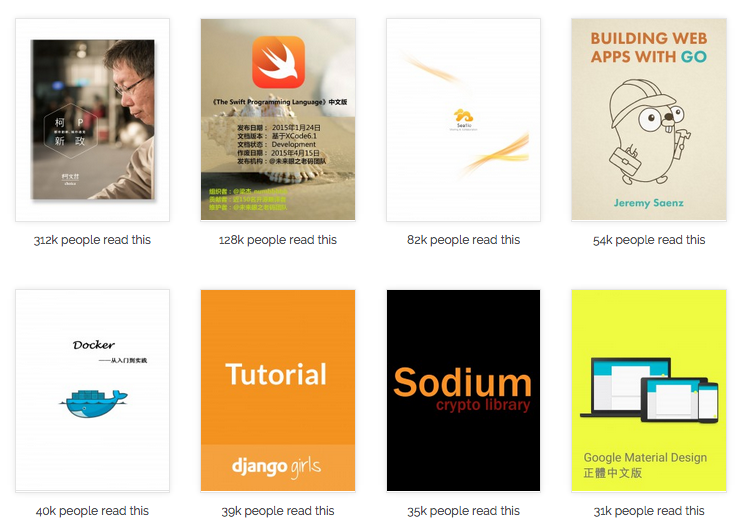
达尔文曾经说过:「任何一个项目都应该有一个 README」。
恩,`README.md` 对于任何一个项目来说都是不可或缺的一部分,无论是对于使用者还是后续维护者都是灰常重要哒:p
对于小型项目,一个 `README.md` 足以,但是如果是一个大项目的话,那就不是一个 `README.md` 可以搞定的啦。本文就来扯一下使用 gitbook 为你的项目写一本**书**。
### 1. 安装
```
cnpm i -g gitbook
```
### 2. 初始化:
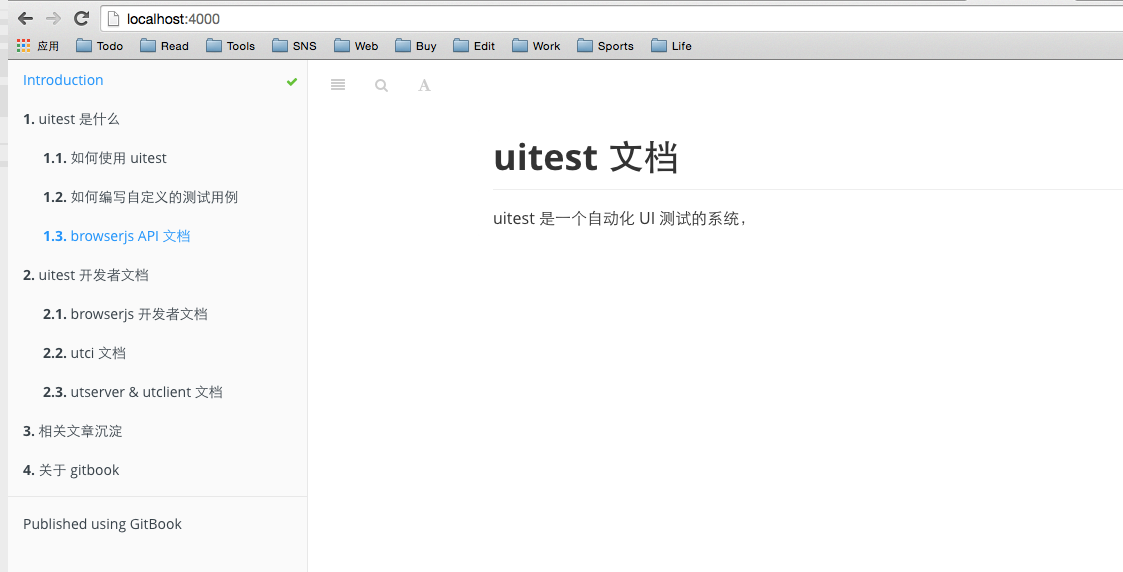
在你的文档目录下新建文件 `SUMMARY.md`,这个文件就是这本书的目录啦:
```
cd docs
touch SUMMARY.md
```
`SUMMARY.md` 的格式规范如下:
```
# uitest 文档
- [uitest 是什么](users/index.md)
- [如何使用 uitest](users/use.md)
- [如何编写自定义的测试用例](users/case.md)
- [browserjs API 文档](users/api.md)
- [uitest 开发者文档](devs/index.md)
- [browserjs 开发者文档](devs/browserjs.md)
- [utci 文档](devs/utci.md)
- [utserver & utclient 文档](devs/utserver.md)
- [相关文章沉淀](artical.md)
- [关于 gitbook](gitbook.md)
```
然后执行 `gitbook init` 初始化,gitbook 会根据 `SUMMARY` 的结构生成对应的目录文件:
```
├── README.md // 首页
├── SUMMARY.md // 目录
└── users // 用户文档
└── index.md // 是什么
├── use.md // 如何使用
├── api.md // browserjs API
├── case.md // 如何写测试用例
├── devs // 开发者文档目录
│ ├── index.md // 开发者文文档首页
│ ├── browserjs.md // browserjs 开发文档
│ ├── utci.md // utci 开发文档
│ └── utserver.md // utserver 和 utclien 开发文档
├── artical.md // 文章沉淀
├── gitbook.md // gitbook 相关
```
### 3. 本地调试:
在对应的文档目录下运行 `gitbook serve` 会启动一个本地的静态服务器:

访问 `http://localhost:4000/` 就可以实时的预览啦,并且支持 `livereload`, 灰常赞~接下来结合预览的功能编辑对应的文档,完成之后就可以发布啦。
### 4. 发布:
在文档目录下执行 `gitbook build` 会生成一个 `_book` 的目录,这个目录就是我们的静态网站啦,然后通过 demo 平台或者 github pages 就可以很简单的完成部署了。
上面说的都是做项目文档,但是如果你想写本书,那么 gitbook 提供了更为方便的服务,请移步 [gitbook 官方网站](https://www.gitbook.com)
-----------
### 参考文章:
- [gitbook on github](https://github.com/GitbookIO/gitbook)
================================================
FILE: _posts/2015-04-17-talk-about-keng.md
================================================
---
layout: post
title: "不挖坑比努力填坑更值得"
date: 2015-04-17 21:43:01
---
抱怨项目里的坑是个再常见不过的事情了:
- kissy 版本过低 (<1.3.x)
- 项目没有 `README`
- 代码很糟糕:没有注释?耦合度高?线上小 bug 不断?whatever.
- ...
如此种种,然后说说我碰到过最糟的情况吧:
- 新接手的业务,没有交接的过程,我只能从 git commit 里依稀分辨出谁曾经维护过...
- 项目里混用了 `stylus` 和 `less`, 并且 `Gruntfile.js` 里没有任何跟编译 `less` 和 `stylus` 相关的配置,现在想想也觉得异常吊诡
- 不出意外,`README.md` 的内容字节数为 0
这大概也没有什么......吧,不过另一个重点是,在我接手半年之后,这个项目除了多了一份还算 OK 的 `README` 以外,**一切照旧**!大概会让你很失望,这明明应该是个满是鸡汤味的励志故事才对啊。
其实,我内心曾经呐喊过很多次:「我要填了这万恶的坑」。而最终却只是多了那一份字节长度大概在 200 左右的 `readme`, 所以,我为什么没有填起这些坑?
## 为什么我不愿意填坑
### 需要承担风险
在对业务不够熟悉的情况下,重构是有风险的,所以我需要申请测试资源,测试同学又不傻。
### 没有时间
无论是从业务方,还是 TL 的角度,大概都不希望把时间放在重构上,除非说,这个项目的代码再不重构就要挂了。
### 业务需求太少
上面提到的那个业务,半年来做过一次不大不小的需求,然后就是最近的 https 升级,填完坑也不见得能对我或者对业务产生什么价值。
归根结底一句话「**投入产出比太低**」,所以多数情况下没有人愿意去填别人的坑。既然如此,那我们进入本文的正题**少挖坑**。自己负责的业务,争取不留或者少留坑更加有意义,同时只要愿意更容易实现。接下来就结合自己的一些实践,从 readme, git, code, lint... 等方面提出一些建议,欢迎补充纠正:)
## 如何做到不挖坑
### 一份可读的 README
任何一个项目都应该起于一份 `README.md`, 接到一个新的需求:创建 git 分支 -> 编辑 `README` -> 编码 -> 测试 -> 发布,如此多好。
同时一份可读的 `README` 应该至少包括一下内容:
```
# 某某业务
## 介绍:
- kissy 版本:kissy 1.4.x
- 打包工具:xcake
- 业务:xx 业务,可以罗列下线上地址
- 开发者:@xx
## 升级日志:
### v1.0.0
https 升级
### v0.1.0
增加 xx 需求
## 目录:
罗列大体的项目目录结构(在根目录下运行 tree -L n 即可生成目录结构图,n 指层级深度)
## 其他:
- 注意的地方,坑?
- and whatever
```
另外,如果在项目里使用了新的技术,如 Angular, React... 那应该有更详细的沉淀文档。
### 及时剔除无用代码
从来只见业务在不断新增需求,却不见将老的需求/页面下掉,但凡是有那么一点点 PV, 美其名曰「为用户着想」,时间长了,任谁也想不起那一坨页面是什么玩意,直到有一天...https 改造了!
于此对应,我们多数时候只会**新增代码,而不愿意删除代码**,即时这个需求已经下掉了,或许心里想的是「哪天也许会再次使用这个功能呢」。久而久之,一个本身并不复杂的业务代码越积越多,冗余度越来越高。And then, 骚年,这个业务你来接手吧。
上面两种情况,其实原因只有一个「**删除是有风险的,而新增是安全的**」,多数时候,我们更喜欢安稳点的方案。
从明天起,做一个熟悉代码并敢删除代码的人。
### 良好的 git 操作习惯
#### 1) 正确管理版本号
很多人没有理解 x.y.z 版本管理的理念,而只是一味的在某一位上不断增加,或者说大多数人在接到一个需求时,根本不会考虑应该是升级 `major`, `minor`, 或者 `patch` 的版本号,这是万万不对的。
x.y.z 是一套语义化版本控制规范(SemVer), 各版本号递增规则如下:
> 主版本号:当你做了不兼容的API 修改,
> 次版本号:当你做了向下兼容的功能性新增,
> 修订号:当你做了向下兼容的问题修正。
具体的文档可以阅读 [语义化版本2.0.0](http://semver.org/lang/zh-CN/)。
#### 2) 有意义的 commit 信息
- `git commit -am 'debug'`
- `git commit -am 'fixed bug'`
- `git commit -am 'modify'`
诸如此类毫无意义的 commit 信息,在 gitlab 的 timeline 上随处肆虐。对于 commit 遵守以下两个原则即可:
- 每个提交应当只包含一个简单的逻辑改动,不要在一个提交里包含多个逻辑改动。比如,如果一个补丁修复了一个 Bug,又优化了一个特性的性能,就将其拆分。
- 不要将一个逻辑改动拆分提交。例如一个功能的实现及其对应的测试应当一并提交。
更多请戳 [git-style-guide](https://github.com/agis-/git-style-guide)
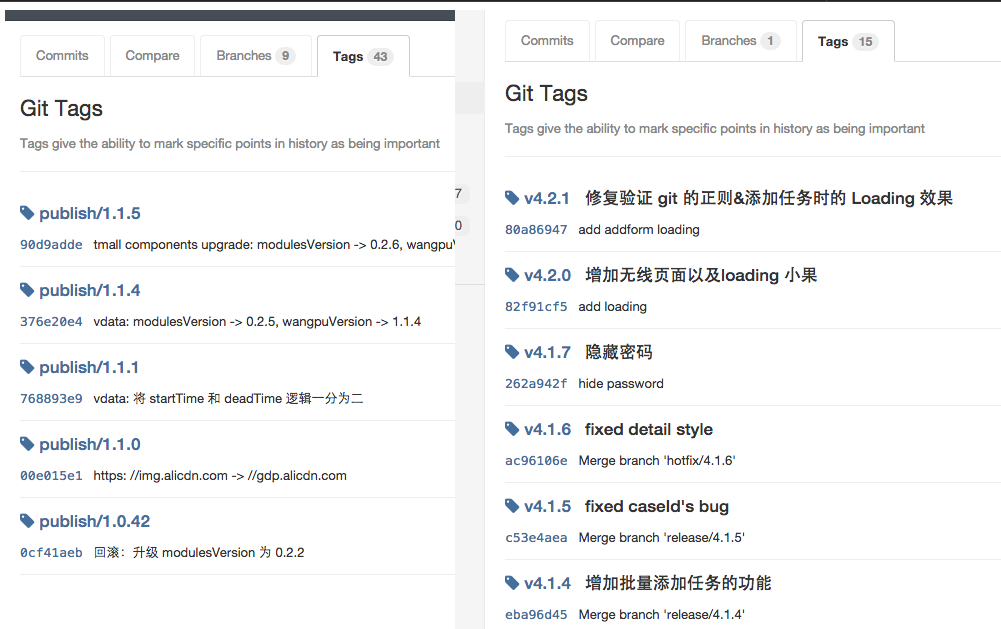
#### 3) 为 tag 添加注释
常用的发布姿势:
```
git tag publish/1.0.0
git push origin publish/1.0.0
```
更好的发布姿势:
```
// 为 tag 添加信息
git tag -a publish/1.0.0 -m 'https 升级'
git push origin publish/1.0.0
```
如下面左右两幅图片对比,为 tag 做注释,等于自动生成升级日志,一目了然,何乐而不为。
### 统一自己的代码规范
我曾经问师兄:「为什么我们没有一份代码规范的文档?」,师兄的回答是:「规范是用来打破的」。
规范是用来打破的,虽说没有太好的说辞去反驳,但事实上我是不认同这句话的,我倒是觉得规范一来能在一定程度上保证代码的质量,二来对于多数人可以提供一个参考。那这时候我又要推荐 Airbnb 整理的 [Airbnb JavaScript Style Guide() {](https://github.com/airbnb/javascript/) 以及 [对应的 es6 style](https://github.com/airbnb/javascript/tree/es6), 认真阅读一遍,一定会有收获。
当然,对于喜欢打破规范的同学来说,打破规范自然没有任何问题,只需做到一点:坚持一套自己统一的风格:)
### 用 `editorconfig` 统一编码规范
同一个项目,可能会有 N 个开发者,tab or space? 2个空格 or 4个空格?gbk or utf-8? 不要吵,让 `editorconfig` 来。
[](http://editorconfig.org/) 通过项目根目录下的 `.editorconfig` 来配置这些规则,配合编辑器的 editorconfig 插件,使用之后,自定义的规则会覆盖掉编辑器设置,保持整个项目的一致性。
例如 xcake 默认生成的:
```
root = true
[*]
indent_style = space
indent_size = 4
end_of_line = lf
charset = utf-8
trim_trailing_whitespace = true
insert_final_newline = true
[*.md]
trim_trailing_whitespace = false
```
### 用 `eslint` 保持代码风格一致性
同一个项目,可能会有 N 个开发者,单引号 or 双引号?要不要分号?== or ===? 试试 [eslint](http://eslint.org) 吧,比 jslint 更加容易自定义规则。
话说,还没来得及细细对比 eslint 和 jslint, 又来了一个 [JSCS](http://jscs.info/overview.html), 有时间可以了解下。
----------
如果愿意,以上皆可定义为规范,很多时候我也不见得会全部遵循,但挑中自己认同的,在项目中实践一二也是极好的。
以上。
================================================
FILE: _posts/2015-04-21-mongodb-action.md
================================================
---
layout: post
title: "MongoDB 操作"
date: 2015-04-21 14:00:01
published: false
---
本文收录一些在 mongodb 里常用的操作,方便日后查询使用。
## 替换数组里的某个元素
```
db.projects.update({
'builds.buildId': body.buildId,
}, {
$set: {
'updatedAt': Date(),
// replace array element
'builds.$': self.generateBuildData(body)
}
});
```
## $push 和 $set 同时使用
```
db.projects.update({
taskId: body.task_id
}, {
$set: {
updateAt: Date()
},
$push: {
builds: self.generateBuildData(body)
}
});
```
================================================
FILE: _posts/2015-04-23-makefile.md
================================================
---
layout: post
title: "有关 makefile"
date: 2015-04-10 21:43:01
published: false
---
makefile 的使用有时候会有些困惑的地方,比如说一直在报错,不知道哪里有问题,see this.
## makefile:15: *** missing separator. Stop.
makefile 经常报这个错误,是因为 makefile 只认识 tab, 不认识空格,可以运行这个命令来检查 `cat -e -t -v makefile_name`.
详情参考:[makefile:4: *** missing separator. Stop](http://stackoverflow.com/questions/16931770/makefile4-missing-separator-stop)
================================================
FILE: _posts/2015-04-24-git-tip.md
================================================
---
layout: post
title: "git 常用操作"
date: 2015-04-24 14:00:01
published: false
---
git 常用操作记录
## 与 fork 的仓库保持同步
```
git remote add upstream git@github.com:react/web.git
git pull upstream master
```
================================================
FILE: _posts/2015-04-24-nginx-config.md
================================================
---
layout: post
title: "nginx 知识汇总"
date: 2015-04-24 9:00:01
published: false
---
nginx 的配置文件以及常用的命令等。
## 常用命令:
- 配置文件地址
Mac: `/usr/local/etc/nginx/nginx.conf`
Linux: `/etc/nginx/nginx.conf`
- 测试配置文件是否 OK: `nginx -t`
- 停止/重启:`nginx -s stop/reload`
## 常见问题:
### 执行重启命令时报 pid 的错误
参考:http://stackoverflow.com/questions/7646972/nginx-invalid-pid-number
执行 `sudo nginx -c /usr/local/etc/nginx/nginx.conf` 直接启动即可。
## 配置多个子域:
```
{
# uitest client
server {
listen 80;
server_name blog.sobear.me;
location / {
proxy_set_header Host $host:80;
proxy_set_header X-Real-IP $remote_addr;
proxy_set_header X-Forwarded-For $proxy_add_x_forwarded_for;
proxy_set_header Via "nginx";
proxy_pass http://blog.sobear.me:3000;
}
}
# uitest server
server {
listen 80;
server_name xxx.sobear.me;
location / {
proxy_set_header Host $host:80;
proxy_set_header X-Real-IP $remote_addr;
proxy_set_header X-Forwarded-For $proxy_add_x_forwarded_for;
proxy_set_header Via "nginx";
proxy_pass http://xxx.sobear.me:9090;
}
}
}
```
================================================
FILE: _posts/2015-04-27-debug-npm.md
================================================
---
layout: post
title: "使用 npm link 本地调试多个模块"
date: 2015-04-27 14:43:01
---
在比较大的工程里,为了便于维护,会把整个工程拆分成多个 npm 包,拆分之后带来的问题就是多个 npm 改动如何调试?
假设目前的工程有 A, B 两个模块,B 模块依赖了 A 模块
### 2B 青年:改动-发布-测试
对于 2B 青年来讲,一定会用最直白最 2B 的方式,比如先先修改 A 模块,然后发布,然后再在 B 模块中测试有没有问题...好吧,这个太 2B 了,应该没人会这么干 T_T
好吧,这个太 2B 了,应该没人会这么干 T_T
### 文艺青年:本地 require 改为相对路径,上线时改成绝对路径
这个方法的问题是上线时忘记改路径就悲剧了...
### 高富帅:npm link
高富帅要用高富帅的方式:
```
cd A
npm link
cd B
npm link A
```
over, 这时候 B 模块依赖的 A 就是 A 文件夹了,因此调试就不是问题啦。
曾经 2B 过,长大后文艺过,现在,高富帅了...
--------
## 参考链接
- [如何使用NPM来管理你的Node.js依赖](http://www.infoq.com/cn/articles/msh-using-npm-manage-node.js-dependence/)
================================================
FILE: _posts/2015-04-28-sublime.md
================================================
---
layout: post
title: "sublime 配置"
date: 2015-04-28 9:00:01
published: false
---
## 功能篇:
### 配置字体
`Source Code Pro` 是个不错的等宽字体,Mac 下的配置方法:
- 在 [adobe-fonts/source-code-pro](https://github.com/adobe-fonts/source-code-pro/releases/tag/1.017R) 这里下载字体,解压之
- 打开 mac 的字体册,添加字体,选择 ttf 的格式即可
- 在 sublime setting 里选择这个字体即可
### 主题:predawn
https://github.com/jamiewilson/predawn
It's cool!
### 打开 sublime 的 console
`ctrl + `` 可以打开 sublime 自带的 console
## 插件篇:
### [ColorPicker](https://github.com/weslly/ColorPicker)
`cmd+shift+c` 启动不了...
### sublime linter + eslint
I need this, but hate...
## 快捷键:
- `command + p`: 文件跳转
================================================
FILE: _posts/2015-05-04-javascript-void.md
================================================
---
layout: post
title: "如何阻止 a 链接的默认行为"
date: 2015-05-04 11:47
published: false
---
阻止 `` 的默认事件大概有以下方法:
## prevenDefault
```
a.on('click', function (e) {
e.preventDefault();
// 吧啦吧啦
});
```
## javascript:void(0)
我更喜欢使用这个方案,缺点是不支持 ie6, 不过现在已经不算问题了:
```
```
不过,要注意,千万不要写成了 ``, 这样的话,浏览器就会报错:
```
Uncaught SyntaxError: Unexpected end of input
```
这个错误很难定位,因为错误在 html 中,根本没有堆栈信息。
小伙伴推荐的另一种写法:`javascript:;`, 又短又好用。
================================================
FILE: _posts/2015-05-06-npm-error.md
================================================
---
layout: post
title: "root 用户安装 npm 时运行报错"
date: 2015-05-06 22:47
---
问题还原:
## 问题:
当以 root 用户安装 npm 时,如果 npm 恰巧使用了 `npm script` 的功能,则这个脚本无法执行,比如 npm 里这样使用:
```
"scripts": {
"install": "node ./build.js"
}
```
安装时就会报这样的 warn:
```
npm WARN cannot run in wd @ali/browser@2.1.2 node ./build.js (wd=/opt/source/node_modules/@ali/browser)
```
## 原因:
npm 出于安全方面的考虑,当以 root 用户安装 npm 时,无法执行 `npm script`:
## 解决方案:
`tnpm install` 时添加 `--unsafe-perm` 这个参数即可解决这个问题:
```
tnpm install --unsafe-perm
```
参考:https://docs.npmjs.com/misc/config#unsafe-perm
================================================
FILE: _posts/2015-09-28-front.md
================================================
---
layout: post
title: "2015之前端工程师的自我修养"
date: 2015-09-28 23:30
published: false
---
中秋 + 国庆,很多同学选择了连续休假 12 天,这本无可厚非,然而,我,作为一个「前端工程师」,这两天诚惶诚恐,为何?
> 前端技术发展这么快,12 天之后会不会回去就被淘汰了呀...
所以,我在这个标题上加了一个时间戳 2015, 防止一年之后被指责说「这哥们这么落后也好意思在这里大放阙词」。
说起为什么会想写这个话题,源于有同学在问我说「前端需要学习哪些知识」时,我总是不能简简单单的贴上一个链接完事,而总需要贴上链接外加各种说明:xx 已经过时了,你应该了解下 yy,诸如此类的,很是烦恼。纵然前有拔赤,后有朴大总结的那张场面超级宏达的思维导图 `fks`,但一方面技术栈没有更新,二来场面过于宏大,常人难以把持。因此,才下定决心我们再聊聊这件事吧。
## 前端的职业发展方向
传统认识里,前端的工作无非是切页面、调 IE,偶尔再跟开发同学联调下异步接口,基于这样的需求,能力要求就是:懂得语义化的 HTML 标签,掌握用 css 完成各种样式 + 布局,可以使用 jQuery 写一些效果。喏,就是这样,web1.0 的产物,至今还影响着很多人。
随着社会的发展,工种的细化是一个必然的过程,前端亦不然。然而就那么点鸟事情怎么细化?难不成有人专门写 HTML,有人专门写 css, 还有人专门写 js? 对于 css 和 js 的工种区分,业界倒还真有这样的尝试,各种利弊不去讨论,我想说的是「细化必然是伴随着扩展的过程」。引起扩展的可能是技术发展、业务扩张、人的刻意追求,伴随着这一波扩张,现如今前端的发展方向已经逐渐趋于稳定:
### 1. 前端工程化
关注业界新的技术和工具,尽量不要脱离社区,专注于前端整个开发体验的便利、完善。
- 前端项目的基础目录结构和模块化规范
- 如何构建前端代码:对于 less, sass, jsx, es6 等需要编译的代码使用何种工具来做?grunt? gulp? webpack?
- 代码发布:如何快速安全的将代码发布的 cdn?
- 代码回滚:出现故障时如何快速回滚代码?
- 线上调试:如何让开发人员快速的调试线上代码?
- 测试:单元测试、自动化 UI 测试、持续集成测试,如何能更加方便的使用?如何推动?
- 前端日志体系:如何捕获线上代码的异常?如何让开发人员可以主动记录分析线上日志?
- ...
### 2. 无线开发
### 3. 业务一线的开发
### 4. 基于 Nodejs 的全栈/半栈开发
### 5. 数据可视化
### 6. 前端安全
### 7. 产品工程师
--------
### 相关链接
- [前端技能汇总 Frontend Knowledge Structure](https://github.com/JacksonTian/fks)
================================================
FILE: _posts/2015-09-28-korea-movie.md
================================================
---
layout: post
title: "越来越喜欢的韩国电影"
date: 2015-09-28 23:00
published: true
---
看完《追击者》、《恐怖直播》,对韩国此类电影越发喜欢,从叙事的结构、人物的张力、以及对社会现象毫不留情的讽刺,无处不让处于天朝审查制度下的我仿佛找到了 G 点一般兴奋。但拿天朝来说事一定是想让问题简单化的,比如说美国早已走过了文化审查的年代,然而映入眼帘的美国电影依然是各种各样的好莱坞商业片,剧情上多是千篇一律,特效上精益求精,近年来反应社会现象的影片更是越来越少,所以「文化审查」只是其一。
说到审查,今天偶然看到徐昂在「一席」上的演讲《喜剧的愤怒》,演讲本身很有意思,徐昂的个人魅力和幽默也令人印象深刻,同时多次提到《喜剧的愤怒》这部话剧也值得关注,因为内容正是编剧与审查员的罗密欧与朱丽叶式的爱情,有时间定要找来看上一看。
再说反应社会现象的影片,大学时曾看过拍摄于 1957 年的《十二怒汉》,看完很是喜欢,昨晚又恰巧看了徐昂导演的中国版十二怒汉:《十二公民》,除过中国大和谐式的结局,其他部分都是非常精彩的,社会矛盾、阶级冲突、人性、职业各式各样的,也算饱满。
---------
### 相关电影:
- [追击者](http://movie.douban.com/subject/3006309/?from=subject-page)
- [恐怖直播](http://movie.douban.com/subject/21360417/)
- [徐昂在一席的演讲](http://v.youku.com/v_show/id_XMTMzNjU0MjEzNg==.html?from=y1.9-3.1)
- [十二怒汉](http://movie.douban.com/subject/1293182/)
- [十二公民](http://movie.douban.com/subject/24875534/)
================================================
FILE: _posts/2015-11-29-insist-and-not.md
================================================
---
layout: post
title: "那些坚持和不再坚持的"
date: 2015-11-29 17:00
published: true
---
有些事情,还再坚持,另外那些,不再坚持却还念念不忘。从离开学校至今一年零五个月,很多曾经想要坚持的事情都早已不见了踪影。大多时候,会用「工作太忙」来搪塞自己,一次又一次,回头看看,却也不会有那般夸张的忙,所以可能就是一个无头苍蝇到处乱窜。
那么就来记录下目前还在坚持或者不再坚持的事情,也算是趁着记忆还算清晰赶紧把这些耻辱记录下来,省的上了年纪后耍赖皮不认帐。
### 坚持的事情
#### 美剧
- 《权利的游戏》:这种剧自然是不会弃的,问题是一直以来对于维斯特洛大陆的整个知识体系没有建立起来,因此总要时不时的去冰火的维基百科刷一刷,也是头疼。
- 《国土安全》:看完第四季的时候以为这剧会烂掉,直到最近在追第五季以及结合当前的时局得出一个结论:只要 ISIS 不完蛋 homeland 也就不会烂掉。因为你看至少有人再给你写剧本嘛。
- 《纸牌屋》:第二季看了一集之后再没有追,这个不是剧的问题啦,大概 House of Cards 跟 The Beak Bad 一样,前期都需要极大的耐心吧。话说最近相继在《蚁人》、《绝命海拔》还有《火星救援》中都看到了纸牌屋的演员,让我重燃了追这部剧的想法。
- 其他好像也没什么了,新的美剧没怎么关注,老的要么已经完结要么已经烂尾,就不再提了。
#### 海贼王
这大概是让我颇为奇怪的一件事吧,大四时为了让自己不脱离中二圈子决定追海贼王,然而年少无知总想看动漫(视频),因此花了好多个日日夜夜最后也就追到 200 集然后放弃。直到今年又萌生了此想法,不过果断选择了漫画,然后就一口气追到了 800 集。现在呢,在各大汉化组被起诉之后,也就投入了腾讯动漫每周一更新的节奏,也算不赖。
#### 篮球
唯一在坚持的运动项目了,天气好的时候每周还会跟小伙伴去打一次,技术嘛还是彩笔啦,没有天赋又不训练不是彩笔才怪了嘞。还是要坚持下去哒,男人嘛,总得有一个热爱的运动,不然多衰。
### 不再坚持的事情
#### 骑行
除了偶尔偶尔偶尔会被朋友来着去骑趟龙井,其他时候山地车上都是一层灰。你问我还记得车的型号么,这个问题我恐怕得想想才能回答你。
总之,这是个忧伤的故事。 ಥ_ಥ
#### 跑步
鬼知道我有多少次告诉自己坚持每天跑步吧,今天我的内心又重复呐喊了几次,所以恐怕我又要再给自己一次机会了,所以这件事就不多说了。
#### 电影
刚毕业那会,买了一大堆有关电影的书,然后定计划每周要看三个电影。啊,你问我为什么要这样做?当然是为了装 X 了 -.-
然后呢,恐怕是自己坚持最短的计划了吧,书桌上的电影书籍大概也快要被我装箱了。今年除了去影院看的电影,也就断断续续的看了几个韩国电影,然后就没有然后了。导演名字还是记不住,遇到国外演员还是脸盲,唉,目前来看只能说装 X 失败。
================================================
FILE: _posts/2015-11-29-travel-to-northwest.md
================================================
---
layout: post
title: "西北大环线的爱情之旅"
date: 2015-11-29 23:00
published: false
---
2015-08-01 至 2015-08-08,跟妹子一起走了西北的大环线:杭州-西安-西宁-青海湖-茶卡盐湖-大柴旦-敦煌-张掖-西宁-杭州,这也是两个人在一起后出去玩时间最长的一次了。人家说:一次长时间的旅游最能考验两个人是否适合在一起,事实证明这句话说的还是蛮对的 XD:)
说起来,去年毕业时(2014-6-28)跟基友一起骑车骑行了青海湖,时隔一年,虽说行程有些许差异,但多少还是会有点故地重游的感觉。
时间已经过去 4 个月了,终于决定记录下来,中间的一些事情可能已经记不清楚了,因此如果有时空偏移之类的,忍忍就好了。
## 准备
十多天的行程,自然是要准备充分的,衣食住行,缺一不可。
### 环线的交通方式
西北大环线整个线路
交通方式|优点|缺点|备注
------|---|---|-----|
自驾|自由|有一定
包车
公共汽车
### 花费
================================================
FILE: _posts/2016-01-04-nodejs-unit-test-intro.md
================================================
---
layout: post
title: "Node.js 单元测试介绍"
date: 2016-01-04 23:00
published: true
---

> 原文刊登于 [淘宝前端团队 FED 博客](http://taobaofed.org/blog/2015/12/10/nodejs-unit-tests/)
故事是这样的:小明是一个前端工程师,近期因为个人兴趣以及工作上的需要,开始做 Node.js 相关的项目。一个多月过去了,小明基于 Koa 搭出了自己的第一个 Node.js web 应用,在这个过程中,小明也遇到了很多的问题:
- 如何在上线时保证代码完全没问题?
- 每次增加功能时如何保证之前的功能是可用的?
- 随着代码增多,没有勇气和信心去重构代码
面对以上这些问题,小明作为一个前端工程师,惯性思维就是每次部署前先在页面上到处点点,然而一个机智的程序员怎么能把大好时间浪费在这些重复劳动上呢,于是小明就去咨询了组里的 Node.js 大牛老王,话说大牛毕竟是大牛,只是高冷的回复了一句:「单元测试」。
于是小明果断去谷歌搜索了「Node.js 单元测试」,毫无意外,一大堆的介绍和教程文章,粗略读了这些文章之后,小明得出了一些关于 Node.js 单元测试的结论,整理如下:
### 单元测试类型
单元测试分为 TDD(测试驱动开发)和 BDD(行为驱动开发)两种类型,对于这两种类型的比较,小明看的也是云里雾里,感觉单是介绍 TDD 和 BDD 就可以写两篇论文了。不过,选择哪种类型不还是得看代码怎么写嘛,于是小明对比了两种类型的代码:
```javascript
// TDD
suite('Array', function() {
setup(function() {
});
test('should return -1 when not present', function() {
assert.equal(-1, [1,2,3].indexOf(4));
});
});
// BDD
describe('Array', function() {
before(function() {
});
it('should return -1 when not present', function() {
[1,2,3].indexOf(4).should.equal(-1);
});
});
```
在对比了两种类型的语法之后,小明毫不犹豫的选择了 BDD,因为 BDD 的语法更加符合人类的思考方式,或者更加语义一点。
### 单元测试框架
**测试框架的职责即提供一套 API 帮助开发者更方便的测试代码**。在 JavaScript 社区有两个比较成熟的单元测试框架:jasmine 和 Mocha, 聚焦到 Node.js 社区的话,诸如 koa, express 等多数开源项目使用的都是 Mocha. 小明自然是打开 Mocha 的官网探个究竟,不看不知道,一看吓一跳:
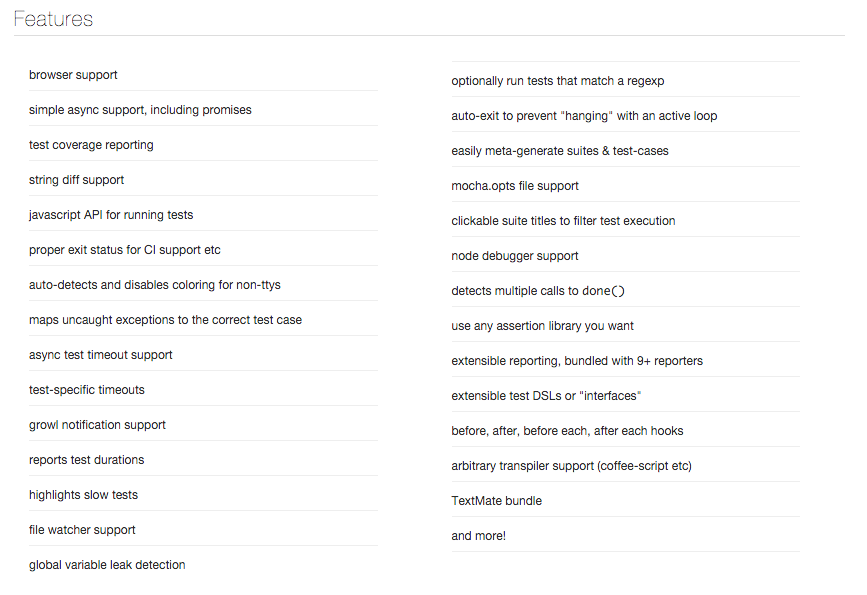
TDD/BDD 语法,异步方法测试,单测前置后置的 hook 等等,堪称完美。来一个简单的示例吧:
```javascript
var User = require('./models/user');
describe('models/user', function() {
before(function(done) {
User.new({name: '小明'}, done);
});
after(function(done) {
User.delete({name: '小明'}, done);
})
it('should return an Object when find by name="小明"', function(done) {
User.find({name: '小明'}, function(err, user) {
if (err) {
return done(err);
}
user.should.be.an.Object;
user.name.should.equal('小明');
done();
});
});
});
```
如上示例:首先在执行单测前通过 Mocha 的 before hook 向数据库里添加了一条测试数据,然后测试了 `User.find` 方法,最后通过 after hook 将这条测试数据删除。这里展示了 Mocha 的 hook 以及测试异步方法,更多的特性小明后续会详细的一一道来。
### 断言库
断言库即提供一套 API 帮助开发者在单元测试的过程中判定某个值是否符合预期,比如:
```javascript
// 以 should.js 为例
value.should.equal(1);
value.should.be.an.Object;
value.should.startWith('http://');
```
小明从 Mocha 的官网了解到:Mocha 为了保持自身的灵活性,因此默认不提供断言的 API。因此在 Mocha 中你可以使用各种各样的断言库,小明也顺便简单对比了下几种常用断言库:
断言库|优点|缺点|备注
-----|----|----|---
Node.js 核心库 Assert|无需第三方依赖|语法较弱|-
Should.js|API 非常语义|文档太烂|-
expect.js|-|-|比较中庸
chai|大而全的 API|-|
然后小明也简单对比了这几种断言库的语法:
```javascript
// assert
assert.equal(value, 1);
// should
value.should.equal(1);
value.should.be.a.Number;
// expect
expect(1).to.equal(1);
expect(value).to.be.a('number');
```
从功能上来讲,并无太大的优劣差别,不过写 Should.js 感觉就像写英文语句一般,非常流畅,甚至可以让产品经理也可以时不时来写几行测试代码。小明心想:对于一个程序员来讲,如果有一天可以站在旁边看着产品经理写代码,这种感觉想想都觉得爽。于是小明就暂时选定了 Should.js 作为项目的断言库。
我们都知道小明现在遇到的场景还很简单,只是判断类型啊、值是否相等啊,未来他还会碰到更复杂的场景比如:函数应该抛异常,`null/NaN/undefined` 的判断……随着踩的坑越多,相信小明也会带来更多的分享。
### 覆盖率
既然是给功能代码写单元测试,那就应该有个指标去衡量单元测试覆盖了哪些功能代码,这就是接下来要介绍的测试覆盖率。
在 Node.js 中,我们使用 istanbul 作为覆盖率统计的工具,istanbul 可以帮助我们统计到代码的语句覆盖率、分支覆盖率、函数覆盖率以及行覆盖率,生成的报告如下:
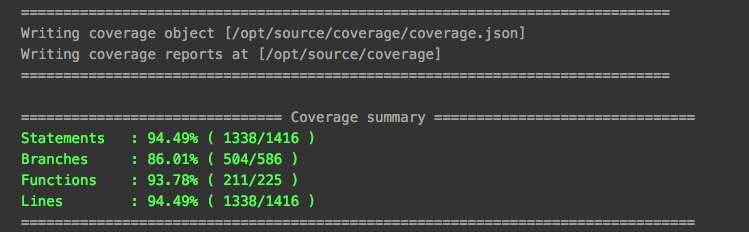
小明不禁感叹:「这真是装逼利器啊」。
### 总结
了解了上面的这一堆概念之后,小明算是对单元测试有了一个初步的认识,同时也觉得单元测试的确是可以解决他在项目里遇到的那些问题。这时候你可能会说:
> Talk is cheap. Show me the code.
各位切莫着急,待小明实践之后,再来分享一二。
### 相关链接
- [Mocha](http://mochajs.org/)
- [Node.js Assert](https://nodejs.org/api/assert.html), [should.js](http://shouldjs.github.io/), [chai](http://chaijs.com/)
- [istanbul](https://github.com/gotwarlost/istanbul)
================================================
FILE: _posts/2016-01-05-nodejs-unit-test-workflow.md
================================================
---
layout: post
title: " Node.js 单元测试之 workflow"
date: 2016-01-05 23:00
published: true
---

> 原文刊登于 [淘宝前端团队 FED 博客](http://taobaofed.org/blog/2015/12/29/nodejs-unit-tests-workflow/)
-------------
> Talk is cheap, show me the code!
是否还记得小明在《Node.js 单元测试之我要写测试》里引用的这句话么,不过引用了之后,小明就像跑路了一般再也没见其 code……其实呀,不知道大家有没有关注最近比较火 minggeJs, 稍微联想下你就知道小明最近在忙啥了O(∩_∩)O~~
虽说小明现在还写不出 minggeJs 这样的前端库,不过,小明想说的是:**当你准备开源一个库的时候,一定要写单元测试;当你要使用一个开源库的时候,单元测试的覆盖率是衡量质量的最重要标准之一**。
好了,扯了这么多闲话之后,明哥(不对,是小明……)接下来介绍一下在项目里单元测试整个流程是如何的。
### Node.js 专属之 `npm scripts`
起初,小明将 Mocha 和 istanbul 装在全局命令下,然后每个项目都使用全局的命令,后来发现多人合作时会因为版本不一致而报错,因此果断将 Mocha 之类的装在项目的 `node_modules/` 下:
```
npm install mocha istanbul --save-dev
```
然后只需要执行下面两条命令即可:
```
# 执行单测
./node_modules/.bin/mocha test/*.test.js --timeout 20000
# 收集覆盖率报告
./node_modules/.bin/istanbul cover ./node_modules/.bin/_mocha -- -u exports --reporter spec --timeout 20000
```
然而每次都执行这么长的命令让隔壁(座位)的老王实在看不下去了,于是就告诉小明 `npm scripts` 的用法。只需要在 `package.json` 里定义几个命令即可:
```
"scripts": {
"test": "./node_modules/.bin/mocha 'test/*.test.js' --timeout 20000",
"cov": "./node_modules/.bin/istanbul cover ./node_modules/.bin/_mocha -- -u exports 'test/*.test.js' --timeout 20000"
}
```
如此之后,每次写完代码,小明只需要执行 `npm run test/cov` 即可,省事了很多。
不知道诸位有没有注意到,小明在 `'test/*.test.js'` 上故意加了一个引号,这一点也是小明被坑了之后才发现的:执行 shell 命令时,如果参数中包含如 `test/*.test.js` 这种 glob 模式,对应的 shell 会自动解析掉,但是不同的 shell 对 glob 的实现又不一致,因此就会出现匹配文件出错的问题,当加了引号之后,shell 会把参数原封不动的交给 Mocha(或者其他工具)来解析,这样才能保持不同 shell 的一致性。
当然,`npm scripts` 还有很多对于 Node.js 开发者很便利的功能,请参阅文末的相关链接。
### 构建利器 makefile
随着代码的积累,小明写的单测也越来越多,有时候可能只需要运行某一个测试文件,所以小明希望能通过命令行参数将需要测试的单个文件传进去,这时候 `npm scripts` 就显得捉襟见肘了。于是小明继续秉持着「有问题找老王」的原则,老王毫不犹豫的给小明推荐了 `makefile`.
关于 `makefile` 的介绍,网上有很多的资料,小明的简单理解就是:`makefile` 就是将某个流程(如编译、打包、构建等)包含的所有相关命令集成到一个 make 命令下,极大的方便开发者。具体到目前的场景,可以参照如下的示例:
```
test := './test/*.test.js'
timeout := 20000
mocha := ./node_modules/.bin/mocha
istanbul := ./node_modules/.bin/istanbul
coverageMocha := ./node_modules/.bin/_mocha
test:
echo '开始运行单测'
$(mocha) --timeout $(timeout) $(test)
echo '单测运行结束'
cov:
$(istanbul) cover $(coverageMocha) -- -u exports $(test) --timeout $(timeout)
# 区分命令和文件名称
.PHONY: test
```
在项目里定义了如上的 `makefile` 文件后,只需要执行 `make test` 就可以跑单元测试了,并且上面提到的传参数的问题也可以迎刃而解:`make test test=test/util.test.js`. 相对于 `npm scripts`, `makefile` 借助 shell 脚本的能力要强大灵活很多,然而一个不太好的消息是:windows 并不支持 `makefile`……
### 持续集成
在经过了上面的这些步骤之后,小明在本地已经可以完美的执行单元测试了,然而在跟小伙伴们合作的过程中,小明发现有的同学并不是很关注这个事情,单元测试没跑通过就将代码 push 到了远程仓库,这时候就需要其他同学来帮忙擦屁股,很是不方便。
于是,老王就告诉了小明持续集成这个东西,所谓持续集成,简单来讲就是:在代码 push 之后,对代码进行一系列的构建,比如 lint 检测、单元测试、部署等,借此提高代码的质量以及多人合作开发效率。而在 Node.js 领域,这方面比较优秀的工具就是 travis-ci 了,小明也顺便体验了一下 travis-ci, 按照其三步走的接入流程的确是非常之方便。
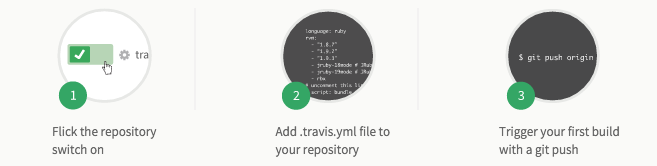
然而,小明平时开发的仓库大部分都是托管在内部的,没法使用面向 github 的 travis-ci, 这一次小明决定不再去问老王了,程序员嘛,造轮子的功能还是要有的。于是,在一个多月的开发后,小明基于内部的其他服务做出了一个八九不离十的持续集成系统,名曰 UITest-ci:
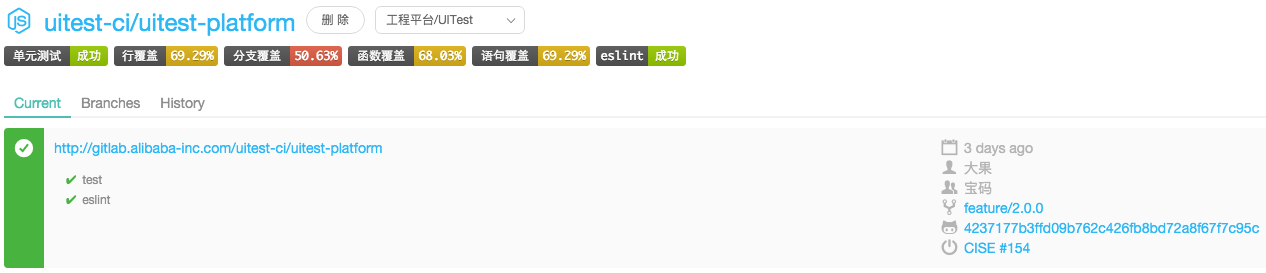
这个系统可以运行单测、执行 lint、可以生成覆盖率报表、可以通知开发者集成结果、同时提供徽章服务,近乎完美。之后有时间了再详细介绍这个系统的设计和实现吧 :)
### 总结
至此,小明介绍了单元测试各个部分的相关概念以及整个工作流程是如何的,接下来,我们会面对项目中更具体的一些单测问题,比如:如何用 supertest 做接口测试、如何测试私有方法、如何针对命令行工具做单测等等。敬请期待~
### 相关链接
- [npm scripts 文档](https://docs.npmjs.com/misc/scripts)
- [跟我一起写 makefile](http://wiki.ubuntu.org.cn/%E8%B7%9F%E6%88%91%E4%B8%80%E8%B5%B7%E5%86%99Makefile)
- [持续集成:travis-ci](https://travis-ci.org/)
================================================
FILE: _sass/_syntax.scss
================================================
.highlight {
background: #ffffff;
.c { color: #999988; font-style: italic } /* Comment */
.err { color: #a61717; background-color: #e3d2d2 } /* Error */
.k { font-weight: bold } /* Keyword */
.o { font-weight: bold } /* Operator */
.cm { color: #999988; font-style: italic } /* Comment.Multiline */
.cp { color: #999999; font-weight: bold } /* Comment.Preproc */
.c1 { color: #999988; font-style: italic } /* Comment.Single */
.cs { color: #999999; font-weight: bold; font-style: italic } /* Comment.Special */
.gd { color: #000000; background-color: #ffdddd } /* Generic.Deleted */
.gd .x { color: #000000; background-color: #ffaaaa } /* Generic.Deleted.Specific */
.ge { font-style: italic } /* Generic.Emph */
.gr { color: #aa0000 } /* Generic.Error */
.gh { color: #999999 } /* Generic.Heading */
.gi { color: #000000; background-color: #ddffdd } /* Generic.Inserted */
.gi .x { color: #000000; background-color: #aaffaa } /* Generic.Inserted.Specific */
.go { color: #888888 } /* Generic.Output */
.gp { color: #555555 } /* Generic.Prompt */
.gs { font-weight: bold } /* Generic.Strong */
.gu { color: #aaaaaa } /* Generic.Subheading */
.gt { color: #aa0000 } /* Generic.Traceback */
.kc { font-weight: bold } /* Keyword.Constant */
.kd { font-weight: bold } /* Keyword.Declaration */
.kp { font-weight: bold } /* Keyword.Pseudo */
.kr { font-weight: bold } /* Keyword.Reserved */
.kt { color: #445588; font-weight: bold } /* Keyword.Type */
.m { color: #009999 } /* Literal.Number */
.s { color: #d14 } /* Literal.String */
.na { color: #008080 } /* Name.Attribute */
.nb { color: #0086B3 } /* Name.Builtin */
.nc { color: #445588; font-weight: bold } /* Name.Class */
.no { color: #008080 } /* Name.Constant */
.ni { color: #800080 } /* Name.Entity */
.ne { color: #990000; font-weight: bold } /* Name.Exception */
.nf { color: #990000; font-weight: bold } /* Name.Function */
.nn { color: #555555 } /* Name.Namespace */
.nt { color: #000080 } /* Name.Tag */
.nv { color: #008080 } /* Name.Variable */
.ow { font-weight: bold } /* Operator.Word */
.w { color: #bbbbbb } /* Text.Whitespace */
.mf { color: #009999 } /* Literal.Number.Float */
.mh { color: #009999 } /* Literal.Number.Hex */
.mi { color: #009999 } /* Literal.Number.Integer */
.mo { color: #009999 } /* Literal.Number.Oct */
.sb { color: #d14 } /* Literal.String.Backtick */
.sc { color: #d14 } /* Literal.String.Char */
.sd { color: #d14 } /* Literal.String.Doc */
.s2 { color: #d14 } /* Literal.String.Double */
.se { color: #d14 } /* Literal.String.Escape */
.sh { color: #d14 } /* Literal.String.Heredoc */
.si { color: #d14 } /* Literal.String.Interpol */
.sx { color: #d14 } /* Literal.String.Other */
.sr { color: #009926 } /* Literal.String.Regex */
.s1 { color: #d14 } /* Literal.String.Single */
.ss { color: #990073 } /* Literal.String.Symbol */
.bp { color: #999999 } /* Name.Builtin.Pseudo */
.vc { color: #008080 } /* Name.Variable.Class */
.vg { color: #008080 } /* Name.Variable.Global */
.vi { color: #008080 } /* Name.Variable.Instance */
.il { color: #009999 } /* Literal.Number.Integer.Long */
}
================================================
FILE: about.md
================================================
---
layout: page
title: About me
disqus: true
---
> 使劲折腾,做个热爱生活的人
- 骚年一枚
- 偶尔骑行,经常打球
- 14年毕业于西电,现在混迹于淘宝 UED
- 前端工程师,也搞 nodejs, mongodb, docker
- 有个逗比女友

================================================
FILE: assets/css/main.scss
================================================
---
# Let's add a comment to make this file sass-y.
# Change this file for any custom CSS.
---
/* We need to add display:inline in order to align the '>>' of the 'read more' link */
.post-excerpt p {
display:inline;
}
// Import partials from `sass_dir` (defaults to `_sass`)
@import
"syntax"
;
.post-excerpt img {
width: 100%;
}
h1 {
font-size: 40px;
}
h2 {
font-size: 34px;
}
h3 {
font-size: 28px;
}
h4 {
font-size: 22px;
}
h5 {
font-size: 16px;
}
================================================
FILE: assets/css/screen.css
================================================
/* ==========================================================================
Table of Contents
========================================================================== */
/*
0. Normalize
1. Icons
2. General
3. Utilities
4. General
5. Single Post
6. Tag Archive
7. Third Party Elements
8. Pagination
9. Footer
10. Media Queries (Tablet)
11. Media Queries (Mobile)
12. Animations
*/
/* ==========================================================================
0. Normalize.css v2.1.3 | MIT License | git.io/normalize | (minified)
========================================================================== */
article, aside, details,
figcaption, figure,
footer, header, hgroup,
main, nav, section,
summary { display: block; }
audio, canvas, video { display: inline-block; }
audio:not([controls]) { display: none; height: 0; }
[hidden], template { display: none; }
html {
font-family: sans-serif;
-ms-text-size-adjust: 100%;
-webkit-text-size-adjust: 100%;
}
body { margin: 0; }
a { background: transparent; }
a:focus { outline: thin dotted; }
a:active, a:hover { outline: 0; }
h1 { font-size: 2em; margin: 0.67em 0; }
abbr[title] { border-bottom: 1px dotted; }
b, strong { font-weight: 700; }
dfn { font-style: italic; }
hr {
-moz-box-sizing: content-box;
box-sizing: content-box;
height: 0;
}
mark { background: #FF0; color: #000; }
code, kbd, pre,
samp { font-family: monospace, serif; font-size: 1em; }
pre { white-space: pre-wrap; }
q { quotes: "\201C" "\201D" "\2018" "\2019"; }
small { font-size: 80%; }
sub, sup {
font-size: 75%;
line-height: 0;
position: relative;
vertical-align: baseline;
}
sup { top: -0.5em; }
sub { bottom: -0.25em; }
img { border: 0; }
svg:not(:root) { overflow: hidden; }
figure { margin: 0; }
fieldset {
border: 1px solid #c0c0c0;
margin: 0 2px;
padding: 0.35em 0.625em 0.75em;
}
legend { border: 0; padding: 0; }
button, input, select,
textarea { font-family: inherit; font-size: 100%; margin: 0; }
button, input { line-height: normal; }
button, select { text-transform: none; }
button, html input[type="button"],
input[type="reset"], input[type="submit"] {
-webkit-appearance: button;
cursor: pointer;
}
button[disabled], html input[disabled] { cursor: default; }
input[type="checkbox"],
input[type="radio"] { box-sizing: border-box; padding: 0; }
input[type="search"] {
-webkit-appearance: textfield;
-moz-box-sizing: content-box;
-webkit-box-sizing: content-box;
box-sizing: content-box;
}
input[type="search"]::-webkit-search-cancel-button,
input[type="search"]::-webkit-search-decoration { -webkit-appearance: none; }
button::-moz-focus-inner,
input::-moz-focus-inner { border: 0; padding: 0; }
textarea { overflow: auto; vertical-align: top; }
table { border-collapse: collapse; border-spacing: 0; }
/* ==========================================================================
1. Icons - Sets up the icon font and respective classes
========================================================================== */
/* Import the font file with the icons in it */
@font-face {
font-family: "casper-icons";
src:url("../fonts/casper-icons.eot");
src:url("../fonts/casper-icons.eot?#iefix") format("embedded-opentype"),
url("../fonts/casper-icons.woff") format("woff"),
url("../fonts/casper-icons.ttf") format("truetype"),
url("../fonts/casper-icons.svg#icons") format("svg");
font-weight: normal;
font-style: normal;
}
/* Apply these base styles to all icons */
[class^="icon-"]:before, [class*=" icon-"]:before {
font-family: "casper-icons", "Open Sans", sans-serif;
speak: none;
font-style: normal;
font-weight: normal;
font-variant: normal;
text-transform: none;
line-height: 1;
text-decoration: none !important;
-webkit-font-smoothing: antialiased;
-moz-osx-font-smoothing: grayscale;
}
/* Each icon is created by inserting the correct character into the
content of the :before pseudo element. Like a boss. */
.icon-ghost:before {
content: "\f600";
}
.icon-feed:before {
content: "\f601";
}
.icon-twitter:before {
content: "\f602";
font-size: 1.1em;
}
.icon-google-plus:before {
content: "\f603";
}
.icon-facebook:before {
content: "\f604";
}
.icon-arrow-left:before {
content: "\f605";
}
.icon-stats:before {
content: "\f606";
}
.icon-location:before {
content: "\f607";
margin-left: -3px; /* Tracking fix */
}
.icon-link:before {
content: "\f608";
}
/* ==========================================================================
2. General - Setting up some base styles
========================================================================== */
html {
height: 100%;
max-height: 100%;
font-size: 62.5%;
-webkit-tap-highlight-color: rgba(0, 0, 0, 0);
}
body {
height: 100%;
max-height: 100%;
font-family: "Merriweather", serif;
letter-spacing: 0.01rem;
font-size: 1.8rem;
line-height: 1.75em;
color: #3A4145;
-webkit-font-feature-settings: 'kern' 1;
-moz-font-feature-settings: 'kern' 1;
-o-font-feature-settings: 'kern' 1;
}
::-moz-selection {
background: #D6EDFF;
}
::selection {
background: #D6EDFF;
}
h1, h2, h3,
h4, h5, h6 {
-webkit-font-feature-settings: 'dlig' 1, 'liga' 1, 'lnum' 1, 'kern' 1;
-moz-font-feature-settings: 'dlig' 1, 'liga' 1, 'lnum' 1, 'kern' 1;
-o-font-feature-settings: 'dlig' 1, 'liga' 1, 'lnum' 1, 'kern' 1;
color: #2E2E2E;
line-height: 1.15em;
margin: 0 0 0.4em 0;
font-family: "Open Sans", sans-serif;
}
h1 {
font-size: 5rem;
letter-spacing: -2px;
text-indent: -3px;
}
h2 {
font-size: 3.6rem;
letter-spacing: -1px;
}
h3 {
font-size: 3rem;
}
h4 {
font-size: 2.5rem;
}
h5 {
font-size: 2rem;
}
h6 {
font-size: 2rem;
}
a {
color: #4A4A4A;
transition: color ease 0.3s;
}
a:hover {
color: #111;
}
p, ul, ol, dl {
-webkit-font-feature-settings: 'liga' 1, 'onum' 1, 'kern' 1;
-moz-font-feature-settings: 'liga' 1, 'onum' 1, 'kern' 1;
-o-font-feature-settings: 'liga' 1, 'onum' 1, 'kern' 1;
margin: 0 0 1.75em 0;
}
ol, ul {
padding-left: 3rem;
}
ol ol, ul ul,
ul ol, ol ul {
margin: 0 0 0.4em 0;
padding-left: 2em;
}
dl dt {
float: left;
width: 180px;
overflow: hidden;
clear: left;
text-align: right;
text-overflow: ellipsis;
white-space: nowrap;
font-weight: 700;
margin-bottom: 1em;
}
dl dd {
margin-left: 200px;
margin-bottom: 1em
}
li {
margin: 0.4em 0;
}
li li {
margin: 0;
}
hr {
display: block;
height: 1px;
border: 0;
border-top: #EFEFEF 1px solid;
margin: 3.2em 0;
padding: 0;
}
blockquote {
-moz-box-sizing: border-box;
box-sizing: border-box;
margin: 1.75em 0 1.75em -2.2em;
padding: 0 0 0 1.75em;
border-left: #4A4A4A 0.4em solid;
}
blockquote p {
margin: 0.8em 0;
font-style: italic;
}
blockquote small {
display: inline-block;
margin: 0.8em 0 0.8em 1.5em;
font-size: 0.9em;
color: #CCC;
}
blockquote small:before { content: "\2014 \00A0"; }
blockquote cite {
font-weight: 700;
}
blockquote cite a { font-weight: normal; }
mark {
background-color: #FFC336;
}
code, tt {
padding: 1px 3px;
font-family: Inconsolata, monospace, sans-serif;
font-size: 0.85em;
white-space: pre-wrap;
border: #E3EDF3 1px solid;
background: #F7FAFB;
border-radius: 2px;
}
pre {
-moz-box-sizing: border-box;
box-sizing: border-box;
margin: 0 0 1.75em 0;
border: #E3EDF3 1px solid;
width: 100%;
padding: 10px;
font-family: Inconsolata, monospace, sans-serif;
font-size: 0.9em;
white-space: pre;
overflow: auto;
background: #F7FAFB;
border-radius: 3px;
}
pre code, tt {
font-size: inherit;
white-space: -moz-pre-wrap;
white-space: pre-wrap;
background: transparent;
border: none;
padding: 0;
}
kbd {
display: inline-block;
margin-bottom: 0.4em;
padding: 1px 8px;
border: #CCC 1px solid;
color: #666;
text-shadow: #FFF 0 1px 0;
font-size: 0.9em;
font-weight: 700;
background: #F4F4F4;
border-radius: 4px;
box-shadow:
0 1px 0 rgba(0, 0, 0, 0.2),
0 1px 0 0 #fff inset;
}
table {
-moz-box-sizing: border-box;
box-sizing: border-box;
margin: 1.75em 0;
width: 100%;
max-width: 100%;
background-color: transparent;
}
table th,
table td {
padding: 8px;
line-height: 20px;
text-align: left;
vertical-align: top;
border-top: #EFEFEF 1px solid;
}
table th { color: #000; }
table caption + thead tr:first-child th,
table caption + thead tr:first-child td,
table colgroup + thead tr:first-child th,
table colgroup + thead tr:first-child td,
table thead:first-child tr:first-child th,
table thead:first-child tr:first-child td {
border-top: 0;
}
table tbody + tbody { border-top: #EFEFEF 2px solid; }
table table table { background-color: #FFF; }
table tbody > tr:nth-child(odd) > td,
table tbody > tr:nth-child(odd) > th {
background-color: #F6F6F6;
}
table.plain tbody > tr:nth-child(odd) > td,
table.plain tbody > tr:nth-child(odd) > th {
background: transparent;
}
iframe, .fluid-width-video-wrapper {
display: block;
margin: 1.75em 0;
}
/* When a video is inside the fitvids wrapper, drop the
margin on the iframe, cause it breaks stuff. */
.fluid-width-video-wrapper iframe {
margin: 0;
}
/* ==========================================================================
3. Utilities - These things get used a lot
========================================================================== */
/* Clears shit */
.clearfix:before,
.clearfix:after {
content: " ";
display: table;
}
.clearfix:after { clear: both; }
.clearfix { *zoom: 1; }
/* Hides shit */
.hidden {
text-indent: -9999px;
visibility: hidden;
display: none;
}
/* Creates a responsive wrapper that makes our content scale nicely */
.inner {
position: relative;
width: 80%;
max-width: 710px;
margin: 0 auto;
}
/* Centres vertically yo. (IE8+) */
.vertical {
display: table-cell;
vertical-align: middle;
}
/* ==========================================================================
4. General - The main styles for the the theme
========================================================================== */
/* Big cover image on the home page */
.main-header {
position: relative;
display: table;
width: 100%;
height: 100%;
margin-bottom: 5rem;
text-align: center;
background: #222 no-repeat center center;
background-size: cover;
overflow: hidden;
}
.main-header .inner {
width: 80%;
}
.main-nav {
position: relative;
padding: 35px 40px;
margin: 0 0 30px 0;
}
.main-nav a {
text-decoration: none;
font-family: 'Open Sans', sans-serif;
}
/* Create a bouncing scroll-down arrow on homepage with cover image */
.scroll-down {
display: block;
position: absolute;
z-index: 100;
bottom: 45px;
left: 50%;
margin-left: -16px;
width: 34px;
height: 34px;
font-size: 34px;
text-align: center;
text-decoration: none;
color: rgba(255,255,255,0.7);
-webkit-transform: rotate(-90deg);
transform: rotate(-90deg);
-webkit-animation: bounce 4s 2s infinite;
animation: bounce 4s 2s infinite;
}
/* Stop it bouncing and increase contrast when hovered */
.scroll-down:hover {
color: #fff;
-webkit-animation: none;
animation: none;
}
/* Put a semi-opaque radial gradient behind the icon to make it more visible
on photos which happen to have a light background. */
.home-template .main-header:after {
display: block;
content: " ";
width: 150px;
height: 130px;
border-radius: 100%;
position: absolute;
bottom: 0;
left: 50%;
margin-left: -75px;
background: -moz-radial-gradient(center, ellipse cover, rgba(0,0,0,0.15) 0%, rgba(0,0,0,0) 70%, rgba(0,0,0,0) 100%);
background: -webkit-gradient(radial, center center, 0px, center center, 100%, color-stop(0%,rgba(0,0,0,0.15)), color-stop(70%,rgba(0,0,0,0)), color-stop(100%,rgba(0,0,0,0)));
background: -webkit-radial-gradient(center, ellipse cover, rgba(0,0,0,0.15) 0%,rgba(0,0,0,0) 70%,rgba(0,0,0,0) 100%);
background: radial-gradient(ellipse at center, rgba(0,0,0,0.15) 0%,rgba(0,0,0,0) 70%,rgba(0,0,0,0) 100%);
}
/* Hide when there's no cover image or on page2+ */
.no-cover .scroll-down,
.no-cover.main-header:after,
.archive-template .scroll-down,
.archive-template .main-header:after {
display: none
}
/* Appears in the top right corner of your home page */
.blog-logo {
display: block;
float: left;
background: none !important;
border: none !important;
}
.blog-logo img {
-webkit-box-sizing: border-box;
-moz-box-sizing: border-box;
box-sizing: border-box;
display: block;
height: 38px;
padding: 1px 0 5px 0;
width: auto;
}
.back-button {
-webkit-box-sizing: border-box;
-moz-box-sizing: border-box;
box-sizing: border-box;
display: inline-block;
float: left;
height: 38px;
padding: 0 15px 0 10px;
border: transparent 1px solid;
color: #9EABB3;
text-align: center;
font-size: 12px;
text-transform: uppercase;
line-height: 35px;
border-radius: 3px;
background: rgba(0,0,0,0.1);
transition: all ease 0.3s;
}
.back-button:before {
position: relative;
bottom: -2px;
font-size: 13px;
line-height: 0;
margin-right: 8px;
}
.subscribe-button {
-webkit-box-sizing: border-box;
-moz-box-sizing: border-box;
box-sizing: border-box;
display: inline-block;
float: right;
height: 38px;
padding: 0 20px;
border: transparent 1px solid;
color: #9EABB3;
text-align: center;
font-size: 12px;
text-transform: uppercase;
line-height: 35px;
white-space: nowrap;
border-radius: 3px;
background: rgba(0,0,0,0.1);
transition: all ease 0.3s;
}
.subscribe-button:before {
font-size: 9px;
margin-right: 6px;
}
/* Special styles when overlaid on an image*/
.main-nav.overlay {
position: absolute;
top: 0;
left: 0;
right: 0;
height: 70px;
border: none;
background: -moz-linear-gradient(top, rgba(0,0,0,0.2) 0%, rgba(0,0,0,0) 100%);
background: -webkit-gradient(linear, left top, left bottom, color-stop(0%,rgba(0,0,0,0.2)), color-stop(100%,rgba(0,0,0,0)));
background: -webkit-linear-gradient(top, rgba(0,0,0,0.2) 0%,rgba(0,0,0,0) 100%);
background: linear-gradient(to bottom, rgba(0,0,0,0.2) 0%,rgba(0,0,0,0) 100%);
}
.no-cover .main-nav.overlay,
.no-cover .back-button,
.no-cover .subscribe-button {
background: none;
}
.main-nav.overlay a {
color: #fff;
}
.main-nav.overlay .back-button,
.main-nav.overlay .subscribe-button {
border-color: rgba(255,255,255,0.6);
}
.main-nav.overlay a:hover {
color: #222;
border-color: #fff;
background: #fff;
transition: all 0.1s ease;
}
/* Add a border to the buttons on hover */
.back-button:hover,
.subscribe-button:hover {
border-color: #bfc8cd;
color: #9EABB3;
}
/* The details of your blog. Defined in ghost/settings/ */
.page-title {
margin: 10px 0 10px 0;
font-size: 5rem;
letter-spacing: -1px;
font-weight: 700;
font-family: "Open Sans", sans-serif;
color: #fff;
}
.page-description {
margin: 0;
font-size: 2rem;
line-height: 1.5em;
font-weight: 400;
font-family: "Merriweather", serif;
letter-spacing: 0.01rem;
color: rgba(255,255,255,0.8);
}
.no-cover.main-header {
min-height: 160px;
max-height: 40%;
background: #f5f8fa;
}
.no-cover .page-title {
color: rgba(0,0,0,0.8);
}
.no-cover .page-description {
color: rgba(0,0,0,0.5);
}
.no-cover .main-nav.overlay .back-button,
.no-cover .main-nav.overlay .subscribe-button {
color: rgba(0,0,0,0.4);
border-color: rgba(0,0,0,0.3);
}
/* Add subtle load-in animation for content on the home page */
.home-template .page-title {
-webkit-animation: fade-in-down 0.6s;
animation: fade-in-down 0.6s;
-webkit-animation-delay: 0.2s;
animation-delay: 0.2s;
}
.home-template .page-description {
-webkit-animation: fade-in-down 0.9s;
animation: fade-in-down 0.9s;
-webkit-animation-delay: 0.1s;
animation-delay: 0.1s;
}
/* Every post, on every page, gets this style on its tag */
.post {
position: relative;
width: 80%;
max-width: 710px;
margin: 4rem auto;
padding-bottom: 4rem;
border-bottom: #EBF2F6 1px solid;
word-break: break-word;
hyphens: auto;
}
/* Add a little circle in the middle of the border-bottom on our .post
just for the lolz and stylepoints. */
.post:after {
display: block;
content: "";
width: 7px;
height: 7px;
border: #E7EEF2 1px solid;
position: absolute;
bottom: -5px;
left: 50%;
margin-left: -5px;
background: #FFF;
-webkit-border-radius: 100%;
-moz-border-radius: 100%;
border-radius: 100%;
box-shadow: #FFF 0 0 0 5px;
}
body:not(.post-template) .post-title {
font-size: 3.6rem;
}
.post-title a {
text-decoration: none;
}
.post-excerpt p {
margin: 0;
font-size: 0.9em;
line-height: 1.7em;
}
.read-more {
text-decoration: none;
}
.post-meta {
display: block;
margin: 1.75rem 0 0 0;
font-family: "Open Sans", sans-serif;
font-size: 1.5rem;
line-height: 2.2rem;
color: #9EABB3;
}
.author-thumb {
width: 24px;
height: 24px;
float: left;
margin-right: 9px;
border-radius: 100%;
}
.post-meta a {
color: #9EABB3;
text-decoration: none;
}
.post-meta a:hover {
text-decoration: underline;
}
.user-meta {
position: relative;
padding: 0.3rem 40px 0 100px;
min-height: 77px;
}
.post-date {
display: inline-block;
margin-left: 8px;
padding-left: 12px;
border-left: #d5dbde 1px solid;
text-transform: uppercase;
font-size: 1.3rem;
white-space: nowrap;
}
.user-image {
position: absolute;
top: 0;
left: 0;
}
.user-name {
display: block;
font-weight: 700;
}
.user-bio {
display: block;
max-width: 440px;
font-size: 1.4rem;
line-height: 1.5em;
}
.publish-meta {
position: absolute;
top: 0;
right: 0;
padding: 4.3rem 0 4rem 0;
text-align: right;
}
.publish-heading {
display: block;
font-weight: 700;
}
.publish-date {
display: block;
font-size: 1.4rem;
line-height: 1.5em;
}
/* ==========================================================================
5. Single Post - When you click on an individual post
========================================================================== */
.post-template .post-header {
margin-bottom: 3.4rem;
}
.post-template .post-title {
margin-bottom: 0;
}
.post-template .post-meta {
margin: 0;
}
.post-template .post-date {
padding: 0;
margin: 0;
border: none;
}
/* Stop .full-img from creating horizontal scroll - slight hack due to
imperfections with browser width % calculations and rounding */
.post-template .content {
overflow: hidden;
}
/* Tweak the .post wrapper style */
.post-template .post {
margin-top: 0;
border-bottom: none;
padding-bottom: 0;
}
/* Kill that stylish little circle that was on the border, too */
.post-template .post:after {
display: none;
}
/* Keep images centred and within the bounds of the post-width */
.post-content img {
display: block;
max-width: 100%;
height: auto;
margin: 0 auto;
padding: 0.6em 0;
}
/* Break out larger images to be wider than the main text column
the class is applied with jQuery */
.post-content .full-img {
width: 126%;
max-width: none;
margin: 0 -13%;
}
/* The author credit area after the post */
.post-footer {
position: relative;
margin: 6rem 0 0 0;
padding: 6rem 0 0 0;
border-top: #EBF2F6 1px solid;
}
.post-footer h4 {
font-size: 1.8rem;
margin: 0;
}
.post-footer p {
margin: 1rem 0;
font-size: 1.4rem;
line-height: 1.75em;
}
/* list of author links - location / url */
.author-meta {
padding: 0;
margin: 0;
list-style: none;
font-size: 1.4rem;
line-height: 1;
font-style: italic;
color: #9EABB3;
}
.author-meta a {
color: #9EABB3;
}
.author-meta a:hover {
color: #111;
}
/* Create some space to the right for the share links */
.post-footer .author {
margin-right: 180px;
}
.post-footer h4 a {
color: #2e2e2e;
text-decoration: none;
}
.post-footer h4 a:hover {
text-decoration: underline;
}
/* Drop the share links in the space to the right.
Doing it like this means it's easier for the author bio
to be flexible at smaller screen sizes while the share
links remain at a fixed width the whole time */
.post-footer .share {
position: absolute;
top: 6rem;
right: 0;
width: 140px;
}
.post-footer .share a {
font-size: 1.8rem;
display: inline-block;
margin: 1rem 1.6rem 1.6rem 0;
color: #BBC7CC;
text-decoration: none;
}
.post-footer .share a:hover {
color: #50585D;
}
/* The subscribe icon on the footer */
.subscribe {
width: 28px;
height: 28px;
position: absolute;
top: -14px;
left: 50%;
margin-left: -15px;
border: #EBF2F6 1px solid;
text-align: center;
line-height: 2.4rem;
border-radius: 50px;
background: #FFF;
transition: box-shadow 0.5s;
}
/* The RSS icon, inserted via icon font */
.subscribe:before {
color: #D2DEE3;
font-size: 10px;
position: absolute;
top: 2px;
left: 9px;
font-weight: 700;
transition: color 0.5s ease;
}
/* Add a box shadow to on hover */
.subscribe:hover {
box-shadow: rgba(0,0,0,0.05) 0 0 0 3px;
transition: box-shadow 0.25s;
}
.subscribe:hover:before {
color: #50585D;
}
/* CSS tooltip saying "Subscribe!" - initially hidden */
.tooltip {
opacity: 0;
display: block;
width: 53px;
padding: 4px 8px 5px 8px;
position:absolute;
top: -23px;
left: -21px;
color: rgba(255,255,255,0.9);
font-size: 1.1rem;
line-height: 1em;
text-align: center;
background: #50585D;
border-radius: 20px;
box-shadow: 0 1px 4px rgba(0,0,0,0.1);
transition: opacity 0.3s ease, top 0.3s ease;
}
/* The little chiclet arrow under the tooltip, pointing down */
.tooltip:after {
content: " ";
border-width: 5px 5px 0 5px;
border-style: solid;
border-color: #50585D transparent;
display: block;
position: absolute;
bottom: -4px;
left: 50%;
margin-left: -5px;
z-index: 220;
width: 0;
}
/* On hover, show the tooltip! */
.subscribe:hover .tooltip {
opacity: 1;
top: -33px;
}
/* ==========================================================================
6. Author profile
========================================================================== */
.post-head.main-header {
height: 65%;
min-height: 180px;
}
.no-cover.post-head.main-header {
height: 85px;
min-height: 0;
margin-bottom: 0;
background: transparent;
}
.tag-head.main-header {
height: 40%;
min-height: 180px;
}
.author-head.main-header {
height: 40%;
min-height: 180px;
}
.no-cover.author-head.main-header {
height: 10%;
min-height: 100px;
background: transparent;
}
.author-profile {
padding: 0 15px 5rem 15px;
border-bottom: #EBF2F6 1px solid;
text-align: center;
}
/* Add a little circle in the middle of the border-bottom */
.author-profile:after {
display: block;
content: "";
width: 7px;
height: 7px;
border: #E7EEF2 1px solid;
position: absolute;
bottom: -5px;
left: 50%;
margin-left: -5px;
background: #FFF;
-webkit-border-radius: 100%;
-moz-border-radius: 100%;
border-radius: 100%;
box-shadow: #FFF 0 0 0 5px;
}
.author-image {
-webkit-box-sizing: border-box;
-moz-box-sizing: border-box;
box-sizing: border-box;
display: block;
position: absolute;
top: -40px;
left: 50%;
margin-left: -40px;
width: 80px;
height: 80px;
border-radius: 100%;
overflow: hidden;
padding: 6px;
background: #fff;
z-index: 2;
box-shadow: #E7EEF2 0 0 0 1px;
}
.author-image .img {
position: relative;
display: block;
width: 100%;
height: 100%;
background-size: cover;
background-position: center center;
border-radius: 100%;
}
.author-profile .author-image {
position: relative;
left: auto;
top: auto;
width: 120px;
height: 120px;
padding: 3px;
margin: -100px auto 0 auto;
box-shadow: none;
}
.author-title {
margin: 1.5rem 0 1rem;
}
.author-bio {
font-size: 1.8rem;
line-height: 1.5em;
font-weight: 200;
color: #50585D;
letter-spacing: 0;
text-indent: 0;
}
.author-meta {
margin: 1.6rem 0;
}
/* Location, website, and link */
.author-profile .author-meta {
margin: 2rem 0;
font-family: "Merriweather", serif;
letter-spacing: 0.01rem;
font-size: 1.7rem;
}
.author-meta span {
display: inline-block;
margin: 0 2rem 1rem 0;
word-wrap: break-word;
}
.author-meta a {
text-decoration: none;
}
/* Turn off meta for page2+ to make room for extra
pagination prev/next links */
.archive-template .author-profile .author-meta {
display: none;
}
/* ==========================================================================
7. Third Party Elements - Embeds from other services
========================================================================== */
/* Github */
.gist table {
margin: 0;
font-size: 1.4rem;
}
.gist .line-number {
min-width: 25px;
font-size: 1.1rem;
}
/* ==========================================================================
8. Pagination - Tools to let you flick between pages
========================================================================== */
/* The main wrapper for our pagination links */
.pagination {
position: relative;
width: 80%;
max-width: 710px;
margin: 4rem auto;
font-family: "Open Sans", sans-serif;
font-size: 1.3rem;
color: #9EABB3;
text-align: center;
}
.pagination a {
color: #9EABB3;
transition: all 0.2s ease;
}
/* Push the previous/next links out to the left/right */
.older-posts,
.newer-posts {
position: absolute;
display: inline-block;
padding: 0 15px;
border: #bfc8cd 1px solid;
text-decoration: none;
border-radius: 4px;
transition: border ease 0.3s;
}
.older-posts {
right: 0;
}
.page-number {
display: inline-block;
padding: 2px 0;
min-width: 100px;
}
.newer-posts {
left: 0;
}
.older-posts:hover,
.newer-posts:hover {
color: #889093;
border-color: #98a0a4;
}
.extra-pagination {
display: none;
border-bottom: #EBF2F6 1px solid;
}
.extra-pagination:after {
display: block;
content: "";
width: 7px;
height: 7px;
border: #E7EEF2 1px solid;
position: absolute;
bottom: -5px;
left: 50%;
margin-left: -5px;
background: #FFF;
-webkit-border-radius: 100%;
-moz-border-radius: 100%;
border-radius: 100%;
box-shadow: #FFF 0 0 0 5px;
}
.extra-pagination .pagination {
width: auto;
}
/* On page2+ make all the headers smaller */
.archive-template .main-header {
max-height: 30%;
}
/* On page2+ show extra pagination controls at the top of post list */
.archive-template .extra-pagination {
display: block;
}
/* ==========================================================================
9. Footer - The bottom of every page
========================================================================== */
.site-footer {
position: relative;
margin: 8rem 0 0 0;
padding: 0.5rem 15px;
border-top: #EBF2F6 1px solid;
font-family: "Open Sans", sans-serif;
font-size: 1rem;
line-height: 1.75em;
color: #BBC7CC;
}
.site-footer a {
color: #BBC7CC;
text-decoration: none;
font-weight: bold;
}
.site-footer a:hover {
color: #50585D;
}
.poweredby {
display: block;
width: 45%;
float: right;
text-align: right;
}
.copyright {
display: block;
width: 45%;
float: left;
}
/* ==========================================================================
10. Media Queries - Smaller than 900px
========================================================================== */
@media only screen and (max-width: 900px) {
.main-nav {
padding: 15px;
}
blockquote {
margin-left: 0;
}
.main-header {
-webkit-box-sizing: border-box;
-moz-box-sizing: border-box;
box-sizing: border-box;
height: auto;
min-height: 240px;
height: 60%;
padding: 15% 0;
}
.scroll-down,
.home-template .main-header:after { display: none; }
.archive-template .main-header {
min-height: 180px;
padding: 10% 0;
}
.blog-logo img {
padding: 4px 0;
}
.page-title {
font-size: 4rem;
letter-spacing: -1px;
}
.page-description {
font-size: 1.8rem;
line-height: 1.5em;
}
.post {
font-size: 0.95em
}
body:not(.post-template) .post-title {
font-size: 3.2rem;
}
hr {
margin: 2.4em 0;
}
ol, ul {
padding-left: 2em;
}
h1 {
font-size: 4.5rem;
text-indent: -2px;
}
h2 {
font-size: 3.6rem;
}
h3 {
font-size: 3.1rem;
}
h4 {
font-size: 2.5rem;
}
h5 {
font-size: 2.2rem;
}
h6 {
font-size: 1.8rem;
}
.author-profile {
padding-bottom: 4rem;
}
.author-profile .author-bio {
font-size: 1.6rem;
}
.author-meta span {
display: block;
margin: 1.5rem 0;
}
.author-profile .author-meta span {
font-size: 1.6rem;
}
.post-head.main-header {
height:45%;
}
.tag-head.main-header,
.author-head.main-header {
height: 30%;
}
.no-cover.post-head.main-header {
height: 55px;
padding: 0;
}
.no-cover.author-head.main-header {
padding: 0;
}
}
/* ==========================================================================
11. Media Queries - Smaller than 500px
========================================================================== */
@media only screen and (max-width: 500px) {
.main-header {
margin-bottom: 15px;
height: 40%;
}
.no-cover.main-header {
height: 30%;
}
.archive-template .main-header {
max-height: 20%;
min-height: 160px;
padding: 10% 0;
}
.main-nav {
padding: 0;
margin-bottom: 2rem;
border-bottom: #e0e4e7 1px solid;
}
.blog-logo {
padding: 10px 10px;
}
.blog-logo img {
height: 26px;
}
.back-button,
.subscribe-button {
height: 44px;
line-height: 41px;
border-radius: 0;
color: #2e2e2e;
background: transparent;
}
.back-button:hover,
.subscribe-button:hover {
border-color: #ebeef0;
color: #2e2e2e;
background: #ebeef0;
}
.back-button {
padding: 0 15px 0 10px;
}
.subscribe-button {
padding: 0 12px;
}
.main-nav.overlay a:hover {
color: #fff;
border-color: transparent;
background: transparent;
}
.no-cover .main-nav.overlay {
background: none;
}
.no-cover .main-nav.overlay .back-button,
.no-cover .main-nav.overlay .subscribe-button {
border: none;
}
.main-nav.overlay .back-button,
.main-nav.overlay .subscribe-button {
border-color: transparent;
}
.blog-logo img {
max-height: 80px;
}
.inner,
.pagination {
width: auto;
margin: 2rem auto;
}
.post {
width: auto;
margin-top: 2rem;
margin-bottom: 2rem;
margin-left: 16px;
margin-right: 16px;
padding-bottom: 2rem;
line-height: 1.65em;
}
.post-date {
display: none;
}
.post-template .post-header {
margin-bottom: 2rem;
}
.post-template .post-date {
display: inline-block;
}
hr {
margin: 1.75em 0;
}
p, ul, ol, dl {
font-size: 0.95em;
margin: 0 0 2.5rem 0;
}
.page-title {
font-size: 3rem;
}
.post-excerpt p {
font-size: 0.85em;
}
.page-description {
font-size: 1.6rem;
}
h1, h2, h3,
h4, h5, h6 {
margin: 0 0 0.3em 0;
}
h1 {
font-size: 2.8rem;
letter-spacing: -1px;
}
h2 {
font-size: 2.4rem;
letter-spacing: 0;
}
h3 {
font-size: 2.1rem;
}
h4 {
font-size: 1.9rem;
}
h5 {
font-size: 1.8rem;
}
h6 {
font-size: 1.8rem;
}
body:not(.post-template) .post-title {
font-size: 2.5rem;
}
.post-template .post {
padding-bottom: 0;
margin-bottom: 0;
}
.post-template .site-footer {
margin-top: 0;
}
.post-content img {
padding: 0;
}
.post-content .full-img {
width: auto;
width: calc(100% + 32px); /* expand with to image + margins */
margin: 0 -16px; /* get rid of margins */
min-width: 0;
max-width: 112%; /* fallback when calc doesn't work */
}
.post-meta {
font-size: 1.3rem;
margin-top: 1rem;
}
.post-footer {
padding: 5rem 0 3rem 0;
text-align: center;
}
.post-footer .author {
margin: 0 0 2rem 0;
padding: 0 0 1.6rem 0;
border-bottom: #EBF2F6 1px dashed;
}
.post-footer .share {
position: static;
width: auto;
}
.post-footer .share a {
margin: 1.4rem 0.8rem 0 0.8rem;
}
.author-meta li {
float: none;
margin: 0;
line-height: 1.75em;
}
.author-meta li:before {
display: none;
}
.older-posts,
.newer-posts {
position: static;
margin: 10px 0;
}
.page-number {
display: block;
}
.site-footer {
margin-top: 3rem;
}
.author-profile {
padding-bottom: 2rem;
}
.post-head.main-header {
height: 30%;
}
.tag-head.main-header,
.author-head.main-header {
height: 20%;
}
.author-profile .author-image {
margin-top: -70px;
}
.author-profile .author-meta span {
font-size: 1.4rem;
}
.archive-template .main-header .page-description {
display: none;
}
}
/* ==========================================================================
12. Animations
========================================================================== */
/* Used to fade in title/desc on the home page */
@-webkit-keyframes fade-in-down {
0% {
opacity: 0;
-webkit-transform: translateY(-10px);
transform: translateY(-10px);
}
100% {
opacity: 1;
-webkit-transform: translateY(0);
transform: translateY(0);
}
}
@keyframes fade-in-down {
0% {
opacity: 0;
-webkit-transform: translateY(-10px);
transform: translateY(-10px);
}
100% {
opacity: 1;
-webkit-transform: translateY(0);
transform: translateY(0);
}
}
/* Used to bounce .scroll-down on home page */
@-webkit-keyframes bounce {
0%, 10%, 25%, 40%, 50% {
-webkit-transform: translateY(0) rotate(-90deg);
transform: translateY(0) rotate(-90deg);
}
20% {
-webkit-transform: translateY(-10px) rotate(-90deg);
transform: translateY(-10px) rotate(-90deg);
}
30% {
-webkit-transform: translateY(-5px) rotate(-90deg);
transform: translateY(-5px) rotate(-90deg);
}
}
@keyframes bounce {
0%, 20%, 50%, 80%, 100% {
-webkit-transform: translateY(0) rotate(-90deg);
transform: translateY(0) rotate(-90deg);
}
40% {
-webkit-transform: translateY(-10px) rotate(-90deg);
transform: translateY(-10px) rotate(-90deg);
}
60% {
-webkit-transform: translateY(-5px) rotate(-90deg);
transform: translateY(-5px) rotate(-90deg);
}
}
/* ==========================================================================
End of file. Animations should be the last thing here. Do not add stuff
below this point, or it will probably fuck everything up.
========================================================================== */
================================================
FILE: assets/js/index.js
================================================
/**
* Main JS file for Casper behaviours
*/
/* globals jQuery, document */
(function ($, sr, undefined) {
"use strict";
var $document = $(document),
// debouncing function from John Hann
// http://unscriptable.com/index.php/2009/03/20/debouncing-javascript-methods/
debounce = function (func, threshold, execAsap) {
var timeout;
return function debounced () {
var obj = this, args = arguments;
function delayed () {
if (!execAsap) {
func.apply(obj, args);
}
timeout = null;
}
if (timeout) {
clearTimeout(timeout);
} else if (execAsap) {
func.apply(obj, args);
}
timeout = setTimeout(delayed, threshold || 100);
};
};
$document.ready(function () {
var $postContent = $(".post-content");
$postContent.fitVids();
function updateImageWidth() {
var $this = $(this),
contentWidth = $postContent.outerWidth(), // Width of the content
imageWidth = this.naturalWidth; // Original image resolution
if (imageWidth >= contentWidth) {
$this.addClass('full-img');
} else {
$this.removeClass('full-img');
}
}
var $img = $("img").on('load', updateImageWidth);
function casperFullImg() {
$img.each(updateImageWidth);
}
casperFullImg();
$(window).smartresize(casperFullImg);
$(".scroll-down").arctic_scroll();
});
// smartresize
jQuery.fn[sr] = function(fn) { return fn ? this.bind('resize', debounce(fn)) : this.trigger(sr); };
// Arctic Scroll by Paul Adam Davis
// https://github.com/PaulAdamDavis/Arctic-Scroll
$.fn.arctic_scroll = function (options) {
var defaults = {
elem: $(this),
speed: 500
},
allOptions = $.extend(defaults, options);
allOptions.elem.click(function (event) {
event.preventDefault();
var $this = $(this),
$htmlBody = $('html, body'),
offset = ($this.attr('data-offset')) ? $this.attr('data-offset') : false,
position = ($this.attr('data-position')) ? $this.attr('data-position') : false,
toMove;
if (offset) {
toMove = parseInt(offset);
$htmlBody.stop(true, false).animate({scrollTop: ($(this.hash).offset().top + toMove) }, allOptions.speed);
} else if (position) {
toMove = parseInt(position);
$htmlBody.stop(true, false).animate({scrollTop: toMove }, allOptions.speed);
} else {
$htmlBody.stop(true, false).animate({scrollTop: ($(this.hash).offset().top) }, allOptions.speed);
}
});
};
})(jQuery, 'smartresize');
================================================
FILE: assets/js/jquery.fitvids.js
================================================
/*global jQuery */
/*jshint browser:true */
/*!
* FitVids 1.1
*
* Copyright 2013, Chris Coyier - http://css-tricks.com + Dave Rupert - http://daverupert.com
* Credit to Thierry Koblentz - http://www.alistapart.com/articles/creating-intrinsic-ratios-for-video/
* Released under the WTFPL license - http://sam.zoy.org/wtfpl/
*
*/
(function( $ ){
"use strict";
$.fn.fitVids = function( options ) {
var settings = {
customSelector: null
};
if(!document.getElementById('fit-vids-style')) {
// appendStyles: https://github.com/toddmotto/fluidvids/blob/master/dist/fluidvids.js
var head = document.head || document.getElementsByTagName('head')[0];
var css = '.fluid-width-video-wrapper{width:100%;position:relative;padding:0;}.fluid-width-video-wrapper iframe,.fluid-width-video-wrapper object,.fluid-width-video-wrapper embed {position:absolute;top:0;left:0;width:100%;height:100%;}';
var div = document.createElement('div');
div.innerHTML = 'x
';
head.appendChild(div.childNodes[1]);
}
if ( options ) {
$.extend( settings, options );
}
return this.each(function(){
var selectors = [
"iframe[src*='player.vimeo.com']",
"iframe[src*='youtube.com']",
"iframe[src*='youtube-nocookie.com']",
"iframe[src*='kickstarter.com'][src*='video.html']",
"object",
"embed"
];
if (settings.customSelector) {
selectors.push(settings.customSelector);
}
var $allVideos = $(this).find(selectors.join(','));
$allVideos = $allVideos.not("object object"); // SwfObj conflict patch
$allVideos.each(function(){
var $this = $(this);
if (this.tagName.toLowerCase() === 'embed' && $this.parent('object').length || $this.parent('.fluid-width-video-wrapper').length) { return; }
var height = ( this.tagName.toLowerCase() === 'object' || ($this.attr('height') && !isNaN(parseInt($this.attr('height'), 10))) ) ? parseInt($this.attr('height'), 10) : $this.height(),
width = !isNaN(parseInt($this.attr('width'), 10)) ? parseInt($this.attr('width'), 10) : $this.width(),
aspectRatio = height / width;
if(!$this.attr('id')){
var videoID = 'fitvid' + Math.floor(Math.random()*999999);
$this.attr('id', videoID);
}
$this.wrap('').parent('.fluid-width-video-wrapper').css('padding-top', (aspectRatio * 100)+"%");
$this.removeAttr('height').removeAttr('width');
});
});
};
// Works with either jQuery or Zepto
})( window.jQuery || window.Zepto );
================================================
FILE: index.html
================================================
---
layout: default
title: Home
cover: false
about: 'about.html'
---
{{ site.name }}
{% if site.description %} {{ site.description }}. {% endif %}
{% if page.about %} About me {% endif %}
Scroll Down
{% for post in paginator.posts %}
{% endfor %}
{% include pagination.html %}
================================================
FILE: makefile
================================================
build:
jekyll build
deploy:
jekyll build
git add -A
git commit -am 'jekyll build'
git push origin gh-pages
server:
jekyll s