Repository: ines/course-starter-r
Branch: master
Commit: 34f27959e509
Files: 46
Total size: 148.7 KB
Directory structure:
gitextract_z0saycqm/

├── .gitignore
├── .prettierrc
├── LICENSE
├── README.md
├── binder/
│   ├── install.R
│   └── runtime.txt
├── chapters/
│   ├── chapter1.md
│   └── chapter2.md
├── exercises/
│   ├── exc_01_03.R
│   ├── solution_01_03.R
│   └── test_01_03.R
├── gatsby-browser.js
├── gatsby-config.js
├── gatsby-node.js
├── meta.json
├── package.json
├── slides/
│   └── chapter1_01_introduction.md
├── src/
│   ├── components/
│   │   ├── button.js
│   │   ├── choice.js
│   │   ├── code.js
│   │   ├── exercise.js
│   │   ├── hint.js
│   │   ├── juniper.js
│   │   ├── layout.js
│   │   ├── link.js
│   │   ├── seo.js
│   │   ├── slides.js
│   │   └── typography.js
│   ├── context.js
│   ├── markdown.js
│   ├── pages/
│   │   └── index.js
│   ├── styles/
│   │   ├── button.module.sass
│   │   ├── chapter.module.sass
│   │   ├── choice.module.sass
│   │   ├── code.module.sass
│   │   ├── exercise.module.sass
│   │   ├── hint.module.sass
│   │   ├── index.module.sass
│   │   ├── index.sass
│   │   ├── layout.module.sass
│   │   ├── link.module.sass
│   │   ├── reveal.css
│   │   ├── slides.module.sass
│   │   └── typography.module.sass
│   └── templates/
│       └── chapter.js
└── theme.sass
================================================
FILE CONTENTS
================================================
================================================
FILE: .gitignore
================================================
.vscode
# Logs
logs
*.log
npm-debug.log*
yarn-debug.log*
yarn-error.log*
# Runtime data
pids
*.pid
*.seed
*.pid.lock
# Directory for instrumented libs generated by jscoverage/JSCover
lib-cov
# Coverage directory used by tools like istanbul
coverage
# nyc test coverage
.nyc_output
# Grunt intermediate storage (http://gruntjs.com/creating-plugins#storing-task-files)
.grunt
# Bower dependency directory (https://bower.io/)
bower_components
# node-waf configuration
.lock-wscript
# Compiled binary addons (http://nodejs.org/api/addons.html)
build/Release
# Dependency directories
node_modules/
jspm_packages/
# Typescript v1 declaration files
typings/
# Optional npm cache directory
.npm
# Optional eslint cache
.eslintcache
# Optional REPL history
.node_repl_history
# Output of 'npm pack'
*.tgz
# dotenv environment variables file
.env
# gatsby files
.cache/
public
# Mac files
.DS_Store
# Yarn
yarn-error.log
.pnp/
.pnp.js
# Yarn Integrity file
.yarn-integrity
================================================
FILE: .prettierrc
================================================
{
"semi": false,
"singleQuote": true,
"trailingComma": "es5",
"tabWidth": 4,
"printWidth": 100,
"overrides": [
{
"files": "*.sass",
"options": {
"printWidth": 999
}
},
{
"files": "*.md",
"options": {
"tabWidth": 2,
"printWidth": 80,
"proseWrap": "always",
"htmlWhitespaceSensitivity": "strict"
}
}
]
}
================================================
FILE: LICENSE
================================================
The MIT License (MIT)
Copyright (C) 2019 Ines Montani
Permission is hereby granted, free of charge, to any person obtaining a copy
of this software and associated documentation files (the "Software"), to deal
in the Software without restriction, including without limitation the rights
to use, copy, modify, merge, publish, distribute, sublicense, and/or sell
copies of the Software, and to permit persons to whom the Software is
furnished to do so, subject to the following conditions:
The above copyright notice and this permission notice shall be included in
all copies or substantial portions of the Software.
THE SOFTWARE IS PROVIDED "AS IS", WITHOUT WARRANTY OF ANY KIND, EXPRESS OR
IMPLIED, INCLUDING BUT NOT LIMITED TO THE WARRANTIES OF MERCHANTABILITY,
FITNESS FOR A PARTICULAR PURPOSE AND NONINFRINGEMENT. IN NO EVENT SHALL THE
AUTHORS OR COPYRIGHT HOLDERS BE LIABLE FOR ANY CLAIM, DAMAGES OR OTHER
LIABILITY, WHETHER IN AN ACTION OF CONTRACT, TORT OR OTHERWISE, ARISING FROM,
OUT OF OR IN CONNECTION WITH THE SOFTWARE OR THE USE OR OTHER DEALINGS IN
THE SOFTWARE.
================================================
FILE: README.md
================================================
# Online course starter: R
This is a starter repo based on the
[course framework](https://github.com/ines/spacy-course) I developed for my
[spaCy course](https://course.spacy.io). The front-end is powered by
[Gatsby](http://gatsbyjs.org/) and [Reveal.js](https://revealjs.com) and the
back-end code execution uses [Binder](https://mybinder.org) 💖
_This repo could use some better code examples. Also, if you have experience
with R, feel free to suggest improvements to the
[test logic and template](#adding-tests). It all works as expected, but there
might be ways to make it more elegant._
[](https://app.netlify.com/start/deploy?repository=https://github.com/ines/courser-starter-r)
[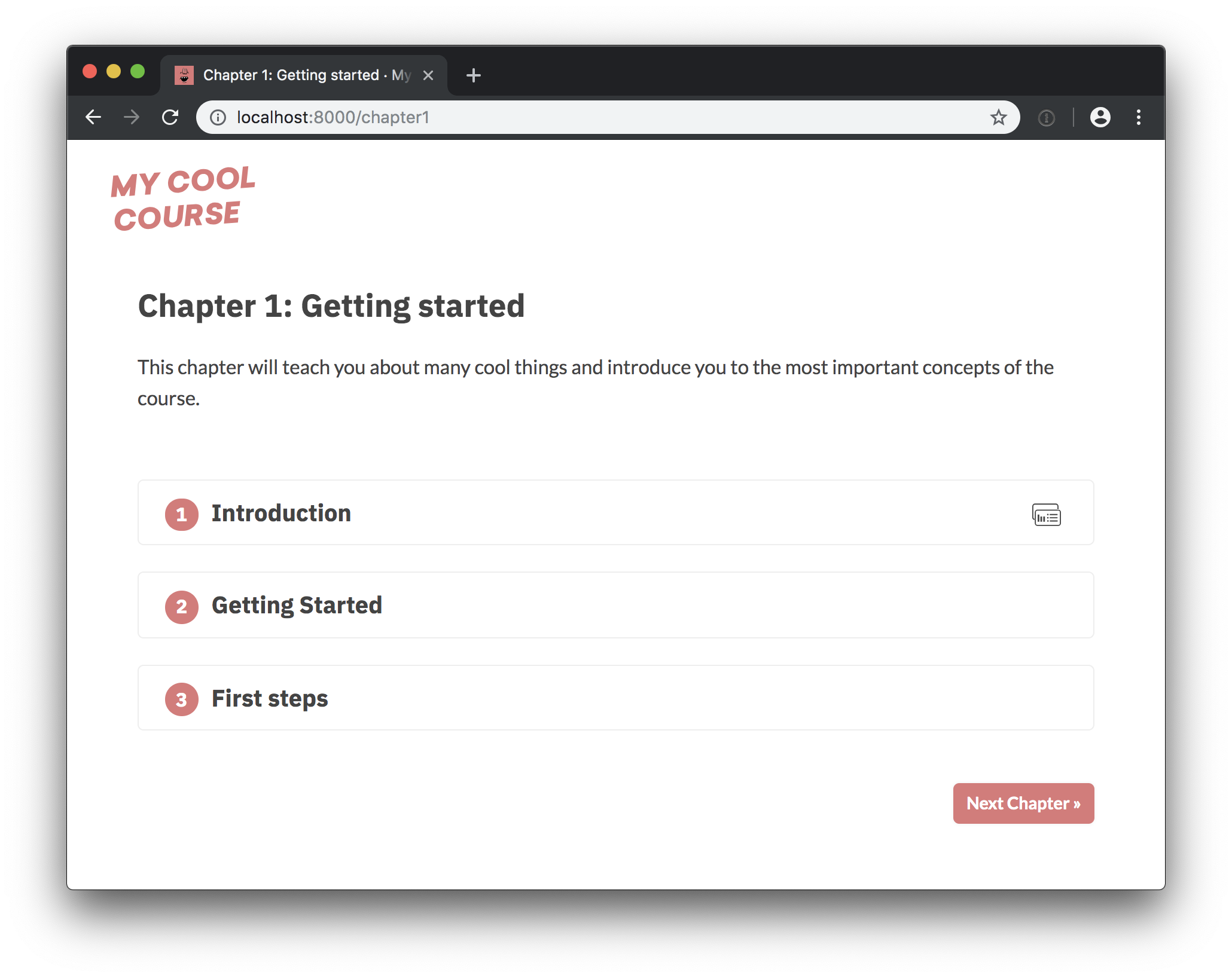](https://course-starter-r.netlify.com)
## ✅ Quickstart
1. [Import](https://github.com/new/import) this repo, install it and make sure
the app is running locally.
2. Customize the [`meta.json`](meta.json) and
[`binder/install.R`](binder/install.R).
3. Build a [Binder](https://mybinder.org) from the `binder` branch of this repo.
4. Add content (chapters, exercises and slides) and optionally add separate
content license.
5. Customize the UI theme in [`theme.sass`](theme.sass) and update images in
[`static`](static) as needed.
6. Deploy the app, e.g. to [Netlify](https://netlify.com).
### Running the app
To start the local development server, install [Gatsby](https://gatsbyjs.org)
and then all other dependencies. This should serve up the app on
`localhost:8000`.
```bash
npm install -g gatsby-cli # Install Gatsby globally
npm install # Install dependencies
npm run dev # Run the development server
```
## 💡Introduction
> This section was contributed by [@laderast](https://github.com/laderast).
> Thanks! ✨
### How does this repo work?
The course repository works with two components: Gatsby (front-end), and Binder
(back-end). We'll go over both of these to understand how it works as a whole.
### What is Gatsby?
[Gatsby](https://www.gatsbyjs.org/) is a JavaScript/react.js based web page
building framework, like Hugo, or Jekyll. The nice thing about it being
JavaScript is that JavaScript widgets that you build are tightly integrated.
You can think of Gatsby as being the client side of the lesson framework. All
code, solutions, tests, and chapter.md files are handled by Gatsby.
### What is Binder?
[Binder](https://gke.mybinder.org/) is a way of building Docker containers from
repositories that can be launched on a remote server/cluster (such as
mybinder.org). This Docker container can be based on a Dockerfile, or R image.
The thing about Binder is that the containers are ephemeral - if they're not
used, they're deleted off the Binder servers. The main applications of Binder
are:
1. Reproducible Research (shareable notebooks) and
2. Education (shareable notebooks)
You can think of Binder as being the server side of the lesson framework. It
needs the instructions on how to build the docker container (which is in the
`binder/` folder), and the data you want to use for the lessons (in the `data/`
folder).
The only thing you need to get started with R and Binder is a repo that has a
`runtime.txt` file, or a Dockerfile. The rest, such as datafiles, are optional,
but are usually contained in a Binder repository.
### How does Gatsby work with Binder?

Ines was super clever and designed a JavaScript plugin for Gatsby called
[Juniper](https://github.com/ines/juniper) to handle communication to and from
the Binder container using Jupyter kernels. That's how code gets executed on the
Binder container, and how code output (such as terminal messages, images, etc)
are received from the Binder container.
## Branches of this repo

There are two branches of this repo, which are used for different tasks:
- **master** - this is what the course is served out of via netlify:
http://r-bootcamp.netlify.com - any changes to exercises in this branch will
show up on the netlify page. The netlify page uses a JavaScript framework
called Gatsby to build the pages. Gatsby submits code to binder and receives
the output. It also handles the code checking. The parts of the repo that are
handled by Gatsby include:
1. exercises/solutions/tests
2. chapter.md files
3. slides (using reveal.js)
- **binder** - this is what the Binder image is built from. The reason they're
different is that binder forces a Docker container rebuild when a branch is
updated. So, if we served our container out of master, it would rebuild
everytime we modified a `chapter.md` or an exercise. If you need to add
packages, you will add them to the `binder/install.R` for this branch, and if
you need to add datasets, you can add them to the `data/` folder. The parts of
the repo handled by Binder include:
1. datasets in data/ folder (the container needs access to these to load data
from submitted code)
2. installation instructions in the binder/ folder for installing dependencies
I would say that the easiest thing to do is to occasionally merge `master` into
`binder` when you need to update the data:
Note that rebuilding the binder container can take a little bit of time (usually
on the order of 5 or 10 minutes or so), since it is installing/compiling
`tidyverse` for the container. You can always check the build status of the
container by clicking the badge below and looking at the log.
You can view the binder container here:
[](https://mybinder.org/v2/gh/ines/course-starter-r/binder)
or at: https://mybinder.org/v2/gh/ines/course-starter-r/binder
- you can launch an Rstudio instance to test the container by using the "new"
tab in the top right corner, and selecting 'Rstudio'. This is super helpful if
you want to test if code will work in the binder container.
### Adding Packages
If you need to add packages, add the appropriate `install.packages()` statement
into `binder/install.R`. When you do, check that the container was built
properly by clicking the binder link above.
Currently, `tidyverse` is installed in the binder container.
### `data/` folder
If you want to access datasets in the data folder, you can always refer to this
folder as `data/`. For example, to use `data/pets.csv`:
```
pets <- read.csv("data/pets.csv")
```
Remember, if you need to add a dataset to the repo, it needs to be done in the
`binder` branch into the `data/` folder.
### Using `decampr` to transfer your DataCamp repository
If you would like to transfer your courses from DataCamp, there is a package
made for that: [`decampr`](http://github.com/laderast/decampr). It will scan
your repository and attempt to extract exercise instructions, quizzes, exercise
code, and solutions and write them to the appropriate directory for your
project. For more info, please check out the `decampr` repo:
http://github.com/laderast/decampr
## 🎨 Customization
The app separates its source and content – so you usually shouldn't have to dig
into the JavaScript source to change things. The following points of
customization are available:
| Location | Description |
| -------------------- | ------------------------------------------------------------------------------------------------------------------------------------- |
| `meta.json` | General config settings, title, description etc. |
| `theme.sass` | Color theme. |
| `binder/install.R` | Packages to install. |
| `binder/runtime.txt` | YYYY-MM-DD snapshot at MRAN that will be used for installing libraries. [See here](https://github.com/binder-examples/r) for details. |
| `chapters` | The chapters, one Markdown file per chapter. |
| `slides` | The slides, one Markdown file per slide deck. |
| `static` | Static assets like images, will be copied to the root. |
### `meta.json`
The following meta settings are available. **Note that you have to re-start
Gatsby to see the changes if you're editing it while the server is running.**
| Setting | Description |
| -------------------- | ------------------------------------------------------------------------------------------------------------------------------------------ |
| `courseId` | Unique ID of the course. Will be used when saving completed exercises to the browser's local storage. |
| `title` | The title of the course. |
| `slogan` | Course slogan, displayed in the page title on the front page. |
| `description` | Course description. Used for site meta and in footer. |
| `bio` | Author bio. Used in the footer. |
| `siteUrl` | URL of the deployed site (without trailing slash). |
| `twitter` | Author twitter handle, used in Twitter cards meta. |
| `fonts` | [Google Fonts](https://fonts.google.com) to load. Should be the font part of the URL in the embed string, e.g. `Lato:400,400i,700,700i`. |
| `testTemplate` | Template used to validate the answers. `${solution}` will be replaced with the user code and `${test}` with the contents of the test file. |
| `juniper.repo` | Repo to build on Binder in `user/repo` format. Usually the same as this repo. |
| `juniper.branch` | Branch to build. Ideally not `master`, so the image is not rebuilt every time you push. |
| `juniper.lang` | Code language for syntax highlighting. |
| `juniper.kernelType` | The name of the kernel to use. |
| `juniper.debug` | Logs additional debugging info to the console. |
| `showProfileImage` | Whether to show the profile image in the footer. If `true`, a file `static/profile.jpg` needs to be available. |
| `footerLinks` | List of objects with `"text"` and `"url"` to display as links in the footer. |
| `theme` | Currently only used for the progressive web app, e.g. as the theme color on mobile. For the UI theme, edit `theme.sass`. |
### Static assets
All files added to `/static` will become available at the root of the deployed
site. So `/static/image.jpg` can be referenced in your course as `/image.jpg`.
The following assets need to be available and can be customized:
| File | Description |
| ----------------- | -------------------------------------------------------- |
| `icon.png` | Custom [favicon](https://en.wikipedia.org/wiki/Favicon). |
| `logo.svg` | The course logo. |
| `profile.jpg` | Photo or profile image. |
| `social.jpg` | Social image, displayed in Twitter and Facebook cards. |
| `icon_check.svg` | "Check" icon displayed on "Mark as completed" button. |
| `icon_slides.svg` | Icon displayed in the corner of a slides exercise. |
## ✏️ Content
### File formats
#### Chapters
Chapters are placed in [`/chapters`](/chapters) and are Markdown files
consisting of `<exercise>` components. They'll be turned into pages, e.g.
`/chapter1`. In their frontmatter block at the top of the file, they need to
specify `type: chapter`, as well as the following meta:
```yaml
---
title: The chapter title
description: The chapter description
prev: /chapter1 # exact path to previous chapter or null to not show a link
next: /chapter3 # exact path to next chapter or null to not show a link
id: 2 # unique identifier for chapter
type: chapter # important: this creates a standalone page from the chapter
---
```
#### Slides
Slides are placed in [`/slides`](/slides) and are markdown files consisting of
slide content, separated by `---`. They need to specify the following
frontmatter block at the top of the file:
```yaml
---
type: slides
---
```
The **first and last slide** use a special layout and will display the headline
in the center of the slide. **Speaker notes** (in this case, the script) can be
added at the end of a slide, prefixed by `Notes:`. They'll then be shown on the
right next to the slides. Here's an example slides file:
```markdown
---
type: slides
---
# Processing pipelines
Notes: This is a slide deck about processing pipelines.
---
# Next slide
- Some bullet points here
- And another bullet point
<img src="/image.jpg" alt="An image located in /static" />
```
### Custom Elements
When using custom elements, make sure to place a newline between the
opening/closing tags and the children. Otherwise, Markdown content may not
render correctly.
#### `<exercise>`
Container of a single exercise.
| Argument | Type | Description |
| ------------ | --------------- | -------------------------------------------------------------- |
| `id` | number / string | Unique exercise ID within chapter. |
| `title` | string | Exercise title. |
| `type` | string | Optional type. `"slides"` makes container wider and adds icon. |
| **children** | - | The contents of the exercise. |
```markdown
<exercise id="1" title="Introduction to spaCy">
Content goes here...
</exercise>
```
#### `<codeblock>`
| Argument | Type | Description |
| ------------ | --------------- | -------------------------------------------------------------------------------------------- |
| `id` | number / string | Unique identifier of the code exercise. |
| `source` | string | Name of the source file (without file extension). Defaults to `exc_${id}` if not set. |
| `solution` | string | Name of the solution file (without file extension). Defaults to `solution_${id}` if not set. |
| `test` | string | Name of the test file (without file extension). Defaults to `test_${id}` if not set. |
| **children** | string | Optional hints displayed when the user clicks "Show hints". |
```markdown
<codeblock id="02_03">
This is a hint!
</codeblock>
```
#### `<slides>`
Container to display slides interactively using Reveal.js and a Markdown file.
| Argument | Type | Description |
| -------- | ------ | --------------------------------------------- |
| `source` | string | Name of slides file (without file extension). |
```markdown
<slides source="chapter1_01_introduction-to-spacy">
</slides>
```
#### `<choice>`
Container for multiple-choice question.
| Argument | Type | Description |
| ------------ | --------------- | -------------------------------------------------------------------------------------------- |
| `id` | string / number | Optional unique ID. Can be used if more than one choice question is present in one exercise. |
| **children** | nodes | Only `<opt>` components for the options. |
```markdown
<choice>
<opt text="Option one">You have selected option one! This is not good.</opt>
<opt text="Option two" correct="true">Yay! </opt>
</choice>
```
#### `<opt>`
A multiple-choice option.
| Argument | Type | Description |
| ------------ | ------ | ---------------------------------------------------------------------------------------------- |
| `text` | string | The option text to be displayed. Supports inline HTML. |
| `correct` | string | `"true"` if the option is the correct answer. |
| **children** | string | The text to be displayed if the option is selected (explaining why it's correct or incorrect). |
### Setting up Binder
The [`install.R`](binder/install.R) in the repository defines the packages that
are installed when building it with Binder. You can specify the binder settings
like repo, branch and kernel type in the `"juniper"` section of the `meta.json`.
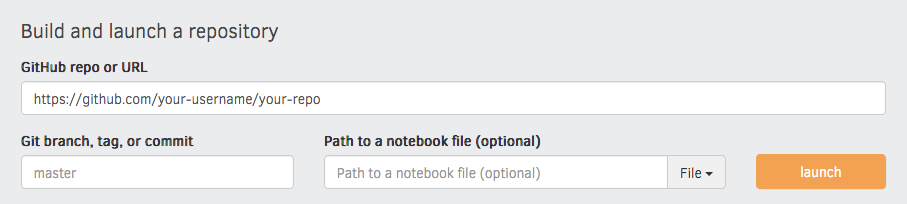
I'd recommend running the very first build via the interface on the
[Binder website](https://mybinder.org), as this gives you a detailed build log
and feedback on whether everything worked as expected. Enter your repository
URL, click "launch" and wait for it to install the dependencies and build the
image.
### Adding tests
To validate the code when the user hits "Submit", we're currently using a
slightly hacky trick. Since the R code is sent back to the kernel as a string,
we can manipulate it and add tests – for example, exercise `exc_01_02_01.R` will
be validated using `test_01_02_01.R` (if available). The user code and test are
combined using a string template. At the moment, the `testTemplate` in the
`meta.json` looks like this:
```r
success <- function(text) {
cat(paste("\033[32m", text, "\033[0m", sep = ""))
}
.solution <- "${solutionEscaped}"
${solution}
${test}
tryCatch({
test()
}, error = function(e) {
cat(paste("\033[31m", e[1], "\033[0m", sep = ""))
})
```
If present, `${solution}` will be replaced with the string value of the
submitted user code, and `${solutionEscaped}` with the code but with all `"`
replaced by `\"`, so we can assign it to a variable as a string and check
whether the submission includes something. We also insert the regular solution,
so we can actually run it and check the objects it creates. `${test}` is
replaced by the contents of the test file. The template also defines a `success`
function, which prints a formatted green message and can be used in the tests.
Finally, the `tryCatch` expression checks if the test function raises a `stop`
and if so, it outputs the formatted error message. This also hides the full
error traceback (which can easily leak the correct answers).
A test file could then look like this:
```r
test <- function() {
if (some_var != length(mtcars)) {
stop("Are you getting the correct length?")
}
if (!grepl("print(mtcars$gear)", .solution, fixed = TRUE)) {
stop("Are you printing the correct variable?")
}
success("Well done!")
}
```
The string answer is available as `.solution`, and the test also has access to
the solution code.
---
For more details on how it all works behind the scenes, see
[the original course repo](https://github.com/ines/spacy-course).
================================================
FILE: binder/install.R
================================================
install.packages("tidyverse")
install.packages("rjson")
================================================
FILE: binder/runtime.txt
================================================
r-2019-04-10
================================================
FILE: chapters/chapter1.md
================================================
---
title: 'Chapter 1: Getting started'
description:
'This chapter will teach you about many cool things and introduce you to the
most important concepts of the course.'
prev: null
next: /chapter2
type: chapter
id: 1
---
<exercise id="1" title="Introduction" type="slides">
<slides source="chapter1_01_introduction">
</slides>
</exercise>
<exercise id="2" title="Getting Started">
Let's ask some questions about the slides. Whats the correct answer?
<choice>
<opt text="Answer one">
This is not the correct answer.
</opt>
<opt text="Answer two" correct="true">
Good job!
</opt>
<opt text="Answer three">
This is not correct either.
</opt>
</choice>
</exercise>
<exercise id="3" title="First steps">
This is a code exercise. The content can be formatted in simple Markdown – so
you can have **bold text**, `code` or [links](https://spacy.io) or lists, like
the one for the instructions below.
- These are instructions and they can have bullet points.
- The code block below will look for the files `exc_01_03`, `solution_01_03` and
`test_01_03` in `/exercises`.
<codeblock id="01_03">
This is a hint.
</codeblock>
</exercise>
================================================
FILE: chapters/chapter2.md
================================================
---
title: 'Chapter 2: More stuff'
description:
'This chapter will teach you even more stuff and help you learn some new
concepts.'
prev: /chapter1
next: null
type: chapter
id: 2
---
================================================
FILE: exercises/exc_01_03.R
================================================
library(ggplot2)
mtcars$gear <- factor(mtcars$gear,levels=c(3,4,5),
labels=c("3gears","4gears","5gears"))
mtcars$am <- factor(mtcars$am,levels=c(0,1),
labels=c("Automatic","Manual"))
mtcars$cyl <- factor(mtcars$cyl,levels=c(4,6,8),
labels=c("4cyl","6cyl","8cyl"))
# Print the gear variable of mtcars
print(____)
# Assign the length of mtcars to some_var
some_var <- ____
# Uncomment this to see the plot
# print(qplot(mpg, data=mtcars, geom="density", fill=gear, alpha=I(.5)))
================================================
FILE: exercises/solution_01_03.R
================================================
library(ggplot2)
mtcars$gear <- factor(mtcars$gear,levels=c(3,4,5),
labels=c("3gears","4gears","5gears"))
mtcars$am <- factor(mtcars$am,levels=c(0,1),
labels=c("Automatic","Manual"))
mtcars$cyl <- factor(mtcars$cyl,levels=c(4,6,8),
labels=c("4cyl","6cyl","8cyl"))
# Print the gear variable of mtcars
print(mtcars$gear)
# Assign the length of mtcars to some_var
some_var <- length(mtcars)
# Uncomment this to see the plot
# print(qplot(mpg, data=mtcars, geom="density", fill=gear, alpha=I(.5)))
================================================
FILE: exercises/test_01_03.R
================================================
test <- function() {
# Here we can either check objects created in the solution code, or the
# string value of the solution, available as .solution. See the testTemplate
# in the meta.json for details.
if (some_var != length(mtcars)) {
stop("Are you getting the correct length?")
}
if (!grepl("print(mtcars$gear)", .solution, fixed = TRUE)) {
stop("Are you printing the correct variable?")
}
# This function is defined in the testTemplate
success("Well done!")
}
================================================
FILE: gatsby-browser.js
================================================
import python from 'codemirror/mode/r/r' // eslint-disable-line no-unused-vars
// This doesn't have to be here – but if we do import Juniper here, it's already
// preloaded and cached when we dynamically import it in code.js.
import Juniper from './src/components/juniper' // eslint-disable-line no-unused-vars
================================================
FILE: gatsby-config.js
================================================
const meta = require('./meta.json')
const autoprefixer = require('autoprefixer')
module.exports = {
siteMetadata: meta,
plugins: [
{
resolve: `gatsby-plugin-sass`,
options: {
indentedSyntax: true,
postCssPlugins: [autoprefixer()],
cssLoaderOptions: {
localIdentName:
process.env.NODE_ENV == 'development'
? '[name]-[local]-[hash:8]'
: '[hash:8]',
},
},
},
`gatsby-plugin-react-helmet`,
{
resolve: `gatsby-source-filesystem`,
options: {
name: `chapters`,
path: `${__dirname}/chapters`,
},
},
{
resolve: `gatsby-source-filesystem`,
options: {
name: `slides`,
path: `${__dirname}/slides`,
},
},
{
resolve: `gatsby-source-filesystem`,
options: {
name: `exercises`,
path: `${__dirname}/exercises`,
},
},
{
resolve: 'gatsby-plugin-react-svg',
options: {
rule: {
include: /static/,
},
},
},
{
resolve: `gatsby-transformer-remark`,
options: {
plugins: [
`gatsby-remark-copy-linked-files`,
{
resolve: `gatsby-remark-prismjs`,
options: {
noInlineHighlight: true,
},
},
{
resolve: `gatsby-remark-smartypants`,
options: {
dashes: 'oldschool',
},
},
{
resolve: `gatsby-remark-images`,
options: {
maxWidth: 790,
linkImagesToOriginal: true,
sizeByPixelDensity: false,
showCaptions: true,
quality: 80,
withWebp: { quality: 80 },
},
},
`gatsby-remark-unwrap-images`,
],
},
},
`gatsby-transformer-sharp`,
`gatsby-plugin-sharp`,
`gatsby-plugin-sitemap`,
{
resolve: `gatsby-plugin-manifest`,
options: {
name: meta.title,
short_name: meta.title,
start_url: `/`,
background_color: meta.theme,
theme_color: meta.theme,
display: `minimal-ui`,
icon: `static/icon.png`,
},
},
`gatsby-plugin-offline`,
],
}
================================================
FILE: gatsby-node.js
================================================
const path = require('path')
const { createFilePath } = require('gatsby-source-filesystem')
const chapterTemplate = path.resolve('src/templates/chapter.js')
function replacePath(pagePath) {
return pagePath === `/` ? pagePath : pagePath.replace(/\/$/, ``)
}
async function onCreateNode({
node,
actions,
getNode,
loadNodeContent,
createNodeId,
createContentDigest,
}) {
const { createNodeField, createNode, createParentChildLink } = actions
if (node.internal.type === 'MarkdownRemark') {
const slug = createFilePath({ node, getNode, basePath: 'chapters', trailingSlash: false })
createNodeField({ name: 'slug', node, value: slug })
} else if (node.extension === 'r') {
// Load the contents of the Python file and make it available via GraphQL
// https://www.gatsbyjs.org/docs/creating-a-transformer-plugin/
const content = await loadNodeContent(node)
const contentDigest = createContentDigest(content)
const id = createNodeId(`${node.id}-code`)
const internal = { type: 'Code', contentDigest }
const codeNode = {
id,
parent: node.id,
children: [],
code: content,
name: node.name,
internal,
}
createNode(codeNode)
createParentChildLink({ parent: node, child: codeNode })
}
}
exports.onCreateNode = onCreateNode
exports.createPages = ({ actions, graphql }) => {
const { createPage } = actions
return graphql(`
{
allMarkdownRemark {
edges {
node {
frontmatter {
title
type
}
fields {
slug
}
}
}
}
}
`).then(result => {
if (result.errors) {
return Promise.reject(result.errors)
}
const posts = result.data.allMarkdownRemark.edges.filter(
({ node }) => node.frontmatter.type == 'chapter'
)
posts.forEach(({ node }) => {
createPage({
path: replacePath(node.fields.slug),
component: chapterTemplate,
context: { slug: node.fields.slug },
})
})
})
}
================================================
FILE: meta.json
================================================
{
"courseId": "course-starter-r",
"title": "My cool online course",
"slogan": "A free online course",
"description": "Lorem ipsum dolor sit amet, consectetur adipiscing elit. Nullam tristique libero at est congue, sed vestibulum tortor laoreet. Aenean egestas massa non commodo consequat. Curabitur faucibus, sapien vitae euismod imperdiet, arcu erat semper urna, in accumsan sapien dui ac mi. Pellentesque felis lorem, semper nec velit nec, consectetur placerat enim.",
"bio": "Lorem ipsum dolor sit amet, consectetur adipiscing elit. Nullam tristique libero at est congue, sed vestibulum tortor laoreet. Aenean egestas massa non commodo consequat. Curabitur faucibus, sapien vitae euismod imperdiet, arcu erat semper urna.",
"siteUrl": "https://course-starter-r.netlify.com",
"twitter": "spacy_io",
"fonts": "IBM+Plex+Mono:500|IBM+Plex+Sans:700|Lato:400,400i,700,700i",
"testTemplate": "success <- function(text) {\n cat(paste(\"\\033[32m\", text, \"\\033[0m\", sep = \"\"))\n}\n\n.solution <- \"${solutionEscaped}\"\n\n${solution}\n\n${test}\ntryCatch({\n test()\n}, error = function(e) {\n cat(paste(\"\\033[31m\", e[1], \"\\033[0m\", sep = \"\"))\n})",
"juniper": {
"repo": "ines/course-starter-r",
"branch": "binder",
"lang": "r",
"kernelType": "ir",
"debug": false
},
"showProfileImage": true,
"footerLinks": [
{ "text": "Website", "url": "https://spacy.io" },
{ "text": "Source", "url": "https://github.com/ines/course-starter-r" },
{ "text": "Built with ♥", "url": "https://github.com/ines/course-starter-r" }
],
"theme": "#de7878"
}
================================================
FILE: package.json
================================================
{
"name": "course-starter-r",
"private": true,
"description": "Starter package to build interactive R courses",
"version": "0.0.1",
"author": "Ines Montani <ines@explosion.ai>",
"dependencies": {
"@illinois/react-use-local-storage": "^1.1.0",
"@jupyterlab/outputarea": "^0.19.1",
"@jupyterlab/rendermime": "^0.19.1",
"@phosphor/widgets": "^1.6.0",
"autoprefixer": "^9.4.7",
"classnames": "^2.2.6",
"codemirror": "^5.43.0",
"gatsby": "^2.1.4",
"gatsby-image": "^2.0.29",
"gatsby-plugin-manifest": "^2.0.17",
"gatsby-plugin-offline": "^2.0.23",
"gatsby-plugin-react-helmet": "^3.0.6",
"gatsby-plugin-react-svg": "^2.1.1",
"gatsby-plugin-sass": "^2.0.10",
"gatsby-plugin-sharp": "^2.0.29",
"gatsby-plugin-sitemap": "^2.0.5",
"gatsby-remark-copy-linked-files": "^2.0.9",
"gatsby-remark-images": "^3.0.4",
"gatsby-remark-prismjs": "^3.2.4",
"gatsby-remark-smartypants": "^2.0.8",
"gatsby-remark-unwrap-images": "^1.0.1",
"gatsby-source-filesystem": "^2.0.20",
"gatsby-transformer-remark": "^2.2.5",
"gatsby-transformer-sharp": "^2.1.17",
"juniper-js": "^0.1.0",
"node-sass": "^4.11.0",
"prismjs": "^1.15.0",
"react": "^16.8.2",
"react-dom": "^16.8.2",
"react-helmet": "^5.2.0",
"rehype-react": "^3.1.0",
"remark-react": "^5.0.1",
"reveal.js": "^3.8.0"
},
"scripts": {
"build": "gatsby build",
"dev": "gatsby develop",
"lint": "eslint **",
"clear": "rm -rf .cache",
"test": "echo \"Write tests! -> https://gatsby.app/unit-testing\""
},
"devDependencies": {
"browser-monads": "^1.0.0",
"prettier": "^1.16.4"
},
"repository": {
"type": "git",
"url": "https://github.com/ines/course-starter-python"
}
}
================================================
FILE: slides/chapter1_01_introduction.md
================================================
---
type: slides
---
# Introduction
Notes: Text at the end of a slide prefixed like this will be displayed as
speaker notes on the side. Slides can be separated with a divider: ---.
---
# This is a slide
```r
# Print something
print("Hello world", quote = FALSE)
```
```out
Hello world
```
- Slides can have code, bullet points, tables and pretty much all other Markdown
elements.
- This is another bullet point.
<img src="profile.jpg" alt="This image is in /static" width="25%">
Notes: Some more notes go here
---
# Let's practice!
Notes: Lorem ipsum dolor sit amet, consectetur adipiscing elit. Nullam tristique
libero at est congue, sed vestibulum tortor laoreet. Aenean egestas massa non
commodo consequat. Curabitur faucibus, sapien vitae euismod imperdiet, arcu erat
semper urna, in accumsan sapien dui ac mi. Pellentesque felis lorem, semper nec
velit nec, consectetur placerat enim.
================================================
FILE: src/components/button.js
================================================
import React from 'react'
import classNames from 'classnames'
import IconCheck from '../../static/icon_check.svg'
import classes from '../styles/button.module.sass'
export const Button = ({ Component = 'button', children, onClick, variant, small, className }) => {
const buttonClassNames = classNames(classes.root, className, {
[classes.primary]: variant === 'primary',
[classes.secondary]: variant === 'secondary',
[classes.small]: !!small,
})
return (
<Component className={buttonClassNames} onClick={onClick}>
{children}
</Component>
)
}
export const CompleteButton = ({ completed, toggleComplete, small = true }) => {
const buttonClassNames = classNames({
[classes.completeInactive]: !completed,
[classes.completeActive]: completed,
})
return (
<Button small={small} onClick={toggleComplete} className={buttonClassNames}>
{!completed ? (
'Mark as completed'
) : (
<>
<IconCheck width={14} height={14} className={classes.completeIcon} />{' '}
<span className={classes.completeLabel}>Completed</span>{' '}
<span className={classes.completeLabelHover}>Remove from completed</span>
</>
)}
</Button>
)
}
================================================
FILE: src/components/choice.js
================================================
import React, { useState, useCallback } from 'react'
import classNames from 'classnames'
import { Button } from './button'
import classes from '../styles/choice.module.sass'
const Choice = ({ id = '0', children = [] }) => {
const [selected, setSelected] = useState(null)
const [answer, setAnswer] = useState(null)
const handleAnswer = useCallback(() => setAnswer(selected), [selected])
const options = children.filter(child => child !== '\n')
return (
<>
{options.map(({ key, props }, i) => (
<p key={key} className={classes.option}>
<input
className={classes.input}
name={`choice-${id}`}
id={`choice-${id}-${i}`}
value={i}
type="radio"
checked={selected === i}
onChange={() => setSelected(i)}
/>
<label
className={classes.label}
htmlFor={`choice-${id}-${i}`}
dangerouslySetInnerHTML={{ __html: `<span>${props.text}</span>` }}
/>
</p>
))}
<Button variant="primary" onClick={handleAnswer}>
Submit
</Button>
{options.map(({ key, props }, i) => {
const isCorrect = !!props.correct
return answer === i ? (
<div
key={key}
className={classNames(classes.answer, { [classes.correct]: isCorrect })}
>
<strong
className={classNames(classes.answerLabel, {
[classes.answerLabelCorrect]: isCorrect,
})}
>
{isCorrect ? "That's correct! " : 'Incorrect. '}
</strong>
{props.children}
</div>
) : null
})}
</>
)
}
export const Option = ({ children }) => {
return children
}
export default Choice
================================================
FILE: src/components/code.js
================================================
import React from 'react'
import { StaticQuery, graphql } from 'gatsby'
import { Hint } from './hint'
import { Button } from './button'
import classes from '../styles/code.module.sass'
function getFiles({ allCode }) {
return Object.assign(
{},
...allCode.edges.map(({ node }) => ({
[node.name]: node.code,
}))
)
}
function makeTest(template, testFile, solution) {
// Escape quotation marks in the solution code, for cases where we
// can only place the solution in regular quotes.
const solutionEscaped = solution.replace(/"/g, '\\"')
return template
.replace(/\${solutionEscaped}/g, solutionEscaped)
.replace(/\${solution}/g, solution)
.replace(/\${test}/g, testFile)
}
class CodeBlock extends React.Component {
state = { Juniper: null, showSolution: false, key: 0 }
handleShowSolution() {
this.setState({ showSolution: true })
}
handleReset() {
// Using the key as a hack to force component to rerender
this.setState({ showSolution: false, key: this.state.key + 1 })
}
updateJuniper() {
// This type of stuff only really works in class components. I'm not
// sure why, but I've tried with function components and hooks lots of
// times and couldn't get it to work. So class component it is.
if (!this.state.Juniper) {
// We need a dynamic import here for SSR. Juniper's dependencies
// include references to the global window object and I haven't
// managed to fix this using webpack yet. If we imported Juniper
// at the top level, Gatsby won't build.
import('./juniper').then(Juniper => {
this.setState({ Juniper: Juniper.default })
})
}
}
componentDidMount() {
this.updateJuniper()
}
componentDidUpdate() {
this.updateJuniper()
}
render() {
const { Juniper, showSolution } = this.state
const { id, source, solution, test, children } = this.props
const sourceId = source || `exc_${id}`
const solutionId = solution || `solution_${id}`
const testId = test || `test_${id}`
const juniperClassNames = {
cell: classes.cell,
input: classes.input,
button: classes.button,
output: classes.output,
}
const hintActions = [
{ text: 'Show solution', onClick: () => this.handleShowSolution() },
{ text: 'Reset', onClick: () => this.handleReset() },
]
return (
<StaticQuery
query={graphql`
{
site {
siteMetadata {
testTemplate
juniper {
repo
branch
kernelType
lang
debug
}
}
}
allCode {
edges {
node {
name
code
}
}
}
}
`}
render={data => {
const { testTemplate } = data.site.siteMetadata
const { repo, branch, kernelType, debug, lang } = data.site.siteMetadata.juniper
const files = getFiles(data)
const sourceFile = files[sourceId]
const solutionFile = files[solutionId]
const testFile = files[testId]
return (
<div className={classes.root} key={this.state.key}>
{Juniper && (
<Juniper
msgButton={null}
classNames={juniperClassNames}
repo={repo}
branch={branch}
lang={lang}
kernelType={kernelType}
debug={debug}
actions={({ runCode }) => (
<>
<Button onClick={() => runCode()}>Run Code</Button>
{testFile && (
<Button
variant="primary"
onClick={() =>
runCode(value =>
makeTest(testTemplate, testFile, value)
)
}
>
Submit
</Button>
)}
</>
)}
>
{showSolution ? solutionFile : sourceFile}
</Juniper>
)}
<Hint actions={hintActions}>{children}</Hint>
</div>
)
}}
/>
)
}
}
export default CodeBlock
================================================
FILE: src/components/exercise.js
================================================
import React, { useRef, useCallback, useContext, useEffect } from 'react'
import classNames from 'classnames'
import { Button, CompleteButton } from './button'
import { ChapterContext } from '../context'
import IconSlides from '../../static/icon_slides.svg'
import classes from '../styles/exercise.module.sass'
const Exercise = ({ id, title, type, children }) => {
const excRef = useRef()
const excId = parseInt(id)
const { activeExc, setActiveExc, completed, setCompleted } = useContext(ChapterContext)
const isExpanded = activeExc === excId
const isCompleted = completed.includes(excId)
useEffect(() => {
if (isExpanded && excRef.current) {
excRef.current.scrollIntoView()
}
}, [isExpanded])
const handleExpand = useCallback(() => setActiveExc(isExpanded ? null : excId), [
isExpanded,
excId,
])
const handleNext = useCallback(() => setActiveExc(excId + 1))
const handleSetCompleted = useCallback(() => {
const newCompleted = isCompleted
? completed.filter(v => v !== excId)
: [...completed, excId]
setCompleted(newCompleted)
}, [isCompleted, completed, excId])
const rootClassNames = classNames(classes.root, {
[classes.expanded]: isExpanded,
[classes.wide]: isExpanded && type === 'slides',
[classes.completed]: !isExpanded && isCompleted,
})
const titleClassNames = classNames(classes.title, {
[classes.titleExpanded]: isExpanded,
})
return (
<section ref={excRef} id={id} className={rootClassNames}>
<h2 className={titleClassNames} onClick={handleExpand}>
<span>
<span
className={classNames(classes.id, { [classes.idCompleted]: isCompleted })}
>
{excId}
</span>
{title}
</span>
{type === 'slides' && <IconSlides className={classes.icon} />}
</h2>
{isExpanded && (
<div>
{children}
<footer className={classes.footer}>
<CompleteButton
completed={isCompleted}
toggleComplete={handleSetCompleted}
/>
<Button onClick={handleNext} variant="secondary" small>
Next
</Button>
</footer>
</div>
)}
</section>
)
}
export default Exercise
================================================
FILE: src/components/hint.js
================================================
import React, { useState, useCallback } from 'react'
import classes from '../styles/hint.module.sass'
export const Hint = ({ expanded = false, actions = [], children }) => {
const [isExpanded, setIsExpanded] = useState(expanded)
const handleExpand = useCallback(() => setIsExpanded(!isExpanded), [isExpanded])
return (
<aside className={classes.root}>
{isExpanded && children && <div className={classes.content}>{children}</div>}
<menu className={classes.actions}>
{children && (
<button className={classes.label} onClick={handleExpand}>
{isExpanded ? 'Hide hints' : 'Show hints'}
</button>
)}
{actions.map(({ text, onClick }, i) => (
<button className={classes.label} key={i} onClick={onClick}>
{text}
</button>
))}
</menu>
</aside>
)
}
================================================
FILE: src/components/juniper.js
================================================
import React from 'react'
import PropTypes from 'prop-types'
import CodeMirror from 'codemirror'
import { Widget } from '@phosphor/widgets'
import { Kernel, ServerConnection } from '@jupyterlab/services'
import { OutputArea, OutputAreaModel } from '@jupyterlab/outputarea'
import { RenderMimeRegistry, standardRendererFactories } from '@jupyterlab/rendermime'
import { window } from 'browser-monads'
class Juniper extends React.Component {
outputRef = null
inputRef = null
state = { content: null, cm: null, kernel: null, renderers: null, fromStorage: null }
static defaultProps = {
children: '',
branch: 'master',
url: 'https://mybinder.org',
serverSettings: {},
kernelType: 'python3',
lang: 'python',
theme: 'default',
isolateCells: true,
useBinder: true,
storageKey: 'juniper',
useStorage: true,
storageExpire: 60,
debug: true,
msgButton: 'run',
msgLoading: 'Loading...',
msgError: 'Connecting failed. Please reload and try again.',
classNames: {
cell: 'juniper-cell',
input: 'juniper-input',
button: 'juniper-button',
output: 'juniper-output',
},
}
static propTypes = {
children: PropTypes.string,
repo: PropTypes.string.isRequired,
branch: PropTypes.string,
url: PropTypes.string,
serverSettings: PropTypes.object,
kernelType: PropTypes.string,
lang: PropTypes.string,
theme: PropTypes.string,
isolateCells: PropTypes.bool,
useBinder: PropTypes.bool,
useStorage: PropTypes.bool,
storageExpire: PropTypes.number,
msgButton: PropTypes.string,
msgLoading: PropTypes.string,
msgError: PropTypes.string,
classNames: PropTypes.shape({
cell: PropTypes.string,
input: PropTypes.string,
button: PropTypes.string,
output: PropTypes.string,
}),
actions: PropTypes.func,
}
componentDidMount() {
this.setState({ content: this.props.children })
const renderers = standardRendererFactories.filter(factory =>
factory.mimeTypes.includes('text/latex') ? window.MathJax : true
)
const outputArea = new OutputArea({
model: new OutputAreaModel({ trusted: true }),
rendermime: new RenderMimeRegistry({ initialFactories: renderers }),
})
const cm = new CodeMirror(this.inputRef, {
value: this.props.children.trim(),
mode: this.props.lang,
theme: this.props.theme,
})
this.setState({ cm })
const runCode = wrapper => {
const value = cm.getValue()
this.execute(outputArea, wrapper ? wrapper(value) : value)
}
const setValue = value => cm.setValue(value)
cm.setOption('extraKeys', { 'Shift-Enter': runCode })
Widget.attach(outputArea, this.outputRef)
this.setState({ runCode, setValue })
}
log(logFunction) {
if (this.props.debug) {
logFunction()
}
}
componentWillReceiveProps({ children }) {
if (children !== this.state.content && this.state.cm) {
this.state.cm.setValue(children.trim())
}
}
/**
* Request a binder, e.g. from mybinder.org
* @param {string} repo - Repository name in the format 'user/repo'.
* @param {string} branch - The repository branch, e.g. 'master'.
* @param {string} url - The binder reployment URL, including 'http(s)'.
* @returns {Promise} - Resolved with Binder settings, rejected with Error.
*/
requestBinder(repo, branch, url) {
const binderUrl = `${url}/build/gh/${repo}/${branch}`
this.log(() => console.info('building', { binderUrl }))
return new Promise((resolve, reject) => {
const es = new EventSource(binderUrl)
es.onerror = err => {
es.close()
this.log(() => console.error('failed'))
reject(new Error(err))
}
let phase = null
es.onmessage = ({ data }) => {
const msg = JSON.parse(data)
if (msg.phase && msg.phase !== phase) {
phase = msg.phase.toLowerCase()
this.log(() => console.info(phase === 'ready' ? 'server-ready' : phase))
}
if (msg.phase === 'failed') {
es.close()
reject(new Error(msg))
} else if (msg.phase === 'ready') {
es.close()
const settings = {
baseUrl: msg.url,
wsUrl: `ws${msg.url.slice(4)}`,
token: msg.token,
}
resolve(settings)
}
}
})
}
/**
* Request kernel and estabish a server connection via the JupyerLab service
* @param {object} settings - The server settings.
* @returns {Promise} - A promise that's resolved with the kernel.
*/
requestKernel(settings) {
if (this.props.useStorage) {
const timestamp = new Date().getTime() + this.props.storageExpire * 60 * 1000
const json = JSON.stringify({ settings, timestamp })
window.localStorage.setItem(this.props.storageKey, json)
}
const serverSettings = ServerConnection.makeSettings(settings)
return Kernel.startNew({
type: this.props.kernelType,
name: this.props.kernelType,
serverSettings,
}).then(kernel => {
this.log(() => console.info('ready'))
return kernel
})
}
/**
* Get a kernel by requesting a binder or from localStorage / user settings
* @returns {Promise}
*/
getKernel() {
if (this.props.useStorage) {
const stored = window.localStorage.getItem(this.props.storageKey)
if (stored) {
this.setState({ fromStorage: true })
const { settings, timestamp } = JSON.parse(stored)
if (timestamp && new Date().getTime() < timestamp) {
return this.requestKernel(settings)
}
window.localStorage.removeItem(this.props.storageKey)
}
}
if (this.props.useBinder) {
return this.requestBinder(this.props.repo, this.props.branch, this.props.url).then(
settings => this.requestKernel(settings)
)
}
return this.requestKernel(this.props.serverSettings)
}
/**
* Render the kernel response in a JupyterLab output area
* @param {OutputArea} outputArea - The cell's output area.
* @param {string} code - The code to execute.
*/
renderResponse(outputArea, code) {
outputArea.future = this.state.kernel.requestExecute({ code })
outputArea.model.add({
output_type: 'stream',
name: 'loading',
text: this.props.msgLoading,
})
outputArea.model.clear(true)
}
/**
* Process request to execute the code
* @param {OutputArea} - outputArea - The cell's output area.
* @param {string} code - The code to execute.
*/
execute(outputArea, code) {
this.log(() => console.info('executing'))
if (this.state.kernel) {
if (this.props.isolateCells) {
this.state.kernel
.restart()
.then(() => this.renderResponse(outputArea, code))
.catch(() => {
this.log(() => console.error('failed'))
this.setState({ kernel: null })
outputArea.model.clear()
outputArea.model.add({
output_type: 'stream',
name: 'failure',
text: this.props.msgError,
})
})
return
}
this.renderResponse(outputArea, code)
return
}
this.log(() => console.info('requesting kernel'))
const url = this.props.url.split('//')[1]
const action = !this.state.fromStorage ? 'Launching' : 'Reconnecting to'
outputArea.model.clear()
outputArea.model.add({
output_type: 'stream',
name: 'stdout',
text: `${action} Docker container on ${url}...`,
})
new Promise((resolve, reject) =>
this.getKernel()
.then(resolve)
.catch(reject)
)
.then(kernel => {
this.setState({ kernel })
this.renderResponse(outputArea, code)
})
.catch(() => {
this.log(() => console.error('failed'))
this.setState({ kernel: null })
if (this.props.useStorage) {
this.setState({ fromStorage: false })
window.localStorage.removeItem(this.props.storageKey)
}
outputArea.model.clear()
outputArea.model.add({
output_type: 'stream',
name: 'failure',
text: this.props.msgError,
})
})
}
render() {
return (
<div className={this.props.classNames.cell}>
<div
className={this.props.classNames.input}
ref={x => {
this.inputRef = x
}}
/>
{this.props.msgButton && (
<button className={this.props.classNames.button} onClick={this.state.runCode}>
{this.props.msgButton}
</button>
)}
{this.props.actions && this.props.actions(this.state)}
<div
ref={x => {
this.outputRef = x
}}
className={this.props.classNames.output}
/>
</div>
)
}
}
export default Juniper
================================================
FILE: src/components/layout.js
================================================
import React from 'react'
import { StaticQuery, graphql } from 'gatsby'
import SEO from './seo'
import { Link } from './link'
import { H3 } from './typography'
import Logo from '../../static/logo.svg'
import '../styles/index.sass'
import classes from '../styles/layout.module.sass'
const Layout = ({ isHome, title, description, children }) => {
return (
<StaticQuery
query={graphql`
{
site {
siteMetadata {
title
description
bio
showProfileImage
footerLinks {
text
url
}
}
}
}
`}
render={data => {
const meta = data.site.siteMetadata
return (
<>
<SEO title={title} description={description} />
<main className={classes.root}>
{!isHome && (
<h1 className={classes.logo}>
<Link hidden to="/">
<Logo width={150} height={54} aria-label={meta.title} />
</Link>
</h1>
)}
<div className={classes.content}>
{(title || description) && (
<header className={classes.header}>
{title && <h1 className={classes.title}>{title}</h1>}
{description && (
<p className={classes.description}>{description}</p>
)}
</header>
)}
{children}
</div>
<footer className={classes.footer}>
<div className={classes.footerContent}>
<section className={classes.footerSection}>
<H3>About this course</H3>
<p>{meta.description}</p>
</section>
<section className={classes.footerSection}>
<H3>About me</H3>
{meta.showProfileImage && (
<img
src="/profile.jpg"
alt=""
className={classes.profile}
/>
)}
<p>{meta.bio}</p>
</section>
{meta.footerLinks && (
<ul className={classes.footerLinks}>
{meta.footerLinks.map(({ text, url }, i) => (
<li key={i} className={classes.footerLink}>
<Link variant="secondary" to={url}>
{text}
</Link>
</li>
))}
</ul>
)}
</div>
</footer>
</main>
</>
)
}}
/>
)
}
export default Layout
================================================
FILE: src/components/link.js
================================================
import React from 'react'
import PropTypes from 'prop-types'
import { Link as GatsbyLink } from 'gatsby'
import classNames from 'classnames'
import classes from '../styles/link.module.sass'
export const Link = ({ children, to, href, onClick, variant, hidden, className, ...other }) => {
const dest = to || href
const external = /(http(s?)):\/\//gi.test(dest)
const linkClassNames = classNames(classes.root, className, {
[classes.hidden]: hidden,
[classes.secondary]: variant === 'secondary',
})
if (!external) {
if ((dest && /^#/.test(dest)) || onClick) {
return (
<a href={dest} onClick={onClick} className={linkClassNames}>
{children}
</a>
)
}
return (
<GatsbyLink to={dest} className={linkClassNames} {...other}>
{children}
</GatsbyLink>
)
}
return (
<a
href={dest}
className={linkClassNames}
target="_blank"
rel="noopener nofollow noreferrer"
{...other}
>
{children}
</a>
)
}
Link.propTypes = {
children: PropTypes.node.isRequired,
to: PropTypes.string,
href: PropTypes.string,
onClick: PropTypes.func,
variant: PropTypes.oneOf(['secondary', null]),
hidden: PropTypes.bool,
className: PropTypes.string,
}
================================================
FILE: src/components/seo.js
================================================
import React from 'react'
import Helmet from 'react-helmet'
import { StaticQuery, graphql } from 'gatsby'
const SEO = ({ title, description }) => (
<StaticQuery
query={query}
render={data => {
const lang = 'en'
const siteMetadata = data.site.siteMetadata
const pageTitle = title
? `${title} · ${siteMetadata.title}`
: `${siteMetadata.title} · ${siteMetadata.slogan}`
const pageDesc = description || siteMetadata.description
const image = `${siteMetadata.siteUrl}/social.jpg`
const meta = [
{
name: 'description',
content: pageDesc,
},
{
property: 'og:title',
content: pageTitle,
},
{
property: 'og:description',
content: pageDesc,
},
{
property: 'og:type',
content: `website`,
},
{
property: 'og:site_name',
content: siteMetadata.title,
},
{
property: 'og:image',
content: image,
},
{
name: 'twitter:card',
content: 'summary_large_image',
},
{
name: 'twitter:image',
content: image,
},
{
name: 'twitter:creator',
content: `@${siteMetadata.twitter}`,
},
{
name: 'twitter:site',
content: `@${siteMetadata.twitter}`,
},
{
name: 'twitter:title',
content: pageTitle,
},
{
name: 'twitter:description',
content: pageDesc,
},
]
return (
<Helmet defer={false} htmlAttributes={{ lang }} title={pageTitle} meta={meta}>
{siteMetadata.fonts && (
<link
href={`https://fonts.googleapis.com/css?family=${siteMetadata.fonts}`}
rel="stylesheet"
/>
)}
</Helmet>
)
}}
/>
)
export default SEO
const query = graphql`
query DefaultSEOQuery {
site {
siteMetadata {
title
description
slogan
siteUrl
twitter
fonts
}
}
}
`
================================================
FILE: src/components/slides.js
================================================
import React from 'react'
import { StaticQuery, graphql } from 'gatsby'
import Marked from 'reveal.js/plugin/markdown/marked.js'
import classNames from 'classnames'
import '../styles/reveal.css'
import classes from '../styles/slides.module.sass'
function getFiles({ allMarkdownRemark }) {
return Object.assign(
{},
...allMarkdownRemark.edges.map(({ node }) => ({
[node.fields.slug.replace('/', '')]: node.rawMarkdownBody,
}))
)
}
function getSlideContent(data, source) {
const files = getFiles(data)
const file = files[source] || ''
return file.split('\n---\n').map(f => f.trim())
}
class Slides extends React.Component {
componentDidMount() {
import('reveal.js').then(({ default: Reveal }) => {
window.Reveal = Reveal
window.marked = Marked
import('reveal.js/plugin/markdown/markdown.js').then(({ RevealMarkdown }) => {
RevealMarkdown.init()
Reveal.initialize({
center: false,
progress: false,
showNotes: true,
controls: true,
width: '100%',
height: 600,
minScale: 0.75,
maxScale: 1,
})
})
})
}
componentWillUnmount() {
// Work around default reveal.js behaviour that doesn't allow
// re-initialization and clashes with React
delete window.Reveal
delete window.marked
delete require.cache[require.resolve('reveal.js')]
delete require.cache[require.resolve('reveal.js/plugin/markdown/markdown.js')]
}
render() {
const { source } = this.props
const revealClassNames = classNames('reveal', 'show-notes', classes.reveal)
const slideClassNames = classNames('slides', classes.slides)
return (
<div className={classes.root}>
<div className={revealClassNames}>
<StaticQuery
query={graphql`
{
allMarkdownRemark(
filter: { frontmatter: { type: { eq: "slides" } } }
) {
edges {
node {
rawMarkdownBody
fields {
slug
}
}
}
}
}
`}
render={data => {
const content = getSlideContent(data, source)
return (
<div className={slideClassNames}>
{content.map((markdown, i) => (
<section
key={i}
data-markdown=""
data-separator-notes="^Notes:"
>
<textarea data-template defaultValue={markdown} />
</section>
))}
</div>
)
}}
/>
</div>
</div>
)
}
}
export default Slides
================================================
FILE: src/components/typography.js
================================================
import React from 'react'
import classes from '../styles/typography.module.sass'
export const H3 = ({ children }) => <h3 className={classes.h3}>{children}</h3>
export const Hr = () => <hr className={classes.hr} />
export const InlineCode = ({ children }) => <code className={classes.code}>{children}</code>
export const Ol = ({ children }) => <ol className={classes.ol}>{children}</ol>
export const Ul = ({ children }) => <ul className={classes.ul}>{children}</ul>
export const Li = ({ children }) => <li className={classes.li}>{children}</li>
================================================
FILE: src/context.js
================================================
import React from 'react'
export const ChapterContext = React.createContext()
================================================
FILE: src/markdown.js
================================================
import React from 'react'
import rehypeReact from 'rehype-react'
import Exercise from './components/exercise'
import CodeBlock from './components/code'
import { Link } from './components/link'
import Slides from './components/slides'
import Choice, { Option } from './components/choice'
import { H3, Hr, Ol, Ul, Li, InlineCode } from './components/typography'
export const renderAst = new rehypeReact({
createElement: React.createElement,
components: {
exercise: Exercise,
slides: Slides,
codeblock: CodeBlock,
choice: Choice,
opt: Option,
a: Link,
hr: Hr,
h3: H3,
ol: Ol,
ul: Ul,
li: Li,
code: InlineCode,
},
}).Compiler
================================================
FILE: src/pages/index.js
================================================
import React from 'react'
import { graphql } from 'gatsby'
import Layout from '../components/layout'
import { Link } from '../components/link'
import Logo from '../../static/logo.svg'
import classes from '../styles/index.module.sass'
export default ({ data }) => {
const siteMetadata = data.site.siteMetadata
const chapters = data.allMarkdownRemark.edges.map(({ node }) => ({
slug: node.fields.slug,
title: node.frontmatter.title,
description: node.frontmatter.description,
}))
return (
<Layout isHome>
<Logo className={classes.logo} aria-label={siteMetadata.title} />
{chapters.map(({ slug, title, description }) => (
<section key={slug} className={classes.chapter}>
<h2 className={classes.chapterTitle}>
<Link hidden to={slug}>
{title}
</Link>
</h2>
<p className={classes.chapterDesc}>
<Link hidden to={slug}>
{description}
</Link>
</p>
</section>
))}
</Layout>
)
}
export const pageQuery = graphql`
{
site {
siteMetadata {
title
}
}
allMarkdownRemark(
sort: { fields: [frontmatter___title], order: ASC }
filter: { frontmatter: { type: { eq: "chapter" } } }
) {
edges {
node {
fields {
slug
}
frontmatter {
title
description
}
}
}
}
}
`
================================================
FILE: src/styles/button.module.sass
================================================
.root
border: 0
background: var(--color-button-secondary)
color: var(--color-button-secondary-contrast)
padding: 0.75rem 1rem
font-family: var(--font-primary)
font-size: var(--font-size-sm)
font-weight: bold
border-radius: var(--border-radius)
margin-top: 3rem
margin-bottom: 2.25rem
margin-left: 2.5rem
transition: opacity 0.2s ease
box-shadow: 0 0 3px var(--color-subtle-medium)
&:hover
opacity: 0.9
box-shadow: none
.primary
background: var(--color-button-primary)
color: var(--color-button-primary-contrast)
.secondary
background: var(--color-theme)
color: var(--color-theme-contrast)
.small
padding: 0.75rem 1rem
margin: 0
font-size: var(--font-size-sm)
&:not(:last-child)
margin-right: 1rem
.complete-icon
position: relative
top: 0.15rem
margin-right: 0.5rem
.complete-inactive
&:hover
opacity: 1
background: var(--color-button-primary)
color: var(--color-button-primary-contrast)
.complete-active
background: var(--color-button-primary)
color: var(--color-button-primary-contrast)
&:hover
opacity: 1
background: var(--color-button-danger)
color: var(--color-button-danger-contrast)
.complete-label
.root:hover &
display: none
.complete-label-hover
display: none
.root:hover &
display: inline
================================================
FILE: src/styles/chapter.module.sass
================================================
.pagination
max-width: 100%
width: var(--width-container)
margin: 4rem auto 0
display: flex
justify-content: space-between
================================================
FILE: src/styles/choice.module.sass
================================================
.option
margin-bottom: 0.5rem
margin-left: 1rem
.input
display: none
.label
cursor: pointer
display: flex
align-items: flex-start
&:before
content: ""
flex: 0 0 20px
width: 20px
height: 20px
display: inline-block
border: 2px solid var(--color-theme)
border-radius: 50%
margin-right: 1rem
margin-top: 0.5rem
input[type="radio"]:checked + &:before
border-width: 7px
.answer
padding: 2rem
border-radius: var(--border-radius)
background: var(--color-incorrect-light)
margin-bottom: 2rem
p
margin-bottom: 0
display: inline
.correct
background: var(--color-correct-light)
.answer-label
color: var(--color-incorrect-dark)
.answer-label-correct
color: var(--color-correct-dark)
================================================
FILE: src/styles/code.module.sass
================================================
.root
margin-left: -2rem
width: calc(100% + 4rem)
margin-bottom: 5rem
.cell
background: var(--syntax-background)
border-top: 1px solid var(--color-subtle-medium)
& > div:first-child
padding: 1.5rem 2rem 1rem
position: relative
&:before
content: "Input"
display: inline-block
border-radius: var(--border-radius)
color: var(--syntax-background)
background: var(--syntax-text)
padding: 0 0.5rem
position: absolute
top: 1rem
right: 1.5rem
font-size: var(--font-size-xs)
font-weight: bold
text-transform: uppercase
z-index: 5
.output
padding: 2rem 9rem 2rem 3rem
background: var(--syntax-text)
color: var(--syntax-background)
position: relative
&:before
content: "Output"
display: inline-block
border-radius: var(--border-radius)
background: var(--syntax-background)
color: var(--syntax-text)
padding: 0 0.5rem
position: absolute
top: 1rem
right: 1.5rem
font-size: var(--font-size-xs)
font-weight: bold
text-transform: uppercase
================================================
FILE: src/styles/exercise.module.sass
================================================
.root
width: var(--width-container)
max-width: 100%
padding: 1rem 2rem
border: 1px solid var(--color-subtle-medium)
border-radius: var(--border-radius)
margin: 0 auto 2rem
position: relative
background: var(--color-back)
.wide
width: 95%
.expanded
box-shadow: 0 0 10px var(--color-subtle-medium)
.completed
color: var(--color-subtle-dark)
background: var(--color-subtle-light)
.title
cursor: pointer
user-select: none
font-size: var(--font-size-lg)
font-family: var(--font-display)
.id
background: var(--color-theme)
color: var(--color-theme-contrast)
font-size: 0.8em
width: 1.75em
height: 1.75em
display: inline-flex
border-radius: 50%
justify-content: center
align-items: center
margin-right: 1rem
.id-completed
background: var(--color-button-primary)
color: var(--color-button-primary-contrast)
.title-expanded
margin-bottom: 3rem
.icon
float: right
vertical-align: middle
margin-right: 0.5rem
.content
visibility: hidden
height: 0
opacity: 0
z-index: 0
overflow: hidden
.footer
width: 100%
text-align: right
margin-top: 1rem
margin-bottom: 1rem
.button
cursor: pointer
border: 0
background: var(--color-theme)
color: var(--color-theme-contrast)
padding: 0.75rem 1rem
font-family: var(--font-primary)
font-size: var(--font-size-sm)
font-weight: bold
border-radius: var(--border-radius)
================================================
FILE: src/styles/hint.module.sass
================================================
.root
width: 100%
.actions
padding-left: 2rem
.label
cursor: pointer
background: var(--color-subtle-light)
border-width: 0 1px 1px 1px
border-style: solid
border-color: var(--color-subtle-medium)
padding: 0.5rem 1rem 0.5rem
border-bottom-left-radius: var(--border-radius)
border-bottom-right-radius: var(--border-radius)
font-family: var(--font-primary)
font-size: var(--font-size-sm)
font-weight: bold
margin-right: 1rem
.content
background: var(--color-subtle-light)
padding: 1rem 2rem
font-size: var(--font-size-sm)
border-bottom: 1px solid var(--color-subtle-medium)
p, ol, ul
margin-bottom: 0
================================================
FILE: src/styles/index.module.sass
================================================
.logo
width: 300px
height: auto
max-width: 100%
margin: 0 auto 6rem
display: block
color: var(--color-theme)
.chapter
width: var(--width-container)
max-width: 100%
margin: 0 auto
padding: 2rem
border: 1px solid var(--color-subtle-medium)
border-radius: var(--border-radius)
margin-bottom: 2rem
.chapter-title
font-family: var(--font-display)
font-size: var(--font-size-lg)
margin-bottom: 1.5rem
.chapter-desc
font-size: var(--font-size-sm)
color: var(--color-subtle-dark)
margin-bottom: 0
================================================
FILE: src/styles/index.sass
================================================
@import '../../theme'
/* Reset */
*, *:before, *:after
box-sizing: border-box
padding: 0
margin: 0
border: 0
outline: 0
html
font-family: sans-serif
text-rendering: optimizeSpeed
-ms-text-size-adjust: 100%
-webkit-text-size-adjust: 100%
body
margin: 0
article, aside, details, figcaption, figure, footer, header, main, menu, nav,
section, summary, progress
display: block
a
background-color: transparent
color: inherit
text-decoration: none
&:active,
&:hover
outline: 0
abbr[title]
border-bottom: none
text-decoration: underline
text-decoration: underline dotted
b, strong
font-weight: inherit
font-weight: bolder
small
font-size: 80%
sub, sup
position: relative
font-size: 65%
line-height: 0
vertical-align: baseline
sup
top: -0.5em
sub
bottom: -0.15em
img
border: 0
height: auto
max-width: 100%
svg
max-width: 100%
color-interpolation-filters: sRGB
fill: currentColor
&:not(:root)
overflow: hidden
hr
box-sizing: content-box
overflow: visible
height: 0
pre
overflow: auto
code, pre
font-family: monospace, monospace
font-size: 1em
table
text-align: left
width: 100%
max-width: 100%
border-collapse: collapse
margin-bottom: 2rem
td, th
vertical-align: top
padding: 0.5rem
border-bottom: 1px solid var(--color-subtle-medium)
code
white-space: nowrap
button
appearance: none
background: transparent
cursor: pointer
progress
appearance: none
/* Layout */
html
font-size: 11px
@media(max-width: 767px)
html
font-size: 10px
body
font-family: var(--font-primary)
font-size: var(--font-size-md)
line-height: var(--line-height)
color: var(--color-front)
background: var(--color-back)
p
margin-bottom: 3rem
::selection
background: var(--color-theme)
color: var(--color-theme-contrast)
/* Code */
pre, code
font-family: var(--font-code)
font-weight: 500
font-size: 1.25rem
line-height: var(--line-height)
pre
margin-bottom: 3rem
pre code
display: block
padding: 2rem !important
/* Syntax highlighting */
.CodeMirror.cm-s-default
font-family: var(--font-code)
font-size: var(--font-size-sm)
background: var(--syntax-background)
color: var(--syntax-text)
word-wrap: break-word
.CodeMirror-line
padding: 0
.CodeMirror-selected
background: var(--syntax-selected-background)
.CodeMirror-cursor
border-left-color: currentColor
.cm-variable-2
color: inherit
font-style: italic
.cm-comment
color: var(--syntax-comment)
.cm-keyword, .cm-builtin
color: var(--syntax-keyword)
.cm-operator
color: var(--syntax-operator)
.cm-string
color: var(--syntax-selector)
.cm-number
color: var(--syntax-number)
.cm-def
color: var(--syntax-function)
.jp-RenderedText pre
.ansi-cyan-fg.ansi-cyan-fg
color: var(--ansi-cyan)
.ansi-green-fg.ansi-green-fg
color: var(--ansi-green)
.ansi-red-fg.ansi-red-fg
color: var(--ansi-red)
/* Gatsby Images */
.gatsby-resp-image-link
border: 0
.gatsby-resp-image-figure
margin-bottom: 4rem
.gatsby-resp-image-figcaption
font-size: var(--font-size-xs)
color: var(--color-front-light)
padding-top: 1rem
text-align: center
code
color: inherit
================================================
FILE: src/styles/layout.module.sass
================================================
.root
width: 100%
.content
margin-bottom: 4rem
padding: 6rem 1rem 1rem
.logo
color: var(--color-theme)
position: absolute
top: 2rem
left: 2rem
@media(min-width: 1200px)
.logo
position: fixed
.header
width: var(--width-container)
max-width: 100%
margin: 5rem auto
.title
font-size: var(--font-size-xl)
font-family: var(--font-display)
line-height: 1.3
margin-bottom: 2rem
.footer
background: var(--color-subtle-light)
width: 100%
padding: 3rem
margin-top: 5.5rem
.footer-content
max-width: 100%
width: var(--width-container)
margin: 0 auto
font-size: var(--font-size-sm)
justify-content: space-between
flex-flow: row wrap
@media(min-width: 900px)
.footer-content
display: flex
.footer-section
flex: 0 0 48%
padding: 0 2rem
margin-bottom: 1rem
.footer-links
flex: 0 0 100%
padding-top: 2rem
font-size: var(--font-size-xs)
text-align: center
color: var(--color-subtle-dark)
.footer-link
display: inline
&:not(:last-child)
margin-right: 1rem
&:after
content: "\b7"
margin-left: 1rem
.profile
width: var(--size-profile-pic)
height: var(--size-profile-pic)
border-radius: 50%
float: right
margin: 0 0 1rem 1rem
shape-outside: circle()
================================================
FILE: src/styles/link.module.sass
================================================
.root
cursor: pointer
border-bottom: 1px solid var(--color-theme)
&:hover
border-bottom-color: var(--color-front)
.secondary
border-bottom-color: var(--color-subtle-dark)
&:hover
border-bottom-color: var(--color-front)
.hidden
border-bottom: 0
================================================
FILE: src/styles/reveal.css
================================================
/*!
* reveal.js
* http://revealjs.com
* MIT licensed
*
* Copyright (C) 2019 Hakim El Hattab, http://hakim.se
*/
/*********************************************
* VIEW FRAGMENTS
*********************************************/
.reveal .slides section .fragment {
opacity: 0;
visibility: hidden;
transition: all 0.2s ease;
}
.reveal .slides section .fragment.visible {
opacity: 1;
visibility: inherit;
}
.reveal .slides section .fragment.grow {
opacity: 1;
visibility: inherit;
}
.reveal .slides section .fragment.grow.visible {
-webkit-transform: scale(1.3);
transform: scale(1.3);
}
.reveal .slides section .fragment.shrink {
opacity: 1;
visibility: inherit;
}
.reveal .slides section .fragment.shrink.visible {
-webkit-transform: scale(0.7);
transform: scale(0.7);
}
.reveal .slides section .fragment.zoom-in {
-webkit-transform: scale(0.1);
transform: scale(0.1);
}
.reveal .slides section .fragment.zoom-in.visible {
-webkit-transform: none;
transform: none;
}
.reveal .slides section .fragment.fade-out {
opacity: 1;
visibility: inherit;
}
.reveal .slides section .fragment.fade-out.visible {
opacity: 0;
visibility: hidden;
}
.reveal .slides section .fragment.semi-fade-out {
opacity: 1;
visibility: inherit;
}
.reveal .slides section .fragment.semi-fade-out.visible {
opacity: 0.5;
visibility: inherit;
}
.reveal .slides section .fragment.strike {
opacity: 1;
visibility: inherit;
}
.reveal .slides section .fragment.strike.visible {
text-decoration: line-through;
}
.reveal .slides section .fragment.fade-up {
-webkit-transform: translate(0, 20%);
transform: translate(0, 20%);
}
.reveal .slides section .fragment.fade-up.visible {
-webkit-transform: translate(0, 0);
transform: translate(0, 0);
}
.reveal .slides section .fragment.fade-down {
-webkit-transform: translate(0, -20%);
transform: translate(0, -20%);
}
.reveal .slides section .fragment.fade-down.visible {
-webkit-transform: translate(0, 0);
transform: translate(0, 0);
}
.reveal .slides section .fragment.fade-right {
-webkit-transform: translate(-20%, 0);
transform: translate(-20%, 0);
}
.reveal .slides section .fragment.fade-right.visible {
-webkit-transform: translate(0, 0);
transform: translate(0, 0);
}
.reveal .slides section .fragment.fade-left {
-webkit-transform: translate(20%, 0);
transform: translate(20%, 0);
}
.reveal .slides section .fragment.fade-left.visible {
-webkit-transform: translate(0, 0);
transform: translate(0, 0);
}
.reveal .slides section .fragment.fade-in-then-out,
.reveal .slides section .fragment.current-visible {
opacity: 0;
visibility: hidden;
}
.reveal .slides section .fragment.fade-in-then-out.current-fragment,
.reveal .slides section .fragment.current-visible.current-fragment {
opacity: 1;
visibility: inherit;
}
.reveal .slides section .fragment.fade-in-then-semi-out {
opacity: 0;
visibility: hidden;
}
.reveal .slides section .fragment.fade-in-then-semi-out.visible {
opacity: 0.5;
visibility: inherit;
}
.reveal .slides section .fragment.fade-in-then-semi-out.current-fragment {
opacity: 1;
visibility: inherit;
}
.reveal .slides section .fragment.highlight-red,
.reveal .slides section .fragment.highlight-current-red,
.reveal .slides section .fragment.highlight-green,
.reveal .slides section .fragment.highlight-current-green,
.reveal .slides section .fragment.highlight-blue,
.reveal .slides section .fragment.highlight-current-blue {
opacity: 1;
visibility: inherit;
}
.reveal .slides section .fragment.highlight-red.visible {
color: #ff2c2d;
}
.reveal .slides section .fragment.highlight-green.visible {
color: #17ff2e;
}
.reveal .slides section .fragment.highlight-blue.visible {
color: #1b91ff;
}
.reveal .slides section .fragment.highlight-current-red.current-fragment {
color: #ff2c2d;
}
.reveal .slides section .fragment.highlight-current-green.current-fragment {
color: #17ff2e;
}
.reveal .slides section .fragment.highlight-current-blue.current-fragment {
color: #1b91ff;
}
/*********************************************
* DEFAULT ELEMENT STYLES
*********************************************/
/* Fixes issue in Chrome where italic fonts did not appear when printing to PDF */
.reveal:after {
content: '';
font-style: italic;
}
.reveal iframe {
z-index: 1;
}
/** Prevents layering issues in certain browser/transition combinations */
.reveal a {
position: relative;
}
.reveal .stretch {
max-width: none;
max-height: none;
}
.reveal pre.stretch code {
height: 100%;
max-height: 100%;
box-sizing: border-box;
}
/*********************************************
* CONTROLS
*********************************************/
@-webkit-keyframes bounce-right {
0%,
10%,
25%,
40%,
50% {
-webkit-transform: translateX(0);
transform: translateX(0);
}
20% {
-webkit-transform: translateX(10px);
transform: translateX(10px);
}
30% {
-webkit-transform: translateX(-5px);
transform: translateX(-5px);
}
}
@keyframes bounce-right {
0%,
10%,
25%,
40%,
50% {
-webkit-transform: translateX(0);
transform: translateX(0);
}
20% {
-webkit-transform: translateX(10px);
transform: translateX(10px);
}
30% {
-webkit-transform: translateX(-5px);
transform: translateX(-5px);
}
}
@-webkit-keyframes bounce-down {
0%,
10%,
25%,
40%,
50% {
-webkit-transform: translateY(0);
transform: translateY(0);
}
20% {
-webkit-transform: translateY(10px);
transform: translateY(10px);
}
30% {
-webkit-transform: translateY(-5px);
transform: translateY(-5px);
}
}
@keyframes bounce-down {
0%,
10%,
25%,
40%,
50% {
-webkit-transform: translateY(0);
transform: translateY(0);
}
20% {
-webkit-transform: translateY(10px);
transform: translateY(10px);
}
30% {
-webkit-transform: translateY(-5px);
transform: translateY(-5px);
}
}
.reveal .controls {
display: none;
position: absolute;
top: auto;
bottom: 12px;
right: 12px;
left: auto;
z-index: 1;
color: #000;
pointer-events: none;
font-size: 10px;
}
.reveal .controls button {
position: absolute;
padding: 0;
background-color: transparent;
border: 0;
outline: 0;
cursor: pointer;
color: currentColor;
-webkit-transform: scale(0.9999);
transform: scale(0.9999);
transition: color 0.2s ease, opacity 0.2s ease, -webkit-transform 0.2s ease;
transition: color 0.2s ease, opacity 0.2s ease, transform 0.2s ease;
z-index: 2;
pointer-events: auto;
font-size: inherit;
visibility: hidden;
opacity: 0;
-webkit-appearance: none;
-webkit-tap-highlight-color: rgba(0, 0, 0, 0);
}
.reveal .controls .controls-arrow:before,
.reveal .controls .controls-arrow:after {
content: '';
position: absolute;
top: 0;
left: 0;
width: 2.6em;
height: 0.5em;
border-radius: 0.25em;
background-color: currentColor;
transition: all 0.15s ease, background-color 0.8s ease;
-webkit-transform-origin: 0.2em 50%;
transform-origin: 0.2em 50%;
will-change: transform;
}
.reveal .controls .controls-arrow {
position: relative;
width: 3.6em;
height: 3.6em;
}
.reveal .controls .controls-arrow:before {
-webkit-transform: translateX(0.5em) translateY(1.55em) rotate(45deg);
transform: translateX(0.5em) translateY(1.55em) rotate(45deg);
}
.reveal .controls .controls-arrow:after {
-webkit-transform: translateX(0.5em) translateY(1.55em) rotate(-45deg);
transform: translateX(0.5em) translateY(1.55em) rotate(-45deg);
}
.reveal .controls .controls-arrow:hover:before {
-webkit-transform: translateX(0.5em) translateY(1.55em) rotate(40deg);
transform: translateX(0.5em) translateY(1.55em) rotate(40deg);
}
.reveal .controls .controls-arrow:hover:after {
-webkit-transform: translateX(0.5em) translateY(1.55em) rotate(-40deg);
transform: translateX(0.5em) translateY(1.55em) rotate(-40deg);
}
.reveal .controls .controls-arrow:active:before {
-webkit-transform: translateX(0.5em) translateY(1.55em) rotate(36deg);
transform: translateX(0.5em) translateY(1.55em) rotate(36deg);
}
.reveal .controls .controls-arrow:active:after {
-webkit-transform: translateX(0.5em) translateY(1.55em) rotate(-36deg);
transform: translateX(0.5em) translateY(1.55em) rotate(-36deg);
}
.reveal .controls .navigate-left {
right: 6.4em;
bottom: 3.2em;
-webkit-transform: translateX(-10px);
transform: translateX(-10px);
}
.reveal .controls .navigate-right {
right: 0;
bottom: 3.2em;
-webkit-transform: translateX(10px);
transform: translateX(10px);
}
.reveal .controls .navigate-right .controls-arrow {
-webkit-transform: rotate(180deg);
transform: rotate(180deg);
}
.reveal .controls .navigate-right.highlight {
-webkit-animation: bounce-right 2s 50 both ease-out;
animation: bounce-right 2s 50 both ease-out;
}
.reveal .controls .navigate-up {
right: 3.2em;
bottom: 6.4em;
-webkit-transform: translateY(-10px);
transform: translateY(-10px);
}
.reveal .controls .navigate-up .controls-arrow {
-webkit-transform: rotate(90deg);
transform: rotate(90deg);
}
.reveal .controls .navigate-down {
right: 3.2em;
bottom: 0;
-webkit-transform: translateY(10px);
transform: translateY(10px);
}
.reveal .controls .navigate-down .controls-arrow {
-webkit-transform: rotate(-90deg);
transform: rotate(-90deg);
}
.reveal .controls .navigate-down.highlight {
-webkit-animation: bounce-down 2s 50 both ease-out;
animation: bounce-down 2s 50 both ease-out;
}
.reveal .controls[data-controls-back-arrows='faded'] .navigate-left.enabled,
.reveal .controls[data-controls-back-arrows='faded'] .navigate-up.enabled {
opacity: 0.3;
}
.reveal .controls[data-controls-back-arrows='faded'] .navigate-left.enabled:hover,
.reveal .controls[data-controls-back-arrows='faded'] .navigate-up.enabled:hover {
opacity: 1;
}
.reveal .controls[data-controls-back-arrows='hidden'] .navigate-left.enabled,
.reveal .controls[data-controls-back-arrows='hidden'] .navigate-up.enabled {
opacity: 0;
visibility: hidden;
}
.reveal .controls .enabled {
visibility: visible;
opacity: 0.9;
cursor: pointer;
-webkit-transform: none;
transform: none;
}
.reveal .controls .enabled.fragmented {
opacity: 0.5;
}
.reveal .controls .enabled:hover,
.reveal .controls .enabled.fragmented:hover {
opacity: 1;
}
.reveal[data-navigation-mode='linear'].has-horizontal-slides .navigate-up,
.reveal[data-navigation-mode='linear'].has-horizontal-slides .navigate-down {
display: none;
}
.reveal[data-navigation-mode='linear'].has-horizontal-slides .navigate-left,
.reveal:not(.has-vertical-slides) .controls .navigate-left {
bottom: 1.4em;
right: 5.5em;
}
.reveal[data-navigation-mode='linear'].has-horizontal-slides .navigate-right,
.reveal:not(.has-vertical-slides) .controls .navigate-right {
bottom: 1.4em;
right: 0.5em;
}
.reveal:not(.has-horizontal-slides) .controls .navigate-up {
right: 1.4em;
bottom: 5em;
}
.reveal:not(.has-horizontal-slides) .controls .navigate-down {
right: 1.4em;
bottom: 0.5em;
}
.reveal.has-dark-background .controls {
color: #fff;
}
.reveal.has-light-background .controls {
color: #000;
}
.reveal.no-hover .controls .controls-arrow:hover:before,
.reveal.no-hover .controls .controls-arrow:active:before {
-webkit-transform: translateX(0.5em) translateY(1.55em) rotate(45deg);
transform: translateX(0.5em) translateY(1.55em) rotate(45deg);
}
.reveal.no-hover .controls .controls-arrow:hover:after,
.reveal.no-hover .controls .controls-arrow:active:after {
-webkit-transform: translateX(0.5em) translateY(1.55em) rotate(-45deg);
transform: translateX(0.5em) translateY(1.55em) rotate(-45deg);
}
@media screen and (min-width: 500px) {
.reveal .controls[data-controls-layout='edges'] {
top: 0;
right: 0;
bottom: 0;
left: 0;
}
.reveal .controls[data-controls-layout='edges'] .navigate-left,
.reveal .controls[data-controls-layout='edges'] .navigate-right,
.reveal .controls[data-controls-layout='edges'] .navigate-up,
.reveal .controls[data-controls-layout='edges'] .navigate-down {
bottom: auto;
right: auto;
}
.reveal .controls[data-controls-layout='edges'] .navigate-left {
top: 50%;
left: 8px;
margin-top: -1.8em;
}
.reveal .controls[data-controls-layout='edges'] .navigate-right {
top: 50%;
right: 8px;
margin-top: -1.8em;
}
.reveal .controls[data-controls-layout='edges'] .navigate-up {
top: 8px;
left: 50%;
margin-left: -1.8em;
}
.reveal .controls[data-controls-layout='edges'] .navigate-down {
bottom: 8px;
left: 50%;
margin-left: -1.8em;
}
}
/*********************************************
* PROGRESS BAR
*********************************************/
.reveal .progress {
position: absolute;
display: none;
height: 3px;
width: 100%;
bottom: 0;
left: 0;
z-index: 10;
background-color: rgba(0, 0, 0, 0.2);
color: #fff;
}
.reveal .progress:after {
content: '';
display: block;
position: absolute;
height: 10px;
width: 100%;
top: -10px;
}
.reveal .progress span {
display: block;
height: 100%;
width: 0px;
background-color: currentColor;
transition: width 800ms cubic-bezier(0.26, 0.86, 0.44, 0.985);
}
/*********************************************
* SLIDE NUMBER
*********************************************/
.reveal .slide-number {
position: absolute;
display: block;
right: 8px;
bottom: 8px;
z-index: 31;
font-family: Helvetica, sans-serif;
font-size: 12px;
line-height: 1;
color: #fff;
background-color: rgba(0, 0, 0, 0.4);
padding: 5px;
}
.reveal .slide-number a {
color: currentColor;
}
.reveal .slide-number-delimiter {
margin: 0 3px;
}
/*********************************************
* SLIDES
*********************************************/
.reveal {
position: relative;
width: 100%;
height: 100%;
overflow: hidden;
-ms-touch-action: pinch-zoom;
touch-action: pinch-zoom;
}
.reveal .slides {
position: absolute;
width: 100%;
height: 100%;
top: 0;
right: 0;
bottom: 0;
left: 0;
margin: auto;
pointer-events: none;
overflow: visible;
z-index: 1;
text-align: center;
-webkit-perspective: 600px;
perspective: 600px;
-webkit-perspective-origin: 50% 40%;
perspective-origin: 50% 40%;
}
.reveal .slides > section {
-webkit-perspective: 600px;
perspective: 600px;
}
.reveal .slides > section,
.reveal .slides > section > section {
display: none;
position: absolute;
width: 100%;
padding: 20px 0px;
pointer-events: auto;
z-index: 10;
-webkit-transform-style: flat;
transform-style: flat;
transition: -webkit-transform-origin 800ms cubic-bezier(0.26, 0.86, 0.44, 0.985),
-webkit-transform 800ms cubic-bezier(0.26, 0.86, 0.44, 0.985),
visibility 800ms cubic-bezier(0.26, 0.86, 0.44, 0.985),
opacity 800ms cubic-bezier(0.26, 0.86, 0.44, 0.985);
transition: transform-origin 800ms cubic-bezier(0.26, 0.86, 0.44, 0.985),
transform 800ms cubic-bezier(0.26, 0.86, 0.44, 0.985),
visibility 800ms cubic-bezier(0.26, 0.86, 0.44, 0.985),
opacity 800ms cubic-bezier(0.26, 0.86, 0.44, 0.985);
}
/* Global transition speed settings */
.reveal[data-transition-speed='fast'] .slides section {
transition-duration: 400ms;
}
.reveal[data-transition-speed='slow'] .slides section {
transition-duration: 1200ms;
}
/* Slide-specific transition speed overrides */
.reveal .slides section[data-transition-speed='fast'] {
transition-duration: 400ms;
}
.reveal .slides section[data-transition-speed='slow'] {
transition-duration: 1200ms;
}
.reveal .slides > section.stack {
padding-top: 0;
padding-bottom: 0;
pointer-events: none;
height: 100%;
}
.reveal .slides > section.present,
.reveal .slides > section > section.present {
display: block;
z-index: 11;
opacity: 1;
}
.reveal .slides > section:empty,
.reveal .slides > section > section:empty,
.reveal .slides > section[data-background-interactive],
.reveal .slides > section > section[data-background-interactive] {
pointer-events: none;
}
.reveal.center,
.reveal.center .slides,
.reveal.center .slides section {
min-height: 0 !important;
}
/* Don't allow interaction with invisible slides */
.reveal .slides > section.future,
.reveal .slides > section > section.future,
.reveal .slides > section.past,
.reveal .slides > section > section.past {
pointer-events: none;
}
.reveal.overview .slides > section,
.reveal.overview .slides > section > section {
pointer-events: auto;
}
.reveal .slides > section.past,
.reveal .slides > section.future,
.reveal .slides > section > section.past,
.reveal .slides > section > section.future {
opacity: 0;
}
/*********************************************
* Mixins for readability of transitions
*********************************************/
/*********************************************
* SLIDE TRANSITION
* Aliased 'linear' for backwards compatibility
*********************************************/
.reveal.slide section {
-webkit-backface-visibility: hidden;
backface-visibility: hidden;
}
.reveal .slides > section[data-transition='slide'].past,
.reveal .slides > section[data-transition~='slide-out'].past,
.reveal.slide .slides > section:not([data-transition]).past {
-webkit-transform: translate(-150%, 0);
transform: translate(-150%, 0);
}
.reveal .slides > section[data-transition='slide'].future,
.reveal .slides > section[data-transition~='slide-in'].future,
.reveal.slide .slides > section:not([data-transition]).future {
-webkit-transform: translate(150%, 0);
transform: translate(150%, 0);
}
.reveal .slides > section > section[data-transition='slide'].past,
.reveal .slides > section > section[data-transition~='slide-out'].past,
.reveal.slide .slides > section > section:not([data-transition]).past {
-webkit-transform: translate(0, -150%);
transform: translate(0, -150%);
}
.reveal .slides > section > section[data-transition='slide'].future,
.reveal .slides > section > section[data-transition~='slide-in'].future,
.reveal.slide .slides > section > section:not([data-transition]).future {
-webkit-transform: translate(0, 150%);
transform: translate(0, 150%);
}
.reveal.linear section {
-webkit-backface-visibility: hidden;
backface-visibility: hidden;
}
.reveal .slides > section[data-transition='linear'].past,
.reveal .slides > section[data-transition~='linear-out'].past,
.reveal.linear .slides > section:not([data-transition]).past {
-webkit-transform: translate(-150%, 0);
transform: translate(-150%, 0);
}
.reveal .slides > section[data-transition='linear'].future,
.reveal .slides > section[data-transition~='linear-in'].future,
.reveal.linear .slides > section:not([data-transition]).future {
-webkit-transform: translate(150%, 0);
transform: translate(150%, 0);
}
.reveal .slides > section > section[data-transition='linear'].past,
.reveal .slides > section > section[data-transition~='linear-out'].past,
.reveal.linear .slides > section > section:not([data-transition]).past {
-webkit-transform: translate(0, -150%);
transform: translate(0, -150%);
}
.reveal .slides > section > section[data-transition='linear'].future,
.reveal .slides > section > section[data-transition~='linear-in'].future,
.reveal.linear .slides > section > section:not([data-transition]).future {
-webkit-transform: translate(0, 150%);
transform: translate(0, 150%);
}
/*********************************************
* CONVEX TRANSITION
* Aliased 'default' for backwards compatibility
*********************************************/
.reveal .slides section[data-transition='default'].stack,
.reveal.default .slides section.stack {
-webkit-transform-style: preserve-3d;
transform-style: preserve-3d;
}
.reveal .slides > section[data-transition='default'].past,
.reveal .slides > section[data-transition~='default-out'].past,
.reveal.default .slides > section:not([data-transition]).past {
-webkit-transform: translate3d(-100%, 0, 0) rotateY(-90deg) translate3d(-100%, 0, 0);
transform: translate3d(-100%, 0, 0) rotateY(-90deg) translate3d(-100%, 0, 0);
}
.reveal .slides > section[data-transition='default'].future,
.reveal .slides > section[data-transition~='default-in'].future,
.reveal.default .slides > section:not([data-transition]).future {
-webkit-transform: translate3d(100%, 0, 0) rotateY(90deg) translate3d(100%, 0, 0);
transform: translate3d(100%, 0, 0) rotateY(90deg) translate3d(100%, 0, 0);
}
.reveal .slides > section > section[data-transition='default'].past,
.reveal .slides > section > section[data-transition~='default-out'].past,
.reveal.default .slides > section > section:not([data-transition]).past {
-webkit-transform: translate3d(0, -300px, 0) rotateX(70deg) translate3d(0, -300px, 0);
transform: translate3d(0, -300px, 0) rotateX(70deg) translate3d(0, -300px, 0);
}
.reveal .slides > section > section[data-transition='default'].future,
.reveal .slides > section > section[data-transition~='default-in'].future,
.reveal.default .slides > section > section:not([data-transition]).future {
-webkit-transform: translate3d(0, 300px, 0) rotateX(-70deg) translate3d(0, 300px, 0);
transform: translate3d(0, 300px, 0) rotateX(-70deg) translate3d(0, 300px, 0);
}
.reveal .slides section[data-transition='convex'].stack,
.reveal.convex .slides section.stack {
-webkit-transform-style: preserve-3d;
transform-style: preserve-3d;
}
.reveal .slides > section[data-transition='convex'].past,
.reveal .slides > section[data-transition~='convex-out'].past,
.reveal.convex .slides > section:not([data-transition]).past {
-webkit-transform: translate3d(-100%, 0, 0) rotateY(-90deg) translate3d(-100%, 0, 0);
transform: translate3d(-100%, 0, 0) rotateY(-90deg) translate3d(-100%, 0, 0);
}
.reveal .slides > section[data-transition='convex'].future,
.reveal .slides > section[data-transition~='convex-in'].future,
.reveal.convex .slides > section:not([data-transition]).future {
-webkit-transform: translate3d(100%, 0, 0) rotateY(90deg) translate3d(100%, 0, 0);
transform: translate3d(100%, 0, 0) rotateY(90deg) translate3d(100%, 0, 0);
}
.reveal .slides > section > section[data-transition='convex'].past,
.reveal .slides > section > section[data-transition~='convex-out'].past,
.reveal.convex .slides > section > section:not([data-transition]).past {
-webkit-transform: translate3d(0, -300px, 0) rotateX(70deg) translate3d(0, -300px, 0);
transform: translate3d(0, -300px, 0) rotateX(70deg) translate3d(0, -300px, 0);
}
.reveal .slides > section > section[data-transition='convex'].future,
.reveal .slides > section > section[data-transition~='convex-in'].future,
.reveal.convex .slides > section > section:not([data-transition]).future {
-webkit-transform: translate3d(0, 300px, 0) rotateX(-70deg) translate3d(0, 300px, 0);
transform: translate3d(0, 300px, 0) rotateX(-70deg) translate3d(0, 300px, 0);
}
/*********************************************
* CONCAVE TRANSITION
*********************************************/
.reveal .slides section[data-transition='concave'].stack,
.reveal.concave .slides section.stack {
-webkit-transform-style: preserve-3d;
transform-style: preserve-3d;
}
.reveal .slides > section[data-transition='concave'].past,
.reveal .slides > section[data-transition~='concave-out'].past,
.reveal.concave .slides > section:not([data-transition]).past {
-webkit-transform: translate3d(-100%, 0, 0) rotateY(90deg) translate3d(-100%, 0, 0);
transform: translate3d(-100%, 0, 0) rotateY(90deg) translate3d(-100%, 0, 0);
}
.reveal .slides > section[data-transition='concave'].future,
.reveal .slides > section[data-transition~='concave-in'].future,
.reveal.concave .slides > section:not([data-transition]).future {
-webkit-transform: translate3d(100%, 0, 0) rotateY(-90deg) translate3d(100%, 0, 0);
transform: translate3d(100%, 0, 0) rotateY(-90deg) translate3d(100%, 0, 0);
}
.reveal .slides > section > section[data-transition='concave'].past,
.reveal .slides > section > section[data-transition~='concave-out'].past,
.reveal.concave .slides > section > section:not([data-transition]).past {
-webkit-transform: translate3d(0, -80%, 0) rotateX(-70deg) translate3d(0, -80%, 0);
transform: translate3d(0, -80%, 0) rotateX(-70deg) translate3d(0, -80%, 0);
}
.reveal .slides > section > section[data-transition='concave'].future,
.reveal .slides > section > section[data-transition~='concave-in'].future,
.reveal.concave .slides > section > section:not([data-transition]).future {
-webkit-transform: translate3d(0, 80%, 0) rotateX(70deg) translate3d(0, 80%, 0);
transform: translate3d(0, 80%, 0) rotateX(70deg) translate3d(0, 80%, 0);
}
/*********************************************
* ZOOM TRANSITION
*********************************************/
.reveal .slides section[data-transition='zoom'],
.reveal.zoom .slides section:not([data-transition]) {
transition-timing-function: ease;
}
.reveal .slides > section[data-transition='zoom'].past,
.reveal .slides > section[data-transition~='zoom-out'].past,
.reveal.zoom .slides > section:not([data-transition]).past {
visibility: hidden;
-webkit-transform: scale(16);
transform: scale(16);
}
.reveal .slides > section[data-transition='zoom'].future,
.reveal .slides > section[data-transition~='zoom-in'].future,
.reveal.zoom .slides > section:not([data-transition]).future {
visibility: hidden;
-webkit-transform: scale(0.2);
transform: scale(0.2);
}
.reveal .slides > section > section[data-transition='zoom'].past,
.reveal .slides > section > section[data-transition~='zoom-out'].past,
.reveal.zoom .slides > section > section:not([data-transition]).past {
-webkit-transform: scale(16);
transform: scale(16);
}
.reveal .slides > section > section[data-transition='zoom'].future,
.reveal .slides > section > section[data-transition~='zoom-in'].future,
.reveal.zoom .slides > section > section:not([data-transition]).future {
-webkit-transform: scale(0.2);
transform: scale(0.2);
}
/*********************************************
* CUBE TRANSITION
*
* WARNING:
* this is deprecated and will be removed in a
* future version.
*********************************************/
.reveal.cube .slides {
-webkit-perspective: 1300px;
perspective: 1300px;
}
.reveal.cube .slides section {
padding: 30px;
min-height: 700px;
-webkit-backface-visibility: hidden;
backface-visibility: hidden;
box-sizing: border-box;
-webkit-transform-style: preserve-3d;
transform-style: preserve-3d;
}
.reveal.center.cube .slides section {
min-height: 0;
}
.reveal.cube .slides section:not(.stack):before {
content: '';
position: absolute;
display: block;
width: 100%;
height: 100%;
left: 0;
top: 0;
background: rgba(0, 0, 0, 0.1);
border-radius: 4px;
-webkit-transform: translateZ(-20px);
transform: translateZ(-20px);
}
.reveal.cube .slides section:not(.stack):after {
content: '';
position: absolute;
display: block;
width: 90%;
height: 30px;
left: 5%;
bottom: 0;
background: none;
z-index: 1;
border-radius: 4px;
box-shadow: 0px 95px 25px rgba(0, 0, 0, 0.2);
-webkit-transform: translateZ(-90px) rotateX(65deg);
transform: translateZ(-90px) rotateX(65deg);
}
.reveal.cube .slides > section.stack {
padding: 0;
background: none;
}
.reveal.cube .slides > section.past {
-webkit-transform-origin: 100% 0%;
transform-origin: 100% 0%;
-webkit-transform: translate3d(-100%, 0, 0) rotateY(-90deg);
transform: translate3d(-100%, 0, 0) rotateY(-90deg);
}
.reveal.cube .slides > section.future {
-webkit-transform-origin: 0% 0%;
transform-origin: 0% 0%;
-webkit-transform: translate3d(100%, 0, 0) rotateY(90deg);
transform: translate3d(100%, 0, 0) rotateY(90deg);
}
.reveal.cube .slides > section > section.past {
-webkit-transform-origin: 0% 100%;
transform-origin: 0% 100%;
-webkit-transform: translate3d(0, -100%, 0) rotateX(90deg);
transform: translate3d(0, -100%, 0) rotateX(90deg);
}
.reveal.cube .slides > section > section.future {
-webkit-transform-origin: 0% 0%;
transform-origin: 0% 0%;
-webkit-transform: translate3d(0, 100%, 0) rotateX(-90deg);
transform: translate3d(0, 100%, 0) rotateX(-90deg);
}
/*********************************************
* PAGE TRANSITION
*
* WARNING:
* this is deprecated and will be removed in a
* future version.
*********************************************/
.reveal.page .slides {
-webkit-perspective-origin: 0% 50%;
perspective-origin: 0% 50%;
-webkit-perspective: 3000px;
perspective: 3000px;
}
.reveal.page .slides section {
padding: 30px;
min-height: 700px;
box-sizing: border-box;
-webkit-transform-style: preserve-3d;
transform-style: preserve-3d;
}
.reveal.page .slides section.past {
z-index: 12;
}
.reveal.page .slides section:not(.stack):before {
content: '';
position: absolute;
display: block;
width: 100%;
height: 100%;
left: 0;
top: 0;
background: rgba(0, 0, 0, 0.1);
-webkit-transform: translateZ(-20px);
transform: translateZ(-20px);
}
.reveal.page .slides section:not(.stack):after {
content: '';
position: absolute;
display: block;
width: 90%;
height: 30px;
left: 5%;
bottom: 0;
background: none;
z-index: 1;
border-radius: 4px;
box-shadow: 0px 95px 25px rgba(0, 0, 0, 0.2);
-webkit-transform: translateZ(-90px) rotateX(65deg);
}
.reveal.page .slides > section.stack {
padding: 0;
background: none;
}
.reveal.page .slides > section.past {
-webkit-transform-origin: 0% 0%;
transform-origin: 0% 0%;
-webkit-transform: translate3d(-40%, 0, 0) rotateY(-80deg);
transform: translate3d(-40%, 0, 0) rotateY(-80deg);
}
.reveal.page .slides > section.future {
-webkit-transform-origin: 100% 0%;
transform-origin: 100% 0%;
-webkit-transform: translate3d(0, 0, 0);
transform: translate3d(0, 0, 0);
}
.reveal.page .slides > section > section.past {
-webkit-transform-origin: 0% 0%;
transform-origin: 0% 0%;
-webkit-transform: translate3d(0, -40%, 0) rotateX(80deg);
transform: translate3d(0, -40%, 0) rotateX(80deg);
}
.reveal.page .slides > section > section.future {
-webkit-transform-origin: 0% 100%;
transform-origin: 0% 100%;
-webkit-transform: translate3d(0, 0, 0);
transform: translate3d(0, 0, 0);
}
/*********************************************
* FADE TRANSITION
*********************************************/
.reveal .slides section[data-transition='fade'],
.reveal.fade .slides section:not([data-transition]),
.reveal.fade .slides > section > section:not([data-transition]) {
-webkit-transform: none;
transform: none;
transition: opacity 0.5s;
}
.reveal.fade.overview .slides section,
.reveal.fade.overview .slides > section > section {
transition: none;
}
/*********************************************
* NO TRANSITION
*********************************************/
.reveal .slides section[data-transition='none'],
.reveal.none .slides section:not([data-transition]) {
-webkit-transform: none;
transform: none;
transition: none;
}
/*********************************************
* PAUSED MODE
*********************************************/
.reveal .pause-overlay {
position: absolute;
top: 0;
left: 0;
width: 100%;
height: 100%;
background: black;
visibility: hidden;
opacity: 0;
z-index: 100;
transition: all 1s ease;
}
.reveal .pause-overlay .resume-button {
position: absolute;
bottom: 20px;
right: 20px;
color: #ccc;
border-radius: 2px;
padding: 6px 14px;
border: 2px solid #ccc;
font-size: 16px;
background: transparent;
cursor: pointer;
}
.reveal .pause-overlay .resume-button:hover {
color: #fff;
border-color: #fff;
}
.reveal.paused .pause-overlay {
visibility: visible;
opacity: 1;
}
/*********************************************
* FALLBACK
*********************************************/
.no-transforms {
overflow-y: auto;
}
.no-transforms .reveal {
overflow: visible;
}
.no-transforms .reveal .slides {
position: relative;
width: 80%;
max-width: 1280px;
height: auto;
top: 0;
margin: 0 auto;
text-align: center;
}
.no-transforms .reveal .controls,
.no-transforms .reveal .progress {
display: none;
}
.no-transforms .reveal .slides section {
display: block;
opacity: 1;
position: relative;
height: auto;
min-height: 0;
top: 0;
left: 0;
margin: 10vh 0;
margin: 70px 0;
-webkit-transform: none;
transform: none;
}
.reveal .no-transition,
.reveal .no-transition * {
transition: none !important;
}
/*********************************************
* PER-SLIDE BACKGROUNDS
*********************************************/
.reveal .backgrounds {
position: absolute;
width: 100%;
height: 100%;
top: 0;
left: 0;
-webkit-perspective: 600px;
perspective: 600px;
}
.reveal .slide-background {
display: none;
position: absolute;
width: 100%;
height: 100%;
opacity: 0;
visibility: hidden;
overflow: hidden;
background-color: rgba(0, 0, 0, 0);
transition: all 800ms cubic-bezier(0.26, 0.86, 0.44, 0.985);
}
.reveal .slide-background-content {
position: absolute;
width: 100%;
height: 100%;
background-position: 50% 50%;
background-repeat: no-repeat;
background-size: cover;
}
.reveal .slide-background.stack {
display: block;
}
.reveal .slide-background.present {
opacity: 1;
visibility: visible;
z-index: 2;
}
.print-pdf .reveal .slide-background {
opacity: 1 !important;
visibility: visible !important;
}
/* Video backgrounds */
.reveal .slide-background video {
position: absolute;
width: 100%;
height: 100%;
max-width: none;
max-height: none;
top: 0;
left: 0;
-o-object-fit: cover;
object-fit: cover;
}
.reveal .slide-background[data-background-size='contain'] video {
-o-object-fit: contain;
object-fit: contain;
}
/* Immediate transition style */
.reveal[data-background-transition='none'] > .backgrounds .slide-background,
.reveal > .backgrounds .slide-background[data-background-transition='none'] {
transition: none;
}
/* Slide */
.reveal[data-background-transition='slide'] > .backgrounds .slide-background,
.reveal > .backgrounds .slide-background[data-background-transition='slide'] {
opacity: 1;
-webkit-backface-visibility: hidden;
backface-visibility: hidden;
}
.reveal[data-background-transition='slide'] > .backgrounds .slide-background.past,
.reveal > .backgrounds .slide-background.past[data-background-transition='slide'] {
-webkit-transform: translate(-100%, 0);
transform: translate(-100%, 0);
}
.reveal[data-background-transition='slide'] > .backgrounds .slide-background.future,
.reveal > .backgrounds .slide-background.future[data-background-transition='slide'] {
-webkit-transform: translate(100%, 0);
transform: translate(100%, 0);
}
.reveal[data-background-transition='slide']
> .backgrounds
.slide-background
> .slide-background.past,
.reveal
> .backgrounds
.slide-background
> .slide-background.past[data-background-transition='slide'] {
-webkit-transform: translate(0, -100%);
transform: translate(0, -100%);
}
.reveal[data-background-transition='slide']
> .backgrounds
.slide-background
> .slide-background.future,
.reveal
> .backgrounds
.slide-background
> .slide-background.future[data-background-transition='slide'] {
-webkit-transform: translate(0, 100%);
transform: translate(0, 100%);
}
/* Convex */
.reveal[data-background-transition='convex'] > .backgrounds .slide-background.past,
.reveal > .backgrounds .slide-background.past[data-background-transition='convex'] {
opacity: 0;
-webkit-transform: translate3d(-100%, 0, 0) rotateY(-90deg) translate3d(-100%, 0, 0);
transform: translate3d(-100%, 0, 0) rotateY(-90deg) translate3d(-100%, 0, 0);
}
.reveal[data-background-transition='convex'] > .backgrounds .slide-background.future,
.reveal > .backgrounds .slide-background.future[data-background-transition='convex'] {
opacity: 0;
-webkit-transform: translate3d(100%, 0, 0) rotateY(90deg) translate3d(100%, 0, 0);
transform: translate3d(100%, 0, 0) rotateY(90deg) translate3d(100%, 0, 0);
}
.reveal[data-background-transition='convex']
> .backgrounds
.slide-background
> .slide-background.past,
.reveal
> .backgrounds
.slide-background
> .slide-background.past[data-background-transition='convex'] {
opacity: 0;
-webkit-transform: translate3d(0, -100%, 0) rotateX(90deg) translate3d(0, -100%, 0);
transform: translate3d(0, -100%, 0) rotateX(90deg) translate3d(0, -100%, 0);
}
.reveal[data-background-transition='convex']
> .backgrounds
.slide-background
> .slide-background.future,
.reveal
> .backgrounds
.slide-background
> .slide-background.future[data-background-transition='convex'] {
opacity: 0;
-webkit-transform: translate3d(0, 100%, 0) rotateX(-90deg) translate3d(0, 100%, 0);
transform: translate3d(0, 100%, 0) rotateX(-90deg) translate3d(0, 100%, 0);
}
/* Concave */
.reveal[data-background-transition='concave'] > .backgrounds .slide-background.past,
.reveal > .backgrounds .slide-background.past[data-background-transition='concave'] {
opacity: 0;
-webkit-transform: translate3d(-100%, 0, 0) rotateY(90deg) translate3d(-100%, 0, 0);
transform: translate3d(-100%, 0, 0) rotateY(90deg) translate3d(-100%, 0, 0);
}
.reveal[data-background-transition='concave'] > .backgrounds .slide-background.future,
.reveal > .backgrounds .slide-background.future[data-background-transition='concave'] {
opacity: 0;
-webkit-transform: translate3d(100%, 0, 0) rotateY(-90deg) translate3d(100%, 0, 0);
transform: translate3d(100%, 0, 0) rotateY(-90deg) translate3d(100%, 0, 0);
}
.reveal[data-background-transition='concave']
> .backgrounds
.slide-background
> .slide-background.past,
.reveal
> .backgrounds
.slide-background
> .slide-background.past[data-background-transition='concave'] {
opacity: 0;
-webkit-transform: translate3d(0, -100%, 0) rotateX(-90deg) translate3d(0, -100%, 0);
transform: translate3d(0, -100%, 0) rotateX(-90deg) translate3d(0, -100%, 0);
}
.reveal[data-background-transition='concave']
> .backgrounds
.slide-background
> .slide-background.future,
.reveal
> .backgrounds
.slide-background
> .slide-background.future[data-background-transition='concave'] {
opacity: 0;
-webkit-transform: translate3d(0, 100%, 0) rotateX(90deg) translate3d(0, 100%, 0);
transform: translate3d(0, 100%, 0) rotateX(90deg) translate3d(0, 100%, 0);
}
/* Zoom */
.reveal[data-background-transition='zoom'] > .backgrounds .slide-background,
.reveal > .backgrounds .slide-background[data-background-transition='zoom'] {
transition-timing-function: ease;
}
.reveal[data-background-transition='zoom'] > .backgrounds .slide-background.past,
.reveal > .backgrounds .slide-background.past[data-background-transition='zoom'] {
opacity: 0;
visibility: hidden;
-webkit-transform: scale(16);
transform: scale(16);
}
.reveal[data-background-transition='zoom'] > .backgrounds .slide-background.future,
.reveal > .backgrounds .slide-background.future[data-background-transition='zoom'] {
opacity: 0;
visibility: hidden;
-webkit-transform: scale(0.2);
transform: scale(0.2);
}
.reveal[data-background-transition='zoom']
> .backgrounds
.slide-background
> .slide-background.past,
.reveal
> .backgrounds
.slide-background
> .slide-background.past[data-background-transition='zoom'] {
opacity: 0;
visibility: hidden;
-webkit-transform: scale(16);
transform: scale(16);
}
.reveal[data-background-transition='zoom']
> .backgrounds
.slide-background
> .slide-background.future,
.reveal
> .backgrounds
.slide-background
> .slide-background.future[data-background-transition='zoom'] {
opacity: 0;
visibility: hidden;
-webkit-transform: scale(0.2);
transform: scale(0.2);
}
/* Global transition speed settings */
.reveal[data-transition-speed='fast'] > .backgrounds .slide-background {
transition-duration: 400ms;
}
.reveal[data-transition-speed='slow'] > .backgrounds .slide-background {
transition-duration: 1200ms;
}
/*********************************************
* OVERVIEW
*********************************************/
.reveal.overview {
-webkit-perspective-origin: 50% 50%;
perspective-origin: 50% 50%;
-webkit-perspective: 700px;
perspective: 700px;
}
.reveal.overview .slides {
-moz-transform-style: preserve-3d;
}
.reveal.overview .slides section {
height: 100%;
top: 0 !important;
opacity: 1 !important;
overflow: hidden;
visibility: visible !important;
cursor: pointer;
box-sizing: border-box;
}
.reveal.overview .slides section:hover,
.reveal.overview .slides section.present {
outline: 10px solid rgba(150, 150, 150, 0.4);
outline-offset: 10px;
}
.reveal.overview .slides section .fragment {
opacity: 1;
transition: none;
}
.reveal.overview .slides section:after,
.reveal.overview .slides section:before {
display: none !important;
}
.reveal.overview .slides > section.stack {
padding: 0;
top: 0 !important;
background: none;
outline: none;
overflow: visible;
}
.reveal.overview .backgrounds {
-webkit-perspective: inherit;
perspective: inherit;
-moz-transform-style: preserve-3d;
}
.reveal.overview .backgrounds .slide-background {
opacity: 1;
visibility: visible;
outline: 10px solid rgba(150, 150, 150, 0.1);
outline-offset: 10px;
}
.reveal.overview .backgrounds .slide-background.stack {
overflow: visible;
}
.reveal.overview .slides section,
.reveal.overview-deactivating .slides section {
transition: none;
}
.reveal.overview .backgrounds .slide-background,
.reveal.overview-deactivating .backgrounds .slide-background {
transition: none;
}
/*********************************************
* RTL SUPPORT
*********************************************/
.reveal.rtl .slides,
.reveal.rtl .slides h1,
.reveal.rtl .slides h2,
.reveal.rtl .slides h3,
.reveal.rtl .slides h4,
.reveal.rtl .slides h5,
.reveal.rtl .slides h6 {
direction: rtl;
font-family: sans-serif;
}
.reveal.rtl pre,
.reveal.rtl code {
direction: ltr;
}
.reveal.rtl ol,
.reveal.rtl ul {
text-align: right;
}
.reveal.rtl .progress span {
float: right;
}
/*********************************************
* PARALLAX BACKGROUND
*********************************************/
.reveal.has-parallax-background .backgrounds {
transition: all 0.8s ease;
}
/* Global transition speed settings */
.reveal.has-parallax-background[data-transition-speed='fast'] .backgrounds {
transition-duration: 400ms;
}
.reveal.has-parallax-background[data-transition-speed='slow'] .backgrounds {
transition-duration: 1200ms;
}
/*********************************************
* OVERLAY FOR LINK PREVIEWS AND HELP
*********************************************/
.reveal > .overlay {
position: absolute;
top: 0;
left: 0;
width: 100%;
height: 100%;
z-index: 1000;
background: rgba(0, 0, 0, 0.9);
opacity: 0;
visibility: hidden;
transition: all 0.3s ease;
}
.reveal > .overlay.visible {
opacity: 1;
visibility: visible;
}
.reveal > .overlay .spinner {
position: absolute;
display: block;
top: 50%;
left: 50%;
width: 32px;
height: 32px;
margin: -16px 0 0 -16px;
z-index: 10;
background-image: url(data:image/gif;base64,R0lGODlhIAAgAPMAAJmZmf%2F%2F%2F6%2Bvr8nJybW1tcDAwOjo6Nvb26ioqKOjo7Ozs%2FLy8vz8%2FAAAAAAAAAAAACH%2FC05FVFNDQVBFMi4wAwEAAAAh%2FhpDcmVhdGVkIHdpdGggYWpheGxvYWQuaW5mbwAh%2BQQJCgAAACwAAAAAIAAgAAAE5xDISWlhperN52JLhSSdRgwVo1ICQZRUsiwHpTJT4iowNS8vyW2icCF6k8HMMBkCEDskxTBDAZwuAkkqIfxIQyhBQBFvAQSDITM5VDW6XNE4KagNh6Bgwe60smQUB3d4Rz1ZBApnFASDd0hihh12BkE9kjAJVlycXIg7CQIFA6SlnJ87paqbSKiKoqusnbMdmDC2tXQlkUhziYtyWTxIfy6BE8WJt5YJvpJivxNaGmLHT0VnOgSYf0dZXS7APdpB309RnHOG5gDqXGLDaC457D1zZ%2FV%2FnmOM82XiHRLYKhKP1oZmADdEAAAh%2BQQJCgAAACwAAAAAIAAgAAAE6hDISWlZpOrNp1lGNRSdRpDUolIGw5RUYhhHukqFu8DsrEyqnWThGvAmhVlteBvojpTDDBUEIFwMFBRAmBkSgOrBFZogCASwBDEY%2FCZSg7GSE0gSCjQBMVG023xWBhklAnoEdhQEfyNqMIcKjhRsjEdnezB%2BA4k8gTwJhFuiW4dokXiloUepBAp5qaKpp6%2BHo7aWW54wl7obvEe0kRuoplCGepwSx2jJvqHEmGt6whJpGpfJCHmOoNHKaHx61WiSR92E4lbFoq%2BB6QDtuetcaBPnW6%2BO7wDHpIiK9SaVK5GgV543tzjgGcghAgAh%2BQQJCgAAACwAAAAAIAAgAAAE7hDISSkxpOrN5zFHNWRdhSiVoVLHspRUMoyUakyEe8PTPCATW9A14E0UvuAKMNAZKYUZCiBMuBakSQKG8G2FzUWox2AUtAQFcBKlVQoLgQReZhQlCIJesQXI5B0CBnUMOxMCenoCfTCEWBsJColTMANldx15BGs8B5wlCZ9Po6OJkwmRpnqkqnuSrayqfKmqpLajoiW5HJq7FL1Gr2mMMcKUMIiJgIemy7xZtJsTmsM4xHiKv5KMCXqfyUCJEonXPN2rAOIAmsfB3uPoAK%2B%2BG%2Bw48edZPK%2BM6hLJpQg484enXIdQFSS1u6UhksENEQAAIfkECQoAAAAsAAAAACAAIAAABOcQyEmpGKLqzWcZRVUQnZYg1aBSh2GUVEIQ2aQOE%2BG%2BcD4ntpWkZQj1JIiZIogDFFyHI0UxQwFugMSOFIPJftfVAEoZLBbcLEFhlQiqGp1Vd140AUklUN3eCA51C1EWMzMCezCBBmkxVIVHBWd3HHl9JQOIJSdSnJ0TDKChCwUJjoWMPaGqDKannasMo6WnM562R5YluZRwur0wpgqZE7NKUm%2BFNRPIhjBJxKZteWuIBMN4zRMIVIhffcgojwCF117i4nlLnY5ztRLsnOk%2BaV%2BoJY7V7m76PdkS4trKcdg0Zc0tTcKkRAAAIfkECQoAAAAsAAAAACAAIAAABO4QyEkpKqjqzScpRaVkXZWQEximw1BSCUEIlDohrft6cpKCk5xid5MNJTaAIkekKGQkWyKHkvhKsR7ARmitkAYDYRIbUQRQjWBwJRzChi9CRlBcY1UN4g0%2FVNB0AlcvcAYHRyZPdEQFYV8ccwR5HWxEJ02YmRMLnJ1xCYp0Y5idpQuhopmmC2KgojKasUQDk5BNAwwMOh2RtRq5uQuPZKGIJQIGwAwGf6I0JXMpC8C7kXWDBINFMxS4DKMAWVWAGYsAdNqW5uaRxkSKJOZKaU3tPOBZ4DuK2LATgJhkPJMgTwKCdFjyPHEnKxFCDhEAACH5BAkKAAAALAAAAAAgACAAAATzEMhJaVKp6s2nIkolIJ2WkBShpkVRWqqQrhLSEu9MZJKK9y1ZrqYK9WiClmvoUaF8gIQSNeF1Er4MNFn4SRSDARWroAIETg1iVwuHjYB1kYc1mwruwXKC9gmsJXliGxc%2BXiUCby9ydh1sOSdMkpMTBpaXBzsfhoc5l58Gm5yToAaZhaOUqjkDgCWNHAULCwOLaTmzswadEqggQwgHuQsHIoZCHQMMQgQGubVEcxOPFAcMDAYUA85eWARmfSRQCdcMe0zeP1AAygwLlJtPNAAL19DARdPzBOWSm1brJBi45soRAWQAAkrQIykShQ9wVhHCwCQCACH5BAkKAAAALAAAAAAgACAAAATrEMhJaVKp6s2nIkqFZF2VIBWhUsJaTokqUCoBq%2BE71SRQeyqUToLA7VxF0JDyIQh%2FMVVPMt1ECZlfcjZJ9mIKoaTl1MRIl5o4CUKXOwmyrCInCKqcWtvadL2SYhyASyNDJ0uIiRMDjI0Fd30%2FiI2UA5GSS5UDj2l6NoqgOgN4gksEBgYFf0FDqKgHnyZ9OX8HrgYHdHpcHQULXAS2qKpENRg7eAMLC7kTBaixUYFkKAzWAAnLC7FLVxLWDBLKCwaKTULgEwbLA4hJtOkSBNqITT3xEgfLpBtzE%2FjiuL04RGEBgwWhShRgQExHBAAh%2BQQJCgAAACwAAAAAIAAgAAAE7xDISWlSqerNpyJKhWRdlSAVoVLCWk6JKlAqAavhO9UkUHsqlE6CwO1cRdCQ8iEIfzFVTzLdRAmZX3I2SfZiCqGk5dTESJeaOAlClzsJsqwiJwiqnFrb2nS9kmIcgEsjQydLiIlHehhpejaIjzh9eomSjZR%2BipslWIRLAgMDOR2DOqKogTB9pCUJBagDBXR6XB0EBkIIsaRsGGMMAxoDBgYHTKJiUYEGDAzHC9EACcUGkIgFzgwZ0QsSBcXHiQvOwgDdEwfFs0sDzt4S6BK4xYjkDOzn0unFeBzOBijIm1Dgmg5YFQwsCMjp1oJ8LyIAACH5BAkKAAAALAAAAAAgACAAAATwEMhJaVKp6s2nIkqFZF2VIBWhUsJaTokqUCoBq%2BE71SRQeyqUToLA7VxF0JDyIQh%2FMVVPMt1ECZlfcjZJ9mIKoaTl1MRIl5o4CUKXOwmyrCInCKqcWtvadL2SYhyASyNDJ0uIiUd6GGl6NoiPOH16iZKNlH6KmyWFOggHhEEvAwwMA0N9GBsEC6amhnVcEwavDAazGwIDaH1ipaYLBUTCGgQDA8NdHz0FpqgTBwsLqAbWAAnIA4FWKdMLGdYGEgraigbT0OITBcg5QwPT4xLrROZL6AuQAPUS7bxLpoWidY0JtxLHKhwwMJBTHgPKdEQAACH5BAkKAAAALAAAAAAgACAAAATrEMhJaVKp6s2nIkqFZF2VIBWhUsJaTokqUCoBq%2BE71SRQeyqUToLA7VxF0JDyIQh%2FMVVPMt1ECZlfcjZJ9mIKoaTl1MRIl5o4CUKXOwmyrCInCKqcWtvadL2SYhyASyNDJ0uIiUd6GAULDJCRiXo1CpGXDJOUjY%2BYip9DhToJA4RBLwMLCwVDfRgbBAaqqoZ1XBMHswsHtxtFaH1iqaoGNgAIxRpbFAgfPQSqpbgGBqUD1wBXeCYp1AYZ19JJOYgH1KwA4UBvQwXUBxPqVD9L3sbp2BNk2xvvFPJd%2BMFCN6HAAIKgNggY0KtEBAAh%2BQQJCgAAACwAAAAAIAAgAAAE6BDISWlSqerNpyJKhWRdlSAVoVLCWk6JKlAqAavhO9UkUHsqlE6CwO1cRdCQ8iEIfzFVTzLdRAmZX3I2SfYIDMaAFdTESJeaEDAIMxYFqrOUaNW4E4ObYcCXaiBVEgULe0NJaxxtYksjh2NLkZISgDgJhHthkpU4mW6blRiYmZOlh4JWkDqILwUGBnE6TYEbCgevr0N1gH4At7gHiRpFaLNrrq8HNgAJA70AWxQIH1%2BvsYMDAzZQPC9VCNkDWUhGkuE5PxJNwiUK4UfLzOlD4WvzAHaoG9nxPi5d%2BjYUqfAhhykOFwJWiAAAIfkECQoAAAAsAAAAACAAIAAABPAQyElpUqnqzaciSoVkXVUMFaFSwlpOCcMYlErAavhOMnNLNo8KsZsMZItJEIDIFSkLGQoQTNhIsFehRww2CQLKF0tYGKYSg%2BygsZIuNqJksKgbfgIGepNo2cIUB3V1B3IvNiBYNQaDSTtfhhx0CwVPI0UJe0%2Bbm4g5VgcGoqOcnjmjqDSdnhgEoamcsZuXO1aWQy8KAwOAuTYYGwi7w5h%2BKr0SJ8MFihpNbx%2B4Erq7BYBuzsdiH1jCAzoSfl0rVirNbRXlBBlLX%2BBP0XJLAPGzTkAuAOqb0WT5AH7OcdCm5B8TgRwSRKIHQtaLCwg1RAAAOwAAAAAAAAAAAA%3D%3D);
visibility: visible;
opacity: 0.6;
transition: all 0.3s ease;
}
.reveal > .overlay header {
position: absolute;
left: 0;
top: 0;
width: 100%;
height: 40px;
z-index: 2;
border-bottom: 1px solid #222;
}
.reveal > .overlay header a {
display: inline-block;
width: 40px;
height: 40px;
line-height: 36px;
padding: 0 10px;
float: right;
opacity: 0.6;
box-sizing: border-box;
}
.reveal > .overlay header a:hover {
opacity: 1;
}
.reveal > .overlay header a .icon {
display: inline-block;
width: 20px;
height: 20px;
background-position: 50% 50%;
background-size: 100%;
background-repeat: no-repeat;
}
.reveal > .overlay header a.close .icon {
background-image: url(data:image/png;base64,iVBORw0KGgoAAAANSUhEUgAAACAAAAAgCAYAAABzenr0AAABkklEQVRYR8WX4VHDMAxG6wnoJrABZQPYBCaBTWAD2g1gE5gg6OOsXuxIlr40d81dfrSJ9V4c2VLK7spHuTJ/5wpM07QXuXc5X0opX2tEJcadjHuV80li/FgxTIEK/5QBCICBD6xEhSMGHgQPgBgLiYVAB1dpSqKDawxTohFw4JSEA3clzgIBPCURwE2JucBR7rhPJJv5OpJwDX+SfDjgx1wACQeJG1aChP9K/IMmdZ8DtESV1WyP3Bt4MwM6sj4NMxMYiqUWHQu4KYA/SYkIjOsm3BXYWMKFDwU2khjCQ4ELJUJ4SmClRArOCmSXGuKma0fYD5CbzHxFpCSGAhfAVSSUGDUk2BWZaff2g6GE15BsBQ9nwmpIGDiyHQddwNTMKkbZaf9fajXQca1EX44puJZUsnY0ObGmITE3GVLCbEhQUjGVt146j6oasWN+49Vph2w1pZ5EansNZqKBm1txbU57iRRcZ86RWMDdWtBJUHBHwoQPi1GV+JCbntmvok7iTX4/Up9mgyTc/FJYDTcndgH/AA5A/CHsyEkVAAAAAElFTkSuQmCC);
}
.reveal > .overlay header a.external .icon {
background-image: url(data:image/png;base64,iVBORw0KGgoAAAANSUhEUgAAACAAAAAgCAYAAABzenr0AAAAcElEQVRYR+2WSQoAIQwEzf8f7XiOMkUQxUPlGkM3hVmiQfQR9GYnH1SsAQlI4DiBqkCMoNb9y2e90IAEJPAcgdznU9+engMaeJ7Azh5Y1U67gAho4DqBqmB1buAf0MB1AlVBek83ZPkmJMGc1wAR+AAqod/B97TRpQAAAABJRU5ErkJggg==);
}
.reveal > .overlay .viewport {
position: absolute;
display: -webkit-box;
display: -ms-flexbox;
display: flex;
top: 40px;
right: 0;
bottom: 0;
left: 0;
}
.reveal > .overlay.overlay-preview .viewport iframe {
width: 100%;
height: 100%;
max-width: 100%;
max-height: 100%;
border: 0;
opacity: 0;
visibility: hidden;
transition: all 0.3s ease;
}
.reveal > .overlay.overlay-preview.loaded .viewport iframe {
opacity: 1;
visibility: visible;
}
.reveal > .overlay.overlay-preview.loaded .viewport-inner {
position: absolute;
z-index: -1;
left: 0;
top: 45%;
width: 100%;
text-align: center;
letter-spacing: normal;
}
.reveal > .overlay.overlay-preview .x-frame-error {
opacity: 0;
transition: opacity 0.3s ease 0.3s;
}
.reveal > .overlay.overlay-preview.loaded .x-frame-error {
opacity: 1;
}
.reveal > .overlay.overlay-preview.loaded .spinner {
opacity: 0;
visibility: hidden;
-webkit-transform: scale(0.2);
transform: scale(0.2);
}
.reveal > .overlay.overlay-help .viewport {
overflow: auto;
color: #fff;
}
.reveal > .overlay.overlay-help .viewport .viewport-inner {
width: 600px;
margin: auto;
padding: 20px 20px 80px 20px;
text-align: center;
letter-spacing: normal;
}
.reveal > .overlay.overlay-help .viewport .viewport-inner .title {
font-size: 20px;
}
.reveal > .overlay.overlay-help .viewport .viewport-inner table {
border: 1px solid #fff;
border-collapse: collapse;
font-size: 16px;
}
.reveal > .overlay.overlay-help .viewport .viewport-inner table th,
.reveal > .overlay.overlay-help .viewport .viewport-inner table td {
width: 200px;
padding: 14px;
border: 1px solid #fff;
vertical-align: middle;
}
.reveal > .overlay.overlay-help .viewport .viewport-inner table th {
padding-top: 20px;
padding-bottom: 20px;
}
/*********************************************
* PLAYBACK COMPONENT
*********************************************/
.reveal .playback {
position: absolute;
left: 15px;
bottom: 20px;
z-index: 30;
cursor: pointer;
transition: all 400ms ease;
-webkit-tap-highlight-color: rgba(0, 0, 0, 0);
}
.reveal.overview .playback {
opacity: 0;
visibility: hidden;
}
/*********************************************
* CODE HIGHLGIHTING
*********************************************/
.reveal .hljs table {
margin: initial;
}
.reveal .hljs-ln-code,
.reveal .hljs-ln-numbers {
padding: 0;
border: 0;
}
.reveal .hljs-ln-numbers {
opacity: 0.6;
padding-right: 0.75em;
text-align: right;
vertical-align: top;
}
.reveal .hljs[data-line-numbers]:not([data-line-numbers='']) tr:not(.highlight-line) {
opacity: 0.4;
}
/*********************************************
* ROLLING LINKS
*********************************************/
.reveal .roll {
display: inline-block;
line-height: 1.2;
overflow: hidden;
vertical-align: top;
-webkit-perspective: 400px;
perspective: 400px;
-webkit-perspective-origin: 50% 50%;
perspective-origin: 50% 50%;
}
.reveal .roll:hover {
background: none;
text-shadow: none;
}
.reveal .roll span {
display: block;
position: relative;
padding: 0 2px;
pointer-events: none;
transition: all 400ms ease;
-webkit-transform-origin: 50% 0%;
transform-origin: 50% 0%;
-webkit-transform-style: preserve-3d;
transform-style: preserve-3d;
-webkit-backface-visibility: hidden;
backface-visibility: hidden;
}
.reveal .roll:hover span {
background: rgba(0, 0, 0, 0.5);
-webkit-transform: translate3d(0px, 0px, -45px) rotateX(90deg);
transform: translate3d(0px, 0px, -45px) rotateX(90deg);
}
.reveal .roll span:after {
content: attr(data-title);
display: block;
position: absolute;
left: 0;
top: 0;
padding: 0 2px;
-webkit-backface-visibility: hidden;
backface-visibility: hidden;
-webkit-transform-origin: 50% 0%;
transform-origin: 50% 0%;
-webkit-transform: translate3d(0px, 110%, 0px) rotateX(-90deg);
transform: translate3d(0px, 110%, 0px) rotateX(-90deg);
}
/*********************************************
* SPEAKER NOTES
*********************************************/
.reveal aside.notes {
display: none;
}
.reveal .speaker-notes {
display: none;
position: absolute;
width: 33.3333333333%;
height: 100%;
top: 0;
left: 100%;
padding: 14px 18px 14px 18px;
z-index: 1;
font-size: 18px;
line-height: 1.4;
border: 1px solid rgba(0, 0, 0, 0.05);
color: #222;
background-color: #f5f5f5;
overflow: auto;
box-sizing: border-box;
text-align: left;
font-family: Helvetica, sans-serif;
-webkit-overflow-scrolling: touch;
}
.reveal .speaker-notes .notes-placeholder {
color: #ccc;
font-style: italic;
}
.reveal .speaker-notes:focus {
outline: none;
}
.reveal .speaker-notes:before {
content: 'Speaker notes';
display: block;
margin-bottom: 10px;
opacity: 0.5;
}
.reveal.show-notes {
max-width: 75%;
overflow: visible;
}
.reveal.show-notes .speaker-notes {
display: block;
}
@media screen and (min-width: 1600px) {
.reveal .speaker-notes {
font-size: 20px;
}
}
@media screen and (max-width: 1024px) {
.reveal.show-notes {
border-left: 0;
max-width: none;
max-height: 70%;
max-height: 70vh;
overflow: visible;
}
.reveal.show-notes .speaker-notes {
top: 100%;
left: 0;
width: 100%;
height: 42.8571428571%;
height: 30vh;
border: 0;
}
}
@media screen and (max-width: 600px) {
.reveal.show-notes {
max-height: 60%;
max-height: 60vh;
}
.reveal.show-notes .speaker-notes {
top: 100%;
height: 66.6666666667%;
height: 40vh;
}
.reveal .speaker-notes {
font-size: 14px;
}
}
/*********************************************
* ZOOM PLUGIN
*********************************************/
.zoomed .reveal *,
.zoomed .reveal *:before,
.zoomed .reveal *:after {
-webkit-backface-visibility: visible !important;
backface-visibility: visible !important;
}
.zoomed .reveal .progress,
.zoomed .reveal .controls {
opacity: 0;
}
.zoomed .reveal .roll span {
background: none;
}
.zoomed .reveal .roll span:after {
visibility: hidden;
}
================================================
FILE: src/styles/slides.module.sass
================================================
.root
position: relative
width: 100%
height: 600px
overflow: hidden
.slides
text-align: left !important
\:global
.reveal
h1
border-bottom: 1px solid var(--color-subtle-medium)
h1, h2, h3, pre, ul, ol
margin-bottom: 3rem
li
margin-left: 2rem
img
margin-bottom: 2rem
img[align]
padding: 2rem
td
border-bottom: 1px solid var(--color-subtle-medium)
th
border-bottom: 2px solid var(--color-theme)
a
color: var(--color-theme)
text-decoration: underline
section
height: 100%
padding: 1rem
section:first-child h1,
section:last-child h1
font-size: 4rem
border: 0
text-align: center
width: 100%
height: 100%
display: flex
align-items: center
justify-content: center
pre
margin-bottom: 1.5rem
pre code
width: 100%
display: block
padding: 0.5rem 1rem !important
border-radius: var(--border-radius)
background: var(--syntax-background)
color: var(--syntax-text)
position: relative
pre code.language-out
background: var(--syntax-text)
color: var(--syntax-background)
&:before
content: "Output"
position: absolute
top: 0.5rem
right: 1rem
font-family: var(--font-primary)
text-transform: uppercase
font-weight: bold
font-size: var(--font-size-xs)
.reveal.show-notes
max-width: 70%
.reveal .speaker-notes
background: var(--color-back)
border: 2px solid var(--color-subtle-medium)
color: var(--color-subtle-dark)
font-size: var(--font-size-xs)
font-family: var(--font-primary)
border-radius: var(--border-radius)
width: 40%
margin-left: 2.75%
height: 100%
overflow: auto
p
margin-bottom: 1.5rem
&:before
content: "Script"
font-weight: bold
color: inherit
opacity: 1
@media(max-width: 1024px)
.reveal.show-notes
max-width: 100%
.reveal.show-notes .speaker-notes
width: 100%
margin-left: 0
top: 125%
overflow: auto
@media(max-width: 600px)
.reveal.show-notes .speaker-notes
height: auto
top: 100%
================================================
FILE: src/styles/typography.module.sass
================================================
.h3
font-size: var(--font-size-md)
font-weight: bold
margin-bottom: 2rem
.hr
border: 0
height: 0
margin-top: 7rem
margin-bottom: 7rem
.ul,
.ol
margin-bottom: 3rem
.ol
list-style: none
counter-reset: ul
.li
margin-left: 0.5rem
&:before
margin-right: 1rem
font-weight: bold
counter-increment: ul
content: counter(ul) ". "
.li
margin-left: 2rem
.code
background: var(--color-background-code)
padding: 2px 5px
border-radius: var(--border-radius)
pre &
background: var(--color-subtle-light)
\:global
pre code
background: var(--color-subtle-light)
p code, li code
background: var(--color-background-code)
padding: 2px 5px
border-radius: var(--border-radius)
================================================
FILE: src/templates/chapter.js
================================================
import React, { useState } from 'react'
import { graphql, navigate } from 'gatsby'
import useLocalStorage from '@illinois/react-use-local-storage'
import { renderAst } from '../markdown'
import { ChapterContext } from '../context'
import Layout from '../components/layout'
import { Button } from '../components/button'
import classes from '../styles/chapter.module.sass'
const Template = ({ data }) => {
const { markdownRemark, site } = data
const { courseId } = site.siteMetadata
const { frontmatter, htmlAst } = markdownRemark
const { title, description, prev, next, id } = frontmatter
const [activeExc, setActiveExc] = useState(null)
const [completed, setCompleted] = useLocalStorage(`${courseId}-completed-${id}`, [])
const html = renderAst(htmlAst)
const buttons = [
{ slug: prev, text: '« Previous Chapter' },
{ slug: next, text: 'Next Chapter »' },
]
return (
<ChapterContext.Provider value={{ activeExc, setActiveExc, completed, setCompleted }}>
<Layout title={title} description={description}>
{html}
<section className={classes.pagination}>
{buttons.map(({ slug, text }) => (
<div key={slug}>
{slug && (
<Button variant="secondary" small onClick={() => navigate(slug)}>
{text}
</Button>
)}
</div>
))}
</section>
</Layout>
</ChapterContext.Provider>
)
}
export default Template
export const pageQuery = graphql`
query($slug: String!) {
site {
siteMetadata {
courseId
}
}
markdownRemark(fields: { slug: { eq: $slug } }) {
htmlAst
frontmatter {
id
title
description
next
prev
}
}
}
`
================================================
FILE: theme.sass
================================================
\:root
--font-primary: Lato, Roboto, Helvetica, Arial, sans-serif, 'Apple Color Emoji', 'Segoe UI Emoji', 'Segoe UI Symbol'
--font-display: 'IBM Plex Sans', Roboto, Helvetica, Arial, sans-serif, 'Apple Color Emoji', 'Segoe UI Emoji', 'Segoe UI Symbol'
--font-code: 'IBM Plex Mono', Menlo, Monaco, Consolas, 'Liberation Mono', 'Courier New', monospace
// Font Sizes
--font-size-xs: 1.15rem
--font-size-sm: 1.3rem
--font-size-md: 1.5rem
--font-size-lg: 1.8rem
--font-size-xl: 2.4rem
// Line heights
--line-height: 1.6
// Colors
--color-back: #fff
--color-front: #444
--color-theme: #de7878
--color-theme-contrast: #fff
--color-subtle-dark: #777
--color-subtle-medium: #eee
--color-subtle-light: #f9f9f9
--color-background-code: #7a818117
--color-button-primary: #29c15b
--color-button-primary-contrast: #fff
--color-button-secondary: #cdcdd4
--color-button-secondary-contrast: #686873
--color-button-danger: #d21313
--color-button-danger-contrast: #fff
--color-correct-light: #e3fde8
--color-correct-dark: #007737
--color-incorrect-light: #fde7e7
--color-incorrect-dark: #d21313
// Syntax Highlighting
// based on https://github.com/sdras/night-owl-vscode-theme
--syntax-background: #f7f7f7
--syntax-text: #403f53
--syntax-selected-background: #7a81812b
--syntax-comment: #989fb1
--syntax-tag: #994cc3
--syntax-number: #aa0982
--syntax-selector: #994cc3
--syntax-operator: #994cc3
--syntax-function: #4876d6
--syntax-keyword: #994cc3
--syntax-regex: #5ca7e4
--ansi-green: #12dc55
--ansi-red: #f76464
--ansi-cyan: #00d8ff
// Sizes
--width-container: 800px
--size-profile-pic: 125px
--border-radius: 5px
gitextract_z0saycqm/ ├── .gitignore ├── .prettierrc ├── LICENSE ├── README.md ├── binder/ │ ├── install.R │ └── runtime.txt ├── chapters/ │ ├── chapter1.md │ └── chapter2.md ├── exercises/ │ ├── exc_01_03.R │ ├── solution_01_03.R │ └── test_01_03.R ├── gatsby-browser.js ├── gatsby-config.js ├── gatsby-node.js ├── meta.json ├── package.json ├── slides/ │ └── chapter1_01_introduction.md ├── src/ │ ├── components/ │ │ ├── button.js │ │ ├── choice.js │ │ ├── code.js │ │ ├── exercise.js │ │ ├── hint.js │ │ ├── juniper.js │ │ ├── layout.js │ │ ├── link.js │ │ ├── seo.js │ │ ├── slides.js │ │ └── typography.js │ ├── context.js │ ├── markdown.js │ ├── pages/ │ │ └── index.js │ ├── styles/ │ │ ├── button.module.sass │ │ ├── chapter.module.sass │ │ ├── choice.module.sass │ │ ├── code.module.sass │ │ ├── exercise.module.sass │ │ ├── hint.module.sass │ │ ├── index.module.sass │ │ ├── index.sass │ │ ├── layout.module.sass │ │ ├── link.module.sass │ │ ├── reveal.css │ │ ├── slides.module.sass │ │ └── typography.module.sass │ └── templates/ │ └── chapter.js └── theme.sass
SYMBOL INDEX (27 symbols across 4 files)

FILE: gatsby-node.js
  function replacePath (line 6) | function replacePath(pagePath) {
  function onCreateNode (line 10) | async function onCreateNode({

FILE: src/components/code.js
  function getFiles (line 9) | function getFiles({ allCode }) {
  function makeTest (line 18) | function makeTest(template, testFile, solution) {
  class CodeBlock (line 28) | class CodeBlock extends React.Component {
    method handleShowSolution (line 31) | handleShowSolution() {
    method handleReset (line 35) | handleReset() {
    method updateJuniper (line 40) | updateJuniper() {
    method componentDidMount (line 55) | componentDidMount() {
    method componentDidUpdate (line 59) | componentDidUpdate() {
    method render (line 63) | render() {

FILE: src/components/juniper.js
  class Juniper (line 10) | class Juniper extends React.Component {
    method componentDidMount (line 65) | componentDidMount() {
    method log (line 93) | log(logFunction) {
    method componentWillReceiveProps (line 99) | componentWillReceiveProps({ children }) {
    method requestBinder (line 112) | requestBinder(repo, branch, url) {
    method requestKernel (line 150) | requestKernel(settings) {
    method getKernel (line 171) | getKernel() {
    method renderResponse (line 196) | renderResponse(outputArea, code) {
    method execute (line 211) | execute(outputArea, code) {
    method render (line 267) | render() {

FILE: src/components/slides.js
  function getFiles (line 9) | function getFiles({ allMarkdownRemark }) {
  function getSlideContent (line 18) | function getSlideContent(data, source) {
  class Slides (line 24) | class Slides extends React.Component {
    method componentDidMount (line 25) | componentDidMount() {
    method componentWillUnmount (line 45) | componentWillUnmount() {
    method render (line 54) | render() {
Condensed preview — 46 files, each showing path, character count, and a content snippet. Download the .json file or copy for the full structured content (160K chars).
[
  {
    "path": ".gitignore",
    "chars": 982,
    "preview": ".vscode\n\n# Logs\nlogs\n*.log\nnpm-debug.log*\nyarn-debug.log*\nyarn-error.log*\n\n# Runtime data\npids\n*.pid\n*.seed\n*.pid.lock\n\n"
  },
  {
    "path": ".prettierrc",
    "chars": 498,
    "preview": "{\n    \"semi\": false,\n    \"singleQuote\": true,\n    \"trailingComma\": \"es5\",\n    \"tabWidth\": 4,\n    \"printWidth\": 100,\n    "
  },
  {
    "path": "LICENSE",
    "chars": 1079,
    "preview": "The MIT License (MIT)\n\nCopyright (C) 2019 Ines Montani\n\nPermission is hereby granted, free of charge, to any person obta"
  },
  {
    "path": "README.md",
    "chars": 21023,
    "preview": "# Online course starter: R\n\nThis is a starter repo based on the\n[course framework](https://github.com/ines/spacy-course)"
  },
  {
    "path": "binder/install.R",
    "chars": 56,
    "preview": "install.packages(\"tidyverse\")\ninstall.packages(\"rjson\")\n"
  },
  {
    "path": "binder/runtime.txt",
    "chars": 13,
    "preview": "r-2019-04-10\n"
  },
  {
    "path": "chapters/chapter1.md",
    "chars": 1153,
    "preview": "---\ntitle: 'Chapter 1: Getting started'\ndescription:\n  'This chapter will teach you about many cool things and introduce"
  },
  {
    "path": "chapters/chapter2.md",
    "chars": 187,
    "preview": "---\ntitle: 'Chapter 2: More stuff'\ndescription:\n  'This chapter will teach you even more stuff and help you learn some n"
  },
  {
    "path": "exercises/exc_01_03.R",
    "chars": 490,
    "preview": "library(ggplot2)\n\nmtcars$gear <- factor(mtcars$gear,levels=c(3,4,5),\n  \tlabels=c(\"3gears\",\"4gears\",\"5gears\"))\nmtcars$am "
  },
  {
    "path": "exercises/solution_01_03.R",
    "chars": 507,
    "preview": "library(ggplot2)\n\nmtcars$gear <- factor(mtcars$gear,levels=c(3,4,5),\n  \tlabels=c(\"3gears\",\"4gears\",\"5gears\"))\nmtcars$am "
  },
  {
    "path": "exercises/test_01_03.R",
    "chars": 516,
    "preview": "test <- function() {\n    # Here we can either check objects created in the solution code, or the\n    # string value of t"
  },
  {
    "path": "gatsby-browser.js",
    "chars": 312,
    "preview": "import python from 'codemirror/mode/r/r' // eslint-disable-line no-unused-vars\n\n// This doesn't have to be here – but if"
  },
  {
    "path": "gatsby-config.js",
    "chars": 3053,
    "preview": "const meta = require('./meta.json')\nconst autoprefixer = require('autoprefixer')\n\nmodule.exports = {\n    siteMetadata: m"
  },
  {
    "path": "gatsby-node.js",
    "chars": 2408,
    "preview": "const path = require('path')\nconst { createFilePath } = require('gatsby-source-filesystem')\n\nconst chapterTemplate = pat"
  },
  {
    "path": "meta.json",
    "chars": 1676,
    "preview": "{\n    \"courseId\": \"course-starter-r\",\n    \"title\": \"My cool online course\",\n    \"slogan\": \"A free online course\",\n    \"d"
  },
  {
    "path": "package.json",
    "chars": 1982,
    "preview": "{\n    \"name\": \"course-starter-r\",\n    \"private\": true,\n    \"description\": \"Starter package to build interactive R course"
  },
  {
    "path": "slides/chapter1_01_introduction.md",
    "chars": 905,
    "preview": "---\ntype: slides\n---\n\n# Introduction\n\nNotes: Text at the end of a slide prefixed like this will be displayed as\nspeaker "
  },
  {
    "path": "src/components/button.js",
    "chars": 1366,
    "preview": "import React from 'react'\nimport classNames from 'classnames'\n\nimport IconCheck from '../../static/icon_check.svg'\nimpor"
  },
  {
    "path": "src/components/choice.js",
    "chars": 2234,
    "preview": "import React, { useState, useCallback } from 'react'\nimport classNames from 'classnames'\n\nimport { Button } from './butt"
  },
  {
    "path": "src/components/code.js",
    "chars": 5892,
    "preview": "import React from 'react'\nimport { StaticQuery, graphql } from 'gatsby'\n\nimport { Hint } from './hint'\nimport { Button }"
  },
  {
    "path": "src/components/exercise.js",
    "chars": 2635,
    "preview": "import React, { useRef, useCallback, useContext, useEffect } from 'react'\nimport classNames from 'classnames'\n\nimport { "
  },
  {
    "path": "src/components/hint.js",
    "chars": 1000,
    "preview": "import React, { useState, useCallback } from 'react'\n\nimport classes from '../styles/hint.module.sass'\n\nexport const Hin"
  },
  {
    "path": "src/components/juniper.js",
    "chars": 10420,
    "preview": "import React from 'react'\nimport PropTypes from 'prop-types'\nimport CodeMirror from 'codemirror'\nimport { Widget } from "
  },
  {
    "path": "src/components/layout.js",
    "chars": 4117,
    "preview": "import React from 'react'\nimport { StaticQuery, graphql } from 'gatsby'\n\nimport SEO from './seo'\nimport { Link } from '."
  },
  {
    "path": "src/components/link.js",
    "chars": 1433,
    "preview": "import React from 'react'\nimport PropTypes from 'prop-types'\nimport { Link as GatsbyLink } from 'gatsby'\nimport classNam"
  },
  {
    "path": "src/components/seo.js",
    "chars": 2856,
    "preview": "import React from 'react'\nimport Helmet from 'react-helmet'\nimport { StaticQuery, graphql } from 'gatsby'\n\nconst SEO = ("
  },
  {
    "path": "src/components/slides.js",
    "chars": 3723,
    "preview": "import React from 'react'\nimport { StaticQuery, graphql } from 'gatsby'\nimport Marked from 'reveal.js/plugin/markdown/ma"
  },
  {
    "path": "src/components/typography.js",
    "chars": 547,
    "preview": "import React from 'react'\n\nimport classes from '../styles/typography.module.sass'\n\nexport const H3 = ({ children }) => <"
  },
  {
    "path": "src/context.js",
    "chars": 79,
    "preview": "import React from 'react'\n\nexport const ChapterContext = React.createContext()\n"
  },
  {
    "path": "src/markdown.js",
    "chars": 732,
    "preview": "import React from 'react'\nimport rehypeReact from 'rehype-react'\n\nimport Exercise from './components/exercise'\nimport Co"
  },
  {
    "path": "src/pages/index.js",
    "chars": 1823,
    "preview": "import React from 'react'\nimport { graphql } from 'gatsby'\n\nimport Layout from '../components/layout'\nimport { Link } fr"
  },
  {
    "path": "src/styles/button.module.sass",
    "chars": 1427,
    "preview": ".root\n    border: 0\n    background: var(--color-button-secondary)\n    color: var(--color-button-secondary-contrast)\n    "
  },
  {
    "path": "src/styles/chapter.module.sass",
    "chars": 143,
    "preview": ".pagination\n    max-width: 100%\n    width: var(--width-container)\n    margin: 4rem auto 0\n    display: flex\n    justify-"
  },
  {
    "path": "src/styles/choice.module.sass",
    "chars": 839,
    "preview": ".option\n    margin-bottom: 0.5rem\n    margin-left: 1rem\n\n.input\n    display: none\n\n.label\n    cursor: pointer\n    displa"
  },
  {
    "path": "src/styles/code.module.sass",
    "chars": 1249,
    "preview": ".root\n    margin-left: -2rem\n    width: calc(100% + 4rem)\n    margin-bottom: 5rem\n\n.cell\n    background: var(--syntax-ba"
  },
  {
    "path": "src/styles/exercise.module.sass",
    "chars": 1501,
    "preview": ".root\n    width: var(--width-container)\n    max-width: 100%\n    padding: 1rem 2rem\n    border: 1px solid var(--color-sub"
  },
  {
    "path": "src/styles/hint.module.sass",
    "chars": 686,
    "preview": ".root\n    width: 100%\n\n.actions\n    padding-left: 2rem\n\n.label\n    cursor: pointer\n    background: var(--color-subtle-li"
  },
  {
    "path": "src/styles/index.module.sass",
    "chars": 568,
    "preview": ".logo\n    width: 300px\n    height: auto\n    max-width: 100%\n    margin: 0 auto 6rem\n    display: block\n    color: var(--"
  },
  {
    "path": "src/styles/index.sass",
    "chars": 3547,
    "preview": "@import '../../theme'\n\n/* Reset */\n\n*, *:before, *:after\n    box-sizing: border-box\n    padding: 0\n    margin: 0\n    bor"
  },
  {
    "path": "src/styles/layout.module.sass",
    "chars": 1367,
    "preview": ".root\n    width: 100%\n\n.content\n    margin-bottom: 4rem\n    padding: 6rem 1rem 1rem\n\n.logo\n    color: var(--color-theme)"
  },
  {
    "path": "src/styles/link.module.sass",
    "chars": 288,
    "preview": ".root\n    cursor: pointer\n    border-bottom: 1px solid var(--color-theme)\n\n    &:hover\n        border-bottom-color: var("
  },
  {
    "path": "src/styles/reveal.css",
    "chars": 57493,
    "preview": "/*!\n * reveal.js\n * http://revealjs.com\n * MIT licensed\n *\n * Copyright (C) 2019 Hakim El Hattab, http://hakim.se\n */\n\n/"
  },
  {
    "path": "src/styles/slides.module.sass",
    "chars": 2711,
    "preview": ".root\n    position: relative\n    width: 100%\n    height: 600px\n    overflow: hidden\n\n.slides\n    text-align: left !impor"
  },
  {
    "path": "src/styles/typography.module.sass",
    "chars": 838,
    "preview": ".h3\n    font-size: var(--font-size-md)\n    font-weight: bold\n    margin-bottom: 2rem\n\n.hr\n    border: 0\n    height: 0\n  "
  },
  {
    "path": "src/templates/chapter.js",
    "chars": 2086,
    "preview": "import React, { useState } from 'react'\nimport { graphql, navigate } from 'gatsby'\nimport useLocalStorage from '@illinoi"
  },
  {
    "path": "theme.sass",
    "chars": 1808,
    "preview": "\\:root\n    --font-primary: Lato, Roboto, Helvetica, Arial, sans-serif, 'Apple Color Emoji', 'Segoe UI Emoji', 'Segoe UI "
  }
]
About this extraction
This page contains the full source code of the ines/course-starter-r GitHub repository, extracted and formatted as plain text for AI agents and large language models (LLMs). The extraction includes 46 files (148.7 KB), approximately 39.3k tokens, and a symbol index with 27 extracted functions, classes, methods, constants, and types. Use this with OpenClaw, Claude, ChatGPT, Cursor, Windsurf, or any other AI tool that accepts text input. You can copy the full output to your clipboard or download it as a .txt file.
Extracted by GitExtract — free GitHub repo to text converter for AI. Built by Nikandr Surkov.