Repository: jaygooby/ttfb.sh
Branch: master
Commit: e421d162074e
Files: 8
Total size: 20.0 KB
Directory structure:
gitextract_dqqkb8n4/

├── .gitignore
├── .travis.yml
├── CONTRIBUTING.md
├── LICENSE
├── Makefile
├── README.md
├── tests/
│   └── tests.bats
└── ttfb
================================================
FILE CONTENTS
================================================
================================================
FILE: .gitignore
================================================
*.log
================================================
FILE: .travis.yml
================================================
language: bash
before_install:
- sudo apt-get update -qq
- sudo apt-get install -qq bats
script:
- make
================================================
FILE: CONTRIBUTING.md
================================================
# Thanks for helping with ttfb!
Tests live in the [`tests/tests.bats` file](tests/tests.bats) if you're adding a bugfix or making a small change, please ensure all tests pass.
To run the tests, call `make` from the project root. You'll need to have [bats-core](https://github.com/bats-core/bats-core) installed and in your `$PATH`.
If you only want to run a test or two, uncomment the `# skip` lines on the tests you don't care about, so they read `skip`, and then those tests will be skipped.
If you're thinking about new functionality, check that it can't be achieved by passing `-o` options to curl; for instance, there's no need to raise a PR that makes `ttfb` ignore invalid certificates, you can achieve this by calling ttfb like `ttfb -o "-k" https://example.com` - the `-k` option is added to the `curl` call, and will therefore ignore invalid or expired certificates.
If you do want to add new functionality, please also add a test to [`tests/tests.bats` file](tests/tests.bats).
================================================
FILE: LICENSE
================================================
MIT License
Copyright (c) 2019 Jay Caines-Gooby
Permission is hereby granted, free of charge, to any person obtaining a copy
of this software and associated documentation files (the "Software"), to deal
in the Software without restriction, including without limitation the rights
to use, copy, modify, merge, publish, distribute, sublicense, and/or sell
copies of the Software, and to permit persons to whom the Software is
furnished to do so, subject to the following conditions:
The above copyright notice and this permission notice shall be included in all
copies or substantial portions of the Software.
THE SOFTWARE IS PROVIDED "AS IS", WITHOUT WARRANTY OF ANY KIND, EXPRESS OR
IMPLIED, INCLUDING BUT NOT LIMITED TO THE WARRANTIES OF MERCHANTABILITY,
FITNESS FOR A PARTICULAR PURPOSE AND NONINFRINGEMENT. IN NO EVENT SHALL THE
AUTHORS OR COPYRIGHT HOLDERS BE LIABLE FOR ANY CLAIM, DAMAGES OR OTHER
LIABILITY, WHETHER IN AN ACTION OF CONTRACT, TORT OR OTHERWISE, ARISING FROM,
OUT OF OR IN CONNECTION WITH THE SOFTWARE OR THE USE OR OTHER DEALINGS IN THE
SOFTWARE.
================================================
FILE: Makefile
================================================
default: test
.PHONY: check-bats-exists
check-bats-exists:
@which bats > /dev/null || (echo "Missing dependency. You need to ensure that 'bats' is installed and in your \$$PATH. See https://github.com/bats-core/bats-core" && exit 1)
.PHONY: test
test: check-bats-exists
bats tests/
================================================
FILE: README.md
================================================
# Introduction
Measures [time-to-first-byte](https://en.wikipedia.org/wiki/Time_to_first_byte) for single or multiple URLs. Can show you quickest, slowest & median TTFB values plus optionally log all response headers.
[](https://app.travis-ci.com/jaygooby/ttfb.sh)

```
Usage: ttfb [options] url [url...]
-d debug
-l <log file> (infers -d) log response headers. Defaults to ./curl.log
-n <number> of times to test time to first byte
-o <option> pass options to curl (e.g. -o "-k" will make curl ignore invalid certificates)
-v verbose output. Show response breakdown (DNS lookup, TLS handshake etc)
```
Implicitly follows a redirection chain using curl's `-L` option.
Can log all response headers (the default log file is `./curl.log`) by calling with `-d`.
Override the default log file by specifying `-l /some/file`.
Get quickest, slowest and median TTFB values by specifying the number of times to call a URL; use `-n2` for 2 tests, `-n5` for 5 and so on.
Uses the calculation `%{time_starttransfer¹} - %{time_appconnect²}` which doesn't include any connection overhead, to better approximate [devtool’s TTFB figure](https://developers.google.com/web/tools/chrome-devtools/network/understanding-resource-timing#slow_time_to_first_byte).
¹ [`time_starttransfer`](https://github.com/curl/curl/blob/e431daf013ea04cb1a988a2009d820224ef5fb79/docs/cmdline-opts/write-out.d#L141-L144)
> The time, in seconds, it took from the start until the first byte was just about to be transferred. This includes time_pretransfer and also the time the server needed to calculate the result.</blockquote>
² [`time_appconnect`](https://github.com/curl/curl/blob/e431daf013ea04cb1a988a2009d820224ef5fb79/docs/cmdline-opts/write-out.d#L118-L120)
>The time, in seconds, it took from the start until the SSL/SSH/etc
connect/handshake to the remote host was completed.
# Genesis
Based on a [gist](https://gist.github.com/sandeepraju/1f5fbdbdd89551ba7925abe2645f92b5)
by https://github.com/sandeepraju
Modified by jay@gooby.org, [@jaygooby](https://twitter.com/jaygooby)
# Installation
Download the script from the master branch and make it executable:
```
curl -LJO https://raw.githubusercontent.com/jaygooby/ttfb.sh/master/ttfb
chmod +x ./ttfb
```
# Usage
```
Usage: ttfb [options] url [url...]
-d debug
-l <log file> (infers -d) log response headers. Defaults to ./curl.log
-n <number> of times to test time to first byte
-o <option> pass options to curl (e.g. -o "-k" will make curl ignore invalid certificates)
-v verbose output. Show response breakdown (DNS lookup, TLS handshake etc)
```
## Examples
Basic usage:
```
$ ttfb example.com
.227436
```
Basic usage with verbose response breakdown:
```
$ ttfb -v https://example.com
DNS lookup: 0.005152 TLS handshake: 0.000000 TTFB including connection: 0.200831 TTFB: .200831 Total time: 0.201132
```
Test multiple times:
```
$ ttfb -n 5 example.com/example/url
.....
fastest .177263 slowest .214302 median .179957
```
Test multiple URLs:
```
$ ttfb bbc.co.uk news.bbc.co.uk
bbc.co.uk .049985
news.bbc.co.uk .054122
```
Test multiple URLs, multiple times:
```
$ ttfb -n 5 bbc.co.uk news.bbc.co.uk
.....
.....
bbc.co.uk fastest .030936 slowest .057755 median .034663
news.bbc.co.uk fastest .031413 slowest .182791 median .035001
```
Verbose response breakdown when multiple tests specified:
```
$ ttfb -v -n 5 bbc.co.uk
DNS lookup: 0.005335 TLS handshake: 0.102314 TTFB including connection: 0.148328 TTFB: .046014 Total time: 0.646115
DNS lookup: 0.005322 TLS handshake: 0.102609 TTFB including connection: 0.150693 TTFB: .048084 Total time: 0.644611
DNS lookup: 0.004277 TLS handshake: 0.102066 TTFB including connection: 0.172199 TTFB: .070133 Total time: 1.196256
DNS lookup: 0.004444 TLS handshake: 0.107375 TTFB including connection: 0.160771 TTFB: .053396 Total time: 0.637290
DNS lookup: 0.005352 TLS handshake: 0.118882 TTFB including connection: 0.168772 TTFB: .049890 Total time: 0.653761
fastest .046014 slowest .070133 median .049890
```
Log all the response headers for multiple tests to multiple URLs:
```
ttfb -d -n 2 bbc.co.uk https://www.bbc.co.uk/weather
..
..
bbc.co.uk fastest .027550 slowest .055215 median .041382
https://www.bbc.co.uk/weather fastest .101020 slowest .297923 median .199471
$ ls *.log
bbc_co_uk-curl.log https___www_bbc_co_uk_weather-curl.log
$ cat https___www_bbc_co_uk_weather-curl.log
HTTP/2 200
server: openresty
x-cache-action: MISS
vary: Accept-Encoding,X-BBC-Edge-Cache,X-BBC-Edge-Scheme,X-CDN
x-cache-age: 0
cache-control: private, stale-while-revalidate=10, max-age=0, must-revalidate
content-type: text/html;charset=utf-8
x-mrid: w1
date: Thu, 11 Apr 2019 17:08:07 GMT
x-xss-protection: 1; mode=block
x-content-type-options: nosniff
x-lb-nocache: true
x-msig: 24e37f81323984e4e45b8048f9e3c94a
x-frame-options: SAMEORIGIN
content-length: 1077454
HTTP/2 200
server: openresty
x-cache-action: MISS
vary: Accept-Encoding,X-BBC-Edge-Cache,X-BBC-Edge-Scheme,X-CDN
x-cache-age: 0
cache-control: private, stale-while-revalidate=10, max-age=0, must-revalidate
content-type: text/html;charset=utf-8
x-mrid: w1
date: Thu, 11 Apr 2019 17:08:08 GMT
x-xss-protection: 1; mode=block
x-content-type-options: nosniff
x-lb-nocache: true
x-msig: 24e37f81323984e4e45b8048f9e3c94a
x-frame-options: SAMEORIGIN
content-length: 1077454
```
# More detail on time-to-first-byte
See https://blog.cloudflare.com/a-question-of-timing/
and https://curl.haxx.se/docs/manpage.html for an explanation
of how the curl variables relate to the various stages of
the transfer.
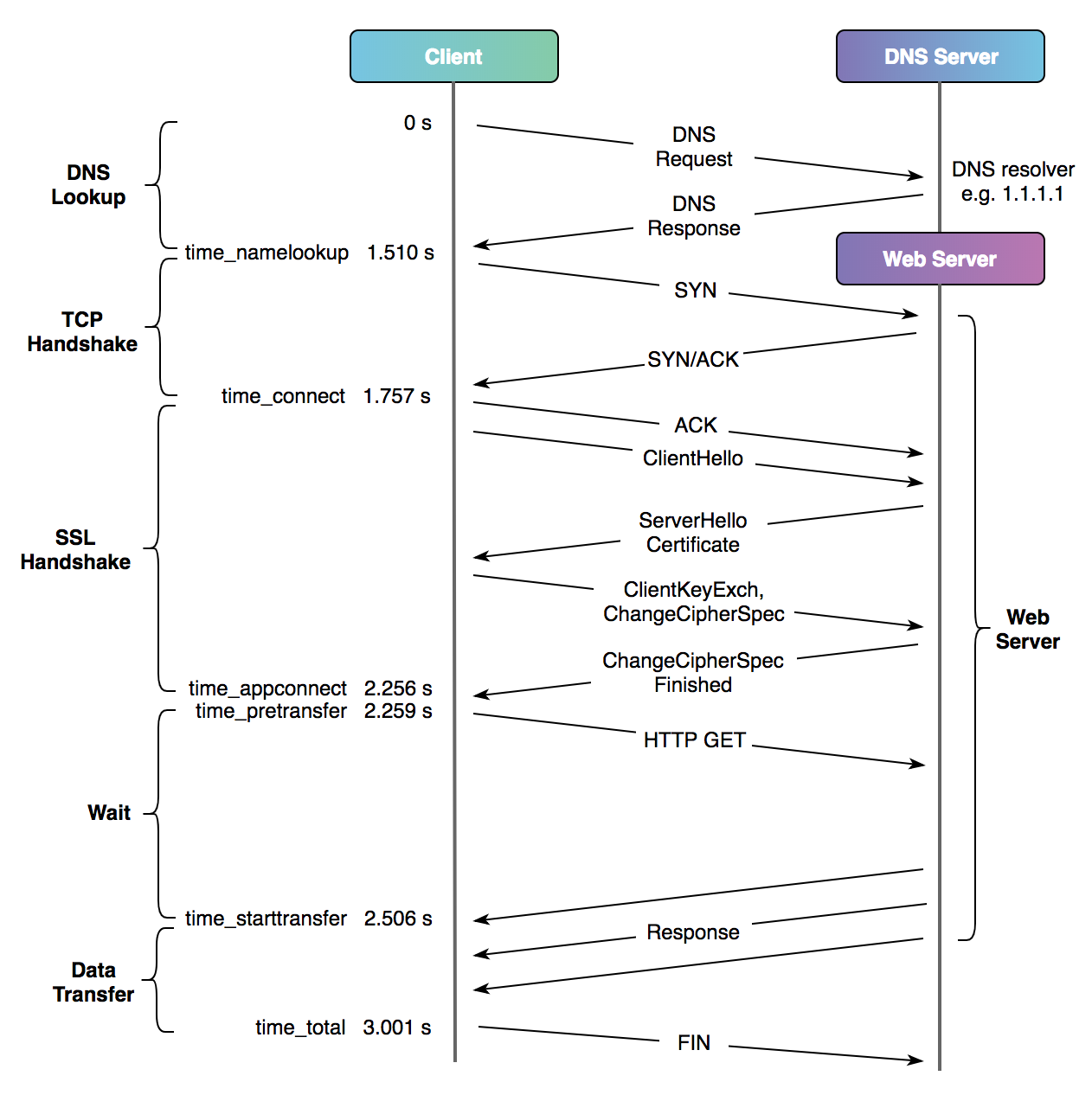
To get a better approximation of devtool's TTFB, we consider
the time without the connection overhead:
`%{time_starttransfer} - %{time_appconnect}`
Uses a dirty `eval` to do the ttfb arithmetic. Depends
on `bc` and `column` commands.
# Testing
If you'd like to submit a [PR](https://github.com/jaygooby/ttfb.sh/pulls), please ensure all existing tests pass and if it adds new functionality, add a test in the [test suite](https://github.com/jaygooby/ttfb.sh/blob/master/tests/tests.bats).
To run the tests, call `make` from the project root. You'll need to have [bats-core](https://github.com/bats-core/bats-core) installed and in your `$PATH`.
If you only want to run a test or two, uncomment the `# skip` lines on the tests you don't care about, so they read `skip`, and then those tests will be skipped.
See [`CONTRIBUTING.md`](CONTRIBUTING.md) for more details.
# TODO
* [x] Show progress when more than one request (`-n 2` etc) option is set
* [x] Allow custom options to be passed to curl (use the `-o` option)
* [ ] Sort output by fastest TTFB when multiple URLs are supplied
* [ ] Colour code the `TTFB:` figure in the standard response, according to the speed of the response.
================================================
FILE: tests/tests.bats
================================================
#!/usr/bin/env bats
#
# To skip a test, just uncomment the # skip line
@test "-? switch" {
# skip
run ./ttfb -?
[[ "$output" =~ "Usage: " ]]
}
@test "Invalid switch" {
# skip
run ./ttfb -Z
[ $status -ne 0 ]
[[ "$output" =~ "Usage: " ]]
}
@test "-d logs requests to ./curl.log" {
# skip
rundir="$(mktemp -d)"
pwd="$PWD"
cd "$rundir" && run "$pwd/ttfb" -d example.com
[ $status -eq 0 ]
[ -f "$rundir/curl.log" ]
}
@test "-l logs to specific file" {
# skip
rundir="$(mktemp -d)"
logdir="$(mktemp -d)"
pwd="$PWD"
cd "$rundir" && run "$pwd/ttfb" -l "$logdir/log.log" example.com
[ $status -eq 0 ]
[ -f "$logdir/log.log" ]
}
@test "-l exits if the path the custom log file doesn't exist" {
# skip
rundir="$(mktemp -d)"
logdir="$(mktemp -d)"
rmdir "$logdir"
pwd="$PWD"
cd "$rundir" && run "$pwd/ttfb" -l "$logdir/log.log" example.com
[ $status -eq 1 ]
}
@test "-n expects an argument" {
# skip
run ./ttfb -n example.com
[ $status -ne 0 ]
[[ "$output" =~ "Usage: " ]]
}
@test "-n runs test multiple times" {
# skip
run ./ttfb -n 3 example.com
[ $status -eq 0 ]
[[ "$output" =~ "..." ]]
[[ "$output" =~ "fastest" ]]
}
@test "can test multiple urls" {
# skip
run ./ttfb example.com example.com/hello-world
[ $status -eq 0 ]
[[ "$output" =~ "example.com" ]]
[[ "$output" =~ "example.com/hello-world" ]]
}
@test "can test multiple urls multiple times" {
# skip
run ./ttfb -n 3 example.com example.com/hello-world
[ $status -eq 0 ]
[[ "$output" =~ "..." ]]
[[ "$output" =~ "example.com" ]]
[[ "$output" =~ "example.com/hello-world" ]]
}
@test "-d logs requests to multiple urls to multiple log files" {
# skip
rundir="$(mktemp -d)"
pwd="$PWD"
cd "$rundir" && run "$pwd/ttfb" -d example.com example.com/hello-world
[ $status -eq 0 ]
[ -f "$rundir/example_com-curl.log" ]
[ -f "$rundir/example_com_hello_world-curl.log" ]
}
@test "-l logs requests to multiple urls to multiple custom log files" {
# skip
rundir="$(mktemp -d)"
pwd="$PWD"
cd "$rundir" && run "$pwd/ttfb" -l "$rundir/custom.log" example.com example.com/hello-world
[ $status -eq 0 ]
[ -f "$rundir/example_com-custom.log" ]
[ -f "$rundir/example_com_hello_world-custom.log" ]
}
@test "-d logs multiple requests to multiple urls to multiple log files" {
# skip
rundir="$(mktemp -d)"
pwd="$PWD"
cd "$rundir" && run "$pwd/ttfb" -n2 -d example.com example.com/hello-world
[ $status -eq 0 ]
[ -f "$rundir/example_com-curl.log" ]
[ -f "$rundir/example_com_hello_world-curl.log" ]
[ $(grep " 200 OK" "$rundir/example_com-curl.log" | wc -l) -eq 2 ]
[ $(grep " 404 Not Found" "$rundir/example_com_hello_world-curl.log" | wc -l) -eq 2 ]
}
@test "-d logs multiple requests to multiple urls to multiple custom log files" {
# skip
rundir="$(mktemp -d)"
pwd="$PWD"
cd "$rundir" && run "$pwd/ttfb" -n2 -l "$rundir/custom.log" example.com example.com/hello-world
[ $status -eq 0 ]
[ -f "$rundir/example_com-custom.log" ]
[ -f "$rundir/example_com_hello_world-custom.log" ]
[ $(grep " 200 OK" "$rundir/example_com-custom.log" | wc -l) -eq 2 ]
[ $(grep " 404 Not Found" "$rundir/example_com_hello_world-custom.log" | wc -l) -eq 2 ]
}
@test "pass custom curl options via our -o option" {
# This test passes -k to curl, so it can successfully
# call https://self-signed.badssl.com which has a self-signed certificate
# which would normally result in a fail
# skip
run "$pwd/ttfb" -o "-k" https://self-signed.badssl.com
[[ "$output" != "0" ]]
}
================================================
FILE: ttfb
================================================
#!/usr/bin/env bash
#
# Shows time in seconds to first byte of a url or urls
#
# Based on a gist https://gist.github.com/sandeepraju/1f5fbdbdd89551ba7925abe2645f92b5
# by https://github.com/sandeepraju
#
# Modified by jay@gooby.org, @jaygooby
#
# Usage: ttfb [options] url [url...]
# -d debug
# -l <log file> (infers -d) log response headers. Defaults to ./curl.log
# -n <number> of times to test time to first byte
# -o <option> pass options to curl (e.g. -o "-k" will make curl ignore invalid certificates)
# -v verbose output. Show request breakdown during -n calls
#
# Examples:
#
# ttfb https://example.com/example/url
# .098974
#
# ttfb -n 5 https://example.com/
# .....
# fastest .099195 slowest .103138 median .099684
#
# ttfb -n 5 bbc.co.uk news.bbc.co.uk
# .....
# .....
# bbc.co.uk fastest .045873 slowest .046870 median .045999
# news.bbc.co.uk fastest .042286 slowest .060245 median .046035
#
# ttfb bbc.co.uk news.bbc.co.uk
# bbc.co.uk .048378
# news.bbc.co.uk .049303
#
# Implicitly follows redirects using curl's -L option.
#
# Log all response headers (default log file is ./curl.log) by calling with -d
#
# Override the default log file by specifying -l /some/file
#
# Get min, max and median values by specifying the number of times to call
# the URL; use -n2 for 2 tests, -n5 for 5 and so on.
#
# If you specify more than one url and have specified -d or -l, the log file
# will be prefixed with the URL being requested.
#
# If you specify -n and -d or -l, the response headers from the consecutive
# requests will be concatenated in the log file.
#
# See https://blog.cloudflare.com/a-question-of-timing/
# and https://curl.haxx.se/docs/manpage.html for an explanation
# of how the curl variables relate to the various stages of
# the transfer.
#
# To get a better approximation of devtool's TTFB, consider
# the time without the connection overhead:
# %{time_starttransfer} - %{time_appconnect}
#
# Uses a dirty eval to do the ttfb arithmetic. Depends
# on bc and column commands.
set -eu
# check dependencies
for dependency in curl bc column; do
which $dependency > /dev/null || (echo "You need to have '$dependency' installed and in your \$PATH" >&2 && exit 1)
done
# Ensure curl uses period separators for floating point values, which
# bc requires to do calculations (i.e. it can't use locale separators like ,)
if (locale -a | egrep ^C.UTF-8$ > /dev/null); then
export LC_ALL=C.UTF-8
else
export LC_ALL=C
fi
# check curl can use http2
HTTP_VERSION="--http2"
curl -so /dev/null --http2 https://example.com || HTTP_VERSION="--http1.1"
# Cribbed from https://stackoverflow.com/a/41762669/391826
median() {
arr=($(printf '%s\n' "${@}" | sort -n))
nel=${#arr[@]}
if (( $nel % 2 == 1 )); then # Odd number of elements
val="${arr[ $(($nel/2)) ]}"
else # Even number of elements
(( j=nel/2 ))
(( k=j-1 ))
val=$(echo "scale=6;(${arr[j]}" + "${arr[k]})"/2|bc -l)
fi
echo $val
}
show_usage() {
echo -e "Usage: ttfb [options] url [url...]\n\t-d debug\n\t-l <log file> (infers -d) log response headers. Defaults to ./curl.log\n\t-n <number> of times to test time to first byte\n\t-o <option> pass options to curl (e.g. -o \"-k\" will make curl ignore invalid certificates)\n\t-v verbose output. Show response breakdown (DNS lookup, TLS handshake etc)" >&2
}
# defaults
DEBUG=""
LOG=""
NUM_REQUESTS=0
VERBOSE=0
options=()
while getopts "dl:n:o:v" OPTION
do
case $OPTION in
d) DEBUG=1 ;;
l) LOG="$OPTARG" ;;
n) NUM_REQUESTS=$OPTARG ;;
o) options+=("$(echo $OPTARG | xargs)") ;;
v) VERBOSE=1 ;;
\?) show_usage
exit 1
;;
esac
done
shift $((OPTIND - 1)) # shifts away every option argument,
# leaving urls as $@
if [ -z "${1:-}" ]; then
show_usage
exit 1
else
URLS="$@"
fi
# if we're given a custom log file, or log directory, implicitly set DEBUG=1
[ -n "$LOG" ] && DEBUG=1
# default the log file to curl.log in pwd or LOG_DIRECTORY if -o was specified
LOG="${LOG:-curl.log}"
# now work out if $LOG is relative or an absolute path
# and then get the dirname
[ "$LOG" != "${LOG#/}" ] && LOG_DIRECTORY=$(dirname "$LOG") || LOG_DIRECTORY=$(dirname "${PWD}/$LOG")
if [ ! -d "$LOG_DIRECTORY" ]; then
echo "Log directory $LOG_DIRECTORY doesn't exist" >&2
exit 1;
fi
# then set the actual log filename
LOG=$(basename "$LOG")
DEBUG=${DEBUG:-0}
options+=(-o /dev/null)
options+=(-s)
options+=(-L)
options+=($HTTP_VERSION)
options+=(-H 'Cache-Control: no-cache')
options+=(-w 'echo DNS lookup: %{time_namelookup} TLS handshake: %{time_appconnect} TTFB including connection: %{time_starttransfer} TTFB: $(echo %{time_starttransfer} - %{time_appconnect} | bc) Total time: %{time_total} \n')
for URL in $URLS; do
if [ $DEBUG -eq 1 ]; then
if [ ${#@} -gt 1 ]; then
LOGFILE="${URL//[^[:alnum:]]/_}"
options+=(-D "${LOG_DIRECTORY}/${LOGFILE}-${LOG}")
else
options+=(-D "${LOG_DIRECTORY}/${LOG}")
fi
fi
# if we're checking more than one url
# output the url on the results line
if [ ${#@} -gt 1 ]; then
SHOW_URL="${URL}|"
if [[ $VERBOSE -eq 1 && -n "$NUM_REQUESTS" && "$NUM_REQUESTS" -gt 1 ]]; then
echo $URL >&2
fi
else
SHOW_URL=""
fi
# if multiple requests have been specified, then show min, max & median values
if [[ -n "$NUM_REQUESTS" && "$NUM_REQUESTS" -gt 1 ]]; then
ttfbs=()
for i in $(seq $NUM_REQUESTS); do
# if we're checking more than one url, and debug is set, then log
# the headers to a per-url file, but also for each request
if [[ ${#@} -gt 1 && $DEBUG -eq 1 ]]; then
LOGFILE="${URL//[^[:alnum:]]/_}"
options+=(-D "${LOG_DIRECTORY}/${LOGFILE}-${LOG}_${i}")
elif [ $DEBUG -eq 1 ]; then
# we only have the one URL, but we still are requesting multiple
# ttfb calls, so log the headers
options+=(-D "${LOG_DIRECTORY}/${LOG}_${i}")
fi
request=$(eval $(curl "${options[@]}" "$URL"))
ttfbs+=($(echo $request | grep -oE "TTFB: .{0,7}" | cut -d' ' -f2 | sort -n));
if [ $VERBOSE -eq 1 ]; then
echo "$request" >&2
else
printf "." >&2
fi
done
# tidy up - combine multiple request logs for the same url into a single file
if [[ ${#@} -gt 1 && $DEBUG -eq 1 ]]; then
cat "${LOG_DIRECTORY}/${LOGFILE}-${LOG}_"* > "${LOG_DIRECTORY}/${LOGFILE}-${LOG}"
rm "${LOG_DIRECTORY}/${LOGFILE}-${LOG}_"*
elif [ $DEBUG -eq 1 ]; then
cat "${LOG_DIRECTORY}/${LOG}_"* > "${LOG_DIRECTORY}/${LOG}"
rm "${LOG_DIRECTORY}/${LOG}_"*
fi
printf "\n" >&2
# sort the times
ttfbs=( $( printf "%s\n" "${ttfbs[@]}" | sort -n ) )
# show quickest, slowest and median fftb
printf "${SHOW_URL}\e[32mfastest \e[39m${ttfbs[0]} \e[91mslowest \e[39m${ttfbs[${#ttfbs[*]}-1]} \e[95mmedian \e[39m$(median ${ttfbs[*]})\e[39m\n";
else
if [ $VERBOSE -eq 1 ]; then
echo -e $SHOW_URL $(eval $(curl "${options[@]}" "$URL"))
else
echo -e $SHOW_URL $(eval $(curl "${options[@]}" "$URL") | grep -oE "TTFB: .{0,7}" | cut -d' ' -f2)
fi
fi
done | column -s'|' -t
gitextract_dqqkb8n4/ ├── .gitignore ├── .travis.yml ├── CONTRIBUTING.md ├── LICENSE ├── Makefile ├── README.md ├── tests/ │ └── tests.bats └── ttfb
Condensed preview — 8 files, each showing path, character count, and a content snippet. Download the .json file or copy for the full structured content (22K chars).
[
  {
    "path": ".gitignore",
    "chars": 6,
    "preview": "*.log\n"
  },
  {
    "path": ".travis.yml",
    "chars": 110,
    "preview": "language: bash\nbefore_install:\n  - sudo apt-get update -qq\n  - sudo apt-get install -qq bats\nscript:\n  - make\n"
  },
  {
    "path": "CONTRIBUTING.md",
    "chars": 995,
    "preview": "# Thanks for helping with ttfb!\n\nTests live in the [`tests/tests.bats` file](tests/tests.bats) if you're adding a bugfix"
  },
  {
    "path": "LICENSE",
    "chars": 1073,
    "preview": "MIT License\n\nCopyright (c) 2019 Jay Caines-Gooby\n\nPermission is hereby granted, free of charge, to any person obtaining "
  },
  {
    "path": "Makefile",
    "chars": 286,
    "preview": "default: test\n\n.PHONY: check-bats-exists\ncheck-bats-exists:\n\t@which bats > /dev/null || (echo \"Missing dependency. You n"
  },
  {
    "path": "README.md",
    "chars": 7201,
    "preview": "# Introduction\n\nMeasures [time-to-first-byte](https://en.wikipedia.org/wiki/Time_to_first_byte) for single or multiple U"
  },
  {
    "path": "tests/tests.bats",
    "chars": 3557,
    "preview": "#!/usr/bin/env bats\n#\n# To skip a test, just uncomment the # skip line\n\n@test \"-? switch\" {\n  # skip\n  run ./ttfb -?\n  ["
  },
  {
    "path": "ttfb",
    "chars": 7219,
    "preview": "#!/usr/bin/env bash\n#\n# Shows time in seconds to first byte of a url or urls\n#\n# Based on a gist https://gist.github.com"
  }
]
About this extraction
This page contains the full source code of the jaygooby/ttfb.sh GitHub repository, extracted and formatted as plain text for AI agents and large language models (LLMs). The extraction includes 8 files (20.0 KB), approximately 6.3k tokens. Use this with OpenClaw, Claude, ChatGPT, Cursor, Windsurf, or any other AI tool that accepts text input. You can copy the full output to your clipboard or download it as a .txt file.
Extracted by GitExtract — free GitHub repo to text converter for AI. Built by Nikandr Surkov.