Repository: jayrambhia/Tooltip
Branch: master
Commit: f80a7c6bf208
Files: 43
Total size: 97.3 KB
Directory structure:
gitextract_pwl21e8o/
├── .gitignore
├── Changelog.md
├── License
├── README.md
├── build.gradle
├── gradle/
│ └── wrapper/
│ ├── gradle-wrapper.jar
│ └── gradle-wrapper.properties
├── gradle.properties
├── gradlew
├── sample/
│ ├── .gitignore
│ ├── build.gradle
│ ├── proguard-rules.pro
│ └── src/
│ ├── androidTest/
│ │ └── java/
│ │ └── com/
│ │ └── fenchtose/
│ │ └── tooltip_demo/
│ │ └── ApplicationTest.java
│ ├── main/
│ │ ├── AndroidManifest.xml
│ │ ├── java/
│ │ │ └── com/
│ │ │ └── fenchtose/
│ │ │ └── tooltip_demo/
│ │ │ ├── FragmentHolderActivity.java
│ │ │ ├── MainActivity.java
│ │ │ ├── SecondActivity.java
│ │ │ └── TooltipFragmentDemo.java
│ │ └── res/
│ │ ├── layout/
│ │ │ ├── activity_fragment_holder.xml
│ │ │ ├── activity_main.xml
│ │ │ ├── activity_second.xml
│ │ │ ├── item_tooltip_view_1.xml
│ │ │ ├── tooltip_fragment_demo_layout.xml
│ │ │ └── tooltip_textview.xml
│ │ ├── menu/
│ │ │ └── main_menu.xml
│ │ ├── values/
│ │ │ ├── colors.xml
│ │ │ ├── dimens.xml
│ │ │ ├── strings.xml
│ │ │ ├── styles.xml
│ │ │ └── values.xml
│ │ └── values-w820dp/
│ │ └── dimens.xml
│ └── test/
│ └── java/
│ └── com/
│ └── fenchtose/
│ └── tooltip_demo/
│ └── ExampleUnitTest.java
├── settings.gradle
└── tooltip/
├── .gitignore
├── build.gradle
├── proguard-rules.pro
└── src/
├── androidTest/
│ └── java/
│ └── com/
│ └── fenchtose/
│ └── tooltip/
│ └── ApplicationTest.java
├── main/
│ ├── AndroidManifest.xml
│ ├── java/
│ │ └── com/
│ │ └── fenchtose/
│ │ └── tooltip/
│ │ ├── AnimationUtils.java
│ │ ├── Tooltip.java
│ │ └── TooltipAnimation.java
│ └── res/
│ └── values/
│ └── strings.xml
└── test/
└── java/
└── com/
└── fenchtose/
└── tooltip/
└── ExampleUnitTest.java
================================================
FILE CONTENTS
================================================
================================================
FILE: .gitignore
================================================
.gradle
/local.properties
/.idea/workspace.xml
/.idea/libraries
.DS_Store
/build
/captures
*.iml
.gradle/*
.idea/*
.idea
gradlew.bat
================================================
FILE: Changelog.md
================================================
### 0.1.1
- First version available.
### 0.1.2
- Min sdk changed to 1
### 0.1.3
- Animations added
- Tip corner radius added
- Min sdk changed to 11
### 0.1.4
- Fixed issues with anchored view in the CoordinatorLayout.
### 0.1.5
- Refactored code to use proper Builder pattern reducing method counts
- Skipping animation if view is detached
### 0.1.6
- Fixed manifest for the library.
- Added hide content when animating option to animation.
### 0.1.7
- Migrated to AndroidX.
- Removed Bintray and moving to JitPack.
================================================
FILE: License
================================================
Apache License
Version 2.0, January 2004
http://www.apache.org/licenses/
TERMS AND CONDITIONS FOR USE, REPRODUCTION, AND DISTRIBUTION
1. Definitions.
"License" shall mean the terms and conditions for use, reproduction,
and distribution as defined by Sections 1 through 9 of this document.
"Licensor" shall mean the copyright owner or entity authorized by
the copyright owner that is granting the License.
"Legal Entity" shall mean the union of the acting entity and all
other entities that control, are controlled by, or are under common
control with that entity. For the purposes of this definition,
"control" means (i) the power, direct or indirect, to cause the
direction or management of such entity, whether by contract or
otherwise, or (ii) ownership of fifty percent (50%) or more of the
outstanding shares, or (iii) beneficial ownership of such entity.
"You" (or "Your") shall mean an individual or Legal Entity
exercising permissions granted by this License.
"Source" form shall mean the preferred form for making modifications,
including but not limited to software source code, documentation
source, and configuration files.
"Object" form shall mean any form resulting from mechanical
transformation or translation of a Source form, including but
not limited to compiled object code, generated documentation,
and conversions to other media types.
"Work" shall mean the work of authorship, whether in Source or
Object form, made available under the License, as indicated by a
copyright notice that is included in or attached to the work
(an example is provided in the Appendix below).
"Derivative Works" shall mean any work, whether in Source or Object
form, that is based on (or derived from) the Work and for which the
editorial revisions, annotations, elaborations, or other modifications
represent, as a whole, an original work of authorship. For the purposes
of this License, Derivative Works shall not include works that remain
separable from, or merely link (or bind by name) to the interfaces of,
the Work and Derivative Works thereof.
"Contribution" shall mean any work of authorship, including
the original version of the Work and any modifications or additions
to that Work or Derivative Works thereof, that is intentionally
submitted to Licensor for inclusion in the Work by the copyright owner
or by an individual or Legal Entity authorized to submit on behalf of
the copyright owner. For the purposes of this definition, "submitted"
means any form of electronic, verbal, or written communication sent
to the Licensor or its representatives, including but not limited to
communication on electronic mailing lists, source code control systems,
and issue tracking systems that are managed by, or on behalf of, the
Licensor for the purpose of discussing and improving the Work, but
excluding communication that is conspicuously marked or otherwise
designated in writing by the copyright owner as "Not a Contribution."
"Contributor" shall mean Licensor and any individual or Legal Entity
on behalf of whom a Contribution has been received by Licensor and
subsequently incorporated within the Work.
2. Grant of Copyright License. Subject to the terms and conditions of
this License, each Contributor hereby grants to You a perpetual,
worldwide, non-exclusive, no-charge, royalty-free, irrevocable
copyright license to reproduce, prepare Derivative Works of,
publicly display, publicly perform, sublicense, and distribute the
Work and such Derivative Works in Source or Object form.
3. Grant of Patent License. Subject to the terms and conditions of
this License, each Contributor hereby grants to You a perpetual,
worldwide, non-exclusive, no-charge, royalty-free, irrevocable
(except as stated in this section) patent license to make, have made,
use, offer to sell, sell, import, and otherwise transfer the Work,
where such license applies only to those patent claims licensable
by such Contributor that are necessarily infringed by their
Contribution(s) alone or by combination of their Contribution(s)
with the Work to which such Contribution(s) was submitted. If You
institute patent litigation against any entity (including a
cross-claim or counterclaim in a lawsuit) alleging that the Work
or a Contribution incorporated within the Work constitutes direct
or contributory patent infringement, then any patent licenses
granted to You under this License for that Work shall terminate
as of the date such litigation is filed.
4. Redistribution. You may reproduce and distribute copies of the
Work or Derivative Works thereof in any medium, with or without
modifications, and in Source or Object form, provided that You
meet the following conditions:
(a) You must give any other recipients of the Work or
Derivative Works a copy of this License; and
(b) You must cause any modified files to carry prominent notices
stating that You changed the files; and
(c) You must retain, in the Source form of any Derivative Works
that You distribute, all copyright, patent, trademark, and
attribution notices from the Source form of the Work,
excluding those notices that do not pertain to any part of
the Derivative Works; and
(d) If the Work includes a "NOTICE" text file as part of its
distribution, then any Derivative Works that You distribute must
include a readable copy of the attribution notices contained
within such NOTICE file, excluding those notices that do not
pertain to any part of the Derivative Works, in at least one
of the following places: within a NOTICE text file distributed
as part of the Derivative Works; within the Source form or
documentation, if provided along with the Derivative Works; or,
within a display generated by the Derivative Works, if and
wherever such third-party notices normally appear. The contents
of the NOTICE file are for informational purposes only and
do not modify the License. You may add Your own attribution
notices within Derivative Works that You distribute, alongside
or as an addendum to the NOTICE text from the Work, provided
that such additional attribution notices cannot be construed
as modifying the License.
You may add Your own copyright statement to Your modifications and
may provide additional or different license terms and conditions
for use, reproduction, or distribution of Your modifications, or
for any such Derivative Works as a whole, provided Your use,
reproduction, and distribution of the Work otherwise complies with
the conditions stated in this License.
5. Submission of Contributions. Unless You explicitly state otherwise,
any Contribution intentionally submitted for inclusion in the Work
by You to the Licensor shall be under the terms and conditions of
this License, without any additional terms or conditions.
Notwithstanding the above, nothing herein shall supersede or modify
the terms of any separate license agreement you may have executed
with Licensor regarding such Contributions.
6. Trademarks. This License does not grant permission to use the trade
names, trademarks, service marks, or product names of the Licensor,
except as required for reasonable and customary use in describing the
origin of the Work and reproducing the content of the NOTICE file.
7. Disclaimer of Warranty. Unless required by applicable law or
agreed to in writing, Licensor provides the Work (and each
Contributor provides its Contributions) on an "AS IS" BASIS,
WITHOUT WARRANTIES OR CONDITIONS OF ANY KIND, either express or
implied, including, without limitation, any warranties or conditions
of TITLE, NON-INFRINGEMENT, MERCHANTABILITY, or FITNESS FOR A
PARTICULAR PURPOSE. You are solely responsible for determining the
appropriateness of using or redistributing the Work and assume any
risks associated with Your exercise of permissions under this License.
8. Limitation of Liability. In no event and under no legal theory,
whether in tort (including negligence), contract, or otherwise,
unless required by applicable law (such as deliberate and grossly
negligent acts) or agreed to in writing, shall any Contributor be
liable to You for damages, including any direct, indirect, special,
incidental, or consequential damages of any character arising as a
result of this License or out of the use or inability to use the
Work (including but not limited to damages for loss of goodwill,
work stoppage, computer failure or malfunction, or any and all
other commercial damages or losses), even if such Contributor
has been advised of the possibility of such damages.
9. Accepting Warranty or Additional Liability. While redistributing
the Work or Derivative Works thereof, You may choose to offer,
and charge a fee for, acceptance of support, warranty, indemnity,
or other liability obligations and/or rights consistent with this
License. However, in accepting such obligations, You may act only
on Your own behalf and on Your sole responsibility, not on behalf
of any other Contributor, and only if You agree to indemnify,
defend, and hold each Contributor harmless for any liability
incurred by, or claims asserted against, such Contributor by reason
of your accepting any such warranty or additional liability.
END OF TERMS AND CONDITIONS
APPENDIX: How to apply the Apache License to your work.
To apply the Apache License to your work, attach the following
boilerplate notice, with the fields enclosed by brackets "[]"
replaced with your own identifying information. (Don't include
the brackets!) The text should be enclosed in the appropriate
comment syntax for the file format. We also recommend that a
file or class name and description of purpose be included on the
same "printed page" as the copyright notice for easier
identification within third-party archives.
Copyright 2016 Jay Rambhia
Licensed under the Apache License, Version 2.0 (the "License");
you may not use this file except in compliance with the License.
You may obtain a copy of the License at
http://www.apache.org/licenses/LICENSE-2.0
Unless required by applicable law or agreed to in writing, software
distributed under the License is distributed on an "AS IS" BASIS,
WITHOUT WARRANTIES OR CONDITIONS OF ANY KIND, either express or implied.
See the License for the specific language governing permissions and
limitations under the License.
================================================
FILE: README.md
================================================
## Tooltip
This is a lightweight library to show Tooltips dynamically in your app. This tooltip does
not require any custom layout. It works out of the box with all the layouts.
Here's a short gif showing how it works.
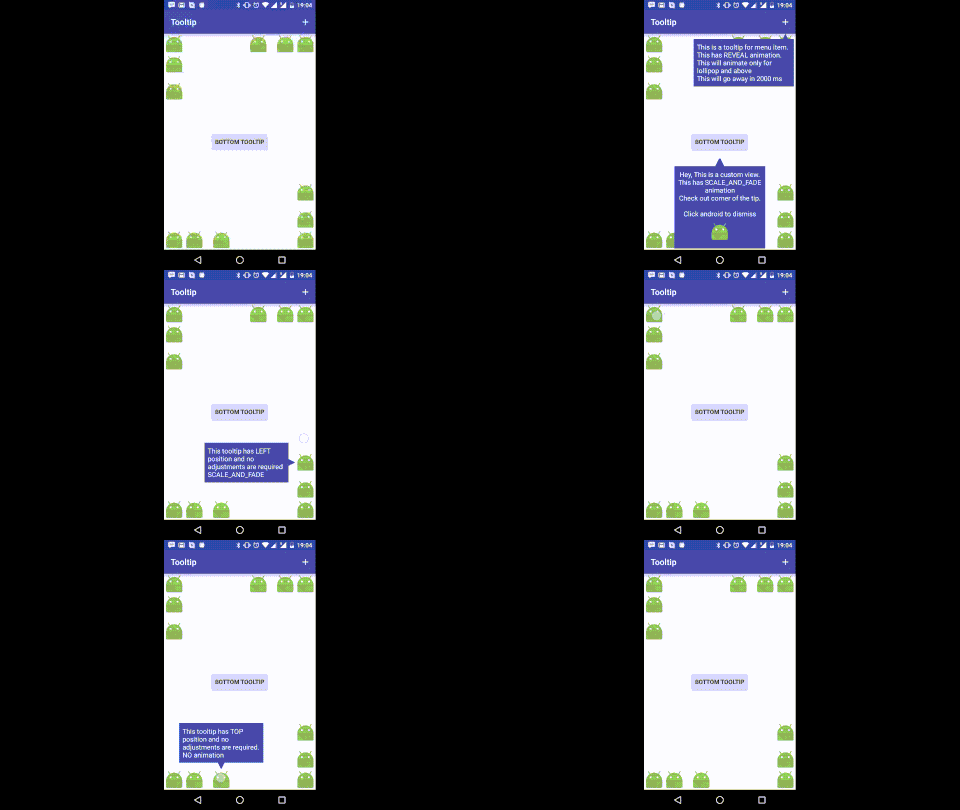
## Tooltip.Builder
Tooltip uses Builder pattern to created immutable Tooltips.
### Usage
Tooltip tooltip = new Tooltip.Builder(contenxt)
.anchor(anchorView, Tooltip.BOTTOM)
.content(contentView)
.into(root)
.withTip(new Tip(tipWidth, tipHeight, tipColor))
.show();
That's it. It's that simple. You can customize the size and color of the tip to match color of the content view.
## How To Install
### JCenter / Bintray (Deprecated)
##### Maven
repositories {
maven {
url "http://dl.bintray.com/jayrambhia/maven"
}
}
##### JCenter
repositories {
jcenter()
}
##### Dependency
dependencies {
implementation 'com.fenchtose:tooltip:0.1.6'
}
### JitPack
repositories {
maven {
url "https://jitpack.io"
}
}
dependencies {
implementation 'com.github.jayrambhia:Tooltip:0.1.7-1'
}
### Useful Methods:
- `anchor(View view)` - set anchor view with position as `Tooltip.TOP`
- `anchor(View view, @Position int position)` - set anchor view with position
- `content(View view)` - set content view of the tooltip
- `animate(@NonNull TooltipAnimation animation)` - set Animation for Show and Dismiss
- `withTip(@NonNull Tip tip)` - set `Tip` of the tooltip.
- `into(ViewGroup viewGroup)` - set ViewGroup into which the tip is to be shown
- `autoAdjust(boolean adjust)` - if you want the tooltip to adjust itself if going out of bound
- `cancelable(boolean cancelable)` - if you want the tooltip to dismiss automatically if clicked outside. Default is true
- `withPadding(int padding)` - distance from the anchor and screen boundaries
- `autoCancel(int timeInMS)` - if tooltip should be dismissed automatically after given time. If value is <= 0, auto cancel is off
- `withListener(@NonNull Listener listener)` - Attach dismiss listener.
- `debug(boolean debug)` - Enable debugging mode. Default is false.
- `checkForPreDraw(boolean check)` - Check if the anchor is drawn or not and then only draw the tooltip
### Tip
Tip is drawn as an isosceles triangle. The length of the base is defined by width and perpendicular length between top vertex and base is defined by height.
- `width` - length of the base of isosceles triangle
- `height` - length of the perpendicular from top vertex to the base
- `color` - Color of the tip
- `tipRadius` - Corner radius of the tip
### TooltipAnimation
TooltipAnimation just holds type of the animation to be performed and duration of the animation
- `type` - Type of animation - `FADE`, `SCALE`, `REVEAL`, `SCALE_AND_FADE`
- `duration` - Animation duration in milliseconds
- `hideContentWhileAnimating` - Content of the tooltip will be hidden when it's animating in or out. This will not work if the content is a View and not a ViewGroup.
Animations are a bit tricky in this library. `FADE` and `REVEAL` are applied on the container of the tooltip
with appropriate parameters. So if the container has some background color, it looks really weird. The same
method can't be applied for `SCALE` because it doesn't draw the tooltip properly. So in `SCALE`, the animation
is applied on Tooltip's content view (and if tip is present, it will be there as it is not part of the content view).
To avoid this eye sore, you may use `SCALE_AND_FADE`, it does `SCALE` and `FADE` so the poor effect is not visible.
`REVEAL` uses Circular Reveal and hence is supported for API 21 and above.
### CoordinatorLayout and Anchored Views
When a view(eg. FAB) is anchored to another view in the CoordinatorLayout and you try to draw a tooltip
as that view as anchor, it doesn't work properly. I'm assuming that CoordinatorLayout first draws fab and them moves? I don't know.
Anyway, an `onPreDrawListener` listener has been added and once the event is received, tooltip is laid out.
By default, this method is not performed. To perform this method, use `checkForPreDraw(true)` while creating the builder.
### Future Work
- Customizable tips
- Shadow
- Improve and add more animations
## Licenses and Release History
**[CHANGELOG](https://github.com/jayrambhia/Tooltip/blob/master/Changelog.md)**
NoCropper binaries and source code can be used according to the [Apache License, Version 2.0](https://github.com/jayrambhia/Tooltip/blob/master/License).
================================================
FILE: build.gradle
================================================
// Top-level build file where you can add configuration options common to all sub-projects/modules.
buildscript {
repositories {
mavenCentral()
google()
}
dependencies {
classpath 'com.android.tools.build:gradle:4.1.3'
classpath 'com.github.dcendents:android-maven-gradle-plugin:1.4.1'
// NOTE: Do not place your application dependencies here; they belong
// in the individual module build.gradle files
}
}
allprojects {
repositories {
mavenCentral()
google()
maven { url 'https://jitpack.io' }
}
}
task clean(type: Delete) {
delete rootProject.buildDir
}
================================================
FILE: gradle/wrapper/gradle-wrapper.properties
================================================
#Mon Sep 11 16:57:47 CEST 2017
distributionBase=GRADLE_USER_HOME
distributionPath=wrapper/dists
zipStoreBase=GRADLE_USER_HOME
zipStorePath=wrapper/dists
distributionUrl=https\://services.gradle.org/distributions/gradle-6.5-all.zip
================================================
FILE: gradle.properties
================================================
# Project-wide Gradle settings.
# IDE (e.g. Android Studio) users:
# Gradle settings configured through the IDE *will override*
# any settings specified in this file.
# For more details on how to configure your build environment visit
# http://www.gradle.org/docs/current/userguide/build_environment.html
# Specifies the JVM arguments used for the daemon process.
# The setting is particularly useful for tweaking memory settings.
# Default value: -Xmx10248m -XX:MaxPermSize=256m
# org.gradle.jvmargs=-Xmx2048m -XX:MaxPermSize=512m -XX:+HeapDumpOnOutOfMemoryError -Dfile.encoding=UTF-8
# When configured, Gradle will run in incubating parallel mode.
# This option should only be used with decoupled projects. More details, visit
# http://www.gradle.org/docs/current/userguide/multi_project_builds.html#sec:decoupled_projects
# org.gradle.parallel=true
android.useAndroidX=true
================================================
FILE: gradlew
================================================
#!/usr/bin/env bash
##############################################################################
##
## Gradle start up script for UN*X
##
##############################################################################
# Add default JVM options here. You can also use JAVA_OPTS and GRADLE_OPTS to pass JVM options to this script.
DEFAULT_JVM_OPTS=""
APP_NAME="Gradle"
APP_BASE_NAME=`basename "$0"`
# Use the maximum available, or set MAX_FD != -1 to use that value.
MAX_FD="maximum"
warn ( ) {
echo "$*"
}
die ( ) {
echo
echo "$*"
echo
exit 1
}
# OS specific support (must be 'true' or 'false').
cygwin=false
msys=false
darwin=false
case "`uname`" in
CYGWIN* )
cygwin=true
;;
Darwin* )
darwin=true
;;
MINGW* )
msys=true
;;
esac
# Attempt to set APP_HOME
# Resolve links: $0 may be a link
PRG="$0"
# Need this for relative symlinks.
while [ -h "$PRG" ] ; do
ls=`ls -ld "$PRG"`
link=`expr "$ls" : '.*-> \(.*\)$'`
if expr "$link" : '/.*' > /dev/null; then
PRG="$link"
else
PRG=`dirname "$PRG"`"/$link"
fi
done
SAVED="`pwd`"
cd "`dirname \"$PRG\"`/" >/dev/null
APP_HOME="`pwd -P`"
cd "$SAVED" >/dev/null
CLASSPATH=$APP_HOME/gradle/wrapper/gradle-wrapper.jar
# Determine the Java command to use to start the JVM.
if [ -n "$JAVA_HOME" ] ; then
if [ -x "$JAVA_HOME/jre/sh/java" ] ; then
# IBM's JDK on AIX uses strange locations for the executables
JAVACMD="$JAVA_HOME/jre/sh/java"
else
JAVACMD="$JAVA_HOME/bin/java"
fi
if [ ! -x "$JAVACMD" ] ; then
die "ERROR: JAVA_HOME is set to an invalid directory: $JAVA_HOME
Please set the JAVA_HOME variable in your environment to match the
location of your Java installation."
fi
else
JAVACMD="java"
which java >/dev/null 2>&1 || die "ERROR: JAVA_HOME is not set and no 'java' command could be found in your PATH.
Please set the JAVA_HOME variable in your environment to match the
location of your Java installation."
fi
# Increase the maximum file descriptors if we can.
if [ "$cygwin" = "false" -a "$darwin" = "false" ] ; then
MAX_FD_LIMIT=`ulimit -H -n`
if [ $? -eq 0 ] ; then
if [ "$MAX_FD" = "maximum" -o "$MAX_FD" = "max" ] ; then
MAX_FD="$MAX_FD_LIMIT"
fi
ulimit -n $MAX_FD
if [ $? -ne 0 ] ; then
warn "Could not set maximum file descriptor limit: $MAX_FD"
fi
else
warn "Could not query maximum file descriptor limit: $MAX_FD_LIMIT"
fi
fi
# For Darwin, add options to specify how the application appears in the dock
if $darwin; then
GRADLE_OPTS="$GRADLE_OPTS \"-Xdock:name=$APP_NAME\" \"-Xdock:icon=$APP_HOME/media/gradle.icns\""
fi
# For Cygwin, switch paths to Windows format before running java
if $cygwin ; then
APP_HOME=`cygpath --path --mixed "$APP_HOME"`
CLASSPATH=`cygpath --path --mixed "$CLASSPATH"`
JAVACMD=`cygpath --unix "$JAVACMD"`
# We build the pattern for arguments to be converted via cygpath
ROOTDIRSRAW=`find -L / -maxdepth 1 -mindepth 1 -type d 2>/dev/null`
SEP=""
for dir in $ROOTDIRSRAW ; do
ROOTDIRS="$ROOTDIRS$SEP$dir"
SEP="|"
done
OURCYGPATTERN="(^($ROOTDIRS))"
# Add a user-defined pattern to the cygpath arguments
if [ "$GRADLE_CYGPATTERN" != "" ] ; then
OURCYGPATTERN="$OURCYGPATTERN|($GRADLE_CYGPATTERN)"
fi
# Now convert the arguments - kludge to limit ourselves to /bin/sh
i=0
for arg in "$@" ; do
CHECK=`echo "$arg"|egrep -c "$OURCYGPATTERN" -`
CHECK2=`echo "$arg"|egrep -c "^-"` ### Determine if an option
if [ $CHECK -ne 0 ] && [ $CHECK2 -eq 0 ] ; then ### Added a condition
eval `echo args$i`=`cygpath --path --ignore --mixed "$arg"`
else
eval `echo args$i`="\"$arg\""
fi
i=$((i+1))
done
case $i in
(0) set -- ;;
(1) set -- "$args0" ;;
(2) set -- "$args0" "$args1" ;;
(3) set -- "$args0" "$args1" "$args2" ;;
(4) set -- "$args0" "$args1" "$args2" "$args3" ;;
(5) set -- "$args0" "$args1" "$args2" "$args3" "$args4" ;;
(6) set -- "$args0" "$args1" "$args2" "$args3" "$args4" "$args5" ;;
(7) set -- "$args0" "$args1" "$args2" "$args3" "$args4" "$args5" "$args6" ;;
(8) set -- "$args0" "$args1" "$args2" "$args3" "$args4" "$args5" "$args6" "$args7" ;;
(9) set -- "$args0" "$args1" "$args2" "$args3" "$args4" "$args5" "$args6" "$args7" "$args8" ;;
esac
fi
# Split up the JVM_OPTS And GRADLE_OPTS values into an array, following the shell quoting and substitution rules
function splitJvmOpts() {
JVM_OPTS=("$@")
}
eval splitJvmOpts $DEFAULT_JVM_OPTS $JAVA_OPTS $GRADLE_OPTS
JVM_OPTS[${#JVM_OPTS[*]}]="-Dorg.gradle.appname=$APP_BASE_NAME"
exec "$JAVACMD" "${JVM_OPTS[@]}" -classpath "$CLASSPATH" org.gradle.wrapper.GradleWrapperMain "$@"
================================================
FILE: sample/.gitignore
================================================
/build
================================================
FILE: sample/build.gradle
================================================
apply plugin: 'com.android.application'
android {
compileSdkVersion 29
buildToolsVersion "29.0.3"
defaultConfig {
applicationId "com.fenchtose.tooltip"
minSdkVersion 14
targetSdkVersion 29
versionCode 1
versionName "1.0"
}
buildTypes {
debug {
minifyEnabled true
proguardFiles getDefaultProguardFile('proguard-android.txt'), 'proguard-rules.pro'
}
release {
minifyEnabled true
proguardFiles getDefaultProguardFile('proguard-android.txt'), 'proguard-rules.pro'
}
}
}
dependencies {
implementation fileTree(dir: 'libs', include: ['*.jar'])
implementation 'junit:junit:4.13.2'
implementation "androidx.appcompat:appcompat:1.2.0"
implementation 'androidx.coordinatorlayout:coordinatorlayout:1.1.0'
implementation 'com.google.android.material:material:1.3.0'
// implementation project(":tooltip")
implementation 'com.github.jayrambhia:Tooltip:0.1.7-1'
}
================================================
FILE: sample/proguard-rules.pro
================================================
# Add project specific ProGuard rules here.
# By default, the flags in this file are appended to flags specified
# in /Users/admin/Library/Android/sdk/tools/proguard/proguard-android.txt
# You can edit the include path and order by changing the proguardFiles
# directive in build.gradle.
#
# For more details, see
# http://developer.android.com/guide/developing/tools/proguard.html
# Add any project specific keep options here:
# If your project uses WebView with JS, uncomment the following
# and specify the fully qualified class name to the JavaScript interface
# class:
#-keepclassmembers class fqcn.of.javascript.interface.for.webview {
# public *;
#}
================================================
FILE: sample/src/androidTest/java/com/fenchtose/tooltip_demo/ApplicationTest.java
================================================
package com.fenchtose.tooltip_demo;
import android.app.Application;
import android.test.ApplicationTestCase;
/**
* Testing Fundamentals
*/
public class ApplicationTest extends ApplicationTestCase {
public ApplicationTest() {
super(Application.class);
}
}
================================================
FILE: sample/src/main/AndroidManifest.xml
================================================
================================================
FILE: sample/src/main/java/com/fenchtose/tooltip_demo/FragmentHolderActivity.java
================================================
package com.fenchtose.tooltip_demo;
import android.os.Bundle;
import androidx.annotation.Nullable;
import androidx.appcompat.app.AppCompatActivity;
import androidx.fragment.app.Fragment;
public class FragmentHolderActivity extends AppCompatActivity {
@Override
protected void onCreate(@Nullable Bundle savedInstanceState) {
super.onCreate(savedInstanceState);
setContentView(R.layout.activity_fragment_holder);
Fragment fragment = new TooltipFragmentDemo();
getSupportFragmentManager().beginTransaction()
.add(R.id.fragment_container, fragment)
.commit();
}
}
================================================
FILE: sample/src/main/java/com/fenchtose/tooltip_demo/MainActivity.java
================================================
package com.fenchtose.tooltip_demo;
import android.content.Intent;
import android.content.res.Resources;
import android.os.Bundle;
import android.view.Menu;
import android.view.MenuItem;
import android.view.View;
import android.view.ViewGroup;
import android.widget.FrameLayout;
import android.widget.TextView;
import androidx.annotation.NonNull;
import androidx.annotation.StringRes;
import androidx.appcompat.app.AppCompatActivity;
import androidx.core.content.ContextCompat;
import com.fenchtose.tooltip.Tooltip;
import com.fenchtose.tooltip.TooltipAnimation;
@SuppressWarnings("ConstantConditions")
public class MainActivity extends AppCompatActivity {
private ViewGroup root;
private int tooltipColor;
private int tooltipSize;
private int tooltipPadding;
private int tipSizeSmall;
private int tipSizeRegular;
private int tipRadius;
@Override
protected void onCreate(Bundle savedInstanceState) {
super.onCreate(savedInstanceState);
setContentView(R.layout.activity_main);
root = (ViewGroup) findViewById(R.id.root);
Resources res = getResources();
tooltipSize = res.getDimensionPixelOffset(R.dimen.tooltip_width);
tooltipColor = ContextCompat.getColor(this, R.color.colorPrimary);
tooltipPadding = res.getDimensionPixelOffset(R.dimen.tooltip_padding);
tipSizeSmall = res.getDimensionPixelSize(R.dimen.tip_dimen_small);
tipSizeRegular = res.getDimensionPixelSize(R.dimen.tip_dimen_regular);
tipRadius = res.getDimensionPixelOffset(R.dimen.tip_radius);
final View bottomButton = findViewById(R.id.button_bottom);
if (bottomButton != null) {
bottomButton.setOnClickListener(new View.OnClickListener() {
@Override
public void onClick(View v) {
showCustomTooltip(v);
}
});
}
findViewById(R.id.bottom_auto_adjust).setOnClickListener(new View.OnClickListener() {
@Override
public void onClick(View v) {
showTooltip(v, R.string.bottom_auto_adjust, Tooltip.BOTTOM, true,
TooltipAnimation.SCALE, false,
tooltipSize,
ViewGroup.LayoutParams.WRAP_CONTENT);
}
});
findViewById(R.id.bottom_no_auto_adjust).setOnClickListener(new View.OnClickListener() {
@Override
public void onClick(View v) {
showTooltip(v, R.string.bottom_no_auto_adjust, Tooltip.BOTTOM, false,
TooltipAnimation.SCALE, false,
tooltipSize,
ViewGroup.LayoutParams.WRAP_CONTENT);
}
});
findViewById(R.id.bottom).setOnClickListener(new View.OnClickListener() {
@Override
public void onClick(View v) {
showTooltip(v, R.string.bottom, Tooltip.BOTTOM, false,
TooltipAnimation.SCALE, true,
tooltipSize,
ViewGroup.LayoutParams.WRAP_CONTENT);
}
});
findViewById(R.id.top_auto_adjust).setOnClickListener(new View.OnClickListener() {
@Override
public void onClick(View v) {
showTooltip(v, R.string.top_auto_adjust, Tooltip.TOP, true,
TooltipAnimation.NONE, false, tooltipSize,
ViewGroup.LayoutParams.WRAP_CONTENT);
}
});
findViewById(R.id.top_no_auto_adjust).setOnClickListener(new View.OnClickListener() {
@Override
public void onClick(View v) {
showTooltip(v, R.string.top_no_auto_adjust, Tooltip.TOP, false,
TooltipAnimation.NONE, false, tooltipSize,
ViewGroup.LayoutParams.WRAP_CONTENT);
}
});
findViewById(R.id.top).setOnClickListener(new View.OnClickListener() {
@Override
public void onClick(View v) {
showTooltip(v, R.string.top, Tooltip.TOP, false,TooltipAnimation.NONE, false, tooltipSize,
ViewGroup.LayoutParams.WRAP_CONTENT);
}
});
findViewById(R.id.right_auto_adjust).setOnClickListener(new View.OnClickListener() {
@Override
public void onClick(View v) {
showTooltip(v, R.string.right_auto_adjust, Tooltip.RIGHT, true,
TooltipAnimation.REVEAL, true,
ViewGroup.LayoutParams.WRAP_CONTENT,
tooltipSize);
}
});
findViewById(R.id.right_no_auto_adjust).setOnClickListener(new View.OnClickListener() {
@Override
public void onClick(View v) {
showTooltip(v, R.string.right_no_auto_adjust, Tooltip.RIGHT, false,
TooltipAnimation.REVEAL, true,
ViewGroup.LayoutParams.WRAP_CONTENT,
tooltipSize);
}
});
findViewById(R.id.right).setOnClickListener(new View.OnClickListener() {
@Override
public void onClick(View v) {
showTooltip(v, R.string.right, Tooltip.RIGHT, false,
TooltipAnimation.REVEAL, false,
tooltipSize, ViewGroup.LayoutParams.WRAP_CONTENT);
}
});
findViewById(R.id.left_auto_adjust).setOnClickListener(new View.OnClickListener() {
@Override
public void onClick(View v) {
showTooltip(v, R.string.left_auto_adjust, Tooltip.LEFT, true,
TooltipAnimation.SCALE_AND_FADE, true,
ViewGroup.LayoutParams.WRAP_CONTENT,
tooltipSize);
}
});
findViewById(R.id.left_no_auto_adjust).setOnClickListener(new View.OnClickListener() {
@Override
public void onClick(View v) {
showTooltip(v, R.string.left_no_auto_adjust, Tooltip.LEFT, false,
TooltipAnimation.SCALE_AND_FADE, true,
ViewGroup.LayoutParams.WRAP_CONTENT,
tooltipSize);
}
});
findViewById(R.id.left).setOnClickListener(new View.OnClickListener() {
@Override
public void onClick(View v) {
showTooltip(v, R.string.left, Tooltip.LEFT, false,
TooltipAnimation.SCALE_AND_FADE, false,
tooltipSize, ViewGroup.LayoutParams.WRAP_CONTENT);
}
});
}
@Override
public boolean onCreateOptionsMenu(Menu menu) {
getMenuInflater().inflate(R.menu.main_menu, menu);
return super.onCreateOptionsMenu(menu);
}
@Override
public boolean onOptionsItemSelected(MenuItem item) {
if (item.getItemId() == R.id.demo_action) {
showMenuTooltip(findViewById(R.id.demo_action));
} else if (item.getItemId() == R.id.second_action) {
openSecondActivity();
} else if (item.getItemId() == R.id.third_action) {
openFragmentDemo();
}
return true;
}
private void openSecondActivity() {
Intent intent = new Intent(this, SecondActivity.class);
startActivity(intent);
}
private void openFragmentDemo() {
Intent intent = new Intent(this, FragmentHolderActivity.class);
startActivity(intent);
}
private void showTooltip(@NonNull View anchor, @StringRes int resId,
@Tooltip.Position int position, boolean autoAdjust,
@TooltipAnimation.Type int type, boolean hideWhenAnimating,
int width, int height) {
ViewGroup contentView = (ViewGroup) getLayoutInflater().inflate(R.layout.tooltip_textview, null);
TextView textView = (TextView) contentView.getChildAt(0);
textView.setText(resId);
textView.setLayoutParams(new FrameLayout.LayoutParams(width, height));
showTooltip(anchor, contentView, position, autoAdjust, type, hideWhenAnimating, tooltipColor);
}
private void showTooltip(@NonNull View anchor, @NonNull View content,
@Tooltip.Position int position, boolean autoAdjust,
@TooltipAnimation.Type int type, boolean hideWhenAnimating,
int tipColor) {
new Tooltip.Builder(this)
.anchor(anchor, position)
.animate(new TooltipAnimation(type, 500, hideWhenAnimating))
.autoAdjust(autoAdjust)
.content(content)
.withTip(new Tooltip.Tip(tipSizeRegular, tipSizeRegular, tipColor))
.into(root)
.debug(true)
.show();
}
private void showCustomTooltip(@NonNull View anchor) {
View content = getLayoutInflater().inflate(R.layout.item_tooltip_view_1, null);
final Tooltip customTooltip = new Tooltip.Builder(this)
.anchor(anchor, Tooltip.BOTTOM)
.animate(new TooltipAnimation(TooltipAnimation.SCALE_AND_FADE, 400, true))
.autoAdjust(true)
.withPadding(tooltipPadding)
.content(content)
.cancelable(false)
.withTip(new Tooltip.Tip(tipSizeRegular, tipSizeRegular, tooltipColor, tipRadius))
.into(root)
.debug(true)
.show();
content.findViewById(R.id.dismiss_button).setOnClickListener(new View.OnClickListener() {
@Override
public void onClick(View v) {
customTooltip.dismiss(true);
}
});
}
private void showMenuTooltip(@NonNull View anchor) {
ViewGroup content = (ViewGroup) getLayoutInflater().inflate(R.layout.tooltip_textview, null);
TextView textView = (TextView) content.getChildAt(0);
textView.setText(R.string.menu_tooltip);
new Tooltip.Builder(this)
.anchor(anchor, Tooltip.BOTTOM)
.animate(new TooltipAnimation(TooltipAnimation.REVEAL, 400))
.autoAdjust(true)
.autoCancel(2000)
.content(content)
.withPadding(getResources().getDimensionPixelOffset(R.dimen.menu_tooltip_padding))
.withTip(new Tooltip.Tip(tipSizeSmall, tipSizeSmall, tooltipColor))
.into(root)
.debug(true)
.show();
}
}
================================================
FILE: sample/src/main/java/com/fenchtose/tooltip_demo/SecondActivity.java
================================================
package com.fenchtose.tooltip_demo;
import android.content.res.Resources;
import android.os.Bundle;
import android.os.Handler;
import android.view.View;
import androidx.annotation.NonNull;
import androidx.annotation.Nullable;
import androidx.appcompat.app.AppCompatActivity;
import androidx.coordinatorlayout.widget.CoordinatorLayout;
import androidx.core.content.ContextCompat;
import com.fenchtose.tooltip.Tooltip;
import com.fenchtose.tooltip.TooltipAnimation;
import com.google.android.material.floatingactionbutton.FloatingActionButton;
/**
* Created by Jay Rambhia on 5/27/16.
*/
public class SecondActivity extends AppCompatActivity {
private static final String TAG = "SecondActivity";
private CoordinatorLayout root;
private FloatingActionButton fab;
private int tooltipColor;
private int tooltipSize;
private int tooltipPadding;
private int tipSizeSmall;
private int tipSizeRegular;
private int tipRadius;
@Override
protected void onCreate(@Nullable Bundle savedInstanceState) {
super.onCreate(savedInstanceState);
setContentView(R.layout.activity_second);
root = (CoordinatorLayout) findViewById(R.id.root_layout);
fab = (FloatingActionButton) findViewById(R.id.fab);
Resources res = getResources();
tooltipSize = res.getDimensionPixelOffset(R.dimen.tooltip_width);
tooltipColor = ContextCompat.getColor(this, R.color.colorPrimary);
tooltipPadding = res.getDimensionPixelOffset(R.dimen.tooltip_padding);
tipSizeSmall = res.getDimensionPixelSize(R.dimen.tip_dimen_small);
tipSizeRegular = res.getDimensionPixelSize(R.dimen.tip_dimen_regular);
tipRadius = res.getDimensionPixelOffset(R.dimen.tip_radius);
new Handler().postDelayed(new Runnable() {
@Override
public void run() {
showTooltip();
}
}, 1000);
}
private void showTooltip() {
showCustomTooltip(fab);
}
private void showCustomTooltip(@NonNull View anchor) {
View content = getLayoutInflater().inflate(R.layout.item_tooltip_view_1, null);
final Tooltip customTooltip = new Tooltip.Builder(this)
.anchor(anchor, Tooltip.TOP)
.animate(new TooltipAnimation(TooltipAnimation.SCALE_AND_FADE, 400))
.autoAdjust(true)
.withPadding(tooltipPadding)
.content(content)
.cancelable(false)
.checkForPreDraw(true)
.withTip(new Tooltip.Tip(tipSizeRegular, tipSizeRegular, tooltipColor, tipRadius))
.into(root)
.debug(true)
.show();
content.findViewById(R.id.dismiss_button).setOnClickListener(new View.OnClickListener() {
@Override
public void onClick(View v) {
customTooltip.dismiss(true);
}
});
}
}
================================================
FILE: sample/src/main/java/com/fenchtose/tooltip_demo/TooltipFragmentDemo.java
================================================
package com.fenchtose.tooltip_demo;
import android.content.res.Resources;
import android.os.Bundle;
import android.view.LayoutInflater;
import android.view.View;
import android.view.ViewGroup;
import androidx.annotation.Nullable;
import androidx.core.content.ContextCompat;
import androidx.fragment.app.Fragment;
import com.fenchtose.tooltip.Tooltip;
import com.fenchtose.tooltip.TooltipAnimation;
public class TooltipFragmentDemo extends Fragment {
private ViewGroup mRootLayout;
@Nullable
@Override
public View onCreateView(LayoutInflater inflater, @Nullable ViewGroup container, @Nullable Bundle savedInstanceState) {
return inflater.inflate(R.layout.tooltip_fragment_demo_layout, container,false);
}
@Override
public void onViewCreated(View view, @Nullable Bundle savedInstanceState) {
super.onViewCreated(view, savedInstanceState);
view.findViewById(R.id.button_bottom).setOnClickListener(new View.OnClickListener() {
@Override
public void onClick(View v) {
showCustomTooltip(v);
}
});
mRootLayout = (ViewGroup)view;
}
private void showCustomTooltip(View anchor) {
View content = LayoutInflater.from(getContext()).inflate(R.layout.item_tooltip_view_1, null);
Resources res = getResources();
int tooltipPadding = res.getDimensionPixelOffset(R.dimen.tooltip_padding);
int tooltipColor = ContextCompat.getColor(getContext(), R.color.colorPrimary);
int tipSizeSmall = res.getDimensionPixelSize(R.dimen.tip_dimen_small);
int tipRadius = res.getDimensionPixelOffset(R.dimen.tip_radius);
new Tooltip.Builder(getActivity())
.anchor(anchor, Tooltip.BOTTOM)
.animate(new TooltipAnimation(TooltipAnimation.SCALE_AND_FADE, 400))
.autoAdjust(true)
.withPadding(tooltipPadding)
// .withMargin(6)
.content(content)
.cancelable(true)
.checkForPreDraw(true)
.withTip(new Tooltip.Tip(tipSizeSmall, tipSizeSmall, tooltipColor))
.into(mRootLayout)
.debug(true)
.show();
}
}
================================================
FILE: sample/src/main/res/layout/activity_fragment_holder.xml
================================================
================================================
FILE: sample/src/main/res/layout/activity_main.xml
================================================
================================================
FILE: sample/src/main/res/layout/activity_second.xml
================================================
================================================
FILE: sample/src/main/res/layout/item_tooltip_view_1.xml
================================================
================================================
FILE: sample/src/main/res/layout/tooltip_fragment_demo_layout.xml
================================================
================================================
FILE: sample/src/main/res/layout/tooltip_textview.xml
================================================
================================================
FILE: sample/src/main/res/menu/main_menu.xml
================================================
================================================
FILE: sample/src/main/res/values/colors.xml
================================================
#3F51B5#303F9F#FF4081
================================================
FILE: sample/src/main/res/values/dimens.xml
================================================
16dp16dp200dp18dp4dp4dp16dp12dp
================================================
FILE: sample/src/main/res/values/strings.xml
================================================
TooltipThis tooltip has BOTTOM position and it will adjust its sides so as to stay in the bounds. SCALE AnimationThis tooltip has BOTTOM position. It will not auto adjust to bounds. SCALE AnimationThis tooltip has BOTTOM position and no adjustments are required. SCALE AnimationThis tooltip has TOP position and it will adjust its sides so as to stay in the bounds. NO animationThis tooltip has TOP position. It will not auto adjust to bounds. NO animationThis tooltip has TOP position and no adjustments are required. NO animationThis\ntooltip has\nRIGHT\nposition \nand\nit will adjust \nits sides\nso as to stay in\nthe bounds\nREVEAL AnimationThis\ntooltip has\nRIGHT\nposition.\n\nIt will not auto\n\nadjust\nto bounds\nREVEAL AnimationThis tooltip has RIGHT position and no adjustments are required\nREVEAL AnimationThis tooltip has\nLEFT position \nand\nit will adjust \nits sides\nso as to stay in\nthe bounds\nSCALE_AND_FADEThis\ntooltip has\nLEFT\nposition.\n\nIt will not auto\n\nadjust\nto bounds\nSCALE_AND_FADEThis tooltip has LEFT position and no adjustments are required\nSCALE_AND_FADEHey, This is a custom view.\nThis has SCALE_AND_FADE animation\nCheck out corner of the tip.\n\nClick android to dismissThis is a tooltip for menu item.\nThis has REVEAL animation.\nThis will animate only for\nlollipop and above\nThis will go away in 2000 ms
================================================
FILE: sample/src/main/res/values/styles.xml
================================================
================================================
FILE: sample/src/main/res/values/values.xml
================================================
Bottom Tooltip
================================================
FILE: sample/src/main/res/values-w820dp/dimens.xml
================================================
64dp
================================================
FILE: sample/src/test/java/com/fenchtose/tooltip_demo/ExampleUnitTest.java
================================================
package com.fenchtose.tooltip_demo;
import org.junit.Test;
import static org.junit.Assert.*;
/**
* To work on unit tests, switch the Test Artifact in the Build Variants view.
*/
public class ExampleUnitTest {
@Test
public void addition_isCorrect() throws Exception {
assertEquals(4, 2 + 2);
}
}
================================================
FILE: settings.gradle
================================================
include ':sample', ':tooltip'
================================================
FILE: tooltip/.gitignore
================================================
/build
================================================
FILE: tooltip/build.gradle
================================================
apply plugin: 'com.android.library'
apply plugin: 'com.github.dcendents.android-maven'
apply plugin: 'maven'
version = "0.1.7"
group = "com.github.jayrambhia"
def siteUrl = "https://github.com/jayrambhia/Tooltip"
def gitUrl = "https://github.com/jayrambhia/Tooltip.git"
android {
compileSdkVersion 29
buildToolsVersion "29.0.3"
defaultConfig {
minSdkVersion 11
targetSdkVersion 29
versionCode 12
versionName version
}
buildTypes {
}
}
Properties properties = new Properties()
properties.load(project.rootProject.file('local.properties').newDataInputStream())
install {
repositories.mavenInstaller {
pom {
project {
packaging 'aar'
name 'A Simple Utility for showing Tooltips'
url siteUrl
licenses {
license {
name 'The Apache Software License, Version 2.0'
url 'http://www.apache.org/licenses/LICENSE-2.0.txt'
}
}
developers {
developer {
id 'jayarambhia'
name ' Jay Rambhia'
email ' jayrambhia777@gmail.com'
}
}
scm {
connection gitUrl
developerConnection gitUrl
url siteUrl
}
}
}
}
}
configurations {
javadocDeps
}
dependencies {
api 'androidx.annotation:annotation:1.2.0'
javadocDeps 'androidx.annotation:annotation:1.2.0'
}
task sourcesJar(type: Jar) {
from android.sourceSets.main.java.srcDirs
classifier = 'sources'
}
task javadoc(type: Javadoc) {
source = android.sourceSets.main.java.srcDirs
classpath += project.files(android.getBootClasspath().join(File.pathSeparator))
classpath += configurations.javadocDeps
}
task javadocJar(type: Jar, dependsOn: javadoc) {
classifier = 'javadoc'
from javadoc.destinationDir
}
artifacts {
archives javadocJar
archives sourcesJar
}
================================================
FILE: tooltip/proguard-rules.pro
================================================
# Add project specific ProGuard rules here.
# By default, the flags in this file are appended to flags specified
# in /Users/admin/Library/Android/sdk/tools/proguard/proguard-android.txt
# You can edit the include path and order by changing the proguardFiles
# directive in build.gradle.
#
# For more details, see
# http://developer.android.com/guide/developing/tools/proguard.html
# Add any project specific keep options here:
# If your project uses WebView with JS, uncomment the following
# and specify the fully qualified class name to the JavaScript interface
# class:
#-keepclassmembers class fqcn.of.javascript.interface.for.webview {
# public *;
#}
================================================
FILE: tooltip/src/androidTest/java/com/fenchtose/tooltip/ApplicationTest.java
================================================
package com.fenchtose.tooltip;
import android.app.Application;
import android.test.ApplicationTestCase;
/**
* Testing Fundamentals
*/
public class ApplicationTest extends ApplicationTestCase {
public ApplicationTest() {
super(Application.class);
}
}
================================================
FILE: tooltip/src/main/AndroidManifest.xml
================================================
================================================
FILE: tooltip/src/main/java/com/fenchtose/tooltip/AnimationUtils.java
================================================
package com.fenchtose.tooltip;
import android.animation.Animator;
import android.animation.ObjectAnimator;
import android.annotation.TargetApi;
import android.os.Build;
import android.view.View;
import android.view.ViewAnimationUtils;
import androidx.annotation.NonNull;
/**
* Helper class to create Animator Objects
*/
public class AnimationUtils {
/**
* Fade Animation
* @param view View to be animated
* @param fromAlpha initial alpha
* @param toAlpha final alpha
* @param duration animation duration in milliseconds
* @return Animator Object
*/
@NonNull
public static Animator fade(@NonNull final View view, float fromAlpha, float toAlpha, int duration) {
ObjectAnimator animator = ObjectAnimator.ofFloat(view, "alpha", fromAlpha, toAlpha);
animator.setDuration(duration);
return animator;
}
/**
* Circular Reveal Animation
* @param view View to be animated
* @param cx x coordinate of the center of the circle
* @param cy y coordinate of the center of the circle
* @param startRadius initial circle radius
* @param finalRadius final circle radius
* @param duration animation duration in milliseconds
* @return Animator Object
*/
@NonNull
@TargetApi(Build.VERSION_CODES.LOLLIPOP)
public static Animator reveal(@NonNull final View view, int cx, int cy, int startRadius, int finalRadius, int duration) {
Animator animator = ViewAnimationUtils.createCircularReveal(view, cx, cy, startRadius, finalRadius);
animator.setDuration(duration);
return animator;
}
/*@NonNull
public static Animator slideY(@NonNull View view, int fromY, int toY, int duration) {
ObjectAnimator animator = ObjectAnimator.ofFloat(view, "y", toY, fromY, toY);
animator.setDuration(duration);
return animator;
}*/
/**
* Animator to animate Y scale of the view. X scale is constant
*
* @param view View to be animated
* @param pivotX x coordinate of the pivot
* @param pivotY y coordinate of the pivot
* @param fromScale initial scale
* @param toScale final scale
* @param duration animation duration in milliseconds
* @return Animator Object
*/
@NonNull
public static Animator scaleY(@NonNull View view, int pivotX, int pivotY, float fromScale, float toScale, int duration) {
view.setPivotX(pivotX);
view.setPivotY(pivotY);
Animator animator = ObjectAnimator.ofFloat(view, "scaleY", fromScale, toScale);
animator.setDuration(duration);
return animator;
}
/**
* Animator to animate X scale of the view. Y scale is constant
*
* @param view View to be animated
* @param pivotX x coordinate of the pivot
* @param pivotY y coordinate of the pivot
* @param fromScale initial scale
* @param toScale final scale
* @param duration animation duration in milliseconds
* @return Animator Object
*/
@NonNull
public static Animator scaleX(@NonNull View view, int pivotX, int pivotY, float fromScale, float toScale, int duration) {
view.setPivotX(pivotX);
view.setPivotY(pivotY);
Animator animator = ObjectAnimator.ofFloat(view, "scaleX", fromScale, toScale);
animator.setDuration(duration);
return animator;
}
}
================================================
FILE: tooltip/src/main/java/com/fenchtose/tooltip/Tooltip.java
================================================
package com.fenchtose.tooltip;
import android.animation.Animator;
import android.animation.AnimatorSet;
import android.annotation.SuppressLint;
import android.content.Context;
import android.graphics.Canvas;
import android.graphics.Paint;
import android.graphics.Path;
import android.graphics.Point;
import android.os.Build;
import android.os.Handler;
import android.util.Log;
import android.view.MotionEvent;
import android.view.View;
import android.view.ViewGroup;
import android.view.ViewTreeObserver;
import androidx.annotation.ColorInt;
import androidx.annotation.IntDef;
import androidx.annotation.NonNull;
import androidx.annotation.Nullable;
import java.lang.annotation.Retention;
import java.lang.annotation.RetentionPolicy;
/**
* Dynamically add tooltips in any ViewGroups.
* Use {@link Builder} to generate and inject Tooltip in your layout.
* Use {@link #dismiss()} method to manually dismiss the tooltip.
*/
@SuppressWarnings("unused")
@SuppressLint("ViewConstructor")
public class Tooltip extends ViewGroup {
private static final String TAG = "Tooltip";
public static final int NO_AUTO_CANCEL = 0;
private static final int MIN_INT_VALUE = -2147483648;
private boolean debug = false;
private View contentView;
private View anchorView;
private int[] anchorLocation = new int[2];
private int[] holderLocation = new int[2];
@Position
private int position;
private boolean isCancelable = true;
private boolean autoAdjust = true;
private int padding;
private Listener builderListener;
private Listener listener;
private Tip tip;
private Paint tipPaint;
private Path tipPath;
private boolean showTip = false;
private Point anchorPoint = new Point();
private int[] tooltipSize = new int[2];
public static final int LEFT = 0;
public static final int TOP = 1;
public static final int RIGHT = 2;
public static final int BOTTOM = 3;
@IntDef({LEFT, TOP, RIGHT, BOTTOM})
@Retention(RetentionPolicy.SOURCE)
public @interface Position {}
private TooltipAnimation animation;
private boolean animate = false;
private boolean hasAnimatedIn = false;
// To avoid multiple click dismiss error (in animation)
private boolean isDismissed = false;
private boolean isDismissAnimationInProgress = false;
// Coordinator anchored view BS
/**
* If we have made a call to {@link #doLayout(boolean, int, int, int, int)} or not
*/
private boolean hasDrawn = false;
/**
* If the anchor is anchored to some view in CoordinatorLayout, we get incorrect data
* about its position in the window. So we need to wait for a preDraw event and then
* draw tooltip and layout its contents.
*/
private boolean checkForPreDraw = false;
/**
* If the view is attached to window or not
*/
private boolean isAttached = false;
private Tooltip(@NonNull Builder builder) {
super(builder.context);
init(builder);
}
private void init(@NonNull Builder builder) {
this.contentView = builder.contentView;
this.anchorView = builder.anchorView;
this.builderListener = builder.myListener;
this.autoAdjust = builder.autoAdjust;
this.position = builder.position;
this.padding = builder.padding;
this.checkForPreDraw = builder.checkForPreDraw;
this.debug = builder.debug;
// Cancelable
this.isCancelable = builder.cancelable;
// Animation
this.animation = builder.animation;
animate = (animation != null && animation.getType() != TooltipAnimation.NONE);
tipPaint = new Paint(Paint.ANTI_ALIAS_FLAG);
tipPaint.setStyle(Paint.Style.FILL_AND_STROKE);
// Tip
this.tip = builder.tip;
this.showTip = (tip != null);
if (tip != null) {
tipPaint.setColor(tip.getColor());
if (tip.getTipRadius() > 0) {
tipPaint.setStrokeJoin(Paint.Join.ROUND);
tipPaint.setStrokeCap(Paint.Cap.ROUND);
tipPaint.setStrokeWidth(tip.getTipRadius());
}
}
tipPaint.setColor(tip == null ? 0xffffffff : tip.getColor());
if (debug) {
Log.d(TAG, "show tip: " + showTip);
}
this.listener = builder.listener;
tipPath = new Path();
LayoutParams params = contentView.getLayoutParams();
if (params == null) {
params = new LayoutParams(LayoutParams.WRAP_CONTENT,
LayoutParams.WRAP_CONTENT);
}
this.addView(contentView, params);
}
@Override
protected void onMeasure(int widthMeasureSpec, int heightMeasureSpec) {
super.onMeasure(widthMeasureSpec, heightMeasureSpec);
View child = getChildAt(0);
measureChild(child, widthMeasureSpec, heightMeasureSpec);
if (debug) {
Log.i(TAG, "child measured width: " + child.getMeasuredWidth());
}
}
@Override
protected void onLayout(final boolean changed, final int l, final int t, final int r, final int b) {
if (debug) {
Log.i(TAG, "l: " + l + ", t: " + t + ", r: " + r + ", b: " + b);
}
if (checkForPreDraw && !hasDrawn) {
anchorView.getViewTreeObserver().addOnPreDrawListener(new ViewTreeObserver.OnPreDrawListener() {
@Override
public boolean onPreDraw() {
anchorView.getViewTreeObserver().removeOnPreDrawListener(this);
anchorView.getLocationInWindow(anchorLocation);
Log.i(TAG, "onPreDraw: " + anchorLocation[0] + ", " + anchorLocation[1]);
hasDrawn = true;
doLayout(changed, l, t, r, b);
return true;
}
});
return;
}
hasDrawn = true;
doLayout(changed, l, t, r, b);
}
@Override
protected void onAttachedToWindow() {
super.onAttachedToWindow();
isAttached = true;
}
@Override
protected void onDetachedFromWindow() {
super.onDetachedFromWindow();
isAttached = false;
}
@Override
public boolean onInterceptTouchEvent(MotionEvent ev) {
if (isCancelable) {
dismiss(animate);
}
return false;
}
private void doLayout(boolean changed, int l, int t, int r, int b) {
View child = getChildAt(0);
anchorView.getLocationInWindow(anchorLocation);
this.getLocationInWindow(holderLocation);
int dx = anchorLocation[0] - holderLocation[0];
int dy = anchorLocation[1] - holderLocation[1];
int w = child.getMeasuredWidth();
int h = child.getMeasuredHeight();
int left = dx;
int top = dy;
if (debug) {
Log.d(TAG, "anchor location: " + anchorLocation[0] + ", " + anchorLocation[1]);
Log.d(TAG, "holder location: " + holderLocation[0] + ", " + holderLocation[1]);
Log.d(TAG, "child w: " + w + " h: " + h);
Log.d(TAG, "left: " + left + ", top: " + top);
}
tipPath.reset();
int px = MIN_INT_VALUE;
int py = MIN_INT_VALUE;
switch (position) {
case LEFT: {
// to left of anchor view
// align with horizontal axis
int diff = (anchorView.getHeight() - h) / 2;
// We should pad right side
left -= (w + padding + (showTip ? tip.getHeight() : 0));
// Top and bottom padding is not required
top += diff;
if (showTip) {
px = left + w + tip.getHeight();
py = top + h/2;
tipPath.moveTo(px, py);
tipPath.lineTo(px - tip.getHeight(), py + tip.getWidth()/2);
tipPath.lineTo(px - tip.getHeight(), py - tip.getWidth()/2);
tipPath.lineTo(px, py);
}
break;
}
case RIGHT: {
// to right of anchor view
// align with horizontal axis
int diff = (anchorView.getHeight() - h) / 2;
// We should pad left side
left += (anchorView.getWidth() + padding + (showTip ? tip.getHeight() : 0));
// Top and bottom padding is not required
top += diff;
if (showTip) {
px = left - tip.getHeight();
py = top + h/2;
tipPath.moveTo(px, py);
tipPath.lineTo(px + tip.getHeight(), py + tip.getWidth()/2);
tipPath.lineTo(px + tip.getHeight(), py - tip.getWidth()/2);
tipPath.lineTo(px, py);
}
break;
}
case TOP: {
// to top of anchor view
// align with vertical axis
int diff = (anchorView.getWidth() - w) / 2;
// Left and Right padding are not required.
left += diff;
// We should only pad bottom
top -= (h + padding + (showTip ? tip.getHeight() : 0));
if (showTip) {
px = left + w / 2;
py = top + h + tip.getHeight();
tipPath.moveTo(px, py);
tipPath.lineTo(px - tip.getWidth() / 2, py - tip.getHeight());
tipPath.lineTo(px + tip.getWidth() / 2, py - tip.getHeight());
tipPath.lineTo(px, py);
}
break;
}
case BOTTOM: {
// to top of anchor view
// align with vertical axis
int diff = (anchorView.getWidth() - w) / 2;
// Left and Right padding are not required.
left += diff;
// We should only pad top
top += anchorView.getHeight() + padding + (showTip ? tip.getHeight() : 0);
if (debug) {
Log.d(TAG, "tip top: " + top);
}
if (showTip) {
px = left + w / 2;
py = top - tip.getHeight();
tipPath.moveTo(px, py);
tipPath.lineTo(px - tip.getWidth() / 2, py + tip.getHeight());
tipPath.lineTo(px + tip.getWidth() / 2, py + tip.getHeight());
tipPath.lineTo(px, py);
}
break;
}
}
if (autoAdjust) {
switch (position) {
case TOP:
case BOTTOM:
if (left + w > r) {
// View is going out on the right side
// Add padding to the right
left = r - w - padding;
} else if (left < l) {
// View is going out on the left side
// Add padding to the left
left = l + padding;
}
break;
case LEFT:
case RIGHT:
if (top + h > b) {
// View is going out on the bottom side
// Add padding to bottom
top = b - h - padding;
} else if (top < t) {
// View is going out on the top side
// Add padding to top
top = t + padding;
}
break;
}
}
if (debug) {
Log.i(TAG, "child layout: left: " + left + " top: " + top + " right: "
+ (left + child.getMeasuredWidth())
+ " bottom: " + (top + child.getMeasuredHeight()));
Log.i(TAG, "px: " + px + ", py: " + py);
}
// Tip was not drawn. We need to set anchor point for animation
if (px == MIN_INT_VALUE || py == MIN_INT_VALUE) {
if (debug) {
Log.d(TAG, "Tip was not drawn");
}
switch (position) {
case TOP:
px = left + child.getMeasuredWidth()/2;
py = top + child.getMeasuredHeight();
break;
case BOTTOM:
px = left + child.getMeasuredWidth()/2;
py = top;
break;
case LEFT:
px = left + child.getMeasuredWidth();
py = top + child.getMeasuredHeight();
break;
case RIGHT:
px = left;
py = top + child.getMeasuredHeight()/2;
break;
}
}
// Set anchor point
anchorPoint.set(px, py);
// Get Tooltip content size
tooltipSize[0] = child.getMeasuredWidth();
tooltipSize[1] = child.getMeasuredHeight();
child.layout(left, top, left + child.getMeasuredWidth(), top + child.getMeasuredHeight());
if (animate && !hasAnimatedIn) {
hasAnimatedIn = false;
animateIn(animation);
}
}
@Override
protected void dispatchDraw(Canvas canvas) {
super.dispatchDraw(canvas);
if (debug) {
Log.i(TAG, "canvas w: " + canvas.getWidth() + ", h: " + canvas.getHeight());
}
if (showTip && hasDrawn) {
canvas.drawPath(tipPath, tipPaint);
}
}
public boolean isCancelable() {
return isCancelable;
}
/**
* Dismiss and remove Tooltip from the view.
* No animation is performed.
*/
public void dismiss() {
// Dismissing or already dismissed
if (isDismissed) {
return;
}
isDismissed = true;
this.removeView(contentView);
ViewGroup parent = (ViewGroup) getParent();
parent.removeView(this);
builderListener.onDismissed();
if (listener != null) {
listener.onDismissed();
}
}
/**
* Dismiss and remove Tooltip from the view.
* @param animate Animation is performed if true
*/
public void dismiss(boolean animate) {
// Dismissing or already dismissed
if (isDismissed) {
return;
}
if (!isAttached) {
if (debug) {
Log.e(TAG, "view is detached. Not animating");
}
return;
}
if (!animate || animation == null) {
dismiss();
return;
}
animateOut(animation);
}
private Point getAnchorPoint() {
return anchorPoint;
}
private int[] getTooltipSize() {
return tooltipSize;
}
private void animateIn(@NonNull TooltipAnimation animation) {
if (!isAttached) {
if (debug) {
Log.e(TAG, "View is not attached. Not animating the tooltip");
}
return;
}
Point point = getAnchorPoint();
int[] size = getTooltipSize();
if (debug) {
Log.d(TAG, "anchor point: " + point.x + ", " + point.y);
Log.d(TAG, "size: " + size[0] + ", " + size[1]);
}
final Animator animator = getAnimator(animation, point, size, true);
if (animator != null) {
animator.start();
animation.hideContentWhenAnimatingIn(animator, contentView);
}
}
@Nullable
private Animator getAnimator(@NonNull TooltipAnimation animation,
@NonNull Point point, @NonNull int[] size,
boolean animateIn) {
float startAlpha = 0;
float endAlpha = 1;
float startScale = 0;
float endScale = 1;
int startRadius = 0;
int finalRadius = Math.max(size[0], size[1]);
if (!animateIn) {
startAlpha = 1;
endAlpha = 0;
startScale = 1;
endScale = 0;
startRadius = finalRadius;
finalRadius = 0;
}
switch (animation.getType()) {
case TooltipAnimation.FADE:
return AnimationUtils.fade(this, startAlpha, endAlpha, animation.getDuration());
case TooltipAnimation.REVEAL:
if (Build.VERSION.SDK_INT < 21) {
Log.e(TAG, "Reveal is supported on sdk 21 and above");
return null;
}
return AnimationUtils.reveal(this, point.x, point.y, startRadius, finalRadius,
animation.getDuration());
case TooltipAnimation.SCALE:
return getScaleAnimator(animation, size, startScale, endScale);
case TooltipAnimation.SCALE_AND_FADE:
Animator scaleAnimator = getScaleAnimator(animation, size, startScale, endScale);
Animator fadeAnimator = AnimationUtils.fade(this, startAlpha, endAlpha, animation.getDuration());
if (scaleAnimator == null) {
return fadeAnimator;
}
AnimatorSet animatorSet = new AnimatorSet();
animatorSet.playTogether(scaleAnimator, fadeAnimator);
return animatorSet;
case TooltipAnimation.NONE:
return null;
default:
return null;
}
}
private void animateOut(@NonNull TooltipAnimation animation) {
if (isDismissAnimationInProgress) {
return;
}
Point point = getAnchorPoint();
int[] size = getTooltipSize();
if (debug) {
Log.d(TAG, "anchor point: " + point.x + ", " + point.y);
Log.d(TAG, "circular reveal : " + point.y + ", " + point.x);
Log.d(TAG, "size: " + size[0] + ", " + size[1]);
}
Animator animator = getAnimator(animation, point, size, false);
if (animator == null) {
dismiss();
return;
}
animator.start();
isDismissAnimationInProgress = true;
animation.hideContentWhenAnimatingOut(contentView);
animator.addListener(new Animator.AnimatorListener() {
@Override
public void onAnimationStart(Animator animation) {
}
@Override
public void onAnimationEnd(Animator animation) {
dismiss();
}
@Override
public void onAnimationCancel(Animator animation) {
dismiss();
}
@Override
public void onAnimationRepeat(Animator animation) {
}
});
}
@Nullable
private Animator getScaleAnimator(@NonNull TooltipAnimation animation, @NonNull int size[],
float startScale, float endScale) {
switch (position) {
case BOTTOM:
return AnimationUtils.scaleY(contentView, size[0]/2, 0 , startScale, endScale, animation.getDuration());
case TOP:
return AnimationUtils.scaleY(contentView, size[0]/2, size[1] , startScale, endScale, animation.getDuration());
case RIGHT:
return AnimationUtils.scaleX(contentView, 0, size[1]/2, startScale, endScale, animation.getDuration());
case LEFT:
return AnimationUtils.scaleX(contentView, size[0], size[1]/2, startScale, endScale, animation.getDuration());
default:
return null;
}
}
/**
* Builder class for {@link Tooltip}. Builder has the responsibility of creating the Tooltip
* and adding/displaying it in the {@link #rootView}.
*/
public static class Builder {
private final Context context;
/**
* ViewGroup where Tooltip is added
*/
private ViewGroup rootView;
/**
* Content of the Tooltip
*/
private View contentView;
/**
* Anchor of the Tooltip. This is where the tooltip is anchored.
*/
private View anchorView;
/**
* Position of the Tooltip relative to the anchor. Default position is {@link #TOP}.
* Other positions are - {@link #BOTTOM}, {@link #RIGHT}, {@link #LEFT}
*/
@Position
private int position = TOP;
/**
* Whether the tooltip should be dismissed or not if clicked outside
*/
private boolean cancelable = true;
/**
* Automatically adjust tooltip layout if it's going out of screen.
* Scenario: If tooltip is anchored with position {@link #TOP}, it will try to position itself
* within the bounds of the view in right and left direction. It will not try to adjust itself in top
* bottom direction.
*/
private boolean autoAdjust = true;
/**
* Tip of the tooltip.
*/
private Tip tip;
/**
* Margin from the anchor and screen boundaries
*/
private int padding = 0;
/**
* If you want the tooltip to dismiss automatically after a certain amount of time,
* set it in milliseconds. Values <= 0 are considered invalid and auto dismiss is turned off.
*/
private int autoCancelTime = NO_AUTO_CANCEL;
/**
* Tooltip instance
*/
private Tooltip tooltip;
private Handler handler;
private Runnable autoCancelRunnable;
/**
* Dismiss Listener for Builder
*/
private Listener myListener;
/**
* Dismiss Listener for User
*/
private Listener listener;
private TooltipAnimation animation;
private boolean animate;
/**
* If the anchor is anchored to some view in CoordinatorLayout, we get incorrect data
* about its position in the window. So we need to wait for a preDraw event and then
* draw tooltip.
*/
private boolean checkForPreDraw = false;
/**
* Show logs
*/
private boolean debug = false;
public Builder(@NonNull Context context) {
this.context = context;
handler = new Handler();
autoCancelRunnable = new Runnable() {
@Override
public void run() {
if (tooltip != null) {
tooltip.dismiss(animate);
}
}
};
myListener = new Listener() {
@Override
public void onDismissed() {
handler.removeCallbacks(autoCancelRunnable);
}
};
}
/**
* set tooltip's content view
* @param view Content of the tooltip
* @return Builder
*/
public Builder content(@NonNull View view) {
this.contentView = view;
return this;
}
/**
* set tooltip's anchor with position {@link #TOP}
* @param view Anchor view
* @return Builder
*/
public Builder anchor(@NonNull View view) {
this.anchorView = view;
return this;
}
/**
* Set tooltip's anchor with tooltip's relative position
* @param view Anchor view
* @param position position of tooltip relative to the anchor. {@link #TOP}, {@link #RIGHT},
* {@link #BOTTOM}, {@link #LEFT}
* @return Builder
*/
public Builder anchor(@NonNull View view, @Position int position) {
this.anchorView = view;
this.position = position;
return this;
}
/**
* Add Tooltip in this view
* @param viewGroup {@link ViewGroup} root view (parent view) for the tooltip
* @return Builder
*/
public Builder into(@NonNull ViewGroup viewGroup) {
this.rootView = viewGroup;
return this;
}
/**
* Whether the tooltip should be dismissed or not if clicked outside. Default it true
* @param cancelable boolean
* @return Builder
*/
public Builder cancelable(boolean cancelable) {
this.cancelable = cancelable;
return this;
}
/**
* Automatically adjust tooltip layout if it's going out of screen.
* Scenario: If tooltip is anchored with position {@link #TOP}, it will try to position itself
* within the bounds of the view in right and left direction. It will not try to adjust itself in top
* bottom direction.
*
* @param autoAdjust boolean
* @return Builder
*/
public Builder autoAdjust(boolean autoAdjust) {
this.autoAdjust = autoAdjust;
return this;
}
/**
* Margin from the anchor and screen boundaries
* @param padding - margin from the screen edge (in pixels).
* @return Builder
*/
public Builder withPadding(int padding) {
this.padding = padding;
return this;
}
/**
* Attach dismiss listener
* @param listener dismiss listener
* @return Builder
*/
public Builder withListener(@NonNull Listener listener) {
this.listener = listener;
return this;
}
/**
* Show Tip. If null, it doesn't show the tip.
* @param tip {@link Tip}
* @return Builder
*/
public Builder withTip(@NonNull Tip tip) {
this.tip = tip;
return this;
}
/**
* If you want the tooltip to dismiss automatically after a certain amount of time,
* set it in milliseconds. Values <= 0 are considered invalid and auto dismiss is turned off.
*
* Default is 0.
*
* @param timeInMilli dismiss time
* @return Builder
*/
public Builder autoCancel(int timeInMilli) {
this.autoCancelTime = timeInMilli;
return this;
}
/**
* Set show and dismiss animation for the tooltip
*
* @param animation {@link TooltipAnimation} to be performed while showing and dismissing
* @return Builder
*/
public Builder animate(@NonNull TooltipAnimation animation) {
this.animation = animation;
this.animate = true;
return this;
}
/**
* If the anchor is anchored to some view in CoordinatorLayout, we get incorrect data
* about its position in the window. So we need to wait for a preDraw event and then
* draw tooltip.
*
* @param check - boolean
* @return Builder
*/
public Builder checkForPreDraw(boolean check) {
this.checkForPreDraw = check;
return this;
}
/**
* Show logs
* @param debug boolean
* @return Builder
*/
public Builder debug(boolean debug) {
this.debug = debug;
return this;
}
/**
* Create a new instance of Tooltip. This method will throw {@link NullPointerException}
* if {@link #anchorView} or {@link #rootView} or {@link #contentView} is not assigned.
* @return {@link Tooltip}
*/
public Tooltip build() {
if (anchorView == null) {
throw new NullPointerException("anchor view is null");
}
if (rootView == null) {
throw new NullPointerException("Root view is null");
}
if (contentView == null) {
throw new NullPointerException("content view is null");
}
tooltip = new Tooltip(this);
return tooltip;
}
/**
* Creates a new instance of Tooltip by calling {@link #build()} and adds tooltip to {@link #rootView}.
*
* Tooltip is added to the rootView with MATCH_PARENT for width and height constraints. {@link #contentView}
* is drawn based on its LayoutParams. If it does not contain any LayoutParams, new LayoutParams are generated
* with WRAP_CONTENT for width and height and added to the Tooltip view.
*
* @return Generated {@link Tooltip}
*/
public Tooltip show() {
tooltip = build();
int[] anchorLocation = new int[2];
anchorView.getLocationInWindow(anchorLocation);
if (debug) {
Log.d(TAG, "anchor location before adding: " + anchorLocation[0] + ", " + anchorLocation[1]);
}
rootView.addView(tooltip, new LayoutParams(LayoutParams.MATCH_PARENT, LayoutParams.MATCH_PARENT));
anchorView.getLocationInWindow(anchorLocation);
if (debug) {
Log.i(TAG, "anchor location after adding: " + anchorLocation[0] + ", " + anchorLocation[1]);
}
if (autoCancelTime > NO_AUTO_CANCEL) {
handler.postDelayed(autoCancelRunnable, autoCancelTime);
}
/*if (animate && animation != null) {
tooltip.getViewTreeObserver().addOnPreDrawListener(new ViewTreeObserver.OnPreDrawListener() {
@Override
public boolean onPreDraw() {
tooltip.getViewTreeObserver().removeOnPreDrawListener(this);
tooltip.animateIn(animation);
return true;
}
});
}*/
return tooltip;
}
}
/**
* Tip of the tooltip. Tip is drawn separately to accommodate custom views.
* It has three properties. {@link #width}, {@link #height}, and {@link #color}.
*
* Tip is drawn as an isosceles triangle. The length of the base
* is defined by width and perpendicular length between top vertex and base is defined
* by height.
*/
public static class Tip {
/**
* length of the base of isosceles triangle
*/
private final int width;
/**
* length of the perpendicular from top vertex to the base
*/
private final int height;
/**
* color of the tip.
*/
@ColorInt
private final int color;
/**
* Corner radius of the tip in px
*/
private int tipRadius;
private static final int DEFAULT_TIP_RADIUS = 0;
public Tip(int width, int height, int color, int tipRadius) {
this.width = width;
this.height = height;
this.color = color;
this.tipRadius = tipRadius;
}
public Tip(int width, int height, int color) {
this(width, height, color, DEFAULT_TIP_RADIUS);
}
public int getWidth() {
return width;
}
public int getHeight() {
return height;
}
@ColorInt
public int getColor() {
return color;
}
public int getTipRadius() {
return tipRadius;
}
}
/**
* Tooltip dismiss listener. {@link #onDismissed()} is called when tooltip is dismissed.
*/
public interface Listener {
void onDismissed();
}
}
================================================
FILE: tooltip/src/main/java/com/fenchtose/tooltip/TooltipAnimation.java
================================================
package com.fenchtose.tooltip;
import android.animation.Animator;
import android.view.View;
import android.view.ViewGroup;
import androidx.annotation.IntDef;
import androidx.annotation.NonNull;
import java.lang.annotation.Retention;
import java.lang.annotation.RetentionPolicy;
/**
* Animation for the Tooltip.
*
* Types of Animations available: {@link Type}
*
*/
public class TooltipAnimation {
public static final int NONE = 0;
public static final int FADE = 1;
public static final int REVEAL = 2;
public static final int SCALE = 3;
public static final int SCALE_AND_FADE = 4;
/**
* Types of Animations available:
*
*
*
{@link #NONE} : No Animation
*
{@link #FADE} : Fade in and Fade Out
*
{@link #REVEAL} : Circular Reveal. Center point would be Tip. If tip is not present,
* center point would be where it's being anchored. This is supported for API 21 and above.
*
{@link #SCALE} : Scale animation based on position of the tooltip
*
{@link #SCALE_AND_FADE} : Scale and Fade animation
*
*/
@IntDef({NONE, FADE, REVEAL, SCALE, SCALE_AND_FADE})
@Retention(RetentionPolicy.SOURCE)
public @interface Type {}
@Type
private int type;
private static final int DEFAULT_TYPE = FADE;
private static final int DEFAULT_DURATION = 400; // ms
private int duration;
private boolean hideContentWhenAnimating;
/**
* Create a new Animation object for {@link Tooltip}
*
* @param type {@link Type}
* @param duration animation duration in milliseconds
*/
public TooltipAnimation(int type, int duration) {
this(type, duration, false);
}
/**
* Create a new Animation object for {@link Tooltip}
*
* @param type {@link Type}
* @param duration animation duration in milliseconds
* @param hideContentWhenAnimating hide content when animating
*/
public TooltipAnimation(@Type int type, int duration, boolean hideContentWhenAnimating) {
this.type = type;
this.duration = duration;
this.hideContentWhenAnimating = hideContentWhenAnimating;
}
/**
* Create a new Animation object for {@link Tooltip}, with duration {@link #DEFAULT_DURATION}
* @param type {@link Type}
*/
public TooltipAnimation(@Type int type) {
this(type, DEFAULT_DURATION);
}
/**
* Create a new Animation object for {@link Tooltip}
*
* type {@link #DEFAULT_TYPE}
*
* duration {@link #DEFAULT_DURATION}
*/
public TooltipAnimation() {
this(DEFAULT_TYPE, DEFAULT_DURATION);
}
@Type
public int getType() {
return type;
}
public int getDuration() {
return duration;
}
void hideContentWhenAnimatingIn(@NonNull final Animator animator, @NonNull final View contentView) {
if (hideContentWhenAnimating && contentView instanceof ViewGroup) {
hideAllChildren((ViewGroup) contentView);
animator.addListener(new Animator.AnimatorListener() {
@Override
public void onAnimationStart(Animator animation) {
}
@Override
public void onAnimationEnd(Animator animation) {
showAllChildren((ViewGroup) contentView);
animator.removeListener(this);
}
@Override
public void onAnimationCancel(Animator animation) {
showAllChildren((ViewGroup) contentView);
animator.removeListener(this);
}
@Override
public void onAnimationRepeat(Animator animation) {
}
});
}
}
void hideContentWhenAnimatingOut(@NonNull final View contentView) {
if (hideContentWhenAnimating && contentView instanceof ViewGroup) {
hideAllChildren((ViewGroup)contentView);
}
}
private static void hideAllChildren(@NonNull ViewGroup view) {
for (int i=0; iTooltip
================================================
FILE: tooltip/src/test/java/com/fenchtose/tooltip/ExampleUnitTest.java
================================================
package com.fenchtose.tooltip;
import org.junit.Test;
import static org.junit.Assert.*;
/**
* To work on unit tests, switch the Test Artifact in the Build Variants view.
*/
public class ExampleUnitTest {
@Test
public void addition_isCorrect() throws Exception {
assertEquals(4, 2 + 2);
}
}