Repository: jessepollak/card
Branch: master
Commit: fb006e9773b5
Files: 50
Total size: 197.9 KB
Directory structure:
gitextract_km5b62gn/
├── .github/
│ └── dependabot.yml
├── .gitignore
├── .gitmodules
├── .npmignore
├── CONTRIBUTING.md
├── LICENSE
├── README.md
├── bower.json
├── dist/
│ ├── card.css
│ ├── card.js
│ ├── card.js.LICENSE.txt
│ ├── jquery.card.js
│ └── jquery.card.js.LICENSE.txt
├── package.json
├── public/
│ └── index.html
├── src/
│ ├── coffee/
│ │ ├── card.coffee
│ │ └── jquery.card.coffee
│ └── scss/
│ ├── _mixins.scss
│ ├── browsers/
│ │ ├── _ie.scss
│ │ └── _safari.scss
│ ├── card.scss
│ ├── cards/
│ │ ├── _amex.scss
│ │ ├── _card.scss
│ │ ├── _dankort.scss
│ │ ├── _dinersclub.scss
│ │ ├── _discover.scss
│ │ ├── _elo.scss
│ │ ├── _hipercard.scss
│ │ ├── _jcb.scss
│ │ ├── _maestro.scss
│ │ ├── _mastercard.scss
│ │ ├── _troy.scss
│ │ ├── _unionpay.scss
│ │ ├── _visa.scss
│ │ └── _visaelectron.scss
│ └── logos/
│ ├── _amex.scss
│ ├── _dankort.scss
│ ├── _dinersclub.scss
│ ├── _discover.scss
│ ├── _elo.scss
│ ├── _hipercard.scss
│ ├── _jcb.scss
│ ├── _logo.scss
│ ├── _maestro.scss
│ ├── _mastercard.scss
│ ├── _troy.scss
│ ├── _unionpay.scss
│ ├── _visa.scss
│ └── _visaelectron.scss
└── webpack.config.js
================================================
FILE CONTENTS
================================================
================================================
FILE: .github/dependabot.yml
================================================
version: 2
updates:
- package-ecosystem: "npm"
directory: "/"
schedule:
interval: "daily"
================================================
FILE: .gitignore
================================================
bower_components
.tmp
.idea
coverage
node_modules
lib
================================================
FILE: .gitmodules
================================================
[submodule "src/scss/bourbon"]
path = src/scss/bourbon
url = https://github.com/thoughtbot/bourbon.git
[submodule "src/coffee/payment"]
path = src/coffee/payment
url = https://github.com/jessepollak/payment
================================================
FILE: .npmignore
================================================
# Automatically ignored per:
# https://www.npmjs.org/doc/developers.html#Keeping-files-out-of-your-package
#
# .*.swp
# ._*
# .DS_Store
# .git
# .hg
# .lock-wscript
# .svn
# .wafpickle-*
# CVS
# npm-debug.log
# node_modules
*.seed
*.log
*.csv
*.dat
*.out
*.pid
*.gz
*.orig
*.jql.js
work
build
src
test
spec
pids
logs
results
coverage
lib-cov
html-report
xunit.xml
.project
.idea
.settings
.iml
*.sublime-workspace
*.sublime-project
ehthumbs.db
Icon?
Thumbs.db
.AppleDouble
.LSOverride
.Spotlight-V100
.Trashes
================================================
FILE: CONTRIBUTING.md
================================================
# Welcome
Welcome to the Card contributor guidelines. We are *so happy to have you*. No matter who you are or what your contributing background is, we want this to be a safe, fun place for you to help out.
Card follows the [Clef code of conduct](https://github.com/clef/code-of-conduct) and violations are taken very seriously. If you seem something wrong, please don't hesitate to reach out to [@jessepollak](http://twitter.com/jessepollak) through their email on Github.
There is also a strict *no meanness* rule. At every step, please be kind and inclusive, even if people are asking not-so-informed questions.
# How do I set up for development?
Here's how you can get started developing locally:
$ git clone --recursive https://github.com/jessepollak/card.git
$ cd card
$ git submodule init && git submodule update
$ npm install
$ npm start
Now, if you go to localhost:8080/example in your browser, you should see the demo page.
# How to contribute
Here are the basic steps to get started contributing:
1. Fork then clone the repo and get development running on your computer. You can find instructions for setting up your development environment above.
2. Replicate the issue you're trying to fix or spec out the feature you're trying to add. Understanding the scope of what you're fixing or adding is important and upfront thought helps.
3. Change the code to fix the bug or add the feature. All changes should happen in the relevant `*.coffee` and `*.scss` files. All `*.js` files are automatically build.
4. Verify that your fix or feature works.
5. Run `NODE_ENV=production gulp build` to build your changes in the production build
6. Commit your changes with an informative description
7. Open a pull request to [the primary repo](https://github.com/jessepollak/card) with your new commit and a descriptive message about what the PR does.
# What can I contribute?
Check out the [issues](http://github.com/jessepollak/card/issues) for a comprehensive list of unfixed bugs and desired features.
## Are you new?
If you're new to open source software, it can be really scary to get started. Believe me, we've all been there.
To make it a little less scary, we've tagged a bunch of issues with `good-first-PR` tags. These issues or features are ones that we think will be approachable for a new contributor to the project (or to open source in general). They have a ton of information in the issue that should make it easy to get started.
If you want to tackle one of these issues, we are here to help you! Ping [@jessepollak](http://twitter.com/jessepollak) and he'll walk you through everything you need to know to get started.
================================================
FILE: LICENSE
================================================
Copyright (c) 2014 Jesse Pollak
Permission is hereby granted, free of charge, to any person obtaining a copy
of this software and associated documentation files (the "Software"), to deal
in the Software without restriction, including without limitation the rights
to use, copy, modify, merge, publish, distribute, sublicense, and/or sell
copies of the Software, and to permit persons to whom the Software is
furnished to do so, subject to the following conditions:
The above copyright notice and this permission notice shall be included in all
copies or substantial portions of the Software.
THE SOFTWARE IS PROVIDED "AS IS", WITHOUT WARRANTY OF ANY KIND, EXPRESS OR
IMPLIED, INCLUDING BUT NOT LIMITED TO THE WARRANTIES OF MERCHANTABILITY,
FITNESS FOR A PARTICULAR PURPOSE AND NONINFRINGEMENT. IN NO EVENT SHALL THE
AUTHORS OR COPYRIGHT HOLDERS BE LIABLE FOR ANY CLAIM, DAMAGES OR OTHER
LIABILITY, WHETHER IN AN ACTION OF CONTRACT, TORT OR OTHERWISE, ARISING FROM,
OUT OF OR IN CONNECTION WITH THE SOFTWARE OR THE USE OR OTHER DEALINGS IN THE
SOFTWARE.
================================================
FILE: README.md
================================================

# Card - check out the **[demo](https://jessepollak.github.io/card)**
### A better credit card form in one line of code
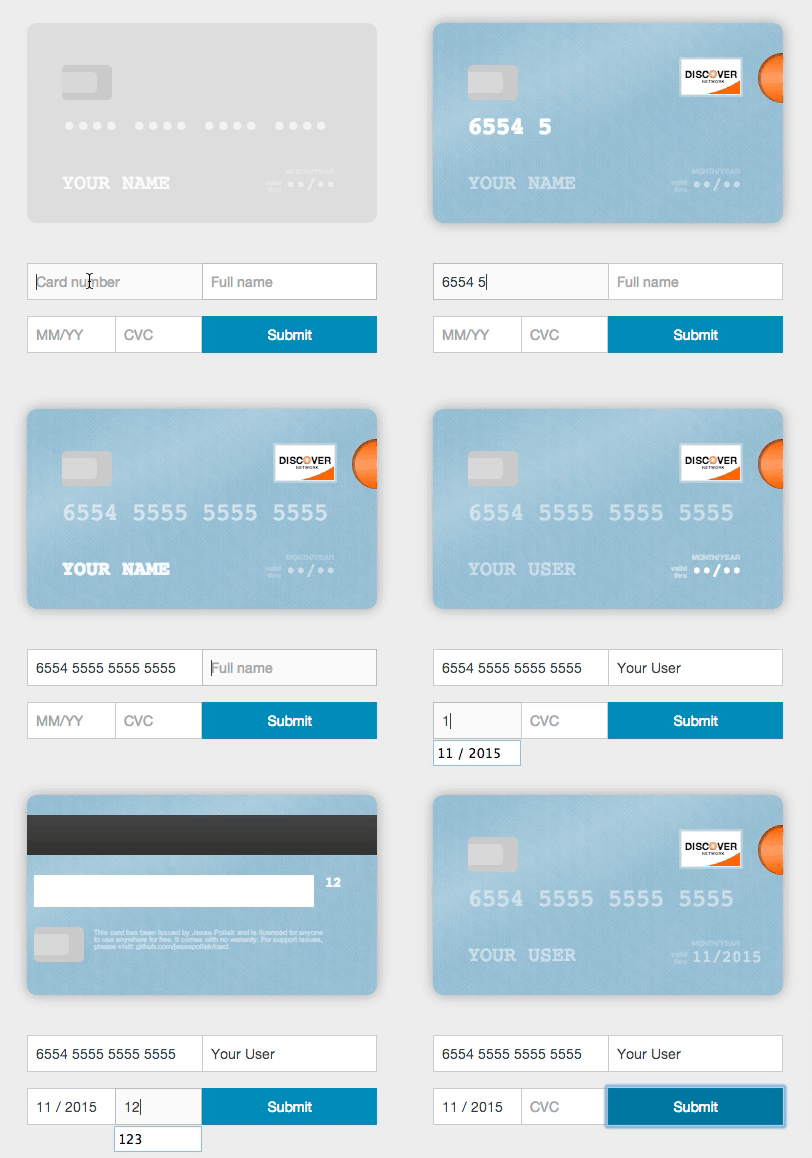
Card will take *any* credit card form and make it the best part of the checkout process (without you changing anything). Everything is created with pure CSS, HTML, and Javascript — no images required.
## Usage (without jQuery)
To use, you'll need to include the Card JavaScript files into your HTML, no CSS link is necessary as the JavaScript file does this for you. You can find the necessary file at `/dist/card.js` and include it in your HTML like so.
```html
```
Once you've included those files, you can initialize Card.
```javascript
var card = new Card({
// a selector or DOM element for the form where users will
// be entering their information
form: 'form', // *required*
// a selector or DOM element for the container
// where you want the card to appear
container: '.card-wrapper', // *required*
formSelectors: {
numberInput: 'input#number', // optional — default input[name="number"]
expiryInput: 'input#expiry', // optional — default input[name="expiry"]
cvcInput: 'input#cvc', // optional — default input[name="cvc"]
nameInput: 'input#name' // optional - defaults input[name="name"]
},
width: 200, // optional — default 350px
formatting: true, // optional - default true
// Strings for translation - optional
messages: {
validDate: 'valid\ndate', // optional - default 'valid\nthru'
monthYear: 'mm/yyyy', // optional - default 'month/year'
},
// Default placeholders for rendered fields - optional
placeholders: {
number: '•••• •••• •••• ••••',
name: 'Full Name',
expiry: '••/••',
cvc: '•••'
},
masks: {
cardNumber: '•' // optional - mask card number
},
// if true, will log helpful messages for setting up Card
debug: false // optional - default false
});
```
### Installing card from bower
If you're using bower, you can install card.js with:
bower install card --save
### Installing card from npm
If you're using npm, you can install card.js with:
npm install --save card
var $ = require("jquery");
// The current card.js code does not explictly require jQuery, but instead uses the global, so this line is needed.
window.jQuery = $;
var card = require("card");
### Using multiple inputs for one field
Card can be used in forms where you have multiple inputs that render to a single field (i.e. you have a first and last name input). To use Card with this functionality, just pass in a selector that selects the fields in the correct order. For example,
```html
```
### Rendering with different initial card placeholders
Card renders with default placeholders for card `name`, `number`, `expiry`, and `cvc`. To override these placeholders, you can pass in a `placeholders` object.
```html
```
### Translation
To render the card with the strings in a different language, you can pass in a `messages` object.
```html
```
## Using with jQuery
To use with jQuery, you'll need to include the `jquery.card.js` file into your HTML. You can find the necessary file at `/dist/jquery.card.js` and include it in your HTML like so.
```html
```
Once you've included those files, you can initialize Card with jQuery.
```javascript
$('form').card({
// a selector or DOM element for the container
// where you want the card to appear
container: '.card-wrapper', // *required*
// all of the other options from above
});
```
## Using with other javascript libraries
Card has wrappers that make it easy to use with other javascript libraries:
### Angular 1.x
* [angular-card](https://github.com/gavruk/angular-card)
### Angular 2+
* [ngx-card](https://github.com/ihym/ngx-card)
### Ember
* [ember-credit-card](https://github.com/esbanarango/ember-credit-card)
### React
* [react-credit-card](https://github.com/JohnyDays/react-credit-card)
* [card-react](https://github.com/shatran/card-react)
* [react-plastic](https://github.com/armsteadj1/react-plastic) - static CSS only version.
### Vue
For use with VueJs, install card.js from npm:
```bash
npm install card --save
```
Add in your component an Div with class 'card-wrapper', just pass in a selector that selects the fields in the correct order. Import the component card.js and add the object in instance mounted like this example:
```html
```
## Development
To contribute, follow this steps:
```bash
$ git clone --recursive https://github.com/jessepollak/card.git
$ cd card
$ git submodule init && git submodule update
$ npm install
$ npm run development
```
Now, if you go to localhost:8080/example in your browser, you should see the demo page.
## Places using Card
Card is used in the wild in these places:
* [InspectAll](http://www.inspectall.com/)
* [PennyWhale](https://www.pennywhale.com/)
* [MakeSpace](https://www.makespace.com/)
* [Blumpa](http://www.blumpa.com/)
* [CourseLoads](http://www.courseloads.com/)
* [PubNub](http://pubnub.com/)
* [GigSalad](https://www.gigsalad.com)
* [Boligninja](http://www.boligninja.dk)
* [EasyCarros](http://www.easycarros.com/)
* [Sintelle](http://www.sintelleparapharmacie.com/)
* [Wevorce](http://wevorce.com/)
* [PayumServer](https://github.com/Payum/PayumServer)
* [Paribus](https://paribus.co)
* [Bizzabo](https://www.bizzabo.com)
* [Tortuba](https://www.tortuba.com)
* [Netlify](https://www.netlify.com)
* [The Spice House](https://www.thespicehouse.com/)
* [Touts](https://www.touts.com.br/)
* [Ryman Limited](http://www.ryman.co.uk)
* [Robert Dyas](http://www.robertdyas.co.uk)
* [ROKA](https://www.rokahub.com)
* [LeSalon](https://lesalon.com)
* [Kenyan Directorate Of Immigration And Citizen Service](https://dis.ecitizen.go.ke)
Are you using Card in production? If so, we'd love to link to you from this page. Open a PR or drop [@jessepollak](http://twitter.com/jessepollak) a line on [Twitter](http://twitter.com/jessepollak) and we'll add you right away!
## Project scope
The project scope is to improve the capture of payment cards on websites. Issues and fixes related to the user interface and validating of payment cards are in scope.
For questions on how to use Card in your particular project, please ask on Stack Overflow or similar forum.
## Donations
If you'd like to donate to help support development of Card, send Bitcoin directly to `17NUKd3v7GWben18kGhmFafa4ZpWrXpQSC` or through Coinbase [here](https://coinbase.com/jessepollak).
================================================
FILE: bower.json
================================================
{
"name": "card",
"homepage": "https://github.com/jessepollak/card",
"authors": ["Jesse Pollak "],
"description": "Card let's you add an interactive, CSS3 credit card animation to your credit card form to help your users through the process.",
"main": ["dist/card.js"],
"keywords": ["card", "credit", "card", "form"],
"dependencies": {
"jquery": ">=1.5"
},
"license": "MIT",
"ignore": ["**/.*", "node_modules", "example", "test", "tests"],
"version": "2.5.0"
}
================================================
FILE: dist/card.css
================================================
.jp-card.jp-card-safari.jp-card-identified .jp-card-front:before,.jp-card.jp-card-safari.jp-card-identified .jp-card-back:before{background-image:repeating-linear-gradient(45deg, rgba(255,255,255,0) 1px, rgba(255,255,255,0.03) 2px, rgba(255,255,255,0.04) 3px, rgba(255,255,255,0.05) 4px),repeating-linear-gradient(135deg, rgba(255,255,255,0.05) 1px, rgba(255,255,255,0) 2px, rgba(255,255,255,0.04) 3px, rgba(255,255,255,0.03) 4px),repeating-linear-gradient(90deg, rgba(255,255,255,0) 1px, rgba(255,255,255,0.03) 2px, rgba(255,255,255,0.04) 3px, rgba(255,255,255,0.05) 4px),repeating-linear-gradient(210deg, rgba(255,255,255,0) 1px, rgba(255,255,255,0.03) 2px, rgba(255,255,255,0.04) 3px, rgba(255,255,255,0.05) 4px),-webkit-linear-gradient(-245deg, rgba(255,255,255,0) 50%,rgba(255,255,255,0.2) 70%,rgba(255,255,255,0) 90%);background-image:repeating-linear-gradient(45deg, rgba(255,255,255,0) 1px, rgba(255,255,255,0.03) 2px, rgba(255,255,255,0.04) 3px, rgba(255,255,255,0.05) 4px),repeating-linear-gradient(135deg, rgba(255,255,255,0.05) 1px, rgba(255,255,255,0) 2px, rgba(255,255,255,0.04) 3px, rgba(255,255,255,0.03) 4px),repeating-linear-gradient(90deg, rgba(255,255,255,0) 1px, rgba(255,255,255,0.03) 2px, rgba(255,255,255,0.04) 3px, rgba(255,255,255,0.05) 4px),repeating-linear-gradient(210deg, rgba(255,255,255,0) 1px, rgba(255,255,255,0.03) 2px, rgba(255,255,255,0.04) 3px, rgba(255,255,255,0.05) 4px),linear-gradient(-25deg, rgba(255,255,255,0) 50%,rgba(255,255,255,0.2) 70%,rgba(255,255,255,0) 90%)}.jp-card.jp-card-ie-10.jp-card-flipped,.jp-card.jp-card-ie-11.jp-card-flipped{-webkit-transform:0deg;-moz-transform:0deg;-ms-transform:0deg;-o-transform:0deg;transform:0deg}.jp-card.jp-card-ie-10.jp-card-flipped .jp-card-front,.jp-card.jp-card-ie-11.jp-card-flipped .jp-card-front{-webkit-transform:rotateY(0deg);-moz-transform:rotateY(0deg);-ms-transform:rotateY(0deg);-o-transform:rotateY(0deg);transform:rotateY(0deg)}.jp-card.jp-card-ie-10.jp-card-flipped .jp-card-back,.jp-card.jp-card-ie-11.jp-card-flipped .jp-card-back{-webkit-transform:rotateY(0deg);-moz-transform:rotateY(0deg);-ms-transform:rotateY(0deg);-o-transform:rotateY(0deg);transform:rotateY(0deg)}.jp-card.jp-card-ie-10.jp-card-flipped .jp-card-back:after,.jp-card.jp-card-ie-11.jp-card-flipped .jp-card-back:after{left:18%}.jp-card.jp-card-ie-10.jp-card-flipped .jp-card-back .jp-card-cvc,.jp-card.jp-card-ie-11.jp-card-flipped .jp-card-back .jp-card-cvc{-webkit-transform:rotateY(180deg);-moz-transform:rotateY(180deg);-ms-transform:rotateY(180deg);-o-transform:rotateY(180deg);transform:rotateY(180deg);left:5%}.jp-card.jp-card-ie-10.jp-card-flipped .jp-card-back .jp-card-shiny,.jp-card.jp-card-ie-11.jp-card-flipped .jp-card-back .jp-card-shiny{left:84%}.jp-card.jp-card-ie-10.jp-card-flipped .jp-card-back .jp-card-shiny:after,.jp-card.jp-card-ie-11.jp-card-flipped .jp-card-back .jp-card-shiny:after{left:-480%;-webkit-transform:rotateY(180deg);-moz-transform:rotateY(180deg);-ms-transform:rotateY(180deg);-o-transform:rotateY(180deg);transform:rotateY(180deg)}.jp-card.jp-card-ie-10.jp-card-amex .jp-card-back,.jp-card.jp-card-ie-11.jp-card-amex .jp-card-back{display:none}.jp-card-logo{height:36px;width:60px;font-style:italic}.jp-card-logo,.jp-card-logo:before,.jp-card-logo:after{box-sizing:border-box}.jp-card-logo.jp-card-amex{text-transform:uppercase;font-size:4px;font-weight:bold;color:white;background-image:repeating-radial-gradient(circle at center, #fff 1px, #999 2px);background-image:repeating-radial-gradient(circle at center, #fff 1px, #999 2px);border:1px solid #EEE}.jp-card-logo.jp-card-amex:before,.jp-card-logo.jp-card-amex:after{width:28px;display:block;position:absolute;left:16px}.jp-card-logo.jp-card-amex:before{height:28px;content:"american";top:3px;text-align:left;padding-left:2px;padding-top:11px;background:#267AC3}.jp-card-logo.jp-card-amex:after{content:"express";bottom:11px;text-align:right;padding-right:2px}.jp-card.jp-card-amex.jp-card-flipped{-webkit-transform:none;-moz-transform:none;-ms-transform:none;-o-transform:none;transform:none}.jp-card.jp-card-amex.jp-card-identified .jp-card-front:before,.jp-card.jp-card-amex.jp-card-identified .jp-card-back:before{background-color:#108168}.jp-card.jp-card-amex.jp-card-identified .jp-card-front .jp-card-logo.jp-card-amex{opacity:1}.jp-card.jp-card-amex.jp-card-identified .jp-card-front .jp-card-cvc{visibility:visible}.jp-card.jp-card-amex.jp-card-identified .jp-card-front:after{opacity:1}.jp-card-logo.jp-card-discover{background:#f60;color:#111;text-transform:uppercase;font-style:normal;font-weight:bold;font-size:10px;text-align:center;overflow:hidden;z-index:1;padding-top:9px;letter-spacing:.03em;border:1px solid #EEE}.jp-card-logo.jp-card-discover:before,.jp-card-logo.jp-card-discover:after{content:" ";display:block;position:absolute}.jp-card-logo.jp-card-discover:before{background:white;width:200px;height:200px;border-radius:200px;bottom:-5%;right:-80%;z-index:-1}.jp-card-logo.jp-card-discover:after{width:8px;height:8px;border-radius:4px;top:10px;left:27px;background-color:#f60;background-image:-webkit-radial-gradient(#f60,#fff);background-image:radial-gradient( #f60,#fff);content:"network";font-size:4px;line-height:24px;text-indent:-7px}.jp-card .jp-card-front .jp-card-logo.jp-card-discover{right:12%;top:18%}.jp-card.jp-card-discover.jp-card-identified .jp-card-front:before,.jp-card.jp-card-discover.jp-card-identified .jp-card-back:before{background-color:#86B8CF}.jp-card.jp-card-discover.jp-card-identified .jp-card-logo.jp-card-discover{opacity:1}.jp-card.jp-card-discover.jp-card-identified .jp-card-front:after{-webkit-transition:400ms;-moz-transition:400ms;transition:400ms;content:" ";display:block;background-color:#f60;background-image:-webkit-linear-gradient(#f60,#ffa366,#f60);background-image:linear-gradient(#f60,#ffa366,#f60);height:50px;width:50px;border-radius:25px;position:absolute;left:100%;top:15%;margin-left:-25px;box-shadow:inset 1px 1px 3px 1px rgba(0,0,0,0.5)}.jp-card-logo.jp-card-unionpay{width:60px;display:block;height:40px;background:#e21836;-webkit-transform:skew(-15deg);-moz-transform:skew(20deg);-o-transform:skew(20deg);border-radius:5px;font-size:10px;z-index:1;line-height:33px;color:#fff;text-align:center;font-family:"Sans-serif", "Microsoft Yahei", "\5FAE\8F6F\96C5\9ED1", "Hiragino Sans", "Gulim", "\5B8B\4F53";font-weight:bold}.jp-card-logo.jp-card-unionpay:after,.jp-card-logo.jp-card-unionpay:before{display:block;margin:0 auto;position:absolute;height:40px;top:0;z-index:-1}.jp-card-logo.jp-card-unionpay:before{content:" ";width:28px;background:#00447c;left:14px;border-top-left-radius:5px;border-bottom-left-radius:5px}.jp-card-logo.jp-card-unionpay:after{content:"银联";width:26px;background:#007b84;left:34px;border-radius:5px;font-size:10px;line-height:54px;text-indent:-17px}.jp-card.jp-card-unionpay.jp-card-identified .jp-card-back:before,.jp-card.jp-card-unionpay.jp-card-identified .jp-card-front:before{background-color:#987c00}.jp-card.jp-card-unionpay.jp-card-identified .jp-card-logo.jp-card-unionpay{opacity:1}.jp-card-logo.jp-card-visa{text-transform:uppercase;color:white;text-align:center;font-weight:bold;font-size:24px;line-height:18px;margin-top:5px}.jp-card-logo.jp-card-visa:before,.jp-card-logo.jp-card-visa:after{content:" ";display:block;width:100%;height:25%}.jp-card-logo.jp-card-visa:before{position:absolute;left:-4px;width:0;height:0;border-style:solid;border-width:0 12px 6px 0;border-color:transparent #ffffff transparent transparent}.jp-card.jp-card-visa.jp-card-identified .jp-card-front:before,.jp-card.jp-card-visa.jp-card-identified .jp-card-back:before{background-color:#191278}.jp-card.jp-card-visa.jp-card-identified .jp-card-logo.jp-card-visa{opacity:1;box-shadow:none}.jp-card-logo.jp-card-visaelectron{background:white;text-transform:uppercase;color:#1A1876;text-align:center;font-weight:bold;font-size:15px;line-height:18px}.jp-card-logo.jp-card-visaelectron:before,.jp-card-logo.jp-card-visaelectron:after{content:" ";display:block;width:100%;height:25%}.jp-card-logo.jp-card-visaelectron:before{background:#1A1876}.jp-card-logo.jp-card-visaelectron:after{background:#E79800}.jp-card-logo.jp-card-visaelectron .elec{float:right;font-family:arial;font-size:9px;margin-right:1px;margin-top:-5px;text-transform:none}.jp-card.jp-card-visaelectron.jp-card-identified .jp-card-front:before,.jp-card.jp-card-visaelectron.jp-card-identified .jp-card-back:before{background-color:#191278}.jp-card.jp-card-visaelectron.jp-card-identified .jp-card-logo.jp-card-visaelectron{opacity:1}.jp-card-logo.jp-card-mastercard{color:white;font-style:normal;text-transform:lowercase;font-weight:bold;text-align:center;font-size:9px;line-height:84px;z-index:1;text-shadow:1px 1px rgba(0,0,0,0.6)}.jp-card-logo.jp-card-mastercard:before,.jp-card-logo.jp-card-mastercard:after{content:" ";display:block;width:36px;top:0;position:absolute;height:36px;border-radius:18px}.jp-card-logo.jp-card-mastercard:before{left:0;background:#EB001B;z-index:-1;opacity:0.9}.jp-card-logo.jp-card-mastercard:after{right:0;background:#FF5F00;z-index:-2}.jp-card.jp-card-mastercard.jp-card-identified .jp-card-front .jp-card-logo.jp-card-mastercard,.jp-card.jp-card-mastercard.jp-card-identified .jp-card-back .jp-card-logo.jp-card-mastercard{box-shadow:none}.jp-card.jp-card-mastercard.jp-card-identified .jp-card-front:before,.jp-card.jp-card-mastercard.jp-card-identified .jp-card-back:before{background-color:#0061A8}.jp-card.jp-card-mastercard.jp-card-identified .jp-card-logo.jp-card-mastercard{opacity:1}.jp-card-logo.jp-card-maestro{color:white;font-style:normal;text-transform:lowercase;font-weight:bold;text-align:center;font-size:14px;line-height:84px;z-index:1;text-shadow:1px 1px rgba(0,0,0,0.6)}.jp-card-logo.jp-card-maestro:before,.jp-card-logo.jp-card-maestro:after{content:" ";display:block;width:36px;top:0;position:absolute;height:36px;border-radius:18px}.jp-card-logo.jp-card-maestro:before{left:0;background:#EB001B;z-index:-2}.jp-card-logo.jp-card-maestro:after{right:0;background:#00A2E5;z-index:-1;opacity:0.8}.jp-card.jp-card-maestro.jp-card-identified .jp-card-front .jp-card-logo.jp-card-maestro,.jp-card.jp-card-maestro.jp-card-identified .jp-card-back .jp-card-logo.jp-card-maestro{box-shadow:none}.jp-card.jp-card-maestro.jp-card-identified .jp-card-front:before,.jp-card.jp-card-maestro.jp-card-identified .jp-card-back:before{background-color:#0B2C5F}.jp-card.jp-card-maestro.jp-card-identified .jp-card-logo.jp-card-maestro{opacity:1}.jp-card-logo.jp-card-dankort{width:60px;height:36px;padding:3px;border-radius:8px;border:#000 1px solid;background-color:#fff}.jp-card-logo.jp-card-dankort .dk{position:relative;width:100%;height:100%;overflow:hidden}.jp-card-logo.jp-card-dankort .dk:before{background-color:#ED1C24;content:'';position:absolute;width:100%;height:100%;display:block;border-radius:6px}.jp-card-logo.jp-card-dankort .dk:after{content:'';position:absolute;top:50%;margin-top:-7.7px;right:0;width:0;height:0;border-style:solid;border-width:7px 7px 10px 0;border-color:transparent #ED1C24 transparent transparent;z-index:1}.jp-card-logo.jp-card-dankort .d,.jp-card-logo.jp-card-dankort .k{position:absolute;top:50%;width:50%;display:block;height:15.4px;margin-top:-7.7px;background:white}.jp-card-logo.jp-card-dankort .d{left:0;border-radius:0 8px 10px 0}.jp-card-logo.jp-card-dankort .d:before{content:'';position:absolute;top:50%;left:50%;display:block;background:#ED1C24;border-radius:2px 4px 6px 0px;height:5px;width:7px;margin:-3px 0 0 -4px}.jp-card-logo.jp-card-dankort .k{right:0}.jp-card-logo.jp-card-dankort .k:before,.jp-card-logo.jp-card-dankort .k:after{content:'';position:absolute;right:50%;width:0;height:0;border-style:solid;margin-right:-1px}.jp-card-logo.jp-card-dankort .k:before{top:0;border-width:8px 5px 0 0;border-color:#ED1C24 transparent transparent transparent}.jp-card-logo.jp-card-dankort .k:after{bottom:0;border-width:0 5px 8px 0;border-color:transparent transparent #ED1C24 transparent}.jp-card.jp-card-dankort.jp-card-identified .jp-card-front:before,.jp-card.jp-card-dankort.jp-card-identified .jp-card-back:before{background-color:#0055C7}.jp-card.jp-card-dankort.jp-card-identified .jp-card-logo.jp-card-dankort{opacity:1}.jp-card-logo.jp-card-elo{height:50px;width:50px;border-radius:100%;background:black;color:white;text-align:center;text-transform:lowercase;font-size:21px;font-style:normal;letter-spacing:1px;font-weight:bold;padding-top:13px}.jp-card-logo.jp-card-elo .e,.jp-card-logo.jp-card-elo .l,.jp-card-logo.jp-card-elo .o{display:inline-block;position:relative}.jp-card-logo.jp-card-elo .e{-webkit-transform:rotate(-15deg);-moz-transform:rotate(-15deg);-ms-transform:rotate(-15deg);-o-transform:rotate(-15deg);transform:rotate(-15deg)}.jp-card-logo.jp-card-elo .o{position:relative;display:inline-block;width:12px;height:12px;right:0;top:7px;border-radius:100%;background-image:-webkit-linear-gradient( #ff0 50%,red 50%);background-image:linear-gradient( #ff0 50%,red 50%);-webkit-transform:rotate(40deg);-moz-transform:rotate(40deg);-ms-transform:rotate(40deg);-o-transform:rotate(40deg);transform:rotate(40deg);text-indent:-9999px}.jp-card-logo.jp-card-elo .o:before{content:"";position:absolute;width:49%;height:49%;background:black;border-radius:100%;text-indent:-99999px;top:25%;left:25%}.jp-card.jp-card-elo.jp-card-identified .jp-card-front:before,.jp-card.jp-card-elo.jp-card-identified .jp-card-back:before{background-color:#6F6969}.jp-card.jp-card-elo.jp-card-identified .jp-card-logo.jp-card-elo{opacity:1}.jp-card-logo.jp-card-jcb{border-radius:5px 0px 5px 0px;-moz-border-radius:5px 0px 5px 0px;-webkit-border-radius:5px 0px 5px 0px;background-color:white;font-style:normal;color:white;width:50px;padding:2px 0 0 2px}.jp-card-logo.jp-card-jcb>div{width:15px;margin-right:1px;display:inline-block;text-align:center;text-shadow:1px 1px rgba(0,0,0,0.6);border-radius:5px 0px 5px 0px;-moz-border-radius:5px 0px 5px 0px;-webkit-border-radius:5px 0px 5px 0px}.jp-card-logo.jp-card-jcb>div:before,.jp-card-logo.jp-card-jcb>div:after{content:" ";display:block;height:8px}.jp-card-logo.jp-card-jcb>div.j{background-color:#000063;background-image:-webkit-linear-gradient(left, #000063,#008cff);background-image:linear-gradient(to right,#000063,#008cff)}.jp-card-logo.jp-card-jcb>div.c{background-color:#630000;background-image:-webkit-linear-gradient(left, #630000,#ff008d);background-image:linear-gradient(to right,#630000,#ff008d)}.jp-card-logo.jp-card-jcb>div.b{background-color:#006300;background-image:-webkit-linear-gradient(left, #006300,lime);background-image:linear-gradient(to right,#006300,lime)}.jp-card.jp-card-jcb.jp-card-identified .jp-card-front:before,.jp-card.jp-card-jcb.jp-card-identified .jp-card-back:before{background-color:#CB8000}.jp-card.jp-card-jcb.jp-card-identified .jp-card-logo.jp-card-jcb{opacity:1;box-shadow:none}.jp-card-logo.jp-card-dinersclub{font-family:serif;height:40px;width:100px;color:white;font-size:17px;font-style:normal;letter-spacing:1px}.jp-card-logo.jp-card-dinersclub::before,.jp-card-logo.jp-card-dinersclub::after{display:block;position:relative}.jp-card-logo.jp-card-dinersclub::before{content:'Diners Club'}.jp-card-logo.jp-card-dinersclub::after{content:'International';text-transform:uppercase;font-size:0.6em}.jp-card.jp-card-dinersclub .jp-card-front .jp-card-logo{box-shadow:none !important}.jp-card.jp-card-dinersclub.jp-card-identified .jp-card-front:before,.jp-card.jp-card-dinersclub.jp-card-identified .jp-card-back:before{background-color:#999}.jp-card.jp-card-dinersclub.jp-card-identified .jp-card-logo.jp-card-dinersclub{opacity:1}.jp-card-logo.jp-card-hipercard{height:20px;width:100px;color:white;font-size:21px;font-style:italic;font-weight:bold}.jp-card-logo.jp-card-hipercard::before,.jp-card-logo.jp-card-hipercard::after{display:block;position:relative}.jp-card.jp-card-hipercard.jp-card-identified .jp-card-front:before,.jp-card.jp-card-hipercard.jp-card-identified .jp-card-back:before{background-color:#770304}.jp-card.jp-card-hipercard.jp-card-identified .jp-card-logo.jp-card-hipercard{opacity:1;box-shadow:none}.jp-card-logo.jp-card-troy{text-transform:lowercase;color:#fff;text-align:center;font-weight:700;font-size:24px;line-height:18px;margin-top:5px}.jp-card-logo.jp-card-troy:before,.jp-card-logo.jp-card-troy:after{content:\"\";display:block;width:26%;height:6%;background:#22b8c3;right:32%;top:24%;position:absolute;transform:rotate(105deg)}.jp-card.jp-card-troy.jp-card-identified .jp-card-front:before,.jp-card.jp-card-troy.jp-card-identified .jp-card-back:before{background-color:#01adba}.jp-card.jp-card-troy.jp-card-identified .jp-card-logo.jp-card-troy{opacity:1;box-shadow:none}.jp-card-container{-webkit-perspective:1000px;-moz-perspective:1000px;perspective:1000px;width:350px;max-width:100%;height:200px;margin:auto;z-index:1;position:relative}.jp-card{font-family:"Helvetica Neue",Helvetica,Arial,sans-serif;line-height:1;position:relative;width:100%;height:100%;min-width:315px;border-radius:10px;-webkit-transform-style:preserve-3d;-moz-transform-style:preserve-3d;-ms-transform-style:preserve-3d;-o-transform-style:preserve-3d;transform-style:preserve-3d;-webkit-transition:all 400ms linear;-moz-transition:all 400ms linear;transition:all 400ms linear}.jp-card>*,.jp-card>*:after,.jp-card>*:before{-moz-box-sizing:border-box;-webkit-box-sizing:border-box;box-sizing:border-box;font-family:inherit}.jp-card.jp-card-flipped{-webkit-transform:rotateY(180deg);-moz-transform:rotateY(180deg);-ms-transform:rotateY(180deg);-o-transform:rotateY(180deg);transform:rotateY(180deg)}.jp-card .jp-card-back,.jp-card .jp-card-front{-webkit-backface-visibility:hidden;backface-visibility:hidden;-webkit-transform-style:preserve-3d;-moz-transform-style:preserve-3d;-ms-transform-style:preserve-3d;-o-transform-style:preserve-3d;transform-style:preserve-3d;-webkit-transition:all 400ms linear;-moz-transition:all 400ms linear;transition:all 400ms linear;width:100%;height:100%;position:absolute;top:0;left:0;overflow:hidden;border-radius:10px;background:#ddd}.jp-card .jp-card-back:before,.jp-card .jp-card-front:before{content:" ";display:block;position:absolute;width:100%;height:100%;top:0;left:0;opacity:0;border-radius:10px;-webkit-transition:all 400ms ease;-moz-transition:all 400ms ease;transition:all 400ms ease}.jp-card .jp-card-back:after,.jp-card .jp-card-front:after{content:" ";display:block}.jp-card .jp-card-back .jp-card-display,.jp-card .jp-card-front .jp-card-display{color:#fff;font-weight:normal;opacity:0.5;-webkit-transition:opacity 400ms linear;-moz-transition:opacity 400ms linear;transition:opacity 400ms linear}.jp-card .jp-card-back .jp-card-display.jp-card-focused,.jp-card .jp-card-front .jp-card-display.jp-card-focused{opacity:1;font-weight:700}.jp-card .jp-card-back .jp-card-cvc,.jp-card .jp-card-front .jp-card-cvc{font-family:"Bitstream Vera Sans Mono",Consolas,Courier,monospace;font-size:14px}.jp-card .jp-card-back .jp-card-shiny,.jp-card .jp-card-front .jp-card-shiny{width:50px;height:35px;border-radius:5px;background:#ccc;position:relative}.jp-card .jp-card-back .jp-card-shiny:before,.jp-card .jp-card-front .jp-card-shiny:before{content:" ";display:block;width:70%;height:60%;border-top-right-radius:5px;border-bottom-right-radius:5px;background:#d9d9d9;position:absolute;top:20%}.jp-card .jp-card-front .jp-card-logo{position:absolute;opacity:0;right:5%;top:8%;-webkit-transition:400ms;-moz-transition:400ms;transition:400ms}.jp-card .jp-card-front .jp-card-lower{width:80%;position:absolute;left:10%;bottom:30px}@media only screen and (max-width: 480px){.jp-card .jp-card-front .jp-card-lower{width:90%;left:5%}}.jp-card .jp-card-front .jp-card-lower .jp-card-cvc{visibility:hidden;float:right;position:relative;bottom:5px}.jp-card .jp-card-front .jp-card-lower .jp-card-number{font-family:"Bitstream Vera Sans Mono",Consolas,Courier,monospace;font-size:24px;clear:both;margin-bottom:30px}.jp-card .jp-card-front .jp-card-lower .jp-card-expiry{font-family:"Bitstream Vera Sans Mono",Consolas,Courier,monospace;letter-spacing:0;position:relative;float:right;width:25%}.jp-card .jp-card-front .jp-card-lower .jp-card-expiry:after,.jp-card .jp-card-front .jp-card-lower .jp-card-expiry:before{font-family:"Helvetica Neue",Helvetica,Arial,sans-serif;font-weight:bold;font-size:7px;white-space:pre;display:block;opacity:0.5}.jp-card .jp-card-front .jp-card-lower .jp-card-expiry:before{content:attr(data-before);margin-bottom:2px;font-size:7px;text-transform:uppercase}.jp-card .jp-card-front .jp-card-lower .jp-card-expiry:after{position:absolute;content:attr(data-after);text-align:right;right:100%;margin-right:5px;margin-top:2px;bottom:0}.jp-card .jp-card-front .jp-card-lower .jp-card-name{text-transform:uppercase;font-family:"Bitstream Vera Sans Mono",Consolas,Courier,monospace;font-size:20px;max-height:45px;position:absolute;bottom:0;width:190px;display:-webkit-box;-webkit-line-clamp:2;-webkit-box-orient:horizontal;overflow:hidden;text-overflow:ellipsis}.jp-card .jp-card-back{-webkit-transform:rotateY(180deg);-moz-transform:rotateY(180deg);-ms-transform:rotateY(180deg);-o-transform:rotateY(180deg);transform:rotateY(180deg)}.jp-card .jp-card-back .jp-card-bar{background-color:#444;background-image:-webkit-linear-gradient(#444,#333);background-image:linear-gradient(#444,#333);width:100%;height:20%;position:absolute;top:10%}.jp-card .jp-card-back:after{content:" ";display:block;background-color:#fff;background-image:-webkit-linear-gradient(#fff,#fff);background-image:linear-gradient(#fff,#fff);width:80%;height:16%;position:absolute;top:40%;left:2%}.jp-card .jp-card-back .jp-card-cvc{position:absolute;top:40%;left:85%;-webkit-transition-delay:600ms;-moz-transition-delay:600ms;transition-delay:600ms}.jp-card .jp-card-back .jp-card-shiny{position:absolute;top:66%;left:2%}.jp-card .jp-card-back .jp-card-shiny:after{content:"This card has been issued by Jesse Pollak and is licensed for anyone to use anywhere for free. It comes with no warranty. For support issues, please visit: github.com/jessepollak/card.";position:absolute;left:120%;top:5%;color:white;font-size:7px;width:230px;opacity:0.5}.jp-card.jp-card-identified{box-shadow:0 0 20px rgba(0,0,0,0.3)}.jp-card.jp-card-identified .jp-card-back,.jp-card.jp-card-identified .jp-card-front{background-color:#000;background-color:rgba(0,0,0,0.5)}.jp-card.jp-card-identified .jp-card-back:before,.jp-card.jp-card-identified .jp-card-front:before{-webkit-transition:all 400ms ease;-moz-transition:all 400ms ease;transition:all 400ms ease;background-image:repeating-linear-gradient(45deg, rgba(255,255,255,0) 1px, rgba(255,255,255,0.03) 2px, rgba(255,255,255,0.04) 3px, rgba(255,255,255,0.05) 4px),repeating-linear-gradient(135deg, rgba(255,255,255,0.05) 1px, rgba(255,255,255,0) 2px, rgba(255,255,255,0.04) 3px, rgba(255,255,255,0.03) 4px),repeating-linear-gradient(90deg, rgba(255,255,255,0) 1px, rgba(255,255,255,0.03) 2px, rgba(255,255,255,0.04) 3px, rgba(255,255,255,0.05) 4px),repeating-linear-gradient(210deg, rgba(255,255,255,0) 1px, rgba(255,255,255,0.03) 2px, rgba(255,255,255,0.04) 3px, rgba(255,255,255,0.05) 4px),repeating-radial-gradient(circle at 30% 30%, rgba(255,255,255,0) 1px, rgba(255,255,255,0.03) 2px, rgba(255,255,255,0.04) 3px, rgba(255,255,255,0.05) 4px),repeating-radial-gradient(circle at 70% 70%, rgba(255,255,255,0) 1px, rgba(255,255,255,0.03) 2px, rgba(255,255,255,0.04) 3px, rgba(255,255,255,0.05) 4px),repeating-radial-gradient(circle at 90% 20%, rgba(255,255,255,0) 1px, rgba(255,255,255,0.03) 2px, rgba(255,255,255,0.04) 3px, rgba(255,255,255,0.05) 4px),repeating-radial-gradient(circle at 15% 80%, rgba(255,255,255,0) 1px, rgba(255,255,255,0.03) 2px, rgba(255,255,255,0.04) 3px, rgba(255,255,255,0.05) 4px),-webkit-linear-gradient(-245deg, rgba(255,255,255,0) 50%,rgba(255,255,255,0.2) 70%,rgba(255,255,255,0) 90%);background-image:repeating-linear-gradient(45deg, rgba(255,255,255,0) 1px, rgba(255,255,255,0.03) 2px, rgba(255,255,255,0.04) 3px, rgba(255,255,255,0.05) 4px),repeating-linear-gradient(135deg, rgba(255,255,255,0.05) 1px, rgba(255,255,255,0) 2px, rgba(255,255,255,0.04) 3px, rgba(255,255,255,0.03) 4px),repeating-linear-gradient(90deg, rgba(255,255,255,0) 1px, rgba(255,255,255,0.03) 2px, rgba(255,255,255,0.04) 3px, rgba(255,255,255,0.05) 4px),repeating-linear-gradient(210deg, rgba(255,255,255,0) 1px, rgba(255,255,255,0.03) 2px, rgba(255,255,255,0.04) 3px, rgba(255,255,255,0.05) 4px),repeating-radial-gradient(circle at 30% 30%, rgba(255,255,255,0) 1px, rgba(255,255,255,0.03) 2px, rgba(255,255,255,0.04) 3px, rgba(255,255,255,0.05) 4px),repeating-radial-gradient(circle at 70% 70%, rgba(255,255,255,0) 1px, rgba(255,255,255,0.03) 2px, rgba(255,255,255,0.04) 3px, rgba(255,255,255,0.05) 4px),repeating-radial-gradient(circle at 90% 20%, rgba(255,255,255,0) 1px, rgba(255,255,255,0.03) 2px, rgba(255,255,255,0.04) 3px, rgba(255,255,255,0.05) 4px),repeating-radial-gradient(circle at 15% 80%, rgba(255,255,255,0) 1px, rgba(255,255,255,0.03) 2px, rgba(255,255,255,0.04) 3px, rgba(255,255,255,0.05) 4px),linear-gradient(-25deg, rgba(255,255,255,0) 50%,rgba(255,255,255,0.2) 70%,rgba(255,255,255,0) 90%);opacity:1}.jp-card.jp-card-identified .jp-card-back .jp-card-logo,.jp-card.jp-card-identified .jp-card-front .jp-card-logo{box-shadow:0 0 0 2px rgba(255,255,255,0.3)}.jp-card.jp-card-identified.no-radial-gradient .jp-card-back:before,.jp-card.jp-card-identified.no-radial-gradient .jp-card-front:before{background-image:repeating-linear-gradient(45deg, rgba(255,255,255,0) 1px, rgba(255,255,255,0.03) 2px, rgba(255,255,255,0.04) 3px, rgba(255,255,255,0.05) 4px),repeating-linear-gradient(135deg, rgba(255,255,255,0.05) 1px, rgba(255,255,255,0) 2px, rgba(255,255,255,0.04) 3px, rgba(255,255,255,0.03) 4px),repeating-linear-gradient(90deg, rgba(255,255,255,0) 1px, rgba(255,255,255,0.03) 2px, rgba(255,255,255,0.04) 3px, rgba(255,255,255,0.05) 4px),repeating-linear-gradient(210deg, rgba(255,255,255,0) 1px, rgba(255,255,255,0.03) 2px, rgba(255,255,255,0.04) 3px, rgba(255,255,255,0.05) 4px),-webkit-linear-gradient(-245deg, rgba(255,255,255,0) 50%,rgba(255,255,255,0.2) 70%,rgba(255,255,255,0) 90%);background-image:repeating-linear-gradient(45deg, rgba(255,255,255,0) 1px, rgba(255,255,255,0.03) 2px, rgba(255,255,255,0.04) 3px, rgba(255,255,255,0.05) 4px),repeating-linear-gradient(135deg, rgba(255,255,255,0.05) 1px, rgba(255,255,255,0) 2px, rgba(255,255,255,0.04) 3px, rgba(255,255,255,0.03) 4px),repeating-linear-gradient(90deg, rgba(255,255,255,0) 1px, rgba(255,255,255,0.03) 2px, rgba(255,255,255,0.04) 3px, rgba(255,255,255,0.05) 4px),repeating-linear-gradient(210deg, rgba(255,255,255,0) 1px, rgba(255,255,255,0.03) 2px, rgba(255,255,255,0.04) 3px, rgba(255,255,255,0.05) 4px),linear-gradient(-25deg, rgba(255,255,255,0) 50%,rgba(255,255,255,0.2) 70%,rgba(255,255,255,0) 90%)}@media (max-width: 450px){.card-wrapper{max-width:80vw;width:100%;margin:20px auto;overflow-x:hidden}.card-wrapper>.jp-card-container{transform:scale(0.625);transform-origin:left center}}
================================================
FILE: dist/card.js
================================================
/*! For license information please see card.js.LICENSE.txt */
var card;(()=>{var r={579:function(r,e,t){var a,n,o;t(346),n=t(202),t(28),o=t(907),a=function(){var r,e;class t{template(r,e){return r.replace(/\{\{(.*?)\}\}/g,(function(r,t,a){return e[t]}))}constructor(r){var e;this.maskCardNumber=this.maskCardNumber.bind(this),this.options=o(!0,this.defaults,r),this.options.form?(this.$el=n(this.options.form),this.options.container?(this.$container=n(this.options.container),(e=n.isDOMElement(this.$container)?this.$container:this.$container[0]).getAttribute(this.initializedDataAttr)||(e.setAttribute(this.initializedDataAttr,!0),this.render(),this.attachHandlers(),this.handleInitialPlaceholders())):console.log("Please provide a container")):console.log("Please provide a form")}render(){var r,e,t,a,i,d,c,p;for(t in n.append(this.$container,this.template(this.cardTemplate,o({},this.options.messages,this.options.placeholders))),i=this.options.cardSelectors)c=i[t],this[`$${t}`]=n.find(this.$container,c);for(t in d=this.options.formSelectors)c=d[t],c=this.options[t]?this.options[t]:c,!(a=n.find(this.$el,c)).length&&this.options.debug&&console.error(`Card can't find a ${t} in your form.`),this[`$${t}`]=a;if(this.options.formatting&&(Payment.formatCardNumber(this.$numberInput),Payment.formatCardCVC(this.$cvcInput),Payment.formatCardExpiry(this.$expiryInput)),this.options.width&&(r=n(this.options.cardSelectors.cardContainer)[0],e=parseInt(r.clientWidth||window.getComputedStyle(r).width),r.style.transform=`scale(${this.options.width/e})`),("undefined"!=typeof navigator&&null!==navigator?navigator.userAgent:void 0)&&-1!==(p=navigator.userAgent.toLowerCase()).indexOf("safari")&&-1===p.indexOf("chrome")&&n.addClass(this.$card,"jp-card-safari"),/MSIE 10\./i.test(navigator.userAgent)&&n.addClass(this.$card,"jp-card-ie-10"),/rv:11.0/i.test(navigator.userAgent))return n.addClass(this.$card,"jp-card-ie-11")}attachHandlers(){var e,t;return t=[this.validToggler("cardNumber")],this.options.masks.cardNumber&&t.push(this.maskCardNumber),r(this.$numberInput,this.$numberDisplay,{fill:!1,filters:t}),n.on(this.$numberInput,"payment.cardType",this.handle("setCardType")),(e=[function(r){return 1===r.length&&"0"===r[0]?"":r.replace(/(\s+)/g,"")}]).push(this.validToggler("cardExpiry")),r(this.$expiryInput,this.$expiryDisplay,{join:function(r){return 2===r[0].length||r[1]?"/":""},filters:e}),r(this.$cvcInput,this.$cvcDisplay,{filters:this.validToggler("cardCVC")}),n.on(this.$cvcInput,"focus",this.handle("flipCard")),n.on(this.$cvcInput,"blur",this.handle("unflipCard")),r(this.$nameInput,this.$nameDisplay,{fill:!1,filters:this.validToggler("cardHolderName"),join:" "})}handleInitialPlaceholders(){var r,e,t,a;for(e in a=[],t=this.options.formSelectors)t[e],(r=this[`$${e}`])instanceof NodeList&&(r=r[0]),n.val(r)?(n.trigger(r,"paste"),a.push(function(r){return setTimeout((function(){return n.trigger(r,"keyup")}))}(r))):a.push(void 0);return a}handle(r){return e=>{var t;return(t=Array.prototype.slice.call(arguments)).unshift(e.target),this.handlers[r].apply(this,t)}}validToggler(r){var e;return"cardExpiry"===r?e=function(r){var e;return e=Payment.fns.cardExpiryVal(r),Payment.fns.validateCardExpiry(e.month,e.year)}:"cardCVC"===r?e=r=>Payment.fns.validateCardCVC(r,this.cardType):"cardNumber"===r?e=function(r){return Payment.fns.validateCardNumber(r)}:"cardHolderName"===r&&(e=function(r){return""!==r}),(r,t,a)=>{var n;return n=e(r),this.toggleValidClass(t,n),this.toggleValidClass(a,n),r}}toggleValidClass(r,e){return n.toggleClass(r,this.options.classes.valid,e),n.toggleClass(r,this.options.classes.invalid,!e)}maskCardNumber(r,e,t){var a,n;return a=this.options.masks.cardNumber,(n=r.split(" ")).length>=3?(n.forEach((function(r,e){if(e!==n.length-1)return n[e]=n[e].replace(/\d/g,a)})),n.join(" ")):r.replace(/\d/g,a)}getCardType(){return Payment.fns.cardType(this.$numberInput[0].value)||"unknown"}}return t.prototype.initializedDataAttr="data-jp-card-initialized",t.prototype.cardTemplate='Visa
Mastercard
Maestro
discover
UnionPay
Hipercard
troy
{{cvc}}
{{number}}
{{name}}
{{expiry}}
Visa
Mastercard
Maestro
discover
UnionPay
Hipercard
troy
{{cvc}}
{{number}}
{{name}}
{{expiry}}
' +
'
' +
'
' +
'
' +
'
Visa
' +
'
' +
'
Mastercard
' +
'
Maestro
' +
'
' +
'
discover
' +
'
UnionPay
' +
'
' +
'
Hipercard
' +
'
troy
' +
'
' +
'
' +
'
' +
'
' +
'
{{cvc}}
' +
'
{{number}}
' +
'
{{name}}
' +
'
{{expiry}}
' +
'
' +
'
' +
'
' +
'
' +
'
{{cvc}}
' +
'
' +
'
' +
'
' +
'