









Repository: jina-ai/clip-as-service
Branch: main
Commit: 03410570d439
Files: 104
Total size: 598.7 KB
Directory structure:
gitextract_i8arbao_/
├── .dockerignore
├── .github/
│ ├── README-exec/
│ │ ├── onnx.readme.md
│ │ └── torch.readme.md
│ ├── codecov.yml
│ ├── labeler.yml
│ ├── release-template.ejs
│ └── workflows/
│ ├── cd.yml
│ ├── ci.yml
│ ├── force-docker-build-cas.yml
│ ├── force-docker-build.yml
│ ├── force-docs-build.yml
│ ├── force-hub-push.yml
│ ├── force-release.yml
│ ├── label-pr.yml
│ └── tag.yml
├── .gitignore
├── .pre-commit-config.yaml
├── CHANGELOG.md
├── Dockerfiles/
│ ├── base.Dockerfile
│ ├── cuda.Dockerfile
│ ├── server.Dockerfile
│ └── tensorrt.Dockerfile
├── LICENSE
├── README.md
├── client/
│ ├── clip_client/
│ │ ├── __init__.py
│ │ ├── client.py
│ │ └── helper.py
│ └── setup.py
├── docs/
│ ├── Makefile
│ ├── _static/
│ │ ├── cas-grafana.json
│ │ ├── demo-embed.html
│ │ ├── demo-text-rank.html
│ │ └── main.css
│ ├── _templates/
│ │ ├── page.html
│ │ └── sidebar/
│ │ ├── brand.html
│ │ └── navigation.html
│ ├── changelog/
│ │ └── index.md
│ ├── conf.py
│ ├── hosting/
│ │ ├── by-jina.md
│ │ ├── cas-on-colab.ipynb
│ │ ├── colab.md
│ │ └── on-jcloud.md
│ ├── html_extra/
│ │ └── robots.txt
│ ├── index.md
│ ├── makedoc.sh
│ ├── playground/
│ │ ├── embedding.md
│ │ ├── reasoning.md
│ │ └── searching.md
│ ├── requirements.txt
│ └── user-guides/
│ ├── benchmark.rst
│ ├── client.md
│ ├── faq.md
│ ├── finetuner.md
│ ├── retriever.md
│ └── server.md
├── scripts/
│ ├── MANIFEST.in
│ ├── benchmark.py
│ ├── black.sh
│ ├── docstrings_lint.sh
│ ├── get-all-test-paths.sh
│ ├── get-last-release-note.py
│ ├── get-requirements.py
│ ├── onnx_helper.py
│ ├── release.sh
│ └── setup.py
├── server/
│ ├── MANIFEST.in
│ ├── clip_server/
│ │ ├── __init__.py
│ │ ├── __main__.py
│ │ ├── executors/
│ │ │ ├── __init__.py
│ │ │ ├── clip_onnx.py
│ │ │ ├── clip_tensorrt.py
│ │ │ ├── clip_torch.py
│ │ │ └── helper.py
│ │ ├── helper.py
│ │ ├── model/
│ │ │ ├── __init__.py
│ │ │ ├── clip.py
│ │ │ ├── clip_model.py
│ │ │ ├── clip_onnx.py
│ │ │ ├── clip_trt.py
│ │ │ ├── cnclip_model.py
│ │ │ ├── flash_attention.py
│ │ │ ├── mclip_model.py
│ │ │ ├── model.py
│ │ │ ├── openclip_model.py
│ │ │ ├── pretrained_models.py
│ │ │ ├── simple_tokenizer.py
│ │ │ ├── tokenization.py
│ │ │ └── trt_utils.py
│ │ ├── onnx-flow.yml
│ │ ├── tensorrt-flow.yml
│ │ └── torch-flow.yml
│ └── setup.py
└── tests/
├── __init__.py
├── conftest.py
├── test_asyncio.py
├── test_client.py
├── test_helper.py
├── test_model.py
├── test_ranker.py
├── test_search.py
├── test_server.py
├── test_simple.py
├── test_tensorrt.py
└── test_tokenization.py
================================================
FILE CONTENTS
================================================
================================================
FILE: .dockerignore
================================================
.git
.github
scripts
docs
================================================
FILE: .github/README-exec/onnx.readme.md
================================================
# CLIPOnnxEncoder
**CLIPOnnxEncoder** is the executor implemented in [CLIP-as-service](https://github.com/jina-ai/clip-as-service).
The various `CLIP` models implemented in the [OpenAI](https://github.com/openai/CLIP) and [OpenCLIP](https://github.com/mlfoundations/open_clip) are supported with ONNX runtime (🚀 **3x** speed up).
The introduction of the CLIP model [can be found here](https://openai.com/blog/clip/).
- 🔀 **Automatic**: Auto-detect image and text documents depending on their content.
- ⚡ **Efficiency**: Faster CLIP model inference on CPU and GPU via ONNX runtime.
- 📈 **Observability**: Monitoring the serving via Prometheus and Grafana (see [Usage Guide](https://docs.jina.ai/how-to/monitoring/#deploying-locally)).
## Model support
`ViT-B-32::openai` is used as the default model. To use specific pretrained models provided by `open_clip`, please use `::` to separate model name and pretrained weight name, e.g. `ViT-B-32::laion2b_e16`. Please also note that **different models give different sizes of output dimensions**.
| Model | ONNX | Output dimension |
|---------------------------------------|------|------------------|
| RN50 | ✅ | 1024 |
| RN101 | ✅ | 512 |
| RN50x4 | ✅ | 640 |
| RN50x16 | ✅ | 768 |
| RN50x64 | ✅ | 1024 |
| ViT-B-32 | ✅ | 512 |
| ViT-B-16 | ✅ | 512 |
| ViT-B-16-plus-240 | ✅ | 640 |
| ViT-L-14 | ✅ | 768 |
| ViT-L-14-336 | ✅ | 768 |
| ViT-H-14 | ✅ | 1024 |
| ViT-g-14 | ✅ | 1024 |
| M-CLIP/XLM_Roberta-Large-Vit-B-32 | ✅ | 512 |
| M-CLIP/XLM-Roberta-Large-Vit-L-14 | ✅ | 768 |
| M-CLIP/XLM-Roberta-Large-Vit-B-16Plus | ✅ | 640 |
| M-CLIP/LABSE-Vit-L-14 | ✅ | 768 |
✅ = First class support
Full list of open_clip models and weights can be found [here](https://github.com/mlfoundations/open_clip#pretrained-model-interface).
```{note}
For model definition with `-quickgelu` postfix, please use non `-quickgelu` model name.
```
## Usage
### Use in Jina Flow
- **via Docker image (recommended)**
```python
from jina import Flow
from docarray import Document
import numpy as np
f = Flow().add(
uses='jinahub+docker://CLIPOnnxEncoder',
)
```
- **via source code**
```python
from jina import Flow
from docarray import Document
import numpy as np
f = Flow().add(
uses='jinahub://CLIPOnnxEncoder',
)
```
You can set the following parameters via `with`:
| Parameter | Description |
|-----------|-------------------------------------------------------------------------------------------------------------------------------|
| `name` | Model weights, default is `ViT-B/32`. Support all OpenAI released pretrained models. |
| `num_worker_preprocess` | The number of CPU workers for image & text prerpocessing, default 4. |
| `minibatch_size` | The size of a minibatch for CPU preprocessing and GPU encoding, default 16. Reduce the size of it if you encounter OOM on GPU. |
| `device` | `cuda` or `cpu`. Default is `None` means auto-detect. |
### Encoding
Encoding here means getting the fixed-length vector representation of a sentence or image.
```python
from jina import Flow
from docarray import Document, DocumentArray
da = DocumentArray(
[
Document(text='she smiled, with pain'),
Document(uri='apple.png'),
Document(uri='apple.png').load_uri_to_image_tensor(),
Document(blob=open('apple.png', 'rb').read()),
Document(uri='https://clip-as-service.jina.ai/_static/favicon.png'),
Document(
uri='data:image/gif;base64,R0lGODlhEAAQAMQAAORHHOVSKudfOulrSOp3WOyDZu6QdvCchPGolfO0o/XBs/fNwfjZ0frl3/zy7////wAAAAAAAAAAAAAAAAAAAAAAAAAAAAAAAAAAAAAAAAAAAAAAAAAAAAAAAAAAAAAAACH5BAkAABAALAAAAAAQABAAAAVVICSOZGlCQAosJ6mu7fiyZeKqNKToQGDsM8hBADgUXoGAiqhSvp5QAnQKGIgUhwFUYLCVDFCrKUE1lBavAViFIDlTImbKC5Gm2hB0SlBCBMQiB0UjIQA7'
),
]
)
f = Flow().add(
uses='jinahub+docker://CLIPOnnxEncoder',
)
with f:
f.post(on='/', inputs=da)
da.summary()
```
From the output, you will see all the text and image docs have `embedding` attached.
```text
╭──────────────────────────── Documents Summary ─────────────────────────────╮
│ │
│ Length 6 │
│ Homogenous Documents False │
│ 4 Documents have attributes ('id', 'mime_type', 'uri', 'embedding') │
│ 1 Document has attributes ('id', 'mime_type', 'text', 'embedding') │
│ 1 Document has attributes ('id', 'embedding') │
│ │
╰────────────────────────────────────────────────────────────────────────────╯
╭────────────────────── Attributes Summary ───────────────────────╮
│ │
│ Attribute Data type #Unique values Has empty value │
│ ───────────────────────────────────────────────────────────── │
│ embedding ('ndarray',) 6 False │
│ id ('str',) 6 False │
│ mime_type ('str',) 5 False │
│ text ('str',) 2 False │
│ uri ('str',) 4 False │
│ │
╰─────────────────────────────────────────────────────────────────╯
```
👉 Access the embedding playground in **CLIP-as-service** [doc](https://clip-as-service.jina.ai/playground/embedding), type sentence or image URL and see **live embedding**!
### Ranking
One can also rank cross-modal matches via `/rank` endpoint.
First construct a *cross-modal* Document where the root contains an image and `.matches` contain sentences to rerank.
```python
from docarray import Document
d = Document(
uri='rerank.png',
matches=[
Document(text=f'a photo of a {p}')
for p in (
'control room',
'lecture room',
'conference room',
'podium indoor',
'television studio',
)
],
)
```
Then send the request via `/rank` endpoint:
```python
f = Flow().add(
uses='jinahub+docker://CLIPOnnxEncoder',
)
with f:
r = f.post(on='/rank', inputs=[d])
print(r['@m', ['text', 'scores__clip_score__value']])
```
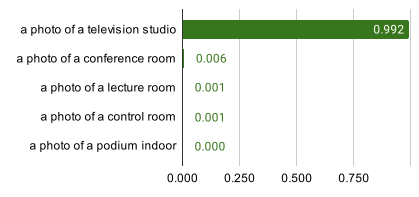
Finally, in the return you can observe the matches are re-ranked according to `.scores['clip_score']`:
```bash
[['a photo of a television studio', 'a photo of a conference room', 'a photo of a lecture room', 'a photo of a control room', 'a photo of a podium indoor'],
[0.9920725226402283, 0.006038925610482693, 0.0009973491542041302, 0.00078492151806131, 0.00010626466246321797]]
```
One can also construct `text-to-image` rerank as below:
```python
from docarray import Document
d = Document(
text='a photo of conference room',
matches=[
Document(uri='https://picsum.photos/300'),
Document(uri='https://picsum.photos/id/331/50'),
Document(uri='https://clip-as-service.jina.ai/_static/favicon.png'),
],
)
```
👉 Access the ranking playground in **CLIP-as-service** [doc](https://clip-as-service.jina.ai/playground/reasoning/). Just input the reasoning texts as prompts, the server will rank the prompts and return sorted prompts with scores.
================================================
FILE: .github/README-exec/torch.readme.md
================================================
# CLIPTorchEncoder
**CLIPTorchEncoder** is the executor implemented in [CLIP-as-service](https://github.com/jina-ai/clip-as-service).
The various `CLIP` models implemented in the [OpenAI](https://github.com/openai/CLIP), [OpenCLIP](https://github.com/mlfoundations/open_clip), and [MultilingualCLIP](https://github.com/FreddeFrallan/Multilingual-CLIP) are supported with PyTorch runtime.
The introduction of the CLIP model [can be found here](https://openai.com/blog/clip/).
- 🔀 **Automatic**: Auto-detect image and text documents depending on their content.
- ⚡ **Efficiency**: Faster CLIP model inference on CPU and GPU via leveraging the best practices.
- 📈 **Observability**: Monitoring the serving via Prometheus and Grafana (see [Usage Guide](https://docs.jina.ai/how-to/monitoring/#deploying-locally)).
With advances of ONNX runtime, you can use `CLIPOnnxEncoder` (see [link](https://cloud.jina.ai/executor/2a7auwg2)) instead to achieve **3x** model inference speed up.
## Model support
`ViT-B-32::openai` is used as the default model. To use specific pretrained models provided by `open_clip`, please use `::` to separate model name and pretrained weight name, e.g. `ViT-B-32::laion2b_e16`. Please also note that **different models give different sizes of output dimensions**.
| Model | PyTorch | Output dimension |
|---------------------------------------|---------|------------------|
| RN50 | ✅ | 1024 |
| RN101 | ✅ | 512 |
| RN50x4 | ✅ | 640 |
| RN50x16 | ✅ | 768 |
| RN50x64 | ✅ | 1024 |
| ViT-B-32 | ✅ | 512 |
| ViT-B-16 | ✅ | 512 |
| ViT-B-16-plus-240 | ✅ | 640 |
| ViT-L-14 | ✅ | 768 |
| ViT-L-14-336 | ✅ | 768 |
| ViT-H-14 | ✅ | 1024 |
| ViT-g-14 | ✅ | 1024 |
| M-CLIP/XLM_Roberta-Large-Vit-B-32 | ✅ | 512 |
| M-CLIP/XLM-Roberta-Large-Vit-L-14 | ✅ | 768 |
| M-CLIP/XLM-Roberta-Large-Vit-B-16Plus | ✅ | 640 |
| M-CLIP/LABSE-Vit-L-14 | ✅ | 768 |
✅ = First class support
Full list of open_clip models and weights can be found [here](https://github.com/mlfoundations/open_clip#pretrained-model-interface).
```{note}
For model definition with `-quickgelu` postfix, please use non `-quickgelu` model name.
```
## Usage
### Use in Jina Flow
- **via Docker image (recommended)**
```python
from jina import Flow
from docarray import Document
import numpy as np
f = Flow().add(
uses='jinahub+docker://CLIPTorchEncoder',
)
```
- **via source code**
```python
from jina import Flow
from docarray import Document
import numpy as np
f = Flow().add(
uses='jinahub://CLIPTorchEncoder',
)
```
You can set the following parameters via `with`:
| Parameter | Description |
|-------------------------|--------------------------------------------------------------------------------------------------------------------------------|
| `name` | Model weights, default is `ViT-B/32`. Support all OpenAI released pretrained models. |
| `num_worker_preprocess` | The number of CPU workers for image & text prerpocessing, default 4. |
| `minibatch_size` | The size of a minibatch for CPU preprocessing and GPU encoding, default 32. Reduce the size of it if you encounter OOM on GPU. |
| `device` | `cuda` or `cpu`. Default is `None` means auto-detect. |
| `jit` | If to enable Torchscript JIT, default is `False`. |
### Encoding
Encoding here means getting the fixed-length vector representation of a sentence or image.
```python
from jina import Flow
from docarray import Document, DocumentArray
da = DocumentArray(
[
Document(text='she smiled, with pain'),
Document(uri='apple.png'),
Document(uri='apple.png').load_uri_to_image_tensor(),
Document(blob=open('apple.png', 'rb').read()),
Document(uri='https://clip-as-service.jina.ai/_static/favicon.png'),
Document(
uri='data:image/gif;base64,R0lGODlhEAAQAMQAAORHHOVSKudfOulrSOp3WOyDZu6QdvCchPGolfO0o/XBs/fNwfjZ0frl3/zy7////wAAAAAAAAAAAAAAAAAAAAAAAAAAAAAAAAAAAAAAAAAAAAAAAAAAAAAAAAAAAAAAACH5BAkAABAALAAAAAAQABAAAAVVICSOZGlCQAosJ6mu7fiyZeKqNKToQGDsM8hBADgUXoGAiqhSvp5QAnQKGIgUhwFUYLCVDFCrKUE1lBavAViFIDlTImbKC5Gm2hB0SlBCBMQiB0UjIQA7'
),
]
)
f = Flow().add(
uses='jinahub+docker://CLIPTorchEncoder',
)
with f:
f.post(on='/', inputs=da)
da.summary()
```
From the output, you will see all the text and image docs have `embedding` attached.
```text
╭──────────────────────────── Documents Summary ─────────────────────────────╮
│ │
│ Length 6 │
│ Homogenous Documents False │
│ 4 Documents have attributes ('id', 'mime_type', 'uri', 'embedding') │
│ 1 Document has attributes ('id', 'mime_type', 'text', 'embedding') │
│ 1 Document has attributes ('id', 'embedding') │
│ │
╰────────────────────────────────────────────────────────────────────────────╯
╭────────────────────── Attributes Summary ───────────────────────╮
│ │
│ Attribute Data type #Unique values Has empty value │
│ ───────────────────────────────────────────────────────────── │
│ embedding ('ndarray',) 6 False │
│ id ('str',) 6 False │
│ mime_type ('str',) 5 False │
│ text ('str',) 2 False │
│ uri ('str',) 4 False │
│ │
╰─────────────────────────────────────────────────────────────────╯
```
👉 Access the embedding playground in **CLIP-as-service** [doc](https://clip-as-service.jina.ai/playground/embedding), type sentence or image URL and see **live embedding**!
### Ranking
One can also rank cross-modal matches via `/rank` endpoint.
First construct a *cross-modal* Document where the root contains an image and `.matches` contain sentences to rerank.
```python
from docarray import Document
d = Document(
uri='rerank.png',
matches=[
Document(text=f'a photo of a {p}')
for p in (
'control room',
'lecture room',
'conference room',
'podium indoor',
'television studio',
)
],
)
```
Then send the request via `/rank` endpoint:
```python
f = Flow().add(
uses='jinahub+docker://CLIPTorchEncoder',
)
with f:
r = f.post(on='/rank', inputs=[d])
print(r['@m', ['text', 'scores__clip_score__value']])
```
Finally, you can observe the matches are re-ranked based on `.scores['clip_score']`:
```bash
[['a photo of a television studio', 'a photo of a conference room', 'a photo of a lecture room', 'a photo of a control room', 'a photo of a podium indoor'],
[0.9920725226402283, 0.006038925610482693, 0.0009973491542041302, 0.00078492151806131, 0.00010626466246321797]]
```
One can also construct `text-to-image` rerank as below:
```python
from docarray import Document
d = Document(
text='a photo of conference room',
matches=[
Document(uri='https://picsum.photos/300'),
Document(uri='https://picsum.photos/id/331/50'),
Document(uri='https://clip-as-service.jina.ai/_static/favicon.png'),
],
)
```
👉 Access the ranking playground in **CLIP-as-service** [doc](https://clip-as-service.jina.ai/playground/reasoning/). Just input the reasoning texts as prompts, the server will rank the prompts and return sorted prompts with scores.
================================================
FILE: .github/codecov.yml
================================================
codecov:
# https://docs.codecov.io/docs/comparing-commits
allow_coverage_offsets: true
coverage:
status:
project:
default:
informational: true
target: auto # auto compares coverage to the previous base commit
comment:
layout: "reach, diff, flags, files"
behavior: default
require_changes: false # if true: only post the comment if coverage changes
branches: # branch names that can post comment
- "main"
================================================
FILE: .github/labeler.yml
================================================
# Add 'label1' to any changes within 'example' folder or any subfolders
area/docs:
- docs/**/*
- ./*.md
area/testing:
- tests/**/*
area/setup:
- setup.py
- requirements.txt
- MANIFEST.in
area/housekeeping:
- .github/**/*
- ./.gitignore
- ./*.yaml
- ./*.yml
area/cicd:
- .github/workflows/**/*
area/docker:
- Dockerfiles/**/*
- ./.dockerignore
area/script:
- script/**/*
component/client:
- client/**/*
component/server:
- server/**/*
================================================
FILE: .github/release-template.ejs
================================================
<% var groupCommits = [
{
name: 'breaking',
show: true,
list: []
}, {
name: 'feat',
show: true,
list: []
}, {
name: 'perf',
show: true,
list: []
}, {
name: 'fix',
show: true,
list: []
}, {
name: 'refactor',
show: true,
list: []
}, {
name: 'docs',
show: true,
list: []
}, {
name: 'test',
show: true,
list: []
}, {
name: 'other',
show: true,
list: []
}
]
var all_titles = {};
var all_commiters = {};
var commitHref = "https://github.com/jina-ai/clip-as-service/commit/"
commits.forEach(function (commit) {
var result = (commit.title).match(/^(\w*)(\((.*)\))?\: (.*)$/);
var type = result && result[1];
var scope = result && result[3];
var title = result && result[4];
var committer = commit.authorName
if (!(committer in all_commiters)) {
all_commiters[committer] = 1
}
if (!(title in all_titles)) {
all_titles[title] = 1
if( title != null && (title.indexOf('💥')>-1 || title.indexOf(':boom:')>-1) ){
groupCommits.find(item => item.name === 'breaking').list.push({
type: type,
scope: scope,
title: title,
commit: commit
})
} else if(type == 'fix' || type == 'fixed'){
groupCommits.find(item => item.name === 'fix').list.push({
type: type,
scope: scope,
title: title,
commit: commit
})
} else if(type == 'perf' || type == 'performance'){
groupCommits.find(item => item.name === 'perf').list.push({
type: type,
scope: scope,
title: title,
commit: commit
})
} else if(type == 'feat' || type == 'feature'){
groupCommits.find(item => item.name === 'feat').list.push({
type: type,
scope: scope,
title: title,
commit: commit
})
} else if(type == 'refactor'){
groupCommits.find(item => item.name === 'refactor').list.push({
type: type,
scope: scope,
title: title,
commit: commit
})
} else if(type == 'docs' || type == 'doc'){
groupCommits.find(item => item.name === 'docs').list.push({
type: type,
scope: scope,
title: title,
commit: commit
})
} else if(type == 'test' || type == 'tests' || type == 'ci'){
groupCommits.find(item => item.name === 'test').list.push({
type: type,
scope: scope,
title: title,
commit: commit
})
} else {
groupCommits.find(item => item.name === 'other').list.push({
type: type,
scope: scope,
title: title,
commit: commit
})
}
}
});
var listCommits = function(list, key){
list.forEach(function (ct) {
var type = ct.type;
var scope = ct.scope;
var title = '';
var commit = ct.commit;
if(type){
if(key != 'other'){
title = (scope? '__'+scope+'__: ':'') + ct.title;
}else{
title = '__' + type + (scope? '('+scope+')':'') + '__ : ' + ct.title;
}
}else{
title = commit.title;
}
%> - <% if(typeof commitHref === 'undefined' || commitHref === '') { %>[```<%=commit.sha1.slice(0,8)%>```]<% } else { %>[[```<%=commit.sha1.slice(0,8)%>```](<%=commitHref%><%=commit.sha1%>)]<%}%> __-__ <%=title%> (*<%= commit.authorName %>*)
<% })} %>
🙇 We'd like to thank all contributors for this new release! In particular,
<% Object.keys(all_commiters).forEach(function (key) { %> <%= key %>, <% }) %> 🙇
<%
for(var i of groupCommits){
if(i.list.length == 0) continue;
if (i.name === 'breaking' && i.show) { %>
### 💥 Breaking changes
<% } else if (i.name === 'fix' && i.show) { %>
### 🐞 Bug fixes
<% } else if( i.name === 'feat' && i.show) { %>
### 🆕 New Features
<% } else if(i.name === 'perf' && i.show) { %>
### ⚡ Performance Improvements
<% } else if(i.name === 'refactor' && i.show) { %>
### 🧼 Code Refactoring
<% } else if(i.name === 'docs' && i.show) { %>
### 📗 Documentation
<% } else if(i.name === 'test' && i.show) { %>
### 🏁 Unit Test and CICD
<% } else if (i.name === 'other' && i.show) { %>
### 🍹 Other Improvements
<% }
i.show && listCommits(i.list, i);
} %>
================================================
FILE: .github/workflows/cd.yml
================================================
name: CD
on:
push:
branches:
- main
jobs:
prep-testbed:
if: |
!startsWith(github.event.head_commit.message, 'chore') &&
!startsWith(github.event.head_commit.message, 'build: hotfix') &&
!endsWith(github.event.head_commit.message, 'reformatted by jina-dev-bot')
runs-on: ubuntu-latest
steps:
- uses: actions/checkout@v2
- id: set-matrix
run: |
sudo apt-get install jq
echo "::set-output name=matrix::$(bash scripts/get-all-test-paths.sh)"
outputs:
matrix: ${{ steps.set-matrix.outputs.matrix }}
core-test:
needs: prep-testbed
runs-on: ubuntu-latest
strategy:
fail-fast: false
matrix:
python-version: [3.7]
test-path: ${{fromJson(needs.prep-testbed.outputs.matrix)}}
steps:
- uses: actions/checkout@v2
- name: Set up Python ${{ matrix.python-version }}
uses: actions/setup-python@v2
with:
python-version: ${{ matrix.python-version }}
- name: Prepare enviroment
run: |
python -m pip install --upgrade pip
python -m pip install wheel
pip install --no-cache-dir "client/[test]"
pip install --no-cache-dir "server/[onnx]"
pip install --no-cache-dir "server/[transformers]"
pip install --no-cache-dir "server/[search]"
pip install --no-cache-dir "server/[cn_clip]"
- name: Test
id: test
run: |
pytest --suppress-no-test-exit-code --cov=clip_client --cov=clip_server --cov-report=xml \
-v -s -m "not gpu" ${{ matrix.test-path }}
echo "::set-output name=codecov_flag::cas"
timeout-minutes: 30
- name: Check codecov file
id: check_files
uses: andstor/file-existence-action@v1
with:
files: "coverage.xml"
- name: Upload coverage from test to Codecov
uses: codecov/codecov-action@v2
if: steps.check_files.outputs.files_exists == 'true' && ${{ matrix.python-version }} == '3.7'
with:
file: coverage.xml
flags: ${{ steps.test.outputs.codecov_flag }}
fail_ci_if_error: false
token: ${{ secrets.CODECOV_TOKEN }} # not required for public repos
gpu-test:
needs: prep-testbed
runs-on: [self-hosted, x64, gpu, linux]
strategy:
fail-fast: false
matrix:
python-version: [ 3.7 ]
steps:
- uses: actions/checkout@v2
with:
# For coverage builds fetch the whole history
fetch-depth: 0
- name: Set up Python ${{ matrix.python-version }}
uses: actions/setup-python@v2
with:
python-version: ${{ matrix.python-version }}
- name: Prepare enviroment
run: |
python -m pip install --upgrade pip
python -m pip install wheel pytest pytest-cov nvidia-pyindex
pip install -e "client/[test]"
pip install -e "server/[tensorrt]"
- name: Test
id: test
run: |
pytest --suppress-no-test-exit-code --cov=clip_client --cov=clip_server --cov-report=xml \
-v -s -m "gpu" ./tests/test_tensorrt.py
echo "::set-output name=codecov_flag::cas"
timeout-minutes: 30
env:
# fix re-initialized torch runtime error on cuda device
JINA_MP_START_METHOD: spawn
- name: Check codecov file
id: check_files
uses: andstor/file-existence-action@v1
with:
files: "coverage.xml"
- name: Upload coverage from test to Codecov
uses: codecov/codecov-action@v3
if: steps.check_files.outputs.files_exists == 'true' && ${{ matrix.python-version }} == '3.7'
with:
file: coverage.xml
name: gpu-related-codecov
flags: ${{ steps.test.outputs.codecov_flag }}
fail_ci_if_error: false
token: ${{ secrets.CODECOV_TOKEN }} # not required for public repos
prerelease:
needs: [core-test, gpu-test]
runs-on: ubuntu-latest
steps:
- uses: actions/checkout@v2
with:
fetch-depth: 100
- name: Pre-release (.devN)
run: |
git fetch --depth=1 origin +refs/tags/*:refs/tags/*
pip install twine wheel
./scripts/release.sh
env:
TWINE_USERNAME: ${{ secrets.TWINE_USERNAME }}
TWINE_PASSWORD: ${{ secrets.TWINE_PASSWORD }}
- name: Pre-release docker (.devN)
uses: benc-uk/workflow-dispatch@v1
with:
workflow: Manual Docker Build
inputs: '{ "release_token": "${{ env.release_token }}", "triggered_by": "CD"}'
token: ${{ secrets.JINA_DEV_BOT }}
env:
release_token: ${{ secrets.CAS_RELEASE_TOKEN }}
- uses: benc-uk/workflow-dispatch@v1
with:
workflow: Manual CAS Docker Build
inputs: '{ "release_token": "${{ env.release_token }}", "triggered_by": "CD"}'
token: ${{ secrets.JINA_DEV_BOT }}
env:
release_token: ${{ secrets.CAS_RELEASE_TOKEN }}
- name: Pre-release hub (.devN)
uses: benc-uk/workflow-dispatch@v1
with:
workflow: Manual Hub Push
inputs: '{ "release_token": "${{ env.release_token }}", "triggered_by": "CD"}'
token: ${{ secrets.JINA_DEV_BOT }}
env:
release_token: ${{ secrets.CAS_RELEASE_TOKEN }}
================================================
FILE: .github/workflows/ci.yml
================================================
name: CI
on:
pull_request:
jobs:
commit-lint:
runs-on: ubuntu-latest
steps:
- name: find the prev warning if exist
uses: peter-evans/find-comment@v1
id: fc
with:
issue-number: ${{ github.event.pull_request.number }}
comment-author: "github-actions[bot]"
body-includes: "bad commit message"
- name: Delete comment if exist
if: ${{ steps.fc.outputs.comment-id != 0 }}
uses: actions/github-script@v3
with:
github-token: ${{ secrets.GITHUB_TOKEN }}
script: |
github.issues.deleteComment({
owner: context.repo.owner,
repo: context.repo.repo,
comment_id: ${{ steps.fc.outputs.comment-id }},
})
- uses: actions/checkout@v2.5.0
with:
fetch-depth: 0
- run: 'echo "module.exports = {extends: [''@commitlint/config-conventional'']}" > commitlint.config.js'
- uses: wagoid/commitlint-github-action@v4
env:
GITHUB_TOKEN: "${{ secrets.GITHUB_TOKEN }}"
- name: if lint failed
if: ${{ failure() }}
uses: peter-evans/create-or-update-comment@v1
with:
issue-number: ${{ github.event.pull_request.number }}
body: |
Thanks for your contribution :heart:
:broken_heart: Unfortunately, this PR has one or more **bad commit messages**, it can not be merged. To fix this problem, please refer to:
- [Commit Message Guideline for the First Time Contributor](https://github.com/jina-ai/jina/issues/553)
- [Contributing Guideline](https://github.com/jina-ai/jina/blob/master/CONTRIBUTING.md)
This message will be deleted automatically when the commit messages get fixed.
reaction-type: "eyes"
lint-flake-8:
runs-on: ubuntu-latest
steps:
- uses: actions/checkout@v2
- name: Set up Python 3.7
uses: actions/setup-python@v2
with:
python-version: 3.7
- name: Lint with flake8
run: |
pip install flake8
# stop the build if there are Python syntax errors or undefined names
flake8 . --count --select=E9,F63,F7,F82 --show-source --statistics --exclude .git,__pycache__,docs/source/conf.py,old,build,dist,tests/,jina/resources/
# exit-zero treats all errors as warnings. The GitHub editor is 127 chars wide
flake8 . --count --exit-zero --max-complexity=10 --max-line-length=127 --statistics --exclude .git,__pycache__,docs/source/conf.py,old,build,dist,tests/,jina/resources/
check-black:
runs-on: ubuntu-latest
steps:
- uses: actions/checkout@v2
with:
fetch-depth: 0
- name: Set up Python 3.7
uses: actions/setup-python@v2
with:
python-version: 3.7
- id: file_changes
uses: Ana06/get-changed-files@v1.2
- name: check black
run: ./scripts/black.sh
env:
CHANGED_FILES: ${{ steps.file_changes.outputs.added_modified }}
prep-testbed:
runs-on: ubuntu-latest
needs: [lint-flake-8, check-black]
steps:
- uses: actions/checkout@v2
- id: set-matrix
run: |
sudo apt-get install jq
echo "::set-output name=matrix::$(bash scripts/get-all-test-paths.sh)"
outputs:
matrix: ${{ steps.set-matrix.outputs.matrix }}
core-test:
needs: prep-testbed
runs-on: ubuntu-latest
strategy:
fail-fast: false
matrix:
python-version: [3.7]
test-path: ${{fromJson(needs.prep-testbed.outputs.matrix)}}
steps:
- uses: actions/checkout@v2
- name: Set up Python ${{ matrix.python-version }}
uses: actions/setup-python@v2
with:
python-version: ${{ matrix.python-version }}
- name: Prepare enviroment
run: |
python -m pip install --upgrade pip
python -m pip install wheel pytest pytest-cov
pip install --no-cache-dir "client/[test]"
pip install --no-cache-dir "server/[onnx]"
pip install --no-cache-dir "server/[transformers]"
pip install --no-cache-dir "server/[search]"
pip install --no-cache-dir "server/[cn_clip]"
- name: Test
id: test
run: |
pytest --suppress-no-test-exit-code --cov=clip_client --cov=clip_server --cov-report=xml \
-v -s ${{ matrix.test-path }}
echo "::set-output name=codecov_flag::cas"
timeout-minutes: 30
- name: Check codecov file
id: check_files
uses: andstor/file-existence-action@v1
with:
files: "coverage.xml"
- name: Upload coverage from test to Codecov
uses: codecov/codecov-action@v3
if: steps.check_files.outputs.files_exists == 'true' && ${{ matrix.python-version }} == '3.7'
with:
file: coverage.xml
name: ${{ matrix.test-path }}-codecov
flags: ${{ steps.test.outputs.codecov_flag }}
fail_ci_if_error: false
token: ${{ secrets.CODECOV_TOKEN }} # not required for public repos
trt-gpu-test:
needs: prep-testbed
runs-on: [self-hosted, x64, gpu, linux]
strategy:
fail-fast: false
matrix:
python-version: [ 3.7 ]
steps:
- uses: actions/checkout@v2
with:
# For coverage builds fetch the whole history
fetch-depth: 0
- name: Set up Python ${{ matrix.python-version }}
uses: actions/setup-python@v2
with:
python-version: ${{ matrix.python-version }}
- name: Prepare enviroment
run: |
python -m pip install pip==23.0.1
python -m pip install wheel pytest pytest-cov nvidia-pyindex
pip install -e "client/[test]"
pip install -e "server/[tensorrt]"
pip install -e "server/[onnx]"
pip install -e "server/[transformers]"
{
pip install -e "server/[flash-attn]"
} || {
echo "flash attention was not installed."
}
pip install --no-cache-dir "server/[cn_clip]"
- name: Test
id: test
run: |
pytest --suppress-no-test-exit-code --cov=clip_client --cov=clip_server --cov-report=xml \
-v -s -m "gpu" ./tests/test_tensorrt.py
pytest --suppress-no-test-exit-code --cov=clip_client --cov=clip_server --cov-report=xml \
-v -s -m "gpu" ./tests/test_simple.py
echo "::set-output name=codecov_flag::cas"
timeout-minutes: 30
env:
# fix re-initialized torch runtime error on cuda device
JINA_MP_START_METHOD: spawn
- name: Check codecov file
id: check_files
uses: andstor/file-existence-action@v1
with:
files: "coverage.xml"
- name: Upload coverage from test to Codecov
uses: codecov/codecov-action@v3
if: steps.check_files.outputs.files_exists == 'true' && ${{ matrix.python-version }} == '3.7'
with:
file: coverage.xml
name: gpu-related-codecov
flags: ${{ steps.test.outputs.codecov_flag }}
fail_ci_if_error: false
token: ${{ secrets.CODECOV_TOKEN }} # not required for public repos
gpu-model-test:
needs: prep-testbed
runs-on: [ self-hosted, x64, gpu, linux ]
strategy:
fail-fast: false
matrix:
python-version: [ 3.7 ]
steps:
- uses: actions/checkout@v2
with:
# For coverage builds fetch the whole history
fetch-depth: 0
- name: Set up Python ${{ matrix.python-version }}
uses: actions/setup-python@v2
with:
python-version: ${{ matrix.python-version }}
- name: Prepare enviroment
run: |
python -m pip install pip==23.0.1
python -m pip install wheel pytest pytest-cov nvidia-pyindex
pip install -e "client/[test]"
pip install -e "server/[onnx]"
pip install -e "server/[transformers]"
{
pip install -e "server/[flash-attn]"
} || {
echo "flash attention was not installed."
}
pip install --no-cache-dir "server/[cn_clip]"
- name: Test
id: test
run: |
pytest --suppress-no-test-exit-code --cov=clip_client --cov=clip_server --cov-report=xml \
-v -s -m "gpu" ./tests/test_model.py
echo "::set-output name=codecov_flag::cas"
timeout-minutes: 30
env:
# fix re-initialized torch runtime error on cuda device
JINA_MP_START_METHOD: spawn
- name: Check codecov file
id: check_files
uses: andstor/file-existence-action@v1
with:
files: "coverage.xml"
- name: Upload coverage from test to Codecov
uses: codecov/codecov-action@v3
if: steps.check_files.outputs.files_exists == 'true' && ${{ matrix.python-version }} == '3.7'
with:
file: coverage.xml
name: gpu-related-codecov
flags: ${{ steps.test.outputs.codecov_flag }}
fail_ci_if_error: false
token: ${{ secrets.CODECOV_TOKEN }} # not required for public repos
# just for blocking the merge until all parallel core-test are successful
success-all-test:
needs: [commit-lint, core-test, trt-gpu-test, gpu-model-test]
if: always()
runs-on: ubuntu-latest
steps:
- uses: technote-space/workflow-conclusion-action@v2
- name: Check Failure
if: env.WORKFLOW_CONCLUSION == 'failure'
run: exit 1
- name: Success
if: ${{ success() }}
run: echo "All Done"
================================================
FILE: .github/workflows/force-docker-build-cas.yml
================================================
name: Manual CAS Docker Build
on:
workflow_dispatch:
inputs:
release_token:
description: 'Your release token'
required: true
triggered_by:
description: 'CD | TAG | MANUAL'
required: false
default: MANUAL
jobs:
token-check:
runs-on: ubuntu-latest
steps:
- run: echo "success!"
if: "${{ github.event.inputs.release_token }} == ${{ env.release_token }}"
env:
release_token: ${{ secrets.CAS_RELEASE_TOKEN }}
regular-release:
needs: token-check
runs-on: ubuntu-latest
strategy:
fail-fast: false
matrix:
pip_tag: [ "", "onnx", "tensorrt"] # default: "" = core
steps:
- uses: actions/checkout@v2
- name: Set envs and versions
run: |
VCS_REF=${{ github.ref }}
echo "VCS_REF=$VCS_REF" >> $GITHUB_ENV
echo "Will build $VCS_REF"
echo "BUILD_DATE=$(date -u +'%Y-%m-%dT%H:%M:%SZ')" >> $GITHUB_ENV
if [[ "${{ matrix.pip_tag }}" == "perf" ]]; then
echo "JINA_PIP_INSTALL_PERF=1" >> $GITHUB_ENV
fi
if [[ "${{ matrix.pip_tag }}" == "" ]]; then
echo "JINA_PIP_INSTALL_CORE=1" >> $GITHUB_ENV
fi
JINA_VERSION=$(sed -n '/^__version__/p' ./server/clip_server/__init__.py | cut -d \' -f2)
V_JINA_VERSION=v${JINA_VERSION}
JINA_MINOR_VERSION=${JINA_VERSION%.*}
JINA_MAJOR_VERSION=${JINA_MINOR_VERSION%.*}
PY_TAG=${{matrix.py_version}}
if [ -n "${PY_TAG}" ]; then
PY_TAG=-py${PY_TAG//./}
fi
PIP_TAG=${{ matrix.pip_tag }}
if [ -n "${PIP_TAG}" ]; then
PIP_TAG=-${PIP_TAG}
fi
if [[ "${{ github.event.inputs.triggered_by }}" == "CD" ]]; then
if [[ "${{ matrix.py_version }}" == "$DEFAULT_PY_VERSION" ]]; then
echo "TAG_ALIAS=\
jinaai/clip-server:master${PY_TAG}${PIP_TAG}, \
jinaai/clip-server:master${PIP_TAG}" \
>> $GITHUB_ENV
else
# on every CD
echo "TAG_ALIAS=\
jinaai/clip-server:master${PY_TAG}${PIP_TAG}" \
>> $GITHUB_ENV
fi
elif [[ "${{ github.event.inputs.triggered_by }}" == "TAG" ]]; then
# on every tag release
if [[ "${{ matrix.py_version }}" == "$DEFAULT_PY_VERSION" ]]; then
echo "TAG_ALIAS=\
jinaai/clip-server:latest${PY_TAG}${PIP_TAG}, \
jinaai/clip-server:${JINA_VERSION}${PY_TAG}${PIP_TAG}, \
jinaai/clip-server:${JINA_MINOR_VERSION}${PY_TAG}${PIP_TAG}, \
jinaai/clip-server:${JINA_MAJOR_VERSION}${PY_TAG}${PIP_TAG}, \
jinaai/clip-server:latest${PIP_TAG}, \
jinaai/clip-server:${JINA_VERSION}${PIP_TAG}, \
jinaai/clip-server:${JINA_MINOR_VERSION}${PIP_TAG}, \
jinaai/clip-server:${JINA_MAJOR_VERSION}${PIP_TAG} \
" >> $GITHUB_ENV
else
echo "TAG_ALIAS=\
jinaai/clip-server:latest${PY_TAG}${PIP_TAG}, \
jinaai/clip-server:${JINA_VERSION}${PY_TAG}${PIP_TAG}, \
jinaai/clip-server:${JINA_MINOR_VERSION}${PY_TAG}${PIP_TAG}, \
jinaai/clip-server:${JINA_MAJOR_VERSION}${PY_TAG}${PIP_TAG} \
" >> $GITHUB_ENV
fi
elif [[ "${{ github.event.inputs.triggered_by }}" == "MANUAL" ]]; then
# on every manual release
if [[ "${{ matrix.py_version }}" == "$DEFAULT_PY_VERSION" ]]; then
echo "TAG_ALIAS=\
jinaai/clip-server:${JINA_VERSION}${PIP_TAG}, \
jinaai/clip-server:${JINA_VERSION}${PY_TAG}${PIP_TAG} \
" >> $GITHUB_ENV
else
echo "TAG_ALIAS=\
jinaai/clip-server:${JINA_VERSION}${PY_TAG}${PIP_TAG} \
" >> $GITHUB_ENV
fi
else
echo "Bad triggered_by: ${{ github.event.inputs.triggered_by }}!"
exit 1
fi
echo "JINA_VERSION=${JINA_VERSION}" >> $GITHUB_ENV
- name: Set up Docker Buildx
id: buildx
uses: docker/setup-buildx-action@v1
with:
install: true
- name: Login to DockerHub
uses: docker/login-action@v1
with:
username: ${{ secrets.DOCKERHUB_DEVBOT_USER }}
password: ${{ secrets.DOCKERHUB_DEVBOT_TOKEN }}
- run: |
# https://github.com/docker/buildx/issues/464#issuecomment-741507760
# https://github.com/kubernetes-sigs/azuredisk-csi-driver/pull/808/files
docker run --privileged --rm tonistiigi/binfmt --uninstall qemu-aarch64
docker run --rm --privileged tonistiigi/binfmt --install all
- name: Build and push
uses: docker/build-push-action@v2
with:
context: .
file: Dockerfiles/server.Dockerfile
platforms: linux/amd64
push: true
tags: ${{env.TAG_ALIAS}}
build-args: |
BUILD_DATE=${{env.BUILD_DATE}}
JINA_VERSION=${{env.JINA_VERSION}}
VCS_REF=${{env.VCS_REF}}
PIP_INSTALL_CORE=${{env.JINA_PIP_INSTALL_CORE}}
PIP_INSTALL_PERF=${{env.JINA_PIP_INSTALL_PERF}}
PIP_TAG=${{matrix.pip_tag}}
================================================
FILE: .github/workflows/force-docker-build.yml
================================================
name: Manual Docker Build
on:
workflow_dispatch:
inputs:
release_token:
description: 'Your release token'
required: true
triggered_by:
description: 'CD | TAG | MANUAL'
required: false
default: MANUAL
jobs:
token-check:
runs-on: ubuntu-latest
steps:
- run: echo "success!"
if: "${{ github.event.inputs.release_token }} == ${{ env.release_token }}"
env:
release_token: ${{ secrets.CAS_RELEASE_TOKEN }}
docker-release:
needs: token-check
runs-on: ubuntu-latest
strategy:
fail-fast: false
matrix:
pip_tag: ["", "onnx", "tensorrt"] # default: "" = torch
engine_tag: ["", "cuda"] # default: "" = cpu
steps:
- uses: actions/checkout@v2
- name: Set envs and versions
run: |
VCS_REF=${{ github.ref }}
echo "VCS_REF=$VCS_REF" >> $GITHUB_ENV
echo "Will build $VCS_REF"
echo "BUILD_DATE=$(date -u +'%Y-%m-%dT%H:%M:%SZ')" >> $GITHUB_ENV
echo "BUILD_TARGET=clip_executor" >> $GITHUB_ENV
CAS_VERSION=$(sed -n '/^__version__/p' ./server/clip_server/__init__.py | cut -d \' -f2)
V_CAS_VERSION=v${CAS_VERSION}
CAS_MINOR_VERSION=${CAS_VERSION%.*}
CAS_MAJOR_VERSION=${CAS_MINOR_VERSION%.*}
ENGINE_TAG=${{matrix.engine_tag}}
if [ -n "${ENGINE_TAG}" ]; then
ENGINE_TAG=-${ENGINE_TAG//./}
fi
PIP_TAG=${{ matrix.pip_tag }}
BACKEND_TAG=torch
if [ -n "${PIP_TAG}" ]; then
BACKEND_TAG=${PIP_TAG}
PIP_TAG=-${PIP_TAG}
fi
if [[ "${{ github.event.inputs.triggered_by }}" == "CD" ]]; then
# on every CD release
echo "TAG_ALIAS=\
jinaai/clip_executor:master${PIP_TAG}${ENGINE_TAG}" \
>> $GITHUB_ENV
elif [[ "${{ github.event.inputs.triggered_by }}" == "TAG" ]]; then
# on every tag release
echo "TAG_ALIAS=\
jinaai/clip_executor:latest${PIP_TAG}${ENGINE_TAG}, \
jinaai/clip_executor:${CAS_VERSION}${PIP_TAG}${ENGINE_TAG}, \
jinaai/clip_executor:${CAS_MINOR_VERSION}${PIP_TAG}${ENGINE_TAG} \
" >> $GITHUB_ENV
elif [[ "${{ github.event.inputs.triggered_by }}" == "MANUAL" ]]; then
# on every manual release
echo "TAG_ALIAS=\
jinaai/clip_executor:${CAS_VERSION}${PIP_TAG}${ENGINE_TAG} \
" >> $GITHUB_ENV
else
echo "Bad triggered_by: ${{ github.event.inputs.triggered_by }}!"
exit 1
fi
echo "CAS_VERSION=${CAS_VERSION}" >> $GITHUB_ENV
echo "BACKEND_TAG=${BACKEND_TAG}" >> $GITHUB_ENV
- name: Set up Docker Buildx
id: buildx
uses: docker/setup-buildx-action@v2
with:
install: true
- name: Login to DockerHub
uses: docker/login-action@v2
with:
username: ${{ secrets.DOCKERHUB_DEVBOT_USER }}
password: ${{ secrets.DOCKERHUB_DEVBOT_TOKEN }}
- run: |
# https://github.com/docker/buildx/issues/464#issuecomment-741507760
# https://github.com/kubernetes-sigs/azuredisk-csi-driver/pull/808/files
docker run --privileged --rm tonistiigi/binfmt --uninstall qemu-aarch64
docker run --rm --privileged tonistiigi/binfmt --install all
- name: CPU Build and push
id: base_docker_build
if: ${{ matrix.engine_tag == '' && matrix.pip_tag != 'tensorrt' }}
uses: docker/build-push-action@v2
with:
context: server
file: Dockerfiles/base.Dockerfile
platforms: linux/amd64
cache-from: type=registry,ref=jinaai/clip_executor:latest
cache-to: type=inline
push: true
tags: ${{env.TAG_ALIAS}}
build-args: |
BUILD_DATE=${{env.BUILD_DATE}}
CAS_VERSION=${{env.CAS_VERSION}}
VCS_REF=${{env.VCS_REF}}
BACKEND_TAG=${{env.BACKEND_TAG}}
- name: CUDA Build and push
id: cuda_docker_build
if: ${{ matrix.engine_tag == 'cuda' }}
uses: docker/build-push-action@v2
with:
context: server
file: Dockerfiles/cuda.Dockerfile
platforms: linux/amd64
cache-from: type=registry,ref=jinaai/clip_executor:latest-cuda
cache-to: type=inline
push: true
tags: ${{env.TAG_ALIAS}}
build-args: |
BUILD_DATE=${{env.BUILD_DATE}}
CAS_VERSION=${{env.CAS_VERSION}}
VCS_REF=${{env.VCS_REF}}
BACKEND_TAG=${{env.BACKEND_TAG}}
================================================
FILE: .github/workflows/force-docs-build.yml
================================================
name: Manual Docs Build
on:
workflow_dispatch:
inputs:
release_token:
description: 'Your release token'
required: true
triggered_by:
description: 'CD | TAG | MANUAL'
required: false
default: MANUAL
jobs:
token-check:
runs-on: ubuntu-latest
steps:
- run: echo "success!"
if: "${{ github.event.inputs.release_token }} == ${{ env.release_token }}"
env:
release_token: ${{ secrets.CAS_RELEASE_TOKEN }}
release-docs:
needs: token-check
runs-on: ubuntu-latest
steps:
- uses: actions/checkout@v2
with:
fetch-depth: 0
- uses: actions/setup-python@v2
with:
python-version: 3.7
- name: Build doc and push to gh-pages
run: |
git config --local user.email "dev-bot@jina.ai"
git config --local user.name "Jina Dev Bot"
pip install --no-cache-dir client/
pip install --no-cache-dir server/
mkdir gen-html
cd docs
pip install -r requirements.txt
pip install --pre -U furo
bash makedoc.sh
cd ./_build/dirhtml/
cp -r ./ ../../../gen-html
cd - # back to ./docs
cd ..
git checkout -f gh-pages
git rm -rf ./docs
mkdir -p docs
cd gen-html
cp -r ./ ../docs
cd ../docs
ls -la
touch .nojekyll
cp 404/index.html 404.html
sed -i 's/href="\.\./href="/' 404.html # fix asset urls that needs to be updated in 404.html
echo clip-as-service.jina.ai > CNAME
cd ..
git add docs
git status
git commit -m "chore(docs): update docs due to ${{github.event_name}} on ${{github.repository}}"
git push --force origin gh-pages
================================================
FILE: .github/workflows/force-hub-push.yml
================================================
name: Manual Hub Push
on:
workflow_dispatch:
inputs:
release_token:
description: 'Your release token'
required: true
triggered_by:
description: 'CD | TAG | MANUAL'
required: false
default: MANUAL
#on:
# pull_request:
jobs:
token-check:
runs-on: ubuntu-latest
steps:
- run: echo "success!"
if: "${{ github.event.inputs.release_token }} == ${{ env.release_token }}"
env:
release_token: ${{ secrets.CAS_RELEASE_TOKEN }}
hub-release:
needs: token-check
runs-on: ubuntu-latest
steps:
- uses: actions/checkout@v2
- name: Set envs and versions
run: |
VCS_REF=${{ github.ref }}
echo "VCS_REF=$VCS_REF" >> $GITHUB_ENV
echo "Will push $VCS_REF"
CAS_VERSION=$(sed -n '/^__version__/p' ./server/clip_server/__init__.py | cut -d \' -f2)
V_CAS_VERSION=v${CAS_VERSION}
CAS_MINOR_VERSION=${CAS_VERSION%.*}
CAS_MAJOR_VERSION=${CAS_MINOR_VERSION%.*}
if [[ "${{ github.event.inputs.triggered_by }}" == "CD" ]]; then
# on every CD release
echo "TAG_ALIAS=\
-t latest \
" >> $GITHUB_ENV
echo "GPU_TAG_ALIAS=\
-t latest-gpu \
" >> $GITHUB_ENV
elif [[ "${{ github.event.inputs.triggered_by }}" == "TAG" ]]; then
# on every tag release
echo "TAG_ALIAS=\
-t latest \
-t ${CAS_VERSION} \
-t ${CAS_MINOR_VERSION} \
" >> $GITHUB_ENV
echo "GPU_TAG_ALIAS=\
-t latest-gpu \
-t ${CAS_VERSION}-gpu \
-t ${CAS_MINOR_VERSION}-gpu \
" >> $GITHUB_ENV
elif [[ "${{ github.event.inputs.triggered_by }}" == "MANUAL" ]]; then
# on every manual release
echo "TAG_ALIAS=\
-t ${CAS_VERSION} \
" >> $GITHUB_ENV
echo "GPU_TAG_ALIAS=\
-t ${CAS_VERSION}-gpu \
" >> $GITHUB_ENV
else
echo "TAG_ALIAS=\
-t latest \
" >> $GITHUB_ENV
echo "GPU_TAG_ALIAS=\
-t latest-gpu \
" >> $GITHUB_ENV
fi
echo "CAS_VERSION=${CAS_VERSION}" >> $GITHUB_ENV
- name: Prepare enviroment
run: |
python -m pip install --upgrade jina yq
- name: Push Torch Executor
id: push_torch_executor
run: |
# FIX the import issue
echo -e "\
__version__ = '$CAS_VERSION'
from .executors.clip_torch import CLIPEncoder\n\
" > server/clip_server/__init__.py
echo -e "\
jtype: CLIPEncoder\n\
metas:\n\
py_modules:\n\
- clip_server/__init__.py\n\
" > server/config.yml
echo -e "\
manifest_version: 1\n\
name: CLIPTorchEncoder\n\
description: Embed images and sentences into fixed-length vectors with CLIP\n\
url: https://github.com/jina-ai/clip-as-service\n\
keywords: [clip, clip-model, clip-as-service, pytorch]\n\
" > server/manifest.yml
python scripts/get-requirements.py "" server/requirements.txt
cp .github/README-exec/torch.readme.md server/README.md
exec_name=`yq -r .name server/manifest.yml`
echo executor name is $exec_name
cp Dockerfiles/base.Dockerfile server/Dockerfile
JINA_AUTH_TOKEN=${{secrets.JINAHUB_TOKEN}} jina hub push --force $exec_name --secret ${{secrets.TORCH_EXEC_SECRET}} server ${{env.TAG_ALIAS}}
cp Dockerfiles/cuda.Dockerfile server/Dockerfile
JINA_AUTH_TOKEN=${{secrets.JINAHUB_TOKEN}} jina hub push --force $exec_name --secret ${{secrets.TORCH_EXEC_SECRET}} server ${{env.GPU_TAG_ALIAS}}
- name: Push Onnx Executor
id: push_onnx_executor
run: |
# FIX the import issue
echo -e "\
__version__ = '$CAS_VERSION'
from .executors.clip_onnx import CLIPEncoder\n\
" > server/clip_server/__init__.py
echo -e "\
jtype: CLIPEncoder\n\
metas:\n\
py_modules:\n\
- clip_server/__init__.py\n\
" > server/config.yml
echo -e "\
manifest_version: 1\n\
name: CLIPOnnxEncoder\n\
description: Embed images and sentences into fixed-length vectors with CLIP\n\
url: https://github.com/jina-ai/clip-as-service\n\
keywords: [clip, clip-model, clip-as-service, onnx, onnx-runtime]\n\
" > server/manifest.yml
python scripts/get-requirements.py onnx server/requirements.txt
cp .github/README-exec/onnx.readme.md server/README.md
exec_name=`yq -r .name server/manifest.yml`
echo executor name is $exec_name
cp Dockerfiles/base.Dockerfile server/Dockerfile
sed -i 's/ARG BACKEND_TAG=torch/ARG BACKEND_TAG=onnx/g' server/Dockerfile
JINA_AUTH_TOKEN=${{secrets.JINAHUB_TOKEN}} jina hub push --force $exec_name --secret ${{secrets.ONNX_EXEC_SECRET}} server ${{env.TAG_ALIAS}}
cp Dockerfiles/cuda.Dockerfile server/Dockerfile
sed -i 's/ARG BACKEND_TAG=torch/ARG BACKEND_TAG=onnx/g' server/Dockerfile
JINA_AUTH_TOKEN=${{secrets.JINAHUB_TOKEN}} jina hub push --force $exec_name --secret ${{secrets.ONNX_EXEC_SECRET}} server ${{env.GPU_TAG_ALIAS}}
- name: Push TensorRT Executor
id: push_tensorrt_executor
run: |
# FIX the import issue
echo -e "\
__version__ = '$CAS_VERSION'
from .executors.clip_tensorrt import CLIPEncoder\n\
" > server/clip_server/__init__.py
echo -e "\
jtype: CLIPEncoder\n\
metas:\n\
py_modules:\n\
- clip_server/__init__.py\n\
" > server/config.yml
echo -e "\
manifest_version: 1\n\
name: CLIPTensorRTEncoder\n\
description: Embed images and sentences into fixed-length vectors with CLIP\n\
url: https://github.com/jina-ai/clip-as-service\n\
keywords: [clip, clip-model, clip-as-service, onnx, tensorrt]\n\
" > server/manifest.yml
python scripts/get-requirements.py tensorrt server/requirements.txt
cp Dockerfiles/tensorrt.Dockerfile server/Dockerfile
exec_name=`yq -r .name server/manifest.yml`
echo executor name is $exec_name
# FIXME: disable uploading at debugging
# JINA_AUTH_TOKEN=${{secrets.JINAHUB_TOKEN}} jina hub push --force $exec_name --secret ${{secrets.TENSORRT_EXEC_SECRET}} server ${{env.TAG_ALIAS}}
================================================
FILE: .github/workflows/force-release.yml
================================================
name: Manual Release
on:
workflow_dispatch:
inputs:
release_token:
description: 'Your release token'
required: true
release_reason:
description: 'Short reason for this manual release'
required: true
jobs:
token-check:
runs-on: ubuntu-latest
steps:
- run: echo "success!"
if: "${{ github.event.inputs.release_token }} == ${{ env.release_token }}"
env:
release_token: ${{ secrets.CAS_RELEASE_TOKEN }}
regular-release:
needs: token-check
runs-on: ubuntu-latest
steps:
- uses: actions/checkout@v2
with:
token: ${{ secrets.JINA_DEV_BOT }}
fetch-depth: 100 # means max contribute history is limited to 100 lines
# submodules: true
- uses: actions/setup-python@v2
with:
python-version: 3.7
- run: |
git fetch --depth=1 origin +refs/tags/*:refs/tags/*
npm install git-release-notes
pip install twine wheel
./scripts/release.sh final "${{ github.event.inputs.release_reason }}" "${{github.actor}}"
env:
TWINE_USERNAME: ${{ secrets.TWINE_USERNAME }}
TWINE_PASSWORD: ${{ secrets.TWINE_PASSWORD }}
- if: failure()
run: echo "nothing to release"
- name: bumping master version
uses: ad-m/github-push-action@v0.6.0
with:
github_token: ${{ secrets.JINA_DEV_BOT }}
tags: true
branch: main
================================================
FILE: .github/workflows/label-pr.yml
================================================
name: PR
on:
pull_request:
jobs:
assign-label-to-pr:
runs-on: ubuntu-latest
if: ${{ !github.event.pull_request.head.repo.fork }}
steps:
- uses: codelytv/pr-size-labeler@v1
with:
GITHUB_TOKEN: ${{ secrets.GITHUB_TOKEN }}
xs_max_size: '10'
s_max_size: '100'
m_max_size: '500'
l_max_size: '1000'
fail_if_xl: 'false'
- uses: actions/labeler@v3
with:
repo-token: "${{ secrets.GITHUB_TOKEN }}"
- id: docs_updated
if: contains( github.event.pull_request.labels.*.name, 'area/docs')
run: echo '::set-output name=docs::true'
outputs:
docs: ${{ steps.docs_updated.outputs.docs }}
deploy-to-netlify:
runs-on: ubuntu-latest
needs: [assign-label-to-pr]
if: ${{ needs.assign-label-to-pr.outputs.docs == 'true' }}
steps:
- run: |
echo "BRANCH_NAME=${{ github.head_ref }}" >> $GITHUB_ENV
- uses: actions/checkout@v2
with:
repository: jina-ai/clip-as-service
ref: ${{ env.BRANCH_NAME }}
- uses: actions/setup-python@v2
with:
python-version: 3.7
- uses: actions/setup-node@v2
with:
node-version: '14'
- name: Build and Deploy
run: |
npm i -g netlify-cli
python -m pip install --upgrade pip
pip install -r requirements.txt
git fetch origin
export NUM_RELEASES=2 # only 2 last tags to save build time
bash makedoc.sh development
netlify deploy --dir=_build/dirhtml --alias="ft-${{ env.BRANCH_NAME }}" --message="Deploying docs to ${{ env.BRANCH_NAME }} branch"
env:
NETLIFY_AUTH_TOKEN: ${{ secrets.NETLIFY_AUTH_TOKEN1 }}
NETLIFY_SITE_ID: ${{ secrets.NETLIFY_SITE_ID }}
working-directory: docs
- name: Find the prev comment if exists
uses: peter-evans/find-comment@v1
id: fc
with:
issue-number: ${{ github.event.pull_request.number }}
comment-author: 'github-actions[bot]'
body-includes: 'Docs are deployed'
- name: Delete comment if exists
if: ${{ steps.fc.outputs.comment-id != 0 && !github.event.pull_request.head.repo.fork }}
uses: actions/github-script@v3
with:
github-token: ${{ secrets.GITHUB_TOKEN }}
script: |
github.issues.deleteComment({
owner: context.repo.owner,
repo: context.repo.repo,
comment_id: ${{ steps.fc.outputs.comment-id }},
})
- name: Add or update comment
uses: peter-evans/create-or-update-comment@v1
with:
issue-number: ${{ github.event.pull_request.number }}
body: |
:memo: Docs are deployed on https://ft-${{ env.BRANCH_NAME }}--jina-docs.netlify.app :tada:
================================================
FILE: .github/workflows/tag.yml
================================================
name: Release CD
on:
push:
tags:
- "v*" # push to version tags trigger the build
jobs:
update-doc:
runs-on: ubuntu-latest
steps:
- uses: benc-uk/workflow-dispatch@v1
with:
workflow: Manual Docs Build
token: ${{ secrets.JINA_DEV_BOT }}
inputs: '{ "release_token": "${{ env.release_token }}", "triggered_by": "TAG"}'
env:
release_token: ${{ secrets.CAS_RELEASE_TOKEN }}
update-docker:
needs: update-doc
runs-on: ubuntu-latest
steps:
- name: CAS Docker Build
uses: benc-uk/workflow-dispatch@v1
with:
workflow: Manual CAS Docker Build
inputs: '{ "release_token": "${{ env.release_token }}", "triggered_by": "TAG"}'
token: ${{ secrets.JINA_DEV_BOT }}
env:
release_token: ${{ secrets.CAS_RELEASE_TOKEN }}
- name: Helm Executor Build
uses: benc-uk/workflow-dispatch@v1
with:
workflow: Manual Docker Build
inputs: '{ "release_token": "${{ env.release_token }}", "triggered_by": "TAG"}'
token: ${{ secrets.JINA_DEV_BOT }}
env:
release_token: ${{ secrets.CAS_RELEASE_TOKEN }}
- name: Hub Executor Build
uses: benc-uk/workflow-dispatch@v1
with:
workflow: Manual Hub Push
inputs: '{ "release_token": "${{ env.release_token }}", "triggered_by": "TAG"}'
token: ${{ secrets.JINA_DEV_BOT }}
env:
release_token: ${{ secrets.CAS_RELEASE_TOKEN }}
create-release:
needs: update-doc
runs-on: ubuntu-latest
steps:
- name: Checkout code
uses: actions/checkout@v2
with:
ref: 'main'
- uses: actions/setup-python@v2
with:
python-version: 3.7
- run: |
python scripts/get-last-release-note.py
- name: Create Release
id: create_release
uses: actions/create-release@v1
env:
GITHUB_TOKEN: ${{ secrets.GITHUB_TOKEN }} # This token is provided by Actions, you do not need to create your own token
with:
tag_name: ${{ github.ref }}
release_name: 💫 Patch ${{ github.ref }}
body_path: 'tmp.md'
draft: false
prerelease: false
================================================
FILE: .gitignore
================================================
# Initially taken from Github's Python gitignore file
# Byte-compiled / optimized / DLL files
__pycache__/
*.py[cod]
*$py.class
# C extensions
*.so
# Distribution / packaging
.Python
build/
develop-eggs/
dist/
downloads/
eggs/
.eggs/
lib/
lib64/
parts/
sdist/
var/
wheels/
*.egg-info/
.installed.cfg
*.egg
MANIFEST
# PyInstaller
# Usually these files are written by a python script from a template
# before PyInstaller builds the exe, so as to inject date/other infos into it.
*.manifest
*.spec
# Installer logs
pip-log.txt
pip-delete-this-directory.txt
# Unit test / coverage reports
htmlcov/
.tox/
.nox/
.coverage
.coverage.*
.cache
nosetests.xml
coverage.xml
*.cover
.hypothesis/
.pytest_cache/
# Translations
*.mo
*.pot
# Django stuff:
*.log
local_settings.py
db.sqlite3
# Flask stuff:
instance/
.webassets-cache
# Scrapy stuff:
.scrapy
# Sphinx documentation
docs/_build/
docs/api/
# PyBuilder
target/
# Jupyter Notebook
.ipynb_checkpoints
# IPython
profile_default/
ipython_config.py
# pyenv
docs/.python-version
# celery beat schedule file
celerybeat-schedule
# SageMath parsed files
*.sage.py
# Environments
.venv
env/
venv/
ENV/
env.bak/
venv.bak/
# Spyder project settings
.spyderproject
.spyproject
# Rope project settings
.ropeproject
# mkdocs documentation
/site
# mypy
.mypy_cache/
.dmypy.json
dmypy.json
# Pyre type checker
.pyre/
.idea/
toy*.py
.DS_Store
post/
toy*.ipynb
data/
*.c
.nes_cache
toy*.yml
*.tmp
shell/jina-wizard.sh
/junit/
/tests/junit/
/docs/chapters/proto/docs.md
/tests/.pytest-kind
# IntelliJ IDEA
*.iml
.idea
# VSCode
.vscode
# test with config in resources
tests/integration/crud/simple/simple_indexer/
# latency tracking
latency
MyIndexer/
MyMemMap/
original/
output/
# kubernetes testing
.pytest-kind
.kube
================================================
FILE: .pre-commit-config.yaml
================================================
repos:
- repo: https://github.com/ambv/black
rev: 22.3.0
hooks:
- id: black
types: [python]
exclude: ^(docs/|server/clip_server/resources/)
args:
- -S
- repo: https://github.com/asottile/blacken-docs
rev: v1.12.1
hooks:
- id: blacken-docs
args:
- -S
================================================
FILE: CHANGELOG.md
================================================
## Release Note (`0.0.3`)
> Release time: 2022-03-23 21:42:16
🙇 We'd like to thank all contributors for this new release! In particular,
Han Xiao, Dmitry Kan, varshaneya, Ilya Usvyatsky, Nicko van Someren, George Gkotsis, Jhang, Changrui Zhang, DomHudson, Filip Bednárik, 🙇
### 🍹 Other Improvements
- [[```378d82b5```](https://github.com/jina-ai/clip-as-service/commit/378d82b5d20a627a7a32239ebd9b47cbd12a5f7a)] __-__ fix setup and release script (*Han Xiao*)
- [[```372de00f```](https://github.com/jina-ai/clip-as-service/commit/372de00f286565750cab51d6e33ca4d9471a2934)] __-__ fix workflow yaml config (*Han Xiao*)
- [[```11822f60```](https://github.com/jina-ai/clip-as-service/commit/11822f6050096a4ed1ca7bb9ee3c082deec56fb4)] __-__ fix image (*Han Xiao*)
- [[```78a6a8b9```](https://github.com/jina-ai/clip-as-service/commit/78a6a8b9de9cab353be63311facce670212de08d)] __-__ first commit (*Han Xiao*)
- [[```f5e42383```](https://github.com/jina-ai/clip-as-service/commit/f5e4238397ab76a1539bb6f22d5735f563ff187e)] __-__ update readme (*Han Xiao*)
- [[```c4790fbe```](https://github.com/jina-ai/clip-as-service/commit/c4790fbef902e8d3509d1229788cb81abcdc33d6)] __-__ modified the port 8001->8081 to match Vue.js demo (*Dmitry Kan*)
- [[```749c8e45```](https://github.com/jina-ai/clip-as-service/commit/749c8e45d301967dcaa8744ef846190ac86d2932)] __-__ update readme header (*Han Xiao*)
## Release Note (`0.0.4`)
> Release time: 2022-03-23 21:45:59
🙇 We'd like to thank all contributors for this new release! In particular,
Han Xiao, Jina Dev Bot, 🙇
### 🍹 Other Improvements
- [[```f8936108```](https://github.com/jina-ai/clip-as-service/commit/f89361085bbe2715fd0d1c2d769389e0a46dc860)] __-__ fix setup and release script (*Han Xiao*)
- [[```d2e4cfbf```](https://github.com/jina-ai/clip-as-service/commit/d2e4cfbf1977db1cf0fee433600b48b0c3626312)] __-__ __version__: the next version will be 0.0.4 (*Jina Dev Bot*)
## Release Note (`0.0.5`)
> Release time: 2022-03-23 22:09:18
🙇 We'd like to thank all contributors for this new release! In particular,
Han Xiao, Jina Dev Bot, 🙇
### 🍹 Other Improvements
- [[```7ed4643c```](https://github.com/jina-ai/clip-as-service/commit/7ed4643cc471a6433ee6cc8699617ae61978bcdb)] __-__ fix doc setup (*Han Xiao*)
- [[```fe09c32c```](https://github.com/jina-ai/clip-as-service/commit/fe09c32c8629b20ea9f677b7097556e33091876f)] __-__ __version__: the next version will be 0.0.5 (*Jina Dev Bot*)
- [[```f8936108```](https://github.com/jina-ai/clip-as-service/commit/f89361085bbe2715fd0d1c2d769389e0a46dc860)] __-__ fix setup and release script (*Han Xiao*)
## Release Note (`0.0.6`)
> Release time: 2022-03-23 22:42:28
🙇 We'd like to thank all contributors for this new release! In particular,
Han Xiao, Jina Dev Bot, 🙇
### 🍹 Other Improvements
- [[```f7044fb2```](https://github.com/jina-ai/clip-as-service/commit/f7044fb2f9c81f5dbfb7fec7c12c6a3b0dd54fa6)] __-__ fix doc setup (*Han Xiao*)
- [[```c04eb30e```](https://github.com/jina-ai/clip-as-service/commit/c04eb30e8e09c89b1dd7061d0cb044286a1c5fc2)] __-__ __version__: the next version will be 0.0.6 (*Jina Dev Bot*)
## Release Note (`0.0.7`)
> Release time: 2022-03-24 07:04:50
🙇 We'd like to thank all contributors for this new release! In particular,
Han Xiao, Jina Dev Bot, 🙇
### 🍹 Other Improvements
- [[```e8aa643a```](https://github.com/jina-ai/clip-as-service/commit/e8aa643a802fca900f2111407093107f22f08917)] __-__ update docs and license (*Han Xiao*)
- [[```7245f67a```](https://github.com/jina-ai/clip-as-service/commit/7245f67adf76e600762d8dbdbaee747764c0677c)] __-__ __version__: the next version will be 0.0.7 (*Jina Dev Bot*)
- [[```f7044fb2```](https://github.com/jina-ai/clip-as-service/commit/f7044fb2f9c81f5dbfb7fec7c12c6a3b0dd54fa6)] __-__ fix doc setup (*Han Xiao*)
## Release Note (`0.1.0`)
> Release time: 2022-03-24 08:19:14
🙇 We'd like to thank all contributors for this new release! In particular,
Han Xiao, Jina Dev Bot, 🙇
### 📗 Documentation
- [[```fa9d50c2```](https://github.com/jina-ai/clip-as-service/commit/fa9d50c2395ea1e1e60a2a0fc9c0105df472bcdb)] __-__ fix readme (#656) (*Han Xiao*)
### 🍹 Other Improvements
- [[```1a2a2af9```](https://github.com/jina-ai/clip-as-service/commit/1a2a2af932717cc0da12667453cd00c58e6ee443)] __-__ bump version (*Han Xiao*)
- [[```44f4e52e```](https://github.com/jina-ai/clip-as-service/commit/44f4e52eba72d903883a827e115fb8dead69111f)] __-__ update docstring (*Han Xiao*)
- [[```12bf98aa```](https://github.com/jina-ai/clip-as-service/commit/12bf98aa5b098f9017af186642990d9f854c54d7)] __-__ __version__: the next version will be 0.0.8 (*Jina Dev Bot*)
- [[```e8aa643a```](https://github.com/jina-ai/clip-as-service/commit/e8aa643a802fca900f2111407093107f22f08917)] __-__ update docs and license (*Han Xiao*)
## Release Note (`0.1.1`)
> Release time: 2022-03-24 09:03:13
🙇 We'd like to thank all contributors for this new release! In particular,
Han Xiao, Wang Bo, Jina Dev Bot, 🙇
### 🐞 Bug fixes
- [[```dd4cb3c3```](https://github.com/jina-ai/clip-as-service/commit/dd4cb3c3e142a8b8f702c4eee57a251aab7a10d5)] __-__ url description and keywords in setup (#657) (*Wang Bo*)
### 🍹 Other Improvements
- [[```1b679cdc```](https://github.com/jina-ai/clip-as-service/commit/1b679cdc8c657e872833f1344f19ed7d6bb57b0a)] __-__ fix banner (*Han Xiao*)
- [[```9e0a1058```](https://github.com/jina-ai/clip-as-service/commit/9e0a1058b77f33508a3dbdffabaacf3bb0c53cb4)] __-__ __version__: the next version will be 0.1.1 (*Jina Dev Bot*)
- [[```1a2a2af9```](https://github.com/jina-ai/clip-as-service/commit/1a2a2af932717cc0da12667453cd00c58e6ee443)] __-__ bump version (*Han Xiao*)
## Release Note (`0.1.2`)
> Release time: 2022-03-24 10:57:53
🙇 We'd like to thank all contributors for this new release! In particular,
Han Xiao, Alex Cureton-Griffiths, Wang Bo, Jina Dev Bot, 🙇
### 🧼 Code Refactoring
- [[```715e8ba9```](https://github.com/jina-ai/clip-as-service/commit/715e8ba90faf1c58daed608cd02340404484a018)] __-__ remove unused main unify keywords (#658) (*Wang Bo*)
### 📗 Documentation
- [[```ff16ce1d```](https://github.com/jina-ai/clip-as-service/commit/ff16ce1db88bbac14cb19c05266b1286c224e65d)] __-__ __readme__: polish (#660) (*Alex Cureton-Griffiths*)
### 🍹 Other Improvements
- [[```0ec1fac2```](https://github.com/jina-ai/clip-as-service/commit/0ec1fac2a4f0c02a0cc704da9b2361e1d22108fa)] __-__ fix setup deps (*Han Xiao*)
- [[```59b154a7```](https://github.com/jina-ai/clip-as-service/commit/59b154a7358cfdf1449fab8a2855599b657ddf24)] __-__ __version__: the next version will be 0.1.2 (*Jina Dev Bot*)
- [[```1b679cdc```](https://github.com/jina-ai/clip-as-service/commit/1b679cdc8c657e872833f1344f19ed7d6bb57b0a)] __-__ fix banner (*Han Xiao*)
## Release Note (`0.1.3`)
> Release time: 2022-03-24 13:03:30
🙇 We'd like to thank all contributors for this new release! In particular,
Han Xiao, Wang Bo, Jina Dev Bot, 🙇
### 🧼 Code Refactoring
- [[```ae4d0bac```](https://github.com/jina-ai/clip-as-service/commit/ae4d0bacbfadb57e1cb1de8a5f6adca5426e62d3)] __-__ remove inference model pytorch from onnx (#661) (*Wang Bo*)
### 🍹 Other Improvements
- [[```dece9dd0```](https://github.com/jina-ai/clip-as-service/commit/dece9dd0695bc418fc13fe9ed95ef52ba9f8f19d)] __-__ fix setup file (*Han Xiao*)
- [[```3d04e695```](https://github.com/jina-ai/clip-as-service/commit/3d04e69511098490b1e56e15640a6378df89ff04)] __-__ __version__: the next version will be 0.1.3 (*Jina Dev Bot*)
- [[```0ec1fac2```](https://github.com/jina-ai/clip-as-service/commit/0ec1fac2a4f0c02a0cc704da9b2361e1d22108fa)] __-__ fix setup deps (*Han Xiao*)
## Release Note (`0.1.5`)
> Release time: 2022-03-24 19:17:54
🙇 We'd like to thank all contributors for this new release! In particular,
Han Xiao, Jina Dev Bot, 🙇
### 🍹 Other Improvements
- [[```989a706a```](https://github.com/jina-ai/clip-as-service/commit/989a706aa53271d9018ce48d9241e37887572025)] __-__ hide top-level setup (*Han Xiao*)
- [[```f07e0f57```](https://github.com/jina-ai/clip-as-service/commit/f07e0f57ab795688100d07c09564fe3680031a83)] __-__ __version__: the next version will be 0.1.4 (*Jina Dev Bot*)
- [[```dece9dd0```](https://github.com/jina-ai/clip-as-service/commit/dece9dd0695bc418fc13fe9ed95ef52ba9f8f19d)] __-__ fix setup file (*Han Xiao*)
## Release Note (`0.1.6`)
> Release time: 2022-03-29 07:02:26
🙇 We'd like to thank all contributors for this new release! In particular,
Han Xiao, felix-wang, Jina Dev Bot, 🙇
### 🐞 Bug fixes
- [[```b4624dd4```](https://github.com/jina-ai/clip-as-service/commit/b4624dd408e0ee3908f57b7e5e598e5631de3d95)] __-__ __client__: raise value when embedding is empty (#666) (*Han Xiao*)
### 🍹 Other Improvements
- [[```16f8c403```](https://github.com/jina-ai/clip-as-service/commit/16f8c403a274961c3acd1ecddbef823dcea488b2)] __-__ fix typo (#664) (*felix-wang*)
- [[```da1dd85c```](https://github.com/jina-ai/clip-as-service/commit/da1dd85cba6bc72c4ff83fd0c00c2651eef56075)] __-__ hide top-level setup (*Han Xiao*)
- [[```fe22c3f2```](https://github.com/jina-ai/clip-as-service/commit/fe22c3f21ee180c7f74e1a996572b0eb04a36a6d)] __-__ __version__: the next version will be 0.1.6 (*Jina Dev Bot*)
## Release Note (`0.1.7`)
> Release time: 2022-03-30 11:40:37
🙇 We'd like to thank all contributors for this new release! In particular,
Han Xiao, Roshan Jossy, Jina Dev Bot, 🙇
### 🆕 New Features
- [[```d56b1463```](https://github.com/jina-ai/clip-as-service/commit/d56b146392c16d7f917b3a6baeba9d6b77121249)] __-__ __client__: more comprehensive progressbar (#667) (*Han Xiao*)
### 🐞 Bug fixes
- [[```b4624dd4```](https://github.com/jina-ai/clip-as-service/commit/b4624dd408e0ee3908f57b7e5e598e5631de3d95)] __-__ __client__: raise value when embedding is empty (#666) (*Han Xiao*)
### 📗 Documentation
- [[```cfaba711```](https://github.com/jina-ai/clip-as-service/commit/cfaba7119c334d87a5f7860cc4df65a52f19c750)] __-__ __tracking__: add scarf tracking (#665) (*Roshan Jossy*)
### 🍹 Other Improvements
- [[```9e276744```](https://github.com/jina-ai/clip-as-service/commit/9e27674447d041c21078082478acc234d5c0e3f7)] __-__ fix readme (*Han Xiao*)
- [[```1c2de8da```](https://github.com/jina-ai/clip-as-service/commit/1c2de8da0ac3cfa7fa7304f6c55b4979747f22a5)] __-__ __version__: the next version will be 0.1.7 (*Jina Dev Bot*)
## Release Note (`0.1.8`)
> Release time: 2022-03-30 14:30:36
🙇 We'd like to thank all contributors for this new release! In particular,
Han Xiao, Jina Dev Bot, 🙇
### 🆕 New Features
- [[```d56b1463```](https://github.com/jina-ai/clip-as-service/commit/d56b146392c16d7f917b3a6baeba9d6b77121249)] __-__ __client__: more comprehensive progressbar (#667) (*Han Xiao*)
### 🧼 Code Refactoring
- [[```065d6a91```](https://github.com/jina-ai/clip-as-service/commit/065d6a910e44a31718463a51ba0e3c29ca926d1c)] __-__ __client__: use docarray pbar (#668) (*Han Xiao*)
### 🍹 Other Improvements
- [[```dd61bdce```](https://github.com/jina-ai/clip-as-service/commit/dd61bdce6f6e908a6a583106d1c51ca5725b1ad4)] __-__ update readme (*Han Xiao*)
- [[```be5fff81```](https://github.com/jina-ai/clip-as-service/commit/be5fff8129628d069e8d2992705f5f8b4681e040)] __-__ __version__: the next version will be 0.1.8 (*Jina Dev Bot*)
## Release Note (`0.1.9`)
> Release time: 2022-03-30 23:20:09
🙇 We'd like to thank all contributors for this new release! In particular,
Han Xiao, Jina Dev Bot, 🙇
### ⚡ Performance Improvements
- [[```88123432```](https://github.com/jina-ai/clip-as-service/commit/8812343211701fd93b75dab9f5b86bd5bc9e6819)] __-__ __server__: use map_batch to overlap cpu gpu (#669) (*Han Xiao*)
### 🍹 Other Improvements
- [[```41b93773```](https://github.com/jina-ai/clip-as-service/commit/41b937732a4f241e22ef9089071e9c7b611a6674)] __-__ fix readme (*Han Xiao*)
- [[```da3227d3```](https://github.com/jina-ai/clip-as-service/commit/da3227d3b3df984a2816dbea283c209020b0815a)] __-__ update readme (*Han Xiao*)
- [[```431d4635```](https://github.com/jina-ai/clip-as-service/commit/431d46353c3382ff954fc05bc8397f3e560a7ac7)] __-__ __version__: the next version will be 0.1.9 (*Jina Dev Bot*)
## Release Note (`0.1.10`)
> Release time: 2022-03-31 10:31:26
🙇 We'd like to thank all contributors for this new release! In particular,
Han Xiao, Jina Dev Bot, 🙇
### ⚡ Performance Improvements
- [[```962a1b5c```](https://github.com/jina-ai/clip-as-service/commit/962a1b5ce92249d98e4850e0af003d63b95a3f9d)] __-__ __server__: reuse the preprocessing pool (#670) (*Han Xiao*)
- [[```88123432```](https://github.com/jina-ai/clip-as-service/commit/8812343211701fd93b75dab9f5b86bd5bc9e6819)] __-__ __server__: use map_batch to overlap cpu gpu (#669) (*Han Xiao*)
### 🍹 Other Improvements
- [[```f0dfc34a```](https://github.com/jina-ai/clip-as-service/commit/f0dfc34adca3c3d7b9879ac518735dd929074e80)] __-__ __version__: the next version will be 0.1.10 (*Jina Dev Bot*)
## Release Note (`0.1.11`)
> Release time: 2022-04-01 15:46:07
🙇 We'd like to thank all contributors for this new release! In particular,
Han Xiao, Jina Dev Bot, 🙇
### ⚡ Performance Improvements
- [[```962a1b5c```](https://github.com/jina-ai/clip-as-service/commit/962a1b5ce92249d98e4850e0af003d63b95a3f9d)] __-__ __server__: reuse the preprocessing pool (#670) (*Han Xiao*)
### 📗 Documentation
- [[```257f0393```](https://github.com/jina-ai/clip-as-service/commit/257f03931d28a0d9020a3381495a41df1185fd9c)] __-__ add http endpoint explain (#671) (*Han Xiao*)
### 🍹 Other Improvements
- [[```2e9e212f```](https://github.com/jina-ai/clip-as-service/commit/2e9e212f0d9501c7d55d0fd8dd82c180a067ca89)] __-__ add demo server (*Han Xiao*)
- [[```99133924```](https://github.com/jina-ai/clip-as-service/commit/991339248bb3d7e9b6a741f2cf456f7f8bade154)] __-__ __version__: the next version will be 0.1.11 (*Jina Dev Bot*)
## Release Note (`0.1.12`)
> Release time: 2022-04-07 02:20:52
🙇 We'd like to thank all contributors for this new release! In particular,
felix-wang, samsja, Han Xiao, Jina Dev Bot, 🙇
### 🆕 New Features
- [[```ffc4bdc4```](https://github.com/jina-ai/clip-as-service/commit/ffc4bdc4e2414fa0aff67bb5cbaffd4077a7c8f4)] __-__ gitignore (#673) (*samsja*)
### 🐞 Bug fixes
- [[```aeb64c08```](https://github.com/jina-ai/clip-as-service/commit/aeb64c082d4819ab9330ba65f57f13ba2a868268)] __-__ ignore onnxruntime-gpu on macos (#675) (*felix-wang*)
### 📗 Documentation
- [[```257f0393```](https://github.com/jina-ai/clip-as-service/commit/257f03931d28a0d9020a3381495a41df1185fd9c)] __-__ add http endpoint explain (#671) (*Han Xiao*)
### 🍹 Other Improvements
- [[```e2b2ae8b```](https://github.com/jina-ai/clip-as-service/commit/e2b2ae8bb96ce8602f9808c01e9a1712b7cdf7ac)] __-__ update readme (*Han Xiao*)
- [[```d7aa1615```](https://github.com/jina-ai/clip-as-service/commit/d7aa161503ed72e662f8efe477af702e8759375e)] __-__ __version__: the next version will be 0.1.12 (*Jina Dev Bot*)
## Release Note (`0.1.13`)
> Release time: 2022-04-11 08:02:20
🙇 We'd like to thank all contributors for this new release! In particular,
Han Xiao, Jina Dev Bot, felix-wang, 🙇
### 🆕 New Features
- [[```8b800eea```](https://github.com/jina-ai/clip-as-service/commit/8b800eea5d40d02417a4368fcc38ac58dc2d651d)] __-__ __server__: allow client sending tensor document (#678) (*Han Xiao*)
### 🐞 Bug fixes
- [[```aeb64c08```](https://github.com/jina-ai/clip-as-service/commit/aeb64c082d4819ab9330ba65f57f13ba2a868268)] __-__ ignore onnxruntime-gpu on macos (#675) (*felix-wang*)
### 📗 Documentation
- [[```b6f9d849```](https://github.com/jina-ai/clip-as-service/commit/b6f9d849e5693d6c40744feebd5d309dbeed1cb3)] __-__ __server__: docs document tensor (#679) (*Han Xiao*)
### 🍹 Other Improvements
- [[```fa42dc50```](https://github.com/jina-ai/clip-as-service/commit/fa42dc50f6c766c60fe246802ecc8c15e37fbdf4)] __-__ update docs (*Han Xiao*)
- [[```c91fa4d1```](https://github.com/jina-ai/clip-as-service/commit/c91fa4d16fd01ba8cc571041919201bbb1a76e31)] __-__ __version__: the next version will be 0.1.13 (*Jina Dev Bot*)
## Release Note (`0.1.14`)
> Release time: 2022-04-14 02:39:16
🙇 We'd like to thank all contributors for this new release! In particular,
felix-wang, Jina Dev Bot, Han Xiao, 🙇
### 🐞 Bug fixes
- [[```8286eeed```](https://github.com/jina-ai/clip-as-service/commit/8286eeed13e65b7414e7bff0ace689daac103101)] __-__ tensor input document (#681) (*felix-wang*)
### 📗 Documentation
- [[```b6f9d849```](https://github.com/jina-ai/clip-as-service/commit/b6f9d849e5693d6c40744feebd5d309dbeed1cb3)] __-__ __server__: docs document tensor (#679) (*Han Xiao*)
### 🍹 Other Improvements
- [[```ef6ea254```](https://github.com/jina-ai/clip-as-service/commit/ef6ea254b48d2675364184c3cfcb787819e8433a)] __-__ __version__: the next version will be 0.1.14 (*Jina Dev Bot*)
## Release Note (`0.1.15`)
> Release time: 2022-04-18 04:07:21
🙇 We'd like to thank all contributors for this new release! In particular,
felix-wang, Han Xiao, Jina Dev Bot, 🙇
### ⚡ Performance Improvements
- [[```10d53eb4```](https://github.com/jina-ai/clip-as-service/commit/10d53eb4c4b84c95412b5f904de705cc01d7ba89)] __-__ scalable benchmark (#680) (*felix-wang*)
### 🐞 Bug fixes
- [[```8286eeed```](https://github.com/jina-ai/clip-as-service/commit/8286eeed13e65b7414e7bff0ace689daac103101)] __-__ tensor input document (#681) (*felix-wang*)
### 🍹 Other Improvements
- [[```fb229ae8```](https://github.com/jina-ai/clip-as-service/commit/fb229ae81f708d00f01af2d791de6eb67174e1c7)] __-__ add jcloud logo (*Han Xiao*)
- [[```a3891eed```](https://github.com/jina-ai/clip-as-service/commit/a3891eedfa88e92f4a730f94b897da79ec28848d)] __-__ fix readme (*Han Xiao*)
- [[```bfd04706```](https://github.com/jina-ai/clip-as-service/commit/bfd047061d7465877503caa3f11f77065718cbc4)] __-__ __version__: the next version will be 0.1.15 (*Jina Dev Bot*)
## Release Note (`0.2.0`)
> Release time: 2022-04-18 04:27:56
🙇 We'd like to thank all contributors for this new release! In particular,
numb3r3, Jina Dev Bot, felix-wang, 🙇
### ⚡ Performance Improvements
- [[```10d53eb4```](https://github.com/jina-ai/clip-as-service/commit/10d53eb4c4b84c95412b5f904de705cc01d7ba89)] __-__ scalable benchmark (#680) (*felix-wang*)
### 🍹 Other Improvements
- [[```67226f5c```](https://github.com/jina-ai/clip-as-service/commit/67226f5c8ec7d652f5d47ed0ab21dc8d14fc49c8)] __-__ bump version (*numb3r3*)
- [[```5dc64878```](https://github.com/jina-ai/clip-as-service/commit/5dc6487819483ee680cf6e4c6a5fd1c0c27e2b54)] __-__ __version__: the next version will be 0.1.16 (*Jina Dev Bot*)
## Release Note (`0.2.1`)
> Release time: 2022-04-21 15:32:35
🙇 We'd like to thank all contributors for this new release! In particular,
felix-wang, Han Xiao, Jina Dev Bot, numb3r3, 🙇
### 🐞 Bug fixes
- [[```2558d738```](https://github.com/jina-ai/clip-as-service/commit/2558d7388a6ebdbfa99e489d9d005d9e1c22c33a)] __-__ pass extra_search path (#687) (*felix-wang*)
- [[```71e9ebc8```](https://github.com/jina-ai/clip-as-service/commit/71e9ebc89a27b9ed64def3b6968b78c4ea1c3256)] __-__ remove process backend (#685) (*felix-wang*)
- [[```65ad956d```](https://github.com/jina-ai/clip-as-service/commit/65ad956dab7e4f011568ac14357d636312dd4f5e)] __-__ use one iteration step (#683) (*felix-wang*)
### 🍹 Other Improvements
- [[```e3d4e918```](https://github.com/jina-ai/clip-as-service/commit/e3d4e9181b645dfebd23620e153d86c563d38c9b)] __-__ update readme (*Han Xiao*)
- [[```ec3a700c```](https://github.com/jina-ai/clip-as-service/commit/ec3a700c632dba97c01529c0049c383d68636aa8)] __-__ update docs (#684) (*felix-wang*)
- [[```11487cee```](https://github.com/jina-ai/clip-as-service/commit/11487ceec184fbcf93c0c1debedbf22d097d9254)] __-__ __version__: the next version will be 0.2.1 (*Jina Dev Bot*)
- [[```67226f5c```](https://github.com/jina-ai/clip-as-service/commit/67226f5c8ec7d652f5d47ed0ab21dc8d14fc49c8)] __-__ bump version (*numb3r3*)
## Release Note (`0.2.2`)
> Release time: 2022-04-24 07:28:34
🙇 We'd like to thank all contributors for this new release! In particular,
felix-wang, Jina Dev Bot, 🙇
### 🐞 Bug fixes
- [[```3bd74641```](https://github.com/jina-ai/clip-as-service/commit/3bd74641e52a48d9b1bac15554c8e42050d47094)] __-__ download with resume (#689) (*felix-wang*)
- [[```2558d738```](https://github.com/jina-ai/clip-as-service/commit/2558d7388a6ebdbfa99e489d9d005d9e1c22c33a)] __-__ pass extra_search path (#687) (*felix-wang*)
### 🍹 Other Improvements
- [[```6eadbfba```](https://github.com/jina-ai/clip-as-service/commit/6eadbfbac798c72b0319071b3f9c8480f97155d8)] __-__ __version__: the next version will be 0.2.2 (*Jina Dev Bot*)
## Release Note (`0.2.3`)
> Release time: 2022-04-25 11:42:51
🙇 We'd like to thank all contributors for this new release! In particular,
Han Xiao, Jina Dev Bot, felix-wang, 🙇
### 🆕 New Features
- [[```0ebc4c03```](https://github.com/jina-ai/clip-as-service/commit/0ebc4c0363aa182d2992bbc11bbcf676aeaf69df)] __-__ __server__: add rank endpoint (#694) (*Han Xiao*)
### 🐞 Bug fixes
- [[```3bd74641```](https://github.com/jina-ai/clip-as-service/commit/3bd74641e52a48d9b1bac15554c8e42050d47094)] __-__ download with resume (#689) (*felix-wang*)
### 🍹 Other Improvements
- [[```22cfffaf```](https://github.com/jina-ai/clip-as-service/commit/22cfffaffbd73d1d15afd87d08e2bb62bb2acbdc)] __-__ __version__: the next version will be 0.2.3 (*Jina Dev Bot*)
## Release Note (`0.3.0`)
> Release time: 2022-04-25 15:13:21
🙇 We'd like to thank all contributors for this new release! In particular,
Han Xiao, Jina Dev Bot, 🙇
### 🆕 New Features
- [[```b7270862```](https://github.com/jina-ai/clip-as-service/commit/b7270862e353b73531cd8bff4735d537c905a312)] __-__ __client__: add rank endpoint (#695) (*Han Xiao*)
- [[```0ebc4c03```](https://github.com/jina-ai/clip-as-service/commit/0ebc4c0363aa182d2992bbc11bbcf676aeaf69df)] __-__ __server__: add rank endpoint (#694) (*Han Xiao*)
### 🍹 Other Improvements
- [[```8600286c```](https://github.com/jina-ai/clip-as-service/commit/8600286cf53755c127cf258af918b6bdf3e86691)] __-__ update readme (*Han Xiao*)
- [[```5e1dd607```](https://github.com/jina-ai/clip-as-service/commit/5e1dd607e47a94265f48cbb2a70406c5057b86fa)] __-__ __version__: the next version will be 0.2.4 (*Jina Dev Bot*)
## Release Note (`0.3.1`)
> Release time: 2022-04-26 08:03:08
🙇 We'd like to thank all contributors for this new release! In particular,
Han Xiao, Jina Dev Bot, 🙇
### 🆕 New Features
- [[```ca5f3021```](https://github.com/jina-ai/clip-as-service/commit/ca5f30211d87fc324e9cfffb3fcc89682a233ba8)] __-__ __helper__: add version check for client and server (#696) (*Han Xiao*)
### 🍹 Other Improvements
- [[```234650f4```](https://github.com/jina-ai/clip-as-service/commit/234650f48a1e59cd274748f98ae84f6648b811af)] __-__ __version__: the next version will be 0.3.1 (*Jina Dev Bot*)
- [[```8600286c```](https://github.com/jina-ai/clip-as-service/commit/8600286cf53755c127cf258af918b6bdf3e86691)] __-__ update readme (*Han Xiao*)
## Release Note (`0.3.2`)
> Release time: 2022-04-26 09:16:04
🙇 We'd like to thank all contributors for this new release! In particular,
Han Xiao, Jina Dev Bot, 🙇
### 🆕 New Features
- [[```f5ba35ab```](https://github.com/jina-ai/clip-as-service/commit/f5ba35abf37a5d140f2e8491cb0dcab13c25869f)] __-__ __helper__: add version check for client and server (*Han Xiao*)
- [[```ca5f3021```](https://github.com/jina-ai/clip-as-service/commit/ca5f30211d87fc324e9cfffb3fcc89682a233ba8)] __-__ __helper__: add version check for client and server (#696) (*Han Xiao*)
### 🍹 Other Improvements
- [[```27ffd856```](https://github.com/jina-ai/clip-as-service/commit/27ffd85623407033de72ad259a725848b3412822)] __-__ __version__: the next version will be 0.3.2 (*Jina Dev Bot*)
## Release Note (`0.3.3`)
> Release time: 2022-04-26 09:38:17
🙇 We'd like to thank all contributors for this new release! In particular,
Han Xiao, Jina Dev Bot, 🙇
### 🆕 New Features
- [[```076d6537```](https://github.com/jina-ai/clip-as-service/commit/076d65378b3653dc9f1213f398d1d70824e67513)] __-__ __helper__: add version check for client and server (*Han Xiao*)
### 🍹 Other Improvements
- [[```9bcbb1f9```](https://github.com/jina-ai/clip-as-service/commit/9bcbb1f9147aa3dda857a5a130b531e88f27baf2)] __-__ __version__: the next version will be 0.3.3 (*Jina Dev Bot*)
## Release Note (`0.3.4`)
> Release time: 2022-04-30 15:17:02
🙇 We'd like to thank all contributors for this new release! In particular,
Han Xiao, Jina Dev Bot, 🙇
### 🆕 New Features
- [[```076d6537```](https://github.com/jina-ai/clip-as-service/commit/076d65378b3653dc9f1213f398d1d70824e67513)] __-__ __helper__: add version check for client and server (*Han Xiao*)
### 🐞 Bug fixes
- [[```8ac2e9bb```](https://github.com/jina-ai/clip-as-service/commit/8ac2e9bb68b96d1421f7e2ae6b01cec95aad3183)] __-__ __torch__: fix oom in rerank endpoint (#699) (*Han Xiao*)
### 🍹 Other Improvements
- [[```dd508167```](https://github.com/jina-ai/clip-as-service/commit/dd5081672718a12e7aeede0400432e8f6a01a744)] __-__ __version__: the next version will be 0.3.4 (*Jina Dev Bot*)
## Release Note (`0.3.5`)
> Release time: 2022-04-30 18:55:10
🙇 We'd like to thank all contributors for this new release! In particular,
Han Xiao, Jina Dev Bot, 🙇
### 🐞 Bug fixes
- [[```8ac2e9bb```](https://github.com/jina-ai/clip-as-service/commit/8ac2e9bb68b96d1421f7e2ae6b01cec95aad3183)] __-__ __torch__: fix oom in rerank endpoint (#699) (*Han Xiao*)
### 🧼 Code Refactoring
- [[```050c34e0```](https://github.com/jina-ai/clip-as-service/commit/050c34e0906f9593aee054ac37a0a830478a3a3b)] __-__ use packaging instead of distutil (#700) (*Han Xiao*)
### 🍹 Other Improvements
- [[```d2c2c872```](https://github.com/jina-ai/clip-as-service/commit/d2c2c8729e0872b0c5e299916ae8cf58be7ec516)] __-__ __version__: the next version will be 0.3.5 (*Jina Dev Bot*)
## Release Note (`0.4.0`)
> Release time: 2022-04-30 20:25:29
🙇 We'd like to thank all contributors for this new release! In particular,
Han Xiao, Jina Dev Bot, 🙇
### 🆕 New Features
- [[```33efcb00```](https://github.com/jina-ai/clip-as-service/commit/33efcb00414f6cbf5f860bafe7cc183773e08241)] __-__ add async rerank (#701) (*Han Xiao*)
- [[```12d33c49```](https://github.com/jina-ai/clip-as-service/commit/12d33c49d5ac4d55a7351a442335f25218661dc8)] __-__ add async rerank (*Han Xiao*)
### 🧼 Code Refactoring
- [[```050c34e0```](https://github.com/jina-ai/clip-as-service/commit/050c34e0906f9593aee054ac37a0a830478a3a3b)] __-__ use packaging instead of distutil (#700) (*Han Xiao*)
### 🍹 Other Improvements
- [[```20e66b95```](https://github.com/jina-ai/clip-as-service/commit/20e66b953af17480e062a8e84719b5a6823ba648)] __-__ __version__: the next version will be 0.3.6 (*Jina Dev Bot*)
## Release Note (`0.4.1`)
> Release time: 2022-05-04 17:38:48
🙇 We'd like to thank all contributors for this new release! In particular,
felix-wang, Han Xiao, Jina Dev Bot, 🙇
### 🆕 New Features
- [[```f66b145b```](https://github.com/jina-ai/clip-as-service/commit/f66b145be9a19b64e6404665fce8ff5c14b9552b)] __-__ add ranker endpoint for all backends (#707) (*felix-wang*)
- [[```f7b9af40```](https://github.com/jina-ai/clip-as-service/commit/f7b9af40c3bb693ca70faddfcbc49d07d287df62)] __-__ add tensorrt support (#688) (*felix-wang*)
- [[```33efcb00```](https://github.com/jina-ai/clip-as-service/commit/33efcb00414f6cbf5f860bafe7cc183773e08241)] __-__ add async rerank (#701) (*Han Xiao*)
### 🐞 Bug fixes
- [[```618dbdb2```](https://github.com/jina-ai/clip-as-service/commit/618dbdb2cfe7a765c3748708bf6b16560175ca51)] __-__ cd workflow (#706) (*felix-wang*)
### 🍹 Other Improvements
- [[```3f34d46d```](https://github.com/jina-ai/clip-as-service/commit/3f34d46d662998ae39f7bfe50aface9a9582bb0c)] __-__ __docs__: add cas async usage to readme (*Han Xiao*)
- [[```0f941660```](https://github.com/jina-ai/clip-as-service/commit/0f941660a78879a8eea5846ecb4f7c2dabf0f34c)] __-__ __version__: the next version will be 0.4.1 (*Jina Dev Bot*)
## Release Note (`0.4.2`)
> Release time: 2022-05-09 05:32:39
🙇 We'd like to thank all contributors for this new release! In particular,
felix-wang, Han Xiao, Jina Dev Bot, 🙇
### 🆕 New Features
- [[```f66b145b```](https://github.com/jina-ai/clip-as-service/commit/f66b145be9a19b64e6404665fce8ff5c14b9552b)] __-__ add ranker endpoint for all backends (#707) (*felix-wang*)
### 🐞 Bug fixes
- [[```835eb13f```](https://github.com/jina-ai/clip-as-service/commit/835eb13fcb84d126b6a35e18b2fe0ef9d8b835b7)] __-__ use cosine as the rank score (#708) (*felix-wang*)
### 🍹 Other Improvements
- [[```706fa624```](https://github.com/jina-ai/clip-as-service/commit/706fa624cb567857e6bc024f52c93a10ab410651)] __-__ __docs__: update readme (*Han Xiao*)
- [[```7fd04d2d```](https://github.com/jina-ai/clip-as-service/commit/7fd04d2d65dc033ccdec3b970046692816a84880)] __-__ __docs__: add cas async usage to readme (*Han Xiao*)
- [[```90bb4c5c```](https://github.com/jina-ai/clip-as-service/commit/90bb4c5c70c5e51a1c29bf5aed2906d284c077f7)] __-__ __version__: the next version will be 0.4.2 (*Jina Dev Bot*)
## Release Note (`0.4.3`)
> Release time: 2022-05-09 10:23:15
🙇 We'd like to thank all contributors for this new release! In particular,
felix-wang, Roshan Jossy, Han Xiao, Jina Dev Bot, 🙇
### 🐞 Bug fixes
- [[```bb520d14```](https://github.com/jina-ai/clip-as-service/commit/bb520d14b6c5172fce9a971b51c4125b60418119)] __-__ keep logit_scale on same device (#710) (*felix-wang*)
- [[```835eb13f```](https://github.com/jina-ai/clip-as-service/commit/835eb13fcb84d126b6a35e18b2fe0ef9d8b835b7)] __-__ use cosine as the rank score (#708) (*felix-wang*)
### 📗 Documentation
- [[```da87d13a```](https://github.com/jina-ai/clip-as-service/commit/da87d13a753cdb394fe24a00af7e02f0dcc5fa00)] __-__ __tracking__: update external links' source (#711) (*Roshan Jossy*)
### 🍹 Other Improvements
- [[```099e2218```](https://github.com/jina-ai/clip-as-service/commit/099e2218a47bacb73afed2a7739b58f4e56c7c68)] __-__ __docs__: update readme (*Han Xiao*)
- [[```ce5806d3```](https://github.com/jina-ai/clip-as-service/commit/ce5806d33ccad1ef83106900b44da3e85eb0ce64)] __-__ update index html (#709) (*felix-wang*)
- [[```a1651079```](https://github.com/jina-ai/clip-as-service/commit/a16510799b648beb29bd422cdddc1e5dee5db061)] __-__ __version__: the next version will be 0.4.3 (*Jina Dev Bot*)
## Release Note (`0.4.4`)
> Release time: 2022-05-11 12:00:46
🙇 We'd like to thank all contributors for this new release! In particular,
Han Xiao, felix-wang, Jina Dev Bot, 🙇
### 🆕 New Features
- [[```edf0d862```](https://github.com/jina-ai/clip-as-service/commit/edf0d862228fb69ed7aa25e6ac71a322494c3c29)] __-__ add dockerfiles and cd workflow (#712) (*felix-wang*)
### 🐞 Bug fixes
- [[```bb520d14```](https://github.com/jina-ai/clip-as-service/commit/bb520d14b6c5172fce9a971b51c4125b60418119)] __-__ keep logit_scale on same device (#710) (*felix-wang*)
### 🧼 Code Refactoring
- [[```59c06986```](https://github.com/jina-ai/clip-as-service/commit/59c06986387b59c0f536af08d0f6abed71cd7a41)] __-__ __server__: remove redundant logics of rank (#715) (*Han Xiao*)
### 🍹 Other Improvements
- [[```72d69c75```](https://github.com/jina-ai/clip-as-service/commit/72d69c75be20cc8126f9c406cb621d349b87ba3c)] __-__ __docs__: update readme (*Han Xiao*)
- [[```f898c8ce```](https://github.com/jina-ai/clip-as-service/commit/f898c8ce73ea3884037b900ca45fda4a477efdce)] __-__ __version__: the next version will be 0.4.4 (*Jina Dev Bot*)
## Release Note (`0.4.5`)
> Release time: 2022-05-11 12:10:29
🙇 We'd like to thank all contributors for this new release! In particular,
Han Xiao, Jina Dev Bot, 🙇
### 🐞 Bug fixes
- [[```6ed4c484```](https://github.com/jina-ai/clip-as-service/commit/6ed4c484346e16846e0076d7bf99388c858581be)] __-__ convert distance to score (*Han Xiao*)
### 🧼 Code Refactoring
- [[```59c06986```](https://github.com/jina-ai/clip-as-service/commit/59c06986387b59c0f536af08d0f6abed71cd7a41)] __-__ __server__: remove redundant logics of rank (#715) (*Han Xiao*)
### 🍹 Other Improvements
- [[```d565d31f```](https://github.com/jina-ai/clip-as-service/commit/d565d31f80e4a289529477159eba07161c6c6066)] __-__ __version__: the next version will be 0.4.5 (*Jina Dev Bot*)
## Release Note (`0.4.6`)
> Release time: 2022-05-11 15:10:52
🙇 We'd like to thank all contributors for this new release! In particular,
Han Xiao, Jina Dev Bot, 🙇
### ⚡ Performance Improvements
- [[```cda93fdd```](https://github.com/jina-ai/clip-as-service/commit/cda93fdd648a64f16bd9f194079e3e9220629af2)] __-__ __server__: use await gather in rank function (*Han Xiao*)
### 🐞 Bug fixes
- [[```6ed4c484```](https://github.com/jina-ai/clip-as-service/commit/6ed4c484346e16846e0076d7bf99388c858581be)] __-__ convert distance to score (*Han Xiao*)
### 🍹 Other Improvements
- [[```06fcd07b```](https://github.com/jina-ai/clip-as-service/commit/06fcd07bcf208753de15f051339fd48a0e8186f9)] __-__ __version__: the next version will be 0.4.6 (*Jina Dev Bot*)
## Release Note (`0.4.7`)
> Release time: 2022-05-11 16:25:08
🙇 We'd like to thank all contributors for this new release! In particular,
Han Xiao, Jina Dev Bot, 🙇
### ⚡ Performance Improvements
- [[```72f1bc4a```](https://github.com/jina-ai/clip-as-service/commit/72f1bc4af0bc6ad01e645a889fd8ee505f986b42)] __-__ __server__: use await gather in rank function (#716) (*Han Xiao*)
- [[```cda93fdd```](https://github.com/jina-ai/clip-as-service/commit/cda93fdd648a64f16bd9f194079e3e9220629af2)] __-__ __server__: use await gather in rank function (*Han Xiao*)
### 🍹 Other Improvements
- [[```66b14fc6```](https://github.com/jina-ai/clip-as-service/commit/66b14fc6f7e8abd3322d0a9e8e0bdfe942d187d3)] __-__ __version__: the next version will be 0.4.7 (*Jina Dev Bot*)
## Release Note (`0.4.8`)
> Release time: 2022-05-13 09:24:42
🙇 We'd like to thank all contributors for this new release! In particular,
Han Xiao, numb3r3, felix-wang, Jina Dev Bot, 🙇
### ⚡ Performance Improvements
- [[```72f1bc4a```](https://github.com/jina-ai/clip-as-service/commit/72f1bc4af0bc6ad01e645a889fd8ee505f986b42)] __-__ __server__: use await gather in rank function (#716) (*Han Xiao*)
### 🐞 Bug fixes
- [[```65991a3f```](https://github.com/jina-ai/clip-as-service/commit/65991a3f9126b19c99f21e44cd3dd4227cbe80c7)] __-__ __client__: fix https args to tls (#722) (*Han Xiao*)
- [[```1002a913```](https://github.com/jina-ai/clip-as-service/commit/1002a9132120dbf52a0dd4700c740692c959a422)] __-__ docker release cd (#717) (*felix-wang*)
- [[```71d2c867```](https://github.com/jina-ai/clip-as-service/commit/71d2c867b5d45c8dfe42872b7e5697793be79f4b)] __-__ docker build push (#714) (*felix-wang*)
### 🏁 Unit Test and CICD
- [[```38043676```](https://github.com/jina-ai/clip-as-service/commit/3804367632cccdc1f7fa1f5fc998f3530e1ee05c)] __-__ fix force release (*numb3r3*)
### 🍹 Other Improvements
- [[```0da311e4```](https://github.com/jina-ai/clip-as-service/commit/0da311e4113b0afb60cb16779d86c48399c86f24)] __-__ __docs__: change http to https (*Han Xiao*)
- [[```741ad796```](https://github.com/jina-ai/clip-as-service/commit/741ad796be93df808a634a41105f2860751afc2d)] __-__ __docs__: add playground (*Han Xiao*)
- [[```a2b6d337```](https://github.com/jina-ai/clip-as-service/commit/a2b6d33738f3cea55e429db21691534c62c08320)] __-__ __version__: the next version will be 0.4.8 (*Jina Dev Bot*)
## Release Note (`0.4.9`)
> Release time: 2022-05-23 15:13:23
🙇 We'd like to thank all contributors for this new release! In particular,
Han Xiao, numb3r3, felix-wang, Jina Dev Bot, 🙇
### 🐞 Bug fixes
- [[```a7311fbf```](https://github.com/jina-ai/clip-as-service/commit/a7311fbf6ae6e988b78924fea239a9c8236dd8ff)] __-__ __server__: recover original contents of the input da (#726) (*Han Xiao*)
- [[```42ef75b1```](https://github.com/jina-ai/clip-as-service/commit/42ef75b185369c1ffd64f8ea5a7b0fca8c8656b2)] __-__ __server__: remove embeddings to save bandwidth (*Han Xiao*)
- [[```2d2da147```](https://github.com/jina-ai/clip-as-service/commit/2d2da147c3781233dc3812e2e7dfebbcbeb5f20e)] __-__ docker push cd (*numb3r3*)
- [[```994635fa```](https://github.com/jina-ai/clip-as-service/commit/994635fabc84293b05adff123263a0d276812202)] __-__ k8s dockerize (#725) (*felix-wang*)
- [[```d12c5115```](https://github.com/jina-ai/clip-as-service/commit/d12c5115c946497b4ddf03a759a63c4040bcf8c7)] __-__ docker file (#719) (*felix-wang*)
- [[```65991a3f```](https://github.com/jina-ai/clip-as-service/commit/65991a3f9126b19c99f21e44cd3dd4227cbe80c7)] __-__ __client__: fix https args to tls (#722) (*Han Xiao*)
### 🍹 Other Improvements
- [[```b6adcf8b```](https://github.com/jina-ai/clip-as-service/commit/b6adcf8be6a087d446e833478a0ac05a7900c24b)] __-__ __docs__: add multi gpu setting (*Han Xiao*)
- [[```3d8c552a```](https://github.com/jina-ai/clip-as-service/commit/3d8c552a721a52fb374f73fcc9725f7d06e2383f)] __-__ __version__: the next version will be 0.4.9 (*Jina Dev Bot*)
## Release Note (`0.4.10`)
> Release time: 2022-05-24 07:46:48
🙇 We'd like to thank all contributors for this new release! In particular,
Han Xiao, Jina Dev Bot, 🙇
### 🐞 Bug fixes
- [[```0054b47c```](https://github.com/jina-ai/clip-as-service/commit/0054b47cf12043b0bf493424ec22defa9448a9be)] __-__ __server__: fix content assignment (#727) (*Han Xiao*)
- [[```a7311fbf```](https://github.com/jina-ai/clip-as-service/commit/a7311fbf6ae6e988b78924fea239a9c8236dd8ff)] __-__ __server__: recover original contents of the input da (#726) (*Han Xiao*)
### 🍹 Other Improvements
- [[```926621bc```](https://github.com/jina-ai/clip-as-service/commit/926621bc97972694caff79700c5b70031a2677c1)] __-__ __version__: the next version will be 0.4.10 (*Jina Dev Bot*)
## Release Note (`0.4.11`)
> Release time: 2022-05-27 07:44:46
🙇 We'd like to thank all contributors for this new release! In particular,
samsja, Shubham Goel, Han Xiao, Ziniu Yu, Roshan Jossy, Jina Dev Bot, 🙇
### 🆕 New Features
- [[```60a986a0```](https://github.com/jina-ai/clip-as-service/commit/60a986a07921b2374fdc64dccde7e1ec1e728cdb)] __-__ add monitoring (#674) (*samsja*)
### 🐞 Bug fixes
- [[```59f48e60```](https://github.com/jina-ai/clip-as-service/commit/59f48e60a286344f66f37aea46b0b1b148ca90f4)] __-__ windows file name conflict (#729) (*Ziniu Yu*)
- [[```0054b47c```](https://github.com/jina-ai/clip-as-service/commit/0054b47cf12043b0bf493424ec22defa9448a9be)] __-__ __server__: fix content assignment (#727) (*Han Xiao*)
### 📗 Documentation
- [[```2f3a2077```](https://github.com/jina-ai/clip-as-service/commit/2f3a207734c829e6baa94dfa5715dc8d5c3f12de)] __-__ __tracking__: remove utm source in links (#728) (*Roshan Jossy*)
### 🍹 Other Improvements
- [[```c7c96251```](https://github.com/jina-ai/clip-as-service/commit/c7c9625163d97ca3a6ad2b845309bad9e34e5d87)] __-__ Corrected replicas indentation in server.md (#731) (*Shubham Goel*)
- [[```8d112275```](https://github.com/jina-ai/clip-as-service/commit/8d1122754dc53c75bce75e313ee74796bd9614e7)] __-__ fix docs (*Han Xiao*)
- [[```7323d99e```](https://github.com/jina-ai/clip-as-service/commit/7323d99edd7814ece9ed8f5c0adce949047c987d)] __-__ __version__: the next version will be 0.4.11 (*Jina Dev Bot*)
## Release Note (`0.4.12`)
> Release time: 2022-06-01 08:28:41
🙇 We'd like to thank all contributors for this new release! In particular,
felix-wang, Ziniu Yu, Jina Dev Bot, samsja, 🙇
### 🆕 New Features
- [[```60a986a0```](https://github.com/jina-ai/clip-as-service/commit/60a986a07921b2374fdc64dccde7e1ec1e728cdb)] __-__ add monitoring (#674) (*samsja*)
### 🐞 Bug fixes
- [[```bb8c4ce0```](https://github.com/jina-ai/clip-as-service/commit/bb8c4ce01de76d2be63444a517e90b530422110e)] __-__ better monitoring (#738) (*felix-wang*)
- [[```751cf9de```](https://github.com/jina-ai/clip-as-service/commit/751cf9de0d8bb727c44ecaf7950a3658b868399d)] __-__ does not require port (#735) (*Ziniu Yu*)
### 📗 Documentation
- [[```5e06667a```](https://github.com/jina-ai/clip-as-service/commit/5e06667ac9afef335b98b72a58ba0d28985d9b18)] __-__ update monitoring feature (#737) (*felix-wang*)
### 🍹 Other Improvements
- [[```b523c624```](https://github.com/jina-ai/clip-as-service/commit/b523c62468dd6088095b00b5335160c57a1cb25e)] __-__ __version__: the next version will be 0.4.12 (*Jina Dev Bot*)
## Release Note (`0.4.13`)
> Release time: 2022-06-09 04:42:07
🙇 We'd like to thank all contributors for this new release! In particular,
felix-wang, Ziniu Yu, Han Xiao, Jina Dev Bot, 🙇
### 🆕 New Features
- [[```d675148b```](https://github.com/jina-ai/clip-as-service/commit/d675148b4305338e9d17d449e42ab7c142896c06)] __-__ add clip_hg executor (#740) (*Ziniu Yu*)
### 🧼 Code Refactoring
- [[```5eb5d7e8```](https://github.com/jina-ai/clip-as-service/commit/5eb5d7e8ed6f924c6560bb850edb08bbd809ff09)] __-__ monitor (#743) (*felix-wang*)
### 📗 Documentation
- [[```130108c1```](https://github.com/jina-ai/clip-as-service/commit/130108c1aaf993bebc8215527c47d98c7e2169c5)] __-__ add JCloud deployment docs (#739) (*Ziniu Yu*)
- [[```5e06667a```](https://github.com/jina-ai/clip-as-service/commit/5e06667ac9afef335b98b72a58ba0d28985d9b18)] __-__ update monitoring feature (#737) (*felix-wang*)
### 🍹 Other Improvements
- [[```4b88e992```](https://github.com/jina-ai/clip-as-service/commit/4b88e99263a29903312f52bae01465b44b7a0cce)] __-__ fix docs (*Han Xiao*)
- [[```b130d645```](https://github.com/jina-ai/clip-as-service/commit/b130d645409b044df6f1e0bcda78b42e79cb98d9)] __-__ add grafana dashboard (#741) (*felix-wang*)
- [[```12ede839```](https://github.com/jina-ai/clip-as-service/commit/12ede83996f62af8c549a1d6621ae1dd32b7de7d)] __-__ __version__: the next version will be 0.4.13 (*Jina Dev Bot*)
## Release Note (`0.4.14`)
> Release time: 2022-06-09 13:39:46
🙇 We'd like to thank all contributors for this new release! In particular,
felix-wang, Jina Dev Bot, 🙇
### 🐞 Bug fixes
- [[```752202f8```](https://github.com/jina-ai/clip-as-service/commit/752202f8b730d0ab8785a703fc719dacfbe2993b)] __-__ monitor documentation (#745) (*felix-wang*)
### 🧼 Code Refactoring
- [[```5eb5d7e8```](https://github.com/jina-ai/clip-as-service/commit/5eb5d7e8ed6f924c6560bb850edb08bbd809ff09)] __-__ monitor (#743) (*felix-wang*)
### 🍹 Other Improvements
- [[```06097f20```](https://github.com/jina-ai/clip-as-service/commit/06097f2098190b5a8a40fc82354b642730e617e0)] __-__ __version__: the next version will be 0.4.14 (*Jina Dev Bot*)
## Release Note (`0.4.15`)
> Release time: 2022-06-13 13:06:16
🙇 We'd like to thank all contributors for this new release! In particular,
Han Xiao, felix-wang, Ziniu Yu, Jina Dev Bot, 🙇
### 🆕 New Features
- [[```e022bd46```](https://github.com/jina-ai/clip-as-service/commit/e022bd46c8c1773620f635148cb999e23ff7167e)] __-__ add traversal paths (#750) (*felix-wang*)
- [[```4fe5a1b1```](https://github.com/jina-ai/clip-as-service/commit/4fe5a1b1dc9672be98638ba57023936b5ed69a6c)] __-__ add traversal paths (#748) (*felix-wang*)
### 🐞 Bug fixes
- [[```752202f8```](https://github.com/jina-ai/clip-as-service/commit/752202f8b730d0ab8785a703fc719dacfbe2993b)] __-__ monitor documentation (#745) (*felix-wang*)
### 🍹 Other Improvements
- [[```dab8341e```](https://github.com/jina-ai/clip-as-service/commit/dab8341e9ffb0716eb8c17477534ef91f19d8c5d)] __-__ add cas on colab section (*Han Xiao*)
- [[```29bd68a4```](https://github.com/jina-ai/clip-as-service/commit/29bd68a4bc1f17c34016d45901858c65c8cf5623)] __-__ add replicas field in all yamls (*Han Xiao*)
- [[```d5be8c2f```](https://github.com/jina-ai/clip-as-service/commit/d5be8c2f85e47fcafa7587f3e75b76fbc42300e5)] __-__ Revert "feat: add traversal paths (#748)" (#749) (*Han Xiao*)
- [[```7f2d8fe8```](https://github.com/jina-ai/clip-as-service/commit/7f2d8fe88643ae71e5d8b38547faa32570886e46)] __-__ update links in docs (#747) (*Ziniu Yu*)
- [[```52a8b0a6```](https://github.com/jina-ai/clip-as-service/commit/52a8b0a6c62204d37556f31fd79fd1ee621b45e3)] __-__ __version__: the next version will be 0.4.15 (*Jina Dev Bot*)
## Release Note (`0.4.16`)
> Release time: 2022-06-14 08:52:07
🙇 We'd like to thank all contributors for this new release! In particular,
felix-wang, Ziniu Yu, Han Xiao, Jina Dev Bot, 🙇
### 🐞 Bug fixes
- [[```eca1e700```](https://github.com/jina-ai/clip-as-service/commit/eca1e700493d59f475714aa5f49ccd33247cb983)] __-__ add integerate test for client (#753) (*felix-wang*)
- [[```b5c339fe```](https://github.com/jina-ai/clip-as-service/commit/b5c339feda8ed89538b92d59624a781a8725f304)] __-__ fix client concurrent issue (#752) (*Ziniu Yu*)
### 🍹 Other Improvements
- [[```e5ab22f5```](https://github.com/jina-ai/clip-as-service/commit/e5ab22f58ea8888aef0ead6902d2412301e9e5fc)] __-__ update slack (*Han Xiao*)
- [[```5503becb```](https://github.com/jina-ai/clip-as-service/commit/5503becb5308ca34062bc611a4a431815de5383c)] __-__ fix docs (*Han Xiao*)
- [[```909cdb11```](https://github.com/jina-ai/clip-as-service/commit/909cdb110ff27f811e5ed718bb99291f454af03a)] __-__ add cas on colab section (*Han Xiao*)
- [[```3d3ef936```](https://github.com/jina-ai/clip-as-service/commit/3d3ef9363c9a322660fe84e94a2e610a24be0f0e)] __-__ __version__: the next version will be 0.4.16 (*Jina Dev Bot*)
## Release Note (`0.4.17`)
> Release time: 2022-06-20 10:56:12
🙇 We'd like to thank all contributors for this new release! In particular,
Han Xiao, Ziniu Yu, numb3r3, felix-wang, Jina Dev Bot, 🙇
### 🆕 New Features
- [[```03541dd7```](https://github.com/jina-ai/clip-as-service/commit/03541dd765849ec453b501c83dbf4071b317bce1)] __-__ add cas server dockerfile (#757) (*Han Xiao*)
- [[```4d069a84```](https://github.com/jina-ai/clip-as-service/commit/4d069a84ac0414059acce322f00815bf0cd12536)] __-__ upload torch executor (#723) (*Ziniu Yu*)
### 🐞 Bug fixes
- [[```eca1e700```](https://github.com/jina-ai/clip-as-service/commit/eca1e700493d59f475714aa5f49ccd33247cb983)] __-__ add integerate test for client (#753) (*felix-wang*)
### 📗 Documentation
- [[```7c2faae2```](https://github.com/jina-ai/clip-as-service/commit/7c2faae270e276bfc36f4c51e4abe101194f1799)] __-__ update jcloud docs (#754) (*Ziniu Yu*)
- [[```9d872f2e```](https://github.com/jina-ai/clip-as-service/commit/9d872f2e20e53e988a6d13dff191a42fa6e7e0d2)] __-__ add disk usage / memory usage benchmark table (#751) (*Ziniu Yu*)
### 🍹 Other Improvements
- [[```9e469bf7```](https://github.com/jina-ai/clip-as-service/commit/9e469bf70f4cd314353bde9c1ca8dfbda45fa532)] __-__ fix readme (*Han Xiao*)
- [[```4c4e74b2```](https://github.com/jina-ai/clip-as-service/commit/4c4e74b2d5ebcede408d49b6455e1a13293edf95)] __-__ upload executor in cd workflow (*numb3r3*)
- [[```96923f12```](https://github.com/jina-ai/clip-as-service/commit/96923f12a33e2c30dc55dc993648d9758f96a132)] __-__ fix docker cd (#755) (*felix-wang*)
- [[```1869e61f```](https://github.com/jina-ai/clip-as-service/commit/1869e61f3e0c46a7322abc42be6983e951d5806d)] __-__ add visual reasoning to docs (*Han Xiao*)
- [[```2083f097```](https://github.com/jina-ai/clip-as-service/commit/2083f0970985a2260a7b6fbbaaaa8b1210036765)] __-__ __version__: the next version will be 0.4.17 (*Jina Dev Bot*)
## Release Note (`0.4.18`)
> Release time: 2022-06-20 11:21:16
🙇 We'd like to thank all contributors for this new release! In particular,
Han Xiao, Jina Dev Bot, 🙇
### 🍹 Other Improvements
- [[```a0c2661b```](https://github.com/jina-ai/clip-as-service/commit/a0c2661bc4764a74ff8737744b0d47fac4c1a5e9)] __-__ fix tag docker build job (*Han Xiao*)
- [[```23f738ec```](https://github.com/jina-ai/clip-as-service/commit/23f738ecabebf906d001f83481f8cd10b89f5fb0)] __-__ __version__: the next version will be 0.4.18 (*Jina Dev Bot*)
- [[```9e469bf7```](https://github.com/jina-ai/clip-as-service/commit/9e469bf70f4cd314353bde9c1ca8dfbda45fa532)] __-__ fix readme (*Han Xiao*)
## Release Note (`0.4.19`)
> Release time: 2022-06-20 16:32:32
🙇 We'd like to thank all contributors for this new release! In particular,
Han Xiao, Jina Dev Bot, 🙇
### 🆕 New Features
- [[```6902d2df```](https://github.com/jina-ai/clip-as-service/commit/6902d2dffc04b57e7a49f308139b27775a2193fa)] __-__ read config from stdin to allow pipe (#758) (*Han Xiao*)
### 📗 Documentation
- [[```6e054db8```](https://github.com/jina-ai/clip-as-service/commit/6e054db893fcff4a2fe6c86073dd049e1c13f954)] __-__ read config from stdin to allow pipe (*Han Xiao*)
### 🍹 Other Improvements
- [[```4a298d4f```](https://github.com/jina-ai/clip-as-service/commit/4a298d4f9fcbe342855f234d59c8e920e6918659)] __-__ add docker image docs (*Han Xiao*)
- [[```1e931e8b```](https://github.com/jina-ai/clip-as-service/commit/1e931e8b2d2d8e5429c69e25df95ab15cb84ab66)] __-__ __version__: the next version will be 0.4.19 (*Jina Dev Bot*)
- [[```a0c2661b```](https://github.com/jina-ai/clip-as-service/commit/a0c2661bc4764a74ff8737744b0d47fac4c1a5e9)] __-__ fix tag docker build job (*Han Xiao*)
## Release Note (`0.4.20`)
> Release time: 2022-06-21 15:45:06
🙇 We'd like to thank all contributors for this new release! In particular,
Han Xiao, Jina Dev Bot, 🙇
### 🐞 Bug fixes
- [[```79e85eed```](https://github.com/jina-ai/clip-as-service/commit/79e85eed7c89f31c16399bfcc1bb098f0ae5c920)] __-__ miscalling clip_server in clip_client (*Han Xiao*)
### 📗 Documentation
- [[```6e054db8```](https://github.com/jina-ai/clip-as-service/commit/6e054db893fcff4a2fe6c86073dd049e1c13f954)] __-__ read config from stdin to allow pipe (*Han Xiao*)
### 🍹 Other Improvements
- [[```c3e75133```](https://github.com/jina-ai/clip-as-service/commit/c3e751336722b415aa88992794119f32b7ddee77)] __-__ __version__: the next version will be 0.4.20 (*Jina Dev Bot*)
## Release Note (`0.5.0`)
> Release time: 2022-08-03 05:13:06
🙇 We'd like to thank all contributors for this new release! In particular,
numb3r3, Ziniu Yu, Alex Shan, felix-wang, Sha Zhou, Jina Dev Bot, Han Xiao, 🙇
### 🆕 New Features
- [[```3402b1d1```](https://github.com/jina-ai/clip-as-service/commit/3402b1d1726120d8ed39ae561e441695f24ddeb3)] __-__ replace traversal_paths with access_paths (#791) (*Ziniu Yu*)
- [[```87928a7b```](https://github.com/jina-ai/clip-as-service/commit/87928a7b8be9e8a4fce4d2352e82975252db162b)] __-__ update onnx models and md5 (#785) (*Ziniu Yu*)
- [[```8bd83896```](https://github.com/jina-ai/clip-as-service/commit/8bd838964b7975c9c1a2394c0ae681507ed5dc18)] __-__ support onnx backend for openclip (#781) (*felix-wang*)
- [[```f043b4d9```](https://github.com/jina-ai/clip-as-service/commit/f043b4d934a9454b5db32e7ea7331307506a1a6f)] __-__ update openclip loader (#782) (*Alex Shan*)
- [[```fa62d8e9```](https://github.com/jina-ai/clip-as-service/commit/fa62d8e93baf2579b2934cc0ed8daca12c144d7d)] __-__ support openclip&mclip models + refactor model loader (#774) (*Alex Shan*)
- [[```32b11cd6```](https://github.com/jina-ai/clip-as-service/commit/32b11cd64bb76bca5075fbcbc84b9334952c236c)] __-__ allow model selection in client (#775) (*Ziniu Yu*)
- [[```0ff4e252```](https://github.com/jina-ai/clip-as-service/commit/0ff4e2526394e0fa86266668f1162f4a6b922bd8)] __-__ allow credential in client (#765) (*Ziniu Yu*)
- [[```ee7da10d```](https://github.com/jina-ai/clip-as-service/commit/ee7da10d1f56a130e6f9a85d5fb3518b80e5df0d)] __-__ support custom onnx file and update model signatures (#761) (*Ziniu Yu*)
- [[```ed1b92d1```](https://github.com/jina-ai/clip-as-service/commit/ed1b92d1896cc0c12733b51bd1bd83040676f505)] __-__ __docs__: add qabot (#759) (*Sha Zhou*)
### 🐞 Bug fixes
- [[```e48a7a38```](https://github.com/jina-ai/clip-as-service/commit/e48a7a38ac01fe0db47a7898ae1401f25394402f)] __-__ change onnx and trt default model name to ViT-B-32::openai (#793) (*Ziniu Yu*)
- [[```8b8082a9```](https://github.com/jina-ai/clip-as-service/commit/8b8082a939f67f7ea01cc9f55ebce9c5368ebe1a)] __-__ mclip cuda device (#792) (*felix-wang*)
- [[```8681b88e```](https://github.com/jina-ai/clip-as-service/commit/8681b88eb3a7806c1286eaefff3bd8a8ab28ff03)] __-__ fp16 inference (#790) (*felix-wang*)
- [[```ab00c2ae```](https://github.com/jina-ai/clip-as-service/commit/ab00c2ae4067678b8f9c8351244867257031f3c2)] __-__ upgrade jina (#788) (*felix-wang*)
- [[```1db43b48```](https://github.com/jina-ai/clip-as-service/commit/1db43b485b0fe368eb3949ddc052b5dd8002c279)] __-__ no allow client to change server batch size (#787) (*Ziniu Yu*)
- [[```58772079```](https://github.com/jina-ai/clip-as-service/commit/5877207924c088739644873d6cf654aabb1f7134)] __-__ add models and md5 (#783) (*Ziniu Yu*)
- [[```7c8285bb```](https://github.com/jina-ai/clip-as-service/commit/7c8285bbf7eb5d757cba1f85b56e6528be66396b)] __-__ async progress bar does not display (#779) (*Ziniu Yu*)
- [[```79e85eed```](https://github.com/jina-ai/clip-as-service/commit/79e85eed7c89f31c16399bfcc1bb098f0ae5c920)] __-__ miscalling clip_server in clip_client (*Han Xiao*)
### 📗 Documentation
- [[```c67a7f59```](https://github.com/jina-ai/clip-as-service/commit/c67a7f59c25760e32a611b330fd9ff5959aa1e4b)] __-__ add model support (#784) (*Alex Shan*)
- [[```bc6b72e6```](https://github.com/jina-ai/clip-as-service/commit/bc6b72e65cce999ad7b09ecb93b25b07ff8f4de1)] __-__ add finetuner docs (#771) (*Ziniu Yu*)
- [[```2b78b12e```](https://github.com/jina-ai/clip-as-service/commit/2b78b12e3aa527b386eac4ee7eed74e580eadbf6)] __-__ improve model support (#768) (*Ziniu Yu*)
### 🍹 Other Improvements
- [[```b00963c4```](https://github.com/jina-ai/clip-as-service/commit/b00963c45983dfdac6d05258b03298de5ad1edf6)] __-__ bump version to 0.5.0 (*numb3r3*)
- [[```c458dd65```](https://github.com/jina-ai/clip-as-service/commit/c458dd6579d6e3125028ad4cb2b88f9f481b4686)] __-__ remove clip_hg (#786) (*Ziniu Yu*)
- [[```ca03dca3```](https://github.com/jina-ai/clip-as-service/commit/ca03dca369d2e7ed55d2f2a339fa9b4e9f41667d)] __-__ fix markdown-table extention (#772) (*felix-wang*)
- [[```7b19bffe```](https://github.com/jina-ai/clip-as-service/commit/7b19bffecb739a74a524544472aa3ad07dff2f2a)] __-__ __version__: the next version will be 0.4.21 (*Jina Dev Bot*)
## Release Note (`0.5.1`)
> Release time: 2022-08-08 05:11:18
🙇 We'd like to thank all contributors for this new release! In particular,
Ziniu Yu, Jina Dev Bot, numb3r3, 🙇
### 🆕 New Features
- [[```65032f02```](https://github.com/jina-ai/clip-as-service/commit/65032f02db30671f7a2a6ca78e371588ae98ab2b)] __-__ encode text first when both text and uri are presented (#795) (*Ziniu Yu*)
### 📗 Documentation
- [[```7c6708fa```](https://github.com/jina-ai/clip-as-service/commit/7c6708fa8a592b5ce306f1ab2f1af1504148484a)] __-__ update hub readme (#794) (*Ziniu Yu*)
### 🍹 Other Improvements
- [[```a7c4f490```](https://github.com/jina-ai/clip-as-service/commit/a7c4f4903df5736bcf9e85d82bb83497d850bc4d)] __-__ __version__: the next version will be 0.5.1 (*Jina Dev Bot*)
- [[```b00963c4```](https://github.com/jina-ai/clip-as-service/commit/b00963c45983dfdac6d05258b03298de5ad1edf6)] __-__ bump version to 0.5.0 (*numb3r3*)
## Release Note (`0.6.0`)
> Release time: 2022-08-30 04:19:21
🙇 We'd like to thank all contributors for this new release! In particular,
numb3r3, Ziniu Yu, felix-wang, Jina Dev Bot, 🙇
### 🆕 New Features
- [[```3c43eed3```](https://github.com/jina-ai/clip-as-service/commit/3c43eed38afe2ff84c8b06368f4301afcd332cf5)] __-__ do not send blob from server when it is loaded in client (#804) (*Ziniu Yu*)
- [[```f852dfc8```](https://github.com/jina-ai/clip-as-service/commit/f852dfc876caa7b98552b5c707d4c85babc46393)] __-__ add warning if input is too large (#796) (*Ziniu Yu*)
- [[```65032f02```](https://github.com/jina-ai/clip-as-service/commit/65032f02db30671f7a2a6ca78e371588ae98ab2b)] __-__ encode text first when both text and uri are presented (#795) (*Ziniu Yu*)
### 🐞 Bug fixes
- [[```bb2c142b```](https://github.com/jina-ai/clip-as-service/commit/bb2c142b8899075c00db3b08e506fb970fee1478)] __-__ cast dtype for fp16 (#801) (*felix-wang*)
### 📗 Documentation
- [[```a5893c70```](https://github.com/jina-ai/clip-as-service/commit/a5893c70531830f236d38fde5a880a9a2556474f)] __-__ update jcloud gpu usage (#809) (*Ziniu Yu*)
- [[```b4fb0dd2```](https://github.com/jina-ai/clip-as-service/commit/b4fb0dd2823b6218da4395989c6b011cf3de1a38)] __-__ fix hub table typo (#803) (*Ziniu Yu*)
### 🍹 Other Improvements
- [[```2a80235c```](https://github.com/jina-ai/clip-as-service/commit/2a80235c0aa16eefdc6703989fc6da670cbd5c89)] __-__ bump version to 0.6.0 (*numb3r3*)
- [[```59b9f771```](https://github.com/jina-ai/clip-as-service/commit/59b9f7716df9a325fb6e707d086ca6f2612da975)] __-__ update protobuf version (#810) (*Ziniu Yu*)
- [[```89205f06```](https://github.com/jina-ai/clip-as-service/commit/89205f06d1b740952e79c512d6b0ef6f8db18300)] __-__ update executor docstring (#806) (*Ziniu Yu*)
- [[```25c91e21```](https://github.com/jina-ai/clip-as-service/commit/25c91e21ee8de9e2cd1766d2c6c319f6e5609e80)] __-__ __version__: the next version will be 0.5.2 (*Jina Dev Bot*)
## Release Note (`0.6.1`)
> Release time: 2022-08-30 13:57:32
🙇 We'd like to thank all contributors for this new release! In particular,
felix-wang, Jina Dev Bot, numb3r3, 🙇
### 🐞 Bug fixes
- [[```ea239685```](https://github.com/jina-ai/clip-as-service/commit/ea239685bff56372aeadaeb3050f5c2ccc37175f)] __-__ grpc meta auth (#811) (*felix-wang*)
### 🍹 Other Improvements
- [[```83a8120c```](https://github.com/jina-ai/clip-as-service/commit/83a8120c22c76cf34f0d2e5966c368031e0fe9b4)] __-__ __version__: the next version will be 0.6.1 (*Jina Dev Bot*)
- [[```2a80235c```](https://github.com/jina-ai/clip-as-service/commit/2a80235c0aa16eefdc6703989fc6da670cbd5c89)] __-__ bump version to 0.6.0 (*numb3r3*)
## Release Note (`0.6.2`)
> Release time: 2022-09-01 04:16:27
🙇 We'd like to thank all contributors for this new release! In particular,
Ziniu Yu, Jina Dev Bot, felix-wang, 🙇
### 🐞 Bug fixes
- [[```ea239685```](https://github.com/jina-ai/clip-as-service/commit/ea239685bff56372aeadaeb3050f5c2ccc37175f)] __-__ grpc meta auth (#811) (*felix-wang*)
### 📗 Documentation
- [[```4461d2e9```](https://github.com/jina-ai/clip-as-service/commit/4461d2e9ab07c01669237b220cd24cd6f95e30e8)] __-__ update model support table (#813) (*Ziniu Yu*)
### 🍹 Other Improvements
- [[```f7ee26a1```](https://github.com/jina-ai/clip-as-service/commit/f7ee26a17d47c1de0efc1122ccb40d3b22d217a8)] __-__ improve model not found error msg (#812) (*Ziniu Yu*)
- [[```f1c0057d```](https://github.com/jina-ai/clip-as-service/commit/f1c0057d7e1c51953303bbf7b3743e19a9c300ab)] __-__ __version__: the next version will be 0.6.2 (*Jina Dev Bot*)
## Release Note (`0.7.0`)
> Release time: 2022-09-13 13:47:54
🙇 We'd like to thank all contributors for this new release! In particular,
numb3r3, felix-wang, Jie Fu, Ziniu Yu, Jina Dev Bot, 🙇
### 🆕 New Features
- [[```a07a5218```](https://github.com/jina-ai/clip-as-service/commit/a07a52182d02b3cab1135235c9aee8e1af4f280c)] __-__ support clip retrieval (#816) (*felix-wang*)
### 🐞 Bug fixes
- [[```213ecc28```](https://github.com/jina-ai/clip-as-service/commit/213ecc28afa20bbb0984efd4ab28dd08443e9369)] __-__ always return docarray as search result (#821) (*felix-wang*)
- [[```eca57745```](https://github.com/jina-ai/clip-as-service/commit/eca577455a0d378cc4d9974ef3109f2d2e74c1b3)] __-__ __readme__: use new demo server (#819) (*felix-wang*)
### 📗 Documentation
- [[```8d9725fb```](https://github.com/jina-ai/clip-as-service/commit/8d9725fb874d94944cb1129ca2ccc8293c52dc90)] __-__ update clip search (#820) (*felix-wang*)
- [[```fa7e5776```](https://github.com/jina-ai/clip-as-service/commit/fa7e577606d68e65a0e7952048c64d2b3a28e231)] __-__ docs for retrieval (#808) (*Jie Fu*)
- [[```47144c23```](https://github.com/jina-ai/clip-as-service/commit/47144c23fd6b10f9aed0dfc4a2e37f83bc33f284)] __-__ enable horizontal scrolling in wide tables (#818) (*Ziniu Yu*)
### 🍹 Other Improvements
- [[```53636cea```](https://github.com/jina-ai/clip-as-service/commit/53636cea63bf8063bcfd744aae4577df8e0eab2e)] __-__ bump version to 0.7.0 (*numb3r3*)
- [[```eda4aa8e```](https://github.com/jina-ai/clip-as-service/commit/eda4aa8e958bbbd83dddcd5932622bcf041f3918)] __-__ __version__: the next version will be 0.6.3 (*Jina Dev Bot*)
- [[```f7ee26a1```](https://github.com/jina-ai/clip-as-service/commit/f7ee26a17d47c1de0efc1122ccb40d3b22d217a8)] __-__ improve model not found error msg (#812) (*Ziniu Yu*)
## Release Note (`0.8.0`)
> Release time: 2022-10-12 08:11:40
🙇 We'd like to thank all contributors for this new release! In particular,
numb3r3, Jie Fu, Ziniu Yu, felix-wang, Jina Dev Bot, 🙇
### 🆕 New Features
- [[```2ba8a4fe```](https://github.com/jina-ai/clip-as-service/commit/2ba8a4fe71f26faa5e92d62df04edb616389f6bd)] __-__ support large ONNX model files (#828) (*Ziniu Yu*)
- [[```09d15485```](https://github.com/jina-ai/clip-as-service/commit/09d15485d50c51a77cb57380f4b848b41764a1b6)] __-__ support B/32, L/14, H/14, and g/14 trained on LAION-2B (#825) (*Ziniu Yu*)
- [[```c690c247```](https://github.com/jina-ai/clip-as-service/commit/c690c247946017d178d9340d8c951342c0321943)] __-__ drop image content to boost latency (#824) (*felix-wang*)
- [[```bcce9900```](https://github.com/jina-ai/clip-as-service/commit/bcce990032abfd618cea408ab3f0fb4e352789ae)] __-__ in-place result in clip_client; preserve output order by uid (#815) (*Ziniu Yu*)
### 📗 Documentation
- [[```87fdc548```](https://github.com/jina-ai/clip-as-service/commit/87fdc5489c5b33b76e28dd1c0b54017a51dd4abe)] __-__ add memory profile (#841) (*Jie Fu*)
- [[```7ee58c8b```](https://github.com/jina-ai/clip-as-service/commit/7ee58c8b2751f949790983f223209ad1d2261fca)] __-__ clip benchmark on zeroshot classification and retrieval tasks (#832) (*Ziniu Yu*)
### 🍹 Other Improvements
- [[```920b3107```](https://github.com/jina-ai/clip-as-service/commit/920b31070f54b1b6af4d4e58e7db351a576e0783)] __-__ bump version to 0.8.0 (*numb3r3*)
- [[```54e99786```](https://github.com/jina-ai/clip-as-service/commit/54e99786ea07b9ad109f593890e3b4945d39b768)] __-__ add description for retrieval playground (#834) (*Jie Fu*)
- [[```a26a883f```](https://github.com/jina-ai/clip-as-service/commit/a26a883fa15a47243450c9cebbfc7f472e6cfa04)] __-__ use open clip naming convention for model names (#836) (*Ziniu Yu*)
- [[```f40513d5```](https://github.com/jina-ai/clip-as-service/commit/f40513d57c0c3f7e466160f41547c970618af85a)] __-__ fix docs website template (#833) (*Ziniu Yu*)
- [[```d520ebb8```](https://github.com/jina-ai/clip-as-service/commit/d520ebb835e2814f7696148a0dcabbbf8bdadc76)] __-__ remove unused md (*numb3r3*)
- [[```2c3c61f9```](https://github.com/jina-ai/clip-as-service/commit/2c3c61f9d6f5a351f235dbad45879f0c7c4fd986)] __-__ __version__: the next version will be 0.7.1 (*Jina Dev Bot*)
- [[```53636cea```](https://github.com/jina-ai/clip-as-service/commit/53636cea63bf8063bcfd744aae4577df8e0eab2e)] __-__ bump version to 0.7.0 (*numb3r3*)
## Release Note (`0.8.1`)
> Release time: 2022-11-15 11:15:48
🙇 We'd like to thank all contributors for this new release! In particular,
YangXiuyu, Ziniu Yu, felix-wang, Jie Fu, Jina Dev Bot, numb3r3, 🙇
### 🆕 New Features
- [[```e4717a35```](https://github.com/jina-ai/clip-as-service/commit/e4717a35f850e6a2cd8b4d8b4c994fad30fd5c72)] __-__ Integrate flash attention (#853) (*YangXiuyu*)
- [[```4fcbf68a```](https://github.com/jina-ai/clip-as-service/commit/4fcbf68a883cb3143e47738df4c8044dfec2a131)] __-__ allow custom callback in clip_client (#849) (*Ziniu Yu*)
### 🐞 Bug fixes
- [[```71086227```](https://github.com/jina-ai/clip-as-service/commit/710862279bdef342983bd7944f413d8ee54f9603)] __-__ increase timeout ready for executor docker images (#854) (*Ziniu Yu*)
- [[```f96ce543```](https://github.com/jina-ai/clip-as-service/commit/f96ce5433dc1ec473ae89e22f01520b93abc6071)] __-__ install transformers for executor docker images (#851) (*Ziniu Yu*)
### 📗 Documentation
- [[```9aa8c224```](https://github.com/jina-ai/clip-as-service/commit/9aa8c224f93c4a7b52fecac8fe8a18832ce98814)] __-__ add tips for client parallelism usage (#846) (*Ziniu Yu*)
- [[```8776784d```](https://github.com/jina-ai/clip-as-service/commit/8776784d2cf2b0bfce44724db10c18dbda7acb77)] __-__ add instructions for using clip server hosted by jina (#848) (*Ziniu Yu*)
- [[```d91da50c```](https://github.com/jina-ai/clip-as-service/commit/d91da50cc86942623dbee2cdb6b31350d9ce6a8e)] __-__ move benchmark conclusion to beginning (#847) (*Ziniu Yu*)
- [[```baf94b5f```](https://github.com/jina-ai/clip-as-service/commit/baf94b5f70b9c18cfe2c0fea3e284fe30e4ca093)] __-__ update finetuner docs (#843) (*Jie Fu*)
### 🍹 Other Improvements
- [[```d2ecec60```](https://github.com/jina-ai/clip-as-service/commit/d2ecec60e9be4235518d19b0e2f2342fa5401dfc)] __-__ allow test to pass even if commit name is not good (#856) (*Ziniu Yu*)
- [[```ebfa494c```](https://github.com/jina-ai/clip-as-service/commit/ebfa494c9218a848e0bc49a552dabecda1373dbb)] __-__ replace clip server address in docs (#857) (*Ziniu Yu*)
- [[```fe112ea5```](https://github.com/jina-ai/clip-as-service/commit/fe112ea5ec8dd9de8fd842633b17dcb9079c79a4)] __-__ change hub url from hub.jina.ai to cloud.jina.ai (#845) (*Ziniu Yu*)
- [[```ae05624d```](https://github.com/jina-ai/clip-as-service/commit/ae05624d68bf8c3fbcefc1d07b0adabbe1cad422)] __-__ use new free service in playground (#844) (*felix-wang*)
- [[```6cdc3e21```](https://github.com/jina-ai/clip-as-service/commit/6cdc3e21bb6e0b0476b94e40cfa88a475d4a5f7d)] __-__ __version__: the next version will be 0.8.1 (*Jina Dev Bot*)
- [[```920b3107```](https://github.com/jina-ai/clip-as-service/commit/920b31070f54b1b6af4d4e58e7db351a576e0783)] __-__ bump version to 0.8.0 (*numb3r3*)
## Release Note (`0.8.2`)
> Release time: 2023-04-19 08:23:45
🙇 We'd like to thank all contributors for this new release! In particular,
Ziniu Yu, Yang Ruiyi, YangXiuyu, Jie Fu, zawabest, Girish Chandrashekar, Jina Dev Bot, 🙇
### 🆕 New Features
- [[```cce3b05a```](https://github.com/jina-ai/clip-as-service/commit/cce3b05a1cfa23db129e8a7077e75e75f5da73c6)] __-__ set prefetch in client for traffic control (#897) (*Ziniu Yu*)
- [[```dabbe8bc```](https://github.com/jina-ai/clip-as-service/commit/dabbe8bc3ef633e4460e1be3f1c06792fe08f00c)] __-__ add cn clip model (#888) (*Yang Ruiyi*)
- [[```1fe3a5a0```](https://github.com/jina-ai/clip-as-service/commit/1fe3a5a01123dcfea8a7981fc5aea212d42c1299)] __-__ add fp16 inference support (torch/onnx) (#871) (*YangXiuyu*)
- [[```1eebdd7f```](https://github.com/jina-ai/clip-as-service/commit/1eebdd7f489abb8e694226d5c5c29b011eab229a)] __-__ add custom tracing spans with jina>=3.12.0 (#861) (*Girish Chandrashekar*)
- [[```f2515394```](https://github.com/jina-ai/clip-as-service/commit/f25153942464bb9230158af33c324cdb0b8b70a4)] __-__ add three new open clip roberta base models (#860) (*YangXiuyu*)
- [[```e4717a35```](https://github.com/jina-ai/clip-as-service/commit/e4717a35f850e6a2cd8b4d8b4c994fad30fd5c72)] __-__ Integrate flash attention (#853) (*YangXiuyu*)
### 🐞 Bug fixes
- [[```280b925e```](https://github.com/jina-ai/clip-as-service/commit/280b925e16ab5605a124d412f66ff56caa492553)] __-__ fix docarray at v1 (#911) (*Ziniu Yu*)
- [[```35733a0b```](https://github.com/jina-ai/clip-as-service/commit/35733a0ba7fe6d9ae64d2d4d657d6ded2df3a6d1)] __-__ replace transform ndarray with transform blob (#910) (*Ziniu Yu*)
- [[```d70f2382```](https://github.com/jina-ai/clip-as-service/commit/d70f238220f76593fb9b14e43e50f9a9d2cecd8a)] __-__ onnx package conflict during setup (#894) (*Ziniu Yu*)
- [[```8a576c58```](https://github.com/jina-ai/clip-as-service/commit/8a576c585756e6526b1fe4a526858252d096535a)] __-__ install pytorch cu116 for server docker image (#882) (*Ziniu Yu*)
- [[```0b293ec8```](https://github.com/jina-ai/clip-as-service/commit/0b293ec834e80f7335aa625d683904594373a607)] __-__ dynamic convert onnx model to fp16 during start session (#876) (*YangXiuyu*)
- [[```fd16e5ab```](https://github.com/jina-ai/clip-as-service/commit/fd16e5abef94e274572d40912f12baeffece8696)] __-__ check dtype when loading models (#872) (*Ziniu Yu*)
- [[```67f551ca```](https://github.com/jina-ai/clip-as-service/commit/67f551ca46c2bcf8c8598d6749544bd335da8bdb)] __-__ torchvision version to avoid compatibility issue (#866) (*Jie Fu*)
- [[```0223e6fa```](https://github.com/jina-ai/clip-as-service/commit/0223e6fa071534bfc1a3b2010dd7065623afd540)] __-__ add pip installable flash attention (#863) (*YangXiuyu*)
### 📗 Documentation
- [[```1888ef65```](https://github.com/jina-ai/clip-as-service/commit/1888ef65f20a94b38f318696e663d447c7cb1dc6)] __-__ fix broken link in client doc (#909) (*Ziniu Yu*)
- [[```f4eed3bc```](https://github.com/jina-ai/clip-as-service/commit/f4eed3bcbf5757571365159582d09f22c0ca8ed2)] __-__ add link and intro to inference api (#900) (*Ziniu Yu*)
- [[```702fff88```](https://github.com/jina-ai/clip-as-service/commit/702fff88fc8070138b6eee517d9bb6167da0e87f)] __-__ default model suggestion (#874) (*Jie Fu*)
### 🍹 Other Improvements
- [[```19b4fa51```](https://github.com/jina-ai/clip-as-service/commit/19b4fa51f7534b38a8ca236f05483602e44c0536)] __-__ remove docsqa html (#899) (*Ziniu Yu*)
- [[```aa07d257```](https://github.com/jina-ai/clip-as-service/commit/aa07d2577fd27df03ccfff409ee00420071c41af)] __-__ remove docsqa (#898) (*Ziniu Yu*)
- [[```f3421f7c```](https://github.com/jina-ai/clip-as-service/commit/f3421f7c1decbbdd3a5e1f1038666479c8fe60f6)] __-__ bump open-clip-torch to v2.8.0 (#883) (*Ziniu Yu*)
- [[```c7af9f71```](https://github.com/jina-ai/clip-as-service/commit/c7af9f718550600973c6880de442619228f655e8)] __-__ fix configuration file for the search flow doc (#869) (*zawabest*)
- [[```53cd0630```](https://github.com/jina-ai/clip-as-service/commit/53cd06301efde97e6e59a2b143323ccd5f5f2565)] __-__ hide changelog in docs (#864) (*Ziniu Yu*)
- [[```9bb7d1f4```](https://github.com/jina-ai/clip-as-service/commit/9bb7d1f47d19e15e844108dec5f84cabcce7975d)] __-__ __version__: the next version will be 0.8.2 (*Jina Dev Bot*)
## Release Note (`0.8.3`)
> Release time: 2023-12-20 04:13:18
🙇 We'd like to thank all contributors for this new release! In particular,
Zihao Jing, Han Xiao, Nick de Silva, Ziniu Yu, Jina Dev Bot, 🙇
### 🐞 Bug fixes
- [[```280b925e```](https://github.com/jina-ai/clip-as-service/commit/280b925e16ab5605a124d412f66ff56caa492553)] __-__ fix docarray at v1 (#911) (*Ziniu Yu*)
### 📗 Documentation
- [[```ca2b25b7```](https://github.com/jina-ai/clip-as-service/commit/ca2b25b7564bc9b18ae38b93f0134e1f9aa0cee7)] __-__ remove jina self-hosted parts (#942) (*Zihao Jing*)
- [[```6e418fe6```](https://github.com/jina-ai/clip-as-service/commit/6e418fe69c10dbac155e02267828d922a5601691)] __-__ replace free service docs with inference docs (#918) (*Ziniu Yu*)
### 🍹 Other Improvements
- [[```d4e7a30b```](https://github.com/jina-ai/clip-as-service/commit/d4e7a30b755b2d314f89181fcc42624a1224b9ae)] __-__ Update README.md (*Han Xiao*)
- [[```679de4e3```](https://github.com/jina-ai/clip-as-service/commit/679de4e3c9cb02b712f58540f6a3dd2e32d8e5e9)] __-__ change slack link to discord (*Han Xiao*)
- [[```02abdc7b```](https://github.com/jina-ai/clip-as-service/commit/02abdc7b68214bedc181d9ef4be1c093ee60c609)] __-__ __version__: the next version will be 0.8.3 (*Jina Dev Bot*)
================================================
FILE: Dockerfiles/base.Dockerfile
================================================
# !!! An ARG declared before a FROM is outside of a build stage, so it can’t be used in any instruction after a FROM
ARG JINA_VERSION=3.11.0
FROM jinaai/jina:${JINA_VERSION}-py38-standard
ARG BACKEND_TAG=torch
# constant, wont invalidate cache
LABEL org.opencontainers.image.vendor="Jina AI Limited" \
org.opencontainers.image.licenses="Apache 2.0" \
org.opencontainers.image.title="CLIP-as-Service" \
org.opencontainers.image.description="Embed images and sentences into fixed-length vectors with CLIP" \
org.opencontainers.image.authors="hello@jina.ai" \
org.opencontainers.image.url="clip-as-service" \
org.opencontainers.image.documentation="https://clip-as-service.jina.ai/"
RUN pip3 install --no-cache-dir torch torchvision torchaudio transformers --extra-index-url https://download.pytorch.org/whl/cpu
# copy will almost always invalid the cache
COPY . /cas/
WORKDIR /cas
RUN if [ "${BACKEND_TAG}" != "torch" ]; then python3 -m pip install --no-cache-dir "./[${BACKEND_TAG}]" ; fi \
&& python3 -m pip install --no-cache-dir .
RUN echo "\
jtype: CLIPEncoder\n\
metas:\n\
py_modules:\n\
- clip_server.executors.clip_$BACKEND_TAG\n\
" > /tmp/config.yml
ENTRYPOINT ["jina", "executor", "--uses", "/tmp/config.yml", "--timeout-ready", "3000000"]
================================================
FILE: Dockerfiles/cuda.Dockerfile
================================================
ARG CUDA_VERSION=11.4.2
FROM nvcr.io/nvidia/cuda:${CUDA_VERSION}-cudnn8-runtime-ubuntu20.04
ENV DEBIAN_FRONTEND=noninteractive
ARG JINA_VERSION=3.11.0
ARG BACKEND_TAG=torch
# constant, wont invalidate cache
LABEL org.opencontainers.image.vendor="Jina AI Limited" \
org.opencontainers.image.licenses="Apache 2.0" \
org.opencontainers.image.title="CLIP-as-Service" \
org.opencontainers.image.description="Embed images and sentences into fixed-length vectors with CLIP" \
org.opencontainers.image.authors="hello@jina.ai" \
org.opencontainers.image.url="clip-as-service" \
org.opencontainers.image.documentation="https://clip-as-service.jina.ai/"
RUN apt-get update && apt-get install -y --no-install-recommends \
python3-setuptools python3-wheel python3-pip \
&& apt-get clean && rm -rf /var/lib/apt/lists/*;
RUN python3 -m pip install --default-timeout=1000 --no-cache-dir torch torchvision torchaudio nvidia-pyindex transformers --extra-index-url https://download.pytorch.org/whl/cu113
RUN python3 -m pip install --default-timeout=1000 --no-cache-dir "jina[standard]==${JINA_VERSION}"
# copy will almost always invalid the cache
COPY . /cas/
WORKDIR /cas
RUN if [ "${BACKEND_TAG}" != "torch" ]; then python3 -m pip install --no-cache-dir "./[${BACKEND_TAG}]" ; fi \
&& python3 -m pip install --no-cache-dir .
RUN echo "\
jtype: CLIPEncoder\n\
metas:\n\
py_modules:\n\
- clip_server.executors.clip_$BACKEND_TAG\n\
" > /tmp/config.yml
ENTRYPOINT ["jina", "executor", "--uses", "/tmp/config.yml", "--timeout-ready", "3000000"]
================================================
FILE: Dockerfiles/server.Dockerfile
================================================
ARG CUDA_VERSION=11.6.0
FROM nvidia/cuda:${CUDA_VERSION}-devel-ubuntu20.04
ARG CAS_NAME=cas
WORKDIR /${CAS_NAME}
ENV PIP_NO_CACHE_DIR=1 \
PIP_DISABLE_PIP_VERSION_CHECK=1
# constant, wont invalidate cache
LABEL org.opencontainers.image.vendor="Jina AI Limited" \
org.opencontainers.image.licenses="Apache 2.0" \
org.opencontainers.image.title="CLIP-as-Service" \
org.opencontainers.image.description="Embed images and sentences into fixed-length vectors with CLIP" \
org.opencontainers.image.authors="hello@jina.ai" \
org.opencontainers.image.url="clip-as-service" \
org.opencontainers.image.documentation="https://clip-as-service.jina.ai/"
RUN apt-get update \
&& apt-get install -y --no-install-recommends python3 python3-pip wget \
&& ln -sf python3 /usr/bin/python \
&& ln -sf pip3 /usr/bin/pip \
&& pip install --upgrade pip \
&& pip install wheel setuptools nvidia-pyindex \
&& pip install torch torchvision torchaudio --extra-index-url https://download.pytorch.org/whl/cu116
COPY server ./server
# given by builder
ARG PIP_TAG
RUN pip install --default-timeout=1000 --compile ./server/ \
&& if [ -n "${PIP_TAG}" ]; then pip install --default-timeout=1000 --compile "./server[${PIP_TAG}]" ; fi
ENV LD_LIBRARY_PATH=/usr/local/cuda/lib64
ARG USER_ID=1000
ARG GROUP_ID=1000
ARG USER_NAME=${CAS_NAME}
ARG GROUP_NAME=${CAS_NAME}
RUN groupadd -g ${GROUP_ID} ${USER_NAME} &&\
useradd -l -u ${USER_ID} -g ${USER_NAME} ${GROUP_NAME} &&\
mkdir /home/${USER_NAME} &&\
chown ${USER_NAME}:${GROUP_NAME} /home/${USER_NAME} &&\
chown -R ${USER_NAME}:${GROUP_NAME} /${CAS_NAME}/
USER ${USER_NAME}
ENTRYPOINT ["python", "-m", "clip_server"]
================================================
FILE: Dockerfiles/tensorrt.Dockerfile
================================================
# Dockerfile to run Clip-as-Service with TensorRT, CUDA integration
ARG TENSORRT_VERSION=22.04
FROM nvcr.io/nvidia/tensorrt:${TENSORRT_VERSION}-py3
ARG JINA_VERSION=3.7.0
ARG BACKEND_TAG=tensorrt
# constant, wont invalidate cache
LABEL org.opencontainers.image.vendor="Jina AI Limited" \
org.opencontainers.image.licenses="Apache 2.0" \
org.opencontainers.image.title="CLIP-as-Service" \
org.opencontainers.image.description="Embed images and sentences into fixed-length vectors with CLIP" \
org.opencontainers.image.authors="hello@jina.ai" \
org.opencontainers.image.url="clip-as-service" \
org.opencontainers.image.documentation="https://clip-as-service.jina.ai/"
RUN pip3 install --default-timeout=1000 --no-cache-dir torch torchvision torchaudio --extra-index-url https://download.pytorch.org/whl/cu113
RUN pip3 -m pip install --default-timeout=1000 --no-cache-dir "jina[standard]==${JINA_VERSION}"
# copy will almost always invalid the cache
COPY . /cas/
WORKDIR /cas
RUN python3 -m pip install --no-cache-dir "./[$BACKEND_TAG]"
RUN echo "\
jtype: CLIPEncoder\n\
metas:\n\
py_modules:\n\
- clip_server.executors.clip_$BACKEND_TAG\n\
" > /tmp/config.yml
ENTRYPOINT ["jina", "executor", "--uses", "/tmp/config.yml"]
================================================
FILE: LICENSE
================================================
Copyright 2020-2022 Jina AI Limited. All rights reserved.
The following two files are licensed under MIT License via https://github.com/mlfoundations/open_clip Copyright (c) 2021, OpenCLIP
server/clip_server/model/model.py
server/clip_server/model/simple_tokenizer.py
Apache License
Version 2.0, January 2004
http://www.apache.org/licenses/
TERMS AND CONDITIONS FOR USE, REPRODUCTION, AND DISTRIBUTION
1. Definitions.
"License" shall mean the terms and conditions for use, reproduction,
and distribution as defined by Sections 1 through 9 of this document.
"Licensor" shall mean the copyright owner or entity authorized by
the copyright owner that is granting the License.
"Legal Entity" shall mean the union of the acting entity and all
other entities that control, are controlled by, or are under common
control with that entity. For the purposes of this definition,
"control" means (i) the power, direct or indirect, to cause the
direction or management of such entity, whether by contract or
otherwise, or (ii) ownership of fifty percent (50%) or more of the
outstanding shares, or (iii) beneficial ownership of such entity.
"You" (or "Your") shall mean an individual or Legal Entity
exercising permissions granted by this License.
"Source" form shall mean the preferred form for making modifications,
including but not limited to software source code, documentation
source, and configuration files.
"Object" form shall mean any form resulting from mechanical
transformation or translation of a Source form, including but
not limited to compiled object code, generated documentation,
and conversions to other media types.
"Work" shall mean the work of authorship, whether in Source or
Object form, made available under the License, as indicated by a
copyright notice that is included in or attached to the work
(an example is provided in the Appendix below).
"Derivative Works" shall mean any work, whether in Source or Object
form, that is based on (or derived from) the Work and for which the
editorial revisions, annotations, elaborations, or other modifications
represent, as a whole, an original work of authorship. For the purposes
of this License, Derivative Works shall not include works that remain
separable from, or merely link (or bind by name) to the interfaces of,
the Work and Derivative Works thereof.
"Contribution" shall mean any work of authorship, including
the original version of the Work and any modifications or additions
to that Work or Derivative Works thereof, that is intentionally
submitted to Licensor for inclusion in the Work by the copyright owner
or by an individual or Legal Entity authorized to submit on behalf of
the copyright owner. For the purposes of this definition, "submitted"
means any form of electronic, verbal, or written communication sent
to the Licensor or its representatives, including but not limited to
communication on electronic mailing lists, source code control systems,
and issue tracking systems that are managed by, or on behalf of, the
Licensor for the purpose of discussing and improving the Work, but
excluding communication that is conspicuously marked or otherwise
designated in writing by the copyright owner as "Not a Contribution."
"Contributor" shall mean Licensor and any individual or Legal Entity
on behalf of whom a Contribution has been received by Licensor and
subsequently incorporated within the Work.
2. Grant of Copyright License. Subject to the terms and conditions of
this License, each Contributor hereby grants to You a perpetual,
worldwide, non-exclusive, no-charge, royalty-free, irrevocable
copyright license to reproduce, prepare Derivative Works of,
publicly display, publicly perform, sublicense, and distribute the
Work and such Derivative Works in Source or Object form.
3. Grant of Patent License. Subject to the terms and conditions of
this License, each Contributor hereby grants to You a perpetual,
worldwide, non-exclusive, no-charge, royalty-free, irrevocable
(except as stated in this section) patent license to make, have made,
use, offer to sell, sell, import, and otherwise transfer the Work,
where such license applies only to those patent claims licensable
by such Contributor that are necessarily infringed by their
Contribution(s) alone or by combination of their Contribution(s)
with the Work to which such Contribution(s) was submitted. If You
institute patent litigation against any entity (including a
cross-claim or counterclaim in a lawsuit) alleging that the Work
or a Contribution incorporated within the Work constitutes direct
or contributory patent infringement, then any patent licenses
granted to You under this License for that Work shall terminate
as of the date such litigation is filed.
4. Redistribution. You may reproduce and distribute copies of the
Work or Derivative Works thereof in any medium, with or without
modifications, and in Source or Object form, provided that You
meet the following conditions:
(a) You must give any other recipients of the Work or
Derivative Works a copy of this License; and
(b) You must cause any modified files to carry prominent notices
stating that You changed the files; and
(c) You must retain, in the Source form of any Derivative Works
that You distribute, all copyright, patent, trademark, and
attribution notices from the Source form of the Work,
excluding those notices that do not pertain to any part of
the Derivative Works; and
(d) If the Work includes a "NOTICE" text file as part of its
distribution, then any Derivative Works that You distribute must
include a readable copy of the attribution notices contained
within such NOTICE file, excluding those notices that do not
pertain to any part of the Derivative Works, in at least one
of the following places: within a NOTICE text file distributed
as part of the Derivative Works; within the Source form or
documentation, if provided along with the Derivative Works; or,
within a display generated by the Derivative Works, if and
wherever such third-party notices normally appear. The contents
of the NOTICE file are for informational purposes only and
do not modify the License. You may add Your own attribution
notices within Derivative Works that You distribute, alongside
or as an addendum to the NOTICE text from the Work, provided
that such additional attribution notices cannot be construed
as modifying the License.
You may add Your own copyright statement to Your modifications and
may provide additional or different license terms and conditions
for use, reproduction, or distribution of Your modifications, or
for any such Derivative Works as a whole, provided Your use,
reproduction, and distribution of the Work otherwise complies with
the conditions stated in this License.
5. Submission of Contributions. Unless You explicitly state otherwise,
any Contribution intentionally submitted for inclusion in the Work
by You to the Licensor shall be under the terms and conditions of
this License, without any additional terms or conditions.
Notwithstanding the above, nothing herein shall supersede or modify
the terms of any separate license agreement you may have executed
with Licensor regarding such Contributions.
6. Trademarks. This License does not grant permission to use the trade
names, trademarks, service marks, or product names of the Licensor,
except as required for reasonable and customary use in describing the
origin of the Work and reproducing the content of the NOTICE file.
7. Disclaimer of Warranty. Unless required by applicable law or
agreed to in writing, Licensor provides the Work (and each
Contributor provides its Contributions) on an "AS IS" BASIS,
WITHOUT WARRANTIES OR CONDITIONS OF ANY KIND, either express or
implied, including, without limitation, any warranties or conditions
of TITLE, NON-INFRINGEMENT, MERCHANTABILITY, or FITNESS FOR A
PARTICULAR PURPOSE. You are solely responsible for determining the
appropriateness of using or redistributing the Work and assume any
risks associated with Your exercise of permissions under this License.
8. Limitation of Liability. In no event and under no legal theory,
whether in tort (including negligence), contract, or otherwise,
unless required by applicable law (such as deliberate and grossly
negligent acts) or agreed to in writing, shall any Contributor be
liable to You for damages, including any direct, indirect, special,
incidental, or consequential damages of any character arising as a
result of this License or out of the use or inability to use the
Work (including but not limited to damages for loss of goodwill,
work stoppage, computer failure or malfunction, or any and all
other commercial damages or losses), even if such Contributor
has been advised of the possibility of such damages.
9. Accepting Warranty or Additional Liability. While redistributing
the Work or Derivative Works thereof, You may choose to offer,
and charge a fee for, acceptance of support, warranty, indemnity,
or other liability obligations and/or rights consistent with this
License. However, in accepting such obligations, You may act only
on Your own behalf and on Your sole responsibility, not on behalf
of any other Contributor, and only if You agree to indemnify,
defend, and hold each Contributor harmless for any liability
incurred by, or claims asserted against, such Contributor by reason
of your accepting any such warranty or additional liability.
END OF TERMS AND CONDITIONS
Copyright 2020-2022 Jina AI Limited
Licensed under the Apache License, Version 2.0 (the "License");
you may not use this file except in compliance with the License.
You may obtain a copy of the License at
http://www.apache.org/licenses/LICENSE-2.0
Unless required by applicable law or agreed to in writing, software
distributed under the License is distributed on an "AS IS" BASIS,
WITHOUT WARRANTIES OR CONDITIONS OF ANY KIND, either express or implied.
See the License for the specific language governing permissions and
limitations under the License.
================================================
FILE: README.md
================================================
CLIP-as-service is a low-latency high-scalability service for embedding images and text. It can be easily integrated as a microservice into neural search solutions.
⚡ **Fast**: Serve CLIP models with TensorRT, ONNX runtime and PyTorch w/o JIT with 800QPS[*]. Non-blocking duplex streaming on requests and responses, designed for large data and long-running tasks.
🫐 **Elastic**: Horizontally scale up and down multiple CLIP models on single GPU, with automatic load balancing.
🐥 **Easy-to-use**: No learning curve, minimalist design on client and server. Intuitive and consistent API for image and sentence embedding.
👒 **Modern**: Async client support. Easily switch between gRPC, HTTP, WebSocket protocols with TLS and compression.
🍱 **Integration**: Smooth integration with neural search ecosystem including [Jina](https://github.com/jina-ai/jina) and [DocArray](https://github.com/jina-ai/docarray). Build cross-modal and multi-modal solutions in no time.
[*] with default config (single replica, PyTorch no JIT) on GeForce RTX 3090.
### Text & image embedding
via HTTPS 🔐
via gRPC 🔐⚡⚡
```bash
curl \
-X POST https://-http.wolf.jina.ai/post \
-H 'Content-Type: application/json' \
-H 'Authorization: ' \
-d '{"data":[{"text": "First do it"},
{"text": "then do it right"},
{"text": "then do it better"},
{"uri": "https://picsum.photos/200"}],
"execEndpoint":"/"}'
```
```python
# pip install clip-client
from clip_client import Client
c = Client(
'grpcs://-grpc.wolf.jina.ai',
credential={'Authorization': ''},
)
r = c.encode(
[
'First do it',
'then do it right',
'then do it better',
'https://picsum.photos/200',
]
)
print(r)
```
### Visual reasoning
There are four basic visual reasoning skills: object recognition, object counting, color recognition, and spatial relation understanding. Let's try some:
> You need to install [`jq` (a JSON processor)](https://stedolan.github.io/jq/) to prettify the results.
Image
via HTTPS 🔐
```bash
curl \
-X POST https://-http.wolf.jina.ai/post \
-H 'Content-Type: application/json' \
-H 'Authorization: ' \
-d '{"data":[{"uri": "https://picsum.photos/id/1/300/300",
"matches": [{"text": "there is a woman in the photo"},
{"text": "there is a man in the photo"}]}],
"execEndpoint":"/rank"}' \
| jq ".data[].matches[] | (.text, .scores.clip_score.value)"
```
gives:
```
"there is a woman in the photo"
0.626907229423523
"there is a man in the photo"
0.37309277057647705
```
```bash
curl \
-X POST https://-http.wolf.jina.ai/post \
-H 'Content-Type: application/json' \
-H 'Authorization: ' \
-d '{"data":[{"uri": "https://picsum.photos/id/133/300/300",
"matches": [
{"text": "the blue car is on the left, the red car is on the right"},
{"text": "the blue car is on the right, the red car is on the left"},
{"text": "the blue car is on top of the red car"},
{"text": "the blue car is below the red car"}]}],
"execEndpoint":"/rank"}' \
| jq ".data[].matches[] | (.text, .scores.clip_score.value)"
```
gives:
```
"the blue car is on the left, the red car is on the right"
0.5232442617416382
"the blue car is on the right, the red car is on the left"
0.32878655195236206
"the blue car is below the red car"
0.11064132302999496
"the blue car is on top of the red car"
0.03732786327600479
```
```bash
curl \
-X POST https://-http.wolf.jina.ai/post \
-H 'Content-Type: application/json' \
-H 'Authorization: ' \
-d '{"data":[{"uri": "https://picsum.photos/id/102/300/300",
"matches": [{"text": "this is a photo of one berry"},
{"text": "this is a photo of two berries"},
{"text": "this is a photo of three berries"},
{"text": "this is a photo of four berries"},
{"text": "this is a photo of five berries"},
{"text": "this is a photo of six berries"}]}],
"execEndpoint":"/rank"}' \
| jq ".data[].matches[] | (.text, .scores.clip_score.value)"
```
gives:
```
"this is a photo of three berries"
0.48507222533226013
"this is a photo of four berries"
0.2377079576253891
"this is a photo of one berry"
0.11304923892021179
"this is a photo of five berries"
0.0731358453631401
"this is a photo of two berries"
0.05045759305357933
"this is a photo of six berries"
0.04057715833187103
```
## [Documentation](https://clip-as-service.jina.ai)
## Install
CLIP-as-service consists of two Python packages `clip-server` and `clip-client` that can be installed _independently_. Both require Python 3.7+.
### Install server
You can also [host the server on Google Colab](https://clip-as-service.jina.ai/hosting/colab/), leveraging its free GPU/TPU.
### Install client
```bash
pip install clip-client
```
### Quick check
You can run a simple connectivity check after install.
C/S
Command
Expect output
Server
```bash
python -m clip_server
```
Client
```python
from clip_client import Client
c = Client('grpc://0.0.0.0:23456')
c.profile()
```
You can change `0.0.0.0` to the intranet or public IP address to test the connectivity over private and public network.
## Get Started
### Basic usage
1. Start the server: `python -m clip_server`. Remember its address and port.
2. Create a client:
```python
from clip_client import Client
c = Client('grpc://0.0.0.0:51000')
```
3. To get sentence embedding:
```python
r = c.encode(['First do it', 'then do it right', 'then do it better'])
print(r.shape) # [3, 512]
```
4. To get image embedding:
```python
r = c.encode(['apple.png', # local image
'https://clip-as-service.jina.ai/_static/favicon.png', # remote image
'data:image/gif;base64,R0lGODlhEAAQAMQAAORHHOVSKudfOulrSOp3WOyDZu6QdvCchPGolfO0o/XBs/fNwfjZ0frl3/zy7////wAAAAAAAAAAAAAAAAAAAAAAAAAAAAAAAAAAAAAAAAAAAAAAAAAAAAAAAAAAAAAAACH5BAkAABAALAAAAAAQABAAAAVVICSOZGlCQAosJ6mu7fiyZeKqNKToQGDsM8hBADgUXoGAiqhSvp5QAnQKGIgUhwFUYLCVDFCrKUE1lBavAViFIDlTImbKC5Gm2hB0SlBCBMQiB0UjIQA7']) # in image URI
print(r.shape) # [3, 512]
```
More comprehensive server and client user guides can be found in the [docs](https://clip-as-service.jina.ai/).
### Text-to-image cross-modal search in 10 lines
Let's build a text-to-image search using CLIP-as-service. Namely, a user can input a sentence and the program returns matching images. We'll use the [Totally Looks Like](https://sites.google.com/view/totally-looks-like-dataset) dataset and [DocArray](https://github.com/jina-ai/docarray) package. Note that DocArray is included within `clip-client` as an upstream dependency, so you don't need to install it separately.
#### Load images
First we load images. You can simply pull them from Jina Cloud:
```python
from docarray import DocumentArray
da = DocumentArray.pull('ttl-original', show_progress=True, local_cache=True)
```
or download TTL dataset, unzip, load manually
Alternatively, you can go to [Totally Looks Like](https://sites.google.com/view/totally-looks-like-dataset) official website, unzip and load images:
```python
from docarray import DocumentArray
da = DocumentArray.from_files(['left/*.jpg', 'right/*.jpg'])
```
The dataset contains 12,032 images, so it may take a while to pull. Once done, you can visualize it and get the first taste of those images:
```python
da.plot_image_sprites()
```
#### Encode images
Start the server with `python -m clip_server`. Let's say it's at `0.0.0.0:51000` with `GRPC` protocol (you will get this information after running the server).
Create a Python client script:
```python
from clip_client import Client
c = Client(server='grpc://0.0.0.0:51000')
da = c.encode(da, show_progress=True)
```
Depending on your GPU and client-server network, it may take a while to embed 12K images. In my case, it took about two minutes.
Download the pre-encoded dataset
If you're impatient or don't have a GPU, waiting can be Hell. In this case, you can simply pull our pre-encoded image dataset:
```python
from docarray import DocumentArray
da = DocumentArray.pull('ttl-embedding', show_progress=True, local_cache=True)
```
#### Search via sentence
Let's build a simple prompt to allow a user to type sentence:
```python
while True:
vec = c.encode([input('sentence> ')])
r = da.find(query=vec, limit=9)
r[0].plot_image_sprites()
```
#### Showcase
Now you can input arbitrary English sentences and view the top-9 matching images. Search is fast and instinctive. Let's have some fun:
"a happy potato"
"a super evil AI"
"a guy enjoying his burger"
"professor cat is very serious"
"an ego engineer lives with parent"
"there will be no tomorrow so lets eat unhealthy"
Let's save the embedding result for our next example:
```python
da.save_binary('ttl-image')
```
### Image-to-text cross-modal search in 10 Lines
We can also switch the input and output of the last program to achieve image-to-text search. Precisely, given a query image find the sentence that best describes the image.
Let's use all sentences from the book "Pride and Prejudice".
```python
from docarray import Document, DocumentArray
d = Document(uri='https://www.gutenberg.org/files/1342/1342-0.txt').load_uri_to_text()
da = DocumentArray(
Document(text=s.strip()) for s in d.text.replace('\r\n', '').split('.') if s.strip()
)
```
Let's look at what we got:
```python
da.summary()
```
```text
Documents Summary
Length 6403
Homogenous Documents True
Common Attributes ('id', 'text')
Attributes Summary
Attribute Data type #Unique values Has empty value
──────────────────────────────────────────────────────────
id ('str',) 6403 False
text ('str',) 6030 False
```
#### Encode sentences
Now encode these 6,403 sentences, it may take 10 seconds or less depending on your GPU and network:
```python
from clip_client import Client
c = Client('grpc://0.0.0.0:51000')
r = c.encode(da, show_progress=True)
```
Download the pre-encoded dataset
Again, for people who are impatient or don't have a GPU, we have prepared a pre-encoded text dataset:
```python
from docarray import DocumentArray
da = DocumentArray.pull('ttl-textual', show_progress=True, local_cache=True)
```
#### Search via image
Let's load our previously stored image embedding, randomly sample 10 image Documents, then find top-1 nearest neighbour of each.
```python
from docarray import DocumentArray
img_da = DocumentArray.load_binary('ttl-image')
for d in img_da.sample(10):
print(da.find(d.embedding, limit=1)[0].text)
```
#### Showcase
Fun time! Note, unlike the previous example, here the input is an image and the sentence is the output. All sentences come from the book "Pride and Prejudice".
Besides, there was truth in his looks
Gardiner smiled
what’s his name
By tea time, however, the dose had been enough, and Mr
You do not look well
“A gamester!” she cried
If you mention my name at the Bell, you will be attended to
Never mind Miss Lizzy’s hair
Elizabeth will soon be the wife of Mr
I saw them the night before last
### Rank image-text matches via CLIP model
From `0.3.0` CLIP-as-service adds a new `/rank` endpoint that re-ranks cross-modal matches according to their joint likelihood in CLIP model. For example, given an image Document with some predefined sentence matches as below:
```python
from clip_client import Client
from docarray import Document
c = Client(server='grpc://0.0.0.0:51000')
r = c.rank(
[
Document(
uri='.github/README-img/rerank.png',
matches=[
Document(text=f'a photo of a {p}')
for p in (
'control room',
'lecture room',
'conference room',
'podium indoor',
'television studio',
)
],
)
]
)
print(r['@m', ['text', 'scores__clip_score__value']])
```
```text
[['a photo of a television studio', 'a photo of a conference room', 'a photo of a lecture room', 'a photo of a control room', 'a photo of a podium indoor'],
[0.9920725226402283, 0.006038925610482693, 0.0009973491542041302, 0.00078492151806131, 0.00010626466246321797]]
```
One can see now `a photo of a television studio` is ranked to the top with `clip_score` score at `0.992`. In practice, one can use this endpoint to re-rank the matching result from another search system, for improving the cross-modal search quality.
### Rank text-image matches via CLIP model
In the [DALL·E Flow](https://github.com/jina-ai/dalle-flow) project, CLIP is called for ranking the generated results from DALL·E. [It has an Executor wrapped on top of `clip-client`](https://github.com/jina-ai/dalle-flow/blob/main/executors/rerank/executor.py), which calls `.arank()` - the async version of `.rank()`:
```python
from clip_client import Client
from jina import Executor, requests, DocumentArray
class ReRank(Executor):
def __init__(self, clip_server: str, **kwargs):
super().__init__(**kwargs)
self._client = Client(server=clip_server)
@requests(on='/')
async def rerank(self, docs: DocumentArray, **kwargs):
return await self._client.arank(docs)
```
Intrigued? That's only scratching the surface of what CLIP-as-service is capable of. [Read our docs to learn more](https://clip-as-service.jina.ai).
## Support
- Join our [Discord community](https://discord.jina.ai) and chat with other community members about ideas.
- Watch our [Engineering All Hands](https://youtube.com/playlist?list=PL3UBBWOUVhFYRUa_gpYYKBqEAkO4sxmne) to learn Jina's new features and stay up-to-date with the latest AI techniques.
- Subscribe to the latest video tutorials on our [YouTube channel](https://youtube.com/c/jina-ai)
## Join Us
CLIP-as-service is backed by [Jina AI](https://jina.ai) and licensed under [Apache-2.0](./LICENSE). [We are actively hiring](https://jobs.jina.ai) AI engineers, solution engineers to build the next neural search ecosystem in open-source.
================================================
FILE: client/clip_client/__init__.py
================================================
__version__ = '0.8.4'
import os
from clip_client.client import Client
if 'NO_VERSION_CHECK' not in os.environ:
from clip_client.helper import is_latest_version
is_latest_version(github_repo='clip-as-service')
================================================
FILE: client/clip_client/client.py
================================================
import mimetypes
import os
import time
import warnings
from typing import (
overload,
TYPE_CHECKING,
Optional,
Union,
Iterator,
Generator,
Iterable,
Dict,
)
from urllib.parse import urlparse
from functools import partial
from docarray import DocumentArray
if TYPE_CHECKING:
import numpy as np
from docarray import Document
from jina.clients.base import CallbackFnType
class Client:
def __init__(self, server: str, credential: dict = {}, **kwargs):
"""Create a Clip client object that connects to the Clip server.
Server scheme is in the format of ``scheme://netloc:port``, where
- scheme: one of grpc, websocket, http, grpcs, websockets, https
- netloc: the server ip address or hostname
- port: the public port of the server
:param server: the server URI
:param credential: the credential for authentication ``{'Authentication': ''}``
"""
try:
r = urlparse(server)
_port = r.port
self._scheme = r.scheme
except:
raise ValueError(f'{server} is not a valid scheme')
_tls = False
if self._scheme in ('grpcs', 'https', 'wss'):
self._scheme = self._scheme[:-1]
_tls = True
if self._scheme == 'ws':
self._scheme = 'websocket' # temp fix for the core
if credential:
warnings.warn(
'Credential is not supported for websocket, please use grpc or http'
)
if self._scheme in ('grpc', 'http', 'websocket'):
_kwargs = dict(host=r.hostname, port=_port, protocol=self._scheme, tls=_tls)
from jina import Client
self._client = Client(**_kwargs)
self._async_client = Client(**_kwargs, asyncio=True)
else:
raise ValueError(f'{server} is not a valid scheme')
self._authorization = credential.get(
'Authorization', os.environ.get('CLIP_AUTH_TOKEN')
)
def profile(self, content: Optional[str] = '') -> Dict[str, float]:
"""Profiling a single query's roundtrip including network and computation latency. Results is summarized in a table.
:param content: the content to be sent for profiling. By default it sends an empty Document
that helps you understand the network latency.
:return: the latency report in a dict.
"""
st = time.perf_counter()
r = self._client.post(
'/', self._iter_doc([content], DocumentArray()), return_responses=True
)
ed = (time.perf_counter() - st) * 1000
route = r[0].routes
gateway_time = (
route[0].end_time.ToMilliseconds() - route[0].start_time.ToMilliseconds()
)
clip_time = (
route[1].end_time.ToMilliseconds() - route[1].start_time.ToMilliseconds()
)
network_time = ed - gateway_time
server_network = gateway_time - clip_time
from rich.table import Table
def make_table(_title, _time, _percent):
table = Table(show_header=False, box=None)
table.add_row(
_title, f'[b]{_time:.0f}[/b]ms', f'[dim]{_percent * 100:.0f}%[/dim]'
)
return table
from rich.tree import Tree
t = Tree(make_table('Roundtrip', ed, 1))
t.add(make_table('Client-server network', network_time, network_time / ed))
t2 = t.add(make_table('Server', gateway_time, gateway_time / ed))
t2.add(
make_table(
'Gateway-CLIP network', server_network, server_network / gateway_time
)
)
t2.add(make_table('CLIP model', clip_time, clip_time / gateway_time))
from rich import print
print(t)
return {
'Roundtrip': ed,
'Client-server network': network_time,
'Server': gateway_time,
'Gateway-CLIP network': server_network,
'CLIP model': clip_time,
}
def _update_pbar(self, response, func: Optional['CallbackFnType'] = None):
from rich import filesize
r = response.data.docs
if not self._pbar._tasks[self._r_task].started:
self._pbar.start_task(self._r_task)
self._pbar.update(
self._r_task,
advance=len(r),
total_size=str(
filesize.decimal(int(os.environ.get('JINA_GRPC_RECV_BYTES', '0')))
),
)
if func is not None:
func(response)
def _prepare_streaming(self, disable, total):
if total is None:
total = 500
warnings.warn(
'The length of the input is unknown, the progressbar would not be accurate.'
)
elif total > 500:
warnings.warn(
'Please ensure all the inputs are valid, otherwise the request will be aborted.'
)
from docarray.array.mixins.io.pbar import get_pbar
self._pbar = get_pbar(disable)
os.environ['JINA_GRPC_SEND_BYTES'] = '0'
os.environ['JINA_GRPC_RECV_BYTES'] = '0'
self._r_task = self._pbar.add_task(
':arrow_down: Progress', total=total, total_size=0, start=False
)
@staticmethod
def _gather_result(
response, results: 'DocumentArray', attribute: Optional[str] = None
):
r = response.data.docs
if attribute:
results[r[:, 'id']][:, attribute] = r[:, attribute]
def _iter_doc(
self, content, results: Optional['DocumentArray'] = None
) -> Generator['Document', None, None]:
from docarray import Document
for c in content:
if isinstance(c, str):
_mime = mimetypes.guess_type(c)[0]
if _mime and _mime.startswith('image'):
d = Document(
uri=c,
).load_uri_to_blob()
else:
d = Document(text=c)
elif isinstance(c, Document):
if c.content_type in ('text', 'blob'):
d = c
elif not c.blob and c.uri:
c.load_uri_to_blob()
d = c
elif c.tensor is not None:
d = c
else:
raise TypeError(f'unsupported input type {c!r} {c.content_type}')
else:
raise TypeError(f'unsupported input type {c!r}')
if results is not None:
results.append(d)
yield d
def _get_post_payload(
self, content, results: Optional['DocumentArray'] = None, **kwargs
):
payload = dict(
inputs=self._iter_doc(content, results),
request_size=kwargs.get('batch_size', 8),
total_docs=len(content) if hasattr(content, '__len__') else None,
)
if self._scheme == 'grpc' and self._authorization:
payload.update(metadata=(('authorization', self._authorization),))
elif self._scheme == 'http' and self._authorization:
payload.update(headers={'Authorization': self._authorization})
return payload
@staticmethod
def _unboxed_result(results: Optional['DocumentArray'] = None, unbox: bool = False):
if results is not None:
if results.embeddings is None:
raise ValueError(
'Empty embedding returned from the server. '
'This often due to a mis-config of the server, '
'restarting the server or changing the serving port number often solves the problem'
)
return results.embeddings if unbox else results
@overload
def encode(
self,
content: Iterable[str],
*,
batch_size: Optional[int] = None,
show_progress: bool = False,
parameters: Optional[dict] = None,
on_done: Optional['CallbackFnType'] = None,
on_error: Optional['CallbackFnType'] = None,
on_always: Optional['CallbackFnType'] = None,
prefetch: int = 100,
) -> 'np.ndarray':
"""Encode images and texts into embeddings where the input is an iterable of raw strings.
Each image and text must be represented as a string. The following strings are acceptable:
- local image filepath, will be considered as an image
- remote image http/https, will be considered as an image
- a dataURI, will be considered as an image
- plain text, will be considered as a sentence
:param content: an iterator of image URIs or sentences, each element is an image or a text sentence as a string.
:param batch_size: the number of elements in each request when sending ``content``
:param show_progress: if set, show a progress bar
:param parameters: the parameters for the encoding, you can specify the model to use when you have multiple models
:param on_done: the callback function executed while streaming, after successful completion of each request.
It takes the response ``DataRequest`` as the only argument
:param on_error: the callback function executed while streaming, after failed completion of each request.
It takes the response ``DataRequest`` as the only argument
:param on_always: the callback function executed while streaming, after completion of each request.
It takes the response ``DataRequest`` as the only argument
:param prefetch: the number of in-flight batches made by the post() method. Use a lower value for expensive
operations, and a higher value for faster response times
:return: the embedding in a numpy ndarray with shape ``[N, D]``. ``N`` is in the same length of ``content``
"""
...
@overload
def encode(
self,
content: Union['DocumentArray', Iterable['Document']],
*,
batch_size: Optional[int] = None,
show_progress: bool = False,
parameters: Optional[dict] = None,
on_done: Optional['CallbackFnType'] = None,
on_error: Optional['CallbackFnType'] = None,
on_always: Optional['CallbackFnType'] = None,
prefetch: int = 100,
) -> 'DocumentArray':
"""Encode images and texts into embeddings where the input is an iterable of :class:`docarray.Document`.
:param content: an iterable of :class:`docarray.Document`, each Document must be filled with `.uri`, `.text` or `.blob`.
:param batch_size: the number of elements in each request when sending ``content``
:param show_progress: if set, show a progress bar
:param parameters: the parameters for the encoding, you can specify the model to use when you have multiple models
:param on_done: the callback function executed while streaming, after successful completion of each request.
It takes the response ``DataRequest`` as the only argument
:param on_error: the callback function executed while streaming, after failed completion of each request.
It takes the response ``DataRequest`` as the only argument
:param on_always: the callback function executed while streaming, after completion of each request.
It takes the response ``DataRequest`` as the only argument
:param prefetch: the number of in-flight batches made by the post() method. Use a lower value for expensive
operations, and a higher value for faster response times
:return: the embedding in a numpy ndarray with shape ``[N, D]``. ``N`` is in the same length of ``content``
"""
...
def encode(self, content, **kwargs):
if isinstance(content, str):
raise TypeError(
f'Content must be an Iterable of [str, Document], try `.encode(["{content}"])` instead'
)
if hasattr(content, '__len__') and len(content) == 0:
return DocumentArray() if isinstance(content, DocumentArray) else []
self._prepare_streaming(
not kwargs.get('show_progress'),
total=len(content) if hasattr(content, '__len__') else None,
)
on_done = kwargs.pop('on_done', None)
on_error = kwargs.pop('on_error', None)
on_always = kwargs.pop('on_always', None)
prefetch = kwargs.pop('prefetch', 100)
results = DocumentArray() if not on_done and not on_always else None
if not on_done:
on_done = partial(
self._gather_result, results=results, attribute='embedding'
)
with self._pbar:
parameters = kwargs.pop('parameters', {})
parameters['drop_image_content'] = parameters.get(
'drop_image_content', True
)
model_name = parameters.pop('model_name', '') if parameters else ''
self._client.post(
on=f'/encode/{model_name}'.rstrip('/'),
**self._get_post_payload(content, results, **kwargs),
on_done=on_done,
on_error=on_error,
on_always=partial(self._update_pbar, func=on_always),
parameters=parameters,
prefetch=prefetch,
)
unbox = hasattr(content, '__len__') and isinstance(content[0], str)
return self._unboxed_result(results, unbox)
@overload
async def aencode(
self,
content: Iterator[str],
*,
batch_size: Optional[int] = None,
show_progress: bool = False,
parameters: Optional[dict] = None,
on_done: Optional['CallbackFnType'] = None,
on_error: Optional['CallbackFnType'] = None,
on_always: Optional['CallbackFnType'] = None,
prefetch: int = 100,
) -> 'np.ndarray':
...
@overload
async def aencode(
self,
content: Union['DocumentArray', Iterable['Document']],
*,
batch_size: Optional[int] = None,
show_progress: bool = False,
parameters: Optional[dict] = None,
on_done: Optional['CallbackFnType'] = None,
on_error: Optional['CallbackFnType'] = None,
on_always: Optional['CallbackFnType'] = None,
prefetch: int = 100,
) -> 'DocumentArray':
...
async def aencode(self, content, **kwargs):
if isinstance(content, str):
raise TypeError(
f'Content must be an Iterable of [str, Document], try `.aencode(["{content}"])` instead'
)
if hasattr(content, '__len__') and len(content) == 0:
return DocumentArray() if isinstance(content, DocumentArray) else []
self._prepare_streaming(
not kwargs.get('show_progress'),
total=len(content) if hasattr(content, '__len__') else None,
)
on_done = kwargs.pop('on_done', None)
on_error = kwargs.pop('on_error', None)
on_always = kwargs.pop('on_always', None)
prefetch = kwargs.pop('prefetch', 100)
results = DocumentArray() if not on_done and not on_always else None
if not on_done:
on_done = partial(
self._gather_result, results=results, attribute='embedding'
)
with self._pbar:
parameters = kwargs.pop('parameters', {})
parameters['drop_image_content'] = parameters.get(
'drop_image_content', True
)
model_name = parameters.get('model_name', '') if parameters else ''
async for _ in self._async_client.post(
on=f'/encode/{model_name}'.rstrip('/'),
**self._get_post_payload(content, results, **kwargs),
on_done=on_done,
on_error=on_error,
on_always=partial(self._update_pbar, func=on_always),
parameters=parameters,
prefetch=prefetch,
):
continue
unbox = hasattr(content, '__len__') and isinstance(content[0], str)
return self._unboxed_result(results, unbox)
def _iter_rank_docs(
self, content, results: Optional['DocumentArray'] = None, source='matches'
) -> Generator['Document', None, None]:
from docarray import Document
for c in content:
if isinstance(c, Document):
d = self._prepare_rank_doc(c, source)
else:
raise TypeError(f'Unsupported input type {c!r}')
if results is not None:
results.append(d)
yield d
def _get_rank_payload(
self, content, results: Optional['DocumentArray'] = None, **kwargs
):
payload = dict(
inputs=self._iter_rank_docs(
content, results, source=kwargs.get('source', 'matches')
),
request_size=kwargs.get('batch_size', 8),
total_docs=len(content) if hasattr(content, '__len__') else None,
)
if self._scheme == 'grpc' and self._authorization:
payload.update(metadata=(('authorization', self._authorization),))
elif self._scheme == 'http' and self._authorization:
payload.update(headers={'Authorization': self._authorization})
return payload
@staticmethod
def _prepare_single_doc(d: 'Document'):
if d.content_type in ('text', 'blob'):
return d
elif not d.blob and d.uri:
d.load_uri_to_blob()
return d
elif d.tensor is not None:
return d
else:
raise TypeError(f'Unsupported input type {d!r} {d.content_type}')
@staticmethod
def _prepare_rank_doc(d: 'Document', _source: str = 'matches'):
_get = lambda d: getattr(d, _source)
if not _get(d):
raise ValueError(f'`.rank()` requires every doc to have `.{_source}`')
d = Client._prepare_single_doc(d)
setattr(d, _source, [Client._prepare_single_doc(c) for c in _get(d)])
return d
def rank(
self, docs: Union['DocumentArray', Iterable['Document']], **kwargs
) -> 'DocumentArray':
"""Rank image-text matches according to the server CLIP model.
Given a Document with nested matches, where the root is image/text and the matches is in another modality, i.e.
text/image; this method ranks the matches according to the CLIP model.
Each match now has a new score inside ``clip_score`` and matches are sorted descendingly according to this score.
More details can be found in: https://github.com/openai/CLIP#usage
:param docs: the input Documents
:return: the ranked Documents in a DocumentArray.
"""
if isinstance(docs, str):
raise TypeError(f'Content must be an Iterable of [Document]')
self._prepare_streaming(
not kwargs.get('show_progress'),
total=len(docs) if hasattr(docs, '__len__') else None,
)
on_done = kwargs.pop('on_done', None)
on_error = kwargs.pop('on_error', None)
on_always = kwargs.pop('on_always', None)
prefetch = kwargs.pop('prefetch', 100)
results = DocumentArray() if not on_done and not on_always else None
if not on_done:
on_done = partial(self._gather_result, results=results, attribute='matches')
with self._pbar:
parameters = kwargs.pop('parameters', {})
parameters['drop_image_content'] = parameters.get(
'drop_image_content', True
)
model_name = parameters.get('model_name', '') if parameters else ''
self._client.post(
on=f'/rank/{model_name}'.rstrip('/'),
**self._get_rank_payload(docs, results, **kwargs),
on_done=on_done,
on_error=on_error,
on_always=partial(self._update_pbar, func=on_always),
parameters=parameters,
prefetch=prefetch,
)
return results
async def arank(
self, docs: Union['DocumentArray', Iterable['Document']], **kwargs
) -> 'DocumentArray':
if isinstance(docs, str):
raise TypeError(f'Content must be an Iterable of [Document]')
self._prepare_streaming(
not kwargs.get('show_progress'),
total=len(docs) if hasattr(docs, '__len__') else None,
)
on_done = kwargs.pop('on_done', None)
on_error = kwargs.pop('on_error', None)
on_always = kwargs.pop('on_always', None)
prefetch = kwargs.pop('prefetch', 100)
results = DocumentArray() if not on_done and not on_always else None
if not on_done:
on_done = partial(self._gather_result, results=results, attribute='matches')
with self._pbar:
parameters = kwargs.pop('parameters', {})
parameters['drop_image_content'] = parameters.get(
'drop_image_content', True
)
model_name = parameters.get('model_name', '') if parameters else ''
async for _ in self._async_client.post(
on=f'/rank/{model_name}'.rstrip('/'),
**self._get_rank_payload(docs, results, **kwargs),
on_done=on_done,
on_error=on_error,
on_always=partial(self._update_pbar, func=on_always),
parameters=parameters,
prefetch=prefetch,
):
continue
return results
@overload
def index(
self,
content: Iterable[str],
*,
batch_size: Optional[int] = None,
show_progress: bool = False,
parameters: Optional[Dict] = None,
on_done: Optional['CallbackFnType'] = None,
on_error: Optional['CallbackFnType'] = None,
on_always: Optional['CallbackFnType'] = None,
prefetch: int = 100,
):
"""Index the images or texts where their embeddings are computed by the server CLIP model.
Each image and text must be represented as a string. The following strings are acceptable:
- local image filepath, will be considered as an image
- remote image http/https, will be considered as an image
- a dataURI, will be considered as an image
- plain text, will be considered as a sentence
:param content: an iterator of image URIs or sentences, each element is an image or a text sentence as a string.
:param batch_size: the number of elements in each request when sending ``content``
:param show_progress: if set, show a progress bar
:param parameters: the parameters for the indexing, you can specify the model to use when you have multiple models
:param on_done: the callback function executed while streaming, after successful completion of each request.
It takes the response ``DataRequest`` as the only argument
:param on_error: the callback function executed while streaming, after an error occurs in each request.
It takes the response ``DataRequest`` as the only argument
:param on_always: the callback function executed while streaming, after each request is completed.
It takes the response ``DataRequest`` as the only argument
:param prefetch: the number of in-flight batches made by the post() method. Use a lower value for expensive
operations, and a higher value for faster response times
:return: the embedding in a numpy ndarray with shape ``[N, D]``. ``N`` is in the same length of ``content``
"""
...
@overload
def index(
self,
content: Union['DocumentArray', Iterable['Document']],
*,
batch_size: Optional[int] = None,
show_progress: bool = False,
parameters: Optional[dict] = None,
on_done: Optional['CallbackFnType'] = None,
on_error: Optional['CallbackFnType'] = None,
on_always: Optional['CallbackFnType'] = None,
prefetch: int = 100,
) -> 'DocumentArray':
"""Index the images or texts where their embeddings are computed by the server CLIP model.
:param content: an iterable of :class:`docarray.Document`, each Document must be filled with `.uri`, `.text` or `.blob`.
:param batch_size: the number of elements in each request when sending ``content``
:param show_progress: if set, show a progress bar
:param parameters: the parameters for the indexing, you can specify the model to use when you have multiple models
:param on_done: the callback function executed while streaming, after successful completion of each request.
It takes the response ``DataRequest`` as the only argument
:param on_error: the callback function executed while streaming, after an error occurs in each request.
It takes the response ``DataRequest`` as the only argument
:param on_always: the callback function executed while streaming, after each request is completed.
It takes the response ``DataRequest`` as the only argument
:param prefetch: the number of in-flight batches made by the post() method. Use a lower value for expensive
operations, and a higher value for faster response times
:return: the embedding in a numpy ndarray with shape ``[N, D]``. ``N`` is in the same length of ``content``
"""
...
def index(self, content, **kwargs):
if isinstance(content, str):
raise TypeError(
f'content must be an Iterable of [str, Document], try `.index(["{content}"])` instead'
)
self._prepare_streaming(
not kwargs.get('show_progress'),
total=len(content) if hasattr(content, '__len__') else None,
)
on_done = kwargs.pop('on_done', None)
on_error = kwargs.pop('on_error', None)
on_always = kwargs.pop('on_always', None)
prefetch = kwargs.pop('prefetch', 100)
results = DocumentArray() if not on_done and not on_always else None
if not on_done:
on_done = partial(
self._gather_result, results=results, attribute='embedding'
)
with self._pbar:
parameters = kwargs.pop('parameters', {})
parameters['drop_image_content'] = parameters.get(
'drop_image_content', True
)
self._client.post(
on='/index',
**self._get_post_payload(content, results, **kwargs),
on_done=on_done,
on_error=on_error,
on_always=partial(self._update_pbar, func=on_always),
parameters=parameters,
prefetch=prefetch,
)
return results
@overload
async def aindex(
self,
content: Iterator[str],
*,
batch_size: Optional[int] = None,
show_progress: bool = False,
parameters: Optional[Dict] = None,
on_done: Optional['CallbackFnType'] = None,
on_error: Optional['CallbackFnType'] = None,
on_always: Optional['CallbackFnType'] = None,
prefetch: int = 100,
):
...
@overload
async def aindex(
self,
content: Union['DocumentArray', Iterable['Document']],
*,
batch_size: Optional[int] = None,
show_progress: bool = False,
parameters: Optional[dict] = None,
on_done: Optional['CallbackFnType'] = None,
on_error: Optional['CallbackFnType'] = None,
on_always: Optional['CallbackFnType'] = None,
prefetch: int = 100,
):
...
async def aindex(self, content, **kwargs):
if isinstance(content, str):
raise TypeError(
f'content must be an Iterable of [str, Document], try `.aindex(["{content}"])` instead'
)
self._prepare_streaming(
not kwargs.get('show_progress'),
total=len(content) if hasattr(content, '__len__') else None,
)
on_done = kwargs.pop('on_done', None)
on_error = kwargs.pop('on_error', None)
on_always = kwargs.pop('on_always', None)
prefetch = kwargs.pop('prefetch', 100)
results = DocumentArray() if not on_done and not on_always else None
if not on_done:
on_done = partial(
self._gather_result, results=results, attribute='embedding'
)
with self._pbar:
parameters = kwargs.pop('parameters', {})
parameters['drop_image_content'] = parameters.get(
'drop_image_content', True
)
async for _ in self._async_client.post(
on='/index',
**self._get_post_payload(content, results, **kwargs),
on_done=on_done,
on_error=on_error,
on_always=partial(self._update_pbar, func=on_always),
parameters=parameters,
prefetch=prefetch,
):
continue
return results
@overload
def search(
self,
content: Iterable[str],
*,
limit: int = 10,
batch_size: Optional[int] = None,
show_progress: bool = False,
parameters: Optional[Dict] = None,
on_done: Optional['CallbackFnType'] = None,
on_error: Optional['CallbackFnType'] = None,
on_always: Optional['CallbackFnType'] = None,
prefetch: int = 100,
) -> 'DocumentArray':
"""Search for top k results for given query string or ``Document``.
If the input is a string, will use this string as query. If the input is a ``Document``,
will use this ``Document`` as query.
:param content: list of queries.
:param limit: the number of results to return.
:param batch_size: the number of elements in each request when sending ``content``.
:param show_progress: if set, show a progress bar.
:param parameters: parameters passed to search function.
:param on_done: the callback function executed while streaming, after successful completion of each request.
It takes the response ``DataRequest`` as the only argument
:param on_error: the callback function executed while streaming, after an error occurs in each request.
It takes the response ``DataRequest`` as the only argument
:param on_always: the callback function executed while streaming, after each request is completed.
It takes the response ``DataRequest`` as the only argument
:param prefetch: the number of in-flight batches made by the post() method. Use a lower value for expensive
operations, and a higher value for faster response times
"""
...
@overload
def search(
self,
content: Union['DocumentArray', Iterable['Document']],
*,
limit: int = 10,
batch_size: Optional[int] = None,
show_progress: bool = False,
parameters: Optional[dict] = None,
on_done: Optional['CallbackFnType'] = None,
on_error: Optional['CallbackFnType'] = None,
on_always: Optional['CallbackFnType'] = None,
prefetch: int = 100,
) -> 'DocumentArray':
"""Search for top k results for given query string or ``Document``.
If the input is a string, will use this string as query. If the input is a ``Document``,
will use this ``Document`` as query.
:param content: list of queries.
:param limit: the number of results to return.
:param batch_size: the number of elements in each request when sending ``content``.
:param show_progress: if set, show a progress bar.
:param parameters: parameters passed to search function.
:param on_done: the callback function executed while streaming, after successful completion of each request.
It takes the response ``DataRequest`` as the only argument
:param on_error: the callback function executed while streaming, after an error occurs in each request.
It takes the response ``DataRequest`` as the only argument
:param on_always: the callback function executed while streaming, after each request is completed.
It takes the response ``DataRequest`` as the only argument
:param prefetch: the number of in-flight batches made by the post() method. Use a lower value for expensive
operations, and a higher value for faster response times
"""
...
def search(self, content, limit: int = 10, **kwargs) -> 'DocumentArray':
if isinstance(content, str):
raise TypeError(
f'content must be an Iterable of [str, Document], try `.search(["{content}"])` instead'
)
self._prepare_streaming(
not kwargs.get('show_progress'),
total=len(content) if hasattr(content, '__len__') else None,
)
on_done = kwargs.pop('on_done', None)
on_error = kwargs.pop('on_error', None)
on_always = kwargs.pop('on_always', None)
prefetch = kwargs.pop('prefetch', 100)
results = DocumentArray() if not on_done and not on_always else None
if not on_done:
on_done = partial(self._gather_result, results=results, attribute='matches')
with self._pbar:
parameters = kwargs.pop('parameters', {})
parameters['limit'] = limit
parameters['drop_image_content'] = parameters.get(
'drop_image_content', True
)
self._client.post(
on='/search',
**self._get_post_payload(content, results, **kwargs),
on_done=on_done,
on_error=on_error,
on_always=partial(self._update_pbar, func=on_always),
parameters=parameters,
prefetch=prefetch,
)
return results
@overload
async def asearch(
self,
content: Iterator[str],
*,
limit: int = 10,
batch_size: Optional[int] = None,
show_progress: bool = False,
parameters: Optional[Dict] = None,
on_done: Optional['CallbackFnType'] = None,
on_error: Optional['CallbackFnType'] = None,
on_always: Optional['CallbackFnType'] = None,
prefetch: int = 100,
):
...
@overload
async def asearch(
self,
content: Union['DocumentArray', Iterable['Document']],
*,
limit: int = 10,
batch_size: Optional[int] = None,
show_progress: bool = False,
parameters: Optional[dict] = None,
on_done: Optional['CallbackFnType'] = None,
on_error: Optional['CallbackFnType'] = None,
on_always: Optional['CallbackFnType'] = None,
prefetch: int = 100,
):
...
async def asearch(self, content, limit: int = 10, **kwargs):
if isinstance(content, str):
raise TypeError(
f'content must be an Iterable of [str, Document], try `.asearch(["{content}"])` instead'
)
self._prepare_streaming(
not kwargs.get('show_progress'),
total=len(content) if hasattr(content, '__len__') else None,
)
on_done = kwargs.pop('on_done', None)
on_error = kwargs.pop('on_error', None)
on_always = kwargs.pop('on_always', None)
prefetch = kwargs.pop('prefetch', 100)
results = DocumentArray() if not on_done and not on_always else None
if not on_done:
on_done = partial(self._gather_result, results=results, attribute='matches')
with self._pbar:
parameters = kwargs.pop('parameters', {})
parameters['limit'] = limit
parameters['drop_image_content'] = parameters.get(
'drop_image_content', True
)
async for _ in self._async_client.post(
on='/search',
**self._get_post_payload(content, results, **kwargs),
on_done=on_done,
on_error=on_error,
on_always=partial(self._update_pbar, func=on_always),
parameters=parameters,
prefetch=prefetch,
):
continue
return results
================================================
FILE: client/clip_client/helper.py
================================================
import json
import sys
import threading
from packaging.version import Version
from urllib.request import Request, urlopen
import pkg_resources
from rich import print
from rich.panel import Panel
def _version_check(package: str = None, github_repo: str = None):
try:
if not package:
package = vars(sys.modules[__name__])['__package__']
if not github_repo:
github_repo = package
cur_ver = Version(pkg_resources.get_distribution(package).version)
req = Request(
f'https://pypi.python.org/pypi/{package}/json',
headers={'User-Agent': 'Mozilla/5.0'},
)
with urlopen(
req, timeout=1
) as resp: # 'with' is important to close the resource after use
j = json.load(resp)
releases = j.get('releases', {})
latest_release_ver = max(
Version(v) for v in releases.keys() if '.dev' not in v
)
if cur_ver < latest_release_ver:
print(
Panel(
f'You are using [b]{package} {cur_ver}[/b], but [bold green]{latest_release_ver}[/] is available. '
f'You may upgrade it via [b]pip install -U {package}[/b]. [link=https://github.com/jina-ai/{github_repo}/releases]Read Changelog here[/link].',
title=':new: New version available!',
width=50,
)
)
except Exception:
# no network, too slow, PyPi is down
pass
def is_latest_version(package: str = None, github_repo: str = None) -> None:
"""Check if there is a latest version from Pypi, set env `NO_VERSION_CHECK` to disable it.
:param package: package name if none auto-detected
:param github_repo: repo name that contains CHANGELOG if none then the same as package name
"""
threading.Thread(target=_version_check, args=(package, github_repo)).start()
================================================
FILE: client/setup.py
================================================
import sys
from os import path
from setuptools import find_packages
from setuptools import setup
if sys.version_info < (3, 7, 0):
raise OSError(f'CLIP-as-service requires Python >=3.7, but yours is {sys.version}')
try:
pkg_name = 'clip-client'
libinfo_py = path.join(
path.dirname(__file__), pkg_name.replace('-', '_'), '__init__.py'
)
libinfo_content = open(libinfo_py, 'r', encoding='utf8').readlines()
version_line = [l.strip() for l in libinfo_content if l.startswith('__version__')][
0
]
exec(version_line) # gives __version__
except FileNotFoundError as ex:
__version__ = '0.0.0'
try:
with open('../README.md', encoding='utf8') as fp:
_long_description = fp.read()
except FileNotFoundError:
_long_description = ''
setup(
name=pkg_name,
packages=find_packages(),
version=__version__,
include_package_data=True,
description='Embed images and sentences into fixed-length vectors via CLIP',
author='Jina AI',
author_email='hello@jina.ai',
license='Apache 2.0',
url='https://github.com/jina-ai/clip-as-service',
download_url='https://github.com/jina-ai/clip-as-service/tags',
long_description=_long_description,
long_description_content_type='text/markdown',
zip_safe=False,
setup_requires=['setuptools>=18.0', 'wheel'],
install_requires=[
'jina>=3.12.0',
'docarray[common]>=0.19.0,<0.30.0',
'packaging',
],
extras_require={
'test': [
'pytest',
'pytest-timeout',
'pytest-mock',
'pytest-asyncio',
'pytest-cov',
'pytest-repeat',
'pytest-reraise',
'mock',
'pytest-custom_exit_code',
'black',
],
},
classifiers=[
'Development Status :: 5 - Production/Stable',
'Intended Audience :: Developers',
'Intended Audience :: Education',
'Intended Audience :: Science/Research',
'Programming Language :: Python :: 3.7',
'Programming Language :: Python :: 3.8',
'Programming Language :: Python :: 3.9',
'Programming Language :: Python :: 3.10',
'Programming Language :: Unix Shell',
'Environment :: Console',
'License :: OSI Approved :: Apache Software License',
'Operating System :: OS Independent',
'Topic :: Database :: Database Engines/Servers',
'Topic :: Scientific/Engineering :: Artificial Intelligence',
'Topic :: Internet :: WWW/HTTP :: Indexing/Search',
'Topic :: Scientific/Engineering :: Image Recognition',
'Topic :: Multimedia :: Video',
'Topic :: Scientific/Engineering',
'Topic :: Scientific/Engineering :: Mathematics',
'Topic :: Software Development',
'Topic :: Software Development :: Libraries',
'Topic :: Software Development :: Libraries :: Python Modules',
],
project_urls={
'Documentation': 'https://clip-as-service.jina.ai',
'Source': 'https://github.com/jina-ai/clip-as-service/',
'Tracker': 'https://github.com/jina-ai/clip-as-service/issues',
},
keywords='jina openai clip deep-learning cross-modal multi-modal neural-search',
)
================================================
FILE: docs/Makefile
================================================
# Minimal makefile for Sphinx documentation
# Used only for local building
# You can set these variables from the command line.
SPHINXOPTS =
SPHINXBUILD = sphinx-build
SOURCEDIR = .
BUILDDIR = _build
# Put it first so that "make" without argument is like "make help".
help:
@$(SPHINXBUILD) -M help "$(SOURCEDIR)" "$(BUILDDIR)" $(SPHINXOPTS) $(O)
.PHONY: help Makefile
# Catch-all target: route all unknown targets to Sphinx using the new
# "make mode" option. $(O) is meant as a shortcut for $(SPHINXOPTS).
%: Makefile
@$(SPHINXBUILD) -M $@ "$(SOURCEDIR)" "$(BUILDDIR)" $(SPHINXOPTS) $(O)
================================================
FILE: docs/_static/cas-grafana.json
================================================
{
"__inputs": [
{
"name": "DS_PROMETHEUS",
"label": "Prometheus",
"description": "",
"type": "datasource",
"pluginId": "prometheus",
"pluginName": "Prometheus"
}
],
"__elements": [],
"__requires": [
{
"type": "grafana",
"id": "grafana",
"name": "Grafana",
"version": "8.5.3"
},
{
"type": "panel",
"id": "piechart",
"name": "Pie chart",
"version": ""
},
{
"type": "datasource",
"id": "prometheus",
"name": "Prometheus",
"version": "1.0.0"
},
{
"type": "panel",
"id": "stat",
"name": "Stat",
"version": ""
},
{
"type": "panel",
"id": "timeseries",
"name": "Time series",
"version": ""
}
],
"annotations": {
"list": [
{
"builtIn": 1,
"datasource": {
"type": "datasource",
"uid": "grafana"
},
"enable": true,
"hide": true,
"iconColor": "rgba(0, 211, 255, 1)",
"name": "Annotations & Alerts",
"target": {
"limit": 100,
"matchAny": false,
"tags": [],
"type": "dashboard"
},
"type": "dashboard"
}
]
},
"description": "The datashboard for CLIP-as-service",
"editable": true,
"fiscalYearStartMonth": 0,
"graphTooltip": 0,
"id": null,
"iteration": 1654148217937,
"links": [],
"liveNow": false,
"panels": [
{
"datasource": {
"type": "prometheus",
"uid": "${DS_PROMETHEUS}"
},
"fieldConfig": {
"defaults": {
"color": {
"mode": "palette-classic"
},
"custom": {
"hideFrom": {
"legend": false,
"tooltip": false,
"viz": false
}
},
"mappings": [],
"unit": "s"
},
"overrides": [
{
"__systemRef": "hideSeriesFrom",
"matcher": {
"id": "byNames",
"options": {
"mode": "exclude",
"names": [
"gateway overhead",
"gateway/worker network",
"processing-",
"preproc text"
],
"prefix": "All except:",
"readOnly": true
}
},
"properties": [
{
"id": "custom.hideFrom",
"value": {
"legend": false,
"tooltip": false,
"viz": true
}
}
]
}
]
},
"gridPos": {
"h": 16,
"w": 13,
"x": 0,
"y": 0
},
"id": 41,
"options": {
"displayLabels": [
"name"
],
"legend": {
"displayMode": "table",
"placement": "right",
"values": [
"value",
"percent"
]
},
"pieType": "pie",
"reduceOptions": {
"calcs": [
"lastNotNull"
],
"fields": "",
"values": false
},
"tooltip": {
"mode": "single",
"sort": "none"
}
},
"pluginVersion": "8.4.4",
"targets": [
{
"datasource": {
"type": "prometheus",
"uid": "${DS_PROMETHEUS}"
},
"exemplar": true,
"expr": "jina_receiving_request_seconds_sum / jina_receiving_request_seconds_count",
"hide": false,
"interval": "",
"legendFormat": "receiving-{{job}}",
"refId": "A"
},
{
"datasource": {
"type": "prometheus",
"uid": "${DS_PROMETHEUS}"
},
"exemplar": true,
"expr": "jina_sending_request_seconds_sum / jina_sending_request_seconds_count",
"hide": false,
"interval": "",
"legendFormat": "sending-{{job}}",
"refId": "D"
},
{
"datasource": {
"type": "prometheus",
"uid": "${DS_PROMETHEUS}"
},
"exemplar": true,
"expr": "jina_preprocess_texts_seconds_sum / jina_preprocess_texts_seconds_count",
"hide": false,
"interval": "",
"legendFormat": "preproc text",
"refId": "B"
},
{
"datasource": {
"type": "prometheus",
"uid": "${DS_PROMETHEUS}"
},
"editorMode": "code",
"exemplar": true,
"expr": "jina_encode_texts_seconds_sum / jina_encode_texts_seconds_count",
"hide": false,
"interval": "",
"legendFormat": "encode text",
"range": true,
"refId": "C"
},
{
"datasource": {
"type": "prometheus",
"uid": "${DS_PROMETHEUS}"
},
"editorMode": "code",
"exemplar": true,
"expr": "jina_process_request_seconds_sum / jina_process_request_seconds_count",
"hide": false,
"interval": "",
"legendFormat": "processing-encode",
"range": true,
"refId": "E"
},
{
"datasource": {
"type": "prometheus",
"uid": "${DS_PROMETHEUS}"
},
"editorMode": "code",
"expr": "jina_preprocess_images_seconds_sum / jina_preprocess_images_seconds_count",
"hide": false,
"legendFormat": "preproc image",
"range": true,
"refId": "F"
},
{
"datasource": {
"type": "prometheus",
"uid": "${DS_PROMETHEUS}"
},
"editorMode": "code",
"expr": "jina_encode_images_seconds_sum / jina_encode_images_seconds_count",
"hide": false,
"legendFormat": "encode image",
"range": true,
"refId": "G"
}
],
"title": "life cycle of a request",
"transformations": [
{
"id": "calculateField",
"options": {
"alias": "gateway overhead",
"binary": {
"left": "receiving-gateway",
"operator": "-",
"reducer": "sum",
"right": "sending-gateway"
},
"mode": "binary",
"reduce": {
"reducer": "sum"
}
}
},
{
"id": "calculateField",
"options": {
"alias": "worker-overhead",
"binary": {
"left": "receiving-exec",
"operator": "-",
"reducer": "sum",
"right": "processing-encode"
},
"mode": "binary",
"reduce": {
"reducer": "sum"
}
}
},
{
"id": "calculateField",
"options": {
"alias": "text-model-inference",
"binary": {
"left": "processing-encode",
"operator": "-",
"reducer": "sum",
"right": "preproc text"
},
"mode": "binary",
"reduce": {
"reducer": "sum"
}
}
},
{
"id": "calculateField",
"options": {
"alias": "gateway/worker network",
"binary": {
"left": "sending-gateway",
"operator": "-",
"reducer": "sum",
"right": "receiving-exec"
},
"mode": "binary",
"reduce": {
"reducer": "sum"
}
}
},
{
"id": "calculateField",
"options": {
"alias": "visual-model-inference",
"binary": {
"left": "processing-encode",
"reducer": "sum",
"right": "preproc image"
},
"mode": "binary",
"reduce": {
"reducer": "sum"
}
}
}
],
"type": "piechart"
},
{
"datasource": {
"type": "prometheus",
"uid": "${DS_PROMETHEUS}"
},
"fieldConfig": {
"defaults": {
"color": {
"mode": "thresholds"
},
"mappings": [],
"thresholds": {
"mode": "absolute",
"steps": [
{
"color": "green",
"value": null
},
{
"color": "red",
"value": 80
}
]
}
},
"overrides": []
},
"gridPos": {
"h": 8,
"w": 6,
"x": 15,
"y": 0
},
"id": 32,
"options": {
"colorMode": "value",
"graphMode": "area",
"justifyMode": "auto",
"orientation": "auto",
"reduceOptions": {
"calcs": [
"lastNotNull"
],
"fields": "",
"values": false
},
"textMode": "auto"
},
"pluginVersion": "8.5.3",
"targets": [
{
"datasource": {
"type": "prometheus",
"uid": "${DS_PROMETHEUS}"
},
"exemplar": true,
"expr": "jina_receiving_request_seconds_count{runtime_name=~\"gateway.*\"}",
"instant": false,
"interval": "",
"intervalFactor": 1,
"legendFormat": "",
"refId": "A"
}
],
"title": "Number of Request processed ",
"type": "stat"
},
{
"datasource": {
"type": "prometheus",
"uid": "${DS_PROMETHEUS}"
},
"fieldConfig": {
"defaults": {
"color": {
"mode": "palette-classic"
},
"custom": {
"axisLabel": "",
"axisPlacement": "auto",
"barAlignment": 0,
"drawStyle": "line",
"fillOpacity": 0,
"gradientMode": "none",
"hideFrom": {
"legend": false,
"tooltip": false,
"viz": false
},
"lineInterpolation": "linear",
"lineWidth": 1,
"pointSize": 5,
"scaleDistribution": {
"type": "linear"
},
"showPoints": "auto",
"spanNulls": false,
"stacking": {
"group": "A",
"mode": "none"
},
"thresholdsStyle": {
"mode": "off"
}
},
"mappings": [],
"thresholds": {
"mode": "absolute",
"steps": [
{
"color": "green",
"value": null
},
{
"color": "red",
"value": 80
}
]
},
"unit": "s"
},
"overrides": []
},
"gridPos": {
"h": 8,
"w": 15,
"x": 0,
"y": 16
},
"id": 39,
"options": {
"legend": {
"calcs": [],
"displayMode": "list",
"placement": "bottom"
},
"tooltip": {
"mode": "single",
"sort": "none"
}
},
"targets": [
{
"datasource": {
"type": "prometheus",
"uid": "${DS_PROMETHEUS}"
},
"exemplar": true,
"expr": "jina_receiving_request_seconds_sum / jina_receiving_request_seconds_count",
"interval": "",
"legendFormat": "{{runtime_name}}",
"refId": "A"
}
],
"title": "jina_receiving_request_seconds_sum",
"type": "timeseries"
},
{
"collapsed": false,
"datasource": {
"type": "prometheus",
"uid": "PBFA97CFB590B2093"
},
"gridPos": {
"h": 1,
"w": 24,
"x": 0,
"y": 24
},
"id": 4,
"panels": [],
"repeat": "Executor",
"title": "$Executor",
"type": "row"
},
{
"datasource": {
"type": "prometheus",
"uid": "${DS_PROMETHEUS}"
},
"fieldConfig": {
"defaults": {
"color": {
"mode": "thresholds"
},
"mappings": [],
"thresholds": {
"mode": "absolute",
"steps": [
{
"color": "green"
}
]
}
},
"overrides": []
},
"gridPos": {
"h": 5,
"w": 8,
"x": 0,
"y": 25
},
"id": 2,
"options": {
"colorMode": "value",
"graphMode": "area",
"justifyMode": "auto",
"orientation": "auto",
"reduceOptions": {
"calcs": [
"lastNotNull"
],
"fields": "",
"values": false
},
"textMode": "auto"
},
"pluginVersion": "8.5.3",
"targets": [
{
"datasource": {
"type": "prometheus",
"uid": "${DS_PROMETHEUS}"
},
"exemplar": true,
"expr": "jina_document_processed_total{runtime_name=\"$Executor\"}",
"instant": false,
"interval": "",
"intervalFactor": 1,
"legendFormat": "{{executor_endpoint}}",
"refId": "A"
}
],
"title": "Number of Documents processed per endpoint",
"type": "stat"
},
{
"datasource": {
"type": "prometheus",
"uid": "${DS_PROMETHEUS}"
},
"fieldConfig": {
"defaults": {
"color": {
"mode": "thresholds"
},
"mappings": [],
"thresholds": {
"mode": "absolute",
"steps": [
{
"color": "green"
},
{
"color": "red",
"value": 80
}
]
}
},
"overrides": []
},
"gridPos": {
"h": 5,
"w": 8,
"x": 8,
"y": 25
},
"id": 7,
"options": {
"colorMode": "value",
"graphMode": "area",
"justifyMode": "auto",
"orientation": "auto",
"reduceOptions": {
"calcs": [
"lastNotNull"
],
"fields": "",
"values": false
},
"textMode": "auto"
},
"pluginVersion": "8.5.3",
"targets": [
{
"datasource": {
"type": "prometheus",
"uid": "${DS_PROMETHEUS}"
},
"exemplar": true,
"expr": "jina_process_request_seconds_count{runtime_name=\"$Executor\"}",
"instant": false,
"interval": "",
"intervalFactor": 1,
"legendFormat": "{{executor_endpoint}}",
"refId": "A"
}
],
"title": "Number of requests per endpoint",
"type": "stat"
},
{
"datasource": {
"type": "prometheus",
"uid": "${DS_PROMETHEUS}"
},
"fieldConfig": {
"defaults": {
"color": {
"mode": "palette-classic"
},
"custom": {
"axisLabel": "",
"axisPlacement": "auto",
"barAlignment": 0,
"drawStyle": "line",
"fillOpacity": 0,
"gradientMode": "none",
"hideFrom": {
"legend": false,
"tooltip": false,
"viz": false
},
"lineInterpolation": "linear",
"lineWidth": 1,
"pointSize": 5,
"scaleDistribution": {
"type": "linear"
},
"showPoints": "auto",
"spanNulls": false,
"stacking": {
"group": "A",
"mode": "none"
},
"thresholdsStyle": {
"mode": "off"
}
},
"mappings": [],
"thresholds": {
"mode": "absolute",
"steps": [
{
"color": "green"
},
{
"color": "red",
"value": 80
}
]
},
"unit": "s"
},
"overrides": []
},
"gridPos": {
"h": 6,
"w": 18,
"x": 0,
"y": 30
},
"id": 12,
"options": {
"legend": {
"calcs": [],
"displayMode": "list",
"placement": "bottom"
},
"tooltip": {
"mode": "single",
"sort": "none"
}
},
"targets": [
{
"datasource": {
"type": "prometheus",
"uid": "${DS_PROMETHEUS}"
},
"exemplar": true,
"expr": "jina_process_request_seconds_sum{runtime_name=\"$Executor\"} / jina_process_request_seconds_count{runtime_name=\"$Executor\"}",
"interval": "",
"legendFormat": "{{executor_endpoint}}-process",
"refId": "A"
}
],
"title": "Time spend calling the Executor method link the to endpoint",
"type": "timeseries"
},
{
"datasource": {
"type": "prometheus",
"uid": "${DS_PROMETHEUS}"
},
"fieldConfig": {
"defaults": {
"color": {
"mode": "palette-classic"
},
"custom": {
"axisLabel": "",
"axisPlacement": "auto",
"barAlignment": 0,
"drawStyle": "line",
"fillOpacity": 0,
"gradientMode": "none",
"hideFrom": {
"legend": false,
"tooltip": false,
"viz": false
},
"lineInterpolation": "linear",
"lineWidth": 1,
"pointSize": 5,
"scaleDistribution": {
"type": "linear"
},
"showPoints": "auto",
"spanNulls": false,
"stacking": {
"group": "A",
"mode": "none"
},
"thresholdsStyle": {
"mode": "off"
}
},
"mappings": [],
"thresholds": {
"mode": "absolute",
"steps": [
{
"color": "green"
},
{
"color": "red",
"value": 80
}
]
},
"unit": "s"
},
"overrides": []
},
"gridPos": {
"h": 6,
"w": 18,
"x": 0,
"y": 36
},
"id": 17,
"options": {
"legend": {
"calcs": [],
"displayMode": "list",
"placement": "bottom"
},
"tooltip": {
"mode": "single",
"sort": "none"
}
},
"targets": [
{
"datasource": {
"type": "prometheus",
"uid": "${DS_PROMETHEUS}"
},
"exemplar": true,
"expr": "jina_receiving_request_seconds_sum{runtime_name=\"$Executor\"} / jina_receiving_request_seconds_count{runtime_name=\"$Executor\"}",
"interval": "",
"legendFormat": "{{executor_endpoint}}",
"refId": "A"
}
],
"title": "Time spend calling between receiving and responding ",
"type": "timeseries"
}
],
"refresh": "",
"schemaVersion": 36,
"style": "dark",
"tags": [
"clip",
"jina"
],
"templating": {
"list": [
{
"current": {},
"datasource": {
"type": "prometheus",
"uid": "${DS_PROMETHEUS}"
},
"definition": "label_values(jina_document_processed_created,executor_endpoint)\n",
"description": "",
"hide": 0,
"includeAll": true,
"multi": true,
"name": "Endpoint",
"options": [],
"query": {
"query": "label_values(jina_document_processed_created,executor_endpoint)\n",
"refId": "StandardVariableQuery"
},
"refresh": 1,
"regex": "",
"skipUrlSync": false,
"sort": 0,
"type": "query"
},
{
"current": {},
"datasource": {
"type": "prometheus",
"uid": "${DS_PROMETHEUS}"
},
"definition": "label_values(jina_document_processed_created,runtime_name)\n",
"description": "",
"hide": 0,
"includeAll": true,
"multi": true,
"name": "Executor",
"options": [],
"query": {
"query": "label_values(jina_document_processed_created,runtime_name)\n",
"refId": "StandardVariableQuery"
},
"refresh": 1,
"regex": "",
"skipUrlSync": false,
"sort": 0,
"type": "query"
},
{
"current": {
"selected": false,
"text": "Prometheus",
"value": "Prometheus"
},
"hide": 0,
"includeAll": false,
"multi": false,
"name": "datasource",
"options": [],
"query": "prometheus",
"queryValue": "",
"refresh": 1,
"regex": "",
"skipUrlSync": false,
"type": "datasource"
}
]
},
"time": {
"from": "now-5m",
"to": "now"
},
"timepicker": {},
"timezone": "",
"title": "clip-as-service",
"uid": "e_4RtOlnz",
"version": 3,
"weekStart": ""
}
================================================
FILE: docs/_static/demo-embed.html
================================================
{#- Edit this page, on GitHub -#}
{%- if READTHEDOCS and conf_py_path and page_source_suffix and github_user != "None" and github_repo
!= "None" and github_version %}
''',
}
notfound_no_urls_prefix = True
apidoc_module_dir = '../client'
apidoc_output_dir = 'api'
apidoc_excluded_paths = ['tests', 'legacy', 'hub', 'toy*', 'setup.py']
apidoc_separate_modules = True
apidoc_extra_args = ['-t', 'template/']
autodoc_member_order = 'bysource'
autodoc_mock_imports = ['argparse', 'numpy', 'np', 'tensorflow', 'torch', 'scipy']
autoclass_content = 'both'
set_type_checking_flag = False
html_last_updated_fmt = ''
nitpicky = True
nitpick_ignore = [('py:class', 'type')]
linkcheck_ignore = [
# Avoid link check on local uri
'http://0.0.0.0:*',
'pods/encode.yml',
'https://github.com/jina-ai/clip-as-service/commit/*',
'.github/*',
'extra-requirements.txt',
'fastentrypoints.py' '../../101',
'../../102',
'http://www.twinsun.com/tz/tz-link.htm', # Broken link from pytz library
'https://urllib3.readthedocs.io/en/latest/contrib.html#google-app-engine', # Broken link from urllib3 library
'https://linuxize.com/post/how-to-add-swap-space-on-ubuntu-20-04/',
# This link works but gets 403 error on linkcheck
]
linkcheck_timeout = 20
linkcheck_retries = 2
linkcheck_anchors = False
ogp_site_url = 'https://clip-as-service.jina.ai/'
ogp_image = 'https://clip-as-service.jina.ai/_static/banner.png'
ogp_use_first_image = True
ogp_description_length = 300
ogp_type = 'website'
ogp_site_name = f'CLIP-as-service {os.environ.get("SPHINX_MULTIVERSION_VERSION", version)} Documentation'
ogp_custom_meta_tags = [
'',
'',
'',
'',
'',
'''
''',
]
def add_server_address(app):
# This makes variable `server_address` available to docbot.js
server_address = app.config['server_address']
js_text = "var server_address = '%s';" % server_address
app.add_js_file(None, body=js_text)
def setup(app):
from sphinx.domains.python import PyField
from sphinx.util.docfields import Field
from sphinx.locale import _
app.add_object_type(
'confval',
'confval',
objname='configuration value',
indextemplate='pair: %s; configuration value',
doc_field_types=[
PyField(
'type',
label=_('Type'),
has_arg=False,
names=('type',),
bodyrolename='class',
),
Field(
'default',
label=_('Default'),
has_arg=False,
names=('default',),
),
],
)
================================================
FILE: docs/hosting/by-jina.md
================================================
# Hosted by Jina AI
```{include} ../../README.md
:start-after:
:end-before:
```
In today's dynamic business environment, enterprises face a multitude of challenges that require advanced solutions to
maintain a competitive edge.
From managing vast amounts of unstructured data to delivering personalized customer experiences, businesses need
efficient tools to tackle these obstacles.
Machine learning (ML) has emerged as a powerful tool for automating repetitive tasks, processing data effectively, and
generating valuable insights from multimedia content.
Jina AI's Inference offers a comprehensive solution to streamline access to curated, state-of-the-art ML models,
eliminating traditional roadblocks such as costly and time-consuming MLOps steps and the distinction between public and
custom neural network models.
## Getting started
To access the fastest and most performant CLIP models, [Jina AI's Inference](https://cloud.jina.ai/user/inference) is
the go-to choice.
Follow the steps below to get started:
1. Sign up for a free account at [Jina AI Cloud](https://cloud.jina.ai).
2. Once you have created an account, navigate to the Inference tab to create a new CLIP model.
3. The model can be accessed either through an HTTP endpoint or a gRPC endpoint.
## Obtaining a Personal Access Token
Before you begin using [Jina AI's Inference](https://cloud.jina.ai/user/inference), ensure that you have obtained a
personal access token (PAT) from the [Jina AI Cloud](https://cloud.jina.ai) or through the command-line interface (CLI).
Use the following guide to create a new PAT:
1. Access the [Jina AI Cloud](https://cloud.jina.ai) and log in to your account.
2. Navigate to the [**Access token**](https://cloud.jina.ai/settings/tokens) section in the **Settings** tab, or alternatively, create a PAT via the CLI using the command:
```bash
jina auth token create -e

```
## Installing the Inference Client
To interact with the model created in Inference, you will need to install the `inference-client` Python package.
Follow the steps below to install the package using pip:
```bash
pip install inference-client
```
## Interacting with the Model
Once you have your personal access token and the model name listed in the Inference detail page, you can start
interacting with the model using the `inference-client` Python package.
Follow the example code snippet below:
```python
from inference_client import Client
client = Client(token='')
model = client.get_model('')
```
The CLIP models offer the following functionalities:
1. Encoding: Users can encode data by calling the `model.encode` method. For detailed instructions on using this method, refer to the [Encode documentation](https://jina.readme.io/docs/encode).
2. Ranking: Users can perform ranking by calling the `model.rank` method. Refer to the [Rank documentation](https://jina.readme.io/docs/rank) for detailed instructions on using this method.
For further details on usage and information about other tasks and models supported in Inference, as well as how to use
`curl` to interact with the model, please consult the [Inference documentation](https://jina.readme.io/docs/inference).
================================================
FILE: docs/hosting/cas-on-colab.ipynb
================================================
{
"nbformat": 4,
"nbformat_minor": 0,
"metadata": {
"colab": {
"name": "cas-on-colab.ipynb",
"provenance": [],
"collapsed_sections": []
},
"kernelspec": {
"name": "python3",
"display_name": "Python 3"
},
"language_info": {
"name": "python"
},
"accelerator": "GPU"
},
"cells": [
{
"cell_type": "markdown",
"source": [
"# Hosting CLIP-as-service on Google Colab with TPU/GPU support\n",
"\n",
"This tutorial guides you on how to implement the following architecture:\n",
"\n",
"[](https://mermaid.live/edit#pako:eNp1kEFrwzAMhf-K0bkh99xGVwpjh9Ctp7oMxVYTM8cOttwy2v732fMGgzFd9Hjvk0C6gvKaoIMx4DKJ5510IldMQzW23o-WxNpbHMRBlXasSCmF8S1SOFNommbb79vXfl9TcrqKh0OBlDXk-Cgydht3_bqdmJf2QkP06p349mtTHXvCM0YVzMJfMwX_C6kU7L8xrGCmMKPR-bprcSTwRDNJ6LLUdMJkWYJ094ymRSPTRhv2AboT2kgrwMT-5cMp6Dgk-oEeDebfzN_U_RP7v2yd)\n",
"\n",
"CLIP-as-service is powered by Jina, [there is another tutorial showing you how to host Jina service on Colab in general](https://colab.research.google.com/github/jina-ai/jina/blob/master/docs/Using_Jina_on_Colab.ipynb). Highly recommended!\n",
"\n",
"\n",
"## 1. Change runtime type\n",
"\n",
"Go to menu `Runtime -> Change run time type -> GPU/TPU`\n",
"\n",
"\n",
"## 2. Install Packages\n",
"\n",
"As we will run the client locally, we only need to install `clip_server` package on Colab.\n",
"\n",
"\n",
"**⚠️ You will be asked to \"Restart Runtime\" after this step, please click the button and restart the runtime.**"
],
"metadata": {
"id": "lbUpcvs1p1CF",
"pycharm": {
"name": "#%% md\n"
}
}
},
{
"cell_type": "code",
"execution_count": null,
"metadata": {
"id": "MRrB2If6kDfX",
"pycharm": {
"name": "#%%\n"
}
},
"outputs": [],
"source": [
"!pip install clip_server pyngrok"
]
},
{
"cell_type": "markdown",
"source": [
"## 3. Config Flow YAML\n",
"\n",
"\n",
"Unlike classic entrypoint from CLI, here we need to start the Flow in Python. Let's load use Pytorch backend and write a Flow YAML. Note that we need to load the torch Python file from `clip_server` installation, hence you see `cas_path` below. More available options [can be found here](https://github.com/jina-ai/clip-as-service/tree/main/server/clip_server/executors)."
],
"metadata": {
"id": "q3bmGKIvx5S-",
"pycharm": {
"name": "#%% md\n"
}
}
},
{
"cell_type": "code",
"source": [
"import clip_server\n",
"cas_path = clip_server.__path__[0]"
],
"metadata": {
"id": "nypR4g9EmgOj",
"pycharm": {
"name": "#%%\n"
}
},
"execution_count": 1,
"outputs": []
},
{
"cell_type": "markdown",
"source": [
"This YAML is directly [taken from this file](https://github.com/jina-ai/clip-as-service/blob/main/server/clip_server/torch-flow.yml). You can also customize it as you wish, [please check CLIP-as-service docs](https://clip-as-service.jina.ai/user-guides/server/#yaml-config)."
],
"metadata": {
"id": "5RVA1OD8ywOo",
"pycharm": {
"name": "#%% md\n"
}
}
},
{
"cell_type": "code",
"source": [
"flow_yaml = f'''\n",
"jtype: Flow\n",
"with:\n",
" port: 51000\n",
"executors:\n",
" - name: clip_t\n",
" uses:\n",
" jtype: CLIPEncoder\n",
" metas:\n",
" py_modules:\n",
" - {cas_path}/executors/clip_torch.py\n",
"'''"
],
"metadata": {
"id": "q1BXWnXVkIZ8",
"pycharm": {
"name": "#%%\n"
}
},
"execution_count": 2,
"outputs": []
},
{
"cell_type": "code",
"source": [
"flow_yaml"
],
"metadata": {
"colab": {
"base_uri": "https://localhost:8080/",
"height": 53
},
"id": "Fb1PKf992rLj",
"outputId": "a06b634a-5021-4b24-f3dc-a2c6b1d87524",
"pycharm": {
"name": "#%%\n"
}
},
"execution_count": 3,
"outputs": [
{
"output_type": "execute_result",
"data": {
"text/plain": [
"'\\njtype: Flow\\nwith:\\n port: 51000\\nexecutors:\\n - name: clip_t\\n uses:\\n jtype: CLIPEncoder\\n metas:\\n py_modules:\\n - /usr/local/lib/python3.7/dist-packages/clip_server/executors/clip_torch.py\\n'"
],
"application/vnd.google.colaboratory.intrinsic+json": {
"type": "string"
}
},
"metadata": {},
"execution_count": 3
}
]
},
{
"cell_type": "markdown",
"source": [
"## 4. Start the Flow\n",
"\n",
"It may take a minute or so on the first start, as it will download the pretrained models. To select different pretrained models, [please check CLIP-as-service docs](https://clip-as-service.jina.ai/user-guides/server/#yaml-config)."
],
"metadata": {
"id": "GvAeaUf4y88e",
"pycharm": {
"name": "#%% md\n"
}
}
},
{
"cell_type": "code",
"source": [
"from jina import Flow\n",
"\n",
"f = Flow.load_config(flow_yaml)\n",
"f.start()"
],
"metadata": {
"id": "4UubypFpl8-K",
"pycharm": {
"name": "#%%\n"
}
},
"execution_count": null,
"outputs": []
},
{
"cell_type": "markdown",
"source": [
"Remember to close it via `f.close()` when you don't use it. But let's keep it open for now."
],
"metadata": {
"id": "2BOYxmpd8YSE",
"pycharm": {
"name": "#%% md\n"
}
}
},
{
"cell_type": "markdown",
"source": [
"## 5. Set up forwarding\n",
"\n",
"By default Flow uses gRPC protocol, it is highly-efficient and feature-rich. So in this tutorial, we will use gRPC protocol and use `ngrok` for forwarding. It is possible and in fact slighly easier to set up when using `Flow(protocol='http')`, [please read the turorial here](https://colab.research.google.com/github/jina-ai/jina/blob/master/docs/Using_Jina_on_Colab.ipynb#scrollTo=0ASjGLBhXono) here I won't repeat again.\n",
"\n",
"\n",
"You will need to first sign up at https://dashboard.ngrok.com/signup (http do not need register, that's why I said it is easier)\n",
"\n",
"After signing up, you can get a token. Then simply add your token via (replacing `YOUR_TOKEN_HERE`)"
],
"metadata": {
"id": "1lTqYEwezDTP",
"pycharm": {
"name": "#%% md\n"
}
}
},
{
"cell_type": "code",
"source": [
"!pip install pyngrok\n",
"\n",
"# remember to replace to your token! otherwise i can see your service, i mean i dont really have time to see it but nonetheless\n",
"!ngrok authtoken 2ARsKtGKj47h7y4uXMQPrIeOinS_47Mkh6jkzNjFEJWuZYNEX"
],
"metadata": {
"id": "PYQPKek-oG1a",
"pycharm": {
"name": "#%%\n"
}
},
"execution_count": null,
"outputs": []
},
{
"cell_type": "code",
"source": [
"!ngrok tcp 51000 --log \"stdout\""
],
"metadata": {
"id": "2Hacpj4qn9nx",
"pycharm": {
"name": "#%%\n"
}
},
"execution_count": null,
"outputs": []
},
{
"cell_type": "markdown",
"source": [
"At the last line, you should see something like: \n",
"\n",
"```\n",
"t=2022-06-11T20:29:11+0000 lvl=info msg=\"started tunnel\" obj=tunnels name=command_line addr=//localhost:54321 url=tcp://6.tcp.ngrok.io:18096\n",
"```\n",
"\n",
"Grab the text after `url=tcp://` in my case it is `6.tcp.ngrok.io:18096`.\n",
"\n",
"Now build a client using this address from your local laptop/Python environment.\n",
"\n",
"Copy paste the code below to your local Python, remmeber to change your address.\n",
"\n",
"**Remember, if your last line is `url=tcp://6.tcp.ngrok.io:18096` then you should set `Client('grpc://6.tcp.ngrok.io:18096')`**\n",
"\n",
"### Try Embedding Task from Local\n",
"\n",
"```python\n",
"# pip install clip-client\n",
"from clip_client import Client\n",
"\n",
"c = Client('grpc://6.tcp.ngrok.io:18096')\n",
"\n",
"r = c.encode(\n",
" [\n",
" 'First do it',\n",
" 'then do it right',\n",
" 'then do it better',\n",
" 'https://picsum.photos/200',\n",
" ]\n",
")\n",
"print(r)\n",
"```\n",
"\n",
"And you will get \n",
"\n",
"```text\n",
"[[ 0.03494263 -0.23510742 0.0104599 ... -0.5229492 -0.10021973\n",
" -0.08685303]\n",
" [-0.06793213 -0.0032444 0.01506805 ... -0.50341797 -0.06143188\n",
" -0.08520508]\n",
" [ 0.15063477 -0.07922363 -0.06530762 ... -0.46484375 -0.08526611\n",
" 0.04324341]\n",
" [-0.16088867 0.10552979 -0.20581055 ... -0.41381836 0.19543457\n",
" 0.05718994]]\n",
"```\n",
"\n",
"Showing the connection is success!\n",
"\n",
"\n",
"### Try Ranking Task from Local\n",
"\n",
"```python\n",
"from docarray import Document\n",
"\n",
"from clip_client import Client\n",
"\n",
"c = Client(server='grpc://6.tcp.ngrok.io:18096/rank')\n",
"\n",
"r = c.rank(\n",
" [\n",
" Document(\n",
" uri='https://picsum.photos/id/1/300/300',\n",
" matches=[\n",
" Document(text=f'a photo of a {p}')\n",
" for p in (\n",
" 'man',\n",
" 'woman',\n",
" )\n",
" ],\n",
" )\n",
" ]\n",
")\n",
"\n",
"print(r['@m', ['text', 'scores']])\n",
"```\n",
"\n",
"```\n",
"[['a photo of a man', 'a photo of a woman'], [defaultdict(, {'clip_score': {'value': 0.5806832313537598, 'op_name': 'softmax'}, 'clip_score_cosine': {'value': 0.2178003191947937, 'op_name': 'cosine'}}), defaultdict(, {'clip_score': {'value': 0.41931676864624023, 'op_name': 'softmax'}, 'clip_score_cosine': {'value': 0.21454453468322754, 'op_name': 'cosine'}})]]\n",
"```\n",
"\n",
"\n",
"Now enjoy the free GPU/TPU to build your awesome CAS applications!"
],
"metadata": {
"id": "Fzxt8j3Bz9Nu",
"pycharm": {
"name": "#%% md\n"
}
}
},
{
"cell_type": "code",
"source": [
"f.close()"
],
"metadata": {
"id": "wzj0pb7qo56c",
"pycharm": {
"name": "#%%\n"
}
},
"execution_count": 11,
"outputs": []
},
{
"cell_type": "markdown",
"source": [
"# Push to the Limit\n",
"\n",
"Now let's use the biggest `ViT-L/14-336px` and fully leverage all VRAM with 4 replicas, lets see if it works.\t"
],
"metadata": {
"id": "c6yNVg69-vaw",
"pycharm": {
"name": "#%% md\n"
}
}
},
{
"cell_type": "code",
"source": [
"flow_yaml = f'''\n",
"jtype: Flow\n",
"with:\n",
" port: 51000\n",
"executors:\n",
" - name: clip_t\n",
" uses:\n",
" jtype: CLIPEncoder\n",
" metas:\n",
" py_modules:\n",
" - {cas_path}/executors/clip_torch.py\n",
" replicas: 4\n",
"'''"
],
"metadata": {
"id": "uHHWk3WF_DaO",
"pycharm": {
"name": "#%%\n"
}
},
"execution_count": 12,
"outputs": []
},
{
"cell_type": "code",
"source": [
"from jina import Flow\n",
"\n",
"f = Flow.load_config(flow_yaml)\n",
"f.start()"
],
"metadata": {
"id": "0AGcGasu_JIv",
"pycharm": {
"name": "#%%\n"
}
},
"execution_count": null,
"outputs": []
},
{
"cell_type": "code",
"source": [
"!ngrok tcp 51000 --log \"stdout\""
],
"metadata": {
"id": "DQzvwOF3_K6U",
"pycharm": {
"name": "#%%\n"
}
},
"execution_count": null,
"outputs": []
},
{
"cell_type": "markdown",
"source": [
"Yay it works!"
],
"metadata": {
"id": "8T2z6HXd_hKB",
"pycharm": {
"name": "#%% md\n"
}
}
},
{
"cell_type": "code",
"source": [],
"metadata": {
"id": "4-y_vbHW_acV",
"pycharm": {
"name": "#%%\n"
}
},
"execution_count": null,
"outputs": []
}
]
}
================================================
FILE: docs/hosting/colab.md
================================================
# Host on Google Colab
```{figure} https://clip-as-service.jina.ai/_images/colab-banner.png
:width: 0 %
:scale: 0 %
```
```{figure} colab-banner.png
:scale: 0 %
:width: 0 %
```
As [Jina is fully compatible to Google Colab](https://docs.jina.ai/how-to/google-colab/), CLIP-as-service can be run smoothly on Colab as well. One can host `clip_server` on Google Colab by leveraging its free GPU/TPU resources and open up to 4 replicas of `ViT-L/14-336px`. Then you can send request from local to the server for embedding, ranking and reasoning tasks.
Specifically, the architecture is illustrated below:
```{figure} cas-on-colab.svg
:width: 70%
```
```{button-link} https://colab.research.google.com/github/jina-ai/clip-as-service/blob/main/docs/hosting/cas-on-colab.ipynb
:color: primary
:align: center
{octicon}`link-external` Open the notebook on Google Colab
```
Please follow the walk-through there. Enjoy the free GPU/TPU to build your awesome Jina applications!
```{tip}
Hosing service on Google Colab is not recommended if you server aims to be long-live or permanent. It is often used for quick experiment, demonstration or leveraging its free GPU/TPU. For stable, please deploy the CLIP model on your own server.
```
================================================
FILE: docs/hosting/on-jcloud.md
================================================
# Host on JCloud
Essentially `clip_server` is a Jina [Flow](https://docs.jina.ai/fundamentals/flow/). Any Jina Flow can be hosted on [JCloud](https://docs.jina.ai/fundamentals/jcloud/), hence `clip_server` can be hosted on JCloud as well. Learn more about [JCloud here](https://docs.jina.ai/fundamentals/jcloud/).
First, you need a Flow YAML file for deploy. A minimum YAML file is as follows:
````{tab} torch-flow.yml
```yaml
jtype: Flow
executors:
- uses: jinahub+docker://CLIPTorchEncoder
```
````
````{tab} onnx-flow.yml
```yaml
jtype: Flow
executors:
- uses: jinahub+docker://CLIPOnnxEncoder
```
````
```{tip}
`port` is unnecessary here as JCloud will assign a new hostname and port for any deployed service.
```
Executors must start with `jinahub+docker://` as it is required by JCloud. We currently provide containerized executors [`jinahub+docker://CLIPTorchEncoder`](https://cloud.jina.ai/executor/gzpbl8jh) and [`jinahub+docker://CLIPOnnxEncoder`](https://cloud.jina.ai/executor/2a7auwg2) on Jina Hub. They are automatically synced on the new release of `clip_server` module.
To enable GPU on JCloud, you need to configure it in the YAML file and use prebuilt docker GPU images. For example,
```yaml
jtype: Flow
executors:
- uses: jinahub+docker://CLIPTorchEncoder/latest-gpu
jcloud:
resources:
gpu: shared
```
Please refer [here](https://docs.jina.ai/fundamentals/jcloud/yaml-spec/#gpu) for more details on using GPU in JCloud.
Notice that you must specify a docker image GPU tag for your executor to utilize the GPU. For example `latest-gpu`.
See the 'Tag' section in [CLIPTorchEncoder](https://cloud.jina.ai/executor/gzpbl8jh) and [CLIPOnnxEncoder](https://cloud.jina.ai/executor/2a7auwg2) for docker image GPU tags.
To deploy,
````{tab} PyTorch-backed
```bash
jc deploy torch-flow.yml
```
````
````{tab} ONNX-backed
```bash
jc deploy onnx-flow.yml
```
````
If Flow is successfully deployed you will see:
```{figure} jc-deploy.png
:width: 60%
```
You can now connect to it via client by setting `server` as the URL given by JCloud:
```python
from clip_client import Client
c = Client(
'grpcs://174eb69ba3.wolf.jina.ai'
) # This is the URL you get from previous step
c.profile()
```
================================================
FILE: docs/html_extra/robots.txt
================================================
User-agent: *
sitemap: https://clip-as-service.jina.ai/sitemap.xml
================================================
FILE: docs/index.md
================================================
# Welcome to CLIP-as-service!
```{include} ../README.md
:start-after:
:end-before:
```
## Try it!
## Install
 is the latest version.
Make sure you are using Python 3.7+. You can install the client and server independently. It is **not required** to install both: e.g. you can install `clip_server` on a GPU machine and `clip_client` on a local laptop.
````{tab} Client
```bash
pip install clip-client
```
````
````{tab} Server (PyTorch)
```bash
pip install clip-server
```
````
````{tab} Server (ONNX)
```bash
pip install "clip_server[onnx]"
```
````
````{tab} Server (TensorRT)
```bash
pip install nvidia-pyindex
pip install "clip_server[tensorrt]"
```
````
````{tab} Server on Google Colab
```{button-link} https://colab.research.google.com/github/jina-ai/clip-as-service/blob/main/docs/hosting/cas-on-colab.ipynb
:color: primary
:align: center
{octicon}`link-external` Open the notebook on Google Colab
```
````
## Quick check
After installing, you can run the following commands for a quick connectivity check.
### Start the server
````{tab} Start PyTorch Server
```bash
python -m clip_server
```
````
````{tab} Start ONNX Server
```bash
python -m clip_server onnx-flow.yml
```
````
````{tab} Start TensorRT Server
```bash
python -m clip_server tensorrt-flow.yml
```
````
At the first time starting the server, it will download the default pretrained model, which may take a while depending on your network speed. Then you will get the address information similar to the following:
```text
╭────────────── 🔗 Endpoint ───────────────╮
│ 🔗 Protocol GRPC │
│ 🏠 Local 0.0.0.0:51000 │
│ 🔒 Private 192.168.31.62:51000 │
| 🌍 Public 87.105.159.191:51000 |
╰──────────────────────────────────────────╯
```
This means the server is ready to serve. Note down the three addresses shown above, you will need them later.
### Connect from client
```{tip}
Depending on the location of the client and server. You may use different IP addresses:
- Client and server are on the same machine: use local address, e.g. `0.0.0.0`
- Client and server are connected to the same router: use private network address, e.g. `192.168.3.62`
- Server is in public network: use public network address, e.g. `87.105.159.191`
```
Run the following Python script:
```python
from clip_client import Client
c = Client('grpc://0.0.0.0:51000')
c.profile()
```
will give you:
```text
Roundtrip 16ms 100%
├── Client-server network 8ms 49%
└── Server 8ms 51%
├── Gateway-CLIP network 2ms 25%
└── CLIP model 6ms 75%
{'Roundtrip': 15.684750003856607, 'Client-server network': 7.684750003856607, 'Server': 8, 'Gateway-CLIP network': 2, 'CLIP model': 6}
```
It means the client and the server are now connected. Well done!
```{include} ../README.md
:start-after:
:end-before:
```
```{toctree}
:caption: User Guides
:hidden:
user-guides/client
user-guides/server
user-guides/benchmark
user-guides/retriever
user-guides/faq
```
```{toctree}
:caption: Hosting
:hidden:
hosting/colab
```
```{toctree}
:caption: Playground
:hidden:
playground/embedding
playground/reasoning
playground/searching
```
```{toctree}
:caption: Developer References
:hidden:
:maxdepth: 1
api/clip_client
```
---
{ref}`genindex` | {ref}`modindex`
================================================
FILE: docs/makedoc.sh
================================================
#!/usr/bin/env bash
set -ex
rm -rf api && make clean
make dirhtml
================================================
FILE: docs/playground/embedding.md
================================================
# Text & Image Embedding
Embedding is a basic task in CLIP-as-service. It means converting your input sentence or image into a fixed-length vector. In this demo, you can choose a picture, input a sentence in the textbox, or copy-paste your image URL into the text box to get a rough feeling how CLIP-as-service works.
This is *not* a search task. The images are random stock images and are related to any search results, they are mainly for saving your time on finding some random internet cat pictures.
The model is `ViT-L/14-336px` on one GPU.
```{button-link} ../../_static/demo-embed.html
:color: primary
:align: center
{octicon}`link-external` Open this playground in a new window
```
================================================
FILE: docs/playground/reasoning.md
================================================
# Visual Reasoning
Visual reasoning is another basic task in CLIP-as-service. There are four basic visual reasoning skills: object recognition, object counting, color recognition, and spatial relation understanding. Despite how magic it sounds and looks, the idea is fairly simple: just input the reasoning texts as prompts, then {ref}`calling rank interface` of `clip_server`. The server will rank the prompts and return sorted prompts with scores.
In this demo, you can choose a picture, or copy-paste your image URL into the text box to get a rough feeling how visual reasoning works. Feel free to add or remove prompts and observe how it affects the ranking results.
The model is `ViT-L/14-336px` on one GPU.
```{button-link} ../../_static/demo-text-rank.html
:color: primary
:align: center
{octicon}`link-external` Open this playground in a new window
```
================================================
FILE: docs/playground/searching.md
================================================
# Text & Image Searching
CLIP-as-service enables us to encode text and images into a common space. This is a powerful tool for many applications, such as cross-modality search.
[CLIP search](../user-guides/retriever.md) is a new feature provided by CLIP-as-service. It enables us to search for images based on text/image. It calculates the similarity score based on the embeddings of the text and image. The higher the score, the more similar they are.
This demo demonstrates the text-to-image and image-to-image searching in CLIP search. You can type text query or upload the local image as a query, and it will return the top 10 similar images for you.
In this demo, we use [``Open-Image-Dataset``](https://storage.googleapis.com/openimages/web/download.html) dataset (consist of 125,346 images) to demonstrate Text & Image retrieval.
```{button-link} https://jemmyshin-laion5b-streamlit-streamlit-demo-rddbqz.streamlitapp.com/
:color: primary
:align: center
{octicon}`link-external` Open this playground in a new window
```
================================================
FILE: docs/requirements.txt
================================================
# cf. https://github.com/ryanfox/sphinx-markdown-tables/issues/36
markdown<3.4.0
sphinx
sphinx-argparse==0.3.1
sphinxcontrib-apidoc==0.3.0
sphinx-autodoc-typehints==1.12.0
sphinx_markdown_tables==0.0.15
sphinx_copybutton==0.4.0
sphinx-notfound-page==0.7.1
gitpython==3.1.13
sphinx-sitemap==2.2.0
sphinxext-opengraph
furo
myst-parser==0.15.1
sphinx-design
sphinx-inline-tabs
# sphinx-multiversion
git+https://github.com/Holzhaus/sphinx-multiversion.git
================================================
FILE: docs/user-guides/benchmark.rst
================================================
Benchmark
=========
In order to understand the zero-shot performance of CLIP and its limitations, we conducted a benchmark
across a variety of computer vision datasets (the dataset details are in the appendix). Here, thanks for the
open-source `CLIP Benchmark toolkit `_, we can easily reproduce the results.
We hope that this benchmark can help you to better understand the performance of CLIP models and choose the best model for your application.
Select the right model
-----------------------
In general, you can select the best model for your application from different perspectives: disk usage, peak RAM and VRAM usages, QPS, and most importantly, the performance.
Based on our experiments, we recommend the ViT models over the RN models for most general applications.
More specifically, the ``ViT-H-14::laion2b_s32b_b79k`` model and ``ViT-g-14::laion2b_s12b_b42k`` model should be first considered since they have the best or close to the best performance in most cases.
However, if you are concerned about the encoding speed, you can consider other ViT models because they have higher QPS with decent performance.
Anyway, you should choose the model that best fits your requirements.
For example, if you are labeling images for diabetic retinopathy, you should probably select the ``ViT-B-32::laion2b_s34b_b79k`` model since it has the best top-1 accuracy of 0.734 on zero-shot classification of the Retinopathy dataset.
Or if you are dealing with histopathologic images, you should probably select the RN50::openai model since it has the best top-1 accuracy of 0.636 on zero-shot classification of the Patch Camelyon dataset.
The following sections show the performance of different models in details on different datasets and tasks.
Size and efficiency
-------------------------
We first present the model's size and efficiency in terms of query time and memory usage (including the peak RAM and VRAM usage).
All of the results are obtained on a single Nvidia TITAN RTX GPU (24GB VRAM) with default server settings.
+----------------------------------------+------------------+----------------------+-----------------------+-----------+------------+
| Model | Disk Usage (MB) | Peak RAM Usage (GB) | Peak VRAM Usage (GB) | Text QPS | Image QPS |
+========================================+==================+======================+=======================+===========+============+
| RN50::openai | 244 | 2.99 | 1.36 | 1019 | 269 |
+----------------------------------------+------------------+----------------------+-----------------------+-----------+------------+
| RN50::yfcc15m | 389 | 2.86 | 1.36 | 1083 | 262 |
+----------------------------------------+------------------+----------------------+-----------------------+-----------+------------+
| RN50::cc12m | 389 | 2.84 | 1.36 | 1064 | 264 |
+----------------------------------------+------------------+----------------------+-----------------------+-----------+------------+
| RN101::openai | 278 | 3.05 | 1.40 | 1047 | 222 |
+----------------------------------------+------------------+----------------------+-----------------------+-----------+------------+
| RN101::yfcc15m | 457 | 2.88 | 1.40 | 1107 | 223 |
+----------------------------------------+------------------+----------------------+-----------------------+-----------+------------+
| RN50x4::openai | 402 | 3.23 | 1.63 | 1047 | 218 |
+----------------------------------------+------------------+----------------------+-----------------------+-----------+------------+
| RN50x16::openai | 631 | 3.63 | 2.02 | 1038 | 121 |
+----------------------------------------+------------------+----------------------+-----------------------+-----------+------------+
| RN50x64::openai | 1291 | 4.08 | 2.98 | 985 | 59 |
+----------------------------------------+------------------+----------------------+-----------------------+-----------+------------+
| ViT-B-32::openai | 338 | 3.20 | 1.40 | 1064 | 286 |
+----------------------------------------+------------------+----------------------+-----------------------+-----------+------------+
| ViT-B-32::laion2b_e16 | 577 | 2.93 | 1.40 | 1120 | 292 |
+----------------------------------------+------------------+----------------------+-----------------------+-----------+------------+
| ViT-B-32::laion400m_e31 | 577 | 2.93 | 1.40 | 1080 | 287 |
+----------------------------------------+------------------+----------------------+-----------------------+-----------+------------+
| ViT-B-32::laion400m_e32 | 577 | 2.94 | 1.40 | 1092 | 289 |
+----------------------------------------+------------------+----------------------+-----------------------+-----------+------------+
| ViT-B-32::laion2b-s34b-b79k | 577 | 2.94 | 1.40 | 1102 | 285 |
+----------------------------------------+------------------+----------------------+-----------------------+-----------+------------+
| ViT-B-16::openai | 335 | 3.20 | 1.44 | 1064 | 260 |
+----------------------------------------+------------------+----------------------+-----------------------+-----------+------------+
| ViT-B-16::laion400m_e31 | 571 | 2.93 | 1.44 | 1099 | 262 |
+----------------------------------------+------------------+----------------------+-----------------------+-----------+------------+
| ViT-B-16::laion400m_e32 | 571 | 2.94 | 1.44 | 1082 | 268 |
+----------------------------------------+------------------+----------------------+-----------------------+-----------+------------+
| ViT-B-16-plus-240::laion400m_e31 | 795 | 3.03 | 1.59 | 1059 | 235 |
+----------------------------------------+------------------+----------------------+-----------------------+-----------+------------+
| ViT-B-16-plus-240::laion400m_e32 | 795 | 3.03 | 1.59 | 1043 | 239 |
+----------------------------------------+------------------+----------------------+-----------------------+-----------+------------+
| ViT-L-14::openai | 890 | 3.66 | 2.04 | 1040 | 140 |
+----------------------------------------+------------------+----------------------+-----------------------+-----------+------------+
| ViT-L-14::laion400m_e31 | 1631 | 3.43 | 2.03 | 1058 | 147 |
+----------------------------------------+------------------+----------------------+-----------------------+-----------+------------+
| ViT-L-14::laion400m_e32 | 1631 | 3.42 | 2.03 | 1061 | 146 |
+----------------------------------------+------------------+----------------------+-----------------------+-----------+------------+
| ViT-L-14::laion2b-s32b-b82k | 1631 | 3.43 | 2.03 | 1069 | 147 |
+----------------------------------------+------------------+----------------------+-----------------------+-----------+------------+
| ViT-L-14-336::openai | 891 | 3.74 | 2.23 | 1070 | 76 |
+----------------------------------------+------------------+----------------------+-----------------------+-----------+------------+
| ViT-H-14::laion2b-s32b-b79k | 3762 | 4.45 | 3.26 | 642 | 91 |
+----------------------------------------+------------------+----------------------+-----------------------+-----------+------------+
| ViT-g-14::laion2b-s12b-b42k | 5214 | 5.16 | 4.00 | 639 | 69 |
+----------------------------------------+------------------+----------------------+-----------------------+-----------+------------+
| M-CLIP/LABSE-Vit-L-14 | 3609 | 4.30 | 4.70 | 646 | 284 |
+----------------------------------------+------------------+----------------------+-----------------------+-----------+------------+
| M-CLIP/XLM-Roberta-Large-Vit-B-32 | 4284 | 5.37 | 1.68 | 656 | 139 |
+----------------------------------------+------------------+----------------------+-----------------------+-----------+------------+
| M-CLIP/XLM-Roberta-Large-Vit-B-16Plus | 4293 | 4.30 | 4.13 | 662 | 236 |
+----------------------------------------+------------------+----------------------+-----------------------+-----------+------------+
| M-CLIP/XLM-Roberta-Large-Vit-L-14 | 4293 | 4.30 | 4.97 | 1027 | 139 |
+----------------------------------------+------------------+----------------------+-----------------------+-----------+------------+
Zero-shot performance
----------------------------
In this section, we will report the zero-shot performance of the models on classification and retrieval tasks across different datasets.
In the following tables, we will highlight the best results in bold for each dataset (higher is better).
Zero-shot retrieval
+++++++++++++++++++
In zero-shot retrieval benchmark, each model is evaluated on the following datasets: `COCO Caption `_, `Flickr8k `_ and `Flickr30k `_.
For the above datasets, there are five corresponding description sentences for each image written by humans.
The results are reported in terms of top-5 text-to-image retrieval recall, top-5 image-to-text retrieval recall and their averages.
More specifically, the top-5 text-to-image retrieval recall for each retrieved image is either 1 or 0.
It is 1 if the input text matches one of the image descriptions among the top-5.
The top-5 image-to-text retrieval recall for each image is the number of top-5 retrieved texts matching that image descriptions.
+----------------------------------+-------------------------------------------+-------------------------------------------+-------------------------------------------+
| Model | COCO Caption | Flickr 8k | Flickr 30k |
| +---------------+---------------+-----------+---------------+---------------+-----------+---------------+---------------+-----------+
| | Text to image | Image to text | Average | Text to image | Image to text | Average | Text to image | Image to text | Average |
+==================================+===============+===============+===========+===============+===============+===========+===============+===============+===========+
| RN50::openai | 0.529 | 0.728 | 0.629 | 0.504 | 0.690 | 0.597 | 0.392 | 0.621 | 0.506 |
+----------------------------------+---------------+---------------+-----------+---------------+---------------+-----------+---------------+---------------+-----------+
| RN50::yfcc15m | 0.361 | 0.534 | 0.447 | 0.238 | 0.394 | 0.316 | 0.146 | 0.278 | 0.212 |
+----------------------------------+---------------+---------------+-----------+---------------+---------------+-----------+---------------+---------------+-----------+
| RN50::cc12m | 0.446 | 0.607 | 0.527 | 0.302 | 0.435 | 0.369 | 0.204 | 0.316 | 0.260 |
+----------------------------------+---------------+---------------+-----------+---------------+---------------+-----------+---------------+---------------+-----------+
| RN101::openai | 0.555 | 0.745 | 0.650 | 0.523 | 0.694 | 0.608 | 0.415 | 0.629 | 0.522 |
+----------------------------------+---------------+---------------+-----------+---------------+---------------+-----------+---------------+---------------+-----------+
| RN101::yfcc15m | 0.376 | 0.549 | 0.463 | 0.251 | 0.417 | 0.334 | 0.156 | 0.296 | 0.226 |
+----------------------------------+---------------+---------------+-----------+---------------+---------------+-----------+---------------+---------------+-----------+
| RN50x4::openai | 0.581 | 0.767 | 0.674 | 0.558 | 0.729 | 0.643 | 0.451 | 0.671 | 0.561 |
+----------------------------------+---------------+---------------+-----------+---------------+---------------+-----------+---------------+---------------+-----------+
| RN50x16::openai | 0.600 | 0.787 | 0.693 | 0.597 | 0.768 | 0.682 | 0.496 | 0.713 | 0.604 |
+----------------------------------+---------------+---------------+-----------+---------------+---------------+-----------+---------------+---------------+-----------+
| RN50x64::openai | 0.599 | 0.803 | 0.701 | 0.629 | 0.790 | 0.709 | 0.534 | 0.756 | 0.645 |
+----------------------------------+---------------+---------------+-----------+---------------+---------------+-----------+---------------+---------------+-----------+
| ViT-B-32::openai | 0.560 | 0.749 | 0.654 | 0.532 | 0.699 | 0.616 | 0.413 | 0.629 | 0.521 |
+----------------------------------+---------------+---------------+-----------+---------------+---------------+-----------+---------------+---------------+-----------+
| ViT-B-32::laion2b_e16 | 0.647 | 0.795 | 0.721 | 0.622 | 0.760 | 0.691 | 0.507 | 0.687 | 0.597 |
+----------------------------------+---------------+---------------+-----------+---------------+---------------+-----------+---------------+---------------+-----------+
| ViT-B-32::laion400m_e31 | 0.600 | 0.763 | 0.682 | 0.562 | 0.736 | 0.649 | 0.438 | 0.633 | 0.536 |
+----------------------------------+---------------+---------------+-----------+---------------+---------------+-----------+---------------+---------------+-----------+
| ViT-B-32::laion400m_e32 | 0.600 | 0.765 | 0.682 | 0.562 | 0.736 | 0.649 | 0.437 | 0.634 | 0.536 |
+----------------------------------+---------------+---------------+-----------+---------------+---------------+-----------+---------------+---------------+-----------+
| ViT-B-32::laion2b_s34b_b79k | 0.654 | 0.798 | 0.726 | 0.629 | 0.778 | 0.703 | 0.513 | 0.694 | 0.603 |
+----------------------------------+---------------+---------------+-----------+---------------+---------------+-----------+---------------+---------------+-----------+
| ViT-B-16::openai | 0.584 | 0.767 | 0.676 | 0.564 | 0.727 | 0.646 | 0.452 | 0.671 | 0.561 |
+----------------------------------+---------------+---------------+-----------+---------------+---------------+-----------+---------------+---------------+-----------+
| ViT-B-16::laion400m_e31 | 0.637 | 0.796 | 0.717 | 0.620 | 0.765 | 0.692 | 0.506 | 0.697 | 0.602 |
+----------------------------------+---------------+---------------+-----------+---------------+---------------+-----------+---------------+---------------+-----------+
| ViT-B-16::laion400m_e32 | 0.636 | 0.796 | 0.716 | 0.620 | 0.767 | 0.694 | 0.508 | 0.697 | 0.603 |
+----------------------------------+---------------+---------------+-----------+---------------+---------------+-----------+---------------+---------------+-----------+
| ViT-B-16-plus-240::laion400m_e31 | 0.660 | 0.809 | 0.735 | 0.642 | 0.788 | 0.715 | 0.533 | 0.725 | 0.629 |
+----------------------------------+---------------+---------------+-----------+---------------+---------------+-----------+---------------+---------------+-----------+
| ViT-B-16-plus-240::laion400m_e32 | 0.662 | 0.811 | 0.736 | 0.644 | 0.791 | 0.718 | 0.535 | 0.727 | 0.631 |
+----------------------------------+---------------+---------------+-----------+---------------+---------------+-----------+---------------+---------------+-----------+
| ViT-L-14::openai | 0.610 | 0.793 | 0.702 | 0.599 | 0.767 | 0.683 | 0.494 | 0.717 | 0.605 |
+----------------------------------+---------------+---------------+-----------+---------------+---------------+-----------+---------------+---------------+-----------+
| ViT-L-14::laion400m_e31 | 0.680 | 0.821 | 0.750 | 0.675 | 0.806 | 0.741 | 0.570 | 0.751 | 0.661 |
+----------------------------------+---------------+---------------+-----------+---------------+---------------+-----------+---------------+---------------+-----------+
| ViT-L-14::laion400m_e32 | 0.680 | 0.821 | 0.751 | 0.675 | 0.806 | 0.740 | 0.570 | 0.751 | 0.661 |
+----------------------------------+---------------+---------------+-----------+---------------+---------------+-----------+---------------+---------------+-----------+
| ViT-L-14::laion2b_s32b_b82k | 0.711 | 0.840 | 0.775 | 0.712 | 0.824 | 0.768 | 0.620 | 0.789 | 0.704 |
+----------------------------------+---------------+---------------+-----------+---------------+---------------+-----------+---------------+---------------+-----------+
| ViT-L-14-336::openai | 0.616 | 0.812 | 0.714 | 0.629 | 0.779 | 0.704 | 0.533 | 0.741 | 0.637 |
+----------------------------------+---------------+---------------+-----------+---------------+---------------+-----------+---------------+---------------+-----------+
| ViT-H-14::laion2b_s32b_b79k | **0.734** | **0.861** | **0.797** | **0.746** | **0.856** | **0.801** | **0.657** | **0.823** | **0.740** |
+----------------------------------+---------------+---------------+-----------+---------------+---------------+-----------+---------------+---------------+-----------+
| ViT-g-14::laion2b_s12b_b42k | 0.724 | 0.853 | 0.788 | 0.730 | 0.846 | 0.788 | 0.639 | 0.806 | 0.722 |
+----------------------------------+---------------+---------------+-----------+---------------+---------------+-----------+---------------+---------------+-----------+
From the table, we observe that the ViT models outperform the RN models in general.
More specifically, the ``ViT-H-14::laion2b_s32b_b79k`` model and ``ViT-g-14::laion2b_s12b_b42k`` model achieve the best and second-best results on all zero-shot retrieval tasks.
For ViT models, the results of the same base model are better on those pre-trained with larger datasets (e.g., ``ViT-B-32::openai`` vs ``ViT-B-32::laion400m_e31`` vs ``ViT-B-32::laion2b-s34b-b79k``).
Zero-shot classification
++++++++++++++++++++++++
In zero-shot classification benchmark, each model is evaluated on the following datasets: `ImageNetV2 `_, `VOC2007 `_ and 19 `VTAB datasets `_.
The results are shown in the following table.
For each dataset, we report the top-1 accuracy, which is whether the top-1 retrieved class of a image matches its true class.
+----------------------------------+------------+-----------+-------------------------------------------------------------------------------------+------------------------------------------------------+------------------------------------------------------------------------------------------------------------------------------------------------+
| Model | ImageNetV2 | VOC2007 | VTAB natural | VTAB specialized | VTAB structured |
| | | +------------+-----------+-----------+------------+-----------+-----------+-----------+-----------+-----------+----------------+-------------+-------------+----------------+-------------------+----------------------+-------------------+---------------------+-----------+----------------+
| | | | Caltech101 | CIFAR-100 | DTD | Flowers102 | Pets | Sun397 | SVHN | EuroSAT | Resisc45 | Patch Camelyon | Retinopathy | Clevr/count | Clevr/distance | dSprites/location | dSprites/orientation | SmallNORB/azimuth | SmallNORB/elevation | DMLab | KITTI/distance |
+==================================+============+===========+============+===========+===========+============+===========+===========+===========+===========+===========+================+=============+=============+================+===================+======================+===================+=====================+===========+================+
| RN50::openai | 0.529 | 0.650 | 0.772 | 0.403 | 0.415 | 0.660 | 0.857 | 0.894 | 0.303 | 0.408 | 0.453 | **0.636** | 0.171 | 0.217 | 0.148 | 0.034 | 0.014 | 0.056 | 0.110 | 0.145 | 0.170 |
+----------------------------------+------------+-----------+------------+-----------+-----------+------------+-----------+-----------+-----------+-----------+-----------+----------------+-------------+-------------+----------------+-------------------+----------------------+-------------------+---------------------+-----------+----------------+
| RN50::yfcc15m | 0.214 | 0.215 | 0.402 | 0.116 | 0.122 | 0.167 | 0.174 | 0.127 | 0.157 | 0.172 | 0.123 | 0.533 | 0.358 | 0.151 | 0.158 | 0.032 | 0.024 | 0.053 | 0.120 | 0.160 | **0.336** |
+----------------------------------+------------+-----------+------------+-----------+-----------+------------+-----------+-----------+-----------+-----------+-----------+----------------+-------------+-------------+----------------+-------------------+----------------------+-------------------+---------------------+-----------+----------------+
| RN50::cc12m | 0.224 | 0.438 | 0.582 | 0.178 | 0.135 | 0.095 | 0.331 | 0.123 | 0.102 | 0.148 | 0.117 | 0.535 | 0.293 | 0.184 | 0.222 | 0.031 | 0.025 | 0.047 | 0.096 | 0.161 | 0.155 |
+----------------------------------+------------+-----------+------------+-----------+-----------+------------+-----------+-----------+-----------+-----------+-----------+----------------+-------------+-------------+----------------+-------------------+----------------------+-------------------+---------------------+-----------+----------------+
| RN101::openai | 0.561 | 0.651 | 0.780 | 0.476 | 0.432 | 0.652 | 0.869 | 0.887 | 0.226 | 0.314 | 0.547 | 0.583 | 0.280 | 0.242 | 0.130 | 0.031 | 0.021 | 0.054 | 0.111 | 0.139 | 0.263 |
+----------------------------------+------------+-----------+------------+-----------+-----------+------------+-----------+-----------+-----------+-----------+-----------+----------------+-------------+-------------+----------------+-------------------+----------------------+-------------------+---------------------+-----------+----------------+
| RN101::yfcc15m | 0.221 | 0.243 | 0.469 | 0.125 | 0.117 | 0.210 | 0.177 | 0.128 | 0.137 | 0.151 | 0.099 | 0.479 | 0.584 | 0.109 | 0.159 | 0.031 | 0.019 | 0.055 | 0.097 | 0.153 | 0.252 |
+----------------------------------+------------+-----------+------------+-----------+-----------+------------+-----------+-----------+-----------+-----------+-----------+----------------+-------------+-------------+----------------+-------------------+----------------------+-------------------+---------------------+-----------+----------------+
| RN50x4::openai | 0.594 | 0.682 | 0.781 | 0.451 | 0.486 | 0.698 | 0.887 | 0.908 | 0.367 | 0.335 | 0.532 | 0.569 | 0.318 | 0.205 | 0.082 | 0.031 | 0.026 | 0.056 | 0.108 | 0.162 | 0.233 |
+----------------------------------+------------+-----------+------------+-----------+-----------+------------+-----------+-----------+-----------+-----------+-----------+----------------+-------------+-------------+----------------+-------------------+----------------------+-------------------+---------------------+-----------+----------------+
| RN50x16::openai | 0.643 | 0.680 | 0.810 | 0.522 | 0.524 | 0.724 | 0.898 | 0.917 | 0.409 | 0.433 | 0.589 | 0.625 | 0.715 | 0.195 | 0.213 | 0.030 | 0.026 | 0.050 | 0.116 | 0.146 | 0.229 |
+----------------------------------+------------+-----------+------------+-----------+-----------+------------+-----------+-----------+-----------+-----------+-----------+----------------+-------------+-------------+----------------+-------------------+----------------------+-------------------+---------------------+-----------+----------------+
| RN50x64::openai | 0.670 | 0.740 | 0.834 | 0.598 | 0.531 | 0.788 | 0.936 | 0.931 | 0.481 | 0.577 | 0.628 | 0.539 | 0.073 | 0.227 | 0.200 | 0.034 | 0.025 | 0.056 | 0.125 | 0.158 | 0.311 |
+----------------------------------+------------+-----------+------------+-----------+-----------+------------+-----------+-----------+-----------+-----------+-----------+----------------+-------------+-------------+----------------+-------------------+----------------------+-------------------+---------------------+-----------+----------------+
| ViT-B-32::openai | 0.559 | 0.764 | 0.815 | 0.643 | 0.443 | 0.664 | 0.873 | 0.913 | 0.135 | 0.504 | 0.537 | 0.623 | 0.447 | 0.232 | 0.164 | 0.037 | 0.024 | 0.061 | **0.127** | 0.193 | 0.274 |
+----------------------------------+------------+-----------+------------+-----------+-----------+------------+-----------+-----------+-----------+-----------+-----------+----------------+-------------+-------------+----------------+-------------------+----------------------+-------------------+---------------------+-----------+----------------+
| ViT-B-32::laion2b_e16 | 0.573 | 0.788 | 0.831 | 0.754 | 0.539 | 0.691 | 0.893 | 0.933 | 0.388 | 0.503 | 0.619 | 0.506 | 0.195 | 0.192 | 0.167 | 0.031 | 0.024 | 0.052 | 0.110 | 0.189 | 0.176 |
+----------------------------------+------------+-----------+------------+-----------+-----------+------------+-----------+-----------+-----------+-----------+-----------+----------------+-------------+-------------+----------------+-------------------+----------------------+-------------------+---------------------+-----------+----------------+
| ViT-B-32::laion400m_e31 | 0.523 | 0.731 | 0.818 | 0.678 | 0.521 | 0.659 | 0.856 | 0.918 | 0.220 | 0.470 | 0.510 | 0.549 | 0.259 | 0.155 | 0.161 | 0.033 | 0.021 | 0.053 | 0.117 | 0.173 | 0.122 |
+----------------------------------+------------+-----------+------------+-----------+-----------+------------+-----------+-----------+-----------+-----------+-----------+----------------+-------------+-------------+----------------+-------------------+----------------------+-------------------+---------------------+-----------+----------------+
| ViT-B-32::laion400m_e32 | 0.523 | 0.733 | 0.817 | 0.677 | 0.523 | 0.658 | 0.854 | 0.917 | 0.223 | 0.476 | 0.510 | 0.548 | 0.240 | 0.153 | 0.161 | 0.033 | 0.021 | 0.054 | 0.117 | 0.173 | 0.118 |
+----------------------------------+------------+-----------+------------+-----------+-----------+------------+-----------+-----------+-----------+-----------+-----------+----------------+-------------+-------------+----------------+-------------------+----------------------+-------------------+---------------------+-----------+----------------+
| ViT-B-32::laion2b_s34b_b79k | 0.581 | 0.791 | 0.839 | 0.755 | 0.557 | 0.716 | 0.909 | 0.937 | 0.410 | 0.482 | 0.610 | 0.598 | **0.734** | 0.153 | 0.189 | 0.029 | **0.034** | **0.062** | 0.113 | 0.159 | 0.262 |
+----------------------------------+------------+-----------+------------+-----------+-----------+------------+-----------+-----------+-----------+-----------+-----------+----------------+-------------+-------------+----------------+-------------------+----------------------+-------------------+---------------------+-----------+----------------+
| ViT-B-16::openai | 0.619 | 0.783 | 0.819 | 0.669 | 0.449 | 0.712 | 0.890 | 0.924 | 0.313 | 0.559 | 0.582 | 0.507 | 0.036 | 0.209 | 0.158 | 0.030 | 0.023 | 0.053 | 0.122 | 0.155 | 0.263 |
+----------------------------------+------------+-----------+------------+-----------+-----------+------------+-----------+-----------+-----------+-----------+-----------+----------------+-------------+-------------+----------------+-------------------+----------------------+-------------------+---------------------+-----------+----------------+
| ViT-B-16::laion400m_e31 | 0.594 | 0.767 | 0.838 | 0.712 | 0.513 | 0.694 | 0.892 | 0.939 | 0.380 | 0.503 | 0.585 | 0.593 | 0.062 | 0.289 | **0.245** | 0.031 | 0.030 | 0.059 | 0.100 | 0.152 | 0.200 |
+----------------------------------+------------+-----------+------------+-----------+-----------+------------+-----------+-----------+-----------+-----------+-----------+----------------+-------------+-------------+----------------+-------------------+----------------------+-------------------+---------------------+-----------+----------------+
| ViT-B-16::laion400m_e32 | 0.597 | 0.768 | 0.837 | 0.712 | 0.513 | 0.692 | 0.892 | 0.939 | 0.385 | 0.501 | 0.585 | 0.598 | 0.077 | 0.287 | **0.245** | 0.032 | 0.029 | 0.060 | 0.099 | 0.151 | 0.183 |
+----------------------------------+------------+-----------+------------+-----------+-----------+------------+-----------+-----------+-----------+-----------+-----------+----------------+-------------+-------------+----------------+-------------------+----------------------+-------------------+---------------------+-----------+----------------+
| ViT-B-16-plus-240::laion400m_e31 | 0.614 | 0.764 | 0.832 | 0.733 | 0.555 | 0.706 | 0.904 | 0.940 | 0.355 | 0.569 | 0.615 | 0.551 | 0.093 | 0.240 | 0.159 | 0.041 | 0.026 | 0.056 | 0.111 | 0.149 | 0.280 |
+----------------------------------+------------+-----------+------------+-----------+-----------+------------+-----------+-----------+-----------+-----------+-----------+----------------+-------------+-------------+----------------+-------------------+----------------------+-------------------+---------------------+-----------+----------------+
| ViT-B-16-plus-240::laion400m_e32 | 0.615 | 0.764 | 0.833 | 0.738 | 0.555 | 0.711 | 0.902 | 0.940 | 0.362 | 0.581 | 0.613 | 0.551 | 0.095 | 0.238 | 0.160 | **0.043** | 0.027 | 0.054 | 0.110 | 0.148 | 0.281 |
+----------------------------------+------------+-----------+------------+-----------+-----------+------------+-----------+-----------+-----------+-----------+-----------+----------------+-------------+-------------+----------------+-------------------+----------------------+-------------------+---------------------+-----------+----------------+
| ViT-L-14::openai | 0.698 | 0.783 | 0.835 | 0.758 | 0.554 | 0.792 | 0.932 | 0.937 | 0.571 | 0.626 | 0.633 | 0.520 | 0.733 | 0.194 | 0.161 | 0.032 | 0.023 | 0.045 | 0.115 | 0.163 | 0.218 |
+----------------------------------+------------+-----------+------------+-----------+-----------+------------+-----------+-----------+-----------+-----------+-----------+----------------+-------------+-------------+----------------+-------------------+----------------------+-------------------+---------------------+-----------+----------------+
| ViT-L-14::laion400m_e31 | 0.654 | 0.758 | 0.839 | 0.774 | 0.598 | 0.757 | 0.917 | 0.950 | 0.378 | 0.632 | 0.671 | 0.487 | 0.058 | 0.242 | 0.149 | 0.030 | 0.026 | 0.053 | 0.109 | 0.186 | 0.200 |
+----------------------------------+------------+-----------+------------+-----------+-----------+------------+-----------+-----------+-----------+-----------+-----------+----------------+-------------+-------------+----------------+-------------------+----------------------+-------------------+---------------------+-----------+----------------+
| ViT-L-14::laion400m_e32 | 0.654 | 0.756 | 0.839 | 0.774 | 0.605 | 0.756 | 0.919 | 0.950 | 0.380 | 0.622 | 0.675 | 0.493 | 0.061 | 0.243 | 0.149 | 0.030 | 0.026 | 0.053 | 0.110 | 0.186 | 0.203 |
+----------------------------------+------------+-----------+------------+-----------+-----------+------------+-----------+-----------+-----------+-----------+-----------+----------------+-------------+-------------+----------------+-------------------+----------------------+-------------------+---------------------+-----------+----------------+
| ViT-L-14::laion2b_s32b_b82k | 0.677 | 0.805 | **0.851** | 0.833 | 0.629 | 0.758 | 0.932 | 0.958 | 0.459 | 0.646 | 0.668 | 0.563 | 0.116 | 0.312 | 0.161 | 0.032 | 0.020 | 0.056 | 0.108 | **0.224** | 0.229 |
+----------------------------------+------------+-----------+------------+-----------+-----------+------------+-----------+-----------+-----------+-----------+-----------+----------------+-------------+-------------+----------------+-------------------+----------------------+-------------------+---------------------+-----------+----------------+
| ViT-L-14-336::openai | **0.709** | 0.781 | 0.837 | 0.744 | 0.556 | 0.783 | 0.937 | 0.940 | 0.560 | 0.615 | 0.638 | 0.608 | 0.733 | 0.200 | 0.158 | 0.032 | 0.024 | 0.046 | 0.113 | 0.158 | 0.262 |
+----------------------------------+------------+-----------+------------+-----------+-----------+------------+-----------+-----------+-----------+-----------+-----------+----------------+-------------+-------------+----------------+-------------------+----------------------+-------------------+---------------------+-----------+----------------+
| ViT-H-14::laion2b_s32b_b79k | **0.709** | 0.777 | 0.850 | **0.847** | 0.678 | **0.801** | **0.945** | 0.961 | 0.563 | **0.726** | 0.699 | 0.542 | 0.297 | 0.268 | 0.169 | 0.032 | 0.027 | 0.054 | 0.111 | 0.140 | 0.110 |
+----------------------------------+------------+-----------+------------+-----------+-----------+------------+-----------+-----------+-----------+-----------+-----------+----------------+-------------+-------------+----------------+-------------------+----------------------+-------------------+---------------------+-----------+----------------+
| ViT-g-14::laion2b_s12b_b42k | 0.696 | **0.811** | **0.851** | 0.839 | **0.682** | 0.776 | 0.943 | **0.962** | **0.603** | 0.648 | 0.718 | 0.560 | 0.580 | **0.332** | 0.175 | 0.036 | 0.031 | 0.060 | 0.115 | 0.190 | 0.138 |
+----------------------------------+------------+-----------+------------+-----------+-----------+------------+-----------+-----------+-----------+-----------+-----------+----------------+-------------+-------------+----------------+-------------------+----------------------+-------------------+---------------------+-----------+----------------+
From the table, we observe that the ViT models still outperform the RN models in most tasks, except for the Patch Camelyon dataset where ``RN50::openai`` has the best top-1 accuracy of 0.636, and the KITTI/distance dataset where ``RN50::yfcc15m`` has the best result of 0.336.
Similar to retrieval results, the ``ViT-H-14::laion2b_s32b_b79k`` model and ``ViT-g-14::laion2b_s12b_b42k`` model still have the best or close to the best results on 12/21 zero-shot classification tasks.
All models tend to perform well on ImageNetV2, VOC2007, VTAB natural and VTAB specialized (except for Retinopathy) datasets, whereas they perform poorly on VTAB structured datasets.
We do not observe any significant difference between the ViT models of the same base model.
Appendix: Datasets description
------------------------------
* **COCO Caption** [1]_: The dataset contains over one and a half million captions describing over 330,000 images. For the training and validation images, five independent human generated captions are provided.
* **Flickr 8k** [2]_: The dataset consists of 8,000 images that are each paired with five different captions which provide clear descriptions of the salient entities and events. The images were chosen from six different Flickr groups, and tend not to contain any well-known people or locations, but were manually selected to depict a variety of scenes and situations.
* **Flickr 30k** [3]_: The dataset is an extension of the Flickr 8k Dataset. It consists of 158,915 crowd-sourced captions describing 31,783 images.
* **ImageNetV2** [4]_: ImageNetV2 contains three test sets with 10,000 new images each. Importantly, these test sets were sampled after a decade of progress on the original ImageNet dataset. This makes the new test data independent of existing models and guarantees that the accuracy scores are not affected by adaptive overfitting.
* **VOC2007** [5]_: The training data provided consists of a set of images; each image has an annotation file giving a bounding box and object class label for each object in one of the twenty classes present in the image. Note that multiple objects from multiple classes may be present in the same image.
* **VTAB natural group** [6]_: The natural group represents classical vision problems. These tasks contain natural images captured using standard cameras. The classes may represent generic, fine-grained, or abstract objects.
* **Caltech101**: The task consists in classifying pictures of objects (101 classes plus a background clutter class), including animals, airplanes, chairs, or scissors. The image size varies, but it typically ranges from 200-300 pixels per edge.
* **CIFAR-100**: The task consists in classifying natural images (100 classes, with 500 training images each). Some examples include apples, bottles, dinosaurs, and bicycles. The image size is 32x32.
* **DTD**: The task consists in classifying images of textural patterns (47 classes, with 120 training images each). Some of the textures are banded, bubbly, meshed, lined, or porous. The image size ranges between 300x300 and 640x640 pixels.
* **Flowers102**: The task consists in classifying images of flowers present in the UK (102 classes, with between 40 and 248 training images per class). Azalea, Californian Poppy, Sunflower, or Petunia are some examples. Each image dimension has at least 500 pixels.
* **Pets**: The task consists in classifying pictures of cat and dog breeds (37 classes with around 200 images each), including Persian cat, Chihuahua dog, English Setter dog, or Bengal cat. Images dimensions are typically 200 pixels or larger.
* **Sun397**: The Sun397 task is a scenery benchmark with 397 classes and, at least, 100 images per class. Classes have a hierarchy structure, and include cathedral, staircase, shelter, river, or archipelago. The images are (colour) 200x200 pixels or larger.
* **SVHN**: This task consists in classifying images of Google's street-view house numbers (10 classes, with more than 1000 training images each). The image size is 32x32 pixels.
* **VTAB specialized group**: The specialized group also contains images of the world, but captured through specialist equipment. These images have different invariances to those in the specialized tasks. Nonetheless, humans recognize the structures therein, thus generic visual representations should also capture the visual concepts. It two sub-groups: remote sensing, and medical.
* **EuroSAT**: The task consists in classifying Sentinel-2 satellite images into 10 different types of land use (Residential, Industrial, River, Highway, etc). The spatial resolution corresponds to 10 meters per pixel, and the image size is 64x64 pixels.
* **Resisc45**: The Remote Sensing Image Scene Classification (RESISC) dataset is a scene classification task from remote sensing images. There are 45 classes, containing 700 images each, including tennis court, ship, island, lake, parking lot, sparse residential, or stadium. The image size is RGB 256x256 pixels.
* **Patch Camelyon**: The Patch Camelyon dataset contains 327,680 images of histopathologic scans of lymph node sections. The classification task consists in predicting the presence of metastatic tissue in given image (i.e., two classes). All images are 96x96 pixels.
* **Retinopathy**: The Diabetic Retinopathy dataset consists of image-label pairs with high-resolution retina images, and labels that indicate the presence of Diabetic Retinopahy (DR) in a 0-4 scale (No DR, Mild, Moderate, Severe, or Proliferative DR).
* **VTAB structured group**: The structured group assesses comprehension of the structure of a scene, for example, object counting, or 3D depth prediction. Most of these tasks are generated from simulated environments, whose structure is easy for a human to determine, but whose domain differs greatly to datasets like ImageNet. These tasks are intended as a step towards useful representations for perceptual control.
* **Clevr/count**: CLEVR is a visual question and answer dataset designed to evaluate algorithmic visual reasoning. We use just the images from this dataset, and create a synthetic task by setting the label equal to the number of objects in the images.
* **Clevr/distance**: Another synthetic task we create from CLEVR consists of predicting the depth of the closest object in the image from the camera. The depths are bucketed into size bins.
* **dSprites/location**: The dSprites dataset was originally designed to asses disentanglement properties of unsupervised learning algorithms. In particular, each image is a 2D shape where six factors are controlled: color, shape, scale, rotation, and (x,y) center coordinates. Images have 64x64 black-and-white pixels. This task consists in predicting the x (horizontal) coordinate of the object. The locations are bucketed into 16 bins.
* **dSprites/orientation**: We create another task from dSprites consists in predicting the orientation of each object, bucketed into 16 bins.
* **SmallNORB/azimuth**: The Small NORB dataset contains images of 3D-toys from 50 classes, including animals, human figures, airplanes, trucks, and cars. The image size is 640x480 pixels. In this case, we define labels depending on the azimuth (angle of horizontal deviation), in intervals of 20 degrees (18 classes).
* **SmallNORB/elevation**: Another synthetic task we create from Small NORB consists in predicting the elevation in the image. There are 9 classes, corresponding to 9 different elevations ranging from 30 to 70 degrees, in intervals of 5 degrees.
* **DMLab**: The DMLab (DeepMind Lab) is a set of control environments focused on 3D navigation and puzzle-solving tasks. The Dmlab dataset contains frames observed by the agent acting in the DeepMind Lab environment, which are annotated by the distance between the agent and various objects present in the environment. The goal is to evaluate the ability of a visual model to reason about distances from the visual input in 3D environments. The Dmlab dataset consists of 360x480 color images in 6 classes. The classes are {close, far, very far} x {positive reward, negative reward} respectively.
* **KITTI-Dist**: The KITTI task consists in predicting the (binned) depth to the vehicle (car, van, or truck) in the image. There are 4 bins / classes.
.. [1] https://arxiv.org/pdf/1504.00325.pdf
.. [2] https://www.kaggle.com/datasets/adityajn105/flickr8k
.. [3] https://shannon.cs.illinois.edu/DenotationGraph/
.. [4] https://github.com/modestyachts/ImageNetV2
.. [5] http://host.robots.ox.ac.uk/pascal/VOC/voc2007/
.. [6] https://arxiv.org/pdf/1910.04867.pdf
================================================
FILE: docs/user-guides/client.md
================================================
# Client API
CLIP-as-service is designed in a client-server architecture. You can use `clip_client` to send images and texts to the server and receive the responses from the server. Right now, `clip_client` provides encoding, ranking, indexing, and searching functionalities. Additionally, it has many nice designs for speeding up the processing of a large amount of data:
- Streaming: request sending is *not* blocked by the response receiving. Sending and receiving are two separate streams that run in parallel. Both are independent and each have separate internal buffer.
- Batching: large requests are segmented into small batches and send in a stream.
- Low memory footprint: only load data when needed.
- Sync/async interface: provide `async` interface that can be easily integrated into other asynchronous system.
- Auto-detect images and text input.
- Support gRPC, HTTP, Websocket protocols with their TLS counterparts.
```{tip}
You will need to install `clip_client` first in Python 3.7+: `pip install clip-client`.
```
(construct-client)=
## Construct client
To use `clip_client`, you need to first construct a Client object, e.g.:
```python
from clip_client import Client
c = Client('grpc://0.0.0.0:23456')
```
The URL-like scheme `grpc://0.0.0.0:23456` is what you get after {ref}`running the server`. The scheme follows the format `scheme://netloc:port`:
| Field | Description | Example |
| -------- | ------------------------------------------------------------------------------------------------------------------------------------------------------------------------------------------- | ------------- |
| `scheme` | The protocol of the server, must be one of `grpc`, `websocket`, `http`, `grpcs`, `websockets`, `https`. Protocols end with `s` are TLS encrypted. This must match with the server protocol. | `grpc` |
| `netloc` | The server's IP address or hostname | `192.168.0.3` |
| `port` | The public port of the server | `51234` |
## Encoding
`clip_client` provides {func}`~clip_client.client.Client.encode` function that allows you to send sentences, images to the server in a streaming and sync/async manner. Encoding here means getting the fixed-length vector representation of a text or image.
{func}`~clip_client.client.Client.encode` supports two basic input types:
- **An iterable of `str`**, e.g. `List[str]`, `Tuple[str]`, `Generator[str]` are all acceptable.
- **An iterable of {class}`~docarray.document.Document`**, e.g. `List[Document]`, {class}`~docarray.array.document.DocumentArray`, `Generator[Document]` are all acceptable.
Depending on the input, the output of {func}`~clip_client.client.Client.encode` is different:
- If the input is an iterable of `str`, then the output will be a `numpy.ndarray`.
- If the input is an iterable of `Document`, then the output will be a `DocumentArray`.
Now let's look at these two cases in details.
### Input as iterable of strings
- Input: each string element is auto-detected as a sentence or an image.
- Output: a `[N, D]` shape `numpy.ndarray`, where `N` is the length of the input and `D` is the CLIP embedding size. Each row corresponds to the embedding of the input object.
Any URI-like string, including relative, absolute file path, http/https path, data URI string will be considered as an image. Otherwise, it will be considered as a sentence.
For example,
```python
from clip_client import Client
c = Client('grpc://0.0.0.0:23456')
r = c.encode(
[
'she smiled, with pain',
'apple.png',
'https://clip-as-service.jina.ai/_static/favicon.png',
'data:image/gif;base64,R0lGODlhEAAQAMQAAORHHOVSKudfOulrSOp3WOyDZu6QdvCchPGolfO0o/XBs/fNwfjZ0frl3/zy7////wAAAAAAAAAAAAAAAAAAAAAAAAAAAAAAAAAAAAAAAAAAAAAAAAAAAAAAAAAAAAAAACH5BAkAABAALAAAAAAQABAAAAVVICSOZGlCQAosJ6mu7fiyZeKqNKToQGDsM8hBADgUXoGAiqhSvp5QAnQKGIgUhwFUYLCVDFCrKUE1lBavAViFIDlTImbKC5Gm2hB0SlBCBMQiB0UjIQA7',
]
)
print(r)
```
gives you
```text
[[-0.09136295 0.42720157 -0.05784469 ... -0.42873043 0.04472527
0.4437953 ]
[ 0.43152636 0.1563695 -0.09363698 ... -0.11514216 0.1865044
0.15025651]
[ 0.42862126 0.17757078 0.08584607 ... 0.23284511 -0.00929402
0.10993651]
[ 0.4706376 -0.01384148 0.3877237 ... 0.1995864 -0.22621225
-0.4837676 ]]
```
### Input as iterable of Documents
```{tip}
This feature uses [DocArray](https://docarray.jina.ai), which is installed together with `clip_client` as an upstream dependency. You do not need to install DocArray separately.
```
If auto-detection on a list of raw string is too "sci-fi" to you, then you may use `docarray.Document` to make the input more explicit and organized. `Document` can be used as a container to easily represent a sentence or an image.
- Input: each `Document` must be filled with `.text` or `.uri` or `.blob` or `.tensor` attribute.
- `Document` filled with `.text` is considered as sentence;
- `Document` filled with `.uri` or `.blob` or `.tensor` is considered as image. If `.tensor` is filled, then its shape must be in `[H, W, C]` format.
- Output: a `DocumentArray` of the same input length. Each `Document` object in it is the same one from the input and is now filled with `.embedding` attribute. The order of the output is the same as the input.
```{note}
If the input `Document` is filled with both `.text` and `.uri`, then `.text` will be used.
```
```{caution}
The correctness of result and the order of output rely on the uniqueness of id of the input `Document`. The id will be implicitly generated if not provided. If you set the id manually, then you must make sure the id is unique, otherwise the results will not be complete.
```
The explicitness comes from now you have to put the content into the `Document` attributes. For example, we can rewrite the above example as below:
```python
from clip_client import Client
from docarray import Document
c = Client('grpc://0.0.0.0:23456')
da = [
Document(text='she smiled, with pain'),
Document(uri='apple.png'),
Document(uri='apple.png').load_uri_to_image_tensor(),
Document(blob=open('apple.png', 'rb').read()),
Document(uri='https://clip-as-service.jina.ai/_static/favicon.png'),
Document(
uri='data:image/gif;base64,R0lGODlhEAAQAMQAAORHHOVSKudfOulrSOp3WOyDZu6QdvCchPGolfO0o/XBs/fNwfjZ0frl3/zy7////wAAAAAAAAAAAAAAAAAAAAAAAAAAAAAAAAAAAAAAAAAAAAAAAAAAAAAAAAAAAAAAACH5BAkAABAALAAAAAAQABAAAAVVICSOZGlCQAosJ6mu7fiyZeKqNKToQGDsM8hBADgUXoGAiqhSvp5QAnQKGIgUhwFUYLCVDFCrKUE1lBavAViFIDlTImbKC5Gm2hB0SlBCBMQiB0UjIQA7'
),
]
r = c.encode(da)
```
Instead of sending a list of `Document`, you can also wrap it with a `DocumentArray` and then send it:
```python
r = c.encode(DocumentArray(da))
```
Now that the return result is a `DocumentArray`, we can get a summary of it using `r.summary()`.
```text
╭──────────────────────────── Documents Summary ─────────────────────────────╮
│ │
│ Length 6 │
│ Homogenous Documents False │
│ 4 Documents have attributes ('id', 'mime_type', 'uri', 'embedding') │
│ 1 Document has attributes ('id', 'mime_type', 'text', 'embedding') │
│ 1 Document has attributes ('id', 'embedding') │
│ │
╰────────────────────────────────────────────────────────────────────────────╯
╭────────────────────── Attributes Summary ───────────────────────╮
│ │
│ Attribute Data type #Unique values Has empty value │
│ ───────────────────────────────────────────────────────────── │
│ embedding ('ndarray',) 6 False │
│ id ('str',) 6 False │
│ mime_type ('str',) 5 False │
│ text ('str',) 2 False │
│ uri ('str',) 4 False │
│ │
╰─────────────────────────────────────────────────────────────────╯
```
To get the embedding of all Documents, simply call `r.embeddings`:
```text
[[-0.09136295 0.42720157 -0.05784469 ... -0.42873043 0.04472527
0.4437953 ]
[ 0.43152636 0.1563695 -0.09363698 ... -0.11514216 0.1865044
0.15025651]
[ 0.43152636 0.1563695 -0.09363698 ... -0.11514216 0.1865044
0.15025651]
[ 0.42862126 0.17757078 0.08584607 ... 0.23284511 -0.00929402
0.10993651]
[ 0.4706376 -0.01384148 0.3877237 ... 0.1995864 -0.22621225
-0.4837676 ]]
```
```{tip}
Reading an image file into bytes and put into `.blob` is possible as shown above. However, it is often unnecessary. Especially if you have a lot of images, loading all of them into memory is not a good idea. Rule of thumb, always use `.uri` and trust `clip_client` to handle it well.
```
### Async encoding
To encode `Document` in an asynchronous manner, one can use {func}`~clip_client.client.Client.aencode`.
```{tip}
Despite the sexy word "async", many data scientists have misconceptions about asynchronous behavior. And their motivation of using async function is often wrong. _Async is not a silver bullet._ In a simple language, you will only need `.aencode()` when there is another concurrent task that is also async. Then you want to "overlap" the time spending of these two tasks.
If your system is sync by design, there is nothing wrong about it. Go with `encode()` until you see a clear advantage of using `aencode()`, or until your boss tell you to do so.
```
In the following example, there is another job `another_heavylifting_job` to represent a job like writing to database, downloading large file.
```python
import asyncio
from clip_client import Client
c = Client('grpc://0.0.0.0:23456')
async def another_heavylifting_job():
# can be writing to database, downloading large file
# big IO ops
await asyncio.sleep(3)
async def main():
t1 = asyncio.create_task(another_heavylifting_job())
t2 = asyncio.create_task(c.aencode(['hello world'] * 100))
await asyncio.gather(t1, t2)
asyncio.run(main())
```
The final time cost will be less than `3s + time(t2)`.
(rank-api)=
## Ranking
```{tip}
This feature is only available with `clip_server>=0.3.0`.
```
One can also rank cross-modal matches via {meth}`~clip_client.client.Client.rank` or {meth}`~clip_client.client.Client.arank`. First construct a cross-modal `Document` where the root contains an image and `.matches` contain sentences to rerank. One can also construct text-to-image rerank as below:
````{tab} Given image, rank sentences
```python
from docarray import Document
d = Document(
uri='.github/README-img/rerank.png',
matches=[
Document(text=f'a photo of a {p}')
for p in (
'control room',
'lecture room',
'conference room',
'podium indoor',
'television studio',
)
],
)
```
````
````{tab} Given sentence, rank images
```python
from docarray import Document
d = Document(
text='a photo of conference room',
matches=[
Document(uri='.github/README-img/4.png'),
Document(uri='.github/README-img/9.png'),
Document(uri='https://clip-as-service.jina.ai/_static/favicon.png'),
],
)
```
````
Then call `rank`, you can feed it with multiple Documents as a list:
```python
from clip_client import Client
c = Client(server='grpc://0.0.0.0:23456')
r = c.rank([d])
print(r['@m', ['text', 'scores__clip_score__value']])
```
Finally, in the return you can observe the matches are re-ranked according to `.scores['clip_score']`:
```text
[['a photo of a television studio', 'a photo of a conference room', 'a photo of a lecture room', 'a photo of a control room', 'a photo of a podium indoor'],
[0.9920725226402283, 0.006038925610482693, 0.0009973491542041302, 0.00078492151806131, 0.00010626466246321797]]
```
(indexing)=
## Indexing
```{tip}
This feature is only available with `clip_client>=0.7.0`, and the server is running with
a FLOW consisting of encoder and indexer.
```
You can index Documents via {func}`~clip_client.client.Client.index` or {func}`~clip_client.client.Client.aindex`.
```python
from clip_client import Client
from docarray import Document
c = Client('grpc://0.0.0.0:23456')
da = [
Document(text='she smiled, with pain'),
Document(uri='apple.png'),
Document(uri='apple.png').load_uri_to_image_tensor(),
Document(blob=open('apple.png', 'rb').read()),
Document(uri='https://clip-as-service.jina.ai/_static/favicon.png'),
Document(
uri='data:image/gif;base64,R0lGODlhEAAQAMQAAORHHOVSKudfOulrSOp3WOyDZu6QdvCchPGolfO0o/XBs/fNwfjZ0frl3/zy7////wAAAAAAAAAAAAAAAAAAAAAAAAAAAAAAAAAAAAAAAAAAAAAAAAAAAAAAAAAAAAAAACH5BAkAABAALAAAAAAQABAAAAVVICSOZGlCQAosJ6mu7fiyZeKqNKToQGDsM8hBADgUXoGAiqhSvp5QAnQKGIgUhwFUYLCVDFCrKUE1lBavAViFIDlTImbKC5Gm2hB0SlBCBMQiB0UjIQA7'
),
]
r = c.index(da)
```
Now that the return result is a DocumentArray, we can get a summary of it.
```text
╭──────────────────────────── Documents Summary ─────────────────────────────╮
│ │
│ Length 6 │
│ Homogenous Documents False │
│ 4 Documents have attributes ('id', 'mime_type', 'uri', 'embedding') │
│ 1 Document has attributes ('id', 'mime_type', 'text', 'embedding') │
│ 1 Document has attributes ('id', 'embedding') │
│ │
╰────────────────────────────────────────────────────────────────────────────╯
╭────────────────────── Attributes Summary ───────────────────────╮
│ │
│ Attribute Data type #Unique values Has empty value │
│ ───────────────────────────────────────────────────────────── │
│ embedding ('ndarray',) 6 False │
│ id ('str',) 6 False │
│ mime_type ('str',) 5 False │
│ text ('str',) 2 False │
│ uri ('str',) 4 False │
│ │
╰─────────────────────────────────────────────────────────────────╯
```
The `embedding` is the output of the encoder, which is a 512-dim vector.
Now we can use the indexer to search for the indexed Documents.
(searching)=
## Searching
```{tip}
This feature is only available with `clip_client>=0.7.0`, and the server is running with
a FLOW consisting of encoder and indexer.
```
You can use {func}`~clip_client.client.Client.search` or {func}`~clip_client.client.Client.asearch`
to search for relevant Documents in the index for a given query.
```python
from clip_client import Client
c = Client('grpc://0.0.0.0:23456')
result = c.search(['smile'], limit=2)
print(result['@m', ['text', 'scores__cosine']])
```
The results will look like this, the most relevant doc is "she smiled, with pain" with the cosine distance of 0.096. And the apple image has the cosine distance of 0.799.
```text
[['she smiled, with pain', ''], [{'value': 0.09604918956756592}, {'value': 0.7994111776351929}]]
```
You can set the `limit` parameter (default is `10`) to control the number of the most similar documents to be retrieved.
(profiling)=
## Profiling
You can use {func}`~clip_client.client.Client.profile` to give a quick test on the server to make sure everything is good.
```python
from clip_client import Client
c = Client('grpc://0.0.0.0:23456')
c.profile()
```
This give you a tree-like table showing the latency and percentage.
```text
Roundtrip 16ms 100%
├── Client-server network 12ms 75%
└── Server 4ms 25%
├── Gateway-CLIP network 0ms 0%
└── CLIP model 4ms 100%
```
Under the hood, `.profile()` sends a single empty Document to the CLIP-server for encoding and calculates a summary of latency. The above tree can be read as follows:
- From calling `client.encode()` to returning the results, everything counted, takes 16ms to finish.
- Among them the time spent on the server is 4ms, the remaining 12ms is spent on the client-server communication, request packing, response unpacking.
- During the 4ms server processing time, CLIP model takes 4ms, whereas the [Gateway](https://docs.jina.ai/fundamentals/architecture-overview/#architecture-overview) to CLIP communication takes no time.
`.profile()` can also take a string argument and asks CLIP-server to encode it. This string can be a sentence, local/remote image file URI. For example:
```python
c.profile('hello, world')
c.profile('apple.png')
c.profile('https://docarray.jina.ai/_static/favicon.png')
```
Single query latency is often very fluctuated. Running `.profile()` multiple times may give you different results. Nonetheless, it helps you understand who to blame if CLIP-as-service is running slow for you: the network? the computation? But certainly not this software itself.
## Best practices
In this section, we will show you some best practices for using this client. We will use encoding as an example. The same applies to all other methods.
### Control batch size
You can specify `.encode(..., batch_size=8)` to control how many `Document`s are sent in each request. You can play this number and find the perfect balance between network transmission and GPU utilization.
Intuitively, setting `batch_size=1024` should result in very high GPU utilization on each request. However, a large batch size like this also means sending each request would take longer. Given that `clip-client` is designed with request and response streaming, large batch size would not benefit from the time overlapping between request streaming and response streaming.
### Control prefetch size
To control the number of in-flight batches, you can use the `.encode(..., prefetch=100)` option.
The way this works is that when you send a large request, the outgoing request stream will usually finish before the incoming response stream due to the asynchronous design.
This is because the request handling is typically time-consuming, which can prevent the server from sending back the response and may cause it to close the connection as it thinks the incoming channel is idle.
By default, the client is set to a prefetch value of 100. However, it is recommended to use a lower value for expensive operations and a higher value for faster response times.
For more information about client prefetching, please refer to [Rate Limit](https://docs.jina.ai/concepts/client/rate-limit/) in Jina documentation.
### Show progressbar
You can use `.encode(..., show_progress=True)` to turn on the progress bar.
```{figure} images/client-pgbar.gif
:width: 80%
```
```{hint}
Progress bar may not show up in the PyCharm debug terminal. This is an upstream issue of `rich` package.
```
### Processing large number of Documents
Here are some suggestions when encoding a large number of `Document`s:
1. Use `Generator` as input to load data on-demand. You can put your data into a Generator and feed to `.encode`:
```python
def data_gen():
for _ in range(100_000):
yield Document(uri=...)
c = Client(...)
c.encode(data_gen())
```
Yield raw strings is also acceptable, e.g. to encode all images under a directory, you can simply do:
```python
from glob import iglob
c.encode(iglob('**/*.png'))
```
2. Adjust the `batch_size` parameters.
3. Adjust the `prefetch` parameters.
4. Turn on the progressbar.
````{danger}
In any case, avoiding the following coding:
```python
for d in big_list:
c.encode([d])
```
This is extremely slow as only one document is encoded at a time, it is a bad utilization of the network and not leveraging any duplex streaming.
````
### Custom callback
`clip_client` by default collects all the results and returns them to users. However, if you want to process the results on-the-fly, you can also pass a callback function when sending the request. For example, you can use the callback to save the results to a database, or render the results to a webpage. Specifically, you can specify any of the three callback functions: `on_done`, `on_error`, and `on_always`.
- `on_done` is executed while streaming, after successful completion of each request
- `on_error` is executed while streaming, whenever an error occurs in each request
- `on_always` is always performed while streaming, no matter the success or failure of each request
Note that these callbacks only work for requests (and failures) inside the stream. For `on_error`, if the failure is due to an error happening outside of streaming, then it will not be triggered. For example, a `SIGKILL` from the client OS during the handling of the request, or a networking issue, will not trigger the callback. Learn more about [handling exceptions in `on_error`](https://docs.jina.ai/concepts/client/callbacks/#handle-exceptions-in-callbacks).
Callback functions take a `Response` of the type DataRequest, which contains resulting Documents, parameters, and other information. Learn more about [handling `DataRequest` in callbacks](https://docs.jina.ai/concepts/client/callbacks/#handle-datarequest-in-callbacks).
In the following example, we will use `on_done` to save the results to a database. We use a simple `dict` to simulate the database. The error is saved to log file using `on_error`. `on_always` will print the number of documents processed in each request.
```python
from clip_client import Client
db = {}
def my_on_done(resp):
for doc in resp.docs:
db[doc.id] = doc
def my_on_error(resp):
with open('error.log', 'a') as f:
f.write(resp)
def my_on_always(resp):
print(f'{len(resp.docs)} docs processed')
c = Client('grpc://0.0.0.0:12345')
c.encode(
['hello', 'world'], on_done=my_on_done, on_error=my_on_error, on_always=my_on_always
)
```
```{note}
If either `on_done` or `on_always` is specified, the default behavior of returning the results is disabled. You need to handle the results yourself.
```
### Client parallelism
In case you instanciate a `clip_client` object using the `grpc` protocol, keep in mind that `grpc` clients cannot be used in a multi-threaded environment (check [this gRPC issue](https://github.com/grpc/grpc/issues/25364) for reference).
What you should do, is to rely on asynchronous programming or multi-processing rather than multi-threading.
To use `clip_client` in a Flask application, you can introduce multi-processing based parallelism to your app using `gunicorn`:
```bash
gunicorn -w 4 -b 127.0.0.1:4000 myproject:app
```
To use `clip_client` in a FastAPI application, you have to manually restrict the thread number to 1 at the starting state of the app:
```python
import uvicorn
from fastapi import FastAPI
from clip_client import Client
from anyio.lowlevel import RunVar
from anyio import CapacityLimiter
c = Client('grpc://0.0.0.0:51001')
app = FastAPI()
@app.on_event("startup")
def startup():
print("start")
RunVar("_default_thread_limiter").set(CapacityLimiter(1))
@app.post("/")
def encode():
r = c.encode(['Hello world', 'Hello Jina'])
print(r)
```
Then it can run with multiprocessing using
```bash
gunicorn myproject:app --workers 4 --worker-class uvicorn.workers.UvicornWorker --bind 0.0.0.0:4000
```
## Appendix: Plain HTTP request via `curl`
```{tip}
Sending large embeddings over plain HTTP is often not the best idea. Websocket is often a better choice, allows one to call clip-server from Javascript with much better performance.
```
If your {ref}`server is spawned` with `protocol: http` and `cors: True`, then you do not need to call the server via Python client. You can simply do it via `curl` or Javascript by sending a JSON to `http://address:port/post`. Notice, the `/post` endpoint at the end. For example,
To encode sentences:
```{code-block} bash
---
emphasize-lines: 3
---
curl -X POST http://0.0.0.0:51000/post \
-H 'Content-Type: application/json' \
-d '{"data":[{"text": "First do it"}, {"text": "then do it right"}, {"text": "then do it better"}], "execEndpoint":"/"}'
```
To encode a local image, you need to load it as base64 string and put into the `blob` field, and be careful with the quotes there:
```{code-block} bash
---
emphasize-lines: 3
---
curl -X POST http://0.0.0.0:51000/post \
-H 'Content-Type: application/json' \
-d '{"data":[{"text": "First do it"}, {"blob":"'"$( base64 test-1.jpeg)"'" }], "execEndpoint":"/"}'
```
To encode a remote image, you can simply put its address into `uri` field:
```{code-block} bash
---
emphasize-lines: 3
---
curl -X POST http://0.0.0.0:51000/post \
-H 'Content-Type: application/json' \
-d '{"data":[{"text": "First do it"}, {"uri": "https://clip-as-service.jina.ai/_static/favicon.png"}], "execEndpoint":"/"}'
```
Run it, you will get:
```json
{"header":{"requestId":"8b1f4b419bc54e95ab4b63cc086233c9","status":null,"execEndpoint":"/","targetExecutor":""},"parameters":null,"routes":[{"executor":"gateway","startTime":"2022-04-01T15:24:28.267003+00:00","endTime":"2022-04-01T15:24:28.328868+00:00","status":null},{"executor":"clip_t","startTime":"2022-04-01T15:24:28.267189+00:00","endTime":"2022-04-01T15:24:28.328748+00:00","status":null}],"data":[{"id":"b15331b8281ffde1e9fb64005af28ffd","parent_id":null,"granularity":null,"adjacency":null,"blob":null,"tensor":null,"mime_type":"text/plain","text":"hello, world!","weight":null,"uri":null,"tags":null,"offset":null,"location":null,"embedding":[-0.022064208984375,0.1044921875, ..., -0.1363525390625,-0.447509765625],"modality":null,"evaluations":null,"scores":null,"chunks":null,"matches":null}]}
```
The embedding is inside `.data[].embedding`. If you have [jq](https://stedolan.github.io/jq/) installed, you can easily filter the embeddings out via:
```{code-block} bash
---
emphasize-lines: 4
---
curl -X POST http://0.0.0.0:51000/post \
-H 'Content-Type: application/json' \
-d '{"data":[{"text": "hello, world!"}, {"blob":"'"$( base64 test-1.jpeg)"'" }], "execEndpoint":"/"}' | \
jq -c '.data[] | .embedding'
```
```text
[-0.022064208984375,0.1044921875,...]
[-0.0750732421875,-0.166015625,...]
```
================================================
FILE: docs/user-guides/faq.md
================================================
# FAQ
This is a list of Frequently Asked Questions about CLIP-as-service. Feel free to suggest new entries!
What is CLIP model?
: Developed by OpenAI, CLIP (Contrastive Language-Image Pre-Training) is a neural network trained on a variety of (image, text) pairs. The original CLIP Github repository [is here](https://github.com/openai/CLIP). The introduction of the CLIP model can [be found here](https://openai.com/blog/clip/).
Do I need to install `clip-server` and `clip-client` together?
: No. You can install them separately on different machines. For example, on a GPU server, you just need `clip-server`; on your laptop, you just need `clip-client`.
What is CLIP-as-service based on? The codebase seems quite small
: CLIP-as-service leverages features from [Jina](https://github.com/jina-ai/jina), which itself utilizes [DocArray](https://github.com/jina-ai/docarray). Thanks to them CLIP-as-service can be quickly built with solid infrastructure and rich features.
I had this AioRpcError, what should I do?
: If you encounter the following errors, it means you client can not connect to the server.
```text
GRPCClient@28632[E]:gRPC error: StatusCode.UNAVAILABLE failed to connect to all addresses
the ongoing request is terminated as the server is not available or closed already
```
```text
AioRpcError: `. If it still throws the same error, then your connection is broken.
While it is hard to pinpoint a network problem, also out of the scope of CLIP-as-service, we here provide you a checklist that may help you to diagnose the problem:
- Are the IP address, port, and protocol all correct?
- Is client and server under the same network, or a different network?
- Is your server down?
- Is server's port open to public?
- Is there a firewall on the server side that restricts the port?
- Is there a firewall on the client side that restricts the port?
- Is the security group (on Cloud providers) correctly configured?
Why "CLIP-as-service" why not "CLIP-as-a-service"
: Kind of pay homage to BERT-as-service. It is not about grammatically correct anyhow.
What happened to the BERT-as-service.
: There has been no maintenance of BERT-as-service since Feb. 2019.
CLIP-as-service is a huge upgrade of BERT-as-service, with more powerful universal embedding models that can handle both images and texts; and more solid and efficient microservice infrastructure developed in the last 2 years by Jina AI. The high-level API, especially the client side, is a drop-in replacement of the old BERT-as-service.
Where can I find the old codebase of BERT-as-service.
: In the [`bert-as-service` branch](https://github.com/jina-ai/clip-as-service/tree/bert-as-service) of the repository.
================================================
FILE: docs/user-guides/finetuner.md
================================================
(Finetuner)=
# Fine-tune Models
Although CLIP-as-service has provided you a list of pre-trained models, you can also fine-tune your models.
This guide will show you how to use [Finetuner](https://finetuner.jina.ai) to fine-tune models and use them in CLIP-as-service.
For installation and basic usage of Finetuner, please refer to [Finetuner documentation](https://finetuner.jina.ai).
You can also [learn more details about fine-tuning CLIP](https://finetuner.jina.ai/tasks/text-to-image/).
This tutorial requires `finetuner >=v0.6.4`, `clip_server >=v0.6.0`.
## Prepare Training Data
Finetuner accepts training data and evaluation data in the form of {class}`~docarray.array.document.DocumentArray`.
The training data for CLIP is a list of (text, image) pairs.
Each pair is stored in a {class}`~docarray.document.Document` which wraps two [`chunks`](https://docarray.jina.ai/fundamentals/document/nested/) with `image` and `text` modality respectively.
You can push the resulting {class}`~docarray.array.document.DocumentArray` to the cloud using the {meth}`~docarray.array.document.DocumentArray.push` method.
We use [fashion captioning dataset](https://github.com/xuewyang/Fashion_Captioning) as a sample dataset in this tutorial.
The following are examples of descriptions and image urls from the dataset.
We also include a preview of each image.
| Description | Image URL | Preview |
|---------------------------------------------------------------------------------------------------------------------------------------|---------------------------------------------------------------------------------------------------------------------------------------------------------------------|----------------------------------------------------------------------------------------------------------------|
| subtly futuristic and edgy this liquid metal cuff bracelet is shaped from sculptural rectangular link | [https://n.nordstrommedia.com/id/sr3/ 58d1a13f-b6b6-4e68-b2ff-3a3af47c422e.jpeg](https://n.nordstrommedia.com/id/sr3/58d1a13f-b6b6-4e68-b2ff-3a3af47c422e.jpeg) | |
| high quality leather construction defines a hearty boot one-piece on a tough lug sole | [https://n.nordstrommedia.com/id/sr3/ 21e7a67c-0a54-4d09-a4a4-6a0e0840540b.jpeg](https://n.nordstrommedia.com/id/sr3/21e7a67c-0a54-4d09-a4a4-6a0e0840540b.jpeg) | |
| this shimmering tricot knit tote is traced with decorative whipstitching and diamond cut chain the two hallmark of the falabella line | [https://n.nordstrommedia.com/id/sr3/ 1d8dd635-6342-444d-a1d3-4f91a9cf222b.jpeg](https://n.nordstrommedia.com/id/sr3/1d8dd635-6342-444d-a1d3-4f91a9cf222b.jpeg) | |
| ... | ... | ... |
You can use the following script to transform the first three entries of the dataset to a {class}`~docarray.array.document.DocumentArray` and push it to the cloud using the name `fashion-sample`.
```python
from docarray import Document, DocumentArray
train_da = DocumentArray(
[
Document(
chunks=[
Document(
content='subtly futuristic and edgy this liquid metal cuff bracelet is shaped from sculptural rectangular link',
modality='text',
),
Document(
uri='https://n.nordstrommedia.com/id/sr3/58d1a13f-b6b6-4e68-b2ff-3a3af47c422e.jpeg',
modality='image',
),
],
),
Document(
chunks=[
Document(
content='high quality leather construction defines a hearty boot one-piece on a tough lug sole',
modality='text',
),
Document(
uri='https://n.nordstrommedia.com/id/sr3/21e7a67c-0a54-4d09-a4a4-6a0e0840540b.jpeg',
modality='image',
),
],
),
Document(
chunks=[
Document(
content='this shimmering tricot knit tote is traced with decorative whipstitching and diamond cut chain the two hallmark of the falabella line',
modality='text',
),
Document(
uri='https://n.nordstrommedia.com/id/sr3/1d8dd635-6342-444d-a1d3-4f91a9cf222b.jpeg',
modality='image',
),
],
),
]
)
train_da.push('fashion-sample')
```
The full dataset has been converted to `clip-fashion-train-data` and `clip-fashion-eval-data` and pushed to the cloud which can be directly used in Finetuner.
## Start Finetuner
You may now create and run a fine-tuning job after login to Jina ecosystem.
```python
import finetuner
finetuner.login()
run = finetuner.fit(
model='ViT-B-32::openai',
run_name='clip-fashion',
train_data='clip-fashion-train-data',
eval_data='clip-fashion-eval-data', # optional
epochs=5,
learning_rate=1e-5,
loss='CLIPLoss',
to_onnx=True,
)
```
After the job started, you may use {meth}`~finetuner.run.Run.status` to check the status of the job.
```python
import finetuner
finetuner.login()
run = finetuner.get_run('clip-fashion')
print(run.status())
```
When the status is `FINISHED`, you can download the tuned model to your local machine.
```python
import finetuner
finetuner.login()
run = finetuner.get_run('clip-fashion')
run.save_artifact('clip-model')
```
You should now get a zip file containing the tuned model named `clip-fashion.zip` under the folder `clip-model`.
## Use the Model
After unzipping the model you get from the previous step, a folder with the following structure will be generated:
```text
.
└── clip-fashion/
├── config.yml
├── metadata.yml
├── metrics.yml
└── models/
├── clip-text/
│ ├── metadata.yml
│ └── model.onnx
├── clip-vision/
│ ├── metadata.yml
│ └── model.onnx
└── input-map.yml
```
Since the tuned model generated from Finetuner contains richer information such as metadata and config, we now transform it to simpler structure used by CLIP-as-service.
* Firstly, create a new folder named `clip-fashion-cas` or name of your choice. This will be the storage of the models to use in CLIP-as-service.
* Secondly, copy the textual model `clip-fashion/models/clip-text/model.onnx` into the folder `clip-fashion-cas` and rename the model to `textual.onnx`.
* Similarly, copy the visual model `clip-fashion/models/clip-vision/model.onnx` into the folder `clip-fashion-cas` and rename the model to `visual.onnx`.
This is the expected structure of `clip-fashion-cas`:
```text
.
└── clip-fashion-cas/
├── textual.onnx
└── visual.onnx
```
In order to use the fine-tuned model, create a custom YAML file `finetuned_clip.yml` like below. Learn more about [Flow YAML configuration](https://docs.jina.ai/fundamentals/flow/yaml-spec/) and [`clip_server` YAML configuration](https://clip-as-service.jina.ai/user-guides/server/#yaml-config).
```yaml
jtype: Flow
version: '1'
with:
port: 51000
executors:
- name: clip_o
uses:
jtype: CLIPEncoder
metas:
py_modules:
- clip_server.executors.clip_onnx
with:
name: ViT-B-32::openai
model_path: 'clip-fashion-cas' # path to clip-fashion-cas
replicas: 1
```
You can use `finetuner.describe_models()` to check the supported models in `finetuner`, you should see:
```bash
Finetuner backbones
┏━━━━━━━━━━━━━━━━━━━━━━━━━━━━━━━━━━━━━━━━━━━━━━━━━━┳━━━━━━━━━━━━━━━━┳━━━━━━━━━━━━┳━━━━━━━━━━━━━━┳━━━━━━━━━━━━━━━━━━━━━━━━━━━━━━━━━━━━━━━━━━━━━━━━━━━━━━━━━━━━┓
┃ name ┃ task ┃ output_dim ┃ architecture ┃ description ┃
┡━━━━━━━━━━━━━━━━━━━━━━━━━━━━━━━━━━━━━━━━━━━━━━━━━━╇━━━━━━━━━━━━━━━━╇━━━━━━━━━━━━╇━━━━━━━━━━━━━━╇━━━━━━━━━━━━━━━━━━━━━━━━━━━━━━━━━━━━━━━━━━━━━━━━━━━━━━━━━━━━┩
│ bert-base-cased │ text-to-text │ 768 │ transformer │ BERT model pre-trained on BookCorpus and English Wikipedia │
│ openai/clip-vit-base-patch16 │ text-to-image │ 512 │ transformer │ CLIP base model with patch size 16 │
│ openai/clip-vit-base-patch32 │ text-to-image │ 512 │ transformer │ CLIP base model │
│ openai/clip-vit-large-patch14-336 │ text-to-image │ 768 │ transformer │ CLIP large model for 336x336 images │
│ openai/clip-vit-large-patch14 │ text-to-image │ 1024 │ transformer │ CLIP large model with patch size 14 │
│ efficientnet_b0 │ image-to-image │ 1280 │ cnn │ EfficientNet B0 pre-trained on ImageNet │
│ efficientnet_b4 │ image-to-image │ 1792 │ cnn │ EfficientNet B4 pre-trained on ImageNet │
│ RN101::openai │ text-to-image │ 512 │ transformer │ Open CLIP "RN101::openai" model │
│ RN101-quickgelu::openai │ text-to-image │ 512 │ transformer │ Open CLIP "RN101-quickgelu::openai" model │
│ RN101-quickgelu::yfcc15m │ text-to-image │ 512 │ transformer │ Open CLIP "RN101-quickgelu::yfcc15m" model │
│ RN101::yfcc15m │ text-to-image │ 512 │ transformer │ Open CLIP "RN101::yfcc15m" model │
│ RN50::cc12m │ text-to-image │ 1024 │ transformer │ Open CLIP "RN50::cc12m" model │
│ RN50::openai │ text-to-image │ 1024 │ transformer │ Open CLIP "RN50::openai" model │
│ RN50-quickgelu::cc12m │ text-to-image │ 1024 │ transformer │ Open CLIP "RN50-quickgelu::cc12m" model │
│ RN50-quickgelu::openai │ text-to-image │ 1024 │ transformer │ Open CLIP "RN50-quickgelu::openai" model │
│ RN50-quickgelu::yfcc15m │ text-to-image │ 1024 │ transformer │ Open CLIP "RN50-quickgelu::yfcc15m" model │
│ RN50x16::openai │ text-to-image │ 768 │ transformer │ Open CLIP "RN50x16::openai" model │
│ RN50x4::openai │ text-to-image │ 640 │ transformer │ Open CLIP "RN50x4::openai" model │
│ RN50x64::openai │ text-to-image │ 1024 │ transformer │ Open CLIP "RN50x64::openai" model │
│ RN50::yfcc15m │ text-to-image │ 1024 │ transformer │ Open CLIP "RN50::yfcc15m" model │
│ ViT-B-16::laion400m_e31 │ text-to-image │ 512 │ transformer │ Open CLIP "ViT-B-16::laion400m_e31" model │
│ ViT-B-16::laion400m_e32 │ text-to-image │ 512 │ transformer │ Open CLIP "ViT-B-16::laion400m_e32" model │
│ ViT-B-16::openai │ text-to-image │ 512 │ transformer │ Open CLIP "ViT-B-16::openai" model │
│ ViT-B-16-plus-240::laion400m_e31 │ text-to-image │ 640 │ transformer │ Open CLIP "ViT-B-16-plus-240::laion400m_e31" model │
│ ViT-B-16-plus-240::laion400m_e32 │ text-to-image │ 640 │ transformer │ Open CLIP "ViT-B-16-plus-240::laion400m_e32" model │
│ ViT-B-32::laion2b_e16 │ text-to-image │ 512 │ transformer │ Open CLIP "ViT-B-32::laion2b_e16" model │
│ ViT-B-32::laion400m_e31 │ text-to-image │ 512 │ transformer │ Open CLIP "ViT-B-32::laion400m_e31" model │
│ ViT-B-32::laion400m_e32 │ text-to-image │ 512 │ transformer │ Open CLIP "ViT-B-32::laion400m_e32" model │
│ ViT-B-32::openai │ text-to-image │ 512 │ transformer │ Open CLIP "ViT-B-32::openai" model │
│ ViT-B-32-quickgelu::laion400m_e31 │ text-to-image │ 512 │ transformer │ Open CLIP "ViT-B-32-quickgelu::laion400m_e31" model │
│ ViT-B-32-quickgelu::laion400m_e32 │ text-to-image │ 512 │ transformer │ Open CLIP "ViT-B-32-quickgelu::laion400m_e32" model │
│ ViT-B-32-quickgelu::openai │ text-to-image │ 512 │ transformer │ Open CLIP "ViT-B-32-quickgelu::openai" model │
│ ViT-L-14-336::openai │ text-to-image │ 768 │ transformer │ Open CLIP "ViT-L-14-336::openai" model │
│ ViT-L-14::openai │ text-to-image │ 768 │ transformer │ Open CLIP "ViT-L-14::openai" model │
│ resnet152 │ image-to-image │ 2048 │ cnn │ ResNet152 pre-trained on ImageNet │
│ resnet50 │ image-to-image │ 2048 │ cnn │ ResNet50 pre-trained on ImageNet │
│ sentence-transformers/msmarco-distilbert-base-v3 │ text-to-text │ 768 │ transformer │ Pretrained BERT, fine-tuned on MS Marco │
└──────────────────────────────────────────────────┴────────────────┴────────────┴──────────────┴───────────────────────────────────────────────────────────
```
You can now start the `clip_server` using fine-tuned model to get a performance boost:
```bash
python -m clip_server finetuned_clip.yml
```
That's it, enjoy 🚀
================================================
FILE: docs/user-guides/retriever.md
================================================
# CLIP Search
CLIP Search is a search paradigm that uses the CLIP model to encode the text and image documents into a common vector space.
The search results are then retrieved by computing the cosine similarity between the query and the indexed documents.
Technically, CLIP search can be designed as a two-stage process: *encoding* and *indexing*.
```{figure} images/retreival.png
:width: 80%
```
At the encoding stage, the text and image documents can be encoded into a common vector space by the CLIP model.
It enables us to achieve cross-modal search, i.e., we can search for images given a text query, or search for text given an image query.
At the indexing stage, we use the encoded vectors to build an index, which is a data structure that can be used to efficiently retrieve the most relevant documents.
Specifically, we use the [Annlite](https://github.com/jina-ai/annlite) indexer executor to build the index.
This chapter will walk you through the process of building a CLIP search system.
```{tip}
You will need to install server first in Python 3.7+: `pip install clip-server[search]>=0.7.0`.
```
## Start the server
To start the server, you can use the following command:
```bash
python -m clip_server search_flow.yml
```
The `search_flow.yml` is the yaml configuration file for the search flow. It defines a [Jina Flow](https://docs.jina.ai/fundamentals/flow/) to implement the CLIP search system.
Below is an example of the Flow YAML file, we can put it into two subsections as below:
````{tab} CLIP model config
```{code-block} yaml
---
emphasize-lines: 9
---
jtype: Flow
version: '1'
with:
port: 61000
executors:
- name: encoder
uses:
jtype: CLIPEncoder
metas:
py_modules:
- clip_server.executors.clip_torch
- name: indexer
uses:
jtype: AnnLiteIndexer
with:
n_dim: 512
metas:
py_modules:
- annlite.executor
workspace: './workspace'
```
````
````{tab} Annlite indexer config
```{code-block} yaml
---
emphasize-lines: 17,18,19
---
jtype: Flow
version: '1'
with:
port: 61000
executors:
- name: encoder
uses:
jtype: CLIPEncoder
with:
metas:
py_modules:
- clip_server.executors.clip_torch
- name: indexer
uses:
jtype: AnnLiteIndexer
with:
n_dim: 512
limit: 10
metas:
py_modules:
- annlite.executor
workspace: './workspace'
```
````
The first part defines the CLIP model config, which is explained [here](https://clip-as-service.jina.ai/user-guides/server/#clip-model-config).
And the second part defines the Annlite indexer config, you can set the following parameters:
| Parameter | Description |
|-----------|----------------------------------------------------------------------------------------------|
| `n_dim` | The dimension of the vector space. It should be the same as the dimension of the CLIP model. |
| `limit` | The number of the most relevant documents to be retrieved. The default value is 10. |
And the `workspace` parameter is the path to the workspace directory, which is used to store the index files.
## Index and search documents
```{tip}
You will need to install client first in Python 3.7+: `pip install clip-client>=0.7.0`.
```
### Index Documents
To index image or text documents in the CLIP search server, you can use the client function {func}`~clip_client.Client.index`:
```python
from clip_client import Client
from docarray import Document
client = Client('grpc://0.0.0.0:61000')
client.index(
[
Document(text='she smiled, with pain'),
Document(uri='apple.png'),
Document(uri='https://clip-as-service.jina.ai/_static/favicon.png'),
]
)
```
You don't need to call `client.encode()` explicitly since `client.index()` will handle this for you.
### Search Documents
Then, you can use the client function {func}`~clip_client.Client.search` to search for similar documents:
```python
result = client.search(['smile'], limit=2)
print(result['@m', ['text', 'scores__cosine']])
```
The results will look like this, the most relevant doc is "she smiled, with pain" with the cosine distance of 0.096. And the apple image has the cosine distance of 0.799.
```text
[['she smiled, with pain', ''], [{'value': 0.09604918956756592}, {'value': 0.7994111776351929}]]
```
You can set the `limit` parameter (default is `10`) to control the number of the most similar documents to be retrieved.
### Memory Estimation
Here, we will show how to estimate the memory usage of `AnnLite` indexer.
This is useful for determining the amount of memory required for indexing and querying.
In `AnnLite`, the memory usage is determined by the following two components:
- `HNSW` indexer: N * 1.1 * (4 bytes * `dimension` + 8 bytes * `max_connection`), where N is the number of embedding vectors, `dimension` is the dimension of the embedding vectors, and `max_connection` is the maximum number of connections in the graph.
- `cell_table`: it's almost linear to the number of columns and number of data. If the default setting is used (no columns used for filtering), the memory usage of `cell_table` is 0.12GB per million data.
Columns used for filtering are stored in string type so the memory usage is depended on the length of the string.
```{Notice}
If you use `AnnLiteIndexer` in your Jina Flow, the memory usage will be slightly higher since we keep a `SQLite` table in memory in order to indexing in `DocumentArray`.
```
## Support large-scale dataset
When we want to index a large number of documents, for example, 100 million data or even 1 billion data,
it's not possible to implement index operations on a single machine. **Sharding**,
a type of partitioning that separates a large dataset into smaller, faster, more easily managed parts, is needed in this case.
You need to specify the `shards` and `polling` in the YAML config:
```yaml
jtype: Flow
version: '1'
with:
port: 61000
executors:
- name: encoder
uses:
jtype: CLIPEncoder
metas:
py_modules:
- clip_server.executors.clip_torch
- name: indexer
uses:
jtype: AnnLiteIndexer
with:
n_dim: 512
metas:
py_modules:
- annlite.executor
workspace: './workspace'
shards: 5
polling: {'/index': 'ANY', '/search': 'ALL', '/update': 'ALL',
'/delete': 'ALL', '/status': 'ALL'}
```
| Parameter | Description |
|-------------|---------------------------------------------|
| `shards` | Number of shardings. |
| `polling` | Polling strategies for different endpoints. |
Then you can perform exactly the same operations as we do on a single machine.(`/encode`, `/index` and `/search`)
**Why different [polling strategies](https://docs.jina.ai/how-to/scale-out/?highlight=polling#different-polling-strategies) are needed for different endpoints?**
Differences between `ANY` and `ALL`:
- `ANY`: requests are sent to one of the executors.
- `ALL`: requests are sent to all executors.
```{figure} images/polling_stratey.png
:width: 80%
```
Since one data point only needs to be indexed once, there will only be one indexer executor that will handle this data point. Thus, `ANY` is used for `/index`. On the contrary, we use `ALL` in for `/search` since we don't know which executor stores the perfectly matched result, so the search request should be handled by all indexer executors. (The same reason for using `ALL` in `/update`, `/delete`, `/status`)
```{Warning}
Increasing the number of shardings will definitely alleviate the memory issue, but it will increase the latency since there will be more network connections between different shards.
```
================================================
FILE: docs/user-guides/server.md
================================================
# Server API
CLIP-as-service is designed in a client-server architecture. A server is a long-running program that receives raw sentences and images from clients, and returns CLIP embeddings to the client. Additionally, `clip_server` is optimized for speed, low memory footprint and scalability.
- Horizontal scaling: adding more replicas easily with one argument.
- Vertical scaling: using PyTorch JIT, ONNX or TensorRT runtime to speedup single GPU inference.
- Supporting gRPC, HTTP, Websocket protocols with their TLS counterparts, w/o compressions.
This chapter introduces the API of the server.
```{tip}
You will need to install server first in Python 3.7+: `pip install clip-server`.
```
(server-address)=
## Start server
### Start a PyTorch-backed server
Unlike the client, server only has a CLI entrypoint. To start a server, run the following in the terminal:
```bash
python -m clip_server
```
Note that it is underscore `_` not the dash `-`.
First time running will download the pretrained model (Pytorch `ViT-B/32` by default), load the model, and finally you will get the address information of the server. This information will {ref}`then be used in clients`.
```{figure} images/server-start.gif
:width: 70%
```
### Start a ONNX-backed server
To use ONNX runtime for CLIP, you can run:
```bash
pip install "clip_server[onnx]"
python -m clip_server onnx-flow.yml
```
### Start a TensorRT-backed server
`nvidia-pyindex` package needs to be installed first. It allows your `pip` to fetch additional Python modules from the NVIDIA NGC™ PyPI repo:
```bash
pip install nvidia-pyindex
pip install "clip_server[tensorrt]"
python -m clip_server tensorrt-flow.yml
```
One may wonder where is this `onnx-flow.yml` or `tensorrt-flow.yml` come from. Must be a typo? Believe me, just run it. It should just work. I will explain this YAML file in the next section.
The procedure and UI of ONNX and TensorRT runtime would look the same as Pytorch runtime.
## Model support
The various `CLIP` models implemented in the [OpenAI](https://github.com/openai/CLIP), [OpenCLIP](https://github.com/mlfoundations/open_clip), and [MultilingualCLIP](https://github.com/FreddeFrallan/Multilingual-CLIP) are supported.
`ViT-B-32::openai` is used as the default model in all runtimes.
Due to the limitation of some runtimes, not every runtime supports all models.
Please also note that **different models give different sizes of output dimensions**. This will affect your downstream applications. For example, switching the model from one to another make your embedding incomparable, which breaks the downstream applications. Below is a list of supported models of each runtime and its corresponding size.
For more details about the models and how to select the best model for your application, please refer to the [CLIP benchmark page](benchmark.rst).
| Model | PyTorch | ONNX | TensorRT | Output Dimension |
| ------------------------------------- | ------- | ---- | -------- | ---------------- |
| RN50::openai | ✅ | ✅ | ✅ | 1024 |
| RN50::yfcc15m | ✅ | ✅ | ✅ | 1024 |
| RN50::cc12m | ✅ | ✅ | ✅ | 1024 |
| RN101::openai | ✅ | ✅ | ✅ | 512 |
| RN101::yfcc15m | ✅ | ✅ | ✅ | 512 |
| RN50x4::openai | ✅ | ✅ | ✅ | 640 |
| RN50x16::openai | ✅ | ✅ | ❌ | 768 |
| RN50x64::openai | ✅ | ✅ | ❌ | 1024 |
| ViT-B-32::openai | ✅ | ✅ | ✅ | 512 |
| ViT-B-32::laion2b_e16 | ✅ | ✅ | ✅ | 512 |
| ViT-B-32::laion400m_e31 | ✅ | ✅ | ✅ | 512 |
| ViT-B-32::laion400m_e32 | ✅ | ✅ | ✅ | 512 |
| ViT-B-32::laion2b-s34b-b79k | ✅ | ✅ | ❌ | 512 |
| ViT-B-16::openai | ✅ | ✅ | ✅ | 512 |
| ViT-B-16::laion400m_e31 | ✅ | ✅ | ✅ | 512 |
| ViT-B-16::laion400m_e32 | ✅ | ✅ | ✅ | 512 |
| ViT-B-16-plus-240::laion400m_e31 | ✅ | ✅ | 🚧 | 640 |
| ViT-B-16-plus-240::laion400m_e32 | ✅ | ✅ | 🚧 | 640 |
| ViT-L-14::openai | ✅ | ✅ | ❌ | 768 |
| ViT-L-14::laion400m_e31 | ✅ | ✅ | ❌ | 768 |
| ViT-L-14::laion400m_e32 | ✅ | ✅ | ❌ | 768 |
| ViT-L-14::laion2b-s32b-b82k | ✅ | ✅ | ❌ | 768 |
| ViT-L-14-336::openai | ✅ | ✅ | ❌ | 768 |
| ViT-H-14::laion2b-s32b-b79k | ✅ | ✅ | ❌ | 1024 |
| ViT-g-14::laion2b-s12b-b42k | ✅ | ✅ | ❌ | 1024 |
| M-CLIP/LABSE-Vit-L-14 | ✅ | ✅ | ❌ | 768 |
| M-CLIP/XLM-Roberta-Large-Vit-B-32 | ✅ | ✅ | 🚧 | 512 |
| M-CLIP/XLM-Roberta-Large-Vit-B-16Plus | ✅ | ✅ | 🚧 | 640 |
| M-CLIP/XLM-Roberta-Large-Vit-L-14 | ✅ | ✅ | ❌ | 768 |
✅ = Supported — 🚧 = Working in progress — ❌ = Not supported
### Use custom model for onnx
You can also use your own model in ONNX runtime by specifying the model name and the path to ONNX model directory in YAML file.
The model directory should have the same structure as below:
```text
.
└── custom-model/
├── textual.onnx
└── visual.onnx
```
One may wonder how to produce the model as described above.
Fortunately, you can simply use the [Finetuner](https://finetuner.jina.ai) to fine-tune your model based on custom dataset.
[Finetuner](https://finetuner.jina.ai) is a cloud service that makes fine-tuning simple and fast.
Moving the process into the cloud, [Finetuner](https://finetuner.jina.ai) handles all related complexity and infrastructure, making models performant and production ready.
{ref}`Click here for detail instructions`.
## YAML config
You may notice that there is a YAML file in our last ONNX example. All configurations are stored in this file. In fact, `python -m clip_server` does **not support** any other argument besides a YAML file. So it is the only source of the truth of your configs.
To load a YAML config from `my.yml`, simply do
```bash
python -m clip_server my.yml
```
Or one can also pipe the config via stdin:
```bash
cat my.yml | python -m clip_server -i
```
This can be very useful when using `clip_server` in a Docker container.
And to answer your doubt, `clip_server` has three built-in YAML configs as a part of the package resources. When you do `python -m clip_server` it loads the Pytorch config, and when you do `python -m clip_server onnx-flow.yml` it loads the ONNX config.
In the same way, when you do `python -m clip_server tensorrt-flow.yml` it loads the TensorRT config.
Let's look at these three built-in YAML configs:
````{tab} torch-flow.yml
```yaml
jtype: Flow
version: '1'
with:
port: 51000
executors:
- name: clip_t
uses:
jtype: CLIPEncoder
metas:
py_modules:
- clip_server.executors.clip_torch
```
````
````{tab} onnx-flow.yml
```yaml
jtype: Flow
version: '1'
with:
port: 51000
executors:
- name: clip_o
uses:
jtype: CLIPEncoder
metas:
py_modules:
- clip_server.executors.clip_onnx
```
````
````{tab} tensorrt-flow.yml
```yaml
jtype: Flow
version: '1'
with:
port: 51000
executors:
- name: clip_r
uses:
jtype: CLIPEncoder
metas:
py_modules:
- clip_server.executors.clip_tensorrt
```
````
Basically, each YAML file defines a [Jina Flow](https://docs.jina.ai/fundamentals/flow/). The complete Jina Flow YAML syntax [can be found here](https://docs.jina.ai/fundamentals/flow/yaml-spec/). General parameters of the Flow and Executor can be used here as well. But now we only highlight the most important parameters.
Looking at the YAML file again, we can put it into three subsections as below:
````{tab} CLIP model config
```{code-block} yaml
---
emphasize-lines: 9
---
jtype: Flow
version: '1'
with:
port: 51000
executors:
- name: clip_t
uses:
jtype: CLIPEncoder
with:
metas:
py_modules:
- clip_server.executors.clip_torch
```
````
````{tab} Executor config
```{code-block} yaml
---
emphasize-lines: 6
---
jtype: Flow
version: '1'
with:
port: 51000
executors:
- name: clip_t
uses:
jtype: CLIPEncoder
with:
metas:
py_modules:
- clip_server.executors.clip_torch
```
````
````{tab} Flow config
```{code-block} yaml
---
emphasize-lines: 3,4
---
jtype: Flow
version: '1'
with:
port: 51000
executors:
- name: clip_t
uses:
jtype: CLIPEncoder
with:
metas:
py_modules:
- clip_server.executors.clip_torch
```
````
### CLIP model config
For all backends, you can set the following parameters via `with`:
| Parameter | Description |
| ----------------------- | ---------------------------------------------------------------------------------------------------------------------------- |
| `name` | The name of the model to be used. Default 'ViT-B-32::openai'. A list of available models can be found [here](#model-support) |
| `num_worker_preprocess` | The number of CPU workers to preprocess images and texts. Default is 4. |
| `minibatch_size` | The size of the minibatch for preprocessing and encoding. Default is 32. Reduce this number if you encounter OOM errors. |
There are also runtime-specific parameters listed below:
````{tab} PyTorch
| Parameter | Description |
| --------- | ---------------------------------------------------------------- |
| `device` | 'cpu' or 'cuda'. Default is None, which auto-detects the device. |
| `jit` | Whether to use JIT compilation. Default is False. |
````
````{tab} ONNX
| Parameter | Description |
| ------------ | ----------------------------------------------------------------------------------------------------------------------------------------------------------------------------------------------- |
| `device` | 'cpu' or 'cuda'. Default is None, which auto-detects the device. |
| `model_path` | The path to the model to be used. If not specified, the model will be downloaded or loaded from the local cache. See [here](#use-custom-model-for-onnx) to learn how to finetune custom models. |
````
For example, to turn on JIT and force PyTorch running on CPU, one can do:
```{code-block} yaml
---
emphasize-lines: 9-11
---
jtype: Flow
version: '1'
with:
port: 51000
executors:
- name: clip_t
uses:
jtype: CLIPEncoder
with:
jit: True
device: cpu
metas:
py_modules:
- clip_server.executors.clip_torch
```
To use custom model in ONNX runtime, one can do:
```{code-block} yaml
---
emphasize-lines: 9-11
---
jtype: Flow
version: '1'
with:
port: 51000
executors:
- name: clip_o
uses:
jtype: CLIPEncoder
with:
name: ViT-B/32
model_path: 'custom-model'
metas:
py_modules:
- clip_server.executors.clip_onnx
```
```{warning}
The model name should match the fine-tuned model, or you will get incorrect output.
```
### Executor config
The full list of configs for Executor can be found via `jina executor --help`. The most important one is probably `replicas`, which **allows you to run multiple CLIP models in parallel** to achieve horizontal scaling.
To scale to 4 CLIP replicas, simply adding `replicas: 4` under `uses:`:
```{code-block} yaml
---
emphasize-lines: 7
---
jtype: Flow
version: '1'
with:
port: 51000
executors:
- name: clip_t
replicas: 4
uses:
jtype: CLIPEncoder
metas:
py_modules:
- clip_server.executors.clip_torch
```
(flow-config)=
### Flow config
Flow configs are the ones under top-level `with:`. We can see the `port: 51000` is configured there. Besides `port`, there are some common parameters you might need.
| Parameter | Description |
| ---------- | --------------------------------------------------------------------------------------------------------------------------------------------------------------------------------------------------------------------- |
| `protocol` | Communication protocol between server and client. Can be `grpc`, `http`, `websocket`. |
| `cors` | Only effective when `protocol=http`. If set, a CORS middleware is added to FastAPI frontend to allow cross-origin access. |
| `prefetch` | Control the maximum streamed request inside the Flow at any given time, default is `None`, means no limit. Setting `prefetch` to a small number helps solving the OOM problem, but may slow down the streaming a bit. |
As an example, to set `protocol` and `prefetch`, one can modify the YAML as follows:
```{code-block} yaml
---
emphasize-lines: 5,6
---
jtype: Flow
version: '1'
with:
port: 51000
protocol: websocket
prefetch: 10
executors:
- name: clip_t
replicas: 4
uses:
jtype: CLIPEncoder
metas:
py_modules:
- clip_server.executors.clip_torch
```
## Environment variables
To start a server with more verbose logging,
```bash
JINA_LOG_LEVEL=DEBUG python -m clip_server
```
```{figure} images/server-log.gif
:width: 70%
```
To run CLIP-server on 3rd GPU,
```bash
CUDA_VISIBLE_DEVICES=2 python -m clip_server
```
### Serve on Multiple GPUs
If you have multiple GPU devices, you can leverage them via `CUDA_VISIBLE_DEVICES=RR`. For example, if you have 3 GPUs and your Flow YAML says `replicas: 5`, then
```bash
CUDA_VISIBLE_DEVICES=RR python -m clip_server
```
Will assign GPU devices to the following round-robin fashion:
| GPU device | Replica ID |
| ---------- | ---------- |
| 0 | 0 |
| 1 | 1 |
| 2 | 2 |
| 0 | 3 |
| 1 | 4 |
You can also restrict the visible devices in round-robin assigment by `CUDA_VISIBLE_DEVICES=RR0:2`, where `0:2` has the same meaning as Python slice. This will create the following assigment:
| GPU device | Replica ID |
| ---------- | ---------- |
| 0 | 0 |
| 1 | 1 |
| 0 | 2 |
| 1 | 3 |
| 0 | 4 |
```{tip}
In pratice, we found it is unnecessary to run `clip_server` on multiple GPUs for two reasons:
- A single replica even with largest `ViT-L/14-336px` takes only 3.5GB VRAM.
- Real network traffic never utilizes GPU in 100%.
Based on these two points, it makes more sense to have multiple replicas on a single GPU comparing to have multiple replicas on different GPU, which is kind of waste of resources. `clip_server` scales pretty well by interleaving the GPU time with mulitple replicas.
```
## Monitor with Prometheus and Grafana
To monitor the performance of the service, you can enable the Prometheus metrics in the Flow YAML:
```{code-block} yaml
---
emphasize-lines: 5,6,14,15
---
jtype: Flow
version: '1'
with:
port: 51000
monitoring: True
port_monitoring: 9090
executors:
- name: clip_t
uses:
jtype: CLIPEncoder
metas:
py_modules:
- clip_server.executors.clip_torch
monitoring: true
port_monitoring: 9091
```
This enables Prometheus metrics on both Gateway and the CLIP Executor.
Running it gives you:
```{figure} images/server-start-monitoring.gif
:width: 80%
```
which exposes two additional endpoints:
- `http://localhost:9090` for the Gateway
- `http://localhost:9091` for the CLIP Executor
To visualize the metrics in Grafana, you can import this [JSON file of an example dashboard](https://clip-as-service.jina.ai/_static/cas-grafana.json). You will get something as follows:
```{figure} images/grafana-dashboard.png
:width: 80%
```
For more information on monitoring a Flow, [please read here](https://docs.jina.ai/fundamentals/flow/monitoring-flow/).
## Serve with TLS
You can turn on TLS for HTTP and gRPC protocols. Your Flow YAML should be changed to the following:
```{code-block} yaml
---
emphasize-lines: 4,5,7-10
---
jtype: Flow
version: '1'
with:
port: 8443
protocol: http
cors: true
uvicorn_kwargs:
ssl_keyfile_password: blahblah
ssl_certfile: cert.pem
ssl_keyfile: key.pem
```
Here, `protocol` can be either `http` or `grpc`; `cert.pem` or `key.pem` represent both parts of a certificate, key being the private key to the certificate and crt being the signed certificate. You can run the following command in terminal:
```bash
openssl req -newkey rsa:4096 -nodes -sha512 -x509 -days 3650 -nodes -out cert.pem -keyout key.pem -subj "/CN="
```
Note that if you are using `protocol: grpc` then `/CN=` must strictly follow the IP address or the domain name of your server. Mismatch IP or domain name would throw an exception.
Certificate and keys can be also generated via [letsencrypt.org](https://letsencrypt.org/), which is a free SSL provider.
```{warning}
Note that note every port support HTTPS. Commonly support ports are: `443`, `2053`, `2083`, `2087`, `2096`, `8443`.
```
```{warning}
If you are using Cloudflare proxied DNS, please be aware:
- you need to turn on gRPC support manually, [please follow the guide here](https://support.cloudflare.com/hc/en-us/articles/360050483011-Understanding-Cloudflare-gRPC-support);
- the free tier of Cloudflare has 100s hard limit on the timeout, meaning sending big batch to a CPU server may throw 524 to the client-side.
```
When the server is successfully running, you can connect to it via client by setting `server` to `https://` or `grpcs://` as follows:
```python
from clip_client import Client
c = Client('grpcs://:2096')
r = c.encode(
[
'First do it',
'then do it right',
'then do it better',
'https://picsum.photos/200',
]
)
```
## Serve in Docker Container
You can run the server inside a Docker container. We provide a Dockerfile in the repository, which is CUDA-enabled with optimized package installation.
### Build
We have a list of {ref}`pre-built images available on Docker Hub`. If they are too big for you to download, you may consider built it yourself as follows:
```bash
git clone https://github.com/jina-ai/clip-as-service.git
docker build . -f Dockerfiles/server.Dockerfile --build-arg GROUP_ID=$(id -g ${USER}) --build-arg USER_ID=$(id -u ${USER}) -t jinaai/clip-server
```
```{tip}
The build argument `--build-arg GROUP_ID=$(id -g ${USER}) --build-arg USER_ID=$(id -u ${USER})` is optional, but having them is highly recommended as it allows you to reuse host's cache with the correct access.
```
### Run
````{tab} PyTorch
```bash
docker run -p 51009:51000 -v $HOME/.cache:/home/cas/.cache --gpus all jinaai/clip-server
```
````
````{tab} ONNX
```bash
docker run -p 51009:51000 -v $HOME/.cache:/home/cas/.cache --gpus all jinaai/clip-server:master-onnx onnx-flow.yml
```
````
````{tab} TensorRT
```bash
docker run -p 51009:51000 -v $HOME/.cache:/home/cas/.cache --gpus all jinaai/clip-server:master-tensorrt tensorrt-flow.yml
```
````
Here, `51009` is the public port on the host and `51000` is the {ref}`in-container port defined inside YAML`. The argument `-v $HOME/.cache:/home/cas/.cache` leverages host's cache and prevents you to download the same model next time on start.
Due to the limitation of the terminal inside Docker container, you will **not** see the classic Jina progress bar on start. Instead, you will face a few minutes awkward silent while model downloading and then see "Flow is ready to serve" dialog.
To pass a YAML config from the host, one can do:
````{tab} PyTorch
```bash
cat my.yml | docker run -i -p 51009:51000 -v $HOME/.cache:/home/cas/.cache --gpus all jinaai/clip-server -i
```
````
````{tab} ONNX
```bash
cat my.yml | docker run -i -p 51009:51000 -v $HOME/.cache:/home/cas/.cache --gpus all jinaai/clip-server:master-onnx -i
```
````
````{tab} TensorRT
```bash
cat my.yml | docker run -i -p 51009:51000 -v $HOME/.cache:/home/cas/.cache --gpus all jinaai/clip-server:master-tensorrt -i
```
````
The CLI usage is the same {ref}`as described here `.
```{tip}
You can enable debug logging via: `docker run --env JINA_LOG_LEVEL=debug ...`
```
(prebuild-images)=
### Pre-built images
We have prebuilt images with CUDA support.
The Docker image name always starts with `jinaai/clip-server` followed by a tag composed of three parts:
```text
jinaai/clip-server:{version}{extra}
```
- `{version}`: The version of Jina. Possible values:
- `latest`: the last release;
- `master`: the master branch of `jina-ai/jina` repository;
- `x.y.z`: the release of a particular version;
- `x.y` and `x`: the alias to the last `x.y.z` patch release, i.e. `x.y` = `x.y.max(z)`;
- `{extra}`: the extra dependency installed along with `clip_server`. Possible values:
- ` `: Pytorch backend;
- `-onnx`: ONNX backend;
- `-tensorrt`: TensorRT backend;
#### Image alias and updates
| Event | Updated images | Aliases |
| -------------------- | ---------------------------------- | -------------------------------------------------------------------------------------------------------------------------------------------------- |
| On merge into `main` | `jinaai/clip-server:master{extra}` | |
| On `x.y.z` release | `jinaai/clip-server:x.y.z{extra}` | `jinaai/clip-server:latest{python_version}{extra}`, `jinaai/clip-server:x.y{python_version}{extra}`, `jinaai/clip-server:x{python_version}{extra}` |
3 images are built on the event listed above, i.e. taking the combination of:
- `{extra} = ["", "-onnx", "-tensorrt"]`
#### Image size on different tags
```{warning}
[Due to a known bug in shields.io/Docker Hub API](https://github.com/badges/shields/issues/7583), the following badge may show "invalid" status randomly.
```
| Image Size |
| ----------------------------------------------------------------------------------------------------------------------------------------- |
|  |
|  |
|  |
|  |
|  |
|  |
================================================
FILE: scripts/MANIFEST.in
================================================
include LICENSE
prune tests/
prune **/tests/
================================================
FILE: scripts/benchmark.py
================================================
import random
import time
from typing import Optional
import threading
import click
import numpy as np
from docarray import Document, DocumentArray
def warn(*args, **kwargs):
pass
import warnings
warnings.warn = warn
np.random.seed(123)
class BenchmarkClient(threading.Thread):
def __init__(
self,
server: str,
batch_size: int = 1,
modality: str = 'text',
num_iter: Optional[int] = 100,
image_sample: str = None,
**kwargs,
):
"""
@param server: the CLIP-as-service server URI
@param batch_size: number of batch sample
@param num_iter: number of repeat run per experiment
@param image_sample: uri of the test image
"""
assert num_iter > 2, 'num_iter must be greater than 2'
super().__init__()
self.server = server
self.batch_size = batch_size
self.modality = modality
self.image_sample = image_sample
self.num_iter = num_iter
self.avg_time = 0
def run(self):
try:
from clip_client import Client
except ImportError:
raise ImportError(
'clip_client module is not available. it is required for benchmarking.'
'Please use ""pip install clip-client" to install it.'
)
if self.modality == 'text':
from clip_server.model.simple_tokenizer import SimpleTokenizer
tokenizer = SimpleTokenizer()
vocab = list(tokenizer.encoder.keys())
batch = DocumentArray(
[
Document(text=' '.join(random.choices(vocab, k=78)))
for _ in range(self.batch_size)
]
)
elif self.modality == 'image':
batch = DocumentArray(
[
Document(blob=open(self.image_sample, 'rb').read())
for _ in range(self.batch_size)
]
)
else:
raise ValueError(f'The modality "{self.modality}" is unsupported')
client = Client(self.server)
time_costs = []
for _ in range(self.num_iter):
start = time.perf_counter()
r = client.encode(batch, batch_size=self.batch_size)
time_costs.append(time.perf_counter() - start)
self.avg_time = np.mean(time_costs[2:])
@click.command(name='clip-as-service benchmark')
@click.argument('server')
@click.option(
'--batch_sizes',
multiple=True,
type=int,
default=[1, 8, 16, 32, 64],
help='number of batch',
)
@click.option(
'--num_iter', default=10, help='number of repeat run per experiment (must > 2)'
)
@click.option(
"--concurrent_clients",
multiple=True,
type=int,
default=[1, 4, 16, 32, 64],
help='number of concurrent clients per experiment',
)
@click.option("--image_sample", help='path to the image sample file')
def main(server, batch_sizes, num_iter, concurrent_clients, image_sample):
# wait until the server is ready
for batch_size in batch_sizes:
for num_client in concurrent_clients:
all_clients = [
BenchmarkClient(
server,
batch_size=batch_size,
num_iter=num_iter,
modality='image' if (image_sample is not None) else 'text',
image_sample=image_sample,
)
for _ in range(num_client)
]
for bc in all_clients:
bc.start()
clients_speed = []
for bc in all_clients:
bc.join()
clients_speed.append(batch_size / bc.avg_time)
max_speed, min_speed, avg_speed = (
max(clients_speed),
min(clients_speed),
np.mean(clients_speed),
)
print(
'(concurrent client=%d, batch_size=%d) avg speed: %.3f\tmax speed: %.3f\tmin speed: %.3f'
% (num_client, batch_size, avg_speed, max_speed, min_speed),
flush=True,
)
if __name__ == '__main__':
main()
================================================
FILE: scripts/black.sh
================================================
#!/bin/bash
pip install black==22.3.0
arrVar=()
echo we ignore non-*.py files and files generated from protobuf
excluded_files=(
docarray/proto/docarray_pb2.py
docs/conf.py
)
for changed_file in $CHANGED_FILES; do
if [[ ${changed_file} == *.py ]] && ! [[ " ${excluded_files[@]} " =~ " ${changed_file} " ]]; then
echo checking ${changed_file}
arrVar+=(${changed_file})
fi
done
if [ ${#arrVar[@]} -ne 0 ]; then
black -S --check "${arrVar[@]}"
fi
================================================
FILE: scripts/docstrings_lint.sh
================================================
#!/bin/bash
# required in order to get the status of all the files at once
pip install darglint==1.6.0
pip install pydocstyle==5.1.1
echo ====================================================================================
echo DOCSTRINGS LINT: checking $CHANGED_FILES
echo ------------------------------------------------------------------------------------
echo 'removing files under /tests...'
arrVar=()
# we ignore tests files
for changed_file in $CHANGED_FILES; do
case ${changed_file} in
tests/* | \
.github/* | \
scripts/* | \
docarray/resources/* | \
docs/* | \
setup.py | \
fastentrypoints.py)
;;*)
echo keeping ${changed_file}
arrVar+=(${changed_file})
;;
esac
done
# if array is empty
if [ ${#arrVar[@]} -eq 0 ]; then
echo 'nothing to check'
exit 0
fi
DARGLINT_OUTPUT=$(darglint -v 2 -s sphinx "${arrVar[@]}"); PYDOCSTYLE_OUTPUT=$(pydocstyle --select=D101,D102,D103 "${arrVar[@]}")
# status captured here
if [[ -z "$PYDOCSTYLE_OUTPUT" ]] && [[ -z "$DARGLINT_OUTPUT" ]]; then
echo 'OK'
exit 0
else
echo 'failure. make sure to check the guide for docstrings: https://docarray.jina.ai/chapters/docstring.html'
echo $DARGLINT_OUTPUT
echo $PYDOCSTYLE_OUTPUT
exit 1
fi
echo ====================================================================================
================================================
FILE: scripts/get-all-test-paths.sh
================================================
#!/usr/bin/env bash
set -ex
BATCH_SIZE=3
#declare -a array1=( "tests/unit/test_*.py" )
#declare -a array2=( $(ls -d tests/unit/*/ | grep -v '__pycache__' | grep -v 'array') )
#declare -a array3=( "tests/unit/array/*.py" )
declare -a mixins=( $(find tests -name "test_*.py" | grep -v 'test_tensorrt.py') )
declare -a array4=( "$(echo "${mixins[@]}" | xargs -n$BATCH_SIZE)" )
# array5 is currently empty because in the array/ directory, mixins is the only directory
# but add the following in case new directories are created in array/
declare -a array5=( $(ls -d tests/unit/array/*/ | grep -v '__pycache__' | grep -v 'mixins') )
dest=( "${array1[@]}" "${array2[@]}" "${array3[@]}" "${array4[@]}" "${array5[@]}" )
printf '%s\n' "${dest[@]}" | jq -R . | jq -cs .
================================================
FILE: scripts/get-last-release-note.py
================================================
## under jina root dir
# python scripts/get-last-release-note.py
## result in root/tmp.md
with open('CHANGELOG.md') as fp:
n = []
for v in fp:
if v.startswith('## Release Note'):
n.clear()
n.append(v)
with open('tmp.md', 'w') as fp:
fp.writelines(n)
================================================
FILE: scripts/get-requirements.py
================================================
## under clip-as-service root dir
# python scripts/get-requirments.py $PIP_TAG /path/to/requirements.txt
import sys
from distutils.core import run_setup
result = run_setup("./server/setup.py", stop_after="init")
with open(sys.argv[2], 'w') as fp:
fp.write('\n'.join(result.install_requires) + '\n')
if sys.argv[1]:
fp.write('\n'.join(result.extras_require[sys.argv[1]]) + '\n')
================================================
FILE: scripts/onnx_helper.py
================================================
def convert_float_to_float16(model_path: str, output_model_path: str):
import onnx
from onnxmltools.utils.float16_converter import (
convert_float_to_float16_model_path,
)
new_onnx_model = convert_float_to_float16_model_path(model_path)
onnx.save(new_onnx_model, output_model_path)
# Alternate approach
# from onnx import load_model
# from onnxruntime.transformers import optimizer, onnx_model
#
# # optimized_model = optimizer.optimize_model(model_path, model_type='bert')
#
# model = load_model(model_path)
# optimized_model = onnx_model.OnnxModel(model)
#
# if hasattr(optimized_model, 'convert_float32_to_float16'):
# optimized_model.convert_float_to_float16()
# else:
# optimized_model.convert_model_float32_to_float16()
#
# self._textual_path = f'{self._textual_path[:-5]}_optimized.onnx'
# optimized_model.save_model_to_file(output_model_path)
def quantize(model_path: str, output_model_path: str):
"""
Quantize the weights of the model from float32 to in8 to allow very efficient inference on modern CPU
Uses unsigned ints for activation values, signed ints for weights, per
https://onnxruntime.ai/docs/performance/quantization.html#data-type-selection
it is faster on most CPU architectures
Args:
onnx_model_path: Path to location the exported ONNX model is stored
Returns: The Path generated for the quantized
"""
from onnxruntime.quantization import quantize_dynamic, QuantType
quantize_dynamic(
model_input=model_path,
model_output=output_model_path,
per_channel=True,
reduce_range=True, # should be the same as per_channel
activation_type=QuantType.QUInt8,
weight_type=QuantType.QInt8, # per docs, signed is faster on most CPUs
optimize_model=True,
op_types_to_quantize=["MatMul", "Attention", "Mul", "Add"],
extra_options={"WeightSymmetric": False, "MatMulConstBOnly": True},
) # op_types_to_quantize=['MatMul', 'Relu', 'Add', 'Mul' ],
================================================
FILE: scripts/release.sh
================================================
#!/usr/bin/env bash
# Requirements
# brew install hub
# npm install -g git-release-notes
# pip install twine wheel
set -ex
INIT_FILE='client/clip_client/__init__.py'
VER_TAG='__version__ = '
RELEASENOTE='./node_modules/.bin/git-release-notes'
function escape_slashes {
sed 's/\//\\\//g'
}
function update_ver_line {
local OLD_LINE_PATTERN=$1
local NEW_LINE=$2
local FILE=$3
local NEW=$(echo "${NEW_LINE}" | escape_slashes)
sed -i '/'"${OLD_LINE_PATTERN}"'/s/.*/'"${NEW}"'/' "${FILE}"
head -n10 ${FILE}
}
function clean_build {
rm -rf dist
rm -rf *.egg-info
rm -rf build
}
function pub_pypi {
# publish to pypi
cd $1
clean_build
python setup.py sdist
twine upload dist/*
clean_build
cd -
}
function git_commit {
git config --local user.email "dev-bot@jina.ai"
git config --local user.name "Jina Dev Bot"
git tag "v$RELEASE_VER" -m "$(cat ./CHANGELOG.tmp)"
git add client/clip_client/__init__.py server/clip_server/__init__.py ./CHANGELOG.md
git commit -m "chore(version): the next version will be $NEXT_VER" -m "build($RELEASE_ACTOR): $RELEASE_REASON"
}
function make_release_note {
${RELEASENOTE} ${LAST_VER}..HEAD .github/release-template.ejs > ./CHANGELOG.tmp
head -n10 ./CHANGELOG.tmp
printf '\n%s\n\n%s\n%s\n\n%s\n\n%s\n\n' "$(cat ./CHANGELOG.md)" "" "## Release Note (\`${RELEASE_VER}\`)" "> Release time: $(date +'%Y-%m-%d %H:%M:%S')" "$(cat ./CHANGELOG.tmp)" > ./CHANGELOG.md
}
BRANCH=$(git rev-parse --abbrev-ref HEAD)
if [[ "$BRANCH" != "main" ]]; then
printf "You are not at main branch, exit\n";
exit 1;
fi
LAST_UPDATE=`git show --no-notes --format=format:"%H" $BRANCH | head -n 1`
LAST_COMMIT=`git show --no-notes --format=format:"%H" origin/$BRANCH | head -n 1`
if [ $LAST_COMMIT != $LAST_UPDATE ]; then
printf "Your local $BRANCH is behind the remote master, exit\n"
exit 1;
fi
# release the current version
export RELEASE_VER=$(sed -n '/^__version__/p' $INIT_FILE | cut -d \' -f2)
LAST_VER=$(git tag -l | sort -V | tail -n1)
printf "last version: \e[1;32m$LAST_VER\e[0m\n"
if [[ $1 == "final" ]]; then
printf "this will be a final release: \e[1;33m$RELEASE_VER\e[0m\n"
NEXT_VER=$(echo $RELEASE_VER | awk -F. -v OFS=. 'NF==1{print ++$NF}; NF>1{$NF=sprintf("%0*d", length($NF), ($NF+1)); print}')
printf "bump master version to: \e[1;32m$NEXT_VER\e[0m\n"
make_release_note
pub_pypi client
pub_pypi server
cp scripts/MANIFEST.in ./
cp scripts/setup.py ./
pub_pypi "."
VER_TAG_NEXT=$VER_TAG\'${NEXT_VER}\'
update_ver_line "$VER_TAG" "$VER_TAG_NEXT" 'client/clip_client/__init__.py'
update_ver_line "$VER_TAG" "$VER_TAG_NEXT" 'server/clip_server/__init__.py'
RELEASE_REASON="$2"
RELEASE_ACTOR="$3"
git_commit
elif [[ $1 == 'rc' ]]; then
printf "this will be a release candidate: \e[1;33m$RELEASE_VER\e[0m\n"
DOT_RELEASE_VER=$(echo $RELEASE_VER | sed "s/rc/\./")
NEXT_VER=$(echo $DOT_RELEASE_VER | awk -F. -v OFS=. 'NF==1{print ++$NF}; NF>1{$NF=sprintf("%0*d", length($NF), ($NF+1)); print}')
NEXT_VER=$(echo $NEXT_VER | sed "s/\.\([^.]*\)$/rc\1/")
printf "bump master version to: \e[1;32m$NEXT_VER\e[0m, this will be the next version\n"
make_release_note
pub_pypi client
pub_pypi server
cp scripts/MANIFEST.in ./
cp scripts/setup.py ./
pub_pypi "."
VER_TAG_NEXT=$VER_TAG\'${NEXT_VER}\'
update_ver_line "$VER_TAG" "$VER_TAG_NEXT" 'client/clip_client/__init__.py'
update_ver_line "$VER_TAG" "$VER_TAG_NEXT" 'server/clip_server/__init__.py'
RELEASE_REASON="$2"
RELEASE_ACTOR="$3"
git_commit
else
# as a prerelease, pypi update only, no back commit etc.
COMMITS_SINCE_LAST_VER=$(git rev-list $LAST_VER..HEAD --count)
NEXT_VER=$RELEASE_VER".dev"$COMMITS_SINCE_LAST_VER
printf "this will be a developmental release: \e[1;33m$NEXT_VER\e[0m\n"
VER_TAG_NEXT=$VER_TAG\'${NEXT_VER}\'
update_ver_line "$VER_TAG" "$VER_TAG_NEXT" 'client/clip_client/__init__.py'
update_ver_line "$VER_TAG" "$VER_TAG_NEXT" 'server/clip_server/__init__.py'
pub_pypi client
pub_pypi server
cp scripts/MANIFEST.in ./
cp scripts/setup.py ./
pub_pypi "."
fi
================================================
FILE: scripts/setup.py
================================================
import sys
from os import path
from setuptools import find_packages
from setuptools import setup
if sys.version_info < (3, 7, 0):
raise OSError(f'Clip-as-service requires Python >=3.7, but yours is {sys.version}')
try:
pkg_name = 'clip-as-service'
libinfo_py = path.join('server/clip_server/__init__.py')
libinfo_content = open(libinfo_py, 'r', encoding='utf8').readlines()
version_line = [l.strip() for l in libinfo_content if l.startswith('__version__')][
0
]
exec(version_line) # gives __version__
except FileNotFoundError:
__version__ = '0.0.0'
try:
with open('README.md', encoding='utf8') as fp:
_long_description = fp.read()
except FileNotFoundError:
_long_description = ''
setup(
name=pkg_name,
packages=find_packages(),
version=__version__,
include_package_data=True,
description='Embed images and sentences into fixed-length vectors via CLIP',
author='Jina AI',
author_email='hello@jina.ai',
license='Apache 2.0',
url='https://github.com/jina-ai/clip-as-service',
download_url='https://github.com/jina-ai/clip-as-service/tags',
long_description=_long_description,
long_description_content_type='text/markdown',
zip_safe=False,
setup_requires=['setuptools>=18.0', 'wheel'],
install_requires=['clip-server', 'clip-client'],
classifiers=[
'Development Status :: 5 - Production/Stable',
'Intended Audience :: Developers',
'Intended Audience :: Education',
'Intended Audience :: Science/Research',
'Programming Language :: Python :: 3.7',
'Programming Language :: Python :: 3.8',
'Programming Language :: Python :: 3.9',
'Programming Language :: Unix Shell',
'Environment :: Console',
'License :: OSI Approved :: Apache Software License',
'Operating System :: OS Independent',
'Topic :: Database :: Database Engines/Servers',
'Topic :: Scientific/Engineering :: Artificial Intelligence',
'Topic :: Internet :: WWW/HTTP :: Indexing/Search',
'Topic :: Scientific/Engineering :: Image Recognition',
'Topic :: Multimedia :: Video',
'Topic :: Scientific/Engineering',
'Topic :: Scientific/Engineering :: Mathematics',
'Topic :: Software Development',
'Topic :: Software Development :: Libraries',
'Topic :: Software Development :: Libraries :: Python Modules',
],
project_urls={
'Documentation': 'https://clip-as-service.jina.ai/',
'Source': 'https://github.com/jina-ai/clip-as-service',
'Tracker': 'https://github.com/jina-ai/clip-as-service/issues',
},
keywords='jina openai clip deep-learning cross-modal multi-modal neural-search',
)
================================================
FILE: server/MANIFEST.in
================================================
recursive-include clip_server/resources *
include clip_server/*.yml
================================================
FILE: server/clip_server/__init__.py
================================================
__version__ = '0.8.4'
================================================
FILE: server/clip_server/__main__.py
================================================
import inspect
import os
import sys
if __name__ == '__main__':
if 'NO_VERSION_CHECK' not in os.environ:
from clip_server.helper import is_latest_version
is_latest_version(github_repo='clip-as-service')
from jina import Flow
if len(sys.argv) > 1:
if sys.argv[1] == '-i':
_input = sys.stdin.read()
else:
_input = sys.argv[1]
else:
_input = 'torch-flow.yml'
f = Flow.load_config(
_input,
extra_search_paths=[os.path.dirname(inspect.getfile(inspect.currentframe()))],
)
with f:
f.block()
================================================
FILE: server/clip_server/executors/__init__.py
================================================
================================================
FILE: server/clip_server/executors/clip_onnx.py
================================================
import os
import warnings
from functools import partial
from multiprocessing.pool import ThreadPool
from typing import Dict, Optional
import onnxruntime as ort
from clip_server.executors.helper import (
preproc_image,
preproc_text,
set_rank,
split_img_txt_da,
)
from clip_server.model import clip
from clip_server.model.clip_onnx import CLIPOnnxModel
from clip_server.model.tokenization import Tokenizer
from jina import DocumentArray, Executor, requests
from opentelemetry.trace import NoOpTracer, Span
class CLIPEncoder(Executor):
def __init__(
self,
name: str = 'ViT-B-32::openai',
device: Optional[str] = None,
num_worker_preprocess: int = 4,
minibatch_size: int = 32,
access_paths: str = '@r',
model_path: Optional[str] = None,
dtype: Optional[str] = None,
**kwargs,
):
"""
:param name: The name of the model to be used. Default 'ViT-B-32::openai'. A list of available models can be
found at https://clip-as-service.jina.ai/user-guides/server/#model-support
:param device: 'cpu' or 'cuda'. Default is None, which auto-detects the device.
:param num_worker_preprocess: The number of CPU workers to preprocess images and texts. Default is 4.
:param minibatch_size: The size of the minibatch for preprocessing and encoding. Default is 32. Reduce this
number if you encounter OOM errors.
:param access_paths: The access paths to traverse on the input documents to get the images and texts to be
processed. Visit https://docarray.jina.ai/fundamentals/documentarray/access-elements for more details.
:param model_path: The path to the model to be used. If not specified, the model will be downloaded or loaded
from the local cache. Visit https://clip-as-service.jina.ai/user-guides/server/#use-custom-model-for-onnx
to learn how to finetune custom models.
:param dtype: inference data type, if None defaults to 'fp32' if device == 'cpu' else 'fp16'.
"""
super().__init__(**kwargs)
import torch
if not device:
device = 'cuda' if torch.cuda.is_available() else 'cpu'
self._device = device
if not dtype:
dtype = 'fp32' if self._device in ('cpu', torch.device('cpu')) else 'fp16'
self._dtype = dtype
self._minibatch_size = minibatch_size
self._access_paths = access_paths
if 'traversal_paths' in kwargs:
warnings.warn(
f'`traversal_paths` is deprecated. Use `access_paths` instead.'
)
self._access_paths = kwargs['traversal_paths']
self._num_worker_preprocess = num_worker_preprocess
self._pool = ThreadPool(processes=num_worker_preprocess)
self._model = CLIPOnnxModel(name, model_path, dtype)
self._tokenizer = Tokenizer(name)
self._image_transform = clip._transform_blob(self._model.image_size)
# define the priority order for the execution providers
providers = ['CPUExecutionProvider']
# prefer CUDA Execution Provider over CPU Execution Provider
if self._device.startswith('cuda'):
providers.insert(0, 'CUDAExecutionProvider')
sess_options = ort.SessionOptions()
# Enables all available optimizations including layout optimizations
sess_options.graph_optimization_level = (
ort.GraphOptimizationLevel.ORT_ENABLE_ALL
)
if not self._device.startswith('cuda') and (
'OMP_NUM_THREADS' not in os.environ
and hasattr(self.runtime_args, 'replicas')
):
replicas = getattr(self.runtime_args, 'replicas', 1)
num_threads = max(1, torch.get_num_threads() * 2 // replicas)
if num_threads < 2:
warnings.warn(
f'Too many replicas ({replicas}) vs too few threads {num_threads} may result in '
f'sub-optimal performance.'
)
# Run the operators in the graph in parallel (not support the CUDA Execution Provider)
sess_options.execution_mode = ort.ExecutionMode.ORT_PARALLEL
# The number of threads used to parallelize the execution of the graph (across nodes)
sess_options.inter_op_num_threads = 1
sess_options.intra_op_num_threads = max(num_threads, 1)
self._model.start_sessions(
sess_options=sess_options, providers=providers, dtype=dtype
)
if not self.tracer:
self.tracer = NoOpTracer()
def _preproc_images(self, docs: 'DocumentArray', drop_image_content: bool):
with self.monitor(
name='preprocess_images_seconds',
documentation='images preprocess time in seconds',
):
with self.tracer.start_as_current_span('preprocess_images'):
return preproc_image(
docs,
preprocess_fn=self._image_transform,
return_np=True,
drop_image_content=drop_image_content,
dtype=self._dtype,
)
def _preproc_texts(self, docs: 'DocumentArray'):
with self.monitor(
name='preprocess_texts_seconds',
documentation='texts preprocess time in seconds',
):
with self.tracer.start_as_current_span('preprocess_images'):
return preproc_text(docs, tokenizer=self._tokenizer, return_np=True)
@requests(on='/rank')
async def rank(self, docs: 'DocumentArray', parameters: Dict, **kwargs):
_drop_image_content = parameters.get('drop_image_content', False)
await self.encode(docs['@r,m'], drop_image_content=_drop_image_content)
set_rank(docs)
@requests
async def encode(
self,
docs: 'DocumentArray',
tracing_context=None,
parameters: Dict = {},
**kwargs,
):
with self.tracer.start_as_current_span(
'encode', context=tracing_context
) as span:
span.set_attribute('device', self._device)
span.set_attribute('runtime', 'onnx')
access_paths = parameters.get('access_paths', self._access_paths)
if 'traversal_paths' in parameters:
warnings.warn(
f'`traversal_paths` is deprecated. Use `access_paths` instead.'
)
access_paths = parameters['traversal_paths']
_drop_image_content = parameters.get('drop_image_content', False)
_img_da = DocumentArray()
_txt_da = DocumentArray()
for d in docs[access_paths]:
split_img_txt_da(d, _img_da, _txt_da)
with self.tracer.start_as_current_span('inference') as inference_span:
inference_span.set_attribute('drop_image_content', _drop_image_content)
inference_span.set_attribute('minibatch_size', self._minibatch_size)
inference_span.set_attribute('has_img_da', True if _img_da else False)
inference_span.set_attribute('has_txt_da', True if _txt_da else False)
# for image
if _img_da:
with self.tracer.start_as_current_span(
'img_minibatch_encoding'
) as img_encode_span:
for minibatch, batch_data in _img_da.map_batch(
partial(
self._preproc_images,
drop_image_content=_drop_image_content,
),
batch_size=self._minibatch_size,
pool=self._pool,
):
with self.monitor(
name='encode_images_seconds',
documentation='images encode time in seconds',
):
minibatch.embeddings = self._model.encode_image(
batch_data
)
# for text
if _txt_da:
with self.tracer.start_as_current_span(
'txt_minibatch_encoding'
) as txt_encode_span:
for minibatch, batch_data in _txt_da.map_batch(
self._preproc_texts,
batch_size=self._minibatch_size,
pool=self._pool,
):
with self.monitor(
name='encode_texts_seconds',
documentation='texts encode time in seconds',
):
minibatch.embeddings = self._model.encode_text(
batch_data
)
return docs
================================================
FILE: server/clip_server/executors/clip_tensorrt.py
================================================
import warnings
from functools import partial
from multiprocessing.pool import ThreadPool
from typing import Dict, Optional
import numpy as np
from clip_server.executors.helper import (
preproc_image,
preproc_text,
set_rank,
split_img_txt_da,
)
from clip_server.model import clip
from clip_server.model.clip_trt import CLIPTensorRTModel
from clip_server.model.tokenization import Tokenizer
from jina import DocumentArray, Executor, requests
from opentelemetry.trace import NoOpTracer, Span
class CLIPEncoder(Executor):
def __init__(
self,
name: str = 'ViT-B-32::openai',
device: str = 'cuda',
num_worker_preprocess: int = 4,
minibatch_size: int = 32,
access_paths: str = '@r',
**kwargs,
):
"""
:param name: The name of the model to be used. Default 'ViT-B-32::openai'. A list of available models can be
found at https://clip-as-service.jina.ai/user-guides/server/#model-support
:param device: 'cpu' or 'cuda'. Default is 'cuda' since TensorRT is only supported on CUDA.
:param num_worker_preprocess: The number of CPU workers to preprocess images and texts. Default is 4.
:param minibatch_size: The size of the minibatch for preprocessing and encoding. Default is 32. Reduce this
number if you encounter OOM errors.
:param access_paths: The access paths to traverse on the input documents to get the images and texts to be
processed. Visit https://docarray.jina.ai/fundamentals/documentarray/access-elements for more details.
"""
super().__init__(**kwargs)
self._num_worker_preprocess = num_worker_preprocess
self._pool = ThreadPool(processes=num_worker_preprocess)
self._minibatch_size = minibatch_size
self._access_paths = access_paths
if 'traversal_paths' in kwargs:
warnings.warn(
f'`traversal_paths` is deprecated. Use `access_paths` instead.'
)
self._access_paths = kwargs['traversal_paths']
self._device = device
import torch
assert self._device.startswith('cuda'), (
f'can not perform inference on {self._device}'
f' with Nvidia TensorRT as backend'
)
assert (
torch.cuda.is_available()
), "CUDA/GPU is not available on Pytorch. Please check your CUDA installation"
self._model = CLIPTensorRTModel(name)
self._model.start_engines()
self._tokenizer = Tokenizer(name)
self._image_transform = clip._transform_blob(self._model.image_size)
if not self.tracer:
self.tracer = NoOpTracer()
def _preproc_images(self, docs: 'DocumentArray', drop_image_content: bool):
with self.monitor(
name='preprocess_images_seconds',
documentation='images preprocess time in seconds',
):
with self.tracer.start_as_current_span('preprocess_images'):
return preproc_image(
docs,
preprocess_fn=self._image_transform,
device=self._device,
return_np=False,
drop_image_content=drop_image_content,
)
def _preproc_texts(self, docs: 'DocumentArray'):
with self.monitor(
name='preprocess_texts_seconds',
documentation='texts preprocess time in seconds',
):
with self.tracer.start_as_current_span('preprocess_images'):
return preproc_text(
docs,
tokenizer=self._tokenizer,
device=self._device,
return_np=False,
)
@requests(on='/rank')
async def rank(self, docs: 'DocumentArray', parameters: Dict, **kwargs):
_drop_image_content = parameters.get('drop_image_content', False)
await self.encode(docs['@r,m'], drop_image_content=_drop_image_content)
set_rank(docs)
@requests
async def encode(
self,
docs: 'DocumentArray',
tracing_context=None,
parameters: Dict = {},
**kwargs,
):
with self.tracer.start_as_current_span(
'encode', context=tracing_context
) as span:
span.set_attribute('device', self._device)
span.set_attribute('runtime', 'tensorrt')
access_paths = parameters.get('access_paths', self._access_paths)
if 'traversal_paths' in parameters:
warnings.warn(
f'`traversal_paths` is deprecated. Use `access_paths` instead.'
)
access_paths = parameters['traversal_paths']
_drop_image_content = parameters.get('drop_image_content', False)
_img_da = DocumentArray()
_txt_da = DocumentArray()
for d in docs[access_paths]:
split_img_txt_da(d, _img_da, _txt_da)
with self.tracer.start_as_current_span('inference') as inference_span:
inference_span.set_attribute('drop_image_content', _drop_image_content)
inference_span.set_attribute('minibatch_size', self._minibatch_size)
inference_span.set_attribute('has_img_da', True if _img_da else False)
inference_span.set_attribute('has_txt_da', True if _txt_da else False)
# for image
if _img_da:
with self.tracer.start_as_current_span(
'img_minibatch_encoding'
) as img_encode_span:
for minibatch, batch_data in _img_da.map_batch(
partial(
self._preproc_images,
drop_image_content=_drop_image_content,
),
batch_size=self._minibatch_size,
pool=self._pool,
):
with self.monitor(
name='encode_images_seconds',
documentation='images encode time in seconds',
):
minibatch.embeddings = (
self._model.encode_image(batch_data)
.detach()
.cpu()
.numpy()
.astype(np.float32)
)
# for text
if _txt_da:
with self.tracer.start_as_current_span(
'txt_minibatch_encoding'
) as txt_encode_span:
for minibatch, batch_data in _txt_da.map_batch(
self._preproc_texts,
batch_size=self._minibatch_size,
pool=self._pool,
):
with self.monitor(
name='encode_texts_seconds',
documentation='texts encode time in seconds',
):
minibatch.embeddings = (
self._model.encode_text(batch_data)
.detach()
.cpu()
.numpy()
.astype(np.float32)
)
return docs
================================================
FILE: server/clip_server/executors/clip_torch.py
================================================
import os
import warnings
from functools import partial
from multiprocessing.pool import ThreadPool
from typing import Dict, Union, Optional
import numpy as np
import torch
from clip_server.executors.helper import (
preproc_image,
preproc_text,
set_rank,
split_img_txt_da,
)
from clip_server.helper import __cast_dtype__
from clip_server.model import clip
from clip_server.model.clip_model import CLIPModel
from clip_server.model.tokenization import Tokenizer
from jina import DocumentArray, Executor, requests
from opentelemetry.trace import NoOpTracer, Span
class CLIPEncoder(Executor):
def __init__(
self,
name: str = 'ViT-B-32::openai',
device: Optional[str] = None,
jit: bool = False,
num_worker_preprocess: int = 4,
minibatch_size: int = 32,
access_paths: str = '@r',
dtype: Optional[Union[str, torch.dtype]] = None,
**kwargs,
):
"""
:param name: The name of the model to be used. Default 'ViT-B-32::openai'. A list of available models can be
found at https://clip-as-service.jina.ai/user-guides/server/#model-support
:param device: 'cpu' or 'cuda'. Default is None, which auto-detects the device.
:param jit: Whether to use JIT compilation. Default is False.
:param num_worker_preprocess: The number of CPU workers to preprocess images and texts. Default is 4.
:param minibatch_size: The size of the minibatch for preprocessing and encoding. Default is 32. Reduce this
number if you encounter OOM errors.
:param access_paths: The access paths to traverse on the input documents to get the images and texts to be
processed. Visit https://docarray.jina.ai/fundamentals/documentarray/access-elements for more details.
:param dtype: inference data type, if None defaults to torch.float32 if device == 'cpu' else torch.float16.
"""
super().__init__(**kwargs)
self._minibatch_size = minibatch_size
self._access_paths = access_paths
if 'traversal_paths' in kwargs:
warnings.warn(
f'`traversal_paths` is deprecated. Use `access_paths` instead.'
)
self._access_paths = kwargs['traversal_paths']
if not device:
device = 'cuda' if torch.cuda.is_available() else 'cpu'
self._device = device
if isinstance(dtype, str):
dtype = __cast_dtype__.get(dtype)
elif not dtype:
dtype = (
torch.float32
if self._device in ('cpu', torch.device('cpu'))
else torch.float16
)
self._dtype = dtype
if not self._device.startswith('cuda') and (
'OMP_NUM_THREADS' not in os.environ
and hasattr(self.runtime_args, 'replicas')
):
replicas = getattr(self.runtime_args, 'replicas', 1)
num_threads = max(1, torch.get_num_threads() // replicas)
if num_threads < 2:
warnings.warn(
f'Too many replicas ({replicas}) vs too few threads {num_threads} may result in '
f'sub-optimal performance.'
)
# NOTE: make sure to set the threads right after the torch import,
# and `torch.set_num_threads` always take precedence over environment variables `OMP_NUM_THREADS`.
# For more details, please see https://pytorch.org/docs/stable/generated/torch.set_num_threads.html
torch.set_num_threads(max(num_threads, 1))
torch.set_num_interop_threads(1)
self._num_worker_preprocess = num_worker_preprocess
self._pool = ThreadPool(processes=num_worker_preprocess)
self._model = CLIPModel(
name, device=self._device, jit=jit, dtype=dtype, **kwargs
)
self._tokenizer = Tokenizer(name)
self._image_transform = clip._transform_blob(self._model.image_size)
if not self.tracer:
self.tracer = NoOpTracer()
def _preproc_images(self, docs: 'DocumentArray', drop_image_content: bool):
with self.monitor(
name='preprocess_images_seconds',
documentation='images preprocess time in seconds',
):
with self.tracer.start_as_current_span('preprocess_images'):
return preproc_image(
docs,
preprocess_fn=self._image_transform,
device=self._device,
return_np=False,
drop_image_content=drop_image_content,
dtype=self._dtype,
)
def _preproc_texts(self, docs: 'DocumentArray'):
with self.monitor(
name='preprocess_texts_seconds',
documentation='texts preprocess time in seconds',
):
with self.tracer.start_as_current_span('preprocess_images'):
return preproc_text(
docs,
tokenizer=self._tokenizer,
device=self._device,
return_np=False,
)
@requests(on='/rank')
async def rank(self, docs: 'DocumentArray', parameters: Dict, **kwargs):
_drop_image_content = parameters.get('drop_image_content', False)
await self.encode(docs['@r,m'], drop_image_content=_drop_image_content)
set_rank(docs)
@requests
async def encode(
self,
docs: 'DocumentArray',
tracing_context=None,
parameters: Dict = {},
**kwargs,
):
with self.tracer.start_as_current_span(
'encode', context=tracing_context
) as span:
span.set_attribute('device', self._device)
span.set_attribute('runtime', 'torch')
access_paths = parameters.get('access_paths', self._access_paths)
if 'traversal_paths' in parameters:
warnings.warn(
f'`traversal_paths` is deprecated. Use `access_paths` instead.'
)
access_paths = parameters['traversal_paths']
_drop_image_content = parameters.get('drop_image_content', False)
_img_da = DocumentArray()
_txt_da = DocumentArray()
for d in docs[access_paths]:
split_img_txt_da(d, _img_da, _txt_da)
with self.tracer.start_as_current_span('inference') as inference_span:
with torch.inference_mode():
inference_span.set_attribute(
'drop_image_content', _drop_image_content
)
inference_span.set_attribute('minibatch_size', self._minibatch_size)
inference_span.set_attribute(
'has_img_da', True if _img_da else False
)
inference_span.set_attribute(
'has_txt_da', True if _txt_da else False
)
# for image
if _img_da:
with self.tracer.start_as_current_span(
'img_minibatch_encoding'
) as img_encode_span:
img_encode_span.set_attribute(
'num_pool_workers', self._num_worker_preprocess
)
for minibatch, batch_data in _img_da.map_batch(
partial(
self._preproc_images,
drop_image_content=_drop_image_content,
),
batch_size=self._minibatch_size,
pool=self._pool,
):
with self.monitor(
name='encode_images_seconds',
documentation='images encode time in seconds',
):
minibatch.embeddings = (
self._model.encode_image(**batch_data)
.cpu()
.numpy()
.astype(np.float32)
)
# for text
if _txt_da:
with self.tracer.start_as_current_span(
'txt_minibatch_encoding'
) as txt_encode_span:
txt_encode_span.set_attribute(
'num_pool_workers', self._num_worker_preprocess
)
for minibatch, batch_data in _txt_da.map_batch(
self._preproc_texts,
batch_size=self._minibatch_size,
pool=self._pool,
):
with self.monitor(
name='encode_texts_seconds',
documentation='texts encode time in seconds',
):
minibatch.embeddings = (
self._model.encode_text(**batch_data)
.cpu()
.numpy()
.astype(np.float32)
)
return docs
================================================
FILE: server/clip_server/executors/helper.py
================================================
from typing import Tuple, List, Callable, Any, Dict, Union
import torch
import numpy as np
from docarray import Document, DocumentArray
from docarray.math.distance.numpy import cosine
from clip_server.helper import __cast_dtype__
from clip_server.model.tokenization import Tokenizer
def numpy_softmax(x: 'np.ndarray', axis: int = -1) -> 'np.ndarray':
max = np.max(x, axis=axis, keepdims=True)
e_x = np.exp(x - max)
div = np.sum(e_x, axis=axis, keepdims=True)
f_x = e_x / div
return f_x
def preproc_image(
da: 'DocumentArray',
preprocess_fn: Callable,
device: str = 'cpu',
return_np: bool = False,
drop_image_content: bool = False,
dtype: Union[str, torch.dtype] = torch.float32,
) -> Tuple['DocumentArray', Dict]:
if isinstance(dtype, str):
dtype = __cast_dtype__.get(dtype)
tensors_batch = []
for d in da:
content = d.content
if d.tensor is not None:
d.convert_image_tensor_to_blob()
elif d.content_type != 'blob' and d.uri:
# in case user uses HTTP protocol and send data via curl not using .blob (base64), but in .uri
d.load_uri_to_blob()
tensors_batch.append(preprocess_fn(d.blob).detach())
# recover doc content
d.content = content
if drop_image_content:
d.pop('blob', 'tensor')
tensors_batch = torch.stack(tensors_batch).type(dtype)
if return_np:
tensors_batch = tensors_batch.cpu().numpy()
else:
tensors_batch = tensors_batch.to(device)
return da, {'pixel_values': tensors_batch}
def preproc_text(
da: 'DocumentArray',
tokenizer: 'Tokenizer',
device: str = 'cpu',
return_np: bool = False,
) -> Tuple['DocumentArray', Dict]:
inputs = tokenizer(da.texts)
inputs['input_ids'] = inputs['input_ids'].detach()
if return_np:
inputs['input_ids'] = inputs['input_ids'].cpu().numpy().astype(np.int32)
inputs['attention_mask'] = (
inputs['attention_mask'].cpu().numpy().astype(np.int32)
)
else:
inputs['input_ids'] = inputs['input_ids'].to(device)
inputs['attention_mask'] = inputs['attention_mask'].to(device)
da[:, 'mime_type'] = 'text'
return da, inputs
def split_img_txt_da(doc: 'Document', img_da: 'DocumentArray', txt_da: 'DocumentArray'):
if doc.text:
txt_da.append(doc)
elif doc.blob or (doc.tensor is not None) or doc.uri:
img_da.append(doc)
def set_rank(docs, _logit_scale=np.exp(4.60517)):
queries = docs
candidates = docs['@m']
query_embeddings = queries.embeddings # Q X D
candidate_embeddings = candidates.embeddings # C = Sum(C_q1, C_q2, C_q3,...) x D
cosine_scores = 1 - cosine(
query_embeddings, candidate_embeddings
) # Q x C Block matix
start_idx = 0
for q, _cosine_scores in zip(docs, cosine_scores):
_candidates = q.matches
end_idx = start_idx + len(_candidates)
_candidate_cosines = _cosine_scores[start_idx:end_idx]
_candidate_softmaxs = numpy_softmax(_logit_scale * _candidate_cosines)
for c, _c_score, _s_score in zip(
_candidates, _candidate_cosines, _candidate_softmaxs
):
c.scores['clip_score'].value = _s_score
c.scores['clip_score'].op_name = 'softmax'
c.scores['clip_score_cosine'].value = _c_score
c.scores['clip_score_cosine'].op_name = 'cosine'
start_idx = end_idx
_candidates.embeddings = None # remove embedding to save bandwidth
final = sorted(
_candidates, key=lambda _m: _m.scores['clip_score'].value, reverse=True
)
q.matches = final
def get_image_size(name: str):
from clip_server.model.pretrained_models import _VISUAL_MODEL_IMAGE_SIZE
return _VISUAL_MODEL_IMAGE_SIZE[name]
================================================
FILE: server/clip_server/helper.py
================================================
import json
import os
import sys
import threading
import torch
from packaging.version import Version
from urllib.request import Request, urlopen
import pkg_resources
from rich import print
from rich.panel import Panel
__resources_path__ = os.path.join(
os.path.dirname(
sys.modules.get('clip_server').__file__
if 'clip_server' in sys.modules
else __file__
),
'resources',
)
__cast_dtype__ = {'fp16': torch.float16, 'fp32': torch.float32, 'bf16': torch.bfloat16}
def _version_check(package: str = None, github_repo: str = None):
try:
if not package:
package = vars(sys.modules[__name__])['__package__']
if not github_repo:
github_repo = package
cur_ver = Version(pkg_resources.get_distribution(package).version)
req = Request(
f'https://pypi.python.org/pypi/{package}/json',
headers={'User-Agent': 'Mozilla/5.0'},
)
with urlopen(
req, timeout=1
) as resp: # 'with' is important to close the resource after use
j = json.load(resp)
releases = j.get('releases', {})
latest_release_ver = max(
Version(v) for v in releases.keys() if '.dev' not in v
)
if cur_ver < latest_release_ver:
print(
Panel(
f'You are using [b]{package} {cur_ver}[/b], but [bold green]{latest_release_ver}[/] is available. '
f'You may upgrade it via [b]pip install -U {package}[/b]. [link=https://github.com/jina-ai/{github_repo}/releases]Read Changelog here[/link].',
title=':new: New version available!',
width=50,
)
)
except:
# no network, too slow, PyPi is down
pass
def is_latest_version(package: str = None, github_repo: str = None) -> None:
"""Check if there is a latest version from Pypi, set env `NO_VERSION_CHECK` to disable it.
:param package: package name if none auto-detected
:param github_repo: repo name that contains CHANGELOG if none then the same as package name
"""
threading.Thread(target=_version_check, args=(package, github_repo)).start()
================================================
FILE: server/clip_server/model/__init__.py
================================================
================================================
FILE: server/clip_server/model/clip.py
================================================
# Originally from https://github.com/openai/CLIP. MIT License, Copyright (c) 2021 OpenAI
import io
import pillow_avif
from PIL import Image
from torchvision.transforms import Compose, Resize, CenterCrop, ToTensor, Normalize
try:
from torchvision.transforms import InterpolationMode
BICUBIC = InterpolationMode.BICUBIC
except ImportError:
BICUBIC = Image.BICUBIC
def _convert_image_to_rgb(image):
return image.convert('RGB')
def _blob2image(blob):
return Image.open(io.BytesIO(blob))
def _transform_blob(n_px):
return Compose(
[
_blob2image,
Resize(n_px, interpolation=BICUBIC),
CenterCrop(n_px),
_convert_image_to_rgb,
ToTensor(),
Normalize(
(0.48145466, 0.4578275, 0.40821073),
(0.26862954, 0.26130258, 0.27577711),
),
]
)
def _transform_ndarray(n_px):
return Compose(
[
ToTensor(),
Resize(n_px, interpolation=BICUBIC),
CenterCrop(n_px),
Normalize(
(0.48145466, 0.4578275, 0.40821073),
(0.26862954, 0.26130258, 0.27577711),
),
]
)
================================================
FILE: server/clip_server/model/clip_model.py
================================================
from clip_server.model.pretrained_models import (
_OPENCLIP_MODELS,
_MULTILINGUALCLIP_MODELS,
_CNCLIP_MODELS,
_VISUAL_MODEL_IMAGE_SIZE,
)
class BaseCLIPModel:
def __init__(self, name: str, **kwargs):
super().__init__()
self._name = name
@staticmethod
def get_model_name(name: str):
return name
@property
def model_name(self):
return self.__class__.get_model_name(self._name)
@property
def image_size(self):
return _VISUAL_MODEL_IMAGE_SIZE.get(self.model_name, None)
class CLIPModel(BaseCLIPModel):
def __new__(cls, name: str, **kwargs):
if cls is CLIPModel:
if name in _OPENCLIP_MODELS:
from clip_server.model.openclip_model import OpenCLIPModel
instance = super().__new__(OpenCLIPModel)
elif name in _MULTILINGUALCLIP_MODELS:
from clip_server.model.mclip_model import MultilingualCLIPModel
instance = super().__new__(MultilingualCLIPModel)
elif name in _CNCLIP_MODELS:
from clip_server.model.cnclip_model import CNClipModel
instance = super().__new__(CNClipModel)
else:
raise ValueError(
'CLIP model {} not found; below is a list of all available models:\n{}'.format(
name,
''.join(
[
'\t- {}\n'.format(i)
for i in list(_OPENCLIP_MODELS.keys())
+ list(_MULTILINGUALCLIP_MODELS.keys())
+ list(_CNCLIP_MODELS.keys())
]
),
)
)
else:
instance = super().__new__(cls)
return instance
================================================
FILE: server/clip_server/model/clip_onnx.py
================================================
import os
from typing import Dict, Optional
from clip_server.model.pretrained_models import (
download_model,
_OPENCLIP_MODELS,
_MULTILINGUALCLIP_MODELS,
)
from clip_server.model.clip_model import BaseCLIPModel
_S3_BUCKET = (
'https://clip-as-service.s3.us-east-2.amazonaws.com/models/onnx/' # Deprecated
)
_S3_BUCKET_V2 = 'https://clip-as-service.s3.us-east-2.amazonaws.com/models-436c69702d61732d53657276696365/onnx/'
_MODELS = {
'RN50::openai': (
('RN50/textual.onnx', '722418bfe47a1f5c79d1f44884bb3103'),
('RN50/visual.onnx', '5761475db01c3abb68a5a805662dcd10'),
),
'RN50::yfcc15m': (
('RN50-yfcc15m/textual.onnx', '4ff2ea7228b9d2337b5440d1955c2108'),
('RN50-yfcc15m/visual.onnx', '87daa9b4a67449b5390a9a73b8c15772'),
),
'RN50::cc12m': (
('RN50-cc12m/textual.onnx', '78fa0ae0ea47aca4b8864f709c48dcec'),
('RN50-cc12m/visual.onnx', '0e04bf92f3c181deea2944e322ebee77'),
),
'RN101::openai': (
('RN101/textual.onnx', '2d9efb7d184c0d68a369024cedfa97af'),
('RN101/visual.onnx', '0297ebc773af312faab54f8b5a622d71'),
),
'RN101::yfcc15m': (
('RN101-yfcc15m/textual.onnx', '7aa2a4e3d5b960998a397a6712389f08'),
('RN101-yfcc15m/visual.onnx', '681a72dd91c9c79464947bf29b623cb4'),
),
'RN50x4::openai': (
('RN50x4/textual.onnx', 'd9d63d3fe35fb14d4affaa2c4e284005'),
('RN50x4/visual.onnx', '16afe1e35b85ad862e8bbdb12265c9cb'),
),
'RN50x16::openai': (
('RN50x16/textual.onnx', '1525785494ff5307cadc6bfa56db6274'),
('RN50x16/visual.onnx', '2a293d9c3582f8abe29c9999e47d1091'),
),
'RN50x64::openai': (
('RN50x64/textual.onnx', '3ae8ade74578eb7a77506c11bfbfaf2c'),
('RN50x64/visual.onnx', '1341f10b50b3aca6d2d5d13982cabcfc'),
),
'ViT-B-32::openai': (
('ViT-B-32/textual.onnx', 'bd6d7871e8bb95f3cc83aff3398d7390'),
('ViT-B-32/visual.onnx', '88c6f38e522269d6c04a85df18e6370c'),
),
'ViT-B-32::laion2b_e16': (
('ViT-B-32-laion2b_e16/textual.onnx', 'aa6eac88fe77d21f337e806417957497'),
('ViT-B-32-laion2b_e16/visual.onnx', '0cdc00a9dfad560153d40aced9df0c8f'),
),
'ViT-B-32::laion400m_e31': (
('ViT-B-32-laion400m_e31/textual.onnx', '832f417bf1b3f1ced8f9958eda71665c'),
('ViT-B-32-laion400m_e31/visual.onnx', '62326b925ae342313d4cc99c2741b313'),
),
'ViT-B-32::laion400m_e32': (
('ViT-B-32-laion400m_e32/textual.onnx', '93284915937ba42a2b52ae8d3e5283a0'),
('ViT-B-32-laion400m_e32/visual.onnx', 'db220821a31fe9795fd8c2ba419078c5'),
),
'ViT-B-32::laion2b-s34b-b79k': (
('ViT-B-32-laion2b-s34b-b79k/textual.onnx', '84af5ae53da56464c76e67fe50fddbe9'),
('ViT-B-32-laion2b-s34b-b79k/visual.onnx', 'a2d4cbd1cf2632cd09ffce9b40bfd8bd'),
),
'ViT-B-16::openai': (
('ViT-B-16/textual.onnx', '6f0976629a446f95c0c8767658f12ebe'),
('ViT-B-16/visual.onnx', 'd5c03bfeef1abbd9bede54a8f6e1eaad'),
),
'ViT-B-16::laion400m_e31': (
('ViT-B-16-laion400m_e31/textual.onnx', '5db27763c06c06c727c90240264bf4f7'),
('ViT-B-16-laion400m_e31/visual.onnx', '04a6a780d855a36eee03abca64cd5361'),
),
'ViT-B-16::laion400m_e32': (
('ViT-B-16-laion400m_e32/textual.onnx', '9abe000a51b6f1cbaac8fde601b16725'),
('ViT-B-16-laion400m_e32/visual.onnx', 'd38c144ac3ad7fbc1966f88ff8fa522f'),
),
'ViT-B-16-plus-240::laion400m_e31': (
(
'ViT-B-16-plus-240-laion400m_e31/textual.onnx',
'2b524e7a530a98010cc7e57756937c5c',
),
(
'ViT-B-16-plus-240-laion400m_e31/visual.onnx',
'a78989da3300fd0c398a9877dd26a9f1',
),
),
'ViT-B-16-plus-240::laion400m_e32': (
(
'ViT-B-16-plus-240-laion400m_e32/textual.onnx',
'53c8d26726b386ca0749207876482907',
),
(
'ViT-B-16-plus-240-laion400m_e32/visual.onnx',
'7a32c4272c1ee46f734486570d81584b',
),
),
'ViT-L-14::openai': (
('ViT-L-14/textual.onnx', '325380b31af4837c2e0d9aba2fad8e1b'),
('ViT-L-14/visual.onnx', '53f5b319d3dc5d42572adea884e31056'),
),
'ViT-L-14::laion400m_e31': (
('ViT-L-14-laion400m_e31/textual.onnx', '36216b85e32668ea849730a54e1e09a4'),
('ViT-L-14-laion400m_e31/visual.onnx', '15fa5a24916e2a58325c5cf70350c300'),
),
'ViT-L-14::laion400m_e32': (
('ViT-L-14-laion400m_e32/textual.onnx', '8ba5b76ba71992923470c0261b10a67c'),
('ViT-L-14-laion400m_e32/visual.onnx', '49db3ba92bd816001e932530ad92d76c'),
),
'ViT-L-14::laion2b-s32b-b82k': (
('ViT-L-14-laion2b-s32b-b82k/textual.onnx', 'da36a6cbed4f56abf576fdea8b6fe2ee'),
('ViT-L-14-laion2b-s32b-b82k/visual.onnx', '1e337a190abba6a8650237dfae4740b7'),
),
'ViT-L-14-336::openai': (
('ViT-L-14@336px/textual.onnx', '78fab479f136403eed0db46f3e9e7ed2'),
('ViT-L-14@336px/visual.onnx', 'f3b1f5d55ca08d43d749e11f7e4ba27e'),
),
'ViT-H-14::laion2b-s32b-b79k': (
('ViT-H-14-laion2b-s32b-b79k/textual.onnx', '41e73c0c871d0e8e5d5e236f917f1ec3'),
('ViT-H-14-laion2b-s32b-b79k/visual.zip', '38151ea5985d73de94520efef38db4e7'),
),
'ViT-g-14::laion2b-s12b-b42k': (
('ViT-g-14-laion2b-s12b-b42k/textual.onnx', 'e597b7ab4414ecd92f715d47e79a033f'),
('ViT-g-14-laion2b-s12b-b42k/visual.zip', '6d0ac4329de9b02474f4752a5d16ba82'),
),
# older version name format
'RN50': (
('RN50/textual.onnx', '722418bfe47a1f5c79d1f44884bb3103'),
('RN50/visual.onnx', '5761475db01c3abb68a5a805662dcd10'),
),
'RN101': (
('RN101/textual.onnx', '2d9efb7d184c0d68a369024cedfa97af'),
('RN101/visual.onnx', '0297ebc773af312faab54f8b5a622d71'),
),
'RN50x4': (
('RN50x4/textual.onnx', 'd9d63d3fe35fb14d4affaa2c4e284005'),
('RN50x4/visual.onnx', '16afe1e35b85ad862e8bbdb12265c9cb'),
),
'RN50x16': (
('RN50x16/textual.onnx', '1525785494ff5307cadc6bfa56db6274'),
('RN50x16/visual.onnx', '2a293d9c3582f8abe29c9999e47d1091'),
),
'RN50x64': (
('RN50x64/textual.onnx', '3ae8ade74578eb7a77506c11bfbfaf2c'),
('RN50x64/visual.onnx', '1341f10b50b3aca6d2d5d13982cabcfc'),
),
'ViT-B/32': (
('ViT-B-32/textual.onnx', 'bd6d7871e8bb95f3cc83aff3398d7390'),
('ViT-B-32/visual.onnx', '88c6f38e522269d6c04a85df18e6370c'),
),
'ViT-B/16': (
('ViT-B-16/textual.onnx', '6f0976629a446f95c0c8767658f12ebe'),
('ViT-B-16/visual.onnx', 'd5c03bfeef1abbd9bede54a8f6e1eaad'),
),
'ViT-L/14': (
('ViT-L-14/textual.onnx', '325380b31af4837c2e0d9aba2fad8e1b'),
('ViT-L-14/visual.onnx', '53f5b319d3dc5d42572adea884e31056'),
),
'ViT-L/14@336px': (
('ViT-L-14@336px/textual.onnx', '78fab479f136403eed0db46f3e9e7ed2'),
('ViT-L-14@336px/visual.onnx', 'f3b1f5d55ca08d43d749e11f7e4ba27e'),
),
# MultilingualCLIP models
'M-CLIP/LABSE-Vit-L-14': (
('M-CLIP-LABSE-Vit-L-14/textual.onnx', '03727820116e63c7d19c72bb5d839488'),
('M-CLIP-LABSE-Vit-L-14/visual.onnx', 'a78028eab30084c3913edfb0c8411f15'),
),
'M-CLIP/XLM-Roberta-Large-Vit-B-32': (
(
'M-CLIP-XLM-Roberta-Large-Vit-B-32/textual.zip',
'41f51ec9af4754d11c7b7929e2caf5b9',
),
(
'M-CLIP-XLM-Roberta-Large-Vit-B-32/visual.onnx',
'5f18f68ac94e294863bfd1f695c8c5ca',
),
),
'M-CLIP/XLM-Roberta-Large-Vit-B-16Plus': (
(
'M-CLIP-XLM-Roberta-Large-Vit-B-16Plus/textual.zip',
'6c3e55f7d2d6c12f2c1f1dd36fdec607',
),
(
'M-CLIP-XLM-Roberta-Large-Vit-B-16Plus/visual.onnx',
'467a3ef3e5f50abcf850c3db9e705f8e',
),
),
'M-CLIP/XLM-Roberta-Large-Vit-L-14': (
(
'M-CLIP-XLM-Roberta-Large-Vit-L-14/textual.zip',
'3dff00335dc3093acb726dab975ae57d',
),
(
'M-CLIP-XLM-Roberta-Large-Vit-L-14/visual.onnx',
'a78028eab30084c3913edfb0c8411f15',
),
),
}
class CLIPOnnxModel(BaseCLIPModel):
def __init__(
self, name: str, model_path: str = None, dtype: Optional[str] = 'fp32'
):
super().__init__(name)
self._dtype = dtype
if name in _MODELS:
if not model_path:
cache_dir = os.path.expanduser(
f'~/.cache/clip/{name.replace("/", "-").replace("::", "-")}'
)
textual_model_name, textual_model_md5 = _MODELS[name][0]
self._textual_path = download_model(
url=_S3_BUCKET_V2 + textual_model_name,
target_folder=cache_dir,
md5sum=textual_model_md5,
with_resume=True,
)
visual_model_name, visual_model_md5 = _MODELS[name][1]
self._visual_path = download_model(
url=_S3_BUCKET_V2 + visual_model_name,
target_folder=cache_dir,
md5sum=visual_model_md5,
with_resume=True,
)
else:
if os.path.isdir(model_path):
self._textual_path = os.path.join(model_path, 'textual.onnx')
self._visual_path = os.path.join(model_path, 'visual.onnx')
if not os.path.isfile(self._textual_path) or not os.path.isfile(
self._visual_path
):
raise RuntimeError(
f'The given model path {model_path} does not contain `textual.onnx` and `visual.onnx`'
)
else:
raise RuntimeError(
f'The given model path {model_path} should be a folder containing both '
f'`textual.onnx` and `visual.onnx`.'
)
else:
raise RuntimeError(
'CLIP model {} not found or not supports ONNX backend; below is a list of all available models:\n{}'.format(
name,
''.join(['\t- {}\n'.format(i) for i in list(_MODELS.keys())]),
)
)
@staticmethod
def get_model_name(name: str):
if name in _OPENCLIP_MODELS:
from clip_server.model.openclip_model import OpenCLIPModel
return OpenCLIPModel.get_model_name(name)
elif name in _MULTILINGUALCLIP_MODELS:
from clip_server.model.mclip_model import MultilingualCLIPModel
return MultilingualCLIPModel.get_model_name(name)
return name
def start_sessions(
self,
dtype,
**kwargs,
):
import onnxruntime as ort
def _load_session(model_path: str, model_type: str, dtype: str):
if model_path.endswith('.zip') or dtype == 'fp16':
import tempfile
with tempfile.TemporaryDirectory() as tmp_dir:
tmp_model_path = tmp_dir + f'/{model_type}.onnx'
if model_path.endswith('.zip'):
import zipfile
with zipfile.ZipFile(model_path, 'r') as zip_ref:
zip_ref.extractall(tmp_dir)
model_path = tmp_model_path
if dtype == 'fp16':
import onnx
from onnxmltools.utils import float16_converter
model_fp16 = (
float16_converter.convert_float_to_float16_model_path(
model_path
)
)
onnx.save_model(model_fp16, tmp_model_path)
return ort.InferenceSession(tmp_model_path, **kwargs)
return ort.InferenceSession(model_path, **kwargs)
self._visual_session = _load_session(self._visual_path, 'visual', dtype)
self._textual_session = _load_session(self._textual_path, 'textual', dtype)
self._visual_session.disable_fallback()
self._textual_session.disable_fallback()
def encode_image(self, image_input: Dict):
(visual_output,) = self._visual_session.run(None, image_input)
return visual_output
def encode_text(self, text_input: Dict):
(textual_output,) = self._textual_session.run(None, text_input)
return textual_output
================================================
FILE: server/clip_server/model/clip_trt.py
================================================
import os
from typing import Dict
try:
import tensorrt as trt
from tensorrt.tensorrt import Logger, Runtime
from clip_server.model.trt_utils import load_engine, build_engine, save_engine
except ImportError:
raise ImportError(
"It seems that TensorRT is not yet installed. "
"It is required when you declare TensorRT backend."
"Please find installation instruction on "
"https://docs.nvidia.com/deeplearning/tensorrt/install-guide/index.html"
)
from clip_server.model.pretrained_models import (
_OPENCLIP_MODELS,
_MULTILINGUALCLIP_MODELS,
)
from clip_server.model.clip_model import BaseCLIPModel
from clip_server.model.clip_onnx import _MODELS as ONNX_MODELS
_MODELS = [
'RN50::openai',
'RN50::yfcc15m',
'RN50::cc12m',
'RN101::openai',
'RN101::yfcc15m',
'RN50x4::openai',
'ViT-B-32::openai',
'ViT-B-32::laion2b_e16',
'ViT-B-32::laion400m_e31',
'ViT-B-32::laion400m_e32',
'ViT-B-16::openai',
'ViT-B-16::laion400m_e31',
'ViT-B-16::laion400m_e32',
# older version name format
'RN50',
'RN101',
'RN50x4',
# 'RN50x16',
# 'RN50x64',
'ViT-B/32',
'ViT-B/16',
# 'ViT-L/14',
# 'ViT-L/14@336px',
]
class CLIPTensorRTModel(BaseCLIPModel):
def __init__(
self,
name: str,
):
super().__init__(name)
if name in _MODELS:
cache_dir = os.path.expanduser(
f'~/.cache/clip/{name.replace("/", "-").replace("::", "-")}'
)
self._textual_path = os.path.join(
cache_dir,
f'textual.{ONNX_MODELS[name][0][1]}.trt',
)
self._visual_path = os.path.join(
cache_dir,
f'visual.{ONNX_MODELS[name][1][1]}.trt',
)
if not os.path.exists(self._textual_path) or not os.path.exists(
self._visual_path
):
from clip_server.model.clip_onnx import CLIPOnnxModel
trt_logger: Logger = trt.Logger(trt.Logger.ERROR)
runtime: Runtime = trt.Runtime(trt_logger)
onnx_model = CLIPOnnxModel(name)
visual_engine = build_engine(
runtime=runtime,
onnx_file_path=onnx_model._visual_path,
logger=trt_logger,
min_shape=(1, 3, onnx_model.image_size, onnx_model.image_size),
optimal_shape=(
768,
3,
onnx_model.image_size,
),
max_shape=(
1024,
3,
onnx_model.image_size,
),
workspace_size=10000 * 1024 * 1024,
fp16=False,
int8=False,
)
save_engine(visual_engine, self._visual_path)
text_engine = build_engine(
runtime=runtime,
onnx_file_path=onnx_model._textual_path,
logger=trt_logger,
min_shape=(1, 77),
optimal_shape=(768, 77),
max_shape=(1024, 77),
workspace_size=10000 * 1024 * 1024,
fp16=False,
int8=False,
)
save_engine(text_engine, self._textual_path)
else:
raise RuntimeError(
'CLIP model {} not found or not supports Nvidia TensorRT backend; below is a list of all available models:\n{}'.format(
name,
''.join(['\t- {}\n'.format(i) for i in list(_MODELS.keys())]),
)
)
@staticmethod
def get_model_name(name: str):
if name in _OPENCLIP_MODELS:
from clip_server.model.openclip_model import OpenCLIPModel
return OpenCLIPModel.get_model_name(name)
elif name in _MULTILINGUALCLIP_MODELS:
from clip_server.model.mclip_model import MultilingualCLIPModel
return MultilingualCLIPModel.get_model_name(name)
return name
def start_engines(self):
trt_logger: Logger = trt.Logger(trt.Logger.ERROR)
runtime: Runtime = trt.Runtime(trt_logger)
self._textual_engine = load_engine(runtime, self._textual_path)
self._visual_engine = load_engine(runtime, self._visual_path)
def encode_image(self, image_input: Dict):
(visual_output,) = self._visual_engine(image_input)
return visual_output
def encode_text(self, text_input: Dict):
(textual_output,) = self._textual_engine(text_input)
return textual_output
================================================
FILE: server/clip_server/model/cnclip_model.py
================================================
# Originally from https://github.com/OFA-Sys/Chinese-CLIP. MIT License.
import torch
from clip_server.model.clip_model import CLIPModel
from clip_server.model.pretrained_models import _VISUAL_MODEL_IMAGE_SIZE
from cn_clip.clip import load_from_name
_CNCLIP_MODEL_MAPS = {
'CN-CLIP/ViT-B-16': 'ViT-B-16',
'CN-CLIP/ViT-L-14': 'ViT-L-14',
'CN-CLIP/ViT-L-14-336': 'ViT-L-14-336',
'CN-CLIP/ViT-H-14': 'ViT-H-14',
'CN-CLIP/RN50': 'RN50',
}
class CNClipModel(CLIPModel):
def __init__(
self,
name: str,
device: str = 'cpu',
jit: bool = False,
dtype: str = None,
**kwargs
):
super().__init__(name, **kwargs)
self._name = _CNCLIP_MODEL_MAPS[name]
self._model, self._preprocess = load_from_name(
_CNCLIP_MODEL_MAPS[name], device=device
)
self._model.eval()
@staticmethod
def get_model_name(name: str):
return _CNCLIP_MODEL_MAPS[name]
def encode_text(self, input_ids: 'torch.Tensor', **kwargs):
return self._model.encode_text(input_ids).detach()
def encode_image(self, pixel_values: 'torch.Tensor', **kwargs):
return self._model.encode_image(pixel_values).detach()
@property
def model_name(self):
return self.__class__.get_model_name(self._name)
@property
def image_size(self):
return _VISUAL_MODEL_IMAGE_SIZE.get(self._name, None)
================================================
FILE: server/clip_server/model/flash_attention.py
================================================
import torch
import torch.nn as nn
from torch import Tensor
from typing import Optional, Tuple
from torch.nn.functional import linear
from flash_attn.flash_attn_interface import flash_attn_unpadded_func
class MultiheadAttention(nn.MultiheadAttention):
def __init__(
self,
embed_dim,
num_heads,
dropout=0,
bias=True,
add_bias_kv=False,
add_zero_attn=False,
kdim=None,
vdim=None,
batch_first=False,
device=None,
dtype=None,
) -> None:
super().__init__(
embed_dim,
num_heads,
dropout,
bias,
add_bias_kv,
add_zero_attn,
kdim,
vdim,
batch_first,
device,
dtype,
)
def attention(
self,
q,
k,
v,
batch_size=1,
seqlen=77,
softmax_scale=None,
attention_dropout=0.0,
causal=False,
cu_seqlens=None,
max_s=None,
need_weights=False,
):
"""Implements the multihead softmax attention.
Arguments
---------
q,k,v: The tensor containing the query, key, and value. each of (B*S, H, D)
key_padding_mask: a bool tensor of shape (B, S)
"""
if cu_seqlens is None:
max_s = seqlen
cu_seqlens = torch.arange(
0,
(batch_size + 1) * seqlen,
step=seqlen,
dtype=torch.int32,
device=q.device,
)
output = flash_attn_unpadded_func(
q,
k,
v,
cu_seqlens,
cu_seqlens,
max_s,
max_s,
attention_dropout,
softmax_scale=softmax_scale,
causal=causal,
)
return output
def forward(
self,
query: Tensor,
key: Tensor,
value: Tensor,
key_padding_mask: Optional[Tensor] = None,
need_weights: bool = False,
attn_mask: Optional[Tensor] = None,
average_attn_weights: bool = True,
) -> Tuple[Tensor, Optional[Tensor]]:
# set up shape vars
seqlen, batch_size, embed_dim = query.shape
# in-projection and rearrange `b s (h d) -> (b s) h d`
q, k, v = linear(query, self.in_proj_weight, self.in_proj_bias).chunk(3, dim=-1)
q = (
q.transpose(0, 1)
.contiguous()
.view(batch_size * seqlen, self.num_heads, self.head_dim)
)
k = (
k.transpose(0, 1)
.contiguous()
.view(batch_size * seqlen, self.num_heads, self.head_dim)
)
v = (
v.transpose(0, 1)
.contiguous()
.view(batch_size * seqlen, self.num_heads, self.head_dim)
)
# flash attention (use causal mask)
causal = attn_mask is not None
attn_output = self.attention(q, k, v, batch_size, seqlen, causal=causal)
# out-projection
# `(b s) h d -> s b (h d)`
attn_output = attn_output.contiguous().view(
batch_size, seqlen, self.num_heads, self.head_dim
)
attn_output = (
attn_output.transpose(0, 1).contiguous().view(seqlen, batch_size, embed_dim)
)
attn_output = linear(attn_output, self.out_proj.weight, self.out_proj.bias)
return attn_output, None
================================================
FILE: server/clip_server/model/mclip_model.py
================================================
# Originally from https://github.com/FreddeFrallan/Multilingual-CLIP. MIT License, Copyright (c) 2022 Multilingual-CLIP
import transformers
import torch
from clip_server.model.clip_model import CLIPModel
from clip_server.model.openclip_model import OpenCLIPModel
_CLIP_MODEL_MAPS = {
'M-CLIP/XLM-Roberta-Large-Vit-B-32': 'ViT-B-32::openai',
'M-CLIP/XLM-Roberta-Large-Vit-L-14': 'ViT-L-14::openai',
'M-CLIP/XLM-Roberta-Large-Vit-B-16Plus': 'ViT-B-16-plus-240::laion400m_e31',
'M-CLIP/LABSE-Vit-L-14': 'ViT-L-14::openai',
}
class MCLIPConfig(transformers.PretrainedConfig):
model_type = "M-CLIP"
def __init__(
self,
modelBase: str = 'xlm-roberta-large',
transformerDimSize: int = 1024,
imageDimSize: int = 768,
**kwargs
):
self.transformerDimensions = transformerDimSize
self.numDims = imageDimSize
self.modelBase = modelBase
super().__init__(**kwargs)
class MultilingualCLIP(transformers.PreTrainedModel):
config_class = MCLIPConfig
def __init__(self, config, *args, **kwargs):
super().__init__(config, *args, **kwargs)
self.transformer = transformers.AutoModel.from_pretrained(config.modelBase)
self.LinearTransformation = torch.nn.Linear(
in_features=config.transformerDimensions, out_features=config.numDims
)
def forward(self, input_ids: torch.Tensor, attention_mask: torch.Tensor, **kwargs):
embs = self.transformer(
input_ids=input_ids, attention_mask=attention_mask, **kwargs
)[0]
embs = (embs * attention_mask.unsqueeze(2)).sum(dim=1) / attention_mask.sum(
dim=1
)[:, None]
return self.LinearTransformation(embs)
class MultilingualCLIPModel(CLIPModel):
def __init__(self, name: str, device: str = 'cpu', jit: bool = False, **kwargs):
super().__init__(name, **kwargs)
self._mclip_model = MultilingualCLIP.from_pretrained(name)
self._mclip_model.to(device=device)
self._mclip_model.eval()
self._model = OpenCLIPModel(_CLIP_MODEL_MAPS[name], device=device, jit=jit)
@staticmethod
def get_model_name(name: str):
return _CLIP_MODEL_MAPS[name].split('::')[0]
def encode_text(
self, input_ids: 'torch.Tensor', attention_mask: 'torch.Tensor', **kwargs
):
return self._mclip_model(
input_ids=input_ids, attention_mask=attention_mask, **kwargs
)
def encode_image(self, pixel_values: torch.Tensor):
return self._model.encode_image(pixel_values)
================================================
FILE: server/clip_server/model/model.py
================================================
""" CLIP Model
Adapted from https://github.com/mlfoundations/open_clip.
Originally MIT License, Copyright (c) 2012-2021 Gabriel Ilharco, Mitchell Wortsman,
Nicholas Carlini, Rohan Taori, Achal Dave, Vaishaal Shankar,
John Miller, Hongseok Namkoong, Hannaneh Hajishirzi, Ali Farhadi,
Ludwig Schmidt
"""
import warnings
import torch
import numpy as np
from torch import nn
from dataclasses import dataclass
from typing import Tuple, Union, Optional
from copy import deepcopy
from clip_server.helper import __cast_dtype__
from open_clip.transformer import QuickGELU, LayerNorm, LayerNormFp32, Attention
from open_clip.timm_model import TimmModel
from open_clip.factory import _MODEL_CONFIGS
from open_clip.hf_model import HFTextEncoder
from open_clip.transformer import ResidualAttentionBlock as _ResidualAttentionBlock
from open_clip.transformer import Transformer as _Transformer
from open_clip.transformer import VisionTransformer as _VisionTransformer
from open_clip.transformer import TextTransformer as _TextTransformer
from open_clip.modified_resnet import ModifiedResNet as _ModifiedResNet
from open_clip.model import CustomTextCLIP as _CustomTextCLIP
from open_clip.model import CLIP as _CLIP
# Use flash attention
try:
from clip_server.model.flash_attention import MultiheadAttention
FLASH_ATTENTION_AVAILABLE = True
except:
FLASH_ATTENTION_AVAILABLE = False
class ModifiedResNet(_ModifiedResNet):
def forward(self, x):
# To handle fp16 inference
x = x.type(self.conv1.weight.dtype)
return super().forward(x)
class ResidualAttentionBlock(_ResidualAttentionBlock):
def __init__(
self, width: int, heads: int, dtype: torch.dtype = torch.float32, **kwargs
):
super().__init__(width, heads, **kwargs)
head_dim = width // heads
flash_attention = head_dim % 8 == 0 and head_dim <= 128
self.attn = (
MultiheadAttention(width, heads)
if FLASH_ATTENTION_AVAILABLE
and torch.cuda.is_available()
and dtype in (torch.float16, torch.bfloat16)
and flash_attention
else nn.MultiheadAttention(width, heads)
)
class Transformer(_Transformer):
def __init__(self, layers: int, dtype: torch.dtype = torch.float32, **kwargs):
super().__init__(layers=layers, **kwargs)
self.resblocks = nn.ModuleList(
[ResidualAttentionBlock(dtype=dtype, **kwargs) for _ in range(layers)]
)
class VisionTransformer(_VisionTransformer):
def __init__(
self,
image_size: int,
patch_size: int,
global_average_pool: bool,
output_dim: int,
dtype: torch.dtype = torch.float32,
**kwargs,
):
super().__init__(
image_size,
patch_size,
global_average_pool=global_average_pool,
output_dim=output_dim,
**kwargs,
)
self.transformer = Transformer(dtype=dtype, **kwargs)
def forward(self, x: torch.Tensor):
dtype = self.transformer.get_cast_dtype()
x = x.to(dtype)
return super().forward(x)
class TextTransformer(_TextTransformer):
def __init__(
self,
context_length: int,
vocab_size: int,
output_dim: int,
dtype: torch.dtype = torch.float32,
**kwargs,
):
super().__init__(context_length, vocab_size, output_dim=output_dim, **kwargs)
self.transformer = Transformer(dtype=dtype, **kwargs)
self.init_parameters()
@dataclass
class CLIPVisionCfg:
layers: Union[Tuple[int, int, int, int], int] = 12
width: int = 768
head_width: int = 64
mlp_ratio: float = 4.0
patch_size: int = 16
image_size: Union[Tuple[int, int], int] = 224
ls_init_value: Optional[float] = None # layer scale initial value
global_average_pool: bool = False # whether to global average pool the last embedding layer, instead of using CLS token (https://arxiv.org/abs/2205.01580)
timm_model_name: str = (
None # a valid model name overrides layers, width, patch_size
)
timm_model_pretrained: bool = (
False # use (imagenet) pretrained weights for named model
)
timm_pool: str = (
'avg' # feature pooling for timm model ('abs_attn', 'rot_attn', 'avg', '')
)
timm_proj: str = (
'linear' # linear projection for timm model output ('linear', 'mlp', '')
)
timm_proj_bias: bool = False # enable bias final projection
@dataclass
class CLIPTextCfg:
context_length: int = 77
vocab_size: int = 49408
width: int = 512
heads: int = 8
layers: int = 12
ls_init_value: Optional[float] = None # layer scale initial value
hf_model_name: str = None
hf_tokenizer_name: str = None
hf_model_pretrained: bool = True
proj: str = 'mlp'
pooler_type: str = 'mean_pooler'
def _build_vision_tower(
embed_dim: int,
vision_cfg: CLIPVisionCfg,
quick_gelu: bool = False,
dtype: Optional[torch.dtype] = torch.float32,
):
if isinstance(vision_cfg, dict):
vision_cfg = CLIPVisionCfg(**vision_cfg)
# OpenAI models are pretrained w/ QuickGELU but native nn.GELU is both faster and more
# memory efficient in recent PyTorch releases (>= 1.10).
# NOTE: timm models always use native GELU regardless of quick_gelu flag.
act_layer = QuickGELU if quick_gelu else nn.GELU
if vision_cfg.timm_model_name:
visual = TimmModel(
model_name=vision_cfg.timm_model_name,
pretrained=vision_cfg.timm_model_pretrained,
pool=vision_cfg.timm_pool,
proj=vision_cfg.timm_proj,
proj_bias=vision_cfg.timm_proj_bias,
embed_dim=embed_dim,
image_size=vision_cfg.image_size,
)
act_layer = (
nn.GELU
) # so that text transformer doesn't use QuickGELU w/ timm models
elif isinstance(vision_cfg.layers, (tuple, list)):
vision_heads = vision_cfg.width * 32 // vision_cfg.head_width
visual = ModifiedResNet(
layers=vision_cfg.layers,
output_dim=embed_dim,
heads=vision_heads,
image_size=vision_cfg.image_size,
width=vision_cfg.width,
)
else:
vision_heads = vision_cfg.width // vision_cfg.head_width
norm_layer = (
LayerNormFp32 if dtype in (torch.float16, torch.bfloat16) else LayerNorm
)
visual = VisionTransformer(
image_size=vision_cfg.image_size,
patch_size=vision_cfg.patch_size,
width=vision_cfg.width,
layers=vision_cfg.layers,
heads=vision_heads,
mlp_ratio=vision_cfg.mlp_ratio,
ls_init_value=vision_cfg.ls_init_value,
global_average_pool=vision_cfg.global_average_pool,
output_dim=embed_dim,
act_layer=act_layer,
norm_layer=norm_layer,
dtype=dtype,
)
return visual
def _build_text_tower(
embed_dim: int,
text_cfg: CLIPTextCfg,
quick_gelu: bool = False,
dtype: Optional[torch.dtype] = torch.float32,
):
if isinstance(text_cfg, dict):
text_cfg = CLIPTextCfg(**text_cfg)
if text_cfg.hf_model_name:
text = HFTextEncoder(
text_cfg.hf_model_name,
output_dim=embed_dim,
proj=text_cfg.proj,
pooler_type=text_cfg.pooler_type,
pretrained=text_cfg.hf_model_pretrained,
)
else:
act_layer = QuickGELU if quick_gelu else nn.GELU
norm_layer = (
LayerNormFp32 if dtype in (torch.float16, torch.bfloat16) else LayerNorm
)
text = TextTransformer(
context_length=text_cfg.context_length,
vocab_size=text_cfg.vocab_size,
width=text_cfg.width,
heads=text_cfg.heads,
layers=text_cfg.layers,
ls_init_value=text_cfg.ls_init_value,
output_dim=embed_dim,
act_layer=act_layer,
norm_layer=norm_layer,
dtype=dtype,
)
return text
class CustomTextCLIP(_CustomTextCLIP):
def __init__(
self,
embed_dim: int,
vision_cfg: CLIPVisionCfg,
text_cfg: CLIPTextCfg,
quick_gelu: bool = False,
dtype: Optional[torch.dtype] = torch.float32,
):
super().__init__(embed_dim, vision_cfg, text_cfg, quick_gelu, dtype)
self.visual = _build_vision_tower(
embed_dim=embed_dim,
vision_cfg=vision_cfg,
quick_gelu=quick_gelu,
dtype=dtype,
)
self.text = _build_text_tower(
embed_dim=embed_dim, text_cfg=text_cfg, quick_gelu=quick_gelu, dtype=dtype
)
class CLIP(_CLIP):
def __init__(
self,
embed_dim: int,
vision_cfg: CLIPVisionCfg,
text_cfg: CLIPTextCfg,
quick_gelu: bool = False,
dtype: Optional[torch.dtype] = torch.float32,
):
nn.Module.__init__(self)
self.visual = _build_vision_tower(
embed_dim=embed_dim,
vision_cfg=vision_cfg,
quick_gelu=quick_gelu,
dtype=dtype,
)
text = _build_text_tower(
embed_dim=embed_dim, text_cfg=text_cfg, quick_gelu=quick_gelu, dtype=dtype
)
self.transformer = text.transformer
self.vocab_size = text.vocab_size
self.token_embedding = text.token_embedding
self.positional_embedding = text.positional_embedding
self.ln_final = text.ln_final
self.text_projection = text.text_projection
self.register_buffer('attn_mask', text.attn_mask, persistent=False)
self.logit_scale = nn.Parameter(torch.ones([]) * np.log(1 / 0.07))
def convert_weights_to_lp(model: nn.Module, dtype=torch.float16):
"""Convert applicable model parameters to low-precision (bf16 or fp16)"""
def _convert_weights(l):
if isinstance(l, (nn.Conv1d, nn.Conv2d, nn.Linear)):
l.weight.data = l.weight.data.to(dtype)
if l.bias is not None:
l.bias.data = l.bias.data.to(dtype)
if isinstance(l, (nn.MultiheadAttention, Attention)):
for attr in [
*[f"{s}_proj_weight" for s in ["in", "q", "k", "v"]],
"in_proj_bias",
"bias_k",
"bias_v",
]:
tensor = getattr(l, attr)
if tensor is not None:
tensor.data = tensor.data.to(dtype)
for name in ["text_projection", "proj"]:
if hasattr(l, name):
attr = getattr(l, name)
if attr is not None:
attr.data = attr.data.to(dtype)
model.apply(_convert_weights)
convert_weights_to_fp16 = convert_weights_to_lp # backwards compat
def load_state_dict(checkpoint_path: str, map_location='cpu'):
checkpoint = torch.load(checkpoint_path, map_location=map_location)
if isinstance(checkpoint, dict) and 'state_dict' in checkpoint:
state_dict = checkpoint['state_dict']
else:
state_dict = checkpoint
if next(iter(state_dict.items()))[0].startswith('module'):
state_dict = {k[7:]: v for k, v in state_dict.items()}
return state_dict
def build_model_from_openai_state_dict(
state_dict: dict,
quick_gelu: bool = False,
dtype: torch.dtype = torch.float16,
):
vit = "visual.proj" in state_dict
if vit:
vision_width = state_dict["visual.conv1.weight"].shape[0]
vision_layers = len(
[
k
for k in state_dict.keys()
if k.startswith("visual.") and k.endswith(".attn.in_proj_weight")
]
)
vision_patch_size = state_dict["visual.conv1.weight"].shape[-1]
grid_size = round(
(state_dict["visual.positional_embedding"].shape[0] - 1) ** 0.5
)
image_size = vision_patch_size * grid_size
else:
counts: list = [
len(
set(
k.split(".")[2]
for k in state_dict
if k.startswith(f"visual.layer{b}")
)
)
for b in [1, 2, 3, 4]
]
vision_layers = tuple(counts)
vision_width = state_dict["visual.layer1.0.conv1.weight"].shape[0]
output_width = round(
(state_dict["visual.attnpool.positional_embedding"].shape[0] - 1) ** 0.5
)
vision_patch_size = None
assert (
output_width**2 + 1
== state_dict["visual.attnpool.positional_embedding"].shape[0]
)
image_size = output_width * 32
embed_dim = state_dict["text_projection"].shape[1]
context_length = state_dict["positional_embedding"].shape[0]
vocab_size = state_dict["token_embedding.weight"].shape[0]
transformer_width = state_dict["ln_final.weight"].shape[0]
transformer_heads = transformer_width // 64
transformer_layers = len(
set(
k.split(".")[2]
for k in state_dict
if k.startswith(f"transformer.resblocks")
)
)
vision_cfg = CLIPVisionCfg(
layers=vision_layers,
width=vision_width,
patch_size=vision_patch_size,
image_size=image_size,
)
text_cfg = CLIPTextCfg(
context_length=context_length,
vocab_size=vocab_size,
width=transformer_width,
heads=transformer_heads,
layers=transformer_layers,
)
model = CLIP(
embed_dim=embed_dim,
vision_cfg=vision_cfg,
text_cfg=text_cfg,
quick_gelu=quick_gelu, # OpenAI models were trained with QuickGELU
dtype=dtype,
)
for key in ["input_resolution", "context_length", "vocab_size"]:
state_dict.pop(key, None)
convert_weights_to_fp16(model)
model.load_state_dict(state_dict)
return model.eval()
def load_openai_model(
model_path: str,
device: Union[str, torch.device] = 'cuda' if torch.cuda.is_available() else 'cpu',
dtype: Optional[Union[str, torch.dtype]] = None,
jit: bool = True,
):
"""Load a CLIP model
Parameters
----------
model_path : str
The path to a model checkpoint containing the state_dict
dtype: str
Model precision, if None defaults to 'fp32' if device == 'cpu' else 'fp16'.
device : Union[str, torch.device]
The device to put the loaded model
jit : bool
Whether to load the optimized JIT model (default) or more hackable non-JIT model.
Returns
-------
model : torch.nn.Module
The CLIP model
preprocess : Callable[[PIL.Image], torch.Tensor]
A torchvision transform that converts a PIL image into a tensor that the returned model can take as its input
"""
if isinstance(dtype, str):
dtype = __cast_dtype__.get(dtype, 'amp')
elif dtype is None:
dtype = (
torch.float32 if device in ('cpu', torch.device('cpu')) else torch.float16
)
try:
# loading JIT archive
model = torch.jit.load(model_path, map_location=device if jit else "cpu").eval()
state_dict = None
except RuntimeError:
# loading saved state dict
if jit:
warnings.warn(
f"File {model_path} is not a JIT archive. Loading as a state dict instead"
)
jit = False
state_dict = torch.load(model_path, map_location="cpu")
if not jit:
# Build a non-jit model from the OpenAI jitted model state dict
try:
model = build_model_from_openai_state_dict(
state_dict or model.state_dict(), dtype=dtype
)
except KeyError:
sd = {k[7:]: v for k, v in state_dict["state_dict"].items()}
model = build_model_from_openai_state_dict(sd, dtype=dtype)
# model from OpenAI state dict is in manually cast fp16 mode, must be converted for AMP/fp32/bf16 use
model = model.to(device)
if dtype == torch.float32 or (
isinstance(dtype, str) and dtype.startswith('amp')
):
model.float()
elif dtype == torch.bfloat16:
convert_weights_to_lp(model, dtype=torch.bfloat16)
return model
# patch the device names
device_holder = torch.jit.trace(
lambda: torch.ones([]).to(torch.device(device)), example_inputs=[]
)
device_node = [
n
for n in device_holder.graph.findAllNodes("prim::Constant")
if "Device" in repr(n)
][-1]
def patch_device(module):
try:
graphs = [module.graph] if hasattr(module, "graph") else []
except RuntimeError:
graphs = []
if hasattr(module, "forward1"):
graphs.append(module.forward1.graph)
for graph in graphs:
for node in graph.findAllNodes("prim::Constant"):
if "value" in node.attributeNames() and str(node["value"]).startswith(
"cuda"
):
node.copyAttributes(device_node)
model.apply(patch_device)
patch_device(model.encode_image)
patch_device(model.encode_text)
# patch dtype to float32 (typically for CPU)
if dtype == torch.float32:
float_holder = torch.jit.trace(
lambda: torch.ones([]).float(), example_inputs=[]
)
float_input = list(float_holder.graph.findNode("aten::to").inputs())[1]
float_node = float_input.node()
def patch_float(module):
try:
graphs = [module.graph] if hasattr(module, "graph") else []
except RuntimeError:
graphs = []
if hasattr(module, "forward1"):
graphs.append(module.forward1.graph)
for graph in graphs:
for node in graph.findAllNodes("aten::to"):
inputs = list(node.inputs())
for i in [
1,
2,
]: # dtype can be the second or third argument to aten::to()
if inputs[i].node()["value"] == 5:
inputs[i].node().copyAttributes(float_node)
model.apply(patch_float)
patch_float(model.encode_image)
patch_float(model.encode_text)
model.float()
# ensure image_size attr available at consistent location for both jit and non-jit
model.visual.image_size = model.input_resolution.item()
return model
def load_openclip_model(
model_name: str,
model_path: str,
device: Union[str, torch.device] = 'cpu',
jit: bool = False,
force_quick_gelu: bool = False,
force_custom_text: bool = False,
pretrained_image: bool = False,
dtype: Optional[Union[str, torch.dtype]] = None,
):
if isinstance(dtype, str):
dtype = __cast_dtype__.get(dtype)
elif dtype is None:
dtype = (
torch.float32 if device in ('cpu', torch.device('cpu')) else torch.float16
)
model_name = model_name.replace(
'/', '-'
) # for callers using old naming with / in ViT names
if model_name in _MODEL_CONFIGS:
model_cfg = deepcopy(_MODEL_CONFIGS[model_name])
else:
raise RuntimeError(f'Model config for {model_name} not found.')
if force_quick_gelu:
# override for use of QuickGELU on non-OpenAI transformer models
model_cfg["quick_gelu"] = True
if pretrained_image:
if 'timm_model_name' in model_cfg.get('vision_cfg', {}):
# pretrained weight loading for timm models set via vision_cfg
model_cfg['vision_cfg']['timm_model_pretrained'] = True
else:
assert (
False
), 'pretrained image towers currently only supported for timm models'
custom_text = (
model_cfg.pop('custom_text', False)
or force_custom_text
or ('hf_model_name' in model_cfg['text_cfg'])
)
if custom_text:
model = CustomTextCLIP(**model_cfg, dtype=dtype)
else:
model = CLIP(**model_cfg, dtype=dtype)
model.eval()
model.load_state_dict(load_state_dict(model_path))
model.to(device=device)
if dtype in (torch.float16, torch.bfloat16):
convert_weights_to_lp(model, dtype=dtype)
if jit:
model = torch.jit.script(model)
return model
================================================
FILE: server/clip_server/model/openclip_model.py
================================================
# Originally from https://github.com/mlfoundations/open_clip.
#
# Copyright (c) 2012-2021 Gabriel Ilharco, Mitchell Wortsman,
# Nicholas Carlini, Rohan Taori, Achal Dave, Vaishaal Shankar,
# John Miller, Hongseok Namkoong, Hannaneh Hajishirzi, Ali Farhadi,
# Ludwig Schmidt
from clip_server.model.clip_model import CLIPModel
from clip_server.model.pretrained_models import get_model_url_md5, download_model
from clip_server.model.model import load_openai_model, load_openclip_model
import torch
class OpenCLIPModel(CLIPModel):
def __init__(
self,
name: str,
device: str = 'cpu',
jit: bool = False,
dtype: str = None,
**kwargs
):
super().__init__(name, **kwargs)
if '::' in name:
model_name, pretrained = name.split('::')
else:
model_name = name
pretrained = 'openai'
self._model_name = model_name
model_url, md5sum = get_model_url_md5(name)
model_path = download_model(model_url, md5sum=md5sum)
if pretrained == 'openai':
self._model = load_openai_model(
model_path=model_path, device=device, jit=jit, dtype=dtype
)
else:
self._model = load_openclip_model(
model_name=self._model_name,
model_path=model_path,
device=device,
jit=jit,
dtype=dtype,
)
@staticmethod
def get_model_name(name: str):
if '::' in name:
model_name, pretrained = name.split('::')
else:
model_name = name
if model_name == 'ViT-L/14@336px':
return 'ViT-L-14-336'
return model_name.replace('/', '-')
def encode_text(self, input_ids: 'torch.Tensor', **kwargs):
return self._model.encode_text(input_ids)
def encode_image(self, pixel_values: 'torch.Tensor', **kwargs):
return self._model.encode_image(pixel_values)
================================================
FILE: server/clip_server/model/pretrained_models.py
================================================
import os
import hashlib
import shutil
import urllib
_OPENCLIP_S3_BUCKET = 'https://clip-as-service.s3.us-east-2.amazonaws.com/models/torch'
_OPENCLIP_MODELS = {
'RN50::openai': ('RN50.pt', '9140964eaaf9f68c95aa8df6ca13777c'),
'RN50::yfcc15m': ('RN50-yfcc15m.pt', 'e9c564f91ae7dc754d9043fdcd2a9f22'),
'RN50::cc12m': ('RN50-cc12m.pt', '37cb01eb52bb6efe7666b1ff2d7311b5'),
'RN101::openai': ('RN101.pt', 'fa9d5f64ebf152bc56a18db245071014'),
'RN101::yfcc15m': ('RN101-yfcc15m.pt', '48f7448879ce25e355804f6bb7928cb8'),
'RN50x4::openai': ('RN50x4.pt', '03830990bc768e82f7fb684cde7e5654'),
'RN50x16::openai': ('RN50x16.pt', '83d63878a818c65d0fb417e5fab1e8fe'),
'RN50x64::openai': ('RN50x64.pt', 'a6631a0de003c4075d286140fc6dd637'),
'ViT-B-32::openai': ('ViT-B-32.pt', '3ba34e387b24dfe590eeb1ae6a8a122b'),
'ViT-B-32::laion2b_e16': (
'ViT-B-32-laion2b_e16.pt',
'df08de3d9f2dc53c71ea26e184633902',
),
'ViT-B-32::laion400m_e31': (
'ViT-B-32-laion400m_e31.pt',
'ca8015f98ab0f8780510710681d7b73e',
),
'ViT-B-32::laion400m_e32': (
'ViT-B-32-laion400m_e32.pt',
'359e0dba4a419f175599ee0c63a110d8',
),
'ViT-B-32::laion2b-s34b-b79k': (
'ViT-B-32-laion2b-s34b-b79k.bin',
'2fc036aea9cd7306f5ce7ce6abb8d0bf',
),
'ViT-B-16::openai': ('ViT-B-16.pt', '44c3d804ecac03d9545ac1a3adbca3a6'),
'ViT-B-16::laion400m_e31': (
'ViT-B-16-laion400m_e31.pt',
'31306a44224cc46fec1bc3b82fd0c4e6',
),
'ViT-B-16::laion400m_e32': (
'ViT-B-16-laion400m_e32.pt',
'07283adc5c17899f2ed22d82b563c54b',
),
'ViT-B-16-plus-240::laion400m_e31': (
'ViT-B-16-plus-240-laion400m_e31.pt',
'c88f453644a998ecb094d878a2f0738d',
),
'ViT-B-16-plus-240::laion400m_e32': (
'ViT-B-16-plus-240-laion400m_e32.pt',
'e573af3cef888441241e35022f30cc95',
),
'ViT-L-14::openai': ('ViT-L-14.pt', '096db1af569b284eb76b3881534822d9'),
'ViT-L-14::laion400m_e31': (
'ViT-L-14-laion400m_e31.pt',
'09d223a6d41d2c5c201a9da618d833aa',
),
'ViT-L-14::laion400m_e32': (
'ViT-L-14-laion400m_e32.pt',
'a76cde1bc744ca38c6036b920c847a89',
),
'ViT-L-14::laion2b-s32b-b82k': (
'ViT-L-14-laion2b-s32b-b82k.bin',
'4d2275fc7b2d7ee9db174f9b57ddecbd',
),
'ViT-L-14-336::openai': ('ViT-L-14-336px.pt', 'b311058cae50cb10fbfa2a44231c9473'),
'ViT-H-14::laion2b-s32b-b79k': (
'ViT-H-14-laion2b-s32b-b79k.bin',
'2aa6c46521b165a0daeb8cdc6668c7d3',
),
'ViT-g-14::laion2b-s12b-b42k': (
'ViT-g-14-laion2b-s12b-b42k.bin',
'3bf99353f6f1829faac0bb155be4382a',
),
'roberta-ViT-B-32::laion2b-s12b-b32k': (
'roberta-ViT-B-32-laion2b-s12b-b32k.bin',
'76d4c9d13774cc15fa0e2b1b94a8402c',
),
'xlm-roberta-base-ViT-B-32::laion5b-s13b-b90k': (
'xlm-roberta-base-ViT-B-32-laion5b-s13b-b90k.bin',
'f68abc07ef349720f1f880180803142d',
),
'xlm-roberta-large-ViT-H-14::frozen_laion5b_s13b_b90k': (
'xlm-roberta-large-ViT-H-14-frozen_laion5b_s13b_b90k.bin',
'b49991239a419d704fdba59c42d5536d',
),
# older version name format
'RN50': ('RN50.pt', '9140964eaaf9f68c95aa8df6ca13777c'),
'RN101': ('RN101.pt', 'fa9d5f64ebf152bc56a18db245071014'),
'RN50x4': ('RN50x4.pt', '03830990bc768e82f7fb684cde7e5654'),
'RN50x16': ('RN50x16.pt', '83d63878a818c65d0fb417e5fab1e8fe'),
'RN50x64': ('RN50x64.pt', 'a6631a0de003c4075d286140fc6dd637'),
'ViT-B/32': ('ViT-B-32.pt', '3ba34e387b24dfe590eeb1ae6a8a122b'),
'ViT-B/16': ('ViT-B-16.pt', '44c3d804ecac03d9545ac1a3adbca3a6'),
'ViT-L/14': ('ViT-L-14.pt', '096db1af569b284eb76b3881534822d9'),
'ViT-L/14@336px': ('ViT-L-14-336px.pt', 'b311058cae50cb10fbfa2a44231c9473'),
}
_MULTILINGUALCLIP_MODELS = {
'M-CLIP/XLM-Roberta-Large-Vit-B-32': (),
'M-CLIP/XLM-Roberta-Large-Vit-L-14': (),
'M-CLIP/XLM-Roberta-Large-Vit-B-16Plus': (),
'M-CLIP/LABSE-Vit-L-14': (),
}
_CNCLIP_MODELS = {
'CN-CLIP/ViT-B-16': (),
'CN-CLIP/ViT-L-14': (),
'CN-CLIP/ViT-L-14-336': (),
'CN-CLIP/ViT-H-14': (),
'CN-CLIP/RN50': (),
}
_VISUAL_MODEL_IMAGE_SIZE = {
'RN50': 224,
'RN101': 224,
'RN50x4': 288,
'RN50x16': 384,
'RN50x64': 448,
'ViT-B-32': 224,
'roberta-ViT-B-32': 224,
'xlm-roberta-base-ViT-B-32': 224,
'ViT-B-16': 224,
'Vit-B-16Plus': 240,
'ViT-B-16-plus-240': 240,
'ViT-L-14': 224,
'ViT-L-14-336': 336,
'ViT-H-14': 224,
'xlm-roberta-large-ViT-H-14': 224,
'ViT-g-14': 224,
}
def md5file(filename: str):
hash_md5 = hashlib.md5()
with open(filename, 'rb') as f:
for chunk in iter(lambda: f.read(4096), b""):
hash_md5.update(chunk)
return hash_md5.hexdigest()
def get_model_url_md5(name: str):
model_pretrained = _OPENCLIP_MODELS[name]
if len(model_pretrained) == 0: # not on s3
return None, None
else:
return (_OPENCLIP_S3_BUCKET + '/' + model_pretrained[0], model_pretrained[1])
def download_model(
url: str,
target_folder: str = os.path.expanduser("~/.cache/clip"),
md5sum: str = None,
with_resume: bool = True,
max_attempts: int = 3,
) -> str:
os.makedirs(target_folder, exist_ok=True)
filename = os.path.basename(url)
download_target = os.path.join(target_folder, filename)
if os.path.exists(download_target):
if not os.path.isfile(download_target):
raise FileExistsError(f'{download_target} exists and is not a regular file')
actual_md5sum = md5file(download_target)
if (not md5sum) or actual_md5sum == md5sum:
return download_target
from rich.progress import (
DownloadColumn,
Progress,
TextColumn,
TimeRemainingColumn,
TransferSpeedColumn,
)
progress = Progress(
" \n", # divide this bar from Flow's bar
TextColumn("[bold blue]{task.fields[filename]}", justify="right"),
"[progress.percentage]{task.percentage:>3.1f}%",
"•",
DownloadColumn(),
"•",
TransferSpeedColumn(),
"•",
TimeRemainingColumn(),
)
with progress:
task = progress.add_task('download', filename=filename, start=False)
for _ in range(max_attempts):
tmp_file_path = download_target + '.part'
resume_byte_pos = (
os.path.getsize(tmp_file_path) if os.path.exists(tmp_file_path) else 0
)
try:
# resolve the 403 error by passing a valid user-agent
req = urllib.request.Request(url, headers={'User-Agent': 'Mozilla/5.0'})
total_bytes = int(
urllib.request.urlopen(req).info().get('Content-Length', -1)
)
mode = 'ab' if (with_resume and resume_byte_pos) else 'wb'
with open(tmp_file_path, mode) as output:
progress.update(task, total=total_bytes)
progress.start_task(task)
if resume_byte_pos and with_resume:
progress.update(task, advance=resume_byte_pos)
req.headers['Range'] = f'bytes={resume_byte_pos}-'
with urllib.request.urlopen(req) as source:
while True:
buffer = source.read(8192)
if not buffer:
break
output.write(buffer)
progress.update(task, advance=len(buffer))
actual_md5 = md5file(tmp_file_path)
if (md5sum and actual_md5 == md5sum) or (not md5sum):
shutil.move(tmp_file_path, download_target)
return download_target
else:
os.remove(tmp_file_path)
raise RuntimeError(
f'MD5 mismatch: expected {md5sum}, got {actual_md5}'
)
except Exception as ex:
progress.console.print(
f'Failed to download {url} with {ex!r} at the {_}th attempt'
)
progress.reset(task)
raise RuntimeError(
f'Failed to download {url} within retry limit {max_attempts}'
)
================================================
FILE: server/clip_server/model/simple_tokenizer.py
================================================
# Originally from https://github.com/openai/CLIP. MIT License, Copyright (c) 2021 OpenAI
import gzip
import html
import os
import regex as re
from functools import lru_cache
import ftfy
from clip_server.helper import __resources_path__
@lru_cache()
def default_bpe():
return os.path.join(__resources_path__, 'bpe_simple_vocab_16e6.txt.gz')
@lru_cache()
def bytes_to_unicode():
"""
Returns list of utf-8 byte and a corresponding list of unicode strings.
The reversible bpe codes work on unicode strings.
This means you need a large # of unicode characters in your vocab if you want to avoid UNKs.
When you're at something like a 10B token dataset you end up needing around 5K for decent coverage.
This is a signficant percentage of your normal, say, 32K bpe vocab.
To avoid that, we want lookup tables between utf-8 bytes and unicode strings.
And avoids mapping to whitespace/control characters the bpe code barfs on.
"""
bs = (
list(range(ord("!"), ord("~") + 1))
+ list(range(ord("¡"), ord("¬") + 1))
+ list(range(ord("®"), ord("ÿ") + 1))
)
cs = bs[:]
n = 0
for b in range(2**8):
if b not in bs:
bs.append(b)
cs.append(2**8 + n)
n += 1
cs = [chr(n) for n in cs]
return dict(zip(bs, cs))
def get_pairs(word):
"""Return set of symbol pairs in a word.
Word is represented as tuple of symbols (symbols being variable-length strings).
"""
pairs = set()
prev_char = word[0]
for char in word[1:]:
pairs.add((prev_char, char))
prev_char = char
return pairs
def basic_clean(text):
text = ftfy.fix_text(text)
text = html.unescape(html.unescape(text))
return text.strip()
def whitespace_clean(text):
text = re.sub(r'\s+', ' ', text)
text = text.strip()
return text
class SimpleTokenizer(object):
def __init__(self, bpe_path: str = default_bpe()):
self.byte_encoder = bytes_to_unicode()
self.byte_decoder = {v: k for k, v in self.byte_encoder.items()}
merges = gzip.open(bpe_path).read().decode("utf-8").split('\n')
merges = merges[1 : 49152 - 256 - 2 + 1]
merges = [tuple(merge.split()) for merge in merges]
vocab = list(bytes_to_unicode().values())
vocab = vocab + [v + '' for v in vocab]
for merge in merges:
vocab.append(''.join(merge))
vocab.extend(['<|startoftext|>', '<|endoftext|>'])
self.encoder = dict(zip(vocab, range(len(vocab))))
self.decoder = {v: k for k, v in self.encoder.items()}
self.bpe_ranks = dict(zip(merges, range(len(merges))))
self.cache = {
'<|startoftext|>': '<|startoftext|>',
'<|endoftext|>': '<|endoftext|>',
}
self.pat = re.compile(
r"""<\|startoftext\|>|<\|endoftext\|>|'s|'t|'re|'ve|'m|'ll|'d|[\p{L}]+|[\p{N}]|[^\s\p{L}\p{N}]+""",
re.IGNORECASE,
)
def bpe(self, token):
if token in self.cache:
return self.cache[token]
word = tuple(token[:-1]) + (token[-1] + '',)
pairs = get_pairs(word)
if not pairs:
return token + ''
while True:
bigram = min(pairs, key=lambda pair: self.bpe_ranks.get(pair, float('inf')))
if bigram not in self.bpe_ranks:
break
first, second = bigram
new_word = []
i = 0
while i < len(word):
try:
j = word.index(first, i)
new_word.extend(word[i:j])
i = j
except:
new_word.extend(word[i:])
break
if word[i] == first and i < len(word) - 1 and word[i + 1] == second:
new_word.append(first + second)
i += 2
else:
new_word.append(word[i])
i += 1
new_word = tuple(new_word)
word = new_word
if len(word) == 1:
break
else:
pairs = get_pairs(word)
word = ' '.join(word)
self.cache[token] = word
return word
def encode(self, text):
bpe_tokens = []
text = whitespace_clean(basic_clean(text)).lower()
for token in re.findall(self.pat, text):
token = ''.join(self.byte_encoder[b] for b in token.encode('utf-8'))
bpe_tokens.extend(
self.encoder[bpe_token] for bpe_token in self.bpe(token).split(' ')
)
return bpe_tokens
def decode(self, tokens):
text = ''.join([self.decoder[token] for token in tokens])
text = (
bytearray([self.byte_decoder[c] for c in text])
.decode('utf-8', errors='replace')
.replace('', ' ')
)
return text
================================================
FILE: server/clip_server/model/tokenization.py
================================================
import torch
from typing import List, Union
from clip_server.model.pretrained_models import (
_MULTILINGUALCLIP_MODELS,
_CNCLIP_MODELS,
)
class Tokenizer:
def __init__(self, name: str, **kwargs):
self._name = name
if name in _MULTILINGUALCLIP_MODELS:
import transformers
self._tokenizer = transformers.AutoTokenizer.from_pretrained(name)
elif name in _CNCLIP_MODELS:
import cn_clip.clip as cnclip
self._tokenizer = cnclip
else:
from clip_server.model.simple_tokenizer import SimpleTokenizer
self._tokenizer = SimpleTokenizer()
def __call__(
self,
texts: Union[str, List[str]],
context_length: int = 77,
truncate: bool = True,
):
"""
:param texts: An input string or a list of input strings to tokenize
:param context_length: The context length to use; all English CLIP models use 77 as the context length.
for Chinese CLIP models, context_length = 52, if the number of characters is bigger than 50, sentence will be truncate and omit the part left
:param truncate: Whether to truncate the text in case its encoding is longer than the context length.
:return: A dict of tokenized representations of the input strings and their corresponding attention masks with both
shape = [batch size, context_length]
"""
if self._name in _CNCLIP_MODELS:
return self._tokenize(texts, context_length=52)
else:
return self._tokenize(
texts, context_length=context_length, truncate=truncate
)
def _tokenize(
self,
texts: Union[str, List[str]],
context_length: int = 77,
truncate: bool = True,
) -> dict:
if isinstance(texts, str):
texts = [texts]
if self._name in _MULTILINGUALCLIP_MODELS:
result = self._tokenizer(
texts,
max_length=context_length,
return_attention_mask=True,
return_tensors='pt',
padding=True,
truncation=True,
)
return {
'input_ids': result['input_ids'],
'attention_mask': result['attention_mask'],
}
elif self._name in _CNCLIP_MODELS:
result = self._tokenizer.tokenize(
texts=texts,
context_length=52, # in all cnclip baseline model context length is 52
)
attn_mask = result.clone()
attn_mask[result != 0] = 1
return {
"input_ids": result,
"attention_mask": attn_mask,
}
else:
sot_token = self._tokenizer.encoder['<|startoftext|>']
eot_token = self._tokenizer.encoder['<|endoftext|>']
all_tokens = [
[sot_token] + self._tokenizer.encode(text) + [eot_token]
for text in texts
]
input_ids = torch.zeros(len(all_tokens), context_length, dtype=torch.long)
attention_mask = torch.zeros(
len(all_tokens), context_length, dtype=torch.long
)
for i, tokens in enumerate(all_tokens):
if len(tokens) > context_length:
if truncate:
tokens = tokens[:context_length]
tokens[-1] = eot_token
else:
raise RuntimeError(
f'Input {texts[i]} is too long for context length {context_length}'
)
input_ids[i, : len(tokens)] = torch.tensor(tokens)
attention_mask[i, : len(tokens)] = 1
return {'input_ids': input_ids, 'attention_mask': attention_mask}
================================================
FILE: server/clip_server/model/trt_utils.py
================================================
# Originally from https://github.com/ELS-RD/transformer-deploy.
# Apache License, Version 2.0, Copyright (c) 2022 Lefebvre Dalloz Services
from typing import Callable, Dict, List, OrderedDict, Tuple
import tensorrt as trt
import torch
from tensorrt import ICudaEngine, IExecutionContext
from tensorrt.tensorrt import (
Builder,
IBuilderConfig,
IElementWiseLayer,
ILayer,
INetworkDefinition,
IOptimizationProfile,
IReduceLayer,
Logger,
OnnxParser,
Runtime,
)
"""
All the tooling to ease TensorRT usage.
"""
def fix_fp16_network(network_definition: INetworkDefinition) -> INetworkDefinition:
"""
Mixed precision on TensorRT can generate scores very far from Pytorch because of some operator being saturated.
Indeed, FP16 can't store very large and very small numbers like FP32.
Here, we search for some patterns of operators to keep in FP32, in most cases, it is enough to fix the inference
and don't hurt performances.
:param network_definition: graph generated by TensorRT after parsing ONNX file (during the model building)
:return: patched network definition
"""
# search for patterns which may overflow in FP16 precision, we force FP32 precisions for those nodes
for layer_index in range(network_definition.num_layers - 1):
layer: ILayer = network_definition.get_layer(layer_index)
next_layer: ILayer = network_definition.get_layer(layer_index + 1)
# POW operation usually followed by mean reduce
if (
layer.type == trt.LayerType.ELEMENTWISE
and next_layer.type == trt.LayerType.REDUCE
):
# casting to get access to op attribute
layer.__class__ = IElementWiseLayer
next_layer.__class__ = IReduceLayer
if layer.op == trt.ElementWiseOperation.POW:
layer.precision = trt.DataType.FLOAT
next_layer.precision = trt.DataType.FLOAT
layer.set_output_type(index=0, dtype=trt.DataType.FLOAT)
next_layer.set_output_type(index=0, dtype=trt.DataType.FLOAT)
return network_definition
def build_engine(
runtime: Runtime,
onnx_file_path: str,
logger: Logger,
min_shape: Tuple[int, int],
optimal_shape: Tuple[int, int],
max_shape: Tuple[int, int],
workspace_size: int,
fp16: bool,
int8: bool,
) -> ICudaEngine:
"""
Convert ONNX file to TensorRT engine.
It supports dynamic shape, however it's advised to keep sequence length fix as it hurts performance otherwise.
Dynamic batch size don't hurt performance and is highly advised.
:param runtime: global variable shared accross inference call / model building
:param onnx_file_path: path to the ONNX file
:param logger: specific logger to TensorRT
:param min_shape: the minimal shape of input tensors. It's advised to set first dimension (batch size) to 1
:param optimal_shape: input tensor shape used for optimizations
:param max_shape: maximal input tensor shape
:param workspace_size: GPU memory to use during the building, more is always better. If there is not enough memory,
some optimization may fail, and the whole conversion process will crash.
:param fp16: enable FP16 precision, it usually provide a 20-30% boost compared to ONNX Runtime.
:param int8: enable INT-8 quantization, best performance but model should have been quantized.
:return: TensorRT engine to use during inference
"""
with trt.Builder(logger) as builder: # type: Builder
with builder.create_network(
flags=1 << int(trt.NetworkDefinitionCreationFlag.EXPLICIT_BATCH)
) as network_definition: # type: INetworkDefinition
with trt.OnnxParser(
network_definition, logger
) as parser: # type: OnnxParser
builder.max_batch_size = max_shape[0] # max batch size
config: IBuilderConfig = builder.create_builder_config()
config.max_workspace_size = workspace_size
# to enable complete trt inspector debugging, only for TensorRT >= 8.2
config.profiling_verbosity = trt.ProfilingVerbosity.DETAILED
# disable CUDNN optimizations
config.set_tactic_sources(
tactic_sources=1 << int(trt.TacticSource.CUBLAS)
| 1 << int(trt.TacticSource.CUBLAS_LT)
)
if int8:
config.set_flag(trt.BuilderFlag.INT8)
if fp16:
config.set_flag(trt.BuilderFlag.FP16)
config.set_flag(trt.BuilderFlag.DISABLE_TIMING_CACHE)
# https://github.com/NVIDIA/TensorRT/issues/1196 (sometimes big diff in output when using FP16)
config.set_flag(trt.BuilderFlag.OBEY_PRECISION_CONSTRAINTS)
with open(onnx_file_path, "rb") as f:
parser.parse(f.read())
profile: IOptimizationProfile = builder.create_optimization_profile()
for num_input in range(network_definition.num_inputs):
profile.set_shape(
input=network_definition.get_input(num_input).name,
min=min_shape,
opt=optimal_shape,
max=max_shape,
)
config.add_optimization_profile(profile)
if fp16:
network_definition = fix_fp16_network(network_definition)
trt_engine = builder.build_serialized_network(
network_definition, config
)
engine: ICudaEngine = runtime.deserialize_cuda_engine(trt_engine)
assert (
engine is not None
), "error during engine generation, check error messages above :-("
return engine
def get_output_tensors(
context: trt.IExecutionContext,
host_inputs: List[torch.Tensor],
input_binding_idxs: List[int],
output_binding_idxs: List[int],
) -> List[torch.Tensor]:
"""
Reserve memory in GPU for input and output tensors.
:param context: TensorRT context shared accross inference steps
:param host_inputs: input tensor
:param input_binding_idxs: indexes of each input vector (should be the same than during building)
:param output_binding_idxs: indexes of each output vector (should be the same than during building)
:return: tensors where output will be stored
"""
# explicitly set dynamic input shapes, so dynamic output shapes can be computed internally
for host_input, binding_index in zip(host_inputs, input_binding_idxs):
context.set_binding_shape(binding_index, tuple(host_input.shape))
assert context.all_binding_shapes_specified
device_outputs: List[torch.Tensor] = []
for binding_index in output_binding_idxs:
# TensorRT computes output shape based on input shape provided above
output_shape = context.get_binding_shape(binding_index)
# allocate buffers to hold output results
output = torch.empty(tuple(output_shape), device="cuda")
device_outputs.append(output)
return device_outputs
def infer_tensorrt(
context: IExecutionContext,
host_inputs: OrderedDict[str, torch.Tensor],
input_binding_idxs: List[int],
output_binding_idxs: List[int],
) -> List[torch.Tensor]:
"""
Perform inference with TensorRT.
:param context: shared variable
:param host_inputs: input tensor
:param input_binding_idxs: input tensor indexes
:param output_binding_idxs: output tensor indexes
:return: output tensor
"""
input_tensors: List[torch.Tensor] = list()
for tensor in host_inputs.values():
assert isinstance(
tensor, torch.Tensor
), f"unexpected tensor type: {tensor.dtype}"
if tensor.dtype == torch.int64:
# warning: small changes in output if int64 is used instead of int32
tensor = tensor.type(torch.int32)
# tensor = tensor.to("cuda")
input_tensors.append(tensor)
# calculate input shape, bind it, allocate GPU memory for the output
output_tensors: List[torch.Tensor] = get_output_tensors(
context, input_tensors, input_binding_idxs, output_binding_idxs
)
bindings = [int(i.data_ptr()) for i in input_tensors + output_tensors]
assert context.execute_async_v2(
bindings, torch.cuda.current_stream().cuda_stream
), "failure during execution of inference"
torch.cuda.current_stream().synchronize() # sync all CUDA ops
return output_tensors
def load_engine(
runtime: Runtime, engine_file_path: str, profile_index: int = 0
) -> Callable[[Dict[str, torch.Tensor]], torch.Tensor]:
"""
Load serialized TensorRT engine.
:param runtime: shared variable
:param engine_file_path: path to the serialized engine
:param profile_index: which profile to load, 0 if you have not used multiple profiles
:return: A function to perform inference
"""
with open(file=engine_file_path, mode="rb") as f:
engine: ICudaEngine = runtime.deserialize_cuda_engine(f.read())
stream: int = torch.cuda.current_stream().cuda_stream
context: IExecutionContext = engine.create_execution_context()
context.set_optimization_profile_async(
profile_index=profile_index, stream_handle=stream
)
# retrieve input/output IDs
input_binding_idxs, output_binding_idxs = get_binding_idxs(
engine, profile_index
) # type: List[int], List[int]
def tensorrt_model(inputs: Dict[str, torch.Tensor]) -> torch.Tensor:
return infer_tensorrt(
context=context,
host_inputs=inputs,
input_binding_idxs=input_binding_idxs,
output_binding_idxs=output_binding_idxs,
)
return tensorrt_model
def save_engine(engine: ICudaEngine, engine_file_path: str) -> None:
"""
Serialize TensorRT engine to file.
:param engine: TensorRT engine
:param engine_file_path: output path
"""
with open(engine_file_path, "wb") as f:
f.write(engine.serialize())
def get_binding_idxs(engine: trt.ICudaEngine, profile_index: int):
"""
Calculate start/end binding indices for current context's profile
https://docs.nvidia.com/deeplearning/tensorrt/developer-guide/index.html#opt_profiles_bindings
:param engine: TensorRT engine generated during the model building
:param profile_index: profile to use (several profiles can be set during building)
:return: input and output tensor indexes
"""
num_bindings_per_profile = engine.num_bindings // engine.num_optimization_profiles
start_binding = profile_index * num_bindings_per_profile
end_binding = (
start_binding + num_bindings_per_profile
) # Separate input and output binding indices for convenience
input_binding_idxs: List[int] = []
output_binding_idxs: List[int] = []
for binding_index in range(start_binding, end_binding):
if engine.binding_is_input(binding_index):
input_binding_idxs.append(binding_index)
else:
output_binding_idxs.append(binding_index)
return input_binding_idxs, output_binding_idxs
================================================
FILE: server/clip_server/onnx-flow.yml
================================================
jtype: Flow
version: '1'
with:
port: 51000
executors:
- name: clip_o
uses:
jtype: CLIPEncoder
metas:
py_modules:
- clip_server.executors.clip_onnx
timeout_ready: 3000000
replicas: 1
================================================
FILE: server/clip_server/tensorrt-flow.yml
================================================
jtype: Flow
version: '1'
with:
port: 51000
executors:
- name: clip_r
uses:
jtype: CLIPEncoder
metas:
py_modules:
- clip_server.executors.clip_tensorrt
timeout_ready: 3000000
replicas: 1
================================================
FILE: server/clip_server/torch-flow.yml
================================================
jtype: Flow
version: '1'
with:
port: 51000
executors:
- name: clip_t
uses:
jtype: CLIPEncoder
metas:
py_modules:
- clip_server.executors.clip_torch
timeout_ready: 3000000
replicas: 1
================================================
FILE: server/setup.py
================================================
import sys
from os import path
from setuptools import find_packages, setup
if sys.version_info < (3, 7, 0):
raise OSError(f'CLIP-as-service requires Python >=3.7, but yours is {sys.version}')
try:
pkg_name = 'clip-server'
libinfo_py = path.join(
path.dirname(__file__), pkg_name.replace('-', '_'), '__init__.py'
)
libinfo_content = open(libinfo_py, 'r', encoding='utf8').readlines()
version_line = [l.strip() for l in libinfo_content if l.startswith('__version__')][
0
]
exec(version_line) # gives __version__
except FileNotFoundError:
__version__ = '0.0.0'
try:
with open('../README.md', encoding='utf8') as fp:
_long_description = fp.read()
except FileNotFoundError:
_long_description = ''
setup(
name=pkg_name,
packages=find_packages(),
version=__version__,
include_package_data=True,
description='Embed images and sentences into fixed-length vectors via CLIP',
author='Jina AI',
author_email='hello@jina.ai',
license='Apache 2.0',
url='https://github.com/jina-ai/clip-as-service',
download_url='https://github.com/jina-ai/clip-as-service/tags',
long_description=_long_description,
long_description_content_type='text/markdown',
zip_safe=False,
setup_requires=['setuptools>=18.0', 'wheel'],
install_requires=[
'ftfy',
'torch',
'regex',
'torchvision<=0.13.0' if sys.version_info <= (3, 7, 2) else 'torchvision',
'jina>=3.12.0',
'docarray==0.21.0',
'prometheus-client',
'open_clip_torch>=2.8.0,<2.9.0',
'pillow-avif-plugin',
],
extras_require={
'onnx': [
'onnx',
'onnxmltools<1.12.0',
]
+ (
['onnxruntime-gpu<=1.13.1']
if sys.platform != 'darwin'
else ['onnxruntime<=1.13.1']
),
'tensorrt': [
'nvidia-tensorrt==8.4.1.5',
],
'transformers': ['transformers>=4.16.2'],
'search': ['annlite>=0.3.10'],
'flash-attn': ['flash-attn'],
'cn_clip': ['cn_clip'],
},
classifiers=[
'Development Status :: 5 - Production/Stable',
'Intended Audience :: Developers',
'Intended Audience :: Education',
'Intended Audience :: Science/Research',
'Programming Language :: Python :: 3.7',
'Programming Language :: Python :: 3.8',
'Programming Language :: Python :: 3.9',
'Programming Language :: Python :: 3.10',
'Programming Language :: Unix Shell',
'Environment :: Console',
'License :: OSI Approved :: Apache Software License',
'Operating System :: OS Independent',
'Topic :: Database :: Database Engines/Servers',
'Topic :: Scientific/Engineering :: Artificial Intelligence',
'Topic :: Internet :: WWW/HTTP :: Indexing/Search',
'Topic :: Scientific/Engineering :: Image Recognition',
'Topic :: Multimedia :: Video',
'Topic :: Scientific/Engineering',
'Topic :: Scientific/Engineering :: Mathematics',
'Topic :: Software Development',
'Topic :: Software Development :: Libraries',
'Topic :: Software Development :: Libraries :: Python Modules',
],
project_urls={
'Documentation': 'https://clip-as-service.jina.ai',
'Source': 'https://github.com/jina-ai/clip-as-service/',
'Tracker': 'https://github.com/jina-ai/clip-as-service/issues',
},
keywords='jina openai clip deep-learning cross-modal multi-modal neural-search',
)
================================================
FILE: tests/__init__.py
================================================
import os
os.environ['OMP_NUM_THREADS'] = '1'
================================================
FILE: tests/conftest.py
================================================
import pytest
from jina import helper, Flow
@pytest.fixture(scope='session')
def port_generator():
generated_ports = set()
def random_port():
port = helper.random_port()
while port in generated_ports:
port = helper.random_port()
generated_ports.add(port)
return port
return random_port
@pytest.fixture(scope='session', params=['onnx', 'torch', 'onnx_custom'])
def make_flow(port_generator, request):
if request.param != 'onnx_custom':
if request.param == 'onnx':
from clip_server.executors.clip_onnx import CLIPEncoder
else:
from clip_server.executors.clip_torch import CLIPEncoder
f = Flow(port=port_generator()).add(name=request.param, uses=CLIPEncoder)
else:
import os
from clip_server.executors.clip_onnx import CLIPEncoder
f = Flow(port=port_generator()).add(
name=request.param,
uses=CLIPEncoder,
uses_with={
'model_path': os.path.expanduser('~/.cache/clip/ViT-B-32-openai')
},
)
with f:
yield f
@pytest.fixture(scope='session', params=['torch'])
def make_torch_flow(port_generator, request):
from clip_server.executors.clip_torch import CLIPEncoder
f = Flow(port=port_generator()).add(name=request.param, uses=CLIPEncoder)
with f:
yield f
@pytest.fixture(scope='session', params=['tensorrt'])
def make_trt_flow(port_generator, request):
from clip_server.executors.clip_tensorrt import CLIPEncoder
f = Flow(port=port_generator()).add(name=request.param, uses=CLIPEncoder)
with f:
yield f
@pytest.fixture(params=['torch'])
def make_search_flow(tmpdir, port_generator, request):
from clip_server.executors.clip_torch import CLIPEncoder
from annlite.executor import AnnLiteIndexer
f = (
Flow(port=port_generator())
.add(name=request.param, uses=CLIPEncoder)
.add(
name='annlite',
uses=AnnLiteIndexer,
workspace=tmpdir,
uses_with={'n_dim': 512},
)
)
with f:
yield f
================================================
FILE: tests/test_asyncio.py
================================================
import asyncio
import os
import pytest
from clip_client import Client
from docarray import Document, DocumentArray
async def another_heavylifting_job():
await asyncio.sleep(3)
@pytest.mark.asyncio
async def test_async_encode(make_flow):
c = Client(server=f'grpc://0.0.0.0:{make_flow.port}')
t1 = asyncio.create_task(another_heavylifting_job())
t2 = asyncio.create_task(c.aencode(['hello world'] * 10))
await asyncio.gather(t1, t2)
assert t2.result().shape
@pytest.mark.parametrize(
'inputs',
[
DocumentArray([Document(text='hello, world'), Document(text='goodbye, world')]),
DocumentArray(
[
Document(
uri='https://clip-as-service.jina.ai/_static/favicon.png',
text='hello, world',
),
]
),
DocumentArray.from_files(
f'{os.path.dirname(os.path.abspath(__file__))}/**/*.jpg'
),
],
)
@pytest.mark.asyncio
async def test_async_docarray_preserve_original_inputs(make_flow, inputs):
c = Client(server=f'grpc://0.0.0.0:{make_flow.port}')
t1 = asyncio.create_task(another_heavylifting_job())
t2 = asyncio.create_task(c.aencode(inputs if not callable(inputs) else inputs()))
await asyncio.gather(t1, t2)
assert isinstance(t2.result(), DocumentArray)
assert inputs[0] is t2.result()[0]
assert t2.result().embeddings.shape
assert t2.result().contents == inputs.contents
assert not t2.result()[0].tensor
assert inputs[0] is t2.result()[0]
@pytest.mark.parametrize(
'inputs',
[
[Document(id=str(i), text='hello, world') for i in range(20)],
DocumentArray([Document(id=str(i), text='hello, world') for i in range(20)]),
],
)
@pytest.mark.asyncio
async def test_async_docarray_preserve_original_order(make_flow, inputs):
c = Client(server=f'grpc://0.0.0.0:{make_flow.port}')
t1 = asyncio.create_task(another_heavylifting_job())
t2 = asyncio.create_task(
c.aencode(inputs if not callable(inputs) else inputs(), batch_size=1)
)
await asyncio.gather(t1, t2)
assert isinstance(t2.result(), DocumentArray)
for i in range(len(inputs)):
assert inputs[i] is t2.result()[i]
assert inputs[i].id == str(i)
================================================
FILE: tests/test_client.py
================================================
import os
import random
import time
import pytest
import numpy as np
from docarray import Document, DocumentArray
from jina import Flow, Executor, requests
class Exec1(Executor):
@requests
async def aencode(self, docs, **kwargs):
time.sleep(random.random() * 1)
docs.embeddings = np.random.rand(len(docs), 10)
class Exec2(Executor):
def __init__(self, server_host: str = '', **kwargs):
super().__init__(**kwargs)
from clip_client.client import Client
self._client = Client(server=server_host)
@requests
async def process(self, docs, **kwargs):
results = await self._client.aencode(docs, batch_size=2)
return results
class ErrorExec(Executor):
@requests
def foo(self, docs, **kwargs):
raise NotImplementedError
def test_client_concurrent_requests(port_generator):
f1 = Flow(port=port_generator()).add(uses=Exec1)
f2 = Flow(protocol='http').add(
uses=Exec2, uses_with={'server_host': f'grpc://0.0.0.0:{f1.port}'}
)
with f1, f2:
import jina
from multiprocessing.pool import ThreadPool
def run_post(docs):
c = jina.clients.Client(port=f2.port, protocol='http')
results = c.post(on='/', inputs=docs, request_size=2)
# assert set([d.id for d in results]) != set([d.id for d in docs])
return results
def generate_docs(tag):
return DocumentArray(
[Document(id=f'{tag}_{i}', text='hello') for i in range(20)]
)
with ThreadPool(5) as p:
results = p.map(run_post, [generate_docs(f't{k}') for k in range(5)])
for r in results:
assert len(set([d.id[:2] for d in r])) == 1
def test_client_large_input(make_torch_flow):
from clip_client.client import Client
inputs = ['hello' for _ in range(600)]
c = Client(server=f'grpc://0.0.0.0:{make_torch_flow.port}')
with pytest.warns(UserWarning):
c.encode(inputs if not callable(inputs) else inputs())
@pytest.mark.parametrize(
'inputs',
[
[],
DocumentArray(),
],
)
@pytest.mark.parametrize('endpoint', ['encode', 'rank', 'index', 'search'])
@pytest.mark.asyncio
def test_empty_input(make_torch_flow, inputs, endpoint):
from clip_client.client import Client
c = Client(server=f'grpc://0.0.0.0:{make_torch_flow.port}')
r = getattr(c, endpoint)(inputs if not callable(inputs) else inputs())
if endpoint == 'encode':
if isinstance(inputs, DocumentArray):
assert isinstance(r, DocumentArray)
else:
assert isinstance(r, list)
else:
assert isinstance(r, DocumentArray)
assert len(r) == 0
@pytest.mark.parametrize(
'inputs',
[
[],
DocumentArray(),
],
)
@pytest.mark.parametrize('endpoint', ['aencode', 'arank', 'aindex', 'asearch'])
@pytest.mark.asyncio
async def test_async_empty_input(make_torch_flow, inputs, endpoint):
from clip_client.client import Client
c = Client(server=f'grpc://0.0.0.0:{make_torch_flow.port}')
r = await getattr(c, endpoint)(inputs if not callable(inputs) else inputs())
if endpoint == 'aencode':
if isinstance(inputs, DocumentArray):
assert isinstance(r, DocumentArray)
else:
assert isinstance(r, list)
else:
assert isinstance(r, DocumentArray)
assert len(r) == 0
@pytest.mark.parametrize('endpoint', ['encode', 'rank', 'index', 'search'])
def test_wrong_input_type(make_torch_flow, endpoint):
from clip_client.client import Client
c = Client(server=f'grpc://0.0.0.0:{make_torch_flow.port}')
with pytest.raises(Exception):
getattr(c, endpoint)('hello')
@pytest.mark.parametrize('endpoint', ['aencode', 'arank', 'aindex', 'asearch'])
@pytest.mark.asyncio
async def test_wrong_input_type(make_torch_flow, endpoint):
from clip_client.client import Client
c = Client(server=f'grpc://0.0.0.0:{make_torch_flow.port}')
with pytest.raises(Exception):
await getattr(c, endpoint)('hello')
@pytest.mark.parametrize('endpoint', ['encode', 'rank', 'index', 'search'])
@pytest.mark.slow
def test_custom_on_done(make_torch_flow, mocker, endpoint):
from clip_client.client import Client
c = Client(server=f'grpc://0.0.0.0:{make_torch_flow.port}')
on_done_mock = mocker.Mock()
on_error_mock = mocker.Mock()
on_always_mock = mocker.Mock()
r = getattr(c, endpoint)(
DocumentArray(
[Document(text='hello', matches=DocumentArray([Document(text='jina')]))]
),
on_done=on_done_mock,
on_error=on_error_mock,
on_always=on_always_mock,
)
assert r is None
on_done_mock.assert_called_once()
on_error_mock.assert_not_called()
on_always_mock.assert_called_once()
@pytest.mark.parametrize('endpoint', ['aencode', 'arank', 'aindex', 'asearch'])
@pytest.mark.slow
@pytest.mark.asyncio
async def test_async_custom_on_done(make_torch_flow, mocker, endpoint):
from clip_client.client import Client
c = Client(server=f'grpc://0.0.0.0:{make_torch_flow.port}')
on_done_mock = mocker.Mock()
on_error_mock = mocker.Mock()
on_always_mock = mocker.Mock()
r = await getattr(c, endpoint)(
DocumentArray(
[Document(text='hello', matches=DocumentArray([Document(text='jina')]))]
),
on_done=on_done_mock,
on_error=on_error_mock,
on_always=on_always_mock,
)
assert r is None
on_done_mock.assert_called_once()
on_error_mock.assert_not_called()
on_always_mock.assert_called_once()
@pytest.mark.parametrize('endpoint', ['encode', 'rank', 'index', 'search'])
@pytest.mark.slow
def test_custom_on_error(port_generator, mocker, endpoint):
from clip_client.client import Client
f = Flow(port=port_generator()).add(uses=ErrorExec)
with f:
c = Client(server=f'grpc://0.0.0.0:{f.port}')
on_done_mock = mocker.Mock()
on_error_mock = mocker.Mock()
on_always_mock = mocker.Mock()
r = getattr(c, endpoint)(
DocumentArray(
[Document(text='hello', matches=DocumentArray([Document(text='jina')]))]
),
on_done=on_done_mock,
on_error=on_error_mock,
on_always=on_always_mock,
)
assert r is None
on_done_mock.assert_not_called()
on_error_mock.assert_called_once()
on_always_mock.assert_called_once()
@pytest.mark.parametrize('endpoint', ['aencode', 'arank', 'aindex', 'asearch'])
@pytest.mark.slow
@pytest.mark.asyncio
async def test_async_custom_on_error(port_generator, mocker, endpoint):
from clip_client.client import Client
f = Flow(port=port_generator()).add(uses=ErrorExec)
with f:
c = Client(server=f'grpc://0.0.0.0:{f.port}')
on_done_mock = mocker.Mock()
on_error_mock = mocker.Mock()
on_always_mock = mocker.Mock()
r = await getattr(c, endpoint)(
DocumentArray(
[Document(text='hello', matches=DocumentArray([Document(text='jina')]))]
),
on_done=on_done_mock,
on_error=on_error_mock,
on_always=on_always_mock,
)
assert r is None
on_done_mock.assert_not_called()
on_error_mock.assert_called_once()
on_always_mock.assert_called_once()
================================================
FILE: tests/test_helper.py
================================================
import pytest
import numpy as np
from clip_server.executors.helper import numpy_softmax
from clip_server.executors.helper import split_img_txt_da
from clip_server.executors.helper import preproc_image
from docarray import Document, DocumentArray
@pytest.mark.parametrize('shape', [(5, 10), (5, 10, 10)])
@pytest.mark.parametrize('axis', [-1, 1, 0])
def test_numpy_softmax(shape, axis):
import torch
logits = np.random.random(shape)
np_softmax = numpy_softmax(logits, axis=axis)
torch_softmax = torch.from_numpy(logits).softmax(dim=axis).numpy()
np.testing.assert_array_almost_equal(np_softmax, torch_softmax)
np_softmax = numpy_softmax(logits, axis=axis)
torch_softmax = torch.from_numpy(logits).softmax(dim=axis).numpy()
np.testing.assert_array_almost_equal(np_softmax, torch_softmax)
@pytest.mark.parametrize(
'inputs',
[
(
DocumentArray(
[
Document(text='hello, world'),
Document(text='goodbye, world'),
Document(
text='hello, world',
uri='https://clip-as-service.jina.ai/_static/favicon.png',
),
Document(
uri='https://clip-as-service.jina.ai/_static/favicon.png',
),
]
),
(3, 1),
),
(
DocumentArray(
[
Document(text='hello, world'),
Document(tensor=np.array([0, 1, 2])),
Document(
uri='https://clip-as-service.jina.ai/_static/favicon.png'
).load_uri_to_blob(),
Document(
tensor=np.array([0, 1, 2]),
uri='https://clip-as-service.jina.ai/_static/favicon.png',
),
Document(
uri='https://clip-as-service.jina.ai/_static/favicon.png',
),
]
),
(1, 4),
),
(
DocumentArray(
[
Document(text='hello, world'),
Document(uri='https://clip-as-service.jina.ai/_static/favicon.png'),
]
),
(1, 1),
),
],
)
def test_split_img_txt_da(inputs):
txt_da = DocumentArray()
img_da = DocumentArray()
for doc in inputs[0]:
split_img_txt_da(doc, img_da, txt_da)
assert len(txt_da) == inputs[1][0]
assert len(img_da) == inputs[1][1]
@pytest.mark.parametrize(
'inputs',
[
DocumentArray(
[
Document(
uri='https://clip-as-service.jina.ai/_static/favicon.png',
).load_uri_to_image_tensor(),
]
)
],
)
def test_preproc_image(inputs):
from clip_server.model import clip
preprocess_fn = clip._transform_blob(224)
da, pixel_values = preproc_image(inputs, preprocess_fn, drop_image_content=True)
assert len(da) == 1
assert not da[0].blob
assert not da[0].tensor
assert pixel_values.get('pixel_values') is not None
================================================
FILE: tests/test_model.py
================================================
import pytest
from clip_server.model.clip_model import CLIPModel
from clip_server.model.clip_onnx import CLIPOnnxModel
from clip_server.model.openclip_model import OpenCLIPModel
from clip_server.model.mclip_model import MultilingualCLIPModel
from clip_server.model.cnclip_model import CNClipModel
@pytest.mark.parametrize(
'name, model_cls',
[
('ViT-L/14@336px', OpenCLIPModel),
('RN50::openai', OpenCLIPModel),
('roberta-ViT-B-32::laion2b-s12b-b32k', OpenCLIPModel),
('M-CLIP/LABSE-Vit-L-14', MultilingualCLIPModel),
('CN-CLIP/ViT-B-16', CNClipModel),
],
)
def test_torch_model(name, model_cls):
model = CLIPModel(name)
assert model.__class__ == model_cls
@pytest.mark.parametrize(
'name',
[
'RN50::openai',
'ViT-H-14::laion2b-s32b-b79k',
'M-CLIP/LABSE-Vit-L-14',
],
)
def test_onnx_model(name):
CLIPOnnxModel(name)
@pytest.mark.gpu
@pytest.mark.parametrize(
'name',
['ViT-H-14::laion2b-s32b-b79k'],
)
def test_large_onnx_model_fp16(name):
from clip_server.executors.clip_onnx import CLIPEncoder
CLIPEncoder(name, dtype='fp16')
================================================
FILE: tests/test_ranker.py
================================================
import os
import numpy as np
import pytest
from docarray import DocumentArray, Document
from clip_client import Client
from clip_server.executors.clip_onnx import CLIPEncoder as ONNXCLILPEncoder
from clip_server.executors.clip_torch import CLIPEncoder as TorchCLIPEncoder
@pytest.mark.asyncio
@pytest.mark.parametrize('encoder_class', [TorchCLIPEncoder, ONNXCLILPEncoder])
async def test_torch_executor_rank_img2texts(encoder_class):
ce = encoder_class()
da = DocumentArray.from_files(
f'{os.path.dirname(os.path.abspath(__file__))}/**/*.jpg'
)
for d in da:
d.matches.append(Document(text='hello, world!'))
d.matches.append(Document(text='goodbye, world!'))
d.matches.append(Document(text='goodbye,!'))
d.matches.append(Document(text='good world!'))
d.matches.append(Document(text='good!'))
d.matches.append(Document(text='world!'))
await ce.rank(da, {})
print(da['@m', 'scores__clip_score__value'])
for d in da:
for c in d.matches:
assert c.scores['clip_score'].value is not None
assert not c.tensor
org_score = d.matches[:, 'scores__clip_score__value']
assert org_score == list(sorted(org_score, reverse=True))
assert not d.tensor
@pytest.mark.asyncio
@pytest.mark.parametrize('encoder_class', [TorchCLIPEncoder, ONNXCLILPEncoder])
async def test_torch_executor_rank_text2imgs(encoder_class):
ce = encoder_class()
db = DocumentArray(
[Document(text='hello, world!'), Document(text='goodbye, world!')]
)
for d in db:
d.matches.extend(
DocumentArray.from_files(
f'{os.path.dirname(os.path.abspath(__file__))}/**/*.jpg'
)
)
await ce.rank(db, {})
print(db['@m', 'scores__clip_score__value'])
for d in db:
for c in d.matches:
assert c.scores['clip_score'].value is not None
assert c.scores['clip_score_cosine'].value is not None
assert not c.tensor
np.testing.assert_almost_equal(
sum(c.scores['clip_score'].value for c in d.matches), 1
)
assert not d.tensor
assert not d.blob
@pytest.mark.parametrize(
'inputs',
[
[
Document(
uri='https://clip-as-service.jina.ai/_static/favicon.png',
matches=[
Document(text='hello, world'),
Document(text='goodbye, world'),
],
),
Document(
uri='https://clip-as-service.jina.ai/_static/favicon.png',
matches=[
Document(text='hello, world'),
Document(text='goodbye, world'),
],
),
],
DocumentArray(
[
Document(
uri='https://clip-as-service.jina.ai/_static/favicon.png',
matches=[
Document(text='hello, world'),
Document(text='goodbye, world'),
],
),
Document(
uri='https://clip-as-service.jina.ai/_static/favicon.png',
matches=[
Document(text='hello, world'),
Document(text='goodbye, world'),
],
),
]
),
lambda: (
Document(
uri='https://clip-as-service.jina.ai/_static/favicon.png',
matches=[
Document(text='hello, world'),
Document(text='goodbye, world'),
],
)
for _ in range(10)
),
DocumentArray(
[
Document(
text='hello, world',
matches=[
Document(
uri='https://clip-as-service.jina.ai/_static/favicon.png'
),
Document(
uri=f'{os.path.dirname(os.path.abspath(__file__))}/img/00000.jpg'
),
],
)
]
),
],
)
def test_docarray_inputs(make_flow, inputs):
c = Client(server=f'grpc://0.0.0.0:{make_flow.port}')
r = c.rank(inputs if not callable(inputs) else inputs())
assert not r[0].tensor
assert isinstance(r, DocumentArray)
rv1 = r['@m', 'scores__clip_score__value']
rv2 = r['@m', 'scores__clip_score_cosine__value']
for v1, v2 in zip(rv1, rv2):
assert v1 is not None
assert v1 > 0
assert v2 is not None
assert v2 > 0
@pytest.mark.parametrize(
'inputs',
[
[
Document(
uri='https://clip-as-service.jina.ai/_static/favicon.png',
matches=[
Document(text='hello, world'),
Document(text='goodbye, world'),
],
),
],
DocumentArray(
[
Document(
uri='https://clip-as-service.jina.ai/_static/favicon.png',
matches=[
Document(text='hello, world'),
Document(text='goodbye, world'),
],
),
]
),
lambda: (
Document(
uri='https://clip-as-service.jina.ai/_static/favicon.png',
matches=[
Document(text='hello, world'),
Document(text='goodbye, world'),
],
)
for _ in range(1)
),
DocumentArray(
[
Document(
text='hello, world',
matches=[
Document(
uri='https://clip-as-service.jina.ai/_static/favicon.png'
),
Document(
uri=f'{os.path.dirname(os.path.abspath(__file__))}/img/00000.jpg'
),
],
)
]
),
],
)
@pytest.mark.asyncio
async def test_async_arank(make_flow, inputs):
c = Client(server=f'grpc://0.0.0.0:{make_flow.port}')
r = await c.arank(inputs if not callable(inputs) else inputs())
assert not r[0].tensor
assert isinstance(r, DocumentArray)
rv = r['@m', 'scores__clip_score__value']
for v in rv:
assert v is not None
assert v > 0
np.testing.assert_almost_equal(sum(rv), 1.0)
rv = r['@m', 'scores__clip_score_cosine__value']
for v in rv:
assert v is not None
assert -1.0 <= v <= 1.0
@pytest.mark.parametrize(
'inputs',
[
[
Document(
id=str(i), text='A', matches=[Document(text='B'), Document(text='C')]
)
for i in range(20)
],
DocumentArray(
[
Document(
id=str(i),
text='A',
matches=[Document(text='B'), Document(text='C')],
)
for i in range(20)
]
),
],
)
def test_docarray_preserve_original_order(make_flow, inputs):
c = Client(server=f'grpc://0.0.0.0:{make_flow.port}')
r = c.rank(inputs, batch_size=1)
assert isinstance(r, DocumentArray)
for i in range(len(inputs)):
assert inputs[i] is r[i]
assert inputs[i].id == str(i)
@pytest.mark.parametrize(
'inputs',
[
[
Document(
id=str(i), text='A', matches=[Document(text='B'), Document(text='C')]
)
for i in range(20)
],
DocumentArray(
[
Document(
id=str(i),
text='A',
matches=[Document(text='B'), Document(text='C')],
)
for i in range(20)
]
),
],
)
@pytest.mark.asyncio
async def test_async_docarray_preserve_original_order(make_flow, inputs):
c = Client(server=f'grpc://0.0.0.0:{make_flow.port}')
r = await c.arank(inputs, batch_size=1)
assert isinstance(r, DocumentArray)
for i in range(len(inputs)):
assert inputs[i] is r[i]
assert inputs[i].id == str(i)
================================================
FILE: tests/test_search.py
================================================
import os
import numpy as np
import pytest
from docarray import DocumentArray, Document
from clip_client import Client
@pytest.mark.parametrize(
'inputs',
[
[Document(text='hello, world'), Document(text='goodbye, world')],
DocumentArray([Document(text='hello, world'), Document(text='goodbye, world')]),
lambda: (Document(text='hello, world') for _ in range(10)),
DocumentArray(
[
Document(uri='https://clip-as-service.jina.ai/_static/favicon.png'),
Document(
uri=f'{os.path.dirname(os.path.abspath(__file__))}/img/00000.jpg'
),
Document(text='hello, world'),
Document(
uri=f'{os.path.dirname(os.path.abspath(__file__))}/img/00000.jpg'
).load_uri_to_image_tensor(),
]
),
DocumentArray.from_files(
f'{os.path.dirname(os.path.abspath(__file__))}/**/*.jpg'
),
],
)
@pytest.mark.parametrize('limit', [1, 2])
def test_index_search(make_search_flow, inputs, limit):
c = Client(server=f'grpc://0.0.0.0:{make_search_flow.port}')
r = c.index(inputs if not callable(inputs) else inputs())
assert isinstance(r, DocumentArray)
assert r.embeddings.shape[1] == 512
r = c.search(inputs if not callable(inputs) else inputs(), limit=limit)
assert isinstance(r, DocumentArray)
for d in r:
assert len(d.matches) == limit
@pytest.mark.parametrize(
'inputs',
[
[Document(text='hello, world'), Document(text='goodbye, world')],
DocumentArray([Document(text='hello, world'), Document(text='goodbye, world')]),
lambda: (Document(text='hello, world') for _ in range(10)),
DocumentArray(
[
Document(uri='https://clip-as-service.jina.ai/_static/favicon.png'),
Document(
uri=f'{os.path.dirname(os.path.abspath(__file__))}/img/00000.jpg'
),
Document(text='hello, world'),
Document(
uri=f'{os.path.dirname(os.path.abspath(__file__))}/img/00000.jpg'
).load_uri_to_image_tensor(),
]
),
DocumentArray.from_files(
f'{os.path.dirname(os.path.abspath(__file__))}/**/*.jpg'
),
],
)
@pytest.mark.parametrize('limit', [1, 2])
@pytest.mark.asyncio
async def test_async_index_search(make_search_flow, inputs, limit):
c = Client(server=f'grpc://0.0.0.0:{make_search_flow.port}')
r = await c.aindex(inputs if not callable(inputs) else inputs())
assert isinstance(r, DocumentArray)
assert r.embeddings.shape[1] == 512
r = await c.asearch(inputs if not callable(inputs) else inputs(), limit=limit)
assert isinstance(r, DocumentArray)
for d in r:
assert len(d.matches) == limit
================================================
FILE: tests/test_server.py
================================================
import os
import pytest
from clip_server.model.clip import _transform_ndarray, _transform_blob
from clip_server.model.pretrained_models import download_model
from docarray import Document
from jina import Flow
import numpy as np
def test_server_download(tmpdir):
download_model(
url='https://clip-as-service.jina.ai/_static/favicon.png',
target_folder=tmpdir,
md5sum='43104e468ddd23c55bc662d84c87a7f8',
with_resume=False,
)
target_path = os.path.join(tmpdir, 'favicon.png')
file_size = os.path.getsize(target_path)
assert file_size > 0
part_path = target_path + '.part'
with open(target_path, 'rb') as source, open(part_path, 'wb') as part_out:
buf = source.read(10)
part_out.write(buf)
os.remove(target_path)
download_model(
url='https://clip-as-service.jina.ai/_static/favicon.png',
target_folder=tmpdir,
md5sum='43104e468ddd23c55bc662d84c87a7f8',
with_resume=True,
)
assert os.path.getsize(target_path) == file_size
assert not os.path.exists(part_path)
@pytest.mark.parametrize('md5', ['ABC', None, '43104e468ddd23c55bc662d84c87a7f8'])
def test_server_download_md5(tmpdir, md5):
if md5 != 'ABC':
download_model(
url='https://clip-as-service.jina.ai/_static/favicon.png',
target_folder=tmpdir,
md5sum=md5,
with_resume=False,
)
else:
with pytest.raises(Exception):
download_model(
url='https://clip-as-service.jina.ai/_static/favicon.png',
target_folder=tmpdir,
md5sum=md5,
with_resume=False,
)
def test_server_download_not_regular_file(tmpdir):
with pytest.raises(Exception):
download_model(
url='https://clip-as-service.jina.ai/_static/favicon.png',
target_folder=tmpdir,
md5sum='',
with_resume=False,
)
download_model(
url='https://docarray.jina.ai/_static/',
target_folder=tmpdir,
md5sum='',
with_resume=False,
)
def test_make_onnx_flow_wrong_name_path():
from clip_server.executors.clip_onnx import CLIPEncoder
with pytest.raises(Exception):
encoder = CLIPEncoder(
'ABC', model_path=os.path.expanduser('~/.cache/clip/ViT-B-32')
)
with pytest.raises(Exception) as info:
encoder = CLIPEncoder('ViT-B/32', model_path='~/.cache/')
@pytest.mark.parametrize(
'image_uri',
[
f'{os.path.dirname(os.path.abspath(__file__))}/img/00000.jpg',
'https://clip-as-service.jina.ai/_static/favicon.png',
],
)
@pytest.mark.parametrize('size', [224, 288, 384, 448])
def test_server_preprocess_ndarray_image(image_uri, size):
d1 = Document(uri=image_uri)
d1.load_uri_to_blob()
d2 = Document(uri=image_uri)
d2.load_uri_to_image_tensor()
t1 = _transform_blob(size)(d1.blob).numpy()
t2 = _transform_ndarray(size)(d2.tensor).numpy()
assert t1.shape == t2.shape
@pytest.mark.parametrize(
'tensor',
[
np.random.random([100, 100, 3]),
np.random.random([1, 1, 3]),
np.random.random([5, 50, 3]),
],
)
def test_transform_arbitrary_tensor(tensor):
d = Document(tensor=tensor)
assert _transform_ndarray(224)(d.tensor).numpy().shape == (3, 224, 224)
================================================
FILE: tests/test_simple.py
================================================
import os
import pytest
from docarray import Document, DocumentArray
from jina import Flow
from clip_client.client import Client
@pytest.mark.parametrize('protocol', ['grpc', 'http', 'websocket', 'other'])
@pytest.mark.parametrize('jit', [True, False])
def test_protocols(port_generator, protocol, jit, pytestconfig):
from clip_server.executors.clip_torch import CLIPEncoder
if protocol == 'other':
with pytest.raises(ValueError):
Client(server=f'{protocol}://0.0.0.0:8000')
return
f = Flow(port=port_generator(), protocol=protocol).add(
uses=CLIPEncoder, uses_with={'jit': jit}
)
with f:
c = Client(server=f'{protocol}://0.0.0.0:{f.port}')
c.profile()
c.profile(content='hello world')
c.profile(content=f'{pytestconfig.rootdir}/tests/img/00000.jpg')
@pytest.mark.gpu
@pytest.mark.parametrize(
'inputs',
[
['hello, world', 'goodbye, world'],
('hello, world', 'goodbye, world'),
lambda: ('hello, world' for _ in range(10)),
[
'https://clip-as-service.jina.ai/_static/favicon.png',
f'{os.path.dirname(os.path.abspath(__file__))}/img/00000.jpg',
'hello, world',
],
],
)
def test_plain_inputs(make_flow, inputs):
c = Client(server=f'grpc://0.0.0.0:{make_flow.port}')
r = c.encode(inputs if not callable(inputs) else inputs())
assert (
r.shape[0] == len(list(inputs)) if not callable(inputs) else len(list(inputs()))
)
@pytest.mark.gpu
@pytest.mark.parametrize(
'inputs',
[
[Document(text='hello, world'), Document(text='goodbye, world')],
DocumentArray([Document(text='hello, world'), Document(text='goodbye, world')]),
lambda: (Document(text='hello, world') for _ in range(10)),
DocumentArray(
[
Document(uri='https://clip-as-service.jina.ai/_static/favicon.png'),
Document(
uri=f'{os.path.dirname(os.path.abspath(__file__))}/img/00000.jpg'
),
Document(text='hello, world'),
Document(
uri=f'{os.path.dirname(os.path.abspath(__file__))}/img/00000.jpg'
).load_uri_to_image_tensor(),
]
),
DocumentArray.from_files(
f'{os.path.dirname(os.path.abspath(__file__))}/**/*.jpg'
),
],
)
def test_docarray_inputs(make_flow, inputs):
c = Client(server=f'grpc://0.0.0.0:{make_flow.port}')
r = c.encode(inputs if not callable(inputs) else inputs())
assert isinstance(r, DocumentArray)
assert r.embeddings.shape
assert not r[0].tensor
if hasattr(inputs, '__len__'):
assert inputs[0] is r[0]
@pytest.mark.parametrize(
'inputs',
[
DocumentArray([Document(text='hello, world'), Document(text='goodbye, world')]),
DocumentArray(
[
Document(
uri='https://clip-as-service.jina.ai/_static/favicon.png',
text='hello, world',
),
]
),
DocumentArray.from_files(
f'{os.path.dirname(os.path.abspath(__file__))}/**/*.jpg'
),
],
)
def test_docarray_preserve_original_inputs(make_flow, inputs):
c = Client(server=f'grpc://0.0.0.0:{make_flow.port}')
r = c.encode(inputs if not callable(inputs) else inputs())
assert isinstance(r, DocumentArray)
assert r.embeddings.shape
assert r.contents == inputs.contents
assert not r[0].tensor
assert inputs[0] is r[0]
@pytest.mark.parametrize(
'inputs',
[
DocumentArray([Document(text='hello, world'), Document(text='goodbye, world')]),
DocumentArray(
[
Document(
uri='https://clip-as-service.jina.ai/_static/favicon.png',
text='hello, world',
),
]
),
DocumentArray.from_files(
f'{os.path.dirname(os.path.abspath(__file__))}/**/*.jpg'
),
],
)
def test_docarray_traversal(make_flow, inputs):
from jina import Client as _Client
da = DocumentArray.empty(1)
da[0].chunks = inputs
c = _Client(host=f'grpc://0.0.0.0', port=make_flow.port)
r1 = c.post(on='/', inputs=da, parameters={'traversal_paths': '@c'})
assert isinstance(r1, DocumentArray)
assert r1[0].chunks.embeddings.shape[0] == len(inputs)
assert not r1[0].tensor
assert not r1[0].blob
assert not r1[0].chunks[0].tensor
assert not r1[0].chunks[0].blob
r2 = c.post(on='/', inputs=da, parameters={'access_paths': '@c'})
assert isinstance(r2, DocumentArray)
assert r2[0].chunks.embeddings.shape[0] == len(inputs)
assert not r2[0].tensor
assert not r2[0].blob
assert not r2[0].chunks[0].tensor
assert not r2[0].chunks[0].blob
@pytest.mark.parametrize(
'inputs',
[
[Document(id=str(i), text='hello, world') for i in range(20)],
DocumentArray([Document(id=str(i), text='hello, world') for i in range(20)]),
],
)
def test_docarray_preserve_original_order(make_flow, inputs):
c = Client(server=f'grpc://0.0.0.0:{make_flow.port}')
r = c.encode(inputs if not callable(inputs) else inputs(), batch_size=1)
assert isinstance(r, DocumentArray)
for i in range(len(inputs)):
assert inputs[i] is r[i]
assert inputs[i].id == str(i)
================================================
FILE: tests/test_tensorrt.py
================================================
import os
import pytest
import numpy as np
from docarray import Document, DocumentArray
from jina import Flow
from clip_client.client import Client
@pytest.mark.gpu
@pytest.mark.parametrize(
'inputs',
[
[Document(text='hello, world'), Document(text='goodbye, world')],
DocumentArray([Document(text='hello, world'), Document(text='goodbye, world')]),
lambda: (Document(text='hello, world') for _ in range(10)),
DocumentArray(
[
Document(uri='https://clip-as-service.jina.ai/_static/favicon.png'),
Document(
uri=f'{os.path.dirname(os.path.abspath(__file__))}/img/00000.jpg'
),
Document(text='hello, world'),
Document(
uri=f'{os.path.dirname(os.path.abspath(__file__))}/img/00000.jpg'
).load_uri_to_image_tensor(),
]
),
DocumentArray.from_files(
f'{os.path.dirname(os.path.abspath(__file__))}/**/*.jpg'
),
],
)
def test_docarray_inputs(make_trt_flow, inputs):
c = Client(server=f'grpc://0.0.0.0:{make_trt_flow.port}')
r = c.encode(inputs if not callable(inputs) else inputs())
assert isinstance(r, DocumentArray)
assert r.embeddings.shape
if hasattr(inputs, '__len__'):
assert inputs[0] is r[0]
@pytest.mark.gpu
@pytest.mark.asyncio
@pytest.mark.parametrize(
'd',
[
Document(
uri='https://clip-as-service.jina.ai/_static/favicon.png',
matches=[Document(text='hello, world'), Document(text='goodbye, world')],
),
Document(
text='hello, world',
matches=[
Document(uri='https://clip-as-service.jina.ai/_static/favicon.png'),
Document(
uri=f'{os.path.dirname(os.path.abspath(__file__))}/img/00000.jpg'
),
],
),
],
)
async def test_async_arank(make_trt_flow, d):
c = Client(server=f'grpc://0.0.0.0:{make_trt_flow.port}')
r = await c.arank([d])
assert isinstance(r, DocumentArray)
assert d is r[0]
rv = r['@m', 'scores__clip_score__value']
for v in rv:
assert v is not None
assert v > 0
np.testing.assert_almost_equal(sum(rv), 1.0)
rv = r['@m', 'scores__clip_score_cosine__value']
for v in rv:
assert v is not None
assert -1.0 <= v <= 1.0
================================================
FILE: tests/test_tokenization.py
================================================
import pytest
from clip_server.model.tokenization import Tokenizer
@pytest.mark.parametrize(
'name', ['ViT-L/14@336px', 'M-CLIP/XLM-Roberta-Large-Vit-B-32']
)
def test_tokenizer_name(name):
tokenizer = Tokenizer(name)
result = tokenizer('hello world')
assert result['input_ids'].shape == result['attention_mask'].shape
assert result['input_ids'].shape[0] == 1
result = tokenizer(['hello world', 'welcome to the world'])
assert result['input_ids'].shape == result['attention_mask'].shape
assert result['input_ids'].shape[0] == 2