Showing preview only (465K chars total). Download the full file or copy to clipboard to get everything.
Repository: jitsi/handbook
Branch: master
Commit: c025bae48c58
Files: 74
Total size: 440.8 KB
Directory structure:
gitextract_8_c2mv99/

├── .github/
│   └── workflows/
│       ├── gh-pages.yml
│       └── stale.yml
├── .gitignore
├── .nvmrc
├── LICENSE
├── README.md
├── docs/
│   ├── architecture.md
│   ├── assets/
│   │   └── ArchitectureDiagram.drawio
│   ├── community/
│   │   ├── intro.md
│   │   └── third-party-software.md
│   ├── dev-guide/
│   │   ├── android-sdk.md
│   │   ├── configuration.md
│   │   ├── contributing.md
│   │   ├── electron-sdk.md
│   │   ├── flutter-sdk.md
│   │   ├── iframe-commands.md
│   │   ├── iframe-events.md
│   │   ├── iframe-functions.md
│   │   ├── iframe.md
│   │   ├── ios-sdk.md
│   │   ├── ljm-api.md
│   │   ├── ljm.md
│   │   ├── mobile-dropbox.md
│   │   ├── mobile-feature-flags.md
│   │   ├── mobile-google-auth.md
│   │   ├── mobile-jitsi-meet.md
│   │   ├── react-native-sdk.md
│   │   ├── react-sdk.md
│   │   ├── web-integrations.md
│   │   ├── web-jitsi-meet.md
│   │   └── windows.md
│   ├── devops-guide/
│   │   ├── authentication.md
│   │   ├── bsd.md
│   │   ├── cloud-api.md
│   │   ├── devops-guide.md
│   │   ├── docker.md
│   │   ├── faq.md
│   │   ├── file-sharing.md
│   │   ├── ldap-authentication.md
│   │   ├── log-analyser.md
│   │   ├── opensuse.md
│   │   ├── quickstart.md
│   │   ├── region.md
│   │   ├── requirements.md
│   │   ├── reservation.md
│   │   ├── scalable.md
│   │   ├── secure-domain.md
│   │   ├── speakerstats.md
│   │   ├── token-authentication.md
│   │   ├── turn.md
│   │   ├── video-sipgw.md
│   │   └── videotutorials.md
│   ├── faq.md
│   ├── intro.md
│   ├── releases.md
│   ├── security.md
│   └── user-guide/
│       ├── advanced.md
│       ├── basic.md
│       ├── browsers.md
│       ├── client-connection-status-indicators.md
│       ├── jitsi-meet-for-google-calendar.md
│       ├── join-a-jitsi-meeting.md
│       ├── keyboard-shortcuts.md
│       ├── share-a-jitsi-meeting.md
│       ├── start-a-jitsi-meeting.md
│       └── use-jitsi-meet-on-mobile.md
├── docusaurus.config.js
├── package.json
├── sidebars.js
├── src/
│   ├── css/
│   │   └── custom.css
│   └── pages/
│       ├── help.md
│       ├── index.js
│       └── styles.module.css
└── static/
    └── .nojekyll
================================================
FILE CONTENTS
================================================
================================================
FILE: .github/workflows/gh-pages.yml
================================================
name: Build GH pages and deploy if on master
on:
push:
branches:
- master
pull_request:
jobs:
build-deploy:
runs-on: ubuntu-latest
steps:
- uses: actions/checkout@34e114876b0b11c390a56381ad16ebd13914f8d5 # v4
- uses: actions/setup-node@49933ea5288caeca8642d1e84afbd3f7d6820020 # v4
with:
node-version-file: '.nvmrc'
- name: Build
run: npm ci && npm run build
- name: Deploy
uses: peaceiris/actions-gh-pages@855ba067441803d21928825cee354a257c1ca173 # v2.5.0
if: ${{ github.ref == 'refs/heads/master' }}
env:
ACTIONS_DEPLOY_KEY: ${{ secrets.ACTIONS_DEPLOY_KEY }}
PUBLISH_BRANCH: gh-pages
PUBLISH_DIR: ./build
================================================
FILE: .github/workflows/stale.yml
================================================
name: 'Close stale issues and PRs'
on:
schedule:
- cron: '30 1 * * *'
jobs:
stale:
runs-on: ubuntu-latest
steps:
- uses: actions/stale@1160a2240286f5da8ec72b1c0816ce2481aabf84 # v8
with:
stale-issue-message: 'This issue has been automatically marked as stale because it has not had recent activity. It will be closed if no further activity occurs. Thank you for your contributions.'
stale-pr-message: 'This PR has been automatically marked as stale because it has not had recent activity. It will be closed if no further activity occurs. Thank you for your contributions.'
stale-issue-label: 'stale'
stale-pr-label: 'stale'
exempt-issue-labels: 'confirmed,help-needed'
exempt-pr-labels: 'confirmed'
days-before-issue-stale: 60
days-before-pr-stale: 90
days-before-issue-close: 10
days-before-pr-close: 10
================================================
FILE: .gitignore
================================================
.DS_Store
node_modules
translated_docs
build
yarn.lock
.docusaurus
.vscode
.idea
*~
*.sw?
================================================
FILE: .nvmrc
================================================
20
================================================
FILE: LICENSE
================================================
Apache License
Version 2.0, January 2004
http://www.apache.org/licenses/
TERMS AND CONDITIONS FOR USE, REPRODUCTION, AND DISTRIBUTION
1. Definitions.
"License" shall mean the terms and conditions for use, reproduction,
and distribution as defined by Sections 1 through 9 of this document.
"Licensor" shall mean the copyright owner or entity authorized by
the copyright owner that is granting the License.
"Legal Entity" shall mean the union of the acting entity and all
other entities that control, are controlled by, or are under common
control with that entity. For the purposes of this definition,
"control" means (i) the power, direct or indirect, to cause the
direction or management of such entity, whether by contract or
otherwise, or (ii) ownership of fifty percent (50%) or more of the
outstanding shares, or (iii) beneficial ownership of such entity.
"You" (or "Your") shall mean an individual or Legal Entity
exercising permissions granted by this License.
"Source" form shall mean the preferred form for making modifications,
including but not limited to software source code, documentation
source, and configuration files.
"Object" form shall mean any form resulting from mechanical
transformation or translation of a Source form, including but
not limited to compiled object code, generated documentation,
and conversions to other media types.
"Work" shall mean the work of authorship, whether in Source or
Object form, made available under the License, as indicated by a
copyright notice that is included in or attached to the work
(an example is provided in the Appendix below).
"Derivative Works" shall mean any work, whether in Source or Object
form, that is based on (or derived from) the Work and for which the
editorial revisions, annotations, elaborations, or other modifications
represent, as a whole, an original work of authorship. For the purposes
of this License, Derivative Works shall not include works that remain
separable from, or merely link (or bind by name) to the interfaces of,
the Work and Derivative Works thereof.
"Contribution" shall mean any work of authorship, including
the original version of the Work and any modifications or additions
to that Work or Derivative Works thereof, that is intentionally
submitted to Licensor for inclusion in the Work by the copyright owner
or by an individual or Legal Entity authorized to submit on behalf of
the copyright owner. For the purposes of this definition, "submitted"
means any form of electronic, verbal, or written communication sent
to the Licensor or its representatives, including but not limited to
communication on electronic mailing lists, source code control systems,
and issue tracking systems that are managed by, or on behalf of, the
Licensor for the purpose of discussing and improving the Work, but
excluding communication that is conspicuously marked or otherwise
designated in writing by the copyright owner as "Not a Contribution."
"Contributor" shall mean Licensor and any individual or Legal Entity
on behalf of whom a Contribution has been received by Licensor and
subsequently incorporated within the Work.
2. Grant of Copyright License. Subject to the terms and conditions of
this License, each Contributor hereby grants to You a perpetual,
worldwide, non-exclusive, no-charge, royalty-free, irrevocable
copyright license to reproduce, prepare Derivative Works of,
publicly display, publicly perform, sublicense, and distribute the
Work and such Derivative Works in Source or Object form.
3. Grant of Patent License. Subject to the terms and conditions of
this License, each Contributor hereby grants to You a perpetual,
worldwide, non-exclusive, no-charge, royalty-free, irrevocable
(except as stated in this section) patent license to make, have made,
use, offer to sell, sell, import, and otherwise transfer the Work,
where such license applies only to those patent claims licensable
by such Contributor that are necessarily infringed by their
Contribution(s) alone or by combination of their Contribution(s)
with the Work to which such Contribution(s) was submitted. If You
institute patent litigation against any entity (including a
cross-claim or counterclaim in a lawsuit) alleging that the Work
or a Contribution incorporated within the Work constitutes direct
or contributory patent infringement, then any patent licenses
granted to You under this License for that Work shall terminate
as of the date such litigation is filed.
4. Redistribution. You may reproduce and distribute copies of the
Work or Derivative Works thereof in any medium, with or without
modifications, and in Source or Object form, provided that You
meet the following conditions:
(a) You must give any other recipients of the Work or
Derivative Works a copy of this License; and
(b) You must cause any modified files to carry prominent notices
stating that You changed the files; and
(c) You must retain, in the Source form of any Derivative Works
that You distribute, all copyright, patent, trademark, and
attribution notices from the Source form of the Work,
excluding those notices that do not pertain to any part of
the Derivative Works; and
(d) If the Work includes a "NOTICE" text file as part of its
distribution, then any Derivative Works that You distribute must
include a readable copy of the attribution notices contained
within such NOTICE file, excluding those notices that do not
pertain to any part of the Derivative Works, in at least one
of the following places: within a NOTICE text file distributed
as part of the Derivative Works; within the Source form or
documentation, if provided along with the Derivative Works; or,
within a display generated by the Derivative Works, if and
wherever such third-party notices normally appear. The contents
of the NOTICE file are for informational purposes only and
do not modify the License. You may add Your own attribution
notices within Derivative Works that You distribute, alongside
or as an addendum to the NOTICE text from the Work, provided
that such additional attribution notices cannot be construed
as modifying the License.
You may add Your own copyright statement to Your modifications and
may provide additional or different license terms and conditions
for use, reproduction, or distribution of Your modifications, or
for any such Derivative Works as a whole, provided Your use,
reproduction, and distribution of the Work otherwise complies with
the conditions stated in this License.
5. Submission of Contributions. Unless You explicitly state otherwise,
any Contribution intentionally submitted for inclusion in the Work
by You to the Licensor shall be under the terms and conditions of
this License, without any additional terms or conditions.
Notwithstanding the above, nothing herein shall supersede or modify
the terms of any separate license agreement you may have executed
with Licensor regarding such Contributions.
6. Trademarks. This License does not grant permission to use the trade
names, trademarks, service marks, or product names of the Licensor,
except as required for reasonable and customary use in describing the
origin of the Work and reproducing the content of the NOTICE file.
7. Disclaimer of Warranty. Unless required by applicable law or
agreed to in writing, Licensor provides the Work (and each
Contributor provides its Contributions) on an "AS IS" BASIS,
WITHOUT WARRANTIES OR CONDITIONS OF ANY KIND, either express or
implied, including, without limitation, any warranties or conditions
of TITLE, NON-INFRINGEMENT, MERCHANTABILITY, or FITNESS FOR A
PARTICULAR PURPOSE. You are solely responsible for determining the
appropriateness of using or redistributing the Work and assume any
risks associated with Your exercise of permissions under this License.
8. Limitation of Liability. In no event and under no legal theory,
whether in tort (including negligence), contract, or otherwise,
unless required by applicable law (such as deliberate and grossly
negligent acts) or agreed to in writing, shall any Contributor be
liable to You for damages, including any direct, indirect, special,
incidental, or consequential damages of any character arising as a
result of this License or out of the use or inability to use the
Work (including but not limited to damages for loss of goodwill,
work stoppage, computer failure or malfunction, or any and all
other commercial damages or losses), even if such Contributor
has been advised of the possibility of such damages.
9. Accepting Warranty or Additional Liability. While redistributing
the Work or Derivative Works thereof, You may choose to offer,
and charge a fee for, acceptance of support, warranty, indemnity,
or other liability obligations and/or rights consistent with this
License. However, in accepting such obligations, You may act only
on Your own behalf and on Your sole responsibility, not on behalf
of any other Contributor, and only if You agree to indemnify,
defend, and hold each Contributor harmless for any liability
incurred by, or claims asserted against, such Contributor by reason
of your accepting any such warranty or additional liability.
END OF TERMS AND CONDITIONS
APPENDIX: How to apply the Apache License to your work.
To apply the Apache License to your work, attach the following
boilerplate notice, with the fields enclosed by brackets "[]"
replaced with your own identifying information. (Don't include
the brackets!) The text should be enclosed in the appropriate
comment syntax for the file format. We also recommend that a
file or class name and description of purpose be included on the
same "printed page" as the copyright notice for easier
identification within third-party archives.
Copyright [yyyy] [name of copyright owner]
Licensed under the Apache License, Version 2.0 (the "License");
you may not use this file except in compliance with the License.
You may obtain a copy of the License at
http://www.apache.org/licenses/LICENSE-2.0
Unless required by applicable law or agreed to in writing, software
distributed under the License is distributed on an "AS IS" BASIS,
WITHOUT WARRANTIES OR CONDITIONS OF ANY KIND, either express or implied.
See the License for the specific language governing permissions and
limitations under the License.
================================================
FILE: README.md
================================================
# The Jitsi Handbook
This is The Jitsi Handbook. Your one-stop shop for Jitsi documentation. It's powered by [Docusaurus](https://docusaurus.io/).
The documentation website can be found [here](https://jitsi.github.io/handbook/).
## Building the site
The site is built automatically with every push thanks to a [GH Actions](https://github.com/jitsi/handbook/blob/master/.github/workflows/gh-pages.yml).
**NOTE:** You need to have Node.Js(>=16) installed in your system to build this site. NodeJs can be downloaded from [here](https://nodejs.org/en/download/)
If you want to build it locally, follow these simple steps:
1. Clone the repository
```shell
git clone https://github.com/jitsi/handbook.git
```
2. Move to the folder where the repository is cloned
```shell
cd handbook
```
3. Install the dependencies
```shell
npm install
```
4. Start the website
```shell
npm start
```
The website will be running at http://127.0.0.1:3000/handbook/
You can now edit the files in the `docs` folder and the site will reflect the changes immediately thanks to
live reloading.
## Contributing
We appreciate all contributions to this repository. Please make a Pull Request, no matter how small, all contributions
are valuable!
Please follow the given [Contributing Guidelines](https://jitsi.github.io/handbook/docs/dev-guide/dev-guide-contributing) before submitting a pull request.
================================================
FILE: docs/architecture.md
================================================
---
id: architecture
title: Architecture
---
In this section, a global overview of the Jitsi infrastructure is provided. If you just started contributing to the project, we highly recommend reading this section thoroughly.
## Components
Jitsi comprises a [collection of projects](https://jitsi.org/projects/):
* [Jitsi Meet](https://jitsi.org/jitsi-meet) - WebRTC compatible JavaScript application that uses Jitsi Videobridge to provide high-quality, scalable video conferences. Build upon React and React Native.
* [Jitsi Videobridge (JVB)](https://jitsi.org/jitsi-videobridge) - WebRTC compatible server designed to route video streams amongst participants in a conference.
* [Jitsi Conference Focus (jicofo)](https://github.com/jitsi/jicofo) - server-side focus component used in Jitsi Meet conferences that manages media sessions and acts as a load balancer between each of the participants and the videobridge.
* [Jitsi Gateway to SIP (jigasi)](https://github.com/jitsi/jigasi) - server-side application that allows regular SIP clients to join Jitsi Meet conferences
* [Jitsi Broadcasting Infrastructure (jibri)](https://github.com/jitsi/jibri) - set of tools for recording and/or streaming a Jitsi Meet conference that works by launching a Chrome instance rendered in a virtual framebuffer and capturing and encoding the output with ffmpeg.
External Software used by Jitsi:
* [Prosody](https://prosody.im/) - XMPP server used for signalling
## Architecture Diagram
The individual connections between the previously described components, as well as their external integrations are described in the figure below.
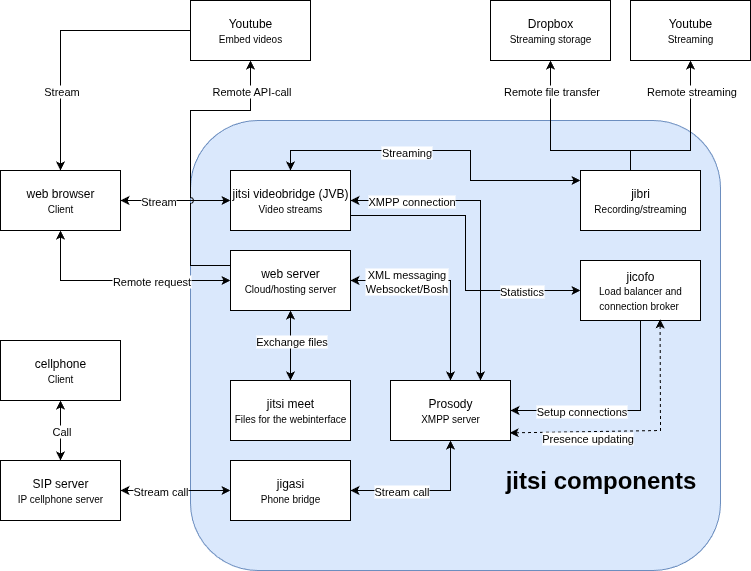
The external connections can be categorized into two main groups. Firstly, the connections between clients that request a video or audio connection are performed through remote requests and data streams. The second category of external connections is those to external services that help store recordings, stream recordings, stream videos, or help with creating meetings.
## Code Map
In this section, we will look at the main parts of the codebase and see what they can be used for.
**./react/features**
This folder is where it is best to start writing your code, as it contains most of the app components that are used in the apps on Android and iOS, as well as on the web version. This source folder is split up into all the different features that Jitsi has to offer, such as authentication, chat interaction, keyboard shortcuts, screenshot capture, remote control, and virtual background. Each of these features has a folder in this map, which is then again split up to keep a hierarchy and consistency throughout the code.
Each feature folder consists of a subfolder called components, in this folder all of the React, or React Native for mobile, components are expressed. Usually, in this folder there will be a separation between native and web components, however, in some cases, the same component could be used for both Android, iOS, and web browsers, in which case there is no separation made.
As stated before, the codebase mostly consists of React and React Native, which is the React version for mobile applications. Most of the features make use of the so-called class component by React [^class-comp], however, some new features start to use the new way to write functional components by using hooks[^func-comp].
The application makes use of React Redux as well, this is used as a general state store to keep track of important parameters that are used throughout the application. More on React Redux can be found here [^react-redux].
Most features also contain a file called `middleware.js`. This file acts as a bridge between the component and the functionality of the rest of the application.
**./modules/external-api**
In this folder, the external API can be found. This API can be used in various events like participants joining/leaving the meeting, changes in avatars or chat, as well as errors in using the microphone or camera.
**./android and ./ios**
Both of these folders contain the basics of the Android and iOS apps respectively. However, the code for the application itself and its components can be found in the **react/features** folder, which is explained earlier in this section.
**./conference.js**
This file can be found at the root of the project and contains the foundation of any interaction between a user and a conference room. This consists of setting up a connection to it, joining the meeting room, muting and unmuting, but also functions to gather information about the participants that are in the room.
**./lang**
This folder contains all the different translations that are present in Jitsi Meet. The translations can be found in the code with each of the keys in the translation maps that can be found in the `main-[language].json` files.
**./css**
This folder contains all the CSS that is used in the project. The files (mostly .scss files[^scss]) are split up into features like the React features that they are used in.
## Testing
The main form of testing code changes is done through torture tests, next to this the code is tested manually.
The torture tests are located in a separate repository, [Jitsi Meet Torture](https://github.com/jitsi/jitsi-meet-torture). The project contains end-to-end tests for several key functions such as peer-to-peer and invites. The testing can be done for iOS, Android, and the web, which are all the platforms that Jitsi Meet can be used on. The testing is done automatically for pull requests by project members, where it is used in combination with the continuous integration by a Jenkins instance running the tests, testing on the [meet.jit.si](https://meet.jit.si) instance. Other members can run the tests locally. The test results can be viewed on an automatically generated web page.
Manual testing is performed while doing code reviews, however, there are also testing releases that can be freely downloaded and deployed or can be used on the [beta test server](https://beta.meet.jit.si/).
================================================
FILE: docs/assets/ArchitectureDiagram.drawio
================================================
<mxfile host="app.diagrams.net" agent="Mozilla/5.0 (X11; Linux x86_64) AppleWebKit/537.36 (KHTML, like Gecko) Chrome/139.0.0.0 Safari/537.36" version="28.1.0">
<diagram name="Page-1" id="bncNPVXqShW8ecF_GqgS">
<mxGraphModel dx="946" dy="583" grid="1" gridSize="10" guides="1" tooltips="1" connect="1" arrows="1" fold="1" page="1" pageScale="1" pageWidth="850" pageHeight="1100" math="0" shadow="0">
<root>
<mxCell id="0" />
<mxCell id="1" parent="0" />
<mxCell id="aDnG364j5N6lEboaqi8u-1" value="" style="rounded=1;whiteSpace=wrap;html=1;fillColor=#dae8fc;strokeColor=#6c8ebf;" vertex="1" parent="1">
<mxGeometry x="210" y="140" width="530" height="450" as="geometry" />
</mxCell>
<mxCell id="aDnG364j5N6lEboaqi8u-2" value="" style="edgeStyle=orthogonalEdgeStyle;rounded=0;jumpStyle=arc;orthogonalLoop=1;jettySize=auto;html=1;startArrow=classic;startFill=1;endArrow=classic;endFill=1;" edge="1" parent="1" source="aDnG364j5N6lEboaqi8u-4" target="aDnG364j5N6lEboaqi8u-39">
<mxGeometry relative="1" as="geometry">
<Array as="points">
<mxPoint x="310" y="380" />
<mxPoint x="310" y="380" />
</Array>
</mxGeometry>
</mxCell>
<mxCell id="aDnG364j5N6lEboaqi8u-3" value="Exchange files" style="edgeLabel;html=1;align=center;verticalAlign=middle;resizable=0;points=[];" vertex="1" connectable="0" parent="aDnG364j5N6lEboaqi8u-2">
<mxGeometry x="-0.2429" y="1" relative="1" as="geometry">
<mxPoint x="1" y="-13.33" as="offset" />
</mxGeometry>
</mxCell>
<mxCell id="aDnG364j5N6lEboaqi8u-4" value="jitsi meet<br><font style="font-size: 10px">Files for the webinterface</font>" style="rounded=0;whiteSpace=wrap;html=1;" vertex="1" parent="1">
<mxGeometry x="250" y="400" width="120" height="60" as="geometry" />
</mxCell>
<mxCell id="aDnG364j5N6lEboaqi8u-5" style="edgeStyle=orthogonalEdgeStyle;rounded=0;jumpStyle=arc;orthogonalLoop=1;jettySize=auto;html=1;exitX=1;exitY=0.5;exitDx=0;exitDy=0;entryX=0.75;entryY=0;entryDx=0;entryDy=0;startArrow=classic;startFill=1;endArrow=classic;endFill=1;" edge="1" parent="1" source="aDnG364j5N6lEboaqi8u-7" target="aDnG364j5N6lEboaqi8u-28">
<mxGeometry relative="1" as="geometry" />
</mxCell>
<mxCell id="aDnG364j5N6lEboaqi8u-6" value="XMPP connection" style="edgeLabel;html=1;align=center;verticalAlign=middle;resizable=0;points=[];" vertex="1" connectable="0" parent="aDnG364j5N6lEboaqi8u-5">
<mxGeometry x="0.528" y="-1" relative="1" as="geometry">
<mxPoint x="-69" y="-107" as="offset" />
</mxGeometry>
</mxCell>
<mxCell id="aDnG364j5N6lEboaqi8u-7" value="jitsi videobridge (JVB)<br style="font-size: 10px"><font size="1">Video streams</font>" style="rounded=0;whiteSpace=wrap;html=1;" vertex="1" parent="1">
<mxGeometry x="250" y="190" width="120" height="60" as="geometry" />
</mxCell>
<mxCell id="aDnG364j5N6lEboaqi8u-8" style="edgeStyle=orthogonalEdgeStyle;rounded=0;jumpStyle=arc;orthogonalLoop=1;jettySize=auto;html=1;exitX=0.5;exitY=1;exitDx=0;exitDy=0;entryX=1;entryY=0.5;entryDx=0;entryDy=0;startArrow=none;startFill=0;endArrow=classic;endFill=1;" edge="1" parent="1" source="aDnG364j5N6lEboaqi8u-12" target="aDnG364j5N6lEboaqi8u-28">
<mxGeometry relative="1" as="geometry">
<mxPoint x="660" y="370" as="sourcePoint" />
</mxGeometry>
</mxCell>
<mxCell id="aDnG364j5N6lEboaqi8u-9" value="Setup connections" style="edgeLabel;html=1;align=center;verticalAlign=middle;resizable=0;points=[];" vertex="1" connectable="0" parent="aDnG364j5N6lEboaqi8u-8">
<mxGeometry x="-0.0519" y="-1" relative="1" as="geometry">
<mxPoint x="-46" y="1" as="offset" />
</mxGeometry>
</mxCell>
<mxCell id="aDnG364j5N6lEboaqi8u-10" style="edgeStyle=orthogonalEdgeStyle;rounded=0;orthogonalLoop=1;jettySize=auto;html=1;exitX=0;exitY=0.5;exitDx=0;exitDy=0;entryX=1;entryY=0.75;entryDx=0;entryDy=0;startArrow=classic;startFill=1;endArrow=none;endFill=0;" edge="1" parent="1" source="aDnG364j5N6lEboaqi8u-12" target="aDnG364j5N6lEboaqi8u-7">
<mxGeometry relative="1" as="geometry" />
</mxCell>
<mxCell id="aDnG364j5N6lEboaqi8u-11" value="Statistics" style="edgeLabel;html=1;align=center;verticalAlign=middle;resizable=0;points=[];" vertex="1" connectable="0" parent="aDnG364j5N6lEboaqi8u-10">
<mxGeometry x="-0.7049" y="1" relative="1" as="geometry">
<mxPoint x="-15" y="-1" as="offset" />
</mxGeometry>
</mxCell>
<mxCell id="aDnG364j5N6lEboaqi8u-12" value="jicofo<br><font style="font-size: 10px">Load balancer and connection broker&nbsp;</font>" style="rounded=0;whiteSpace=wrap;html=1;" vertex="1" parent="1">
<mxGeometry x="600" y="280" width="120" height="60" as="geometry" />
</mxCell>
<mxCell id="aDnG364j5N6lEboaqi8u-13" style="edgeStyle=orthogonalEdgeStyle;rounded=0;orthogonalLoop=1;jettySize=auto;html=1;entryX=0.5;entryY=0;entryDx=0;entryDy=0;startArrow=classic;startFill=1;" edge="1" parent="1" source="aDnG364j5N6lEboaqi8u-19" target="aDnG364j5N6lEboaqi8u-7">
<mxGeometry relative="1" as="geometry">
<Array as="points">
<mxPoint x="490" y="200" />
<mxPoint x="490" y="170" />
<mxPoint x="310" y="170" />
</Array>
</mxGeometry>
</mxCell>
<mxCell id="aDnG364j5N6lEboaqi8u-14" value="Streaming" style="edgeLabel;html=1;align=center;verticalAlign=middle;resizable=0;points=[];" vertex="1" connectable="0" parent="aDnG364j5N6lEboaqi8u-13">
<mxGeometry x="0.0632" y="1" relative="1" as="geometry">
<mxPoint x="-24" as="offset" />
</mxGeometry>
</mxCell>
<mxCell id="aDnG364j5N6lEboaqi8u-15" style="edgeStyle=orthogonalEdgeStyle;rounded=0;jumpStyle=arc;orthogonalLoop=1;jettySize=auto;html=1;entryX=0.5;entryY=1;entryDx=0;entryDy=0;startArrow=none;startFill=0;endArrow=classic;endFill=1;" edge="1" parent="1" source="aDnG364j5N6lEboaqi8u-19" target="aDnG364j5N6lEboaqi8u-45">
<mxGeometry relative="1" as="geometry">
<Array as="points">
<mxPoint x="650" y="170" />
<mxPoint x="570" y="170" />
</Array>
</mxGeometry>
</mxCell>
<mxCell id="aDnG364j5N6lEboaqi8u-16" value="Remote file transfer" style="edgeLabel;html=1;align=center;verticalAlign=middle;resizable=0;points=[];" vertex="1" connectable="0" parent="aDnG364j5N6lEboaqi8u-15">
<mxGeometry x="0.6456" y="2" relative="1" as="geometry">
<mxPoint x="2" y="-3.33" as="offset" />
</mxGeometry>
</mxCell>
<mxCell id="aDnG364j5N6lEboaqi8u-17" style="edgeStyle=orthogonalEdgeStyle;rounded=0;jumpStyle=arc;orthogonalLoop=1;jettySize=auto;html=1;exitX=0.5;exitY=0;exitDx=0;exitDy=0;entryX=0.5;entryY=1;entryDx=0;entryDy=0;startArrow=none;startFill=0;endArrow=classic;endFill=1;" edge="1" parent="1" source="aDnG364j5N6lEboaqi8u-19" target="aDnG364j5N6lEboaqi8u-44">
<mxGeometry relative="1" as="geometry">
<Array as="points">
<mxPoint x="650" y="170" />
<mxPoint x="710" y="170" />
</Array>
</mxGeometry>
</mxCell>
<mxCell id="aDnG364j5N6lEboaqi8u-18" value="Remote streaming" style="edgeLabel;html=1;align=center;verticalAlign=middle;resizable=0;points=[];" vertex="1" connectable="0" parent="aDnG364j5N6lEboaqi8u-17">
<mxGeometry x="0.5941" relative="1" as="geometry">
<mxPoint y="-6.67" as="offset" />
</mxGeometry>
</mxCell>
<mxCell id="aDnG364j5N6lEboaqi8u-19" value="jibri<br style="font-size: 7px"><font size="1">Recording/streaming</font>" style="rounded=0;whiteSpace=wrap;html=1;" vertex="1" parent="1">
<mxGeometry x="600" y="190" width="120" height="60" as="geometry" />
</mxCell>
<mxCell id="aDnG364j5N6lEboaqi8u-20" value="" style="edgeStyle=orthogonalEdgeStyle;rounded=0;orthogonalLoop=1;jettySize=auto;html=1;startArrow=classic;startFill=1;" edge="1" parent="1" source="aDnG364j5N6lEboaqi8u-22" target="aDnG364j5N6lEboaqi8u-25">
<mxGeometry relative="1" as="geometry" />
</mxCell>
<mxCell id="aDnG364j5N6lEboaqi8u-21" value="Stream call" style="edgeLabel;html=1;align=center;verticalAlign=middle;resizable=0;points=[];" vertex="1" connectable="0" parent="aDnG364j5N6lEboaqi8u-20">
<mxGeometry x="-0.3037" y="-1" relative="1" as="geometry">
<mxPoint x="1.67" y="-1" as="offset" />
</mxGeometry>
</mxCell>
<mxCell id="aDnG364j5N6lEboaqi8u-22" value="SIP server<br style="font-size: 10px"><font size="1">IP cellphone server</font>" style="rounded=0;whiteSpace=wrap;html=1;" vertex="1" parent="1">
<mxGeometry x="20" y="480" width="120" height="60" as="geometry" />
</mxCell>
<mxCell id="aDnG364j5N6lEboaqi8u-23" value="" style="edgeStyle=orthogonalEdgeStyle;rounded=0;orthogonalLoop=1;jettySize=auto;html=1;startArrow=classic;startFill=1;" edge="1" parent="1" source="aDnG364j5N6lEboaqi8u-25" target="aDnG364j5N6lEboaqi8u-28">
<mxGeometry relative="1" as="geometry" />
</mxCell>
<mxCell id="aDnG364j5N6lEboaqi8u-24" value="Stream call" style="edgeLabel;html=1;align=center;verticalAlign=middle;resizable=0;points=[];" vertex="1" connectable="0" parent="aDnG364j5N6lEboaqi8u-23">
<mxGeometry x="-0.1083" y="-1" relative="1" as="geometry">
<mxPoint x="-16.67" y="-1" as="offset" />
</mxGeometry>
</mxCell>
<mxCell id="aDnG364j5N6lEboaqi8u-25" value="jigasi<br style="font-size: 10px"><font size="1">Phone bridge</font>" style="rounded=0;whiteSpace=wrap;html=1;" vertex="1" parent="1">
<mxGeometry x="250" y="480" width="120" height="60" as="geometry" />
</mxCell>
<mxCell id="aDnG364j5N6lEboaqi8u-26" style="edgeStyle=orthogonalEdgeStyle;rounded=0;orthogonalLoop=1;jettySize=auto;html=1;exitX=0.5;exitY=0;exitDx=0;exitDy=0;entryX=1;entryY=0.5;entryDx=0;entryDy=0;startArrow=classic;startFill=1;" edge="1" parent="1" source="aDnG364j5N6lEboaqi8u-28" target="aDnG364j5N6lEboaqi8u-39">
<mxGeometry relative="1" as="geometry" />
</mxCell>
<mxCell id="aDnG364j5N6lEboaqi8u-27" value="XML messaging<br>Websocket/Bosh" style="edgeLabel;html=1;align=center;verticalAlign=middle;resizable=0;points=[];" vertex="1" connectable="0" parent="aDnG364j5N6lEboaqi8u-26">
<mxGeometry x="-0.6683" y="2" relative="1" as="geometry">
<mxPoint x="-43" y="-66.67" as="offset" />
</mxGeometry>
</mxCell>
<mxCell id="aDnG364j5N6lEboaqi8u-28" value="Prosody<br style="font-size: 10px"><font size="1">XMPP server</font>" style="rounded=0;whiteSpace=wrap;html=1;" vertex="1" parent="1">
<mxGeometry x="410" y="400" width="120" height="60" as="geometry" />
</mxCell>
<mxCell id="aDnG364j5N6lEboaqi8u-29" style="edgeStyle=orthogonalEdgeStyle;rounded=0;orthogonalLoop=1;jettySize=auto;html=1;entryX=0;entryY=0.5;entryDx=0;entryDy=0;startArrow=classic;startFill=1;" edge="1" parent="1" source="aDnG364j5N6lEboaqi8u-33" target="aDnG364j5N6lEboaqi8u-39">
<mxGeometry relative="1" as="geometry">
<Array as="points">
<mxPoint x="80" y="300" />
</Array>
</mxGeometry>
</mxCell>
<mxCell id="aDnG364j5N6lEboaqi8u-30" value="Remote request" style="edgeLabel;html=1;align=center;verticalAlign=middle;resizable=0;points=[];" vertex="1" connectable="0" parent="aDnG364j5N6lEboaqi8u-29">
<mxGeometry x="0.1467" y="1" relative="1" as="geometry">
<mxPoint x="14.17" y="1" as="offset" />
</mxGeometry>
</mxCell>
<mxCell id="aDnG364j5N6lEboaqi8u-31" style="edgeStyle=orthogonalEdgeStyle;rounded=0;orthogonalLoop=1;jettySize=auto;html=1;entryX=0;entryY=0.5;entryDx=0;entryDy=0;startArrow=classic;startFill=1;" edge="1" parent="1" source="aDnG364j5N6lEboaqi8u-33" target="aDnG364j5N6lEboaqi8u-7">
<mxGeometry relative="1" as="geometry" />
</mxCell>
<mxCell id="aDnG364j5N6lEboaqi8u-32" value="Stream" style="edgeLabel;html=1;align=center;verticalAlign=middle;resizable=0;points=[];" vertex="1" connectable="0" parent="aDnG364j5N6lEboaqi8u-31">
<mxGeometry x="-0.2296" y="1" relative="1" as="geometry">
<mxPoint x="-5" y="1" as="offset" />
</mxGeometry>
</mxCell>
<mxCell id="aDnG364j5N6lEboaqi8u-33" value="web browser<br><font style="font-size: 10px">Client</font>" style="rounded=0;whiteSpace=wrap;html=1;" vertex="1" parent="1">
<mxGeometry x="20" y="190" width="120" height="60" as="geometry" />
</mxCell>
<mxCell id="aDnG364j5N6lEboaqi8u-34" value="" style="edgeStyle=orthogonalEdgeStyle;rounded=0;orthogonalLoop=1;jettySize=auto;html=1;startArrow=classic;startFill=1;" edge="1" parent="1" source="aDnG364j5N6lEboaqi8u-36" target="aDnG364j5N6lEboaqi8u-22">
<mxGeometry relative="1" as="geometry">
<Array as="points">
<mxPoint x="80" y="460" />
<mxPoint x="80" y="460" />
</Array>
</mxGeometry>
</mxCell>
<mxCell id="aDnG364j5N6lEboaqi8u-35" value="Call" style="edgeLabel;html=1;align=center;verticalAlign=middle;resizable=0;points=[];" vertex="1" connectable="0" parent="aDnG364j5N6lEboaqi8u-34">
<mxGeometry x="0.1952" y="-1" relative="1" as="geometry">
<mxPoint x="1" y="-5.83" as="offset" />
</mxGeometry>
</mxCell>
<mxCell id="aDnG364j5N6lEboaqi8u-36" value="cellphone<br style="font-size: 10px"><font size="1">Client</font>" style="rounded=0;whiteSpace=wrap;html=1;" vertex="1" parent="1">
<mxGeometry x="20" y="360" width="120" height="60" as="geometry" />
</mxCell>
<mxCell id="aDnG364j5N6lEboaqi8u-37" style="edgeStyle=orthogonalEdgeStyle;rounded=0;jumpStyle=arc;orthogonalLoop=1;jettySize=auto;html=1;exitX=0;exitY=0.25;exitDx=0;exitDy=0;entryX=0.5;entryY=1;entryDx=0;entryDy=0;startArrow=none;startFill=0;" edge="1" parent="1" source="aDnG364j5N6lEboaqi8u-39" target="aDnG364j5N6lEboaqi8u-43">
<mxGeometry relative="1" as="geometry">
<Array as="points">
<mxPoint x="210" y="285" />
<mxPoint x="210" y="130" />
<mxPoint x="270" y="130" />
</Array>
</mxGeometry>
</mxCell>
<mxCell id="aDnG364j5N6lEboaqi8u-38" value="Remote API-call" style="edgeLabel;html=1;align=center;verticalAlign=middle;resizable=0;points=[];" vertex="1" connectable="0" parent="aDnG364j5N6lEboaqi8u-37">
<mxGeometry x="0.0449" relative="1" as="geometry">
<mxPoint x="60" y="-55.83" as="offset" />
</mxGeometry>
</mxCell>
<mxCell id="aDnG364j5N6lEboaqi8u-39" value="web server<br style="font-size: 10px"><font size="1">Cloud/hosting server</font>" style="rounded=0;whiteSpace=wrap;html=1;" vertex="1" parent="1">
<mxGeometry x="250" y="270" width="120" height="60" as="geometry" />
</mxCell>
<mxCell id="aDnG364j5N6lEboaqi8u-40" value="jitsi components" style="text;strokeColor=none;fillColor=none;html=1;fontSize=24;fontStyle=1;verticalAlign=middle;align=center;" vertex="1" parent="1">
<mxGeometry x="510" y="480" width="220" height="40" as="geometry" />
</mxCell>
<mxCell id="aDnG364j5N6lEboaqi8u-41" style="edgeStyle=orthogonalEdgeStyle;rounded=0;jumpStyle=arc;orthogonalLoop=1;jettySize=auto;html=1;startArrow=none;startFill=0;entryX=0.5;entryY=0;entryDx=0;entryDy=0;" edge="1" parent="1" source="aDnG364j5N6lEboaqi8u-43" target="aDnG364j5N6lEboaqi8u-33">
<mxGeometry relative="1" as="geometry">
<mxPoint x="100" y="180" as="targetPoint" />
<Array as="points">
<mxPoint x="80" y="50" />
</Array>
</mxGeometry>
</mxCell>
<mxCell id="aDnG364j5N6lEboaqi8u-42" value="Stream" style="edgeLabel;html=1;align=center;verticalAlign=middle;resizable=0;points=[];" vertex="1" connectable="0" parent="aDnG364j5N6lEboaqi8u-41">
<mxGeometry x="0.1" y="-1" relative="1" as="geometry">
<mxPoint x="1" y="41.67" as="offset" />
</mxGeometry>
</mxCell>
<mxCell id="aDnG364j5N6lEboaqi8u-43" value="Youtube<br style="font-size: 7px"><font size="1">Embed videos</font>" style="rounded=0;whiteSpace=wrap;html=1;" vertex="1" parent="1">
<mxGeometry x="210" y="20" width="120" height="60" as="geometry" />
</mxCell>
<mxCell id="aDnG364j5N6lEboaqi8u-44" value="Youtube<br style="font-size: 7px"><font size="1">Streaming</font>" style="rounded=0;whiteSpace=wrap;html=1;" vertex="1" parent="1">
<mxGeometry x="650" y="20" width="120" height="60" as="geometry" />
</mxCell>
<mxCell id="aDnG364j5N6lEboaqi8u-45" value="Dropbox<br style="font-size: 7px"><font size="1">Streaming storage</font>" style="rounded=0;whiteSpace=wrap;html=1;" vertex="1" parent="1">
<mxGeometry x="510" y="20" width="120" height="60" as="geometry" />
</mxCell>
<mxCell id="aDnG364j5N6lEboaqi8u-46" value="" style="endArrow=classic;startArrow=classic;html=1;rounded=0;exitX=0.993;exitY=0.873;exitDx=0;exitDy=0;strokeColor=default;dashed=1;entryX=0.663;entryY=0.98;entryDx=0;entryDy=0;entryPerimeter=0;exitPerimeter=0;" edge="1" parent="1" source="aDnG364j5N6lEboaqi8u-28" target="aDnG364j5N6lEboaqi8u-12">
<mxGeometry width="50" height="50" relative="1" as="geometry">
<mxPoint x="400" y="420" as="sourcePoint" />
<mxPoint x="670" y="340" as="targetPoint" />
<Array as="points">
<mxPoint x="680" y="450" />
</Array>
</mxGeometry>
</mxCell>
<mxCell id="aDnG364j5N6lEboaqi8u-47" value="Presence updating" style="edgeLabel;html=1;align=center;verticalAlign=middle;resizable=0;points=[];" vertex="1" connectable="0" parent="1">
<mxGeometry x="610" y="460" as="geometry">
<mxPoint x="-4" y="-3" as="offset" />
</mxGeometry>
</mxCell>
</root>
</mxGraphModel>
</diagram>
</mxfile>
================================================
FILE: docs/community/intro.md
================================================
---
id: community-intro
title: Our community
---
Jitsi Meet and all accompanying Jitsi projects are maintained by a community of
passionate individuals and corporations.
If you have questions, need help, or want to make suggestions, please join our community
[here](https://community.jitsi.org/).
<hr />
import DocCardList from '@theme/DocCardList';
<DocCardList />
================================================
FILE: docs/community/third-party-software.md
================================================
---
id: third-party-software
title: Third-Party Software
---
This page contains links to projects around Jitsi Meet, which are not maintained
by the Jitsi team.
Please keep this list in alphabetical order.
:::warning
As these packages are not maintained by the Jitsi team, please ask their
respective forums / issue trackers for help if you find issues.
:::
## Cketti's Jitsi Hacks
Some extra features using injected scripts.
https://jitsi-hacks.cketti.eu/
## Eparto Virtual Phone
This is a Chrome extension that allow users to use their browser as a virtual
phone and to make Jitsi-based calls without opening any web site.
Chrome web store:
[Eparto virtual phone extension](https://chromewebstore.google.com/detail/eparto-virtual-phone/njihflnogjnjnmflicfongbnehhpkhmj)
GitHub: https://github.com/emrahcom/eparto-virtual-phone
## Flutter plugin
Plugin for Flutter.
https://pub.dev/packages/jitsi_meet
## Galaxy
Galaxy is a web application for Jitsi admins and users to organize their Jitsi
meetings, meeting schedules, and attendees. It supports
[JaaS](https://jaas.8x8.vc/) and self-hosted Jitsi deployments.
GitHub: https://github.com/emrahcom/galaxy
Demo: https://eparto.net
## Galaxy-kc
This is the version of `Galaxy` that uses `Keycloak` as the identity provider.
https://github.com/emrahcom/galaxy-kc
## GStreamer pipeline integration
Integrate Jitsi Meet conferences with GStreamer pipelines.
https://github.com/avstack/gst-meet
## GStreamer plugin in C++
Jitsi Meet GStreamer plugin
https://github.com/mojyack/gstjitsimeet
## Jitok: Jitsi Token generator
Helper web tool and API for generating Jitsi Meet compatible JWT.
GitHub: https://github.com/jitsi-contrib/jitok
Demo: https://jitok.emrah.com/
Discussion: https://community.jitsi.org/t/jitok-jitsi-token-generator/94683
## Jitsi-Admin
An open-source platform to organize your meetings. Includes all functions we
know from the big conference-tools
- Plan your Meeting
- Secure your Meeting with user login credentials
- Create a Report of each user visiting your conference
- Create an appointment poll and transfer it into a conference with one click
- Dockerised for easy installation
Github: https://github.com/H2-invent/jitsi-admin
Demo: https://jitsi-admin.de
Docker:
https://github.com/H2-invent/jitsi-admin/wiki/Install-jitsi-admin-in-docker
## JitsiMeet-AutoStart
A lightweight, single-page utility for unattended systems that need to automatically join a Jitsi meeting with the camera enabled. Perfect for kiosks, monitoring setups, or any scenario where a system should automatically connect and display video without user interaction. No deployment required.
Github: https://github.com/GammaPi/JitsiMeet-AutoStart
## Jitsi Config Differ
Web app to compare reference configs between different Jitsi releases. This aims
to help users identify potential changes in config keys and default values when
upgrading their deployment.
https://shawnchin.github.io/jitsi-config-differ/
Github: https://github.com/shawnchin/jitsi-config-differ
## Jitsi URL Generator
A simple tool to illustrate how URL params can be composed to customize Jitsi.
It only exposes a small fraction of what is possible, but should hopefully help
build familiarity which users can then apply to other config values in the
whitelist.
https://shawnchin.github.io/jitsi-url-generator/
Github: https://github.com/shawnchin/jitsi-url-generator
## KeyCloak adapter
Allow Jitsi to use Keycloak as an identity and OIDC provider.
https://github.com/nordeck/jitsi-keycloak-adapter
## KeyCloak integration
Integration of KeyCloak for authentication.
https://github.com/D3473R/jitsi-keycloak
## Outlook Plugin
Plugin for Adding a "Schedule Jitsi Meeting" Button to Microsoft Outlook.
GitHub: https://github.com/timetheoretical/jitsi-meet-outlook
## Outlook Pluigin
Plugin for Adding a "Schedule Jitsi Meeting" Button to Microsoft Outlook.
Written according to Microsoft's modern architecture.
GitHub: https://github.com/diggsweden/jitsi-outlook
## Prosody Plugins
Collection of community-contributed prosody plugins that can be added to
self-hosted Jitsi deployments.
https://github.com/jitsi-contrib/prosody-plugins
- **event_sync**: Sends HTTP POST to external API when occupant or room events
are triggered.
- **frozen_nick**: Prevents users from changing their display name if JWT auth
is used and name is provided in token context.
- **jibri_autostart**: Automatically starts recording when the moderator enters
the room.
- **lobby_autostart**: Automatically enables lobby for all rooms.
- **per_room_max_occupants**: Set different max occupants based on room name and
subdomain.
- **secure_domain_lobby_bypass**: Allows secure domain authenticated users to
bypass lobby.
- **time_restricted**: Sets a time limit on rooms and terminates the conference
when the time is up.
- **token_affiliation**: Promotes users to moderators based on affiliation
property in token (JWT).
- **token_lobby_bypass**: Enables some users to bypass lobby based on a flag in
token (JWT).
- **token_lobby_ondemand**: Activates lobby based on a flag in token (JWT).
- **token_owner_party**: Prevents unauthorized users from create a room and
terminates the conference when the owner leaves.
## SAML to Jitsi JWT Authentification
Intergration of SAML authentification with Shibboleth for a Jitsi Meet JWT
generator.
Github: https://github.com/Renater/Jitsi-SAML2JWT
## Unity plugin
Plugin for using lib-jitsi-meet in a Unity environment (WebGL).
https://github.com/avstack/jitsi-meet-unity-demo
Plugin for using lib-jitsi-meet in a Unity environment (Android and iOS).
https://github.com/SariskaIO/Sariska-Media-Unity-Demo
## Generic OIDC and SAML adapter
Add support for OIDC and SAML to Jitsi with JWT and anonymous domain activated.
Authenticaten for the meeting host, allowing guests to join without requiring
authentication.
Github: https://github.com/aadpM2hhdixoJm3u/jitsi-OIDC-SAML-adapter
Github: https://github.com/aadpM2hhdixoJm3u/jitsi-OIDC-adapter
================================================
FILE: docs/dev-guide/android-sdk.md
================================================
---
id: dev-guide-android-sdk
title: Android SDK
---
The Jitsi Meet Android SDK provides the same user experience as the Jitsi Meet app,
in a customizable way which you can embed in your apps.
:::important
Android 7.0 (API level 24) or higher is required.
:::
## Sample applications using the SDK
If you want to see how easy integrating the Jitsi Meet SDK into a native application is, take a look at the
[sample applications repository](https://github.com/jitsi/jitsi-meet-sdk-samples#android).
## Build your own, or use a pre-build SDK artifacts/binaries
Jitsi conveniently provides a pre-build SDK artifacts/binaries in its Maven repository. When you do not require any
modification to the SDK itself or any of its dependencies, it's suggested to use the pre-build SDK. This avoids the
complexity of building and installing your own SDK artifacts/binaries.
### Use pre-build SDK artifacts/binaries
In your project, add the Maven repository
`https://github.com/jitsi/jitsi-maven-repository/raw/master/releases` and the
dependency `org.jitsi.react:jitsi-meet-sdk` into your `build.gradle` files.
The repository typically goes into the `build.gradle` file in the root of your project:
```gradle title="build.gradle"
allprojects {
repositories {
maven {
url "https://github.com/jitsi/jitsi-maven-repository/raw/master/releases"
}
google()
mavenCentral()
maven { url 'https://www.jitpack.io' }
}
}
```
In recent versions of Android Studios, `allprojects{}` might not be found in `build.gradle`. In that case, the repository goes into the `settings.gradle` file in the root of your project:
```gradle title="settings.gradle"
dependencyResolutionManagement {
repositoriesMode.set(RepositoriesMode.FAIL_ON_PROJECT_REPOS)
repositories {
google()
mavenCentral()
maven {
url "https://github.com/jitsi/jitsi-maven-repository/raw/master/releases"
}
maven {
url "https://maven.google.com"
}
}
}
```
Dependency definitions belong in the individual module `build.gradle` files:
```gradle
dependencies {
// (other dependencies)
implementation ('org.jitsi.react:jitsi-meet-sdk:+') { transitive = true }
}
```
:::warning
Make sure you pin your dependency by checking the [releases page](https://github.com/jitsi/jitsi-meet-release-notes/blob/master/CHANGELOG-MOBILE-SDKS.md).
:::
### Build and use your own SDK artifacts/binaries
<details>
<summary>Show building instructions</summary>
Start by making sure that your development environment [is set up correctly](/docs/category/mobile).
:::note A Note on Dependencies
Apart from the SDK, Jitsi also publishes a binary Maven artifact for some of the SDK dependencies (that are not otherwise publicly available) to the Jitsi Maven repository. When you're planning to use a SDK that is built from source, you'll likely use a version of the source code that is newer (or at least _different_) than the version of the source that was used to create the binary SDK artifact. As a consequence, the dependencies that your project will need, might also be different from those that are published in the Jitsi Maven repository. This might lead to build problems, caused by dependencies that are unavailable.
:::
If you want to use a SDK that is built from source, you will likely benefit from composing a local Maven repository that contains these dependencies. The text below describes how you create a repository that includes both the SDK as well as these dependencies. For illustration purposes, we'll define the location of this local Maven repository as `/tmp/repo`
In source code form, the Android SDK dependencies are locked/pinned by `package.json` and `package-lock.json` of the Jitsi Meet project. To obtain the data, execute NPM in the jitsi-meet project directory:
```shell
npm install
```
This will pull in the dependencies in either binary format, or in source code format, somewhere under /node_modules/
Third-party React Native _modules_, which Jitsi Meet SDK for Android depends on, are download by NPM in source code
or binary form. These need to be assembled into Maven artifacts, and then published to your local Maven repository.
A script is provided to facilitate this. From the root of the jitsi-meet project repository, run:
```shell
./android/scripts/release-sdk.sh /tmp/repo
```
This will build and publish the SDK, and all of its dependencies to the specified Maven repository (`/tmp/repo`) in
this example.
You're now ready to use the artifacts. In _your_ project, add the Maven repository that you used above (`/tmp/repo`) into your top-level `build.gradle` file:
```gradle
allprojects {
repositories {
maven { url "file:/tmp/repo" }
google()
mavenCentral()
maven { url 'https://www.jitpack.io' }
}
}
```
You can use your local repository to replace the Jitsi repository (`maven { url "https://github.com/jitsi/jitsi-maven-repository/raw/master/releases" }`) when you published _all_ subprojects. If you didn't do that, you'll have to add both repositories. Make sure your local repository is listed first!
Then, define the dependency `org.jitsi.react:jitsi-meet-sdk` into the `build.gradle` file of your module:
```java
implementation ('org.jitsi.react:jitsi-meet-sdk:+') { transitive = true }
```
Note that there should not be a need to explicitly add the other dependencies, as they will be pulled in as transitive
dependencies of `jitsi-meet-sdk`.
</details>
## Using the API
Jitsi Meet SDK is an Android library which embodies the whole Jitsi Meet
experience and makes it reusable by third-party apps.
First, add Java 1.8 compatibility support to your project by adding the
following lines into your `build.gradle` file:
```gradle
compileOptions {
sourceCompatibility JavaVersion.VERSION_1_8
targetCompatibility JavaVersion.VERSION_1_8
}
```
To get started, just launch `JitsiMeetActivity` pointing to the room you want:
```java
// Somewhere early in your app.
JitsiMeetConferenceOptions defaultOptions
= new JitsiMeetConferenceOptions.Builder()
.setServerURL(serverURL)
// When using JaaS, set the obtained JWT here
//.setToken("MyJWT")
// Different features flags can be set
// .setFeatureFlag("toolbox.enabled", false)
// .setFeatureFlag("filmstrip.enabled", false)
.setFeatureFlag("welcomepage.enabled", false)
.build();
JitsiMeet.setDefaultConferenceOptions(defaultOptions);
// ...
// Build options object for joining the conference. The SDK will merge the default
// one we set earlier and this one when joining.
JitsiMeetConferenceOptions options
= new JitsiMeetConferenceOptions.Builder()
.setRoom(roomName)
// Settings for audio and video
//.setAudioMuted(true)
//.setVideoMuted(true)
.build();
// Launch the new activity with the given options. The launch() method takes care
// of creating the required Intent and passing the options.
JitsiMeetActivity.launch(this, options);
```
Alternatively, you can use the `org.jitsi.meet.sdk.JitsiMeetView` class which
extends `android.view.View`.
Note that this should only be needed when `JitsiMeetActivity` cannot be used for
some reason. Extending `JitsiMeetView` requires manual wiring of the view to
the activity, using a lot of boilerplate code. Using the Activity instead of the
View is strongly recommended.
<details>
<summary>Show example</summary>
```java
package org.jitsi.example;
import android.os.Bundle;
import android.support.v4.app.FragmentActivity;
import org.jitsi.meet.sdk.JitsiMeetView;
import org.jitsi.meet.sdk.ReactActivityLifecycleCallbacks;
// Example
//
public class MainActivity extends FragmentActivity implements JitsiMeetActivityInterface {
private JitsiMeetView view;
@Override
protected void onActivityResult(
int requestCode,
int resultCode,
Intent data) {
JitsiMeetActivityDelegate.onActivityResult(
this, requestCode, resultCode, data);
}
@Override
public void onBackPressed() {
JitsiMeetActivityDelegate.onBackPressed();
}
@Override
protected void onCreate(Bundle savedInstanceState) {
super.onCreate(savedInstanceState);
view = new JitsiMeetView(this);
JitsiMeetConferenceOptions options = new JitsiMeetConferenceOptions.Builder()
.setRoom("https://meet.jit.si/test123")
.build();
view.join(options);
setContentView(view);
}
@Override
protected void onDestroy() {
super.onDestroy();
view.dispose();
view = null;
JitsiMeetActivityDelegate.onHostDestroy(this);
}
@Override
public void onNewIntent(Intent intent) {
JitsiMeetActivityDelegate.onNewIntent(intent);
}
@Override
public void onRequestPermissionsResult(
final int requestCode,
final String[] permissions,
final int[] grantResults) {
JitsiMeetActivityDelegate.onRequestPermissionsResult(requestCode, permissions, grantResults);
}
@Override
protected void onResume() {
super.onResume();
JitsiMeetActivityDelegate.onHostResume(this);
}
@Override
protected void onStop() {
super.onStop();
JitsiMeetActivityDelegate.onHostPause(this);
}
}
```
</details>
### JitsiMeetActivity
This class encapsulates a high level API in the form of an Android `FragmentActivity`
which displays a single `JitsiMeetView`. You can pass a URL as a `ACTION_VIEW`
on the Intent when starting it and it will join the conference, and will be
automatically terminated (finish() will be called on the activity) when the
conference ends or fails.
### JitsiMeetView
The `JitsiMeetView` class is the core of Jitsi Meet SDK. It's designed to
display a Jitsi Meet conference (or a welcome page).
#### join(options)
Joins the conference specified by the given `JitsiMeetConferenceOptions`.
#### dispose()
Releases all resources associated with this view. This method MUST be called
when the Activity holding this view is going to be destroyed, usually in the
`onDestroy()` method.
### JitsiMeetConferenceOptions
This object encapsulates all the options that can be tweaked when joining
a conference.
Example:
```java
private static @NonNull ArrayList<Bundle> getCustomToolbarButtons() {
ArrayList<Bundle> customToolbarButtons = new ArrayList<>();
Bundle firstCustomButton = new Bundle();
Bundle secondCustomButton = new Bundle();
Bundle thirdCustomButton = new Bundle();
Bundle fourthCustomButton = new Bundle();
Bundle fifthCustomButton = new Bundle();
firstCustomButton.putString("icon", "ICON_URL");
firstCustomButton.putString("id", "CUSTOM_BTN_ID");
secondCustomButton.putString("backgroundColor", "CUSTOM_BTN_BACKGROUND_COLOR");
secondCustomButton.putString("icon", "ICON_URL");
secondCustomButton.putString("id", "CUSTOM_BTN_ID");
customToolbarButtons.add(firstCustomButton);
customToolbarButtons.add(secondCustomButton);
return customToolbarButtons;
}
// If you want your custom button/s to appear inside the toolbar,
// you will need to set your toolbar buttons too and always include "overflowmenu", "hangup".
// All the buttons that, because of the screen size, won't fit the toolbar, will be automatically moved to the overflow menu.
private String[] getToolbarButtons() {
return new String[]{"CUSTOM_BTN_ID", "CUSTOM_BTN_ID", "microphone", "overflowmenu", "hangup"};
}
JitsiMeetConferenceOptions options = new JitsiMeetConferenceOptions.Builder()
.setServerURL(new URL("https://meet.jit.si"))
.setRoom("MonthlyEndorsementsRebuildConsequently")
.setAudioMuted(false)
.setVideoMuted(false)
.setAudioOnly(false)
.setWelcomePageEnabled(false)
.setConfigOverride("requireDisplayName", true)
.setConfigOverride("customToolbarButtons", getCustomToolbarButtons())
.setConfigOverride("toolbarButtons", getToolbarButtons())
.build();
```
See the `JitsiMeetConferenceOptions` implementation for all available options.
### JitsiMeetActivityDelegate
This class handles the interaction between `JitsiMeetView` and its enclosing
`Activity`. Generally this shouldn't be consumed by users, because they'd be
using `JitsiMeetActivity` instead, which is already completely integrated.
All its methods are static.
#### onActivityResult(...)
Helper method to handle results of auxiliary activities launched by the SDK.
Should be called from the activity method of the same name.
#### onBackPressed()
Helper method which should be called from the activity's `onBackPressed` method.
If this function returns `true`, it means the action was handled and thus no
extra processing is required; otherwise the app should call the parent's
`onBackPressed` method.
#### onHostDestroy(...)
Helper method which should be called from the activity's `onDestroy` method.
#### onHostResume(...)
Helper method which should be called from the activity's `onResume` or `onStop`
method.
#### onHostStop(...)
Helper method which should be called from the activity's `onSstop` method.
#### onNewIntent(...)
Helper method for integrating the *deep linking* functionality. If your app's
activity is launched in "singleTask" mode this method should be called from the
activity's `onNewIntent` method.
#### onRequestPermissionsResult(...)
Helper method to handle permission requests inside the SDK. It should be called
from the activity method of the same name.
#### onUserLeaveHint()
Helper method for integrating automatic Picture-in-Picture. It should be called
from the activity's `onUserLeaveHint` method.
This is a static method.
### Listening for broadcasted events
The SDK broadcasts several events that the users can listen for.
```java
IntentFilter intentFilter = new IntentFilter();
intentFilter.addAction(BroadcastEvent.Type.CONFERENCE_JOINED.getAction());
LocalBroadcastManager.getInstance(this).registerReceiver(broadcastReceiver, intentFilter);
```
Please see `JitsiMeetActivity`, which registers for all the events and can serve as an example.
#### Supported events
##### CONFERENCE_JOINED
Broadcasted when a conference was joined. `data` contains the following information:
- `url`: the conference URL
##### CONFERENCE_TERMINATED
Broadcasted when the active conference ends, be it because of user choice or because of a failure. `data` contains the
following information:
- `url`: the conference URL
- `error`: missing if the conference finished gracefully, otherwise contains the error message
##### CONFERENCE_WILL_JOIN
Broadcasted before a conference is joined. `data` contains the following information:
- `url`: the conference URL
##### AUDIO_MUTED_CHANGED
Broadcasted when the local participant's audio is muted or unmuted. `data` contains the following information:
- `muted`: a boolean indicating whether the audio is muted or not.
##### PARTICIPANT_JOINED
Broadcasted when a participant has joined the conference. `data` contains the following information:
- `email`: the email of the participant. It may not be set if the remote participant didn't set one.
- `name`: the name of the participant.
- `role`: the role of the participant.
- `participantId`: the id of the participant.
##### PARTICIPANT_LEFT
Called when a participant has left the conference. `data` contains the following information:
- `participantId`: the id of the participant that left.
##### ENDPOINT_TEXT_MESSAGE_RECEIVED
Broadcasted when an endpoint text message is received. The `data` HashMap contains a `senderId` key with the
participantId of the sender and a `message` key with the content.
##### SCREEN_SHARE_TOGGLED
Broadcasted when a participant starts or stops sharing his screen. `data` contains the following information:
- `participantId`: Id of the participant that started or stopped sharing his screen.
- `sharing`: True if the participant is sharing his screen, false otherwise.
##### PARTICIPANTS_INFO_RETRIEVED
Broadcasted when a RETRIEVE_PARTICIPANTS_INFO action is called. The `data` HashMap contains a `participantsInfo` key
with a list of participants information and a `requestId` key with the ID that was sent in the
RETRIEVE_PARTICIPANTS_INFO action.
##### CHAT_MESSAGE_RECEIVED
Broadcasted when a chat text message is received. `data` contains the following information:
- `senderId`: the id of the participant that sent the message.
- `message`: the content of the message.
- `isPrivate`: true if the message is private, false otherwise.
- `timestamp`: the (optional) timestamp of the message.
##### CHAT_TOGGLED
Broadcasted when the chat dialog is opened or closed. `data` contains the following information:
- `isOpen`: true if the chat dialog is open, false otherwise.
##### VIDEO_MUTED_CHANGED
Broadcasted when the local participant's video is muted or unmuted. `data` contains the following information:
- `muted`: an integer indicating whether the video is muted or not. 0 means unmuted, and 4 means muted.
##### READY_TO_CLOSE
The SDK is ready to be closed / dismissed.
##### CUSTOM_BUTTON_PRESSED
Broadcasted when a custom button is pressed. `data` contains the following information:
- `id`: the id of the pressed custom button.
- `text`: the label of the pressed custom button.
##### CONFERENCE_UNIQUE_ID_SET
Broadcasted when an meeting unique id has been set. `data` contains the following information:
- `sessionId`: the unique meeting id.
### Broadcasting Actions
The SDK listens for broadcasted actions from the users and reacts accordingly.
```java
Intent muteBroadcastIntent = new Intent(BroadcastAction.Type.SET_AUDIO_MUTED.getAction());
muteBroadcastIntent.putExtra("muted", muted);
LocalBroadcastManager.getInstance(getApplicationContext()).sendBroadcast(muteBroadcastIntent);
```
The intents can be built manually (as shown above) or through the methods in `BroadcastIntentHelper`.
Please see `JitsiMeetOngoingConferenceService` for more examples of sending actions.
#### Supported actions
##### SET_AUDIO_MUTED
Sets the state of the localParticipant audio muted according to the `muted` parameter.
Expects a `muted` key on the intent extra with a boolean value.
##### SET_VIDEO_MUTED
Sets the state of the localParticipant video muted according to the `muted` parameter.
Expects a `muted` key on the intent extra with a boolean value.
##### HANG_UP
The localParticipant leaves the current conference.
Does not expect any extra value.
##### SEND_ENDPOINT_TEXT_MESSAGE
Sends a message via the data channel to one particular participant or all of them.
Expects a `to` key on the intent extra with the ID of the participant to which the message
is meant and a `message` key with a string value, the actual content of the message.
If the `to` key is not present or its value is empty, the message will be sent
to all the participants in the conference.
To get the participantId, the `PARTICIPANT_JOINED` event should be listened for,
which `data` includes the id and this should be stored somehow.
##### TOGGLE_SCREEN_SHARE
Sets the state of the localParticipant screen share according to the `enabled` parameter.
Expects an `enabled` key on the intent extra with a boolean value.
##### RETRIEVE_PARTICIPANTS_INFO
Signals the SDK to retrieve a list with the participant's information. The SDK will emit a PARTICIPANTS_INFO_RETRIEVED event.
Expects a `requestId` key on the intent extra with a string value, this parameter will be present on the PARTICIPANTS_INFO_RETRIEVED event.
##### OPEN_CHAT
Opens the chat dialog. If a `to` key is present with a valid participantId, the private chat for that particular participant will be opened.
##### CLOSE_CHAT
Closes the chat dialog.
Does not expect any extra value.
##### SEND_CHAT_MESSAGE
Sends a chat message, either a private one if a `to` key is present with a valid participantId and to everybody otherwise.
Expect a `message` key with a string value.
##### SHOW_NOTIFICATION
Show a notification that can be configured based on `appearance`, `description`, `timeout`, `title` and an `uid`.
##### HIDE_NOTIFICATION
Hides a notification according to its `uid`.
##### START_RECORDING
Starts the recording by setting up a `mode`, either as a `file` or a `stream`, which can also have a `dropboxToken`, `shouldShare`
you can provide a `rtmpStreamKey`, `rtmBroadcastID`, `youtubeStreamKey`, `youtubeBroadcastID`, other `extraMetadata`. You can also enable
`transcription` through this action.
##### STOP_RECORDING
Stops the recording based on `mode` and also can stop `transcription` if it was enabled.
##### OVERWRITE_CONFIG
Overwrites `config` during the meeting.
##### SEND_CAMERA_FACING_MODE_MESSAGE
Sends a message `to` with the `facingMode` via data channel.
## ProGuard rules
When using the SDK on a project some proguard rules have to be added to avoid necessary code being stripped. Add the following to your project's
rules file: https://github.com/jitsi/jitsi-meet/blob/master/android/app/proguard-rules.pro
## Picture-in-Picture
`JitsiMeetView` will automatically adjust its UI when presented in a
Picture-in-Picture style scenario, in a rectangle too small to accommodate its
"full" UI.
## Dropbox integration
To set up the Dropbox integration, follow these steps:
1. Add the following to the app's AndroidManifest.xml and change `<APP_KEY>` to
your Dropbox app key:
```xml
<activity
android:configChanges="keyboard|orientation"
android:launchMode="singleTask"
android:name="com.dropbox.core.android.AuthActivity">
<intent-filter>
<action android:name="android.intent.action.VIEW" />
<category android:name="android.intent.category.BROWSABLE" />
<category android:name="android.intent.category.DEFAULT" />
<data android:scheme="db-<APP_KEY>" />
</intent-filter>
</activity>
```
2. Add the following to the app's strings.xml and change `<APP_KEY>` to your
Dropbox app key:
```xml
<string name="dropbox_app_key"><APP_KEY></string>
```
================================================
FILE: docs/dev-guide/configuration.md
================================================
---
id: dev-guide-configuration
title: Configuration
---
This page describes available configuration options for Jitsi Meet. These are either set in `config.js` on the server
side or overridden in the app.
:::note
Options marked with 🚫 are not overwritable through `configOverwrite`
:::
:::warning
This page is a work in progress. Not all options are described here yet.
:::
## API
### apiLogLevels
type: `Array`
Logs that should go be passed through the 'log' event if a handler is defined for it
Default: **unset**
```javascript
apiLogLevels: ['warn', 'log', 'error', 'info', 'debug']
```
### buttonsWithNotifyClick
type: `Array`
Toolbar buttons which have their click/tap event exposed through the API on `toolbarButtonClicked`. Passing a string for the button key will prevent execution of the click/tap routine; passing an object with `key` and `preventExecution` flag on false will not prevent execution of the click/tap routine. Below array with mixed mode for passing the buttons.
Default: **unset**
```javascript
buttonsWithNotifyClick: [
'camera',
{
key: 'chat',
preventExecution: false
},
{
key: 'closedcaptions',
preventExecution: true
},
'desktop',
'download',
'embedmeeting',
'etherpad',
'feedback',
'filmstrip',
'fullscreen',
'hangup',
'help',
{
key: 'invite',
preventExecution: false
},
'livestreaming',
'microphone',
'mute-everyone',
'mute-video-everyone',
'participants-pane',
'profile',
{
key: 'raisehand',
preventExecution: true
},
'recording',
'security',
'select-background',
'settings',
'shareaudio',
'sharedvideo',
'shortcuts',
'stats',
'tileview',
'toggle-camera',
'videoquality',
// The add passcode button from the security dialog.
{
key: 'add-passcode',
preventExecution: false
},
'__end'
]
```
### customParticipantMenuButtons
type: `Array<{ icon: string; id: string; text: string; }>`
Default: **unset**
A list of custom buttons that can be added to the Participant Context Menu. Each will have an icon, that can be either a base64 encoded image or the path to an image, a unique id, and a text that will be displayed alongside the icon in the menu. This custom button will trigger the `participantMenuButtonClick` event that will have the id set to the button as the `key` and the `participantId`, representing the id of the participant for which the button was clicked.
```javascript
customParticipantMenuButtons: [
{
icon: 'data:image/svg+xml;base64,...',
id: 'custom-button',
text: 'Custom Button'
}
]
```
### customToolbarButtons
type: `Array<{ icon: string; id: string; text: string; }>`
Default: **unset**
A list of custom buttons that can be added to the Toolbar. Each will have an icon, that can be either a base64 encoded image or the path to an image, a unique id, and a text that will be displayed alongside the icon in the menu. This custom button will trigger the `toolbarButtonClicked` event that will the id set to the button as the `key`.
```javascript
customToolbarButtons: [
{
icon: 'data:image/svg+xml;base64,...',
id: 'custom-toolbar-button',
text: 'Custom Toolbar Button'
}
]
```
### mouseMoveCallbackInterval
type: `Number`
Default interval (milliseconds) for triggering `mouseMoved` iframe API event.
Default: `1000`
```javascript
mouseMoveCallbackInterval: 1000
```
### participantMenuButtonsWithNotifyClick
type: `Array`
Participant context menu buttons which have their click/tap event exposed through the API on `participantMenuButtonClick`. Passing a string for the button key will prevent execution of the click/tap routine; passing an object with `key` and `preventExecution` flag on false will not prevent execution of the click/tap routine. Below array with mixed mode for passing the buttons.
Default: **unset**
```javascript
participantMenuButtonsWithNotifyClick: [
'allow-video',
{
key: 'ask-unmute',
preventExecution: false
},
'conn-status',
'flip-local-video',
'grant-moderator',
{
key: 'kick',
preventExecution: true
},
{
key: 'hide-self-view',
preventExecution: false
},
'mute',
'mute-others',
'mute-others-video',
'mute-video',
'pinToStage',
'privateMessage',
{
key: 'remote-control',
preventExecution: false
},
'send-participant-to-room',
'verify',
]
```
### useHostPageLocalStorage
type: `Boolean`
This property is related to the use case when Jitsi Meet is used via the IFrame API. When the property is true
Jitsi Meet will use the local storage of the host page instead of its own. This option is useful if the browser
is not persisting the local storage inside the iframe.
Default: **unset**
```javascript
useHostPageLocalStorage: true
```
## Audio
### audioLevelsInterval
type: `Number`
The interval (milliseconds) at which the audio levels are calculated.
Default: `200`
```javascript
audioLevelsInterval: 200
```
### audioQuality
type: `Object`
Specify audio quality stereo and opusMaxAverageBitrate values in order to enable HD audio.
Beware, by doing so, you are disabling echo cancellation, noise suppression and AGC.
Default: **unset**
```javascript
audioQuality: {
stereo: false,
opusMaxAverageBitrate: null // Value to fit the 6000 to 510000 range.
}
```
### disableAudioLevels
type: `Boolean`
Disable measuring of audio levels.
Default: `false`
```javascript
disableAudioLevels: false
```
### ~~disableSpeakerStatsSearch~~
type: `Boolean`
Specifies whether there will be a search field in speaker stats or not.
__DEPRECATED__ Use `speakerStats.disableSearch` instead.
Default: false
```javascript
disableSpeakerStatsSearch: false
```
### disabledSounds
type: `Array`
The sounds passed in this array will be disabled.
Default: **unset**
```javascript
disabledSounds: [
// 'ASKED_TO_UNMUTE_SOUND'
// 'E2EE_OFF_SOUND'
// 'E2EE_ON_SOUND'
// 'INCOMING_MSG_SOUND'
// 'KNOCKING_PARTICIPANT_SOUND'
// 'LIVE_STREAMING_OFF_SOUND'
// 'LIVE_STREAMING_ON_SOUND'
// 'NO_AUDIO_SIGNAL_SOUND'
// 'NOISY_AUDIO_INPUT_SOUND'
// 'OUTGOING_CALL_EXPIRED_SOUND'
// 'OUTGOING_CALL_REJECTED_SOUND'
// 'OUTGOING_CALL_RINGING_SOUND'
// 'OUTGOING_CALL_START_SOUND'
// 'PARTICIPANT_JOINED_SOUND'
// 'PARTICIPANT_LEFT_SOUND'
// 'RAISE_HAND_SOUND'
// 'REACTION_SOUND'
// 'RECORDING_OFF_SOUND'
// '_ON_SOUND'
// 'TALK_WHILE_MUTED_SOUND'
]
```
### enableNoAudioDetection
type: `Boolean`
Enabling this will run the lib-jitsi-meet no audio detection module which
will notify the user if the current selected microphone has no audio
input and will suggest another valid device if one is present.
Default: `true`
```javascript
enableNoAudioDetection: true
```
### enableNoisyMicDetection
type: `Boolean`
Enabling this will run the lib-jitsi-meet noise detection module which will
notify the user if there is noise, other than voice, coming from the current
selected microphone. The purpose it to let the user know that the input could
be potentially unpleasant for other meeting participants.
Default: `true`
```javascript
enableNoisyMicDetection: true
```
### speakerStats
type: `Object`
Options related to the speaker stats feature.
Properties:
* `disabled` - Specifies whether the speaker stats is enable or not.
* `disableSearch` - Specifies whether there will be a search field in speaker stats or not.
* `order` - Specifies whether participants in speaker stats should be ordered or not, and with what priority.
Default:
```javascript
speakerStats: {
disabled: false,
disableSearch: false,
order: [
'role', // Moderators on top.
'name', // Alphabetically by name.
'hasLeft', // The ones that have left in the bottom.
], // the order of the array elements determines priority.
}
```
### ~~speakerStatsOrder~~
type: `Array`
Specifies whether participants in speaker stats should be ordered or not, and with what priority.
__DEPRECATED__ Use `speakerStats.order` instead.
Default:
```javascript
speakerStatsOrder: [
'role', // Moderators on top.
'name', // Alphabetically by name.
'hasLeft', // The ones that have left in the bottom.
], // the order of the array elements determines priority.
```
### startAudioMuted
type: `Number`
Every participant after the Nth will start audio muted.
Default: **unset**
```javascript
startAudioMuted: 10
```
### startAudioOnly
type: `Boolean`
Start the conference in audio only mode (no video is being received nor sent).
Default: **unset**
```javascript
startAudioOnly: false
```
### startSilent
type: `Boolean`
Enabling it (with #params) will disable local audio output of remote
participants and to enable it back a reload is needed.
Default: **unset**
```javascript
startSilent: false
```
### startWithAudioMuted
type: `Boolean`
Start calls with audio muted. This option is only applied locally.
Default: **unset**
```javascript
startWithAudioMuted: false
```
## Breakout rooms
### breakoutRooms
type: `Object`
Options related to the breakout rooms feature.
Default: **unset**
Properties:
* `hideAddRoomButton` - Hides the add breakout room button. This replaces `hideAddRoomButton`.
* `hideAutoAssignButton` - Hides the auto assign participants button.
* `hideJoinRoomButton` - Hides the join breakout room button.
* `hideModeratorSettingsTab` - Hides the button to open the moderator settings tab.
* `hideMoreActionsButton` - Hides the more actions button.
* `hideMuteAllButton` - Hides the mute all button.
```javascript
breakoutRooms: {
hideAddRoomButton: false,
hideAutoAssignButton: false,
hideJoinRoomButton: false
}
```
### ~~hideAddRoomButton~~
type: `Boolean`
__DEPRECATED__ Use `breakoutRooms.hideAddRoomButton` instead.
Hides add breakout room button.
Default: `false`
```javascript
hideAddRoomButton: false
```
## Analytics
### enableDisplayNameInStats
type: `Boolean`
Enables sending participants' display names to analytics services.
```javascript
enableDisplayNameInStats: false
```
### enableEmailInStats
type: `Boolean`
Enables sending participants' emails (if available) to analytics services.
```javascript
enableEmailInStats: false
```
### feedbackPercentage
type: `Number`
Controls the percentage of automatic feedback shown to participants when analytics is enabled.
The default value is 100%. If set to 0, no automatic feedback will be requested.
```javascript
feedbackPercentage: 100
```
## Transcriptions
### autoCaptionOnRecord
__DEPRECATED__ Use `transcription.autoTranscribeOnRecord` instead.
### preferredTranscribingLanguage
__DEPRECATED__ Use `transcription.preferredLanguage` instead.
### transcribeWithAppLanguage
__DEPRECATED__ Use `transcription.useAppLanguage` instead.
### transcribingEnabled
__DEPRECATED__ Use `transcription.enabled` instead.
### transcription
type: `Object`
Transcription related options.
Properties:
* `enabled` - Enable transcription (in interface_config, subtitles and buttons can be configured). Default `false`.
* `translationLanguages` - Translation languages. Available languages can be found in ./lang/translation-languages.json.
* `useAppLanguage` - If `true` the transcriber will use the application language. The application language is either explicitly set by participants in their settings or automatically detected based on the environment, e.g. if the app is opened in a Chrome instance which is using French as its default language then transcriptions for that participant will be in french. Default: `true`.
* `preferredLanguage` - Transcriber language. This settings will only work if `useAppLanguage` is explicitly set to `false`. Available languages can be found [here](https://github.com/jitsi/jitsi-meet/blob/master/react/features/transcribing/transcriber-langs.json). Default: `'en-US'`.
* `autoTranscribeOnRecord` - Enables automatic turning on transcribing when recording is started. Default: `true`.
```javascript
transcription: {
enabled: true,
translationLanguages: ['en-US', 'es'],
useAppLanguage: false,
preferredLanguage: 'en-US',
autoTranscribeOnRecord: true
}
```
## Connection
### bosh*
type: `String`
The BOSH URL.
```javascript
bosh: '//jitsi-meet.example.com/http-bind'
```
### disableRtx
type: `Boolean`
Disables or enables RTX (RFC 4588).
Default: `false`
```javascript
disableRtx: true
```
### disableSimulcast
type: `Boolean`
Enable / disable simulcast support.
Default: `false`
```javascript
disableSimulcast: true
```
### e2ee
type: `Object`
Configure End-to-End Encryption.
```javascript
e2ee: {
labels: {
labelTooltip: 'Tooltip',
description: 'Description',
label: 'E2EE',
warning: 'Warning'
},
externallyManagedKey: false
}
```
### e2eping
type: `Object`
Options related to end-to-end (participant to participant) ping.
Properties:
* `enabled` - Whether end-to-end pings should be enabled.
* `numRequests` - The number of responses to wait for.
* `maxConferenceSize` - The max conference size in which e2e pings will be sent.
* `maxMessagesPerSecond` - The maximum number of e2e ping messages per second for the whole conference to aim for.
This is used to contol the pacing of messages in order to reduce the load on the backend.
```javascript
e2eping: {
enabled: false,
numRequests: 5,
maxConferenceSize: 200,
maxMessagesPerSecond: 250
}
```
### enableEncodedTransformSupport
type: `Boolean`
Enable support for encoded transform in supported browsers. This allows
E2EE to work in Safari if the corresponding flag is enabled in the browser.
**Experimental**.
```javascript
enableEncodedTransformSupport: false
```
### enableForcedReload 🚫
type: `Boolean`
Enables forced reload of the client when the call is migrated as a result of
the bridge going down.
```javascript
enableForcedReload: true
```
### gatherStats
type: `Boolean`
Whether to enable stats collection or not in the `TraceablePeerConnection`.
This can be useful for debugging purposes (post-processing/analysis of
the WebRTC stats) as it is done in the jitsi-meet-torture bandwidth
estimation tests.
```javascript
gatherStats: false
```
### hosts
type: `Object`
⚠️ **Note:** Since commit `97146ed`, the `hosts` configuration can **no longer be overridden** via `configOverwrite`.
It must be defined only in the main `config.js` served by your deployment.
This option previously supported dynamic overrides (e.g., for custom domains or hidden domains),
but that functionality has been removed from the client for security and consistency reasons.
If you need to separate users into different domains (for example, to hide participants from each other),
use the **Visitors / Lobby / JWT roles** features instead of host overrides.
---
#### Properties
- `domain` — XMPP domain
- `anonymousdomain` — Domain for guest / unauthenticated users
- `authdomain` — Domain for authenticated users (defaults to `domain`)
- `focus` — Focus component domain (defaults to `focus.<domain>`)
- `muc` — XMPP MUC domain
#### Example
```javascript
hosts: {
domain: 'jitsi-meet.example.com',
anonymousdomain: 'guest.example.com',
authdomain: 'jitsi-meet.example.com',
focus: 'focus.jitsi-meet.example.com',
muc: 'conference.jitsi-meet.example.com'
}
```
### p2p
type: `Object`
Peer-To-Peer mode: used (if enabled) when there are just 2 participants.
Properties:
* `enabled` - Enables peer to peer mode. When enabled the system will try to
establish a direct connection when there are exactly 2 participants
in the room. If that succeeds the conference will stop sending data
through the JVB and use the peer to peer connection instead. When a
3rd participant joins the conference will be moved back to the JVB
connection.
* `iceTransportPolicy` - Sets the ICE transport policy for the p2p connection. At the time
of this writing the list of possible values are `all` and `relay`,
but that is subject to change in the future. The enum is defined in
the [WebRTC standard](https://www.w3.org/TR/webrtc/#rtcicetransportpolicy-enum).
If not set, the effective value is `all`.
* `codecPreferenceOrder` - Provides a way to set the codec preference on desktop based endpoints.
* `mobileCodecPreferenceOrder` - Provides a way to set the codec preference on mobile devices, both on RN and mobile browser based endpoints.
* `backToP2PDelay` - How long we're going to wait, before going back to P2P after the 3rd
participant has left the conference (to filter out page reload).
* `stunServers` - The STUN servers that will be used in the peer to peer connections.
```javascript
p2p: {
enabled: true,
enableUnifiedOnChrome: false,
iceTransportPolicy: 'all',
backToP2PDelay: 5,
stunServers: [
{ urls: 'stun:jitsi-meet.example.com:3478' },
{ urls: 'stun:meet-jit-si-turnrelay.jitsi.net:443' }
]
}
```
### pcStatsInterval
type: `Number`
The interval at which PeerConnection.getStats() is called.
Default: `10000`
```javascript
pcStatsInterval: 50000
```
### peopleSearchQueryTypes
type: `Array`
The entity types which are queriable when inviting people in a room. Valid values are "phone", "room", "sip", "user", "videosipgw" and "email". Authentication for Jitsi entity types is done by passing a jwt, authentication for external entity types (e. g. email) is done by passing an alternative token (e. g. peopleSearchTokenLocation).
Default: `[]`
```javascript
peopleSearchQueryTypes: ["user", "email"]
```
### peopleSearchUrl
type: `String`
Directory endpoint which is called for invite dialog autocomplete. Expected response format is an array of objects. Each object should be formatted as follows:
```javascript
{
id: int,
type: string, # the entity type (phone, room, user, email etc.),
name: string, # the entity display name
avatar?: string, # full URL to the entity picture, not mandatory
number?: string, # required for phone numbers
}
```
Default: `""`
```javascript
peopleSearchUrl: "https://myservice.com/api/people"
```
### inviteServiceUrl
type: `String`
Endpoint which is called to send invitation requests. The request is made in POST and contains as a POST body an array of objects formatted the same as the peopleSearchUrl response body.
Default: `""`
```javascript
inviteServiceUrl: "https://myservice.com/api/invite"
```
### peopleSearchTokenLocation
type: `String`
Useful for authentication against directories holding entities which don't exist in Prosody (e. g. email). This indicates the localStorage key where the alternate authentication token value is to be found. This alternate token will be used if the JWT value is not set. It will be sent in the Authorization: Bearer header, as the JWT would have been.
Default: `""`
```javascript
peopleSearchTokenLocation: "service_token"
```
### useTurnUdp
type: `Boolean`
Use TURN/UDP servers for the jitsi-videobridge connection (by default
we filter out TURN/UDP because it is usually not needed since the
bridge itself is reachable via UDP)
```javascript
useTurnUdp: false
```
### webrtcIceTcpDisable
type: `Boolean`
Disables ICE/TCP by filtering out local and remote TCP candidates in signalling.
```javascript
webrtcIceTcpDisable: false
```
### webrtcIceUdpDisable
type: `Boolean`
Disables ICE/UDP by filtering out local and remote UDP candidates in signalling.
```javascript
webrtcIceUdpDisable: false
```
### websocket 🚫
type: `String`
Websocket URL
```javascript
websocket: 'wss://jitsi-meet.example.com/xmpp-websocket'
```
## Etherpad
### etherpad_base
type: `String`
If set, it adds a "Open shared document" link to the bottom right menu that
will open an etherpad document.
```javascript
etherpad_base: 'https://your-etherpad-installati.on/p/'
```
### openSharedDocumentOnJoin
type: `Boolean`
If etherpad integration is enabled, setting this to `true` will
automatically open the etherpad when a participant joins. This
does not affect the mobile app since opening an etherpad
obscures the conference controls -- it's better to let users
choose to open the pad on their own in that case.
```javascript
openSharedDocumentOnJoin: false
```
## Filmstrip
### disableFilmstripAutohiding
type: `Boolean`
Prevents the filmstrip from autohiding when screen width is under a certain threshold
Default: `false`
```javascript
disableFilmstripAutohiding: true
```
### filmstrip
type: `Object`
Options related to the filmstrip.
Default: **unset**
Properties:
* `disableResizable` - Disables user resizable filmstrip. This also allows configuration of the filmstrip
(width, tiles aspect ratios) through the interfaceConfig options.
* `disableStageFilmstrip` - Disables the stage filmstrip (displaying multiple
participants on stage besides the vertical filmstrip)
```javascript
filmstrip: {
disableResizable: true,
disableStageFilmstrip: false
}
```
### disableCameraTintForeground
type: `Boolean`
Default: **unset**
If true disable the camera tint foreground on the active speaker in the filmstrip
```javascript
disableCameraTintForeground: true
```
## Face Landmarks
### faceLandmarks
type: `Object`
Options related to the face landmarks features.
Properties:
* `enableFaceCentering` - Enables centering faces within a video by sharing face coordinates.
* `enableFaceExpressionsDetection` - Enables detecting face expressions from video.
* `enableDisplayFaceExpressions` - Enables displaying face expressions in speaker stats.
* `enableRTCStats` - Enables anonymized stats collection for face landmarks.
* `faceCenteringThreshold` - Minimum required face movement percentage threshold for sending new face centering coordinates data.
* `captureInterval` - Milliseconds for processing a new image capture in order to detect face landmarks.
```javascript
faceLandmarks: {
enableFaceCentering: false,
enableFaceExpressionsDetection: false,
enableDisplayFaceExpressions: false,
enableRTCStats: false,
faceCenteringThreshold: 20,
captureInterval: 1000
},
```
## Giphy
### giphy
type: `Object`
Setup for the Giphy integration.
Properties:
* `enabled` - Whether the feature is enabled or not.
* `sdkKey` - SDK API Key from Giphy.
* `displayMode` - Display mode can be one of:
- `tile` - show the GIF on the tile of the participant that sent it.
- `chat` - show the GIF as a message in chat.
- `all` - all of the above. This is the default option.
* `tileTime` - How long the GIF should be displayed on the tile (in milliseconds).
* `rating` - Limit results by audience rating:
- `g` - broadly accepted as appropriate in a public environment. This is the default option.
- `pg` - commonly witnessed in a public environment, but not as broadly accepted as appropriate.
- `pg-13` - typically not seen unless sought out, but still commonly witnessed.
- `r` - typically not seen unless sought out, and could be considered alarming if witnessed.
```javascript
giphy: {
enabled: true,
sdkKey: 'example-key',
displayMode: 'tile',
tileTime: 7000,
rating: 'pg'
}
```
## Gravatar
### gravatar
type: `Object`
Setup for Gravatar-compatible services.
Properties:
* `baseUrl` 🚫 - Base URL for a Gravatar-compatible service. Defaults to Gravatar.
* `disabled` - True if Gravatar should be disabled.
```javascript
gravatar: {
baseUrl: 'https://www.gravatar.com/avatar/',
disabled: false
}
```
### ~~gravatarBaseURL~~ 🚫
type: `String`
__DEPRECATED__ Use `gravatar.baseUrl` instead.
Base URL for a Gravatar-compatible service.
Default: 'https://www.gravatar.com/avatar/'
```javascript
gravatarBaseURL: 'https://www.gravatar.com/avatar/'
```
## LastN
### channelLastN
type: `Number`
Default value for the channel "last N" attribute. -1 for unlimited.
```javascript
channelLastN: -1
```
### startLastN
type: `Number`
Provides a way for the lastN value to be controlled through the UI.
When startLastN is present, conference starts with a last-n value of startLastN and channelLastN
value will be used when the quality level is selected using "Manage Video Quality" slider.
```javascript
startLastN: 1
```
## Lobby
### ~~autoKnockLobby~~
type: `Boolean`
__DEPRECATED__ Use `lobby.autoKnock` instead.
If Lobby is enabled starts knocking automatically.
```javascript
autoKnockLobby: false
```
### ~~enableLobbyChat~~
type: `Boolean`
__DEPRECATED__ Use `lobby.enableChat` instead.
Enable lobby chat.
```javascript
enableLobbyChat: false
```
### ~~hideLobbyButton~~
type: `Boolean`
__DEPRECATED__ Use `securityUi.hideLobbyButton` instead.
Hide the lobby button.
```javascript
hideLobbyButton: false
```
### lobby
type: `Object`
Options related to the lobby screen.
Default: **unset**
Properties:
* `autoKnock` - If the lobby is enabled, it starts knocking automatically. Replaces `autoKnockLobby`.
* `enableChat` - Enables the lobby chat. Replaces `enableLobbyChat`.
```javascript
lobby: {
autoKnock: true,
enableChat: false
}
```
## Moderator
### disableModeratorIndicator
type: `Boolean`
Hides the moderator indicators.
Default: `false`
```javascript
disableModeratorIndicator: true
```
### disableReactionsModeration
type: `Boolean`
Disables the moderation of reactions feature.
Default: `false`
```javascript
disableReactionsModeration: true
```
### disableRemoteMute
type: `Boolean`
Disables muting operations of remote participants.
Default: `false`
```javascript
disableRemoteMute: true
```
## Notifications
### notifications
type: `Array`
Use this array to configure which notifications will be shown to the user.
The items correspond to the title or description key of that notification.
Some of these notifications also depend on some other internal logic to be displayed or not,
so adding them here will not ensure they will always be displayed.
A falsy value for this prop will result in having all notifications enabled (e.g null, undefined, false).
```javascript
notifications: []
```
### disabledNotifications
type: `Array`
List of notifications to be disabled. Works in tandem with the above setting.
```javascript
disabledNotifications: [
'notify.chatMessages', // shown when receiving chat messages while the chat window is closed
'notify.grantedTo', // shown when moderator rights were granted to a participant
]
```
## Participants Pane
### participantsPane
type: `Object`
Options related to the participants pane.
Default: **unset**
Properties:
* `hideModeratorSettingsTab` - Hides the button to open the moderator settings tab.
* `hideMoreActionsButton` - Hides the more actions button.
* `hideMuteAllButton` - Hides the mute all button.
```javascript
participantsPane: {
hideModeratorSettingsTab: false,
hideMoreActionsButton: false,
hideMuteAllButton: false
}
```
## Recording
### dropbox
type: `Object`
Enable the dropbox integration.
Properties:
* `appKey` - Your APP Key.
* `redirectURI` - A URL to redirect the user to, after authenticating by default uses
```javascript
dropbox: {
appKey: 'DROPBOX_APP_KEY',
redirectURI: 'https://jitsi-meet.example.com/subfolder/static/oauth.html'
}
```
### fileRecordingsEnabled
type: `Boolean`
Whether to enable file recording or not.
```javascript
fileRecordingsEnabled: false
```
### fileRecordingsServiceEnabled 🚫
type: `Boolean`
When integrations like dropbox are enabled only that will be shown,
by enabling fileRecordingsServiceEnabled, we show both the integrations
and the generic recording service (its configuration and storage type
depends on jibri configuration)
```javascript
fileRecordingsServiceEnabled: true
```
### fileRecordingsServiceSharingEnabled 🚫
type: `Boolean`
Whether to show the possibility to share file recording with other people
(e.g. meeting participants), based on the actual implementation
on the backend.
```javascript
fileRecordingsServiceSharingEnabled: false
```
### hideRecordingLabel
type: `Boolean`
Set recording label to auto hide instead of staying always on screen.
Default: `false`
```javascript
hideRecordingLabel: true
```
### localRecording
type: `Object`
Set local recording configuration.
Properties:
* `disable` - Whether to disable the feature or not.
* `notifyAllParticipants` - Whether to notify all the participants when a local recording is started.
```javascript
localRecording: {
disable: false,
notifyAllParticipants: true
}
```
### recordingLimit 🚫
type: `Object`
Options for the recording limit notification.
Properties:
* `limit` - The recording limit in minutes. Note: This number appears in the notification text
but doesn't enforce the actual recording time limit. This should be configured in jibri!
* `appName` = The name of the app with unlimited recordings.
* `appURL` - The URL of the app with unlimited recordings.
```javascript
recordingLimit: {
limit: 60,
appName: 'Unlimited recordings APP',
appURL: 'https://unlimited.recordings.app.com/'
}
```
### recordings
type: `Object`
Options for the recordings features.
Properties:
* `recordAudioAndVideo` - If true (default) recording audio and video is selected by default in the recording dialog.
* `suggestRecording` - If true, shows a notification at the start of the meeting with a call to action button to start recording (for users who can do so).
* `showPrejoinWarning` - If true, shows a warning label in the prejoin screen to point out the possibility that the call you're joining might be recorded.
* `showRecordingLink` - If true, the notification for recording start will display a link to download the cloud recording.
```javascript
recordings: {
recordAudioAndVideo: true,
suggestRecording: false,
showPrejoinWarning: true,
showRecordingLink: true
}
```
## Screen Sharing
### desktopSharingFrameRate
type: `Object`
Optional desktop sharing frame rate options
Default: `{
min: 5,
max: 5
}`
```javascript
desktopSharingFrameRate: {
min: 3,
max: 10
}
```
### disableScreensharingVirtualBackground
type: `Boolean`
Disables using screensharing as virtual background.
```javascript
disableScreensharingVirtualBackground: false
```
### screenshotCapture
type: `Object`
Options for the screenshot capture feature.
Properties:
* `enabled` - Enables the feature
* `mode` - The mode for the screenshot capture feature. Can be either 'recording' - screensharing screenshots
are taken only when the recording is also on, or 'always' - screensharing screenshots are always taken.
```javascript
screenshotCapture: {
enabled: true,
mode: 'recording'
}
```
## Security UI
### securityUi
type: `Object`
Options regarding the security-related UI elements.
Default: **unset**
Properties:
* `hideLobbyButton` - Hides the lobby button. Replaces `hideLobbyButton`.
* `disableLobbyPassword` - Hides the possibility to set and enter a lobby password.
```javascript
securityUi: {
hideLobbyButton: true,
disableLobbyPassword: false
}
```
## Testing
### testing
type: `Object`
Experimental features.
Default: **unset**
Properties:
* `assumeBandwidth` - Allows the setting of a custom bandwidth value from the UI.
* `disableE2EE` - Disables the End to End Encryption feature. Useful for debugging issues related to insertable streams.
* `mobileXmppWsThreshold` - Enables XMPP WebSocket (as opposed to BOSH) for the given amount of users.
* `p2pTestMode` - P2P test mode disables automatic switching to P2P when there are 2 participants in the conference.
* `testMode` - Enables the test specific features consumed by jitsi-meet-torture.
* `noAutoPlayVideo` - Disables the auto-play behavior of *all* newly created video element. This is useful when the client runs on a host with limited resources.
```javascript
testing: {
assumeBandwidth: true,
disableE2EE: false,
mobileXmppWsThreshold: 10, // enable XMPP WebSockets on mobile for 10% of the users
p2pTestMode: false,
testMode: false,
noAutoPlayVideo: false
}
```
## Video
### constraints
type: `Object`
W3C spec-compliant video constraints to use for video capture. Currently
used by browsers that return true from lib-jitsi-meet's
`util#browser#usesNewGumFlow`. The constraints are independent of
this config's resolution value. Defaults to requesting an ideal
resolution of 720p.
```javascript
constraints: {
video: {
height: {
ideal: 720,
max: 720,
min: 240
}
}
}
```
### disableAddingBackgroundImages
type: `Boolean`
When true the user cannot add more images to be used as a virtual background.
Only the default ones will be available.
```javascript
disableAddingBackgroundImages: true
```
### disableH264
type: `Boolean`
If set to true, disable the H.264 video codec by stripping it out of the SDP.
```javascript
disableH264: true
```
### disableLocalVideoFlip
type: `Boolean`
Disable the Flip video option from the context menu for local video.
```javascript
disableLocalVideoFlip: true
```
### disableSelfView
type: `Boolean`
Disables self-view tile. (hides it from tile view and filmstrip)
```javascript
disableSelfView: true
```
### doNotFlipLocalVideo
type: `Boolean`
A property used to unset the default flip state of the local video.
When it is set to `true`, the local(self) video will not be mirrored anymore.
```javascript
doNotFlipLocalVideo: true
```
### maxFullResolutionParticipants
type: `Number`
How many participants while in the tile view mode, before the receiving video quality is reduced from HD to SD?
Use `-1` to disable.
```javascript
maxFullResolutionParticipants: 5
```
### resolution
type: `Number`
Sets the preferred resolution (height) for local video
Default: `720`
```javascript
resolution: 1080
```
### startVideoMuted
type: `Number`
Every participant after the Nth will start the video muted.
```javascript
startVideoMuted: 5
```
### startWithVideoMuted
type: `Boolean`
Start calls with video muted. Only applied locally.
```javascript
startWithVideoMuted: true
```
### videoQuality
type: `Object`
Specify the settings for video quality optimizations on the client.
Properties:
* `codecPreferenceOrder` - Provides a way to set the codec preference on desktop-based endpoints.
```javascript
codecPreferenceOrder: [ 'AV1', 'VP9', 'VP8', 'H264' ],
```
* `mobileCodecPreferenceOrder` - Provides a way to set the codec preference on mobile devices, both on RN and mobile browser-based endpoints.
```javascript
codecPreferenceOrder: [ 'VP8', 'H264', 'VP9' ],
```
Codec specific settings for scalability modes and max bitrates.
```javascript
av1: {
maxBitratesVideo: {
low: 100000,
standard: 300000,
high: 1000000,
fullHd: 2000000,
ultraHd: 4000000,
ssHigh: 2500000
},
scalabilityModeEnabled: true,
useSimulcast: false,
useKSVC: true
},
h264: {
maxBitratesVideo: {
low: 200000,
standard: 500000,
high: 1500000,
fullHd: 3000000,
ultraHd: 6000000,
ssHigh: 2500000
},
scalabilityModeEnabled: true
},
vp8: {
maxBitratesVideo: {
low: 200000,
standard: 500000,
high: 1500000,
fullHd: 3000000,
ultraHd: 6000000,
ssHigh: 2500000
},
scalabilityModeEnabled: false
},
vp9: {
maxBitratesVideo: {
low: 100000,
standard: 300000,
high: 1200000,
fullHd: 2500000,
ultraHd: 5000000,
ssHigh: 2500000
},
scalabilityModeEnabled: true,
useSimulcast: false,
useKSVC: true
},
```
* `minHeightForQualityLvl` - The options can be used to override default thresholds of video thumbnail heights corresponding to
the video quality levels used in the application. At the time of this writing, the allowed levels are:
* `low` - for the low-quality level (180p at the time of this writing)
* `standard` - for the medium quality level (360p)
* `high` - for the high-quality level (720p)
The keys should be positive numbers which represent the minimal thumbnail height for the quality level.
With the default config value below the application will use 'low' quality until the thumbnails are
at least 360 pixels tall. If the thumbnail height reaches 720 pixels then the application will switch to
the high quality.
## Whiteboard
### whiteboard
type: `Object`
Options related to the Excalidraw whiteboard integration.
Default: **unset**
Properties:
* `enabled` - Whether the feature is enabled or not.
* `collabServerBaseUrl` - The [server](https://github.com/jitsi/excalidraw-backend) used to support whiteboard collaboration.
* `userLimit` - The user access limit to the whiteboard, introduced as a means to control the performance.
* `limitUrl` - The url for more info about the whiteboard and its usage limitations.
```javascript
whiteboard: {
enabled: true,
collabServerBaseUrl: 'https://excalidraw-backend.example.com',
userLimit: 25,
limitUrl: 'https://example.com/blog/whiteboard-limits'
}
================================================
FILE: docs/dev-guide/contributing.md
================================================
---
id: dev-guide-contributing
title: Contributing Guidelines
---
# 🤝 How to Contribute
We greatly appreciate your willingness to contribute ❤️ Before you start working however, please take a moment to read and follow this brief guide.
# 📥 Reporting Issues and Asking Questions
- We prefer issues to be discussed first in the [community forum](https://community.jitsi.org/) and when confirmed, then an issue can be opened in the issue tracker of the appropriate project on GitHub.
- Feel free to report ***any bugs, ask for new features or anything else*** you need help with. When opening an issue, please provide as much information as possible.
- Please ask any general and implementation specific questions on the [community forum](https://community.jitsi.org/) for support.
### 🪲 Bug Reports and Other Issues
For bugs please follow these steps:
- **Provide Detailed Information:**
Include versions of Jitsi Meet, Jicofo, and JVB.
- **Description of the Issue:**
Clearly explain the problem encountered.
- **Reproduction Steps:**
Provide step-by-step instructions to recreate the issue.
- **Expected Behavior:**
Describe the expected outcome when using the software.
- **Actual Behavior:**
Explain what actually happened, including any error messages.
### 💟 Feature Requests
If you have an idea for a new feature or something you'd like to see improved in Jitsi, here's how you can let us know:
- **Describe the feature:** Specify the desired functionality.
- **Provide examples:** Share similar features from other apps.
- **Explain importance:** Justify the feature's relevance.
- **Considerations:** Assess potential challenges.
- **Additional details:** Include specific preferences.
# Code Contributions
- Visit the issue tracker ([Jitsi Meet's for example](https://github.com/jitsi/jitsi-meet/issues)) to find a list of open issues that need attention.
- Discovered a bug or have a feature request and know how to fix it? Excellent! Keep reading 🔍
- The [Developer Guide](/docs/category/developer-guide) will help you to setup a development environment to start working on the Jitsi Meet applications.
## ✏️ Contributor License Agreement
While the Jitsi projects are released under the
[Apache License 2.0](https://github.com/jitsi/jitsi-meet/blob/master/LICENSE), the copyright
holder and principal creator is [8x8](https://www.8x8.com/). To
ensure that we can continue making these projects available under an Open Source license,
we need you to sign our Apache-based contributor
license agreement as either a [corporation](https://jitsi.org/ccla) or an
[individual](https://jitsi.org/icla). If you cannot accept the terms laid out
in the agreement, unfortunately, we cannot accept your contribution.
## 🔁 Creating Pull Requests
- Fork the repository to your GitHub account.
- Create a new branch for your changes, based on the master branch. Choose a descriptive name for your branch.
- Make **one** logical change per pull request to keep things organized.
- Keep your commit history clean and concise. If necessary, squash multiple commits into one.
- Rebase your branch onto the latest changes in the master branch before submitting the pull request. **Never** merge master, always rebase.
### 📝 Commit messages
Jitsi projects follow the [Conventional Commits](https://www.conventionalcommits.org) spec, while making the scope
mandatory.
That is, we use `feat(feature name) add some functionality` as opposed to `feat: add some functionality`. As projects
grow large, scoping down changes is helpful.
This is a non-exhaustive list of types of commits:
```
[
'build',
'chore',
'ci',
'docs',
'feat',
'fix',
'perf',
'refactor',
'revert',
'style',
'test'
];
```
As for what constitutes a "feature", that can vary across projects. "Subsystem" is another valid analogy.
In Jitsi Meet, for example, the feature name can be the feature where you made the changes: `react/features/<this>`.
In lib-jitsi-meet, the module: `modules/<this>`.
Use your judgement and look into the commit history when in doubt.
## ❗️For 8x8 employees
- Don't link any internal resources such as Jira issues, this is an Open Source project
## 📝 Coding Style
### Comments
* Comments documenting the source code are required.
* Comments from which documentation is automatically generated are **not**
subject to case-by-case decisions. Such comments are used, for example, on
types and their members. Examples of tools which automatically generate
documentation from such comments include JSDoc, Javadoc, Doxygen.
* Comments that are not automatically processed are strongly encouraged. They
are subject to case-by-case decisions. Such comments are often observed in
function bodies.
* Comments should be formatted as proper English sentences. Such formatting pays
attention to, for example, capitalization and punctuation.
### Duplication
* Don't copy-paste source code. Reuse it. Be careful not to create bad abstractions just to reuse a small chunk of code, however.
### Naming
* An abstraction should have one name within the project and across multiple
projects. For example:
* The instance of lib-jitsi-meet's `JitsiConnection` type should be named
`connection` or `jitsiConnection` in jitsi-meet, not `client`.
* The class `ReducerRegistry` should be defined in ReducerRegistry.js and its
imports in other files should use the same name. Don't define the class
`Registry` in ReducerRegistry.js and then import it as `Reducers` in other
files.
* The names of global constants (including ES6 module-global constants) should
be written in uppercase with underscores to separate words. For example,
`BACKGROUND_COLOR`.
* The underscore character at the beginning of a name signals that the
respective variable, function, or property is non-public i.e. private, protected,
or internal. In contrast, the lack of an underscore at the beginning of a name
signals public API.
### TypeScript
#### Feature layout
When adding a new feature, this would be the usual layout.
```
react/features/sample/
├── actionTypes.ts
├── actions.ts
├── components
│ ├── AnotherComponent.tsx
│ └── OneComponent.tsx
├── middleware.ts
└── reducer.ts
```
All new features must be written in TypeScript. When working on an old feature,
converting the JavaScript files to TypeScript is encouraged.
The middleware must be imported in `react/features/app/` specifically
in `middlewares.any`, `middlewares.native.js` or `middlewares.web.js` where appropriate.
Likewise for the reducer.
In general, we want to avoid `index` files. We prefer using the full path for imports.
However, there are cases where a common file (used by both web and native, eg. `actions.ts`)
needs to import from components (from `/native` or from `/web`, depending on the platform the build is for).
In this case, we create two `index` files in `components/`: `index.native.ts` and `index.web.ts` and export
just the component we need. The common file should then be imported from `components/index`.
This has not always been the case and the entire codebase hasn't been migrated to
this model but new features should follow this new layout.
When working on an old feature, adding the necessary changes to migrate to the new
model is encouraged.
#### Avoiding bundle bloat
When adding a new feature it may trigger a build failure due to the increased bundle size. We have safeguards in place to avoid bundles growing disproportionately. While there are legitimate reasons for increasing the limits, please analyze the bundle first to make sure no unintended dependencies have been included, causing the increase in size.
First, make a production build with bundle-analysis enabled:
```
npx webpack -p --analyze-bundle
```
Then open the interactive bundle analyzer tool:
```
npx webpack-bundle-analyzer build/app-stats.json
```
### Kotlin
- For Kotlin code we use the [standard convention](https://kotlinlang.org/docs/coding-conventions.html) and limit line length to 120 characters. We use `ktlint` to enforce formatting.
## 🪟 Windows Development Tips
Git on Windows defaults to checking out files with `CRLF` (Carriage Return & Line Feed) line endings. The Jitsi projects are primarily developed in Linux/macOS environments using `LF` line endings. If not configured correctly, Windows contributors will encounter lint failures and cause unnecessary diff noise in pull requests.
### 1. Global Git Configuration
To prevent issues, it is highly recommended to configure Git to automatically handle line conversions:
```bash
git config --global core.autocrlf input
```
This tells Git to automatically convert `CRLF` endings to `LF` upon commit, ensuring you do not accidentally push Windows line endings into the repository.
### 2. .gitattributes Configuration
Many Jitsi repositories use a `.gitattributes` file to explicitly enforce `LF` line endings across the repository. If you use an editor like VS Code or IntelliJ, ensure you have an **EditorConfig** plugin installed (if not built-in) so your editor respects the repository's native line ending preferences.
### 3. Renormalizing an Existing Checkout
If you cloned the repository *before* fixing your Git configuration and are currently experiencing lint errors or noisy diffs, you can forcefully re-normalize the line endings in your local repository checkout:
```bash
git add --renormalize .
git commit -m "docs: fix line endings"
```
## ✅ Code Reviews
- **Submit Your Contribution:** After completing your work, submit your contribution.
- **Draft PRs for Discussion:** Consider opening a draft PR early to discuss your approach with the team before fully implementing it. Draft PRs facilitate early collaboration, ensuring efficient progress.
- **Assign Reviewers:** Appropriate reviewers are assigned based on the affected code base and expertise required for changes.
- **Review Process:** Reviewers will carefully examine your code, checking for adherence to coding standards, correctness, performance and potential issues.
- **Feedback and Iteration:** If any issues or suggestions are identified during the review, you'll receive feedback from the reviewers. Address any comments or concerns raised and make necessary revisions to your code.
- **Automated tests:** Once the PR is in a good state, a team member will trigger the automated tests. The PR needs to merge cleanly on top of master, and test failures or issues discovered at this stage will need to be addressed before the PR is approved for merging.
- **Approval:** Once the code meets the required standards, passes the review, and tests, it will be approved for merging into the main codebase.
## 🎉 Issue Closing
- You can close issues automatically with keywords in pull requests and commit messages. For more information, see "[Linking a pull request to an issue.](https://docs.github.com/en/issues/tracking-your-work-with-issues/linking-a-pull-request-to-an-issue#linking-a-pull-request-to-an-issue-using-a-keyword#linking-a-pull-request-to-an-issue-using-a-keyword)"
================================================
FILE: docs/dev-guide/electron-sdk.md
================================================
---
id: dev-guide-electron-sdk
title: Electron SDK
---
The Jitsi Meet Electron SDK provides a toolkit for adding Jitsi Meet into electron applications with additional features for a better desktop experience.
Supported Electron versions: >= 16.
## Sample Application
The Jitsi Meet Electron Application is created using the Electron SDK and makes use of all its available features. The source code is available here: [jitsi-meet-electron application repository](https://github.com/jitsi/jitsi-meet-electron).
## Installation
Install from npm:
npm install @jitsi/electron-sdk
Note: This package contains native code on Windows for the remote control module. Binary prebuilds are packaged with prebuildify as part of the npm package.
## Usage
### Screen Sharing
**Requirements**:
The screen sharing utility requires iframe HTML Element that will load Jitsi Meet.
**Enable the screen sharing:**
In the **render** electron process of the window where Jitsi Meet is displayed:
```js
const {
setupScreenSharingRender
} = require("@jitsi/electron-sdk");
// api - The Jitsi Meet iframe api object.
setupScreenSharingRender(api);
```
In the **main** electron process:
```js
const {
setupScreenSharingMain
} = require("@jitsi/electron-sdk");
// jitsiMeetWindow - The BrowserWindow instance of the window where Jitsi Meet is loaded.
// appName - Application name which will be displayed inside the content sharing tracking window
// i.e. [appName] is sharing your screen.
// osxBundleId - Mac Application bundleId for which screen capturer permissions will be reset if user denied them.
setupScreenSharingMain(mainWindow, appName, osxBundleId);
```
**Note**:
An example using screensharing in Electron without the SDK is available here: [screensharing example without the SDK](https://github.com/gabiborlea/jitsi-meet-electron-example).
### Remote Control
**Requirements**:
The remote control utility requires an iframe HTML Element that will load Jitsi Meet.
**Enable the remote control:**
In the **render** electron process of the window where Jitsi Meet is displayed:
```js
const {
RemoteControl
} = require("@jitsi/electron-sdk");
// iframe - the Jitsi Meet iframe
const remoteControl = new RemoteControl(iframe);
```
To disable the remote control:
```js
remoteControl.dispose();
```
NOTE: The `dispose` method will be called automatically when the Jitsi Meet iframe unloads.
In the **main** electron process:
```js
const {
RemoteControlMain
} = require("@jitsi/electron-sdk");
// jitsiMeetWindow - The BrowserWindow instance of the window where Jitsi Meet is loaded.
const remoteControl = new RemoteControlMain(mainWindow);
```
### Always On Top
Displays a small window with the currently active speaker video when the main Jitsi Meet window is not focused.
**Requirements**:
1. Jitsi Meet should be initialized through our [iframe API](https://github.com/jitsi/jitsi-meet/blob/master/doc/api.md)
2. The `BrowserWindow` instance where Jitsi Meet is displayed should use the [Chrome's window.open implementation](https://github.com/electron/electron/blob/master/docs/api/window-open.md#using-chromes-windowopen-implementation) (set `nativeWindowOpen` option of `BrowserWindow`'s constructor to `true`).
3. If you have a custom handler for opening windows you have to filter the always-on-top window. You can do this by its `frameName` argument which will be set to `AlwaysOnTop`.
**Enable the aways on top:**
In the **main** electron process:
```js
const {
setupAlwaysOnTopMain
} = require("@jitsi/electron-sdk");
// jitsiMeetWindow - The BrowserWindow instance
// of the window where Jitsi Meet is loaded.
setupAlwaysOnTopMain(jitsiMeetWindow);
```
In the **render** electron process of the window where Jitsi Meet is displayed:
```js
const {
setupAlwaysOnTopRender
} = require("@jitsi/electron-sdk");
const api = new JitsiMeetExternalAPI(...);
const alwaysOnTop = setupAlwaysOnTopRender(api);
alwaysOnTop.on('will-close', handleAlwaysOnTopClose);
```
`setupAlwaysOnTopRender` returns an instance of EventEmitter with the following events:
* _dismissed_ - emitted when the always-on-top window is explicitly dismissed via its close button
* _will-close_ - emitted right before the always-on-top window is going to close
### Power Monitor
Provides a way to query Electron for system idle and receive power monitor events.
**enable power monitor:**
In the **main** electron process:
```js
const {
setupPowerMonitorMain
} = require("@jitsi/electron-sdk");
// jitsiMeetWindow - The BrowserWindow instance
// of the window where Jitsi Meet is loaded.
setupPowerMonitorMain(jitsiMeetWindow);
```
In the **render** electron process of the window where Jitsi Meet is displayed:
```js
const {
setupPowerMonitorRender
} = require("@jitsi/electron-sdk");
const api = new JitsiMeetExternalAPI(...);
setupPowerMonitorRender(api);
```
### NOTE:
You'll need to add 'disable-site-isolation-trials' switch because of [https://github.com/electron/electron/issues/18214](https://github.com/electron/electron/issues/18214):
```
app.commandLine.appendSwitch('disable-site-isolation-trials')
```
For more information please check out the SDK's repository [https://github.com/jitsi/jitsi-meet-electron-sdk](https://github.com/jitsi/jitsi-meet-electron-sdk).
## Contributing and Local Development
This section explains how the Electron SDK and the Electron app are structured as separate repositories, how to decide where a fix or feature belongs, and how to develop them together locally without publishing to npm.
### SDK vs Electron App — which layer owns what?
The Electron desktop experience is split across two repositories:
| Repository | Responsibility |
|---|---|
| [`jitsi-meet-electron-sdk`](https://github.com/jitsi/jitsi-meet-electron-sdk) | Native OS integrations: screen sharing, remote control, always-on-top window, power monitor |
| [`jitsi-meet-electron`](https://github.com/jitsi/jitsi-meet-electron) | The application shell: window management, app menus, auto-updates, packaging and distribution |
| [`jitsi-meet`](https://github.com/jitsi/jitsi-meet) | The meeting logic itself, rendered inside an iframe inside the Electron shell |
Use this as a quick guide when triaging a bug or planning a feature:
- **Always-on-top / PiP window layout or lifecycle** → fix in `jitsi-meet-electron-sdk`
- **Remote control or screen sharing capture** → fix in `jitsi-meet-electron-sdk`
- **App window size, tray icon, menu, auto-update** → fix in `jitsi-meet-electron`
- **In-meeting UI or conference behaviour** → fix in `jitsi-meet`
:::tip
If a bug is visible in the Electron app but not in the web browser, it is almost always the SDK or the Electron shell. Start with `jitsi-meet-electron-sdk`.
:::
### Local development with a linked SDK
When you need to test SDK changes against the Electron app without publishing a new npm release, use `npm link` to symlink your local SDK clone into the app.
#### Step 1 — Clone and build the SDK
```bash
git clone https://github.com/jitsi/jitsi-meet-electron-sdk
cd jitsi-meet-electron-sdk
npm install
npm run build
```
#### Step 2 — Register the local SDK globally
```bash
# Still inside jitsi-meet-electron-sdk/
npm link
```
This creates a global symlink named `@jitsi/electron-sdk` pointing to your local clone.
#### Step 3 — Link it into the Electron app
```bash
git clone https://github.com/jitsi/jitsi-meet-electron
cd jitsi-meet-electron
npm install
npm link @jitsi/electron-sdk
```
#### Step 4 — Start the app
```bash
npm start
```
Any changes you make in `jitsi-meet-electron-sdk/` are reflected immediately in the running app (after a rebuild of the SDK if it uses a compile step).
### Verifying the linked version is active
After linking, confirm the symlink is in place:
```bash
# In the jitsi-meet-electron/ directory
ls -la node_modules/@jitsi/electron-sdk
```
The output should show an arrow (`->`) pointing to your local SDK path, for example:
```
node_modules/@jitsi/electron-sdk -> /home/user/jitsi-meet-electron-sdk
```
If it shows a regular directory instead, re-run `npm link @jitsi/electron-sdk`.
### Restoring the published package
When you are done with local development, unlink and restore the npm-published version:
```bash
# In the jitsi-meet-electron/ directory
npm unlink @jitsi/electron-sdk
npm install
```
To also remove the global symlink created in Step 2:
```bash
# In the jitsi-meet-electron-sdk/ directory
npm unlink
```
================================================
FILE: docs/dev-guide/flutter-sdk.md
================================================
---
id: dev-guide-flutter-sdk
title: Flutter SDK
---
The Jitsi Meet Flutter SDK provides the same user experience as the Jitsi Meet app, in the form of a Flutter plugin so that you can embed and customize Jitsi Meet in your own Flutter app.
## Sample application using the Flutter
If you want to see how easy integrating the Jitsi Meet Flutter SDK into a Flutter application is, take a look at the<br/>
[sample applications repository](https://github.com/jitsi/jitsi-meet-sdk-samples#flutter).
## Installation
### Add dependency
Add the dependency from command-line
```bash
$ flutter pub add jitsi_meet_flutter_sdk
```
The command above will add this to the `pubspec.yaml` file in your project (you can do this manually):
```yaml
dependencies:
jitsi_meet_flutter_sdk: ^0.1.7
```
### Install
Install the packages from the terminal:
```bash
$ flutter pub get
```
### Import files
Import the following files into your dart code:
```dart
import 'package:jitsi_meet_flutter_sdk/jitsi_meet_flutter_sdk.dart';
```
### Usage
#### Join meeting
Firstly, create a `JitsiMeet` object, then call the method `join` from it with a `JitsiMeetConferenceOptions` object
```dart
var jitsiMeet = JitsiMeet();
var options = JitsiMeetConferenceOptions(room: 'jitsiIsAwesome');
jitsiMeet.join(options);
```
## Configuration
### iOS
Make sure in `Podfile` from the `ios` directory you set the ios version `15.1 or higher`
```
platform :ios, '15.1'
```
The plugin requests camera and microphone access, make sure to include the required entries for `NSCameraUsageDescription` and `NSMicrophoneUsageDescription` in your `Info.plist` file from the `ios/Runner` directory.
```xml
<key>NSCameraUsageDescription</key>
<string>The app needs access to your camera for meetings.</string>
<key>NSMicrophoneUsageDescription</key>
<string>The app needs access to your microphone for meetings.</string>
```
### Android
Go to `android/app/build.gradle` and make sure that the `minSdkVersion` is set to at least 24`
```gradle
android {
...
defaultConfig {
...
minSdkVersion 24
}
}
```
The `application:label` field from the Jitsi Meet Android SDK will conflict with your application's one . Go to `android/app/src/main/AndroidManifest.xml` and add the tools library and `tools:replace="android:label"` to the application tag.
```xml
<manifest xmlns:android="http://schemas.android.com/apk/res/android"
xmlns:tools="http://schemas.android.com/tools">
<application
tools:replace="android:label"
android:label="sample_app"
android:name="${applicationName}"
android:icon="@mipmap/ic_launcher">
...
</application>
</manifest>
```
## Using the API
### JitsiMeet
The `JitsiMeet` class is the entry point for the SDK. It is used to launch the meeting screen and to send and receive all the events.
1. #### JitsiMeet()
The constructor for the class.
2. #### join(JitsiMeetConferenceOptions options, [JitsiMeetEventListener? listener])
Joins a meeting with the given options and optionally a listener is given
- `options` : meeting options
- `listener` : event listener for events triggered by the native SDKs
3. #### hangUp()
The localParticipant leaves the current meeting.
4. #### setAudioMuted(bool muted)
Sets the state of the localParticipant audio muted according to the `muted` parameter.
5. #### setVideoMuted(bool muted)
Sets the state of the localParticipant video muted according to the `muted` parameter.
6. #### sendEndpointTextMessage(`{String? to, required String message}`)
Sends a message via the data channel to one particular participant or all of them. If the `to` param is empty, the message will be sent to all the participants in the conference.
To get the participantId, the `participantsJoined` event should be listened for, which has as a parameter the `participantId` and this should be stored somehow.
7. #### toggleScreenShare(bool enabled)
Sets the state of the localParticipant screen sharing according to the `enabled` parameter.
8. #### openChat([String? to])
Opens the chat dialog. If `to` contains a valid participantId, the private chat with that particular participant will be opened.
9. #### sendChatMessage(`{String? to, required String message}`)
Sends a chat message to one particular participant or all of them. If the `to` param is empty, the message will be sent to all the participants in the conference.
To get the participantId, the `participantsJoined` event should be listened for, which has as a parameter the `participantId` and this should be stored somehow.
10. #### closeChat()
Closes the chat dialog.
11. #### retrieveParticipantsInfo()
Sends an event that will trigger the `participantsInfoRetrieved` event which will contain participants' information
### JitsiMeetConferenceOptions
This object encapsulates all the options that can be tweaked when joining a conference.
Example:
```dart
var options = JitsiMeetConferenceOptions(
serverURL: "https://meet.jit.si",
room: "jitsiIsAwesomeWithFlutter",
configOverrides: {
"startWithAudioMuted": false,
"startWithVideoMuted": false,
"subject" : "Jitsi with Flutter",
},
featureFlags: {
"unsaferoomwarning.enabled": false
},
userInfo: JitsiMeetUserInfo(
displayName: "Flutter user",
email: "user@example.com"
),
);
```
- All the values that can be added to the `configOverrides` can be found [here](https://github.com/jitsi/jitsi-meet/blob/master/config.js).
- All the values that can be added to the `featureFlags` can be found [here](https://github.com/jitsi/jitsi-meet/blob/master/react/features/base/flags/constants.ts).
#### JitsiMeetUserInfo(`{String displayName, String email, String avatar}`)
The constructor for the JitsiMeetUserInfo.
P.S. the avatar should be an url.
### JitsiMeetEventListener
This class intends to be used as a listener for events that come from the native sdks. It will receive as arguments the event handlers
#### conferenceJoined(String url)
Called when a conference was joined.
- `url` : the conference URL
#### conferenceTerminated(String url, Object? error)
Called when the active conference ends, be it because of user choice or because of a failure.
- `url` : the conference URL
- `error` : missing if the conference finished gracefully, otherwise contains the error message
#### conferenceWillJoin(String url)
Called before a conference is joined.
- url: the conference URL
#### participantJoined(String? email, String? name, String? role, String? participantId)
Called when a participant has joined the conference.
- `email` : the email of the participant. It may not be set if the remote participant didn't set one.
- `name` : the name of the participant.
- `role` : the role of the participant.
- `participantId` : the id of the participant.
#### participantLeft(String? participantId)
Called when a participant has left the conference.
- `participantId` : the id of the participant that left.
#### audioMutedChanged(bool muted)
Called when the local participant's audio is muted or unmuted.
- `muted` : a boolean indicating whether the audio is muted or not.
#### videoMutedChanged(bool muted)
Called when the local participant's video is muted or unmuted.
- `muted` : a boolean indicating whether the video is muted or not.
#### endpointTextMessageReceived(String senderId, String message)
Called when an endpoint text message is received.
- `senderId` : the participantId of the sender
- `message` : the content.
#### screenShareToggled(String participantId, bool sharing)
Called when a participant starts or stops sharing his screen.
- `participantId` : the id of the participant
- `sharing` : the state of screen share
#### chatMessageReceived(String senderId, String message, bool isPrivate, String? timestamp)
Called when a chat text message is received.
- `senderId` : the ID of the participant that sent the message.
- `message` : the content of the message.
- `isPrivate` : true if the message is private, false otherwise.
- `timestamp` : the (optional) timestamp of the message.
#### chatToggled(bool isOpen)
Called when the chat dialog is opened or closed.
- `isOpen` : true if the chat dialog is open, false otherwise.
#### participantsInfoRetrieved(String participantsInfo)
Called when the `retrieveParticipantsInfo` action is called
- `participantsInfo` : a list of participants' information as a string.
#### readyToClose()
Called when the SDK is ready to be closed. No meeting is happening at this point.
#### customButtonPressed()
Called when a custom button is pressed.
- `id` : the ID of the button.
- `text` : the label of the button.
#### Example of listener:
```dart
var listener = JitsiMeetEventListener(
conferenceJoined: (url) {
debugPrint("conferenceJoined: url: $url");
},
participantJoined: (email, name, role, participantId) {
debugPrint(
"participantJoined: email: $email, name: $name, role: $role, "
"participantId: $participantId",
);
participants.add(participantId!);
},
chatMessageReceived: (senderId, message, isPrivate) {
debugPrint(
"chatMessageReceived: senderId: $senderId, message: $message, "
"isPrivate: $isPrivate",
);
},
readyToClose: () {
debugPrint("readyToClose");
},
);
```
================================================
FILE: docs/dev-guide/iframe-commands.md
================================================
---
id: dev-guide-iframe-commands
title: Commands
---
You can control the embedded Jitsi Meet conference by calling **`executeCommand`** on the **`JitsiMeetExternalAPI`** object:
```javascript
api.executeCommand(command, ...arguments);
```
The command parameter is a string which contains the command name.
You can also execute multiple commands using the **`executeCommands`** method:
```javascript
api.executeCommands(commands);
```
The **`commands`** parameter is an object with the names of the commands as keys and the arguments for the commands as values:
```javascript
api.executeCommands({
displayName: [ 'nickname' ],
toggleAudio: []
});
```
The following commands are supported:
### displayName
Sets the display name of the local participant.
This command requires one argument to set the new display name.
```javascript
api.executeCommand('displayName', 'New Nickname');
```
### password
Sets the password for the room.
```javascript
// set new password for channel
api.addEventListener('participantRoleChanged', function(event) {
if (event.role === "moderator") {
api.executeCommand('password', 'The Password');
}
});
// join a protected channel
api.on('passwordRequired', function ()
{
api.executeCommand('password', 'The Password');
});
```
### toggleLobby
Toggles the lobby mode on or off.
This command requires the desired lobby mode state as the argument.
```javascript
api.addEventListener('participantRoleChanged', function (event) {
if(event.role === 'moderator') {
api.executeCommand('toggleLobby', true);
}
});
```
### sendTones
Touch tone playback.
This command requires the selected touch tone dial pads to play as well as the length of and time gap between tone play as the arguments.
```javascript
api.executeCommand('sendTones', {
tones: string, // The dial pad touch tones to play. For example, '12345#'.
duration: number, // Optional. The number of milliseconds each tone should play. The default is 200.
pause: number // Optional. The number of milliseconds between each tone. The default is 200.
});
```
### startShareVideo
Starts sharing a video
This command requires the an url pointing to either a youtube video or a video to be streamed from web (e.g an mp4 file)
```javascript
api.executeCommand('startShareVideo', url);
```
### stopShareVideo
Stops sharing a video (if the user is the one who started the video)
No arguments are required.
```javascript
api.executeCommand('stopShareVideo');
```
### subject
Sets the subject of the conference.
This command requires the new subject to be set as the argument and it will be applied only if the participant has the moderator role or after they receive that role later on.
```javascript
api.executeCommand('subject', 'New Conference Subject');
```
### localSubject
Sets the local subject of the conference.
This command requires the new local subject to be set as the argument and it can be applied by all participants regardless of their role.
```javascript
api.executeCommand('localSubject', 'New Conference Local Subject');
```
### toggleAudio
Mutes / unmutes the audio for the local participant.
No arguments are required.
```javascript
api.executeCommand('toggleAudio');
```
### toggleVideo
Mutes / unmutes the video for the local participant.
No arguments are required.
```javascript
api.executeCommand('toggleVideo');
```
### toggleFilmStrip
Hide or show the filmstrip.
No arguments are required.
```javascript
api.executeCommand('toggleFilmStrip');
```
### toggleChat
Hide or show chat messaging.
No arguments are required.
```javascript
api.executeCommand('toggleChat');
```
### toggleRaiseHand
Hide or show the raised hand.
No arguments are required.
```javascript
api.executeCommand('toggleRaiseHand')
```
### toggleShareScreen
Start or stop screen sharing.
No arguments are required.
```javascript
api.executeCommand('toggleShareScreen');
```
### setNoiseSuppressionEnabled
Enable or disable noise suppression on the current audio track.
```javascript
api.executeCommand('setNoiseSuppressionEnabled', {
enabled: boolean // Enable or disable noise suppression.
});
```
### toggleSubtitles
Start or stop subtitles.
No arguments are required.
```javascript
api.executeCommand('toggleSubtitles');
```
### toggleTileView
Enter or exit the tile view layout mode.
No arguments are required.
```javascript
api.executeCommand('toggleTileView');
```
### hangup
Ends the call.
No arguments are required.
```javascript
api.executeCommand('hangup');
```
### endConference
Ends the current conference for everyone.
This command can only be executed by a meeting moderator, and requires End Conference support to be enabled
for the deployment.
```javascript
api.executeCommand('endConference');
```
### email
Changes the local email address.
This command requires the new email address as the single argument.
```javascript
api.executeCommand('email', 'example@example.com');
```
### sendCameraFacingMode
Sends a request to a given participant to set camera facing mode as `user` or `environment`.
The receiving participant is shown a confirmation dialog. If the `facingMode` param is not sent, the camera will toggle between the two options on subsequent calls.
```javascript
api.executeCommand('sendCameraFacingMode', 'receiverParticipantId', 'facingMode');
```
### sendEndpointTextMessage
Sends a text message to another participant through the data channels.
```javascript
api.executeCommand('sendEndpointTextMessage', 'receiverParticipantId', 'text');
```
### setLargeVideoParticipant
Displays the participant on the large video display.
The participant ID, if specified, is displayed on the large video. If no argument is passed, the participant to be displayed on the large video is automatically selected based on the dominant/pinned speaker settings.
The second parameter is optional and can be used to specify a `videoType`. When multistream support is enabled by passing this parameter you can specify whether the desktop or the camera video for the specified participant should be selected. The accepted values are `'camera'` and `'desktop'`. The default is `'camera'`. Any invalid values will be ignored and default will be used.
```javascript
api.executeCommand('setLargeVideoParticipant', 'abcd1234', 'desktop');
```
### setVideoQuality
Sets the send and receive video resolution.
The resolution height setting is implemented using a single argument.
```javascript
api.executeCommand('setVideoQuality', 720);
```
### muteEveryone
Mute all meeting participants.
This command can only be executed by the meeting moderator and can take one argument: `mediaType` - for which media type to mute everyone.
`mediaType` can be either 'audio' (default) or 'video'.
```javascript
api.executeCommand('muteEveryone', 'video');
```
### muteRemoteParticipant
Mutes a specific remote participant.
This command can only be executed by the meeting moderator and takes two arguments:
- `participantId` - The ID of the participant to mute (required)
- `mediaType` - The media type to mute: either `'audio'` (default) or `'video'`
```javascript
// Mute participant's audio
api.executeCommand('muteRemoteParticipant', 'participantId123');
// Mute participant's video
api.executeCommand('muteRemoteParticipant', 'participantId123', 'video');
```
### startRecording
Starts a local recording, file recording, streaming session or transcription using passed parameters:
- **RTMP streaming** - Recording mode set to **`stream`** with an **`rtmpStreamKey`**. The **`rtmpBroadcastID`** value is optional.
- **YouTube streams** - Recording mode set to **`stream`** with an **`youtubeStreamKey`**. The **`youtubeBroadcastID`** value is optional.
- **Local Recording** - Recording mode set to **`local`**. The **`onlySelf`** value is optional.
- **Dropbox recording** - Recording mode set to **`file`** with a Dropbox OAuth2 token.
Additionally, Dropbox saving should be enabled on the Jitsi meet deploy config you are using.
- **File recording** - Recording mode set to **`file`**. The **`extraMetadata`** value is optional.
Optionally, **`shouldShare`** should be passed on. No other params are required.
- **Transcription** - Set the `transcription` option to `true`.
```javascript
api.executeCommand('startRecording', {
mode: string, //recording mode, either `local`, `file` or `stream`.
dropboxToken: string, //dropbox oauth2 token.
onlySelf: boolean, //Whether to only record the local streams. Only applies to `local` recording mode.
shouldShare: boolean, //whether the recording should be shared with the participants or not. Only applies to certain jitsi meet deploys.
rtmpStreamKey: string, //the RTMP stream key.
rtmpBroadcastID: string, //the RTMP broadcast ID.
youtubeStreamKey: string, //the youtube stream key.
youtubeBroadcastID: string, //the youtube broacast ID.
extraMetada: Object, // any extra metada for file recording.
transcription: boolean, // Whether a transcription should be started.
});
```
### stopRecording
Stops an ongoing **`local`**, **`stream`**, **`file`** recording or transcription.
The mode in which the recording was started must be specified.
```javascript
api.executeCommand('stopRecording',
mode: string, //recording mode to stop, `local`, `stream` or `file`
transcription: boolean // whether the transcription should be stopped
);
```
### initiatePrivateChat
Opens the chat window and sets the participant with the given participant ID as the messages recipient.
```javascript
api.executeCommand('initiatePrivateChat',
participantID: string
);
```
### cancelPrivateChat
Removes the private chat participant thus it resets the chat window to group chat.
```javascript
api.executeCommand('cancelPrivateChat');
```
### kickParticipant
Kicks the participant with the given participant ID from the meeting.
```javascript
api.executeCommand('kickParticipant',
participantID: string
);
```
### grantModerator
Grants moderator rights to the participant with the given ID.
```javascript
api.executeCommand('grantModerator',
participantID: string
);
```
### overwriteConfig
Overwrite config.js props with values from the config object passed on to the command.
```javascript
api.executeCommand('overwriteConfig',
config: Object
);
```
For example:
```javascript
api.executeCommand('overwriteConfig',
{
toolbarButtons: ['chat']
}
);
```
will overwrite the `toolbarButtons` config value with `[chat]`, resulting in UI only showing the `chat` button.
### sendChatMessage
Sends a chat message either to a specific participant or as a group chat message.
```javascript
api.executeCommand('sendChatMessage',
message: string, //the text message
to: string, // the receiving participant ID or empty string/undefined for group chat.
ignorePrivacy: boolean // true if the privacy notification should be ignored. Defaulted to false.
);
```
### setFollowMe
Allows moderators to toggle the follow me functionality
```javascript
api.executeCommand('setFollowMe',
value: boolean, // set to true if participants should be following you, false otherwise
recorderOnly: boolean // Whether the recorder will be the only one following you. The default is false.
);
```
### setSubtitles
Enables or disables the subtitles.
```javascript
api.executeCommand('setSubtitles',
enabled: boolean,
displaySubtitles: boolean = true,
language: string | null = 'en'
);
```
### setTileView
Enables or disables the tileview mode.
```javascript
api.executeCommand('setTileView',
enabled: boolean
);
```
### answerKnockingParticipant
Approves or rejects the knocking participant in the lobby.
```javascript
api.executeCommand('answerKnockingParticipant',
id: string, // the participant id
approved: boolean
);
```
### toggleCamera
Sets the camera facing mode as `user` or `environment` on mobile web. If the `facingMode` param is not sent, a toggle between back and front camera happens on subsequent calls.
```javascript
api.executeCommand('toggleCamera', 'facingMode');
```
### toggleCameraMirror
Toggles the mirroring of the local video.
```javascript
api.executeCommand('toggleCameraMirror');
```
### toggleVirtualBackgroundDialog
Toggles the virtual background selection dialog.
```javascript
api.executeCommand('toggleVirtualBackgroundDialog');
```
### pinParticipant
Pins a conference participant.
```javascript
api.executeCommand('pinParticipant',
id?: string // The ID of the conference participant to pin or null to unpin all
);
```
### setParticipantVolume
Change volume of the participant with the given participant ID.
```javascript
api.executeCommand('setParticipantVolume',
participantID: string,
volume: number // number between 0 and 1
);
```
### toggleParticipantsPane
Changes the visibility status of the participants pane.
```javascript
api.executeCommand('toggleParticipantsPane',
enabled: boolean // The visibility status of the participants pane.
);
```
### toggleModeration
Changes moderation status of the given media type.
This command requires two arguments: `enable` - whether to enable it or not, and `mediaType` - the media type for which to change moderation.
```javascript
api.executeCommand('toggleModeration',
enable: Boolean,
mediaType: String // can be 'audio' (default) or 'video'
);
```
### askToUnmute
Asks the participant with the given ID to unmute.
If audio moderation is on it also approves the participant for audio.
```javascript
api.executeCommand('askToUnmute',
participantId: String
);
```
### approveVideo
If video moderation is on it approves the participant with the given ID for video.
```javascript
api.executeCommand('approveVideo',
participantId: String
);
```
### rejectParticipant
Rejects the participant with the given ID from moderation of the given media type.
```javascript
api.executeCommand('rejectParticipant',
participantId: String,
mediaType: String // can be 'audio' (default) or 'video'
);
```
### addBreakoutRoom
Creates a breakout room.
This command can only be executed by the meeting moderator.
```javascript
api.executeCommand('addBreakoutRoom',
name: String // Optional. The name or subject of the new room.
);
```
### autoAssignToBreakoutRooms
Auto-assigns the participants to breakout rooms.
This command can only be executed by the meeting moderator.
```javascript
api.executeCommand('autoAssignToBreakoutRooms');
```
### closeBreakoutRoom
Closes the breakout room and sends participants to the main room.
This command can only be executed by the meeting moderator.
```javascript
api.executeCommand('closeBreakoutRoom',
roomId: String // The id of the room to close.
);
```
### joinBreakoutRoom
Joins a breakout room. If the argument is omitted, joins the main room.
```javascript
api.executeCommand('joinBreakoutRoom',
roomId: String // Optional. The id of the room to join.
);
```
### removeBreakoutRoom
Removes the breakout room.
This command can only be executed by the meeting moderator.
```javascript
api.executeCommand('removeBreakoutRoom',
breakoutRoomJid: String // The jid of the breakout room to remove.
);
```
### resizeFilmStrip
Resizes the filmstrip.
```javascript
api.executeCommand('resizeFilmStrip', {
width: number // The desired filmstrip width
});
```
### resizeLargeVideo
Resizes the large video container based on the dimensions provided.
```javascript
api.executeCommand('resizeLargeVideo',
width: number, // The desired width
height: number // The desired height
);
```
### sendParticipantToRoom
Sends a participant to a room.
This command can only be executed by the meeting moderator.
```javascript
api.executeCommand('sendParticipantToRoom',
participantId: String, // The id of the participant.
roomId: String // The id of the room.
);
```
### overwriteNames
Overwrites the names of the given participants to the given names. (locally for the participant that send the command)
```javascript
api.executeCommand('overwriteNames', [{
id: String, // The id of the participant.
name: String // The new name.
}]
);
```
### showNotification
Shows a custom notification. This affects only the local user.
If `uid` is provided, the notification will replace existing notification with the same `uid`. The `uid` can also be
passed to the `hideNotification` command to programmatically hide the notification.
If `customActions` is provided, when triggered, the actions will fire a [customNotificationActionTriggered](https://jitsi.github.io/handbook/docs/dev-guide/dev-guide-iframe-events#customnotificationactiontriggered) event with their corresponding uuid
```javascript
api.executeCommand('showNotification', {
title: String, // Title of the notification.
description: String, // Content of the notification.
customActions: Object(label: String, uuid: String)[], // Optional. Define custom actions to be displayed on the notification
uid: String, // Optional. Unique identifier for the notification.
type: String, // Optional. Can be 'normal', 'success', 'warning' or 'error'. Defaults to 'normal'.
timeout: String // optional. Can be 'short', 'medium', 'long', or 'sticky'. Defaults to 'short'.
});
```
### hideNotification
Hides the notification which has the given `uid`.
```javascript
api.executeCommand('hideNotification',
uid: String // Unique identifier for the notification to be removed.
);
```
### toggleWhiteboard
Toggles the whiteboard to open, repeated toggling hidden the whiteboard
```javascript
api.executeCommand('toggleWhiteboard');
```
### setAssumedBandwidthBps
Sets the assumed bandwidth bps.
```javascript
api.executeCommand('setAssumedBandwidthBps',
assumedBandwidthBps: number // Required. The value to set as assumed bandwidth expressed in bps.
);
```
### setBlurredBackground
Sets or removes the blurred virtual background to the user camera.
```javascript
api.executeCommand('setBlurredBackground',
blurType: String // Required. Blur type to apply. Accepted values are 'slight-blur', 'blur' or 'none'.
);
```
### setAudioOnly
Enables or disables the audio only mode.
```javascript
api.executeCommand('setAudioOnly',
enable: boolean // Required. true for enable and false for disable
);
```
### setVirtualBackground
Set your virtual background with a base64 image.
```javascript
api.executeCommand('setVirtualBackground',
enabled: boolean, // Required. Enable or disable the virtual background.
backgroundImage: string // Required. Base64 image string, eg. "data:image/png;base64, iVBOR...".
);
```
================================================
FILE: docs/dev-guide/iframe-events.md
================================================
---
id: dev-guide-iframe-events
title: Events
---
The `JitsiMeetExternalAPI` object implements the [EventEmitter] API for emitting and listening for events.
You can add event listeners to the embedded Jitsi Meet using the **`addListener`** method:
```javascript
api.addListener(event, listener);
```
If you want to remove a listener you can use the **`removeListener`** method:
```javascript
api.removeListener(event, listener);
```
The **`event`** parameter is a string object with the name of the event.
The **`listener`** parameter is a function object with one argument that creates a notification when the event occurs along with related event data.
The following events are currently supported:
### cameraError
Provides event notifications about Jitsi Meet having failed to access the meeting camera.
The listener receives an object with the following structure:
```javascript
{
type: string, // A constant representing the overall type of the error.
message: string // Additional information about the error.
}
```
### avatarChanged
Provides event notifications about changes to a participant's avatar.
The listener receives an object with the following structure:
```javascript
{
id: string, // the id of the participant that changed his avatar.
avatarURL: string // the new avatar URL.
}
```
### audioAvailabilityChanged
Provides event notifications about changes to audio availability status.
The listener receives an object with the following structure:
```javascript
{
available: boolean // new available status - boolean
}
```
### audioMuteStatusChanged
Provides event notifications about changes to audio mute status.
The listener receives an object with the following structure:
```javascript
{
muted: boolean // new muted status - boolean
}
```
### breakoutRoomsUpdated
Provides notifications about breakout rooms changes.
The listener receives an object with the following structure:
```javascript
{
[roomId]: {
id: string,
jid: string,
name: string,
isMainRoom: true | undefined,
participants: {
[participantJid]: {
displayName: string,
jid: string,
role: string
}
}
},
...
}
```
### browserSupport
Provides event notifications about the current browser support.
The listener receives an object with the following structure:
```javascript
{
supported: boolean
}
```
### contentSharingParticipantsChanged
Provides real-time list of currently screen sharing participant ID's.
The listener receives an object with the following structure:
```javascript
{
data: ["particId1", "particId2", ...]
}
```
### customNotificationActionTriggered
Callback that triggers for custom actions defined for the [showNotification](https://jitsi.github.io/handbook/docs/dev-guide/dev-guide-iframe-commands/#shownotification) command
The listener receives an object with the following structure:
```javascript
{
data: {
id: string // uuid of the triggered action
}
}
```
### dataChannelOpened
Indicates the data channel is open and thus messages can be sent over it.
### endpointTextMessageReceived
Provides event notifications about a text messages received through data channels.
The listener receives an object with the following structure:
```javascript
{
senderInfo: {
jid: string, // the jid of the sender
id: string // the participant id of the sender
},
eventData: {
name: string, // the name of the datachannel event: `endpoint-text-message`
text: string // the received text from the sender
}
}
```
### nonParticipantMessageReceived
Provides event notifications about a messages sent by a non-participant, e.g. a custom prosody message.
The listener receives an object with the following structure:
```javascript
{
id: string, // the id of the message, may be null
message: string // the message received
}
```
### faceLandmarkDetected
Provides event notifications when a face landmark is detected
The listener receives an object with the following structure:
```javascript
{
faceBox: {
left: number, // face bounding box distance as percentage from the left video edge
right: number // face bounding box distance as percentage from the right video edge
width: number // face bounding box width as percentage of the total video width
}, // this might be undefined if config.faceLandmarks.faceCenteringThreshold is not passed
faceExpression: string // check https://github.com/jitsi/jitsi-meet/blob/master/react/features/face-landmarks/constants.js#L3 for available values
}
```
### errorOccurred
Provides event notifications about an error which has occurred.
The listener receives an object with the following structure:
```javascript
{
details: Object?, // additional error details
message: string?, // the error message
name: string, // the coded name of the error
type: string, // error type/source, one of : 'CONFIG', 'CONNECTION', 'CONFERENCE'
isFatal: boolean // whether this is a fatal error which triggered a reconnect overlay or not
}
```
### knockingParticipant
Provides event notifications about a knocking participant in the lobby.
The listener receives an object with the following structure:
```javascript
{
participant: {
// the id and name of the participant that is currently knocking in the lobby
id: string,
name: string
}
}
```
### largeVideoChanged
Provides event notifications about changes in the large video display.
The listener receives an object with the following structure:
```javascript
{
id: string // id of the participant that is now on large video in the stage view.
}
```
### log
Provides log event notifications with the log level being one of the values specified in the [config.js] file in the **`apiLogLevels`** property (if not specified the event does not fire).
The listener receives an object with the following structure:
```javascript
{
logLevel: string, // A constant representing the log type (info, error, debug, warn).
args: string // Additional log information.
}
```
### micError
Provides event notifications about Jitsi Meet issues with mic access.
The listener receives an object with the following structure:
```javascript
{
type: string, // A constant representing the overall type of the error.
message: string // Additional information about the error.
}
```
### screenSharingStatusChanged
Provides event notifications about either turning on or off local user screen sharing.
The listener receives an object with the following structure:
```javascript
{
on: boolean, //whether screen sharing is on
details: {
// From where the screen sharing is capturing, if known. Values which are
// passed include 'window', 'screen', 'proxy', 'device'. The value undefined
// will be passed if the source type is unknown or screen share is off.
sourceType: string|undefined
}
}
```
### dominantSpeakerChanged
Provides event notifications about dominant speaker changes.
The listener receives an object with the following structure:
```javascript
{
id: string //participantId of the new dominant speaker
}
```
### raiseHandUpdated
Provides event notifications about the participant raising/lowering the hand.
The listener will receive an object with the following structure:
```javascript
{
id: string, // participantId of the user who raises/lowers the hand
handRaised: number // 0 when hand is lowered and the hand raised timestamp when raised.
}
```
### tileViewChanged
Provides event notifications about entrance or exit from the tile view layout mode.
The listener receives an object with the following structure:
```javascript
{
enabled: boolean, // whether tile view is not displayed or not
}
```
### chatUpdated
Provides event notifications about chat state being updated.
The listener receives an object with the following structure:
```javascript
{
isOpen: boolean, // Whether the chat panel is open or not
unreadCount: number // The unread messages counter
}
```
### incomingMessage
Provides event notifications about incoming chat messages.
The listener receives an object with the following structure:
```javascript
{
from: string, // the id of the user that sent the message
nick: string, // the nickname of the user that sent the message
privateMessage: boolean, // whether this is a private or group message
message: string // the text of the message
stamp: string // the message timestamp as string (ISO-8601)
}
```
### mouseEnter
Provides event notifications when mouse enters the iframe.
The listener receives an object with the following structure based on [MouseEvent]:
```javascript
{
event: {
clientX,
clientY,
movementX,
movementY,
offsetX,
offsetY,
pageX,
pageY,
x,
y,
screenX,
screenY
}
}
```
### mouseLeave
Provides event notifications when mouse leaves the iframe.
The listener receives an object with the following structure based on [MouseEvent]:
```javascript
{
event: {
clientX,
clientY,
movementX,
movementY,
offsetX,
offsetY,
pageX,
pageY,
x,
y,
screenX,
screenY
}
}
```
### mouseMove
Provides event notifications when mouse moves inside the iframe.
Tis event is triggered on an interval which can be configured by overriding the config.js mouseMoveCallbackInterval property.
The listener receives an object with the following structure based on [MouseEvent]:
```javascript
{
event: {
clientX,
clientY,
movementX,
movementY,
offsetX,
offsetY,
pageX,
pageY,
x,
y,
screenX,
screenY
}
}
```
### participantMenuButtonClick
Provides event notifications about a participant context menu button being clicked.
The listener receives an object with the following structure:
```javascript
{
key: string, // the pressed button's key. The key is as defined in `toolbarButtons` config,
participantId: string, // the id of the participant for which the button was clicked,
preventExecution: boolean // whether the execution of the button click was prevented or not
}
```
### toolbarButtonClicked
Provides event notifications about a toolbar button being clicked and whether the click routine was executed or not.
To enable this notification you need to add the button to [`buttonsWithNotifyClick` config](/handbook/docs/dev-guide/dev-guide-configuration#buttonswithnotifyclick).
The listener receives an object with the following structure:
```javascript
{
key: string, // the pressed button's key. The key is as defined in `toolbarButtons` config,
preventExecution: boolean // whether the click routine execution was prevented or not.
}
```
### outgoingMessage
Provides event notifications about outgoing chat messages.
The listener receives an object with the following structure:
```javascript
{
message: string, // the text of the message
privateMessage: boolean // whether this is a private or group message
}
```
### displayNameChange
Provides event notifications about display name changes.
The listener receives an object with the following structure:
```javascript
{
id: string, // the id of the participant that changed their display name
displayname: string // the new display name
}
```
### deviceListChanged
Provides event notifications about device list changes.
The listener receives an object with the following structure:
```javascript
{
devices: Object // the new list of available devices.
}
```
**NOTE:** The **`device`** object has the same format as the **`getAvailableDevices`** result format.
### emailChange
Provides event notifications about email changes.
The listener receives an object with the following structure:
```javascript
{
id: string, // the id of the participant that changed his email
email: string // the new email
}
```
### feedbackSubmitted
Provides event notifications about conference feedback submissions:
```javascript
{
error: string // The error which occurred during submission, if any.
}
```
### fileDeleted
Provides event notifications when a file is deleted from the meeting.
The listener receives an object with the following structure:
```javascript
{
fileId: string // The ID of the deleted file
}
```
### fileUploaded
Provides event notifications when a file is uploaded to the meeting.
The listener receives an object with the following structure:
```javascript
{
file: {
authorParticipantId: string, // ID of participant who uploaded the file
authorParticipantJid: string, // Full JID of participant who uploaded the file
authorParticipantName: string, // Display name of participant who uploaded the file
conferenceFullName: string, // Full conference JID
fileId: string, // Unique ID of the file
fileName: string, // Name of the file
fileSize: number, // Size of the file in bytes
fileType: string, // File extension/type
timestamp: number // Upload timestamp in milliseconds
}
}
```
### filmstripDisplayChanged
Provides event visibility notifications for the filmstrip that is being updated:
```javascript
{
visible: boolean // Whether or not the filmstrip is displayed or hidden.
}
```
### toolbarVisibilityChanged
Provides event notifications when the in-page Jitsi Meet toolbar (toolbox) is shown or hidden.
The listener receives an object with the following structure:
```javascript
{
visible: boolean // Whether the toolbar is currently visible.
}
```
### moderationStatusChanged
Provides event notifications about changes to moderation status.
```javascript
{
mediaType: string, // The media type for which moderation changed.
enabled: boolean // Whether or not moderation changed to enabled.
}
```
### moderationParticipantApproved
Provides event notifications about participants approvals for moderation.
```javascript
{
id: string, // The ID of the participant that got approved.
mediaType: string // The media type for which the participant was approved.
}
```
### moderationParticipantRejected
Provides event notifications about participants rejections for moderation.
```javascript
{
id: string, // The ID of the participant that got rejected.
mediaType: string // The media type for which the participant was rejected.
}
```
### notificationTriggered
Provides event notifications when an application notification occurs.
```javascript
{
title: string, // The notification title.
description: string // The notification description.
}
```
### participantJoined
Provides event notifications about new participants who join the room.
The listener receives an object with the following structure:
```javascript
{
id: string, // the id of the participant
displayName: string, // the display name of the participant
userContext: {
id: string // the JWT id of the participant
}
}
```
### participantKickedOut
Provides event notifications about participants being removed from the room.
The listener receives an object with the following structure:
```javascript
{
kicked: {
id: string, // the id of the participant removed from the room
local: boolean // whether or not the participant is the local particiapnt
},
kicker: {
id: string // the id of the participant who kicked out the other participant
}
}
```
### participantLeft
Provides event notifications about participants that leave the meeting room.
The listener receives an object with the following structure:
```javascript
{
id: string // the id of the participant
}
```
### participantRoleChanged
Provides event notifications that fire when the local user role has changed (e.g., none, moderator, participant).
The listener receives an object with the following structure:
```javascript
{
id: string // the id of the participant
role: string // the new role of the participant
}
```
### participantsPaneToggled
Provides event notifications that fire when the participants pane status changes.
The listener receives an object with the following structure:
```javascript
{
open: boolean // whether the pane is open or not
}
```
### participantMuted
Provides event notifications about participant mute state changes.
The listener receives an object with the following structure:
```javascript
{
participantId: string, // the id of the participant whose mute state changed
isMuted: boolean, // whether the participant is now muted
mediaType: string // the media type: 'audio' or 'video'
}
```
### passwordRequired
Provides event notifications that fire when participants fail to join a password protected room.
### videoConferenceJoined
Provides event notifications that fire when the local user has joined the video conference.
The listener receives an object with the following structure:
```javascript
{
roomName: string, // the room name of the conference
id: string, // the id of the local participant
displayName: string, // the display name of the local participant
avatarURL: string, // the avatar URL of the local participant
breakoutRoom: boolean, // whether the current room is a breakout room
visitor: boolean // whether the current user is a visitor
}
```
### videoConferenceLeft
Provides event notifications that fire when the local user has left the video conference.
The listener receives an object with the following structure:
```javascript
{
roomName: string // the room name of the conference
}
```
### conferenceCreatedTimestamp
Provides notification of the start time of the video conference.
The listener receives an object with the following structure:
```javascript
{
timestamp: timestamp // time the conference started
}
```
### videoAvailabilityChanged
Provides event notifications about video availability status changes.
The listener receives an object with the following structure:
```javascript
{
available: boolean // new available status - boolean
}
```
### videoMuteStatusChanged
Provides event notifications about video mute status changes.
The listener receives an object with the following structure:
```javascript
{
muted: boolean // new muted status - boolean
}
```
### videoQualityChanged
Provides event notifications about changes to video quality settings.
The listener receives an object with the following structure:
```javascript
{
videoQuality: number // the height of the resolution related to the new video quality setting.
}
```
### readyToClose
Provides event notifications that fire when Jitsi Meet is ready to be closed (i.e., hangup operations are completed).
### recordingLinkAvailable
Provides event notifications about recording link becoming available.
The listener receives an object with the following structure:
```javascript
{
link: string, // the recording link
ttl: number // the time to live of the recording link
}
```
### recordingStatusChanged
Provides event notifications about recording status changes.
The listener receives an object with the following structure:
```javascript
{
on: boolean // new recording status - boolean,
mode: string // recording mode, `local`, `stream` or `file`,
error: string | undefined // error type if recording fails, undefined otherwise
transcription: boolean // whether a transcription is active or not
}
```
### subjectChange
Provides event notifications regarding the change of subject for a conference.
The listener receives an object with the following structure:
```javascript
{
subject: string // the new subject
}
```
### suspendDetected
Provides notifications about detecting suspended events in the host computer.
### peerConnectionFailure
Notify the external application that a PeerConnection lost connectivity. This event is fired only if
a PC `failed` but connectivity to the rtcstats server is still maintained signaling that there is a
problem establishing a link between the app and the JVB server or the remote peer in case of P2P.
Will only fire if rtcstats is enabled.
```javascript
{
// Type of PC, Peer2Peer or JVB connection.
isP2P: boolean,
// Was this connection previously connected. If it was it could mean
// that connectivity was disrupted, if not it most likely means that the app could not reach
// the JVB server, or the other peer in case of P2P.
wasConnected: boolean
}
```
### transcribingStatusChanged
Provides event notifications about status changes in the transcribing process.
The listener receives an object with the following structure:
```javascript
{
on: boolean,
}
```
### transcriptionChunkReceived
Provides event notifications about new transcription chunks being available.
The listener receives an object with the following structure:
```javascript
{
// Transcription language
language: string,
// ID for this chunk.
messageID: string,
// participant info
participant: {
avatarUrl: string,
id: string
name: string,
},
// If the transcription is final, the text will be here.
final: string,
// If the transcription is not final but has high accuracy the text will be here.
stable: string,
// If the transcription is not final but has low accuracy the text will be here.
unstable: string,
}
```
### whiteboardStatusChanged
Provides event notifications about changes to the whiteboard.
The listener receives an object with the following structure:
```javascript
{
status: string // new whiteboard status
}
```
### p2pStatusChanged
Provides event notifications about changes to the connection type.
The listener receives an object with the following structure:
```javascript
{
isP2p: boolean|null // whether the new connection type is P2P
}
```
### audioOnlyChanged
Provides event notifications about changes to the audio only mode status.
The listener receives an object with the following structure:
```javascript
{
audioOnlyChanged: boolean // whether the audio only is enabled or disabled.
}
```
[config.js]: https://github.com/jitsi/jitsi-meet/blob/master/config.js
[interface_config.js]: https://github.com/jitsi/jitsi-meet/blob/master/interface_config.js
[EventEmitter]: https://nodejs.org/api/events.html
[MouseEvent]: https://developer.mozilla.org/en-US/docs/Web/API/MouseEvent
================================================
FILE: docs/dev-guide/iframe-functions.md
================================================
---
id: dev-guide-iframe-functions
title: Functions
---
Use the following API functions to control your embedded Jitsi Meet Conference.
### captureCameraPicture
Mobile browsers only. Captures a high quality picture using the device's camera. All parameters are optional.
```javascript
api.captureCameraPicture(
cameraFacingMode, // the facing mode: environment/user. Defaults to environment.
descriptionText, // a custom description text to replace the default text on the consent dialog.
titleText // a custom title to replace the default title on the consent dialog.
).then(data => {
// data is an Object with only one param, either dataURL on success or error on failure.
// - dataURL is the base64 string of the taken picture
// - error is a string, a verbose explanation of the problem
// data.dataURL = "data:image/png;base64,iVBORw0KGgoAAAANSUhEUgAABQAA..."
});
```
### captureLargeVideoScreenshot
Captures a screenshot for the participant in the large video view (on stage).
```javascript
api.captureLargeVideoScreenshot().then(data => {
// data is an Object with only one param, dataURL
// data.dataURL = "data:image/png;base64,iVBORw0KGgoAAAANSUhEUgAABQAA..."
});
```
### getAvailableDevices
Retrieves a list of available devices.
```javascript
api.getAvailableDevices().then(devices => {
// devices = {
// audioInput: [{
// deviceId: 'ID'
// groupId: 'grpID'
// kind: 'audioinput'
// label: 'label'
// },....],
// audioOutput: [{
// deviceId: 'ID'
// groupId: 'grpID'
// kind: 'audioOutput'
// label: 'label'
// },....],
// videoInput: [{
// deviceId: 'ID'
// groupId: 'grpID'
// kind: 'videoInput'
// label: 'label'
// },....]
// }
...
});
```
### getContentSharingParticipants
Returns a promise which resolves with an array of currently sharing participants ID's.
```javascript
api.getContentSharingParticipants().then(res => {
//res.sharingParticipantIds = [particId1, particId2, ...]
});
```
### getCurrentDevices
Retrieves a list of currently selected devices.
```javascript
api.getCurrentDevices().then(devices => {
// devices = {
// audioInput: {
// deviceId: 'ID'
// groupId: 'grpID'
// kind: 'videoInput'
// label: 'label'
// },
// audioOutput: {
// deviceId: 'ID'
// groupId: 'grpID'
// kind: 'videoInput'
// label: 'label'
// },
// videoInput: {
// deviceId: 'ID'
// groupId: 'grpID'
// kind: 'videoInput'
// label: 'label'
// }
// }
...
});
```
### getDeploymentInfo
Retrieves an object containing information about the deployment.
```javascript
api.getDeploymentInfo().then(deploymentInfo => {
// deploymentInfo = {
// region: 'deployment-region',
// shard: 'deployment-shard',
// ...
// }
...
});
```
### getLivestreamUrl
Retrieves an object containing information about livestreamUrl of the current live stream.
```javascript
api.getLivestreamUrl().then(livestreamData => {
// livestreamData = {
// livestreamUrl: 'livestreamUrl'
// }
...
});
```
### getParticipantsInfo
__DEPRECATED__ Use `getRoomsInfo` instead.
Returns an array containing participant information such as ID, display name, avatar URL, and email.
```javascript
api.getParticipantsInfo();
```
### getRoomsInfo
Returns an array of available rooms and details of it:
- `isMainRoom` (true,false), `id`, `jid`
- participants: `Participant[]`
- `id`
- `jid`
- `role`
- `displayName`
- `userContext`
```javascript
api.getRoomsInfo().then(rooms => {
... // see response example structure
})
```
Response example structure:
```json
{
"rooms": [
{
"isMainRoom": true,
"id": "room_name@conference.jitsi",
"jid": "room_name@conference.jitsi/aaaaaa",
"participants": [
{
"jid": "room_name@conference.jitsi/bbbbbb",
"role": "participant",
"displayName": "p1",
"id": "bbbbbb",
"userContext": {
"id": "google-oauth2|12345678901234567890"
}
},
{
"jid": "room_name@conference.jitsi/cccccc",
"role": "participant",
"displayName": "p2",
"id": "cccccc",
"userContext": {
"id": "400e45d607256777df4e0f3a6a447901"
}
}
]
},
{
"isMainRoom": false,
"id": "aaaaaa-bbb-cccc-dddd-qwertyuiopas",
"jid": "aaaaaa-bbb-cccc-dddd-qwertyuiopas@breakout.jitsi",
"participants": [{
"jid": "aaaaaa-cccc-dddd-eeee-qwertyuiopas@jitsi/abcd1234",
"role": "moderator",
"displayName": "Participant name",
"avatarUrl": "",
"id": "abcd1234",
"userContext": {
"id": "73317803a589aaa027132696dd77ac34"
}
}]
},
]
}
```
### getSessionId
Returns the meting's unique Id (`sessionId`).
Please note that the `sessionId` is not available when in prejoin screen and it's not guaranteed to be available immediately after joining - in which cases it will be empty.
```javascript
api.getSessionId().then(sessionId => {
//sessionId: string
...
});
```
### getSharedDocumentUrl
Returns the meeting's unique etherpad shared document url (`sharedDocumentUrl`).
Please note that the `sharedDocumentUrl` is not available when in prejoin screen and it's not guaranteed to be available immediately after joining - in which cases it will be empty.
```javascript
api.getSharedDocumentUrl().then(sharedDocumentUrl => {
//sharedDocumentUrl: string
...
});
```
### getVideoQuality
Returns the current video quality setting.
```javascript
api.getVideoQuality();
```
### getSupportedCommands
Returns array of commands supported by `api.executeCommand(command, ...arguments)`;
```javascript
api.getSupportedCommands();
```
### getSupportedEvents
Returns array of events supported by `api.addListener(event, listener)`;
```javascript
api.getSupportedEvents();
```
### isDeviceChangeAvailable
Resolves to true if the device change is available and to false if not.
```javascript
// The accepted deviceType values are - 'output', 'input' or undefined.
api.isDeviceChangeAvailable(deviceType).then(isDeviceChangeAvailable => {
...
});
```
### isDeviceListAvailable
Resolves to true if the device list is available and to false if not.
```javascript
api.isDeviceListAvailable().then(isDeviceListAvailable => {
...
});
```
### isMultipleAudioInputSupported
Resolves to true if multiple audio input is supported and to false if not.
```javascript
api.isMultipleAudioInputSupported().then(isMultipleAudioInputSupported => {
...
});
```
### pinParticipant
Selects the participant ID to be the pinned participant in order to always receive video for this participant.
The second parameter is optional and can be used to specify a `videoType`. When multistream support is enabled by passing this parameter you can specify whether the desktop or the camera video for the specified participant should be pinned. The accepted values are `'camera'` and `'desktop'`. The default is `'camera'`. Any invalid values will be ignored and default will be used.
```javascript
api.pinParticipant(participantId, videoType);
```
### resizeLargeVideo
Resizes the large video container per the provided dimensions.
```javascript
api.resizeLargeVideo(width, height);
```
### setAudioInputDevice
Sets the audio input device to the one with the passed label or ID.
```javascript
api.setAudioInputDevice(deviceLabel, deviceId);
```
### setAudioOutputDevice
Sets the audio output device to the one with the passed label or ID.
```javascript
api.setAudioOutputDevice(deviceLabel, deviceId);
```
### setLargeVideoParticipant
Displays the participant with the given participant ID on the large video.
If no participant ID is given, a participant is picked based on the dominant, pinned speaker settings.
```javascript
api.setLargeVideoParticipant(participantId);
```
### setVideoInputDevice
Sets the video input device to the one with the passed label or ID.
```javascript
api.setVideoInputDevice(deviceLabel, deviceId);
```
### setVirtualBackground
Set your virtual background with a base64 image.
```javascript
/**
* @param {boolean} enabled - Enable or disable the virtual background.
* @param {string} backgroundImage - Base64 image string, eg. "data:image/png;base64, iVBOR...".
*/
api.setVirtualBackground(enabled, backgroundImage);
```
### startRecording
Starts a file recording or streaming session. See the `startRecording` command for more details.
```javascript
api.startRecording(options);
```
### stopRecording
Stops an ongoing file recording, streaming session or transcription. See the `stopRecording` command for more details.
```javascript
api.stopRecording(mode, transcription);
```
### getNumberOfParticipants
Returns the number of conference participants:
```javascript
const numberOfParticipants = api.getNumberOfParticipants();
```
### getAvatarURL
__DEPRECATED__ Use `getRoomsInfo` instead.
Returns a participant's avatar URL:
```javascript
const avatarURL = api.getAvatarURL(participantId);
```
### getDisplayName
Returns a participant's display name:
```javascript
const displayName = api.getDisplayName(participantId);
```
### getEmail
Returns a participant's email:
```javascript
const email = api.getEmail(participantId);
```
### getIFrame
Returns the IFrame HTML element which is used to load the Jitsi Meet conference:
```javascript
const iframe = api.getIFrame();
```
### isAudioDisabled
Returns a Promise which resolves to the current audio disabled state:
```javascript
api.isAudioDisabled().then(disabled => {
...
});
```
### isAudioMuted
Returns a Promise which resolves to the current audio muted state:
```javascript
api.isAudioMuted().then(muted => {
...
});
```
### isVideoMuted
Returns a Promise which resolves to the current video muted state:
```javascript
api.isVideoMuted().then(muted => {
...
});
```
### isAudioAvailable
Returns a Promise which resolves to the current audio availability state:
```javascript
api.isAudioAvailable().then(available => {
...
});
```
### isVideoAvailable
Returns a Promise which resolves to the current video availability state:
```javascript
api.isVideoAvailable().then(available => {
...
});
```
### isVisitor
Returns a whether the current user is a visitor or not.
```javascript
const isVisitor = api.isVisitor();
```
### isModerationOn
Returns a Promise which resolves to the current moderation state of the given media type.
`mediaType` can be either `audio` (default) or `video`.
```javascript
api.isModerationOn(mediaType).then(isModerationOn => {
...
});
```
### isP2pActive
Returns a Promise which resolves to a Boolean or null, when there is no conference.
```javascript
api.isP2pActive().then(isP2p => {
...
});
```
### isParticipantForceMuted
Returns a Promise which resolves to the current force mute state of the given participant for the given media type.
`mediaType` can be either `audio` (default) or `video`.
Force muted - moderation is on and participant is not allowed to unmute the given media type.
```javascript
api.isParticipantForceMuted(participantId, mediaType).then(isForceMuted => {
...
});
```
### isParticipantsPaneOpen
Returns a Promise which resolves with the current participants pane state.
```javascript
api.isParticipantsPaneOpen().then(state => {
...
});
```
### isStartSilent
Returns a Promise which resolves with whether meeting was started in view only.
```javascript
api.isStartSilent().then(startSilent => {
...
});
```
### listBreakoutRooms
Returns a Promise which resolves with the map of breakout rooms.
```javascript
api.listBreakoutRooms().then(breakoutRooms => {
...
});
```
### invite
Invite the given array of participants to the meeting:
```javascript
api.invite([ {...}, {...}, {...} ]).then(() => {
// success
}).catch(() => {
// failure
});
```
**NOTE:** The invitee format in the array depends on the invite service used in the deployment.
PSTN invite objects have the following structure:
```javascript
{
type: 'phone',
number: <string> // the phone number in E.164 format (ex. +31201234567)
}
```
SIP invite objects have the following structure:
```javascript
{
type: 'sip',
address: <string> // the sip address
}
```
### dispose
Removes the embedded Jitsi Meet conference:
```javascript
api.dispose();
```
**NOTE:** Jitsi recommends removing the conference before the page is unloaded.
================================================
FILE: docs/dev-guide/iframe.md
================================================
---
id: dev-guide-iframe
title: IFrame API
---
Embedding the Jitsi Meet API into your site or app enables you to host and provide secure video meetings with your colleagues, teams, and stakeholders. The Meet API provides a full complement of comprehensive meeting features.
Your Jitsi meetings can be hosted and attended using any device while keeping your data and privacy protected. You can reach your meeting participants anywhere in the world eliminating the need for travel and the associated inconvenience.
The IFrame API enables you to embed Jitsi Meet functionality into your meeting application so you can experience the full functionality of the globally distributed and highly available deployment available with [meet.jit.si](https://meet.jit.si/).
You can also embed and integrate the globally distributed and highly available deployment on the [meet.jit.si](https://meet.jit.si/) platform itself.
:::note NOTE
JaaS customers, please make sure you also read [this](https://developer.8x8.com/jaas/docs/iframe-api-overview)!
:::
:::tip
If you use React in your web application you might want to use our [React SDK](dev-guide-react-sdk) instead.
:::
## Integration
To enable the Jitsi Meet API in your application you must use one of the following JavaScript (JS) Jitsi Meet API library scripts and integrate it into your application:
For self-hosting in your domain:
```javascript
<script src='https://<your-domain>/external_api.js'></script>
```
meet.jit.si:
```javascript
<script src='https://meet.jit.si/external_api.js'></script>
```
## Mobile support
The iframe API works on mobile browsers the same way as it does on desktop browsers.
### Opening meetings in the Jitsi Meet app
In order to open meetings with the Jitsi Meet app you can use our custom URL scheme as follows:
(let's assume the meeting is https://meet.jit.si/test123)
* Android: `intent://meet.jit.si/test123#Intent;scheme=org.jitsi.meet;package=org.jitsi.meet;end`
* iOS: `org.jitsi.meet://meet.jit.si/test123`
This works with custom servers too, just replace `meet.jit.si` with your custom server URL.
## Creating the Jitsi Meet API object
After you have integrated the Meet API library, you must then create the Jitsi Meet API object.
The Meet API object takes the following form:
**`api = new JitsiMeetExternalAPI(domain, options)`**
The API object constructor uses the following options:
* `domain`: The domain used to build the conference URL (e.g., **`meet.jit.si`**).
* `options`: The object with properties.
IFrame arguments include:
* `roomName`: The name of the room to join.
* `width`: _Optional._ The created IFrame width.
The width argument has the following characteristics:
- A numerical value indicates the width in pixel units.
- If a string is specified the format is a number followed by **`px`**, **`em`**, **`pt`**, or **`%`**.
* `height`: _Optional._ The height for the created IFrame.
The height argument has the following characteristics:
- A numerical value indicates the height in pixel units.
- If a string is specified the format is a number followed by **`px`**, **`em`**, **`pt`**, or **`%`**.
* `parentNode`: The HTML DOM Element where the IFrame is added as a child.
* `configOverwrite`: _Optional._ The JS object with overrides for options defined in the [config.js] file.
* `interfaceConfigOverwrite`: _Optional._ The JS object with overrides for options defined in the [interface_config.js] file.
* `jwt`: _Optional._ The [JWT](https://jwt.io/) token.
* `onload`: _Optional._ The IFrame onload event handler.
* `invitees`: _Optional._ Object arrays that contain information about participants invited to a call.
* `devices`: _Optional._ Information map about the devices used in a call.
* `userInfo`: _Optional._ The JS object that contains information about the participant starting or joining the meeting (e.g., email).
* `lang`: _Optional._ The default meeting language.
* `iceServers`: _Optional._ Object with rules that will be used to modify/remove the existing ice server configuration. **NOTE: This property is currently experimental and may be removed in the future!**
For example:
```javascript
const domain = 'meet.jit.si';
const options = {
roomName: 'JitsiMeetAPIExample',
width: 700,
height: 700,
parentNode: document.querySelector('#meet'),
lang: 'de'
};
const api = new JitsiMeetExternalAPI(domain, options);
```
You can set the initial media devices for the call using the following:
```javascript
const domain = 'meet.jit.si';
const options = {
...
devices: {
audioInput: '<deviceLabel>',
audioOutput: '<deviceLabel>',
videoInput: '<deviceLabel>'
},
...
};
const api = new JitsiMeetExternalAPI(domain, options);
```
You can override options set in the [config.js] file and the [interface_config.js] file using the **`configOverwrite`** and **`interfaceConfigOverwrite`** objects, respectively.
For example:
```javascript
const options = {
...
configOverwrite: { startWithAudioMuted: true },
interfaceConfigOverwrite: { DISABLE_DOMINANT_SPEAKER_INDICATOR: true },
...
};
const api = new JitsiMeetExternalAPI(domain, options);
```
To pass a JWT token to Jitsi Meet use the following:
```javascript
const options = {
...
jwt: '<jwt_token>',
...
};
const api = new JitsiMeetExternalAPI(domain, options);
```
You can set the **`userInfo`** (e.g., email, display name) for the call using the following:
```javascript
var domain = "meet.jit.si";
var options = {
...
userInfo: {
email: 'email@jitsiexamplemail.com',
displayName: 'John Doe'
}
}
var api = new JitsiMeetExternalAPI(domain, options);
```
export const Anchor = ({children, name}) => (
<a
name = { name }
id = { name }
href = { "#" + name }>
{children}
</a>
);
<Anchor name = { "ice-servers" }></Anchor>
You can modify the default ice servers configuration with the **`iceServers`** property (**NOTE: This property is currently experimental and may be removed in the future!**) using the following:
```javascript
var domain = "meet.jit.si";
var options = {
...
iceServers: {
replace: [
{ // replace the URL of all existing ice servers with type matching targetType
targetType: 'turn',
urls: 'turn:example.com:443'
},
{ // replace the URL of all existing ice servers with type matching targetType
targetType: 'turns',
urls: 'turns:example.com:443?transport=tcp'
},
{ // remove all existing ice servers with type matching targetType
targetType: 'stun',
urls: null
}
]
},
...
}
var api = new JitsiMeetExternalAPI(domain, options);
```
Configuring the tile view:
You can configure the maximum number of columns in the tile view by overriding the **`TILE_VIEW_MAX_COLUMNS`** property from the [interface_config.js] file via the **`interfaceConfigOverwrite`** object:
```javascript
const options = {
...
interfaceConfigOverwrite: { TILE_VIEW_MAX_COLUMNS: 2 },
...
};
const api = new JitsiMeetExternalAPI(domain, options);
```
:::note
**`TILE_VIEW_MAX_COLUMNS`** accepts values from 1 to 5. The default value is 5.
:::
## Functions
All functions are documented [here](/handbook/docs/dev-guide/dev-guide-iframe-functions) now.
## Commands
All commands are documented [here](/handbook/docs/dev-guide/dev-guide-iframe-commands) now.
## Events
All events are documented [here](/handbook/docs/dev-guide/dev-guide-iframe-events) now.
[config.js]: https://github.com/jitsi/jitsi-meet/blob/master/config.js
[interface_config.js]: https://github.com/jitsi/jitsi-meet/blob/master/interface_config.js
=================================
gitextract_8_c2mv99/
├── .github/
│ └── workflows/
│ ├── gh-pages.yml
│ └── stale.yml
├── .gitignore
├── .nvmrc
├── LICENSE
├── README.md
├── docs/
│ ├── architecture.md
│ ├── assets/
│ │ └── ArchitectureDiagram.drawio
│ ├── community/
│ │ ├── intro.md
│ │ └── third-party-software.md
│ ├── dev-guide/
│ │ ├── android-sdk.md
│ │ ├── configuration.md
│ │ ├── contributing.md
│ │ ├── electron-sdk.md
│ │ ├── flutter-sdk.md
│ │ ├── iframe-commands.md
│ │ ├── iframe-events.md
│ │ ├── iframe-functions.md
│ │ ├── iframe.md
│ │ ├── ios-sdk.md
│ │ ├── ljm-api.md
│ │ ├── ljm.md
│ │ ├── mobile-dropbox.md
│ │ ├── mobile-feature-flags.md
│ │ ├── mobile-google-auth.md
│ │ ├── mobile-jitsi-meet.md
│ │ ├── react-native-sdk.md
│ │ ├── react-sdk.md
│ │ ├── web-integrations.md
│ │ ├── web-jitsi-meet.md
│ │ └── windows.md
│ ├── devops-guide/
│ │ ├── authentication.md
│ │ ├── bsd.md
│ │ ├── cloud-api.md
│ │ ├── devops-guide.md
│ │ ├── docker.md
│ │ ├── faq.md
│ │ ├── file-sharing.md
│ │ ├── ldap-authentication.md
│ │ ├── log-analyser.md
│ │ ├── opensuse.md
│ │ ├── quickstart.md
│ │ ├── region.md
│ │ ├── requirements.md
│ │ ├── reservation.md
│ │ ├── scalable.md
│ │ ├── secure-domain.md
│ │ ├── speakerstats.md
│ │ ├── token-authentication.md
│ │ ├── turn.md
│ │ ├── video-sipgw.md
│ │ └── videotutorials.md
│ ├── faq.md
│ ├── intro.md
│ ├── releases.md
│ ├── security.md
│ └── user-guide/
│ ├── advanced.md
│ ├── basic.md
│ ├── browsers.md
│ ├── client-connection-status-indicators.md
│ ├── jitsi-meet-for-google-calendar.md
│ ├── join-a-jitsi-meeting.md
│ ├── keyboard-shortcuts.md
│ ├── share-a-jitsi-meeting.md
│ ├── start-a-jitsi-meeting.md
│ └── use-jitsi-meet-on-mobile.md
├── docusaurus.config.js
├── package.json
├── sidebars.js
├── src/
│ ├── css/
│ │ └── custom.css
│ └── pages/
│ ├── help.md
│ ├── index.js
│ └── styles.module.css
└── static/
└── .nojekyll
SYMBOL INDEX (2 symbols across 1 files)

FILE: src/pages/index.js
  function VideoContainer (line 80) | function VideoContainer() {
  function Home (line 100) | function Home() {
Condensed preview — 74 files, each showing path, character count, and a content snippet. Download the .json file or copy for the full structured content (472K chars).
[
  {
    "path": ".github/workflows/gh-pages.yml",
    "chars": 714,
    "preview": "name: Build GH pages and deploy if on master\n\non:\n  push:\n    branches:\n    - master\n  pull_request:\n\njobs:\n  build-depl"
  },
  {
    "path": ".github/workflows/stale.yml",
    "chars": 937,
    "preview": "name: 'Close stale issues and PRs'\non:\n  schedule:\n    - cron: '30 1 * * *'\n\njobs:\n  stale:\n    runs-on: ubuntu-latest\n "
  },
  {
    "path": ".gitignore",
    "chars": 92,
    "preview": ".DS_Store\n\nnode_modules\ntranslated_docs\nbuild\nyarn.lock\n.docusaurus\n.vscode\n.idea\n\n*~\n*.sw?\n"
  },
  {
    "path": ".nvmrc",
    "chars": 3,
    "preview": "20\n"
  },
  {
    "path": "LICENSE",
    "chars": 11358,
    "preview": "                                 Apache License\n                           Version 2.0, January 2004\n                   "
  },
  {
    "path": "README.md",
    "chars": 1388,
    "preview": "# The Jitsi Handbook\n\nThis is The Jitsi Handbook. Your one-stop shop for Jitsi documentation. It's powered by [Docusauru"
  },
  {
    "path": "docs/architecture.md",
    "chars": 6124,
    "preview": "---\nid: architecture\ntitle: Architecture\n---\n\nIn this section, a global overview of the Jitsi infrastructure is provided"
  },
  {
    "path": "docs/assets/ArchitectureDiagram.drawio",
    "chars": 19024,
    "preview": "<mxfile host=\"app.diagrams.net\" agent=\"Mozilla/5.0 (X11; Linux x86_64) AppleWebKit/537.36 (KHTML, like Gecko) Chrome/139"
  },
  {
    "path": "docs/community/intro.md",
    "chars": 371,
    "preview": "---\nid: community-intro\ntitle: Our community\n---\n\nJitsi Meet and all accompanying Jitsi projects are maintained by a com"
  },
  {
    "path": "docs/community/third-party-software.md",
    "chars": 6066,
    "preview": "---\nid: third-party-software\ntitle: Third-Party Software\n---\n\nThis page contains links to projects around Jitsi Meet, wh"
  },
  {
    "path": "docs/dev-guide/android-sdk.md",
    "chars": 22189,
    "preview": "---\nid: dev-guide-android-sdk\ntitle: Android SDK\n---\n\nThe Jitsi Meet Android SDK provides the same user experience as th"
  },
  {
    "path": "docs/dev-guide/configuration.md",
    "chars": 37419,
    "preview": "---\nid: dev-guide-configuration\ntitle: Configuration\n---\n\nThis page describes available configuration options for Jitsi "
  },
  {
    "path": "docs/dev-guide/contributing.md",
    "chars": 11101,
    "preview": "---\nid: dev-guide-contributing\ntitle: Contributing Guidelines\n---\n\n# 🤝 How to Contribute \nWe greatly appreciate your wil"
  },
  {
    "path": "docs/dev-guide/electron-sdk.md",
    "chars": 8497,
    "preview": "---\nid: dev-guide-electron-sdk\ntitle: Electron SDK\n---\n\nThe Jitsi Meet Electron SDK provides a toolkit for adding Jitsi "
  },
  {
    "path": "docs/dev-guide/flutter-sdk.md",
    "chars": 9683,
    "preview": "---\nid: dev-guide-flutter-sdk\ntitle: Flutter SDK\n---\n\nThe Jitsi Meet Flutter SDK provides the same user experience as th"
  },
  {
    "path": "docs/dev-guide/iframe-commands.md",
    "chars": 18761,
    "preview": "---\nid: dev-guide-iframe-commands\ntitle: Commands\n---\n\nYou can control the embedded Jitsi Meet conference by calling **`"
  },
  {
    "path": "docs/dev-guide/iframe-events.md",
    "chars": 22862,
    "preview": "---\nid: dev-guide-iframe-events\ntitle: Events\n---\n\nThe `JitsiMeetExternalAPI` object implements the [EventEmitter] API f"
  },
  {
    "path": "docs/dev-guide/iframe-functions.md",
    "chars": 12913,
    "preview": "---\nid: dev-guide-iframe-functions\ntitle: Functions\n---\n\nUse the following API functions to control your embedded Jitsi "
  },
  {
    "path": "docs/dev-guide/iframe.md",
    "chars": 7953,
    "preview": "---\nid: dev-guide-iframe\ntitle: IFrame API\n---\n\nEmbedding the Jitsi Meet API into your site or app enables you to host a"
  },
  {
    "path": "docs/dev-guide/ios-sdk.md",
    "chars": 26187,
    "preview": "---\nid: dev-guide-ios-sdk\ntitle: iOS SDK\n---\n\nThe Jitsi Meet iOS SDK provides the same user experience as the Jitsi Meet"
  },
  {
    "path": "docs/dev-guide/ljm-api.md",
    "chars": 4405,
    "preview": "---\nid: dev-guide-ljm-api\ntitle: lib-jitsi-meet API (low level)\n---\n\nYou can use Jitsi Meet API to create Jitsi Meet vid"
  },
  {
    "path": "docs/dev-guide/ljm.md",
    "chars": 1684,
    "preview": "---\nid: dev-guide-ljm\ntitle: Modifying lib-jitsi-meet\n---\n\n# Modifying `lib-jitsi-meet`\n\nBy default the library is refer"
  },
  {
    "path": "docs/dev-guide/mobile-dropbox.md",
    "chars": 864,
    "preview": "---\nid: mobile-dropbox\ntitle: Setting up Dropbox integration\n---\n\n1. Create a Dropbox app.\n2. Add the following to ```io"
  },
  {
    "path": "docs/dev-guide/mobile-feature-flags.md",
    "chars": 285,
    "preview": "---\nid: mobile-feature-flags\ntitle: Feature flags\n---\n\nThe mobile SDK supports a number of feature flags which allow for"
  },
  {
    "path": "docs/dev-guide/mobile-google-auth.md",
    "chars": 1284,
    "preview": "---\nid: mobile-google-auth\ntitle: Setting up Google sign-in integration\n---\n\n- Create a Firebase project here: https://f"
  },
  {
    "path": "docs/dev-guide/mobile-jitsi-meet.md",
    "chars": 7431,
    "preview": "---\nid: dev-guide-mobile-jitsi-meet\ntitle: Developer Guide for Jitsi Meet\nsidebar_label: Jitsi Meet development\n---\n\nThi"
  },
  {
    "path": "docs/dev-guide/react-native-sdk.md",
    "chars": 8715,
    "preview": "---\nid: dev-guide-react-native-sdk\ntitle: React Native SDK\n---\n\nThe Jitsi React Native SDK provides the same user experi"
  },
  {
    "path": "docs/dev-guide/react-sdk.md",
    "chars": 4061,
    "preview": "---\nid: dev-guide-react-sdk\ntitle: React SDK\n---\n\nThe Jitsi Meet React SDK provides the same user experience as the Jits"
  },
  {
    "path": "docs/dev-guide/web-integrations.md",
    "chars": 2827,
    "preview": "---\nid: dev-guide-web-integrations\ntitle: Web integrations\nsidebar_label: Integrations\n---\n\n## Creating the Google API c"
  },
  {
    "path": "docs/dev-guide/web-jitsi-meet.md",
    "chars": 2114,
    "preview": "---\nid: dev-guide-web-jitsi-meet\ntitle: Developer Guide for Jitsi Meet\nsidebar_label: Jitsi Meet development\n---\n\nThis g"
  },
  {
    "path": "docs/dev-guide/windows.md",
    "chars": 9217,
    "preview": "---\nid: dev-guide-windows\ntitle: Running Jitsi Meet on Windows\nsidebar_label: Windows\n---\n\n:::caution\nWindows is **not**"
  },
  {
    "path": "docs/devops-guide/authentication.md",
    "chars": 7583,
    "preview": "---\nid: authentication\ntitle: Authentication\nsidebar_label: Authentication\n---\n\n\nIt is possible to allow only authentica"
  },
  {
    "path": "docs/devops-guide/bsd.md",
    "chars": 2045,
    "preview": "---\nid: devops-guide-bsd\ntitle: Self-Hosting Guide - FreeBSD/NetBSD/OpenBSD\nsidebar_label: BSD\n---\n\nThis document is a r"
  },
  {
    "path": "docs/devops-guide/cloud-api.md",
    "chars": 519,
    "preview": "---\nid: cloud-api\ntitle: Cloud API\n---\n\nThe Jitsi Meet Cloud API is a specification for services which can support the i"
  },
  {
    "path": "docs/devops-guide/devops-guide.md",
    "chars": 1191,
    "preview": "---\nid: devops-guide-start\ntitle: Self-Hosting Guide - Overview\nsidebar_label: Overview\n---\n\n:::note\nThese guides help y"
  },
  {
    "path": "docs/devops-guide/docker.md",
    "chars": 42291,
    "preview": "---\nid: devops-guide-docker\ntitle: Self-Hosting Guide - Docker\nsidebar_label: Docker\n---\n\n## Quick start\n\nIn order to qu"
  },
  {
    "path": "docs/devops-guide/faq.md",
    "chars": 2112,
    "preview": "---\nid: faq\ntitle: FAQ\n---\n\n## How to migrate away from multiplexing and enable bridge websockets\n\nFor a while, we were "
  },
  {
    "path": "docs/devops-guide/file-sharing.md",
    "chars": 5347,
    "preview": "---\nid: file-sharing\ntitle: File sharing\n---\n\n## Deploying and configuring a demo file sharing service for Jitsi Meet\n\nT"
  },
  {
    "path": "docs/devops-guide/ldap-authentication.md",
    "chars": 6571,
    "preview": "---\nid: ldap-authentication\ntitle: LDAP Authentication\nsidebar_label: Authentication (LDAP)\n---\n\n:::note\nThis is a first"
  },
  {
    "path": "docs/devops-guide/log-analyser.md",
    "chars": 10766,
    "preview": "---\nid: devops-guide-log-analyser\ntitle: Self-Hosting Guide - Log Analyser\nsidebar_label: Log Analyser\n---\n\nWelcome to t"
  },
  {
    "path": "docs/devops-guide/opensuse.md",
    "chars": 11459,
    "preview": "---\nid: devops-guide-opensuse\ntitle: Self-Hosting Guide - openSUSE\nsidebar_label: openSUSE\n---\n\nThis document describes "
  },
  {
    "path": "docs/devops-guide/quickstart.md",
    "chars": 13086,
    "preview": "---\nid: devops-guide-quickstart\ntitle: \"Self-Hosting Guide - Debian/Ubuntu server\"\nsidebar_label: \"Debian/Ubuntu server\""
  },
  {
    "path": "docs/devops-guide/region.md",
    "chars": 1723,
    "preview": "---\nid: devops-guide-region\ntitle: Region-based setup\n---\n\n## Configuration for region-based setup\n\nThis approach allows"
  },
  {
    "path": "docs/devops-guide/requirements.md",
    "chars": 3599,
    "preview": "---\nid: devops-guide-requirements\ntitle: Requirements\n---\n\n:::note\nJitsi Meet is a real-time system.\nRequirements are ve"
  },
  {
    "path": "docs/devops-guide/reservation.md",
    "chars": 8885,
    "preview": "---\nid: reservation\ntitle: Reservation System setup\nsidebar_label: Reservation System\n---\n\n### Support for a reservation"
  },
  {
    "path": "docs/devops-guide/scalable.md",
    "chars": 5644,
    "preview": "---\nid: devops-guide-scalable\ntitle: DevOps Guide (scalable setup)\nsidebar_label: Scalable setup\n---\n\nA single server Ji"
  },
  {
    "path": "docs/devops-guide/secure-domain.md",
    "chars": 4832,
    "preview": "---\nid: secure-domain\ntitle: Secure Domain Setup\nsidebar_label: Authentication (Secure Domain) - Deprecated\n---\n\n:::note"
  },
  {
    "path": "docs/devops-guide/speakerstats.md",
    "chars": 840,
    "preview": "---\nid: speakerstats\ntitle: Enabling Speaker Stats\nsidebar_label: Speaker Stats\n---\n\nTo enable the speaker stats we need"
  },
  {
    "path": "docs/devops-guide/token-authentication.md",
    "chars": 3483,
    "preview": "---\nid: token-authentication\ntitle: Token Authentication\nsidebar_label: Authentication (Token)\n---\n\nIt is possible to al"
  },
  {
    "path": "docs/devops-guide/turn.md",
    "chars": 5223,
    "preview": "---\nid: turn\ntitle: Setting up TURN\nsidebar_label: TURN setup\n---\n\nOne-to-one calls should avoid going through the JVB f"
  },
  {
    "path": "docs/devops-guide/video-sipgw.md",
    "chars": 2274,
    "preview": "---\nid: videosipgw\ntitle: Configuring a video SIP gateway\nsidebar_label: Video SIP gateway\n---\n\nThis document describes "
  },
  {
    "path": "docs/devops-guide/videotutorials.md",
    "chars": 1101,
    "preview": "---\nid: devops-guide-videotutorials\ntitle: Video Tutorials\n---\n\n## [Installing Jitsi Meet on your own Linux Server](http"
  },
  {
    "path": "docs/faq.md",
    "chars": 7782,
    "preview": "---\nid: faq\ntitle: FAQ\n---\n\n## How to tell if my server instance is behind NAT?\n\nIn general, if the tool ifconfig (or ip"
  },
  {
    "path": "docs/intro.md",
    "chars": 1232,
    "preview": "---\nid: intro\ntitle: Introduction\n---\n\n## What is Jitsi?\n\nJitsi is a video conferencing platform.  It is easy to use, ea"
  },
  {
    "path": "docs/releases.md",
    "chars": 3203,
    "preview": "---\nid: releases\ntitle: Releases\n---\n\n:::tip\nRelease notes for Jitsi Meet are kept [here](https://github.com/jitsi/jitsi"
  },
  {
    "path": "docs/security.md",
    "chars": 159,
    "preview": "---\nid: security\ntitle: Security\n---\n\nThis topic is relatively complex, so we created a post that covers it much\nmore br"
  },
  {
    "path": "docs/user-guide/advanced.md",
    "chars": 3036,
    "preview": "---\nid: user-guide-advanced\ntitle: User Guide (advanced)\nsidebar_label: Advanced options\n---\n\nThere are some options to "
  },
  {
    "path": "docs/user-guide/basic.md",
    "chars": 130,
    "preview": "---\nid: user-guide-basic\ntitle: User Guide (basic)\nsidebar_label: Basic options\n---\n\nWelcome to the user guide!\n\nCheck b"
  },
  {
    "path": "docs/user-guide/browsers.md",
    "chars": 1615,
    "preview": "---\nid: supported-browsers\ntitle: Supported Browsers\n---\n\n## Desktop browsers\n\n| Browser | Support | Versions | Notes |\n"
  },
  {
    "path": "docs/user-guide/client-connection-status-indicators.md",
    "chars": 2248,
    "preview": "---\nid: client connection status indicators\ntitle: Client Connection Status Indicators\n---\n\nThis document explains what "
  },
  {
    "path": "docs/user-guide/jitsi-meet-for-google-calendar.md",
    "chars": 184,
    "preview": "---\nid: user-guide-jitsi-meet-for-google-calendar\ntitle: Jitsi Meet for Google Calendar\nsidebar_label: Jitsi Meet for Go"
  },
  {
    "path": "docs/user-guide/join-a-jitsi-meeting.md",
    "chars": 1218,
    "preview": "---\nid: user-guide-join-jitsi-meeting\ntitle: Join a Jitsi Meeting\n---\n\n# Join by using a Jitsi link\n\nPeople can invite e"
  },
  {
    "path": "docs/user-guide/keyboard-shortcuts.md",
    "chars": 1079,
    "preview": "---\nid: keyboard-shortcuts\ntitle: Keyboard shortcuts\n---\n\n* <kbd>F</kbd> - Show or hide video thumbnails\n* <kbd>M</kbd> "
  },
  {
    "path": "docs/user-guide/share-a-jitsi-meeting.md",
    "chars": 483,
    "preview": "---\nid: user-guide-share-a-jitsi-meeting\ntitle: Share a Jitsi Meeting\nsidebar_label: Share a Jitsi Meeting\n---\n\nFirst, y"
  },
  {
    "path": "docs/user-guide/start-a-jitsi-meeting.md",
    "chars": 2581,
    "preview": "---\nid: user-guide-start-a-jitsi-meeting\ntitle: Start a Jitsi Meeting\nsidebar_label: Start a Jitsi Meeting\n---\n\n## Deskt"
  },
  {
    "path": "docs/user-guide/use-jitsi-meet-on-mobile.md",
    "chars": 676,
    "preview": "---\nid: user-guide-jitsi-meet-on-mobile\ntitle: Use Jitsi Meet on Mobile\nsidebar_label: Use Jitsi Meet on Mobile\n---\n\nWhe"
  },
  {
    "path": "docusaurus.config.js",
    "chars": 3973,
    "preview": "module.exports = {\n  title: \"Jitsi Meet\",\n  tagline: \"State-of-the-art video conferencing you can self-host.\",\n  url: \"h"
  },
  {
    "path": "package.json",
    "chars": 795,
    "preview": "{\n  \"name\": \"@jitsi/handbook\",\n  \"private\": true,\n  \"scripts\": {\n    \"examples\": \"docusaurus-examples\",\n    \"start\": \"do"
  },
  {
    "path": "sidebars.js",
    "chars": 4943,
    "preview": "module.exports = {\n  docs: [\n    {\n      type: \"category\",\n      label: \"Getting Started\",\n      items: [\n        \"intro"
  },
  {
    "path": "src/css/custom.css",
    "chars": 2794,
    "preview": ":root {\n  --ifm-color-primary-lightest: #3897e0;\n  --ifm-color-primary-lighter: #2188d6;\n  --ifm-color-primary-light: #2"
  },
  {
    "path": "src/pages/help.md",
    "chars": 294,
    "preview": "# Getting help\n\nJitsi is maintained by a dedicated group of enthusiasts.\n\nIf you need help with Jitsi [our community](ht"
  },
  {
    "path": "src/pages/index.js",
    "chars": 4725,
    "preview": "import React from \"react\";\nimport clsx from \"clsx\";\nimport Layout from \"@theme/Layout\";\nimport Link from \"@docusaurus/Li"
  },
  {
    "path": "src/pages/styles.module.css",
    "chars": 1159,
    "preview": "/**\n * Copyright (c) Meta Platforms, Inc. and affiliates.\n *\n * This source code is licensed under the MIT license found"
  },
  {
    "path": "static/.nojekyll",
    "chars": 0,
    "preview": ""
  }
]
About this extraction
This page contains the full source code of the jitsi/handbook GitHub repository, extracted and formatted as plain text for AI agents and large language models (LLMs). The extraction includes 74 files (440.8 KB), approximately 111.0k tokens, and a symbol index with 2 extracted functions, classes, methods, constants, and types. Use this with OpenClaw, Claude, ChatGPT, Cursor, Windsurf, or any other AI tool that accepts text input. You can copy the full output to your clipboard or download it as a .txt file.
Extracted by GitExtract — free GitHub repo to text converter for AI. Built by Nikandr Surkov.