.
================================================
FILE: README.md
================================================
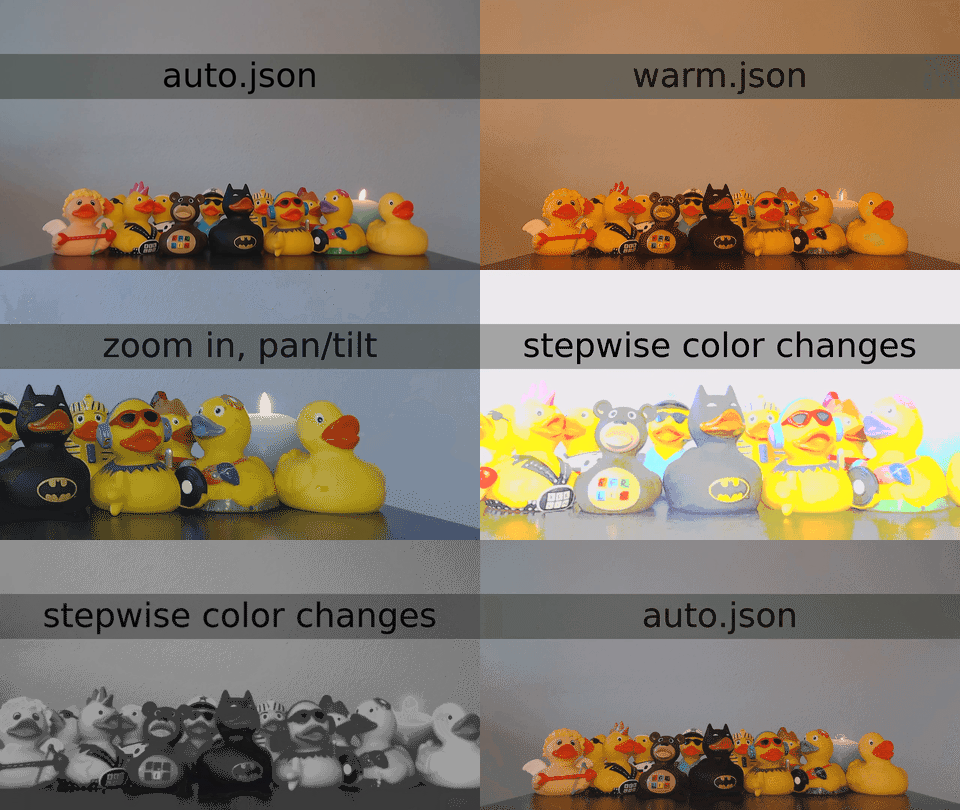
USB Video Class (UVC) device configurator
## Overview
- Fine-tune camera controls on the fly, such as brightness, contrast, saturation, gain, white balance/color temperature, zoom.
- Export/import of settings makes it easy to reliably configure one or more cameras for various situations.
- Command line interface (CLI) with JSON input/output for automation and repeatability.
## Compatible cameras
- [Elgato Facecam](https://www.elgato.com/facecam) ([4057:0120](./examples/elgato-facecam/4057-120/))
- [Logitech C920 HD Pro Webcam](https://www.logitech.com/en-us/products/webcams/c920s-pro-hd-webcam.html) ([1133:2093](./examples/logitech-c920/1133-2093/))
- [Logitech C922 Pro Stream Webcam](https://www.logitech.com/en-us/products/webcams/c922-pro-stream-webcam.html) ([1133:2140](./examples/logitech-c922/1133-2140/))
- [Microsoft LifeCam Studio](https://www.microsoft.com/en-WW/accessories/products/webcams/lifecam-studio) Model 1425 ([1118:1906](./examples/microsoft-1425/1118-1906/), [1118:2065](./examples/microsoft-1425/1118-2065/))
- Hopefully other [UVC-compatible webcams and digital camcorders](https://en.wikipedia.org/wiki/List_of_USB_video_class_devices).
### Do you have another UVC-compatible camera?
- Add it to the [`./examples/`](./examples/).
- Is it not working?
- [Report an issue.](https://github.com/joelpurra/uvcc/issues?q=is%3Aopen)
- [Help fix the source code!](./DEVELOP.md)
## Installation
Requires [Node.js](https://nodejs.org/) (`node` and `npm` commands). Published on npm as [`uvcc`](https://www.npmjs.com/package/uvcc).
```shell
npm install --global uvcc
```
Or use [`npx`](https://www.npmjs.com/package/npx) to execute with `npx uvcc`.
On Linux, you may need to [change device access permissions](./USAGE.md#linux).
## Features
- List available UVC cameras and camera controls.
- Get/set individual camera controls.
- Export/import full JSON control snapshots using `stdout`/`stdin`.
- Per-user/per-directory/custom configuration files to handle multiple cameras.
## Short usage example
First start a program which shows a camera preview, such as Photo Booth on macOS or Cheese on Linux.
```shell
# Display commands and options.
uvcc --help
# Export current configuration. You can save it to a file, modify, and import later.
uvcc export
# Turn off automatic white balance to manually set the white balance.
uvcc set auto_white_balance_temperature 0
# Set the white balance temperature to 2000.
# NOTE: the white_balance_temperature range for Logitech C920 is 2000-6500.
uvcc set white_balance_temperature 2000
# Set the contrast to 192.
# NOTE: the contrast range for Logitech C920 is 0-255, default value 128.
uvcc set contrast 192
```
## See also
- Further help and configuration in [USAGE.md](./USAGE.md).
- The [./examples/](./examples/) directory for some sample output.
- The [CHANGELOG.md](./CHANGELOG.md), in particular for breaking changes.
- Read [DEVELOP.md](./DEVELOP.md) to submit a patch or add your camera output to the examples.
- [USB Video Class](https://en.wikipedia.org/wiki/USB_video_device_class) and [list of USB video class devices](https://en.wikipedia.org/wiki/List_of_USB_video_class_devices) on Wikipedia.
---
[`uvcc`](https://joelpurra.com/projects/uvcc/) Copyright © 2018, 2019, 2020, 2021, 2022 [Joel Purra](https://joelpurra.com/). Released under [GNU General Public License version 3.0 (GPL-3.0)](https://www.gnu.org/licenses/gpl.html). [Your donations are appreciated!](https://joelpurra.com/donate/)
================================================
FILE: USAGE.md
================================================
# [`uvcc`](https://joelpurra.com/projects/uvcc/) usage
By default, the first detected UVC camera will be used. See [configuration](#configuration) to target a specific camera. Note that [many cameras are not UVC-compatible](https://en.wikipedia.org/wiki/List_of_USB_video_class_devices).
```shell
uvcc --help
```
```text
uvcc: USB Video Class (UVC) device configurator for the command line (CLI). Used for webcams, camcorders, etcetera.
Commands:
uvcc get Get current control value.
uvcc set [value2] Set control value(s).
uvcc range Get possible range (min and max) for a control.
uvcc ranges Get all ranges (min and max).
uvcc devices List connected UVC devices.
uvcc controls List all supported controls for the camera.
uvcc export Output configuration in JSON format, on stdout.
uvcc import Input configuration in JSON format, from stdin.
Device selection for multi-camera setups.
Numbers in hex (0x000) or decimal (0000) format.
--vendor Camera vendor id (vId). [number] [default: 0]
--product Camera product id (pId). [number] [default: 0]
--address Camera device address. [number] [default: 0]
Options:
--version Show version number [boolean]
--config Load command arguments from a JSON file.
--verbose Enable verbose output. [boolean] [default: false]
--help Show help [boolean]
Examples:
Basic usage:
uvcc controls Available controls for the camera.
uvcc set auto_white_balance_temperature 0 Turn off automatic color correction.
uvcc set saturation 64 Low color saturation (near grayscale).
uvcc ranges List possible control ranges.
uvcc set absolute_zoom 200 Zoom in.
Automate config:
- Not all controls can be imported.
- Control order matters.
uvcc export > my-uvcc-export.json Save to file.
cat my-uvcc-export.json | uvcc import Load from file.
Target a specific device:
- Only useful for multi-camera setups.
- For same-model cameras, also specify address.
- Alt. use system USB settings to find devices.
uvcc devices List available cameras.
sudo uvcc devices Avoid LIBUSB_ERROR_ACCESS.
uvcc --vendor 0x46d --product 0x82d export
uvcc Copyright © 2018, 2019, 2020, 2021, 2022 Joel Purra
This program comes with ABSOLUTELY NO WARRANTY. This is free software, and you are welcome to redistribute it
under certain conditions. See GPL-3.0 license for details.
See also: https://joelpurra.com/projects/uvcc/
```
## Configuration
The command line arguments can optionally be provided using environment variables, implicit per-user/per-directory configuration files, or explicitly loaded from JSON files.
### Command line
```shell
# Find your UVC device, note the vendor id (vId) and product id (pId).
# The ids can be in hexadecimal (0x000) or decimal (0000) format.
# Example:
# - The vendor is Logitech (hexadecimal 0x46d, or decimal 1133).
# - The product is C920 HD Pro Webcam (hexadecimal 0x82d, or decimal 2093).
# NOTE: listing USB devices might require root (sudo) on some systems.
uvcc devices
# Use the vendor id and product id to export current configuration.
# NOTE: explicitly defining vendor/product is usually not necessary.
uvcc --vendor 0x46d --product 0x82d export
```
### Environment variables
Set `UVCC_`.
```shell
UVCC_VERBOSE=true uvcc controls
```
### Configuration file format
Configuration files for `uvcc` are in JSON format. If you configure the same camera each time, it is convenient to put `vendor` and `product` in the configuration file.
```json
{
"vendor": 1133,
"product": 2093
}
```
### Implicit configuration file
You can put any command line arguments as properties in a JSON file called either `.uvccrc` or `.uvccrc.json`. The file is loaded from the same directory as `uvcc` is executed in, or the nearest parent directory where it can be found. A convenient location might be your `$HOME` directory.
### Explicit configuration file
Instead of passing command line arguments one by one, an explicit configuration file can be used. Explicitly defining a configuration file will prevent loading of the implicit configuration files.
```shell
uvcc --config
```
## Examples
See additional output examples in [./examples/](./examples/).
### Exported configuration
- Save the exported JSON data to a file as a snapshot of the current camera settings using `uvcc export > my-export.json`.
- The export format is made to be imported again using `cat my-export.json | uvcc import`.
- Note that some values are read-only, and are thus not exported.
- Note that the order of the imported values matters, as for example automatic white balance needs to be turned off before setting a custom white balance.
```shell
uvcc export
```
```json
{
"absolute_pan_tilt": 0,
"absolute_zoom": 100,
"auto_exposure_mode": 8,
"auto_exposure_priority": 1,
"auto_focus": 1,
"auto_white_balance_temperature": 1,
"backlight_compensation": 0,
"brightness": 128,
"contrast": 128,
"gain": 28,
"power_line_frequency": 2,
"saturation": 128,
"sharpness": 128,
"white_balance_temperature": 4675
}
```
## System-specific details
### Linux
User access to hardware devices, such as USB cameras, may be restricted by default on Linux. If, for example, `sudo uvcc devices` lists your camera but `uvcc devices` (without `sudo`) does not, then for ease-of-use you may adjust the device access level.
Below [userspace `/dev`](https://en.wikipedia.org/wiki/Udev) (`udev`) is used to change the access level for a specific device model. Note that relaxing the access level in this way reduces device security.
1. Find your camera model's vendor and product id using, for example, [`lsusb`](https://en.wikipedia.org/wiki/Lspci#lsusb).
```shell
lsusb
```
Example output for Logitech (vendor id `046d`) C920 HD Pro Webcam (product id `082d`).
```shell
Bus 005 Device 013: ID 046d:082d Logitech, Inc. HD Pro Webcam C920
```
1. Create a new `udev` rules file for your UVC camera using your favorite text editor.
```shell
sudo nano /etc/udev/rules.d/90-uvc-camera.rules
```
1. Add one line for your device by vendor and product id, replacing `046d` and `082d` with the ids for your camera.
```text
SUBSYSTEM=="usb", ATTRS{idVendor}=="046d", ATTRS{idProduct}=="082d", TAG+="uaccess"
```
If you have more than one camera model, just add more lines.
1. Reload the device rules files after editing, and apply the changes.
```shell
sudo udevadm control --reload-rules
sudo udevadm trigger --action='change'
```
1. Unplug your camera and plug it back in.
1. Try `uvcc devices` (without `sudo`) and check if your camera is listed.
---
[`uvcc`](https://joelpurra.com/projects/uvcc/) Copyright © 2018, 2019, 2020, 2021, 2022 [Joel Purra](https://joelpurra.com/). Released under [GNU General Public License version 3.0 (GPL-3.0)](https://www.gnu.org/licenses/gpl.html). [Your donations are appreciated!](https://joelpurra.com/donate/)
================================================
FILE: examples/README.md
================================================
# [`uvcc`](https://joelpurra.com/projects/uvcc/) output examples
A small sample of `uvcc` camera control output. See individual subdirectories for specific cameras. Note that [cameras with the same "marketing name" may have several USB hardware implementations with different vendor/product ids](https://github.com/joelpurra/uvcc/issues/21), so there may be more than one subdirectory.
## How to add or update the output from your camera
- Open the terminal.
- Create and/or enter the correct camera product marketing name subdirectory.
- The "marketing name" is the product name (usually including a short codename) you would see on the box when you buy a camera.
- Use [kebab-case](https://en.wikipedia.org/wiki/Kebab_case) naming, with vendor name and product code/name.
- Do not use the full "marketing name", such as "Logitech HD Pro Webcam C920".
- Correct examples:
- [`logitech-c920`](./logitech-c920/) from `Logitech HD Pro Webcam C920` (`name` in `uvcc devices`).
- [`logitech-c922`](./logitech-c922/) from the vendor name and `C922 Pro Stream Webcam` (`name` in `uvcc devices`).
- [`microsoft-1425`](./microsoft-1425/) from the vendor name and the model number `1425` found on the label on the camera cable as well as the box the camera was delivered in.
- Create and/or enter the correct vendor/product id subdirectory.
- This is due to [cameras with the same "marketing name" having different USB product ids](https://github.com/joelpurra/uvcc/issues/21), and this possibly having different hardware properties.
- Use the format `-` with decimal number formatting, without leading zero padding.
- You can find the USB `vendor` and `product` ids in the output of `uvcc devices`.
- Correct examples:
- [`logitech-c920/1133-2093`](./logitech-c920/1133-2093/)
- [`logitech-c922/1133-2140`](./logitech-c920/1133-2140/)
- [`microsoft-1425/1118-1906`](./microsoft-1425/1118-1906/)
- [`microsoft-1425/1118-2065`](./microsoft-1425/1118-2065/)
- Reset the camera to default values.
- Unplug all cameras.
- Reconnect only the camera you want to test.
- This done to get "fresh" (hopefully default) values for `uvcc export`.
- Run [`../../update-example.sh`](./update-example.sh)
- Verify that the `*.json` files were created/updated.
- Commit your changes and [submit a pull request](https://github.com/joelpurra/uvcc/compare).
## Is it not working?
Not all cameras are [UVC-compatible](https://en.wikipedia.org/wiki/List_of_USB_video_class_devices). If you can confirm that your camera model supports UVC, perhaps `uvcc` needs some fixes to support it.
- [Report the issue](https://github.com/joelpurra/uvcc/issues?q=is%3Aopen) with as much detail as you can.
- [Fix the source code](../DEVELOP.md) directly, since it is much easier debugging with access to the camera itself.
---
[`uvcc`](https://joelpurra.com/projects/uvcc/) Copyright © 2018, 2019, 2020, 2021, 2022 [Joel Purra](https://joelpurra.com/). Released under [GNU General Public License version 3.0 (GPL-3.0)](https://www.gnu.org/licenses/gpl.html). [Your donations are appreciated!](https://joelpurra.com/donate/)
================================================
FILE: examples/elgato-facecam/4057-120/controls.json
================================================
[
"absolute_exposure_time",
"absolute_zoom",
"auto_exposure_mode",
"auto_white_balance_temperature",
"brightness",
"contrast",
"power_line_frequency",
"saturation",
"sharpness",
"white_balance_temperature"
]
================================================
FILE: examples/elgato-facecam/4057-120/devices.json
================================================
[
{
"name": "Elgato Facecam",
"vendor": 4057,
"product": 120,
"address": 5
}
]
================================================
FILE: examples/elgato-facecam/4057-120/export.json
================================================
{
"absolute_exposure_time": 156,
"absolute_zoom": 1,
"auto_exposure_mode": 2,
"auto_white_balance_temperature": 1,
"brightness": 88,
"contrast": 4,
"power_line_frequency": 2,
"saturation": 37,
"sharpness": 3,
"white_balance_temperature": 2800
}
================================================
FILE: examples/elgato-facecam/4057-120/metadata.json
================================================
{
"node": "v18.12.1",
"npm": "8.19.2",
"uname": "Linux dooderson-ThinkPad-T490 5.15.0-56-generic #62-Ubuntu SMP Tue Nov 22 19:54:14 UTC 2022 x86_64 x86_64 x86_64 GNU/Linux",
"uvcc": "v6.0.0"
}
================================================
FILE: examples/elgato-facecam/4057-120/ranges.json
================================================
{
"absolute_exposure_time": {
"min": 1,
"max": 2500
},
"absolute_zoom": {
"min": 1,
"max": 31
},
"brightness": {
"min": 0,
"max": 255
},
"contrast": {
"min": 0,
"max": 10
},
"saturation": {
"min": 0,
"max": 63
},
"sharpness": {
"min": 0,
"max": 4
},
"white_balance_temperature": {
"min": 2800,
"max": 12500
}
}
================================================
FILE: examples/logitech-c920/1133-2093/controls.json
================================================
[
"absolute_exposure_time",
"absolute_focus",
"absolute_pan_tilt",
"absolute_zoom",
"auto_exposure_mode",
"auto_exposure_priority",
"auto_focus",
"auto_white_balance_temperature",
"backlight_compensation",
"brightness",
"contrast",
"gain",
"power_line_frequency",
"saturation",
"sharpness",
"white_balance_temperature"
]
================================================
FILE: examples/logitech-c920/1133-2093/demo/.gitignore
================================================
recording/
================================================
FILE: examples/logitech-c920/1133-2093/demo/README.md
================================================
# [`uvcc`](https://joelpurra.com/projects/uvcc/) demo recording
Scripted (repeatable) demo recording showcasing `uvcc` capabilities.
- This is a development tool.
- Requires additional software to function.
- Does not have usage documentation.
- The output is intended for the project `README.md`.
- Written specifically for Logitech C920.
- Uses a mix of imported `*.json` files and direct `uvcc set`.
- Not expected to, but might, work with other cameras.
- Rubber ducks?
- The rubber ducks used in the (initial) demo video are used for [rubber duck debugging](https://en.wikipedia.org/wiki/Rubber_duck_debugging).
- They are also mascots for [joelpurra's stream on Twitch](https://www.twitch.tv/joelpurra).
---
[`uvcc`](https://joelpurra.com/projects/uvcc/) Copyright © 2018, 2019, 2020, 2021, 2022 [Joel Purra](https://joelpurra.com/). Released under [GNU General Public License version 3.0 (GPL-3.0)](https://www.gnu.org/licenses/gpl.html). [Your donations are appreciated!](https://joelpurra.com/donate/)
================================================
FILE: examples/logitech-c920/1133-2093/demo/auto.json
================================================
{
"absolute_pan_tilt": [
0,
0
],
"absolute_zoom": 100,
"auto_exposure_mode": 8,
"auto_exposure_priority": 1,
"auto_focus": 1,
"auto_white_balance_temperature": 1,
"brightness": 128,
"contrast": 128,
"gain": 128,
"saturation": 128,
"sharpness": 128
}
================================================
FILE: examples/logitech-c920/1133-2093/demo/cold.json
================================================
{
"auto_white_balance_temperature": 0,
"white_balance_temperature": 2000
}
================================================
FILE: examples/logitech-c920/1133-2093/demo/crazy.json
================================================
{
"absolute_zoom": 500,
"auto_exposure_mode": 1,
"auto_focus": 0,
"auto_white_balance_temperature": 0,
"brightness": 255,
"contrast": 0,
"gain": 255,
"saturation": 255,
"sharpness": 255,
"white_balance_temperature": 2000
}
================================================
FILE: examples/logitech-c920/1133-2093/demo/record-demo.sh
================================================
#!/usr/bin/env bash
set -o errexit
set -o noclobber
set -o nounset
set -o pipefail
function die() {
echo "FATAL:" "$@" >&2
exit 1
}
function changeOverlayTextAsync() {
# NOTE: don't wait for zmqsend, even if it usually is quick.
echo "drawtext reinit 'text=${@}" | zmqsend &
}
[[ -x "$(which node)" ]] || die 'Could not find ffmpeg executable in $PATH.' 'https://nodejs.org/'
[[ -x "$(which ffmpeg)" ]] || die 'Could not find ffmpeg executable in $PATH.' 'https://ffmpeg.org/'
[[ -x "$(which gifski)" ]] || die 'Could not find gifski executable in $PATH.' 'https://gif.ski/'
declare -r SCRIPT_BASE="${BASH_SOURCE%/*}"
declare SCRIPT_BASE_ABSOLUTE
SCRIPT_BASE_ABSOLUTE="$(realpath "$SCRIPT_BASE")"
# NOTE: using the local repository version of uvcc, with any local (even uncommitted) changes.
declare UVCC_INDEX
UVCC_INDEX="$(realpath "${SCRIPT_BASE_ABSOLUTE}/../../../../dist/index.js")"
declare -r UVCC="node -- ${UVCC_INDEX}"
mkdir -p './recording/'
set -x
# NOTE: requires
# - ffmpeg compiled with --enable-libzmq
# - zmqsend from the ffmpeg repository
# http://www.ffmpeg-archive.org/how-to-build-tools-zmqsend-td4686430.html
# https://raspberrypi.stackexchange.com/questions/93786/ffmpeg-doesnt-have-tools-zmqsend
coproc 'RECORDER' {
ffmpeg \
-hide_banner \
-loglevel 'error' \
-f 'v4l2' \
-framerate '24' \
-video_size '1280x720' \
-input_format 'h264' \
-i /dev/video0 \
-ss '2' \
-an \
-sn \
-vf "
zmq='',
scale=sws_flags=spline+accurate_rnd:out_range=tv,
drawbox='y=(ih/5):color=black@0.3:width=iw:height=(ih/6):t=fill',
drawtext='fontsize=(h/8):fontcolor=black:x=((w-tw)/2):y=(h/5)+(h/36):text=auto.json'
" \
-c:v 'libx264' \
-colorspace 'bt709' \
-color_trc 'bt709' \
-color_primaries 'bt709' \
-color_range 'tv' \
-pix_fmt 'yuv420p' \
-f 'mp4' \
-y \
'./recording/uvcc-demo.mp4'
}
# NOTE: setting -ss '2' to skip the first two seconds of video, to let the camera autoadjust to current lighting conditions.
sleep 2
changeOverlayTextAsync 'auto.json'
cat 'auto.json' | $UVCC import
sleep 5
changeOverlayTextAsync 'warm.json'
cat 'warm.json' | $UVCC import
sleep 3
changeOverlayTextAsync 'cold.json'
cat 'cold.json' | $UVCC import
sleep 3
changeOverlayTextAsync 'zoom in, pan/tilt'
$UVCC set absolute_zoom 500
sleep 1
# TODO: could be smoother by adding more steps.
$UVCC set absolute_pan_tilt -18000 -18000
$UVCC set absolute_pan_tilt -36000 -36000
sleep 0.6
$UVCC set absolute_pan_tilt -18000 -36000
$UVCC set absolute_pan_tilt 0 -36000
$UVCC set absolute_pan_tilt 18000 -36000
$UVCC set absolute_pan_tilt 36000 -36000
sleep 0.6
$UVCC set absolute_pan_tilt 18000 -36000
$UVCC set absolute_pan_tilt 0 -36000
sleep 1
changeOverlayTextAsync 'crazy.json'
cat 'crazy.json' | $UVCC import
sleep 4
# TODO: generate the json for these steps and import, instead of individual step commands.
changeOverlayTextAsync 'stepwise color changes'
$UVCC set brightness 200
$UVCC set saturation 200
$UVCC set sharpness 200
$UVCC set gain 200
sleep 0.5
$UVCC set brightness 150
$UVCC set saturation 150
$UVCC set sharpness 150
$UVCC set gain 150
sleep 0.5
$UVCC set brightness 100
$UVCC set saturation 100
$UVCC set sharpness 100
$UVCC set gain 100
sleep 0.5
$UVCC set brightness 50
$UVCC set saturation 50
$UVCC set sharpness 50
# $UVCC set gain 50
sleep 0.5
# $UVCC set brightness 0
$UVCC set saturation 0
$UVCC set sharpness 0
# $UVCC set gain 0
sleep 2
# NOTE: hardcoded range because dynamically the current absolute_zoom value to get a
# starting point isn't really reliable, as it depends on camera image output size.
for absolute_zoom in {150..100};
do
$UVCC set absolute_zoom "$absolute_zoom"
done
# NOTE: the video is made to loop, so going back to auto.json at the end.
changeOverlayTextAsync 'auto.json'
cat 'auto.json' | $UVCC import
sleep 3
# NOTE: emulate ffmpeg "q" (quit) keyboard key press.
echo -n 'q' >& "${RECORDER[1]}"
# NOTE: wait for ffmpeg to finish writing the video.
wait "${RECORDER_PID}"
# https://engineering.giphy.com/how-to-make-gifs-with-ffmpeg/
# https://superuser.com/questions/556029/how-do-i-convert-a-video-to-gif-using-ffmpeg-with-reasonable-quality
# ffmpeg -hide_banner -loglevel 'error' -i './recording/uvcc-demo.mp4' -filter_complex "[0:v] fps=4,scale=480:-2:flags=lanczos,split [a][b];[a] palettegen=stats_mode=diff [p];[b][p] paletteuse" -vsync '0' -loop '0' -y './recording/uvcc-demo.gif'
# https://gif.ski/
find ./recording -iname 'demo-*.png' -delete
ffmpeg -hide_banner -loglevel 'error' -i './recording/uvcc-demo.mp4' -vf "fps='4'" './recording/demo-%04d.png'
find ./recording -iname 'demo-*.png' -print0 | xargs -0 gifski --fps '4' --width '480' --quality '25' --output './recording/uvcc-demo.gif'
================================================
FILE: examples/logitech-c920/1133-2093/demo/warm.json
================================================
{
"auto_white_balance_temperature": 0,
"white_balance_temperature": 6500
}
================================================
FILE: examples/logitech-c920/1133-2093/devices.json
================================================
[
{
"name": "HD Pro Webcam C920",
"vendor": 1133,
"product": 2093,
"address": 66
}
]
================================================
FILE: examples/logitech-c920/1133-2093/export.json
================================================
{
"absolute_exposure_time": 333,
"absolute_focus": 0,
"absolute_pan_tilt": [
0,
0
],
"absolute_zoom": 100,
"auto_exposure_mode": 8,
"auto_exposure_priority": 1,
"auto_focus": 1,
"auto_white_balance_temperature": 1,
"backlight_compensation": 0,
"brightness": 128,
"contrast": 128,
"gain": 97,
"power_line_frequency": 2,
"saturation": 128,
"sharpness": 128,
"white_balance_temperature": 4852
}
================================================
FILE: examples/logitech-c920/1133-2093/metadata.json
================================================
{
"node": "v18.1.0",
"npm": "8.8.0",
"uname": "Linux compendious 5.15.0-27-generic #28-Ubuntu SMP Thu Apr 14 04:55:28 UTC 2022 x86_64 x86_64 x86_64 GNU/Linux",
"uvcc": "v6.0.0"
}
================================================
FILE: examples/logitech-c920/1133-2093/ranges.json
================================================
{
"absolute_exposure_time": {
"min": 3,
"max": 2047
},
"absolute_focus": {
"min": 0,
"max": 250
},
"absolute_pan_tilt": {
"min": [
-36000,
-36000
],
"max": [
36000,
36000
]
},
"absolute_zoom": {
"min": 100,
"max": 500
},
"backlight_compensation": {
"min": 0,
"max": 1
},
"brightness": {
"min": 0,
"max": 255
},
"contrast": {
"min": 0,
"max": 255
},
"gain": {
"min": 0,
"max": 255
},
"saturation": {
"min": 0,
"max": 255
},
"sharpness": {
"min": 0,
"max": 255
},
"white_balance_temperature": {
"min": 2000,
"max": 6500
}
}
================================================
FILE: examples/logitech-c922/1133-2140/controls.json
================================================
[
"absolute_exposure_time",
"absolute_focus",
"absolute_pan_tilt",
"absolute_zoom",
"auto_exposure_mode",
"auto_exposure_priority",
"auto_focus",
"auto_white_balance_temperature",
"backlight_compensation",
"brightness",
"contrast",
"gain",
"power_line_frequency",
"saturation",
"sharpness",
"white_balance_temperature"
]
================================================
FILE: examples/logitech-c922/1133-2140/devices.json
================================================
[
{
"name": "C922 Pro Stream Webcam",
"vendor": 1133,
"product": 2140,
"address": 43
}
]
================================================
FILE: examples/logitech-c922/1133-2140/export.json
================================================
{
"absolute_exposure_time": 250,
"absolute_focus": 0,
"absolute_pan_tilt": [
0,
0
],
"absolute_zoom": 100,
"auto_exposure_mode": 8,
"auto_exposure_priority": 1,
"auto_focus": 1,
"auto_white_balance_temperature": 1,
"backlight_compensation": 0,
"brightness": 128,
"contrast": 128,
"gain": 0,
"power_line_frequency": 2,
"saturation": 128,
"sharpness": 128,
"white_balance_temperature": 4000
}
================================================
FILE: examples/logitech-c922/1133-2140/metadata.json
================================================
{
"node": "v18.1.0",
"npm": "8.8.0",
"uname": "Linux compendious 5.15.0-27-generic #28-Ubuntu SMP Thu Apr 14 04:55:28 UTC 2022 x86_64 x86_64 x86_64 GNU/Linux",
"uvcc": "v6.0.0"
}
================================================
FILE: examples/logitech-c922/1133-2140/ranges.json
================================================
{
"absolute_exposure_time": {
"min": 3,
"max": 2047
},
"absolute_focus": {
"min": 0,
"max": 250
},
"absolute_pan_tilt": {
"min": [
-36000,
-36000
],
"max": [
36000,
36000
]
},
"absolute_zoom": {
"min": 100,
"max": 500
},
"backlight_compensation": {
"min": 0,
"max": 1
},
"brightness": {
"min": 0,
"max": 255
},
"contrast": {
"min": 0,
"max": 255
},
"gain": {
"min": 0,
"max": 255
},
"saturation": {
"min": 0,
"max": 255
},
"sharpness": {
"min": 0,
"max": 255
},
"white_balance_temperature": {
"min": 2000,
"max": 6500
}
}
================================================
FILE: examples/microsoft-1425/1118-1906/controls.json
================================================
[
"absolute_exposure_time",
"absolute_focus",
"absolute_pan_tilt",
"absolute_zoom",
"auto_exposure_mode",
"auto_focus",
"auto_white_balance_temperature",
"backlight_compensation",
"brightness",
"contrast",
"power_line_frequency",
"saturation",
"sharpness",
"white_balance_temperature"
]
================================================
FILE: examples/microsoft-1425/1118-1906/devices.json
================================================
[
{
"name": "Microsoft® LifeCam Studio(TM)",
"vendor": 1118,
"product": 1906,
"address": 28
}
]
================================================
FILE: examples/microsoft-1425/1118-1906/export.json
================================================
{
"absolute_exposure_time": 156,
"absolute_focus": 0,
"absolute_pan_tilt": [
0,
0
],
"absolute_zoom": 0,
"auto_exposure_mode": 8,
"auto_focus": 1,
"auto_white_balance_temperature": 1,
"backlight_compensation": 5,
"brightness": 133,
"contrast": 5,
"power_line_frequency": 2,
"saturation": 103,
"sharpness": 25,
"white_balance_temperature": 4500
}
================================================
FILE: examples/microsoft-1425/1118-1906/metadata.json
================================================
{
"node": "v16.6.0",
"npm": "7.20.3",
"uname": "Darwin MacBook-Pro 20.5.0 Darwin Kernel Version 20.5.0: Sat May 8 05:10:33 PDT 2021; root:xnu-7195.121.3~9/RELEASE_X86_64 x86_64",
"uvcc": "3.0.1"
}
================================================
FILE: examples/microsoft-1425/1118-1906/ranges.json
================================================
{
"absolute_exposure_time": {
"min": 1,
"max": 10000
},
"absolute_focus": {
"min": 0,
"max": 40
},
"absolute_pan_tilt": {
"min": [
-529200,
-432000
],
"max": [
529200,
432000
]
},
"absolute_zoom": {
"min": 0,
"max": 317
},
"backlight_compensation": {
"min": 0,
"max": 10
},
"brightness": {
"min": 30,
"max": 255
},
"contrast": {
"min": 0,
"max": 10
},
"saturation": {
"min": 0,
"max": 200
},
"sharpness": {
"min": 0,
"max": 50
},
"white_balance_temperature": {
"min": 2500,
"max": 10000
}
}
================================================
FILE: examples/microsoft-1425/1118-2065/controls.json
================================================
[
"absolute_exposure_time",
"absolute_focus",
"absolute_pan_tilt",
"absolute_zoom",
"auto_exposure_mode",
"auto_focus",
"auto_white_balance_temperature",
"backlight_compensation",
"brightness",
"contrast",
"power_line_frequency",
"saturation",
"sharpness",
"white_balance_temperature"
]
================================================
FILE: examples/microsoft-1425/1118-2065/devices.json
================================================
[
{
"name": "Microsoft® LifeCam Studio(TM)",
"vendor": 1118,
"product": 2065,
"address": 38
}
]
================================================
FILE: examples/microsoft-1425/1118-2065/export.json
================================================
{
"absolute_exposure_time": 156,
"absolute_focus": 0,
"absolute_pan_tilt": [
0,
0
],
"absolute_zoom": 0,
"auto_exposure_mode": 8,
"auto_focus": 1,
"auto_white_balance_temperature": 1,
"backlight_compensation": 5,
"brightness": 133,
"contrast": 5,
"power_line_frequency": 2,
"saturation": 109,
"sharpness": 25,
"white_balance_temperature": 6358
}
================================================
FILE: examples/microsoft-1425/1118-2065/metadata.json
================================================
{
"node": "v18.1.0",
"npm": "8.8.0",
"uname": "Linux compendious 5.15.0-27-generic #28-Ubuntu SMP Thu Apr 14 04:55:28 UTC 2022 x86_64 x86_64 x86_64 GNU/Linux",
"uvcc": "v6.0.0"
}
================================================
FILE: examples/microsoft-1425/1118-2065/ranges.json
================================================
{
"absolute_exposure_time": {
"min": 1,
"max": 10000
},
"absolute_focus": {
"min": 0,
"max": 40
},
"absolute_pan_tilt": {
"min": [
-529200,
-432000
],
"max": [
529200,
432000
]
},
"absolute_zoom": {
"min": 0,
"max": 317
},
"backlight_compensation": {
"min": 0,
"max": 10
},
"brightness": {
"min": 30,
"max": 255
},
"contrast": {
"min": 0,
"max": 10
},
"saturation": {
"min": 0,
"max": 200
},
"sharpness": {
"min": 0,
"max": 50
},
"white_balance_temperature": {
"min": 2500,
"max": 10000
}
}
================================================
FILE: examples/update-example.sh
================================================
#!/usr/bin/env bash
set -o errexit
set -o noclobber
set -o nounset
set -o pipefail
declare -r SCRIPT_BASE="${BASH_SOURCE%/*}"
declare SCRIPT_BASE_ABSOLUTE
SCRIPT_BASE_ABSOLUTE="$(realpath "$SCRIPT_BASE")"
declare UVCC_INDEX
UVCC_INDEX="$(realpath "${SCRIPT_BASE_ABSOLUTE}/../dist/index.js")"
declare -r UVCC="node -- ${UVCC_INDEX}"
rm -f 'controls.json'
$UVCC controls > 'controls.json'
rm -f 'devices.json'
$UVCC devices > 'devices.json'
rm -f 'export.json'
$UVCC export > 'export.json'
rm -f 'ranges.json'
$UVCC ranges > 'ranges.json'
rm -f 'metadata.json'
jq \
--null-input \
--arg uvcc "$($UVCC --version)" \
--arg node "$(node --version)" \
--arg npm "$(npm --version)" \
--arg uname "$(uname -a)" \
--sort-keys \
'{
uvcc: $uvcc,
node: $node,
npm: $npm,
uname: $uname,
}' > 'metadata.json'
================================================
FILE: package.json
================================================
{
"name": "uvcc",
"version": "7.0.0",
"description": "USB Video Class (UVC) device configurator for the command line (CLI). Used for webcams, camcorders, etcetera.",
"homepage": "https://joelpurra.com/projects/uvcc/",
"type": "module",
"exports": "./dist/index.js",
"types": "./dist/index.d.ts",
"bin": {
"uvcc": "./dist/index.js"
},
"files": [
"dist/**/*"
],
"scripts": {
"clean": "rimraf ./dist/",
"build": "tsc",
"rebuild": "npm run --silent clean && npm run --silent build",
"build:watch": "tsc --watch",
"debug:run": "node --inspect ./dist/index.js",
"debug:run:break": "node --inspect-brk ./dist/index.js",
"test": "npm run --silent lint",
"lint": "npm run --silent lint:xo && npm run --silent lint:prettier && npm run --silent lint:copyright",
"lint:fix": "npm run --silent lint:xo:fix && npm run --silent lint:prettier:fix",
"lint:copyright": "find . -not \\( -path './.git/*' -or -path './node_modules/*' -or -path './dist/*' \\) -type f \\( -iname '*.js' -or -iname '*.ts' \\) -print0 | xargs -0 grep -L 'This file is part of uvcc' | sed 's/^/File is missing copyright notice: /'",
"lint:prettier": "prettier --list-different \"**/*.json\" \"**/*.md\" || { echo \"Prettier needs to format the above files. Try 'npm run --silent lint:fix'.\" && exit 1; }",
"lint:prettier:fix": "prettier --write \"**/*.json\" \"**/*.md\"",
"lint:xo": "xo",
"lint:xo:fix": "xo --fix",
"prepublishOnly": "git diff-index --exit-code master && npm run --silent rebuild && npm run --silent test"
},
"dependencies": {
"array-non-uniq": "^1.0.0",
"bluebird": "^3.7.2",
"chalk": "^5.2.0",
"engine-check": "^1.0.1",
"filter-obj": "^3.0.0",
"find-up": "^6.3.0",
"map-obj": "^5.0.2",
"read-pkg-up": "^9.1.0",
"sort-keys": "^5.0.0",
"stream-to-promise": "^3.0.0",
"uvc-control": "github:joelpurra/node-uvc-control#v2",
"yargs": "^17.7.1"
},
"devDependencies": {
"@sindresorhus/tsconfig": "^2.0.0",
"@types/bluebird": "^3.5.38",
"@types/engine-check": "^1.1.1",
"@types/stream-to-promise": "^2.2.1",
"@types/yargs": "^17.0.22",
"eslint-config-joelpurra": "github:joelpurra/eslint-config-joelpurra#semver:^v11.0.1",
"husky": "^4.3.8",
"rimraf": "^3.0.2",
"type-fest": "^2.19.0",
"typescript": "^4.9.5",
"usb": "^2.8.0",
"xo": "^0.48.0"
},
"engines": {
"node": "^16.0.0 || ^18.0.0 || ^19.0.0 || ^20.0.0"
},
"keywords": [
"usb",
"usb video class",
"uvc",
"camera",
"webcam",
"webcamera",
"controls",
"configuration",
"libusb",
"libuvc",
"uvc-control"
],
"bugs": {
"url": "https://github.com/joelpurra/uvcc/issues"
},
"repository": {
"type": "git",
"url": "git+https://github.com/joelpurra/uvcc.git"
},
"author": {
"name": "Joel Purra",
"email": "mig@joelpurra.se",
"url": "https://joelpurra.com/"
},
"license": "GPL-3.0",
"husky": {
"hooks": {
"pre-commit": "npm run --silent test",
"pre-push": "npm run --silent test"
}
}
}
================================================
FILE: src/camera-control-helper-factory.ts
================================================
/*
This file is part of uvcc -- USB Video Class (UVC) device configurator.
Copyright (C) 2018, 2019, 2020, 2021, 2022 Joel Purra
This program is free software: you can redistribute it and/or modify
it under the terms of the GNU General Public License as published by
the Free Software Foundation, either version 3 of the License, or
(at your option) any later version.
This program is distributed in the hope that it will be useful,
but WITHOUT ANY WARRANTY; without even the implied warranty of
MERCHANTABILITY or FITNESS FOR A PARTICULAR PURPOSE. See the
GNU General Public License for more details.
You should have received a copy of the GNU General Public License
along with this program. If not, see .
*/
import assert from "node:assert";
import {
ReadonlyDeep,
} from "type-fest";
import Camera, {
UvcControl,
} from "uvc-control";
import CameraControlHelperClass from "./camera-control-helper.js";
export default class CameraControlHelperFactory {
constructor(
// eslint-disable-next-line @typescript-eslint/naming-convention
private readonly UvcControl: ReadonlyDeep,
// eslint-disable-next-line @typescript-eslint/naming-convention
private readonly CameraControlHelper: typeof CameraControlHelperClass,
) {
assert.strictEqual(arguments.length, 2);
assert(typeof this.UvcControl === "function");
assert(typeof this.CameraControlHelper === "function");
}
async get(camera: ReadonlyDeep): Promise {
assert.strictEqual(arguments.length, 1);
assert(typeof camera === "object");
const cameraControlHelper = new this.CameraControlHelper(this.UvcControl, camera);
return cameraControlHelper;
}
}
================================================
FILE: src/camera-control-helper.ts
================================================
/*
This file is part of uvcc -- USB Video Class (UVC) device configurator.
Copyright (C) 2018, 2019, 2020, 2021, 2022 Joel Purra
This program is free software: you can redistribute it and/or modify
it under the terms of the GNU General Public License as published by
the Free Software Foundation, either version 3 of the License, or
(at your option) any later version.
This program is distributed in the hope that it will be useful,
but WITHOUT ANY WARRANTY; without even the implied warranty of
MERCHANTABILITY or FITNESS FOR A PARTICULAR PURPOSE. See the
GNU General Public License for more details.
You should have received a copy of the GNU General Public License
along with this program. If not, see .
*/
import arrayNonUniq from "array-non-uniq";
import filterObject from "filter-obj";
import assert from "node:assert";
import sortKeys from "sort-keys";
import {
ReadonlyDeep,
} from "type-fest";
import Camera,
{
CameraControl,
UvcControl,
} from "uvc-control";
import WrappedError from "./utilities/wrapped-error.js";
interface ControlFlags {
readonly isGettable: boolean;
readonly isRanged: boolean;
readonly isSettable: boolean;
}
type ControlsFlags = Record;
export default class CameraControlHelper {
private cachedMappedSupportedControls: ReadonlyDeep | null = null;
constructor(
// eslint-disable-next-line @typescript-eslint/naming-convention
private readonly UvcControl: ReadonlyDeep,
private readonly camera: ReadonlyDeep,
) {
assert.strictEqual(arguments.length, 2);
assert(typeof this.UvcControl === "function");
assert(typeof this.camera === "object");
}
async getControlNames(): Promise {
const controls = await this.getSupportedControls();
return Object.keys(controls);
}
async getGettableControlNames(): Promise {
const gettableControls = await this.getGettableControls();
return Object.keys(gettableControls);
}
async getRangedControlNames(): Promise {
const rangedControls = await this.getRangedControls();
return Object.keys(rangedControls);
}
async getSettableControlNames(): Promise {
const settableControls = await this.getSettableControls();
return Object.keys(settableControls);
}
private isGettableControl(control: ReadonlyDeep) {
// NOTE: relies on uvc-control internals.
return control.requests.includes(this.UvcControl.REQUEST.GET_CUR);
}
private isRangedControl(control: ReadonlyDeep) {
// NOTE: relies on uvc-control internals.
return control.requests.includes(this.UvcControl.REQUEST.GET_MIN)
&& control.requests.includes(this.UvcControl.REQUEST.GET_MAX);
}
private isSettableControl(control: ReadonlyDeep) {
// NOTE: relies on uvc-control internals.
return control.requests.includes(this.UvcControl.REQUEST.SET_CUR)
|| (
// TODO: treat optionally settable controls separately?
Array.isArray(control.optional_requests)
&& control.optional_requests.includes(this.UvcControl.REQUEST.SET_CUR)
);
}
private async mapSupportedControls() {
const supportedControls = this.camera.supportedControls
.map((supportedControlName) => this.UvcControl.controls[supportedControlName])
// TODO: proper ducktyping function.
.filter((t): t is CameraControl => Boolean(t));
const missingControls = supportedControls.filter((control) => !control);
if (missingControls.length > 0) {
throw new Error(`Controls were not found: ${JSON.stringify(missingControls)}`);
}
const nonUniqueControls = arrayNonUniq(supportedControls);
if (nonUniqueControls.length > 0) {
throw new Error(`Controls were already found: ${JSON.stringify(nonUniqueControls)}`);
}
const mappedControls = supportedControls.map((control) => {
try {
const uvccControl: [string, ControlFlags] = [
control.name,
{
// NOTE: minimal uvcc-specific mapping.
isGettable: this.isGettableControl(control),
isRanged: this.isRangedControl(control),
isSettable: this.isSettableControl(control),
},
];
return uvccControl;
} catch (error: unknown) {
if (error instanceof Error) {
const wrappedError = new WrappedError(error, `Could not map control: ${JSON.stringify(control.name)}`);
throw wrappedError;
}
throw error;
}
});
const controlsObject: ControlsFlags = {};
for (const mappedControl of mappedControls) {
controlsObject[mappedControl[0]] = mappedControl[1];
}
const sortedControls = sortKeys(controlsObject);
return sortedControls;
}
private async getSupportedControls() {
if (this.cachedMappedSupportedControls === null) {
this.cachedMappedSupportedControls = await this.mapSupportedControls();
}
return this.cachedMappedSupportedControls;
}
private async getGettableControls() {
const controls = await this.getSupportedControls();
return filterObject(controls, (_key, control) => control.isGettable);
}
private async getRangedControls() {
const controls = await this.getSupportedControls();
return filterObject(controls, (_key, control) => control.isRanged);
}
private async getSettableControls() {
const controls = await this.getSupportedControls();
return filterObject(controls, (_key, control) => control.isSettable);
}
}
================================================
FILE: src/camera-factory.ts
================================================
/*
This file is part of uvcc -- USB Video Class (UVC) device configurator.
Copyright (C) 2018, 2019, 2020, 2021, 2022 Joel Purra
This program is free software: you can redistribute it and/or modify
it under the terms of the GNU General Public License as published by
the Free Software Foundation, either version 3 of the License, or
(at your option) any later version.
This program is distributed in the hope that it will be useful,
but WITHOUT ANY WARRANTY; without even the implied warranty of
MERCHANTABILITY or FITNESS FOR A PARTICULAR PURPOSE. See the
GNU General Public License for more details.
You should have received a copy of the GNU General Public License
along with this program. If not, see .
*/
import assert from "node:assert";
import {
ReadonlyDeep,
} from "type-fest";
import Camera, {
ConstructorOptions,
UvcControl,
} from "uvc-control";
import Output from "./output.js";
import toFormattedHex from "./utilities/to-formatted-hex.js";
import WrappedError from "./utilities/wrapped-error.js";
interface GetFunctionArguments {
address: number | null;
product: number | null;
vendor: number | null;
}
export default class CameraFactory {
constructor(
private readonly output: Output,
// eslint-disable-next-line @typescript-eslint/naming-convention
private readonly UvcControl: UvcControl,
) {
assert.strictEqual(arguments.length, 2);
assert(typeof this.UvcControl === "function");
}
async get(vendor: number | null, product: number | null, address: number | null): Promise {
assert.strictEqual(arguments.length, 3);
assert(vendor === null || (typeof vendor === "number" && vendor >= 0));
assert(product === null || (typeof product === "number" && product >= 0));
assert(address === null || (typeof address === "number" && address >= 0));
const constructorOptions: ConstructorOptions = {
// eslint-disable-next-line @typescript-eslint/prefer-nullish-coalescing
deviceAddress: address || undefined,
// eslint-disable-next-line @typescript-eslint/prefer-nullish-coalescing
pid: product || undefined,
// eslint-disable-next-line @typescript-eslint/prefer-nullish-coalescing
vid: vendor || undefined,
};
try {
const camera = new this.UvcControl(constructorOptions);
if (vendor && vendor !== camera.device.deviceDescriptor.idVendor) {
this.output.warning("Camera vendor id mismatch.", "Input", vendor, `(${toFormattedHex(vendor, 4)})`, "Actual", camera.device.deviceDescriptor.idVendor, `(${toFormattedHex(camera.device.deviceDescriptor.idVendor, 4)})`);
}
if (product && product !== camera.device.deviceDescriptor.idProduct) {
this.output.warning("Camera product id mismatch.", "Input", product, `(${toFormattedHex(product, 4)})`, "Actual", camera.device.deviceDescriptor.idProduct, `(${toFormattedHex(camera.device.deviceDescriptor.idProduct, 4)})`);
}
if (address && address !== camera.device.deviceAddress) {
this.output.warning("Camera device address mismatch.", "Input", address, `(${toFormattedHex(address, 1)})`, "Actual", camera.device.deviceAddress, `(${toFormattedHex(camera.device.deviceAddress, 1)})`);
}
return camera;
} catch (error: unknown) {
if (error instanceof Error) {
// NOTE: basically a duplicate of both the arguments to this function and to the uvc-control constructor.
const getFunctionArguments: GetFunctionArguments = {
address,
product,
vendor,
};
const wrappedError = this.createWrappedError(error, getFunctionArguments, constructorOptions);
throw wrappedError;
}
throw error;
}
}
private createWrappedError(error: ReadonlyDeep, getFunctionArguments: ReadonlyDeep, constructorOptions: ReadonlyDeep) {
let errorMessage = null;
// NOTE: relies on uvc-control internals.
// NOTE: may rely on user locale.
const guessThatUvcDeviceWasNotFound = typeof error.name === "string"
&& error.name === "TypeError"
&& typeof error.message === "string"
&& (
// NOTE: message formatting differs across versions; could use a regular expression instead.
error.message === "Cannot read property 'interfaces' of undefined"
|| error.message === "Cannot read properties of undefined (reading 'interfaces')"
);
errorMessage = guessThatUvcDeviceWasNotFound ? `Could not find UVC device. Is a compatible camera connected? ${JSON.stringify(getFunctionArguments)}` : `Could create uvc-control object: ${JSON.stringify(constructorOptions)}`;
errorMessage += ` (${JSON.stringify(String(error))})`;
const wrappedError = new WrappedError(error, errorMessage);
return wrappedError;
}
}
================================================
FILE: src/camera-helper-factory.ts
================================================
/*
This file is part of uvcc -- USB Video Class (UVC) device configurator.
Copyright (C) 2018, 2019, 2020, 2021, 2022 Joel Purra
This program is free software: you can redistribute it and/or modify
it under the terms of the GNU General Public License as published by
the Free Software Foundation, either version 3 of the License, or
(at your option) any later version.
This program is distributed in the hope that it will be useful,
but WITHOUT ANY WARRANTY; without even the implied warranty of
MERCHANTABILITY or FITNESS FOR A PARTICULAR PURPOSE. See the
GNU General Public License for more details.
You should have received a copy of the GNU General Public License
along with this program. If not, see .
*/
import assert from "node:assert";
import {
ReadonlyDeep,
} from "type-fest";
import Camera from "uvc-control";
import CameraControlHelperFactory from "./camera-control-helper-factory.js";
import CameraHelperClass from "./camera-helper.js";
import Output from "./output.js";
export default class CameraHelperFactory {
constructor(
private readonly output: ReadonlyDeep