.js and execute it.
* Only direct children are lazy-loaded, and only on initial DOM insert.
*
* Pass the root attribute to modify the path to load relative to the current document.
*
* Loading...
*
* While it loads it shows the fallback:
*
*
*
* @license MIT
*/
export class Suspense extends HTMLElement {
/**
* Find the nearest suspense to the sender element and make it wait for the promises to complete.
* @param {*} sender The element that sends the promise
* @param {...Promise} promises
*/
static waitFor(sender, ...promises) {
const suspense = sender.closest('x-suspense');
if (suspense) suspense.addPromises(...promises);
}
#fallbackSlot;
#contentSlot;
#waitingForPromise;
set #loading(isLoading) {
if (!this.#fallbackSlot) return;
this.#fallbackSlot.style.display = isLoading ? 'contents' : 'none';
this.#contentSlot.style.display = !isLoading ? 'contents' : 'none';
}
constructor() {
super();
this.attachShadow({ mode: 'open' });
this.#fallbackSlot = document.createElement('slot');
this.#fallbackSlot.style.display = 'none';
this.#fallbackSlot.name = 'fallback';
this.#contentSlot = document.createElement('slot');
this.shadowRoot.append(this.#fallbackSlot, this.#contentSlot);
}
connectedCallback() {
this.style.display = 'contents';
}
/**
* Wait for one or more promises to settle, showing fallback content
* @param {...Promise} promises
*/
addPromises(...promises) {
if (!promises.length) return;
this.#loading = true;
// combine into previous promises if there are any
const newPromise = this.#waitingForPromise =
Promise.allSettled([...promises, this.#waitingForPromise]);
// wait for all promises to complete
newPromise.then(settled => {
// if no more promises were added, we're done
if (newPromise === this.#waitingForPromise) {
this.#loading = false;
// if a promise failed, show an error
const failed = settled.find(_ => _.status === 'rejected');
if (failed) ErrorBoundary.showError(this, failed.reason);
}
});
}
}
export const registerSuspense = () => customElements.define('x-suspense', Suspense);
================================================
FILE: public/blog/articles/2024-09-09-sweet-suspense/example/index.html
================================================
Lazy, Suspense and Error Boundary example
Lazy loading demo
Load lazy
Reset error
`;
const resetBtn = this.querySelector('button#error-reset')
resetBtn.onclick = () => {
this.querySelector('x-error-boundary').reset();
resetBtn.setAttribute('disabled', true);
};
const loadBtn = this.querySelector('button#lazy-load');
loadBtn.onclick = () => {
this.querySelector('div#lazy-load-div').innerHTML = `
Loading...
`
this.querySelector('x-error-boundary').addEventListener('error', _ => {
resetBtn.removeAttribute('disabled');
});
loadBtn.setAttribute('disabled', true);
};
}
});
================================================
FILE: public/blog/articles/2024-09-09-sweet-suspense/index.html
================================================
Sweet Suspense
Sweet Suspense
Joeri Sebrechts
I was reading Addy Osmani and Hassan Djirdeh's book Building Large Scale Web Apps .
(Which, by the way, I can definitely recommend.) In it they cover all the ways to make a React app sing at scale.
The chapter on Modularity was especially interesting to me, because JavaScript modules
are a common approach to modularity in both React and vanilla web code.
In that chapter on Modularity there was one particular topic that caught my eye,
and it was the use of lazy() and Suspense, paired with an ErrorBoundary.
These are the primitives that React gives us to asynchronously load UI components and their data on-demand while showing a fallback UI,
and replace the UI with an error message when something goes wrong.
If you're not familiar, here's a good overview page .
It was at that time that I was visited by the imp of the perverse, which posed to me a simple challenge:
can you bring React's lazy loading primitives to vanilla web components?
To be clear, there are many
ways to
load web components
lazily .
This is well-trodden territory. What wasn't out there was a straight port of lazy, suspense and error boundary.
The idea would not let me go. So here goes nothing.
Lazy
The idea and execution of React's lazy is simple. Whenever you want to use a component in your code,
but you don't want to actually fetch its code yet until it needs to be rendered, wrap it using the lazy() function:const MarkdownPreview = lazy(() => import('./MarkdownPreview.js'));
React will automatically "suspend" rendering when it first bumps into this lazy component until the component has loaded, and then continue automatically.
This works in React because the markup of a component only looks like HTML,
but is actually JavaScript in disguise, better known as JSX .
With web components however, the markup that the component is used in is actually HTML,
where there is no import() and no calling of functions.
That means our vanilla lazy cannot be a JavaScript function, but instead it must be an HTML custom element:<x-lazy><x-hello-world></x-hello-world></x-lazy>
The basic setup is simple, when the lazy component is added to the DOM,
we'll scan for children that have a '-' in the name and therefore are custom elements,
see if they're not yet defined, and load and define them if so.
By using display: contents we can avoid having the <x-lazy> impact layout.
To actually load the element, we'll have to first find the JS file to import, and then run its register function.
By having the function that calls customElements.define as the default export by convention the problem is reduced to finding the path to the JS file.
The following code uses a heuristic that assumes components are in a ./components/ subfolder of the current document
and follow a consistent file naming scheme:
One could get a lot more creative however, and for example use an
import map
to map module names to files. This I leave as an exercise for the reader.
Suspense
While the lazy component is loading, we can't show it yet. This is true for custom elements just as much as for React.
That means we need a wrapper component that will show a fallback UI as long as any components in its subtree are loading,
the <x-suspense> component. This starts out as a tale of two slots. When the suspense element is loading it shows the fallback, otherwise the content.
The trick now is, how to we get loading = true to happen?
In Plain Vanilla's applications page I showed how a React context can be simulated using the element.closest() API.
We can use the same mechanism to create a generic API that will let our suspense wait on a promise to complete.
Suspense.waitFor will call the nearest ancestor <x-suspense>
to a given element, and give it a set of promises that it should wait on.
This API can then be called from our <x-lazy> component.
Note that #loadElement returns a promise that completes when the custom element is loaded or fails to load.
The nice thing about the promise-based approach is that we can give it any promise, just like we would with React's suspense.
For example, when loading data in a custom element that is in the suspense's subtree, we can call the exact same API:Suspense.waitFor(this, fetch(url).then(...))
Error boundary
Up to this point, we've been assuming everything always works. This is Spartasoftware, it will never "always work".
What we need is a graceful way to intercept failed promises that are monitored by the suspense,
and show an error message instead. That is the role that React's error boundary plays.
The approach is similar to suspense:
And the code is also quite similar to suspense:
Similar to suspense, this has an API ErrorBoundary.showError() that can be called
from anywhere inside the error boundary's subtree to show an error that occurs.
The suspense component is then modified to call this API when it bumps into a rejected promise.
To hide the error, the reset() method can be called on the error boundary element.
Finally, the error setter will set the error as a property or attribute
on all children in the error slot, which enables customizing the error message's behavior based on the error object's properties
by creating a custom <x-error-message> component.
Conclusion
Finally, we can bring all of this together in a single example,
that combines lazy, suspense, error boundary, a customized error message, and a lazy-loaded hello-world component.
For the complete example's code, as well as the lazy, suspense and error-boundary components,
check out the sweet-suspense repo on Github .
Loading...
================================================
FILE: public/blog/articles/2024-09-09-sweet-suspense/suspense1.js
================================================
export class Suspense extends HTMLElement {
#fallbackSlot;
#contentSlot;
set loading(isLoading) {
if (!this.#fallbackSlot) return;
this.#fallbackSlot.style.display = isLoading ? 'contents' : 'none';
this.#contentSlot.style.display = !isLoading ? 'contents' : 'none';
}
constructor() {
super();
this.attachShadow({ mode: 'open' });
this.#fallbackSlot = document.createElement('slot');
this.#fallbackSlot.style.display = 'none';
this.#fallbackSlot.name = 'fallback';
this.#contentSlot = document.createElement('slot');
this.shadowRoot.append(this.#fallbackSlot, this.#contentSlot);
}
connectedCallback() {
this.style.display = 'contents';
}
}
customElements.define('x-suspense', Suspense);
================================================
FILE: public/blog/articles/2024-09-09-sweet-suspense/suspense2-partial.js
================================================
static waitFor(sender, ...promises) {
const suspense = sender.closest('x-suspense');
if (suspense) suspense.addPromises(...promises);
}
addPromises(...promises) {
if (!promises.length) return;
this.loading = true;
// combine into previous promises if there are any
const newPromise = this.#waitingForPromise =
Promise.allSettled([...promises, this.#waitingForPromise]);
// wait for all promises to complete
newPromise.then(_ => {
// if no newer promises were added, we're done
if (newPromise === this.#waitingForPromise) {
this.loading = false;
}
});
}
================================================
FILE: public/blog/articles/2024-09-16-life-and-times-of-a-custom-element/defined/example.html
================================================
defining the custom element
Custom element:
Define
Reload
================================================
FILE: public/blog/articles/2024-09-16-life-and-times-of-a-custom-element/defined2/example.html
================================================
defined custom elements
Static element:
Dynamic element:
Define
Create
Upgrade
Connect
Disconnect
Delete
Reload
Dynamic element (in-memory)
Reactions:
================================================
FILE: public/blog/articles/2024-09-16-life-and-times-of-a-custom-element/index.html
================================================
The life and times of a web component
The life and times of a web component
Joeri Sebrechts
When first taught about the wave-particle duality of light most people's brains does a double take.
How can light be two different categories of things at the same time, both a wave and a particle? That's just weird.
The same thing happens with web components, confusing people when they first try to learn them and run into their Document-JavaScript duality.
The component systems in frameworks are typically JavaScript-first, only using the DOM as an outlet for their visual appearance.
Web components however — or custom elements to be precise — can start out in either JavaScript or the document, and are married to neither.
Just the DOM please
Do you want to see the minimal JavaScript code needed to set up an <x-example> custom element?
Here it is:
No, that's not a typo. Custom elements can be used just fine without any JavaScript.
Consider this example of an <x-tooltip> custom element that is HTML and CSS only:
For the curious, here is the example.css , but it is not important here.
Such elements are called undefined custom elements .
Before custom elements are defined in the window by calling customElements.define() they always start out in this state.
There is no need to actually define the custom element if it can be solved in a pure CSS way.
In fact, many "pure CSS" components found online can be solved by such custom elements,
by styling the element itself and its ::before and ::after pseudo-elements.
A question of definition
The CSS-only representation of the custom element can be progressively enhanced by connecting it up to a JavaScript counterpart,
a custom element class. This is a class that inherits from HTMLElement and allows the custom element
to implement its own logic.
What happens to the elements already in the markup at the moment customElements.define()
is called is an element upgrade . The browser will take all custom elements already in the document,
and create an instance of the matching custom element class that it connects them to.
This class enables the element to control its own part of the DOM, but also allows it to react to what happens in the DOM.
Element upgrades occur for existing custom elements in the document when customElements.define() is called,
and for all new custom elements with that tag name created afterwards (e.g. using document.createElement('x-example')).
It does not occur automatically for detached custom elements (not part of the document) that were created before the element was defined.
Those can be upgraded retroactively by calling customElements.upgrade().
So far, this is the part of the lifecycle we've seen:
<undefined>
    -> define() -> <defined>
    -> automatic upgrade()
                -> constructor()
                -> <constructed>
The constructor as shown in the example above is optional, but if it is specified then it has a number of gotcha's :
It must start with a call to super().
It should not make DOM changes yet, as the element is not yet guaranteed to be connected to the DOM.
This includes reading or modifying its own DOM properties, like its attributes.
The tricky part is that in the constructor the element might already be in the DOM,
so setting attributes might work. Or it might give an error. It's best to avoid DOM interaction altogether in the constructor.
It should initialize its state, like class properties
But work done in the constructor should be minimized and maximally postponed until connectedCallback.
Making connections
After being constructed, if the element was already in the document, its connectedCallback() handler is called.
This handler is normally called only when the element is inserted into the document, but for elements that are already in the document when they are defined it ends up being called as well.
In this handler DOM changes can be made, and in the example above the status attribute is set to demonstrate this.
The connectedCallback() handler is part of what is known in the HTML standard as custom element reactions :
These reactions allow the element to respond to various changes to the DOM:
connectedCallback() is called when the element is inserted into the document, even if it was only moved from a different place in the same document.disconnectedCallback() is called when the element is removed from the document.adoptedCallback() is called when the element is moved to a new document. (You are unlikely to need this in practice.)attributeChangedCallback() is called when an attribute is changed, but only for the attributes listed in its observedAttributes property.
There are also special reactions for form-associated custom elements ,
but those are a rabbit hole beyond the purview of this blog post.
There are more gotcha's to these reactions:
connectedCallback() and disconnectedCallback() can be called multiple times
This can occur when the element is moved around in the document.
These handlers should be written in such a way that it is harmless to run them multiple times,
e.g. by doing an early exit when it is detected that connectedCallback() was already run.
attributeChangedCallback() can be called before connectedCallback()
For all attributes already set when the element in the document is upgraded,
the attributeChangedCallback() handler will be called first,
and only after this connectedCallback() is called.
The unpleasant consequence is that any attributeChangedCallback that tries to update DOM structures
created in connectedCallback can produce errors.
attributeChangedCallback() is only called for attribute changes, not property changes.
Attribute changes can be done in Javascript by calling element.setAttribute('name', 'value').
DOM attributes and class properties can have the same name, but are not automatically linked.
Generally for this reason it is better to avoid having attributes and properties with the same name.
The lifecycle covered up to this point for elements that start out in the initial document:
<undefined>
    -> define() -> <defined>
    -> automatic upgrade()
                -> [element].constructor()
                -> [element].attributeChangedCallback()
                -> [element].connectedCallback()
                -> <connected>
Flip the script
So far we've covered one half of the Document-JavaScript duality, for custom elements starting out in the document,
and only after that becoming defined and gaining a JavaScript counterpart.
It is however also possible to reverse the flow, and start out from JavaScript.
This is the minimal code to create a custom element in JavaScript: document.createElement('x-example').
The element does not need to be defined in order to run this code, although it can be, and the resulting node can be inserted into the document
as if it was part of the original HTML markup.
If it is inserted, and after insertion the element becomes defined, then it will behave as described above.
Things are however different if the element remains detached:
The detached element will not be automatically upgraded when it is defined.
The constructor or reactions will not be called. It will be automatically upgraded when it is inserted into the document.
It can also be upgraded explicitly by calling customElements.upgrade().
If the detached element is already defined when it is created, it will be upgraded automatically.
The constructor() and attributeChangedCallback() will be called. Because it is not yet part of the document connectedCallback() won't be.
By now no doubt you are a bit confused. Here's an interactive playground that lets you test
what happens to elements as they go through their lifecycle, both for those in the initial document and those created dynamically.
Here are some interesting things to try out:
Create , then Define , and you will see that the created element is not upgraded automatically because it is detached from the document.Create , then Connect , then Define , and you will see that the element is upgraded automatically because it is in the document.Define , then Create , and you will see that the element is upgraded as soon as it is created (constructed appears in the reactions).
I tried writing a flowchart of all possible paths through the lifecycle that can be seen in this example,
but it got so unwieldy that I think it's better to just play around with the example until a solid grasp develops.
In the shadows
Adding shadow DOM creates yet another wrinkle in the lifecycle.
At any point in the element's JavaScript half, including in its constructor, a shadow DOM can be attached to the element by calling attachShadow().
Because the shadow DOM is immediately available for DOM operations, that makes it possible to do those DOM operations in the constructor.
In this next interactive example you can see what happens when the shadow DOM becomes attached.
The x-shadowed element will immediately attach a shadow DOM in its constructor,
which happens when the element is upgraded automatically after defining.
The x-shadowed-later element postpones adding a shadow DOM until a link is clicked,
so the element first starts out as a non-shadowed custom element, and adds a shadow DOM later.
While adding a shadow DOM can be done at any point, it is a one-way operation.
Once added the shadow DOM will replace the element's original contents, and this cannot be undone.
Keeping an eye out
So far we've mostly been dealing with initial setup of the custom element,
but a major part of the lifecycle is responding to changes as they occur.
Here are some of the major ways that custom elements can respond to DOM changes:
connectedCallback and disconnectedCallback to handle DOM insert and remove of the element itself.attributeChangedCallback to handle attribute changes of the element.For shadowed custom elements, the slotchange event can be used to detect when children are added and removed in a <slot>.
Saving the best for last, MutationObserver can be used to monitor DOM subtree changes, as well as attribute changes.
MutationObserver in particular is worth exploring, because it is a swiss army knife for monitoring the DOM.
Here's an example of a counter that automatically updates when new child elements are added:
There is still more to tell, but already I can feel eyes glazing over and brains turning to mush,
so I will keep the rest for another day.
Phew, that was a much longer story than I originally set out to write, but custom elements have surprising intricacy.
I hope you found it useful, and if not at least you got to see some code and click some buttons.
It's all about the clicking of the buttons.
custom element with observer
Add one more
Reload
================================================
FILE: public/blog/articles/2024-09-16-life-and-times-of-a-custom-element/shadowed/example.html
================================================
shadowed custom element
<x-shadowed>: undefined, not shadowed
<x-shadowed-later>: undefined, not shadowed
Define
Reload
================================================
FILE: public/blog/articles/2024-09-16-life-and-times-of-a-custom-element/undefined/example.css
================================================
body { font-family: system-ui, sans-serif; margin: 1em; }
button { user-select: none; }
/* based on https://github.com/argyleink/gui-challenges/blob/main/tooltips/tool-tip.css */
x-tooltip {
--color: lightgray;
--bg: hsl(0 0% 20%);
pointer-events: none;
user-select: none;
/* animate in on hover or focus of parent element */
z-index: 1;
opacity: 0;
transition: opacity .2s ease;
transition-delay: 200ms;
:is(:hover, :focus-visible, :active) > & {
opacity: 1;
}
/* vertically center and move to the right */
position:absolute;
top:50%;
transform:translateY(-50%);
left: calc(100% + 15px);
padding: 0.5em;
inline-size: max-content;
max-inline-size: 25ch;
/* color, backdrop and shadow */
color: var(--color);
filter:
drop-shadow(0 3px 3px hsl(0 0% 0% / 50%))
drop-shadow(0 12px 12px hsl(0 0% 0% / 50%));
&::after {
content: "";
background: var(--bg);
position: absolute;
z-index: -1;
left: 0;
top: 50%;
transform:translateY(-50%);
width: 100%;
height: 100%;
border-radius: 5px;
}
/* fix drop shadow in safari */
will-change: filter;
}
button:has(> x-tooltip) {
position: relative;
}
================================================
FILE: public/blog/articles/2024-09-16-life-and-times-of-a-custom-element/undefined/example.html
================================================
undefined custom element
Hover me
Thanks for hovering!
================================================
FILE: public/blog/articles/2024-09-28-unreasonable-effectiveness-of-vanilla-js/complete/AddTask.js
================================================
customElements.define('task-add', class extends HTMLElement {
connectedCallback() {
this.innerHTML = `
Add
`;
this.querySelector('button').onclick = () => {
const input = this.querySelector('input');
this.closest('tasks-context').dispatch({
type: 'added',
id: nextId++,
text: input.value
});
input.value = '';
};
}
})
let nextId = 3;
================================================
FILE: public/blog/articles/2024-09-28-unreasonable-effectiveness-of-vanilla-js/complete/App.js
================================================
customElements.define('tasks-app', class extends HTMLElement {
connectedCallback() {
this.innerHTML = `
Day off in Kyoto
`;
}
});
================================================
FILE: public/blog/articles/2024-09-28-unreasonable-effectiveness-of-vanilla-js/complete/TaskList.js
================================================
customElements.define('task-list', class extends HTMLElement {
get context() { return this.closest('tasks-context'); }
connectedCallback() {
this.context.addEventListener('change', () => this.update());
this.append(document.createElement('ul'));
this.update();
}
update() {
const ul = this.querySelector('ul');
let before = ul.firstChild;
this.context.tasks.forEach(task => {
let li = ul.querySelector(`:scope > [data-key="${task.id}"]`);
if (!li) {
li = document.createElement('li');
li.dataset.key = task.id;
li.append(document.createElement('task-item'));
}
li.firstChild.task = task;
// move to the right position in the list if not there yet
if (li !== before) ul.insertBefore(li, before);
before = li.nextSibling;
});
// remove unknown nodes
while (before) {
const remove = before;
before = before.nextSibling;
ul.removeChild(remove);
}
}
});
customElements.define('task-item', class extends HTMLElement {
#isEditing = false;
#task;
set task(task) { this.#task = task; this.update(); }
get context() { return this.closest('tasks-context'); }
connectedCallback() {
if (this.querySelector('label')) return;
this.innerHTML = `
Edit
Save
Delete
`;
this.querySelector('input[type=checkbox]').onchange = e => {
this.context.dispatch({
type: 'changed',
task: {
...this.#task,
done: e.target.checked
}
});
};
this.querySelector('input[type=text]').onchange = e => {
this.context.dispatch({
type: 'changed',
task: {
...this.#task,
text: e.target.value
}
});
};
this.querySelector('button#edit').onclick = () => {
this.#isEditing = true;
this.update();
};
this.querySelector('button#save').onclick = () => {
this.#isEditing = false;
this.update();
};
this.querySelector('button#delete').onclick = () => {
this.context.dispatch({
type: 'deleted',
id: this.#task.id
});
};
this.context.addEventListener('change', () => this.update());
this.update();
}
update() {
if (this.isConnected && this.#task) {
this.querySelector('input[type=checkbox]').checked = this.#task.done;
const inputEdit = this.querySelector('input[type=text]');
inputEdit.style.display = this.#isEditing ? 'inline' : 'none';
inputEdit.value = this.#task.text;
const span = this.querySelector('span');
span.style.display = this.#isEditing ? 'none' : 'inline';
span.textContent = this.#task.text;
this.querySelector('button#edit').style.display = this.#isEditing ? 'none' : 'inline';
this.querySelector('button#save').style.display = this.#isEditing ? 'inline' : 'none';
}
}
});
================================================
FILE: public/blog/articles/2024-09-28-unreasonable-effectiveness-of-vanilla-js/complete/TasksContext.js
================================================
customElements.define('tasks-context', class extends HTMLElement {
#tasks = structuredClone(initialTasks);
get tasks() { return this.#tasks; }
set tasks(tasks) {
this.#tasks = tasks;
this.dispatchEvent(new Event('change'));
}
dispatch(action) {
this.tasks = tasksReducer(this.tasks, action);
}
connectedCallback() {
this.style.display = 'contents';
}
});
function tasksReducer(tasks, action) {
switch (action.type) {
case 'added': {
return [...tasks, {
id: action.id,
text: action.text,
done: false
}];
}
case 'changed': {
return tasks.map(t => {
if (t.id === action.task.id) {
return action.task;
} else {
return t;
}
});
}
case 'deleted': {
return tasks.filter(t => t.id !== action.id);
}
default: {
throw Error('Unknown action: ' + action.type);
}
}
}
const initialTasks = [
{ id: 0, text: 'Philosopher’s Path', done: true },
{ id: 1, text: 'Visit the temple', done: false },
{ id: 2, text: 'Drink matcha', done: false }
];
================================================
FILE: public/blog/articles/2024-09-28-unreasonable-effectiveness-of-vanilla-js/complete/index.html
================================================
Document
================================================
FILE: public/blog/articles/2024-09-28-unreasonable-effectiveness-of-vanilla-js/complete/index.js
================================================
import './App.js';
import './AddTask.js';
import './TaskList.js';
import './TasksContext.js';
const render = () => {
const root = document.getElementById('root');
root.append(document.createElement('tasks-app'));
}
document.addEventListener('DOMContentLoaded', render);
================================================
FILE: public/blog/articles/2024-09-28-unreasonable-effectiveness-of-vanilla-js/complete/styles.css
================================================
* {
box-sizing: border-box;
}
body {
font-family: sans-serif;
margin: 20px;
padding: 0;
}
h1 {
margin-top: 0;
font-size: 22px;
}
h2 {
margin-top: 0;
font-size: 20px;
}
h3 {
margin-top: 0;
font-size: 18px;
}
h4 {
margin-top: 0;
font-size: 16px;
}
h5 {
margin-top: 0;
font-size: 14px;
}
h6 {
margin-top: 0;
font-size: 12px;
}
code {
font-size: 1.2em;
}
ul {
padding-inline-start: 20px;
}
button { margin: 5px; }
li { list-style-type: none; }
ul, li { margin: 0; padding: 0; }
================================================
FILE: public/blog/articles/2024-09-28-unreasonable-effectiveness-of-vanilla-js/index.html
================================================
The unreasonable effectiveness of vanilla JS
The unreasonable effectiveness of vanilla JS
Joeri Sebrechts
I have a confession to make. At the end of the Plain Vanilla tutorial's Applications page
a challenge was posed to the reader: port react.dev 's final example
Scaling Up with Reducer and Context to vanilla web code.
Here's the confession: until today I had never actually ported over that example myself.
That example demonstrates a cornucopia of React's featureset.
Richly interactive UI showing a tasks application, making use of a context to lift the task state up,
and a reducer that the UI's controls dispatch to. React's DOM-diffing algorithm gets a real workout
because each task in the list can be edited independently from and concurrently with the other tasks.
It is an intricate and impressive demonstration. Here it is in its interactive glory:
But I lied. That interactive example is actually the vanilla version and it is identical.
If you want to verify that it is in fact identical, check out the original React example .
And with that out of the way, let's break apart the vanilla code.
Project setup
The React version has these code files that we will need to port:
public/index.html src/styles.css src/index.js : imports the styles, bootstraps React and renders the App componentsrc/App.js : renders the context's TasksProvider containing the AddTask and TaskList componentssrc/AddTask.js : renders the simple form at the top to add a new tasksrc/TaskList.js : renders the list of tasks
To make things fun, I chose the same set of files with the same filenames for the vanilla version.
Here's index.html :
The only real difference is that it links to index.js and styles.css .
The stylesheet was copied verbatim, but for the curious here's a link to styles.css .
Get to the code
index.js is where it starts to get interesting.
Compare the React version to the vanilla version:
Bootstrapping is different but also similar. All of the web components are imported first to load them,
and then the <tasks-app> component is rendered to the page.
The App.js code also bears more than a striking resemblance:
What I like about the code so far is that it feels React-like. I generally find programming against React's API pleasing,
but I don't like the tooling, page weight and overall complexity baggage that it comes with.
Adding context
The broad outline of how to bring a React-like context to a vanilla web application is
already explained in the passing data deeply section
of the main Plain Vanilla tutorial, so I won't cover that again here.
What adds spice in this specific case is that the React context uses a reducer,
a function that accepts the old tasks and an action to apply to them, and returns the new tasks to show throughout the application.
Thankfully, the React example's reducer function and initial state were already vanilla JS code,
so those come along for the ride unchanged and ultimately the vanilla context is a very straightforward custom element:
The actual context component is very bare bones, as it only needs to store the tasks,
emit change events for the other components to subscribe to, and provide a dispatch method
for those components to call that will use the reducer function to update the tasks.
Adding tasks
The AddTask component ends up offering more of a challenge. It's a stateful component with event listeners that dispatches to the reducer:
The main wrinkle this adds for the vanilla web component is that the event listener on the button element
cannot be put inline with the markup. Luckily the handling of the input is much simplified
because we can rely on it keeping its state automatically, a convenience owed to not using a virtual DOM.
Thanks to the groundwork in the context component the actual dispatching of the action is easy:
Fascinating to me is that index.js , App.js , TasksContext.js and AddTask.js
are all fewer lines of code in the vanilla version than their React counterpart while remaining functionally equivalent.
Hard mode
The TaskList component is where React starts really pulling its weight.
The React version is clean and straightforward and juggles a lot of state with a constantly updating task list UI.
This proved to be a real challenge to port. The vanilla version ended up being a lot more verbose
because it has to do all the same DOM-reconciliation in explicit logic managed by the update() methods
of <task-list> and <task-item>.
Some interesting take-aways:
The <task-list> component's update() method implements a poor man's version of React reconciliation,
merging the current state of the tasks array into the child nodes of the <ul>.
In order to do this, it has to store a key on each list item, just like React requires, and here it becomes obvious why that is.
Without the key we can't find the existing <li> nodes that match up to task items,
and so would have to recreate the entire list. By adding the key it becomes possible to update the list in-place,
modifying task items instead of recreating them so that they can keep their on-going edit state.
That reconciliation code is very generic however, and it is easy to imagine a fully generic repeat()
function that converts an array of data to markup on the page. In fact, the Lit framework contains exactly that .
For brevity's sake this code doesn't go quite that far.
The <task-item> component cannot do what the React code does: create different markup depending on the current state.
Instead it creates the union of the markup across the various states, and then in the update()
shows the right subset of elements based on the current state.
That wraps up the entire code. You can find the ported example on Github .
Some thoughts
A peculiar result of this porting challenge is that the vanilla version ends up being roughly
the same number of lines of code as the React version. The React code is still overall less verbose (all those querySelectors, oy!),
but it has its own share of boilerplate that disappears in the vanilla version.
This isn't a diss against React, it's more of a compliment to how capable browsers have gotten that vanilla web components
can carry us so far.
If I could have waved a magic wand, what would have made the vanilla version simpler?
All of those querySelector calls get annoying. The alternatives are building the markup easily with innerHTML
and then fishing out references to the created elements using querySelector, or building the elements one by one verbosely using createElement,
but then easily having a reference to them. Either of those ends up very verbose.
An alternative templating approach that makes it easy to create elements and get a reference to them would be very welcome.
As long as we're dreaming, I'm jealous of how easy it is to add the event listeners in JSX.
A real expression language in HTML templates that supports data and event binding and data-conditional markup would be very neat
and would take away most of the reason to still find a framework's templating language more convenient.
Web components are a perfectly fine alternative to React components, they just lack an easy built-in templating mechanism.
Browsers could get a little smarter about how they handle DOM updates during event handling.
In the logic that sorts the <li> to the right order in the list,
the if condition before insertBefore proved necessary because the browser
didn't notice that the element was already placed where it needed to be inserted,
and click events would get lost as a consequence.
I've even noticed that assigning a textContent to a button mid-click will make Safari
lose track of that button's click event. All of that can be worked around with clever reconciliation logic,
but that's code that belongs in the browser, not in JavaScript.
All in all though, I'm really impressed with vanilla JS. I call it unreasonably effective because it is
jarring just how capable the built-in abilities of browsers are, and just how many web developers despite that
still default to web frameworks for every new project. Maybe one day...
Document
================================================
FILE: public/blog/articles/2024-09-28-unreasonable-effectiveness-of-vanilla-js/react/src/AddTask.js
================================================
import { useState } from 'react';
import { useTasksDispatch } from './TasksContext.js';
export default function AddTask() {
const [text, setText] = useState('');
const dispatch = useTasksDispatch();
return (
<>
{
setText('');
dispatch({
type: 'added',
id: nextId++,
text: text,
});
}}>Add
);
}
let nextId = 3;
================================================
FILE: public/blog/articles/2024-09-28-unreasonable-effectiveness-of-vanilla-js/react/src/App.js
================================================
import AddTask from './AddTask.js';
import TaskList from './TaskList.js';
import { TasksProvider } from './TasksContext.js';
export default function TaskApp() {
return (
Day off in Kyoto
);
}
================================================
FILE: public/blog/articles/2024-09-28-unreasonable-effectiveness-of-vanilla-js/react/src/TaskList.js
================================================
import { useState } from 'react';
import { useTasks, useTasksDispatch } from './TasksContext.js';
export default function TaskList() {
const tasks = useTasks();
return (
);
}
function Task({ task }) {
const [isEditing, setIsEditing] = useState(false);
const dispatch = useTasksDispatch();
let taskContent;
if (isEditing) {
taskContent = (
<>
setIsEditing(false)}>
Save
);
} else {
taskContent = (
<>
{task.text}
setIsEditing(true)}>
Edit
);
}
return (
{
dispatch({
type: 'deleted',
id: task.id
});
}}>
Delete
);
}
================================================
FILE: public/blog/articles/2024-09-28-unreasonable-effectiveness-of-vanilla-js/react/src/TasksContext.js
================================================
import { createContext, useContext, useReducer } from 'react';
const TasksContext = createContext(null);
const TasksDispatchContext = createContext(null);
export function TasksProvider({ children }) {
const [tasks, dispatch] = useReducer(
tasksReducer,
initialTasks
);
return (
{children}
);
}
export function useTasks() {
return useContext(TasksContext);
}
export function useTasksDispatch() {
return useContext(TasksDispatchContext);
}
function tasksReducer(tasks, action) {
switch (action.type) {
case 'added': {
return [...tasks, {
id: action.id,
text: action.text,
done: false
}];
}
case 'changed': {
return tasks.map(t => {
if (t.id === action.task.id) {
return action.task;
} else {
return t;
}
});
}
case 'deleted': {
return tasks.filter(t => t.id !== action.id);
}
default: {
throw Error('Unknown action: ' + action.type);
}
}
}
const initialTasks = [
{ id: 0, text: 'Philosopher’s Path', done: true },
{ id: 1, text: 'Visit the temple', done: false },
{ id: 2, text: 'Drink matcha', done: false }
];
================================================
FILE: public/blog/articles/2024-09-28-unreasonable-effectiveness-of-vanilla-js/react/src/index.js
================================================
import React, { StrictMode } from "react";
import { createRoot } from "react-dom/client";
import "./styles.css";
import App from "./App";
const root = createRoot(document.getElementById("root"));
root.render(
);
================================================
FILE: public/blog/articles/2024-09-28-unreasonable-effectiveness-of-vanilla-js/react/src/styles.css
================================================
* {
box-sizing: border-box;
}
body {
font-family: sans-serif;
margin: 20px;
padding: 0;
}
h1 {
margin-top: 0;
font-size: 22px;
}
h2 {
margin-top: 0;
font-size: 20px;
}
h3 {
margin-top: 0;
font-size: 18px;
}
h4 {
margin-top: 0;
font-size: 16px;
}
h5 {
margin-top: 0;
font-size: 14px;
}
h6 {
margin-top: 0;
font-size: 12px;
}
code {
font-size: 1.2em;
}
ul {
padding-inline-start: 20px;
}
button { margin: 5px; }
li { list-style-type: none; }
ul, li { margin: 0; padding: 0; }
================================================
FILE: public/blog/articles/2024-09-30-lived-experience/index.html
================================================
Lived experience
Lived experience
Joeri Sebrechts
Ryan Carniato shared a hot take a few days ago, Web Components Are Not the Future .
As hot takes tend to do, it got some responses, like Nolan Lawson's piece Web components are okay ,
or Cory LaViska's Web Components Are Not the Future — They're the Present .
They do an excellent job of directly engaging Ryan's arguments, so I'm not going to do that here.
Instead I want to talk about my lived experience of web development, and where I hope it is headed in the future.
Take it in the spirit it is intended, one of optimism and possibility.
A galaxy far, far away
So I've been making web sites since a long time ago, since before CSS and HTML4.
I say this not to humblebrag, but to explain that I was here for all of it.
Every time when the definition of modern web development changed I would update my priors, following along.
For the longest time making web pages do anything except show text and images was an exercise in frustration.
Browsers were severely lacking in features, were wildly incompatible with web standards and each other,
and the tools that web developers needed to bring them to order were missing or lacking.
I built my share of vanilla JS components back in the IE6 days, and it made me dream of a better way.
When frameworks first started coming on the scene with that better way, adding missing features, abstracting away incompatibility,
and providing better tooling, I was ready for them. I was all-in.
I bought into ExtJS, loved it for a time, and then got a hundred thousand line codebase stuck on ExtJS 3 because version 4 changed things
so much that porting was too costly. I then bought into Backbone, loved that too, but had to move on when its principal developer did.
I joined a team that bought into AngularJS and got stuck painted into a corner when the Angular team went in a totally different direction for v2.
I helped rewrite a bunch of frontends in Angular v2 and React,
and found myself sucked into constant forced maintenance when their architecture and ecosystems churned.
Did I make bad choices? Even in hindsight I would say I picked the right choices for the time.
Time just moved on.
The cost of change
This lived experience taught me a strong awareness of rates of change in dependencies, and the costs they impose.
I imagine a web page as a thin old man sitting astride a tall pile of dependencies, each changing at their own pace.
Some dependencies are stable for decades, like HTML's core set of elements, or CSS 2's set of layout primitives.
They're so stable that we don't even consider them dependencies, they're just the web .
Other dependencies change every few years, like module systems, or new transpiled languages,
or the preferred build and bundling tool of the day, or what framework is in vogue.
Then there are the dependencies that change yearly, like major framework and OS releases.
Finally there are the dependencies that change constantly, like the many packages that contribute
to a typical web application built with a popular framework.
As a web developer who loves their user, taking on those dependencies creates a Solomon's choice.
Either you keep up with the churn, and spend a not insignificant amount of your day working and reworking code
that already works, instead of working on the things your user cares about.
Or, you stick it out for as long as you can on old versions, applying ever more workarounds to get
old framework releases and their outdated build and CLI tools to work in new OS and ecosystem environments,
slowly boiling a frog that will at some point force a deep rewrite, again at the expense of the user.
Which is not to say the frameworks don't add value. They absolutely do, and they keep getting better.
Writing new code on a new framework is a steadily rising tide of developer experience.
But let us not pretend these benefits don't come at a cost.
Wherever there is a codebase too complicated to understand and maintain yourself, wherever there is a set of build tools
that must be kept compatible with changes in operating systems and ecosystems,
there is a shelf life. Sooner or later the makers of every framework and of every tool will move on,
even if it's just to a new long-term supported release, and the web developers that they served will have to move with them.
I hold this truth to be self-evident: the larger the abstraction layer a web developer uses on top of web standards,
the shorter the shelf life of their codebase becomes, and the more they will feel the churn.
The rising tide
Why do modern web projects built with modern frameworks depend on so much stuff ?
At first there was no other option. Interacting with the DOM was painful,
and web frameworks rightly made choices to keep component systems outside the DOM, minimizing and abstracting away those interactions
in increasingly clever DOM reconciliation strategies. Supporting the brittle browsers and slow devices of the day required many workarounds and polyfills,
and web frameworks rightly added intricate tools to build, bundle and minify the user's code.
They needed a way to bring dependencies into those build systems, and sanely settled on the convention of node modules
and the NPM ecosystem. It got easy to add more dependencies, and just as water always finds the easy way down,
dependencies found the easy way in. As the abstraction layer grew the load time cost imposed by it grew right along,
and so we got server-side rendering, client-side hydration, lazy loading, and many other load time reduction strategies.
DOM-diffing, synthetic event systems, functional components, JSX, reactive data layers, server-side rendering and streaming, bundlers, tree shaking,
transpilers and compilers, and all the other complications that you won't find in web standards but you will find in every major web framework —
they are the things invented to make the modern web possible, but they are not the web. The web is what ships to the browser.
And all of those things are downstream from the decision to abstract away the browser,
a decision once made in good faith and for good reasons. A decision which now needs revisiting.
Browsers were not standing still. They saw what web developers were doing in userland to compensate
for the deficiencies in browser API's, and they kept improving and growing the platform, a rising tide slowly catching up to what frameworks did.
When Microsoft bid IE a well-deserved farewell on June 15, 2022 a tipping point was reached.
For the first time the browser platform was so capable that it felt to me like it didn't need so much abstracting away anymore.
It wasn't a great platform, not as cleanly designed or complete as the API's of the popular frameworks,
but it was Good Enough™ as a foundation, and that was all that mattered.
Holding my breath
I was very excited for what would happen in the framework ecosystem. There was a golden opportunity for frameworks
to tear down their abstraction layers, make something far simpler, far more closely aligned with the base web platform.
They could have a component system built on top of web components,
leveraging browser events and built-in DOM API's. All the frameworks could become cross-compatible,
easily plugging into each other's data layers and components while preserving what makes them unique.
The page weights would shrink by an order of magnitude with so much infrastructure code removed,
and that in combination with the move to HTTP/3 could make build tools optional.
It would do less, so inevitably be worse in some ways, but sometimes worse is better .
I gave a talk about how good the browser's platform had gotten,
showing off a version of Create React App that didn't need any build tools
and was extremely light-weight, and the developer audience was just as excited as I was.
And I held my breath waiting on framework churn to for once go in the other direction, towards simplicity...
But nothing happened. In fact, the major frameworks kept building up their abstraction layers instead of building down.
We got React Server Components and React Compiler, exceedingly clever, utterly incomprehensible,
workarounds for self-imposed problems caused by overengineering.
Web developers don't seem to mind, but they struggle quietly with how to keep up with these tools and deliver good user experiences.
The bigger the abstraction layer gets, the more they feel the churn.
The irony is not lost on me that now the framework authors also feel the churn in their dependencies,
struggling to adapt to web components as foundational technology. React 19 is supposed to finally support web components
in a way that isn't incredibly painful, or so they say, we'll see. I confess to feeling some satisfaction
in their struggle. The shoe is on the other foot. Welcome to modern web development.
The road ahead
What the frameworks are doing, that's fine for them, and they can keep doing it.
But I'm done with all that unless someone is paying me to do it.
They're on a fundamentally different path from where I want web development to go, from how I want to make web pages.
The web is what ships to the browser. Reducing the distance between what the developer writes and what ships to the browser
is valuable and necessary. This blog and this site are my own stake in the ground for this idea,
showing just how much you can get done without any framework code or build tools at all.
But let's be honest: web components are not a framework, no matter how hard I tried to explain them as one.
Comparing web components to React is like comparing a good bicycle with a cybertruck.
They do very different things, and they're used by different people with very, very different mindsets.
Jeremy Keith
I want a motorbike, not a cybertruck. I still want frameworks, only much lighter.
Frameworks less than 10 KB in size, that are a thin layer on top of web standards
but still solve the problems that frameworks solve. I call this idea the interoperable web framework :
Its components are just web components.
Its events are just DOM events.
Its templates are just HTML templates.
It doesn't need to own the DOM that its components take part in.
Its data and event binding works on all HTML elements, built-in or custom, made with the framework or with something else.
It can be easily mixed together on a page with other interoperable web frameworks, with older versions of itself, or with vanilla code.
It doesn't need its own build tools.
I just feel it on my bones such a thing can be built now. Maybe I'm wrong and Ryan Carniato is right.
After all, he knows a lot more about frameworks than I do. But the more vanilla code that I write the more certain that I feel on this.
Some existing solutions like Lit are close, but none are precisely what I am looking for.
I would love to see a community of vanilla developers come together to figure out what that could look like,
running experiments and iterating on the results. For now I will just keep holding my breath, waiting for the tide to come in.
tiny-context example
Reparent toggle
`;
this.querySelector('button').onclick = reparent;
}
});
customElements.define('theme-panel', class extends HTMLElement {
#unsubscribe;
connectedCallback() {
this.dispatchEvent(new ContextRequestEvent('theme', (theme, unsubscribe) => {
this.className = 'panel-' + theme;
this.#unsubscribe = unsubscribe;
}, true));
}
disconnectedCallback() {
this.#unsubscribe?.();
}
});
customElements.define('theme-toggle', class extends HTMLElement {
#unsubscribe;
connectedCallback() {
this.innerHTML = 'Toggle ';
this.dispatchEvent(new ContextRequestEvent('theme-toggle', (toggle) => {
this.querySelector('button').onclick = toggle;
}));
this.dispatchEvent(new ContextRequestEvent('theme', (theme, unsubscribe) => {
this.querySelector('button').className = 'button-' + theme;
this.#unsubscribe = unsubscribe;
}, true));
}
disconnectedCallback() {
this.#unsubscribe?.();
}
});
function reparent() {
const toggle = document.querySelector('theme-toggle');
const first = document.querySelector('theme-panel#first');
const second = document.querySelector('theme-panel#second');
if (toggle.parentNode === second) {
first.append(toggle);
} else {
second.append(toggle);
}
}
================================================
FILE: public/blog/articles/2024-10-07-needs-more-context/combined/theme-context.js
================================================
import { ContextProvider } from "./context-provider.js";
customElements.define('theme-context', class extends HTMLElement {
themeProvider = new ContextProvider(this, 'theme', 'light');
toggleProvider = new ContextProvider(this, 'theme-toggle', () => {
this.themeProvider.value = this.themeProvider.value === 'light' ? 'dark' : 'light';
});
connectedCallback() {
this.style.display = 'contents';
}
});
================================================
FILE: public/blog/articles/2024-10-07-needs-more-context/combined/theme-provider.js
================================================
// loaded with
import { ContextProvider } from "./context-provider.js";
const themeProvider = new ContextProvider(document.body, 'theme', 'light');
const toggleProvider = new ContextProvider(document.body, 'theme-toggle', () => {
themeProvider.value = themeProvider.value === 'light' ? 'dark' : 'light';
});
================================================
FILE: public/blog/articles/2024-10-07-needs-more-context/context-provider.js
================================================
export class ContextProvider extends EventTarget {
#value;
get value() { return this.#value }
set value(v) { this.#value = v; this.dispatchEvent(new Event('change')); }
#context;
get context() { return this.#context }
constructor(target, context, initialValue = undefined) {
super();
this.#context = context;
this.#value = initialValue;
this.handle = this.handle.bind(this);
if (target) this.attach(target);
}
attach(target) {
target.addEventListener('context-request', this.handle);
}
detach(target) {
target.removeEventListener('context-request', this.handle);
}
/**
* Handle a context-request event
* @param {ContextRequestEvent} e
*/
handle(e) {
if (e.context === this.context) {
if (e.subscribe) {
const unsubscribe = () => this.removeEventListener('change', update);
const update = () => e.callback(this.value, unsubscribe);
this.addEventListener('change', update);
update();
} else {
e.callback(this.value);
}
e.stopPropagation();
}
}
}
================================================
FILE: public/blog/articles/2024-10-07-needs-more-context/context-request-1.js
================================================
class ContextRequestEvent extends Event {
constructor(context, callback, subscribe) {
super('context-request', {
bubbles: true,
composed: true,
});
this.context = context;
this.callback = callback;
this.subscribe = subscribe;
}
}
customElements.define('my-component', class extends HTMLElement {
connectedCallback() {
this.dispatchEvent(
new ContextRequestEvent('theme', (theme) => {
// ...
})
);
}
});
================================================
FILE: public/blog/articles/2024-10-07-needs-more-context/context-request-2.js
================================================
customElements.define('my-component', class extends HTMLElement {
connectedCallback() {
let theme = 'light'; // default value
this.dispatchEvent(
new ContextRequestEvent('theme', t => theme = t)
);
// do something with theme
}
});
================================================
FILE: public/blog/articles/2024-10-07-needs-more-context/context-request-3.js
================================================
customElements.define('my-component', class extends HTMLElement {
#unsubscribe;
connectedCallback() {
this.dispatchEvent(
new ContextRequestEvent('theme', (theme, unsubscribe) => {
this.#unsubscribe = unsubscribe;
// do something with theme
}, true)
);
}
disconnectedCallback() {
this.#unsubscribe?.();
}
});
================================================
FILE: public/blog/articles/2024-10-07-needs-more-context/context-request-4.js
================================================
customElements.define('my-component', class extends HTMLElement {
connectedCallback() {
let theme = 'light';
this.dispatchEvent(
new ContextRequestEvent('theme', (t, unsubscribe) => {
theme = t;
unsubscribe?.();
})
);
// do something with theme
}
});
================================================
FILE: public/blog/articles/2024-10-07-needs-more-context/index.html
================================================
Needs more context
Needs more context
Joeri Sebrechts
In the earlier article the unreasonable effectiveness of vanilla JS
I explained a vanilla web version of the React tutorial example Scaling up with Reducer and Context .
That example used a technique for context based on Element.closest().
While that way of obtaining a context is very simple, which definitely has its merits,
it also has some downsides:
It cannot be used from inside a shadow DOM to find a context that lives outside of it without clumsy workarounds .
It requires a custom element to be the context.
There has to be separate mechanism to subscribe to context updates.
There is in fact, or so I learned recently, a better and more standard way to solve this
known as the context protocol .
It's not a browser feature, but a protocol for how to implement a context in web components.
This is how it works: the consumer starts by dispatching a context-request event.
The event will travel up the DOM tree (bubbles = true), piercing any shadow DOM boundaries (composed = true),
until it reaches a listener that responds to it. This listener is attached to the DOM by a context provider.
The context provider uses the e.context property to detect whether it should respond,
then calls e.callback with the appropriate context value.
Finally it calls e.stopPropagation() so the event will stop bubbling up the DOM tree.
This whole song and dance is guaranteed to happen synchronously, which enables this elegant pattern:
If no provider is registered the event's callback is never called and the default value will be used instead.
Instead of doing a one-off request for a context's value it's also possible to subscribe to updates
by setting its subscribe property to true.
Every time the context's value changes the callback will be called again.
To ensure proper cleanup the subscribing element has to unsubscribe on disconnect.
It is recommended, but not required, to listen for and call unsubscribe functions in one-off requests,
just in case a provider is overzealously creating subscriptions.
However, this is not necessary when using only spec-compliant providers.
Providers are somewhat more involved to implement.
There are several spec-compliant libraries that implement them,
like @lit/context
and wc-context .
A very minimal implementation is this one:
This minimal provider can then be used in a custom element like this:
Which would be used on a page like this, with <my-subscriber> requesting
the theme by dispatching a context-request event.
Notice in the above example that the theme-toggle context is providing a function.
This unlocks a capability for dependency injection where API's to control page behavior
are provided by a context to any subscribing custom element.
Don't let this example mislead you however. A provider doesn't actually need a dedicated custom element,
and can be attached to any DOM node, even the body element itself.
This means a context can be provided or consumed from anywhere on the page.
And because there can be more than one event listener on a page,
there can be more than one provider providing the same context.
The first one to handle the event will win.
Here's an example that illustrates a combination of a global provider attached to the body (top panel),
and a local provider using a <theme-context> (bottom panel).
Every time the <theme-toggle> is reparented it resubscribes to the theme from the nearest provider.
The full implementation of this protocol can be found in the tiny-context repo on Github.
================================================
FILE: public/blog/articles/2024-10-07-needs-more-context/theme-context.js
================================================
customElements.define('theme-context', class extends HTMLElement {
themeProvider = new ContextProvider(this, 'theme', 'light');
toggleProvider = new ContextProvider(this, 'theme-toggle', () => {
this.themeProvider.value = this.themeProvider.value === 'light' ? 'dark' : 'light';
});
connectedCallback() {
this.style.display = 'contents';
}
});
================================================
FILE: public/blog/articles/2024-10-07-needs-more-context/theme-provider.js
================================================
// loaded with
import { ContextProvider } from "./context-provider.js";
const themeProvider = new ContextProvider(document.body, 'theme', 'light');
const toggleProvider = new ContextProvider(document.body, 'theme-toggle', () => {
themeProvider.value = themeProvider.value === 'light' ? 'dark' : 'light';
});
================================================
FILE: public/blog/articles/2024-10-20-editing-plain-vanilla/.hintrc
================================================
{
"extends": [
"development"
],
"hints": {
"compat-api/html": [
"default",
{
"ignore": [
"iframe[loading]"
]
}
],
"no-inline-styles": "off"
}
}
================================================
FILE: public/blog/articles/2024-10-20-editing-plain-vanilla/eslint.config.cjs
================================================
/* eslint-disable no-undef */
const globals = require("globals");
const js = require("@eslint/js");
module.exports = [
js.configs.recommended,
{
languageOptions: {
globals: {
...globals.browser,
...globals.mocha
},
ecmaVersion: 2022,
sourceType: "module",
}
},
{
ignores: [
"public/blog/articles/",
"**/lib/",
"**/react/",
]
}
];
================================================
FILE: public/blog/articles/2024-10-20-editing-plain-vanilla/index.html
================================================
Editing Plain Vanilla
Editing Plain Vanilla
Joeri Sebrechts
I'm typing this up in Visual Studio Code, after realizing I should probably explain how I use it to make this site.
But the whole idea behind Plain Vanilla is no build, no framework, no tools.
And VS Code is definitely a tool. So what gives?
There's a difference between tools that sit in between the code and a deployed site, and tools that only act in support of editing or deploying.
The first category, like npm or typescript, impose continued maintenance on the project because they form a direct dependency.
The second category, like VS Code or git, are easily replaced without impacting the project's ability to be edited.
There's a tension between the ability to get things done faster, and the burden created by additional dependencies.
For this project I draw the line in accepting the second category while rejecting the first.
Setting up a profile
I use VS Code for framework-based work projects as well as vanilla web development.
To keep those two realms neatly separated I've set up a separate Vanilla profile .
In that profile is a much leaner suite of extensions, configured for only vanilla web development.
ESLint , to automatically lint the JS code while editingwebhint , to lint the HTML and CSS code, and detect accessibility issueshtml-in-template-string , to syntax highlight HTML template stringsTodo Tree , to keep track of TODO's while doing larger changesLive Preview , to get a live preview of the page that I'm working onVS Code Counter , for quick comparative line counts when porting framework code to vanillaIntellicode , for simple code completionCodeium , for AI-assisted code completion, works great for web component boilerplate
Modern web development can be very overburdened by tools, sometimes all but requiring the latest Macbook Pro with decadent amounts of RAM
just to edit a basic project. The combination of a no build plain vanilla codebase with a lean VS Code profile guarantees quick editing,
even on my oldest and slowest laptops.
Linting
Nobody's perfect, myself included, so something needs to be scanning the code for goofs.
The first linting tool that's set up is ESLint. The VS Code extension regrettably does not come bundled with an eslint installation,
so this has to be installed explicitly. By doing it once globally this can be reused across vanilla web projects.
npm install -g eslint @eslint/js globals
Because I use nvm to manage node versions the global eslint install was not automatically detectable.
This required setting a NODE_PATH in .zshrc that VS Code then picked up.
export NODE_PATH=$(npm root -g)
In addition, in order to lint successfully it needs a configuration file, located in the project's root.
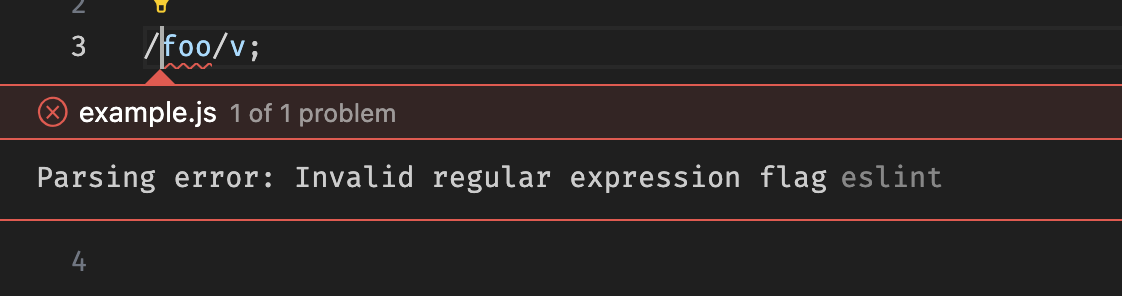
Setting the ecmaVersion to 2022 ensures that I don't accidentally use newer and unsupported Javascript features,
like in this example trying to use ES2024's v flag in regular expressions.
This version could be set to whatever browser compatibility a project requires.
The ignores blocks excludes external libraries to placate my OCD that wants to see zero errors or warnings reported by eslint project-wide.
The article folders are excluded for a similar reason, because they contain a lot of incomplete and deliberately invalid example JS files.
The webhint extension is installed to do automatic linting on HTML and CSS.
Luckily it out of the box comes bundled with a webhint installation and applies the default development ruleset.
A nice thing about this extension is that it reports accessibility issues.
Only a few tweaks were made to the webhint configuration to again get to that all-important zero warnings count.
html-in-template-string
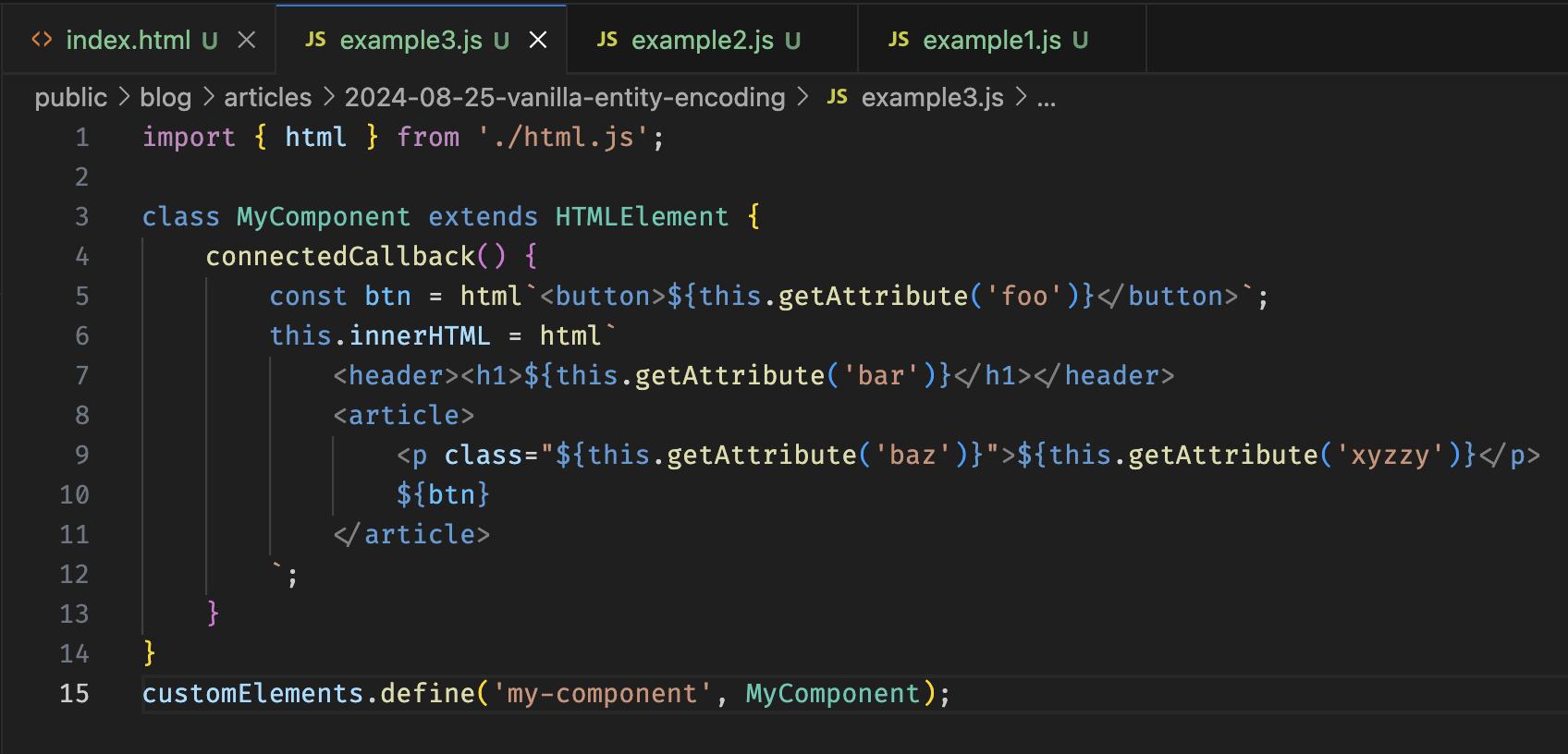
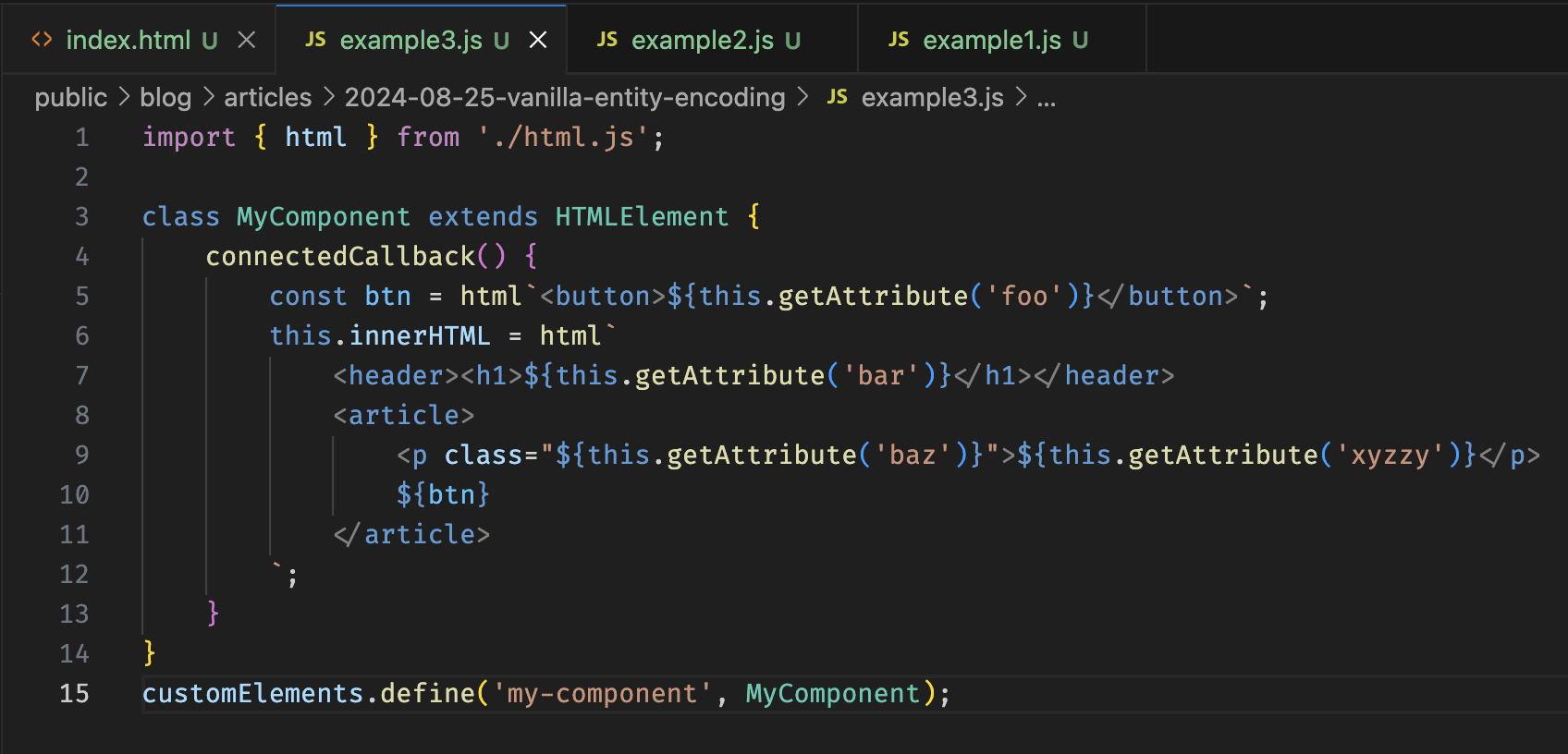
I've mentioned it before in the entity encoding article ,
but this neat little extension formats HTML inside tagged template strings in web component JS code.
Live Preview
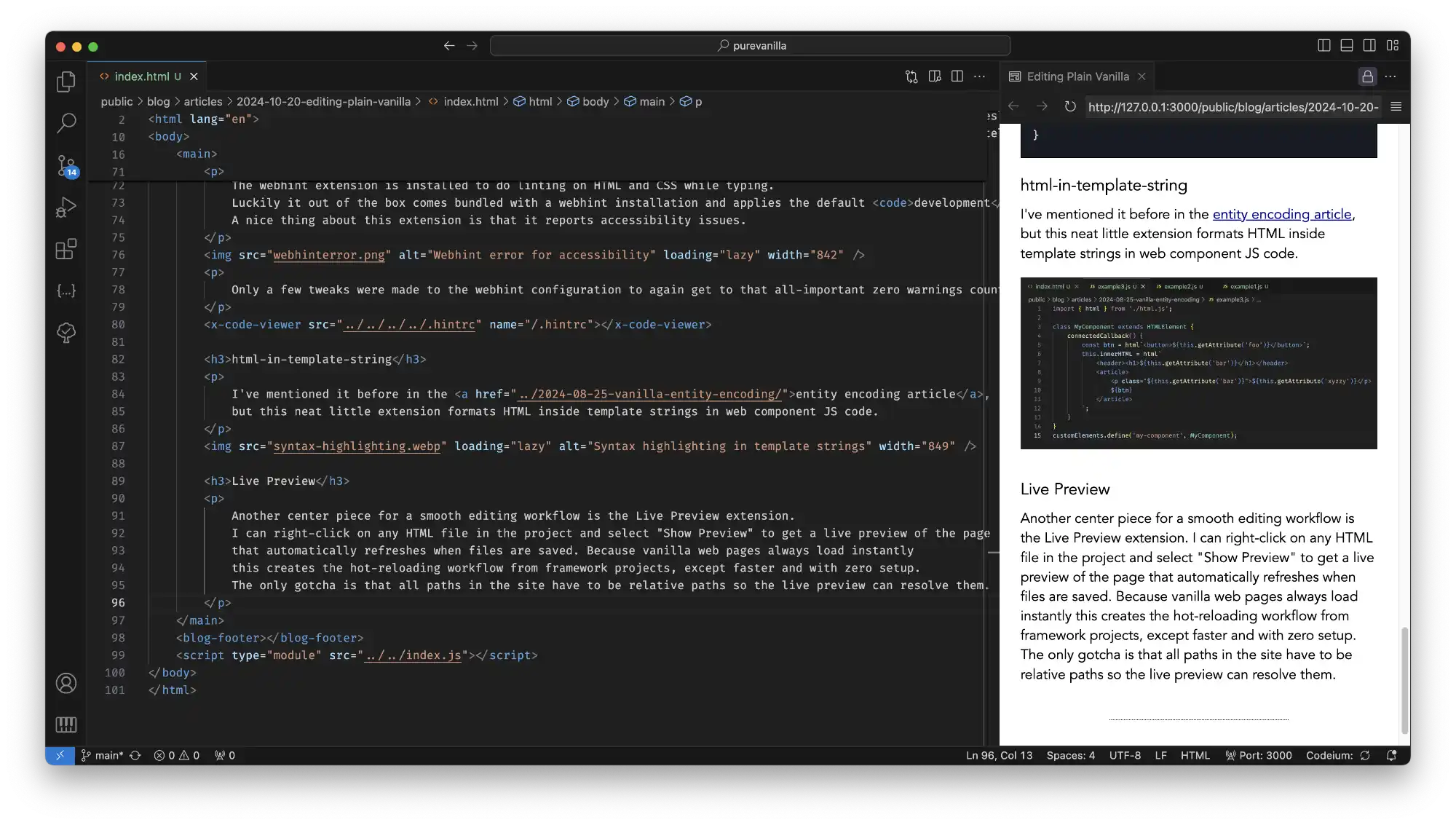
The center piece for a smooth editing workflow is the Live Preview extension.
I can right-click on any HTML file in the project and select "Show Preview" to get a live preview of the page.
This preview automatically refreshes when files are saved. Because vanilla web pages always load instantly
this provides the hot-reloading workflow from framework projects, except even faster and with zero setup.
The only gotcha is that all paths in the site have to be relative paths so the previewed page can resolve them.
The preview's URL can be pasted into a "real browser" to debug tricky javascript issues
and do compatibility testing. Very occasionally I'll need to spin up a "real server",
but most of the code in my vanilla projects is written with only a Live Preview tab open.
Previewing is also how I get a realtime view of unit tests while working on components or infrastructure code,
by opening the tests web page and selecting the right test suite to hot reload while editing.
Bonus: working offline
Because I live at the beach and work in the big city I regularly need to take long train rides with spotty internet connection.
Like many developers I cannot keep web API's in my head and have to look them up regularly while coding.
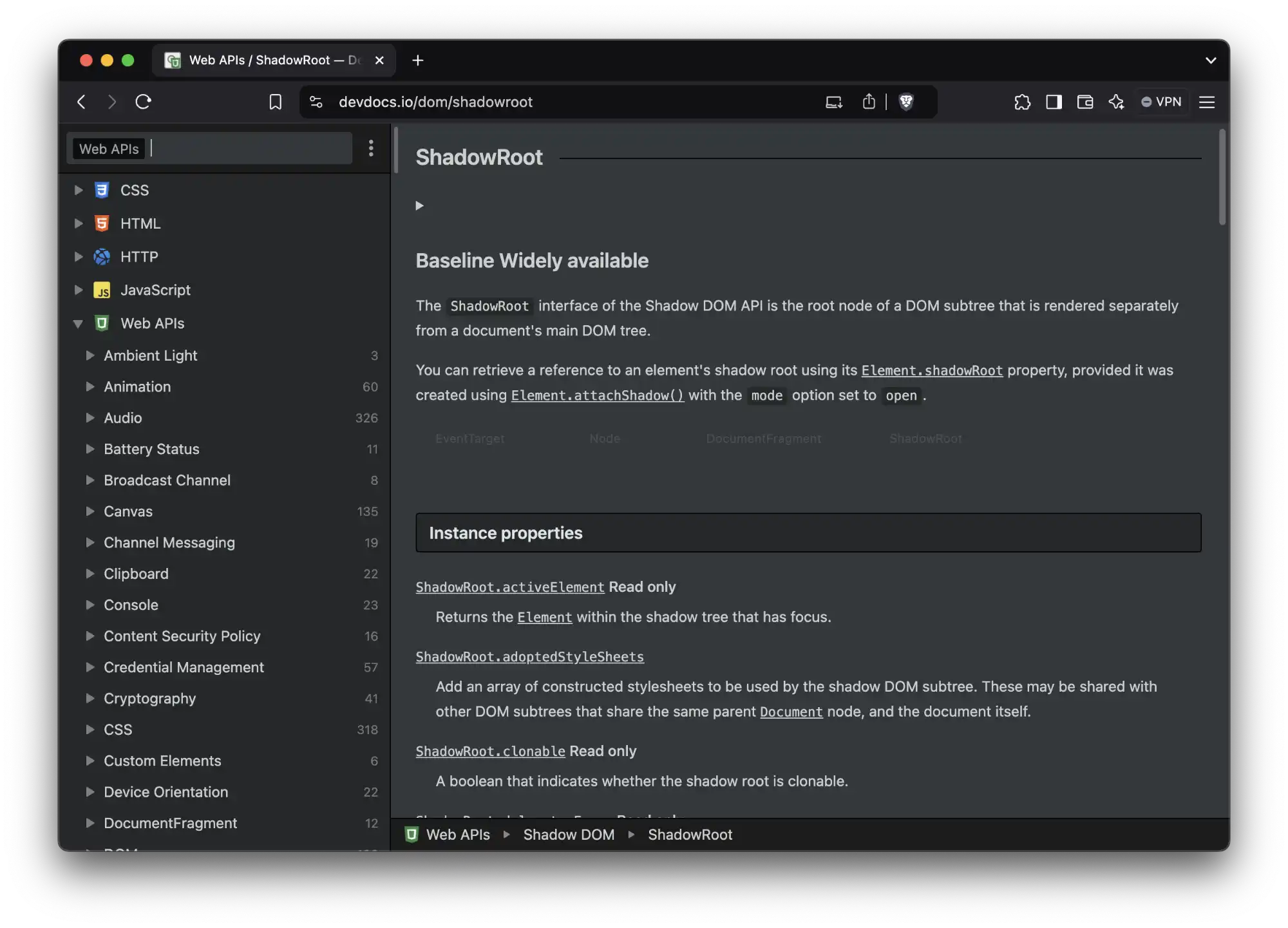
To have a complete offline vanilla web development setup with me at all times I use devdocs.io .
All my projects folders are set up to sync automatically with Syncthing ,
so whatever I was doing on the desktop can usually be smoothly continued offline on the laptop
without having to do any prep work to make that possible.
There, that's my lean vanilla web development setup.
What should I add to this, or do differently? Feel free to let me know.
Caching vanilla sites
Caching vanilla sites
Joeri Sebrechts
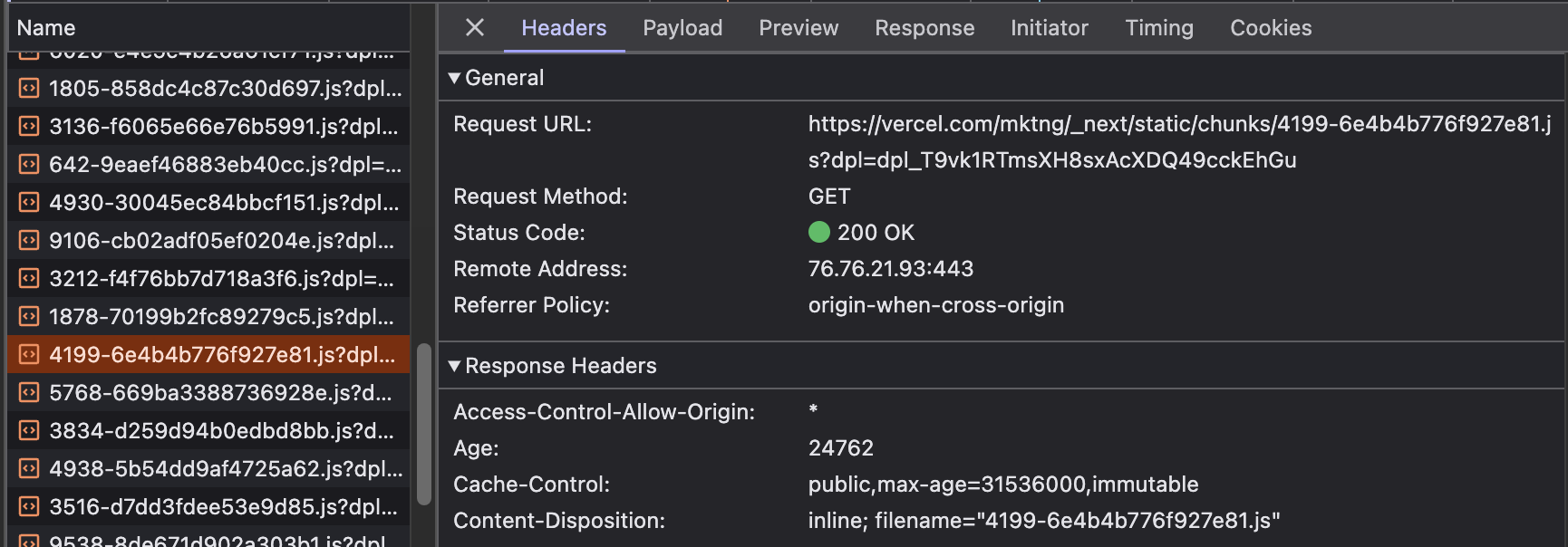
If you go to a typical website built with a framework, you'll see a lot of this:
Those long cryptic filenames are not meant to discourage casual snooping.
They're meant to ensure the filename is changed every time a single byte in that file changes,
because the site is using far-future expire headers ,
a technique where the browser is told to cache files indefinitely, until the end of time.
On successive page loads those resources will then always be served from cache.
The only drawback is having to change the filename each time the file's contents change,
but a framework's build steps typically take care of that.
For vanilla web sites, this strategy doesn't work. By abandoning a build step there is no way to automatically generate filenames,
and unless nothing makes you happier than renaming all files manually every time you deploy a new version,
we have to look towards other strategies.
How caching works
Browser cache behavior is complicated, and a deep dive into the topic deserves its own article .
However, very simply put, what you'll see is mostly these response headers:
Cache-Control
The cache control response header determines whether the browser should cache the response, and how long it should serve the response from cache.
Cache-Control: public, max-age: 604800
This will cache the resource and only check if there's a new version after one week.
Age
The max-age directive does not measure age from the time that the response is received,
but from the time that the response was originally served:
Age: 10
This response header indicates the response was served on the origin server 10 seconds ago.
Etag
The Etag header is a unique hash of the resource's contents, an identifier for that version of the resource.
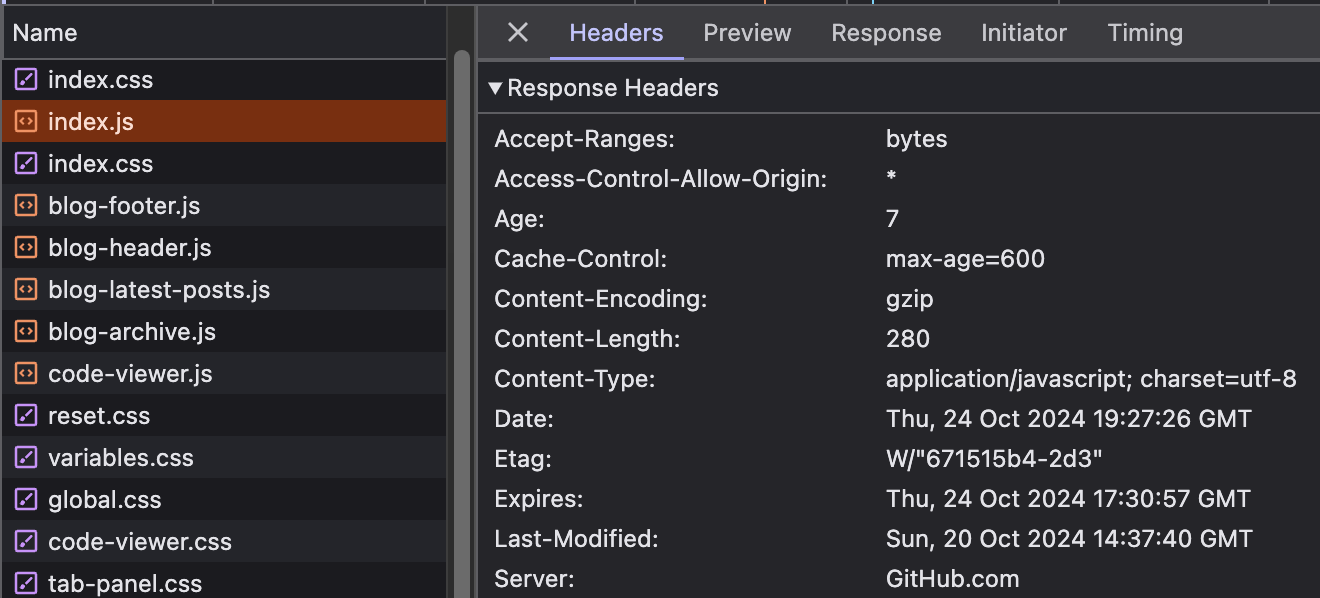
ETag: "33a64df551425fcc55e4d42a148795d9f25f89d4"
When the browser requests that resource again from the server, knowing the Etag it can pass an If-None-Match
header with the Etag's value. If the resource has not changed it will still have the same Etag value,
and the server will respond with 304 Not Modified.
If-None-Match: "33a64df551425fcc55e4d42a148795d9f25f89d4"
Last-Modified
The Last-Modified header works similarly to Etag, except instead of sending a hash of the contents,
it sends a timestamp of when the resource was last changed.
Like Etag's If-None-Match it is matched by the If-Modified-Since header when requesting the resource from the server again.
With that basic review of caching headers, let's look at some strategies for making good use of them in vanilla web projects.
Keeping it simple: GitHub Pages
The simplest strategy is what GitHub Pages does: cache files for 10 minutes.
Every file that's downloaded has Cache-Control: max-age headers that make it expire 10 minutes into the future.
After that if the file is loaded again it will be requested from the network.
The browser will add If-None-Match or If-Modified-Since headers
to allow the server to avoid sending the file if it hasn't been changed, saving bytes but not a roundtrip.
If you want to see it in action, just open the browser devtools and reload this page.
Visitors never get a page that is more than 10 minutes out of date,
and as they navigate around the site they mostly get fast cache-served responses.
However, on repeat visits they will get a slow first-load experience.
Also, if the server updates in the middle of a page load then different resources may end up mismatched and belong to a different version of the site, causing unpredictable bugs.
Well, for 10 minutes at least.
Extending cache durations
While the 10 minute cache policy is ok for HTML content and small JS and CSS files,
it can be improved by increasing cache times on large resources like libraries and images.
By using a caching proxy that allows setting rules on specific types or folders of files we can increase the cache duration.
For sites proxied through Cloudflare ,
their cache customization settings
can be used to set these resource-specific policies.
By setting longer cache durations on some resources, we can ensure they're served from local cache more often.
However, what to do if the resource changes? In those cases we need to modify the fetched URL of the resource every place that it is referred to.
For example, by appending a unique query parameter:
<img src="image.jpg?v=2" alt="My cached image" />
The awkward aspect of having to change the referred URL in every place that a changed file is used
makes extending cache durations inconvenient for files that are changed often or are referred in many places.
Also, applying such policies to JavaScript or CSS becomes a minefield,
because a mismatched combination of JS or CSS files could end up in the browser cache indefinitely,
breaking the website for the user until URL's are changed or their browser cache is cleared.
For that reason, I don't think it's prudent to do this for anything but files that never change or that have some kind of version marker in their URL.
Complete control with service workers
A static web site can take complete control over its cache behavior by using a service worker .
The service worker intercepts every network request and then decides whether to serve it from a local cache or from the network.
For example, here's a service worker that will cache all resources indefinitely, until its version is changed:
This recreates the far-future expiration strategy but does it client-side, inside the service worker.
Because only the version at the top of the sw.js file needs to be updated when the site's contents change,
this becomes practical to do without adding a build step. However, because the service worker intercepts network requests
to change their behavior there is a risk that bugs could lead to a broken site, so this strategy is only for the careful and well-versed.
(And no, the above service worker code hasn't been baked in production, so be careful when copying it to your own site.)
Wrapping up
Setting sane cache policies meant to optimize page load performance is one of the things typically in the domain
of full-fat frameworks or application servers. But, abandoning build steps and server-side logic does not necessarily
have to mean having poor caching performance. There are multiple strategies with varying amounts of cache control,
and there is probably a suitable strategy for any plain vanilla site.
Last but not least, an even better way to speed up page loading is to keep the web page itself light.
Using a plain vanilla approach to pages with zero dependencies baked into the page weight
already puts you in pole position for good page load performance, before caching even enters the picture.
New year's resolve
New year's resolve
Joeri Sebrechts
Today I was looking at what I want to write about in the coming year,
and while checking out custom element micro-frameworks came across import.meta.resolve
in the documentation for the Ponys micro-framework.
That one simple trick is part of the essential toolbox that allows skipping build-time bundling,
unlocking the vanilla web development achievement in the browser.
We need this toolbox because the build-time bundler does a lot of work for us:
Combining JS and CSS files to avoid slow page loads.Resolving paths to the JS and CSS dependencies so we can have clean import statements.Optimizing the bundled code , by stripping out whitespace, and removing unused imports thanks to a tree shaking algorithm.
It is not immediately apparent how to get these benefits without using a bundler.
Combining JS and CSS files
A typical framework-based web project contains hundreds or thousands of files.
Having all those files loaded separately on a page load would be intolerably slow,
hence the need for a bundler to reduce the file count. Even by stripping away third party dependencies
we can still end up with dozens or hundreds of files constituting a vanilla web project.
When inspecting a page load in the browser's developer tools, we would then expect to see a lot of this:
The browser would download 6 files at a time and the later requests would block until those files downloaded.
This limitation of HTTP/1 let to not just the solution of bundlers to reduce file count, but because the limitation of 6 parallel downloads
was per domain it also led to the popularity of CDN networks which allowed cheating and downloading 12 files at once instead of 6.
However. It's 2025. What you're likely to see in this modern era is more like this:
Because almost all web servers have shifted over to HTTP/2, which no longer has this limitation of only having 6 files in flight at a time,
we now see that all the files that are requested in parallel get downloaded in parallel.
There's still a small caveat on lossy connections called head-of-line-blocking, fixed in HTTP/3 ,
which is presently starting to roll out to web servers across the internet.
But the long and short of it is this: requesting a lot of files all at once just isn't that big of a problem anymore.
We don't need to bundle up the files in a vanilla web project until the file counts get ridiculous.
Resolving paths
Another thing that bundlers do is resolving relative paths pointing to imported JS and CSS files.
See, for example, the elegance of CSS modules for importing styles into a react component from a relative path:
However. It's 2025. And our browsers now have a modern vanilla toolbox for importing.
When we bootstrap our JS with the magic incantation <script src="index.js" type="module"></script>
we unlock the magic ability to import JS files using ES module import notation:
Inside of such files we also get access to import.meta.url, the URL of the current JS file,
and import.meta.resolve(), a function that resolves a path relative to the current file,
even a path to a CSS file:
While not quite the same as what the bundler does, it still enables accessing any file by its relative path,
and that in turn allows organizing projects in whatever way we want , for example in a feature-based folder organization.
All without needing a build step.
This ability to do relative imports can be super-charged by import maps ,
which decouple the name of what is imported from the path of the file it is imported from,
again all without involving a build step.
Optimizing bundled code
Another thing bundlers can do is optimizing the bundled code, by splitting the payload into things loaded initially,
and things loaded later on lazily. And also by minifying it, stripping away unnecessary whitespace and comments so it will load faster.
However. It's 2025. We can transparently enable gzip or brotli compression on the server,
and as it turns out that gets almost all the benefit of minifying .
While minifying is nice, gzipping is what we really want, and we can get that without a build step.
And lazy loading, that works fine using dynamic import , and with a bit due diligence we can put some of the code behind such an import statement.
I wrote before how React's lazy and suspense can be ported easily to vanilla web components.
Happy new year!
Great news! It's 2025, and the browser landscape is looking better than ever. It gives us enough tools that for many web projects
we can drop the bundler and do just fine. You wouldn't believe it based on what the mainstream frameworks are doing though.
Maybe 2025 is the year we finally see a wide recognition of just how powerful the browser platform has gotten,
and a return to old school simplicity in web development practice, away from all those complicated build steps.
It's my new year's resolve to do my part in spreading the word.
demo 1
Markup:
Outputs:
================================================
FILE: public/blog/articles/2025-04-21-attribute-property-duality/demo1.js
================================================
customElements.define('my-hello', class extends HTMLElement {
connectedCallback() {
this.textContent = `Hello, ${ this.value || 'null' }!`;
}
});
================================================
FILE: public/blog/articles/2025-04-21-attribute-property-duality/demo2.html
================================================
demo 2
Markup:
Outputs:
================================================
FILE: public/blog/articles/2025-04-21-attribute-property-duality/demo2.js
================================================
customElements.define('my-hello', class extends HTMLElement {
connectedCallback() {
this.textContent = `Hello, ${ this.getAttribute('value') || 'null' }!`;
}
});
================================================
FILE: public/blog/articles/2025-04-21-attribute-property-duality/demo3.html
================================================
demo 3
Markup:
Outputs:
myHello.value = 42
Reload
================================================
FILE: public/blog/articles/2025-04-21-attribute-property-duality/demo3.js
================================================
customElements.define('my-hello', class extends HTMLElement {
get value() {
return this.getAttribute('value');
}
set value(v) {
this.setAttribute('value', String(v));
}
static observedAttributes = ['value'];
attributeChangedCallback() {
this.textContent = `Hello, ${ this.value || 'null' }!`;
}
});
================================================
FILE: public/blog/articles/2025-04-21-attribute-property-duality/demo4.html
================================================
demo 4
Markup:
Outputs:
toggle myHello.glam
================================================
FILE: public/blog/articles/2025-04-21-attribute-property-duality/demo4.js
================================================
customElements.define('my-hello', class extends HTMLElement {
get value() {
return this.getAttribute('value');
}
set value(v) {
this.setAttribute('value', String(v));
}
get glam() {
return this.hasAttribute('glam');
}
set glam(v) {
if (v) {
this.setAttribute('glam', 'true');
} else {
this.removeAttribute('glam');
}
}
static observedAttributes = ['value', 'glam'];
attributeChangedCallback() {
this.textContent =
`Hello, ${ this.value || 'null' }!` +
(this.glam ? '!!@#!' : '');
}
});
================================================
FILE: public/blog/articles/2025-04-21-attribute-property-duality/demo5-before.js
================================================
// html:
demo 5
Markup:
Outputs:
toggle myHello.glam
================================================
FILE: public/blog/articles/2025-04-21-attribute-property-duality/demo5.js
================================================
customElements.define('my-hello', class extends HTMLElement {
get value() {
return this.getAttribute('value');
}
set value(v) {
this.setAttribute('value', String(v));
}
get glam() {
return this.hasAttribute('glam');
}
set glam(v) {
if (v) {
this.setAttribute('glam', 'true');
} else {
this.removeAttribute('glam');
}
}
static observedAttributes = ['value', 'glam'];
attributeChangedCallback() {
this.textContent =
`Hello, ${ this.value || 'null' }!` +
(this.glam ? '!!@#!' : '');
}
connectedCallback() {
this.#upgradeProperty('value');
this.#upgradeProperty('glam');
}
#upgradeProperty(prop) {
if (this.hasOwnProperty(prop)) {
let value = this[prop];
delete this[prop];
this[prop] = value;
}
}
});
================================================
FILE: public/blog/articles/2025-04-21-attribute-property-duality/index.html
================================================
The attribute/property duality
The attribute/property duality
Joeri Sebrechts
Web components, a.k.a. custom elements, are HTML elements
that participate in HTML markup. As such they can have attributes:
<my-hello value="world"></my-hello>
But, they are also JavaScript objects, and as such they can have object properties.
let myHello = document.querySelector('my-hello'); myHello.value = 'foo';
And here's the tricky part about that: these are not the same thing!
In fact, custom element attributes and properties by default have zero relationship between them,
even when they share a name. Here's a live proof of this fact:
Now, to be fair, we can get at the attribute value just fine from JavaScript:
But what if we would also like it to have a value property ?
What should the relationship between attribute and property be like?
Does updating the attribute always update the property?
Does updating the property always update the attribute?
When updates can go either way, does the property read and update the value of the attribute, or do both attribute and property wrap around a private field on the custom element's class?
When updates can go either way, how to avoid loops where the property updates the attribute, which updates the property, which...
When is it fine to have just an attribute without a property, or a property without an attribute?
In framework-based code, we typically don't get a say in these things.
Frameworks generally like to pretend that attributes and properties are the same thing,
and they automatically create code to make sure this is the case.
In vanilla custom elements however, not only do we get to decide these things, we must decide them.
Going native
Seasoned developers will intuitively grasp what the sensible relationship between attributes and properties should be.
This is because built-in HTML elements all implement similar kinds of relationships between their attributes and their properties.
To explore that in depth, I recommend reading Making Web Component properties behave closer to the platform .
Without fully restating that article, here's a quick recap:
Properties can exist independent of an attribute, but an attribute will typically have a related property.
If changing the attribute updates the property, then updating the property will update the attribute.
Properties reflect either an internal value of an element, or the value of the corresponding attribute.
Assigning a value of an invalid type will coerce the value to the right type, instead of rejecting the change.
Change events are only dispatched for changes by user input, not from programmatic changes to attribute or property.
An easy way to get much of this behavior is to make a property wrap around an attribute:
Notice how updating the property will update the attribute in the HTML representation,
and how the property's assigned value is coerced into the attribute's string type.
Attributes are always strings.
Into the weeds
Up to this point, things are looking straightforward. But this is web development,
things are never as straightforward as they seem.
For instance, what boolean attribute value should make a corresponding boolean property become true?
The surprising but standard behavior on built-in elements is that
any attribute value will be interpreted as true, and only the absence of the attribute will be interpreted as false.
Time for another iteration of our element:
Which leaves us with the last bit of tricky trivia:
it's possible for the custom element's class to be instantiated and attached to the element
after the property is assigned. In that case the property's setter is never called,
and the attribute is not updated.
This can be avoided by reassigning any previously set properties when the element is connected:
In conclusion
If that seems like a lot of work to do a very simple thing, that is because it is.
The good news is: we don't have to always do this work.
When we're using web components as framework components in a codebase that we control,
we don't have to follow any of these unwritten rules and can keep the web component code as simple as we like.
However, when using web components as custom elements to be used in HTML markup
then we do well to follow these best practices to avoid surprises,
especially when making web components that may be used by others. YMMV.
In the next article , I'll be looking into custom elements that accept input, and how that adds twists to the plot.
demo 1
================================================
FILE: public/blog/articles/2025-05-09-form-control/demo1/input-inline.js
================================================
customElements.define('input-inline', class extends HTMLElement {
get value() {
return this.getAttribute('value') ?? '';
}
set value(value) {
this.setAttribute('value', String(value));
}
get name() {
return this.getAttribute('name') ?? '';
}
set name(v) {
this.setAttribute('name', String(v));
}
connectedCallback() {
this.#update();
}
static observedAttributes = ['value'];
attributeChangedCallback() {
this.#update();
}
#update() {
this.style.display = 'inline';
if (this.textContent !== this.value) {
this.textContent = this.value;
}
this.contentEditable = true;
}
});
================================================
FILE: public/blog/articles/2025-05-09-form-control/demo2/index.html
================================================
demo 2
================================================
FILE: public/blog/articles/2025-05-09-form-control/demo2/input-inline-partial.js
================================================
customElements.define('input-inline', class extends HTMLElement {
#internals;
/* ... */
constructor() {
super();
this.#internals = this.attachInternals();
this.#internals.role = 'textbox';
}
/* ... */
#update() {
/* ... */
this.#internals.setFormValue(this.value);
}
static formAssociated = true;
});
================================================
FILE: public/blog/articles/2025-05-09-form-control/demo2/input-inline.js
================================================
customElements.define('input-inline', class extends HTMLElement {
#internals;
get value() {
return this.getAttribute('value') ?? '';
}
set value(value) {
this.setAttribute('value', String(value));
}
get name() {
return this.getAttribute('name') ?? '';
}
set name(v) {
this.setAttribute('name', String(v));
}
constructor() {
super();
this.#internals = this.attachInternals();
this.#internals.role = 'textbox';
}
connectedCallback() {
this.#update();
}
static observedAttributes = ['value'];
attributeChangedCallback() {
this.#update();
}
#update() {
this.style.display = 'inline';
if (this.textContent !== this.value) {
this.textContent = this.value;
}
this.contentEditable = true;
this.#internals.setFormValue(this.value);
}
static formAssociated = true;
});
================================================
FILE: public/blog/articles/2025-05-09-form-control/demo3/index.html
================================================
demo 3
================================================
FILE: public/blog/articles/2025-05-09-form-control/demo3/input-inline-partial.js
================================================
customElements.define('input-inline', class extends HTMLElement {
#shouldFireChange = false;
/* ... */
constructor() {
/* ... */
this.addEventListener('input', this);
this.addEventListener('keydown', this);
this.addEventListener('paste', this);
this.addEventListener('focusout', this);
}
handleEvent(e) {
switch (e.type) {
// respond to user input (typing, drag-and-drop, paste)
case 'input':
this.value = cleanTextContent(this.textContent);
this.#shouldFireChange = true;
break;
// enter key should submit form instead of adding a new line
case 'keydown':
if (e.key === 'Enter') {
e.preventDefault();
this.#internals.form?.requestSubmit();
}
break;
// prevent pasting rich text (firefox), or newlines (all browsers)
case 'paste':
e.preventDefault();
const text = e.clipboardData.getData('text/plain')
// replace newlines and tabs with spaces
.replace(/[\n\r\t]+/g, ' ')
// limit length of pasted text to something reasonable
.substring(0, 1000);
// shadowRoot.getSelection is non-standard, fallback to document in firefox
// https://stackoverflow.com/a/70523247
let selection = this.getRootNode()?.getSelection?.() || document.getSelection();
let range = selection.getRangeAt(0);
range.deleteContents();
range.insertNode(document.createTextNode(text));
// manually trigger input event to restore default behavior
this.dispatchEvent(new Event('input', { bubbles: true, composed: true }));
break;
// fire change event on blur
case 'focusout':
if (this.#shouldFireChange) {
this.#shouldFireChange = false;
this.dispatchEvent(new Event('change', { bubbles: true, composed: true }));
}
break;
}
}
/* ... */
});
function cleanTextContent(text) {
return (text ?? '')
// replace newlines and tabs with spaces
.replace(/[\n\r\t]+/g, ' ');
}
================================================
FILE: public/blog/articles/2025-05-09-form-control/demo3/input-inline.js
================================================
customElements.define('input-inline', class extends HTMLElement {
#shouldFireChange = false;
#internals;
get value() {
return this.getAttribute('value') ?? '';
}
set value(value) {
this.setAttribute('value', String(value));
}
get name() {
return this.getAttribute('name') ?? '';
}
set name(v) {
this.setAttribute('name', String(v));
}
constructor() {
super();
this.#internals = this.attachInternals();
this.#internals.role = 'textbox';
// add event listeners
this.addEventListener('input', this);
this.addEventListener('keydown', this);
this.addEventListener('paste', this);
this.addEventListener('focusout', this);
}
handleEvent(e) {
switch (e.type) {
// respond to user input (typing, drag-and-drop, paste)
case 'input':
this.value = cleanTextContent(this.textContent);
this.#shouldFireChange = true;
break;
// enter key should submit form instead of adding a new line
case 'keydown':
if (e.key === 'Enter') {
e.preventDefault();
this.#internals.form?.requestSubmit();
}
break;
// prevent pasting rich text (firefox), or newlines (all browsers)
case 'paste':
e.preventDefault();
const text = e.clipboardData.getData('text/plain')
// replace newlines and tabs with spaces
.replace(/[\n\r\t]+/g, ' ')
// limit length of pasted text to something reasonable
.substring(0, 1000);
// shadowRoot.getSelection is non-standard, fallback to document in firefox
// https://stackoverflow.com/a/70523247
let selection = this.getRootNode()?.getSelection?.() || document.getSelection();
let range = selection.getRangeAt(0);
range.deleteContents();
range.insertNode(document.createTextNode(text));
// manually trigger input event to restore default behavior
this.dispatchEvent(new Event('input', { bubbles: true, composed: true }));
break;
// fire change event on blur
case 'focusout':
if (this.#shouldFireChange) {
this.#shouldFireChange = false;
this.dispatchEvent(new Event('change', { bubbles: true, composed: true }));
}
break;
}
}
connectedCallback() {
this.#update();
}
static observedAttributes = ['value'];
attributeChangedCallback() {
this.#update();
}
#update() {
this.style.display = 'inline';
if (cleanTextContent(this.textContent) !== this.value) {
this.textContent = this.value;
}
this.contentEditable = true;
this.#internals.setFormValue(this.value);
}
static formAssociated = true;
});
function cleanTextContent(text) {
return (text ?? '')
// replace newlines and tabs with spaces
.replace(/[\n\r\t]+/g, ' ')
// remove zero width spaces
.replace(/\u200B/g, '');
}
================================================
FILE: public/blog/articles/2025-05-09-form-control/demo4/index.html
================================================
demo 4
================================================
FILE: public/blog/articles/2025-05-09-form-control/demo4/input-inline-partial.js
================================================
customElements.define('input-inline', class extends HTMLElement {
/* ... */
#formDisabled = false;
#value;
set value(v) {
if (this.#value !== String(v)) {
this.#value = String(v);
this.#update();
}
}
get value() {
return this.#value ?? this.defaultValue;
}
get defaultValue() {
return this.getAttribute('value') ?? '';
}
set defaultValue(value) {
this.setAttribute('value', String(value));
}
set disabled(v) {
if (v) {
this.setAttribute('disabled', 'true');
} else {
this.removeAttribute('disabled');
}
}
get disabled() {
return this.hasAttribute('disabled');
}
set readOnly(v) {
if (v) {
this.setAttribute('readonly', 'true');
} else {
this.removeAttribute('readonly');
}
}
get readOnly() {
return this.hasAttribute('readonly');
}
/* ... */
static observedAttributes = ['value', 'disabled', 'readonly'];
attributeChangedCallback() {
this.#update();
}
#update() {
this.style.display = 'inline';
this.textContent = this.value;
this.#internals.setFormValue(this.value);
const isDisabled = this.#formDisabled || this.disabled;
this.#internals.ariaDisabled = isDisabled;
this.#internals.ariaReadOnly = this.readOnly;
this.contentEditable = !this.readOnly && !isDisabled && 'plaintext-only';
this.tabIndex = isDisabled ? -1 : 0;
}
static formAssociated = true;
formResetCallback() {
this.#value = undefined;
this.#update();
}
formDisabledCallback(disabled) {
this.#formDisabled = disabled;
this.#update();
}
formStateRestoreCallback(state) {
this.#value = state ?? undefined;
this.#update();
}
});
/* ... */
================================================
FILE: public/blog/articles/2025-05-09-form-control/demo4/input-inline.js
================================================
customElements.define('input-inline', class extends HTMLElement {
#shouldFireChange = false;
#internals;
#formDisabled = false;
#value;
set value(v) {
if (this.#value !== String(v)) {
this.#value = String(v);
this.#update();
}
}
get value() {
return this.#value ?? this.defaultValue;
}
get defaultValue() {
return this.getAttribute('value') ?? '';
}
set defaultValue(value) {
this.setAttribute('value', String(value));
}
set disabled(v) {
if (v) {
this.setAttribute('disabled', 'true');
} else {
this.removeAttribute('disabled');
}
}
get disabled() {
return this.hasAttribute('disabled');
}
set readOnly(v) {
if (v) {
this.setAttribute('readonly', 'true');
} else {
this.removeAttribute('readonly');
}
}
get readOnly() {
return this.hasAttribute('readonly');
}
get name() {
return this.getAttribute('name') ?? '';
}
set name(v) {
this.setAttribute('name', String(v));
}
constructor() {
super();
this.#internals = this.attachInternals();
this.#internals.role = 'textbox';
// add event listeners
this.addEventListener('input', this);
this.addEventListener('keydown', this);
this.addEventListener('paste', this);
this.addEventListener('focusout', this);
}
handleEvent(e) {
switch (e.type) {
// respond to user input (typing, drag-and-drop, paste)
case 'input':
this.value = cleanTextContent(this.textContent);
this.#shouldFireChange = true;
break;
// enter key should submit form instead of adding a new line
case 'keydown':
if (e.key === 'Enter') {
e.preventDefault();
this.#internals.form?.requestSubmit();
}
break;
// prevent pasting rich text (firefox), or newlines (all browsers)
case 'paste':
e.preventDefault();
const text = e.clipboardData.getData('text/plain')
// replace newlines and tabs with spaces
.replace(/[\n\r\t]+/g, ' ')
// limit length of pasted text to something reasonable
.substring(0, 1000);
// shadowRoot.getSelection is non-standard, fallback to document in firefox
// https://stackoverflow.com/a/70523247
let selection = this.getRootNode()?.getSelection?.() || document.getSelection();
let range = selection.getRangeAt(0);
range.deleteContents();
range.insertNode(document.createTextNode(text));
// manually trigger input event to restore default behavior
this.dispatchEvent(new Event('input', { bubbles: true, composed: true }));
break;
// fire change event on blur
case 'focusout':
if (this.#shouldFireChange) {
this.#shouldFireChange = false;
this.dispatchEvent(new Event('change', { bubbles: true, composed: true }));
}
break;
}
}
connectedCallback() {
this.#update();
}
static observedAttributes = ['value', 'disabled', 'readonly'];
attributeChangedCallback() {
this.#update();
}
#update() {
this.style.display = 'inline';
if (cleanTextContent(this.textContent) !== this.value) {
this.textContent = this.value;
}
this.#internals.setFormValue(this.value);
const isDisabled = this.#formDisabled || this.disabled;
this.#internals.ariaDisabled = isDisabled;
this.#internals.ariaReadOnly = this.readOnly;
this.contentEditable = !this.readOnly && !isDisabled && 'plaintext-only';
this.tabIndex = isDisabled ? -1 : 0;
}
static formAssociated = true;
formResetCallback() {
this.#value = undefined;
this.#update();
}
formDisabledCallback(disabled) {
this.#formDisabled = disabled;
this.#update();
}
formStateRestoreCallback(state) {
this.#value = state ?? undefined;
this.#update();
}
});
function cleanTextContent(text) {
return (text ?? '')
// replace newlines and tabs with spaces
.replace(/[\n\r\t]+/g, ' ')
// remove zero width spaces
.replace(/\u200B/g, '');
}
================================================
FILE: public/blog/articles/2025-05-09-form-control/demo5/index.html
================================================
demo 5
================================================
FILE: public/blog/articles/2025-05-09-form-control/demo5/input-inline.css
================================================
/* default styling has lowest priority */
@layer {
:root {
--input-inline-border-color: light-dark(rgb(118, 118, 118), rgb(161, 161, 161));
--input-inline-border-color-hover: light-dark(rgb(78, 78, 78), rgb(200, 200, 200));
--input-inline-border-color-disabled: rgba(150, 150, 150, 0.5);
--input-inline-text-color: light-dark(fieldtext, rgb(240, 240, 240));
--input-inline-text-color-disabled: light-dark(rgb(84, 84, 84), rgb(170, 170, 170));
--input-inline-bg-color: inherit;
--input-inline-bg-color-disabled: inherit;
--input-inline-min-width: 4ch;
}
input-inline {
display: inline;
background-color: var(--input-inline-bg-color);
color: var(--input-inline-text-color);
border: 1px dotted var(--input-inline-border-color);
padding: 2px 3px;
margin-bottom: -2px;
border-radius: 3px;
/* minimum width */
padding-right: max(3px, calc(var(--input-inline-min-width) - var(--current-length)));
&:hover {
border-color: var(--input-inline-border-color-hover);
}
&:disabled {
border-color: var(--input-inline-border-color-disabled);
background-color: var(--input-inline-bg-color-disabled);
color: var(--input-inline-text-color-disabled);
-webkit-user-select: none;
user-select: none;
}
&:focus-visible {
border-color: transparent;
outline-offset: 0;
outline: 2px solid royalblue; /* firefox */
outline-color: -webkit-focus-ring-color; /* the rest */
}
}
@media screen and (-webkit-min-device-pixel-ratio:0) {
input-inline:empty::before {
/* fixes issue where empty input-inline shifts left in chromium browsers */
content: " ";
}
}
}
================================================
FILE: public/blog/articles/2025-05-09-form-control/demo5/input-inline.js
================================================
customElements.define('input-inline', class extends HTMLElement {
#shouldFireChange = false;
#internals;
#formDisabled = false;
#value;
set value(v) {
if (this.#value !== String(v)) {
this.#value = String(v);
this.#update();
}
}
get value() {
return this.#value ?? this.defaultValue;
}
get defaultValue() {
return this.getAttribute('value') ?? '';
}
set defaultValue(value) {
this.setAttribute('value', String(value));
}
set disabled(v) {
if (v) {
this.setAttribute('disabled', 'true');
} else {
this.removeAttribute('disabled');
}
}
get disabled() {
return this.hasAttribute('disabled');
}
set readOnly(v) {
if (v) {
this.setAttribute('readonly', 'true');
} else {
this.removeAttribute('readonly');
}
}
get readOnly() {
return this.hasAttribute('readonly');
}
get name() {
return this.getAttribute('name') ?? '';
}
set name(v) {
this.setAttribute('name', String(v));
}
constructor() {
super();
this.#internals = this.attachInternals();
this.#internals.role = 'textbox';
// add event listeners
this.addEventListener('input', this);
this.addEventListener('keydown', this);
this.addEventListener('paste', this);
this.addEventListener('focusout', this);
}
handleEvent(e) {
switch (e.type) {
// respond to user input (typing, drag-and-drop, paste)
case 'input':
this.value = cleanTextContent(this.textContent);
this.#shouldFireChange = true;
break;
// enter key should submit form instead of adding a new line
case 'keydown':
if (e.key === 'Enter') {
e.preventDefault();
this.#internals.form?.requestSubmit();
}
break;
// prevent pasting rich text (firefox), or newlines (all browsers)
case 'paste':
e.preventDefault();
const text = e.clipboardData.getData('text/plain')
// replace newlines and tabs with spaces
.replace(/[\n\r\t]+/g, ' ')
// limit length of pasted text to something reasonable
.substring(0, 1000);
// shadowRoot.getSelection is non-standard, fallback to document in firefox
// https://stackoverflow.com/a/70523247
let selection = this.getRootNode()?.getSelection?.() || document.getSelection();
let range = selection.getRangeAt(0);
range.deleteContents();
range.insertNode(document.createTextNode(text));
// manually trigger input event to restore default behavior
this.dispatchEvent(new Event('input', { bubbles: true, composed: true }));
break;
// fire change event on blur
case 'focusout':
if (this.#shouldFireChange) {
this.#shouldFireChange = false;
this.dispatchEvent(new Event('change', { bubbles: true, composed: true }));
}
break;
}
}
connectedCallback() {
this.#update();
}
static observedAttributes = ['value', 'disabled', 'readonly'];
attributeChangedCallback() {
this.#update();
}
#update() {
this.style.display = 'inline';
if (cleanTextContent(this.textContent) !== this.value) {
this.textContent = this.value;
}
this.#internals.setFormValue(this.value);
const isDisabled = this.#formDisabled || this.disabled;
this.#internals.ariaDisabled = isDisabled;
this.#internals.ariaReadOnly = this.readOnly;
this.contentEditable = !this.readOnly && !isDisabled && 'plaintext-only';
this.tabIndex = isDisabled ? -1 : 0;
const length = cleanTextContent(this.textContent).length || 0;
this.style.setProperty('--current-length', `${length}ch`);
}
static formAssociated = true;
formResetCallback() {
this.#value = undefined;
this.#update();
}
formDisabledCallback(disabled) {
this.#formDisabled = disabled;
this.#update();
}
formStateRestoreCallback(state) {
this.#value = state ?? undefined;
this.#update();
}
});
function cleanTextContent(text) {
return (text ?? '')
// replace newlines and tabs with spaces
.replace(/[\n\r\t]+/g, ' ')
// remove zero width spaces
.replace(/\u200B/g, '');
}
================================================
FILE: public/blog/articles/2025-05-09-form-control/demo6/index-partial.txt
================================================
================================================
FILE: public/blog/articles/2025-05-09-form-control/demo6/index.html
================================================
demo 6
Set custom validity message
Clear custom validity message
================================================
FILE: public/blog/articles/2025-05-09-form-control/demo6/input-inline-partial.js
================================================
let VALUE_MISSING_MESSAGE = 'Please fill out this field.';
(() => {
const input = document.createElement('input');
input.required = true;
input.reportValidity();
VALUE_MISSING_MESSAGE = input.validationMessage;
})();
const isSafari = /^((?!chrome|android).)*safari/i.test(navigator.userAgent);
customElements.define('input-inline', class extends HTMLElement {
/* ... */
#customValidityMessage = '';
/* ... */
set required(v) {
if (v) {
this.setAttribute('required', 'true');
} else {
this.removeAttribute('required');
}
}
get required() {
return this.hasAttribute('required');
}
/* ... */
static observedAttributes = ['value', 'disabled', 'readonly', 'required'];
attributeChangedCallback() {
this.#update();
}
#update() {
/* ... */
this.#internals.ariaRequired = this.required;
this.#updateValidity();
}
/* ... */
#updateValidity() {
const state = {};
let message = '';
// custom validity message overrides all else
if (this.#customValidityMessage) {
state.customError = true;
message = this.#customValidityMessage;
} else {
if (this.required && !this.value) {
state.valueMissing = true;
message = VALUE_MISSING_MESSAGE;
}
// add other checks here if needed (e.g., pattern, minLength)
}
// safari needs a focusable validation anchor to show the validation message on form submit
// and it must be a descendant of the input
let anchor = undefined;
if (isSafari) {
anchor = this.querySelector('span[aria-hidden]');
if (!anchor) {
anchor = document.createElement('span');
anchor.ariaHidden = true;
anchor.tabIndex = 0;
this.append(anchor);
}
}
this.#internals.setValidity(state, message, anchor);
}
checkValidity() {
this.#updateValidity();
return this.#internals.checkValidity();
}
reportValidity() {
this.#updateValidity();
return this.#internals.reportValidity();
}
setCustomValidity(message) {
this.#customValidityMessage = message ?? '';
this.#updateValidity();
}
get validity() {
return this.#internals.validity;
}
get validationMessage() {
return this.#internals.validationMessage;
}
get willValidate() {
return this.#internals.willValidate;
}
});
/* ... */
================================================
FILE: public/blog/articles/2025-05-09-form-control/demo6/input-inline.css
================================================
/* default styling has lowest priority */
@layer {
:root {
--input-inline-border-color: light-dark(rgb(118, 118, 118), rgb(161, 161, 161));
--input-inline-border-color-hover: light-dark(rgb(78, 78, 78), rgb(200, 200, 200));
--input-inline-border-color-disabled: rgba(150, 150, 150, 0.5);
--input-inline-text-color: light-dark(fieldtext, rgb(240, 240, 240));
--input-inline-text-color-disabled: light-dark(rgb(84, 84, 84), rgb(170, 170, 170));
--input-inline-bg-color: inherit;
--input-inline-bg-color-disabled: inherit;
--input-inline-min-width: 4ch;
}
input-inline {
display: inline;
background-color: var(--input-inline-bg-color);
color: var(--input-inline-text-color);
border: 1px dotted var(--input-inline-border-color);
padding: 2px 3px;
margin-bottom: -2px;
border-radius: 3px;
/* minimum width */
padding-right: max(3px, calc(var(--input-inline-min-width) - var(--current-length)));
&:hover {
border-color: var(--input-inline-border-color-hover);
}
&:disabled {
border-color: var(--input-inline-border-color-disabled);
background-color: var(--input-inline-bg-color-disabled);
color: var(--input-inline-text-color-disabled);
-webkit-user-select: none;
user-select: none;
}
&:focus-visible {
border-color: transparent;
outline-offset: 0;
outline: 2px solid royalblue; /* firefox */
outline-color: -webkit-focus-ring-color; /* the rest */
}
}
@media screen and (-webkit-min-device-pixel-ratio:0) {
input-inline:empty::before {
/* fixes issue where empty input-inline shifts left in chromium browsers */
content: " ";
}
}
}
================================================
FILE: public/blog/articles/2025-05-09-form-control/demo6/input-inline.js
================================================
let VALUE_MISSING_MESSAGE = 'Please fill out this field.';
(() => {
const input = document.createElement('input');
input.required = true;
input.reportValidity();
VALUE_MISSING_MESSAGE = input.validationMessage;
})();
const isSafari = /^((?!chrome|android).)*safari/i.test(navigator.userAgent);
customElements.define('input-inline', class extends HTMLElement {
#shouldFireChange = false;
#internals;
#formDisabled = false;
#value;
#customValidityMessage = '';
set value(v) {
if (this.#value !== String(v)) {
this.#value = String(v);
this.#update();
}
}
get value() {
return this.#value ?? this.defaultValue;
}
get defaultValue() {
return this.getAttribute('value') ?? '';
}
set defaultValue(value) {
this.setAttribute('value', String(value));
}
set disabled(v) {
if (v) {
this.setAttribute('disabled', 'true');
} else {
this.removeAttribute('disabled');
}
}
get disabled() {
return this.hasAttribute('disabled');
}
set readOnly(v) {
if (v) {
this.setAttribute('readonly', 'true');
} else {
this.removeAttribute('readonly');
}
}
get readOnly() {
return this.hasAttribute('readonly');
}
get name() {
return this.getAttribute('name') ?? '';
}
set name(v) {
this.setAttribute('name', String(v));
}
set required(v) {
if (v) {
this.setAttribute('required', 'true');
} else {
this.removeAttribute('required');
}
}
get required() {
return this.hasAttribute('required');
}
constructor() {
super();
this.#internals = this.attachInternals();
this.#internals.role = 'textbox';
// add event listeners
this.addEventListener('input', this);
this.addEventListener('keydown', this);
this.addEventListener('paste', this);
this.addEventListener('focusout', this);
}
handleEvent(e) {
switch (e.type) {
// respond to user input (typing, drag-and-drop, paste)
case 'input':
this.value = cleanTextContent(this.textContent);
this.#shouldFireChange = true;
break;
// enter key should submit form instead of adding a new line
case 'keydown':
if (e.key === 'Enter') {
e.preventDefault();
this.#internals.form?.requestSubmit();
}
break;
// prevent pasting rich text (firefox), or newlines (all browsers)
case 'paste':
e.preventDefault();
const text = e.clipboardData.getData('text/plain')
// replace newlines and tabs with spaces
.replace(/[\n\r\t]+/g, ' ')
// limit length of pasted text to something reasonable
.substring(0, 1000);
// shadowRoot.getSelection is non-standard, fallback to document in firefox
// https://stackoverflow.com/a/70523247
let selection = this.getRootNode()?.getSelection?.() || document.getSelection();
let range = selection.getRangeAt(0);
range.deleteContents();
range.insertNode(document.createTextNode(text));
// manually trigger input event to restore default behavior
this.dispatchEvent(new Event('input', { bubbles: true, composed: true }));
break;
// fire change event on blur
case 'focusout':
if (this.#shouldFireChange) {
this.#shouldFireChange = false;
this.dispatchEvent(new Event('change', { bubbles: true, composed: true }));
}
break;
}
}
connectedCallback() {
this.#update();
}
static observedAttributes = ['value', 'disabled', 'readonly', 'required'];
attributeChangedCallback() {
this.#update();
}
#update() {
this.style.display = 'inline';
if (cleanTextContent(this.textContent) !== this.value) {
this.textContent = this.value;
}
this.#internals.setFormValue(this.value);
const isDisabled = this.#formDisabled || this.disabled;
this.#internals.ariaDisabled = isDisabled;
this.#internals.ariaReadOnly = this.readOnly;
this.contentEditable = !this.readOnly && !isDisabled && 'plaintext-only';
this.tabIndex = isDisabled ? -1 : 0;
const length = cleanTextContent(this.textContent).length || 0;
this.style.setProperty('--current-length', `${length}ch`);
this.#internals.ariaRequired = this.required;
this.#updateValidity();
}
static formAssociated = true;
formResetCallback() {
this.#value = undefined;
this.#update();
}
formDisabledCallback(disabled) {
this.#formDisabled = disabled;
this.#update();
}
formStateRestoreCallback(state) {
this.#value = state ?? undefined;
this.#update();
}
#updateValidity() {
const state = {};
let message = '';
// custom validity message overrides all else
if (this.#customValidityMessage) {
state.customError = true;
message = this.#customValidityMessage;
} else {
if (this.required && !this.value) {
state.valueMissing = true;
message = VALUE_MISSING_MESSAGE;
}
// add other checks here if needed (e.g., pattern, minLength)
}
// safari needs a focusable validation anchor to show the validation message on form submit
// and it must be a descendant of the input
let anchor = undefined;
if (isSafari) {
anchor = this.querySelector('span[aria-hidden]');
if (!anchor) {
anchor = document.createElement('span');
anchor.ariaHidden = true;
anchor.tabIndex = 0;
this.append(anchor);
}
}
this.#internals.setValidity(state, message, anchor);
}
checkValidity() {
this.#updateValidity();
return this.#internals.checkValidity();
}
reportValidity() {
this.#updateValidity();
return this.#internals.reportValidity();
}
setCustomValidity(message) {
this.#customValidityMessage = message ?? '';
this.#updateValidity();
}
get validity() {
return this.#internals.validity;
}
get validationMessage() {
return this.#internals.validationMessage;
}
get willValidate() {
return this.#internals.willValidate;
}
});
function cleanTextContent(text) {
return (text ?? '')
// replace newlines and tabs with spaces
.replace(/[\n\r\t]+/g, ' ')
// remove zero width spaces
.replace(/\u200B/g, '');
}
================================================
FILE: public/blog/articles/2025-05-09-form-control/index.html
================================================
Making a new form control
Making a new form control
Joeri Sebrechts
There are some things that a web developer knows they shouldn't attempt.
Making clever use of contenteditable. Building custom form controls. Making complicated custom elements without a framework.
But do we really know what we think we know? Why not try to do all three, just for fun? Could it really be that bad?
Narrator: it would indeed be that bad.
This article is building on the previous one on proper attribute/property relations in custom elements.
Read that first if you haven't yet. In this piece we're taking it a step further to build a custom element that handles input.
The mission is simple: implement a basic version of <input type="text" /> but with display: inline layout.
A simple element
Let's start by just throwing something against the wall and playing around with it.
And here's how we use it:
This is simple, clean, and horribly broken. For one, the form cannot see these controls at all and submits the empty object.
Form-associated elements
To fix that, we have to make a form-associated custom element .
This is done through the magic of the formAssociated property and ElementInternals .
ElementInternals offers a control surface for setting the behavior of our custom element as part of a form.
The this.#internals.role = 'textbox' assignment sets a default role that can be overridden by the element's user through the role attribute or property, just like for built-in form controls.
By calling this.#internals.setFormValue every time the control's value changes the form will know what value to submit.
But ... while the form does submit the values for our controls now, it does not see the changes we make. That's because we aren't responding to input yet.
Looking for input
Ostensibly responding to input is just adding a few event listeners in connectedCallback and removing them again in disconnectedCallback.
But doing it that way quickly gets verbose. An easy alternative is to instead rely on some of the built-in event logic magic,
namely that events bubble and that objects can be listeners too .
I prefer this pattern because it simplifies the code a lot compared to having separate handler functions.
Attaching event listeners in the constructor instead of attaching and detaching them in the lifecycle callbacks is another simplification.
It may seem like blasphemy to never clean up the event listeners, but DOM event listeners
are weakly bound and garbage collection of the element can still occur with them attached. So this is fine.
In the event handler logic there's some verbosity to deal with the fallout of working with contenteditable.
As this code is not the focus of this article, I won't dally on it except to remark that contenteditable is still just as annoying as you thought it was.
With these changes our element will now also emit input and change events just like a built-in HTML form control.
But, you may have noticed another issue has cropped up. The standard form reset button does not actually reset the form.
Read the instructions
You see, when we said static formAssociated = true we entered into a contract to faithfully implement the expected behavior of a form control.
That means we have a bunch of extra work to do.
There's a LOT going on there. It's too much to explain, so let me sum up.
The value attribute now corresponds to a defaultValue property, which is the value shown until changed and also the value that the form will reset the field to.
The value property contains only the modified value and does not correspond to an attribute.
The control can be marked disabled or read-only through attribute or property.
The form callbacks are implemented, so the control can be reset to its default value, will restore its last value after back-navigation, and will disable itself when it is in a disabled fieldset.
With some style
Up to this point we've been using some stand-in styling.
However, it would be nice to have some default styling that can be bundled with our custom form control.
Something like this:
The styles are isolated by scoping them to the name of our custom element,
and the use of @layer puts them at the lowest priority, so that any user style will override the default style,
just like for the built-in form controls. The use of variables offers an additional way to quickly restyle the control.
In the styling we also see the importance of properly thinking out disabled and focused state behavior.
The upside and downside of building a custom form control is that we get to implement all the behavior that's normally built-in to the browser.
We're now past the 150 lines mark, just to get to the low bar of implementing the browser's mandatory form control behavior.
So, are we done? Well, not quite. There's still one thing that form controls do, and although it's optional it's also kind of required.
Validation
Built-in form controls come with a validity API. To get an idea of what it means to implement it
in a custom form control, let's add one validation attribute: required.
It doesn't seem like it should take a lot of work, right?
The code for the example is exactly like it would be for built-in controls:
The ElementInternals interface is doing a lot of the work here, but we still have to proxy its methods and properties.
You can tell however that by this point we're deep in the weeds of custom elements, because of the rough edges.
The example is using the input-inline:invalid style instead of :user-invalid because
:user-invalid is not supported on custom elements yet.
An ugly hack is needed to get the properly localized message for a required field that matches that of built-in controls.
Safari flat-out won't show validation messages on non-shadowed form-associated custom elements if we don't give it an anchor to set them to, requiring another ugly hack.
In conclusion
We've established by now that it is indeed feasible to build a custom form control and have it take part in regular HTML forms,
but also that it is a path surrounded by peril as well as laborious to travel.
Whether it is worth doing is in the eye of the beholder.
Along that path we also learned some lessons on how to handle input in custom elements, and have proven yet again that contenteditable,
while less painful than it once was, is an attribute that can only be used in anger.
Regardless, the full source code of the input-inline form control is on GitHub .
Example 1
Transition
================================================
FILE: public/blog/articles/2025-06-12-view-transitions/example1/index.js
================================================
function transition() {
const square1 = document.getElementById('square1');
if (document.startViewTransition) {
document.startViewTransition(() => {
square1.classList.toggle('toggled');
});
} else {
square1.classList.toggle('toggled');
}
}
================================================
FILE: public/blog/articles/2025-06-12-view-transitions/example1/transitions.css
================================================
#square1 {
background-color: orange;
}
#square1.toggled {
background-color: blue;
}
================================================
FILE: public/blog/articles/2025-06-12-view-transitions/example2/index.html
================================================
Example 2
Transition
================================================
FILE: public/blog/articles/2025-06-12-view-transitions/example2/index.js
================================================
function transition() {
const square1 = document.getElementById('square1');
const square2 = document.getElementById('square2');
if (document.startViewTransition) {
document.startViewTransition(() => {
square1.classList.toggle('toggled');
square2.classList.toggle('toggled');
});
} else {
square1.classList.toggle('toggled');
square2.classList.toggle('toggled');
}
}
================================================
FILE: public/blog/articles/2025-06-12-view-transitions/example2/transitions.css
================================================
#square2 {
background-color: green;
view-transition-name: slide;
display: none;
}
#square2.toggled {
display: inline-block;
}
::view-transition-new(slide):only-child {
animation: 400ms ease-in both slide-in;
}
@keyframes slide-in {
from { transform: translateY(-200px); }
to { transform: translateY(0); }
}
================================================
FILE: public/blog/articles/2025-06-12-view-transitions/example3/index.html
================================================
Example 3
================================================
FILE: public/blog/articles/2025-06-12-view-transitions/example3/index.js
================================================
import { startTransition } from './view-transition.js';
export function transition() {
startTransition(() => {
document.getElementById('square1').classList.toggle('toggled');
document.getElementById('square2').classList.toggle('toggled');
});
}
================================================
FILE: public/blog/articles/2025-06-12-view-transitions/example3/transitions.css
================================================
#square2 {
background-color: green;
view-transition-name: slide;
display: none;
}
#square2.toggled {
display: inline-block;
}
::view-transition-new(slide):only-child {
animation: 400ms ease-in both slide-in;
}
@keyframes slide-in {
from { transform: translateY(-200px); }
to { transform: translateY(0); }
}
================================================
FILE: public/blog/articles/2025-06-12-view-transitions/example3/view-transition.js
================================================
export const startTransition = (updateCallback) => {
if (document.startViewTransition) {
document.startViewTransition(updateCallback);
} else {
const done = Promise.try(updateCallback);
return {
updateCallbackDone: done,
ready: done,
finished: done,
skipTransition: () => {}
};
}
}
================================================
FILE: public/blog/articles/2025-06-12-view-transitions/example4/index.html
================================================
Example 4
================================================
FILE: public/blog/articles/2025-06-12-view-transitions/example4/index.js
================================================
import { startTransition } from './view-transition.js';
let currentRoute = '';
export function navigate() {
currentRoute = currentRoute === 'route2' ? 'route1' : 'route2';
updateRoute1();
updateRoute2();
}
function updateRoute1() {
startTransition(() => {
if (currentRoute === 'route1') {
document.getElementById('route1').classList.add('active');
} else {
document.getElementById('route1').classList.remove('active');
}
});
}
function updateRoute2() {
startTransition(() => {
const route2 = document.getElementById('route2');
if (currentRoute === 'route2') {
route2.classList.add('active', 'loading');
route2.textContent = '...';
load().then((data) => startTransition(() => {
route2.textContent = data;
route2.classList.remove('loading');
}));
} else {
document.getElementById('route2').classList.remove('active');
}
});
}
function load() {
return new Promise((resolve) => {
setTimeout(() => {
resolve('Hi!');
}, 250);
});
}
================================================
FILE: public/blog/articles/2025-06-12-view-transitions/example4/transitions.css
================================================
.route {
display: none;
}
.route.active {
display: inline-block;
}
.route#route2 {
view-transition-name: slide;
}
::view-transition-new(slide):only-child {
animation: 400ms ease-in both slide-in;
}
@keyframes slide-in {
from { transform: translateY(-200px); }
to { transform: translateY(0); }
}
================================================
FILE: public/blog/articles/2025-06-12-view-transitions/example4/view-transition.js
================================================
export const startTransition = (updateCallback) => {
if (document.startViewTransition) {
document.startViewTransition(updateCallback);
} else {
const done = Promise.try(updateCallback);
return {
updateCallbackDone: done,
ready: done,
finished: done,
skipTransition: () => {}
};
}
}
================================================
FILE: public/blog/articles/2025-06-12-view-transitions/example5/index.html
================================================
Example 5
================================================
FILE: public/blog/articles/2025-06-12-view-transitions/example5/index.js
================================================
import { startTransition } from './view-transition.js';
let currentRoute = '';
export function navigate() {
currentRoute = currentRoute === 'route2' ? 'route1' : 'route2';
updateRoute1();
updateRoute2();
}
function updateRoute1() {
startTransition(() => {
if (currentRoute === 'route1') {
document.getElementById('route1').classList.add('active');
} else {
document.getElementById('route1').classList.remove('active');
}
});
}
function updateRoute2() {
startTransition(() => {
const route2 = document.getElementById('route2');
if (currentRoute === 'route2') {
route2.classList.add('active', 'loading');
route2.textContent = '...';
load().then((data) => startTransition(() => {
route2.textContent = data;
route2.classList.remove('loading');
}));
} else {
document.getElementById('route2').classList.remove('active');
}
});
}
function load() {
return new Promise((resolve) => {
setTimeout(() => {
resolve('Hi!');
}, 250);
});
}
================================================
FILE: public/blog/articles/2025-06-12-view-transitions/example5/transitions.css
================================================
.route {
display: none;
}
.route.active {
display: inline-block;
}
.route#route2 {
view-transition-name: slide;
}
::view-transition-new(slide):only-child {
animation: 400ms ease-in both slide-in;
}
@keyframes slide-in {
from { transform: translateY(-200px); }
to { transform: translateY(0); }
}
================================================
FILE: public/blog/articles/2025-06-12-view-transitions/example5/view-transition-part.js
================================================
// the currently animating view transition
let currentTransition = null;
// the next transition to run (after currentTransition completes)
let nextTransition = null;
/** start a view transition or queue it for later if one is already animating */
export const startTransition = (updateCallback) => {
if (!updateCallback) updateCallback = () => {};
// a transition is active
if (currentTransition && !currentTransition.isFinished) {
// it is running callbacks, but not yet animating
if (!currentTransition.isReady) {
currentTransition.addCallback(updateCallback);
return currentTransition;
// it is already animating, queue callback in the next transition
} else {
if (!nextTransition) {
nextTransition = new QueueingViewTransition();
}
return nextTransition.addCallback(updateCallback);
}
// if no transition is active, start animating the new transition
} else {
currentTransition = new QueueingViewTransition();
currentTransition.addCallback(updateCallback);
currentTransition.run();
// after it's done, execute any queued transition
const doNext = () => {
if (nextTransition) {
currentTransition = nextTransition;
nextTransition = null;
currentTransition.run();
currentTransition.finished.finally(doNext);
} else {
currentTransition = null;
}
}
currentTransition.finished.finally(doNext);
return currentTransition;
}
}
// ...
================================================
FILE: public/blog/articles/2025-06-12-view-transitions/example5/view-transition.js
================================================
// the currently animating view transition
let currentTransition = null;
// the next transition to run (after currentTransition completes)
let nextTransition = null;
/** start a view transition or queue it for later if one is already animating */
export const startTransition = (updateCallback) => {
if (!updateCallback) updateCallback = () => {};
// a transition is active
if (currentTransition && !currentTransition.isFinished) {
// it is running callbacks, but not yet animating
if (!currentTransition.isReady) {
currentTransition.addCallback(updateCallback);
return currentTransition;
// it is already animating, queue callback in the next transition
} else {
if (!nextTransition) {
nextTransition = new QueueingViewTransition();
}
return nextTransition.addCallback(updateCallback);
}
// if no transition is active, start animating the new transition
} else {
currentTransition = new QueueingViewTransition();
currentTransition.addCallback(updateCallback);
currentTransition.run();
// after it's done, execute any queued transition
const doNext = () => {
if (nextTransition) {
currentTransition = nextTransition;
nextTransition = null;
currentTransition.run();
currentTransition.finished.finally(doNext);
} else {
currentTransition = null;
}
}
currentTransition.finished.finally(doNext);
return currentTransition;
}
}
const doViewTransition = (updateCallback) => {
let transition;
if (document.startViewTransition) {
transition = document.startViewTransition(updateCallback);
} else {
// fake view transition in firefox
const done = promiseTry(updateCallback);
transition = {
updateCallbackDone: done,
ready: done,
finished: done,
skipTransition: () => {}
};
}
return transition;
}
let nextQueueId = 0;
class QueueingViewTransition {
#id = nextQueueId++;
#updateCallbackDone = Promise.withResolvers();
#ready = Promise.withResolvers();
#finished = Promise.withResolvers();
#callbacks = [];
#activeViewTransition = null;
get id() { return this.#id; }
// transition is running
isRunning = false;
// callbacks are complete, animation will start
isReady = false;
// animation is complete
isFinished = false;
constructor() {
this.ready.finally(() => this.isReady = true);
this.finished.finally(() => {
this.isFinished = true;
});
}
addCallback(updateCallback) {
if (typeof updateCallback !== 'function') throw new Error('updateCallback must be a function');
if (this.isReady) throw new Error('view transition already started');
this.#callbacks.push(updateCallback);
return this;
}
run(skipTransition = false) {
// already running
if (this.isRunning) return;
this.isRunning = true;
// execute callbacks in order in case later ones depend on DOM changes of earlier ones
// but do it async to allow callbacks to be added until animation starts
const doNext = () => {
if (this.#callbacks.length) {
const callback = this.#callbacks.shift();
return promiseTry(callback).then(doNext);
}
};
const callback = () => {
return doNext().then(this.#updateCallbackDone.resolve, this.#updateCallbackDone.reject);
};
// jump to the end
if (skipTransition) {
callback()
.then(this.#ready.resolve, this.#ready.reject)
.then(this.#finished.resolve, this.#finished.reject);
// start animating
} else {
this.#activeViewTransition = doViewTransition(callback);
this.#activeViewTransition.ready.then(this.#ready.resolve, this.#ready.reject);
this.#activeViewTransition.finished.then(this.#finished.resolve, this.#finished.reject);
}
}
// callbacks have fulfilled their promise
get updateCallbackDone() { return this.#updateCallbackDone.promise }
// animation is about to start
get ready() { return this.#ready.promise }
// animation has completed
get finished() { return this.#finished.promise }
skipTransition() {
if (this.#activeViewTransition) {
this.#activeViewTransition.skipTransition();
} else {
this.run(true);
}
}
}
// polyfill
function promiseTry(fn) {
if (Promise.try) return Promise.try(fn);
return new Promise(function(resolve) {
resolve(fn());
});
}
================================================
FILE: public/blog/articles/2025-06-12-view-transitions/example6/index.html
================================================
Example 6
Please enable JavaScript to run this app.
================================================
FILE: public/blog/articles/2025-06-12-view-transitions/example6/lib/html.js
================================================
class Html extends String { }
/**
* tag a string as html not to be encoded
* @param {string} str
* @returns {string}
*/
export const htmlRaw = str => new Html(str);
/**
* entity encode a string as html
* @param {*} value The value to encode
* @returns {string}
*/
export const htmlEncode = (value) => {
// avoid double-encoding the same string
if (value instanceof Html) {
return value;
} else {
// https://stackoverflow.com/a/57448862/20980
return htmlRaw(
String(value).replace(/[&<>'"]/g,
tag => ({
'&': '&',
'<': '<',
'>': '>',
"'": ''',
'"': '"'
}[tag]))
);
}
}
/**
* html tagged template literal, auto-encodes entities
*/
export const html = (strings, ...values) =>
htmlRaw(String.raw({ raw: strings }, ...values.map(htmlEncode)));
================================================
FILE: public/blog/articles/2025-06-12-view-transitions/example6/lib/view-route.js
================================================
export const routerEvents = new EventTarget();
// update routes on popstate (browser back/forward)
export const handlePopState = (e) => {
routerEvents.dispatchEvent(new PopStateEvent('popstate', { state: e.state }));
}
window.addEventListener('popstate', handlePopState);
const baseURL = new URL(window.originalHref || document.URL);
const basePath = baseURL.pathname.slice(0, baseURL.pathname.lastIndexOf('/'));
/**
* Usage:
* hello
= only match / or /index.html and show the text "hello"
* = match every route below / (e.g. for site navigation)
* = match #/todos/:id
* = match if no other route matches within the same parent node
*
* routechange event contains detail.matches, the array of matched parts of the regex
*/
customElements.define('view-route', class extends HTMLElement {
#matches = [];
/** is this route currently active */
get isActive() {
return !!this.#matches?.length;
}
/** array of matched parts of the regex */
get matches() {
return this.#matches;
}
connectedCallback() {
this.style.display = 'contents';
routerEvents.addEventListener('popstate', this);
this.update();
}
disconnectedCallback() {
routerEvents.removeEventListener('popstate', this);
}
handleEvent(e) {
this.update();
}
static get observedAttributes() {
return ['path', 'exact'];
}
attributeChangedCallback() {
this.update();
}
update() {
let path = this.getAttribute('path') || '/';
// prepend absolute paths with the base path of the document (SPA behavior)
if (path.startsWith('/')) path = basePath + path;
const exact = this.hasAttribute('exact');
this.setMatches(this.matchesRoute(path, exact) || []);
if (this.isActive) {
this.dispatchEvent(new CustomEvent('routechange', { detail: this.matches, bubbles: true }));
}
}
setMatches(matches) {
this.#matches = matches;
this.style.display = this.isActive ? 'contents' : 'none';
}
matchesRoute(path, exact) {
let matches;
// '*' triggers fallback route if no other route matches
if (path === '*') {
const activeRoutes = Array.from(
this.parentNode.getElementsByTagName('view-route')
).filter(_ => _.isActive);
if (!activeRoutes.length) matches = ['*'];
// normal routes
} else {
const regex = new RegExp(`^${path.replaceAll('/', '\\/')}${exact ? '$' : ''}`, 'gi');
const relativeUrl = location.pathname + location.search + location.hash;
matches = regex.exec(relativeUrl);
}
return matches;
}
});
const handleLinkClick = (e) => {
const a = e.target.closest('a');
if (a && a.href) {
e.preventDefault();
const anchorUrl = new URL(a.href);
const pageUrl = basePath + anchorUrl.pathname + anchorUrl.search + anchorUrl.hash;
routerEvents.dispatchEvent(new CustomEvent('navigate', { detail: { url: pageUrl, a }}));
}
}
const handleNavigate = (e) => {
pushState(null, null, e.detail.url);
}
/**
* intercept link navigation for all links inside root,
* and do single-page navigation using pushState instead.
* @param {HTMLElement} root
*/
export const interceptNavigation = (root) => {
root.addEventListener('click', handleLinkClick);
// by default, navigate events cause pushState() calls
// add capturing listener to routerEvents before interceptNavigation() to prevent
routerEvents.addEventListener('navigate', handleNavigate);
}
/**
* Navigate to a new state and update routes
* @param {*} state
* @param {*} unused
* @param {*} url
*/
export const pushState = (state, unused, url) => {
history.pushState(state, unused, url);
routerEvents.dispatchEvent(new PopStateEvent('popstate', { state }));
}
================================================
FILE: public/blog/articles/2025-06-12-view-transitions/example6/lib/view-transition.js
================================================
let nextVTId = 0;
customElements.define('view-transition', class extends HTMLElement {
#defaultName = 'VT_' + nextVTId++;
get name() { return this.getAttribute('name') }
set name(v) { this.setAttribute('name', v); }
static get observedAttributes() { return ['name'] }
attributeChangedCallback() { this.update(); }
connectedCallback() { this.update(); }
disconnectedCallback() { this.updateShadowRule(false); }
update() {
this.style.display = 'block';
this.style.viewTransitionName = this.name || this.#defaultName;
this.updateShadowRule();
}
updateShadowRule(insert = true) {
// if this is inside a shadow dom, make it visible to light dom view transitions
// by setting view-transition-name on a shadow part from a light dom stylesheet
if (this.getRootNode() instanceof ShadowRoot) {
if (!this.hasAttribute('part')) {
this.setAttribute('part', this.#defaultName);
}
const stylesheet = getTransitionStyleSheet();
const localName = this.getRootNode().host.localName;
// delete the old rule
const oldIndex = [...stylesheet.cssRules].findIndex(r => {
const match = /^([^:]+)::part\(([^)]+)\)/.exec(r.selectorText);
if (match && match[1] === localName && match[2] === this.getAttribute('part')) return true;
});
if (oldIndex >= 0) stylesheet.deleteRule(oldIndex);
// add the new rule
if (insert) {
stylesheet.insertRule(
`${localName}::part(${this.getAttribute('part')}) {
view-transition-name: ${this.style.viewTransitionName};
}`);
}
}
}
});
const getTransitionStyleSheet = () => {
const adoptedStyleSheets = document.adoptedStyleSheets;
let stylesheet = adoptedStyleSheets.find(s => s.id === 'view-transition');
if (!stylesheet) {
stylesheet = new CSSStyleSheet();
stylesheet.id = 'view-transition';
adoptedStyleSheets.push(stylesheet);
}
return stylesheet;
}
export const transitionEvents = new EventTarget();
// the currently animating view transition
let currentTransition = null;
// the next transition to run (after currentTransition completes)
let nextTransition = null;
/** start a view transition or queue it for later if one is already animating */
export const startTransition = (updateCallback, transitionType) => {
log('startTransition', { updateCallback, transitionType });
if (!updateCallback) updateCallback = () => {};
// a transition is active
if (currentTransition && !currentTransition.isFinished) {
// it is running callbacks, but not yet animating
if (!currentTransition.isReady) {
currentTransition.addCallback(updateCallback);
return currentTransition;
// it is already animating, queue callback in the next transition
} else {
if (!nextTransition) {
nextTransition = new QueueingViewTransition(transitionType);
}
return nextTransition.addCallback(updateCallback);
}
// if no transition is active, start animating the new transition
} else {
currentTransition = new QueueingViewTransition(transitionType);
currentTransition.addCallback(updateCallback);
currentTransition.run();
// after it's done, execute any queued transition
const doNext = () => {
if (nextTransition) {
currentTransition = nextTransition;
nextTransition = null;
currentTransition.run();
currentTransition.finished.finally(doNext);
} else {
currentTransition = null;
}
}
currentTransition.finished.finally(doNext);
return currentTransition;
}
}
const doViewTransition = (updateCallback, transitionType) => {
transitionEvents.dispatchEvent(new CustomEvent('transitionstart', { detail: { transitionType } }));
let transition;
if (document.startViewTransition) {
transition = document.startViewTransition(updateCallback);
} else {
// fake view transition in firefox
const done = promiseTry(updateCallback);
transition = {
updateCallbackDone: done,
ready: done,
finished: done,
skipTransition: () => {}
};
}
transition.finished.finally(() => {
transitionEvents.dispatchEvent(new CustomEvent('transitionend', { detail: { transitionType } }));
});
return transition;
}
let nextQueueId = 0;
class QueueingViewTransition {
#id = nextQueueId++;
#updateCallbackDone = Promise.withResolvers();
#ready = Promise.withResolvers();
#finished = Promise.withResolvers();
#callbacks = [];
#activeViewTransition = null;
#transitionType;
get id() { return this.#id; }
// transition is running
isRunning = false;
// callbacks are complete, animation will start
isReady = false;
// animation is complete
isFinished = false;
constructor(transitionType) {
log('new QueueingViewTransition', { id: this.id, obj: this });
this.#transitionType = transitionType;
this.ready.finally(() => this.isReady = true);
this.finished.finally(() => {
this.isFinished = true;
log('QVT.finished', {
id: this.id, obj: this,
names: [...document.querySelectorAll('view-transition')]
.filter(v => v.checkVisibility())
.map(v => v.style.viewTransitionName)
});
});
}
addCallback(updateCallback) {
log('QVT.addCallback', { id: this.id, updateCallback, obj: this });
if (typeof updateCallback !== 'function') throw new Error('updateCallback must be a function');
if (this.isReady) throw new Error('view transition already started');
this.#callbacks.push(updateCallback);
return this;
}
run(skipTransition = false) {
log('QVT.run', { id: this.id, obj: this });
// already running
if (this.isRunning) return;
this.isRunning = true;
// execute callbacks in order in case later ones depend on DOM changes of earlier ones
// but do it async to allow callbacks to be added until animation starts
const doNext = () => {
if (this.#callbacks.length) {
const callback = this.#callbacks.shift();
log('QVT.run > callback', { id: this.id, obj: this, callback });
return promiseTry(callback).then(doNext);
}
};
const callback = () => {
return doNext().then(this.#updateCallbackDone.resolve, this.#updateCallbackDone.reject);
};
// jump to the end
if (skipTransition) {
callback()
.then(this.#ready.resolve, this.#ready.reject)
.then(this.#finished.resolve, this.#finished.reject);
// start animating
} else {
log('QVT.run > document.startViewTransition',
{ id: this.id, obj: this, callbacks: this.#callbacks.slice(),
names: [...document.querySelectorAll('view-transition')]
.filter(v => v.checkVisibility())
.map(v => v.style.viewTransitionName)
});
this.#activeViewTransition = doViewTransition(callback, this.#transitionType);
this.#activeViewTransition.ready.then(this.#ready.resolve, this.#ready.reject);
this.#activeViewTransition.finished.then(this.#finished.resolve, this.#finished.reject);
}
}
// callbacks have fulfilled their promise
get updateCallbackDone() { return this.#updateCallbackDone.promise }
// animation is about to start
get ready() { return this.#ready.promise }
// animation has completed
get finished() { return this.#finished.promise }
skipTransition() {
if (this.#activeViewTransition) {
this.#activeViewTransition.skipTransition();
} else {
this.run(true);
}
}
}
// polyfill
function promiseTry(fn) {
if (Promise.try) return Promise.try(fn);
return new Promise(function(resolve) {
resolve(fn());
});
}
function log(...args) {
console.debug(...args);
}
================================================
FILE: public/blog/articles/2025-06-12-view-transitions/example6/src/App.js
================================================
import '../lib/view-transition.js';
import './Home.js';
import './Details.js';
customElements.define('demo-app', class extends HTMLElement {
connectedCallback() {
this.innerHTML = `
`;
}
});
================================================
FILE: public/blog/articles/2025-06-12-view-transitions/example6/src/Details.js
================================================
import { startTransition } from '../lib/view-transition.js';
import { html } from '../lib/html.js';
import { ChevronLeft } from './Icons.js';
import { fetchVideo, fetchVideoDetails } from './data.js';
import './Layout.js';
customElements.define('demo-details', class extends HTMLElement {
connectedCallback() {
this.innerHTML = `
`;
const id = this.querySelector('view-route').matches?.groups?.id ?? null;
this.update(id);
this.addEventListener('routechange', this);
}
handleEvent(e) {
if (e.type === 'routechange') {
this.update(e.detail?.groups?.id);
}
}
update(id) {
const videoElem = this.querySelector('demo-video');
videoElem.innerHTML = '';
if (id) {
startTransition(() => fetchVideo(id).then(video => {
videoElem.innerHTML = html`
`;
}));
this.querySelector('demo-video-details').update(id);
}
}
});
customElements.define('demo-video-details', class extends HTMLElement {
async update(id) {
if (id) {
const load = fetchVideoDetails(id);
const wait = new Promise((resolve) => { setTimeout(resolve, 10, null); });
let video = await Promise.race([load, wait]);
if (video) {
this.innerHTML = videoInfo(video);
} else {
this.innerHTML = videoInfoFallback();
video = await load;
// animate content in and fallback out
startTransition(() => {
this.innerHTML = videoInfo(video);
});
}
} else this.innerHTML = '';
}
});
const videoInfoFallback = () => `
`;
const videoInfo = (details) => html`
${details.title}
${details.description}
`;
================================================
FILE: public/blog/articles/2025-06-12-view-transitions/example6/src/Home.js
================================================
import { routerEvents } from "../lib/view-route.js";
import { startTransition } from "../lib/view-transition.js";
import './Layout.js';
import './Videos.js';
import { IconSearch } from "./Icons.js";
import { fetchVideos } from "./data.js";
customElements.define('demo-home', class extends HTMLElement {
videos = [];
searchInput = null;
searchList = null;
connectedCallback() {
this.innerHTML = `
Loading...
`;
this.searchInput = this.querySelector('demo-search-input');
this.searchInput.addEventListener('change', this.update.bind(this));
this.searchList = this.querySelector('demo-search-list');
fetchVideos().then(videos => {
this.videos = videos;
this.querySelector('div[slot=heading]').textContent = `${videos.length} Videos`;
this.update();
});
// rerender after back navigation
routerEvents.addEventListener('popstate', this);
}
handleEvent(e) { this.update(); }
update() {
const filteredVideos = filterVideos(this.videos, this.searchInput.text);
this.searchList.update(filteredVideos, this.searchInput.text);
}
});
customElements.define('demo-search-input', class extends HTMLElement {
#text = '';
get text() { return this.#text }
set text(v) { if (this.#text !== v) { this.#text = v; this.update(); } }
connectedCallback() {
this.innerHTML = `
`;
this.querySelector('input').addEventListener('input', e => {
this.#text = e.target.value;
this.dispatchEvent(new CustomEvent('change', { detail: e.target.value }));
});
this.querySelector('form').addEventListener('submit', e => {
e.preventDefault();
});
this.update();
}
update() {
this.querySelector('input').value = this.text;
}
});
customElements.define('demo-search-list', class extends HTMLElement {
update(videos, text) {
const filteredVideos = filterVideos(videos, text);
startTransition(() => {
this.innerHTML = `
${!filteredVideos.length ? (
`
No results
`
) : ''}
`;
if (filteredVideos.length) {
this.querySelector('.videos').replaceChildren(...filteredVideos.map(v => {
const transition = document.createElement('view-transition');
transition.name = `list-video-${v.id}`;
transition.append(document.createElement('demo-video'));
transition.firstChild.update(v);
return transition;
}));
}
});
}
});
function filterVideos(videos, query) {
const keywords = query
.toLowerCase()
.split(" ")
.filter((s) => s !== "");
if (keywords.length === 0) {
return videos;
}
return videos.filter((video) => {
const words = (video.title + " " + video.description)
.toLowerCase()
.split(" ");
return keywords.every((kw) => words.some((w) => w.includes(kw)));
});
}
================================================
FILE: public/blog/articles/2025-06-12-view-transitions/example6/src/Icons.js
================================================
export function ChevronLeft() {
return (`
`);
}
export function PauseIcon() {
return (`
`);
}
export function PlayIcon() {
return (`
`);
}
export function Heart({liked, animate}) {
return (`
${liked ? `
`);
}
export function IconSearch() {
return (`
`);
}
================================================
FILE: public/blog/articles/2025-06-12-view-transitions/example6/src/Layout.js
================================================
import { transitionEvents } from "../lib/view-transition.js";
customElements.define('demo-page', class extends HTMLElement {
constructor() {
super();
this.attachShadow({ mode: 'open' });
this.shadowRoot.innerHTML = `
${PlayIcon()}
`;
this.addEventListener('click', this);
this.update();
}
handleEvent(e) {
startTransition(async () => {
this.isPlaying = !this.isPlaying;
this.update();
});
}
update() {
this.querySelector('span').innerHTML = this.isPlaying ? PauseIcon() : PlayIcon();
}
});
================================================
FILE: public/blog/articles/2025-06-12-view-transitions/example6/src/animations.css
================================================
/* Slide animations for details content */
::view-transition-old(details-fallback):only-child {
animation: 150ms ease-out both fade-out, 150ms ease-out both slide-down;
}
::view-transition-new(details-content):only-child,
::view-transition-new(details-fallback):only-child {
animation: 210ms ease-in 150ms both fade-in, 400ms ease-in both slide-up;
}
/* Animations for view transition classed added by transition type */
::view-transition-old(nav-forward) {
/* when sliding forward, the "old" page should slide out to left. */
animation: 150ms cubic-bezier(0.4, 0, 1, 1) both fade-out,
400ms cubic-bezier(0.4, 0, 0.2, 1) both slide-to-left;
}
::view-transition-new(nav-forward) {
/* when sliding forward, the "new" page should slide in from right. */
animation: 210ms cubic-bezier(0, 0, 0.2, 1) 150ms both fade-in,
400ms cubic-bezier(0.4, 0, 0.2, 1) both slide-from-right;
}
::view-transition-old(nav-back) {
/* when sliding back, the "old" page should slide out to right. */
animation: 150ms cubic-bezier(0.4, 0, 1, 1) both fade-out,
400ms cubic-bezier(0.4, 0, 0.2, 1) both slide-to-right;
}
::view-transition-new(nav-back) {
/* when sliding back, the "new" page should slide in from left. */
animation: 210ms cubic-bezier(0, 0, 0.2, 1) 150ms both fade-in,
400ms cubic-bezier(0.4, 0, 0.2, 1) both slide-from-left;
}
/* Keyframes to support our animations above. */
@keyframes slide-up {
from {
transform: translateY(10px);
}
to {
transform: translateY(0);
}
}
@keyframes slide-down {
from {
transform: translateY(0);
}
to {
transform: translateY(10px);
}
}
@keyframes fade-in {
from {
opacity: 0;
}
}
@keyframes fade-out {
to {
opacity: 0;
}
}
@keyframes slide-to-right {
to {
transform: translateX(50px);
}
}
@keyframes slide-from-right {
from {
transform: translateX(50px);
}
to {
transform: translateX(0);
}
}
@keyframes slide-to-left {
to {
transform: translateX(-50px);
}
}
@keyframes slide-from-left {
from {
transform: translateX(-50px);
}
to {
transform: translateX(0);
}
}
================================================
FILE: public/blog/articles/2025-06-12-view-transitions/example6/src/data.js
================================================
const videos = [
{
id: '1',
title: 'First video',
description: 'Video description',
image: 'blue',
},
{
id: '2',
title: 'Second video',
description: 'Video description',
image: 'red',
},
{
id: '3',
title: 'Third video',
description: 'Video description',
image: 'green',
},
{
id: '4',
title: 'Fourth video',
description: 'Video description',
image: 'purple',
},
{
id: '5',
title: 'Fifth video',
description: 'Video description',
image: 'yellow',
},
{
id: '6',
title: 'Sixth video',
description: 'Video description',
image: 'gray',
},
];
let videosCache = new Map();
let videoCache = new Map();
let videoDetailsCache = new Map();
const VIDEO_DELAY = 1;
const VIDEO_DETAILS_DELAY = 1000;
export function fetchVideos() {
if (videosCache.has(0)) {
return videosCache.get(0);
}
const promise = new Promise((resolve) => {
setTimeout(() => {
resolve(videos);
}, VIDEO_DELAY);
});
videosCache.set(0, promise);
return promise;
}
export function fetchVideo(id) {
if (videoCache.has(id)) {
return videoCache.get(id);
}
const promise = new Promise((resolve) => {
setTimeout(() => {
resolve(videos.find((video) => video.id === id));
}, VIDEO_DELAY);
});
videoCache.set(id, promise);
return promise;
}
export function fetchVideoDetails(id) {
if (videoDetailsCache.has(id)) {
return videoDetailsCache.get(id);
}
const promise = new Promise((resolve) => {
setTimeout(() => {
resolve(videos.find((video) => video.id === id));
}, VIDEO_DETAILS_DELAY);
});
videoDetailsCache.set(id, promise);
return promise;
}
================================================
FILE: public/blog/articles/2025-06-12-view-transitions/example6/src/index.js
================================================
import { interceptNavigation, routerEvents, handlePopState, pushState } from '../lib/view-route.js';
import { startTransition } from '../lib/view-transition.js';
import './App.js';
const app = () => {
// intercept default router behavior to make it animate view transitions
routerEvents.addEventListener('navigate', (e) => {
e.stopImmediatePropagation();
const { url, a } = e.detail;
const isBackNav = a?.classList?.contains('back');
const transitionType = isBackNav ? 'nav-back' : 'nav-forward';
startTransition(
() => {
pushState(transitionType, null, url);
// give routes time to render before snapshotting
return new Promise(resolve => setTimeout(resolve, 10));
},
transitionType);
}, { capture: true });
// intercept popstate to animate back/forward page navigation
window.removeEventListener('popstate', handlePopState);
window.addEventListener('popstate', (e) => {
startTransition(() => handlePopState(e), e.state);
});
const root = document.getElementById('root');
root.innerHTML = ` elements */
.link {
text-decoration: none;
color: inherit;
}
================================================
FILE: public/blog/articles/2025-06-12-view-transitions/index.html
================================================
Bringing React's <ViewTransition> to vanilla JS
Bringing React's <ViewTransition> to vanilla JS
Joeri Sebrechts
I like React. I really do. It is the default answer for modern web development, and it is that answer for a reason.
Generally when React adds a feature it is well thought through, within the React system of thinking.
My one criticism is that React by its nature overthinks things, that dumber and simpler solutions would often be
on the whole ... better. Less magic, more predictable.
So when I port framework features to vanilla JS, don't take this as a slight of that framework.
It is meant as an exploration of what dumber and simpler solutions might look like, when built
on the ground floor of the web's platform instead of the lofty altitudes of big frameworks.
It is a great way to learn.
Which brings me of course to today's topic: view transitions, and how to implement them.
View Transitions 101
Let's start with the basics: what is a view transition?
In a supporting browser, what you'll see when you click is a square smoothly transitioning
between blue and orange on every button click. By supported browser I mean Chrome, Edge or Safari,
but sadly not yet Firefox, although they're working on it !
In Firefox you'll see the change, but applied immediately without the animation.
At the code level, it looks something like this:
How this works is that the browser takes a snapshot of the page when we call document.startViewTransition(),
takes another snapshot after the callback passed to it is done (or the promise it returns fulfills),
and then figures out how to smoothly animate between the two snapshots, using a fade by default.
A very nice thing is that by putting a view-transition-name style on an element we can
make it transition independently from the rest of the page, and we can control that transition through CSS.
Now we can see a second square sliding in on the first click, and fading out on the second.
That's enough view transition basics for now. If you're curious for more,
you can learn the rest in the chrome developer documentation .
Here comes trouble
Up to this point, we've gotten the fair weather version of view transitions, but there are paper cuts.
Firefox doesn't support view transitions at all, so we have to feature-detect.
There is only one actual current View Transitions standard, level 1, but most of the online tutorials talk about the unfinalized level 2.
If there are duplicate values of view-transition-name anywhere on the page, the animations disappear in a puff of duplicate element error smoke.
As always, there's a thing about shadow DOM, but more on that later.
Starting a new view transition when one is already running skips to the end of the previous one, bringing the smooth user experience to a jarring end.
User input is blocked while the view is transitioning, causing frustration when clicks are ignored.
The document.startViewTransition() function only accepts a single callback that returns a single promise.
It is the last one that really spells trouble. In a larger single-page web application we'll typically
find a central routing layer that triggers a number of asynchronous updates every time the route changes.
Wrapping those asynchronous updates into a single promise can be a challenge,
as is finding the right place to "slot in" a call to document.startViewTransition().
Also, we probably don't even want to wait for all of the asynchronous updates to complete.
Leaving the application in an interactive state in between two smaller view transitions is better
than bundling it all together into one ponderous picture perfect transition animation.
What React did
React being React they solve those problems through magic, through exceeding cleverness.
You can read up on their approach to view transitions ,
but distilling it down it becomes this:
Anything that should take part separately in a view transition is wrapped in a <ViewTransition> component.
React will choose unique view-transition-name style values, which DOM elements to set them on, and when to set them.
This can be controlled through the <ViewTransition> name and key props.
Any updates that should become part of a view transition are wrapped in a startTransition() call.
React automatically figures out when to call document.startViewTransition(), and what updates to put inside the callback.
It also cleverly avoids starting new transitions when one is already running, so startTransition() can be called from multiple places safely.
Oh, and by the way, it feature detects, obviously.
When you do all of that, you get magic .
Good luck figuring out how it works ,
or how to troubleshoot when the magic loses its shine.
But that is the bar, that is the lofty goal of user experience to reach with a dumber and simpler reimagining as vanilla JS.
So let's get cooking.
A fresh start
Our starting point is a barebones implementation of a startTransition()
function to replace what React's startTransition() does.
It will fall back to non-animated transitions if our browser doesn't support document.startViewTransition.
While that takes care of feature-detecting, we can still run into timing issues.
For example, let's say that instead of toggling we were switching routes,
and the second route needs to load data prior to animating in.
So with HTML like this:
    <p><button>Navigate</button></p>
    <div id="route1" class="route"></div>
    <div id="route2" class="route"></div>
We might intuitively choose to do something like this:
But, as you see when trying it out, it doesn't work. Because the startTransition()
calls end up overlapping each other, the animation is interrupted, and we get a jarring experience.
While this toy example can be made to work by tuning delays, in the real world those same delays are network-based, so there's no timing-based solution.
We also can't solve this by bundling everything into one single big view transition, because that would imply
blocking user input while a network request completes, which would be a bad user experience.
React solves all of this in the typical React way. It will smartly choose how to batch work
into successive calls to document.startViewTransition(). It will take into account where something loads lazily,
as in the previous example, and batch the work of animating in the content for the fallback in a separate view transition.
Taking a queue
Distilling that approach to its essence, the really useful part of React's solution is the queueing and batching of work.
Any call to startTransition() that occurs while a view transition is running should be queued until after the transition completes,
and nested calls should have all their updates batched together.
The QueueingViewTransition implementation is a straightforward batching of callbacks,
and a single call to document.startViewTransition() that executes them in order.
It is not included in the text of this article for brevity's sake, but linked at the bottom instead.
Applying that queueing solution on top of the previous example's unchanged code,
we suddenly see the magic of clean view transitions between dynamically loading routes.
Back to the top
So as I was saying at the top, I like porting framework features to vanilla JS as a way of learning and exploring dumber and simpler solutions.
Which brings me to the playground for that learning, a full port of React's tour-de-force <ViewTransition> example to vanilla web code.
The full code of this example is on GitHub .
Arguably the 300 lines of code in the lib/ folder of that example constitute a mini-framework,
but fascinating to me is that you can get so much mileage out of such a small amount of library code,
with the resulting single-page application being more or less the same number of lines as the React original.
That example also shows how to do a purely client-side router with clean URLs using pushState().
This blog post has however gone too long already, so I'll leave that for another time.
One more thing
Oh yeah, I promised to talk about the thing with shadow DOM, and I promised a custom element.
Here is the thing with shadow DOM: when document.startViewTransition() is called from the light DOM,
it cannot see elements inside the shadow DOM that need to transition independently,
unless those elements are exposed as DOM parts and a view-transition-name style is set on them in the light DOM.
If the solution to that intrigues you, it's in the GitHub example repo as well as a <view-transition> custom element.
If that sounds like a bunch of mumbo jumbo instead, join the club.
Just one more reason to avoid shadow DOM.
Go to the details page .';
} else if (this.#route === '/details') {
this.innerHTML = 'This is the details page. Go to the home page .';
} else {
this.innerHTML = `The page ${this.#route} does not exist. Go to the home page .`;
}
this.innerHTML += `Example 1
Go to the details page .';
} else if (this.#route === '/details') {
this.innerHTML = 'This is the details page. Go to the home page .';
} else {
this.innerHTML = `The page ${this.#route} does not exist. Go to the home page .`;
}
this.innerHTML += `Example 2
This is the homepage. Go to the details page , or
travel a path of mystery .
This is the details page. Go to the home page .
The page does not exist. Go to the home page .
`
}
});
================================================
FILE: public/blog/articles/2025-06-25-routing/example3/index.html
================================================
Example 3
Clean client-side routing
Clean Client-side Routing
Joeri Sebrechts
The main Plain Vanilla tutorial explains two ways of doing client-side routing.
Both use old school anchor tags for route navigation.
First is the traditional multi-page approach described on the Sites page as one HTML file per route,
great for content sites, not so great for web applications.
Second is the hash-based routing approach decribed on the Applications page, one custom element per route,
better for web applications, but not for having clean URLs or having Google index your content.
In this article I will describe a third way, single-file and single-page but with clean URLs using the pushState API,
and still using anchor tags for route navigation.
The conceit of this technique will be that it needs more code, and the tiniest bit of server cooperation.
Intercepting anchor clicks
To get a true single-page experience the first thing we have to do is intercept link tag navigation and redirect them to in-page events.
Our SPA can then respond to these events by updating its routes.
In an example HTML page we can leverage this to implement routing in a <demo-app></demo-app> element.
open example 1 in a separate tab
The first thing we're doing in view-route.js is the interceptNavigation() function.
It adds an event handler at the top of the DOM that traps bubbling link clicks and turns them into a navigate event instead of the default action of browser page navigation.
Then it also adds a navigate event listener that will update the browser's URL by calling pushState .
In app.js we can listen to the same navigate event to actually update the routes.
Suddenly we've implemented a very basic in-page routing, but there are still a bunch of missing pieces.
There and back again
For one, browser back and forward buttons don't actually work.
We can click and see the URL update in the browser, but the page does not respond.
In order to do this, we need to start listening to popstate events.
However, this risks creating diverging code paths for route navigation, one for the navigate event and one for the popstate event.
Ideally a single event listener responds to both types of navigation.
A simplistic way of providing a single event to listen can look like this:
Now our views can respond to popstate events and update based on the current route.
A second question then becomes: what is the current route? The popstate event does not carry that info.
The window.location value does have that, and it is always updated as we navigate, but because it has the full URL it is cumbersome to parse.
What is needed is a way of easily parsing it, something like this:
The matchesRoute() function accepts a regex to match as the route,
and will wrap it so it is interpreted relative to the current document's URL,
making all routes relative to our single page.
Now we can clean up the application code leveraging these new generic routing features:
open example 2 in a separate tab
Opening that in a separate tab we can see that the absolute URL neatly updates with the routes,
that browser back/forwards navigation updates the view, and that inside the view the route is
relative to the document.
Because matchesRoute() accepts a regex,
it can be used to capture route components that are used inside of the view.
Something like matchesRoute('/details/(?<id>[\\w]+)') would
put the ID in matches.groups.id. It's simple, but it gets the job done.
Can you use it in a sentence?
While this rudimentary way of detecting routes works, adding more routes quickly becomes unwieldy.
It would be nice to instead have a declarative way of wrapping parts of views inside routes.
Enter: a custom element to wrap each route in the page's markup.
Now we can rewrite our app to be a lot more declarative, while preserving the behavior.
open example 3 in a separate tab
404 not found
While things now look like they work perfectly, the illusion is shattered upon reloading the page when it is on the details route.
To get rid of the 404 error we need a handler that will redirect to the main index page.
This is typically something that requires server-side logic, locking us out from simple static hosting like GitHub Pages,
but thanks to the kindness of internet strangers, there is a solution .
It involves creating a 404.html file that GitHub will load for any 404 error (the tiny bit of server cooperation).
In this file the route is encoded as a query parameter, the page redirects to index.html,
and inside that index page the route is restored.
Adding this last piece to what we already had gets us a complete routing solution for vanilla single page applications
that are hosted on GitHub Pages. Here's a live example hosted from there:
To full code of view-route.js and of this example is on GitHub .
The history of web application architecture
The history of web application architecture
Joeri Sebrechts
I'm old enough to remember what it was like. I first got online in 1994, but by then I was using computers for a few years already.
That means I was there for the whole ride, the entire history of web application architecture,
from the before times to the present day.
So this post will be an overview of the various ways to make a web app, past and present,
and their relative trade-offs as I experienced them.
Just to set expectations right: this will cover architectures targeted primarily at proper applications,
of the sort that work with user data, and where most screens have to be made unique based on that user data.
Web sites where the different visitors are presented with identical pages are a different beast.
Although many of these architectures overlap with that use case, it will not be the focus here.
Also, while I will be mentioning some frameworks, they are equally not the focus.
Where you see a framework, you can slot in vanilla web development with a bespoke solution.
This will be a long one, so grab a snack, take some time, and let's get going.
Before time began
Back when people first went online, the ruling architecture was offline-first .
It looked sort of like this:
Our user would have a proper desktop application, written in C or C++ most likely,
and that would work with local files on their local file system, all perfectly functional when offline.
When they wanted to "go online" and share their work, they would dial in to the internet,
start their e-mail client and patiently send an e-mail to their friend or colleague containing
a copy of their file as an attachment.
This architecture was very simple, and it worked well in the absence of a reliable and fast internet connection.
This was a good thing because at the time most people never had a reliable and fast internet connection.
There were problems though. For one, the bootstrapping problem: how do you get everyone to have the application
installed so they can open and edit the file they received via e-mail?
Also, the syncing problem: how are changes kept in sync between multiple devices and users?
Merging edits from different files that could have weeks of incompatible edits was always
somewhere between frustrating and impossible.
Traditional server-side rendering
Web applications promised they would solve both problems. At first we built them like this:
The first thing we did was move all of the stuff from all of the users into a central database somewhere online.
Because this database was shared between the users, it became a lot more easy to keep their changes in sync.
If one user made an edit to something, everyone else would see it on the next refresh.
To allow users to actually get at this database we had to give them an application to do it.
This new-fangled thing called a web application running on a web application server would take http requests
coming from the user's browser, SQL query the database for the right set of stuff,
and send back an entire web page. Every click, every submit, it would generate a whole new page.
Deployment of those early web applications was often suspiciously simple:
someone would connect via FTP to a server, and copy over the files from their local machine.
There often weren't even any build steps. There was no step 3.
On the one hand this architecture was convenient. It solved the bootstrapping problem
by only demanding that each user have a web browser and an internet connection.
It also moved all of the application logic over to the server, keeping it neatly in one place.
Crucially it kept the browser's task minimal, important in an era where browsers were much less capable
and PC's were orders of magnitude slower than today. If done well, it could even be used to make
web applications that still worked with JavaScript disabled. My first mobile web app was like that,
sneakily using HTML forms with multiple submit actions and hidden input fields
to present interactive navigation through a CRUD interface.
On the other hand, it had many problems, especially early on. HTML wasn't very good, CSS was in its infancy,
and early JavaScript was mostly useless. It was hard going building anything at all on the early web.
On top of that, web developers were a new breed, and they had to relearn many of the architecture lessons their desktop developer
colleagues had already learned through bitter experience. For example, everyone has heard of the adage
"If you don't choose a framework, you'll end up building a worse one yourself." That is because for the first few years
building your own terrible framework as you went was the norm, until everyone wisened up and started preaching this wisdom.
For sure, my own first experiments in web application development in PHP 3 and 4 were all
without the benefit of a proper framework.
Web developers also had to learn lessons that their desktop counterparts never had to contend with.
Moving the application to the server was convenient, but it exposed it to hackers from all across the world,
and the early web application landscape was riddled with embarrassing hacks.
Because the threat level on the internet keeps rising this remains a major headache to this day.
Another novel problem was having to care a whole lot about connectivity and server uptime.
Because users literally couldn't do anything at all if they didn't have a connection to a working web server,
making sure that connection was always there became a pervasive headache.
Going to a site and seeing an error 500 message was unsurprisingly common in those early years.
The biggest problems however were throughput, bandwidth and latency. Because almost every click had to reload the whole page,
doing anything at all in those early web applications was slow , like really, really slow .
At the time, servers were slow to render the page, networks slow to transport it, and PC's and browsers slow to render.
That couldn't stand, so something had to change. It was at this point that we saw a fork in the road,
and the web developer community split up into two schools of thought that each went their own way.
Although, as you will see, they are drawing closer again.
Modern server-side rendering
One branch of the web development tree doubled down on server-side rendering,
building further on top of the existing server-side frameworks.
They tackled the problems imposed by throughput and latency by
moving over to a model of partial page updates, where small bits of user-activated JavaScript
(originally mostly built with jQuery) would update parts of the page with HTML partials
that they fetched from the server.
The evolution of this architecture are so called LiveViews .
This is a design first popularized by the Phoenix framework for the obscure Elixir programming language,
but quickly adopted in many places .
It uses framework logic to automatically wire up server-side generated templates with bits of JavaScript
that will automatically call the server to fetch partial page updates when necessary.
The developer has the convenience of not thinking about client-side scripting,
while the users get an interactive user experience similar to a JavaScript-rich frontend.
Typically the client keeps an open websocket connection to the server,
so that server-side changes are quickly and automatically streamed into the page as soon as they occur.
This architecture is conceptually simple to work with as all the logic remains on the server.
It also doesn't ask much from the browser, good for slow devices and bandwidth-constrained environments.
As a consequence it finds a sweet spot in mostly static content-driven web sites.
But nothing is without trade-offs. This design hits the server on almost every interaction and has no path to offline functionality.
Network latency and reliability are its UX killer, and especially on mobile phones – the main way people interact with web apps these days –
those can still be a challenge. While this can be mitigated somewhat through browser caching, the limitation is always there.
After all, the more that page content is dictated by realtime user input, the more necessary it becomes to push logic to the client.
In cases where the network is good however, it can seem like magic even for highly interactive applications,
and for that reason it has its diehard fans.
Client-side rendering
There was another branch of web development practice, let's say the ones who were fonder
of clever architecture, who had a crazy thought: what if we moved rendering data to HTML from the server to the browser?
They built new frameworks, in JavaScript, designed to run in the browser
so that the application could be shipped as a whole as part of the initial page load,
and every navigation would only need to fetch data for the new route.
In theory this allowed for smaller and less frequent roundtrips to the server,
and therefore an improvement to the user experience.
Thanks to a blooming cottage industry of industry insiders advertising its benefits, it became the dominant architecture for new web applications,
with React as the framework of choice to run inside the browser.
This method taken to its modern best practice extreme looks like this:
It starts out by moving the application, its framework, and its other dependencies over to the browser.
When the page is loaded the entire bundle gets loaded, and then pages can be rendered as routes inside of the single-page application.
Every time a new route needs to be rendered the data gets fetched from the server, not the HTML.
The web application server's job is now just providing the application bundle as a single HTML page,
and providing API endpoints for loading JSON data for every route.
Because those API endpoints naturally end up mirroring the frontend's routes this part usually gets called the backend-for-frontend .
This job was so different from the old web server's role that a new generation of frameworks sprung up to be a better fit.
Express on node became a very popular choice, as it allowed a great deal of similarity between browser and server codebases,
although in practice there's usually not much actual code in common.
For security reasons – after all, the web application servers are on the increasingly dangerous public internet –
the best practice became to host backends-for-frontend in a DMZ, a demilitarized zone
where the assumption has to be that security is temporary and hostile interlopers could arrive at any time.
In addition, if an organization has multiple frontends (and if they have a mobile app they probably have at least two),
then this DMZ will contain multiple backends for frontend.
Because there is only a single database to share between those different BFFs,
and because of the security risks of connecting to the database from the dangerous DMZ,
a best practice became to keep the backend-for-frontend focused on just the part of serving the frontend,
and to wrap the database in a separate thing. This separate microservice
is an application whose sole job is publishing an API that gatekeeps access to the database.
This API is usually in a separate network segment, shielded by firewalls or API gateways,
and it is often built in yet another framework better tailored for building APIs,
or even in a different programming language like Go or C#.
Of course, having only one microservice is kind of a lonely affair,
so even organizations of moderate size would often end up having their backends-for-frontend each talking to multiple microservices.
That's just too many servers to manage, too many network connections to configure, too many builds to run,
so people by and large stopped managing their own servers, either for running builds or for runtime hosting.
Instead they moved to the cloud, where someone else manages the server, and hosted their backends
as docker containers or serverless functions deployed by git-powered CI/CD pipelines.
This made some people fabulously wealthy. After all, 74% of Amazon's profit is made from AWS,
and over a third of Microsoft's from Azure.
It is no accident that there is a persistent drumbeat that everyone should move everything to the cloud.
Those margins aren't going to pad themselves.
Incidentally, microservices as database intermediary are also a thing in the world of server-side rendered applications,
but in my personal observation those teams seem to choose this strategy less often.
Equally incidentally, the word serverless in the context of serverless functions was and is highly amusing to me,
since it requires just as many servers, if not more. (I know why it's called that way, that doesn't make it any less funny.)
On paper this client-side rendered architecture has many positive qualities. It is highly modular,
which makes the work easy to split up across developers or teams. It pushes page rendering logic into
the browser, creating the potential to have a low latency and high quality user experience.
The layered nature of the backend and limited scope of the internet-facing backend-for-frontend forms
a solid defensive moat against cyberattacks. And the cloud-hosted infrastructure is low effort to manage and easy to scale.
A design like this is every architecture astronomer's dream, and I was for a while very enamored with it myself.
In practice though, it just doesn't work very well. It's just too complicated .
For larger experienced teams in large organizations it can kind of sort of make sense,
and it is no surprise that big tech is a heavy proponent of this architecture.
But step away from web-scale for just a second and there's too many parts to build and deploy and keep track of,
too many technologies to learn, too many hops a data request has to travel through.
The application's logic gets smeared out across three or more independent codebases,
and a lot of overhead is created in keeping all of those in sync.
Adding a single data field to a type can suddenly become a whole project. For one application I was working on
I once counted in how many places a particular type was explicitly defined, and the tally reached lucky number 7.
It is no accident that right around the time that this architecture peaked the use of monorepo tools
to bundle multiple projects into a single repository peaked as well.
Go talk to some people just starting out with web development
and see how lost they get in trying to figure out all of this stuff ,
learning all the technologies comprising the Rube Goldberg machine that produces a webpage at the end.
See just how little time they have left to dedicate to learning vanilla HTML, CSS and JS,
arguably the key things a beginner should be focusing on.
Moreover, the promise that moving the application entirely to the browser would improve the user experience mostly did not pan out .
As applications built with client-side frameworks like React or Angular grew, the bundle to be shipped in a page load ballooned to megabytes in size.
The slowest quintile of devices and network connections struggled mightily with these heavy JavaScript payloads.
It was hoped that Moore's law would solve this problem, but the dynamics of how (mobile) device and internet provider markets work
mean that it hasn't been, and that it won't be any time soon. It's not impossible to build a great user experience
with this architecture, but you're starting from behind. Well, at least for public-facing web applications.
Client-side rendering with server offload
The designers of client-side frameworks were not wholly insensitive to the frustrations of developers
trying to make client-side rendered single-page applications work well on devices and connections
that weren't up to the job. They started to offload more and more of the rendering work back to the server.
In situations where the content of a page is fixed, static site generation can execute
the client-side framework at build time to pre-render pages to HTML.
And for situations where content has a dynamic character, server-side rendering was reintroduced
back into the mix to offload some of the rendering work back to the server.
The current evolution of these trends is the streaming single-page application:
In this architecture the framework runs the show in both backend-for-frontend and in the browser.
It decides where the rendering happens, and only pushes the work to the browser that must run there.
When possible the page is shipped prerendered to the browser and the code for the prerendered parts
is not needed in the client bundle.
Because some parts of the page are more dynamic than others, they can be rendered on-demand in the server
and streamed to the browser where they are slotted into the prerendered page.
The bundle that is shipped to the browser can be kept light-weight because it mostly just needs
to respond to user input by streaming the necessary page updates from the server over an open websocket connection.
If that sounds suspiciously like the architecture for modern server-side rendering that I described before,
that is because it basically is. While a Next.JS codebase is likely to have some
client-rendered components still, the extreme of a best practice Astro codebase would
see every last component rendered on the server.
In doing that they arrive at something functionally no different from LiveView architecture,
and with a similar set of trade-offs. These architectures are simpler to work with, but they
perform poorly for dynamic applications on low reliability or high latency connections,
and they cannot work offline.
Another major simplication of the architecture is getting rid of the database middleman.
Microservices and serverless functions are not as hyped as they were,
people are happy to build so-called monoliths again,
and frameworks are happy to recommend they do so.
The meta-frameworks now suggest that the API can be merged into the web application frontend,
and the framework will know that those parts are only meant to be run on the server.
This radically simplifies the codebase, we're back to a single codebase for the entire application
managed by a single framework.
However, TANSTAAFL . This simplification comes at the expense of other things. The Next.JS documentation may claim
"Since Server Components are rendered on the server, you can safely make database queries using an ORM or database client."
but that doesn't mean that it's actually safe to allow the part that faces the internet to have a direct line to the database.
Defense in depth was a good idea, and we're back to trading security for simplicity.
There were other reasons that monoliths once fell out of favor. It's like we're now forgetting lessons that were already learned.
Where does that leave us?
So, which architecture should you pick? I wish I could tell you,
but you should have understood by now that the answer was always going to be it depends .
Riffing on the work of Tolstoy: all web architectures are alike in that they are unhappy in their own unique way.
In a sense, all of these architectures are also unhappy in the same way:
there's a whole internet in between the user and their data.
There's a golden rule in software architecture: you can't beat physics with code.
We draw the internet on diagrams as a cute little cloud, pretending it is not a physical thing.
But the internet is wires, and antennas, and satellites, and data centers, and all kinds of physical things and places.
Sending a signal through all those physical things and places will always be somewhat unreliable and somewhat slow.
We cannot reliably deliver on the promise of a great user experience as long as we put a cute little cloud
in between the user and their stuff.
In the next article I'll be exploring an obscure but very different architecture,
a crazy thought similar to that of client-side rendering:
what happens when we move the user's data from the server back into the client?
What is local-first web application architecture ?
Latency simulator
Round-trip latency:
Blue
Yellow
================================================
FILE: public/blog/articles/2025-07-16-local-first-architecture/index.html
================================================
Local-first web application architecture
Local-first web application architecture
Joeri Sebrechts
Previously in the history of web application architecture
I covered the different ways that people have tried to build web applications, and how all of them came with
their own unique set of drawbacks.
Also mentioned was how there is one drawback that they all share:
there is a whole internet between a user and their data,
and this makes it hard to deliver a top notch user experience.
Tail latency matters
On the surface, it doesn't seem like this should be the case. Networks are fast, right?
But the truth is, they're only fast for some of the people some of the time.
Look at the page load numbers (LCP) of this website for the last week (gathered anonymously):
P50: 650 ms
P75: 1200 ms
P90: 2148 ms
P99: 10,636 ms
While half of the visits see page load times well below a second,
many see times that are much, much higher. Part of this is due to geography.
Going through Azure's P50 roundtrip latency times we can see that
some remote connections, like France to Australia, are in the 250 ms range, data center to data center.
Azure doesn't disclose P99 latency, but one may assume it is a multiple of the P50 latency.
But our user isn't sitting in a data center, they're probably on a mobile phone,
connecting through a slow network. Looking at mozilla's minimum latency numbers
we can see that it's not unusual to see another 100 ms of roundtrip latency added by the mobile network,
and in reality owing to packet loss and TCP retries it can be a lot more. My own experience taking the train into the office,
and trying to get some work done, is that the web can slow to a crawl as I pass through dead zones.
This is in a densely populated area in a rich country on the most expensive cell service provider.
Most people do not have these same luxuries.
So it's not unusual to see latencies climb far above the threshold of 100 ms,
commonly regarded as the threshold for an immediate response.
For an unlucky minority of users latencies can even climb above half a second.
This matters because if we have to hit the server to do something with the user's data
on every click, we will have noticeable and frustrating delay in the interaction.
To get a feel of this delay, here's a simulator where you can try out roundtrip latencies
from 50 ms to one second:
Can you tell how much nicer 100 ms and below feel?
How the buttons actually feel lighter to press?
By contrast, 500 ms and above of roundtrip latency are just a slog, painful to use.
The buttons are heavy and cumbersome. This is human psychology at work,
and these lessons were learned in the desktop era but forgotten and never quite relearned for the web.
If we put over 100 ms of latency in between a user's click and the resulting effect
they will feel some degree of frustration, and we know that the internet cannot deliver below 100 ms of roundtrip latency
except in the luckiest of cases.
Solutions
We can use some kind of closer-to-the-user cache,
in the form of a CDN or a browser cache or a service worker. This allows the content that needs to be loaded
based on the user's click to be fetched from something that has a better shot at being below that magic 100 ms
of latency. But this only works if what we need to load can be cached,
and if we can afford to cache it. For a web application that works with user data, this is typically not the case.
We can host the application in a georedundant way, have application servers
across the world and use a georedundant database like Google Spanner or Azure Cosmos DB.
This quickly gets complicated and expensive, and can only be achieved
through a great amount of vendor lock-in. Crucially, it probably does not get us past the 100 ms barrier anyway.
We can render client-side, using JavaScript to create and update the HTML page,
so that an update on the screen can happen immediately after the user's click.
But this only works if what the user is doing is not updating a piece of server-side data.
Otherwise we have to show some kind of loading or saving indicator until the server responds,
and then we're back to roundtrip latency.
Bottom line, and once again: the basic problem is that the internet is in between the user and their data.
So what if we moved the data to the user?
Local-first
This concept has been around for a while and it is known as a local-first application .
To apply it to the web, let's start from the basic design of a client-side rendered web application
as covered in the previous article:
This design does not need the server for rendering, so it has the theoretical potential to hit 100 ms.
But because the user's interactions have to fetch data from the remote database and update it as well –
a database sitting multiple network hops away –
in practice we rarely actually hit that low latency.
We can move the data to the user by doing something like this:
The user's data gets duplicated into a local IndexedDB. More than duplicated actually as
this becomes the only copy of the data that the user will interact with directly.
The backend-for-frontend and API that used to gatekeep access to this data similarly get moved into the client,
as part of a service worker. This worker code can be very similar to what the server-side version would be,
it can even reuse express (although it probably shouldn't).
Because the service worker's API for all intents and purposes looks like a server-side API to the frontend codebase,
that frontend can be built in all the usual ways,
except now with the guarantee that every server roundtrip completes in milliseconds.
To avoid slow page loads each time the web application is opened
it also needs to be cached locally as part of the service worker.
By packaging this as a progressive web app installs become possible onto the user's home screen,
giving an experience not that unlike installing a native mobile app.
The application server's job is now reduced to only providing that initial application install,
and it can become a simple (and free) static web host.
Here comes trouble
Both the application and the data are now running locally,
meaning the user doesn't need the network at all to get things done.
This isn't just local-first, it is offline-first.
But like all things in software architecture, we are trading one set of problems for another.
There still needs to be a way to get data onto other devices, or to other users,
or simply backed up into the cloud. That means the service worker also gets the job of
(asynchronously) uploading changes to a server API which will store it in a database,
as well as pulling server-side changes back down. The server-side version acts as the master copy,
and the server-side API gets the thankless job of merging client-side changes with it.
Not so fast though. Our user might be editing offline for a considerably long time,
and the data on the server may have been changed in the meanwhile from another device or by another user.
The job of merging those changes can be ... complicated .
A good strategy is needed for merging. A possible path is to use CRDT algorithms from a library like
automerge , as suggested by the local-first article linked above.
However, for many cases a simpler bespoke algorithm that is aware of the specific data types being merged probably works well enough,
as I discovered when making an offline-capable work orders web application that used this strategy.
As the local-first application is now directly talking to this API,
it needs a way to authenticate. This can be a reason to still have a minimal
backend-for-frontend on the server. An alternative is to use a separate
OpenID Connect identity provider with a PKCE authorization flow to obtain an access token.
PKCE is an authorization flow developed for use by mobile apps but also usable by web apps
that enables secretless API authentication.
Another major caveat is that the entire codebase needs to be on the client,
which necessitates keeping it under a tight performance and size budget.
Careful curation of dependencies is key, and a javascript footprint that runs in the megabytes is verboten.
Vanilla web development can be a solution here, with its emphasis on using the platform to its limits
without bringing in dependencies. A lightweight framework like Lit or Preact will do as well.
This isn't just a theoretical exercise. The team at Superhuman built their better gmail than gmail
more or less as described here, using React as the framework, and the thing that sets their web app apart is its blistering speed.
You can go read how they did it on their blog (part 1 ,
part 2 ) or listen to the retelling on the
Syntax podcast .
Loco-first
But we can push it even further, in theory at least. In the previous iteration of the architecture we still have
the application-specific database and syncing logic on the server,
but what if we instead did away with every last piece of server-side application logic?
The syncing engine now gets moved in the client, and what it uploads to the server are just files.
That means all we need is a generic cloud drive, like Dropbox or Onedrive.
These cloud drive services often support cross-origin API access with OpenID Connect authentication using PKCE.
That means the service worker in the client doesn't need any application servers to upload its data
to the cloud storage.
The onboarding experience becomes a choice screen where the user picks their cloud drive option.
The application will redirect the user to the Dropbox or Onedrive or <insert vendor here> login page,
and obtains an access token using PKCE authorization flow that is persisted locally.
This token is used to connect to the user's cloud drive from inside the service worker.
The application will bootstrap itself from whatever files are already in the drive,
and will regularly synchronize with the current contents of the drive using its service worker logic.
Instead of a cloud drive, another option is the use of the File System Access API to get a handle to a local folder .
The user can set up this folder as cloud-synced, or they can back it up and copy it to other devices using a method of their choice.
This solution allows the app to have complete privacy, as the user's data never leaves their device
or network. The caveat is incomplete browser support .
Come on Safari and Firefox, do your bit, for privacy!
In a single user scenario, each of their devices uploads its own copy of the data, either as a history of actions or as the latest state.
When a device's service worker wants to sync, it checks all of the files of the other devices to see if they have been modified.
If they are, it downloads updates and merges them into the local IndexedDB.
This is the same work as the previous architecture iteration did in its server-side syncing API, only now in reverse: instead of every device going to the server
and presenting its copy to merge, it is the service worker going to each device's copy and checking if it needs merging.
There is no longer a master copy of the data, only one copy per device, all on equal footing,
with an eventual consistency arising out of the devices merging from each other's copies.
This is the same philosophy as CRDTs, or of the Operational Transformation algorithm that underpins Google Docs.
No matter though, when you get deep enough into consistency models (I recommend Aphyr's writings
or Martin Kleppmann's book ),
you'll realize that there is never such as a thing as a reliable master copy in a distributed system,
even in cases where there is a central database.
A multi-user scenario can be realized by our user subscribing to someone else's shared cloud drive folder,
where the other user shares their copy of the data as read-only. When Alice shares her folder with Bob,
Bob shares his with Alice, and they both subscribe to each other's updates,
then they can work on a shared document without ever having given each other direct write access.
As this application has no servers outside of the lightly loaded static web host, which in 2025 is free to host even at scale,
the hosting cost drops to zero almost regardless of the number of users. The cloud drive costs are carried by each user individually,
only responsible for their own share of storage. The only hosting cost to the application's owner would be the domain name.
The climate footprint is minimal.
By eliminating the central database and its adjoining server-side logic it also eliminates the main target for hackers.
Because compromises can only occur one user at a time they lack a sufficient reward for hacking the application.
On top of that, the only servers are the static web host and the major cloud drive vendors,
both practically impossible to hack. This web app would be highly secure and remain secure with barely any maintenance.
This architecture would be a cloud vendor's worst nightmare if it ever became popular,
as they cannot earn a dime from it (aside from the basic cloud drive pennies).
Thankfully for them, it is impossible to monetize for the company that builds such a web app as well.
No server == no revenue opportunity. For now this is just a crazy theoretical exercise,
far removed from where the leading frontend architecture voices are driving us,
but the possibility fascinates me.
Redesigning Plain Vanilla
Redesigning Plain Vanilla
Joeri Sebrechts
Design has never been the part of building for the web that I felt comfortable with.
I would hide behind the shorthand "I'm not a designer" and just use someone else's design,
or throw something together that I wasn't happy with.
The original design of Plain Vanilla was shipped very much in that not-happy-with-it mindset.
So when I decided to finally take a web design course, settling on DesignAcademy.io
and had to pick a project to apply the course's learnings to, turning this site's design into something I liked was top of mind.
This article documents how and why the new design came about.
The course starts out by making you really think about the content that you want to apply a design to.
They challenge you to make your web page work as a google doc, so I did precisely that.
In revisiting the landing page and thinking through its text, about half of the characters were cut,
without losing any of the meaning.
Lesson 1 : less is more.
The next challenge the course throws at you is to decide on a style and to gather inspiration for your design.
What I wanted the design of Plain Vanilla to communicate was a sort of timelessness,
like a manual from an earlier time, that at the same time feels simple and fresh.
In looking for inspiration I settled on Swiss style ,
the 1950's minimalist style that manages to feel modern and old at the same time.
I absolutely adore the old manuals from the 50's, as in the image at the top of this page,
where minimalist design relying heavily on typography and spacing brings the content to the foreground.
With this style and many googled-together examples of it as inspiration in hand, I took on the next challenge:
make a first sketch of the design by simply copy pasting together elements of web sites and imagery
that inspired you into a rough first outline. The second half of the challenge:
take that design and layer your content over it. The result of this exercise was the initial redesign.
Notice how the left half is literally copy pasted together bits of screenshots.
Lesson 2 : taking ideas from everywhere is a quick way to get started.
The rest of the course was a series of design exercises on top of that initial draft,
to choose fonts, colors, imagery, to apply a grid system and figure out spacing, and to sort out the finer aspects.
Some elements of the initial redesign survived this process, others didn't, and what I ended up with
in the final Affinity Designer file is pretty close to the shipping redesign.
Lesson 3 : design doesn't have to be intimidating if you have the right process.
The actual work of translating of the design to code wasn't all that complicated.
There was already a good baseline of semantic markup, so the redesign ended up mostly constrained
to central CSS changes. Most of the time was taken up by responsiveness, something absent from the design mockup.
Many of the final decisions on the exact behavior were made to favor code simplicity.
This is for example why I decided not to add animations.
This is also why I chose the popover API as the strategy for having a responsive hamburger menu on small screens.
While the popover API presently only has 87% support on caniuse.com, I felt that for the audience of this site
support should be sufficient, and the dramatic code simplification it allowed was undeniable.
The nav menu works without any JavaScript. It presents as a toggled menu by default,
and uses CSS to become permanently visible on larger screens.
This was also a good opportunity to revisit the website's content.
As it turns out, not a lot needed to change. Web standards don't actually change that often.
I did update some parts where evolving baseline support took away caveats
(for example, CSS nesting is now safe to use), and added some links to newly baseline
features like popover, dialog and mutually-exclusive details.
Lesson 4 : when you build on top of web standards, you don't need to do a lot of maintenance.
In the end, I'm finally happy with the design of Plain Vanilla.
I still haven't gotten around to adding a dark mode, but it's on the todo list.
There may be some hiccups with the new design, so if you see any please let me know by making an issue on GitHub.
Do you like the new design, do you hate it? Please let me know.
…
================================================
FILE: public/blog/articles/2026-03-09-details-matters/example1/index-partial.html
================================================
A summary
Some details to further explain the summary.
================================================
FILE: public/blog/articles/2026-03-09-details-matters/example1/index.html
================================================
Example 1
A summary
Some details to further explain the summary.
================================================
FILE: public/blog/articles/2026-03-09-details-matters/example2/index-partial.html
================================================
A summary
Some details to further explain the summary.
================================================
FILE: public/blog/articles/2026-03-09-details-matters/example2/index.html
================================================
Example 2
A summary
Some details to further explain the summary.
================================================
FILE: public/blog/articles/2026-03-09-details-matters/example3/index-partial.html
================================================
A summary
Some details to further explain the summary.
================================================
FILE: public/blog/articles/2026-03-09-details-matters/example3/index.html
================================================
Example 3
A summary
Some details to further explain the summary.
================================================
FILE: public/blog/articles/2026-03-09-details-matters/example4/index-partial.html
================================================
A summary
Some details to further explain the summary.
And this is another sentence that spends a great deal of time saying nothing.
================================================
FILE: public/blog/articles/2026-03-09-details-matters/example4/index.html
================================================
Example 4
A summary
Some details to further explain the summary.
And this is another sentence that spends a great deal of time saying nothing.
================================================
FILE: public/blog/articles/2026-03-09-details-matters/example5/index-partial.html
================================================
...
...
...
================================================
FILE: public/blog/articles/2026-03-09-details-matters/example5/index.html
================================================
Example 4
Item 1
This is the first item.
Item 2
Lorem ipsum dolor sit amet, consectetur adipiscing elit. Suspendisse malesuada lacus ex, sit amet blandit leo lobortis eget.
Item 3
Aha, and yet another item.
================================================
FILE: public/blog/articles/2026-03-09-details-matters/index.html
================================================
<details> matters
<details> matters
Joeri Sebrechts
The richness of HTML continues to be a delightful surprise.
For example, take an unassuming element like <details>.
We've all seen it before. Here it is in its pure form:
We can merrily click the summary to open and close the details to our heart's content.
But this is kind of plain-looking. Can we change that triangle into something else?
In a just world, this would work by neatly styling the ::marker pseudo-element,
but like so often Safari is being annoying .
Thankfully we can instead replace the marker by removing it with list-style: none; and adding a new summary marker
on the ::before or ::after pseudo-elements.
And really, the summary element can contain anything at all, inviting our creativity.
Here's a fancier example that replaces the marker by an animated svg icon.
There's no reason to stop at decorating the marker though.
We can make the details element look like anything we want,
all it takes is the right CSS. If we wanted, we could make it look like a card.
One caveat with this example is the ::details-content pseudo-element used to select
the expanded content area. This is baseline 2025 so still pretty new. For older browsers you can wrap the content
in a div and style that instead.
But wait, there's more! In baseline 2024 <details> picked up a neat trick
where all the elements with the same name attribute are mutually exclusive,
meaning only one can be open at the same time. All we have to do is stack them
to magically get an accordion.
There's no magic code here to make the accordion work aside from the name attributes.
HTML is doing the magic for us, which means this also happens to be fully keyboard-navigable and accessible.
The only tricky bit is animating the expanding and collapsing of the cards.
In this example that is implemented using interpolate-size: allow-keywords,
which is a Chromium-only trick hopefully coming to other browsers near you.
Thankfully in those other browsers this is still perfectly functional, just not as smoothly animating.
By the way, the mutually exclusive <details> elements do not even need to share a parent element.
These accordion cards could be wrapped in custom elements, or <fieldset> or <form> elements,
and they would work just fine in all browsers, today. But you'll have to take my word for it.
After all, I have to leave some exercises up to the reader. 😉
Like I said, the richness of HTML continues to be a delightful surprise.
If you ask me then <details> has a bright future ahead of it.
No JavaScript was harmed in the making of this blog post.
matters",
"summary": "An oddball element set to take the main stage.",
"published": "2026-03-09",
"author": "Joeri Sebrechts"
},
{
"slug": "2026-03-01-redesigning-plain-vanilla",
"title": "Redesigning Plain Vanilla",
"summary": "Stepping out of my comfort zone.",
"published": "2026-03-01",
"author": "Joeri Sebrechts"
},
{
"slug": "2025-07-16-local-first-architecture",
"title": "Local-first web application architecture",
"summary": "Maybe we just need to dig a little deeper (into the client).",
"published": "2025-07-16",
"author": "Joeri Sebrechts"
},
{
"slug": "2025-07-13-history-architecture",
"title": "The history of web application architecture",
"summary": "The many different ways of building for the web, and their many frustrations.",
"published": "2025-07-13",
"author": "Joeri Sebrechts"
},
{
"slug": "2025-06-25-routing",
"title": "Clean client-side routing",
"summary": "Finding a nice way of doing single-page app routing without a library.",
"published": "2025-06-25",
"author": "Joeri Sebrechts"
},
{
"slug": "2025-06-12-view-transitions",
"title": "Bringing React's to vanilla JS",
"summary": "Bringing React's declarative view transitions API to vanilla as a custom element.",
"published": "2025-06-12",
"author": "Joeri Sebrechts"
},
{
"slug": "2025-05-09-form-control",
"title": "Making a new form control",
"summary": "Building a form control as a custom element.",
"published": "2025-05-09",
"author": "Joeri Sebrechts"
},
{
"slug": "2025-04-21-attribute-property-duality",
"title": "The attribute/property duality",
"summary": "How to work with attributes and properties in custom elements.",
"published": "2025-04-21",
"author": "Joeri Sebrechts"
},
{
"slug": "2025-01-01-new-years-resolve",
"title": "New year's resolve",
"summary": "import.meta.resolve and other ways to avoid bundling",
"published": "2025-01-01",
"author": "Joeri Sebrechts"
},
{
"slug": "2024-12-16-caching-vanilla-sites",
"title": "Caching vanilla sites",
"summary": "Strategies for cache invalidation on vanilla web sites.",
"published": "2024-12-16",
"author": "Joeri Sebrechts"
},
{
"slug": "2024-10-20-editing-plain-vanilla",
"title": "Editing Plain Vanilla",
"summary": "How to set up VS Code for a vanilla web project.",
"published": "2024-10-20",
"author": "Joeri Sebrechts"
},
{
"slug": "2024-10-07-needs-more-context",
"title": "Needs more context",
"summary": "A better way to do context for web components.",
"published": "2024-10-07",
"author": "Joeri Sebrechts"
},
{
"slug": "2024-09-30-lived-experience",
"title": "Lived experience",
"summary": "Thoughts on the past and future of frameworks, web components and web development.",
"published": "2024-09-30",
"author": "Joeri Sebrechts"
},
{
"slug": "2024-09-28-unreasonable-effectiveness-of-vanilla-js",
"title": "The unreasonable effectiveness of vanilla JS",
"summary": "A case study in porting intricate React code to vanilla.",
"published": "2024-09-28",
"author": "Joeri Sebrechts"
},
{
"slug": "2024-09-16-life-and-times-of-a-custom-element",
"title": "The life and times of a web component",
"summary": "The entire lifecycle of a web component, from original creation to when a shadow crosses.",
"published": "2024-09-16",
"author": "Joeri Sebrechts"
},
{
"slug": "2024-09-09-sweet-suspense",
"title": "Sweet Suspense",
"summary": "React-style lazy loading of web components.",
"published": "2024-09-09",
"author": "Joeri Sebrechts"
},
{
"slug": "2024-09-06-how-fast-are-web-components",
"title": "How fast are web components?",
"summary": "Benchmarking the relative performance of different web component techniques.",
"published": "2024-09-06",
"updated": "2024-09-15",
"author": "Joeri Sebrechts"
},
{
"slug": "2024-09-03-unix-philosophy",
"title": "A unix philosophy for web development",
"summary": "Maybe all web components need to be a light-weight framework is the right set of helper functions.",
"published": "2024-09-03",
"author": "Joeri Sebrechts"
},
{
"slug": "2024-08-30-poor-mans-signals",
"title": "Poor man's signals",
"summary": "Signals are all the rage over in frameworkland, so let's bring them to vanilla JS.",
"published": "2024-08-30",
"author": "Joeri Sebrechts"
},
{
"slug": "2024-08-25-vanilla-entity-encoding",
"title": "Vanilla entity encoding",
"summary": "The first version of this site didn't use entity encoding in the examples. Now it does.",
"published": "2024-08-25",
"author": "Joeri Sebrechts"
},
{
"slug": "2024-08-17-lets-build-a-blog",
"title": "Let's build a blog, vanilla-style!",
"summary": "Explaining how this vanilla web development blog was built, using nothing but vanilla web techniques.",
"published": "2024-08-17",
"updated": "2024-08-26",
"author": "Joeri Sebrechts"
}
]
================================================
FILE: public/blog/components/blog-archive.js
================================================
import { html } from '../../lib/html.js';
class BlogArchive extends HTMLElement {
connectedCallback() {
this.textContent = 'Loading...';
fetch(import.meta.resolve('../articles/index.json'))
.then(response => response.json())
.then(articles => {
// sort articles by published descending
articles.sort((a, b) => {
return -a.published.localeCompare(b.published);
});
this.innerHTML = '' +
articles.map(item => html`
${item.summary}
${new Date(item.published).toLocaleDateString('en-US', { dateStyle: 'long' })}
`).join('\n') +
' ';
})
.catch(e => {
this.textContent = e.message;
});
}
}
export const registerBlogArchive =
() => customElements.define('blog-archive', BlogArchive);
================================================
FILE: public/blog/components/blog-footer.js
================================================
import { html } from '../../lib/html.js';
class BlogFooter extends HTMLElement {
connectedCallback() {
const mastodonUrl = this.getAttribute('mastodon-url');
this.innerHTML = html`
`;
}
}
export const registerBlogFooter = () => customElements.define('blog-footer', BlogFooter);
================================================
FILE: public/blog/components/blog-header.js
================================================
import { html } from '../../lib/html.js';
class BlogHeader extends HTMLElement {
connectedCallback() {
this.role = 'banner';
const title = this.getAttribute('title') || 'Plain Vanilla Blog';
const published = this.getAttribute('published');
const updated = this.getAttribute('updated');
const template = document.createElement('template');
template.innerHTML = html`
${title}
A blog about vanilla web development — no frameworks, just standards.
…
`;
this.insertBefore(template.content, this.firstChild);
}
}
export const registerBlogHeader = () => customElements.define('blog-header', BlogHeader);
================================================
FILE: public/blog/components/blog-latest-posts.js
================================================
import { html } from '../../lib/html.js';
const pathify = (url) => url && new URL(url).pathname.replace('/blog/', './');
class LatestPosts extends HTMLElement {
connectedCallback() {
this.textContent = "Loading...";
// show the most recent items from the RSS feed
fetch(import.meta.resolve('../feed.xml'))
.then(response => response.text())
.then(text => new DOMParser().parseFromString(text, "text/xml"))
.then(data => {
const parserError = data.querySelector('parsererror div');
if (parserError) {
throw new Error(parserError.textContent);
}
// only the 6 most recent entries
const feedItems =
[...data.querySelectorAll('entry')].slice(0, 6)
.map(item => ({
title: item.querySelector('title')?.textContent,
link: pathify(item.querySelector('id')?.textContent),
published: item.querySelector('published')?.textContent,
updated: item.querySelector('updated')?.textContent,
summary: item.querySelector('summary')?.textContent,
image: pathify(item.querySelector('content')?.getAttribute('url'))
}))
// sanity check
.filter(item => item.link && item.title);
if (feedItems.length) {
this.innerHTML = '' +
feedItems.map(item => html`
${item.image ? html`${item.summary}
${new Date(item.published).toLocaleDateString('en-US', { dateStyle: 'long' })}
`).join('\n') +
' ';
} else {
this.innerHTML = 'Something went wrong...';
}
})
.catch(e => this.textContent = e.message);
}
}
export const registerBlogLatestPosts = () => customElements.define('blog-latest-posts', LatestPosts);
================================================
FILE: public/blog/example-base.css
================================================
/* base CSS used for examples in blog articles */
@import "../styles/reset.css";
@import "../styles/variables.css";
html {
margin: 0 auto;
max-width: 800px;
background-color: var(--background-color);
color: var(--text-color);
}
body {
font-family: var(--font-system);
font-weight: normal;
margin: 1.5em;
}
a, a:hover {
color: var(--link-color);
}
================================================
FILE: public/blog/feed.xml
================================================
Plain Vanilla Blog
https://plainvanillaweb.com/blog/
https://plainvanillaweb.com/favicon.ico
https://plainvanillaweb.com/android-chrome-512x512.png
2026-03-09T12:00:00.000Z
Joeri Sebrechts
<![CDATA[<details> matters]]>
https://plainvanillaweb.com/blog/articles/2026-03-09-details-matters/
2026-03-09T12:00:00.000Z
2026-03-09T12:00:00.000Z
The richness of HTML continues to be a delightful surprise.
For example, take an unassuming element like <details>.
We've all seen it before. Here it is in its pure form:
<details>
    <summary>A summary</summary>
    Some details to further explain the summary.
</details>
undecorated details
We can merrily click the summary to open and close the details to our heart's content.
But this is kind of plain-looking. Can we change that triangle into something else?
replacing the marker
In a just world, this would work by neatly styling the ::marker pseudo-element,
but like so often Safari is being annoying .
Thankfully we can instead replace the marker by removing it with list-style: none; and adding a new summary marker
on the ::before or ::after pseudo-elements.
<style>
    details {
        summary {
            list-style: none;
        }
        summary::before {
            content: "\1F512";
            margin: 0 0.3em 0 -0.1em;
        }
        &[open] summary::before {
            content: "\1F513";
        }
    }
</style>
<details>
    <summary>A summary</summary>
    Some details to further explain the summary.
</details>
And really, the summary element can contain anything at all, inviting our creativity.
Here's a fancier example that replaces the marker by an animated svg icon.
replacing the marker, but more fancy
<style>
    details {
        summary {
            list-style: none;
            user-select: none;
            svg {
                display: inline-block;
                vertical-align: bottom;
                color: gray;
                rotate: 0;
                transition: rotate 0.3s ease-out;
            }
        }
        &[open] summary {
            svg {
                rotate: 180deg;
            }
        }
    }
</style>
<details>
    <summary>
        A summary
        <svg focusable="false" width="24" height="24" aria-hidden="true">
            <path d="M6.34317 7.75732L4.92896 9.17154L12 16.2426L19.0711 9.17157L17.6569 7.75735L12 13.4142L6.34317 7.75732Z" fill="currentColor" />
        </svg>
    </summary>
    Some details to further explain the summary.
</details>
There's no reason to stop at decorating the marker though.
We can make the details element look like anything we want,
all it takes is the right CSS. If we wanted, we could make it look like a card.
card-like appearance
<style>
    details {
        border: 1px solid gray;
        max-width: 20em;

        summary {
            position: relative;
            list-style: none;
            padding: 0.2em 0.4em;
            user-select: none;
            svg {
                position: absolute;
                right: 0.2em;
                top: 0.3em;
                color: gray;
                rotate: 0;
                transition: rotate 0.3s ease-out;
            }
        }

        &[open] {
            summary {
                font-weight: bold;
                svg {
                    rotate: 180deg;
                }
            }

            &::details-content {
                border-top: 1px solid gray;
                padding: 0.2em 0.4em;
            }
        }
    }
</style>
<details>
    <summary>
        A summary
        <svg focusable="false" width="24" height="24" aria-hidden="true">
            <path d="M6.34317 7.75732L4.92896 9.17154L12 16.2426L19.0711 9.17157L17.6569 7.75735L12 13.4142L6.34317 7.75732Z" fill="currentColor" />
        </svg>
    </summary>
    Some details to further explain the summary.
    And this is another sentence that spends a great deal of time saying nothing.
</details>
One caveat with this example is the ::details-content pseudo-element used to select
the expanded content area. This is baseline 2025 so still pretty new. For older browsers you can wrap the content
in a div and style that instead.
But wait, there's more! In baseline 2024 <details> picked up a neat trick
where all the elements with the same name attribute are mutually exclusive,
meaning only one can be open at the same time. All we have to do is stack them
to magically get an accordion.
card-like appearance
<style>
    /* ... details styles repeated from previous example ... */

    details + details {
        border-top: none;
    }

    @supports (interpolate-size: allow-keywords) {
        :root {
            interpolate-size: allow-keywords;
        }

        details::details-content {
            /* allow discrete transitions for the details content (animating to height auto) */
            transition:
                height 0.3s ease,
                content-visibility 0.3s ease allow-discrete;
            /* hide the details content by default */
            height: 0;
            overflow: clip;
        }

        /* show the details content when the details is open */
        details[open]::details-content {
            height: auto;
        }
    }
</style>
<details name="accordion">
    ...
</details>
<details name="accordion">
    ...
</details>
<details name="accordion">
    ...
</details>
There's no magic code here to make the accordion work aside from the name attributes.
HTML is doing the magic for us, which means this also happens to be fully keyboard-navigable and accessible.
The only tricky bit is animating the expanding and collapsing of the cards.
In this example that is implemented using interpolate-size: allow-keywords,
which is a Chromium-only trick hopefully coming to other browsers near you.
Thankfully in those other browsers this is still perfectly functional, just not as smoothly animating.
By the way, the mutually exclusive <details> elements do not even need to share a parent element.
These accordion cards could be wrapped in custom elements, or <fieldset> or <form> elements,
and they would work just fine in all browsers, today. But you'll have to take my word for it.
After all, I have to leave some exercises up to the reader. 😉
Like I said, the richness of HTML continues to be a delightful surprise.
If you ask me then <details> has a bright future ahead of it.
No JavaScript was harmed in the making of this blog post.
]]>
<![CDATA[Redesigning Plain Vanilla]]>
https://plainvanillaweb.com/blog/articles/2026-03-01-redesigning-plain-vanilla/
2026-03-01T12:00:00.000Z
2026-03-01T12:00:00.000Z
Design has never been the part of building for the web that I felt comfortable with.
I would hide behind the shorthand "I'm not a designer" and just use someone else's design,
or throw something together that I wasn't happy with.
The original design of Plain Vanilla was shipped very much in that not-happy-with-it mindset.
So when I decided to finally take a web design course, settling on DesignAcademy.io
and had to pick a project to apply the course's learnings to, turning this site's design into something I liked was top of mind.
This article documents how and why the new design came about.
The course starts out by making you really think about the content that you want to apply a design to.
They challenge you to make your web page work as a google doc, so I did precisely that.
In revisiting the landing page and thinking through its text, about half of the characters were cut,
without losing any of the meaning.
Lesson 1 : less is more.
The next challenge the course throws at you is to decide on a style and to gather inspiration for your design.
What I wanted the design of Plain Vanilla to communicate was a sort of timelessness,
like a manual from an earlier time, that at the same time feels simple and fresh.
In looking for inspiration I settled on Swiss style ,
the 1950's minimalist style that manages to feel modern and old at the same time.
I absolutely adore the old manuals from the 50's, as in the image at the top of this page,
where minimalist design relying heavily on typography and spacing brings the content to the foreground.
With this style and many googled-together examples of it as inspiration in hand, I took on the next challenge:
make a first sketch of the design by simply copy pasting together elements of web sites and imagery
that inspired you into a rough first outline. The second half of the challenge:
take that design and layer your content over it. The result of this exercise was the initial redesign.
Notice how the left half is literally copy pasted together bits of screenshots.
Lesson 2 : taking ideas from everywhere is a quick way to get started.
The rest of the course was a series of design exercises on top of that initial draft,
to choose fonts, colors, imagery, to apply a grid system and figure out spacing, and to sort out the finer aspects.
Some elements of the initial redesign survived this process, others didn't, and what I ended up with
in the final Affinity Designer file is pretty close to the shipping redesign.
Lesson 3 : design doesn't have to be intimidating if you have the right process.
The actual work of translating of the design to code wasn't all that complicated.
There was already a good baseline of semantic markup, so the redesign ended up mostly constrained
to central CSS changes. Most of the time was taken up by responsiveness, something absent from the design mockup.
Many of the final decisions on the exact behavior were made to favor code simplicity.
This is for example why I decided not to add animations.
This is also why I chose the popover API as the strategy for having a responsive hamburger menu on small screens.
While the popover API presently only has 87% support on caniuse.com, I felt that for the audience of this site
support should be sufficient, and the dramatic code simplification it allowed was undeniable.
The nav menu works without any JavaScript. It presents as a toggled menu by default,
and uses CSS to become permanently visible on larger screens.
<nav id="menu-nav" popover aria-label="main">
<ol>
<li><a href="#" aria-current="page">Welcome</a></li>
<li><a href="pages/components.html">Components</a></li>
<li><a href="pages/styling.html">Styling</a></li>
<li><a href="pages/sites.html">Sites</a></li>
<li><a href="pages/applications.html">Applications</a></li>
<li class="nav-right"><a href="blog/">Blog</a></li>
</ol>
</nav>
<button popovertarget="menu-nav" popovertargetaction="toggle" aria-label="menu">
…
</button>
This was also a good opportunity to revisit the website's content.
As it turns out, not a lot needed to change. Web standards don't actually change that often.
I did update some parts where evolving baseline support took away caveats
(for example, CSS nesting is now safe to use), and added some links to newly baseline
features like popover, dialog and mutually-exclusive details.
Lesson 4 : when you build on top of web standards, you don't need to do a lot of maintenance.
In the end, I'm finally happy with the design of Plain Vanilla.
I still haven't gotten around to adding a dark mode, but it's on the todo list.
There may be some hiccups with the new design, so if you see any please let me know by making an issue on GitHub.
Do you like the new design, do you hate it? Please let me know.
]]>
<![CDATA[Local-first web application architecture]]>
https://plainvanillaweb.com/blog/articles/2025-07-16-local-first-architecture/
2025-07-16T12:00:00.000Z
2025-07-16T12:00:00.000Z
Previously in the history of web application architecture
I covered the different ways that people have tried to build web applications, and how all of them came with
their own unique set of drawbacks.
Also mentioned was how there is one drawback that they all share:
there is a whole internet between a user and their data,
and this makes it hard to deliver a top notch user experience.
Tail latency matters
On the surface, it doesn't seem like this should be the case. Networks are fast, right?
But the truth is, they're only fast for some of the people some of the time.
Look at the page load numbers (LCP) of this website for the last week (gathered anonymously):
P50: 650 ms
P75: 1200 ms
P90: 2148 ms
P99: 10,636 ms
While half of the visits see page load times well below a second,
many see times that are much, much higher. Part of this is due to geography.
Going through Azure's P50 roundtrip latency times we can see that
some remote connections, like France to Australia, are in the 250 ms range, data center to data center.
Azure doesn't disclose P99 latency, but one may assume it is a multiple of the P50 latency.
But our user isn't sitting in a data center, they're probably on a mobile phone,
connecting through a slow network. Looking at mozilla's minimum latency numbers
we can see that it's not unusual to see another 100 ms of roundtrip latency added by the mobile network,
and in reality owing to packet loss and TCP retries it can be a lot more. My own experience taking the train into the office,
and trying to get some work done, is that the web can slow to a crawl as I pass through dead zones.
This is in a densely populated area in a rich country on the most expensive cell service provider.
Most people do not have these same luxuries.
So it's not unusual to see latencies climb far above the threshold of 100 ms,
commonly regarded as the threshold for an immediate response.
For an unlucky minority of users latencies can even climb above half a second.
This matters because if we have to hit the server to do something with the user's data
on every click, we will have noticeable and frustrating delay in the interaction.
To get a feel of this delay, here's a simulator where you can try out roundtrip latencies
from 50 ms to one second:
roundtrip latency simulator
Can you tell how much nicer 100 ms and below feel?
How the buttons actually feel lighter to press?
By contrast, 500 ms and above of roundtrip latency are just a slog, painful to use.
The buttons are heavy and cumbersome. This is human psychology at work,
and these lessons were learned in the desktop era but forgotten and never quite relearned for the web.
If we put over 100 ms of latency in between a user's click and the resulting effect
they will feel some degree of frustration, and we know that the internet cannot deliver below 100 ms of roundtrip latency
except in the luckiest of cases.
Solutions
We can use some kind of closer-to-the-user cache,
in the form of a CDN or a browser cache or a service worker. This allows the content that needs to be loaded
based on the user's click to be fetched from something that has a better shot at being below that magic 100 ms
of latency. But this only works if what we need to load can be cached,
and if we can afford to cache it. For a web application that works with user data, this is typically not the case.
We can host the application in a georedundant way, have application servers
across the world and use a georedundant database like Google Spanner or Azure Cosmos DB.
This quickly gets complicated and expensive, and can only be achieved
through a great amount of vendor lock-in. Crucially, it probably does not get us past the 100 ms barrier anyway.
We can render client-side, using JavaScript to create and update the HTML page,
so that an update on the screen can happen immediately after the user's click.
But this only works if what the user is doing is not updating a piece of server-side data.
Otherwise we have to show some kind of loading or saving indicator until the server responds,
and then we're back to roundtrip latency.
Bottom line, and once again: the basic problem is that the internet is in between the user and their data.
So what if we moved the data to the user?
Local-first
This concept has been around for a while and it is known as a local-first application .
To apply it to the web, let's start from the basic design of a client-side rendered web application
as covered in the previous article:
This design does not need the server for rendering, so it has the theoretical potential to hit 100 ms.
But because the user's interactions have to fetch data from the remote database and update it as well –
a database sitting multiple network hops away –
in practice we rarely actually hit that low latency.
We can move the data to the user by doing something like this:
The user's data gets duplicated into a local IndexedDB. More than duplicated actually as
this becomes the only copy of the data that the user will interact with directly.
The backend-for-frontend and API that used to gatekeep access to this data similarly get moved into the client,
as part of a service worker. This worker code can be very similar to what the server-side version would be,
it can even reuse express (although it probably shouldn't).
Because the service worker's API for all intents and purposes looks like a server-side API to the frontend codebase,
that frontend can be built in all the usual ways,
except now with the guarantee that every server roundtrip completes in milliseconds.
To avoid slow page loads each time the web application is opened
it also needs to be cached locally as part of the service worker.
By packaging this as a progressive web app installs become possible onto the user's home screen,
giving an experience not that unlike installing a native mobile app.
The application server's job is now reduced to only providing that initial application install,
and it can become a simple (and free) static web host.
Here comes trouble
Both the application and the data are now running locally,
meaning the user doesn't need the network at all to get things done.
This isn't just local-first, it is offline-first.
But like all things in software architecture, we are trading one set of problems for another.
There still needs to be a way to get data onto other devices, or to other users,
or simply backed up into the cloud. That means the service worker also gets the job of
(asynchronously) uploading changes to a server API which will store it in a database,
as well as pulling server-side changes back down. The server-side version acts as the master copy,
and the server-side API gets the thankless job of merging client-side changes with it.
Not so fast though. Our user might be editing offline for a considerably long time,
and the data on the server may have been changed in the meanwhile from another device or by another user.
The job of merging those changes can be ... complicated .
A good strategy is needed for merging. A possible path is to use CRDT algorithms from a library like
automerge , as suggested by the local-first article linked above.
However, for many cases a simpler bespoke algorithm that is aware of the specific data types being merged probably works well enough,
as I discovered when making an offline-capable work orders web application that used this strategy.
As the local-first application is now directly talking to this API,
it needs a way to authenticate. This can be a reason to still have a minimal
backend-for-frontend on the server. An alternative is to use a separate
OpenID Connect identity provider with a PKCE authorization flow to obtain an access token.
PKCE is an authorization flow developed for use by mobile apps but also usable by web apps
that enables secretless API authentication.
Another major caveat is that the entire codebase needs to be on the client,
which necessitates keeping it under a tight performance and size budget.
Careful curation of dependencies is key, and a javascript footprint that runs in the megabytes is verboten.
Vanilla web development can be a solution here, with its emphasis on using the platform to its limits
without bringing in dependencies. A lightweight framework like Lit or Preact will do as well.
This isn't just a theoretical exercise. The team at Superhuman built their better gmail than gmail
more or less as described here, using React as the framework, and the thing that sets their web app apart is its blistering speed.
You can go read how they did it on their blog (part 1 ,
part 2 ) or listen to the retelling on the
Syntax podcast .
Loco-first
But we can push it even further, in theory at least. In the previous iteration of the architecture we still have
the application-specific database and syncing logic on the server,
but what if we instead did away with every last piece of server-side application logic?
The syncing engine now gets moved in the client, and what it uploads to the server are just files.
That means all we need is a generic cloud drive, like Dropbox or Onedrive.
These cloud drive services often support cross-origin API access with OpenID Connect authentication using PKCE.
That means the service worker in the client doesn't need any application servers to upload its data
to the cloud storage.
The onboarding experience becomes a choice screen where the user picks their cloud drive option.
The application will redirect the user to the Dropbox or Onedrive or <insert vendor here> login page,
and obtains an access token using PKCE authorization flow that is persisted locally.
This token is used to connect to the user's cloud drive from inside the service worker.
The application will bootstrap itself from whatever files are already in the drive,
and will regularly synchronize with the current contents of the drive using its service worker logic.
Instead of a cloud drive, another option is the use of the File System Access API to get a handle to a local folder .
The user can set up this folder as cloud-synced, or they can back it up and copy it to other devices using a method of their choice.
This solution allows the app to have complete privacy, as the user's data never leaves their device
or network. The caveat is incomplete browser support .
Come on Safari and Firefox, do your bit, for privacy!
In a single user scenario, each of their devices uploads its own copy of the data, either as a history of actions or as the latest state.
When a device's service worker wants to sync, it checks all of the files of the other devices to see if they have been modified.
If they are, it downloads updates and merges them into the local IndexedDB.
This is the same work as the previous architecture iteration did in its server-side syncing API, only now in reverse: instead of every device going to the server
and presenting its copy to merge, it is the service worker going to each device's copy and checking if it needs merging.
There is no longer a master copy of the data, only one copy per device, all on equal footing,
with an eventual consistency arising out of the devices merging from each other's copies.
This is the same philosophy as CRDTs, or of the Operational Transformation algorithm that underpins Google Docs.
No matter though, when you get deep enough into consistency models (I recommend Aphyr's writings
or Martin Kleppmann's book ),
you'll realize that there is never such as a thing as a reliable master copy in a distributed system,
even in cases where there is a central database.
A multi-user scenario can be realized by our user subscribing to someone else's shared cloud drive folder,
where the other user shares their copy of the data as read-only. When Alice shares her folder with Bob,
Bob shares his with Alice, and they both subscribe to each other's updates,
then they can work on a shared document without ever having given each other direct write access.
As this application has no servers outside of the lightly loaded static web host, which in 2025 is free to host even at scale,
the hosting cost drops to zero almost regardless of the number of users. The cloud drive costs are carried by each user individually,
only responsible for their own share of storage. The only hosting cost to the application's owner would be the domain name.
The climate footprint is minimal.
By eliminating the central database and its adjoining server-side logic it also eliminates the main target for hackers.
Because compromises can only occur one user at a time they lack a sufficient reward for hacking the application.
On top of that, the only servers are the static web host and the major cloud drive vendors,
both practically impossible to hack. This web app would be highly secure and remain secure with barely any maintenance.
This architecture would be a cloud vendor's worst nightmare if it ever became popular,
as they cannot earn a dime from it (aside from the basic cloud drive pennies).
Thankfully for them, it is impossible to monetize for the company that builds such a web app as well.
No server == no revenue opportunity. For now this is just a crazy theoretical exercise,
far removed from where the leading frontend architecture voices are driving us,
but the possibility fascinates me.
]]>
<![CDATA[The history of web application architecture]]>
https://plainvanillaweb.com/blog/articles/2025-07-13-history-architecture/
2025-07-13T12:00:00.000Z
2025-07-13T12:00:00.000Z
I'm old enough to remember what it was like. I first got online in 1994, but by then I was using computers for a few years already.
That means I was there for the whole ride, the entire history of web application architecture,
from the before times to the present day.
So this post will be an overview of the various ways to make a web app, past and present,
and their relative trade-offs as I experienced them.
Just to set expectations right: this will cover architectures targeted primarily at proper applications,
of the sort that work with user data, and where most screens have to be made unique based on that user data.
Web sites where the different visitors are presented with identical pages are a different beast.
Although many of these architectures overlap with that use case, it will not be the focus here.
Also, while I will be mentioning some frameworks, they are equally not the focus.
Where you see a framework, you can slot in vanilla web development with a bespoke solution.
This will be a long one, so grab a snack, take some time, and let's get going.
Before time began
Back when people first went online, the ruling architecture was offline-first .
It looked sort of like this:
Our user would have a proper desktop application, written in C or C++ most likely,
and that would work with local files on their local file system, all perfectly functional when offline.
When they wanted to "go online" and share their work, they would dial in to the internet,
start their e-mail client and patiently send an e-mail to their friend or colleague containing
a copy of their file as an attachment.
This architecture was very simple, and it worked well in the absence of a reliable and fast internet connection.
This was a good thing because at the time most people never had a reliable and fast internet connection.
There were problems though. For one, the bootstrapping problem: how do you get everyone to have the application
installed so they can open and edit the file they received via e-mail?
Also, the syncing problem: how are changes kept in sync between multiple devices and users?
Merging edits from different files that could have weeks of incompatible edits was always
somewhere between frustrating and impossible.
Traditional server-side rendering
Web applications promised they would solve both problems. At first we built them like this:
The first thing we did was move all of the stuff from all of the users into a central database somewhere online.
Because this database was shared between the users, it became a lot more easy to keep their changes in sync.
If one user made an edit to something, everyone else would see it on the next refresh.
To allow users to actually get at this database we had to give them an application to do it.
This new-fangled thing called a web application running on a web application server would take http requests
coming from the user's browser, SQL query the database for the right set of stuff,
and send back an entire web page. Every click, every submit, it would generate a whole new page.
Deployment of those early web applications was often suspiciously simple:
someone would connect via FTP to a server, and copy over the files from their local machine.
There often weren't even any build steps. There was no step 3.
On the one hand this architecture was convenient. It solved the bootstrapping problem
by only demanding that each user have a web browser and an internet connection.
It also moved all of the application logic over to the server, keeping it neatly in one place.
Crucially it kept the browser's task minimal, important in an era where browsers were much less capable
and PC's were orders of magnitude slower than today. If done well, it could even be used to make
web applications that still worked with JavaScript disabled. My first mobile web app was like that,
sneakily using HTML forms with multiple submit actions and hidden input fields
to present interactive navigation through a CRUD interface.
On the other hand, it had many problems, especially early on. HTML wasn't very good, CSS was in its infancy,
and early JavaScript was mostly useless. It was hard going building anything at all on the early web.
On top of that, web developers were a new breed, and they had to relearn many of the architecture lessons their desktop developer
colleagues had already learned through bitter experience. For example, everyone has heard of the adage
"If you don't choose a framework, you'll end up building a worse one yourself." That is because for the first few years
building your own terrible framework as you went was the norm, until everyone wisened up and started preaching this wisdom.
For sure, my own first experiments in web application development in PHP 3 and 4 were all
without the benefit of a proper framework.
Web developers also had to learn lessons that their desktop counterparts never had to contend with.
Moving the application to the server was convenient, but it exposed it to hackers from all across the world,
and the early web application landscape was riddled with embarrassing hacks.
Because the threat level on the internet keeps rising this remains a major headache to this day.
Another novel problem was having to care a whole lot about connectivity and server uptime.
Because users literally couldn't do anything at all if they didn't have a connection to a working web server,
making sure that connection was always there became a pervasive headache.
Going to a site and seeing an error 500 message was unsurprisingly common in those early years.
The biggest problems however were throughput, bandwidth and latency. Because almost every click had to reload the whole page,
doing anything at all in those early web applications was slow , like really, really slow .
At the time, servers were slow to render the page, networks slow to transport it, and PC's and browsers slow to render.
That couldn't stand, so something had to change. It was at this point that we saw a fork in the road,
and the web developer community split up into two schools of thought that each went their own way.
Although, as you will see, they are drawing closer again.
Modern server-side rendering
One branch of the web development tree doubled down on server-side rendering,
building further on top of the existing server-side frameworks.
They tackled the problems imposed by throughput and latency by
moving over to a model of partial page updates, where small bits of user-activated JavaScript
(originally mostly built with jQuery) would update parts of the page with HTML partials
that they fetched from the server.
The evolution of this architecture are so called LiveViews .
This is a design first popularized by the Phoenix framework for the obscure Elixir programming language,
but quickly adopted in many places .
It uses framework logic to automatically wire up server-side generated templates with bits of JavaScript
that will automatically call the server to fetch partial page updates when necessary.
The developer has the convenience of not thinking about client-side scripting,
while the users get an interactive user experience similar to a JavaScript-rich frontend.
Typically the client keeps an open websocket connection to the server,
so that server-side changes are quickly and automatically streamed into the page as soon as they occur.
This architecture is conceptually simple to work with as all the logic remains on the server.
It also doesn't ask much from the browser, good for slow devices and bandwidth-constrained environments.
As a consequence it finds a sweet spot in mostly static content-driven web sites.
But nothing is without trade-offs. This design hits the server on almost every interaction and has no path to offline functionality.
Network latency and reliability are its UX killer, and especially on mobile phones – the main way people interact with web apps these days –
those can still be a challenge. While this can be mitigated somewhat through browser caching, the limitation is always there.
After all, the more that page content is dictated by realtime user input, the more necessary it becomes to push logic to the client.
In cases where the network is good however, it can seem like magic even for highly interactive applications,
and for that reason it has its diehard fans.
Client-side rendering
There was another branch of web development practice, let's say the ones who were fonder
of clever architecture, who had a crazy thought: what if we moved rendering data to HTML from the server to the browser?
They built new frameworks, in JavaScript, designed to run in the browser
so that the application could be shipped as a whole as part of the initial page load,
and every navigation would only need to fetch data for the new route.
In theory this allowed for smaller and less frequent roundtrips to the server,
and therefore an improvement to the user experience.
Thanks to a blooming cottage industry of industry insiders advertising its benefits, it became the dominant architecture for new web applications,
with React as the framework of choice to run inside the browser.
This method taken to its modern best practice extreme looks like this:
It starts out by moving the application, its framework, and its other dependencies over to the browser.
When the page is loaded the entire bundle gets loaded, and then pages can be rendered as routes inside of the single-page application.
Every time a new route needs to be rendered the data gets fetched from the server, not the HTML.
The web application server's job is now just providing the application bundle as a single HTML page,
and providing API endpoints for loading JSON data for every route.
Because those API endpoints naturally end up mirroring the frontend's routes this part usually gets called the backend-for-frontend .
This job was so different from the old web server's role that a new generation of frameworks sprung up to be a better fit.
Express on node became a very popular choice, as it allowed a great deal of similarity between browser and server codebases,
although in practice there's usually not much actual code in common.
For security reasons – after all, the web application servers are on the increasingly dangerous public internet –
the best practice became to host backends-for-frontend in a DMZ, a demilitarized zone
where the assumption has to be that security is temporary and hostile interlopers could arrive at any time.
In addition, if an organization has multiple frontends (and if they have a mobile app they probably have at least two),
then this DMZ will contain multiple backends for frontend.
Because there is only a single database to share between those different BFFs,
and because of the security risks of connecting to the database from the dangerous DMZ,
a best practice became to keep the backend-for-frontend focused on just the part of serving the frontend,
and to wrap the database in a separate thing. This separate microservice
is an application whose sole job is publishing an API that gatekeeps access to the database.
This API is usually in a separate network segment, shielded by firewalls or API gateways,
and it is often built in yet another framework better tailored for building APIs,
or even in a different programming language like Go or C#.
Of course, having only one microservice is kind of a lonely affair,
so even organizations of moderate size would often end up having their backends-for-frontend each talking to multiple microservices.
That's just too many servers to manage, too many network connections to configure, too many builds to run,
so people by and large stopped managing their own servers, either for running builds or for runtime hosting.
Instead they moved to the cloud, where someone else manages the server, and hosted their backends
as docker containers or serverless functions deployed by git-powered CI/CD pipelines.
This made some people fabulously wealthy. After all, 74% of Amazon's profit is made from AWS,
and over a third of Microsoft's from Azure.
It is no accident that there is a persistent drumbeat that everyone should move everything to the cloud.
Those margins aren't going to pad themselves.
Incidentally, microservices as database intermediary are also a thing in the world of server-side rendered applications,
but in my personal observation those teams seem to choose this strategy less often.
Equally incidentally, the word serverless in the context of serverless functions was and is highly amusing to me,
since it requires just as many servers, if not more. (I know why it's called that way, that doesn't make it any less funny.)
On paper this client-side rendered architecture has many positive qualities. It is highly modular,
which makes the work easy to split up across developers or teams. It pushes page rendering logic into
the browser, creating the potential to have a low latency and high quality user experience.
The layered nature of the backend and limited scope of the internet-facing backend-for-frontend forms
a solid defensive moat against cyberattacks. And the cloud-hosted infrastructure is low effort to manage and easy to scale.
A design like this is every architecture astronomer's dream, and I was for a while very enamored with it myself.
In practice though, it just doesn't work very well. It's just too complicated .
For larger experienced teams in large organizations it can kind of sort of make sense,
and it is no surprise that big tech is a heavy proponent of this architecture.
But step away from web-scale for just a second and there's too many parts to build and deploy and keep track of,
too many technologies to learn, too many hops a data request has to travel through.
The application's logic gets smeared out across three or more independent codebases,
and a lot of overhead is created in keeping all of those in sync.
Adding a single data field to a type can suddenly become a whole project. For one application I was working on
I once counted in how many places a particular type was explicitly defined, and the tally reached lucky number 7.
It is no accident that right around the time that this architecture peaked the use of monorepo tools
to bundle multiple projects into a single repository peaked as well.
Go talk to some people just starting out with web development
and see how lost they get in trying to figure out all of this stuff ,
learning all the technologies comprising the Rube Goldberg machine that produces a webpage at the end.
See just how little time they have left to dedicate to learning vanilla HTML, CSS and JS,
arguably the key things a beginner should be focusing on.
Moreover, the promise that moving the application entirely to the browser would improve the user experience mostly did not pan out .
As applications built with client-side frameworks like React or Angular grew, the bundle to be shipped in a page load ballooned to megabytes in size.
The slowest quintile of devices and network connections struggled mightily with these heavy JavaScript payloads.
It was hoped that Moore's law would solve this problem, but the dynamics of how (mobile) device and internet provider markets work
mean that it hasn't been, and that it won't be any time soon. It's not impossible to build a great user experience
with this architecture, but you're starting from behind. Well, at least for public-facing web applications.
Client-side rendering with server offload
The designers of client-side frameworks were not wholly insensitive to the frustrations of developers
trying to make client-side rendered single-page applications work well on devices and connections
that weren't up to the job. They started to offload more and more of the rendering work back to the server.
In situations where the content of a page is fixed, static site generation can execute
the client-side framework at build time to pre-render pages to HTML.
And for situations where content has a dynamic character, server-side rendering was reintroduced
back into the mix to offload some of the rendering work back to the server.
The current evolution of these trends is the streaming single-page application:
In this architecture the framework runs the show in both backend-for-frontend and in the browser.
It decides where the rendering happens, and only pushes the work to the browser that must run there.
When possible the page is shipped prerendered to the browser and the code for the prerendered parts
is not needed in the client bundle.
Because some parts of the page are more dynamic than others, they can be rendered on-demand in the server
and streamed to the browser where they are slotted into the prerendered page.
The bundle that is shipped to the browser can be kept light-weight because it mostly just needs
to respond to user input by streaming the necessary page updates from the server over an open websocket connection.
If that sounds suspiciously like the architecture for modern server-side rendering that I described before,
that is because it basically is. While a Next.JS codebase is likely to have some
client-rendered components still, the extreme of a best practice Astro codebase would
see every last component rendered on the server.
In doing that they arrive at something functionally no different from LiveView architecture,
and with a similar set of trade-offs. These architectures are simpler to work with, but they
perform poorly for dynamic applications on low reliability or high latency connections,
and they cannot work offline.
Another major simplication of the architecture is getting rid of the database middleman.
Microservices and serverless functions are not as hyped as they were,
people are happy to build so-called monoliths again,
and frameworks are happy to recommend they do so.
The meta-frameworks now suggest that the API can be merged into the web application frontend,
and the framework will know that those parts are only meant to be run on the server.
This radically simplifies the codebase, we're back to a single codebase for the entire application
managed by a single framework.
However, TANSTAAFL . This simplification comes at the expense of other things. The Next.JS documentation may claim
"Since Server Components are rendered on the server, you can safely make database queries using an ORM or database client."
but that doesn't mean that it's actually safe to allow the part that faces the internet to have a direct line to the database.
Defense in depth was a good idea, and we're back to trading security for simplicity.
There were other reasons that monoliths once fell out of favor. It's like we're now forgetting lessons that were already learned.
Where does that leave us?
So, which architecture should you pick? I wish I could tell you,
but you should have understood by now that the answer was always going to be it depends .
Riffing on the work of Tolstoy: all web architectures are alike in that they are unhappy in their own unique way.
In a sense, all of these architectures are also unhappy in the same way:
there's a whole internet in between the user and their data.
There's a golden rule in software architecture: you can't beat physics with code.
We draw the internet on diagrams as a cute little cloud, pretending it is not a physical thing.
But the internet is wires, and antennas, and satellites, and data centers, and all kinds of physical things and places.
Sending a signal through all those physical things and places will always be somewhat unreliable and somewhat slow.
We cannot reliably deliver on the promise of a great user experience as long as we put a cute little cloud
in between the user and their stuff.
In the next article I'll be exploring an obscure but very different architecture,
a crazy thought similar to that of client-side rendering:
what happens when we move the user's data from the server back into the client?
What is local-first web application architecture ?
]]>
<![CDATA[Clean client-side routing]]>
https://plainvanillaweb.com/blog/articles/2025-06-25-routing/
2025-06-25T12:00:00.000Z
2025-06-25T12:00:00.000Z
The main Plain Vanilla tutorial explains two ways of doing client-side routing.
Both use old school anchor tags for route navigation.
First is the traditional multi-page approach described on the Sites page as one HTML file per route,
great for content sites, not so great for web applications.
Second is the hash-based routing approach decribed on the Applications page, one custom element per route,
better for web applications, but not for having clean URLs or having Google index your content.
In this article I will describe a third way, single-file and single-page but with clean URLs using the pushState API,
and still using anchor tags for route navigation.
The conceit of this technique will be that it needs more code, and the tiniest bit of server cooperation.
Intercepting anchor clicks
To get a true single-page experience the first thing we have to do is intercept link tag navigation and redirect them to in-page events.
Our SPA can then respond to these events by updating its routes.
export const routerEvents = new EventTarget();

export const interceptNavigation = (root) => {
    // convert link clicks to navigate events
    root.addEventListener('click', handleLinkClick);
    // convert navigate events to pushState() calls
    routerEvents.addEventListener('navigate', handleNavigate);
}

const handleLinkClick = (e) => {
    const a = e.target.closest('a');
    if (a && a.href) {
        e.preventDefault();
        const anchorUrl = new URL(a.href);
        const pageUrl = anchorUrl.pathname + anchorUrl.search + anchorUrl.hash;
        routerEvents.dispatchEvent(new CustomEvent('navigate', { detail: { url: pageUrl, a }}));
    }
}

const handleNavigate = (e) => {
    history.pushState(null, null, e.detail.url);
}
In an example HTML page we can leverage this to implement routing in a <demo-app></demo-app> element.
import { routerEvents, interceptNavigation } from './view-route.js';

customElements.define('demo-app', class extends HTMLElement {

    #route = '/';

    constructor() {
        super();
        interceptNavigation(document.body);
        routerEvents.addEventListener('navigate', (e) => {
            this.#route = e.detail.url;
            this.update();
        });
    }

    connectedCallback() {
        this.update();
    }

    update() {
        if (this.#route === '/') {
            this.innerHTML = 'This is the homepage. <a href="/details">Go to the details page</a>.';
        } else if (this.#route === '/details') {
            this.innerHTML = 'This is the details page. <a href="/">Go to the home page</a>.';
        } else {
            this.innerHTML = `The page ${this.#route} does not exist. <a href="/">Go to the home page</a>.`;
        }
        this.innerHTML += `<br>Current route: ${this.#route}`;
    }
});
example 1
The first thing we're doing in view-route.js is the interceptNavigation() function.
It adds an event handler at the top of the DOM that traps bubbling link clicks and turns them into a navigate event instead of the default action of browser page navigation.
Then it also adds a navigate event listener that will update the browser's URL by calling pushState .
In app.js we can listen to the same navigate event to actually update the routes.
Suddenly we've implemented a very basic in-page routing, but there are still a bunch of missing pieces.
There and back again
For one, browser back and forward buttons don't actually work.
We can click and see the URL update in the browser, but the page does not respond.
In order to do this, we need to start listening to popstate events.
However, this risks creating diverging code paths for route navigation, one for the navigate event and one for the popstate event.
Ideally a single event listener responds to both types of navigation.
A simplistic way of providing a single event to listen can look like this:
view-route.js (partial):
const handleNavigate = (e) => {
    history.pushState(null, null, e.detail.url);
    routerEvents.dispatchEvent(new PopStateEvent('popstate'));
}

// update routes on popstate (browser back/forward)
export const handlePopState = (e) => {
    routerEvents.dispatchEvent(new PopStateEvent('popstate', { state: e.state }));
}
window.addEventListener('popstate', handlePopState);
Now our views can respond to popstate events and update based on the current route.
A second question then becomes: what is the current route? The popstate event does not carry that info.
The window.location value does have that, and it is always updated as we navigate, but because it has the full URL it is cumbersome to parse.
What is needed is a way of easily parsing it, something like this:
view-route.js (continued):
// ...

// all routes will be relative to the document's base path
const baseURL = new URL(window.originalHref || document.URL);
const basePath = baseURL.pathname.slice(0, baseURL.pathname.lastIndexOf('/'));

// returns an array of regex matches for matched routes, or null
export const matchesRoute = (path) => {
    const fullPath = basePath + '(' + path + ')';
    const regex = new RegExp(`^${fullPath.replaceAll('/', '\\/')}`, 'gi');
    const relativeUrl = location.pathname;
    return regex.exec(relativeUrl);
}
The matchesRoute() function accepts a regex to match as the route,
and will wrap it so it is interpreted relative to the current document's URL,
making all routes relative to our single page.
Now we can clean up the application code leveraging these new generic routing features:
import { routerEvents, interceptNavigation, matchesRoute } from './view-route.js';

customElements.define('demo-app', class extends HTMLElement {

    #route = '/';

    constructor() {
        super();
        interceptNavigation(document.body);
        routerEvents.addEventListener('popstate', (e) => {
            const matches =
                matchesRoute('/details') ||
                matchesRoute('/');
            this.#route = matches?.[1];
            this.update();
        });
    }

    connectedCallback() {
        this.update();
    }

    update() {
        if (this.#route === '/') {
            this.innerHTML = 'This is the homepage. <a href="/details">Go to the details page</a>.';
        } else if (this.#route === '/details') {
            this.innerHTML = 'This is the details page. <a href="/">Go to the home page</a>.';
        } else {
            this.innerHTML = `The page ${this.#route} does not exist. <a href="/">Go to the home page</a>.`;
        }
        this.innerHTML += `<br>Current route: ${this.#route}`;
    }
});
example 2
Opening that in a separate tab we can see that the absolute URL neatly updates with the routes,
that browser back/forwards navigation updates the view, and that inside the view the route is
relative to the document.
Because matchesRoute() accepts a regex,
it can be used to capture route components that are used inside of the view.
Something like matchesRoute('/details/(?<id>[\\w]+)') would
put the ID in matches.groups.id. It's simple, but it gets the job done.
Can you use it in a sentence?
While this rudimentary way of detecting routes works, adding more routes quickly becomes unwieldy.
It would be nice to instead have a declarative way of wrapping parts of views inside routes.
Enter: a custom element to wrap each route in the page's markup.
view-route.js (partial):
// ...

customElements.define('view-route', class extends HTMLElement {

    #matches = [];

    get isActive() {
        return !!this.#matches?.length;
    }

    get matches() {
        return this.#matches;
    }

    set matches(v) {
        this.#matches = v;
        this.style.display = this.isActive ? 'contents' : 'none';
        if (this.isActive) {
            this.dispatchEvent(new CustomEvent('routechange', { detail: v, bubbles: true }));
        }
    }

    connectedCallback() {
        routerEvents.addEventListener('popstate', this);
        this.update();
    }

    disconnectedCallback() {
        routerEvents.removeEventListener('popstate', this);
    }

    handleEvent(e) {
        this.update();
    }

    static get observedAttributes() {
        return ['path'];
    }

    attributeChangedCallback() {
        this.update();
    }

    update() {
        const path = this.getAttribute('path') || '/';
        this.matches = this.matchesRoute(path) || [];
    }

    matchesRoute(path) {
        // '*' triggers fallback route if no other route on the same DOM level matches
        if (path === '*') {
            const activeRoutes =
                Array.from(this.parentNode.getElementsByTagName('view-route')).filter(_ => _.isActive);
            if (!activeRoutes.length) return [location.pathname, '*'];
        // normal routes
        } else {
            return matchesRoute(path);
        }
        return null;
    }
});
Now we can rewrite our app to be a lot more declarative, while preserving the behavior.
import { interceptNavigation } from './view-route.js';

customElements.define('demo-app', class extends HTMLElement {

    constructor() {
        super();
        interceptNavigation(document.body);
    }

    connectedCallback() {
        this.innerHTML = `
        <view-route path="/(?:index.html)?$">
            This is the homepage. <a href="/details">Go to the details page</a>, or
            travel a <a href="/unknown">path of mystery</a>.
        </view-route>
        <view-route path="/details">
            This is the details page. <a href="/">Go to the home page</a>.
        </view-route>
        <view-route path="*">
            The page does not exist. <a href="/">Go to the home page</a>.
        </view-route>
        `
    }
});
example 3
404 not found
While things now look like they work perfectly, the illusion is shattered upon reloading the page when it is on the details route.
To get rid of the 404 error we need a handler that will redirect to the main index page.
This is typically something that requires server-side logic, locking us out from simple static hosting like GitHub Pages,
but thanks to the kindness of internet strangers, there is a solution .
It involves creating a 404.html file that GitHub will load for any 404 error (the tiny bit of server cooperation).
In this file the route is encoded as a query parameter, the page redirects to index.html,
and inside that index page the route is restored.
<!DOCTYPE html>
<html lang="en">
<head>
    <script>
        var pathSegmentsToKeep = window.location.hostname === 'localhost' ? 0 : 1;

        var l = window.location;
        l.replace(
            l.protocol + '//' + l.hostname + (l.port ? ':' + l.port : '') +
            l.pathname.split('/').slice(0, 1 + pathSegmentsToKeep).join('/') + '/?/' +
            l.pathname.slice(1).split('/').slice(pathSegmentsToKeep).join('/').replace(/&/g, '~and~') +
            (l.search ? '&' + l.search.slice(1).replace(/&/g, '~and~') : '') +
            l.hash
        );
    </script>
</head>
</html>
index.html:
<!doctype html>
<html lang="en">
<head>
    <!-- ... -->
</head>
<body>
    <script type="text/javascript">
        // preserve route
        window.originalHref = window.location.href;
        // decode from parameter passed by 404.html
        (function (l) {
            if (l.search[1] === '/') {
                var decoded = l.search.slice(1).split('&').map(function (s) {
                    return s.replace(/~and~/g, '&')
                }).join('?');
                window.history.replaceState(null, null,
                    l.pathname.slice(0, -1) + decoded + l.hash
                );
            }
        }(window.location))
    </script>

    <!-- ... -->
</body>
</html>
Adding this last piece to what we already had gets us a complete routing solution for vanilla single page applications
that are hosted on GitHub Pages. Here's a live example hosted from there:
example 4
To full code of view-route.js and of this example is on GitHub .
]]>
<![CDATA[Bringing React's <ViewTransition> to vanilla JS]]>
https://plainvanillaweb.com/blog/articles/2025-06-12-view-transitions/
2025-06-12T12:00:00.000Z
2025-06-12T12:00:00.000Z
I like React. I really do. It is the default answer for modern web development, and it is that answer for a reason.
Generally when React adds a feature it is well thought through, within the React system of thinking.
My one criticism is that React by its nature overthinks things, that dumber and simpler solutions would often be
on the whole ... better. Less magic, more predictable.
So when I port framework features to vanilla JS, don't take this as a slight of that framework.
It is meant as an exploration of what dumber and simpler solutions might look like, when built
on the ground floor of the web's platform instead of the lofty altitudes of big frameworks.
It is a great way to learn.
Which brings me of course to today's topic: view transitions, and how to implement them.
View Transitions 101
Let's start with the basics: what is a view transition?
example 1
In a supporting browser, what you'll see when you click is a square smoothly transitioning
between blue and orange on every button click. By supported browser I mean Chrome, Edge or Safari,
but sadly not yet Firefox, although they're working on it !
In Firefox you'll see the change, but applied immediately without the animation.
At the code level, it looks something like this:
example.js:
function transition() {
    const square1 = document.getElementById('square1');
    if (document.startViewTransition) {
        document.startViewTransition(() => {
            square1.classList.toggle('toggled');
        });
    } else {
        square1.classList.toggle('toggled');
    }
}
transitions.css:
#square1 {
    background-color: orange;
}
#square1.toggled {
    background-color: blue;
}
How this works is that the browser takes a snapshot of the page when we call document.startViewTransition(),
takes another snapshot after the callback passed to it is done (or the promise it returns fulfills),
and then figures out how to smoothly animate between the two snapshots, using a fade by default.
A very nice thing is that by putting a view-transition-name style on an element we can
make it transition independently from the rest of the page, and we can control that transition through CSS.
example.js:
function transition() {
    const square1 = document.getElementById('square1');
    const square2 = document.getElementById('square2');
    if (document.startViewTransition) {
        document.startViewTransition(() => {
            square1.classList.toggle('toggled');
            square2.classList.toggle('toggled');
        });
    } else {
        square1.classList.toggle('toggled');
        square2.classList.toggle('toggled');
    }
}
transitions.css:
#square2 {
    background-color: green;
    view-transition-name: slide;
    display: none;
}
#square2.toggled {
    display: inline-block;
}
::view-transition-new(slide):only-child {
    animation: 400ms ease-in both slide-in;
}
@keyframes slide-in {
    from { transform: translateY(-200px); }
    to { transform: translateY(0); }
}
Now we can see a second square sliding in on the first click, and fading out on the second.
example 2
That's enough view transition basics for now. If you're curious for more,
you can learn the rest in the chrome developer documentation .
Here comes trouble
Up to this point, we've gotten the fair weather version of view transitions, but there are paper cuts.
Firefox doesn't support view transitions at all, so we have to feature-detect.
There is only one actual current View Transitions standard, level 1, but most of the online tutorials talk about the unfinalized level 2.
If there are duplicate values of view-transition-name anywhere on the page, the animations disappear in a puff of duplicate element error smoke.
As always, there's a thing about shadow DOM, but more on that later.
Starting a new view transition when one is already running skips to the end of the previous one, bringing the smooth user experience to a jarring end.
User input is blocked while the view is transitioning, causing frustration when clicks are ignored.
The document.startViewTransition() function only accepts a single callback that returns a single promise.
It is the last one that really spells trouble. In a larger single-page web application we'll typically
find a central routing layer that triggers a number of asynchronous updates every time the route changes.
Wrapping those asynchronous updates into a single promise can be a challenge,
as is finding the right place to "slot in" a call to document.startViewTransition().
Also, we probably don't even want to wait for all of the asynchronous updates to complete.
Leaving the application in an interactive state in between two smaller view transitions is better
than bundling it all together into one ponderous picture perfect transition animation.
What React did
React being React they solve those problems through magic, through exceeding cleverness.
You can read up on their approach to view transitions ,
but distilling it down it becomes this:
Anything that should take part separately in a view transition is wrapped in a <ViewTransition> component.
React will choose unique view-transition-name style values, which DOM elements to set them on, and when to set them.
This can be controlled through the <ViewTransition> name and key props.
Any updates that should become part of a view transition are wrapped in a startTransition() call.
React automatically figures out when to call document.startViewTransition(), and what updates to put inside the callback.
It also cleverly avoids starting new transitions when one is already running, so startTransition() can be called from multiple places safely.
Oh, and by the way, it feature detects, obviously.
When you do all of that, you get magic .
Good luck figuring out how it works ,
or how to troubleshoot when the magic loses its shine.
But that is the bar, that is the lofty goal of user experience to reach with a dumber and simpler reimagining as vanilla JS.
So let's get cooking.
A fresh start
Our starting point is a barebones implementation of a startTransition()
function to replace what React's startTransition() does.
It will fall back to non-animated transitions if our browser doesn't support document.startViewTransition.
export const startTransition = (updateCallback) => {
    if (document.startViewTransition) {
        document.startViewTransition(updateCallback);
    } else {
        const done = Promise.try(updateCallback);
        return {
            updateCallbackDone: done,
            ready: done,
            finished: done,
            skipTransition: () => {}
        };
    }
}
example.js:
import { startTransition } from './view-transition.js';

export function transition() {
    startTransition(() => {
        document.getElementById('square1').classList.toggle('toggled');
        document.getElementById('square2').classList.toggle('toggled');
    });
}
example 3
While that takes care of feature-detecting, we can still run into timing issues.
For example, let's say that instead of toggling we were switching routes,
and the second route needs to load data prior to animating in.
So with HTML like this:
    <p><button>Navigate</button></p>
    <div id="route1" class="route"></div>
    <div id="route2" class="route"></div>
We might intuitively choose to do something like this:
example.js:
import { startTransition } from './view-transition.js';

let currentRoute = '';

export function navigate() {
    currentRoute = currentRoute === 'route2' ? 'route1' : 'route2';
    updateRoute1();
    updateRoute2();
}

function updateRoute1() {
    startTransition(() => {
        if (currentRoute === 'route1') {
            document.getElementById('route1').classList.add('active');
        } else {
            document.getElementById('route1').classList.remove('active');
        }
    });
}

function updateRoute2() {
    startTransition(() => {
        const route2 = document.getElementById('route2');
        if (currentRoute === 'route2') {
            route2.classList.add('active', 'loading');
            route2.textContent = '...';
            load().then((data) => startTransition(() => {
                route2.textContent = data;
                route2.classList.remove('loading');
            }));
        } else {
            document.getElementById('route2').classList.remove('active');
        }
    });
}

function load() {
    return new Promise((resolve) => {
        setTimeout(() => {
            resolve('Hi!');
        }, 250);
    });
}
example 4
But, as you see when trying it out, it doesn't work. Because the startTransition()
calls end up overlapping each other, the animation is interrupted, and we get a jarring experience.
While this toy example can be made to work by tuning delays, in the real world those same delays are network-based, so there's no timing-based solution.
We also can't solve this by bundling everything into one single big view transition, because that would imply
blocking user input while a network request completes, which would be a bad user experience.
React solves all of this in the typical React way. It will smartly choose how to batch work
into successive calls to document.startViewTransition(). It will take into account where something loads lazily,
as in the previous example, and batch the work of animating in the content for the fallback in a separate view transition.
Taking a queue
Distilling that approach to its essence, the really useful part of React's solution is the queueing and batching of work.
Any call to startTransition() that occurs while a view transition is running should be queued until after the transition completes,
and nested calls should have all their updates batched together.
view-transition.js:
// the currently animating view transition
let currentTransition = null;
// the next transition to run (after currentTransition completes)
let nextTransition = null;

/** start a view transition or queue it for later if one is already animating */
export const startTransition = (updateCallback) => {
    if (!updateCallback) updateCallback = () => {};
    // a transition is active
    if (currentTransition && !currentTransition.isFinished) {
        // it is running callbacks, but not yet animating
        if (!currentTransition.isReady) {
            currentTransition.addCallback(updateCallback);
            return currentTransition;
        // it is already animating, queue callback in the next transition
        } else {
            if (!nextTransition) {
                nextTransition = new QueueingViewTransition();
            }
            return nextTransition.addCallback(updateCallback);
        }
    // if no transition is active, start animating the new transition
    } else {
        currentTransition = new QueueingViewTransition();
        currentTransition.addCallback(updateCallback);
        currentTransition.run();
        // after it's done, execute any queued transition
        const doNext = () => {
            if (nextTransition) {
                currentTransition = nextTransition;
                nextTransition = null;
                currentTransition.run();
                currentTransition.finished.finally(doNext);
            } else {
                currentTransition = null;
            }
        }
        currentTransition.finished.finally(doNext);
        return currentTransition;
    }
}

// ...
The QueueingViewTransition implementation is a straightforward batching of callbacks,
and a single call to document.startViewTransition() that executes them in order.
It is not included in the text of this article for brevity's sake, but linked at the bottom instead.
Applying that queueing solution on top of the previous example's unchanged code,
we suddenly see the magic of clean view transitions between dynamically loading routes.
example 5
Back to the top
So as I was saying at the top, I like porting framework features to vanilla JS as a way of learning and exploring dumber and simpler solutions.
Which brings me to the playground for that learning, a full port of React's tour-de-force <ViewTransition> example to vanilla web code.
example 6
The full code of this example is on GitHub .
Arguably the 300 lines of code in the lib/ folder of that example constitute a mini-framework,
but fascinating to me is that you can get so much mileage out of such a small amount of library code,
with the resulting single-page application being more or less the same number of lines as the React original.
That example also shows how to do a purely client-side router with clean URLs using pushState().
This blog post has however gone too long already, so I'll leave that for another time.
One more thing
Oh yeah, I promised to talk about the thing with shadow DOM, and I promised a custom element.
Here is the thing with shadow DOM: when document.startViewTransition() is called from the light DOM,
it cannot see elements inside the shadow DOM that need to transition independently,
unless those elements are exposed as DOM parts and a view-transition-name style is set on them in the light DOM.
If the solution to that intrigues you, it's in the GitHub example repo as well as a <view-transition> custom element.
If that sounds like a bunch of mumbo jumbo instead, join the club.
Just one more reason to avoid shadow DOM.
]]>
<![CDATA[Making a new form control]]>
https://plainvanillaweb.com/blog/articles/2025-05-09-form-control/
2025-05-09T12:00:00.000Z
2025-05-09T12:00:00.000Z
There are some things that a web developer knows they shouldn't attempt.
Making clever use of contenteditable. Building custom form controls. Making complicated custom elements without a framework.
But do we really know what we think we know? Why not try to do all three, just for fun? Could it really be that bad?
Narrator: it would indeed be that bad.
This article is building on the previous one on proper attribute/property relations in custom elements.
Read that first if you haven't yet. In this piece we're taking it a step further to build a custom element that handles input.
The mission is simple: implement a basic version of <input type="text" /> but with display: inline layout.
A simple element
Let's start by just throwing something against the wall and playing around with it.
customElements.define('input-inline', class extends HTMLElement {

    get value() {
        return this.getAttribute('value') ?? '';
    }
    set value(value) {
        this.setAttribute('value', String(value));
    }

    get name() {
        return this.getAttribute('name') ?? '';
    }
    set name(v) {
        this.setAttribute('name', String(v));
    }

    connectedCallback() {
        this.#update();
    }

    static observedAttributes = ['value'];
    attributeChangedCallback() {
        this.#update();
    }

    #update() {
        this.style.display = 'inline';
        if (this.textContent !== this.value) {
            this.textContent = this.value;
        }
        this.contentEditable = true;
    }
});
And here's how we use it:
<form>
    <p>
        My favorite colors are <input-inline name="color1" value="green"></input-inline>
        and <input-inline name="color2" value="purple"></input-inline>.
    </p>
    <button type="submit">Submit</button>
</form>
demo1
This is simple, clean, and horribly broken. For one, the form cannot see these controls at all and submits the empty object.
Form-associated elements
To fix that, we have to make a form-associated custom element .
This is done through the magic of the formAssociated property and ElementInternals .
input-inline.js:
customElements.define('input-inline', class extends HTMLElement {

    #internals;

    /* ... */

    constructor() {
        super();
        this.#internals = this.attachInternals();
        this.#internals.role = 'textbox';
    }

    /* ... */

    #update() {
        /* ... */
        this.#internals.setFormValue(this.value);
    }

    static formAssociated = true;
});
demo2
ElementInternals offers a control surface for setting the behavior of our custom element as part of a form.
The this.#internals.role = 'textbox' assignment sets a default role that can be overridden by the element's user through the role attribute or property, just like for built-in form controls.
By calling this.#internals.setFormValue every time the control's value changes the form will know what value to submit.
But ... while the form does submit the values for our controls now, it does not see the changes we make. That's because we aren't responding to input yet.
Looking for input
Ostensibly responding to input is just adding a few event listeners in connectedCallback and removing them again in disconnectedCallback.
But doing it that way quickly gets verbose. An easy alternative is to instead rely on some of the built-in event logic magic,
namely that events bubble and that objects can be listeners too .
input-inline.js:
customElements.define('input-inline', class extends HTMLElement {

    #shouldFireChange = false;

    /* ... */

    constructor() {
        /* ... */
        this.addEventListener('input', this);
        this.addEventListener('keydown', this);
        this.addEventListener('paste', this);
        this.addEventListener('focusout', this);
    }

    handleEvent(e) {
        switch (e.type) {
            // respond to user input (typing, drag-and-drop, paste)
            case 'input':
                this.value = cleanTextContent(this.textContent);
                this.#shouldFireChange = true;
                break;
            // enter key should submit form instead of adding a new line
            case 'keydown':
                if (e.key === 'Enter') {
                    e.preventDefault();
                    this.#internals.form?.requestSubmit();
                }
                break;
            // prevent pasting rich text (firefox), or newlines (all browsers)
            case 'paste':
                e.preventDefault();
                const text = e.clipboardData.getData('text/plain')
                    // replace newlines and tabs with spaces
                    .replace(/[\n\r\t]+/g, ' ')
                    // limit length of pasted text to something reasonable
                    .substring(0, 1000);
                // shadowRoot.getSelection is non-standard, fallback to document in firefox
                // https://stackoverflow.com/a/70523247
                let selection = this.getRootNode()?.getSelection?.() || document.getSelection();
                let range = selection.getRangeAt(0);
                range.deleteContents();
                range.insertNode(document.createTextNode(text));
                // manually trigger input event to restore default behavior
                this.dispatchEvent(new Event('input', { bubbles: true, composed: true }));
                break;
            // fire change event on blur
            case 'focusout':
                if (this.#shouldFireChange) {
                    this.#shouldFireChange = false;
                    this.dispatchEvent(new Event('change', { bubbles: true, composed: true }));
                }
                break;
        }
    }

    /* ... */
});

function cleanTextContent(text) {
    return (text ?? '')
        // replace newlines and tabs with spaces
        .replace(/[\n\r\t]+/g, ' ');
}
demo3
I prefer this pattern because it simplifies the code a lot compared to having separate handler functions.
Attaching event listeners in the constructor instead of attaching and detaching them in the lifecycle callbacks is another simplification.
It may seem like blasphemy to never clean up the event listeners, but DOM event listeners
are weakly bound and garbage collection of the element can still occur with them attached. So this is fine.
In the event handler logic there's some verbosity to deal with the fallout of working with contenteditable.
As this code is not the focus of this article, I won't dally on it except to remark that contenteditable is still just as annoying as you thought it was.
With these changes our element will now also emit input and change events just like a built-in HTML form control.
But, you may have noticed another issue has cropped up. The standard form reset button does not actually reset the form.
Read the instructions
You see, when we said static formAssociated = true we entered into a contract to faithfully implement the expected behavior of a form control.
That means we have a bunch of extra work to do.
input-inline.js:
customElements.define('input-inline', class extends HTMLElement {

    /* ... */

    #formDisabled = false;
    #value;

    set value(v) {
        if (this.#value !== String(v)) {
            this.#value = String(v);
            this.#update();
        }
    }
    get value() {
        return this.#value ?? this.defaultValue;
    }

    get defaultValue() {
        return this.getAttribute('value') ?? '';
    }
    set defaultValue(value) {
        this.setAttribute('value', String(value));
    }

    set disabled(v) {
        if (v) {
            this.setAttribute('disabled', 'true');
        } else {
            this.removeAttribute('disabled');
        }
    }
    get disabled() {
        return this.hasAttribute('disabled');
    }

    set readOnly(v) {
        if (v) {
            this.setAttribute('readonly', 'true');
        } else {
            this.removeAttribute('readonly');
        }
    }
    get readOnly() {
        return this.hasAttribute('readonly');
    }

    /* ... */

    static observedAttributes = ['value', 'disabled', 'readonly'];
    attributeChangedCallback() {
        this.#update();
    }

    #update() {
        this.style.display = 'inline';
        this.textContent = this.value;
        this.#internals.setFormValue(this.value);

        const isDisabled = this.#formDisabled || this.disabled;
        this.#internals.ariaDisabled = isDisabled;
        this.#internals.ariaReadOnly = this.readOnly;
        this.contentEditable = !this.readOnly && !isDisabled && 'plaintext-only';
        this.tabIndex = isDisabled ? -1 : 0;
    }

    static formAssociated = true;

    formResetCallback() {
        this.#value = undefined;
        this.#update();
    }

    formDisabledCallback(disabled) {
        this.#formDisabled = disabled;
        this.#update();
    }

    formStateRestoreCallback(state) {
        this.#value = state ?? undefined;
        this.#update();
    }
});

/* ... */
demo4
There's a LOT going on there. It's too much to explain, so let me sum up.
The value attribute now corresponds to a defaultValue property, which is the value shown until changed and also the value that the form will reset the field to.
The value property contains only the modified value and does not correspond to an attribute.
The control can be marked disabled or read-only through attribute or property.
The form callbacks are implemented, so the control can be reset to its default value, will restore its last value after back-navigation, and will disable itself when it is in a disabled fieldset.
With some style
Up to this point we've been using some stand-in styling.
However, it would be nice to have some default styling that can be bundled with our custom form control.
Something like this:
/* default styling has lowest priority */
@layer {
    :root {
        --input-inline-border-color: light-dark(rgb(118, 118, 118), rgb(161, 161, 161));
        --input-inline-border-color-hover: light-dark(rgb(78, 78, 78), rgb(200, 200, 200));
        --input-inline-border-color-disabled: rgba(150, 150, 150, 0.5);
        --input-inline-text-color: light-dark(fieldtext, rgb(240, 240, 240));
        --input-inline-text-color-disabled: light-dark(rgb(84, 84, 84), rgb(170, 170, 170));
        --input-inline-bg-color: inherit;
        --input-inline-bg-color-disabled: inherit;
        --input-inline-min-width: 4ch;
    }

    input-inline {
        display: inline;
        background-color: var(--input-inline-bg-color);
        color: var(--input-inline-text-color);
        border: 1px dotted var(--input-inline-border-color);
        padding: 2px 3px;
        margin-bottom: -2px;
        border-radius: 3px;
        /* minimum width */
        padding-right: max(3px, calc(var(--input-inline-min-width) - var(--current-length)));

        &:hover {
            border-color: var(--input-inline-border-color-hover);
        }

        &:disabled {
            border-color: var(--input-inline-border-color-disabled);
            background-color: var(--input-inline-bg-color-disabled);
            color: var(--input-inline-text-color-disabled);
            -webkit-user-select: none;
            user-select: none;
        }

        &:focus-visible {
            border-color: transparent;
            outline-offset: 0;
            outline: 2px solid royalblue; /* firefox */
            outline-color: -webkit-focus-ring-color; /* the rest */
        }
    }

    @media screen and (-webkit-min-device-pixel-ratio:0) {
        input-inline:empty::before {
            /* fixes issue where empty input-inline shifts left in chromium browsers */
            content: " ";
        }
    }

}
demo5
The styles are isolated by scoping them to the name of our custom element,
and the use of @layer puts them at the lowest priority, so that any user style will override the default style,
just like for the built-in form controls. The use of variables offers an additional way to quickly restyle the control.
In the styling we also see the importance of properly thinking out disabled and focused state behavior.
The upside and downside of building a custom form control is that we get to implement all the behavior that's normally built-in to the browser.
We're now past the 150 lines mark, just to get to the low bar of implementing the browser's mandatory form control behavior.
So, are we done? Well, not quite. There's still one thing that form controls do, and although it's optional it's also kind of required.
Validation
Built-in form controls come with a validity API. To get an idea of what it means to implement it
in a custom form control, let's add one validation attribute: required.
It doesn't seem like it should take a lot of work, right?
input-inline.js:
let VALUE_MISSING_MESSAGE = 'Please fill out this field.';
(() => {
    const input = document.createElement('input');
    input.required = true;
    input.reportValidity();
    VALUE_MISSING_MESSAGE = input.validationMessage;
})();

const isSafari = /^((?!chrome|android).)*safari/i.test(navigator.userAgent);

customElements.define('input-inline', class extends HTMLElement {

    /* ... */

    #customValidityMessage = '';

    /* ... */

    set required(v) {
        if (v) {
            this.setAttribute('required', 'true');
        } else {
            this.removeAttribute('required');
        }
    }
    get required() {
        return this.hasAttribute('required');
    }

    /* ... */

    static observedAttributes = ['value', 'disabled', 'readonly', 'required'];
    attributeChangedCallback() {
        this.#update();
    }

    #update() {
        /* ... */

        this.#internals.ariaRequired = this.required;
        this.#updateValidity();
    }

    /* ... */

    #updateValidity() {
        const state = {};
        let message = '';

        // custom validity message overrides all else
        if (this.#customValidityMessage) {
            state.customError = true;
            message = this.#customValidityMessage;
        } else {
            if (this.required && !this.value) {
                state.valueMissing = true;
                message = VALUE_MISSING_MESSAGE;
            }

            // add other checks here if needed (e.g., pattern, minLength)
        }

        // safari needs a focusable validation anchor to show the validation message on form submit
        // and it must be a descendant of the input
        let anchor = undefined;
        if (isSafari) {
            anchor = this.querySelector('span[aria-hidden]');
            if (!anchor) {
                anchor = document.createElement('span');
                anchor.ariaHidden = true;
                anchor.tabIndex = 0;
                this.append(anchor);
            }
        }

        this.#internals.setValidity(state, message, anchor);
    }

    checkValidity() {
        this.#updateValidity();
        return this.#internals.checkValidity();
    }

    reportValidity() {
        this.#updateValidity();
        return this.#internals.reportValidity();
    }

    setCustomValidity(message) {
        this.#customValidityMessage = message ?? '';
        this.#updateValidity();
    }

    get validity() {
        return this.#internals.validity;
    }

    get validationMessage() {
        return this.#internals.validationMessage;
    }

    get willValidate() {
        return this.#internals.willValidate;
    }
});

/* ... */
demo6
The code for the example is exactly like it would be for built-in controls:
<form>
    <p>
        My favorite color is <input-inline name="color1" value="green" required></input-inline>.
    </p>
    <button type="submit">Submit</button>
    <button type="reset">Reset</button>
</form>
The ElementInternals interface is doing a lot of the work here, but we still have to proxy its methods and properties.
You can tell however that by this point we're deep in the weeds of custom elements, because of the rough edges.
The example is using the input-inline:invalid style instead of :user-invalid because
:user-invalid is not supported on custom elements yet.
An ugly hack is needed to get the properly localized message for a required field that matches that of built-in controls.
Safari flat-out won't show validation messages on non-shadowed form-associated custom elements if we don't give it an anchor to set them to, requiring another ugly hack.
In conclusion
We've established by now that it is indeed feasible to build a custom form control and have it take part in regular HTML forms,
but also that it is a path surrounded by peril as well as laborious to travel.
Whether it is worth doing is in the eye of the beholder.
Along that path we also learned some lessons on how to handle input in custom elements, and have proven yet again that contenteditable,
while less painful than it once was, is an attribute that can only be used in anger.
Regardless, the full source code of the input-inline form control is on GitHub .
]]>
<![CDATA[The attribute/property duality]]>
https://plainvanillaweb.com/blog/articles/2025-04-21-attribute-property-duality/
2025-04-21T12:00:00.000Z
2025-04-21T12:00:00.000Z
Web components, a.k.a. custom elements, are HTML elements
that participate in HTML markup. As such they can have attributes:
<my-hello value="world"></my-hello>
But, they are also JavaScript objects, and as such they can have object properties.
let myHello = document.querySelector('my-hello'); myHello.value = 'foo';
And here's the tricky part about that: these are not the same thing!
In fact, custom element attributes and properties by default have zero relationship between them,
even when they share a name. Here's a live proof of this fact:
customElements.define('my-hello', class extends HTMLElement {
    connectedCallback() {
        this.textContent = `Hello, ${ this.value || 'null' }!`;
    }
});
Demo: no connection between attribute and property
Now, to be fair, we can get at the attribute value just fine from JavaScript:
customElements.define('my-hello', class extends HTMLElement {
    connectedCallback() {
        this.textContent = `Hello, ${ this.getAttribute('value') || 'null' }!`;
    }
});
Demo: displaying the attribute
But what if we would also like it to have a value property ?
What should the relationship between attribute and property be like?
Does updating the attribute always update the property?
Does updating the property always update the attribute?
When updates can go either way, does the property read and update the value of the attribute, or do both attribute and property wrap around a private field on the custom element's class?
When updates can go either way, how to avoid loops where the property updates the attribute, which updates the property, which...
When is it fine to have just an attribute without a property, or a property without an attribute?
In framework-based code, we typically don't get a say in these things.
Frameworks generally like to pretend that attributes and properties are the same thing,
and they automatically create code to make sure this is the case.
In vanilla custom elements however, not only do we get to decide these things, we must decide them.
Going native
Seasoned developers will intuitively grasp what the sensible relationship between attributes and properties should be.
This is because built-in HTML elements all implement similar kinds of relationships between their attributes and their properties.
To explore that in depth, I recommend reading Making Web Component properties behave closer to the platform .
Without fully restating that article, here's a quick recap:
Properties can exist independent of an attribute, but an attribute will typically have a related property.
If changing the attribute updates the property, then updating the property will update the attribute.
Properties reflect either an internal value of an element, or the value of the corresponding attribute.
Assigning a value of an invalid type will coerce the value to the right type, instead of rejecting the change.
Change events are only dispatched for changes by user input, not from programmatic changes to attribute or property.
An easy way to get much of this behavior is to make a property wrap around an attribute:
customElements.define('my-hello', class extends HTMLElement {
    get value() {
        return this.getAttribute('value');
    }
    set value(v) {
        this.setAttribute('value', String(v));
    }

    static observedAttributes = ['value'];
    attributeChangedCallback() {
        this.textContent = `Hello, ${ this.value || 'null' }!`;
    }
});
Demo: property wraps attribute
Notice how updating the property will update the attribute in the HTML representation,
and how the property's assigned value is coerced into the attribute's string type.
Attributes are always strings.
Into the weeds
Up to this point, things are looking straightforward. But this is web development,
things are never as straightforward as they seem.
For instance, what boolean attribute value should make a corresponding boolean property become true?
The surprising but standard behavior on built-in elements is that
any attribute value will be interpreted as true, and only the absence of the attribute will be interpreted as false.
Time for another iteration of our element:
customElements.define('my-hello', class extends HTMLElement {
    get value() {
        return this.getAttribute('value');
    }
    set value(v) {
        this.setAttribute('value', String(v));
    }

    get glam() {
        return this.hasAttribute('glam');
    }
    set glam(v) {
        if (v) {
            this.setAttribute('glam', 'true');
        } else {
            this.removeAttribute('glam');
        }
    }

    static observedAttributes = ['value', 'glam'];
    attributeChangedCallback() {
        this.textContent =
            `Hello, ${ this.value || 'null' }!` +
            (this.glam ? '!!@#!' : '');
    }
});
Demo: adding a boolean property
Which leaves us with the last bit of tricky trivia:
it's possible for the custom element's class to be instantiated and attached to the element
after the property is assigned. In that case the property's setter is never called,
and the attribute is not updated.
// html:
<my-hello value="world"></my-hello>
// js:
const myHello = document.querySelector('my-hello');
myHello.value = 42; // setter not called before define
customElements.define('my-hello', /* ... */);
console.log(myHello.getAttribute('value')); // -> "world"
This can be avoided by reassigning any previously set properties when the element is connected:
customElements.define('my-hello', class extends HTMLElement {
    get value() {
        return this.getAttribute('value');
    }
    set value(v) {
        this.setAttribute('value', String(v));
    }

    get glam() {
        return this.hasAttribute('glam');
    }
    set glam(v) {
        if (v) {
            this.setAttribute('glam', 'true');
        } else {
            this.removeAttribute('glam');
        }
    }

    static observedAttributes = ['value', 'glam'];
    attributeChangedCallback() {
        this.textContent =
            `Hello, ${ this.value || 'null' }!` +
            (this.glam ? '!!@#!' : '');
    }

    connectedCallback() {
        this.#upgradeProperty('value');
        this.#upgradeProperty('glam');
    }

    #upgradeProperty(prop) {
        if (this.hasOwnProperty(prop)) {
            let value = this[prop];
            delete this[prop];
            this[prop] = value;
        }
    }
});
In conclusion
If that seems like a lot of work to do a very simple thing, that is because it is.
The good news is: we don't have to always do this work.
When we're using web components as framework components in a codebase that we control,
we don't have to follow any of these unwritten rules and can keep the web component code as simple as we like.
However, when using web components as custom elements to be used in HTML markup
then we do well to follow these best practices to avoid surprises,
especially when making web components that may be used by others. YMMV.
In the next article , I'll be looking into custom elements that accept input, and how that adds twists to the plot.
]]>
<![CDATA[New year's resolve]]>
https://plainvanillaweb.com/blog/articles/2025-01-01-new-years-resolve/
2025-01-01T12:00:00.000Z
2025-01-01T12:00:00.000Z
Today I was looking at what I want to write about in the coming year,
and while checking out custom element micro-frameworks came across import.meta.resolve
in the documentation for the Ponys micro-framework.
That one simple trick is part of the essential toolbox that allows skipping build-time bundling,
unlocking the vanilla web development achievement in the browser.
We need this toolbox because the build-time bundler does a lot of work for us:
Combining JS and CSS files to avoid slow page loads.Resolving paths to the JS and CSS dependencies so we can have clean import statements.Optimizing the bundled code , by stripping out whitespace, and removing unused imports thanks to a tree shaking algorithm.
It is not immediately apparent how to get these benefits without using a bundler.
Combining JS and CSS files
A typical framework-based web project contains hundreds or thousands of files.
Having all those files loaded separately on a page load would be intolerably slow,
hence the need for a bundler to reduce the file count. Even by stripping away third party dependencies
we can still end up with dozens or hundreds of files constituting a vanilla web project.
When inspecting a page load in the browser's developer tools, we would then expect to see a lot of this:
The browser would download 6 files at a time and the later requests would block until those files downloaded.
This limitation of HTTP/1 let to not just the solution of bundlers to reduce file count, but because the limitation of 6 parallel downloads
was per domain it also led to the popularity of CDN networks which allowed cheating and downloading 12 files at once instead of 6.
However. It's 2025. What you're likely to see in this modern era is more like this:
Because almost all web servers have shifted over to HTTP/2, which no longer has this limitation of only having 6 files in flight at a time,
we now see that all the files that are requested in parallel get downloaded in parallel.
There's still a small caveat on lossy connections called head-of-line-blocking, fixed in HTTP/3 ,
which is presently starting to roll out to web servers across the internet.
But the long and short of it is this: requesting a lot of files all at once just isn't that big of a problem anymore.
We don't need to bundle up the files in a vanilla web project until the file counts get ridiculous.
Resolving paths
Another thing that bundlers do is resolving relative paths pointing to imported JS and CSS files.
See, for example, the elegance of CSS modules for importing styles into a react component from a relative path:
layout.tsx (React):
import styles from './styles.module.css'

export default function Layout({
  children,
}: {
  children: React.ReactNode
}) {
  return <section className={styles.dashboard}>{children}</section>
}
However. It's 2025. And our browsers now have a modern vanilla toolbox for importing.
When we bootstrap our JS with the magic incantation <script src="index.js" type="module"></script>
we unlock the magic ability to import JS files using ES module import notation:
index.js:
import { registerAvatarComponent } from './components/avatar.js';
const app = () => {
    registerAvatarComponent();
}
document.addEventListener('DOMContentLoaded', app);
Inside of such files we also get access to import.meta.url, the URL of the current JS file,
and import.meta.resolve(), a function that resolves a path relative to the current file,
even a path to a CSS file:
class Layout extends HTMLElement {
    constructor() {
        super();
        this.attachShadow({ mode: 'open' });
        this.shadowRoot.innerHTML = `
            <link rel="stylesheet" href="${import.meta.resolve('styles.css')}">
            <section class="dashboard"><slot></slot></section>
        `;
    }
}

export const registerLayoutComponent =
    () => customElements.define('x-layout', Layout);
While not quite the same as what the bundler does, it still enables accessing any file by its relative path,
and that in turn allows organizing projects in whatever way we want , for example in a feature-based folder organization.
All without needing a build step.
This ability to do relative imports can be super-charged by import maps ,
which decouple the name of what is imported from the path of the file it is imported from,
again all without involving a build step.
Optimizing bundled code
Another thing bundlers can do is optimizing the bundled code, by splitting the payload into things loaded initially,
and things loaded later on lazily. And also by minifying it, stripping away unnecessary whitespace and comments so it will load faster.
However. It's 2025. We can transparently enable gzip or brotli compression on the server,
and as it turns out that gets almost all the benefit of minifying .
While minifying is nice, gzipping is what we really want, and we can get that without a build step.
And lazy loading, that works fine using dynamic import , and with a bit due diligence we can put some of the code behind such an import statement.
I wrote before how React's lazy and suspense can be ported easily to vanilla web components.
Happy new year!
Great news! It's 2025, and the browser landscape is looking better than ever. It gives us enough tools that for many web projects
we can drop the bundler and do just fine. You wouldn't believe it based on what the mainstream frameworks are doing though.
Maybe 2025 is the year we finally see a wide recognition of just how powerful the browser platform has gotten,
and a return to old school simplicity in web development practice, away from all those complicated build steps.
It's my new year's resolve to do my part in spreading the word.
]]>
<![CDATA[Caching vanilla sites]]>
https://plainvanillaweb.com/blog/articles/2024-12-16-caching-vanilla-sites/
2024-12-16T12:00:00.000Z
2024-12-16T12:00:00.000Z
If you go to a typical website built with a framework, you'll see a lot of this:
Those long cryptic filenames are not meant to discourage casual snooping.
They're meant to ensure the filename is changed every time a single byte in that file changes,
because the site is using far-future expire headers ,
a technique where the browser is told to cache files indefinitely, until the end of time.
On successive page loads those resources will then always be served from cache.
The only drawback is having to change the filename each time the file's contents change,
but a framework's build steps typically take care of that.
For vanilla web sites, this strategy doesn't work. By abandoning a build step there is no way to automatically generate filenames,
and unless nothing makes you happier than renaming all files manually every time you deploy a new version,
we have to look towards other strategies.
How caching works
Browser cache behavior is complicated, and a deep dive into the topic deserves its own article .
However, very simply put, what you'll see is mostly these response headers:
Cache-Control
The cache control response header determines whether the browser should cache the response, and how long it should serve the response from cache.
Cache-Control: public, max-age: 604800
This will cache the resource and only check if there's a new version after one week.
Age
The max-age directive does not measure age from the time that the response is received,
but from the time that the response was originally served:
Age: 10
This response header indicates the response was served on the origin server 10 seconds ago.
Etag
The Etag header is a unique hash of the resource's contents, an identifier for that version of the resource.
ETag: "33a64df551425fcc55e4d42a148795d9f25f89d4"
When the browser requests that resource again from the server, knowing the Etag it can pass an If-None-Match
header with the Etag's value. If the resource has not changed it will still have the same Etag value,
and the server will respond with 304 Not Modified.
If-None-Match: "33a64df551425fcc55e4d42a148795d9f25f89d4"
Last-Modified
The Last-Modified header works similarly to Etag, except instead of sending a hash of the contents,
it sends a timestamp of when the resource was last changed.
Like Etag's If-None-Match it is matched by the If-Modified-Since header when requesting the resource from the server again.
With that basic review of caching headers, let's look at some strategies for making good use of them in vanilla web projects.
Keeping it simple: GitHub Pages
The simplest strategy is what GitHub Pages does: cache files for 10 minutes.
Every file that's downloaded has Cache-Control: max-age headers that make it expire 10 minutes into the future.
After that if the file is loaded again it will be requested from the network.
The browser will add If-None-Match or If-Modified-Since headers
to allow the server to avoid sending the file if it hasn't been changed, saving bytes but not a roundtrip.
If you want to see it in action, just open the browser devtools and reload this page.
Visitors never get a page that is more than 10 minutes out of date,
and as they navigate around the site they mostly get fast cache-served responses.
However, on repeat visits they will get a slow first-load experience.
Also, if the server updates in the middle of a page load then different resources may end up mismatched and belong to a different version of the site, causing unpredictable bugs.
Well, for 10 minutes at least.
Extending cache durations
While the 10 minute cache policy is ok for HTML content and small JS and CSS files,
it can be improved by increasing cache times on large resources like libraries and images.
By using a caching proxy that allows setting rules on specific types or folders of files we can increase the cache duration.
For sites proxied through Cloudflare ,
their cache customization settings
can be used to set these resource-specific policies.
By setting longer cache durations on some resources, we can ensure they're served from local cache more often.
However, what to do if the resource changes? In those cases we need to modify the fetched URL of the resource every place that it is referred to.
For example, by appending a unique query parameter:
<img src="image.jpg?v=2" alt="My cached image" />
The awkward aspect of having to change the referred URL in every place that a changed file is used
makes extending cache durations inconvenient for files that are changed often or are referred in many places.
Also, applying such policies to JavaScript or CSS becomes a minefield,
because a mismatched combination of JS or CSS files could end up in the browser cache indefinitely,
breaking the website for the user until URL's are changed or their browser cache is cleared.
For that reason, I don't think it's prudent to do this for anything but files that never change or that have some kind of version marker in their URL.
Complete control with service workers
A static web site can take complete control over its cache behavior by using a service worker .
The service worker intercepts every network request and then decides whether to serve it from a local cache or from the network.
For example, here's a service worker that will cache all resources indefinitely, until its version is changed:
let cacheName = 'cache-worker-v1';
// these are automatically cached when the site is first loaded
let initialAssets = [
    './',
    'index.html',
    'index.js',
    'index.css',
    'manifest.json',
    'android-chrome-512x512.png',
    'favicon.ico',
    'apple-touch-icon.png',
    'styles/reset.css',
    // the rest will be auto-discovered
];

// initial bundle (on first load)
self.addEventListener('install', (event) => {
    event.waitUntil(
        caches.open(cacheName).then((cache) => {
            return cache.addAll(initialAssets);
        })
    );
});

// clear out stale caches after service worker update
self.addEventListener('activate', (event) => {
    event.waitUntil(
        caches.keys().then((cacheNames) => {
            return Promise.all(
                cacheNames.map((cacheName) => {
                    if (cacheName !== self.cacheName) {
                        return caches.delete(cacheName);
                    }
                })
            );
        })
    );
});

// default to fetching from cache, fallback to network
self.addEventListener('fetch', (event) => {
    const url = new URL(event.request.url);

    // other origins bypass the cache
    if (url.origin !== location.origin) {
        networkOnly(event);
    // default to fetching from cache, and updating asynchronously
    } else {
        staleWhileRevalidate(event);
    }
});

const networkOnly = (event) => {
    event.respondWith(fetch(event.request));
}

// fetch events are serviced from cache if possible, but also updated behind the scenes
const staleWhileRevalidate = (event) => {
    event.respondWith(
        caches.match(event.request).then(cachedResponse => {
            const networkUpdate =
                fetch(event.request).then(networkResponse => {
                    caches.open(cacheName).then(
                        cache => cache.put(event.request, networkResponse));
                    return networkResponse.clone();
                }).catch(_ => /*ignore because we're probably offline*/_);
            return cachedResponse || networkUpdate;
        })
    );
}
This recreates the far-future expiration strategy but does it client-side, inside the service worker.
Because only the version at the top of the sw.js file needs to be updated when the site's contents change,
this becomes practical to do without adding a build step. However, because the service worker intercepts network requests
to change their behavior there is a risk that bugs could lead to a broken site, so this strategy is only for the careful and well-versed.
(And no, the above service worker code hasn't been baked in production, so be careful when copying it to your own site.)
Wrapping up
Setting sane cache policies meant to optimize page load performance is one of the things typically in the domain
of full-fat frameworks or application servers. But, abandoning build steps and server-side logic does not necessarily
have to mean having poor caching performance. There are multiple strategies with varying amounts of cache control,
and there is probably a suitable strategy for any plain vanilla site.
Last but not least, an even better way to speed up page loading is to keep the web page itself light.
Using a plain vanilla approach to pages with zero dependencies baked into the page weight
already puts you in pole position for good page load performance, before caching even enters the picture.
]]>
<![CDATA[Editing Plain Vanilla]]>
https://plainvanillaweb.com/blog/articles/2024-10-20-editing-plain-vanilla/
2024-10-20T12:00:00.000Z
2024-10-20T12:00:00.000Z
I'm typing this up in Visual Studio Code, after realizing I should probably explain how I use it to make this site.
But the whole idea behind Plain Vanilla is no build, no framework, no tools.
And VS Code is definitely a tool. So what gives?
There's a difference between tools that sit in between the code and a deployed site, and tools that only act in support of editing or deploying.
The first category, like npm or typescript, impose continued maintenance on the project because they form a direct dependency.
The second category, like VS Code or git, are easily replaced without impacting the project's ability to be edited.
There's a tension between the ability to get things done faster, and the burden created by additional dependencies.
For this project I draw the line in accepting the second category while rejecting the first.
Setting up a profile
I use VS Code for framework-based work projects as well as vanilla web development.
To keep those two realms neatly separated I've set up a separate Vanilla profile .
In that profile is a much leaner suite of extensions, configured for only vanilla web development.
ESLint , to automatically lint the JS code while editingwebhint , to lint the HTML and CSS code, and detect accessibility issueshtml-in-template-string , to syntax highlight HTML template stringsTodo Tree , to keep track of TODO's while doing larger changesLive Preview , to get a live preview of the page that I'm working onVS Code Counter , for quick comparative line counts when porting framework code to vanillaIntellicode , for simple code completionCodeium , for AI-assisted code completion, works great for web component boilerplate
Modern web development can be very overburdened by tools, sometimes all but requiring the latest Macbook Pro with decadent amounts of RAM
just to edit a basic project. The combination of a no build plain vanilla codebase with a lean VS Code profile guarantees quick editing,
even on my oldest and slowest laptops.
Linting
Nobody's perfect, myself included, so something needs to be scanning the code for goofs.
The first linting tool that's set up is ESLint. The VS Code extension regrettably does not come bundled with an eslint installation,
so this has to be installed explicitly. By doing it once globally this can be reused across vanilla web projects.
npm install -g eslint @eslint/js globals
Because I use nvm to manage node versions the global eslint install was not automatically detectable.
This required setting a NODE_PATH in .zshrc that VS Code then picked up.
export NODE_PATH=$(npm root -g)
In addition, in order to lint successfully it needs a configuration file, located in the project's root.
/eslint.config.cjs:
/* eslint-disable no-undef */
const globals = require("globals");
const js = require("@eslint/js");

module.exports = [
    js.configs.recommended,
    {
        languageOptions: {
            globals: {
                ...globals.browser,
                ...globals.mocha
            },
            ecmaVersion: 2022,
            sourceType: "module",
        }
    },
    {
        ignores: [
            "public/blog/articles/",
            "**/lib/",
            "**/react/",
        ]
    }
];
Setting the ecmaVersion to 2022 ensures that I don't accidentally use newer and unsupported Javascript features,
like in this example trying to use ES2024's v flag in regular expressions.
This version could be set to whatever browser compatibility a project requires.
The ignores blocks excludes external libraries to placate my OCD that wants to see zero errors or warnings reported by eslint project-wide.
The article folders are excluded for a similar reason, because they contain a lot of incomplete and deliberately invalid example JS files.
The webhint extension is installed to do automatic linting on HTML and CSS.
Luckily it out of the box comes bundled with a webhint installation and applies the default development ruleset.
A nice thing about this extension is that it reports accessibility issues.
Only a few tweaks were made to the webhint configuration to again get to that all-important zero warnings count.
/.hintrc:
{
  "extends": [
    "development"
  ],
  "hints": {
    "compat-api/html": [
      "default",
      {
        "ignore": [
          "iframe[loading]"
        ]
      }
    ],
    "no-inline-styles": "off"
  }
}
html-in-template-string
I've mentioned it before in the entity encoding article ,
but this neat little extension formats HTML inside tagged template strings in web component JS code.
Live Preview
The center piece for a smooth editing workflow is the Live Preview extension.
I can right-click on any HTML file in the project and select "Show Preview" to get a live preview of the page.
This preview automatically refreshes when files are saved. Because vanilla web pages always load instantly
this provides the hot-reloading workflow from framework projects, except even faster and with zero setup.
The only gotcha is that all paths in the site have to be relative paths so the previewed page can resolve them.
The preview's URL can be pasted into a "real browser" to debug tricky javascript issues
and do compatibility testing. Very occasionally I'll need to spin up a "real server",
but most of the code in my vanilla projects is written with only a Live Preview tab open.
Previewing is also how I get a realtime view of unit tests while working on components or infrastructure code,
by opening the tests web page and selecting the right test suite to hot reload while editing.
Bonus: working offline
Because I live at the beach and work in the big city I regularly need to take long train rides with spotty internet connection.
Like many developers I cannot keep web API's in my head and have to look them up regularly while coding.
To have a complete offline vanilla web development setup with me at all times I use devdocs.io .
All my projects folders are set up to sync automatically with Syncthing ,
so whatever I was doing on the desktop can usually be smoothly continued offline on the laptop
without having to do any prep work to make that possible.
There, that's my lean vanilla web development setup.
What should I add to this, or do differently? Feel free to let me know.
]]>
<![CDATA[Needs more context]]>
https://plainvanillaweb.com/blog/articles/2024-10-07-needs-more-context/
2024-10-07T12:00:00.000Z
2024-10-07T12:00:00.000Z
In the earlier article the unreasonable effectiveness of vanilla JS
I explained a vanilla web version of the React tutorial example Scaling up with Reducer and Context .
That example used a technique for context based on Element.closest().
While that way of obtaining a context is very simple, which definitely has its merits,
it also has some downsides:
It cannot be used from inside a shadow DOM to find a context that lives outside of it without clumsy workarounds .
It requires a custom element to be the context.
There has to be separate mechanism to subscribe to context updates.
There is in fact, or so I learned recently, a better and more standard way to solve this
known as the context protocol .
It's not a browser feature, but a protocol for how to implement a context in web components.
This is how it works: the consumer starts by dispatching a context-request event.
class ContextRequestEvent extends Event {
    constructor(context, callback, subscribe) {
        super('context-request', {
            bubbles: true,
            composed: true,
        });
        this.context = context;
        this.callback = callback;
        this.subscribe = subscribe;
    }
}

customElements.define('my-component', class extends HTMLElement {
    connectedCallback() {
        this.dispatchEvent(
            new ContextRequestEvent('theme', (theme) => {
                // ...
            })
        );
    }
});
The event will travel up the DOM tree (bubbles = true), piercing any shadow DOM boundaries (composed = true),
until it reaches a listener that responds to it. This listener is attached to the DOM by a context provider.
The context provider uses the e.context property to detect whether it should respond,
then calls e.callback with the appropriate context value.
Finally it calls e.stopPropagation() so the event will stop bubbling up the DOM tree.
This whole song and dance is guaranteed to happen synchronously, which enables this elegant pattern:
customElements.define('my-component', class extends HTMLElement {
    connectedCallback() {
        let theme = 'light'; // default value
        this.dispatchEvent(
            new ContextRequestEvent('theme', t => theme = t)
        );
        // do something with theme
    }
});
If no provider is registered the event's callback is never called and the default value will be used instead.
Instead of doing a one-off request for a context's value it's also possible to subscribe to updates
by setting its subscribe property to true.
Every time the context's value changes the callback will be called again.
To ensure proper cleanup the subscribing element has to unsubscribe on disconnect.
customElements.define('my-component', class extends HTMLElement {
    #unsubscribe;
    connectedCallback() {
        this.dispatchEvent(
            new ContextRequestEvent('theme', (theme, unsubscribe) => {
                this.#unsubscribe = unsubscribe;
                // do something with theme
            }, true)
        );
    }
    disconnectedCallback() {
        this.#unsubscribe?.();
    }
});
It is recommended, but not required, to listen for and call unsubscribe functions in one-off requests,
just in case a provider is overzealously creating subscriptions.
However, this is not necessary when using only spec-compliant providers.
customElements.define('my-component', class extends HTMLElement {
    connectedCallback() {
        let theme = 'light';
        this.dispatchEvent(
            new ContextRequestEvent('theme', (t, unsubscribe) => {
                theme = t;
                unsubscribe?.();
            })
        );
        // do something with theme
    }
});
Providers are somewhat more involved to implement.
There are several spec-compliant libraries that implement them,
like @lit/context
and wc-context .
A very minimal implementation is this one:
export class ContextProvider extends EventTarget {
    #value;
    get value() { return this.#value }
    set value(v) { this.#value = v; this.dispatchEvent(new Event('change')); }

    #context;
    get context() { return this.#context }

    constructor(target, context, initialValue = undefined) {
        super();
        this.#context = context;
        this.#value = initialValue;
        this.handle = this.handle.bind(this);
        if (target) this.attach(target);
    }

    attach(target) {
        target.addEventListener('context-request', this.handle);
    }

    detach(target) {
        target.removeEventListener('context-request', this.handle);
    }

    /**
     * Handle a context-request event
     * @param {ContextRequestEvent} e
     */
    handle(e) {
        if (e.context === this.context) {
            if (e.subscribe) {
                const unsubscribe = () => this.removeEventListener('change', update);
                const update = () => e.callback(this.value, unsubscribe);
                this.addEventListener('change', update);
                update();
            } else {
                e.callback(this.value);
            }
            e.stopPropagation();
        }
    }
}
This minimal provider can then be used in a custom element like this:
customElements.define('theme-context', class extends HTMLElement {
    themeProvider = new ContextProvider(this, 'theme', 'light');
    toggleProvider = new ContextProvider(this, 'theme-toggle', () => {
        this.themeProvider.value = this.themeProvider.value === 'light' ? 'dark' : 'light';
    });
    connectedCallback() {
        this.style.display = 'contents';
    }
});
Which would be used on a page like this, with <my-subscriber> requesting
the theme by dispatching a context-request event.
<theme-context>
    <div>
        <my-subscriber></my-subscriber>
    </div>
</theme-context>
Notice in the above example that the theme-toggle context is providing a function.
This unlocks a capability for dependency injection where API's to control page behavior
are provided by a context to any subscribing custom element.
Don't let this example mislead you however. A provider doesn't actually need a dedicated custom element,
and can be attached to any DOM node, even the body element itself.
This means a context can be provided or consumed from anywhere on the page.
// loaded with <script type="module" src="theme-provider.js"></script>

import { ContextProvider } from "./context-provider.js";

const themeProvider = new ContextProvider(document.body, 'theme', 'light');
const toggleProvider = new ContextProvider(document.body, 'theme-toggle', () => {
    themeProvider.value = themeProvider.value === 'light' ? 'dark' : 'light';
});
And because there can be more than one event listener on a page,
there can be more than one provider providing the same context.
The first one to handle the event will win.
Here's an example that illustrates a combination of a global provider attached to the body (top panel),
and a local provider using a <theme-context> (bottom panel).
Every time the <theme-toggle> is reparented it resubscribes to the theme from the nearest provider.
combined example
index.js:
import { ContextRequestEvent } from "./context-request.js";
import "./theme-provider.js"; // global provider on body
import "./theme-context.js"; // element with local provider

customElements.define('theme-demo', class extends HTMLElement {
    connectedCallback() {
        this.innerHTML = `
            <theme-panel id="first">
                <theme-toggle></theme-toggle>
            </theme-panel>
            <theme-context>
                <theme-panel id="second">
                </theme-panel>
            </theme-context>
            <button>Reparent toggle</button>
        `;
        this.querySelector('button').onclick = reparent;
    }
});

customElements.define('theme-panel', class extends HTMLElement {
    #unsubscribe;

    connectedCallback() {
        this.dispatchEvent(new ContextRequestEvent('theme', (theme, unsubscribe) => {
            this.className = 'panel-' + theme;
            this.#unsubscribe = unsubscribe;
        }, true));
    }

    disconnectedCallback() {
        this.#unsubscribe?.();
    }
});

customElements.define('theme-toggle', class extends HTMLElement {
    #unsubscribe;

    connectedCallback() {
        this.innerHTML = '<button>Toggle</button>';
        this.dispatchEvent(new ContextRequestEvent('theme-toggle', (toggle) => {
            this.querySelector('button').onclick = toggle;
        }));
        this.dispatchEvent(new ContextRequestEvent('theme', (theme, unsubscribe) => {
            this.querySelector('button').className = 'button-' + theme;
            this.#unsubscribe = unsubscribe;
        }, true));
    }

    disconnectedCallback() {
        this.#unsubscribe?.();
    }
});

function reparent() {
    const toggle = document.querySelector('theme-toggle');
    const first = document.querySelector('theme-panel#first');
    const second = document.querySelector('theme-panel#second');
    if (toggle.parentNode === second) {
        first.append(toggle);
    } else {
        second.append(toggle);
    }
}
The full implementation of this protocol can be found in the tiny-context repo on Github.
]]>
<![CDATA[Lived experience]]>
https://plainvanillaweb.com/blog/articles/2024-09-30-lived-experience/
2024-09-30T12:00:00.000Z
2024-09-30T12:00:00.000Z
Ryan Carniato shared a hot take a few days ago, Web Components Are Not the Future .
As hot takes tend to do, it got some responses, like Nolan Lawson's piece Web components are okay ,
or Cory LaViska's Web Components Are Not the Future — They're the Present .
They do an excellent job of directly engaging Ryan's arguments, so I'm not going to do that here.
Instead I want to talk about my lived experience of web development, and where I hope it is headed in the future.
Take it in the spirit it is intended, one of optimism and possibility.
A galaxy far, far away
So I've been making web sites since a long time ago, since before CSS and HTML4.
I say this not to humblebrag, but to explain that I was here for all of it.
Every time when the definition of modern web development changed I would update my priors, following along.
For the longest time making web pages do anything except show text and images was an exercise in frustration.
Browsers were severely lacking in features, were wildly incompatible with web standards and each other,
and the tools that web developers needed to bring them to order were missing or lacking.
I built my share of vanilla JS components back in the IE6 days, and it made me dream of a better way.
When frameworks first started coming on the scene with that better way, adding missing features, abstracting away incompatibility,
and providing better tooling, I was ready for them. I was all-in.
I bought into ExtJS, loved it for a time, and then got a hundred thousand line codebase stuck on ExtJS 3 because version 4 changed things
so much that porting was too costly. I then bought into Backbone, loved that too, but had to move on when its principal developer did.
I joined a team that bought into AngularJS and got stuck painted into a corner when the Angular team went in a totally different direction for v2.
I helped rewrite a bunch of frontends in Angular v2 and React,
and found myself sucked into constant forced maintenance when their architecture and ecosystems churned.
Did I make bad choices? Even in hindsight I would say I picked the right choices for the time.
Time just moved on.
The cost of change
This lived experience taught me a strong awareness of rates of change in dependencies, and the costs they impose.
I imagine a web page as a thin old man sitting astride a tall pile of dependencies, each changing at their own pace.
Some dependencies are stable for decades, like HTML's core set of elements, or CSS 2's set of layout primitives.
They're so stable that we don't even consider them dependencies, they're just the web .
Other dependencies change every few years, like module systems, or new transpiled languages,
or the preferred build and bundling tool of the day, or what framework is in vogue.
Then there are the dependencies that change yearly, like major framework and OS releases.
Finally there are the dependencies that change constantly, like the many packages that contribute
to a typical web application built with a popular framework.
As a web developer who loves their user, taking on those dependencies creates a Solomon's choice.
Either you keep up with the churn, and spend a not insignificant amount of your day working and reworking code
that already works, instead of working on the things your user cares about.
Or, you stick it out for as long as you can on old versions, applying ever more workarounds to get
old framework releases and their outdated build and CLI tools to work in new OS and ecosystem environments,
slowly boiling a frog that will at some point force a deep rewrite, again at the expense of the user.
Which is not to say the frameworks don't add value. They absolutely do, and they keep getting better.
Writing new code on a new framework is a steadily rising tide of developer experience.
But let us not pretend these benefits don't come at a cost.
Wherever there is a codebase too complicated to understand and maintain yourself, wherever there is a set of build tools
that must be kept compatible with changes in operating systems and ecosystems,
there is a shelf life. Sooner or later the makers of every framework and of every tool will move on,
even if it's just to a new long-term supported release, and the web developers that they served will have to move with them.
I hold this truth to be self-evident: the larger the abstraction layer a web developer uses on top of web standards,
the shorter the shelf life of their codebase becomes, and the more they will feel the churn.
The rising tide
Why do modern web projects built with modern frameworks depend on so much stuff ?
At first there was no other option. Interacting with the DOM was painful,
and web frameworks rightly made choices to keep component systems outside the DOM, minimizing and abstracting away those interactions
in increasingly clever DOM reconciliation strategies. Supporting the brittle browsers and slow devices of the day required many workarounds and polyfills,
and web frameworks rightly added intricate tools to build, bundle and minify the user's code.
They needed a way to bring dependencies into those build systems, and sanely settled on the convention of node modules
and the NPM ecosystem. It got easy to add more dependencies, and just as water always finds the easy way down,
dependencies found the easy way in. As the abstraction layer grew the load time cost imposed by it grew right along,
and so we got server-side rendering, client-side hydration, lazy loading, and many other load time reduction strategies.
DOM-diffing, synthetic event systems, functional components, JSX, reactive data layers, server-side rendering and streaming, bundlers, tree shaking,
transpilers and compilers, and all the other complications that you won't find in web standards but you will find in every major web framework —
they are the things invented to make the modern web possible, but they are not the web. The web is what ships to the browser.
And all of those things are downstream from the decision to abstract away the browser,
a decision once made in good faith and for good reasons. A decision which now needs revisiting.
Browsers were not standing still. They saw what web developers were doing in userland to compensate
for the deficiencies in browser API's, and they kept improving and growing the platform, a rising tide slowly catching up to what frameworks did.
When Microsoft bid IE a well-deserved farewell on June 15, 2022 a tipping point was reached.
For the first time the browser platform was so capable that it felt to me like it didn't need so much abstracting away anymore.
It wasn't a great platform, not as cleanly designed or complete as the API's of the popular frameworks,
but it was Good Enough™ as a foundation, and that was all that mattered.
Holding my breath
I was very excited for what would happen in the framework ecosystem. There was a golden opportunity for frameworks
to tear down their abstraction layers, make something far simpler, far more closely aligned with the base web platform.
They could have a component system built on top of web components,
leveraging browser events and built-in DOM API's. All the frameworks could become cross-compatible,
easily plugging into each other's data layers and components while preserving what makes them unique.
The page weights would shrink by an order of magnitude with so much infrastructure code removed,
and that in combination with the move to HTTP/3 could make build tools optional.
It would do less, so inevitably be worse in some ways, but sometimes worse is better .
I gave a talk about how good the browser's platform had gotten,
showing off a version of Create React App that didn't need any build tools
and was extremely light-weight, and the developer audience was just as excited as I was.
And I held my breath waiting on framework churn to for once go in the other direction, towards simplicity...
But nothing happened. In fact, the major frameworks kept building up their abstraction layers instead of building down.
We got React Server Components and React Compiler, exceedingly clever, utterly incomprehensible,
workarounds for self-imposed problems caused by overengineering.
Web developers don't seem to mind, but they struggle quietly with how to keep up with these tools and deliver good user experiences.
The bigger the abstraction layer gets, the more they feel the churn.
The irony is not lost on me that now the framework authors also feel the churn in their dependencies,
struggling to adapt to web components as foundational technology. React 19 is supposed to finally support web components
in a way that isn't incredibly painful, or so they say, we'll see. I confess to feeling some satisfaction
in their struggle. The shoe is on the other foot. Welcome to modern web development.
The road ahead
What the frameworks are doing, that's fine for them, and they can keep doing it.
But I'm done with all that unless someone is paying me to do it.
They're on a fundamentally different path from where I want web development to go, from how I want to make web pages.
The web is what ships to the browser. Reducing the distance between what the developer writes and what ships to the browser
is valuable and necessary. This blog and this site are my own stake in the ground for this idea,
showing just how much you can get done without any framework code or build tools at all.
But let's be honest: web components are not a framework, no matter how hard I tried to explain them as one.
Comparing web components to React is like comparing a good bicycle with a cybertruck.
They do very different things, and they're used by different people with very, very different mindsets.
Jeremy Keith
I want a motorbike, not a cybertruck. I still want frameworks, only much lighter.
Frameworks less than 10 KB in size, that are a thin layer on top of web standards
but still solve the problems that frameworks solve. I call this idea the interoperable web framework :
Its components are just web components.
Its events are just DOM events.
Its templates are just HTML templates.
It doesn't need to own the DOM that its components take part in.
Its data and event binding works on all HTML elements, built-in or custom, made with the framework or with something else.
It can be easily mixed together on a page with other interoperable web frameworks, with older versions of itself, or with vanilla code.
It doesn't need its own build tools.
I just feel it on my bones such a thing can be built now. Maybe I'm wrong and Ryan Carniato is right.
After all, he knows a lot more about frameworks than I do. But the more vanilla code that I write the more certain that I feel on this.
Some existing solutions like Lit are close, but none are precisely what I am looking for.
I would love to see a community of vanilla developers come together to figure out what that could look like,
running experiments and iterating on the results. For now I will just keep holding my breath, waiting for the tide to come in.
]]>
<![CDATA[The unreasonable effectiveness of vanilla JS]]>
https://plainvanillaweb.com/blog/articles/2024-09-28-unreasonable-effectiveness-of-vanilla-js/
2024-09-28T12:00:00.000Z
2024-09-28T12:00:00.000Z
I have a confession to make. At the end of the Plain Vanilla tutorial's Applications page
a challenge was posed to the reader: port react.dev 's final example
Scaling Up with Reducer and Context to vanilla web code.
Here's the confession: until today I had never actually ported over that example myself.
That example demonstrates a cornucopia of React's featureset.
Richly interactive UI showing a tasks application, making use of a context to lift the task state up,
and a reducer that the UI's controls dispatch to. React's DOM-diffing algorithm gets a real workout
because each task in the list can be edited independently from and concurrently with the other tasks.
It is an intricate and impressive demonstration. Here it is in its interactive glory:
complete example
But I lied. That interactive example is actually the vanilla version and it is identical.
If you want to verify that it is in fact identical, check out the original React example .
And with that out of the way, let's break apart the vanilla code.
Project setup
The React version has these code files that we will need to port:
public/index.html src/styles.css src/index.js : imports the styles, bootstraps React and renders the App componentsrc/App.js : renders the context's TasksProvider containing the AddTask and TaskList componentssrc/AddTask.js : renders the simple form at the top to add a new tasksrc/TaskList.js : renders the list of tasks
To make things fun, I chose the same set of files with the same filenames for the vanilla version.
Here's index.html :
index.html:
<!DOCTYPE html>
<html lang="en">
<head>
    <meta charset="UTF-8">
    <meta name="viewport" content="width=device-width, initial-scale=1.0">
    <title>Document</title>
    <link rel="stylesheet" href="styles.css">
</head>
<body>
    <div id="root"></div>
    <script type="module" src="index.js"></script>
</body>
</html>
The only real difference is that it links to index.js and styles.css .
The stylesheet was copied verbatim, but for the curious here's a link to styles.css .
Get to the code
index.js is where it starts to get interesting.
Compare the React version to the vanilla version:
index.js (React):
import React, { StrictMode } from "react";
import { createRoot } from "react-dom/client";
import "./styles.css";

import App from "./App";

const root = createRoot(document.getElementById("root"));
root.render(
  <StrictMode>
    <App />
  </StrictMode>
);
index.js (Vanilla):
import './App.js';
import './AddTask.js';
import './TaskList.js';
import './TasksContext.js';

const render = () => {
    const root = document.getElementById('root');
    root.append(document.createElement('tasks-app'));
}

document.addEventListener('DOMContentLoaded', render);
Bootstrapping is different but also similar. All of the web components are imported first to load them,
and then the <tasks-app> component is rendered to the page.
The App.js code also bears more than a striking resemblance:
App.js (React):
import AddTask from './AddTask.js';
import TaskList from './TaskList.js';
import { TasksProvider } from './TasksContext.js';

export default function TaskApp() {
  return (
    <TasksProvider>
      <h1>Day off in Kyoto</h1>
      <AddTask />
      <TaskList />
    </TasksProvider>
  );
}
App.js (Vanilla):
customElements.define('tasks-app', class extends HTMLElement {
    connectedCallback() {
        this.innerHTML = `
            <tasks-context>
                <h1>Day off in Kyoto</h1>
                <task-add></task-add>
                <task-list></task-list>
            </tasks-context>
        `;
    }
});
What I like about the code so far is that it feels React-like. I generally find programming against React's API pleasing,
but I don't like the tooling, page weight and overall complexity baggage that it comes with.
Adding context
The broad outline of how to bring a React-like context to a vanilla web application is
already explained in the passing data deeply section
of the main Plain Vanilla tutorial, so I won't cover that again here.
What adds spice in this specific case is that the React context uses a reducer,
a function that accepts the old tasks and an action to apply to them, and returns the new tasks to show throughout the application.
Thankfully, the React example's reducer function and initial state were already vanilla JS code,
so those come along for the ride unchanged and ultimately the vanilla context is a very straightforward custom element:
TasksContext.js (Vanilla):
customElements.define('tasks-context', class extends HTMLElement {
    #tasks = structuredClone(initialTasks);
    get tasks() { return this.#tasks; }
    set tasks(tasks) {
        this.#tasks = tasks;
        this.dispatchEvent(new Event('change'));
    }

    dispatch(action) {
        this.tasks = tasksReducer(this.tasks, action);
    }

    connectedCallback() {
        this.style.display = 'contents';
    }
});

function tasksReducer(tasks, action) {
    switch (action.type) {
        case 'added': {
            return [...tasks, {
                id: action.id,
                text: action.text,
                done: false
            }];
        }
        case 'changed': {
            return tasks.map(t => {
                if (t.id === action.task.id) {
                    return action.task;
                } else {
                    return t;
                }
            });
        }
        case 'deleted': {
            return tasks.filter(t => t.id !== action.id);
        }
        default: {
            throw Error('Unknown action: ' + action.type);
        }
    }
}

const initialTasks = [
    { id: 0, text: 'Philosopher’s Path', done: true },
    { id: 1, text: 'Visit the temple', done: false },
    { id: 2, text: 'Drink matcha', done: false }
];
The actual context component is very bare bones, as it only needs to store the tasks,
emit change events for the other components to subscribe to, and provide a dispatch method
for those components to call that will use the reducer function to update the tasks.
Adding tasks
The AddTask component ends up offering more of a challenge. It's a stateful component with event listeners that dispatches to the reducer:
AddTask.js (React):
import { useState } from 'react';
import { useTasksDispatch } from './TasksContext.js';

export default function AddTask() {
  const [text, setText] = useState('');
  const dispatch = useTasksDispatch();
  return (
    <>
      <input
        placeholder="Add task"
        value={text}
        onChange={e => setText(e.target.value)}
      />
      <button onClick={() => {
        setText('');
        dispatch({
          type: 'added',
          id: nextId++,
          text: text,
        });
      }}>Add</button>
    </>
  );
}

let nextId = 3;
The main wrinkle this adds for the vanilla web component is that the event listener on the button element
cannot be put inline with the markup. Luckily the handling of the input is much simplified
because we can rely on it keeping its state automatically, a convenience owed to not using a virtual DOM.
Thanks to the groundwork in the context component the actual dispatching of the action is easy:
AddTask.js (Vanilla):
customElements.define('task-add', class extends HTMLElement {
    connectedCallback() {
        this.innerHTML = `
            <input type="text" placeholder="Add task" />
            <button>Add</button>
        `;
        this.querySelector('button').onclick = () => {
            const input = this.querySelector('input');
            this.closest('tasks-context').dispatch({
                type: 'added',
                id: nextId++,
                text: input.value
            });
            input.value = '';
        };
    }
})

let nextId = 3;
Fascinating to me is that index.js , App.js , TasksContext.js and AddTask.js
are all fewer lines of code in the vanilla version than their React counterpart while remaining functionally equivalent.
Hard mode
The TaskList component is where React starts really pulling its weight.
The React version is clean and straightforward and juggles a lot of state with a constantly updating task list UI.
TaskList.js (React):
import { useState } from 'react';
import { useTasks, useTasksDispatch } from './TasksContext.js';

export default function TaskList() {
  const tasks = useTasks();
  return (
    <ul>
      {tasks.map(task => (
        <li key={task.id}>
          <Task task={task} />
        </li>
      ))}
    </ul>
  );
}

function Task({ task }) {
  const [isEditing, setIsEditing] = useState(false);
  const dispatch = useTasksDispatch();
  let taskContent;
  if (isEditing) {
    taskContent = (
      <>
        <input
          value={task.text}
          onChange={e => {
            dispatch({
              type: 'changed',
              task: {
                ...task,
                text: e.target.value
              }
            });
          }} />
        <button onClick={() => setIsEditing(false)}>
          Save
        </button>
      </>
    );
  } else {
    taskContent = (
      <>
        {task.text}
        <button onClick={() => setIsEditing(true)}>
          Edit
        </button>
      </>
    );
  }
  return (
    <label>
      <input
        type="checkbox"
        checked={task.done}
        onChange={e => {
          dispatch({
            type: 'changed',
            task: {
              ...task,
              done: e.target.checked
            }
          });
        }}
      />
      {taskContent}
      <button onClick={() => {
        dispatch({
          type: 'deleted',
          id: task.id
        });
      }}>
        Delete
      </button>
    </label>
  );
}
This proved to be a real challenge to port. The vanilla version ended up being a lot more verbose
because it has to do all the same DOM-reconciliation in explicit logic managed by the update() methods
of <task-list> and <task-item>.
TaskList.js (Vanilla):
customElements.define('task-list', class extends HTMLElement {
    get context() { return this.closest('tasks-context'); }

    connectedCallback() {
        this.context.addEventListener('change', () => this.update());
        this.append(document.createElement('ul'));
        this.update();
    }

    update() {
        const ul = this.querySelector('ul');
        let before = ul.firstChild;
        this.context.tasks.forEach(task => {
            let li = ul.querySelector(`:scope > [data-key="${task.id}"]`);
            if (!li) {
                li = document.createElement('li');
                li.dataset.key = task.id;
                li.append(document.createElement('task-item'));
            }
            li.firstChild.task = task;
            // move to the right position in the list if not there yet
            if (li !== before) ul.insertBefore(li, before);
            before = li.nextSibling;
        });
        // remove unknown nodes
        while (before) {
            const remove = before;
            before = before.nextSibling;
            ul.removeChild(remove);
        }
    }
});

customElements.define('task-item', class extends HTMLElement {
    #isEditing = false;
    #task;
    set task(task) { this.#task = task; this.update(); }
    get context() { return this.closest('tasks-context'); }

    connectedCallback() {
        if (this.querySelector('label')) return;
        this.innerHTML = `
            <label>
                <input type="checkbox" />
                <input type="text" />
                <span></span>
                <button id="edit">Edit</button>
                <button id="save">Save</button>
                <button id="delete">Delete</button>
            </label>
        `;
        this.querySelector('input[type=checkbox]').onchange = e => {
            this.context.dispatch({
                type: 'changed',
                task: {
                    ...this.#task,
                    done: e.target.checked
                }
            });
        };
        this.querySelector('input[type=text]').onchange = e => {
            this.context.dispatch({
                type: 'changed',
                task: {
                    ...this.#task,
                    text: e.target.value
                }
            });
        };
        this.querySelector('button#edit').onclick = () => {
            this.#isEditing = true;
            this.update();
        };
        this.querySelector('button#save').onclick = () => {
            this.#isEditing = false;
            this.update();
        };
        this.querySelector('button#delete').onclick = () => {
            this.context.dispatch({
                type: 'deleted',
                id: this.#task.id
            });
        };
        this.context.addEventListener('change', () => this.update());
        this.update();
    }

    update() {
        if (this.isConnected && this.#task) {
            this.querySelector('input[type=checkbox]').checked = this.#task.done;
            const inputEdit = this.querySelector('input[type=text]');
            inputEdit.style.display = this.#isEditing ? 'inline' : 'none';
            inputEdit.value = this.#task.text;
            const span = this.querySelector('span');
            span.style.display = this.#isEditing ? 'none' : 'inline';
            span.textContent = this.#task.text;
            this.querySelector('button#edit').style.display = this.#isEditing ? 'none' : 'inline';
            this.querySelector('button#save').style.display = this.#isEditing ? 'inline' : 'none';
        }
    }
});
Some interesting take-aways:
The <task-list> component's update() method implements a poor man's version of React reconciliation,
merging the current state of the tasks array into the child nodes of the <ul>.
In order to do this, it has to store a key on each list item, just like React requires, and here it becomes obvious why that is.
Without the key we can't find the existing <li> nodes that match up to task items,
and so would have to recreate the entire list. By adding the key it becomes possible to update the list in-place,
modifying task items instead of recreating them so that they can keep their on-going edit state.
That reconciliation code is very generic however, and it is easy to imagine a fully generic repeat()
function that converts an array of data to markup on the page. In fact, the Lit framework contains exactly that .
For brevity's sake this code doesn't go quite that far.
The <task-item> component cannot do what the React code does: create different markup depending on the current state.
Instead it creates the union of the markup across the various states, and then in the update()
shows the right subset of elements based on the current state.
That wraps up the entire code. You can find the ported example on Github .
Some thoughts
A peculiar result of this porting challenge is that the vanilla version ends up being roughly
the same number of lines of code as the React version. The React code is still overall less verbose (all those querySelectors, oy!),
but it has its own share of boilerplate that disappears in the vanilla version.
This isn't a diss against React, it's more of a compliment to how capable browsers have gotten that vanilla web components
can carry us so far.
If I could have waved a magic wand, what would have made the vanilla version simpler?
All of those querySelector calls get annoying. The alternatives are building the markup easily with innerHTML
and then fishing out references to the created elements using querySelector, or building the elements one by one verbosely using createElement,
but then easily having a reference to them. Either of those ends up very verbose.
An alternative templating approach that makes it easy to create elements and get a reference to them would be very welcome.
As long as we're dreaming, I'm jealous of how easy it is to add the event listeners in JSX.
A real expression language in HTML templates that supports data and event binding and data-conditional markup would be very neat
and would take away most of the reason to still find a framework's templating language more convenient.
Web components are a perfectly fine alternative to React components, they just lack an easy built-in templating mechanism.
Browsers could get a little smarter about how they handle DOM updates during event handling.
In the logic that sorts the <li> to the right order in the list,
the if condition before insertBefore proved necessary because the browser
didn't notice that the element was already placed where it needed to be inserted,
and click events would get lost as a consequence.
I've even noticed that assigning a textContent to a button mid-click will make Safari
lose track of that button's click event. All of that can be worked around with clever reconciliation logic,
but that's code that belongs in the browser, not in JavaScript.
All in all though, I'm really impressed with vanilla JS. I call it unreasonably effective because it is
jarring just how capable the built-in abilities of browsers are, and just how many web developers despite that
still default to web frameworks for every new project. Maybe one day...
]]>
<![CDATA[The life and times of a web component]]>
https://plainvanillaweb.com/blog/articles/2024-09-16-life-and-times-of-a-custom-element/
2024-09-16T12:00:00.000Z
2024-09-16T12:00:00.000Z
When first taught about the wave-particle duality of light most people's brains does a double take.
How can light be two different categories of things at the same time, both a wave and a particle? That's just weird.
The same thing happens with web components, confusing people when they first try to learn them and run into their Document-JavaScript duality.
The component systems in frameworks are typically JavaScript-first, only using the DOM as an outlet for their visual appearance.
Web components however — or custom elements to be precise — can start out in either JavaScript or the document, and are married to neither.
Just the DOM please
Do you want to see the minimal JavaScript code needed to set up an <x-example> custom element?
Here it is:
No, that's not a typo. Custom elements can be used just fine without any JavaScript.
Consider this example of an <x-tooltip> custom element that is HTML and CSS only:
undefined/example.html
example.html:
<!doctype html>
<html>
    <head>
        <meta name="viewport" content="width=device-width, initial-scale=1, minimum-scale=1" />
        <link rel="stylesheet" href="example.css">
        <title>undefined custom element</title>
    </head>
    <body>
        <button>
            Hover me
            <x-tooltip inert role="tooltip">Thanks for hovering!</x-tooltip>
        </button>
    </body>
</html>
For the curious, here is the example.css , but it is not important here.
Such elements are called undefined custom elements .
Before custom elements are defined in the window by calling customElements.define() they always start out in this state.
There is no need to actually define the custom element if it can be solved in a pure CSS way.
In fact, many "pure CSS" components found online can be solved by such custom elements,
by styling the element itself and its ::before and ::after pseudo-elements.
A question of definition
The CSS-only representation of the custom element can be progressively enhanced by connecting it up to a JavaScript counterpart,
a custom element class. This is a class that inherits from HTMLElement and allows the custom element
to implement its own logic.
defined/example.html
example.html:
<!doctype html>
<html>
    <head>
        <meta name="viewport" content="width=device-width, initial-scale=1, minimum-scale=1" />
        <title>defining the custom element</title>
        <style>
            body { font-family: system-ui, sans-serif; margin: 1em; }
            x-example {
                background-color: lavender;
            }
            x-example:not(:defined)::after {
                content: '{defined: false}'
            }
            x-example:defined::after {
                content: '{defined: true, status: ' attr(status) '}'
            }
        </style>
    </head>
    <body>
        <p>Custom element: <x-example></x-example></p>
        <button onclick="define()">Define</button>
        <button onclick="location.reload()">Reload</button>

        <script>
            function define() {
                customElements.define('x-example', class extends HTMLElement {
                    constructor() {
                        super();
                    }
                    connectedCallback() {
                        this.setAttribute('status', 'ready');
                    }
                });
            }
        </script>
    </body>
</html>
What happens to the elements already in the markup at the moment customElements.define()
is called is an element upgrade . The browser will take all custom elements already in the document,
and create an instance of the matching custom element class that it connects them to.
This class enables the element to control its own part of the DOM, but also allows it to react to what happens in the DOM.
Element upgrades occur for existing custom elements in the document when customElements.define() is called,
and for all new custom elements with that tag name created afterwards (e.g. using document.createElement('x-example')).
It does not occur automatically for detached custom elements (not part of the document) that were created before the element was defined.
Those can be upgraded retroactively by calling customElements.upgrade().
So far, this is the part of the lifecycle we've seen:
<undefined>
    -> define() -> <defined>
    -> automatic upgrade()
                -> constructor()
                -> <constructed>
The constructor as shown in the example above is optional, but if it is specified then it has a number of gotcha's :
It must start with a call to super().
It should not make DOM changes yet, as the element is not yet guaranteed to be connected to the DOM.
This includes reading or modifying its own DOM properties, like its attributes.
The tricky part is that in the constructor the element might already be in the DOM,
so setting attributes might work. Or it might give an error. It's best to avoid DOM interaction altogether in the constructor.
It should initialize its state, like class properties
But work done in the constructor should be minimized and maximally postponed until connectedCallback.
Making connections
After being constructed, if the element was already in the document, its connectedCallback() handler is called.
This handler is normally called only when the element is inserted into the document, but for elements that are already in the document when they are defined it ends up being called as well.
In this handler DOM changes can be made, and in the example above the status attribute is set to demonstrate this.
The connectedCallback() handler is part of what is known in the HTML standard as custom element reactions :
These reactions allow the element to respond to various changes to the DOM:
connectedCallback() is called when the element is inserted into the document, even if it was only moved from a different place in the same document.disconnectedCallback() is called when the element is removed from the document.adoptedCallback() is called when the element is moved to a new document. (You are unlikely to need this in practice.)attributeChangedCallback() is called when an attribute is changed, but only for the attributes listed in its observedAttributes property.
There are also special reactions for form-associated custom elements ,
but those are a rabbit hole beyond the purview of this blog post.
There are more gotcha's to these reactions:
connectedCallback() and disconnectedCallback() can be called multiple times
This can occur when the element is moved around in the document.
These handlers should be written in such a way that it is harmless to run them multiple times,
e.g. by doing an early exit when it is detected that connectedCallback() was already run.
attributeChangedCallback() can be called before connectedCallback()
For all attributes already set when the element in the document is upgraded,
the attributeChangedCallback() handler will be called first,
and only after this connectedCallback() is called.
The unpleasant consequence is that any attributeChangedCallback that tries to update DOM structures
created in connectedCallback can produce errors.
attributeChangedCallback() is only called for attribute changes, not property changes.
Attribute changes can be done in Javascript by calling element.setAttribute('name', 'value').
DOM attributes and class properties can have the same name, but are not automatically linked.
Generally for this reason it is better to avoid having attributes and properties with the same name.
The lifecycle covered up to this point for elements that start out in the initial document:
<undefined>
    -> define() -> <defined>
    -> automatic upgrade()
                -> [element].constructor()
                -> [element].attributeChangedCallback()
                -> [element].connectedCallback()
                -> <connected>
Flip the script
So far we've covered one half of the Document-JavaScript duality, for custom elements starting out in the document,
and only after that becoming defined and gaining a JavaScript counterpart.
It is however also possible to reverse the flow, and start out from JavaScript.
This is the minimal code to create a custom element in JavaScript: document.createElement('x-example').
The element does not need to be defined in order to run this code, although it can be, and the resulting node can be inserted into the document
as if it was part of the original HTML markup.
If it is inserted, and after insertion the element becomes defined, then it will behave as described above.
Things are however different if the element remains detached:
The detached element will not be automatically upgraded when it is defined.
The constructor or reactions will not be called. It will be automatically upgraded when it is inserted into the document.
It can also be upgraded explicitly by calling customElements.upgrade().
If the detached element is already defined when it is created, it will be upgraded automatically.
The constructor() and attributeChangedCallback() will be called. Because it is not yet part of the document connectedCallback() won't be.
By now no doubt you are a bit confused. Here's an interactive playground that lets you test
what happens to elements as they go through their lifecycle, both for those in the initial document and those created dynamically.
defined2/example.html
Here are some interesting things to try out:
Create , then Define , and you will see that the created element is not upgraded automatically because it is detached from the document.Create , then Connect , then Define , and you will see that the element is upgraded automatically because it is in the document.Define , then Create , and you will see that the element is upgraded as soon as it is created (constructed appears in the reactions).
I tried writing a flowchart of all possible paths through the lifecycle that can be seen in this example,
but it got so unwieldy that I think it's better to just play around with the example until a solid grasp develops.
In the shadows
Adding shadow DOM creates yet another wrinkle in the lifecycle.
At any point in the element's JavaScript half, including in its constructor, a shadow DOM can be attached to the element by calling attachShadow().
Because the shadow DOM is immediately available for DOM operations, that makes it possible to do those DOM operations in the constructor.
In this next interactive example you can see what happens when the shadow DOM becomes attached.
The x-shadowed element will immediately attach a shadow DOM in its constructor,
which happens when the element is upgraded automatically after defining.
The x-shadowed-later element postpones adding a shadow DOM until a link is clicked,
so the element first starts out as a non-shadowed custom element, and adds a shadow DOM later.
shadowed/example.html
example.html:
<!doctype html>
<html>
<head>
<meta name="viewport" content="width=device-width, initial-scale=1, minimum-scale=1" />
<title>shadowed custom element</title>
<style>
body { font-family: system-ui, sans-serif; margin: 1em; }
x-shadowed, x-shadowed-later { background-color: lightgray; }
</style>
</head>
<body>
<p><x-shadowed>: <x-shadowed>undefined, not shadowed</x-shadowed></p>
<p><x-shadowed-later>: <x-shadowed-later>undefined, not shadowed</x-shadowed-later></p>
<button id="define" onclick="define()">Define</button>
<button onclick="location.reload()">Reload</button>
<script>
function define() {
customElements.define('x-shadowed', class extends HTMLElement {
constructor() {
super();
this.attachShadow({mode: 'open'});
this.shadowRoot.innerHTML = `
<span style="background-color: lightgreen">
shadowed
</span>
`;
}
});
customElements.define('x-shadowed-later', class extends HTMLElement {
connectedCallback() {
this.innerHTML = 'constructed, <a href="#">click to shadow</a>';
this.querySelector('a').onclick = (e) => { e.preventDefault(); this.addShadow() };
}
addShadow() {
this.attachShadow({mode: 'open'});
this.shadowRoot.innerHTML = `
<span style="background-color: lightgreen">
shadowed
</span>
`;
}
});
document.querySelector('button#define').setAttribute('disabled', true);
}
</script>
</body>
</html>
While adding a shadow DOM can be done at any point, it is a one-way operation.
Once added the shadow DOM will replace the element's original contents, and this cannot be undone.
Keeping an eye out
So far we've mostly been dealing with initial setup of the custom element,
but a major part of the lifecycle is responding to changes as they occur.
Here are some of the major ways that custom elements can respond to DOM changes:
connectedCallback and disconnectedCallback to handle DOM insert and remove of the element itself.attributeChangedCallback to handle attribute changes of the element.For shadowed custom elements, the slotchange event can be used to detect when children are added and removed in a <slot>.
Saving the best for last, MutationObserver can be used to monitor DOM subtree changes, as well as attribute changes.
MutationObserver in particular is worth exploring, because it is a swiss army knife for monitoring the DOM.
Here's an example of a counter that automatically updates when new child elements are added:
observer/example.html
example.html:
<!doctype html>
<html>
    <head>
        <meta name="viewport" content="width=device-width, initial-scale=1, minimum-scale=1" />
        <title>custom element with observer</title>
        <style>
            body { font-family: system-ui, sans-serif; margin: 1em; }
            x-wall { display: block; margin-bottom: 1em; }
        </style>
    </head>
    <body>
        <x-wall><x-bottle></x-bottle></x-wall>
        <button onclick="add()">Add one more</button>
        <button onclick="location.reload()">Reload</button>

        <script>
        customElements.define('x-wall', class extends HTMLElement {
            connectedCallback() {
                if (this.line) return; // prevent double initialization
                this.line = document.createElement('p');
                this.insertBefore(this.line, this.firstChild);
                new MutationObserver(() => this.update()).observe(this, { childList: true });
                this.update();
            }
            update() {
                const count = this.querySelectorAll('x-bottle').length;
                this.line.textContent =
                    `${count} ${count === 1 ? 'bottle' : 'bottles'} of beer on the wall`;
            }
        });
        customElements.define('x-bottle', class extends HTMLElement {
            connectedCallback() { this.textContent = '🍺'; }
        });
        function add() {
            document.querySelector('x-wall').append(
                document.createElement('x-bottle'));
        }
        </script>
    </body>
</html>
There is still more to tell, but already I can feel eyes glazing over and brains turning to mush,
so I will keep the rest for another day.
Phew, that was a much longer story than I originally set out to write, but custom elements have surprising intricacy.
I hope you found it useful, and if not at least you got to see some code and click some buttons.
It's all about the clicking of the buttons.
]]>
<![CDATA[Sweet Suspense]]>
https://plainvanillaweb.com/blog/articles/2024-09-09-sweet-suspense/
2024-09-09T12:00:00.000Z
2024-09-09T12:00:00.000Z
I was reading Addy Osmani and Hassan Djirdeh's book Building Large Scale Web Apps .
(Which, by the way, I can definitely recommend.) In it they cover all the ways to make a React app sing at scale.
The chapter on Modularity was especially interesting to me, because JavaScript modules
are a common approach to modularity in both React and vanilla web code.
In that chapter on Modularity there was one particular topic that caught my eye,
and it was the use of lazy() and Suspense, paired with an ErrorBoundary.
These are the primitives that React gives us to asynchronously load UI components and their data on-demand while showing a fallback UI,
and replace the UI with an error message when something goes wrong.
If you're not familiar, here's a good overview page .
It was at that time that I was visited by the imp of the perverse, which posed to me a simple challenge:
can you bring React's lazy loading primitives to vanilla web components?
To be clear, there are many
ways to
load web components
lazily .
This is well-trodden territory. What wasn't out there was a straight port of lazy, suspense and error boundary.
The idea would not let me go. So here goes nothing.
Lazy
The idea and execution of React's lazy is simple. Whenever you want to use a component in your code,
but you don't want to actually fetch its code yet until it needs to be rendered, wrap it using the lazy() function:const MarkdownPreview = lazy(() => import('./MarkdownPreview.js'));
React will automatically "suspend" rendering when it first bumps into this lazy component until the component has loaded, and then continue automatically.
This works in React because the markup of a component only looks like HTML,
but is actually JavaScript in disguise, better known as JSX .
With web components however, the markup that the component is used in is actually HTML,
where there is no import() and no calling of functions.
That means our vanilla lazy cannot be a JavaScript function, but instead it must be an HTML custom element:<x-lazy><x-hello-world></x-hello-world></x-lazy>
The basic setup is simple, when the lazy component is added to the DOM,
we'll scan for children that have a '-' in the name and therefore are custom elements,
see if they're not yet defined, and load and define them if so.
By using display: contents we can avoid having the <x-lazy> impact layout.
lazy.js:
customElements.define('x-lazy', class extends HTMLElement {
    connectedCallback() {
        this.style.display = 'contents';
        this.#loadLazy();
    }

    #loadLazy() {
        const elements =
            [...this.children].filter(_ => _.localName.includes('-'));
        const unregistered =
            elements.filter(_ => !customElements.get(_.localName));
        unregistered.forEach(_ => this.#loadElement(_));
    }

    #loadElement(element) {
        // TODO: load the custom element
    }
});
To actually load the element, we'll have to first find the JS file to import, and then run its register function.
By having the function that calls customElements.define as the default export by convention the problem is reduced to finding the path to the JS file.
The following code uses a heuristic that assumes components are in a ./components/ subfolder of the current document
and follow a consistent file naming scheme:
lazy.js (continued):
    #loadElement(element) {
        // strip leading x- off the name
        const cleanName = element.localName.replace(/^x-/, '').toLowerCase();
        // assume component is in its own folder
        const url = `./components/${cleanName}/${cleanName}.js`;
        // dynamically import, then register if not yet registered
        return import(new URL(url, document.location)).then(module =>
            !customElements.get(element.localName) && module && module.default());
    }
One could get a lot more creative however, and for example use an
import map
to map module names to files. This I leave as an exercise for the reader.
Suspense
While the lazy component is loading, we can't show it yet. This is true for custom elements just as much as for React.
That means we need a wrapper component that will show a fallback UI as long as any components in its subtree are loading,
the <x-suspense> component. This starts out as a tale of two slots. When the suspense element is loading it shows the fallback, otherwise the content.
example.html:
<x-suspense>
    <p slot="fallback">Loading...</p>
    <x-lazy><x-hello-world></x-hello-world></x-lazy>
</x-suspense>
suspense.js:
export class Suspense extends HTMLElement {
    #fallbackSlot;
    #contentSlot;

    set loading(isLoading) {
        if (!this.#fallbackSlot) return;
        this.#fallbackSlot.style.display = isLoading ? 'contents' : 'none';
        this.#contentSlot.style.display = !isLoading ? 'contents' : 'none';
    }

    constructor() {
        super();
        this.attachShadow({ mode: 'open' });

        this.#fallbackSlot = document.createElement('slot');
        this.#fallbackSlot.style.display = 'none';
        this.#fallbackSlot.name = 'fallback';
        this.#contentSlot = document.createElement('slot');
        this.shadowRoot.append(this.#fallbackSlot, this.#contentSlot);
    }

    connectedCallback() {
        this.style.display = 'contents';
    }
}
customElements.define('x-suspense', Suspense);
The trick now is, how to we get loading = true to happen?
In Plain Vanilla's applications page I showed how a React context can be simulated using the element.closest() API.
We can use the same mechanism to create a generic API that will let our suspense wait on a promise to complete.
suspense.js (continued):
    static waitFor(sender, ...promises) {
        const suspense = sender.closest('x-suspense');
        if (suspense) suspense.addPromises(...promises);
    }

    addPromises(...promises) {
        if (!promises.length) return;
        this.loading = true;
        // combine into previous promises if there are any
        const newPromise = this.#waitingForPromise =
            Promise.allSettled([...promises, this.#waitingForPromise]);
        // wait for all promises to complete
        newPromise.then(_ => {
            // if no newer promises were added, we're done
            if (newPromise === this.#waitingForPromise) {
                this.loading = false;
            }
        });
    }
Suspense.waitFor will call the nearest ancestor <x-suspense>
to a given element, and give it a set of promises that it should wait on.
This API can then be called from our <x-lazy> component.
Note that #loadElement returns a promise that completes when the custom element is loaded or fails to load.
lazy.js (continued):
    #loadLazy() {
        const elements =
            [...this.children].filter(_ => _.localName.includes('-'));
        const unregistered =
            elements.filter(_ => !customElements.get(_.localName));
        if (unregistered.length) {
            Suspense.waitFor(this,
                ...unregistered.map(_ => this.#loadElement(_))
            );
        }
    }
The nice thing about the promise-based approach is that we can give it any promise, just like we would with React's suspense.
For example, when loading data in a custom element that is in the suspense's subtree, we can call the exact same API:Suspense.waitFor(this, fetch(url).then(...))
Error boundary
Up to this point, we've been assuming everything always works. This is Spartasoftware, it will never "always work".
What we need is a graceful way to intercept failed promises that are monitored by the suspense,
and show an error message instead. That is the role that React's error boundary plays.
The approach is similar to suspense:
example.html:
<x-error-boundary>
    <p slot="error">Something went wrong</p>
    <x-suspense>
        <p slot="fallback">Loading...</p>
        <x-lazy><x-hello-world></x-hello-world></x-lazy>
    </x-suspense>
</x-error-boundary>
And the code is also quite similar to suspense:
export class ErrorBoundary extends HTMLElement {

    static showError(sender, error) {
        if (!error) throw new Error('ErrorBoundary.showError: expected two arguments but got one');
        const boundary = sender.closest('x-error-boundary');
        if (boundary) {
            boundary.error = error;
        } else {
            console.error('unable to find x-error-boundary to show error');
            console.error(error);
        }
    }

    #error;
    #errorSlot;
    #contentSlot;

    get error() {
        return this.#error;
    }

    set error(error) {
        if (!this.#errorSlot) return;
        this.#error = error;
        this.#errorSlot.style.display = error ? 'contents' : 'none';
        this.#contentSlot.style.display = !error ? 'contents' : 'none';
        if (error) {
            this.#errorSlot.assignedElements().forEach(element => {
                if (Object.hasOwn(element, 'error')) {
                    element.error = error;
                } else {
                    element.setAttribute('error', error?.message || error);
                }
            });
            this.dispatchEvent(new CustomEvent('error', { detail: error }));
        }
    }

    constructor() {
        super();
        this.attachShadow({ mode: 'open' });

        this.#errorSlot = document.createElement('slot');
        this.#errorSlot.style.display = 'none';
        this.#errorSlot.name = 'error';
        // default error message
        this.#errorSlot.textContent = 'Something went wrong.';
        this.#contentSlot = document.createElement('slot');
        this.shadowRoot.append(this.#errorSlot, this.#contentSlot);
    }

    reset() {
        this.error = null;
    }

    connectedCallback() {
        this.style.display = 'contents';
    }
}
customElements.define('x-error-boundary', ErrorBoundary);
Similar to suspense, this has an API ErrorBoundary.showError() that can be called
from anywhere inside the error boundary's subtree to show an error that occurs.
The suspense component is then modified to call this API when it bumps into a rejected promise.
To hide the error, the reset() method can be called on the error boundary element.
Finally, the error setter will set the error as a property or attribute
on all children in the error slot, which enables customizing the error message's behavior based on the error object's properties
by creating a custom <x-error-message> component.
Conclusion
Finally, we can bring all of this together in a single example,
that combines lazy, suspense, error boundary, a customized error message, and a lazy-loaded hello-world component.
example/index.js:
import { registerLazy } from './components/lazy.js';
import { registerSuspense } from './components/suspense.js';
import { registerErrorBoundary } from './components/error-boundary.js';
import { registerErrorMessage } from './components/error-message.js';

customElements.define('x-demo', class extends HTMLElement {

    constructor() {
        super();
        registerLazy();
        registerSuspense();
        registerErrorBoundary();
        registerErrorMessage();
    }

    connectedCallback() {
        this.innerHTML = `
            <p>Lazy loading demo</p>
            <button id="lazy-load">Load lazy</button>
            <button id="error-reset" disabled>Reset error</button>
            <div id="lazy-load-div">
                <p>Click to load..</p>
            </div>
        `;
        const resetBtn = this.querySelector('button#error-reset')
        resetBtn.onclick = () => {
            this.querySelector('x-error-boundary').reset();
            resetBtn.setAttribute('disabled', true);
        };
        const loadBtn = this.querySelector('button#lazy-load');
        loadBtn.onclick = () => {
            this.querySelector('div#lazy-load-div').innerHTML = `
                <x-error-boundary>
                    <x-error-message slot="error"></x-error-message>
                    <x-suspense>
                        <p slot="fallback">Loading...</p>
                        <p><x-lazy><x-hello-world></x-hello-world></x-lazy></p>
                    </x-suspense>
                </x-error-boundary>
            `
            this.querySelector('x-error-boundary').addEventListener('error', _ => {
                resetBtn.removeAttribute('disabled');
            });
            loadBtn.setAttribute('disabled', true);
        };
    }

});
complete example
For the complete example's code, as well as the lazy, suspense and error-boundary components,
check out the sweet-suspense repo on Github .
]]>
<![CDATA[How fast are web components?]]>
https://plainvanillaweb.com/blog/articles/2024-09-06-how-fast-are-web-components/
2024-09-06T12:00:00.000Z
2024-09-15T12:00:00.000Z
Author's note
This article initially had somewhat different results and conclusions,
but deficiencies in the original benchmark were pointed out and addressed.
Where the conclusions were changed from the original article, this is pointed out in the text.
It is often said that web components are slow.
This was also my experience when I first tried building web components a few years ago.
At the time I was using the Stencil framework, because I didn't feel confident that they could be built well without a framework.
Performance when putting hundreds of them on a page was so bad that I ended up going back to React.
But as I've gotten deeper into vanilla web development I started to realize that maybe I was just using it wrong.
Perhaps web components can be fast, if built in a light-weight way.
This article is an attempt to settle the question "How fast are web components?".
The lay of the land
What kinds of questions did I want answered?
How many web components can you render on the page in a millisecond?
Does the technique used to built the web component matter, which technique is fastest?
How do web component frameworks compare? I used Lit as the framework of choice as it is well-respected.
How does React compare?
What happens when you combine React with web components?
To figure out the answer I made a benchmark as a vanilla web page (of course),
that renders thousands of very simple components containing only <span>.</span>
and measured the elapsed time. This benchmark was then run on multiple devices and multiple browsers
to figure out performance characteristics. The ultimate goal of this test is to figure out the absolute best performance
that can be extracted from the most minimal web component.
To get a performance range I used two devices for testing:
A Macbook Air M1 running MacOS, to stand in as the "fast" device, comparable to a new high end iPhone.
An Asus Chi T300 Core M from 2015 running Linux Mint Cinnamon, to stand in as the "slow" device, comparable to an older low end Android.
Between these devices is a 7x CPU performance gap.
The test
The test is simple: render thousands of components using a specific technique,
call requestAnimationFrame() repeatedly until they actually render,
then measure elapsed time. This produces a components per millisecond number.
The techniques being compared:
innerHTML: each web component renders its content by assigning to this.innerHTMLappend: each web component creates the span using document.createElement and then appends it to itselfappend (buffered): same as the append method, except all web components are first buffered to a document fragment which is then appended to the DOMshadow + innerHTML: the same as innerHTML, except each component has a shadow DOMshadow + append: the same as append, except each component has a shadow DOMtemplate + append: each web component renders its content by cloning a template and appending ittextcontent: each web component directly sets its textContent property, instead of adding a span (making the component itself be the span)
direct: appends spans instead of custom elements, to be able to measure custom element overheadlit: each web component is rendered using the lit framework, in the way that its documentation recommendsreact pure: rendering in React as a standard React component, to have a baseline for comparison to mainstream web developmentreact + wc: each React component wraps the append-style web component(norender): same as other strategies, except the component is only created but not added to the DOM, to separate out component construction cost
This test was run on M1 in Brave, Chrome, Edge, Firefox and Safari. And on Chi in Chrome and Firefox.
It was run for 10 iterations and a geometric mean was taken of the results.
The results
First, let's compare techniques. The number here is components per millisecond, so higher is better .
Author's note: the numbers from the previous version of this article are crossed out.
Chrome on M1 technique components/ms
innerHTML 143 135append 233 239append (buffered) 228 239shadow + innerHTML 132 127shadow + append 183 203template + append 181 198textcontent 345 direct 461 lit 133 137react pure 275 338react + wc 172 212append (norender) 1393 shadow (norender) 814 direct (norender) 4277 lit (norender) 880
Chrome on Chi, best of three technique components/ms
innerHTML 25 29append 55 55append (buffered) 56 59shadow + innerHTML 24 26shadow + append 36 47template + append 45 46textcontent 81 direct 116 lit 30 33react pure 77 87react + wc 45 52append (norender) 434 shadow (norender) 231 direct (norender) 1290 lit (norender) 239
One relief right off the bat is that even the slowest implementation on the slow device renders 100.000 components in 4 seconds.
React is roughly in the same performance class as well-written web components.
That means for a typical web app performance is not a reason to avoid web components.
Author's note
The previous version of this article said React was faster than web components,
but this only the case if we make the web components render a span. Unlike a React component a web component
is itself part of the DOM, and so is itself the equivalent of a span. The textcontent strategy exploits this advantage
to functionally do the same as the React code, and it matches its performance.
As far as web component technique goes, the performance delta between the fastest and the slowest technique is around 2x,
so again for a typical web app that difference will not matter. Things that slow down web components
are shadow DOM and innerHTML. Appending directly created elements or cloned templates and avoiding shadow DOM is the right strategy
for a well-performing web component that needs to end up on the page thousands of times.
On the slow device the Lit framework is a weak performer, probably due to its use of shadow DOM and JS-heavy approaches.
Meanwhile, pure React is the best performer, because while it does more work in creating the virtual DOM and diffing it to the real DOM,
it benefits from not having to initialize the web component class instances.
Consequently, when wrapping web components inside React components we see React's performance advantage disappear, and that it adds a performance tax.
In the grand scheme of things however, the differences between React and optimized web components remains small.
The fast device is up to 5x faster than the slow device in Chrome, depending on the technique used,
so it is really worth testing applications on slow devices to get an idea of the range of performance.
Next, let's compare browsers:
M1, append, best of three browser components/ms
Brave 146 145Chrome 233 239Edge 224 237Firefox 232 299Safari 260 239
Chi, append, best of three browser components/ms
Chrome 55 55Firefox 180 77
Brave is really slow, probably because of its built-in ad blocking. Ad blocking extensions also slow down the other browsers by a lot.
Safari, Chrome and Edge end up in roughly the same performance bucket. Firefox is the best performer overall.
Using the "wrong" browser can halve the performance of a machine.
Author's note:
due to a measurement error in measuring elapsed time, the previous version of this article had Safari as fastest and Firefox as middle of the pack.
There is a large performance gap when you compare the slowest technique on the slowest browser on the slowest device,
with its fastest opposite combo. Specifically, there is a 16x performance gap:
textContent, Firefox on M1: 430 components/ms
Shadow DOM + innerHTML, Chrome on Chi: 26 components/ms
That means it becomes worthwhile to carefully consider technique when having to support a wide range of browsers and devices,
because a bad combination may lead to a meaningfully degraded user experience.
And of course, you should always test your web app on a slow device to make sure it still works ok.
Bottom line
I feel confident now that web components can be fast enough for almost all use cases where someone might consider React instead.
However, it does matter how they are built. Shadow DOM should not be used for smaller often used web components,
and the contents of those smaller components should be built using append operations instead of innerHTML.
The use of web component frameworks might impact their performance significantly,
and given how easy it is to write vanilla web components I personally don't see the point behind Lit or Stencil. YMMV.
The full benchmark code and results can be found on Github .
]]>
<![CDATA[A unix philosophy for web development]]>
https://plainvanillaweb.com/blog/articles/2024-09-03-unix-philosophy/
2024-09-03T12:00:00.000Z
2024-09-03T12:00:00.000Z
Web components have their malcontents. While frameworks have done their best to provide
a place for web components to fit into their architecture, the suit never fits quite right,
and framework authors have not been shy about expressing their disappointment.
Here's Ryan Carniato of SolidJS explaining what's wrong with web components:
The collection of standards (Custom Elements, HTML Templates, Shadow DOM, and formerly HTML Imports)
put together to form Web Components on the surface seem like they could be used to replace
your favourite library or framework. But they are not an advanced templating solution.
They don't improve your ability to render or update the DOM.
They don't manage higher-level concerns for you like state management.
Ryan Carniato
While this criticism is true, perhaps it's besides the point.
Maybe web components were never meant to solve those problems anyway.
Maybe there are ways to solve those problems in a way that dovetails with web components as they exist.
In the main components tutorial I've already explained what they can do,
now let's see what can be done about the things that they can't do.
The Unix Philosophy
The Unix operating system carries with it a culture and philosophy of system design,
which carries over to the command lines of today's Unix-like systems like Linux and MacOS.
This philosophy can be summarized as follows:
Write programs that do one thing and do it well.
Write programs to work together.
Write programs to handle text streams, because that is a universal interface.
What if we look at the various technologies that comprise web components as just programs,
part of a Unix-like system of web development that we collectively call the browser platform?
In that system we can do better than text and use the DOM as the universal interface between programs,
and we can extend the system with a set of single purpose independent "programs" (functions)
that fully embrace the DOM by augmenting it instead of replacing it.
In a sense this is the most old-school way of building web projects, the one people who "don't know any better"
automatically gravitate to. What us old-school web developers did before Vue and Solid and Svelte, before Angular and React,
before Knockout and Ember and Backbone, before even jQuery, was have a bunch of functions in utilities.js
that we copied along from project to project.
But, you know, sometimes old things can become new again.
In previous posts I've already covered a html() function for vanilla entity encoding ,
and a signal() function that provides a tiny signals implementation
that can serve as a lightweight system for state management.
That still leaves a missing link between the state managed by the signals and the DOM that is rendered from safely entity-encoded HTML.
What we need is a bind() function that can bind data to DOM elements and bind DOM events back to data.
Finding inspiration
In order to bind a template to data, we need a way of describing that behavior in the HTML markup.
Well-trodden paths are often the best starting place to look for inspiration. I like Vue's template syntax ,
because it is valid HTML but just augmented, and because it is proven. Vue's templates only pretend to be HTML
because they're actually compiled to JavaScript behind the scenes, but let's start there as an API.
This is what it looks like:
<img :src="imageSrc" />Bind src to track the value of the imageSrc property of the current component.
Vue is smart enough to set a property if one exists, and falls back to setting an attribute otherwise.
(If that confuses you, read about attributes and properties first.)
<button @click="doThis"></button>Bind the click event to the doThis method of the current component.
By chance I came across this article about making a web component base class .
In the section Declarative interactivity the author shows a way to do the Vue-like event binding syntax
on a vanilla web component. This is what inspired me to develop the concept into a generic binding function and write this article.
Just an iterator
The heart of the binding function is an HTML fragment iterator.
After all, before we can bind attributes we need to first find the ones that have binding directives.
export const bind = (template) => {
    const fragment = template.content.cloneNode(true);
    // iterate over all nodes in the fragment
    const iterator = document.createNodeIterator(
        fragment,
        NodeFilter.SHOW_ELEMENT,
        {
            // reject any node that is not an HTML element
            acceptNode: (node) => {
                if (!(node instanceof HTMLElement))
                    return NodeFilter.FILTER_REJECT;
                return NodeFilter.FILTER_ACCEPT;
            },
        }
    );
    let node;
    while (node = iterator.nextNode()) {
        if (!node) return;
        const elem = node;
        for (const attr of Array(...node.attributes)) {
            // check for event binding directive
            if (attr.name.startsWith('@')) {

                // TODO: bind event ...

                elem.removeAttributeNode(attr);
            // check for property/attribute binding directive
            } else if (attr.name.startsWith(':')) {

                // TODO: bind data ...

                elem.removeAttributeNode(attr);
            }
        }
    }
    return fragment;
}
This code will take an HTML template element ,
clone it to a document fragment ,
and then iterate over all the nodes in the fragment, discovering their attributes.
Then for each attribute a check is made to see if it's a binding directive (@ or :).
The node is then bound to data according to the directive attribute (shown here as TODO's),
and the attribute is removed from the node. At the end the bound fragment is returned for inserting into the DOM.
The benefit of using a fragment is that it is disconnected from the main DOM, while still offering all of the DOM API's.
That means we can easily create a node iterator to walk over it and discover all the attributes
with binding directives, modify those nodes and attributes in-place, and still be sure we're not causing
DOM updates in the main page until the fragment is inserted there. This makes the bind function very fast.
If you're thinking "woah dude, that's a lot of code and a lot of technobabble, I ain't reading all that,"
then please, I implore you to read through the code line by line, and you'll see it will all make sense.
Of course, we also need to have something to bind to , so we need to add a second parameter.
At the same time, it would be nice to just be able to pass in a string and have it auto-converted into a template.
The beginning of our bind function then ends up looking like this:
export const bind = (template, target) => {
    if (!template.content) {
        const text = template;
        template = document.createElement('template');
        template.innerHTML = text;
    }
    const fragment = template.content.cloneNode(true);
// ...
}
That just leaves us the TODO's. We can make those as simple or complicated as we want. I'll pick a middle ground.
Binding to events
This 20 line handler binds events to methods, signals or properties:
// check for custom event listener attributes
if (attr.name.startsWith('@')) {
    const event = attr.name.slice(1);
    const property = attr.value;
    let listener;
    // if we're binding the event to a function, call it directly
    if (typeof target[property] === 'function') {
        listener = target[property].bind(target);
    // if we're binding to a signal, set the signal's value
    } else if (typeof target[property] === 'object' &&
                typeof target[property].value !== 'undefined') {
        listener = e => target[property].value = e.target.value;
    // fallback: assume we're binding to a property, set the property's value
    } else {
        listener = e => target[property] = e.target.value;
    }
    elem.addEventListener(event, listener);
    // remove (non-standard) attribute from element
    elem.removeAttributeNode(attr);
}
That probably doesn't explain much, so let me give an example of what this enables:
Binding to events example
import { bind } from './bind.js';
import { signal } from './signals.js';

customElements.define('x-example', class Example extends HTMLElement {

    set a(value) {
        this.setAttribute('a', value);
        this.querySelector('label[for=a] span').textContent = value;
    }
    set b(value) {
        this.setAttribute('b', value);
        this.querySelector('label[for=b] span').textContent = value;
    }
    c = signal('');

    connectedCallback() {
        this.append(bind(`
            <div>
                <input id="a" type="number" @input="onInputA">
                <label for="a">A = <span></span></label>
            </div>
            <div>
                <input id="b" type="number" @input="b">
                <label for="b">B = <span></span></label>
            </div>
            <div>
                <input id="c" type="number" @input="c">
                <label for="c">C = <span></span></label>
            </div>
            <button @click="onClick">Add</button>
            <div>Result: <span id="result"></span></div>
        `, this));
        this.c.effect(() =>
            this.querySelector('label[for=c] span').textContent = this.c);
    }

    onInputA (e) {
        this.a = e.target.value;
    }

    onClick() {
        this.querySelector('#result').textContent =
            +this.getAttribute('a') + +this.getAttribute('b') + +this.c;
    }
});
input#a's input event is handled by calling the onClickA() method.input#b's input event is handled by assigning e.target.value to the b property.input#c's input event is handled by setting the value of the c signal.
If you're not familiar with the signal() function, check out the tiny signals
implementation in the previous post. For now you can also just roll with it.
Not a bad result for 20 lines of code.
Binding to data
Having established the pattern for events that automatically update properties,
we now reverse the polarity to make data values automatically set element properties or attributes.
// ...
    if (attr.name.startsWith(':')) {
        // extract the name and value of the attribute/property
        let name = attr.name.slice(1);
        const property = getPropertyForAttribute(name, target);
        const setter = property ?
            () => elem[property] = target[attr.value] :
            () => elem.setAttribute(name, target[attr.value]);
        setter();
        // if we're binding to a signal, listen to updates
        if (target[attr.value]?.effect) {
            target[attr.value].effect(setter);
        // if we're binding to a property, listen to the target's updates
        } else if (target.addEventListener) {
            target.addEventListener('change', setter);
        }
        // remove (non-standard) attribute from element
        elem.removeAttributeNode(attr);
    }
// ...

function getPropertyForAttribute(name, obj) {
    switch (name.toLowerCase()) {
        case 'text': case 'textcontent':
            return 'textContent';
        case 'html': case 'innerhtml':
            return 'innerHTML';
        default:
            for (let prop of Object.getOwnPropertyNames(obj)) {
                if (prop.toLowerCase() === name.toLowerCase()) {
                    return prop;
                }
            }
    }
}
The getPropertyForAttribute function is necessary because the attributes that contain the directives
will have names that are case-insensitive, and these must be mapped to property names that are case-sensitive.
Also, the :text and :html shorthand notations replace the role of v-text
and v-html in Vue's template syntax.
When the value of the target's observed property changes, we need to update the bound element's property or attribute.
This means a triggering 'change' event is needed that is then subscribed to.
A framework's templating system will compare state across time, and detect the changed values automatically.
Lacking such a system we need a light-weight alternative.
When the property being bound to is a signal, this code registers an effect on the signal.
When the property is just a value, it registers an event listener on the target object,
making it the responsibility of that target object to dispatch the 'change' event when values change.
This approach isn't going to get many points for style, but it does work.
Check out the completed bind.js code.
Bringing the band together
In the article Why I don't use web components
Svelte's Rich Harris lays out the case against web components. He demonstrates how this simple 9 line Svelte component
<Adder a={1} b={2}/> becomes an incredible verbose 59 line monstrosity when ported to a vanilla web component.
<script>
  export let a;
  export let b;
</script>

<input type="number" bind:value={a}>
<input type="number" bind:value={b}>

<p>{a} + {b} = {a + b}</p>
Now that we have assembled our three helper functions html(), signal() and bind()
on top of the web components baseline, at a total budget of around 150 lines of code, how close can we get for a web component <x-adder a="1" b="2"></x-adder>?
import { bind } from './bind.js';
import { signal, computed } from './signals.js';
import { html } from './html.js';

customElements.define('x-adder', class Adder extends HTMLElement {
    a = signal();
    b = signal();
    result = computed(() =>
        html`${+this.a} + ${+this.b} = ${+this.a + +this.b}`, [this.a, this.b]);

    connectedCallback() {
        this.a.value ??= this.getAttribute('a') || 0;
        this.b.value ??= this.getAttribute('b') || 0;
        this.append(bind(html`
            <input type="number" :value="a" @input="a" />
            <input type="number" :value="b" @input="b" />
            <p :html="result"></p>
        `, this));
    }
});
combined example
To be fair, that's still twice the lines of code, but it describes clearly what it does, and really that is all you need.
And I'm just shooting in the wind here, trying stuff out.
Somewhere out there could be a minimal set of functions that transforms web components into something resembling a framework,
and the idea excites me! Who knows, maybe in a few years the web community will return to writing projects in
vanilla web code, dragging along the modern equivalent of utilities.js from project to project...
What do you think?
]]>
<![CDATA[Poor man's signals]]>
https://plainvanillaweb.com/blog/articles/2024-08-30-poor-mans-signals/
2024-08-30T12:00:00.000Z
2024-08-30T12:00:00.000Z
Signals are all the rage right now. Everyone's doing them.
Angular ,
and Solid ,
and Preact ,
and there are third party packages for just about every framework that doesn't already have them.
There's even a proposal
to add them to the language, and if that passes it's just a
matter of time before all frameworks
have them built in.
Living under a rock
In case you've been living under a rock, here's the example from Preact's documentation
that neatly summarizes what signals do:
import { signal, computed, effect } from "@preact/signals";

const name = signal("Jane");
const surname = signal("Doe");
const fullName = computed(() => `${name.value} ${surname.value}`);

// Logs name every time it changes:
effect(() => console.log(fullName.value));
// Logs: "Jane Doe"

// Updating `name` updates `fullName`, which triggers the effect again:
name.value = "John";
// Logs: "John Doe"
Simply put, signals wrap values and computations
in a way that allows us to easily respond to every change to those values and results in a targeted way,
without having to rerender the entire application in the way that we would do in React.
In short, signals are an efficient and targeted way to respond to changes without having to do state comparison and DOM-diffing.
OK, so, if signals are so great, why am I trying to sell you on them on a vanilla web development blog?
Don't worry! Vanilla web developers can have signals too.
Just a wrapper
Signals are at heart nothing more than a wrapper for a value that sends events when the value changes.
That's nothing that a little trickery with the not well known but very handy EventTarget base class can't fix for us.
class Signal extends EventTarget {
    #value;
    get value () { return this.#value; }
    set value (value) {
        if (this.#value === value) return;
        this.#value = value;
        this.dispatchEvent(new CustomEvent('change'));
    }

    constructor (value) {
        super();
        this.#value = value;
    }
}
This gets us a very barebones signals experience:
const name = new Signal('Jane');
name.addEventListener('change', () => console.log(name.value));
name.value = 'John';
// Logs: John
But that's kind of ugly. The new keyword went out of fashion a decade ago,
and that addEventListener sure is unwieldy.
So let's add a little syntactic sugar.
class Signal extends EventTarget {
    #value;
    get value () { return this.#value; }
    set value (value) {
        if (this.#value === value) return;
        this.#value = value;
        this.dispatchEvent(new CustomEvent('change'));
    }

    constructor (value) {
        super();
        this.#value = value;
    }

    effect(fn) {
        fn();
        this.addEventListener('change', fn);
        return () => this.removeEventListener('change', fn);
    }

    valueOf () { return this.#value; }
    toString () { return String(this.#value); }
}

const signal = _ => new Signal(_);
Now our barebones example is a lot nicer to use:
const name = signal('Jane');
name.effect(() => console.log(name.value));
// Logs: Jane
name.value = 'John';
// Logs: John
The effect(fn) method will call the specified function,
and also subscribe it to changes in the signal's value.
It also returns a dispose function that can be used to unregister the effect.
However, a nice side effect of using EventTarget and browser built-in events as the reactivity primitive
is that it makes the browser smart enough to garbage collect the signal and its effect when the signal goes out of scope.
This means less chance for memory leaks even if we never call the dispose function.
Finally, the toString and valueOf magic methods allow for dropping .value in most places
that the signal's value gets used. (But not in this example, because the console is far too clever for that.)
Does not compute
This signals implementation is already capable, but at some point it might be handy to have an effect based on more than one signal.
That means supporting computed values. Where the base signals are a wrapper around a value,
computed signals are a wrapper around a function.
class Computed extends Signal {
    constructor (fn, deps) {
        super(fn(...deps));
        for (const dep of deps) {
            if (dep instanceof Signal)
                dep.addEventListener('change', () => this.value = fn(...deps));
        }
    }
}

const computed = (fn, deps) => new Computed(fn, deps);
The computed signal calculates its value from a function.
It also depends on other signals, and when they change it will recompute its value.
It's a bit obnoxious to have to pass the signals that it depends on
as an additional parameter, but hey, I didn't title this article Rich man's signals .
This enables porting Preact's signals example to vanilla JS.
const name = signal('Jane');
const surname = signal('Doe');
const fullName = computed(() => `${name} ${surname}`, [name, surname]);
// Logs name every time it changes:
fullName.effect(() => console.log(fullName.value));
// -> Jane Doe

// Updating `name` updates `fullName`, which triggers the effect again:
name.value = 'John';
// -> John Doe
Can you use it in a sentence?
You may be thinking, all these console.log examples are fine and dandy,
but how do you use this stuff in actual web development?
This simple adder demonstrates how signals can be combined with web components:
import { signal, computed } from './signals.js';

customElements.define('x-adder', class extends HTMLElement {
    a = signal(1);
    b = signal(2);
    result = computed((a, b) => `${a} + ${b} = ${+a + +b}`, [this.a, this.b]);

    connectedCallback() {
        if (this.querySelector('input')) return;

        this.innerHTML = `
            <input type="number" name="a" value="${this.a}">
            <input type="number" name="b" value="${this.b}">
            <p></p>
        `;
        this.result.effect(
            () => this.querySelector('p').textContent = this.result);
        this.addEventListener('input',
            e => this[e.target.name].value = e.target.value);
    }
});
And here's a live demo:
adder.html
In case you were wondering, the if is there to prevent adding the effect twice
if connectedCallback is called when the component is already rendered.
The full poor man's signals code in all its 36 line glory can be found in the tiny-signals repo on Github.
]]>
<![CDATA[Vanilla entity encoding]]>
https://plainvanillaweb.com/blog/articles/2024-08-25-vanilla-entity-encoding/
2024-08-25T12:00:00.000Z
2024-08-25T12:00:00.000Z
Good enough
When I made the first version of the Plain Vanilla website, there were things that I would have liked
to spend more time on, but that I felt didn't belong in a Good Enough™ version of the site.
One of those things was defending against Cross-Site Scripting (XSS).
XSS is still in the OWASP Top Ten of security issues,
but it's no longer as prevalent as it used to be. Frameworks have built in a lot of defenses,
and when using their templating systems you have to go out of your way to inject code into the generated HTML.
When eschewing frameworks we're reduced to standard templating in our web components, and those offer no defense against XSS.
Because of this, in the original site the Passing Data example
on the Components page had an undocumented XSS bug.
The name field could have scripts injected into it. I felt ambivalent about leaving that bug in.
On the one hand, the code was very compact and neat by leaving it in.
On the other hand it made that code a bad example that shouldn't be copied.
I ended up choosing to leave it as-is because an example doesn't have to be production-grade
and generating properly encoded HTML was not the point of that specific example.
It's time however to circle back to that XSS bug and figure out how it would have been solved in a clean and readable way,
if Santa really did want to bring his List application to production-level quality.
The problem
The basic problem we need to solve is that vanilla web components end up having a lot of code that looks like this:
class MyComponent extends HTMLElement {
    connectedCallback() {
        const btn = `<button>${this.getAttribute('foo')}</button>`;
        this.innerHTML = `
            <header><h1>${this.getAttribute('bar')}</h1></header>
            <article>
                <p class="${this.getAttribute('baz')}">${this.getAttribute('xyzzy')}</p>
                ${btn}
            </article>
        `;
    }
}
customElements.define('my-component', MyComponent);
If any of foo, bar, baz or xyzzy contain one of the dangerous HTML entities,
we risk seeing our component break, and worst-case risk seeing an attacker inject a malicious payload into the page.
Just as a reminder, those dangerous HTML entities are <, >, &, ' and ".
The fix, take one
A naive fix is creating a html-encoding function and using it consistently:
function htmlEncode(s) {
return s.replace(/[&<>'"]/g,
tag => ({
'&': '&',
'<': '<',
'>': '>',
"'": ''',
'"': '"'
}[tag]))
}
class MyComponent extends HTMLElement {
connectedCallback() {
const btn = `<button>${htmlEncode(this.getAttribute('foo'))}</button>`;
this.innerHTML = `
<header><h1>${htmlEncode(this.getAttribute('bar'))}</h1></header>
<article>
<p class="${htmlEncode(this.getAttribute('baz'))}">${htmlEncode(this.getAttribute('xyzzy'))}</p>
${btn}
</article>
`;
}
}
customElements.define('my-component', MyComponent);
While this does work to defend against XSS, it is verbose and ugly, not pleasant to type and not pleasant to read.
What really kills it though, is that it assumes attention to detail from us messy humans. We can never forget,
never ever, to put a htmlEncode() around each and every variable.
In the real world, that is somewhat unlikely.
What is needed is a solution that allows us to forget about entity encoding, by doing it automatically
when we're templating. I drew inspiration from templating libraries that work in-browser and are based on tagged templates,
like lit-html
and htm . The quest was on to build the most minimalistic
html templating function that encoded entities automatically.
The fix, take two
Ideally, the fixed example should look more like this:
import { html } from './html.js';

class MyComponent extends HTMLElement {
    connectedCallback() {
        const btn = html`<button>${this.getAttribute('foo')}</button>`;
        this.innerHTML = html`
            <header><h1>${this.getAttribute('bar')}</h1></header>
            <article>
                <p class="${this.getAttribute('baz')}">${this.getAttribute('xyzzy')}</p>
                ${btn}
            </article>
        `;
    }
}
customElements.define('my-component', MyComponent);
The html`` tagged template function
would automatically encode entities, in a way that we don't even have to think about it.
Even when we nest generated HTML inside of another template, like with ${btn}, it should just magically work.
It would be so minimal as to disappear in the background, barely impacting readability, maybe even improving it.
You may be thinking that doing that correctly would involve an impressive amount of code. I must disappoint.
class Html extends String { }
/**
* tag a string as html not to be encoded
* @param {string} str
* @returns {string}
*/
export const htmlRaw = str => new Html(str);
/**
* entity encode a string as html
* @param {*} value The value to encode
* @returns {string}
*/
export const htmlEncode = (value) => {
// avoid double-encoding the same string
if (value instanceof Html) {
return value;
} else {
// https://stackoverflow.com/a/57448862/20980
return htmlRaw(
String(value).replace(/[&<>'"]/g,
tag => ({
'&': '&',
'<': '<',
'>': '>',
"'": ''',
'"': '"'
}[tag]))
);
}
}
/**
* html tagged template literal, auto-encodes entities
*/
export const html = (strings, ...values) =>
htmlRaw(String.raw({ raw: strings }, ...values.map(htmlEncode)));
Those couple dozen lines of code are all that is needed. Let's go through it from top to bottom.
class Html extends String { }The Html class is used to mark strings as encoded, so that they won't be encoded again.
export const htmlRaw = str => new Html(str);Case in point, the htmlRaw function does the marking.
export const htmlEncode = ...The earlier htmlEncode function is still doing useful work, only this time it will mark the resulting string as HTML, and it won't double-encode.
export const html = ...The tagged template function that binds it together.
A nice upside of the html template function is that the html-in-template-string Visual Studio Code extension
can detect it automatically and will syntax highlight the templated HTML. This is what example 3 looked like after I made it:
Granted, there's still a bunch of boilerplate here, and that getAttribute gets unwieldy.
But with this syntax highlighting enabled sometimes when I'm working on vanilla web components I forget it's not React and JSX, but just HTML and JS.
It's surprising how nice of a development experience web standards can be if you embrace them.
I decided to leave the XSS bug in the Passing Data example, but now the Applications page
has an explanation about entity encoding documenting this html template function.
I can only hope people that work their way through the tutorial make it that far.
For your convenience I also put the HTML templating function in its own separate
html-literal repo on Github .
]]>
================================================
FILE: public/blog/generator.html
================================================
Plain Vanilla Generator
Browser support
Chrome: supported
Edge: supported
Safari: not supported
Firefox: not supported
Brave: supported, but first enable File System Access in brave://flags
Copy to clipboard: only over HTTPS
================================================
FILE: public/blog/generator.js
================================================
import { html } from '../lib/html.js';
const BLOG_BASE_URL = 'https://plainvanillaweb.com/blog/';
const ATOM_FEED_XML = `
Plain Vanilla Blog
https://plainvanillaweb.com/blog/
https://plainvanillaweb.com/favicon.ico
https://plainvanillaweb.com/android-chrome-512x512.png
%UPDATED%
Joeri Sebrechts
%ENTRIES%
`;
const ATOM_FEED_LENGTH = 20;
customElements.define('blog-generator', class BlogGenerator extends HTMLElement {
#blogFolder;
#articles; // [{ slug, title, summary, content, published, image: { src, alt } }]
reset() {
this.#blogFolder = null;
this.#articles = [];
this.textContent = 'To start: drag the blog folder here, or click to open it with a picker.';
}
showError(text) {
this.textContent = '';
this.addMessage(text, 'warning');
}
connectedCallback() {
this.reset();
this.addDragListeners();
this.addClickListener();
}
addClickListener() {
this.addEventListener('click', () => {
if (this.#blogFolder) return;
if (!window.showDirectoryPicker) {
this.showError('Opening folders with a picker is not supported in your browser.');
} else {
window.showDirectoryPicker({
id: 'plain-vanilla-generator',
mode: 'read',
startIn: 'documents'
}).then(async (entry) => {
await this.startProcessing(entry);
}).catch((e) => {
this.showError(e.message);
});
}
});
}
addDragListeners() {
this.addEventListener('dragover', (e) => {
// Prevent navigation.
e.preventDefault();
});
this.addEventListener('drop', async (e) => {
try {
// Prevent navigation.
e.preventDefault();
// Process all of the items.
const item = e.dataTransfer.items[0];
// Careful: `kind` will be 'file' for both file _and_ directory entries.
if (item.kind === 'file') {
if (!item.getAsFileSystemHandle) {
throw new Error('Dropping files is not supported in your browser.');
}
await this.startProcessing(item.getAsFileSystemHandle());
}
} catch (e) {
this.showError(e.message);
}
});
}
async startProcessing(blogFolder) {
this.#blogFolder = await blogFolder;
if (this.#blogFolder.kind !== 'directory' || this.#blogFolder.name !== 'blog') {
this.#blogFolder = null;
throw new Error('That folder is not the blog directory.');
}
this.#articles = [];
this.innerHTML = '';
this.addMessage('Processing...');
const articlesFolder = await this.#blogFolder.getDirectoryHandle('articles');
for await (const [key, value] of articlesFolder.entries()) {
if (value.kind === 'directory') {
this.addMessage(`Parsing ${key}/`);
try {
const article = await value.getFileHandle('index.html');
await this.processArticle(article, value);
} catch (e) {
if (e.name === 'NotFoundError') {
this.addMessage(`Folder ${key}/ does not have an index.html file, skipping.`, 'warning');
continue;
}
throw new Error('Error processing ' + value.name + ': ' + e.message);
}
}
}
// sort articles by published descending
this.#articles.sort((a, b) => {
return -a.published.localeCompare(b.published);
});
this.addFeedBlock();
this.addIndexJsonBlock();
this.addSitemapBlock();
}
async processArticle(article, path) {
const file = await article.getFile();
const html = await file.text();
const dom = (new DOMParser()).parseFromString(html, 'text/html');
// mandatory
const title = dom.querySelector('title').textContent;
const summary = dom.querySelector('meta[name="description"]').getAttribute('content');
const published = dom.querySelector('blog-header').getAttribute('published');
const content = await this.processArticleContent(dom.querySelector('main'), path);
const slug = path.name;
// optional
const img = dom.querySelector('blog-header img');
const image = img && { src: img.getAttribute('src'), alt: img.getAttribute('alt') };
const updated = dom.querySelector('blog-header').getAttribute('updated') || undefined;
const author = dom.querySelector('blog-header p[aria-label="author"]').textContent || undefined;
this.#articles.push({
slug, title, summary, content, published, updated, image, author
});
}
async processArticleContent(main, path) {
// inline code examples
await Promise.all([...main.querySelectorAll('x-code-viewer')].map(async (elem) => {
const text = await this.downloadFile(elem.getAttribute('src'), path);
const div = document.createElement('div');
const name = elem.getAttribute('name');
const label = name ? html`${name}:
` : '';
div.innerHTML = html`${label}${text}
<![CDATA[${a.title}]]>
${url}
${toISODate(a.published)}
${toISODate(a.updated || a.published)}
`;
}).join('\n'));
this.addMessage('feed.xml:');
const pre = document.createElement('pre');
pre.textContent = xml;
this.appendChild(pre);
pre.scrollIntoView();
const button = document.createElement('button');
button.onclick = () => navigator.clipboard.writeText(xml);
button.textContent = 'Copy feed.xml to clipboard';
this.appendChild(button);
this.addMessage(' ');
}
addIndexJsonBlock() {
const text = JSON.stringify(this.#articles.map(obj => ({
...obj,
content: undefined,
image: undefined
})), null, 4);
this.addMessage('articles/index.json:');
const pre = document.createElement('pre');
pre.textContent = text;
this.appendChild(pre);
pre.scrollIntoView();
const button = document.createElement('button');
button.onclick = () => navigator.clipboard.writeText(text);
button.textContent = 'Copy index.json to clipboard';
this.appendChild(button);
}
addSitemapBlock() {
const sitemap = this.#articles.map(a => `${BLOG_BASE_URL}articles/${a.slug}/index.html`).sort().join('\n');
this.addMessage('sitemap.txt:');
const pre = document.createElement('pre');
pre.textContent = sitemap;
this.appendChild(pre);
const button = document.createElement('button');
button.onclick = () => navigator.clipboard.writeText(sitemap);
button.textContent = 'Copy sitemap.txt to clipboard';
this.appendChild(button);
}
});
function toISODate(date) {
if (typeof date === 'string') {
// default to publishing at noon UTC
if (date.indexOf('T') === -1) {
date = date + 'T12:00:00.000Z';
}
return new Date(date).toISOString();
}
return date;
}
================================================
FILE: public/blog/index.css
================================================
@import "../index.css";
.cards {
padding: 0;
display: grid;
grid-template-columns: repeat(auto-fit, minmax(200px, 1fr));
grid-gap: 2em;
row-gap: 0;
grid-auto-flow: row;
grid-auto-rows: minmax(100px, auto);
}
.card {
display: block;
position: relative;
list-style: none;
padding: 1em;
margin: 0 -1em;
font-size: 0.9em;
border-radius: 5px;
container-type: inline-size;
container-name: card;
}
.card img {
width: 100%;
height: 120px;
object-fit: cover;
margin-bottom: 0.5em;
}
.card h3 {
margin-top: 0;
margin-bottom: 0.5em;
}
.card a {
text-decoration: none;
color: inherit;
}
/* make the whole card focusable */
.card:focus-within {
box-shadow: 0 0 0 0.25rem;
}
.card:focus-within a:focus {
text-decoration: none;
}
/* turn the whole card into the clickable area */
.card h3 a::after {
display: block;
position: absolute;
content: "";
top: 0;
left: 0;
right: 0;
bottom: 0;
}
/* make byline links clickable */
.card small {
position: relative;
z-index: 10;
color: var(--text-color-mute);
}
.card small a {
text-decoration: underline;
}
.card small a:hover {
color: var(--text-color);
}
/* for hero cards (full width), move the image to the left */
@container card ( min-width: 500px ) {
.card img {
float: left;
width: calc(50% - 1em);
height: 200px;
margin-right: 2em;
margin-bottom: 0;
}
}
.archive {
text-align: center;
color: var(--text-color-mute);
a:not(:hover) {
color: inherit;
}
}
.byline {
color: var(--text-color-mute);
font-size: 0.8em;
margin-bottom: 1.5em;
}
main img {
margin: 0.5em 0;
}
.comments {
margin-top: 2em;
text-align: center;
}
/* header section */
blog-header {
display: block;
margin-bottom: 1.5em;
text-align: left;
}
blog-header nav {
margin-bottom: 2em;
}
blog-header img {
margin-top: 0.5em;
}
@media screen and (max-width: 600px) {
h1 {
font-size: 2.2em;
}
}
@media (scripting: none) {
blog-header::before {
content: 'Please enable scripting to view the navigation'
}
}
================================================
FILE: public/blog/index.html
================================================
Plain Vanilla Blog
Featured
Latest Posts
Please enable scripting to view.
Archive
|
RSS
*
* Tab 1 content
*
*
* Tab 2 content
*
*
*
* See: https://www.w3.org/WAI/ARIA/apg/patterns/tabs/
*/
class TabPanel extends HTMLElement {
#tablist;
#observer;
get tablist() { return this.#tablist; }
get tabpanels() { return this.querySelectorAll('x-tab'); }
constructor() {
super();
this.#observer = new MutationObserver(this.onMutation.bind(this));
this.#observer.observe(this, { childList: true });
}
connectedCallback() {
this.#tablist = document.createElement('div');
this.#tablist.setAttribute('role', 'tablist');
this.insertBefore(this.#tablist, this.firstChild);
}
onMutation(m) {
if (m.filter(_ => _.type === 'childList').length) {
this.tablist.innerHTML = '';
this.tabpanels.forEach(tabPanel => {
if (tabPanel.role !== 'tabpanel') {
tabPanel.style.display = 'none';
} else {
const tab = document.createElement('button');
tab.setAttribute('role', 'tab');
tab.setAttribute('aria-controls', tabPanel.id);
tab.textContent = tabPanel.title;
tab.onclick = () => this.activatePanel(tabPanel.id);
this.tablist.appendChild(tab);
}
});
}
this.update();
}
activatePanel(id) {
this.tabpanels.forEach(tabPanel => {
if (tabPanel.id === id) {
tabPanel.setAttribute('active', 'true');
} else {
tabPanel.removeAttribute('active');
}
});
this.update();
}
update() {
this.tabpanels.forEach(tabPanel => {
const tab = this.tablist.querySelector(`[aria-controls="${tabPanel.id}"]`);
if (tab) tab.setAttribute('aria-selected', tabPanel.hasAttribute('active'));
})
}
}
class Tab extends HTMLElement {
static #nextId = 0;
connectedCallback() {
this.role = 'tabpanel';
this.id = 'tab-panel-' + Tab.#nextId++;
}
}
export const registerTabPanelComponent =
() => {
customElements.define('x-tab-panel', TabPanel);
customElements.define('x-tab', Tab);
}
================================================
FILE: public/index.css
================================================
@import "./styles/reset.css";
@import "./styles/variables.css";
@import "./styles/global.css";
@import "./components/code-viewer/code-viewer.css";
@import "./components/tab-panel/tab-panel.css";
================================================
FILE: public/index.html
================================================
Plain Vanilla
Skip to main content
Plain Vanilla
An explainer for web development using only vanilla techniques.
…
Learn how to make web sites and web applications without build tools or frameworks,
with just an editor, a browser, and web standards.
Components Use web components to make higher-level primitives
Styling Leverage modern CSS to replace the conveniences
Sites Make a vanilla web site and get it online without
Applications Craft single-page applications with vanilla strategies
Why go plain vanilla?
Modern web development frameworks offer rich functionality,
but this comes at the cost of framework and tooling complexity.
The plain vanilla style of web development takes a different path,
trading off short term comforts for long term benefits like simplicity
and being effectively zero-maintenance.
Who is this for?
This tutorial is meant for those who already know their way around HTML, CSS, and JavaScript,
and are looking to press the eject button on tooling complexity.
If you're just starting out learning web development then this is not the site for you yet.
You can get started at HTML for People
or The Odin Project Foundations Course .
Up next
Learn how to use Web Components to compose content, style and behavior.
Get Started
================================================
FILE: public/index.js
================================================
import { registerCodeViewerComponent } from "./components/code-viewer/code-viewer.js";
import { registerTabPanelComponent } from "./components/tab-panel/tab-panel.js";
const app = async () => {
registerCodeViewerComponent();
registerTabPanelComponent();
const { registerAnalyticsComponent } = await import("./components/analytics/analytics.js");
registerAnalyticsComponent();
}
document.addEventListener('DOMContentLoaded', app);
================================================
FILE: public/lib/html.js
================================================
class Html extends String { }
/**
* tag a string as html not to be encoded
* @param {string} str
* @returns {string}
*/
export const htmlRaw = str => new Html(str);
/**
* entity encode a string as html
* @param {*} value The value to encode
* @returns {string}
*/
export const htmlEncode = (value) => {
// avoid double-encoding the same string
if (value instanceof Html) {
return value;
} else {
// https://stackoverflow.com/a/57448862/20980
return htmlRaw(
String(value).replace(/[&<>'"]/g,
tag => ({
'&': '&',
'<': '<',
'>': '>',
"'": ''',
'"': '"'
}[tag]))
);
}
}
/**
* html tagged template literal, auto-encodes entities
*/
export const html = (strings, ...values) =>
htmlRaw(String.raw({ raw: strings }, ...values.map(htmlEncode)));
================================================
FILE: public/lib/speed-highlight/LICENSE
================================================
Creative Commons Legal Code
CC0 1.0 Universal
CREATIVE COMMONS CORPORATION IS NOT A LAW FIRM AND DOES NOT PROVIDE
LEGAL SERVICES. DISTRIBUTION OF THIS DOCUMENT DOES NOT CREATE AN
ATTORNEY-CLIENT RELATIONSHIP. CREATIVE COMMONS PROVIDES THIS
INFORMATION ON AN "AS-IS" BASIS. CREATIVE COMMONS MAKES NO WARRANTIES
REGARDING THE USE OF THIS DOCUMENT OR THE INFORMATION OR WORKS
PROVIDED HEREUNDER, AND DISCLAIMS LIABILITY FOR DAMAGES RESULTING FROM
THE USE OF THIS DOCUMENT OR THE INFORMATION OR WORKS PROVIDED
HEREUNDER.
Statement of Purpose
The laws of most jurisdictions throughout the world automatically confer
exclusive Copyright and Related Rights (defined below) upon the creator
and subsequent owner(s) (each and all, an "owner") of an original work of
authorship and/or a database (each, a "Work").
Certain owners wish to permanently relinquish those rights to a Work for
the purpose of contributing to a commons of creative, cultural and
scientific works ("Commons") that the public can reliably and without fear
of later claims of infringement build upon, modify, incorporate in other
works, reuse and redistribute as freely as possible in any form whatsoever
and for any purposes, including without limitation commercial purposes.
These owners may contribute to the Commons to promote the ideal of a free
culture and the further production of creative, cultural and scientific
works, or to gain reputation or greater distribution for their Work in
part through the use and efforts of others.
For these and/or other purposes and motivations, and without any
expectation of additional consideration or compensation, the person
associating CC0 with a Work (the "Affirmer"), to the extent that he or she
is an owner of Copyright and Related Rights in the Work, voluntarily
elects to apply CC0 to the Work and publicly distribute the Work under its
terms, with knowledge of his or her Copyright and Related Rights in the
Work and the meaning and intended legal effect of CC0 on those rights.
1. Copyright and Related Rights. A Work made available under CC0 may be
protected by copyright and related or neighboring rights ("Copyright and
Related Rights"). Copyright and Related Rights include, but are not
limited to, the following:
i. the right to reproduce, adapt, distribute, perform, display,
communicate, and translate a Work;
ii. moral rights retained by the original author(s) and/or performer(s);
iii. publicity and privacy rights pertaining to a person's image or
likeness depicted in a Work;
iv. rights protecting against unfair competition in regards to a Work,
subject to the limitations in paragraph 4(a), below;
v. rights protecting the extraction, dissemination, use and reuse of data
in a Work;
vi. database rights (such as those arising under Directive 96/9/EC of the
European Parliament and of the Council of 11 March 1996 on the legal
protection of databases, and under any national implementation
thereof, including any amended or successor version of such
directive); and
vii. other similar, equivalent or corresponding rights throughout the
world based on applicable law or treaty, and any national
implementations thereof.
2. Waiver. To the greatest extent permitted by, but not in contravention
of, applicable law, Affirmer hereby overtly, fully, permanently,
irrevocably and unconditionally waives, abandons, and surrenders all of
Affirmer's Copyright and Related Rights and associated claims and causes
of action, whether now known or unknown (including existing as well as
future claims and causes of action), in the Work (i) in all territories
worldwide, (ii) for the maximum duration provided by applicable law or
treaty (including future time extensions), (iii) in any current or future
medium and for any number of copies, and (iv) for any purpose whatsoever,
including without limitation commercial, advertising or promotional
purposes (the "Waiver"). Affirmer makes the Waiver for the benefit of each
member of the public at large and to the detriment of Affirmer's heirs and
successors, fully intending that such Waiver shall not be subject to
revocation, rescission, cancellation, termination, or any other legal or
equitable action to disrupt the quiet enjoyment of the Work by the public
as contemplated by Affirmer's express Statement of Purpose.
3. Public License Fallback. Should any part of the Waiver for any reason
be judged legally invalid or ineffective under applicable law, then the
Waiver shall be preserved to the maximum extent permitted taking into
account Affirmer's express Statement of Purpose. In addition, to the
extent the Waiver is so judged Affirmer hereby grants to each affected
person a royalty-free, non transferable, non sublicensable, non exclusive,
irrevocable and unconditional license to exercise Affirmer's Copyright and
Related Rights in the Work (i) in all territories worldwide, (ii) for the
maximum duration provided by applicable law or treaty (including future
time extensions), (iii) in any current or future medium and for any number
of copies, and (iv) for any purpose whatsoever, including without
limitation commercial, advertising or promotional purposes (the
"License"). The License shall be deemed effective as of the date CC0 was
applied by Affirmer to the Work. Should any part of the License for any
reason be judged legally invalid or ineffective under applicable law, such
partial invalidity or ineffectiveness shall not invalidate the remainder
of the License, and in such case Affirmer hereby affirms that he or she
will not (i) exercise any of his or her remaining Copyright and Related
Rights in the Work or (ii) assert any associated claims and causes of
action with respect to the Work, in either case contrary to Affirmer's
express Statement of Purpose.
4. Limitations and Disclaimers.
a. No trademark or patent rights held by Affirmer are waived, abandoned,
surrendered, licensed or otherwise affected by this document.
b. Affirmer offers the Work as-is and makes no representations or
warranties of any kind concerning the Work, express, implied,
statutory or otherwise, including without limitation warranties of
title, merchantability, fitness for a particular purpose, non
infringement, or the absence of latent or other defects, accuracy, or
the present or absence of errors, whether or not discoverable, all to
the greatest extent permissible under applicable law.
c. Affirmer disclaims responsibility for clearing rights of other persons
that may apply to the Work or any use thereof, including without
limitation any person's Copyright and Related Rights in the Work.
Further, Affirmer disclaims responsibility for obtaining any necessary
consents, permissions or other rights required for any use of the
Work.
d. Affirmer understands and acknowledges that Creative Commons is not a
party to this document and has no duty or obligation with respect to
this CC0 or use of the Work.
================================================
FILE: public/lib/speed-highlight/common.js
================================================
/**
* Commonly used match pattern
*/
export default {
num: {
type: 'num',
match: /(\.e?|\b)\d(e-|[\d.oxa-fA-F_])*(\.|\b)/g
},
str: {
type: 'str',
match: /(["'])(\\[^]|(?!\1)[^\r\n\\])*\1?/g
},
strDouble: {
type: 'str',
match: /"((?!")[^\r\n\\]|\\[^])*"?/g
}
}
================================================
FILE: public/lib/speed-highlight/index.js
================================================
/**
* @module index
* (Base script)
*/
/**
* Default languages supported
* @typedef {('asm'|'bash'|'bf'|'c'|'css'|'csv'|'diff'|'docker'|'git'|'go'|'html'|'http'|'ini'|'java'|'js'|'jsdoc'|'json'|'leanpub-md'|'log'|'lua'|'make'|'md'|'pl'|'plain'|'py'|'regex'|'rs'|'sql'|'todo'|'toml'|'ts'|'uri'|'xml'|'yaml')} ShjLanguage
*/
/**
* Themes supported in the browser
* @typedef {('atom-dark'|'github-dark'|'github-dim'|'dark'|'default'|'github-light'|'visual-studio-dark')} ShjBrowserTheme
*/
/**
* @typedef {Object} ShjOptions
* @property {Boolean} [hideLineNumbers=false] Indicates whether to hide line numbers
*/
/**
* @typedef {('inline'|'oneline'|'multiline')} ShjDisplayMode
* * `inline` inside `code` element
* * `oneline` inside `div` element and containing only one line
* * `multiline` inside `div` element
*/
/**
* Token types
* @typedef {('deleted'|'err'|'var'|'section'|'kwd'|'class'|'cmnt'|'insert'|'type'|'func'|'bool'|'num'|'oper'|'str'|'esc')} ShjToken
*/
import expandData from './common.js';
const langs = {},
sanitize = (str = '') =>
str.replaceAll('&', '&').replaceAll?.('<', '<').replaceAll?.('>', '>'),
/**
* Create a HTML element with the right token styling
*
* @function
* @ignore
* @param {string} str The content (need to be sanitized)
* @param {ShjToken} [token] The type of token
* @returns A HMTL string
*/
toSpan = (str, token) => token ? `${str} ` : str;
/**
* Find the tokens in the given code and call the given callback
*
* @function tokenize
* @param {string} src The code
* @param {ShjLanguage|Array} lang The language of the code
* @param {function(string, ShjToken=):void} token The callback function
* this function will be given
* * the text of the token
* * the type of the token
*/
export async function tokenize(src, lang, token) {
try {
let m,
part,
first = {},
match,
cache = [],
i = 0,
data = typeof lang === 'string' ? (await (langs[lang] ??= import(`./languages/${lang}.js`))) : lang,
// make a fast shallow copy to bee able to splice lang without change the original one
arr = [...typeof lang === 'string' ? data.default : lang.sub];
while (i < src.length) {
first.index = null;
for (m = arr.length; m-- > 0;) {
part = arr[m].expand ? expandData[arr[m].expand] : arr[m];
// do not call again exec if the previous result is sufficient
if (cache[m] === undefined || cache[m].match.index < i) {
part.match.lastIndex = i;
match = part.match.exec(src);
if (match === null) {
// no more match with this regex can be disposed
arr.splice(m, 1);
cache.splice(m, 1);
continue;
}
// save match for later use to decrease performance cost
cache[m] = { match, lastIndex: part.match.lastIndex };
}
// check if it the first match in the string
if (cache[m].match[0] && (cache[m].match.index <= first.index || first.index === null))
first = {
part: part,
index: cache[m].match.index,
match: cache[m].match[0],
end: cache[m].lastIndex
}
}
if (first.index === null)
break;
token(src.slice(i, first.index), data.type);
i = first.end;
if (first.part.sub)
await tokenize(first.match, typeof first.part.sub === 'string' ? first.part.sub : (typeof first.part.sub === 'function' ? first.part.sub(first.match) : first.part), token);
else
token(first.match, first.part.type);
}
token(src.slice(i, src.length), data.type);
}
catch {
token(src);
}
}
/**
* Highlight a string passed as argument and return it
* @example
* elm.innerHTML = await highlightText(code, 'js');
*
* @async
* @function highlightText
* @param {string} src The code
* @param {ShjLanguage} lang The language of the code
* @param {Boolean} [multiline=true] If it is multiline, it will add a wrapper for the line numbering and header
* @param {ShjOptions} [opt={}] Customization options
* @returns {Promise} The highlighted string
*/
export async function highlightText(src, lang, multiline = true, opt = {}) {
let tmp = ''
await tokenize(src, lang, (str, type) => tmp += toSpan(sanitize(str), type))
return multiline
? `${'
'.repeat(!opt.hideLineNumbers && src.split('\n').length)}
${tmp}
((?!)[^])*`, 'g'),
sub: [
{
match: RegExp(`^`, 'g'),
sub: xmlElement.sub
},
{
match: RegExp(`${xmlElement.match}|[^]*(?=$)`, 'g'),
sub: 'css'
},
xmlElement
]
},
{
match: RegExp(`((?!)[^])*`, 'g'),
sub: [
{
match: RegExp(`^`, 'g'),
sub: xmlElement.sub
},
{
match: RegExp(`${xmlElement.match}|[^]*(?=$)`, 'g'),
sub: 'js'
},
xmlElement
]
},
...xml
]
================================================
FILE: public/lib/speed-highlight/languages/js.js
================================================
export default [
{
match: /\/\*\*((?!\*\/)[^])*(\*\/)?/g,
sub: 'jsdoc'
},
{
match: /\/\/.*\n?|\/\*((?!\*\/)[^])*(\*\/)?/g,
sub: 'todo'
},
{
expand: 'str'
},
{
match: /`((?!`)[^]|\\[^])*`?/g,
sub: 'js_template_literals'
},
{
type: 'kwd',
match: /=>|\b(this|set|get|as|async|await|break|case|catch|class|const|constructor|continue|debugger|default|delete|do|else|enum|export|extends|finally|for|from|function|if|implements|import|in|instanceof|interface|let|var|of|new|package|private|protected|public|return|static|super|switch|throw|throws|try|typeof|void|while|with|yield)\b/g
},
{
match: /\/((?!\/)[^\r\n\\]|\\.)+\/[dgimsuy]*/g,
sub: 'regex'
},
{
expand: 'num'
},
{
type: 'num',
match: /\b(NaN|null|undefined|[A-Z][A-Z_]*)\b/g
},
{
type: 'bool',
match: /\b(true|false)\b/g
},
{
type: 'oper',
match: /[/*+:?&|%^~=!,<>.^-]+/g
},
{
type: 'class',
match: /\b[A-Z][\w_]*\b/g
},
{
type: 'func',
match: /[a-zA-Z$_][\w$_]*(?=\s*((\?\.)?\s*\(|=\s*(\(?[\w,{}\[\])]+\)? =>|function\b)))/g
}
]
================================================
FILE: public/lib/speed-highlight/languages/js_template_literals.js
================================================
export default [
{
match: new class {
exec(str) {
let i = this.lastIndex,
j,
f = _ => {
while (++i < str.length - 2)
if (str[i] == '{') f();
else if (str[i] == '}') return;
};
for (; i < str.length; i++)
if (str[i - 1] != '\\' && str[i] == '$' && str[i + 1] == '{') {
j = i++;
f(i);
this.lastIndex = i + 1;
return { index: j, 0: str.slice(j, i + 1) };
}
return null;
}
}(),
sub: [
{
type: 'kwd',
match: /^\${|}$/g
},
{
match: /(?!^\$|{)[^]+(?=}$)/g,
sub: 'js'
},
],
},
];
export let type = 'str';
================================================
FILE: public/lib/speed-highlight/languages/jsdoc.js
================================================
import todo from './todo.js';
export default [
{
type: 'kwd',
match: /@\w+/g
},
{
type: 'class',
match: /{[\w\s|<>,.@\[\]]+}/g
},
{
type: 'var',
match: /\[[\w\s="']+\]/g
},
...todo
];
export let type = 'cmnt';
================================================
FILE: public/lib/speed-highlight/languages/json.js
================================================
export default [
{
type: 'var',
match: /("|')?[a-zA-Z]\w*\1(?=\s*:)/g
},
{
expand: 'str'
},
{
expand: 'num'
},
{
type: 'num',
match: /\bnull\b/g
},
{
type: 'bool',
match: /\b(true|false)\b/g
}
]
================================================
FILE: public/lib/speed-highlight/languages/log.js
================================================
export default [
{
type: 'cmnt',
match: /^#.*/gm
},
{
expand: 'strDouble'
},
{
expand: 'num'
},
{
type: 'err',
match: /\b(err(or)?|[a-z_-]*exception|warn|warning|failed|ko|invalid|not ?found|alert|fatal)\b/gi
},
{
type: 'num',
match: /\b(null|undefined)\b/gi
},
{
type: 'bool',
match: /\b(false|true|yes|no)\b/gi
},
{
type: 'oper',
match: /\.|,/g
}
]
================================================
FILE: public/lib/speed-highlight/languages/plain.js
================================================
export default [
{
expand: 'strDouble'
}
]
================================================
FILE: public/lib/speed-highlight/languages/regex.js
================================================
export default [
{
match: /^(?!\/).*/gm,
sub: 'todo'
},
{
type: 'num',
match: /\[((?!\])[^\\]|\\.)*\]/g
},
{
type: 'kwd',
match: /\||\^|\$|\\.|\w+($|\r|\n)/g
},
{
type: 'var',
match: /\*|\+|\{\d+,\d+\}/g
}
];
export let type = 'oper';
================================================
FILE: public/lib/speed-highlight/languages/todo.js
================================================
export default [
{
type: 'err',
match: /\b(TODO|FIXME|DEBUG|OPTIMIZE|WARNING|XXX|BUG)\b/g
},
{
type: 'class',
match: /\bIDEA\b/g
},
{
type: 'insert',
match: /\b(CHANGED|FIX|CHANGE)\b/g
},
{
type: 'oper',
match: /\bQUESTION\b/g
}
];
export let type = 'cmnt';
================================================
FILE: public/lib/speed-highlight/languages/ts.js
================================================
import js from './js.js'
export default [
{
type: 'type',
match: /:\s*(any|void|number|boolean|string|object|never|enum)\b/g
},
{
type: 'kwd',
match: /\b(type|namespace|typedef|interface|public|private|protected|implements|declare|abstract|readonly)\b/g
},
...js
]
================================================
FILE: public/lib/speed-highlight/languages/uri.js
================================================
export default [
{
match: /^#.*/gm,
sub: 'todo'
},
{
type: 'class',
match: /^\w+(?=:?)/gm
},
{
type: 'num',
match: /:\d+/g
},
{
type: 'oper',
match: /[:/&?]|\w+=/g
},
{
type: 'func',
match: /[.\w]+@|#[\w]+$/gm
},
{
type: 'var',
match: /\w+\.\w+(\.\w+)*/g
}
]
================================================
FILE: public/lib/speed-highlight/languages/xml.js
================================================
export let property = '\\s*(\\s+[a-z-]+\\s*(=\\s*([^"\']\\S*|("|\')(\\\\[^]|(?!\\4)[^])*\\4?)?)?\\s*)*',
xmlElement = {
match: RegExp(`<\/?[a-z_-]+${property}\/?>`, 'g'),
sub: [
{
type: 'var',
match: /^<\/?[^\s>\/]+/g,
sub: [
{
type: 'oper',
match: /^<\/?/g
}
]
},
{
type: 'str',
match: /=\s*([^"']\S*|("|')(\\[^]|(?!\2)[^])*\2?)/g,
sub: [
{
type: 'oper',
match: /^=/g
}
]
},
{
type: 'oper',
match: /\/?>/g
},
{
type: 'class',
match: /[a-z-]+/gi
}
]
};
export default [
{
match: /)[^])*-->/g,
sub: 'todo'
},
{
type: 'class',
match: RegExp(`<\\?xml${property}\\?>`, 'gi'),
sub: [
{
type: 'oper',
match: /^<\?|\?>$/g
},
{
type: 'str',
match: /"[^"]*"|'[^']*'/g
},
{
type: 'var',
match: /xml/gi
}
]
},
{
type: 'class',
match: //gi
},
xmlElement,
{
type: 'var',
match: /&(#x?)?[\da-z]{1,8};/gi
}
]
================================================
FILE: public/lib/speed-highlight/themes/default.css
================================================
[class*="shj-lang-"] {
white-space: pre;
/* margin: 10px 0;*/
/* border-radius: 10px;*/
/* padding: 30px 20px;*/
background: white;
color: #112;
/* box-shadow: 0 0 5px #0001;*/
text-shadow: none;
/* font: normal 18px Consolas, "Courier New", Monaco, 'Andale Mono', 'Ubuntu Mono', monospace;*/
line-height: 24px;
box-sizing: border-box;
max-width: min(100%, 100vw)
}
.shj-inline {
/* margin: 0;*/
/* padding: 2px 5px;*/
display: inline-block;
/* border-radius: 5px*/
}
[class*="shj-lang-"]::selection,
[class*="shj-lang-"] ::selection {background: #bdf5}
[class*="shj-lang-"] > div {
display: flex;
overflow: auto
}
[class*="shj-lang-"] > div :last-child {
flex: 1;
outline: none
}
.shj-numbers {
padding-left: 5px;
counter-reset: line
}
.shj-numbers div {padding-right: 5px}
.shj-numbers div::before {
color: #999;
display: block;
content: counter(line);
opacity: .5;
text-align: right;
margin-right: 5px;
counter-increment: line
}
.shj-syn-cmnt {font-style: italic}
.shj-syn-err,
.shj-syn-kwd {color: #e16}
.shj-syn-num,
.shj-syn-class {color: #f60}
.shj-numbers,
.shj-syn-cmnt {color: #999}
.shj-syn-insert,
.shj-syn-str {color: #7d8}
.shj-syn-bool {color: #3bf}
.shj-syn-type,
.shj-syn-oper {color: #5af}
.shj-syn-section,
.shj-syn-func {color: #84f}
.shj-syn-deleted,
.shj-syn-var {color: #f44}
.shj-oneline {padding: 12px 10px}
.shj-lang-http.shj-oneline .shj-syn-kwd {
background: #25f;
color: #fff;
padding: 5px 7px;
border-radius: 5px
}
================================================
FILE: public/lib/speed-highlight/themes/github-dark.css
================================================
@import 'default.css';
[class*="shj-lang-"] {
color: #c9d1d9;
background: #161b22
}
[class*="shj-lang-"]:before {color: #6f9aff}
.shj-syn-insert {color: #98c379}
.shj-syn-deleted,
.shj-syn-err,
.shj-syn-kwd {color: #ff7b72}
.shj-syn-class {color: #ffa657}
.shj-numbers,
.shj-syn-cmnt {color: #8b949e}
.shj-syn-type,
.shj-syn-oper,
.shj-syn-num,
.shj-syn-section,
.shj-syn-var,
.shj-syn-bool {color: #79c0ff}
.shj-syn-str {color: #a5d6ff}
.shj-syn-func {color: #d2a8ff}
================================================
FILE: public/lib/speed-highlight/themes/github-light.css
================================================
@import 'default.css';
[class*="shj-lang-"] {
color: #24292f;
background: #fff
}
.shj-syn-deleted,
.shj-syn-err,
.shj-syn-kwd {color: #cf222e}
.shj-syn-class {color: #953800}
.shj-numbers,
.shj-syn-cmnt {color: #6e7781}
.shj-syn-type,
.shj-syn-oper,
.shj-syn-num,
.shj-syn-section,
.shj-syn-var,
.shj-syn-bool {color: #0550ae}
.shj-syn-str {color: #0a3069}
.shj-syn-func {color: #8250df}
================================================
FILE: public/manifest.json
================================================
{
"name": "Plain Vanilla",
"short_name": "Plain Vanilla",
"icons": [{
"src": "android-chrome-512x512.png",
"sizes": "512x512"
}],
"background_color": "#ffffff",
"description": "An explainer for doing web development using only vanilla techniques.",
"theme_color": "#ffffff",
"display": "fullscreen"
}
================================================
FILE: public/pages/applications.html
================================================
Plain Vanilla - Applications
Please enable JavaScript to view this page correctly.
#
Project
When richer interactivity and dynamic state are needed, a single-page application is often a better fit than a multi-page website.
The suggested project layout for single-page applications is the same as for multi-page sites, except:
/public/pagesAs there is only index.html there is no need for the pages folder.
/public/app
All of the views and routes for the application are in this folder, each implemented as a web component, and registered in index.js.
/public/app/App.js
As in the major frameworks, the application is bootstrapped from an App component. See the example below.
#
Routing
Without the assistance of a server to do routing, the easiest option is hash-based routing:
The current route is in window.location.hash, e.g. #/about.
The route's changes are detected by listening to the Window hashchange event .
Each web component is shown or hidden based on the active route.
This behavior can be encapsulated in a routing web component:
An example single-page vanilla application that uses this routing component:
It makes use of the template pattern to avoid showing a broken application if scripting is disabled.
Adding additional route components to the /app folder is left as an exercise for the reader.
About Search Engines
The hash-based routing approach is effectively invisible to search engines. Only the initial route will be indexed.
For this reason this approach is not suited to sites that have SEO concerns.
Every route that must be discoverable through a search engine should use the multi-file approach explained on the Sites page.
For a more advanced but less intuitive client-side routing solution that uses pushState,
see the article on Clean Client-side Routing .
#
Entity encoding
A real-world application will often have complex markup in the web components, filled with variables based on user input.
This creates a risk for Cross-Site Scripting .
In fact, eagle-eyed readers may have noticed in the Passing Data example of the Components page that a XSS bug snuck in.
By entering the following as a name, the output of list.js would have code injected:<button onclick="alert('gotcha')">oops</button>
Go ahead and return to that page to try it ...
To solve this we need to encode dangerous HTML entities while plugging variables into HTML markup, something frameworks often do automatically in their templating layer.
This html`` literal function can be used to do this automatically in a vanilla codebase:
The reworked list.js that uses this:
To learn more on using this function, check the html-literal documentation .
#
Managing state
Where state lives
State is the source of truth of what the application should show.
It is the data that gets turned into markup on the page by the application's logic.
In web frameworks state is often carefully managed so that it lives outside of the DOM,
and then rendered into the DOM using a view layer.
Every time the state is modified, the view layer rerenders the current view based on the new state, updating the DOM behind the scenes to match the new view.
In this design the DOM is just a view on the state, but does not actually contain the state.
In vanilla web development however, state and view are merged together inside of a web component.
The component carries its state in attributes and properties, making it part of the DOM,
and it updates its appearance based on changes in that state in a self-contained way.
In this design the DOM ends up being the owner of the state, not just a view on that state.
Take for example a simple counter:
The <x-counter> component carries its state in the #count property,
it provides an API for safely changing the state with the increment() method,
and it always updates its appearance when the state is changed using the update() method.
Lifting state up
Putting state inside of web components as attributes and properties at first can seem simple,
but when scaling this up to more complex hierarchies of components it quickly becomes difficult to manage.
This means care must be taken to organize state across the component hierarchy in the right way.
Generally speaking, the state management principles laid out in the React documentation are sound and should be followed even for vanilla web development.
Here they are once again:
Group related state. If you always update two or more state variables at the same time, consider merging them into a single state variable.Avoid contradictions in state. When the state is structured in a way that several pieces of state may contradict and “disagree” with each other, you leave room for mistakes. Try to avoid this.Avoid redundant state. If you can calculate some information from the component's attributes or properties during rendering, you should not put that information into that component's state.Avoid duplication in state. When the same data is duplicated between multiple state variables, or within nested objects, it is difficult to keep them in sync. Reduce duplication when you can.Avoid deeply nested state. Deeply hierarchical state is not very convenient to update. When possible, prefer to structure state in a flat way.
Let's look at these principes in action by porting the React lifting state up tutorial example application to vanilla code:
The implementation is divided across two web components: <x-accordion> and <x-panel>.
The state is "lifted up" from the panels onto the accordion, so that the accordion carries the state for both panels in a single central place.
Each of the two panels is stateless. It receives its state through the title and active properties.
When it is active, it shows its children (inside of a slot). When it is not active, it shows a button labeled "Show". It always shows the title.
By contrast, the accordion is where the state for the panels actually lives:
What to pay attention to:
The accordion's activeIndex property carries the state, and everything else is derived from that.
This property becomes the single source of truth for the application, avoiding redundant state.
An event listener for the show event sent by a panel will set activeIndex to the right value.
The property setter for activeIndex explicitly calls the update() method to bring the rest of the DOM in sync with the property's new state.
Finally, take a look at the original implementation of Accordion and Panel in React's tutorial:
Take note of how the state is organized the same across the React and vanilla implementations.
The differences are in implementation details for state and rendering, not in how the application is structured.
Tread lightly
In vanilla web development the components become part of the DOM hierarchy, instead of existing outside of the DOM and having changes applied to it automatically by the framework.
This means the application's state itself becomes part of the DOM.
Because there is no framework patching the DOM with only the parts that changed, we have to tread lightly and only update the DOM when and where that is needed.
Recreating too much of the DOM after a state change risks losing state or causing performance issues.
Each web component in this example renders its fixed DOM structure once in connectedCallback() and then updates those DOM elements in the update() method when the state changes.
Passing data deeply
While passing state deep into a hierarchy by handing it from parent components to child components via attributes or properties works,
it can quickly become verbose and inconvenient. This is especially the case if you have to pass those through many components in the middle
which have no need for that state aside from passing it to their child components, an anti-pattern colloquially known as "prop drilling".
Again we can take inspiration from how popular frameworks like React organize state, by adapting the concept of a context.
A context holds state at a high level in the component hierarchy, and it can be accessed directly from anywhere in that hierarchy.
The whole concept of a context is explained in the React passing data deeply tutorial .
To understand how to apply this concept in vanilla web development let us look at the ThemeContext example from the useContext documentation page .
Here is an adapted vanilla version that uses a central context to keep track of light or dark theme, toggled by a button.
In this example a special web component <x-theme-context> is created, whose only job is to keep track of state, provide setters to update that state, and dispatch events when the state changes.
Some key take-aways:
The x-theme-context component applies the context protocol , a convention for how web components can implement a context pattern.
It does this by making use of a minimal implementation of the protocol provided in tiny-context.js.
The context component also uses display: contents to avoid impacting the layout.
It exists in the DOM hierarchy, but it becomes effectively invisible.
Instead of useContext every component obtains the nearest theme context by dispatching a context-request event,
whose callback will be answered by the nearest provider higher up in the DOM that provides the asked for context.
By passing true as the subscribe parameter the components can subscribe to updates.
The theme-toggle function is also provided to the button by the context component. This mechanism can be used for dependency injection across web components.
The needs more context article does a deeper dive into the context protocol and the tiny-context implementation of it.
Challenge
This technique can be further extended to implement the reactive concept of reducers, by adding them as a method on a context component
and updating the state through the setters, dispatching the necessary events to update the component hierarchy.
To prove your mastery of vanilla web development use the techniques you've learned to port the React documentation's example Scaling Up with Reducer and Context to vanilla code.
Up next
Go build something vanilla!
(Or keep reading on the blog .)
================================================
FILE: public/pages/components.html
================================================
Plain Vanilla - Components
Please enable JavaScript to view this page correctly.
#
What are they?
Web Components are a set of technologies that allow us to extend
the standard set of HTML elements with additional elements.
The three main technologies are:
Custom elements
A way to extend HTML so that instead of having to build all our markup out of <div>, <input>, <span> and friends,
we can build with higher-level primitives.
Shadow DOM
Extending custom elements to have their own separate DOM, isolating complex behavior inside the element from the rest of the page.
HTML templates
Extending custom elements with reusable markup blocks using the <template> and <slot> tags, for quickly generating complex layouts.
Those 3 bullets tell you everything and nothing at the same time.
This probably isn't the first tutorial on Web Components you've seen, and you may find them a confusing topic.
However, they're not that complicated as long as you build them up step by step ...
#
A simple component
Let's start with the most basic form, a custom element that says 'hello world!' :
We can use it in a page like this:
Which outputs this page:
So what's happening here?
We created a new HTML element, registered as the x-hello-world tag,
and used it on the page. When we did that, we got the following DOM structure:
body (node)
x-hello-world (node)
'hello world!' (textContent)
Explaining the code of the custom element line by line:
class HelloWorldComponent extends HTMLElement {Every custom element is a class extending HTMLElement.
In theory it's possible to extend other classes – like HTMLButtonElement to extend a <button> –
but in practice this doesn't work in Safari .
connectedCallback() {
This method is called when our element is added to the DOM,
which means the element is ready to make DOM updates.
Note that it may be called multiple times when the element or one of its ancestors is moved around the DOM.
this.textContent = 'hello world!';The this in this case refers to our element, which has the full HTMLElement API,
including its ancestors Element and Node, on which we can find the textContent property
which is used to add the 'hello world!' string to the DOM.
customElements.define('x-hello-world', HelloWorldComponent);For every web component window.customElements.define must be called once to register the custom element's class and associate it with a tag.
After this line is called the custom element becomes available for use in HTML markup, and existing uses of it in already rendered markup will have their constructors called.
Why is it named x-hello-world instead of hello-world?
There are custom element tag naming rules , in particular that the name must start with a lowercase letter and contain a dash.
On top of that, all tags take part in a global namespace, where there is always a risk of conflicting naming.
While hello-world would also be a valid name, in general it is best to start all custom element tag names with a unique prefix of your choice. On this site the placeholder prefix x- was chosen.
Another gotcha is that custom element tags cannot be self-closing.
So <x-hello-world></x-hello-world> is ok, but <x-hello-world /> is not.
#
An advanced component
While the simple version above works for a quick demo, you'll probably want to do more pretty quickly:
Adding DOM elements as children to allow for richer content.
Passing in attributes, and updating the DOM based on changes in those attributes.
Styling the element, preferably in a way that's isolated and scales nicely.
Defining all custom elements from a central place, instead of dumping random script tags in the middle of our markup.
To illustrate a way to do those things with custom elements, here's a custom element <x-avatar> that implements
a simplified version of the HeroUI Avatar component (React):
Some key elements that have changed:
The observedAttributes getter returns the element's attributes that when changed cause attributeChangedCallback() to be called by the browser, allowing us to update the UI.
The connectedCallback method is written in the assumption that it will be called multiple times.
This method is in fact called when the element is first added to the DOM, but also when it is moved around.
The update() method handles initial render as well as updates, centralizing the UI logic.
Note that this method is written in a defensive way with the if statement, because it may be called from the attributeChangedCallback() method before connectedCallback() creates the <img> element.
The exported registerAvatarComponent function allows centralizing the logic that defines all custom elements in an application.
Once rendered this avatar component will have this DOM structure:
body (node)
x-avatar (node)
img (node)
src (attribute)
alt (attribute)
For styling of our component we can use a separate css file:
Notice that:
Because we know what the tag of our component is, we can easily scope the styles by prepending them with x-avatar, so they won't conflict with the rest of the page.
Because a custom element is just HTML, we can style based on the element's custom attributes in pure CSS, like the size attribute which resizes the component without any JavaScript.
An example that shows the two different sizes on a webpage:
The HTML for this example centralizes the JavaScript and CSS logic to two index files, to make it easier to scale out to more web components.
This pattern, or a pattern like it, can keep things organized in a web application that is built out of dozens or hundreds of different web components.
The <script> tag in this example has moved into the <head> and picked up a defer attribute.
This will allow it to download in parallel with the rest of the page, and have it execute right when the page is loaded.
In index.css the use of the @import keyword may seem surprising as this keyword is often frowned upon for performance reasons.
However, in modern browsers over HTTP/2 and in particular HTTP/3 the performance penalty of this keyword is not that severe,
especially because files included with @import now download in parallel.
Don't we need a bundler?
If you've paid close attention, you have seen that we're using the ES module syntax for import and export in our code,
but we haven't set up any JavaScript bundler to transpile that syntax. The magic that makes this work is in index.html,
where the <script> tag's type="module" attribute enables ES module mode for all the included JavaScript.
This is supported by all modern browsers.
#
Adding Children
Allowing children to be added to a web component is not hard. In fact, it is the default behavior.
To see how this works, let's extend the avatar example by wrapping it with a badge:
To clarify, this is the DOM structure that is created:
div (node)
x-badge (node)
content (attribute)
span (node, showing content)
x-avatar (node)
input (node)
The x-avatar component is identical to the previous example, but how does the x-badge work?
Some notes on what's happening here:
this.insertBefore
Care must be taken to not overwrite the children already added in the markup, for example by assigning to innerHTML.
In this case the span that shows the badge is inserted before the child elements.
This also means that for custom elements that should not have children,
this can be enforced by calling this.innerHTML = '' from connectedCallback().
set content(value) {
Custom element attributes can only be accessed from JavaScript through the setAttribute() and getAttribute() methods.
To have a cleaner JavaScript API a setter and getter must be created for a class property that wraps the custom element's content attribute.
See the index.html above for where this is called.
Detecting children
Knowing when children are added or removed to a web component is possible with a MutationObserver ,
by calling its observe method with observer.observe(this, { childList: true }).
Creating it in the constructor will observe a mutation of type childList when the child elements are first added, and also when later on elements are added or removed.
#
Bells and whistles
Having seen what regular web components look like, we're now ready to jump up to the final difficulty level of web components,
leveraging the more advanced features of Shadow DOM and HTML templates.
This can all be brought together in this page layout example, that defines a new <x-header> component:
This is the code for the newly added <x-header> component:
There's a lot happening in header.js, so let's unpack.
const template = document.createElement('template');
The header code starts out by creating an HTML template .
Templates are fragments of HTML that can be easily cloned and appended to a DOM.
For complex web components that have a lot of markup, the use of a template is often convenient.
By instantiating the template outside the class, it can be reused across all instances of the <x-header> component.
<link rel="stylesheet" href="${import.meta.resolve('./header.css')}">
Because this component uses a shadow DOM, it is isolated from the styles of the containing page and starts out unstyled.
The header.css needs to be imported into the shadow DOM using the <link> tag.
The special import.meta.resolve trick
imports the CSS file from the same path as the header.js file.
<slot></slot>
The <slot> element is where the child elements will go (like the <x-badge> child of <x-header>).
Putting child elements in a slot is similar to using a children prop in a React component.
The use of slots is only possible in web components that have a shadow DOM.
constructor() {
This is the first example that uses a constructor. The constructor is called when the element is first created,
but before it's ready for DOM interaction. The default behavior of a constructor is to call the parent class's constructor super().
So if all that is needed is the default HTMLElement constructor behavior then no constructor needs to be specified.
The reason it is specified here is because the constructor is guaranteed to be called exactly once,
which makes it the ideal place to attach a shadow DOM.
if (!this.shadowRoot) { this.attachShadow({ mode: 'open' });
attachShadow attaches a shadow DOM to the current element, an isolated part of the DOM structure with CSS separated from the containing page,
and optionally with the shadow content hidden away from the parent page's JavaScript context (if mode: 'closed' is set).
For web components that are used in a known codebase, it is usually more convenient to use them in open mode,
as is done here.
if (!this.shadowRoot) { is not strictly necessary, but allows for server-side generated HTML,
by making use of declarative shadow DOM .
this.shadowRoot.append(template.content.cloneNode(true));
The shadowRoot property is the root element of the attached shadow DOM, and is rendered into the page as the <x-header> element's content.
The HTML template is cloned and appended into it.
The shadow DOM becomes immediately available as soon as attachShadow is called,
which is why the template can be appended in the constructor, and why the update() method can be called there.
For custom elements without shadow DOM rendering the element's content should be deferred until connectedCallback().
All the new files of this example put together:
As you can see in header.css, styling the content of a shadow DOM is a bit different:
The :host pseudo-selector applies styles to the element from the light DOM that hosts the shadow DOM (or in other words, to the custom element itself).
The other styles (like h1 in this example) are isolated inside the shadow DOM.
The shadow DOM starts out unstyled, which is why reset.css is imported again.
To shadow or not to shadow?
Because custom elements can contain children with or without a shadow DOM, you may be wondering when to use this feature.
Shadow DOM comes with a number of downsides:
For those reasons, if you're not making components for someone else, you may find it easier to avoid shadow DOM.
Shadow DOM is however recommended in these situations:
Intermediate elements need to be created between the root element and the contained children, like the <header> in the example above. Only the use of a slot inside of a shadow DOM makes this possible.
Multiple places in the web component will accept children. Named slots provide this ability. This can be convenient for layout components.
The styles and DOM need to be isolated from the containing page. This is often the case for web components designed to be used by others or embedded in third-party sites.
#
Passing Data
Everything up to this point assumes that data passed between web components is very simple, just simple numeric and string attributes passing down.
A real world web application however passes complex data such as objects and arrays between parent and child components.
This example demonstrates the three major ways that data can be passed between web components:
Events
The first way is passing events, usually from child components to their parent component. This is demonstrated by the form at the top of the example.
Every time the Add button is pressed a CustomEvent of type add is dispatched using the dispatchEvent method.
The event data's detail property carries the submitted form data.
The event is handled one level up:
The update() method sends the updated list back down to the <santas-list> and <santas-summary> components, using the next two methods.
Memory leak?
You may be wondering if real world code would need a removeEventListener() to prevent memory leaks.
In most cases the answer is a surprising no , because DOM event listeners are weakly bound and do not prevent
garbage collection of the thing they are listening to. If it soothes your mind, you're still free to add those remove calls anyway.
Properties
The second way to pass complex data is by using class properties, as exemplified by the <santas-list> component:
The list setter calls the update() method to rerender the list.
This is the recommended way to pass complex data to stateful web components.
The best practice way of implementing attributes, properties and events is subtle and opinionated.
The article The Attribute-Property Duality dives into this topic in depth,
and is recommended reading when making web components that will be embedded in third-party sites or are otherwise expected to behave
like built-in elements.
Beware of XSS
Keen observers may have noticed there's a cross-site scripting bug in the above example.
This can be solved by properly encoding entities for person.name.
To see how this can be done, check out the entity encoding chapter on the Applications page.
Methods
The third way to pass complex data is by calling a method on the web component, as exemplified by the <santas-summary> component:
This is the recommended way to pass complex data to stateless web components.
Complete example
Finally then, here is all the code for the Santa's List application:
The power of the browser
A reminder that all of this code is still vanilla. It does not make use of any framework, library or build tool and works in all the major browsers.
It will never need changes to be compatible with new dependency versions.
And most importantly, it remains readable and maintainable.
There's still more to say on web components. For a deeper dive,
check out this article on the web component lifecycle .
Up next
Learn about styling Web Components in ways that are encapsulated and reusable.
Add Styling
================================================
FILE: public/pages/examples/applications/counter/components/counter.js
================================================
class Counter extends HTMLElement {
#count = 0;
increment() {
this.#count++;
this.update();
}
connectedCallback() {
this.update();
}
update() {
this.textContent = this.#count;
}
}
export const registerCounterComponent =
() => customElements.define('x-counter', Counter);
================================================
FILE: public/pages/examples/applications/counter/index.html
================================================
Let's count to
Increment
================================================
FILE: public/pages/examples/applications/counter/index.js
================================================
import { registerCounterComponent } from './components/counter.js';
const app = () => {
registerCounterComponent();
}
document.addEventListener('DOMContentLoaded', app);
================================================
FILE: public/pages/examples/applications/lifting-state-up/components/accordion.js
================================================
class Accordion extends HTMLElement {
#activeIndex = 0;
get activeIndex () { return this.#activeIndex; }
set activeIndex(index) { this.#activeIndex = index; this.update(); }
connectedCallback() {
this.innerHTML = `
Almaty, Kazakhstan
With a population of about 2 million, Almaty is Kazakhstan's largest city. From 1929 to 1997, it was its capital city.
The name comes from алма , the Kazakh word for "apple" and is often translated as "full of apples". In fact, the region surrounding Almaty is thought to be the ancestral home of the apple, and the wild Malus sieversii is considered a likely candidate for the ancestor of the modern domestic apple.
`;
this.querySelectorAll('x-panel').forEach((panel, index) => {
panel.addEventListener('show', () => {
this.activeIndex = index;
});
})
this.update();
}
update() {
this.querySelectorAll('x-panel').forEach((panel, index) => {
panel.setAttribute('active', index === this.activeIndex);
});
}
}
export const registerAccordionComponent = () => {
customElements.define('x-accordion', Accordion);
}
================================================
FILE: public/pages/examples/applications/lifting-state-up/components/panel.js
================================================
class Panel extends HTMLElement {
constructor() {
super();
this.attachShadow({ mode: 'open' });
}
connectedCallback() {
this.shadowRoot.innerHTML = `
`;
this.shadowRoot.querySelector('button').onclick =
() => this.dispatchEvent(new CustomEvent('show'));
this.update();
}
static get observedAttributes() { return ['title', 'active']; }
attributeChangedCallback() {
this.update();
}
update() {
const heading = this.shadowRoot.querySelector('h3');
const slot = this.shadowRoot.querySelector('slot');
const button = this.shadowRoot.querySelector('button');
if (heading && slot && button) {
heading.textContent = this.title;
slot.style.display = this.getAttribute('active') === 'true' ? 'block' : 'none';
button.style.display = this.getAttribute('active') === 'true' ? 'none' : 'inline';
}
}
}
export const registerPanelComponent =
() => customElements.define('x-panel', Panel);
================================================
FILE: public/pages/examples/applications/lifting-state-up/index.css
================================================
body {
font-family: system-ui, sans-serif;
}
================================================
FILE: public/pages/examples/applications/lifting-state-up/index.html
================================================
Almaty, Kazakhstan
setActiveIndex(0)}
>
With a population of about 2 million, Almaty is Kazakhstan's largest city. From 1929 to 1997, it was its capital city.
setActiveIndex(1)}
>
The name comes from алма , the Kazakh word for "apple" and is often translated as "full of apples". In fact, the region surrounding Almaty is thought to be the ancestral home of the apple, and the wild Malus sieversii is considered a likely candidate for the ancestor of the modern domestic apple.
);
}
function Panel({
title,
children,
isActive,
onShow
}) {
return (
{title}
{isActive ? (
{children}
) : (
Show
)}
);
}
================================================
FILE: public/pages/examples/applications/passing-data-deeply/components/button.js
================================================
import { ContextRequestEvent } from "../lib/tiny-context.js";
class ButtonComponent extends HTMLElement {
constructor() {
super();
this.attachShadow({ mode: 'open' });
}
#theme = 'light';
#unsubscribe;
connectedCallback() {
this.shadowRoot.innerHTML = `
`;
this.dispatchEvent(new ContextRequestEvent('theme', (theme, unsubscribe) => {
this.#theme = theme;
this.#unsubscribe = unsubscribe;
this.update();
}, true));
this.dispatchEvent(new ContextRequestEvent('theme-toggle', (toggle) => {
this.shadowRoot.querySelector('button').onclick = toggle;
}));
this.update();
}
disconnectedCallback() {
this.#unsubscribe?.();
}
update() {
const button = this.shadowRoot.querySelector('button');
if (button) button.className = 'button-' + this.#theme;
}
}
export const registerButtonComponent =
() => customElements.define('x-button', ButtonComponent);
================================================
FILE: public/pages/examples/applications/passing-data-deeply/components/panel.js
================================================
import { ContextRequestEvent } from "../lib/tiny-context.js";
class PanelComponent extends HTMLElement {
constructor() {
super();
this.attachShadow({ mode: 'open' });
}
#theme = 'light';
#unsubscribe;
connectedCallback() {
this.shadowRoot.innerHTML = `
Toggle theme
================================================
FILE: public/pages/examples/applications/passing-data-deeply/index.js
================================================
import { registerThemeContext } from './components/theme-context.js';
import { registerPanelComponent } from './components/panel.js';
import { registerButtonComponent } from './components/button.js';
const app = () => {
registerThemeContext();
registerPanelComponent();
registerButtonComponent();
}
document.addEventListener('DOMContentLoaded', app);
================================================
FILE: public/pages/examples/applications/passing-data-deeply/lib/tiny-context.js
================================================
export class ContextRequestEvent extends Event {
constructor(context, callback, subscribe) {
super('context-request', {
bubbles: true,
composed: true,
});
this.context = context;
this.callback = callback;
this.subscribe = subscribe;
}
}
export class ContextProvider extends EventTarget {
#value;
get value() { return this.#value }
set value(v) { this.#value = v; this.dispatchEvent(new Event('change')); }
#context;
get context() { return this.#context }
constructor(target, context, initialValue = undefined) {
super();
this.#context = context;
this.#value = initialValue;
if (target) this.attach(target);
}
attach(target) {
target.addEventListener('context-request', this);
}
detach(target) {
target.removeEventListener('context-request', this);
}
/**
* Handle a context-request event
* @param {ContextRequestEvent} e
*/
handleEvent(e) {
if (e.context === this.context) {
if (e.subscribe) {
const unsubscribe = () => this.removeEventListener('change', update);
const update = () => e.callback(this.value, unsubscribe);
this.addEventListener('change', update);
update();
} else {
e.callback(this.value);
}
e.stopPropagation();
}
}
}
================================================
FILE: public/pages/examples/applications/single-page/app/App.js
================================================
class App extends HTMLElement {
connectedCallback() {
this.innerHTML = `
Basic Example
This example demonstrates how the features of a framework router
can be approximated using web components and a vanilla hash router.
Check out the original React Router basic example for comparison.
Home
About
Dashboard
Nothing to see here
Go to the home page
`;
}
}
class AppLayout extends HTMLElement {
connectedCallback() {
this.innerHTML = `
hello
= only match #/ (or no hash) and show the text "hello"
* = match every route below / (e.g. for site navigation)
* = only match #/about exactly
* = match #/todos/:id and pass id to routeChangedCallback
* = match #/notebooks/:id and /notebooks/:id/:note and pass id and note to routeChangedCallback
* = match if no other route matches within the same parent node
*/
export class RouteComponent extends HTMLElement {
constructor() {
super();
this.update = this.update.bind(this);
this.style.display = 'contents';
}
#isActive = false;
get isActive() {
return this.#isActive;
}
connectedCallback() {
this.classList.toggle('route', true);
window.addEventListener('hashchange', this.update);
this.update();
}
disconnectedCallback() {
window.removeEventListener('hashchange', this.update);
}
static get observedAttributes() {
return ['path', 'exact'];
}
attributeChangedCallback() {
this.update();
}
update() {
const path = this.getAttribute('path') || '';
const exact = this.hasAttribute('exact');
const matches = this.#matchesRoute(path, exact);
this.#isActive = !!matches;
this.setIsActive(this.#isActive);
this.routeChangedCallback.apply(this, matches ? matches.slice() : []);
}
// can be overridden in subclasses to change show/hide method
setIsActive(active) {
this.style.display = active ? 'contents' : 'none';
}
// for overriding in subclasses to detect parameters
// eslint-disable-next-line no-unused-vars
routeChangedCallback(...matches) {}
#matchesRoute(path, exact) {
let matches;
// '*' triggers fallback route if no other route matches
if (path === '*') {
const activeRoutes =
Array.from(this.parentNode.querySelectorAll('.route')).filter(_ => _.isActive);
if (!activeRoutes.length) matches = ['*'];
// normal routes
} else {
const regex = new RegExp(`^#${path.replaceAll('/', '\\/')}${exact ? '$' : ''}`, 'gi');
const currentPath = window.location.hash || '#/';
matches = regex.exec(currentPath);
}
return matches;
}
}
export const registerRouteComponent = () => customElements.define('x-route', RouteComponent);
================================================
FILE: public/pages/examples/applications/single-page/index.css
================================================
body {
font-family: system-ui, sans-serif;
}
================================================
FILE: public/pages/examples/applications/single-page/index.html
================================================
Single-page Example
Please enable JavaScript to view this page.
================================================
FILE: public/pages/examples/applications/single-page/index.js
================================================
import { registerApp } from "./app/App.js";
import { registerRouteComponent } from "./components/route/route.js";
const app = () => {
registerRouteComponent();
registerApp();
const template = document.querySelector('template#root');
if (template) document.body.appendChild(template.content, true);
}
document.addEventListener('DOMContentLoaded', app);
================================================
FILE: public/pages/examples/components/adding-children/components/avatar.css
================================================
x-avatar {
display: flex;
align-items: center;
justify-content: center;
width: 2.5rem;
height: 2.5rem;
}
x-avatar[size=lg] {
width: 3.5rem;
height: 3.5rem;
}
x-avatar img {
border-radius: 9999px;
width: 100%;
height: 100%;
vertical-align: middle;
object-fit: cover;
}
================================================
FILE: public/pages/examples/components/adding-children/components/avatar.js
================================================
/**
* Usage:
* Avatar and badge, when their powers combine...
←
================================================
FILE: public/pages/examples/components/adding-children/index.js
================================================
import { registerAvatarComponent } from './components/avatar.js';
import { registerBadgeComponent } from './components/badge.js';
const app = () => {
registerAvatarComponent();
registerBadgeComponent();
}
document.addEventListener('DOMContentLoaded', app);
================================================
FILE: public/pages/examples/components/advanced/components/avatar.css
================================================
x-avatar {
display: flex;
align-items: center;
justify-content: center;
width: 2.5rem;
height: 2.5rem;
}
x-avatar[size=lg] {
width: 3.5rem;
height: 3.5rem;
}
x-avatar img {
border-radius: 9999px;
width: 100%;
height: 100%;
vertical-align: middle;
object-fit: cover;
}
================================================
FILE: public/pages/examples/components/advanced/components/avatar.js
================================================
/**
* Usage:
* A basic avatar component in two sizes:
Santa's List
' +
this.#currentList.map(person =>
// the html`` literal automatically encodes entities in the variables
html`${person.name} is ${person.nice ? 'nice' : 'naughty'} `
).join('\n') +
' ';
}
}
export const registerSantasList =
() => customElements.define('santas-list', SantasList);
================================================
FILE: public/pages/examples/components/data/components/list.js
================================================
class SantasList extends HTMLElement {
#currentList = [/* { name, nice } */];
set list(newList) {
this.#currentList = newList;
this.update();
}
update() {
this.innerHTML =
'' +
this.#currentList.map(person =>
`${person.name} is ${person.nice ? 'nice' : 'naughty'} `
).join('\n') +
' ';
}
}
export const registerSantasList =
() => customElements.define('santas-list', SantasList);
================================================
FILE: public/pages/examples/components/data/components/summary.js
================================================
class SantasSummary extends HTMLElement {
update(list) {
const nice = list.filter((item) => item.nice).length;
const naughty = list.length - nice;
this.innerHTML = list.length ? `
${nice} nice, ${naughty} naughty
` : "Nobody's on the list yet.
";
}
}
export const registerSantasSummary =
() => customElements.define('santas-summary', SantasSummary);
================================================
FILE: public/pages/examples/components/data/index.css
================================================
body {
font-family: 'Iowan Old Style', 'Palatino Linotype', 'URW Palladio L', P052, serif;
margin: 1em;
}
button { font-family: inherit; font-size: 100%; margin-left: 0.5em; }
santas-form { display: block }
santas-form * { vertical-align: middle; }
santas-app h1 { color: darkred; }
================================================
FILE: public/pages/examples/components/data/index.html
================================================
Hello, shadow DOM!
================================================
FILE: public/pages/examples/components/shadow-dom/index.js
================================================
import { registerAvatarComponent } from './components/avatar.js';
import { registerBadgeComponent } from './components/badge.js';
import { registerHeaderComponent } from './components/header.js';
const app = () => {
registerAvatarComponent();
registerBadgeComponent();
registerHeaderComponent();
}
document.addEventListener('DOMContentLoaded', app);
================================================
FILE: public/pages/examples/components/shadow-dom/reset.css
================================================
/* generic minimal CSS reset
inspiration: https://www.digitalocean.com/community/tutorials/css-minimal-css-reset */
:root {
box-sizing: border-box;
line-height: 1.4;
/* https://kilianvalkhof.com/2022/css-html/your-css-reset-needs-text-size-adjust-probably/ */
-moz-text-size-adjust: none;
-webkit-text-size-adjust: none;
text-size-adjust: none;
}
*, *:before, *:after {
box-sizing: inherit;
}
body, h1, h2, h3, h4, h5, h6, p {
margin: 0;
padding: 0;
font-weight: normal;
}
img {
max-width:100%;
height:auto;
}
================================================
FILE: public/pages/examples/components/simple/hello-world.js
================================================
class HelloWorldComponent extends HTMLElement {
connectedCallback() {
this.textContent = 'hello world!';
}
}
customElements.define('x-hello-world', HelloWorldComponent);
================================================
FILE: public/pages/examples/components/simple/index.html
================================================
I just want to say...
Page loaded ${this.#now.fromNow()}, TTFB ${this.#ttfb} milliseconds
`;
}
}
export const registerMetricsComponent = () => {
customElements.define('x-metrics', MetricsComponent);
}
================================================
FILE: public/pages/examples/sites/importmap/index.css
================================================
body { font-family: sans-serif; }
================================================
FILE: public/pages/examples/sites/importmap/index.html
================================================
0,p<=y.r||!y.r){p<=1&&c>0&&(y=h[c-1]);var v=l[y.l];u&&(p=u(""+p)),a="string"==typeof v?v.replace("%d",p):v(p,n,y.l,s);break}}if(n)return a;var M=s?l.future:l.past;return"function"==typeof M?M(a):M.replace("%s",a)},n.to=function(r,e){return i(r,e,this,!0)},n.from=function(r,e){return i(r,e,this)};var d=function(r){return r.$u?t.utc():t()};n.toNow=function(r){return this.to(d(this),r)},n.fromNow=function(r){return this.from(d(this),r)}}}));
================================================
FILE: public/pages/examples/sites/importmap/lib/web-vitals.js
================================================
var e,n,t,r,i,o=-1,a=function(e){addEventListener("pageshow",(function(n){n.persisted&&(o=n.timeStamp,e(n))}),!0)},c=function(){var e=self.performance&&performance.getEntriesByType&&performance.getEntriesByType("navigation")[0];if(e&&e.responseStart>0&&e.responseStart=0?r="back-forward-cache":t&&(document.prerendering||u()>0?r="prerender":document.wasDiscarded?r="restore":t.type&&(r=t.type.replace(/_/g,"-")));return{name:e,value:void 0===n?-1:n,rating:"good",delta:0,entries:[],id:"v4-".concat(Date.now(),"-").concat(Math.floor(8999999999999*Math.random())+1e12),navigationType:r}},s=function(e,n,t){try{if(PerformanceObserver.supportedEntryTypes.includes(e)){var r=new PerformanceObserver((function(e){Promise.resolve().then((function(){n(e.getEntries())}))}));return r.observe(Object.assign({type:e,buffered:!0},t||{})),r}}catch(e){}},d=function(e,n,t,r){var i,o;return function(a){n.value>=0&&(a||r)&&((o=n.value-(i||0))||void 0===i)&&(i=n.value,n.delta=o,n.rating=function(e,n){return e>n[1]?"poor":e>n[0]?"needs-improvement":"good"}(n.value,t),e(n))}},l=function(e){requestAnimationFrame((function(){return requestAnimationFrame((function(){return e()}))}))},p=function(e){document.addEventListener("visibilitychange",(function(){"hidden"===document.visibilityState&&e()}))},v=function(e){var n=!1;return function(){n||(e(),n=!0)}},m=-1,h=function(){return"hidden"!==document.visibilityState||document.prerendering?1/0:0},g=function(e){"hidden"===document.visibilityState&&m>-1&&(m="visibilitychange"===e.type?e.timeStamp:0,T())},y=function(){addEventListener("visibilitychange",g,!0),addEventListener("prerenderingchange",g,!0)},T=function(){removeEventListener("visibilitychange",g,!0),removeEventListener("prerenderingchange",g,!0)},E=function(){return m<0&&(m=h(),y(),a((function(){setTimeout((function(){m=h(),y()}),0)}))),{get firstHiddenTime(){return m}}},C=function(e){document.prerendering?addEventListener("prerenderingchange",(function(){return e()}),!0):e()},b=[1800,3e3],S=function(e,n){n=n||{},C((function(){var t,r=E(),i=f("FCP"),o=s("paint",(function(e){e.forEach((function(e){"first-contentful-paint"===e.name&&(o.disconnect(),e.startTimer.value&&(r.value=i,r.entries=o,t())},u=s("layout-shift",c);u&&(t=d(e,r,L,n.reportAllChanges),p((function(){c(u.takeRecords()),t(!0)})),a((function(){i=0,r=f("CLS",0),t=d(e,r,L,n.reportAllChanges),l((function(){return t()}))})),setTimeout(t,0))})))},A=0,I=1/0,P=0,M=function(e){e.forEach((function(e){e.interactionId&&(I=Math.min(I,e.interactionId),P=Math.max(P,e.interactionId),A=P?(P-I)/7+1:0)}))},k=function(){return e?A:performance.interactionCount||0},F=function(){"interactionCount"in performance||e||(e=s("event",M,{type:"event",buffered:!0,durationThreshold:0}))},D=[],x=new Map,R=0,B=function(){var e=Math.min(D.length-1,Math.floor((k()-R)/50));return D[e]},H=[],q=function(e){if(H.forEach((function(n){return n(e)})),e.interactionId||"first-input"===e.entryType){var n=D[D.length-1],t=x.get(e.interactionId);if(t||D.length<10||e.duration>n.latency){if(t)e.duration>t.latency?(t.entries=[e],t.latency=e.duration):e.duration===t.latency&&e.startTime===t.entries[0].startTime&&t.entries.push(e);else{var r={id:e.interactionId,latency:e.duration,entries:[e]};x.set(r.id,r),D.push(r)}D.sort((function(e,n){return n.latency-e.latency})),D.length>10&&D.splice(10).forEach((function(e){return x.delete(e.id)}))}}},O=function(e){var n=self.requestIdleCallback||self.setTimeout,t=-1;return e=v(e),"hidden"===document.visibilityState?e():(t=n(e),p(e)),t},N=[200,500],j=function(e,n){"PerformanceEventTiming"in self&&"interactionId"in PerformanceEventTiming.prototype&&(n=n||{},C((function(){var t;F();var r,i=f("INP"),o=function(e){O((function(){e.forEach(q);var n=B();n&&n.latency!==i.value&&(i.value=n.latency,i.entries=n.entries,r())}))},c=s("event",o,{durationThreshold:null!==(t=n.durationThreshold)&&void 0!==t?t:40});r=d(e,i,N,n.reportAllChanges),c&&(c.observe({type:"first-input",buffered:!0}),p((function(){o(c.takeRecords()),r(!0)})),a((function(){R=k(),D.length=0,x.clear(),i=f("INP"),r=d(e,i,N,n.reportAllChanges)})))})))},_=[2500,4e3],z={},G=function(e,n){n=n||{},C((function(){var t,r=E(),i=f("LCP"),o=function(e){n.reportAllChanges||(e=e.slice(-1)),e.forEach((function(e){e.startTime=0&&t1e12?new Date:performance.now())-e.timeStamp;"pointerdown"==e.type?function(e,n){var t=function(){W(e,n),i()},r=function(){i()},i=function(){removeEventListener("pointerup",t,U),removeEventListener("pointercancel",r,U)};addEventListener("pointerup",t,U),addEventListener("pointercancel",r,U)}(n,e):W(n,e)}},Z=function(e){["mousedown","keydown","touchstart","pointerdown"].forEach((function(n){return e(n,Y,U)}))},$=[100,300],ee=function(e,r){r=r||{},C((function(){var o,c=E(),u=f("FID"),l=function(e){e.startTime this.#ttfb = Math.round(_.value));
this.#interval = setInterval(() => this.update(), 500);
}
disconnectedCallback() {
clearInterval(this.#interval);
this.#interval = null;
}
update() {
this.innerHTML = `
Page loaded ${this.#now.fromNow()}, TTFB ${this.#ttfb} milliseconds
`;
}
}
export const registerMetricsComponent = () => {
customElements.define('x-metrics', MetricsComponent);
}
================================================
FILE: public/pages/examples/sites/imports/index.css
================================================
body { font-family: sans-serif; }
================================================
FILE: public/pages/examples/sites/imports/index.html
================================================
0,p<=y.r||!y.r){p<=1&&c>0&&(y=h[c-1]);var v=l[y.l];u&&(p=u(""+p)),a="string"==typeof v?v.replace("%d",p):v(p,n,y.l,s);break}}if(n)return a;var M=s?l.future:l.past;return"function"==typeof M?M(a):M.replace("%s",a)},n.to=function(r,e){return i(r,e,this,!0)},n.from=function(r,e){return i(r,e,this)};var d=function(r){return r.$u?t.utc():t()};n.toNow=function(r){return this.to(d(this),r)},n.fromNow=function(r){return this.from(d(this),r)}}}));
================================================
FILE: public/pages/examples/sites/imports/lib/imports.js
================================================
// UMD version of dayjs, from https://unpkg.com/dayjs/
const dayjs = window.dayjs;
const dayjsRelativeTime = window.dayjs_plugin_relativeTime;
dayjs.extend(dayjsRelativeTime);
// ESM version of web-vitals, from https://unpkg.com/web-vitals/dist/web-vitals.js
import * as webVitals from './web-vitals.js';
export { dayjs, webVitals };
================================================
FILE: public/pages/examples/sites/imports/lib/web-vitals.js
================================================
var e,n,t,r,i,o=-1,a=function(e){addEventListener("pageshow",(function(n){n.persisted&&(o=n.timeStamp,e(n))}),!0)},c=function(){var e=self.performance&&performance.getEntriesByType&&performance.getEntriesByType("navigation")[0];if(e&&e.responseStart>0&&e.responseStart=0?r="back-forward-cache":t&&(document.prerendering||u()>0?r="prerender":document.wasDiscarded?r="restore":t.type&&(r=t.type.replace(/_/g,"-")));return{name:e,value:void 0===n?-1:n,rating:"good",delta:0,entries:[],id:"v4-".concat(Date.now(),"-").concat(Math.floor(8999999999999*Math.random())+1e12),navigationType:r}},s=function(e,n,t){try{if(PerformanceObserver.supportedEntryTypes.includes(e)){var r=new PerformanceObserver((function(e){Promise.resolve().then((function(){n(e.getEntries())}))}));return r.observe(Object.assign({type:e,buffered:!0},t||{})),r}}catch(e){}},d=function(e,n,t,r){var i,o;return function(a){n.value>=0&&(a||r)&&((o=n.value-(i||0))||void 0===i)&&(i=n.value,n.delta=o,n.rating=function(e,n){return e>n[1]?"poor":e>n[0]?"needs-improvement":"good"}(n.value,t),e(n))}},l=function(e){requestAnimationFrame((function(){return requestAnimationFrame((function(){return e()}))}))},p=function(e){document.addEventListener("visibilitychange",(function(){"hidden"===document.visibilityState&&e()}))},v=function(e){var n=!1;return function(){n||(e(),n=!0)}},m=-1,h=function(){return"hidden"!==document.visibilityState||document.prerendering?1/0:0},g=function(e){"hidden"===document.visibilityState&&m>-1&&(m="visibilitychange"===e.type?e.timeStamp:0,T())},y=function(){addEventListener("visibilitychange",g,!0),addEventListener("prerenderingchange",g,!0)},T=function(){removeEventListener("visibilitychange",g,!0),removeEventListener("prerenderingchange",g,!0)},E=function(){return m<0&&(m=h(),y(),a((function(){setTimeout((function(){m=h(),y()}),0)}))),{get firstHiddenTime(){return m}}},C=function(e){document.prerendering?addEventListener("prerenderingchange",(function(){return e()}),!0):e()},b=[1800,3e3],S=function(e,n){n=n||{},C((function(){var t,r=E(),i=f("FCP"),o=s("paint",(function(e){e.forEach((function(e){"first-contentful-paint"===e.name&&(o.disconnect(),e.startTimer.value&&(r.value=i,r.entries=o,t())},u=s("layout-shift",c);u&&(t=d(e,r,L,n.reportAllChanges),p((function(){c(u.takeRecords()),t(!0)})),a((function(){i=0,r=f("CLS",0),t=d(e,r,L,n.reportAllChanges),l((function(){return t()}))})),setTimeout(t,0))})))},A=0,I=1/0,P=0,M=function(e){e.forEach((function(e){e.interactionId&&(I=Math.min(I,e.interactionId),P=Math.max(P,e.interactionId),A=P?(P-I)/7+1:0)}))},k=function(){return e?A:performance.interactionCount||0},F=function(){"interactionCount"in performance||e||(e=s("event",M,{type:"event",buffered:!0,durationThreshold:0}))},D=[],x=new Map,R=0,B=function(){var e=Math.min(D.length-1,Math.floor((k()-R)/50));return D[e]},H=[],q=function(e){if(H.forEach((function(n){return n(e)})),e.interactionId||"first-input"===e.entryType){var n=D[D.length-1],t=x.get(e.interactionId);if(t||D.length<10||e.duration>n.latency){if(t)e.duration>t.latency?(t.entries=[e],t.latency=e.duration):e.duration===t.latency&&e.startTime===t.entries[0].startTime&&t.entries.push(e);else{var r={id:e.interactionId,latency:e.duration,entries:[e]};x.set(r.id,r),D.push(r)}D.sort((function(e,n){return n.latency-e.latency})),D.length>10&&D.splice(10).forEach((function(e){return x.delete(e.id)}))}}},O=function(e){var n=self.requestIdleCallback||self.setTimeout,t=-1;return e=v(e),"hidden"===document.visibilityState?e():(t=n(e),p(e)),t},N=[200,500],j=function(e,n){"PerformanceEventTiming"in self&&"interactionId"in PerformanceEventTiming.prototype&&(n=n||{},C((function(){var t;F();var r,i=f("INP"),o=function(e){O((function(){e.forEach(q);var n=B();n&&n.latency!==i.value&&(i.value=n.latency,i.entries=n.entries,r())}))},c=s("event",o,{durationThreshold:null!==(t=n.durationThreshold)&&void 0!==t?t:40});r=d(e,i,N,n.reportAllChanges),c&&(c.observe({type:"first-input",buffered:!0}),p((function(){o(c.takeRecords()),r(!0)})),a((function(){R=k(),D.length=0,x.clear(),i=f("INP"),r=d(e,i,N,n.reportAllChanges)})))})))},_=[2500,4e3],z={},G=function(e,n){n=n||{},C((function(){var t,r=E(),i=f("LCP"),o=function(e){n.reportAllChanges||(e=e.slice(-1)),e.forEach((function(e){e.startTime=0&&t1e12?new Date:performance.now())-e.timeStamp;"pointerdown"==e.type?function(e,n){var t=function(){W(e,n),i()},r=function(){i()},i=function(){removeEventListener("pointerup",t,U),removeEventListener("pointercancel",r,U)};addEventListener("pointerup",t,U),addEventListener("pointercancel",r,U)}(n,e):W(n,e)}},Z=function(e){["mousedown","keydown","touchstart","pointerdown"].forEach((function(n){return e(n,Y,U)}))},$=[100,300],ee=function(e,r){r=r||{},C((function(){var o,c=E(),u=f("FID"),l=function(e){e.startTime
Example
Please enable JavaScript to view this page correctly.
main content ...
================================================
FILE: public/pages/examples/sites/page/example2.html
================================================
Example
Please enable JavaScript to view this page.
main content ...
================================================
FILE: public/pages/examples/sites/page/index.js
================================================
const app = () => {
const template = document.querySelector('template#page');
if (template) document.body.appendChild(template.content, true);
}
document.addEventListener('DOMContentLoaded', app);
================================================
FILE: public/pages/examples/styling/replacing-css-modules/nextjs/layout.tsx
================================================
import styles from './styles.module.css'
export default function DashboardLayout({
children,
}: {
children: React.ReactNode
}) {
return
}
================================================
FILE: public/pages/examples/styling/replacing-css-modules/nextjs/styles.module.css
================================================
.dashboard {
padding: 24px;
}
================================================
FILE: public/pages/examples/styling/replacing-css-modules/vanilla/layout.js
================================================
class Layout extends HTMLElement {
constructor() {
super();
this.attachShadow({ mode: 'open' });
this.shadowRoot.innerHTML = `
For example...
';
}
}
export const registerExampleComponent = () => {
customElements.define('x-example', ExampleComponent);
}
================================================
FILE: public/pages/examples/styling/scoping-prefixed/components/example/example_nested.css
================================================
x-example {
p {
font-family: casual, cursive;
color: darkblue;
}
}
================================================
FILE: public/pages/examples/styling/scoping-prefixed/index.css
================================================
@import "./components/example/example.css";
================================================
FILE: public/pages/examples/styling/scoping-prefixed/index.html
================================================
This <p> is not affected, because it is outside the custom element.
================================================
FILE: public/pages/examples/styling/scoping-prefixed/index.js
================================================
import { registerExampleComponent } from './components/example/example.js';
const app = () => {
registerExampleComponent();
}
document.addEventListener('DOMContentLoaded', app);
================================================
FILE: public/pages/examples/styling/scoping-shadowed/components/example/example.css
================================================
p {
font-family: casual, cursive;
color: darkblue;
}
================================================
FILE: public/pages/examples/styling/scoping-shadowed/components/example/example.js
================================================
class ExampleComponent extends HTMLElement {
constructor() {
super();
this.attachShadow({mode: 'open'});
this.shadowRoot.innerHTML = `
For example...
This <p> is not affected, even though it is slotted.
================================================
FILE: public/pages/examples/styling/scoping-shadowed/index.js
================================================
import { registerExampleComponent } from './components/example/example.js';
const app = () => {
registerExampleComponent();
}
document.addEventListener('DOMContentLoaded', app);
================================================
FILE: public/pages/sites.html
================================================
Plain Vanilla - Sites
Please enable JavaScript to view this page correctly.
#
Pages
For content-driven websites with low interactivity a multi-page approach is best suited.
Abandoning the use of frameworks means writing out those HTML pages from scratch. For this it is important to understand what a good minimal HTML page should look like.
An explanation of each element:
<!doctype html>The doctype is required to have the HTML parsed as HTML5 instead of an older version.
<html lang="en">The lang attribute is recommended to make sure browsers don't misdetect the language used in the page.
<head><title>The title will be used for the browser tab and when bookmarking, making it effectively non-optional.
<head><meta charset="utf-8">
This is borderline unnecessary, but just to make sure a page is properly interpreted as UTF-8 this line should be included.
Obviously the editor used to make the page should equally be set to UTF-8.
<head><meta name="viewport">The viewport meta is necessary to have mobile-friendly layout.
<head><link rel="stylesheet" href="index.css">By convention the stylesheet is loaded from <head> in a blocking way to ensure the page's markup does not have a flash of unstyled content.
<head><script type="module" src="index.js" defer>The main JavaScript file is in the <head>, and will bootstrap the web components as explained on the components page. The use of defer allows it to download while the rest of the page is loading and get executed at the end.
<body><noscript>Because web components don't work without JavaScript it is good practice to include a noscript warning to users that have JavaScript disabled. This warning only needs to be on pages with web components. If you don't want to show anything except the warning, see the template pattern below.
<body><header/main/footer>The page's markup should be organized using HTML landmarks . Landmarks when used properly help organize the page into logical blocks and make the page's structure accessible. Because they are standards-based, compatibility with present and future accessibility products is more likely.
Pages that should only show their contents if JavaScript is enabled can use this template pattern:
Semantics matter
The markup in the page should default to using semantic HTML, to improve accessibility and SEO.
Web components should only be used in those cases where the level of complexity and interaction exceeds the capabilities of plain HTML markup.
Familiarize yourself with these aspects of semantic HTML:
Landmarks
As mentioned above, landmarks are the backbone of a page's structure and deliver good structure and accessibility by default.
Elements
Being familiar with HTML's set of built-in elements saves time,
both in avoiding the need for custom elements and in easing implementation of the custom elements that are needed.
When properly used HTML elements are accessible by default.
Pay special attention to the newly baseline features that enable complex UI patterns with minimal JavaScript,
like how popover
and dialog can be used to implement HTML-native tooltips, dialogs and menus,
and how the details element can be used to implement accordions.
Forms
HTML's built-in forms can implement many interactivity use cases when used to their full extent.
Be aware of capabilities like
rich input types ,
client-side validation and
UI pseudo classes .
When a suitable form input type for a use case cannot be found, consider using form-associated custom elements .
To dive into this topic read the article on making a new form control .
Favicons
There is one thing that you will probably want to add to the HTML that is not standards-based and that is a reference to a favicon:
To keep it really simple, put a favicon.ico in the root path of the site and link to it from your HTML: <link rel="icon" href="favicon.ico">
Consider SVG favicons , but know that Safari does not support them. Embed dark mode in the favicon SVG itself or use a generator like RealFaviconGenerator for more convience.
Be aware that because favicons are not based on published web standards it is cumbersome to implement the de facto standard fully.
#
Project
A suggested project layout for a vanilla multi-page website:
/
The project root contains the files that will not be published, such as README.md, LICENSE or .gitignore.
/public
The public folder is published as-is, without build steps. It is the whole website.
/public/index.html
The main landing page of the website, not particularly different from the other pages, except for its path.
/public/index.[js/css]
The main stylesheet and javascript. These contain the shared styles and code for all pages.
index.js loads and registers the web components used on all pages.
By sharing these across multiple HTML pages unnecessary duplication and inconsistencies between pages can be avoided.
/public/pages/[name] .html
All of the site's other pages, each including the same index.js and index.css,
and ofcourse containing the content directly as markup in the HTML, leveraging the web components.
/public/components/[name] /
One folder per web component, containing a [name].js and [name].css file.
The .js file is imported into the index.js file to register the web component.
The .css file is imported into the global index.css or in the shadow DOM, as explained on the styling page.
/public/lib/
For all external libraries used as dependencies. See below for how to add and use these dependencies.
/public/styles/
The global styles referenced from index.css, as explained on the styling page.
Configuration files for a smoother workflow in programmer's editors also belong in the project's root.
Most of the development experience of a framework-based project is possible without a build step through editor extensions.
See the Visual Studio Code setup for this site for an example.
#
Routing
The old-school routing approach of standard HTML pages and <a> tags to link them together has the advantages of being easily indexed by search engines
and fully supporting browser history and bookmarking functionality out of the box. 😉
#
Dependencies
At some point you may want to pull in third-party libraries. Without npm and a bundler this is still possible.
Unpkg
To use libraries without a bundler they need to be prebuilt in either ESM or UMD format.
These libraries can be obtained from unpkg.com:
Browse to unpkg.com/[library]/ (trailing slash matters), for example unpkg.com/microlight/
Look for and download the library js file, which may be in a subfolder, like dist, esm or umd
Place the library file in the lib/ folder
Alternatively, the library may be loaded directly from CDN.
UMD
The UMD module format is an older format for libraries loaded from script tag,
and it is the most widely supported, especially among older libraries.
It can be recognized by having typeof define === 'function' && define.amd somewhere in the library JS.
To include it in your project:
Include it in a script tag: <script src="lib/microlight.js"></script>
Obtain it off the window: const { microlight } = window;
ESM
The ESM module format (also known as JavaScript modules) is the format specified by the ECMAScript standard, and newer or well-behaved libraries will typically provide an ESM build.
It can be recognized by the use of the export keyword.
To include it in your project:
Load it from CDN:import('https://unpkg.com/web-vitals@4.2.2/dist/web-vitals.js').then((webVitals) => ...)
Or load it from a local copy:import webVitals from 'lib/web-vitals.js'
imports.js
To neatly organize libraries and separate them from the rest of the codebase, they can be loaded and exported from an imports.js file.
For example, here is a page that uses a UMD build of Day.js and an ESM build of web-vitals :
The text is rendered by the <x-metrics> component:
In the /lib folder we find these files:
web-vitals.js - the ESM build of web-vitals
dayjs/
dayjs.min.js - the UMD build of Day.js
relativeTime.js - the UMD build of this Day.js plugin
imports.js
Digging deeper into this last file we see how it bundles loading of third-party dependencies:
It imports the ESM library directly, but it pulls the UMD libraries off the Window object.
These are loaded in the HTML.
Here is the combined example:
Regrettably not all libraries have a UMD or ESM build, but more and more do.
Import Maps
An alternative to the imports.js approach are import maps .
These define a unique mapping between importable module name and corresponding library file in a special script tag in the HTML head.
This allows a more traditional module-based import syntax in the rest of the codebase.
The previous example adapted to use import maps:
Some things to take into account when using import maps:
Import maps can only map to ESM modules, so for UMD libraries a wrapper must be provided,
as with the module.js wrapper for dayjs in this example.
External import maps of the form <script type="importmap" src="importmap.json"> are not yet supported in all browsers.
This means the import map must be duplicated in every HTML page.
The import map must be defined before the index.js script is loaded, preferably from the <head> section.
Import maps can be used to more easily load libraries from a node_modules folder or from a CDN.
JSPM generator can be used to quickly create an import map for CDN dependencies.
Use this with caution, as adding such external dependencies makes a vanilla codebase rely on the continued availability of that service.
#
Browser support
Vanilla web sites are supported in all modern browsers. But what does that mean?
Everything on this site works in current versions of Safari, Chrome, Edge and Firefox.
Everything on this site has 95% support or more on caniuse.com ,
with the exception of Popover (87%),
mutually-exclusive details (86%),
and CSS Nesting (90%), and it won't be long before those catch up.
That in turn means you can safely rely on HTTP/2 , HTML5 semantic elements , Custom Elements ,
Templates , Shadow DOM , MutationObserver ,
CustomEvent , FormData , and the Element.closest API.
It's also safe to use JavaScript Modules , ECMAScript 6 / 2015 ,
ECMAScript 8 / 2017
and ECMAScript 11 / 2020 .
In CSS you can rely on @import , variables ,
calc() , flexbox , grid ,
display: contents and so much more.
To keep up with new web standards, keep an eye on these projects:
Baseline keeps track of which features are widely available in browsers and lets you know when they are safe to use.Interop is a yearly initiative between browser makers to bring new web platform features to all browsers, or fix compatibility of existing ones. Consider it a preview of what will become baseline.
#
Deploying
Any provider that can host static websites can be used for deployment.
An example using GitHub Pages :
Upload the project as a repository on GitHub
Go to Settings, Pages
Source: GitHub Actions
Static Website, Configure
Scroll down to path, and change it to ./public
Commit changes...
Go to the Actions page for the repository, wait for the site to deploy
#
Testing
Popular testing frameworks are all designed to run in build pipelines.
However, a plain vanilla web site has no build.
To test web components an old-fashioned approach can be used: testing in the browser using the Mocha framework.
For example, these are the live unit tests for the <x-tab-panel> component used to present tabbed source code panels on this site:
And for ultimate coding inception, here is that tabpanel component showing the testing source code:
Some working notes for how this is set up:
The entire code for the unit tests, including the testing libraries, is isolated to a public/tests/ subfolder.
The tests will therefore be available live by adding /tests to the deployed site's URL.
If you don't want to deploy the tests on the live website, exclude the tests folder during the deploy step.
Mocha and Chai are used as test and assertion frameworks,
because they work in-browser without a build step.
DOM Testing Library is used to more easily query the DOM.
The imports-test.js file configures it for vanilla use.
An important limitation is that DOM Testing Library cannot query inside shadow roots .
To test something inside a shadow root it is necessary to first query for the containing web component,
get a handle to its shadowRoot property, and then query inside of that.
Web Components initialize asynchronously, which can make them tricky to test.
Use the async methods of DOM Testing Library.
Up next
Learn how to build single-page applications using vanilla techniques.
Make Applications
================================================
FILE: public/pages/styling.html
================================================
Plain Vanilla - Styling
Please enable JavaScript to view this page correctly.
Modern CSS
Modern web applications are built on top of rich tooling for dealing with CSS, relying on plenty of NPM packages and build steps.
A vanilla web application has to choose a lighter weight path, abandoning the preprocessed modern CSS approaches
and choosing strategies that are browser native.
#
Reset
Resetting the styles to a cross-browser common baseline is standard practice in web development, and vanilla web apps are no different.
A minimal reset is the one used by this site:
Other options, in increasing order of complexity:
modern-normalize
A more comprehensive solution for resetting CSS for modern browsers.
Include it from CDN
Kraken
A starting point for front-end projects. It includes a CSS reset, typography, a grid, and other conveniences.
Include it from CDN
Pico CSS
A complete starter kit for styling of semantic HTML that includes a CSS reset.
Include it from CDN
Tailwind
If you're going to be using Tailwind anyway, you may as well lean on its CSS reset.
Include it from CDN
#
Fonts
Typography is the keystone of a web site or web application.
A lean approach like vanilla web development should be matched with a lean approach for typography.
Modern Font Stacks describes a varied selection of commonly available fonts with good fallbacks,
avoiding the need to load custom fonts and add external dependencies.
This site uses the Geometric Humanist stack for normal text, and the Monospace Code stack for source code.
#
Files
There are many ways to organize CSS files in a repository, but this is the one used here:
/index.cssThe root CSS file that imports all the other ones using @import.
/styles/reset.cssThe reset stylesheet is the first thing imported.
/styles/variables.cssAll CSS variables are defined in this separate file, including the font system.
/styles/global.cssThe global styles that apply across the web pages of the site.
/components/example/example.cssAll styles that aren't global are specific to a component, in a CSS file located next to the component's JS file.
#
Scope
In order to avoid conflicting styles between pages and components we want to scope styles locally by default.
There are two main ways of achieving that in vanilla web development.
Prefixed selectors
For custom elements that don't have a shadow DOM we can prefix the styles with the tag of the custom element.
For example, here's a simple web component that uses prefixed selectors to create a local scope:
Shadow DOM import
Custom elements that use a shadow DOM start out unstyled with a local scope,
and all styles must be explicitly imported into them. Here is the prefixed example reworked to use a shadow DOM instead.
To reuse styles from the surrounding page inside the shadow DOM, consider these options:
Common CSS files can be imported inside the shadow DOM using <link> tags or @import.
CSS variables defined in the surrounding page can be referenced inside the shadow DOM's styles.
For advanced shadow domination the ::part pseudo-element can be used to expose an API for styling .
#
Replacing CSS modules
The local scoping feature of CSS modules can be replaced by one of the scoping mechanisms described above.
For instance, let's take the example of CSS modules from the Next.JS 14 documentation:
As a vanilla web component, this is what that looks like:
Because the shadow DOM does not inherit the page's styles, the styles.css must first import the styles that are shared between the page and the shadowed web component.
#
Replacing PostCSS
Let's go over the main page of PostCSS to review its feature set.
Add vendor prefixes to CSS rules using values from Can I Use.
Vendor prefixes are no longer needed for most use cases.
The :fullscreen pseudo-class shown in the example now works across browsers unprefixed .
Convert modern CSS into something most browsers can understand.
The modern CSS you want to use is most likely already supported.
The color: oklch() rule shown in the example now works across browsers .
CSS Modules
See the alternatives described in the previous section.
Enforce consistent conventions and avoid errors in your stylesheets with stylelint.
The vscode-stylelint extension can be added into Visual Studio Code to get the same linting at develop time,
without needing it to be baked into a build step.
Bottom line: Microsoft's dropping of support for IE11 combined with the continuing improvements of evergreen browsers has made PostCSS largely unnecessary.
#
Replacing SASS
Similarly to PostCSS, let's go over the main feature set of SASS :
Variables
Replaced by CSS custom properties .
Nesting
CSS nesting is widely supported across major browsers.
Modules
Can be approximated by a combination of @import, CSS variables, and the scoping mechanisms described above.
Mixins
Regrettably the CSS mixins feature that will replace this is still in specification.
Operators
In many cases can be replaced by the built-in calc() feature.
Bottom-line: SASS is a lot more powerful than PostCSS, and while many of its features have a vanilla alternative it is not as easy to replace entirely. YMMV whether the added complexity of the SASS preprocessor is worth the additional abilities.
Up next
Learn about making vanilla sites with web components.
Make Sites
================================================
FILE: public/robots.txt
================================================
User-agent: *
Disallow: /blog/generator.html
Disallow: /pages/examples/
================================================
FILE: public/sitemap.txt
================================================
https://plainvanillaweb.com/
https://plainvanillaweb.com/index.html
https://plainvanillaweb.com/pages/components.html
https://plainvanillaweb.com/pages/styling.html
https://plainvanillaweb.com/pages/sites.html
https://plainvanillaweb.com/pages/applications.html
https://plainvanillaweb.com/blog/index.html
https://plainvanillaweb.com/blog/archive.html
https://plainvanillaweb.com/blog/articles/2024-08-17-lets-build-a-blog/index.html
https://plainvanillaweb.com/blog/articles/2024-08-25-vanilla-entity-encoding/index.html
https://plainvanillaweb.com/blog/articles/2024-08-30-poor-mans-signals/index.html
https://plainvanillaweb.com/blog/articles/2024-09-03-unix-philosophy/index.html
https://plainvanillaweb.com/blog/articles/2024-09-06-how-fast-are-web-components/index.html
https://plainvanillaweb.com/blog/articles/2024-09-09-sweet-suspense/index.html
https://plainvanillaweb.com/blog/articles/2024-09-16-life-and-times-of-a-custom-element/index.html
https://plainvanillaweb.com/blog/articles/2024-09-28-unreasonable-effectiveness-of-vanilla-js/index.html
https://plainvanillaweb.com/blog/articles/2024-09-30-lived-experience/index.html
https://plainvanillaweb.com/blog/articles/2024-10-07-needs-more-context/index.html
https://plainvanillaweb.com/blog/articles/2024-10-20-editing-plain-vanilla/index.html
https://plainvanillaweb.com/blog/articles/2024-12-16-caching-vanilla-sites/index.html
https://plainvanillaweb.com/blog/articles/2025-01-01-new-years-resolve/index.html
https://plainvanillaweb.com/blog/articles/2025-04-21-attribute-property-duality/index.html
https://plainvanillaweb.com/blog/articles/2025-05-09-form-control/index.html
https://plainvanillaweb.com/blog/articles/2025-06-12-view-transitions/index.html
https://plainvanillaweb.com/blog/articles/2025-06-25-routing/index.html
https://plainvanillaweb.com/blog/articles/2025-07-13-history-architecture/index.html
https://plainvanillaweb.com/blog/articles/2025-07-16-local-first-architecture/index.html
https://plainvanillaweb.com/blog/articles/2026-03-01-redesigning-plain-vanilla/index.html
https://plainvanillaweb.com/blog/articles/2026-03-09-details-matters/index.html
================================================
FILE: public/styles/global.css
================================================
html {
margin: 0 auto;
max-width: 960px;
background-color: var(--background-color-html);
box-shadow: 0 0 0.5em var(--background-color-html-shadow);
color: var(--text-color);
overscroll-behavior: none;
}
body {
font-family: var(--font-system);
font-weight: normal;
background-color: var(--background-color);
padding: var(--body-padding-tb) var(--body-padding-lr);
padding-bottom: 0;
/* make room for navigation */
padding-top: calc(var(--body-padding-tb) + 5em);
}
a, a:hover {
color: var(--link-color);
}
h1 {
font-size: 3.5em;
position: relative;
left: -5px;
font-weight: lighter;
}
h2, h3, h4, p {
margin-bottom: 1em;
}
h2 {
margin-top: 1em;
font-size: 1.5em;
font-weight: lighter;
}
h3 {
margin-top: 1em;
font-size: 1.2em;
}
h4 {
font-size: 1em;
}
ul {
padding-left: 2em;
margin-top: 0.5em;
}
ul ul {
margin-top: 0;
}
dl {
padding-left: 0;
}
dt {
margin: 0.5em 0;
}
dt::before {
content: "";
border-left: 3px solid var(--base-color);
margin: 0 calc(1em - 3px) 0 0;
}
dd {
margin-left: 1em;
margin-bottom: 1em;
}
hr {
border: none;
border-top: 1px solid var(--border-color);
margin: -0.5em 0 1em 0;
width: 100%;
}
section {
position: relative;
}
a.section-anchor {
color: inherit;
display: none;
position: absolute;
left: -1.5em;
padding-left: 0.6em;
font-size: 120%;
top: 0;
padding-top: 0.2em;
width: 1.5em;
height: 3em;
opacity: 0.4;
}
section:hover > a.section-anchor {
display: inline;
}
section:hover > a.section-anchor:hover {
opacity: 1;
color: var(--link-color);
}
blockquote {
border-left: 10px solid var(--base-color-tint-light);
margin: 1.5em 0 1em 0.5em;
padding: 0.5em 10px;
quotes: "\201C""\201D""\2018""\2019";
color: var(--text-color-mute);
font-size: 90%;
}
cite {
display: block;
margin: 0 0 1em 0.5em;
}
table {
margin-bottom: 1em;
}
/* page header and navigation */
header {
margin-bottom: 1.5em;
text-align: left;
}
nav {
position: fixed;
border: none;
top: 0;
left: 0;
right: 0;
width: 100%;
max-width: 960px;
margin: 0 auto;
padding: 3em 0 0 0;
/* make content scroll underneath it */
background-color: var(--background-color);
z-index: 1;
box-shadow: 0 1em 1em var(--background-color);
clip-path: inset(0px 0 -2em 0);
}
nav ol {
display: flex;
margin: 0 var(--body-padding-lr);
list-style-type: none;
padding: 0.7em 0;
border-bottom: 1px solid black;
}
nav ol a {
text-decoration: none;
color: inherit;
}
nav ol a:hover {
text-decoration: underline;
color: inherit;
}
nav ol a[aria-current],
nav ol a[aria-current]:hover {
font-weight: bold;
text-decoration: none;
}
nav ol li {
display: inline;
}
nav ol li::before {
content: "";
border-left: 1px solid black;
margin: 0 0.4em;
}
nav ol li:first-child::before {
display:none;
}
nav ol li.nav-right {
margin-left: auto;
}
nav ol li.nav-right::before {
display: none;
}
/* responsive nav menu and other content on smaller screens */
@media screen and (max-width: 600px) {
body {
padding-top: var(--body-padding-tb);
}
h1 {
font-size: 3em;
}
nav[popover] {
top: 4em;
right: 1em;
padding-top: 1em;
background-color: color-mix(in srgb, var(--background-color) 90%, transparent);
}
button[popovertarget] {
position: absolute;
top: 0;
right: 0.5em;
padding: 0.5em;
font-size: 2em;
background: none;
color: inherit;
border: none;
}
nav ol {
flex-direction: column;
}
nav ol li {
text-align: right;
font-size: 1.4em;
}
nav ol li::before {
border-left: none;
margin: 0;
}
nav ol li.nav-right {
margin-left: 0;
}
}
@media screen and (min-width: 601px) {
nav[popover] {
display: block;
}
button[popovertarget] {
display: none;
}
}
/* (hidden) skip to content link */
a.skip-to-content {
/* from https://www.a11y-collective.com/blog/skip-to-main-content/ */
position: absolute;
left: -9999px;
z-index: 999;
padding: 1em;
background-color: black;
color: white;
opacity: 0;
}
a.skip-to-content:focus {
left: 50%;
transform: translateX(-50%);
opacity: 1;
}
main[id] {
/* take sticky header into account when scrolling via skip content */
scroll-margin-top: 8em;
}
/* code examples */
code {
color: var(--code-text-color);
background-color: var(--code-text-color-bg);
overflow-wrap: break-word;
font-family: var(--font-system-code);
font-size: var(--font-system-code-size);
}
x-code-viewer {
border: 1px solid var(--border-color);
margin: 1em 0 1.5em 0;
min-height: 6em;
max-height: 30em;
}
x-tab-panel {
border: 1px solid var(--border-color);
margin: 1em 0 1.5em 0;
min-height: 8em;
}
x-tab-panel x-code-viewer {
border: none;
margin: 0;
}
iframe {
display: block;
width: 100%;
margin: 1em 0;
}
/* asides */
aside {
position: relative;
background-color: var(--background-color-mute);
text-align: left;
margin: 3em 0 3em calc(var(--body-padding-lr) * -1);
padding: 3em 2em 3em var(--body-padding-lr);
}
aside.aside-mirror {
margin: 3em calc(var(--body-padding-lr) * -1) 3em 0;
padding: 3em var(--body-padding-lr) 3em 2em;
text-align: right;
}
aside h2, aside h3, aside h4 {
margin: 0;
}
aside p {
margin: 1em 0 0.5em 0;
}
aside x-code-viewer {
margin: 1em 0;
}
/* page footer */
footer {
margin: 4em calc(var(--body-padding-lr) * -1);
padding: 3em var(--body-padding-lr);
margin-bottom: 0;
background-color: var(--background-color-invert);
color: var(--text-color-invert);
text-align: right;
}
footer .top-link {
margin-top: 1.5em;
font-size: 0.9em;
}
footer a {
color: inherit;
text-decoration: none;
}
footer a:hover {
text-decoration: underline;
color: inherit;
}
footer .contact a::before {
font-size: 0.9em;
content: "";
border-left: 1px solid var(--text-color-invert);
margin: 0 0.4em 0 0.2em;
}
footer .contact a:first-child::before {
display:none;
}
/* utilities */
.hero-text {
font-size: 1.2em;
line-height: 1.9em;
margin-bottom: 1.8em;
}
a.button {
display: inline-block;
font-size: 1.1em;
color: var(--base-color-shade-darker);
background-color: var(--base-color);
margin-top: 0.5em;
padding: 0.5em 3em;
border-radius: 5px;
box-shadow: 0.1em 0.1em 0.2em -0.1em var(--background-color-html);
text-decoration: none;
}
a.button:hover {
background-color: var(--base-color-tint-light);
}
================================================
FILE: public/styles/reset.css
================================================
/* generic minimal CSS reset
inspiration: https://www.digitalocean.com/community/tutorials/css-minimal-css-reset */
:root {
box-sizing: border-box;
line-height: 1.6;
/* https://kilianvalkhof.com/2022/css-html/your-css-reset-needs-text-size-adjust-probably/ */
-moz-text-size-adjust: none;
-webkit-text-size-adjust: none;
text-size-adjust: none;
}
*, *::before, *::after {
box-sizing: inherit;
}
body, h1, h2, h3, h4, h5, h6, p {
margin: 0;
padding: 0;
font-weight: normal;
}
img {
max-width:100%;
height:auto;
}
================================================
FILE: public/styles/variables.css
================================================
:root {
/* https://modernfontstacks.com/
geometric humanist font */
--font-system: Avenir, Montserrat, Corbel, source-sans-pro, sans-serif;
/* monospace code font */
--font-system-code: ui-monospace, 'Cascadia Code', 'Source Code Pro', Menlo, Consolas, 'DejaVu Sans Mono', monospace;
--font-system-code-size: 0.8rem;
--base-color: #FFCC4D;
--base-color-tint-light: #ffdb82;
--base-color-tint-lighter: #fff5db;
--base-color-shade-dark: #b38f36;
--base-color-shade-darker: #191408;
--background-color-html: #969696;
--background-color-html-shadow: #404040;
--background-color: #fdfdfd;
--background-color-mute: #f2f2f2;
--text-color: black;
--text-color-mute: hsl(0, 0%, 40%);
--background-color-invert: var(--base-color-shade-darker);
--text-color-invert: white;
--link-color: black;
--border-color: black;
--code-text-color: var(--text-color);
--code-text-color-bg: inherit;
--panel-title-color: black;
--panel-title-color-bg: var(--base-color-tint-lighter);
--body-padding-lr: 5em;
--body-padding-tb: 3em;
}
@media screen and (max-width: 600px) {
:root {
--body-padding-lr: 3em;
--body-padding-tb: 3em;
}
}
================================================
FILE: public/tests/imports-test.js
================================================
const { expect } = window.chai;
const { getByText, queries, within, waitFor, fireEvent } = window.TestingLibraryDom;
let rootContainer;
let screen;
beforeEach(() => {
// the hidden div where the test can render elements
rootContainer = document.createElement("div");
rootContainer.style.position = 'absolute';
rootContainer.style.left = '-10000px';
document.body.appendChild(rootContainer);
// pre-bind @testing-library/dom helpers to rootContainer
screen = Object.keys(queries).reduce((helpers, key) => {
const fn = queries[key]
helpers[key] = fn.bind(null, rootContainer)
return helpers
}, {});
});
afterEach(() => {
document.body.removeChild(rootContainer);
rootContainer = null;
});
function render(el) {
rootContainer.appendChild(el);
}
export {
rootContainer,
expect,
render,
getByText, screen, within, waitFor, fireEvent
};
================================================
FILE: public/tests/index.html
================================================
Plain Vanilla - Tests
================================================
FILE: public/tests/index.js
================================================
import { registerTabPanelComponent } from "../components/tab-panel/tab-panel.js";
const app = () => {
registerTabPanelComponent();
mocha.run();
}
document.addEventListener('DOMContentLoaded', app);
================================================
FILE: public/tests/lib/@testing-library/dom.umd.js
================================================
(function (global, factory) {
typeof exports === 'object' && typeof module !== 'undefined' ? factory(exports) :
typeof define === 'function' && define.amd ? define(['exports'], factory) :
(global = typeof globalThis !== 'undefined' ? globalThis : global || self, factory(global.TestingLibraryDom = {}));
})(this, (function (exports) { 'use strict';
function _mergeNamespaces(n, m) {
m.forEach(function (e) {
e && typeof e !== 'string' && !Array.isArray(e) && Object.keys(e).forEach(function (k) {
if (k !== 'default' && !(k in n)) {
var d = Object.getOwnPropertyDescriptor(e, k);
Object.defineProperty(n, k, d.get ? d : {
enumerable: true,
get: function () { return e[k]; }
});
}
});
});
return Object.freeze(n);
}
var build = {};
var ansiStyles = {exports: {}};
(function (module) {
const ANSI_BACKGROUND_OFFSET = 10;
const wrapAnsi256 = function (offset) {
if (offset === void 0) {
offset = 0;
}
return code => "\x1B[" + (38 + offset) + ";5;" + code + "m";
};
const wrapAnsi16m = function (offset) {
if (offset === void 0) {
offset = 0;
}
return (red, green, blue) => "\x1B[" + (38 + offset) + ";2;" + red + ";" + green + ";" + blue + "m";
};
function assembleStyles() {
const codes = new Map();
const styles = {
modifier: {
reset: [0, 0],
// 21 isn't widely supported and 22 does the same thing
bold: [1, 22],
dim: [2, 22],
italic: [3, 23],
underline: [4, 24],
overline: [53, 55],
inverse: [7, 27],
hidden: [8, 28],
strikethrough: [9, 29]
},
color: {
black: [30, 39],
red: [31, 39],
green: [32, 39],
yellow: [33, 39],
blue: [34, 39],
magenta: [35, 39],
cyan: [36, 39],
white: [37, 39],
// Bright color
blackBright: [90, 39],
redBright: [91, 39],
greenBright: [92, 39],
yellowBright: [93, 39],
blueBright: [94, 39],
magentaBright: [95, 39],
cyanBright: [96, 39],
whiteBright: [97, 39]
},
bgColor: {
bgBlack: [40, 49],
bgRed: [41, 49],
bgGreen: [42, 49],
bgYellow: [43, 49],
bgBlue: [44, 49],
bgMagenta: [45, 49],
bgCyan: [46, 49],
bgWhite: [47, 49],
// Bright color
bgBlackBright: [100, 49],
bgRedBright: [101, 49],
bgGreenBright: [102, 49],
bgYellowBright: [103, 49],
bgBlueBright: [104, 49],
bgMagentaBright: [105, 49],
bgCyanBright: [106, 49],
bgWhiteBright: [107, 49]
}
}; // Alias bright black as gray (and grey)
styles.color.gray = styles.color.blackBright;
styles.bgColor.bgGray = styles.bgColor.bgBlackBright;
styles.color.grey = styles.color.blackBright;
styles.bgColor.bgGrey = styles.bgColor.bgBlackBright;
for (const [groupName, group] of Object.entries(styles)) {
for (const [styleName, style] of Object.entries(group)) {
styles[styleName] = {
open: "\x1B[" + style[0] + "m",
close: "\x1B[" + style[1] + "m"
};
group[styleName] = styles[styleName];
codes.set(style[0], style[1]);
}
Object.defineProperty(styles, groupName, {
value: group,
enumerable: false
});
}
Object.defineProperty(styles, 'codes', {
value: codes,
enumerable: false
});
styles.color.close = '\u001B[39m';
styles.bgColor.close = '\u001B[49m';
styles.color.ansi256 = wrapAnsi256();
styles.color.ansi16m = wrapAnsi16m();
styles.bgColor.ansi256 = wrapAnsi256(ANSI_BACKGROUND_OFFSET);
styles.bgColor.ansi16m = wrapAnsi16m(ANSI_BACKGROUND_OFFSET); // From https://github.com/Qix-/color-convert/blob/3f0e0d4e92e235796ccb17f6e85c72094a651f49/conversions.js
Object.defineProperties(styles, {
rgbToAnsi256: {
value: (red, green, blue) => {
// We use the extended greyscale palette here, with the exception of
// black and white. normal palette only has 4 greyscale shades.
if (red === green && green === blue) {
if (red < 8) {
return 16;
}
if (red > 248) {
return 231;
}
return Math.round((red - 8) / 247 * 24) + 232;
}
return 16 + 36 * Math.round(red / 255 * 5) + 6 * Math.round(green / 255 * 5) + Math.round(blue / 255 * 5);
},
enumerable: false
},
hexToRgb: {
value: hex => {
const matches = /(?[a-f\d]{6}|[a-f\d]{3})/i.exec(hex.toString(16));
if (!matches) {
return [0, 0, 0];
}
let {
colorString
} = matches.groups;
if (colorString.length === 3) {
colorString = colorString.split('').map(character => character + character).join('');
}
const integer = Number.parseInt(colorString, 16);
return [integer >> 16 & 0xFF, integer >> 8 & 0xFF, integer & 0xFF];
},
enumerable: false
},
hexToAnsi256: {
value: hex => styles.rgbToAnsi256(...styles.hexToRgb(hex)),
enumerable: false
}
});
return styles;
} // Make the export immutable
Object.defineProperty(module, 'exports', {
enumerable: true,
get: assembleStyles
});
})(ansiStyles);
var collections = {};
Object.defineProperty(collections, '__esModule', {
value: true
});
collections.printIteratorEntries = printIteratorEntries;
collections.printIteratorValues = printIteratorValues;
collections.printListItems = printListItems;
collections.printObjectProperties = printObjectProperties;
/**
* Copyright (c) Facebook, Inc. and its affiliates. All Rights Reserved.
*
* This source code is licensed under the MIT license found in the
* LICENSE file in the root directory of this source tree.
*
*/
const getKeysOfEnumerableProperties = (object, compareKeys) => {
const keys = Object.keys(object).sort(compareKeys);
if (Object.getOwnPropertySymbols) {
Object.getOwnPropertySymbols(object).forEach(symbol => {
if (Object.getOwnPropertyDescriptor(object, symbol).enumerable) {
keys.push(symbol);
}
});
}
return keys;
};
/**
* Return entries (for example, of a map)
* with spacing, indentation, and comma
* without surrounding punctuation (for example, braces)
*/
function printIteratorEntries(iterator, config, indentation, depth, refs, printer, // Too bad, so sad that separator for ECMAScript Map has been ' => '
// What a distracting diff if you change a data structure to/from
// ECMAScript Object or Immutable.Map/OrderedMap which use the default.
separator) {
if (separator === void 0) {
separator = ': ';
}
let result = '';
let current = iterator.next();
if (!current.done) {
result += config.spacingOuter;
const indentationNext = indentation + config.indent;
while (!current.done) {
const name = printer(current.value[0], config, indentationNext, depth, refs);
const value = printer(current.value[1], config, indentationNext, depth, refs);
result += indentationNext + name + separator + value;
current = iterator.next();
if (!current.done) {
result += ',' + config.spacingInner;
} else if (!config.min) {
result += ',';
}
}
result += config.spacingOuter + indentation;
}
return result;
}
/**
* Return values (for example, of a set)
* with spacing, indentation, and comma
* without surrounding punctuation (braces or brackets)
*/
function printIteratorValues(iterator, config, indentation, depth, refs, printer) {
let result = '';
let current = iterator.next();
if (!current.done) {
result += config.spacingOuter;
const indentationNext = indentation + config.indent;
while (!current.done) {
result += indentationNext + printer(current.value, config, indentationNext, depth, refs);
current = iterator.next();
if (!current.done) {
result += ',' + config.spacingInner;
} else if (!config.min) {
result += ',';
}
}
result += config.spacingOuter + indentation;
}
return result;
}
/**
* Return items (for example, of an array)
* with spacing, indentation, and comma
* without surrounding punctuation (for example, brackets)
**/
function printListItems(list, config, indentation, depth, refs, printer) {
let result = '';
if (list.length) {
result += config.spacingOuter;
const indentationNext = indentation + config.indent;
for (let i = 0; i < list.length; i++) {
result += indentationNext;
if (i in list) {
result += printer(list[i], config, indentationNext, depth, refs);
}
if (i < list.length - 1) {
result += ',' + config.spacingInner;
} else if (!config.min) {
result += ',';
}
}
result += config.spacingOuter + indentation;
}
return result;
}
/**
* Return properties of an object
* with spacing, indentation, and comma
* without surrounding punctuation (for example, braces)
*/
function printObjectProperties(val, config, indentation, depth, refs, printer) {
let result = '';
const keys = getKeysOfEnumerableProperties(val, config.compareKeys);
if (keys.length) {
result += config.spacingOuter;
const indentationNext = indentation + config.indent;
for (let i = 0; i < keys.length; i++) {
const key = keys[i];
const name = printer(key, config, indentationNext, depth, refs);
const value = printer(val[key], config, indentationNext, depth, refs);
result += indentationNext + name + ': ' + value;
if (i < keys.length - 1) {
result += ',' + config.spacingInner;
} else if (!config.min) {
result += ',';
}
}
result += config.spacingOuter + indentation;
}
return result;
}
var AsymmetricMatcher = {};
Object.defineProperty(AsymmetricMatcher, '__esModule', {
value: true
});
AsymmetricMatcher.test = AsymmetricMatcher.serialize = AsymmetricMatcher.default = void 0;
var _collections$3 = collections;
var global$1 = function () {
if (typeof globalThis !== 'undefined') {
return globalThis;
} else if (typeof global$1 !== 'undefined') {
return global$1;
} else if (typeof self !== 'undefined') {
return self;
} else if (typeof window !== 'undefined') {
return window;
} else {
return Function('return this')();
}
}();
var Symbol$2 = global$1['jest-symbol-do-not-touch'] || global$1.Symbol;
const asymmetricMatcher = typeof Symbol$2 === 'function' && Symbol$2.for ? Symbol$2.for('jest.asymmetricMatcher') : 0x1357a5;
const SPACE$2 = ' ';
const serialize$6 = (val, config, indentation, depth, refs, printer) => {
const stringedValue = val.toString();
if (stringedValue === 'ArrayContaining' || stringedValue === 'ArrayNotContaining') {
if (++depth > config.maxDepth) {
return '[' + stringedValue + ']';
}
return stringedValue + SPACE$2 + '[' + (0, _collections$3.printListItems)(val.sample, config, indentation, depth, refs, printer) + ']';
}
if (stringedValue === 'ObjectContaining' || stringedValue === 'ObjectNotContaining') {
if (++depth > config.maxDepth) {
return '[' + stringedValue + ']';
}
return stringedValue + SPACE$2 + '{' + (0, _collections$3.printObjectProperties)(val.sample, config, indentation, depth, refs, printer) + '}';
}
if (stringedValue === 'StringMatching' || stringedValue === 'StringNotMatching') {
return stringedValue + SPACE$2 + printer(val.sample, config, indentation, depth, refs);
}
if (stringedValue === 'StringContaining' || stringedValue === 'StringNotContaining') {
return stringedValue + SPACE$2 + printer(val.sample, config, indentation, depth, refs);
}
return val.toAsymmetricMatcher();
};
AsymmetricMatcher.serialize = serialize$6;
const test$6 = val => val && val.$$typeof === asymmetricMatcher;
AsymmetricMatcher.test = test$6;
const plugin$6 = {
serialize: serialize$6,
test: test$6
};
var _default$2k = plugin$6;
AsymmetricMatcher.default = _default$2k;
var ConvertAnsi = {};
var ansiRegex = function (_temp) {
let {
onlyFirst = false
} = _temp === void 0 ? {} : _temp;
const pattern = ['[\\u001B\\u009B][[\\]()#;?]*(?:(?:(?:(?:;[-a-zA-Z\\d\\/#&.:=?%@~_]+)*|[a-zA-Z\\d]+(?:;[-a-zA-Z\\d\\/#&.:=?%@~_]*)*)?\\u0007)', '(?:(?:\\d{1,4}(?:;\\d{0,4})*)?[\\dA-PR-TZcf-ntqry=><~]))'].join('|');
return new RegExp(pattern, onlyFirst ? undefined : 'g');
};
Object.defineProperty(ConvertAnsi, '__esModule', {
value: true
});
ConvertAnsi.test = ConvertAnsi.serialize = ConvertAnsi.default = void 0;
var _ansiRegex = _interopRequireDefault$9(ansiRegex);
var _ansiStyles$1 = _interopRequireDefault$9(ansiStyles.exports);
function _interopRequireDefault$9(obj) {
return obj && obj.__esModule ? obj : {
default: obj
};
}
/**
* Copyright (c) Facebook, Inc. and its affiliates. All Rights Reserved.
*
* This source code is licensed under the MIT license found in the
* LICENSE file in the root directory of this source tree.
*/
const toHumanReadableAnsi = text => text.replace((0, _ansiRegex.default)(), match => {
switch (match) {
case _ansiStyles$1.default.red.close:
case _ansiStyles$1.default.green.close:
case _ansiStyles$1.default.cyan.close:
case _ansiStyles$1.default.gray.close:
case _ansiStyles$1.default.white.close:
case _ansiStyles$1.default.yellow.close:
case _ansiStyles$1.default.bgRed.close:
case _ansiStyles$1.default.bgGreen.close:
case _ansiStyles$1.default.bgYellow.close:
case _ansiStyles$1.default.inverse.close:
case _ansiStyles$1.default.dim.close:
case _ansiStyles$1.default.bold.close:
case _ansiStyles$1.default.reset.open:
case _ansiStyles$1.default.reset.close:
return '';
case _ansiStyles$1.default.red.open:
return '';
case _ansiStyles$1.default.green.open:
return '';
case _ansiStyles$1.default.cyan.open:
return '';
case _ansiStyles$1.default.gray.open:
return '';
case _ansiStyles$1.default.white.open:
return '';
case _ansiStyles$1.default.yellow.open:
return '';
case _ansiStyles$1.default.bgRed.open:
return '';
case _ansiStyles$1.default.bgGreen.open:
return '';
case _ansiStyles$1.default.bgYellow.open:
return '';
case _ansiStyles$1.default.inverse.open:
return '';
case _ansiStyles$1.default.dim.open:
return '';
case _ansiStyles$1.default.bold.open:
return '';
default:
return '';
}
});
const test$5 = val => typeof val === 'string' && !!val.match((0, _ansiRegex.default)());
ConvertAnsi.test = test$5;
const serialize$5 = (val, config, indentation, depth, refs, printer) => printer(toHumanReadableAnsi(val), config, indentation, depth, refs);
ConvertAnsi.serialize = serialize$5;
const plugin$5 = {
serialize: serialize$5,
test: test$5
};
var _default$2j = plugin$5;
ConvertAnsi.default = _default$2j;
var DOMCollection$1 = {};
Object.defineProperty(DOMCollection$1, '__esModule', {
value: true
});
DOMCollection$1.test = DOMCollection$1.serialize = DOMCollection$1.default = void 0;
var _collections$2 = collections;
/**
* Copyright (c) Facebook, Inc. and its affiliates. All Rights Reserved.
*
* This source code is licensed under the MIT license found in the
* LICENSE file in the root directory of this source tree.
*/
/* eslint-disable local/ban-types-eventually */
const SPACE$1 = ' ';
const OBJECT_NAMES = ['DOMStringMap', 'NamedNodeMap'];
const ARRAY_REGEXP = /^(HTML\w*Collection|NodeList)$/;
const testName = name => OBJECT_NAMES.indexOf(name) !== -1 || ARRAY_REGEXP.test(name);
const test$4 = val => val && val.constructor && !!val.constructor.name && testName(val.constructor.name);
DOMCollection$1.test = test$4;
const isNamedNodeMap = collection => collection.constructor.name === 'NamedNodeMap';
const serialize$4 = (collection, config, indentation, depth, refs, printer) => {
const name = collection.constructor.name;
if (++depth > config.maxDepth) {
return '[' + name + ']';
}
return (config.min ? '' : name + SPACE$1) + (OBJECT_NAMES.indexOf(name) !== -1 ? '{' + (0, _collections$2.printObjectProperties)(isNamedNodeMap(collection) ? Array.from(collection).reduce((props, attribute) => {
props[attribute.name] = attribute.value;
return props;
}, {}) : { ...collection
}, config, indentation, depth, refs, printer) + '}' : '[' + (0, _collections$2.printListItems)(Array.from(collection), config, indentation, depth, refs, printer) + ']');
};
DOMCollection$1.serialize = serialize$4;
const plugin$4 = {
serialize: serialize$4,
test: test$4
};
var _default$2i = plugin$4;
DOMCollection$1.default = _default$2i;
var DOMElement = {};
var markup = {};
var escapeHTML$2 = {};
Object.defineProperty(escapeHTML$2, '__esModule', {
value: true
});
escapeHTML$2.default = escapeHTML$1;
/**
* Copyright (c) Facebook, Inc. and its affiliates. All Rights Reserved.
*
* This source code is licensed under the MIT license found in the
* LICENSE file in the root directory of this source tree.
*/
function escapeHTML$1(str) {
return str.replace(//g, '>');
}
Object.defineProperty(markup, '__esModule', {
value: true
});
markup.printText = markup.printProps = markup.printElementAsLeaf = markup.printElement = markup.printComment = markup.printChildren = void 0;
var _escapeHTML = _interopRequireDefault$8(escapeHTML$2);
function _interopRequireDefault$8(obj) {
return obj && obj.__esModule ? obj : {
default: obj
};
}
/**
* Copyright (c) Facebook, Inc. and its affiliates. All Rights Reserved.
*
* This source code is licensed under the MIT license found in the
* LICENSE file in the root directory of this source tree.
*/
// Return empty string if keys is empty.
const printProps$1 = (keys, props, config, indentation, depth, refs, printer) => {
const indentationNext = indentation + config.indent;
const colors = config.colors;
return keys.map(key => {
const value = props[key];
let printed = printer(value, config, indentationNext, depth, refs);
if (typeof value !== 'string') {
if (printed.indexOf('\n') !== -1) {
printed = config.spacingOuter + indentationNext + printed + config.spacingOuter + indentation;
}
printed = '{' + printed + '}';
}
return config.spacingInner + indentation + colors.prop.open + key + colors.prop.close + '=' + colors.value.open + printed + colors.value.close;
}).join('');
}; // Return empty string if children is empty.
markup.printProps = printProps$1;
const printChildren$1 = (children, config, indentation, depth, refs, printer) => children.map(child => config.spacingOuter + indentation + (typeof child === 'string' ? printText$1(child, config) : printer(child, config, indentation, depth, refs))).join('');
markup.printChildren = printChildren$1;
const printText$1 = (text, config) => {
const contentColor = config.colors.content;
return contentColor.open + (0, _escapeHTML.default)(text) + contentColor.close;
};
markup.printText = printText$1;
const printComment$1 = (comment, config) => {
const commentColor = config.colors.comment;
return commentColor.open + '' + commentColor.close;
}; // Separate the functions to format props, children, and element,
// so a plugin could override a particular function, if needed.
// Too bad, so sad: the traditional (but unnecessary) space
// in a self-closing tagColor requires a second test of printedProps.
markup.printComment = printComment$1;
const printElement$1 = (type, printedProps, printedChildren, config, indentation) => {
const tagColor = config.colors.tag;
return tagColor.open + '<' + type + (printedProps && tagColor.close + printedProps + config.spacingOuter + indentation + tagColor.open) + (printedChildren ? '>' + tagColor.close + printedChildren + config.spacingOuter + indentation + tagColor.open + '' + tagColor.close;
};
markup.printElement = printElement$1;
const printElementAsLeaf$1 = (type, config) => {
const tagColor = config.colors.tag;
return tagColor.open + '<' + type + tagColor.close + ' …' + tagColor.open + ' />' + tagColor.close;
};
markup.printElementAsLeaf = printElementAsLeaf$1;
Object.defineProperty(DOMElement, '__esModule', {
value: true
});
DOMElement.test = DOMElement.serialize = DOMElement.default = void 0;
var _markup$2 = markup;
/**
* Copyright (c) Facebook, Inc. and its affiliates. All Rights Reserved.
*
* This source code is licensed under the MIT license found in the
* LICENSE file in the root directory of this source tree.
*/
const ELEMENT_NODE$2 = 1;
const TEXT_NODE$2 = 3;
const COMMENT_NODE$2 = 8;
const FRAGMENT_NODE$1 = 11;
const ELEMENT_REGEXP$1 = /^((HTML|SVG)\w*)?Element$/;
const testHasAttribute = val => {
try {
return typeof val.hasAttribute === 'function' && val.hasAttribute('is');
} catch {
return false;
}
};
const testNode$1 = val => {
const constructorName = val.constructor.name;
const {
nodeType,
tagName
} = val;
const isCustomElement = typeof tagName === 'string' && tagName.includes('-') || testHasAttribute(val);
return nodeType === ELEMENT_NODE$2 && (ELEMENT_REGEXP$1.test(constructorName) || isCustomElement) || nodeType === TEXT_NODE$2 && constructorName === 'Text' || nodeType === COMMENT_NODE$2 && constructorName === 'Comment' || nodeType === FRAGMENT_NODE$1 && constructorName === 'DocumentFragment';
};
const test$3 = val => {
var _val$constructor;
return (val === null || val === void 0 ? void 0 : (_val$constructor = val.constructor) === null || _val$constructor === void 0 ? void 0 : _val$constructor.name) && testNode$1(val);
};
DOMElement.test = test$3;
function nodeIsText$1(node) {
return node.nodeType === TEXT_NODE$2;
}
function nodeIsComment$1(node) {
return node.nodeType === COMMENT_NODE$2;
}
function nodeIsFragment$1(node) {
return node.nodeType === FRAGMENT_NODE$1;
}
const serialize$3 = (node, config, indentation, depth, refs, printer) => {
if (nodeIsText$1(node)) {
return (0, _markup$2.printText)(node.data, config);
}
if (nodeIsComment$1(node)) {
return (0, _markup$2.printComment)(node.data, config);
}
const type = nodeIsFragment$1(node) ? 'DocumentFragment' : node.tagName.toLowerCase();
if (++depth > config.maxDepth) {
return (0, _markup$2.printElementAsLeaf)(type, config);
}
return (0, _markup$2.printElement)(type, (0, _markup$2.printProps)(nodeIsFragment$1(node) ? [] : Array.from(node.attributes).map(attr => attr.name).sort(), nodeIsFragment$1(node) ? {} : Array.from(node.attributes).reduce((props, attribute) => {
props[attribute.name] = attribute.value;
return props;
}, {}), config, indentation + config.indent, depth, refs, printer), (0, _markup$2.printChildren)(Array.prototype.slice.call(node.childNodes || node.children), config, indentation + config.indent, depth, refs, printer), config, indentation);
};
DOMElement.serialize = serialize$3;
const plugin$3 = {
serialize: serialize$3,
test: test$3
};
var _default$2h = plugin$3;
DOMElement.default = _default$2h;
var Immutable = {};
Object.defineProperty(Immutable, '__esModule', {
value: true
});
Immutable.test = Immutable.serialize = Immutable.default = void 0;
var _collections$1 = collections;
/**
* Copyright (c) Facebook, Inc. and its affiliates. All Rights Reserved.
*
* This source code is licensed under the MIT license found in the
* LICENSE file in the root directory of this source tree.
*/
// SENTINEL constants are from https://github.com/facebook/immutable-js
const IS_ITERABLE_SENTINEL = '@@__IMMUTABLE_ITERABLE__@@';
const IS_LIST_SENTINEL = '@@__IMMUTABLE_LIST__@@';
const IS_KEYED_SENTINEL = '@@__IMMUTABLE_KEYED__@@';
const IS_MAP_SENTINEL = '@@__IMMUTABLE_MAP__@@';
const IS_ORDERED_SENTINEL = '@@__IMMUTABLE_ORDERED__@@';
const IS_RECORD_SENTINEL = '@@__IMMUTABLE_RECORD__@@'; // immutable v4
const IS_SEQ_SENTINEL = '@@__IMMUTABLE_SEQ__@@';
const IS_SET_SENTINEL = '@@__IMMUTABLE_SET__@@';
const IS_STACK_SENTINEL = '@@__IMMUTABLE_STACK__@@';
const getImmutableName = name => 'Immutable.' + name;
const printAsLeaf = name => '[' + name + ']';
const SPACE = ' ';
const LAZY = '…'; // Seq is lazy if it calls a method like filter
const printImmutableEntries = (val, config, indentation, depth, refs, printer, type) => ++depth > config.maxDepth ? printAsLeaf(getImmutableName(type)) : getImmutableName(type) + SPACE + '{' + (0, _collections$1.printIteratorEntries)(val.entries(), config, indentation, depth, refs, printer) + '}'; // Record has an entries method because it is a collection in immutable v3.
// Return an iterator for Immutable Record from version v3 or v4.
function getRecordEntries(val) {
let i = 0;
return {
next() {
if (i < val._keys.length) {
const key = val._keys[i++];
return {
done: false,
value: [key, val.get(key)]
};
}
return {
done: true,
value: undefined
};
}
};
}
const printImmutableRecord = (val, config, indentation, depth, refs, printer) => {
// _name property is defined only for an Immutable Record instance
// which was constructed with a second optional descriptive name arg
const name = getImmutableName(val._name || 'Record');
return ++depth > config.maxDepth ? printAsLeaf(name) : name + SPACE + '{' + (0, _collections$1.printIteratorEntries)(getRecordEntries(val), config, indentation, depth, refs, printer) + '}';
};
const printImmutableSeq = (val, config, indentation, depth, refs, printer) => {
const name = getImmutableName('Seq');
if (++depth > config.maxDepth) {
return printAsLeaf(name);
}
if (val[IS_KEYED_SENTINEL]) {
return name + SPACE + '{' + ( // from Immutable collection of entries or from ECMAScript object
val._iter || val._object ? (0, _collections$1.printIteratorEntries)(val.entries(), config, indentation, depth, refs, printer) : LAZY) + '}';
}
return name + SPACE + '[' + (val._iter || // from Immutable collection of values
val._array || // from ECMAScript array
val._collection || // from ECMAScript collection in immutable v4
val._iterable // from ECMAScript collection in immutable v3
? (0, _collections$1.printIteratorValues)(val.values(), config, indentation, depth, refs, printer) : LAZY) + ']';
};
const printImmutableValues = (val, config, indentation, depth, refs, printer, type) => ++depth > config.maxDepth ? printAsLeaf(getImmutableName(type)) : getImmutableName(type) + SPACE + '[' + (0, _collections$1.printIteratorValues)(val.values(), config, indentation, depth, refs, printer) + ']';
const serialize$2 = (val, config, indentation, depth, refs, printer) => {
if (val[IS_MAP_SENTINEL]) {
return printImmutableEntries(val, config, indentation, depth, refs, printer, val[IS_ORDERED_SENTINEL] ? 'OrderedMap' : 'Map');
}
if (val[IS_LIST_SENTINEL]) {
return printImmutableValues(val, config, indentation, depth, refs, printer, 'List');
}
if (val[IS_SET_SENTINEL]) {
return printImmutableValues(val, config, indentation, depth, refs, printer, val[IS_ORDERED_SENTINEL] ? 'OrderedSet' : 'Set');
}
if (val[IS_STACK_SENTINEL]) {
return printImmutableValues(val, config, indentation, depth, refs, printer, 'Stack');
}
if (val[IS_SEQ_SENTINEL]) {
return printImmutableSeq(val, config, indentation, depth, refs, printer);
} // For compatibility with immutable v3 and v4, let record be the default.
return printImmutableRecord(val, config, indentation, depth, refs, printer);
}; // Explicitly comparing sentinel properties to true avoids false positive
// when mock identity-obj-proxy returns the key as the value for any key.
Immutable.serialize = serialize$2;
const test$2 = val => val && (val[IS_ITERABLE_SENTINEL] === true || val[IS_RECORD_SENTINEL] === true);
Immutable.test = test$2;
const plugin$2 = {
serialize: serialize$2,
test: test$2
};
var _default$2g = plugin$2;
Immutable.default = _default$2g;
var ReactElement = {};
var reactIs = {exports: {}};
/** @license React v17.0.2
* react-is.production.min.js
*
* Copyright (c) Facebook, Inc. and its affiliates.
*
* This source code is licensed under the MIT license found in the
* LICENSE file in the root directory of this source tree.
*/
if ("function" === typeof Symbol && Symbol.for) {
var x = Symbol.for;
x("react.element");
x("react.portal");
x("react.fragment");
x("react.strict_mode");
x("react.profiler");
x("react.provider");
x("react.context");
x("react.forward_ref");
x("react.suspense");
x("react.suspense_list");
x("react.memo");
x("react.lazy");
x("react.block");
x("react.server.block");
x("react.fundamental");
x("react.debug_trace_mode");
x("react.legacy_hidden");
}
var reactIs_development = {};
/** @license React v17.0.2
* react-is.development.js
*
* Copyright (c) Facebook, Inc. and its affiliates.
*
* This source code is licensed under the MIT license found in the
* LICENSE file in the root directory of this source tree.
*/
{
(function () {
// When adding new symbols to this file,
// Please consider also adding to 'react-devtools-shared/src/backend/ReactSymbols'
// The Symbol used to tag the ReactElement-like types. If there is no native Symbol
// nor polyfill, then a plain number is used for performance.
var REACT_ELEMENT_TYPE = 0xeac7;
var REACT_PORTAL_TYPE = 0xeaca;
var REACT_FRAGMENT_TYPE = 0xeacb;
var REACT_STRICT_MODE_TYPE = 0xeacc;
var REACT_PROFILER_TYPE = 0xead2;
var REACT_PROVIDER_TYPE = 0xeacd;
var REACT_CONTEXT_TYPE = 0xeace;
var REACT_FORWARD_REF_TYPE = 0xead0;
var REACT_SUSPENSE_TYPE = 0xead1;
var REACT_SUSPENSE_LIST_TYPE = 0xead8;
var REACT_MEMO_TYPE = 0xead3;
var REACT_LAZY_TYPE = 0xead4;
var REACT_BLOCK_TYPE = 0xead9;
var REACT_SERVER_BLOCK_TYPE = 0xeada;
var REACT_FUNDAMENTAL_TYPE = 0xead5;
var REACT_DEBUG_TRACING_MODE_TYPE = 0xeae1;
var REACT_LEGACY_HIDDEN_TYPE = 0xeae3;
if (typeof Symbol === 'function' && Symbol.for) {
var symbolFor = Symbol.for;
REACT_ELEMENT_TYPE = symbolFor('react.element');
REACT_PORTAL_TYPE = symbolFor('react.portal');
REACT_FRAGMENT_TYPE = symbolFor('react.fragment');
REACT_STRICT_MODE_TYPE = symbolFor('react.strict_mode');
REACT_PROFILER_TYPE = symbolFor('react.profiler');
REACT_PROVIDER_TYPE = symbolFor('react.provider');
REACT_CONTEXT_TYPE = symbolFor('react.context');
REACT_FORWARD_REF_TYPE = symbolFor('react.forward_ref');
REACT_SUSPENSE_TYPE = symbolFor('react.suspense');
REACT_SUSPENSE_LIST_TYPE = symbolFor('react.suspense_list');
REACT_MEMO_TYPE = symbolFor('react.memo');
REACT_LAZY_TYPE = symbolFor('react.lazy');
REACT_BLOCK_TYPE = symbolFor('react.block');
REACT_SERVER_BLOCK_TYPE = symbolFor('react.server.block');
REACT_FUNDAMENTAL_TYPE = symbolFor('react.fundamental');
symbolFor('react.scope');
symbolFor('react.opaque.id');
REACT_DEBUG_TRACING_MODE_TYPE = symbolFor('react.debug_trace_mode');
symbolFor('react.offscreen');
REACT_LEGACY_HIDDEN_TYPE = symbolFor('react.legacy_hidden');
} // Filter certain DOM attributes (e.g. src, href) if their values are empty strings.
var enableScopeAPI = false; // Experimental Create Event Handle API.
function isValidElementType(type) {
if (typeof type === 'string' || typeof type === 'function') {
return true;
} // Note: typeof might be other than 'symbol' or 'number' (e.g. if it's a polyfill).
if (type === REACT_FRAGMENT_TYPE || type === REACT_PROFILER_TYPE || type === REACT_DEBUG_TRACING_MODE_TYPE || type === REACT_STRICT_MODE_TYPE || type === REACT_SUSPENSE_TYPE || type === REACT_SUSPENSE_LIST_TYPE || type === REACT_LEGACY_HIDDEN_TYPE || enableScopeAPI) {
return true;
}
if (typeof type === 'object' && type !== null) {
if (type.$$typeof === REACT_LAZY_TYPE || type.$$typeof === REACT_MEMO_TYPE || type.$$typeof === REACT_PROVIDER_TYPE || type.$$typeof === REACT_CONTEXT_TYPE || type.$$typeof === REACT_FORWARD_REF_TYPE || type.$$typeof === REACT_FUNDAMENTAL_TYPE || type.$$typeof === REACT_BLOCK_TYPE || type[0] === REACT_SERVER_BLOCK_TYPE) {
return true;
}
}
return false;
}
function typeOf(object) {
if (typeof object === 'object' && object !== null) {
var $$typeof = object.$$typeof;
switch ($$typeof) {
case REACT_ELEMENT_TYPE:
var type = object.type;
switch (type) {
case REACT_FRAGMENT_TYPE:
case REACT_PROFILER_TYPE:
case REACT_STRICT_MODE_TYPE:
case REACT_SUSPENSE_TYPE:
case REACT_SUSPENSE_LIST_TYPE:
return type;
default:
var $$typeofType = type && type.$$typeof;
switch ($$typeofType) {
case REACT_CONTEXT_TYPE:
case REACT_FORWARD_REF_TYPE:
case REACT_LAZY_TYPE:
case REACT_MEMO_TYPE:
case REACT_PROVIDER_TYPE:
return $$typeofType;
default:
return $$typeof;
}
}
case REACT_PORTAL_TYPE:
return $$typeof;
}
}
return undefined;
}
var ContextConsumer = REACT_CONTEXT_TYPE;
var ContextProvider = REACT_PROVIDER_TYPE;
var Element = REACT_ELEMENT_TYPE;
var ForwardRef = REACT_FORWARD_REF_TYPE;
var Fragment = REACT_FRAGMENT_TYPE;
var Lazy = REACT_LAZY_TYPE;
var Memo = REACT_MEMO_TYPE;
var Portal = REACT_PORTAL_TYPE;
var Profiler = REACT_PROFILER_TYPE;
var StrictMode = REACT_STRICT_MODE_TYPE;
var Suspense = REACT_SUSPENSE_TYPE;
var hasWarnedAboutDeprecatedIsAsyncMode = false;
var hasWarnedAboutDeprecatedIsConcurrentMode = false; // AsyncMode should be deprecated
function isAsyncMode(object) {
{
if (!hasWarnedAboutDeprecatedIsAsyncMode) {
hasWarnedAboutDeprecatedIsAsyncMode = true; // Using console['warn'] to evade Babel and ESLint
console['warn']('The ReactIs.isAsyncMode() alias has been deprecated, ' + 'and will be removed in React 18+.');
}
}
return false;
}
function isConcurrentMode(object) {
{
if (!hasWarnedAboutDeprecatedIsConcurrentMode) {
hasWarnedAboutDeprecatedIsConcurrentMode = true; // Using console['warn'] to evade Babel and ESLint
console['warn']('The ReactIs.isConcurrentMode() alias has been deprecated, ' + 'and will be removed in React 18+.');
}
}
return false;
}
function isContextConsumer(object) {
return typeOf(object) === REACT_CONTEXT_TYPE;
}
function isContextProvider(object) {
return typeOf(object) === REACT_PROVIDER_TYPE;
}
function isElement(object) {
return typeof object === 'object' && object !== null && object.$$typeof === REACT_ELEMENT_TYPE;
}
function isForwardRef(object) {
return typeOf(object) === REACT_FORWARD_REF_TYPE;
}
function isFragment(object) {
return typeOf(object) === REACT_FRAGMENT_TYPE;
}
function isLazy(object) {
return typeOf(object) === REACT_LAZY_TYPE;
}
function isMemo(object) {
return typeOf(object) === REACT_MEMO_TYPE;
}
function isPortal(object) {
return typeOf(object) === REACT_PORTAL_TYPE;
}
function isProfiler(object) {
return typeOf(object) === REACT_PROFILER_TYPE;
}
function isStrictMode(object) {
return typeOf(object) === REACT_STRICT_MODE_TYPE;
}
function isSuspense(object) {
return typeOf(object) === REACT_SUSPENSE_TYPE;
}
reactIs_development.ContextConsumer = ContextConsumer;
reactIs_development.ContextProvider = ContextProvider;
reactIs_development.Element = Element;
reactIs_development.ForwardRef = ForwardRef;
reactIs_development.Fragment = Fragment;
reactIs_development.Lazy = Lazy;
reactIs_development.Memo = Memo;
reactIs_development.Portal = Portal;
reactIs_development.Profiler = Profiler;
reactIs_development.StrictMode = StrictMode;
reactIs_development.Suspense = Suspense;
reactIs_development.isAsyncMode = isAsyncMode;
reactIs_development.isConcurrentMode = isConcurrentMode;
reactIs_development.isContextConsumer = isContextConsumer;
reactIs_development.isContextProvider = isContextProvider;
reactIs_development.isElement = isElement;
reactIs_development.isForwardRef = isForwardRef;
reactIs_development.isFragment = isFragment;
reactIs_development.isLazy = isLazy;
reactIs_development.isMemo = isMemo;
reactIs_development.isPortal = isPortal;
reactIs_development.isProfiler = isProfiler;
reactIs_development.isStrictMode = isStrictMode;
reactIs_development.isSuspense = isSuspense;
reactIs_development.isValidElementType = isValidElementType;
reactIs_development.typeOf = typeOf;
})();
}
{
reactIs.exports = reactIs_development;
}
Object.defineProperty(ReactElement, '__esModule', {
value: true
});
ReactElement.test = ReactElement.serialize = ReactElement.default = void 0;
var ReactIs = _interopRequireWildcard(reactIs.exports);
var _markup$1 = markup;
function _getRequireWildcardCache(nodeInterop) {
if (typeof WeakMap !== 'function') return null;
var cacheBabelInterop = new WeakMap();
var cacheNodeInterop = new WeakMap();
return (_getRequireWildcardCache = function (nodeInterop) {
return nodeInterop ? cacheNodeInterop : cacheBabelInterop;
})(nodeInterop);
}
function _interopRequireWildcard(obj, nodeInterop) {
if (!nodeInterop && obj && obj.__esModule) {
return obj;
}
if (obj === null || typeof obj !== 'object' && typeof obj !== 'function') {
return {
default: obj
};
}
var cache = _getRequireWildcardCache(nodeInterop);
if (cache && cache.has(obj)) {
return cache.get(obj);
}
var newObj = {};
var hasPropertyDescriptor = Object.defineProperty && Object.getOwnPropertyDescriptor;
for (var key in obj) {
if (key !== 'default' && Object.prototype.hasOwnProperty.call(obj, key)) {
var desc = hasPropertyDescriptor ? Object.getOwnPropertyDescriptor(obj, key) : null;
if (desc && (desc.get || desc.set)) {
Object.defineProperty(newObj, key, desc);
} else {
newObj[key] = obj[key];
}
}
}
newObj.default = obj;
if (cache) {
cache.set(obj, newObj);
}
return newObj;
}
/**
* Copyright (c) Facebook, Inc. and its affiliates. All Rights Reserved.
*
* This source code is licensed under the MIT license found in the
* LICENSE file in the root directory of this source tree.
*/
// Given element.props.children, or subtree during recursive traversal,
// return flattened array of children.
const getChildren = function (arg, children) {
if (children === void 0) {
children = [];
}
if (Array.isArray(arg)) {
arg.forEach(item => {
getChildren(item, children);
});
} else if (arg != null && arg !== false) {
children.push(arg);
}
return children;
};
const getType = element => {
const type = element.type;
if (typeof type === 'string') {
return type;
}
if (typeof type === 'function') {
return type.displayName || type.name || 'Unknown';
}
if (ReactIs.isFragment(element)) {
return 'React.Fragment';
}
if (ReactIs.isSuspense(element)) {
return 'React.Suspense';
}
if (typeof type === 'object' && type !== null) {
if (ReactIs.isContextProvider(element)) {
return 'Context.Provider';
}
if (ReactIs.isContextConsumer(element)) {
return 'Context.Consumer';
}
if (ReactIs.isForwardRef(element)) {
if (type.displayName) {
return type.displayName;
}
const functionName = type.render.displayName || type.render.name || '';
return functionName !== '' ? 'ForwardRef(' + functionName + ')' : 'ForwardRef';
}
if (ReactIs.isMemo(element)) {
const functionName = type.displayName || type.type.displayName || type.type.name || '';
return functionName !== '' ? 'Memo(' + functionName + ')' : 'Memo';
}
}
return 'UNDEFINED';
};
const getPropKeys$1 = element => {
const {
props
} = element;
return Object.keys(props).filter(key => key !== 'children' && props[key] !== undefined).sort();
};
const serialize$1 = (element, config, indentation, depth, refs, printer) => ++depth > config.maxDepth ? (0, _markup$1.printElementAsLeaf)(getType(element), config) : (0, _markup$1.printElement)(getType(element), (0, _markup$1.printProps)(getPropKeys$1(element), element.props, config, indentation + config.indent, depth, refs, printer), (0, _markup$1.printChildren)(getChildren(element.props.children), config, indentation + config.indent, depth, refs, printer), config, indentation);
ReactElement.serialize = serialize$1;
const test$1 = val => val != null && ReactIs.isElement(val);
ReactElement.test = test$1;
const plugin$1 = {
serialize: serialize$1,
test: test$1
};
var _default$2f = plugin$1;
ReactElement.default = _default$2f;
var ReactTestComponent = {};
Object.defineProperty(ReactTestComponent, '__esModule', {
value: true
});
ReactTestComponent.test = ReactTestComponent.serialize = ReactTestComponent.default = void 0;
var _markup = markup;
var global = function () {
if (typeof globalThis !== 'undefined') {
return globalThis;
} else if (typeof global !== 'undefined') {
return global;
} else if (typeof self !== 'undefined') {
return self;
} else if (typeof window !== 'undefined') {
return window;
} else {
return Function('return this')();
}
}();
var Symbol$1 = global['jest-symbol-do-not-touch'] || global.Symbol;
const testSymbol = typeof Symbol$1 === 'function' && Symbol$1.for ? Symbol$1.for('react.test.json') : 0xea71357;
const getPropKeys = object => {
const {
props
} = object;
return props ? Object.keys(props).filter(key => props[key] !== undefined).sort() : [];
};
const serialize = (object, config, indentation, depth, refs, printer) => ++depth > config.maxDepth ? (0, _markup.printElementAsLeaf)(object.type, config) : (0, _markup.printElement)(object.type, object.props ? (0, _markup.printProps)(getPropKeys(object), object.props, config, indentation + config.indent, depth, refs, printer) : '', object.children ? (0, _markup.printChildren)(object.children, config, indentation + config.indent, depth, refs, printer) : '', config, indentation);
ReactTestComponent.serialize = serialize;
const test = val => val && val.$$typeof === testSymbol;
ReactTestComponent.test = test;
const plugin = {
serialize,
test
};
var _default$2e = plugin;
ReactTestComponent.default = _default$2e;
Object.defineProperty(build, '__esModule', {
value: true
});
var default_1 = build.default = DEFAULT_OPTIONS_1 = build.DEFAULT_OPTIONS = void 0;
var format_1 = build.format = format;
var plugins_1 = build.plugins = void 0;
var _ansiStyles = _interopRequireDefault$7(ansiStyles.exports);
var _collections = collections;
var _AsymmetricMatcher = _interopRequireDefault$7(AsymmetricMatcher);
var _ConvertAnsi = _interopRequireDefault$7(ConvertAnsi);
var _DOMCollection = _interopRequireDefault$7(DOMCollection$1);
var _DOMElement = _interopRequireDefault$7(DOMElement);
var _Immutable = _interopRequireDefault$7(Immutable);
var _ReactElement = _interopRequireDefault$7(ReactElement);
var _ReactTestComponent = _interopRequireDefault$7(ReactTestComponent);
function _interopRequireDefault$7(obj) {
return obj && obj.__esModule ? obj : {
default: obj
};
}
/**
* Copyright (c) Facebook, Inc. and its affiliates. All Rights Reserved.
*
* This source code is licensed under the MIT license found in the
* LICENSE file in the root directory of this source tree.
*/
/* eslint-disable local/ban-types-eventually */
const toString = Object.prototype.toString;
const toISOString = Date.prototype.toISOString;
const errorToString = Error.prototype.toString;
const regExpToString = RegExp.prototype.toString;
/**
* Explicitly comparing typeof constructor to function avoids undefined as name
* when mock identity-obj-proxy returns the key as the value for any key.
*/
const getConstructorName = val => typeof val.constructor === 'function' && val.constructor.name || 'Object';
/* global window */
/** Is val is equal to global window object? Works even if it does not exist :) */
const isWindow = val => typeof window !== 'undefined' && val === window;
const SYMBOL_REGEXP = /^Symbol\((.*)\)(.*)$/;
const NEWLINE_REGEXP = /\n/gi;
class PrettyFormatPluginError extends Error {
constructor(message, stack) {
super(message);
this.stack = stack;
this.name = this.constructor.name;
}
}
function isToStringedArrayType(toStringed) {
return toStringed === '[object Array]' || toStringed === '[object ArrayBuffer]' || toStringed === '[object DataView]' || toStringed === '[object Float32Array]' || toStringed === '[object Float64Array]' || toStringed === '[object Int8Array]' || toStringed === '[object Int16Array]' || toStringed === '[object Int32Array]' || toStringed === '[object Uint8Array]' || toStringed === '[object Uint8ClampedArray]' || toStringed === '[object Uint16Array]' || toStringed === '[object Uint32Array]';
}
function printNumber(val) {
return Object.is(val, -0) ? '-0' : String(val);
}
function printBigInt(val) {
return String(val + "n");
}
function printFunction(val, printFunctionName) {
if (!printFunctionName) {
return '[Function]';
}
return '[Function ' + (val.name || 'anonymous') + ']';
}
function printSymbol(val) {
return String(val).replace(SYMBOL_REGEXP, 'Symbol($1)');
}
function printError(val) {
return '[' + errorToString.call(val) + ']';
}
/**
* The first port of call for printing an object, handles most of the
* data-types in JS.
*/
function printBasicValue(val, printFunctionName, escapeRegex, escapeString) {
if (val === true || val === false) {
return '' + val;
}
if (val === undefined) {
return 'undefined';
}
if (val === null) {
return 'null';
}
const typeOf = typeof val;
if (typeOf === 'number') {
return printNumber(val);
}
if (typeOf === 'bigint') {
return printBigInt(val);
}
if (typeOf === 'string') {
if (escapeString) {
return '"' + val.replace(/"|\\/g, '\\$&') + '"';
}
return '"' + val + '"';
}
if (typeOf === 'function') {
return printFunction(val, printFunctionName);
}
if (typeOf === 'symbol') {
return printSymbol(val);
}
const toStringed = toString.call(val);
if (toStringed === '[object WeakMap]') {
return 'WeakMap {}';
}
if (toStringed === '[object WeakSet]') {
return 'WeakSet {}';
}
if (toStringed === '[object Function]' || toStringed === '[object GeneratorFunction]') {
return printFunction(val, printFunctionName);
}
if (toStringed === '[object Symbol]') {
return printSymbol(val);
}
if (toStringed === '[object Date]') {
return isNaN(+val) ? 'Date { NaN }' : toISOString.call(val);
}
if (toStringed === '[object Error]') {
return printError(val);
}
if (toStringed === '[object RegExp]') {
if (escapeRegex) {
// https://github.com/benjamingr/RegExp.escape/blob/main/polyfill.js
return regExpToString.call(val).replace(/[\\^$*+?.()|[\]{}]/g, '\\$&');
}
return regExpToString.call(val);
}
if (val instanceof Error) {
return printError(val);
}
return null;
}
/**
* Handles more complex objects ( such as objects with circular references.
* maps and sets etc )
*/
function printComplexValue(val, config, indentation, depth, refs, hasCalledToJSON) {
if (refs.indexOf(val) !== -1) {
return '[Circular]';
}
refs = refs.slice();
refs.push(val);
const hitMaxDepth = ++depth > config.maxDepth;
const min = config.min;
if (config.callToJSON && !hitMaxDepth && val.toJSON && typeof val.toJSON === 'function' && !hasCalledToJSON) {
return printer(val.toJSON(), config, indentation, depth, refs, true);
}
const toStringed = toString.call(val);
if (toStringed === '[object Arguments]') {
return hitMaxDepth ? '[Arguments]' : (min ? '' : 'Arguments ') + '[' + (0, _collections.printListItems)(val, config, indentation, depth, refs, printer) + ']';
}
if (isToStringedArrayType(toStringed)) {
return hitMaxDepth ? '[' + val.constructor.name + ']' : (min ? '' : !config.printBasicPrototype && val.constructor.name === 'Array' ? '' : val.constructor.name + ' ') + '[' + (0, _collections.printListItems)(val, config, indentation, depth, refs, printer) + ']';
}
if (toStringed === '[object Map]') {
return hitMaxDepth ? '[Map]' : 'Map {' + (0, _collections.printIteratorEntries)(val.entries(), config, indentation, depth, refs, printer, ' => ') + '}';
}
if (toStringed === '[object Set]') {
return hitMaxDepth ? '[Set]' : 'Set {' + (0, _collections.printIteratorValues)(val.values(), config, indentation, depth, refs, printer) + '}';
} // Avoid failure to serialize global window object in jsdom test environment.
// For example, not even relevant if window is prop of React element.
return hitMaxDepth || isWindow(val) ? '[' + getConstructorName(val) + ']' : (min ? '' : !config.printBasicPrototype && getConstructorName(val) === 'Object' ? '' : getConstructorName(val) + ' ') + '{' + (0, _collections.printObjectProperties)(val, config, indentation, depth, refs, printer) + '}';
}
function isNewPlugin(plugin) {
return plugin.serialize != null;
}
function printPlugin(plugin, val, config, indentation, depth, refs) {
let printed;
try {
printed = isNewPlugin(plugin) ? plugin.serialize(val, config, indentation, depth, refs, printer) : plugin.print(val, valChild => printer(valChild, config, indentation, depth, refs), str => {
const indentationNext = indentation + config.indent;
return indentationNext + str.replace(NEWLINE_REGEXP, '\n' + indentationNext);
}, {
edgeSpacing: config.spacingOuter,
min: config.min,
spacing: config.spacingInner
}, config.colors);
} catch (error) {
throw new PrettyFormatPluginError(error.message, error.stack);
}
if (typeof printed !== 'string') {
throw new Error("pretty-format: Plugin must return type \"string\" but instead returned \"" + typeof printed + "\".");
}
return printed;
}
function findPlugin(plugins, val) {
for (let p = 0; p < plugins.length; p++) {
try {
if (plugins[p].test(val)) {
return plugins[p];
}
} catch (error) {
throw new PrettyFormatPluginError(error.message, error.stack);
}
}
return null;
}
function printer(val, config, indentation, depth, refs, hasCalledToJSON) {
const plugin = findPlugin(config.plugins, val);
if (plugin !== null) {
return printPlugin(plugin, val, config, indentation, depth, refs);
}
const basicResult = printBasicValue(val, config.printFunctionName, config.escapeRegex, config.escapeString);
if (basicResult !== null) {
return basicResult;
}
return printComplexValue(val, config, indentation, depth, refs, hasCalledToJSON);
}
const DEFAULT_THEME = {
comment: 'gray',
content: 'reset',
prop: 'yellow',
tag: 'cyan',
value: 'green'
};
const DEFAULT_THEME_KEYS = Object.keys(DEFAULT_THEME);
const DEFAULT_OPTIONS = {
callToJSON: true,
compareKeys: undefined,
escapeRegex: false,
escapeString: true,
highlight: false,
indent: 2,
maxDepth: Infinity,
min: false,
plugins: [],
printBasicPrototype: true,
printFunctionName: true,
theme: DEFAULT_THEME
};
var DEFAULT_OPTIONS_1 = build.DEFAULT_OPTIONS = DEFAULT_OPTIONS;
function validateOptions(options) {
Object.keys(options).forEach(key => {
if (!DEFAULT_OPTIONS.hasOwnProperty(key)) {
throw new Error("pretty-format: Unknown option \"" + key + "\".");
}
});
if (options.min && options.indent !== undefined && options.indent !== 0) {
throw new Error('pretty-format: Options "min" and "indent" cannot be used together.');
}
if (options.theme !== undefined) {
if (options.theme === null) {
throw new Error('pretty-format: Option "theme" must not be null.');
}
if (typeof options.theme !== 'object') {
throw new Error("pretty-format: Option \"theme\" must be of type \"object\" but instead received \"" + typeof options.theme + "\".");
}
}
}
const getColorsHighlight = options => DEFAULT_THEME_KEYS.reduce((colors, key) => {
const value = options.theme && options.theme[key] !== undefined ? options.theme[key] : DEFAULT_THEME[key];
const color = value && _ansiStyles.default[value];
if (color && typeof color.close === 'string' && typeof color.open === 'string') {
colors[key] = color;
} else {
throw new Error("pretty-format: Option \"theme\" has a key \"" + key + "\" whose value \"" + value + "\" is undefined in ansi-styles.");
}
return colors;
}, Object.create(null));
const getColorsEmpty = () => DEFAULT_THEME_KEYS.reduce((colors, key) => {
colors[key] = {
close: '',
open: ''
};
return colors;
}, Object.create(null));
const getPrintFunctionName = options => options && options.printFunctionName !== undefined ? options.printFunctionName : DEFAULT_OPTIONS.printFunctionName;
const getEscapeRegex = options => options && options.escapeRegex !== undefined ? options.escapeRegex : DEFAULT_OPTIONS.escapeRegex;
const getEscapeString = options => options && options.escapeString !== undefined ? options.escapeString : DEFAULT_OPTIONS.escapeString;
const getConfig$1 = options => {
var _options$printBasicPr;
return {
callToJSON: options && options.callToJSON !== undefined ? options.callToJSON : DEFAULT_OPTIONS.callToJSON,
colors: options && options.highlight ? getColorsHighlight(options) : getColorsEmpty(),
compareKeys: options && typeof options.compareKeys === 'function' ? options.compareKeys : DEFAULT_OPTIONS.compareKeys,
escapeRegex: getEscapeRegex(options),
escapeString: getEscapeString(options),
indent: options && options.min ? '' : createIndent(options && options.indent !== undefined ? options.indent : DEFAULT_OPTIONS.indent),
maxDepth: options && options.maxDepth !== undefined ? options.maxDepth : DEFAULT_OPTIONS.maxDepth,
min: options && options.min !== undefined ? options.min : DEFAULT_OPTIONS.min,
plugins: options && options.plugins !== undefined ? options.plugins : DEFAULT_OPTIONS.plugins,
printBasicPrototype: (_options$printBasicPr = options === null || options === void 0 ? void 0 : options.printBasicPrototype) !== null && _options$printBasicPr !== void 0 ? _options$printBasicPr : true,
printFunctionName: getPrintFunctionName(options),
spacingInner: options && options.min ? ' ' : '\n',
spacingOuter: options && options.min ? '' : '\n'
};
};
function createIndent(indent) {
return new Array(indent + 1).join(' ');
}
/**
* Returns a presentation string of your `val` object
* @param val any potential JavaScript object
* @param options Custom settings
*/
function format(val, options) {
if (options) {
validateOptions(options);
if (options.plugins) {
const plugin = findPlugin(options.plugins, val);
if (plugin !== null) {
return printPlugin(plugin, val, getConfig$1(options), '', 0, []);
}
}
}
const basicResult = printBasicValue(val, getPrintFunctionName(options), getEscapeRegex(options), getEscapeString(options));
if (basicResult !== null) {
return basicResult;
}
return printComplexValue(val, getConfig$1(options), '', 0, []);
}
const plugins = {
AsymmetricMatcher: _AsymmetricMatcher.default,
ConvertAnsi: _ConvertAnsi.default,
DOMCollection: _DOMCollection.default,
DOMElement: _DOMElement.default,
Immutable: _Immutable.default,
ReactElement: _ReactElement.default,
ReactTestComponent: _ReactTestComponent.default
};
plugins_1 = build.plugins = plugins;
var _default$2d = format;
default_1 = build.default = _default$2d;
var index = /*#__PURE__*/_mergeNamespaces({
__proto__: null,
get DEFAULT_OPTIONS () { return DEFAULT_OPTIONS_1; },
format: format_1,
get plugins () { return plugins_1; },
get default () { return default_1; }
}, [build]);
/**
* Source: https://github.com/facebook/jest/blob/e7bb6a1e26ffab90611b2593912df15b69315611/packages/pretty-format/src/plugins/DOMElement.ts
*/
/* eslint-disable -- trying to stay as close to the original as possible */
/* istanbul ignore file */
function escapeHTML(str) {
return str.replace(//g, '>');
} // Return empty string if keys is empty.
const printProps = (keys, props, config, indentation, depth, refs, printer) => {
const indentationNext = indentation + config.indent;
const colors = config.colors;
return keys.map(key => {
const value = props[key];
let printed = printer(value, config, indentationNext, depth, refs);
if (typeof value !== 'string') {
if (printed.indexOf('\n') !== -1) {
printed = config.spacingOuter + indentationNext + printed + config.spacingOuter + indentation;
}
printed = '{' + printed + '}';
}
return config.spacingInner + indentation + colors.prop.open + key + colors.prop.close + '=' + colors.value.open + printed + colors.value.close;
}).join('');
}; // https://developer.mozilla.org/en-US/docs/Web/API/Node/nodeType#node_type_constants
const NodeTypeTextNode = 3; // Return empty string if children is empty.
const printChildren = (children, config, indentation, depth, refs, printer) => children.map(child => {
const printedChild = typeof child === 'string' ? printText(child, config) : printer(child, config, indentation, depth, refs);
if (printedChild === '' && typeof child === 'object' && child !== null && child.nodeType !== NodeTypeTextNode) {
// A plugin serialized this Node to '' meaning we should ignore it.
return '';
}
return config.spacingOuter + indentation + printedChild;
}).join('');
const printText = (text, config) => {
const contentColor = config.colors.content;
return contentColor.open + escapeHTML(text) + contentColor.close;
};
const printComment = (comment, config) => {
const commentColor = config.colors.comment;
return commentColor.open + '' + commentColor.close;
}; // Separate the functions to format props, children, and element,
// so a plugin could override a particular function, if needed.
// Too bad, so sad: the traditional (but unnecessary) space
// in a self-closing tagColor requires a second test of printedProps.
const printElement = (type, printedProps, printedChildren, config, indentation) => {
const tagColor = config.colors.tag;
return tagColor.open + '<' + type + (printedProps && tagColor.close + printedProps + config.spacingOuter + indentation + tagColor.open) + (printedChildren ? '>' + tagColor.close + printedChildren + config.spacingOuter + indentation + tagColor.open + '' + tagColor.close;
};
const printElementAsLeaf = (type, config) => {
const tagColor = config.colors.tag;
return tagColor.open + '<' + type + tagColor.close + ' …' + tagColor.open + ' />' + tagColor.close;
};
const ELEMENT_NODE$1 = 1;
const TEXT_NODE$1 = 3;
const COMMENT_NODE$1 = 8;
const FRAGMENT_NODE = 11;
const ELEMENT_REGEXP = /^((HTML|SVG)\w*)?Element$/;
const testNode = val => {
const constructorName = val.constructor.name;
const {
nodeType,
tagName
} = val;
const isCustomElement = typeof tagName === 'string' && tagName.includes('-') || typeof val.hasAttribute === 'function' && val.hasAttribute('is');
return nodeType === ELEMENT_NODE$1 && (ELEMENT_REGEXP.test(constructorName) || isCustomElement) || nodeType === TEXT_NODE$1 && constructorName === 'Text' || nodeType === COMMENT_NODE$1 && constructorName === 'Comment' || nodeType === FRAGMENT_NODE && constructorName === 'DocumentFragment';
};
function nodeIsText(node) {
return node.nodeType === TEXT_NODE$1;
}
function nodeIsComment(node) {
return node.nodeType === COMMENT_NODE$1;
}
function nodeIsFragment(node) {
return node.nodeType === FRAGMENT_NODE;
}
function createDOMElementFilter(filterNode) {
return {
test: val => {
var _val$constructor2;
return (val == null ? void 0 : (_val$constructor2 = val.constructor) == null ? void 0 : _val$constructor2.name) && testNode(val);
},
serialize: (node, config, indentation, depth, refs, printer) => {
if (nodeIsText(node)) {
return printText(node.data, config);
}
if (nodeIsComment(node)) {
return printComment(node.data, config);
}
const type = nodeIsFragment(node) ? "DocumentFragment" : node.tagName.toLowerCase();
if (++depth > config.maxDepth) {
return printElementAsLeaf(type, config);
}
return printElement(type, printProps(nodeIsFragment(node) ? [] : Array.from(node.attributes).map(attr => attr.name).sort(), nodeIsFragment(node) ? {} : Array.from(node.attributes).reduce((props, attribute) => {
props[attribute.name] = attribute.value;
return props;
}, {}), config, indentation + config.indent, depth, refs, printer), printChildren(Array.prototype.slice.call(node.childNodes || node.children).filter(filterNode), config, indentation + config.indent, depth, refs, printer), config, indentation);
}
};
}
// We try to load node dependencies
let chalk = null;
let readFileSync = null;
let codeFrameColumns = null;
try {
const nodeRequire = module && module.require;
readFileSync = nodeRequire.call(module, 'fs').readFileSync;
codeFrameColumns = nodeRequire.call(module, '@babel/code-frame').codeFrameColumns;
chalk = nodeRequire.call(module, 'chalk');
} catch {// We're in a browser environment
} // frame has the form "at myMethod (location/to/my/file.js:10:2)"
function getCodeFrame(frame) {
const locationStart = frame.indexOf('(') + 1;
const locationEnd = frame.indexOf(')');
const frameLocation = frame.slice(locationStart, locationEnd);
const frameLocationElements = frameLocation.split(':');
const [filename, line, column] = [frameLocationElements[0], parseInt(frameLocationElements[1], 10), parseInt(frameLocationElements[2], 10)];
let rawFileContents = '';
try {
rawFileContents = readFileSync(filename, 'utf-8');
} catch {
return '';
}
const codeFrame = codeFrameColumns(rawFileContents, {
start: {
line,
column
}
}, {
highlightCode: true,
linesBelow: 0
});
return chalk.dim(frameLocation) + "\n" + codeFrame + "\n";
}
function getUserCodeFrame() {
// If we couldn't load dependencies, we can't generate the user trace
/* istanbul ignore next */
if (!readFileSync || !codeFrameColumns) {
return '';
}
const err = new Error();
const firstClientCodeFrame = err.stack.split('\n').slice(1) // Remove first line which has the form "Error: TypeError"
.find(frame => !frame.includes('node_modules/')); // Ignore frames from 3rd party libraries
return getCodeFrame(firstClientCodeFrame);
}
// Constant node.nodeType for text nodes, see:
// https://developer.mozilla.org/en-US/docs/Web/API/Node/nodeType#Node_type_constants
const TEXT_NODE = 3;
function jestFakeTimersAreEnabled() {
/* istanbul ignore else */
if (typeof jest !== 'undefined' && jest !== null) {
return (// legacy timers
setTimeout._isMockFunction === true || // modern timers
Object.prototype.hasOwnProperty.call(setTimeout, 'clock')
);
} // istanbul ignore next
return false;
}
function getDocument() {
/* istanbul ignore if */
if (typeof window === 'undefined') {
throw new Error('Could not find default container');
}
return window.document;
}
function getWindowFromNode(node) {
if (node.defaultView) {
// node is document
return node.defaultView;
} else if (node.ownerDocument && node.ownerDocument.defaultView) {
// node is a DOM node
return node.ownerDocument.defaultView;
} else if (node.window) {
// node is window
return node.window;
} else if (node.ownerDocument && node.ownerDocument.defaultView === null) {
throw new Error("It looks like the window object is not available for the provided node.");
} else if (node.then instanceof Function) {
throw new Error("It looks like you passed a Promise object instead of a DOM node. Did you do something like `fireEvent.click(screen.findBy...` when you meant to use a `getBy` query `fireEvent.click(screen.getBy...`, or await the findBy query `fireEvent.click(await screen.findBy...`?");
} else if (Array.isArray(node)) {
throw new Error("It looks like you passed an Array instead of a DOM node. Did you do something like `fireEvent.click(screen.getAllBy...` when you meant to use a `getBy` query `fireEvent.click(screen.getBy...`?");
} else if (typeof node.debug === 'function' && typeof node.logTestingPlaygroundURL === 'function') {
throw new Error("It looks like you passed a `screen` object. Did you do something like `fireEvent.click(screen, ...` when you meant to use a query, e.g. `fireEvent.click(screen.getBy..., `?");
} else {
// The user passed something unusual to a calling function
throw new Error("The given node is not an Element, the node type is: " + typeof node + ".");
}
}
function checkContainerType(container) {
if (!container || !(typeof container.querySelector === 'function') || !(typeof container.querySelectorAll === 'function')) {
throw new TypeError("Expected container to be an Element, a Document or a DocumentFragment but got " + getTypeName(container) + ".");
}
function getTypeName(object) {
if (typeof object === 'object') {
return object === null ? 'null' : object.constructor.name;
}
return typeof object;
}
}
const inNode = () => typeof process !== 'undefined' && process.versions !== undefined && process.versions.node !== undefined;
const {
DOMCollection
} = plugins_1; // https://developer.mozilla.org/en-US/docs/Web/API/Node/nodeType#node_type_constants
const ELEMENT_NODE = 1;
const COMMENT_NODE = 8; // https://github.com/facebook/jest/blob/615084195ae1ae61ddd56162c62bbdda17587569/packages/pretty-format/src/plugins/DOMElement.ts#L50
function filterCommentsAndDefaultIgnoreTagsTags(value) {
return value.nodeType !== COMMENT_NODE && (value.nodeType !== ELEMENT_NODE || !value.matches(getConfig().defaultIgnore));
}
function prettyDOM(dom, maxLength, options) {
if (options === void 0) {
options = {};
}
if (!dom) {
dom = getDocument().body;
}
if (typeof maxLength !== 'number') {
maxLength = typeof process !== 'undefined' && undefined || 7000;
}
if (maxLength === 0) {
return '';
}
if (dom.documentElement) {
dom = dom.documentElement;
}
let domTypeName = typeof dom;
if (domTypeName === 'object') {
domTypeName = dom.constructor.name;
} else {
// To don't fall with `in` operator
dom = {};
}
if (!('outerHTML' in dom)) {
throw new TypeError("Expected an element or document but got " + domTypeName);
}
const {
filterNode = filterCommentsAndDefaultIgnoreTagsTags,
...prettyFormatOptions
} = options;
const debugContent = format_1(dom, {
plugins: [createDOMElementFilter(filterNode), DOMCollection],
printFunctionName: false,
highlight: inNode(),
...prettyFormatOptions
});
return maxLength !== undefined && dom.outerHTML.length > maxLength ? debugContent.slice(0, maxLength) + "..." : debugContent;
}
const logDOM = function () {
const userCodeFrame = getUserCodeFrame();
if (userCodeFrame) {
console.log(prettyDOM(...arguments) + "\n\n" + userCodeFrame);
} else {
console.log(prettyDOM(...arguments));
}
};
// It would be cleaner for this to live inside './queries', but
// other parts of the code assume that all exports from
// './queries' are query functions.
let config = {
testIdAttribute: 'data-testid',
asyncUtilTimeout: 1000,
// asyncWrapper and advanceTimersWrapper is to support React's async `act` function.
// forcing react-testing-library to wrap all async functions would've been
// a total nightmare (consider wrapping every findBy* query and then also
// updating `within` so those would be wrapped too. Total nightmare).
// so we have this config option that's really only intended for
// react-testing-library to use. For that reason, this feature will remain
// undocumented.
asyncWrapper: cb => cb(),
unstable_advanceTimersWrapper: cb => cb(),
eventWrapper: cb => cb(),
// default value for the `hidden` option in `ByRole` queries
defaultHidden: false,
// default value for the `ignore` option in `ByText` queries
defaultIgnore: 'script, style',
// showOriginalStackTrace flag to show the full error stack traces for async errors
showOriginalStackTrace: false,
// throw errors w/ suggestions for better queries. Opt in so off by default.
throwSuggestions: false,
// called when getBy* queries fail. (message, container) => Error
getElementError(message, container) {
const prettifiedDOM = prettyDOM(container);
const error = new Error([message, "Ignored nodes: comments, " + config.defaultIgnore + "\n" + prettifiedDOM].filter(Boolean).join('\n\n'));
error.name = 'TestingLibraryElementError';
return error;
},
_disableExpensiveErrorDiagnostics: false,
computedStyleSupportsPseudoElements: false
};
function runWithExpensiveErrorDiagnosticsDisabled(callback) {
try {
config._disableExpensiveErrorDiagnostics = true;
return callback();
} finally {
config._disableExpensiveErrorDiagnostics = false;
}
}
function configure(newConfig) {
if (typeof newConfig === 'function') {
// Pass the existing config out to the provided function
// and accept a delta in return
newConfig = newConfig(config);
} // Merge the incoming config delta
config = { ...config,
...newConfig
};
}
function getConfig() {
return config;
}
const labelledNodeNames = ['button', 'meter', 'output', 'progress', 'select', 'textarea', 'input'];
function getTextContent(node) {
if (labelledNodeNames.includes(node.nodeName.toLowerCase())) {
return '';
}
if (node.nodeType === TEXT_NODE) return node.textContent;
return Array.from(node.childNodes).map(childNode => getTextContent(childNode)).join('');
}
function getLabelContent(element) {
let textContent;
if (element.tagName.toLowerCase() === 'label') {
textContent = getTextContent(element);
} else {
textContent = element.value || element.textContent;
}
return textContent;
} // Based on https://github.com/eps1lon/dom-accessibility-api/pull/352
function getRealLabels(element) {
// eslint-disable-next-line @typescript-eslint/no-unnecessary-condition -- types are not aware of older browsers that don't implement `labels`
if (element.labels !== undefined) {
var _labels;
return (_labels = element.labels) != null ? _labels : [];
}
if (!isLabelable(element)) return [];
const labels = element.ownerDocument.querySelectorAll('label');
return Array.from(labels).filter(label => label.control === element);
}
function isLabelable(element) {
return /BUTTON|METER|OUTPUT|PROGRESS|SELECT|TEXTAREA/.test(element.tagName) || element.tagName === 'INPUT' && element.getAttribute('type') !== 'hidden';
}
function getLabels$1(container, element, _temp) {
let {
selector = '*'
} = _temp === void 0 ? {} : _temp;
const ariaLabelledBy = element.getAttribute('aria-labelledby');
const labelsId = ariaLabelledBy ? ariaLabelledBy.split(' ') : [];
return labelsId.length ? labelsId.map(labelId => {
const labellingElement = container.querySelector("[id=\"" + labelId + "\"]");
return labellingElement ? {
content: getLabelContent(labellingElement),
formControl: null
} : {
content: '',
formControl: null
};
}) : Array.from(getRealLabels(element)).map(label => {
const textToMatch = getLabelContent(label);
const formControlSelector = 'button, input, meter, output, progress, select, textarea';
const labelledFormControl = Array.from(label.querySelectorAll(formControlSelector)).filter(formControlElement => formControlElement.matches(selector))[0];
return {
content: textToMatch,
formControl: labelledFormControl
};
});
}
function assertNotNullOrUndefined(matcher) {
if (matcher === null || matcher === undefined) {
throw new Error( // eslint-disable-next-line @typescript-eslint/restrict-template-expressions -- implicitly converting `T` to `string`
"It looks like " + matcher + " was passed instead of a matcher. Did you do something like getByText(" + matcher + ")?");
}
}
function fuzzyMatches(textToMatch, node, matcher, normalizer) {
if (typeof textToMatch !== 'string') {
return false;
}
assertNotNullOrUndefined(matcher);
const normalizedText = normalizer(textToMatch);
if (typeof matcher === 'string' || typeof matcher === 'number') {
return normalizedText.toLowerCase().includes(matcher.toString().toLowerCase());
} else if (typeof matcher === 'function') {
return matcher(normalizedText, node);
} else {
return matchRegExp(matcher, normalizedText);
}
}
function matches(textToMatch, node, matcher, normalizer) {
if (typeof textToMatch !== 'string') {
return false;
}
assertNotNullOrUndefined(matcher);
const normalizedText = normalizer(textToMatch);
if (matcher instanceof Function) {
return matcher(normalizedText, node);
} else if (matcher instanceof RegExp) {
return matchRegExp(matcher, normalizedText);
} else {
return normalizedText === String(matcher);
}
}
function getDefaultNormalizer(_temp) {
let {
trim = true,
collapseWhitespace = true
} = _temp === void 0 ? {} : _temp;
return text => {
let normalizedText = text;
normalizedText = trim ? normalizedText.trim() : normalizedText;
normalizedText = collapseWhitespace ? normalizedText.replace(/\s+/g, ' ') : normalizedText;
return normalizedText;
};
}
/**
* Constructs a normalizer to pass to functions in matches.js
* @param {boolean|undefined} trim The user-specified value for `trim`, without
* any defaulting having been applied
* @param {boolean|undefined} collapseWhitespace The user-specified value for
* `collapseWhitespace`, without any defaulting having been applied
* @param {Function|undefined} normalizer The user-specified normalizer
* @returns {Function} A normalizer
*/
function makeNormalizer(_ref) {
let {
trim,
collapseWhitespace,
normalizer
} = _ref;
if (!normalizer) {
// No custom normalizer specified. Just use default.
return getDefaultNormalizer({
trim,
collapseWhitespace
});
}
if (typeof trim !== 'undefined' || typeof collapseWhitespace !== 'undefined') {
// They've also specified a value for trim or collapseWhitespace
throw new Error('trim and collapseWhitespace are not supported with a normalizer. ' + 'If you want to use the default trim and collapseWhitespace logic in your normalizer, ' + 'use "getDefaultNormalizer({trim, collapseWhitespace})" and compose that into your normalizer');
}
return normalizer;
}
function matchRegExp(matcher, text) {
const match = matcher.test(text);
if (matcher.global && matcher.lastIndex !== 0) {
console.warn("To match all elements we had to reset the lastIndex of the RegExp because the global flag is enabled. We encourage to remove the global flag from the RegExp.");
matcher.lastIndex = 0;
}
return match;
}
function getNodeText(node) {
if (node.matches('input[type=submit], input[type=button], input[type=reset]')) {
return node.value;
}
return Array.from(node.childNodes).filter(child => child.nodeType === TEXT_NODE && Boolean(child.textContent)).map(c => c.textContent).join('');
}
/**
* @source {https://developer.mozilla.org/en-US/docs/Web/JavaScript/Reference/Global_Objects/Array/from#Polyfill}
* but without thisArg (too hard to type, no need to `this`)
*/
var toStr = Object.prototype.toString;
function isCallable(fn) {
return typeof fn === "function" || toStr.call(fn) === "[object Function]";
}
function toInteger(value) {
var number = Number(value);
if (isNaN(number)) {
return 0;
}
if (number === 0 || !isFinite(number)) {
return number;
}
return (number > 0 ? 1 : -1) * Math.floor(Math.abs(number));
}
var maxSafeInteger = Math.pow(2, 53) - 1;
function toLength(value) {
var len = toInteger(value);
return Math.min(Math.max(len, 0), maxSafeInteger);
}
/**
* Creates an array from an iterable object.
* @param iterable An iterable object to convert to an array.
*/
/**
* Creates an array from an iterable object.
* @param iterable An iterable object to convert to an array.
* @param mapfn A mapping function to call on every element of the array.
* @param thisArg Value of 'this' used to invoke the mapfn.
*/
function arrayFrom(arrayLike, mapFn) {
// 1. Let C be the this value.
// edit(@eps1lon): we're not calling it as Array.from
var C = Array; // 2. Let items be ToObject(arrayLike).
var items = Object(arrayLike); // 3. ReturnIfAbrupt(items).
if (arrayLike == null) {
throw new TypeError("Array.from requires an array-like object - not null or undefined");
} // 4. If mapfn is undefined, then let mapping be false.
// const mapFn = arguments.length > 1 ? arguments[1] : void undefined;
if (typeof mapFn !== "undefined") {
// 5. else
// 5. a If IsCallable(mapfn) is false, throw a TypeError exception.
if (!isCallable(mapFn)) {
throw new TypeError("Array.from: when provided, the second argument must be a function");
}
} // 10. Let lenValue be Get(items, "length").
// 11. Let len be ToLength(lenValue).
var len = toLength(items.length); // 13. If IsConstructor(C) is true, then
// 13. a. Let A be the result of calling the [[Construct]] internal method
// of C with an argument list containing the single item len.
// 14. a. Else, Let A be ArrayCreate(len).
var A = isCallable(C) ? Object(new C(len)) : new Array(len); // 16. Let k be 0.
var k = 0; // 17. Repeat, while k < len… (also steps a - h)
var kValue;
while (k < len) {
kValue = items[k];
if (mapFn) {
A[k] = mapFn(kValue, k);
} else {
A[k] = kValue;
}
k += 1;
} // 18. Let putStatus be Put(A, "length", len, true).
A.length = len; // 20. Return A.
return A;
}
function _classCallCheck(instance, Constructor) {
if (!(instance instanceof Constructor)) {
throw new TypeError("Cannot call a class as a function");
}
}
function _defineProperties(target, props) {
for (var i = 0; i < props.length; i++) {
var descriptor = props[i];
descriptor.enumerable = descriptor.enumerable || false;
descriptor.configurable = true;
if ("value" in descriptor) descriptor.writable = true;
Object.defineProperty(target, descriptor.key, descriptor);
}
}
function _createClass(Constructor, protoProps, staticProps) {
if (protoProps) _defineProperties(Constructor.prototype, protoProps);
if (staticProps) _defineProperties(Constructor, staticProps);
Object.defineProperty(Constructor, "prototype", {
writable: false
});
return Constructor;
}
function _defineProperty$2(obj, key, value) {
if (key in obj) {
Object.defineProperty(obj, key, {
value: value,
enumerable: true,
configurable: true,
writable: true
});
} else {
obj[key] = value;
}
return obj;
} // for environments without Set we fallback to arrays with unique members
var SetLike = /*#__PURE__*/function () {
function SetLike() {
var items = arguments.length > 0 && arguments[0] !== undefined ? arguments[0] : [];
_classCallCheck(this, SetLike);
_defineProperty$2(this, "items", void 0);
this.items = items;
}
_createClass(SetLike, [{
key: "add",
value: function add(value) {
if (this.has(value) === false) {
this.items.push(value);
}
return this;
}
}, {
key: "clear",
value: function clear() {
this.items = [];
}
}, {
key: "delete",
value: function _delete(value) {
var previousLength = this.items.length;
this.items = this.items.filter(function (item) {
return item !== value;
});
return previousLength !== this.items.length;
}
}, {
key: "forEach",
value: function forEach(callbackfn) {
var _this = this;
this.items.forEach(function (item) {
callbackfn(item, item, _this);
});
}
}, {
key: "has",
value: function has(value) {
return this.items.indexOf(value) !== -1;
}
}, {
key: "size",
get: function get() {
return this.items.length;
}
}]);
return SetLike;
}();
var SetLike$1 = typeof Set === "undefined" ? Set : SetLike;
// https://w3c.github.io/html-aria/#document-conformance-requirements-for-use-of-aria-attributes-in-html
/**
* Safe Element.localName for all supported environments
* @param element
*/
function getLocalName(element) {
var _element$localName;
return (// eslint-disable-next-line no-restricted-properties -- actual guard for environments without localName
(_element$localName = element.localName) !== null && _element$localName !== void 0 ? _element$localName : // eslint-disable-next-line no-restricted-properties -- required for the fallback
element.tagName.toLowerCase()
);
}
var localNameToRoleMappings = {
article: "article",
aside: "complementary",
button: "button",
datalist: "listbox",
dd: "definition",
details: "group",
dialog: "dialog",
dt: "term",
fieldset: "group",
figure: "figure",
// WARNING: Only with an accessible name
form: "form",
footer: "contentinfo",
h1: "heading",
h2: "heading",
h3: "heading",
h4: "heading",
h5: "heading",
h6: "heading",
header: "banner",
hr: "separator",
html: "document",
legend: "legend",
li: "listitem",
math: "math",
main: "main",
menu: "list",
nav: "navigation",
ol: "list",
optgroup: "group",
// WARNING: Only in certain context
option: "option",
output: "status",
progress: "progressbar",
// WARNING: Only with an accessible name
section: "region",
summary: "button",
table: "table",
tbody: "rowgroup",
textarea: "textbox",
tfoot: "rowgroup",
// WARNING: Only in certain context
td: "cell",
th: "columnheader",
thead: "rowgroup",
tr: "row",
ul: "list"
};
var prohibitedAttributes = {
caption: new Set(["aria-label", "aria-labelledby"]),
code: new Set(["aria-label", "aria-labelledby"]),
deletion: new Set(["aria-label", "aria-labelledby"]),
emphasis: new Set(["aria-label", "aria-labelledby"]),
generic: new Set(["aria-label", "aria-labelledby", "aria-roledescription"]),
insertion: new Set(["aria-label", "aria-labelledby"]),
paragraph: new Set(["aria-label", "aria-labelledby"]),
presentation: new Set(["aria-label", "aria-labelledby"]),
strong: new Set(["aria-label", "aria-labelledby"]),
subscript: new Set(["aria-label", "aria-labelledby"]),
superscript: new Set(["aria-label", "aria-labelledby"])
};
/**
*
* @param element
* @param role The role used for this element. This is specified to control whether you want to use the implicit or explicit role.
*/
function hasGlobalAriaAttributes(element, role) {
// https://rawgit.com/w3c/aria/stable/#global_states
// commented attributes are deprecated
return ["aria-atomic", "aria-busy", "aria-controls", "aria-current", "aria-describedby", "aria-details", // "disabled",
"aria-dropeffect", // "errormessage",
"aria-flowto", "aria-grabbed", // "haspopup",
"aria-hidden", // "invalid",
"aria-keyshortcuts", "aria-label", "aria-labelledby", "aria-live", "aria-owns", "aria-relevant", "aria-roledescription"].some(function (attributeName) {
var _prohibitedAttributes;
return element.hasAttribute(attributeName) && !((_prohibitedAttributes = prohibitedAttributes[role]) !== null && _prohibitedAttributes !== void 0 && _prohibitedAttributes.has(attributeName));
});
}
function ignorePresentationalRole(element, implicitRole) {
// https://rawgit.com/w3c/aria/stable/#conflict_resolution_presentation_none
return hasGlobalAriaAttributes(element, implicitRole);
}
function getRole(element) {
var explicitRole = getExplicitRole(element);
if (explicitRole === null || explicitRole === "presentation") {
var implicitRole = getImplicitRole(element);
if (explicitRole !== "presentation" || ignorePresentationalRole(element, implicitRole || "")) {
return implicitRole;
}
}
return explicitRole;
}
function getImplicitRole(element) {
var mappedByTag = localNameToRoleMappings[getLocalName(element)];
if (mappedByTag !== undefined) {
return mappedByTag;
}
switch (getLocalName(element)) {
case "a":
case "area":
case "link":
if (element.hasAttribute("href")) {
return "link";
}
break;
case "img":
if (element.getAttribute("alt") === "" && !ignorePresentationalRole(element, "img")) {
return "presentation";
}
return "img";
case "input":
{
var _ref = element,
type = _ref.type;
switch (type) {
case "button":
case "image":
case "reset":
case "submit":
return "button";
case "checkbox":
case "radio":
return type;
case "range":
return "slider";
case "email":
case "tel":
case "text":
case "url":
if (element.hasAttribute("list")) {
return "combobox";
}
return "textbox";
case "search":
if (element.hasAttribute("list")) {
return "combobox";
}
return "searchbox";
case "number":
return "spinbutton";
default:
return null;
}
}
case "select":
if (element.hasAttribute("multiple") || element.size > 1) {
return "listbox";
}
return "combobox";
}
return null;
}
function getExplicitRole(element) {
var role = element.getAttribute("role");
if (role !== null) {
var explicitRole = role.trim().split(" ")[0]; // String.prototype.split(sep, limit) will always return an array with at least one member
// as long as limit is either undefined or > 0
if (explicitRole.length > 0) {
return explicitRole;
}
}
return null;
}
function isElement(node) {
return node !== null && node.nodeType === node.ELEMENT_NODE;
}
function isHTMLTableCaptionElement(node) {
return isElement(node) && getLocalName(node) === "caption";
}
function isHTMLInputElement(node) {
return isElement(node) && getLocalName(node) === "input";
}
function isHTMLOptGroupElement(node) {
return isElement(node) && getLocalName(node) === "optgroup";
}
function isHTMLSelectElement(node) {
return isElement(node) && getLocalName(node) === "select";
}
function isHTMLTableElement(node) {
return isElement(node) && getLocalName(node) === "table";
}
function isHTMLTextAreaElement(node) {
return isElement(node) && getLocalName(node) === "textarea";
}
function safeWindow(node) {
var _ref = node.ownerDocument === null ? node : node.ownerDocument,
defaultView = _ref.defaultView;
if (defaultView === null) {
throw new TypeError("no window available");
}
return defaultView;
}
function isHTMLFieldSetElement(node) {
return isElement(node) && getLocalName(node) === "fieldset";
}
function isHTMLLegendElement(node) {
return isElement(node) && getLocalName(node) === "legend";
}
function isHTMLSlotElement(node) {
return isElement(node) && getLocalName(node) === "slot";
}
function isSVGElement(node) {
return isElement(node) && node.ownerSVGElement !== undefined;
}
function isSVGSVGElement(node) {
return isElement(node) && getLocalName(node) === "svg";
}
function isSVGTitleElement(node) {
return isSVGElement(node) && getLocalName(node) === "title";
}
/**
*
* @param {Node} node -
* @param {string} attributeName -
* @returns {Element[]} -
*/
function queryIdRefs(node, attributeName) {
if (isElement(node) && node.hasAttribute(attributeName)) {
// eslint-disable-next-line @typescript-eslint/no-non-null-assertion -- safe due to hasAttribute check
var ids = node.getAttribute(attributeName).split(" "); // Browsers that don't support shadow DOM won't have getRootNode
var root = node.getRootNode ? node.getRootNode() : node.ownerDocument;
return ids.map(function (id) {
return root.getElementById(id);
}).filter(function (element) {
return element !== null;
} // TODO: why does this not narrow?
);
}
return [];
}
function hasAnyConcreteRoles(node, roles) {
if (isElement(node)) {
return roles.indexOf(getRole(node)) !== -1;
}
return false;
}
/**
* implements https://w3c.github.io/accname/
*/
/**
* A string of characters where all carriage returns, newlines, tabs, and form-feeds are replaced with a single space, and multiple spaces are reduced to a single space. The string contains only character data; it does not contain any markup.
*/
/**
*
* @param {string} string -
* @returns {FlatString} -
*/
function asFlatString(s) {
return s.trim().replace(/\s\s+/g, " ");
}
/**
*
* @param node -
* @param options - These are not optional to prevent accidentally calling it without options in `computeAccessibleName`
* @returns {boolean} -
*/
function isHidden(node, getComputedStyleImplementation) {
if (!isElement(node)) {
return false;
}
if (node.hasAttribute("hidden") || node.getAttribute("aria-hidden") === "true") {
return true;
}
var style = getComputedStyleImplementation(node);
return style.getPropertyValue("display") === "none" || style.getPropertyValue("visibility") === "hidden";
}
/**
* @param {Node} node -
* @returns {boolean} - As defined in step 2E of https://w3c.github.io/accname/#mapping_additional_nd_te
*/
function isControl(node) {
return hasAnyConcreteRoles(node, ["button", "combobox", "listbox", "textbox"]) || hasAbstractRole(node, "range");
}
function hasAbstractRole(node, role) {
if (!isElement(node)) {
return false;
}
switch (role) {
case "range":
return hasAnyConcreteRoles(node, ["meter", "progressbar", "scrollbar", "slider", "spinbutton"]);
default:
throw new TypeError("No knowledge about abstract role '".concat(role, "'. This is likely a bug :("));
}
}
/**
* element.querySelectorAll but also considers owned tree
* @param element
* @param selectors
*/
function querySelectorAllSubtree(element, selectors) {
var elements = arrayFrom(element.querySelectorAll(selectors));
queryIdRefs(element, "aria-owns").forEach(function (root) {
// babel transpiles this assuming an iterator
elements.push.apply(elements, arrayFrom(root.querySelectorAll(selectors)));
});
return elements;
}
function querySelectedOptions(listbox) {
if (isHTMLSelectElement(listbox)) {
// IE11 polyfill
return listbox.selectedOptions || querySelectorAllSubtree(listbox, "[selected]");
}
return querySelectorAllSubtree(listbox, '[aria-selected="true"]');
}
function isMarkedPresentational(node) {
return hasAnyConcreteRoles(node, ["none", "presentation"]);
}
/**
* Elements specifically listed in html-aam
*
* We don't need this for `label` or `legend` elements.
* Their implicit roles already allow "naming from content".
*
* sources:
*
* - https://w3c.github.io/html-aam/#table-element
*/
function isNativeHostLanguageTextAlternativeElement(node) {
return isHTMLTableCaptionElement(node);
}
/**
* https://w3c.github.io/aria/#namefromcontent
*/
function allowsNameFromContent(node) {
return hasAnyConcreteRoles(node, ["button", "cell", "checkbox", "columnheader", "gridcell", "heading", "label", "legend", "link", "menuitem", "menuitemcheckbox", "menuitemradio", "option", "radio", "row", "rowheader", "switch", "tab", "tooltip", "treeitem"]);
}
/**
* TODO https://github.com/eps1lon/dom-accessibility-api/issues/100
*/
function isDescendantOfNativeHostLanguageTextAlternativeElement( // eslint-disable-next-line @typescript-eslint/no-unused-vars -- not implemented yet
node) {
return false;
}
function getValueOfTextbox(element) {
if (isHTMLInputElement(element) || isHTMLTextAreaElement(element)) {
return element.value;
} // https://github.com/eps1lon/dom-accessibility-api/issues/4
return element.textContent || "";
}
function getTextualContent(declaration) {
var content = declaration.getPropertyValue("content");
if (/^["'].*["']$/.test(content)) {
return content.slice(1, -1);
}
return "";
}
/**
* https://html.spec.whatwg.org/multipage/forms.html#category-label
* TODO: form-associated custom elements
* @param element
*/
function isLabelableElement(element) {
var localName = getLocalName(element);
return localName === "button" || localName === "input" && element.getAttribute("type") !== "hidden" || localName === "meter" || localName === "output" || localName === "progress" || localName === "select" || localName === "textarea";
}
/**
* > [...], then the first such descendant in tree order is the label element's labeled control.
* -- https://html.spec.whatwg.org/multipage/forms.html#labeled-control
* @param element
*/
function findLabelableElement(element) {
if (isLabelableElement(element)) {
return element;
}
var labelableElement = null;
element.childNodes.forEach(function (childNode) {
if (labelableElement === null && isElement(childNode)) {
var descendantLabelableElement = findLabelableElement(childNode);
if (descendantLabelableElement !== null) {
labelableElement = descendantLabelableElement;
}
}
});
return labelableElement;
}
/**
* Polyfill of HTMLLabelElement.control
* https://html.spec.whatwg.org/multipage/forms.html#labeled-control
* @param label
*/
function getControlOfLabel(label) {
if (label.control !== undefined) {
return label.control;
}
var htmlFor = label.getAttribute("for");
if (htmlFor !== null) {
return label.ownerDocument.getElementById(htmlFor);
}
return findLabelableElement(label);
}
/**
* Polyfill of HTMLInputElement.labels
* https://developer.mozilla.org/en-US/docs/Web/API/HTMLInputElement/labels
* @param element
*/
function getLabels(element) {
var labelsProperty = element.labels;
if (labelsProperty === null) {
return labelsProperty;
}
if (labelsProperty !== undefined) {
return arrayFrom(labelsProperty);
} // polyfill
if (!isLabelableElement(element)) {
return null;
}
var document = element.ownerDocument;
return arrayFrom(document.querySelectorAll("label")).filter(function (label) {
return getControlOfLabel(label) === element;
});
}
/**
* Gets the contents of a slot used for computing the accname
* @param slot
*/
function getSlotContents(slot) {
// Computing the accessible name for elements containing slots is not
// currently defined in the spec. This implementation reflects the
// behavior of NVDA 2020.2/Firefox 81 and iOS VoiceOver/Safari 13.6.
var assignedNodes = slot.assignedNodes();
if (assignedNodes.length === 0) {
// if no nodes are assigned to the slot, it displays the default content
return arrayFrom(slot.childNodes);
}
return assignedNodes;
}
/**
* implements https://w3c.github.io/accname/#mapping_additional_nd_te
* @param root
* @param options
* @returns
*/
function computeTextAlternative(root) {
var options = arguments.length > 1 && arguments[1] !== undefined ? arguments[1] : {};
var consultedNodes = new SetLike$1();
var window = safeWindow(root);
var _options$compute = options.compute,
compute = _options$compute === void 0 ? "name" : _options$compute,
_options$computedStyl = options.computedStyleSupportsPseudoElements,
computedStyleSupportsPseudoElements = _options$computedStyl === void 0 ? options.getComputedStyle !== undefined : _options$computedStyl,
_options$getComputedS = options.getComputedStyle,
getComputedStyle = _options$getComputedS === void 0 ? window.getComputedStyle.bind(window) : _options$getComputedS,
_options$hidden = options.hidden,
hidden = _options$hidden === void 0 ? false : _options$hidden; // 2F.i
function computeMiscTextAlternative(node, context) {
var accumulatedText = "";
if (isElement(node) && computedStyleSupportsPseudoElements) {
var pseudoBefore = getComputedStyle(node, "::before");
var beforeContent = getTextualContent(pseudoBefore);
accumulatedText = "".concat(beforeContent, " ").concat(accumulatedText);
} // FIXME: Including aria-owns is not defined in the spec
// But it is required in the web-platform-test
var childNodes = isHTMLSlotElement(node) ? getSlotContents(node) : arrayFrom(node.childNodes).concat(queryIdRefs(node, "aria-owns"));
childNodes.forEach(function (child) {
var result = computeTextAlternative(child, {
isEmbeddedInLabel: context.isEmbeddedInLabel,
isReferenced: false,
recursion: true
}); // TODO: Unclear why display affects delimiter
// see https://github.com/w3c/accname/issues/3
var display = isElement(child) ? getComputedStyle(child).getPropertyValue("display") : "inline";
var separator = display !== "inline" ? " " : ""; // trailing separator for wpt tests
accumulatedText += "".concat(separator).concat(result).concat(separator);
});
if (isElement(node) && computedStyleSupportsPseudoElements) {
var pseudoAfter = getComputedStyle(node, "::after");
var afterContent = getTextualContent(pseudoAfter);
accumulatedText = "".concat(accumulatedText, " ").concat(afterContent);
}
return accumulatedText.trim();
}
function computeElementTextAlternative(node) {
if (!isElement(node)) {
return null;
}
/**
*
* @param element
* @param attributeName
* @returns A string non-empty string or `null`
*/
function useAttribute(element, attributeName) {
var attribute = element.getAttributeNode(attributeName);
if (attribute !== null && !consultedNodes.has(attribute) && attribute.value.trim() !== "") {
consultedNodes.add(attribute);
return attribute.value;
}
return null;
} // https://w3c.github.io/html-aam/#fieldset-and-legend-elements
if (isHTMLFieldSetElement(node)) {
consultedNodes.add(node);
var children = arrayFrom(node.childNodes);
for (var i = 0; i < children.length; i += 1) {
var child = children[i];
if (isHTMLLegendElement(child)) {
return computeTextAlternative(child, {
isEmbeddedInLabel: false,
isReferenced: false,
recursion: false
});
}
}
} else if (isHTMLTableElement(node)) {
// https://w3c.github.io/html-aam/#table-element
consultedNodes.add(node);
var _children = arrayFrom(node.childNodes);
for (var _i = 0; _i < _children.length; _i += 1) {
var _child = _children[_i];
if (isHTMLTableCaptionElement(_child)) {
return computeTextAlternative(_child, {
isEmbeddedInLabel: false,
isReferenced: false,
recursion: false
});
}
}
} else if (isSVGSVGElement(node)) {
// https://www.w3.org/TR/svg-aam-1.0/
consultedNodes.add(node);
var _children2 = arrayFrom(node.childNodes);
for (var _i2 = 0; _i2 < _children2.length; _i2 += 1) {
var _child2 = _children2[_i2];
if (isSVGTitleElement(_child2)) {
return _child2.textContent;
}
}
return null;
} else if (getLocalName(node) === "img" || getLocalName(node) === "area") {
// https://w3c.github.io/html-aam/#area-element
// https://w3c.github.io/html-aam/#img-element
var nameFromAlt = useAttribute(node, "alt");
if (nameFromAlt !== null) {
return nameFromAlt;
}
} else if (isHTMLOptGroupElement(node)) {
var nameFromLabel = useAttribute(node, "label");
if (nameFromLabel !== null) {
return nameFromLabel;
}
}
if (isHTMLInputElement(node) && (node.type === "button" || node.type === "submit" || node.type === "reset")) {
// https://w3c.github.io/html-aam/#input-type-text-input-type-password-input-type-search-input-type-tel-input-type-email-input-type-url-and-textarea-element-accessible-description-computation
var nameFromValue = useAttribute(node, "value");
if (nameFromValue !== null) {
return nameFromValue;
} // TODO: l10n
if (node.type === "submit") {
return "Submit";
} // TODO: l10n
if (node.type === "reset") {
return "Reset";
}
}
var labels = getLabels(node);
if (labels !== null && labels.length !== 0) {
consultedNodes.add(node);
return arrayFrom(labels).map(function (element) {
return computeTextAlternative(element, {
isEmbeddedInLabel: true,
isReferenced: false,
recursion: true
});
}).filter(function (label) {
return label.length > 0;
}).join(" ");
} // https://w3c.github.io/html-aam/#input-type-image-accessible-name-computation
// TODO: wpt test consider label elements but html-aam does not mention them
// We follow existing implementations over spec
if (isHTMLInputElement(node) && node.type === "image") {
var _nameFromAlt = useAttribute(node, "alt");
if (_nameFromAlt !== null) {
return _nameFromAlt;
}
var nameFromTitle = useAttribute(node, "title");
if (nameFromTitle !== null) {
return nameFromTitle;
} // TODO: l10n
return "Submit Query";
}
if (hasAnyConcreteRoles(node, ["button"])) {
// https://www.w3.org/TR/html-aam-1.0/#button-element
var nameFromSubTree = computeMiscTextAlternative(node, {
isEmbeddedInLabel: false,
isReferenced: false
});
if (nameFromSubTree !== "") {
return nameFromSubTree;
}
return useAttribute(node, "title");
}
return useAttribute(node, "title");
}
function computeTextAlternative(current, context) {
if (consultedNodes.has(current)) {
return "";
} // 2A
if (!hidden && isHidden(current, getComputedStyle) && !context.isReferenced) {
consultedNodes.add(current);
return "";
} // 2B
var labelElements = queryIdRefs(current, "aria-labelledby");
if (compute === "name" && !context.isReferenced && labelElements.length > 0) {
return labelElements.map(function (element) {
return computeTextAlternative(element, {
isEmbeddedInLabel: context.isEmbeddedInLabel,
isReferenced: true,
// thais isn't recursion as specified, otherwise we would skip
// `aria-label` in
// `
function buildQueries(queryAllBy, getMultipleError, getMissingError) {
const queryBy = wrapSingleQueryWithSuggestion(makeSingleQuery(queryAllBy, getMultipleError), queryAllBy.name, 'query');
const getAllBy = makeGetAllQuery(queryAllBy, getMissingError);
const getBy = makeSingleQuery(getAllBy, getMultipleError);
const getByWithSuggestions = wrapSingleQueryWithSuggestion(getBy, queryAllBy.name, 'get');
const getAllWithSuggestions = wrapAllByQueryWithSuggestion(getAllBy, queryAllBy.name.replace('query', 'get'), 'getAll');
const findAllBy = makeFindQuery(wrapAllByQueryWithSuggestion(getAllBy, queryAllBy.name, 'findAll'));
const findBy = makeFindQuery(wrapSingleQueryWithSuggestion(getBy, queryAllBy.name, 'find'));
return [queryBy, getAllWithSuggestions, getByWithSuggestions, findAllBy, findBy];
}
var queryHelpers = /*#__PURE__*/Object.freeze({
__proto__: null,
getElementError: getElementError,
wrapAllByQueryWithSuggestion: wrapAllByQueryWithSuggestion,
wrapSingleQueryWithSuggestion: wrapSingleQueryWithSuggestion,
getMultipleElementsFoundError: getMultipleElementsFoundError,
queryAllByAttribute: queryAllByAttribute,
queryByAttribute: queryByAttribute,
makeSingleQuery: makeSingleQuery,
makeGetAllQuery: makeGetAllQuery,
makeFindQuery: makeFindQuery,
buildQueries: buildQueries
});
function queryAllLabels(container) {
return Array.from(container.querySelectorAll('label,input')).map(node => {
return {
node,
textToMatch: getLabelContent(node)
};
}).filter(_ref => {
let {
textToMatch
} = _ref;
return textToMatch !== null;
});
}
const queryAllLabelsByText = function (container, text, _temp) {
let {
exact = true,
trim,
collapseWhitespace,
normalizer
} = _temp === void 0 ? {} : _temp;
const matcher = exact ? matches : fuzzyMatches;
const matchNormalizer = makeNormalizer({
collapseWhitespace,
trim,
normalizer
});
const textToMatchByLabels = queryAllLabels(container);
return textToMatchByLabels.filter(_ref2 => {
let {
node,
textToMatch
} = _ref2;
return matcher(textToMatch, node, text, matchNormalizer);
}).map(_ref3 => {
let {
node
} = _ref3;
return node;
});
};
const queryAllByLabelText = function (container, text, _temp2) {
let {
selector = '*',
exact = true,
collapseWhitespace,
trim,
normalizer
} = _temp2 === void 0 ? {} : _temp2;
checkContainerType(container);
const matcher = exact ? matches : fuzzyMatches;
const matchNormalizer = makeNormalizer({
collapseWhitespace,
trim,
normalizer
});
const matchingLabelledElements = Array.from(container.querySelectorAll('*')).filter(element => {
return getRealLabels(element).length || element.hasAttribute('aria-labelledby');
}).reduce((labelledElements, labelledElement) => {
const labelList = getLabels$1(container, labelledElement, {
selector
});
labelList.filter(label => Boolean(label.formControl)).forEach(label => {
if (matcher(label.content, label.formControl, text, matchNormalizer) && label.formControl) labelledElements.push(label.formControl);
});
const labelsValue = labelList.filter(label => Boolean(label.content)).map(label => label.content);
if (matcher(labelsValue.join(' '), labelledElement, text, matchNormalizer)) labelledElements.push(labelledElement);
if (labelsValue.length > 1) {
labelsValue.forEach((labelValue, index) => {
if (matcher(labelValue, labelledElement, text, matchNormalizer)) labelledElements.push(labelledElement);
const labelsFiltered = [...labelsValue];
labelsFiltered.splice(index, 1);
if (labelsFiltered.length > 1) {
if (matcher(labelsFiltered.join(' '), labelledElement, text, matchNormalizer)) labelledElements.push(labelledElement);
}
});
}
return labelledElements;
}, []).concat(queryAllByAttribute('aria-label', container, text, {
exact,
normalizer: matchNormalizer
}));
return Array.from(new Set(matchingLabelledElements)).filter(element => element.matches(selector));
}; // the getAll* query would normally look like this:
// const getAllByLabelText = makeGetAllQuery(
// queryAllByLabelText,
// (c, text) => `Unable to find a label with the text of: ${text}`,
// )
// however, we can give a more helpful error message than the generic one,
// so we're writing this one out by hand.
const getAllByLabelText = function (container, text) {
for (var _len = arguments.length, rest = new Array(_len > 2 ? _len - 2 : 0), _key = 2; _key < _len; _key++) {
rest[_key - 2] = arguments[_key];
}
const els = queryAllByLabelText(container, text, ...rest);
if (!els.length) {
const labels = queryAllLabelsByText(container, text, ...rest);
if (labels.length) {
const tagNames = labels.map(label => getTagNameOfElementAssociatedWithLabelViaFor(container, label)).filter(tagName => !!tagName);
if (tagNames.length) {
throw getConfig().getElementError(tagNames.map(tagName => "Found a label with the text of: " + text + ", however the element associated with this label (<" + tagName + " />) is non-labellable [https://html.spec.whatwg.org/multipage/forms.html#category-label]. If you really need to label a <" + tagName + " />, you can use aria-label or aria-labelledby instead.").join('\n\n'), container);
} else {
throw getConfig().getElementError("Found a label with the text of: " + text + ", however no form control was found associated to that label. Make sure you're using the \"for\" attribute or \"aria-labelledby\" attribute correctly.", container);
}
} else {
throw getConfig().getElementError("Unable to find a label with the text of: " + text, container);
}
}
return els;
};
function getTagNameOfElementAssociatedWithLabelViaFor(container, label) {
const htmlFor = label.getAttribute('for');
if (!htmlFor) {
return null;
}
const element = container.querySelector("[id=\"" + htmlFor + "\"]");
return element ? element.tagName.toLowerCase() : null;
} // the reason mentioned above is the same reason we're not using buildQueries
const getMultipleError$7 = (c, text) => "Found multiple elements with the text of: " + text;
const queryByLabelText = wrapSingleQueryWithSuggestion(makeSingleQuery(queryAllByLabelText, getMultipleError$7), queryAllByLabelText.name, 'query');
const getByLabelText = makeSingleQuery(getAllByLabelText, getMultipleError$7);
const findAllByLabelText = makeFindQuery(wrapAllByQueryWithSuggestion(getAllByLabelText, getAllByLabelText.name, 'findAll'));
const findByLabelText = makeFindQuery(wrapSingleQueryWithSuggestion(getByLabelText, getAllByLabelText.name, 'find'));
const getAllByLabelTextWithSuggestions = wrapAllByQueryWithSuggestion(getAllByLabelText, getAllByLabelText.name, 'getAll');
const getByLabelTextWithSuggestions = wrapSingleQueryWithSuggestion(getByLabelText, getAllByLabelText.name, 'get');
const queryAllByLabelTextWithSuggestions = wrapAllByQueryWithSuggestion(queryAllByLabelText, queryAllByLabelText.name, 'queryAll');
const queryAllByPlaceholderText = function () {
for (var _len = arguments.length, args = new Array(_len), _key = 0; _key < _len; _key++) {
args[_key] = arguments[_key];
}
checkContainerType(args[0]);
return queryAllByAttribute('placeholder', ...args);
};
const getMultipleError$6 = (c, text) => "Found multiple elements with the placeholder text of: " + text;
const getMissingError$6 = (c, text) => "Unable to find an element with the placeholder text of: " + text;
const queryAllByPlaceholderTextWithSuggestions = wrapAllByQueryWithSuggestion(queryAllByPlaceholderText, queryAllByPlaceholderText.name, 'queryAll');
const [queryByPlaceholderText, getAllByPlaceholderText, getByPlaceholderText, findAllByPlaceholderText, findByPlaceholderText] = buildQueries(queryAllByPlaceholderText, getMultipleError$6, getMissingError$6);
const queryAllByText = function (container, text, _temp) {
let {
selector = '*',
exact = true,
collapseWhitespace,
trim,
ignore = getConfig().defaultIgnore,
normalizer
} = _temp === void 0 ? {} : _temp;
checkContainerType(container);
const matcher = exact ? matches : fuzzyMatches;
const matchNormalizer = makeNormalizer({
collapseWhitespace,
trim,
normalizer
});
let baseArray = [];
if (typeof container.matches === 'function' && container.matches(selector)) {
baseArray = [container];
}
return [...baseArray, ...Array.from(container.querySelectorAll(selector))] // TODO: `matches` according lib.dom.d.ts can get only `string` but according our code it can handle also boolean :)
.filter(node => !ignore || !node.matches(ignore)).filter(node => matcher(getNodeText(node), node, text, matchNormalizer));
};
const getMultipleError$5 = (c, text) => "Found multiple elements with the text: " + text;
const getMissingError$5 = function (c, text, options) {
if (options === void 0) {
options = {};
}
const {
collapseWhitespace,
trim,
normalizer
} = options;
const matchNormalizer = makeNormalizer({
collapseWhitespace,
trim,
normalizer
});
const normalizedText = matchNormalizer(text.toString());
const isNormalizedDifferent = normalizedText !== text.toString();
return "Unable to find an element with the text: " + (isNormalizedDifferent ? normalizedText + " (normalized from '" + text + "')" : text) + ". This could be because the text is broken up by multiple elements. In this case, you can provide a function for your text matcher to make your matcher more flexible.";
};
const queryAllByTextWithSuggestions = wrapAllByQueryWithSuggestion(queryAllByText, queryAllByText.name, 'queryAll');
const [queryByText, getAllByText, getByText, findAllByText, findByText] = buildQueries(queryAllByText, getMultipleError$5, getMissingError$5);
const queryAllByDisplayValue = function (container, value, _temp) {
let {
exact = true,
collapseWhitespace,
trim,
normalizer
} = _temp === void 0 ? {} : _temp;
checkContainerType(container);
const matcher = exact ? matches : fuzzyMatches;
const matchNormalizer = makeNormalizer({
collapseWhitespace,
trim,
normalizer
});
return Array.from(container.querySelectorAll("input,textarea,select")).filter(node => {
if (node.tagName === 'SELECT') {
const selectedOptions = Array.from(node.options).filter(option => option.selected);
return selectedOptions.some(optionNode => matcher(getNodeText(optionNode), optionNode, value, matchNormalizer));
} else {
return matcher(node.value, node, value, matchNormalizer);
}
});
};
const getMultipleError$4 = (c, value) => "Found multiple elements with the display value: " + value + ".";
const getMissingError$4 = (c, value) => "Unable to find an element with the display value: " + value + ".";
const queryAllByDisplayValueWithSuggestions = wrapAllByQueryWithSuggestion(queryAllByDisplayValue, queryAllByDisplayValue.name, 'queryAll');
const [queryByDisplayValue, getAllByDisplayValue, getByDisplayValue, findAllByDisplayValue, findByDisplayValue] = buildQueries(queryAllByDisplayValue, getMultipleError$4, getMissingError$4);
const VALID_TAG_REGEXP = /^(img|input|area|.+-.+)$/i;
const queryAllByAltText = function (container, alt, options) {
if (options === void 0) {
options = {};
}
checkContainerType(container);
return queryAllByAttribute('alt', container, alt, options).filter(node => VALID_TAG_REGEXP.test(node.tagName));
};
const getMultipleError$3 = (c, alt) => "Found multiple elements with the alt text: " + alt;
const getMissingError$3 = (c, alt) => "Unable to find an element with the alt text: " + alt;
const queryAllByAltTextWithSuggestions = wrapAllByQueryWithSuggestion(queryAllByAltText, queryAllByAltText.name, 'queryAll');
const [queryByAltText, getAllByAltText, getByAltText, findAllByAltText, findByAltText] = buildQueries(queryAllByAltText, getMultipleError$3, getMissingError$3);
const isSvgTitle = node => {
var _node$parentElement;
return node.tagName.toLowerCase() === 'title' && ((_node$parentElement = node.parentElement) == null ? void 0 : _node$parentElement.tagName.toLowerCase()) === 'svg';
};
const queryAllByTitle = function (container, text, _temp) {
let {
exact = true,
collapseWhitespace,
trim,
normalizer
} = _temp === void 0 ? {} : _temp;
checkContainerType(container);
const matcher = exact ? matches : fuzzyMatches;
const matchNormalizer = makeNormalizer({
collapseWhitespace,
trim,
normalizer
});
return Array.from(container.querySelectorAll('[title], svg > title')).filter(node => matcher(node.getAttribute('title'), node, text, matchNormalizer) || isSvgTitle(node) && matcher(getNodeText(node), node, text, matchNormalizer));
};
const getMultipleError$2 = (c, title) => "Found multiple elements with the title: " + title + ".";
const getMissingError$2 = (c, title) => "Unable to find an element with the title: " + title + ".";
const queryAllByTitleWithSuggestions = wrapAllByQueryWithSuggestion(queryAllByTitle, queryAllByTitle.name, 'queryAll');
const [queryByTitle, getAllByTitle, getByTitle, findAllByTitle, findByTitle] = buildQueries(queryAllByTitle, getMultipleError$2, getMissingError$2);
function queryAllByRole(container, role, _temp) {
let {
exact = true,
collapseWhitespace,
hidden = getConfig().defaultHidden,
name,
description,
trim,
normalizer,
queryFallbacks = false,
selected,
checked,
pressed,
current,
level,
expanded
} = _temp === void 0 ? {} : _temp;
checkContainerType(container);
const matcher = exact ? matches : fuzzyMatches;
const matchNormalizer = makeNormalizer({
collapseWhitespace,
trim,
normalizer
});
if (selected !== undefined) {
var _allRoles$get;
// guard against unknown roles
if (((_allRoles$get = roles_1.get(role)) == null ? void 0 : _allRoles$get.props['aria-selected']) === undefined) {
throw new Error("\"aria-selected\" is not supported on role \"" + role + "\".");
}
}
if (checked !== undefined) {
var _allRoles$get2;
// guard against unknown roles
if (((_allRoles$get2 = roles_1.get(role)) == null ? void 0 : _allRoles$get2.props['aria-checked']) === undefined) {
throw new Error("\"aria-checked\" is not supported on role \"" + role + "\".");
}
}
if (pressed !== undefined) {
var _allRoles$get3;
// guard against unknown roles
if (((_allRoles$get3 = roles_1.get(role)) == null ? void 0 : _allRoles$get3.props['aria-pressed']) === undefined) {
throw new Error("\"aria-pressed\" is not supported on role \"" + role + "\".");
}
}
if (current !== undefined) {
var _allRoles$get4;
/* istanbul ignore next */
// guard against unknown roles
// All currently released ARIA versions support `aria-current` on all roles.
// Leaving this for symetry and forward compatibility
if (((_allRoles$get4 = roles_1.get(role)) == null ? void 0 : _allRoles$get4.props['aria-current']) === undefined) {
throw new Error("\"aria-current\" is not supported on role \"" + role + "\".");
}
}
if (level !== undefined) {
// guard against using `level` option with any role other than `heading`
if (role !== 'heading') {
throw new Error("Role \"" + role + "\" cannot have \"level\" property.");
}
}
if (expanded !== undefined) {
var _allRoles$get5;
// guard against unknown roles
if (((_allRoles$get5 = roles_1.get(role)) == null ? void 0 : _allRoles$get5.props['aria-expanded']) === undefined) {
throw new Error("\"aria-expanded\" is not supported on role \"" + role + "\".");
}
}
const subtreeIsInaccessibleCache = new WeakMap();
function cachedIsSubtreeInaccessible(element) {
if (!subtreeIsInaccessibleCache.has(element)) {
subtreeIsInaccessibleCache.set(element, isSubtreeInaccessible(element));
}
return subtreeIsInaccessibleCache.get(element);
}
return Array.from(container.querySelectorAll( // Only query elements that can be matched by the following filters
makeRoleSelector(role, exact, normalizer ? matchNormalizer : undefined))).filter(node => {
const isRoleSpecifiedExplicitly = node.hasAttribute('role');
if (isRoleSpecifiedExplicitly) {
const roleValue = node.getAttribute('role');
if (queryFallbacks) {
return roleValue.split(' ').filter(Boolean).some(text => matcher(text, node, role, matchNormalizer));
} // if a custom normalizer is passed then let normalizer handle the role value
if (normalizer) {
return matcher(roleValue, node, role, matchNormalizer);
} // other wise only send the first word to match
const [firstWord] = roleValue.split(' ');
return matcher(firstWord, node, role, matchNormalizer);
}
const implicitRoles = getImplicitAriaRoles(node);
return implicitRoles.some(implicitRole => matcher(implicitRole, node, role, matchNormalizer));
}).filter(element => {
if (selected !== undefined) {
return selected === computeAriaSelected(element);
}
if (checked !== undefined) {
return checked === computeAriaChecked(element);
}
if (pressed !== undefined) {
return pressed === computeAriaPressed(element);
}
if (current !== undefined) {
return current === computeAriaCurrent(element);
}
if (expanded !== undefined) {
return expanded === computeAriaExpanded(element);
}
if (level !== undefined) {
return level === computeHeadingLevel(element);
} // don't care if aria attributes are unspecified
return true;
}).filter(element => {
if (name === undefined) {
// Don't care
return true;
}
return matches(computeAccessibleName(element, {
computedStyleSupportsPseudoElements: getConfig().computedStyleSupportsPseudoElements
}), element, name, text => text);
}).filter(element => {
if (description === undefined) {
// Don't care
return true;
}
return matches(computeAccessibleDescription(element, {
computedStyleSupportsPseudoElements: getConfig().computedStyleSupportsPseudoElements
}), element, description, text => text);
}).filter(element => {
return hidden === false ? isInaccessible(element, {
isSubtreeInaccessible: cachedIsSubtreeInaccessible
}) === false : true;
});
}
function makeRoleSelector(role, exact, customNormalizer) {
var _roleElements$get;
if (typeof role !== 'string') {
// For non-string role parameters we can not determine the implicitRoleSelectors.
return '*';
}
const explicitRoleSelector = exact && !customNormalizer ? "*[role~=\"" + role + "\"]" : '*[role]';
const roleRelations = (_roleElements$get = roleElements_1.get(role)) != null ? _roleElements$get : new Set();
const implicitRoleSelectors = new Set(Array.from(roleRelations).map(_ref => {
let {
name
} = _ref;
return name;
})); // Current transpilation config sometimes assumes `...` is always applied to arrays.
// `...` is equivalent to `Array.prototype.concat` for arrays.
// If you replace this code with `[explicitRoleSelector, ...implicitRoleSelectors]`, make sure every transpilation target retains the `...` in favor of `Array.prototype.concat`.
return [explicitRoleSelector].concat(Array.from(implicitRoleSelectors)).join(',');
}
const getNameHint = name => {
let nameHint = '';
if (name === undefined) {
nameHint = '';
} else if (typeof name === 'string') {
nameHint = " and name \"" + name + "\"";
} else {
nameHint = " and name `" + name + "`";
}
return nameHint;
};
const getMultipleError$1 = function (c, role, _temp2) {
let {
name
} = _temp2 === void 0 ? {} : _temp2;
return "Found multiple elements with the role \"" + role + "\"" + getNameHint(name);
};
const getMissingError$1 = function (container, role, _temp3) {
let {
hidden = getConfig().defaultHidden,
name,
description
} = _temp3 === void 0 ? {} : _temp3;
if (getConfig()._disableExpensiveErrorDiagnostics) {
return "Unable to find role=\"" + role + "\"" + getNameHint(name);
}
let roles = '';
Array.from(container.children).forEach(childElement => {
roles += prettyRoles(childElement, {
hidden,
includeDescription: description !== undefined
});
});
let roleMessage;
if (roles.length === 0) {
if (hidden === false) {
roleMessage = 'There are no accessible roles. But there might be some inaccessible roles. ' + 'If you wish to access them, then set the `hidden` option to `true`. ' + 'Learn more about this here: https://testing-library.com/docs/dom-testing-library/api-queries#byrole';
} else {
roleMessage = 'There are no available roles.';
}
} else {
roleMessage = ("\nHere are the " + (hidden === false ? 'accessible' : 'available') + " roles:\n\n " + roles.replace(/\n/g, '\n ').replace(/\n\s\s\n/g, '\n\n') + "\n").trim();
}
let nameHint = '';
if (name === undefined) {
nameHint = '';
} else if (typeof name === 'string') {
nameHint = " and name \"" + name + "\"";
} else {
nameHint = " and name `" + name + "`";
}
let descriptionHint = '';
if (description === undefined) {
descriptionHint = '';
} else if (typeof description === 'string') {
descriptionHint = " and description \"" + description + "\"";
} else {
descriptionHint = " and description `" + description + "`";
}
return ("\nUnable to find an " + (hidden === false ? 'accessible ' : '') + "element with the role \"" + role + "\"" + nameHint + descriptionHint + "\n\n" + roleMessage).trim();
};
const queryAllByRoleWithSuggestions = wrapAllByQueryWithSuggestion(queryAllByRole, queryAllByRole.name, 'queryAll');
const [queryByRole, getAllByRole, getByRole, findAllByRole, findByRole] = buildQueries(queryAllByRole, getMultipleError$1, getMissingError$1);
const getTestIdAttribute = () => getConfig().testIdAttribute;
const queryAllByTestId = function () {
for (var _len = arguments.length, args = new Array(_len), _key = 0; _key < _len; _key++) {
args[_key] = arguments[_key];
}
checkContainerType(args[0]);
return queryAllByAttribute(getTestIdAttribute(), ...args);
};
const getMultipleError = (c, id) => "Found multiple elements by: [" + getTestIdAttribute() + "=\"" + id + "\"]";
const getMissingError = (c, id) => "Unable to find an element by: [" + getTestIdAttribute() + "=\"" + id + "\"]";
const queryAllByTestIdWithSuggestions = wrapAllByQueryWithSuggestion(queryAllByTestId, queryAllByTestId.name, 'queryAll');
const [queryByTestId, getAllByTestId, getByTestId, findAllByTestId, findByTestId] = buildQueries(queryAllByTestId, getMultipleError, getMissingError);
var queries = /*#__PURE__*/Object.freeze({
__proto__: null,
queryAllByLabelText: queryAllByLabelTextWithSuggestions,
queryByLabelText: queryByLabelText,
getAllByLabelText: getAllByLabelTextWithSuggestions,
getByLabelText: getByLabelTextWithSuggestions,
findAllByLabelText: findAllByLabelText,
findByLabelText: findByLabelText,
queryByPlaceholderText: queryByPlaceholderText,
queryAllByPlaceholderText: queryAllByPlaceholderTextWithSuggestions,
getByPlaceholderText: getByPlaceholderText,
getAllByPlaceholderText: getAllByPlaceholderText,
findAllByPlaceholderText: findAllByPlaceholderText,
findByPlaceholderText: findByPlaceholderText,
queryByText: queryByText,
queryAllByText: queryAllByTextWithSuggestions,
getByText: getByText,
getAllByText: getAllByText,
findAllByText: findAllByText,
findByText: findByText,
queryByDisplayValue: queryByDisplayValue,
queryAllByDisplayValue: queryAllByDisplayValueWithSuggestions,
getByDisplayValue: getByDisplayValue,
getAllByDisplayValue: getAllByDisplayValue,
findAllByDisplayValue: findAllByDisplayValue,
findByDisplayValue: findByDisplayValue,
queryByAltText: queryByAltText,
queryAllByAltText: queryAllByAltTextWithSuggestions,
getByAltText: getByAltText,
getAllByAltText: getAllByAltText,
findAllByAltText: findAllByAltText,
findByAltText: findByAltText,
queryByTitle: queryByTitle,
queryAllByTitle: queryAllByTitleWithSuggestions,
getByTitle: getByTitle,
getAllByTitle: getAllByTitle,
findAllByTitle: findAllByTitle,
findByTitle: findByTitle,
queryByRole: queryByRole,
queryAllByRole: queryAllByRoleWithSuggestions,
getAllByRole: getAllByRole,
getByRole: getByRole,
findAllByRole: findAllByRole,
findByRole: findByRole,
queryByTestId: queryByTestId,
queryAllByTestId: queryAllByTestIdWithSuggestions,
getByTestId: getByTestId,
getAllByTestId: getAllByTestId,
findAllByTestId: findAllByTestId,
findByTestId: findByTestId
});
/**
* @typedef {{[key: string]: Function}} FuncMap
*/
/**
* @param {HTMLElement} element container
* @param {FuncMap} queries object of functions
* @param {Object} initialValue for reducer
* @returns {FuncMap} returns object of functions bound to container
*/
function getQueriesForElement(element, queries$1, initialValue) {
if (queries$1 === void 0) {
queries$1 = queries;
}
if (initialValue === void 0) {
initialValue = {};
}
return Object.keys(queries$1).reduce((helpers, key) => {
const fn = queries$1[key];
helpers[key] = fn.bind(null, element);
return helpers;
}, initialValue);
}
const isRemoved = result => !result || Array.isArray(result) && !result.length; // Check if the element is not present.
// As the name implies, waitForElementToBeRemoved should check `present` --> `removed`
function initialCheck(elements) {
if (isRemoved(elements)) {
throw new Error('The element(s) given to waitForElementToBeRemoved are already removed. waitForElementToBeRemoved requires that the element(s) exist(s) before waiting for removal.');
}
}
async function waitForElementToBeRemoved(callback, options) {
// created here so we get a nice stacktrace
const timeoutError = new Error('Timed out in waitForElementToBeRemoved.');
if (typeof callback !== 'function') {
initialCheck(callback);
const elements = Array.isArray(callback) ? callback : [callback];
const getRemainingElements = elements.map(element => {
let parent = element.parentElement;
if (parent === null) return () => null;
while (parent.parentElement) parent = parent.parentElement;
return () => parent.contains(element) ? element : null;
});
callback = () => getRemainingElements.map(c => c()).filter(Boolean);
}
initialCheck(callback());
return waitForWrapper(() => {
let result;
try {
result = callback();
} catch (error) {
if (error.name === 'TestingLibraryElementError') {
return undefined;
}
throw error;
}
if (!isRemoved(result)) {
throw timeoutError;
}
return undefined;
}, options);
}
/*
eslint
require-await: "off"
*/
const eventMap = {
// Clipboard Events
copy: {
EventType: 'ClipboardEvent',
defaultInit: {
bubbles: true,
cancelable: true,
composed: true
}
},
cut: {
EventType: 'ClipboardEvent',
defaultInit: {
bubbles: true,
cancelable: true,
composed: true
}
},
paste: {
EventType: 'ClipboardEvent',
defaultInit: {
bubbles: true,
cancelable: true,
composed: true
}
},
// Composition Events
compositionEnd: {
EventType: 'CompositionEvent',
defaultInit: {
bubbles: true,
cancelable: true,
composed: true
}
},
compositionStart: {
EventType: 'CompositionEvent',
defaultInit: {
bubbles: true,
cancelable: true,
composed: true
}
},
compositionUpdate: {
EventType: 'CompositionEvent',
defaultInit: {
bubbles: true,
cancelable: true,
composed: true
}
},
// Keyboard Events
keyDown: {
EventType: 'KeyboardEvent',
defaultInit: {
bubbles: true,
cancelable: true,
charCode: 0,
composed: true
}
},
keyPress: {
EventType: 'KeyboardEvent',
defaultInit: {
bubbles: true,
cancelable: true,
charCode: 0,
composed: true
}
},
keyUp: {
EventType: 'KeyboardEvent',
defaultInit: {
bubbles: true,
cancelable: true,
charCode: 0,
composed: true
}
},
// Focus Events
focus: {
EventType: 'FocusEvent',
defaultInit: {
bubbles: false,
cancelable: false,
composed: true
}
},
blur: {
EventType: 'FocusEvent',
defaultInit: {
bubbles: false,
cancelable: false,
composed: true
}
},
focusIn: {
EventType: 'FocusEvent',
defaultInit: {
bubbles: true,
cancelable: false,
composed: true
}
},
focusOut: {
EventType: 'FocusEvent',
defaultInit: {
bubbles: true,
cancelable: false,
composed: true
}
},
// Form Events
change: {
EventType: 'Event',
defaultInit: {
bubbles: true,
cancelable: false
}
},
input: {
EventType: 'InputEvent',
defaultInit: {
bubbles: true,
cancelable: false,
composed: true
}
},
invalid: {
EventType: 'Event',
defaultInit: {
bubbles: false,
cancelable: true
}
},
submit: {
EventType: 'Event',
defaultInit: {
bubbles: true,
cancelable: true
}
},
reset: {
EventType: 'Event',
defaultInit: {
bubbles: true,
cancelable: true
}
},
// Mouse Events
click: {
EventType: 'MouseEvent',
defaultInit: {
bubbles: true,
cancelable: true,
button: 0,
composed: true
}
},
contextMenu: {
EventType: 'MouseEvent',
defaultInit: {
bubbles: true,
cancelable: true,
composed: true
}
},
dblClick: {
EventType: 'MouseEvent',
defaultInit: {
bubbles: true,
cancelable: true,
composed: true
}
},
drag: {
EventType: 'DragEvent',
defaultInit: {
bubbles: true,
cancelable: true,
composed: true
}
},
dragEnd: {
EventType: 'DragEvent',
defaultInit: {
bubbles: true,
cancelable: false,
composed: true
}
},
dragEnter: {
EventType: 'DragEvent',
defaultInit: {
bubbles: true,
cancelable: true,
composed: true
}
},
dragExit: {
EventType: 'DragEvent',
defaultInit: {
bubbles: true,
cancelable: false,
composed: true
}
},
dragLeave: {
EventType: 'DragEvent',
defaultInit: {
bubbles: true,
cancelable: false,
composed: true
}
},
dragOver: {
EventType: 'DragEvent',
defaultInit: {
bubbles: true,
cancelable: true,
composed: true
}
},
dragStart: {
EventType: 'DragEvent',
defaultInit: {
bubbles: true,
cancelable: true,
composed: true
}
},
drop: {
EventType: 'DragEvent',
defaultInit: {
bubbles: true,
cancelable: true,
composed: true
}
},
mouseDown: {
EventType: 'MouseEvent',
defaultInit: {
bubbles: true,
cancelable: true,
composed: true
}
},
mouseEnter: {
EventType: 'MouseEvent',
defaultInit: {
bubbles: false,
cancelable: false,
composed: true
}
},
mouseLeave: {
EventType: 'MouseEvent',
defaultInit: {
bubbles: false,
cancelable: false,
composed: true
}
},
mouseMove: {
EventType: 'MouseEvent',
defaultInit: {
bubbles: true,
cancelable: true,
composed: true
}
},
mouseOut: {
EventType: 'MouseEvent',
defaultInit: {
bubbles: true,
cancelable: true,
composed: true
}
},
mouseOver: {
EventType: 'MouseEvent',
defaultInit: {
bubbles: true,
cancelable: true,
composed: true
}
},
mouseUp: {
EventType: 'MouseEvent',
defaultInit: {
bubbles: true,
cancelable: true,
composed: true
}
},
// Selection Events
select: {
EventType: 'Event',
defaultInit: {
bubbles: true,
cancelable: false
}
},
// Touch Events
touchCancel: {
EventType: 'TouchEvent',
defaultInit: {
bubbles: true,
cancelable: false,
composed: true
}
},
touchEnd: {
EventType: 'TouchEvent',
defaultInit: {
bubbles: true,
cancelable: true,
composed: true
}
},
touchMove: {
EventType: 'TouchEvent',
defaultInit: {
bubbles: true,
cancelable: true,
composed: true
}
},
touchStart: {
EventType: 'TouchEvent',
defaultInit: {
bubbles: true,
cancelable: true,
composed: true
}
},
// UI Events
resize: {
EventType: 'UIEvent',
defaultInit: {
bubbles: false,
cancelable: false
}
},
scroll: {
EventType: 'UIEvent',
defaultInit: {
bubbles: false,
cancelable: false
}
},
// Wheel Events
wheel: {
EventType: 'WheelEvent',
defaultInit: {
bubbles: true,
cancelable: true,
composed: true
}
},
// Media Events
abort: {
EventType: 'Event',
defaultInit: {
bubbles: false,
cancelable: false
}
},
canPlay: {
EventType: 'Event',
defaultInit: {
bubbles: false,
cancelable: false
}
},
canPlayThrough: {
EventType: 'Event',
defaultInit: {
bubbles: false,
cancelable: false
}
},
durationChange: {
EventType: 'Event',
defaultInit: {
bubbles: false,
cancelable: false
}
},
emptied: {
EventType: 'Event',
defaultInit: {
bubbles: false,
cancelable: false
}
},
encrypted: {
EventType: 'Event',
defaultInit: {
bubbles: false,
cancelable: false
}
},
ended: {
EventType: 'Event',
defaultInit: {
bubbles: false,
cancelable: false
}
},
loadedData: {
EventType: 'Event',
defaultInit: {
bubbles: false,
cancelable: false
}
},
loadedMetadata: {
EventType: 'Event',
defaultInit: {
bubbles: false,
cancelable: false
}
},
loadStart: {
EventType: 'ProgressEvent',
defaultInit: {
bubbles: false,
cancelable: false
}
},
pause: {
EventType: 'Event',
defaultInit: {
bubbles: false,
cancelable: false
}
},
play: {
EventType: 'Event',
defaultInit: {
bubbles: false,
cancelable: false
}
},
playing: {
EventType: 'Event',
defaultInit: {
bubbles: false,
cancelable: false
}
},
progress: {
EventType: 'ProgressEvent',
defaultInit: {
bubbles: false,
cancelable: false
}
},
rateChange: {
EventType: 'Event',
defaultInit: {
bubbles: false,
cancelable: false
}
},
seeked: {
EventType: 'Event',
defaultInit: {
bubbles: false,
cancelable: false
}
},
seeking: {
EventType: 'Event',
defaultInit: {
bubbles: false,
cancelable: false
}
},
stalled: {
EventType: 'Event',
defaultInit: {
bubbles: false,
cancelable: false
}
},
suspend: {
EventType: 'Event',
defaultInit: {
bubbles: false,
cancelable: false
}
},
timeUpdate: {
EventType: 'Event',
defaultInit: {
bubbles: false,
cancelable: false
}
},
volumeChange: {
EventType: 'Event',
defaultInit: {
bubbles: false,
cancelable: false
}
},
waiting: {
EventType: 'Event',
defaultInit: {
bubbles: false,
cancelable: false
}
},
// Events
load: {
// TODO: load events can be UIEvent or Event depending on what generated them
// This is were this abstraction breaks down.
// But the common targets are
// This work is free. You can redistribute it and/or modify it
// under the terms of the WTFPL, Version 2
// For more information see LICENSE.txt or http://www.wtfpl.net/
//
// For more information, the home page:
// http://pieroxy.net/blog/pages/lz-string/testing.html
//
// LZ-based compression algorithm, version 1.4.4
var LZString = function () {
// private property
var f = String.fromCharCode;
var keyStrBase64 = "ABCDEFGHIJKLMNOPQRSTUVWXYZabcdefghijklmnopqrstuvwxyz0123456789+/=";
var keyStrUriSafe = "ABCDEFGHIJKLMNOPQRSTUVWXYZabcdefghijklmnopqrstuvwxyz0123456789+-$";
var baseReverseDic = {};
function getBaseValue(alphabet, character) {
if (!baseReverseDic[alphabet]) {
baseReverseDic[alphabet] = {};
for (var i = 0; i < alphabet.length; i++) {
baseReverseDic[alphabet][alphabet.charAt(i)] = i;
}
}
return baseReverseDic[alphabet][character];
}
var LZString = {
compressToBase64: function (input) {
if (input == null) return "";
var res = LZString._compress(input, 6, function (a) {
return keyStrBase64.charAt(a);
});
switch (res.length % 4) {
// To produce valid Base64
default: // When could this happen ?
case 0:
return res;
case 1:
return res + "===";
case 2:
return res + "==";
case 3:
return res + "=";
}
},
decompressFromBase64: function (input) {
if (input == null) return "";
if (input == "") return null;
return LZString._decompress(input.length, 32, function (index) {
return getBaseValue(keyStrBase64, input.charAt(index));
});
},
compressToUTF16: function (input) {
if (input == null) return "";
return LZString._compress(input, 15, function (a) {
return f(a + 32);
}) + " ";
},
decompressFromUTF16: function (compressed) {
if (compressed == null) return "";
if (compressed == "") return null;
return LZString._decompress(compressed.length, 16384, function (index) {
return compressed.charCodeAt(index) - 32;
});
},
//compress into uint8array (UCS-2 big endian format)
compressToUint8Array: function (uncompressed) {
var compressed = LZString.compress(uncompressed);
var buf = new Uint8Array(compressed.length * 2); // 2 bytes per character
for (var i = 0, TotalLen = compressed.length; i < TotalLen; i++) {
var current_value = compressed.charCodeAt(i);
buf[i * 2] = current_value >>> 8;
buf[i * 2 + 1] = current_value % 256;
}
return buf;
},
//decompress from uint8array (UCS-2 big endian format)
decompressFromUint8Array: function (compressed) {
if (compressed === null || compressed === undefined) {
return LZString.decompress(compressed);
} else {
var buf = new Array(compressed.length / 2); // 2 bytes per character
for (var i = 0, TotalLen = buf.length; i < TotalLen; i++) {
buf[i] = compressed[i * 2] * 256 + compressed[i * 2 + 1];
}
var result = [];
buf.forEach(function (c) {
result.push(f(c));
});
return LZString.decompress(result.join(''));
}
},
//compress into a string that is already URI encoded
compressToEncodedURIComponent: function (input) {
if (input == null) return "";
return LZString._compress(input, 6, function (a) {
return keyStrUriSafe.charAt(a);
});
},
//decompress from an output of compressToEncodedURIComponent
decompressFromEncodedURIComponent: function (input) {
if (input == null) return "";
if (input == "") return null;
input = input.replace(/ /g, "+");
return LZString._decompress(input.length, 32, function (index) {
return getBaseValue(keyStrUriSafe, input.charAt(index));
});
},
compress: function (uncompressed) {
return LZString._compress(uncompressed, 16, function (a) {
return f(a);
});
},
_compress: function (uncompressed, bitsPerChar, getCharFromInt) {
if (uncompressed == null) return "";
var i,
value,
context_dictionary = {},
context_dictionaryToCreate = {},
context_c = "",
context_wc = "",
context_w = "",
context_enlargeIn = 2,
// Compensate for the first entry which should not count
context_dictSize = 3,
context_numBits = 2,
context_data = [],
context_data_val = 0,
context_data_position = 0,
ii;
for (ii = 0; ii < uncompressed.length; ii += 1) {
context_c = uncompressed.charAt(ii);
if (!Object.prototype.hasOwnProperty.call(context_dictionary, context_c)) {
context_dictionary[context_c] = context_dictSize++;
context_dictionaryToCreate[context_c] = true;
}
context_wc = context_w + context_c;
if (Object.prototype.hasOwnProperty.call(context_dictionary, context_wc)) {
context_w = context_wc;
} else {
if (Object.prototype.hasOwnProperty.call(context_dictionaryToCreate, context_w)) {
if (context_w.charCodeAt(0) < 256) {
for (i = 0; i < context_numBits; i++) {
context_data_val = context_data_val << 1;
if (context_data_position == bitsPerChar - 1) {
context_data_position = 0;
context_data.push(getCharFromInt(context_data_val));
context_data_val = 0;
} else {
context_data_position++;
}
}
value = context_w.charCodeAt(0);
for (i = 0; i < 8; i++) {
context_data_val = context_data_val << 1 | value & 1;
if (context_data_position == bitsPerChar - 1) {
context_data_position = 0;
context_data.push(getCharFromInt(context_data_val));
context_data_val = 0;
} else {
context_data_position++;
}
value = value >> 1;
}
} else {
value = 1;
for (i = 0; i < context_numBits; i++) {
context_data_val = context_data_val << 1 | value;
if (context_data_position == bitsPerChar - 1) {
context_data_position = 0;
context_data.push(getCharFromInt(context_data_val));
context_data_val = 0;
} else {
context_data_position++;
}
value = 0;
}
value = context_w.charCodeAt(0);
for (i = 0; i < 16; i++) {
context_data_val = context_data_val << 1 | value & 1;
if (context_data_position == bitsPerChar - 1) {
context_data_position = 0;
context_data.push(getCharFromInt(context_data_val));
context_data_val = 0;
} else {
context_data_position++;
}
value = value >> 1;
}
}
context_enlargeIn--;
if (context_enlargeIn == 0) {
context_enlargeIn = Math.pow(2, context_numBits);
context_numBits++;
}
delete context_dictionaryToCreate[context_w];
} else {
value = context_dictionary[context_w];
for (i = 0; i < context_numBits; i++) {
context_data_val = context_data_val << 1 | value & 1;
if (context_data_position == bitsPerChar - 1) {
context_data_position = 0;
context_data.push(getCharFromInt(context_data_val));
context_data_val = 0;
} else {
context_data_position++;
}
value = value >> 1;
}
}
context_enlargeIn--;
if (context_enlargeIn == 0) {
context_enlargeIn = Math.pow(2, context_numBits);
context_numBits++;
} // Add wc to the dictionary.
context_dictionary[context_wc] = context_dictSize++;
context_w = String(context_c);
}
} // Output the code for w.
if (context_w !== "") {
if (Object.prototype.hasOwnProperty.call(context_dictionaryToCreate, context_w)) {
if (context_w.charCodeAt(0) < 256) {
for (i = 0; i < context_numBits; i++) {
context_data_val = context_data_val << 1;
if (context_data_position == bitsPerChar - 1) {
context_data_position = 0;
context_data.push(getCharFromInt(context_data_val));
context_data_val = 0;
} else {
context_data_position++;
}
}
value = context_w.charCodeAt(0);
for (i = 0; i < 8; i++) {
context_data_val = context_data_val << 1 | value & 1;
if (context_data_position == bitsPerChar - 1) {
context_data_position = 0;
context_data.push(getCharFromInt(context_data_val));
context_data_val = 0;
} else {
context_data_position++;
}
value = value >> 1;
}
} else {
value = 1;
for (i = 0; i < context_numBits; i++) {
context_data_val = context_data_val << 1 | value;
if (context_data_position == bitsPerChar - 1) {
context_data_position = 0;
context_data.push(getCharFromInt(context_data_val));
context_data_val = 0;
} else {
context_data_position++;
}
value = 0;
}
value = context_w.charCodeAt(0);
for (i = 0; i < 16; i++) {
context_data_val = context_data_val << 1 | value & 1;
if (context_data_position == bitsPerChar - 1) {
context_data_position = 0;
context_data.push(getCharFromInt(context_data_val));
context_data_val = 0;
} else {
context_data_position++;
}
value = value >> 1;
}
}
context_enlargeIn--;
if (context_enlargeIn == 0) {
context_enlargeIn = Math.pow(2, context_numBits);
context_numBits++;
}
delete context_dictionaryToCreate[context_w];
} else {
value = context_dictionary[context_w];
for (i = 0; i < context_numBits; i++) {
context_data_val = context_data_val << 1 | value & 1;
if (context_data_position == bitsPerChar - 1) {
context_data_position = 0;
context_data.push(getCharFromInt(context_data_val));
context_data_val = 0;
} else {
context_data_position++;
}
value = value >> 1;
}
}
context_enlargeIn--;
if (context_enlargeIn == 0) {
context_enlargeIn = Math.pow(2, context_numBits);
context_numBits++;
}
} // Mark the end of the stream
value = 2;
for (i = 0; i < context_numBits; i++) {
context_data_val = context_data_val << 1 | value & 1;
if (context_data_position == bitsPerChar - 1) {
context_data_position = 0;
context_data.push(getCharFromInt(context_data_val));
context_data_val = 0;
} else {
context_data_position++;
}
value = value >> 1;
} // Flush the last char
while (true) {
context_data_val = context_data_val << 1;
if (context_data_position == bitsPerChar - 1) {
context_data.push(getCharFromInt(context_data_val));
break;
} else context_data_position++;
}
return context_data.join('');
},
decompress: function (compressed) {
if (compressed == null) return "";
if (compressed == "") return null;
return LZString._decompress(compressed.length, 32768, function (index) {
return compressed.charCodeAt(index);
});
},
_decompress: function (length, resetValue, getNextValue) {
var dictionary = [],
enlargeIn = 4,
dictSize = 4,
numBits = 3,
entry = "",
result = [],
i,
w,
bits,
resb,
maxpower,
power,
c,
data = {
val: getNextValue(0),
position: resetValue,
index: 1
};
for (i = 0; i < 3; i += 1) {
dictionary[i] = i;
}
bits = 0;
maxpower = Math.pow(2, 2);
power = 1;
while (power != maxpower) {
resb = data.val & data.position;
data.position >>= 1;
if (data.position == 0) {
data.position = resetValue;
data.val = getNextValue(data.index++);
}
bits |= (resb > 0 ? 1 : 0) * power;
power <<= 1;
}
switch (bits) {
case 0:
bits = 0;
maxpower = Math.pow(2, 8);
power = 1;
while (power != maxpower) {
resb = data.val & data.position;
data.position >>= 1;
if (data.position == 0) {
data.position = resetValue;
data.val = getNextValue(data.index++);
}
bits |= (resb > 0 ? 1 : 0) * power;
power <<= 1;
}
c = f(bits);
break;
case 1:
bits = 0;
maxpower = Math.pow(2, 16);
power = 1;
while (power != maxpower) {
resb = data.val & data.position;
data.position >>= 1;
if (data.position == 0) {
data.position = resetValue;
data.val = getNextValue(data.index++);
}
bits |= (resb > 0 ? 1 : 0) * power;
power <<= 1;
}
c = f(bits);
break;
case 2:
return "";
}
dictionary[3] = c;
w = c;
result.push(c);
while (true) {
if (data.index > length) {
return "";
}
bits = 0;
maxpower = Math.pow(2, numBits);
power = 1;
while (power != maxpower) {
resb = data.val & data.position;
data.position >>= 1;
if (data.position == 0) {
data.position = resetValue;
data.val = getNextValue(data.index++);
}
bits |= (resb > 0 ? 1 : 0) * power;
power <<= 1;
}
switch (c = bits) {
case 0:
bits = 0;
maxpower = Math.pow(2, 8);
power = 1;
while (power != maxpower) {
resb = data.val & data.position;
data.position >>= 1;
if (data.position == 0) {
data.position = resetValue;
data.val = getNextValue(data.index++);
}
bits |= (resb > 0 ? 1 : 0) * power;
power <<= 1;
}
dictionary[dictSize++] = f(bits);
c = dictSize - 1;
enlargeIn--;
break;
case 1:
bits = 0;
maxpower = Math.pow(2, 16);
power = 1;
while (power != maxpower) {
resb = data.val & data.position;
data.position >>= 1;
if (data.position == 0) {
data.position = resetValue;
data.val = getNextValue(data.index++);
}
bits |= (resb > 0 ? 1 : 0) * power;
power <<= 1;
}
dictionary[dictSize++] = f(bits);
c = dictSize - 1;
enlargeIn--;
break;
case 2:
return result.join('');
}
if (enlargeIn == 0) {
enlargeIn = Math.pow(2, numBits);
numBits++;
}
if (dictionary[c]) {
entry = dictionary[c];
} else {
if (c === dictSize) {
entry = w + w.charAt(0);
} else {
return null;
}
}
result.push(entry); // Add w+entry[0] to the dictionary.
dictionary[dictSize++] = w + entry.charAt(0);
enlargeIn--;
w = entry;
if (enlargeIn == 0) {
enlargeIn = Math.pow(2, numBits);
numBits++;
}
}
}
};
return LZString;
}();
if (module != null) {
module.exports = LZString;
}
})(lzString$1);
var lzString = lzString$1.exports;
// WARNING: `lz-string` only has a default export but statically we assume named exports are allowd
function unindent(string) {
// remove white spaces first, to save a few bytes.
// testing-playground will reformat on load any ways.
return string.replace(/[ \t]*[\n][ \t]*/g, '\n');
}
function encode(value) {
return lzString.compressToEncodedURIComponent(unindent(value));
}
function getPlaygroundUrl(markup) {
return "https://testing-playground.com/#markup=" + encode(markup);
}
const debug = (element, maxLength, options) => Array.isArray(element) ? element.forEach(el => logDOM(el, maxLength, options)) : logDOM(element, maxLength, options);
const logTestingPlaygroundURL = function (element) {
if (element === void 0) {
element = getDocument().body;
}
// eslint-disable-next-line @typescript-eslint/no-unnecessary-condition
if (!element || !('innerHTML' in element)) {
console.log("The element you're providing isn't a valid DOM element.");
return;
} // eslint-disable-next-line @typescript-eslint/no-unnecessary-condition
if (!element.innerHTML) {
console.log("The provided element doesn't have any children.");
return;
}
const playgroundUrl = getPlaygroundUrl(element.innerHTML);
console.log("Open this URL in your browser\n\n" + playgroundUrl);
return playgroundUrl;
};
const initialValue = {
debug,
logTestingPlaygroundURL
};
const screen = typeof document !== 'undefined' && document.body // eslint-disable-line @typescript-eslint/no-unnecessary-condition
? getQueriesForElement(document.body, queries, initialValue) : Object.keys(queries).reduce((helpers, key) => {
// `key` is for all intents and purposes the type of keyof `helpers`, which itself is the type of `initialValue` plus incoming properties from `queries`
// if `Object.keys(something)` returned Array this explicit type assertion would not be necessary
// see https://stackoverflow.com/questions/55012174/why-doesnt-object-keys-return-a-keyof-type-in-typescript
helpers[key] = () => {
throw new TypeError('For queries bound to document.body a global document has to be available... Learn more: https://testing-library.com/s/screen-global-error');
};
return helpers;
}, initialValue);
exports.buildQueries = buildQueries;
exports.configure = configure;
exports.createEvent = createEvent;
exports.findAllByAltText = findAllByAltText;
exports.findAllByDisplayValue = findAllByDisplayValue;
exports.findAllByLabelText = findAllByLabelText;
exports.findAllByPlaceholderText = findAllByPlaceholderText;
exports.findAllByRole = findAllByRole;
exports.findAllByTestId = findAllByTestId;
exports.findAllByText = findAllByText;
exports.findAllByTitle = findAllByTitle;
exports.findByAltText = findByAltText;
exports.findByDisplayValue = findByDisplayValue;
exports.findByLabelText = findByLabelText;
exports.findByPlaceholderText = findByPlaceholderText;
exports.findByRole = findByRole;
exports.findByTestId = findByTestId;
exports.findByText = findByText;
exports.findByTitle = findByTitle;
exports.fireEvent = fireEvent;
exports.getAllByAltText = getAllByAltText;
exports.getAllByDisplayValue = getAllByDisplayValue;
exports.getAllByLabelText = getAllByLabelTextWithSuggestions;
exports.getAllByPlaceholderText = getAllByPlaceholderText;
exports.getAllByRole = getAllByRole;
exports.getAllByTestId = getAllByTestId;
exports.getAllByText = getAllByText;
exports.getAllByTitle = getAllByTitle;
exports.getByAltText = getByAltText;
exports.getByDisplayValue = getByDisplayValue;
exports.getByLabelText = getByLabelTextWithSuggestions;
exports.getByPlaceholderText = getByPlaceholderText;
exports.getByRole = getByRole;
exports.getByTestId = getByTestId;
exports.getByText = getByText;
exports.getByTitle = getByTitle;
exports.getConfig = getConfig;
exports.getDefaultNormalizer = getDefaultNormalizer;
exports.getElementError = getElementError;
exports.getMultipleElementsFoundError = getMultipleElementsFoundError;
exports.getNodeText = getNodeText;
exports.getQueriesForElement = getQueriesForElement;
exports.getRoles = getRoles;
exports.getSuggestedQuery = getSuggestedQuery;
exports.isInaccessible = isInaccessible;
exports.logDOM = logDOM;
exports.logRoles = logRoles;
exports.makeFindQuery = makeFindQuery;
exports.makeGetAllQuery = makeGetAllQuery;
exports.makeSingleQuery = makeSingleQuery;
exports.prettyDOM = prettyDOM;
exports.prettyFormat = index;
exports.queries = queries;
exports.queryAllByAltText = queryAllByAltTextWithSuggestions;
exports.queryAllByAttribute = queryAllByAttribute;
exports.queryAllByDisplayValue = queryAllByDisplayValueWithSuggestions;
exports.queryAllByLabelText = queryAllByLabelTextWithSuggestions;
exports.queryAllByPlaceholderText = queryAllByPlaceholderTextWithSuggestions;
exports.queryAllByRole = queryAllByRoleWithSuggestions;
exports.queryAllByTestId = queryAllByTestIdWithSuggestions;
exports.queryAllByText = queryAllByTextWithSuggestions;
exports.queryAllByTitle = queryAllByTitleWithSuggestions;
exports.queryByAltText = queryByAltText;
exports.queryByAttribute = queryByAttribute;
exports.queryByDisplayValue = queryByDisplayValue;
exports.queryByLabelText = queryByLabelText;
exports.queryByPlaceholderText = queryByPlaceholderText;
exports.queryByRole = queryByRole;
exports.queryByTestId = queryByTestId;
exports.queryByText = queryByText;
exports.queryByTitle = queryByTitle;
exports.queryHelpers = queryHelpers;
exports.screen = screen;
exports.waitFor = waitForWrapper;
exports.waitForElementToBeRemoved = waitForElementToBeRemoved;
exports.within = getQueriesForElement;
exports.wrapAllByQueryWithSuggestion = wrapAllByQueryWithSuggestion;
exports.wrapSingleQueryWithSuggestion = wrapSingleQueryWithSuggestion;
Object.defineProperty(exports, '__esModule', { value: true });
}));
//# sourceMappingURL=dom.umd.js.map
================================================
FILE: public/tests/lib/mocha/chai.js
================================================
(function(f){if(typeof exports==="object"&&typeof module!=="undefined"){module.exports=f()}else if(typeof define==="function"&&define.amd){define([],f)}else{var g;if(typeof window!=="undefined"){g=window}else if(typeof global!=="undefined"){g=global}else if(typeof self!=="undefined"){g=self}else{g=this}g.chai = f()}})(function(){var define,module,exports;return (function(){function r(e,n,t){function o(i,f){if(!n[i]){if(!e[i]){var c="function"==typeof require&&require;if(!f&&c)return c(i,!0);if(u)return u(i,!0);var a=new Error("Cannot find module '"+i+"'");throw a.code="MODULE_NOT_FOUND",a}var p=n[i]={exports:{}};e[i][0].call(p.exports,function(r){var n=e[i][1][r];return o(n||r)},p,p.exports,r,e,n,t)}return n[i].exports}for(var u="function"==typeof require&&require,i=0;i
* MIT Licensed
*/
var used = [];
/*!
* Chai version
*/
exports.version = '4.3.3';
/*!
* Assertion Error
*/
exports.AssertionError = require('assertion-error');
/*!
* Utils for plugins (not exported)
*/
var util = require('./chai/utils');
/**
* # .use(function)
*
* Provides a way to extend the internals of Chai.
*
* @param {Function}
* @returns {this} for chaining
* @api public
*/
exports.use = function (fn) {
if (!~used.indexOf(fn)) {
fn(exports, util);
used.push(fn);
}
return exports;
};
/*!
* Utility Functions
*/
exports.util = util;
/*!
* Configuration
*/
var config = require('./chai/config');
exports.config = config;
/*!
* Primary `Assertion` prototype
*/
var assertion = require('./chai/assertion');
exports.use(assertion);
/*!
* Core Assertions
*/
var core = require('./chai/core/assertions');
exports.use(core);
/*!
* Expect interface
*/
var expect = require('./chai/interface/expect');
exports.use(expect);
/*!
* Should interface
*/
var should = require('./chai/interface/should');
exports.use(should);
/*!
* Assert interface
*/
var assert = require('./chai/interface/assert');
exports.use(assert);
},{"./chai/assertion":3,"./chai/config":4,"./chai/core/assertions":5,"./chai/interface/assert":6,"./chai/interface/expect":7,"./chai/interface/should":8,"./chai/utils":22,"assertion-error":33}],3:[function(require,module,exports){
/*!
* chai
* http://chaijs.com
* Copyright(c) 2011-2014 Jake Luer
* MIT Licensed
*/
var config = require('./config');
module.exports = function (_chai, util) {
/*!
* Module dependencies.
*/
var AssertionError = _chai.AssertionError
, flag = util.flag;
/*!
* Module export.
*/
_chai.Assertion = Assertion;
/*!
* Assertion Constructor
*
* Creates object for chaining.
*
* `Assertion` objects contain metadata in the form of flags. Three flags can
* be assigned during instantiation by passing arguments to this constructor:
*
* - `object`: This flag contains the target of the assertion. For example, in
* the assertion `expect(numKittens).to.equal(7);`, the `object` flag will
* contain `numKittens` so that the `equal` assertion can reference it when
* needed.
*
* - `message`: This flag contains an optional custom error message to be
* prepended to the error message that's generated by the assertion when it
* fails.
*
* - `ssfi`: This flag stands for "start stack function indicator". It
* contains a function reference that serves as the starting point for
* removing frames from the stack trace of the error that's created by the
* assertion when it fails. The goal is to provide a cleaner stack trace to
* end users by removing Chai's internal functions. Note that it only works
* in environments that support `Error.captureStackTrace`, and only when
* `Chai.config.includeStack` hasn't been set to `false`.
*
* - `lockSsfi`: This flag controls whether or not the given `ssfi` flag
* should retain its current value, even as assertions are chained off of
* this object. This is usually set to `true` when creating a new assertion
* from within another assertion. It's also temporarily set to `true` before
* an overwritten assertion gets called by the overwriting assertion.
*
* @param {Mixed} obj target of the assertion
* @param {String} msg (optional) custom error message
* @param {Function} ssfi (optional) starting point for removing stack frames
* @param {Boolean} lockSsfi (optional) whether or not the ssfi flag is locked
* @api private
*/
function Assertion (obj, msg, ssfi, lockSsfi) {
flag(this, 'ssfi', ssfi || Assertion);
flag(this, 'lockSsfi', lockSsfi);
flag(this, 'object', obj);
flag(this, 'message', msg);
return util.proxify(this);
}
Object.defineProperty(Assertion, 'includeStack', {
get: function() {
console.warn('Assertion.includeStack is deprecated, use chai.config.includeStack instead.');
return config.includeStack;
},
set: function(value) {
console.warn('Assertion.includeStack is deprecated, use chai.config.includeStack instead.');
config.includeStack = value;
}
});
Object.defineProperty(Assertion, 'showDiff', {
get: function() {
console.warn('Assertion.showDiff is deprecated, use chai.config.showDiff instead.');
return config.showDiff;
},
set: function(value) {
console.warn('Assertion.showDiff is deprecated, use chai.config.showDiff instead.');
config.showDiff = value;
}
});
Assertion.addProperty = function (name, fn) {
util.addProperty(this.prototype, name, fn);
};
Assertion.addMethod = function (name, fn) {
util.addMethod(this.prototype, name, fn);
};
Assertion.addChainableMethod = function (name, fn, chainingBehavior) {
util.addChainableMethod(this.prototype, name, fn, chainingBehavior);
};
Assertion.overwriteProperty = function (name, fn) {
util.overwriteProperty(this.prototype, name, fn);
};
Assertion.overwriteMethod = function (name, fn) {
util.overwriteMethod(this.prototype, name, fn);
};
Assertion.overwriteChainableMethod = function (name, fn, chainingBehavior) {
util.overwriteChainableMethod(this.prototype, name, fn, chainingBehavior);
};
/**
* ### .assert(expression, message, negateMessage, expected, actual, showDiff)
*
* Executes an expression and check expectations. Throws AssertionError for reporting if test doesn't pass.
*
* @name assert
* @param {Philosophical} expression to be tested
* @param {String|Function} message or function that returns message to display if expression fails
* @param {String|Function} negatedMessage or function that returns negatedMessage to display if negated expression fails
* @param {Mixed} expected value (remember to check for negation)
* @param {Mixed} actual (optional) will default to `this.obj`
* @param {Boolean} showDiff (optional) when set to `true`, assert will display a diff in addition to the message if expression fails
* @api private
*/
Assertion.prototype.assert = function (expr, msg, negateMsg, expected, _actual, showDiff) {
var ok = util.test(this, arguments);
if (false !== showDiff) showDiff = true;
if (undefined === expected && undefined === _actual) showDiff = false;
if (true !== config.showDiff) showDiff = false;
if (!ok) {
msg = util.getMessage(this, arguments);
var actual = util.getActual(this, arguments);
var assertionErrorObjectProperties = {
actual: actual
, expected: expected
, showDiff: showDiff
};
var operator = util.getOperator(this, arguments);
if (operator) {
assertionErrorObjectProperties.operator = operator;
}
throw new AssertionError(
msg,
assertionErrorObjectProperties,
(config.includeStack) ? this.assert : flag(this, 'ssfi'));
}
};
/*!
* ### ._obj
*
* Quick reference to stored `actual` value for plugin developers.
*
* @api private
*/
Object.defineProperty(Assertion.prototype, '_obj',
{ get: function () {
return flag(this, 'object');
}
, set: function (val) {
flag(this, 'object', val);
}
});
};
},{"./config":4}],4:[function(require,module,exports){
module.exports = {
/**
* ### config.includeStack
*
* User configurable property, influences whether stack trace
* is included in Assertion error message. Default of false
* suppresses stack trace in the error message.
*
* chai.config.includeStack = true; // enable stack on error
*
* @param {Boolean}
* @api public
*/
includeStack: false,
/**
* ### config.showDiff
*
* User configurable property, influences whether or not
* the `showDiff` flag should be included in the thrown
* AssertionErrors. `false` will always be `false`; `true`
* will be true when the assertion has requested a diff
* be shown.
*
* @param {Boolean}
* @api public
*/
showDiff: true,
/**
* ### config.truncateThreshold
*
* User configurable property, sets length threshold for actual and
* expected values in assertion errors. If this threshold is exceeded, for
* example for large data structures, the value is replaced with something
* like `[ Array(3) ]` or `{ Object (prop1, prop2) }`.
*
* Set it to zero if you want to disable truncating altogether.
*
* This is especially userful when doing assertions on arrays: having this
* set to a reasonable large value makes the failure messages readily
* inspectable.
*
* chai.config.truncateThreshold = 0; // disable truncating
*
* @param {Number}
* @api public
*/
truncateThreshold: 40,
/**
* ### config.useProxy
*
* User configurable property, defines if chai will use a Proxy to throw
* an error when a non-existent property is read, which protects users
* from typos when using property-based assertions.
*
* Set it to false if you want to disable this feature.
*
* chai.config.useProxy = false; // disable use of Proxy
*
* This feature is automatically disabled regardless of this config value
* in environments that don't support proxies.
*
* @param {Boolean}
* @api public
*/
useProxy: true,
/**
* ### config.proxyExcludedKeys
*
* User configurable property, defines which properties should be ignored
* instead of throwing an error if they do not exist on the assertion.
* This is only applied if the environment Chai is running in supports proxies and
* if the `useProxy` configuration setting is enabled.
* By default, `then` and `inspect` will not throw an error if they do not exist on the
* assertion object because the `.inspect` property is read by `util.inspect` (for example, when
* using `console.log` on the assertion object) and `.then` is necessary for promise type-checking.
*
* // By default these keys will not throw an error if they do not exist on the assertion object
* chai.config.proxyExcludedKeys = ['then', 'inspect'];
*
* @param {Array}
* @api public
*/
proxyExcludedKeys: ['then', 'catch', 'inspect', 'toJSON']
};
},{}],5:[function(require,module,exports){
/*!
* chai
* http://chaijs.com
* Copyright(c) 2011-2014 Jake Luer
* MIT Licensed
*/
module.exports = function (chai, _) {
var Assertion = chai.Assertion
, AssertionError = chai.AssertionError
, flag = _.flag;
/**
* ### Language Chains
*
* The following are provided as chainable getters to improve the readability
* of your assertions.
*
* **Chains**
*
* - to
* - be
* - been
* - is
* - that
* - which
* - and
* - has
* - have
* - with
* - at
* - of
* - same
* - but
* - does
* - still
* - also
*
* @name language chains
* @namespace BDD
* @api public
*/
[ 'to', 'be', 'been', 'is'
, 'and', 'has', 'have', 'with'
, 'that', 'which', 'at', 'of'
, 'same', 'but', 'does', 'still', "also" ].forEach(function (chain) {
Assertion.addProperty(chain);
});
/**
* ### .not
*
* Negates all assertions that follow in the chain.
*
* expect(function () {}).to.not.throw();
* expect({a: 1}).to.not.have.property('b');
* expect([1, 2]).to.be.an('array').that.does.not.include(3);
*
* Just because you can negate any assertion with `.not` doesn't mean you
* should. With great power comes great responsibility. It's often best to
* assert that the one expected output was produced, rather than asserting
* that one of countless unexpected outputs wasn't produced. See individual
* assertions for specific guidance.
*
* expect(2).to.equal(2); // Recommended
* expect(2).to.not.equal(1); // Not recommended
*
* @name not
* @namespace BDD
* @api public
*/
Assertion.addProperty('not', function () {
flag(this, 'negate', true);
});
/**
* ### .deep
*
* Causes all `.equal`, `.include`, `.members`, `.keys`, and `.property`
* assertions that follow in the chain to use deep equality instead of strict
* (`===`) equality. See the `deep-eql` project page for info on the deep
* equality algorithm: https://github.com/chaijs/deep-eql.
*
* // Target object deeply (but not strictly) equals `{a: 1}`
* expect({a: 1}).to.deep.equal({a: 1});
* expect({a: 1}).to.not.equal({a: 1});
*
* // Target array deeply (but not strictly) includes `{a: 1}`
* expect([{a: 1}]).to.deep.include({a: 1});
* expect([{a: 1}]).to.not.include({a: 1});
*
* // Target object deeply (but not strictly) includes `x: {a: 1}`
* expect({x: {a: 1}}).to.deep.include({x: {a: 1}});
* expect({x: {a: 1}}).to.not.include({x: {a: 1}});
*
* // Target array deeply (but not strictly) has member `{a: 1}`
* expect([{a: 1}]).to.have.deep.members([{a: 1}]);
* expect([{a: 1}]).to.not.have.members([{a: 1}]);
*
* // Target set deeply (but not strictly) has key `{a: 1}`
* expect(new Set([{a: 1}])).to.have.deep.keys([{a: 1}]);
* expect(new Set([{a: 1}])).to.not.have.keys([{a: 1}]);
*
* // Target object deeply (but not strictly) has property `x: {a: 1}`
* expect({x: {a: 1}}).to.have.deep.property('x', {a: 1});
* expect({x: {a: 1}}).to.not.have.property('x', {a: 1});
*
* @name deep
* @namespace BDD
* @api public
*/
Assertion.addProperty('deep', function () {
flag(this, 'deep', true);
});
/**
* ### .nested
*
* Enables dot- and bracket-notation in all `.property` and `.include`
* assertions that follow in the chain.
*
* expect({a: {b: ['x', 'y']}}).to.have.nested.property('a.b[1]');
* expect({a: {b: ['x', 'y']}}).to.nested.include({'a.b[1]': 'y'});
*
* If `.` or `[]` are part of an actual property name, they can be escaped by
* adding two backslashes before them.
*
* expect({'.a': {'[b]': 'x'}}).to.have.nested.property('\\.a.\\[b\\]');
* expect({'.a': {'[b]': 'x'}}).to.nested.include({'\\.a.\\[b\\]': 'x'});
*
* `.nested` cannot be combined with `.own`.
*
* @name nested
* @namespace BDD
* @api public
*/
Assertion.addProperty('nested', function () {
flag(this, 'nested', true);
});
/**
* ### .own
*
* Causes all `.property` and `.include` assertions that follow in the chain
* to ignore inherited properties.
*
* Object.prototype.b = 2;
*
* expect({a: 1}).to.have.own.property('a');
* expect({a: 1}).to.have.property('b');
* expect({a: 1}).to.not.have.own.property('b');
*
* expect({a: 1}).to.own.include({a: 1});
* expect({a: 1}).to.include({b: 2}).but.not.own.include({b: 2});
*
* `.own` cannot be combined with `.nested`.
*
* @name own
* @namespace BDD
* @api public
*/
Assertion.addProperty('own', function () {
flag(this, 'own', true);
});
/**
* ### .ordered
*
* Causes all `.members` assertions that follow in the chain to require that
* members be in the same order.
*
* expect([1, 2]).to.have.ordered.members([1, 2])
* .but.not.have.ordered.members([2, 1]);
*
* When `.include` and `.ordered` are combined, the ordering begins at the
* start of both arrays.
*
* expect([1, 2, 3]).to.include.ordered.members([1, 2])
* .but.not.include.ordered.members([2, 3]);
*
* @name ordered
* @namespace BDD
* @api public
*/
Assertion.addProperty('ordered', function () {
flag(this, 'ordered', true);
});
/**
* ### .any
*
* Causes all `.keys` assertions that follow in the chain to only require that
* the target have at least one of the given keys. This is the opposite of
* `.all`, which requires that the target have all of the given keys.
*
* expect({a: 1, b: 2}).to.not.have.any.keys('c', 'd');
*
* See the `.keys` doc for guidance on when to use `.any` or `.all`.
*
* @name any
* @namespace BDD
* @api public
*/
Assertion.addProperty('any', function () {
flag(this, 'any', true);
flag(this, 'all', false);
});
/**
* ### .all
*
* Causes all `.keys` assertions that follow in the chain to require that the
* target have all of the given keys. This is the opposite of `.any`, which
* only requires that the target have at least one of the given keys.
*
* expect({a: 1, b: 2}).to.have.all.keys('a', 'b');
*
* Note that `.all` is used by default when neither `.all` nor `.any` are
* added earlier in the chain. However, it's often best to add `.all` anyway
* because it improves readability.
*
* See the `.keys` doc for guidance on when to use `.any` or `.all`.
*
* @name all
* @namespace BDD
* @api public
*/
Assertion.addProperty('all', function () {
flag(this, 'all', true);
flag(this, 'any', false);
});
/**
* ### .a(type[, msg])
*
* Asserts that the target's type is equal to the given string `type`. Types
* are case insensitive. See the `type-detect` project page for info on the
* type detection algorithm: https://github.com/chaijs/type-detect.
*
* expect('foo').to.be.a('string');
* expect({a: 1}).to.be.an('object');
* expect(null).to.be.a('null');
* expect(undefined).to.be.an('undefined');
* expect(new Error).to.be.an('error');
* expect(Promise.resolve()).to.be.a('promise');
* expect(new Float32Array).to.be.a('float32array');
* expect(Symbol()).to.be.a('symbol');
*
* `.a` supports objects that have a custom type set via `Symbol.toStringTag`.
*
* var myObj = {
* [Symbol.toStringTag]: 'myCustomType'
* };
*
* expect(myObj).to.be.a('myCustomType').but.not.an('object');
*
* It's often best to use `.a` to check a target's type before making more
* assertions on the same target. That way, you avoid unexpected behavior from
* any assertion that does different things based on the target's type.
*
* expect([1, 2, 3]).to.be.an('array').that.includes(2);
* expect([]).to.be.an('array').that.is.empty;
*
* Add `.not` earlier in the chain to negate `.a`. However, it's often best to
* assert that the target is the expected type, rather than asserting that it
* isn't one of many unexpected types.
*
* expect('foo').to.be.a('string'); // Recommended
* expect('foo').to.not.be.an('array'); // Not recommended
*
* `.a` accepts an optional `msg` argument which is a custom error message to
* show when the assertion fails. The message can also be given as the second
* argument to `expect`.
*
* expect(1).to.be.a('string', 'nooo why fail??');
* expect(1, 'nooo why fail??').to.be.a('string');
*
* `.a` can also be used as a language chain to improve the readability of
* your assertions.
*
* expect({b: 2}).to.have.a.property('b');
*
* The alias `.an` can be used interchangeably with `.a`.
*
* @name a
* @alias an
* @param {String} type
* @param {String} msg _optional_
* @namespace BDD
* @api public
*/
function an (type, msg) {
if (msg) flag(this, 'message', msg);
type = type.toLowerCase();
var obj = flag(this, 'object')
, article = ~[ 'a', 'e', 'i', 'o', 'u' ].indexOf(type.charAt(0)) ? 'an ' : 'a ';
this.assert(
type === _.type(obj).toLowerCase()
, 'expected #{this} to be ' + article + type
, 'expected #{this} not to be ' + article + type
);
}
Assertion.addChainableMethod('an', an);
Assertion.addChainableMethod('a', an);
/**
* ### .include(val[, msg])
*
* When the target is a string, `.include` asserts that the given string `val`
* is a substring of the target.
*
* expect('foobar').to.include('foo');
*
* When the target is an array, `.include` asserts that the given `val` is a
* member of the target.
*
* expect([1, 2, 3]).to.include(2);
*
* When the target is an object, `.include` asserts that the given object
* `val`'s properties are a subset of the target's properties.
*
* expect({a: 1, b: 2, c: 3}).to.include({a: 1, b: 2});
*
* When the target is a Set or WeakSet, `.include` asserts that the given `val` is a
* member of the target. SameValueZero equality algorithm is used.
*
* expect(new Set([1, 2])).to.include(2);
*
* When the target is a Map, `.include` asserts that the given `val` is one of
* the values of the target. SameValueZero equality algorithm is used.
*
* expect(new Map([['a', 1], ['b', 2]])).to.include(2);
*
* Because `.include` does different things based on the target's type, it's
* important to check the target's type before using `.include`. See the `.a`
* doc for info on testing a target's type.
*
* expect([1, 2, 3]).to.be.an('array').that.includes(2);
*
* By default, strict (`===`) equality is used to compare array members and
* object properties. Add `.deep` earlier in the chain to use deep equality
* instead (WeakSet targets are not supported). See the `deep-eql` project
* page for info on the deep equality algorithm: https://github.com/chaijs/deep-eql.
*
* // Target array deeply (but not strictly) includes `{a: 1}`
* expect([{a: 1}]).to.deep.include({a: 1});
* expect([{a: 1}]).to.not.include({a: 1});
*
* // Target object deeply (but not strictly) includes `x: {a: 1}`
* expect({x: {a: 1}}).to.deep.include({x: {a: 1}});
* expect({x: {a: 1}}).to.not.include({x: {a: 1}});
*
* By default, all of the target's properties are searched when working with
* objects. This includes properties that are inherited and/or non-enumerable.
* Add `.own` earlier in the chain to exclude the target's inherited
* properties from the search.
*
* Object.prototype.b = 2;
*
* expect({a: 1}).to.own.include({a: 1});
* expect({a: 1}).to.include({b: 2}).but.not.own.include({b: 2});
*
* Note that a target object is always only searched for `val`'s own
* enumerable properties.
*
* `.deep` and `.own` can be combined.
*
* expect({a: {b: 2}}).to.deep.own.include({a: {b: 2}});
*
* Add `.nested` earlier in the chain to enable dot- and bracket-notation when
* referencing nested properties.
*
* expect({a: {b: ['x', 'y']}}).to.nested.include({'a.b[1]': 'y'});
*
* If `.` or `[]` are part of an actual property name, they can be escaped by
* adding two backslashes before them.
*
* expect({'.a': {'[b]': 2}}).to.nested.include({'\\.a.\\[b\\]': 2});
*
* `.deep` and `.nested` can be combined.
*
* expect({a: {b: [{c: 3}]}}).to.deep.nested.include({'a.b[0]': {c: 3}});
*
* `.own` and `.nested` cannot be combined.
*
* Add `.not` earlier in the chain to negate `.include`.
*
* expect('foobar').to.not.include('taco');
* expect([1, 2, 3]).to.not.include(4);
*
* However, it's dangerous to negate `.include` when the target is an object.
* The problem is that it creates uncertain expectations by asserting that the
* target object doesn't have all of `val`'s key/value pairs but may or may
* not have some of them. It's often best to identify the exact output that's
* expected, and then write an assertion that only accepts that exact output.
*
* When the target object isn't even expected to have `val`'s keys, it's
* often best to assert exactly that.
*
* expect({c: 3}).to.not.have.any.keys('a', 'b'); // Recommended
* expect({c: 3}).to.not.include({a: 1, b: 2}); // Not recommended
*
* When the target object is expected to have `val`'s keys, it's often best to
* assert that each of the properties has its expected value, rather than
* asserting that each property doesn't have one of many unexpected values.
*
* expect({a: 3, b: 4}).to.include({a: 3, b: 4}); // Recommended
* expect({a: 3, b: 4}).to.not.include({a: 1, b: 2}); // Not recommended
*
* `.include` accepts an optional `msg` argument which is a custom error
* message to show when the assertion fails. The message can also be given as
* the second argument to `expect`.
*
* expect([1, 2, 3]).to.include(4, 'nooo why fail??');
* expect([1, 2, 3], 'nooo why fail??').to.include(4);
*
* `.include` can also be used as a language chain, causing all `.members` and
* `.keys` assertions that follow in the chain to require the target to be a
* superset of the expected set, rather than an identical set. Note that
* `.members` ignores duplicates in the subset when `.include` is added.
*
* // Target object's keys are a superset of ['a', 'b'] but not identical
* expect({a: 1, b: 2, c: 3}).to.include.all.keys('a', 'b');
* expect({a: 1, b: 2, c: 3}).to.not.have.all.keys('a', 'b');
*
* // Target array is a superset of [1, 2] but not identical
* expect([1, 2, 3]).to.include.members([1, 2]);
* expect([1, 2, 3]).to.not.have.members([1, 2]);
*
* // Duplicates in the subset are ignored
* expect([1, 2, 3]).to.include.members([1, 2, 2, 2]);
*
* Note that adding `.any` earlier in the chain causes the `.keys` assertion
* to ignore `.include`.
*
* // Both assertions are identical
* expect({a: 1}).to.include.any.keys('a', 'b');
* expect({a: 1}).to.have.any.keys('a', 'b');
*
* The aliases `.includes`, `.contain`, and `.contains` can be used
* interchangeably with `.include`.
*
* @name include
* @alias contain
* @alias includes
* @alias contains
* @param {Mixed} val
* @param {String} msg _optional_
* @namespace BDD
* @api public
*/
function SameValueZero(a, b) {
return (_.isNaN(a) && _.isNaN(b)) || a === b;
}
function includeChainingBehavior () {
flag(this, 'contains', true);
}
function include (val, msg) {
if (msg) flag(this, 'message', msg);
var obj = flag(this, 'object')
, objType = _.type(obj).toLowerCase()
, flagMsg = flag(this, 'message')
, negate = flag(this, 'negate')
, ssfi = flag(this, 'ssfi')
, isDeep = flag(this, 'deep')
, descriptor = isDeep ? 'deep ' : '';
flagMsg = flagMsg ? flagMsg + ': ' : '';
var included = false;
switch (objType) {
case 'string':
included = obj.indexOf(val) !== -1;
break;
case 'weakset':
if (isDeep) {
throw new AssertionError(
flagMsg + 'unable to use .deep.include with WeakSet',
undefined,
ssfi
);
}
included = obj.has(val);
break;
case 'map':
var isEql = isDeep ? _.eql : SameValueZero;
obj.forEach(function (item) {
included = included || isEql(item, val);
});
break;
case 'set':
if (isDeep) {
obj.forEach(function (item) {
included = included || _.eql(item, val);
});
} else {
included = obj.has(val);
}
break;
case 'array':
if (isDeep) {
included = obj.some(function (item) {
return _.eql(item, val);
})
} else {
included = obj.indexOf(val) !== -1;
}
break;
default:
// This block is for asserting a subset of properties in an object.
// `_.expectTypes` isn't used here because `.include` should work with
// objects with a custom `@@toStringTag`.
if (val !== Object(val)) {
throw new AssertionError(
flagMsg + 'the given combination of arguments ('
+ objType + ' and '
+ _.type(val).toLowerCase() + ')'
+ ' is invalid for this assertion. '
+ 'You can use an array, a map, an object, a set, a string, '
+ 'or a weakset instead of a '
+ _.type(val).toLowerCase(),
undefined,
ssfi
);
}
var props = Object.keys(val)
, firstErr = null
, numErrs = 0;
props.forEach(function (prop) {
var propAssertion = new Assertion(obj);
_.transferFlags(this, propAssertion, true);
flag(propAssertion, 'lockSsfi', true);
if (!negate || props.length === 1) {
propAssertion.property(prop, val[prop]);
return;
}
try {
propAssertion.property(prop, val[prop]);
} catch (err) {
if (!_.checkError.compatibleConstructor(err, AssertionError)) {
throw err;
}
if (firstErr === null) firstErr = err;
numErrs++;
}
}, this);
// When validating .not.include with multiple properties, we only want
// to throw an assertion error if all of the properties are included,
// in which case we throw the first property assertion error that we
// encountered.
if (negate && props.length > 1 && numErrs === props.length) {
throw firstErr;
}
return;
}
// Assert inclusion in collection or substring in a string.
this.assert(
included
, 'expected #{this} to ' + descriptor + 'include ' + _.inspect(val)
, 'expected #{this} to not ' + descriptor + 'include ' + _.inspect(val));
}
Assertion.addChainableMethod('include', include, includeChainingBehavior);
Assertion.addChainableMethod('contain', include, includeChainingBehavior);
Assertion.addChainableMethod('contains', include, includeChainingBehavior);
Assertion.addChainableMethod('includes', include, includeChainingBehavior);
/**
* ### .ok
*
* Asserts that the target is a truthy value (considered `true` in boolean context).
* However, it's often best to assert that the target is strictly (`===`) or
* deeply equal to its expected value.
*
* expect(1).to.equal(1); // Recommended
* expect(1).to.be.ok; // Not recommended
*
* expect(true).to.be.true; // Recommended
* expect(true).to.be.ok; // Not recommended
*
* Add `.not` earlier in the chain to negate `.ok`.
*
* expect(0).to.equal(0); // Recommended
* expect(0).to.not.be.ok; // Not recommended
*
* expect(false).to.be.false; // Recommended
* expect(false).to.not.be.ok; // Not recommended
*
* expect(null).to.be.null; // Recommended
* expect(null).to.not.be.ok; // Not recommended
*
* expect(undefined).to.be.undefined; // Recommended
* expect(undefined).to.not.be.ok; // Not recommended
*
* A custom error message can be given as the second argument to `expect`.
*
* expect(false, 'nooo why fail??').to.be.ok;
*
* @name ok
* @namespace BDD
* @api public
*/
Assertion.addProperty('ok', function () {
this.assert(
flag(this, 'object')
, 'expected #{this} to be truthy'
, 'expected #{this} to be falsy');
});
/**
* ### .true
*
* Asserts that the target is strictly (`===`) equal to `true`.
*
* expect(true).to.be.true;
*
* Add `.not` earlier in the chain to negate `.true`. However, it's often best
* to assert that the target is equal to its expected value, rather than not
* equal to `true`.
*
* expect(false).to.be.false; // Recommended
* expect(false).to.not.be.true; // Not recommended
*
* expect(1).to.equal(1); // Recommended
* expect(1).to.not.be.true; // Not recommended
*
* A custom error message can be given as the second argument to `expect`.
*
* expect(false, 'nooo why fail??').to.be.true;
*
* @name true
* @namespace BDD
* @api public
*/
Assertion.addProperty('true', function () {
this.assert(
true === flag(this, 'object')
, 'expected #{this} to be true'
, 'expected #{this} to be false'
, flag(this, 'negate') ? false : true
);
});
/**
* ### .false
*
* Asserts that the target is strictly (`===`) equal to `false`.
*
* expect(false).to.be.false;
*
* Add `.not` earlier in the chain to negate `.false`. However, it's often
* best to assert that the target is equal to its expected value, rather than
* not equal to `false`.
*
* expect(true).to.be.true; // Recommended
* expect(true).to.not.be.false; // Not recommended
*
* expect(1).to.equal(1); // Recommended
* expect(1).to.not.be.false; // Not recommended
*
* A custom error message can be given as the second argument to `expect`.
*
* expect(true, 'nooo why fail??').to.be.false;
*
* @name false
* @namespace BDD
* @api public
*/
Assertion.addProperty('false', function () {
this.assert(
false === flag(this, 'object')
, 'expected #{this} to be false'
, 'expected #{this} to be true'
, flag(this, 'negate') ? true : false
);
});
/**
* ### .null
*
* Asserts that the target is strictly (`===`) equal to `null`.
*
* expect(null).to.be.null;
*
* Add `.not` earlier in the chain to negate `.null`. However, it's often best
* to assert that the target is equal to its expected value, rather than not
* equal to `null`.
*
* expect(1).to.equal(1); // Recommended
* expect(1).to.not.be.null; // Not recommended
*
* A custom error message can be given as the second argument to `expect`.
*
* expect(42, 'nooo why fail??').to.be.null;
*
* @name null
* @namespace BDD
* @api public
*/
Assertion.addProperty('null', function () {
this.assert(
null === flag(this, 'object')
, 'expected #{this} to be null'
, 'expected #{this} not to be null'
);
});
/**
* ### .undefined
*
* Asserts that the target is strictly (`===`) equal to `undefined`.
*
* expect(undefined).to.be.undefined;
*
* Add `.not` earlier in the chain to negate `.undefined`. However, it's often
* best to assert that the target is equal to its expected value, rather than
* not equal to `undefined`.
*
* expect(1).to.equal(1); // Recommended
* expect(1).to.not.be.undefined; // Not recommended
*
* A custom error message can be given as the second argument to `expect`.
*
* expect(42, 'nooo why fail??').to.be.undefined;
*
* @name undefined
* @namespace BDD
* @api public
*/
Assertion.addProperty('undefined', function () {
this.assert(
undefined === flag(this, 'object')
, 'expected #{this} to be undefined'
, 'expected #{this} not to be undefined'
);
});
/**
* ### .NaN
*
* Asserts that the target is exactly `NaN`.
*
* expect(NaN).to.be.NaN;
*
* Add `.not` earlier in the chain to negate `.NaN`. However, it's often best
* to assert that the target is equal to its expected value, rather than not
* equal to `NaN`.
*
* expect('foo').to.equal('foo'); // Recommended
* expect('foo').to.not.be.NaN; // Not recommended
*
* A custom error message can be given as the second argument to `expect`.
*
* expect(42, 'nooo why fail??').to.be.NaN;
*
* @name NaN
* @namespace BDD
* @api public
*/
Assertion.addProperty('NaN', function () {
this.assert(
_.isNaN(flag(this, 'object'))
, 'expected #{this} to be NaN'
, 'expected #{this} not to be NaN'
);
});
/**
* ### .exist
*
* Asserts that the target is not strictly (`===`) equal to either `null` or
* `undefined`. However, it's often best to assert that the target is equal to
* its expected value.
*
* expect(1).to.equal(1); // Recommended
* expect(1).to.exist; // Not recommended
*
* expect(0).to.equal(0); // Recommended
* expect(0).to.exist; // Not recommended
*
* Add `.not` earlier in the chain to negate `.exist`.
*
* expect(null).to.be.null; // Recommended
* expect(null).to.not.exist; // Not recommended
*
* expect(undefined).to.be.undefined; // Recommended
* expect(undefined).to.not.exist; // Not recommended
*
* A custom error message can be given as the second argument to `expect`.
*
* expect(null, 'nooo why fail??').to.exist;
*
* The alias `.exists` can be used interchangeably with `.exist`.
*
* @name exist
* @alias exists
* @namespace BDD
* @api public
*/
function assertExist () {
var val = flag(this, 'object');
this.assert(
val !== null && val !== undefined
, 'expected #{this} to exist'
, 'expected #{this} to not exist'
);
}
Assertion.addProperty('exist', assertExist);
Assertion.addProperty('exists', assertExist);
/**
* ### .empty
*
* When the target is a string or array, `.empty` asserts that the target's
* `length` property is strictly (`===`) equal to `0`.
*
* expect([]).to.be.empty;
* expect('').to.be.empty;
*
* When the target is a map or set, `.empty` asserts that the target's `size`
* property is strictly equal to `0`.
*
* expect(new Set()).to.be.empty;
* expect(new Map()).to.be.empty;
*
* When the target is a non-function object, `.empty` asserts that the target
* doesn't have any own enumerable properties. Properties with Symbol-based
* keys are excluded from the count.
*
* expect({}).to.be.empty;
*
* Because `.empty` does different things based on the target's type, it's
* important to check the target's type before using `.empty`. See the `.a`
* doc for info on testing a target's type.
*
* expect([]).to.be.an('array').that.is.empty;
*
* Add `.not` earlier in the chain to negate `.empty`. However, it's often
* best to assert that the target contains its expected number of values,
* rather than asserting that it's not empty.
*
* expect([1, 2, 3]).to.have.lengthOf(3); // Recommended
* expect([1, 2, 3]).to.not.be.empty; // Not recommended
*
* expect(new Set([1, 2, 3])).to.have.property('size', 3); // Recommended
* expect(new Set([1, 2, 3])).to.not.be.empty; // Not recommended
*
* expect(Object.keys({a: 1})).to.have.lengthOf(1); // Recommended
* expect({a: 1}).to.not.be.empty; // Not recommended
*
* A custom error message can be given as the second argument to `expect`.
*
* expect([1, 2, 3], 'nooo why fail??').to.be.empty;
*
* @name empty
* @namespace BDD
* @api public
*/
Assertion.addProperty('empty', function () {
var val = flag(this, 'object')
, ssfi = flag(this, 'ssfi')
, flagMsg = flag(this, 'message')
, itemsCount;
flagMsg = flagMsg ? flagMsg + ': ' : '';
switch (_.type(val).toLowerCase()) {
case 'array':
case 'string':
itemsCount = val.length;
break;
case 'map':
case 'set':
itemsCount = val.size;
break;
case 'weakmap':
case 'weakset':
throw new AssertionError(
flagMsg + '.empty was passed a weak collection',
undefined,
ssfi
);
case 'function':
var msg = flagMsg + '.empty was passed a function ' + _.getName(val);
throw new AssertionError(msg.trim(), undefined, ssfi);
default:
if (val !== Object(val)) {
throw new AssertionError(
flagMsg + '.empty was passed non-string primitive ' + _.inspect(val),
undefined,
ssfi
);
}
itemsCount = Object.keys(val).length;
}
this.assert(
0 === itemsCount
, 'expected #{this} to be empty'
, 'expected #{this} not to be empty'
);
});
/**
* ### .arguments
*
* Asserts that the target is an `arguments` object.
*
* function test () {
* expect(arguments).to.be.arguments;
* }
*
* test();
*
* Add `.not` earlier in the chain to negate `.arguments`. However, it's often
* best to assert which type the target is expected to be, rather than
* asserting that it’s not an `arguments` object.
*
* expect('foo').to.be.a('string'); // Recommended
* expect('foo').to.not.be.arguments; // Not recommended
*
* A custom error message can be given as the second argument to `expect`.
*
* expect({}, 'nooo why fail??').to.be.arguments;
*
* The alias `.Arguments` can be used interchangeably with `.arguments`.
*
* @name arguments
* @alias Arguments
* @namespace BDD
* @api public
*/
function checkArguments () {
var obj = flag(this, 'object')
, type = _.type(obj);
this.assert(
'Arguments' === type
, 'expected #{this} to be arguments but got ' + type
, 'expected #{this} to not be arguments'
);
}
Assertion.addProperty('arguments', checkArguments);
Assertion.addProperty('Arguments', checkArguments);
/**
* ### .equal(val[, msg])
*
* Asserts that the target is strictly (`===`) equal to the given `val`.
*
* expect(1).to.equal(1);
* expect('foo').to.equal('foo');
*
* Add `.deep` earlier in the chain to use deep equality instead. See the
* `deep-eql` project page for info on the deep equality algorithm:
* https://github.com/chaijs/deep-eql.
*
* // Target object deeply (but not strictly) equals `{a: 1}`
* expect({a: 1}).to.deep.equal({a: 1});
* expect({a: 1}).to.not.equal({a: 1});
*
* // Target array deeply (but not strictly) equals `[1, 2]`
* expect([1, 2]).to.deep.equal([1, 2]);
* expect([1, 2]).to.not.equal([1, 2]);
*
* Add `.not` earlier in the chain to negate `.equal`. However, it's often
* best to assert that the target is equal to its expected value, rather than
* not equal to one of countless unexpected values.
*
* expect(1).to.equal(1); // Recommended
* expect(1).to.not.equal(2); // Not recommended
*
* `.equal` accepts an optional `msg` argument which is a custom error message
* to show when the assertion fails. The message can also be given as the
* second argument to `expect`.
*
* expect(1).to.equal(2, 'nooo why fail??');
* expect(1, 'nooo why fail??').to.equal(2);
*
* The aliases `.equals` and `eq` can be used interchangeably with `.equal`.
*
* @name equal
* @alias equals
* @alias eq
* @param {Mixed} val
* @param {String} msg _optional_
* @namespace BDD
* @api public
*/
function assertEqual (val, msg) {
if (msg) flag(this, 'message', msg);
var obj = flag(this, 'object');
if (flag(this, 'deep')) {
var prevLockSsfi = flag(this, 'lockSsfi');
flag(this, 'lockSsfi', true);
this.eql(val);
flag(this, 'lockSsfi', prevLockSsfi);
} else {
this.assert(
val === obj
, 'expected #{this} to equal #{exp}'
, 'expected #{this} to not equal #{exp}'
, val
, this._obj
, true
);
}
}
Assertion.addMethod('equal', assertEqual);
Assertion.addMethod('equals', assertEqual);
Assertion.addMethod('eq', assertEqual);
/**
* ### .eql(obj[, msg])
*
* Asserts that the target is deeply equal to the given `obj`. See the
* `deep-eql` project page for info on the deep equality algorithm:
* https://github.com/chaijs/deep-eql.
*
* // Target object is deeply (but not strictly) equal to {a: 1}
* expect({a: 1}).to.eql({a: 1}).but.not.equal({a: 1});
*
* // Target array is deeply (but not strictly) equal to [1, 2]
* expect([1, 2]).to.eql([1, 2]).but.not.equal([1, 2]);
*
* Add `.not` earlier in the chain to negate `.eql`. However, it's often best
* to assert that the target is deeply equal to its expected value, rather
* than not deeply equal to one of countless unexpected values.
*
* expect({a: 1}).to.eql({a: 1}); // Recommended
* expect({a: 1}).to.not.eql({b: 2}); // Not recommended
*
* `.eql` accepts an optional `msg` argument which is a custom error message
* to show when the assertion fails. The message can also be given as the
* second argument to `expect`.
*
* expect({a: 1}).to.eql({b: 2}, 'nooo why fail??');
* expect({a: 1}, 'nooo why fail??').to.eql({b: 2});
*
* The alias `.eqls` can be used interchangeably with `.eql`.
*
* The `.deep.equal` assertion is almost identical to `.eql` but with one
* difference: `.deep.equal` causes deep equality comparisons to also be used
* for any other assertions that follow in the chain.
*
* @name eql
* @alias eqls
* @param {Mixed} obj
* @param {String} msg _optional_
* @namespace BDD
* @api public
*/
function assertEql(obj, msg) {
if (msg) flag(this, 'message', msg);
this.assert(
_.eql(obj, flag(this, 'object'))
, 'expected #{this} to deeply equal #{exp}'
, 'expected #{this} to not deeply equal #{exp}'
, obj
, this._obj
, true
);
}
Assertion.addMethod('eql', assertEql);
Assertion.addMethod('eqls', assertEql);
/**
* ### .above(n[, msg])
*
* Asserts that the target is a number or a date greater than the given number or date `n` respectively.
* However, it's often best to assert that the target is equal to its expected
* value.
*
* expect(2).to.equal(2); // Recommended
* expect(2).to.be.above(1); // Not recommended
*
* Add `.lengthOf` earlier in the chain to assert that the target's `length`
* or `size` is greater than the given number `n`.
*
* expect('foo').to.have.lengthOf(3); // Recommended
* expect('foo').to.have.lengthOf.above(2); // Not recommended
*
* expect([1, 2, 3]).to.have.lengthOf(3); // Recommended
* expect([1, 2, 3]).to.have.lengthOf.above(2); // Not recommended
*
* Add `.not` earlier in the chain to negate `.above`.
*
* expect(2).to.equal(2); // Recommended
* expect(1).to.not.be.above(2); // Not recommended
*
* `.above` accepts an optional `msg` argument which is a custom error message
* to show when the assertion fails. The message can also be given as the
* second argument to `expect`.
*
* expect(1).to.be.above(2, 'nooo why fail??');
* expect(1, 'nooo why fail??').to.be.above(2);
*
* The aliases `.gt` and `.greaterThan` can be used interchangeably with
* `.above`.
*
* @name above
* @alias gt
* @alias greaterThan
* @param {Number} n
* @param {String} msg _optional_
* @namespace BDD
* @api public
*/
function assertAbove (n, msg) {
if (msg) flag(this, 'message', msg);
var obj = flag(this, 'object')
, doLength = flag(this, 'doLength')
, flagMsg = flag(this, 'message')
, msgPrefix = ((flagMsg) ? flagMsg + ': ' : '')
, ssfi = flag(this, 'ssfi')
, objType = _.type(obj).toLowerCase()
, nType = _.type(n).toLowerCase()
, errorMessage
, shouldThrow = true;
if (doLength && objType !== 'map' && objType !== 'set') {
new Assertion(obj, flagMsg, ssfi, true).to.have.property('length');
}
if (!doLength && (objType === 'date' && nType !== 'date')) {
errorMessage = msgPrefix + 'the argument to above must be a date';
} else if (nType !== 'number' && (doLength || objType === 'number')) {
errorMessage = msgPrefix + 'the argument to above must be a number';
} else if (!doLength && (objType !== 'date' && objType !== 'number')) {
var printObj = (objType === 'string') ? "'" + obj + "'" : obj;
errorMessage = msgPrefix + 'expected ' + printObj + ' to be a number or a date';
} else {
shouldThrow = false;
}
if (shouldThrow) {
throw new AssertionError(errorMessage, undefined, ssfi);
}
if (doLength) {
var descriptor = 'length'
, itemsCount;
if (objType === 'map' || objType === 'set') {
descriptor = 'size';
itemsCount = obj.size;
} else {
itemsCount = obj.length;
}
this.assert(
itemsCount > n
, 'expected #{this} to have a ' + descriptor + ' above #{exp} but got #{act}'
, 'expected #{this} to not have a ' + descriptor + ' above #{exp}'
, n
, itemsCount
);
} else {
this.assert(
obj > n
, 'expected #{this} to be above #{exp}'
, 'expected #{this} to be at most #{exp}'
, n
);
}
}
Assertion.addMethod('above', assertAbove);
Assertion.addMethod('gt', assertAbove);
Assertion.addMethod('greaterThan', assertAbove);
/**
* ### .least(n[, msg])
*
* Asserts that the target is a number or a date greater than or equal to the given
* number or date `n` respectively. However, it's often best to assert that the target is equal to
* its expected value.
*
* expect(2).to.equal(2); // Recommended
* expect(2).to.be.at.least(1); // Not recommended
* expect(2).to.be.at.least(2); // Not recommended
*
* Add `.lengthOf` earlier in the chain to assert that the target's `length`
* or `size` is greater than or equal to the given number `n`.
*
* expect('foo').to.have.lengthOf(3); // Recommended
* expect('foo').to.have.lengthOf.at.least(2); // Not recommended
*
* expect([1, 2, 3]).to.have.lengthOf(3); // Recommended
* expect([1, 2, 3]).to.have.lengthOf.at.least(2); // Not recommended
*
* Add `.not` earlier in the chain to negate `.least`.
*
* expect(1).to.equal(1); // Recommended
* expect(1).to.not.be.at.least(2); // Not recommended
*
* `.least` accepts an optional `msg` argument which is a custom error message
* to show when the assertion fails. The message can also be given as the
* second argument to `expect`.
*
* expect(1).to.be.at.least(2, 'nooo why fail??');
* expect(1, 'nooo why fail??').to.be.at.least(2);
*
* The aliases `.gte` and `.greaterThanOrEqual` can be used interchangeably with
* `.least`.
*
* @name least
* @alias gte
* @alias greaterThanOrEqual
* @param {Number} n
* @param {String} msg _optional_
* @namespace BDD
* @api public
*/
function assertLeast (n, msg) {
if (msg) flag(this, 'message', msg);
var obj = flag(this, 'object')
, doLength = flag(this, 'doLength')
, flagMsg = flag(this, 'message')
, msgPrefix = ((flagMsg) ? flagMsg + ': ' : '')
, ssfi = flag(this, 'ssfi')
, objType = _.type(obj).toLowerCase()
, nType = _.type(n).toLowerCase()
, errorMessage
, shouldThrow = true;
if (doLength && objType !== 'map' && objType !== 'set') {
new Assertion(obj, flagMsg, ssfi, true).to.have.property('length');
}
if (!doLength && (objType === 'date' && nType !== 'date')) {
errorMessage = msgPrefix + 'the argument to least must be a date';
} else if (nType !== 'number' && (doLength || objType === 'number')) {
errorMessage = msgPrefix + 'the argument to least must be a number';
} else if (!doLength && (objType !== 'date' && objType !== 'number')) {
var printObj = (objType === 'string') ? "'" + obj + "'" : obj;
errorMessage = msgPrefix + 'expected ' + printObj + ' to be a number or a date';
} else {
shouldThrow = false;
}
if (shouldThrow) {
throw new AssertionError(errorMessage, undefined, ssfi);
}
if (doLength) {
var descriptor = 'length'
, itemsCount;
if (objType === 'map' || objType === 'set') {
descriptor = 'size';
itemsCount = obj.size;
} else {
itemsCount = obj.length;
}
this.assert(
itemsCount >= n
, 'expected #{this} to have a ' + descriptor + ' at least #{exp} but got #{act}'
, 'expected #{this} to have a ' + descriptor + ' below #{exp}'
, n
, itemsCount
);
} else {
this.assert(
obj >= n
, 'expected #{this} to be at least #{exp}'
, 'expected #{this} to be below #{exp}'
, n
);
}
}
Assertion.addMethod('least', assertLeast);
Assertion.addMethod('gte', assertLeast);
Assertion.addMethod('greaterThanOrEqual', assertLeast);
/**
* ### .below(n[, msg])
*
* Asserts that the target is a number or a date less than the given number or date `n` respectively.
* However, it's often best to assert that the target is equal to its expected
* value.
*
* expect(1).to.equal(1); // Recommended
* expect(1).to.be.below(2); // Not recommended
*
* Add `.lengthOf` earlier in the chain to assert that the target's `length`
* or `size` is less than the given number `n`.
*
* expect('foo').to.have.lengthOf(3); // Recommended
* expect('foo').to.have.lengthOf.below(4); // Not recommended
*
* expect([1, 2, 3]).to.have.length(3); // Recommended
* expect([1, 2, 3]).to.have.lengthOf.below(4); // Not recommended
*
* Add `.not` earlier in the chain to negate `.below`.
*
* expect(2).to.equal(2); // Recommended
* expect(2).to.not.be.below(1); // Not recommended
*
* `.below` accepts an optional `msg` argument which is a custom error message
* to show when the assertion fails. The message can also be given as the
* second argument to `expect`.
*
* expect(2).to.be.below(1, 'nooo why fail??');
* expect(2, 'nooo why fail??').to.be.below(1);
*
* The aliases `.lt` and `.lessThan` can be used interchangeably with
* `.below`.
*
* @name below
* @alias lt
* @alias lessThan
* @param {Number} n
* @param {String} msg _optional_
* @namespace BDD
* @api public
*/
function assertBelow (n, msg) {
if (msg) flag(this, 'message', msg);
var obj = flag(this, 'object')
, doLength = flag(this, 'doLength')
, flagMsg = flag(this, 'message')
, msgPrefix = ((flagMsg) ? flagMsg + ': ' : '')
, ssfi = flag(this, 'ssfi')
, objType = _.type(obj).toLowerCase()
, nType = _.type(n).toLowerCase()
, errorMessage
, shouldThrow = true;
if (doLength && objType !== 'map' && objType !== 'set') {
new Assertion(obj, flagMsg, ssfi, true).to.have.property('length');
}
if (!doLength && (objType === 'date' && nType !== 'date')) {
errorMessage = msgPrefix + 'the argument to below must be a date';
} else if (nType !== 'number' && (doLength || objType === 'number')) {
errorMessage = msgPrefix + 'the argument to below must be a number';
} else if (!doLength && (objType !== 'date' && objType !== 'number')) {
var printObj = (objType === 'string') ? "'" + obj + "'" : obj;
errorMessage = msgPrefix + 'expected ' + printObj + ' to be a number or a date';
} else {
shouldThrow = false;
}
if (shouldThrow) {
throw new AssertionError(errorMessage, undefined, ssfi);
}
if (doLength) {
var descriptor = 'length'
, itemsCount;
if (objType === 'map' || objType === 'set') {
descriptor = 'size';
itemsCount = obj.size;
} else {
itemsCount = obj.length;
}
this.assert(
itemsCount < n
, 'expected #{this} to have a ' + descriptor + ' below #{exp} but got #{act}'
, 'expected #{this} to not have a ' + descriptor + ' below #{exp}'
, n
, itemsCount
);
} else {
this.assert(
obj < n
, 'expected #{this} to be below #{exp}'
, 'expected #{this} to be at least #{exp}'
, n
);
}
}
Assertion.addMethod('below', assertBelow);
Assertion.addMethod('lt', assertBelow);
Assertion.addMethod('lessThan', assertBelow);
/**
* ### .most(n[, msg])
*
* Asserts that the target is a number or a date less than or equal to the given number
* or date `n` respectively. However, it's often best to assert that the target is equal to its
* expected value.
*
* expect(1).to.equal(1); // Recommended
* expect(1).to.be.at.most(2); // Not recommended
* expect(1).to.be.at.most(1); // Not recommended
*
* Add `.lengthOf` earlier in the chain to assert that the target's `length`
* or `size` is less than or equal to the given number `n`.
*
* expect('foo').to.have.lengthOf(3); // Recommended
* expect('foo').to.have.lengthOf.at.most(4); // Not recommended
*
* expect([1, 2, 3]).to.have.lengthOf(3); // Recommended
* expect([1, 2, 3]).to.have.lengthOf.at.most(4); // Not recommended
*
* Add `.not` earlier in the chain to negate `.most`.
*
* expect(2).to.equal(2); // Recommended
* expect(2).to.not.be.at.most(1); // Not recommended
*
* `.most` accepts an optional `msg` argument which is a custom error message
* to show when the assertion fails. The message can also be given as the
* second argument to `expect`.
*
* expect(2).to.be.at.most(1, 'nooo why fail??');
* expect(2, 'nooo why fail??').to.be.at.most(1);
*
* The aliases `.lte` and `.lessThanOrEqual` can be used interchangeably with
* `.most`.
*
* @name most
* @alias lte
* @alias lessThanOrEqual
* @param {Number} n
* @param {String} msg _optional_
* @namespace BDD
* @api public
*/
function assertMost (n, msg) {
if (msg) flag(this, 'message', msg);
var obj = flag(this, 'object')
, doLength = flag(this, 'doLength')
, flagMsg = flag(this, 'message')
, msgPrefix = ((flagMsg) ? flagMsg + ': ' : '')
, ssfi = flag(this, 'ssfi')
, objType = _.type(obj).toLowerCase()
, nType = _.type(n).toLowerCase()
, errorMessage
, shouldThrow = true;
if (doLength && objType !== 'map' && objType !== 'set') {
new Assertion(obj, flagMsg, ssfi, true).to.have.property('length');
}
if (!doLength && (objType === 'date' && nType !== 'date')) {
errorMessage = msgPrefix + 'the argument to most must be a date';
} else if (nType !== 'number' && (doLength || objType === 'number')) {
errorMessage = msgPrefix + 'the argument to most must be a number';
} else if (!doLength && (objType !== 'date' && objType !== 'number')) {
var printObj = (objType === 'string') ? "'" + obj + "'" : obj;
errorMessage = msgPrefix + 'expected ' + printObj + ' to be a number or a date';
} else {
shouldThrow = false;
}
if (shouldThrow) {
throw new AssertionError(errorMessage, undefined, ssfi);
}
if (doLength) {
var descriptor = 'length'
, itemsCount;
if (objType === 'map' || objType === 'set') {
descriptor = 'size';
itemsCount = obj.size;
} else {
itemsCount = obj.length;
}
this.assert(
itemsCount <= n
, 'expected #{this} to have a ' + descriptor + ' at most #{exp} but got #{act}'
, 'expected #{this} to have a ' + descriptor + ' above #{exp}'
, n
, itemsCount
);
} else {
this.assert(
obj <= n
, 'expected #{this} to be at most #{exp}'
, 'expected #{this} to be above #{exp}'
, n
);
}
}
Assertion.addMethod('most', assertMost);
Assertion.addMethod('lte', assertMost);
Assertion.addMethod('lessThanOrEqual', assertMost);
/**
* ### .within(start, finish[, msg])
*
* Asserts that the target is a number or a date greater than or equal to the given
* number or date `start`, and less than or equal to the given number or date `finish` respectively.
* However, it's often best to assert that the target is equal to its expected
* value.
*
* expect(2).to.equal(2); // Recommended
* expect(2).to.be.within(1, 3); // Not recommended
* expect(2).to.be.within(2, 3); // Not recommended
* expect(2).to.be.within(1, 2); // Not recommended
*
* Add `.lengthOf` earlier in the chain to assert that the target's `length`
* or `size` is greater than or equal to the given number `start`, and less
* than or equal to the given number `finish`.
*
* expect('foo').to.have.lengthOf(3); // Recommended
* expect('foo').to.have.lengthOf.within(2, 4); // Not recommended
*
* expect([1, 2, 3]).to.have.lengthOf(3); // Recommended
* expect([1, 2, 3]).to.have.lengthOf.within(2, 4); // Not recommended
*
* Add `.not` earlier in the chain to negate `.within`.
*
* expect(1).to.equal(1); // Recommended
* expect(1).to.not.be.within(2, 4); // Not recommended
*
* `.within` accepts an optional `msg` argument which is a custom error
* message to show when the assertion fails. The message can also be given as
* the second argument to `expect`.
*
* expect(4).to.be.within(1, 3, 'nooo why fail??');
* expect(4, 'nooo why fail??').to.be.within(1, 3);
*
* @name within
* @param {Number} start lower bound inclusive
* @param {Number} finish upper bound inclusive
* @param {String} msg _optional_
* @namespace BDD
* @api public
*/
Assertion.addMethod('within', function (start, finish, msg) {
if (msg) flag(this, 'message', msg);
var obj = flag(this, 'object')
, doLength = flag(this, 'doLength')
, flagMsg = flag(this, 'message')
, msgPrefix = ((flagMsg) ? flagMsg + ': ' : '')
, ssfi = flag(this, 'ssfi')
, objType = _.type(obj).toLowerCase()
, startType = _.type(start).toLowerCase()
, finishType = _.type(finish).toLowerCase()
, errorMessage
, shouldThrow = true
, range = (startType === 'date' && finishType === 'date')
? start.toISOString() + '..' + finish.toISOString()
: start + '..' + finish;
if (doLength && objType !== 'map' && objType !== 'set') {
new Assertion(obj, flagMsg, ssfi, true).to.have.property('length');
}
if (!doLength && (objType === 'date' && (startType !== 'date' || finishType !== 'date'))) {
errorMessage = msgPrefix + 'the arguments to within must be dates';
} else if ((startType !== 'number' || finishType !== 'number') && (doLength || objType === 'number')) {
errorMessage = msgPrefix + 'the arguments to within must be numbers';
} else if (!doLength && (objType !== 'date' && objType !== 'number')) {
var printObj = (objType === 'string') ? "'" + obj + "'" : obj;
errorMessage = msgPrefix + 'expected ' + printObj + ' to be a number or a date';
} else {
shouldThrow = false;
}
if (shouldThrow) {
throw new AssertionError(errorMessage, undefined, ssfi);
}
if (doLength) {
var descriptor = 'length'
, itemsCount;
if (objType === 'map' || objType === 'set') {
descriptor = 'size';
itemsCount = obj.size;
} else {
itemsCount = obj.length;
}
this.assert(
itemsCount >= start && itemsCount <= finish
, 'expected #{this} to have a ' + descriptor + ' within ' + range
, 'expected #{this} to not have a ' + descriptor + ' within ' + range
);
} else {
this.assert(
obj >= start && obj <= finish
, 'expected #{this} to be within ' + range
, 'expected #{this} to not be within ' + range
);
}
});
/**
* ### .instanceof(constructor[, msg])
*
* Asserts that the target is an instance of the given `constructor`.
*
* function Cat () { }
*
* expect(new Cat()).to.be.an.instanceof(Cat);
* expect([1, 2]).to.be.an.instanceof(Array);
*
* Add `.not` earlier in the chain to negate `.instanceof`.
*
* expect({a: 1}).to.not.be.an.instanceof(Array);
*
* `.instanceof` accepts an optional `msg` argument which is a custom error
* message to show when the assertion fails. The message can also be given as
* the second argument to `expect`.
*
* expect(1).to.be.an.instanceof(Array, 'nooo why fail??');
* expect(1, 'nooo why fail??').to.be.an.instanceof(Array);
*
* Due to limitations in ES5, `.instanceof` may not always work as expected
* when using a transpiler such as Babel or TypeScript. In particular, it may
* produce unexpected results when subclassing built-in object such as
* `Array`, `Error`, and `Map`. See your transpiler's docs for details:
*
* - ([Babel](https://babeljs.io/docs/usage/caveats/#classes))
* - ([TypeScript](https://github.com/Microsoft/TypeScript/wiki/Breaking-Changes#extending-built-ins-like-error-array-and-map-may-no-longer-work))
*
* The alias `.instanceOf` can be used interchangeably with `.instanceof`.
*
* @name instanceof
* @param {Constructor} constructor
* @param {String} msg _optional_
* @alias instanceOf
* @namespace BDD
* @api public
*/
function assertInstanceOf (constructor, msg) {
if (msg) flag(this, 'message', msg);
var target = flag(this, 'object')
var ssfi = flag(this, 'ssfi');
var flagMsg = flag(this, 'message');
try {
var isInstanceOf = target instanceof constructor;
} catch (err) {
if (err instanceof TypeError) {
flagMsg = flagMsg ? flagMsg + ': ' : '';
throw new AssertionError(
flagMsg + 'The instanceof assertion needs a constructor but '
+ _.type(constructor) + ' was given.',
undefined,
ssfi
);
}
throw err;
}
var name = _.getName(constructor);
if (name === null) {
name = 'an unnamed constructor';
}
this.assert(
isInstanceOf
, 'expected #{this} to be an instance of ' + name
, 'expected #{this} to not be an instance of ' + name
);
};
Assertion.addMethod('instanceof', assertInstanceOf);
Assertion.addMethod('instanceOf', assertInstanceOf);
/**
* ### .property(name[, val[, msg]])
*
* Asserts that the target has a property with the given key `name`.
*
* expect({a: 1}).to.have.property('a');
*
* When `val` is provided, `.property` also asserts that the property's value
* is equal to the given `val`.
*
* expect({a: 1}).to.have.property('a', 1);
*
* By default, strict (`===`) equality is used. Add `.deep` earlier in the
* chain to use deep equality instead. See the `deep-eql` project page for
* info on the deep equality algorithm: https://github.com/chaijs/deep-eql.
*
* // Target object deeply (but not strictly) has property `x: {a: 1}`
* expect({x: {a: 1}}).to.have.deep.property('x', {a: 1});
* expect({x: {a: 1}}).to.not.have.property('x', {a: 1});
*
* The target's enumerable and non-enumerable properties are always included
* in the search. By default, both own and inherited properties are included.
* Add `.own` earlier in the chain to exclude inherited properties from the
* search.
*
* Object.prototype.b = 2;
*
* expect({a: 1}).to.have.own.property('a');
* expect({a: 1}).to.have.own.property('a', 1);
* expect({a: 1}).to.have.property('b');
* expect({a: 1}).to.not.have.own.property('b');
*
* `.deep` and `.own` can be combined.
*
* expect({x: {a: 1}}).to.have.deep.own.property('x', {a: 1});
*
* Add `.nested` earlier in the chain to enable dot- and bracket-notation when
* referencing nested properties.
*
* expect({a: {b: ['x', 'y']}}).to.have.nested.property('a.b[1]');
* expect({a: {b: ['x', 'y']}}).to.have.nested.property('a.b[1]', 'y');
*
* If `.` or `[]` are part of an actual property name, they can be escaped by
* adding two backslashes before them.
*
* expect({'.a': {'[b]': 'x'}}).to.have.nested.property('\\.a.\\[b\\]');
*
* `.deep` and `.nested` can be combined.
*
* expect({a: {b: [{c: 3}]}})
* .to.have.deep.nested.property('a.b[0]', {c: 3});
*
* `.own` and `.nested` cannot be combined.
*
* Add `.not` earlier in the chain to negate `.property`.
*
* expect({a: 1}).to.not.have.property('b');
*
* However, it's dangerous to negate `.property` when providing `val`. The
* problem is that it creates uncertain expectations by asserting that the
* target either doesn't have a property with the given key `name`, or that it
* does have a property with the given key `name` but its value isn't equal to
* the given `val`. It's often best to identify the exact output that's
* expected, and then write an assertion that only accepts that exact output.
*
* When the target isn't expected to have a property with the given key
* `name`, it's often best to assert exactly that.
*
* expect({b: 2}).to.not.have.property('a'); // Recommended
* expect({b: 2}).to.not.have.property('a', 1); // Not recommended
*
* When the target is expected to have a property with the given key `name`,
* it's often best to assert that the property has its expected value, rather
* than asserting that it doesn't have one of many unexpected values.
*
* expect({a: 3}).to.have.property('a', 3); // Recommended
* expect({a: 3}).to.not.have.property('a', 1); // Not recommended
*
* `.property` changes the target of any assertions that follow in the chain
* to be the value of the property from the original target object.
*
* expect({a: 1}).to.have.property('a').that.is.a('number');
*
* `.property` accepts an optional `msg` argument which is a custom error
* message to show when the assertion fails. The message can also be given as
* the second argument to `expect`. When not providing `val`, only use the
* second form.
*
* // Recommended
* expect({a: 1}).to.have.property('a', 2, 'nooo why fail??');
* expect({a: 1}, 'nooo why fail??').to.have.property('a', 2);
* expect({a: 1}, 'nooo why fail??').to.have.property('b');
*
* // Not recommended
* expect({a: 1}).to.have.property('b', undefined, 'nooo why fail??');
*
* The above assertion isn't the same thing as not providing `val`. Instead,
* it's asserting that the target object has a `b` property that's equal to
* `undefined`.
*
* The assertions `.ownProperty` and `.haveOwnProperty` can be used
* interchangeably with `.own.property`.
*
* @name property
* @param {String} name
* @param {Mixed} val (optional)
* @param {String} msg _optional_
* @returns value of property for chaining
* @namespace BDD
* @api public
*/
function assertProperty (name, val, msg) {
if (msg) flag(this, 'message', msg);
var isNested = flag(this, 'nested')
, isOwn = flag(this, 'own')
, flagMsg = flag(this, 'message')
, obj = flag(this, 'object')
, ssfi = flag(this, 'ssfi')
, nameType = typeof name;
flagMsg = flagMsg ? flagMsg + ': ' : '';
if (isNested) {
if (nameType !== 'string') {
throw new AssertionError(
flagMsg + 'the argument to property must be a string when using nested syntax',
undefined,
ssfi
);
}
} else {
if (nameType !== 'string' && nameType !== 'number' && nameType !== 'symbol') {
throw new AssertionError(
flagMsg + 'the argument to property must be a string, number, or symbol',
undefined,
ssfi
);
}
}
if (isNested && isOwn) {
throw new AssertionError(
flagMsg + 'The "nested" and "own" flags cannot be combined.',
undefined,
ssfi
);
}
if (obj === null || obj === undefined) {
throw new AssertionError(
flagMsg + 'Target cannot be null or undefined.',
undefined,
ssfi
);
}
var isDeep = flag(this, 'deep')
, negate = flag(this, 'negate')
, pathInfo = isNested ? _.getPathInfo(obj, name) : null
, value = isNested ? pathInfo.value : obj[name];
var descriptor = '';
if (isDeep) descriptor += 'deep ';
if (isOwn) descriptor += 'own ';
if (isNested) descriptor += 'nested ';
descriptor += 'property ';
var hasProperty;
if (isOwn) hasProperty = Object.prototype.hasOwnProperty.call(obj, name);
else if (isNested) hasProperty = pathInfo.exists;
else hasProperty = _.hasProperty(obj, name);
// When performing a negated assertion for both name and val, merely having
// a property with the given name isn't enough to cause the assertion to
// fail. It must both have a property with the given name, and the value of
// that property must equal the given val. Therefore, skip this assertion in
// favor of the next.
if (!negate || arguments.length === 1) {
this.assert(
hasProperty
, 'expected #{this} to have ' + descriptor + _.inspect(name)
, 'expected #{this} to not have ' + descriptor + _.inspect(name));
}
if (arguments.length > 1) {
this.assert(
hasProperty && (isDeep ? _.eql(val, value) : val === value)
, 'expected #{this} to have ' + descriptor + _.inspect(name) + ' of #{exp}, but got #{act}'
, 'expected #{this} to not have ' + descriptor + _.inspect(name) + ' of #{act}'
, val
, value
);
}
flag(this, 'object', value);
}
Assertion.addMethod('property', assertProperty);
function assertOwnProperty (name, value, msg) {
flag(this, 'own', true);
assertProperty.apply(this, arguments);
}
Assertion.addMethod('ownProperty', assertOwnProperty);
Assertion.addMethod('haveOwnProperty', assertOwnProperty);
/**
* ### .ownPropertyDescriptor(name[, descriptor[, msg]])
*
* Asserts that the target has its own property descriptor with the given key
* `name`. Enumerable and non-enumerable properties are included in the
* search.
*
* expect({a: 1}).to.have.ownPropertyDescriptor('a');
*
* When `descriptor` is provided, `.ownPropertyDescriptor` also asserts that
* the property's descriptor is deeply equal to the given `descriptor`. See
* the `deep-eql` project page for info on the deep equality algorithm:
* https://github.com/chaijs/deep-eql.
*
* expect({a: 1}).to.have.ownPropertyDescriptor('a', {
* configurable: true,
* enumerable: true,
* writable: true,
* value: 1,
* });
*
* Add `.not` earlier in the chain to negate `.ownPropertyDescriptor`.
*
* expect({a: 1}).to.not.have.ownPropertyDescriptor('b');
*
* However, it's dangerous to negate `.ownPropertyDescriptor` when providing
* a `descriptor`. The problem is that it creates uncertain expectations by
* asserting that the target either doesn't have a property descriptor with
* the given key `name`, or that it does have a property descriptor with the
* given key `name` but it’s not deeply equal to the given `descriptor`. It's
* often best to identify the exact output that's expected, and then write an
* assertion that only accepts that exact output.
*
* When the target isn't expected to have a property descriptor with the given
* key `name`, it's often best to assert exactly that.
*
* // Recommended
* expect({b: 2}).to.not.have.ownPropertyDescriptor('a');
*
* // Not recommended
* expect({b: 2}).to.not.have.ownPropertyDescriptor('a', {
* configurable: true,
* enumerable: true,
* writable: true,
* value: 1,
* });
*
* When the target is expected to have a property descriptor with the given
* key `name`, it's often best to assert that the property has its expected
* descriptor, rather than asserting that it doesn't have one of many
* unexpected descriptors.
*
* // Recommended
* expect({a: 3}).to.have.ownPropertyDescriptor('a', {
* configurable: true,
* enumerable: true,
* writable: true,
* value: 3,
* });
*
* // Not recommended
* expect({a: 3}).to.not.have.ownPropertyDescriptor('a', {
* configurable: true,
* enumerable: true,
* writable: true,
* value: 1,
* });
*
* `.ownPropertyDescriptor` changes the target of any assertions that follow
* in the chain to be the value of the property descriptor from the original
* target object.
*
* expect({a: 1}).to.have.ownPropertyDescriptor('a')
* .that.has.property('enumerable', true);
*
* `.ownPropertyDescriptor` accepts an optional `msg` argument which is a
* custom error message to show when the assertion fails. The message can also
* be given as the second argument to `expect`. When not providing
* `descriptor`, only use the second form.
*
* // Recommended
* expect({a: 1}).to.have.ownPropertyDescriptor('a', {
* configurable: true,
* enumerable: true,
* writable: true,
* value: 2,
* }, 'nooo why fail??');
*
* // Recommended
* expect({a: 1}, 'nooo why fail??').to.have.ownPropertyDescriptor('a', {
* configurable: true,
* enumerable: true,
* writable: true,
* value: 2,
* });
*
* // Recommended
* expect({a: 1}, 'nooo why fail??').to.have.ownPropertyDescriptor('b');
*
* // Not recommended
* expect({a: 1})
* .to.have.ownPropertyDescriptor('b', undefined, 'nooo why fail??');
*
* The above assertion isn't the same thing as not providing `descriptor`.
* Instead, it's asserting that the target object has a `b` property
* descriptor that's deeply equal to `undefined`.
*
* The alias `.haveOwnPropertyDescriptor` can be used interchangeably with
* `.ownPropertyDescriptor`.
*
* @name ownPropertyDescriptor
* @alias haveOwnPropertyDescriptor
* @param {String} name
* @param {Object} descriptor _optional_
* @param {String} msg _optional_
* @namespace BDD
* @api public
*/
function assertOwnPropertyDescriptor (name, descriptor, msg) {
if (typeof descriptor === 'string') {
msg = descriptor;
descriptor = null;
}
if (msg) flag(this, 'message', msg);
var obj = flag(this, 'object');
var actualDescriptor = Object.getOwnPropertyDescriptor(Object(obj), name);
if (actualDescriptor && descriptor) {
this.assert(
_.eql(descriptor, actualDescriptor)
, 'expected the own property descriptor for ' + _.inspect(name) + ' on #{this} to match ' + _.inspect(descriptor) + ', got ' + _.inspect(actualDescriptor)
, 'expected the own property descriptor for ' + _.inspect(name) + ' on #{this} to not match ' + _.inspect(descriptor)
, descriptor
, actualDescriptor
, true
);
} else {
this.assert(
actualDescriptor
, 'expected #{this} to have an own property descriptor for ' + _.inspect(name)
, 'expected #{this} to not have an own property descriptor for ' + _.inspect(name)
);
}
flag(this, 'object', actualDescriptor);
}
Assertion.addMethod('ownPropertyDescriptor', assertOwnPropertyDescriptor);
Assertion.addMethod('haveOwnPropertyDescriptor', assertOwnPropertyDescriptor);
/**
* ### .lengthOf(n[, msg])
*
* Asserts that the target's `length` or `size` is equal to the given number
* `n`.
*
* expect([1, 2, 3]).to.have.lengthOf(3);
* expect('foo').to.have.lengthOf(3);
* expect(new Set([1, 2, 3])).to.have.lengthOf(3);
* expect(new Map([['a', 1], ['b', 2], ['c', 3]])).to.have.lengthOf(3);
*
* Add `.not` earlier in the chain to negate `.lengthOf`. However, it's often
* best to assert that the target's `length` property is equal to its expected
* value, rather than not equal to one of many unexpected values.
*
* expect('foo').to.have.lengthOf(3); // Recommended
* expect('foo').to.not.have.lengthOf(4); // Not recommended
*
* `.lengthOf` accepts an optional `msg` argument which is a custom error
* message to show when the assertion fails. The message can also be given as
* the second argument to `expect`.
*
* expect([1, 2, 3]).to.have.lengthOf(2, 'nooo why fail??');
* expect([1, 2, 3], 'nooo why fail??').to.have.lengthOf(2);
*
* `.lengthOf` can also be used as a language chain, causing all `.above`,
* `.below`, `.least`, `.most`, and `.within` assertions that follow in the
* chain to use the target's `length` property as the target. However, it's
* often best to assert that the target's `length` property is equal to its
* expected length, rather than asserting that its `length` property falls
* within some range of values.
*
* // Recommended
* expect([1, 2, 3]).to.have.lengthOf(3);
*
* // Not recommended
* expect([1, 2, 3]).to.have.lengthOf.above(2);
* expect([1, 2, 3]).to.have.lengthOf.below(4);
* expect([1, 2, 3]).to.have.lengthOf.at.least(3);
* expect([1, 2, 3]).to.have.lengthOf.at.most(3);
* expect([1, 2, 3]).to.have.lengthOf.within(2,4);
*
* Due to a compatibility issue, the alias `.length` can't be chained directly
* off of an uninvoked method such as `.a`. Therefore, `.length` can't be used
* interchangeably with `.lengthOf` in every situation. It's recommended to
* always use `.lengthOf` instead of `.length`.
*
* expect([1, 2, 3]).to.have.a.length(3); // incompatible; throws error
* expect([1, 2, 3]).to.have.a.lengthOf(3); // passes as expected
*
* @name lengthOf
* @alias length
* @param {Number} n
* @param {String} msg _optional_
* @namespace BDD
* @api public
*/
function assertLengthChain () {
flag(this, 'doLength', true);
}
function assertLength (n, msg) {
if (msg) flag(this, 'message', msg);
var obj = flag(this, 'object')
, objType = _.type(obj).toLowerCase()
, flagMsg = flag(this, 'message')
, ssfi = flag(this, 'ssfi')
, descriptor = 'length'
, itemsCount;
switch (objType) {
case 'map':
case 'set':
descriptor = 'size';
itemsCount = obj.size;
break;
default:
new Assertion(obj, flagMsg, ssfi, true).to.have.property('length');
itemsCount = obj.length;
}
this.assert(
itemsCount == n
, 'expected #{this} to have a ' + descriptor + ' of #{exp} but got #{act}'
, 'expected #{this} to not have a ' + descriptor + ' of #{act}'
, n
, itemsCount
);
}
Assertion.addChainableMethod('length', assertLength, assertLengthChain);
Assertion.addChainableMethod('lengthOf', assertLength, assertLengthChain);
/**
* ### .match(re[, msg])
*
* Asserts that the target matches the given regular expression `re`.
*
* expect('foobar').to.match(/^foo/);
*
* Add `.not` earlier in the chain to negate `.match`.
*
* expect('foobar').to.not.match(/taco/);
*
* `.match` accepts an optional `msg` argument which is a custom error message
* to show when the assertion fails. The message can also be given as the
* second argument to `expect`.
*
* expect('foobar').to.match(/taco/, 'nooo why fail??');
* expect('foobar', 'nooo why fail??').to.match(/taco/);
*
* The alias `.matches` can be used interchangeably with `.match`.
*
* @name match
* @alias matches
* @param {RegExp} re
* @param {String} msg _optional_
* @namespace BDD
* @api public
*/
function assertMatch(re, msg) {
if (msg) flag(this, 'message', msg);
var obj = flag(this, 'object');
this.assert(
re.exec(obj)
, 'expected #{this} to match ' + re
, 'expected #{this} not to match ' + re
);
}
Assertion.addMethod('match', assertMatch);
Assertion.addMethod('matches', assertMatch);
/**
* ### .string(str[, msg])
*
* Asserts that the target string contains the given substring `str`.
*
* expect('foobar').to.have.string('bar');
*
* Add `.not` earlier in the chain to negate `.string`.
*
* expect('foobar').to.not.have.string('taco');
*
* `.string` accepts an optional `msg` argument which is a custom error
* message to show when the assertion fails. The message can also be given as
* the second argument to `expect`.
*
* expect('foobar').to.have.string('taco', 'nooo why fail??');
* expect('foobar', 'nooo why fail??').to.have.string('taco');
*
* @name string
* @param {String} str
* @param {String} msg _optional_
* @namespace BDD
* @api public
*/
Assertion.addMethod('string', function (str, msg) {
if (msg) flag(this, 'message', msg);
var obj = flag(this, 'object')
, flagMsg = flag(this, 'message')
, ssfi = flag(this, 'ssfi');
new Assertion(obj, flagMsg, ssfi, true).is.a('string');
this.assert(
~obj.indexOf(str)
, 'expected #{this} to contain ' + _.inspect(str)
, 'expected #{this} to not contain ' + _.inspect(str)
);
});
/**
* ### .keys(key1[, key2[, ...]])
*
* Asserts that the target object, array, map, or set has the given keys. Only
* the target's own inherited properties are included in the search.
*
* When the target is an object or array, keys can be provided as one or more
* string arguments, a single array argument, or a single object argument. In
* the latter case, only the keys in the given object matter; the values are
* ignored.
*
* expect({a: 1, b: 2}).to.have.all.keys('a', 'b');
* expect(['x', 'y']).to.have.all.keys(0, 1);
*
* expect({a: 1, b: 2}).to.have.all.keys(['a', 'b']);
* expect(['x', 'y']).to.have.all.keys([0, 1]);
*
* expect({a: 1, b: 2}).to.have.all.keys({a: 4, b: 5}); // ignore 4 and 5
* expect(['x', 'y']).to.have.all.keys({0: 4, 1: 5}); // ignore 4 and 5
*
* When the target is a map or set, each key must be provided as a separate
* argument.
*
* expect(new Map([['a', 1], ['b', 2]])).to.have.all.keys('a', 'b');
* expect(new Set(['a', 'b'])).to.have.all.keys('a', 'b');
*
* Because `.keys` does different things based on the target's type, it's
* important to check the target's type before using `.keys`. See the `.a` doc
* for info on testing a target's type.
*
* expect({a: 1, b: 2}).to.be.an('object').that.has.all.keys('a', 'b');
*
* By default, strict (`===`) equality is used to compare keys of maps and
* sets. Add `.deep` earlier in the chain to use deep equality instead. See
* the `deep-eql` project page for info on the deep equality algorithm:
* https://github.com/chaijs/deep-eql.
*
* // Target set deeply (but not strictly) has key `{a: 1}`
* expect(new Set([{a: 1}])).to.have.all.deep.keys([{a: 1}]);
* expect(new Set([{a: 1}])).to.not.have.all.keys([{a: 1}]);
*
* By default, the target must have all of the given keys and no more. Add
* `.any` earlier in the chain to only require that the target have at least
* one of the given keys. Also, add `.not` earlier in the chain to negate
* `.keys`. It's often best to add `.any` when negating `.keys`, and to use
* `.all` when asserting `.keys` without negation.
*
* When negating `.keys`, `.any` is preferred because `.not.any.keys` asserts
* exactly what's expected of the output, whereas `.not.all.keys` creates
* uncertain expectations.
*
* // Recommended; asserts that target doesn't have any of the given keys
* expect({a: 1, b: 2}).to.not.have.any.keys('c', 'd');
*
* // Not recommended; asserts that target doesn't have all of the given
* // keys but may or may not have some of them
* expect({a: 1, b: 2}).to.not.have.all.keys('c', 'd');
*
* When asserting `.keys` without negation, `.all` is preferred because
* `.all.keys` asserts exactly what's expected of the output, whereas
* `.any.keys` creates uncertain expectations.
*
* // Recommended; asserts that target has all the given keys
* expect({a: 1, b: 2}).to.have.all.keys('a', 'b');
*
* // Not recommended; asserts that target has at least one of the given
* // keys but may or may not have more of them
* expect({a: 1, b: 2}).to.have.any.keys('a', 'b');
*
* Note that `.all` is used by default when neither `.all` nor `.any` appear
* earlier in the chain. However, it's often best to add `.all` anyway because
* it improves readability.
*
* // Both assertions are identical
* expect({a: 1, b: 2}).to.have.all.keys('a', 'b'); // Recommended
* expect({a: 1, b: 2}).to.have.keys('a', 'b'); // Not recommended
*
* Add `.include` earlier in the chain to require that the target's keys be a
* superset of the expected keys, rather than identical sets.
*
* // Target object's keys are a superset of ['a', 'b'] but not identical
* expect({a: 1, b: 2, c: 3}).to.include.all.keys('a', 'b');
* expect({a: 1, b: 2, c: 3}).to.not.have.all.keys('a', 'b');
*
* However, if `.any` and `.include` are combined, only the `.any` takes
* effect. The `.include` is ignored in this case.
*
* // Both assertions are identical
* expect({a: 1}).to.have.any.keys('a', 'b');
* expect({a: 1}).to.include.any.keys('a', 'b');
*
* A custom error message can be given as the second argument to `expect`.
*
* expect({a: 1}, 'nooo why fail??').to.have.key('b');
*
* The alias `.key` can be used interchangeably with `.keys`.
*
* @name keys
* @alias key
* @param {...String|Array|Object} keys
* @namespace BDD
* @api public
*/
function assertKeys (keys) {
var obj = flag(this, 'object')
, objType = _.type(obj)
, keysType = _.type(keys)
, ssfi = flag(this, 'ssfi')
, isDeep = flag(this, 'deep')
, str
, deepStr = ''
, actual
, ok = true
, flagMsg = flag(this, 'message');
flagMsg = flagMsg ? flagMsg + ': ' : '';
var mixedArgsMsg = flagMsg + 'when testing keys against an object or an array you must give a single Array|Object|String argument or multiple String arguments';
if (objType === 'Map' || objType === 'Set') {
deepStr = isDeep ? 'deeply ' : '';
actual = [];
// Map and Set '.keys' aren't supported in IE 11. Therefore, use .forEach.
obj.forEach(function (val, key) { actual.push(key) });
if (keysType !== 'Array') {
keys = Array.prototype.slice.call(arguments);
}
} else {
actual = _.getOwnEnumerableProperties(obj);
switch (keysType) {
case 'Array':
if (arguments.length > 1) {
throw new AssertionError(mixedArgsMsg, undefined, ssfi);
}
break;
case 'Object':
if (arguments.length > 1) {
throw new AssertionError(mixedArgsMsg, undefined, ssfi);
}
keys = Object.keys(keys);
break;
default:
keys = Array.prototype.slice.call(arguments);
}
// Only stringify non-Symbols because Symbols would become "Symbol()"
keys = keys.map(function (val) {
return typeof val === 'symbol' ? val : String(val);
});
}
if (!keys.length) {
throw new AssertionError(flagMsg + 'keys required', undefined, ssfi);
}
var len = keys.length
, any = flag(this, 'any')
, all = flag(this, 'all')
, expected = keys;
if (!any && !all) {
all = true;
}
// Has any
if (any) {
ok = expected.some(function(expectedKey) {
return actual.some(function(actualKey) {
if (isDeep) {
return _.eql(expectedKey, actualKey);
} else {
return expectedKey === actualKey;
}
});
});
}
// Has all
if (all) {
ok = expected.every(function(expectedKey) {
return actual.some(function(actualKey) {
if (isDeep) {
return _.eql(expectedKey, actualKey);
} else {
return expectedKey === actualKey;
}
});
});
if (!flag(this, 'contains')) {
ok = ok && keys.length == actual.length;
}
}
// Key string
if (len > 1) {
keys = keys.map(function(key) {
return _.inspect(key);
});
var last = keys.pop();
if (all) {
str = keys.join(', ') + ', and ' + last;
}
if (any) {
str = keys.join(', ') + ', or ' + last;
}
} else {
str = _.inspect(keys[0]);
}
// Form
str = (len > 1 ? 'keys ' : 'key ') + str;
// Have / include
str = (flag(this, 'contains') ? 'contain ' : 'have ') + str;
// Assertion
this.assert(
ok
, 'expected #{this} to ' + deepStr + str
, 'expected #{this} to not ' + deepStr + str
, expected.slice(0).sort(_.compareByInspect)
, actual.sort(_.compareByInspect)
, true
);
}
Assertion.addMethod('keys', assertKeys);
Assertion.addMethod('key', assertKeys);
/**
* ### .throw([errorLike], [errMsgMatcher], [msg])
*
* When no arguments are provided, `.throw` invokes the target function and
* asserts that an error is thrown.
*
* var badFn = function () { throw new TypeError('Illegal salmon!'); };
*
* expect(badFn).to.throw();
*
* When one argument is provided, and it's an error constructor, `.throw`
* invokes the target function and asserts that an error is thrown that's an
* instance of that error constructor.
*
* var badFn = function () { throw new TypeError('Illegal salmon!'); };
*
* expect(badFn).to.throw(TypeError);
*
* When one argument is provided, and it's an error instance, `.throw` invokes
* the target function and asserts that an error is thrown that's strictly
* (`===`) equal to that error instance.
*
* var err = new TypeError('Illegal salmon!');
* var badFn = function () { throw err; };
*
* expect(badFn).to.throw(err);
*
* When one argument is provided, and it's a string, `.throw` invokes the
* target function and asserts that an error is thrown with a message that
* contains that string.
*
* var badFn = function () { throw new TypeError('Illegal salmon!'); };
*
* expect(badFn).to.throw('salmon');
*
* When one argument is provided, and it's a regular expression, `.throw`
* invokes the target function and asserts that an error is thrown with a
* message that matches that regular expression.
*
* var badFn = function () { throw new TypeError('Illegal salmon!'); };
*
* expect(badFn).to.throw(/salmon/);
*
* When two arguments are provided, and the first is an error instance or
* constructor, and the second is a string or regular expression, `.throw`
* invokes the function and asserts that an error is thrown that fulfills both
* conditions as described above.
*
* var err = new TypeError('Illegal salmon!');
* var badFn = function () { throw err; };
*
* expect(badFn).to.throw(TypeError, 'salmon');
* expect(badFn).to.throw(TypeError, /salmon/);
* expect(badFn).to.throw(err, 'salmon');
* expect(badFn).to.throw(err, /salmon/);
*
* Add `.not` earlier in the chain to negate `.throw`.
*
* var goodFn = function () {};
*
* expect(goodFn).to.not.throw();
*
* However, it's dangerous to negate `.throw` when providing any arguments.
* The problem is that it creates uncertain expectations by asserting that the
* target either doesn't throw an error, or that it throws an error but of a
* different type than the given type, or that it throws an error of the given
* type but with a message that doesn't include the given string. It's often
* best to identify the exact output that's expected, and then write an
* assertion that only accepts that exact output.
*
* When the target isn't expected to throw an error, it's often best to assert
* exactly that.
*
* var goodFn = function () {};
*
* expect(goodFn).to.not.throw(); // Recommended
* expect(goodFn).to.not.throw(ReferenceError, 'x'); // Not recommended
*
* When the target is expected to throw an error, it's often best to assert
* that the error is of its expected type, and has a message that includes an
* expected string, rather than asserting that it doesn't have one of many
* unexpected types, and doesn't have a message that includes some string.
*
* var badFn = function () { throw new TypeError('Illegal salmon!'); };
*
* expect(badFn).to.throw(TypeError, 'salmon'); // Recommended
* expect(badFn).to.not.throw(ReferenceError, 'x'); // Not recommended
*
* `.throw` changes the target of any assertions that follow in the chain to
* be the error object that's thrown.
*
* var err = new TypeError('Illegal salmon!');
* err.code = 42;
* var badFn = function () { throw err; };
*
* expect(badFn).to.throw(TypeError).with.property('code', 42);
*
* `.throw` accepts an optional `msg` argument which is a custom error message
* to show when the assertion fails. The message can also be given as the
* second argument to `expect`. When not providing two arguments, always use
* the second form.
*
* var goodFn = function () {};
*
* expect(goodFn).to.throw(TypeError, 'x', 'nooo why fail??');
* expect(goodFn, 'nooo why fail??').to.throw();
*
* Due to limitations in ES5, `.throw` may not always work as expected when
* using a transpiler such as Babel or TypeScript. In particular, it may
* produce unexpected results when subclassing the built-in `Error` object and
* then passing the subclassed constructor to `.throw`. See your transpiler's
* docs for details:
*
* - ([Babel](https://babeljs.io/docs/usage/caveats/#classes))
* - ([TypeScript](https://github.com/Microsoft/TypeScript/wiki/Breaking-Changes#extending-built-ins-like-error-array-and-map-may-no-longer-work))
*
* Beware of some common mistakes when using the `throw` assertion. One common
* mistake is to accidentally invoke the function yourself instead of letting
* the `throw` assertion invoke the function for you. For example, when
* testing if a function named `fn` throws, provide `fn` instead of `fn()` as
* the target for the assertion.
*
* expect(fn).to.throw(); // Good! Tests `fn` as desired
* expect(fn()).to.throw(); // Bad! Tests result of `fn()`, not `fn`
*
* If you need to assert that your function `fn` throws when passed certain
* arguments, then wrap a call to `fn` inside of another function.
*
* expect(function () { fn(42); }).to.throw(); // Function expression
* expect(() => fn(42)).to.throw(); // ES6 arrow function
*
* Another common mistake is to provide an object method (or any stand-alone
* function that relies on `this`) as the target of the assertion. Doing so is
* problematic because the `this` context will be lost when the function is
* invoked by `.throw`; there's no way for it to know what `this` is supposed
* to be. There are two ways around this problem. One solution is to wrap the
* method or function call inside of another function. Another solution is to
* use `bind`.
*
* expect(function () { cat.meow(); }).to.throw(); // Function expression
* expect(() => cat.meow()).to.throw(); // ES6 arrow function
* expect(cat.meow.bind(cat)).to.throw(); // Bind
*
* Finally, it's worth mentioning that it's a best practice in JavaScript to
* only throw `Error` and derivatives of `Error` such as `ReferenceError`,
* `TypeError`, and user-defined objects that extend `Error`. No other type of
* value will generate a stack trace when initialized. With that said, the
* `throw` assertion does technically support any type of value being thrown,
* not just `Error` and its derivatives.
*
* The aliases `.throws` and `.Throw` can be used interchangeably with
* `.throw`.
*
* @name throw
* @alias throws
* @alias Throw
* @param {Error|ErrorConstructor} errorLike
* @param {String|RegExp} errMsgMatcher error message
* @param {String} msg _optional_
* @see https://developer.mozilla.org/en/JavaScript/Reference/Global_Objects/Error#Error_types
* @returns error for chaining (null if no error)
* @namespace BDD
* @api public
*/
function assertThrows (errorLike, errMsgMatcher, msg) {
if (msg) flag(this, 'message', msg);
var obj = flag(this, 'object')
, ssfi = flag(this, 'ssfi')
, flagMsg = flag(this, 'message')
, negate = flag(this, 'negate') || false;
new Assertion(obj, flagMsg, ssfi, true).is.a('function');
if (errorLike instanceof RegExp || typeof errorLike === 'string') {
errMsgMatcher = errorLike;
errorLike = null;
}
var caughtErr;
try {
obj();
} catch (err) {
caughtErr = err;
}
// If we have the negate flag enabled and at least one valid argument it means we do expect an error
// but we want it to match a given set of criteria
var everyArgIsUndefined = errorLike === undefined && errMsgMatcher === undefined;
// If we've got the negate flag enabled and both args, we should only fail if both aren't compatible
// See Issue #551 and PR #683@GitHub
var everyArgIsDefined = Boolean(errorLike && errMsgMatcher);
var errorLikeFail = false;
var errMsgMatcherFail = false;
// Checking if error was thrown
if (everyArgIsUndefined || !everyArgIsUndefined && !negate) {
// We need this to display results correctly according to their types
var errorLikeString = 'an error';
if (errorLike instanceof Error) {
errorLikeString = '#{exp}';
} else if (errorLike) {
errorLikeString = _.checkError.getConstructorName(errorLike);
}
this.assert(
caughtErr
, 'expected #{this} to throw ' + errorLikeString
, 'expected #{this} to not throw an error but #{act} was thrown'
, errorLike && errorLike.toString()
, (caughtErr instanceof Error ?
caughtErr.toString() : (typeof caughtErr === 'string' ? caughtErr : caughtErr &&
_.checkError.getConstructorName(caughtErr)))
);
}
if (errorLike && caughtErr) {
// We should compare instances only if `errorLike` is an instance of `Error`
if (errorLike instanceof Error) {
var isCompatibleInstance = _.checkError.compatibleInstance(caughtErr, errorLike);
if (isCompatibleInstance === negate) {
// These checks were created to ensure we won't fail too soon when we've got both args and a negate
// See Issue #551 and PR #683@GitHub
if (everyArgIsDefined && negate) {
errorLikeFail = true;
} else {
this.assert(
negate
, 'expected #{this} to throw #{exp} but #{act} was thrown'
, 'expected #{this} to not throw #{exp}' + (caughtErr && !negate ? ' but #{act} was thrown' : '')
, errorLike.toString()
, caughtErr.toString()
);
}
}
}
var isCompatibleConstructor = _.checkError.compatibleConstructor(caughtErr, errorLike);
if (isCompatibleConstructor === negate) {
if (everyArgIsDefined && negate) {
errorLikeFail = true;
} else {
this.assert(
negate
, 'expected #{this} to throw #{exp} but #{act} was thrown'
, 'expected #{this} to not throw #{exp}' + (caughtErr ? ' but #{act} was thrown' : '')
, (errorLike instanceof Error ? errorLike.toString() : errorLike && _.checkError.getConstructorName(errorLike))
, (caughtErr instanceof Error ? caughtErr.toString() : caughtErr && _.checkError.getConstructorName(caughtErr))
);
}
}
}
if (caughtErr && errMsgMatcher !== undefined && errMsgMatcher !== null) {
// Here we check compatible messages
var placeholder = 'including';
if (errMsgMatcher instanceof RegExp) {
placeholder = 'matching'
}
var isCompatibleMessage = _.checkError.compatibleMessage(caughtErr, errMsgMatcher);
if (isCompatibleMessage === negate) {
if (everyArgIsDefined && negate) {
errMsgMatcherFail = true;
} else {
this.assert(
negate
, 'expected #{this} to throw error ' + placeholder + ' #{exp} but got #{act}'
, 'expected #{this} to throw error not ' + placeholder + ' #{exp}'
, errMsgMatcher
, _.checkError.getMessage(caughtErr)
);
}
}
}
// If both assertions failed and both should've matched we throw an error
if (errorLikeFail && errMsgMatcherFail) {
this.assert(
negate
, 'expected #{this} to throw #{exp} but #{act} was thrown'
, 'expected #{this} to not throw #{exp}' + (caughtErr ? ' but #{act} was thrown' : '')
, (errorLike instanceof Error ? errorLike.toString() : errorLike && _.checkError.getConstructorName(errorLike))
, (caughtErr instanceof Error ? caughtErr.toString() : caughtErr && _.checkError.getConstructorName(caughtErr))
);
}
flag(this, 'object', caughtErr);
};
Assertion.addMethod('throw', assertThrows);
Assertion.addMethod('throws', assertThrows);
Assertion.addMethod('Throw', assertThrows);
/**
* ### .respondTo(method[, msg])
*
* When the target is a non-function object, `.respondTo` asserts that the
* target has a method with the given name `method`. The method can be own or
* inherited, and it can be enumerable or non-enumerable.
*
* function Cat () {}
* Cat.prototype.meow = function () {};
*
* expect(new Cat()).to.respondTo('meow');
*
* When the target is a function, `.respondTo` asserts that the target's
* `prototype` property has a method with the given name `method`. Again, the
* method can be own or inherited, and it can be enumerable or non-enumerable.
*
* function Cat () {}
* Cat.prototype.meow = function () {};
*
* expect(Cat).to.respondTo('meow');
*
* Add `.itself` earlier in the chain to force `.respondTo` to treat the
* target as a non-function object, even if it's a function. Thus, it asserts
* that the target has a method with the given name `method`, rather than
* asserting that the target's `prototype` property has a method with the
* given name `method`.
*
* function Cat () {}
* Cat.prototype.meow = function () {};
* Cat.hiss = function () {};
*
* expect(Cat).itself.to.respondTo('hiss').but.not.respondTo('meow');
*
* When not adding `.itself`, it's important to check the target's type before
* using `.respondTo`. See the `.a` doc for info on checking a target's type.
*
* function Cat () {}
* Cat.prototype.meow = function () {};
*
* expect(new Cat()).to.be.an('object').that.respondsTo('meow');
*
* Add `.not` earlier in the chain to negate `.respondTo`.
*
* function Dog () {}
* Dog.prototype.bark = function () {};
*
* expect(new Dog()).to.not.respondTo('meow');
*
* `.respondTo` accepts an optional `msg` argument which is a custom error
* message to show when the assertion fails. The message can also be given as
* the second argument to `expect`.
*
* expect({}).to.respondTo('meow', 'nooo why fail??');
* expect({}, 'nooo why fail??').to.respondTo('meow');
*
* The alias `.respondsTo` can be used interchangeably with `.respondTo`.
*
* @name respondTo
* @alias respondsTo
* @param {String} method
* @param {String} msg _optional_
* @namespace BDD
* @api public
*/
function respondTo (method, msg) {
if (msg) flag(this, 'message', msg);
var obj = flag(this, 'object')
, itself = flag(this, 'itself')
, context = ('function' === typeof obj && !itself)
? obj.prototype[method]
: obj[method];
this.assert(
'function' === typeof context
, 'expected #{this} to respond to ' + _.inspect(method)
, 'expected #{this} to not respond to ' + _.inspect(method)
);
}
Assertion.addMethod('respondTo', respondTo);
Assertion.addMethod('respondsTo', respondTo);
/**
* ### .itself
*
* Forces all `.respondTo` assertions that follow in the chain to behave as if
* the target is a non-function object, even if it's a function. Thus, it
* causes `.respondTo` to assert that the target has a method with the given
* name, rather than asserting that the target's `prototype` property has a
* method with the given name.
*
* function Cat () {}
* Cat.prototype.meow = function () {};
* Cat.hiss = function () {};
*
* expect(Cat).itself.to.respondTo('hiss').but.not.respondTo('meow');
*
* @name itself
* @namespace BDD
* @api public
*/
Assertion.addProperty('itself', function () {
flag(this, 'itself', true);
});
/**
* ### .satisfy(matcher[, msg])
*
* Invokes the given `matcher` function with the target being passed as the
* first argument, and asserts that the value returned is truthy.
*
* expect(1).to.satisfy(function(num) {
* return num > 0;
* });
*
* Add `.not` earlier in the chain to negate `.satisfy`.
*
* expect(1).to.not.satisfy(function(num) {
* return num > 2;
* });
*
* `.satisfy` accepts an optional `msg` argument which is a custom error
* message to show when the assertion fails. The message can also be given as
* the second argument to `expect`.
*
* expect(1).to.satisfy(function(num) {
* return num > 2;
* }, 'nooo why fail??');
*
* expect(1, 'nooo why fail??').to.satisfy(function(num) {
* return num > 2;
* });
*
* The alias `.satisfies` can be used interchangeably with `.satisfy`.
*
* @name satisfy
* @alias satisfies
* @param {Function} matcher
* @param {String} msg _optional_
* @namespace BDD
* @api public
*/
function satisfy (matcher, msg) {
if (msg) flag(this, 'message', msg);
var obj = flag(this, 'object');
var result = matcher(obj);
this.assert(
result
, 'expected #{this} to satisfy ' + _.objDisplay(matcher)
, 'expected #{this} to not satisfy' + _.objDisplay(matcher)
, flag(this, 'negate') ? false : true
, result
);
}
Assertion.addMethod('satisfy', satisfy);
Assertion.addMethod('satisfies', satisfy);
/**
* ### .closeTo(expected, delta[, msg])
*
* Asserts that the target is a number that's within a given +/- `delta` range
* of the given number `expected`. However, it's often best to assert that the
* target is equal to its expected value.
*
* // Recommended
* expect(1.5).to.equal(1.5);
*
* // Not recommended
* expect(1.5).to.be.closeTo(1, 0.5);
* expect(1.5).to.be.closeTo(2, 0.5);
* expect(1.5).to.be.closeTo(1, 1);
*
* Add `.not` earlier in the chain to negate `.closeTo`.
*
* expect(1.5).to.equal(1.5); // Recommended
* expect(1.5).to.not.be.closeTo(3, 1); // Not recommended
*
* `.closeTo` accepts an optional `msg` argument which is a custom error
* message to show when the assertion fails. The message can also be given as
* the second argument to `expect`.
*
* expect(1.5).to.be.closeTo(3, 1, 'nooo why fail??');
* expect(1.5, 'nooo why fail??').to.be.closeTo(3, 1);
*
* The alias `.approximately` can be used interchangeably with `.closeTo`.
*
* @name closeTo
* @alias approximately
* @param {Number} expected
* @param {Number} delta
* @param {String} msg _optional_
* @namespace BDD
* @api public
*/
function closeTo(expected, delta, msg) {
if (msg) flag(this, 'message', msg);
var obj = flag(this, 'object')
, flagMsg = flag(this, 'message')
, ssfi = flag(this, 'ssfi');
new Assertion(obj, flagMsg, ssfi, true).is.a('number');
if (typeof expected !== 'number' || typeof delta !== 'number') {
flagMsg = flagMsg ? flagMsg + ': ' : '';
var deltaMessage = delta === undefined ? ", and a delta is required" : "";
throw new AssertionError(
flagMsg + 'the arguments to closeTo or approximately must be numbers' + deltaMessage,
undefined,
ssfi
);
}
this.assert(
Math.abs(obj - expected) <= delta
, 'expected #{this} to be close to ' + expected + ' +/- ' + delta
, 'expected #{this} not to be close to ' + expected + ' +/- ' + delta
);
}
Assertion.addMethod('closeTo', closeTo);
Assertion.addMethod('approximately', closeTo);
// Note: Duplicates are ignored if testing for inclusion instead of sameness.
function isSubsetOf(subset, superset, cmp, contains, ordered) {
if (!contains) {
if (subset.length !== superset.length) return false;
superset = superset.slice();
}
return subset.every(function(elem, idx) {
if (ordered) return cmp ? cmp(elem, superset[idx]) : elem === superset[idx];
if (!cmp) {
var matchIdx = superset.indexOf(elem);
if (matchIdx === -1) return false;
// Remove match from superset so not counted twice if duplicate in subset.
if (!contains) superset.splice(matchIdx, 1);
return true;
}
return superset.some(function(elem2, matchIdx) {
if (!cmp(elem, elem2)) return false;
// Remove match from superset so not counted twice if duplicate in subset.
if (!contains) superset.splice(matchIdx, 1);
return true;
});
});
}
/**
* ### .members(set[, msg])
*
* Asserts that the target array has the same members as the given array
* `set`.
*
* expect([1, 2, 3]).to.have.members([2, 1, 3]);
* expect([1, 2, 2]).to.have.members([2, 1, 2]);
*
* By default, members are compared using strict (`===`) equality. Add `.deep`
* earlier in the chain to use deep equality instead. See the `deep-eql`
* project page for info on the deep equality algorithm:
* https://github.com/chaijs/deep-eql.
*
* // Target array deeply (but not strictly) has member `{a: 1}`
* expect([{a: 1}]).to.have.deep.members([{a: 1}]);
* expect([{a: 1}]).to.not.have.members([{a: 1}]);
*
* By default, order doesn't matter. Add `.ordered` earlier in the chain to
* require that members appear in the same order.
*
* expect([1, 2, 3]).to.have.ordered.members([1, 2, 3]);
* expect([1, 2, 3]).to.have.members([2, 1, 3])
* .but.not.ordered.members([2, 1, 3]);
*
* By default, both arrays must be the same size. Add `.include` earlier in
* the chain to require that the target's members be a superset of the
* expected members. Note that duplicates are ignored in the subset when
* `.include` is added.
*
* // Target array is a superset of [1, 2] but not identical
* expect([1, 2, 3]).to.include.members([1, 2]);
* expect([1, 2, 3]).to.not.have.members([1, 2]);
*
* // Duplicates in the subset are ignored
* expect([1, 2, 3]).to.include.members([1, 2, 2, 2]);
*
* `.deep`, `.ordered`, and `.include` can all be combined. However, if
* `.include` and `.ordered` are combined, the ordering begins at the start of
* both arrays.
*
* expect([{a: 1}, {b: 2}, {c: 3}])
* .to.include.deep.ordered.members([{a: 1}, {b: 2}])
* .but.not.include.deep.ordered.members([{b: 2}, {c: 3}]);
*
* Add `.not` earlier in the chain to negate `.members`. However, it's
* dangerous to do so. The problem is that it creates uncertain expectations
* by asserting that the target array doesn't have all of the same members as
* the given array `set` but may or may not have some of them. It's often best
* to identify the exact output that's expected, and then write an assertion
* that only accepts that exact output.
*
* expect([1, 2]).to.not.include(3).and.not.include(4); // Recommended
* expect([1, 2]).to.not.have.members([3, 4]); // Not recommended
*
* `.members` accepts an optional `msg` argument which is a custom error
* message to show when the assertion fails. The message can also be given as
* the second argument to `expect`.
*
* expect([1, 2]).to.have.members([1, 2, 3], 'nooo why fail??');
* expect([1, 2], 'nooo why fail??').to.have.members([1, 2, 3]);
*
* @name members
* @param {Array} set
* @param {String} msg _optional_
* @namespace BDD
* @api public
*/
Assertion.addMethod('members', function (subset, msg) {
if (msg) flag(this, 'message', msg);
var obj = flag(this, 'object')
, flagMsg = flag(this, 'message')
, ssfi = flag(this, 'ssfi');
new Assertion(obj, flagMsg, ssfi, true).to.be.an('array');
new Assertion(subset, flagMsg, ssfi, true).to.be.an('array');
var contains = flag(this, 'contains');
var ordered = flag(this, 'ordered');
var subject, failMsg, failNegateMsg;
if (contains) {
subject = ordered ? 'an ordered superset' : 'a superset';
failMsg = 'expected #{this} to be ' + subject + ' of #{exp}';
failNegateMsg = 'expected #{this} to not be ' + subject + ' of #{exp}';
} else {
subject = ordered ? 'ordered members' : 'members';
failMsg = 'expected #{this} to have the same ' + subject + ' as #{exp}';
failNegateMsg = 'expected #{this} to not have the same ' + subject + ' as #{exp}';
}
var cmp = flag(this, 'deep') ? _.eql : undefined;
this.assert(
isSubsetOf(subset, obj, cmp, contains, ordered)
, failMsg
, failNegateMsg
, subset
, obj
, true
);
});
/**
* ### .oneOf(list[, msg])
*
* Asserts that the target is a member of the given array `list`. However,
* it's often best to assert that the target is equal to its expected value.
*
* expect(1).to.equal(1); // Recommended
* expect(1).to.be.oneOf([1, 2, 3]); // Not recommended
*
* Comparisons are performed using strict (`===`) equality.
*
* Add `.not` earlier in the chain to negate `.oneOf`.
*
* expect(1).to.equal(1); // Recommended
* expect(1).to.not.be.oneOf([2, 3, 4]); // Not recommended
*
* It can also be chained with `.contain` or `.include`, which will work with
* both arrays and strings:
*
* expect('Today is sunny').to.contain.oneOf(['sunny', 'cloudy'])
* expect('Today is rainy').to.not.contain.oneOf(['sunny', 'cloudy'])
* expect([1,2,3]).to.contain.oneOf([3,4,5])
* expect([1,2,3]).to.not.contain.oneOf([4,5,6])
*
* `.oneOf` accepts an optional `msg` argument which is a custom error message
* to show when the assertion fails. The message can also be given as the
* second argument to `expect`.
*
* expect(1).to.be.oneOf([2, 3, 4], 'nooo why fail??');
* expect(1, 'nooo why fail??').to.be.oneOf([2, 3, 4]);
*
* @name oneOf
* @param {Array<*>} list
* @param {String} msg _optional_
* @namespace BDD
* @api public
*/
function oneOf (list, msg) {
if (msg) flag(this, 'message', msg);
var expected = flag(this, 'object')
, flagMsg = flag(this, 'message')
, ssfi = flag(this, 'ssfi')
, contains = flag(this, 'contains')
, isDeep = flag(this, 'deep');
new Assertion(list, flagMsg, ssfi, true).to.be.an('array');
if (contains) {
this.assert(
list.some(function(possibility) { return expected.indexOf(possibility) > -1 })
, 'expected #{this} to contain one of #{exp}'
, 'expected #{this} to not contain one of #{exp}'
, list
, expected
);
} else {
if (isDeep) {
this.assert(
list.some(function(possibility) { return _.eql(expected, possibility) })
, 'expected #{this} to deeply equal one of #{exp}'
, 'expected #{this} to deeply equal one of #{exp}'
, list
, expected
);
} else {
this.assert(
list.indexOf(expected) > -1
, 'expected #{this} to be one of #{exp}'
, 'expected #{this} to not be one of #{exp}'
, list
, expected
);
}
}
}
Assertion.addMethod('oneOf', oneOf);
/**
* ### .change(subject[, prop[, msg]])
*
* When one argument is provided, `.change` asserts that the given function
* `subject` returns a different value when it's invoked before the target
* function compared to when it's invoked afterward. However, it's often best
* to assert that `subject` is equal to its expected value.
*
* var dots = ''
* , addDot = function () { dots += '.'; }
* , getDots = function () { return dots; };
*
* // Recommended
* expect(getDots()).to.equal('');
* addDot();
* expect(getDots()).to.equal('.');
*
* // Not recommended
* expect(addDot).to.change(getDots);
*
* When two arguments are provided, `.change` asserts that the value of the
* given object `subject`'s `prop` property is different before invoking the
* target function compared to afterward.
*
* var myObj = {dots: ''}
* , addDot = function () { myObj.dots += '.'; };
*
* // Recommended
* expect(myObj).to.have.property('dots', '');
* addDot();
* expect(myObj).to.have.property('dots', '.');
*
* // Not recommended
* expect(addDot).to.change(myObj, 'dots');
*
* Strict (`===`) equality is used to compare before and after values.
*
* Add `.not` earlier in the chain to negate `.change`.
*
* var dots = ''
* , noop = function () {}
* , getDots = function () { return dots; };
*
* expect(noop).to.not.change(getDots);
*
* var myObj = {dots: ''}
* , noop = function () {};
*
* expect(noop).to.not.change(myObj, 'dots');
*
* `.change` accepts an optional `msg` argument which is a custom error
* message to show when the assertion fails. The message can also be given as
* the second argument to `expect`. When not providing two arguments, always
* use the second form.
*
* var myObj = {dots: ''}
* , addDot = function () { myObj.dots += '.'; };
*
* expect(addDot).to.not.change(myObj, 'dots', 'nooo why fail??');
*
* var dots = ''
* , addDot = function () { dots += '.'; }
* , getDots = function () { return dots; };
*
* expect(addDot, 'nooo why fail??').to.not.change(getDots);
*
* `.change` also causes all `.by` assertions that follow in the chain to
* assert how much a numeric subject was increased or decreased by. However,
* it's dangerous to use `.change.by`. The problem is that it creates
* uncertain expectations by asserting that the subject either increases by
* the given delta, or that it decreases by the given delta. It's often best
* to identify the exact output that's expected, and then write an assertion
* that only accepts that exact output.
*
* var myObj = {val: 1}
* , addTwo = function () { myObj.val += 2; }
* , subtractTwo = function () { myObj.val -= 2; };
*
* expect(addTwo).to.increase(myObj, 'val').by(2); // Recommended
* expect(addTwo).to.change(myObj, 'val').by(2); // Not recommended
*
* expect(subtractTwo).to.decrease(myObj, 'val').by(2); // Recommended
* expect(subtractTwo).to.change(myObj, 'val').by(2); // Not recommended
*
* The alias `.changes` can be used interchangeably with `.change`.
*
* @name change
* @alias changes
* @param {String} subject
* @param {String} prop name _optional_
* @param {String} msg _optional_
* @namespace BDD
* @api public
*/
function assertChanges (subject, prop, msg) {
if (msg) flag(this, 'message', msg);
var fn = flag(this, 'object')
, flagMsg = flag(this, 'message')
, ssfi = flag(this, 'ssfi');
new Assertion(fn, flagMsg, ssfi, true).is.a('function');
var initial;
if (!prop) {
new Assertion(subject, flagMsg, ssfi, true).is.a('function');
initial = subject();
} else {
new Assertion(subject, flagMsg, ssfi, true).to.have.property(prop);
initial = subject[prop];
}
fn();
var final = prop === undefined || prop === null ? subject() : subject[prop];
var msgObj = prop === undefined || prop === null ? initial : '.' + prop;
// This gets flagged because of the .by(delta) assertion
flag(this, 'deltaMsgObj', msgObj);
flag(this, 'initialDeltaValue', initial);
flag(this, 'finalDeltaValue', final);
flag(this, 'deltaBehavior', 'change');
flag(this, 'realDelta', final !== initial);
this.assert(
initial !== final
, 'expected ' + msgObj + ' to change'
, 'expected ' + msgObj + ' to not change'
);
}
Assertion.addMethod('change', assertChanges);
Assertion.addMethod('changes', assertChanges);
/**
* ### .increase(subject[, prop[, msg]])
*
* When one argument is provided, `.increase` asserts that the given function
* `subject` returns a greater number when it's invoked after invoking the
* target function compared to when it's invoked beforehand. `.increase` also
* causes all `.by` assertions that follow in the chain to assert how much
* greater of a number is returned. It's often best to assert that the return
* value increased by the expected amount, rather than asserting it increased
* by any amount.
*
* var val = 1
* , addTwo = function () { val += 2; }
* , getVal = function () { return val; };
*
* expect(addTwo).to.increase(getVal).by(2); // Recommended
* expect(addTwo).to.increase(getVal); // Not recommended
*
* When two arguments are provided, `.increase` asserts that the value of the
* given object `subject`'s `prop` property is greater after invoking the
* target function compared to beforehand.
*
* var myObj = {val: 1}
* , addTwo = function () { myObj.val += 2; };
*
* expect(addTwo).to.increase(myObj, 'val').by(2); // Recommended
* expect(addTwo).to.increase(myObj, 'val'); // Not recommended
*
* Add `.not` earlier in the chain to negate `.increase`. However, it's
* dangerous to do so. The problem is that it creates uncertain expectations
* by asserting that the subject either decreases, or that it stays the same.
* It's often best to identify the exact output that's expected, and then
* write an assertion that only accepts that exact output.
*
* When the subject is expected to decrease, it's often best to assert that it
* decreased by the expected amount.
*
* var myObj = {val: 1}
* , subtractTwo = function () { myObj.val -= 2; };
*
* expect(subtractTwo).to.decrease(myObj, 'val').by(2); // Recommended
* expect(subtractTwo).to.not.increase(myObj, 'val'); // Not recommended
*
* When the subject is expected to stay the same, it's often best to assert
* exactly that.
*
* var myObj = {val: 1}
* , noop = function () {};
*
* expect(noop).to.not.change(myObj, 'val'); // Recommended
* expect(noop).to.not.increase(myObj, 'val'); // Not recommended
*
* `.increase` accepts an optional `msg` argument which is a custom error
* message to show when the assertion fails. The message can also be given as
* the second argument to `expect`. When not providing two arguments, always
* use the second form.
*
* var myObj = {val: 1}
* , noop = function () {};
*
* expect(noop).to.increase(myObj, 'val', 'nooo why fail??');
*
* var val = 1
* , noop = function () {}
* , getVal = function () { return val; };
*
* expect(noop, 'nooo why fail??').to.increase(getVal);
*
* The alias `.increases` can be used interchangeably with `.increase`.
*
* @name increase
* @alias increases
* @param {String|Function} subject
* @param {String} prop name _optional_
* @param {String} msg _optional_
* @namespace BDD
* @api public
*/
function assertIncreases (subject, prop, msg) {
if (msg) flag(this, 'message', msg);
var fn = flag(this, 'object')
, flagMsg = flag(this, 'message')
, ssfi = flag(this, 'ssfi');
new Assertion(fn, flagMsg, ssfi, true).is.a('function');
var initial;
if (!prop) {
new Assertion(subject, flagMsg, ssfi, true).is.a('function');
initial = subject();
} else {
new Assertion(subject, flagMsg, ssfi, true).to.have.property(prop);
initial = subject[prop];
}
// Make sure that the target is a number
new Assertion(initial, flagMsg, ssfi, true).is.a('number');
fn();
var final = prop === undefined || prop === null ? subject() : subject[prop];
var msgObj = prop === undefined || prop === null ? initial : '.' + prop;
flag(this, 'deltaMsgObj', msgObj);
flag(this, 'initialDeltaValue', initial);
flag(this, 'finalDeltaValue', final);
flag(this, 'deltaBehavior', 'increase');
flag(this, 'realDelta', final - initial);
this.assert(
final - initial > 0
, 'expected ' + msgObj + ' to increase'
, 'expected ' + msgObj + ' to not increase'
);
}
Assertion.addMethod('increase', assertIncreases);
Assertion.addMethod('increases', assertIncreases);
/**
* ### .decrease(subject[, prop[, msg]])
*
* When one argument is provided, `.decrease` asserts that the given function
* `subject` returns a lesser number when it's invoked after invoking the
* target function compared to when it's invoked beforehand. `.decrease` also
* causes all `.by` assertions that follow in the chain to assert how much
* lesser of a number is returned. It's often best to assert that the return
* value decreased by the expected amount, rather than asserting it decreased
* by any amount.
*
* var val = 1
* , subtractTwo = function () { val -= 2; }
* , getVal = function () { return val; };
*
* expect(subtractTwo).to.decrease(getVal).by(2); // Recommended
* expect(subtractTwo).to.decrease(getVal); // Not recommended
*
* When two arguments are provided, `.decrease` asserts that the value of the
* given object `subject`'s `prop` property is lesser after invoking the
* target function compared to beforehand.
*
* var myObj = {val: 1}
* , subtractTwo = function () { myObj.val -= 2; };
*
* expect(subtractTwo).to.decrease(myObj, 'val').by(2); // Recommended
* expect(subtractTwo).to.decrease(myObj, 'val'); // Not recommended
*
* Add `.not` earlier in the chain to negate `.decrease`. However, it's
* dangerous to do so. The problem is that it creates uncertain expectations
* by asserting that the subject either increases, or that it stays the same.
* It's often best to identify the exact output that's expected, and then
* write an assertion that only accepts that exact output.
*
* When the subject is expected to increase, it's often best to assert that it
* increased by the expected amount.
*
* var myObj = {val: 1}
* , addTwo = function () { myObj.val += 2; };
*
* expect(addTwo).to.increase(myObj, 'val').by(2); // Recommended
* expect(addTwo).to.not.decrease(myObj, 'val'); // Not recommended
*
* When the subject is expected to stay the same, it's often best to assert
* exactly that.
*
* var myObj = {val: 1}
* , noop = function () {};
*
* expect(noop).to.not.change(myObj, 'val'); // Recommended
* expect(noop).to.not.decrease(myObj, 'val'); // Not recommended
*
* `.decrease` accepts an optional `msg` argument which is a custom error
* message to show when the assertion fails. The message can also be given as
* the second argument to `expect`. When not providing two arguments, always
* use the second form.
*
* var myObj = {val: 1}
* , noop = function () {};
*
* expect(noop).to.decrease(myObj, 'val', 'nooo why fail??');
*
* var val = 1
* , noop = function () {}
* , getVal = function () { return val; };
*
* expect(noop, 'nooo why fail??').to.decrease(getVal);
*
* The alias `.decreases` can be used interchangeably with `.decrease`.
*
* @name decrease
* @alias decreases
* @param {String|Function} subject
* @param {String} prop name _optional_
* @param {String} msg _optional_
* @namespace BDD
* @api public
*/
function assertDecreases (subject, prop, msg) {
if (msg) flag(this, 'message', msg);
var fn = flag(this, 'object')
, flagMsg = flag(this, 'message')
, ssfi = flag(this, 'ssfi');
new Assertion(fn, flagMsg, ssfi, true).is.a('function');
var initial;
if (!prop) {
new Assertion(subject, flagMsg, ssfi, true).is.a('function');
initial = subject();
} else {
new Assertion(subject, flagMsg, ssfi, true).to.have.property(prop);
initial = subject[prop];
}
// Make sure that the target is a number
new Assertion(initial, flagMsg, ssfi, true).is.a('number');
fn();
var final = prop === undefined || prop === null ? subject() : subject[prop];
var msgObj = prop === undefined || prop === null ? initial : '.' + prop;
flag(this, 'deltaMsgObj', msgObj);
flag(this, 'initialDeltaValue', initial);
flag(this, 'finalDeltaValue', final);
flag(this, 'deltaBehavior', 'decrease');
flag(this, 'realDelta', initial - final);
this.assert(
final - initial < 0
, 'expected ' + msgObj + ' to decrease'
, 'expected ' + msgObj + ' to not decrease'
);
}
Assertion.addMethod('decrease', assertDecreases);
Assertion.addMethod('decreases', assertDecreases);
/**
* ### .by(delta[, msg])
*
* When following an `.increase` assertion in the chain, `.by` asserts that
* the subject of the `.increase` assertion increased by the given `delta`.
*
* var myObj = {val: 1}
* , addTwo = function () { myObj.val += 2; };
*
* expect(addTwo).to.increase(myObj, 'val').by(2);
*
* When following a `.decrease` assertion in the chain, `.by` asserts that the
* subject of the `.decrease` assertion decreased by the given `delta`.
*
* var myObj = {val: 1}
* , subtractTwo = function () { myObj.val -= 2; };
*
* expect(subtractTwo).to.decrease(myObj, 'val').by(2);
*
* When following a `.change` assertion in the chain, `.by` asserts that the
* subject of the `.change` assertion either increased or decreased by the
* given `delta`. However, it's dangerous to use `.change.by`. The problem is
* that it creates uncertain expectations. It's often best to identify the
* exact output that's expected, and then write an assertion that only accepts
* that exact output.
*
* var myObj = {val: 1}
* , addTwo = function () { myObj.val += 2; }
* , subtractTwo = function () { myObj.val -= 2; };
*
* expect(addTwo).to.increase(myObj, 'val').by(2); // Recommended
* expect(addTwo).to.change(myObj, 'val').by(2); // Not recommended
*
* expect(subtractTwo).to.decrease(myObj, 'val').by(2); // Recommended
* expect(subtractTwo).to.change(myObj, 'val').by(2); // Not recommended
*
* Add `.not` earlier in the chain to negate `.by`. However, it's often best
* to assert that the subject changed by its expected delta, rather than
* asserting that it didn't change by one of countless unexpected deltas.
*
* var myObj = {val: 1}
* , addTwo = function () { myObj.val += 2; };
*
* // Recommended
* expect(addTwo).to.increase(myObj, 'val').by(2);
*
* // Not recommended
* expect(addTwo).to.increase(myObj, 'val').but.not.by(3);
*
* `.by` accepts an optional `msg` argument which is a custom error message to
* show when the assertion fails. The message can also be given as the second
* argument to `expect`.
*
* var myObj = {val: 1}
* , addTwo = function () { myObj.val += 2; };
*
* expect(addTwo).to.increase(myObj, 'val').by(3, 'nooo why fail??');
* expect(addTwo, 'nooo why fail??').to.increase(myObj, 'val').by(3);
*
* @name by
* @param {Number} delta
* @param {String} msg _optional_
* @namespace BDD
* @api public
*/
function assertDelta(delta, msg) {
if (msg) flag(this, 'message', msg);
var msgObj = flag(this, 'deltaMsgObj');
var initial = flag(this, 'initialDeltaValue');
var final = flag(this, 'finalDeltaValue');
var behavior = flag(this, 'deltaBehavior');
var realDelta = flag(this, 'realDelta');
var expression;
if (behavior === 'change') {
expression = Math.abs(final - initial) === Math.abs(delta);
} else {
expression = realDelta === Math.abs(delta);
}
this.assert(
expression
, 'expected ' + msgObj + ' to ' + behavior + ' by ' + delta
, 'expected ' + msgObj + ' to not ' + behavior + ' by ' + delta
);
}
Assertion.addMethod('by', assertDelta);
/**
* ### .extensible
*
* Asserts that the target is extensible, which means that new properties can
* be added to it. Primitives are never extensible.
*
* expect({a: 1}).to.be.extensible;
*
* Add `.not` earlier in the chain to negate `.extensible`.
*
* var nonExtensibleObject = Object.preventExtensions({})
* , sealedObject = Object.seal({})
* , frozenObject = Object.freeze({});
*
* expect(nonExtensibleObject).to.not.be.extensible;
* expect(sealedObject).to.not.be.extensible;
* expect(frozenObject).to.not.be.extensible;
* expect(1).to.not.be.extensible;
*
* A custom error message can be given as the second argument to `expect`.
*
* expect(1, 'nooo why fail??').to.be.extensible;
*
* @name extensible
* @namespace BDD
* @api public
*/
Assertion.addProperty('extensible', function() {
var obj = flag(this, 'object');
// In ES5, if the argument to this method is a primitive, then it will cause a TypeError.
// In ES6, a non-object argument will be treated as if it was a non-extensible ordinary object, simply return false.
// https://developer.mozilla.org/en-US/docs/Web/JavaScript/Reference/Global_Objects/Object/isExtensible
// The following provides ES6 behavior for ES5 environments.
var isExtensible = obj === Object(obj) && Object.isExtensible(obj);
this.assert(
isExtensible
, 'expected #{this} to be extensible'
, 'expected #{this} to not be extensible'
);
});
/**
* ### .sealed
*
* Asserts that the target is sealed, which means that new properties can't be
* added to it, and its existing properties can't be reconfigured or deleted.
* However, it's possible that its existing properties can still be reassigned
* to different values. Primitives are always sealed.
*
* var sealedObject = Object.seal({});
* var frozenObject = Object.freeze({});
*
* expect(sealedObject).to.be.sealed;
* expect(frozenObject).to.be.sealed;
* expect(1).to.be.sealed;
*
* Add `.not` earlier in the chain to negate `.sealed`.
*
* expect({a: 1}).to.not.be.sealed;
*
* A custom error message can be given as the second argument to `expect`.
*
* expect({a: 1}, 'nooo why fail??').to.be.sealed;
*
* @name sealed
* @namespace BDD
* @api public
*/
Assertion.addProperty('sealed', function() {
var obj = flag(this, 'object');
// In ES5, if the argument to this method is a primitive, then it will cause a TypeError.
// In ES6, a non-object argument will be treated as if it was a sealed ordinary object, simply return true.
// See https://developer.mozilla.org/en-US/docs/Web/JavaScript/Reference/Global_Objects/Object/isSealed
// The following provides ES6 behavior for ES5 environments.
var isSealed = obj === Object(obj) ? Object.isSealed(obj) : true;
this.assert(
isSealed
, 'expected #{this} to be sealed'
, 'expected #{this} to not be sealed'
);
});
/**
* ### .frozen
*
* Asserts that the target is frozen, which means that new properties can't be
* added to it, and its existing properties can't be reassigned to different
* values, reconfigured, or deleted. Primitives are always frozen.
*
* var frozenObject = Object.freeze({});
*
* expect(frozenObject).to.be.frozen;
* expect(1).to.be.frozen;
*
* Add `.not` earlier in the chain to negate `.frozen`.
*
* expect({a: 1}).to.not.be.frozen;
*
* A custom error message can be given as the second argument to `expect`.
*
* expect({a: 1}, 'nooo why fail??').to.be.frozen;
*
* @name frozen
* @namespace BDD
* @api public
*/
Assertion.addProperty('frozen', function() {
var obj = flag(this, 'object');
// In ES5, if the argument to this method is a primitive, then it will cause a TypeError.
// In ES6, a non-object argument will be treated as if it was a frozen ordinary object, simply return true.
// See https://developer.mozilla.org/en-US/docs/Web/JavaScript/Reference/Global_Objects/Object/isFrozen
// The following provides ES6 behavior for ES5 environments.
var isFrozen = obj === Object(obj) ? Object.isFrozen(obj) : true;
this.assert(
isFrozen
, 'expected #{this} to be frozen'
, 'expected #{this} to not be frozen'
);
});
/**
* ### .finite
*
* Asserts that the target is a number, and isn't `NaN` or positive/negative
* `Infinity`.
*
* expect(1).to.be.finite;
*
* Add `.not` earlier in the chain to negate `.finite`. However, it's
* dangerous to do so. The problem is that it creates uncertain expectations
* by asserting that the subject either isn't a number, or that it's `NaN`, or
* that it's positive `Infinity`, or that it's negative `Infinity`. It's often
* best to identify the exact output that's expected, and then write an
* assertion that only accepts that exact output.
*
* When the target isn't expected to be a number, it's often best to assert
* that it's the expected type, rather than asserting that it isn't one of
* many unexpected types.
*
* expect('foo').to.be.a('string'); // Recommended
* expect('foo').to.not.be.finite; // Not recommended
*
* When the target is expected to be `NaN`, it's often best to assert exactly
* that.
*
* expect(NaN).to.be.NaN; // Recommended
* expect(NaN).to.not.be.finite; // Not recommended
*
* When the target is expected to be positive infinity, it's often best to
* assert exactly that.
*
* expect(Infinity).to.equal(Infinity); // Recommended
* expect(Infinity).to.not.be.finite; // Not recommended
*
* When the target is expected to be negative infinity, it's often best to
* assert exactly that.
*
* expect(-Infinity).to.equal(-Infinity); // Recommended
* expect(-Infinity).to.not.be.finite; // Not recommended
*
* A custom error message can be given as the second argument to `expect`.
*
* expect('foo', 'nooo why fail??').to.be.finite;
*
* @name finite
* @namespace BDD
* @api public
*/
Assertion.addProperty('finite', function(msg) {
var obj = flag(this, 'object');
this.assert(
typeof obj === 'number' && isFinite(obj)
, 'expected #{this} to be a finite number'
, 'expected #{this} to not be a finite number'
);
});
};
},{}],6:[function(require,module,exports){
/*!
* chai
* Copyright(c) 2011-2014 Jake Luer
* MIT Licensed
*/
module.exports = function (chai, util) {
/*!
* Chai dependencies.
*/
var Assertion = chai.Assertion
, flag = util.flag;
/*!
* Module export.
*/
/**
* ### assert(expression, message)
*
* Write your own test expressions.
*
* assert('foo' !== 'bar', 'foo is not bar');
* assert(Array.isArray([]), 'empty arrays are arrays');
*
* @param {Mixed} expression to test for truthiness
* @param {String} message to display on error
* @name assert
* @namespace Assert
* @api public
*/
var assert = chai.assert = function (express, errmsg) {
var test = new Assertion(null, null, chai.assert, true);
test.assert(
express
, errmsg
, '[ negation message unavailable ]'
);
};
/**
* ### .fail([message])
* ### .fail(actual, expected, [message], [operator])
*
* Throw a failure. Node.js `assert` module-compatible.
*
* assert.fail();
* assert.fail("custom error message");
* assert.fail(1, 2);
* assert.fail(1, 2, "custom error message");
* assert.fail(1, 2, "custom error message", ">");
* assert.fail(1, 2, undefined, ">");
*
* @name fail
* @param {Mixed} actual
* @param {Mixed} expected
* @param {String} message
* @param {String} operator
* @namespace Assert
* @api public
*/
assert.fail = function (actual, expected, message, operator) {
if (arguments.length < 2) {
// Comply with Node's fail([message]) interface
message = actual;
actual = undefined;
}
message = message || 'assert.fail()';
throw new chai.AssertionError(message, {
actual: actual
, expected: expected
, operator: operator
}, assert.fail);
};
/**
* ### .isOk(object, [message])
*
* Asserts that `object` is truthy.
*
* assert.isOk('everything', 'everything is ok');
* assert.isOk(false, 'this will fail');
*
* @name isOk
* @alias ok
* @param {Mixed} object to test
* @param {String} message
* @namespace Assert
* @api public
*/
assert.isOk = function (val, msg) {
new Assertion(val, msg, assert.isOk, true).is.ok;
};
/**
* ### .isNotOk(object, [message])
*
* Asserts that `object` is falsy.
*
* assert.isNotOk('everything', 'this will fail');
* assert.isNotOk(false, 'this will pass');
*
* @name isNotOk
* @alias notOk
* @param {Mixed} object to test
* @param {String} message
* @namespace Assert
* @api public
*/
assert.isNotOk = function (val, msg) {
new Assertion(val, msg, assert.isNotOk, true).is.not.ok;
};
/**
* ### .equal(actual, expected, [message])
*
* Asserts non-strict equality (`==`) of `actual` and `expected`.
*
* assert.equal(3, '3', '== coerces values to strings');
*
* @name equal
* @param {Mixed} actual
* @param {Mixed} expected
* @param {String} message
* @namespace Assert
* @api public
*/
assert.equal = function (act, exp, msg) {
var test = new Assertion(act, msg, assert.equal, true);
test.assert(
exp == flag(test, 'object')
, 'expected #{this} to equal #{exp}'
, 'expected #{this} to not equal #{act}'
, exp
, act
, true
);
};
/**
* ### .notEqual(actual, expected, [message])
*
* Asserts non-strict inequality (`!=`) of `actual` and `expected`.
*
* assert.notEqual(3, 4, 'these numbers are not equal');
*
* @name notEqual
* @param {Mixed} actual
* @param {Mixed} expected
* @param {String} message
* @namespace Assert
* @api public
*/
assert.notEqual = function (act, exp, msg) {
var test = new Assertion(act, msg, assert.notEqual, true);
test.assert(
exp != flag(test, 'object')
, 'expected #{this} to not equal #{exp}'
, 'expected #{this} to equal #{act}'
, exp
, act
, true
);
};
/**
* ### .strictEqual(actual, expected, [message])
*
* Asserts strict equality (`===`) of `actual` and `expected`.
*
* assert.strictEqual(true, true, 'these booleans are strictly equal');
*
* @name strictEqual
* @param {Mixed} actual
* @param {Mixed} expected
* @param {String} message
* @namespace Assert
* @api public
*/
assert.strictEqual = function (act, exp, msg) {
new Assertion(act, msg, assert.strictEqual, true).to.equal(exp);
};
/**
* ### .notStrictEqual(actual, expected, [message])
*
* Asserts strict inequality (`!==`) of `actual` and `expected`.
*
* assert.notStrictEqual(3, '3', 'no coercion for strict equality');
*
* @name notStrictEqual
* @param {Mixed} actual
* @param {Mixed} expected
* @param {String} message
* @namespace Assert
* @api public
*/
assert.notStrictEqual = function (act, exp, msg) {
new Assertion(act, msg, assert.notStrictEqual, true).to.not.equal(exp);
};
/**
* ### .deepEqual(actual, expected, [message])
*
* Asserts that `actual` is deeply equal to `expected`.
*
* assert.deepEqual({ tea: 'green' }, { tea: 'green' });
*
* @name deepEqual
* @param {Mixed} actual
* @param {Mixed} expected
* @param {String} message
* @alias deepStrictEqual
* @namespace Assert
* @api public
*/
assert.deepEqual = assert.deepStrictEqual = function (act, exp, msg) {
new Assertion(act, msg, assert.deepEqual, true).to.eql(exp);
};
/**
* ### .notDeepEqual(actual, expected, [message])
*
* Assert that `actual` is not deeply equal to `expected`.
*
* assert.notDeepEqual({ tea: 'green' }, { tea: 'jasmine' });
*
* @name notDeepEqual
* @param {Mixed} actual
* @param {Mixed} expected
* @param {String} message
* @namespace Assert
* @api public
*/
assert.notDeepEqual = function (act, exp, msg) {
new Assertion(act, msg, assert.notDeepEqual, true).to.not.eql(exp);
};
/**
* ### .isAbove(valueToCheck, valueToBeAbove, [message])
*
* Asserts `valueToCheck` is strictly greater than (>) `valueToBeAbove`.
*
* assert.isAbove(5, 2, '5 is strictly greater than 2');
*
* @name isAbove
* @param {Mixed} valueToCheck
* @param {Mixed} valueToBeAbove
* @param {String} message
* @namespace Assert
* @api public
*/
assert.isAbove = function (val, abv, msg) {
new Assertion(val, msg, assert.isAbove, true).to.be.above(abv);
};
/**
* ### .isAtLeast(valueToCheck, valueToBeAtLeast, [message])
*
* Asserts `valueToCheck` is greater than or equal to (>=) `valueToBeAtLeast`.
*
* assert.isAtLeast(5, 2, '5 is greater or equal to 2');
* assert.isAtLeast(3, 3, '3 is greater or equal to 3');
*
* @name isAtLeast
* @param {Mixed} valueToCheck
* @param {Mixed} valueToBeAtLeast
* @param {String} message
* @namespace Assert
* @api public
*/
assert.isAtLeast = function (val, atlst, msg) {
new Assertion(val, msg, assert.isAtLeast, true).to.be.least(atlst);
};
/**
* ### .isBelow(valueToCheck, valueToBeBelow, [message])
*
* Asserts `valueToCheck` is strictly less than (<) `valueToBeBelow`.
*
* assert.isBelow(3, 6, '3 is strictly less than 6');
*
* @name isBelow
* @param {Mixed} valueToCheck
* @param {Mixed} valueToBeBelow
* @param {String} message
* @namespace Assert
* @api public
*/
assert.isBelow = function (val, blw, msg) {
new Assertion(val, msg, assert.isBelow, true).to.be.below(blw);
};
/**
* ### .isAtMost(valueToCheck, valueToBeAtMost, [message])
*
* Asserts `valueToCheck` is less than or equal to (<=) `valueToBeAtMost`.
*
* assert.isAtMost(3, 6, '3 is less than or equal to 6');
* assert.isAtMost(4, 4, '4 is less than or equal to 4');
*
* @name isAtMost
* @param {Mixed} valueToCheck
* @param {Mixed} valueToBeAtMost
* @param {String} message
* @namespace Assert
* @api public
*/
assert.isAtMost = function (val, atmst, msg) {
new Assertion(val, msg, assert.isAtMost, true).to.be.most(atmst);
};
/**
* ### .isTrue(value, [message])
*
* Asserts that `value` is true.
*
* var teaServed = true;
* assert.isTrue(teaServed, 'the tea has been served');
*
* @name isTrue
* @param {Mixed} value
* @param {String} message
* @namespace Assert
* @api public
*/
assert.isTrue = function (val, msg) {
new Assertion(val, msg, assert.isTrue, true).is['true'];
};
/**
* ### .isNotTrue(value, [message])
*
* Asserts that `value` is not true.
*
* var tea = 'tasty chai';
* assert.isNotTrue(tea, 'great, time for tea!');
*
* @name isNotTrue
* @param {Mixed} value
* @param {String} message
* @namespace Assert
* @api public
*/
assert.isNotTrue = function (val, msg) {
new Assertion(val, msg, assert.isNotTrue, true).to.not.equal(true);
};
/**
* ### .isFalse(value, [message])
*
* Asserts that `value` is false.
*
* var teaServed = false;
* assert.isFalse(teaServed, 'no tea yet? hmm...');
*
* @name isFalse
* @param {Mixed} value
* @param {String} message
* @namespace Assert
* @api public
*/
assert.isFalse = function (val, msg) {
new Assertion(val, msg, assert.isFalse, true).is['false'];
};
/**
* ### .isNotFalse(value, [message])
*
* Asserts that `value` is not false.
*
* var tea = 'tasty chai';
* assert.isNotFalse(tea, 'great, time for tea!');
*
* @name isNotFalse
* @param {Mixed} value
* @param {String} message
* @namespace Assert
* @api public
*/
assert.isNotFalse = function (val, msg) {
new Assertion(val, msg, assert.isNotFalse, true).to.not.equal(false);
};
/**
* ### .isNull(value, [message])
*
* Asserts that `value` is null.
*
* assert.isNull(err, 'there was no error');
*
* @name isNull
* @param {Mixed} value
* @param {String} message
* @namespace Assert
* @api public
*/
assert.isNull = function (val, msg) {
new Assertion(val, msg, assert.isNull, true).to.equal(null);
};
/**
* ### .isNotNull(value, [message])
*
* Asserts that `value` is not null.
*
* var tea = 'tasty chai';
* assert.isNotNull(tea, 'great, time for tea!');
*
* @name isNotNull
* @param {Mixed} value
* @param {String} message
* @namespace Assert
* @api public
*/
assert.isNotNull = function (val, msg) {
new Assertion(val, msg, assert.isNotNull, true).to.not.equal(null);
};
/**
* ### .isNaN
*
* Asserts that value is NaN.
*
* assert.isNaN(NaN, 'NaN is NaN');
*
* @name isNaN
* @param {Mixed} value
* @param {String} message
* @namespace Assert
* @api public
*/
assert.isNaN = function (val, msg) {
new Assertion(val, msg, assert.isNaN, true).to.be.NaN;
};
/**
* ### .isNotNaN
*
* Asserts that value is not NaN.
*
* assert.isNotNaN(4, '4 is not NaN');
*
* @name isNotNaN
* @param {Mixed} value
* @param {String} message
* @namespace Assert
* @api public
*/
assert.isNotNaN = function (val, msg) {
new Assertion(val, msg, assert.isNotNaN, true).not.to.be.NaN;
};
/**
* ### .exists
*
* Asserts that the target is neither `null` nor `undefined`.
*
* var foo = 'hi';
*
* assert.exists(foo, 'foo is neither `null` nor `undefined`');
*
* @name exists
* @param {Mixed} value
* @param {String} message
* @namespace Assert
* @api public
*/
assert.exists = function (val, msg) {
new Assertion(val, msg, assert.exists, true).to.exist;
};
/**
* ### .notExists
*
* Asserts that the target is either `null` or `undefined`.
*
* var bar = null
* , baz;
*
* assert.notExists(bar);
* assert.notExists(baz, 'baz is either null or undefined');
*
* @name notExists
* @param {Mixed} value
* @param {String} message
* @namespace Assert
* @api public
*/
assert.notExists = function (val, msg) {
new Assertion(val, msg, assert.notExists, true).to.not.exist;
};
/**
* ### .isUndefined(value, [message])
*
* Asserts that `value` is `undefined`.
*
* var tea;
* assert.isUndefined(tea, 'no tea defined');
*
* @name isUndefined
* @param {Mixed} value
* @param {String} message
* @namespace Assert
* @api public
*/
assert.isUndefined = function (val, msg) {
new Assertion(val, msg, assert.isUndefined, true).to.equal(undefined);
};
/**
* ### .isDefined(value, [message])
*
* Asserts that `value` is not `undefined`.
*
* var tea = 'cup of chai';
* assert.isDefined(tea, 'tea has been defined');
*
* @name isDefined
* @param {Mixed} value
* @param {String} message
* @namespace Assert
* @api public
*/
assert.isDefined = function (val, msg) {
new Assertion(val, msg, assert.isDefined, true).to.not.equal(undefined);
};
/**
* ### .isFunction(value, [message])
*
* Asserts that `value` is a function.
*
* function serveTea() { return 'cup of tea'; };
* assert.isFunction(serveTea, 'great, we can have tea now');
*
* @name isFunction
* @param {Mixed} value
* @param {String} message
* @namespace Assert
* @api public
*/
assert.isFunction = function (val, msg) {
new Assertion(val, msg, assert.isFunction, true).to.be.a('function');
};
/**
* ### .isNotFunction(value, [message])
*
* Asserts that `value` is _not_ a function.
*
* var serveTea = [ 'heat', 'pour', 'sip' ];
* assert.isNotFunction(serveTea, 'great, we have listed the steps');
*
* @name isNotFunction
* @param {Mixed} value
* @param {String} message
* @namespace Assert
* @api public
*/
assert.isNotFunction = function (val, msg) {
new Assertion(val, msg, assert.isNotFunction, true).to.not.be.a('function');
};
/**
* ### .isObject(value, [message])
*
* Asserts that `value` is an object of type 'Object' (as revealed by `Object.prototype.toString`).
* _The assertion does not match subclassed objects._
*
* var selection = { name: 'Chai', serve: 'with spices' };
* assert.isObject(selection, 'tea selection is an object');
*
* @name isObject
* @param {Mixed} value
* @param {String} message
* @namespace Assert
* @api public
*/
assert.isObject = function (val, msg) {
new Assertion(val, msg, assert.isObject, true).to.be.a('object');
};
/**
* ### .isNotObject(value, [message])
*
* Asserts that `value` is _not_ an object of type 'Object' (as revealed by `Object.prototype.toString`).
*
* var selection = 'chai'
* assert.isNotObject(selection, 'tea selection is not an object');
* assert.isNotObject(null, 'null is not an object');
*
* @name isNotObject
* @param {Mixed} value
* @param {String} message
* @namespace Assert
* @api public
*/
assert.isNotObject = function (val, msg) {
new Assertion(val, msg, assert.isNotObject, true).to.not.be.a('object');
};
/**
* ### .isArray(value, [message])
*
* Asserts that `value` is an array.
*
* var menu = [ 'green', 'chai', 'oolong' ];
* assert.isArray(menu, 'what kind of tea do we want?');
*
* @name isArray
* @param {Mixed} value
* @param {String} message
* @namespace Assert
* @api public
*/
assert.isArray = function (val, msg) {
new Assertion(val, msg, assert.isArray, true).to.be.an('array');
};
/**
* ### .isNotArray(value, [message])
*
* Asserts that `value` is _not_ an array.
*
* var menu = 'green|chai|oolong';
* assert.isNotArray(menu, 'what kind of tea do we want?');
*
* @name isNotArray
* @param {Mixed} value
* @param {String} message
* @namespace Assert
* @api public
*/
assert.isNotArray = function (val, msg) {
new Assertion(val, msg, assert.isNotArray, true).to.not.be.an('array');
};
/**
* ### .isString(value, [message])
*
* Asserts that `value` is a string.
*
* var teaOrder = 'chai';
* assert.isString(teaOrder, 'order placed');
*
* @name isString
* @param {Mixed} value
* @param {String} message
* @namespace Assert
* @api public
*/
assert.isString = function (val, msg) {
new Assertion(val, msg, assert.isString, true).to.be.a('string');
};
/**
* ### .isNotString(value, [message])
*
* Asserts that `value` is _not_ a string.
*
* var teaOrder = 4;
* assert.isNotString(teaOrder, 'order placed');
*
* @name isNotString
* @param {Mixed} value
* @param {String} message
* @namespace Assert
* @api public
*/
assert.isNotString = function (val, msg) {
new Assertion(val, msg, assert.isNotString, true).to.not.be.a('string');
};
/**
* ### .isNumber(value, [message])
*
* Asserts that `value` is a number.
*
* var cups = 2;
* assert.isNumber(cups, 'how many cups');
*
* @name isNumber
* @param {Number} value
* @param {String} message
* @namespace Assert
* @api public
*/
assert.isNumber = function (val, msg) {
new Assertion(val, msg, assert.isNumber, true).to.be.a('number');
};
/**
* ### .isNotNumber(value, [message])
*
* Asserts that `value` is _not_ a number.
*
* var cups = '2 cups please';
* assert.isNotNumber(cups, 'how many cups');
*
* @name isNotNumber
* @param {Mixed} value
* @param {String} message
* @namespace Assert
* @api public
*/
assert.isNotNumber = function (val, msg) {
new Assertion(val, msg, assert.isNotNumber, true).to.not.be.a('number');
};
/**
* ### .isFinite(value, [message])
*
* Asserts that `value` is a finite number. Unlike `.isNumber`, this will fail for `NaN` and `Infinity`.
*
* var cups = 2;
* assert.isFinite(cups, 'how many cups');
*
* assert.isFinite(NaN); // throws
*
* @name isFinite
* @param {Number} value
* @param {String} message
* @namespace Assert
* @api public
*/
assert.isFinite = function (val, msg) {
new Assertion(val, msg, assert.isFinite, true).to.be.finite;
};
/**
* ### .isBoolean(value, [message])
*
* Asserts that `value` is a boolean.
*
* var teaReady = true
* , teaServed = false;
*
* assert.isBoolean(teaReady, 'is the tea ready');
* assert.isBoolean(teaServed, 'has tea been served');
*
* @name isBoolean
* @param {Mixed} value
* @param {String} message
* @namespace Assert
* @api public
*/
assert.isBoolean = function (val, msg) {
new Assertion(val, msg, assert.isBoolean, true).to.be.a('boolean');
};
/**
* ### .isNotBoolean(value, [message])
*
* Asserts that `value` is _not_ a boolean.
*
* var teaReady = 'yep'
* , teaServed = 'nope';
*
* assert.isNotBoolean(teaReady, 'is the tea ready');
* assert.isNotBoolean(teaServed, 'has tea been served');
*
* @name isNotBoolean
* @param {Mixed} value
* @param {String} message
* @namespace Assert
* @api public
*/
assert.isNotBoolean = function (val, msg) {
new Assertion(val, msg, assert.isNotBoolean, true).to.not.be.a('boolean');
};
/**
* ### .typeOf(value, name, [message])
*
* Asserts that `value`'s type is `name`, as determined by
* `Object.prototype.toString`.
*
* assert.typeOf({ tea: 'chai' }, 'object', 'we have an object');
* assert.typeOf(['chai', 'jasmine'], 'array', 'we have an array');
* assert.typeOf('tea', 'string', 'we have a string');
* assert.typeOf(/tea/, 'regexp', 'we have a regular expression');
* assert.typeOf(null, 'null', 'we have a null');
* assert.typeOf(undefined, 'undefined', 'we have an undefined');
*
* @name typeOf
* @param {Mixed} value
* @param {String} name
* @param {String} message
* @namespace Assert
* @api public
*/
assert.typeOf = function (val, type, msg) {
new Assertion(val, msg, assert.typeOf, true).to.be.a(type);
};
/**
* ### .notTypeOf(value, name, [message])
*
* Asserts that `value`'s type is _not_ `name`, as determined by
* `Object.prototype.toString`.
*
* assert.notTypeOf('tea', 'number', 'strings are not numbers');
*
* @name notTypeOf
* @param {Mixed} value
* @param {String} typeof name
* @param {String} message
* @namespace Assert
* @api public
*/
assert.notTypeOf = function (val, type, msg) {
new Assertion(val, msg, assert.notTypeOf, true).to.not.be.a(type);
};
/**
* ### .instanceOf(object, constructor, [message])
*
* Asserts that `value` is an instance of `constructor`.
*
* var Tea = function (name) { this.name = name; }
* , chai = new Tea('chai');
*
* assert.instanceOf(chai, Tea, 'chai is an instance of tea');
*
* @name instanceOf
* @param {Object} object
* @param {Constructor} constructor
* @param {String} message
* @namespace Assert
* @api public
*/
assert.instanceOf = function (val, type, msg) {
new Assertion(val, msg, assert.instanceOf, true).to.be.instanceOf(type);
};
/**
* ### .notInstanceOf(object, constructor, [message])
*
* Asserts `value` is not an instance of `constructor`.
*
* var Tea = function (name) { this.name = name; }
* , chai = new String('chai');
*
* assert.notInstanceOf(chai, Tea, 'chai is not an instance of tea');
*
* @name notInstanceOf
* @param {Object} object
* @param {Constructor} constructor
* @param {String} message
* @namespace Assert
* @api public
*/
assert.notInstanceOf = function (val, type, msg) {
new Assertion(val, msg, assert.notInstanceOf, true)
.to.not.be.instanceOf(type);
};
/**
* ### .include(haystack, needle, [message])
*
* Asserts that `haystack` includes `needle`. Can be used to assert the
* inclusion of a value in an array, a substring in a string, or a subset of
* properties in an object.
*
* assert.include([1,2,3], 2, 'array contains value');
* assert.include('foobar', 'foo', 'string contains substring');
* assert.include({ foo: 'bar', hello: 'universe' }, { foo: 'bar' }, 'object contains property');
*
* Strict equality (===) is used. When asserting the inclusion of a value in
* an array, the array is searched for an element that's strictly equal to the
* given value. When asserting a subset of properties in an object, the object
* is searched for the given property keys, checking that each one is present
* and strictly equal to the given property value. For instance:
*
* var obj1 = {a: 1}
* , obj2 = {b: 2};
* assert.include([obj1, obj2], obj1);
* assert.include({foo: obj1, bar: obj2}, {foo: obj1});
* assert.include({foo: obj1, bar: obj2}, {foo: obj1, bar: obj2});
*
* @name include
* @param {Array|String} haystack
* @param {Mixed} needle
* @param {String} message
* @namespace Assert
* @api public
*/
assert.include = function (exp, inc, msg) {
new Assertion(exp, msg, assert.include, true).include(inc);
};
/**
* ### .notInclude(haystack, needle, [message])
*
* Asserts that `haystack` does not include `needle`. Can be used to assert
* the absence of a value in an array, a substring in a string, or a subset of
* properties in an object.
*
* assert.notInclude([1,2,3], 4, "array doesn't contain value");
* assert.notInclude('foobar', 'baz', "string doesn't contain substring");
* assert.notInclude({ foo: 'bar', hello: 'universe' }, { foo: 'baz' }, 'object doesn't contain property');
*
* Strict equality (===) is used. When asserting the absence of a value in an
* array, the array is searched to confirm the absence of an element that's
* strictly equal to the given value. When asserting a subset of properties in
* an object, the object is searched to confirm that at least one of the given
* property keys is either not present or not strictly equal to the given
* property value. For instance:
*
* var obj1 = {a: 1}
* , obj2 = {b: 2};
* assert.notInclude([obj1, obj2], {a: 1});
* assert.notInclude({foo: obj1, bar: obj2}, {foo: {a: 1}});
* assert.notInclude({foo: obj1, bar: obj2}, {foo: obj1, bar: {b: 2}});
*
* @name notInclude
* @param {Array|String} haystack
* @param {Mixed} needle
* @param {String} message
* @namespace Assert
* @api public
*/
assert.notInclude = function (exp, inc, msg) {
new Assertion(exp, msg, assert.notInclude, true).not.include(inc);
};
/**
* ### .deepInclude(haystack, needle, [message])
*
* Asserts that `haystack` includes `needle`. Can be used to assert the
* inclusion of a value in an array or a subset of properties in an object.
* Deep equality is used.
*
* var obj1 = {a: 1}
* , obj2 = {b: 2};
* assert.deepInclude([obj1, obj2], {a: 1});
* assert.deepInclude({foo: obj1, bar: obj2}, {foo: {a: 1}});
* assert.deepInclude({foo: obj1, bar: obj2}, {foo: {a: 1}, bar: {b: 2}});
*
* @name deepInclude
* @param {Array|String} haystack
* @param {Mixed} needle
* @param {String} message
* @namespace Assert
* @api public
*/
assert.deepInclude = function (exp, inc, msg) {
new Assertion(exp, msg, assert.deepInclude, true).deep.include(inc);
};
/**
* ### .notDeepInclude(haystack, needle, [message])
*
* Asserts that `haystack` does not include `needle`. Can be used to assert
* the absence of a value in an array or a subset of properties in an object.
* Deep equality is used.
*
* var obj1 = {a: 1}
* , obj2 = {b: 2};
* assert.notDeepInclude([obj1, obj2], {a: 9});
* assert.notDeepInclude({foo: obj1, bar: obj2}, {foo: {a: 9}});
* assert.notDeepInclude({foo: obj1, bar: obj2}, {foo: {a: 1}, bar: {b: 9}});
*
* @name notDeepInclude
* @param {Array|String} haystack
* @param {Mixed} needle
* @param {String} message
* @namespace Assert
* @api public
*/
assert.notDeepInclude = function (exp, inc, msg) {
new Assertion(exp, msg, assert.notDeepInclude, true).not.deep.include(inc);
};
/**
* ### .nestedInclude(haystack, needle, [message])
*
* Asserts that 'haystack' includes 'needle'.
* Can be used to assert the inclusion of a subset of properties in an
* object.
* Enables the use of dot- and bracket-notation for referencing nested
* properties.
* '[]' and '.' in property names can be escaped using double backslashes.
*
* assert.nestedInclude({'.a': {'b': 'x'}}, {'\\.a.[b]': 'x'});
* assert.nestedInclude({'a': {'[b]': 'x'}}, {'a.\\[b\\]': 'x'});
*
* @name nestedInclude
* @param {Object} haystack
* @param {Object} needle
* @param {String} message
* @namespace Assert
* @api public
*/
assert.nestedInclude = function (exp, inc, msg) {
new Assertion(exp, msg, assert.nestedInclude, true).nested.include(inc);
};
/**
* ### .notNestedInclude(haystack, needle, [message])
*
* Asserts that 'haystack' does not include 'needle'.
* Can be used to assert the absence of a subset of properties in an
* object.
* Enables the use of dot- and bracket-notation for referencing nested
* properties.
* '[]' and '.' in property names can be escaped using double backslashes.
*
* assert.notNestedInclude({'.a': {'b': 'x'}}, {'\\.a.b': 'y'});
* assert.notNestedInclude({'a': {'[b]': 'x'}}, {'a.\\[b\\]': 'y'});
*
* @name notNestedInclude
* @param {Object} haystack
* @param {Object} needle
* @param {String} message
* @namespace Assert
* @api public
*/
assert.notNestedInclude = function (exp, inc, msg) {
new Assertion(exp, msg, assert.notNestedInclude, true)
.not.nested.include(inc);
};
/**
* ### .deepNestedInclude(haystack, needle, [message])
*
* Asserts that 'haystack' includes 'needle'.
* Can be used to assert the inclusion of a subset of properties in an
* object while checking for deep equality.
* Enables the use of dot- and bracket-notation for referencing nested
* properties.
* '[]' and '.' in property names can be escaped using double backslashes.
*
* assert.deepNestedInclude({a: {b: [{x: 1}]}}, {'a.b[0]': {x: 1}});
* assert.deepNestedInclude({'.a': {'[b]': {x: 1}}}, {'\\.a.\\[b\\]': {x: 1}});
*
* @name deepNestedInclude
* @param {Object} haystack
* @param {Object} needle
* @param {String} message
* @namespace Assert
* @api public
*/
assert.deepNestedInclude = function(exp, inc, msg) {
new Assertion(exp, msg, assert.deepNestedInclude, true)
.deep.nested.include(inc);
};
/**
* ### .notDeepNestedInclude(haystack, needle, [message])
*
* Asserts that 'haystack' does not include 'needle'.
* Can be used to assert the absence of a subset of properties in an
* object while checking for deep equality.
* Enables the use of dot- and bracket-notation for referencing nested
* properties.
* '[]' and '.' in property names can be escaped using double backslashes.
*
* assert.notDeepNestedInclude({a: {b: [{x: 1}]}}, {'a.b[0]': {y: 1}})
* assert.notDeepNestedInclude({'.a': {'[b]': {x: 1}}}, {'\\.a.\\[b\\]': {y: 2}});
*
* @name notDeepNestedInclude
* @param {Object} haystack
* @param {Object} needle
* @param {String} message
* @namespace Assert
* @api public
*/
assert.notDeepNestedInclude = function(exp, inc, msg) {
new Assertion(exp, msg, assert.notDeepNestedInclude, true)
.not.deep.nested.include(inc);
};
/**
* ### .ownInclude(haystack, needle, [message])
*
* Asserts that 'haystack' includes 'needle'.
* Can be used to assert the inclusion of a subset of properties in an
* object while ignoring inherited properties.
*
* assert.ownInclude({ a: 1 }, { a: 1 });
*
* @name ownInclude
* @param {Object} haystack
* @param {Object} needle
* @param {String} message
* @namespace Assert
* @api public
*/
assert.ownInclude = function(exp, inc, msg) {
new Assertion(exp, msg, assert.ownInclude, true).own.include(inc);
};
/**
* ### .notOwnInclude(haystack, needle, [message])
*
* Asserts that 'haystack' includes 'needle'.
* Can be used to assert the absence of a subset of properties in an
* object while ignoring inherited properties.
*
* Object.prototype.b = 2;
*
* assert.notOwnInclude({ a: 1 }, { b: 2 });
*
* @name notOwnInclude
* @param {Object} haystack
* @param {Object} needle
* @param {String} message
* @namespace Assert
* @api public
*/
assert.notOwnInclude = function(exp, inc, msg) {
new Assertion(exp, msg, assert.notOwnInclude, true).not.own.include(inc);
};
/**
* ### .deepOwnInclude(haystack, needle, [message])
*
* Asserts that 'haystack' includes 'needle'.
* Can be used to assert the inclusion of a subset of properties in an
* object while ignoring inherited properties and checking for deep equality.
*
* assert.deepOwnInclude({a: {b: 2}}, {a: {b: 2}});
*
* @name deepOwnInclude
* @param {Object} haystack
* @param {Object} needle
* @param {String} message
* @namespace Assert
* @api public
*/
assert.deepOwnInclude = function(exp, inc, msg) {
new Assertion(exp, msg, assert.deepOwnInclude, true)
.deep.own.include(inc);
};
/**
* ### .notDeepOwnInclude(haystack, needle, [message])
*
* Asserts that 'haystack' includes 'needle'.
* Can be used to assert the absence of a subset of properties in an
* object while ignoring inherited properties and checking for deep equality.
*
* assert.notDeepOwnInclude({a: {b: 2}}, {a: {c: 3}});
*
* @name notDeepOwnInclude
* @param {Object} haystack
* @param {Object} needle
* @param {String} message
* @namespace Assert
* @api public
*/
assert.notDeepOwnInclude = function(exp, inc, msg) {
new Assertion(exp, msg, assert.notDeepOwnInclude, true)
.not.deep.own.include(inc);
};
/**
* ### .match(value, regexp, [message])
*
* Asserts that `value` matches the regular expression `regexp`.
*
* assert.match('foobar', /^foo/, 'regexp matches');
*
* @name match
* @param {Mixed} value
* @param {RegExp} regexp
* @param {String} message
* @namespace Assert
* @api public
*/
assert.match = function (exp, re, msg) {
new Assertion(exp, msg, assert.match, true).to.match(re);
};
/**
* ### .notMatch(value, regexp, [message])
*
* Asserts that `value` does not match the regular expression `regexp`.
*
* assert.notMatch('foobar', /^foo/, 'regexp does not match');
*
* @name notMatch
* @param {Mixed} value
* @param {RegExp} regexp
* @param {String} message
* @namespace Assert
* @api public
*/
assert.notMatch = function (exp, re, msg) {
new Assertion(exp, msg, assert.notMatch, true).to.not.match(re);
};
/**
* ### .property(object, property, [message])
*
* Asserts that `object` has a direct or inherited property named by
* `property`.
*
* assert.property({ tea: { green: 'matcha' }}, 'tea');
* assert.property({ tea: { green: 'matcha' }}, 'toString');
*
* @name property
* @param {Object} object
* @param {String} property
* @param {String} message
* @namespace Assert
* @api public
*/
assert.property = function (obj, prop, msg) {
new Assertion(obj, msg, assert.property, true).to.have.property(prop);
};
/**
* ### .notProperty(object, property, [message])
*
* Asserts that `object` does _not_ have a direct or inherited property named
* by `property`.
*
* assert.notProperty({ tea: { green: 'matcha' }}, 'coffee');
*
* @name notProperty
* @param {Object} object
* @param {String} property
* @param {String} message
* @namespace Assert
* @api public
*/
assert.notProperty = function (obj, prop, msg) {
new Assertion(obj, msg, assert.notProperty, true)
.to.not.have.property(prop);
};
/**
* ### .propertyVal(object, property, value, [message])
*
* Asserts that `object` has a direct or inherited property named by
* `property` with a value given by `value`. Uses a strict equality check
* (===).
*
* assert.propertyVal({ tea: 'is good' }, 'tea', 'is good');
*
* @name propertyVal
* @param {Object} object
* @param {String} property
* @param {Mixed} value
* @param {String} message
* @namespace Assert
* @api public
*/
assert.propertyVal = function (obj, prop, val, msg) {
new Assertion(obj, msg, assert.propertyVal, true)
.to.have.property(prop, val);
};
/**
* ### .notPropertyVal(object, property, value, [message])
*
* Asserts that `object` does _not_ have a direct or inherited property named
* by `property` with value given by `value`. Uses a strict equality check
* (===).
*
* assert.notPropertyVal({ tea: 'is good' }, 'tea', 'is bad');
* assert.notPropertyVal({ tea: 'is good' }, 'coffee', 'is good');
*
* @name notPropertyVal
* @param {Object} object
* @param {String} property
* @param {Mixed} value
* @param {String} message
* @namespace Assert
* @api public
*/
assert.notPropertyVal = function (obj, prop, val, msg) {
new Assertion(obj, msg, assert.notPropertyVal, true)
.to.not.have.property(prop, val);
};
/**
* ### .deepPropertyVal(object, property, value, [message])
*
* Asserts that `object` has a direct or inherited property named by
* `property` with a value given by `value`. Uses a deep equality check.
*
* assert.deepPropertyVal({ tea: { green: 'matcha' } }, 'tea', { green: 'matcha' });
*
* @name deepPropertyVal
* @param {Object} object
* @param {String} property
* @param {Mixed} value
* @param {String} message
* @namespace Assert
* @api public
*/
assert.deepPropertyVal = function (obj, prop, val, msg) {
new Assertion(obj, msg, assert.deepPropertyVal, true)
.to.have.deep.property(prop, val);
};
/**
* ### .notDeepPropertyVal(object, property, value, [message])
*
* Asserts that `object` does _not_ have a direct or inherited property named
* by `property` with value given by `value`. Uses a deep equality check.
*
* assert.notDeepPropertyVal({ tea: { green: 'matcha' } }, 'tea', { black: 'matcha' });
* assert.notDeepPropertyVal({ tea: { green: 'matcha' } }, 'tea', { green: 'oolong' });
* assert.notDeepPropertyVal({ tea: { green: 'matcha' } }, 'coffee', { green: 'matcha' });
*
* @name notDeepPropertyVal
* @param {Object} object
* @param {String} property
* @param {Mixed} value
* @param {String} message
* @namespace Assert
* @api public
*/
assert.notDeepPropertyVal = function (obj, prop, val, msg) {
new Assertion(obj, msg, assert.notDeepPropertyVal, true)
.to.not.have.deep.property(prop, val);
};
/**
* ### .ownProperty(object, property, [message])
*
* Asserts that `object` has a direct property named by `property`. Inherited
* properties aren't checked.
*
* assert.ownProperty({ tea: { green: 'matcha' }}, 'tea');
*
* @name ownProperty
* @param {Object} object
* @param {String} property
* @param {String} message
* @api public
*/
assert.ownProperty = function (obj, prop, msg) {
new Assertion(obj, msg, assert.ownProperty, true)
.to.have.own.property(prop);
};
/**
* ### .notOwnProperty(object, property, [message])
*
* Asserts that `object` does _not_ have a direct property named by
* `property`. Inherited properties aren't checked.
*
* assert.notOwnProperty({ tea: { green: 'matcha' }}, 'coffee');
* assert.notOwnProperty({}, 'toString');
*
* @name notOwnProperty
* @param {Object} object
* @param {String} property
* @param {String} message
* @api public
*/
assert.notOwnProperty = function (obj, prop, msg) {
new Assertion(obj, msg, assert.notOwnProperty, true)
.to.not.have.own.property(prop);
};
/**
* ### .ownPropertyVal(object, property, value, [message])
*
* Asserts that `object` has a direct property named by `property` and a value
* equal to the provided `value`. Uses a strict equality check (===).
* Inherited properties aren't checked.
*
* assert.ownPropertyVal({ coffee: 'is good'}, 'coffee', 'is good');
*
* @name ownPropertyVal
* @param {Object} object
* @param {String} property
* @param {Mixed} value
* @param {String} message
* @api public
*/
assert.ownPropertyVal = function (obj, prop, value, msg) {
new Assertion(obj, msg, assert.ownPropertyVal, true)
.to.have.own.property(prop, value);
};
/**
* ### .notOwnPropertyVal(object, property, value, [message])
*
* Asserts that `object` does _not_ have a direct property named by `property`
* with a value equal to the provided `value`. Uses a strict equality check
* (===). Inherited properties aren't checked.
*
* assert.notOwnPropertyVal({ tea: 'is better'}, 'tea', 'is worse');
* assert.notOwnPropertyVal({}, 'toString', Object.prototype.toString);
*
* @name notOwnPropertyVal
* @param {Object} object
* @param {String} property
* @param {Mixed} value
* @param {String} message
* @api public
*/
assert.notOwnPropertyVal = function (obj, prop, value, msg) {
new Assertion(obj, msg, assert.notOwnPropertyVal, true)
.to.not.have.own.property(prop, value);
};
/**
* ### .deepOwnPropertyVal(object, property, value, [message])
*
* Asserts that `object` has a direct property named by `property` and a value
* equal to the provided `value`. Uses a deep equality check. Inherited
* properties aren't checked.
*
* assert.deepOwnPropertyVal({ tea: { green: 'matcha' } }, 'tea', { green: 'matcha' });
*
* @name deepOwnPropertyVal
* @param {Object} object
* @param {String} property
* @param {Mixed} value
* @param {String} message
* @api public
*/
assert.deepOwnPropertyVal = function (obj, prop, value, msg) {
new Assertion(obj, msg, assert.deepOwnPropertyVal, true)
.to.have.deep.own.property(prop, value);
};
/**
* ### .notDeepOwnPropertyVal(object, property, value, [message])
*
* Asserts that `object` does _not_ have a direct property named by `property`
* with a value equal to the provided `value`. Uses a deep equality check.
* Inherited properties aren't checked.
*
* assert.notDeepOwnPropertyVal({ tea: { green: 'matcha' } }, 'tea', { black: 'matcha' });
* assert.notDeepOwnPropertyVal({ tea: { green: 'matcha' } }, 'tea', { green: 'oolong' });
* assert.notDeepOwnPropertyVal({ tea: { green: 'matcha' } }, 'coffee', { green: 'matcha' });
* assert.notDeepOwnPropertyVal({}, 'toString', Object.prototype.toString);
*
* @name notDeepOwnPropertyVal
* @param {Object} object
* @param {String} property
* @param {Mixed} value
* @param {String} message
* @api public
*/
assert.notDeepOwnPropertyVal = function (obj, prop, value, msg) {
new Assertion(obj, msg, assert.notDeepOwnPropertyVal, true)
.to.not.have.deep.own.property(prop, value);
};
/**
* ### .nestedProperty(object, property, [message])
*
* Asserts that `object` has a direct or inherited property named by
* `property`, which can be a string using dot- and bracket-notation for
* nested reference.
*
* assert.nestedProperty({ tea: { green: 'matcha' }}, 'tea.green');
*
* @name nestedProperty
* @param {Object} object
* @param {String} property
* @param {String} message
* @namespace Assert
* @api public
*/
assert.nestedProperty = function (obj, prop, msg) {
new Assertion(obj, msg, assert.nestedProperty, true)
.to.have.nested.property(prop);
};
/**
* ### .notNestedProperty(object, property, [message])
*
* Asserts that `object` does _not_ have a property named by `property`, which
* can be a string using dot- and bracket-notation for nested reference. The
* property cannot exist on the object nor anywhere in its prototype chain.
*
* assert.notNestedProperty({ tea: { green: 'matcha' }}, 'tea.oolong');
*
* @name notNestedProperty
* @param {Object} object
* @param {String} property
* @param {String} message
* @namespace Assert
* @api public
*/
assert.notNestedProperty = function (obj, prop, msg) {
new Assertion(obj, msg, assert.notNestedProperty, true)
.to.not.have.nested.property(prop);
};
/**
* ### .nestedPropertyVal(object, property, value, [message])
*
* Asserts that `object` has a property named by `property` with value given
* by `value`. `property` can use dot- and bracket-notation for nested
* reference. Uses a strict equality check (===).
*
* assert.nestedPropertyVal({ tea: { green: 'matcha' }}, 'tea.green', 'matcha');
*
* @name nestedPropertyVal
* @param {Object} object
* @param {String} property
* @param {Mixed} value
* @param {String} message
* @namespace Assert
* @api public
*/
assert.nestedPropertyVal = function (obj, prop, val, msg) {
new Assertion(obj, msg, assert.nestedPropertyVal, true)
.to.have.nested.property(prop, val);
};
/**
* ### .notNestedPropertyVal(object, property, value, [message])
*
* Asserts that `object` does _not_ have a property named by `property` with
* value given by `value`. `property` can use dot- and bracket-notation for
* nested reference. Uses a strict equality check (===).
*
* assert.notNestedPropertyVal({ tea: { green: 'matcha' }}, 'tea.green', 'konacha');
* assert.notNestedPropertyVal({ tea: { green: 'matcha' }}, 'coffee.green', 'matcha');
*
* @name notNestedPropertyVal
* @param {Object} object
* @param {String} property
* @param {Mixed} value
* @param {String} message
* @namespace Assert
* @api public
*/
assert.notNestedPropertyVal = function (obj, prop, val, msg) {
new Assertion(obj, msg, assert.notNestedPropertyVal, true)
.to.not.have.nested.property(prop, val);
};
/**
* ### .deepNestedPropertyVal(object, property, value, [message])
*
* Asserts that `object` has a property named by `property` with a value given
* by `value`. `property` can use dot- and bracket-notation for nested
* reference. Uses a deep equality check.
*
* assert.deepNestedPropertyVal({ tea: { green: { matcha: 'yum' } } }, 'tea.green', { matcha: 'yum' });
*
* @name deepNestedPropertyVal
* @param {Object} object
* @param {String} property
* @param {Mixed} value
* @param {String} message
* @namespace Assert
* @api public
*/
assert.deepNestedPropertyVal = function (obj, prop, val, msg) {
new Assertion(obj, msg, assert.deepNestedPropertyVal, true)
.to.have.deep.nested.property(prop, val);
};
/**
* ### .notDeepNestedPropertyVal(object, property, value, [message])
*
* Asserts that `object` does _not_ have a property named by `property` with
* value given by `value`. `property` can use dot- and bracket-notation for
* nested reference. Uses a deep equality check.
*
* assert.notDeepNestedPropertyVal({ tea: { green: { matcha: 'yum' } } }, 'tea.green', { oolong: 'yum' });
* assert.notDeepNestedPropertyVal({ tea: { green: { matcha: 'yum' } } }, 'tea.green', { matcha: 'yuck' });
* assert.notDeepNestedPropertyVal({ tea: { green: { matcha: 'yum' } } }, 'tea.black', { matcha: 'yum' });
*
* @name notDeepNestedPropertyVal
* @param {Object} object
* @param {String} property
* @param {Mixed} value
* @param {String} message
* @namespace Assert
* @api public
*/
assert.notDeepNestedPropertyVal = function (obj, prop, val, msg) {
new Assertion(obj, msg, assert.notDeepNestedPropertyVal, true)
.to.not.have.deep.nested.property(prop, val);
}
/**
* ### .lengthOf(object, length, [message])
*
* Asserts that `object` has a `length` or `size` with the expected value.
*
* assert.lengthOf([1,2,3], 3, 'array has length of 3');
* assert.lengthOf('foobar', 6, 'string has length of 6');
* assert.lengthOf(new Set([1,2,3]), 3, 'set has size of 3');
* assert.lengthOf(new Map([['a',1],['b',2],['c',3]]), 3, 'map has size of 3');
*
* @name lengthOf
* @param {Mixed} object
* @param {Number} length
* @param {String} message
* @namespace Assert
* @api public
*/
assert.lengthOf = function (exp, len, msg) {
new Assertion(exp, msg, assert.lengthOf, true).to.have.lengthOf(len);
};
/**
* ### .hasAnyKeys(object, [keys], [message])
*
* Asserts that `object` has at least one of the `keys` provided.
* You can also provide a single object instead of a `keys` array and its keys
* will be used as the expected set of keys.
*
* assert.hasAnyKeys({foo: 1, bar: 2, baz: 3}, ['foo', 'iDontExist', 'baz']);
* assert.hasAnyKeys({foo: 1, bar: 2, baz: 3}, {foo: 30, iDontExist: 99, baz: 1337});
* assert.hasAnyKeys(new Map([[{foo: 1}, 'bar'], ['key', 'value']]), [{foo: 1}, 'key']);
* assert.hasAnyKeys(new Set([{foo: 'bar'}, 'anotherKey']), [{foo: 'bar'}, 'anotherKey']);
*
* @name hasAnyKeys
* @param {Mixed} object
* @param {Array|Object} keys
* @param {String} message
* @namespace Assert
* @api public
*/
assert.hasAnyKeys = function (obj, keys, msg) {
new Assertion(obj, msg, assert.hasAnyKeys, true).to.have.any.keys(keys);
}
/**
* ### .hasAllKeys(object, [keys], [message])
*
* Asserts that `object` has all and only all of the `keys` provided.
* You can also provide a single object instead of a `keys` array and its keys
* will be used as the expected set of keys.
*
* assert.hasAllKeys({foo: 1, bar: 2, baz: 3}, ['foo', 'bar', 'baz']);
* assert.hasAllKeys({foo: 1, bar: 2, baz: 3}, {foo: 30, bar: 99, baz: 1337]);
* assert.hasAllKeys(new Map([[{foo: 1}, 'bar'], ['key', 'value']]), [{foo: 1}, 'key']);
* assert.hasAllKeys(new Set([{foo: 'bar'}, 'anotherKey'], [{foo: 'bar'}, 'anotherKey']);
*
* @name hasAllKeys
* @param {Mixed} object
* @param {String[]} keys
* @param {String} message
* @namespace Assert
* @api public
*/
assert.hasAllKeys = function (obj, keys, msg) {
new Assertion(obj, msg, assert.hasAllKeys, true).to.have.all.keys(keys);
}
/**
* ### .containsAllKeys(object, [keys], [message])
*
* Asserts that `object` has all of the `keys` provided but may have more keys not listed.
* You can also provide a single object instead of a `keys` array and its keys
* will be used as the expected set of keys.
*
* assert.containsAllKeys({foo: 1, bar: 2, baz: 3}, ['foo', 'baz']);
* assert.containsAllKeys({foo: 1, bar: 2, baz: 3}, ['foo', 'bar', 'baz']);
* assert.containsAllKeys({foo: 1, bar: 2, baz: 3}, {foo: 30, baz: 1337});
* assert.containsAllKeys({foo: 1, bar: 2, baz: 3}, {foo: 30, bar: 99, baz: 1337});
* assert.containsAllKeys(new Map([[{foo: 1}, 'bar'], ['key', 'value']]), [{foo: 1}]);
* assert.containsAllKeys(new Map([[{foo: 1}, 'bar'], ['key', 'value']]), [{foo: 1}, 'key']);
* assert.containsAllKeys(new Set([{foo: 'bar'}, 'anotherKey'], [{foo: 'bar'}]);
* assert.containsAllKeys(new Set([{foo: 'bar'}, 'anotherKey'], [{foo: 'bar'}, 'anotherKey']);
*
* @name containsAllKeys
* @param {Mixed} object
* @param {String[]} keys
* @param {String} message
* @namespace Assert
* @api public
*/
assert.containsAllKeys = function (obj, keys, msg) {
new Assertion(obj, msg, assert.containsAllKeys, true)
.to.contain.all.keys(keys);
}
/**
* ### .doesNotHaveAnyKeys(object, [keys], [message])
*
* Asserts that `object` has none of the `keys` provided.
* You can also provide a single object instead of a `keys` array and its keys
* will be used as the expected set of keys.
*
* assert.doesNotHaveAnyKeys({foo: 1, bar: 2, baz: 3}, ['one', 'two', 'example']);
* assert.doesNotHaveAnyKeys({foo: 1, bar: 2, baz: 3}, {one: 1, two: 2, example: 'foo'});
* assert.doesNotHaveAnyKeys(new Map([[{foo: 1}, 'bar'], ['key', 'value']]), [{one: 'two'}, 'example']);
* assert.doesNotHaveAnyKeys(new Set([{foo: 'bar'}, 'anotherKey'], [{one: 'two'}, 'example']);
*
* @name doesNotHaveAnyKeys
* @param {Mixed} object
* @param {String[]} keys
* @param {String} message
* @namespace Assert
* @api public
*/
assert.doesNotHaveAnyKeys = function (obj, keys, msg) {
new Assertion(obj, msg, assert.doesNotHaveAnyKeys, true)
.to.not.have.any.keys(keys);
}
/**
* ### .doesNotHaveAllKeys(object, [keys], [message])
*
* Asserts that `object` does not have at least one of the `keys` provided.
* You can also provide a single object instead of a `keys` array and its keys
* will be used as the expected set of keys.
*
* assert.doesNotHaveAllKeys({foo: 1, bar: 2, baz: 3}, ['one', 'two', 'example']);
* assert.doesNotHaveAllKeys({foo: 1, bar: 2, baz: 3}, {one: 1, two: 2, example: 'foo'});
* assert.doesNotHaveAllKeys(new Map([[{foo: 1}, 'bar'], ['key', 'value']]), [{one: 'two'}, 'example']);
* assert.doesNotHaveAllKeys(new Set([{foo: 'bar'}, 'anotherKey'], [{one: 'two'}, 'example']);
*
* @name doesNotHaveAllKeys
* @param {Mixed} object
* @param {String[]} keys
* @param {String} message
* @namespace Assert
* @api public
*/
assert.doesNotHaveAllKeys = function (obj, keys, msg) {
new Assertion(obj, msg, assert.doesNotHaveAllKeys, true)
.to.not.have.all.keys(keys);
}
/**
* ### .hasAnyDeepKeys(object, [keys], [message])
*
* Asserts that `object` has at least one of the `keys` provided.
* Since Sets and Maps can have objects as keys you can use this assertion to perform
* a deep comparison.
* You can also provide a single object instead of a `keys` array and its keys
* will be used as the expected set of keys.
*
* assert.hasAnyDeepKeys(new Map([[{one: 'one'}, 'valueOne'], [1, 2]]), {one: 'one'});
* assert.hasAnyDeepKeys(new Map([[{one: 'one'}, 'valueOne'], [1, 2]]), [{one: 'one'}, {two: 'two'}]);
* assert.hasAnyDeepKeys(new Map([[{one: 'one'}, 'valueOne'], [{two: 'two'}, 'valueTwo']]), [{one: 'one'}, {two: 'two'}]);
* assert.hasAnyDeepKeys(new Set([{one: 'one'}, {two: 'two'}]), {one: 'one'});
* assert.hasAnyDeepKeys(new Set([{one: 'one'}, {two: 'two'}]), [{one: 'one'}, {three: 'three'}]);
* assert.hasAnyDeepKeys(new Set([{one: 'one'}, {two: 'two'}]), [{one: 'one'}, {two: 'two'}]);
*
* @name hasAnyDeepKeys
* @param {Mixed} object
* @param {Array|Object} keys
* @param {String} message
* @namespace Assert
* @api public
*/
assert.hasAnyDeepKeys = function (obj, keys, msg) {
new Assertion(obj, msg, assert.hasAnyDeepKeys, true)
.to.have.any.deep.keys(keys);
}
/**
* ### .hasAllDeepKeys(object, [keys], [message])
*
* Asserts that `object` has all and only all of the `keys` provided.
* Since Sets and Maps can have objects as keys you can use this assertion to perform
* a deep comparison.
* You can also provide a single object instead of a `keys` array and its keys
* will be used as the expected set of keys.
*
* assert.hasAllDeepKeys(new Map([[{one: 'one'}, 'valueOne']]), {one: 'one'});
* assert.hasAllDeepKeys(new Map([[{one: 'one'}, 'valueOne'], [{two: 'two'}, 'valueTwo']]), [{one: 'one'}, {two: 'two'}]);
* assert.hasAllDeepKeys(new Set([{one: 'one'}]), {one: 'one'});
* assert.hasAllDeepKeys(new Set([{one: 'one'}, {two: 'two'}]), [{one: 'one'}, {two: 'two'}]);
*
* @name hasAllDeepKeys
* @param {Mixed} object
* @param {Array|Object} keys
* @param {String} message
* @namespace Assert
* @api public
*/
assert.hasAllDeepKeys = function (obj, keys, msg) {
new Assertion(obj, msg, assert.hasAllDeepKeys, true)
.to.have.all.deep.keys(keys);
}
/**
* ### .containsAllDeepKeys(object, [keys], [message])
*
* Asserts that `object` contains all of the `keys` provided.
* Since Sets and Maps can have objects as keys you can use this assertion to perform
* a deep comparison.
* You can also provide a single object instead of a `keys` array and its keys
* will be used as the expected set of keys.
*
* assert.containsAllDeepKeys(new Map([[{one: 'one'}, 'valueOne'], [1, 2]]), {one: 'one'});
* assert.containsAllDeepKeys(new Map([[{one: 'one'}, 'valueOne'], [{two: 'two'}, 'valueTwo']]), [{one: 'one'}, {two: 'two'}]);
* assert.containsAllDeepKeys(new Set([{one: 'one'}, {two: 'two'}]), {one: 'one'});
* assert.containsAllDeepKeys(new Set([{one: 'one'}, {two: 'two'}]), [{one: 'one'}, {two: 'two'}]);
*
* @name containsAllDeepKeys
* @param {Mixed} object
* @param {Array|Object} keys
* @param {String} message
* @namespace Assert
* @api public
*/
assert.containsAllDeepKeys = function (obj, keys, msg) {
new Assertion(obj, msg, assert.containsAllDeepKeys, true)
.to.contain.all.deep.keys(keys);
}
/**
* ### .doesNotHaveAnyDeepKeys(object, [keys], [message])
*
* Asserts that `object` has none of the `keys` provided.
* Since Sets and Maps can have objects as keys you can use this assertion to perform
* a deep comparison.
* You can also provide a single object instead of a `keys` array and its keys
* will be used as the expected set of keys.
*
* assert.doesNotHaveAnyDeepKeys(new Map([[{one: 'one'}, 'valueOne'], [1, 2]]), {thisDoesNot: 'exist'});
* assert.doesNotHaveAnyDeepKeys(new Map([[{one: 'one'}, 'valueOne'], [{two: 'two'}, 'valueTwo']]), [{twenty: 'twenty'}, {fifty: 'fifty'}]);
* assert.doesNotHaveAnyDeepKeys(new Set([{one: 'one'}, {two: 'two'}]), {twenty: 'twenty'});
* assert.doesNotHaveAnyDeepKeys(new Set([{one: 'one'}, {two: 'two'}]), [{twenty: 'twenty'}, {fifty: 'fifty'}]);
*
* @name doesNotHaveAnyDeepKeys
* @param {Mixed} object
* @param {Array|Object} keys
* @param {String} message
* @namespace Assert
* @api public
*/
assert.doesNotHaveAnyDeepKeys = function (obj, keys, msg) {
new Assertion(obj, msg, assert.doesNotHaveAnyDeepKeys, true)
.to.not.have.any.deep.keys(keys);
}
/**
* ### .doesNotHaveAllDeepKeys(object, [keys], [message])
*
* Asserts that `object` does not have at least one of the `keys` provided.
* Since Sets and Maps can have objects as keys you can use this assertion to perform
* a deep comparison.
* You can also provide a single object instead of a `keys` array and its keys
* will be used as the expected set of keys.
*
* assert.doesNotHaveAllDeepKeys(new Map([[{one: 'one'}, 'valueOne'], [1, 2]]), {thisDoesNot: 'exist'});
* assert.doesNotHaveAllDeepKeys(new Map([[{one: 'one'}, 'valueOne'], [{two: 'two'}, 'valueTwo']]), [{twenty: 'twenty'}, {one: 'one'}]);
* assert.doesNotHaveAllDeepKeys(new Set([{one: 'one'}, {two: 'two'}]), {twenty: 'twenty'});
* assert.doesNotHaveAllDeepKeys(new Set([{one: 'one'}, {two: 'two'}]), [{one: 'one'}, {fifty: 'fifty'}]);
*
* @name doesNotHaveAllDeepKeys
* @param {Mixed} object
* @param {Array|Object} keys
* @param {String} message
* @namespace Assert
* @api public
*/
assert.doesNotHaveAllDeepKeys = function (obj, keys, msg) {
new Assertion(obj, msg, assert.doesNotHaveAllDeepKeys, true)
.to.not.have.all.deep.keys(keys);
}
/**
* ### .throws(fn, [errorLike/string/regexp], [string/regexp], [message])
*
* If `errorLike` is an `Error` constructor, asserts that `fn` will throw an error that is an
* instance of `errorLike`.
* If `errorLike` is an `Error` instance, asserts that the error thrown is the same
* instance as `errorLike`.
* If `errMsgMatcher` is provided, it also asserts that the error thrown will have a
* message matching `errMsgMatcher`.
*
* assert.throws(fn, 'Error thrown must have this msg');
* assert.throws(fn, /Error thrown must have a msg that matches this/);
* assert.throws(fn, ReferenceError);
* assert.throws(fn, errorInstance);
* assert.throws(fn, ReferenceError, 'Error thrown must be a ReferenceError and have this msg');
* assert.throws(fn, errorInstance, 'Error thrown must be the same errorInstance and have this msg');
* assert.throws(fn, ReferenceError, /Error thrown must be a ReferenceError and match this/);
* assert.throws(fn, errorInstance, /Error thrown must be the same errorInstance and match this/);
*
* @name throws
* @alias throw
* @alias Throw
* @param {Function} fn
* @param {ErrorConstructor|Error} errorLike
* @param {RegExp|String} errMsgMatcher
* @param {String} message
* @see https://developer.mozilla.org/en/JavaScript/Reference/Global_Objects/Error#Error_types
* @namespace Assert
* @api public
*/
assert.throws = function (fn, errorLike, errMsgMatcher, msg) {
if ('string' === typeof errorLike || errorLike instanceof RegExp) {
errMsgMatcher = errorLike;
errorLike = null;
}
var assertErr = new Assertion(fn, msg, assert.throws, true)
.to.throw(errorLike, errMsgMatcher);
return flag(assertErr, 'object');
};
/**
* ### .doesNotThrow(fn, [errorLike/string/regexp], [string/regexp], [message])
*
* If `errorLike` is an `Error` constructor, asserts that `fn` will _not_ throw an error that is an
* instance of `errorLike`.
* If `errorLike` is an `Error` instance, asserts that the error thrown is _not_ the same
* instance as `errorLike`.
* If `errMsgMatcher` is provided, it also asserts that the error thrown will _not_ have a
* message matching `errMsgMatcher`.
*
* assert.doesNotThrow(fn, 'Any Error thrown must not have this message');
* assert.doesNotThrow(fn, /Any Error thrown must not match this/);
* assert.doesNotThrow(fn, Error);
* assert.doesNotThrow(fn, errorInstance);
* assert.doesNotThrow(fn, Error, 'Error must not have this message');
* assert.doesNotThrow(fn, errorInstance, 'Error must not have this message');
* assert.doesNotThrow(fn, Error, /Error must not match this/);
* assert.doesNotThrow(fn, errorInstance, /Error must not match this/);
*
* @name doesNotThrow
* @param {Function} fn
* @param {ErrorConstructor} errorLike
* @param {RegExp|String} errMsgMatcher
* @param {String} message
* @see https://developer.mozilla.org/en/JavaScript/Reference/Global_Objects/Error#Error_types
* @namespace Assert
* @api public
*/
assert.doesNotThrow = function (fn, errorLike, errMsgMatcher, msg) {
if ('string' === typeof errorLike || errorLike instanceof RegExp) {
errMsgMatcher = errorLike;
errorLike = null;
}
new Assertion(fn, msg, assert.doesNotThrow, true)
.to.not.throw(errorLike, errMsgMatcher);
};
/**
* ### .operator(val1, operator, val2, [message])
*
* Compares two values using `operator`.
*
* assert.operator(1, '<', 2, 'everything is ok');
* assert.operator(1, '>', 2, 'this will fail');
*
* @name operator
* @param {Mixed} val1
* @param {String} operator
* @param {Mixed} val2
* @param {String} message
* @namespace Assert
* @api public
*/
assert.operator = function (val, operator, val2, msg) {
var ok;
switch(operator) {
case '==':
ok = val == val2;
break;
case '===':
ok = val === val2;
break;
case '>':
ok = val > val2;
break;
case '>=':
ok = val >= val2;
break;
case '<':
ok = val < val2;
break;
case '<=':
ok = val <= val2;
break;
case '!=':
ok = val != val2;
break;
case '!==':
ok = val !== val2;
break;
default:
msg = msg ? msg + ': ' : msg;
throw new chai.AssertionError(
msg + 'Invalid operator "' + operator + '"',
undefined,
assert.operator
);
}
var test = new Assertion(ok, msg, assert.operator, true);
test.assert(
true === flag(test, 'object')
, 'expected ' + util.inspect(val) + ' to be ' + operator + ' ' + util.inspect(val2)
, 'expected ' + util.inspect(val) + ' to not be ' + operator + ' ' + util.inspect(val2) );
};
/**
* ### .closeTo(actual, expected, delta, [message])
*
* Asserts that the target is equal `expected`, to within a +/- `delta` range.
*
* assert.closeTo(1.5, 1, 0.5, 'numbers are close');
*
* @name closeTo
* @param {Number} actual
* @param {Number} expected
* @param {Number} delta
* @param {String} message
* @namespace Assert
* @api public
*/
assert.closeTo = function (act, exp, delta, msg) {
new Assertion(act, msg, assert.closeTo, true).to.be.closeTo(exp, delta);
};
/**
* ### .approximately(actual, expected, delta, [message])
*
* Asserts that the target is equal `expected`, to within a +/- `delta` range.
*
* assert.approximately(1.5, 1, 0.5, 'numbers are close');
*
* @name approximately
* @param {Number} actual
* @param {Number} expected
* @param {Number} delta
* @param {String} message
* @namespace Assert
* @api public
*/
assert.approximately = function (act, exp, delta, msg) {
new Assertion(act, msg, assert.approximately, true)
.to.be.approximately(exp, delta);
};
/**
* ### .sameMembers(set1, set2, [message])
*
* Asserts that `set1` and `set2` have the same members in any order. Uses a
* strict equality check (===).
*
* assert.sameMembers([ 1, 2, 3 ], [ 2, 1, 3 ], 'same members');
*
* @name sameMembers
* @param {Array} set1
* @param {Array} set2
* @param {String} message
* @namespace Assert
* @api public
*/
assert.sameMembers = function (set1, set2, msg) {
new Assertion(set1, msg, assert.sameMembers, true)
.to.have.same.members(set2);
}
/**
* ### .notSameMembers(set1, set2, [message])
*
* Asserts that `set1` and `set2` don't have the same members in any order.
* Uses a strict equality check (===).
*
* assert.notSameMembers([ 1, 2, 3 ], [ 5, 1, 3 ], 'not same members');
*
* @name notSameMembers
* @param {Array} set1
* @param {Array} set2
* @param {String} message
* @namespace Assert
* @api public
*/
assert.notSameMembers = function (set1, set2, msg) {
new Assertion(set1, msg, assert.notSameMembers, true)
.to.not.have.same.members(set2);
}
/**
* ### .sameDeepMembers(set1, set2, [message])
*
* Asserts that `set1` and `set2` have the same members in any order. Uses a
* deep equality check.
*
* assert.sameDeepMembers([ { a: 1 }, { b: 2 }, { c: 3 } ], [{ b: 2 }, { a: 1 }, { c: 3 }], 'same deep members');
*
* @name sameDeepMembers
* @param {Array} set1
* @param {Array} set2
* @param {String} message
* @namespace Assert
* @api public
*/
assert.sameDeepMembers = function (set1, set2, msg) {
new Assertion(set1, msg, assert.sameDeepMembers, true)
.to.have.same.deep.members(set2);
}
/**
* ### .notSameDeepMembers(set1, set2, [message])
*
* Asserts that `set1` and `set2` don't have the same members in any order.
* Uses a deep equality check.
*
* assert.notSameDeepMembers([ { a: 1 }, { b: 2 }, { c: 3 } ], [{ b: 2 }, { a: 1 }, { f: 5 }], 'not same deep members');
*
* @name notSameDeepMembers
* @param {Array} set1
* @param {Array} set2
* @param {String} message
* @namespace Assert
* @api public
*/
assert.notSameDeepMembers = function (set1, set2, msg) {
new Assertion(set1, msg, assert.notSameDeepMembers, true)
.to.not.have.same.deep.members(set2);
}
/**
* ### .sameOrderedMembers(set1, set2, [message])
*
* Asserts that `set1` and `set2` have the same members in the same order.
* Uses a strict equality check (===).
*
* assert.sameOrderedMembers([ 1, 2, 3 ], [ 1, 2, 3 ], 'same ordered members');
*
* @name sameOrderedMembers
* @param {Array} set1
* @param {Array} set2
* @param {String} message
* @namespace Assert
* @api public
*/
assert.sameOrderedMembers = function (set1, set2, msg) {
new Assertion(set1, msg, assert.sameOrderedMembers, true)
.to.have.same.ordered.members(set2);
}
/**
* ### .notSameOrderedMembers(set1, set2, [message])
*
* Asserts that `set1` and `set2` don't have the same members in the same
* order. Uses a strict equality check (===).
*
* assert.notSameOrderedMembers([ 1, 2, 3 ], [ 2, 1, 3 ], 'not same ordered members');
*
* @name notSameOrderedMembers
* @param {Array} set1
* @param {Array} set2
* @param {String} message
* @namespace Assert
* @api public
*/
assert.notSameOrderedMembers = function (set1, set2, msg) {
new Assertion(set1, msg, assert.notSameOrderedMembers, true)
.to.not.have.same.ordered.members(set2);
}
/**
* ### .sameDeepOrderedMembers(set1, set2, [message])
*
* Asserts that `set1` and `set2` have the same members in the same order.
* Uses a deep equality check.
*
* assert.sameDeepOrderedMembers([ { a: 1 }, { b: 2 }, { c: 3 } ], [ { a: 1 }, { b: 2 }, { c: 3 } ], 'same deep ordered members');
*
* @name sameDeepOrderedMembers
* @param {Array} set1
* @param {Array} set2
* @param {String} message
* @namespace Assert
* @api public
*/
assert.sameDeepOrderedMembers = function (set1, set2, msg) {
new Assertion(set1, msg, assert.sameDeepOrderedMembers, true)
.to.have.same.deep.ordered.members(set2);
}
/**
* ### .notSameDeepOrderedMembers(set1, set2, [message])
*
* Asserts that `set1` and `set2` don't have the same members in the same
* order. Uses a deep equality check.
*
* assert.notSameDeepOrderedMembers([ { a: 1 }, { b: 2 }, { c: 3 } ], [ { a: 1 }, { b: 2 }, { z: 5 } ], 'not same deep ordered members');
* assert.notSameDeepOrderedMembers([ { a: 1 }, { b: 2 }, { c: 3 } ], [ { b: 2 }, { a: 1 }, { c: 3 } ], 'not same deep ordered members');
*
* @name notSameDeepOrderedMembers
* @param {Array} set1
* @param {Array} set2
* @param {String} message
* @namespace Assert
* @api public
*/
assert.notSameDeepOrderedMembers = function (set1, set2, msg) {
new Assertion(set1, msg, assert.notSameDeepOrderedMembers, true)
.to.not.have.same.deep.ordered.members(set2);
}
/**
* ### .includeMembers(superset, subset, [message])
*
* Asserts that `subset` is included in `superset` in any order. Uses a
* strict equality check (===). Duplicates are ignored.
*
* assert.includeMembers([ 1, 2, 3 ], [ 2, 1, 2 ], 'include members');
*
* @name includeMembers
* @param {Array} superset
* @param {Array} subset
* @param {String} message
* @namespace Assert
* @api public
*/
assert.includeMembers = function (superset, subset, msg) {
new Assertion(superset, msg, assert.includeMembers, true)
.to.include.members(subset);
}
/**
* ### .notIncludeMembers(superset, subset, [message])
*
* Asserts that `subset` isn't included in `superset` in any order. Uses a
* strict equality check (===). Duplicates are ignored.
*
* assert.notIncludeMembers([ 1, 2, 3 ], [ 5, 1 ], 'not include members');
*
* @name notIncludeMembers
* @param {Array} superset
* @param {Array} subset
* @param {String} message
* @namespace Assert
* @api public
*/
assert.notIncludeMembers = function (superset, subset, msg) {
new Assertion(superset, msg, assert.notIncludeMembers, true)
.to.not.include.members(subset);
}
/**
* ### .includeDeepMembers(superset, subset, [message])
*
* Asserts that `subset` is included in `superset` in any order. Uses a deep
* equality check. Duplicates are ignored.
*
* assert.includeDeepMembers([ { a: 1 }, { b: 2 }, { c: 3 } ], [ { b: 2 }, { a: 1 }, { b: 2 } ], 'include deep members');
*
* @name includeDeepMembers
* @param {Array} superset
* @param {Array} subset
* @param {String} message
* @namespace Assert
* @api public
*/
assert.includeDeepMembers = function (superset, subset, msg) {
new Assertion(superset, msg, assert.includeDeepMembers, true)
.to.include.deep.members(subset);
}
/**
* ### .notIncludeDeepMembers(superset, subset, [message])
*
* Asserts that `subset` isn't included in `superset` in any order. Uses a
* deep equality check. Duplicates are ignored.
*
* assert.notIncludeDeepMembers([ { a: 1 }, { b: 2 }, { c: 3 } ], [ { b: 2 }, { f: 5 } ], 'not include deep members');
*
* @name notIncludeDeepMembers
* @param {Array} superset
* @param {Array} subset
* @param {String} message
* @namespace Assert
* @api public
*/
assert.notIncludeDeepMembers = function (superset, subset, msg) {
new Assertion(superset, msg, assert.notIncludeDeepMembers, true)
.to.not.include.deep.members(subset);
}
/**
* ### .includeOrderedMembers(superset, subset, [message])
*
* Asserts that `subset` is included in `superset` in the same order
* beginning with the first element in `superset`. Uses a strict equality
* check (===).
*
* assert.includeOrderedMembers([ 1, 2, 3 ], [ 1, 2 ], 'include ordered members');
*
* @name includeOrderedMembers
* @param {Array} superset
* @param {Array} subset
* @param {String} message
* @namespace Assert
* @api public
*/
assert.includeOrderedMembers = function (superset, subset, msg) {
new Assertion(superset, msg, assert.includeOrderedMembers, true)
.to.include.ordered.members(subset);
}
/**
* ### .notIncludeOrderedMembers(superset, subset, [message])
*
* Asserts that `subset` isn't included in `superset` in the same order
* beginning with the first element in `superset`. Uses a strict equality
* check (===).
*
* assert.notIncludeOrderedMembers([ 1, 2, 3 ], [ 2, 1 ], 'not include ordered members');
* assert.notIncludeOrderedMembers([ 1, 2, 3 ], [ 2, 3 ], 'not include ordered members');
*
* @name notIncludeOrderedMembers
* @param {Array} superset
* @param {Array} subset
* @param {String} message
* @namespace Assert
* @api public
*/
assert.notIncludeOrderedMembers = function (superset, subset, msg) {
new Assertion(superset, msg, assert.notIncludeOrderedMembers, true)
.to.not.include.ordered.members(subset);
}
/**
* ### .includeDeepOrderedMembers(superset, subset, [message])
*
* Asserts that `subset` is included in `superset` in the same order
* beginning with the first element in `superset`. Uses a deep equality
* check.
*
* assert.includeDeepOrderedMembers([ { a: 1 }, { b: 2 }, { c: 3 } ], [ { a: 1 }, { b: 2 } ], 'include deep ordered members');
*
* @name includeDeepOrderedMembers
* @param {Array} superset
* @param {Array} subset
* @param {String} message
* @namespace Assert
* @api public
*/
assert.includeDeepOrderedMembers = function (superset, subset, msg) {
new Assertion(superset, msg, assert.includeDeepOrderedMembers, true)
.to.include.deep.ordered.members(subset);
}
/**
* ### .notIncludeDeepOrderedMembers(superset, subset, [message])
*
* Asserts that `subset` isn't included in `superset` in the same order
* beginning with the first element in `superset`. Uses a deep equality
* check.
*
* assert.notIncludeDeepOrderedMembers([ { a: 1 }, { b: 2 }, { c: 3 } ], [ { a: 1 }, { f: 5 } ], 'not include deep ordered members');
* assert.notIncludeDeepOrderedMembers([ { a: 1 }, { b: 2 }, { c: 3 } ], [ { b: 2 }, { a: 1 } ], 'not include deep ordered members');
* assert.notIncludeDeepOrderedMembers([ { a: 1 }, { b: 2 }, { c: 3 } ], [ { b: 2 }, { c: 3 } ], 'not include deep ordered members');
*
* @name notIncludeDeepOrderedMembers
* @param {Array} superset
* @param {Array} subset
* @param {String} message
* @namespace Assert
* @api public
*/
assert.notIncludeDeepOrderedMembers = function (superset, subset, msg) {
new Assertion(superset, msg, assert.notIncludeDeepOrderedMembers, true)
.to.not.include.deep.ordered.members(subset);
}
/**
* ### .oneOf(inList, list, [message])
*
* Asserts that non-object, non-array value `inList` appears in the flat array `list`.
*
* assert.oneOf(1, [ 2, 1 ], 'Not found in list');
*
* @name oneOf
* @param {*} inList
* @param {Array<*>} list
* @param {String} message
* @namespace Assert
* @api public
*/
assert.oneOf = function (inList, list, msg) {
new Assertion(inList, msg, assert.oneOf, true).to.be.oneOf(list);
}
/**
* ### .changes(function, object, property, [message])
*
* Asserts that a function changes the value of a property.
*
* var obj = { val: 10 };
* var fn = function() { obj.val = 22 };
* assert.changes(fn, obj, 'val');
*
* @name changes
* @param {Function} modifier function
* @param {Object} object or getter function
* @param {String} property name _optional_
* @param {String} message _optional_
* @namespace Assert
* @api public
*/
assert.changes = function (fn, obj, prop, msg) {
if (arguments.length === 3 && typeof obj === 'function') {
msg = prop;
prop = null;
}
new Assertion(fn, msg, assert.changes, true).to.change(obj, prop);
}
/**
* ### .changesBy(function, object, property, delta, [message])
*
* Asserts that a function changes the value of a property by an amount (delta).
*
* var obj = { val: 10 };
* var fn = function() { obj.val += 2 };
* assert.changesBy(fn, obj, 'val', 2);
*
* @name changesBy
* @param {Function} modifier function
* @param {Object} object or getter function
* @param {String} property name _optional_
* @param {Number} change amount (delta)
* @param {String} message _optional_
* @namespace Assert
* @api public
*/
assert.changesBy = function (fn, obj, prop, delta, msg) {
if (arguments.length === 4 && typeof obj === 'function') {
var tmpMsg = delta;
delta = prop;
msg = tmpMsg;
} else if (arguments.length === 3) {
delta = prop;
prop = null;
}
new Assertion(fn, msg, assert.changesBy, true)
.to.change(obj, prop).by(delta);
}
/**
* ### .doesNotChange(function, object, property, [message])
*
* Asserts that a function does not change the value of a property.
*
* var obj = { val: 10 };
* var fn = function() { console.log('foo'); };
* assert.doesNotChange(fn, obj, 'val');
*
* @name doesNotChange
* @param {Function} modifier function
* @param {Object} object or getter function
* @param {String} property name _optional_
* @param {String} message _optional_
* @namespace Assert
* @api public
*/
assert.doesNotChange = function (fn, obj, prop, msg) {
if (arguments.length === 3 && typeof obj === 'function') {
msg = prop;
prop = null;
}
return new Assertion(fn, msg, assert.doesNotChange, true)
.to.not.change(obj, prop);
}
/**
* ### .changesButNotBy(function, object, property, delta, [message])
*
* Asserts that a function does not change the value of a property or of a function's return value by an amount (delta)
*
* var obj = { val: 10 };
* var fn = function() { obj.val += 10 };
* assert.changesButNotBy(fn, obj, 'val', 5);
*
* @name changesButNotBy
* @param {Function} modifier function
* @param {Object} object or getter function
* @param {String} property name _optional_
* @param {Number} change amount (delta)
* @param {String} message _optional_
* @namespace Assert
* @api public
*/
assert.changesButNotBy = function (fn, obj, prop, delta, msg) {
if (arguments.length === 4 && typeof obj === 'function') {
var tmpMsg = delta;
delta = prop;
msg = tmpMsg;
} else if (arguments.length === 3) {
delta = prop;
prop = null;
}
new Assertion(fn, msg, assert.changesButNotBy, true)
.to.change(obj, prop).but.not.by(delta);
}
/**
* ### .increases(function, object, property, [message])
*
* Asserts that a function increases a numeric object property.
*
* var obj = { val: 10 };
* var fn = function() { obj.val = 13 };
* assert.increases(fn, obj, 'val');
*
* @name increases
* @param {Function} modifier function
* @param {Object} object or getter function
* @param {String} property name _optional_
* @param {String} message _optional_
* @namespace Assert
* @api public
*/
assert.increases = function (fn, obj, prop, msg) {
if (arguments.length === 3 && typeof obj === 'function') {
msg = prop;
prop = null;
}
return new Assertion(fn, msg, assert.increases, true)
.to.increase(obj, prop);
}
/**
* ### .increasesBy(function, object, property, delta, [message])
*
* Asserts that a function increases a numeric object property or a function's return value by an amount (delta).
*
* var obj = { val: 10 };
* var fn = function() { obj.val += 10 };
* assert.increasesBy(fn, obj, 'val', 10);
*
* @name increasesBy
* @param {Function} modifier function
* @param {Object} object or getter function
* @param {String} property name _optional_
* @param {Number} change amount (delta)
* @param {String} message _optional_
* @namespace Assert
* @api public
*/
assert.increasesBy = function (fn, obj, prop, delta, msg) {
if (arguments.length === 4 && typeof obj === 'function') {
var tmpMsg = delta;
delta = prop;
msg = tmpMsg;
} else if (arguments.length === 3) {
delta = prop;
prop = null;
}
new Assertion(fn, msg, assert.increasesBy, true)
.to.increase(obj, prop).by(delta);
}
/**
* ### .doesNotIncrease(function, object, property, [message])
*
* Asserts that a function does not increase a numeric object property.
*
* var obj = { val: 10 };
* var fn = function() { obj.val = 8 };
* assert.doesNotIncrease(fn, obj, 'val');
*
* @name doesNotIncrease
* @param {Function} modifier function
* @param {Object} object or getter function
* @param {String} property name _optional_
* @param {String} message _optional_
* @namespace Assert
* @api public
*/
assert.doesNotIncrease = function (fn, obj, prop, msg) {
if (arguments.length === 3 && typeof obj === 'function') {
msg = prop;
prop = null;
}
return new Assertion(fn, msg, assert.doesNotIncrease, true)
.to.not.increase(obj, prop);
}
/**
* ### .increasesButNotBy(function, object, property, delta, [message])
*
* Asserts that a function does not increase a numeric object property or function's return value by an amount (delta).
*
* var obj = { val: 10 };
* var fn = function() { obj.val = 15 };
* assert.increasesButNotBy(fn, obj, 'val', 10);
*
* @name increasesButNotBy
* @param {Function} modifier function
* @param {Object} object or getter function
* @param {String} property name _optional_
* @param {Number} change amount (delta)
* @param {String} message _optional_
* @namespace Assert
* @api public
*/
assert.increasesButNotBy = function (fn, obj, prop, delta, msg) {
if (arguments.length === 4 && typeof obj === 'function') {
var tmpMsg = delta;
delta = prop;
msg = tmpMsg;
} else if (arguments.length === 3) {
delta = prop;
prop = null;
}
new Assertion(fn, msg, assert.increasesButNotBy, true)
.to.increase(obj, prop).but.not.by(delta);
}
/**
* ### .decreases(function, object, property, [message])
*
* Asserts that a function decreases a numeric object property.
*
* var obj = { val: 10 };
* var fn = function() { obj.val = 5 };
* assert.decreases(fn, obj, 'val');
*
* @name decreases
* @param {Function} modifier function
* @param {Object} object or getter function
* @param {String} property name _optional_
* @param {String} message _optional_
* @namespace Assert
* @api public
*/
assert.decreases = function (fn, obj, prop, msg) {
if (arguments.length === 3 && typeof obj === 'function') {
msg = prop;
prop = null;
}
return new Assertion(fn, msg, assert.decreases, true)
.to.decrease(obj, prop);
}
/**
* ### .decreasesBy(function, object, property, delta, [message])
*
* Asserts that a function decreases a numeric object property or a function's return value by an amount (delta)
*
* var obj = { val: 10 };
* var fn = function() { obj.val -= 5 };
* assert.decreasesBy(fn, obj, 'val', 5);
*
* @name decreasesBy
* @param {Function} modifier function
* @param {Object} object or getter function
* @param {String} property name _optional_
* @param {Number} change amount (delta)
* @param {String} message _optional_
* @namespace Assert
* @api public
*/
assert.decreasesBy = function (fn, obj, prop, delta, msg) {
if (arguments.length === 4 && typeof obj === 'function') {
var tmpMsg = delta;
delta = prop;
msg = tmpMsg;
} else if (arguments.length === 3) {
delta = prop;
prop = null;
}
new Assertion(fn, msg, assert.decreasesBy, true)
.to.decrease(obj, prop).by(delta);
}
/**
* ### .doesNotDecrease(function, object, property, [message])
*
* Asserts that a function does not decreases a numeric object property.
*
* var obj = { val: 10 };
* var fn = function() { obj.val = 15 };
* assert.doesNotDecrease(fn, obj, 'val');
*
* @name doesNotDecrease
* @param {Function} modifier function
* @param {Object} object or getter function
* @param {String} property name _optional_
* @param {String} message _optional_
* @namespace Assert
* @api public
*/
assert.doesNotDecrease = function (fn, obj, prop, msg) {
if (arguments.length === 3 && typeof obj === 'function') {
msg = prop;
prop = null;
}
return new Assertion(fn, msg, assert.doesNotDecrease, true)
.to.not.decrease(obj, prop);
}
/**
* ### .doesNotDecreaseBy(function, object, property, delta, [message])
*
* Asserts that a function does not decreases a numeric object property or a function's return value by an amount (delta)
*
* var obj = { val: 10 };
* var fn = function() { obj.val = 5 };
* assert.doesNotDecreaseBy(fn, obj, 'val', 1);
*
* @name doesNotDecreaseBy
* @param {Function} modifier function
* @param {Object} object or getter function
* @param {String} property name _optional_
* @param {Number} change amount (delta)
* @param {String} message _optional_
* @namespace Assert
* @api public
*/
assert.doesNotDecreaseBy = function (fn, obj, prop, delta, msg) {
if (arguments.length === 4 && typeof obj === 'function') {
var tmpMsg = delta;
delta = prop;
msg = tmpMsg;
} else if (arguments.length === 3) {
delta = prop;
prop = null;
}
return new Assertion(fn, msg, assert.doesNotDecreaseBy, true)
.to.not.decrease(obj, prop).by(delta);
}
/**
* ### .decreasesButNotBy(function, object, property, delta, [message])
*
* Asserts that a function does not decreases a numeric object property or a function's return value by an amount (delta)
*
* var obj = { val: 10 };
* var fn = function() { obj.val = 5 };
* assert.decreasesButNotBy(fn, obj, 'val', 1);
*
* @name decreasesButNotBy
* @param {Function} modifier function
* @param {Object} object or getter function
* @param {String} property name _optional_
* @param {Number} change amount (delta)
* @param {String} message _optional_
* @namespace Assert
* @api public
*/
assert.decreasesButNotBy = function (fn, obj, prop, delta, msg) {
if (arguments.length === 4 && typeof obj === 'function') {
var tmpMsg = delta;
delta = prop;
msg = tmpMsg;
} else if (arguments.length === 3) {
delta = prop;
prop = null;
}
new Assertion(fn, msg, assert.decreasesButNotBy, true)
.to.decrease(obj, prop).but.not.by(delta);
}
/*!
* ### .ifError(object)
*
* Asserts if value is not a false value, and throws if it is a true value.
* This is added to allow for chai to be a drop-in replacement for Node's
* assert class.
*
* var err = new Error('I am a custom error');
* assert.ifError(err); // Rethrows err!
*
* @name ifError
* @param {Object} object
* @namespace Assert
* @api public
*/
assert.ifError = function (val) {
if (val) {
throw(val);
}
};
/**
* ### .isExtensible(object)
*
* Asserts that `object` is extensible (can have new properties added to it).
*
* assert.isExtensible({});
*
* @name isExtensible
* @alias extensible
* @param {Object} object
* @param {String} message _optional_
* @namespace Assert
* @api public
*/
assert.isExtensible = function (obj, msg) {
new Assertion(obj, msg, assert.isExtensible, true).to.be.extensible;
};
/**
* ### .isNotExtensible(object)
*
* Asserts that `object` is _not_ extensible.
*
* var nonExtensibleObject = Object.preventExtensions({});
* var sealedObject = Object.seal({});
* var frozenObject = Object.freeze({});
*
* assert.isNotExtensible(nonExtensibleObject);
* assert.isNotExtensible(sealedObject);
* assert.isNotExtensible(frozenObject);
*
* @name isNotExtensible
* @alias notExtensible
* @param {Object} object
* @param {String} message _optional_
* @namespace Assert
* @api public
*/
assert.isNotExtensible = function (obj, msg) {
new Assertion(obj, msg, assert.isNotExtensible, true).to.not.be.extensible;
};
/**
* ### .isSealed(object)
*
* Asserts that `object` is sealed (cannot have new properties added to it
* and its existing properties cannot be removed).
*
* var sealedObject = Object.seal({});
* var frozenObject = Object.seal({});
*
* assert.isSealed(sealedObject);
* assert.isSealed(frozenObject);
*
* @name isSealed
* @alias sealed
* @param {Object} object
* @param {String} message _optional_
* @namespace Assert
* @api public
*/
assert.isSealed = function (obj, msg) {
new Assertion(obj, msg, assert.isSealed, true).to.be.sealed;
};
/**
* ### .isNotSealed(object)
*
* Asserts that `object` is _not_ sealed.
*
* assert.isNotSealed({});
*
* @name isNotSealed
* @alias notSealed
* @param {Object} object
* @param {String} message _optional_
* @namespace Assert
* @api public
*/
assert.isNotSealed = function (obj, msg) {
new Assertion(obj, msg, assert.isNotSealed, true).to.not.be.sealed;
};
/**
* ### .isFrozen(object)
*
* Asserts that `object` is frozen (cannot have new properties added to it
* and its existing properties cannot be modified).
*
* var frozenObject = Object.freeze({});
* assert.frozen(frozenObject);
*
* @name isFrozen
* @alias frozen
* @param {Object} object
* @param {String} message _optional_
* @namespace Assert
* @api public
*/
assert.isFrozen = function (obj, msg) {
new Assertion(obj, msg, assert.isFrozen, true).to.be.frozen;
};
/**
* ### .isNotFrozen(object)
*
* Asserts that `object` is _not_ frozen.
*
* assert.isNotFrozen({});
*
* @name isNotFrozen
* @alias notFrozen
* @param {Object} object
* @param {String} message _optional_
* @namespace Assert
* @api public
*/
assert.isNotFrozen = function (obj, msg) {
new Assertion(obj, msg, assert.isNotFrozen, true).to.not.be.frozen;
};
/**
* ### .isEmpty(target)
*
* Asserts that the target does not contain any values.
* For arrays and strings, it checks the `length` property.
* For `Map` and `Set` instances, it checks the `size` property.
* For non-function objects, it gets the count of own
* enumerable string keys.
*
* assert.isEmpty([]);
* assert.isEmpty('');
* assert.isEmpty(new Map);
* assert.isEmpty({});
*
* @name isEmpty
* @alias empty
* @param {Object|Array|String|Map|Set} target
* @param {String} message _optional_
* @namespace Assert
* @api public
*/
assert.isEmpty = function(val, msg) {
new Assertion(val, msg, assert.isEmpty, true).to.be.empty;
};
/**
* ### .isNotEmpty(target)
*
* Asserts that the target contains values.
* For arrays and strings, it checks the `length` property.
* For `Map` and `Set` instances, it checks the `size` property.
* For non-function objects, it gets the count of own
* enumerable string keys.
*
* assert.isNotEmpty([1, 2]);
* assert.isNotEmpty('34');
* assert.isNotEmpty(new Set([5, 6]));
* assert.isNotEmpty({ key: 7 });
*
* @name isNotEmpty
* @alias notEmpty
* @param {Object|Array|String|Map|Set} target
* @param {String} message _optional_
* @namespace Assert
* @api public
*/
assert.isNotEmpty = function(val, msg) {
new Assertion(val, msg, assert.isNotEmpty, true).to.not.be.empty;
};
/*!
* Aliases.
*/
(function alias(name, as){
assert[as] = assert[name];
return alias;
})
('isOk', 'ok')
('isNotOk', 'notOk')
('throws', 'throw')
('throws', 'Throw')
('isExtensible', 'extensible')
('isNotExtensible', 'notExtensible')
('isSealed', 'sealed')
('isNotSealed', 'notSealed')
('isFrozen', 'frozen')
('isNotFrozen', 'notFrozen')
('isEmpty', 'empty')
('isNotEmpty', 'notEmpty');
};
},{}],7:[function(require,module,exports){
/*!
* chai
* Copyright(c) 2011-2014 Jake Luer
* MIT Licensed
*/
module.exports = function (chai, util) {
chai.expect = function (val, message) {
return new chai.Assertion(val, message);
};
/**
* ### .fail([message])
* ### .fail(actual, expected, [message], [operator])
*
* Throw a failure.
*
* expect.fail();
* expect.fail("custom error message");
* expect.fail(1, 2);
* expect.fail(1, 2, "custom error message");
* expect.fail(1, 2, "custom error message", ">");
* expect.fail(1, 2, undefined, ">");
*
* @name fail
* @param {Mixed} actual
* @param {Mixed} expected
* @param {String} message
* @param {String} operator
* @namespace BDD
* @api public
*/
chai.expect.fail = function (actual, expected, message, operator) {
if (arguments.length < 2) {
message = actual;
actual = undefined;
}
message = message || 'expect.fail()';
throw new chai.AssertionError(message, {
actual: actual
, expected: expected
, operator: operator
}, chai.expect.fail);
};
};
},{}],8:[function(require,module,exports){
/*!
* chai
* Copyright(c) 2011-2014 Jake Luer
* MIT Licensed
*/
module.exports = function (chai, util) {
var Assertion = chai.Assertion;
function loadShould () {
// explicitly define this method as function as to have it's name to include as `ssfi`
function shouldGetter() {
if (this instanceof String
|| this instanceof Number
|| this instanceof Boolean
|| typeof Symbol === 'function' && this instanceof Symbol
|| typeof BigInt === 'function' && this instanceof BigInt) {
return new Assertion(this.valueOf(), null, shouldGetter);
}
return new Assertion(this, null, shouldGetter);
}
function shouldSetter(value) {
// See https://github.com/chaijs/chai/issues/86: this makes
// `whatever.should = someValue` actually set `someValue`, which is
// especially useful for `global.should = require('chai').should()`.
//
// Note that we have to use [[DefineProperty]] instead of [[Put]]
// since otherwise we would trigger this very setter!
Object.defineProperty(this, 'should', {
value: value,
enumerable: true,
configurable: true,
writable: true
});
}
// modify Object.prototype to have `should`
Object.defineProperty(Object.prototype, 'should', {
set: shouldSetter
, get: shouldGetter
, configurable: true
});
var should = {};
/**
* ### .fail([message])
* ### .fail(actual, expected, [message], [operator])
*
* Throw a failure.
*
* should.fail();
* should.fail("custom error message");
* should.fail(1, 2);
* should.fail(1, 2, "custom error message");
* should.fail(1, 2, "custom error message", ">");
* should.fail(1, 2, undefined, ">");
*
*
* @name fail
* @param {Mixed} actual
* @param {Mixed} expected
* @param {String} message
* @param {String} operator
* @namespace BDD
* @api public
*/
should.fail = function (actual, expected, message, operator) {
if (arguments.length < 2) {
message = actual;
actual = undefined;
}
message = message || 'should.fail()';
throw new chai.AssertionError(message, {
actual: actual
, expected: expected
, operator: operator
}, should.fail);
};
/**
* ### .equal(actual, expected, [message])
*
* Asserts non-strict equality (`==`) of `actual` and `expected`.
*
* should.equal(3, '3', '== coerces values to strings');
*
* @name equal
* @param {Mixed} actual
* @param {Mixed} expected
* @param {String} message
* @namespace Should
* @api public
*/
should.equal = function (val1, val2, msg) {
new Assertion(val1, msg).to.equal(val2);
};
/**
* ### .throw(function, [constructor/string/regexp], [string/regexp], [message])
*
* Asserts that `function` will throw an error that is an instance of
* `constructor`, or alternately that it will throw an error with message
* matching `regexp`.
*
* should.throw(fn, 'function throws a reference error');
* should.throw(fn, /function throws a reference error/);
* should.throw(fn, ReferenceError);
* should.throw(fn, ReferenceError, 'function throws a reference error');
* should.throw(fn, ReferenceError, /function throws a reference error/);
*
* @name throw
* @alias Throw
* @param {Function} function
* @param {ErrorConstructor} constructor
* @param {RegExp} regexp
* @param {String} message
* @see https://developer.mozilla.org/en/JavaScript/Reference/Global_Objects/Error#Error_types
* @namespace Should
* @api public
*/
should.Throw = function (fn, errt, errs, msg) {
new Assertion(fn, msg).to.Throw(errt, errs);
};
/**
* ### .exist
*
* Asserts that the target is neither `null` nor `undefined`.
*
* var foo = 'hi';
*
* should.exist(foo, 'foo exists');
*
* @name exist
* @namespace Should
* @api public
*/
should.exist = function (val, msg) {
new Assertion(val, msg).to.exist;
}
// negation
should.not = {}
/**
* ### .not.equal(actual, expected, [message])
*
* Asserts non-strict inequality (`!=`) of `actual` and `expected`.
*
* should.not.equal(3, 4, 'these numbers are not equal');
*
* @name not.equal
* @param {Mixed} actual
* @param {Mixed} expected
* @param {String} message
* @namespace Should
* @api public
*/
should.not.equal = function (val1, val2, msg) {
new Assertion(val1, msg).to.not.equal(val2);
};
/**
* ### .throw(function, [constructor/regexp], [message])
*
* Asserts that `function` will _not_ throw an error that is an instance of
* `constructor`, or alternately that it will not throw an error with message
* matching `regexp`.
*
* should.not.throw(fn, Error, 'function does not throw');
*
* @name not.throw
* @alias not.Throw
* @param {Function} function
* @param {ErrorConstructor} constructor
* @param {RegExp} regexp
* @param {String} message
* @see https://developer.mozilla.org/en/JavaScript/Reference/Global_Objects/Error#Error_types
* @namespace Should
* @api public
*/
should.not.Throw = function (fn, errt, errs, msg) {
new Assertion(fn, msg).to.not.Throw(errt, errs);
};
/**
* ### .not.exist
*
* Asserts that the target is neither `null` nor `undefined`.
*
* var bar = null;
*
* should.not.exist(bar, 'bar does not exist');
*
* @name not.exist
* @namespace Should
* @api public
*/
should.not.exist = function (val, msg) {
new Assertion(val, msg).to.not.exist;
}
should['throw'] = should['Throw'];
should.not['throw'] = should.not['Throw'];
return should;
};
chai.should = loadShould;
chai.Should = loadShould;
};
},{}],9:[function(require,module,exports){
/*!
* Chai - addChainingMethod utility
* Copyright(c) 2012-2014 Jake Luer
* MIT Licensed
*/
/*!
* Module dependencies
*/
var addLengthGuard = require('./addLengthGuard');
var chai = require('../../chai');
var flag = require('./flag');
var proxify = require('./proxify');
var transferFlags = require('./transferFlags');
/*!
* Module variables
*/
// Check whether `Object.setPrototypeOf` is supported
var canSetPrototype = typeof Object.setPrototypeOf === 'function';
// Without `Object.setPrototypeOf` support, this module will need to add properties to a function.
// However, some of functions' own props are not configurable and should be skipped.
var testFn = function() {};
var excludeNames = Object.getOwnPropertyNames(testFn).filter(function(name) {
var propDesc = Object.getOwnPropertyDescriptor(testFn, name);
// Note: PhantomJS 1.x includes `callee` as one of `testFn`'s own properties,
// but then returns `undefined` as the property descriptor for `callee`. As a
// workaround, we perform an otherwise unnecessary type-check for `propDesc`,
// and then filter it out if it's not an object as it should be.
if (typeof propDesc !== 'object')
return true;
return !propDesc.configurable;
});
// Cache `Function` properties
var call = Function.prototype.call,
apply = Function.prototype.apply;
/**
* ### .addChainableMethod(ctx, name, method, chainingBehavior)
*
* Adds a method to an object, such that the method can also be chained.
*
* utils.addChainableMethod(chai.Assertion.prototype, 'foo', function (str) {
* var obj = utils.flag(this, 'object');
* new chai.Assertion(obj).to.be.equal(str);
* });
*
* Can also be accessed directly from `chai.Assertion`.
*
* chai.Assertion.addChainableMethod('foo', fn, chainingBehavior);
*
* The result can then be used as both a method assertion, executing both `method` and
* `chainingBehavior`, or as a language chain, which only executes `chainingBehavior`.
*
* expect(fooStr).to.be.foo('bar');
* expect(fooStr).to.be.foo.equal('foo');
*
* @param {Object} ctx object to which the method is added
* @param {String} name of method to add
* @param {Function} method function to be used for `name`, when called
* @param {Function} chainingBehavior function to be called every time the property is accessed
* @namespace Utils
* @name addChainableMethod
* @api public
*/
module.exports = function addChainableMethod(ctx, name, method, chainingBehavior) {
if (typeof chainingBehavior !== 'function') {
chainingBehavior = function () { };
}
var chainableBehavior = {
method: method
, chainingBehavior: chainingBehavior
};
// save the methods so we can overwrite them later, if we need to.
if (!ctx.__methods) {
ctx.__methods = {};
}
ctx.__methods[name] = chainableBehavior;
Object.defineProperty(ctx, name,
{ get: function chainableMethodGetter() {
chainableBehavior.chainingBehavior.call(this);
var chainableMethodWrapper = function () {
// Setting the `ssfi` flag to `chainableMethodWrapper` causes this
// function to be the starting point for removing implementation
// frames from the stack trace of a failed assertion.
//
// However, we only want to use this function as the starting point if
// the `lockSsfi` flag isn't set.
//
// If the `lockSsfi` flag is set, then this assertion is being
// invoked from inside of another assertion. In this case, the `ssfi`
// flag has already been set by the outer assertion.
//
// Note that overwriting a chainable method merely replaces the saved
// methods in `ctx.__methods` instead of completely replacing the
// overwritten assertion. Therefore, an overwriting assertion won't
// set the `ssfi` or `lockSsfi` flags.
if (!flag(this, 'lockSsfi')) {
flag(this, 'ssfi', chainableMethodWrapper);
}
var result = chainableBehavior.method.apply(this, arguments);
if (result !== undefined) {
return result;
}
var newAssertion = new chai.Assertion();
transferFlags(this, newAssertion);
return newAssertion;
};
addLengthGuard(chainableMethodWrapper, name, true);
// Use `Object.setPrototypeOf` if available
if (canSetPrototype) {
// Inherit all properties from the object by replacing the `Function` prototype
var prototype = Object.create(this);
// Restore the `call` and `apply` methods from `Function`
prototype.call = call;
prototype.apply = apply;
Object.setPrototypeOf(chainableMethodWrapper, prototype);
}
// Otherwise, redefine all properties (slow!)
else {
var asserterNames = Object.getOwnPropertyNames(ctx);
asserterNames.forEach(function (asserterName) {
if (excludeNames.indexOf(asserterName) !== -1) {
return;
}
var pd = Object.getOwnPropertyDescriptor(ctx, asserterName);
Object.defineProperty(chainableMethodWrapper, asserterName, pd);
});
}
transferFlags(this, chainableMethodWrapper);
return proxify(chainableMethodWrapper);
}
, configurable: true
});
};
},{"../../chai":2,"./addLengthGuard":10,"./flag":15,"./proxify":30,"./transferFlags":32}],10:[function(require,module,exports){
var fnLengthDesc = Object.getOwnPropertyDescriptor(function () {}, 'length');
/*!
* Chai - addLengthGuard utility
* Copyright(c) 2012-2014 Jake Luer
* MIT Licensed
*/
/**
* ### .addLengthGuard(fn, assertionName, isChainable)
*
* Define `length` as a getter on the given uninvoked method assertion. The
* getter acts as a guard against chaining `length` directly off of an uninvoked
* method assertion, which is a problem because it references `function`'s
* built-in `length` property instead of Chai's `length` assertion. When the
* getter catches the user making this mistake, it throws an error with a
* helpful message.
*
* There are two ways in which this mistake can be made. The first way is by
* chaining the `length` assertion directly off of an uninvoked chainable
* method. In this case, Chai suggests that the user use `lengthOf` instead. The
* second way is by chaining the `length` assertion directly off of an uninvoked
* non-chainable method. Non-chainable methods must be invoked prior to
* chaining. In this case, Chai suggests that the user consult the docs for the
* given assertion.
*
* If the `length` property of functions is unconfigurable, then return `fn`
* without modification.
*
* Note that in ES6, the function's `length` property is configurable, so once
* support for legacy environments is dropped, Chai's `length` property can
* replace the built-in function's `length` property, and this length guard will
* no longer be necessary. In the mean time, maintaining consistency across all
* environments is the priority.
*
* @param {Function} fn
* @param {String} assertionName
* @param {Boolean} isChainable
* @namespace Utils
* @name addLengthGuard
*/
module.exports = function addLengthGuard (fn, assertionName, isChainable) {
if (!fnLengthDesc.configurable) return fn;
Object.defineProperty(fn, 'length', {
get: function () {
if (isChainable) {
throw Error('Invalid Chai property: ' + assertionName + '.length. Due' +
' to a compatibility issue, "length" cannot directly follow "' +
assertionName + '". Use "' + assertionName + '.lengthOf" instead.');
}
throw Error('Invalid Chai property: ' + assertionName + '.length. See' +
' docs for proper usage of "' + assertionName + '".');
}
});
return fn;
};
},{}],11:[function(require,module,exports){
/*!
* Chai - addMethod utility
* Copyright(c) 2012-2014 Jake Luer
* MIT Licensed
*/
var addLengthGuard = require('./addLengthGuard');
var chai = require('../../chai');
var flag = require('./flag');
var proxify = require('./proxify');
var transferFlags = require('./transferFlags');
/**
* ### .addMethod(ctx, name, method)
*
* Adds a method to the prototype of an object.
*
* utils.addMethod(chai.Assertion.prototype, 'foo', function (str) {
* var obj = utils.flag(this, 'object');
* new chai.Assertion(obj).to.be.equal(str);
* });
*
* Can also be accessed directly from `chai.Assertion`.
*
* chai.Assertion.addMethod('foo', fn);
*
* Then can be used as any other assertion.
*
* expect(fooStr).to.be.foo('bar');
*
* @param {Object} ctx object to which the method is added
* @param {String} name of method to add
* @param {Function} method function to be used for name
* @namespace Utils
* @name addMethod
* @api public
*/
module.exports = function addMethod(ctx, name, method) {
var methodWrapper = function () {
// Setting the `ssfi` flag to `methodWrapper` causes this function to be the
// starting point for removing implementation frames from the stack trace of
// a failed assertion.
//
// However, we only want to use this function as the starting point if the
// `lockSsfi` flag isn't set.
//
// If the `lockSsfi` flag is set, then either this assertion has been
// overwritten by another assertion, or this assertion is being invoked from
// inside of another assertion. In the first case, the `ssfi` flag has
// already been set by the overwriting assertion. In the second case, the
// `ssfi` flag has already been set by the outer assertion.
if (!flag(this, 'lockSsfi')) {
flag(this, 'ssfi', methodWrapper);
}
var result = method.apply(this, arguments);
if (result !== undefined)
return result;
var newAssertion = new chai.Assertion();
transferFlags(this, newAssertion);
return newAssertion;
};
addLengthGuard(methodWrapper, name, false);
ctx[name] = proxify(methodWrapper, name);
};
},{"../../chai":2,"./addLengthGuard":10,"./flag":15,"./proxify":30,"./transferFlags":32}],12:[function(require,module,exports){
/*!
* Chai - addProperty utility
* Copyright(c) 2012-2014 Jake Luer
* MIT Licensed
*/
var chai = require('../../chai');
var flag = require('./flag');
var isProxyEnabled = require('./isProxyEnabled');
var transferFlags = require('./transferFlags');
/**
* ### .addProperty(ctx, name, getter)
*
* Adds a property to the prototype of an object.
*
* utils.addProperty(chai.Assertion.prototype, 'foo', function () {
* var obj = utils.flag(this, 'object');
* new chai.Assertion(obj).to.be.instanceof(Foo);
* });
*
* Can also be accessed directly from `chai.Assertion`.
*
* chai.Assertion.addProperty('foo', fn);
*
* Then can be used as any other assertion.
*
* expect(myFoo).to.be.foo;
*
* @param {Object} ctx object to which the property is added
* @param {String} name of property to add
* @param {Function} getter function to be used for name
* @namespace Utils
* @name addProperty
* @api public
*/
module.exports = function addProperty(ctx, name, getter) {
getter = getter === undefined ? function () {} : getter;
Object.defineProperty(ctx, name,
{ get: function propertyGetter() {
// Setting the `ssfi` flag to `propertyGetter` causes this function to
// be the starting point for removing implementation frames from the
// stack trace of a failed assertion.
//
// However, we only want to use this function as the starting point if
// the `lockSsfi` flag isn't set and proxy protection is disabled.
//
// If the `lockSsfi` flag is set, then either this assertion has been
// overwritten by another assertion, or this assertion is being invoked
// from inside of another assertion. In the first case, the `ssfi` flag
// has already been set by the overwriting assertion. In the second
// case, the `ssfi` flag has already been set by the outer assertion.
//
// If proxy protection is enabled, then the `ssfi` flag has already been
// set by the proxy getter.
if (!isProxyEnabled() && !flag(this, 'lockSsfi')) {
flag(this, 'ssfi', propertyGetter);
}
var result = getter.call(this);
if (result !== undefined)
return result;
var newAssertion = new chai.Assertion();
transferFlags(this, newAssertion);
return newAssertion;
}
, configurable: true
});
};
},{"../../chai":2,"./flag":15,"./isProxyEnabled":25,"./transferFlags":32}],13:[function(require,module,exports){
/*!
* Chai - compareByInspect utility
* Copyright(c) 2011-2016 Jake Luer
* MIT Licensed
*/
/*!
* Module dependencies
*/
var inspect = require('./inspect');
/**
* ### .compareByInspect(mixed, mixed)
*
* To be used as a compareFunction with Array.prototype.sort. Compares elements
* using inspect instead of default behavior of using toString so that Symbols
* and objects with irregular/missing toString can still be sorted without a
* TypeError.
*
* @param {Mixed} first element to compare
* @param {Mixed} second element to compare
* @returns {Number} -1 if 'a' should come before 'b'; otherwise 1
* @name compareByInspect
* @namespace Utils
* @api public
*/
module.exports = function compareByInspect(a, b) {
return inspect(a) < inspect(b) ? -1 : 1;
};
},{"./inspect":23}],14:[function(require,module,exports){
/*!
* Chai - expectTypes utility
* Copyright(c) 2012-2014 Jake Luer
* MIT Licensed
*/
/**
* ### .expectTypes(obj, types)
*
* Ensures that the object being tested against is of a valid type.
*
* utils.expectTypes(this, ['array', 'object', 'string']);
*
* @param {Mixed} obj constructed Assertion
* @param {Array} type A list of allowed types for this assertion
* @namespace Utils
* @name expectTypes
* @api public
*/
var AssertionError = require('assertion-error');
var flag = require('./flag');
var type = require('type-detect');
module.exports = function expectTypes(obj, types) {
var flagMsg = flag(obj, 'message');
var ssfi = flag(obj, 'ssfi');
flagMsg = flagMsg ? flagMsg + ': ' : '';
obj = flag(obj, 'object');
types = types.map(function (t) { return t.toLowerCase(); });
types.sort();
// Transforms ['lorem', 'ipsum'] into 'a lorem, or an ipsum'
var str = types.map(function (t, index) {
var art = ~[ 'a', 'e', 'i', 'o', 'u' ].indexOf(t.charAt(0)) ? 'an' : 'a';
var or = types.length > 1 && index === types.length - 1 ? 'or ' : '';
return or + art + ' ' + t;
}).join(', ');
var objType = type(obj).toLowerCase();
if (!types.some(function (expected) { return objType === expected; })) {
throw new AssertionError(
flagMsg + 'object tested must be ' + str + ', but ' + objType + ' given',
undefined,
ssfi
);
}
};
},{"./flag":15,"assertion-error":33,"type-detect":39}],15:[function(require,module,exports){
/*!
* Chai - flag utility
* Copyright(c) 2012-2014 Jake Luer
* MIT Licensed
*/
/**
* ### .flag(object, key, [value])
*
* Get or set a flag value on an object. If a
* value is provided it will be set, else it will
* return the currently set value or `undefined` if
* the value is not set.
*
* utils.flag(this, 'foo', 'bar'); // setter
* utils.flag(this, 'foo'); // getter, returns `bar`
*
* @param {Object} object constructed Assertion
* @param {String} key
* @param {Mixed} value (optional)
* @namespace Utils
* @name flag
* @api private
*/
module.exports = function flag(obj, key, value) {
var flags = obj.__flags || (obj.__flags = Object.create(null));
if (arguments.length === 3) {
flags[key] = value;
} else {
return flags[key];
}
};
},{}],16:[function(require,module,exports){
/*!
* Chai - getActual utility
* Copyright(c) 2012-2014 Jake Luer
* MIT Licensed
*/
/**
* ### .getActual(object, [actual])
*
* Returns the `actual` value for an Assertion.
*
* @param {Object} object (constructed Assertion)
* @param {Arguments} chai.Assertion.prototype.assert arguments
* @namespace Utils
* @name getActual
*/
module.exports = function getActual(obj, args) {
return args.length > 4 ? args[4] : obj._obj;
};
},{}],17:[function(require,module,exports){
/*!
* Chai - message composition utility
* Copyright(c) 2012-2014 Jake Luer
* MIT Licensed
*/
/*!
* Module dependencies
*/
var flag = require('./flag')
, getActual = require('./getActual')
, objDisplay = require('./objDisplay');
/**
* ### .getMessage(object, message, negateMessage)
*
* Construct the error message based on flags
* and template tags. Template tags will return
* a stringified inspection of the object referenced.
*
* Message template tags:
* - `#{this}` current asserted object
* - `#{act}` actual value
* - `#{exp}` expected value
*
* @param {Object} object (constructed Assertion)
* @param {Arguments} chai.Assertion.prototype.assert arguments
* @namespace Utils
* @name getMessage
* @api public
*/
module.exports = function getMessage(obj, args) {
var negate = flag(obj, 'negate')
, val = flag(obj, 'object')
, expected = args[3]
, actual = getActual(obj, args)
, msg = negate ? args[2] : args[1]
, flagMsg = flag(obj, 'message');
if(typeof msg === "function") msg = msg();
msg = msg || '';
msg = msg
.replace(/#\{this\}/g, function () { return objDisplay(val); })
.replace(/#\{act\}/g, function () { return objDisplay(actual); })
.replace(/#\{exp\}/g, function () { return objDisplay(expected); });
return flagMsg ? flagMsg + ': ' + msg : msg;
};
},{"./flag":15,"./getActual":16,"./objDisplay":26}],18:[function(require,module,exports){
var type = require('type-detect');
var flag = require('./flag');
function isObjectType(obj) {
var objectType = type(obj);
var objectTypes = ['Array', 'Object', 'function'];
return objectTypes.indexOf(objectType) !== -1;
}
/**
* ### .getOperator(message)
*
* Extract the operator from error message.
* Operator defined is based on below link
* https://nodejs.org/api/assert.html#assert_assert.
*
* Returns the `operator` or `undefined` value for an Assertion.
*
* @param {Object} object (constructed Assertion)
* @param {Arguments} chai.Assertion.prototype.assert arguments
* @namespace Utils
* @name getOperator
* @api public
*/
module.exports = function getOperator(obj, args) {
var operator = flag(obj, 'operator');
var negate = flag(obj, 'negate');
var expected = args[3];
var msg = negate ? args[2] : args[1];
if (operator) {
return operator;
}
if (typeof msg === 'function') msg = msg();
msg = msg || '';
if (!msg) {
return undefined;
}
if (/\shave\s/.test(msg)) {
return undefined;
}
var isObject = isObjectType(expected);
if (/\snot\s/.test(msg)) {
return isObject ? 'notDeepStrictEqual' : 'notStrictEqual';
}
return isObject ? 'deepStrictEqual' : 'strictEqual';
};
},{"./flag":15,"type-detect":39}],19:[function(require,module,exports){
/*!
* Chai - getOwnEnumerableProperties utility
* Copyright(c) 2011-2016 Jake Luer
* MIT Licensed
*/
/*!
* Module dependencies
*/
var getOwnEnumerablePropertySymbols = require('./getOwnEnumerablePropertySymbols');
/**
* ### .getOwnEnumerableProperties(object)
*
* This allows the retrieval of directly-owned enumerable property names and
* symbols of an object. This function is necessary because Object.keys only
* returns enumerable property names, not enumerable property symbols.
*
* @param {Object} object
* @returns {Array}
* @namespace Utils
* @name getOwnEnumerableProperties
* @api public
*/
module.exports = function getOwnEnumerableProperties(obj) {
return Object.keys(obj).concat(getOwnEnumerablePropertySymbols(obj));
};
},{"./getOwnEnumerablePropertySymbols":20}],20:[function(require,module,exports){
/*!
* Chai - getOwnEnumerablePropertySymbols utility
* Copyright(c) 2011-2016 Jake Luer
* MIT Licensed
*/
/**
* ### .getOwnEnumerablePropertySymbols(object)
*
* This allows the retrieval of directly-owned enumerable property symbols of an
* object. This function is necessary because Object.getOwnPropertySymbols
* returns both enumerable and non-enumerable property symbols.
*
* @param {Object} object
* @returns {Array}
* @namespace Utils
* @name getOwnEnumerablePropertySymbols
* @api public
*/
module.exports = function getOwnEnumerablePropertySymbols(obj) {
if (typeof Object.getOwnPropertySymbols !== 'function') return [];
return Object.getOwnPropertySymbols(obj).filter(function (sym) {
return Object.getOwnPropertyDescriptor(obj, sym).enumerable;
});
};
},{}],21:[function(require,module,exports){
/*!
* Chai - getProperties utility
* Copyright(c) 2012-2014 Jake Luer
* MIT Licensed
*/
/**
* ### .getProperties(object)
*
* This allows the retrieval of property names of an object, enumerable or not,
* inherited or not.
*
* @param {Object} object
* @returns {Array}
* @namespace Utils
* @name getProperties
* @api public
*/
module.exports = function getProperties(object) {
var result = Object.getOwnPropertyNames(object);
function addProperty(property) {
if (result.indexOf(property) === -1) {
result.push(property);
}
}
var proto = Object.getPrototypeOf(object);
while (proto !== null) {
Object.getOwnPropertyNames(proto).forEach(addProperty);
proto = Object.getPrototypeOf(proto);
}
return result;
};
},{}],22:[function(require,module,exports){
/*!
* chai
* Copyright(c) 2011 Jake Luer
* MIT Licensed
*/
/*!
* Dependencies that are used for multiple exports are required here only once
*/
var pathval = require('pathval');
/*!
* test utility
*/
exports.test = require('./test');
/*!
* type utility
*/
exports.type = require('type-detect');
/*!
* expectTypes utility
*/
exports.expectTypes = require('./expectTypes');
/*!
* message utility
*/
exports.getMessage = require('./getMessage');
/*!
* actual utility
*/
exports.getActual = require('./getActual');
/*!
* Inspect util
*/
exports.inspect = require('./inspect');
/*!
* Object Display util
*/
exports.objDisplay = require('./objDisplay');
/*!
* Flag utility
*/
exports.flag = require('./flag');
/*!
* Flag transferring utility
*/
exports.transferFlags = require('./transferFlags');
/*!
* Deep equal utility
*/
exports.eql = require('deep-eql');
/*!
* Deep path info
*/
exports.getPathInfo = pathval.getPathInfo;
/*!
* Check if a property exists
*/
exports.hasProperty = pathval.hasProperty;
/*!
* Function name
*/
exports.getName = require('get-func-name');
/*!
* add Property
*/
exports.addProperty = require('./addProperty');
/*!
* add Method
*/
exports.addMethod = require('./addMethod');
/*!
* overwrite Property
*/
exports.overwriteProperty = require('./overwriteProperty');
/*!
* overwrite Method
*/
exports.overwriteMethod = require('./overwriteMethod');
/*!
* Add a chainable method
*/
exports.addChainableMethod = require('./addChainableMethod');
/*!
* Overwrite chainable method
*/
exports.overwriteChainableMethod = require('./overwriteChainableMethod');
/*!
* Compare by inspect method
*/
exports.compareByInspect = require('./compareByInspect');
/*!
* Get own enumerable property symbols method
*/
exports.getOwnEnumerablePropertySymbols = require('./getOwnEnumerablePropertySymbols');
/*!
* Get own enumerable properties method
*/
exports.getOwnEnumerableProperties = require('./getOwnEnumerableProperties');
/*!
* Checks error against a given set of criteria
*/
exports.checkError = require('check-error');
/*!
* Proxify util
*/
exports.proxify = require('./proxify');
/*!
* addLengthGuard util
*/
exports.addLengthGuard = require('./addLengthGuard');
/*!
* isProxyEnabled helper
*/
exports.isProxyEnabled = require('./isProxyEnabled');
/*!
* isNaN method
*/
exports.isNaN = require('./isNaN');
/*!
* getOperator method
*/
exports.getOperator = require('./getOperator');
},{"./addChainableMethod":9,"./addLengthGuard":10,"./addMethod":11,"./addProperty":12,"./compareByInspect":13,"./expectTypes":14,"./flag":15,"./getActual":16,"./getMessage":17,"./getOperator":18,"./getOwnEnumerableProperties":19,"./getOwnEnumerablePropertySymbols":20,"./inspect":23,"./isNaN":24,"./isProxyEnabled":25,"./objDisplay":26,"./overwriteChainableMethod":27,"./overwriteMethod":28,"./overwriteProperty":29,"./proxify":30,"./test":31,"./transferFlags":32,"check-error":34,"deep-eql":35,"get-func-name":36,"pathval":38,"type-detect":39}],23:[function(require,module,exports){
// This is (almost) directly from Node.js utils
// https://github.com/joyent/node/blob/f8c335d0caf47f16d31413f89aa28eda3878e3aa/lib/util.js
var getName = require('get-func-name');
var loupe = require('loupe');
var config = require('../config');
module.exports = inspect;
/**
* ### .inspect(obj, [showHidden], [depth], [colors])
*
* Echoes the value of a value. Tries to print the value out
* in the best way possible given the different types.
*
* @param {Object} obj The object to print out.
* @param {Boolean} showHidden Flag that shows hidden (not enumerable)
* properties of objects. Default is false.
* @param {Number} depth Depth in which to descend in object. Default is 2.
* @param {Boolean} colors Flag to turn on ANSI escape codes to color the
* output. Default is false (no coloring).
* @namespace Utils
* @name inspect
*/
function inspect(obj, showHidden, depth, colors) {
var options = {
colors: colors,
depth: (typeof depth === 'undefined' ? 2 : depth),
showHidden: showHidden,
truncate: config.truncateThreshold ? config.truncateThreshold : Infinity,
};
return loupe.inspect(obj, options);
}
},{"../config":4,"get-func-name":36,"loupe":37}],24:[function(require,module,exports){
/*!
* Chai - isNaN utility
* Copyright(c) 2012-2015 Sakthipriyan Vairamani
* MIT Licensed
*/
/**
* ### .isNaN(value)
*
* Checks if the given value is NaN or not.
*
* utils.isNaN(NaN); // true
*
* @param {Value} The value which has to be checked if it is NaN
* @name isNaN
* @api private
*/
function isNaN(value) {
// Refer http://www.ecma-international.org/ecma-262/6.0/#sec-isnan-number
// section's NOTE.
return value !== value;
}
// If ECMAScript 6's Number.isNaN is present, prefer that.
module.exports = Number.isNaN || isNaN;
},{}],25:[function(require,module,exports){
var config = require('../config');
/*!
* Chai - isProxyEnabled helper
* Copyright(c) 2012-2014 Jake Luer
* MIT Licensed
*/
/**
* ### .isProxyEnabled()
*
* Helper function to check if Chai's proxy protection feature is enabled. If
* proxies are unsupported or disabled via the user's Chai config, then return
* false. Otherwise, return true.
*
* @namespace Utils
* @name isProxyEnabled
*/
module.exports = function isProxyEnabled() {
return config.useProxy &&
typeof Proxy !== 'undefined' &&
typeof Reflect !== 'undefined';
};
},{"../config":4}],26:[function(require,module,exports){
/*!
* Chai - flag utility
* Copyright(c) 2012-2014 Jake Luer
* MIT Licensed
*/
/*!
* Module dependencies
*/
var inspect = require('./inspect');
var config = require('../config');
/**
* ### .objDisplay(object)
*
* Determines if an object or an array matches
* criteria to be inspected in-line for error
* messages or should be truncated.
*
* @param {Mixed} javascript object to inspect
* @name objDisplay
* @namespace Utils
* @api public
*/
module.exports = function objDisplay(obj) {
var str = inspect(obj)
, type = Object.prototype.toString.call(obj);
if (config.truncateThreshold && str.length >= config.truncateThreshold) {
if (type === '[object Function]') {
return !obj.name || obj.name === ''
? '[Function]'
: '[Function: ' + obj.name + ']';
} else if (type === '[object Array]') {
return '[ Array(' + obj.length + ') ]';
} else if (type === '[object Object]') {
var keys = Object.keys(obj)
, kstr = keys.length > 2
? keys.splice(0, 2).join(', ') + ', ...'
: keys.join(', ');
return '{ Object (' + kstr + ') }';
} else {
return str;
}
} else {
return str;
}
};
},{"../config":4,"./inspect":23}],27:[function(require,module,exports){
/*!
* Chai - overwriteChainableMethod utility
* Copyright(c) 2012-2014 Jake Luer
* MIT Licensed
*/
var chai = require('../../chai');
var transferFlags = require('./transferFlags');
/**
* ### .overwriteChainableMethod(ctx, name, method, chainingBehavior)
*
* Overwrites an already existing chainable method
* and provides access to the previous function or
* property. Must return functions to be used for
* name.
*
* utils.overwriteChainableMethod(chai.Assertion.prototype, 'lengthOf',
* function (_super) {
* }
* , function (_super) {
* }
* );
*
* Can also be accessed directly from `chai.Assertion`.
*
* chai.Assertion.overwriteChainableMethod('foo', fn, fn);
*
* Then can be used as any other assertion.
*
* expect(myFoo).to.have.lengthOf(3);
* expect(myFoo).to.have.lengthOf.above(3);
*
* @param {Object} ctx object whose method / property is to be overwritten
* @param {String} name of method / property to overwrite
* @param {Function} method function that returns a function to be used for name
* @param {Function} chainingBehavior function that returns a function to be used for property
* @namespace Utils
* @name overwriteChainableMethod
* @api public
*/
module.exports = function overwriteChainableMethod(ctx, name, method, chainingBehavior) {
var chainableBehavior = ctx.__methods[name];
var _chainingBehavior = chainableBehavior.chainingBehavior;
chainableBehavior.chainingBehavior = function overwritingChainableMethodGetter() {
var result = chainingBehavior(_chainingBehavior).call(this);
if (result !== undefined) {
return result;
}
var newAssertion = new chai.Assertion();
transferFlags(this, newAssertion);
return newAssertion;
};
var _method = chainableBehavior.method;
chainableBehavior.method = function overwritingChainableMethodWrapper() {
var result = method(_method).apply(this, arguments);
if (result !== undefined) {
return result;
}
var newAssertion = new chai.Assertion();
transferFlags(this, newAssertion);
return newAssertion;
};
};
},{"../../chai":2,"./transferFlags":32}],28:[function(require,module,exports){
/*!
* Chai - overwriteMethod utility
* Copyright(c) 2012-2014 Jake Luer
* MIT Licensed
*/
var addLengthGuard = require('./addLengthGuard');
var chai = require('../../chai');
var flag = require('./flag');
var proxify = require('./proxify');
var transferFlags = require('./transferFlags');
/**
* ### .overwriteMethod(ctx, name, fn)
*
* Overwrites an already existing method and provides
* access to previous function. Must return function
* to be used for name.
*
* utils.overwriteMethod(chai.Assertion.prototype, 'equal', function (_super) {
* return function (str) {
* var obj = utils.flag(this, 'object');
* if (obj instanceof Foo) {
* new chai.Assertion(obj.value).to.equal(str);
* } else {
* _super.apply(this, arguments);
* }
* }
* });
*
* Can also be accessed directly from `chai.Assertion`.
*
* chai.Assertion.overwriteMethod('foo', fn);
*
* Then can be used as any other assertion.
*
* expect(myFoo).to.equal('bar');
*
* @param {Object} ctx object whose method is to be overwritten
* @param {String} name of method to overwrite
* @param {Function} method function that returns a function to be used for name
* @namespace Utils
* @name overwriteMethod
* @api public
*/
module.exports = function overwriteMethod(ctx, name, method) {
var _method = ctx[name]
, _super = function () {
throw new Error(name + ' is not a function');
};
if (_method && 'function' === typeof _method)
_super = _method;
var overwritingMethodWrapper = function () {
// Setting the `ssfi` flag to `overwritingMethodWrapper` causes this
// function to be the starting point for removing implementation frames from
// the stack trace of a failed assertion.
//
// However, we only want to use this function as the starting point if the
// `lockSsfi` flag isn't set.
//
// If the `lockSsfi` flag is set, then either this assertion has been
// overwritten by another assertion, or this assertion is being invoked from
// inside of another assertion. In the first case, the `ssfi` flag has
// already been set by the overwriting assertion. In the second case, the
// `ssfi` flag has already been set by the outer assertion.
if (!flag(this, 'lockSsfi')) {
flag(this, 'ssfi', overwritingMethodWrapper);
}
// Setting the `lockSsfi` flag to `true` prevents the overwritten assertion
// from changing the `ssfi` flag. By this point, the `ssfi` flag is already
// set to the correct starting point for this assertion.
var origLockSsfi = flag(this, 'lockSsfi');
flag(this, 'lockSsfi', true);
var result = method(_super).apply(this, arguments);
flag(this, 'lockSsfi', origLockSsfi);
if (result !== undefined) {
return result;
}
var newAssertion = new chai.Assertion();
transferFlags(this, newAssertion);
return newAssertion;
}
addLengthGuard(overwritingMethodWrapper, name, false);
ctx[name] = proxify(overwritingMethodWrapper, name);
};
},{"../../chai":2,"./addLengthGuard":10,"./flag":15,"./proxify":30,"./transferFlags":32}],29:[function(require,module,exports){
/*!
* Chai - overwriteProperty utility
* Copyright(c) 2012-2014 Jake Luer
* MIT Licensed
*/
var chai = require('../../chai');
var flag = require('./flag');
var isProxyEnabled = require('./isProxyEnabled');
var transferFlags = require('./transferFlags');
/**
* ### .overwriteProperty(ctx, name, fn)
*
* Overwrites an already existing property getter and provides
* access to previous value. Must return function to use as getter.
*
* utils.overwriteProperty(chai.Assertion.prototype, 'ok', function (_super) {
* return function () {
* var obj = utils.flag(this, 'object');
* if (obj instanceof Foo) {
* new chai.Assertion(obj.name).to.equal('bar');
* } else {
* _super.call(this);
* }
* }
* });
*
*
* Can also be accessed directly from `chai.Assertion`.
*
* chai.Assertion.overwriteProperty('foo', fn);
*
* Then can be used as any other assertion.
*
* expect(myFoo).to.be.ok;
*
* @param {Object} ctx object whose property is to be overwritten
* @param {String} name of property to overwrite
* @param {Function} getter function that returns a getter function to be used for name
* @namespace Utils
* @name overwriteProperty
* @api public
*/
module.exports = function overwriteProperty(ctx, name, getter) {
var _get = Object.getOwnPropertyDescriptor(ctx, name)
, _super = function () {};
if (_get && 'function' === typeof _get.get)
_super = _get.get
Object.defineProperty(ctx, name,
{ get: function overwritingPropertyGetter() {
// Setting the `ssfi` flag to `overwritingPropertyGetter` causes this
// function to be the starting point for removing implementation frames
// from the stack trace of a failed assertion.
//
// However, we only want to use this function as the starting point if
// the `lockSsfi` flag isn't set and proxy protection is disabled.
//
// If the `lockSsfi` flag is set, then either this assertion has been
// overwritten by another assertion, or this assertion is being invoked
// from inside of another assertion. In the first case, the `ssfi` flag
// has already been set by the overwriting assertion. In the second
// case, the `ssfi` flag has already been set by the outer assertion.
//
// If proxy protection is enabled, then the `ssfi` flag has already been
// set by the proxy getter.
if (!isProxyEnabled() && !flag(this, 'lockSsfi')) {
flag(this, 'ssfi', overwritingPropertyGetter);
}
// Setting the `lockSsfi` flag to `true` prevents the overwritten
// assertion from changing the `ssfi` flag. By this point, the `ssfi`
// flag is already set to the correct starting point for this assertion.
var origLockSsfi = flag(this, 'lockSsfi');
flag(this, 'lockSsfi', true);
var result = getter(_super).call(this);
flag(this, 'lockSsfi', origLockSsfi);
if (result !== undefined) {
return result;
}
var newAssertion = new chai.Assertion();
transferFlags(this, newAssertion);
return newAssertion;
}
, configurable: true
});
};
},{"../../chai":2,"./flag":15,"./isProxyEnabled":25,"./transferFlags":32}],30:[function(require,module,exports){
var config = require('../config');
var flag = require('./flag');
var getProperties = require('./getProperties');
var isProxyEnabled = require('./isProxyEnabled');
/*!
* Chai - proxify utility
* Copyright(c) 2012-2014 Jake Luer
* MIT Licensed
*/
/**
* ### .proxify(object)
*
* Return a proxy of given object that throws an error when a non-existent
* property is read. By default, the root cause is assumed to be a misspelled
* property, and thus an attempt is made to offer a reasonable suggestion from
* the list of existing properties. However, if a nonChainableMethodName is
* provided, then the root cause is instead a failure to invoke a non-chainable
* method prior to reading the non-existent property.
*
* If proxies are unsupported or disabled via the user's Chai config, then
* return object without modification.
*
* @param {Object} obj
* @param {String} nonChainableMethodName
* @namespace Utils
* @name proxify
*/
var builtins = ['__flags', '__methods', '_obj', 'assert'];
module.exports = function proxify(obj, nonChainableMethodName) {
if (!isProxyEnabled()) return obj;
return new Proxy(obj, {
get: function proxyGetter(target, property) {
// This check is here because we should not throw errors on Symbol properties
// such as `Symbol.toStringTag`.
// The values for which an error should be thrown can be configured using
// the `config.proxyExcludedKeys` setting.
if (typeof property === 'string' &&
config.proxyExcludedKeys.indexOf(property) === -1 &&
!Reflect.has(target, property)) {
// Special message for invalid property access of non-chainable methods.
if (nonChainableMethodName) {
throw Error('Invalid Chai property: ' + nonChainableMethodName + '.' +
property + '. See docs for proper usage of "' +
nonChainableMethodName + '".');
}
// If the property is reasonably close to an existing Chai property,
// suggest that property to the user. Only suggest properties with a
// distance less than 4.
var suggestion = null;
var suggestionDistance = 4;
getProperties(target).forEach(function(prop) {
if (
!Object.prototype.hasOwnProperty(prop) &&
builtins.indexOf(prop) === -1
) {
var dist = stringDistanceCapped(
property,
prop,
suggestionDistance
);
if (dist < suggestionDistance) {
suggestion = prop;
suggestionDistance = dist;
}
}
});
if (suggestion !== null) {
throw Error('Invalid Chai property: ' + property +
'. Did you mean "' + suggestion + '"?');
} else {
throw Error('Invalid Chai property: ' + property);
}
}
// Use this proxy getter as the starting point for removing implementation
// frames from the stack trace of a failed assertion. For property
// assertions, this prevents the proxy getter from showing up in the stack
// trace since it's invoked before the property getter. For method and
// chainable method assertions, this flag will end up getting changed to
// the method wrapper, which is good since this frame will no longer be in
// the stack once the method is invoked. Note that Chai builtin assertion
// properties such as `__flags` are skipped since this is only meant to
// capture the starting point of an assertion. This step is also skipped
// if the `lockSsfi` flag is set, thus indicating that this assertion is
// being called from within another assertion. In that case, the `ssfi`
// flag is already set to the outer assertion's starting point.
if (builtins.indexOf(property) === -1 && !flag(target, 'lockSsfi')) {
flag(target, 'ssfi', proxyGetter);
}
return Reflect.get(target, property);
}
});
};
/**
* # stringDistanceCapped(strA, strB, cap)
* Return the Levenshtein distance between two strings, but no more than cap.
* @param {string} strA
* @param {string} strB
* @param {number} number
* @return {number} min(string distance between strA and strB, cap)
* @api private
*/
function stringDistanceCapped(strA, strB, cap) {
if (Math.abs(strA.length - strB.length) >= cap) {
return cap;
}
var memo = [];
// `memo` is a two-dimensional array containing distances.
// memo[i][j] is the distance between strA.slice(0, i) and
// strB.slice(0, j).
for (var i = 0; i <= strA.length; i++) {
memo[i] = Array(strB.length + 1).fill(0);
memo[i][0] = i;
}
for (var j = 0; j < strB.length; j++) {
memo[0][j] = j;
}
for (var i = 1; i <= strA.length; i++) {
var ch = strA.charCodeAt(i - 1);
for (var j = 1; j <= strB.length; j++) {
if (Math.abs(i - j) >= cap) {
memo[i][j] = cap;
continue;
}
memo[i][j] = Math.min(
memo[i - 1][j] + 1,
memo[i][j - 1] + 1,
memo[i - 1][j - 1] +
(ch === strB.charCodeAt(j - 1) ? 0 : 1)
);
}
}
return memo[strA.length][strB.length];
}
},{"../config":4,"./flag":15,"./getProperties":21,"./isProxyEnabled":25}],31:[function(require,module,exports){
/*!
* Chai - test utility
* Copyright(c) 2012-2014 Jake Luer
* MIT Licensed
*/
/*!
* Module dependencies
*/
var flag = require('./flag');
/**
* ### .test(object, expression)
*
* Test and object for expression.
*
* @param {Object} object (constructed Assertion)
* @param {Arguments} chai.Assertion.prototype.assert arguments
* @namespace Utils
* @name test
*/
module.exports = function test(obj, args) {
var negate = flag(obj, 'negate')
, expr = args[0];
return negate ? !expr : expr;
};
},{"./flag":15}],32:[function(require,module,exports){
/*!
* Chai - transferFlags utility
* Copyright(c) 2012-2014 Jake Luer
* MIT Licensed
*/
/**
* ### .transferFlags(assertion, object, includeAll = true)
*
* Transfer all the flags for `assertion` to `object`. If
* `includeAll` is set to `false`, then the base Chai
* assertion flags (namely `object`, `ssfi`, `lockSsfi`,
* and `message`) will not be transferred.
*
*
* var newAssertion = new Assertion();
* utils.transferFlags(assertion, newAssertion);
*
* var anotherAssertion = new Assertion(myObj);
* utils.transferFlags(assertion, anotherAssertion, false);
*
* @param {Assertion} assertion the assertion to transfer the flags from
* @param {Object} object the object to transfer the flags to; usually a new assertion
* @param {Boolean} includeAll
* @namespace Utils
* @name transferFlags
* @api private
*/
module.exports = function transferFlags(assertion, object, includeAll) {
var flags = assertion.__flags || (assertion.__flags = Object.create(null));
if (!object.__flags) {
object.__flags = Object.create(null);
}
includeAll = arguments.length === 3 ? includeAll : true;
for (var flag in flags) {
if (includeAll ||
(flag !== 'object' && flag !== 'ssfi' && flag !== 'lockSsfi' && flag != 'message')) {
object.__flags[flag] = flags[flag];
}
}
};
},{}],33:[function(require,module,exports){
/*!
* assertion-error
* Copyright(c) 2013 Jake Luer
* MIT Licensed
*/
/*!
* Return a function that will copy properties from
* one object to another excluding any originally
* listed. Returned function will create a new `{}`.
*
* @param {String} excluded properties ...
* @return {Function}
*/
function exclude () {
var excludes = [].slice.call(arguments);
function excludeProps (res, obj) {
Object.keys(obj).forEach(function (key) {
if (!~excludes.indexOf(key)) res[key] = obj[key];
});
}
return function extendExclude () {
var args = [].slice.call(arguments)
, i = 0
, res = {};
for (; i < args.length; i++) {
excludeProps(res, args[i]);
}
return res;
};
};
/*!
* Primary Exports
*/
module.exports = AssertionError;
/**
* ### AssertionError
*
* An extension of the JavaScript `Error` constructor for
* assertion and validation scenarios.
*
* @param {String} message
* @param {Object} properties to include (optional)
* @param {callee} start stack function (optional)
*/
function AssertionError (message, _props, ssf) {
var extend = exclude('name', 'message', 'stack', 'constructor', 'toJSON')
, props = extend(_props || {});
// default values
this.message = message || 'Unspecified AssertionError';
this.showDiff = false;
// copy from properties
for (var key in props) {
this[key] = props[key];
}
// capture stack trace
ssf = ssf || AssertionError;
if (Error.captureStackTrace) {
Error.captureStackTrace(this, ssf);
} else {
try {
throw new Error();
} catch(e) {
this.stack = e.stack;
}
}
}
/*!
* Inherit from Error.prototype
*/
AssertionError.prototype = Object.create(Error.prototype);
/*!
* Statically set name
*/
AssertionError.prototype.name = 'AssertionError';
/*!
* Ensure correct constructor
*/
AssertionError.prototype.constructor = AssertionError;
/**
* Allow errors to be converted to JSON for static transfer.
*
* @param {Boolean} include stack (default: `true`)
* @return {Object} object that can be `JSON.stringify`
*/
AssertionError.prototype.toJSON = function (stack) {
var extend = exclude('constructor', 'toJSON', 'stack')
, props = extend({ name: this.name }, this);
// include stack if exists and not turned off
if (false !== stack && this.stack) {
props.stack = this.stack;
}
return props;
};
},{}],34:[function(require,module,exports){
'use strict';
/* !
* Chai - checkError utility
* Copyright(c) 2012-2016 Jake Luer
* MIT Licensed
*/
/**
* ### .checkError
*
* Checks that an error conforms to a given set of criteria and/or retrieves information about it.
*
* @api public
*/
/**
* ### .compatibleInstance(thrown, errorLike)
*
* Checks if two instances are compatible (strict equal).
* Returns false if errorLike is not an instance of Error, because instances
* can only be compatible if they're both error instances.
*
* @name compatibleInstance
* @param {Error} thrown error
* @param {Error|ErrorConstructor} errorLike object to compare against
* @namespace Utils
* @api public
*/
function compatibleInstance(thrown, errorLike) {
return errorLike instanceof Error && thrown === errorLike;
}
/**
* ### .compatibleConstructor(thrown, errorLike)
*
* Checks if two constructors are compatible.
* This function can receive either an error constructor or
* an error instance as the `errorLike` argument.
* Constructors are compatible if they're the same or if one is
* an instance of another.
*
* @name compatibleConstructor
* @param {Error} thrown error
* @param {Error|ErrorConstructor} errorLike object to compare against
* @namespace Utils
* @api public
*/
function compatibleConstructor(thrown, errorLike) {
if (errorLike instanceof Error) {
// If `errorLike` is an instance of any error we compare their constructors
return thrown.constructor === errorLike.constructor || thrown instanceof errorLike.constructor;
} else if (errorLike.prototype instanceof Error || errorLike === Error) {
// If `errorLike` is a constructor that inherits from Error, we compare `thrown` to `errorLike` directly
return thrown.constructor === errorLike || thrown instanceof errorLike;
}
return false;
}
/**
* ### .compatibleMessage(thrown, errMatcher)
*
* Checks if an error's message is compatible with a matcher (String or RegExp).
* If the message contains the String or passes the RegExp test,
* it is considered compatible.
*
* @name compatibleMessage
* @param {Error} thrown error
* @param {String|RegExp} errMatcher to look for into the message
* @namespace Utils
* @api public
*/
function compatibleMessage(thrown, errMatcher) {
var comparisonString = typeof thrown === 'string' ? thrown : thrown.message;
if (errMatcher instanceof RegExp) {
return errMatcher.test(comparisonString);
} else if (typeof errMatcher === 'string') {
return comparisonString.indexOf(errMatcher) !== -1; // eslint-disable-line no-magic-numbers
}
return false;
}
/**
* ### .getFunctionName(constructorFn)
*
* Returns the name of a function.
* This also includes a polyfill function if `constructorFn.name` is not defined.
*
* @name getFunctionName
* @param {Function} constructorFn
* @namespace Utils
* @api private
*/
var functionNameMatch = /\s*function(?:\s|\s*\/\*[^(?:*\/)]+\*\/\s*)*([^\(\/]+)/;
function getFunctionName(constructorFn) {
var name = '';
if (typeof constructorFn.name === 'undefined') {
// Here we run a polyfill if constructorFn.name is not defined
var match = String(constructorFn).match(functionNameMatch);
if (match) {
name = match[1];
}
} else {
name = constructorFn.name;
}
return name;
}
/**
* ### .getConstructorName(errorLike)
*
* Gets the constructor name for an Error instance or constructor itself.
*
* @name getConstructorName
* @param {Error|ErrorConstructor} errorLike
* @namespace Utils
* @api public
*/
function getConstructorName(errorLike) {
var constructorName = errorLike;
if (errorLike instanceof Error) {
constructorName = getFunctionName(errorLike.constructor);
} else if (typeof errorLike === 'function') {
// If `err` is not an instance of Error it is an error constructor itself or another function.
// If we've got a common function we get its name, otherwise we may need to create a new instance
// of the error just in case it's a poorly-constructed error. Please see chaijs/chai/issues/45 to know more.
constructorName = getFunctionName(errorLike).trim() ||
getFunctionName(new errorLike()); // eslint-disable-line new-cap
}
return constructorName;
}
/**
* ### .getMessage(errorLike)
*
* Gets the error message from an error.
* If `err` is a String itself, we return it.
* If the error has no message, we return an empty string.
*
* @name getMessage
* @param {Error|String} errorLike
* @namespace Utils
* @api public
*/
function getMessage(errorLike) {
var msg = '';
if (errorLike && errorLike.message) {
msg = errorLike.message;
} else if (typeof errorLike === 'string') {
msg = errorLike;
}
return msg;
}
module.exports = {
compatibleInstance: compatibleInstance,
compatibleConstructor: compatibleConstructor,
compatibleMessage: compatibleMessage,
getMessage: getMessage,
getConstructorName: getConstructorName,
};
},{}],35:[function(require,module,exports){
'use strict';
/* globals Symbol: false, Uint8Array: false, WeakMap: false */
/*!
* deep-eql
* Copyright(c) 2013 Jake Luer
* MIT Licensed
*/
var type = require('type-detect');
function FakeMap() {
this._key = 'chai/deep-eql__' + Math.random() + Date.now();
}
FakeMap.prototype = {
get: function getMap(key) {
return key[this._key];
},
set: function setMap(key, value) {
if (Object.isExtensible(key)) {
Object.defineProperty(key, this._key, {
value: value,
configurable: true,
});
}
},
};
var MemoizeMap = typeof WeakMap === 'function' ? WeakMap : FakeMap;
/*!
* Check to see if the MemoizeMap has recorded a result of the two operands
*
* @param {Mixed} leftHandOperand
* @param {Mixed} rightHandOperand
* @param {MemoizeMap} memoizeMap
* @returns {Boolean|null} result
*/
function memoizeCompare(leftHandOperand, rightHandOperand, memoizeMap) {
// Technically, WeakMap keys can *only* be objects, not primitives.
if (!memoizeMap || isPrimitive(leftHandOperand) || isPrimitive(rightHandOperand)) {
return null;
}
var leftHandMap = memoizeMap.get(leftHandOperand);
if (leftHandMap) {
var result = leftHandMap.get(rightHandOperand);
if (typeof result === 'boolean') {
return result;
}
}
return null;
}
/*!
* Set the result of the equality into the MemoizeMap
*
* @param {Mixed} leftHandOperand
* @param {Mixed} rightHandOperand
* @param {MemoizeMap} memoizeMap
* @param {Boolean} result
*/
function memoizeSet(leftHandOperand, rightHandOperand, memoizeMap, result) {
// Technically, WeakMap keys can *only* be objects, not primitives.
if (!memoizeMap || isPrimitive(leftHandOperand) || isPrimitive(rightHandOperand)) {
return;
}
var leftHandMap = memoizeMap.get(leftHandOperand);
if (leftHandMap) {
leftHandMap.set(rightHandOperand, result);
} else {
leftHandMap = new MemoizeMap();
leftHandMap.set(rightHandOperand, result);
memoizeMap.set(leftHandOperand, leftHandMap);
}
}
/*!
* Primary Export
*/
module.exports = deepEqual;
module.exports.MemoizeMap = MemoizeMap;
/**
* Assert deeply nested sameValue equality between two objects of any type.
*
* @param {Mixed} leftHandOperand
* @param {Mixed} rightHandOperand
* @param {Object} [options] (optional) Additional options
* @param {Array} [options.comparator] (optional) Override default algorithm, determining custom equality.
* @param {Array} [options.memoize] (optional) Provide a custom memoization object which will cache the results of
complex objects for a speed boost. By passing `false` you can disable memoization, but this will cause circular
references to blow the stack.
* @return {Boolean} equal match
*/
function deepEqual(leftHandOperand, rightHandOperand, options) {
// If we have a comparator, we can't assume anything; so bail to its check first.
if (options && options.comparator) {
return extensiveDeepEqual(leftHandOperand, rightHandOperand, options);
}
var simpleResult = simpleEqual(leftHandOperand, rightHandOperand);
if (simpleResult !== null) {
return simpleResult;
}
// Deeper comparisons are pushed through to a larger function
return extensiveDeepEqual(leftHandOperand, rightHandOperand, options);
}
/**
* Many comparisons can be canceled out early via simple equality or primitive checks.
* @param {Mixed} leftHandOperand
* @param {Mixed} rightHandOperand
* @return {Boolean|null} equal match
*/
function simpleEqual(leftHandOperand, rightHandOperand) {
// Equal references (except for Numbers) can be returned early
if (leftHandOperand === rightHandOperand) {
// Handle +-0 cases
return leftHandOperand !== 0 || 1 / leftHandOperand === 1 / rightHandOperand;
}
// handle NaN cases
if (
leftHandOperand !== leftHandOperand && // eslint-disable-line no-self-compare
rightHandOperand !== rightHandOperand // eslint-disable-line no-self-compare
) {
return true;
}
// Anything that is not an 'object', i.e. symbols, functions, booleans, numbers,
// strings, and undefined, can be compared by reference.
if (isPrimitive(leftHandOperand) || isPrimitive(rightHandOperand)) {
// Easy out b/c it would have passed the first equality check
return false;
}
return null;
}
/*!
* The main logic of the `deepEqual` function.
*
* @param {Mixed} leftHandOperand
* @param {Mixed} rightHandOperand
* @param {Object} [options] (optional) Additional options
* @param {Array} [options.comparator] (optional) Override default algorithm, determining custom equality.
* @param {Array} [options.memoize] (optional) Provide a custom memoization object which will cache the results of
complex objects for a speed boost. By passing `false` you can disable memoization, but this will cause circular
references to blow the stack.
* @return {Boolean} equal match
*/
function extensiveDeepEqual(leftHandOperand, rightHandOperand, options) {
options = options || {};
options.memoize = options.memoize === false ? false : options.memoize || new MemoizeMap();
var comparator = options && options.comparator;
// Check if a memoized result exists.
var memoizeResultLeft = memoizeCompare(leftHandOperand, rightHandOperand, options.memoize);
if (memoizeResultLeft !== null) {
return memoizeResultLeft;
}
var memoizeResultRight = memoizeCompare(rightHandOperand, leftHandOperand, options.memoize);
if (memoizeResultRight !== null) {
return memoizeResultRight;
}
// If a comparator is present, use it.
if (comparator) {
var comparatorResult = comparator(leftHandOperand, rightHandOperand);
// Comparators may return null, in which case we want to go back to default behavior.
if (comparatorResult === false || comparatorResult === true) {
memoizeSet(leftHandOperand, rightHandOperand, options.memoize, comparatorResult);
return comparatorResult;
}
// To allow comparators to override *any* behavior, we ran them first. Since it didn't decide
// what to do, we need to make sure to return the basic tests first before we move on.
var simpleResult = simpleEqual(leftHandOperand, rightHandOperand);
if (simpleResult !== null) {
// Don't memoize this, it takes longer to set/retrieve than to just compare.
return simpleResult;
}
}
var leftHandType = type(leftHandOperand);
if (leftHandType !== type(rightHandOperand)) {
memoizeSet(leftHandOperand, rightHandOperand, options.memoize, false);
return false;
}
// Temporarily set the operands in the memoize object to prevent blowing the stack
memoizeSet(leftHandOperand, rightHandOperand, options.memoize, true);
var result = extensiveDeepEqualByType(leftHandOperand, rightHandOperand, leftHandType, options);
memoizeSet(leftHandOperand, rightHandOperand, options.memoize, result);
return result;
}
function extensiveDeepEqualByType(leftHandOperand, rightHandOperand, leftHandType, options) {
switch (leftHandType) {
case 'String':
case 'Number':
case 'Boolean':
case 'Date':
// If these types are their instance types (e.g. `new Number`) then re-deepEqual against their values
return deepEqual(leftHandOperand.valueOf(), rightHandOperand.valueOf());
case 'Promise':
case 'Symbol':
case 'function':
case 'WeakMap':
case 'WeakSet':
case 'Error':
return leftHandOperand === rightHandOperand;
case 'Arguments':
case 'Int8Array':
case 'Uint8Array':
case 'Uint8ClampedArray':
case 'Int16Array':
case 'Uint16Array':
case 'Int32Array':
case 'Uint32Array':
case 'Float32Array':
case 'Float64Array':
case 'Array':
return iterableEqual(leftHandOperand, rightHandOperand, options);
case 'RegExp':
return regexpEqual(leftHandOperand, rightHandOperand);
case 'Generator':
return generatorEqual(leftHandOperand, rightHandOperand, options);
case 'DataView':
return iterableEqual(new Uint8Array(leftHandOperand.buffer), new Uint8Array(rightHandOperand.buffer), options);
case 'ArrayBuffer':
return iterableEqual(new Uint8Array(leftHandOperand), new Uint8Array(rightHandOperand), options);
case 'Set':
return entriesEqual(leftHandOperand, rightHandOperand, options);
case 'Map':
return entriesEqual(leftHandOperand, rightHandOperand, options);
default:
return objectEqual(leftHandOperand, rightHandOperand, options);
}
}
/*!
* Compare two Regular Expressions for equality.
*
* @param {RegExp} leftHandOperand
* @param {RegExp} rightHandOperand
* @return {Boolean} result
*/
function regexpEqual(leftHandOperand, rightHandOperand) {
return leftHandOperand.toString() === rightHandOperand.toString();
}
/*!
* Compare two Sets/Maps for equality. Faster than other equality functions.
*
* @param {Set} leftHandOperand
* @param {Set} rightHandOperand
* @param {Object} [options] (Optional)
* @return {Boolean} result
*/
function entriesEqual(leftHandOperand, rightHandOperand, options) {
// IE11 doesn't support Set#entries or Set#@@iterator, so we need manually populate using Set#forEach
if (leftHandOperand.size !== rightHandOperand.size) {
return false;
}
if (leftHandOperand.size === 0) {
return true;
}
var leftHandItems = [];
var rightHandItems = [];
leftHandOperand.forEach(function gatherEntries(key, value) {
leftHandItems.push([ key, value ]);
});
rightHandOperand.forEach(function gatherEntries(key, value) {
rightHandItems.push([ key, value ]);
});
return iterableEqual(leftHandItems.sort(), rightHandItems.sort(), options);
}
/*!
* Simple equality for flat iterable objects such as Arrays, TypedArrays or Node.js buffers.
*
* @param {Iterable} leftHandOperand
* @param {Iterable} rightHandOperand
* @param {Object} [options] (Optional)
* @return {Boolean} result
*/
function iterableEqual(leftHandOperand, rightHandOperand, options) {
var length = leftHandOperand.length;
if (length !== rightHandOperand.length) {
return false;
}
if (length === 0) {
return true;
}
var index = -1;
while (++index < length) {
if (deepEqual(leftHandOperand[index], rightHandOperand[index], options) === false) {
return false;
}
}
return true;
}
/*!
* Simple equality for generator objects such as those returned by generator functions.
*
* @param {Iterable} leftHandOperand
* @param {Iterable} rightHandOperand
* @param {Object} [options] (Optional)
* @return {Boolean} result
*/
function generatorEqual(leftHandOperand, rightHandOperand, options) {
return iterableEqual(getGeneratorEntries(leftHandOperand), getGeneratorEntries(rightHandOperand), options);
}
/*!
* Determine if the given object has an @@iterator function.
*
* @param {Object} target
* @return {Boolean} `true` if the object has an @@iterator function.
*/
function hasIteratorFunction(target) {
return typeof Symbol !== 'undefined' &&
typeof target === 'object' &&
typeof Symbol.iterator !== 'undefined' &&
typeof target[Symbol.iterator] === 'function';
}
/*!
* Gets all iterator entries from the given Object. If the Object has no @@iterator function, returns an empty array.
* This will consume the iterator - which could have side effects depending on the @@iterator implementation.
*
* @param {Object} target
* @returns {Array} an array of entries from the @@iterator function
*/
function getIteratorEntries(target) {
if (hasIteratorFunction(target)) {
try {
return getGeneratorEntries(target[Symbol.iterator]());
} catch (iteratorError) {
return [];
}
}
return [];
}
/*!
* Gets all entries from a Generator. This will consume the generator - which could have side effects.
*
* @param {Generator} target
* @returns {Array} an array of entries from the Generator.
*/
function getGeneratorEntries(generator) {
var generatorResult = generator.next();
var accumulator = [ generatorResult.value ];
while (generatorResult.done === false) {
generatorResult = generator.next();
accumulator.push(generatorResult.value);
}
return accumulator;
}
/*!
* Gets all own and inherited enumerable keys from a target.
*
* @param {Object} target
* @returns {Array} an array of own and inherited enumerable keys from the target.
*/
function getEnumerableKeys(target) {
var keys = [];
for (var key in target) {
keys.push(key);
}
return keys;
}
/*!
* Determines if two objects have matching values, given a set of keys. Defers to deepEqual for the equality check of
* each key. If any value of the given key is not equal, the function will return false (early).
*
* @param {Mixed} leftHandOperand
* @param {Mixed} rightHandOperand
* @param {Array} keys An array of keys to compare the values of leftHandOperand and rightHandOperand against
* @param {Object} [options] (Optional)
* @return {Boolean} result
*/
function keysEqual(leftHandOperand, rightHandOperand, keys, options) {
var length = keys.length;
if (length === 0) {
return true;
}
for (var i = 0; i < length; i += 1) {
if (deepEqual(leftHandOperand[keys[i]], rightHandOperand[keys[i]], options) === false) {
return false;
}
}
return true;
}
/*!
* Recursively check the equality of two Objects. Once basic sameness has been established it will defer to `deepEqual`
* for each enumerable key in the object.
*
* @param {Mixed} leftHandOperand
* @param {Mixed} rightHandOperand
* @param {Object} [options] (Optional)
* @return {Boolean} result
*/
function objectEqual(leftHandOperand, rightHandOperand, options) {
var leftHandKeys = getEnumerableKeys(leftHandOperand);
var rightHandKeys = getEnumerableKeys(rightHandOperand);
if (leftHandKeys.length && leftHandKeys.length === rightHandKeys.length) {
leftHandKeys.sort();
rightHandKeys.sort();
if (iterableEqual(leftHandKeys, rightHandKeys) === false) {
return false;
}
return keysEqual(leftHandOperand, rightHandOperand, leftHandKeys, options);
}
var leftHandEntries = getIteratorEntries(leftHandOperand);
var rightHandEntries = getIteratorEntries(rightHandOperand);
if (leftHandEntries.length && leftHandEntries.length === rightHandEntries.length) {
leftHandEntries.sort();
rightHandEntries.sort();
return iterableEqual(leftHandEntries, rightHandEntries, options);
}
if (leftHandKeys.length === 0 &&
leftHandEntries.length === 0 &&
rightHandKeys.length === 0 &&
rightHandEntries.length === 0) {
return true;
}
return false;
}
/*!
* Returns true if the argument is a primitive.
*
* This intentionally returns true for all objects that can be compared by reference,
* including functions and symbols.
*
* @param {Mixed} value
* @return {Boolean} result
*/
function isPrimitive(value) {
return value === null || typeof value !== 'object';
}
},{"type-detect":39}],36:[function(require,module,exports){
'use strict';
/* !
* Chai - getFuncName utility
* Copyright(c) 2012-2016 Jake Luer
* MIT Licensed
*/
/**
* ### .getFuncName(constructorFn)
*
* Returns the name of a function.
* When a non-function instance is passed, returns `null`.
* This also includes a polyfill function if `aFunc.name` is not defined.
*
* @name getFuncName
* @param {Function} funct
* @namespace Utils
* @api public
*/
var toString = Function.prototype.toString;
var functionNameMatch = /\s*function(?:\s|\s*\/\*[^(?:*\/)]+\*\/\s*)*([^\s\(\/]+)/;
function getFuncName(aFunc) {
if (typeof aFunc !== 'function') {
return null;
}
var name = '';
if (typeof Function.prototype.name === 'undefined' && typeof aFunc.name === 'undefined') {
// Here we run a polyfill if Function does not support the `name` property and if aFunc.name is not defined
var match = toString.call(aFunc).match(functionNameMatch);
if (match) {
name = match[1];
}
} else {
// If we've got a `name` property we just use it
name = aFunc.name;
}
return name;
}
module.exports = getFuncName;
},{}],37:[function(require,module,exports){
(function (global, factory) {
typeof exports === 'object' && typeof module !== 'undefined' ? factory(exports) :
typeof define === 'function' && define.amd ? define(['exports'], factory) :
(global = typeof globalThis !== 'undefined' ? globalThis : global || self, factory(global.loupe = {}));
}(this, (function (exports) { 'use strict';
function _typeof(obj) {
"@babel/helpers - typeof";
if (typeof Symbol === "function" && typeof Symbol.iterator === "symbol") {
_typeof = function (obj) {
return typeof obj;
};
} else {
_typeof = function (obj) {
return obj && typeof Symbol === "function" && obj.constructor === Symbol && obj !== Symbol.prototype ? "symbol" : typeof obj;
};
}
return _typeof(obj);
}
function _slicedToArray(arr, i) {
return _arrayWithHoles(arr) || _iterableToArrayLimit(arr, i) || _unsupportedIterableToArray(arr, i) || _nonIterableRest();
}
function _arrayWithHoles(arr) {
if (Array.isArray(arr)) return arr;
}
function _iterableToArrayLimit(arr, i) {
if (typeof Symbol === "undefined" || !(Symbol.iterator in Object(arr))) return;
var _arr = [];
var _n = true;
var _d = false;
var _e = undefined;
try {
for (var _i = arr[Symbol.iterator](), _s; !(_n = (_s = _i.next()).done); _n = true) {
_arr.push(_s.value);
if (i && _arr.length === i) break;
}
} catch (err) {
_d = true;
_e = err;
} finally {
try {
if (!_n && _i["return"] != null) _i["return"]();
} finally {
if (_d) throw _e;
}
}
return _arr;
}
function _unsupportedIterableToArray(o, minLen) {
if (!o) return;
if (typeof o === "string") return _arrayLikeToArray(o, minLen);
var n = Object.prototype.toString.call(o).slice(8, -1);
if (n === "Object" && o.constructor) n = o.constructor.name;
if (n === "Map" || n === "Set") return Array.from(o);
if (n === "Arguments" || /^(?:Ui|I)nt(?:8|16|32)(?:Clamped)?Array$/.test(n)) return _arrayLikeToArray(o, minLen);
}
function _arrayLikeToArray(arr, len) {
if (len == null || len > arr.length) len = arr.length;
for (var i = 0, arr2 = new Array(len); i < len; i++) arr2[i] = arr[i];
return arr2;
}
function _nonIterableRest() {
throw new TypeError("Invalid attempt to destructure non-iterable instance.\nIn order to be iterable, non-array objects must have a [Symbol.iterator]() method.");
}
var ansiColors = {
bold: ['1', '22'],
dim: ['2', '22'],
italic: ['3', '23'],
underline: ['4', '24'],
// 5 & 6 are blinking
inverse: ['7', '27'],
hidden: ['8', '28'],
strike: ['9', '29'],
// 10-20 are fonts
// 21-29 are resets for 1-9
black: ['30', '39'],
red: ['31', '39'],
green: ['32', '39'],
yellow: ['33', '39'],
blue: ['34', '39'],
magenta: ['35', '39'],
cyan: ['36', '39'],
white: ['37', '39'],
brightblack: ['30;1', '39'],
brightred: ['31;1', '39'],
brightgreen: ['32;1', '39'],
brightyellow: ['33;1', '39'],
brightblue: ['34;1', '39'],
brightmagenta: ['35;1', '39'],
brightcyan: ['36;1', '39'],
brightwhite: ['37;1', '39'],
grey: ['90', '39']
};
var styles = {
special: 'cyan',
number: 'yellow',
bigint: 'yellow',
boolean: 'yellow',
undefined: 'grey',
null: 'bold',
string: 'green',
symbol: 'green',
date: 'magenta',
regexp: 'red'
};
var truncator = '…';
function colorise(value, styleType) {
var color = ansiColors[styles[styleType]] || ansiColors[styleType];
if (!color) {
return String(value);
}
return "\x1B[".concat(color[0], "m").concat(String(value), "\x1B[").concat(color[1], "m");
}
function normaliseOptions() {
var _ref = arguments.length > 0 && arguments[0] !== undefined ? arguments[0] : {},
_ref$showHidden = _ref.showHidden,
showHidden = _ref$showHidden === void 0 ? false : _ref$showHidden,
_ref$depth = _ref.depth,
depth = _ref$depth === void 0 ? 2 : _ref$depth,
_ref$colors = _ref.colors,
colors = _ref$colors === void 0 ? false : _ref$colors,
_ref$customInspect = _ref.customInspect,
customInspect = _ref$customInspect === void 0 ? true : _ref$customInspect,
_ref$showProxy = _ref.showProxy,
showProxy = _ref$showProxy === void 0 ? false : _ref$showProxy,
_ref$maxArrayLength = _ref.maxArrayLength,
maxArrayLength = _ref$maxArrayLength === void 0 ? Infinity : _ref$maxArrayLength,
_ref$breakLength = _ref.breakLength,
breakLength = _ref$breakLength === void 0 ? Infinity : _ref$breakLength,
_ref$seen = _ref.seen,
seen = _ref$seen === void 0 ? [] : _ref$seen,
_ref$truncate = _ref.truncate,
truncate = _ref$truncate === void 0 ? Infinity : _ref$truncate,
_ref$stylize = _ref.stylize,
stylize = _ref$stylize === void 0 ? String : _ref$stylize;
var options = {
showHidden: Boolean(showHidden),
depth: Number(depth),
colors: Boolean(colors),
customInspect: Boolean(customInspect),
showProxy: Boolean(showProxy),
maxArrayLength: Number(maxArrayLength),
breakLength: Number(breakLength),
truncate: Number(truncate),
seen: seen,
stylize: stylize
};
if (options.colors) {
options.stylize = colorise;
}
return options;
}
function truncate(string, length) {
var tail = arguments.length > 2 && arguments[2] !== undefined ? arguments[2] : truncator;
string = String(string);
var tailLength = tail.length;
var stringLength = string.length;
if (tailLength > length && stringLength > tailLength) {
return tail;
}
if (stringLength > length && stringLength > tailLength) {
return "".concat(string.slice(0, length - tailLength)).concat(tail);
}
return string;
} // eslint-disable-next-line complexity
function inspectList(list, options, inspectItem) {
var separator = arguments.length > 3 && arguments[3] !== undefined ? arguments[3] : ', ';
inspectItem = inspectItem || options.inspect;
var size = list.length;
if (size === 0) return '';
var originalLength = options.truncate;
var output = '';
var peek = '';
var truncated = '';
for (var i = 0; i < size; i += 1) {
var last = i + 1 === list.length;
var secondToLast = i + 2 === list.length;
truncated = "".concat(truncator, "(").concat(list.length - i, ")");
var value = list[i]; // If there is more than one remaining we need to account for a separator of `, `
options.truncate = originalLength - output.length - (last ? 0 : separator.length);
var string = peek || inspectItem(value, options) + (last ? '' : separator);
var nextLength = output.length + string.length;
var truncatedLength = nextLength + truncated.length; // If this is the last element, and adding it would
// take us over length, but adding the truncator wouldn't - then break now
if (last && nextLength > originalLength && output.length + truncated.length <= originalLength) {
break;
} // If this isn't the last or second to last element to scan,
// but the string is already over length then break here
if (!last && !secondToLast && truncatedLength > originalLength) {
break;
} // Peek at the next string to determine if we should
// break early before adding this item to the output
peek = last ? '' : inspectItem(list[i + 1], options) + (secondToLast ? '' : separator); // If we have one element left, but this element and
// the next takes over length, the break early
if (!last && secondToLast && truncatedLength > originalLength && nextLength + peek.length > originalLength) {
break;
}
output += string; // If the next element takes us to length -
// but there are more after that, then we should truncate now
if (!last && !secondToLast && nextLength + peek.length >= originalLength) {
truncated = "".concat(truncator, "(").concat(list.length - i - 1, ")");
break;
}
truncated = '';
}
return "".concat(output).concat(truncated);
}
function quoteComplexKey(key) {
if (key.match(/^[a-zA-Z_][a-zA-Z_0-9]*$/)) {
return key;
}
return JSON.stringify(key).replace(/'/g, "\\'").replace(/\\"/g, '"').replace(/(^"|"$)/g, "'");
}
function inspectProperty(_ref2, options) {
var _ref3 = _slicedToArray(_ref2, 2),
key = _ref3[0],
value = _ref3[1];
options.truncate -= 2;
if (typeof key === 'string') {
key = quoteComplexKey(key);
} else if (typeof key !== 'number') {
key = "[".concat(options.inspect(key, options), "]");
}
options.truncate -= key.length;
value = options.inspect(value, options);
return "".concat(key, ": ").concat(value);
}
function inspectArray(array, options) {
// Object.keys will always output the Array indices first, so we can slice by
// `array.length` to get non-index properties
var nonIndexProperties = Object.keys(array).slice(array.length);
if (!array.length && !nonIndexProperties.length) return '[]';
options.truncate -= 4;
var listContents = inspectList(array, options);
options.truncate -= listContents.length;
var propertyContents = '';
if (nonIndexProperties.length) {
propertyContents = inspectList(nonIndexProperties.map(function (key) {
return [key, array[key]];
}), options, inspectProperty);
}
return "[ ".concat(listContents).concat(propertyContents ? ", ".concat(propertyContents) : '', " ]");
}
/* !
* Chai - getFuncName utility
* Copyright(c) 2012-2016 Jake Luer
* MIT Licensed
*/
/**
* ### .getFuncName(constructorFn)
*
* Returns the name of a function.
* When a non-function instance is passed, returns `null`.
* This also includes a polyfill function if `aFunc.name` is not defined.
*
* @name getFuncName
* @param {Function} funct
* @namespace Utils
* @api public
*/
var toString = Function.prototype.toString;
var functionNameMatch = /\s*function(?:\s|\s*\/\*[^(?:*\/)]+\*\/\s*)*([^\s\(\/]+)/;
function getFuncName(aFunc) {
if (typeof aFunc !== 'function') {
return null;
}
var name = '';
if (typeof Function.prototype.name === 'undefined' && typeof aFunc.name === 'undefined') {
// Here we run a polyfill if Function does not support the `name` property and if aFunc.name is not defined
var match = toString.call(aFunc).match(functionNameMatch);
if (match) {
name = match[1];
}
} else {
// If we've got a `name` property we just use it
name = aFunc.name;
}
return name;
}
var getFuncName_1 = getFuncName;
var getArrayName = function getArrayName(array) {
// We need to special case Node.js' Buffers, which report to be Uint8Array
if (typeof Buffer === 'function' && array instanceof Buffer) {
return 'Buffer';
}
if (array[Symbol.toStringTag]) {
return array[Symbol.toStringTag];
}
return getFuncName_1(array.constructor);
};
function inspectTypedArray(array, options) {
var name = getArrayName(array);
options.truncate -= name.length + 4; // Object.keys will always output the Array indices first, so we can slice by
// `array.length` to get non-index properties
var nonIndexProperties = Object.keys(array).slice(array.length);
if (!array.length && !nonIndexProperties.length) return "".concat(name, "[]"); // As we know TypedArrays only contain Unsigned Integers, we can skip inspecting each one and simply
// stylise the toString() value of them
var output = '';
for (var i = 0; i < array.length; i++) {
var string = "".concat(options.stylize(truncate(array[i], options.truncate), 'number')).concat(i === array.length - 1 ? '' : ', ');
options.truncate -= string.length;
if (array[i] !== array.length && options.truncate <= 3) {
output += "".concat(truncator, "(").concat(array.length - array[i] + 1, ")");
break;
}
output += string;
}
var propertyContents = '';
if (nonIndexProperties.length) {
propertyContents = inspectList(nonIndexProperties.map(function (key) {
return [key, array[key]];
}), options, inspectProperty);
}
return "".concat(name, "[ ").concat(output).concat(propertyContents ? ", ".concat(propertyContents) : '', " ]");
}
function inspectDate(dateObject, options) {
// If we need to - truncate the time portion, but never the date
var split = dateObject.toJSON().split('T');
var date = split[0];
return options.stylize("".concat(date, "T").concat(truncate(split[1], options.truncate - date.length - 1)), 'date');
}
function inspectFunction(func, options) {
var name = getFuncName_1(func);
if (!name) {
return options.stylize('[Function]', 'special');
}
return options.stylize("[Function ".concat(truncate(name, options.truncate - 11), "]"), 'special');
}
function inspectMapEntry(_ref, options) {
var _ref2 = _slicedToArray(_ref, 2),
key = _ref2[0],
value = _ref2[1];
options.truncate -= 4;
key = options.inspect(key, options);
options.truncate -= key.length;
value = options.inspect(value, options);
return "".concat(key, " => ").concat(value);
} // IE11 doesn't support `map.entries()`
function mapToEntries(map) {
var entries = [];
map.forEach(function (value, key) {
entries.push([key, value]);
});
return entries;
}
function inspectMap(map, options) {
var size = map.size - 1;
if (size <= 0) {
return 'Map{}';
}
options.truncate -= 7;
return "Map{ ".concat(inspectList(mapToEntries(map), options, inspectMapEntry), " }");
}
var isNaN = Number.isNaN || function (i) {
return i !== i;
}; // eslint-disable-line no-self-compare
function inspectNumber(number, options) {
if (isNaN(number)) {
return options.stylize('NaN', 'number');
}
if (number === Infinity) {
return options.stylize('Infinity', 'number');
}
if (number === -Infinity) {
return options.stylize('-Infinity', 'number');
}
if (number === 0) {
return options.stylize(1 / number === Infinity ? '+0' : '-0', 'number');
}
return options.stylize(truncate(number, options.truncate), 'number');
}
function inspectBigInt(number, options) {
var nums = truncate(number.toString(), options.truncate - 1);
if (nums !== truncator) nums += 'n';
return options.stylize(nums, 'bigint');
}
function inspectRegExp(value, options) {
var flags = value.toString().split('/')[2];
var sourceLength = options.truncate - (2 + flags.length);
var source = value.source;
return options.stylize("/".concat(truncate(source, sourceLength), "/").concat(flags), 'regexp');
}
function arrayFromSet(set) {
var values = [];
set.forEach(function (value) {
values.push(value);
});
return values;
}
function inspectSet(set, options) {
if (set.size === 0) return 'Set{}';
options.truncate -= 7;
return "Set{ ".concat(inspectList(arrayFromSet(set), options), " }");
}
var stringEscapeChars = new RegExp("['\\u0000-\\u001f\\u007f-\\u009f\\u00ad\\u0600-\\u0604\\u070f\\u17b4\\u17b5" + "\\u200c-\\u200f\\u2028-\\u202f\\u2060-\\u206f\\ufeff\\ufff0-\\uffff]", 'g');
var escapeCharacters = {
'\b': '\\b',
'\t': '\\t',
'\n': '\\n',
'\f': '\\f',
'\r': '\\r',
"'": "\\'",
'\\': '\\\\'
};
var hex = 16;
var unicodeLength = 4;
function escape(char) {
return escapeCharacters[char] || "\\u".concat("0000".concat(char.charCodeAt(0).toString(hex)).slice(-unicodeLength));
}
function inspectString(string, options) {
if (stringEscapeChars.test(string)) {
string = string.replace(stringEscapeChars, escape);
}
return options.stylize("'".concat(truncate(string, options.truncate - 2), "'"), 'string');
}
function inspectSymbol(value) {
if ('description' in Symbol.prototype) {
return value.description ? "Symbol(".concat(value.description, ")") : 'Symbol()';
}
return value.toString();
}
var getPromiseValue = function getPromiseValue() {
return 'Promise{…}';
};
try {
var _process$binding = process.binding('util'),
getPromiseDetails = _process$binding.getPromiseDetails,
kPending = _process$binding.kPending,
kRejected = _process$binding.kRejected;
if (Array.isArray(getPromiseDetails(Promise.resolve()))) {
getPromiseValue = function getPromiseValue(value, options) {
var _getPromiseDetails = getPromiseDetails(value),
_getPromiseDetails2 = _slicedToArray(_getPromiseDetails, 2),
state = _getPromiseDetails2[0],
innerValue = _getPromiseDetails2[1];
if (state === kPending) {
return 'Promise{}';
}
return "Promise".concat(state === kRejected ? '!' : '', "{").concat(options.inspect(innerValue, options), "}");
};
}
} catch (notNode) {
/* ignore */
}
var inspectPromise = getPromiseValue;
function inspectObject(object, options) {
var properties = Object.getOwnPropertyNames(object);
var symbols = Object.getOwnPropertySymbols ? Object.getOwnPropertySymbols(object) : [];
if (properties.length === 0 && symbols.length === 0) {
return '{}';
}
options.truncate -= 4;
options.seen = options.seen || [];
if (options.seen.indexOf(object) >= 0) {
return '[Circular]';
}
options.seen.push(object);
var propertyContents = inspectList(properties.map(function (key) {
return [key, object[key]];
}), options, inspectProperty);
var symbolContents = inspectList(symbols.map(function (key) {
return [key, object[key]];
}), options, inspectProperty);
options.seen.pop();
var sep = '';
if (propertyContents && symbolContents) {
sep = ', ';
}
return "{ ".concat(propertyContents).concat(sep).concat(symbolContents, " }");
}
var toStringTag = typeof Symbol !== 'undefined' && Symbol.toStringTag ? Symbol.toStringTag : false;
function inspectClass(value, options) {
var name = '';
if (toStringTag && toStringTag in value) {
name = value[toStringTag];
}
name = name || getFuncName_1(value.constructor); // Babel transforms anonymous classes to the name `_class`
if (!name || name === '_class') {
name = '';
}
options.truncate -= name.length;
return "".concat(name).concat(inspectObject(value, options));
}
function inspectArguments(args, options) {
if (args.length === 0) return 'Arguments[]';
options.truncate -= 13;
return "Arguments[ ".concat(inspectList(args, options), " ]");
}
var errorKeys = ['stack', 'line', 'column', 'name', 'message', 'fileName', 'lineNumber', 'columnNumber', 'number', 'description'];
function inspectObject$1(error, options) {
var properties = Object.getOwnPropertyNames(error).filter(function (key) {
return errorKeys.indexOf(key) === -1;
});
var name = error.name;
options.truncate -= name.length;
var message = '';
if (typeof error.message === 'string') {
message = truncate(error.message, options.truncate);
} else {
properties.unshift('message');
}
message = message ? ": ".concat(message) : '';
options.truncate -= message.length + 5;
var propertyContents = inspectList(properties.map(function (key) {
return [key, error[key]];
}), options, inspectProperty);
return "".concat(name).concat(message).concat(propertyContents ? " { ".concat(propertyContents, " }") : '');
}
function inspectAttribute(_ref, options) {
var _ref2 = _slicedToArray(_ref, 2),
key = _ref2[0],
value = _ref2[1];
options.truncate -= 3;
if (!value) {
return "".concat(options.stylize(key, 'yellow'));
}
return "".concat(options.stylize(key, 'yellow'), "=").concat(options.stylize("\"".concat(value, "\""), 'string'));
}
function inspectHTMLCollection(collection, options) {
// eslint-disable-next-line no-use-before-define
return inspectList(collection, options, inspectHTML, '\n');
}
function inspectHTML(element, options) {
var properties = element.getAttributeNames();
var name = element.tagName.toLowerCase();
var head = options.stylize("<".concat(name), 'special');
var headClose = options.stylize(">", 'special');
var tail = options.stylize(""), 'special');
options.truncate -= name.length * 2 + 5;
var propertyContents = '';
if (properties.length > 0) {
propertyContents += ' ';
propertyContents += inspectList(properties.map(function (key) {
return [key, element.getAttribute(key)];
}), options, inspectAttribute, ' ');
}
options.truncate -= propertyContents.length;
var truncate = options.truncate;
var children = inspectHTMLCollection(element.children, options);
if (children && children.length > truncate) {
children = "".concat(truncator, "(").concat(element.children.length, ")");
}
return "".concat(head).concat(propertyContents).concat(headClose).concat(children).concat(tail);
}
var symbolsSupported = typeof Symbol === 'function' && typeof Symbol.for === 'function';
var chaiInspect = symbolsSupported ? Symbol.for('chai/inspect') : '@@chai/inspect';
var nodeInspect = false;
try {
// eslint-disable-next-line global-require
var nodeUtil = require('util');
nodeInspect = nodeUtil.inspect ? nodeUtil.inspect.custom : false;
} catch (noNodeInspect) {
nodeInspect = false;
}
var constructorMap = new WeakMap();
var stringTagMap = {};
var baseTypesMap = {
undefined: function undefined$1(value, options) {
return options.stylize('undefined', 'undefined');
},
null: function _null(value, options) {
return options.stylize(null, 'null');
},
boolean: function boolean(value, options) {
return options.stylize(value, 'boolean');
},
Boolean: function Boolean(value, options) {
return options.stylize(value, 'boolean');
},
number: inspectNumber,
Number: inspectNumber,
bigint: inspectBigInt,
BigInt: inspectBigInt,
string: inspectString,
String: inspectString,
function: inspectFunction,
Function: inspectFunction,
symbol: inspectSymbol,
// A Symbol polyfill will return `Symbol` not `symbol` from typedetect
Symbol: inspectSymbol,
Array: inspectArray,
Date: inspectDate,
Map: inspectMap,
Set: inspectSet,
RegExp: inspectRegExp,
Promise: inspectPromise,
// WeakSet, WeakMap are totally opaque to us
WeakSet: function WeakSet(value, options) {
return options.stylize('WeakSet{…}', 'special');
},
WeakMap: function WeakMap(value, options) {
return options.stylize('WeakMap{…}', 'special');
},
Arguments: inspectArguments,
Int8Array: inspectTypedArray,
Uint8Array: inspectTypedArray,
Uint8ClampedArray: inspectTypedArray,
Int16Array: inspectTypedArray,
Uint16Array: inspectTypedArray,
Int32Array: inspectTypedArray,
Uint32Array: inspectTypedArray,
Float32Array: inspectTypedArray,
Float64Array: inspectTypedArray,
Generator: function Generator() {
return '';
},
DataView: function DataView() {
return '';
},
ArrayBuffer: function ArrayBuffer() {
return '';
},
Error: inspectObject$1,
HTMLCollection: inspectHTMLCollection,
NodeList: inspectHTMLCollection
}; // eslint-disable-next-line complexity
var inspectCustom = function inspectCustom(value, options, type) {
if (chaiInspect in value && typeof value[chaiInspect] === 'function') {
return value[chaiInspect](options);
}
if (nodeInspect && nodeInspect in value && typeof value[nodeInspect] === 'function') {
return value[nodeInspect](options.depth, options);
}
if ('inspect' in value && typeof value.inspect === 'function') {
return value.inspect(options.depth, options);
}
if ('constructor' in value && constructorMap.has(value.constructor)) {
return constructorMap.get(value.constructor)(value, options);
}
if (stringTagMap[type]) {
return stringTagMap[type](value, options);
}
return '';
};
var toString$1 = Object.prototype.toString; // eslint-disable-next-line complexity
function inspect(value, options) {
options = normaliseOptions(options);
options.inspect = inspect;
var _options = options,
customInspect = _options.customInspect;
var type = value === null ? 'null' : _typeof(value);
if (type === 'object') {
type = toString$1.call(value).slice(8, -1);
} // If it is a base value that we already support, then use Loupe's inspector
if (baseTypesMap[type]) {
return baseTypesMap[type](value, options);
} // If `options.customInspect` is set to true then try to use the custom inspector
if (customInspect && value) {
var output = inspectCustom(value, options, type);
if (output) {
if (typeof output === 'string') return output;
return inspect(output, options);
}
}
var proto = value ? Object.getPrototypeOf(value) : false; // If it's a plain Object then use Loupe's inspector
if (proto === Object.prototype || proto === null) {
return inspectObject(value, options);
} // Specifically account for HTMLElements
// eslint-disable-next-line no-undef
if (value && typeof HTMLElement === 'function' && value instanceof HTMLElement) {
return inspectHTML(value, options);
}
if ('constructor' in value) {
// If it is a class, inspect it like an object but add the constructor name
if (value.constructor !== Object) {
return inspectClass(value, options);
} // If it is an object with an anonymous prototype, display it as an object.
return inspectObject(value, options);
} // We have run out of options! Just stringify the value
return options.stylize(String(value), type);
}
function registerConstructor(constructor, inspector) {
if (constructorMap.has(constructor)) {
return false;
}
constructorMap.add(constructor, inspector);
return true;
}
function registerStringTag(stringTag, inspector) {
if (stringTag in stringTagMap) {
return false;
}
stringTagMap[stringTag] = inspector;
return true;
}
var custom = chaiInspect;
exports.custom = custom;
exports.default = inspect;
exports.inspect = inspect;
exports.registerConstructor = registerConstructor;
exports.registerStringTag = registerStringTag;
Object.defineProperty(exports, '__esModule', { value: true });
})));
},{"util":undefined}],38:[function(require,module,exports){
'use strict';
/* !
* Chai - pathval utility
* Copyright(c) 2012-2014 Jake Luer
* @see https://github.com/logicalparadox/filtr
* MIT Licensed
*/
/**
* ### .hasProperty(object, name)
*
* This allows checking whether an object has own
* or inherited from prototype chain named property.
*
* Basically does the same thing as the `in`
* operator but works properly with null/undefined values
* and other primitives.
*
* var obj = {
* arr: ['a', 'b', 'c']
* , str: 'Hello'
* }
*
* The following would be the results.
*
* hasProperty(obj, 'str'); // true
* hasProperty(obj, 'constructor'); // true
* hasProperty(obj, 'bar'); // false
*
* hasProperty(obj.str, 'length'); // true
* hasProperty(obj.str, 1); // true
* hasProperty(obj.str, 5); // false
*
* hasProperty(obj.arr, 'length'); // true
* hasProperty(obj.arr, 2); // true
* hasProperty(obj.arr, 3); // false
*
* @param {Object} object
* @param {String|Symbol} name
* @returns {Boolean} whether it exists
* @namespace Utils
* @name hasProperty
* @api public
*/
function hasProperty(obj, name) {
if (typeof obj === 'undefined' || obj === null) {
return false;
}
// The `in` operator does not work with primitives.
return name in Object(obj);
}
/* !
* ## parsePath(path)
*
* Helper function used to parse string object
* paths. Use in conjunction with `internalGetPathValue`.
*
* var parsed = parsePath('myobject.property.subprop');
*
* ### Paths:
*
* * Can be infinitely deep and nested.
* * Arrays are also valid using the formal `myobject.document[3].property`.
* * Literal dots and brackets (not delimiter) must be backslash-escaped.
*
* @param {String} path
* @returns {Object} parsed
* @api private
*/
function parsePath(path) {
var str = path.replace(/([^\\])\[/g, '$1.[');
var parts = str.match(/(\\\.|[^.]+?)+/g);
return parts.map(function mapMatches(value) {
if (
value === 'constructor' ||
value === '__proto__' ||
value === 'prototype'
) {
return {};
}
var regexp = /^\[(\d+)\]$/;
var mArr = regexp.exec(value);
var parsed = null;
if (mArr) {
parsed = { i: parseFloat(mArr[1]) };
} else {
parsed = { p: value.replace(/\\([.[\]])/g, '$1') };
}
return parsed;
});
}
/* !
* ## internalGetPathValue(obj, parsed[, pathDepth])
*
* Helper companion function for `.parsePath` that returns
* the value located at the parsed address.
*
* var value = getPathValue(obj, parsed);
*
* @param {Object} object to search against
* @param {Object} parsed definition from `parsePath`.
* @param {Number} depth (nesting level) of the property we want to retrieve
* @returns {Object|Undefined} value
* @api private
*/
function internalGetPathValue(obj, parsed, pathDepth) {
var temporaryValue = obj;
var res = null;
pathDepth = typeof pathDepth === 'undefined' ? parsed.length : pathDepth;
for (var i = 0; i < pathDepth; i++) {
var part = parsed[i];
if (temporaryValue) {
if (typeof part.p === 'undefined') {
temporaryValue = temporaryValue[part.i];
} else {
temporaryValue = temporaryValue[part.p];
}
if (i === pathDepth - 1) {
res = temporaryValue;
}
}
}
return res;
}
/* !
* ## internalSetPathValue(obj, value, parsed)
*
* Companion function for `parsePath` that sets
* the value located at a parsed address.
*
* internalSetPathValue(obj, 'value', parsed);
*
* @param {Object} object to search and define on
* @param {*} value to use upon set
* @param {Object} parsed definition from `parsePath`
* @api private
*/
function internalSetPathValue(obj, val, parsed) {
var tempObj = obj;
var pathDepth = parsed.length;
var part = null;
// Here we iterate through every part of the path
for (var i = 0; i < pathDepth; i++) {
var propName = null;
var propVal = null;
part = parsed[i];
// If it's the last part of the path, we set the 'propName' value with the property name
if (i === pathDepth - 1) {
propName = typeof part.p === 'undefined' ? part.i : part.p;
// Now we set the property with the name held by 'propName' on object with the desired val
tempObj[propName] = val;
} else if (typeof part.p !== 'undefined' && tempObj[part.p]) {
tempObj = tempObj[part.p];
} else if (typeof part.i !== 'undefined' && tempObj[part.i]) {
tempObj = tempObj[part.i];
} else {
// If the obj doesn't have the property we create one with that name to define it
var next = parsed[i + 1];
// Here we set the name of the property which will be defined
propName = typeof part.p === 'undefined' ? part.i : part.p;
// Here we decide if this property will be an array or a new object
propVal = typeof next.p === 'undefined' ? [] : {};
tempObj[propName] = propVal;
tempObj = tempObj[propName];
}
}
}
/**
* ### .getPathInfo(object, path)
*
* This allows the retrieval of property info in an
* object given a string path.
*
* The path info consists of an object with the
* following properties:
*
* * parent - The parent object of the property referenced by `path`
* * name - The name of the final property, a number if it was an array indexer
* * value - The value of the property, if it exists, otherwise `undefined`
* * exists - Whether the property exists or not
*
* @param {Object} object
* @param {String} path
* @returns {Object} info
* @namespace Utils
* @name getPathInfo
* @api public
*/
function getPathInfo(obj, path) {
var parsed = parsePath(path);
var last = parsed[parsed.length - 1];
var info = {
parent:
parsed.length > 1 ?
internalGetPathValue(obj, parsed, parsed.length - 1) :
obj,
name: last.p || last.i,
value: internalGetPathValue(obj, parsed),
};
info.exists = hasProperty(info.parent, info.name);
return info;
}
/**
* ### .getPathValue(object, path)
*
* This allows the retrieval of values in an
* object given a string path.
*
* var obj = {
* prop1: {
* arr: ['a', 'b', 'c']
* , str: 'Hello'
* }
* , prop2: {
* arr: [ { nested: 'Universe' } ]
* , str: 'Hello again!'
* }
* }
*
* The following would be the results.
*
* getPathValue(obj, 'prop1.str'); // Hello
* getPathValue(obj, 'prop1.att[2]'); // b
* getPathValue(obj, 'prop2.arr[0].nested'); // Universe
*
* @param {Object} object
* @param {String} path
* @returns {Object} value or `undefined`
* @namespace Utils
* @name getPathValue
* @api public
*/
function getPathValue(obj, path) {
var info = getPathInfo(obj, path);
return info.value;
}
/**
* ### .setPathValue(object, path, value)
*
* Define the value in an object at a given string path.
*
* ```js
* var obj = {
* prop1: {
* arr: ['a', 'b', 'c']
* , str: 'Hello'
* }
* , prop2: {
* arr: [ { nested: 'Universe' } ]
* , str: 'Hello again!'
* }
* };
* ```
*
* The following would be acceptable.
*
* ```js
* var properties = require('tea-properties');
* properties.set(obj, 'prop1.str', 'Hello Universe!');
* properties.set(obj, 'prop1.arr[2]', 'B');
* properties.set(obj, 'prop2.arr[0].nested.value', { hello: 'universe' });
* ```
*
* @param {Object} object
* @param {String} path
* @param {Mixed} value
* @api private
*/
function setPathValue(obj, path, val) {
var parsed = parsePath(path);
internalSetPathValue(obj, val, parsed);
return obj;
}
module.exports = {
hasProperty: hasProperty,
getPathInfo: getPathInfo,
getPathValue: getPathValue,
setPathValue: setPathValue,
};
},{}],39:[function(require,module,exports){
(function (global, factory) {
typeof exports === 'object' && typeof module !== 'undefined' ? module.exports = factory() :
typeof define === 'function' && define.amd ? define(factory) :
(global.typeDetect = factory());
}(this, (function () { 'use strict';
/* !
* type-detect
* Copyright(c) 2013 jake luer
* MIT Licensed
*/
var promiseExists = typeof Promise === 'function';
/* eslint-disable no-undef */
var globalObject = typeof self === 'object' ? self : global; // eslint-disable-line id-blacklist
var symbolExists = typeof Symbol !== 'undefined';
var mapExists = typeof Map !== 'undefined';
var setExists = typeof Set !== 'undefined';
var weakMapExists = typeof WeakMap !== 'undefined';
var weakSetExists = typeof WeakSet !== 'undefined';
var dataViewExists = typeof DataView !== 'undefined';
var symbolIteratorExists = symbolExists && typeof Symbol.iterator !== 'undefined';
var symbolToStringTagExists = symbolExists && typeof Symbol.toStringTag !== 'undefined';
var setEntriesExists = setExists && typeof Set.prototype.entries === 'function';
var mapEntriesExists = mapExists && typeof Map.prototype.entries === 'function';
var setIteratorPrototype = setEntriesExists && Object.getPrototypeOf(new Set().entries());
var mapIteratorPrototype = mapEntriesExists && Object.getPrototypeOf(new Map().entries());
var arrayIteratorExists = symbolIteratorExists && typeof Array.prototype[Symbol.iterator] === 'function';
var arrayIteratorPrototype = arrayIteratorExists && Object.getPrototypeOf([][Symbol.iterator]());
var stringIteratorExists = symbolIteratorExists && typeof String.prototype[Symbol.iterator] === 'function';
var stringIteratorPrototype = stringIteratorExists && Object.getPrototypeOf(''[Symbol.iterator]());
var toStringLeftSliceLength = 8;
var toStringRightSliceLength = -1;
/**
* ### typeOf (obj)
*
* Uses `Object.prototype.toString` to determine the type of an object,
* normalising behaviour across engine versions & well optimised.
*
* @param {Mixed} object
* @return {String} object type
* @api public
*/
function typeDetect(obj) {
/* ! Speed optimisation
* Pre:
* string literal x 3,039,035 ops/sec ±1.62% (78 runs sampled)
* boolean literal x 1,424,138 ops/sec ±4.54% (75 runs sampled)
* number literal x 1,653,153 ops/sec ±1.91% (82 runs sampled)
* undefined x 9,978,660 ops/sec ±1.92% (75 runs sampled)
* function x 2,556,769 ops/sec ±1.73% (77 runs sampled)
* Post:
* string literal x 38,564,796 ops/sec ±1.15% (79 runs sampled)
* boolean literal x 31,148,940 ops/sec ±1.10% (79 runs sampled)
* number literal x 32,679,330 ops/sec ±1.90% (78 runs sampled)
* undefined x 32,363,368 ops/sec ±1.07% (82 runs sampled)
* function x 31,296,870 ops/sec ±0.96% (83 runs sampled)
*/
var typeofObj = typeof obj;
if (typeofObj !== 'object') {
return typeofObj;
}
/* ! Speed optimisation
* Pre:
* null x 28,645,765 ops/sec ±1.17% (82 runs sampled)
* Post:
* null x 36,428,962 ops/sec ±1.37% (84 runs sampled)
*/
if (obj === null) {
return 'null';
}
/* ! Spec Conformance
* Test: `Object.prototype.toString.call(window)``
* - Node === "[object global]"
* - Chrome === "[object global]"
* - Firefox === "[object Window]"
* - PhantomJS === "[object Window]"
* - Safari === "[object Window]"
* - IE 11 === "[object Window]"
* - IE Edge === "[object Window]"
* Test: `Object.prototype.toString.call(this)``
* - Chrome Worker === "[object global]"
* - Firefox Worker === "[object DedicatedWorkerGlobalScope]"
* - Safari Worker === "[object DedicatedWorkerGlobalScope]"
* - IE 11 Worker === "[object WorkerGlobalScope]"
* - IE Edge Worker === "[object WorkerGlobalScope]"
*/
if (obj === globalObject) {
return 'global';
}
/* ! Speed optimisation
* Pre:
* array literal x 2,888,352 ops/sec ±0.67% (82 runs sampled)
* Post:
* array literal x 22,479,650 ops/sec ±0.96% (81 runs sampled)
*/
if (
Array.isArray(obj) &&
(symbolToStringTagExists === false || !(Symbol.toStringTag in obj))
) {
return 'Array';
}
// Not caching existence of `window` and related properties due to potential
// for `window` to be unset before tests in quasi-browser environments.
if (typeof window === 'object' && window !== null) {
/* ! Spec Conformance
* (https://html.spec.whatwg.org/multipage/browsers.html#location)
* WhatWG HTML$7.7.3 - The `Location` interface
* Test: `Object.prototype.toString.call(window.location)``
* - IE <=11 === "[object Object]"
* - IE Edge <=13 === "[object Object]"
*/
if (typeof window.location === 'object' && obj === window.location) {
return 'Location';
}
/* ! Spec Conformance
* (https://html.spec.whatwg.org/#document)
* WhatWG HTML$3.1.1 - The `Document` object
* Note: Most browsers currently adher to the W3C DOM Level 2 spec
* (https://www.w3.org/TR/DOM-Level-2-HTML/html.html#ID-26809268)
* which suggests that browsers should use HTMLTableCellElement for
* both TD and TH elements. WhatWG separates these.
* WhatWG HTML states:
* > For historical reasons, Window objects must also have a
* > writable, configurable, non-enumerable property named
* > HTMLDocument whose value is the Document interface object.
* Test: `Object.prototype.toString.call(document)``
* - Chrome === "[object HTMLDocument]"
* - Firefox === "[object HTMLDocument]"
* - Safari === "[object HTMLDocument]"
* - IE <=10 === "[object Document]"
* - IE 11 === "[object HTMLDocument]"
* - IE Edge <=13 === "[object HTMLDocument]"
*/
if (typeof window.document === 'object' && obj === window.document) {
return 'Document';
}
if (typeof window.navigator === 'object') {
/* ! Spec Conformance
* (https://html.spec.whatwg.org/multipage/webappapis.html#mimetypearray)
* WhatWG HTML$8.6.1.5 - Plugins - Interface MimeTypeArray
* Test: `Object.prototype.toString.call(navigator.mimeTypes)``
* - IE <=10 === "[object MSMimeTypesCollection]"
*/
if (typeof window.navigator.mimeTypes === 'object' &&
obj === window.navigator.mimeTypes) {
return 'MimeTypeArray';
}
/* ! Spec Conformance
* (https://html.spec.whatwg.org/multipage/webappapis.html#pluginarray)
* WhatWG HTML$8.6.1.5 - Plugins - Interface PluginArray
* Test: `Object.prototype.toString.call(navigator.plugins)``
* - IE <=10 === "[object MSPluginsCollection]"
*/
if (typeof window.navigator.plugins === 'object' &&
obj === window.navigator.plugins) {
return 'PluginArray';
}
}
if ((typeof window.HTMLElement === 'function' ||
typeof window.HTMLElement === 'object') &&
obj instanceof window.HTMLElement) {
/* ! Spec Conformance
* (https://html.spec.whatwg.org/multipage/webappapis.html#pluginarray)
* WhatWG HTML$4.4.4 - The `blockquote` element - Interface `HTMLQuoteElement`
* Test: `Object.prototype.toString.call(document.createElement('blockquote'))``
* - IE <=10 === "[object HTMLBlockElement]"
*/
if (obj.tagName === 'BLOCKQUOTE') {
return 'HTMLQuoteElement';
}
/* ! Spec Conformance
* (https://html.spec.whatwg.org/#htmltabledatacellelement)
* WhatWG HTML$4.9.9 - The `td` element - Interface `HTMLTableDataCellElement`
* Note: Most browsers currently adher to the W3C DOM Level 2 spec
* (https://www.w3.org/TR/DOM-Level-2-HTML/html.html#ID-82915075)
* which suggests that browsers should use HTMLTableCellElement for
* both TD and TH elements. WhatWG separates these.
* Test: Object.prototype.toString.call(document.createElement('td'))
* - Chrome === "[object HTMLTableCellElement]"
* - Firefox === "[object HTMLTableCellElement]"
* - Safari === "[object HTMLTableCellElement]"
*/
if (obj.tagName === 'TD') {
return 'HTMLTableDataCellElement';
}
/* ! Spec Conformance
* (https://html.spec.whatwg.org/#htmltableheadercellelement)
* WhatWG HTML$4.9.9 - The `td` element - Interface `HTMLTableHeaderCellElement`
* Note: Most browsers currently adher to the W3C DOM Level 2 spec
* (https://www.w3.org/TR/DOM-Level-2-HTML/html.html#ID-82915075)
* which suggests that browsers should use HTMLTableCellElement for
* both TD and TH elements. WhatWG separates these.
* Test: Object.prototype.toString.call(document.createElement('th'))
* - Chrome === "[object HTMLTableCellElement]"
* - Firefox === "[object HTMLTableCellElement]"
* - Safari === "[object HTMLTableCellElement]"
*/
if (obj.tagName === 'TH') {
return 'HTMLTableHeaderCellElement';
}
}
}
/* ! Speed optimisation
* Pre:
* Float64Array x 625,644 ops/sec ±1.58% (80 runs sampled)
* Float32Array x 1,279,852 ops/sec ±2.91% (77 runs sampled)
* Uint32Array x 1,178,185 ops/sec ±1.95% (83 runs sampled)
* Uint16Array x 1,008,380 ops/sec ±2.25% (80 runs sampled)
* Uint8Array x 1,128,040 ops/sec ±2.11% (81 runs sampled)
* Int32Array x 1,170,119 ops/sec ±2.88% (80 runs sampled)
* Int16Array x 1,176,348 ops/sec ±5.79% (86 runs sampled)
* Int8Array x 1,058,707 ops/sec ±4.94% (77 runs sampled)
* Uint8ClampedArray x 1,110,633 ops/sec ±4.20% (80 runs sampled)
* Post:
* Float64Array x 7,105,671 ops/sec ±13.47% (64 runs sampled)
* Float32Array x 5,887,912 ops/sec ±1.46% (82 runs sampled)
* Uint32Array x 6,491,661 ops/sec ±1.76% (79 runs sampled)
* Uint16Array x 6,559,795 ops/sec ±1.67% (82 runs sampled)
* Uint8Array x 6,463,966 ops/sec ±1.43% (85 runs sampled)
* Int32Array x 5,641,841 ops/sec ±3.49% (81 runs sampled)
* Int16Array x 6,583,511 ops/sec ±1.98% (80 runs sampled)
* Int8Array x 6,606,078 ops/sec ±1.74% (81 runs sampled)
* Uint8ClampedArray x 6,602,224 ops/sec ±1.77% (83 runs sampled)
*/
var stringTag = (symbolToStringTagExists && obj[Symbol.toStringTag]);
if (typeof stringTag === 'string') {
return stringTag;
}
var objPrototype = Object.getPrototypeOf(obj);
/* ! Speed optimisation
* Pre:
* regex literal x 1,772,385 ops/sec ±1.85% (77 runs sampled)
* regex constructor x 2,143,634 ops/sec ±2.46% (78 runs sampled)
* Post:
* regex literal x 3,928,009 ops/sec ±0.65% (78 runs sampled)
* regex constructor x 3,931,108 ops/sec ±0.58% (84 runs sampled)
*/
if (objPrototype === RegExp.prototype) {
return 'RegExp';
}
/* ! Speed optimisation
* Pre:
* date x 2,130,074 ops/sec ±4.42% (68 runs sampled)
* Post:
* date x 3,953,779 ops/sec ±1.35% (77 runs sampled)
*/
if (objPrototype === Date.prototype) {
return 'Date';
}
/* ! Spec Conformance
* (http://www.ecma-international.org/ecma-262/6.0/index.html#sec-promise.prototype-@@tostringtag)
* ES6$25.4.5.4 - Promise.prototype[@@toStringTag] should be "Promise":
* Test: `Object.prototype.toString.call(Promise.resolve())``
* - Chrome <=47 === "[object Object]"
* - Edge <=20 === "[object Object]"
* - Firefox 29-Latest === "[object Promise]"
* - Safari 7.1-Latest === "[object Promise]"
*/
if (promiseExists && objPrototype === Promise.prototype) {
return 'Promise';
}
/* ! Speed optimisation
* Pre:
* set x 2,222,186 ops/sec ±1.31% (82 runs sampled)
* Post:
* set x 4,545,879 ops/sec ±1.13% (83 runs sampled)
*/
if (setExists && objPrototype === Set.prototype) {
return 'Set';
}
/* ! Speed optimisation
* Pre:
* map x 2,396,842 ops/sec ±1.59% (81 runs sampled)
* Post:
* map x 4,183,945 ops/sec ±6.59% (82 runs sampled)
*/
if (mapExists && objPrototype === Map.prototype) {
return 'Map';
}
/* ! Speed optimisation
* Pre:
* weakset x 1,323,220 ops/sec ±2.17% (76 runs sampled)
* Post:
* weakset x 4,237,510 ops/sec ±2.01% (77 runs sampled)
*/
if (weakSetExists && objPrototype === WeakSet.prototype) {
return 'WeakSet';
}
/* ! Speed optimisation
* Pre:
* weakmap x 1,500,260 ops/sec ±2.02% (78 runs sampled)
* Post:
* weakmap x 3,881,384 ops/sec ±1.45% (82 runs sampled)
*/
if (weakMapExists && objPrototype === WeakMap.prototype) {
return 'WeakMap';
}
/* ! Spec Conformance
* (http://www.ecma-international.org/ecma-262/6.0/index.html#sec-dataview.prototype-@@tostringtag)
* ES6$24.2.4.21 - DataView.prototype[@@toStringTag] should be "DataView":
* Test: `Object.prototype.toString.call(new DataView(new ArrayBuffer(1)))``
* - Edge <=13 === "[object Object]"
*/
if (dataViewExists && objPrototype === DataView.prototype) {
return 'DataView';
}
/* ! Spec Conformance
* (http://www.ecma-international.org/ecma-262/6.0/index.html#sec-%mapiteratorprototype%-@@tostringtag)
* ES6$23.1.5.2.2 - %MapIteratorPrototype%[@@toStringTag] should be "Map Iterator":
* Test: `Object.prototype.toString.call(new Map().entries())``
* - Edge <=13 === "[object Object]"
*/
if (mapExists && objPrototype === mapIteratorPrototype) {
return 'Map Iterator';
}
/* ! Spec Conformance
* (http://www.ecma-international.org/ecma-262/6.0/index.html#sec-%setiteratorprototype%-@@tostringtag)
* ES6$23.2.5.2.2 - %SetIteratorPrototype%[@@toStringTag] should be "Set Iterator":
* Test: `Object.prototype.toString.call(new Set().entries())``
* - Edge <=13 === "[object Object]"
*/
if (setExists && objPrototype === setIteratorPrototype) {
return 'Set Iterator';
}
/* ! Spec Conformance
* (http://www.ecma-international.org/ecma-262/6.0/index.html#sec-%arrayiteratorprototype%-@@tostringtag)
* ES6$22.1.5.2.2 - %ArrayIteratorPrototype%[@@toStringTag] should be "Array Iterator":
* Test: `Object.prototype.toString.call([][Symbol.iterator]())``
* - Edge <=13 === "[object Object]"
*/
if (arrayIteratorExists && objPrototype === arrayIteratorPrototype) {
return 'Array Iterator';
}
/* ! Spec Conformance
* (http://www.ecma-international.org/ecma-262/6.0/index.html#sec-%stringiteratorprototype%-@@tostringtag)
* ES6$21.1.5.2.2 - %StringIteratorPrototype%[@@toStringTag] should be "String Iterator":
* Test: `Object.prototype.toString.call(''[Symbol.iterator]())``
* - Edge <=13 === "[object Object]"
*/
if (stringIteratorExists && objPrototype === stringIteratorPrototype) {
return 'String Iterator';
}
/* ! Speed optimisation
* Pre:
* object from null x 2,424,320 ops/sec ±1.67% (76 runs sampled)
* Post:
* object from null x 5,838,000 ops/sec ±0.99% (84 runs sampled)
*/
if (objPrototype === null) {
return 'Object';
}
return Object
.prototype
.toString
.call(obj)
.slice(toStringLeftSliceLength, toStringRightSliceLength);
}
return typeDetect;
})));
},{}]},{},[1])(1)
});
================================================
FILE: public/tests/lib/mocha/mocha.css
================================================
@charset "utf-8";
body {
margin:0;
}
#mocha {
font: 20px/1.5 "Helvetica Neue", Helvetica, Arial, sans-serif;
margin: 60px 50px;
}
#mocha ul,
#mocha li {
margin: 0;
padding: 0;
}
#mocha ul {
list-style: none;
}
#mocha h1,
#mocha h2 {
margin: 0;
}
#mocha h1 {
margin-top: 15px;
font-size: 1em;
font-weight: 200;
}
#mocha h1 a {
text-decoration: none;
color: inherit;
}
#mocha h1 a:hover {
text-decoration: underline;
}
#mocha .suite .suite h1 {
margin-top: 0;
font-size: .8em;
}
#mocha .hidden {
display: none;
}
#mocha h2 {
font-size: 12px;
font-weight: normal;
cursor: pointer;
}
#mocha .suite {
margin-left: 15px;
}
#mocha .test {
margin-left: 15px;
overflow: hidden;
}
#mocha .test.pending:hover h2::after {
content: '(pending)';
font-family: arial, sans-serif;
}
#mocha .test.pass.medium .duration {
background: #c09853;
}
#mocha .test.pass.slow .duration {
background: #b94a48;
}
#mocha .test.pass::before {
content: '✓';
font-size: 12px;
display: block;
float: left;
margin-right: 5px;
color: #00d6b2;
}
#mocha .test.pass .duration {
font-size: 9px;
margin-left: 5px;
padding: 2px 5px;
color: #fff;
-webkit-box-shadow: inset 0 1px 1px rgba(0,0,0,.2);
-moz-box-shadow: inset 0 1px 1px rgba(0,0,0,.2);
box-shadow: inset 0 1px 1px rgba(0,0,0,.2);
-webkit-border-radius: 5px;
-moz-border-radius: 5px;
-ms-border-radius: 5px;
-o-border-radius: 5px;
border-radius: 5px;
}
#mocha .test.pass.fast .duration {
display: none;
}
#mocha .test.pending {
color: #0b97c4;
}
#mocha .test.pending::before {
content: '◦';
color: #0b97c4;
}
#mocha .test.fail {
color: #c00;
}
#mocha .test.fail pre {
color: black;
}
#mocha .test.fail::before {
content: '✖';
font-size: 12px;
display: block;
float: left;
margin-right: 5px;
color: #c00;
}
#mocha .test pre.error {
color: #c00;
max-height: 300px;
overflow: auto;
}
#mocha .test .html-error {
overflow: auto;
color: black;
display: block;
float: left;
clear: left;
font: 12px/1.5 monaco, monospace;
margin: 5px;
padding: 15px;
border: 1px solid #eee;
max-width: 85%; /*(1)*/
max-width: -webkit-calc(100% - 42px);
max-width: -moz-calc(100% - 42px);
max-width: calc(100% - 42px); /*(2)*/
max-height: 300px;
word-wrap: break-word;
border-bottom-color: #ddd;
-webkit-box-shadow: 0 1px 3px #eee;
-moz-box-shadow: 0 1px 3px #eee;
box-shadow: 0 1px 3px #eee;
-webkit-border-radius: 3px;
-moz-border-radius: 3px;
border-radius: 3px;
}
#mocha .test .html-error pre.error {
border: none;
-webkit-border-radius: 0;
-moz-border-radius: 0;
border-radius: 0;
-webkit-box-shadow: 0;
-moz-box-shadow: 0;
box-shadow: 0;
padding: 0;
margin: 0;
margin-top: 18px;
max-height: none;
}
/**
* (1): approximate for browsers not supporting calc
* (2): 42 = 2*15 + 2*10 + 2*1 (padding + margin + border)
* ^^ seriously
*/
#mocha .test pre {
display: block;
float: left;
clear: left;
font: 12px/1.5 monaco, monospace;
margin: 5px;
padding: 15px;
border: 1px solid #eee;
max-width: 85%; /*(1)*/
max-width: -webkit-calc(100% - 42px);
max-width: -moz-calc(100% - 42px);
max-width: calc(100% - 42px); /*(2)*/
word-wrap: break-word;
border-bottom-color: #ddd;
-webkit-box-shadow: 0 1px 3px #eee;
-moz-box-shadow: 0 1px 3px #eee;
box-shadow: 0 1px 3px #eee;
-webkit-border-radius: 3px;
-moz-border-radius: 3px;
border-radius: 3px;
}
#mocha .test h2 {
position: relative;
}
#mocha .test a.replay {
position: absolute;
top: 3px;
right: 0;
text-decoration: none;
vertical-align: middle;
display: block;
width: 15px;
height: 15px;
line-height: 15px;
text-align: center;
background: #eee;
font-size: 15px;
-webkit-border-radius: 15px;
-moz-border-radius: 15px;
border-radius: 15px;
-webkit-transition:opacity 200ms;
-moz-transition:opacity 200ms;
-o-transition:opacity 200ms;
transition: opacity 200ms;
opacity: 0.3;
color: #888;
}
#mocha .test:hover a.replay {
opacity: 1;
}
#mocha-report.pass .test.fail {
display: none;
}
#mocha-report.fail .test.pass {
display: none;
}
#mocha-report.pending .test.pass,
#mocha-report.pending .test.fail {
display: none;
}
#mocha-report.pending .test.pass.pending {
display: block;
}
#mocha-error {
color: #c00;
font-size: 1.5em;
font-weight: 100;
letter-spacing: 1px;
}
#mocha-stats {
position: fixed;
top: 15px;
right: 10px;
font-size: 12px;
margin: 0;
color: #888;
z-index: 1;
}
#mocha-stats .progress {
float: right;
padding-top: 0;
/**
* Set safe initial values, so mochas .progress does not inherit these
* properties from Bootstrap .progress (which causes .progress height to
* equal line height set in Bootstrap).
*/
height: auto;
-webkit-box-shadow: none;
-moz-box-shadow: none;
box-shadow: none;
background-color: initial;
}
#mocha-stats em {
color: black;
}
#mocha-stats a {
text-decoration: none;
color: inherit;
}
#mocha-stats a:hover {
border-bottom: 1px solid #eee;
}
#mocha-stats li {
display: inline-block;
margin: 0 5px;
list-style: none;
padding-top: 11px;
}
#mocha-stats canvas {
width: 40px;
height: 40px;
}
#mocha code .comment { color: #ddd; }
#mocha code .init { color: #2f6fad; }
#mocha code .string { color: #5890ad; }
#mocha code .keyword { color: #8a6343; }
#mocha code .number { color: #2f6fad; }
@media screen and (max-device-width: 480px) {
#mocha {
margin: 60px 0px;
}
#mocha #stats {
position: absolute;
}
}
================================================
FILE: public/tests/lib/mocha/mocha.js
================================================
// mocha@9.2.2 transpiled to javascript ES5
(function (global, factory) {
typeof exports === 'object' && typeof module !== 'undefined' ? module.exports = factory() :
typeof define === 'function' && define.amd ? define(factory) :
(global = typeof globalThis !== 'undefined' ? globalThis : global || self, global.mocha = factory());
})(this, (function () { 'use strict';
var regeneratorRuntime;
var commonjsGlobal = typeof globalThis !== 'undefined' ? globalThis : typeof window !== 'undefined' ? window : typeof global !== 'undefined' ? global : typeof self !== 'undefined' ? self : {};
function createCommonjsModule(fn, basedir, module) {
return module = {
path: basedir,
exports: {},
require: function (path, base) {
return commonjsRequire(path, (base === undefined || base === null) ? module.path : base);
}
}, fn(module, module.exports), module.exports;
}
function getCjsExportFromNamespace (n) {
return n && n['default'] || n;
}
function commonjsRequire () {
throw new Error('Dynamic requires are not currently supported by @rollup/plugin-commonjs');
}
var check = function (it) {
return it && it.Math == Math && it;
};
// https://github.com/zloirock/core-js/issues/86#issuecomment-115759028
var global_1 =
// eslint-disable-next-line es/no-global-this -- safe
check(typeof globalThis == 'object' && globalThis) ||
check(typeof window == 'object' && window) ||
// eslint-disable-next-line no-restricted-globals -- safe
check(typeof self == 'object' && self) ||
check(typeof commonjsGlobal == 'object' && commonjsGlobal) ||
// eslint-disable-next-line no-new-func -- fallback
(function () { return this; })() || Function('return this')();
var fails = function (exec) {
try {
return !!exec();
} catch (error) {
return true;
}
};
// Detect IE8's incomplete defineProperty implementation
var descriptors = !fails(function () {
// eslint-disable-next-line es/no-object-defineproperty -- required for testing
return Object.defineProperty({}, 1, { get: function () { return 7; } })[1] != 7;
});
var functionBindNative = !fails(function () {
var test = (function () { /* empty */ }).bind();
// eslint-disable-next-line no-prototype-builtins -- safe
return typeof test != 'function' || test.hasOwnProperty('prototype');
});
var call$2 = Function.prototype.call;
var functionCall = functionBindNative ? call$2.bind(call$2) : function () {
return call$2.apply(call$2, arguments);
};
var $propertyIsEnumerable$2 = {}.propertyIsEnumerable;
// eslint-disable-next-line es/no-object-getownpropertydescriptor -- safe
var getOwnPropertyDescriptor$3 = Object.getOwnPropertyDescriptor;
// Nashorn ~ JDK8 bug
var NASHORN_BUG = getOwnPropertyDescriptor$3 && !$propertyIsEnumerable$2.call({ 1: 2 }, 1);
// `Object.prototype.propertyIsEnumerable` method implementation
// https://tc39.es/ecma262/#sec-object.prototype.propertyisenumerable
var f$8 = NASHORN_BUG ? function propertyIsEnumerable(V) {
var descriptor = getOwnPropertyDescriptor$3(this, V);
return !!descriptor && descriptor.enumerable;
} : $propertyIsEnumerable$2;
var objectPropertyIsEnumerable = {
f: f$8
};
var createPropertyDescriptor = function (bitmap, value) {
return {
enumerable: !(bitmap & 1),
configurable: !(bitmap & 2),
writable: !(bitmap & 4),
value: value
};
};
var FunctionPrototype$3 = Function.prototype;
var bind$2 = FunctionPrototype$3.bind;
var call$1 = FunctionPrototype$3.call;
var uncurryThis = functionBindNative && bind$2.bind(call$1, call$1);
var functionUncurryThis = functionBindNative ? function (fn) {
return fn && uncurryThis(fn);
} : function (fn) {
return fn && function () {
return call$1.apply(fn, arguments);
};
};
var toString$4 = functionUncurryThis({}.toString);
var stringSlice$8 = functionUncurryThis(''.slice);
var classofRaw = function (it) {
return stringSlice$8(toString$4(it), 8, -1);
};
var Object$5 = global_1.Object;
var split = functionUncurryThis(''.split);
// fallback for non-array-like ES3 and non-enumerable old V8 strings
var indexedObject = fails(function () {
// throws an error in rhino, see https://github.com/mozilla/rhino/issues/346
// eslint-disable-next-line no-prototype-builtins -- safe
return !Object$5('z').propertyIsEnumerable(0);
}) ? function (it) {
return classofRaw(it) == 'String' ? split(it, '') : Object$5(it);
} : Object$5;
var TypeError$m = global_1.TypeError;
// `RequireObjectCoercible` abstract operation
// https://tc39.es/ecma262/#sec-requireobjectcoercible
var requireObjectCoercible = function (it) {
if (it == undefined) throw TypeError$m("Can't call method on " + it);
return it;
};
// toObject with fallback for non-array-like ES3 strings
var toIndexedObject = function (it) {
return indexedObject(requireObjectCoercible(it));
};
// `IsCallable` abstract operation
// https://tc39.es/ecma262/#sec-iscallable
var isCallable = function (argument) {
return typeof argument == 'function';
};
var isObject$1 = function (it) {
return typeof it == 'object' ? it !== null : isCallable(it);
};
var aFunction = function (argument) {
return isCallable(argument) ? argument : undefined;
};
var getBuiltIn = function (namespace, method) {
return arguments.length < 2 ? aFunction(global_1[namespace]) : global_1[namespace] && global_1[namespace][method];
};
var objectIsPrototypeOf = functionUncurryThis({}.isPrototypeOf);
var engineUserAgent = getBuiltIn('navigator', 'userAgent') || '';
var process$5 = global_1.process;
var Deno = global_1.Deno;
var versions$2 = process$5 && process$5.versions || Deno && Deno.version;
var v8 = versions$2 && versions$2.v8;
var match, version$3;
if (v8) {
match = v8.split('.');
// in old Chrome, versions of V8 isn't V8 = Chrome / 10
// but their correct versions are not interesting for us
version$3 = match[0] > 0 && match[0] < 4 ? 1 : +(match[0] + match[1]);
}
// BrowserFS NodeJS `process` polyfill incorrectly set `.v8` to `0.0`
// so check `userAgent` even if `.v8` exists, but 0
if (!version$3 && engineUserAgent) {
match = engineUserAgent.match(/Edge\/(\d+)/);
if (!match || match[1] >= 74) {
match = engineUserAgent.match(/Chrome\/(\d+)/);
if (match) version$3 = +match[1];
}
}
var engineV8Version = version$3;
/* eslint-disable es/no-symbol -- required for testing */
// eslint-disable-next-line es/no-object-getownpropertysymbols -- required for testing
var nativeSymbol = !!Object.getOwnPropertySymbols && !fails(function () {
var symbol = Symbol();
// Chrome 38 Symbol has incorrect toString conversion
// `get-own-property-symbols` polyfill symbols converted to object are not Symbol instances
return !String(symbol) || !(Object(symbol) instanceof Symbol) ||
// Chrome 38-40 symbols are not inherited from DOM collections prototypes to instances
!Symbol.sham && engineV8Version && engineV8Version < 41;
});
/* eslint-disable es/no-symbol -- required for testing */
var useSymbolAsUid = nativeSymbol
&& !Symbol.sham
&& typeof Symbol.iterator == 'symbol';
var Object$4 = global_1.Object;
var isSymbol$1 = useSymbolAsUid ? function (it) {
return typeof it == 'symbol';
} : function (it) {
var $Symbol = getBuiltIn('Symbol');
return isCallable($Symbol) && objectIsPrototypeOf($Symbol.prototype, Object$4(it));
};
var String$6 = global_1.String;
var tryToString = function (argument) {
try {
return String$6(argument);
} catch (error) {
return 'Object';
}
};
var TypeError$l = global_1.TypeError;
// `Assert: IsCallable(argument) is true`
var aCallable = function (argument) {
if (isCallable(argument)) return argument;
throw TypeError$l(tryToString(argument) + ' is not a function');
};
// `GetMethod` abstract operation
// https://tc39.es/ecma262/#sec-getmethod
var getMethod = function (V, P) {
var func = V[P];
return func == null ? undefined : aCallable(func);
};
var TypeError$k = global_1.TypeError;
// `OrdinaryToPrimitive` abstract operation
// https://tc39.es/ecma262/#sec-ordinarytoprimitive
var ordinaryToPrimitive = function (input, pref) {
var fn, val;
if (pref === 'string' && isCallable(fn = input.toString) && !isObject$1(val = functionCall(fn, input))) return val;
if (isCallable(fn = input.valueOf) && !isObject$1(val = functionCall(fn, input))) return val;
if (pref !== 'string' && isCallable(fn = input.toString) && !isObject$1(val = functionCall(fn, input))) return val;
throw TypeError$k("Can't convert object to primitive value");
};
// eslint-disable-next-line es/no-object-defineproperty -- safe
var defineProperty$b = Object.defineProperty;
var setGlobal = function (key, value) {
try {
defineProperty$b(global_1, key, { value: value, configurable: true, writable: true });
} catch (error) {
global_1[key] = value;
} return value;
};
var SHARED = '__core-js_shared__';
var store$1 = global_1[SHARED] || setGlobal(SHARED, {});
var sharedStore = store$1;
var shared = createCommonjsModule(function (module) {
(module.exports = function (key, value) {
return sharedStore[key] || (sharedStore[key] = value !== undefined ? value : {});
})('versions', []).push({
version: '3.21.1',
mode: 'global',
copyright: '© 2014-2022 Denis Pushkarev (zloirock.ru)',
license: 'https://github.com/zloirock/core-js/blob/v3.21.1/LICENSE',
source: 'https://github.com/zloirock/core-js'
});
});
var Object$3 = global_1.Object;
// `ToObject` abstract operation
// https://tc39.es/ecma262/#sec-toobject
var toObject = function (argument) {
return Object$3(requireObjectCoercible(argument));
};
var hasOwnProperty$1 = functionUncurryThis({}.hasOwnProperty);
// `HasOwnProperty` abstract operation
// https://tc39.es/ecma262/#sec-hasownproperty
var hasOwnProperty_1 = Object.hasOwn || function hasOwn(it, key) {
return hasOwnProperty$1(toObject(it), key);
};
var id = 0;
var postfix = Math.random();
var toString$3 = functionUncurryThis(1.0.toString);
var uid = function (key) {
return 'Symbol(' + (key === undefined ? '' : key) + ')_' + toString$3(++id + postfix, 36);
};
var WellKnownSymbolsStore$1 = shared('wks');
var Symbol$1 = global_1.Symbol;
var symbolFor = Symbol$1 && Symbol$1['for'];
var createWellKnownSymbol = useSymbolAsUid ? Symbol$1 : Symbol$1 && Symbol$1.withoutSetter || uid;
var wellKnownSymbol = function (name) {
if (!hasOwnProperty_1(WellKnownSymbolsStore$1, name) || !(nativeSymbol || typeof WellKnownSymbolsStore$1[name] == 'string')) {
var description = 'Symbol.' + name;
if (nativeSymbol && hasOwnProperty_1(Symbol$1, name)) {
WellKnownSymbolsStore$1[name] = Symbol$1[name];
} else if (useSymbolAsUid && symbolFor) {
WellKnownSymbolsStore$1[name] = symbolFor(description);
} else {
WellKnownSymbolsStore$1[name] = createWellKnownSymbol(description);
}
} return WellKnownSymbolsStore$1[name];
};
var TypeError$j = global_1.TypeError;
var TO_PRIMITIVE$1 = wellKnownSymbol('toPrimitive');
// `ToPrimitive` abstract operation
// https://tc39.es/ecma262/#sec-toprimitive
var toPrimitive = function (input, pref) {
if (!isObject$1(input) || isSymbol$1(input)) return input;
var exoticToPrim = getMethod(input, TO_PRIMITIVE$1);
var result;
if (exoticToPrim) {
if (pref === undefined) pref = 'default';
result = functionCall(exoticToPrim, input, pref);
if (!isObject$1(result) || isSymbol$1(result)) return result;
throw TypeError$j("Can't convert object to primitive value");
}
if (pref === undefined) pref = 'number';
return ordinaryToPrimitive(input, pref);
};
// `ToPropertyKey` abstract operation
// https://tc39.es/ecma262/#sec-topropertykey
var toPropertyKey = function (argument) {
var key = toPrimitive(argument, 'string');
return isSymbol$1(key) ? key : key + '';
};
var document$3 = global_1.document;
// typeof document.createElement is 'object' in old IE
var EXISTS$1 = isObject$1(document$3) && isObject$1(document$3.createElement);
var documentCreateElement = function (it) {
return EXISTS$1 ? document$3.createElement(it) : {};
};
// Thanks to IE8 for its funny defineProperty
var ie8DomDefine = !descriptors && !fails(function () {
// eslint-disable-next-line es/no-object-defineproperty -- required for testing
return Object.defineProperty(documentCreateElement('div'), 'a', {
get: function () { return 7; }
}).a != 7;
});
// eslint-disable-next-line es/no-object-getownpropertydescriptor -- safe
var $getOwnPropertyDescriptor$2 = Object.getOwnPropertyDescriptor;
// `Object.getOwnPropertyDescriptor` method
// https://tc39.es/ecma262/#sec-object.getownpropertydescriptor
var f$7 = descriptors ? $getOwnPropertyDescriptor$2 : function getOwnPropertyDescriptor(O, P) {
O = toIndexedObject(O);
P = toPropertyKey(P);
if (ie8DomDefine) try {
return $getOwnPropertyDescriptor$2(O, P);
} catch (error) { /* empty */ }
if (hasOwnProperty_1(O, P)) return createPropertyDescriptor(!functionCall(objectPropertyIsEnumerable.f, O, P), O[P]);
};
var objectGetOwnPropertyDescriptor = {
f: f$7
};
// V8 ~ Chrome 36-
// https://bugs.chromium.org/p/v8/issues/detail?id=3334
var v8PrototypeDefineBug = descriptors && fails(function () {
// eslint-disable-next-line es/no-object-defineproperty -- required for testing
return Object.defineProperty(function () { /* empty */ }, 'prototype', {
value: 42,
writable: false
}).prototype != 42;
});
var String$5 = global_1.String;
var TypeError$i = global_1.TypeError;
// `Assert: Type(argument) is Object`
var anObject = function (argument) {
if (isObject$1(argument)) return argument;
throw TypeError$i(String$5(argument) + ' is not an object');
};
var TypeError$h = global_1.TypeError;
// eslint-disable-next-line es/no-object-defineproperty -- safe
var $defineProperty$1 = Object.defineProperty;
// eslint-disable-next-line es/no-object-getownpropertydescriptor -- safe
var $getOwnPropertyDescriptor$1 = Object.getOwnPropertyDescriptor;
var ENUMERABLE = 'enumerable';
var CONFIGURABLE$1 = 'configurable';
var WRITABLE = 'writable';
// `Object.defineProperty` method
// https://tc39.es/ecma262/#sec-object.defineproperty
var f$6 = descriptors ? v8PrototypeDefineBug ? function defineProperty(O, P, Attributes) {
anObject(O);
P = toPropertyKey(P);
anObject(Attributes);
if (typeof O === 'function' && P === 'prototype' && 'value' in Attributes && WRITABLE in Attributes && !Attributes[WRITABLE]) {
var current = $getOwnPropertyDescriptor$1(O, P);
if (current && current[WRITABLE]) {
O[P] = Attributes.value;
Attributes = {
configurable: CONFIGURABLE$1 in Attributes ? Attributes[CONFIGURABLE$1] : current[CONFIGURABLE$1],
enumerable: ENUMERABLE in Attributes ? Attributes[ENUMERABLE] : current[ENUMERABLE],
writable: false
};
}
} return $defineProperty$1(O, P, Attributes);
} : $defineProperty$1 : function defineProperty(O, P, Attributes) {
anObject(O);
P = toPropertyKey(P);
anObject(Attributes);
if (ie8DomDefine) try {
return $defineProperty$1(O, P, Attributes);
} catch (error) { /* empty */ }
if ('get' in Attributes || 'set' in Attributes) throw TypeError$h('Accessors not supported');
if ('value' in Attributes) O[P] = Attributes.value;
return O;
};
var objectDefineProperty = {
f: f$6
};
var createNonEnumerableProperty = descriptors ? function (object, key, value) {
return objectDefineProperty.f(object, key, createPropertyDescriptor(1, value));
} : function (object, key, value) {
object[key] = value;
return object;
};
var functionToString$1 = functionUncurryThis(Function.toString);
// this helper broken in `core-js@3.4.1-3.4.4`, so we can't use `shared` helper
if (!isCallable(sharedStore.inspectSource)) {
sharedStore.inspectSource = function (it) {
return functionToString$1(it);
};
}
var inspectSource = sharedStore.inspectSource;
var WeakMap$1 = global_1.WeakMap;
var nativeWeakMap = isCallable(WeakMap$1) && /native code/.test(inspectSource(WeakMap$1));
var keys$4 = shared('keys');
var sharedKey = function (key) {
return keys$4[key] || (keys$4[key] = uid(key));
};
var hiddenKeys$1 = {};
var OBJECT_ALREADY_INITIALIZED = 'Object already initialized';
var TypeError$g = global_1.TypeError;
var WeakMap = global_1.WeakMap;
var set$2, get$1, has;
var enforce = function (it) {
return has(it) ? get$1(it) : set$2(it, {});
};
var getterFor = function (TYPE) {
return function (it) {
var state;
if (!isObject$1(it) || (state = get$1(it)).type !== TYPE) {
throw TypeError$g('Incompatible receiver, ' + TYPE + ' required');
} return state;
};
};
if (nativeWeakMap || sharedStore.state) {
var store = sharedStore.state || (sharedStore.state = new WeakMap());
var wmget = functionUncurryThis(store.get);
var wmhas = functionUncurryThis(store.has);
var wmset = functionUncurryThis(store.set);
set$2 = function (it, metadata) {
if (wmhas(store, it)) throw new TypeError$g(OBJECT_ALREADY_INITIALIZED);
metadata.facade = it;
wmset(store, it, metadata);
return metadata;
};
get$1 = function (it) {
return wmget(store, it) || {};
};
has = function (it) {
return wmhas(store, it);
};
} else {
var STATE = sharedKey('state');
hiddenKeys$1[STATE] = true;
set$2 = function (it, metadata) {
if (hasOwnProperty_1(it, STATE)) throw new TypeError$g(OBJECT_ALREADY_INITIALIZED);
metadata.facade = it;
createNonEnumerableProperty(it, STATE, metadata);
return metadata;
};
get$1 = function (it) {
return hasOwnProperty_1(it, STATE) ? it[STATE] : {};
};
has = function (it) {
return hasOwnProperty_1(it, STATE);
};
}
var internalState = {
set: set$2,
get: get$1,
has: has,
enforce: enforce,
getterFor: getterFor
};
var FunctionPrototype$2 = Function.prototype;
// eslint-disable-next-line es/no-object-getownpropertydescriptor -- safe
var getDescriptor = descriptors && Object.getOwnPropertyDescriptor;
var EXISTS = hasOwnProperty_1(FunctionPrototype$2, 'name');
// additional protection from minified / mangled / dropped function names
var PROPER = EXISTS && (function something() { /* empty */ }).name === 'something';
var CONFIGURABLE = EXISTS && (!descriptors || (descriptors && getDescriptor(FunctionPrototype$2, 'name').configurable));
var functionName = {
EXISTS: EXISTS,
PROPER: PROPER,
CONFIGURABLE: CONFIGURABLE
};
var redefine = createCommonjsModule(function (module) {
var CONFIGURABLE_FUNCTION_NAME = functionName.CONFIGURABLE;
var getInternalState = internalState.get;
var enforceInternalState = internalState.enforce;
var TEMPLATE = String(String).split('String');
(module.exports = function (O, key, value, options) {
var unsafe = options ? !!options.unsafe : false;
var simple = options ? !!options.enumerable : false;
var noTargetGet = options ? !!options.noTargetGet : false;
var name = options && options.name !== undefined ? options.name : key;
var state;
if (isCallable(value)) {
if (String(name).slice(0, 7) === 'Symbol(') {
name = '[' + String(name).replace(/^Symbol\(([^)]*)\)/, '$1') + ']';
}
if (!hasOwnProperty_1(value, 'name') || (CONFIGURABLE_FUNCTION_NAME && value.name !== name)) {
createNonEnumerableProperty(value, 'name', name);
}
state = enforceInternalState(value);
if (!state.source) {
state.source = TEMPLATE.join(typeof name == 'string' ? name : '');
}
}
if (O === global_1) {
if (simple) O[key] = value;
else setGlobal(key, value);
return;
} else if (!unsafe) {
delete O[key];
} else if (!noTargetGet && O[key]) {
simple = true;
}
if (simple) O[key] = value;
else createNonEnumerableProperty(O, key, value);
// add fake Function#toString for correct work wrapped methods / constructors with methods like LoDash isNative
})(Function.prototype, 'toString', function toString() {
return isCallable(this) && getInternalState(this).source || inspectSource(this);
});
});
var ceil = Math.ceil;
var floor$6 = Math.floor;
// `ToIntegerOrInfinity` abstract operation
// https://tc39.es/ecma262/#sec-tointegerorinfinity
var toIntegerOrInfinity = function (argument) {
var number = +argument;
// eslint-disable-next-line no-self-compare -- safe
return number !== number || number === 0 ? 0 : (number > 0 ? floor$6 : ceil)(number);
};
var max$4 = Math.max;
var min$7 = Math.min;
// Helper for a popular repeating case of the spec:
// Let integer be ? ToInteger(index).
// If integer < 0, let result be max((length + integer), 0); else let result be min(integer, length).
var toAbsoluteIndex = function (index, length) {
var integer = toIntegerOrInfinity(index);
return integer < 0 ? max$4(integer + length, 0) : min$7(integer, length);
};
var min$6 = Math.min;
// `ToLength` abstract operation
// https://tc39.es/ecma262/#sec-tolength
var toLength = function (argument) {
return argument > 0 ? min$6(toIntegerOrInfinity(argument), 0x1FFFFFFFFFFFFF) : 0; // 2 ** 53 - 1 == 9007199254740991
};
// `LengthOfArrayLike` abstract operation
// https://tc39.es/ecma262/#sec-lengthofarraylike
var lengthOfArrayLike = function (obj) {
return toLength(obj.length);
};
// `Array.prototype.{ indexOf, includes }` methods implementation
var createMethod$5 = function (IS_INCLUDES) {
return function ($this, el, fromIndex) {
var O = toIndexedObject($this);
var length = lengthOfArrayLike(O);
var index = toAbsoluteIndex(fromIndex, length);
var value;
// Array#includes uses SameValueZero equality algorithm
// eslint-disable-next-line no-self-compare -- NaN check
if (IS_INCLUDES && el != el) while (length > index) {
value = O[index++];
// eslint-disable-next-line no-self-compare -- NaN check
if (value != value) return true;
// Array#indexOf ignores holes, Array#includes - not
} else for (;length > index; index++) {
if ((IS_INCLUDES || index in O) && O[index] === el) return IS_INCLUDES || index || 0;
} return !IS_INCLUDES && -1;
};
};
var arrayIncludes = {
// `Array.prototype.includes` method
// https://tc39.es/ecma262/#sec-array.prototype.includes
includes: createMethod$5(true),
// `Array.prototype.indexOf` method
// https://tc39.es/ecma262/#sec-array.prototype.indexof
indexOf: createMethod$5(false)
};
var indexOf$2 = arrayIncludes.indexOf;
var push$6 = functionUncurryThis([].push);
var objectKeysInternal = function (object, names) {
var O = toIndexedObject(object);
var i = 0;
var result = [];
var key;
for (key in O) !hasOwnProperty_1(hiddenKeys$1, key) && hasOwnProperty_1(O, key) && push$6(result, key);
// Don't enum bug & hidden keys
while (names.length > i) if (hasOwnProperty_1(O, key = names[i++])) {
~indexOf$2(result, key) || push$6(result, key);
}
return result;
};
// IE8- don't enum bug keys
var enumBugKeys = [
'constructor',
'hasOwnProperty',
'isPrototypeOf',
'propertyIsEnumerable',
'toLocaleString',
'toString',
'valueOf'
];
var hiddenKeys = enumBugKeys.concat('length', 'prototype');
// `Object.getOwnPropertyNames` method
// https://tc39.es/ecma262/#sec-object.getownpropertynames
// eslint-disable-next-line es/no-object-getownpropertynames -- safe
var f$5 = Object.getOwnPropertyNames || function getOwnPropertyNames(O) {
return objectKeysInternal(O, hiddenKeys);
};
var objectGetOwnPropertyNames = {
f: f$5
};
// eslint-disable-next-line es/no-object-getownpropertysymbols -- safe
var f$4 = Object.getOwnPropertySymbols;
var objectGetOwnPropertySymbols = {
f: f$4
};
var concat$2 = functionUncurryThis([].concat);
// all object keys, includes non-enumerable and symbols
var ownKeys$1 = getBuiltIn('Reflect', 'ownKeys') || function ownKeys(it) {
var keys = objectGetOwnPropertyNames.f(anObject(it));
var getOwnPropertySymbols = objectGetOwnPropertySymbols.f;
return getOwnPropertySymbols ? concat$2(keys, getOwnPropertySymbols(it)) : keys;
};
var copyConstructorProperties = function (target, source, exceptions) {
var keys = ownKeys$1(source);
var defineProperty = objectDefineProperty.f;
var getOwnPropertyDescriptor = objectGetOwnPropertyDescriptor.f;
for (var i = 0; i < keys.length; i++) {
var key = keys[i];
if (!hasOwnProperty_1(target, key) && !(exceptions && hasOwnProperty_1(exceptions, key))) {
defineProperty(target, key, getOwnPropertyDescriptor(source, key));
}
}
};
var replacement = /#|\.prototype\./;
var isForced = function (feature, detection) {
var value = data[normalize$1(feature)];
return value == POLYFILL ? true
: value == NATIVE ? false
: isCallable(detection) ? fails(detection)
: !!detection;
};
var normalize$1 = isForced.normalize = function (string) {
return String(string).replace(replacement, '.').toLowerCase();
};
var data = isForced.data = {};
var NATIVE = isForced.NATIVE = 'N';
var POLYFILL = isForced.POLYFILL = 'P';
var isForced_1 = isForced;
var getOwnPropertyDescriptor$2 = objectGetOwnPropertyDescriptor.f;
/*
options.target - name of the target object
options.global - target is the global object
options.stat - export as static methods of target
options.proto - export as prototype methods of target
options.real - real prototype method for the `pure` version
options.forced - export even if the native feature is available
options.bind - bind methods to the target, required for the `pure` version
options.wrap - wrap constructors to preventing global pollution, required for the `pure` version
options.unsafe - use the simple assignment of property instead of delete + defineProperty
options.sham - add a flag to not completely full polyfills
options.enumerable - export as enumerable property
options.noTargetGet - prevent calling a getter on target
options.name - the .name of the function if it does not match the key
*/
var _export = function (options, source) {
var TARGET = options.target;
var GLOBAL = options.global;
var STATIC = options.stat;
var FORCED, target, key, targetProperty, sourceProperty, descriptor;
if (GLOBAL) {
target = global_1;
} else if (STATIC) {
target = global_1[TARGET] || setGlobal(TARGET, {});
} else {
target = (global_1[TARGET] || {}).prototype;
}
if (target) for (key in source) {
sourceProperty = source[key];
if (options.noTargetGet) {
descriptor = getOwnPropertyDescriptor$2(target, key);
targetProperty = descriptor && descriptor.value;
} else targetProperty = target[key];
FORCED = isForced_1(GLOBAL ? key : TARGET + (STATIC ? '.' : '#') + key, options.forced);
// contained in target
if (!FORCED && targetProperty !== undefined) {
if (typeof sourceProperty == typeof targetProperty) continue;
copyConstructorProperties(sourceProperty, targetProperty);
}
// add a flag to not completely full polyfills
if (options.sham || (targetProperty && targetProperty.sham)) {
createNonEnumerableProperty(sourceProperty, 'sham', true);
}
// extend global
redefine(target, key, sourceProperty, options);
}
};
// `IsArray` abstract operation
// https://tc39.es/ecma262/#sec-isarray
// eslint-disable-next-line es/no-array-isarray -- safe
var isArray$3 = Array.isArray || function isArray(argument) {
return classofRaw(argument) == 'Array';
};
var TO_STRING_TAG$4 = wellKnownSymbol('toStringTag');
var test$2 = {};
test$2[TO_STRING_TAG$4] = 'z';
var toStringTagSupport = String(test$2) === '[object z]';
var TO_STRING_TAG$3 = wellKnownSymbol('toStringTag');
var Object$2 = global_1.Object;
// ES3 wrong here
var CORRECT_ARGUMENTS = classofRaw(function () { return arguments; }()) == 'Arguments';
// fallback for IE11 Script Access Denied error
var tryGet = function (it, key) {
try {
return it[key];
} catch (error) { /* empty */ }
};
// getting tag from ES6+ `Object.prototype.toString`
var classof = toStringTagSupport ? classofRaw : function (it) {
var O, tag, result;
return it === undefined ? 'Undefined' : it === null ? 'Null'
// @@toStringTag case
: typeof (tag = tryGet(O = Object$2(it), TO_STRING_TAG$3)) == 'string' ? tag
// builtinTag case
: CORRECT_ARGUMENTS ? classofRaw(O)
// ES3 arguments fallback
: (result = classofRaw(O)) == 'Object' && isCallable(O.callee) ? 'Arguments' : result;
};
var noop$2 = function () { /* empty */ };
var empty = [];
var construct = getBuiltIn('Reflect', 'construct');
var constructorRegExp = /^\s*(?:class|function)\b/;
var exec$2 = functionUncurryThis(constructorRegExp.exec);
var INCORRECT_TO_STRING = !constructorRegExp.exec(noop$2);
var isConstructorModern = function isConstructor(argument) {
if (!isCallable(argument)) return false;
try {
construct(noop$2, empty, argument);
return true;
} catch (error) {
return false;
}
};
var isConstructorLegacy = function isConstructor(argument) {
if (!isCallable(argument)) return false;
switch (classof(argument)) {
case 'AsyncFunction':
case 'GeneratorFunction':
case 'AsyncGeneratorFunction': return false;
}
try {
// we can't check .prototype since constructors produced by .bind haven't it
// `Function#toString` throws on some built-it function in some legacy engines
// (for example, `DOMQuad` and similar in FF41-)
return INCORRECT_TO_STRING || !!exec$2(constructorRegExp, inspectSource(argument));
} catch (error) {
return true;
}
};
isConstructorLegacy.sham = true;
// `IsConstructor` abstract operation
// https://tc39.es/ecma262/#sec-isconstructor
var isConstructor = !construct || fails(function () {
var called;
return isConstructorModern(isConstructorModern.call)
|| !isConstructorModern(Object)
|| !isConstructorModern(function () { called = true; })
|| called;
}) ? isConstructorLegacy : isConstructorModern;
var SPECIES$6 = wellKnownSymbol('species');
var Array$7 = global_1.Array;
// a part of `ArraySpeciesCreate` abstract operation
// https://tc39.es/ecma262/#sec-arrayspeciescreate
var arraySpeciesConstructor = function (originalArray) {
var C;
if (isArray$3(originalArray)) {
C = originalArray.constructor;
// cross-realm fallback
if (isConstructor(C) && (C === Array$7 || isArray$3(C.prototype))) C = undefined;
else if (isObject$1(C)) {
C = C[SPECIES$6];
if (C === null) C = undefined;
}
} return C === undefined ? Array$7 : C;
};
// `ArraySpeciesCreate` abstract operation
// https://tc39.es/ecma262/#sec-arrayspeciescreate
var arraySpeciesCreate = function (originalArray, length) {
return new (arraySpeciesConstructor(originalArray))(length === 0 ? 0 : length);
};
var createProperty = function (object, key, value) {
var propertyKey = toPropertyKey(key);
if (propertyKey in object) objectDefineProperty.f(object, propertyKey, createPropertyDescriptor(0, value));
else object[propertyKey] = value;
};
var SPECIES$5 = wellKnownSymbol('species');
var arrayMethodHasSpeciesSupport = function (METHOD_NAME) {
// We can't use this feature detection in V8 since it causes
// deoptimization and serious performance degradation
// https://github.com/zloirock/core-js/issues/677
return engineV8Version >= 51 || !fails(function () {
var array = [];
var constructor = array.constructor = {};
constructor[SPECIES$5] = function () {
return { foo: 1 };
};
return array[METHOD_NAME](Boolean).foo !== 1;
});
};
var HAS_SPECIES_SUPPORT$3 = arrayMethodHasSpeciesSupport('splice');
var TypeError$f = global_1.TypeError;
var max$3 = Math.max;
var min$5 = Math.min;
var MAX_SAFE_INTEGER$1 = 0x1FFFFFFFFFFFFF;
var MAXIMUM_ALLOWED_LENGTH_EXCEEDED = 'Maximum allowed length exceeded';
// `Array.prototype.splice` method
// https://tc39.es/ecma262/#sec-array.prototype.splice
// with adding support of @@species
_export({ target: 'Array', proto: true, forced: !HAS_SPECIES_SUPPORT$3 }, {
splice: function splice(start, deleteCount /* , ...items */) {
var O = toObject(this);
var len = lengthOfArrayLike(O);
var actualStart = toAbsoluteIndex(start, len);
var argumentsLength = arguments.length;
var insertCount, actualDeleteCount, A, k, from, to;
if (argumentsLength === 0) {
insertCount = actualDeleteCount = 0;
} else if (argumentsLength === 1) {
insertCount = 0;
actualDeleteCount = len - actualStart;
} else {
insertCount = argumentsLength - 2;
actualDeleteCount = min$5(max$3(toIntegerOrInfinity(deleteCount), 0), len - actualStart);
}
if (len + insertCount - actualDeleteCount > MAX_SAFE_INTEGER$1) {
throw TypeError$f(MAXIMUM_ALLOWED_LENGTH_EXCEEDED);
}
A = arraySpeciesCreate(O, actualDeleteCount);
for (k = 0; k < actualDeleteCount; k++) {
from = actualStart + k;
if (from in O) createProperty(A, k, O[from]);
}
A.length = actualDeleteCount;
if (insertCount < actualDeleteCount) {
for (k = actualStart; k < len - actualDeleteCount; k++) {
from = k + actualDeleteCount;
to = k + insertCount;
if (from in O) O[to] = O[from];
else delete O[to];
}
for (k = len; k > len - actualDeleteCount + insertCount; k--) delete O[k - 1];
} else if (insertCount > actualDeleteCount) {
for (k = len - actualDeleteCount; k > actualStart; k--) {
from = k + actualDeleteCount - 1;
to = k + insertCount - 1;
if (from in O) O[to] = O[from];
else delete O[to];
}
}
for (k = 0; k < insertCount; k++) {
O[k + actualStart] = arguments[k + 2];
}
O.length = len - actualDeleteCount + insertCount;
return A;
}
});
// `Object.prototype.toString` method implementation
// https://tc39.es/ecma262/#sec-object.prototype.tostring
var objectToString$1 = toStringTagSupport ? {}.toString : function toString() {
return '[object ' + classof(this) + ']';
};
// `Object.prototype.toString` method
// https://tc39.es/ecma262/#sec-object.prototype.tostring
if (!toStringTagSupport) {
redefine(Object.prototype, 'toString', objectToString$1, { unsafe: true });
}
// iterable DOM collections
// flag - `iterable` interface - 'entries', 'keys', 'values', 'forEach' methods
var domIterables = {
CSSRuleList: 0,
CSSStyleDeclaration: 0,
CSSValueList: 0,
ClientRectList: 0,
DOMRectList: 0,
DOMStringList: 0,
DOMTokenList: 1,
DataTransferItemList: 0,
FileList: 0,
HTMLAllCollection: 0,
HTMLCollection: 0,
HTMLFormElement: 0,
HTMLSelectElement: 0,
MediaList: 0,
MimeTypeArray: 0,
NamedNodeMap: 0,
NodeList: 1,
PaintRequestList: 0,
Plugin: 0,
PluginArray: 0,
SVGLengthList: 0,
SVGNumberList: 0,
SVGPathSegList: 0,
SVGPointList: 0,
SVGStringList: 0,
SVGTransformList: 0,
SourceBufferList: 0,
StyleSheetList: 0,
TextTrackCueList: 0,
TextTrackList: 0,
TouchList: 0
};
// in old WebKit versions, `element.classList` is not an instance of global `DOMTokenList`
var classList = documentCreateElement('span').classList;
var DOMTokenListPrototype = classList && classList.constructor && classList.constructor.prototype;
var domTokenListPrototype = DOMTokenListPrototype === Object.prototype ? undefined : DOMTokenListPrototype;
var bind$1 = functionUncurryThis(functionUncurryThis.bind);
// optional / simple context binding
var functionBindContext = function (fn, that) {
aCallable(fn);
return that === undefined ? fn : functionBindNative ? bind$1(fn, that) : function (/* ...args */) {
return fn.apply(that, arguments);
};
};
var push$5 = functionUncurryThis([].push);
// `Array.prototype.{ forEach, map, filter, some, every, find, findIndex, filterReject }` methods implementation
var createMethod$4 = function (TYPE) {
var IS_MAP = TYPE == 1;
var IS_FILTER = TYPE == 2;
var IS_SOME = TYPE == 3;
var IS_EVERY = TYPE == 4;
var IS_FIND_INDEX = TYPE == 6;
var IS_FILTER_REJECT = TYPE == 7;
var NO_HOLES = TYPE == 5 || IS_FIND_INDEX;
return function ($this, callbackfn, that, specificCreate) {
var O = toObject($this);
var self = indexedObject(O);
var boundFunction = functionBindContext(callbackfn, that);
var length = lengthOfArrayLike(self);
var index = 0;
var create = specificCreate || arraySpeciesCreate;
var target = IS_MAP ? create($this, length) : IS_FILTER || IS_FILTER_REJECT ? create($this, 0) : undefined;
var value, result;
for (;length > index; index++) if (NO_HOLES || index in self) {
value = self[index];
result = boundFunction(value, index, O);
if (TYPE) {
if (IS_MAP) target[index] = result; // map
else if (result) switch (TYPE) {
case 3: return true; // some
case 5: return value; // find
case 6: return index; // findIndex
case 2: push$5(target, value); // filter
} else switch (TYPE) {
case 4: return false; // every
case 7: push$5(target, value); // filterReject
}
}
}
return IS_FIND_INDEX ? -1 : IS_SOME || IS_EVERY ? IS_EVERY : target;
};
};
var arrayIteration = {
// `Array.prototype.forEach` method
// https://tc39.es/ecma262/#sec-array.prototype.foreach
forEach: createMethod$4(0),
// `Array.prototype.map` method
// https://tc39.es/ecma262/#sec-array.prototype.map
map: createMethod$4(1),
// `Array.prototype.filter` method
// https://tc39.es/ecma262/#sec-array.prototype.filter
filter: createMethod$4(2),
// `Array.prototype.some` method
// https://tc39.es/ecma262/#sec-array.prototype.some
some: createMethod$4(3),
// `Array.prototype.every` method
// https://tc39.es/ecma262/#sec-array.prototype.every
every: createMethod$4(4),
// `Array.prototype.find` method
// https://tc39.es/ecma262/#sec-array.prototype.find
find: createMethod$4(5),
// `Array.prototype.findIndex` method
// https://tc39.es/ecma262/#sec-array.prototype.findIndex
findIndex: createMethod$4(6),
// `Array.prototype.filterReject` method
// https://github.com/tc39/proposal-array-filtering
filterReject: createMethod$4(7)
};
var arrayMethodIsStrict = function (METHOD_NAME, argument) {
var method = [][METHOD_NAME];
return !!method && fails(function () {
// eslint-disable-next-line no-useless-call -- required for testing
method.call(null, argument || function () { return 1; }, 1);
});
};
var $forEach$2 = arrayIteration.forEach;
var STRICT_METHOD$3 = arrayMethodIsStrict('forEach');
// `Array.prototype.forEach` method implementation
// https://tc39.es/ecma262/#sec-array.prototype.foreach
var arrayForEach = !STRICT_METHOD$3 ? function forEach(callbackfn /* , thisArg */) {
return $forEach$2(this, callbackfn, arguments.length > 1 ? arguments[1] : undefined);
// eslint-disable-next-line es/no-array-prototype-foreach -- safe
} : [].forEach;
var handlePrototype$1 = function (CollectionPrototype) {
// some Chrome versions have non-configurable methods on DOMTokenList
if (CollectionPrototype && CollectionPrototype.forEach !== arrayForEach) try {
createNonEnumerableProperty(CollectionPrototype, 'forEach', arrayForEach);
} catch (error) {
CollectionPrototype.forEach = arrayForEach;
}
};
for (var COLLECTION_NAME$1 in domIterables) {
if (domIterables[COLLECTION_NAME$1]) {
handlePrototype$1(global_1[COLLECTION_NAME$1] && global_1[COLLECTION_NAME$1].prototype);
}
}
handlePrototype$1(domTokenListPrototype);
var $filter$1 = arrayIteration.filter;
var HAS_SPECIES_SUPPORT$2 = arrayMethodHasSpeciesSupport('filter');
// `Array.prototype.filter` method
// https://tc39.es/ecma262/#sec-array.prototype.filter
// with adding support of @@species
_export({ target: 'Array', proto: true, forced: !HAS_SPECIES_SUPPORT$2 }, {
filter: function filter(callbackfn /* , thisArg */) {
return $filter$1(this, callbackfn, arguments.length > 1 ? arguments[1] : undefined);
}
});
// `Object.keys` method
// https://tc39.es/ecma262/#sec-object.keys
// eslint-disable-next-line es/no-object-keys -- safe
var objectKeys = Object.keys || function keys(O) {
return objectKeysInternal(O, enumBugKeys);
};
var FAILS_ON_PRIMITIVES$5 = fails(function () { objectKeys(1); });
// `Object.keys` method
// https://tc39.es/ecma262/#sec-object.keys
_export({ target: 'Object', stat: true, forced: FAILS_ON_PRIMITIVES$5 }, {
keys: function keys(it) {
return objectKeys(toObject(it));
}
});
var String$4 = global_1.String;
var toString_1 = function (argument) {
if (classof(argument) === 'Symbol') throw TypeError('Cannot convert a Symbol value to a string');
return String$4(argument);
};
// `RegExp.prototype.flags` getter implementation
// https://tc39.es/ecma262/#sec-get-regexp.prototype.flags
var regexpFlags = function () {
var that = anObject(this);
var result = '';
if (that.global) result += 'g';
if (that.ignoreCase) result += 'i';
if (that.multiline) result += 'm';
if (that.dotAll) result += 's';
if (that.unicode) result += 'u';
if (that.sticky) result += 'y';
return result;
};
// babel-minify and Closure Compiler transpiles RegExp('a', 'y') -> /a/y and it causes SyntaxError
var $RegExp$2 = global_1.RegExp;
var UNSUPPORTED_Y$3 = fails(function () {
var re = $RegExp$2('a', 'y');
re.lastIndex = 2;
return re.exec('abcd') != null;
});
// UC Browser bug
// https://github.com/zloirock/core-js/issues/1008
var MISSED_STICKY$1 = UNSUPPORTED_Y$3 || fails(function () {
return !$RegExp$2('a', 'y').sticky;
});
var BROKEN_CARET = UNSUPPORTED_Y$3 || fails(function () {
// https://bugzilla.mozilla.org/show_bug.cgi?id=773687
var re = $RegExp$2('^r', 'gy');
re.lastIndex = 2;
return re.exec('str') != null;
});
var regexpStickyHelpers = {
BROKEN_CARET: BROKEN_CARET,
MISSED_STICKY: MISSED_STICKY$1,
UNSUPPORTED_Y: UNSUPPORTED_Y$3
};
// `Object.defineProperties` method
// https://tc39.es/ecma262/#sec-object.defineproperties
// eslint-disable-next-line es/no-object-defineproperties -- safe
var f$3 = descriptors && !v8PrototypeDefineBug ? Object.defineProperties : function defineProperties(O, Properties) {
anObject(O);
var props = toIndexedObject(Properties);
var keys = objectKeys(Properties);
var length = keys.length;
var index = 0;
var key;
while (length > index) objectDefineProperty.f(O, key = keys[index++], props[key]);
return O;
};
var objectDefineProperties = {
f: f$3
};
var html$1 = getBuiltIn('document', 'documentElement');
/* global ActiveXObject -- old IE, WSH */
var GT = '>';
var LT = '<';
var PROTOTYPE$2 = 'prototype';
var SCRIPT = 'script';
var IE_PROTO$1 = sharedKey('IE_PROTO');
var EmptyConstructor = function () { /* empty */ };
var scriptTag = function (content) {
return LT + SCRIPT + GT + content + LT + '/' + SCRIPT + GT;
};
// Create object with fake `null` prototype: use ActiveX Object with cleared prototype
var NullProtoObjectViaActiveX = function (activeXDocument) {
activeXDocument.write(scriptTag(''));
activeXDocument.close();
var temp = activeXDocument.parentWindow.Object;
activeXDocument = null; // avoid memory leak
return temp;
};
// Create object with fake `null` prototype: use iframe Object with cleared prototype
var NullProtoObjectViaIFrame = function () {
// Thrash, waste and sodomy: IE GC bug
var iframe = documentCreateElement('iframe');
var JS = 'java' + SCRIPT + ':';
var iframeDocument;
iframe.style.display = 'none';
html$1.appendChild(iframe);
// https://github.com/zloirock/core-js/issues/475
iframe.src = String(JS);
iframeDocument = iframe.contentWindow.document;
iframeDocument.open();
iframeDocument.write(scriptTag('document.F=Object'));
iframeDocument.close();
return iframeDocument.F;
};
// Check for document.domain and active x support
// No need to use active x approach when document.domain is not set
// see https://github.com/es-shims/es5-shim/issues/150
// variation of https://github.com/kitcambridge/es5-shim/commit/4f738ac066346
// avoid IE GC bug
var activeXDocument;
var NullProtoObject = function () {
try {
activeXDocument = new ActiveXObject('htmlfile');
} catch (error) { /* ignore */ }
NullProtoObject = typeof document != 'undefined'
? document.domain && activeXDocument
? NullProtoObjectViaActiveX(activeXDocument) // old IE
: NullProtoObjectViaIFrame()
: NullProtoObjectViaActiveX(activeXDocument); // WSH
var length = enumBugKeys.length;
while (length--) delete NullProtoObject[PROTOTYPE$2][enumBugKeys[length]];
return NullProtoObject();
};
hiddenKeys$1[IE_PROTO$1] = true;
// `Object.create` method
// https://tc39.es/ecma262/#sec-object.create
var objectCreate = Object.create || function create(O, Properties) {
var result;
if (O !== null) {
EmptyConstructor[PROTOTYPE$2] = anObject(O);
result = new EmptyConstructor();
EmptyConstructor[PROTOTYPE$2] = null;
// add "__proto__" for Object.getPrototypeOf polyfill
result[IE_PROTO$1] = O;
} else result = NullProtoObject();
return Properties === undefined ? result : objectDefineProperties.f(result, Properties);
};
// babel-minify and Closure Compiler transpiles RegExp('.', 's') -> /./s and it causes SyntaxError
var $RegExp$1 = global_1.RegExp;
var regexpUnsupportedDotAll = fails(function () {
var re = $RegExp$1('.', 's');
return !(re.dotAll && re.exec('\n') && re.flags === 's');
});
// babel-minify and Closure Compiler transpiles RegExp('(?b)', 'g') -> /(? b)/g and it causes SyntaxError
var $RegExp = global_1.RegExp;
var regexpUnsupportedNcg = fails(function () {
var re = $RegExp('(? b)', 'g');
return re.exec('b').groups.a !== 'b' ||
'b'.replace(re, '$ c') !== 'bc';
});
/* eslint-disable regexp/no-empty-capturing-group, regexp/no-empty-group, regexp/no-lazy-ends -- testing */
/* eslint-disable regexp/no-useless-quantifier -- testing */
var getInternalState$5 = internalState.get;
var nativeReplace = shared('native-string-replace', String.prototype.replace);
var nativeExec = RegExp.prototype.exec;
var patchedExec = nativeExec;
var charAt$5 = functionUncurryThis(''.charAt);
var indexOf$1 = functionUncurryThis(''.indexOf);
var replace$4 = functionUncurryThis(''.replace);
var stringSlice$7 = functionUncurryThis(''.slice);
var UPDATES_LAST_INDEX_WRONG = (function () {
var re1 = /a/;
var re2 = /b*/g;
functionCall(nativeExec, re1, 'a');
functionCall(nativeExec, re2, 'a');
return re1.lastIndex !== 0 || re2.lastIndex !== 0;
})();
var UNSUPPORTED_Y$2 = regexpStickyHelpers.BROKEN_CARET;
// nonparticipating capturing group, copied from es5-shim's String#split patch.
var NPCG_INCLUDED = /()??/.exec('')[1] !== undefined;
var PATCH = UPDATES_LAST_INDEX_WRONG || NPCG_INCLUDED || UNSUPPORTED_Y$2 || regexpUnsupportedDotAll || regexpUnsupportedNcg;
if (PATCH) {
patchedExec = function exec(string) {
var re = this;
var state = getInternalState$5(re);
var str = toString_1(string);
var raw = state.raw;
var result, reCopy, lastIndex, match, i, object, group;
if (raw) {
raw.lastIndex = re.lastIndex;
result = functionCall(patchedExec, raw, str);
re.lastIndex = raw.lastIndex;
return result;
}
var groups = state.groups;
var sticky = UNSUPPORTED_Y$2 && re.sticky;
var flags = functionCall(regexpFlags, re);
var source = re.source;
var charsAdded = 0;
var strCopy = str;
if (sticky) {
flags = replace$4(flags, 'y', '');
if (indexOf$1(flags, 'g') === -1) {
flags += 'g';
}
strCopy = stringSlice$7(str, re.lastIndex);
// Support anchored sticky behavior.
if (re.lastIndex > 0 && (!re.multiline || re.multiline && charAt$5(str, re.lastIndex - 1) !== '\n')) {
source = '(?: ' + source + ')';
strCopy = ' ' + strCopy;
charsAdded++;
}
// ^(? + rx + ) is needed, in combination with some str slicing, to
// simulate the 'y' flag.
reCopy = new RegExp('^(?:' + source + ')', flags);
}
if (NPCG_INCLUDED) {
reCopy = new RegExp('^' + source + '$(?!\\s)', flags);
}
if (UPDATES_LAST_INDEX_WRONG) lastIndex = re.lastIndex;
match = functionCall(nativeExec, sticky ? reCopy : re, strCopy);
if (sticky) {
if (match) {
match.input = stringSlice$7(match.input, charsAdded);
match[0] = stringSlice$7(match[0], charsAdded);
match.index = re.lastIndex;
re.lastIndex += match[0].length;
} else re.lastIndex = 0;
} else if (UPDATES_LAST_INDEX_WRONG && match) {
re.lastIndex = re.global ? match.index + match[0].length : lastIndex;
}
if (NPCG_INCLUDED && match && match.length > 1) {
// Fix browsers whose `exec` methods don't consistently return `undefined`
// for NPCG, like IE8. NOTE: This doesn' work for /(.?)?/
functionCall(nativeReplace, match[0], reCopy, function () {
for (i = 1; i < arguments.length - 2; i++) {
if (arguments[i] === undefined) match[i] = undefined;
}
});
}
if (match && groups) {
match.groups = object = objectCreate(null);
for (i = 0; i < groups.length; i++) {
group = groups[i];
object[group[0]] = match[group[1]];
}
}
return match;
};
}
var regexpExec = patchedExec;
// `RegExp.prototype.exec` method
// https://tc39.es/ecma262/#sec-regexp.prototype.exec
_export({ target: 'RegExp', proto: true, forced: /./.exec !== regexpExec }, {
exec: regexpExec
});
// TODO: Remove from `core-js@4` since it's moved to entry points
var SPECIES$4 = wellKnownSymbol('species');
var RegExpPrototype$2 = RegExp.prototype;
var fixRegexpWellKnownSymbolLogic = function (KEY, exec, FORCED, SHAM) {
var SYMBOL = wellKnownSymbol(KEY);
var DELEGATES_TO_SYMBOL = !fails(function () {
// String methods call symbol-named RegEp methods
var O = {};
O[SYMBOL] = function () { return 7; };
return ''[KEY](O) != 7;
});
var DELEGATES_TO_EXEC = DELEGATES_TO_SYMBOL && !fails(function () {
// Symbol-named RegExp methods call .exec
var execCalled = false;
var re = /a/;
if (KEY === 'split') {
// We can't use real regex here since it causes deoptimization
// and serious performance degradation in V8
// https://github.com/zloirock/core-js/issues/306
re = {};
// RegExp[@@split] doesn't call the regex's exec method, but first creates
// a new one. We need to return the patched regex when creating the new one.
re.constructor = {};
re.constructor[SPECIES$4] = function () { return re; };
re.flags = '';
re[SYMBOL] = /./[SYMBOL];
}
re.exec = function () { execCalled = true; return null; };
re[SYMBOL]('');
return !execCalled;
});
if (
!DELEGATES_TO_SYMBOL ||
!DELEGATES_TO_EXEC ||
FORCED
) {
var uncurriedNativeRegExpMethod = functionUncurryThis(/./[SYMBOL]);
var methods = exec(SYMBOL, ''[KEY], function (nativeMethod, regexp, str, arg2, forceStringMethod) {
var uncurriedNativeMethod = functionUncurryThis(nativeMethod);
var $exec = regexp.exec;
if ($exec === regexpExec || $exec === RegExpPrototype$2.exec) {
if (DELEGATES_TO_SYMBOL && !forceStringMethod) {
// The native String method already delegates to @@method (this
// polyfilled function), leasing to infinite recursion.
// We avoid it by directly calling the native @@method method.
return { done: true, value: uncurriedNativeRegExpMethod(regexp, str, arg2) };
}
return { done: true, value: uncurriedNativeMethod(str, regexp, arg2) };
}
return { done: false };
});
redefine(String.prototype, KEY, methods[0]);
redefine(RegExpPrototype$2, SYMBOL, methods[1]);
}
if (SHAM) createNonEnumerableProperty(RegExpPrototype$2[SYMBOL], 'sham', true);
};
// `SameValue` abstract operation
// https://tc39.es/ecma262/#sec-samevalue
// eslint-disable-next-line es/no-object-is -- safe
var sameValue = Object.is || function is(x, y) {
// eslint-disable-next-line no-self-compare -- NaN check
return x === y ? x !== 0 || 1 / x === 1 / y : x != x && y != y;
};
var TypeError$e = global_1.TypeError;
// `RegExpExec` abstract operation
// https://tc39.es/ecma262/#sec-regexpexec
var regexpExecAbstract = function (R, S) {
var exec = R.exec;
if (isCallable(exec)) {
var result = functionCall(exec, R, S);
if (result !== null) anObject(result);
return result;
}
if (classofRaw(R) === 'RegExp') return functionCall(regexpExec, R, S);
throw TypeError$e('RegExp#exec called on incompatible receiver');
};
// @@search logic
fixRegexpWellKnownSymbolLogic('search', function (SEARCH, nativeSearch, maybeCallNative) {
return [
// `String.prototype.search` method
// https://tc39.es/ecma262/#sec-string.prototype.search
function search(regexp) {
var O = requireObjectCoercible(this);
var searcher = regexp == undefined ? undefined : getMethod(regexp, SEARCH);
return searcher ? functionCall(searcher, regexp, O) : new RegExp(regexp)[SEARCH](toString_1(O));
},
// `RegExp.prototype[@@search]` method
// https://tc39.es/ecma262/#sec-regexp.prototype-@@search
function (string) {
var rx = anObject(this);
var S = toString_1(string);
var res = maybeCallNative(nativeSearch, rx, S);
if (res.done) return res.value;
var previousLastIndex = rx.lastIndex;
if (!sameValue(previousLastIndex, 0)) rx.lastIndex = 0;
var result = regexpExecAbstract(rx, S);
if (!sameValue(rx.lastIndex, previousLastIndex)) rx.lastIndex = previousLastIndex;
return result === null ? -1 : result.index;
}
];
});
var IS_CONCAT_SPREADABLE = wellKnownSymbol('isConcatSpreadable');
var MAX_SAFE_INTEGER = 0x1FFFFFFFFFFFFF;
var MAXIMUM_ALLOWED_INDEX_EXCEEDED = 'Maximum allowed index exceeded';
var TypeError$d = global_1.TypeError;
// We can't use this feature detection in V8 since it causes
// deoptimization and serious performance degradation
// https://github.com/zloirock/core-js/issues/679
var IS_CONCAT_SPREADABLE_SUPPORT = engineV8Version >= 51 || !fails(function () {
var array = [];
array[IS_CONCAT_SPREADABLE] = false;
return array.concat()[0] !== array;
});
var SPECIES_SUPPORT = arrayMethodHasSpeciesSupport('concat');
var isConcatSpreadable = function (O) {
if (!isObject$1(O)) return false;
var spreadable = O[IS_CONCAT_SPREADABLE];
return spreadable !== undefined ? !!spreadable : isArray$3(O);
};
var FORCED$7 = !IS_CONCAT_SPREADABLE_SUPPORT || !SPECIES_SUPPORT;
// `Array.prototype.concat` method
// https://tc39.es/ecma262/#sec-array.prototype.concat
// with adding support of @@isConcatSpreadable and @@species
_export({ target: 'Array', proto: true, forced: FORCED$7 }, {
// eslint-disable-next-line no-unused-vars -- required for `.length`
concat: function concat(arg) {
var O = toObject(this);
var A = arraySpeciesCreate(O, 0);
var n = 0;
var i, k, length, len, E;
for (i = -1, length = arguments.length; i < length; i++) {
E = i === -1 ? O : arguments[i];
if (isConcatSpreadable(E)) {
len = lengthOfArrayLike(E);
if (n + len > MAX_SAFE_INTEGER) throw TypeError$d(MAXIMUM_ALLOWED_INDEX_EXCEEDED);
for (k = 0; k < len; k++, n++) if (k in E) createProperty(A, n, E[k]);
} else {
if (n >= MAX_SAFE_INTEGER) throw TypeError$d(MAXIMUM_ALLOWED_INDEX_EXCEEDED);
createProperty(A, n++, E);
}
}
A.length = n;
return A;
}
});
var global$2 = typeof global$1 !== "undefined" ? global$1 : typeof self !== "undefined" ? self : typeof window !== "undefined" ? window : {};
var global$1 = typeof global$2 !== "undefined" ? global$2 : typeof self !== "undefined" ? self : typeof window !== "undefined" ? window : {};
// based off https://github.com/defunctzombie/node-process/blob/master/browser.js
function defaultSetTimout$1() {
throw new Error('setTimeout has not been defined');
}
function defaultClearTimeout$1() {
throw new Error('clearTimeout has not been defined');
}
var cachedSetTimeout$1 = defaultSetTimout$1;
var cachedClearTimeout$1 = defaultClearTimeout$1;
if (typeof global$1.setTimeout === 'function') {
cachedSetTimeout$1 = setTimeout;
}
if (typeof global$1.clearTimeout === 'function') {
cachedClearTimeout$1 = clearTimeout;
}
function runTimeout$1(fun) {
if (cachedSetTimeout$1 === setTimeout) {
//normal enviroments in sane situations
return setTimeout(fun, 0);
} // if setTimeout wasn't available but was latter defined
if ((cachedSetTimeout$1 === defaultSetTimout$1 || !cachedSetTimeout$1) && setTimeout) {
cachedSetTimeout$1 = setTimeout;
return setTimeout(fun, 0);
}
try {
// when when somebody has screwed with setTimeout but no I.E. maddness
return cachedSetTimeout$1(fun, 0);
} catch (e) {
try {
// When we are in I.E. but the script has been evaled so I.E. doesn't trust the global object when called normally
return cachedSetTimeout$1.call(null, fun, 0);
} catch (e) {
// same as above but when it's a version of I.E. that must have the global object for 'this', hopfully our context correct otherwise it will throw a global error
return cachedSetTimeout$1.call(this, fun, 0);
}
}
}
function runClearTimeout$1(marker) {
if (cachedClearTimeout$1 === clearTimeout) {
//normal enviroments in sane situations
return clearTimeout(marker);
} // if clearTimeout wasn't available but was latter defined
if ((cachedClearTimeout$1 === defaultClearTimeout$1 || !cachedClearTimeout$1) && clearTimeout) {
cachedClearTimeout$1 = clearTimeout;
return clearTimeout(marker);
}
try {
// when when somebody has screwed with setTimeout but no I.E. maddness
return cachedClearTimeout$1(marker);
} catch (e) {
try {
// When we are in I.E. but the script has been evaled so I.E. doesn't trust the global object when called normally
return cachedClearTimeout$1.call(null, marker);
} catch (e) {
// same as above but when it's a version of I.E. that must have the global object for 'this', hopfully our context correct otherwise it will throw a global error.
// Some versions of I.E. have different rules for clearTimeout vs setTimeout
return cachedClearTimeout$1.call(this, marker);
}
}
}
var queue$3 = [];
var draining$1 = false;
var currentQueue$1;
var queueIndex$1 = -1;
function cleanUpNextTick$1() {
if (!draining$1 || !currentQueue$1) {
return;
}
draining$1 = false;
if (currentQueue$1.length) {
queue$3 = currentQueue$1.concat(queue$3);
} else {
queueIndex$1 = -1;
}
if (queue$3.length) {
drainQueue$1();
}
}
function drainQueue$1() {
if (draining$1) {
return;
}
var timeout = runTimeout$1(cleanUpNextTick$1);
draining$1 = true;
var len = queue$3.length;
while (len) {
currentQueue$1 = queue$3;
queue$3 = [];
while (++queueIndex$1 < len) {
if (currentQueue$1) {
currentQueue$1[queueIndex$1].run();
}
}
queueIndex$1 = -1;
len = queue$3.length;
}
currentQueue$1 = null;
draining$1 = false;
runClearTimeout$1(timeout);
}
function nextTick$1(fun) {
var args = new Array(arguments.length - 1);
if (arguments.length > 1) {
for (var i = 1; i < arguments.length; i++) {
args[i - 1] = arguments[i];
}
}
queue$3.push(new Item$1(fun, args));
if (queue$3.length === 1 && !draining$1) {
runTimeout$1(drainQueue$1);
}
} // v8 likes predictible objects
function Item$1(fun, array) {
this.fun = fun;
this.array = array;
}
Item$1.prototype.run = function () {
this.fun.apply(null, this.array);
};
var title$1 = 'browser';
var platform$1 = 'browser';
var browser$4 = true;
var env$1 = {};
var argv$1 = [];
var version$2 = ''; // empty string to avoid regexp issues
var versions$1 = {};
var release$1 = {};
var config$1 = {};
function noop$1() {}
var on$1 = noop$1;
var addListener$1 = noop$1;
var once$1 = noop$1;
var off$1 = noop$1;
var removeListener$1 = noop$1;
var removeAllListeners$1 = noop$1;
var emit$1 = noop$1;
function binding$1(name) {
throw new Error('process.binding is not supported');
}
function cwd$1() {
return '/';
}
function chdir$1(dir) {
throw new Error('process.chdir is not supported');
}
function umask$1() {
return 0;
} // from https://github.com/kumavis/browser-process-hrtime/blob/master/index.js
var performance$1 = global$1.performance || {};
var performanceNow$1 = performance$1.now || performance$1.mozNow || performance$1.msNow || performance$1.oNow || performance$1.webkitNow || function () {
return new Date().getTime();
}; // generate timestamp or delta
// see http://nodejs.org/api/process.html#process_process_hrtime
function hrtime$1(previousTimestamp) {
var clocktime = performanceNow$1.call(performance$1) * 1e-3;
var seconds = Math.floor(clocktime);
var nanoseconds = Math.floor(clocktime % 1 * 1e9);
if (previousTimestamp) {
seconds = seconds - previousTimestamp[0];
nanoseconds = nanoseconds - previousTimestamp[1];
if (nanoseconds < 0) {
seconds--;
nanoseconds += 1e9;
}
}
return [seconds, nanoseconds];
}
var startTime$1 = new Date();
function uptime$1() {
var currentTime = new Date();
var dif = currentTime - startTime$1;
return dif / 1000;
}
var process$4 = {
nextTick: nextTick$1,
title: title$1,
browser: browser$4,
env: env$1,
argv: argv$1,
version: version$2,
versions: versions$1,
on: on$1,
addListener: addListener$1,
once: once$1,
off: off$1,
removeListener: removeListener$1,
removeAllListeners: removeAllListeners$1,
emit: emit$1,
binding: binding$1,
cwd: cwd$1,
chdir: chdir$1,
umask: umask$1,
hrtime: hrtime$1,
platform: platform$1,
release: release$1,
config: config$1,
uptime: uptime$1
};
var PROPER_FUNCTION_NAME$3 = functionName.PROPER;
var TO_STRING = 'toString';
var RegExpPrototype$1 = RegExp.prototype;
var n$ToString = RegExpPrototype$1[TO_STRING];
var getFlags$1 = functionUncurryThis(regexpFlags);
var NOT_GENERIC = fails(function () { return n$ToString.call({ source: 'a', flags: 'b' }) != '/a/b'; });
// FF44- RegExp#toString has a wrong name
var INCORRECT_NAME = PROPER_FUNCTION_NAME$3 && n$ToString.name != TO_STRING;
// `RegExp.prototype.toString` method
// https://tc39.es/ecma262/#sec-regexp.prototype.tostring
if (NOT_GENERIC || INCORRECT_NAME) {
redefine(RegExp.prototype, TO_STRING, function toString() {
var R = anObject(this);
var p = toString_1(R.source);
var rf = R.flags;
var f = toString_1(rf === undefined && objectIsPrototypeOf(RegExpPrototype$1, R) && !('flags' in RegExpPrototype$1) ? getFlags$1(R) : rf);
return '/' + p + '/' + f;
}, { unsafe: true });
}
var correctPrototypeGetter = !fails(function () {
function F() { /* empty */ }
F.prototype.constructor = null;
// eslint-disable-next-line es/no-object-getprototypeof -- required for testing
return Object.getPrototypeOf(new F()) !== F.prototype;
});
var IE_PROTO = sharedKey('IE_PROTO');
var Object$1 = global_1.Object;
var ObjectPrototype$3 = Object$1.prototype;
// `Object.getPrototypeOf` method
// https://tc39.es/ecma262/#sec-object.getprototypeof
var objectGetPrototypeOf = correctPrototypeGetter ? Object$1.getPrototypeOf : function (O) {
var object = toObject(O);
if (hasOwnProperty_1(object, IE_PROTO)) return object[IE_PROTO];
var constructor = object.constructor;
if (isCallable(constructor) && object instanceof constructor) {
return constructor.prototype;
} return object instanceof Object$1 ? ObjectPrototype$3 : null;
};
var FAILS_ON_PRIMITIVES$4 = fails(function () { objectGetPrototypeOf(1); });
// `Object.getPrototypeOf` method
// https://tc39.es/ecma262/#sec-object.getprototypeof
_export({ target: 'Object', stat: true, forced: FAILS_ON_PRIMITIVES$4, sham: !correctPrototypeGetter }, {
getPrototypeOf: function getPrototypeOf(it) {
return objectGetPrototypeOf(toObject(it));
}
});
var FUNCTION_NAME_EXISTS = functionName.EXISTS;
var defineProperty$a = objectDefineProperty.f;
var FunctionPrototype$1 = Function.prototype;
var functionToString = functionUncurryThis(FunctionPrototype$1.toString);
var nameRE = /function\b(?:\s|\/\*[\S\s]*?\*\/|\/\/[^\n\r]*[\n\r]+)*([^\s(/]*)/;
var regExpExec = functionUncurryThis(nameRE.exec);
var NAME$1 = 'name';
// Function instances `.name` property
// https://tc39.es/ecma262/#sec-function-instances-name
if (descriptors && !FUNCTION_NAME_EXISTS) {
defineProperty$a(FunctionPrototype$1, NAME$1, {
configurable: true,
get: function () {
try {
return regExpExec(nameRE, functionToString(this))[1];
} catch (error) {
return '';
}
}
});
}
// `Reflect.ownKeys` method
// https://tc39.es/ecma262/#sec-reflect.ownkeys
_export({ target: 'Reflect', stat: true }, {
ownKeys: ownKeys$1
});
var domain; // This constructor is used to store event handlers. Instantiating this is
// faster than explicitly calling `Object.create(null)` to get a "clean" empty
// object (tested with v8 v4.9).
function EventHandlers() {}
EventHandlers.prototype = Object.create(null);
function EventEmitter$2() {
EventEmitter$2.init.call(this);
}
// require('events') === require('events').EventEmitter
EventEmitter$2.EventEmitter = EventEmitter$2;
EventEmitter$2.usingDomains = false;
EventEmitter$2.prototype.domain = undefined;
EventEmitter$2.prototype._events = undefined;
EventEmitter$2.prototype._maxListeners = undefined; // By default EventEmitters will print a warning if more than 10 listeners are
// added to it. This is a useful default which helps finding memory leaks.
EventEmitter$2.defaultMaxListeners = 10;
EventEmitter$2.init = function () {
this.domain = null;
if (EventEmitter$2.usingDomains) {
// if there is an active domain, then attach to it.
if (domain.active ) ;
}
if (!this._events || this._events === Object.getPrototypeOf(this)._events) {
this._events = new EventHandlers();
this._eventsCount = 0;
}
this._maxListeners = this._maxListeners || undefined;
}; // Obviously not all Emitters should be limited to 10. This function allows
// that to be increased. Set to zero for unlimited.
EventEmitter$2.prototype.setMaxListeners = function setMaxListeners(n) {
if (typeof n !== 'number' || n < 0 || isNaN(n)) throw new TypeError('"n" argument must be a positive number');
this._maxListeners = n;
return this;
};
function $getMaxListeners(that) {
if (that._maxListeners === undefined) return EventEmitter$2.defaultMaxListeners;
return that._maxListeners;
}
EventEmitter$2.prototype.getMaxListeners = function getMaxListeners() {
return $getMaxListeners(this);
}; // These standalone emit* functions are used to optimize calling of event
// handlers for fast cases because emit() itself often has a variable number of
// arguments and can be deoptimized because of that. These functions always have
// the same number of arguments and thus do not get deoptimized, so the code
// inside them can execute faster.
function emitNone(handler, isFn, self) {
if (isFn) handler.call(self);else {
var len = handler.length;
var listeners = arrayClone(handler, len);
for (var i = 0; i < len; ++i) {
listeners[i].call(self);
}
}
}
function emitOne(handler, isFn, self, arg1) {
if (isFn) handler.call(self, arg1);else {
var len = handler.length;
var listeners = arrayClone(handler, len);
for (var i = 0; i < len; ++i) {
listeners[i].call(self, arg1);
}
}
}
function emitTwo(handler, isFn, self, arg1, arg2) {
if (isFn) handler.call(self, arg1, arg2);else {
var len = handler.length;
var listeners = arrayClone(handler, len);
for (var i = 0; i < len; ++i) {
listeners[i].call(self, arg1, arg2);
}
}
}
function emitThree(handler, isFn, self, arg1, arg2, arg3) {
if (isFn) handler.call(self, arg1, arg2, arg3);else {
var len = handler.length;
var listeners = arrayClone(handler, len);
for (var i = 0; i < len; ++i) {
listeners[i].call(self, arg1, arg2, arg3);
}
}
}
function emitMany(handler, isFn, self, args) {
if (isFn) handler.apply(self, args);else {
var len = handler.length;
var listeners = arrayClone(handler, len);
for (var i = 0; i < len; ++i) {
listeners[i].apply(self, args);
}
}
}
EventEmitter$2.prototype.emit = function emit(type) {
var er, handler, len, args, i, events, domain;
var doError = type === 'error';
events = this._events;
if (events) doError = doError && events.error == null;else if (!doError) return false;
domain = this.domain; // If there is no 'error' event listener then throw.
if (doError) {
er = arguments[1];
if (domain) {
if (!er) er = new Error('Uncaught, unspecified "error" event');
er.domainEmitter = this;
er.domain = domain;
er.domainThrown = false;
domain.emit('error', er);
} else if (er instanceof Error) {
throw er; // Unhandled 'error' event
} else {
// At least give some kind of context to the user
var err = new Error('Uncaught, unspecified "error" event. (' + er + ')');
err.context = er;
throw err;
}
return false;
}
handler = events[type];
if (!handler) return false;
var isFn = typeof handler === 'function';
len = arguments.length;
switch (len) {
// fast cases
case 1:
emitNone(handler, isFn, this);
break;
case 2:
emitOne(handler, isFn, this, arguments[1]);
break;
case 3:
emitTwo(handler, isFn, this, arguments[1], arguments[2]);
break;
case 4:
emitThree(handler, isFn, this, arguments[1], arguments[2], arguments[3]);
break;
// slower
default:
args = new Array(len - 1);
for (i = 1; i < len; i++) {
args[i - 1] = arguments[i];
}
emitMany(handler, isFn, this, args);
}
return true;
};
function _addListener(target, type, listener, prepend) {
var m;
var events;
var existing;
if (typeof listener !== 'function') throw new TypeError('"listener" argument must be a function');
events = target._events;
if (!events) {
events = target._events = new EventHandlers();
target._eventsCount = 0;
} else {
// To avoid recursion in the case that type === "newListener"! Before
// adding it to the listeners, first emit "newListener".
if (events.newListener) {
target.emit('newListener', type, listener.listener ? listener.listener : listener); // Re-assign `events` because a newListener handler could have caused the
// this._events to be assigned to a new object
events = target._events;
}
existing = events[type];
}
if (!existing) {
// Optimize the case of one listener. Don't need the extra array object.
existing = events[type] = listener;
++target._eventsCount;
} else {
if (typeof existing === 'function') {
// Adding the second element, need to change to array.
existing = events[type] = prepend ? [listener, existing] : [existing, listener];
} else {
// If we've already got an array, just append.
if (prepend) {
existing.unshift(listener);
} else {
existing.push(listener);
}
} // Check for listener leak
if (!existing.warned) {
m = $getMaxListeners(target);
if (m && m > 0 && existing.length > m) {
existing.warned = true;
var w = new Error('Possible EventEmitter memory leak detected. ' + existing.length + ' ' + type + ' listeners added. ' + 'Use emitter.setMaxListeners() to increase limit');
w.name = 'MaxListenersExceededWarning';
w.emitter = target;
w.type = type;
w.count = existing.length;
emitWarning$1(w);
}
}
}
return target;
}
function emitWarning$1(e) {
typeof console.warn === 'function' ? console.warn(e) : console.log(e);
}
EventEmitter$2.prototype.addListener = function addListener(type, listener) {
return _addListener(this, type, listener, false);
};
EventEmitter$2.prototype.on = EventEmitter$2.prototype.addListener;
EventEmitter$2.prototype.prependListener = function prependListener(type, listener) {
return _addListener(this, type, listener, true);
};
function _onceWrap(target, type, listener) {
var fired = false;
function g() {
target.removeListener(type, g);
if (!fired) {
fired = true;
listener.apply(target, arguments);
}
}
g.listener = listener;
return g;
}
EventEmitter$2.prototype.once = function once(type, listener) {
if (typeof listener !== 'function') throw new TypeError('"listener" argument must be a function');
this.on(type, _onceWrap(this, type, listener));
return this;
};
EventEmitter$2.prototype.prependOnceListener = function prependOnceListener(type, listener) {
if (typeof listener !== 'function') throw new TypeError('"listener" argument must be a function');
this.prependListener(type, _onceWrap(this, type, listener));
return this;
}; // emits a 'removeListener' event iff the listener was removed
EventEmitter$2.prototype.removeListener = function removeListener(type, listener) {
var list, events, position, i, originalListener;
if (typeof listener !== 'function') throw new TypeError('"listener" argument must be a function');
events = this._events;
if (!events) return this;
list = events[type];
if (!list) return this;
if (list === listener || list.listener && list.listener === listener) {
if (--this._eventsCount === 0) this._events = new EventHandlers();else {
delete events[type];
if (events.removeListener) this.emit('removeListener', type, list.listener || listener);
}
} else if (typeof list !== 'function') {
position = -1;
for (i = list.length; i-- > 0;) {
if (list[i] === listener || list[i].listener && list[i].listener === listener) {
originalListener = list[i].listener;
position = i;
break;
}
}
if (position < 0) return this;
if (list.length === 1) {
list[0] = undefined;
if (--this._eventsCount === 0) {
this._events = new EventHandlers();
return this;
} else {
delete events[type];
}
} else {
spliceOne(list, position);
}
if (events.removeListener) this.emit('removeListener', type, originalListener || listener);
}
return this;
};
EventEmitter$2.prototype.removeAllListeners = function removeAllListeners(type) {
var listeners, events;
events = this._events;
if (!events) return this; // not listening for removeListener, no need to emit
if (!events.removeListener) {
if (arguments.length === 0) {
this._events = new EventHandlers();
this._eventsCount = 0;
} else if (events[type]) {
if (--this._eventsCount === 0) this._events = new EventHandlers();else delete events[type];
}
return this;
} // emit removeListener for all listeners on all events
if (arguments.length === 0) {
var keys = Object.keys(events);
for (var i = 0, key; i < keys.length; ++i) {
key = keys[i];
if (key === 'removeListener') continue;
this.removeAllListeners(key);
}
this.removeAllListeners('removeListener');
this._events = new EventHandlers();
this._eventsCount = 0;
return this;
}
listeners = events[type];
if (typeof listeners === 'function') {
this.removeListener(type, listeners);
} else if (listeners) {
// LIFO order
do {
this.removeListener(type, listeners[listeners.length - 1]);
} while (listeners[0]);
}
return this;
};
EventEmitter$2.prototype.listeners = function listeners(type) {
var evlistener;
var ret;
var events = this._events;
if (!events) ret = [];else {
evlistener = events[type];
if (!evlistener) ret = [];else if (typeof evlistener === 'function') ret = [evlistener.listener || evlistener];else ret = unwrapListeners(evlistener);
}
return ret;
};
EventEmitter$2.listenerCount = function (emitter, type) {
if (typeof emitter.listenerCount === 'function') {
return emitter.listenerCount(type);
} else {
return listenerCount$1.call(emitter, type);
}
};
EventEmitter$2.prototype.listenerCount = listenerCount$1;
function listenerCount$1(type) {
var events = this._events;
if (events) {
var evlistener = events[type];
if (typeof evlistener === 'function') {
return 1;
} else if (evlistener) {
return evlistener.length;
}
}
return 0;
}
EventEmitter$2.prototype.eventNames = function eventNames() {
return this._eventsCount > 0 ? Reflect.ownKeys(this._events) : [];
}; // About 1.5x faster than the two-arg version of Array#splice().
function spliceOne(list, index) {
for (var i = index, k = i + 1, n = list.length; k < n; i += 1, k += 1) {
list[i] = list[k];
}
list.pop();
}
function arrayClone(arr, i) {
var copy = new Array(i);
while (i--) {
copy[i] = arr[i];
}
return copy;
}
function unwrapListeners(arr) {
var ret = new Array(arr.length);
for (var i = 0; i < ret.length; ++i) {
ret[i] = arr[i].listener || arr[i];
}
return ret;
}
function _asyncIterator(iterable) {
var method,
async,
sync,
retry = 2;
for ("undefined" != typeof Symbol && (async = Symbol.asyncIterator, sync = Symbol.iterator); retry--;) {
if (async && null != (method = iterable[async])) return method.call(iterable);
if (sync && null != (method = iterable[sync])) return new AsyncFromSyncIterator(method.call(iterable));
async = "@@asyncIterator", sync = "@@iterator";
}
throw new TypeError("Object is not async iterable");
}
function AsyncFromSyncIterator(s) {
function AsyncFromSyncIteratorContinuation(r) {
if (Object(r) !== r) return Promise.reject(new TypeError(r + " is not an object."));
var done = r.done;
return Promise.resolve(r.value).then(function (value) {
return {
value: value,
done: done
};
});
}
return AsyncFromSyncIterator = function (s) {
this.s = s, this.n = s.next;
}, AsyncFromSyncIterator.prototype = {
s: null,
n: null,
next: function () {
return AsyncFromSyncIteratorContinuation(this.n.apply(this.s, arguments));
},
return: function (value) {
var ret = this.s.return;
return void 0 === ret ? Promise.resolve({
value: value,
done: !0
}) : AsyncFromSyncIteratorContinuation(ret.apply(this.s, arguments));
},
throw: function (value) {
var thr = this.s.return;
return void 0 === thr ? Promise.reject(value) : AsyncFromSyncIteratorContinuation(thr.apply(this.s, arguments));
}
}, new AsyncFromSyncIterator(s);
}
function ownKeys(object, enumerableOnly) {
var keys = Object.keys(object);
if (Object.getOwnPropertySymbols) {
var symbols = Object.getOwnPropertySymbols(object);
enumerableOnly && (symbols = symbols.filter(function (sym) {
return Object.getOwnPropertyDescriptor(object, sym).enumerable;
})), keys.push.apply(keys, symbols);
}
return keys;
}
function _objectSpread2(target) {
for (var i = 1; i < arguments.length; i++) {
var source = null != arguments[i] ? arguments[i] : {};
i % 2 ? ownKeys(Object(source), !0).forEach(function (key) {
_defineProperty(target, key, source[key]);
}) : Object.getOwnPropertyDescriptors ? Object.defineProperties(target, Object.getOwnPropertyDescriptors(source)) : ownKeys(Object(source)).forEach(function (key) {
Object.defineProperty(target, key, Object.getOwnPropertyDescriptor(source, key));
});
}
return target;
}
function _typeof(obj) {
"@babel/helpers - typeof";
return _typeof = "function" == typeof Symbol && "symbol" == typeof Symbol.iterator ? function (obj) {
return typeof obj;
} : function (obj) {
return obj && "function" == typeof Symbol && obj.constructor === Symbol && obj !== Symbol.prototype ? "symbol" : typeof obj;
}, _typeof(obj);
}
function asyncGeneratorStep(gen, resolve, reject, _next, _throw, key, arg) {
try {
var info = gen[key](arg);
var value = info.value;
} catch (error) {
reject(error);
return;
}
if (info.done) {
resolve(value);
} else {
Promise.resolve(value).then(_next, _throw);
}
}
function _asyncToGenerator(fn) {
return function () {
var self = this,
args = arguments;
return new Promise(function (resolve, reject) {
var gen = fn.apply(self, args);
function _next(value) {
asyncGeneratorStep(gen, resolve, reject, _next, _throw, "next", value);
}
function _throw(err) {
asyncGeneratorStep(gen, resolve, reject, _next, _throw, "throw", err);
}
_next(undefined);
});
};
}
function _classCallCheck(instance, Constructor) {
if (!(instance instanceof Constructor)) {
throw new TypeError("Cannot call a class as a function");
}
}
function _defineProperties(target, props) {
for (var i = 0; i < props.length; i++) {
var descriptor = props[i];
descriptor.enumerable = descriptor.enumerable || false;
descriptor.configurable = true;
if ("value" in descriptor) descriptor.writable = true;
Object.defineProperty(target, descriptor.key, descriptor);
}
}
function _createClass(Constructor, protoProps, staticProps) {
if (protoProps) _defineProperties(Constructor.prototype, protoProps);
if (staticProps) _defineProperties(Constructor, staticProps);
Object.defineProperty(Constructor, "prototype", {
writable: false
});
return Constructor;
}
function _defineProperty(obj, key, value) {
if (key in obj) {
Object.defineProperty(obj, key, {
value: value,
enumerable: true,
configurable: true,
writable: true
});
} else {
obj[key] = value;
}
return obj;
}
function _inherits(subClass, superClass) {
if (typeof superClass !== "function" && superClass !== null) {
throw new TypeError("Super expression must either be null or a function");
}
subClass.prototype = Object.create(superClass && superClass.prototype, {
constructor: {
value: subClass,
writable: true,
configurable: true
}
});
Object.defineProperty(subClass, "prototype", {
writable: false
});
if (superClass) _setPrototypeOf(subClass, superClass);
}
function _getPrototypeOf(o) {
_getPrototypeOf = Object.setPrototypeOf ? Object.getPrototypeOf : function _getPrototypeOf(o) {
return o.__proto__ || Object.getPrototypeOf(o);
};
return _getPrototypeOf(o);
}
function _setPrototypeOf(o, p) {
_setPrototypeOf = Object.setPrototypeOf || function _setPrototypeOf(o, p) {
o.__proto__ = p;
return o;
};
return _setPrototypeOf(o, p);
}
function _isNativeReflectConstruct() {
if (typeof Reflect === "undefined" || !Reflect.construct) return false;
if (Reflect.construct.sham) return false;
if (typeof Proxy === "function") return true;
try {
Boolean.prototype.valueOf.call(Reflect.construct(Boolean, [], function () {}));
return true;
} catch (e) {
return false;
}
}
function _assertThisInitialized(self) {
if (self === void 0) {
throw new ReferenceError("this hasn't been initialised - super() hasn't been called");
}
return self;
}
function _possibleConstructorReturn(self, call) {
if (call && (typeof call === "object" || typeof call === "function")) {
return call;
} else if (call !== void 0) {
throw new TypeError("Derived constructors may only return object or undefined");
}
return _assertThisInitialized(self);
}
function _createSuper(Derived) {
var hasNativeReflectConstruct = _isNativeReflectConstruct();
return function _createSuperInternal() {
var Super = _getPrototypeOf(Derived),
result;
if (hasNativeReflectConstruct) {
var NewTarget = _getPrototypeOf(this).constructor;
result = Reflect.construct(Super, arguments, NewTarget);
} else {
result = Super.apply(this, arguments);
}
return _possibleConstructorReturn(this, result);
};
}
function _toConsumableArray(arr) {
return _arrayWithoutHoles(arr) || _iterableToArray(arr) || _unsupportedIterableToArray(arr) || _nonIterableSpread();
}
function _arrayWithoutHoles(arr) {
if (Array.isArray(arr)) return _arrayLikeToArray(arr);
}
function _iterableToArray(iter) {
if (typeof Symbol !== "undefined" && iter[Symbol.iterator] != null || iter["@@iterator"] != null) return Array.from(iter);
}
function _unsupportedIterableToArray(o, minLen) {
if (!o) return;
if (typeof o === "string") return _arrayLikeToArray(o, minLen);
var n = Object.prototype.toString.call(o).slice(8, -1);
if (n === "Object" && o.constructor) n = o.constructor.name;
if (n === "Map" || n === "Set") return Array.from(o);
if (n === "Arguments" || /^(?:Ui|I)nt(?:8|16|32)(?:Clamped)?Array$/.test(n)) return _arrayLikeToArray(o, minLen);
}
function _arrayLikeToArray(arr, len) {
if (len == null || len > arr.length) len = arr.length;
for (var i = 0, arr2 = new Array(len); i < len; i++) arr2[i] = arr[i];
return arr2;
}
function _nonIterableSpread() {
throw new TypeError("Invalid attempt to spread non-iterable instance.\nIn order to be iterable, non-array objects must have a [Symbol.iterator]() method.");
}
var un$Join = functionUncurryThis([].join);
var ES3_STRINGS = indexedObject != Object;
var STRICT_METHOD$2 = arrayMethodIsStrict('join', ',');
// `Array.prototype.join` method
// https://tc39.es/ecma262/#sec-array.prototype.join
_export({ target: 'Array', proto: true, forced: ES3_STRINGS || !STRICT_METHOD$2 }, {
join: function join(separator) {
return un$Join(toIndexedObject(this), separator === undefined ? ',' : separator);
}
});
var FunctionPrototype = Function.prototype;
var apply = FunctionPrototype.apply;
var call = FunctionPrototype.call;
// eslint-disable-next-line es/no-reflect -- safe
var functionApply = typeof Reflect == 'object' && Reflect.apply || (functionBindNative ? call.bind(apply) : function () {
return call.apply(apply, arguments);
});
var charAt$4 = functionUncurryThis(''.charAt);
var charCodeAt$1 = functionUncurryThis(''.charCodeAt);
var stringSlice$6 = functionUncurryThis(''.slice);
var createMethod$3 = function (CONVERT_TO_STRING) {
return function ($this, pos) {
var S = toString_1(requireObjectCoercible($this));
var position = toIntegerOrInfinity(pos);
var size = S.length;
var first, second;
if (position < 0 || position >= size) return CONVERT_TO_STRING ? '' : undefined;
first = charCodeAt$1(S, position);
return first < 0xD800 || first > 0xDBFF || position + 1 === size
|| (second = charCodeAt$1(S, position + 1)) < 0xDC00 || second > 0xDFFF
? CONVERT_TO_STRING
? charAt$4(S, position)
: first
: CONVERT_TO_STRING
? stringSlice$6(S, position, position + 2)
: (first - 0xD800 << 10) + (second - 0xDC00) + 0x10000;
};
};
var stringMultibyte = {
// `String.prototype.codePointAt` method
// https://tc39.es/ecma262/#sec-string.prototype.codepointat
codeAt: createMethod$3(false),
// `String.prototype.at` method
// https://github.com/mathiasbynens/String.prototype.at
charAt: createMethod$3(true)
};
var charAt$3 = stringMultibyte.charAt;
// `AdvanceStringIndex` abstract operation
// https://tc39.es/ecma262/#sec-advancestringindex
var advanceStringIndex = function (S, index, unicode) {
return index + (unicode ? charAt$3(S, index).length : 1);
};
var floor$5 = Math.floor;
var charAt$2 = functionUncurryThis(''.charAt);
var replace$3 = functionUncurryThis(''.replace);
var stringSlice$5 = functionUncurryThis(''.slice);
var SUBSTITUTION_SYMBOLS = /\$([$&'`]|\d{1,2}|<[^>]*>)/g;
var SUBSTITUTION_SYMBOLS_NO_NAMED = /\$([$&'`]|\d{1,2})/g;
// `GetSubstitution` abstract operation
// https://tc39.es/ecma262/#sec-getsubstitution
var getSubstitution = function (matched, str, position, captures, namedCaptures, replacement) {
var tailPos = position + matched.length;
var m = captures.length;
var symbols = SUBSTITUTION_SYMBOLS_NO_NAMED;
if (namedCaptures !== undefined) {
namedCaptures = toObject(namedCaptures);
symbols = SUBSTITUTION_SYMBOLS;
}
return replace$3(replacement, symbols, function (match, ch) {
var capture;
switch (charAt$2(ch, 0)) {
case '$': return '$';
case '&': return matched;
case '`': return stringSlice$5(str, 0, position);
case "'": return stringSlice$5(str, tailPos);
case '<':
capture = namedCaptures[stringSlice$5(ch, 1, -1)];
break;
default: // \d\d?
var n = +ch;
if (n === 0) return match;
if (n > m) {
var f = floor$5(n / 10);
if (f === 0) return match;
if (f <= m) return captures[f - 1] === undefined ? charAt$2(ch, 1) : captures[f - 1] + charAt$2(ch, 1);
return match;
}
capture = captures[n - 1];
}
return capture === undefined ? '' : capture;
});
};
var REPLACE = wellKnownSymbol('replace');
var max$2 = Math.max;
var min$4 = Math.min;
var concat$1 = functionUncurryThis([].concat);
var push$4 = functionUncurryThis([].push);
var stringIndexOf$2 = functionUncurryThis(''.indexOf);
var stringSlice$4 = functionUncurryThis(''.slice);
var maybeToString = function (it) {
return it === undefined ? it : String(it);
};
// IE <= 11 replaces $0 with the whole match, as if it was $&
// https://stackoverflow.com/questions/6024666/getting-ie-to-replace-a-regex-with-the-literal-string-0
var REPLACE_KEEPS_$0 = (function () {
// eslint-disable-next-line regexp/prefer-escape-replacement-dollar-char -- required for testing
return 'a'.replace(/./, '$0') === '$0';
})();
// Safari <= 13.0.3(?) substitutes nth capture where n>m with an empty string
var REGEXP_REPLACE_SUBSTITUTES_UNDEFINED_CAPTURE = (function () {
if (/./[REPLACE]) {
return /./[REPLACE]('a', '$0') === '';
}
return false;
})();
var REPLACE_SUPPORTS_NAMED_GROUPS = !fails(function () {
var re = /./;
re.exec = function () {
var result = [];
result.groups = { a: '7' };
return result;
};
// eslint-disable-next-line regexp/no-useless-dollar-replacements -- false positive
return ''.replace(re, '$ ') !== '7';
});
// @@replace logic
fixRegexpWellKnownSymbolLogic('replace', function (_, nativeReplace, maybeCallNative) {
var UNSAFE_SUBSTITUTE = REGEXP_REPLACE_SUBSTITUTES_UNDEFINED_CAPTURE ? '$' : '$0';
return [
// `String.prototype.replace` method
// https://tc39.es/ecma262/#sec-string.prototype.replace
function replace(searchValue, replaceValue) {
var O = requireObjectCoercible(this);
var replacer = searchValue == undefined ? undefined : getMethod(searchValue, REPLACE);
return replacer
? functionCall(replacer, searchValue, O, replaceValue)
: functionCall(nativeReplace, toString_1(O), searchValue, replaceValue);
},
// `RegExp.prototype[@@replace]` method
// https://tc39.es/ecma262/#sec-regexp.prototype-@@replace
function (string, replaceValue) {
var rx = anObject(this);
var S = toString_1(string);
if (
typeof replaceValue == 'string' &&
stringIndexOf$2(replaceValue, UNSAFE_SUBSTITUTE) === -1 &&
stringIndexOf$2(replaceValue, '$<') === -1
) {
var res = maybeCallNative(nativeReplace, rx, S, replaceValue);
if (res.done) return res.value;
}
var functionalReplace = isCallable(replaceValue);
if (!functionalReplace) replaceValue = toString_1(replaceValue);
var global = rx.global;
if (global) {
var fullUnicode = rx.unicode;
rx.lastIndex = 0;
}
var results = [];
while (true) {
var result = regexpExecAbstract(rx, S);
if (result === null) break;
push$4(results, result);
if (!global) break;
var matchStr = toString_1(result[0]);
if (matchStr === '') rx.lastIndex = advanceStringIndex(S, toLength(rx.lastIndex), fullUnicode);
}
var accumulatedResult = '';
var nextSourcePosition = 0;
for (var i = 0; i < results.length; i++) {
result = results[i];
var matched = toString_1(result[0]);
var position = max$2(min$4(toIntegerOrInfinity(result.index), S.length), 0);
var captures = [];
// NOTE: This is equivalent to
// captures = result.slice(1).map(maybeToString)
// but for some reason `nativeSlice.call(result, 1, result.length)` (called in
// the slice polyfill when slicing native arrays) "doesn't work" in safari 9 and
// causes a crash (https://pastebin.com/N21QzeQA) when trying to debug it.
for (var j = 1; j < result.length; j++) push$4(captures, maybeToString(result[j]));
var namedCaptures = result.groups;
if (functionalReplace) {
var replacerArgs = concat$1([matched], captures, position, S);
if (namedCaptures !== undefined) push$4(replacerArgs, namedCaptures);
var replacement = toString_1(functionApply(replaceValue, undefined, replacerArgs));
} else {
replacement = getSubstitution(matched, S, position, captures, namedCaptures, replaceValue);
}
if (position >= nextSourcePosition) {
accumulatedResult += stringSlice$4(S, nextSourcePosition, position) + replacement;
nextSourcePosition = position + matched.length;
}
}
return accumulatedResult + stringSlice$4(S, nextSourcePosition);
}
];
}, !REPLACE_SUPPORTS_NAMED_GROUPS || !REPLACE_KEEPS_$0 || REGEXP_REPLACE_SUBSTITUTES_UNDEFINED_CAPTURE);
var String$3 = global_1.String;
var TypeError$c = global_1.TypeError;
var aPossiblePrototype = function (argument) {
if (typeof argument == 'object' || isCallable(argument)) return argument;
throw TypeError$c("Can't set " + String$3(argument) + ' as a prototype');
};
/* eslint-disable no-proto -- safe */
// `Object.setPrototypeOf` method
// https://tc39.es/ecma262/#sec-object.setprototypeof
// Works with __proto__ only. Old v8 can't work with null proto objects.
// eslint-disable-next-line es/no-object-setprototypeof -- safe
var objectSetPrototypeOf = Object.setPrototypeOf || ('__proto__' in {} ? function () {
var CORRECT_SETTER = false;
var test = {};
var setter;
try {
// eslint-disable-next-line es/no-object-getownpropertydescriptor -- safe
setter = functionUncurryThis(Object.getOwnPropertyDescriptor(Object.prototype, '__proto__').set);
setter(test, []);
CORRECT_SETTER = test instanceof Array;
} catch (error) { /* empty */ }
return function setPrototypeOf(O, proto) {
anObject(O);
aPossiblePrototype(proto);
if (CORRECT_SETTER) setter(O, proto);
else O.__proto__ = proto;
return O;
};
}() : undefined);
// makes subclassing work correct for wrapped built-ins
var inheritIfRequired = function ($this, dummy, Wrapper) {
var NewTarget, NewTargetPrototype;
if (
// it can work only with native `setPrototypeOf`
objectSetPrototypeOf &&
// we haven't completely correct pre-ES6 way for getting `new.target`, so use this
isCallable(NewTarget = dummy.constructor) &&
NewTarget !== Wrapper &&
isObject$1(NewTargetPrototype = NewTarget.prototype) &&
NewTargetPrototype !== Wrapper.prototype
) objectSetPrototypeOf($this, NewTargetPrototype);
return $this;
};
// `thisNumberValue` abstract operation
// https://tc39.es/ecma262/#sec-thisnumbervalue
var thisNumberValue = functionUncurryThis(1.0.valueOf);
// a string of all valid unicode whitespaces
var whitespaces = '\u0009\u000A\u000B\u000C\u000D\u0020\u00A0\u1680\u2000\u2001\u2002' +
'\u2003\u2004\u2005\u2006\u2007\u2008\u2009\u200A\u202F\u205F\u3000\u2028\u2029\uFEFF';
var replace$2 = functionUncurryThis(''.replace);
var whitespace = '[' + whitespaces + ']';
var ltrim = RegExp('^' + whitespace + whitespace + '*');
var rtrim = RegExp(whitespace + whitespace + '*$');
// `String.prototype.{ trim, trimStart, trimEnd, trimLeft, trimRight }` methods implementation
var createMethod$2 = function (TYPE) {
return function ($this) {
var string = toString_1(requireObjectCoercible($this));
if (TYPE & 1) string = replace$2(string, ltrim, '');
if (TYPE & 2) string = replace$2(string, rtrim, '');
return string;
};
};
var stringTrim = {
// `String.prototype.{ trimLeft, trimStart }` methods
// https://tc39.es/ecma262/#sec-string.prototype.trimstart
start: createMethod$2(1),
// `String.prototype.{ trimRight, trimEnd }` methods
// https://tc39.es/ecma262/#sec-string.prototype.trimend
end: createMethod$2(2),
// `String.prototype.trim` method
// https://tc39.es/ecma262/#sec-string.prototype.trim
trim: createMethod$2(3)
};
var getOwnPropertyNames$3 = objectGetOwnPropertyNames.f;
var getOwnPropertyDescriptor$1 = objectGetOwnPropertyDescriptor.f;
var defineProperty$9 = objectDefineProperty.f;
var trim = stringTrim.trim;
var NUMBER = 'Number';
var NativeNumber = global_1[NUMBER];
var NumberPrototype = NativeNumber.prototype;
var TypeError$b = global_1.TypeError;
var arraySlice$1 = functionUncurryThis(''.slice);
var charCodeAt = functionUncurryThis(''.charCodeAt);
// `ToNumeric` abstract operation
// https://tc39.es/ecma262/#sec-tonumeric
var toNumeric = function (value) {
var primValue = toPrimitive(value, 'number');
return typeof primValue == 'bigint' ? primValue : toNumber(primValue);
};
// `ToNumber` abstract operation
// https://tc39.es/ecma262/#sec-tonumber
var toNumber = function (argument) {
var it = toPrimitive(argument, 'number');
var first, third, radix, maxCode, digits, length, index, code;
if (isSymbol$1(it)) throw TypeError$b('Cannot convert a Symbol value to a number');
if (typeof it == 'string' && it.length > 2) {
it = trim(it);
first = charCodeAt(it, 0);
if (first === 43 || first === 45) {
third = charCodeAt(it, 2);
if (third === 88 || third === 120) return NaN; // Number('+0x1') should be NaN, old V8 fix
} else if (first === 48) {
switch (charCodeAt(it, 1)) {
case 66: case 98: radix = 2; maxCode = 49; break; // fast equal of /^0b[01]+$/i
case 79: case 111: radix = 8; maxCode = 55; break; // fast equal of /^0o[0-7]+$/i
default: return +it;
}
digits = arraySlice$1(it, 2);
length = digits.length;
for (index = 0; index < length; index++) {
code = charCodeAt(digits, index);
// parseInt parses a string to a first unavailable symbol
// but ToNumber should return NaN if a string contains unavailable symbols
if (code < 48 || code > maxCode) return NaN;
} return parseInt(digits, radix);
}
} return +it;
};
// `Number` constructor
// https://tc39.es/ecma262/#sec-number-constructor
if (isForced_1(NUMBER, !NativeNumber(' 0o1') || !NativeNumber('0b1') || NativeNumber('+0x1'))) {
var NumberWrapper = function Number(value) {
var n = arguments.length < 1 ? 0 : NativeNumber(toNumeric(value));
var dummy = this;
// check on 1..constructor(foo) case
return objectIsPrototypeOf(NumberPrototype, dummy) && fails(function () { thisNumberValue(dummy); })
? inheritIfRequired(Object(n), dummy, NumberWrapper) : n;
};
for (var keys$3 = descriptors ? getOwnPropertyNames$3(NativeNumber) : (
// ES3:
'MAX_VALUE,MIN_VALUE,NaN,NEGATIVE_INFINITY,POSITIVE_INFINITY,' +
// ES2015 (in case, if modules with ES2015 Number statics required before):
'EPSILON,MAX_SAFE_INTEGER,MIN_SAFE_INTEGER,isFinite,isInteger,isNaN,isSafeInteger,parseFloat,parseInt,' +
// ESNext
'fromString,range'
).split(','), j$1 = 0, key$1; keys$3.length > j$1; j$1++) {
if (hasOwnProperty_1(NativeNumber, key$1 = keys$3[j$1]) && !hasOwnProperty_1(NumberWrapper, key$1)) {
defineProperty$9(NumberWrapper, key$1, getOwnPropertyDescriptor$1(NativeNumber, key$1));
}
}
NumberWrapper.prototype = NumberPrototype;
NumberPrototype.constructor = NumberWrapper;
redefine(global_1, NUMBER, NumberWrapper);
}
var MATCH$2 = wellKnownSymbol('match');
// `IsRegExp` abstract operation
// https://tc39.es/ecma262/#sec-isregexp
var isRegexp = function (it) {
var isRegExp;
return isObject$1(it) && ((isRegExp = it[MATCH$2]) !== undefined ? !!isRegExp : classofRaw(it) == 'RegExp');
};
var SPECIES$3 = wellKnownSymbol('species');
var setSpecies = function (CONSTRUCTOR_NAME) {
var Constructor = getBuiltIn(CONSTRUCTOR_NAME);
var defineProperty = objectDefineProperty.f;
if (descriptors && Constructor && !Constructor[SPECIES$3]) {
defineProperty(Constructor, SPECIES$3, {
configurable: true,
get: function () { return this; }
});
}
};
var defineProperty$8 = objectDefineProperty.f;
var getOwnPropertyNames$2 = objectGetOwnPropertyNames.f;
var enforceInternalState = internalState.enforce;
var MATCH$1 = wellKnownSymbol('match');
var NativeRegExp = global_1.RegExp;
var RegExpPrototype = NativeRegExp.prototype;
var SyntaxError = global_1.SyntaxError;
var getFlags = functionUncurryThis(regexpFlags);
var exec$1 = functionUncurryThis(RegExpPrototype.exec);
var charAt$1 = functionUncurryThis(''.charAt);
var replace$1 = functionUncurryThis(''.replace);
var stringIndexOf$1 = functionUncurryThis(''.indexOf);
var stringSlice$3 = functionUncurryThis(''.slice);
// TODO: Use only propper RegExpIdentifierName
var IS_NCG = /^\?<[^\s\d!#%&*+<=>@^][^\s!#%&*+<=>@^]*>/;
var re1 = /a/g;
var re2 = /a/g;
// "new" should create a new object, old webkit bug
var CORRECT_NEW = new NativeRegExp(re1) !== re1;
var MISSED_STICKY = regexpStickyHelpers.MISSED_STICKY;
var UNSUPPORTED_Y$1 = regexpStickyHelpers.UNSUPPORTED_Y;
var BASE_FORCED = descriptors &&
(!CORRECT_NEW || MISSED_STICKY || regexpUnsupportedDotAll || regexpUnsupportedNcg || fails(function () {
re2[MATCH$1] = false;
// RegExp constructor can alter flags and IsRegExp works correct with @@match
return NativeRegExp(re1) != re1 || NativeRegExp(re2) == re2 || NativeRegExp(re1, 'i') != '/a/i';
}));
var handleDotAll = function (string) {
var length = string.length;
var index = 0;
var result = '';
var brackets = false;
var chr;
for (; index <= length; index++) {
chr = charAt$1(string, index);
if (chr === '\\') {
result += chr + charAt$1(string, ++index);
continue;
}
if (!brackets && chr === '.') {
result += '[\\s\\S]';
} else {
if (chr === '[') {
brackets = true;
} else if (chr === ']') {
brackets = false;
} result += chr;
}
} return result;
};
var handleNCG = function (string) {
var length = string.length;
var index = 0;
var result = '';
var named = [];
var names = {};
var brackets = false;
var ncg = false;
var groupid = 0;
var groupname = '';
var chr;
for (; index <= length; index++) {
chr = charAt$1(string, index);
if (chr === '\\') {
chr = chr + charAt$1(string, ++index);
} else if (chr === ']') {
brackets = false;
} else if (!brackets) switch (true) {
case chr === '[':
brackets = true;
break;
case chr === '(':
if (exec$1(IS_NCG, stringSlice$3(string, index + 1))) {
index += 2;
ncg = true;
}
result += chr;
groupid++;
continue;
case chr === '>' && ncg:
if (groupname === '' || hasOwnProperty_1(names, groupname)) {
throw new SyntaxError('Invalid capture group name');
}
names[groupname] = true;
named[named.length] = [groupname, groupid];
ncg = false;
groupname = '';
continue;
}
if (ncg) groupname += chr;
else result += chr;
} return [result, named];
};
// `RegExp` constructor
// https://tc39.es/ecma262/#sec-regexp-constructor
if (isForced_1('RegExp', BASE_FORCED)) {
var RegExpWrapper = function RegExp(pattern, flags) {
var thisIsRegExp = objectIsPrototypeOf(RegExpPrototype, this);
var patternIsRegExp = isRegexp(pattern);
var flagsAreUndefined = flags === undefined;
var groups = [];
var rawPattern = pattern;
var rawFlags, dotAll, sticky, handled, result, state;
if (!thisIsRegExp && patternIsRegExp && flagsAreUndefined && pattern.constructor === RegExpWrapper) {
return pattern;
}
if (patternIsRegExp || objectIsPrototypeOf(RegExpPrototype, pattern)) {
pattern = pattern.source;
if (flagsAreUndefined) flags = 'flags' in rawPattern ? rawPattern.flags : getFlags(rawPattern);
}
pattern = pattern === undefined ? '' : toString_1(pattern);
flags = flags === undefined ? '' : toString_1(flags);
rawPattern = pattern;
if (regexpUnsupportedDotAll && 'dotAll' in re1) {
dotAll = !!flags && stringIndexOf$1(flags, 's') > -1;
if (dotAll) flags = replace$1(flags, /s/g, '');
}
rawFlags = flags;
if (MISSED_STICKY && 'sticky' in re1) {
sticky = !!flags && stringIndexOf$1(flags, 'y') > -1;
if (sticky && UNSUPPORTED_Y$1) flags = replace$1(flags, /y/g, '');
}
if (regexpUnsupportedNcg) {
handled = handleNCG(pattern);
pattern = handled[0];
groups = handled[1];
}
result = inheritIfRequired(NativeRegExp(pattern, flags), thisIsRegExp ? this : RegExpPrototype, RegExpWrapper);
if (dotAll || sticky || groups.length) {
state = enforceInternalState(result);
if (dotAll) {
state.dotAll = true;
state.raw = RegExpWrapper(handleDotAll(pattern), rawFlags);
}
if (sticky) state.sticky = true;
if (groups.length) state.groups = groups;
}
if (pattern !== rawPattern) try {
// fails in old engines, but we have no alternatives for unsupported regex syntax
createNonEnumerableProperty(result, 'source', rawPattern === '' ? '(?:)' : rawPattern);
} catch (error) { /* empty */ }
return result;
};
var proxy = function (key) {
key in RegExpWrapper || defineProperty$8(RegExpWrapper, key, {
configurable: true,
get: function () { return NativeRegExp[key]; },
set: function (it) { NativeRegExp[key] = it; }
});
};
for (var keys$2 = getOwnPropertyNames$2(NativeRegExp), index = 0; keys$2.length > index;) {
proxy(keys$2[index++]);
}
RegExpPrototype.constructor = RegExpWrapper;
RegExpWrapper.prototype = RegExpPrototype;
redefine(global_1, 'RegExp', RegExpWrapper);
}
// https://tc39.es/ecma262/#sec-get-regexp-@@species
setSpecies('RegExp');
var Array$6 = global_1.Array;
var max$1 = Math.max;
var arraySliceSimple = function (O, start, end) {
var length = lengthOfArrayLike(O);
var k = toAbsoluteIndex(start, length);
var fin = toAbsoluteIndex(end === undefined ? length : end, length);
var result = Array$6(max$1(fin - k, 0));
for (var n = 0; k < fin; k++, n++) createProperty(result, n, O[k]);
result.length = n;
return result;
};
/* eslint-disable es/no-object-getownpropertynames -- safe */
var $getOwnPropertyNames$1 = objectGetOwnPropertyNames.f;
var windowNames = typeof window == 'object' && window && Object.getOwnPropertyNames
? Object.getOwnPropertyNames(window) : [];
var getWindowNames = function (it) {
try {
return $getOwnPropertyNames$1(it);
} catch (error) {
return arraySliceSimple(windowNames);
}
};
// fallback for IE11 buggy Object.getOwnPropertyNames with iframe and window
var f$2 = function getOwnPropertyNames(it) {
return windowNames && classofRaw(it) == 'Window'
? getWindowNames(it)
: $getOwnPropertyNames$1(toIndexedObject(it));
};
var objectGetOwnPropertyNamesExternal = {
f: f$2
};
var getOwnPropertyNames$1 = objectGetOwnPropertyNamesExternal.f;
// eslint-disable-next-line es/no-object-getownpropertynames -- required for testing
var FAILS_ON_PRIMITIVES$3 = fails(function () { return !Object.getOwnPropertyNames(1); });
// `Object.getOwnPropertyNames` method
// https://tc39.es/ecma262/#sec-object.getownpropertynames
_export({ target: 'Object', stat: true, forced: FAILS_ON_PRIMITIVES$3 }, {
getOwnPropertyNames: getOwnPropertyNames$1
});
var $map$1 = arrayIteration.map;
var HAS_SPECIES_SUPPORT$1 = arrayMethodHasSpeciesSupport('map');
// `Array.prototype.map` method
// https://tc39.es/ecma262/#sec-array.prototype.map
// with adding support of @@species
_export({ target: 'Array', proto: true, forced: !HAS_SPECIES_SUPPORT$1 }, {
map: function map(callbackfn /* , thisArg */) {
return $map$1(this, callbackfn, arguments.length > 1 ? arguments[1] : undefined);
}
});
// @@match logic
fixRegexpWellKnownSymbolLogic('match', function (MATCH, nativeMatch, maybeCallNative) {
return [
// `String.prototype.match` method
// https://tc39.es/ecma262/#sec-string.prototype.match
function match(regexp) {
var O = requireObjectCoercible(this);
var matcher = regexp == undefined ? undefined : getMethod(regexp, MATCH);
return matcher ? functionCall(matcher, regexp, O) : new RegExp(regexp)[MATCH](toString_1(O));
},
// `RegExp.prototype[@@match]` method
// https://tc39.es/ecma262/#sec-regexp.prototype-@@match
function (string) {
var rx = anObject(this);
var S = toString_1(string);
var res = maybeCallNative(nativeMatch, rx, S);
if (res.done) return res.value;
if (!rx.global) return regexpExecAbstract(rx, S);
var fullUnicode = rx.unicode;
rx.lastIndex = 0;
var A = [];
var n = 0;
var result;
while ((result = regexpExecAbstract(rx, S)) !== null) {
var matchStr = toString_1(result[0]);
A[n] = matchStr;
if (matchStr === '') rx.lastIndex = advanceStringIndex(S, toLength(rx.lastIndex), fullUnicode);
n++;
}
return n === 0 ? null : A;
}
];
});
var nativeGetOwnPropertyDescriptor$1 = objectGetOwnPropertyDescriptor.f;
var FAILS_ON_PRIMITIVES$2 = fails(function () { nativeGetOwnPropertyDescriptor$1(1); });
var FORCED$6 = !descriptors || FAILS_ON_PRIMITIVES$2;
// `Object.getOwnPropertyDescriptor` method
// https://tc39.es/ecma262/#sec-object.getownpropertydescriptor
_export({ target: 'Object', stat: true, forced: FORCED$6, sham: !descriptors }, {
getOwnPropertyDescriptor: function getOwnPropertyDescriptor(it, key) {
return nativeGetOwnPropertyDescriptor$1(toIndexedObject(it), key);
}
});
var TypeError$a = global_1.TypeError;
// `Assert: IsConstructor(argument) is true`
var aConstructor = function (argument) {
if (isConstructor(argument)) return argument;
throw TypeError$a(tryToString(argument) + ' is not a constructor');
};
var SPECIES$2 = wellKnownSymbol('species');
// `SpeciesConstructor` abstract operation
// https://tc39.es/ecma262/#sec-speciesconstructor
var speciesConstructor = function (O, defaultConstructor) {
var C = anObject(O).constructor;
var S;
return C === undefined || (S = anObject(C)[SPECIES$2]) == undefined ? defaultConstructor : aConstructor(S);
};
var UNSUPPORTED_Y = regexpStickyHelpers.UNSUPPORTED_Y;
var MAX_UINT32 = 0xFFFFFFFF;
var min$3 = Math.min;
var $push = [].push;
var exec = functionUncurryThis(/./.exec);
var push$3 = functionUncurryThis($push);
var stringSlice$2 = functionUncurryThis(''.slice);
// Chrome 51 has a buggy "split" implementation when RegExp#exec !== nativeExec
// Weex JS has frozen built-in prototypes, so use try / catch wrapper
var SPLIT_WORKS_WITH_OVERWRITTEN_EXEC = !fails(function () {
// eslint-disable-next-line regexp/no-empty-group -- required for testing
var re = /(?:)/;
var originalExec = re.exec;
re.exec = function () { return originalExec.apply(this, arguments); };
var result = 'ab'.split(re);
return result.length !== 2 || result[0] !== 'a' || result[1] !== 'b';
});
// @@split logic
fixRegexpWellKnownSymbolLogic('split', function (SPLIT, nativeSplit, maybeCallNative) {
var internalSplit;
if (
'abbc'.split(/(b)*/)[1] == 'c' ||
// eslint-disable-next-line regexp/no-empty-group -- required for testing
'test'.split(/(?:)/, -1).length != 4 ||
'ab'.split(/(?:ab)*/).length != 2 ||
'.'.split(/(.?)(.?)/).length != 4 ||
// eslint-disable-next-line regexp/no-empty-capturing-group, regexp/no-empty-group -- required for testing
'.'.split(/()()/).length > 1 ||
''.split(/.?/).length
) {
// based on es5-shim implementation, need to rework it
internalSplit = function (separator, limit) {
var string = toString_1(requireObjectCoercible(this));
var lim = limit === undefined ? MAX_UINT32 : limit >>> 0;
if (lim === 0) return [];
if (separator === undefined) return [string];
// If `separator` is not a regex, use native split
if (!isRegexp(separator)) {
return functionCall(nativeSplit, string, separator, lim);
}
var output = [];
var flags = (separator.ignoreCase ? 'i' : '') +
(separator.multiline ? 'm' : '') +
(separator.unicode ? 'u' : '') +
(separator.sticky ? 'y' : '');
var lastLastIndex = 0;
// Make `global` and avoid `lastIndex` issues by working with a copy
var separatorCopy = new RegExp(separator.source, flags + 'g');
var match, lastIndex, lastLength;
while (match = functionCall(regexpExec, separatorCopy, string)) {
lastIndex = separatorCopy.lastIndex;
if (lastIndex > lastLastIndex) {
push$3(output, stringSlice$2(string, lastLastIndex, match.index));
if (match.length > 1 && match.index < string.length) functionApply($push, output, arraySliceSimple(match, 1));
lastLength = match[0].length;
lastLastIndex = lastIndex;
if (output.length >= lim) break;
}
if (separatorCopy.lastIndex === match.index) separatorCopy.lastIndex++; // Avoid an infinite loop
}
if (lastLastIndex === string.length) {
if (lastLength || !exec(separatorCopy, '')) push$3(output, '');
} else push$3(output, stringSlice$2(string, lastLastIndex));
return output.length > lim ? arraySliceSimple(output, 0, lim) : output;
};
// Chakra, V8
} else if ('0'.split(undefined, 0).length) {
internalSplit = function (separator, limit) {
return separator === undefined && limit === 0 ? [] : functionCall(nativeSplit, this, separator, limit);
};
} else internalSplit = nativeSplit;
return [
// `String.prototype.split` method
// https://tc39.es/ecma262/#sec-string.prototype.split
function split(separator, limit) {
var O = requireObjectCoercible(this);
var splitter = separator == undefined ? undefined : getMethod(separator, SPLIT);
return splitter
? functionCall(splitter, separator, O, limit)
: functionCall(internalSplit, toString_1(O), separator, limit);
},
// `RegExp.prototype[@@split]` method
// https://tc39.es/ecma262/#sec-regexp.prototype-@@split
//
// NOTE: This cannot be properly polyfilled in engines that don't support
// the 'y' flag.
function (string, limit) {
var rx = anObject(this);
var S = toString_1(string);
var res = maybeCallNative(internalSplit, rx, S, limit, internalSplit !== nativeSplit);
if (res.done) return res.value;
var C = speciesConstructor(rx, RegExp);
var unicodeMatching = rx.unicode;
var flags = (rx.ignoreCase ? 'i' : '') +
(rx.multiline ? 'm' : '') +
(rx.unicode ? 'u' : '') +
(UNSUPPORTED_Y ? 'g' : 'y');
// ^(? + rx + ) is needed, in combination with some S slicing, to
// simulate the 'y' flag.
var splitter = new C(UNSUPPORTED_Y ? '^(?:' + rx.source + ')' : rx, flags);
var lim = limit === undefined ? MAX_UINT32 : limit >>> 0;
if (lim === 0) return [];
if (S.length === 0) return regexpExecAbstract(splitter, S) === null ? [S] : [];
var p = 0;
var q = 0;
var A = [];
while (q < S.length) {
splitter.lastIndex = UNSUPPORTED_Y ? 0 : q;
var z = regexpExecAbstract(splitter, UNSUPPORTED_Y ? stringSlice$2(S, q) : S);
var e;
if (
z === null ||
(e = min$3(toLength(splitter.lastIndex + (UNSUPPORTED_Y ? q : 0)), S.length)) === p
) {
q = advanceStringIndex(S, q, unicodeMatching);
} else {
push$3(A, stringSlice$2(S, p, q));
if (A.length === lim) return A;
for (var i = 1; i <= z.length - 1; i++) {
push$3(A, z[i]);
if (A.length === lim) return A;
}
q = p = e;
}
}
push$3(A, stringSlice$2(S, p));
return A;
}
];
}, !SPLIT_WORKS_WITH_OVERWRITTEN_EXEC, UNSUPPORTED_Y);
var UNSCOPABLES = wellKnownSymbol('unscopables');
var ArrayPrototype$1 = Array.prototype;
// Array.prototype[@@unscopables]
// https://tc39.es/ecma262/#sec-array.prototype-@@unscopables
if (ArrayPrototype$1[UNSCOPABLES] == undefined) {
objectDefineProperty.f(ArrayPrototype$1, UNSCOPABLES, {
configurable: true,
value: objectCreate(null)
});
}
// add a key to Array.prototype[@@unscopables]
var addToUnscopables = function (key) {
ArrayPrototype$1[UNSCOPABLES][key] = true;
};
var iterators = {};
var ITERATOR$6 = wellKnownSymbol('iterator');
var BUGGY_SAFARI_ITERATORS$1 = false;
// `%IteratorPrototype%` object
// https://tc39.es/ecma262/#sec-%iteratorprototype%-object
var IteratorPrototype$2, PrototypeOfArrayIteratorPrototype, arrayIterator;
/* eslint-disable es/no-array-prototype-keys -- safe */
if ([].keys) {
arrayIterator = [].keys();
// Safari 8 has buggy iterators w/o `next`
if (!('next' in arrayIterator)) BUGGY_SAFARI_ITERATORS$1 = true;
else {
PrototypeOfArrayIteratorPrototype = objectGetPrototypeOf(objectGetPrototypeOf(arrayIterator));
if (PrototypeOfArrayIteratorPrototype !== Object.prototype) IteratorPrototype$2 = PrototypeOfArrayIteratorPrototype;
}
}
var NEW_ITERATOR_PROTOTYPE = IteratorPrototype$2 == undefined || fails(function () {
var test = {};
// FF44- legacy iterators case
return IteratorPrototype$2[ITERATOR$6].call(test) !== test;
});
if (NEW_ITERATOR_PROTOTYPE) IteratorPrototype$2 = {};
// `%IteratorPrototype%[@@iterator]()` method
// https://tc39.es/ecma262/#sec-%iteratorprototype%-@@iterator
if (!isCallable(IteratorPrototype$2[ITERATOR$6])) {
redefine(IteratorPrototype$2, ITERATOR$6, function () {
return this;
});
}
var iteratorsCore = {
IteratorPrototype: IteratorPrototype$2,
BUGGY_SAFARI_ITERATORS: BUGGY_SAFARI_ITERATORS$1
};
var defineProperty$7 = objectDefineProperty.f;
var TO_STRING_TAG$2 = wellKnownSymbol('toStringTag');
var setToStringTag = function (target, TAG, STATIC) {
if (target && !STATIC) target = target.prototype;
if (target && !hasOwnProperty_1(target, TO_STRING_TAG$2)) {
defineProperty$7(target, TO_STRING_TAG$2, { configurable: true, value: TAG });
}
};
var IteratorPrototype$1 = iteratorsCore.IteratorPrototype;
var returnThis$1 = function () { return this; };
var createIteratorConstructor = function (IteratorConstructor, NAME, next, ENUMERABLE_NEXT) {
var TO_STRING_TAG = NAME + ' Iterator';
IteratorConstructor.prototype = objectCreate(IteratorPrototype$1, { next: createPropertyDescriptor(+!ENUMERABLE_NEXT, next) });
setToStringTag(IteratorConstructor, TO_STRING_TAG, false);
iterators[TO_STRING_TAG] = returnThis$1;
return IteratorConstructor;
};
var PROPER_FUNCTION_NAME$2 = functionName.PROPER;
var CONFIGURABLE_FUNCTION_NAME$1 = functionName.CONFIGURABLE;
var IteratorPrototype = iteratorsCore.IteratorPrototype;
var BUGGY_SAFARI_ITERATORS = iteratorsCore.BUGGY_SAFARI_ITERATORS;
var ITERATOR$5 = wellKnownSymbol('iterator');
var KEYS = 'keys';
var VALUES = 'values';
var ENTRIES = 'entries';
var returnThis = function () { return this; };
var defineIterator = function (Iterable, NAME, IteratorConstructor, next, DEFAULT, IS_SET, FORCED) {
createIteratorConstructor(IteratorConstructor, NAME, next);
var getIterationMethod = function (KIND) {
if (KIND === DEFAULT && defaultIterator) return defaultIterator;
if (!BUGGY_SAFARI_ITERATORS && KIND in IterablePrototype) return IterablePrototype[KIND];
switch (KIND) {
case KEYS: return function keys() { return new IteratorConstructor(this, KIND); };
case VALUES: return function values() { return new IteratorConstructor(this, KIND); };
case ENTRIES: return function entries() { return new IteratorConstructor(this, KIND); };
} return function () { return new IteratorConstructor(this); };
};
var TO_STRING_TAG = NAME + ' Iterator';
var INCORRECT_VALUES_NAME = false;
var IterablePrototype = Iterable.prototype;
var nativeIterator = IterablePrototype[ITERATOR$5]
|| IterablePrototype['@@iterator']
|| DEFAULT && IterablePrototype[DEFAULT];
var defaultIterator = !BUGGY_SAFARI_ITERATORS && nativeIterator || getIterationMethod(DEFAULT);
var anyNativeIterator = NAME == 'Array' ? IterablePrototype.entries || nativeIterator : nativeIterator;
var CurrentIteratorPrototype, methods, KEY;
// fix native
if (anyNativeIterator) {
CurrentIteratorPrototype = objectGetPrototypeOf(anyNativeIterator.call(new Iterable()));
if (CurrentIteratorPrototype !== Object.prototype && CurrentIteratorPrototype.next) {
if (objectGetPrototypeOf(CurrentIteratorPrototype) !== IteratorPrototype) {
if (objectSetPrototypeOf) {
objectSetPrototypeOf(CurrentIteratorPrototype, IteratorPrototype);
} else if (!isCallable(CurrentIteratorPrototype[ITERATOR$5])) {
redefine(CurrentIteratorPrototype, ITERATOR$5, returnThis);
}
}
// Set @@toStringTag to native iterators
setToStringTag(CurrentIteratorPrototype, TO_STRING_TAG, true);
}
}
// fix Array.prototype.{ values, @@iterator }.name in V8 / FF
if (PROPER_FUNCTION_NAME$2 && DEFAULT == VALUES && nativeIterator && nativeIterator.name !== VALUES) {
if (CONFIGURABLE_FUNCTION_NAME$1) {
createNonEnumerableProperty(IterablePrototype, 'name', VALUES);
} else {
INCORRECT_VALUES_NAME = true;
defaultIterator = function values() { return functionCall(nativeIterator, this); };
}
}
// export additional methods
if (DEFAULT) {
methods = {
values: getIterationMethod(VALUES),
keys: IS_SET ? defaultIterator : getIterationMethod(KEYS),
entries: getIterationMethod(ENTRIES)
};
if (FORCED) for (KEY in methods) {
if (BUGGY_SAFARI_ITERATORS || INCORRECT_VALUES_NAME || !(KEY in IterablePrototype)) {
redefine(IterablePrototype, KEY, methods[KEY]);
}
} else _export({ target: NAME, proto: true, forced: BUGGY_SAFARI_ITERATORS || INCORRECT_VALUES_NAME }, methods);
}
// define iterator
if (IterablePrototype[ITERATOR$5] !== defaultIterator) {
redefine(IterablePrototype, ITERATOR$5, defaultIterator, { name: DEFAULT });
}
iterators[NAME] = defaultIterator;
return methods;
};
var defineProperty$6 = objectDefineProperty.f;
var ARRAY_ITERATOR = 'Array Iterator';
var setInternalState$5 = internalState.set;
var getInternalState$4 = internalState.getterFor(ARRAY_ITERATOR);
// `Array.prototype.entries` method
// https://tc39.es/ecma262/#sec-array.prototype.entries
// `Array.prototype.keys` method
// https://tc39.es/ecma262/#sec-array.prototype.keys
// `Array.prototype.values` method
// https://tc39.es/ecma262/#sec-array.prototype.values
// `Array.prototype[@@iterator]` method
// https://tc39.es/ecma262/#sec-array.prototype-@@iterator
// `CreateArrayIterator` internal method
// https://tc39.es/ecma262/#sec-createarrayiterator
var es_array_iterator = defineIterator(Array, 'Array', function (iterated, kind) {
setInternalState$5(this, {
type: ARRAY_ITERATOR,
target: toIndexedObject(iterated), // target
index: 0, // next index
kind: kind // kind
});
// `%ArrayIteratorPrototype%.next` method
// https://tc39.es/ecma262/#sec-%arrayiteratorprototype%.next
}, function () {
var state = getInternalState$4(this);
var target = state.target;
var kind = state.kind;
var index = state.index++;
if (!target || index >= target.length) {
state.target = undefined;
return { value: undefined, done: true };
}
if (kind == 'keys') return { value: index, done: false };
if (kind == 'values') return { value: target[index], done: false };
return { value: [index, target[index]], done: false };
}, 'values');
// argumentsList[@@iterator] is %ArrayProto_values%
// https://tc39.es/ecma262/#sec-createunmappedargumentsobject
// https://tc39.es/ecma262/#sec-createmappedargumentsobject
var values = iterators.Arguments = iterators.Array;
// https://tc39.es/ecma262/#sec-array.prototype-@@unscopables
addToUnscopables('keys');
addToUnscopables('values');
addToUnscopables('entries');
// V8 ~ Chrome 45- bug
if (descriptors && values.name !== 'values') try {
defineProperty$6(values, 'name', { value: 'values' });
} catch (error) { /* empty */ }
var ITERATOR$4 = wellKnownSymbol('iterator');
var SAFE_CLOSING = false;
try {
var called = 0;
var iteratorWithReturn = {
next: function () {
return { done: !!called++ };
},
'return': function () {
SAFE_CLOSING = true;
}
};
iteratorWithReturn[ITERATOR$4] = function () {
return this;
};
// eslint-disable-next-line es/no-array-from, no-throw-literal -- required for testing
Array.from(iteratorWithReturn, function () { throw 2; });
} catch (error) { /* empty */ }
var checkCorrectnessOfIteration = function (exec, SKIP_CLOSING) {
if (!SKIP_CLOSING && !SAFE_CLOSING) return false;
var ITERATION_SUPPORT = false;
try {
var object = {};
object[ITERATOR$4] = function () {
return {
next: function () {
return { done: ITERATION_SUPPORT = true };
}
};
};
exec(object);
} catch (error) { /* empty */ }
return ITERATION_SUPPORT;
};
// eslint-disable-next-line es/no-typed-arrays -- safe
var arrayBufferNative = typeof ArrayBuffer != 'undefined' && typeof DataView != 'undefined';
var defineProperty$5 = objectDefineProperty.f;
var Int8Array$4 = global_1.Int8Array;
var Int8ArrayPrototype$1 = Int8Array$4 && Int8Array$4.prototype;
var Uint8ClampedArray$1 = global_1.Uint8ClampedArray;
var Uint8ClampedArrayPrototype = Uint8ClampedArray$1 && Uint8ClampedArray$1.prototype;
var TypedArray = Int8Array$4 && objectGetPrototypeOf(Int8Array$4);
var TypedArrayPrototype$1 = Int8ArrayPrototype$1 && objectGetPrototypeOf(Int8ArrayPrototype$1);
var ObjectPrototype$2 = Object.prototype;
var TypeError$9 = global_1.TypeError;
var TO_STRING_TAG$1 = wellKnownSymbol('toStringTag');
var TYPED_ARRAY_TAG = uid('TYPED_ARRAY_TAG');
var TYPED_ARRAY_CONSTRUCTOR$1 = uid('TYPED_ARRAY_CONSTRUCTOR');
// Fixing native typed arrays in Opera Presto crashes the browser, see #595
var NATIVE_ARRAY_BUFFER_VIEWS$1 = arrayBufferNative && !!objectSetPrototypeOf && classof(global_1.opera) !== 'Opera';
var TYPED_ARRAY_TAG_REQUIRED = false;
var NAME, Constructor, Prototype;
var TypedArrayConstructorsList = {
Int8Array: 1,
Uint8Array: 1,
Uint8ClampedArray: 1,
Int16Array: 2,
Uint16Array: 2,
Int32Array: 4,
Uint32Array: 4,
Float32Array: 4,
Float64Array: 8
};
var BigIntArrayConstructorsList = {
BigInt64Array: 8,
BigUint64Array: 8
};
var isView = function isView(it) {
if (!isObject$1(it)) return false;
var klass = classof(it);
return klass === 'DataView'
|| hasOwnProperty_1(TypedArrayConstructorsList, klass)
|| hasOwnProperty_1(BigIntArrayConstructorsList, klass);
};
var isTypedArray = function (it) {
if (!isObject$1(it)) return false;
var klass = classof(it);
return hasOwnProperty_1(TypedArrayConstructorsList, klass)
|| hasOwnProperty_1(BigIntArrayConstructorsList, klass);
};
var aTypedArray$m = function (it) {
if (isTypedArray(it)) return it;
throw TypeError$9('Target is not a typed array');
};
var aTypedArrayConstructor$2 = function (C) {
if (isCallable(C) && (!objectSetPrototypeOf || objectIsPrototypeOf(TypedArray, C))) return C;
throw TypeError$9(tryToString(C) + ' is not a typed array constructor');
};
var exportTypedArrayMethod$n = function (KEY, property, forced, options) {
if (!descriptors) return;
if (forced) for (var ARRAY in TypedArrayConstructorsList) {
var TypedArrayConstructor = global_1[ARRAY];
if (TypedArrayConstructor && hasOwnProperty_1(TypedArrayConstructor.prototype, KEY)) try {
delete TypedArrayConstructor.prototype[KEY];
} catch (error) {
// old WebKit bug - some methods are non-configurable
try {
TypedArrayConstructor.prototype[KEY] = property;
} catch (error2) { /* empty */ }
}
}
if (!TypedArrayPrototype$1[KEY] || forced) {
redefine(TypedArrayPrototype$1, KEY, forced ? property
: NATIVE_ARRAY_BUFFER_VIEWS$1 && Int8ArrayPrototype$1[KEY] || property, options);
}
};
var exportTypedArrayStaticMethod = function (KEY, property, forced) {
var ARRAY, TypedArrayConstructor;
if (!descriptors) return;
if (objectSetPrototypeOf) {
if (forced) for (ARRAY in TypedArrayConstructorsList) {
TypedArrayConstructor = global_1[ARRAY];
if (TypedArrayConstructor && hasOwnProperty_1(TypedArrayConstructor, KEY)) try {
delete TypedArrayConstructor[KEY];
} catch (error) { /* empty */ }
}
if (!TypedArray[KEY] || forced) {
// V8 ~ Chrome 49-50 `%TypedArray%` methods are non-writable non-configurable
try {
return redefine(TypedArray, KEY, forced ? property : NATIVE_ARRAY_BUFFER_VIEWS$1 && TypedArray[KEY] || property);
} catch (error) { /* empty */ }
} else return;
}
for (ARRAY in TypedArrayConstructorsList) {
TypedArrayConstructor = global_1[ARRAY];
if (TypedArrayConstructor && (!TypedArrayConstructor[KEY] || forced)) {
redefine(TypedArrayConstructor, KEY, property);
}
}
};
for (NAME in TypedArrayConstructorsList) {
Constructor = global_1[NAME];
Prototype = Constructor && Constructor.prototype;
if (Prototype) createNonEnumerableProperty(Prototype, TYPED_ARRAY_CONSTRUCTOR$1, Constructor);
else NATIVE_ARRAY_BUFFER_VIEWS$1 = false;
}
for (NAME in BigIntArrayConstructorsList) {
Constructor = global_1[NAME];
Prototype = Constructor && Constructor.prototype;
if (Prototype) createNonEnumerableProperty(Prototype, TYPED_ARRAY_CONSTRUCTOR$1, Constructor);
}
// WebKit bug - typed arrays constructors prototype is Object.prototype
if (!NATIVE_ARRAY_BUFFER_VIEWS$1 || !isCallable(TypedArray) || TypedArray === Function.prototype) {
// eslint-disable-next-line no-shadow -- safe
TypedArray = function TypedArray() {
throw TypeError$9('Incorrect invocation');
};
if (NATIVE_ARRAY_BUFFER_VIEWS$1) for (NAME in TypedArrayConstructorsList) {
if (global_1[NAME]) objectSetPrototypeOf(global_1[NAME], TypedArray);
}
}
if (!NATIVE_ARRAY_BUFFER_VIEWS$1 || !TypedArrayPrototype$1 || TypedArrayPrototype$1 === ObjectPrototype$2) {
TypedArrayPrototype$1 = TypedArray.prototype;
if (NATIVE_ARRAY_BUFFER_VIEWS$1) for (NAME in TypedArrayConstructorsList) {
if (global_1[NAME]) objectSetPrototypeOf(global_1[NAME].prototype, TypedArrayPrototype$1);
}
}
// WebKit bug - one more object in Uint8ClampedArray prototype chain
if (NATIVE_ARRAY_BUFFER_VIEWS$1 && objectGetPrototypeOf(Uint8ClampedArrayPrototype) !== TypedArrayPrototype$1) {
objectSetPrototypeOf(Uint8ClampedArrayPrototype, TypedArrayPrototype$1);
}
if (descriptors && !hasOwnProperty_1(TypedArrayPrototype$1, TO_STRING_TAG$1)) {
TYPED_ARRAY_TAG_REQUIRED = true;
defineProperty$5(TypedArrayPrototype$1, TO_STRING_TAG$1, { get: function () {
return isObject$1(this) ? this[TYPED_ARRAY_TAG] : undefined;
} });
for (NAME in TypedArrayConstructorsList) if (global_1[NAME]) {
createNonEnumerableProperty(global_1[NAME], TYPED_ARRAY_TAG, NAME);
}
}
var arrayBufferViewCore = {
NATIVE_ARRAY_BUFFER_VIEWS: NATIVE_ARRAY_BUFFER_VIEWS$1,
TYPED_ARRAY_CONSTRUCTOR: TYPED_ARRAY_CONSTRUCTOR$1,
TYPED_ARRAY_TAG: TYPED_ARRAY_TAG_REQUIRED && TYPED_ARRAY_TAG,
aTypedArray: aTypedArray$m,
aTypedArrayConstructor: aTypedArrayConstructor$2,
exportTypedArrayMethod: exportTypedArrayMethod$n,
exportTypedArrayStaticMethod: exportTypedArrayStaticMethod,
isView: isView,
isTypedArray: isTypedArray,
TypedArray: TypedArray,
TypedArrayPrototype: TypedArrayPrototype$1
};
/* eslint-disable no-new -- required for testing */
var NATIVE_ARRAY_BUFFER_VIEWS = arrayBufferViewCore.NATIVE_ARRAY_BUFFER_VIEWS;
var ArrayBuffer$2 = global_1.ArrayBuffer;
var Int8Array$3 = global_1.Int8Array;
var typedArrayConstructorsRequireWrappers = !NATIVE_ARRAY_BUFFER_VIEWS || !fails(function () {
Int8Array$3(1);
}) || !fails(function () {
new Int8Array$3(-1);
}) || !checkCorrectnessOfIteration(function (iterable) {
new Int8Array$3();
new Int8Array$3(null);
new Int8Array$3(1.5);
new Int8Array$3(iterable);
}, true) || fails(function () {
// Safari (11+) bug - a reason why even Safari 13 should load a typed array polyfill
return new Int8Array$3(new ArrayBuffer$2(2), 1, undefined).length !== 1;
});
var redefineAll = function (target, src, options) {
for (var key in src) redefine(target, key, src[key], options);
return target;
};
var TypeError$8 = global_1.TypeError;
var anInstance = function (it, Prototype) {
if (objectIsPrototypeOf(Prototype, it)) return it;
throw TypeError$8('Incorrect invocation');
};
var RangeError$7 = global_1.RangeError;
// `ToIndex` abstract operation
// https://tc39.es/ecma262/#sec-toindex
var toIndex = function (it) {
if (it === undefined) return 0;
var number = toIntegerOrInfinity(it);
var length = toLength(number);
if (number !== length) throw RangeError$7('Wrong length or index');
return length;
};
// IEEE754 conversions based on https://github.com/feross/ieee754
var Array$5 = global_1.Array;
var abs = Math.abs;
var pow$1 = Math.pow;
var floor$4 = Math.floor;
var log$2 = Math.log;
var LN2 = Math.LN2;
var pack = function (number, mantissaLength, bytes) {
var buffer = Array$5(bytes);
var exponentLength = bytes * 8 - mantissaLength - 1;
var eMax = (1 << exponentLength) - 1;
var eBias = eMax >> 1;
var rt = mantissaLength === 23 ? pow$1(2, -24) - pow$1(2, -77) : 0;
var sign = number < 0 || number === 0 && 1 / number < 0 ? 1 : 0;
var index = 0;
var exponent, mantissa, c;
number = abs(number);
// eslint-disable-next-line no-self-compare -- NaN check
if (number != number || number === Infinity) {
// eslint-disable-next-line no-self-compare -- NaN check
mantissa = number != number ? 1 : 0;
exponent = eMax;
} else {
exponent = floor$4(log$2(number) / LN2);
c = pow$1(2, -exponent);
if (number * c < 1) {
exponent--;
c *= 2;
}
if (exponent + eBias >= 1) {
number += rt / c;
} else {
number += rt * pow$1(2, 1 - eBias);
}
if (number * c >= 2) {
exponent++;
c /= 2;
}
if (exponent + eBias >= eMax) {
mantissa = 0;
exponent = eMax;
} else if (exponent + eBias >= 1) {
mantissa = (number * c - 1) * pow$1(2, mantissaLength);
exponent = exponent + eBias;
} else {
mantissa = number * pow$1(2, eBias - 1) * pow$1(2, mantissaLength);
exponent = 0;
}
}
while (mantissaLength >= 8) {
buffer[index++] = mantissa & 255;
mantissa /= 256;
mantissaLength -= 8;
}
exponent = exponent << mantissaLength | mantissa;
exponentLength += mantissaLength;
while (exponentLength > 0) {
buffer[index++] = exponent & 255;
exponent /= 256;
exponentLength -= 8;
}
buffer[--index] |= sign * 128;
return buffer;
};
var unpack = function (buffer, mantissaLength) {
var bytes = buffer.length;
var exponentLength = bytes * 8 - mantissaLength - 1;
var eMax = (1 << exponentLength) - 1;
var eBias = eMax >> 1;
var nBits = exponentLength - 7;
var index = bytes - 1;
var sign = buffer[index--];
var exponent = sign & 127;
var mantissa;
sign >>= 7;
while (nBits > 0) {
exponent = exponent * 256 + buffer[index--];
nBits -= 8;
}
mantissa = exponent & (1 << -nBits) - 1;
exponent >>= -nBits;
nBits += mantissaLength;
while (nBits > 0) {
mantissa = mantissa * 256 + buffer[index--];
nBits -= 8;
}
if (exponent === 0) {
exponent = 1 - eBias;
} else if (exponent === eMax) {
return mantissa ? NaN : sign ? -Infinity : Infinity;
} else {
mantissa = mantissa + pow$1(2, mantissaLength);
exponent = exponent - eBias;
} return (sign ? -1 : 1) * mantissa * pow$1(2, exponent - mantissaLength);
};
var ieee754 = {
pack: pack,
unpack: unpack
};
// `Array.prototype.fill` method implementation
// https://tc39.es/ecma262/#sec-array.prototype.fill
var arrayFill = function fill(value /* , start = 0, end = @length */) {
var O = toObject(this);
var length = lengthOfArrayLike(O);
var argumentsLength = arguments.length;
var index = toAbsoluteIndex(argumentsLength > 1 ? arguments[1] : undefined, length);
var end = argumentsLength > 2 ? arguments[2] : undefined;
var endPos = end === undefined ? length : toAbsoluteIndex(end, length);
while (endPos > index) O[index++] = value;
return O;
};
var getOwnPropertyNames = objectGetOwnPropertyNames.f;
var defineProperty$4 = objectDefineProperty.f;
var PROPER_FUNCTION_NAME$1 = functionName.PROPER;
var CONFIGURABLE_FUNCTION_NAME = functionName.CONFIGURABLE;
var getInternalState$3 = internalState.get;
var setInternalState$4 = internalState.set;
var ARRAY_BUFFER$1 = 'ArrayBuffer';
var DATA_VIEW = 'DataView';
var PROTOTYPE$1 = 'prototype';
var WRONG_LENGTH = 'Wrong length';
var WRONG_INDEX = 'Wrong index';
var NativeArrayBuffer$1 = global_1[ARRAY_BUFFER$1];
var $ArrayBuffer = NativeArrayBuffer$1;
var ArrayBufferPrototype = $ArrayBuffer && $ArrayBuffer[PROTOTYPE$1];
var $DataView = global_1[DATA_VIEW];
var DataViewPrototype = $DataView && $DataView[PROTOTYPE$1];
var ObjectPrototype$1 = Object.prototype;
var Array$4 = global_1.Array;
var RangeError$6 = global_1.RangeError;
var fill = functionUncurryThis(arrayFill);
var reverse = functionUncurryThis([].reverse);
var packIEEE754 = ieee754.pack;
var unpackIEEE754 = ieee754.unpack;
var packInt8 = function (number) {
return [number & 0xFF];
};
var packInt16 = function (number) {
return [number & 0xFF, number >> 8 & 0xFF];
};
var packInt32 = function (number) {
return [number & 0xFF, number >> 8 & 0xFF, number >> 16 & 0xFF, number >> 24 & 0xFF];
};
var unpackInt32 = function (buffer) {
return buffer[3] << 24 | buffer[2] << 16 | buffer[1] << 8 | buffer[0];
};
var packFloat32 = function (number) {
return packIEEE754(number, 23, 4);
};
var packFloat64 = function (number) {
return packIEEE754(number, 52, 8);
};
var addGetter = function (Constructor, key) {
defineProperty$4(Constructor[PROTOTYPE$1], key, { get: function () { return getInternalState$3(this)[key]; } });
};
var get = function (view, count, index, isLittleEndian) {
var intIndex = toIndex(index);
var store = getInternalState$3(view);
if (intIndex + count > store.byteLength) throw RangeError$6(WRONG_INDEX);
var bytes = getInternalState$3(store.buffer).bytes;
var start = intIndex + store.byteOffset;
var pack = arraySliceSimple(bytes, start, start + count);
return isLittleEndian ? pack : reverse(pack);
};
var set$1 = function (view, count, index, conversion, value, isLittleEndian) {
var intIndex = toIndex(index);
var store = getInternalState$3(view);
if (intIndex + count > store.byteLength) throw RangeError$6(WRONG_INDEX);
var bytes = getInternalState$3(store.buffer).bytes;
var start = intIndex + store.byteOffset;
var pack = conversion(+value);
for (var i = 0; i < count; i++) bytes[start + i] = pack[isLittleEndian ? i : count - i - 1];
};
if (!arrayBufferNative) {
$ArrayBuffer = function ArrayBuffer(length) {
anInstance(this, ArrayBufferPrototype);
var byteLength = toIndex(length);
setInternalState$4(this, {
bytes: fill(Array$4(byteLength), 0),
byteLength: byteLength
});
if (!descriptors) this.byteLength = byteLength;
};
ArrayBufferPrototype = $ArrayBuffer[PROTOTYPE$1];
$DataView = function DataView(buffer, byteOffset, byteLength) {
anInstance(this, DataViewPrototype);
anInstance(buffer, ArrayBufferPrototype);
var bufferLength = getInternalState$3(buffer).byteLength;
var offset = toIntegerOrInfinity(byteOffset);
if (offset < 0 || offset > bufferLength) throw RangeError$6('Wrong offset');
byteLength = byteLength === undefined ? bufferLength - offset : toLength(byteLength);
if (offset + byteLength > bufferLength) throw RangeError$6(WRONG_LENGTH);
setInternalState$4(this, {
buffer: buffer,
byteLength: byteLength,
byteOffset: offset
});
if (!descriptors) {
this.buffer = buffer;
this.byteLength = byteLength;
this.byteOffset = offset;
}
};
DataViewPrototype = $DataView[PROTOTYPE$1];
if (descriptors) {
addGetter($ArrayBuffer, 'byteLength');
addGetter($DataView, 'buffer');
addGetter($DataView, 'byteLength');
addGetter($DataView, 'byteOffset');
}
redefineAll(DataViewPrototype, {
getInt8: function getInt8(byteOffset) {
return get(this, 1, byteOffset)[0] << 24 >> 24;
},
getUint8: function getUint8(byteOffset) {
return get(this, 1, byteOffset)[0];
},
getInt16: function getInt16(byteOffset /* , littleEndian */) {
var bytes = get(this, 2, byteOffset, arguments.length > 1 ? arguments[1] : undefined);
return (bytes[1] << 8 | bytes[0]) << 16 >> 16;
},
getUint16: function getUint16(byteOffset /* , littleEndian */) {
var bytes = get(this, 2, byteOffset, arguments.length > 1 ? arguments[1] : undefined);
return bytes[1] << 8 | bytes[0];
},
getInt32: function getInt32(byteOffset /* , littleEndian */) {
return unpackInt32(get(this, 4, byteOffset, arguments.length > 1 ? arguments[1] : undefined));
},
getUint32: function getUint32(byteOffset /* , littleEndian */) {
return unpackInt32(get(this, 4, byteOffset, arguments.length > 1 ? arguments[1] : undefined)) >>> 0;
},
getFloat32: function getFloat32(byteOffset /* , littleEndian */) {
return unpackIEEE754(get(this, 4, byteOffset, arguments.length > 1 ? arguments[1] : undefined), 23);
},
getFloat64: function getFloat64(byteOffset /* , littleEndian */) {
return unpackIEEE754(get(this, 8, byteOffset, arguments.length > 1 ? arguments[1] : undefined), 52);
},
setInt8: function setInt8(byteOffset, value) {
set$1(this, 1, byteOffset, packInt8, value);
},
setUint8: function setUint8(byteOffset, value) {
set$1(this, 1, byteOffset, packInt8, value);
},
setInt16: function setInt16(byteOffset, value /* , littleEndian */) {
set$1(this, 2, byteOffset, packInt16, value, arguments.length > 2 ? arguments[2] : undefined);
},
setUint16: function setUint16(byteOffset, value /* , littleEndian */) {
set$1(this, 2, byteOffset, packInt16, value, arguments.length > 2 ? arguments[2] : undefined);
},
setInt32: function setInt32(byteOffset, value /* , littleEndian */) {
set$1(this, 4, byteOffset, packInt32, value, arguments.length > 2 ? arguments[2] : undefined);
},
setUint32: function setUint32(byteOffset, value /* , littleEndian */) {
set$1(this, 4, byteOffset, packInt32, value, arguments.length > 2 ? arguments[2] : undefined);
},
setFloat32: function setFloat32(byteOffset, value /* , littleEndian */) {
set$1(this, 4, byteOffset, packFloat32, value, arguments.length > 2 ? arguments[2] : undefined);
},
setFloat64: function setFloat64(byteOffset, value /* , littleEndian */) {
set$1(this, 8, byteOffset, packFloat64, value, arguments.length > 2 ? arguments[2] : undefined);
}
});
} else {
var INCORRECT_ARRAY_BUFFER_NAME = PROPER_FUNCTION_NAME$1 && NativeArrayBuffer$1.name !== ARRAY_BUFFER$1;
/* eslint-disable no-new -- required for testing */
if (!fails(function () {
NativeArrayBuffer$1(1);
}) || !fails(function () {
new NativeArrayBuffer$1(-1);
}) || fails(function () {
new NativeArrayBuffer$1();
new NativeArrayBuffer$1(1.5);
new NativeArrayBuffer$1(NaN);
return INCORRECT_ARRAY_BUFFER_NAME && !CONFIGURABLE_FUNCTION_NAME;
})) {
/* eslint-enable no-new -- required for testing */
$ArrayBuffer = function ArrayBuffer(length) {
anInstance(this, ArrayBufferPrototype);
return new NativeArrayBuffer$1(toIndex(length));
};
$ArrayBuffer[PROTOTYPE$1] = ArrayBufferPrototype;
for (var keys$1 = getOwnPropertyNames(NativeArrayBuffer$1), j = 0, key; keys$1.length > j;) {
if (!((key = keys$1[j++]) in $ArrayBuffer)) {
createNonEnumerableProperty($ArrayBuffer, key, NativeArrayBuffer$1[key]);
}
}
ArrayBufferPrototype.constructor = $ArrayBuffer;
} else if (INCORRECT_ARRAY_BUFFER_NAME && CONFIGURABLE_FUNCTION_NAME) {
createNonEnumerableProperty(NativeArrayBuffer$1, 'name', ARRAY_BUFFER$1);
}
// WebKit bug - the same parent prototype for typed arrays and data view
if (objectSetPrototypeOf && objectGetPrototypeOf(DataViewPrototype) !== ObjectPrototype$1) {
objectSetPrototypeOf(DataViewPrototype, ObjectPrototype$1);
}
// iOS Safari 7.x bug
var testView = new $DataView(new $ArrayBuffer(2));
var $setInt8 = functionUncurryThis(DataViewPrototype.setInt8);
testView.setInt8(0, 2147483648);
testView.setInt8(1, 2147483649);
if (testView.getInt8(0) || !testView.getInt8(1)) redefineAll(DataViewPrototype, {
setInt8: function setInt8(byteOffset, value) {
$setInt8(this, byteOffset, value << 24 >> 24);
},
setUint8: function setUint8(byteOffset, value) {
$setInt8(this, byteOffset, value << 24 >> 24);
}
}, { unsafe: true });
}
setToStringTag($ArrayBuffer, ARRAY_BUFFER$1);
setToStringTag($DataView, DATA_VIEW);
var arrayBuffer = {
ArrayBuffer: $ArrayBuffer,
DataView: $DataView
};
var floor$3 = Math.floor;
// `IsIntegralNumber` abstract operation
// https://tc39.es/ecma262/#sec-isintegralnumber
// eslint-disable-next-line es/no-number-isinteger -- safe
var isIntegralNumber = Number.isInteger || function isInteger(it) {
return !isObject$1(it) && isFinite(it) && floor$3(it) === it;
};
var RangeError$5 = global_1.RangeError;
var toPositiveInteger = function (it) {
var result = toIntegerOrInfinity(it);
if (result < 0) throw RangeError$5("The argument can't be less than 0");
return result;
};
var RangeError$4 = global_1.RangeError;
var toOffset = function (it, BYTES) {
var offset = toPositiveInteger(it);
if (offset % BYTES) throw RangeError$4('Wrong offset');
return offset;
};
var ITERATOR$3 = wellKnownSymbol('iterator');
var getIteratorMethod = function (it) {
if (it != undefined) return getMethod(it, ITERATOR$3)
|| getMethod(it, '@@iterator')
|| iterators[classof(it)];
};
var TypeError$7 = global_1.TypeError;
var getIterator = function (argument, usingIterator) {
var iteratorMethod = arguments.length < 2 ? getIteratorMethod(argument) : usingIterator;
if (aCallable(iteratorMethod)) return anObject(functionCall(iteratorMethod, argument));
throw TypeError$7(tryToString(argument) + ' is not iterable');
};
var ITERATOR$2 = wellKnownSymbol('iterator');
var ArrayPrototype = Array.prototype;
// check on default Array iterator
var isArrayIteratorMethod = function (it) {
return it !== undefined && (iterators.Array === it || ArrayPrototype[ITERATOR$2] === it);
};
var aTypedArrayConstructor$1 = arrayBufferViewCore.aTypedArrayConstructor;
var typedArrayFrom = function from(source /* , mapfn, thisArg */) {
var C = aConstructor(this);
var O = toObject(source);
var argumentsLength = arguments.length;
var mapfn = argumentsLength > 1 ? arguments[1] : undefined;
var mapping = mapfn !== undefined;
var iteratorMethod = getIteratorMethod(O);
var i, length, result, step, iterator, next;
if (iteratorMethod && !isArrayIteratorMethod(iteratorMethod)) {
iterator = getIterator(O, iteratorMethod);
next = iterator.next;
O = [];
while (!(step = functionCall(next, iterator)).done) {
O.push(step.value);
}
}
if (mapping && argumentsLength > 2) {
mapfn = functionBindContext(mapfn, arguments[2]);
}
length = lengthOfArrayLike(O);
result = new (aTypedArrayConstructor$1(C))(length);
for (i = 0; length > i; i++) {
result[i] = mapping ? mapfn(O[i], i) : O[i];
}
return result;
};
var typedArrayConstructor = createCommonjsModule(function (module) {
var getOwnPropertyNames = objectGetOwnPropertyNames.f;
var forEach = arrayIteration.forEach;
var getInternalState = internalState.get;
var setInternalState = internalState.set;
var nativeDefineProperty = objectDefineProperty.f;
var nativeGetOwnPropertyDescriptor = objectGetOwnPropertyDescriptor.f;
var round = Math.round;
var RangeError = global_1.RangeError;
var ArrayBuffer = arrayBuffer.ArrayBuffer;
var ArrayBufferPrototype = ArrayBuffer.prototype;
var DataView = arrayBuffer.DataView;
var NATIVE_ARRAY_BUFFER_VIEWS = arrayBufferViewCore.NATIVE_ARRAY_BUFFER_VIEWS;
var TYPED_ARRAY_CONSTRUCTOR = arrayBufferViewCore.TYPED_ARRAY_CONSTRUCTOR;
var TYPED_ARRAY_TAG = arrayBufferViewCore.TYPED_ARRAY_TAG;
var TypedArray = arrayBufferViewCore.TypedArray;
var TypedArrayPrototype = arrayBufferViewCore.TypedArrayPrototype;
var aTypedArrayConstructor = arrayBufferViewCore.aTypedArrayConstructor;
var isTypedArray = arrayBufferViewCore.isTypedArray;
var BYTES_PER_ELEMENT = 'BYTES_PER_ELEMENT';
var WRONG_LENGTH = 'Wrong length';
var fromList = function (C, list) {
aTypedArrayConstructor(C);
var index = 0;
var length = list.length;
var result = new C(length);
while (length > index) result[index] = list[index++];
return result;
};
var addGetter = function (it, key) {
nativeDefineProperty(it, key, { get: function () {
return getInternalState(this)[key];
} });
};
var isArrayBuffer = function (it) {
var klass;
return objectIsPrototypeOf(ArrayBufferPrototype, it) || (klass = classof(it)) == 'ArrayBuffer' || klass == 'SharedArrayBuffer';
};
var isTypedArrayIndex = function (target, key) {
return isTypedArray(target)
&& !isSymbol$1(key)
&& key in target
&& isIntegralNumber(+key)
&& key >= 0;
};
var wrappedGetOwnPropertyDescriptor = function getOwnPropertyDescriptor(target, key) {
key = toPropertyKey(key);
return isTypedArrayIndex(target, key)
? createPropertyDescriptor(2, target[key])
: nativeGetOwnPropertyDescriptor(target, key);
};
var wrappedDefineProperty = function defineProperty(target, key, descriptor) {
key = toPropertyKey(key);
if (isTypedArrayIndex(target, key)
&& isObject$1(descriptor)
&& hasOwnProperty_1(descriptor, 'value')
&& !hasOwnProperty_1(descriptor, 'get')
&& !hasOwnProperty_1(descriptor, 'set')
// TODO: add validation descriptor w/o calling accessors
&& !descriptor.configurable
&& (!hasOwnProperty_1(descriptor, 'writable') || descriptor.writable)
&& (!hasOwnProperty_1(descriptor, 'enumerable') || descriptor.enumerable)
) {
target[key] = descriptor.value;
return target;
} return nativeDefineProperty(target, key, descriptor);
};
if (descriptors) {
if (!NATIVE_ARRAY_BUFFER_VIEWS) {
objectGetOwnPropertyDescriptor.f = wrappedGetOwnPropertyDescriptor;
objectDefineProperty.f = wrappedDefineProperty;
addGetter(TypedArrayPrototype, 'buffer');
addGetter(TypedArrayPrototype, 'byteOffset');
addGetter(TypedArrayPrototype, 'byteLength');
addGetter(TypedArrayPrototype, 'length');
}
_export({ target: 'Object', stat: true, forced: !NATIVE_ARRAY_BUFFER_VIEWS }, {
getOwnPropertyDescriptor: wrappedGetOwnPropertyDescriptor,
defineProperty: wrappedDefineProperty
});
module.exports = function (TYPE, wrapper, CLAMPED) {
var BYTES = TYPE.match(/\d+$/)[0] / 8;
var CONSTRUCTOR_NAME = TYPE + (CLAMPED ? 'Clamped' : '') + 'Array';
var GETTER = 'get' + TYPE;
var SETTER = 'set' + TYPE;
var NativeTypedArrayConstructor = global_1[CONSTRUCTOR_NAME];
var TypedArrayConstructor = NativeTypedArrayConstructor;
var TypedArrayConstructorPrototype = TypedArrayConstructor && TypedArrayConstructor.prototype;
var exported = {};
var getter = function (that, index) {
var data = getInternalState(that);
return data.view[GETTER](index * BYTES + data.byteOffset, true);
};
var setter = function (that, index, value) {
var data = getInternalState(that);
if (CLAMPED) value = (value = round(value)) < 0 ? 0 : value > 0xFF ? 0xFF : value & 0xFF;
data.view[SETTER](index * BYTES + data.byteOffset, value, true);
};
var addElement = function (that, index) {
nativeDefineProperty(that, index, {
get: function () {
return getter(this, index);
},
set: function (value) {
return setter(this, index, value);
},
enumerable: true
});
};
if (!NATIVE_ARRAY_BUFFER_VIEWS) {
TypedArrayConstructor = wrapper(function (that, data, offset, $length) {
anInstance(that, TypedArrayConstructorPrototype);
var index = 0;
var byteOffset = 0;
var buffer, byteLength, length;
if (!isObject$1(data)) {
length = toIndex(data);
byteLength = length * BYTES;
buffer = new ArrayBuffer(byteLength);
} else if (isArrayBuffer(data)) {
buffer = data;
byteOffset = toOffset(offset, BYTES);
var $len = data.byteLength;
if ($length === undefined) {
if ($len % BYTES) throw RangeError(WRONG_LENGTH);
byteLength = $len - byteOffset;
if (byteLength < 0) throw RangeError(WRONG_LENGTH);
} else {
byteLength = toLength($length) * BYTES;
if (byteLength + byteOffset > $len) throw RangeError(WRONG_LENGTH);
}
length = byteLength / BYTES;
} else if (isTypedArray(data)) {
return fromList(TypedArrayConstructor, data);
} else {
return functionCall(typedArrayFrom, TypedArrayConstructor, data);
}
setInternalState(that, {
buffer: buffer,
byteOffset: byteOffset,
byteLength: byteLength,
length: length,
view: new DataView(buffer)
});
while (index < length) addElement(that, index++);
});
if (objectSetPrototypeOf) objectSetPrototypeOf(TypedArrayConstructor, TypedArray);
TypedArrayConstructorPrototype = TypedArrayConstructor.prototype = objectCreate(TypedArrayPrototype);
} else if (typedArrayConstructorsRequireWrappers) {
TypedArrayConstructor = wrapper(function (dummy, data, typedArrayOffset, $length) {
anInstance(dummy, TypedArrayConstructorPrototype);
return inheritIfRequired(function () {
if (!isObject$1(data)) return new NativeTypedArrayConstructor(toIndex(data));
if (isArrayBuffer(data)) return $length !== undefined
? new NativeTypedArrayConstructor(data, toOffset(typedArrayOffset, BYTES), $length)
: typedArrayOffset !== undefined
? new NativeTypedArrayConstructor(data, toOffset(typedArrayOffset, BYTES))
: new NativeTypedArrayConstructor(data);
if (isTypedArray(data)) return fromList(TypedArrayConstructor, data);
return functionCall(typedArrayFrom, TypedArrayConstructor, data);
}(), dummy, TypedArrayConstructor);
});
if (objectSetPrototypeOf) objectSetPrototypeOf(TypedArrayConstructor, TypedArray);
forEach(getOwnPropertyNames(NativeTypedArrayConstructor), function (key) {
if (!(key in TypedArrayConstructor)) {
createNonEnumerableProperty(TypedArrayConstructor, key, NativeTypedArrayConstructor[key]);
}
});
TypedArrayConstructor.prototype = TypedArrayConstructorPrototype;
}
if (TypedArrayConstructorPrototype.constructor !== TypedArrayConstructor) {
createNonEnumerableProperty(TypedArrayConstructorPrototype, 'constructor', TypedArrayConstructor);
}
createNonEnumerableProperty(TypedArrayConstructorPrototype, TYPED_ARRAY_CONSTRUCTOR, TypedArrayConstructor);
if (TYPED_ARRAY_TAG) {
createNonEnumerableProperty(TypedArrayConstructorPrototype, TYPED_ARRAY_TAG, CONSTRUCTOR_NAME);
}
exported[CONSTRUCTOR_NAME] = TypedArrayConstructor;
_export({
global: true, forced: TypedArrayConstructor != NativeTypedArrayConstructor, sham: !NATIVE_ARRAY_BUFFER_VIEWS
}, exported);
if (!(BYTES_PER_ELEMENT in TypedArrayConstructor)) {
createNonEnumerableProperty(TypedArrayConstructor, BYTES_PER_ELEMENT, BYTES);
}
if (!(BYTES_PER_ELEMENT in TypedArrayConstructorPrototype)) {
createNonEnumerableProperty(TypedArrayConstructorPrototype, BYTES_PER_ELEMENT, BYTES);
}
setSpecies(CONSTRUCTOR_NAME);
};
} else module.exports = function () { /* empty */ };
});
// `Uint8Array` constructor
// https://tc39.es/ecma262/#sec-typedarray-objects
typedArrayConstructor('Uint8', function (init) {
return function Uint8Array(data, byteOffset, length) {
return init(this, data, byteOffset, length);
};
});
var min$2 = Math.min;
// `Array.prototype.copyWithin` method implementation
// https://tc39.es/ecma262/#sec-array.prototype.copywithin
// eslint-disable-next-line es/no-array-prototype-copywithin -- safe
var arrayCopyWithin = [].copyWithin || function copyWithin(target /* = 0 */, start /* = 0, end = @length */) {
var O = toObject(this);
var len = lengthOfArrayLike(O);
var to = toAbsoluteIndex(target, len);
var from = toAbsoluteIndex(start, len);
var end = arguments.length > 2 ? arguments[2] : undefined;
var count = min$2((end === undefined ? len : toAbsoluteIndex(end, len)) - from, len - to);
var inc = 1;
if (from < to && to < from + count) {
inc = -1;
from += count - 1;
to += count - 1;
}
while (count-- > 0) {
if (from in O) O[to] = O[from];
else delete O[to];
to += inc;
from += inc;
} return O;
};
var u$ArrayCopyWithin = functionUncurryThis(arrayCopyWithin);
var aTypedArray$l = arrayBufferViewCore.aTypedArray;
var exportTypedArrayMethod$m = arrayBufferViewCore.exportTypedArrayMethod;
// `%TypedArray%.prototype.copyWithin` method
// https://tc39.es/ecma262/#sec-%typedarray%.prototype.copywithin
exportTypedArrayMethod$m('copyWithin', function copyWithin(target, start /* , end */) {
return u$ArrayCopyWithin(aTypedArray$l(this), target, start, arguments.length > 2 ? arguments[2] : undefined);
});
var $every = arrayIteration.every;
var aTypedArray$k = arrayBufferViewCore.aTypedArray;
var exportTypedArrayMethod$l = arrayBufferViewCore.exportTypedArrayMethod;
// `%TypedArray%.prototype.every` method
// https://tc39.es/ecma262/#sec-%typedarray%.prototype.every
exportTypedArrayMethod$l('every', function every(callbackfn /* , thisArg */) {
return $every(aTypedArray$k(this), callbackfn, arguments.length > 1 ? arguments[1] : undefined);
});
var aTypedArray$j = arrayBufferViewCore.aTypedArray;
var exportTypedArrayMethod$k = arrayBufferViewCore.exportTypedArrayMethod;
// `%TypedArray%.prototype.fill` method
// https://tc39.es/ecma262/#sec-%typedarray%.prototype.fill
exportTypedArrayMethod$k('fill', function fill(value /* , start, end */) {
var length = arguments.length;
return functionCall(
arrayFill,
aTypedArray$j(this),
value,
length > 1 ? arguments[1] : undefined,
length > 2 ? arguments[2] : undefined
);
});
var arrayFromConstructorAndList = function (Constructor, list) {
var index = 0;
var length = lengthOfArrayLike(list);
var result = new Constructor(length);
while (length > index) result[index] = list[index++];
return result;
};
var TYPED_ARRAY_CONSTRUCTOR = arrayBufferViewCore.TYPED_ARRAY_CONSTRUCTOR;
var aTypedArrayConstructor = arrayBufferViewCore.aTypedArrayConstructor;
// a part of `TypedArraySpeciesCreate` abstract operation
// https://tc39.es/ecma262/#typedarray-species-create
var typedArraySpeciesConstructor = function (originalArray) {
return aTypedArrayConstructor(speciesConstructor(originalArray, originalArray[TYPED_ARRAY_CONSTRUCTOR]));
};
var typedArrayFromSpeciesAndList = function (instance, list) {
return arrayFromConstructorAndList(typedArraySpeciesConstructor(instance), list);
};
var $filter = arrayIteration.filter;
var aTypedArray$i = arrayBufferViewCore.aTypedArray;
var exportTypedArrayMethod$j = arrayBufferViewCore.exportTypedArrayMethod;
// `%TypedArray%.prototype.filter` method
// https://tc39.es/ecma262/#sec-%typedarray%.prototype.filter
exportTypedArrayMethod$j('filter', function filter(callbackfn /* , thisArg */) {
var list = $filter(aTypedArray$i(this), callbackfn, arguments.length > 1 ? arguments[1] : undefined);
return typedArrayFromSpeciesAndList(this, list);
});
var $find = arrayIteration.find;
var aTypedArray$h = arrayBufferViewCore.aTypedArray;
var exportTypedArrayMethod$i = arrayBufferViewCore.exportTypedArrayMethod;
// `%TypedArray%.prototype.find` method
// https://tc39.es/ecma262/#sec-%typedarray%.prototype.find
exportTypedArrayMethod$i('find', function find(predicate /* , thisArg */) {
return $find(aTypedArray$h(this), predicate, arguments.length > 1 ? arguments[1] : undefined);
});
var $findIndex = arrayIteration.findIndex;
var aTypedArray$g = arrayBufferViewCore.aTypedArray;
var exportTypedArrayMethod$h = arrayBufferViewCore.exportTypedArrayMethod;
// `%TypedArray%.prototype.findIndex` method
// https://tc39.es/ecma262/#sec-%typedarray%.prototype.findindex
exportTypedArrayMethod$h('findIndex', function findIndex(predicate /* , thisArg */) {
return $findIndex(aTypedArray$g(this), predicate, arguments.length > 1 ? arguments[1] : undefined);
});
var $forEach$1 = arrayIteration.forEach;
var aTypedArray$f = arrayBufferViewCore.aTypedArray;
var exportTypedArrayMethod$g = arrayBufferViewCore.exportTypedArrayMethod;
// `%TypedArray%.prototype.forEach` method
// https://tc39.es/ecma262/#sec-%typedarray%.prototype.foreach
exportTypedArrayMethod$g('forEach', function forEach(callbackfn /* , thisArg */) {
$forEach$1(aTypedArray$f(this), callbackfn, arguments.length > 1 ? arguments[1] : undefined);
});
var $includes$1 = arrayIncludes.includes;
var aTypedArray$e = arrayBufferViewCore.aTypedArray;
var exportTypedArrayMethod$f = arrayBufferViewCore.exportTypedArrayMethod;
// `%TypedArray%.prototype.includes` method
// https://tc39.es/ecma262/#sec-%typedarray%.prototype.includes
exportTypedArrayMethod$f('includes', function includes(searchElement /* , fromIndex */) {
return $includes$1(aTypedArray$e(this), searchElement, arguments.length > 1 ? arguments[1] : undefined);
});
var $indexOf = arrayIncludes.indexOf;
var aTypedArray$d = arrayBufferViewCore.aTypedArray;
var exportTypedArrayMethod$e = arrayBufferViewCore.exportTypedArrayMethod;
// `%TypedArray%.prototype.indexOf` method
// https://tc39.es/ecma262/#sec-%typedarray%.prototype.indexof
exportTypedArrayMethod$e('indexOf', function indexOf(searchElement /* , fromIndex */) {
return $indexOf(aTypedArray$d(this), searchElement, arguments.length > 1 ? arguments[1] : undefined);
});
var ITERATOR$1 = wellKnownSymbol('iterator');
var Uint8Array$2 = global_1.Uint8Array;
var arrayValues = functionUncurryThis(es_array_iterator.values);
var arrayKeys = functionUncurryThis(es_array_iterator.keys);
var arrayEntries = functionUncurryThis(es_array_iterator.entries);
var aTypedArray$c = arrayBufferViewCore.aTypedArray;
var exportTypedArrayMethod$d = arrayBufferViewCore.exportTypedArrayMethod;
var TypedArrayPrototype = Uint8Array$2 && Uint8Array$2.prototype;
var GENERIC = !fails(function () {
TypedArrayPrototype[ITERATOR$1].call([1]);
});
var ITERATOR_IS_VALUES = !!TypedArrayPrototype
&& TypedArrayPrototype.values
&& TypedArrayPrototype[ITERATOR$1] === TypedArrayPrototype.values
&& TypedArrayPrototype.values.name === 'values';
var typedArrayValues = function values() {
return arrayValues(aTypedArray$c(this));
};
// `%TypedArray%.prototype.entries` method
// https://tc39.es/ecma262/#sec-%typedarray%.prototype.entries
exportTypedArrayMethod$d('entries', function entries() {
return arrayEntries(aTypedArray$c(this));
}, GENERIC);
// `%TypedArray%.prototype.keys` method
// https://tc39.es/ecma262/#sec-%typedarray%.prototype.keys
exportTypedArrayMethod$d('keys', function keys() {
return arrayKeys(aTypedArray$c(this));
}, GENERIC);
// `%TypedArray%.prototype.values` method
// https://tc39.es/ecma262/#sec-%typedarray%.prototype.values
exportTypedArrayMethod$d('values', typedArrayValues, GENERIC || !ITERATOR_IS_VALUES, { name: 'values' });
// `%TypedArray%.prototype[@@iterator]` method
// https://tc39.es/ecma262/#sec-%typedarray%.prototype-@@iterator
exportTypedArrayMethod$d(ITERATOR$1, typedArrayValues, GENERIC || !ITERATOR_IS_VALUES, { name: 'values' });
var aTypedArray$b = arrayBufferViewCore.aTypedArray;
var exportTypedArrayMethod$c = arrayBufferViewCore.exportTypedArrayMethod;
var $join = functionUncurryThis([].join);
// `%TypedArray%.prototype.join` method
// https://tc39.es/ecma262/#sec-%typedarray%.prototype.join
exportTypedArrayMethod$c('join', function join(separator) {
return $join(aTypedArray$b(this), separator);
});
/* eslint-disable es/no-array-prototype-lastindexof -- safe */
var min$1 = Math.min;
var $lastIndexOf = [].lastIndexOf;
var NEGATIVE_ZERO = !!$lastIndexOf && 1 / [1].lastIndexOf(1, -0) < 0;
var STRICT_METHOD$1 = arrayMethodIsStrict('lastIndexOf');
var FORCED$5 = NEGATIVE_ZERO || !STRICT_METHOD$1;
// `Array.prototype.lastIndexOf` method implementation
// https://tc39.es/ecma262/#sec-array.prototype.lastindexof
var arrayLastIndexOf = FORCED$5 ? function lastIndexOf(searchElement /* , fromIndex = @[*-1] */) {
// convert -0 to +0
if (NEGATIVE_ZERO) return functionApply($lastIndexOf, this, arguments) || 0;
var O = toIndexedObject(this);
var length = lengthOfArrayLike(O);
var index = length - 1;
if (arguments.length > 1) index = min$1(index, toIntegerOrInfinity(arguments[1]));
if (index < 0) index = length + index;
for (;index >= 0; index--) if (index in O && O[index] === searchElement) return index || 0;
return -1;
} : $lastIndexOf;
var aTypedArray$a = arrayBufferViewCore.aTypedArray;
var exportTypedArrayMethod$b = arrayBufferViewCore.exportTypedArrayMethod;
// `%TypedArray%.prototype.lastIndexOf` method
// https://tc39.es/ecma262/#sec-%typedarray%.prototype.lastindexof
exportTypedArrayMethod$b('lastIndexOf', function lastIndexOf(searchElement /* , fromIndex */) {
var length = arguments.length;
return functionApply(arrayLastIndexOf, aTypedArray$a(this), length > 1 ? [searchElement, arguments[1]] : [searchElement]);
});
var $map = arrayIteration.map;
var aTypedArray$9 = arrayBufferViewCore.aTypedArray;
var exportTypedArrayMethod$a = arrayBufferViewCore.exportTypedArrayMethod;
// `%TypedArray%.prototype.map` method
// https://tc39.es/ecma262/#sec-%typedarray%.prototype.map
exportTypedArrayMethod$a('map', function map(mapfn /* , thisArg */) {
return $map(aTypedArray$9(this), mapfn, arguments.length > 1 ? arguments[1] : undefined, function (O, length) {
return new (typedArraySpeciesConstructor(O))(length);
});
});
var TypeError$6 = global_1.TypeError;
// `Array.prototype.{ reduce, reduceRight }` methods implementation
var createMethod$1 = function (IS_RIGHT) {
return function (that, callbackfn, argumentsLength, memo) {
aCallable(callbackfn);
var O = toObject(that);
var self = indexedObject(O);
var length = lengthOfArrayLike(O);
var index = IS_RIGHT ? length - 1 : 0;
var i = IS_RIGHT ? -1 : 1;
if (argumentsLength < 2) while (true) {
if (index in self) {
memo = self[index];
index += i;
break;
}
index += i;
if (IS_RIGHT ? index < 0 : length <= index) {
throw TypeError$6('Reduce of empty array with no initial value');
}
}
for (;IS_RIGHT ? index >= 0 : length > index; index += i) if (index in self) {
memo = callbackfn(memo, self[index], index, O);
}
return memo;
};
};
var arrayReduce = {
// `Array.prototype.reduce` method
// https://tc39.es/ecma262/#sec-array.prototype.reduce
left: createMethod$1(false),
// `Array.prototype.reduceRight` method
// https://tc39.es/ecma262/#sec-array.prototype.reduceright
right: createMethod$1(true)
};
var $reduce = arrayReduce.left;
var aTypedArray$8 = arrayBufferViewCore.aTypedArray;
var exportTypedArrayMethod$9 = arrayBufferViewCore.exportTypedArrayMethod;
// `%TypedArray%.prototype.reduce` method
// https://tc39.es/ecma262/#sec-%typedarray%.prototype.reduce
exportTypedArrayMethod$9('reduce', function reduce(callbackfn /* , initialValue */) {
var length = arguments.length;
return $reduce(aTypedArray$8(this), callbackfn, length, length > 1 ? arguments[1] : undefined);
});
var $reduceRight = arrayReduce.right;
var aTypedArray$7 = arrayBufferViewCore.aTypedArray;
var exportTypedArrayMethod$8 = arrayBufferViewCore.exportTypedArrayMethod;
// `%TypedArray%.prototype.reduceRicht` method
// https://tc39.es/ecma262/#sec-%typedarray%.prototype.reduceright
exportTypedArrayMethod$8('reduceRight', function reduceRight(callbackfn /* , initialValue */) {
var length = arguments.length;
return $reduceRight(aTypedArray$7(this), callbackfn, length, length > 1 ? arguments[1] : undefined);
});
var aTypedArray$6 = arrayBufferViewCore.aTypedArray;
var exportTypedArrayMethod$7 = arrayBufferViewCore.exportTypedArrayMethod;
var floor$2 = Math.floor;
// `%TypedArray%.prototype.reverse` method
// https://tc39.es/ecma262/#sec-%typedarray%.prototype.reverse
exportTypedArrayMethod$7('reverse', function reverse() {
var that = this;
var length = aTypedArray$6(that).length;
var middle = floor$2(length / 2);
var index = 0;
var value;
while (index < middle) {
value = that[index];
that[index++] = that[--length];
that[length] = value;
} return that;
});
var RangeError$3 = global_1.RangeError;
var Int8Array$2 = global_1.Int8Array;
var Int8ArrayPrototype = Int8Array$2 && Int8Array$2.prototype;
var $set = Int8ArrayPrototype && Int8ArrayPrototype.set;
var aTypedArray$5 = arrayBufferViewCore.aTypedArray;
var exportTypedArrayMethod$6 = arrayBufferViewCore.exportTypedArrayMethod;
var WORKS_WITH_OBJECTS_AND_GEERIC_ON_TYPED_ARRAYS = !fails(function () {
// eslint-disable-next-line es/no-typed-arrays -- required for testing
var array = new Uint8ClampedArray(2);
functionCall($set, array, { length: 1, 0: 3 }, 1);
return array[1] !== 3;
});
// https://bugs.chromium.org/p/v8/issues/detail?id=11294 and other
var TO_OBJECT_BUG = WORKS_WITH_OBJECTS_AND_GEERIC_ON_TYPED_ARRAYS && arrayBufferViewCore.NATIVE_ARRAY_BUFFER_VIEWS && fails(function () {
var array = new Int8Array$2(2);
array.set(1);
array.set('2', 1);
return array[0] !== 0 || array[1] !== 2;
});
// `%TypedArray%.prototype.set` method
// https://tc39.es/ecma262/#sec-%typedarray%.prototype.set
exportTypedArrayMethod$6('set', function set(arrayLike /* , offset */) {
aTypedArray$5(this);
var offset = toOffset(arguments.length > 1 ? arguments[1] : undefined, 1);
var src = toObject(arrayLike);
if (WORKS_WITH_OBJECTS_AND_GEERIC_ON_TYPED_ARRAYS) return functionCall($set, this, src, offset);
var length = this.length;
var len = lengthOfArrayLike(src);
var index = 0;
if (len + offset > length) throw RangeError$3('Wrong length');
while (index < len) this[offset + index] = src[index++];
}, !WORKS_WITH_OBJECTS_AND_GEERIC_ON_TYPED_ARRAYS || TO_OBJECT_BUG);
var arraySlice = functionUncurryThis([].slice);
var aTypedArray$4 = arrayBufferViewCore.aTypedArray;
var exportTypedArrayMethod$5 = arrayBufferViewCore.exportTypedArrayMethod;
var FORCED$4 = fails(function () {
// eslint-disable-next-line es/no-typed-arrays -- required for testing
new Int8Array(1).slice();
});
// `%TypedArray%.prototype.slice` method
// https://tc39.es/ecma262/#sec-%typedarray%.prototype.slice
exportTypedArrayMethod$5('slice', function slice(start, end) {
var list = arraySlice(aTypedArray$4(this), start, end);
var C = typedArraySpeciesConstructor(this);
var index = 0;
var length = list.length;
var result = new C(length);
while (length > index) result[index] = list[index++];
return result;
}, FORCED$4);
var $some = arrayIteration.some;
var aTypedArray$3 = arrayBufferViewCore.aTypedArray;
var exportTypedArrayMethod$4 = arrayBufferViewCore.exportTypedArrayMethod;
// `%TypedArray%.prototype.some` method
// https://tc39.es/ecma262/#sec-%typedarray%.prototype.some
exportTypedArrayMethod$4('some', function some(callbackfn /* , thisArg */) {
return $some(aTypedArray$3(this), callbackfn, arguments.length > 1 ? arguments[1] : undefined);
});
var floor$1 = Math.floor;
var mergeSort = function (array, comparefn) {
var length = array.length;
var middle = floor$1(length / 2);
return length < 8 ? insertionSort(array, comparefn) : merge(
array,
mergeSort(arraySliceSimple(array, 0, middle), comparefn),
mergeSort(arraySliceSimple(array, middle), comparefn),
comparefn
);
};
var insertionSort = function (array, comparefn) {
var length = array.length;
var i = 1;
var element, j;
while (i < length) {
j = i;
element = array[i];
while (j && comparefn(array[j - 1], element) > 0) {
array[j] = array[--j];
}
if (j !== i++) array[j] = element;
} return array;
};
var merge = function (array, left, right, comparefn) {
var llength = left.length;
var rlength = right.length;
var lindex = 0;
var rindex = 0;
while (lindex < llength || rindex < rlength) {
array[lindex + rindex] = (lindex < llength && rindex < rlength)
? comparefn(left[lindex], right[rindex]) <= 0 ? left[lindex++] : right[rindex++]
: lindex < llength ? left[lindex++] : right[rindex++];
} return array;
};
var arraySort = mergeSort;
var firefox = engineUserAgent.match(/firefox\/(\d+)/i);
var engineFfVersion = !!firefox && +firefox[1];
var engineIsIeOrEdge = /MSIE|Trident/.test(engineUserAgent);
var webkit = engineUserAgent.match(/AppleWebKit\/(\d+)\./);
var engineWebkitVersion = !!webkit && +webkit[1];
var Array$3 = global_1.Array;
var aTypedArray$2 = arrayBufferViewCore.aTypedArray;
var exportTypedArrayMethod$3 = arrayBufferViewCore.exportTypedArrayMethod;
var Uint16Array = global_1.Uint16Array;
var un$Sort$1 = Uint16Array && functionUncurryThis(Uint16Array.prototype.sort);
// WebKit
var ACCEPT_INCORRECT_ARGUMENTS = !!un$Sort$1 && !(fails(function () {
un$Sort$1(new Uint16Array(2), null);
}) && fails(function () {
un$Sort$1(new Uint16Array(2), {});
}));
var STABLE_SORT$1 = !!un$Sort$1 && !fails(function () {
// feature detection can be too slow, so check engines versions
if (engineV8Version) return engineV8Version < 74;
if (engineFfVersion) return engineFfVersion < 67;
if (engineIsIeOrEdge) return true;
if (engineWebkitVersion) return engineWebkitVersion < 602;
var array = new Uint16Array(516);
var expected = Array$3(516);
var index, mod;
for (index = 0; index < 516; index++) {
mod = index % 4;
array[index] = 515 - index;
expected[index] = index - 2 * mod + 3;
}
un$Sort$1(array, function (a, b) {
return (a / 4 | 0) - (b / 4 | 0);
});
for (index = 0; index < 516; index++) {
if (array[index] !== expected[index]) return true;
}
});
var getSortCompare$1 = function (comparefn) {
return function (x, y) {
if (comparefn !== undefined) return +comparefn(x, y) || 0;
// eslint-disable-next-line no-self-compare -- NaN check
if (y !== y) return -1;
// eslint-disable-next-line no-self-compare -- NaN check
if (x !== x) return 1;
if (x === 0 && y === 0) return 1 / x > 0 && 1 / y < 0 ? 1 : -1;
return x > y;
};
};
// `%TypedArray%.prototype.sort` method
// https://tc39.es/ecma262/#sec-%typedarray%.prototype.sort
exportTypedArrayMethod$3('sort', function sort(comparefn) {
if (comparefn !== undefined) aCallable(comparefn);
if (STABLE_SORT$1) return un$Sort$1(this, comparefn);
return arraySort(aTypedArray$2(this), getSortCompare$1(comparefn));
}, !STABLE_SORT$1 || ACCEPT_INCORRECT_ARGUMENTS);
var aTypedArray$1 = arrayBufferViewCore.aTypedArray;
var exportTypedArrayMethod$2 = arrayBufferViewCore.exportTypedArrayMethod;
// `%TypedArray%.prototype.subarray` method
// https://tc39.es/ecma262/#sec-%typedarray%.prototype.subarray
exportTypedArrayMethod$2('subarray', function subarray(begin, end) {
var O = aTypedArray$1(this);
var length = O.length;
var beginIndex = toAbsoluteIndex(begin, length);
var C = typedArraySpeciesConstructor(O);
return new C(
O.buffer,
O.byteOffset + beginIndex * O.BYTES_PER_ELEMENT,
toLength((end === undefined ? length : toAbsoluteIndex(end, length)) - beginIndex)
);
});
var Int8Array$1 = global_1.Int8Array;
var aTypedArray = arrayBufferViewCore.aTypedArray;
var exportTypedArrayMethod$1 = arrayBufferViewCore.exportTypedArrayMethod;
var $toLocaleString = [].toLocaleString;
// iOS Safari 6.x fails here
var TO_LOCALE_STRING_BUG = !!Int8Array$1 && fails(function () {
$toLocaleString.call(new Int8Array$1(1));
});
var FORCED$3 = fails(function () {
return [1, 2].toLocaleString() != new Int8Array$1([1, 2]).toLocaleString();
}) || !fails(function () {
Int8Array$1.prototype.toLocaleString.call([1, 2]);
});
// `%TypedArray%.prototype.toLocaleString` method
// https://tc39.es/ecma262/#sec-%typedarray%.prototype.tolocalestring
exportTypedArrayMethod$1('toLocaleString', function toLocaleString() {
return functionApply(
$toLocaleString,
TO_LOCALE_STRING_BUG ? arraySlice(aTypedArray(this)) : aTypedArray(this),
arraySlice(arguments)
);
}, FORCED$3);
var exportTypedArrayMethod = arrayBufferViewCore.exportTypedArrayMethod;
var Uint8Array$1 = global_1.Uint8Array;
var Uint8ArrayPrototype = Uint8Array$1 && Uint8Array$1.prototype || {};
var arrayToString = [].toString;
var join$1 = functionUncurryThis([].join);
if (fails(function () { arrayToString.call({}); })) {
arrayToString = function toString() {
return join$1(this);
};
}
var IS_NOT_ARRAY_METHOD = Uint8ArrayPrototype.toString != arrayToString;
// `%TypedArray%.prototype.toString` method
// https://tc39.es/ecma262/#sec-%typedarray%.prototype.tostring
exportTypedArrayMethod('toString', arrayToString, IS_NOT_ARRAY_METHOD);
var ARRAY_BUFFER = 'ArrayBuffer';
var ArrayBuffer$1 = arrayBuffer[ARRAY_BUFFER];
var NativeArrayBuffer = global_1[ARRAY_BUFFER];
// `ArrayBuffer` constructor
// https://tc39.es/ecma262/#sec-arraybuffer-constructor
_export({ global: true, forced: NativeArrayBuffer !== ArrayBuffer$1 }, {
ArrayBuffer: ArrayBuffer$1
});
setSpecies(ARRAY_BUFFER);
var f$1 = wellKnownSymbol;
var wellKnownSymbolWrapped = {
f: f$1
};
var path$1 = global_1;
var defineProperty$3 = objectDefineProperty.f;
var defineWellKnownSymbol = function (NAME) {
var Symbol = path$1.Symbol || (path$1.Symbol = {});
if (!hasOwnProperty_1(Symbol, NAME)) defineProperty$3(Symbol, NAME, {
value: wellKnownSymbolWrapped.f(NAME)
});
};
var $forEach = arrayIteration.forEach;
var HIDDEN = sharedKey('hidden');
var SYMBOL = 'Symbol';
var PROTOTYPE = 'prototype';
var TO_PRIMITIVE = wellKnownSymbol('toPrimitive');
var setInternalState$3 = internalState.set;
var getInternalState$2 = internalState.getterFor(SYMBOL);
var ObjectPrototype = Object[PROTOTYPE];
var $Symbol = global_1.Symbol;
var SymbolPrototype$1 = $Symbol && $Symbol[PROTOTYPE];
var TypeError$5 = global_1.TypeError;
var QObject = global_1.QObject;
var $stringify = getBuiltIn('JSON', 'stringify');
var nativeGetOwnPropertyDescriptor = objectGetOwnPropertyDescriptor.f;
var nativeDefineProperty = objectDefineProperty.f;
var nativeGetOwnPropertyNames = objectGetOwnPropertyNamesExternal.f;
var nativePropertyIsEnumerable = objectPropertyIsEnumerable.f;
var push$2 = functionUncurryThis([].push);
var AllSymbols = shared('symbols');
var ObjectPrototypeSymbols = shared('op-symbols');
var StringToSymbolRegistry = shared('string-to-symbol-registry');
var SymbolToStringRegistry = shared('symbol-to-string-registry');
var WellKnownSymbolsStore = shared('wks');
// Don't use setters in Qt Script, https://github.com/zloirock/core-js/issues/173
var USE_SETTER = !QObject || !QObject[PROTOTYPE] || !QObject[PROTOTYPE].findChild;
// fallback for old Android, https://code.google.com/p/v8/issues/detail?id=687
var setSymbolDescriptor = descriptors && fails(function () {
return objectCreate(nativeDefineProperty({}, 'a', {
get: function () { return nativeDefineProperty(this, 'a', { value: 7 }).a; }
})).a != 7;
}) ? function (O, P, Attributes) {
var ObjectPrototypeDescriptor = nativeGetOwnPropertyDescriptor(ObjectPrototype, P);
if (ObjectPrototypeDescriptor) delete ObjectPrototype[P];
nativeDefineProperty(O, P, Attributes);
if (ObjectPrototypeDescriptor && O !== ObjectPrototype) {
nativeDefineProperty(ObjectPrototype, P, ObjectPrototypeDescriptor);
}
} : nativeDefineProperty;
var wrap = function (tag, description) {
var symbol = AllSymbols[tag] = objectCreate(SymbolPrototype$1);
setInternalState$3(symbol, {
type: SYMBOL,
tag: tag,
description: description
});
if (!descriptors) symbol.description = description;
return symbol;
};
var $defineProperty = function defineProperty(O, P, Attributes) {
if (O === ObjectPrototype) $defineProperty(ObjectPrototypeSymbols, P, Attributes);
anObject(O);
var key = toPropertyKey(P);
anObject(Attributes);
if (hasOwnProperty_1(AllSymbols, key)) {
if (!Attributes.enumerable) {
if (!hasOwnProperty_1(O, HIDDEN)) nativeDefineProperty(O, HIDDEN, createPropertyDescriptor(1, {}));
O[HIDDEN][key] = true;
} else {
if (hasOwnProperty_1(O, HIDDEN) && O[HIDDEN][key]) O[HIDDEN][key] = false;
Attributes = objectCreate(Attributes, { enumerable: createPropertyDescriptor(0, false) });
} return setSymbolDescriptor(O, key, Attributes);
} return nativeDefineProperty(O, key, Attributes);
};
var $defineProperties = function defineProperties(O, Properties) {
anObject(O);
var properties = toIndexedObject(Properties);
var keys = objectKeys(properties).concat($getOwnPropertySymbols(properties));
$forEach(keys, function (key) {
if (!descriptors || functionCall($propertyIsEnumerable$1, properties, key)) $defineProperty(O, key, properties[key]);
});
return O;
};
var $create = function create(O, Properties) {
return Properties === undefined ? objectCreate(O) : $defineProperties(objectCreate(O), Properties);
};
var $propertyIsEnumerable$1 = function propertyIsEnumerable(V) {
var P = toPropertyKey(V);
var enumerable = functionCall(nativePropertyIsEnumerable, this, P);
if (this === ObjectPrototype && hasOwnProperty_1(AllSymbols, P) && !hasOwnProperty_1(ObjectPrototypeSymbols, P)) return false;
return enumerable || !hasOwnProperty_1(this, P) || !hasOwnProperty_1(AllSymbols, P) || hasOwnProperty_1(this, HIDDEN) && this[HIDDEN][P]
? enumerable : true;
};
var $getOwnPropertyDescriptor = function getOwnPropertyDescriptor(O, P) {
var it = toIndexedObject(O);
var key = toPropertyKey(P);
if (it === ObjectPrototype && hasOwnProperty_1(AllSymbols, key) && !hasOwnProperty_1(ObjectPrototypeSymbols, key)) return;
var descriptor = nativeGetOwnPropertyDescriptor(it, key);
if (descriptor && hasOwnProperty_1(AllSymbols, key) && !(hasOwnProperty_1(it, HIDDEN) && it[HIDDEN][key])) {
descriptor.enumerable = true;
}
return descriptor;
};
var $getOwnPropertyNames = function getOwnPropertyNames(O) {
var names = nativeGetOwnPropertyNames(toIndexedObject(O));
var result = [];
$forEach(names, function (key) {
if (!hasOwnProperty_1(AllSymbols, key) && !hasOwnProperty_1(hiddenKeys$1, key)) push$2(result, key);
});
return result;
};
var $getOwnPropertySymbols = function getOwnPropertySymbols(O) {
var IS_OBJECT_PROTOTYPE = O === ObjectPrototype;
var names = nativeGetOwnPropertyNames(IS_OBJECT_PROTOTYPE ? ObjectPrototypeSymbols : toIndexedObject(O));
var result = [];
$forEach(names, function (key) {
if (hasOwnProperty_1(AllSymbols, key) && (!IS_OBJECT_PROTOTYPE || hasOwnProperty_1(ObjectPrototype, key))) {
push$2(result, AllSymbols[key]);
}
});
return result;
};
// `Symbol` constructor
// https://tc39.es/ecma262/#sec-symbol-constructor
if (!nativeSymbol) {
$Symbol = function Symbol() {
if (objectIsPrototypeOf(SymbolPrototype$1, this)) throw TypeError$5('Symbol is not a constructor');
var description = !arguments.length || arguments[0] === undefined ? undefined : toString_1(arguments[0]);
var tag = uid(description);
var setter = function (value) {
if (this === ObjectPrototype) functionCall(setter, ObjectPrototypeSymbols, value);
if (hasOwnProperty_1(this, HIDDEN) && hasOwnProperty_1(this[HIDDEN], tag)) this[HIDDEN][tag] = false;
setSymbolDescriptor(this, tag, createPropertyDescriptor(1, value));
};
if (descriptors && USE_SETTER) setSymbolDescriptor(ObjectPrototype, tag, { configurable: true, set: setter });
return wrap(tag, description);
};
SymbolPrototype$1 = $Symbol[PROTOTYPE];
redefine(SymbolPrototype$1, 'toString', function toString() {
return getInternalState$2(this).tag;
});
redefine($Symbol, 'withoutSetter', function (description) {
return wrap(uid(description), description);
});
objectPropertyIsEnumerable.f = $propertyIsEnumerable$1;
objectDefineProperty.f = $defineProperty;
objectDefineProperties.f = $defineProperties;
objectGetOwnPropertyDescriptor.f = $getOwnPropertyDescriptor;
objectGetOwnPropertyNames.f = objectGetOwnPropertyNamesExternal.f = $getOwnPropertyNames;
objectGetOwnPropertySymbols.f = $getOwnPropertySymbols;
wellKnownSymbolWrapped.f = function (name) {
return wrap(wellKnownSymbol(name), name);
};
if (descriptors) {
// https://github.com/tc39/proposal-Symbol-description
nativeDefineProperty(SymbolPrototype$1, 'description', {
configurable: true,
get: function description() {
return getInternalState$2(this).description;
}
});
{
redefine(ObjectPrototype, 'propertyIsEnumerable', $propertyIsEnumerable$1, { unsafe: true });
}
}
}
_export({ global: true, wrap: true, forced: !nativeSymbol, sham: !nativeSymbol }, {
Symbol: $Symbol
});
$forEach(objectKeys(WellKnownSymbolsStore), function (name) {
defineWellKnownSymbol(name);
});
_export({ target: SYMBOL, stat: true, forced: !nativeSymbol }, {
// `Symbol.for` method
// https://tc39.es/ecma262/#sec-symbol.for
'for': function (key) {
var string = toString_1(key);
if (hasOwnProperty_1(StringToSymbolRegistry, string)) return StringToSymbolRegistry[string];
var symbol = $Symbol(string);
StringToSymbolRegistry[string] = symbol;
SymbolToStringRegistry[symbol] = string;
return symbol;
},
// `Symbol.keyFor` method
// https://tc39.es/ecma262/#sec-symbol.keyfor
keyFor: function keyFor(sym) {
if (!isSymbol$1(sym)) throw TypeError$5(sym + ' is not a symbol');
if (hasOwnProperty_1(SymbolToStringRegistry, sym)) return SymbolToStringRegistry[sym];
},
useSetter: function () { USE_SETTER = true; },
useSimple: function () { USE_SETTER = false; }
});
_export({ target: 'Object', stat: true, forced: !nativeSymbol, sham: !descriptors }, {
// `Object.create` method
// https://tc39.es/ecma262/#sec-object.create
create: $create,
// `Object.defineProperty` method
// https://tc39.es/ecma262/#sec-object.defineproperty
defineProperty: $defineProperty,
// `Object.defineProperties` method
// https://tc39.es/ecma262/#sec-object.defineproperties
defineProperties: $defineProperties,
// `Object.getOwnPropertyDescriptor` method
// https://tc39.es/ecma262/#sec-object.getownpropertydescriptors
getOwnPropertyDescriptor: $getOwnPropertyDescriptor
});
_export({ target: 'Object', stat: true, forced: !nativeSymbol }, {
// `Object.getOwnPropertyNames` method
// https://tc39.es/ecma262/#sec-object.getownpropertynames
getOwnPropertyNames: $getOwnPropertyNames,
// `Object.getOwnPropertySymbols` method
// https://tc39.es/ecma262/#sec-object.getownpropertysymbols
getOwnPropertySymbols: $getOwnPropertySymbols
});
// Chrome 38 and 39 `Object.getOwnPropertySymbols` fails on primitives
// https://bugs.chromium.org/p/v8/issues/detail?id=3443
_export({ target: 'Object', stat: true, forced: fails(function () { objectGetOwnPropertySymbols.f(1); }) }, {
getOwnPropertySymbols: function getOwnPropertySymbols(it) {
return objectGetOwnPropertySymbols.f(toObject(it));
}
});
// `JSON.stringify` method behavior with symbols
// https://tc39.es/ecma262/#sec-json.stringify
if ($stringify) {
var FORCED_JSON_STRINGIFY = !nativeSymbol || fails(function () {
var symbol = $Symbol();
// MS Edge converts symbol values to JSON as {}
return $stringify([symbol]) != '[null]'
// WebKit converts symbol values to JSON as null
|| $stringify({ a: symbol }) != '{}'
// V8 throws on boxed symbols
|| $stringify(Object(symbol)) != '{}';
});
_export({ target: 'JSON', stat: true, forced: FORCED_JSON_STRINGIFY }, {
// eslint-disable-next-line no-unused-vars -- required for `.length`
stringify: function stringify(it, replacer, space) {
var args = arraySlice(arguments);
var $replacer = replacer;
if (!isObject$1(replacer) && it === undefined || isSymbol$1(it)) return; // IE8 returns string on undefined
if (!isArray$3(replacer)) replacer = function (key, value) {
if (isCallable($replacer)) value = functionCall($replacer, this, key, value);
if (!isSymbol$1(value)) return value;
};
args[1] = replacer;
return functionApply($stringify, null, args);
}
});
}
// `Symbol.prototype[@@toPrimitive]` method
// https://tc39.es/ecma262/#sec-symbol.prototype-@@toprimitive
if (!SymbolPrototype$1[TO_PRIMITIVE]) {
var valueOf = SymbolPrototype$1.valueOf;
// eslint-disable-next-line no-unused-vars -- required for .length
redefine(SymbolPrototype$1, TO_PRIMITIVE, function (hint) {
// TODO: improve hint logic
return functionCall(valueOf, this);
});
}
// `Symbol.prototype[@@toStringTag]` property
// https://tc39.es/ecma262/#sec-symbol.prototype-@@tostringtag
setToStringTag($Symbol, SYMBOL);
hiddenKeys$1[HIDDEN] = true;
var defineProperty$2 = objectDefineProperty.f;
var NativeSymbol = global_1.Symbol;
var SymbolPrototype = NativeSymbol && NativeSymbol.prototype;
if (descriptors && isCallable(NativeSymbol) && (!('description' in SymbolPrototype) ||
// Safari 12 bug
NativeSymbol().description !== undefined
)) {
var EmptyStringDescriptionStore = {};
// wrap Symbol constructor for correct work with undefined description
var SymbolWrapper = function Symbol() {
var description = arguments.length < 1 || arguments[0] === undefined ? undefined : toString_1(arguments[0]);
var result = objectIsPrototypeOf(SymbolPrototype, this)
? new NativeSymbol(description)
// in Edge 13, String(Symbol(undefined)) === 'Symbol(undefined)'
: description === undefined ? NativeSymbol() : NativeSymbol(description);
if (description === '') EmptyStringDescriptionStore[result] = true;
return result;
};
copyConstructorProperties(SymbolWrapper, NativeSymbol);
SymbolWrapper.prototype = SymbolPrototype;
SymbolPrototype.constructor = SymbolWrapper;
var NATIVE_SYMBOL = String(NativeSymbol('test')) == 'Symbol(test)';
var symbolToString = functionUncurryThis(SymbolPrototype.toString);
var symbolValueOf = functionUncurryThis(SymbolPrototype.valueOf);
var regexp = /^Symbol\((.*)\)[^)]+$/;
var replace = functionUncurryThis(''.replace);
var stringSlice$1 = functionUncurryThis(''.slice);
defineProperty$2(SymbolPrototype, 'description', {
configurable: true,
get: function description() {
var symbol = symbolValueOf(this);
var string = symbolToString(symbol);
if (hasOwnProperty_1(EmptyStringDescriptionStore, symbol)) return '';
var desc = NATIVE_SYMBOL ? stringSlice$1(string, 7, -1) : replace(string, regexp, '$1');
return desc === '' ? undefined : desc;
}
});
_export({ global: true, forced: true }, {
Symbol: SymbolWrapper
});
}
// `Symbol.species` well-known symbol
// https://tc39.es/ecma262/#sec-symbol.species
defineWellKnownSymbol('species');
// `Array[@@species]` getter
// https://tc39.es/ecma262/#sec-get-array-@@species
setSpecies('Array');
// `Array.prototype.fill` method
// https://tc39.es/ecma262/#sec-array.prototype.fill
_export({ target: 'Array', proto: true }, {
fill: arrayFill
});
// https://tc39.es/ecma262/#sec-array.prototype-@@unscopables
addToUnscopables('fill');
var HAS_SPECIES_SUPPORT = arrayMethodHasSpeciesSupport('slice');
var SPECIES$1 = wellKnownSymbol('species');
var Array$2 = global_1.Array;
var max = Math.max;
// `Array.prototype.slice` method
// https://tc39.es/ecma262/#sec-array.prototype.slice
// fallback for not array-like ES3 strings and DOM objects
_export({ target: 'Array', proto: true, forced: !HAS_SPECIES_SUPPORT }, {
slice: function slice(start, end) {
var O = toIndexedObject(this);
var length = lengthOfArrayLike(O);
var k = toAbsoluteIndex(start, length);
var fin = toAbsoluteIndex(end === undefined ? length : end, length);
// inline `ArraySpeciesCreate` for usage native `Array#slice` where it's possible
var Constructor, result, n;
if (isArray$3(O)) {
Constructor = O.constructor;
// cross-realm fallback
if (isConstructor(Constructor) && (Constructor === Array$2 || isArray$3(Constructor.prototype))) {
Constructor = undefined;
} else if (isObject$1(Constructor)) {
Constructor = Constructor[SPECIES$1];
if (Constructor === null) Constructor = undefined;
}
if (Constructor === Array$2 || Constructor === undefined) {
return arraySlice(O, k, fin);
}
}
result = new (Constructor === undefined ? Array$2 : Constructor)(max(fin - k, 0));
for (n = 0; k < fin; k++, n++) if (k in O) createProperty(result, n, O[k]);
result.length = n;
return result;
}
});
var $includes = arrayIncludes.includes;
// `Array.prototype.includes` method
// https://tc39.es/ecma262/#sec-array.prototype.includes
_export({ target: 'Array', proto: true }, {
includes: function includes(el /* , fromIndex = 0 */) {
return $includes(this, el, arguments.length > 1 ? arguments[1] : undefined);
}
});
// https://tc39.es/ecma262/#sec-array.prototype-@@unscopables
addToUnscopables('includes');
var TypeError$4 = global_1.TypeError;
var notARegexp = function (it) {
if (isRegexp(it)) {
throw TypeError$4("The method doesn't accept regular expressions");
} return it;
};
var MATCH = wellKnownSymbol('match');
var correctIsRegexpLogic = function (METHOD_NAME) {
var regexp = /./;
try {
'/./'[METHOD_NAME](regexp);
} catch (error1) {
try {
regexp[MATCH] = false;
return '/./'[METHOD_NAME](regexp);
} catch (error2) { /* empty */ }
} return false;
};
var stringIndexOf = functionUncurryThis(''.indexOf);
// `String.prototype.includes` method
// https://tc39.es/ecma262/#sec-string.prototype.includes
_export({ target: 'String', proto: true, forced: !correctIsRegexpLogic('includes') }, {
includes: function includes(searchString /* , position = 0 */) {
return !!~stringIndexOf(
toString_1(requireObjectCoercible(this)),
toString_1(notARegexp(searchString)),
arguments.length > 1 ? arguments[1] : undefined
);
}
});
// `URL.prototype.toJSON` method
// https://url.spec.whatwg.org/#dom-url-tojson
_export({ target: 'URL', proto: true, enumerable: true }, {
toJSON: function toJSON() {
return functionCall(URL.prototype.toString, this);
}
});
var PROPER_FUNCTION_NAME = functionName.PROPER;
var non = '\u200B\u0085\u180E';
// check that a method works with the correct list
// of whitespaces and has a correct name
var stringTrimForced = function (METHOD_NAME) {
return fails(function () {
return !!whitespaces[METHOD_NAME]()
|| non[METHOD_NAME]() !== non
|| (PROPER_FUNCTION_NAME && whitespaces[METHOD_NAME].name !== METHOD_NAME);
});
};
var $trim = stringTrim.trim;
// `String.prototype.trim` method
// https://tc39.es/ecma262/#sec-string.prototype.trim
_export({ target: 'String', proto: true, forced: stringTrimForced('trim') }, {
trim: function trim() {
return $trim(this);
}
});
var lookup$1 = [];
var revLookup$1 = [];
var Arr$1 = typeof Uint8Array !== 'undefined' ? Uint8Array : Array;
var inited$1 = false;
function init$1() {
inited$1 = true;
var code = 'ABCDEFGHIJKLMNOPQRSTUVWXYZabcdefghijklmnopqrstuvwxyz0123456789+/';
for (var i = 0, len = code.length; i < len; ++i) {
lookup$1[i] = code[i];
revLookup$1[code.charCodeAt(i)] = i;
}
revLookup$1['-'.charCodeAt(0)] = 62;
revLookup$1['_'.charCodeAt(0)] = 63;
}
function toByteArray$1(b64) {
if (!inited$1) {
init$1();
}
var i, j, l, tmp, placeHolders, arr;
var len = b64.length;
if (len % 4 > 0) {
throw new Error('Invalid string. Length must be a multiple of 4');
} // the number of equal signs (place holders)
// if there are two placeholders, than the two characters before it
// represent one byte
// if there is only one, then the three characters before it represent 2 bytes
// this is just a cheap hack to not do indexOf twice
placeHolders = b64[len - 2] === '=' ? 2 : b64[len - 1] === '=' ? 1 : 0; // base64 is 4/3 + up to two characters of the original data
arr = new Arr$1(len * 3 / 4 - placeHolders); // if there are placeholders, only get up to the last complete 4 chars
l = placeHolders > 0 ? len - 4 : len;
var L = 0;
for (i = 0, j = 0; i < l; i += 4, j += 3) {
tmp = revLookup$1[b64.charCodeAt(i)] << 18 | revLookup$1[b64.charCodeAt(i + 1)] << 12 | revLookup$1[b64.charCodeAt(i + 2)] << 6 | revLookup$1[b64.charCodeAt(i + 3)];
arr[L++] = tmp >> 16 & 0xFF;
arr[L++] = tmp >> 8 & 0xFF;
arr[L++] = tmp & 0xFF;
}
if (placeHolders === 2) {
tmp = revLookup$1[b64.charCodeAt(i)] << 2 | revLookup$1[b64.charCodeAt(i + 1)] >> 4;
arr[L++] = tmp & 0xFF;
} else if (placeHolders === 1) {
tmp = revLookup$1[b64.charCodeAt(i)] << 10 | revLookup$1[b64.charCodeAt(i + 1)] << 4 | revLookup$1[b64.charCodeAt(i + 2)] >> 2;
arr[L++] = tmp >> 8 & 0xFF;
arr[L++] = tmp & 0xFF;
}
return arr;
}
function tripletToBase64$1(num) {
return lookup$1[num >> 18 & 0x3F] + lookup$1[num >> 12 & 0x3F] + lookup$1[num >> 6 & 0x3F] + lookup$1[num & 0x3F];
}
function encodeChunk$1(uint8, start, end) {
var tmp;
var output = [];
for (var i = start; i < end; i += 3) {
tmp = (uint8[i] << 16) + (uint8[i + 1] << 8) + uint8[i + 2];
output.push(tripletToBase64$1(tmp));
}
return output.join('');
}
function fromByteArray$1(uint8) {
if (!inited$1) {
init$1();
}
var tmp;
var len = uint8.length;
var extraBytes = len % 3; // if we have 1 byte left, pad 2 bytes
var output = '';
var parts = [];
var maxChunkLength = 16383; // must be multiple of 3
// go through the array every three bytes, we'll deal with trailing stuff later
for (var i = 0, len2 = len - extraBytes; i < len2; i += maxChunkLength) {
parts.push(encodeChunk$1(uint8, i, i + maxChunkLength > len2 ? len2 : i + maxChunkLength));
} // pad the end with zeros, but make sure to not forget the extra bytes
if (extraBytes === 1) {
tmp = uint8[len - 1];
output += lookup$1[tmp >> 2];
output += lookup$1[tmp << 4 & 0x3F];
output += '==';
} else if (extraBytes === 2) {
tmp = (uint8[len - 2] << 8) + uint8[len - 1];
output += lookup$1[tmp >> 10];
output += lookup$1[tmp >> 4 & 0x3F];
output += lookup$1[tmp << 2 & 0x3F];
output += '=';
}
parts.push(output);
return parts.join('');
}
function read$1(buffer, offset, isLE, mLen, nBytes) {
var e, m;
var eLen = nBytes * 8 - mLen - 1;
var eMax = (1 << eLen) - 1;
var eBias = eMax >> 1;
var nBits = -7;
var i = isLE ? nBytes - 1 : 0;
var d = isLE ? -1 : 1;
var s = buffer[offset + i];
i += d;
e = s & (1 << -nBits) - 1;
s >>= -nBits;
nBits += eLen;
for (; nBits > 0; e = e * 256 + buffer[offset + i], i += d, nBits -= 8) {}
m = e & (1 << -nBits) - 1;
e >>= -nBits;
nBits += mLen;
for (; nBits > 0; m = m * 256 + buffer[offset + i], i += d, nBits -= 8) {}
if (e === 0) {
e = 1 - eBias;
} else if (e === eMax) {
return m ? NaN : (s ? -1 : 1) * Infinity;
} else {
m = m + Math.pow(2, mLen);
e = e - eBias;
}
return (s ? -1 : 1) * m * Math.pow(2, e - mLen);
}
function write$1(buffer, value, offset, isLE, mLen, nBytes) {
var e, m, c;
var eLen = nBytes * 8 - mLen - 1;
var eMax = (1 << eLen) - 1;
var eBias = eMax >> 1;
var rt = mLen === 23 ? Math.pow(2, -24) - Math.pow(2, -77) : 0;
var i = isLE ? 0 : nBytes - 1;
var d = isLE ? 1 : -1;
var s = value < 0 || value === 0 && 1 / value < 0 ? 1 : 0;
value = Math.abs(value);
if (isNaN(value) || value === Infinity) {
m = isNaN(value) ? 1 : 0;
e = eMax;
} else {
e = Math.floor(Math.log(value) / Math.LN2);
if (value * (c = Math.pow(2, -e)) < 1) {
e--;
c *= 2;
}
if (e + eBias >= 1) {
value += rt / c;
} else {
value += rt * Math.pow(2, 1 - eBias);
}
if (value * c >= 2) {
e++;
c /= 2;
}
if (e + eBias >= eMax) {
m = 0;
e = eMax;
} else if (e + eBias >= 1) {
m = (value * c - 1) * Math.pow(2, mLen);
e = e + eBias;
} else {
m = value * Math.pow(2, eBias - 1) * Math.pow(2, mLen);
e = 0;
}
}
for (; mLen >= 8; buffer[offset + i] = m & 0xff, i += d, m /= 256, mLen -= 8) {}
e = e << mLen | m;
eLen += mLen;
for (; eLen > 0; buffer[offset + i] = e & 0xff, i += d, e /= 256, eLen -= 8) {}
buffer[offset + i - d] |= s * 128;
}
var toString$2 = {}.toString;
var isArray$2 = Array.isArray || function (arr) {
return toString$2.call(arr) == '[object Array]';
};
var INSPECT_MAX_BYTES$1 = 50;
/**
* If `Buffer.TYPED_ARRAY_SUPPORT`:
* === true Use Uint8Array implementation (fastest)
* === false Use Object implementation (most compatible, even IE6)
*
* Browsers that support typed arrays are IE 10+, Firefox 4+, Chrome 7+, Safari 5.1+,
* Opera 11.6+, iOS 4.2+.
*
* Due to various browser bugs, sometimes the Object implementation will be used even
* when the browser supports typed arrays.
*
* Note:
*
* - Firefox 4-29 lacks support for adding new properties to `Uint8Array` instances,
* See: https://bugzilla.mozilla.org/show_bug.cgi?id=695438.
*
* - Chrome 9-10 is missing the `TypedArray.prototype.subarray` function.
*
* - IE10 has a broken `TypedArray.prototype.subarray` function which returns arrays of
* incorrect length in some situations.
* We detect these buggy browsers and set `Buffer.TYPED_ARRAY_SUPPORT` to `false` so they
* get the Object implementation, which is slower but behaves correctly.
*/
Buffer$1.TYPED_ARRAY_SUPPORT = global$1.TYPED_ARRAY_SUPPORT !== undefined ? global$1.TYPED_ARRAY_SUPPORT : true;
function kMaxLength$1() {
return Buffer$1.TYPED_ARRAY_SUPPORT ? 0x7fffffff : 0x3fffffff;
}
function createBuffer$1(that, length) {
if (kMaxLength$1() < length) {
throw new RangeError('Invalid typed array length');
}
if (Buffer$1.TYPED_ARRAY_SUPPORT) {
// Return an augmented `Uint8Array` instance, for best performance
that = new Uint8Array(length);
that.__proto__ = Buffer$1.prototype;
} else {
// Fallback: Return an object instance of the Buffer class
if (that === null) {
that = new Buffer$1(length);
}
that.length = length;
}
return that;
}
/**
* The Buffer constructor returns instances of `Uint8Array` that have their
* prototype changed to `Buffer.prototype`. Furthermore, `Buffer` is a subclass of
* `Uint8Array`, so the returned instances will have all the node `Buffer` methods
* and the `Uint8Array` methods. Square bracket notation works as expected -- it
* returns a single octet.
*
* The `Uint8Array` prototype remains unmodified.
*/
function Buffer$1(arg, encodingOrOffset, length) {
if (!Buffer$1.TYPED_ARRAY_SUPPORT && !(this instanceof Buffer$1)) {
return new Buffer$1(arg, encodingOrOffset, length);
} // Common case.
if (typeof arg === 'number') {
if (typeof encodingOrOffset === 'string') {
throw new Error('If encoding is specified then the first argument must be a string');
}
return allocUnsafe$1(this, arg);
}
return from$1(this, arg, encodingOrOffset, length);
}
Buffer$1.poolSize = 8192; // not used by this implementation
// TODO: Legacy, not needed anymore. Remove in next major version.
Buffer$1._augment = function (arr) {
arr.__proto__ = Buffer$1.prototype;
return arr;
};
function from$1(that, value, encodingOrOffset, length) {
if (typeof value === 'number') {
throw new TypeError('"value" argument must not be a number');
}
if (typeof ArrayBuffer !== 'undefined' && value instanceof ArrayBuffer) {
return fromArrayBuffer$1(that, value, encodingOrOffset, length);
}
if (typeof value === 'string') {
return fromString$1(that, value, encodingOrOffset);
}
return fromObject$1(that, value);
}
/**
* Functionally equivalent to Buffer(arg, encoding) but throws a TypeError
* if value is a number.
* Buffer.from(str[, encoding])
* Buffer.from(array)
* Buffer.from(buffer)
* Buffer.from(arrayBuffer[, byteOffset[, length]])
**/
Buffer$1.from = function (value, encodingOrOffset, length) {
return from$1(null, value, encodingOrOffset, length);
};
if (Buffer$1.TYPED_ARRAY_SUPPORT) {
Buffer$1.prototype.__proto__ = Uint8Array.prototype;
Buffer$1.__proto__ = Uint8Array;
}
function assertSize$1(size) {
if (typeof size !== 'number') {
throw new TypeError('"size" argument must be a number');
} else if (size < 0) {
throw new RangeError('"size" argument must not be negative');
}
}
function alloc$1(that, size, fill, encoding) {
assertSize$1(size);
if (size <= 0) {
return createBuffer$1(that, size);
}
if (fill !== undefined) {
// Only pay attention to encoding if it's a string. This
// prevents accidentally sending in a number that would
// be interpretted as a start offset.
return typeof encoding === 'string' ? createBuffer$1(that, size).fill(fill, encoding) : createBuffer$1(that, size).fill(fill);
}
return createBuffer$1(that, size);
}
/**
* Creates a new filled Buffer instance.
* alloc(size[, fill[, encoding]])
**/
Buffer$1.alloc = function (size, fill, encoding) {
return alloc$1(null, size, fill, encoding);
};
function allocUnsafe$1(that, size) {
assertSize$1(size);
that = createBuffer$1(that, size < 0 ? 0 : checked$1(size) | 0);
if (!Buffer$1.TYPED_ARRAY_SUPPORT) {
for (var i = 0; i < size; ++i) {
that[i] = 0;
}
}
return that;
}
/**
* Equivalent to Buffer(num), by default creates a non-zero-filled Buffer instance.
* */
Buffer$1.allocUnsafe = function (size) {
return allocUnsafe$1(null, size);
};
/**
* Equivalent to SlowBuffer(num), by default creates a non-zero-filled Buffer instance.
*/
Buffer$1.allocUnsafeSlow = function (size) {
return allocUnsafe$1(null, size);
};
function fromString$1(that, string, encoding) {
if (typeof encoding !== 'string' || encoding === '') {
encoding = 'utf8';
}
if (!Buffer$1.isEncoding(encoding)) {
throw new TypeError('"encoding" must be a valid string encoding');
}
var length = byteLength$1(string, encoding) | 0;
that = createBuffer$1(that, length);
var actual = that.write(string, encoding);
if (actual !== length) {
// Writing a hex string, for example, that contains invalid characters will
// cause everything after the first invalid character to be ignored. (e.g.
// 'abxxcd' will be treated as 'ab')
that = that.slice(0, actual);
}
return that;
}
function fromArrayLike$1(that, array) {
var length = array.length < 0 ? 0 : checked$1(array.length) | 0;
that = createBuffer$1(that, length);
for (var i = 0; i < length; i += 1) {
that[i] = array[i] & 255;
}
return that;
}
function fromArrayBuffer$1(that, array, byteOffset, length) {
array.byteLength; // this throws if `array` is not a valid ArrayBuffer
if (byteOffset < 0 || array.byteLength < byteOffset) {
throw new RangeError('\'offset\' is out of bounds');
}
if (array.byteLength < byteOffset + (length || 0)) {
throw new RangeError('\'length\' is out of bounds');
}
if (byteOffset === undefined && length === undefined) {
array = new Uint8Array(array);
} else if (length === undefined) {
array = new Uint8Array(array, byteOffset);
} else {
array = new Uint8Array(array, byteOffset, length);
}
if (Buffer$1.TYPED_ARRAY_SUPPORT) {
// Return an augmented `Uint8Array` instance, for best performance
that = array;
that.__proto__ = Buffer$1.prototype;
} else {
// Fallback: Return an object instance of the Buffer class
that = fromArrayLike$1(that, array);
}
return that;
}
function fromObject$1(that, obj) {
if (internalIsBuffer$1(obj)) {
var len = checked$1(obj.length) | 0;
that = createBuffer$1(that, len);
if (that.length === 0) {
return that;
}
obj.copy(that, 0, 0, len);
return that;
}
if (obj) {
if (typeof ArrayBuffer !== 'undefined' && obj.buffer instanceof ArrayBuffer || 'length' in obj) {
if (typeof obj.length !== 'number' || isnan$1(obj.length)) {
return createBuffer$1(that, 0);
}
return fromArrayLike$1(that, obj);
}
if (obj.type === 'Buffer' && isArray$2(obj.data)) {
return fromArrayLike$1(that, obj.data);
}
}
throw new TypeError('First argument must be a string, Buffer, ArrayBuffer, Array, or array-like object.');
}
function checked$1(length) {
// Note: cannot use `length < kMaxLength()` here because that fails when
// length is NaN (which is otherwise coerced to zero.)
if (length >= kMaxLength$1()) {
throw new RangeError('Attempt to allocate Buffer larger than maximum ' + 'size: 0x' + kMaxLength$1().toString(16) + ' bytes');
}
return length | 0;
}
Buffer$1.isBuffer = isBuffer$2;
function internalIsBuffer$1(b) {
return !!(b != null && b._isBuffer);
}
Buffer$1.compare = function compare(a, b) {
if (!internalIsBuffer$1(a) || !internalIsBuffer$1(b)) {
throw new TypeError('Arguments must be Buffers');
}
if (a === b) return 0;
var x = a.length;
var y = b.length;
for (var i = 0, len = Math.min(x, y); i < len; ++i) {
if (a[i] !== b[i]) {
x = a[i];
y = b[i];
break;
}
}
if (x < y) return -1;
if (y < x) return 1;
return 0;
};
Buffer$1.isEncoding = function isEncoding(encoding) {
switch (String(encoding).toLowerCase()) {
case 'hex':
case 'utf8':
case 'utf-8':
case 'ascii':
case 'latin1':
case 'binary':
case 'base64':
case 'ucs2':
case 'ucs-2':
case 'utf16le':
case 'utf-16le':
return true;
default:
return false;
}
};
Buffer$1.concat = function concat(list, length) {
if (!isArray$2(list)) {
throw new TypeError('"list" argument must be an Array of Buffers');
}
if (list.length === 0) {
return Buffer$1.alloc(0);
}
var i;
if (length === undefined) {
length = 0;
for (i = 0; i < list.length; ++i) {
length += list[i].length;
}
}
var buffer = Buffer$1.allocUnsafe(length);
var pos = 0;
for (i = 0; i < list.length; ++i) {
var buf = list[i];
if (!internalIsBuffer$1(buf)) {
throw new TypeError('"list" argument must be an Array of Buffers');
}
buf.copy(buffer, pos);
pos += buf.length;
}
return buffer;
};
function byteLength$1(string, encoding) {
if (internalIsBuffer$1(string)) {
return string.length;
}
if (typeof ArrayBuffer !== 'undefined' && typeof ArrayBuffer.isView === 'function' && (ArrayBuffer.isView(string) || string instanceof ArrayBuffer)) {
return string.byteLength;
}
if (typeof string !== 'string') {
string = '' + string;
}
var len = string.length;
if (len === 0) return 0; // Use a for loop to avoid recursion
var loweredCase = false;
for (;;) {
switch (encoding) {
case 'ascii':
case 'latin1':
case 'binary':
return len;
case 'utf8':
case 'utf-8':
case undefined:
return utf8ToBytes$1(string).length;
case 'ucs2':
case 'ucs-2':
case 'utf16le':
case 'utf-16le':
return len * 2;
case 'hex':
return len >>> 1;
case 'base64':
return base64ToBytes$1(string).length;
default:
if (loweredCase) return utf8ToBytes$1(string).length; // assume utf8
encoding = ('' + encoding).toLowerCase();
loweredCase = true;
}
}
}
Buffer$1.byteLength = byteLength$1;
function slowToString$1(encoding, start, end) {
var loweredCase = false; // No need to verify that "this.length <= MAX_UINT32" since it's a read-only
// property of a typed array.
// This behaves neither like String nor Uint8Array in that we set start/end
// to their upper/lower bounds if the value passed is out of range.
// undefined is handled specially as per ECMA-262 6th Edition,
// Section 13.3.3.7 Runtime Semantics: KeyedBindingInitialization.
if (start === undefined || start < 0) {
start = 0;
} // Return early if start > this.length. Done here to prevent potential uint32
// coercion fail below.
if (start > this.length) {
return '';
}
if (end === undefined || end > this.length) {
end = this.length;
}
if (end <= 0) {
return '';
} // Force coersion to uint32. This will also coerce falsey/NaN values to 0.
end >>>= 0;
start >>>= 0;
if (end <= start) {
return '';
}
if (!encoding) encoding = 'utf8';
while (true) {
switch (encoding) {
case 'hex':
return hexSlice$1(this, start, end);
case 'utf8':
case 'utf-8':
return utf8Slice$1(this, start, end);
case 'ascii':
return asciiSlice$1(this, start, end);
case 'latin1':
case 'binary':
return latin1Slice$1(this, start, end);
case 'base64':
return base64Slice$1(this, start, end);
case 'ucs2':
case 'ucs-2':
case 'utf16le':
case 'utf-16le':
return utf16leSlice$1(this, start, end);
default:
if (loweredCase) throw new TypeError('Unknown encoding: ' + encoding);
encoding = (encoding + '').toLowerCase();
loweredCase = true;
}
}
} // The property is used by `Buffer.isBuffer` and `is-buffer` (in Safari 5-7) to detect
// Buffer instances.
Buffer$1.prototype._isBuffer = true;
function swap$1(b, n, m) {
var i = b[n];
b[n] = b[m];
b[m] = i;
}
Buffer$1.prototype.swap16 = function swap16() {
var len = this.length;
if (len % 2 !== 0) {
throw new RangeError('Buffer size must be a multiple of 16-bits');
}
for (var i = 0; i < len; i += 2) {
swap$1(this, i, i + 1);
}
return this;
};
Buffer$1.prototype.swap32 = function swap32() {
var len = this.length;
if (len % 4 !== 0) {
throw new RangeError('Buffer size must be a multiple of 32-bits');
}
for (var i = 0; i < len; i += 4) {
swap$1(this, i, i + 3);
swap$1(this, i + 1, i + 2);
}
return this;
};
Buffer$1.prototype.swap64 = function swap64() {
var len = this.length;
if (len % 8 !== 0) {
throw new RangeError('Buffer size must be a multiple of 64-bits');
}
for (var i = 0; i < len; i += 8) {
swap$1(this, i, i + 7);
swap$1(this, i + 1, i + 6);
swap$1(this, i + 2, i + 5);
swap$1(this, i + 3, i + 4);
}
return this;
};
Buffer$1.prototype.toString = function toString() {
var length = this.length | 0;
if (length === 0) return '';
if (arguments.length === 0) return utf8Slice$1(this, 0, length);
return slowToString$1.apply(this, arguments);
};
Buffer$1.prototype.equals = function equals(b) {
if (!internalIsBuffer$1(b)) throw new TypeError('Argument must be a Buffer');
if (this === b) return true;
return Buffer$1.compare(this, b) === 0;
};
Buffer$1.prototype.inspect = function inspect() {
var str = '';
var max = INSPECT_MAX_BYTES$1;
if (this.length > 0) {
str = this.toString('hex', 0, max).match(/.{2}/g).join(' ');
if (this.length > max) str += ' ... ';
}
return '';
};
Buffer$1.prototype.compare = function compare(target, start, end, thisStart, thisEnd) {
if (!internalIsBuffer$1(target)) {
throw new TypeError('Argument must be a Buffer');
}
if (start === undefined) {
start = 0;
}
if (end === undefined) {
end = target ? target.length : 0;
}
if (thisStart === undefined) {
thisStart = 0;
}
if (thisEnd === undefined) {
thisEnd = this.length;
}
if (start < 0 || end > target.length || thisStart < 0 || thisEnd > this.length) {
throw new RangeError('out of range index');
}
if (thisStart >= thisEnd && start >= end) {
return 0;
}
if (thisStart >= thisEnd) {
return -1;
}
if (start >= end) {
return 1;
}
start >>>= 0;
end >>>= 0;
thisStart >>>= 0;
thisEnd >>>= 0;
if (this === target) return 0;
var x = thisEnd - thisStart;
var y = end - start;
var len = Math.min(x, y);
var thisCopy = this.slice(thisStart, thisEnd);
var targetCopy = target.slice(start, end);
for (var i = 0; i < len; ++i) {
if (thisCopy[i] !== targetCopy[i]) {
x = thisCopy[i];
y = targetCopy[i];
break;
}
}
if (x < y) return -1;
if (y < x) return 1;
return 0;
}; // Finds either the first index of `val` in `buffer` at offset >= `byteOffset`,
// OR the last index of `val` in `buffer` at offset <= `byteOffset`.
//
// Arguments:
// - buffer - a Buffer to search
// - val - a string, Buffer, or number
// - byteOffset - an index into `buffer`; will be clamped to an int32
// - encoding - an optional encoding, relevant is val is a string
// - dir - true for indexOf, false for lastIndexOf
function bidirectionalIndexOf$1(buffer, val, byteOffset, encoding, dir) {
// Empty buffer means no match
if (buffer.length === 0) return -1; // Normalize byteOffset
if (typeof byteOffset === 'string') {
encoding = byteOffset;
byteOffset = 0;
} else if (byteOffset > 0x7fffffff) {
byteOffset = 0x7fffffff;
} else if (byteOffset < -0x80000000) {
byteOffset = -0x80000000;
}
byteOffset = +byteOffset; // Coerce to Number.
if (isNaN(byteOffset)) {
// byteOffset: it it's undefined, null, NaN, "foo", etc, search whole buffer
byteOffset = dir ? 0 : buffer.length - 1;
} // Normalize byteOffset: negative offsets start from the end of the buffer
if (byteOffset < 0) byteOffset = buffer.length + byteOffset;
if (byteOffset >= buffer.length) {
if (dir) return -1;else byteOffset = buffer.length - 1;
} else if (byteOffset < 0) {
if (dir) byteOffset = 0;else return -1;
} // Normalize val
if (typeof val === 'string') {
val = Buffer$1.from(val, encoding);
} // Finally, search either indexOf (if dir is true) or lastIndexOf
if (internalIsBuffer$1(val)) {
// Special case: looking for empty string/buffer always fails
if (val.length === 0) {
return -1;
}
return arrayIndexOf$1(buffer, val, byteOffset, encoding, dir);
} else if (typeof val === 'number') {
val = val & 0xFF; // Search for a byte value [0-255]
if (Buffer$1.TYPED_ARRAY_SUPPORT && typeof Uint8Array.prototype.indexOf === 'function') {
if (dir) {
return Uint8Array.prototype.indexOf.call(buffer, val, byteOffset);
} else {
return Uint8Array.prototype.lastIndexOf.call(buffer, val, byteOffset);
}
}
return arrayIndexOf$1(buffer, [val], byteOffset, encoding, dir);
}
throw new TypeError('val must be string, number or Buffer');
}
function arrayIndexOf$1(arr, val, byteOffset, encoding, dir) {
var indexSize = 1;
var arrLength = arr.length;
var valLength = val.length;
if (encoding !== undefined) {
encoding = String(encoding).toLowerCase();
if (encoding === 'ucs2' || encoding === 'ucs-2' || encoding === 'utf16le' || encoding === 'utf-16le') {
if (arr.length < 2 || val.length < 2) {
return -1;
}
indexSize = 2;
arrLength /= 2;
valLength /= 2;
byteOffset /= 2;
}
}
function read(buf, i) {
if (indexSize === 1) {
return buf[i];
} else {
return buf.readUInt16BE(i * indexSize);
}
}
var i;
if (dir) {
var foundIndex = -1;
for (i = byteOffset; i < arrLength; i++) {
if (read(arr, i) === read(val, foundIndex === -1 ? 0 : i - foundIndex)) {
if (foundIndex === -1) foundIndex = i;
if (i - foundIndex + 1 === valLength) return foundIndex * indexSize;
} else {
if (foundIndex !== -1) i -= i - foundIndex;
foundIndex = -1;
}
}
} else {
if (byteOffset + valLength > arrLength) byteOffset = arrLength - valLength;
for (i = byteOffset; i >= 0; i--) {
var found = true;
for (var j = 0; j < valLength; j++) {
if (read(arr, i + j) !== read(val, j)) {
found = false;
break;
}
}
if (found) return i;
}
}
return -1;
}
Buffer$1.prototype.includes = function includes(val, byteOffset, encoding) {
return this.indexOf(val, byteOffset, encoding) !== -1;
};
Buffer$1.prototype.indexOf = function indexOf(val, byteOffset, encoding) {
return bidirectionalIndexOf$1(this, val, byteOffset, encoding, true);
};
Buffer$1.prototype.lastIndexOf = function lastIndexOf(val, byteOffset, encoding) {
return bidirectionalIndexOf$1(this, val, byteOffset, encoding, false);
};
function hexWrite$1(buf, string, offset, length) {
offset = Number(offset) || 0;
var remaining = buf.length - offset;
if (!length) {
length = remaining;
} else {
length = Number(length);
if (length > remaining) {
length = remaining;
}
} // must be an even number of digits
var strLen = string.length;
if (strLen % 2 !== 0) throw new TypeError('Invalid hex string');
if (length > strLen / 2) {
length = strLen / 2;
}
for (var i = 0; i < length; ++i) {
var parsed = parseInt(string.substr(i * 2, 2), 16);
if (isNaN(parsed)) return i;
buf[offset + i] = parsed;
}
return i;
}
function utf8Write$1(buf, string, offset, length) {
return blitBuffer$1(utf8ToBytes$1(string, buf.length - offset), buf, offset, length);
}
function asciiWrite$1(buf, string, offset, length) {
return blitBuffer$1(asciiToBytes$1(string), buf, offset, length);
}
function latin1Write$1(buf, string, offset, length) {
return asciiWrite$1(buf, string, offset, length);
}
function base64Write$1(buf, string, offset, length) {
return blitBuffer$1(base64ToBytes$1(string), buf, offset, length);
}
function ucs2Write$1(buf, string, offset, length) {
return blitBuffer$1(utf16leToBytes$1(string, buf.length - offset), buf, offset, length);
}
Buffer$1.prototype.write = function write(string, offset, length, encoding) {
// Buffer#write(string)
if (offset === undefined) {
encoding = 'utf8';
length = this.length;
offset = 0; // Buffer#write(string, encoding)
} else if (length === undefined && typeof offset === 'string') {
encoding = offset;
length = this.length;
offset = 0; // Buffer#write(string, offset[, length][, encoding])
} else if (isFinite(offset)) {
offset = offset | 0;
if (isFinite(length)) {
length = length | 0;
if (encoding === undefined) encoding = 'utf8';
} else {
encoding = length;
length = undefined;
} // legacy write(string, encoding, offset, length) - remove in v0.13
} else {
throw new Error('Buffer.write(string, encoding, offset[, length]) is no longer supported');
}
var remaining = this.length - offset;
if (length === undefined || length > remaining) length = remaining;
if (string.length > 0 && (length < 0 || offset < 0) || offset > this.length) {
throw new RangeError('Attempt to write outside buffer bounds');
}
if (!encoding) encoding = 'utf8';
var loweredCase = false;
for (;;) {
switch (encoding) {
case 'hex':
return hexWrite$1(this, string, offset, length);
case 'utf8':
case 'utf-8':
return utf8Write$1(this, string, offset, length);
case 'ascii':
return asciiWrite$1(this, string, offset, length);
case 'latin1':
case 'binary':
return latin1Write$1(this, string, offset, length);
case 'base64':
// Warning: maxLength not taken into account in base64Write
return base64Write$1(this, string, offset, length);
case 'ucs2':
case 'ucs-2':
case 'utf16le':
case 'utf-16le':
return ucs2Write$1(this, string, offset, length);
default:
if (loweredCase) throw new TypeError('Unknown encoding: ' + encoding);
encoding = ('' + encoding).toLowerCase();
loweredCase = true;
}
}
};
Buffer$1.prototype.toJSON = function toJSON() {
return {
type: 'Buffer',
data: Array.prototype.slice.call(this._arr || this, 0)
};
};
function base64Slice$1(buf, start, end) {
if (start === 0 && end === buf.length) {
return fromByteArray$1(buf);
} else {
return fromByteArray$1(buf.slice(start, end));
}
}
function utf8Slice$1(buf, start, end) {
end = Math.min(buf.length, end);
var res = [];
var i = start;
while (i < end) {
var firstByte = buf[i];
var codePoint = null;
var bytesPerSequence = firstByte > 0xEF ? 4 : firstByte > 0xDF ? 3 : firstByte > 0xBF ? 2 : 1;
if (i + bytesPerSequence <= end) {
var secondByte, thirdByte, fourthByte, tempCodePoint;
switch (bytesPerSequence) {
case 1:
if (firstByte < 0x80) {
codePoint = firstByte;
}
break;
case 2:
secondByte = buf[i + 1];
if ((secondByte & 0xC0) === 0x80) {
tempCodePoint = (firstByte & 0x1F) << 0x6 | secondByte & 0x3F;
if (tempCodePoint > 0x7F) {
codePoint = tempCodePoint;
}
}
break;
case 3:
secondByte = buf[i + 1];
thirdByte = buf[i + 2];
if ((secondByte & 0xC0) === 0x80 && (thirdByte & 0xC0) === 0x80) {
tempCodePoint = (firstByte & 0xF) << 0xC | (secondByte & 0x3F) << 0x6 | thirdByte & 0x3F;
if (tempCodePoint > 0x7FF && (tempCodePoint < 0xD800 || tempCodePoint > 0xDFFF)) {
codePoint = tempCodePoint;
}
}
break;
case 4:
secondByte = buf[i + 1];
thirdByte = buf[i + 2];
fourthByte = buf[i + 3];
if ((secondByte & 0xC0) === 0x80 && (thirdByte & 0xC0) === 0x80 && (fourthByte & 0xC0) === 0x80) {
tempCodePoint = (firstByte & 0xF) << 0x12 | (secondByte & 0x3F) << 0xC | (thirdByte & 0x3F) << 0x6 | fourthByte & 0x3F;
if (tempCodePoint > 0xFFFF && tempCodePoint < 0x110000) {
codePoint = tempCodePoint;
}
}
}
}
if (codePoint === null) {
// we did not generate a valid codePoint so insert a
// replacement char (U+FFFD) and advance only 1 byte
codePoint = 0xFFFD;
bytesPerSequence = 1;
} else if (codePoint > 0xFFFF) {
// encode to utf16 (surrogate pair dance)
codePoint -= 0x10000;
res.push(codePoint >>> 10 & 0x3FF | 0xD800);
codePoint = 0xDC00 | codePoint & 0x3FF;
}
res.push(codePoint);
i += bytesPerSequence;
}
return decodeCodePointsArray$1(res);
} // Based on http://stackoverflow.com/a/22747272/680742, the browser with
// the lowest limit is Chrome, with 0x10000 args.
// We go 1 magnitude less, for safety
var MAX_ARGUMENTS_LENGTH$1 = 0x1000;
function decodeCodePointsArray$1(codePoints) {
var len = codePoints.length;
if (len <= MAX_ARGUMENTS_LENGTH$1) {
return String.fromCharCode.apply(String, codePoints); // avoid extra slice()
} // Decode in chunks to avoid "call stack size exceeded".
var res = '';
var i = 0;
while (i < len) {
res += String.fromCharCode.apply(String, codePoints.slice(i, i += MAX_ARGUMENTS_LENGTH$1));
}
return res;
}
function asciiSlice$1(buf, start, end) {
var ret = '';
end = Math.min(buf.length, end);
for (var i = start; i < end; ++i) {
ret += String.fromCharCode(buf[i] & 0x7F);
}
return ret;
}
function latin1Slice$1(buf, start, end) {
var ret = '';
end = Math.min(buf.length, end);
for (var i = start; i < end; ++i) {
ret += String.fromCharCode(buf[i]);
}
return ret;
}
function hexSlice$1(buf, start, end) {
var len = buf.length;
if (!start || start < 0) start = 0;
if (!end || end < 0 || end > len) end = len;
var out = '';
for (var i = start; i < end; ++i) {
out += toHex$1(buf[i]);
}
return out;
}
function utf16leSlice$1(buf, start, end) {
var bytes = buf.slice(start, end);
var res = '';
for (var i = 0; i < bytes.length; i += 2) {
res += String.fromCharCode(bytes[i] + bytes[i + 1] * 256);
}
return res;
}
Buffer$1.prototype.slice = function slice(start, end) {
var len = this.length;
start = ~~start;
end = end === undefined ? len : ~~end;
if (start < 0) {
start += len;
if (start < 0) start = 0;
} else if (start > len) {
start = len;
}
if (end < 0) {
end += len;
if (end < 0) end = 0;
} else if (end > len) {
end = len;
}
if (end < start) end = start;
var newBuf;
if (Buffer$1.TYPED_ARRAY_SUPPORT) {
newBuf = this.subarray(start, end);
newBuf.__proto__ = Buffer$1.prototype;
} else {
var sliceLen = end - start;
newBuf = new Buffer$1(sliceLen, undefined);
for (var i = 0; i < sliceLen; ++i) {
newBuf[i] = this[i + start];
}
}
return newBuf;
};
/*
* Need to make sure that buffer isn't trying to write out of bounds.
*/
function checkOffset$1(offset, ext, length) {
if (offset % 1 !== 0 || offset < 0) throw new RangeError('offset is not uint');
if (offset + ext > length) throw new RangeError('Trying to access beyond buffer length');
}
Buffer$1.prototype.readUIntLE = function readUIntLE(offset, byteLength, noAssert) {
offset = offset | 0;
byteLength = byteLength | 0;
if (!noAssert) checkOffset$1(offset, byteLength, this.length);
var val = this[offset];
var mul = 1;
var i = 0;
while (++i < byteLength && (mul *= 0x100)) {
val += this[offset + i] * mul;
}
return val;
};
Buffer$1.prototype.readUIntBE = function readUIntBE(offset, byteLength, noAssert) {
offset = offset | 0;
byteLength = byteLength | 0;
if (!noAssert) {
checkOffset$1(offset, byteLength, this.length);
}
var val = this[offset + --byteLength];
var mul = 1;
while (byteLength > 0 && (mul *= 0x100)) {
val += this[offset + --byteLength] * mul;
}
return val;
};
Buffer$1.prototype.readUInt8 = function readUInt8(offset, noAssert) {
if (!noAssert) checkOffset$1(offset, 1, this.length);
return this[offset];
};
Buffer$1.prototype.readUInt16LE = function readUInt16LE(offset, noAssert) {
if (!noAssert) checkOffset$1(offset, 2, this.length);
return this[offset] | this[offset + 1] << 8;
};
Buffer$1.prototype.readUInt16BE = function readUInt16BE(offset, noAssert) {
if (!noAssert) checkOffset$1(offset, 2, this.length);
return this[offset] << 8 | this[offset + 1];
};
Buffer$1.prototype.readUInt32LE = function readUInt32LE(offset, noAssert) {
if (!noAssert) checkOffset$1(offset, 4, this.length);
return (this[offset] | this[offset + 1] << 8 | this[offset + 2] << 16) + this[offset + 3] * 0x1000000;
};
Buffer$1.prototype.readUInt32BE = function readUInt32BE(offset, noAssert) {
if (!noAssert) checkOffset$1(offset, 4, this.length);
return this[offset] * 0x1000000 + (this[offset + 1] << 16 | this[offset + 2] << 8 | this[offset + 3]);
};
Buffer$1.prototype.readIntLE = function readIntLE(offset, byteLength, noAssert) {
offset = offset | 0;
byteLength = byteLength | 0;
if (!noAssert) checkOffset$1(offset, byteLength, this.length);
var val = this[offset];
var mul = 1;
var i = 0;
while (++i < byteLength && (mul *= 0x100)) {
val += this[offset + i] * mul;
}
mul *= 0x80;
if (val >= mul) val -= Math.pow(2, 8 * byteLength);
return val;
};
Buffer$1.prototype.readIntBE = function readIntBE(offset, byteLength, noAssert) {
offset = offset | 0;
byteLength = byteLength | 0;
if (!noAssert) checkOffset$1(offset, byteLength, this.length);
var i = byteLength;
var mul = 1;
var val = this[offset + --i];
while (i > 0 && (mul *= 0x100)) {
val += this[offset + --i] * mul;
}
mul *= 0x80;
if (val >= mul) val -= Math.pow(2, 8 * byteLength);
return val;
};
Buffer$1.prototype.readInt8 = function readInt8(offset, noAssert) {
if (!noAssert) checkOffset$1(offset, 1, this.length);
if (!(this[offset] & 0x80)) return this[offset];
return (0xff - this[offset] + 1) * -1;
};
Buffer$1.prototype.readInt16LE = function readInt16LE(offset, noAssert) {
if (!noAssert) checkOffset$1(offset, 2, this.length);
var val = this[offset] | this[offset + 1] << 8;
return val & 0x8000 ? val | 0xFFFF0000 : val;
};
Buffer$1.prototype.readInt16BE = function readInt16BE(offset, noAssert) {
if (!noAssert) checkOffset$1(offset, 2, this.length);
var val = this[offset + 1] | this[offset] << 8;
return val & 0x8000 ? val | 0xFFFF0000 : val;
};
Buffer$1.prototype.readInt32LE = function readInt32LE(offset, noAssert) {
if (!noAssert) checkOffset$1(offset, 4, this.length);
return this[offset] | this[offset + 1] << 8 | this[offset + 2] << 16 | this[offset + 3] << 24;
};
Buffer$1.prototype.readInt32BE = function readInt32BE(offset, noAssert) {
if (!noAssert) checkOffset$1(offset, 4, this.length);
return this[offset] << 24 | this[offset + 1] << 16 | this[offset + 2] << 8 | this[offset + 3];
};
Buffer$1.prototype.readFloatLE = function readFloatLE(offset, noAssert) {
if (!noAssert) checkOffset$1(offset, 4, this.length);
return read$1(this, offset, true, 23, 4);
};
Buffer$1.prototype.readFloatBE = function readFloatBE(offset, noAssert) {
if (!noAssert) checkOffset$1(offset, 4, this.length);
return read$1(this, offset, false, 23, 4);
};
Buffer$1.prototype.readDoubleLE = function readDoubleLE(offset, noAssert) {
if (!noAssert) checkOffset$1(offset, 8, this.length);
return read$1(this, offset, true, 52, 8);
};
Buffer$1.prototype.readDoubleBE = function readDoubleBE(offset, noAssert) {
if (!noAssert) checkOffset$1(offset, 8, this.length);
return read$1(this, offset, false, 52, 8);
};
function checkInt$1(buf, value, offset, ext, max, min) {
if (!internalIsBuffer$1(buf)) throw new TypeError('"buffer" argument must be a Buffer instance');
if (value > max || value < min) throw new RangeError('"value" argument is out of bounds');
if (offset + ext > buf.length) throw new RangeError('Index out of range');
}
Buffer$1.prototype.writeUIntLE = function writeUIntLE(value, offset, byteLength, noAssert) {
value = +value;
offset = offset | 0;
byteLength = byteLength | 0;
if (!noAssert) {
var maxBytes = Math.pow(2, 8 * byteLength) - 1;
checkInt$1(this, value, offset, byteLength, maxBytes, 0);
}
var mul = 1;
var i = 0;
this[offset] = value & 0xFF;
while (++i < byteLength && (mul *= 0x100)) {
this[offset + i] = value / mul & 0xFF;
}
return offset + byteLength;
};
Buffer$1.prototype.writeUIntBE = function writeUIntBE(value, offset, byteLength, noAssert) {
value = +value;
offset = offset | 0;
byteLength = byteLength | 0;
if (!noAssert) {
var maxBytes = Math.pow(2, 8 * byteLength) - 1;
checkInt$1(this, value, offset, byteLength, maxBytes, 0);
}
var i = byteLength - 1;
var mul = 1;
this[offset + i] = value & 0xFF;
while (--i >= 0 && (mul *= 0x100)) {
this[offset + i] = value / mul & 0xFF;
}
return offset + byteLength;
};
Buffer$1.prototype.writeUInt8 = function writeUInt8(value, offset, noAssert) {
value = +value;
offset = offset | 0;
if (!noAssert) checkInt$1(this, value, offset, 1, 0xff, 0);
if (!Buffer$1.TYPED_ARRAY_SUPPORT) value = Math.floor(value);
this[offset] = value & 0xff;
return offset + 1;
};
function objectWriteUInt16$1(buf, value, offset, littleEndian) {
if (value < 0) value = 0xffff + value + 1;
for (var i = 0, j = Math.min(buf.length - offset, 2); i < j; ++i) {
buf[offset + i] = (value & 0xff << 8 * (littleEndian ? i : 1 - i)) >>> (littleEndian ? i : 1 - i) * 8;
}
}
Buffer$1.prototype.writeUInt16LE = function writeUInt16LE(value, offset, noAssert) {
value = +value;
offset = offset | 0;
if (!noAssert) checkInt$1(this, value, offset, 2, 0xffff, 0);
if (Buffer$1.TYPED_ARRAY_SUPPORT) {
this[offset] = value & 0xff;
this[offset + 1] = value >>> 8;
} else {
objectWriteUInt16$1(this, value, offset, true);
}
return offset + 2;
};
Buffer$1.prototype.writeUInt16BE = function writeUInt16BE(value, offset, noAssert) {
value = +value;
offset = offset | 0;
if (!noAssert) checkInt$1(this, value, offset, 2, 0xffff, 0);
if (Buffer$1.TYPED_ARRAY_SUPPORT) {
this[offset] = value >>> 8;
this[offset + 1] = value & 0xff;
} else {
objectWriteUInt16$1(this, value, offset, false);
}
return offset + 2;
};
function objectWriteUInt32$1(buf, value, offset, littleEndian) {
if (value < 0) value = 0xffffffff + value + 1;
for (var i = 0, j = Math.min(buf.length - offset, 4); i < j; ++i) {
buf[offset + i] = value >>> (littleEndian ? i : 3 - i) * 8 & 0xff;
}
}
Buffer$1.prototype.writeUInt32LE = function writeUInt32LE(value, offset, noAssert) {
value = +value;
offset = offset | 0;
if (!noAssert) checkInt$1(this, value, offset, 4, 0xffffffff, 0);
if (Buffer$1.TYPED_ARRAY_SUPPORT) {
this[offset + 3] = value >>> 24;
this[offset + 2] = value >>> 16;
this[offset + 1] = value >>> 8;
this[offset] = value & 0xff;
} else {
objectWriteUInt32$1(this, value, offset, true);
}
return offset + 4;
};
Buffer$1.prototype.writeUInt32BE = function writeUInt32BE(value, offset, noAssert) {
value = +value;
offset = offset | 0;
if (!noAssert) checkInt$1(this, value, offset, 4, 0xffffffff, 0);
if (Buffer$1.TYPED_ARRAY_SUPPORT) {
this[offset] = value >>> 24;
this[offset + 1] = value >>> 16;
this[offset + 2] = value >>> 8;
this[offset + 3] = value & 0xff;
} else {
objectWriteUInt32$1(this, value, offset, false);
}
return offset + 4;
};
Buffer$1.prototype.writeIntLE = function writeIntLE(value, offset, byteLength, noAssert) {
value = +value;
offset = offset | 0;
if (!noAssert) {
var limit = Math.pow(2, 8 * byteLength - 1);
checkInt$1(this, value, offset, byteLength, limit - 1, -limit);
}
var i = 0;
var mul = 1;
var sub = 0;
this[offset] = value & 0xFF;
while (++i < byteLength && (mul *= 0x100)) {
if (value < 0 && sub === 0 && this[offset + i - 1] !== 0) {
sub = 1;
}
this[offset + i] = (value / mul >> 0) - sub & 0xFF;
}
return offset + byteLength;
};
Buffer$1.prototype.writeIntBE = function writeIntBE(value, offset, byteLength, noAssert) {
value = +value;
offset = offset | 0;
if (!noAssert) {
var limit = Math.pow(2, 8 * byteLength - 1);
checkInt$1(this, value, offset, byteLength, limit - 1, -limit);
}
var i = byteLength - 1;
var mul = 1;
var sub = 0;
this[offset + i] = value & 0xFF;
while (--i >= 0 && (mul *= 0x100)) {
if (value < 0 && sub === 0 && this[offset + i + 1] !== 0) {
sub = 1;
}
this[offset + i] = (value / mul >> 0) - sub & 0xFF;
}
return offset + byteLength;
};
Buffer$1.prototype.writeInt8 = function writeInt8(value, offset, noAssert) {
value = +value;
offset = offset | 0;
if (!noAssert) checkInt$1(this, value, offset, 1, 0x7f, -0x80);
if (!Buffer$1.TYPED_ARRAY_SUPPORT) value = Math.floor(value);
if (value < 0) value = 0xff + value + 1;
this[offset] = value & 0xff;
return offset + 1;
};
Buffer$1.prototype.writeInt16LE = function writeInt16LE(value, offset, noAssert) {
value = +value;
offset = offset | 0;
if (!noAssert) checkInt$1(this, value, offset, 2, 0x7fff, -0x8000);
if (Buffer$1.TYPED_ARRAY_SUPPORT) {
this[offset] = value & 0xff;
this[offset + 1] = value >>> 8;
} else {
objectWriteUInt16$1(this, value, offset, true);
}
return offset + 2;
};
Buffer$1.prototype.writeInt16BE = function writeInt16BE(value, offset, noAssert) {
value = +value;
offset = offset | 0;
if (!noAssert) checkInt$1(this, value, offset, 2, 0x7fff, -0x8000);
if (Buffer$1.TYPED_ARRAY_SUPPORT) {
this[offset] = value >>> 8;
this[offset + 1] = value & 0xff;
} else {
objectWriteUInt16$1(this, value, offset, false);
}
return offset + 2;
};
Buffer$1.prototype.writeInt32LE = function writeInt32LE(value, offset, noAssert) {
value = +value;
offset = offset | 0;
if (!noAssert) checkInt$1(this, value, offset, 4, 0x7fffffff, -0x80000000);
if (Buffer$1.TYPED_ARRAY_SUPPORT) {
this[offset] = value & 0xff;
this[offset + 1] = value >>> 8;
this[offset + 2] = value >>> 16;
this[offset + 3] = value >>> 24;
} else {
objectWriteUInt32$1(this, value, offset, true);
}
return offset + 4;
};
Buffer$1.prototype.writeInt32BE = function writeInt32BE(value, offset, noAssert) {
value = +value;
offset = offset | 0;
if (!noAssert) checkInt$1(this, value, offset, 4, 0x7fffffff, -0x80000000);
if (value < 0) value = 0xffffffff + value + 1;
if (Buffer$1.TYPED_ARRAY_SUPPORT) {
this[offset] = value >>> 24;
this[offset + 1] = value >>> 16;
this[offset + 2] = value >>> 8;
this[offset + 3] = value & 0xff;
} else {
objectWriteUInt32$1(this, value, offset, false);
}
return offset + 4;
};
function checkIEEE754$1(buf, value, offset, ext, max, min) {
if (offset + ext > buf.length) throw new RangeError('Index out of range');
if (offset < 0) throw new RangeError('Index out of range');
}
function writeFloat$1(buf, value, offset, littleEndian, noAssert) {
if (!noAssert) {
checkIEEE754$1(buf, value, offset, 4);
}
write$1(buf, value, offset, littleEndian, 23, 4);
return offset + 4;
}
Buffer$1.prototype.writeFloatLE = function writeFloatLE(value, offset, noAssert) {
return writeFloat$1(this, value, offset, true, noAssert);
};
Buffer$1.prototype.writeFloatBE = function writeFloatBE(value, offset, noAssert) {
return writeFloat$1(this, value, offset, false, noAssert);
};
function writeDouble$1(buf, value, offset, littleEndian, noAssert) {
if (!noAssert) {
checkIEEE754$1(buf, value, offset, 8);
}
write$1(buf, value, offset, littleEndian, 52, 8);
return offset + 8;
}
Buffer$1.prototype.writeDoubleLE = function writeDoubleLE(value, offset, noAssert) {
return writeDouble$1(this, value, offset, true, noAssert);
};
Buffer$1.prototype.writeDoubleBE = function writeDoubleBE(value, offset, noAssert) {
return writeDouble$1(this, value, offset, false, noAssert);
}; // copy(targetBuffer, targetStart=0, sourceStart=0, sourceEnd=buffer.length)
Buffer$1.prototype.copy = function copy(target, targetStart, start, end) {
if (!start) start = 0;
if (!end && end !== 0) end = this.length;
if (targetStart >= target.length) targetStart = target.length;
if (!targetStart) targetStart = 0;
if (end > 0 && end < start) end = start; // Copy 0 bytes; we're done
if (end === start) return 0;
if (target.length === 0 || this.length === 0) return 0; // Fatal error conditions
if (targetStart < 0) {
throw new RangeError('targetStart out of bounds');
}
if (start < 0 || start >= this.length) throw new RangeError('sourceStart out of bounds');
if (end < 0) throw new RangeError('sourceEnd out of bounds'); // Are we oob?
if (end > this.length) end = this.length;
if (target.length - targetStart < end - start) {
end = target.length - targetStart + start;
}
var len = end - start;
var i;
if (this === target && start < targetStart && targetStart < end) {
// descending copy from end
for (i = len - 1; i >= 0; --i) {
target[i + targetStart] = this[i + start];
}
} else if (len < 1000 || !Buffer$1.TYPED_ARRAY_SUPPORT) {
// ascending copy from start
for (i = 0; i < len; ++i) {
target[i + targetStart] = this[i + start];
}
} else {
Uint8Array.prototype.set.call(target, this.subarray(start, start + len), targetStart);
}
return len;
}; // Usage:
// buffer.fill(number[, offset[, end]])
// buffer.fill(buffer[, offset[, end]])
// buffer.fill(string[, offset[, end]][, encoding])
Buffer$1.prototype.fill = function fill(val, start, end, encoding) {
// Handle string cases:
if (typeof val === 'string') {
if (typeof start === 'string') {
encoding = start;
start = 0;
end = this.length;
} else if (typeof end === 'string') {
encoding = end;
end = this.length;
}
if (val.length === 1) {
var code = val.charCodeAt(0);
if (code < 256) {
val = code;
}
}
if (encoding !== undefined && typeof encoding !== 'string') {
throw new TypeError('encoding must be a string');
}
if (typeof encoding === 'string' && !Buffer$1.isEncoding(encoding)) {
throw new TypeError('Unknown encoding: ' + encoding);
}
} else if (typeof val === 'number') {
val = val & 255;
} // Invalid ranges are not set to a default, so can range check early.
if (start < 0 || this.length < start || this.length < end) {
throw new RangeError('Out of range index');
}
if (end <= start) {
return this;
}
start = start >>> 0;
end = end === undefined ? this.length : end >>> 0;
if (!val) val = 0;
var i;
if (typeof val === 'number') {
for (i = start; i < end; ++i) {
this[i] = val;
}
} else {
var bytes = internalIsBuffer$1(val) ? val : utf8ToBytes$1(new Buffer$1(val, encoding).toString());
var len = bytes.length;
for (i = 0; i < end - start; ++i) {
this[i + start] = bytes[i % len];
}
}
return this;
}; // HELPER FUNCTIONS
// ================
var INVALID_BASE64_RE$1 = /[^+\/0-9A-Za-z-_]/g;
function base64clean$1(str) {
// Node strips out invalid characters like \n and \t from the string, base64-js does not
str = stringtrim$1(str).replace(INVALID_BASE64_RE$1, ''); // Node converts strings with length < 2 to ''
if (str.length < 2) return ''; // Node allows for non-padded base64 strings (missing trailing ===), base64-js does not
while (str.length % 4 !== 0) {
str = str + '=';
}
return str;
}
function stringtrim$1(str) {
if (str.trim) return str.trim();
return str.replace(/^\s+|\s+$/g, '');
}
function toHex$1(n) {
if (n < 16) return '0' + n.toString(16);
return n.toString(16);
}
function utf8ToBytes$1(string, units) {
units = units || Infinity;
var codePoint;
var length = string.length;
var leadSurrogate = null;
var bytes = [];
for (var i = 0; i < length; ++i) {
codePoint = string.charCodeAt(i); // is surrogate component
if (codePoint > 0xD7FF && codePoint < 0xE000) {
// last char was a lead
if (!leadSurrogate) {
// no lead yet
if (codePoint > 0xDBFF) {
// unexpected trail
if ((units -= 3) > -1) bytes.push(0xEF, 0xBF, 0xBD);
continue;
} else if (i + 1 === length) {
// unpaired lead
if ((units -= 3) > -1) bytes.push(0xEF, 0xBF, 0xBD);
continue;
} // valid lead
leadSurrogate = codePoint;
continue;
} // 2 leads in a row
if (codePoint < 0xDC00) {
if ((units -= 3) > -1) bytes.push(0xEF, 0xBF, 0xBD);
leadSurrogate = codePoint;
continue;
} // valid surrogate pair
codePoint = (leadSurrogate - 0xD800 << 10 | codePoint - 0xDC00) + 0x10000;
} else if (leadSurrogate) {
// valid bmp char, but last char was a lead
if ((units -= 3) > -1) bytes.push(0xEF, 0xBF, 0xBD);
}
leadSurrogate = null; // encode utf8
if (codePoint < 0x80) {
if ((units -= 1) < 0) break;
bytes.push(codePoint);
} else if (codePoint < 0x800) {
if ((units -= 2) < 0) break;
bytes.push(codePoint >> 0x6 | 0xC0, codePoint & 0x3F | 0x80);
} else if (codePoint < 0x10000) {
if ((units -= 3) < 0) break;
bytes.push(codePoint >> 0xC | 0xE0, codePoint >> 0x6 & 0x3F | 0x80, codePoint & 0x3F | 0x80);
} else if (codePoint < 0x110000) {
if ((units -= 4) < 0) break;
bytes.push(codePoint >> 0x12 | 0xF0, codePoint >> 0xC & 0x3F | 0x80, codePoint >> 0x6 & 0x3F | 0x80, codePoint & 0x3F | 0x80);
} else {
throw new Error('Invalid code point');
}
}
return bytes;
}
function asciiToBytes$1(str) {
var byteArray = [];
for (var i = 0; i < str.length; ++i) {
// Node's code seems to be doing this and not & 0x7F..
byteArray.push(str.charCodeAt(i) & 0xFF);
}
return byteArray;
}
function utf16leToBytes$1(str, units) {
var c, hi, lo;
var byteArray = [];
for (var i = 0; i < str.length; ++i) {
if ((units -= 2) < 0) break;
c = str.charCodeAt(i);
hi = c >> 8;
lo = c % 256;
byteArray.push(lo);
byteArray.push(hi);
}
return byteArray;
}
function base64ToBytes$1(str) {
return toByteArray$1(base64clean$1(str));
}
function blitBuffer$1(src, dst, offset, length) {
for (var i = 0; i < length; ++i) {
if (i + offset >= dst.length || i >= src.length) break;
dst[i + offset] = src[i];
}
return i;
}
function isnan$1(val) {
return val !== val; // eslint-disable-line no-self-compare
} // the following is from is-buffer, also by Feross Aboukhadijeh and with same lisence
// The _isBuffer check is for Safari 5-7 support, because it's missing
// Object.prototype.constructor. Remove this eventually
function isBuffer$2(obj) {
return obj != null && (!!obj._isBuffer || isFastBuffer$1(obj) || isSlowBuffer$1(obj));
}
function isFastBuffer$1(obj) {
return !!obj.constructor && typeof obj.constructor.isBuffer === 'function' && obj.constructor.isBuffer(obj);
} // For Node v0.10 support. Remove this eventually.
function isSlowBuffer$1(obj) {
return typeof obj.readFloatLE === 'function' && typeof obj.slice === 'function' && isFastBuffer$1(obj.slice(0, 0));
}
// based off https://github.com/defunctzombie/node-process/blob/master/browser.js
function defaultSetTimout() {
throw new Error('setTimeout has not been defined');
}
function defaultClearTimeout() {
throw new Error('clearTimeout has not been defined');
}
var cachedSetTimeout = defaultSetTimout;
var cachedClearTimeout = defaultClearTimeout;
if (typeof global$1.setTimeout === 'function') {
cachedSetTimeout = setTimeout;
}
if (typeof global$1.clearTimeout === 'function') {
cachedClearTimeout = clearTimeout;
}
function runTimeout(fun) {
if (cachedSetTimeout === setTimeout) {
//normal enviroments in sane situations
return setTimeout(fun, 0);
} // if setTimeout wasn't available but was latter defined
if ((cachedSetTimeout === defaultSetTimout || !cachedSetTimeout) && setTimeout) {
cachedSetTimeout = setTimeout;
return setTimeout(fun, 0);
}
try {
// when when somebody has screwed with setTimeout but no I.E. maddness
return cachedSetTimeout(fun, 0);
} catch (e) {
try {
// When we are in I.E. but the script has been evaled so I.E. doesn't trust the global object when called normally
return cachedSetTimeout.call(null, fun, 0);
} catch (e) {
// same as above but when it's a version of I.E. that must have the global object for 'this', hopfully our context correct otherwise it will throw a global error
return cachedSetTimeout.call(this, fun, 0);
}
}
}
function runClearTimeout(marker) {
if (cachedClearTimeout === clearTimeout) {
//normal enviroments in sane situations
return clearTimeout(marker);
} // if clearTimeout wasn't available but was latter defined
if ((cachedClearTimeout === defaultClearTimeout || !cachedClearTimeout) && clearTimeout) {
cachedClearTimeout = clearTimeout;
return clearTimeout(marker);
}
try {
// when when somebody has screwed with setTimeout but no I.E. maddness
return cachedClearTimeout(marker);
} catch (e) {
try {
// When we are in I.E. but the script has been evaled so I.E. doesn't trust the global object when called normally
return cachedClearTimeout.call(null, marker);
} catch (e) {
// same as above but when it's a version of I.E. that must have the global object for 'this', hopfully our context correct otherwise it will throw a global error.
// Some versions of I.E. have different rules for clearTimeout vs setTimeout
return cachedClearTimeout.call(this, marker);
}
}
}
var queue$2 = [];
var draining = false;
var currentQueue;
var queueIndex = -1;
function cleanUpNextTick() {
if (!draining || !currentQueue) {
return;
}
draining = false;
if (currentQueue.length) {
queue$2 = currentQueue.concat(queue$2);
} else {
queueIndex = -1;
}
if (queue$2.length) {
drainQueue();
}
}
function drainQueue() {
if (draining) {
return;
}
var timeout = runTimeout(cleanUpNextTick);
draining = true;
var len = queue$2.length;
while (len) {
currentQueue = queue$2;
queue$2 = [];
while (++queueIndex < len) {
if (currentQueue) {
currentQueue[queueIndex].run();
}
}
queueIndex = -1;
len = queue$2.length;
}
currentQueue = null;
draining = false;
runClearTimeout(timeout);
}
function nextTick(fun) {
var args = new Array(arguments.length - 1);
if (arguments.length > 1) {
for (var i = 1; i < arguments.length; i++) {
args[i - 1] = arguments[i];
}
}
queue$2.push(new Item(fun, args));
if (queue$2.length === 1 && !draining) {
runTimeout(drainQueue);
}
} // v8 likes predictible objects
function Item(fun, array) {
this.fun = fun;
this.array = array;
}
Item.prototype.run = function () {
this.fun.apply(null, this.array);
};
var title = 'browser';
var platform = 'browser';
var browser$3 = true;
var env = {};
var argv = [];
var version$1 = ''; // empty string to avoid regexp issues
var versions = {};
var release = {};
var config = {};
function noop() {}
var on = noop;
var addListener = noop;
var once = noop;
var off = noop;
var removeListener = noop;
var removeAllListeners = noop;
var emit = noop;
function binding(name) {
throw new Error('process.binding is not supported');
}
function cwd() {
return '/';
}
function chdir(dir) {
throw new Error('process.chdir is not supported');
}
function umask() {
return 0;
} // from https://github.com/kumavis/browser-process-hrtime/blob/master/index.js
var performance = global$1.performance || {};
var performanceNow = performance.now || performance.mozNow || performance.msNow || performance.oNow || performance.webkitNow || function () {
return new Date().getTime();
}; // generate timestamp or delta
// see http://nodejs.org/api/process.html#process_process_hrtime
function hrtime(previousTimestamp) {
var clocktime = performanceNow.call(performance) * 1e-3;
var seconds = Math.floor(clocktime);
var nanoseconds = Math.floor(clocktime % 1 * 1e9);
if (previousTimestamp) {
seconds = seconds - previousTimestamp[0];
nanoseconds = nanoseconds - previousTimestamp[1];
if (nanoseconds < 0) {
seconds--;
nanoseconds += 1e9;
}
}
return [seconds, nanoseconds];
}
var startTime = new Date();
function uptime() {
var currentTime = new Date();
var dif = currentTime - startTime;
return dif / 1000;
}
var browser$1$1 = {
nextTick: nextTick,
title: title,
browser: browser$3,
env: env,
argv: argv,
version: version$1,
versions: versions,
on: on,
addListener: addListener,
once: once,
off: off,
removeListener: removeListener,
removeAllListeners: removeAllListeners,
emit: emit,
binding: binding,
cwd: cwd,
chdir: chdir,
umask: umask,
hrtime: hrtime,
platform: platform,
release: release,
config: config,
uptime: uptime
};
var process$3 = browser$1$1;
var inherits$2;
if (typeof Object.create === 'function') {
inherits$2 = function inherits(ctor, superCtor) {
// implementation from standard node.js 'util' module
ctor.super_ = superCtor;
ctor.prototype = Object.create(superCtor.prototype, {
constructor: {
value: ctor,
enumerable: false,
writable: true,
configurable: true
}
});
};
} else {
inherits$2 = function inherits(ctor, superCtor) {
ctor.super_ = superCtor;
var TempCtor = function TempCtor() {};
TempCtor.prototype = superCtor.prototype;
ctor.prototype = new TempCtor();
ctor.prototype.constructor = ctor;
};
}
var inherits$3 = inherits$2;
var formatRegExp = /%[sdj%]/g;
function format$1(f) {
if (!isString$1(f)) {
var objects = [];
for (var i = 0; i < arguments.length; i++) {
objects.push(inspect(arguments[i]));
}
return objects.join(' ');
}
var i = 1;
var args = arguments;
var len = args.length;
var str = String(f).replace(formatRegExp, function (x) {
if (x === '%%') return '%';
if (i >= len) return x;
switch (x) {
case '%s':
return String(args[i++]);
case '%d':
return Number(args[i++]);
case '%j':
try {
return JSON.stringify(args[i++]);
} catch (_) {
return '[Circular]';
}
default:
return x;
}
});
for (var x = args[i]; i < len; x = args[++i]) {
if (isNull(x) || !isObject(x)) {
str += ' ' + x;
} else {
str += ' ' + inspect(x);
}
}
return str;
}
// Returns a modified function which warns once by default.
// If --no-deprecation is set, then it is a no-op.
function deprecate$1(fn, msg) {
// Allow for deprecating things in the process of starting up.
if (isUndefined(global$1.process)) {
return function () {
return deprecate$1(fn, msg).apply(this, arguments);
};
}
if (process$3.noDeprecation === true) {
return fn;
}
var warned = false;
function deprecated() {
if (!warned) {
if (process$3.throwDeprecation) {
throw new Error(msg);
} else if (process$3.traceDeprecation) {
console.trace(msg);
} else {
console.error(msg);
}
warned = true;
}
return fn.apply(this, arguments);
}
return deprecated;
}
var debugs = {};
var debugEnviron;
function debuglog(set) {
if (isUndefined(debugEnviron)) debugEnviron = process$3.env.NODE_DEBUG || '';
set = set.toUpperCase();
if (!debugs[set]) {
if (new RegExp('\\b' + set + '\\b', 'i').test(debugEnviron)) {
var pid = 0;
debugs[set] = function () {
var msg = format$1.apply(null, arguments);
console.error('%s %d: %s', set, pid, msg);
};
} else {
debugs[set] = function () {};
}
}
return debugs[set];
}
/**
* Echos the value of a value. Trys to print the value out
* in the best way possible given the different types.
*
* @param {Object} obj The object to print out.
* @param {Object} opts Optional options object that alters the output.
*/
/* legacy: obj, showHidden, depth, colors*/
function inspect(obj, opts) {
// default options
var ctx = {
seen: [],
stylize: stylizeNoColor
}; // legacy...
if (arguments.length >= 3) ctx.depth = arguments[2];
if (arguments.length >= 4) ctx.colors = arguments[3];
if (isBoolean(opts)) {
// legacy...
ctx.showHidden = opts;
} else if (opts) {
// got an "options" object
_extend(ctx, opts);
} // set default options
if (isUndefined(ctx.showHidden)) ctx.showHidden = false;
if (isUndefined(ctx.depth)) ctx.depth = 2;
if (isUndefined(ctx.colors)) ctx.colors = false;
if (isUndefined(ctx.customInspect)) ctx.customInspect = true;
if (ctx.colors) ctx.stylize = stylizeWithColor;
return formatValue(ctx, obj, ctx.depth);
} // http://en.wikipedia.org/wiki/ANSI_escape_code#graphics
inspect.colors = {
'bold': [1, 22],
'italic': [3, 23],
'underline': [4, 24],
'inverse': [7, 27],
'white': [37, 39],
'grey': [90, 39],
'black': [30, 39],
'blue': [34, 39],
'cyan': [36, 39],
'green': [32, 39],
'magenta': [35, 39],
'red': [31, 39],
'yellow': [33, 39]
}; // Don't use 'blue' not visible on cmd.exe
inspect.styles = {
'special': 'cyan',
'number': 'yellow',
'boolean': 'yellow',
'undefined': 'grey',
'null': 'bold',
'string': 'green',
'date': 'magenta',
// "name": intentionally not styling
'regexp': 'red'
};
function stylizeWithColor(str, styleType) {
var style = inspect.styles[styleType];
if (style) {
return "\x1B[" + inspect.colors[style][0] + 'm' + str + "\x1B[" + inspect.colors[style][1] + 'm';
} else {
return str;
}
}
function stylizeNoColor(str, styleType) {
return str;
}
function arrayToHash(array) {
var hash = {};
array.forEach(function (val, idx) {
hash[val] = true;
});
return hash;
}
function formatValue(ctx, value, recurseTimes) {
// Provide a hook for user-specified inspect functions.
// Check that value is an object with an inspect function on it
if (ctx.customInspect && value && isFunction(value.inspect) && // Filter out the util module, it's inspect function is special
value.inspect !== inspect && // Also filter out any prototype objects using the circular check.
!(value.constructor && value.constructor.prototype === value)) {
var ret = value.inspect(recurseTimes, ctx);
if (!isString$1(ret)) {
ret = formatValue(ctx, ret, recurseTimes);
}
return ret;
} // Primitive types cannot have properties
var primitive = formatPrimitive(ctx, value);
if (primitive) {
return primitive;
} // Look up the keys of the object.
var keys = Object.keys(value);
var visibleKeys = arrayToHash(keys);
if (ctx.showHidden) {
keys = Object.getOwnPropertyNames(value);
} // IE doesn't make error fields non-enumerable
// http://msdn.microsoft.com/en-us/library/ie/dww52sbt(v=vs.94).aspx
if (isError$1(value) && (keys.indexOf('message') >= 0 || keys.indexOf('description') >= 0)) {
return formatError(value);
} // Some type of object without properties can be shortcutted.
if (keys.length === 0) {
if (isFunction(value)) {
var name = value.name ? ': ' + value.name : '';
return ctx.stylize('[Function' + name + ']', 'special');
}
if (isRegExp(value)) {
return ctx.stylize(RegExp.prototype.toString.call(value), 'regexp');
}
if (isDate(value)) {
return ctx.stylize(Date.prototype.toString.call(value), 'date');
}
if (isError$1(value)) {
return formatError(value);
}
}
var base = '',
array = false,
braces = ['{', '}']; // Make Array say that they are Array
if (isArray$1(value)) {
array = true;
braces = ['[', ']'];
} // Make functions say that they are functions
if (isFunction(value)) {
var n = value.name ? ': ' + value.name : '';
base = ' [Function' + n + ']';
} // Make RegExps say that they are RegExps
if (isRegExp(value)) {
base = ' ' + RegExp.prototype.toString.call(value);
} // Make dates with properties first say the date
if (isDate(value)) {
base = ' ' + Date.prototype.toUTCString.call(value);
} // Make error with message first say the error
if (isError$1(value)) {
base = ' ' + formatError(value);
}
if (keys.length === 0 && (!array || value.length == 0)) {
return braces[0] + base + braces[1];
}
if (recurseTimes < 0) {
if (isRegExp(value)) {
return ctx.stylize(RegExp.prototype.toString.call(value), 'regexp');
} else {
return ctx.stylize('[Object]', 'special');
}
}
ctx.seen.push(value);
var output;
if (array) {
output = formatArray(ctx, value, recurseTimes, visibleKeys, keys);
} else {
output = keys.map(function (key) {
return formatProperty(ctx, value, recurseTimes, visibleKeys, key, array);
});
}
ctx.seen.pop();
return reduceToSingleString(output, base, braces);
}
function formatPrimitive(ctx, value) {
if (isUndefined(value)) return ctx.stylize('undefined', 'undefined');
if (isString$1(value)) {
var simple = '\'' + JSON.stringify(value).replace(/^"|"$/g, '').replace(/'/g, "\\'").replace(/\\"/g, '"') + '\'';
return ctx.stylize(simple, 'string');
}
if (isNumber(value)) return ctx.stylize('' + value, 'number');
if (isBoolean(value)) return ctx.stylize('' + value, 'boolean'); // For some reason typeof null is "object", so special case here.
if (isNull(value)) return ctx.stylize('null', 'null');
}
function formatError(value) {
return '[' + Error.prototype.toString.call(value) + ']';
}
function formatArray(ctx, value, recurseTimes, visibleKeys, keys) {
var output = [];
for (var i = 0, l = value.length; i < l; ++i) {
if (hasOwnProperty(value, String(i))) {
output.push(formatProperty(ctx, value, recurseTimes, visibleKeys, String(i), true));
} else {
output.push('');
}
}
keys.forEach(function (key) {
if (!key.match(/^\d+$/)) {
output.push(formatProperty(ctx, value, recurseTimes, visibleKeys, key, true));
}
});
return output;
}
function formatProperty(ctx, value, recurseTimes, visibleKeys, key, array) {
var name, str, desc;
desc = Object.getOwnPropertyDescriptor(value, key) || {
value: value[key]
};
if (desc.get) {
if (desc.set) {
str = ctx.stylize('[Getter/Setter]', 'special');
} else {
str = ctx.stylize('[Getter]', 'special');
}
} else {
if (desc.set) {
str = ctx.stylize('[Setter]', 'special');
}
}
if (!hasOwnProperty(visibleKeys, key)) {
name = '[' + key + ']';
}
if (!str) {
if (ctx.seen.indexOf(desc.value) < 0) {
if (isNull(recurseTimes)) {
str = formatValue(ctx, desc.value, null);
} else {
str = formatValue(ctx, desc.value, recurseTimes - 1);
}
if (str.indexOf('\n') > -1) {
if (array) {
str = str.split('\n').map(function (line) {
return ' ' + line;
}).join('\n').substr(2);
} else {
str = '\n' + str.split('\n').map(function (line) {
return ' ' + line;
}).join('\n');
}
}
} else {
str = ctx.stylize('[Circular]', 'special');
}
}
if (isUndefined(name)) {
if (array && key.match(/^\d+$/)) {
return str;
}
name = JSON.stringify('' + key);
if (name.match(/^"([a-zA-Z_][a-zA-Z_0-9]*)"$/)) {
name = name.substr(1, name.length - 2);
name = ctx.stylize(name, 'name');
} else {
name = name.replace(/'/g, "\\'").replace(/\\"/g, '"').replace(/(^"|"$)/g, "'");
name = ctx.stylize(name, 'string');
}
}
return name + ': ' + str;
}
function reduceToSingleString(output, base, braces) {
var length = output.reduce(function (prev, cur) {
if (cur.indexOf('\n') >= 0) ;
return prev + cur.replace(/\u001b\[\d\d?m/g, '').length + 1;
}, 0);
if (length > 60) {
return braces[0] + (base === '' ? '' : base + '\n ') + ' ' + output.join(',\n ') + ' ' + braces[1];
}
return braces[0] + base + ' ' + output.join(', ') + ' ' + braces[1];
} // NOTE: These type checking functions intentionally don't use `instanceof`
// because it is fragile and can be easily faked with `Object.create()`.
function isArray$1(ar) {
return Array.isArray(ar);
}
function isBoolean(arg) {
return typeof arg === 'boolean';
}
function isNull(arg) {
return arg === null;
}
function isNullOrUndefined(arg) {
return arg == null;
}
function isNumber(arg) {
return typeof arg === 'number';
}
function isString$1(arg) {
return typeof arg === 'string';
}
function isSymbol(arg) {
return _typeof(arg) === 'symbol';
}
function isUndefined(arg) {
return arg === void 0;
}
function isRegExp(re) {
return isObject(re) && objectToString(re) === '[object RegExp]';
}
function isObject(arg) {
return _typeof(arg) === 'object' && arg !== null;
}
function isDate(d) {
return isObject(d) && objectToString(d) === '[object Date]';
}
function isError$1(e) {
return isObject(e) && (objectToString(e) === '[object Error]' || e instanceof Error);
}
function isFunction(arg) {
return typeof arg === 'function';
}
function isPrimitive(arg) {
return arg === null || typeof arg === 'boolean' || typeof arg === 'number' || typeof arg === 'string' || _typeof(arg) === 'symbol' || // ES6 symbol
typeof arg === 'undefined';
}
function isBuffer$1(maybeBuf) {
return isBuffer$2(maybeBuf);
}
function objectToString(o) {
return Object.prototype.toString.call(o);
}
function pad(n) {
return n < 10 ? '0' + n.toString(10) : n.toString(10);
}
var months = ['Jan', 'Feb', 'Mar', 'Apr', 'May', 'Jun', 'Jul', 'Aug', 'Sep', 'Oct', 'Nov', 'Dec']; // 26 Feb 16:19:34
function timestamp() {
var d = new Date();
var time = [pad(d.getHours()), pad(d.getMinutes()), pad(d.getSeconds())].join(':');
return [d.getDate(), months[d.getMonth()], time].join(' ');
} // log is just a thin wrapper to console.log that prepends a timestamp
function log$1() {
console.log('%s - %s', timestamp(), format$1.apply(null, arguments));
}
function _extend(origin, add) {
// Don't do anything if add isn't an object
if (!add || !isObject(add)) return origin;
var keys = Object.keys(add);
var i = keys.length;
while (i--) {
origin[keys[i]] = add[keys[i]];
}
return origin;
}
function hasOwnProperty(obj, prop) {
return Object.prototype.hasOwnProperty.call(obj, prop);
}
var util = {
inherits: inherits$3,
_extend: _extend,
log: log$1,
isBuffer: isBuffer$1,
isPrimitive: isPrimitive,
isFunction: isFunction,
isError: isError$1,
isDate: isDate,
isObject: isObject,
isRegExp: isRegExp,
isUndefined: isUndefined,
isSymbol: isSymbol,
isString: isString$1,
isNumber: isNumber,
isNullOrUndefined: isNullOrUndefined,
isNull: isNull,
isBoolean: isBoolean,
isArray: isArray$1,
inspect: inspect,
deprecate: deprecate$1,
format: format$1,
debuglog: debuglog
};
var lookup = [];
var revLookup = [];
var Arr = typeof Uint8Array !== 'undefined' ? Uint8Array : Array;
var inited = false;
function init() {
inited = true;
var code = 'ABCDEFGHIJKLMNOPQRSTUVWXYZabcdefghijklmnopqrstuvwxyz0123456789+/';
for (var i = 0, len = code.length; i < len; ++i) {
lookup[i] = code[i];
revLookup[code.charCodeAt(i)] = i;
}
revLookup['-'.charCodeAt(0)] = 62;
revLookup['_'.charCodeAt(0)] = 63;
}
function toByteArray(b64) {
if (!inited) {
init();
}
var i, j, l, tmp, placeHolders, arr;
var len = b64.length;
if (len % 4 > 0) {
throw new Error('Invalid string. Length must be a multiple of 4');
} // the number of equal signs (place holders)
// if there are two placeholders, than the two characters before it
// represent one byte
// if there is only one, then the three characters before it represent 2 bytes
// this is just a cheap hack to not do indexOf twice
placeHolders = b64[len - 2] === '=' ? 2 : b64[len - 1] === '=' ? 1 : 0; // base64 is 4/3 + up to two characters of the original data
arr = new Arr(len * 3 / 4 - placeHolders); // if there are placeholders, only get up to the last complete 4 chars
l = placeHolders > 0 ? len - 4 : len;
var L = 0;
for (i = 0, j = 0; i < l; i += 4, j += 3) {
tmp = revLookup[b64.charCodeAt(i)] << 18 | revLookup[b64.charCodeAt(i + 1)] << 12 | revLookup[b64.charCodeAt(i + 2)] << 6 | revLookup[b64.charCodeAt(i + 3)];
arr[L++] = tmp >> 16 & 0xFF;
arr[L++] = tmp >> 8 & 0xFF;
arr[L++] = tmp & 0xFF;
}
if (placeHolders === 2) {
tmp = revLookup[b64.charCodeAt(i)] << 2 | revLookup[b64.charCodeAt(i + 1)] >> 4;
arr[L++] = tmp & 0xFF;
} else if (placeHolders === 1) {
tmp = revLookup[b64.charCodeAt(i)] << 10 | revLookup[b64.charCodeAt(i + 1)] << 4 | revLookup[b64.charCodeAt(i + 2)] >> 2;
arr[L++] = tmp >> 8 & 0xFF;
arr[L++] = tmp & 0xFF;
}
return arr;
}
function tripletToBase64(num) {
return lookup[num >> 18 & 0x3F] + lookup[num >> 12 & 0x3F] + lookup[num >> 6 & 0x3F] + lookup[num & 0x3F];
}
function encodeChunk(uint8, start, end) {
var tmp;
var output = [];
for (var i = start; i < end; i += 3) {
tmp = (uint8[i] << 16) + (uint8[i + 1] << 8) + uint8[i + 2];
output.push(tripletToBase64(tmp));
}
return output.join('');
}
function fromByteArray(uint8) {
if (!inited) {
init();
}
var tmp;
var len = uint8.length;
var extraBytes = len % 3; // if we have 1 byte left, pad 2 bytes
var output = '';
var parts = [];
var maxChunkLength = 16383; // must be multiple of 3
// go through the array every three bytes, we'll deal with trailing stuff later
for (var i = 0, len2 = len - extraBytes; i < len2; i += maxChunkLength) {
parts.push(encodeChunk(uint8, i, i + maxChunkLength > len2 ? len2 : i + maxChunkLength));
} // pad the end with zeros, but make sure to not forget the extra bytes
if (extraBytes === 1) {
tmp = uint8[len - 1];
output += lookup[tmp >> 2];
output += lookup[tmp << 4 & 0x3F];
output += '==';
} else if (extraBytes === 2) {
tmp = (uint8[len - 2] << 8) + uint8[len - 1];
output += lookup[tmp >> 10];
output += lookup[tmp >> 4 & 0x3F];
output += lookup[tmp << 2 & 0x3F];
output += '=';
}
parts.push(output);
return parts.join('');
}
function read(buffer, offset, isLE, mLen, nBytes) {
var e, m;
var eLen = nBytes * 8 - mLen - 1;
var eMax = (1 << eLen) - 1;
var eBias = eMax >> 1;
var nBits = -7;
var i = isLE ? nBytes - 1 : 0;
var d = isLE ? -1 : 1;
var s = buffer[offset + i];
i += d;
e = s & (1 << -nBits) - 1;
s >>= -nBits;
nBits += eLen;
for (; nBits > 0; e = e * 256 + buffer[offset + i], i += d, nBits -= 8) {}
m = e & (1 << -nBits) - 1;
e >>= -nBits;
nBits += mLen;
for (; nBits > 0; m = m * 256 + buffer[offset + i], i += d, nBits -= 8) {}
if (e === 0) {
e = 1 - eBias;
} else if (e === eMax) {
return m ? NaN : (s ? -1 : 1) * Infinity;
} else {
m = m + Math.pow(2, mLen);
e = e - eBias;
}
return (s ? -1 : 1) * m * Math.pow(2, e - mLen);
}
function write(buffer, value, offset, isLE, mLen, nBytes) {
var e, m, c;
var eLen = nBytes * 8 - mLen - 1;
var eMax = (1 << eLen) - 1;
var eBias = eMax >> 1;
var rt = mLen === 23 ? Math.pow(2, -24) - Math.pow(2, -77) : 0;
var i = isLE ? 0 : nBytes - 1;
var d = isLE ? 1 : -1;
var s = value < 0 || value === 0 && 1 / value < 0 ? 1 : 0;
value = Math.abs(value);
if (isNaN(value) || value === Infinity) {
m = isNaN(value) ? 1 : 0;
e = eMax;
} else {
e = Math.floor(Math.log(value) / Math.LN2);
if (value * (c = Math.pow(2, -e)) < 1) {
e--;
c *= 2;
}
if (e + eBias >= 1) {
value += rt / c;
} else {
value += rt * Math.pow(2, 1 - eBias);
}
if (value * c >= 2) {
e++;
c /= 2;
}
if (e + eBias >= eMax) {
m = 0;
e = eMax;
} else if (e + eBias >= 1) {
m = (value * c - 1) * Math.pow(2, mLen);
e = e + eBias;
} else {
m = value * Math.pow(2, eBias - 1) * Math.pow(2, mLen);
e = 0;
}
}
for (; mLen >= 8; buffer[offset + i] = m & 0xff, i += d, m /= 256, mLen -= 8) {}
e = e << mLen | m;
eLen += mLen;
for (; eLen > 0; buffer[offset + i] = e & 0xff, i += d, e /= 256, eLen -= 8) {}
buffer[offset + i - d] |= s * 128;
}
var toString$1 = {}.toString;
var isArray = Array.isArray || function (arr) {
return toString$1.call(arr) == '[object Array]';
};
/*!
* The buffer module from node.js, for the browser.
*
* @author Feross Aboukhadijeh
* @license MIT
*/
var INSPECT_MAX_BYTES = 50;
/**
* If `Buffer.TYPED_ARRAY_SUPPORT`:
* === true Use Uint8Array implementation (fastest)
* === false Use Object implementation (most compatible, even IE6)
*
* Browsers that support typed arrays are IE 10+, Firefox 4+, Chrome 7+, Safari 5.1+,
* Opera 11.6+, iOS 4.2+.
*
* Due to various browser bugs, sometimes the Object implementation will be used even
* when the browser supports typed arrays.
*
* Note:
*
* - Firefox 4-29 lacks support for adding new properties to `Uint8Array` instances,
* See: https://bugzilla.mozilla.org/show_bug.cgi?id=695438.
*
* - Chrome 9-10 is missing the `TypedArray.prototype.subarray` function.
*
* - IE10 has a broken `TypedArray.prototype.subarray` function which returns arrays of
* incorrect length in some situations.
* We detect these buggy browsers and set `Buffer.TYPED_ARRAY_SUPPORT` to `false` so they
* get the Object implementation, which is slower but behaves correctly.
*/
Buffer.TYPED_ARRAY_SUPPORT = global$1.TYPED_ARRAY_SUPPORT !== undefined ? global$1.TYPED_ARRAY_SUPPORT : true;
function kMaxLength() {
return Buffer.TYPED_ARRAY_SUPPORT ? 0x7fffffff : 0x3fffffff;
}
function createBuffer(that, length) {
if (kMaxLength() < length) {
throw new RangeError('Invalid typed array length');
}
if (Buffer.TYPED_ARRAY_SUPPORT) {
// Return an augmented `Uint8Array` instance, for best performance
that = new Uint8Array(length);
that.__proto__ = Buffer.prototype;
} else {
// Fallback: Return an object instance of the Buffer class
if (that === null) {
that = new Buffer(length);
}
that.length = length;
}
return that;
}
/**
* The Buffer constructor returns instances of `Uint8Array` that have their
* prototype changed to `Buffer.prototype`. Furthermore, `Buffer` is a subclass of
* `Uint8Array`, so the returned instances will have all the node `Buffer` methods
* and the `Uint8Array` methods. Square bracket notation works as expected -- it
* returns a single octet.
*
* The `Uint8Array` prototype remains unmodified.
*/
function Buffer(arg, encodingOrOffset, length) {
if (!Buffer.TYPED_ARRAY_SUPPORT && !(this instanceof Buffer)) {
return new Buffer(arg, encodingOrOffset, length);
} // Common case.
if (typeof arg === 'number') {
if (typeof encodingOrOffset === 'string') {
throw new Error('If encoding is specified then the first argument must be a string');
}
return allocUnsafe(this, arg);
}
return from(this, arg, encodingOrOffset, length);
}
Buffer.poolSize = 8192; // not used by this implementation
// TODO: Legacy, not needed anymore. Remove in next major version.
Buffer._augment = function (arr) {
arr.__proto__ = Buffer.prototype;
return arr;
};
function from(that, value, encodingOrOffset, length) {
if (typeof value === 'number') {
throw new TypeError('"value" argument must not be a number');
}
if (typeof ArrayBuffer !== 'undefined' && value instanceof ArrayBuffer) {
return fromArrayBuffer(that, value, encodingOrOffset, length);
}
if (typeof value === 'string') {
return fromString(that, value, encodingOrOffset);
}
return fromObject(that, value);
}
/**
* Functionally equivalent to Buffer(arg, encoding) but throws a TypeError
* if value is a number.
* Buffer.from(str[, encoding])
* Buffer.from(array)
* Buffer.from(buffer)
* Buffer.from(arrayBuffer[, byteOffset[, length]])
**/
Buffer.from = function (value, encodingOrOffset, length) {
return from(null, value, encodingOrOffset, length);
};
if (Buffer.TYPED_ARRAY_SUPPORT) {
Buffer.prototype.__proto__ = Uint8Array.prototype;
Buffer.__proto__ = Uint8Array;
}
function assertSize(size) {
if (typeof size !== 'number') {
throw new TypeError('"size" argument must be a number');
} else if (size < 0) {
throw new RangeError('"size" argument must not be negative');
}
}
function alloc(that, size, fill, encoding) {
assertSize(size);
if (size <= 0) {
return createBuffer(that, size);
}
if (fill !== undefined) {
// Only pay attention to encoding if it's a string. This
// prevents accidentally sending in a number that would
// be interpretted as a start offset.
return typeof encoding === 'string' ? createBuffer(that, size).fill(fill, encoding) : createBuffer(that, size).fill(fill);
}
return createBuffer(that, size);
}
/**
* Creates a new filled Buffer instance.
* alloc(size[, fill[, encoding]])
**/
Buffer.alloc = function (size, fill, encoding) {
return alloc(null, size, fill, encoding);
};
function allocUnsafe(that, size) {
assertSize(size);
that = createBuffer(that, size < 0 ? 0 : checked(size) | 0);
if (!Buffer.TYPED_ARRAY_SUPPORT) {
for (var i = 0; i < size; ++i) {
that[i] = 0;
}
}
return that;
}
/**
* Equivalent to Buffer(num), by default creates a non-zero-filled Buffer instance.
* */
Buffer.allocUnsafe = function (size) {
return allocUnsafe(null, size);
};
/**
* Equivalent to SlowBuffer(num), by default creates a non-zero-filled Buffer instance.
*/
Buffer.allocUnsafeSlow = function (size) {
return allocUnsafe(null, size);
};
function fromString(that, string, encoding) {
if (typeof encoding !== 'string' || encoding === '') {
encoding = 'utf8';
}
if (!Buffer.isEncoding(encoding)) {
throw new TypeError('"encoding" must be a valid string encoding');
}
var length = byteLength(string, encoding) | 0;
that = createBuffer(that, length);
var actual = that.write(string, encoding);
if (actual !== length) {
// Writing a hex string, for example, that contains invalid characters will
// cause everything after the first invalid character to be ignored. (e.g.
// 'abxxcd' will be treated as 'ab')
that = that.slice(0, actual);
}
return that;
}
function fromArrayLike(that, array) {
var length = array.length < 0 ? 0 : checked(array.length) | 0;
that = createBuffer(that, length);
for (var i = 0; i < length; i += 1) {
that[i] = array[i] & 255;
}
return that;
}
function fromArrayBuffer(that, array, byteOffset, length) {
array.byteLength; // this throws if `array` is not a valid ArrayBuffer
if (byteOffset < 0 || array.byteLength < byteOffset) {
throw new RangeError('\'offset\' is out of bounds');
}
if (array.byteLength < byteOffset + (length || 0)) {
throw new RangeError('\'length\' is out of bounds');
}
if (byteOffset === undefined && length === undefined) {
array = new Uint8Array(array);
} else if (length === undefined) {
array = new Uint8Array(array, byteOffset);
} else {
array = new Uint8Array(array, byteOffset, length);
}
if (Buffer.TYPED_ARRAY_SUPPORT) {
// Return an augmented `Uint8Array` instance, for best performance
that = array;
that.__proto__ = Buffer.prototype;
} else {
// Fallback: Return an object instance of the Buffer class
that = fromArrayLike(that, array);
}
return that;
}
function fromObject(that, obj) {
if (internalIsBuffer(obj)) {
var len = checked(obj.length) | 0;
that = createBuffer(that, len);
if (that.length === 0) {
return that;
}
obj.copy(that, 0, 0, len);
return that;
}
if (obj) {
if (typeof ArrayBuffer !== 'undefined' && obj.buffer instanceof ArrayBuffer || 'length' in obj) {
if (typeof obj.length !== 'number' || isnan(obj.length)) {
return createBuffer(that, 0);
}
return fromArrayLike(that, obj);
}
if (obj.type === 'Buffer' && isArray(obj.data)) {
return fromArrayLike(that, obj.data);
}
}
throw new TypeError('First argument must be a string, Buffer, ArrayBuffer, Array, or array-like object.');
}
function checked(length) {
// Note: cannot use `length < kMaxLength()` here because that fails when
// length is NaN (which is otherwise coerced to zero.)
if (length >= kMaxLength()) {
throw new RangeError('Attempt to allocate Buffer larger than maximum ' + 'size: 0x' + kMaxLength().toString(16) + ' bytes');
}
return length | 0;
}
Buffer.isBuffer = isBuffer;
function internalIsBuffer(b) {
return !!(b != null && b._isBuffer);
}
Buffer.compare = function compare(a, b) {
if (!internalIsBuffer(a) || !internalIsBuffer(b)) {
throw new TypeError('Arguments must be Buffers');
}
if (a === b) return 0;
var x = a.length;
var y = b.length;
for (var i = 0, len = Math.min(x, y); i < len; ++i) {
if (a[i] !== b[i]) {
x = a[i];
y = b[i];
break;
}
}
if (x < y) return -1;
if (y < x) return 1;
return 0;
};
Buffer.isEncoding = function isEncoding(encoding) {
switch (String(encoding).toLowerCase()) {
case 'hex':
case 'utf8':
case 'utf-8':
case 'ascii':
case 'latin1':
case 'binary':
case 'base64':
case 'ucs2':
case 'ucs-2':
case 'utf16le':
case 'utf-16le':
return true;
default:
return false;
}
};
Buffer.concat = function concat(list, length) {
if (!isArray(list)) {
throw new TypeError('"list" argument must be an Array of Buffers');
}
if (list.length === 0) {
return Buffer.alloc(0);
}
var i;
if (length === undefined) {
length = 0;
for (i = 0; i < list.length; ++i) {
length += list[i].length;
}
}
var buffer = Buffer.allocUnsafe(length);
var pos = 0;
for (i = 0; i < list.length; ++i) {
var buf = list[i];
if (!internalIsBuffer(buf)) {
throw new TypeError('"list" argument must be an Array of Buffers');
}
buf.copy(buffer, pos);
pos += buf.length;
}
return buffer;
};
function byteLength(string, encoding) {
if (internalIsBuffer(string)) {
return string.length;
}
if (typeof ArrayBuffer !== 'undefined' && typeof ArrayBuffer.isView === 'function' && (ArrayBuffer.isView(string) || string instanceof ArrayBuffer)) {
return string.byteLength;
}
if (typeof string !== 'string') {
string = '' + string;
}
var len = string.length;
if (len === 0) return 0; // Use a for loop to avoid recursion
var loweredCase = false;
for (;;) {
switch (encoding) {
case 'ascii':
case 'latin1':
case 'binary':
return len;
case 'utf8':
case 'utf-8':
case undefined:
return utf8ToBytes(string).length;
case 'ucs2':
case 'ucs-2':
case 'utf16le':
case 'utf-16le':
return len * 2;
case 'hex':
return len >>> 1;
case 'base64':
return base64ToBytes(string).length;
default:
if (loweredCase) return utf8ToBytes(string).length; // assume utf8
encoding = ('' + encoding).toLowerCase();
loweredCase = true;
}
}
}
Buffer.byteLength = byteLength;
function slowToString(encoding, start, end) {
var loweredCase = false; // No need to verify that "this.length <= MAX_UINT32" since it's a read-only
// property of a typed array.
// This behaves neither like String nor Uint8Array in that we set start/end
// to their upper/lower bounds if the value passed is out of range.
// undefined is handled specially as per ECMA-262 6th Edition,
// Section 13.3.3.7 Runtime Semantics: KeyedBindingInitialization.
if (start === undefined || start < 0) {
start = 0;
} // Return early if start > this.length. Done here to prevent potential uint32
// coercion fail below.
if (start > this.length) {
return '';
}
if (end === undefined || end > this.length) {
end = this.length;
}
if (end <= 0) {
return '';
} // Force coersion to uint32. This will also coerce falsey/NaN values to 0.
end >>>= 0;
start >>>= 0;
if (end <= start) {
return '';
}
if (!encoding) encoding = 'utf8';
while (true) {
switch (encoding) {
case 'hex':
return hexSlice(this, start, end);
case 'utf8':
case 'utf-8':
return utf8Slice(this, start, end);
case 'ascii':
return asciiSlice(this, start, end);
case 'latin1':
case 'binary':
return latin1Slice(this, start, end);
case 'base64':
return base64Slice(this, start, end);
case 'ucs2':
case 'ucs-2':
case 'utf16le':
case 'utf-16le':
return utf16leSlice(this, start, end);
default:
if (loweredCase) throw new TypeError('Unknown encoding: ' + encoding);
encoding = (encoding + '').toLowerCase();
loweredCase = true;
}
}
} // The property is used by `Buffer.isBuffer` and `is-buffer` (in Safari 5-7) to detect
// Buffer instances.
Buffer.prototype._isBuffer = true;
function swap(b, n, m) {
var i = b[n];
b[n] = b[m];
b[m] = i;
}
Buffer.prototype.swap16 = function swap16() {
var len = this.length;
if (len % 2 !== 0) {
throw new RangeError('Buffer size must be a multiple of 16-bits');
}
for (var i = 0; i < len; i += 2) {
swap(this, i, i + 1);
}
return this;
};
Buffer.prototype.swap32 = function swap32() {
var len = this.length;
if (len % 4 !== 0) {
throw new RangeError('Buffer size must be a multiple of 32-bits');
}
for (var i = 0; i < len; i += 4) {
swap(this, i, i + 3);
swap(this, i + 1, i + 2);
}
return this;
};
Buffer.prototype.swap64 = function swap64() {
var len = this.length;
if (len % 8 !== 0) {
throw new RangeError('Buffer size must be a multiple of 64-bits');
}
for (var i = 0; i < len; i += 8) {
swap(this, i, i + 7);
swap(this, i + 1, i + 6);
swap(this, i + 2, i + 5);
swap(this, i + 3, i + 4);
}
return this;
};
Buffer.prototype.toString = function toString() {
var length = this.length | 0;
if (length === 0) return '';
if (arguments.length === 0) return utf8Slice(this, 0, length);
return slowToString.apply(this, arguments);
};
Buffer.prototype.equals = function equals(b) {
if (!internalIsBuffer(b)) throw new TypeError('Argument must be a Buffer');
if (this === b) return true;
return Buffer.compare(this, b) === 0;
};
Buffer.prototype.inspect = function inspect() {
var str = '';
var max = INSPECT_MAX_BYTES;
if (this.length > 0) {
str = this.toString('hex', 0, max).match(/.{2}/g).join(' ');
if (this.length > max) str += ' ... ';
}
return '';
};
Buffer.prototype.compare = function compare(target, start, end, thisStart, thisEnd) {
if (!internalIsBuffer(target)) {
throw new TypeError('Argument must be a Buffer');
}
if (start === undefined) {
start = 0;
}
if (end === undefined) {
end = target ? target.length : 0;
}
if (thisStart === undefined) {
thisStart = 0;
}
if (thisEnd === undefined) {
thisEnd = this.length;
}
if (start < 0 || end > target.length || thisStart < 0 || thisEnd > this.length) {
throw new RangeError('out of range index');
}
if (thisStart >= thisEnd && start >= end) {
return 0;
}
if (thisStart >= thisEnd) {
return -1;
}
if (start >= end) {
return 1;
}
start >>>= 0;
end >>>= 0;
thisStart >>>= 0;
thisEnd >>>= 0;
if (this === target) return 0;
var x = thisEnd - thisStart;
var y = end - start;
var len = Math.min(x, y);
var thisCopy = this.slice(thisStart, thisEnd);
var targetCopy = target.slice(start, end);
for (var i = 0; i < len; ++i) {
if (thisCopy[i] !== targetCopy[i]) {
x = thisCopy[i];
y = targetCopy[i];
break;
}
}
if (x < y) return -1;
if (y < x) return 1;
return 0;
}; // Finds either the first index of `val` in `buffer` at offset >= `byteOffset`,
// OR the last index of `val` in `buffer` at offset <= `byteOffset`.
//
// Arguments:
// - buffer - a Buffer to search
// - val - a string, Buffer, or number
// - byteOffset - an index into `buffer`; will be clamped to an int32
// - encoding - an optional encoding, relevant is val is a string
// - dir - true for indexOf, false for lastIndexOf
function bidirectionalIndexOf(buffer, val, byteOffset, encoding, dir) {
// Empty buffer means no match
if (buffer.length === 0) return -1; // Normalize byteOffset
if (typeof byteOffset === 'string') {
encoding = byteOffset;
byteOffset = 0;
} else if (byteOffset > 0x7fffffff) {
byteOffset = 0x7fffffff;
} else if (byteOffset < -0x80000000) {
byteOffset = -0x80000000;
}
byteOffset = +byteOffset; // Coerce to Number.
if (isNaN(byteOffset)) {
// byteOffset: it it's undefined, null, NaN, "foo", etc, search whole buffer
byteOffset = dir ? 0 : buffer.length - 1;
} // Normalize byteOffset: negative offsets start from the end of the buffer
if (byteOffset < 0) byteOffset = buffer.length + byteOffset;
if (byteOffset >= buffer.length) {
if (dir) return -1;else byteOffset = buffer.length - 1;
} else if (byteOffset < 0) {
if (dir) byteOffset = 0;else return -1;
} // Normalize val
if (typeof val === 'string') {
val = Buffer.from(val, encoding);
} // Finally, search either indexOf (if dir is true) or lastIndexOf
if (internalIsBuffer(val)) {
// Special case: looking for empty string/buffer always fails
if (val.length === 0) {
return -1;
}
return arrayIndexOf(buffer, val, byteOffset, encoding, dir);
} else if (typeof val === 'number') {
val = val & 0xFF; // Search for a byte value [0-255]
if (Buffer.TYPED_ARRAY_SUPPORT && typeof Uint8Array.prototype.indexOf === 'function') {
if (dir) {
return Uint8Array.prototype.indexOf.call(buffer, val, byteOffset);
} else {
return Uint8Array.prototype.lastIndexOf.call(buffer, val, byteOffset);
}
}
return arrayIndexOf(buffer, [val], byteOffset, encoding, dir);
}
throw new TypeError('val must be string, number or Buffer');
}
function arrayIndexOf(arr, val, byteOffset, encoding, dir) {
var indexSize = 1;
var arrLength = arr.length;
var valLength = val.length;
if (encoding !== undefined) {
encoding = String(encoding).toLowerCase();
if (encoding === 'ucs2' || encoding === 'ucs-2' || encoding === 'utf16le' || encoding === 'utf-16le') {
if (arr.length < 2 || val.length < 2) {
return -1;
}
indexSize = 2;
arrLength /= 2;
valLength /= 2;
byteOffset /= 2;
}
}
function read(buf, i) {
if (indexSize === 1) {
return buf[i];
} else {
return buf.readUInt16BE(i * indexSize);
}
}
var i;
if (dir) {
var foundIndex = -1;
for (i = byteOffset; i < arrLength; i++) {
if (read(arr, i) === read(val, foundIndex === -1 ? 0 : i - foundIndex)) {
if (foundIndex === -1) foundIndex = i;
if (i - foundIndex + 1 === valLength) return foundIndex * indexSize;
} else {
if (foundIndex !== -1) i -= i - foundIndex;
foundIndex = -1;
}
}
} else {
if (byteOffset + valLength > arrLength) byteOffset = arrLength - valLength;
for (i = byteOffset; i >= 0; i--) {
var found = true;
for (var j = 0; j < valLength; j++) {
if (read(arr, i + j) !== read(val, j)) {
found = false;
break;
}
}
if (found) return i;
}
}
return -1;
}
Buffer.prototype.includes = function includes(val, byteOffset, encoding) {
return this.indexOf(val, byteOffset, encoding) !== -1;
};
Buffer.prototype.indexOf = function indexOf(val, byteOffset, encoding) {
return bidirectionalIndexOf(this, val, byteOffset, encoding, true);
};
Buffer.prototype.lastIndexOf = function lastIndexOf(val, byteOffset, encoding) {
return bidirectionalIndexOf(this, val, byteOffset, encoding, false);
};
function hexWrite(buf, string, offset, length) {
offset = Number(offset) || 0;
var remaining = buf.length - offset;
if (!length) {
length = remaining;
} else {
length = Number(length);
if (length > remaining) {
length = remaining;
}
} // must be an even number of digits
var strLen = string.length;
if (strLen % 2 !== 0) throw new TypeError('Invalid hex string');
if (length > strLen / 2) {
length = strLen / 2;
}
for (var i = 0; i < length; ++i) {
var parsed = parseInt(string.substr(i * 2, 2), 16);
if (isNaN(parsed)) return i;
buf[offset + i] = parsed;
}
return i;
}
function utf8Write(buf, string, offset, length) {
return blitBuffer(utf8ToBytes(string, buf.length - offset), buf, offset, length);
}
function asciiWrite(buf, string, offset, length) {
return blitBuffer(asciiToBytes(string), buf, offset, length);
}
function latin1Write(buf, string, offset, length) {
return asciiWrite(buf, string, offset, length);
}
function base64Write(buf, string, offset, length) {
return blitBuffer(base64ToBytes(string), buf, offset, length);
}
function ucs2Write(buf, string, offset, length) {
return blitBuffer(utf16leToBytes(string, buf.length - offset), buf, offset, length);
}
Buffer.prototype.write = function write(string, offset, length, encoding) {
// Buffer#write(string)
if (offset === undefined) {
encoding = 'utf8';
length = this.length;
offset = 0; // Buffer#write(string, encoding)
} else if (length === undefined && typeof offset === 'string') {
encoding = offset;
length = this.length;
offset = 0; // Buffer#write(string, offset[, length][, encoding])
} else if (isFinite(offset)) {
offset = offset | 0;
if (isFinite(length)) {
length = length | 0;
if (encoding === undefined) encoding = 'utf8';
} else {
encoding = length;
length = undefined;
} // legacy write(string, encoding, offset, length) - remove in v0.13
} else {
throw new Error('Buffer.write(string, encoding, offset[, length]) is no longer supported');
}
var remaining = this.length - offset;
if (length === undefined || length > remaining) length = remaining;
if (string.length > 0 && (length < 0 || offset < 0) || offset > this.length) {
throw new RangeError('Attempt to write outside buffer bounds');
}
if (!encoding) encoding = 'utf8';
var loweredCase = false;
for (;;) {
switch (encoding) {
case 'hex':
return hexWrite(this, string, offset, length);
case 'utf8':
case 'utf-8':
return utf8Write(this, string, offset, length);
case 'ascii':
return asciiWrite(this, string, offset, length);
case 'latin1':
case 'binary':
return latin1Write(this, string, offset, length);
case 'base64':
// Warning: maxLength not taken into account in base64Write
return base64Write(this, string, offset, length);
case 'ucs2':
case 'ucs-2':
case 'utf16le':
case 'utf-16le':
return ucs2Write(this, string, offset, length);
default:
if (loweredCase) throw new TypeError('Unknown encoding: ' + encoding);
encoding = ('' + encoding).toLowerCase();
loweredCase = true;
}
}
};
Buffer.prototype.toJSON = function toJSON() {
return {
type: 'Buffer',
data: Array.prototype.slice.call(this._arr || this, 0)
};
};
function base64Slice(buf, start, end) {
if (start === 0 && end === buf.length) {
return fromByteArray(buf);
} else {
return fromByteArray(buf.slice(start, end));
}
}
function utf8Slice(buf, start, end) {
end = Math.min(buf.length, end);
var res = [];
var i = start;
while (i < end) {
var firstByte = buf[i];
var codePoint = null;
var bytesPerSequence = firstByte > 0xEF ? 4 : firstByte > 0xDF ? 3 : firstByte > 0xBF ? 2 : 1;
if (i + bytesPerSequence <= end) {
var secondByte, thirdByte, fourthByte, tempCodePoint;
switch (bytesPerSequence) {
case 1:
if (firstByte < 0x80) {
codePoint = firstByte;
}
break;
case 2:
secondByte = buf[i + 1];
if ((secondByte & 0xC0) === 0x80) {
tempCodePoint = (firstByte & 0x1F) << 0x6 | secondByte & 0x3F;
if (tempCodePoint > 0x7F) {
codePoint = tempCodePoint;
}
}
break;
case 3:
secondByte = buf[i + 1];
thirdByte = buf[i + 2];
if ((secondByte & 0xC0) === 0x80 && (thirdByte & 0xC0) === 0x80) {
tempCodePoint = (firstByte & 0xF) << 0xC | (secondByte & 0x3F) << 0x6 | thirdByte & 0x3F;
if (tempCodePoint > 0x7FF && (tempCodePoint < 0xD800 || tempCodePoint > 0xDFFF)) {
codePoint = tempCodePoint;
}
}
break;
case 4:
secondByte = buf[i + 1];
thirdByte = buf[i + 2];
fourthByte = buf[i + 3];
if ((secondByte & 0xC0) === 0x80 && (thirdByte & 0xC0) === 0x80 && (fourthByte & 0xC0) === 0x80) {
tempCodePoint = (firstByte & 0xF) << 0x12 | (secondByte & 0x3F) << 0xC | (thirdByte & 0x3F) << 0x6 | fourthByte & 0x3F;
if (tempCodePoint > 0xFFFF && tempCodePoint < 0x110000) {
codePoint = tempCodePoint;
}
}
}
}
if (codePoint === null) {
// we did not generate a valid codePoint so insert a
// replacement char (U+FFFD) and advance only 1 byte
codePoint = 0xFFFD;
bytesPerSequence = 1;
} else if (codePoint > 0xFFFF) {
// encode to utf16 (surrogate pair dance)
codePoint -= 0x10000;
res.push(codePoint >>> 10 & 0x3FF | 0xD800);
codePoint = 0xDC00 | codePoint & 0x3FF;
}
res.push(codePoint);
i += bytesPerSequence;
}
return decodeCodePointsArray(res);
} // Based on http://stackoverflow.com/a/22747272/680742, the browser with
// the lowest limit is Chrome, with 0x10000 args.
// We go 1 magnitude less, for safety
var MAX_ARGUMENTS_LENGTH = 0x1000;
function decodeCodePointsArray(codePoints) {
var len = codePoints.length;
if (len <= MAX_ARGUMENTS_LENGTH) {
return String.fromCharCode.apply(String, codePoints); // avoid extra slice()
} // Decode in chunks to avoid "call stack size exceeded".
var res = '';
var i = 0;
while (i < len) {
res += String.fromCharCode.apply(String, codePoints.slice(i, i += MAX_ARGUMENTS_LENGTH));
}
return res;
}
function asciiSlice(buf, start, end) {
var ret = '';
end = Math.min(buf.length, end);
for (var i = start; i < end; ++i) {
ret += String.fromCharCode(buf[i] & 0x7F);
}
return ret;
}
function latin1Slice(buf, start, end) {
var ret = '';
end = Math.min(buf.length, end);
for (var i = start; i < end; ++i) {
ret += String.fromCharCode(buf[i]);
}
return ret;
}
function hexSlice(buf, start, end) {
var len = buf.length;
if (!start || start < 0) start = 0;
if (!end || end < 0 || end > len) end = len;
var out = '';
for (var i = start; i < end; ++i) {
out += toHex(buf[i]);
}
return out;
}
function utf16leSlice(buf, start, end) {
var bytes = buf.slice(start, end);
var res = '';
for (var i = 0; i < bytes.length; i += 2) {
res += String.fromCharCode(bytes[i] + bytes[i + 1] * 256);
}
return res;
}
Buffer.prototype.slice = function slice(start, end) {
var len = this.length;
start = ~~start;
end = end === undefined ? len : ~~end;
if (start < 0) {
start += len;
if (start < 0) start = 0;
} else if (start > len) {
start = len;
}
if (end < 0) {
end += len;
if (end < 0) end = 0;
} else if (end > len) {
end = len;
}
if (end < start) end = start;
var newBuf;
if (Buffer.TYPED_ARRAY_SUPPORT) {
newBuf = this.subarray(start, end);
newBuf.__proto__ = Buffer.prototype;
} else {
var sliceLen = end - start;
newBuf = new Buffer(sliceLen, undefined);
for (var i = 0; i < sliceLen; ++i) {
newBuf[i] = this[i + start];
}
}
return newBuf;
};
/*
* Need to make sure that buffer isn't trying to write out of bounds.
*/
function checkOffset(offset, ext, length) {
if (offset % 1 !== 0 || offset < 0) throw new RangeError('offset is not uint');
if (offset + ext > length) throw new RangeError('Trying to access beyond buffer length');
}
Buffer.prototype.readUIntLE = function readUIntLE(offset, byteLength, noAssert) {
offset = offset | 0;
byteLength = byteLength | 0;
if (!noAssert) checkOffset(offset, byteLength, this.length);
var val = this[offset];
var mul = 1;
var i = 0;
while (++i < byteLength && (mul *= 0x100)) {
val += this[offset + i] * mul;
}
return val;
};
Buffer.prototype.readUIntBE = function readUIntBE(offset, byteLength, noAssert) {
offset = offset | 0;
byteLength = byteLength | 0;
if (!noAssert) {
checkOffset(offset, byteLength, this.length);
}
var val = this[offset + --byteLength];
var mul = 1;
while (byteLength > 0 && (mul *= 0x100)) {
val += this[offset + --byteLength] * mul;
}
return val;
};
Buffer.prototype.readUInt8 = function readUInt8(offset, noAssert) {
if (!noAssert) checkOffset(offset, 1, this.length);
return this[offset];
};
Buffer.prototype.readUInt16LE = function readUInt16LE(offset, noAssert) {
if (!noAssert) checkOffset(offset, 2, this.length);
return this[offset] | this[offset + 1] << 8;
};
Buffer.prototype.readUInt16BE = function readUInt16BE(offset, noAssert) {
if (!noAssert) checkOffset(offset, 2, this.length);
return this[offset] << 8 | this[offset + 1];
};
Buffer.prototype.readUInt32LE = function readUInt32LE(offset, noAssert) {
if (!noAssert) checkOffset(offset, 4, this.length);
return (this[offset] | this[offset + 1] << 8 | this[offset + 2] << 16) + this[offset + 3] * 0x1000000;
};
Buffer.prototype.readUInt32BE = function readUInt32BE(offset, noAssert) {
if (!noAssert) checkOffset(offset, 4, this.length);
return this[offset] * 0x1000000 + (this[offset + 1] << 16 | this[offset + 2] << 8 | this[offset + 3]);
};
Buffer.prototype.readIntLE = function readIntLE(offset, byteLength, noAssert) {
offset = offset | 0;
byteLength = byteLength | 0;
if (!noAssert) checkOffset(offset, byteLength, this.length);
var val = this[offset];
var mul = 1;
var i = 0;
while (++i < byteLength && (mul *= 0x100)) {
val += this[offset + i] * mul;
}
mul *= 0x80;
if (val >= mul) val -= Math.pow(2, 8 * byteLength);
return val;
};
Buffer.prototype.readIntBE = function readIntBE(offset, byteLength, noAssert) {
offset = offset | 0;
byteLength = byteLength | 0;
if (!noAssert) checkOffset(offset, byteLength, this.length);
var i = byteLength;
var mul = 1;
var val = this[offset + --i];
while (i > 0 && (mul *= 0x100)) {
val += this[offset + --i] * mul;
}
mul *= 0x80;
if (val >= mul) val -= Math.pow(2, 8 * byteLength);
return val;
};
Buffer.prototype.readInt8 = function readInt8(offset, noAssert) {
if (!noAssert) checkOffset(offset, 1, this.length);
if (!(this[offset] & 0x80)) return this[offset];
return (0xff - this[offset] + 1) * -1;
};
Buffer.prototype.readInt16LE = function readInt16LE(offset, noAssert) {
if (!noAssert) checkOffset(offset, 2, this.length);
var val = this[offset] | this[offset + 1] << 8;
return val & 0x8000 ? val | 0xFFFF0000 : val;
};
Buffer.prototype.readInt16BE = function readInt16BE(offset, noAssert) {
if (!noAssert) checkOffset(offset, 2, this.length);
var val = this[offset + 1] | this[offset] << 8;
return val & 0x8000 ? val | 0xFFFF0000 : val;
};
Buffer.prototype.readInt32LE = function readInt32LE(offset, noAssert) {
if (!noAssert) checkOffset(offset, 4, this.length);
return this[offset] | this[offset + 1] << 8 | this[offset + 2] << 16 | this[offset + 3] << 24;
};
Buffer.prototype.readInt32BE = function readInt32BE(offset, noAssert) {
if (!noAssert) checkOffset(offset, 4, this.length);
return this[offset] << 24 | this[offset + 1] << 16 | this[offset + 2] << 8 | this[offset + 3];
};
Buffer.prototype.readFloatLE = function readFloatLE(offset, noAssert) {
if (!noAssert) checkOffset(offset, 4, this.length);
return read(this, offset, true, 23, 4);
};
Buffer.prototype.readFloatBE = function readFloatBE(offset, noAssert) {
if (!noAssert) checkOffset(offset, 4, this.length);
return read(this, offset, false, 23, 4);
};
Buffer.prototype.readDoubleLE = function readDoubleLE(offset, noAssert) {
if (!noAssert) checkOffset(offset, 8, this.length);
return read(this, offset, true, 52, 8);
};
Buffer.prototype.readDoubleBE = function readDoubleBE(offset, noAssert) {
if (!noAssert) checkOffset(offset, 8, this.length);
return read(this, offset, false, 52, 8);
};
function checkInt(buf, value, offset, ext, max, min) {
if (!internalIsBuffer(buf)) throw new TypeError('"buffer" argument must be a Buffer instance');
if (value > max || value < min) throw new RangeError('"value" argument is out of bounds');
if (offset + ext > buf.length) throw new RangeError('Index out of range');
}
Buffer.prototype.writeUIntLE = function writeUIntLE(value, offset, byteLength, noAssert) {
value = +value;
offset = offset | 0;
byteLength = byteLength | 0;
if (!noAssert) {
var maxBytes = Math.pow(2, 8 * byteLength) - 1;
checkInt(this, value, offset, byteLength, maxBytes, 0);
}
var mul = 1;
var i = 0;
this[offset] = value & 0xFF;
while (++i < byteLength && (mul *= 0x100)) {
this[offset + i] = value / mul & 0xFF;
}
return offset + byteLength;
};
Buffer.prototype.writeUIntBE = function writeUIntBE(value, offset, byteLength, noAssert) {
value = +value;
offset = offset | 0;
byteLength = byteLength | 0;
if (!noAssert) {
var maxBytes = Math.pow(2, 8 * byteLength) - 1;
checkInt(this, value, offset, byteLength, maxBytes, 0);
}
var i = byteLength - 1;
var mul = 1;
this[offset + i] = value & 0xFF;
while (--i >= 0 && (mul *= 0x100)) {
this[offset + i] = value / mul & 0xFF;
}
return offset + byteLength;
};
Buffer.prototype.writeUInt8 = function writeUInt8(value, offset, noAssert) {
value = +value;
offset = offset | 0;
if (!noAssert) checkInt(this, value, offset, 1, 0xff, 0);
if (!Buffer.TYPED_ARRAY_SUPPORT) value = Math.floor(value);
this[offset] = value & 0xff;
return offset + 1;
};
function objectWriteUInt16(buf, value, offset, littleEndian) {
if (value < 0) value = 0xffff + value + 1;
for (var i = 0, j = Math.min(buf.length - offset, 2); i < j; ++i) {
buf[offset + i] = (value & 0xff << 8 * (littleEndian ? i : 1 - i)) >>> (littleEndian ? i : 1 - i) * 8;
}
}
Buffer.prototype.writeUInt16LE = function writeUInt16LE(value, offset, noAssert) {
value = +value;
offset = offset | 0;
if (!noAssert) checkInt(this, value, offset, 2, 0xffff, 0);
if (Buffer.TYPED_ARRAY_SUPPORT) {
this[offset] = value & 0xff;
this[offset + 1] = value >>> 8;
} else {
objectWriteUInt16(this, value, offset, true);
}
return offset + 2;
};
Buffer.prototype.writeUInt16BE = function writeUInt16BE(value, offset, noAssert) {
value = +value;
offset = offset | 0;
if (!noAssert) checkInt(this, value, offset, 2, 0xffff, 0);
if (Buffer.TYPED_ARRAY_SUPPORT) {
this[offset] = value >>> 8;
this[offset + 1] = value & 0xff;
} else {
objectWriteUInt16(this, value, offset, false);
}
return offset + 2;
};
function objectWriteUInt32(buf, value, offset, littleEndian) {
if (value < 0) value = 0xffffffff + value + 1;
for (var i = 0, j = Math.min(buf.length - offset, 4); i < j; ++i) {
buf[offset + i] = value >>> (littleEndian ? i : 3 - i) * 8 & 0xff;
}
}
Buffer.prototype.writeUInt32LE = function writeUInt32LE(value, offset, noAssert) {
value = +value;
offset = offset | 0;
if (!noAssert) checkInt(this, value, offset, 4, 0xffffffff, 0);
if (Buffer.TYPED_ARRAY_SUPPORT) {
this[offset + 3] = value >>> 24;
this[offset + 2] = value >>> 16;
this[offset + 1] = value >>> 8;
this[offset] = value & 0xff;
} else {
objectWriteUInt32(this, value, offset, true);
}
return offset + 4;
};
Buffer.prototype.writeUInt32BE = function writeUInt32BE(value, offset, noAssert) {
value = +value;
offset = offset | 0;
if (!noAssert) checkInt(this, value, offset, 4, 0xffffffff, 0);
if (Buffer.TYPED_ARRAY_SUPPORT) {
this[offset] = value >>> 24;
this[offset + 1] = value >>> 16;
this[offset + 2] = value >>> 8;
this[offset + 3] = value & 0xff;
} else {
objectWriteUInt32(this, value, offset, false);
}
return offset + 4;
};
Buffer.prototype.writeIntLE = function writeIntLE(value, offset, byteLength, noAssert) {
value = +value;
offset = offset | 0;
if (!noAssert) {
var limit = Math.pow(2, 8 * byteLength - 1);
checkInt(this, value, offset, byteLength, limit - 1, -limit);
}
var i = 0;
var mul = 1;
var sub = 0;
this[offset] = value & 0xFF;
while (++i < byteLength && (mul *= 0x100)) {
if (value < 0 && sub === 0 && this[offset + i - 1] !== 0) {
sub = 1;
}
this[offset + i] = (value / mul >> 0) - sub & 0xFF;
}
return offset + byteLength;
};
Buffer.prototype.writeIntBE = function writeIntBE(value, offset, byteLength, noAssert) {
value = +value;
offset = offset | 0;
if (!noAssert) {
var limit = Math.pow(2, 8 * byteLength - 1);
checkInt(this, value, offset, byteLength, limit - 1, -limit);
}
var i = byteLength - 1;
var mul = 1;
var sub = 0;
this[offset + i] = value & 0xFF;
while (--i >= 0 && (mul *= 0x100)) {
if (value < 0 && sub === 0 && this[offset + i + 1] !== 0) {
sub = 1;
}
this[offset + i] = (value / mul >> 0) - sub & 0xFF;
}
return offset + byteLength;
};
Buffer.prototype.writeInt8 = function writeInt8(value, offset, noAssert) {
value = +value;
offset = offset | 0;
if (!noAssert) checkInt(this, value, offset, 1, 0x7f, -0x80);
if (!Buffer.TYPED_ARRAY_SUPPORT) value = Math.floor(value);
if (value < 0) value = 0xff + value + 1;
this[offset] = value & 0xff;
return offset + 1;
};
Buffer.prototype.writeInt16LE = function writeInt16LE(value, offset, noAssert) {
value = +value;
offset = offset | 0;
if (!noAssert) checkInt(this, value, offset, 2, 0x7fff, -0x8000);
if (Buffer.TYPED_ARRAY_SUPPORT) {
this[offset] = value & 0xff;
this[offset + 1] = value >>> 8;
} else {
objectWriteUInt16(this, value, offset, true);
}
return offset + 2;
};
Buffer.prototype.writeInt16BE = function writeInt16BE(value, offset, noAssert) {
value = +value;
offset = offset | 0;
if (!noAssert) checkInt(this, value, offset, 2, 0x7fff, -0x8000);
if (Buffer.TYPED_ARRAY_SUPPORT) {
this[offset] = value >>> 8;
this[offset + 1] = value & 0xff;
} else {
objectWriteUInt16(this, value, offset, false);
}
return offset + 2;
};
Buffer.prototype.writeInt32LE = function writeInt32LE(value, offset, noAssert) {
value = +value;
offset = offset | 0;
if (!noAssert) checkInt(this, value, offset, 4, 0x7fffffff, -0x80000000);
if (Buffer.TYPED_ARRAY_SUPPORT) {
this[offset] = value & 0xff;
this[offset + 1] = value >>> 8;
this[offset + 2] = value >>> 16;
this[offset + 3] = value >>> 24;
} else {
objectWriteUInt32(this, value, offset, true);
}
return offset + 4;
};
Buffer.prototype.writeInt32BE = function writeInt32BE(value, offset, noAssert) {
value = +value;
offset = offset | 0;
if (!noAssert) checkInt(this, value, offset, 4, 0x7fffffff, -0x80000000);
if (value < 0) value = 0xffffffff + value + 1;
if (Buffer.TYPED_ARRAY_SUPPORT) {
this[offset] = value >>> 24;
this[offset + 1] = value >>> 16;
this[offset + 2] = value >>> 8;
this[offset + 3] = value & 0xff;
} else {
objectWriteUInt32(this, value, offset, false);
}
return offset + 4;
};
function checkIEEE754(buf, value, offset, ext, max, min) {
if (offset + ext > buf.length) throw new RangeError('Index out of range');
if (offset < 0) throw new RangeError('Index out of range');
}
function writeFloat(buf, value, offset, littleEndian, noAssert) {
if (!noAssert) {
checkIEEE754(buf, value, offset, 4);
}
write(buf, value, offset, littleEndian, 23, 4);
return offset + 4;
}
Buffer.prototype.writeFloatLE = function writeFloatLE(value, offset, noAssert) {
return writeFloat(this, value, offset, true, noAssert);
};
Buffer.prototype.writeFloatBE = function writeFloatBE(value, offset, noAssert) {
return writeFloat(this, value, offset, false, noAssert);
};
function writeDouble(buf, value, offset, littleEndian, noAssert) {
if (!noAssert) {
checkIEEE754(buf, value, offset, 8);
}
write(buf, value, offset, littleEndian, 52, 8);
return offset + 8;
}
Buffer.prototype.writeDoubleLE = function writeDoubleLE(value, offset, noAssert) {
return writeDouble(this, value, offset, true, noAssert);
};
Buffer.prototype.writeDoubleBE = function writeDoubleBE(value, offset, noAssert) {
return writeDouble(this, value, offset, false, noAssert);
}; // copy(targetBuffer, targetStart=0, sourceStart=0, sourceEnd=buffer.length)
Buffer.prototype.copy = function copy(target, targetStart, start, end) {
if (!start) start = 0;
if (!end && end !== 0) end = this.length;
if (targetStart >= target.length) targetStart = target.length;
if (!targetStart) targetStart = 0;
if (end > 0 && end < start) end = start; // Copy 0 bytes; we're done
if (end === start) return 0;
if (target.length === 0 || this.length === 0) return 0; // Fatal error conditions
if (targetStart < 0) {
throw new RangeError('targetStart out of bounds');
}
if (start < 0 || start >= this.length) throw new RangeError('sourceStart out of bounds');
if (end < 0) throw new RangeError('sourceEnd out of bounds'); // Are we oob?
if (end > this.length) end = this.length;
if (target.length - targetStart < end - start) {
end = target.length - targetStart + start;
}
var len = end - start;
var i;
if (this === target && start < targetStart && targetStart < end) {
// descending copy from end
for (i = len - 1; i >= 0; --i) {
target[i + targetStart] = this[i + start];
}
} else if (len < 1000 || !Buffer.TYPED_ARRAY_SUPPORT) {
// ascending copy from start
for (i = 0; i < len; ++i) {
target[i + targetStart] = this[i + start];
}
} else {
Uint8Array.prototype.set.call(target, this.subarray(start, start + len), targetStart);
}
return len;
}; // Usage:
// buffer.fill(number[, offset[, end]])
// buffer.fill(buffer[, offset[, end]])
// buffer.fill(string[, offset[, end]][, encoding])
Buffer.prototype.fill = function fill(val, start, end, encoding) {
// Handle string cases:
if (typeof val === 'string') {
if (typeof start === 'string') {
encoding = start;
start = 0;
end = this.length;
} else if (typeof end === 'string') {
encoding = end;
end = this.length;
}
if (val.length === 1) {
var code = val.charCodeAt(0);
if (code < 256) {
val = code;
}
}
if (encoding !== undefined && typeof encoding !== 'string') {
throw new TypeError('encoding must be a string');
}
if (typeof encoding === 'string' && !Buffer.isEncoding(encoding)) {
throw new TypeError('Unknown encoding: ' + encoding);
}
} else if (typeof val === 'number') {
val = val & 255;
} // Invalid ranges are not set to a default, so can range check early.
if (start < 0 || this.length < start || this.length < end) {
throw new RangeError('Out of range index');
}
if (end <= start) {
return this;
}
start = start >>> 0;
end = end === undefined ? this.length : end >>> 0;
if (!val) val = 0;
var i;
if (typeof val === 'number') {
for (i = start; i < end; ++i) {
this[i] = val;
}
} else {
var bytes = internalIsBuffer(val) ? val : utf8ToBytes(new Buffer(val, encoding).toString());
var len = bytes.length;
for (i = 0; i < end - start; ++i) {
this[i + start] = bytes[i % len];
}
}
return this;
}; // HELPER FUNCTIONS
// ================
var INVALID_BASE64_RE = /[^+\/0-9A-Za-z-_]/g;
function base64clean(str) {
// Node strips out invalid characters like \n and \t from the string, base64-js does not
str = stringtrim(str).replace(INVALID_BASE64_RE, ''); // Node converts strings with length < 2 to ''
if (str.length < 2) return ''; // Node allows for non-padded base64 strings (missing trailing ===), base64-js does not
while (str.length % 4 !== 0) {
str = str + '=';
}
return str;
}
function stringtrim(str) {
if (str.trim) return str.trim();
return str.replace(/^\s+|\s+$/g, '');
}
function toHex(n) {
if (n < 16) return '0' + n.toString(16);
return n.toString(16);
}
function utf8ToBytes(string, units) {
units = units || Infinity;
var codePoint;
var length = string.length;
var leadSurrogate = null;
var bytes = [];
for (var i = 0; i < length; ++i) {
codePoint = string.charCodeAt(i); // is surrogate component
if (codePoint > 0xD7FF && codePoint < 0xE000) {
// last char was a lead
if (!leadSurrogate) {
// no lead yet
if (codePoint > 0xDBFF) {
// unexpected trail
if ((units -= 3) > -1) bytes.push(0xEF, 0xBF, 0xBD);
continue;
} else if (i + 1 === length) {
// unpaired lead
if ((units -= 3) > -1) bytes.push(0xEF, 0xBF, 0xBD);
continue;
} // valid lead
leadSurrogate = codePoint;
continue;
} // 2 leads in a row
if (codePoint < 0xDC00) {
if ((units -= 3) > -1) bytes.push(0xEF, 0xBF, 0xBD);
leadSurrogate = codePoint;
continue;
} // valid surrogate pair
codePoint = (leadSurrogate - 0xD800 << 10 | codePoint - 0xDC00) + 0x10000;
} else if (leadSurrogate) {
// valid bmp char, but last char was a lead
if ((units -= 3) > -1) bytes.push(0xEF, 0xBF, 0xBD);
}
leadSurrogate = null; // encode utf8
if (codePoint < 0x80) {
if ((units -= 1) < 0) break;
bytes.push(codePoint);
} else if (codePoint < 0x800) {
if ((units -= 2) < 0) break;
bytes.push(codePoint >> 0x6 | 0xC0, codePoint & 0x3F | 0x80);
} else if (codePoint < 0x10000) {
if ((units -= 3) < 0) break;
bytes.push(codePoint >> 0xC | 0xE0, codePoint >> 0x6 & 0x3F | 0x80, codePoint & 0x3F | 0x80);
} else if (codePoint < 0x110000) {
if ((units -= 4) < 0) break;
bytes.push(codePoint >> 0x12 | 0xF0, codePoint >> 0xC & 0x3F | 0x80, codePoint >> 0x6 & 0x3F | 0x80, codePoint & 0x3F | 0x80);
} else {
throw new Error('Invalid code point');
}
}
return bytes;
}
function asciiToBytes(str) {
var byteArray = [];
for (var i = 0; i < str.length; ++i) {
// Node's code seems to be doing this and not & 0x7F..
byteArray.push(str.charCodeAt(i) & 0xFF);
}
return byteArray;
}
function utf16leToBytes(str, units) {
var c, hi, lo;
var byteArray = [];
for (var i = 0; i < str.length; ++i) {
if ((units -= 2) < 0) break;
c = str.charCodeAt(i);
hi = c >> 8;
lo = c % 256;
byteArray.push(lo);
byteArray.push(hi);
}
return byteArray;
}
function base64ToBytes(str) {
return toByteArray(base64clean(str));
}
function blitBuffer(src, dst, offset, length) {
for (var i = 0; i < length; ++i) {
if (i + offset >= dst.length || i >= src.length) break;
dst[i + offset] = src[i];
}
return i;
}
function isnan(val) {
return val !== val; // eslint-disable-line no-self-compare
} // the following is from is-buffer, also by Feross Aboukhadijeh and with same lisence
// The _isBuffer check is for Safari 5-7 support, because it's missing
// Object.prototype.constructor. Remove this eventually
function isBuffer(obj) {
return obj != null && (!!obj._isBuffer || isFastBuffer(obj) || isSlowBuffer(obj));
}
function isFastBuffer(obj) {
return !!obj.constructor && typeof obj.constructor.isBuffer === 'function' && obj.constructor.isBuffer(obj);
} // For Node v0.10 support. Remove this eventually.
function isSlowBuffer(obj) {
return typeof obj.readFloatLE === 'function' && typeof obj.slice === 'function' && isFastBuffer(obj.slice(0, 0));
}
function BufferList() {
this.head = null;
this.tail = null;
this.length = 0;
}
BufferList.prototype.push = function (v) {
var entry = {
data: v,
next: null
};
if (this.length > 0) this.tail.next = entry;else this.head = entry;
this.tail = entry;
++this.length;
};
BufferList.prototype.unshift = function (v) {
var entry = {
data: v,
next: this.head
};
if (this.length === 0) this.tail = entry;
this.head = entry;
++this.length;
};
BufferList.prototype.shift = function () {
if (this.length === 0) return;
var ret = this.head.data;
if (this.length === 1) this.head = this.tail = null;else this.head = this.head.next;
--this.length;
return ret;
};
BufferList.prototype.clear = function () {
this.head = this.tail = null;
this.length = 0;
};
BufferList.prototype.join = function (s) {
if (this.length === 0) return '';
var p = this.head;
var ret = '' + p.data;
while (p = p.next) {
ret += s + p.data;
}
return ret;
};
BufferList.prototype.concat = function (n) {
if (this.length === 0) return Buffer.alloc(0);
if (this.length === 1) return this.head.data;
var ret = Buffer.allocUnsafe(n >>> 0);
var p = this.head;
var i = 0;
while (p) {
p.data.copy(ret, i);
i += p.data.length;
p = p.next;
}
return ret;
};
var isBufferEncoding = Buffer.isEncoding || function (encoding) {
switch (encoding && encoding.toLowerCase()) {
case 'hex':
case 'utf8':
case 'utf-8':
case 'ascii':
case 'binary':
case 'base64':
case 'ucs2':
case 'ucs-2':
case 'utf16le':
case 'utf-16le':
case 'raw':
return true;
default:
return false;
}
};
function assertEncoding(encoding) {
if (encoding && !isBufferEncoding(encoding)) {
throw new Error('Unknown encoding: ' + encoding);
}
} // StringDecoder provides an interface for efficiently splitting a series of
// buffers into a series of JS strings without breaking apart multi-byte
// characters. CESU-8 is handled as part of the UTF-8 encoding.
//
// @TODO Handling all encodings inside a single object makes it very difficult
// to reason about this code, so it should be split up in the future.
// @TODO There should be a utf8-strict encoding that rejects invalid UTF-8 code
// points as used by CESU-8.
function StringDecoder(encoding) {
this.encoding = (encoding || 'utf8').toLowerCase().replace(/[-_]/, '');
assertEncoding(encoding);
switch (this.encoding) {
case 'utf8':
// CESU-8 represents each of Surrogate Pair by 3-bytes
this.surrogateSize = 3;
break;
case 'ucs2':
case 'utf16le':
// UTF-16 represents each of Surrogate Pair by 2-bytes
this.surrogateSize = 2;
this.detectIncompleteChar = utf16DetectIncompleteChar;
break;
case 'base64':
// Base-64 stores 3 bytes in 4 chars, and pads the remainder.
this.surrogateSize = 3;
this.detectIncompleteChar = base64DetectIncompleteChar;
break;
default:
this.write = passThroughWrite;
return;
} // Enough space to store all bytes of a single character. UTF-8 needs 4
// bytes, but CESU-8 may require up to 6 (3 bytes per surrogate).
this.charBuffer = new Buffer(6); // Number of bytes received for the current incomplete multi-byte character.
this.charReceived = 0; // Number of bytes expected for the current incomplete multi-byte character.
this.charLength = 0;
}
// guaranteed to not contain any partial multi-byte characters. Any partial
// character found at the end of the buffer is buffered up, and will be
// returned when calling write again with the remaining bytes.
//
// Note: Converting a Buffer containing an orphan surrogate to a String
// currently works, but converting a String to a Buffer (via `new Buffer`, or
// Buffer#write) will replace incomplete surrogates with the unicode
// replacement character. See https://codereview.chromium.org/121173009/ .
StringDecoder.prototype.write = function (buffer) {
var charStr = ''; // if our last write ended with an incomplete multibyte character
while (this.charLength) {
// determine how many remaining bytes this buffer has to offer for this char
var available = buffer.length >= this.charLength - this.charReceived ? this.charLength - this.charReceived : buffer.length; // add the new bytes to the char buffer
buffer.copy(this.charBuffer, this.charReceived, 0, available);
this.charReceived += available;
if (this.charReceived < this.charLength) {
// still not enough chars in this buffer? wait for more ...
return '';
} // remove bytes belonging to the current character from the buffer
buffer = buffer.slice(available, buffer.length); // get the character that was split
charStr = this.charBuffer.slice(0, this.charLength).toString(this.encoding); // CESU-8: lead surrogate (D800-DBFF) is also the incomplete character
var charCode = charStr.charCodeAt(charStr.length - 1);
if (charCode >= 0xD800 && charCode <= 0xDBFF) {
this.charLength += this.surrogateSize;
charStr = '';
continue;
}
this.charReceived = this.charLength = 0; // if there are no more bytes in this buffer, just emit our char
if (buffer.length === 0) {
return charStr;
}
break;
} // determine and set charLength / charReceived
this.detectIncompleteChar(buffer);
var end = buffer.length;
if (this.charLength) {
// buffer the incomplete character bytes we got
buffer.copy(this.charBuffer, 0, buffer.length - this.charReceived, end);
end -= this.charReceived;
}
charStr += buffer.toString(this.encoding, 0, end);
var end = charStr.length - 1;
var charCode = charStr.charCodeAt(end); // CESU-8: lead surrogate (D800-DBFF) is also the incomplete character
if (charCode >= 0xD800 && charCode <= 0xDBFF) {
var size = this.surrogateSize;
this.charLength += size;
this.charReceived += size;
this.charBuffer.copy(this.charBuffer, size, 0, size);
buffer.copy(this.charBuffer, 0, 0, size);
return charStr.substring(0, end);
} // or just emit the charStr
return charStr;
}; // detectIncompleteChar determines if there is an incomplete UTF-8 character at
// the end of the given buffer. If so, it sets this.charLength to the byte
// length that character, and sets this.charReceived to the number of bytes
// that are available for this character.
StringDecoder.prototype.detectIncompleteChar = function (buffer) {
// determine how many bytes we have to check at the end of this buffer
var i = buffer.length >= 3 ? 3 : buffer.length; // Figure out if one of the last i bytes of our buffer announces an
// incomplete char.
for (; i > 0; i--) {
var c = buffer[buffer.length - i]; // See http://en.wikipedia.org/wiki/UTF-8#Description
// 110XXXXX
if (i == 1 && c >> 5 == 0x06) {
this.charLength = 2;
break;
} // 1110XXXX
if (i <= 2 && c >> 4 == 0x0E) {
this.charLength = 3;
break;
} // 11110XXX
if (i <= 3 && c >> 3 == 0x1E) {
this.charLength = 4;
break;
}
}
this.charReceived = i;
};
StringDecoder.prototype.end = function (buffer) {
var res = '';
if (buffer && buffer.length) res = this.write(buffer);
if (this.charReceived) {
var cr = this.charReceived;
var buf = this.charBuffer;
var enc = this.encoding;
res += buf.slice(0, cr).toString(enc);
}
return res;
};
function passThroughWrite(buffer) {
return buffer.toString(this.encoding);
}
function utf16DetectIncompleteChar(buffer) {
this.charReceived = buffer.length % 2;
this.charLength = this.charReceived ? 2 : 0;
}
function base64DetectIncompleteChar(buffer) {
this.charReceived = buffer.length % 3;
this.charLength = this.charReceived ? 3 : 0;
}
Readable.ReadableState = ReadableState;
var debug$2 = debuglog('stream');
inherits$3(Readable, EventEmitter$2);
function prependListener(emitter, event, fn) {
// Sadly this is not cacheable as some libraries bundle their own
// event emitter implementation with them.
if (typeof emitter.prependListener === 'function') {
return emitter.prependListener(event, fn);
} else {
// This is a hack to make sure that our error handler is attached before any
// userland ones. NEVER DO THIS. This is here only because this code needs
// to continue to work with older versions of Node.js that do not include
// the prependListener() method. The goal is to eventually remove this hack.
if (!emitter._events || !emitter._events[event]) emitter.on(event, fn);else if (Array.isArray(emitter._events[event])) emitter._events[event].unshift(fn);else emitter._events[event] = [fn, emitter._events[event]];
}
}
function listenerCount(emitter, type) {
return emitter.listeners(type).length;
}
function ReadableState(options, stream) {
options = options || {}; // object stream flag. Used to make read(n) ignore n and to
// make all the buffer merging and length checks go away
this.objectMode = !!options.objectMode;
if (stream instanceof Duplex) this.objectMode = this.objectMode || !!options.readableObjectMode; // the point at which it stops calling _read() to fill the buffer
// Note: 0 is a valid value, means "don't call _read preemptively ever"
var hwm = options.highWaterMark;
var defaultHwm = this.objectMode ? 16 : 16 * 1024;
this.highWaterMark = hwm || hwm === 0 ? hwm : defaultHwm; // cast to ints.
this.highWaterMark = ~~this.highWaterMark; // A linked list is used to store data chunks instead of an array because the
// linked list can remove elements from the beginning faster than
// array.shift()
this.buffer = new BufferList();
this.length = 0;
this.pipes = null;
this.pipesCount = 0;
this.flowing = null;
this.ended = false;
this.endEmitted = false;
this.reading = false; // a flag to be able to tell if the onwrite cb is called immediately,
// or on a later tick. We set this to true at first, because any
// actions that shouldn't happen until "later" should generally also
// not happen before the first write call.
this.sync = true; // whenever we return null, then we set a flag to say
// that we're awaiting a 'readable' event emission.
this.needReadable = false;
this.emittedReadable = false;
this.readableListening = false;
this.resumeScheduled = false; // Crypto is kind of old and crusty. Historically, its default string
// encoding is 'binary' so we have to make this configurable.
// Everything else in the universe uses 'utf8', though.
this.defaultEncoding = options.defaultEncoding || 'utf8'; // when piping, we only care about 'readable' events that happen
// after read()ing all the bytes and not getting any pushback.
this.ranOut = false; // the number of writers that are awaiting a drain event in .pipe()s
this.awaitDrain = 0; // if true, a maybeReadMore has been scheduled
this.readingMore = false;
this.decoder = null;
this.encoding = null;
if (options.encoding) {
this.decoder = new StringDecoder(options.encoding);
this.encoding = options.encoding;
}
}
function Readable(options) {
if (!(this instanceof Readable)) return new Readable(options);
this._readableState = new ReadableState(options, this); // legacy
this.readable = true;
if (options && typeof options.read === 'function') this._read = options.read;
EventEmitter$2.call(this);
} // Manually shove something into the read() buffer.
// This returns true if the highWaterMark has not been hit yet,
// similar to how Writable.write() returns true if you should
// write() some more.
Readable.prototype.push = function (chunk, encoding) {
var state = this._readableState;
if (!state.objectMode && typeof chunk === 'string') {
encoding = encoding || state.defaultEncoding;
if (encoding !== state.encoding) {
chunk = Buffer$1.from(chunk, encoding);
encoding = '';
}
}
return readableAddChunk(this, state, chunk, encoding, false);
}; // Unshift should *always* be something directly out of read()
Readable.prototype.unshift = function (chunk) {
var state = this._readableState;
return readableAddChunk(this, state, chunk, '', true);
};
Readable.prototype.isPaused = function () {
return this._readableState.flowing === false;
};
function readableAddChunk(stream, state, chunk, encoding, addToFront) {
var er = chunkInvalid(state, chunk);
if (er) {
stream.emit('error', er);
} else if (chunk === null) {
state.reading = false;
onEofChunk(stream, state);
} else if (state.objectMode || chunk && chunk.length > 0) {
if (state.ended && !addToFront) {
var e = new Error('stream.push() after EOF');
stream.emit('error', e);
} else if (state.endEmitted && addToFront) {
var _e = new Error('stream.unshift() after end event');
stream.emit('error', _e);
} else {
var skipAdd;
if (state.decoder && !addToFront && !encoding) {
chunk = state.decoder.write(chunk);
skipAdd = !state.objectMode && chunk.length === 0;
}
if (!addToFront) state.reading = false; // Don't add to the buffer if we've decoded to an empty string chunk and
// we're not in object mode
if (!skipAdd) {
// if we want the data now, just emit it.
if (state.flowing && state.length === 0 && !state.sync) {
stream.emit('data', chunk);
stream.read(0);
} else {
// update the buffer info.
state.length += state.objectMode ? 1 : chunk.length;
if (addToFront) state.buffer.unshift(chunk);else state.buffer.push(chunk);
if (state.needReadable) emitReadable(stream);
}
}
maybeReadMore(stream, state);
}
} else if (!addToFront) {
state.reading = false;
}
return needMoreData(state);
} // if it's past the high water mark, we can push in some more.
// Also, if we have no data yet, we can stand some
// more bytes. This is to work around cases where hwm=0,
// such as the repl. Also, if the push() triggered a
// readable event, and the user called read(largeNumber) such that
// needReadable was set, then we ought to push more, so that another
// 'readable' event will be triggered.
function needMoreData(state) {
return !state.ended && (state.needReadable || state.length < state.highWaterMark || state.length === 0);
} // backwards compatibility.
Readable.prototype.setEncoding = function (enc) {
this._readableState.decoder = new StringDecoder(enc);
this._readableState.encoding = enc;
return this;
}; // Don't raise the hwm > 8MB
var MAX_HWM = 0x800000;
function computeNewHighWaterMark(n) {
if (n >= MAX_HWM) {
n = MAX_HWM;
} else {
// Get the next highest power of 2 to prevent increasing hwm excessively in
// tiny amounts
n--;
n |= n >>> 1;
n |= n >>> 2;
n |= n >>> 4;
n |= n >>> 8;
n |= n >>> 16;
n++;
}
return n;
} // This function is designed to be inlinable, so please take care when making
// changes to the function body.
function howMuchToRead(n, state) {
if (n <= 0 || state.length === 0 && state.ended) return 0;
if (state.objectMode) return 1;
if (n !== n) {
// Only flow one buffer at a time
if (state.flowing && state.length) return state.buffer.head.data.length;else return state.length;
} // If we're asking for more than the current hwm, then raise the hwm.
if (n > state.highWaterMark) state.highWaterMark = computeNewHighWaterMark(n);
if (n <= state.length) return n; // Don't have enough
if (!state.ended) {
state.needReadable = true;
return 0;
}
return state.length;
} // you can override either this method, or the async _read(n) below.
Readable.prototype.read = function (n) {
debug$2('read', n);
n = parseInt(n, 10);
var state = this._readableState;
var nOrig = n;
if (n !== 0) state.emittedReadable = false; // if we're doing read(0) to trigger a readable event, but we
// already have a bunch of data in the buffer, then just trigger
// the 'readable' event and move on.
if (n === 0 && state.needReadable && (state.length >= state.highWaterMark || state.ended)) {
debug$2('read: emitReadable', state.length, state.ended);
if (state.length === 0 && state.ended) endReadable(this);else emitReadable(this);
return null;
}
n = howMuchToRead(n, state); // if we've ended, and we're now clear, then finish it up.
if (n === 0 && state.ended) {
if (state.length === 0) endReadable(this);
return null;
} // All the actual chunk generation logic needs to be
// *below* the call to _read. The reason is that in certain
// synthetic stream cases, such as passthrough streams, _read
// may be a completely synchronous operation which may change
// the state of the read buffer, providing enough data when
// before there was *not* enough.
//
// So, the steps are:
// 1. Figure out what the state of things will be after we do
// a read from the buffer.
//
// 2. If that resulting state will trigger a _read, then call _read.
// Note that this may be asynchronous, or synchronous. Yes, it is
// deeply ugly to write APIs this way, but that still doesn't mean
// that the Readable class should behave improperly, as streams are
// designed to be sync/async agnostic.
// Take note if the _read call is sync or async (ie, if the read call
// has returned yet), so that we know whether or not it's safe to emit
// 'readable' etc.
//
// 3. Actually pull the requested chunks out of the buffer and return.
// if we need a readable event, then we need to do some reading.
var doRead = state.needReadable;
debug$2('need readable', doRead); // if we currently have less than the highWaterMark, then also read some
if (state.length === 0 || state.length - n < state.highWaterMark) {
doRead = true;
debug$2('length less than watermark', doRead);
} // however, if we've ended, then there's no point, and if we're already
// reading, then it's unnecessary.
if (state.ended || state.reading) {
doRead = false;
debug$2('reading or ended', doRead);
} else if (doRead) {
debug$2('do read');
state.reading = true;
state.sync = true; // if the length is currently zero, then we *need* a readable event.
if (state.length === 0) state.needReadable = true; // call internal read method
this._read(state.highWaterMark);
state.sync = false; // If _read pushed data synchronously, then `reading` will be false,
// and we need to re-evaluate how much data we can return to the user.
if (!state.reading) n = howMuchToRead(nOrig, state);
}
var ret;
if (n > 0) ret = fromList(n, state);else ret = null;
if (ret === null) {
state.needReadable = true;
n = 0;
} else {
state.length -= n;
}
if (state.length === 0) {
// If we have nothing in the buffer, then we want to know
// as soon as we *do* get something into the buffer.
if (!state.ended) state.needReadable = true; // If we tried to read() past the EOF, then emit end on the next tick.
if (nOrig !== n && state.ended) endReadable(this);
}
if (ret !== null) this.emit('data', ret);
return ret;
};
function chunkInvalid(state, chunk) {
var er = null;
if (!isBuffer$2(chunk) && typeof chunk !== 'string' && chunk !== null && chunk !== undefined && !state.objectMode) {
er = new TypeError('Invalid non-string/buffer chunk');
}
return er;
}
function onEofChunk(stream, state) {
if (state.ended) return;
if (state.decoder) {
var chunk = state.decoder.end();
if (chunk && chunk.length) {
state.buffer.push(chunk);
state.length += state.objectMode ? 1 : chunk.length;
}
}
state.ended = true; // emit 'readable' now to make sure it gets picked up.
emitReadable(stream);
} // Don't emit readable right away in sync mode, because this can trigger
// another read() call => stack overflow. This way, it might trigger
// a nextTick recursion warning, but that's not so bad.
function emitReadable(stream) {
var state = stream._readableState;
state.needReadable = false;
if (!state.emittedReadable) {
debug$2('emitReadable', state.flowing);
state.emittedReadable = true;
if (state.sync) nextTick(emitReadable_, stream);else emitReadable_(stream);
}
}
function emitReadable_(stream) {
debug$2('emit readable');
stream.emit('readable');
flow(stream);
} // at this point, the user has presumably seen the 'readable' event,
// and called read() to consume some data. that may have triggered
// in turn another _read(n) call, in which case reading = true if
// it's in progress.
// However, if we're not ended, or reading, and the length < hwm,
// then go ahead and try to read some more preemptively.
function maybeReadMore(stream, state) {
if (!state.readingMore) {
state.readingMore = true;
nextTick(maybeReadMore_, stream, state);
}
}
function maybeReadMore_(stream, state) {
var len = state.length;
while (!state.reading && !state.flowing && !state.ended && state.length < state.highWaterMark) {
debug$2('maybeReadMore read 0');
stream.read(0);
if (len === state.length) // didn't get any data, stop spinning.
break;else len = state.length;
}
state.readingMore = false;
} // abstract method. to be overridden in specific implementation classes.
// call cb(er, data) where data is <= n in length.
// for virtual (non-string, non-buffer) streams, "length" is somewhat
// arbitrary, and perhaps not very meaningful.
Readable.prototype._read = function (n) {
this.emit('error', new Error('not implemented'));
};
Readable.prototype.pipe = function (dest, pipeOpts) {
var src = this;
var state = this._readableState;
switch (state.pipesCount) {
case 0:
state.pipes = dest;
break;
case 1:
state.pipes = [state.pipes, dest];
break;
default:
state.pipes.push(dest);
break;
}
state.pipesCount += 1;
debug$2('pipe count=%d opts=%j', state.pipesCount, pipeOpts);
var doEnd = !pipeOpts || pipeOpts.end !== false;
var endFn = doEnd ? onend : cleanup;
if (state.endEmitted) nextTick(endFn);else src.once('end', endFn);
dest.on('unpipe', onunpipe);
function onunpipe(readable) {
debug$2('onunpipe');
if (readable === src) {
cleanup();
}
}
function onend() {
debug$2('onend');
dest.end();
} // when the dest drains, it reduces the awaitDrain counter
// on the source. This would be more elegant with a .once()
// handler in flow(), but adding and removing repeatedly is
// too slow.
var ondrain = pipeOnDrain(src);
dest.on('drain', ondrain);
var cleanedUp = false;
function cleanup() {
debug$2('cleanup'); // cleanup event handlers once the pipe is broken
dest.removeListener('close', onclose);
dest.removeListener('finish', onfinish);
dest.removeListener('drain', ondrain);
dest.removeListener('error', onerror);
dest.removeListener('unpipe', onunpipe);
src.removeListener('end', onend);
src.removeListener('end', cleanup);
src.removeListener('data', ondata);
cleanedUp = true; // if the reader is waiting for a drain event from this
// specific writer, then it would cause it to never start
// flowing again.
// So, if this is awaiting a drain, then we just call it now.
// If we don't know, then assume that we are waiting for one.
if (state.awaitDrain && (!dest._writableState || dest._writableState.needDrain)) ondrain();
} // If the user pushes more data while we're writing to dest then we'll end up
// in ondata again. However, we only want to increase awaitDrain once because
// dest will only emit one 'drain' event for the multiple writes.
// => Introduce a guard on increasing awaitDrain.
var increasedAwaitDrain = false;
src.on('data', ondata);
function ondata(chunk) {
debug$2('ondata');
increasedAwaitDrain = false;
var ret = dest.write(chunk);
if (false === ret && !increasedAwaitDrain) {
// If the user unpiped during `dest.write()`, it is possible
// to get stuck in a permanently paused state if that write
// also returned false.
// => Check whether `dest` is still a piping destination.
if ((state.pipesCount === 1 && state.pipes === dest || state.pipesCount > 1 && indexOf(state.pipes, dest) !== -1) && !cleanedUp) {
debug$2('false write response, pause', src._readableState.awaitDrain);
src._readableState.awaitDrain++;
increasedAwaitDrain = true;
}
src.pause();
}
} // if the dest has an error, then stop piping into it.
// however, don't suppress the throwing behavior for this.
function onerror(er) {
debug$2('onerror', er);
unpipe();
dest.removeListener('error', onerror);
if (listenerCount(dest, 'error') === 0) dest.emit('error', er);
} // Make sure our error handler is attached before userland ones.
prependListener(dest, 'error', onerror); // Both close and finish should trigger unpipe, but only once.
function onclose() {
dest.removeListener('finish', onfinish);
unpipe();
}
dest.once('close', onclose);
function onfinish() {
debug$2('onfinish');
dest.removeListener('close', onclose);
unpipe();
}
dest.once('finish', onfinish);
function unpipe() {
debug$2('unpipe');
src.unpipe(dest);
} // tell the dest that it's being piped to
dest.emit('pipe', src); // start the flow if it hasn't been started already.
if (!state.flowing) {
debug$2('pipe resume');
src.resume();
}
return dest;
};
function pipeOnDrain(src) {
return function () {
var state = src._readableState;
debug$2('pipeOnDrain', state.awaitDrain);
if (state.awaitDrain) state.awaitDrain--;
if (state.awaitDrain === 0 && src.listeners('data').length) {
state.flowing = true;
flow(src);
}
};
}
Readable.prototype.unpipe = function (dest) {
var state = this._readableState; // if we're not piping anywhere, then do nothing.
if (state.pipesCount === 0) return this; // just one destination. most common case.
if (state.pipesCount === 1) {
// passed in one, but it's not the right one.
if (dest && dest !== state.pipes) return this;
if (!dest) dest = state.pipes; // got a match.
state.pipes = null;
state.pipesCount = 0;
state.flowing = false;
if (dest) dest.emit('unpipe', this);
return this;
} // slow case. multiple pipe destinations.
if (!dest) {
// remove all.
var dests = state.pipes;
var len = state.pipesCount;
state.pipes = null;
state.pipesCount = 0;
state.flowing = false;
for (var _i = 0; _i < len; _i++) {
dests[_i].emit('unpipe', this);
}
return this;
} // try to find the right one.
var i = indexOf(state.pipes, dest);
if (i === -1) return this;
state.pipes.splice(i, 1);
state.pipesCount -= 1;
if (state.pipesCount === 1) state.pipes = state.pipes[0];
dest.emit('unpipe', this);
return this;
}; // set up data events if they are asked for
// Ensure readable listeners eventually get something
Readable.prototype.on = function (ev, fn) {
var res = EventEmitter$2.prototype.on.call(this, ev, fn);
if (ev === 'data') {
// Start flowing on next tick if stream isn't explicitly paused
if (this._readableState.flowing !== false) this.resume();
} else if (ev === 'readable') {
var state = this._readableState;
if (!state.endEmitted && !state.readableListening) {
state.readableListening = state.needReadable = true;
state.emittedReadable = false;
if (!state.reading) {
nextTick(nReadingNextTick, this);
} else if (state.length) {
emitReadable(this);
}
}
}
return res;
};
Readable.prototype.addListener = Readable.prototype.on;
function nReadingNextTick(self) {
debug$2('readable nexttick read 0');
self.read(0);
} // pause() and resume() are remnants of the legacy readable stream API
// If the user uses them, then switch into old mode.
Readable.prototype.resume = function () {
var state = this._readableState;
if (!state.flowing) {
debug$2('resume');
state.flowing = true;
resume(this, state);
}
return this;
};
function resume(stream, state) {
if (!state.resumeScheduled) {
state.resumeScheduled = true;
nextTick(resume_, stream, state);
}
}
function resume_(stream, state) {
if (!state.reading) {
debug$2('resume read 0');
stream.read(0);
}
state.resumeScheduled = false;
state.awaitDrain = 0;
stream.emit('resume');
flow(stream);
if (state.flowing && !state.reading) stream.read(0);
}
Readable.prototype.pause = function () {
debug$2('call pause flowing=%j', this._readableState.flowing);
if (false !== this._readableState.flowing) {
debug$2('pause');
this._readableState.flowing = false;
this.emit('pause');
}
return this;
};
function flow(stream) {
var state = stream._readableState;
debug$2('flow', state.flowing);
while (state.flowing && stream.read() !== null) {}
} // wrap an old-style stream as the async data source.
// This is *not* part of the readable stream interface.
// It is an ugly unfortunate mess of history.
Readable.prototype.wrap = function (stream) {
var state = this._readableState;
var paused = false;
var self = this;
stream.on('end', function () {
debug$2('wrapped end');
if (state.decoder && !state.ended) {
var chunk = state.decoder.end();
if (chunk && chunk.length) self.push(chunk);
}
self.push(null);
});
stream.on('data', function (chunk) {
debug$2('wrapped data');
if (state.decoder) chunk = state.decoder.write(chunk); // don't skip over falsy values in objectMode
if (state.objectMode && (chunk === null || chunk === undefined)) return;else if (!state.objectMode && (!chunk || !chunk.length)) return;
var ret = self.push(chunk);
if (!ret) {
paused = true;
stream.pause();
}
}); // proxy all the other methods.
// important when wrapping filters and duplexes.
for (var i in stream) {
if (this[i] === undefined && typeof stream[i] === 'function') {
this[i] = function (method) {
return function () {
return stream[method].apply(stream, arguments);
};
}(i);
}
} // proxy certain important events.
var events = ['error', 'close', 'destroy', 'pause', 'resume'];
forEach(events, function (ev) {
stream.on(ev, self.emit.bind(self, ev));
}); // when we try to consume some more bytes, simply unpause the
// underlying stream.
self._read = function (n) {
debug$2('wrapped _read', n);
if (paused) {
paused = false;
stream.resume();
}
};
return self;
}; // exposed for testing purposes only.
Readable._fromList = fromList; // Pluck off n bytes from an array of buffers.
// Length is the combined lengths of all the buffers in the list.
// This function is designed to be inlinable, so please take care when making
// changes to the function body.
function fromList(n, state) {
// nothing buffered
if (state.length === 0) return null;
var ret;
if (state.objectMode) ret = state.buffer.shift();else if (!n || n >= state.length) {
// read it all, truncate the list
if (state.decoder) ret = state.buffer.join('');else if (state.buffer.length === 1) ret = state.buffer.head.data;else ret = state.buffer.concat(state.length);
state.buffer.clear();
} else {
// read part of list
ret = fromListPartial(n, state.buffer, state.decoder);
}
return ret;
} // Extracts only enough buffered data to satisfy the amount requested.
// This function is designed to be inlinable, so please take care when making
// changes to the function body.
function fromListPartial(n, list, hasStrings) {
var ret;
if (n < list.head.data.length) {
// slice is the same for buffers and strings
ret = list.head.data.slice(0, n);
list.head.data = list.head.data.slice(n);
} else if (n === list.head.data.length) {
// first chunk is a perfect match
ret = list.shift();
} else {
// result spans more than one buffer
ret = hasStrings ? copyFromBufferString(n, list) : copyFromBuffer(n, list);
}
return ret;
} // Copies a specified amount of characters from the list of buffered data
// chunks.
// This function is designed to be inlinable, so please take care when making
// changes to the function body.
function copyFromBufferString(n, list) {
var p = list.head;
var c = 1;
var ret = p.data;
n -= ret.length;
while (p = p.next) {
var str = p.data;
var nb = n > str.length ? str.length : n;
if (nb === str.length) ret += str;else ret += str.slice(0, n);
n -= nb;
if (n === 0) {
if (nb === str.length) {
++c;
if (p.next) list.head = p.next;else list.head = list.tail = null;
} else {
list.head = p;
p.data = str.slice(nb);
}
break;
}
++c;
}
list.length -= c;
return ret;
} // Copies a specified amount of bytes from the list of buffered data chunks.
// This function is designed to be inlinable, so please take care when making
// changes to the function body.
function copyFromBuffer(n, list) {
var ret = Buffer$1.allocUnsafe(n);
var p = list.head;
var c = 1;
p.data.copy(ret);
n -= p.data.length;
while (p = p.next) {
var buf = p.data;
var nb = n > buf.length ? buf.length : n;
buf.copy(ret, ret.length - n, 0, nb);
n -= nb;
if (n === 0) {
if (nb === buf.length) {
++c;
if (p.next) list.head = p.next;else list.head = list.tail = null;
} else {
list.head = p;
p.data = buf.slice(nb);
}
break;
}
++c;
}
list.length -= c;
return ret;
}
function endReadable(stream) {
var state = stream._readableState; // If we get here before consuming all the bytes, then that is a
// bug in node. Should never happen.
if (state.length > 0) throw new Error('"endReadable()" called on non-empty stream');
if (!state.endEmitted) {
state.ended = true;
nextTick(endReadableNT, state, stream);
}
}
function endReadableNT(state, stream) {
// Check that we didn't get one last unshift.
if (!state.endEmitted && state.length === 0) {
state.endEmitted = true;
stream.readable = false;
stream.emit('end');
}
}
function forEach(xs, f) {
for (var i = 0, l = xs.length; i < l; i++) {
f(xs[i], i);
}
}
function indexOf(xs, x) {
for (var i = 0, l = xs.length; i < l; i++) {
if (xs[i] === x) return i;
}
return -1;
}
// A bit simpler than readable streams.
Writable.WritableState = WritableState;
inherits$3(Writable, EventEmitter$2);
function nop() {}
function WriteReq(chunk, encoding, cb) {
this.chunk = chunk;
this.encoding = encoding;
this.callback = cb;
this.next = null;
}
function WritableState(options, stream) {
Object.defineProperty(this, 'buffer', {
get: deprecate$1(function () {
return this.getBuffer();
}, '_writableState.buffer is deprecated. Use _writableState.getBuffer ' + 'instead.')
});
options = options || {}; // object stream flag to indicate whether or not this stream
// contains buffers or objects.
this.objectMode = !!options.objectMode;
if (stream instanceof Duplex) this.objectMode = this.objectMode || !!options.writableObjectMode; // the point at which write() starts returning false
// Note: 0 is a valid value, means that we always return false if
// the entire buffer is not flushed immediately on write()
var hwm = options.highWaterMark;
var defaultHwm = this.objectMode ? 16 : 16 * 1024;
this.highWaterMark = hwm || hwm === 0 ? hwm : defaultHwm; // cast to ints.
this.highWaterMark = ~~this.highWaterMark;
this.needDrain = false; // at the start of calling end()
this.ending = false; // when end() has been called, and returned
this.ended = false; // when 'finish' is emitted
this.finished = false; // should we decode strings into buffers before passing to _write?
// this is here so that some node-core streams can optimize string
// handling at a lower level.
var noDecode = options.decodeStrings === false;
this.decodeStrings = !noDecode; // Crypto is kind of old and crusty. Historically, its default string
// encoding is 'binary' so we have to make this configurable.
// Everything else in the universe uses 'utf8', though.
this.defaultEncoding = options.defaultEncoding || 'utf8'; // not an actual buffer we keep track of, but a measurement
// of how much we're waiting to get pushed to some underlying
// socket or file.
this.length = 0; // a flag to see when we're in the middle of a write.
this.writing = false; // when true all writes will be buffered until .uncork() call
this.corked = 0; // a flag to be able to tell if the onwrite cb is called immediately,
// or on a later tick. We set this to true at first, because any
// actions that shouldn't happen until "later" should generally also
// not happen before the first write call.
this.sync = true; // a flag to know if we're processing previously buffered items, which
// may call the _write() callback in the same tick, so that we don't
// end up in an overlapped onwrite situation.
this.bufferProcessing = false; // the callback that's passed to _write(chunk,cb)
this.onwrite = function (er) {
onwrite(stream, er);
}; // the callback that the user supplies to write(chunk,encoding,cb)
this.writecb = null; // the amount that is being written when _write is called.
this.writelen = 0;
this.bufferedRequest = null;
this.lastBufferedRequest = null; // number of pending user-supplied write callbacks
// this must be 0 before 'finish' can be emitted
this.pendingcb = 0; // emit prefinish if the only thing we're waiting for is _write cbs
// This is relevant for synchronous Transform streams
this.prefinished = false; // True if the error was already emitted and should not be thrown again
this.errorEmitted = false; // count buffered requests
this.bufferedRequestCount = 0; // allocate the first CorkedRequest, there is always
// one allocated and free to use, and we maintain at most two
this.corkedRequestsFree = new CorkedRequest(this);
}
WritableState.prototype.getBuffer = function writableStateGetBuffer() {
var current = this.bufferedRequest;
var out = [];
while (current) {
out.push(current);
current = current.next;
}
return out;
};
function Writable(options) {
// Writable ctor is applied to Duplexes, though they're not
// instanceof Writable, they're instanceof Readable.
if (!(this instanceof Writable) && !(this instanceof Duplex)) return new Writable(options);
this._writableState = new WritableState(options, this); // legacy.
this.writable = true;
if (options) {
if (typeof options.write === 'function') this._write = options.write;
if (typeof options.writev === 'function') this._writev = options.writev;
}
EventEmitter$2.call(this);
} // Otherwise people can pipe Writable streams, which is just wrong.
Writable.prototype.pipe = function () {
this.emit('error', new Error('Cannot pipe, not readable'));
};
function writeAfterEnd(stream, cb) {
var er = new Error('write after end'); // TODO: defer error events consistently everywhere, not just the cb
stream.emit('error', er);
nextTick(cb, er);
} // If we get something that is not a buffer, string, null, or undefined,
// and we're not in objectMode, then that's an error.
// Otherwise stream chunks are all considered to be of length=1, and the
// watermarks determine how many objects to keep in the buffer, rather than
// how many bytes or characters.
function validChunk(stream, state, chunk, cb) {
var valid = true;
var er = false; // Always throw error if a null is written
// if we are not in object mode then throw
// if it is not a buffer, string, or undefined.
if (chunk === null) {
er = new TypeError('May not write null values to stream');
} else if (!Buffer.isBuffer(chunk) && typeof chunk !== 'string' && chunk !== undefined && !state.objectMode) {
er = new TypeError('Invalid non-string/buffer chunk');
}
if (er) {
stream.emit('error', er);
nextTick(cb, er);
valid = false;
}
return valid;
}
Writable.prototype.write = function (chunk, encoding, cb) {
var state = this._writableState;
var ret = false;
if (typeof encoding === 'function') {
cb = encoding;
encoding = null;
}
if (Buffer.isBuffer(chunk)) encoding = 'buffer';else if (!encoding) encoding = state.defaultEncoding;
if (typeof cb !== 'function') cb = nop;
if (state.ended) writeAfterEnd(this, cb);else if (validChunk(this, state, chunk, cb)) {
state.pendingcb++;
ret = writeOrBuffer(this, state, chunk, encoding, cb);
}
return ret;
};
Writable.prototype.cork = function () {
var state = this._writableState;
state.corked++;
};
Writable.prototype.uncork = function () {
var state = this._writableState;
if (state.corked) {
state.corked--;
if (!state.writing && !state.corked && !state.finished && !state.bufferProcessing && state.bufferedRequest) clearBuffer(this, state);
}
};
Writable.prototype.setDefaultEncoding = function setDefaultEncoding(encoding) {
// node::ParseEncoding() requires lower case.
if (typeof encoding === 'string') encoding = encoding.toLowerCase();
if (!(['hex', 'utf8', 'utf-8', 'ascii', 'binary', 'base64', 'ucs2', 'ucs-2', 'utf16le', 'utf-16le', 'raw'].indexOf((encoding + '').toLowerCase()) > -1)) throw new TypeError('Unknown encoding: ' + encoding);
this._writableState.defaultEncoding = encoding;
return this;
};
function decodeChunk(state, chunk, encoding) {
if (!state.objectMode && state.decodeStrings !== false && typeof chunk === 'string') {
chunk = Buffer.from(chunk, encoding);
}
return chunk;
} // if we're already writing something, then just put this
// in the queue, and wait our turn. Otherwise, call _write
// If we return false, then we need a drain event, so set that flag.
function writeOrBuffer(stream, state, chunk, encoding, cb) {
chunk = decodeChunk(state, chunk, encoding);
if (Buffer.isBuffer(chunk)) encoding = 'buffer';
var len = state.objectMode ? 1 : chunk.length;
state.length += len;
var ret = state.length < state.highWaterMark; // we must ensure that previous needDrain will not be reset to false.
if (!ret) state.needDrain = true;
if (state.writing || state.corked) {
var last = state.lastBufferedRequest;
state.lastBufferedRequest = new WriteReq(chunk, encoding, cb);
if (last) {
last.next = state.lastBufferedRequest;
} else {
state.bufferedRequest = state.lastBufferedRequest;
}
state.bufferedRequestCount += 1;
} else {
doWrite(stream, state, false, len, chunk, encoding, cb);
}
return ret;
}
function doWrite(stream, state, writev, len, chunk, encoding, cb) {
state.writelen = len;
state.writecb = cb;
state.writing = true;
state.sync = true;
if (writev) stream._writev(chunk, state.onwrite);else stream._write(chunk, encoding, state.onwrite);
state.sync = false;
}
function onwriteError(stream, state, sync, er, cb) {
--state.pendingcb;
if (sync) nextTick(cb, er);else cb(er);
stream._writableState.errorEmitted = true;
stream.emit('error', er);
}
function onwriteStateUpdate(state) {
state.writing = false;
state.writecb = null;
state.length -= state.writelen;
state.writelen = 0;
}
function onwrite(stream, er) {
var state = stream._writableState;
var sync = state.sync;
var cb = state.writecb;
onwriteStateUpdate(state);
if (er) onwriteError(stream, state, sync, er, cb);else {
// Check if we're actually ready to finish, but don't emit yet
var finished = needFinish(state);
if (!finished && !state.corked && !state.bufferProcessing && state.bufferedRequest) {
clearBuffer(stream, state);
}
if (sync) {
/**/
nextTick(afterWrite, stream, state, finished, cb);
/* */
} else {
afterWrite(stream, state, finished, cb);
}
}
}
function afterWrite(stream, state, finished, cb) {
if (!finished) onwriteDrain(stream, state);
state.pendingcb--;
cb();
finishMaybe(stream, state);
} // Must force callback to be called on nextTick, so that we don't
// emit 'drain' before the write() consumer gets the 'false' return
// value, and has a chance to attach a 'drain' listener.
function onwriteDrain(stream, state) {
if (state.length === 0 && state.needDrain) {
state.needDrain = false;
stream.emit('drain');
}
} // if there's something in the buffer waiting, then process it
function clearBuffer(stream, state) {
state.bufferProcessing = true;
var entry = state.bufferedRequest;
if (stream._writev && entry && entry.next) {
// Fast case, write everything using _writev()
var l = state.bufferedRequestCount;
var buffer = new Array(l);
var holder = state.corkedRequestsFree;
holder.entry = entry;
var count = 0;
while (entry) {
buffer[count] = entry;
entry = entry.next;
count += 1;
}
doWrite(stream, state, true, state.length, buffer, '', holder.finish); // doWrite is almost always async, defer these to save a bit of time
// as the hot path ends with doWrite
state.pendingcb++;
state.lastBufferedRequest = null;
if (holder.next) {
state.corkedRequestsFree = holder.next;
holder.next = null;
} else {
state.corkedRequestsFree = new CorkedRequest(state);
}
} else {
// Slow case, write chunks one-by-one
while (entry) {
var chunk = entry.chunk;
var encoding = entry.encoding;
var cb = entry.callback;
var len = state.objectMode ? 1 : chunk.length;
doWrite(stream, state, false, len, chunk, encoding, cb);
entry = entry.next; // if we didn't call the onwrite immediately, then
// it means that we need to wait until it does.
// also, that means that the chunk and cb are currently
// being processed, so move the buffer counter past them.
if (state.writing) {
break;
}
}
if (entry === null) state.lastBufferedRequest = null;
}
state.bufferedRequestCount = 0;
state.bufferedRequest = entry;
state.bufferProcessing = false;
}
Writable.prototype._write = function (chunk, encoding, cb) {
cb(new Error('not implemented'));
};
Writable.prototype._writev = null;
Writable.prototype.end = function (chunk, encoding, cb) {
var state = this._writableState;
if (typeof chunk === 'function') {
cb = chunk;
chunk = null;
encoding = null;
} else if (typeof encoding === 'function') {
cb = encoding;
encoding = null;
}
if (chunk !== null && chunk !== undefined) this.write(chunk, encoding); // .end() fully uncorks
if (state.corked) {
state.corked = 1;
this.uncork();
} // ignore unnecessary end() calls.
if (!state.ending && !state.finished) endWritable(this, state, cb);
};
function needFinish(state) {
return state.ending && state.length === 0 && state.bufferedRequest === null && !state.finished && !state.writing;
}
function prefinish(stream, state) {
if (!state.prefinished) {
state.prefinished = true;
stream.emit('prefinish');
}
}
function finishMaybe(stream, state) {
var need = needFinish(state);
if (need) {
if (state.pendingcb === 0) {
prefinish(stream, state);
state.finished = true;
stream.emit('finish');
} else {
prefinish(stream, state);
}
}
return need;
}
function endWritable(stream, state, cb) {
state.ending = true;
finishMaybe(stream, state);
if (cb) {
if (state.finished) nextTick(cb);else stream.once('finish', cb);
}
state.ended = true;
stream.writable = false;
} // It seems a linked list but it is not
// there will be only 2 of these for each stream
function CorkedRequest(state) {
var _this = this;
this.next = null;
this.entry = null;
this.finish = function (err) {
var entry = _this.entry;
_this.entry = null;
while (entry) {
var cb = entry.callback;
state.pendingcb--;
cb(err);
entry = entry.next;
}
if (state.corkedRequestsFree) {
state.corkedRequestsFree.next = _this;
} else {
state.corkedRequestsFree = _this;
}
};
}
inherits$3(Duplex, Readable);
var keys = Object.keys(Writable.prototype);
for (var v = 0; v < keys.length; v++) {
var method = keys[v];
if (!Duplex.prototype[method]) Duplex.prototype[method] = Writable.prototype[method];
}
function Duplex(options) {
if (!(this instanceof Duplex)) return new Duplex(options);
Readable.call(this, options);
Writable.call(this, options);
if (options && options.readable === false) this.readable = false;
if (options && options.writable === false) this.writable = false;
this.allowHalfOpen = true;
if (options && options.allowHalfOpen === false) this.allowHalfOpen = false;
this.once('end', onend);
} // the no-half-open enforcer
function onend() {
// if we allow half-open state, or if the writable side ended,
// then we're ok.
if (this.allowHalfOpen || this._writableState.ended) return; // no more data can be written.
// But allow more writes to happen in this tick.
nextTick(onEndNT, this);
}
function onEndNT(self) {
self.end();
}
// a transform stream is a readable/writable stream where you do
inherits$3(Transform, Duplex);
function TransformState(stream) {
this.afterTransform = function (er, data) {
return afterTransform(stream, er, data);
};
this.needTransform = false;
this.transforming = false;
this.writecb = null;
this.writechunk = null;
this.writeencoding = null;
}
function afterTransform(stream, er, data) {
var ts = stream._transformState;
ts.transforming = false;
var cb = ts.writecb;
if (!cb) return stream.emit('error', new Error('no writecb in Transform class'));
ts.writechunk = null;
ts.writecb = null;
if (data !== null && data !== undefined) stream.push(data);
cb(er);
var rs = stream._readableState;
rs.reading = false;
if (rs.needReadable || rs.length < rs.highWaterMark) {
stream._read(rs.highWaterMark);
}
}
function Transform(options) {
if (!(this instanceof Transform)) return new Transform(options);
Duplex.call(this, options);
this._transformState = new TransformState(this); // when the writable side finishes, then flush out anything remaining.
var stream = this; // start out asking for a readable event once data is transformed.
this._readableState.needReadable = true; // we have implemented the _read method, and done the other things
// that Readable wants before the first _read call, so unset the
// sync guard flag.
this._readableState.sync = false;
if (options) {
if (typeof options.transform === 'function') this._transform = options.transform;
if (typeof options.flush === 'function') this._flush = options.flush;
}
this.once('prefinish', function () {
if (typeof this._flush === 'function') this._flush(function (er) {
done(stream, er);
});else done(stream);
});
}
Transform.prototype.push = function (chunk, encoding) {
this._transformState.needTransform = false;
return Duplex.prototype.push.call(this, chunk, encoding);
}; // This is the part where you do stuff!
// override this function in implementation classes.
// 'chunk' is an input chunk.
//
// Call `push(newChunk)` to pass along transformed output
// to the readable side. You may call 'push' zero or more times.
//
// Call `cb(err)` when you are done with this chunk. If you pass
// an error, then that'll put the hurt on the whole operation. If you
// never call cb(), then you'll never get another chunk.
Transform.prototype._transform = function (chunk, encoding, cb) {
throw new Error('Not implemented');
};
Transform.prototype._write = function (chunk, encoding, cb) {
var ts = this._transformState;
ts.writecb = cb;
ts.writechunk = chunk;
ts.writeencoding = encoding;
if (!ts.transforming) {
var rs = this._readableState;
if (ts.needTransform || rs.needReadable || rs.length < rs.highWaterMark) this._read(rs.highWaterMark);
}
}; // Doesn't matter what the args are here.
// _transform does all the work.
// That we got here means that the readable side wants more data.
Transform.prototype._read = function (n) {
var ts = this._transformState;
if (ts.writechunk !== null && ts.writecb && !ts.transforming) {
ts.transforming = true;
this._transform(ts.writechunk, ts.writeencoding, ts.afterTransform);
} else {
// mark that we need a transform, so that any data that comes in
// will get processed, now that we've asked for it.
ts.needTransform = true;
}
};
function done(stream, er) {
if (er) return stream.emit('error', er); // if there's nothing in the write buffer, then that means
// that nothing more will ever be provided
var ws = stream._writableState;
var ts = stream._transformState;
if (ws.length) throw new Error('Calling transform done when ws.length != 0');
if (ts.transforming) throw new Error('Calling transform done when still transforming');
return stream.push(null);
}
inherits$3(PassThrough, Transform);
function PassThrough(options) {
if (!(this instanceof PassThrough)) return new PassThrough(options);
Transform.call(this, options);
}
PassThrough.prototype._transform = function (chunk, encoding, cb) {
cb(null, chunk);
};
inherits$3(Stream, EventEmitter$2);
Stream.Readable = Readable;
Stream.Writable = Writable;
Stream.Duplex = Duplex;
Stream.Transform = Transform;
Stream.PassThrough = PassThrough; // Backwards-compat with node 0.4.x
Stream.Stream = Stream;
// part of this class) is overridden in the Readable class.
function Stream() {
EventEmitter$2.call(this);
}
Stream.prototype.pipe = function (dest, options) {
var source = this;
function ondata(chunk) {
if (dest.writable) {
if (false === dest.write(chunk) && source.pause) {
source.pause();
}
}
}
source.on('data', ondata);
function ondrain() {
if (source.readable && source.resume) {
source.resume();
}
}
dest.on('drain', ondrain); // If the 'end' option is not supplied, dest.end() will be called when
// source gets the 'end' or 'close' events. Only dest.end() once.
if (!dest._isStdio && (!options || options.end !== false)) {
source.on('end', onend);
source.on('close', onclose);
}
var didOnEnd = false;
function onend() {
if (didOnEnd) return;
didOnEnd = true;
dest.end();
}
function onclose() {
if (didOnEnd) return;
didOnEnd = true;
if (typeof dest.destroy === 'function') dest.destroy();
} // don't leave dangling pipes when there are errors.
function onerror(er) {
cleanup();
if (EventEmitter$2.listenerCount(this, 'error') === 0) {
throw er; // Unhandled stream error in pipe.
}
}
source.on('error', onerror);
dest.on('error', onerror); // remove all the event listeners that were added.
function cleanup() {
source.removeListener('data', ondata);
dest.removeListener('drain', ondrain);
source.removeListener('end', onend);
source.removeListener('close', onclose);
source.removeListener('error', onerror);
dest.removeListener('error', onerror);
source.removeListener('end', cleanup);
source.removeListener('close', cleanup);
dest.removeListener('close', cleanup);
}
source.on('end', cleanup);
source.on('close', cleanup);
dest.on('close', cleanup);
dest.emit('pipe', source); // Allow for unix-like usage: A.pipe(B).pipe(C)
return dest;
};
var WritableStream = Stream.Writable;
var inherits$1 = util.inherits;
var browserStdout = BrowserStdout;
inherits$1(BrowserStdout, WritableStream);
function BrowserStdout(opts) {
if (!(this instanceof BrowserStdout)) return new BrowserStdout(opts);
opts = opts || {};
WritableStream.call(this, opts);
this.label = opts.label !== undefined ? opts.label : 'stdout';
}
BrowserStdout.prototype._write = function (chunks, encoding, cb) {
var output = chunks.toString ? chunks.toString() : chunks;
if (this.label === false) {
console.log(output);
} else {
console.log(this.label + ':', output);
}
nextTick$1(cb);
};
var parseQuery = function parseQuery(qs) {
return qs.replace('?', '').split('&').reduce(function (obj, pair) {
var i = pair.indexOf('=');
var key = pair.slice(0, i);
var val = pair.slice(++i); // Due to how the URLSearchParams API treats spaces
obj[key] = decodeURIComponent(val.replace(/\+/g, '%20'));
return obj;
}, {});
};
function highlight(js) {
return js.replace(//g, '>').replace(/\/\/(.*)/gm, '').replace(/('.*?')/gm, '$1 ').replace(/(\d+\.\d+)/gm, '$1 ').replace(/(\d+)/gm, '$1 ').replace(/\bnew[ \t]+(\w+)/gm, 'new $1 ').replace(/\b(function|new|throw|return|var|if|else)\b/gm, '$1 ');
}
/**
* Highlight the contents of tag `name`.
*
* @private
* @param {string} name
*/
var highlightTags = function highlightTags(name) {
var code = document.getElementById('mocha').getElementsByTagName(name);
for (var i = 0, len = code.length; i < len; ++i) {
code[i].innerHTML = highlight(code[i].innerHTML);
}
};
// `Symbol.iterator` well-known symbol
// https://tc39.es/ecma262/#sec-symbol.iterator
defineWellKnownSymbol('iterator');
var charAt = stringMultibyte.charAt;
var STRING_ITERATOR = 'String Iterator';
var setInternalState$2 = internalState.set;
var getInternalState$1 = internalState.getterFor(STRING_ITERATOR);
// `String.prototype[@@iterator]` method
// https://tc39.es/ecma262/#sec-string.prototype-@@iterator
defineIterator(String, 'String', function (iterated) {
setInternalState$2(this, {
type: STRING_ITERATOR,
string: toString_1(iterated),
index: 0
});
// `%StringIteratorPrototype%.next` method
// https://tc39.es/ecma262/#sec-%stringiteratorprototype%.next
}, function next() {
var state = getInternalState$1(this);
var string = state.string;
var index = state.index;
var point;
if (index >= string.length) return { value: undefined, done: true };
point = charAt(string, index);
state.index += point.length;
return { value: point, done: false };
});
var ITERATOR = wellKnownSymbol('iterator');
var TO_STRING_TAG = wellKnownSymbol('toStringTag');
var ArrayValues = es_array_iterator.values;
var handlePrototype = function (CollectionPrototype, COLLECTION_NAME) {
if (CollectionPrototype) {
// some Chrome versions have non-configurable methods on DOMTokenList
if (CollectionPrototype[ITERATOR] !== ArrayValues) try {
createNonEnumerableProperty(CollectionPrototype, ITERATOR, ArrayValues);
} catch (error) {
CollectionPrototype[ITERATOR] = ArrayValues;
}
if (!CollectionPrototype[TO_STRING_TAG]) {
createNonEnumerableProperty(CollectionPrototype, TO_STRING_TAG, COLLECTION_NAME);
}
if (domIterables[COLLECTION_NAME]) for (var METHOD_NAME in es_array_iterator) {
// some Chrome versions have non-configurable methods on DOMTokenList
if (CollectionPrototype[METHOD_NAME] !== es_array_iterator[METHOD_NAME]) try {
createNonEnumerableProperty(CollectionPrototype, METHOD_NAME, es_array_iterator[METHOD_NAME]);
} catch (error) {
CollectionPrototype[METHOD_NAME] = es_array_iterator[METHOD_NAME];
}
}
}
};
for (var COLLECTION_NAME in domIterables) {
handlePrototype(global_1[COLLECTION_NAME] && global_1[COLLECTION_NAME].prototype, COLLECTION_NAME);
}
handlePrototype(domTokenListPrototype, 'DOMTokenList');
// `Symbol.asyncIterator` well-known symbol
// https://tc39.es/ecma262/#sec-symbol.asynciterator
defineWellKnownSymbol('asyncIterator');
// `Symbol.toStringTag` well-known symbol
// https://tc39.es/ecma262/#sec-symbol.tostringtag
defineWellKnownSymbol('toStringTag');
// JSON[@@toStringTag] property
// https://tc39.es/ecma262/#sec-json-@@tostringtag
setToStringTag(global_1.JSON, 'JSON', true);
// Math[@@toStringTag] property
// https://tc39.es/ecma262/#sec-math-@@tostringtag
setToStringTag(Math, 'Math', true);
var nativePromiseConstructor = global_1.Promise;
var iteratorClose = function (iterator, kind, value) {
var innerResult, innerError;
anObject(iterator);
try {
innerResult = getMethod(iterator, 'return');
if (!innerResult) {
if (kind === 'throw') throw value;
return value;
}
innerResult = functionCall(innerResult, iterator);
} catch (error) {
innerError = true;
innerResult = error;
}
if (kind === 'throw') throw value;
if (innerError) throw innerResult;
anObject(innerResult);
return value;
};
var TypeError$3 = global_1.TypeError;
var Result = function (stopped, result) {
this.stopped = stopped;
this.result = result;
};
var ResultPrototype = Result.prototype;
var iterate = function (iterable, unboundFunction, options) {
var that = options && options.that;
var AS_ENTRIES = !!(options && options.AS_ENTRIES);
var IS_ITERATOR = !!(options && options.IS_ITERATOR);
var INTERRUPTED = !!(options && options.INTERRUPTED);
var fn = functionBindContext(unboundFunction, that);
var iterator, iterFn, index, length, result, next, step;
var stop = function (condition) {
if (iterator) iteratorClose(iterator, 'normal', condition);
return new Result(true, condition);
};
var callFn = function (value) {
if (AS_ENTRIES) {
anObject(value);
return INTERRUPTED ? fn(value[0], value[1], stop) : fn(value[0], value[1]);
} return INTERRUPTED ? fn(value, stop) : fn(value);
};
if (IS_ITERATOR) {
iterator = iterable;
} else {
iterFn = getIteratorMethod(iterable);
if (!iterFn) throw TypeError$3(tryToString(iterable) + ' is not iterable');
// optimisation for array iterators
if (isArrayIteratorMethod(iterFn)) {
for (index = 0, length = lengthOfArrayLike(iterable); length > index; index++) {
result = callFn(iterable[index]);
if (result && objectIsPrototypeOf(ResultPrototype, result)) return result;
} return new Result(false);
}
iterator = getIterator(iterable, iterFn);
}
next = iterator.next;
while (!(step = functionCall(next, iterator)).done) {
try {
result = callFn(step.value);
} catch (error) {
iteratorClose(iterator, 'throw', error);
}
if (typeof result == 'object' && result && objectIsPrototypeOf(ResultPrototype, result)) return result;
} return new Result(false);
};
var TypeError$2 = global_1.TypeError;
var validateArgumentsLength = function (passed, required) {
if (passed < required) throw TypeError$2('Not enough arguments');
return passed;
};
var engineIsIos = /(?:ipad|iphone|ipod).*applewebkit/i.test(engineUserAgent);
var engineIsNode = classofRaw(global_1.process) == 'process';
var set = global_1.setImmediate;
var clear = global_1.clearImmediate;
var process$2 = global_1.process;
var Dispatch = global_1.Dispatch;
var Function$1 = global_1.Function;
var MessageChannel = global_1.MessageChannel;
var String$2 = global_1.String;
var counter = 0;
var queue$1 = {};
var ONREADYSTATECHANGE = 'onreadystatechange';
var location$1, defer, channel, port;
try {
// Deno throws a ReferenceError on `location` access without `--location` flag
location$1 = global_1.location;
} catch (error) { /* empty */ }
var run = function (id) {
if (hasOwnProperty_1(queue$1, id)) {
var fn = queue$1[id];
delete queue$1[id];
fn();
}
};
var runner$1 = function (id) {
return function () {
run(id);
};
};
var listener = function (event) {
run(event.data);
};
var post = function (id) {
// old engines have not location.origin
global_1.postMessage(String$2(id), location$1.protocol + '//' + location$1.host);
};
// Node.js 0.9+ & IE10+ has setImmediate, otherwise:
if (!set || !clear) {
set = function setImmediate(handler) {
validateArgumentsLength(arguments.length, 1);
var fn = isCallable(handler) ? handler : Function$1(handler);
var args = arraySlice(arguments, 1);
queue$1[++counter] = function () {
functionApply(fn, undefined, args);
};
defer(counter);
return counter;
};
clear = function clearImmediate(id) {
delete queue$1[id];
};
// Node.js 0.8-
if (engineIsNode) {
defer = function (id) {
process$2.nextTick(runner$1(id));
};
// Sphere (JS game engine) Dispatch API
} else if (Dispatch && Dispatch.now) {
defer = function (id) {
Dispatch.now(runner$1(id));
};
// Browsers with MessageChannel, includes WebWorkers
// except iOS - https://github.com/zloirock/core-js/issues/624
} else if (MessageChannel && !engineIsIos) {
channel = new MessageChannel();
port = channel.port2;
channel.port1.onmessage = listener;
defer = functionBindContext(port.postMessage, port);
// Browsers with postMessage, skip WebWorkers
// IE8 has postMessage, but it's sync & typeof its postMessage is 'object'
} else if (
global_1.addEventListener &&
isCallable(global_1.postMessage) &&
!global_1.importScripts &&
location$1 && location$1.protocol !== 'file:' &&
!fails(post)
) {
defer = post;
global_1.addEventListener('message', listener, false);
// IE8-
} else if (ONREADYSTATECHANGE in documentCreateElement('script')) {
defer = function (id) {
html$1.appendChild(documentCreateElement('script'))[ONREADYSTATECHANGE] = function () {
html$1.removeChild(this);
run(id);
};
};
// Rest old browsers
} else {
defer = function (id) {
setTimeout(runner$1(id), 0);
};
}
}
var task$1 = {
set: set,
clear: clear
};
var engineIsIosPebble = /ipad|iphone|ipod/i.test(engineUserAgent) && global_1.Pebble !== undefined;
var engineIsWebosWebkit = /web0s(?!.*chrome)/i.test(engineUserAgent);
var getOwnPropertyDescriptor = objectGetOwnPropertyDescriptor.f;
var macrotask = task$1.set;
var MutationObserver = global_1.MutationObserver || global_1.WebKitMutationObserver;
var document$2 = global_1.document;
var process$1 = global_1.process;
var Promise$1 = global_1.Promise;
// Node.js 11 shows ExperimentalWarning on getting `queueMicrotask`
var queueMicrotaskDescriptor = getOwnPropertyDescriptor(global_1, 'queueMicrotask');
var queueMicrotask = queueMicrotaskDescriptor && queueMicrotaskDescriptor.value;
var flush, head, last, notify$2, toggle, node, promise, then;
// modern engines have queueMicrotask method
if (!queueMicrotask) {
flush = function () {
var parent, fn;
if (engineIsNode && (parent = process$1.domain)) parent.exit();
while (head) {
fn = head.fn;
head = head.next;
try {
fn();
} catch (error) {
if (head) notify$2();
else last = undefined;
throw error;
}
} last = undefined;
if (parent) parent.enter();
};
// browsers with MutationObserver, except iOS - https://github.com/zloirock/core-js/issues/339
// also except WebOS Webkit https://github.com/zloirock/core-js/issues/898
if (!engineIsIos && !engineIsNode && !engineIsWebosWebkit && MutationObserver && document$2) {
toggle = true;
node = document$2.createTextNode('');
new MutationObserver(flush).observe(node, { characterData: true });
notify$2 = function () {
node.data = toggle = !toggle;
};
// environments with maybe non-completely correct, but existent Promise
} else if (!engineIsIosPebble && Promise$1 && Promise$1.resolve) {
// Promise.resolve without an argument throws an error in LG WebOS 2
promise = Promise$1.resolve(undefined);
// workaround of WebKit ~ iOS Safari 10.1 bug
promise.constructor = Promise$1;
then = functionBindContext(promise.then, promise);
notify$2 = function () {
then(flush);
};
// Node.js without promises
} else if (engineIsNode) {
notify$2 = function () {
process$1.nextTick(flush);
};
// for other environments - macrotask based on:
// - setImmediate
// - MessageChannel
// - window.postMessag
// - onreadystatechange
// - setTimeout
} else {
// strange IE + webpack dev server bug - use .bind(global)
macrotask = functionBindContext(macrotask, global_1);
notify$2 = function () {
macrotask(flush);
};
}
}
var microtask = queueMicrotask || function (fn) {
var task = { fn: fn, next: undefined };
if (last) last.next = task;
if (!head) {
head = task;
notify$2();
} last = task;
};
var PromiseCapability = function (C) {
var resolve, reject;
this.promise = new C(function ($$resolve, $$reject) {
if (resolve !== undefined || reject !== undefined) throw TypeError('Bad Promise constructor');
resolve = $$resolve;
reject = $$reject;
});
this.resolve = aCallable(resolve);
this.reject = aCallable(reject);
};
// `NewPromiseCapability` abstract operation
// https://tc39.es/ecma262/#sec-newpromisecapability
var f = function (C) {
return new PromiseCapability(C);
};
var newPromiseCapability$1 = {
f: f
};
var promiseResolve = function (C, x) {
anObject(C);
if (isObject$1(x) && x.constructor === C) return x;
var promiseCapability = newPromiseCapability$1.f(C);
var resolve = promiseCapability.resolve;
resolve(x);
return promiseCapability.promise;
};
var hostReportErrors = function (a, b) {
var console = global_1.console;
if (console && console.error) {
arguments.length == 1 ? console.error(a) : console.error(a, b);
}
};
var perform = function (exec) {
try {
return { error: false, value: exec() };
} catch (error) {
return { error: true, value: error };
}
};
var Queue = function () {
this.head = null;
this.tail = null;
};
Queue.prototype = {
add: function (item) {
var entry = { item: item, next: null };
if (this.head) this.tail.next = entry;
else this.head = entry;
this.tail = entry;
},
get: function () {
var entry = this.head;
if (entry) {
this.head = entry.next;
if (this.tail === entry) this.tail = null;
return entry.item;
}
}
};
var queue = Queue;
var engineIsBrowser = typeof window == 'object';
var task = task$1.set;
var SPECIES = wellKnownSymbol('species');
var PROMISE = 'Promise';
var getInternalState = internalState.getterFor(PROMISE);
var setInternalState$1 = internalState.set;
var getInternalPromiseState = internalState.getterFor(PROMISE);
var NativePromisePrototype = nativePromiseConstructor && nativePromiseConstructor.prototype;
var PromiseConstructor = nativePromiseConstructor;
var PromisePrototype = NativePromisePrototype;
var TypeError$1 = global_1.TypeError;
var document$1 = global_1.document;
var process = global_1.process;
var newPromiseCapability = newPromiseCapability$1.f;
var newGenericPromiseCapability = newPromiseCapability;
var DISPATCH_EVENT = !!(document$1 && document$1.createEvent && global_1.dispatchEvent);
var NATIVE_REJECTION_EVENT = isCallable(global_1.PromiseRejectionEvent);
var UNHANDLED_REJECTION = 'unhandledrejection';
var REJECTION_HANDLED = 'rejectionhandled';
var PENDING = 0;
var FULFILLED = 1;
var REJECTED = 2;
var HANDLED = 1;
var UNHANDLED = 2;
var SUBCLASSING = false;
var Internal, OwnPromiseCapability, PromiseWrapper, nativeThen;
var FORCED$2 = isForced_1(PROMISE, function () {
var PROMISE_CONSTRUCTOR_SOURCE = inspectSource(PromiseConstructor);
var GLOBAL_CORE_JS_PROMISE = PROMISE_CONSTRUCTOR_SOURCE !== String(PromiseConstructor);
// V8 6.6 (Node 10 and Chrome 66) have a bug with resolving custom thenables
// https://bugs.chromium.org/p/chromium/issues/detail?id=830565
// We can't detect it synchronously, so just check versions
if (!GLOBAL_CORE_JS_PROMISE && engineV8Version === 66) return true;
// We can't use @@species feature detection in V8 since it causes
// deoptimization and performance degradation
// https://github.com/zloirock/core-js/issues/679
if (engineV8Version >= 51 && /native code/.test(PROMISE_CONSTRUCTOR_SOURCE)) return false;
// Detect correctness of subclassing with @@species support
var promise = new PromiseConstructor(function (resolve) { resolve(1); });
var FakePromise = function (exec) {
exec(function () { /* empty */ }, function () { /* empty */ });
};
var constructor = promise.constructor = {};
constructor[SPECIES] = FakePromise;
SUBCLASSING = promise.then(function () { /* empty */ }) instanceof FakePromise;
if (!SUBCLASSING) return true;
// Unhandled rejections tracking support, NodeJS Promise without it fails @@species test
return !GLOBAL_CORE_JS_PROMISE && engineIsBrowser && !NATIVE_REJECTION_EVENT;
});
var INCORRECT_ITERATION$1 = FORCED$2 || !checkCorrectnessOfIteration(function (iterable) {
PromiseConstructor.all(iterable)['catch'](function () { /* empty */ });
});
// helpers
var isThenable = function (it) {
var then;
return isObject$1(it) && isCallable(then = it.then) ? then : false;
};
var callReaction = function (reaction, state) {
var value = state.value;
var ok = state.state == FULFILLED;
var handler = ok ? reaction.ok : reaction.fail;
var resolve = reaction.resolve;
var reject = reaction.reject;
var domain = reaction.domain;
var result, then, exited;
try {
if (handler) {
if (!ok) {
if (state.rejection === UNHANDLED) onHandleUnhandled(state);
state.rejection = HANDLED;
}
if (handler === true) result = value;
else {
if (domain) domain.enter();
result = handler(value); // can throw
if (domain) {
domain.exit();
exited = true;
}
}
if (result === reaction.promise) {
reject(TypeError$1('Promise-chain cycle'));
} else if (then = isThenable(result)) {
functionCall(then, result, resolve, reject);
} else resolve(result);
} else reject(value);
} catch (error) {
if (domain && !exited) domain.exit();
reject(error);
}
};
var notify$1 = function (state, isReject) {
if (state.notified) return;
state.notified = true;
microtask(function () {
var reactions = state.reactions;
var reaction;
while (reaction = reactions.get()) {
callReaction(reaction, state);
}
state.notified = false;
if (isReject && !state.rejection) onUnhandled(state);
});
};
var dispatchEvent = function (name, promise, reason) {
var event, handler;
if (DISPATCH_EVENT) {
event = document$1.createEvent('Event');
event.promise = promise;
event.reason = reason;
event.initEvent(name, false, true);
global_1.dispatchEvent(event);
} else event = { promise: promise, reason: reason };
if (!NATIVE_REJECTION_EVENT && (handler = global_1['on' + name])) handler(event);
else if (name === UNHANDLED_REJECTION) hostReportErrors('Unhandled promise rejection', reason);
};
var onUnhandled = function (state) {
functionCall(task, global_1, function () {
var promise = state.facade;
var value = state.value;
var IS_UNHANDLED = isUnhandled(state);
var result;
if (IS_UNHANDLED) {
result = perform(function () {
if (engineIsNode) {
process.emit('unhandledRejection', value, promise);
} else dispatchEvent(UNHANDLED_REJECTION, promise, value);
});
// Browsers should not trigger `rejectionHandled` event if it was handled here, NodeJS - should
state.rejection = engineIsNode || isUnhandled(state) ? UNHANDLED : HANDLED;
if (result.error) throw result.value;
}
});
};
var isUnhandled = function (state) {
return state.rejection !== HANDLED && !state.parent;
};
var onHandleUnhandled = function (state) {
functionCall(task, global_1, function () {
var promise = state.facade;
if (engineIsNode) {
process.emit('rejectionHandled', promise);
} else dispatchEvent(REJECTION_HANDLED, promise, state.value);
});
};
var bind = function (fn, state, unwrap) {
return function (value) {
fn(state, value, unwrap);
};
};
var internalReject = function (state, value, unwrap) {
if (state.done) return;
state.done = true;
if (unwrap) state = unwrap;
state.value = value;
state.state = REJECTED;
notify$1(state, true);
};
var internalResolve = function (state, value, unwrap) {
if (state.done) return;
state.done = true;
if (unwrap) state = unwrap;
try {
if (state.facade === value) throw TypeError$1("Promise can't be resolved itself");
var then = isThenable(value);
if (then) {
microtask(function () {
var wrapper = { done: false };
try {
functionCall(then, value,
bind(internalResolve, wrapper, state),
bind(internalReject, wrapper, state)
);
} catch (error) {
internalReject(wrapper, error, state);
}
});
} else {
state.value = value;
state.state = FULFILLED;
notify$1(state, false);
}
} catch (error) {
internalReject({ done: false }, error, state);
}
};
// constructor polyfill
if (FORCED$2) {
// 25.4.3.1 Promise(executor)
PromiseConstructor = function Promise(executor) {
anInstance(this, PromisePrototype);
aCallable(executor);
functionCall(Internal, this);
var state = getInternalState(this);
try {
executor(bind(internalResolve, state), bind(internalReject, state));
} catch (error) {
internalReject(state, error);
}
};
PromisePrototype = PromiseConstructor.prototype;
// eslint-disable-next-line no-unused-vars -- required for `.length`
Internal = function Promise(executor) {
setInternalState$1(this, {
type: PROMISE,
done: false,
notified: false,
parent: false,
reactions: new queue(),
rejection: false,
state: PENDING,
value: undefined
});
};
Internal.prototype = redefineAll(PromisePrototype, {
// `Promise.prototype.then` method
// https://tc39.es/ecma262/#sec-promise.prototype.then
// eslint-disable-next-line unicorn/no-thenable -- safe
then: function then(onFulfilled, onRejected) {
var state = getInternalPromiseState(this);
var reaction = newPromiseCapability(speciesConstructor(this, PromiseConstructor));
state.parent = true;
reaction.ok = isCallable(onFulfilled) ? onFulfilled : true;
reaction.fail = isCallable(onRejected) && onRejected;
reaction.domain = engineIsNode ? process.domain : undefined;
if (state.state == PENDING) state.reactions.add(reaction);
else microtask(function () {
callReaction(reaction, state);
});
return reaction.promise;
},
// `Promise.prototype.catch` method
// https://tc39.es/ecma262/#sec-promise.prototype.catch
'catch': function (onRejected) {
return this.then(undefined, onRejected);
}
});
OwnPromiseCapability = function () {
var promise = new Internal();
var state = getInternalState(promise);
this.promise = promise;
this.resolve = bind(internalResolve, state);
this.reject = bind(internalReject, state);
};
newPromiseCapability$1.f = newPromiseCapability = function (C) {
return C === PromiseConstructor || C === PromiseWrapper
? new OwnPromiseCapability(C)
: newGenericPromiseCapability(C);
};
if (isCallable(nativePromiseConstructor) && NativePromisePrototype !== Object.prototype) {
nativeThen = NativePromisePrototype.then;
if (!SUBCLASSING) {
// make `Promise#then` return a polyfilled `Promise` for native promise-based APIs
redefine(NativePromisePrototype, 'then', function then(onFulfilled, onRejected) {
var that = this;
return new PromiseConstructor(function (resolve, reject) {
functionCall(nativeThen, that, resolve, reject);
}).then(onFulfilled, onRejected);
// https://github.com/zloirock/core-js/issues/640
}, { unsafe: true });
// makes sure that native promise-based APIs `Promise#catch` properly works with patched `Promise#then`
redefine(NativePromisePrototype, 'catch', PromisePrototype['catch'], { unsafe: true });
}
// make `.constructor === Promise` work for native promise-based APIs
try {
delete NativePromisePrototype.constructor;
} catch (error) { /* empty */ }
// make `instanceof Promise` work for native promise-based APIs
if (objectSetPrototypeOf) {
objectSetPrototypeOf(NativePromisePrototype, PromisePrototype);
}
}
}
_export({ global: true, wrap: true, forced: FORCED$2 }, {
Promise: PromiseConstructor
});
setToStringTag(PromiseConstructor, PROMISE, false);
setSpecies(PROMISE);
PromiseWrapper = getBuiltIn(PROMISE);
// statics
_export({ target: PROMISE, stat: true, forced: FORCED$2 }, {
// `Promise.reject` method
// https://tc39.es/ecma262/#sec-promise.reject
reject: function reject(r) {
var capability = newPromiseCapability(this);
functionCall(capability.reject, undefined, r);
return capability.promise;
}
});
_export({ target: PROMISE, stat: true, forced: FORCED$2 }, {
// `Promise.resolve` method
// https://tc39.es/ecma262/#sec-promise.resolve
resolve: function resolve(x) {
return promiseResolve(this, x);
}
});
_export({ target: PROMISE, stat: true, forced: INCORRECT_ITERATION$1 }, {
// `Promise.all` method
// https://tc39.es/ecma262/#sec-promise.all
all: function all(iterable) {
var C = this;
var capability = newPromiseCapability(C);
var resolve = capability.resolve;
var reject = capability.reject;
var result = perform(function () {
var $promiseResolve = aCallable(C.resolve);
var values = [];
var counter = 0;
var remaining = 1;
iterate(iterable, function (promise) {
var index = counter++;
var alreadyCalled = false;
remaining++;
functionCall($promiseResolve, C, promise).then(function (value) {
if (alreadyCalled) return;
alreadyCalled = true;
values[index] = value;
--remaining || resolve(values);
}, reject);
});
--remaining || resolve(values);
});
if (result.error) reject(result.value);
return capability.promise;
},
// `Promise.race` method
// https://tc39.es/ecma262/#sec-promise.race
race: function race(iterable) {
var C = this;
var capability = newPromiseCapability(C);
var reject = capability.reject;
var result = perform(function () {
var $promiseResolve = aCallable(C.resolve);
iterate(iterable, function (promise) {
functionCall($promiseResolve, C, promise).then(capability.resolve, reject);
});
});
if (result.error) reject(result.value);
return capability.promise;
}
});
createCommonjsModule(function (module) {
/**
* Copyright (c) 2014-present, Facebook, Inc.
*
* This source code is licensed under the MIT license found in the
* LICENSE file in the root directory of this source tree.
*/
var runtime = function (exports) {
var Op = Object.prototype;
var hasOwn = Op.hasOwnProperty;
var undefined$1; // More compressible than void 0.
var $Symbol = typeof Symbol === "function" ? Symbol : {};
var iteratorSymbol = $Symbol.iterator || "@@iterator";
var asyncIteratorSymbol = $Symbol.asyncIterator || "@@asyncIterator";
var toStringTagSymbol = $Symbol.toStringTag || "@@toStringTag";
function define(obj, key, value) {
Object.defineProperty(obj, key, {
value: value,
enumerable: true,
configurable: true,
writable: true
});
return obj[key];
}
try {
// IE 8 has a broken Object.defineProperty that only works on DOM objects.
define({}, "");
} catch (err) {
define = function define(obj, key, value) {
return obj[key] = value;
};
}
function wrap(innerFn, outerFn, self, tryLocsList) {
// If outerFn provided and outerFn.prototype is a Generator, then outerFn.prototype instanceof Generator.
var protoGenerator = outerFn && outerFn.prototype instanceof Generator ? outerFn : Generator;
var generator = Object.create(protoGenerator.prototype);
var context = new Context(tryLocsList || []); // The ._invoke method unifies the implementations of the .next,
// .throw, and .return methods.
generator._invoke = makeInvokeMethod(innerFn, self, context);
return generator;
}
exports.wrap = wrap; // Try/catch helper to minimize deoptimizations. Returns a completion
// record like context.tryEntries[i].completion. This interface could
// have been (and was previously) designed to take a closure to be
// invoked without arguments, but in all the cases we care about we
// already have an existing method we want to call, so there's no need
// to create a new function object. We can even get away with assuming
// the method takes exactly one argument, since that happens to be true
// in every case, so we don't have to touch the arguments object. The
// only additional allocation required is the completion record, which
// has a stable shape and so hopefully should be cheap to allocate.
function tryCatch(fn, obj, arg) {
try {
return {
type: "normal",
arg: fn.call(obj, arg)
};
} catch (err) {
return {
type: "throw",
arg: err
};
}
}
var GenStateSuspendedStart = "suspendedStart";
var GenStateSuspendedYield = "suspendedYield";
var GenStateExecuting = "executing";
var GenStateCompleted = "completed"; // Returning this object from the innerFn has the same effect as
// breaking out of the dispatch switch statement.
var ContinueSentinel = {}; // Dummy constructor functions that we use as the .constructor and
// .constructor.prototype properties for functions that return Generator
// objects. For full spec compliance, you may wish to configure your
// minifier not to mangle the names of these two functions.
function Generator() {}
function GeneratorFunction() {}
function GeneratorFunctionPrototype() {} // This is a polyfill for %IteratorPrototype% for environments that
// don't natively support it.
var IteratorPrototype = {};
IteratorPrototype[iteratorSymbol] = function () {
return this;
};
var getProto = Object.getPrototypeOf;
var NativeIteratorPrototype = getProto && getProto(getProto(values([])));
if (NativeIteratorPrototype && NativeIteratorPrototype !== Op && hasOwn.call(NativeIteratorPrototype, iteratorSymbol)) {
// This environment has a native %IteratorPrototype%; use it instead
// of the polyfill.
IteratorPrototype = NativeIteratorPrototype;
}
var Gp = GeneratorFunctionPrototype.prototype = Generator.prototype = Object.create(IteratorPrototype);
GeneratorFunction.prototype = Gp.constructor = GeneratorFunctionPrototype;
GeneratorFunctionPrototype.constructor = GeneratorFunction;
GeneratorFunction.displayName = define(GeneratorFunctionPrototype, toStringTagSymbol, "GeneratorFunction"); // Helper for defining the .next, .throw, and .return methods of the
// Iterator interface in terms of a single ._invoke method.
function defineIteratorMethods(prototype) {
["next", "throw", "return"].forEach(function (method) {
define(prototype, method, function (arg) {
return this._invoke(method, arg);
});
});
}
exports.isGeneratorFunction = function (genFun) {
var ctor = typeof genFun === "function" && genFun.constructor;
return ctor ? ctor === GeneratorFunction || // For the native GeneratorFunction constructor, the best we can
// do is to check its .name property.
(ctor.displayName || ctor.name) === "GeneratorFunction" : false;
};
exports.mark = function (genFun) {
if (Object.setPrototypeOf) {
Object.setPrototypeOf(genFun, GeneratorFunctionPrototype);
} else {
genFun.__proto__ = GeneratorFunctionPrototype;
define(genFun, toStringTagSymbol, "GeneratorFunction");
}
genFun.prototype = Object.create(Gp);
return genFun;
}; // Within the body of any async function, `await x` is transformed to
// `yield regeneratorRuntime.awrap(x)`, so that the runtime can test
// `hasOwn.call(value, "__await")` to determine if the yielded value is
// meant to be awaited.
exports.awrap = function (arg) {
return {
__await: arg
};
};
function AsyncIterator(generator, PromiseImpl) {
function invoke(method, arg, resolve, reject) {
var record = tryCatch(generator[method], generator, arg);
if (record.type === "throw") {
reject(record.arg);
} else {
var result = record.arg;
var value = result.value;
if (value && _typeof(value) === "object" && hasOwn.call(value, "__await")) {
return PromiseImpl.resolve(value.__await).then(function (value) {
invoke("next", value, resolve, reject);
}, function (err) {
invoke("throw", err, resolve, reject);
});
}
return PromiseImpl.resolve(value).then(function (unwrapped) {
// When a yielded Promise is resolved, its final value becomes
// the .value of the Promise<{value,done}> result for the
// current iteration.
result.value = unwrapped;
resolve(result);
}, function (error) {
// If a rejected Promise was yielded, throw the rejection back
// into the async generator function so it can be handled there.
return invoke("throw", error, resolve, reject);
});
}
}
var previousPromise;
function enqueue(method, arg) {
function callInvokeWithMethodAndArg() {
return new PromiseImpl(function (resolve, reject) {
invoke(method, arg, resolve, reject);
});
}
return previousPromise = // If enqueue has been called before, then we want to wait until
// all previous Promises have been resolved before calling invoke,
// so that results are always delivered in the correct order. If
// enqueue has not been called before, then it is important to
// call invoke immediately, without waiting on a callback to fire,
// so that the async generator function has the opportunity to do
// any necessary setup in a predictable way. This predictability
// is why the Promise constructor synchronously invokes its
// executor callback, and why async functions synchronously
// execute code before the first await. Since we implement simple
// async functions in terms of async generators, it is especially
// important to get this right, even though it requires care.
previousPromise ? previousPromise.then(callInvokeWithMethodAndArg, // Avoid propagating failures to Promises returned by later
// invocations of the iterator.
callInvokeWithMethodAndArg) : callInvokeWithMethodAndArg();
} // Define the unified helper method that is used to implement .next,
// .throw, and .return (see defineIteratorMethods).
this._invoke = enqueue;
}
defineIteratorMethods(AsyncIterator.prototype);
AsyncIterator.prototype[asyncIteratorSymbol] = function () {
return this;
};
exports.AsyncIterator = AsyncIterator; // Note that simple async functions are implemented on top of
// AsyncIterator objects; they just return a Promise for the value of
// the final result produced by the iterator.
exports.async = function (innerFn, outerFn, self, tryLocsList, PromiseImpl) {
if (PromiseImpl === void 0) PromiseImpl = Promise;
var iter = new AsyncIterator(wrap(innerFn, outerFn, self, tryLocsList), PromiseImpl);
return exports.isGeneratorFunction(outerFn) ? iter // If outerFn is a generator, return the full iterator.
: iter.next().then(function (result) {
return result.done ? result.value : iter.next();
});
};
function makeInvokeMethod(innerFn, self, context) {
var state = GenStateSuspendedStart;
return function invoke(method, arg) {
if (state === GenStateExecuting) {
throw new Error("Generator is already running");
}
if (state === GenStateCompleted) {
if (method === "throw") {
throw arg;
} // Be forgiving, per 25.3.3.3.3 of the spec:
// https://people.mozilla.org/~jorendorff/es6-draft.html#sec-generatorresume
return doneResult();
}
context.method = method;
context.arg = arg;
while (true) {
var delegate = context.delegate;
if (delegate) {
var delegateResult = maybeInvokeDelegate(delegate, context);
if (delegateResult) {
if (delegateResult === ContinueSentinel) continue;
return delegateResult;
}
}
if (context.method === "next") {
// Setting context._sent for legacy support of Babel's
// function.sent implementation.
context.sent = context._sent = context.arg;
} else if (context.method === "throw") {
if (state === GenStateSuspendedStart) {
state = GenStateCompleted;
throw context.arg;
}
context.dispatchException(context.arg);
} else if (context.method === "return") {
context.abrupt("return", context.arg);
}
state = GenStateExecuting;
var record = tryCatch(innerFn, self, context);
if (record.type === "normal") {
// If an exception is thrown from innerFn, we leave state ===
// GenStateExecuting and loop back for another invocation.
state = context.done ? GenStateCompleted : GenStateSuspendedYield;
if (record.arg === ContinueSentinel) {
continue;
}
return {
value: record.arg,
done: context.done
};
} else if (record.type === "throw") {
state = GenStateCompleted; // Dispatch the exception by looping back around to the
// context.dispatchException(context.arg) call above.
context.method = "throw";
context.arg = record.arg;
}
}
};
} // Call delegate.iterator[context.method](context.arg) and handle the
// result, either by returning a { value, done } result from the
// delegate iterator, or by modifying context.method and context.arg,
// setting context.delegate to null, and returning the ContinueSentinel.
function maybeInvokeDelegate(delegate, context) {
var method = delegate.iterator[context.method];
if (method === undefined$1) {
// A .throw or .return when the delegate iterator has no .throw
// method always terminates the yield* loop.
context.delegate = null;
if (context.method === "throw") {
// Note: ["return"] must be used for ES3 parsing compatibility.
if (delegate.iterator["return"]) {
// If the delegate iterator has a return method, give it a
// chance to clean up.
context.method = "return";
context.arg = undefined$1;
maybeInvokeDelegate(delegate, context);
if (context.method === "throw") {
// If maybeInvokeDelegate(context) changed context.method from
// "return" to "throw", let that override the TypeError below.
return ContinueSentinel;
}
}
context.method = "throw";
context.arg = new TypeError("The iterator does not provide a 'throw' method");
}
return ContinueSentinel;
}
var record = tryCatch(method, delegate.iterator, context.arg);
if (record.type === "throw") {
context.method = "throw";
context.arg = record.arg;
context.delegate = null;
return ContinueSentinel;
}
var info = record.arg;
if (!info) {
context.method = "throw";
context.arg = new TypeError("iterator result is not an object");
context.delegate = null;
return ContinueSentinel;
}
if (info.done) {
// Assign the result of the finished delegate to the temporary
// variable specified by delegate.resultName (see delegateYield).
context[delegate.resultName] = info.value; // Resume execution at the desired location (see delegateYield).
context.next = delegate.nextLoc; // If context.method was "throw" but the delegate handled the
// exception, let the outer generator proceed normally. If
// context.method was "next", forget context.arg since it has been
// "consumed" by the delegate iterator. If context.method was
// "return", allow the original .return call to continue in the
// outer generator.
if (context.method !== "return") {
context.method = "next";
context.arg = undefined$1;
}
} else {
// Re-yield the result returned by the delegate method.
return info;
} // The delegate iterator is finished, so forget it and continue with
// the outer generator.
context.delegate = null;
return ContinueSentinel;
} // Define Generator.prototype.{next,throw,return} in terms of the
// unified ._invoke helper method.
defineIteratorMethods(Gp);
define(Gp, toStringTagSymbol, "Generator"); // A Generator should always return itself as the iterator object when the
// @@iterator function is called on it. Some browsers' implementations of the
// iterator prototype chain incorrectly implement this, causing the Generator
// object to not be returned from this call. This ensures that doesn't happen.
// See https://github.com/facebook/regenerator/issues/274 for more details.
Gp[iteratorSymbol] = function () {
return this;
};
Gp.toString = function () {
return "[object Generator]";
};
function pushTryEntry(locs) {
var entry = {
tryLoc: locs[0]
};
if (1 in locs) {
entry.catchLoc = locs[1];
}
if (2 in locs) {
entry.finallyLoc = locs[2];
entry.afterLoc = locs[3];
}
this.tryEntries.push(entry);
}
function resetTryEntry(entry) {
var record = entry.completion || {};
record.type = "normal";
delete record.arg;
entry.completion = record;
}
function Context(tryLocsList) {
// The root entry object (effectively a try statement without a catch
// or a finally block) gives us a place to store values thrown from
// locations where there is no enclosing try statement.
this.tryEntries = [{
tryLoc: "root"
}];
tryLocsList.forEach(pushTryEntry, this);
this.reset(true);
}
exports.keys = function (object) {
var keys = [];
for (var key in object) {
keys.push(key);
}
keys.reverse(); // Rather than returning an object with a next method, we keep
// things simple and return the next function itself.
return function next() {
while (keys.length) {
var key = keys.pop();
if (key in object) {
next.value = key;
next.done = false;
return next;
}
} // To avoid creating an additional object, we just hang the .value
// and .done properties off the next function object itself. This
// also ensures that the minifier will not anonymize the function.
next.done = true;
return next;
};
};
function values(iterable) {
if (iterable) {
var iteratorMethod = iterable[iteratorSymbol];
if (iteratorMethod) {
return iteratorMethod.call(iterable);
}
if (typeof iterable.next === "function") {
return iterable;
}
if (!isNaN(iterable.length)) {
var i = -1,
next = function next() {
while (++i < iterable.length) {
if (hasOwn.call(iterable, i)) {
next.value = iterable[i];
next.done = false;
return next;
}
}
next.value = undefined$1;
next.done = true;
return next;
};
return next.next = next;
}
} // Return an iterator with no values.
return {
next: doneResult
};
}
exports.values = values;
function doneResult() {
return {
value: undefined$1,
done: true
};
}
Context.prototype = {
constructor: Context,
reset: function reset(skipTempReset) {
this.prev = 0;
this.next = 0; // Resetting context._sent for legacy support of Babel's
// function.sent implementation.
this.sent = this._sent = undefined$1;
this.done = false;
this.delegate = null;
this.method = "next";
this.arg = undefined$1;
this.tryEntries.forEach(resetTryEntry);
if (!skipTempReset) {
for (var name in this) {
// Not sure about the optimal order of these conditions:
if (name.charAt(0) === "t" && hasOwn.call(this, name) && !isNaN(+name.slice(1))) {
this[name] = undefined$1;
}
}
}
},
stop: function stop() {
this.done = true;
var rootEntry = this.tryEntries[0];
var rootRecord = rootEntry.completion;
if (rootRecord.type === "throw") {
throw rootRecord.arg;
}
return this.rval;
},
dispatchException: function dispatchException(exception) {
if (this.done) {
throw exception;
}
var context = this;
function handle(loc, caught) {
record.type = "throw";
record.arg = exception;
context.next = loc;
if (caught) {
// If the dispatched exception was caught by a catch block,
// then let that catch block handle the exception normally.
context.method = "next";
context.arg = undefined$1;
}
return !!caught;
}
for (var i = this.tryEntries.length - 1; i >= 0; --i) {
var entry = this.tryEntries[i];
var record = entry.completion;
if (entry.tryLoc === "root") {
// Exception thrown outside of any try block that could handle
// it, so set the completion value of the entire function to
// throw the exception.
return handle("end");
}
if (entry.tryLoc <= this.prev) {
var hasCatch = hasOwn.call(entry, "catchLoc");
var hasFinally = hasOwn.call(entry, "finallyLoc");
if (hasCatch && hasFinally) {
if (this.prev < entry.catchLoc) {
return handle(entry.catchLoc, true);
} else if (this.prev < entry.finallyLoc) {
return handle(entry.finallyLoc);
}
} else if (hasCatch) {
if (this.prev < entry.catchLoc) {
return handle(entry.catchLoc, true);
}
} else if (hasFinally) {
if (this.prev < entry.finallyLoc) {
return handle(entry.finallyLoc);
}
} else {
throw new Error("try statement without catch or finally");
}
}
}
},
abrupt: function abrupt(type, arg) {
for (var i = this.tryEntries.length - 1; i >= 0; --i) {
var entry = this.tryEntries[i];
if (entry.tryLoc <= this.prev && hasOwn.call(entry, "finallyLoc") && this.prev < entry.finallyLoc) {
var finallyEntry = entry;
break;
}
}
if (finallyEntry && (type === "break" || type === "continue") && finallyEntry.tryLoc <= arg && arg <= finallyEntry.finallyLoc) {
// Ignore the finally entry if control is not jumping to a
// location outside the try/catch block.
finallyEntry = null;
}
var record = finallyEntry ? finallyEntry.completion : {};
record.type = type;
record.arg = arg;
if (finallyEntry) {
this.method = "next";
this.next = finallyEntry.finallyLoc;
return ContinueSentinel;
}
return this.complete(record);
},
complete: function complete(record, afterLoc) {
if (record.type === "throw") {
throw record.arg;
}
if (record.type === "break" || record.type === "continue") {
this.next = record.arg;
} else if (record.type === "return") {
this.rval = this.arg = record.arg;
this.method = "return";
this.next = "end";
} else if (record.type === "normal" && afterLoc) {
this.next = afterLoc;
}
return ContinueSentinel;
},
finish: function finish(finallyLoc) {
for (var i = this.tryEntries.length - 1; i >= 0; --i) {
var entry = this.tryEntries[i];
if (entry.finallyLoc === finallyLoc) {
this.complete(entry.completion, entry.afterLoc);
resetTryEntry(entry);
return ContinueSentinel;
}
}
},
"catch": function _catch(tryLoc) {
for (var i = this.tryEntries.length - 1; i >= 0; --i) {
var entry = this.tryEntries[i];
if (entry.tryLoc === tryLoc) {
var record = entry.completion;
if (record.type === "throw") {
var thrown = record.arg;
resetTryEntry(entry);
}
return thrown;
}
} // The context.catch method must only be called with a location
// argument that corresponds to a known catch block.
throw new Error("illegal catch attempt");
},
delegateYield: function delegateYield(iterable, resultName, nextLoc) {
this.delegate = {
iterator: values(iterable),
resultName: resultName,
nextLoc: nextLoc
};
if (this.method === "next") {
// Deliberately forget the last sent value so that we don't
// accidentally pass it on to the delegate.
this.arg = undefined$1;
}
return ContinueSentinel;
}
}; // Regardless of whether this script is executing as a CommonJS module
// or not, return the runtime object so that we can declare the variable
// regeneratorRuntime in the outer scope, which allows this module to be
// injected easily by `bin/regenerator --include-runtime script.js`.
return exports;
}( // If this script is executing as a CommonJS module, use module.exports
// as the regeneratorRuntime namespace. Otherwise create a new empty
// object. Either way, the resulting object will be used to initialize
// the regeneratorRuntime variable at the top of this file.
module.exports );
try {
regeneratorRuntime = runtime;
} catch (accidentalStrictMode) {
// This module should not be running in strict mode, so the above
// assignment should always work unless something is misconfigured. Just
// in case runtime.js accidentally runs in strict mode, we can escape
// strict mode using a global Function call. This could conceivably fail
// if a Content Security Policy forbids using Function, but in that case
// the proper solution is to fix the accidental strict mode problem. If
// you've misconfigured your bundler to force strict mode and applied a
// CSP to forbid Function, and you're not willing to fix either of those
// problems, please detail your unique predicament in a GitHub issue.
Function("r", "regeneratorRuntime = r")(runtime);
}
});
var escapeStringRegexp = function escapeStringRegexp(string) {
if (typeof string !== 'string') {
throw new TypeError('Expected a string');
} // Escape characters with special meaning either inside or outside character sets.
// Use a simple backslash escape when it’s always valid, and a \unnnn escape when the simpler form would be disallowed by Unicode patterns’ stricter grammar.
return string.replace(/[|\\{}()[\]^$+*?.]/g, '\\$&').replace(/-/g, '\\x2d');
};
// Copyright Joyent, Inc. and other Node contributors.
//
// Permission is hereby granted, free of charge, to any person obtaining a
// copy of this software and associated documentation files (the
// "Software"), to deal in the Software without restriction, including
// without limitation the rights to use, copy, modify, merge, publish,
// distribute, sublicense, and/or sell copies of the Software, and to permit
// persons to whom the Software is furnished to do so, subject to the
// following conditions:
//
// The above copyright notice and this permission notice shall be included
// in all copies or substantial portions of the Software.
//
// THE SOFTWARE IS PROVIDED "AS IS", WITHOUT WARRANTY OF ANY KIND, EXPRESS
// OR IMPLIED, INCLUDING BUT NOT LIMITED TO THE WARRANTIES OF
// MERCHANTABILITY, FITNESS FOR A PARTICULAR PURPOSE AND NONINFRINGEMENT. IN
// NO EVENT SHALL THE AUTHORS OR COPYRIGHT HOLDERS BE LIABLE FOR ANY CLAIM,
// DAMAGES OR OTHER LIABILITY, WHETHER IN AN ACTION OF CONTRACT, TORT OR
// OTHERWISE, ARISING FROM, OUT OF OR IN CONNECTION WITH THE SOFTWARE OR THE
// USE OR OTHER DEALINGS IN THE SOFTWARE.
// resolves . and .. elements in a path array with directory names there
// must be no slashes, empty elements, or device names (c:\) in the array
// (so also no leading and trailing slashes - it does not distinguish
// relative and absolute paths)
function normalizeArray(parts, allowAboveRoot) {
// if the path tries to go above the root, `up` ends up > 0
var up = 0;
for (var i = parts.length - 1; i >= 0; i--) {
var last = parts[i];
if (last === '.') {
parts.splice(i, 1);
} else if (last === '..') {
parts.splice(i, 1);
up++;
} else if (up) {
parts.splice(i, 1);
up--;
}
} // if the path is allowed to go above the root, restore leading ..s
if (allowAboveRoot) {
for (; up--; up) {
parts.unshift('..');
}
}
return parts;
} // Split a filename into [root, dir, basename, ext], unix version
// 'root' is just a slash, or nothing.
var splitPathRe = /^(\/?|)([\s\S]*?)((?:\.{1,2}|[^\/]+?|)(\.[^.\/]*|))(?:[\/]*)$/;
var splitPath = function splitPath(filename) {
return splitPathRe.exec(filename).slice(1);
}; // path.resolve([from ...], to)
// posix version
function resolve() {
var resolvedPath = '',
resolvedAbsolute = false;
for (var i = arguments.length - 1; i >= -1 && !resolvedAbsolute; i--) {
var path = i >= 0 ? arguments[i] : '/'; // Skip empty and invalid entries
if (typeof path !== 'string') {
throw new TypeError('Arguments to path.resolve must be strings');
} else if (!path) {
continue;
}
resolvedPath = path + '/' + resolvedPath;
resolvedAbsolute = path.charAt(0) === '/';
} // At this point the path should be resolved to a full absolute path, but
// handle relative paths to be safe (might happen when process.cwd() fails)
// Normalize the path
resolvedPath = normalizeArray(filter(resolvedPath.split('/'), function (p) {
return !!p;
}), !resolvedAbsolute).join('/');
return (resolvedAbsolute ? '/' : '') + resolvedPath || '.';
}
// posix version
function normalize(path) {
var isPathAbsolute = isAbsolute(path),
trailingSlash = substr(path, -1) === '/'; // Normalize the path
path = normalizeArray(filter(path.split('/'), function (p) {
return !!p;
}), !isPathAbsolute).join('/');
if (!path && !isPathAbsolute) {
path = '.';
}
if (path && trailingSlash) {
path += '/';
}
return (isPathAbsolute ? '/' : '') + path;
}
function isAbsolute(path) {
return path.charAt(0) === '/';
} // posix version
function join() {
var paths = Array.prototype.slice.call(arguments, 0);
return normalize(filter(paths, function (p, index) {
if (typeof p !== 'string') {
throw new TypeError('Arguments to path.join must be strings');
}
return p;
}).join('/'));
} // path.relative(from, to)
// posix version
function relative(from, to) {
from = resolve(from).substr(1);
to = resolve(to).substr(1);
function trim(arr) {
var start = 0;
for (; start < arr.length; start++) {
if (arr[start] !== '') break;
}
var end = arr.length - 1;
for (; end >= 0; end--) {
if (arr[end] !== '') break;
}
if (start > end) return [];
return arr.slice(start, end - start + 1);
}
var fromParts = trim(from.split('/'));
var toParts = trim(to.split('/'));
var length = Math.min(fromParts.length, toParts.length);
var samePartsLength = length;
for (var i = 0; i < length; i++) {
if (fromParts[i] !== toParts[i]) {
samePartsLength = i;
break;
}
}
var outputParts = [];
for (var i = samePartsLength; i < fromParts.length; i++) {
outputParts.push('..');
}
outputParts = outputParts.concat(toParts.slice(samePartsLength));
return outputParts.join('/');
}
var sep = '/';
var delimiter = ':';
function dirname(path) {
var result = splitPath(path),
root = result[0],
dir = result[1];
if (!root && !dir) {
// No dirname whatsoever
return '.';
}
if (dir) {
// It has a dirname, strip trailing slash
dir = dir.substr(0, dir.length - 1);
}
return root + dir;
}
function basename(path, ext) {
var f = splitPath(path)[2]; // TODO: make this comparison case-insensitive on windows?
if (ext && f.substr(-1 * ext.length) === ext) {
f = f.substr(0, f.length - ext.length);
}
return f;
}
function extname(path) {
return splitPath(path)[3];
}
var path = {
extname: extname,
basename: basename,
dirname: dirname,
sep: sep,
delimiter: delimiter,
relative: relative,
join: join,
isAbsolute: isAbsolute,
normalize: normalize,
resolve: resolve
};
function filter(xs, f) {
if (xs.filter) return xs.filter(f);
var res = [];
for (var i = 0; i < xs.length; i++) {
if (f(xs[i], i, xs)) res.push(xs[i]);
}
return res;
} // String.prototype.substr - negative index don't work in IE8
var substr = 'ab'.substr(-1) === 'b' ? function (str, start, len) {
return str.substr(start, len);
} : function (str, start, len) {
if (start < 0) start = str.length + start;
return str.substr(start, len);
};
// call something on iterator step with safe closing on error
var callWithSafeIterationClosing = function (iterator, fn, value, ENTRIES) {
try {
return ENTRIES ? fn(anObject(value)[0], value[1]) : fn(value);
} catch (error) {
iteratorClose(iterator, 'throw', error);
}
};
var Array$1 = global_1.Array;
// `Array.from` method implementation
// https://tc39.es/ecma262/#sec-array.from
var arrayFrom = function from(arrayLike /* , mapfn = undefined, thisArg = undefined */) {
var O = toObject(arrayLike);
var IS_CONSTRUCTOR = isConstructor(this);
var argumentsLength = arguments.length;
var mapfn = argumentsLength > 1 ? arguments[1] : undefined;
var mapping = mapfn !== undefined;
if (mapping) mapfn = functionBindContext(mapfn, argumentsLength > 2 ? arguments[2] : undefined);
var iteratorMethod = getIteratorMethod(O);
var index = 0;
var length, result, step, iterator, next, value;
// if the target is not iterable or it's an array with the default iterator - use a simple case
if (iteratorMethod && !(this == Array$1 && isArrayIteratorMethod(iteratorMethod))) {
iterator = getIterator(O, iteratorMethod);
next = iterator.next;
result = IS_CONSTRUCTOR ? new this() : [];
for (;!(step = functionCall(next, iterator)).done; index++) {
value = mapping ? callWithSafeIterationClosing(iterator, mapfn, [step.value, index], true) : step.value;
createProperty(result, index, value);
}
} else {
length = lengthOfArrayLike(O);
result = IS_CONSTRUCTOR ? new this(length) : Array$1(length);
for (;length > index; index++) {
value = mapping ? mapfn(O[index], index) : O[index];
createProperty(result, index, value);
}
}
result.length = index;
return result;
};
var INCORRECT_ITERATION = !checkCorrectnessOfIteration(function (iterable) {
// eslint-disable-next-line es/no-array-from -- required for testing
Array.from(iterable);
});
// `Array.from` method
// https://tc39.es/ecma262/#sec-array.from
_export({ target: 'Array', stat: true, forced: INCORRECT_ITERATION }, {
from: arrayFrom
});
var test$1 = [];
var un$Sort = functionUncurryThis(test$1.sort);
var push$1 = functionUncurryThis(test$1.push);
// IE8-
var FAILS_ON_UNDEFINED = fails(function () {
test$1.sort(undefined);
});
// V8 bug
var FAILS_ON_NULL = fails(function () {
test$1.sort(null);
});
// Old WebKit
var STRICT_METHOD = arrayMethodIsStrict('sort');
var STABLE_SORT = !fails(function () {
// feature detection can be too slow, so check engines versions
if (engineV8Version) return engineV8Version < 70;
if (engineFfVersion && engineFfVersion > 3) return;
if (engineIsIeOrEdge) return true;
if (engineWebkitVersion) return engineWebkitVersion < 603;
var result = '';
var code, chr, value, index;
// generate an array with more 512 elements (Chakra and old V8 fails only in this case)
for (code = 65; code < 76; code++) {
chr = String.fromCharCode(code);
switch (code) {
case 66: case 69: case 70: case 72: value = 3; break;
case 68: case 71: value = 4; break;
default: value = 2;
}
for (index = 0; index < 47; index++) {
test$1.push({ k: chr + index, v: value });
}
}
test$1.sort(function (a, b) { return b.v - a.v; });
for (index = 0; index < test$1.length; index++) {
chr = test$1[index].k.charAt(0);
if (result.charAt(result.length - 1) !== chr) result += chr;
}
return result !== 'DGBEFHACIJK';
});
var FORCED$1 = FAILS_ON_UNDEFINED || !FAILS_ON_NULL || !STRICT_METHOD || !STABLE_SORT;
var getSortCompare = function (comparefn) {
return function (x, y) {
if (y === undefined) return -1;
if (x === undefined) return 1;
if (comparefn !== undefined) return +comparefn(x, y) || 0;
return toString_1(x) > toString_1(y) ? 1 : -1;
};
};
// `Array.prototype.sort` method
// https://tc39.es/ecma262/#sec-array.prototype.sort
_export({ target: 'Array', proto: true, forced: FORCED$1 }, {
sort: function sort(comparefn) {
if (comparefn !== undefined) aCallable(comparefn);
var array = toObject(this);
if (STABLE_SORT) return comparefn === undefined ? un$Sort(array) : un$Sort(array, comparefn);
var items = [];
var arrayLength = lengthOfArrayLike(array);
var itemsLength, index;
for (index = 0; index < arrayLength; index++) {
if (index in array) push$1(items, array[index]);
}
arraySort(items, getSortCompare(comparefn));
itemsLength = items.length;
index = 0;
while (index < itemsLength) array[index] = items[index++];
while (index < arrayLength) delete array[index++];
return array;
}
});
var diff$1 = createCommonjsModule(function (module, exports) {
(function (global, factory) {
factory(exports) ;
})(commonjsGlobal, function (exports) {
function Diff() {}
Diff.prototype = {
diff: function diff(oldString, newString) {
var options = arguments.length > 2 && arguments[2] !== undefined ? arguments[2] : {};
var callback = options.callback;
if (typeof options === 'function') {
callback = options;
options = {};
}
this.options = options;
var self = this;
function done(value) {
if (callback) {
setTimeout(function () {
callback(undefined, value);
}, 0);
return true;
} else {
return value;
}
} // Allow subclasses to massage the input prior to running
oldString = this.castInput(oldString);
newString = this.castInput(newString);
oldString = this.removeEmpty(this.tokenize(oldString));
newString = this.removeEmpty(this.tokenize(newString));
var newLen = newString.length,
oldLen = oldString.length;
var editLength = 1;
var maxEditLength = newLen + oldLen;
var bestPath = [{
newPos: -1,
components: []
}]; // Seed editLength = 0, i.e. the content starts with the same values
var oldPos = this.extractCommon(bestPath[0], newString, oldString, 0);
if (bestPath[0].newPos + 1 >= newLen && oldPos + 1 >= oldLen) {
// Identity per the equality and tokenizer
return done([{
value: this.join(newString),
count: newString.length
}]);
} // Main worker method. checks all permutations of a given edit length for acceptance.
function execEditLength() {
for (var diagonalPath = -1 * editLength; diagonalPath <= editLength; diagonalPath += 2) {
var basePath = void 0;
var addPath = bestPath[diagonalPath - 1],
removePath = bestPath[diagonalPath + 1],
_oldPos = (removePath ? removePath.newPos : 0) - diagonalPath;
if (addPath) {
// No one else is going to attempt to use this value, clear it
bestPath[diagonalPath - 1] = undefined;
}
var canAdd = addPath && addPath.newPos + 1 < newLen,
canRemove = removePath && 0 <= _oldPos && _oldPos < oldLen;
if (!canAdd && !canRemove) {
// If this path is a terminal then prune
bestPath[diagonalPath] = undefined;
continue;
} // Select the diagonal that we want to branch from. We select the prior
// path whose position in the new string is the farthest from the origin
// and does not pass the bounds of the diff graph
if (!canAdd || canRemove && addPath.newPos < removePath.newPos) {
basePath = clonePath(removePath);
self.pushComponent(basePath.components, undefined, true);
} else {
basePath = addPath; // No need to clone, we've pulled it from the list
basePath.newPos++;
self.pushComponent(basePath.components, true, undefined);
}
_oldPos = self.extractCommon(basePath, newString, oldString, diagonalPath); // If we have hit the end of both strings, then we are done
if (basePath.newPos + 1 >= newLen && _oldPos + 1 >= oldLen) {
return done(buildValues(self, basePath.components, newString, oldString, self.useLongestToken));
} else {
// Otherwise track this path as a potential candidate and continue.
bestPath[diagonalPath] = basePath;
}
}
editLength++;
} // Performs the length of edit iteration. Is a bit fugly as this has to support the
// sync and async mode which is never fun. Loops over execEditLength until a value
// is produced.
if (callback) {
(function exec() {
setTimeout(function () {
// This should not happen, but we want to be safe.
/* istanbul ignore next */
if (editLength > maxEditLength) {
return callback();
}
if (!execEditLength()) {
exec();
}
}, 0);
})();
} else {
while (editLength <= maxEditLength) {
var ret = execEditLength();
if (ret) {
return ret;
}
}
}
},
pushComponent: function pushComponent(components, added, removed) {
var last = components[components.length - 1];
if (last && last.added === added && last.removed === removed) {
// We need to clone here as the component clone operation is just
// as shallow array clone
components[components.length - 1] = {
count: last.count + 1,
added: added,
removed: removed
};
} else {
components.push({
count: 1,
added: added,
removed: removed
});
}
},
extractCommon: function extractCommon(basePath, newString, oldString, diagonalPath) {
var newLen = newString.length,
oldLen = oldString.length,
newPos = basePath.newPos,
oldPos = newPos - diagonalPath,
commonCount = 0;
while (newPos + 1 < newLen && oldPos + 1 < oldLen && this.equals(newString[newPos + 1], oldString[oldPos + 1])) {
newPos++;
oldPos++;
commonCount++;
}
if (commonCount) {
basePath.components.push({
count: commonCount
});
}
basePath.newPos = newPos;
return oldPos;
},
equals: function equals(left, right) {
if (this.options.comparator) {
return this.options.comparator(left, right);
} else {
return left === right || this.options.ignoreCase && left.toLowerCase() === right.toLowerCase();
}
},
removeEmpty: function removeEmpty(array) {
var ret = [];
for (var i = 0; i < array.length; i++) {
if (array[i]) {
ret.push(array[i]);
}
}
return ret;
},
castInput: function castInput(value) {
return value;
},
tokenize: function tokenize(value) {
return value.split('');
},
join: function join(chars) {
return chars.join('');
}
};
function buildValues(diff, components, newString, oldString, useLongestToken) {
var componentPos = 0,
componentLen = components.length,
newPos = 0,
oldPos = 0;
for (; componentPos < componentLen; componentPos++) {
var component = components[componentPos];
if (!component.removed) {
if (!component.added && useLongestToken) {
var value = newString.slice(newPos, newPos + component.count);
value = value.map(function (value, i) {
var oldValue = oldString[oldPos + i];
return oldValue.length > value.length ? oldValue : value;
});
component.value = diff.join(value);
} else {
component.value = diff.join(newString.slice(newPos, newPos + component.count));
}
newPos += component.count; // Common case
if (!component.added) {
oldPos += component.count;
}
} else {
component.value = diff.join(oldString.slice(oldPos, oldPos + component.count));
oldPos += component.count; // Reverse add and remove so removes are output first to match common convention
// The diffing algorithm is tied to add then remove output and this is the simplest
// route to get the desired output with minimal overhead.
if (componentPos && components[componentPos - 1].added) {
var tmp = components[componentPos - 1];
components[componentPos - 1] = components[componentPos];
components[componentPos] = tmp;
}
}
} // Special case handle for when one terminal is ignored (i.e. whitespace).
// For this case we merge the terminal into the prior string and drop the change.
// This is only available for string mode.
var lastComponent = components[componentLen - 1];
if (componentLen > 1 && typeof lastComponent.value === 'string' && (lastComponent.added || lastComponent.removed) && diff.equals('', lastComponent.value)) {
components[componentLen - 2].value += lastComponent.value;
components.pop();
}
return components;
}
function clonePath(path) {
return {
newPos: path.newPos,
components: path.components.slice(0)
};
}
var characterDiff = new Diff();
function diffChars(oldStr, newStr, options) {
return characterDiff.diff(oldStr, newStr, options);
}
function generateOptions(options, defaults) {
if (typeof options === 'function') {
defaults.callback = options;
} else if (options) {
for (var name in options) {
/* istanbul ignore else */
if (options.hasOwnProperty(name)) {
defaults[name] = options[name];
}
}
}
return defaults;
} //
// Ranges and exceptions:
// Latin-1 Supplement, 0080–00FF
// - U+00D7 × Multiplication sign
// - U+00F7 ÷ Division sign
// Latin Extended-A, 0100–017F
// Latin Extended-B, 0180–024F
// IPA Extensions, 0250–02AF
// Spacing Modifier Letters, 02B0–02FF
// - U+02C7 ˇ ˇ Caron
// - U+02D8 ˘ ˘ Breve
// - U+02D9 ˙ ˙ Dot Above
// - U+02DA ˚ ˚ Ring Above
// - U+02DB ˛ ˛ Ogonek
// - U+02DC ˜ ˜ Small Tilde
// - U+02DD ˝ ˝ Double Acute Accent
// Latin Extended Additional, 1E00–1EFF
var extendedWordChars = /^[A-Za-z\xC0-\u02C6\u02C8-\u02D7\u02DE-\u02FF\u1E00-\u1EFF]+$/;
var reWhitespace = /\S/;
var wordDiff = new Diff();
wordDiff.equals = function (left, right) {
if (this.options.ignoreCase) {
left = left.toLowerCase();
right = right.toLowerCase();
}
return left === right || this.options.ignoreWhitespace && !reWhitespace.test(left) && !reWhitespace.test(right);
};
wordDiff.tokenize = function (value) {
// All whitespace symbols except newline group into one token, each newline - in separate token
var tokens = value.split(/([^\S\r\n]+|[()[\]{}'"\r\n]|\b)/); // Join the boundary splits that we do not consider to be boundaries. This is primarily the extended Latin character set.
for (var i = 0; i < tokens.length - 1; i++) {
// If we have an empty string in the next field and we have only word chars before and after, merge
if (!tokens[i + 1] && tokens[i + 2] && extendedWordChars.test(tokens[i]) && extendedWordChars.test(tokens[i + 2])) {
tokens[i] += tokens[i + 2];
tokens.splice(i + 1, 2);
i--;
}
}
return tokens;
};
function diffWords(oldStr, newStr, options) {
options = generateOptions(options, {
ignoreWhitespace: true
});
return wordDiff.diff(oldStr, newStr, options);
}
function diffWordsWithSpace(oldStr, newStr, options) {
return wordDiff.diff(oldStr, newStr, options);
}
var lineDiff = new Diff();
lineDiff.tokenize = function (value) {
var retLines = [],
linesAndNewlines = value.split(/(\n|\r\n)/); // Ignore the final empty token that occurs if the string ends with a new line
if (!linesAndNewlines[linesAndNewlines.length - 1]) {
linesAndNewlines.pop();
} // Merge the content and line separators into single tokens
for (var i = 0; i < linesAndNewlines.length; i++) {
var line = linesAndNewlines[i];
if (i % 2 && !this.options.newlineIsToken) {
retLines[retLines.length - 1] += line;
} else {
if (this.options.ignoreWhitespace) {
line = line.trim();
}
retLines.push(line);
}
}
return retLines;
};
function diffLines(oldStr, newStr, callback) {
return lineDiff.diff(oldStr, newStr, callback);
}
function diffTrimmedLines(oldStr, newStr, callback) {
var options = generateOptions(callback, {
ignoreWhitespace: true
});
return lineDiff.diff(oldStr, newStr, options);
}
var sentenceDiff = new Diff();
sentenceDiff.tokenize = function (value) {
return value.split(/(\S.+?[.!?])(?=\s+|$)/);
};
function diffSentences(oldStr, newStr, callback) {
return sentenceDiff.diff(oldStr, newStr, callback);
}
var cssDiff = new Diff();
cssDiff.tokenize = function (value) {
return value.split(/([{}:;,]|\s+)/);
};
function diffCss(oldStr, newStr, callback) {
return cssDiff.diff(oldStr, newStr, callback);
}
function _typeof(obj) {
"@babel/helpers - typeof";
if (typeof Symbol === "function" && typeof Symbol.iterator === "symbol") {
_typeof = function _typeof(obj) {
return typeof obj;
};
} else {
_typeof = function _typeof(obj) {
return obj && typeof Symbol === "function" && obj.constructor === Symbol && obj !== Symbol.prototype ? "symbol" : typeof obj;
};
}
return _typeof(obj);
}
function _toConsumableArray(arr) {
return _arrayWithoutHoles(arr) || _iterableToArray(arr) || _unsupportedIterableToArray(arr) || _nonIterableSpread();
}
function _arrayWithoutHoles(arr) {
if (Array.isArray(arr)) return _arrayLikeToArray(arr);
}
function _iterableToArray(iter) {
if (typeof Symbol !== "undefined" && Symbol.iterator in Object(iter)) return Array.from(iter);
}
function _unsupportedIterableToArray(o, minLen) {
if (!o) return;
if (typeof o === "string") return _arrayLikeToArray(o, minLen);
var n = Object.prototype.toString.call(o).slice(8, -1);
if (n === "Object" && o.constructor) n = o.constructor.name;
if (n === "Map" || n === "Set") return Array.from(o);
if (n === "Arguments" || /^(?:Ui|I)nt(?:8|16|32)(?:Clamped)?Array$/.test(n)) return _arrayLikeToArray(o, minLen);
}
function _arrayLikeToArray(arr, len) {
if (len == null || len > arr.length) len = arr.length;
for (var i = 0, arr2 = new Array(len); i < len; i++) {
arr2[i] = arr[i];
}
return arr2;
}
function _nonIterableSpread() {
throw new TypeError("Invalid attempt to spread non-iterable instance.\nIn order to be iterable, non-array objects must have a [Symbol.iterator]() method.");
}
var objectPrototypeToString = Object.prototype.toString;
var jsonDiff = new Diff(); // Discriminate between two lines of pretty-printed, serialized JSON where one of them has a
// dangling comma and the other doesn't. Turns out including the dangling comma yields the nicest output:
jsonDiff.useLongestToken = true;
jsonDiff.tokenize = lineDiff.tokenize;
jsonDiff.castInput = function (value) {
var _this$options = this.options,
undefinedReplacement = _this$options.undefinedReplacement,
_this$options$stringi = _this$options.stringifyReplacer,
stringifyReplacer = _this$options$stringi === void 0 ? function (k, v) {
return typeof v === 'undefined' ? undefinedReplacement : v;
} : _this$options$stringi;
return typeof value === 'string' ? value : JSON.stringify(canonicalize(value, null, null, stringifyReplacer), stringifyReplacer, ' ');
};
jsonDiff.equals = function (left, right) {
return Diff.prototype.equals.call(jsonDiff, left.replace(/,([\r\n])/g, '$1'), right.replace(/,([\r\n])/g, '$1'));
};
function diffJson(oldObj, newObj, options) {
return jsonDiff.diff(oldObj, newObj, options);
} // This function handles the presence of circular references by bailing out when encountering an
// object that is already on the "stack" of items being processed. Accepts an optional replacer
function canonicalize(obj, stack, replacementStack, replacer, key) {
stack = stack || [];
replacementStack = replacementStack || [];
if (replacer) {
obj = replacer(key, obj);
}
var i;
for (i = 0; i < stack.length; i += 1) {
if (stack[i] === obj) {
return replacementStack[i];
}
}
var canonicalizedObj;
if ('[object Array]' === objectPrototypeToString.call(obj)) {
stack.push(obj);
canonicalizedObj = new Array(obj.length);
replacementStack.push(canonicalizedObj);
for (i = 0; i < obj.length; i += 1) {
canonicalizedObj[i] = canonicalize(obj[i], stack, replacementStack, replacer, key);
}
stack.pop();
replacementStack.pop();
return canonicalizedObj;
}
if (obj && obj.toJSON) {
obj = obj.toJSON();
}
if (_typeof(obj) === 'object' && obj !== null) {
stack.push(obj);
canonicalizedObj = {};
replacementStack.push(canonicalizedObj);
var sortedKeys = [],
_key;
for (_key in obj) {
/* istanbul ignore else */
if (obj.hasOwnProperty(_key)) {
sortedKeys.push(_key);
}
}
sortedKeys.sort();
for (i = 0; i < sortedKeys.length; i += 1) {
_key = sortedKeys[i];
canonicalizedObj[_key] = canonicalize(obj[_key], stack, replacementStack, replacer, _key);
}
stack.pop();
replacementStack.pop();
} else {
canonicalizedObj = obj;
}
return canonicalizedObj;
}
var arrayDiff = new Diff();
arrayDiff.tokenize = function (value) {
return value.slice();
};
arrayDiff.join = arrayDiff.removeEmpty = function (value) {
return value;
};
function diffArrays(oldArr, newArr, callback) {
return arrayDiff.diff(oldArr, newArr, callback);
}
function parsePatch(uniDiff) {
var options = arguments.length > 1 && arguments[1] !== undefined ? arguments[1] : {};
var diffstr = uniDiff.split(/\r\n|[\n\v\f\r\x85]/),
delimiters = uniDiff.match(/\r\n|[\n\v\f\r\x85]/g) || [],
list = [],
i = 0;
function parseIndex() {
var index = {};
list.push(index); // Parse diff metadata
while (i < diffstr.length) {
var line = diffstr[i]; // File header found, end parsing diff metadata
if (/^(\-\-\-|\+\+\+|@@)\s/.test(line)) {
break;
} // Diff index
var header = /^(?:Index:|diff(?: -r \w+)+)\s+(.+?)\s*$/.exec(line);
if (header) {
index.index = header[1];
}
i++;
} // Parse file headers if they are defined. Unified diff requires them, but
// there's no technical issues to have an isolated hunk without file header
parseFileHeader(index);
parseFileHeader(index); // Parse hunks
index.hunks = [];
while (i < diffstr.length) {
var _line = diffstr[i];
if (/^(Index:|diff|\-\-\-|\+\+\+)\s/.test(_line)) {
break;
} else if (/^@@/.test(_line)) {
index.hunks.push(parseHunk());
} else if (_line && options.strict) {
// Ignore unexpected content unless in strict mode
throw new Error('Unknown line ' + (i + 1) + ' ' + JSON.stringify(_line));
} else {
i++;
}
}
} // Parses the --- and +++ headers, if none are found, no lines
// are consumed.
function parseFileHeader(index) {
var fileHeader = /^(---|\+\+\+)\s+(.*)$/.exec(diffstr[i]);
if (fileHeader) {
var keyPrefix = fileHeader[1] === '---' ? 'old' : 'new';
var data = fileHeader[2].split('\t', 2);
var fileName = data[0].replace(/\\\\/g, '\\');
if (/^".*"$/.test(fileName)) {
fileName = fileName.substr(1, fileName.length - 2);
}
index[keyPrefix + 'FileName'] = fileName;
index[keyPrefix + 'Header'] = (data[1] || '').trim();
i++;
}
} // Parses a hunk
// This assumes that we are at the start of a hunk.
function parseHunk() {
var chunkHeaderIndex = i,
chunkHeaderLine = diffstr[i++],
chunkHeader = chunkHeaderLine.split(/@@ -(\d+)(?:,(\d+))? \+(\d+)(?:,(\d+))? @@/);
var hunk = {
oldStart: +chunkHeader[1],
oldLines: typeof chunkHeader[2] === 'undefined' ? 1 : +chunkHeader[2],
newStart: +chunkHeader[3],
newLines: typeof chunkHeader[4] === 'undefined' ? 1 : +chunkHeader[4],
lines: [],
linedelimiters: []
}; // Unified Diff Format quirk: If the chunk size is 0,
// the first number is one lower than one would expect.
// https://www.artima.com/weblogs/viewpost.jsp?thread=164293
if (hunk.oldLines === 0) {
hunk.oldStart += 1;
}
if (hunk.newLines === 0) {
hunk.newStart += 1;
}
var addCount = 0,
removeCount = 0;
for (; i < diffstr.length; i++) {
// Lines starting with '---' could be mistaken for the "remove line" operation
// But they could be the header for the next file. Therefore prune such cases out.
if (diffstr[i].indexOf('--- ') === 0 && i + 2 < diffstr.length && diffstr[i + 1].indexOf('+++ ') === 0 && diffstr[i + 2].indexOf('@@') === 0) {
break;
}
var operation = diffstr[i].length == 0 && i != diffstr.length - 1 ? ' ' : diffstr[i][0];
if (operation === '+' || operation === '-' || operation === ' ' || operation === '\\') {
hunk.lines.push(diffstr[i]);
hunk.linedelimiters.push(delimiters[i] || '\n');
if (operation === '+') {
addCount++;
} else if (operation === '-') {
removeCount++;
} else if (operation === ' ') {
addCount++;
removeCount++;
}
} else {
break;
}
} // Handle the empty block count case
if (!addCount && hunk.newLines === 1) {
hunk.newLines = 0;
}
if (!removeCount && hunk.oldLines === 1) {
hunk.oldLines = 0;
} // Perform optional sanity checking
if (options.strict) {
if (addCount !== hunk.newLines) {
throw new Error('Added line count did not match for hunk at line ' + (chunkHeaderIndex + 1));
}
if (removeCount !== hunk.oldLines) {
throw new Error('Removed line count did not match for hunk at line ' + (chunkHeaderIndex + 1));
}
}
return hunk;
}
while (i < diffstr.length) {
parseIndex();
}
return list;
} // Iterator that traverses in the range of [min, max], stepping
// by distance from a given start position. I.e. for [0, 4], with
// start of 2, this will iterate 2, 3, 1, 4, 0.
function distanceIterator(start, minLine, maxLine) {
var wantForward = true,
backwardExhausted = false,
forwardExhausted = false,
localOffset = 1;
return function iterator() {
if (wantForward && !forwardExhausted) {
if (backwardExhausted) {
localOffset++;
} else {
wantForward = false;
} // Check if trying to fit beyond text length, and if not, check it fits
// after offset location (or desired location on first iteration)
if (start + localOffset <= maxLine) {
return localOffset;
}
forwardExhausted = true;
}
if (!backwardExhausted) {
if (!forwardExhausted) {
wantForward = true;
} // Check if trying to fit before text beginning, and if not, check it fits
// before offset location
if (minLine <= start - localOffset) {
return -localOffset++;
}
backwardExhausted = true;
return iterator();
} // We tried to fit hunk before text beginning and beyond text length, then
// hunk can't fit on the text. Return undefined
};
}
function applyPatch(source, uniDiff) {
var options = arguments.length > 2 && arguments[2] !== undefined ? arguments[2] : {};
if (typeof uniDiff === 'string') {
uniDiff = parsePatch(uniDiff);
}
if (Array.isArray(uniDiff)) {
if (uniDiff.length > 1) {
throw new Error('applyPatch only works with a single input.');
}
uniDiff = uniDiff[0];
} // Apply the diff to the input
var lines = source.split(/\r\n|[\n\v\f\r\x85]/),
delimiters = source.match(/\r\n|[\n\v\f\r\x85]/g) || [],
hunks = uniDiff.hunks,
compareLine = options.compareLine || function (lineNumber, line, operation, patchContent) {
return line === patchContent;
},
errorCount = 0,
fuzzFactor = options.fuzzFactor || 0,
minLine = 0,
offset = 0,
removeEOFNL,
addEOFNL;
/**
* Checks if the hunk exactly fits on the provided location
*/
function hunkFits(hunk, toPos) {
for (var j = 0; j < hunk.lines.length; j++) {
var line = hunk.lines[j],
operation = line.length > 0 ? line[0] : ' ',
content = line.length > 0 ? line.substr(1) : line;
if (operation === ' ' || operation === '-') {
// Context sanity check
if (!compareLine(toPos + 1, lines[toPos], operation, content)) {
errorCount++;
if (errorCount > fuzzFactor) {
return false;
}
}
toPos++;
}
}
return true;
} // Search best fit offsets for each hunk based on the previous ones
for (var i = 0; i < hunks.length; i++) {
var hunk = hunks[i],
maxLine = lines.length - hunk.oldLines,
localOffset = 0,
toPos = offset + hunk.oldStart - 1;
var iterator = distanceIterator(toPos, minLine, maxLine);
for (; localOffset !== undefined; localOffset = iterator()) {
if (hunkFits(hunk, toPos + localOffset)) {
hunk.offset = offset += localOffset;
break;
}
}
if (localOffset === undefined) {
return false;
} // Set lower text limit to end of the current hunk, so next ones don't try
// to fit over already patched text
minLine = hunk.offset + hunk.oldStart + hunk.oldLines;
} // Apply patch hunks
var diffOffset = 0;
for (var _i = 0; _i < hunks.length; _i++) {
var _hunk = hunks[_i],
_toPos = _hunk.oldStart + _hunk.offset + diffOffset - 1;
diffOffset += _hunk.newLines - _hunk.oldLines;
for (var j = 0; j < _hunk.lines.length; j++) {
var line = _hunk.lines[j],
operation = line.length > 0 ? line[0] : ' ',
content = line.length > 0 ? line.substr(1) : line,
delimiter = _hunk.linedelimiters[j];
if (operation === ' ') {
_toPos++;
} else if (operation === '-') {
lines.splice(_toPos, 1);
delimiters.splice(_toPos, 1);
/* istanbul ignore else */
} else if (operation === '+') {
lines.splice(_toPos, 0, content);
delimiters.splice(_toPos, 0, delimiter);
_toPos++;
} else if (operation === '\\') {
var previousOperation = _hunk.lines[j - 1] ? _hunk.lines[j - 1][0] : null;
if (previousOperation === '+') {
removeEOFNL = true;
} else if (previousOperation === '-') {
addEOFNL = true;
}
}
}
} // Handle EOFNL insertion/removal
if (removeEOFNL) {
while (!lines[lines.length - 1]) {
lines.pop();
delimiters.pop();
}
} else if (addEOFNL) {
lines.push('');
delimiters.push('\n');
}
for (var _k = 0; _k < lines.length - 1; _k++) {
lines[_k] = lines[_k] + delimiters[_k];
}
return lines.join('');
} // Wrapper that supports multiple file patches via callbacks.
function applyPatches(uniDiff, options) {
if (typeof uniDiff === 'string') {
uniDiff = parsePatch(uniDiff);
}
var currentIndex = 0;
function processIndex() {
var index = uniDiff[currentIndex++];
if (!index) {
return options.complete();
}
options.loadFile(index, function (err, data) {
if (err) {
return options.complete(err);
}
var updatedContent = applyPatch(data, index, options);
options.patched(index, updatedContent, function (err) {
if (err) {
return options.complete(err);
}
processIndex();
});
});
}
processIndex();
}
function structuredPatch(oldFileName, newFileName, oldStr, newStr, oldHeader, newHeader, options) {
if (!options) {
options = {};
}
if (typeof options.context === 'undefined') {
options.context = 4;
}
var diff = diffLines(oldStr, newStr, options);
diff.push({
value: '',
lines: []
}); // Append an empty value to make cleanup easier
function contextLines(lines) {
return lines.map(function (entry) {
return ' ' + entry;
});
}
var hunks = [];
var oldRangeStart = 0,
newRangeStart = 0,
curRange = [],
oldLine = 1,
newLine = 1;
var _loop = function _loop(i) {
var current = diff[i],
lines = current.lines || current.value.replace(/\n$/, '').split('\n');
current.lines = lines;
if (current.added || current.removed) {
var _curRange; // If we have previous context, start with that
if (!oldRangeStart) {
var prev = diff[i - 1];
oldRangeStart = oldLine;
newRangeStart = newLine;
if (prev) {
curRange = options.context > 0 ? contextLines(prev.lines.slice(-options.context)) : [];
oldRangeStart -= curRange.length;
newRangeStart -= curRange.length;
}
} // Output our changes
(_curRange = curRange).push.apply(_curRange, _toConsumableArray(lines.map(function (entry) {
return (current.added ? '+' : '-') + entry;
}))); // Track the updated file position
if (current.added) {
newLine += lines.length;
} else {
oldLine += lines.length;
}
} else {
// Identical context lines. Track line changes
if (oldRangeStart) {
// Close out any changes that have been output (or join overlapping)
if (lines.length <= options.context * 2 && i < diff.length - 2) {
var _curRange2; // Overlapping
(_curRange2 = curRange).push.apply(_curRange2, _toConsumableArray(contextLines(lines)));
} else {
var _curRange3; // end the range and output
var contextSize = Math.min(lines.length, options.context);
(_curRange3 = curRange).push.apply(_curRange3, _toConsumableArray(contextLines(lines.slice(0, contextSize))));
var hunk = {
oldStart: oldRangeStart,
oldLines: oldLine - oldRangeStart + contextSize,
newStart: newRangeStart,
newLines: newLine - newRangeStart + contextSize,
lines: curRange
};
if (i >= diff.length - 2 && lines.length <= options.context) {
// EOF is inside this hunk
var oldEOFNewline = /\n$/.test(oldStr);
var newEOFNewline = /\n$/.test(newStr);
var noNlBeforeAdds = lines.length == 0 && curRange.length > hunk.oldLines;
if (!oldEOFNewline && noNlBeforeAdds && oldStr.length > 0) {
// special case: old has no eol and no trailing context; no-nl can end up before adds
// however, if the old file is empty, do not output the no-nl line
curRange.splice(hunk.oldLines, 0, '\\ No newline at end of file');
}
if (!oldEOFNewline && !noNlBeforeAdds || !newEOFNewline) {
curRange.push('\\ No newline at end of file');
}
}
hunks.push(hunk);
oldRangeStart = 0;
newRangeStart = 0;
curRange = [];
}
}
oldLine += lines.length;
newLine += lines.length;
}
};
for (var i = 0; i < diff.length; i++) {
_loop(i);
}
return {
oldFileName: oldFileName,
newFileName: newFileName,
oldHeader: oldHeader,
newHeader: newHeader,
hunks: hunks
};
}
function formatPatch(diff) {
var ret = [];
if (diff.oldFileName == diff.newFileName) {
ret.push('Index: ' + diff.oldFileName);
}
ret.push('===================================================================');
ret.push('--- ' + diff.oldFileName + (typeof diff.oldHeader === 'undefined' ? '' : '\t' + diff.oldHeader));
ret.push('+++ ' + diff.newFileName + (typeof diff.newHeader === 'undefined' ? '' : '\t' + diff.newHeader));
for (var i = 0; i < diff.hunks.length; i++) {
var hunk = diff.hunks[i]; // Unified Diff Format quirk: If the chunk size is 0,
// the first number is one lower than one would expect.
// https://www.artima.com/weblogs/viewpost.jsp?thread=164293
if (hunk.oldLines === 0) {
hunk.oldStart -= 1;
}
if (hunk.newLines === 0) {
hunk.newStart -= 1;
}
ret.push('@@ -' + hunk.oldStart + ',' + hunk.oldLines + ' +' + hunk.newStart + ',' + hunk.newLines + ' @@');
ret.push.apply(ret, hunk.lines);
}
return ret.join('\n') + '\n';
}
function createTwoFilesPatch(oldFileName, newFileName, oldStr, newStr, oldHeader, newHeader, options) {
return formatPatch(structuredPatch(oldFileName, newFileName, oldStr, newStr, oldHeader, newHeader, options));
}
function createPatch(fileName, oldStr, newStr, oldHeader, newHeader, options) {
return createTwoFilesPatch(fileName, fileName, oldStr, newStr, oldHeader, newHeader, options);
}
function arrayEqual(a, b) {
if (a.length !== b.length) {
return false;
}
return arrayStartsWith(a, b);
}
function arrayStartsWith(array, start) {
if (start.length > array.length) {
return false;
}
for (var i = 0; i < start.length; i++) {
if (start[i] !== array[i]) {
return false;
}
}
return true;
}
function calcLineCount(hunk) {
var _calcOldNewLineCount = calcOldNewLineCount(hunk.lines),
oldLines = _calcOldNewLineCount.oldLines,
newLines = _calcOldNewLineCount.newLines;
if (oldLines !== undefined) {
hunk.oldLines = oldLines;
} else {
delete hunk.oldLines;
}
if (newLines !== undefined) {
hunk.newLines = newLines;
} else {
delete hunk.newLines;
}
}
function merge(mine, theirs, base) {
mine = loadPatch(mine, base);
theirs = loadPatch(theirs, base);
var ret = {}; // For index we just let it pass through as it doesn't have any necessary meaning.
// Leaving sanity checks on this to the API consumer that may know more about the
// meaning in their own context.
if (mine.index || theirs.index) {
ret.index = mine.index || theirs.index;
}
if (mine.newFileName || theirs.newFileName) {
if (!fileNameChanged(mine)) {
// No header or no change in ours, use theirs (and ours if theirs does not exist)
ret.oldFileName = theirs.oldFileName || mine.oldFileName;
ret.newFileName = theirs.newFileName || mine.newFileName;
ret.oldHeader = theirs.oldHeader || mine.oldHeader;
ret.newHeader = theirs.newHeader || mine.newHeader;
} else if (!fileNameChanged(theirs)) {
// No header or no change in theirs, use ours
ret.oldFileName = mine.oldFileName;
ret.newFileName = mine.newFileName;
ret.oldHeader = mine.oldHeader;
ret.newHeader = mine.newHeader;
} else {
// Both changed... figure it out
ret.oldFileName = selectField(ret, mine.oldFileName, theirs.oldFileName);
ret.newFileName = selectField(ret, mine.newFileName, theirs.newFileName);
ret.oldHeader = selectField(ret, mine.oldHeader, theirs.oldHeader);
ret.newHeader = selectField(ret, mine.newHeader, theirs.newHeader);
}
}
ret.hunks = [];
var mineIndex = 0,
theirsIndex = 0,
mineOffset = 0,
theirsOffset = 0;
while (mineIndex < mine.hunks.length || theirsIndex < theirs.hunks.length) {
var mineCurrent = mine.hunks[mineIndex] || {
oldStart: Infinity
},
theirsCurrent = theirs.hunks[theirsIndex] || {
oldStart: Infinity
};
if (hunkBefore(mineCurrent, theirsCurrent)) {
// This patch does not overlap with any of the others, yay.
ret.hunks.push(cloneHunk(mineCurrent, mineOffset));
mineIndex++;
theirsOffset += mineCurrent.newLines - mineCurrent.oldLines;
} else if (hunkBefore(theirsCurrent, mineCurrent)) {
// This patch does not overlap with any of the others, yay.
ret.hunks.push(cloneHunk(theirsCurrent, theirsOffset));
theirsIndex++;
mineOffset += theirsCurrent.newLines - theirsCurrent.oldLines;
} else {
// Overlap, merge as best we can
var mergedHunk = {
oldStart: Math.min(mineCurrent.oldStart, theirsCurrent.oldStart),
oldLines: 0,
newStart: Math.min(mineCurrent.newStart + mineOffset, theirsCurrent.oldStart + theirsOffset),
newLines: 0,
lines: []
};
mergeLines(mergedHunk, mineCurrent.oldStart, mineCurrent.lines, theirsCurrent.oldStart, theirsCurrent.lines);
theirsIndex++;
mineIndex++;
ret.hunks.push(mergedHunk);
}
}
return ret;
}
function loadPatch(param, base) {
if (typeof param === 'string') {
if (/^@@/m.test(param) || /^Index:/m.test(param)) {
return parsePatch(param)[0];
}
if (!base) {
throw new Error('Must provide a base reference or pass in a patch');
}
return structuredPatch(undefined, undefined, base, param);
}
return param;
}
function fileNameChanged(patch) {
return patch.newFileName && patch.newFileName !== patch.oldFileName;
}
function selectField(index, mine, theirs) {
if (mine === theirs) {
return mine;
} else {
index.conflict = true;
return {
mine: mine,
theirs: theirs
};
}
}
function hunkBefore(test, check) {
return test.oldStart < check.oldStart && test.oldStart + test.oldLines < check.oldStart;
}
function cloneHunk(hunk, offset) {
return {
oldStart: hunk.oldStart,
oldLines: hunk.oldLines,
newStart: hunk.newStart + offset,
newLines: hunk.newLines,
lines: hunk.lines
};
}
function mergeLines(hunk, mineOffset, mineLines, theirOffset, theirLines) {
// This will generally result in a conflicted hunk, but there are cases where the context
// is the only overlap where we can successfully merge the content here.
var mine = {
offset: mineOffset,
lines: mineLines,
index: 0
},
their = {
offset: theirOffset,
lines: theirLines,
index: 0
}; // Handle any leading content
insertLeading(hunk, mine, their);
insertLeading(hunk, their, mine); // Now in the overlap content. Scan through and select the best changes from each.
while (mine.index < mine.lines.length && their.index < their.lines.length) {
var mineCurrent = mine.lines[mine.index],
theirCurrent = their.lines[their.index];
if ((mineCurrent[0] === '-' || mineCurrent[0] === '+') && (theirCurrent[0] === '-' || theirCurrent[0] === '+')) {
// Both modified ...
mutualChange(hunk, mine, their);
} else if (mineCurrent[0] === '+' && theirCurrent[0] === ' ') {
var _hunk$lines; // Mine inserted
(_hunk$lines = hunk.lines).push.apply(_hunk$lines, _toConsumableArray(collectChange(mine)));
} else if (theirCurrent[0] === '+' && mineCurrent[0] === ' ') {
var _hunk$lines2; // Theirs inserted
(_hunk$lines2 = hunk.lines).push.apply(_hunk$lines2, _toConsumableArray(collectChange(their)));
} else if (mineCurrent[0] === '-' && theirCurrent[0] === ' ') {
// Mine removed or edited
removal(hunk, mine, their);
} else if (theirCurrent[0] === '-' && mineCurrent[0] === ' ') {
// Their removed or edited
removal(hunk, their, mine, true);
} else if (mineCurrent === theirCurrent) {
// Context identity
hunk.lines.push(mineCurrent);
mine.index++;
their.index++;
} else {
// Context mismatch
conflict(hunk, collectChange(mine), collectChange(their));
}
} // Now push anything that may be remaining
insertTrailing(hunk, mine);
insertTrailing(hunk, their);
calcLineCount(hunk);
}
function mutualChange(hunk, mine, their) {
var myChanges = collectChange(mine),
theirChanges = collectChange(their);
if (allRemoves(myChanges) && allRemoves(theirChanges)) {
// Special case for remove changes that are supersets of one another
if (arrayStartsWith(myChanges, theirChanges) && skipRemoveSuperset(their, myChanges, myChanges.length - theirChanges.length)) {
var _hunk$lines3;
(_hunk$lines3 = hunk.lines).push.apply(_hunk$lines3, _toConsumableArray(myChanges));
return;
} else if (arrayStartsWith(theirChanges, myChanges) && skipRemoveSuperset(mine, theirChanges, theirChanges.length - myChanges.length)) {
var _hunk$lines4;
(_hunk$lines4 = hunk.lines).push.apply(_hunk$lines4, _toConsumableArray(theirChanges));
return;
}
} else if (arrayEqual(myChanges, theirChanges)) {
var _hunk$lines5;
(_hunk$lines5 = hunk.lines).push.apply(_hunk$lines5, _toConsumableArray(myChanges));
return;
}
conflict(hunk, myChanges, theirChanges);
}
function removal(hunk, mine, their, swap) {
var myChanges = collectChange(mine),
theirChanges = collectContext(their, myChanges);
if (theirChanges.merged) {
var _hunk$lines6;
(_hunk$lines6 = hunk.lines).push.apply(_hunk$lines6, _toConsumableArray(theirChanges.merged));
} else {
conflict(hunk, swap ? theirChanges : myChanges, swap ? myChanges : theirChanges);
}
}
function conflict(hunk, mine, their) {
hunk.conflict = true;
hunk.lines.push({
conflict: true,
mine: mine,
theirs: their
});
}
function insertLeading(hunk, insert, their) {
while (insert.offset < their.offset && insert.index < insert.lines.length) {
var line = insert.lines[insert.index++];
hunk.lines.push(line);
insert.offset++;
}
}
function insertTrailing(hunk, insert) {
while (insert.index < insert.lines.length) {
var line = insert.lines[insert.index++];
hunk.lines.push(line);
}
}
function collectChange(state) {
var ret = [],
operation = state.lines[state.index][0];
while (state.index < state.lines.length) {
var line = state.lines[state.index]; // Group additions that are immediately after subtractions and treat them as one "atomic" modify change.
if (operation === '-' && line[0] === '+') {
operation = '+';
}
if (operation === line[0]) {
ret.push(line);
state.index++;
} else {
break;
}
}
return ret;
}
function collectContext(state, matchChanges) {
var changes = [],
merged = [],
matchIndex = 0,
contextChanges = false,
conflicted = false;
while (matchIndex < matchChanges.length && state.index < state.lines.length) {
var change = state.lines[state.index],
match = matchChanges[matchIndex]; // Once we've hit our add, then we are done
if (match[0] === '+') {
break;
}
contextChanges = contextChanges || change[0] !== ' ';
merged.push(match);
matchIndex++; // Consume any additions in the other block as a conflict to attempt
// to pull in the remaining context after this
if (change[0] === '+') {
conflicted = true;
while (change[0] === '+') {
changes.push(change);
change = state.lines[++state.index];
}
}
if (match.substr(1) === change.substr(1)) {
changes.push(change);
state.index++;
} else {
conflicted = true;
}
}
if ((matchChanges[matchIndex] || '')[0] === '+' && contextChanges) {
conflicted = true;
}
if (conflicted) {
return changes;
}
while (matchIndex < matchChanges.length) {
merged.push(matchChanges[matchIndex++]);
}
return {
merged: merged,
changes: changes
};
}
function allRemoves(changes) {
return changes.reduce(function (prev, change) {
return prev && change[0] === '-';
}, true);
}
function skipRemoveSuperset(state, removeChanges, delta) {
for (var i = 0; i < delta; i++) {
var changeContent = removeChanges[removeChanges.length - delta + i].substr(1);
if (state.lines[state.index + i] !== ' ' + changeContent) {
return false;
}
}
state.index += delta;
return true;
}
function calcOldNewLineCount(lines) {
var oldLines = 0;
var newLines = 0;
lines.forEach(function (line) {
if (typeof line !== 'string') {
var myCount = calcOldNewLineCount(line.mine);
var theirCount = calcOldNewLineCount(line.theirs);
if (oldLines !== undefined) {
if (myCount.oldLines === theirCount.oldLines) {
oldLines += myCount.oldLines;
} else {
oldLines = undefined;
}
}
if (newLines !== undefined) {
if (myCount.newLines === theirCount.newLines) {
newLines += myCount.newLines;
} else {
newLines = undefined;
}
}
} else {
if (newLines !== undefined && (line[0] === '+' || line[0] === ' ')) {
newLines++;
}
if (oldLines !== undefined && (line[0] === '-' || line[0] === ' ')) {
oldLines++;
}
}
});
return {
oldLines: oldLines,
newLines: newLines
};
} // See: http://code.google.com/p/google-diff-match-patch/wiki/API
function convertChangesToDMP(changes) {
var ret = [],
change,
operation;
for (var i = 0; i < changes.length; i++) {
change = changes[i];
if (change.added) {
operation = 1;
} else if (change.removed) {
operation = -1;
} else {
operation = 0;
}
ret.push([operation, change.value]);
}
return ret;
}
function convertChangesToXML(changes) {
var ret = [];
for (var i = 0; i < changes.length; i++) {
var change = changes[i];
if (change.added) {
ret.push('');
} else if (change.removed) {
ret.push('');
}
ret.push(escapeHTML(change.value));
if (change.added) {
ret.push(' ');
} else if (change.removed) {
ret.push('');
}
}
return ret.join('');
}
function escapeHTML(s) {
var n = s;
n = n.replace(/&/g, '&');
n = n.replace(//g, '>');
n = n.replace(/"/g, '"');
return n;
}
exports.Diff = Diff;
exports.applyPatch = applyPatch;
exports.applyPatches = applyPatches;
exports.canonicalize = canonicalize;
exports.convertChangesToDMP = convertChangesToDMP;
exports.convertChangesToXML = convertChangesToXML;
exports.createPatch = createPatch;
exports.createTwoFilesPatch = createTwoFilesPatch;
exports.diffArrays = diffArrays;
exports.diffChars = diffChars;
exports.diffCss = diffCss;
exports.diffJson = diffJson;
exports.diffLines = diffLines;
exports.diffSentences = diffSentences;
exports.diffTrimmedLines = diffTrimmedLines;
exports.diffWords = diffWords;
exports.diffWordsWithSpace = diffWordsWithSpace;
exports.merge = merge;
exports.parsePatch = parsePatch;
exports.structuredPatch = structuredPatch;
Object.defineProperty(exports, '__esModule', {
value: true
});
});
});
/**
* Helpers.
*/
var s$1 = 1000;
var m$1 = s$1 * 60;
var h$1 = m$1 * 60;
var d$1 = h$1 * 24;
var w$1 = d$1 * 7;
var y$1 = d$1 * 365.25;
/**
* Parse or format the given `val`.
*
* Options:
*
* - `long` verbose formatting [false]
*
* @param {String|Number} val
* @param {Object} [options]
* @throws {Error} throw an error if val is not a non-empty string or a number
* @return {String|Number}
* @api public
*/
var ms$1 = function ms(val, options) {
options = options || {};
var type = _typeof(val);
if (type === 'string' && val.length > 0) {
return parse$1(val);
} else if (type === 'number' && isFinite(val)) {
return options["long"] ? fmtLong$1(val) : fmtShort$1(val);
}
throw new Error('val is not a non-empty string or a valid number. val=' + JSON.stringify(val));
};
/**
* Parse the given `str` and return milliseconds.
*
* @param {String} str
* @return {Number}
* @api private
*/
function parse$1(str) {
str = String(str);
if (str.length > 100) {
return;
}
var match = /^(-?(?:\d+)?\.?\d+) *(milliseconds?|msecs?|ms|seconds?|secs?|s|minutes?|mins?|m|hours?|hrs?|h|days?|d|weeks?|w|years?|yrs?|y)?$/i.exec(str);
if (!match) {
return;
}
var n = parseFloat(match[1]);
var type = (match[2] || 'ms').toLowerCase();
switch (type) {
case 'years':
case 'year':
case 'yrs':
case 'yr':
case 'y':
return n * y$1;
case 'weeks':
case 'week':
case 'w':
return n * w$1;
case 'days':
case 'day':
case 'd':
return n * d$1;
case 'hours':
case 'hour':
case 'hrs':
case 'hr':
case 'h':
return n * h$1;
case 'minutes':
case 'minute':
case 'mins':
case 'min':
case 'm':
return n * m$1;
case 'seconds':
case 'second':
case 'secs':
case 'sec':
case 's':
return n * s$1;
case 'milliseconds':
case 'millisecond':
case 'msecs':
case 'msec':
case 'ms':
return n;
default:
return undefined;
}
}
/**
* Short format for `ms`.
*
* @param {Number} ms
* @return {String}
* @api private
*/
function fmtShort$1(ms) {
var msAbs = Math.abs(ms);
if (msAbs >= d$1) {
return Math.round(ms / d$1) + 'd';
}
if (msAbs >= h$1) {
return Math.round(ms / h$1) + 'h';
}
if (msAbs >= m$1) {
return Math.round(ms / m$1) + 'm';
}
if (msAbs >= s$1) {
return Math.round(ms / s$1) + 's';
}
return ms + 'ms';
}
/**
* Long format for `ms`.
*
* @param {Number} ms
* @return {String}
* @api private
*/
function fmtLong$1(ms) {
var msAbs = Math.abs(ms);
if (msAbs >= d$1) {
return plural$1(ms, msAbs, d$1, 'day');
}
if (msAbs >= h$1) {
return plural$1(ms, msAbs, h$1, 'hour');
}
if (msAbs >= m$1) {
return plural$1(ms, msAbs, m$1, 'minute');
}
if (msAbs >= s$1) {
return plural$1(ms, msAbs, s$1, 'second');
}
return ms + ' ms';
}
/**
* Pluralization helper.
*/
function plural$1(ms, msAbs, n, name) {
var isPlural = msAbs >= n * 1.5;
return Math.round(ms / n) + ' ' + name + (isPlural ? 's' : '');
}
// FF26- bug: ArrayBuffers are non-extensible, but Object.isExtensible does not report it
var arrayBufferNonExtensible = fails(function () {
if (typeof ArrayBuffer == 'function') {
var buffer = new ArrayBuffer(8);
// eslint-disable-next-line es/no-object-isextensible, es/no-object-defineproperty -- safe
if (Object.isExtensible(buffer)) Object.defineProperty(buffer, 'a', { value: 8 });
}
});
// eslint-disable-next-line es/no-object-isextensible -- safe
var $isExtensible = Object.isExtensible;
var FAILS_ON_PRIMITIVES$1 = fails(function () { $isExtensible(1); });
// `Object.isExtensible` method
// https://tc39.es/ecma262/#sec-object.isextensible
var objectIsExtensible = (FAILS_ON_PRIMITIVES$1 || arrayBufferNonExtensible) ? function isExtensible(it) {
if (!isObject$1(it)) return false;
if (arrayBufferNonExtensible && classofRaw(it) == 'ArrayBuffer') return false;
return $isExtensible ? $isExtensible(it) : true;
} : $isExtensible;
var freezing = !fails(function () {
// eslint-disable-next-line es/no-object-isextensible, es/no-object-preventextensions -- required for testing
return Object.isExtensible(Object.preventExtensions({}));
});
var internalMetadata = createCommonjsModule(function (module) {
var defineProperty = objectDefineProperty.f;
var REQUIRED = false;
var METADATA = uid('meta');
var id = 0;
var setMetadata = function (it) {
defineProperty(it, METADATA, { value: {
objectID: 'O' + id++, // object ID
weakData: {} // weak collections IDs
} });
};
var fastKey = function (it, create) {
// return a primitive with prefix
if (!isObject$1(it)) return typeof it == 'symbol' ? it : (typeof it == 'string' ? 'S' : 'P') + it;
if (!hasOwnProperty_1(it, METADATA)) {
// can't set metadata to uncaught frozen object
if (!objectIsExtensible(it)) return 'F';
// not necessary to add metadata
if (!create) return 'E';
// add missing metadata
setMetadata(it);
// return object ID
} return it[METADATA].objectID;
};
var getWeakData = function (it, create) {
if (!hasOwnProperty_1(it, METADATA)) {
// can't set metadata to uncaught frozen object
if (!objectIsExtensible(it)) return true;
// not necessary to add metadata
if (!create) return false;
// add missing metadata
setMetadata(it);
// return the store of weak collections IDs
} return it[METADATA].weakData;
};
// add metadata on freeze-family methods calling
var onFreeze = function (it) {
if (freezing && REQUIRED && objectIsExtensible(it) && !hasOwnProperty_1(it, METADATA)) setMetadata(it);
return it;
};
var enable = function () {
meta.enable = function () { /* empty */ };
REQUIRED = true;
var getOwnPropertyNames = objectGetOwnPropertyNames.f;
var splice = functionUncurryThis([].splice);
var test = {};
test[METADATA] = 1;
// prevent exposing of metadata key
if (getOwnPropertyNames(test).length) {
objectGetOwnPropertyNames.f = function (it) {
var result = getOwnPropertyNames(it);
for (var i = 0, length = result.length; i < length; i++) {
if (result[i] === METADATA) {
splice(result, i, 1);
break;
}
} return result;
};
_export({ target: 'Object', stat: true, forced: true }, {
getOwnPropertyNames: objectGetOwnPropertyNamesExternal.f
});
}
};
var meta = module.exports = {
enable: enable,
fastKey: fastKey,
getWeakData: getWeakData,
onFreeze: onFreeze
};
hiddenKeys$1[METADATA] = true;
});
var collection = function (CONSTRUCTOR_NAME, wrapper, common) {
var IS_MAP = CONSTRUCTOR_NAME.indexOf('Map') !== -1;
var IS_WEAK = CONSTRUCTOR_NAME.indexOf('Weak') !== -1;
var ADDER = IS_MAP ? 'set' : 'add';
var NativeConstructor = global_1[CONSTRUCTOR_NAME];
var NativePrototype = NativeConstructor && NativeConstructor.prototype;
var Constructor = NativeConstructor;
var exported = {};
var fixMethod = function (KEY) {
var uncurriedNativeMethod = functionUncurryThis(NativePrototype[KEY]);
redefine(NativePrototype, KEY,
KEY == 'add' ? function add(value) {
uncurriedNativeMethod(this, value === 0 ? 0 : value);
return this;
} : KEY == 'delete' ? function (key) {
return IS_WEAK && !isObject$1(key) ? false : uncurriedNativeMethod(this, key === 0 ? 0 : key);
} : KEY == 'get' ? function get(key) {
return IS_WEAK && !isObject$1(key) ? undefined : uncurriedNativeMethod(this, key === 0 ? 0 : key);
} : KEY == 'has' ? function has(key) {
return IS_WEAK && !isObject$1(key) ? false : uncurriedNativeMethod(this, key === 0 ? 0 : key);
} : function set(key, value) {
uncurriedNativeMethod(this, key === 0 ? 0 : key, value);
return this;
}
);
};
var REPLACE = isForced_1(
CONSTRUCTOR_NAME,
!isCallable(NativeConstructor) || !(IS_WEAK || NativePrototype.forEach && !fails(function () {
new NativeConstructor().entries().next();
}))
);
if (REPLACE) {
// create collection constructor
Constructor = common.getConstructor(wrapper, CONSTRUCTOR_NAME, IS_MAP, ADDER);
internalMetadata.enable();
} else if (isForced_1(CONSTRUCTOR_NAME, true)) {
var instance = new Constructor();
// early implementations not supports chaining
var HASNT_CHAINING = instance[ADDER](IS_WEAK ? {} : -0, 1) != instance;
// V8 ~ Chromium 40- weak-collections throws on primitives, but should return false
var THROWS_ON_PRIMITIVES = fails(function () { instance.has(1); });
// most early implementations doesn't supports iterables, most modern - not close it correctly
// eslint-disable-next-line no-new -- required for testing
var ACCEPT_ITERABLES = checkCorrectnessOfIteration(function (iterable) { new NativeConstructor(iterable); });
// for early implementations -0 and +0 not the same
var BUGGY_ZERO = !IS_WEAK && fails(function () {
// V8 ~ Chromium 42- fails only with 5+ elements
var $instance = new NativeConstructor();
var index = 5;
while (index--) $instance[ADDER](index, index);
return !$instance.has(-0);
});
if (!ACCEPT_ITERABLES) {
Constructor = wrapper(function (dummy, iterable) {
anInstance(dummy, NativePrototype);
var that = inheritIfRequired(new NativeConstructor(), dummy, Constructor);
if (iterable != undefined) iterate(iterable, that[ADDER], { that: that, AS_ENTRIES: IS_MAP });
return that;
});
Constructor.prototype = NativePrototype;
NativePrototype.constructor = Constructor;
}
if (THROWS_ON_PRIMITIVES || BUGGY_ZERO) {
fixMethod('delete');
fixMethod('has');
IS_MAP && fixMethod('get');
}
if (BUGGY_ZERO || HASNT_CHAINING) fixMethod(ADDER);
// weak collections should not contains .clear method
if (IS_WEAK && NativePrototype.clear) delete NativePrototype.clear;
}
exported[CONSTRUCTOR_NAME] = Constructor;
_export({ global: true, forced: Constructor != NativeConstructor }, exported);
setToStringTag(Constructor, CONSTRUCTOR_NAME);
if (!IS_WEAK) common.setStrong(Constructor, CONSTRUCTOR_NAME, IS_MAP);
return Constructor;
};
var defineProperty$1 = objectDefineProperty.f;
var fastKey = internalMetadata.fastKey;
var setInternalState = internalState.set;
var internalStateGetterFor = internalState.getterFor;
var collectionStrong = {
getConstructor: function (wrapper, CONSTRUCTOR_NAME, IS_MAP, ADDER) {
var Constructor = wrapper(function (that, iterable) {
anInstance(that, Prototype);
setInternalState(that, {
type: CONSTRUCTOR_NAME,
index: objectCreate(null),
first: undefined,
last: undefined,
size: 0
});
if (!descriptors) that.size = 0;
if (iterable != undefined) iterate(iterable, that[ADDER], { that: that, AS_ENTRIES: IS_MAP });
});
var Prototype = Constructor.prototype;
var getInternalState = internalStateGetterFor(CONSTRUCTOR_NAME);
var define = function (that, key, value) {
var state = getInternalState(that);
var entry = getEntry(that, key);
var previous, index;
// change existing entry
if (entry) {
entry.value = value;
// create new entry
} else {
state.last = entry = {
index: index = fastKey(key, true),
key: key,
value: value,
previous: previous = state.last,
next: undefined,
removed: false
};
if (!state.first) state.first = entry;
if (previous) previous.next = entry;
if (descriptors) state.size++;
else that.size++;
// add to index
if (index !== 'F') state.index[index] = entry;
} return that;
};
var getEntry = function (that, key) {
var state = getInternalState(that);
// fast case
var index = fastKey(key);
var entry;
if (index !== 'F') return state.index[index];
// frozen object case
for (entry = state.first; entry; entry = entry.next) {
if (entry.key == key) return entry;
}
};
redefineAll(Prototype, {
// `{ Map, Set }.prototype.clear()` methods
// https://tc39.es/ecma262/#sec-map.prototype.clear
// https://tc39.es/ecma262/#sec-set.prototype.clear
clear: function clear() {
var that = this;
var state = getInternalState(that);
var data = state.index;
var entry = state.first;
while (entry) {
entry.removed = true;
if (entry.previous) entry.previous = entry.previous.next = undefined;
delete data[entry.index];
entry = entry.next;
}
state.first = state.last = undefined;
if (descriptors) state.size = 0;
else that.size = 0;
},
// `{ Map, Set }.prototype.delete(key)` methods
// https://tc39.es/ecma262/#sec-map.prototype.delete
// https://tc39.es/ecma262/#sec-set.prototype.delete
'delete': function (key) {
var that = this;
var state = getInternalState(that);
var entry = getEntry(that, key);
if (entry) {
var next = entry.next;
var prev = entry.previous;
delete state.index[entry.index];
entry.removed = true;
if (prev) prev.next = next;
if (next) next.previous = prev;
if (state.first == entry) state.first = next;
if (state.last == entry) state.last = prev;
if (descriptors) state.size--;
else that.size--;
} return !!entry;
},
// `{ Map, Set }.prototype.forEach(callbackfn, thisArg = undefined)` methods
// https://tc39.es/ecma262/#sec-map.prototype.foreach
// https://tc39.es/ecma262/#sec-set.prototype.foreach
forEach: function forEach(callbackfn /* , that = undefined */) {
var state = getInternalState(this);
var boundFunction = functionBindContext(callbackfn, arguments.length > 1 ? arguments[1] : undefined);
var entry;
while (entry = entry ? entry.next : state.first) {
boundFunction(entry.value, entry.key, this);
// revert to the last existing entry
while (entry && entry.removed) entry = entry.previous;
}
},
// `{ Map, Set}.prototype.has(key)` methods
// https://tc39.es/ecma262/#sec-map.prototype.has
// https://tc39.es/ecma262/#sec-set.prototype.has
has: function has(key) {
return !!getEntry(this, key);
}
});
redefineAll(Prototype, IS_MAP ? {
// `Map.prototype.get(key)` method
// https://tc39.es/ecma262/#sec-map.prototype.get
get: function get(key) {
var entry = getEntry(this, key);
return entry && entry.value;
},
// `Map.prototype.set(key, value)` method
// https://tc39.es/ecma262/#sec-map.prototype.set
set: function set(key, value) {
return define(this, key === 0 ? 0 : key, value);
}
} : {
// `Set.prototype.add(value)` method
// https://tc39.es/ecma262/#sec-set.prototype.add
add: function add(value) {
return define(this, value = value === 0 ? 0 : value, value);
}
});
if (descriptors) defineProperty$1(Prototype, 'size', {
get: function () {
return getInternalState(this).size;
}
});
return Constructor;
},
setStrong: function (Constructor, CONSTRUCTOR_NAME, IS_MAP) {
var ITERATOR_NAME = CONSTRUCTOR_NAME + ' Iterator';
var getInternalCollectionState = internalStateGetterFor(CONSTRUCTOR_NAME);
var getInternalIteratorState = internalStateGetterFor(ITERATOR_NAME);
// `{ Map, Set }.prototype.{ keys, values, entries, @@iterator }()` methods
// https://tc39.es/ecma262/#sec-map.prototype.entries
// https://tc39.es/ecma262/#sec-map.prototype.keys
// https://tc39.es/ecma262/#sec-map.prototype.values
// https://tc39.es/ecma262/#sec-map.prototype-@@iterator
// https://tc39.es/ecma262/#sec-set.prototype.entries
// https://tc39.es/ecma262/#sec-set.prototype.keys
// https://tc39.es/ecma262/#sec-set.prototype.values
// https://tc39.es/ecma262/#sec-set.prototype-@@iterator
defineIterator(Constructor, CONSTRUCTOR_NAME, function (iterated, kind) {
setInternalState(this, {
type: ITERATOR_NAME,
target: iterated,
state: getInternalCollectionState(iterated),
kind: kind,
last: undefined
});
}, function () {
var state = getInternalIteratorState(this);
var kind = state.kind;
var entry = state.last;
// revert to the last existing entry
while (entry && entry.removed) entry = entry.previous;
// get next entry
if (!state.target || !(state.last = entry = entry ? entry.next : state.state.first)) {
// or finish the iteration
state.target = undefined;
return { value: undefined, done: true };
}
// return step by kind
if (kind == 'keys') return { value: entry.key, done: false };
if (kind == 'values') return { value: entry.value, done: false };
return { value: [entry.key, entry.value], done: false };
}, IS_MAP ? 'entries' : 'values', !IS_MAP, true);
// `{ Map, Set }.prototype[@@species]` accessors
// https://tc39.es/ecma262/#sec-get-map-@@species
// https://tc39.es/ecma262/#sec-get-set-@@species
setSpecies(CONSTRUCTOR_NAME);
}
};
// `Set` constructor
// https://tc39.es/ecma262/#sec-set-objects
collection('Set', function (init) {
return function Set() { return init(this, arguments.length ? arguments[0] : undefined); };
}, collectionStrong);
// eslint-disable-next-line es/no-object-assign -- safe
var $assign = Object.assign;
// eslint-disable-next-line es/no-object-defineproperty -- required for testing
var defineProperty = Object.defineProperty;
var concat = functionUncurryThis([].concat);
// `Object.assign` method
// https://tc39.es/ecma262/#sec-object.assign
var objectAssign = !$assign || fails(function () {
// should have correct order of operations (Edge bug)
if (descriptors && $assign({ b: 1 }, $assign(defineProperty({}, 'a', {
enumerable: true,
get: function () {
defineProperty(this, 'b', {
value: 3,
enumerable: false
});
}
}), { b: 2 })).b !== 1) return true;
// should work with symbols and should have deterministic property order (V8 bug)
var A = {};
var B = {};
// eslint-disable-next-line es/no-symbol -- safe
var symbol = Symbol();
var alphabet = 'abcdefghijklmnopqrst';
A[symbol] = 7;
alphabet.split('').forEach(function (chr) { B[chr] = chr; });
return $assign({}, A)[symbol] != 7 || objectKeys($assign({}, B)).join('') != alphabet;
}) ? function assign(target, source) { // eslint-disable-line no-unused-vars -- required for `.length`
var T = toObject(target);
var argumentsLength = arguments.length;
var index = 1;
var getOwnPropertySymbols = objectGetOwnPropertySymbols.f;
var propertyIsEnumerable = objectPropertyIsEnumerable.f;
while (argumentsLength > index) {
var S = indexedObject(arguments[index++]);
var keys = getOwnPropertySymbols ? concat(objectKeys(S), getOwnPropertySymbols(S)) : objectKeys(S);
var length = keys.length;
var j = 0;
var key;
while (length > j) {
key = keys[j++];
if (!descriptors || functionCall(propertyIsEnumerable, S, key)) T[key] = S[key];
}
} return T;
} : $assign;
// `Object.assign` method
// https://tc39.es/ecma262/#sec-object.assign
// eslint-disable-next-line es/no-object-assign -- required for testing
_export({ target: 'Object', stat: true, forced: Object.assign !== objectAssign }, {
assign: objectAssign
});
var onFreeze = internalMetadata.onFreeze;
// eslint-disable-next-line es/no-object-freeze -- safe
var $freeze = Object.freeze;
var FAILS_ON_PRIMITIVES = fails(function () { $freeze(1); });
// `Object.freeze` method
// https://tc39.es/ecma262/#sec-object.freeze
_export({ target: 'Object', stat: true, forced: FAILS_ON_PRIMITIVES, sham: !freezing }, {
freeze: function freeze(it) {
return $freeze && isObject$1(it) ? $freeze(onFreeze(it)) : it;
}
});
var browser$2 = true;
var urlAlphabet = 'useandom-26T198340PX75pxJACKVERYMINDBUSHWOLF_GQZbfghjklqvwyzrict';
var customAlphabet = function customAlphabet(alphabet) {
var defaultSize = arguments.length > 1 && arguments[1] !== undefined ? arguments[1] : 21;
return function () {
var size = arguments.length > 0 && arguments[0] !== undefined ? arguments[0] : defaultSize;
var id = '';
var i = size;
while (i--) {
id += alphabet[Math.random() * alphabet.length | 0];
}
return id;
};
};
var nanoid = function nanoid() {
var size = arguments.length > 0 && arguments[0] !== undefined ? arguments[0] : 21;
var id = '';
var i = size;
while (i--) {
id += urlAlphabet[Math.random() * 64 | 0];
}
return id;
};
var nonSecure = /*#__PURE__*/Object.freeze({
__proto__: null,
nanoid: nanoid,
customAlphabet: customAlphabet
});
var he = createCommonjsModule(function (module, exports) {
(function (root) {
// Detect free variables `exports`.
var freeExports = exports; // Detect free variable `module`.
var freeModule = module && module.exports == freeExports && module; // Detect free variable `global`, from Node.js or Browserified code,
// and use it as `root`.
var freeGlobal = _typeof(commonjsGlobal) == 'object' && commonjsGlobal;
if (freeGlobal.global === freeGlobal || freeGlobal.window === freeGlobal) {
root = freeGlobal;
}
/*--------------------------------------------------------------------------*/
// All astral symbols.
var regexAstralSymbols = /[\uD800-\uDBFF][\uDC00-\uDFFF]/g; // All ASCII symbols (not just printable ASCII) except those listed in the
// first column of the overrides table.
// https://html.spec.whatwg.org/multipage/syntax.html#table-charref-overrides
var regexAsciiWhitelist = /[\x01-\x7F]/g; // All BMP symbols that are not ASCII newlines, printable ASCII symbols, or
// code points listed in the first column of the overrides table on
// https://html.spec.whatwg.org/multipage/syntax.html#table-charref-overrides.
var regexBmpWhitelist = /[\x01-\t\x0B\f\x0E-\x1F\x7F\x81\x8D\x8F\x90\x9D\xA0-\uFFFF]/g;
var regexEncodeNonAscii = /<\u20D2|=\u20E5|>\u20D2|\u205F\u200A|\u219D\u0338|\u2202\u0338|\u2220\u20D2|\u2229\uFE00|\u222A\uFE00|\u223C\u20D2|\u223D\u0331|\u223E\u0333|\u2242\u0338|\u224B\u0338|\u224D\u20D2|\u224E\u0338|\u224F\u0338|\u2250\u0338|\u2261\u20E5|\u2264\u20D2|\u2265\u20D2|\u2266\u0338|\u2267\u0338|\u2268\uFE00|\u2269\uFE00|\u226A\u0338|\u226A\u20D2|\u226B\u0338|\u226B\u20D2|\u227F\u0338|\u2282\u20D2|\u2283\u20D2|\u228A\uFE00|\u228B\uFE00|\u228F\u0338|\u2290\u0338|\u2293\uFE00|\u2294\uFE00|\u22B4\u20D2|\u22B5\u20D2|\u22D8\u0338|\u22D9\u0338|\u22DA\uFE00|\u22DB\uFE00|\u22F5\u0338|\u22F9\u0338|\u2933\u0338|\u29CF\u0338|\u29D0\u0338|\u2A6D\u0338|\u2A70\u0338|\u2A7D\u0338|\u2A7E\u0338|\u2AA1\u0338|\u2AA2\u0338|\u2AAC\uFE00|\u2AAD\uFE00|\u2AAF\u0338|\u2AB0\u0338|\u2AC5\u0338|\u2AC6\u0338|\u2ACB\uFE00|\u2ACC\uFE00|\u2AFD\u20E5|[\xA0-\u0113\u0116-\u0122\u0124-\u012B\u012E-\u014D\u0150-\u017E\u0192\u01B5\u01F5\u0237\u02C6\u02C7\u02D8-\u02DD\u0311\u0391-\u03A1\u03A3-\u03A9\u03B1-\u03C9\u03D1\u03D2\u03D5\u03D6\u03DC\u03DD\u03F0\u03F1\u03F5\u03F6\u0401-\u040C\u040E-\u044F\u0451-\u045C\u045E\u045F\u2002-\u2005\u2007-\u2010\u2013-\u2016\u2018-\u201A\u201C-\u201E\u2020-\u2022\u2025\u2026\u2030-\u2035\u2039\u203A\u203E\u2041\u2043\u2044\u204F\u2057\u205F-\u2063\u20AC\u20DB\u20DC\u2102\u2105\u210A-\u2113\u2115-\u211E\u2122\u2124\u2127-\u2129\u212C\u212D\u212F-\u2131\u2133-\u2138\u2145-\u2148\u2153-\u215E\u2190-\u219B\u219D-\u21A7\u21A9-\u21AE\u21B0-\u21B3\u21B5-\u21B7\u21BA-\u21DB\u21DD\u21E4\u21E5\u21F5\u21FD-\u2205\u2207-\u2209\u220B\u220C\u220F-\u2214\u2216-\u2218\u221A\u221D-\u2238\u223A-\u2257\u2259\u225A\u225C\u225F-\u2262\u2264-\u228B\u228D-\u229B\u229D-\u22A5\u22A7-\u22B0\u22B2-\u22BB\u22BD-\u22DB\u22DE-\u22E3\u22E6-\u22F7\u22F9-\u22FE\u2305\u2306\u2308-\u2310\u2312\u2313\u2315\u2316\u231C-\u231F\u2322\u2323\u232D\u232E\u2336\u233D\u233F\u237C\u23B0\u23B1\u23B4-\u23B6\u23DC-\u23DF\u23E2\u23E7\u2423\u24C8\u2500\u2502\u250C\u2510\u2514\u2518\u251C\u2524\u252C\u2534\u253C\u2550-\u256C\u2580\u2584\u2588\u2591-\u2593\u25A1\u25AA\u25AB\u25AD\u25AE\u25B1\u25B3-\u25B5\u25B8\u25B9\u25BD-\u25BF\u25C2\u25C3\u25CA\u25CB\u25EC\u25EF\u25F8-\u25FC\u2605\u2606\u260E\u2640\u2642\u2660\u2663\u2665\u2666\u266A\u266D-\u266F\u2713\u2717\u2720\u2736\u2758\u2772\u2773\u27C8\u27C9\u27E6-\u27ED\u27F5-\u27FA\u27FC\u27FF\u2902-\u2905\u290C-\u2913\u2916\u2919-\u2920\u2923-\u292A\u2933\u2935-\u2939\u293C\u293D\u2945\u2948-\u294B\u294E-\u2976\u2978\u2979\u297B-\u297F\u2985\u2986\u298B-\u2996\u299A\u299C\u299D\u29A4-\u29B7\u29B9\u29BB\u29BC\u29BE-\u29C5\u29C9\u29CD-\u29D0\u29DC-\u29DE\u29E3-\u29E5\u29EB\u29F4\u29F6\u2A00-\u2A02\u2A04\u2A06\u2A0C\u2A0D\u2A10-\u2A17\u2A22-\u2A27\u2A29\u2A2A\u2A2D-\u2A31\u2A33-\u2A3C\u2A3F\u2A40\u2A42-\u2A4D\u2A50\u2A53-\u2A58\u2A5A-\u2A5D\u2A5F\u2A66\u2A6A\u2A6D-\u2A75\u2A77-\u2A9A\u2A9D-\u2AA2\u2AA4-\u2AB0\u2AB3-\u2AC8\u2ACB\u2ACC\u2ACF-\u2ADB\u2AE4\u2AE6-\u2AE9\u2AEB-\u2AF3\u2AFD\uFB00-\uFB04]|\uD835[\uDC9C\uDC9E\uDC9F\uDCA2\uDCA5\uDCA6\uDCA9-\uDCAC\uDCAE-\uDCB9\uDCBB\uDCBD-\uDCC3\uDCC5-\uDCCF\uDD04\uDD05\uDD07-\uDD0A\uDD0D-\uDD14\uDD16-\uDD1C\uDD1E-\uDD39\uDD3B-\uDD3E\uDD40-\uDD44\uDD46\uDD4A-\uDD50\uDD52-\uDD6B]/g;
var encodeMap = {
'\xAD': 'shy',
"\u200C": 'zwnj',
"\u200D": 'zwj',
"\u200E": 'lrm',
"\u2063": 'ic',
"\u2062": 'it',
"\u2061": 'af',
"\u200F": 'rlm',
"\u200B": 'ZeroWidthSpace',
"\u2060": 'NoBreak',
"\u0311": 'DownBreve',
"\u20DB": 'tdot',
"\u20DC": 'DotDot',
'\t': 'Tab',
'\n': 'NewLine',
"\u2008": 'puncsp',
"\u205F": 'MediumSpace',
"\u2009": 'thinsp',
"\u200A": 'hairsp',
"\u2004": 'emsp13',
"\u2002": 'ensp',
"\u2005": 'emsp14',
"\u2003": 'emsp',
"\u2007": 'numsp',
'\xA0': 'nbsp',
"\u205F\u200A": 'ThickSpace',
"\u203E": 'oline',
'_': 'lowbar',
"\u2010": 'dash',
"\u2013": 'ndash',
"\u2014": 'mdash',
"\u2015": 'horbar',
',': 'comma',
';': 'semi',
"\u204F": 'bsemi',
':': 'colon',
"\u2A74": 'Colone',
'!': 'excl',
'\xA1': 'iexcl',
'?': 'quest',
'\xBF': 'iquest',
'.': 'period',
"\u2025": 'nldr',
"\u2026": 'mldr',
'\xB7': 'middot',
'\'': 'apos',
"\u2018": 'lsquo',
"\u2019": 'rsquo',
"\u201A": 'sbquo',
"\u2039": 'lsaquo',
"\u203A": 'rsaquo',
'"': 'quot',
"\u201C": 'ldquo',
"\u201D": 'rdquo',
"\u201E": 'bdquo',
'\xAB': 'laquo',
'\xBB': 'raquo',
'(': 'lpar',
')': 'rpar',
'[': 'lsqb',
']': 'rsqb',
'{': 'lcub',
'}': 'rcub',
"\u2308": 'lceil',
"\u2309": 'rceil',
"\u230A": 'lfloor',
"\u230B": 'rfloor',
"\u2985": 'lopar',
"\u2986": 'ropar',
"\u298B": 'lbrke',
"\u298C": 'rbrke',
"\u298D": 'lbrkslu',
"\u298E": 'rbrksld',
"\u298F": 'lbrksld',
"\u2990": 'rbrkslu',
"\u2991": 'langd',
"\u2992": 'rangd',
"\u2993": 'lparlt',
"\u2994": 'rpargt',
"\u2995": 'gtlPar',
"\u2996": 'ltrPar',
"\u27E6": 'lobrk',
"\u27E7": 'robrk',
"\u27E8": 'lang',
"\u27E9": 'rang',
"\u27EA": 'Lang',
"\u27EB": 'Rang',
"\u27EC": 'loang',
"\u27ED": 'roang',
"\u2772": 'lbbrk',
"\u2773": 'rbbrk',
"\u2016": 'Vert',
'\xA7': 'sect',
'\xB6': 'para',
'@': 'commat',
'*': 'ast',
'/': 'sol',
'undefined': null,
'&': 'amp',
'#': 'num',
'%': 'percnt',
"\u2030": 'permil',
"\u2031": 'pertenk',
"\u2020": 'dagger',
"\u2021": 'Dagger',
"\u2022": 'bull',
"\u2043": 'hybull',
"\u2032": 'prime',
"\u2033": 'Prime',
"\u2034": 'tprime',
"\u2057": 'qprime',
"\u2035": 'bprime',
"\u2041": 'caret',
'`': 'grave',
'\xB4': 'acute',
"\u02DC": 'tilde',
'^': 'Hat',
'\xAF': 'macr',
"\u02D8": 'breve',
"\u02D9": 'dot',
'\xA8': 'die',
"\u02DA": 'ring',
"\u02DD": 'dblac',
'\xB8': 'cedil',
"\u02DB": 'ogon',
"\u02C6": 'circ',
"\u02C7": 'caron',
'\xB0': 'deg',
'\xA9': 'copy',
'\xAE': 'reg',
"\u2117": 'copysr',
"\u2118": 'wp',
"\u211E": 'rx',
"\u2127": 'mho',
"\u2129": 'iiota',
"\u2190": 'larr',
"\u219A": 'nlarr',
"\u2192": 'rarr',
"\u219B": 'nrarr',
"\u2191": 'uarr',
"\u2193": 'darr',
"\u2194": 'harr',
"\u21AE": 'nharr',
"\u2195": 'varr',
"\u2196": 'nwarr',
"\u2197": 'nearr',
"\u2198": 'searr',
"\u2199": 'swarr',
"\u219D": 'rarrw',
"\u219D\u0338": 'nrarrw',
"\u219E": 'Larr',
"\u219F": 'Uarr',
"\u21A0": 'Rarr',
"\u21A1": 'Darr',
"\u21A2": 'larrtl',
"\u21A3": 'rarrtl',
"\u21A4": 'mapstoleft',
"\u21A5": 'mapstoup',
"\u21A6": 'map',
"\u21A7": 'mapstodown',
"\u21A9": 'larrhk',
"\u21AA": 'rarrhk',
"\u21AB": 'larrlp',
"\u21AC": 'rarrlp',
"\u21AD": 'harrw',
"\u21B0": 'lsh',
"\u21B1": 'rsh',
"\u21B2": 'ldsh',
"\u21B3": 'rdsh',
"\u21B5": 'crarr',
"\u21B6": 'cularr',
"\u21B7": 'curarr',
"\u21BA": 'olarr',
"\u21BB": 'orarr',
"\u21BC": 'lharu',
"\u21BD": 'lhard',
"\u21BE": 'uharr',
"\u21BF": 'uharl',
"\u21C0": 'rharu',
"\u21C1": 'rhard',
"\u21C2": 'dharr',
"\u21C3": 'dharl',
"\u21C4": 'rlarr',
"\u21C5": 'udarr',
"\u21C6": 'lrarr',
"\u21C7": 'llarr',
"\u21C8": 'uuarr',
"\u21C9": 'rrarr',
"\u21CA": 'ddarr',
"\u21CB": 'lrhar',
"\u21CC": 'rlhar',
"\u21D0": 'lArr',
"\u21CD": 'nlArr',
"\u21D1": 'uArr',
"\u21D2": 'rArr',
"\u21CF": 'nrArr',
"\u21D3": 'dArr',
"\u21D4": 'iff',
"\u21CE": 'nhArr',
"\u21D5": 'vArr',
"\u21D6": 'nwArr',
"\u21D7": 'neArr',
"\u21D8": 'seArr',
"\u21D9": 'swArr',
"\u21DA": 'lAarr',
"\u21DB": 'rAarr',
"\u21DD": 'zigrarr',
"\u21E4": 'larrb',
"\u21E5": 'rarrb',
"\u21F5": 'duarr',
"\u21FD": 'loarr',
"\u21FE": 'roarr',
"\u21FF": 'hoarr',
"\u2200": 'forall',
"\u2201": 'comp',
"\u2202": 'part',
"\u2202\u0338": 'npart',
"\u2203": 'exist',
"\u2204": 'nexist',
"\u2205": 'empty',
"\u2207": 'Del',
"\u2208": 'in',
"\u2209": 'notin',
"\u220B": 'ni',
"\u220C": 'notni',
"\u03F6": 'bepsi',
"\u220F": 'prod',
"\u2210": 'coprod',
"\u2211": 'sum',
'+': 'plus',
'\xB1': 'pm',
'\xF7': 'div',
'\xD7': 'times',
'<': 'lt',
"\u226E": 'nlt',
"<\u20D2": 'nvlt',
'=': 'equals',
"\u2260": 'ne',
"=\u20E5": 'bne',
"\u2A75": 'Equal',
'>': 'gt',
"\u226F": 'ngt',
">\u20D2": 'nvgt',
'\xAC': 'not',
'|': 'vert',
'\xA6': 'brvbar',
"\u2212": 'minus',
"\u2213": 'mp',
"\u2214": 'plusdo',
"\u2044": 'frasl',
"\u2216": 'setmn',
"\u2217": 'lowast',
"\u2218": 'compfn',
"\u221A": 'Sqrt',
"\u221D": 'prop',
"\u221E": 'infin',
"\u221F": 'angrt',
"\u2220": 'ang',
"\u2220\u20D2": 'nang',
"\u2221": 'angmsd',
"\u2222": 'angsph',
"\u2223": 'mid',
"\u2224": 'nmid',
"\u2225": 'par',
"\u2226": 'npar',
"\u2227": 'and',
"\u2228": 'or',
"\u2229": 'cap',
"\u2229\uFE00": 'caps',
"\u222A": 'cup',
"\u222A\uFE00": 'cups',
"\u222B": 'int',
"\u222C": 'Int',
"\u222D": 'tint',
"\u2A0C": 'qint',
"\u222E": 'oint',
"\u222F": 'Conint',
"\u2230": 'Cconint',
"\u2231": 'cwint',
"\u2232": 'cwconint',
"\u2233": 'awconint',
"\u2234": 'there4',
"\u2235": 'becaus',
"\u2236": 'ratio',
"\u2237": 'Colon',
"\u2238": 'minusd',
"\u223A": 'mDDot',
"\u223B": 'homtht',
"\u223C": 'sim',
"\u2241": 'nsim',
"\u223C\u20D2": 'nvsim',
"\u223D": 'bsim',
"\u223D\u0331": 'race',
"\u223E": 'ac',
"\u223E\u0333": 'acE',
"\u223F": 'acd',
"\u2240": 'wr',
"\u2242": 'esim',
"\u2242\u0338": 'nesim',
"\u2243": 'sime',
"\u2244": 'nsime',
"\u2245": 'cong',
"\u2247": 'ncong',
"\u2246": 'simne',
"\u2248": 'ap',
"\u2249": 'nap',
"\u224A": 'ape',
"\u224B": 'apid',
"\u224B\u0338": 'napid',
"\u224C": 'bcong',
"\u224D": 'CupCap',
"\u226D": 'NotCupCap',
"\u224D\u20D2": 'nvap',
"\u224E": 'bump',
"\u224E\u0338": 'nbump',
"\u224F": 'bumpe',
"\u224F\u0338": 'nbumpe',
"\u2250": 'doteq',
"\u2250\u0338": 'nedot',
"\u2251": 'eDot',
"\u2252": 'efDot',
"\u2253": 'erDot',
"\u2254": 'colone',
"\u2255": 'ecolon',
"\u2256": 'ecir',
"\u2257": 'cire',
"\u2259": 'wedgeq',
"\u225A": 'veeeq',
"\u225C": 'trie',
"\u225F": 'equest',
"\u2261": 'equiv',
"\u2262": 'nequiv',
"\u2261\u20E5": 'bnequiv',
"\u2264": 'le',
"\u2270": 'nle',
"\u2264\u20D2": 'nvle',
"\u2265": 'ge',
"\u2271": 'nge',
"\u2265\u20D2": 'nvge',
"\u2266": 'lE',
"\u2266\u0338": 'nlE',
"\u2267": 'gE',
"\u2267\u0338": 'ngE',
"\u2268\uFE00": 'lvnE',
"\u2268": 'lnE',
"\u2269": 'gnE',
"\u2269\uFE00": 'gvnE',
"\u226A": 'll',
"\u226A\u0338": 'nLtv',
"\u226A\u20D2": 'nLt',
"\u226B": 'gg',
"\u226B\u0338": 'nGtv',
"\u226B\u20D2": 'nGt',
"\u226C": 'twixt',
"\u2272": 'lsim',
"\u2274": 'nlsim',
"\u2273": 'gsim',
"\u2275": 'ngsim',
"\u2276": 'lg',
"\u2278": 'ntlg',
"\u2277": 'gl',
"\u2279": 'ntgl',
"\u227A": 'pr',
"\u2280": 'npr',
"\u227B": 'sc',
"\u2281": 'nsc',
"\u227C": 'prcue',
"\u22E0": 'nprcue',
"\u227D": 'sccue',
"\u22E1": 'nsccue',
"\u227E": 'prsim',
"\u227F": 'scsim',
"\u227F\u0338": 'NotSucceedsTilde',
"\u2282": 'sub',
"\u2284": 'nsub',
"\u2282\u20D2": 'vnsub',
"\u2283": 'sup',
"\u2285": 'nsup',
"\u2283\u20D2": 'vnsup',
"\u2286": 'sube',
"\u2288": 'nsube',
"\u2287": 'supe',
"\u2289": 'nsupe',
"\u228A\uFE00": 'vsubne',
"\u228A": 'subne',
"\u228B\uFE00": 'vsupne',
"\u228B": 'supne',
"\u228D": 'cupdot',
"\u228E": 'uplus',
"\u228F": 'sqsub',
"\u228F\u0338": 'NotSquareSubset',
"\u2290": 'sqsup',
"\u2290\u0338": 'NotSquareSuperset',
"\u2291": 'sqsube',
"\u22E2": 'nsqsube',
"\u2292": 'sqsupe',
"\u22E3": 'nsqsupe',
"\u2293": 'sqcap',
"\u2293\uFE00": 'sqcaps',
"\u2294": 'sqcup',
"\u2294\uFE00": 'sqcups',
"\u2295": 'oplus',
"\u2296": 'ominus',
"\u2297": 'otimes',
"\u2298": 'osol',
"\u2299": 'odot',
"\u229A": 'ocir',
"\u229B": 'oast',
"\u229D": 'odash',
"\u229E": 'plusb',
"\u229F": 'minusb',
"\u22A0": 'timesb',
"\u22A1": 'sdotb',
"\u22A2": 'vdash',
"\u22AC": 'nvdash',
"\u22A3": 'dashv',
"\u22A4": 'top',
"\u22A5": 'bot',
"\u22A7": 'models',
"\u22A8": 'vDash',
"\u22AD": 'nvDash',
"\u22A9": 'Vdash',
"\u22AE": 'nVdash',
"\u22AA": 'Vvdash',
"\u22AB": 'VDash',
"\u22AF": 'nVDash',
"\u22B0": 'prurel',
"\u22B2": 'vltri',
"\u22EA": 'nltri',
"\u22B3": 'vrtri',
"\u22EB": 'nrtri',
"\u22B4": 'ltrie',
"\u22EC": 'nltrie',
"\u22B4\u20D2": 'nvltrie',
"\u22B5": 'rtrie',
"\u22ED": 'nrtrie',
"\u22B5\u20D2": 'nvrtrie',
"\u22B6": 'origof',
"\u22B7": 'imof',
"\u22B8": 'mumap',
"\u22B9": 'hercon',
"\u22BA": 'intcal',
"\u22BB": 'veebar',
"\u22BD": 'barvee',
"\u22BE": 'angrtvb',
"\u22BF": 'lrtri',
"\u22C0": 'Wedge',
"\u22C1": 'Vee',
"\u22C2": 'xcap',
"\u22C3": 'xcup',
"\u22C4": 'diam',
"\u22C5": 'sdot',
"\u22C6": 'Star',
"\u22C7": 'divonx',
"\u22C8": 'bowtie',
"\u22C9": 'ltimes',
"\u22CA": 'rtimes',
"\u22CB": 'lthree',
"\u22CC": 'rthree',
"\u22CD": 'bsime',
"\u22CE": 'cuvee',
"\u22CF": 'cuwed',
"\u22D0": 'Sub',
"\u22D1": 'Sup',
"\u22D2": 'Cap',
"\u22D3": 'Cup',
"\u22D4": 'fork',
"\u22D5": 'epar',
"\u22D6": 'ltdot',
"\u22D7": 'gtdot',
"\u22D8": 'Ll',
"\u22D8\u0338": 'nLl',
"\u22D9": 'Gg',
"\u22D9\u0338": 'nGg',
"\u22DA\uFE00": 'lesg',
"\u22DA": 'leg',
"\u22DB": 'gel',
"\u22DB\uFE00": 'gesl',
"\u22DE": 'cuepr',
"\u22DF": 'cuesc',
"\u22E6": 'lnsim',
"\u22E7": 'gnsim',
"\u22E8": 'prnsim',
"\u22E9": 'scnsim',
"\u22EE": 'vellip',
"\u22EF": 'ctdot',
"\u22F0": 'utdot',
"\u22F1": 'dtdot',
"\u22F2": 'disin',
"\u22F3": 'isinsv',
"\u22F4": 'isins',
"\u22F5": 'isindot',
"\u22F5\u0338": 'notindot',
"\u22F6": 'notinvc',
"\u22F7": 'notinvb',
"\u22F9": 'isinE',
"\u22F9\u0338": 'notinE',
"\u22FA": 'nisd',
"\u22FB": 'xnis',
"\u22FC": 'nis',
"\u22FD": 'notnivc',
"\u22FE": 'notnivb',
"\u2305": 'barwed',
"\u2306": 'Barwed',
"\u230C": 'drcrop',
"\u230D": 'dlcrop',
"\u230E": 'urcrop',
"\u230F": 'ulcrop',
"\u2310": 'bnot',
"\u2312": 'profline',
"\u2313": 'profsurf',
"\u2315": 'telrec',
"\u2316": 'target',
"\u231C": 'ulcorn',
"\u231D": 'urcorn',
"\u231E": 'dlcorn',
"\u231F": 'drcorn',
"\u2322": 'frown',
"\u2323": 'smile',
"\u232D": 'cylcty',
"\u232E": 'profalar',
"\u2336": 'topbot',
"\u233D": 'ovbar',
"\u233F": 'solbar',
"\u237C": 'angzarr',
"\u23B0": 'lmoust',
"\u23B1": 'rmoust',
"\u23B4": 'tbrk',
"\u23B5": 'bbrk',
"\u23B6": 'bbrktbrk',
"\u23DC": 'OverParenthesis',
"\u23DD": 'UnderParenthesis',
"\u23DE": 'OverBrace',
"\u23DF": 'UnderBrace',
"\u23E2": 'trpezium',
"\u23E7": 'elinters',
"\u2423": 'blank',
"\u2500": 'boxh',
"\u2502": 'boxv',
"\u250C": 'boxdr',
"\u2510": 'boxdl',
"\u2514": 'boxur',
"\u2518": 'boxul',
"\u251C": 'boxvr',
"\u2524": 'boxvl',
"\u252C": 'boxhd',
"\u2534": 'boxhu',
"\u253C": 'boxvh',
"\u2550": 'boxH',
"\u2551": 'boxV',
"\u2552": 'boxdR',
"\u2553": 'boxDr',
"\u2554": 'boxDR',
"\u2555": 'boxdL',
"\u2556": 'boxDl',
"\u2557": 'boxDL',
"\u2558": 'boxuR',
"\u2559": 'boxUr',
"\u255A": 'boxUR',
"\u255B": 'boxuL',
"\u255C": 'boxUl',
"\u255D": 'boxUL',
"\u255E": 'boxvR',
"\u255F": 'boxVr',
"\u2560": 'boxVR',
"\u2561": 'boxvL',
"\u2562": 'boxVl',
"\u2563": 'boxVL',
"\u2564": 'boxHd',
"\u2565": 'boxhD',
"\u2566": 'boxHD',
"\u2567": 'boxHu',
"\u2568": 'boxhU',
"\u2569": 'boxHU',
"\u256A": 'boxvH',
"\u256B": 'boxVh',
"\u256C": 'boxVH',
"\u2580": 'uhblk',
"\u2584": 'lhblk',
"\u2588": 'block',
"\u2591": 'blk14',
"\u2592": 'blk12',
"\u2593": 'blk34',
"\u25A1": 'squ',
"\u25AA": 'squf',
"\u25AB": 'EmptyVerySmallSquare',
"\u25AD": 'rect',
"\u25AE": 'marker',
"\u25B1": 'fltns',
"\u25B3": 'xutri',
"\u25B4": 'utrif',
"\u25B5": 'utri',
"\u25B8": 'rtrif',
"\u25B9": 'rtri',
"\u25BD": 'xdtri',
"\u25BE": 'dtrif',
"\u25BF": 'dtri',
"\u25C2": 'ltrif',
"\u25C3": 'ltri',
"\u25CA": 'loz',
"\u25CB": 'cir',
"\u25EC": 'tridot',
"\u25EF": 'xcirc',
"\u25F8": 'ultri',
"\u25F9": 'urtri',
"\u25FA": 'lltri',
"\u25FB": 'EmptySmallSquare',
"\u25FC": 'FilledSmallSquare',
"\u2605": 'starf',
"\u2606": 'star',
"\u260E": 'phone',
"\u2640": 'female',
"\u2642": 'male',
"\u2660": 'spades',
"\u2663": 'clubs',
"\u2665": 'hearts',
"\u2666": 'diams',
"\u266A": 'sung',
"\u2713": 'check',
"\u2717": 'cross',
"\u2720": 'malt',
"\u2736": 'sext',
"\u2758": 'VerticalSeparator',
"\u27C8": 'bsolhsub',
"\u27C9": 'suphsol',
"\u27F5": 'xlarr',
"\u27F6": 'xrarr',
"\u27F7": 'xharr',
"\u27F8": 'xlArr',
"\u27F9": 'xrArr',
"\u27FA": 'xhArr',
"\u27FC": 'xmap',
"\u27FF": 'dzigrarr',
"\u2902": 'nvlArr',
"\u2903": 'nvrArr',
"\u2904": 'nvHarr',
"\u2905": 'Map',
"\u290C": 'lbarr',
"\u290D": 'rbarr',
"\u290E": 'lBarr',
"\u290F": 'rBarr',
"\u2910": 'RBarr',
"\u2911": 'DDotrahd',
"\u2912": 'UpArrowBar',
"\u2913": 'DownArrowBar',
"\u2916": 'Rarrtl',
"\u2919": 'latail',
"\u291A": 'ratail',
"\u291B": 'lAtail',
"\u291C": 'rAtail',
"\u291D": 'larrfs',
"\u291E": 'rarrfs',
"\u291F": 'larrbfs',
"\u2920": 'rarrbfs',
"\u2923": 'nwarhk',
"\u2924": 'nearhk',
"\u2925": 'searhk',
"\u2926": 'swarhk',
"\u2927": 'nwnear',
"\u2928": 'toea',
"\u2929": 'tosa',
"\u292A": 'swnwar',
"\u2933": 'rarrc',
"\u2933\u0338": 'nrarrc',
"\u2935": 'cudarrr',
"\u2936": 'ldca',
"\u2937": 'rdca',
"\u2938": 'cudarrl',
"\u2939": 'larrpl',
"\u293C": 'curarrm',
"\u293D": 'cularrp',
"\u2945": 'rarrpl',
"\u2948": 'harrcir',
"\u2949": 'Uarrocir',
"\u294A": 'lurdshar',
"\u294B": 'ldrushar',
"\u294E": 'LeftRightVector',
"\u294F": 'RightUpDownVector',
"\u2950": 'DownLeftRightVector',
"\u2951": 'LeftUpDownVector',
"\u2952": 'LeftVectorBar',
"\u2953": 'RightVectorBar',
"\u2954": 'RightUpVectorBar',
"\u2955": 'RightDownVectorBar',
"\u2956": 'DownLeftVectorBar',
"\u2957": 'DownRightVectorBar',
"\u2958": 'LeftUpVectorBar',
"\u2959": 'LeftDownVectorBar',
"\u295A": 'LeftTeeVector',
"\u295B": 'RightTeeVector',
"\u295C": 'RightUpTeeVector',
"\u295D": 'RightDownTeeVector',
"\u295E": 'DownLeftTeeVector',
"\u295F": 'DownRightTeeVector',
"\u2960": 'LeftUpTeeVector',
"\u2961": 'LeftDownTeeVector',
"\u2962": 'lHar',
"\u2963": 'uHar',
"\u2964": 'rHar',
"\u2965": 'dHar',
"\u2966": 'luruhar',
"\u2967": 'ldrdhar',
"\u2968": 'ruluhar',
"\u2969": 'rdldhar',
"\u296A": 'lharul',
"\u296B": 'llhard',
"\u296C": 'rharul',
"\u296D": 'lrhard',
"\u296E": 'udhar',
"\u296F": 'duhar',
"\u2970": 'RoundImplies',
"\u2971": 'erarr',
"\u2972": 'simrarr',
"\u2973": 'larrsim',
"\u2974": 'rarrsim',
"\u2975": 'rarrap',
"\u2976": 'ltlarr',
"\u2978": 'gtrarr',
"\u2979": 'subrarr',
"\u297B": 'suplarr',
"\u297C": 'lfisht',
"\u297D": 'rfisht',
"\u297E": 'ufisht',
"\u297F": 'dfisht',
"\u299A": 'vzigzag',
"\u299C": 'vangrt',
"\u299D": 'angrtvbd',
"\u29A4": 'ange',
"\u29A5": 'range',
"\u29A6": 'dwangle',
"\u29A7": 'uwangle',
"\u29A8": 'angmsdaa',
"\u29A9": 'angmsdab',
"\u29AA": 'angmsdac',
"\u29AB": 'angmsdad',
"\u29AC": 'angmsdae',
"\u29AD": 'angmsdaf',
"\u29AE": 'angmsdag',
"\u29AF": 'angmsdah',
"\u29B0": 'bemptyv',
"\u29B1": 'demptyv',
"\u29B2": 'cemptyv',
"\u29B3": 'raemptyv',
"\u29B4": 'laemptyv',
"\u29B5": 'ohbar',
"\u29B6": 'omid',
"\u29B7": 'opar',
"\u29B9": 'operp',
"\u29BB": 'olcross',
"\u29BC": 'odsold',
"\u29BE": 'olcir',
"\u29BF": 'ofcir',
"\u29C0": 'olt',
"\u29C1": 'ogt',
"\u29C2": 'cirscir',
"\u29C3": 'cirE',
"\u29C4": 'solb',
"\u29C5": 'bsolb',
"\u29C9": 'boxbox',
"\u29CD": 'trisb',
"\u29CE": 'rtriltri',
"\u29CF": 'LeftTriangleBar',
"\u29CF\u0338": 'NotLeftTriangleBar',
"\u29D0": 'RightTriangleBar',
"\u29D0\u0338": 'NotRightTriangleBar',
"\u29DC": 'iinfin',
"\u29DD": 'infintie',
"\u29DE": 'nvinfin',
"\u29E3": 'eparsl',
"\u29E4": 'smeparsl',
"\u29E5": 'eqvparsl',
"\u29EB": 'lozf',
"\u29F4": 'RuleDelayed',
"\u29F6": 'dsol',
"\u2A00": 'xodot',
"\u2A01": 'xoplus',
"\u2A02": 'xotime',
"\u2A04": 'xuplus',
"\u2A06": 'xsqcup',
"\u2A0D": 'fpartint',
"\u2A10": 'cirfnint',
"\u2A11": 'awint',
"\u2A12": 'rppolint',
"\u2A13": 'scpolint',
"\u2A14": 'npolint',
"\u2A15": 'pointint',
"\u2A16": 'quatint',
"\u2A17": 'intlarhk',
"\u2A22": 'pluscir',
"\u2A23": 'plusacir',
"\u2A24": 'simplus',
"\u2A25": 'plusdu',
"\u2A26": 'plussim',
"\u2A27": 'plustwo',
"\u2A29": 'mcomma',
"\u2A2A": 'minusdu',
"\u2A2D": 'loplus',
"\u2A2E": 'roplus',
"\u2A2F": 'Cross',
"\u2A30": 'timesd',
"\u2A31": 'timesbar',
"\u2A33": 'smashp',
"\u2A34": 'lotimes',
"\u2A35": 'rotimes',
"\u2A36": 'otimesas',
"\u2A37": 'Otimes',
"\u2A38": 'odiv',
"\u2A39": 'triplus',
"\u2A3A": 'triminus',
"\u2A3B": 'tritime',
"\u2A3C": 'iprod',
"\u2A3F": 'amalg',
"\u2A40": 'capdot',
"\u2A42": 'ncup',
"\u2A43": 'ncap',
"\u2A44": 'capand',
"\u2A45": 'cupor',
"\u2A46": 'cupcap',
"\u2A47": 'capcup',
"\u2A48": 'cupbrcap',
"\u2A49": 'capbrcup',
"\u2A4A": 'cupcup',
"\u2A4B": 'capcap',
"\u2A4C": 'ccups',
"\u2A4D": 'ccaps',
"\u2A50": 'ccupssm',
"\u2A53": 'And',
"\u2A54": 'Or',
"\u2A55": 'andand',
"\u2A56": 'oror',
"\u2A57": 'orslope',
"\u2A58": 'andslope',
"\u2A5A": 'andv',
"\u2A5B": 'orv',
"\u2A5C": 'andd',
"\u2A5D": 'ord',
"\u2A5F": 'wedbar',
"\u2A66": 'sdote',
"\u2A6A": 'simdot',
"\u2A6D": 'congdot',
"\u2A6D\u0338": 'ncongdot',
"\u2A6E": 'easter',
"\u2A6F": 'apacir',
"\u2A70": 'apE',
"\u2A70\u0338": 'napE',
"\u2A71": 'eplus',
"\u2A72": 'pluse',
"\u2A73": 'Esim',
"\u2A77": 'eDDot',
"\u2A78": 'equivDD',
"\u2A79": 'ltcir',
"\u2A7A": 'gtcir',
"\u2A7B": 'ltquest',
"\u2A7C": 'gtquest',
"\u2A7D": 'les',
"\u2A7D\u0338": 'nles',
"\u2A7E": 'ges',
"\u2A7E\u0338": 'nges',
"\u2A7F": 'lesdot',
"\u2A80": 'gesdot',
"\u2A81": 'lesdoto',
"\u2A82": 'gesdoto',
"\u2A83": 'lesdotor',
"\u2A84": 'gesdotol',
"\u2A85": 'lap',
"\u2A86": 'gap',
"\u2A87": 'lne',
"\u2A88": 'gne',
"\u2A89": 'lnap',
"\u2A8A": 'gnap',
"\u2A8B": 'lEg',
"\u2A8C": 'gEl',
"\u2A8D": 'lsime',
"\u2A8E": 'gsime',
"\u2A8F": 'lsimg',
"\u2A90": 'gsiml',
"\u2A91": 'lgE',
"\u2A92": 'glE',
"\u2A93": 'lesges',
"\u2A94": 'gesles',
"\u2A95": 'els',
"\u2A96": 'egs',
"\u2A97": 'elsdot',
"\u2A98": 'egsdot',
"\u2A99": 'el',
"\u2A9A": 'eg',
"\u2A9D": 'siml',
"\u2A9E": 'simg',
"\u2A9F": 'simlE',
"\u2AA0": 'simgE',
"\u2AA1": 'LessLess',
"\u2AA1\u0338": 'NotNestedLessLess',
"\u2AA2": 'GreaterGreater',
"\u2AA2\u0338": 'NotNestedGreaterGreater',
"\u2AA4": 'glj',
"\u2AA5": 'gla',
"\u2AA6": 'ltcc',
"\u2AA7": 'gtcc',
"\u2AA8": 'lescc',
"\u2AA9": 'gescc',
"\u2AAA": 'smt',
"\u2AAB": 'lat',
"\u2AAC": 'smte',
"\u2AAC\uFE00": 'smtes',
"\u2AAD": 'late',
"\u2AAD\uFE00": 'lates',
"\u2AAE": 'bumpE',
"\u2AAF": 'pre',
"\u2AAF\u0338": 'npre',
"\u2AB0": 'sce',
"\u2AB0\u0338": 'nsce',
"\u2AB3": 'prE',
"\u2AB4": 'scE',
"\u2AB5": 'prnE',
"\u2AB6": 'scnE',
"\u2AB7": 'prap',
"\u2AB8": 'scap',
"\u2AB9": 'prnap',
"\u2ABA": 'scnap',
"\u2ABB": 'Pr',
"\u2ABC": 'Sc',
"\u2ABD": 'subdot',
"\u2ABE": 'supdot',
"\u2ABF": 'subplus',
"\u2AC0": 'supplus',
"\u2AC1": 'submult',
"\u2AC2": 'supmult',
"\u2AC3": 'subedot',
"\u2AC4": 'supedot',
"\u2AC5": 'subE',
"\u2AC5\u0338": 'nsubE',
"\u2AC6": 'supE',
"\u2AC6\u0338": 'nsupE',
"\u2AC7": 'subsim',
"\u2AC8": 'supsim',
"\u2ACB\uFE00": 'vsubnE',
"\u2ACB": 'subnE',
"\u2ACC\uFE00": 'vsupnE',
"\u2ACC": 'supnE',
"\u2ACF": 'csub',
"\u2AD0": 'csup',
"\u2AD1": 'csube',
"\u2AD2": 'csupe',
"\u2AD3": 'subsup',
"\u2AD4": 'supsub',
"\u2AD5": 'subsub',
"\u2AD6": 'supsup',
"\u2AD7": 'suphsub',
"\u2AD8": 'supdsub',
"\u2AD9": 'forkv',
"\u2ADA": 'topfork',
"\u2ADB": 'mlcp',
"\u2AE4": 'Dashv',
"\u2AE6": 'Vdashl',
"\u2AE7": 'Barv',
"\u2AE8": 'vBar',
"\u2AE9": 'vBarv',
"\u2AEB": 'Vbar',
"\u2AEC": 'Not',
"\u2AED": 'bNot',
"\u2AEE": 'rnmid',
"\u2AEF": 'cirmid',
"\u2AF0": 'midcir',
"\u2AF1": 'topcir',
"\u2AF2": 'nhpar',
"\u2AF3": 'parsim',
"\u2AFD": 'parsl',
"\u2AFD\u20E5": 'nparsl',
"\u266D": 'flat',
"\u266E": 'natur',
"\u266F": 'sharp',
'\xA4': 'curren',
'\xA2': 'cent',
'$': 'dollar',
'\xA3': 'pound',
'\xA5': 'yen',
"\u20AC": 'euro',
'\xB9': 'sup1',
'\xBD': 'half',
"\u2153": 'frac13',
'\xBC': 'frac14',
"\u2155": 'frac15',
"\u2159": 'frac16',
"\u215B": 'frac18',
'\xB2': 'sup2',
"\u2154": 'frac23',
"\u2156": 'frac25',
'\xB3': 'sup3',
'\xBE': 'frac34',
"\u2157": 'frac35',
"\u215C": 'frac38',
"\u2158": 'frac45',
"\u215A": 'frac56',
"\u215D": 'frac58',
"\u215E": 'frac78',
"\uD835\uDCB6": 'ascr',
"\uD835\uDD52": 'aopf',
"\uD835\uDD1E": 'afr',
"\uD835\uDD38": 'Aopf',
"\uD835\uDD04": 'Afr',
"\uD835\uDC9C": 'Ascr',
'\xAA': 'ordf',
'\xE1': 'aacute',
'\xC1': 'Aacute',
'\xE0': 'agrave',
'\xC0': 'Agrave',
"\u0103": 'abreve',
"\u0102": 'Abreve',
'\xE2': 'acirc',
'\xC2': 'Acirc',
'\xE5': 'aring',
'\xC5': 'angst',
'\xE4': 'auml',
'\xC4': 'Auml',
'\xE3': 'atilde',
'\xC3': 'Atilde',
"\u0105": 'aogon',
"\u0104": 'Aogon',
"\u0101": 'amacr',
"\u0100": 'Amacr',
'\xE6': 'aelig',
'\xC6': 'AElig',
"\uD835\uDCB7": 'bscr',
"\uD835\uDD53": 'bopf',
"\uD835\uDD1F": 'bfr',
"\uD835\uDD39": 'Bopf',
"\u212C": 'Bscr',
"\uD835\uDD05": 'Bfr',
"\uD835\uDD20": 'cfr',
"\uD835\uDCB8": 'cscr',
"\uD835\uDD54": 'copf',
"\u212D": 'Cfr',
"\uD835\uDC9E": 'Cscr',
"\u2102": 'Copf',
"\u0107": 'cacute',
"\u0106": 'Cacute',
"\u0109": 'ccirc',
"\u0108": 'Ccirc',
"\u010D": 'ccaron',
"\u010C": 'Ccaron',
"\u010B": 'cdot',
"\u010A": 'Cdot',
'\xE7': 'ccedil',
'\xC7': 'Ccedil',
"\u2105": 'incare',
"\uD835\uDD21": 'dfr',
"\u2146": 'dd',
"\uD835\uDD55": 'dopf',
"\uD835\uDCB9": 'dscr',
"\uD835\uDC9F": 'Dscr',
"\uD835\uDD07": 'Dfr',
"\u2145": 'DD',
"\uD835\uDD3B": 'Dopf',
"\u010F": 'dcaron',
"\u010E": 'Dcaron',
"\u0111": 'dstrok',
"\u0110": 'Dstrok',
'\xF0': 'eth',
'\xD0': 'ETH',
"\u2147": 'ee',
"\u212F": 'escr',
"\uD835\uDD22": 'efr',
"\uD835\uDD56": 'eopf',
"\u2130": 'Escr',
"\uD835\uDD08": 'Efr',
"\uD835\uDD3C": 'Eopf',
'\xE9': 'eacute',
'\xC9': 'Eacute',
'\xE8': 'egrave',
'\xC8': 'Egrave',
'\xEA': 'ecirc',
'\xCA': 'Ecirc',
"\u011B": 'ecaron',
"\u011A": 'Ecaron',
'\xEB': 'euml',
'\xCB': 'Euml',
"\u0117": 'edot',
"\u0116": 'Edot',
"\u0119": 'eogon',
"\u0118": 'Eogon',
"\u0113": 'emacr',
"\u0112": 'Emacr',
"\uD835\uDD23": 'ffr',
"\uD835\uDD57": 'fopf',
"\uD835\uDCBB": 'fscr',
"\uD835\uDD09": 'Ffr',
"\uD835\uDD3D": 'Fopf',
"\u2131": 'Fscr',
"\uFB00": 'fflig',
"\uFB03": 'ffilig',
"\uFB04": 'ffllig',
"\uFB01": 'filig',
'fj': 'fjlig',
"\uFB02": 'fllig',
"\u0192": 'fnof',
"\u210A": 'gscr',
"\uD835\uDD58": 'gopf',
"\uD835\uDD24": 'gfr',
"\uD835\uDCA2": 'Gscr',
"\uD835\uDD3E": 'Gopf',
"\uD835\uDD0A": 'Gfr',
"\u01F5": 'gacute',
"\u011F": 'gbreve',
"\u011E": 'Gbreve',
"\u011D": 'gcirc',
"\u011C": 'Gcirc',
"\u0121": 'gdot',
"\u0120": 'Gdot',
"\u0122": 'Gcedil',
"\uD835\uDD25": 'hfr',
"\u210E": 'planckh',
"\uD835\uDCBD": 'hscr',
"\uD835\uDD59": 'hopf',
"\u210B": 'Hscr',
"\u210C": 'Hfr',
"\u210D": 'Hopf',
"\u0125": 'hcirc',
"\u0124": 'Hcirc',
"\u210F": 'hbar',
"\u0127": 'hstrok',
"\u0126": 'Hstrok',
"\uD835\uDD5A": 'iopf',
"\uD835\uDD26": 'ifr',
"\uD835\uDCBE": 'iscr',
"\u2148": 'ii',
"\uD835\uDD40": 'Iopf',
"\u2110": 'Iscr',
"\u2111": 'Im',
'\xED': 'iacute',
'\xCD': 'Iacute',
'\xEC': 'igrave',
'\xCC': 'Igrave',
'\xEE': 'icirc',
'\xCE': 'Icirc',
'\xEF': 'iuml',
'\xCF': 'Iuml',
"\u0129": 'itilde',
"\u0128": 'Itilde',
"\u0130": 'Idot',
"\u012F": 'iogon',
"\u012E": 'Iogon',
"\u012B": 'imacr',
"\u012A": 'Imacr',
"\u0133": 'ijlig',
"\u0132": 'IJlig',
"\u0131": 'imath',
"\uD835\uDCBF": 'jscr',
"\uD835\uDD5B": 'jopf',
"\uD835\uDD27": 'jfr',
"\uD835\uDCA5": 'Jscr',
"\uD835\uDD0D": 'Jfr',
"\uD835\uDD41": 'Jopf',
"\u0135": 'jcirc',
"\u0134": 'Jcirc',
"\u0237": 'jmath',
"\uD835\uDD5C": 'kopf',
"\uD835\uDCC0": 'kscr',
"\uD835\uDD28": 'kfr',
"\uD835\uDCA6": 'Kscr',
"\uD835\uDD42": 'Kopf',
"\uD835\uDD0E": 'Kfr',
"\u0137": 'kcedil',
"\u0136": 'Kcedil',
"\uD835\uDD29": 'lfr',
"\uD835\uDCC1": 'lscr',
"\u2113": 'ell',
"\uD835\uDD5D": 'lopf',
"\u2112": 'Lscr',
"\uD835\uDD0F": 'Lfr',
"\uD835\uDD43": 'Lopf',
"\u013A": 'lacute',
"\u0139": 'Lacute',
"\u013E": 'lcaron',
"\u013D": 'Lcaron',
"\u013C": 'lcedil',
"\u013B": 'Lcedil',
"\u0142": 'lstrok',
"\u0141": 'Lstrok',
"\u0140": 'lmidot',
"\u013F": 'Lmidot',
"\uD835\uDD2A": 'mfr',
"\uD835\uDD5E": 'mopf',
"\uD835\uDCC2": 'mscr',
"\uD835\uDD10": 'Mfr',
"\uD835\uDD44": 'Mopf',
"\u2133": 'Mscr',
"\uD835\uDD2B": 'nfr',
"\uD835\uDD5F": 'nopf',
"\uD835\uDCC3": 'nscr',
"\u2115": 'Nopf',
"\uD835\uDCA9": 'Nscr',
"\uD835\uDD11": 'Nfr',
"\u0144": 'nacute',
"\u0143": 'Nacute',
"\u0148": 'ncaron',
"\u0147": 'Ncaron',
'\xF1': 'ntilde',
'\xD1': 'Ntilde',
"\u0146": 'ncedil',
"\u0145": 'Ncedil',
"\u2116": 'numero',
"\u014B": 'eng',
"\u014A": 'ENG',
"\uD835\uDD60": 'oopf',
"\uD835\uDD2C": 'ofr',
"\u2134": 'oscr',
"\uD835\uDCAA": 'Oscr',
"\uD835\uDD12": 'Ofr',
"\uD835\uDD46": 'Oopf',
'\xBA': 'ordm',
'\xF3': 'oacute',
'\xD3': 'Oacute',
'\xF2': 'ograve',
'\xD2': 'Ograve',
'\xF4': 'ocirc',
'\xD4': 'Ocirc',
'\xF6': 'ouml',
'\xD6': 'Ouml',
"\u0151": 'odblac',
"\u0150": 'Odblac',
'\xF5': 'otilde',
'\xD5': 'Otilde',
'\xF8': 'oslash',
'\xD8': 'Oslash',
"\u014D": 'omacr',
"\u014C": 'Omacr',
"\u0153": 'oelig',
"\u0152": 'OElig',
"\uD835\uDD2D": 'pfr',
"\uD835\uDCC5": 'pscr',
"\uD835\uDD61": 'popf',
"\u2119": 'Popf',
"\uD835\uDD13": 'Pfr',
"\uD835\uDCAB": 'Pscr',
"\uD835\uDD62": 'qopf',
"\uD835\uDD2E": 'qfr',
"\uD835\uDCC6": 'qscr',
"\uD835\uDCAC": 'Qscr',
"\uD835\uDD14": 'Qfr',
"\u211A": 'Qopf',
"\u0138": 'kgreen',
"\uD835\uDD2F": 'rfr',
"\uD835\uDD63": 'ropf',
"\uD835\uDCC7": 'rscr',
"\u211B": 'Rscr',
"\u211C": 'Re',
"\u211D": 'Ropf',
"\u0155": 'racute',
"\u0154": 'Racute',
"\u0159": 'rcaron',
"\u0158": 'Rcaron',
"\u0157": 'rcedil',
"\u0156": 'Rcedil',
"\uD835\uDD64": 'sopf',
"\uD835\uDCC8": 'sscr',
"\uD835\uDD30": 'sfr',
"\uD835\uDD4A": 'Sopf',
"\uD835\uDD16": 'Sfr',
"\uD835\uDCAE": 'Sscr',
"\u24C8": 'oS',
"\u015B": 'sacute',
"\u015A": 'Sacute',
"\u015D": 'scirc',
"\u015C": 'Scirc',
"\u0161": 'scaron',
"\u0160": 'Scaron',
"\u015F": 'scedil',
"\u015E": 'Scedil',
'\xDF': 'szlig',
"\uD835\uDD31": 'tfr',
"\uD835\uDCC9": 'tscr',
"\uD835\uDD65": 'topf',
"\uD835\uDCAF": 'Tscr',
"\uD835\uDD17": 'Tfr',
"\uD835\uDD4B": 'Topf',
"\u0165": 'tcaron',
"\u0164": 'Tcaron',
"\u0163": 'tcedil',
"\u0162": 'Tcedil',
"\u2122": 'trade',
"\u0167": 'tstrok',
"\u0166": 'Tstrok',
"\uD835\uDCCA": 'uscr',
"\uD835\uDD66": 'uopf',
"\uD835\uDD32": 'ufr',
"\uD835\uDD4C": 'Uopf',
"\uD835\uDD18": 'Ufr',
"\uD835\uDCB0": 'Uscr',
'\xFA': 'uacute',
'\xDA': 'Uacute',
'\xF9': 'ugrave',
'\xD9': 'Ugrave',
"\u016D": 'ubreve',
"\u016C": 'Ubreve',
'\xFB': 'ucirc',
'\xDB': 'Ucirc',
"\u016F": 'uring',
"\u016E": 'Uring',
'\xFC': 'uuml',
'\xDC': 'Uuml',
"\u0171": 'udblac',
"\u0170": 'Udblac',
"\u0169": 'utilde',
"\u0168": 'Utilde',
"\u0173": 'uogon',
"\u0172": 'Uogon',
"\u016B": 'umacr',
"\u016A": 'Umacr',
"\uD835\uDD33": 'vfr',
"\uD835\uDD67": 'vopf',
"\uD835\uDCCB": 'vscr',
"\uD835\uDD19": 'Vfr',
"\uD835\uDD4D": 'Vopf',
"\uD835\uDCB1": 'Vscr',
"\uD835\uDD68": 'wopf',
"\uD835\uDCCC": 'wscr',
"\uD835\uDD34": 'wfr',
"\uD835\uDCB2": 'Wscr',
"\uD835\uDD4E": 'Wopf',
"\uD835\uDD1A": 'Wfr',
"\u0175": 'wcirc',
"\u0174": 'Wcirc',
"\uD835\uDD35": 'xfr',
"\uD835\uDCCD": 'xscr',
"\uD835\uDD69": 'xopf',
"\uD835\uDD4F": 'Xopf',
"\uD835\uDD1B": 'Xfr',
"\uD835\uDCB3": 'Xscr',
"\uD835\uDD36": 'yfr',
"\uD835\uDCCE": 'yscr',
"\uD835\uDD6A": 'yopf',
"\uD835\uDCB4": 'Yscr',
"\uD835\uDD1C": 'Yfr',
"\uD835\uDD50": 'Yopf',
'\xFD': 'yacute',
'\xDD': 'Yacute',
"\u0177": 'ycirc',
"\u0176": 'Ycirc',
'\xFF': 'yuml',
"\u0178": 'Yuml',
"\uD835\uDCCF": 'zscr',
"\uD835\uDD37": 'zfr',
"\uD835\uDD6B": 'zopf',
"\u2128": 'Zfr',
"\u2124": 'Zopf',
"\uD835\uDCB5": 'Zscr',
"\u017A": 'zacute',
"\u0179": 'Zacute',
"\u017E": 'zcaron',
"\u017D": 'Zcaron',
"\u017C": 'zdot',
"\u017B": 'Zdot',
"\u01B5": 'imped',
'\xFE': 'thorn',
'\xDE': 'THORN',
"\u0149": 'napos',
"\u03B1": 'alpha',
"\u0391": 'Alpha',
"\u03B2": 'beta',
"\u0392": 'Beta',
"\u03B3": 'gamma',
"\u0393": 'Gamma',
"\u03B4": 'delta',
"\u0394": 'Delta',
"\u03B5": 'epsi',
"\u03F5": 'epsiv',
"\u0395": 'Epsilon',
"\u03DD": 'gammad',
"\u03DC": 'Gammad',
"\u03B6": 'zeta',
"\u0396": 'Zeta',
"\u03B7": 'eta',
"\u0397": 'Eta',
"\u03B8": 'theta',
"\u03D1": 'thetav',
"\u0398": 'Theta',
"\u03B9": 'iota',
"\u0399": 'Iota',
"\u03BA": 'kappa',
"\u03F0": 'kappav',
"\u039A": 'Kappa',
"\u03BB": 'lambda',
"\u039B": 'Lambda',
"\u03BC": 'mu',
'\xB5': 'micro',
"\u039C": 'Mu',
"\u03BD": 'nu',
"\u039D": 'Nu',
"\u03BE": 'xi',
"\u039E": 'Xi',
"\u03BF": 'omicron',
"\u039F": 'Omicron',
"\u03C0": 'pi',
"\u03D6": 'piv',
"\u03A0": 'Pi',
"\u03C1": 'rho',
"\u03F1": 'rhov',
"\u03A1": 'Rho',
"\u03C3": 'sigma',
"\u03A3": 'Sigma',
"\u03C2": 'sigmaf',
"\u03C4": 'tau',
"\u03A4": 'Tau',
"\u03C5": 'upsi',
"\u03A5": 'Upsilon',
"\u03D2": 'Upsi',
"\u03C6": 'phi',
"\u03D5": 'phiv',
"\u03A6": 'Phi',
"\u03C7": 'chi',
"\u03A7": 'Chi',
"\u03C8": 'psi',
"\u03A8": 'Psi',
"\u03C9": 'omega',
"\u03A9": 'ohm',
"\u0430": 'acy',
"\u0410": 'Acy',
"\u0431": 'bcy',
"\u0411": 'Bcy',
"\u0432": 'vcy',
"\u0412": 'Vcy',
"\u0433": 'gcy',
"\u0413": 'Gcy',
"\u0453": 'gjcy',
"\u0403": 'GJcy',
"\u0434": 'dcy',
"\u0414": 'Dcy',
"\u0452": 'djcy',
"\u0402": 'DJcy',
"\u0435": 'iecy',
"\u0415": 'IEcy',
"\u0451": 'iocy',
"\u0401": 'IOcy',
"\u0454": 'jukcy',
"\u0404": 'Jukcy',
"\u0436": 'zhcy',
"\u0416": 'ZHcy',
"\u0437": 'zcy',
"\u0417": 'Zcy',
"\u0455": 'dscy',
"\u0405": 'DScy',
"\u0438": 'icy',
"\u0418": 'Icy',
"\u0456": 'iukcy',
"\u0406": 'Iukcy',
"\u0457": 'yicy',
"\u0407": 'YIcy',
"\u0439": 'jcy',
"\u0419": 'Jcy',
"\u0458": 'jsercy',
"\u0408": 'Jsercy',
"\u043A": 'kcy',
"\u041A": 'Kcy',
"\u045C": 'kjcy',
"\u040C": 'KJcy',
"\u043B": 'lcy',
"\u041B": 'Lcy',
"\u0459": 'ljcy',
"\u0409": 'LJcy',
"\u043C": 'mcy',
"\u041C": 'Mcy',
"\u043D": 'ncy',
"\u041D": 'Ncy',
"\u045A": 'njcy',
"\u040A": 'NJcy',
"\u043E": 'ocy',
"\u041E": 'Ocy',
"\u043F": 'pcy',
"\u041F": 'Pcy',
"\u0440": 'rcy',
"\u0420": 'Rcy',
"\u0441": 'scy',
"\u0421": 'Scy',
"\u0442": 'tcy',
"\u0422": 'Tcy',
"\u045B": 'tshcy',
"\u040B": 'TSHcy',
"\u0443": 'ucy',
"\u0423": 'Ucy',
"\u045E": 'ubrcy',
"\u040E": 'Ubrcy',
"\u0444": 'fcy',
"\u0424": 'Fcy',
"\u0445": 'khcy',
"\u0425": 'KHcy',
"\u0446": 'tscy',
"\u0426": 'TScy',
"\u0447": 'chcy',
"\u0427": 'CHcy',
"\u045F": 'dzcy',
"\u040F": 'DZcy',
"\u0448": 'shcy',
"\u0428": 'SHcy',
"\u0449": 'shchcy',
"\u0429": 'SHCHcy',
"\u044A": 'hardcy',
"\u042A": 'HARDcy',
"\u044B": 'ycy',
"\u042B": 'Ycy',
"\u044C": 'softcy',
"\u042C": 'SOFTcy',
"\u044D": 'ecy',
"\u042D": 'Ecy',
"\u044E": 'yucy',
"\u042E": 'YUcy',
"\u044F": 'yacy',
"\u042F": 'YAcy',
"\u2135": 'aleph',
"\u2136": 'beth',
"\u2137": 'gimel',
"\u2138": 'daleth'
};
var regexEscape = /["&'<>`]/g;
var escapeMap = {
'"': '"',
'&': '&',
'\'': ''',
'<': '<',
// See https://mathiasbynens.be/notes/ambiguous-ampersands: in HTML, the
// following is not strictly necessary unless it’s part of a tag or an
// unquoted attribute value. We’re only escaping it to support those
// situations, and for XML support.
'>': '>',
// In Internet Explorer ≤ 8, the backtick character can be used
// to break out of (un)quoted attribute values or HTML comments.
// See http://html5sec.org/#102, http://html5sec.org/#108, and
// http://html5sec.org/#133.
'`': '`'
};
var regexInvalidEntity = /&#(?:[xX][^a-fA-F0-9]|[^0-9xX])/;
var regexInvalidRawCodePoint = /[\0-\x08\x0B\x0E-\x1F\x7F-\x9F\uFDD0-\uFDEF\uFFFE\uFFFF]|[\uD83F\uD87F\uD8BF\uD8FF\uD93F\uD97F\uD9BF\uD9FF\uDA3F\uDA7F\uDABF\uDAFF\uDB3F\uDB7F\uDBBF\uDBFF][\uDFFE\uDFFF]|[\uD800-\uDBFF](?![\uDC00-\uDFFF])|(?:[^\uD800-\uDBFF]|^)[\uDC00-\uDFFF]/;
var regexDecode = /&(CounterClockwiseContourIntegral|DoubleLongLeftRightArrow|ClockwiseContourIntegral|NotNestedGreaterGreater|NotSquareSupersetEqual|DiacriticalDoubleAcute|NotRightTriangleEqual|NotSucceedsSlantEqual|NotPrecedesSlantEqual|CloseCurlyDoubleQuote|NegativeVeryThinSpace|DoubleContourIntegral|FilledVerySmallSquare|CapitalDifferentialD|OpenCurlyDoubleQuote|EmptyVerySmallSquare|NestedGreaterGreater|DoubleLongRightArrow|NotLeftTriangleEqual|NotGreaterSlantEqual|ReverseUpEquilibrium|DoubleLeftRightArrow|NotSquareSubsetEqual|NotDoubleVerticalBar|RightArrowLeftArrow|NotGreaterFullEqual|NotRightTriangleBar|SquareSupersetEqual|DownLeftRightVector|DoubleLongLeftArrow|leftrightsquigarrow|LeftArrowRightArrow|NegativeMediumSpace|blacktriangleright|RightDownVectorBar|PrecedesSlantEqual|RightDoubleBracket|SucceedsSlantEqual|NotLeftTriangleBar|RightTriangleEqual|SquareIntersection|RightDownTeeVector|ReverseEquilibrium|NegativeThickSpace|longleftrightarrow|Longleftrightarrow|LongLeftRightArrow|DownRightTeeVector|DownRightVectorBar|GreaterSlantEqual|SquareSubsetEqual|LeftDownVectorBar|LeftDoubleBracket|VerticalSeparator|rightleftharpoons|NotGreaterGreater|NotSquareSuperset|blacktriangleleft|blacktriangledown|NegativeThinSpace|LeftDownTeeVector|NotLessSlantEqual|leftrightharpoons|DoubleUpDownArrow|DoubleVerticalBar|LeftTriangleEqual|FilledSmallSquare|twoheadrightarrow|NotNestedLessLess|DownLeftTeeVector|DownLeftVectorBar|RightAngleBracket|NotTildeFullEqual|NotReverseElement|RightUpDownVector|DiacriticalTilde|NotSucceedsTilde|circlearrowright|NotPrecedesEqual|rightharpoondown|DoubleRightArrow|NotSucceedsEqual|NonBreakingSpace|NotRightTriangle|LessEqualGreater|RightUpTeeVector|LeftAngleBracket|GreaterFullEqual|DownArrowUpArrow|RightUpVectorBar|twoheadleftarrow|GreaterEqualLess|downharpoonright|RightTriangleBar|ntrianglerighteq|NotSupersetEqual|LeftUpDownVector|DiacriticalAcute|rightrightarrows|vartriangleright|UpArrowDownArrow|DiacriticalGrave|UnderParenthesis|EmptySmallSquare|LeftUpVectorBar|leftrightarrows|DownRightVector|downharpoonleft|trianglerighteq|ShortRightArrow|OverParenthesis|DoubleLeftArrow|DoubleDownArrow|NotSquareSubset|bigtriangledown|ntrianglelefteq|UpperRightArrow|curvearrowright|vartriangleleft|NotLeftTriangle|nleftrightarrow|LowerRightArrow|NotHumpDownHump|NotGreaterTilde|rightthreetimes|LeftUpTeeVector|NotGreaterEqual|straightepsilon|LeftTriangleBar|rightsquigarrow|ContourIntegral|rightleftarrows|CloseCurlyQuote|RightDownVector|LeftRightVector|nLeftrightarrow|leftharpoondown|circlearrowleft|SquareSuperset|OpenCurlyQuote|hookrightarrow|HorizontalLine|DiacriticalDot|NotLessGreater|ntriangleright|DoubleRightTee|InvisibleComma|InvisibleTimes|LowerLeftArrow|DownLeftVector|NotSubsetEqual|curvearrowleft|trianglelefteq|NotVerticalBar|TildeFullEqual|downdownarrows|NotGreaterLess|RightTeeVector|ZeroWidthSpace|looparrowright|LongRightArrow|doublebarwedge|ShortLeftArrow|ShortDownArrow|RightVectorBar|GreaterGreater|ReverseElement|rightharpoonup|LessSlantEqual|leftthreetimes|upharpoonright|rightarrowtail|LeftDownVector|Longrightarrow|NestedLessLess|UpperLeftArrow|nshortparallel|leftleftarrows|leftrightarrow|Leftrightarrow|LeftRightArrow|longrightarrow|upharpoonleft|RightArrowBar|ApplyFunction|LeftTeeVector|leftarrowtail|NotEqualTilde|varsubsetneqq|varsupsetneqq|RightTeeArrow|SucceedsEqual|SucceedsTilde|LeftVectorBar|SupersetEqual|hookleftarrow|DifferentialD|VerticalTilde|VeryThinSpace|blacktriangle|bigtriangleup|LessFullEqual|divideontimes|leftharpoonup|UpEquilibrium|ntriangleleft|RightTriangle|measuredangle|shortparallel|longleftarrow|Longleftarrow|LongLeftArrow|DoubleLeftTee|Poincareplane|PrecedesEqual|triangleright|DoubleUpArrow|RightUpVector|fallingdotseq|looparrowleft|PrecedesTilde|NotTildeEqual|NotTildeTilde|smallsetminus|Proportional|triangleleft|triangledown|UnderBracket|NotHumpEqual|exponentiale|ExponentialE|NotLessTilde|HilbertSpace|RightCeiling|blacklozenge|varsupsetneq|HumpDownHump|GreaterEqual|VerticalLine|LeftTeeArrow|NotLessEqual|DownTeeArrow|LeftTriangle|varsubsetneq|Intersection|NotCongruent|DownArrowBar|LeftUpVector|LeftArrowBar|risingdotseq|GreaterTilde|RoundImplies|SquareSubset|ShortUpArrow|NotSuperset|quaternions|precnapprox|backepsilon|preccurlyeq|OverBracket|blacksquare|MediumSpace|VerticalBar|circledcirc|circleddash|CircleMinus|CircleTimes|LessGreater|curlyeqprec|curlyeqsucc|diamondsuit|UpDownArrow|Updownarrow|RuleDelayed|Rrightarrow|updownarrow|RightVector|nRightarrow|nrightarrow|eqslantless|LeftCeiling|Equilibrium|SmallCircle|expectation|NotSucceeds|thickapprox|GreaterLess|SquareUnion|NotPrecedes|NotLessLess|straightphi|succnapprox|succcurlyeq|SubsetEqual|sqsupseteq|Proportion|Laplacetrf|ImaginaryI|supsetneqq|NotGreater|gtreqqless|NotElement|ThickSpace|TildeEqual|TildeTilde|Fouriertrf|rmoustache|EqualTilde|eqslantgtr|UnderBrace|LeftVector|UpArrowBar|nLeftarrow|nsubseteqq|subsetneqq|nsupseteqq|nleftarrow|succapprox|lessapprox|UpTeeArrow|upuparrows|curlywedge|lesseqqgtr|varepsilon|varnothing|RightFloor|complement|CirclePlus|sqsubseteq|Lleftarrow|circledast|RightArrow|Rightarrow|rightarrow|lmoustache|Bernoullis|precapprox|mapstoleft|mapstodown|longmapsto|dotsquare|downarrow|DoubleDot|nsubseteq|supsetneq|leftarrow|nsupseteq|subsetneq|ThinSpace|ngeqslant|subseteqq|HumpEqual|NotSubset|triangleq|NotCupCap|lesseqgtr|heartsuit|TripleDot|Leftarrow|Coproduct|Congruent|varpropto|complexes|gvertneqq|LeftArrow|LessTilde|supseteqq|MinusPlus|CircleDot|nleqslant|NotExists|gtreqless|nparallel|UnionPlus|LeftFloor|checkmark|CenterDot|centerdot|Mellintrf|gtrapprox|bigotimes|OverBrace|spadesuit|therefore|pitchfork|rationals|PlusMinus|Backslash|Therefore|DownBreve|backsimeq|backprime|DownArrow|nshortmid|Downarrow|lvertneqq|eqvparsl|imagline|imagpart|infintie|integers|Integral|intercal|LessLess|Uarrocir|intlarhk|sqsupset|angmsdaf|sqsubset|llcorner|vartheta|cupbrcap|lnapprox|Superset|SuchThat|succnsim|succneqq|angmsdag|biguplus|curlyvee|trpezium|Succeeds|NotTilde|bigwedge|angmsdah|angrtvbd|triminus|cwconint|fpartint|lrcorner|smeparsl|subseteq|urcorner|lurdshar|laemptyv|DDotrahd|approxeq|ldrushar|awconint|mapstoup|backcong|shortmid|triangle|geqslant|gesdotol|timesbar|circledR|circledS|setminus|multimap|naturals|scpolint|ncongdot|RightTee|boxminus|gnapprox|boxtimes|andslope|thicksim|angmsdaa|varsigma|cirfnint|rtriltri|angmsdab|rppolint|angmsdac|barwedge|drbkarow|clubsuit|thetasym|bsolhsub|capbrcup|dzigrarr|doteqdot|DotEqual|dotminus|UnderBar|NotEqual|realpart|otimesas|ulcorner|hksearow|hkswarow|parallel|PartialD|elinters|emptyset|plusacir|bbrktbrk|angmsdad|pointint|bigoplus|angmsdae|Precedes|bigsqcup|varkappa|notindot|supseteq|precneqq|precnsim|profalar|profline|profsurf|leqslant|lesdotor|raemptyv|subplus|notnivb|notnivc|subrarr|zigrarr|vzigzag|submult|subedot|Element|between|cirscir|larrbfs|larrsim|lotimes|lbrksld|lbrkslu|lozenge|ldrdhar|dbkarow|bigcirc|epsilon|simrarr|simplus|ltquest|Epsilon|luruhar|gtquest|maltese|npolint|eqcolon|npreceq|bigodot|ddagger|gtrless|bnequiv|harrcir|ddotseq|equivDD|backsim|demptyv|nsqsube|nsqsupe|Upsilon|nsubset|upsilon|minusdu|nsucceq|swarrow|nsupset|coloneq|searrow|boxplus|napprox|natural|asympeq|alefsym|congdot|nearrow|bigstar|diamond|supplus|tritime|LeftTee|nvinfin|triplus|NewLine|nvltrie|nvrtrie|nwarrow|nexists|Diamond|ruluhar|Implies|supmult|angzarr|suplarr|suphsub|questeq|because|digamma|Because|olcross|bemptyv|omicron|Omicron|rotimes|NoBreak|intprod|angrtvb|orderof|uwangle|suphsol|lesdoto|orslope|DownTee|realine|cudarrl|rdldhar|OverBar|supedot|lessdot|supdsub|topfork|succsim|rbrkslu|rbrksld|pertenk|cudarrr|isindot|planckh|lessgtr|pluscir|gesdoto|plussim|plustwo|lesssim|cularrp|rarrsim|Cayleys|notinva|notinvb|notinvc|UpArrow|Uparrow|uparrow|NotLess|dwangle|precsim|Product|curarrm|Cconint|dotplus|rarrbfs|ccupssm|Cedilla|cemptyv|notniva|quatint|frac35|frac38|frac45|frac56|frac58|frac78|tridot|xoplus|gacute|gammad|Gammad|lfisht|lfloor|bigcup|sqsupe|gbreve|Gbreve|lharul|sqsube|sqcups|Gcedil|apacir|llhard|lmidot|Lmidot|lmoust|andand|sqcaps|approx|Abreve|spades|circeq|tprime|divide|topcir|Assign|topbot|gesdot|divonx|xuplus|timesd|gesles|atilde|solbar|SOFTcy|loplus|timesb|lowast|lowbar|dlcorn|dlcrop|softcy|dollar|lparlt|thksim|lrhard|Atilde|lsaquo|smashp|bigvee|thinsp|wreath|bkarow|lsquor|lstrok|Lstrok|lthree|ltimes|ltlarr|DotDot|simdot|ltrPar|weierp|xsqcup|angmsd|sigmav|sigmaf|zeetrf|Zcaron|zcaron|mapsto|vsupne|thetav|cirmid|marker|mcomma|Zacute|vsubnE|there4|gtlPar|vsubne|bottom|gtrarr|SHCHcy|shchcy|midast|midcir|middot|minusb|minusd|gtrdot|bowtie|sfrown|mnplus|models|colone|seswar|Colone|mstpos|searhk|gtrsim|nacute|Nacute|boxbox|telrec|hairsp|Tcedil|nbumpe|scnsim|ncaron|Ncaron|ncedil|Ncedil|hamilt|Scedil|nearhk|hardcy|HARDcy|tcedil|Tcaron|commat|nequiv|nesear|tcaron|target|hearts|nexist|varrho|scedil|Scaron|scaron|hellip|Sacute|sacute|hercon|swnwar|compfn|rtimes|rthree|rsquor|rsaquo|zacute|wedgeq|homtht|barvee|barwed|Barwed|rpargt|horbar|conint|swarhk|roplus|nltrie|hslash|hstrok|Hstrok|rmoust|Conint|bprime|hybull|hyphen|iacute|Iacute|supsup|supsub|supsim|varphi|coprod|brvbar|agrave|Supset|supset|igrave|Igrave|notinE|Agrave|iiiint|iinfin|copysr|wedbar|Verbar|vangrt|becaus|incare|verbar|inodot|bullet|drcorn|intcal|drcrop|cularr|vellip|Utilde|bumpeq|cupcap|dstrok|Dstrok|CupCap|cupcup|cupdot|eacute|Eacute|supdot|iquest|easter|ecaron|Ecaron|ecolon|isinsv|utilde|itilde|Itilde|curarr|succeq|Bumpeq|cacute|ulcrop|nparsl|Cacute|nprcue|egrave|Egrave|nrarrc|nrarrw|subsup|subsub|nrtrie|jsercy|nsccue|Jsercy|kappav|kcedil|Kcedil|subsim|ulcorn|nsimeq|egsdot|veebar|kgreen|capand|elsdot|Subset|subset|curren|aacute|lacute|Lacute|emptyv|ntilde|Ntilde|lagran|lambda|Lambda|capcap|Ugrave|langle|subdot|emsp13|numero|emsp14|nvdash|nvDash|nVdash|nVDash|ugrave|ufisht|nvHarr|larrfs|nvlArr|larrhk|larrlp|larrpl|nvrArr|Udblac|nwarhk|larrtl|nwnear|oacute|Oacute|latail|lAtail|sstarf|lbrace|odblac|Odblac|lbrack|udblac|odsold|eparsl|lcaron|Lcaron|ograve|Ograve|lcedil|Lcedil|Aacute|ssmile|ssetmn|squarf|ldquor|capcup|ominus|cylcty|rharul|eqcirc|dagger|rfloor|rfisht|Dagger|daleth|equals|origof|capdot|equest|dcaron|Dcaron|rdquor|oslash|Oslash|otilde|Otilde|otimes|Otimes|urcrop|Ubreve|ubreve|Yacute|Uacute|uacute|Rcedil|rcedil|urcorn|parsim|Rcaron|Vdashl|rcaron|Tstrok|percnt|period|permil|Exists|yacute|rbrack|rbrace|phmmat|ccaron|Ccaron|planck|ccedil|plankv|tstrok|female|plusdo|plusdu|ffilig|plusmn|ffllig|Ccedil|rAtail|dfisht|bernou|ratail|Rarrtl|rarrtl|angsph|rarrpl|rarrlp|rarrhk|xwedge|xotime|forall|ForAll|Vvdash|vsupnE|preceq|bigcap|frac12|frac13|frac14|primes|rarrfs|prnsim|frac15|Square|frac16|square|lesdot|frac18|frac23|propto|prurel|rarrap|rangle|puncsp|frac25|Racute|qprime|racute|lesges|frac34|abreve|AElig|eqsim|utdot|setmn|urtri|Equal|Uring|seArr|uring|searr|dashv|Dashv|mumap|nabla|iogon|Iogon|sdote|sdotb|scsim|napid|napos|equiv|natur|Acirc|dblac|erarr|nbump|iprod|erDot|ucirc|awint|esdot|angrt|ncong|isinE|scnap|Scirc|scirc|ndash|isins|Ubrcy|nearr|neArr|isinv|nedot|ubrcy|acute|Ycirc|iukcy|Iukcy|xutri|nesim|caret|jcirc|Jcirc|caron|twixt|ddarr|sccue|exist|jmath|sbquo|ngeqq|angst|ccaps|lceil|ngsim|UpTee|delta|Delta|rtrif|nharr|nhArr|nhpar|rtrie|jukcy|Jukcy|kappa|rsquo|Kappa|nlarr|nlArr|TSHcy|rrarr|aogon|Aogon|fflig|xrarr|tshcy|ccirc|nleqq|filig|upsih|nless|dharl|nlsim|fjlig|ropar|nltri|dharr|robrk|roarr|fllig|fltns|roang|rnmid|subnE|subne|lAarr|trisb|Ccirc|acirc|ccups|blank|VDash|forkv|Vdash|langd|cedil|blk12|blk14|laquo|strns|diams|notin|vDash|larrb|blk34|block|disin|uplus|vdash|vBarv|aelig|starf|Wedge|check|xrArr|lates|lbarr|lBarr|notni|lbbrk|bcong|frasl|lbrke|frown|vrtri|vprop|vnsup|gamma|Gamma|wedge|xodot|bdquo|srarr|doteq|ldquo|boxdl|boxdL|gcirc|Gcirc|boxDl|boxDL|boxdr|boxdR|boxDr|TRADE|trade|rlhar|boxDR|vnsub|npart|vltri|rlarr|boxhd|boxhD|nprec|gescc|nrarr|nrArr|boxHd|boxHD|boxhu|boxhU|nrtri|boxHu|clubs|boxHU|times|colon|Colon|gimel|xlArr|Tilde|nsime|tilde|nsmid|nspar|THORN|thorn|xlarr|nsube|nsubE|thkap|xhArr|comma|nsucc|boxul|boxuL|nsupe|nsupE|gneqq|gnsim|boxUl|boxUL|grave|boxur|boxuR|boxUr|boxUR|lescc|angle|bepsi|boxvh|varpi|boxvH|numsp|Theta|gsime|gsiml|theta|boxVh|boxVH|boxvl|gtcir|gtdot|boxvL|boxVl|boxVL|crarr|cross|Cross|nvsim|boxvr|nwarr|nwArr|sqsup|dtdot|Uogon|lhard|lharu|dtrif|ocirc|Ocirc|lhblk|duarr|odash|sqsub|Hacek|sqcup|llarr|duhar|oelig|OElig|ofcir|boxvR|uogon|lltri|boxVr|csube|uuarr|ohbar|csupe|ctdot|olarr|olcir|harrw|oline|sqcap|omacr|Omacr|omega|Omega|boxVR|aleph|lneqq|lnsim|loang|loarr|rharu|lobrk|hcirc|operp|oplus|rhard|Hcirc|orarr|Union|order|ecirc|Ecirc|cuepr|szlig|cuesc|breve|reals|eDDot|Breve|hoarr|lopar|utrif|rdquo|Umacr|umacr|efDot|swArr|ultri|alpha|rceil|ovbar|swarr|Wcirc|wcirc|smtes|smile|bsemi|lrarr|aring|parsl|lrhar|bsime|uhblk|lrtri|cupor|Aring|uharr|uharl|slarr|rbrke|bsolb|lsime|rbbrk|RBarr|lsimg|phone|rBarr|rbarr|icirc|lsquo|Icirc|emacr|Emacr|ratio|simne|plusb|simlE|simgE|simeq|pluse|ltcir|ltdot|empty|xharr|xdtri|iexcl|Alpha|ltrie|rarrw|pound|ltrif|xcirc|bumpe|prcue|bumpE|asymp|amacr|cuvee|Sigma|sigma|iiint|udhar|iiota|ijlig|IJlig|supnE|imacr|Imacr|prime|Prime|image|prnap|eogon|Eogon|rarrc|mdash|mDDot|cuwed|imath|supne|imped|Amacr|udarr|prsim|micro|rarrb|cwint|raquo|infin|eplus|range|rangd|Ucirc|radic|minus|amalg|veeeq|rAarr|epsiv|ycirc|quest|sharp|quot|zwnj|Qscr|race|qscr|Qopf|qopf|qint|rang|Rang|Zscr|zscr|Zopf|zopf|rarr|rArr|Rarr|Pscr|pscr|prop|prod|prnE|prec|ZHcy|zhcy|prap|Zeta|zeta|Popf|popf|Zdot|plus|zdot|Yuml|yuml|phiv|YUcy|yucy|Yscr|yscr|perp|Yopf|yopf|part|para|YIcy|Ouml|rcub|yicy|YAcy|rdca|ouml|osol|Oscr|rdsh|yacy|real|oscr|xvee|andd|rect|andv|Xscr|oror|ordm|ordf|xscr|ange|aopf|Aopf|rHar|Xopf|opar|Oopf|xopf|xnis|rhov|oopf|omid|xmap|oint|apid|apos|ogon|ascr|Ascr|odot|odiv|xcup|xcap|ocir|oast|nvlt|nvle|nvgt|nvge|nvap|Wscr|wscr|auml|ntlg|ntgl|nsup|nsub|nsim|Nscr|nscr|nsce|Wopf|ring|npre|wopf|npar|Auml|Barv|bbrk|Nopf|nopf|nmid|nLtv|beta|ropf|Ropf|Beta|beth|nles|rpar|nleq|bnot|bNot|nldr|NJcy|rscr|Rscr|Vscr|vscr|rsqb|njcy|bopf|nisd|Bopf|rtri|Vopf|nGtv|ngtr|vopf|boxh|boxH|boxv|nges|ngeq|boxV|bscr|scap|Bscr|bsim|Vert|vert|bsol|bull|bump|caps|cdot|ncup|scnE|ncap|nbsp|napE|Cdot|cent|sdot|Vbar|nang|vBar|chcy|Mscr|mscr|sect|semi|CHcy|Mopf|mopf|sext|circ|cire|mldr|mlcp|cirE|comp|shcy|SHcy|vArr|varr|cong|copf|Copf|copy|COPY|malt|male|macr|lvnE|cscr|ltri|sime|ltcc|simg|Cscr|siml|csub|Uuml|lsqb|lsim|uuml|csup|Lscr|lscr|utri|smid|lpar|cups|smte|lozf|darr|Lopf|Uscr|solb|lopf|sopf|Sopf|lneq|uscr|spar|dArr|lnap|Darr|dash|Sqrt|LJcy|ljcy|lHar|dHar|Upsi|upsi|diam|lesg|djcy|DJcy|leqq|dopf|Dopf|dscr|Dscr|dscy|ldsh|ldca|squf|DScy|sscr|Sscr|dsol|lcub|late|star|Star|Uopf|Larr|lArr|larr|uopf|dtri|dzcy|sube|subE|Lang|lang|Kscr|kscr|Kopf|kopf|KJcy|kjcy|KHcy|khcy|DZcy|ecir|edot|eDot|Jscr|jscr|succ|Jopf|jopf|Edot|uHar|emsp|ensp|Iuml|iuml|eopf|isin|Iscr|iscr|Eopf|epar|sung|epsi|escr|sup1|sup2|sup3|Iota|iota|supe|supE|Iopf|iopf|IOcy|iocy|Escr|esim|Esim|imof|Uarr|QUOT|uArr|uarr|euml|IEcy|iecy|Idot|Euml|euro|excl|Hscr|hscr|Hopf|hopf|TScy|tscy|Tscr|hbar|tscr|flat|tbrk|fnof|hArr|harr|half|fopf|Fopf|tdot|gvnE|fork|trie|gtcc|fscr|Fscr|gdot|gsim|Gscr|gscr|Gopf|gopf|gneq|Gdot|tosa|gnap|Topf|topf|geqq|toea|GJcy|gjcy|tint|gesl|mid|Sfr|ggg|top|ges|gla|glE|glj|geq|gne|gEl|gel|gnE|Gcy|gcy|gap|Tfr|tfr|Tcy|tcy|Hat|Tau|Ffr|tau|Tab|hfr|Hfr|ffr|Fcy|fcy|icy|Icy|iff|ETH|eth|ifr|Ifr|Eta|eta|int|Int|Sup|sup|ucy|Ucy|Sum|sum|jcy|ENG|ufr|Ufr|eng|Jcy|jfr|els|ell|egs|Efr|efr|Jfr|uml|kcy|Kcy|Ecy|ecy|kfr|Kfr|lap|Sub|sub|lat|lcy|Lcy|leg|Dot|dot|lEg|leq|les|squ|div|die|lfr|Lfr|lgE|Dfr|dfr|Del|deg|Dcy|dcy|lne|lnE|sol|loz|smt|Cup|lrm|cup|lsh|Lsh|sim|shy|map|Map|mcy|Mcy|mfr|Mfr|mho|gfr|Gfr|sfr|cir|Chi|chi|nap|Cfr|vcy|Vcy|cfr|Scy|scy|ncy|Ncy|vee|Vee|Cap|cap|nfr|scE|sce|Nfr|nge|ngE|nGg|vfr|Vfr|ngt|bot|nGt|nis|niv|Rsh|rsh|nle|nlE|bne|Bfr|bfr|nLl|nlt|nLt|Bcy|bcy|not|Not|rlm|wfr|Wfr|npr|nsc|num|ocy|ast|Ocy|ofr|xfr|Xfr|Ofr|ogt|ohm|apE|olt|Rho|ape|rho|Rfr|rfr|ord|REG|ang|reg|orv|And|and|AMP|Rcy|amp|Afr|ycy|Ycy|yen|yfr|Yfr|rcy|par|pcy|Pcy|pfr|Pfr|phi|Phi|afr|Acy|acy|zcy|Zcy|piv|acE|acd|zfr|Zfr|pre|prE|psi|Psi|qfr|Qfr|zwj|Or|ge|Gg|gt|gg|el|oS|lt|Lt|LT|Re|lg|gl|eg|ne|Im|it|le|DD|wp|wr|nu|Nu|dd|lE|Sc|sc|pi|Pi|ee|af|ll|Ll|rx|gE|xi|pm|Xi|ic|pr|Pr|in|ni|mp|mu|ac|Mu|or|ap|Gt|GT|ii);|&(Aacute|Agrave|Atilde|Ccedil|Eacute|Egrave|Iacute|Igrave|Ntilde|Oacute|Ograve|Oslash|Otilde|Uacute|Ugrave|Yacute|aacute|agrave|atilde|brvbar|ccedil|curren|divide|eacute|egrave|frac12|frac14|frac34|iacute|igrave|iquest|middot|ntilde|oacute|ograve|oslash|otilde|plusmn|uacute|ugrave|yacute|AElig|Acirc|Aring|Ecirc|Icirc|Ocirc|THORN|Ucirc|acirc|acute|aelig|aring|cedil|ecirc|icirc|iexcl|laquo|micro|ocirc|pound|raquo|szlig|thorn|times|ucirc|Auml|COPY|Euml|Iuml|Ouml|QUOT|Uuml|auml|cent|copy|euml|iuml|macr|nbsp|ordf|ordm|ouml|para|quot|sect|sup1|sup2|sup3|uuml|yuml|AMP|ETH|REG|amp|deg|eth|not|reg|shy|uml|yen|GT|LT|gt|lt)(?!;)([=a-zA-Z0-9]?)|&#([0-9]+)(;?)|&#[xX]([a-fA-F0-9]+)(;?)|&([0-9a-zA-Z]+)/g;
var decodeMap = {
'aacute': '\xE1',
'Aacute': '\xC1',
'abreve': "\u0103",
'Abreve': "\u0102",
'ac': "\u223E",
'acd': "\u223F",
'acE': "\u223E\u0333",
'acirc': '\xE2',
'Acirc': '\xC2',
'acute': '\xB4',
'acy': "\u0430",
'Acy': "\u0410",
'aelig': '\xE6',
'AElig': '\xC6',
'af': "\u2061",
'afr': "\uD835\uDD1E",
'Afr': "\uD835\uDD04",
'agrave': '\xE0',
'Agrave': '\xC0',
'alefsym': "\u2135",
'aleph': "\u2135",
'alpha': "\u03B1",
'Alpha': "\u0391",
'amacr': "\u0101",
'Amacr': "\u0100",
'amalg': "\u2A3F",
'amp': '&',
'AMP': '&',
'and': "\u2227",
'And': "\u2A53",
'andand': "\u2A55",
'andd': "\u2A5C",
'andslope': "\u2A58",
'andv': "\u2A5A",
'ang': "\u2220",
'ange': "\u29A4",
'angle': "\u2220",
'angmsd': "\u2221",
'angmsdaa': "\u29A8",
'angmsdab': "\u29A9",
'angmsdac': "\u29AA",
'angmsdad': "\u29AB",
'angmsdae': "\u29AC",
'angmsdaf': "\u29AD",
'angmsdag': "\u29AE",
'angmsdah': "\u29AF",
'angrt': "\u221F",
'angrtvb': "\u22BE",
'angrtvbd': "\u299D",
'angsph': "\u2222",
'angst': '\xC5',
'angzarr': "\u237C",
'aogon': "\u0105",
'Aogon': "\u0104",
'aopf': "\uD835\uDD52",
'Aopf': "\uD835\uDD38",
'ap': "\u2248",
'apacir': "\u2A6F",
'ape': "\u224A",
'apE': "\u2A70",
'apid': "\u224B",
'apos': '\'',
'ApplyFunction': "\u2061",
'approx': "\u2248",
'approxeq': "\u224A",
'aring': '\xE5',
'Aring': '\xC5',
'ascr': "\uD835\uDCB6",
'Ascr': "\uD835\uDC9C",
'Assign': "\u2254",
'ast': '*',
'asymp': "\u2248",
'asympeq': "\u224D",
'atilde': '\xE3',
'Atilde': '\xC3',
'auml': '\xE4',
'Auml': '\xC4',
'awconint': "\u2233",
'awint': "\u2A11",
'backcong': "\u224C",
'backepsilon': "\u03F6",
'backprime': "\u2035",
'backsim': "\u223D",
'backsimeq': "\u22CD",
'Backslash': "\u2216",
'Barv': "\u2AE7",
'barvee': "\u22BD",
'barwed': "\u2305",
'Barwed': "\u2306",
'barwedge': "\u2305",
'bbrk': "\u23B5",
'bbrktbrk': "\u23B6",
'bcong': "\u224C",
'bcy': "\u0431",
'Bcy': "\u0411",
'bdquo': "\u201E",
'becaus': "\u2235",
'because': "\u2235",
'Because': "\u2235",
'bemptyv': "\u29B0",
'bepsi': "\u03F6",
'bernou': "\u212C",
'Bernoullis': "\u212C",
'beta': "\u03B2",
'Beta': "\u0392",
'beth': "\u2136",
'between': "\u226C",
'bfr': "\uD835\uDD1F",
'Bfr': "\uD835\uDD05",
'bigcap': "\u22C2",
'bigcirc': "\u25EF",
'bigcup': "\u22C3",
'bigodot': "\u2A00",
'bigoplus': "\u2A01",
'bigotimes': "\u2A02",
'bigsqcup': "\u2A06",
'bigstar': "\u2605",
'bigtriangledown': "\u25BD",
'bigtriangleup': "\u25B3",
'biguplus': "\u2A04",
'bigvee': "\u22C1",
'bigwedge': "\u22C0",
'bkarow': "\u290D",
'blacklozenge': "\u29EB",
'blacksquare': "\u25AA",
'blacktriangle': "\u25B4",
'blacktriangledown': "\u25BE",
'blacktriangleleft': "\u25C2",
'blacktriangleright': "\u25B8",
'blank': "\u2423",
'blk12': "\u2592",
'blk14': "\u2591",
'blk34': "\u2593",
'block': "\u2588",
'bne': "=\u20E5",
'bnequiv': "\u2261\u20E5",
'bnot': "\u2310",
'bNot': "\u2AED",
'bopf': "\uD835\uDD53",
'Bopf': "\uD835\uDD39",
'bot': "\u22A5",
'bottom': "\u22A5",
'bowtie': "\u22C8",
'boxbox': "\u29C9",
'boxdl': "\u2510",
'boxdL': "\u2555",
'boxDl': "\u2556",
'boxDL': "\u2557",
'boxdr': "\u250C",
'boxdR': "\u2552",
'boxDr': "\u2553",
'boxDR': "\u2554",
'boxh': "\u2500",
'boxH': "\u2550",
'boxhd': "\u252C",
'boxhD': "\u2565",
'boxHd': "\u2564",
'boxHD': "\u2566",
'boxhu': "\u2534",
'boxhU': "\u2568",
'boxHu': "\u2567",
'boxHU': "\u2569",
'boxminus': "\u229F",
'boxplus': "\u229E",
'boxtimes': "\u22A0",
'boxul': "\u2518",
'boxuL': "\u255B",
'boxUl': "\u255C",
'boxUL': "\u255D",
'boxur': "\u2514",
'boxuR': "\u2558",
'boxUr': "\u2559",
'boxUR': "\u255A",
'boxv': "\u2502",
'boxV': "\u2551",
'boxvh': "\u253C",
'boxvH': "\u256A",
'boxVh': "\u256B",
'boxVH': "\u256C",
'boxvl': "\u2524",
'boxvL': "\u2561",
'boxVl': "\u2562",
'boxVL': "\u2563",
'boxvr': "\u251C",
'boxvR': "\u255E",
'boxVr': "\u255F",
'boxVR': "\u2560",
'bprime': "\u2035",
'breve': "\u02D8",
'Breve': "\u02D8",
'brvbar': '\xA6',
'bscr': "\uD835\uDCB7",
'Bscr': "\u212C",
'bsemi': "\u204F",
'bsim': "\u223D",
'bsime': "\u22CD",
'bsol': '\\',
'bsolb': "\u29C5",
'bsolhsub': "\u27C8",
'bull': "\u2022",
'bullet': "\u2022",
'bump': "\u224E",
'bumpe': "\u224F",
'bumpE': "\u2AAE",
'bumpeq': "\u224F",
'Bumpeq': "\u224E",
'cacute': "\u0107",
'Cacute': "\u0106",
'cap': "\u2229",
'Cap': "\u22D2",
'capand': "\u2A44",
'capbrcup': "\u2A49",
'capcap': "\u2A4B",
'capcup': "\u2A47",
'capdot': "\u2A40",
'CapitalDifferentialD': "\u2145",
'caps': "\u2229\uFE00",
'caret': "\u2041",
'caron': "\u02C7",
'Cayleys': "\u212D",
'ccaps': "\u2A4D",
'ccaron': "\u010D",
'Ccaron': "\u010C",
'ccedil': '\xE7',
'Ccedil': '\xC7',
'ccirc': "\u0109",
'Ccirc': "\u0108",
'Cconint': "\u2230",
'ccups': "\u2A4C",
'ccupssm': "\u2A50",
'cdot': "\u010B",
'Cdot': "\u010A",
'cedil': '\xB8',
'Cedilla': '\xB8',
'cemptyv': "\u29B2",
'cent': '\xA2',
'centerdot': '\xB7',
'CenterDot': '\xB7',
'cfr': "\uD835\uDD20",
'Cfr': "\u212D",
'chcy': "\u0447",
'CHcy': "\u0427",
'check': "\u2713",
'checkmark': "\u2713",
'chi': "\u03C7",
'Chi': "\u03A7",
'cir': "\u25CB",
'circ': "\u02C6",
'circeq': "\u2257",
'circlearrowleft': "\u21BA",
'circlearrowright': "\u21BB",
'circledast': "\u229B",
'circledcirc': "\u229A",
'circleddash': "\u229D",
'CircleDot': "\u2299",
'circledR': '\xAE',
'circledS': "\u24C8",
'CircleMinus': "\u2296",
'CirclePlus': "\u2295",
'CircleTimes': "\u2297",
'cire': "\u2257",
'cirE': "\u29C3",
'cirfnint': "\u2A10",
'cirmid': "\u2AEF",
'cirscir': "\u29C2",
'ClockwiseContourIntegral': "\u2232",
'CloseCurlyDoubleQuote': "\u201D",
'CloseCurlyQuote': "\u2019",
'clubs': "\u2663",
'clubsuit': "\u2663",
'colon': ':',
'Colon': "\u2237",
'colone': "\u2254",
'Colone': "\u2A74",
'coloneq': "\u2254",
'comma': ',',
'commat': '@',
'comp': "\u2201",
'compfn': "\u2218",
'complement': "\u2201",
'complexes': "\u2102",
'cong': "\u2245",
'congdot': "\u2A6D",
'Congruent': "\u2261",
'conint': "\u222E",
'Conint': "\u222F",
'ContourIntegral': "\u222E",
'copf': "\uD835\uDD54",
'Copf': "\u2102",
'coprod': "\u2210",
'Coproduct': "\u2210",
'copy': '\xA9',
'COPY': '\xA9',
'copysr': "\u2117",
'CounterClockwiseContourIntegral': "\u2233",
'crarr': "\u21B5",
'cross': "\u2717",
'Cross': "\u2A2F",
'cscr': "\uD835\uDCB8",
'Cscr': "\uD835\uDC9E",
'csub': "\u2ACF",
'csube': "\u2AD1",
'csup': "\u2AD0",
'csupe': "\u2AD2",
'ctdot': "\u22EF",
'cudarrl': "\u2938",
'cudarrr': "\u2935",
'cuepr': "\u22DE",
'cuesc': "\u22DF",
'cularr': "\u21B6",
'cularrp': "\u293D",
'cup': "\u222A",
'Cup': "\u22D3",
'cupbrcap': "\u2A48",
'cupcap': "\u2A46",
'CupCap': "\u224D",
'cupcup': "\u2A4A",
'cupdot': "\u228D",
'cupor': "\u2A45",
'cups': "\u222A\uFE00",
'curarr': "\u21B7",
'curarrm': "\u293C",
'curlyeqprec': "\u22DE",
'curlyeqsucc': "\u22DF",
'curlyvee': "\u22CE",
'curlywedge': "\u22CF",
'curren': '\xA4',
'curvearrowleft': "\u21B6",
'curvearrowright': "\u21B7",
'cuvee': "\u22CE",
'cuwed': "\u22CF",
'cwconint': "\u2232",
'cwint': "\u2231",
'cylcty': "\u232D",
'dagger': "\u2020",
'Dagger': "\u2021",
'daleth': "\u2138",
'darr': "\u2193",
'dArr': "\u21D3",
'Darr': "\u21A1",
'dash': "\u2010",
'dashv': "\u22A3",
'Dashv': "\u2AE4",
'dbkarow': "\u290F",
'dblac': "\u02DD",
'dcaron': "\u010F",
'Dcaron': "\u010E",
'dcy': "\u0434",
'Dcy': "\u0414",
'dd': "\u2146",
'DD': "\u2145",
'ddagger': "\u2021",
'ddarr': "\u21CA",
'DDotrahd': "\u2911",
'ddotseq': "\u2A77",
'deg': '\xB0',
'Del': "\u2207",
'delta': "\u03B4",
'Delta': "\u0394",
'demptyv': "\u29B1",
'dfisht': "\u297F",
'dfr': "\uD835\uDD21",
'Dfr': "\uD835\uDD07",
'dHar': "\u2965",
'dharl': "\u21C3",
'dharr': "\u21C2",
'DiacriticalAcute': '\xB4',
'DiacriticalDot': "\u02D9",
'DiacriticalDoubleAcute': "\u02DD",
'DiacriticalGrave': '`',
'DiacriticalTilde': "\u02DC",
'diam': "\u22C4",
'diamond': "\u22C4",
'Diamond': "\u22C4",
'diamondsuit': "\u2666",
'diams': "\u2666",
'die': '\xA8',
'DifferentialD': "\u2146",
'digamma': "\u03DD",
'disin': "\u22F2",
'div': '\xF7',
'divide': '\xF7',
'divideontimes': "\u22C7",
'divonx': "\u22C7",
'djcy': "\u0452",
'DJcy': "\u0402",
'dlcorn': "\u231E",
'dlcrop': "\u230D",
'dollar': '$',
'dopf': "\uD835\uDD55",
'Dopf': "\uD835\uDD3B",
'dot': "\u02D9",
'Dot': '\xA8',
'DotDot': "\u20DC",
'doteq': "\u2250",
'doteqdot': "\u2251",
'DotEqual': "\u2250",
'dotminus': "\u2238",
'dotplus': "\u2214",
'dotsquare': "\u22A1",
'doublebarwedge': "\u2306",
'DoubleContourIntegral': "\u222F",
'DoubleDot': '\xA8',
'DoubleDownArrow': "\u21D3",
'DoubleLeftArrow': "\u21D0",
'DoubleLeftRightArrow': "\u21D4",
'DoubleLeftTee': "\u2AE4",
'DoubleLongLeftArrow': "\u27F8",
'DoubleLongLeftRightArrow': "\u27FA",
'DoubleLongRightArrow': "\u27F9",
'DoubleRightArrow': "\u21D2",
'DoubleRightTee': "\u22A8",
'DoubleUpArrow': "\u21D1",
'DoubleUpDownArrow': "\u21D5",
'DoubleVerticalBar': "\u2225",
'downarrow': "\u2193",
'Downarrow': "\u21D3",
'DownArrow': "\u2193",
'DownArrowBar': "\u2913",
'DownArrowUpArrow': "\u21F5",
'DownBreve': "\u0311",
'downdownarrows': "\u21CA",
'downharpoonleft': "\u21C3",
'downharpoonright': "\u21C2",
'DownLeftRightVector': "\u2950",
'DownLeftTeeVector': "\u295E",
'DownLeftVector': "\u21BD",
'DownLeftVectorBar': "\u2956",
'DownRightTeeVector': "\u295F",
'DownRightVector': "\u21C1",
'DownRightVectorBar': "\u2957",
'DownTee': "\u22A4",
'DownTeeArrow': "\u21A7",
'drbkarow': "\u2910",
'drcorn': "\u231F",
'drcrop': "\u230C",
'dscr': "\uD835\uDCB9",
'Dscr': "\uD835\uDC9F",
'dscy': "\u0455",
'DScy': "\u0405",
'dsol': "\u29F6",
'dstrok': "\u0111",
'Dstrok': "\u0110",
'dtdot': "\u22F1",
'dtri': "\u25BF",
'dtrif': "\u25BE",
'duarr': "\u21F5",
'duhar': "\u296F",
'dwangle': "\u29A6",
'dzcy': "\u045F",
'DZcy': "\u040F",
'dzigrarr': "\u27FF",
'eacute': '\xE9',
'Eacute': '\xC9',
'easter': "\u2A6E",
'ecaron': "\u011B",
'Ecaron': "\u011A",
'ecir': "\u2256",
'ecirc': '\xEA',
'Ecirc': '\xCA',
'ecolon': "\u2255",
'ecy': "\u044D",
'Ecy': "\u042D",
'eDDot': "\u2A77",
'edot': "\u0117",
'eDot': "\u2251",
'Edot': "\u0116",
'ee': "\u2147",
'efDot': "\u2252",
'efr': "\uD835\uDD22",
'Efr': "\uD835\uDD08",
'eg': "\u2A9A",
'egrave': '\xE8',
'Egrave': '\xC8',
'egs': "\u2A96",
'egsdot': "\u2A98",
'el': "\u2A99",
'Element': "\u2208",
'elinters': "\u23E7",
'ell': "\u2113",
'els': "\u2A95",
'elsdot': "\u2A97",
'emacr': "\u0113",
'Emacr': "\u0112",
'empty': "\u2205",
'emptyset': "\u2205",
'EmptySmallSquare': "\u25FB",
'emptyv': "\u2205",
'EmptyVerySmallSquare': "\u25AB",
'emsp': "\u2003",
'emsp13': "\u2004",
'emsp14': "\u2005",
'eng': "\u014B",
'ENG': "\u014A",
'ensp': "\u2002",
'eogon': "\u0119",
'Eogon': "\u0118",
'eopf': "\uD835\uDD56",
'Eopf': "\uD835\uDD3C",
'epar': "\u22D5",
'eparsl': "\u29E3",
'eplus': "\u2A71",
'epsi': "\u03B5",
'epsilon': "\u03B5",
'Epsilon': "\u0395",
'epsiv': "\u03F5",
'eqcirc': "\u2256",
'eqcolon': "\u2255",
'eqsim': "\u2242",
'eqslantgtr': "\u2A96",
'eqslantless': "\u2A95",
'Equal': "\u2A75",
'equals': '=',
'EqualTilde': "\u2242",
'equest': "\u225F",
'Equilibrium': "\u21CC",
'equiv': "\u2261",
'equivDD': "\u2A78",
'eqvparsl': "\u29E5",
'erarr': "\u2971",
'erDot': "\u2253",
'escr': "\u212F",
'Escr': "\u2130",
'esdot': "\u2250",
'esim': "\u2242",
'Esim': "\u2A73",
'eta': "\u03B7",
'Eta': "\u0397",
'eth': '\xF0',
'ETH': '\xD0',
'euml': '\xEB',
'Euml': '\xCB',
'euro': "\u20AC",
'excl': '!',
'exist': "\u2203",
'Exists': "\u2203",
'expectation': "\u2130",
'exponentiale': "\u2147",
'ExponentialE': "\u2147",
'fallingdotseq': "\u2252",
'fcy': "\u0444",
'Fcy': "\u0424",
'female': "\u2640",
'ffilig': "\uFB03",
'fflig': "\uFB00",
'ffllig': "\uFB04",
'ffr': "\uD835\uDD23",
'Ffr': "\uD835\uDD09",
'filig': "\uFB01",
'FilledSmallSquare': "\u25FC",
'FilledVerySmallSquare': "\u25AA",
'fjlig': 'fj',
'flat': "\u266D",
'fllig': "\uFB02",
'fltns': "\u25B1",
'fnof': "\u0192",
'fopf': "\uD835\uDD57",
'Fopf': "\uD835\uDD3D",
'forall': "\u2200",
'ForAll': "\u2200",
'fork': "\u22D4",
'forkv': "\u2AD9",
'Fouriertrf': "\u2131",
'fpartint': "\u2A0D",
'frac12': '\xBD',
'frac13': "\u2153",
'frac14': '\xBC',
'frac15': "\u2155",
'frac16': "\u2159",
'frac18': "\u215B",
'frac23': "\u2154",
'frac25': "\u2156",
'frac34': '\xBE',
'frac35': "\u2157",
'frac38': "\u215C",
'frac45': "\u2158",
'frac56': "\u215A",
'frac58': "\u215D",
'frac78': "\u215E",
'frasl': "\u2044",
'frown': "\u2322",
'fscr': "\uD835\uDCBB",
'Fscr': "\u2131",
'gacute': "\u01F5",
'gamma': "\u03B3",
'Gamma': "\u0393",
'gammad': "\u03DD",
'Gammad': "\u03DC",
'gap': "\u2A86",
'gbreve': "\u011F",
'Gbreve': "\u011E",
'Gcedil': "\u0122",
'gcirc': "\u011D",
'Gcirc': "\u011C",
'gcy': "\u0433",
'Gcy': "\u0413",
'gdot': "\u0121",
'Gdot': "\u0120",
'ge': "\u2265",
'gE': "\u2267",
'gel': "\u22DB",
'gEl': "\u2A8C",
'geq': "\u2265",
'geqq': "\u2267",
'geqslant': "\u2A7E",
'ges': "\u2A7E",
'gescc': "\u2AA9",
'gesdot': "\u2A80",
'gesdoto': "\u2A82",
'gesdotol': "\u2A84",
'gesl': "\u22DB\uFE00",
'gesles': "\u2A94",
'gfr': "\uD835\uDD24",
'Gfr': "\uD835\uDD0A",
'gg': "\u226B",
'Gg': "\u22D9",
'ggg': "\u22D9",
'gimel': "\u2137",
'gjcy': "\u0453",
'GJcy': "\u0403",
'gl': "\u2277",
'gla': "\u2AA5",
'glE': "\u2A92",
'glj': "\u2AA4",
'gnap': "\u2A8A",
'gnapprox': "\u2A8A",
'gne': "\u2A88",
'gnE': "\u2269",
'gneq': "\u2A88",
'gneqq': "\u2269",
'gnsim': "\u22E7",
'gopf': "\uD835\uDD58",
'Gopf': "\uD835\uDD3E",
'grave': '`',
'GreaterEqual': "\u2265",
'GreaterEqualLess': "\u22DB",
'GreaterFullEqual': "\u2267",
'GreaterGreater': "\u2AA2",
'GreaterLess': "\u2277",
'GreaterSlantEqual': "\u2A7E",
'GreaterTilde': "\u2273",
'gscr': "\u210A",
'Gscr': "\uD835\uDCA2",
'gsim': "\u2273",
'gsime': "\u2A8E",
'gsiml': "\u2A90",
'gt': '>',
'Gt': "\u226B",
'GT': '>',
'gtcc': "\u2AA7",
'gtcir': "\u2A7A",
'gtdot': "\u22D7",
'gtlPar': "\u2995",
'gtquest': "\u2A7C",
'gtrapprox': "\u2A86",
'gtrarr': "\u2978",
'gtrdot': "\u22D7",
'gtreqless': "\u22DB",
'gtreqqless': "\u2A8C",
'gtrless': "\u2277",
'gtrsim': "\u2273",
'gvertneqq': "\u2269\uFE00",
'gvnE': "\u2269\uFE00",
'Hacek': "\u02C7",
'hairsp': "\u200A",
'half': '\xBD',
'hamilt': "\u210B",
'hardcy': "\u044A",
'HARDcy': "\u042A",
'harr': "\u2194",
'hArr': "\u21D4",
'harrcir': "\u2948",
'harrw': "\u21AD",
'Hat': '^',
'hbar': "\u210F",
'hcirc': "\u0125",
'Hcirc': "\u0124",
'hearts': "\u2665",
'heartsuit': "\u2665",
'hellip': "\u2026",
'hercon': "\u22B9",
'hfr': "\uD835\uDD25",
'Hfr': "\u210C",
'HilbertSpace': "\u210B",
'hksearow': "\u2925",
'hkswarow': "\u2926",
'hoarr': "\u21FF",
'homtht': "\u223B",
'hookleftarrow': "\u21A9",
'hookrightarrow': "\u21AA",
'hopf': "\uD835\uDD59",
'Hopf': "\u210D",
'horbar': "\u2015",
'HorizontalLine': "\u2500",
'hscr': "\uD835\uDCBD",
'Hscr': "\u210B",
'hslash': "\u210F",
'hstrok': "\u0127",
'Hstrok': "\u0126",
'HumpDownHump': "\u224E",
'HumpEqual': "\u224F",
'hybull': "\u2043",
'hyphen': "\u2010",
'iacute': '\xED',
'Iacute': '\xCD',
'ic': "\u2063",
'icirc': '\xEE',
'Icirc': '\xCE',
'icy': "\u0438",
'Icy': "\u0418",
'Idot': "\u0130",
'iecy': "\u0435",
'IEcy': "\u0415",
'iexcl': '\xA1',
'iff': "\u21D4",
'ifr': "\uD835\uDD26",
'Ifr': "\u2111",
'igrave': '\xEC',
'Igrave': '\xCC',
'ii': "\u2148",
'iiiint': "\u2A0C",
'iiint': "\u222D",
'iinfin': "\u29DC",
'iiota': "\u2129",
'ijlig': "\u0133",
'IJlig': "\u0132",
'Im': "\u2111",
'imacr': "\u012B",
'Imacr': "\u012A",
'image': "\u2111",
'ImaginaryI': "\u2148",
'imagline': "\u2110",
'imagpart': "\u2111",
'imath': "\u0131",
'imof': "\u22B7",
'imped': "\u01B5",
'Implies': "\u21D2",
'in': "\u2208",
'incare': "\u2105",
'infin': "\u221E",
'infintie': "\u29DD",
'inodot': "\u0131",
'int': "\u222B",
'Int': "\u222C",
'intcal': "\u22BA",
'integers': "\u2124",
'Integral': "\u222B",
'intercal': "\u22BA",
'Intersection': "\u22C2",
'intlarhk': "\u2A17",
'intprod': "\u2A3C",
'InvisibleComma': "\u2063",
'InvisibleTimes': "\u2062",
'iocy': "\u0451",
'IOcy': "\u0401",
'iogon': "\u012F",
'Iogon': "\u012E",
'iopf': "\uD835\uDD5A",
'Iopf': "\uD835\uDD40",
'iota': "\u03B9",
'Iota': "\u0399",
'iprod': "\u2A3C",
'iquest': '\xBF',
'iscr': "\uD835\uDCBE",
'Iscr': "\u2110",
'isin': "\u2208",
'isindot': "\u22F5",
'isinE': "\u22F9",
'isins': "\u22F4",
'isinsv': "\u22F3",
'isinv': "\u2208",
'it': "\u2062",
'itilde': "\u0129",
'Itilde': "\u0128",
'iukcy': "\u0456",
'Iukcy': "\u0406",
'iuml': '\xEF',
'Iuml': '\xCF',
'jcirc': "\u0135",
'Jcirc': "\u0134",
'jcy': "\u0439",
'Jcy': "\u0419",
'jfr': "\uD835\uDD27",
'Jfr': "\uD835\uDD0D",
'jmath': "\u0237",
'jopf': "\uD835\uDD5B",
'Jopf': "\uD835\uDD41",
'jscr': "\uD835\uDCBF",
'Jscr': "\uD835\uDCA5",
'jsercy': "\u0458",
'Jsercy': "\u0408",
'jukcy': "\u0454",
'Jukcy': "\u0404",
'kappa': "\u03BA",
'Kappa': "\u039A",
'kappav': "\u03F0",
'kcedil': "\u0137",
'Kcedil': "\u0136",
'kcy': "\u043A",
'Kcy': "\u041A",
'kfr': "\uD835\uDD28",
'Kfr': "\uD835\uDD0E",
'kgreen': "\u0138",
'khcy': "\u0445",
'KHcy': "\u0425",
'kjcy': "\u045C",
'KJcy': "\u040C",
'kopf': "\uD835\uDD5C",
'Kopf': "\uD835\uDD42",
'kscr': "\uD835\uDCC0",
'Kscr': "\uD835\uDCA6",
'lAarr': "\u21DA",
'lacute': "\u013A",
'Lacute': "\u0139",
'laemptyv': "\u29B4",
'lagran': "\u2112",
'lambda': "\u03BB",
'Lambda': "\u039B",
'lang': "\u27E8",
'Lang': "\u27EA",
'langd': "\u2991",
'langle': "\u27E8",
'lap': "\u2A85",
'Laplacetrf': "\u2112",
'laquo': '\xAB',
'larr': "\u2190",
'lArr': "\u21D0",
'Larr': "\u219E",
'larrb': "\u21E4",
'larrbfs': "\u291F",
'larrfs': "\u291D",
'larrhk': "\u21A9",
'larrlp': "\u21AB",
'larrpl': "\u2939",
'larrsim': "\u2973",
'larrtl': "\u21A2",
'lat': "\u2AAB",
'latail': "\u2919",
'lAtail': "\u291B",
'late': "\u2AAD",
'lates': "\u2AAD\uFE00",
'lbarr': "\u290C",
'lBarr': "\u290E",
'lbbrk': "\u2772",
'lbrace': '{',
'lbrack': '[',
'lbrke': "\u298B",
'lbrksld': "\u298F",
'lbrkslu': "\u298D",
'lcaron': "\u013E",
'Lcaron': "\u013D",
'lcedil': "\u013C",
'Lcedil': "\u013B",
'lceil': "\u2308",
'lcub': '{',
'lcy': "\u043B",
'Lcy': "\u041B",
'ldca': "\u2936",
'ldquo': "\u201C",
'ldquor': "\u201E",
'ldrdhar': "\u2967",
'ldrushar': "\u294B",
'ldsh': "\u21B2",
'le': "\u2264",
'lE': "\u2266",
'LeftAngleBracket': "\u27E8",
'leftarrow': "\u2190",
'Leftarrow': "\u21D0",
'LeftArrow': "\u2190",
'LeftArrowBar': "\u21E4",
'LeftArrowRightArrow': "\u21C6",
'leftarrowtail': "\u21A2",
'LeftCeiling': "\u2308",
'LeftDoubleBracket': "\u27E6",
'LeftDownTeeVector': "\u2961",
'LeftDownVector': "\u21C3",
'LeftDownVectorBar': "\u2959",
'LeftFloor': "\u230A",
'leftharpoondown': "\u21BD",
'leftharpoonup': "\u21BC",
'leftleftarrows': "\u21C7",
'leftrightarrow': "\u2194",
'Leftrightarrow': "\u21D4",
'LeftRightArrow': "\u2194",
'leftrightarrows': "\u21C6",
'leftrightharpoons': "\u21CB",
'leftrightsquigarrow': "\u21AD",
'LeftRightVector': "\u294E",
'LeftTee': "\u22A3",
'LeftTeeArrow': "\u21A4",
'LeftTeeVector': "\u295A",
'leftthreetimes': "\u22CB",
'LeftTriangle': "\u22B2",
'LeftTriangleBar': "\u29CF",
'LeftTriangleEqual': "\u22B4",
'LeftUpDownVector': "\u2951",
'LeftUpTeeVector': "\u2960",
'LeftUpVector': "\u21BF",
'LeftUpVectorBar': "\u2958",
'LeftVector': "\u21BC",
'LeftVectorBar': "\u2952",
'leg': "\u22DA",
'lEg': "\u2A8B",
'leq': "\u2264",
'leqq': "\u2266",
'leqslant': "\u2A7D",
'les': "\u2A7D",
'lescc': "\u2AA8",
'lesdot': "\u2A7F",
'lesdoto': "\u2A81",
'lesdotor': "\u2A83",
'lesg': "\u22DA\uFE00",
'lesges': "\u2A93",
'lessapprox': "\u2A85",
'lessdot': "\u22D6",
'lesseqgtr': "\u22DA",
'lesseqqgtr': "\u2A8B",
'LessEqualGreater': "\u22DA",
'LessFullEqual': "\u2266",
'LessGreater': "\u2276",
'lessgtr': "\u2276",
'LessLess': "\u2AA1",
'lesssim': "\u2272",
'LessSlantEqual': "\u2A7D",
'LessTilde': "\u2272",
'lfisht': "\u297C",
'lfloor': "\u230A",
'lfr': "\uD835\uDD29",
'Lfr': "\uD835\uDD0F",
'lg': "\u2276",
'lgE': "\u2A91",
'lHar': "\u2962",
'lhard': "\u21BD",
'lharu': "\u21BC",
'lharul': "\u296A",
'lhblk': "\u2584",
'ljcy': "\u0459",
'LJcy': "\u0409",
'll': "\u226A",
'Ll': "\u22D8",
'llarr': "\u21C7",
'llcorner': "\u231E",
'Lleftarrow': "\u21DA",
'llhard': "\u296B",
'lltri': "\u25FA",
'lmidot': "\u0140",
'Lmidot': "\u013F",
'lmoust': "\u23B0",
'lmoustache': "\u23B0",
'lnap': "\u2A89",
'lnapprox': "\u2A89",
'lne': "\u2A87",
'lnE': "\u2268",
'lneq': "\u2A87",
'lneqq': "\u2268",
'lnsim': "\u22E6",
'loang': "\u27EC",
'loarr': "\u21FD",
'lobrk': "\u27E6",
'longleftarrow': "\u27F5",
'Longleftarrow': "\u27F8",
'LongLeftArrow': "\u27F5",
'longleftrightarrow': "\u27F7",
'Longleftrightarrow': "\u27FA",
'LongLeftRightArrow': "\u27F7",
'longmapsto': "\u27FC",
'longrightarrow': "\u27F6",
'Longrightarrow': "\u27F9",
'LongRightArrow': "\u27F6",
'looparrowleft': "\u21AB",
'looparrowright': "\u21AC",
'lopar': "\u2985",
'lopf': "\uD835\uDD5D",
'Lopf': "\uD835\uDD43",
'loplus': "\u2A2D",
'lotimes': "\u2A34",
'lowast': "\u2217",
'lowbar': '_',
'LowerLeftArrow': "\u2199",
'LowerRightArrow': "\u2198",
'loz': "\u25CA",
'lozenge': "\u25CA",
'lozf': "\u29EB",
'lpar': '(',
'lparlt': "\u2993",
'lrarr': "\u21C6",
'lrcorner': "\u231F",
'lrhar': "\u21CB",
'lrhard': "\u296D",
'lrm': "\u200E",
'lrtri': "\u22BF",
'lsaquo': "\u2039",
'lscr': "\uD835\uDCC1",
'Lscr': "\u2112",
'lsh': "\u21B0",
'Lsh': "\u21B0",
'lsim': "\u2272",
'lsime': "\u2A8D",
'lsimg': "\u2A8F",
'lsqb': '[',
'lsquo': "\u2018",
'lsquor': "\u201A",
'lstrok': "\u0142",
'Lstrok': "\u0141",
'lt': '<',
'Lt': "\u226A",
'LT': '<',
'ltcc': "\u2AA6",
'ltcir': "\u2A79",
'ltdot': "\u22D6",
'lthree': "\u22CB",
'ltimes': "\u22C9",
'ltlarr': "\u2976",
'ltquest': "\u2A7B",
'ltri': "\u25C3",
'ltrie': "\u22B4",
'ltrif': "\u25C2",
'ltrPar': "\u2996",
'lurdshar': "\u294A",
'luruhar': "\u2966",
'lvertneqq': "\u2268\uFE00",
'lvnE': "\u2268\uFE00",
'macr': '\xAF',
'male': "\u2642",
'malt': "\u2720",
'maltese': "\u2720",
'map': "\u21A6",
'Map': "\u2905",
'mapsto': "\u21A6",
'mapstodown': "\u21A7",
'mapstoleft': "\u21A4",
'mapstoup': "\u21A5",
'marker': "\u25AE",
'mcomma': "\u2A29",
'mcy': "\u043C",
'Mcy': "\u041C",
'mdash': "\u2014",
'mDDot': "\u223A",
'measuredangle': "\u2221",
'MediumSpace': "\u205F",
'Mellintrf': "\u2133",
'mfr': "\uD835\uDD2A",
'Mfr': "\uD835\uDD10",
'mho': "\u2127",
'micro': '\xB5',
'mid': "\u2223",
'midast': '*',
'midcir': "\u2AF0",
'middot': '\xB7',
'minus': "\u2212",
'minusb': "\u229F",
'minusd': "\u2238",
'minusdu': "\u2A2A",
'MinusPlus': "\u2213",
'mlcp': "\u2ADB",
'mldr': "\u2026",
'mnplus': "\u2213",
'models': "\u22A7",
'mopf': "\uD835\uDD5E",
'Mopf': "\uD835\uDD44",
'mp': "\u2213",
'mscr': "\uD835\uDCC2",
'Mscr': "\u2133",
'mstpos': "\u223E",
'mu': "\u03BC",
'Mu': "\u039C",
'multimap': "\u22B8",
'mumap': "\u22B8",
'nabla': "\u2207",
'nacute': "\u0144",
'Nacute': "\u0143",
'nang': "\u2220\u20D2",
'nap': "\u2249",
'napE': "\u2A70\u0338",
'napid': "\u224B\u0338",
'napos': "\u0149",
'napprox': "\u2249",
'natur': "\u266E",
'natural': "\u266E",
'naturals': "\u2115",
'nbsp': '\xA0',
'nbump': "\u224E\u0338",
'nbumpe': "\u224F\u0338",
'ncap': "\u2A43",
'ncaron': "\u0148",
'Ncaron': "\u0147",
'ncedil': "\u0146",
'Ncedil': "\u0145",
'ncong': "\u2247",
'ncongdot': "\u2A6D\u0338",
'ncup': "\u2A42",
'ncy': "\u043D",
'Ncy': "\u041D",
'ndash': "\u2013",
'ne': "\u2260",
'nearhk': "\u2924",
'nearr': "\u2197",
'neArr': "\u21D7",
'nearrow': "\u2197",
'nedot': "\u2250\u0338",
'NegativeMediumSpace': "\u200B",
'NegativeThickSpace': "\u200B",
'NegativeThinSpace': "\u200B",
'NegativeVeryThinSpace': "\u200B",
'nequiv': "\u2262",
'nesear': "\u2928",
'nesim': "\u2242\u0338",
'NestedGreaterGreater': "\u226B",
'NestedLessLess': "\u226A",
'NewLine': '\n',
'nexist': "\u2204",
'nexists': "\u2204",
'nfr': "\uD835\uDD2B",
'Nfr': "\uD835\uDD11",
'nge': "\u2271",
'ngE': "\u2267\u0338",
'ngeq': "\u2271",
'ngeqq': "\u2267\u0338",
'ngeqslant': "\u2A7E\u0338",
'nges': "\u2A7E\u0338",
'nGg': "\u22D9\u0338",
'ngsim': "\u2275",
'ngt': "\u226F",
'nGt': "\u226B\u20D2",
'ngtr': "\u226F",
'nGtv': "\u226B\u0338",
'nharr': "\u21AE",
'nhArr': "\u21CE",
'nhpar': "\u2AF2",
'ni': "\u220B",
'nis': "\u22FC",
'nisd': "\u22FA",
'niv': "\u220B",
'njcy': "\u045A",
'NJcy': "\u040A",
'nlarr': "\u219A",
'nlArr': "\u21CD",
'nldr': "\u2025",
'nle': "\u2270",
'nlE': "\u2266\u0338",
'nleftarrow': "\u219A",
'nLeftarrow': "\u21CD",
'nleftrightarrow': "\u21AE",
'nLeftrightarrow': "\u21CE",
'nleq': "\u2270",
'nleqq': "\u2266\u0338",
'nleqslant': "\u2A7D\u0338",
'nles': "\u2A7D\u0338",
'nless': "\u226E",
'nLl': "\u22D8\u0338",
'nlsim': "\u2274",
'nlt': "\u226E",
'nLt': "\u226A\u20D2",
'nltri': "\u22EA",
'nltrie': "\u22EC",
'nLtv': "\u226A\u0338",
'nmid': "\u2224",
'NoBreak': "\u2060",
'NonBreakingSpace': '\xA0',
'nopf': "\uD835\uDD5F",
'Nopf': "\u2115",
'not': '\xAC',
'Not': "\u2AEC",
'NotCongruent': "\u2262",
'NotCupCap': "\u226D",
'NotDoubleVerticalBar': "\u2226",
'NotElement': "\u2209",
'NotEqual': "\u2260",
'NotEqualTilde': "\u2242\u0338",
'NotExists': "\u2204",
'NotGreater': "\u226F",
'NotGreaterEqual': "\u2271",
'NotGreaterFullEqual': "\u2267\u0338",
'NotGreaterGreater': "\u226B\u0338",
'NotGreaterLess': "\u2279",
'NotGreaterSlantEqual': "\u2A7E\u0338",
'NotGreaterTilde': "\u2275",
'NotHumpDownHump': "\u224E\u0338",
'NotHumpEqual': "\u224F\u0338",
'notin': "\u2209",
'notindot': "\u22F5\u0338",
'notinE': "\u22F9\u0338",
'notinva': "\u2209",
'notinvb': "\u22F7",
'notinvc': "\u22F6",
'NotLeftTriangle': "\u22EA",
'NotLeftTriangleBar': "\u29CF\u0338",
'NotLeftTriangleEqual': "\u22EC",
'NotLess': "\u226E",
'NotLessEqual': "\u2270",
'NotLessGreater': "\u2278",
'NotLessLess': "\u226A\u0338",
'NotLessSlantEqual': "\u2A7D\u0338",
'NotLessTilde': "\u2274",
'NotNestedGreaterGreater': "\u2AA2\u0338",
'NotNestedLessLess': "\u2AA1\u0338",
'notni': "\u220C",
'notniva': "\u220C",
'notnivb': "\u22FE",
'notnivc': "\u22FD",
'NotPrecedes': "\u2280",
'NotPrecedesEqual': "\u2AAF\u0338",
'NotPrecedesSlantEqual': "\u22E0",
'NotReverseElement': "\u220C",
'NotRightTriangle': "\u22EB",
'NotRightTriangleBar': "\u29D0\u0338",
'NotRightTriangleEqual': "\u22ED",
'NotSquareSubset': "\u228F\u0338",
'NotSquareSubsetEqual': "\u22E2",
'NotSquareSuperset': "\u2290\u0338",
'NotSquareSupersetEqual': "\u22E3",
'NotSubset': "\u2282\u20D2",
'NotSubsetEqual': "\u2288",
'NotSucceeds': "\u2281",
'NotSucceedsEqual': "\u2AB0\u0338",
'NotSucceedsSlantEqual': "\u22E1",
'NotSucceedsTilde': "\u227F\u0338",
'NotSuperset': "\u2283\u20D2",
'NotSupersetEqual': "\u2289",
'NotTilde': "\u2241",
'NotTildeEqual': "\u2244",
'NotTildeFullEqual': "\u2247",
'NotTildeTilde': "\u2249",
'NotVerticalBar': "\u2224",
'npar': "\u2226",
'nparallel': "\u2226",
'nparsl': "\u2AFD\u20E5",
'npart': "\u2202\u0338",
'npolint': "\u2A14",
'npr': "\u2280",
'nprcue': "\u22E0",
'npre': "\u2AAF\u0338",
'nprec': "\u2280",
'npreceq': "\u2AAF\u0338",
'nrarr': "\u219B",
'nrArr': "\u21CF",
'nrarrc': "\u2933\u0338",
'nrarrw': "\u219D\u0338",
'nrightarrow': "\u219B",
'nRightarrow': "\u21CF",
'nrtri': "\u22EB",
'nrtrie': "\u22ED",
'nsc': "\u2281",
'nsccue': "\u22E1",
'nsce': "\u2AB0\u0338",
'nscr': "\uD835\uDCC3",
'Nscr': "\uD835\uDCA9",
'nshortmid': "\u2224",
'nshortparallel': "\u2226",
'nsim': "\u2241",
'nsime': "\u2244",
'nsimeq': "\u2244",
'nsmid': "\u2224",
'nspar': "\u2226",
'nsqsube': "\u22E2",
'nsqsupe': "\u22E3",
'nsub': "\u2284",
'nsube': "\u2288",
'nsubE': "\u2AC5\u0338",
'nsubset': "\u2282\u20D2",
'nsubseteq': "\u2288",
'nsubseteqq': "\u2AC5\u0338",
'nsucc': "\u2281",
'nsucceq': "\u2AB0\u0338",
'nsup': "\u2285",
'nsupe': "\u2289",
'nsupE': "\u2AC6\u0338",
'nsupset': "\u2283\u20D2",
'nsupseteq': "\u2289",
'nsupseteqq': "\u2AC6\u0338",
'ntgl': "\u2279",
'ntilde': '\xF1',
'Ntilde': '\xD1',
'ntlg': "\u2278",
'ntriangleleft': "\u22EA",
'ntrianglelefteq': "\u22EC",
'ntriangleright': "\u22EB",
'ntrianglerighteq': "\u22ED",
'nu': "\u03BD",
'Nu': "\u039D",
'num': '#',
'numero': "\u2116",
'numsp': "\u2007",
'nvap': "\u224D\u20D2",
'nvdash': "\u22AC",
'nvDash': "\u22AD",
'nVdash': "\u22AE",
'nVDash': "\u22AF",
'nvge': "\u2265\u20D2",
'nvgt': ">\u20D2",
'nvHarr': "\u2904",
'nvinfin': "\u29DE",
'nvlArr': "\u2902",
'nvle': "\u2264\u20D2",
'nvlt': "<\u20D2",
'nvltrie': "\u22B4\u20D2",
'nvrArr': "\u2903",
'nvrtrie': "\u22B5\u20D2",
'nvsim': "\u223C\u20D2",
'nwarhk': "\u2923",
'nwarr': "\u2196",
'nwArr': "\u21D6",
'nwarrow': "\u2196",
'nwnear': "\u2927",
'oacute': '\xF3',
'Oacute': '\xD3',
'oast': "\u229B",
'ocir': "\u229A",
'ocirc': '\xF4',
'Ocirc': '\xD4',
'ocy': "\u043E",
'Ocy': "\u041E",
'odash': "\u229D",
'odblac': "\u0151",
'Odblac': "\u0150",
'odiv': "\u2A38",
'odot': "\u2299",
'odsold': "\u29BC",
'oelig': "\u0153",
'OElig': "\u0152",
'ofcir': "\u29BF",
'ofr': "\uD835\uDD2C",
'Ofr': "\uD835\uDD12",
'ogon': "\u02DB",
'ograve': '\xF2',
'Ograve': '\xD2',
'ogt': "\u29C1",
'ohbar': "\u29B5",
'ohm': "\u03A9",
'oint': "\u222E",
'olarr': "\u21BA",
'olcir': "\u29BE",
'olcross': "\u29BB",
'oline': "\u203E",
'olt': "\u29C0",
'omacr': "\u014D",
'Omacr': "\u014C",
'omega': "\u03C9",
'Omega': "\u03A9",
'omicron': "\u03BF",
'Omicron': "\u039F",
'omid': "\u29B6",
'ominus': "\u2296",
'oopf': "\uD835\uDD60",
'Oopf': "\uD835\uDD46",
'opar': "\u29B7",
'OpenCurlyDoubleQuote': "\u201C",
'OpenCurlyQuote': "\u2018",
'operp': "\u29B9",
'oplus': "\u2295",
'or': "\u2228",
'Or': "\u2A54",
'orarr': "\u21BB",
'ord': "\u2A5D",
'order': "\u2134",
'orderof': "\u2134",
'ordf': '\xAA',
'ordm': '\xBA',
'origof': "\u22B6",
'oror': "\u2A56",
'orslope': "\u2A57",
'orv': "\u2A5B",
'oS': "\u24C8",
'oscr': "\u2134",
'Oscr': "\uD835\uDCAA",
'oslash': '\xF8',
'Oslash': '\xD8',
'osol': "\u2298",
'otilde': '\xF5',
'Otilde': '\xD5',
'otimes': "\u2297",
'Otimes': "\u2A37",
'otimesas': "\u2A36",
'ouml': '\xF6',
'Ouml': '\xD6',
'ovbar': "\u233D",
'OverBar': "\u203E",
'OverBrace': "\u23DE",
'OverBracket': "\u23B4",
'OverParenthesis': "\u23DC",
'par': "\u2225",
'para': '\xB6',
'parallel': "\u2225",
'parsim': "\u2AF3",
'parsl': "\u2AFD",
'part': "\u2202",
'PartialD': "\u2202",
'pcy': "\u043F",
'Pcy': "\u041F",
'percnt': '%',
'period': '.',
'permil': "\u2030",
'perp': "\u22A5",
'pertenk': "\u2031",
'pfr': "\uD835\uDD2D",
'Pfr': "\uD835\uDD13",
'phi': "\u03C6",
'Phi': "\u03A6",
'phiv': "\u03D5",
'phmmat': "\u2133",
'phone': "\u260E",
'pi': "\u03C0",
'Pi': "\u03A0",
'pitchfork': "\u22D4",
'piv': "\u03D6",
'planck': "\u210F",
'planckh': "\u210E",
'plankv': "\u210F",
'plus': '+',
'plusacir': "\u2A23",
'plusb': "\u229E",
'pluscir': "\u2A22",
'plusdo': "\u2214",
'plusdu': "\u2A25",
'pluse': "\u2A72",
'PlusMinus': '\xB1',
'plusmn': '\xB1',
'plussim': "\u2A26",
'plustwo': "\u2A27",
'pm': '\xB1',
'Poincareplane': "\u210C",
'pointint': "\u2A15",
'popf': "\uD835\uDD61",
'Popf': "\u2119",
'pound': '\xA3',
'pr': "\u227A",
'Pr': "\u2ABB",
'prap': "\u2AB7",
'prcue': "\u227C",
'pre': "\u2AAF",
'prE': "\u2AB3",
'prec': "\u227A",
'precapprox': "\u2AB7",
'preccurlyeq': "\u227C",
'Precedes': "\u227A",
'PrecedesEqual': "\u2AAF",
'PrecedesSlantEqual': "\u227C",
'PrecedesTilde': "\u227E",
'preceq': "\u2AAF",
'precnapprox': "\u2AB9",
'precneqq': "\u2AB5",
'precnsim': "\u22E8",
'precsim': "\u227E",
'prime': "\u2032",
'Prime': "\u2033",
'primes': "\u2119",
'prnap': "\u2AB9",
'prnE': "\u2AB5",
'prnsim': "\u22E8",
'prod': "\u220F",
'Product': "\u220F",
'profalar': "\u232E",
'profline': "\u2312",
'profsurf': "\u2313",
'prop': "\u221D",
'Proportion': "\u2237",
'Proportional': "\u221D",
'propto': "\u221D",
'prsim': "\u227E",
'prurel': "\u22B0",
'pscr': "\uD835\uDCC5",
'Pscr': "\uD835\uDCAB",
'psi': "\u03C8",
'Psi': "\u03A8",
'puncsp': "\u2008",
'qfr': "\uD835\uDD2E",
'Qfr': "\uD835\uDD14",
'qint': "\u2A0C",
'qopf': "\uD835\uDD62",
'Qopf': "\u211A",
'qprime': "\u2057",
'qscr': "\uD835\uDCC6",
'Qscr': "\uD835\uDCAC",
'quaternions': "\u210D",
'quatint': "\u2A16",
'quest': '?',
'questeq': "\u225F",
'quot': '"',
'QUOT': '"',
'rAarr': "\u21DB",
'race': "\u223D\u0331",
'racute': "\u0155",
'Racute': "\u0154",
'radic': "\u221A",
'raemptyv': "\u29B3",
'rang': "\u27E9",
'Rang': "\u27EB",
'rangd': "\u2992",
'range': "\u29A5",
'rangle': "\u27E9",
'raquo': '\xBB',
'rarr': "\u2192",
'rArr': "\u21D2",
'Rarr': "\u21A0",
'rarrap': "\u2975",
'rarrb': "\u21E5",
'rarrbfs': "\u2920",
'rarrc': "\u2933",
'rarrfs': "\u291E",
'rarrhk': "\u21AA",
'rarrlp': "\u21AC",
'rarrpl': "\u2945",
'rarrsim': "\u2974",
'rarrtl': "\u21A3",
'Rarrtl': "\u2916",
'rarrw': "\u219D",
'ratail': "\u291A",
'rAtail': "\u291C",
'ratio': "\u2236",
'rationals': "\u211A",
'rbarr': "\u290D",
'rBarr': "\u290F",
'RBarr': "\u2910",
'rbbrk': "\u2773",
'rbrace': '}',
'rbrack': ']',
'rbrke': "\u298C",
'rbrksld': "\u298E",
'rbrkslu': "\u2990",
'rcaron': "\u0159",
'Rcaron': "\u0158",
'rcedil': "\u0157",
'Rcedil': "\u0156",
'rceil': "\u2309",
'rcub': '}',
'rcy': "\u0440",
'Rcy': "\u0420",
'rdca': "\u2937",
'rdldhar': "\u2969",
'rdquo': "\u201D",
'rdquor': "\u201D",
'rdsh': "\u21B3",
'Re': "\u211C",
'real': "\u211C",
'realine': "\u211B",
'realpart': "\u211C",
'reals': "\u211D",
'rect': "\u25AD",
'reg': '\xAE',
'REG': '\xAE',
'ReverseElement': "\u220B",
'ReverseEquilibrium': "\u21CB",
'ReverseUpEquilibrium': "\u296F",
'rfisht': "\u297D",
'rfloor': "\u230B",
'rfr': "\uD835\uDD2F",
'Rfr': "\u211C",
'rHar': "\u2964",
'rhard': "\u21C1",
'rharu': "\u21C0",
'rharul': "\u296C",
'rho': "\u03C1",
'Rho': "\u03A1",
'rhov': "\u03F1",
'RightAngleBracket': "\u27E9",
'rightarrow': "\u2192",
'Rightarrow': "\u21D2",
'RightArrow': "\u2192",
'RightArrowBar': "\u21E5",
'RightArrowLeftArrow': "\u21C4",
'rightarrowtail': "\u21A3",
'RightCeiling': "\u2309",
'RightDoubleBracket': "\u27E7",
'RightDownTeeVector': "\u295D",
'RightDownVector': "\u21C2",
'RightDownVectorBar': "\u2955",
'RightFloor': "\u230B",
'rightharpoondown': "\u21C1",
'rightharpoonup': "\u21C0",
'rightleftarrows': "\u21C4",
'rightleftharpoons': "\u21CC",
'rightrightarrows': "\u21C9",
'rightsquigarrow': "\u219D",
'RightTee': "\u22A2",
'RightTeeArrow': "\u21A6",
'RightTeeVector': "\u295B",
'rightthreetimes': "\u22CC",
'RightTriangle': "\u22B3",
'RightTriangleBar': "\u29D0",
'RightTriangleEqual': "\u22B5",
'RightUpDownVector': "\u294F",
'RightUpTeeVector': "\u295C",
'RightUpVector': "\u21BE",
'RightUpVectorBar': "\u2954",
'RightVector': "\u21C0",
'RightVectorBar': "\u2953",
'ring': "\u02DA",
'risingdotseq': "\u2253",
'rlarr': "\u21C4",
'rlhar': "\u21CC",
'rlm': "\u200F",
'rmoust': "\u23B1",
'rmoustache': "\u23B1",
'rnmid': "\u2AEE",
'roang': "\u27ED",
'roarr': "\u21FE",
'robrk': "\u27E7",
'ropar': "\u2986",
'ropf': "\uD835\uDD63",
'Ropf': "\u211D",
'roplus': "\u2A2E",
'rotimes': "\u2A35",
'RoundImplies': "\u2970",
'rpar': ')',
'rpargt': "\u2994",
'rppolint': "\u2A12",
'rrarr': "\u21C9",
'Rrightarrow': "\u21DB",
'rsaquo': "\u203A",
'rscr': "\uD835\uDCC7",
'Rscr': "\u211B",
'rsh': "\u21B1",
'Rsh': "\u21B1",
'rsqb': ']',
'rsquo': "\u2019",
'rsquor': "\u2019",
'rthree': "\u22CC",
'rtimes': "\u22CA",
'rtri': "\u25B9",
'rtrie': "\u22B5",
'rtrif': "\u25B8",
'rtriltri': "\u29CE",
'RuleDelayed': "\u29F4",
'ruluhar': "\u2968",
'rx': "\u211E",
'sacute': "\u015B",
'Sacute': "\u015A",
'sbquo': "\u201A",
'sc': "\u227B",
'Sc': "\u2ABC",
'scap': "\u2AB8",
'scaron': "\u0161",
'Scaron': "\u0160",
'sccue': "\u227D",
'sce': "\u2AB0",
'scE': "\u2AB4",
'scedil': "\u015F",
'Scedil': "\u015E",
'scirc': "\u015D",
'Scirc': "\u015C",
'scnap': "\u2ABA",
'scnE': "\u2AB6",
'scnsim': "\u22E9",
'scpolint': "\u2A13",
'scsim': "\u227F",
'scy': "\u0441",
'Scy': "\u0421",
'sdot': "\u22C5",
'sdotb': "\u22A1",
'sdote': "\u2A66",
'searhk': "\u2925",
'searr': "\u2198",
'seArr': "\u21D8",
'searrow': "\u2198",
'sect': '\xA7',
'semi': ';',
'seswar': "\u2929",
'setminus': "\u2216",
'setmn': "\u2216",
'sext': "\u2736",
'sfr': "\uD835\uDD30",
'Sfr': "\uD835\uDD16",
'sfrown': "\u2322",
'sharp': "\u266F",
'shchcy': "\u0449",
'SHCHcy': "\u0429",
'shcy': "\u0448",
'SHcy': "\u0428",
'ShortDownArrow': "\u2193",
'ShortLeftArrow': "\u2190",
'shortmid': "\u2223",
'shortparallel': "\u2225",
'ShortRightArrow': "\u2192",
'ShortUpArrow': "\u2191",
'shy': '\xAD',
'sigma': "\u03C3",
'Sigma': "\u03A3",
'sigmaf': "\u03C2",
'sigmav': "\u03C2",
'sim': "\u223C",
'simdot': "\u2A6A",
'sime': "\u2243",
'simeq': "\u2243",
'simg': "\u2A9E",
'simgE': "\u2AA0",
'siml': "\u2A9D",
'simlE': "\u2A9F",
'simne': "\u2246",
'simplus': "\u2A24",
'simrarr': "\u2972",
'slarr': "\u2190",
'SmallCircle': "\u2218",
'smallsetminus': "\u2216",
'smashp': "\u2A33",
'smeparsl': "\u29E4",
'smid': "\u2223",
'smile': "\u2323",
'smt': "\u2AAA",
'smte': "\u2AAC",
'smtes': "\u2AAC\uFE00",
'softcy': "\u044C",
'SOFTcy': "\u042C",
'sol': '/',
'solb': "\u29C4",
'solbar': "\u233F",
'sopf': "\uD835\uDD64",
'Sopf': "\uD835\uDD4A",
'spades': "\u2660",
'spadesuit': "\u2660",
'spar': "\u2225",
'sqcap': "\u2293",
'sqcaps': "\u2293\uFE00",
'sqcup': "\u2294",
'sqcups': "\u2294\uFE00",
'Sqrt': "\u221A",
'sqsub': "\u228F",
'sqsube': "\u2291",
'sqsubset': "\u228F",
'sqsubseteq': "\u2291",
'sqsup': "\u2290",
'sqsupe': "\u2292",
'sqsupset': "\u2290",
'sqsupseteq': "\u2292",
'squ': "\u25A1",
'square': "\u25A1",
'Square': "\u25A1",
'SquareIntersection': "\u2293",
'SquareSubset': "\u228F",
'SquareSubsetEqual': "\u2291",
'SquareSuperset': "\u2290",
'SquareSupersetEqual': "\u2292",
'SquareUnion': "\u2294",
'squarf': "\u25AA",
'squf': "\u25AA",
'srarr': "\u2192",
'sscr': "\uD835\uDCC8",
'Sscr': "\uD835\uDCAE",
'ssetmn': "\u2216",
'ssmile': "\u2323",
'sstarf': "\u22C6",
'star': "\u2606",
'Star': "\u22C6",
'starf': "\u2605",
'straightepsilon': "\u03F5",
'straightphi': "\u03D5",
'strns': '\xAF',
'sub': "\u2282",
'Sub': "\u22D0",
'subdot': "\u2ABD",
'sube': "\u2286",
'subE': "\u2AC5",
'subedot': "\u2AC3",
'submult': "\u2AC1",
'subne': "\u228A",
'subnE': "\u2ACB",
'subplus': "\u2ABF",
'subrarr': "\u2979",
'subset': "\u2282",
'Subset': "\u22D0",
'subseteq': "\u2286",
'subseteqq': "\u2AC5",
'SubsetEqual': "\u2286",
'subsetneq': "\u228A",
'subsetneqq': "\u2ACB",
'subsim': "\u2AC7",
'subsub': "\u2AD5",
'subsup': "\u2AD3",
'succ': "\u227B",
'succapprox': "\u2AB8",
'succcurlyeq': "\u227D",
'Succeeds': "\u227B",
'SucceedsEqual': "\u2AB0",
'SucceedsSlantEqual': "\u227D",
'SucceedsTilde': "\u227F",
'succeq': "\u2AB0",
'succnapprox': "\u2ABA",
'succneqq': "\u2AB6",
'succnsim': "\u22E9",
'succsim': "\u227F",
'SuchThat': "\u220B",
'sum': "\u2211",
'Sum': "\u2211",
'sung': "\u266A",
'sup': "\u2283",
'Sup': "\u22D1",
'sup1': '\xB9',
'sup2': '\xB2',
'sup3': '\xB3',
'supdot': "\u2ABE",
'supdsub': "\u2AD8",
'supe': "\u2287",
'supE': "\u2AC6",
'supedot': "\u2AC4",
'Superset': "\u2283",
'SupersetEqual': "\u2287",
'suphsol': "\u27C9",
'suphsub': "\u2AD7",
'suplarr': "\u297B",
'supmult': "\u2AC2",
'supne': "\u228B",
'supnE': "\u2ACC",
'supplus': "\u2AC0",
'supset': "\u2283",
'Supset': "\u22D1",
'supseteq': "\u2287",
'supseteqq': "\u2AC6",
'supsetneq': "\u228B",
'supsetneqq': "\u2ACC",
'supsim': "\u2AC8",
'supsub': "\u2AD4",
'supsup': "\u2AD6",
'swarhk': "\u2926",
'swarr': "\u2199",
'swArr': "\u21D9",
'swarrow': "\u2199",
'swnwar': "\u292A",
'szlig': '\xDF',
'Tab': '\t',
'target': "\u2316",
'tau': "\u03C4",
'Tau': "\u03A4",
'tbrk': "\u23B4",
'tcaron': "\u0165",
'Tcaron': "\u0164",
'tcedil': "\u0163",
'Tcedil': "\u0162",
'tcy': "\u0442",
'Tcy': "\u0422",
'tdot': "\u20DB",
'telrec': "\u2315",
'tfr': "\uD835\uDD31",
'Tfr': "\uD835\uDD17",
'there4': "\u2234",
'therefore': "\u2234",
'Therefore': "\u2234",
'theta': "\u03B8",
'Theta': "\u0398",
'thetasym': "\u03D1",
'thetav': "\u03D1",
'thickapprox': "\u2248",
'thicksim': "\u223C",
'ThickSpace': "\u205F\u200A",
'thinsp': "\u2009",
'ThinSpace': "\u2009",
'thkap': "\u2248",
'thksim': "\u223C",
'thorn': '\xFE',
'THORN': '\xDE',
'tilde': "\u02DC",
'Tilde': "\u223C",
'TildeEqual': "\u2243",
'TildeFullEqual': "\u2245",
'TildeTilde': "\u2248",
'times': '\xD7',
'timesb': "\u22A0",
'timesbar': "\u2A31",
'timesd': "\u2A30",
'tint': "\u222D",
'toea': "\u2928",
'top': "\u22A4",
'topbot': "\u2336",
'topcir': "\u2AF1",
'topf': "\uD835\uDD65",
'Topf': "\uD835\uDD4B",
'topfork': "\u2ADA",
'tosa': "\u2929",
'tprime': "\u2034",
'trade': "\u2122",
'TRADE': "\u2122",
'triangle': "\u25B5",
'triangledown': "\u25BF",
'triangleleft': "\u25C3",
'trianglelefteq': "\u22B4",
'triangleq': "\u225C",
'triangleright': "\u25B9",
'trianglerighteq': "\u22B5",
'tridot': "\u25EC",
'trie': "\u225C",
'triminus': "\u2A3A",
'TripleDot': "\u20DB",
'triplus': "\u2A39",
'trisb': "\u29CD",
'tritime': "\u2A3B",
'trpezium': "\u23E2",
'tscr': "\uD835\uDCC9",
'Tscr': "\uD835\uDCAF",
'tscy': "\u0446",
'TScy': "\u0426",
'tshcy': "\u045B",
'TSHcy': "\u040B",
'tstrok': "\u0167",
'Tstrok': "\u0166",
'twixt': "\u226C",
'twoheadleftarrow': "\u219E",
'twoheadrightarrow': "\u21A0",
'uacute': '\xFA',
'Uacute': '\xDA',
'uarr': "\u2191",
'uArr': "\u21D1",
'Uarr': "\u219F",
'Uarrocir': "\u2949",
'ubrcy': "\u045E",
'Ubrcy': "\u040E",
'ubreve': "\u016D",
'Ubreve': "\u016C",
'ucirc': '\xFB',
'Ucirc': '\xDB',
'ucy': "\u0443",
'Ucy': "\u0423",
'udarr': "\u21C5",
'udblac': "\u0171",
'Udblac': "\u0170",
'udhar': "\u296E",
'ufisht': "\u297E",
'ufr': "\uD835\uDD32",
'Ufr': "\uD835\uDD18",
'ugrave': '\xF9',
'Ugrave': '\xD9',
'uHar': "\u2963",
'uharl': "\u21BF",
'uharr': "\u21BE",
'uhblk': "\u2580",
'ulcorn': "\u231C",
'ulcorner': "\u231C",
'ulcrop': "\u230F",
'ultri': "\u25F8",
'umacr': "\u016B",
'Umacr': "\u016A",
'uml': '\xA8',
'UnderBar': '_',
'UnderBrace': "\u23DF",
'UnderBracket': "\u23B5",
'UnderParenthesis': "\u23DD",
'Union': "\u22C3",
'UnionPlus': "\u228E",
'uogon': "\u0173",
'Uogon': "\u0172",
'uopf': "\uD835\uDD66",
'Uopf': "\uD835\uDD4C",
'uparrow': "\u2191",
'Uparrow': "\u21D1",
'UpArrow': "\u2191",
'UpArrowBar': "\u2912",
'UpArrowDownArrow': "\u21C5",
'updownarrow': "\u2195",
'Updownarrow': "\u21D5",
'UpDownArrow': "\u2195",
'UpEquilibrium': "\u296E",
'upharpoonleft': "\u21BF",
'upharpoonright': "\u21BE",
'uplus': "\u228E",
'UpperLeftArrow': "\u2196",
'UpperRightArrow': "\u2197",
'upsi': "\u03C5",
'Upsi': "\u03D2",
'upsih': "\u03D2",
'upsilon': "\u03C5",
'Upsilon': "\u03A5",
'UpTee': "\u22A5",
'UpTeeArrow': "\u21A5",
'upuparrows': "\u21C8",
'urcorn': "\u231D",
'urcorner': "\u231D",
'urcrop': "\u230E",
'uring': "\u016F",
'Uring': "\u016E",
'urtri': "\u25F9",
'uscr': "\uD835\uDCCA",
'Uscr': "\uD835\uDCB0",
'utdot': "\u22F0",
'utilde': "\u0169",
'Utilde': "\u0168",
'utri': "\u25B5",
'utrif': "\u25B4",
'uuarr': "\u21C8",
'uuml': '\xFC',
'Uuml': '\xDC',
'uwangle': "\u29A7",
'vangrt': "\u299C",
'varepsilon': "\u03F5",
'varkappa': "\u03F0",
'varnothing': "\u2205",
'varphi': "\u03D5",
'varpi': "\u03D6",
'varpropto': "\u221D",
'varr': "\u2195",
'vArr': "\u21D5",
'varrho': "\u03F1",
'varsigma': "\u03C2",
'varsubsetneq': "\u228A\uFE00",
'varsubsetneqq': "\u2ACB\uFE00",
'varsupsetneq': "\u228B\uFE00",
'varsupsetneqq': "\u2ACC\uFE00",
'vartheta': "\u03D1",
'vartriangleleft': "\u22B2",
'vartriangleright': "\u22B3",
'vBar': "\u2AE8",
'Vbar': "\u2AEB",
'vBarv': "\u2AE9",
'vcy': "\u0432",
'Vcy': "\u0412",
'vdash': "\u22A2",
'vDash': "\u22A8",
'Vdash': "\u22A9",
'VDash': "\u22AB",
'Vdashl': "\u2AE6",
'vee': "\u2228",
'Vee': "\u22C1",
'veebar': "\u22BB",
'veeeq': "\u225A",
'vellip': "\u22EE",
'verbar': '|',
'Verbar': "\u2016",
'vert': '|',
'Vert': "\u2016",
'VerticalBar': "\u2223",
'VerticalLine': '|',
'VerticalSeparator': "\u2758",
'VerticalTilde': "\u2240",
'VeryThinSpace': "\u200A",
'vfr': "\uD835\uDD33",
'Vfr': "\uD835\uDD19",
'vltri': "\u22B2",
'vnsub': "\u2282\u20D2",
'vnsup': "\u2283\u20D2",
'vopf': "\uD835\uDD67",
'Vopf': "\uD835\uDD4D",
'vprop': "\u221D",
'vrtri': "\u22B3",
'vscr': "\uD835\uDCCB",
'Vscr': "\uD835\uDCB1",
'vsubne': "\u228A\uFE00",
'vsubnE': "\u2ACB\uFE00",
'vsupne': "\u228B\uFE00",
'vsupnE': "\u2ACC\uFE00",
'Vvdash': "\u22AA",
'vzigzag': "\u299A",
'wcirc': "\u0175",
'Wcirc': "\u0174",
'wedbar': "\u2A5F",
'wedge': "\u2227",
'Wedge': "\u22C0",
'wedgeq': "\u2259",
'weierp': "\u2118",
'wfr': "\uD835\uDD34",
'Wfr': "\uD835\uDD1A",
'wopf': "\uD835\uDD68",
'Wopf': "\uD835\uDD4E",
'wp': "\u2118",
'wr': "\u2240",
'wreath': "\u2240",
'wscr': "\uD835\uDCCC",
'Wscr': "\uD835\uDCB2",
'xcap': "\u22C2",
'xcirc': "\u25EF",
'xcup': "\u22C3",
'xdtri': "\u25BD",
'xfr': "\uD835\uDD35",
'Xfr': "\uD835\uDD1B",
'xharr': "\u27F7",
'xhArr': "\u27FA",
'xi': "\u03BE",
'Xi': "\u039E",
'xlarr': "\u27F5",
'xlArr': "\u27F8",
'xmap': "\u27FC",
'xnis': "\u22FB",
'xodot': "\u2A00",
'xopf': "\uD835\uDD69",
'Xopf': "\uD835\uDD4F",
'xoplus': "\u2A01",
'xotime': "\u2A02",
'xrarr': "\u27F6",
'xrArr': "\u27F9",
'xscr': "\uD835\uDCCD",
'Xscr': "\uD835\uDCB3",
'xsqcup': "\u2A06",
'xuplus': "\u2A04",
'xutri': "\u25B3",
'xvee': "\u22C1",
'xwedge': "\u22C0",
'yacute': '\xFD',
'Yacute': '\xDD',
'yacy': "\u044F",
'YAcy': "\u042F",
'ycirc': "\u0177",
'Ycirc': "\u0176",
'ycy': "\u044B",
'Ycy': "\u042B",
'yen': '\xA5',
'yfr': "\uD835\uDD36",
'Yfr': "\uD835\uDD1C",
'yicy': "\u0457",
'YIcy': "\u0407",
'yopf': "\uD835\uDD6A",
'Yopf': "\uD835\uDD50",
'yscr': "\uD835\uDCCE",
'Yscr': "\uD835\uDCB4",
'yucy': "\u044E",
'YUcy': "\u042E",
'yuml': '\xFF',
'Yuml': "\u0178",
'zacute': "\u017A",
'Zacute': "\u0179",
'zcaron': "\u017E",
'Zcaron': "\u017D",
'zcy': "\u0437",
'Zcy': "\u0417",
'zdot': "\u017C",
'Zdot': "\u017B",
'zeetrf': "\u2128",
'ZeroWidthSpace': "\u200B",
'zeta': "\u03B6",
'Zeta': "\u0396",
'zfr': "\uD835\uDD37",
'Zfr': "\u2128",
'zhcy': "\u0436",
'ZHcy': "\u0416",
'zigrarr': "\u21DD",
'zopf': "\uD835\uDD6B",
'Zopf': "\u2124",
'zscr': "\uD835\uDCCF",
'Zscr': "\uD835\uDCB5",
'zwj': "\u200D",
'zwnj': "\u200C"
};
var decodeMapLegacy = {
'aacute': '\xE1',
'Aacute': '\xC1',
'acirc': '\xE2',
'Acirc': '\xC2',
'acute': '\xB4',
'aelig': '\xE6',
'AElig': '\xC6',
'agrave': '\xE0',
'Agrave': '\xC0',
'amp': '&',
'AMP': '&',
'aring': '\xE5',
'Aring': '\xC5',
'atilde': '\xE3',
'Atilde': '\xC3',
'auml': '\xE4',
'Auml': '\xC4',
'brvbar': '\xA6',
'ccedil': '\xE7',
'Ccedil': '\xC7',
'cedil': '\xB8',
'cent': '\xA2',
'copy': '\xA9',
'COPY': '\xA9',
'curren': '\xA4',
'deg': '\xB0',
'divide': '\xF7',
'eacute': '\xE9',
'Eacute': '\xC9',
'ecirc': '\xEA',
'Ecirc': '\xCA',
'egrave': '\xE8',
'Egrave': '\xC8',
'eth': '\xF0',
'ETH': '\xD0',
'euml': '\xEB',
'Euml': '\xCB',
'frac12': '\xBD',
'frac14': '\xBC',
'frac34': '\xBE',
'gt': '>',
'GT': '>',
'iacute': '\xED',
'Iacute': '\xCD',
'icirc': '\xEE',
'Icirc': '\xCE',
'iexcl': '\xA1',
'igrave': '\xEC',
'Igrave': '\xCC',
'iquest': '\xBF',
'iuml': '\xEF',
'Iuml': '\xCF',
'laquo': '\xAB',
'lt': '<',
'LT': '<',
'macr': '\xAF',
'micro': '\xB5',
'middot': '\xB7',
'nbsp': '\xA0',
'not': '\xAC',
'ntilde': '\xF1',
'Ntilde': '\xD1',
'oacute': '\xF3',
'Oacute': '\xD3',
'ocirc': '\xF4',
'Ocirc': '\xD4',
'ograve': '\xF2',
'Ograve': '\xD2',
'ordf': '\xAA',
'ordm': '\xBA',
'oslash': '\xF8',
'Oslash': '\xD8',
'otilde': '\xF5',
'Otilde': '\xD5',
'ouml': '\xF6',
'Ouml': '\xD6',
'para': '\xB6',
'plusmn': '\xB1',
'pound': '\xA3',
'quot': '"',
'QUOT': '"',
'raquo': '\xBB',
'reg': '\xAE',
'REG': '\xAE',
'sect': '\xA7',
'shy': '\xAD',
'sup1': '\xB9',
'sup2': '\xB2',
'sup3': '\xB3',
'szlig': '\xDF',
'thorn': '\xFE',
'THORN': '\xDE',
'times': '\xD7',
'uacute': '\xFA',
'Uacute': '\xDA',
'ucirc': '\xFB',
'Ucirc': '\xDB',
'ugrave': '\xF9',
'Ugrave': '\xD9',
'uml': '\xA8',
'uuml': '\xFC',
'Uuml': '\xDC',
'yacute': '\xFD',
'Yacute': '\xDD',
'yen': '\xA5',
'yuml': '\xFF'
};
var decodeMapNumeric = {
'0': "\uFFFD",
'128': "\u20AC",
'130': "\u201A",
'131': "\u0192",
'132': "\u201E",
'133': "\u2026",
'134': "\u2020",
'135': "\u2021",
'136': "\u02C6",
'137': "\u2030",
'138': "\u0160",
'139': "\u2039",
'140': "\u0152",
'142': "\u017D",
'145': "\u2018",
'146': "\u2019",
'147': "\u201C",
'148': "\u201D",
'149': "\u2022",
'150': "\u2013",
'151': "\u2014",
'152': "\u02DC",
'153': "\u2122",
'154': "\u0161",
'155': "\u203A",
'156': "\u0153",
'158': "\u017E",
'159': "\u0178"
};
var invalidReferenceCodePoints = [1, 2, 3, 4, 5, 6, 7, 8, 11, 13, 14, 15, 16, 17, 18, 19, 20, 21, 22, 23, 24, 25, 26, 27, 28, 29, 30, 31, 127, 128, 129, 130, 131, 132, 133, 134, 135, 136, 137, 138, 139, 140, 141, 142, 143, 144, 145, 146, 147, 148, 149, 150, 151, 152, 153, 154, 155, 156, 157, 158, 159, 64976, 64977, 64978, 64979, 64980, 64981, 64982, 64983, 64984, 64985, 64986, 64987, 64988, 64989, 64990, 64991, 64992, 64993, 64994, 64995, 64996, 64997, 64998, 64999, 65000, 65001, 65002, 65003, 65004, 65005, 65006, 65007, 65534, 65535, 131070, 131071, 196606, 196607, 262142, 262143, 327678, 327679, 393214, 393215, 458750, 458751, 524286, 524287, 589822, 589823, 655358, 655359, 720894, 720895, 786430, 786431, 851966, 851967, 917502, 917503, 983038, 983039, 1048574, 1048575, 1114110, 1114111];
/*--------------------------------------------------------------------------*/
var stringFromCharCode = String.fromCharCode;
var object = {};
var hasOwnProperty = object.hasOwnProperty;
var has = function has(object, propertyName) {
return hasOwnProperty.call(object, propertyName);
};
var contains = function contains(array, value) {
var index = -1;
var length = array.length;
while (++index < length) {
if (array[index] == value) {
return true;
}
}
return false;
};
var merge = function merge(options, defaults) {
if (!options) {
return defaults;
}
var result = {};
var key;
for (key in defaults) {
// A `hasOwnProperty` check is not needed here, since only recognized
// option names are used anyway. Any others are ignored.
result[key] = has(options, key) ? options[key] : defaults[key];
}
return result;
}; // Modified version of `ucs2encode`; see https://mths.be/punycode.
var codePointToSymbol = function codePointToSymbol(codePoint, strict) {
var output = '';
if (codePoint >= 0xD800 && codePoint <= 0xDFFF || codePoint > 0x10FFFF) {
// See issue #4:
// “Otherwise, if the number is in the range 0xD800 to 0xDFFF or is
// greater than 0x10FFFF, then this is a parse error. Return a U+FFFD
// REPLACEMENT CHARACTER.”
if (strict) {
parseError('character reference outside the permissible Unicode range');
}
return "\uFFFD";
}
if (has(decodeMapNumeric, codePoint)) {
if (strict) {
parseError('disallowed character reference');
}
return decodeMapNumeric[codePoint];
}
if (strict && contains(invalidReferenceCodePoints, codePoint)) {
parseError('disallowed character reference');
}
if (codePoint > 0xFFFF) {
codePoint -= 0x10000;
output += stringFromCharCode(codePoint >>> 10 & 0x3FF | 0xD800);
codePoint = 0xDC00 | codePoint & 0x3FF;
}
output += stringFromCharCode(codePoint);
return output;
};
var hexEscape = function hexEscape(codePoint) {
return '&#x' + codePoint.toString(16).toUpperCase() + ';';
};
var decEscape = function decEscape(codePoint) {
return '&#' + codePoint + ';';
};
var parseError = function parseError(message) {
throw Error('Parse error: ' + message);
};
/*--------------------------------------------------------------------------*/
var encode = function encode(string, options) {
options = merge(options, encode.options);
var strict = options.strict;
if (strict && regexInvalidRawCodePoint.test(string)) {
parseError('forbidden code point');
}
var encodeEverything = options.encodeEverything;
var useNamedReferences = options.useNamedReferences;
var allowUnsafeSymbols = options.allowUnsafeSymbols;
var escapeCodePoint = options.decimal ? decEscape : hexEscape;
var escapeBmpSymbol = function escapeBmpSymbol(symbol) {
return escapeCodePoint(symbol.charCodeAt(0));
};
if (encodeEverything) {
// Encode ASCII symbols.
string = string.replace(regexAsciiWhitelist, function (symbol) {
// Use named references if requested & possible.
if (useNamedReferences && has(encodeMap, symbol)) {
return '&' + encodeMap[symbol] + ';';
}
return escapeBmpSymbol(symbol);
}); // Shorten a few escapes that represent two symbols, of which at least one
// is within the ASCII range.
if (useNamedReferences) {
string = string.replace(/>\u20D2/g, '>⃒').replace(/<\u20D2/g, '<⃒').replace(/fj/g, 'fj');
} // Encode non-ASCII symbols.
if (useNamedReferences) {
// Encode non-ASCII symbols that can be replaced with a named reference.
string = string.replace(regexEncodeNonAscii, function (string) {
// Note: there is no need to check `has(encodeMap, string)` here.
return '&' + encodeMap[string] + ';';
});
} // Note: any remaining non-ASCII symbols are handled outside of the `if`.
} else if (useNamedReferences) {
// Apply named character references.
// Encode `<>"'&` using named character references.
if (!allowUnsafeSymbols) {
string = string.replace(regexEscape, function (string) {
return '&' + encodeMap[string] + ';'; // no need to check `has()` here
});
} // Shorten escapes that represent two symbols, of which at least one is
// `<>"'&`.
string = string.replace(/>\u20D2/g, '>⃒').replace(/<\u20D2/g, '<⃒'); // Encode non-ASCII symbols that can be replaced with a named reference.
string = string.replace(regexEncodeNonAscii, function (string) {
// Note: there is no need to check `has(encodeMap, string)` here.
return '&' + encodeMap[string] + ';';
});
} else if (!allowUnsafeSymbols) {
// Encode `<>"'&` using hexadecimal escapes, now that they’re not handled
// using named character references.
string = string.replace(regexEscape, escapeBmpSymbol);
}
return string // Encode astral symbols.
.replace(regexAstralSymbols, function ($0) {
// https://mathiasbynens.be/notes/javascript-encoding#surrogate-formulae
var high = $0.charCodeAt(0);
var low = $0.charCodeAt(1);
var codePoint = (high - 0xD800) * 0x400 + low - 0xDC00 + 0x10000;
return escapeCodePoint(codePoint);
}) // Encode any remaining BMP symbols that are not printable ASCII symbols
// using a hexadecimal escape.
.replace(regexBmpWhitelist, escapeBmpSymbol);
}; // Expose default options (so they can be overridden globally).
encode.options = {
'allowUnsafeSymbols': false,
'encodeEverything': false,
'strict': false,
'useNamedReferences': false,
'decimal': false
};
var decode = function decode(html, options) {
options = merge(options, decode.options);
var strict = options.strict;
if (strict && regexInvalidEntity.test(html)) {
parseError('malformed character reference');
}
return html.replace(regexDecode, function ($0, $1, $2, $3, $4, $5, $6, $7, $8) {
var codePoint;
var semicolon;
var decDigits;
var hexDigits;
var reference;
var next;
if ($1) {
reference = $1; // Note: there is no need to check `has(decodeMap, reference)`.
return decodeMap[reference];
}
if ($2) {
// Decode named character references without trailing `;`, e.g. `&`.
// This is only a parse error if it gets converted to `&`, or if it is
// followed by `=` in an attribute context.
reference = $2;
next = $3;
if (next && options.isAttributeValue) {
if (strict && next == '=') {
parseError('`&` did not start a character reference');
}
return $0;
} else {
if (strict) {
parseError('named character reference was not terminated by a semicolon');
} // Note: there is no need to check `has(decodeMapLegacy, reference)`.
return decodeMapLegacy[reference] + (next || '');
}
}
if ($4) {
// Decode decimal escapes, e.g. `𝌆`.
decDigits = $4;
semicolon = $5;
if (strict && !semicolon) {
parseError('character reference was not terminated by a semicolon');
}
codePoint = parseInt(decDigits, 10);
return codePointToSymbol(codePoint, strict);
}
if ($6) {
// Decode hexadecimal escapes, e.g. `𝌆`.
hexDigits = $6;
semicolon = $7;
if (strict && !semicolon) {
parseError('character reference was not terminated by a semicolon');
}
codePoint = parseInt(hexDigits, 16);
return codePointToSymbol(codePoint, strict);
} // If we’re still here, `if ($7)` is implied; it’s an ambiguous
// ampersand for sure. https://mths.be/notes/ambiguous-ampersands
if (strict) {
parseError('named character reference was not terminated by a semicolon');
}
return $0;
});
}; // Expose default options (so they can be overridden globally).
decode.options = {
'isAttributeValue': false,
'strict': false
};
var escape = function escape(string) {
return string.replace(regexEscape, function ($0) {
// Note: there is no need to check `has(escapeMap, $0)` here.
return escapeMap[$0];
});
};
/*--------------------------------------------------------------------------*/
var he = {
'version': '1.2.0',
'encode': encode,
'decode': decode,
'escape': escape,
'unescape': decode
}; // Some AMD build optimizers, like r.js, check for specific condition patterns
// like the following:
if (freeExports && !freeExports.nodeType) {
if (freeModule) {
// in Node.js, io.js, or RingoJS v0.8.0+
freeModule.exports = he;
} else {
// in Narwhal or RingoJS v0.7.0-
for (var key in he) {
has(he, key) && (freeExports[key] = he[key]);
}
}
} else {
// in Rhino or a web browser
root.he = he;
}
})(commonjsGlobal);
});
var utils = createCommonjsModule(function (module, exports) {
/**
* Various utility functions used throughout Mocha's codebase.
* @module utils
*/
/**
* Module dependencies.
*/
var nanoid = nonSecure.nanoid;
var MOCHA_ID_PROP_NAME = '__mocha_id__';
/**
* Inherit the prototype methods from one constructor into another.
*
* @param {function} ctor - Constructor function which needs to inherit the
* prototype.
* @param {function} superCtor - Constructor function to inherit prototype from.
* @throws {TypeError} if either constructor is null, or if super constructor
* lacks a prototype.
*/
exports.inherits = util.inherits;
/**
* Escape special characters in the given string of html.
*
* @private
* @param {string} html
* @return {string}
*/
exports.escape = function (html) {
return he.encode(String(html), {
useNamedReferences: false
});
};
/**
* Test if the given obj is type of string.
*
* @private
* @param {Object} obj
* @return {boolean}
*/
exports.isString = function (obj) {
return typeof obj === 'string';
};
/**
* Compute a slug from the given `str`.
*
* @private
* @param {string} str
* @return {string}
*/
exports.slug = function (str) {
return str.toLowerCase().replace(/\s+/g, '-').replace(/[^-\w]/g, '').replace(/-{2,}/g, '-');
};
/**
* Strip the function definition from `str`, and re-indent for pre whitespace.
*
* @param {string} str
* @return {string}
*/
exports.clean = function (str) {
str = str.replace(/\r\n?|[\n\u2028\u2029]/g, '\n').replace(/^\uFEFF/, '') // (traditional)-> space/name parameters body (lambda)-> parameters body multi-statement/single keep body content
.replace(/^function(?:\s*|\s+[^(]*)\([^)]*\)\s*\{((?:.|\n)*?)\s*\}$|^\([^)]*\)\s*=>\s*(?:\{((?:.|\n)*?)\s*\}|((?:.|\n)*))$/, '$1$2$3');
var spaces = str.match(/^\n?( *)/)[1].length;
var tabs = str.match(/^\n?(\t*)/)[1].length;
var re = new RegExp('^\n?' + (tabs ? '\t' : ' ') + '{' + (tabs || spaces) + '}', 'gm');
str = str.replace(re, '');
return str.trim();
};
/**
* If a value could have properties, and has none, this function is called,
* which returns a string representation of the empty value.
*
* Functions w/ no properties return `'[Function]'`
* Arrays w/ length === 0 return `'[]'`
* Objects w/ no properties return `'{}'`
* All else: return result of `value.toString()`
*
* @private
* @param {*} value The value to inspect.
* @param {string} typeHint The type of the value
* @returns {string}
*/
function emptyRepresentation(value, typeHint) {
switch (typeHint) {
case 'function':
return '[Function]';
case 'object':
return '{}';
case 'array':
return '[]';
default:
return value.toString();
}
}
/**
* Takes some variable and asks `Object.prototype.toString()` what it thinks it
* is.
*
* @private
* @see https://developer.mozilla.org/en-US/docs/Web/JavaScript/Reference/Global_Objects/Object/toString
* @param {*} value The value to test.
* @returns {string} Computed type
* @example
* canonicalType({}) // 'object'
* canonicalType([]) // 'array'
* canonicalType(1) // 'number'
* canonicalType(false) // 'boolean'
* canonicalType(Infinity) // 'number'
* canonicalType(null) // 'null'
* canonicalType(new Date()) // 'date'
* canonicalType(/foo/) // 'regexp'
* canonicalType('type') // 'string'
* canonicalType(global) // 'global'
* canonicalType(new String('foo') // 'object'
* canonicalType(async function() {}) // 'asyncfunction'
* canonicalType(await import(name)) // 'module'
*/
var canonicalType = exports.canonicalType = function canonicalType(value) {
if (value === undefined) {
return 'undefined';
} else if (value === null) {
return 'null';
} else if (isBuffer$2(value)) {
return 'buffer';
}
return Object.prototype.toString.call(value).replace(/^\[.+\s(.+?)]$/, '$1').toLowerCase();
};
/**
*
* Returns a general type or data structure of a variable
* @private
* @see https://developer.mozilla.org/en-US/docs/Web/JavaScript/Data_structures
* @param {*} value The value to test.
* @returns {string} One of undefined, boolean, number, string, bigint, symbol, object
* @example
* type({}) // 'object'
* type([]) // 'array'
* type(1) // 'number'
* type(false) // 'boolean'
* type(Infinity) // 'number'
* type(null) // 'null'
* type(new Date()) // 'object'
* type(/foo/) // 'object'
* type('type') // 'string'
* type(global) // 'object'
* type(new String('foo') // 'string'
*/
exports.type = function type(value) {
// Null is special
if (value === null) return 'null';
var primitives = new Set(['undefined', 'boolean', 'number', 'string', 'bigint', 'symbol']);
var _type = _typeof(value);
if (_type === 'function') return _type;
if (primitives.has(_type)) return _type;
if (value instanceof String) return 'string';
if (value instanceof Error) return 'error';
if (Array.isArray(value)) return 'array';
return _type;
};
/**
* Stringify `value`. Different behavior depending on type of value:
*
* - If `value` is undefined or null, return `'[undefined]'` or `'[null]'`, respectively.
* - If `value` is not an object, function or array, return result of `value.toString()` wrapped in double-quotes.
* - If `value` is an *empty* object, function, or array, return result of function
* {@link emptyRepresentation}.
* - If `value` has properties, call {@link exports.canonicalize} on it, then return result of
* JSON.stringify().
*
* @private
* @see exports.type
* @param {*} value
* @return {string}
*/
exports.stringify = function (value) {
var typeHint = canonicalType(value);
if (!~['object', 'array', 'function'].indexOf(typeHint)) {
if (typeHint === 'buffer') {
var json = Buffer$1.prototype.toJSON.call(value); // Based on the toJSON result
return jsonStringify(json.data && json.type ? json.data : json, 2).replace(/,(\n|$)/g, '$1');
} // IE7/IE8 has a bizarre String constructor; needs to be coerced
// into an array and back to obj.
if (typeHint === 'string' && _typeof(value) === 'object') {
value = value.split('').reduce(function (acc, _char, idx) {
acc[idx] = _char;
return acc;
}, {});
typeHint = 'object';
} else {
return jsonStringify(value);
}
}
for (var prop in value) {
if (Object.prototype.hasOwnProperty.call(value, prop)) {
return jsonStringify(exports.canonicalize(value, null, typeHint), 2).replace(/,(\n|$)/g, '$1');
}
}
return emptyRepresentation(value, typeHint);
};
/**
* like JSON.stringify but more sense.
*
* @private
* @param {Object} object
* @param {number=} spaces
* @param {number=} depth
* @returns {*}
*/
function jsonStringify(object, spaces, depth) {
if (typeof spaces === 'undefined') {
// primitive types
return _stringify(object);
}
depth = depth || 1;
var space = spaces * depth;
var str = Array.isArray(object) ? '[' : '{';
var end = Array.isArray(object) ? ']' : '}';
var length = typeof object.length === 'number' ? object.length : Object.keys(object).length; // `.repeat()` polyfill
function repeat(s, n) {
return new Array(n).join(s);
}
function _stringify(val) {
switch (canonicalType(val)) {
case 'null':
case 'undefined':
val = '[' + val + ']';
break;
case 'array':
case 'object':
val = jsonStringify(val, spaces, depth + 1);
break;
case 'boolean':
case 'regexp':
case 'symbol':
case 'number':
val = val === 0 && 1 / val === -Infinity // `-0`
? '-0' : val.toString();
break;
case 'bigint':
val = val.toString() + 'n';
break;
case 'date':
var sDate = isNaN(val.getTime()) ? val.toString() : val.toISOString();
val = '[Date: ' + sDate + ']';
break;
case 'buffer':
var json = val.toJSON(); // Based on the toJSON result
json = json.data && json.type ? json.data : json;
val = '[Buffer: ' + jsonStringify(json, 2, depth + 1) + ']';
break;
default:
val = val === '[Function]' || val === '[Circular]' ? val : JSON.stringify(val);
// string
}
return val;
}
for (var i in object) {
if (!Object.prototype.hasOwnProperty.call(object, i)) {
continue; // not my business
}
--length;
str += '\n ' + repeat(' ', space) + (Array.isArray(object) ? '' : '"' + i + '": ') + // key
_stringify(object[i]) + ( // value
length ? ',' : ''); // comma
}
return str + ( // [], {}
str.length !== 1 ? '\n' + repeat(' ', --space) + end : end);
}
/**
* Return a new Thing that has the keys in sorted order. Recursive.
*
* If the Thing...
* - has already been seen, return string `'[Circular]'`
* - is `undefined`, return string `'[undefined]'`
* - is `null`, return value `null`
* - is some other primitive, return the value
* - is not a primitive or an `Array`, `Object`, or `Function`, return the value of the Thing's `toString()` method
* - is a non-empty `Array`, `Object`, or `Function`, return the result of calling this function again.
* - is an empty `Array`, `Object`, or `Function`, return the result of calling `emptyRepresentation()`
*
* @private
* @see {@link exports.stringify}
* @param {*} value Thing to inspect. May or may not have properties.
* @param {Array} [stack=[]] Stack of seen values
* @param {string} [typeHint] Type hint
* @return {(Object|Array|Function|string|undefined)}
*/
exports.canonicalize = function canonicalize(value, stack, typeHint) {
var canonicalizedObj;
/* eslint-disable no-unused-vars */
var prop;
/* eslint-enable no-unused-vars */
typeHint = typeHint || canonicalType(value);
function withStack(value, fn) {
stack.push(value);
fn();
stack.pop();
}
stack = stack || [];
if (stack.indexOf(value) !== -1) {
return '[Circular]';
}
switch (typeHint) {
case 'undefined':
case 'buffer':
case 'null':
canonicalizedObj = value;
break;
case 'array':
withStack(value, function () {
canonicalizedObj = value.map(function (item) {
return exports.canonicalize(item, stack);
});
});
break;
case 'function':
/* eslint-disable-next-line no-unused-vars, no-unreachable-loop */
for (prop in value) {
canonicalizedObj = {};
break;
}
/* eslint-enable guard-for-in */
if (!canonicalizedObj) {
canonicalizedObj = emptyRepresentation(value, typeHint);
break;
}
/* falls through */
case 'object':
canonicalizedObj = canonicalizedObj || {};
withStack(value, function () {
Object.keys(value).sort().forEach(function (key) {
canonicalizedObj[key] = exports.canonicalize(value[key], stack);
});
});
break;
case 'date':
case 'number':
case 'regexp':
case 'boolean':
case 'symbol':
canonicalizedObj = value;
break;
default:
canonicalizedObj = value + '';
}
return canonicalizedObj;
};
/**
* @summary
* This Filter based on `mocha-clean` module.(see: `github.com/rstacruz/mocha-clean`)
* @description
* When invoking this function you get a filter function that get the Error.stack as an input,
* and return a prettify output.
* (i.e: strip Mocha and internal node functions from stack trace).
* @returns {Function}
*/
exports.stackTraceFilter = function () {
// TODO: Replace with `process.browser`
var is = typeof document === 'undefined' ? {
node: true
} : {
browser: true
};
var slash = path.sep;
var cwd;
if (is.node) {
cwd = exports.cwd() + slash;
} else {
cwd = (typeof location === 'undefined' ? window.location : location).href.replace(/\/[^/]*$/, '/');
slash = '/';
}
function isMochaInternal(line) {
return ~line.indexOf('node_modules' + slash + 'mocha' + slash) || ~line.indexOf(slash + 'mocha.js') || ~line.indexOf(slash + 'mocha.min.js');
}
function isNodeInternal(line) {
return ~line.indexOf('(timers.js:') || ~line.indexOf('(events.js:') || ~line.indexOf('(node.js:') || ~line.indexOf('(module.js:') || ~line.indexOf('GeneratorFunctionPrototype.next (native)') || false;
}
return function (stack) {
stack = stack.split('\n');
stack = stack.reduce(function (list, line) {
if (isMochaInternal(line)) {
return list;
}
if (is.node && isNodeInternal(line)) {
return list;
} // Clean up cwd(absolute)
if (/:\d+:\d+\)?$/.test(line)) {
line = line.replace('(' + cwd, '(');
}
list.push(line);
return list;
}, []);
return stack.join('\n');
};
};
/**
* Crude, but effective.
* @public
* @param {*} value
* @returns {boolean} Whether or not `value` is a Promise
*/
exports.isPromise = function isPromise(value) {
return _typeof(value) === 'object' && value !== null && typeof value.then === 'function';
};
/**
* Clamps a numeric value to an inclusive range.
*
* @param {number} value - Value to be clamped.
* @param {number[]} range - Two element array specifying [min, max] range.
* @returns {number} clamped value
*/
exports.clamp = function clamp(value, range) {
return Math.min(Math.max(value, range[0]), range[1]);
};
/**
* It's a noop.
* @public
*/
exports.noop = function () {};
/**
* Creates a map-like object.
*
* @description
* A "map" is an object with no prototype, for our purposes. In some cases
* this would be more appropriate than a `Map`, especially if your environment
* doesn't support it. Recommended for use in Mocha's public APIs.
*
* @public
* @see {@link https://developer.mozilla.org/en-US/docs/Web/JavaScript/Reference/Global_Objects/Map#Custom_and_Null_objects|MDN:Map}
* @see {@link https://developer.mozilla.org/en-US/docs/Web/JavaScript/Reference/Global_Objects/Object/create#Custom_and_Null_objects|MDN:Object.create - Custom objects}
* @see {@link https://developer.mozilla.org/en-US/docs/Web/JavaScript/Reference/Global_Objects/Object/assign#Custom_and_Null_objects|MDN:Object.assign}
* @param {...*} [obj] - Arguments to `Object.assign()`.
* @returns {Object} An object with no prototype, having `...obj` properties
*/
exports.createMap = function (obj) {
return Object.assign.apply(null, [Object.create(null)].concat(Array.prototype.slice.call(arguments)));
};
/**
* Creates a read-only map-like object.
*
* @description
* This differs from {@link module:utils.createMap createMap} only in that
* the argument must be non-empty, because the result is frozen.
*
* @see {@link module:utils.createMap createMap}
* @param {...*} [obj] - Arguments to `Object.assign()`.
* @returns {Object} A frozen object with no prototype, having `...obj` properties
* @throws {TypeError} if argument is not a non-empty object.
*/
exports.defineConstants = function (obj) {
if (canonicalType(obj) !== 'object' || !Object.keys(obj).length) {
throw new TypeError('Invalid argument; expected a non-empty object');
}
return Object.freeze(exports.createMap(obj));
};
/**
* Returns current working directory
*
* Wrapper around `process.cwd()` for isolation
* @private
*/
exports.cwd = function cwd() {
return process$4.cwd();
};
/**
* Returns `true` if Mocha is running in a browser.
* Checks for `process.browser`.
* @returns {boolean}
* @private
*/
exports.isBrowser = function isBrowser() {
return Boolean(browser$2);
};
/*
* Casts `value` to an array; useful for optionally accepting array parameters
*
* It follows these rules, depending on `value`. If `value` is...
* 1. `undefined`: return an empty Array
* 2. `null`: return an array with a single `null` element
* 3. Any other object: return the value of `Array.from()` _if_ the object is iterable
* 4. otherwise: return an array with a single element, `value`
* @param {*} value - Something to cast to an Array
* @returns {Array<*>}
*/
exports.castArray = function castArray(value) {
if (value === undefined) {
return [];
}
if (value === null) {
return [null];
}
if (_typeof(value) === 'object' && (typeof value[Symbol.iterator] === 'function' || value.length !== undefined)) {
return Array.from(value);
}
return [value];
};
exports.constants = exports.defineConstants({
MOCHA_ID_PROP_NAME: MOCHA_ID_PROP_NAME
});
/**
* Creates a new unique identifier
* @returns {string} Unique identifier
*/
exports.uniqueID = function () {
return nanoid();
};
exports.assignNewMochaID = function (obj) {
var id = exports.uniqueID();
Object.defineProperty(obj, MOCHA_ID_PROP_NAME, {
get: function get() {
return id;
}
});
return obj;
};
/**
* Retrieves a Mocha ID from an object, if present.
* @param {*} [obj] - Object
* @returns {string|void}
*/
exports.getMochaID = function (obj) {
return obj && _typeof(obj) === 'object' ? obj[MOCHA_ID_PROP_NAME] : undefined;
};
});
var _nodeResolve_empty = {};
var _nodeResolve_empty$1 = /*#__PURE__*/Object.freeze({
__proto__: null,
'default': _nodeResolve_empty
});
var browser$1 = {
info: 'ℹ️',
success: '✅',
warning: '⚠️',
error: '❌️'
};
// `Map` constructor
// https://tc39.es/ecma262/#sec-map-objects
collection('Map', function (init) {
return function Map() { return init(this, arguments.length ? arguments[0] : undefined); };
}, collectionStrong);
/**
@module Pending
*/
var pending = Pending;
/**
* Initialize a new `Pending` error with the given message.
*
* @param {string} message
*/
function Pending(message) {
this.message = message;
}
/**
* Helpers.
*/
var s = 1000;
var m = s * 60;
var h = m * 60;
var d = h * 24;
var w = d * 7;
var y = d * 365.25;
/**
* Parse or format the given `val`.
*
* Options:
*
* - `long` verbose formatting [false]
*
* @param {String|Number} val
* @param {Object} [options]
* @throws {Error} throw an error if val is not a non-empty string or a number
* @return {String|Number}
* @api public
*/
var ms = function ms(val, options) {
options = options || {};
var type = _typeof(val);
if (type === 'string' && val.length > 0) {
return parse(val);
} else if (type === 'number' && isFinite(val)) {
return options["long"] ? fmtLong(val) : fmtShort(val);
}
throw new Error('val is not a non-empty string or a valid number. val=' + JSON.stringify(val));
};
/**
* Parse the given `str` and return milliseconds.
*
* @param {String} str
* @return {Number}
* @api private
*/
function parse(str) {
str = String(str);
if (str.length > 100) {
return;
}
var match = /^(-?(?:\d+)?\.?\d+) *(milliseconds?|msecs?|ms|seconds?|secs?|s|minutes?|mins?|m|hours?|hrs?|h|days?|d|weeks?|w|years?|yrs?|y)?$/i.exec(str);
if (!match) {
return;
}
var n = parseFloat(match[1]);
var type = (match[2] || 'ms').toLowerCase();
switch (type) {
case 'years':
case 'year':
case 'yrs':
case 'yr':
case 'y':
return n * y;
case 'weeks':
case 'week':
case 'w':
return n * w;
case 'days':
case 'day':
case 'd':
return n * d;
case 'hours':
case 'hour':
case 'hrs':
case 'hr':
case 'h':
return n * h;
case 'minutes':
case 'minute':
case 'mins':
case 'min':
case 'm':
return n * m;
case 'seconds':
case 'second':
case 'secs':
case 'sec':
case 's':
return n * s;
case 'milliseconds':
case 'millisecond':
case 'msecs':
case 'msec':
case 'ms':
return n;
default:
return undefined;
}
}
/**
* Short format for `ms`.
*
* @param {Number} ms
* @return {String}
* @api private
*/
function fmtShort(ms) {
var msAbs = Math.abs(ms);
if (msAbs >= d) {
return Math.round(ms / d) + 'd';
}
if (msAbs >= h) {
return Math.round(ms / h) + 'h';
}
if (msAbs >= m) {
return Math.round(ms / m) + 'm';
}
if (msAbs >= s) {
return Math.round(ms / s) + 's';
}
return ms + 'ms';
}
/**
* Long format for `ms`.
*
* @param {Number} ms
* @return {String}
* @api private
*/
function fmtLong(ms) {
var msAbs = Math.abs(ms);
if (msAbs >= d) {
return plural(ms, msAbs, d, 'day');
}
if (msAbs >= h) {
return plural(ms, msAbs, h, 'hour');
}
if (msAbs >= m) {
return plural(ms, msAbs, m, 'minute');
}
if (msAbs >= s) {
return plural(ms, msAbs, s, 'second');
}
return ms + ' ms';
}
/**
* Pluralization helper.
*/
function plural(ms, msAbs, n, name) {
var isPlural = msAbs >= n * 1.5;
return Math.round(ms / n) + ' ' + name + (isPlural ? 's' : '');
}
/**
* This is the common logic for both the Node.js and web browser
* implementations of `debug()`.
*/
function setup(env) {
createDebug.debug = createDebug;
createDebug["default"] = createDebug;
createDebug.coerce = coerce;
createDebug.disable = disable;
createDebug.enable = enable;
createDebug.enabled = enabled;
createDebug.humanize = ms;
createDebug.destroy = destroy;
Object.keys(env).forEach(function (key) {
createDebug[key] = env[key];
});
/**
* The currently active debug mode names, and names to skip.
*/
createDebug.names = [];
createDebug.skips = [];
/**
* Map of special "%n" handling functions, for the debug "format" argument.
*
* Valid key names are a single, lower or upper-case letter, i.e. "n" and "N".
*/
createDebug.formatters = {};
/**
* Selects a color for a debug namespace
* @param {String} namespace The namespace string for the debug instance to be colored
* @return {Number|String} An ANSI color code for the given namespace
* @api private
*/
function selectColor(namespace) {
var hash = 0;
for (var i = 0; i < namespace.length; i++) {
hash = (hash << 5) - hash + namespace.charCodeAt(i);
hash |= 0; // Convert to 32bit integer
}
return createDebug.colors[Math.abs(hash) % createDebug.colors.length];
}
createDebug.selectColor = selectColor;
/**
* Create a debugger with the given `namespace`.
*
* @param {String} namespace
* @return {Function}
* @api public
*/
function createDebug(namespace) {
var prevTime;
var enableOverride = null;
var namespacesCache;
var enabledCache;
function debug() {
for (var _len = arguments.length, args = new Array(_len), _key = 0; _key < _len; _key++) {
args[_key] = arguments[_key];
}
// Disabled?
if (!debug.enabled) {
return;
}
var self = debug; // Set `diff` timestamp
var curr = Number(new Date());
var ms = curr - (prevTime || curr);
self.diff = ms;
self.prev = prevTime;
self.curr = curr;
prevTime = curr;
args[0] = createDebug.coerce(args[0]);
if (typeof args[0] !== 'string') {
// Anything else let's inspect with %O
args.unshift('%O');
} // Apply any `formatters` transformations
var index = 0;
args[0] = args[0].replace(/%([a-zA-Z%])/g, function (match, format) {
// If we encounter an escaped % then don't increase the array index
if (match === '%%') {
return '%';
}
index++;
var formatter = createDebug.formatters[format];
if (typeof formatter === 'function') {
var val = args[index];
match = formatter.call(self, val); // Now we need to remove `args[index]` since it's inlined in the `format`
args.splice(index, 1);
index--;
}
return match;
}); // Apply env-specific formatting (colors, etc.)
createDebug.formatArgs.call(self, args);
var logFn = self.log || createDebug.log;
logFn.apply(self, args);
}
debug.namespace = namespace;
debug.useColors = createDebug.useColors();
debug.color = createDebug.selectColor(namespace);
debug.extend = extend;
debug.destroy = createDebug.destroy; // XXX Temporary. Will be removed in the next major release.
Object.defineProperty(debug, 'enabled', {
enumerable: true,
configurable: false,
get: function get() {
if (enableOverride !== null) {
return enableOverride;
}
if (namespacesCache !== createDebug.namespaces) {
namespacesCache = createDebug.namespaces;
enabledCache = createDebug.enabled(namespace);
}
return enabledCache;
},
set: function set(v) {
enableOverride = v;
}
}); // Env-specific initialization logic for debug instances
if (typeof createDebug.init === 'function') {
createDebug.init(debug);
}
return debug;
}
function extend(namespace, delimiter) {
var newDebug = createDebug(this.namespace + (typeof delimiter === 'undefined' ? ':' : delimiter) + namespace);
newDebug.log = this.log;
return newDebug;
}
/**
* Enables a debug mode by namespaces. This can include modes
* separated by a colon and wildcards.
*
* @param {String} namespaces
* @api public
*/
function enable(namespaces) {
createDebug.save(namespaces);
createDebug.namespaces = namespaces;
createDebug.names = [];
createDebug.skips = [];
var i;
var split = (typeof namespaces === 'string' ? namespaces : '').split(/[\s,]+/);
var len = split.length;
for (i = 0; i < len; i++) {
if (!split[i]) {
// ignore empty strings
continue;
}
namespaces = split[i].replace(/\*/g, '.*?');
if (namespaces[0] === '-') {
createDebug.skips.push(new RegExp('^' + namespaces.substr(1) + '$'));
} else {
createDebug.names.push(new RegExp('^' + namespaces + '$'));
}
}
}
/**
* Disable debug output.
*
* @return {String} namespaces
* @api public
*/
function disable() {
var namespaces = [].concat(_toConsumableArray(createDebug.names.map(toNamespace)), _toConsumableArray(createDebug.skips.map(toNamespace).map(function (namespace) {
return '-' + namespace;
}))).join(',');
createDebug.enable('');
return namespaces;
}
/**
* Returns true if the given mode name is enabled, false otherwise.
*
* @param {String} name
* @return {Boolean}
* @api public
*/
function enabled(name) {
if (name[name.length - 1] === '*') {
return true;
}
var i;
var len;
for (i = 0, len = createDebug.skips.length; i < len; i++) {
if (createDebug.skips[i].test(name)) {
return false;
}
}
for (i = 0, len = createDebug.names.length; i < len; i++) {
if (createDebug.names[i].test(name)) {
return true;
}
}
return false;
}
/**
* Convert regexp to namespace
*
* @param {RegExp} regxep
* @return {String} namespace
* @api private
*/
function toNamespace(regexp) {
return regexp.toString().substring(2, regexp.toString().length - 2).replace(/\.\*\?$/, '*');
}
/**
* Coerce `val`.
*
* @param {Mixed} val
* @return {Mixed}
* @api private
*/
function coerce(val) {
if (val instanceof Error) {
return val.stack || val.message;
}
return val;
}
/**
* XXX DO NOT USE. This is a temporary stub function.
* XXX It WILL be removed in the next major release.
*/
function destroy() {
console.warn('Instance method `debug.destroy()` is deprecated and no longer does anything. It will be removed in the next major version of `debug`.');
}
createDebug.enable(createDebug.load());
return createDebug;
}
var common$1 = setup;
var browser = createCommonjsModule(function (module, exports) {
/* eslint-env browser */
/**
* This is the web browser implementation of `debug()`.
*/
exports.formatArgs = formatArgs;
exports.save = save;
exports.load = load;
exports.useColors = useColors;
exports.storage = localstorage();
exports.destroy = function () {
var warned = false;
return function () {
if (!warned) {
warned = true;
console.warn('Instance method `debug.destroy()` is deprecated and no longer does anything. It will be removed in the next major version of `debug`.');
}
};
}();
/**
* Colors.
*/
exports.colors = ['#0000CC', '#0000FF', '#0033CC', '#0033FF', '#0066CC', '#0066FF', '#0099CC', '#0099FF', '#00CC00', '#00CC33', '#00CC66', '#00CC99', '#00CCCC', '#00CCFF', '#3300CC', '#3300FF', '#3333CC', '#3333FF', '#3366CC', '#3366FF', '#3399CC', '#3399FF', '#33CC00', '#33CC33', '#33CC66', '#33CC99', '#33CCCC', '#33CCFF', '#6600CC', '#6600FF', '#6633CC', '#6633FF', '#66CC00', '#66CC33', '#9900CC', '#9900FF', '#9933CC', '#9933FF', '#99CC00', '#99CC33', '#CC0000', '#CC0033', '#CC0066', '#CC0099', '#CC00CC', '#CC00FF', '#CC3300', '#CC3333', '#CC3366', '#CC3399', '#CC33CC', '#CC33FF', '#CC6600', '#CC6633', '#CC9900', '#CC9933', '#CCCC00', '#CCCC33', '#FF0000', '#FF0033', '#FF0066', '#FF0099', '#FF00CC', '#FF00FF', '#FF3300', '#FF3333', '#FF3366', '#FF3399', '#FF33CC', '#FF33FF', '#FF6600', '#FF6633', '#FF9900', '#FF9933', '#FFCC00', '#FFCC33'];
/**
* Currently only WebKit-based Web Inspectors, Firefox >= v31,
* and the Firebug extension (any Firefox version) are known
* to support "%c" CSS customizations.
*
* TODO: add a `localStorage` variable to explicitly enable/disable colors
*/
// eslint-disable-next-line complexity
function useColors() {
// NB: In an Electron preload script, document will be defined but not fully
// initialized. Since we know we're in Chrome, we'll just detect this case
// explicitly
if (typeof window !== 'undefined' && window.process && (window.process.type === 'renderer' || window.process.__nwjs)) {
return true;
} // Internet Explorer and Edge do not support colors.
if (typeof navigator !== 'undefined' && navigator.userAgent && navigator.userAgent.toLowerCase().match(/(edge|trident)\/(\d+)/)) {
return false;
} // Is webkit? http://stackoverflow.com/a/16459606/376773
// document is undefined in react-native: https://github.com/facebook/react-native/pull/1632
return typeof document !== 'undefined' && document.documentElement && document.documentElement.style && document.documentElement.style.WebkitAppearance || // Is firebug? http://stackoverflow.com/a/398120/376773
typeof window !== 'undefined' && window.console && (window.console.firebug || window.console.exception && window.console.table) || // Is firefox >= v31?
// https://developer.mozilla.org/en-US/docs/Tools/Web_Console#Styling_messages
typeof navigator !== 'undefined' && navigator.userAgent && navigator.userAgent.toLowerCase().match(/firefox\/(\d+)/) && parseInt(RegExp.$1, 10) >= 31 || // Double check webkit in userAgent just in case we are in a worker
typeof navigator !== 'undefined' && navigator.userAgent && navigator.userAgent.toLowerCase().match(/applewebkit\/(\d+)/);
}
/**
* Colorize log arguments if enabled.
*
* @api public
*/
function formatArgs(args) {
args[0] = (this.useColors ? '%c' : '') + this.namespace + (this.useColors ? ' %c' : ' ') + args[0] + (this.useColors ? '%c ' : ' ') + '+' + module.exports.humanize(this.diff);
if (!this.useColors) {
return;
}
var c = 'color: ' + this.color;
args.splice(1, 0, c, 'color: inherit'); // The final "%c" is somewhat tricky, because there could be other
// arguments passed either before or after the %c, so we need to
// figure out the correct index to insert the CSS into
var index = 0;
var lastC = 0;
args[0].replace(/%[a-zA-Z%]/g, function (match) {
if (match === '%%') {
return;
}
index++;
if (match === '%c') {
// We only are interested in the *last* %c
// (the user may have provided their own)
lastC = index;
}
});
args.splice(lastC, 0, c);
}
/**
* Invokes `console.debug()` when available.
* No-op when `console.debug` is not a "function".
* If `console.debug` is not available, falls back
* to `console.log`.
*
* @api public
*/
exports.log = console.debug || console.log || function () {};
/**
* Save `namespaces`.
*
* @param {String} namespaces
* @api private
*/
function save(namespaces) {
try {
if (namespaces) {
exports.storage.setItem('debug', namespaces);
} else {
exports.storage.removeItem('debug');
}
} catch (error) {// Swallow
// XXX (@Qix-) should we be logging these?
}
}
/**
* Load `namespaces`.
*
* @return {String} returns the previously persisted debug modes
* @api private
*/
function load() {
var r;
try {
r = exports.storage.getItem('debug');
} catch (error) {// Swallow
// XXX (@Qix-) should we be logging these?
} // If debug isn't set in LS, and we're in Electron, try to load $DEBUG
if (!r && typeof process$4 !== 'undefined' && 'env' in process$4) {
r = process$4.env.DEBUG;
}
return r;
}
/**
* Localstorage attempts to return the localstorage.
*
* This is necessary because safari throws
* when a user disables cookies/localstorage
* and you attempt to access it.
*
* @return {LocalStorage}
* @api private
*/
function localstorage() {
try {
// TVMLKit (Apple TV JS Runtime) does not have a window object, just localStorage in the global context
// The Browser also has localStorage in the global context.
return localStorage;
} catch (error) {// Swallow
// XXX (@Qix-) should we be logging these?
}
}
module.exports = common$1(exports);
var formatters = module.exports.formatters;
/**
* Map %j to `JSON.stringify()`, since no Web Inspectors do that by default.
*/
formatters.j = function (v) {
try {
return JSON.stringify(v);
} catch (error) {
return '[UnexpectedJSONParseError]: ' + error.message;
}
};
});
var $propertyIsEnumerable = objectPropertyIsEnumerable.f;
var propertyIsEnumerable = functionUncurryThis($propertyIsEnumerable);
var push = functionUncurryThis([].push);
// `Object.{ entries, values }` methods implementation
var createMethod = function (TO_ENTRIES) {
return function (it) {
var O = toIndexedObject(it);
var keys = objectKeys(O);
var length = keys.length;
var i = 0;
var result = [];
var key;
while (length > i) {
key = keys[i++];
if (!descriptors || propertyIsEnumerable(O, key)) {
push(result, TO_ENTRIES ? [key, O[key]] : O[key]);
}
}
return result;
};
};
var objectToArray = {
// `Object.entries` method
// https://tc39.es/ecma262/#sec-object.entries
entries: createMethod(true),
// `Object.values` method
// https://tc39.es/ecma262/#sec-object.values
values: createMethod(false)
};
var $values = objectToArray.values;
// `Object.values` method
// https://tc39.es/ecma262/#sec-object.values
_export({ target: 'Object', stat: true }, {
values: function values(O) {
return $values(O);
}
});
var format = util.format;
/**
* Contains error codes, factory functions to create throwable error objects,
* and warning/deprecation functions.
* @module
*/
/**
* process.emitWarning or a polyfill
* @see https://nodejs.org/api/process.html#process_process_emitwarning_warning_options
* @ignore
*/
var emitWarning = function emitWarning(msg, type) {
if (process$4.emitWarning) {
process$4.emitWarning(msg, type);
} else {
/* istanbul ignore next */
nextTick$1(function () {
console.warn(type + ': ' + msg);
});
}
};
/**
* Show a deprecation warning. Each distinct message is only displayed once.
* Ignores empty messages.
*
* @param {string} [msg] - Warning to print
* @private
*/
var deprecate = function deprecate(msg) {
msg = String(msg);
if (msg && !deprecate.cache[msg]) {
deprecate.cache[msg] = true;
emitWarning(msg, 'DeprecationWarning');
}
};
deprecate.cache = {};
/**
* Show a generic warning.
* Ignores empty messages.
*
* @param {string} [msg] - Warning to print
* @private
*/
var warn = function warn(msg) {
if (msg) {
emitWarning(msg);
}
};
/**
* When Mocha throws exceptions (or rejects `Promise`s), it attempts to assign a `code` property to the `Error` object, for easier handling. These are the potential values of `code`.
* @public
* @namespace
* @memberof module:lib/errors
*/
var constants$4 = {
/**
* An unrecoverable error.
* @constant
* @default
*/
FATAL: 'ERR_MOCHA_FATAL',
/**
* The type of an argument to a function call is invalid
* @constant
* @default
*/
INVALID_ARG_TYPE: 'ERR_MOCHA_INVALID_ARG_TYPE',
/**
* The value of an argument to a function call is invalid
* @constant
* @default
*/
INVALID_ARG_VALUE: 'ERR_MOCHA_INVALID_ARG_VALUE',
/**
* Something was thrown, but it wasn't an `Error`
* @constant
* @default
*/
INVALID_EXCEPTION: 'ERR_MOCHA_INVALID_EXCEPTION',
/**
* An interface (e.g., `Mocha.interfaces`) is unknown or invalid
* @constant
* @default
*/
INVALID_INTERFACE: 'ERR_MOCHA_INVALID_INTERFACE',
/**
* A reporter (.e.g, `Mocha.reporters`) is unknown or invalid
* @constant
* @default
*/
INVALID_REPORTER: 'ERR_MOCHA_INVALID_REPORTER',
/**
* `done()` was called twice in a `Test` or `Hook` callback
* @constant
* @default
*/
MULTIPLE_DONE: 'ERR_MOCHA_MULTIPLE_DONE',
/**
* No files matched the pattern provided by the user
* @constant
* @default
*/
NO_FILES_MATCH_PATTERN: 'ERR_MOCHA_NO_FILES_MATCH_PATTERN',
/**
* Known, but unsupported behavior of some kind
* @constant
* @default
*/
UNSUPPORTED: 'ERR_MOCHA_UNSUPPORTED',
/**
* Invalid state transition occurring in `Mocha` instance
* @constant
* @default
*/
INSTANCE_ALREADY_RUNNING: 'ERR_MOCHA_INSTANCE_ALREADY_RUNNING',
/**
* Invalid state transition occurring in `Mocha` instance
* @constant
* @default
*/
INSTANCE_ALREADY_DISPOSED: 'ERR_MOCHA_INSTANCE_ALREADY_DISPOSED',
/**
* Use of `only()` w/ `--forbid-only` results in this error.
* @constant
* @default
*/
FORBIDDEN_EXCLUSIVITY: 'ERR_MOCHA_FORBIDDEN_EXCLUSIVITY',
/**
* To be thrown when a user-defined plugin implementation (e.g., `mochaHooks`) is invalid
* @constant
* @default
*/
INVALID_PLUGIN_IMPLEMENTATION: 'ERR_MOCHA_INVALID_PLUGIN_IMPLEMENTATION',
/**
* To be thrown when a builtin or third-party plugin definition (the _definition_ of `mochaHooks`) is invalid
* @constant
* @default
*/
INVALID_PLUGIN_DEFINITION: 'ERR_MOCHA_INVALID_PLUGIN_DEFINITION',
/**
* When a runnable exceeds its allowed run time.
* @constant
* @default
*/
TIMEOUT: 'ERR_MOCHA_TIMEOUT',
/**
* Input file is not able to be parsed
* @constant
* @default
*/
UNPARSABLE_FILE: 'ERR_MOCHA_UNPARSABLE_FILE'
};
/**
* A set containing all string values of all Mocha error constants, for use by {@link isMochaError}.
* @private
*/
var MOCHA_ERRORS = new Set(Object.values(constants$4));
/**
* Creates an error object to be thrown when no files to be tested could be found using specified pattern.
*
* @public
* @static
* @param {string} message - Error message to be displayed.
* @param {string} pattern - User-specified argument value.
* @returns {Error} instance detailing the error condition
*/
function createNoFilesMatchPatternError(message, pattern) {
var err = new Error(message);
err.code = constants$4.NO_FILES_MATCH_PATTERN;
err.pattern = pattern;
return err;
}
/**
* Creates an error object to be thrown when the reporter specified in the options was not found.
*
* @public
* @param {string} message - Error message to be displayed.
* @param {string} reporter - User-specified reporter value.
* @returns {Error} instance detailing the error condition
*/
function createInvalidReporterError(message, reporter) {
var err = new TypeError(message);
err.code = constants$4.INVALID_REPORTER;
err.reporter = reporter;
return err;
}
/**
* Creates an error object to be thrown when the interface specified in the options was not found.
*
* @public
* @static
* @param {string} message - Error message to be displayed.
* @param {string} ui - User-specified interface value.
* @returns {Error} instance detailing the error condition
*/
function createInvalidInterfaceError(message, ui) {
var err = new Error(message);
err.code = constants$4.INVALID_INTERFACE;
err["interface"] = ui;
return err;
}
/**
* Creates an error object to be thrown when a behavior, option, or parameter is unsupported.
*
* @public
* @static
* @param {string} message - Error message to be displayed.
* @returns {Error} instance detailing the error condition
*/
function createUnsupportedError$2(message) {
var err = new Error(message);
err.code = constants$4.UNSUPPORTED;
return err;
}
/**
* Creates an error object to be thrown when an argument is missing.
*
* @public
* @static
* @param {string} message - Error message to be displayed.
* @param {string} argument - Argument name.
* @param {string} expected - Expected argument datatype.
* @returns {Error} instance detailing the error condition
*/
function createMissingArgumentError$1(message, argument, expected) {
return createInvalidArgumentTypeError$1(message, argument, expected);
}
/**
* Creates an error object to be thrown when an argument did not use the supported type
*
* @public
* @static
* @param {string} message - Error message to be displayed.
* @param {string} argument - Argument name.
* @param {string} expected - Expected argument datatype.
* @returns {Error} instance detailing the error condition
*/
function createInvalidArgumentTypeError$1(message, argument, expected) {
var err = new TypeError(message);
err.code = constants$4.INVALID_ARG_TYPE;
err.argument = argument;
err.expected = expected;
err.actual = _typeof(argument);
return err;
}
/**
* Creates an error object to be thrown when an argument did not use the supported value
*
* @public
* @static
* @param {string} message - Error message to be displayed.
* @param {string} argument - Argument name.
* @param {string} value - Argument value.
* @param {string} [reason] - Why value is invalid.
* @returns {Error} instance detailing the error condition
*/
function createInvalidArgumentValueError(message, argument, value, reason) {
var err = new TypeError(message);
err.code = constants$4.INVALID_ARG_VALUE;
err.argument = argument;
err.value = value;
err.reason = typeof reason !== 'undefined' ? reason : 'is invalid';
return err;
}
/**
* Creates an error object to be thrown when an exception was caught, but the `Error` is falsy or undefined.
*
* @public
* @static
* @param {string} message - Error message to be displayed.
* @returns {Error} instance detailing the error condition
*/
function createInvalidExceptionError$2(message, value) {
var err = new Error(message);
err.code = constants$4.INVALID_EXCEPTION;
err.valueType = _typeof(value);
err.value = value;
return err;
}
/**
* Creates an error object to be thrown when an unrecoverable error occurs.
*
* @public
* @static
* @param {string} message - Error message to be displayed.
* @returns {Error} instance detailing the error condition
*/
function createFatalError$1(message, value) {
var err = new Error(message);
err.code = constants$4.FATAL;
err.valueType = _typeof(value);
err.value = value;
return err;
}
/**
* Dynamically creates a plugin-type-specific error based on plugin type
* @param {string} message - Error message
* @param {"reporter"|"ui"} pluginType - Plugin type. Future: expand as needed
* @param {string} [pluginId] - Name/path of plugin, if any
* @throws When `pluginType` is not known
* @public
* @static
* @returns {Error}
*/
function createInvalidLegacyPluginError(message, pluginType, pluginId) {
switch (pluginType) {
case 'reporter':
return createInvalidReporterError(message, pluginId);
case 'ui':
return createInvalidInterfaceError(message, pluginId);
default:
throw new Error('unknown pluginType "' + pluginType + '"');
}
}
/**
* **DEPRECATED**. Use {@link createInvalidLegacyPluginError} instead Dynamically creates a plugin-type-specific error based on plugin type
* @deprecated
* @param {string} message - Error message
* @param {"reporter"|"interface"} pluginType - Plugin type. Future: expand as needed
* @param {string} [pluginId] - Name/path of plugin, if any
* @throws When `pluginType` is not known
* @public
* @static
* @returns {Error}
*/
function createInvalidPluginError() {
deprecate('Use createInvalidLegacyPluginError() instead');
return createInvalidLegacyPluginError.apply(void 0, arguments);
}
/**
* Creates an error object to be thrown when a mocha object's `run` method is executed while it is already disposed.
* @param {string} message The error message to be displayed.
* @param {boolean} cleanReferencesAfterRun the value of `cleanReferencesAfterRun`
* @param {Mocha} instance the mocha instance that throw this error
* @static
*/
function createMochaInstanceAlreadyDisposedError(message, cleanReferencesAfterRun, instance) {
var err = new Error(message);
err.code = constants$4.INSTANCE_ALREADY_DISPOSED;
err.cleanReferencesAfterRun = cleanReferencesAfterRun;
err.instance = instance;
return err;
}
/**
* Creates an error object to be thrown when a mocha object's `run` method is called while a test run is in progress.
* @param {string} message The error message to be displayed.
* @static
* @public
*/
function createMochaInstanceAlreadyRunningError(message, instance) {
var err = new Error(message);
err.code = constants$4.INSTANCE_ALREADY_RUNNING;
err.instance = instance;
return err;
}
/**
* Creates an error object to be thrown when done() is called multiple times in a test
*
* @public
* @param {Runnable} runnable - Original runnable
* @param {Error} [originalErr] - Original error, if any
* @returns {Error} instance detailing the error condition
* @static
*/
function createMultipleDoneError$1(runnable, originalErr) {
var title;
try {
title = format('<%s>', runnable.fullTitle());
if (runnable.parent.root) {
title += ' (of root suite)';
}
} catch (ignored) {
title = format('<%s> (of unknown suite)', runnable.title);
}
var message = format('done() called multiple times in %s %s', runnable.type ? runnable.type : 'unknown runnable', title);
if (runnable.file) {
message += format(' of file %s', runnable.file);
}
if (originalErr) {
message += format('; in addition, done() received error: %s', originalErr);
}
var err = new Error(message);
err.code = constants$4.MULTIPLE_DONE;
err.valueType = _typeof(originalErr);
err.value = originalErr;
return err;
}
/**
* Creates an error object to be thrown when `.only()` is used with
* `--forbid-only`.
* @static
* @public
* @param {Mocha} mocha - Mocha instance
* @returns {Error} Error with code {@link constants.FORBIDDEN_EXCLUSIVITY}
*/
function createForbiddenExclusivityError$1(mocha) {
var err = new Error(mocha.isWorker ? '`.only` is not supported in parallel mode' : '`.only` forbidden by --forbid-only');
err.code = constants$4.FORBIDDEN_EXCLUSIVITY;
return err;
}
/**
* Creates an error object to be thrown when a plugin definition is invalid
* @static
* @param {string} msg - Error message
* @param {PluginDefinition} [pluginDef] - Problematic plugin definition
* @public
* @returns {Error} Error with code {@link constants.INVALID_PLUGIN_DEFINITION}
*/
function createInvalidPluginDefinitionError(msg, pluginDef) {
var err = new Error(msg);
err.code = constants$4.INVALID_PLUGIN_DEFINITION;
err.pluginDef = pluginDef;
return err;
}
/**
* Creates an error object to be thrown when a plugin implementation (user code) is invalid
* @static
* @param {string} msg - Error message
* @param {Object} [opts] - Plugin definition and user-supplied implementation
* @param {PluginDefinition} [opts.pluginDef] - Plugin Definition
* @param {*} [opts.pluginImpl] - Plugin Implementation (user-supplied)
* @public
* @returns {Error} Error with code {@link constants.INVALID_PLUGIN_DEFINITION}
*/
function createInvalidPluginImplementationError(msg) {
var _ref = arguments.length > 1 && arguments[1] !== undefined ? arguments[1] : {},
pluginDef = _ref.pluginDef,
pluginImpl = _ref.pluginImpl;
var err = new Error(msg);
err.code = constants$4.INVALID_PLUGIN_IMPLEMENTATION;
err.pluginDef = pluginDef;
err.pluginImpl = pluginImpl;
return err;
}
/**
* Creates an error object to be thrown when a runnable exceeds its allowed run time.
* @static
* @param {string} msg - Error message
* @param {number} [timeout] - Timeout in ms
* @param {string} [file] - File, if given
* @returns {MochaTimeoutError}
*/
function createTimeoutError$1(msg, timeout, file) {
var err = new Error(msg);
err.code = constants$4.TIMEOUT;
err.timeout = timeout;
err.file = file;
return err;
}
/**
* Creates an error object to be thrown when file is unparsable
* @public
* @static
* @param {string} message - Error message to be displayed.
* @param {string} filename - File name
* @returns {Error} Error with code {@link constants.UNPARSABLE_FILE}
*/
function createUnparsableFileError(message, filename) {
var err = new Error(message);
err.code = constants$4.UNPARSABLE_FILE;
return err;
}
/**
* Returns `true` if an error came out of Mocha.
* _Can suffer from false negatives, but not false positives._
* @static
* @public
* @param {*} err - Error, or anything
* @returns {boolean}
*/
var isMochaError$1 = function isMochaError(err) {
return Boolean(err && _typeof(err) === 'object' && MOCHA_ERRORS.has(err.code));
};
var errors = {
constants: constants$4,
createFatalError: createFatalError$1,
createForbiddenExclusivityError: createForbiddenExclusivityError$1,
createInvalidArgumentTypeError: createInvalidArgumentTypeError$1,
createInvalidArgumentValueError: createInvalidArgumentValueError,
createInvalidExceptionError: createInvalidExceptionError$2,
createInvalidInterfaceError: createInvalidInterfaceError,
createInvalidLegacyPluginError: createInvalidLegacyPluginError,
createInvalidPluginDefinitionError: createInvalidPluginDefinitionError,
createInvalidPluginError: createInvalidPluginError,
createInvalidPluginImplementationError: createInvalidPluginImplementationError,
createInvalidReporterError: createInvalidReporterError,
createMissingArgumentError: createMissingArgumentError$1,
createMochaInstanceAlreadyDisposedError: createMochaInstanceAlreadyDisposedError,
createMochaInstanceAlreadyRunningError: createMochaInstanceAlreadyRunningError,
createMultipleDoneError: createMultipleDoneError$1,
createNoFilesMatchPatternError: createNoFilesMatchPatternError,
createTimeoutError: createTimeoutError$1,
createUnparsableFileError: createUnparsableFileError,
createUnsupportedError: createUnsupportedError$2,
deprecate: deprecate,
isMochaError: isMochaError$1,
warn: warn
};
var EventEmitter$1 = EventEmitter$2.EventEmitter;
var debug$1 = browser('mocha:runnable');
var createInvalidExceptionError$1 = errors.createInvalidExceptionError,
createMultipleDoneError = errors.createMultipleDoneError,
createTimeoutError = errors.createTimeoutError;
/**
* Save timer references to avoid Sinon interfering (see GH-237).
* @private
*/
var Date$4 = commonjsGlobal.Date;
var setTimeout$3 = commonjsGlobal.setTimeout;
var clearTimeout$1 = commonjsGlobal.clearTimeout;
var toString = Object.prototype.toString;
var runnable = Runnable;
/**
* Initialize a new `Runnable` with the given `title` and callback `fn`.
*
* @class
* @extends external:EventEmitter
* @public
* @param {String} title
* @param {Function} fn
*/
function Runnable(title, fn) {
this.title = title;
this.fn = fn;
this.body = (fn || '').toString();
this.async = fn && fn.length;
this.sync = !this.async;
this._timeout = 2000;
this._slow = 75;
this._retries = -1;
utils.assignNewMochaID(this);
Object.defineProperty(this, 'id', {
get: function get() {
return utils.getMochaID(this);
}
});
this.reset();
}
/**
* Inherit from `EventEmitter.prototype`.
*/
utils.inherits(Runnable, EventEmitter$1);
/**
* Resets the state initially or for a next run.
*/
Runnable.prototype.reset = function () {
this.timedOut = false;
this._currentRetry = 0;
this.pending = false;
delete this.state;
delete this.err;
};
/**
* Get current timeout value in msecs.
*
* @private
* @returns {number} current timeout threshold value
*/
/**
* @summary
* Set timeout threshold value (msecs).
*
* @description
* A string argument can use shorthand (e.g., "2s") and will be converted.
* The value will be clamped to range [0, 2^31 -1].
* If clamped value matches either range endpoint, timeouts will be disabled.
*
* @private
* @see {@link https://developer.mozilla.org/en-US/docs/Web/API/WindowOrWorkerGlobalScope/setTimeout#Maximum_delay_value}
* @param {number|string} ms - Timeout threshold value.
* @returns {Runnable} this
* @chainable
*/
Runnable.prototype.timeout = function (ms) {
if (!arguments.length) {
return this._timeout;
}
if (typeof ms === 'string') {
ms = ms$1(ms);
} // Clamp to range
var INT_MAX = Math.pow(2, 31) - 1;
var range = [0, INT_MAX];
ms = utils.clamp(ms, range); // see #1652 for reasoning
if (ms === range[0] || ms === range[1]) {
this._timeout = 0;
} else {
this._timeout = ms;
}
debug$1('timeout %d', this._timeout);
if (this.timer) {
this.resetTimeout();
}
return this;
};
/**
* Set or get slow `ms`.
*
* @private
* @param {number|string} ms
* @return {Runnable|number} ms or Runnable instance.
*/
Runnable.prototype.slow = function (ms) {
if (!arguments.length || typeof ms === 'undefined') {
return this._slow;
}
if (typeof ms === 'string') {
ms = ms$1(ms);
}
debug$1('slow %d', ms);
this._slow = ms;
return this;
};
/**
* Halt and mark as pending.
*
* @memberof Mocha.Runnable
* @public
*/
Runnable.prototype.skip = function () {
this.pending = true;
throw new pending('sync skip; aborting execution');
};
/**
* Check if this runnable or its parent suite is marked as pending.
*
* @private
*/
Runnable.prototype.isPending = function () {
return this.pending || this.parent && this.parent.isPending();
};
/**
* Return `true` if this Runnable has failed.
* @return {boolean}
* @private
*/
Runnable.prototype.isFailed = function () {
return !this.isPending() && this.state === constants$3.STATE_FAILED;
};
/**
* Return `true` if this Runnable has passed.
* @return {boolean}
* @private
*/
Runnable.prototype.isPassed = function () {
return !this.isPending() && this.state === constants$3.STATE_PASSED;
};
/**
* Set or get number of retries.
*
* @private
*/
Runnable.prototype.retries = function (n) {
if (!arguments.length) {
return this._retries;
}
this._retries = n;
};
/**
* Set or get current retry
*
* @private
*/
Runnable.prototype.currentRetry = function (n) {
if (!arguments.length) {
return this._currentRetry;
}
this._currentRetry = n;
};
/**
* Return the full title generated by recursively concatenating the parent's
* full title.
*
* @memberof Mocha.Runnable
* @public
* @return {string}
*/
Runnable.prototype.fullTitle = function () {
return this.titlePath().join(' ');
};
/**
* Return the title path generated by concatenating the parent's title path with the title.
*
* @memberof Mocha.Runnable
* @public
* @return {string}
*/
Runnable.prototype.titlePath = function () {
return this.parent.titlePath().concat([this.title]);
};
/**
* Clear the timeout.
*
* @private
*/
Runnable.prototype.clearTimeout = function () {
clearTimeout$1(this.timer);
};
/**
* Reset the timeout.
*
* @private
*/
Runnable.prototype.resetTimeout = function () {
var self = this;
var ms = this.timeout();
if (ms === 0) {
return;
}
this.clearTimeout();
this.timer = setTimeout$3(function () {
if (self.timeout() === 0) {
return;
}
self.callback(self._timeoutError(ms));
self.timedOut = true;
}, ms);
};
/**
* Set or get a list of whitelisted globals for this test run.
*
* @private
* @param {string[]} globals
*/
Runnable.prototype.globals = function (globals) {
if (!arguments.length) {
return this._allowedGlobals;
}
this._allowedGlobals = globals;
};
/**
* Run the test and invoke `fn(err)`.
*
* @param {Function} fn
* @private
*/
Runnable.prototype.run = function (fn) {
var self = this;
var start = new Date$4();
var ctx = this.ctx;
var finished;
var errorWasHandled = false;
if (this.isPending()) return fn(); // Sometimes the ctx exists, but it is not runnable
if (ctx && ctx.runnable) {
ctx.runnable(this);
} // called multiple times
function multiple(err) {
if (errorWasHandled) {
return;
}
errorWasHandled = true;
self.emit('error', createMultipleDoneError(self, err));
} // finished
function done(err) {
var ms = self.timeout();
if (self.timedOut) {
return;
}
if (finished) {
return multiple(err);
}
self.clearTimeout();
self.duration = new Date$4() - start;
finished = true;
if (!err && self.duration > ms && ms > 0) {
err = self._timeoutError(ms);
}
fn(err);
} // for .resetTimeout() and Runner#uncaught()
this.callback = done;
if (this.fn && typeof this.fn.call !== 'function') {
done(new TypeError('A runnable must be passed a function as its second argument.'));
return;
} // explicit async with `done` argument
if (this.async) {
this.resetTimeout(); // allows skip() to be used in an explicit async context
this.skip = function asyncSkip() {
this.pending = true;
done(); // halt execution, the uncaught handler will ignore the failure.
throw new pending('async skip; aborting execution');
};
try {
callFnAsync(this.fn);
} catch (err) {
// handles async runnables which actually run synchronously
errorWasHandled = true;
if (err instanceof pending) {
return; // done() is already called in this.skip()
} else if (this.allowUncaught) {
throw err;
}
done(Runnable.toValueOrError(err));
}
return;
} // sync or promise-returning
try {
callFn(this.fn);
} catch (err) {
errorWasHandled = true;
if (err instanceof pending) {
return done();
} else if (this.allowUncaught) {
throw err;
}
done(Runnable.toValueOrError(err));
}
function callFn(fn) {
var result = fn.call(ctx);
if (result && typeof result.then === 'function') {
self.resetTimeout();
result.then(function () {
done(); // Return null so libraries like bluebird do not warn about
// subsequently constructed Promises.
return null;
}, function (reason) {
done(reason || new Error('Promise rejected with no or falsy reason'));
});
} else {
if (self.asyncOnly) {
return done(new Error('--async-only option in use without declaring `done()` or returning a promise'));
}
done();
}
}
function callFnAsync(fn) {
var result = fn.call(ctx, function (err) {
if (err instanceof Error || toString.call(err) === '[object Error]') {
return done(err);
}
if (err) {
if (Object.prototype.toString.call(err) === '[object Object]') {
return done(new Error('done() invoked with non-Error: ' + JSON.stringify(err)));
}
return done(new Error('done() invoked with non-Error: ' + err));
}
if (result && utils.isPromise(result)) {
return done(new Error('Resolution method is overspecified. Specify a callback *or* return a Promise; not both.'));
}
done();
});
}
};
/**
* Instantiates a "timeout" error
*
* @param {number} ms - Timeout (in milliseconds)
* @returns {Error} a "timeout" error
* @private
*/
Runnable.prototype._timeoutError = function (ms) {
var msg = "Timeout of ".concat(ms, "ms exceeded. For async tests and hooks, ensure \"done()\" is called; if returning a Promise, ensure it resolves.");
if (this.file) {
msg += ' (' + this.file + ')';
}
return createTimeoutError(msg, ms, this.file);
};
var constants$3 = utils.defineConstants(
/**
* {@link Runnable}-related constants.
* @public
* @memberof Runnable
* @readonly
* @static
* @alias constants
* @enum {string}
*/
{
/**
* Value of `state` prop when a `Runnable` has failed
*/
STATE_FAILED: 'failed',
/**
* Value of `state` prop when a `Runnable` has passed
*/
STATE_PASSED: 'passed',
/**
* Value of `state` prop when a `Runnable` has been skipped by user
*/
STATE_PENDING: 'pending'
});
/**
* Given `value`, return identity if truthy, otherwise create an "invalid exception" error and return that.
* @param {*} [value] - Value to return, if present
* @returns {*|Error} `value`, otherwise an `Error`
* @private
*/
Runnable.toValueOrError = function (value) {
return value || createInvalidExceptionError$1('Runnable failed with falsy or undefined exception. Please throw an Error instead.', value);
};
Runnable.constants = constants$3;
var inherits = utils.inherits,
constants$2 = utils.constants;
var MOCHA_ID_PROP_NAME$1 = constants$2.MOCHA_ID_PROP_NAME;
/**
* Expose `Hook`.
*/
var hook = Hook;
/**
* Initialize a new `Hook` with the given `title` and callback `fn`
*
* @class
* @extends Runnable
* @param {String} title
* @param {Function} fn
*/
function Hook(title, fn) {
runnable.call(this, title, fn);
this.type = 'hook';
}
/**
* Inherit from `Runnable.prototype`.
*/
inherits(Hook, runnable);
/**
* Resets the state for a next run.
*/
Hook.prototype.reset = function () {
runnable.prototype.reset.call(this);
delete this._error;
};
/**
* Get or set the test `err`.
*
* @memberof Hook
* @public
* @param {Error} err
* @return {Error}
*/
Hook.prototype.error = function (err) {
if (!arguments.length) {
err = this._error;
this._error = null;
return err;
}
this._error = err;
};
/**
* Returns an object suitable for IPC.
* Functions are represented by keys beginning with `$$`.
* @private
* @returns {Object}
*/
Hook.prototype.serialize = function serialize() {
return _defineProperty({
$$currentRetry: this.currentRetry(),
$$fullTitle: this.fullTitle(),
$$isPending: Boolean(this.isPending()),
$$titlePath: this.titlePath(),
ctx: this.ctx && this.ctx.currentTest ? {
currentTest: _defineProperty({
title: this.ctx.currentTest.title
}, MOCHA_ID_PROP_NAME$1, this.ctx.currentTest.id)
} : {},
duration: this.duration,
file: this.file,
parent: _defineProperty({
$$fullTitle: this.parent.fullTitle()
}, MOCHA_ID_PROP_NAME$1, this.parent.id),
state: this.state,
title: this.title,
type: this.type
}, MOCHA_ID_PROP_NAME$1, this.id);
};
var suite = createCommonjsModule(function (module, exports) {
/**
* Module dependencies.
* @private
*/
var EventEmitter = EventEmitter$2.EventEmitter;
var assignNewMochaID = utils.assignNewMochaID,
clamp = utils.clamp,
utilsConstants = utils.constants,
defineConstants = utils.defineConstants,
getMochaID = utils.getMochaID,
inherits = utils.inherits,
isString = utils.isString;
var debug = browser('mocha:suite');
var MOCHA_ID_PROP_NAME = utilsConstants.MOCHA_ID_PROP_NAME;
/**
* Expose `Suite`.
*/
module.exports = Suite;
/**
* Create a new `Suite` with the given `title` and parent `Suite`.
*
* @public
* @param {Suite} parent - Parent suite (required!)
* @param {string} title - Title
* @return {Suite}
*/
Suite.create = function (parent, title) {
var suite = new Suite(title, parent.ctx);
suite.parent = parent;
title = suite.fullTitle();
parent.addSuite(suite);
return suite;
};
/**
* Constructs a new `Suite` instance with the given `title`, `ctx`, and `isRoot`.
*
* @public
* @class
* @extends EventEmitter
* @see {@link https://nodejs.org/api/events.html#events_class_eventemitter|EventEmitter}
* @param {string} title - Suite title.
* @param {Context} parentContext - Parent context instance.
* @param {boolean} [isRoot=false] - Whether this is the root suite.
*/
function Suite(title, parentContext, isRoot) {
if (!isString(title)) {
throw errors.createInvalidArgumentTypeError('Suite argument "title" must be a string. Received type "' + _typeof(title) + '"', 'title', 'string');
}
this.title = title;
function Context() {}
Context.prototype = parentContext;
this.ctx = new Context();
this.suites = [];
this.tests = [];
this.root = isRoot === true;
this.pending = false;
this._retries = -1;
this._beforeEach = [];
this._beforeAll = [];
this._afterEach = [];
this._afterAll = [];
this._timeout = 2000;
this._slow = 75;
this._bail = false;
this._onlyTests = [];
this._onlySuites = [];
assignNewMochaID(this);
Object.defineProperty(this, 'id', {
get: function get() {
return getMochaID(this);
}
});
this.reset();
}
/**
* Inherit from `EventEmitter.prototype`.
*/
inherits(Suite, EventEmitter);
/**
* Resets the state initially or for a next run.
*/
Suite.prototype.reset = function () {
this.delayed = false;
function doReset(thingToReset) {
thingToReset.reset();
}
this.suites.forEach(doReset);
this.tests.forEach(doReset);
this._beforeEach.forEach(doReset);
this._afterEach.forEach(doReset);
this._beforeAll.forEach(doReset);
this._afterAll.forEach(doReset);
};
/**
* Return a clone of this `Suite`.
*
* @private
* @return {Suite}
*/
Suite.prototype.clone = function () {
var suite = new Suite(this.title);
debug('clone');
suite.ctx = this.ctx;
suite.root = this.root;
suite.timeout(this.timeout());
suite.retries(this.retries());
suite.slow(this.slow());
suite.bail(this.bail());
return suite;
};
/**
* Set or get timeout `ms` or short-hand such as "2s".
*
* @private
* @todo Do not attempt to set value if `ms` is undefined
* @param {number|string} ms
* @return {Suite|number} for chaining
*/
Suite.prototype.timeout = function (ms) {
if (!arguments.length) {
return this._timeout;
}
if (typeof ms === 'string') {
ms = ms$1(ms);
} // Clamp to range
var INT_MAX = Math.pow(2, 31) - 1;
var range = [0, INT_MAX];
ms = clamp(ms, range);
debug('timeout %d', ms);
this._timeout = parseInt(ms, 10);
return this;
};
/**
* Set or get number of times to retry a failed test.
*
* @private
* @param {number|string} n
* @return {Suite|number} for chaining
*/
Suite.prototype.retries = function (n) {
if (!arguments.length) {
return this._retries;
}
debug('retries %d', n);
this._retries = parseInt(n, 10) || 0;
return this;
};
/**
* Set or get slow `ms` or short-hand such as "2s".
*
* @private
* @param {number|string} ms
* @return {Suite|number} for chaining
*/
Suite.prototype.slow = function (ms) {
if (!arguments.length) {
return this._slow;
}
if (typeof ms === 'string') {
ms = ms$1(ms);
}
debug('slow %d', ms);
this._slow = ms;
return this;
};
/**
* Set or get whether to bail after first error.
*
* @private
* @param {boolean} bail
* @return {Suite|number} for chaining
*/
Suite.prototype.bail = function (bail) {
if (!arguments.length) {
return this._bail;
}
debug('bail %s', bail);
this._bail = bail;
return this;
};
/**
* Check if this suite or its parent suite is marked as pending.
*
* @private
*/
Suite.prototype.isPending = function () {
return this.pending || this.parent && this.parent.isPending();
};
/**
* Generic hook-creator.
* @private
* @param {string} title - Title of hook
* @param {Function} fn - Hook callback
* @returns {Hook} A new hook
*/
Suite.prototype._createHook = function (title, fn) {
var hook$1 = new hook(title, fn);
hook$1.parent = this;
hook$1.timeout(this.timeout());
hook$1.retries(this.retries());
hook$1.slow(this.slow());
hook$1.ctx = this.ctx;
hook$1.file = this.file;
return hook$1;
};
/**
* Run `fn(test[, done])` before running tests.
*
* @private
* @param {string} title
* @param {Function} fn
* @return {Suite} for chaining
*/
Suite.prototype.beforeAll = function (title, fn) {
if (this.isPending()) {
return this;
}
if (typeof title === 'function') {
fn = title;
title = fn.name;
}
title = '"before all" hook' + (title ? ': ' + title : '');
var hook = this._createHook(title, fn);
this._beforeAll.push(hook);
this.emit(constants.EVENT_SUITE_ADD_HOOK_BEFORE_ALL, hook);
return this;
};
/**
* Run `fn(test[, done])` after running tests.
*
* @private
* @param {string} title
* @param {Function} fn
* @return {Suite} for chaining
*/
Suite.prototype.afterAll = function (title, fn) {
if (this.isPending()) {
return this;
}
if (typeof title === 'function') {
fn = title;
title = fn.name;
}
title = '"after all" hook' + (title ? ': ' + title : '');
var hook = this._createHook(title, fn);
this._afterAll.push(hook);
this.emit(constants.EVENT_SUITE_ADD_HOOK_AFTER_ALL, hook);
return this;
};
/**
* Run `fn(test[, done])` before each test case.
*
* @private
* @param {string} title
* @param {Function} fn
* @return {Suite} for chaining
*/
Suite.prototype.beforeEach = function (title, fn) {
if (this.isPending()) {
return this;
}
if (typeof title === 'function') {
fn = title;
title = fn.name;
}
title = '"before each" hook' + (title ? ': ' + title : '');
var hook = this._createHook(title, fn);
this._beforeEach.push(hook);
this.emit(constants.EVENT_SUITE_ADD_HOOK_BEFORE_EACH, hook);
return this;
};
/**
* Run `fn(test[, done])` after each test case.
*
* @private
* @param {string} title
* @param {Function} fn
* @return {Suite} for chaining
*/
Suite.prototype.afterEach = function (title, fn) {
if (this.isPending()) {
return this;
}
if (typeof title === 'function') {
fn = title;
title = fn.name;
}
title = '"after each" hook' + (title ? ': ' + title : '');
var hook = this._createHook(title, fn);
this._afterEach.push(hook);
this.emit(constants.EVENT_SUITE_ADD_HOOK_AFTER_EACH, hook);
return this;
};
/**
* Add a test `suite`.
*
* @private
* @param {Suite} suite
* @return {Suite} for chaining
*/
Suite.prototype.addSuite = function (suite) {
suite.parent = this;
suite.root = false;
suite.timeout(this.timeout());
suite.retries(this.retries());
suite.slow(this.slow());
suite.bail(this.bail());
this.suites.push(suite);
this.emit(constants.EVENT_SUITE_ADD_SUITE, suite);
return this;
};
/**
* Add a `test` to this suite.
*
* @private
* @param {Test} test
* @return {Suite} for chaining
*/
Suite.prototype.addTest = function (test) {
test.parent = this;
test.timeout(this.timeout());
test.retries(this.retries());
test.slow(this.slow());
test.ctx = this.ctx;
this.tests.push(test);
this.emit(constants.EVENT_SUITE_ADD_TEST, test);
return this;
};
/**
* Return the full title generated by recursively concatenating the parent's
* full title.
*
* @memberof Suite
* @public
* @return {string}
*/
Suite.prototype.fullTitle = function () {
return this.titlePath().join(' ');
};
/**
* Return the title path generated by recursively concatenating the parent's
* title path.
*
* @memberof Suite
* @public
* @return {string}
*/
Suite.prototype.titlePath = function () {
var result = [];
if (this.parent) {
result = result.concat(this.parent.titlePath());
}
if (!this.root) {
result.push(this.title);
}
return result;
};
/**
* Return the total number of tests.
*
* @memberof Suite
* @public
* @return {number}
*/
Suite.prototype.total = function () {
return this.suites.reduce(function (sum, suite) {
return sum + suite.total();
}, 0) + this.tests.length;
};
/**
* Iterates through each suite recursively to find all tests. Applies a
* function in the format `fn(test)`.
*
* @private
* @param {Function} fn
* @return {Suite}
*/
Suite.prototype.eachTest = function (fn) {
this.tests.forEach(fn);
this.suites.forEach(function (suite) {
suite.eachTest(fn);
});
return this;
};
/**
* This will run the root suite if we happen to be running in delayed mode.
* @private
*/
Suite.prototype.run = function run() {
if (this.root) {
this.emit(constants.EVENT_ROOT_SUITE_RUN);
}
};
/**
* Determines whether a suite has an `only` test or suite as a descendant.
*
* @private
* @returns {Boolean}
*/
Suite.prototype.hasOnly = function hasOnly() {
return this._onlyTests.length > 0 || this._onlySuites.length > 0 || this.suites.some(function (suite) {
return suite.hasOnly();
});
};
/**
* Filter suites based on `isOnly` logic.
*
* @private
* @returns {Boolean}
*/
Suite.prototype.filterOnly = function filterOnly() {
if (this._onlyTests.length) {
// If the suite contains `only` tests, run those and ignore any nested suites.
this.tests = this._onlyTests;
this.suites = [];
} else {
// Otherwise, do not run any of the tests in this suite.
this.tests = [];
this._onlySuites.forEach(function (onlySuite) {
// If there are other `only` tests/suites nested in the current `only` suite, then filter that `only` suite.
// Otherwise, all of the tests on this `only` suite should be run, so don't filter it.
if (onlySuite.hasOnly()) {
onlySuite.filterOnly();
}
}); // Run the `only` suites, as well as any other suites that have `only` tests/suites as descendants.
var onlySuites = this._onlySuites;
this.suites = this.suites.filter(function (childSuite) {
return onlySuites.indexOf(childSuite) !== -1 || childSuite.filterOnly();
});
} // Keep the suite only if there is something to run
return this.tests.length > 0 || this.suites.length > 0;
};
/**
* Adds a suite to the list of subsuites marked `only`.
*
* @private
* @param {Suite} suite
*/
Suite.prototype.appendOnlySuite = function (suite) {
this._onlySuites.push(suite);
};
/**
* Marks a suite to be `only`.
*
* @private
*/
Suite.prototype.markOnly = function () {
this.parent && this.parent.appendOnlySuite(this);
};
/**
* Adds a test to the list of tests marked `only`.
*
* @private
* @param {Test} test
*/
Suite.prototype.appendOnlyTest = function (test) {
this._onlyTests.push(test);
};
/**
* Returns the array of hooks by hook name; see `HOOK_TYPE_*` constants.
* @private
*/
Suite.prototype.getHooks = function getHooks(name) {
return this['_' + name];
};
/**
* cleans all references from this suite and all child suites.
*/
Suite.prototype.dispose = function () {
this.suites.forEach(function (suite) {
suite.dispose();
});
this.cleanReferences();
};
/**
* Cleans up the references to all the deferred functions
* (before/after/beforeEach/afterEach) and tests of a Suite.
* These must be deleted otherwise a memory leak can happen,
* as those functions may reference variables from closures,
* thus those variables can never be garbage collected as long
* as the deferred functions exist.
*
* @private
*/
Suite.prototype.cleanReferences = function cleanReferences() {
function cleanArrReferences(arr) {
for (var i = 0; i < arr.length; i++) {
delete arr[i].fn;
}
}
if (Array.isArray(this._beforeAll)) {
cleanArrReferences(this._beforeAll);
}
if (Array.isArray(this._beforeEach)) {
cleanArrReferences(this._beforeEach);
}
if (Array.isArray(this._afterAll)) {
cleanArrReferences(this._afterAll);
}
if (Array.isArray(this._afterEach)) {
cleanArrReferences(this._afterEach);
}
for (var i = 0; i < this.tests.length; i++) {
delete this.tests[i].fn;
}
};
/**
* Returns an object suitable for IPC.
* Functions are represented by keys beginning with `$$`.
* @private
* @returns {Object}
*/
Suite.prototype.serialize = function serialize() {
var _ref2;
return _ref2 = {
_bail: this._bail,
$$fullTitle: this.fullTitle(),
$$isPending: Boolean(this.isPending()),
root: this.root,
title: this.title
}, _defineProperty(_ref2, MOCHA_ID_PROP_NAME, this.id), _defineProperty(_ref2, "parent", this.parent ? _defineProperty({}, MOCHA_ID_PROP_NAME, this.parent.id) : null), _ref2;
};
var constants = defineConstants(
/**
* {@link Suite}-related constants.
* @public
* @memberof Suite
* @alias constants
* @readonly
* @static
* @enum {string}
*/
{
/**
* Event emitted after a test file has been loaded. Not emitted in browser.
*/
EVENT_FILE_POST_REQUIRE: 'post-require',
/**
* Event emitted before a test file has been loaded. In browser, this is emitted once an interface has been selected.
*/
EVENT_FILE_PRE_REQUIRE: 'pre-require',
/**
* Event emitted immediately after a test file has been loaded. Not emitted in browser.
*/
EVENT_FILE_REQUIRE: 'require',
/**
* Event emitted when `global.run()` is called (use with `delay` option).
*/
EVENT_ROOT_SUITE_RUN: 'run',
/**
* Namespace for collection of a `Suite`'s "after all" hooks.
*/
HOOK_TYPE_AFTER_ALL: 'afterAll',
/**
* Namespace for collection of a `Suite`'s "after each" hooks.
*/
HOOK_TYPE_AFTER_EACH: 'afterEach',
/**
* Namespace for collection of a `Suite`'s "before all" hooks.
*/
HOOK_TYPE_BEFORE_ALL: 'beforeAll',
/**
* Namespace for collection of a `Suite`'s "before each" hooks.
*/
HOOK_TYPE_BEFORE_EACH: 'beforeEach',
/**
* Emitted after a child `Suite` has been added to a `Suite`.
*/
EVENT_SUITE_ADD_SUITE: 'suite',
/**
* Emitted after an "after all" `Hook` has been added to a `Suite`.
*/
EVENT_SUITE_ADD_HOOK_AFTER_ALL: 'afterAll',
/**
* Emitted after an "after each" `Hook` has been added to a `Suite`.
*/
EVENT_SUITE_ADD_HOOK_AFTER_EACH: 'afterEach',
/**
* Emitted after an "before all" `Hook` has been added to a `Suite`.
*/
EVENT_SUITE_ADD_HOOK_BEFORE_ALL: 'beforeAll',
/**
* Emitted after an "before each" `Hook` has been added to a `Suite`.
*/
EVENT_SUITE_ADD_HOOK_BEFORE_EACH: 'beforeEach',
/**
* Emitted after a `Test` has been added to a `Suite`.
*/
EVENT_SUITE_ADD_TEST: 'test'
});
Suite.constants = constants;
});
/**
* Module dependencies.
* @private
*/
var EventEmitter = EventEmitter$2.EventEmitter;
var debug = browser('mocha:runner');
var HOOK_TYPE_BEFORE_EACH = suite.constants.HOOK_TYPE_BEFORE_EACH;
var HOOK_TYPE_AFTER_EACH = suite.constants.HOOK_TYPE_AFTER_EACH;
var HOOK_TYPE_AFTER_ALL = suite.constants.HOOK_TYPE_AFTER_ALL;
var HOOK_TYPE_BEFORE_ALL = suite.constants.HOOK_TYPE_BEFORE_ALL;
var EVENT_ROOT_SUITE_RUN = suite.constants.EVENT_ROOT_SUITE_RUN;
var STATE_FAILED = runnable.constants.STATE_FAILED;
var STATE_PASSED = runnable.constants.STATE_PASSED;
var STATE_PENDING = runnable.constants.STATE_PENDING;
var stackFilter = utils.stackTraceFilter();
var stringify = utils.stringify;
var createInvalidExceptionError = errors.createInvalidExceptionError,
createUnsupportedError$1 = errors.createUnsupportedError,
createFatalError = errors.createFatalError,
isMochaError = errors.isMochaError,
errorConstants = errors.constants;
/**
* Non-enumerable globals.
* @private
* @readonly
*/
var globals = ['setTimeout', 'clearTimeout', 'setInterval', 'clearInterval', 'XMLHttpRequest', 'Date', 'setImmediate', 'clearImmediate'];
var constants$1 = utils.defineConstants(
/**
* {@link Runner}-related constants.
* @public
* @memberof Runner
* @readonly
* @alias constants
* @static
* @enum {string}
*/
{
/**
* Emitted when {@link Hook} execution begins
*/
EVENT_HOOK_BEGIN: 'hook',
/**
* Emitted when {@link Hook} execution ends
*/
EVENT_HOOK_END: 'hook end',
/**
* Emitted when Root {@link Suite} execution begins (all files have been parsed and hooks/tests are ready for execution)
*/
EVENT_RUN_BEGIN: 'start',
/**
* Emitted when Root {@link Suite} execution has been delayed via `delay` option
*/
EVENT_DELAY_BEGIN: 'waiting',
/**
* Emitted when delayed Root {@link Suite} execution is triggered by user via `global.run()`
*/
EVENT_DELAY_END: 'ready',
/**
* Emitted when Root {@link Suite} execution ends
*/
EVENT_RUN_END: 'end',
/**
* Emitted when {@link Suite} execution begins
*/
EVENT_SUITE_BEGIN: 'suite',
/**
* Emitted when {@link Suite} execution ends
*/
EVENT_SUITE_END: 'suite end',
/**
* Emitted when {@link Test} execution begins
*/
EVENT_TEST_BEGIN: 'test',
/**
* Emitted when {@link Test} execution ends
*/
EVENT_TEST_END: 'test end',
/**
* Emitted when {@link Test} execution fails
*/
EVENT_TEST_FAIL: 'fail',
/**
* Emitted when {@link Test} execution succeeds
*/
EVENT_TEST_PASS: 'pass',
/**
* Emitted when {@link Test} becomes pending
*/
EVENT_TEST_PENDING: 'pending',
/**
* Emitted when {@link Test} execution has failed, but will retry
*/
EVENT_TEST_RETRY: 'retry',
/**
* Initial state of Runner
*/
STATE_IDLE: 'idle',
/**
* State set to this value when the Runner has started running
*/
STATE_RUNNING: 'running',
/**
* State set to this value when the Runner has stopped
*/
STATE_STOPPED: 'stopped'
});
var Runner = /*#__PURE__*/function (_EventEmitter) {
_inherits(Runner, _EventEmitter);
var _super = _createSuper(Runner);
/**
* Initialize a `Runner` at the Root {@link Suite}, which represents a hierarchy of {@link Suite|Suites} and {@link Test|Tests}.
*
* @extends external:EventEmitter
* @public
* @class
* @param {Suite} suite - Root suite
* @param {Object|boolean} [opts] - Options. If `boolean` (deprecated), whether to delay execution of root suite until ready.
* @param {boolean} [opts.cleanReferencesAfterRun] - Whether to clean references to test fns and hooks when a suite is done.
* @param {boolean} [opts.delay] - Whether to delay execution of root suite until ready.
* @param {boolean} [opts.dryRun] - Whether to report tests without running them.
* @param {boolean} [opts.failZero] - Whether to fail test run if zero tests encountered.
*/
function Runner(suite, opts) {
var _this;
_classCallCheck(this, Runner);
_this = _super.call(this);
if (opts === undefined) {
opts = {};
}
if (typeof opts === 'boolean') {
// TODO: remove this
errors.deprecate('"Runner(suite: Suite, delay: boolean)" is deprecated. Use "Runner(suite: Suite, {delay: boolean})" instead.');
_this._delay = opts;
opts = {};
} else {
_this._delay = opts.delay;
}
var self = _assertThisInitialized(_this);
_this._globals = [];
_this._abort = false;
_this.suite = suite;
_this._opts = opts;
_this.state = constants$1.STATE_IDLE;
_this.total = suite.total();
_this.failures = 0;
/**
* @type {Map>>}
*/
_this._eventListeners = new Map();
_this.on(constants$1.EVENT_TEST_END, function (test) {
if (test.type === 'test' && test.retriedTest() && test.parent) {
var idx = test.parent.tests && test.parent.tests.indexOf(test.retriedTest());
if (idx > -1) test.parent.tests[idx] = test;
}
self.checkGlobals(test);
});
_this.on(constants$1.EVENT_HOOK_END, function (hook) {
self.checkGlobals(hook);
});
_this._defaultGrep = /.*/;
_this.grep(_this._defaultGrep);
_this.globals(_this.globalProps());
_this.uncaught = _this._uncaught.bind(_assertThisInitialized(_this));
_this.unhandled = function (reason, promise) {
if (isMochaError(reason)) {
debug('trapped unhandled rejection coming out of Mocha; forwarding to uncaught handler:', reason);
_this.uncaught(reason);
} else {
debug('trapped unhandled rejection from (probably) user code; re-emitting on process');
_this._removeEventListener(process$4, 'unhandledRejection', _this.unhandled);
try {
process$4.emit('unhandledRejection', reason, promise);
} finally {
_this._addEventListener(process$4, 'unhandledRejection', _this.unhandled);
}
}
};
return _this;
}
return _createClass(Runner);
}(EventEmitter);
/**
* Wrapper for setImmediate, process.nextTick, or browser polyfill.
*
* @param {Function} fn
* @private
*/
Runner.immediately = commonjsGlobal.setImmediate || nextTick$1;
/**
* Replacement for `target.on(eventName, listener)` that does bookkeeping to remove them when this runner instance is disposed.
* @param {EventEmitter} target - The `EventEmitter`
* @param {string} eventName - The event name
* @param {string} fn - Listener function
* @private
*/
Runner.prototype._addEventListener = function (target, eventName, listener) {
debug('_addEventListener(): adding for event %s; %d current listeners', eventName, target.listenerCount(eventName));
/* istanbul ignore next */
if (this._eventListeners.has(target) && this._eventListeners.get(target).has(eventName) && this._eventListeners.get(target).get(eventName).has(listener)) {
debug('warning: tried to attach duplicate event listener for %s', eventName);
return;
}
target.on(eventName, listener);
var targetListeners = this._eventListeners.has(target) ? this._eventListeners.get(target) : new Map();
var targetEventListeners = targetListeners.has(eventName) ? targetListeners.get(eventName) : new Set();
targetEventListeners.add(listener);
targetListeners.set(eventName, targetEventListeners);
this._eventListeners.set(target, targetListeners);
};
/**
* Replacement for `target.removeListener(eventName, listener)` that also updates the bookkeeping.
* @param {EventEmitter} target - The `EventEmitter`
* @param {string} eventName - The event name
* @param {function} listener - Listener function
* @private
*/
Runner.prototype._removeEventListener = function (target, eventName, listener) {
target.removeListener(eventName, listener);
if (this._eventListeners.has(target)) {
var targetListeners = this._eventListeners.get(target);
if (targetListeners.has(eventName)) {
var targetEventListeners = targetListeners.get(eventName);
targetEventListeners["delete"](listener);
if (!targetEventListeners.size) {
targetListeners["delete"](eventName);
}
}
if (!targetListeners.size) {
this._eventListeners["delete"](target);
}
} else {
debug('trying to remove listener for untracked object %s', target);
}
};
/**
* Removes all event handlers set during a run on this instance.
* Remark: this does _not_ clean/dispose the tests or suites themselves.
*/
Runner.prototype.dispose = function () {
this.removeAllListeners();
this._eventListeners.forEach(function (targetListeners, target) {
targetListeners.forEach(function (targetEventListeners, eventName) {
targetEventListeners.forEach(function (listener) {
target.removeListener(eventName, listener);
});
});
});
this._eventListeners.clear();
};
/**
* Run tests with full titles matching `re`. Updates runner.total
* with number of tests matched.
*
* @public
* @memberof Runner
* @param {RegExp} re
* @param {boolean} invert
* @return {Runner} Runner instance.
*/
Runner.prototype.grep = function (re, invert) {
debug('grep(): setting to %s', re);
this._grep = re;
this._invert = invert;
this.total = this.grepTotal(this.suite);
return this;
};
/**
* Returns the number of tests matching the grep search for the
* given suite.
*
* @memberof Runner
* @public
* @param {Suite} suite
* @return {number}
*/
Runner.prototype.grepTotal = function (suite) {
var self = this;
var total = 0;
suite.eachTest(function (test) {
var match = self._grep.test(test.fullTitle());
if (self._invert) {
match = !match;
}
if (match) {
total++;
}
});
return total;
};
/**
* Return a list of global properties.
*
* @return {Array}
* @private
*/
Runner.prototype.globalProps = function () {
var props = Object.keys(commonjsGlobal); // non-enumerables
for (var i = 0; i < globals.length; ++i) {
if (~props.indexOf(globals[i])) {
continue;
}
props.push(globals[i]);
}
return props;
};
/**
* Allow the given `arr` of globals.
*
* @public
* @memberof Runner
* @param {Array} arr
* @return {Runner} Runner instance.
*/
Runner.prototype.globals = function (arr) {
if (!arguments.length) {
return this._globals;
}
debug('globals(): setting to %O', arr);
this._globals = this._globals.concat(arr);
return this;
};
/**
* Check for global variable leaks.
*
* @private
*/
Runner.prototype.checkGlobals = function (test) {
if (!this.checkLeaks) {
return;
}
var ok = this._globals;
var globals = this.globalProps();
var leaks;
if (test) {
ok = ok.concat(test._allowedGlobals || []);
}
if (this.prevGlobalsLength === globals.length) {
return;
}
this.prevGlobalsLength = globals.length;
leaks = filterLeaks(ok, globals);
this._globals = this._globals.concat(leaks);
if (leaks.length) {
var msg = "global leak(s) detected: ".concat(leaks.map(function (e) {
return "'".concat(e, "'");
}).join(', '));
this.fail(test, new Error(msg));
}
};
/**
* Fail the given `test`.
*
* If `test` is a hook, failures work in the following pattern:
* - If bail, run corresponding `after each` and `after` hooks,
* then exit
* - Failed `before` hook skips all tests in a suite and subsuites,
* but jumps to corresponding `after` hook
* - Failed `before each` hook skips remaining tests in a
* suite and jumps to corresponding `after each` hook,
* which is run only once
* - Failed `after` hook does not alter execution order
* - Failed `after each` hook skips remaining tests in a
* suite and subsuites, but executes other `after each`
* hooks
*
* @private
* @param {Runnable} test
* @param {Error} err
* @param {boolean} [force=false] - Whether to fail a pending test.
*/
Runner.prototype.fail = function (test, err, force) {
force = force === true;
if (test.isPending() && !force) {
return;
}
if (this.state === constants$1.STATE_STOPPED) {
if (err.code === errorConstants.MULTIPLE_DONE) {
throw err;
}
throw createFatalError('Test failed after root suite execution completed!', err);
}
++this.failures;
debug('total number of failures: %d', this.failures);
test.state = STATE_FAILED;
if (!isError(err)) {
err = thrown2Error(err);
}
try {
err.stack = this.fullStackTrace || !err.stack ? err.stack : stackFilter(err.stack);
} catch (ignore) {// some environments do not take kindly to monkeying with the stack
}
this.emit(constants$1.EVENT_TEST_FAIL, test, err);
};
/**
* Run hook `name` callbacks and then invoke `fn()`.
*
* @private
* @param {string} name
* @param {Function} fn
*/
Runner.prototype.hook = function (name, fn) {
if (this._opts.dryRun) return fn();
var suite = this.suite;
var hooks = suite.getHooks(name);
var self = this;
function next(i) {
var hook = hooks[i];
if (!hook) {
return fn();
}
self.currentRunnable = hook;
if (name === HOOK_TYPE_BEFORE_ALL) {
hook.ctx.currentTest = hook.parent.tests[0];
} else if (name === HOOK_TYPE_AFTER_ALL) {
hook.ctx.currentTest = hook.parent.tests[hook.parent.tests.length - 1];
} else {
hook.ctx.currentTest = self.test;
}
setHookTitle(hook);
hook.allowUncaught = self.allowUncaught;
self.emit(constants$1.EVENT_HOOK_BEGIN, hook);
if (!hook.listeners('error').length) {
self._addEventListener(hook, 'error', function (err) {
self.fail(hook, err);
});
}
hook.run(function cbHookRun(err) {
var testError = hook.error();
if (testError) {
self.fail(self.test, testError);
} // conditional skip
if (hook.pending) {
if (name === HOOK_TYPE_AFTER_EACH) {
// TODO define and implement use case
if (self.test) {
self.test.pending = true;
}
} else if (name === HOOK_TYPE_BEFORE_EACH) {
if (self.test) {
self.test.pending = true;
}
self.emit(constants$1.EVENT_HOOK_END, hook);
hook.pending = false; // activates hook for next test
return fn(new Error('abort hookDown'));
} else if (name === HOOK_TYPE_BEFORE_ALL) {
suite.tests.forEach(function (test) {
test.pending = true;
});
suite.suites.forEach(function (suite) {
suite.pending = true;
});
hooks = [];
} else {
hook.pending = false;
var errForbid = createUnsupportedError$1('`this.skip` forbidden');
self.fail(hook, errForbid);
return fn(errForbid);
}
} else if (err) {
self.fail(hook, err); // stop executing hooks, notify callee of hook err
return fn(err);
}
self.emit(constants$1.EVENT_HOOK_END, hook);
delete hook.ctx.currentTest;
setHookTitle(hook);
next(++i);
});
function setHookTitle(hook) {
hook.originalTitle = hook.originalTitle || hook.title;
if (hook.ctx && hook.ctx.currentTest) {
hook.title = "".concat(hook.originalTitle, " for \"").concat(hook.ctx.currentTest.title, "\"");
} else {
var parentTitle;
if (hook.parent.title) {
parentTitle = hook.parent.title;
} else {
parentTitle = hook.parent.root ? '{root}' : '';
}
hook.title = "".concat(hook.originalTitle, " in \"").concat(parentTitle, "\"");
}
}
}
Runner.immediately(function () {
next(0);
});
};
/**
* Run hook `name` for the given array of `suites`
* in order, and callback `fn(err, errSuite)`.
*
* @private
* @param {string} name
* @param {Array} suites
* @param {Function} fn
*/
Runner.prototype.hooks = function (name, suites, fn) {
var self = this;
var orig = this.suite;
function next(suite) {
self.suite = suite;
if (!suite) {
self.suite = orig;
return fn();
}
self.hook(name, function (err) {
if (err) {
var errSuite = self.suite;
self.suite = orig;
return fn(err, errSuite);
}
next(suites.pop());
});
}
next(suites.pop());
};
/**
* Run 'afterEach' hooks from bottom up.
*
* @param {String} name
* @param {Function} fn
* @private
*/
Runner.prototype.hookUp = function (name, fn) {
var suites = [this.suite].concat(this.parents()).reverse();
this.hooks(name, suites, fn);
};
/**
* Run 'beforeEach' hooks from top level down.
*
* @param {String} name
* @param {Function} fn
* @private
*/
Runner.prototype.hookDown = function (name, fn) {
var suites = [this.suite].concat(this.parents());
this.hooks(name, suites, fn);
};
/**
* Return an array of parent Suites from
* closest to furthest.
*
* @return {Array}
* @private
*/
Runner.prototype.parents = function () {
var suite = this.suite;
var suites = [];
while (suite.parent) {
suite = suite.parent;
suites.push(suite);
}
return suites;
};
/**
* Run the current test and callback `fn(err)`.
*
* @param {Function} fn
* @private
*/
Runner.prototype.runTest = function (fn) {
if (this._opts.dryRun) return Runner.immediately(fn);
var self = this;
var test = this.test;
if (!test) {
return;
}
if (this.asyncOnly) {
test.asyncOnly = true;
}
this._addEventListener(test, 'error', function (err) {
self.fail(test, err);
});
if (this.allowUncaught) {
test.allowUncaught = true;
return test.run(fn);
}
try {
test.run(fn);
} catch (err) {
fn(err);
}
};
/**
* Run tests in the given `suite` and invoke the callback `fn()` when complete.
*
* @private
* @param {Suite} suite
* @param {Function} fn
*/
Runner.prototype.runTests = function (suite, fn) {
var self = this;
var tests = suite.tests.slice();
var test;
function hookErr(_, errSuite, after) {
// before/after Each hook for errSuite failed:
var orig = self.suite; // for failed 'after each' hook start from errSuite parent,
// otherwise start from errSuite itself
self.suite = after ? errSuite.parent : errSuite;
if (self.suite) {
self.hookUp(HOOK_TYPE_AFTER_EACH, function (err2, errSuite2) {
self.suite = orig; // some hooks may fail even now
if (err2) {
return hookErr(err2, errSuite2, true);
} // report error suite
fn(errSuite);
});
} else {
// there is no need calling other 'after each' hooks
self.suite = orig;
fn(errSuite);
}
}
function next(err, errSuite) {
// if we bail after first err
if (self.failures && suite._bail) {
tests = [];
}
if (self._abort) {
return fn();
}
if (err) {
return hookErr(err, errSuite, true);
} // next test
test = tests.shift(); // all done
if (!test) {
return fn();
} // grep
var match = self._grep.test(test.fullTitle());
if (self._invert) {
match = !match;
}
if (!match) {
// Run immediately only if we have defined a grep. When we
// define a grep — It can cause maximum callstack error if
// the grep is doing a large recursive loop by neglecting
// all tests. The run immediately function also comes with
// a performance cost. So we don't want to run immediately
// if we run the whole test suite, because running the whole
// test suite don't do any immediate recursive loops. Thus,
// allowing a JS runtime to breathe.
if (self._grep !== self._defaultGrep) {
Runner.immediately(next);
} else {
next();
}
return;
} // static skip, no hooks are executed
if (test.isPending()) {
if (self.forbidPending) {
self.fail(test, new Error('Pending test forbidden'), true);
} else {
test.state = STATE_PENDING;
self.emit(constants$1.EVENT_TEST_PENDING, test);
}
self.emit(constants$1.EVENT_TEST_END, test);
return next();
} // execute test and hook(s)
self.emit(constants$1.EVENT_TEST_BEGIN, self.test = test);
self.hookDown(HOOK_TYPE_BEFORE_EACH, function (err, errSuite) {
// conditional skip within beforeEach
if (test.isPending()) {
if (self.forbidPending) {
self.fail(test, new Error('Pending test forbidden'), true);
} else {
test.state = STATE_PENDING;
self.emit(constants$1.EVENT_TEST_PENDING, test);
}
self.emit(constants$1.EVENT_TEST_END, test); // skip inner afterEach hooks below errSuite level
var origSuite = self.suite;
self.suite = errSuite || self.suite;
return self.hookUp(HOOK_TYPE_AFTER_EACH, function (e, eSuite) {
self.suite = origSuite;
next(e, eSuite);
});
}
if (err) {
return hookErr(err, errSuite, false);
}
self.currentRunnable = self.test;
self.runTest(function (err) {
test = self.test; // conditional skip within it
if (test.pending) {
if (self.forbidPending) {
self.fail(test, new Error('Pending test forbidden'), true);
} else {
test.state = STATE_PENDING;
self.emit(constants$1.EVENT_TEST_PENDING, test);
}
self.emit(constants$1.EVENT_TEST_END, test);
return self.hookUp(HOOK_TYPE_AFTER_EACH, next);
} else if (err) {
var retry = test.currentRetry();
if (retry < test.retries()) {
var clonedTest = test.clone();
clonedTest.currentRetry(retry + 1);
tests.unshift(clonedTest);
self.emit(constants$1.EVENT_TEST_RETRY, test, err); // Early return + hook trigger so that it doesn't
// increment the count wrong
return self.hookUp(HOOK_TYPE_AFTER_EACH, next);
} else {
self.fail(test, err);
}
self.emit(constants$1.EVENT_TEST_END, test);
return self.hookUp(HOOK_TYPE_AFTER_EACH, next);
}
test.state = STATE_PASSED;
self.emit(constants$1.EVENT_TEST_PASS, test);
self.emit(constants$1.EVENT_TEST_END, test);
self.hookUp(HOOK_TYPE_AFTER_EACH, next);
});
});
}
this.next = next;
this.hookErr = hookErr;
next();
};
/**
* Run the given `suite` and invoke the callback `fn()` when complete.
*
* @private
* @param {Suite} suite
* @param {Function} fn
*/
Runner.prototype.runSuite = function (suite, fn) {
var i = 0;
var self = this;
var total = this.grepTotal(suite);
debug('runSuite(): running %s', suite.fullTitle());
if (!total || self.failures && suite._bail) {
debug('runSuite(): bailing');
return fn();
}
this.emit(constants$1.EVENT_SUITE_BEGIN, this.suite = suite);
function next(errSuite) {
if (errSuite) {
// current suite failed on a hook from errSuite
if (errSuite === suite) {
// if errSuite is current suite
// continue to the next sibling suite
return done();
} // errSuite is among the parents of current suite
// stop execution of errSuite and all sub-suites
return done(errSuite);
}
if (self._abort) {
return done();
}
var curr = suite.suites[i++];
if (!curr) {
return done();
} // Avoid grep neglecting large number of tests causing a
// huge recursive loop and thus a maximum call stack error.
// See comment in `this.runTests()` for more information.
if (self._grep !== self._defaultGrep) {
Runner.immediately(function () {
self.runSuite(curr, next);
});
} else {
self.runSuite(curr, next);
}
}
function done(errSuite) {
self.suite = suite;
self.nextSuite = next; // remove reference to test
delete self.test;
self.hook(HOOK_TYPE_AFTER_ALL, function () {
self.emit(constants$1.EVENT_SUITE_END, suite);
fn(errSuite);
});
}
this.nextSuite = next;
this.hook(HOOK_TYPE_BEFORE_ALL, function (err) {
if (err) {
return done();
}
self.runTests(suite, next);
});
};
/**
* Handle uncaught exceptions within runner.
*
* This function is bound to the instance as `Runner#uncaught` at instantiation
* time. It's intended to be listening on the `Process.uncaughtException` event.
* In order to not leak EE listeners, we need to ensure no more than a single
* `uncaughtException` listener exists per `Runner`. The only way to do
* this--because this function needs the context (and we don't have lambdas)--is
* to use `Function.prototype.bind`. We need strict equality to unregister and
* _only_ unregister the _one_ listener we set from the
* `Process.uncaughtException` event; would be poor form to just remove
* everything. See {@link Runner#run} for where the event listener is registered
* and unregistered.
* @param {Error} err - Some uncaught error
* @private
*/
Runner.prototype._uncaught = function (err) {
// this is defensive to prevent future developers from mis-calling this function.
// it's more likely that it'd be called with the incorrect context--say, the global
// `process` object--than it would to be called with a context that is not a "subclass"
// of `Runner`.
if (!(this instanceof Runner)) {
throw createFatalError('Runner#uncaught() called with invalid context', this);
}
if (err instanceof pending) {
debug('uncaught(): caught a Pending');
return;
} // browser does not exit script when throwing in global.onerror()
if (this.allowUncaught && !utils.isBrowser()) {
debug('uncaught(): bubbling exception due to --allow-uncaught');
throw err;
}
if (this.state === constants$1.STATE_STOPPED) {
debug('uncaught(): throwing after run has completed!');
throw err;
}
if (err) {
debug('uncaught(): got truthy exception %O', err);
} else {
debug('uncaught(): undefined/falsy exception');
err = createInvalidExceptionError('Caught falsy/undefined exception which would otherwise be uncaught. No stack trace found; try a debugger', err);
}
if (!isError(err)) {
err = thrown2Error(err);
debug('uncaught(): converted "error" %o to Error', err);
}
err.uncaught = true;
var runnable$1 = this.currentRunnable;
if (!runnable$1) {
runnable$1 = new runnable('Uncaught error outside test suite');
debug('uncaught(): no current Runnable; created a phony one');
runnable$1.parent = this.suite;
if (this.state === constants$1.STATE_RUNNING) {
debug('uncaught(): failing gracefully');
this.fail(runnable$1, err);
} else {
// Can't recover from this failure
debug('uncaught(): test run has not yet started; unrecoverable');
this.emit(constants$1.EVENT_RUN_BEGIN);
this.fail(runnable$1, err);
this.emit(constants$1.EVENT_RUN_END);
}
return;
}
runnable$1.clearTimeout();
if (runnable$1.isFailed()) {
debug('uncaught(): Runnable has already failed'); // Ignore error if already failed
return;
} else if (runnable$1.isPending()) {
debug('uncaught(): pending Runnable wound up failing!'); // report 'pending test' retrospectively as failed
this.fail(runnable$1, err, true);
return;
} // we cannot recover gracefully if a Runnable has already passed
// then fails asynchronously
if (runnable$1.isPassed()) {
debug('uncaught(): Runnable has already passed; bailing gracefully');
this.fail(runnable$1, err);
this.abort();
} else {
debug('uncaught(): forcing Runnable to complete with Error');
return runnable$1.callback(err);
}
};
/**
* Run the root suite and invoke `fn(failures)`
* on completion.
*
* @public
* @memberof Runner
* @param {Function} fn - Callback when finished
* @param {{files: string[], options: Options}} [opts] - For subclasses
* @returns {Runner} Runner instance.
*/
Runner.prototype.run = function (fn) {
var _this2 = this;
var opts = arguments.length > 1 && arguments[1] !== undefined ? arguments[1] : {};
var rootSuite = this.suite;
var options = opts.options || {};
debug('run(): got options: %O', options);
fn = fn || function () {};
var end = function end() {
if (!_this2.total && _this2._opts.failZero) _this2.failures = 1;
debug('run(): root suite completed; emitting %s', constants$1.EVENT_RUN_END);
_this2.emit(constants$1.EVENT_RUN_END);
};
var begin = function begin() {
debug('run(): emitting %s', constants$1.EVENT_RUN_BEGIN);
_this2.emit(constants$1.EVENT_RUN_BEGIN);
debug('run(): emitted %s', constants$1.EVENT_RUN_BEGIN);
_this2.runSuite(rootSuite, end);
};
var prepare = function prepare() {
debug('run(): starting'); // If there is an `only` filter
if (rootSuite.hasOnly()) {
rootSuite.filterOnly();
debug('run(): filtered exclusive Runnables');
}
_this2.state = constants$1.STATE_RUNNING;
if (_this2._delay) {
_this2.emit(constants$1.EVENT_DELAY_END);
debug('run(): "delay" ended');
}
return begin();
}; // references cleanup to avoid memory leaks
if (this._opts.cleanReferencesAfterRun) {
this.on(constants$1.EVENT_SUITE_END, function (suite) {
suite.cleanReferences();
});
} // callback
this.on(constants$1.EVENT_RUN_END, function () {
this.state = constants$1.STATE_STOPPED;
debug('run(): emitted %s', constants$1.EVENT_RUN_END);
fn(this.failures);
});
this._removeEventListener(process$4, 'uncaughtException', this.uncaught);
this._removeEventListener(process$4, 'unhandledRejection', this.unhandled);
this._addEventListener(process$4, 'uncaughtException', this.uncaught);
this._addEventListener(process$4, 'unhandledRejection', this.unhandled);
if (this._delay) {
// for reporters, I guess.
// might be nice to debounce some dots while we wait.
this.emit(constants$1.EVENT_DELAY_BEGIN, rootSuite);
rootSuite.once(EVENT_ROOT_SUITE_RUN, prepare);
debug('run(): waiting for green light due to --delay');
} else {
Runner.immediately(prepare);
}
return this;
};
/**
* Toggle partial object linking behavior; used for building object references from
* unique ID's. Does nothing in serial mode, because the object references already exist.
* Subclasses can implement this (e.g., `ParallelBufferedRunner`)
* @abstract
* @param {boolean} [value] - If `true`, enable partial object linking, otherwise disable
* @returns {Runner}
* @chainable
* @public
* @example
* // this reporter needs proper object references when run in parallel mode
* class MyReporter() {
* constructor(runner) {
* this.runner.linkPartialObjects(true)
* .on(EVENT_SUITE_BEGIN, suite => {
// this Suite may be the same object...
* })
* .on(EVENT_TEST_BEGIN, test => {
* // ...as the `test.parent` property
* });
* }
* }
*/
Runner.prototype.linkPartialObjects = function (value) {
return this;
};
/*
* Like {@link Runner#run}, but does not accept a callback and returns a `Promise` instead of a `Runner`.
* This function cannot reject; an `unhandledRejection` event will bubble up to the `process` object instead.
* @public
* @memberof Runner
* @param {Object} [opts] - Options for {@link Runner#run}
* @returns {Promise} Failure count
*/
Runner.prototype.runAsync = /*#__PURE__*/function () {
var _runAsync = _asyncToGenerator( /*#__PURE__*/regeneratorRuntime.mark(function _callee() {
var _this3 = this;
var opts,
_args = arguments;
return regeneratorRuntime.wrap(function _callee$(_context) {
while (1) {
switch (_context.prev = _context.next) {
case 0:
opts = _args.length > 0 && _args[0] !== undefined ? _args[0] : {};
return _context.abrupt("return", new Promise(function (resolve) {
_this3.run(resolve, opts);
}));
case 2:
case "end":
return _context.stop();
}
}
}, _callee);
}));
function runAsync() {
return _runAsync.apply(this, arguments);
}
return runAsync;
}();
/**
* Cleanly abort execution.
*
* @memberof Runner
* @public
* @return {Runner} Runner instance.
*/
Runner.prototype.abort = function () {
debug('abort(): aborting');
this._abort = true;
return this;
};
/**
* Returns `true` if Mocha is running in parallel mode. For reporters.
*
* Subclasses should return an appropriate value.
* @public
* @returns {false}
*/
Runner.prototype.isParallelMode = function isParallelMode() {
return false;
};
/**
* Configures an alternate reporter for worker processes to use. Subclasses
* using worker processes should implement this.
* @public
* @param {string} path - Absolute path to alternate reporter for worker processes to use
* @returns {Runner}
* @throws When in serial mode
* @chainable
* @abstract
*/
Runner.prototype.workerReporter = function () {
throw createUnsupportedError$1('workerReporter() not supported in serial mode');
};
/**
* Filter leaks with the given globals flagged as `ok`.
*
* @private
* @param {Array} ok
* @param {Array} globals
* @return {Array}
*/
function filterLeaks(ok, globals) {
return globals.filter(function (key) {
// Firefox and Chrome exposes iframes as index inside the window object
if (/^\d+/.test(key)) {
return false;
} // in firefox
// if runner runs in an iframe, this iframe's window.getInterface method
// not init at first it is assigned in some seconds
if (commonjsGlobal.navigator && /^getInterface/.test(key)) {
return false;
} // an iframe could be approached by window[iframeIndex]
// in ie6,7,8 and opera, iframeIndex is enumerable, this could cause leak
if (commonjsGlobal.navigator && /^\d+/.test(key)) {
return false;
} // Opera and IE expose global variables for HTML element IDs (issue #243)
if (/^mocha-/.test(key)) {
return false;
}
var matched = ok.filter(function (ok) {
if (~ok.indexOf('*')) {
return key.indexOf(ok.split('*')[0]) === 0;
}
return key === ok;
});
return !matched.length && (!commonjsGlobal.navigator || key !== 'onerror');
});
}
/**
* Check if argument is an instance of Error object or a duck-typed equivalent.
*
* @private
* @param {Object} err - object to check
* @param {string} err.message - error message
* @returns {boolean}
*/
function isError(err) {
return err instanceof Error || err && typeof err.message === 'string';
}
/**
*
* Converts thrown non-extensible type into proper Error.
*
* @private
* @param {*} thrown - Non-extensible type thrown by code
* @return {Error}
*/
function thrown2Error(err) {
return new Error("the ".concat(utils.canonicalType(err), " ").concat(stringify(err), " was thrown, throw an Error :)"));
}
Runner.constants = constants$1;
/**
* Node.js' `EventEmitter`
* @external EventEmitter
* @see {@link https://nodejs.org/api/events.html#events_class_eventemitter}
*/
var runner = Runner;
var require$$10 = getCjsExportFromNamespace(_nodeResolve_empty$1);
var base = createCommonjsModule(function (module, exports) {
/**
* @module Base
*/
/**
* Module dependencies.
*/
var constants = runner.constants;
var EVENT_TEST_PASS = constants.EVENT_TEST_PASS;
var EVENT_TEST_FAIL = constants.EVENT_TEST_FAIL;
var isBrowser = utils.isBrowser();
function getBrowserWindowSize() {
if ('innerHeight' in commonjsGlobal) {
return [commonjsGlobal.innerHeight, commonjsGlobal.innerWidth];
} // In a Web Worker, the DOM Window is not available.
return [640, 480];
}
/**
* Expose `Base`.
*/
exports = module.exports = Base;
/**
* Check if both stdio streams are associated with a tty.
*/
var isatty = isBrowser || process$4.stdout.isTTY && process$4.stderr.isTTY;
/**
* Save log references to avoid tests interfering (see GH-3604).
*/
var consoleLog = console.log;
/**
* Enable coloring by default, except in the browser interface.
*/
exports.useColors = !isBrowser && (require$$10.stdout || process$4.env.MOCHA_COLORS !== undefined);
/**
* Inline diffs instead of +/-
*/
exports.inlineDiffs = false;
/**
* Truncate diffs longer than this value to avoid slow performance
*/
exports.maxDiffSize = 8192;
/**
* Default color map.
*/
exports.colors = {
pass: 90,
fail: 31,
'bright pass': 92,
'bright fail': 91,
'bright yellow': 93,
pending: 36,
suite: 0,
'error title': 0,
'error message': 31,
'error stack': 90,
checkmark: 32,
fast: 90,
medium: 33,
slow: 31,
green: 32,
light: 90,
'diff gutter': 90,
'diff added': 32,
'diff removed': 31,
'diff added inline': '30;42',
'diff removed inline': '30;41'
};
/**
* Default symbol map.
*/
exports.symbols = {
ok: browser$1.success,
err: browser$1.error,
dot: '.',
comma: ',',
bang: '!'
};
/**
* Color `str` with the given `type`,
* allowing colors to be disabled,
* as well as user-defined color
* schemes.
*
* @private
* @param {string} type
* @param {string} str
* @return {string}
*/
var color = exports.color = function (type, str) {
if (!exports.useColors) {
return String(str);
}
return "\x1B[" + exports.colors[type] + 'm' + str + "\x1B[0m";
};
/**
* Expose term window size, with some defaults for when stderr is not a tty.
*/
exports.window = {
width: 75
};
if (isatty) {
if (isBrowser) {
exports.window.width = getBrowserWindowSize()[1];
} else {
exports.window.width = process$4.stdout.getWindowSize(1)[0];
}
}
/**
* Expose some basic cursor interactions that are common among reporters.
*/
exports.cursor = {
hide: function hide() {
isatty && process$4.stdout.write("\x1B[?25l");
},
show: function show() {
isatty && process$4.stdout.write("\x1B[?25h");
},
deleteLine: function deleteLine() {
isatty && process$4.stdout.write("\x1B[2K");
},
beginningOfLine: function beginningOfLine() {
isatty && process$4.stdout.write("\x1B[0G");
},
CR: function CR() {
if (isatty) {
exports.cursor.deleteLine();
exports.cursor.beginningOfLine();
} else {
process$4.stdout.write('\r');
}
}
};
var showDiff = exports.showDiff = function (err) {
return err && err.showDiff !== false && sameType(err.actual, err.expected) && err.expected !== undefined;
};
function stringifyDiffObjs(err) {
if (!utils.isString(err.actual) || !utils.isString(err.expected)) {
err.actual = utils.stringify(err.actual);
err.expected = utils.stringify(err.expected);
}
}
/**
* Returns a diff between 2 strings with coloured ANSI output.
*
* @description
* The diff will be either inline or unified dependent on the value
* of `Base.inlineDiff`.
*
* @param {string} actual
* @param {string} expected
* @return {string} Diff
*/
var generateDiff = exports.generateDiff = function (actual, expected) {
try {
var maxLen = exports.maxDiffSize;
var skipped = 0;
if (maxLen > 0) {
skipped = Math.max(actual.length - maxLen, expected.length - maxLen);
actual = actual.slice(0, maxLen);
expected = expected.slice(0, maxLen);
}
var result = exports.inlineDiffs ? inlineDiff(actual, expected) : unifiedDiff(actual, expected);
if (skipped > 0) {
result = "".concat(result, "\n [mocha] output truncated to ").concat(maxLen, " characters, see \"maxDiffSize\" reporter-option\n");
}
return result;
} catch (err) {
var msg = '\n ' + color('diff added', '+ expected') + ' ' + color('diff removed', '- actual: failed to generate Mocha diff') + '\n';
return msg;
}
};
/**
* Outputs the given `failures` as a list.
*
* @public
* @memberof Mocha.reporters.Base
* @variation 1
* @param {Object[]} failures - Each is Test instance with corresponding
* Error property
*/
exports.list = function (failures) {
var multipleErr, multipleTest;
Base.consoleLog();
failures.forEach(function (test, i) {
// format
var fmt = color('error title', ' %s) %s:\n') + color('error message', ' %s') + color('error stack', '\n%s\n'); // msg
var msg;
var err;
if (test.err && test.err.multiple) {
if (multipleTest !== test) {
multipleTest = test;
multipleErr = [test.err].concat(test.err.multiple);
}
err = multipleErr.shift();
} else {
err = test.err;
}
var message;
if (typeof err.inspect === 'function') {
message = err.inspect() + '';
} else if (err.message && typeof err.message.toString === 'function') {
message = err.message + '';
} else {
message = '';
}
var stack = err.stack || message;
var index = message ? stack.indexOf(message) : -1;
if (index === -1) {
msg = message;
} else {
index += message.length;
msg = stack.slice(0, index); // remove msg from stack
stack = stack.slice(index + 1);
} // uncaught
if (err.uncaught) {
msg = 'Uncaught ' + msg;
} // explicitly show diff
if (!exports.hideDiff && showDiff(err)) {
stringifyDiffObjs(err);
fmt = color('error title', ' %s) %s:\n%s') + color('error stack', '\n%s\n');
var match = message.match(/^([^:]+): expected/);
msg = '\n ' + color('error message', match ? match[1] : msg);
msg += generateDiff(err.actual, err.expected);
} // indent stack trace
stack = stack.replace(/^/gm, ' '); // indented test title
var testTitle = '';
test.titlePath().forEach(function (str, index) {
if (index !== 0) {
testTitle += '\n ';
}
for (var i = 0; i < index; i++) {
testTitle += ' ';
}
testTitle += str;
});
Base.consoleLog(fmt, i + 1, testTitle, msg, stack);
});
};
/**
* Constructs a new `Base` reporter instance.
*
* @description
* All other reporters generally inherit from this reporter.
*
* @public
* @class
* @memberof Mocha.reporters
* @param {Runner} runner - Instance triggers reporter actions.
* @param {Object} [options] - runner options
*/
function Base(runner, options) {
var failures = this.failures = [];
if (!runner) {
throw new TypeError('Missing runner argument');
}
this.options = options || {};
this.runner = runner;
this.stats = runner.stats; // assigned so Reporters keep a closer reference
var maxDiffSizeOpt = this.options.reporterOption && this.options.reporterOption.maxDiffSize;
if (maxDiffSizeOpt !== undefined && !isNaN(Number(maxDiffSizeOpt))) {
exports.maxDiffSize = Number(maxDiffSizeOpt);
}
runner.on(EVENT_TEST_PASS, function (test) {
if (test.duration > test.slow()) {
test.speed = 'slow';
} else if (test.duration > test.slow() / 2) {
test.speed = 'medium';
} else {
test.speed = 'fast';
}
});
runner.on(EVENT_TEST_FAIL, function (test, err) {
if (showDiff(err)) {
stringifyDiffObjs(err);
} // more than one error per test
if (test.err && err instanceof Error) {
test.err.multiple = (test.err.multiple || []).concat(err);
} else {
test.err = err;
}
failures.push(test);
});
}
/**
* Outputs common epilogue used by many of the bundled reporters.
*
* @public
* @memberof Mocha.reporters
*/
Base.prototype.epilogue = function () {
var stats = this.stats;
var fmt;
Base.consoleLog(); // passes
fmt = color('bright pass', ' ') + color('green', ' %d passing') + color('light', ' (%s)');
Base.consoleLog(fmt, stats.passes || 0, ms$1(stats.duration)); // pending
if (stats.pending) {
fmt = color('pending', ' ') + color('pending', ' %d pending');
Base.consoleLog(fmt, stats.pending);
} // failures
if (stats.failures) {
fmt = color('fail', ' %d failing');
Base.consoleLog(fmt, stats.failures);
Base.list(this.failures);
Base.consoleLog();
}
Base.consoleLog();
};
/**
* Pads the given `str` to `len`.
*
* @private
* @param {string} str
* @param {string} len
* @return {string}
*/
function pad(str, len) {
str = String(str);
return Array(len - str.length + 1).join(' ') + str;
}
/**
* Returns inline diff between 2 strings with coloured ANSI output.
*
* @private
* @param {String} actual
* @param {String} expected
* @return {string} Diff
*/
function inlineDiff(actual, expected) {
var msg = errorDiff(actual, expected); // linenos
var lines = msg.split('\n');
if (lines.length > 4) {
var width = String(lines.length).length;
msg = lines.map(function (str, i) {
return pad(++i, width) + ' |' + ' ' + str;
}).join('\n');
} // legend
msg = '\n' + color('diff removed inline', 'actual') + ' ' + color('diff added inline', 'expected') + '\n\n' + msg + '\n'; // indent
msg = msg.replace(/^/gm, ' ');
return msg;
}
/**
* Returns unified diff between two strings with coloured ANSI output.
*
* @private
* @param {String} actual
* @param {String} expected
* @return {string} The diff.
*/
function unifiedDiff(actual, expected) {
var indent = ' ';
function cleanUp(line) {
if (line[0] === '+') {
return indent + colorLines('diff added', line);
}
if (line[0] === '-') {
return indent + colorLines('diff removed', line);
}
if (line.match(/@@/)) {
return '--';
}
if (line.match(/\\ No newline/)) {
return null;
}
return indent + line;
}
function notBlank(line) {
return typeof line !== 'undefined' && line !== null;
}
var msg = diff$1.createPatch('string', actual, expected);
var lines = msg.split('\n').splice(5);
return '\n ' + colorLines('diff added', '+ expected') + ' ' + colorLines('diff removed', '- actual') + '\n\n' + lines.map(cleanUp).filter(notBlank).join('\n');
}
/**
* Returns character diff for `err`.
*
* @private
* @param {String} actual
* @param {String} expected
* @return {string} the diff
*/
function errorDiff(actual, expected) {
return diff$1.diffWordsWithSpace(actual, expected).map(function (str) {
if (str.added) {
return colorLines('diff added inline', str.value);
}
if (str.removed) {
return colorLines('diff removed inline', str.value);
}
return str.value;
}).join('');
}
/**
* Colors lines for `str`, using the color `name`.
*
* @private
* @param {string} name
* @param {string} str
* @return {string}
*/
function colorLines(name, str) {
return str.split('\n').map(function (str) {
return color(name, str);
}).join('\n');
}
/**
* Object#toString reference.
*/
var objToString = Object.prototype.toString;
/**
* Checks that a / b have the same type.
*
* @private
* @param {Object} a
* @param {Object} b
* @return {boolean}
*/
function sameType(a, b) {
return objToString.call(a) === objToString.call(b);
}
Base.consoleLog = consoleLog;
Base["abstract"] = true;
});
var dot = createCommonjsModule(function (module, exports) {
/**
* @module Dot
*/
/**
* Module dependencies.
*/
var inherits = utils.inherits;
var constants = runner.constants;
var EVENT_TEST_PASS = constants.EVENT_TEST_PASS;
var EVENT_TEST_FAIL = constants.EVENT_TEST_FAIL;
var EVENT_RUN_BEGIN = constants.EVENT_RUN_BEGIN;
var EVENT_TEST_PENDING = constants.EVENT_TEST_PENDING;
var EVENT_RUN_END = constants.EVENT_RUN_END;
/**
* Expose `Dot`.
*/
module.exports = Dot;
/**
* Constructs a new `Dot` reporter instance.
*
* @public
* @class
* @memberof Mocha.reporters
* @extends Mocha.reporters.Base
* @param {Runner} runner - Instance triggers reporter actions.
* @param {Object} [options] - runner options
*/
function Dot(runner, options) {
base.call(this, runner, options);
var self = this;
var width = base.window.width * 0.75 | 0;
var n = -1;
runner.on(EVENT_RUN_BEGIN, function () {
process$4.stdout.write('\n');
});
runner.on(EVENT_TEST_PENDING, function () {
if (++n % width === 0) {
process$4.stdout.write('\n ');
}
process$4.stdout.write(base.color('pending', base.symbols.comma));
});
runner.on(EVENT_TEST_PASS, function (test) {
if (++n % width === 0) {
process$4.stdout.write('\n ');
}
if (test.speed === 'slow') {
process$4.stdout.write(base.color('bright yellow', base.symbols.dot));
} else {
process$4.stdout.write(base.color(test.speed, base.symbols.dot));
}
});
runner.on(EVENT_TEST_FAIL, function () {
if (++n % width === 0) {
process$4.stdout.write('\n ');
}
process$4.stdout.write(base.color('fail', base.symbols.bang));
});
runner.once(EVENT_RUN_END, function () {
process$4.stdout.write('\n');
self.epilogue();
});
}
/**
* Inherit from `Base.prototype`.
*/
inherits(Dot, base);
Dot.description = 'dot matrix representation';
});
var doc = createCommonjsModule(function (module, exports) {
/**
* @module Doc
*/
/**
* Module dependencies.
*/
var constants = runner.constants;
var EVENT_TEST_PASS = constants.EVENT_TEST_PASS;
var EVENT_TEST_FAIL = constants.EVENT_TEST_FAIL;
var EVENT_SUITE_BEGIN = constants.EVENT_SUITE_BEGIN;
var EVENT_SUITE_END = constants.EVENT_SUITE_END;
/**
* Expose `Doc`.
*/
module.exports = Doc;
/**
* Constructs a new `Doc` reporter instance.
*
* @public
* @class
* @memberof Mocha.reporters
* @extends Mocha.reporters.Base
* @param {Runner} runner - Instance triggers reporter actions.
* @param {Object} [options] - runner options
*/
function Doc(runner, options) {
base.call(this, runner, options);
var indents = 2;
function indent() {
return Array(indents).join(' ');
}
runner.on(EVENT_SUITE_BEGIN, function (suite) {
if (suite.root) {
return;
}
++indents;
base.consoleLog('%s', indent());
++indents;
base.consoleLog('%s%s ', indent(), utils.escape(suite.title));
base.consoleLog('%s', indent());
});
runner.on(EVENT_SUITE_END, function (suite) {
if (suite.root) {
return;
}
base.consoleLog('%s ', indent());
--indents;
base.consoleLog('%s ', indent());
--indents;
});
runner.on(EVENT_TEST_PASS, function (test) {
base.consoleLog('%s %s ', indent(), utils.escape(test.title));
base.consoleLog('%s %s ', indent(), utils.escape(test.file));
var code = utils.escape(utils.clean(test.body));
base.consoleLog('%s %s%s ', indent(), utils.escape(test.title));
base.consoleLog('%s %s ', indent(), utils.escape(test.file));
var code = utils.escape(utils.clean(test.body));
base.consoleLog('%s %s%s ', indent(), utils.escape(err));
});
}
Doc.description = 'HTML documentation';
});
var tap = createCommonjsModule(function (module, exports) {
/**
* @module TAP
*/
/**
* Module dependencies.
*/
var constants = runner.constants;
var EVENT_TEST_PASS = constants.EVENT_TEST_PASS;
var EVENT_TEST_FAIL = constants.EVENT_TEST_FAIL;
var EVENT_RUN_BEGIN = constants.EVENT_RUN_BEGIN;
var EVENT_RUN_END = constants.EVENT_RUN_END;
var EVENT_TEST_PENDING = constants.EVENT_TEST_PENDING;
var EVENT_TEST_END = constants.EVENT_TEST_END;
var inherits = utils.inherits;
var sprintf = util.format;
/**
* Expose `TAP`.
*/
module.exports = TAP;
/**
* Constructs a new `TAP` reporter instance.
*
* @public
* @class
* @memberof Mocha.reporters
* @extends Mocha.reporters.Base
* @param {Runner} runner - Instance triggers reporter actions.
* @param {Object} [options] - runner options
*/
function TAP(runner, options) {
base.call(this, runner, options);
var self = this;
var n = 1;
var tapVersion = '12';
if (options && options.reporterOptions) {
if (options.reporterOptions.tapVersion) {
tapVersion = options.reporterOptions.tapVersion.toString();
}
}
this._producer = createProducer(tapVersion);
runner.once(EVENT_RUN_BEGIN, function () {
self._producer.writeVersion();
});
runner.on(EVENT_TEST_END, function () {
++n;
});
runner.on(EVENT_TEST_PENDING, function (test) {
self._producer.writePending(n, test);
});
runner.on(EVENT_TEST_PASS, function (test) {
self._producer.writePass(n, test);
});
runner.on(EVENT_TEST_FAIL, function (test, err) {
self._producer.writeFail(n, test, err);
});
runner.once(EVENT_RUN_END, function () {
self._producer.writeEpilogue(runner.stats);
});
}
/**
* Inherit from `Base.prototype`.
*/
inherits(TAP, base);
/**
* Returns a TAP-safe title of `test`.
*
* @private
* @param {Test} test - Test instance.
* @return {String} title with any hash character removed
*/
function title(test) {
return test.fullTitle().replace(/#/g, '');
}
/**
* Writes newline-terminated formatted string to reporter output stream.
*
* @private
* @param {string} format - `printf`-like format string
* @param {...*} [varArgs] - Format string arguments
*/
function println(format, varArgs) {
var vargs = Array.from(arguments);
vargs[0] += '\n';
process$4.stdout.write(sprintf.apply(null, vargs));
}
/**
* Returns a `tapVersion`-appropriate TAP producer instance, if possible.
*
* @private
* @param {string} tapVersion - Version of TAP specification to produce.
* @returns {TAPProducer} specification-appropriate instance
* @throws {Error} if specification version has no associated producer.
*/
function createProducer(tapVersion) {
var producers = {
12: new TAP12Producer(),
13: new TAP13Producer()
};
var producer = producers[tapVersion];
if (!producer) {
throw new Error('invalid or unsupported TAP version: ' + JSON.stringify(tapVersion));
}
return producer;
}
/**
* @summary
* Constructs a new TAPProducer.
*
* @description
* Only to be used as an abstract base class.
*
* @private
* @constructor
*/
function TAPProducer() {}
/**
* Writes the TAP version to reporter output stream.
*
* @abstract
*/
TAPProducer.prototype.writeVersion = function () {};
/**
* Writes the plan to reporter output stream.
*
* @abstract
* @param {number} ntests - Number of tests that are planned to run.
*/
TAPProducer.prototype.writePlan = function (ntests) {
println('%d..%d', 1, ntests);
};
/**
* Writes that test passed to reporter output stream.
*
* @abstract
* @param {number} n - Index of test that passed.
* @param {Test} test - Instance containing test information.
*/
TAPProducer.prototype.writePass = function (n, test) {
println('ok %d %s', n, title(test));
};
/**
* Writes that test was skipped to reporter output stream.
*
* @abstract
* @param {number} n - Index of test that was skipped.
* @param {Test} test - Instance containing test information.
*/
TAPProducer.prototype.writePending = function (n, test) {
println('ok %d %s # SKIP -', n, title(test));
};
/**
* Writes that test failed to reporter output stream.
*
* @abstract
* @param {number} n - Index of test that failed.
* @param {Test} test - Instance containing test information.
* @param {Error} err - Reason the test failed.
*/
TAPProducer.prototype.writeFail = function (n, test, err) {
println('not ok %d %s', n, title(test));
};
/**
* Writes the summary epilogue to reporter output stream.
*
* @abstract
* @param {Object} stats - Object containing run statistics.
*/
TAPProducer.prototype.writeEpilogue = function (stats) {
// :TBD: Why is this not counting pending tests?
println('# tests ' + (stats.passes + stats.failures));
println('# pass ' + stats.passes); // :TBD: Why are we not showing pending results?
println('# fail ' + stats.failures);
this.writePlan(stats.passes + stats.failures + stats.pending);
};
/**
* @summary
* Constructs a new TAP12Producer.
*
* @description
* Produces output conforming to the TAP12 specification.
*
* @private
* @constructor
* @extends TAPProducer
* @see {@link https://testanything.org/tap-specification.html|Specification}
*/
function TAP12Producer() {
/**
* Writes that test failed to reporter output stream, with error formatting.
* @override
*/
this.writeFail = function (n, test, err) {
TAPProducer.prototype.writeFail.call(this, n, test, err);
if (err.message) {
println(err.message.replace(/^/gm, ' '));
}
if (err.stack) {
println(err.stack.replace(/^/gm, ' '));
}
};
}
/**
* Inherit from `TAPProducer.prototype`.
*/
inherits(TAP12Producer, TAPProducer);
/**
* @summary
* Constructs a new TAP13Producer.
*
* @description
* Produces output conforming to the TAP13 specification.
*
* @private
* @constructor
* @extends TAPProducer
* @see {@link https://testanything.org/tap-version-13-specification.html|Specification}
*/
function TAP13Producer() {
/**
* Writes the TAP version to reporter output stream.
* @override
*/
this.writeVersion = function () {
println('TAP version 13');
};
/**
* Writes that test failed to reporter output stream, with error formatting.
* @override
*/
this.writeFail = function (n, test, err) {
TAPProducer.prototype.writeFail.call(this, n, test, err);
var emitYamlBlock = err.message != null || err.stack != null;
if (emitYamlBlock) {
println(indent(1) + '---');
if (err.message) {
println(indent(2) + 'message: |-');
println(err.message.replace(/^/gm, indent(3)));
}
if (err.stack) {
println(indent(2) + 'stack: |-');
println(err.stack.replace(/^/gm, indent(3)));
}
println(indent(1) + '...');
}
};
function indent(level) {
return Array(level + 1).join(' ');
}
}
/**
* Inherit from `TAPProducer.prototype`.
*/
inherits(TAP13Producer, TAPProducer);
TAP.description = 'TAP-compatible output';
});
var fs = {};
var json = createCommonjsModule(function (module, exports) {
/**
* @module JSON
*/
/**
* Module dependencies.
*/
var createUnsupportedError = errors.createUnsupportedError;
var constants = runner.constants;
var EVENT_TEST_PASS = constants.EVENT_TEST_PASS;
var EVENT_TEST_PENDING = constants.EVENT_TEST_PENDING;
var EVENT_TEST_FAIL = constants.EVENT_TEST_FAIL;
var EVENT_TEST_END = constants.EVENT_TEST_END;
var EVENT_RUN_END = constants.EVENT_RUN_END;
/**
* Expose `JSON`.
*/
module.exports = JSONReporter;
/**
* Constructs a new `JSON` reporter instance.
*
* @public
* @class JSON
* @memberof Mocha.reporters
* @extends Mocha.reporters.Base
* @param {Runner} runner - Instance triggers reporter actions.
* @param {Object} [options] - runner options
*/
function JSONReporter(runner) {
var options = arguments.length > 1 && arguments[1] !== undefined ? arguments[1] : {};
base.call(this, runner, options);
var self = this;
var tests = [];
var pending = [];
var failures = [];
var passes = [];
var output;
if (options.reporterOption && options.reporterOption.output) {
if (utils.isBrowser()) {
throw createUnsupportedError('file output not supported in browser');
}
output = options.reporterOption.output;
}
runner.on(EVENT_TEST_END, function (test) {
tests.push(test);
});
runner.on(EVENT_TEST_PASS, function (test) {
passes.push(test);
});
runner.on(EVENT_TEST_FAIL, function (test) {
failures.push(test);
});
runner.on(EVENT_TEST_PENDING, function (test) {
pending.push(test);
});
runner.once(EVENT_RUN_END, function () {
var obj = {
stats: self.stats,
tests: tests.map(clean),
pending: pending.map(clean),
failures: failures.map(clean),
passes: passes.map(clean)
};
runner.testResults = obj;
var json = JSON.stringify(obj, null, 2);
if (output) {
try {
fs.mkdirSync(path.dirname(output), {
recursive: true
});
fs.writeFileSync(output, json);
} catch (err) {
console.error("".concat(base.symbols.err, " [mocha] writing output to \"").concat(output, "\" failed: ").concat(err.message, "\n"));
process$4.stdout.write(json);
}
} else {
process$4.stdout.write(json);
}
});
}
/**
* Return a plain-object representation of `test`
* free of cyclic properties etc.
*
* @private
* @param {Object} test
* @return {Object}
*/
function clean(test) {
var err = test.err || {};
if (err instanceof Error) {
err = errorJSON(err);
}
return {
title: test.title,
fullTitle: test.fullTitle(),
file: test.file,
duration: test.duration,
currentRetry: test.currentRetry(),
speed: test.speed,
err: cleanCycles(err)
};
}
/**
* Replaces any circular references inside `obj` with '[object Object]'
*
* @private
* @param {Object} obj
* @return {Object}
*/
function cleanCycles(obj) {
var cache = [];
return JSON.parse(JSON.stringify(obj, function (key, value) {
if (_typeof(value) === 'object' && value !== null) {
if (cache.indexOf(value) !== -1) {
// Instead of going in a circle, we'll print [object Object]
return '' + value;
}
cache.push(value);
}
return value;
}));
}
/**
* Transform an Error object into a JSON object.
*
* @private
* @param {Error} err
* @return {Object}
*/
function errorJSON(err) {
var res = {};
Object.getOwnPropertyNames(err).forEach(function (key) {
res[key] = err[key];
}, err);
return res;
}
JSONReporter.description = 'single JSON object';
});
var RangeError$2 = global_1.RangeError;
// `String.prototype.repeat` method implementation
// https://tc39.es/ecma262/#sec-string.prototype.repeat
var stringRepeat = function repeat(count) {
var str = toString_1(requireObjectCoercible(this));
var result = '';
var n = toIntegerOrInfinity(count);
if (n < 0 || n == Infinity) throw RangeError$2('Wrong number of repetitions');
for (;n > 0; (n >>>= 1) && (str += str)) if (n & 1) result += str;
return result;
};
var RangeError$1 = global_1.RangeError;
var String$1 = global_1.String;
var floor = Math.floor;
var repeat = functionUncurryThis(stringRepeat);
var stringSlice = functionUncurryThis(''.slice);
var un$ToFixed = functionUncurryThis(1.0.toFixed);
var pow = function (x, n, acc) {
return n === 0 ? acc : n % 2 === 1 ? pow(x, n - 1, acc * x) : pow(x * x, n / 2, acc);
};
var log = function (x) {
var n = 0;
var x2 = x;
while (x2 >= 4096) {
n += 12;
x2 /= 4096;
}
while (x2 >= 2) {
n += 1;
x2 /= 2;
} return n;
};
var multiply = function (data, n, c) {
var index = -1;
var c2 = c;
while (++index < 6) {
c2 += n * data[index];
data[index] = c2 % 1e7;
c2 = floor(c2 / 1e7);
}
};
var divide = function (data, n) {
var index = 6;
var c = 0;
while (--index >= 0) {
c += data[index];
data[index] = floor(c / n);
c = (c % n) * 1e7;
}
};
var dataToString = function (data) {
var index = 6;
var s = '';
while (--index >= 0) {
if (s !== '' || index === 0 || data[index] !== 0) {
var t = String$1(data[index]);
s = s === '' ? t : s + repeat('0', 7 - t.length) + t;
}
} return s;
};
var FORCED = fails(function () {
return un$ToFixed(0.00008, 3) !== '0.000' ||
un$ToFixed(0.9, 0) !== '1' ||
un$ToFixed(1.255, 2) !== '1.25' ||
un$ToFixed(1000000000000000128.0, 0) !== '1000000000000000128';
}) || !fails(function () {
// V8 ~ Android 4.3-
un$ToFixed({});
});
// `Number.prototype.toFixed` method
// https://tc39.es/ecma262/#sec-number.prototype.tofixed
_export({ target: 'Number', proto: true, forced: FORCED }, {
toFixed: function toFixed(fractionDigits) {
var number = thisNumberValue(this);
var fractDigits = toIntegerOrInfinity(fractionDigits);
var data = [0, 0, 0, 0, 0, 0];
var sign = '';
var result = '0';
var e, z, j, k;
// TODO: ES2018 increased the maximum number of fraction digits to 100, need to improve the implementation
if (fractDigits < 0 || fractDigits > 20) throw RangeError$1('Incorrect fraction digits');
// eslint-disable-next-line no-self-compare -- NaN check
if (number != number) return 'NaN';
if (number <= -1e21 || number >= 1e21) return String$1(number);
if (number < 0) {
sign = '-';
number = -number;
}
if (number > 1e-21) {
e = log(number * pow(2, 69, 1)) - 69;
z = e < 0 ? number * pow(2, -e, 1) : number / pow(2, e, 1);
z *= 0x10000000000000;
e = 52 - e;
if (e > 0) {
multiply(data, 0, z);
j = fractDigits;
while (j >= 7) {
multiply(data, 1e7, 0);
j -= 7;
}
multiply(data, pow(10, j, 1), 0);
j = e - 1;
while (j >= 23) {
divide(data, 1 << 23);
j -= 23;
}
divide(data, 1 << j);
multiply(data, 1, 1);
divide(data, 2);
result = dataToString(data);
} else {
multiply(data, 0, z);
multiply(data, 1 << -e, 0);
result = dataToString(data) + repeat('0', fractDigits);
}
}
if (fractDigits > 0) {
k = result.length;
result = sign + (k <= fractDigits
? '0.' + repeat('0', fractDigits - k) + result
: stringSlice(result, 0, k - fractDigits) + '.' + stringSlice(result, k - fractDigits));
} else {
result = sign + result;
} return result;
}
});
/**
@module browser/Progress
*/
/**
* Expose `Progress`.
*/
var progress$1 = Progress;
/**
* Initialize a new `Progress` indicator.
*/
function Progress() {
this.percent = 0;
this.size(0);
this.fontSize(11);
this.font('helvetica, arial, sans-serif');
}
/**
* Set progress size to `size`.
*
* @public
* @param {number} size
* @return {Progress} Progress instance.
*/
Progress.prototype.size = function (size) {
this._size = size;
return this;
};
/**
* Set text to `text`.
*
* @public
* @param {string} text
* @return {Progress} Progress instance.
*/
Progress.prototype.text = function (text) {
this._text = text;
return this;
};
/**
* Set font size to `size`.
*
* @public
* @param {number} size
* @return {Progress} Progress instance.
*/
Progress.prototype.fontSize = function (size) {
this._fontSize = size;
return this;
};
/**
* Set font to `family`.
*
* @param {string} family
* @return {Progress} Progress instance.
*/
Progress.prototype.font = function (family) {
this._font = family;
return this;
};
/**
* Update percentage to `n`.
*
* @param {number} n
* @return {Progress} Progress instance.
*/
Progress.prototype.update = function (n) {
this.percent = n;
return this;
};
/**
* Draw on `ctx`.
*
* @param {CanvasRenderingContext2d} ctx
* @return {Progress} Progress instance.
*/
Progress.prototype.draw = function (ctx) {
try {
var percent = Math.min(this.percent, 100);
var size = this._size;
var half = size / 2;
var x = half;
var y = half;
var rad = half - 1;
var fontSize = this._fontSize;
ctx.font = fontSize + 'px ' + this._font;
var angle = Math.PI * 2 * (percent / 100);
ctx.clearRect(0, 0, size, size); // outer circle
ctx.strokeStyle = '#9f9f9f';
ctx.beginPath();
ctx.arc(x, y, rad, 0, angle, false);
ctx.stroke(); // inner circle
ctx.strokeStyle = '#eee';
ctx.beginPath();
ctx.arc(x, y, rad - 1, 0, angle, true);
ctx.stroke(); // text
var text = this._text || (percent | 0) + '%';
var w = ctx.measureText(text).width;
ctx.fillText(text, x - w / 2 + 1, y + fontSize / 2 - 1);
} catch (ignore) {// don't fail if we can't render progress
}
return this;
};
var html = createCommonjsModule(function (module, exports) {
/* eslint-env browser */
/**
* @module HTML
*/
/**
* Module dependencies.
*/
var constants = runner.constants;
var EVENT_TEST_PASS = constants.EVENT_TEST_PASS;
var EVENT_TEST_FAIL = constants.EVENT_TEST_FAIL;
var EVENT_SUITE_BEGIN = constants.EVENT_SUITE_BEGIN;
var EVENT_SUITE_END = constants.EVENT_SUITE_END;
var EVENT_TEST_PENDING = constants.EVENT_TEST_PENDING;
var escape = utils.escape;
/**
* Save timer references to avoid Sinon interfering (see GH-237).
*/
var Date = commonjsGlobal.Date;
/**
* Expose `HTML`.
*/
module.exports = HTML;
/**
* Stats template.
*/
var statsTemplate = '';
var playIcon = '‣';
/**
* Constructs a new `HTML` reporter instance.
*
* @public
* @class
* @memberof Mocha.reporters
* @extends Mocha.reporters.Base
* @param {Runner} runner - Instance triggers reporter actions.
* @param {Object} [options] - runner options
*/
function HTML(runner, options) {
base.call(this, runner, options);
var self = this;
var stats = this.stats;
var stat = fragment(statsTemplate);
var items = stat.getElementsByTagName('li');
var passes = items[1].getElementsByTagName('em')[0];
var passesLink = items[1].getElementsByTagName('a')[0];
var failures = items[2].getElementsByTagName('em')[0];
var failuresLink = items[2].getElementsByTagName('a')[0];
var duration = items[3].getElementsByTagName('em')[0];
var canvas = stat.getElementsByTagName('canvas')[0];
var report = fragment('');
var stack = [report];
var progress;
var ctx;
var root = document.getElementById('mocha');
if (canvas.getContext) {
var ratio = window.devicePixelRatio || 1;
canvas.style.width = canvas.width;
canvas.style.height = canvas.height;
canvas.width *= ratio;
canvas.height *= ratio;
ctx = canvas.getContext('2d');
ctx.scale(ratio, ratio);
progress = new progress$1();
}
if (!root) {
return error('#mocha div missing, add it to your document');
} // pass toggle
on(passesLink, 'click', function (evt) {
evt.preventDefault();
unhide();
var name = /pass/.test(report.className) ? '' : ' pass';
report.className = report.className.replace(/fail|pass/g, '') + name;
if (report.className.trim()) {
hideSuitesWithout('test pass');
}
}); // failure toggle
on(failuresLink, 'click', function (evt) {
evt.preventDefault();
unhide();
var name = /fail/.test(report.className) ? '' : ' fail';
report.className = report.className.replace(/fail|pass/g, '') + name;
if (report.className.trim()) {
hideSuitesWithout('test fail');
}
});
root.appendChild(stat);
root.appendChild(report);
if (progress) {
progress.size(40);
}
runner.on(EVENT_SUITE_BEGIN, function (suite) {
if (suite.root) {
return;
} // suite
var url = self.suiteURL(suite);
var el = fragment('%s
', test.err.htmlMessage));
} else {
el.appendChild(fragment('%e%e ', message, stackString));
}
self.addCodeToggle(el, test.body);
appendToStack(el);
updateStats();
});
runner.on(EVENT_TEST_PENDING, function (test) {
var el = fragment('%e %e%s
', msg));
}
/**
* Return a DOM fragment from `html`.
*
* @param {string} html
*/
function fragment(html) {
var args = arguments;
var div = document.createElement('div');
var i = 1;
div.innerHTML = html.replace(/%([se])/g, function (_, type) {
switch (type) {
case 's':
return String(args[i++]);
case 'e':
return escape(args[i++]);
// no default
}
});
return div.firstChild;
}
/**
* Check for suites that do not have elements
* with `classname`, and hide them.
*
* @param {text} classname
*/
function hideSuitesWithout(classname) {
var suites = document.getElementsByClassName('suite');
for (var i = 0; i < suites.length; i++) {
var els = suites[i].getElementsByClassName(classname);
if (!els.length) {
suites[i].className += ' hidden';
}
}
}
/**
* Unhide .hidden suites.
*/
function unhide() {
var els = document.getElementsByClassName('suite hidden');
while (els.length > 0) {
els[0].className = els[0].className.replace('suite hidden', 'suite');
}
}
/**
* Set an element's text contents.
*
* @param {HTMLElement} el
* @param {string} contents
*/
function text(el, contents) {
if (el.textContent) {
el.textContent = contents;
} else {
el.innerText = contents;
}
}
/**
* Listen on `event` with callback `fn`.
*/
function on(el, event, fn) {
if (el.addEventListener) {
el.addEventListener(event, fn, false);
} else {
el.attachEvent('on' + event, fn);
}
}
HTML.browserOnly = true;
});
var list = createCommonjsModule(function (module, exports) {
/**
* @module List
*/
/**
* Module dependencies.
*/
var inherits = utils.inherits;
var constants = runner.constants;
var EVENT_RUN_BEGIN = constants.EVENT_RUN_BEGIN;
var EVENT_RUN_END = constants.EVENT_RUN_END;
var EVENT_TEST_BEGIN = constants.EVENT_TEST_BEGIN;
var EVENT_TEST_FAIL = constants.EVENT_TEST_FAIL;
var EVENT_TEST_PASS = constants.EVENT_TEST_PASS;
var EVENT_TEST_PENDING = constants.EVENT_TEST_PENDING;
var color = base.color;
var cursor = base.cursor;
/**
* Expose `List`.
*/
module.exports = List;
/**
* Constructs a new `List` reporter instance.
*
* @public
* @class
* @memberof Mocha.reporters
* @extends Mocha.reporters.Base
* @param {Runner} runner - Instance triggers reporter actions.
* @param {Object} [options] - runner options
*/
function List(runner, options) {
base.call(this, runner, options);
var self = this;
var n = 0;
runner.on(EVENT_RUN_BEGIN, function () {
base.consoleLog();
});
runner.on(EVENT_TEST_BEGIN, function (test) {
process$4.stdout.write(color('pass', ' ' + test.fullTitle() + ': '));
});
runner.on(EVENT_TEST_PENDING, function (test) {
var fmt = color('checkmark', ' -') + color('pending', ' %s');
base.consoleLog(fmt, test.fullTitle());
});
runner.on(EVENT_TEST_PASS, function (test) {
var fmt = color('checkmark', ' ' + base.symbols.ok) + color('pass', ' %s: ') + color(test.speed, '%dms');
cursor.CR();
base.consoleLog(fmt, test.fullTitle(), test.duration);
});
runner.on(EVENT_TEST_FAIL, function (test) {
cursor.CR();
base.consoleLog(color('fail', ' %d) %s'), ++n, test.fullTitle());
});
runner.once(EVENT_RUN_END, self.epilogue.bind(self));
}
/**
* Inherit from `Base.prototype`.
*/
inherits(List, base);
List.description = 'like "spec" reporter but flat';
});
var min = createCommonjsModule(function (module, exports) {
/**
* @module Min
*/
/**
* Module dependencies.
*/
var inherits = utils.inherits;
var constants = runner.constants;
var EVENT_RUN_END = constants.EVENT_RUN_END;
var EVENT_RUN_BEGIN = constants.EVENT_RUN_BEGIN;
/**
* Expose `Min`.
*/
module.exports = Min;
/**
* Constructs a new `Min` reporter instance.
*
* @description
* This minimal test reporter is best used with '--watch'.
*
* @public
* @class
* @memberof Mocha.reporters
* @extends Mocha.reporters.Base
* @param {Runner} runner - Instance triggers reporter actions.
* @param {Object} [options] - runner options
*/
function Min(runner, options) {
base.call(this, runner, options);
runner.on(EVENT_RUN_BEGIN, function () {
// clear screen
process$4.stdout.write("\x1B[2J"); // set cursor position
process$4.stdout.write("\x1B[1;3H");
});
runner.once(EVENT_RUN_END, this.epilogue.bind(this));
}
/**
* Inherit from `Base.prototype`.
*/
inherits(Min, base);
Min.description = 'essentially just a summary';
});
var spec = createCommonjsModule(function (module, exports) {
/**
* @module Spec
*/
/**
* Module dependencies.
*/
var constants = runner.constants;
var EVENT_RUN_BEGIN = constants.EVENT_RUN_BEGIN;
var EVENT_RUN_END = constants.EVENT_RUN_END;
var EVENT_SUITE_BEGIN = constants.EVENT_SUITE_BEGIN;
var EVENT_SUITE_END = constants.EVENT_SUITE_END;
var EVENT_TEST_FAIL = constants.EVENT_TEST_FAIL;
var EVENT_TEST_PASS = constants.EVENT_TEST_PASS;
var EVENT_TEST_PENDING = constants.EVENT_TEST_PENDING;
var inherits = utils.inherits;
var color = base.color;
/**
* Expose `Spec`.
*/
module.exports = Spec;
/**
* Constructs a new `Spec` reporter instance.
*
* @public
* @class
* @memberof Mocha.reporters
* @extends Mocha.reporters.Base
* @param {Runner} runner - Instance triggers reporter actions.
* @param {Object} [options] - runner options
*/
function Spec(runner, options) {
base.call(this, runner, options);
var self = this;
var indents = 0;
var n = 0;
function indent() {
return Array(indents).join(' ');
}
runner.on(EVENT_RUN_BEGIN, function () {
base.consoleLog();
});
runner.on(EVENT_SUITE_BEGIN, function (suite) {
++indents;
base.consoleLog(color('suite', '%s%s'), indent(), suite.title);
});
runner.on(EVENT_SUITE_END, function () {
--indents;
if (indents === 1) {
base.consoleLog();
}
});
runner.on(EVENT_TEST_PENDING, function (test) {
var fmt = indent() + color('pending', ' - %s');
base.consoleLog(fmt, test.title);
});
runner.on(EVENT_TEST_PASS, function (test) {
var fmt;
if (test.speed === 'fast') {
fmt = indent() + color('checkmark', ' ' + base.symbols.ok) + color('pass', ' %s');
base.consoleLog(fmt, test.title);
} else {
fmt = indent() + color('checkmark', ' ' + base.symbols.ok) + color('pass', ' %s') + color(test.speed, ' (%dms)');
base.consoleLog(fmt, test.title, test.duration);
}
});
runner.on(EVENT_TEST_FAIL, function (test) {
base.consoleLog(indent() + color('fail', ' %d) %s'), ++n, test.title);
});
runner.once(EVENT_RUN_END, self.epilogue.bind(self));
}
/**
* Inherit from `Base.prototype`.
*/
inherits(Spec, base);
Spec.description = 'hierarchical & verbose [default]';
});
var nyan = createCommonjsModule(function (module, exports) {
/**
* @module Nyan
*/
/**
* Module dependencies.
*/
var constants = runner.constants;
var inherits = utils.inherits;
var EVENT_RUN_BEGIN = constants.EVENT_RUN_BEGIN;
var EVENT_TEST_PENDING = constants.EVENT_TEST_PENDING;
var EVENT_TEST_PASS = constants.EVENT_TEST_PASS;
var EVENT_RUN_END = constants.EVENT_RUN_END;
var EVENT_TEST_FAIL = constants.EVENT_TEST_FAIL;
/**
* Expose `Dot`.
*/
module.exports = NyanCat;
/**
* Constructs a new `Nyan` reporter instance.
*
* @public
* @class Nyan
* @memberof Mocha.reporters
* @extends Mocha.reporters.Base
* @param {Runner} runner - Instance triggers reporter actions.
* @param {Object} [options] - runner options
*/
function NyanCat(runner, options) {
base.call(this, runner, options);
var self = this;
var width = base.window.width * 0.75 | 0;
var nyanCatWidth = this.nyanCatWidth = 11;
this.colorIndex = 0;
this.numberOfLines = 4;
this.rainbowColors = self.generateColors();
this.scoreboardWidth = 5;
this.tick = 0;
this.trajectories = [[], [], [], []];
this.trajectoryWidthMax = width - nyanCatWidth;
runner.on(EVENT_RUN_BEGIN, function () {
base.cursor.hide();
self.draw();
});
runner.on(EVENT_TEST_PENDING, function () {
self.draw();
});
runner.on(EVENT_TEST_PASS, function () {
self.draw();
});
runner.on(EVENT_TEST_FAIL, function () {
self.draw();
});
runner.once(EVENT_RUN_END, function () {
base.cursor.show();
for (var i = 0; i < self.numberOfLines; i++) {
write('\n');
}
self.epilogue();
});
}
/**
* Inherit from `Base.prototype`.
*/
inherits(NyanCat, base);
/**
* Draw the nyan cat
*
* @private
*/
NyanCat.prototype.draw = function () {
this.appendRainbow();
this.drawScoreboard();
this.drawRainbow();
this.drawNyanCat();
this.tick = !this.tick;
};
/**
* Draw the "scoreboard" showing the number
* of passes, failures and pending tests.
*
* @private
*/
NyanCat.prototype.drawScoreboard = function () {
var stats = this.stats;
function draw(type, n) {
write(' ');
write(base.color(type, n));
write('\n');
}
draw('green', stats.passes);
draw('fail', stats.failures);
draw('pending', stats.pending);
write('\n');
this.cursorUp(this.numberOfLines);
};
/**
* Append the rainbow.
*
* @private
*/
NyanCat.prototype.appendRainbow = function () {
var segment = this.tick ? '_' : '-';
var rainbowified = this.rainbowify(segment);
for (var index = 0; index < this.numberOfLines; index++) {
var trajectory = this.trajectories[index];
if (trajectory.length >= this.trajectoryWidthMax) {
trajectory.shift();
}
trajectory.push(rainbowified);
}
};
/**
* Draw the rainbow.
*
* @private
*/
NyanCat.prototype.drawRainbow = function () {
var self = this;
this.trajectories.forEach(function (line) {
write("\x1B[" + self.scoreboardWidth + 'C');
write(line.join(''));
write('\n');
});
this.cursorUp(this.numberOfLines);
};
/**
* Draw the nyan cat
*
* @private
*/
NyanCat.prototype.drawNyanCat = function () {
var self = this;
var startWidth = this.scoreboardWidth + this.trajectories[0].length;
var dist = "\x1B[" + startWidth + 'C';
var padding = '';
write(dist);
write('_,------,');
write('\n');
write(dist);
padding = self.tick ? ' ' : ' ';
write('_|' + padding + '/\\_/\\ ');
write('\n');
write(dist);
padding = self.tick ? '_' : '__';
var tail = self.tick ? '~' : '^';
write(tail + '|' + padding + this.face() + ' ');
write('\n');
write(dist);
padding = self.tick ? ' ' : ' ';
write(padding + '"" "" ');
write('\n');
this.cursorUp(this.numberOfLines);
};
/**
* Draw nyan cat face.
*
* @private
* @return {string}
*/
NyanCat.prototype.face = function () {
var stats = this.stats;
if (stats.failures) {
return '( x .x)';
} else if (stats.pending) {
return '( o .o)';
} else if (stats.passes) {
return '( ^ .^)';
}
return '( - .-)';
};
/**
* Move cursor up `n`.
*
* @private
* @param {number} n
*/
NyanCat.prototype.cursorUp = function (n) {
write("\x1B[" + n + 'A');
};
/**
* Move cursor down `n`.
*
* @private
* @param {number} n
*/
NyanCat.prototype.cursorDown = function (n) {
write("\x1B[" + n + 'B');
};
/**
* Generate rainbow colors.
*
* @private
* @return {Array}
*/
NyanCat.prototype.generateColors = function () {
var colors = [];
for (var i = 0; i < 6 * 7; i++) {
var pi3 = Math.floor(Math.PI / 3);
var n = i * (1.0 / 6);
var r = Math.floor(3 * Math.sin(n) + 3);
var g = Math.floor(3 * Math.sin(n + 2 * pi3) + 3);
var b = Math.floor(3 * Math.sin(n + 4 * pi3) + 3);
colors.push(36 * r + 6 * g + b + 16);
}
return colors;
};
/**
* Apply rainbow to the given `str`.
*
* @private
* @param {string} str
* @return {string}
*/
NyanCat.prototype.rainbowify = function (str) {
if (!base.useColors) {
return str;
}
var color = this.rainbowColors[this.colorIndex % this.rainbowColors.length];
this.colorIndex += 1;
return "\x1B[38;5;" + color + 'm' + str + "\x1B[0m";
};
/**
* Stdout helper.
*
* @param {string} string A message to write to stdout.
*/
function write(string) {
process$4.stdout.write(string);
}
NyanCat.description = '"nyan cat"';
});
var xunit = createCommonjsModule(function (module, exports) {
/**
* @module XUnit
*/
/**
* Module dependencies.
*/
var createUnsupportedError = errors.createUnsupportedError;
var constants = runner.constants;
var EVENT_TEST_PASS = constants.EVENT_TEST_PASS;
var EVENT_TEST_FAIL = constants.EVENT_TEST_FAIL;
var EVENT_RUN_END = constants.EVENT_RUN_END;
var EVENT_TEST_PENDING = constants.EVENT_TEST_PENDING;
var STATE_FAILED = runnable.constants.STATE_FAILED;
var inherits = utils.inherits;
var escape = utils.escape;
/**
* Save timer references to avoid Sinon interfering (see GH-237).
*/
var Date = commonjsGlobal.Date;
/**
* Expose `XUnit`.
*/
module.exports = XUnit;
/**
* Constructs a new `XUnit` reporter instance.
*
* @public
* @class
* @memberof Mocha.reporters
* @extends Mocha.reporters.Base
* @param {Runner} runner - Instance triggers reporter actions.
* @param {Object} [options] - runner options
*/
function XUnit(runner, options) {
base.call(this, runner, options);
var stats = this.stats;
var tests = [];
var self = this; // the name of the test suite, as it will appear in the resulting XML file
var suiteName; // the default name of the test suite if none is provided
var DEFAULT_SUITE_NAME = 'Mocha Tests';
if (options && options.reporterOptions) {
if (options.reporterOptions.output) {
if (!fs.createWriteStream) {
throw createUnsupportedError('file output not supported in browser');
}
fs.mkdirSync(path.dirname(options.reporterOptions.output), {
recursive: true
});
self.fileStream = fs.createWriteStream(options.reporterOptions.output);
} // get the suite name from the reporter options (if provided)
suiteName = options.reporterOptions.suiteName;
} // fall back to the default suite name
suiteName = suiteName || DEFAULT_SUITE_NAME;
runner.on(EVENT_TEST_PENDING, function (test) {
tests.push(test);
});
runner.on(EVENT_TEST_PASS, function (test) {
tests.push(test);
});
runner.on(EVENT_TEST_FAIL, function (test) {
tests.push(test);
});
runner.once(EVENT_RUN_END, function () {
self.write(tag('testsuite', {
name: suiteName,
tests: stats.tests,
failures: 0,
errors: stats.failures,
skipped: stats.tests - stats.failures - stats.passes,
timestamp: new Date().toUTCString(),
time: stats.duration / 1000 || 0
}, false));
tests.forEach(function (t) {
self.test(t);
});
self.write('');
});
}
/**
* Inherit from `Base.prototype`.
*/
inherits(XUnit, base);
/**
* Override done to close the stream (if it's a file).
*
* @param failures
* @param {Function} fn
*/
XUnit.prototype.done = function (failures, fn) {
if (this.fileStream) {
this.fileStream.end(function () {
fn(failures);
});
} else {
fn(failures);
}
};
/**
* Write out the given line.
*
* @param {string} line
*/
XUnit.prototype.write = function (line) {
if (this.fileStream) {
this.fileStream.write(line + '\n');
} else if (_typeof(process$4) === 'object' && process$4.stdout) {
process$4.stdout.write(line + '\n');
} else {
base.consoleLog(line);
}
};
/**
* Output tag for the given `test.`
*
* @param {Test} test
*/
XUnit.prototype.test = function (test) {
base.useColors = false;
var attrs = {
classname: test.parent.fullTitle(),
name: test.title,
time: test.duration / 1000 || 0
};
if (test.state === STATE_FAILED) {
var err = test.err;
var diff = !base.hideDiff && base.showDiff(err) ? '\n' + base.generateDiff(err.actual, err.expected) : '';
this.write(tag('testcase', attrs, false, tag('failure', {}, false, escape(err.message) + escape(diff) + '\n' + escape(err.stack))));
} else if (test.isPending()) {
this.write(tag('testcase', attrs, false, tag('skipped', {}, true)));
} else {
this.write(tag('testcase', attrs, true));
}
};
/**
* HTML tag helper.
*
* @param name
* @param attrs
* @param close
* @param content
* @return {string}
*/
function tag(name, attrs, close, content) {
var end = close ? '/>' : '>';
var pairs = [];
var tag;
for (var key in attrs) {
if (Object.prototype.hasOwnProperty.call(attrs, key)) {
pairs.push(key + '="' + escape(attrs[key]) + '"');
}
}
tag = '<' + name + (pairs.length ? ' ' + pairs.join(' ') : '') + end;
if (content) {
tag += content + ' ' + '\n';
buf += title(suite.title) + '\n';
});
runner.on(EVENT_SUITE_END, function () {
--level;
});
runner.on(EVENT_TEST_PASS, function (test) {
var code = utils.clean(test.body);
buf += test.title + '.\n';
buf += '\n```js\n';
buf += code + '\n';
buf += '```\n\n';
});
runner.once(EVENT_RUN_END, function () {
process$4.stdout.write('# TOC\n');
process$4.stdout.write(generateTOC(runner.suite));
process$4.stdout.write(buf);
});
}
Markdown.description = 'GitHub Flavored Markdown';
});
var progress = createCommonjsModule(function (module, exports) {
/**
* @module Progress
*/
/**
* Module dependencies.
*/
var constants = runner.constants;
var EVENT_RUN_BEGIN = constants.EVENT_RUN_BEGIN;
var EVENT_TEST_END = constants.EVENT_TEST_END;
var EVENT_RUN_END = constants.EVENT_RUN_END;
var inherits = utils.inherits;
var color = base.color;
var cursor = base.cursor;
/**
* Expose `Progress`.
*/
module.exports = Progress;
/**
* General progress bar color.
*/
base.colors.progress = 90;
/**
* Constructs a new `Progress` reporter instance.
*
* @public
* @class
* @memberof Mocha.reporters
* @extends Mocha.reporters.Base
* @param {Runner} runner - Instance triggers reporter actions.
* @param {Object} [options] - runner options
*/
function Progress(runner, options) {
base.call(this, runner, options);
var self = this;
var width = base.window.width * 0.5 | 0;
var total = runner.total;
var complete = 0;
var lastN = -1; // default chars
options = options || {};
var reporterOptions = options.reporterOptions || {};
options.open = reporterOptions.open || '[';
options.complete = reporterOptions.complete || '▬';
options.incomplete = reporterOptions.incomplete || base.symbols.dot;
options.close = reporterOptions.close || ']';
options.verbose = reporterOptions.verbose || false; // tests started
runner.on(EVENT_RUN_BEGIN, function () {
process$4.stdout.write('\n');
cursor.hide();
}); // tests complete
runner.on(EVENT_TEST_END, function () {
complete++;
var percent = complete / total;
var n = width * percent | 0;
var i = width - n;
if (n === lastN && !options.verbose) {
// Don't re-render the line if it hasn't changed
return;
}
lastN = n;
cursor.CR();
process$4.stdout.write("\x1B[J");
process$4.stdout.write(color('progress', ' ' + options.open));
process$4.stdout.write(Array(n).join(options.complete));
process$4.stdout.write(Array(i).join(options.incomplete));
process$4.stdout.write(color('progress', options.close));
if (options.verbose) {
process$4.stdout.write(color('progress', ' ' + complete + ' of ' + total));
}
}); // tests are complete, output some stats
// and the failures if any
runner.once(EVENT_RUN_END, function () {
cursor.show();
process$4.stdout.write('\n');
self.epilogue();
});
}
/**
* Inherit from `Base.prototype`.
*/
inherits(Progress, base);
Progress.description = 'a progress bar';
});
var landing = createCommonjsModule(function (module, exports) {
/**
* @module Landing
*/
/**
* Module dependencies.
*/
var inherits = utils.inherits;
var constants = runner.constants;
var EVENT_RUN_BEGIN = constants.EVENT_RUN_BEGIN;
var EVENT_RUN_END = constants.EVENT_RUN_END;
var EVENT_TEST_END = constants.EVENT_TEST_END;
var STATE_FAILED = runnable.constants.STATE_FAILED;
var cursor = base.cursor;
var color = base.color;
/**
* Expose `Landing`.
*/
module.exports = Landing;
/**
* Airplane color.
*/
base.colors.plane = 0;
/**
* Airplane crash color.
*/
base.colors['plane crash'] = 31;
/**
* Runway color.
*/
base.colors.runway = 90;
/**
* Constructs a new `Landing` reporter instance.
*
* @public
* @class
* @memberof Mocha.reporters
* @extends Mocha.reporters.Base
* @param {Runner} runner - Instance triggers reporter actions.
* @param {Object} [options] - runner options
*/
function Landing(runner, options) {
base.call(this, runner, options);
var self = this;
var width = base.window.width * 0.75 | 0;
var stream = process$4.stdout;
var plane = color('plane', '✈');
var crashed = -1;
var n = 0;
var total = 0;
function runway() {
var buf = Array(width).join('-');
return ' ' + color('runway', buf);
}
runner.on(EVENT_RUN_BEGIN, function () {
stream.write('\n\n\n ');
cursor.hide();
});
runner.on(EVENT_TEST_END, function (test) {
// check if the plane crashed
var col = crashed === -1 ? width * ++n / ++total | 0 : crashed; // show the crash
if (test.state === STATE_FAILED) {
plane = color('plane crash', '✈');
crashed = col;
} // render landing strip
stream.write("\x1B[" + (width + 1) + "D\x1B[2A");
stream.write(runway());
stream.write('\n ');
stream.write(color('runway', Array(col).join('⋅')));
stream.write(plane);
stream.write(color('runway', Array(width - col).join('⋅') + '\n'));
stream.write(runway());
stream.write("\x1B[0m");
});
runner.once(EVENT_RUN_END, function () {
cursor.show();
process$4.stdout.write('\n');
self.epilogue();
}); // if cursor is hidden when we ctrl-C, then it will remain hidden unless...
process$4.once('SIGINT', function () {
cursor.show();
nextTick$1(function () {
process$4.kill(process$4.pid, 'SIGINT');
});
});
}
/**
* Inherit from `Base.prototype`.
*/
inherits(Landing, base);
Landing.description = 'Unicode landing strip';
});
var jsonStream = createCommonjsModule(function (module, exports) {
/**
* @module JSONStream
*/
/**
* Module dependencies.
*/
var constants = runner.constants;
var EVENT_TEST_PASS = constants.EVENT_TEST_PASS;
var EVENT_TEST_FAIL = constants.EVENT_TEST_FAIL;
var EVENT_RUN_BEGIN = constants.EVENT_RUN_BEGIN;
var EVENT_RUN_END = constants.EVENT_RUN_END;
/**
* Expose `JSONStream`.
*/
module.exports = JSONStream;
/**
* Constructs a new `JSONStream` reporter instance.
*
* @public
* @class
* @memberof Mocha.reporters
* @extends Mocha.reporters.Base
* @param {Runner} runner - Instance triggers reporter actions.
* @param {Object} [options] - runner options
*/
function JSONStream(runner, options) {
base.call(this, runner, options);
var self = this;
var total = runner.total;
runner.once(EVENT_RUN_BEGIN, function () {
writeEvent(['start', {
total: total
}]);
});
runner.on(EVENT_TEST_PASS, function (test) {
writeEvent(['pass', clean(test)]);
});
runner.on(EVENT_TEST_FAIL, function (test, err) {
test = clean(test);
test.err = err.message;
test.stack = err.stack || null;
writeEvent(['fail', test]);
});
runner.once(EVENT_RUN_END, function () {
writeEvent(['end', self.stats]);
});
}
/**
* Mocha event to be written to the output stream.
* @typedef {Array} JSONStream~MochaEvent
*/
/**
* Writes Mocha event to reporter output stream.
*
* @private
* @param {JSONStream~MochaEvent} event - Mocha event to be output.
*/
function writeEvent(event) {
process$4.stdout.write(JSON.stringify(event) + '\n');
}
/**
* Returns an object literal representation of `test`
* free of cyclic properties, etc.
*
* @private
* @param {Test} test - Instance used as data source.
* @return {Object} object containing pared-down test instance data
*/
function clean(test) {
return {
title: test.title,
fullTitle: test.fullTitle(),
file: test.file,
duration: test.duration,
currentRetry: test.currentRetry(),
speed: test.speed
};
}
JSONStream.description = 'newline delimited JSON events';
});
var reporters = createCommonjsModule(function (module, exports) {
// for dynamic (try/catch) requires, which Browserify doesn't handle.
exports.Base = exports.base = base;
exports.Dot = exports.dot = dot;
exports.Doc = exports.doc = doc;
exports.TAP = exports.tap = tap;
exports.JSON = exports.json = json;
exports.HTML = exports.html = html;
exports.List = exports.list = list;
exports.Min = exports.min = min;
exports.Spec = exports.spec = spec;
exports.Nyan = exports.nyan = nyan;
exports.XUnit = exports.xunit = xunit;
exports.Markdown = exports.markdown = markdown;
exports.Progress = exports.progress = progress;
exports.Landing = exports.landing = landing;
exports.JSONStream = exports['json-stream'] = jsonStream;
});
var name = "mocha";
var version = "9.2.2";
var homepage = "https://mochajs.org/";
var notifyLogo = "https://ibin.co/4QuRuGjXvl36.png";
var _package = {
name: name,
version: version,
homepage: homepage,
notifyLogo: notifyLogo
};
var _package$1 = /*#__PURE__*/Object.freeze({
__proto__: null,
name: name,
version: version,
homepage: homepage,
notifyLogo: notifyLogo,
'default': _package
});
var require$$9 = getCjsExportFromNamespace(_package$1);
/**
* Web Notifications module.
* @module Growl
*/
/**
* Save timer references to avoid Sinon interfering (see GH-237).
*/
var Date$3 = commonjsGlobal.Date;
var setTimeout$2 = commonjsGlobal.setTimeout;
var EVENT_RUN_END$1 = runner.constants.EVENT_RUN_END;
var isBrowser = utils.isBrowser;
/**
* Checks if browser notification support exists.
*
* @public
* @see {@link https://caniuse.com/#feat=notifications|Browser support (notifications)}
* @see {@link https://caniuse.com/#feat=promises|Browser support (promises)}
* @see {@link Mocha#growl}
* @see {@link Mocha#isGrowlCapable}
* @return {boolean} whether browser notification support exists
*/
var isCapable = function isCapable() {
var hasNotificationSupport = ('Notification' in window);
var hasPromiseSupport = typeof Promise === 'function';
return isBrowser() && hasNotificationSupport && hasPromiseSupport;
};
/**
* Implements browser notifications as a pseudo-reporter.
*
* @public
* @see {@link https://developer.mozilla.org/en-US/docs/Web/API/notification|Notification API}
* @see {@link https://developers.google.com/web/fundamentals/push-notifications/display-a-notification|Displaying a Notification}
* @see {@link Growl#isPermitted}
* @see {@link Mocha#_growl}
* @param {Runner} runner - Runner instance.
*/
var notify = function notify(runner) {
var promise = isPermitted();
/**
* Attempt notification.
*/
var sendNotification = function sendNotification() {
// If user hasn't responded yet... "No notification for you!" (Seinfeld)
Promise.race([promise, Promise.resolve(undefined)]).then(canNotify).then(function () {
display(runner);
})["catch"](notPermitted);
};
runner.once(EVENT_RUN_END$1, sendNotification);
};
/**
* Checks if browser notification is permitted by user.
*
* @private
* @see {@link https://developer.mozilla.org/en-US/docs/Web/API/Notification/permission|Notification.permission}
* @see {@link Mocha#growl}
* @see {@link Mocha#isGrowlPermitted}
* @returns {Promise} promise determining if browser notification
* permissible when fulfilled.
*/
function isPermitted() {
var permitted = {
granted: function allow() {
return Promise.resolve(true);
},
denied: function deny() {
return Promise.resolve(false);
},
"default": function ask() {
return Notification.requestPermission().then(function (permission) {
return permission === 'granted';
});
}
};
return permitted[Notification.permission]();
}
/**
* @summary
* Determines if notification should proceed.
*
* @description
* Notification shall not proceed unless `value` is true.
*
* `value` will equal one of:
*
* true (from `isPermitted`)false (from `isPermitted`)undefined (from `Promise.race`)
*
* @private
* @param {boolean|undefined} value - Determines if notification permissible.
* @returns {Promise} Notification can proceed
*/
function canNotify(value) {
if (!value) {
var why = value === false ? 'blocked' : 'unacknowledged';
var reason = 'not permitted by user (' + why + ')';
return Promise.reject(new Error(reason));
}
return Promise.resolve();
}
/**
* Displays the notification.
*
* @private
* @param {Runner} runner - Runner instance.
*/
function display(runner) {
var stats = runner.stats;
var symbol = {
cross: "\u274C",
tick: "\u2705"
};
var logo = require$$9.notifyLogo;
var _message;
var message;
var title;
if (stats.failures) {
_message = stats.failures + ' of ' + stats.tests + ' tests failed';
message = symbol.cross + ' ' + _message;
title = 'Failed';
} else {
_message = stats.passes + ' tests passed in ' + stats.duration + 'ms';
message = symbol.tick + ' ' + _message;
title = 'Passed';
} // Send notification
var options = {
badge: logo,
body: message,
dir: 'ltr',
icon: logo,
lang: 'en-US',
name: 'mocha',
requireInteraction: false,
timestamp: Date$3.now()
};
var notification = new Notification(title, options); // Autoclose after brief delay (makes various browsers act same)
var FORCE_DURATION = 4000;
setTimeout$2(notification.close.bind(notification), FORCE_DURATION);
}
/**
* As notifications are tangential to our purpose, just log the error.
*
* @private
* @param {Error} err - Why notification didn't happen.
*/
function notPermitted(err) {
console.error('notification error:', err.message);
}
var growl = {
isCapable: isCapable,
notify: notify
};
var diff = true;
var extension = [
"js",
"cjs",
"mjs"
];
var reporter = "spec";
var slow = 75;
var timeout = 2000;
var ui = "bdd";
var mocharc$1 = {
diff: diff,
extension: extension,
"package": "./package.json",
reporter: reporter,
slow: slow,
timeout: timeout,
ui: ui,
"watch-ignore": [
"node_modules",
".git"
]
};
var mocharc$2 = /*#__PURE__*/Object.freeze({
__proto__: null,
diff: diff,
extension: extension,
reporter: reporter,
slow: slow,
timeout: timeout,
ui: ui,
'default': mocharc$1
});
/**
* Provides a factory function for a {@link StatsCollector} object.
* @module
*/
var constants = runner.constants;
var EVENT_TEST_PASS = constants.EVENT_TEST_PASS;
var EVENT_TEST_FAIL = constants.EVENT_TEST_FAIL;
var EVENT_SUITE_BEGIN = constants.EVENT_SUITE_BEGIN;
var EVENT_RUN_BEGIN = constants.EVENT_RUN_BEGIN;
var EVENT_TEST_PENDING = constants.EVENT_TEST_PENDING;
var EVENT_RUN_END = constants.EVENT_RUN_END;
var EVENT_TEST_END = constants.EVENT_TEST_END;
/**
* Test statistics collector.
*
* @public
* @typedef {Object} StatsCollector
* @property {number} suites - integer count of suites run.
* @property {number} tests - integer count of tests run.
* @property {number} passes - integer count of passing tests.
* @property {number} pending - integer count of pending tests.
* @property {number} failures - integer count of failed tests.
* @property {Date} start - time when testing began.
* @property {Date} end - time when testing concluded.
* @property {number} duration - number of msecs that testing took.
*/
var Date$2 = commonjsGlobal.Date;
/**
* Provides stats such as test duration, number of tests passed / failed etc., by listening for events emitted by `runner`.
*
* @private
* @param {Runner} runner - Runner instance
* @throws {TypeError} If falsy `runner`
*/
function createStatsCollector(runner) {
/**
* @type StatsCollector
*/
var stats = {
suites: 0,
tests: 0,
passes: 0,
pending: 0,
failures: 0
};
if (!runner) {
throw new TypeError('Missing runner argument');
}
runner.stats = stats;
runner.once(EVENT_RUN_BEGIN, function () {
stats.start = new Date$2();
});
runner.on(EVENT_SUITE_BEGIN, function (suite) {
suite.root || stats.suites++;
});
runner.on(EVENT_TEST_PASS, function () {
stats.passes++;
});
runner.on(EVENT_TEST_FAIL, function () {
stats.failures++;
});
runner.on(EVENT_TEST_PENDING, function () {
stats.pending++;
});
runner.on(EVENT_TEST_END, function () {
stats.tests++;
});
runner.once(EVENT_RUN_END, function () {
stats.end = new Date$2();
stats.duration = stats.end - stats.start;
});
}
var statsCollector = createStatsCollector;
var createInvalidArgumentTypeError = errors.createInvalidArgumentTypeError;
var isString = utils.isString;
var MOCHA_ID_PROP_NAME = utils.constants.MOCHA_ID_PROP_NAME;
var test = Test;
/**
* Initialize a new `Test` with the given `title` and callback `fn`.
*
* @public
* @class
* @extends Runnable
* @param {String} title - Test title (required)
* @param {Function} [fn] - Test callback. If omitted, the Test is considered "pending"
*/
function Test(title, fn) {
if (!isString(title)) {
throw createInvalidArgumentTypeError('Test argument "title" should be a string. Received type "' + _typeof(title) + '"', 'title', 'string');
}
this.type = 'test';
runnable.call(this, title, fn);
this.reset();
}
/**
* Inherit from `Runnable.prototype`.
*/
utils.inherits(Test, runnable);
/**
* Resets the state initially or for a next run.
*/
Test.prototype.reset = function () {
runnable.prototype.reset.call(this);
this.pending = !this.fn;
delete this.state;
};
/**
* Set or get retried test
*
* @private
*/
Test.prototype.retriedTest = function (n) {
if (!arguments.length) {
return this._retriedTest;
}
this._retriedTest = n;
};
/**
* Add test to the list of tests marked `only`.
*
* @private
*/
Test.prototype.markOnly = function () {
this.parent.appendOnlyTest(this);
};
Test.prototype.clone = function () {
var test = new Test(this.title, this.fn);
test.timeout(this.timeout());
test.slow(this.slow());
test.retries(this.retries());
test.currentRetry(this.currentRetry());
test.retriedTest(this.retriedTest() || this);
test.globals(this.globals());
test.parent = this.parent;
test.file = this.file;
test.ctx = this.ctx;
return test;
};
/**
* Returns an minimal object suitable for transmission over IPC.
* Functions are represented by keys beginning with `$$`.
* @private
* @returns {Object}
*/
Test.prototype.serialize = function serialize() {
return _defineProperty({
$$currentRetry: this._currentRetry,
$$fullTitle: this.fullTitle(),
$$isPending: Boolean(this.pending),
$$retriedTest: this._retriedTest || null,
$$slow: this._slow,
$$titlePath: this.titlePath(),
body: this.body,
duration: this.duration,
err: this.err,
parent: _defineProperty({
$$fullTitle: this.parent.fullTitle()
}, MOCHA_ID_PROP_NAME, this.parent.id),
speed: this.speed,
state: this.state,
title: this.title,
type: this.type,
file: this.file
}, MOCHA_ID_PROP_NAME, this.id);
};
/**
@module interfaces/common
*/
var createMissingArgumentError = errors.createMissingArgumentError;
var createUnsupportedError = errors.createUnsupportedError;
var createForbiddenExclusivityError = errors.createForbiddenExclusivityError;
/**
* Functions common to more than one interface.
*
* @private
* @param {Suite[]} suites
* @param {Context} context
* @param {Mocha} mocha
* @return {Object} An object containing common functions.
*/
var common = function common(suites, context, mocha) {
/**
* Check if the suite should be tested.
*
* @private
* @param {Suite} suite - suite to check
* @returns {boolean}
*/
function shouldBeTested(suite) {
return !mocha.options.grep || mocha.options.grep && mocha.options.grep.test(suite.fullTitle()) && !mocha.options.invert;
}
return {
/**
* This is only present if flag --delay is passed into Mocha. It triggers
* root suite execution.
*
* @param {Suite} suite The root suite.
* @return {Function} A function which runs the root suite
*/
runWithSuite: function runWithSuite(suite) {
return function run() {
suite.run();
};
},
/**
* Execute before running tests.
*
* @param {string} name
* @param {Function} fn
*/
before: function before(name, fn) {
suites[0].beforeAll(name, fn);
},
/**
* Execute after running tests.
*
* @param {string} name
* @param {Function} fn
*/
after: function after(name, fn) {
suites[0].afterAll(name, fn);
},
/**
* Execute before each test case.
*
* @param {string} name
* @param {Function} fn
*/
beforeEach: function beforeEach(name, fn) {
suites[0].beforeEach(name, fn);
},
/**
* Execute after each test case.
*
* @param {string} name
* @param {Function} fn
*/
afterEach: function afterEach(name, fn) {
suites[0].afterEach(name, fn);
},
suite: {
/**
* Create an exclusive Suite; convenience function
* See docstring for create() below.
*
* @param {Object} opts
* @returns {Suite}
*/
only: function only(opts) {
if (mocha.options.forbidOnly) {
throw createForbiddenExclusivityError(mocha);
}
opts.isOnly = true;
return this.create(opts);
},
/**
* Create a Suite, but skip it; convenience function
* See docstring for create() below.
*
* @param {Object} opts
* @returns {Suite}
*/
skip: function skip(opts) {
opts.pending = true;
return this.create(opts);
},
/**
* Creates a suite.
*
* @param {Object} opts Options
* @param {string} opts.title Title of Suite
* @param {Function} [opts.fn] Suite Function (not always applicable)
* @param {boolean} [opts.pending] Is Suite pending?
* @param {string} [opts.file] Filepath where this Suite resides
* @param {boolean} [opts.isOnly] Is Suite exclusive?
* @returns {Suite}
*/
create: function create(opts) {
var suite$1 = suite.create(suites[0], opts.title);
suite$1.pending = Boolean(opts.pending);
suite$1.file = opts.file;
suites.unshift(suite$1);
if (opts.isOnly) {
suite$1.markOnly();
}
if (suite$1.pending && mocha.options.forbidPending && shouldBeTested(suite$1)) {
throw createUnsupportedError('Pending test forbidden');
}
if (typeof opts.fn === 'function') {
opts.fn.call(suite$1);
suites.shift();
} else if (typeof opts.fn === 'undefined' && !suite$1.pending) {
throw createMissingArgumentError('Suite "' + suite$1.fullTitle() + '" was defined but no callback was supplied. ' + 'Supply a callback or explicitly skip the suite.', 'callback', 'function');
} else if (!opts.fn && suite$1.pending) {
suites.shift();
}
return suite$1;
}
},
test: {
/**
* Exclusive test-case.
*
* @param {Object} mocha
* @param {Function} test
* @returns {*}
*/
only: function only(mocha, test) {
if (mocha.options.forbidOnly) {
throw createForbiddenExclusivityError(mocha);
}
test.markOnly();
return test;
},
/**
* Pending test case.
*
* @param {string} title
*/
skip: function skip(title) {
context.test(title);
}
}
};
};
var EVENT_FILE_PRE_REQUIRE$2 = suite.constants.EVENT_FILE_PRE_REQUIRE;
/**
* BDD-style interface:
*
* describe('Array', function() {
* describe('#indexOf()', function() {
* it('should return -1 when not present', function() {
* // ...
* });
*
* it('should return the index when present', function() {
* // ...
* });
* });
* });
*
* @param {Suite} suite Root suite.
*/
var bdd$1 = function bddInterface(suite) {
var suites = [suite];
suite.on(EVENT_FILE_PRE_REQUIRE$2, function (context, file, mocha) {
var common$1 = common(suites, context, mocha);
context.before = common$1.before;
context.after = common$1.after;
context.beforeEach = common$1.beforeEach;
context.afterEach = common$1.afterEach;
context.run = mocha.options.delay && common$1.runWithSuite(suite);
/**
* Describe a "suite" with the given `title`
* and callback `fn` containing nested suites
* and/or tests.
*/
context.describe = context.context = function (title, fn) {
return common$1.suite.create({
title: title,
file: file,
fn: fn
});
};
/**
* Pending describe.
*/
context.xdescribe = context.xcontext = context.describe.skip = function (title, fn) {
return common$1.suite.skip({
title: title,
file: file,
fn: fn
});
};
/**
* Exclusive suite.
*/
context.describe.only = function (title, fn) {
return common$1.suite.only({
title: title,
file: file,
fn: fn
});
};
/**
* Describe a specification or test-case
* with the given `title` and callback `fn`
* acting as a thunk.
*/
context.it = context.specify = function (title, fn) {
var suite = suites[0];
if (suite.isPending()) {
fn = null;
}
var test$1 = new test(title, fn);
test$1.file = file;
suite.addTest(test$1);
return test$1;
};
/**
* Exclusive test-case.
*/
context.it.only = function (title, fn) {
return common$1.test.only(mocha, context.it(title, fn));
};
/**
* Pending test case.
*/
context.xit = context.xspecify = context.it.skip = function (title) {
return context.it(title);
};
});
};
var description$3 = 'BDD or RSpec style [default]';
bdd$1.description = description$3;
var EVENT_FILE_PRE_REQUIRE$1 = suite.constants.EVENT_FILE_PRE_REQUIRE;
/**
* TDD-style interface:
*
* suite('Array', function() {
* suite('#indexOf()', function() {
* suiteSetup(function() {
*
* });
*
* test('should return -1 when not present', function() {
*
* });
*
* test('should return the index when present', function() {
*
* });
*
* suiteTeardown(function() {
*
* });
* });
* });
*
* @param {Suite} suite Root suite.
*/
var tdd$1 = function tdd(suite) {
var suites = [suite];
suite.on(EVENT_FILE_PRE_REQUIRE$1, function (context, file, mocha) {
var common$1 = common(suites, context, mocha);
context.setup = common$1.beforeEach;
context.teardown = common$1.afterEach;
context.suiteSetup = common$1.before;
context.suiteTeardown = common$1.after;
context.run = mocha.options.delay && common$1.runWithSuite(suite);
/**
* Describe a "suite" with the given `title` and callback `fn` containing
* nested suites and/or tests.
*/
context.suite = function (title, fn) {
return common$1.suite.create({
title: title,
file: file,
fn: fn
});
};
/**
* Pending suite.
*/
context.suite.skip = function (title, fn) {
return common$1.suite.skip({
title: title,
file: file,
fn: fn
});
};
/**
* Exclusive test-case.
*/
context.suite.only = function (title, fn) {
return common$1.suite.only({
title: title,
file: file,
fn: fn
});
};
/**
* Describe a specification or test-case with the given `title` and
* callback `fn` acting as a thunk.
*/
context.test = function (title, fn) {
var suite = suites[0];
if (suite.isPending()) {
fn = null;
}
var test$1 = new test(title, fn);
test$1.file = file;
suite.addTest(test$1);
return test$1;
};
/**
* Exclusive test-case.
*/
context.test.only = function (title, fn) {
return common$1.test.only(mocha, context.test(title, fn));
};
context.test.skip = common$1.test.skip;
});
};
var description$2 = 'traditional "suite"/"test" instead of BDD\'s "describe"/"it"';
tdd$1.description = description$2;
var EVENT_FILE_PRE_REQUIRE = suite.constants.EVENT_FILE_PRE_REQUIRE;
/**
* QUnit-style interface:
*
* suite('Array');
*
* test('#length', function() {
* var arr = [1,2,3];
* ok(arr.length == 3);
* });
*
* test('#indexOf()', function() {
* var arr = [1,2,3];
* ok(arr.indexOf(1) == 0);
* ok(arr.indexOf(2) == 1);
* ok(arr.indexOf(3) == 2);
* });
*
* suite('String');
*
* test('#length', function() {
* ok('foo'.length == 3);
* });
*
* @param {Suite} suite Root suite.
*/
var qunit$1 = function qUnitInterface(suite) {
var suites = [suite];
suite.on(EVENT_FILE_PRE_REQUIRE, function (context, file, mocha) {
var common$1 = common(suites, context, mocha);
context.before = common$1.before;
context.after = common$1.after;
context.beforeEach = common$1.beforeEach;
context.afterEach = common$1.afterEach;
context.run = mocha.options.delay && common$1.runWithSuite(suite);
/**
* Describe a "suite" with the given `title`.
*/
context.suite = function (title) {
if (suites.length > 1) {
suites.shift();
}
return common$1.suite.create({
title: title,
file: file,
fn: false
});
};
/**
* Exclusive Suite.
*/
context.suite.only = function (title) {
if (suites.length > 1) {
suites.shift();
}
return common$1.suite.only({
title: title,
file: file,
fn: false
});
};
/**
* Describe a specification or test-case
* with the given `title` and callback `fn`
* acting as a thunk.
*/
context.test = function (title, fn) {
var test$1 = new test(title, fn);
test$1.file = file;
suites[0].addTest(test$1);
return test$1;
};
/**
* Exclusive test-case.
*/
context.test.only = function (title, fn) {
return common$1.test.only(mocha, context.test(title, fn));
};
context.test.skip = common$1.test.skip;
});
};
var description$1 = 'QUnit style';
qunit$1.description = description$1;
/**
* Exports-style (as Node.js module) interface:
*
* exports.Array = {
* '#indexOf()': {
* 'should return -1 when the value is not present': function() {
*
* },
*
* 'should return the correct index when the value is present': function() {
*
* }
* }
* };
*
* @param {Suite} suite Root suite.
*/
var exports$2 = function exports(suite$1) {
var suites = [suite$1];
suite$1.on(suite.constants.EVENT_FILE_REQUIRE, visit);
function visit(obj, file) {
var suite$1;
for (var key in obj) {
if (typeof obj[key] === 'function') {
var fn = obj[key];
switch (key) {
case 'before':
suites[0].beforeAll(fn);
break;
case 'after':
suites[0].afterAll(fn);
break;
case 'beforeEach':
suites[0].beforeEach(fn);
break;
case 'afterEach':
suites[0].afterEach(fn);
break;
default:
var test$1 = new test(key, fn);
test$1.file = file;
suites[0].addTest(test$1);
}
} else {
suite$1 = suite.create(suites[0], key);
suites.unshift(suite$1);
visit(obj[key], file);
suites.shift();
}
}
}
};
var description = 'Node.js module ("exports") style';
exports$2.description = description;
var bdd = bdd$1;
var tdd = tdd$1;
var qunit = qunit$1;
var exports$1 = exports$2;
var interfaces = {
bdd: bdd,
tdd: tdd,
qunit: qunit,
exports: exports$1
};
var context = Context;
/**
* Initialize a new `Context`.
*
* @private
*/
function Context() {}
/**
* Set or get the context `Runnable` to `runnable`.
*
* @private
* @param {Runnable} runnable
* @return {Context} context
*/
Context.prototype.runnable = function (runnable) {
if (!arguments.length) {
return this._runnable;
}
this.test = this._runnable = runnable;
return this;
};
/**
* Set or get test timeout `ms`.
*
* @private
* @param {number} ms
* @return {Context} self
*/
Context.prototype.timeout = function (ms) {
if (!arguments.length) {
return this.runnable().timeout();
}
this.runnable().timeout(ms);
return this;
};
/**
* Set or get test slowness threshold `ms`.
*
* @private
* @param {number} ms
* @return {Context} self
*/
Context.prototype.slow = function (ms) {
if (!arguments.length) {
return this.runnable().slow();
}
this.runnable().slow(ms);
return this;
};
/**
* Mark a test as skipped.
*
* @private
* @throws Pending
*/
Context.prototype.skip = function () {
this.runnable().skip();
};
/**
* Set or get a number of allowed retries on failed tests
*
* @private
* @param {number} n
* @return {Context} self
*/
Context.prototype.retries = function (n) {
if (!arguments.length) {
return this.runnable().retries();
}
this.runnable().retries(n);
return this;
};
var mocharc = getCjsExportFromNamespace(mocharc$2);
var mocha$1 = createCommonjsModule(function (module, exports) {
/*!
* mocha
* Copyright(c) 2011 TJ Holowaychuk
* MIT Licensed
*/
var createInvalidReporterError = errors.createInvalidReporterError,
createInvalidInterfaceError = errors.createInvalidInterfaceError,
createMochaInstanceAlreadyDisposedError = errors.createMochaInstanceAlreadyDisposedError,
createMochaInstanceAlreadyRunningError = errors.createMochaInstanceAlreadyRunningError,
createUnsupportedError = errors.createUnsupportedError;
var _Suite$constants = suite.constants,
EVENT_FILE_PRE_REQUIRE = _Suite$constants.EVENT_FILE_PRE_REQUIRE,
EVENT_FILE_POST_REQUIRE = _Suite$constants.EVENT_FILE_POST_REQUIRE,
EVENT_FILE_REQUIRE = _Suite$constants.EVENT_FILE_REQUIRE;
var debug = browser('mocha:mocha');
exports = module.exports = Mocha;
/**
* A Mocha instance is a finite state machine.
* These are the states it can be in.
* @private
*/
var mochaStates = utils.defineConstants({
/**
* Initial state of the mocha instance
* @private
*/
INIT: 'init',
/**
* Mocha instance is running tests
* @private
*/
RUNNING: 'running',
/**
* Mocha instance is done running tests and references to test functions and hooks are cleaned.
* You can reset this state by unloading the test files.
* @private
*/
REFERENCES_CLEANED: 'referencesCleaned',
/**
* Mocha instance is disposed and can no longer be used.
* @private
*/
DISPOSED: 'disposed'
});
/**
* To require local UIs and reporters when running in node.
*/
if (!utils.isBrowser() && typeof module.paths !== 'undefined') {
var cwd = utils.cwd();
module.paths.push(cwd, path.join(cwd, 'node_modules'));
}
/**
* Expose internals.
* @private
*/
exports.utils = utils;
exports.interfaces = interfaces;
/**
* @public
* @memberof Mocha
*/
exports.reporters = reporters;
exports.Runnable = runnable;
exports.Context = context;
/**
*
* @memberof Mocha
*/
exports.Runner = runner;
exports.Suite = suite;
exports.Hook = hook;
exports.Test = test;
var currentContext;
exports.afterEach = function () {
for (var _len = arguments.length, args = new Array(_len), _key = 0; _key < _len; _key++) {
args[_key] = arguments[_key];
}
return (currentContext.afterEach || currentContext.teardown).apply(this, args);
};
exports.after = function () {
for (var _len2 = arguments.length, args = new Array(_len2), _key2 = 0; _key2 < _len2; _key2++) {
args[_key2] = arguments[_key2];
}
return (currentContext.after || currentContext.suiteTeardown).apply(this, args);
};
exports.beforeEach = function () {
for (var _len3 = arguments.length, args = new Array(_len3), _key3 = 0; _key3 < _len3; _key3++) {
args[_key3] = arguments[_key3];
}
return (currentContext.beforeEach || currentContext.setup).apply(this, args);
};
exports.before = function () {
for (var _len4 = arguments.length, args = new Array(_len4), _key4 = 0; _key4 < _len4; _key4++) {
args[_key4] = arguments[_key4];
}
return (currentContext.before || currentContext.suiteSetup).apply(this, args);
};
exports.describe = function () {
for (var _len5 = arguments.length, args = new Array(_len5), _key5 = 0; _key5 < _len5; _key5++) {
args[_key5] = arguments[_key5];
}
return (currentContext.describe || currentContext.suite).apply(this, args);
};
exports.describe.only = function () {
for (var _len6 = arguments.length, args = new Array(_len6), _key6 = 0; _key6 < _len6; _key6++) {
args[_key6] = arguments[_key6];
}
return (currentContext.describe || currentContext.suite).only.apply(this, args);
};
exports.describe.skip = function () {
for (var _len7 = arguments.length, args = new Array(_len7), _key7 = 0; _key7 < _len7; _key7++) {
args[_key7] = arguments[_key7];
}
return (currentContext.describe || currentContext.suite).skip.apply(this, args);
};
exports.it = function () {
for (var _len8 = arguments.length, args = new Array(_len8), _key8 = 0; _key8 < _len8; _key8++) {
args[_key8] = arguments[_key8];
}
return (currentContext.it || currentContext.test).apply(this, args);
};
exports.it.only = function () {
for (var _len9 = arguments.length, args = new Array(_len9), _key9 = 0; _key9 < _len9; _key9++) {
args[_key9] = arguments[_key9];
}
return (currentContext.it || currentContext.test).only.apply(this, args);
};
exports.it.skip = function () {
for (var _len10 = arguments.length, args = new Array(_len10), _key10 = 0; _key10 < _len10; _key10++) {
args[_key10] = arguments[_key10];
}
return (currentContext.it || currentContext.test).skip.apply(this, args);
};
exports.xdescribe = exports.describe.skip;
exports.xit = exports.it.skip;
exports.setup = exports.beforeEach;
exports.suiteSetup = exports.before;
exports.suiteTeardown = exports.after;
exports.suite = exports.describe;
exports.teardown = exports.afterEach;
exports.test = exports.it;
exports.run = function () {
for (var _len11 = arguments.length, args = new Array(_len11), _key11 = 0; _key11 < _len11; _key11++) {
args[_key11] = arguments[_key11];
}
return currentContext.run.apply(this, args);
};
/**
* Constructs a new Mocha instance with `options`.
*
* @public
* @class Mocha
* @param {Object} [options] - Settings object.
* @param {boolean} [options.allowUncaught] - Propagate uncaught errors?
* @param {boolean} [options.asyncOnly] - Force `done` callback or promise?
* @param {boolean} [options.bail] - Bail after first test failure?
* @param {boolean} [options.checkLeaks] - Check for global variable leaks?
* @param {boolean} [options.color] - Color TTY output from reporter?
* @param {boolean} [options.delay] - Delay root suite execution?
* @param {boolean} [options.diff] - Show diff on failure?
* @param {boolean} [options.dryRun] - Report tests without running them?
* @param {boolean} [options.failZero] - Fail test run if zero tests?
* @param {string} [options.fgrep] - Test filter given string.
* @param {boolean} [options.forbidOnly] - Tests marked `only` fail the suite?
* @param {boolean} [options.forbidPending] - Pending tests fail the suite?
* @param {boolean} [options.fullTrace] - Full stacktrace upon failure?
* @param {string[]} [options.global] - Variables expected in global scope.
* @param {RegExp|string} [options.grep] - Test filter given regular expression.
* @param {boolean} [options.growl] - Enable desktop notifications?
* @param {boolean} [options.inlineDiffs] - Display inline diffs?
* @param {boolean} [options.invert] - Invert test filter matches?
* @param {boolean} [options.noHighlighting] - Disable syntax highlighting?
* @param {string|constructor} [options.reporter] - Reporter name or constructor.
* @param {Object} [options.reporterOption] - Reporter settings object.
* @param {number} [options.retries] - Number of times to retry failed tests.
* @param {number} [options.slow] - Slow threshold value.
* @param {number|string} [options.timeout] - Timeout threshold value.
* @param {string} [options.ui] - Interface name.
* @param {boolean} [options.parallel] - Run jobs in parallel.
* @param {number} [options.jobs] - Max number of worker processes for parallel runs.
* @param {MochaRootHookObject} [options.rootHooks] - Hooks to bootstrap the root suite with.
* @param {string[]} [options.require] - Pathname of `rootHooks` plugin for parallel runs.
* @param {boolean} [options.isWorker] - Should be `true` if `Mocha` process is running in a worker process.
*/
function Mocha() {
var options = arguments.length > 0 && arguments[0] !== undefined ? arguments[0] : {};
options = _objectSpread2(_objectSpread2({}, mocharc), options);
this.files = [];
this.options = options; // root suite
this.suite = new exports.Suite('', new exports.Context(), true);
this._cleanReferencesAfterRun = true;
this._state = mochaStates.INIT;
this.grep(options.grep).fgrep(options.fgrep).ui(options.ui).reporter(options.reporter, options.reporterOption || options.reporterOptions // for backwards compability
).slow(options.slow).global(options.global); // this guard exists because Suite#timeout does not consider `undefined` to be valid input
if (typeof options.timeout !== 'undefined') {
this.timeout(options.timeout === false ? 0 : options.timeout);
}
if ('retries' in options) {
this.retries(options.retries);
}
['allowUncaught', 'asyncOnly', 'bail', 'checkLeaks', 'color', 'delay', 'diff', 'dryRun', 'failZero', 'forbidOnly', 'forbidPending', 'fullTrace', 'growl', 'inlineDiffs', 'invert'].forEach(function (opt) {
if (options[opt]) {
this[opt]();
}
}, this);
if (options.rootHooks) {
this.rootHooks(options.rootHooks);
}
/**
* The class which we'll instantiate in {@link Mocha#run}. Defaults to
* {@link Runner} in serial mode; changes in parallel mode.
* @memberof Mocha
* @private
*/
this._runnerClass = exports.Runner;
/**
* Whether or not to call {@link Mocha#loadFiles} implicitly when calling
* {@link Mocha#run}. If this is `true`, then it's up to the consumer to call
* {@link Mocha#loadFiles} _or_ {@link Mocha#loadFilesAsync}.
* @private
* @memberof Mocha
*/
this._lazyLoadFiles = false;
/**
* It's useful for a Mocha instance to know if it's running in a worker process.
* We could derive this via other means, but it's helpful to have a flag to refer to.
* @memberof Mocha
* @private
*/
this.isWorker = Boolean(options.isWorker);
this.globalSetup(options.globalSetup).globalTeardown(options.globalTeardown).enableGlobalSetup(options.enableGlobalSetup).enableGlobalTeardown(options.enableGlobalTeardown);
if (options.parallel && (typeof options.jobs === 'undefined' || options.jobs > 1)) {
debug('attempting to enable parallel mode');
this.parallelMode(true);
}
}
/**
* Enables or disables bailing on the first failure.
*
* @public
* @see [CLI option](../#-bail-b)
* @param {boolean} [bail=true] - Whether to bail on first error.
* @returns {Mocha} this
* @chainable
*/
Mocha.prototype.bail = function (bail) {
this.suite.bail(bail !== false);
return this;
};
/**
* @summary
* Adds `file` to be loaded for execution.
*
* @description
* Useful for generic setup code that must be included within test suite.
*
* @public
* @see [CLI option](../#-file-filedirectoryglob)
* @param {string} file - Pathname of file to be loaded.
* @returns {Mocha} this
* @chainable
*/
Mocha.prototype.addFile = function (file) {
this.files.push(file);
return this;
};
/**
* Sets reporter to `reporter`, defaults to "spec".
*
* @public
* @see [CLI option](../#-reporter-name-r-name)
* @see [Reporters](../#reporters)
* @param {String|Function} reporterName - Reporter name or constructor.
* @param {Object} [reporterOptions] - Options used to configure the reporter.
* @returns {Mocha} this
* @chainable
* @throws {Error} if requested reporter cannot be loaded
* @example
*
* // Use XUnit reporter and direct its output to file
* mocha.reporter('xunit', { output: '/path/to/testspec.xunit.xml' });
*/
Mocha.prototype.reporter = function (reporterName, reporterOptions) {
if (typeof reporterName === 'function') {
this._reporter = reporterName;
} else {
reporterName = reporterName || 'spec';
var reporter; // Try to load a built-in reporter.
if (reporters[reporterName]) {
reporter = reporters[reporterName];
} // Try to load reporters from process.cwd() and node_modules
if (!reporter) {
var foundReporter;
try {
foundReporter = require.resolve(reporterName);
reporter = commonjsRequire(foundReporter);
} catch (err) {
if (foundReporter) {
throw createInvalidReporterError(err.message, foundReporter);
} // Try to load reporters from a cwd-relative path
try {
reporter = commonjsRequire(path.resolve(reporterName));
} catch (e) {
throw createInvalidReporterError(e.message, reporterName);
}
}
}
this._reporter = reporter;
}
this.options.reporterOption = reporterOptions; // alias option name is used in built-in reporters xunit/tap/progress
this.options.reporterOptions = reporterOptions;
return this;
};
/**
* Sets test UI `name`, defaults to "bdd".
*
* @public
* @see [CLI option](../#-ui-name-u-name)
* @see [Interface DSLs](../#interfaces)
* @param {string|Function} [ui=bdd] - Interface name or class.
* @returns {Mocha} this
* @chainable
* @throws {Error} if requested interface cannot be loaded
*/
Mocha.prototype.ui = function (ui) {
var bindInterface;
if (typeof ui === 'function') {
bindInterface = ui;
} else {
ui = ui || 'bdd';
bindInterface = exports.interfaces[ui];
if (!bindInterface) {
try {
bindInterface = commonjsRequire(ui);
} catch (err) {
throw createInvalidInterfaceError("invalid interface '".concat(ui, "'"), ui);
}
}
}
bindInterface(this.suite);
this.suite.on(EVENT_FILE_PRE_REQUIRE, function (context) {
currentContext = context;
});
return this;
};
/**
* Loads `files` prior to execution. Does not support ES Modules.
*
* @description
* The implementation relies on Node's `require` to execute
* the test interface functions and will be subject to its cache.
* Supports only CommonJS modules. To load ES modules, use Mocha#loadFilesAsync.
*
* @private
* @see {@link Mocha#addFile}
* @see {@link Mocha#run}
* @see {@link Mocha#unloadFiles}
* @see {@link Mocha#loadFilesAsync}
* @param {Function} [fn] - Callback invoked upon completion.
*/
Mocha.prototype.loadFiles = function (fn) {
var self = this;
var suite = this.suite;
this.files.forEach(function (file) {
file = path.resolve(file);
suite.emit(EVENT_FILE_PRE_REQUIRE, commonjsGlobal, file, self);
suite.emit(EVENT_FILE_REQUIRE, commonjsRequire(), file, self);
suite.emit(EVENT_FILE_POST_REQUIRE, commonjsGlobal, file, self);
});
fn && fn();
};
/**
* Loads `files` prior to execution. Supports Node ES Modules.
*
* @description
* The implementation relies on Node's `require` and `import` to execute
* the test interface functions and will be subject to its cache.
* Supports both CJS and ESM modules.
*
* @public
* @see {@link Mocha#addFile}
* @see {@link Mocha#run}
* @see {@link Mocha#unloadFiles}
* @returns {Promise}
* @example
*
* // loads ESM (and CJS) test files asynchronously, then runs root suite
* mocha.loadFilesAsync()
* .then(() => mocha.run(failures => process.exitCode = failures ? 1 : 0))
* .catch(() => process.exitCode = 1);
*/
Mocha.prototype.loadFilesAsync = function () {
var self = this;
var suite = this.suite;
this.lazyLoadFiles(true);
return require$$10.loadFilesAsync(this.files, function (file) {
suite.emit(EVENT_FILE_PRE_REQUIRE, commonjsGlobal, file, self);
}, function (file, resultModule) {
suite.emit(EVENT_FILE_REQUIRE, resultModule, file, self);
suite.emit(EVENT_FILE_POST_REQUIRE, commonjsGlobal, file, self);
});
};
/**
* Removes a previously loaded file from Node's `require` cache.
*
* @private
* @static
* @see {@link Mocha#unloadFiles}
* @param {string} file - Pathname of file to be unloaded.
*/
Mocha.unloadFile = function (file) {
if (utils.isBrowser()) {
throw createUnsupportedError('unloadFile() is only suported in a Node.js environment');
}
return require$$10.unloadFile(file);
};
/**
* Unloads `files` from Node's `require` cache.
*
* @description
* This allows required files to be "freshly" reloaded, providing the ability
* to reuse a Mocha instance programmatically.
* Note: does not clear ESM module files from the cache
*
* Intended for consumers — not used internally
*
* @public
* @see {@link Mocha#run}
* @returns {Mocha} this
* @chainable
*/
Mocha.prototype.unloadFiles = function () {
if (this._state === mochaStates.DISPOSED) {
throw createMochaInstanceAlreadyDisposedError('Mocha instance is already disposed, it cannot be used again.', this._cleanReferencesAfterRun, this);
}
this.files.forEach(function (file) {
Mocha.unloadFile(file);
});
this._state = mochaStates.INIT;
return this;
};
/**
* Sets `grep` filter after escaping RegExp special characters.
*
* @public
* @see {@link Mocha#grep}
* @param {string} str - Value to be converted to a regexp.
* @returns {Mocha} this
* @chainable
* @example
*
* // Select tests whose full title begins with `"foo"` followed by a period
* mocha.fgrep('foo.');
*/
Mocha.prototype.fgrep = function (str) {
if (!str) {
return this;
}
return this.grep(new RegExp(escapeStringRegexp(str)));
};
/**
* @summary
* Sets `grep` filter used to select specific tests for execution.
*
* @description
* If `re` is a regexp-like string, it will be converted to regexp.
* The regexp is tested against the full title of each test (i.e., the
* name of the test preceded by titles of each its ancestral suites).
* As such, using an exact-match fixed pattern against the
* test name itself will not yield any matches.
* Previous filter value will be overwritten on each call!
*
* @public
* @see [CLI option](../#-grep-regexp-g-regexp)
* @see {@link Mocha#fgrep}
* @see {@link Mocha#invert}
* @param {RegExp|String} re - Regular expression used to select tests.
* @return {Mocha} this
* @chainable
* @example
*
* // Select tests whose full title contains `"match"`, ignoring case
* mocha.grep(/match/i);
* @example
*
* // Same as above but with regexp-like string argument
* mocha.grep('/match/i');
* @example
*
* // ## Anti-example
* // Given embedded test `it('only-this-test')`...
* mocha.grep('/^only-this-test$/'); // NO! Use `.only()` to do this!
*/
Mocha.prototype.grep = function (re) {
if (utils.isString(re)) {
// extract args if it's regex-like, i.e: [string, pattern, flag]
var arg = re.match(/^\/(.*)\/([gimy]{0,4})$|.*/);
this.options.grep = new RegExp(arg[1] || arg[0], arg[2]);
} else {
this.options.grep = re;
}
return this;
};
/**
* Inverts `grep` matches.
*
* @public
* @see {@link Mocha#grep}
* @return {Mocha} this
* @chainable
* @example
*
* // Select tests whose full title does *not* contain `"match"`, ignoring case
* mocha.grep(/match/i).invert();
*/
Mocha.prototype.invert = function () {
this.options.invert = true;
return this;
};
/**
* Enables or disables checking for global variables leaked while running tests.
*
* @public
* @see [CLI option](../#-check-leaks)
* @param {boolean} [checkLeaks=true] - Whether to check for global variable leaks.
* @return {Mocha} this
* @chainable
*/
Mocha.prototype.checkLeaks = function (checkLeaks) {
this.options.checkLeaks = checkLeaks !== false;
return this;
};
/**
* Enables or disables whether or not to dispose after each test run.
* Disable this to ensure you can run the test suite multiple times.
* If disabled, be sure to dispose mocha when you're done to prevent memory leaks.
* @public
* @see {@link Mocha#dispose}
* @param {boolean} cleanReferencesAfterRun
* @return {Mocha} this
* @chainable
*/
Mocha.prototype.cleanReferencesAfterRun = function (cleanReferencesAfterRun) {
this._cleanReferencesAfterRun = cleanReferencesAfterRun !== false;
return this;
};
/**
* Manually dispose this mocha instance. Mark this instance as `disposed` and unable to run more tests.
* It also removes function references to tests functions and hooks, so variables trapped in closures can be cleaned by the garbage collector.
* @public
*/
Mocha.prototype.dispose = function () {
if (this._state === mochaStates.RUNNING) {
throw createMochaInstanceAlreadyRunningError('Cannot dispose while the mocha instance is still running tests.');
}
this.unloadFiles();
this._previousRunner && this._previousRunner.dispose();
this.suite.dispose();
this._state = mochaStates.DISPOSED;
};
/**
* Displays full stack trace upon test failure.
*
* @public
* @see [CLI option](../#-full-trace)
* @param {boolean} [fullTrace=true] - Whether to print full stacktrace upon failure.
* @return {Mocha} this
* @chainable
*/
Mocha.prototype.fullTrace = function (fullTrace) {
this.options.fullTrace = fullTrace !== false;
return this;
};
/**
* Enables desktop notification support if prerequisite software installed.
*
* @public
* @see [CLI option](../#-growl-g)
* @return {Mocha} this
* @chainable
*/
Mocha.prototype.growl = function () {
this.options.growl = this.isGrowlCapable();
if (!this.options.growl) {
var detail = utils.isBrowser() ? 'notification support not available in this browser...' : 'notification support prerequisites not installed...';
console.error(detail + ' cannot enable!');
}
return this;
};
/**
* @summary
* Determines if Growl support seems likely.
*
* @description
* Not available when run in browser.
*
* @private
* @see {@link Growl#isCapable}
* @see {@link Mocha#growl}
* @return {boolean} whether Growl support can be expected
*/
Mocha.prototype.isGrowlCapable = growl.isCapable;
/**
* Implements desktop notifications using a pseudo-reporter.
*
* @private
* @see {@link Mocha#growl}
* @see {@link Growl#notify}
* @param {Runner} runner - Runner instance.
*/
Mocha.prototype._growl = growl.notify;
/**
* Specifies whitelist of variable names to be expected in global scope.
*
* @public
* @see [CLI option](../#-global-variable-name)
* @see {@link Mocha#checkLeaks}
* @param {String[]|String} global - Accepted global variable name(s).
* @return {Mocha} this
* @chainable
* @example
*
* // Specify variables to be expected in global scope
* mocha.global(['jQuery', 'MyLib']);
*/
Mocha.prototype.global = function (global) {
this.options.global = (this.options.global || []).concat(global).filter(Boolean).filter(function (elt, idx, arr) {
return arr.indexOf(elt) === idx;
});
return this;
}; // for backwards compability, 'globals' is an alias of 'global'
Mocha.prototype.globals = Mocha.prototype.global;
/**
* Enables or disables TTY color output by screen-oriented reporters.
*
* @public
* @see [CLI option](../#-color-c-colors)
* @param {boolean} [color=true] - Whether to enable color output.
* @return {Mocha} this
* @chainable
*/
Mocha.prototype.color = function (color) {
this.options.color = color !== false;
return this;
};
/**
* Enables or disables reporter to use inline diffs (rather than +/-)
* in test failure output.
*
* @public
* @see [CLI option](../#-inline-diffs)
* @param {boolean} [inlineDiffs=true] - Whether to use inline diffs.
* @return {Mocha} this
* @chainable
*/
Mocha.prototype.inlineDiffs = function (inlineDiffs) {
this.options.inlineDiffs = inlineDiffs !== false;
return this;
};
/**
* Enables or disables reporter to include diff in test failure output.
*
* @public
* @see [CLI option](../#-diff)
* @param {boolean} [diff=true] - Whether to show diff on failure.
* @return {Mocha} this
* @chainable
*/
Mocha.prototype.diff = function (diff) {
this.options.diff = diff !== false;
return this;
};
/**
* @summary
* Sets timeout threshold value.
*
* @description
* A string argument can use shorthand (such as "2s") and will be converted.
* If the value is `0`, timeouts will be disabled.
*
* @public
* @see [CLI option](../#-timeout-ms-t-ms)
* @see [Timeouts](../#timeouts)
* @param {number|string} msecs - Timeout threshold value.
* @return {Mocha} this
* @chainable
* @example
*
* // Sets timeout to one second
* mocha.timeout(1000);
* @example
*
* // Same as above but using string argument
* mocha.timeout('1s');
*/
Mocha.prototype.timeout = function (msecs) {
this.suite.timeout(msecs);
return this;
};
/**
* Sets the number of times to retry failed tests.
*
* @public
* @see [CLI option](../#-retries-n)
* @see [Retry Tests](../#retry-tests)
* @param {number} retry - Number of times to retry failed tests.
* @return {Mocha} this
* @chainable
* @example
*
* // Allow any failed test to retry one more time
* mocha.retries(1);
*/
Mocha.prototype.retries = function (retry) {
this.suite.retries(retry);
return this;
};
/**
* Sets slowness threshold value.
*
* @public
* @see [CLI option](../#-slow-ms-s-ms)
* @param {number} msecs - Slowness threshold value.
* @return {Mocha} this
* @chainable
* @example
*
* // Sets "slow" threshold to half a second
* mocha.slow(500);
* @example
*
* // Same as above but using string argument
* mocha.slow('0.5s');
*/
Mocha.prototype.slow = function (msecs) {
this.suite.slow(msecs);
return this;
};
/**
* Forces all tests to either accept a `done` callback or return a promise.
*
* @public
* @see [CLI option](../#-async-only-a)
* @param {boolean} [asyncOnly=true] - Whether to force `done` callback or promise.
* @return {Mocha} this
* @chainable
*/
Mocha.prototype.asyncOnly = function (asyncOnly) {
this.options.asyncOnly = asyncOnly !== false;
return this;
};
/**
* Disables syntax highlighting (in browser).
*
* @public
* @return {Mocha} this
* @chainable
*/
Mocha.prototype.noHighlighting = function () {
this.options.noHighlighting = true;
return this;
};
/**
* Enables or disables uncaught errors to propagate.
*
* @public
* @see [CLI option](../#-allow-uncaught)
* @param {boolean} [allowUncaught=true] - Whether to propagate uncaught errors.
* @return {Mocha} this
* @chainable
*/
Mocha.prototype.allowUncaught = function (allowUncaught) {
this.options.allowUncaught = allowUncaught !== false;
return this;
};
/**
* @summary
* Delays root suite execution.
*
* @description
* Used to perform async operations before any suites are run.
*
* @public
* @see [delayed root suite](../#delayed-root-suite)
* @returns {Mocha} this
* @chainable
*/
Mocha.prototype.delay = function delay() {
this.options.delay = true;
return this;
};
/**
* Enables or disables running tests in dry-run mode.
*
* @public
* @see [CLI option](../#-dry-run)
* @param {boolean} [dryRun=true] - Whether to activate dry-run mode.
* @return {Mocha} this
* @chainable
*/
Mocha.prototype.dryRun = function (dryRun) {
this.options.dryRun = dryRun !== false;
return this;
};
/**
* Fails test run if no tests encountered with exit-code 1.
*
* @public
* @see [CLI option](../#-fail-zero)
* @param {boolean} [failZero=true] - Whether to fail test run.
* @return {Mocha} this
* @chainable
*/
Mocha.prototype.failZero = function (failZero) {
this.options.failZero = failZero !== false;
return this;
};
/**
* Causes tests marked `only` to fail the suite.
*
* @public
* @see [CLI option](../#-forbid-only)
* @param {boolean} [forbidOnly=true] - Whether tests marked `only` fail the suite.
* @returns {Mocha} this
* @chainable
*/
Mocha.prototype.forbidOnly = function (forbidOnly) {
this.options.forbidOnly = forbidOnly !== false;
return this;
};
/**
* Causes pending tests and tests marked `skip` to fail the suite.
*
* @public
* @see [CLI option](../#-forbid-pending)
* @param {boolean} [forbidPending=true] - Whether pending tests fail the suite.
* @returns {Mocha} this
* @chainable
*/
Mocha.prototype.forbidPending = function (forbidPending) {
this.options.forbidPending = forbidPending !== false;
return this;
};
/**
* Throws an error if mocha is in the wrong state to be able to transition to a "running" state.
* @private
*/
Mocha.prototype._guardRunningStateTransition = function () {
if (this._state === mochaStates.RUNNING) {
throw createMochaInstanceAlreadyRunningError('Mocha instance is currently running tests, cannot start a next test run until this one is done', this);
}
if (this._state === mochaStates.DISPOSED || this._state === mochaStates.REFERENCES_CLEANED) {
throw createMochaInstanceAlreadyDisposedError('Mocha instance is already disposed, cannot start a new test run. Please create a new mocha instance. Be sure to set disable `cleanReferencesAfterRun` when you want to reuse the same mocha instance for multiple test runs.', this._cleanReferencesAfterRun, this);
}
};
/**
* Mocha version as specified by "package.json".
*
* @name Mocha#version
* @type string
* @readonly
*/
Object.defineProperty(Mocha.prototype, 'version', {
value: require$$9.version,
configurable: false,
enumerable: true,
writable: false
});
/**
* Callback to be invoked when test execution is complete.
*
* @private
* @callback DoneCB
* @param {number} failures - Number of failures that occurred.
*/
/**
* Runs root suite and invokes `fn()` when complete.
*
* @description
* To run tests multiple times (or to run tests in files that are
* already in the `require` cache), make sure to clear them from
* the cache first!
*
* @public
* @see {@link Mocha#unloadFiles}
* @see {@link Runner#run}
* @param {DoneCB} [fn] - Callback invoked when test execution completed.
* @returns {Runner} runner instance
* @example
*
* // exit with non-zero status if there were test failures
* mocha.run(failures => process.exitCode = failures ? 1 : 0);
*/
Mocha.prototype.run = function (fn) {
var _this = this;
this._guardRunningStateTransition();
this._state = mochaStates.RUNNING;
if (this._previousRunner) {
this._previousRunner.dispose();
this.suite.reset();
}
if (this.files.length && !this._lazyLoadFiles) {
this.loadFiles();
}
var suite = this.suite;
var options = this.options;
options.files = this.files;
var runner = new this._runnerClass(suite, {
cleanReferencesAfterRun: this._cleanReferencesAfterRun,
delay: options.delay,
dryRun: options.dryRun,
failZero: options.failZero
});
statsCollector(runner);
var reporter = new this._reporter(runner, options);
runner.checkLeaks = options.checkLeaks === true;
runner.fullStackTrace = options.fullTrace;
runner.asyncOnly = options.asyncOnly;
runner.allowUncaught = options.allowUncaught;
runner.forbidOnly = options.forbidOnly;
runner.forbidPending = options.forbidPending;
if (options.grep) {
runner.grep(options.grep, options.invert);
}
if (options.global) {
runner.globals(options.global);
}
if (options.growl) {
this._growl(runner);
}
if (options.color !== undefined) {
exports.reporters.Base.useColors = options.color;
}
exports.reporters.Base.inlineDiffs = options.inlineDiffs;
exports.reporters.Base.hideDiff = !options.diff;
var done = function done(failures) {
_this._previousRunner = runner;
_this._state = _this._cleanReferencesAfterRun ? mochaStates.REFERENCES_CLEANED : mochaStates.INIT;
fn = fn || utils.noop;
if (typeof reporter.done === 'function') {
reporter.done(failures, fn);
} else {
fn(failures);
}
};
var runAsync = /*#__PURE__*/function () {
var _ref = _asyncToGenerator( /*#__PURE__*/regeneratorRuntime.mark(function _callee(runner) {
var context, failureCount;
return regeneratorRuntime.wrap(function _callee$(_context) {
while (1) {
switch (_context.prev = _context.next) {
case 0:
if (!(_this.options.enableGlobalSetup && _this.hasGlobalSetupFixtures())) {
_context.next = 6;
break;
}
_context.next = 3;
return _this.runGlobalSetup(runner);
case 3:
_context.t0 = _context.sent;
_context.next = 7;
break;
case 6:
_context.t0 = {};
case 7:
context = _context.t0;
_context.next = 10;
return runner.runAsync({
files: _this.files,
options: options
});
case 10:
failureCount = _context.sent;
if (!(_this.options.enableGlobalTeardown && _this.hasGlobalTeardownFixtures())) {
_context.next = 14;
break;
}
_context.next = 14;
return _this.runGlobalTeardown(runner, {
context: context
});
case 14:
return _context.abrupt("return", failureCount);
case 15:
case "end":
return _context.stop();
}
}
}, _callee);
}));
return function runAsync(_x) {
return _ref.apply(this, arguments);
};
}(); // no "catch" here is intentional. errors coming out of
// Runner#run are considered uncaught/unhandled and caught
// by the `process` event listeners.
// also: returning anything other than `runner` would be a breaking
// change
runAsync(runner).then(done);
return runner;
};
/**
* Assigns hooks to the root suite
* @param {MochaRootHookObject} [hooks] - Hooks to assign to root suite
* @chainable
*/
Mocha.prototype.rootHooks = function rootHooks() {
var _this2 = this;
var _ref2 = arguments.length > 0 && arguments[0] !== undefined ? arguments[0] : {},
_ref2$beforeAll = _ref2.beforeAll,
beforeAll = _ref2$beforeAll === void 0 ? [] : _ref2$beforeAll,
_ref2$beforeEach = _ref2.beforeEach,
beforeEach = _ref2$beforeEach === void 0 ? [] : _ref2$beforeEach,
_ref2$afterAll = _ref2.afterAll,
afterAll = _ref2$afterAll === void 0 ? [] : _ref2$afterAll,
_ref2$afterEach = _ref2.afterEach,
afterEach = _ref2$afterEach === void 0 ? [] : _ref2$afterEach;
beforeAll = utils.castArray(beforeAll);
beforeEach = utils.castArray(beforeEach);
afterAll = utils.castArray(afterAll);
afterEach = utils.castArray(afterEach);
beforeAll.forEach(function (hook) {
_this2.suite.beforeAll(hook);
});
beforeEach.forEach(function (hook) {
_this2.suite.beforeEach(hook);
});
afterAll.forEach(function (hook) {
_this2.suite.afterAll(hook);
});
afterEach.forEach(function (hook) {
_this2.suite.afterEach(hook);
});
return this;
};
/**
* Toggles parallel mode.
*
* Must be run before calling {@link Mocha#run}. Changes the `Runner` class to
* use; also enables lazy file loading if not already done so.
*
* Warning: when passed `false` and lazy loading has been enabled _via any means_ (including calling `parallelMode(true)`), this method will _not_ disable lazy loading. Lazy loading is a prerequisite for parallel
* mode, but parallel mode is _not_ a prerequisite for lazy loading!
* @param {boolean} [enable] - If `true`, enable; otherwise disable.
* @throws If run in browser
* @throws If Mocha not in `INIT` state
* @returns {Mocha}
* @chainable
* @public
*/
Mocha.prototype.parallelMode = function parallelMode() {
var enable = arguments.length > 0 && arguments[0] !== undefined ? arguments[0] : true;
if (utils.isBrowser()) {
throw createUnsupportedError('parallel mode is only supported in Node.js');
}
var parallel = Boolean(enable);
if (parallel === this.options.parallel && this._lazyLoadFiles && this._runnerClass !== exports.Runner) {
return this;
}
if (this._state !== mochaStates.INIT) {
throw createUnsupportedError('cannot change parallel mode after having called run()');
}
this.options.parallel = parallel; // swap Runner class
this._runnerClass = parallel ? require$$10 : exports.Runner; // lazyLoadFiles may have been set `true` otherwise (for ESM loading),
// so keep `true` if so.
return this.lazyLoadFiles(this._lazyLoadFiles || parallel);
};
/**
* Disables implicit call to {@link Mocha#loadFiles} in {@link Mocha#run}. This
* setting is used by watch mode, parallel mode, and for loading ESM files.
* @todo This should throw if we've already loaded files; such behavior
* necessitates adding a new state.
* @param {boolean} [enable] - If `true`, disable eager loading of files in
* {@link Mocha#run}
* @chainable
* @public
*/
Mocha.prototype.lazyLoadFiles = function lazyLoadFiles(enable) {
this._lazyLoadFiles = enable === true;
debug('set lazy load to %s', enable);
return this;
};
/**
* Configures one or more global setup fixtures.
*
* If given no parameters, _unsets_ any previously-set fixtures.
* @chainable
* @public
* @param {MochaGlobalFixture|MochaGlobalFixture[]} [setupFns] - Global setup fixture(s)
* @returns {Mocha}
*/
Mocha.prototype.globalSetup = function globalSetup() {
var setupFns = arguments.length > 0 && arguments[0] !== undefined ? arguments[0] : [];
setupFns = utils.castArray(setupFns);
this.options.globalSetup = setupFns;
debug('configured %d global setup functions', setupFns.length);
return this;
};
/**
* Configures one or more global teardown fixtures.
*
* If given no parameters, _unsets_ any previously-set fixtures.
* @chainable
* @public
* @param {MochaGlobalFixture|MochaGlobalFixture[]} [teardownFns] - Global teardown fixture(s)
* @returns {Mocha}
*/
Mocha.prototype.globalTeardown = function globalTeardown() {
var teardownFns = arguments.length > 0 && arguments[0] !== undefined ? arguments[0] : [];
teardownFns = utils.castArray(teardownFns);
this.options.globalTeardown = teardownFns;
debug('configured %d global teardown functions', teardownFns.length);
return this;
};
/**
* Run any global setup fixtures sequentially, if any.
*
* This is _automatically called_ by {@link Mocha#run} _unless_ the `runGlobalSetup` option is `false`; see {@link Mocha#enableGlobalSetup}.
*
* The context object this function resolves with should be consumed by {@link Mocha#runGlobalTeardown}.
* @param {object} [context] - Context object if already have one
* @public
* @returns {Promise} Context object
*/
Mocha.prototype.runGlobalSetup = /*#__PURE__*/function () {
var _runGlobalSetup = _asyncToGenerator( /*#__PURE__*/regeneratorRuntime.mark(function _callee2() {
var context,
globalSetup,
_args2 = arguments;
return regeneratorRuntime.wrap(function _callee2$(_context2) {
while (1) {
switch (_context2.prev = _context2.next) {
case 0:
context = _args2.length > 0 && _args2[0] !== undefined ? _args2[0] : {};
globalSetup = this.options.globalSetup;
if (!(globalSetup && globalSetup.length)) {
_context2.next = 7;
break;
}
debug('run(): global setup starting');
_context2.next = 6;
return this._runGlobalFixtures(globalSetup, context);
case 6:
debug('run(): global setup complete');
case 7:
return _context2.abrupt("return", context);
case 8:
case "end":
return _context2.stop();
}
}
}, _callee2, this);
}));
function runGlobalSetup() {
return _runGlobalSetup.apply(this, arguments);
}
return runGlobalSetup;
}();
/**
* Run any global teardown fixtures sequentially, if any.
*
* This is _automatically called_ by {@link Mocha#run} _unless_ the `runGlobalTeardown` option is `false`; see {@link Mocha#enableGlobalTeardown}.
*
* Should be called with context object returned by {@link Mocha#runGlobalSetup}, if applicable.
* @param {object} [context] - Context object if already have one
* @public
* @returns {Promise} Context object
*/
Mocha.prototype.runGlobalTeardown = /*#__PURE__*/function () {
var _runGlobalTeardown = _asyncToGenerator( /*#__PURE__*/regeneratorRuntime.mark(function _callee3() {
var context,
globalTeardown,
_args3 = arguments;
return regeneratorRuntime.wrap(function _callee3$(_context3) {
while (1) {
switch (_context3.prev = _context3.next) {
case 0:
context = _args3.length > 0 && _args3[0] !== undefined ? _args3[0] : {};
globalTeardown = this.options.globalTeardown;
if (!(globalTeardown && globalTeardown.length)) {
_context3.next = 6;
break;
}
debug('run(): global teardown starting');
_context3.next = 6;
return this._runGlobalFixtures(globalTeardown, context);
case 6:
debug('run(): global teardown complete');
return _context3.abrupt("return", context);
case 8:
case "end":
return _context3.stop();
}
}
}, _callee3, this);
}));
function runGlobalTeardown() {
return _runGlobalTeardown.apply(this, arguments);
}
return runGlobalTeardown;
}();
/**
* Run global fixtures sequentially with context `context`
* @private
* @param {MochaGlobalFixture[]} [fixtureFns] - Fixtures to run
* @param {object} [context] - context object
* @returns {Promise} context object
*/
Mocha.prototype._runGlobalFixtures = /*#__PURE__*/function () {
var _runGlobalFixtures2 = _asyncToGenerator( /*#__PURE__*/regeneratorRuntime.mark(function _callee4() {
var fixtureFns,
context,
_iteratorAbruptCompletion,
_didIteratorError,
_iteratorError,
_iterator,
_step,
fixtureFn,
_args4 = arguments;
return regeneratorRuntime.wrap(function _callee4$(_context4) {
while (1) {
switch (_context4.prev = _context4.next) {
case 0:
fixtureFns = _args4.length > 0 && _args4[0] !== undefined ? _args4[0] : [];
context = _args4.length > 1 && _args4[1] !== undefined ? _args4[1] : {};
_iteratorAbruptCompletion = false;
_didIteratorError = false;
_context4.prev = 4;
_iterator = _asyncIterator(fixtureFns);
case 6:
_context4.next = 8;
return _iterator.next();
case 8:
if (!(_iteratorAbruptCompletion = !(_step = _context4.sent).done)) {
_context4.next = 15;
break;
}
fixtureFn = _step.value;
_context4.next = 12;
return fixtureFn.call(context);
case 12:
_iteratorAbruptCompletion = false;
_context4.next = 6;
break;
case 15:
_context4.next = 21;
break;
case 17:
_context4.prev = 17;
_context4.t0 = _context4["catch"](4);
_didIteratorError = true;
_iteratorError = _context4.t0;
case 21:
_context4.prev = 21;
_context4.prev = 22;
if (!(_iteratorAbruptCompletion && _iterator["return"] != null)) {
_context4.next = 26;
break;
}
_context4.next = 26;
return _iterator["return"]();
case 26:
_context4.prev = 26;
if (!_didIteratorError) {
_context4.next = 29;
break;
}
throw _iteratorError;
case 29:
return _context4.finish(26);
case 30:
return _context4.finish(21);
case 31:
return _context4.abrupt("return", context);
case 32:
case "end":
return _context4.stop();
}
}
}, _callee4, null, [[4, 17, 21, 31], [22,, 26, 30]]);
}));
function _runGlobalFixtures() {
return _runGlobalFixtures2.apply(this, arguments);
}
return _runGlobalFixtures;
}();
/**
* Toggle execution of any global setup fixture(s)
*
* @chainable
* @public
* @param {boolean } [enabled=true] - If `false`, do not run global setup fixture
* @returns {Mocha}
*/
Mocha.prototype.enableGlobalSetup = function enableGlobalSetup() {
var enabled = arguments.length > 0 && arguments[0] !== undefined ? arguments[0] : true;
this.options.enableGlobalSetup = Boolean(enabled);
return this;
};
/**
* Toggle execution of any global teardown fixture(s)
*
* @chainable
* @public
* @param {boolean } [enabled=true] - If `false`, do not run global teardown fixture
* @returns {Mocha}
*/
Mocha.prototype.enableGlobalTeardown = function enableGlobalTeardown() {
var enabled = arguments.length > 0 && arguments[0] !== undefined ? arguments[0] : true;
this.options.enableGlobalTeardown = Boolean(enabled);
return this;
};
/**
* Returns `true` if one or more global setup fixtures have been supplied.
* @public
* @returns {boolean}
*/
Mocha.prototype.hasGlobalSetupFixtures = function hasGlobalSetupFixtures() {
return Boolean(this.options.globalSetup.length);
};
/**
* Returns `true` if one or more global teardown fixtures have been supplied.
* @public
* @returns {boolean}
*/
Mocha.prototype.hasGlobalTeardownFixtures = function hasGlobalTeardownFixtures() {
return Boolean(this.options.globalTeardown.length);
};
/**
* An alternative way to define root hooks that works with parallel runs.
* @typedef {Object} MochaRootHookObject
* @property {Function|Function[]} [beforeAll] - "Before all" hook(s)
* @property {Function|Function[]} [beforeEach] - "Before each" hook(s)
* @property {Function|Function[]} [afterAll] - "After all" hook(s)
* @property {Function|Function[]} [afterEach] - "After each" hook(s)
*/
/**
* An function that returns a {@link MochaRootHookObject}, either sync or async.
@callback MochaRootHookFunction
* @returns {MochaRootHookObject|Promise}
*/
/**
* A function that's invoked _once_ which is either sync or async.
* Can be a "teardown" or "setup". These will all share the same context.
* @callback MochaGlobalFixture
* @returns {void|Promise}
*/
/**
* An object making up all necessary parts of a plugin loader and aggregator
* @typedef {Object} PluginDefinition
* @property {string} exportName - Named export to use
* @property {string} [optionName] - Option name for Mocha constructor (use `exportName` if omitted)
* @property {PluginValidator} [validate] - Validator function
* @property {PluginFinalizer} [finalize] - Finalizer/aggregator function
*/
/**
* A (sync) function to assert a user-supplied plugin implementation is valid.
*
* Defined in a {@link PluginDefinition}.
* @callback PluginValidator
* @param {*} value - Value to check
* @this {PluginDefinition}
* @returns {void}
*/
/**
* A function to finalize plugins impls of a particular ilk
* @callback PluginFinalizer
* @param {Array<*>} impls - User-supplied implementations
* @returns {Promise<*>|*}
*/
});
/* eslint no-unused-vars: off */
/* eslint-env commonjs */
/**
* Shim process.stdout.
*/
process$4.stdout = browserStdout({
label: false
});
/**
* Create a Mocha instance.
*
* @return {undefined}
*/
var mocha = new mocha$1({
reporter: 'html'
});
/**
* Save timer references to avoid Sinon interfering (see GH-237).
*/
var Date$1 = commonjsGlobal.Date;
var setTimeout$1 = commonjsGlobal.setTimeout;
commonjsGlobal.setInterval;
commonjsGlobal.clearTimeout;
commonjsGlobal.clearInterval;
var uncaughtExceptionHandlers = [];
var originalOnerrorHandler = commonjsGlobal.onerror;
/**
* Remove uncaughtException listener.
* Revert to original onerror handler if previously defined.
*/
process$4.removeListener = function (e, fn) {
if (e === 'uncaughtException') {
if (originalOnerrorHandler) {
commonjsGlobal.onerror = originalOnerrorHandler;
} else {
commonjsGlobal.onerror = function () {};
}
var i = uncaughtExceptionHandlers.indexOf(fn);
if (i !== -1) {
uncaughtExceptionHandlers.splice(i, 1);
}
}
};
/**
* Implements listenerCount for 'uncaughtException'.
*/
process$4.listenerCount = function (name) {
if (name === 'uncaughtException') {
return uncaughtExceptionHandlers.length;
}
return 0;
};
/**
* Implements uncaughtException listener.
*/
process$4.on = function (e, fn) {
if (e === 'uncaughtException') {
commonjsGlobal.onerror = function (err, url, line) {
fn(new Error(err + ' (' + url + ':' + line + ')'));
return !mocha.options.allowUncaught;
};
uncaughtExceptionHandlers.push(fn);
}
};
process$4.listeners = function (e) {
if (e === 'uncaughtException') {
return uncaughtExceptionHandlers;
}
return [];
}; // The BDD UI is registered by default, but no UI will be functional in the
// browser without an explicit call to the overridden `mocha.ui` (see below).
// Ensure that this default UI does not expose its methods to the global scope.
mocha.suite.removeAllListeners('pre-require');
var immediateQueue = [];
var immediateTimeout;
function timeslice() {
var immediateStart = new Date$1().getTime();
while (immediateQueue.length && new Date$1().getTime() - immediateStart < 100) {
immediateQueue.shift()();
}
if (immediateQueue.length) {
immediateTimeout = setTimeout$1(timeslice, 0);
} else {
immediateTimeout = null;
}
}
/**
* High-performance override of Runner.immediately.
*/
mocha$1.Runner.immediately = function (callback) {
immediateQueue.push(callback);
if (!immediateTimeout) {
immediateTimeout = setTimeout$1(timeslice, 0);
}
};
/**
* Function to allow assertion libraries to throw errors directly into mocha.
* This is useful when running tests in a browser because window.onerror will
* only receive the 'message' attribute of the Error.
*/
mocha.throwError = function (err) {
uncaughtExceptionHandlers.forEach(function (fn) {
fn(err);
});
throw err;
};
/**
* Override ui to ensure that the ui functions are initialized.
* Normally this would happen in Mocha.prototype.loadFiles.
*/
mocha.ui = function (ui) {
mocha$1.prototype.ui.call(this, ui);
this.suite.emit('pre-require', commonjsGlobal, null, this);
return this;
};
/**
* Setup mocha with the given setting options.
*/
mocha.setup = function (opts) {
if (typeof opts === 'string') {
opts = {
ui: opts
};
}
if (opts.delay === true) {
this.delay();
}
var self = this;
Object.keys(opts).filter(function (opt) {
return opt !== 'delay';
}).forEach(function (opt) {
if (Object.prototype.hasOwnProperty.call(opts, opt)) {
self[opt](opts[opt]);
}
});
return this;
};
/**
* Run mocha, returning the Runner.
*/
mocha.run = function (fn) {
var options = mocha.options;
mocha.globals('location');
var query = parseQuery(commonjsGlobal.location.search || '');
if (query.grep) {
mocha.grep(query.grep);
}
if (query.fgrep) {
mocha.fgrep(query.fgrep);
}
if (query.invert) {
mocha.invert();
}
return mocha$1.prototype.run.call(mocha, function (err) {
// The DOM Document is not available in Web Workers.
var document = commonjsGlobal.document;
if (document && document.getElementById('mocha') && options.noHighlighting !== true) {
highlightTags('code');
}
if (fn) {
fn(err);
}
});
};
/**
* Expose the process shim.
* https://github.com/mochajs/mocha/pull/916
*/
mocha$1.process = process$4;
/**
* Expose mocha.
*/
commonjsGlobal.Mocha = mocha$1;
commonjsGlobal.mocha = mocha; // for bundlers: enable `import {describe, it} from 'mocha'`
// `bdd` interface only
// prettier-ignore
['describe', 'context', 'it', 'specify', 'xdescribe', 'xcontext', 'xit', 'xspecify', 'before', 'beforeEach', 'afterEach', 'after'].forEach(function (key) {
mocha[key] = commonjsGlobal[key];
});
var browserEntry = mocha;
return browserEntry;
}));
//# sourceMappingURL=mocha.js.map
================================================
FILE: public/tests/tabpanel.test.js
================================================
import { render, screen, waitFor, expect, fireEvent } from './imports-test.js';
const renderTabPanel = () => {
const div = document.createElement('div');
div.innerHTML = `
Tab 1 content
Tab 2 content
`;
render(div);
}
describe('tabpanel', () => {
it("renders a tabpanel with active tab", async () => {
// ARRANGE
renderTabPanel();
// ASSERT
// active tab is selected
const activeTab = await screen.findByRole('tab', { name: 'Tab 1', selected: true });
expect(activeTab).to.not.be.undefined;
// active tabpanel is visible
const activePanel = screen.getByText(/Tab 1 content/);
expect(activePanel).to.not.be.undefined;
// not active tabpanel content is hidden
const tab2 = screen.getByTitle('Tab 2');
await waitFor(() => expect(tab2.offsetParent).to.be.null);
});
it("activates a different tab on click", async () => {
// ARRANGE
renderTabPanel();
const tab2 = screen.getByTitle('Tab 2');
// ASSERT
// inactive tabpanel content is hidden
await waitFor(() => expect(tab2.offsetParent).to.be.null);
// find inactive tab button and click it
const tab2Button = await screen.findByRole('tab', { name: 'Tab 2' });
expect(tab2Button).not.to.be.undefined;
fireEvent.click(tab2Button);
// inactive tabpanel content is made visible
await waitFor(() => expect(tab2.offsetParent).not.to.be.null);
});
});