Repository: junyanz/pytorch-CycleGAN-and-pix2pix
Branch: master
Commit: 2a7afba2895d
Files: 61
Total size: 266.9 KB
Directory structure:
gitextract_c042vuns/
├── .gitignore
├── .replit
├── CycleGAN.ipynb
├── LICENSE
├── README.md
├── data/
│ ├── __init__.py
│ ├── aligned_dataset.py
│ ├── base_dataset.py
│ ├── colorization_dataset.py
│ ├── image_folder.py
│ ├── single_dataset.py
│ ├── template_dataset.py
│ └── unaligned_dataset.py
├── docs/
│ ├── Dockerfile
│ ├── README_es.md
│ ├── datasets.md
│ ├── docker.md
│ ├── overview.md
│ ├── qa.md
│ └── tips.md
├── environment.yml
├── models/
│ ├── __init__.py
│ ├── base_model.py
│ ├── colorization_model.py
│ ├── cycle_gan_model.py
│ ├── networks.py
│ ├── pix2pix_model.py
│ ├── template_model.py
│ └── test_model.py
├── options/
│ ├── __init__.py
│ ├── base_options.py
│ ├── test_options.py
│ └── train_options.py
├── pix2pix.ipynb
├── scripts/
│ ├── conda_deps.sh
│ ├── download_cyclegan_model.sh
│ ├── download_pix2pix_model.sh
│ ├── edges/
│ │ ├── PostprocessHED.m
│ │ └── batch_hed.py
│ ├── eval_cityscapes/
│ │ ├── caffemodel/
│ │ │ └── deploy.prototxt
│ │ ├── cityscapes.py
│ │ ├── download_fcn8s.sh
│ │ ├── evaluate.py
│ │ └── util.py
│ ├── install_deps.sh
│ ├── test_before_push.py
│ ├── test_colorization.sh
│ ├── test_cyclegan.sh
│ ├── test_pix2pix.sh
│ ├── test_single.sh
│ ├── train_colorization.sh
│ ├── train_cyclegan.sh
│ └── train_pix2pix.sh
├── test.py
├── train.py
└── util/
├── __init__.py
├── get_data.py
├── html.py
├── image_pool.py
├── util.py
└── visualizer.py
================================================
FILE CONTENTS
================================================
================================================
FILE: .gitignore
================================================
.DS_Store
debug*
datasets/
checkpoints/
results/
build/
dist/
*.png
torch.egg-info/
*/**/__pycache__
torch/version.py
torch/csrc/generic/TensorMethods.cpp
torch/lib/*.so*
torch/lib/*.dylib*
torch/lib/*.h
torch/lib/build
torch/lib/tmp_install
torch/lib/include
torch/lib/torch_shm_manager
torch/csrc/cudnn/cuDNN.cpp
torch/csrc/nn/THNN.cwrap
torch/csrc/nn/THNN.cpp
torch/csrc/nn/THCUNN.cwrap
torch/csrc/nn/THCUNN.cpp
torch/csrc/nn/THNN_generic.cwrap
torch/csrc/nn/THNN_generic.cpp
torch/csrc/nn/THNN_generic.h
docs/src/**/*
test/data/legacy_modules.t7
test/data/gpu_tensors.pt
test/htmlcov
test/.coverage
*/*.pyc
*/**/*.pyc
*/**/**/*.pyc
*/**/**/**/*.pyc
*/**/**/**/**/*.pyc
*/*.so*
*/**/*.so*
*/**/*.dylib*
test/data/legacy_serialized.pt
*~
.idea
#Ignore Wandb
wandb/
================================================
FILE: .replit
================================================
language = "python3"
run = " [Tensorflow] (by Christopher Hesse), [Tensorflow] (by Eyyüb Sariu), [Tensorflow (face2face)] (by Dat Tran), [Tensorflow (film)] (by Arthur Juliani), [Tensorflow (zi2zi)] (by Yuchen Tian), [Chainer] (by mattya), [tf/torch/keras/lasagne] (by tjwei), [Pytorch] (by taey16)
"
================================================
FILE: CycleGAN.ipynb
================================================
{
"cells": [
{
"cell_type": "markdown",
"metadata": {
"colab_type": "text",
"id": "view-in-github"
},
"source": [
" "
]
},
{
"cell_type": "markdown",
"metadata": {
"colab_type": "text",
"id": "5VIGyIus8Vr7"
},
"source": [
"Take a look at the [repository](https://github.com/junyanz/pytorch-CycleGAN-and-pix2pix) for more information"
]
},
{
"cell_type": "markdown",
"metadata": {
"colab_type": "text",
"id": "7wNjDKdQy35h"
},
"source": [
"# Install"
]
},
{
"cell_type": "code",
"execution_count": null,
"metadata": {
"colab": {},
"colab_type": "code",
"id": "TRm-USlsHgEV"
},
"outputs": [],
"source": [
"!git clone https://github.com/junyanz/pytorch-CycleGAN-and-pix2pix"
]
},
{
"cell_type": "code",
"execution_count": null,
"metadata": {
"colab": {},
"colab_type": "code",
"id": "Pt3igws3eiVp"
},
"outputs": [],
"source": [
"import os\n",
"os.chdir('pytorch-CycleGAN-and-pix2pix/')"
]
},
{
"cell_type": "code",
"execution_count": null,
"metadata": {
"colab": {},
"colab_type": "code",
"id": "z1EySlOXwwoa"
},
"outputs": [],
"source": [
"!pip install -r requirements.txt"
]
},
{
"cell_type": "markdown",
"metadata": {
"colab_type": "text",
"id": "8daqlgVhw29P"
},
"source": [
"# Datasets\n",
"\n",
"Download one of the official datasets with:\n",
"\n",
"- `bash ./datasets/download_cyclegan_dataset.sh [apple2orange, summer2winter_yosemite, horse2zebra, monet2photo, cezanne2photo, ukiyoe2photo, vangogh2photo, maps, cityscapes, facades, iphone2dslr_flower, ae_photos]`\n",
"\n",
"Or use your own dataset by creating the appropriate folders and adding in the images.\n",
"\n",
"- Create a dataset folder under `/dataset` for your dataset.\n",
"- Create subfolders `testA`, `testB`, `trainA`, and `trainB` under your dataset's folder. Place any images you want to transform from a to b (cat2dog) in the `testA` folder, images you want to transform from b to a (dog2cat) in the `testB` folder, and do the same for the `trainA` and `trainB` folders."
]
},
{
"cell_type": "code",
"execution_count": null,
"metadata": {
"colab": {},
"colab_type": "code",
"id": "vrdOettJxaCc"
},
"outputs": [],
"source": [
"!bash ./datasets/download_cyclegan_dataset.sh horse2zebra"
]
},
{
"cell_type": "markdown",
"metadata": {
"colab_type": "text",
"id": "gdUz4116xhpm"
},
"source": [
"# Pretrained models\n",
"\n",
"Download one of the official pretrained models with:\n",
"\n",
"- `bash ./scripts/download_cyclegan_model.sh [apple2orange, orange2apple, summer2winter_yosemite, winter2summer_yosemite, horse2zebra, zebra2horse, monet2photo, style_monet, style_cezanne, style_ukiyoe, style_vangogh, sat2map, map2sat, cityscapes_photo2label, cityscapes_label2photo, facades_photo2label, facades_label2photo, iphone2dslr_flower]`\n",
"\n",
"Or add your own pretrained model to `./checkpoints/{NAME}_pretrained/latest_net_G.pt`"
]
},
{
"cell_type": "code",
"execution_count": null,
"metadata": {
"colab": {},
"colab_type": "code",
"id": "B75UqtKhxznS"
},
"outputs": [],
"source": [
"!bash ./scripts/download_cyclegan_model.sh horse2zebra"
]
},
{
"cell_type": "markdown",
"metadata": {
"colab_type": "text",
"id": "yFw1kDQBx3LN"
},
"source": [
"# Training\n",
"\n",
"- `python train.py --dataroot ./datasets/horse2zebra --name horse2zebra --model cycle_gan`\n",
"\n",
"Change the `--dataroot` and `--name` to your own dataset's path and model's name. Use `--gpu_ids 0,1,..` to train on multiple GPUs and `--batch_size` to change the batch size. I've found that a batch size of 16 fits onto 4 V100s and can finish training an epoch in ~90s.\n",
"\n",
"Once your model has trained, copy over the last checkpoint to a format that the testing model can automatically detect:\n",
"\n",
"Use `cp ./checkpoints/horse2zebra/latest_net_G_A.pth ./checkpoints/horse2zebra/latest_net_G.pth` if you want to transform images from class A to class B and `cp ./checkpoints/horse2zebra/latest_net_G_B.pth ./checkpoints/horse2zebra/latest_net_G.pth` if you want to transform images from class B to class A.\n"
]
},
{
"cell_type": "code",
"execution_count": null,
"metadata": {
"colab": {},
"colab_type": "code",
"id": "0sp7TCT2x9dB"
},
"outputs": [],
"source": [
"!python train.py --dataroot ./datasets/horse2zebra --name horse2zebra --model cycle_gan --display_id -1"
]
},
{
"cell_type": "markdown",
"metadata": {
"colab_type": "text",
"id": "9UkcaFZiyASl"
},
"source": [
"# Testing\n",
"\n",
"- `python test.py --dataroot datasets/horse2zebra/testA --name horse2zebra_pretrained --model test --no_dropout`\n",
"\n",
"Change the `--dataroot` and `--name` to be consistent with your trained model's configuration.\n",
"\n",
"> from https://github.com/junyanz/pytorch-CycleGAN-and-pix2pix:\n",
"> The option --model test is used for generating results of CycleGAN only for one side. This option will automatically set --dataset_mode single, which only loads the images from one set. On the contrary, using --model cycle_gan requires loading and generating results in both directions, which is sometimes unnecessary. The results will be saved at ./results/. Use --results_dir {directory_path_to_save_result} to specify the results directory.\n",
"\n",
"> For your own experiments, you might want to specify --netG, --norm, --no_dropout to match the generator architecture of the trained model."
]
},
{
"cell_type": "code",
"execution_count": null,
"metadata": {
"colab": {},
"colab_type": "code",
"id": "uCsKkEq0yGh0"
},
"outputs": [],
"source": [
"!python test.py --dataroot datasets/horse2zebra/testA --name horse2zebra_pretrained --model test --no_dropout"
]
},
{
"cell_type": "markdown",
"metadata": {
"colab_type": "text",
"id": "OzSKIPUByfiN"
},
"source": [
"# Visualize"
]
},
{
"cell_type": "code",
"execution_count": null,
"metadata": {
"colab": {},
"colab_type": "code",
"id": "9Mgg8raPyizq"
},
"outputs": [],
"source": [
"import matplotlib.pyplot as plt\n",
"\n",
"img = plt.imread('./results/horse2zebra_pretrained/test_latest/images/n02381460_1010_fake.png')\n",
"plt.imshow(img)"
]
},
{
"cell_type": "code",
"execution_count": null,
"metadata": {
"colab": {},
"colab_type": "code",
"id": "0G3oVH9DyqLQ"
},
"outputs": [],
"source": [
"import matplotlib.pyplot as plt\n",
"\n",
"img = plt.imread('./results/horse2zebra_pretrained/test_latest/images/n02381460_1010_real.png')\n",
"plt.imshow(img)"
]
}
],
"metadata": {
"accelerator": "GPU",
"colab": {
"collapsed_sections": [],
"include_colab_link": true,
"name": "CycleGAN",
"provenance": []
},
"environment": {
"name": "tf2-gpu.2-3.m74",
"type": "gcloud",
"uri": "gcr.io/deeplearning-platform-release/tf2-gpu.2-3:m74"
},
"kernelspec": {
"display_name": "Python 3",
"language": "python",
"name": "python3"
},
"language_info": {
"codemirror_mode": {
"name": "ipython",
"version": 3
},
"file_extension": ".py",
"mimetype": "text/x-python",
"name": "python",
"nbconvert_exporter": "python",
"pygments_lexer": "ipython3",
"version": "3.7.10"
}
},
"nbformat": 4,
"nbformat_minor": 4
}
================================================
FILE: LICENSE
================================================
Copyright (c) 2017, Jun-Yan Zhu and Taesung Park
All rights reserved.
Redistribution and use in source and binary forms, with or without
modification, are permitted provided that the following conditions are met:
* Redistributions of source code must retain the above copyright notice, this
list of conditions and the following disclaimer.
* Redistributions in binary form must reproduce the above copyright notice,
this list of conditions and the following disclaimer in the documentation
and/or other materials provided with the distribution.
THIS SOFTWARE IS PROVIDED BY THE COPYRIGHT HOLDERS AND CONTRIBUTORS "AS IS"
AND ANY EXPRESS OR IMPLIED WARRANTIES, INCLUDING, BUT NOT LIMITED TO, THE
IMPLIED WARRANTIES OF MERCHANTABILITY AND FITNESS FOR A PARTICULAR PURPOSE ARE
DISCLAIMED. IN NO EVENT SHALL THE COPYRIGHT HOLDER OR CONTRIBUTORS BE LIABLE
FOR ANY DIRECT, INDIRECT, INCIDENTAL, SPECIAL, EXEMPLARY, OR CONSEQUENTIAL
DAMAGES (INCLUDING, BUT NOT LIMITED TO, PROCUREMENT OF SUBSTITUTE GOODS OR
SERVICES; LOSS OF USE, DATA, OR PROFITS; OR BUSINESS INTERRUPTION) HOWEVER
CAUSED AND ON ANY THEORY OF LIABILITY, WHETHER IN CONTRACT, STRICT LIABILITY,
OR TORT (INCLUDING NEGLIGENCE OR OTHERWISE) ARISING IN ANY WAY OUT OF THE USE
OF THIS SOFTWARE, EVEN IF ADVISED OF THE POSSIBILITY OF SUCH DAMAGE.
--------------------------- LICENSE FOR pix2pix --------------------------------
BSD License
For pix2pix software
Copyright (c) 2016, Phillip Isola and Jun-Yan Zhu
All rights reserved.
Redistribution and use in source and binary forms, with or without
modification, are permitted provided that the following conditions are met:
* Redistributions of source code must retain the above copyright notice, this
list of conditions and the following disclaimer.
* Redistributions in binary form must reproduce the above copyright notice,
this list of conditions and the following disclaimer in the documentation
and/or other materials provided with the distribution.
----------------------------- LICENSE FOR DCGAN --------------------------------
BSD License
For dcgan.torch software
Copyright (c) 2015, Facebook, Inc. All rights reserved.
Redistribution and use in source and binary forms, with or without modification, are permitted provided that the following conditions are met:
Redistributions of source code must retain the above copyright notice, this list of conditions and the following disclaimer.
Redistributions in binary form must reproduce the above copyright notice, this list of conditions and the following disclaimer in the documentation and/or other materials provided with the distribution.
Neither the name Facebook nor the names of its contributors may be used to endorse or promote products derived from this software without specific prior written permission.
THIS SOFTWARE IS PROVIDED BY THE COPYRIGHT HOLDERS AND CONTRIBUTORS "AS IS" AND ANY EXPRESS OR IMPLIED WARRANTIES, INCLUDING, BUT NOT LIMITED TO, THE IMPLIED WARRANTIES OF MERCHANTABILITY AND FITNESS FOR A PARTICULAR PURPOSE ARE DISCLAIMED. IN NO EVENT SHALL THE COPYRIGHT HOLDER OR CONTRIBUTORS BE LIABLE FOR ANY DIRECT, INDIRECT, INCIDENTAL, SPECIAL, EXEMPLARY, OR CONSEQUENTIAL DAMAGES (INCLUDING, BUT NOT LIMITED TO, PROCUREMENT OF SUBSTITUTE GOODS OR SERVICES; LOSS OF USE, DATA, OR PROFITS; OR BUSINESS INTERRUPTION) HOWEVER CAUSED AND ON ANY THEORY OF LIABILITY, WHETHER IN CONTRACT, STRICT LIABILITY, OR TORT (INCLUDING NEGLIGENCE OR OTHERWISE) ARISING IN ANY WAY OUT OF THE USE OF THIS SOFTWARE, EVEN IF ADVISED OF THE POSSIBILITY OF SUCH DAMAGE.
================================================
FILE: README.md
================================================
"
]
},
{
"cell_type": "markdown",
"metadata": {
"colab_type": "text",
"id": "5VIGyIus8Vr7"
},
"source": [
"Take a look at the [repository](https://github.com/junyanz/pytorch-CycleGAN-and-pix2pix) for more information"
]
},
{
"cell_type": "markdown",
"metadata": {
"colab_type": "text",
"id": "7wNjDKdQy35h"
},
"source": [
"# Install"
]
},
{
"cell_type": "code",
"execution_count": null,
"metadata": {
"colab": {},
"colab_type": "code",
"id": "TRm-USlsHgEV"
},
"outputs": [],
"source": [
"!git clone https://github.com/junyanz/pytorch-CycleGAN-and-pix2pix"
]
},
{
"cell_type": "code",
"execution_count": null,
"metadata": {
"colab": {},
"colab_type": "code",
"id": "Pt3igws3eiVp"
},
"outputs": [],
"source": [
"import os\n",
"os.chdir('pytorch-CycleGAN-and-pix2pix/')"
]
},
{
"cell_type": "code",
"execution_count": null,
"metadata": {
"colab": {},
"colab_type": "code",
"id": "z1EySlOXwwoa"
},
"outputs": [],
"source": [
"!pip install -r requirements.txt"
]
},
{
"cell_type": "markdown",
"metadata": {
"colab_type": "text",
"id": "8daqlgVhw29P"
},
"source": [
"# Datasets\n",
"\n",
"Download one of the official datasets with:\n",
"\n",
"- `bash ./datasets/download_cyclegan_dataset.sh [apple2orange, summer2winter_yosemite, horse2zebra, monet2photo, cezanne2photo, ukiyoe2photo, vangogh2photo, maps, cityscapes, facades, iphone2dslr_flower, ae_photos]`\n",
"\n",
"Or use your own dataset by creating the appropriate folders and adding in the images.\n",
"\n",
"- Create a dataset folder under `/dataset` for your dataset.\n",
"- Create subfolders `testA`, `testB`, `trainA`, and `trainB` under your dataset's folder. Place any images you want to transform from a to b (cat2dog) in the `testA` folder, images you want to transform from b to a (dog2cat) in the `testB` folder, and do the same for the `trainA` and `trainB` folders."
]
},
{
"cell_type": "code",
"execution_count": null,
"metadata": {
"colab": {},
"colab_type": "code",
"id": "vrdOettJxaCc"
},
"outputs": [],
"source": [
"!bash ./datasets/download_cyclegan_dataset.sh horse2zebra"
]
},
{
"cell_type": "markdown",
"metadata": {
"colab_type": "text",
"id": "gdUz4116xhpm"
},
"source": [
"# Pretrained models\n",
"\n",
"Download one of the official pretrained models with:\n",
"\n",
"- `bash ./scripts/download_cyclegan_model.sh [apple2orange, orange2apple, summer2winter_yosemite, winter2summer_yosemite, horse2zebra, zebra2horse, monet2photo, style_monet, style_cezanne, style_ukiyoe, style_vangogh, sat2map, map2sat, cityscapes_photo2label, cityscapes_label2photo, facades_photo2label, facades_label2photo, iphone2dslr_flower]`\n",
"\n",
"Or add your own pretrained model to `./checkpoints/{NAME}_pretrained/latest_net_G.pt`"
]
},
{
"cell_type": "code",
"execution_count": null,
"metadata": {
"colab": {},
"colab_type": "code",
"id": "B75UqtKhxznS"
},
"outputs": [],
"source": [
"!bash ./scripts/download_cyclegan_model.sh horse2zebra"
]
},
{
"cell_type": "markdown",
"metadata": {
"colab_type": "text",
"id": "yFw1kDQBx3LN"
},
"source": [
"# Training\n",
"\n",
"- `python train.py --dataroot ./datasets/horse2zebra --name horse2zebra --model cycle_gan`\n",
"\n",
"Change the `--dataroot` and `--name` to your own dataset's path and model's name. Use `--gpu_ids 0,1,..` to train on multiple GPUs and `--batch_size` to change the batch size. I've found that a batch size of 16 fits onto 4 V100s and can finish training an epoch in ~90s.\n",
"\n",
"Once your model has trained, copy over the last checkpoint to a format that the testing model can automatically detect:\n",
"\n",
"Use `cp ./checkpoints/horse2zebra/latest_net_G_A.pth ./checkpoints/horse2zebra/latest_net_G.pth` if you want to transform images from class A to class B and `cp ./checkpoints/horse2zebra/latest_net_G_B.pth ./checkpoints/horse2zebra/latest_net_G.pth` if you want to transform images from class B to class A.\n"
]
},
{
"cell_type": "code",
"execution_count": null,
"metadata": {
"colab": {},
"colab_type": "code",
"id": "0sp7TCT2x9dB"
},
"outputs": [],
"source": [
"!python train.py --dataroot ./datasets/horse2zebra --name horse2zebra --model cycle_gan --display_id -1"
]
},
{
"cell_type": "markdown",
"metadata": {
"colab_type": "text",
"id": "9UkcaFZiyASl"
},
"source": [
"# Testing\n",
"\n",
"- `python test.py --dataroot datasets/horse2zebra/testA --name horse2zebra_pretrained --model test --no_dropout`\n",
"\n",
"Change the `--dataroot` and `--name` to be consistent with your trained model's configuration.\n",
"\n",
"> from https://github.com/junyanz/pytorch-CycleGAN-and-pix2pix:\n",
"> The option --model test is used for generating results of CycleGAN only for one side. This option will automatically set --dataset_mode single, which only loads the images from one set. On the contrary, using --model cycle_gan requires loading and generating results in both directions, which is sometimes unnecessary. The results will be saved at ./results/. Use --results_dir {directory_path_to_save_result} to specify the results directory.\n",
"\n",
"> For your own experiments, you might want to specify --netG, --norm, --no_dropout to match the generator architecture of the trained model."
]
},
{
"cell_type": "code",
"execution_count": null,
"metadata": {
"colab": {},
"colab_type": "code",
"id": "uCsKkEq0yGh0"
},
"outputs": [],
"source": [
"!python test.py --dataroot datasets/horse2zebra/testA --name horse2zebra_pretrained --model test --no_dropout"
]
},
{
"cell_type": "markdown",
"metadata": {
"colab_type": "text",
"id": "OzSKIPUByfiN"
},
"source": [
"# Visualize"
]
},
{
"cell_type": "code",
"execution_count": null,
"metadata": {
"colab": {},
"colab_type": "code",
"id": "9Mgg8raPyizq"
},
"outputs": [],
"source": [
"import matplotlib.pyplot as plt\n",
"\n",
"img = plt.imread('./results/horse2zebra_pretrained/test_latest/images/n02381460_1010_fake.png')\n",
"plt.imshow(img)"
]
},
{
"cell_type": "code",
"execution_count": null,
"metadata": {
"colab": {},
"colab_type": "code",
"id": "0G3oVH9DyqLQ"
},
"outputs": [],
"source": [
"import matplotlib.pyplot as plt\n",
"\n",
"img = plt.imread('./results/horse2zebra_pretrained/test_latest/images/n02381460_1010_real.png')\n",
"plt.imshow(img)"
]
}
],
"metadata": {
"accelerator": "GPU",
"colab": {
"collapsed_sections": [],
"include_colab_link": true,
"name": "CycleGAN",
"provenance": []
},
"environment": {
"name": "tf2-gpu.2-3.m74",
"type": "gcloud",
"uri": "gcr.io/deeplearning-platform-release/tf2-gpu.2-3:m74"
},
"kernelspec": {
"display_name": "Python 3",
"language": "python",
"name": "python3"
},
"language_info": {
"codemirror_mode": {
"name": "ipython",
"version": 3
},
"file_extension": ".py",
"mimetype": "text/x-python",
"name": "python",
"nbconvert_exporter": "python",
"pygments_lexer": "ipython3",
"version": "3.7.10"
}
},
"nbformat": 4,
"nbformat_minor": 4
}
================================================
FILE: LICENSE
================================================
Copyright (c) 2017, Jun-Yan Zhu and Taesung Park
All rights reserved.
Redistribution and use in source and binary forms, with or without
modification, are permitted provided that the following conditions are met:
* Redistributions of source code must retain the above copyright notice, this
list of conditions and the following disclaimer.
* Redistributions in binary form must reproduce the above copyright notice,
this list of conditions and the following disclaimer in the documentation
and/or other materials provided with the distribution.
THIS SOFTWARE IS PROVIDED BY THE COPYRIGHT HOLDERS AND CONTRIBUTORS "AS IS"
AND ANY EXPRESS OR IMPLIED WARRANTIES, INCLUDING, BUT NOT LIMITED TO, THE
IMPLIED WARRANTIES OF MERCHANTABILITY AND FITNESS FOR A PARTICULAR PURPOSE ARE
DISCLAIMED. IN NO EVENT SHALL THE COPYRIGHT HOLDER OR CONTRIBUTORS BE LIABLE
FOR ANY DIRECT, INDIRECT, INCIDENTAL, SPECIAL, EXEMPLARY, OR CONSEQUENTIAL
DAMAGES (INCLUDING, BUT NOT LIMITED TO, PROCUREMENT OF SUBSTITUTE GOODS OR
SERVICES; LOSS OF USE, DATA, OR PROFITS; OR BUSINESS INTERRUPTION) HOWEVER
CAUSED AND ON ANY THEORY OF LIABILITY, WHETHER IN CONTRACT, STRICT LIABILITY,
OR TORT (INCLUDING NEGLIGENCE OR OTHERWISE) ARISING IN ANY WAY OUT OF THE USE
OF THIS SOFTWARE, EVEN IF ADVISED OF THE POSSIBILITY OF SUCH DAMAGE.
--------------------------- LICENSE FOR pix2pix --------------------------------
BSD License
For pix2pix software
Copyright (c) 2016, Phillip Isola and Jun-Yan Zhu
All rights reserved.
Redistribution and use in source and binary forms, with or without
modification, are permitted provided that the following conditions are met:
* Redistributions of source code must retain the above copyright notice, this
list of conditions and the following disclaimer.
* Redistributions in binary form must reproduce the above copyright notice,
this list of conditions and the following disclaimer in the documentation
and/or other materials provided with the distribution.
----------------------------- LICENSE FOR DCGAN --------------------------------
BSD License
For dcgan.torch software
Copyright (c) 2015, Facebook, Inc. All rights reserved.
Redistribution and use in source and binary forms, with or without modification, are permitted provided that the following conditions are met:
Redistributions of source code must retain the above copyright notice, this list of conditions and the following disclaimer.
Redistributions in binary form must reproduce the above copyright notice, this list of conditions and the following disclaimer in the documentation and/or other materials provided with the distribution.
Neither the name Facebook nor the names of its contributors may be used to endorse or promote products derived from this software without specific prior written permission.
THIS SOFTWARE IS PROVIDED BY THE COPYRIGHT HOLDERS AND CONTRIBUTORS "AS IS" AND ANY EXPRESS OR IMPLIED WARRANTIES, INCLUDING, BUT NOT LIMITED TO, THE IMPLIED WARRANTIES OF MERCHANTABILITY AND FITNESS FOR A PARTICULAR PURPOSE ARE DISCLAIMED. IN NO EVENT SHALL THE COPYRIGHT HOLDER OR CONTRIBUTORS BE LIABLE FOR ANY DIRECT, INDIRECT, INCIDENTAL, SPECIAL, EXEMPLARY, OR CONSEQUENTIAL DAMAGES (INCLUDING, BUT NOT LIMITED TO, PROCUREMENT OF SUBSTITUTE GOODS OR SERVICES; LOSS OF USE, DATA, OR PROFITS; OR BUSINESS INTERRUPTION) HOWEVER CAUSED AND ON ANY THEORY OF LIABILITY, WHETHER IN CONTRACT, STRICT LIABILITY, OR TORT (INCLUDING NEGLIGENCE OR OTHERWISE) ARISING IN ANY WAY OUT OF THE USE OF THIS SOFTWARE, EVEN IF ADVISED OF THE POSSIBILITY OF SUCH DAMAGE.
================================================
FILE: README.md
================================================

# CycleGAN and pix2pix in PyTorch
**Udpate in 2025**: we recently updated the code to support Python 3.11 and PyTorch 2.4. It also supports DDP for single-machine multiple-GPU training. (Please use `torchrun --nproc_per_node=4 train.py ...`)
**New**: Please check out [img2img-turbo](https://github.com/GaParmar/img2img-turbo) repo that includes both pix2pix-turbo and CycleGAN-Turbo. Our new one-step image-to-image translation methods can support both paired and unpaired training and produce better results by leveraging the pre-trained StableDiffusion-Turbo model. The inference time for 512x512 image is 0.29 sec on A6000 and 0.11 sec on A100.
Please check out [contrastive-unpaired-translation](https://github.com/taesungp/contrastive-unpaired-translation) (CUT), our new unpaired image-to-image translation model that enables fast and memory-efficient training.
We provide PyTorch implementations for both unpaired and paired image-to-image translation.
The code was written by [Jun-Yan Zhu](https://github.com/junyanz) and [Taesung Park](https://github.com/taesungp), and supported by [Tongzhou Wang](https://github.com/SsnL).
This PyTorch implementation produces results comparable to or better than our original Torch software. If you would like to reproduce the same results as in the papers, check out the original [CycleGAN Torch](https://github.com/junyanz/CycleGAN) and [pix2pix Torch](https://github.com/phillipi/pix2pix) code in Lua/Torch.
**Note**: The current software works well with PyTorch 2.4+. Check out the older [branch](https://github.com/junyanz/pytorch-CycleGAN-and-pix2pix/tree/pytorch0.3.1) that supports PyTorch 0.1-0.3.
You may find useful information in [training/test tips](docs/tips.md) and [frequently asked questions](docs/qa.md). To implement custom models and datasets, check out our [templates](#custom-model-and-dataset). To help users better understand and adapt our codebase, we provide an [overview](docs/overview.md) of the code structure of this repository.
**CycleGAN: [Project](https://junyanz.github.io/CycleGAN/) | [Paper](https://arxiv.org/pdf/1703.10593.pdf) | [Torch](https://github.com/junyanz/CycleGAN) |
[Tensorflow Core Tutorial](https://www.tensorflow.org/tutorials/generative/cyclegan) | [PyTorch Colab](https://colab.research.google.com/github/junyanz/pytorch-CycleGAN-and-pix2pix/blob/master/CycleGAN.ipynb)**
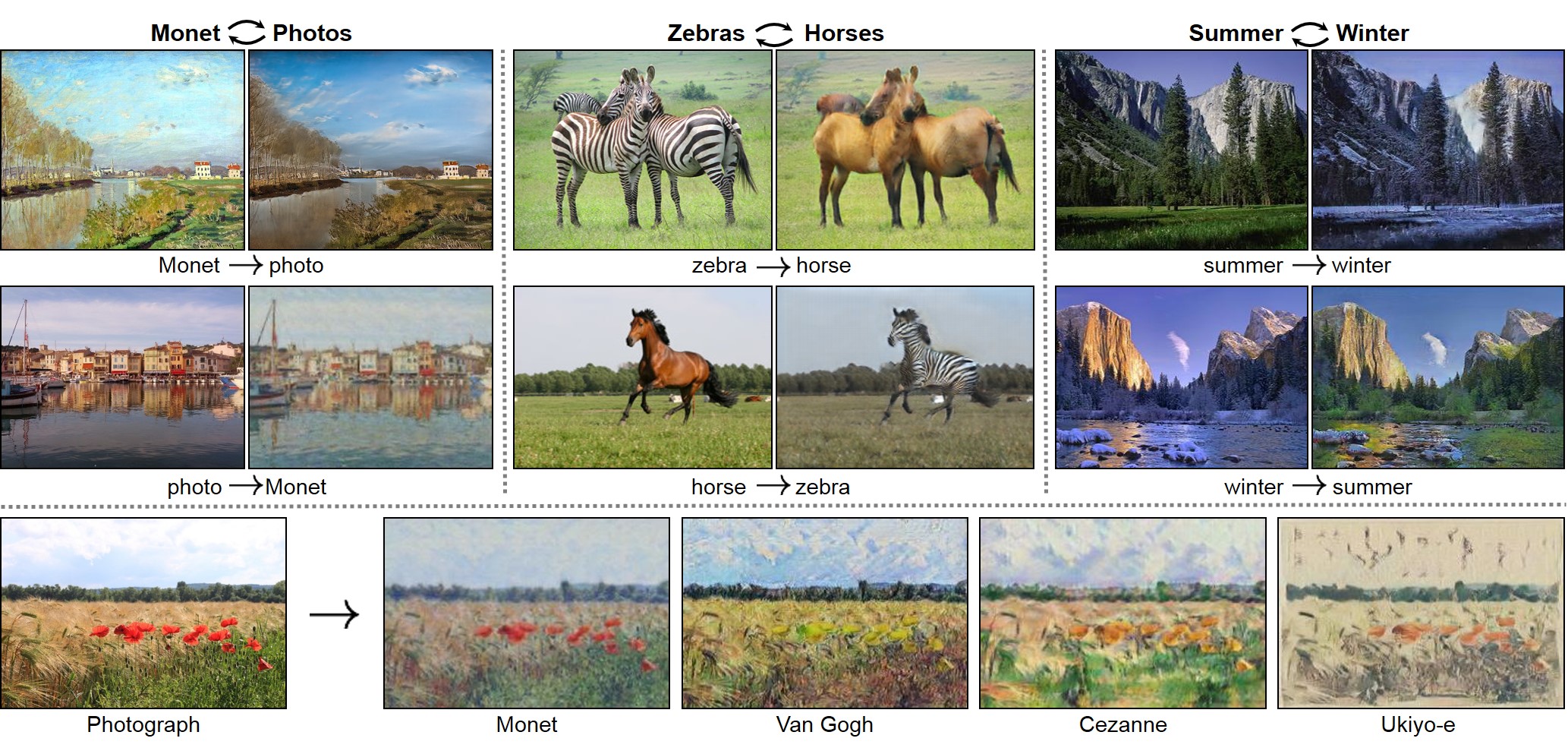 **Pix2pix: [Project](https://phillipi.github.io/pix2pix/) | [Paper](https://arxiv.org/pdf/1611.07004.pdf) | [Torch](https://github.com/phillipi/pix2pix) |
[Tensorflow Core Tutorial](https://www.tensorflow.org/tutorials/generative/pix2pix) | [PyTorch Colab](https://colab.research.google.com/github/junyanz/pytorch-CycleGAN-and-pix2pix/blob/master/pix2pix.ipynb)**
**Pix2pix: [Project](https://phillipi.github.io/pix2pix/) | [Paper](https://arxiv.org/pdf/1611.07004.pdf) | [Torch](https://github.com/phillipi/pix2pix) |
[Tensorflow Core Tutorial](https://www.tensorflow.org/tutorials/generative/pix2pix) | [PyTorch Colab](https://colab.research.google.com/github/junyanz/pytorch-CycleGAN-and-pix2pix/blob/master/pix2pix.ipynb)**
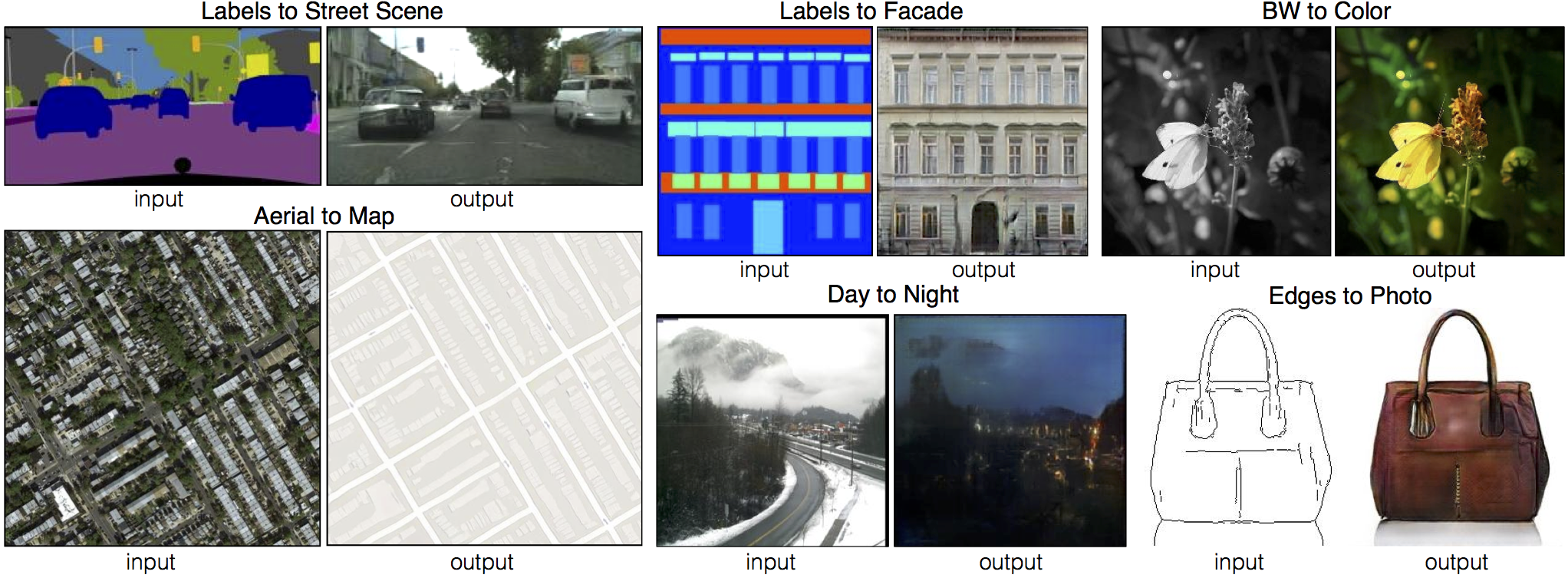 **[EdgesCats Demo](https://affinelayer.com/pixsrv/) | [pix2pix-tensorflow](https://github.com/affinelayer/pix2pix-tensorflow) | by [Christopher Hesse](https://twitter.com/christophrhesse)**
 If you use this code for your research, please cite:
Unpaired Image-to-Image Translation using Cycle-Consistent Adversarial Networks.
If you use this code for your research, please cite:
Unpaired Image-to-Image Translation using Cycle-Consistent Adversarial Networks.
[Jun-Yan Zhu](https://www.cs.cmu.edu/~junyanz/)\*, [Taesung Park](https://taesung.me/)\*, [Phillip Isola](https://people.eecs.berkeley.edu/~isola/), [Alexei A. Efros](https://people.eecs.berkeley.edu/~efros). In ICCV 2017. (\* equal contributions) [[Bibtex]](https://junyanz.github.io/CycleGAN/CycleGAN.txt)
Image-to-Image Translation with Conditional Adversarial Networks.
[Phillip Isola](https://people.eecs.berkeley.edu/~isola), [Jun-Yan Zhu](https://www.cs.cmu.edu/~junyanz/), [Tinghui Zhou](https://people.eecs.berkeley.edu/~tinghuiz), [Alexei A. Efros](https://people.eecs.berkeley.edu/~efros). In CVPR 2017. [[Bibtex]](https://www.cs.cmu.edu/~junyanz/projects/pix2pix/pix2pix.bib)
## Talks and Course
pix2pix slides: [keynote](http://efrosgans.eecs.berkeley.edu/CVPR18_slides/pix2pix.key) | [pdf](http://efrosgans.eecs.berkeley.edu/CVPR18_slides/pix2pix.pdf),
CycleGAN slides: [pptx](http://efrosgans.eecs.berkeley.edu/CVPR18_slides/CycleGAN.pptx) | [pdf](http://efrosgans.eecs.berkeley.edu/CVPR18_slides/CycleGAN.pdf)
CycleGAN course assignment [code](http://www.cs.toronto.edu/~rgrosse/courses/csc321_2018/assignments/a4-code.zip) and [handout](http://www.cs.toronto.edu/~rgrosse/courses/csc321_2018/assignments/a4-handout.pdf) designed by Prof. [Roger Grosse](http://www.cs.toronto.edu/~rgrosse/) for [CSC321](http://www.cs.toronto.edu/~rgrosse/courses/csc321_2018/) "Intro to Neural Networks and Machine Learning" at University of Toronto. Please contact the instructor if you would like to adopt it in your course.
## Colab Notebook
TensorFlow Core CycleGAN Tutorial: [Google Colab](https://colab.research.google.com/github/tensorflow/docs/blob/master/site/en/tutorials/generative/cyclegan.ipynb) | [Code](https://github.com/tensorflow/docs/blob/master/site/en/tutorials/generative/cyclegan.ipynb)
TensorFlow Core pix2pix Tutorial: [Google Colab](https://colab.research.google.com/github/tensorflow/docs/blob/master/site/en/tutorials/generative/pix2pix.ipynb) | [Code](https://github.com/tensorflow/docs/blob/master/site/en/tutorials/generative/pix2pix.ipynb)
PyTorch Colab notebook: [CycleGAN](https://colab.research.google.com/github/junyanz/pytorch-CycleGAN-and-pix2pix/blob/master/CycleGAN.ipynb) and [pix2pix](https://colab.research.google.com/github/junyanz/pytorch-CycleGAN-and-pix2pix/blob/master/pix2pix.ipynb)
ZeroCostDL4Mic Colab notebook: [CycleGAN](https://colab.research.google.com/github/HenriquesLab/ZeroCostDL4Mic/blob/master/Colab_notebooks_Beta/CycleGAN_ZeroCostDL4Mic.ipynb) and [pix2pix](https://colab.research.google.com/github/HenriquesLab/ZeroCostDL4Mic/blob/master/Colab_notebooks_Beta/pix2pix_ZeroCostDL4Mic.ipynb)
## Other implementations
### CycleGAN
[Tensorflow] (by Harry Yang),
[Tensorflow] (by Archit Rathore),
[Tensorflow] (by Van Huy),
[Tensorflow] (by Xiaowei Hu),
[Tensorflow2] (by Zhenliang He),
[TensorLayer1.0] (by luoxier),
[TensorLayer2.0] (by zsdonghao),
[Chainer] (by Yanghua Jin),
[Minimal PyTorch] (by yunjey),
[Mxnet] (by Ldpe2G),
[lasagne/Keras] (by tjwei),
[Keras] (by Simon Karlsson),
[OneFlow] (by Ldpe2G)
### pix2pix
[Tensorflow] (by Christopher Hesse),
[Tensorflow] (by Eyyüb Sariu),
[Tensorflow (face2face)] (by Dat Tran),
[Tensorflow (film)] (by Arthur Juliani),
[Tensorflow (zi2zi)] (by Yuchen Tian),
[Chainer] (by mattya),
[tf/torch/keras/lasagne] (by tjwei),
[Pytorch] (by taey16)
## Prerequisites
- Linux or macOS
- Python 3
- CPU or NVIDIA GPU + CUDA CuDNN
## Getting Started
### Installation
- Clone this repo:
```bash
git clone https://github.com/junyanz/pytorch-CycleGAN-and-pix2pix
cd pytorch-CycleGAN-and-pix2pix
```
- Install [PyTorch](http://pytorch.org) and other dependencies. For Conda users, you can create a new Conda environment by
```bash
conda env create -f environment.yml
```
and then activate the environment by
```bash
conda activate pytorch-img2img
```
- For Docker users, we provide the pre-built Docker image and Dockerfile. Please refer to our [Docker](docs/docker.md) page.
- For Repl users, please click [](https://repl.it/github/junyanz/pytorch-CycleGAN-and-pix2pix).
### CycleGAN train/test
- Download a CycleGAN dataset (e.g. maps):
```bash
bash ./datasets/download_cyclegan_dataset.sh maps
```
- To log training progress and test images to W&B dashboard, set the `--use_wandb` flag with training script
- Train a model:
```bash
#!./scripts/train_cyclegan.sh
python train.py --dataroot ./datasets/maps --name maps_cyclegan --model cycle_gan --use_wandb
```
To see more intermediate results, check out `./checkpoints/maps_cyclegan/web/index.html`.
- Test the model:
```bash
#!./scripts/test_cyclegan.sh
python test.py --dataroot ./datasets/maps --name maps_cyclegan --model cycle_gan
```
- The test results will be saved to a html file here: `./results/maps_cyclegan/latest_test/index.html`.
### pix2pix train/test
- Download a pix2pix dataset (e.g.[facades](http://cmp.felk.cvut.cz/~tylecr1/facade/)):
```bash
bash ./datasets/download_pix2pix_dataset.sh facades
```
- To log training progress and test images to W&B dashboard, set the `--use_wandb` flag with training script
- Train a model:
```bash
#!./scripts/train_pix2pix.sh
python train.py --dataroot ./datasets/facades --name facades_pix2pix --model pix2pix --direction BtoA --use_wandb
```
To see more intermediate results, check out `./checkpoints/facades_pix2pix/web/index.html`.
- Test the model (`bash ./scripts/test_pix2pix.sh`):
```bash
#!./scripts/test_pix2pix.sh
python test.py --dataroot ./datasets/facades --name facades_pix2pix --model pix2pix --direction BtoA
```
- The test results will be saved to a html file here: `./results/facades_pix2pix/test_latest/index.html`. You can find more scripts at `scripts` directory.
- To train and test pix2pix-based colorization models, please add `--model colorization` and `--dataset_mode colorization`. See our training [tips](https://github.com/junyanz/pytorch-CycleGAN-and-pix2pix/blob/master/docs/tips.md#notes-on-colorization) for more details.
### Apply a pre-trained model (CycleGAN)
- You can download a pretrained model (e.g. horse2zebra) with the following script:
```bash
bash ./scripts/download_cyclegan_model.sh horse2zebra
```
- The pretrained model is saved at `./checkpoints/{name}_pretrained/latest_net_G.pth`. Check [here](https://github.com/junyanz/pytorch-CycleGAN-and-pix2pix/blob/master/scripts/download_cyclegan_model.sh#L3) for all the available CycleGAN models.
- To test the model, you also need to download the horse2zebra dataset:
```bash
bash ./datasets/download_cyclegan_dataset.sh horse2zebra
```
- Then generate the results using
```bash
python test.py --dataroot datasets/horse2zebra/testA --name horse2zebra_pretrained --model test --no_dropout
```
- The option `--model test` is used for generating results of CycleGAN only for one side. This option will automatically set `--dataset_mode single`, which only loads the images from one set. On the contrary, using `--model cycle_gan` requires loading and generating results in both directions, which is sometimes unnecessary. The results will be saved at `./results/`. Use `--results_dir {directory_path_to_save_result}` to specify the results directory.
- For pix2pix and your own models, you need to explicitly specify `--netG`, `--norm`, `--no_dropout` to match the generator architecture of the trained model. See this [FAQ](https://github.com/junyanz/pytorch-CycleGAN-and-pix2pix/blob/master/docs/qa.md#runtimeerror-errors-in-loading-state_dict-812-671461-296) for more details.
### Apply a pre-trained model (pix2pix)
Download a pre-trained model with `./scripts/download_pix2pix_model.sh`.
- Check [here](https://github.com/junyanz/pytorch-CycleGAN-and-pix2pix/blob/master/scripts/download_pix2pix_model.sh#L3) for all the available pix2pix models. For example, if you would like to download label2photo model on the Facades dataset,
```bash
bash ./scripts/download_pix2pix_model.sh facades_label2photo
```
- Download the pix2pix facades datasets:
```bash
bash ./datasets/download_pix2pix_dataset.sh facades
```
- Then generate the results using
```bash
python test.py --dataroot ./datasets/facades/ --direction BtoA --model pix2pix --name facades_label2photo_pretrained
```
- Note that we specified `--direction BtoA` as Facades dataset's A to B direction is photos to labels.
- If you would like to apply a pre-trained model to a collection of input images (rather than image pairs), please use `--model test` option. See `./scripts/test_single.sh` for how to apply a model to Facade label maps (stored in the directory `facades/testB`).
- See a list of currently available models at `./scripts/download_pix2pix_model.sh`
### Multi-GPU training
To train a model on multiple GPUs, please use `torchrun --nproc_per_node=4 train.py ...` instead of `python train.py ...`. We also need to use synchronized batchnorm by setting `--norm sync_batch` (or `--norm sync_instance` for instance normgalization). The `--norm batch` is not compatible with DDP.
## [Docker](docs/docker.md)
We provide the pre-built Docker image and Dockerfile that can run this code repo. See [docker](docs/docker.md).
## [Datasets](docs/datasets.md)
Download pix2pix/CycleGAN datasets and create your own datasets.
## [Training/Test Tips](docs/tips.md)
Best practice for training and testing your models.
## [Frequently Asked Questions](docs/qa.md)
Before you post a new question, please first look at the above Q & A and existing GitHub issues.
## Custom Model and Dataset
If you plan to implement custom models and dataset for your new applications, we provide a dataset [template](data/template_dataset.py) and a model [template](models/template_model.py) as a starting point.
## [Code structure](docs/overview.md)
To help users better understand and use our code, we briefly overview the functionality and implementation of each package and each module.
## Pull Request
You are always welcome to contribute to this repository by sending a [pull request](https://help.github.com/articles/about-pull-requests/).
Please run `flake8 --ignore E501 .` and `pytest scripts/test_before_push.py -v` before you commit the code. Please also update the code structure [overview](docs/overview.md) accordingly if you add or remove files.
## Citation
If you use this code for your research, please cite our papers.
```
@inproceedings{CycleGAN2017,
title={Unpaired Image-to-Image Translation using Cycle-Consistent Adversarial Networks},
author={Zhu, Jun-Yan and Park, Taesung and Isola, Phillip and Efros, Alexei A},
booktitle={Computer Vision (ICCV), 2017 IEEE International Conference on},
year={2017}
}
@inproceedings{isola2017image,
title={Image-to-Image Translation with Conditional Adversarial Networks},
author={Isola, Phillip and Zhu, Jun-Yan and Zhou, Tinghui and Efros, Alexei A},
booktitle={Computer Vision and Pattern Recognition (CVPR), 2017 IEEE Conference on},
year={2017}
}
```
## Other Languages
[Spanish](docs/README_es.md)
## Related Projects
[img2img-turbo](https://github.com/GaParmar/img2img-turbo)
[contrastive-unpaired-translation](https://github.com/taesungp/contrastive-unpaired-translation) (CUT)
[CycleGAN-Torch](https://github.com/junyanz/CycleGAN) |
[pix2pix-Torch](https://github.com/phillipi/pix2pix) | [pix2pixHD](https://github.com/NVIDIA/pix2pixHD)|
[BicycleGAN](https://github.com/junyanz/BicycleGAN) | [vid2vid](https://tcwang0509.github.io/vid2vid/) | [SPADE/GauGAN](https://github.com/NVlabs/SPADE)
[iGAN](https://github.com/junyanz/iGAN) | [GAN Dissection](https://github.com/CSAILVision/GANDissect) | [GAN Paint](http://ganpaint.io/)
## Cat Paper Collection
If you love cats, and love reading cool graphics, vision, and learning papers, please check out the Cat Paper [Collection](https://github.com/junyanz/CatPapers).
## Acknowledgments
Our code is inspired by [pytorch-DCGAN](https://github.com/pytorch/examples/tree/master/dcgan).
================================================
FILE: data/__init__.py
================================================
"""This package includes all the modules related to data loading and preprocessing
To add a custom dataset class called 'dummy', you need to add a file called 'dummy_dataset.py' and define a subclass 'DummyDataset' inherited from BaseDataset.
You need to implement four functions:
-- <__init__>: initialize the class, first call BaseDataset.__init__(self, opt).
-- <__len__>: return the size of dataset.
-- <__getitem__>: get a data point from data loader.
-- : (optionally) add dataset-specific options and set default options.
Now you can use the dataset class by specifying flag '--dataset_mode dummy'.
See our template dataset class 'template_dataset.py' for more details.
"""
import importlib
import torch.utils.data
from torch.utils.data.distributed import DistributedSampler
import torch.distributed as dist
import os
from data.base_dataset import BaseDataset
def find_dataset_using_name(dataset_name):
"""Import the module "data/[dataset_name]_dataset.py".
In the file, the class called DatasetNameDataset() will
be instantiated. It has to be a subclass of BaseDataset,
and it is case-insensitive.
"""
dataset_filename = "data." + dataset_name + "_dataset"
datasetlib = importlib.import_module(dataset_filename)
dataset = None
target_dataset_name = dataset_name.replace("_", "") + "dataset"
for name, cls in datasetlib.__dict__.items():
if name.lower() == target_dataset_name.lower() and issubclass(cls, BaseDataset):
dataset = cls
if dataset is None:
raise NotImplementedError("In %s.py, there should be a subclass of BaseDataset with class name that matches %s in lowercase." % (dataset_filename, target_dataset_name))
return dataset
def get_option_setter(dataset_name):
"""Return the static method of the dataset class."""
dataset_class = find_dataset_using_name(dataset_name)
return dataset_class.modify_commandline_options
def create_dataset(opt):
"""Create a dataset given the option.
This function wraps the class CustomDatasetDataLoader.
This is the main interface between this package and 'train.py'/'test.py'
Example:
>>> from data import create_dataset
>>> dataset = create_dataset(opt)
"""
data_loader = CustomDatasetDataLoader(opt)
dataset = data_loader.load_data()
return dataset
class CustomDatasetDataLoader:
"""Wrapper class of Dataset class that performs multi-threaded data loading"""
def __init__(self, opt):
"""Initialize this class
Step 1: create a dataset instance given the name [dataset_mode]
Step 2: create a multi-threaded data loader.
"""
self.opt = opt
dataset_class = find_dataset_using_name(opt.dataset_mode)
self.dataset = dataset_class(opt)
print("dataset [%s] was created" % type(self.dataset).__name__)
# Use DistributedSampler for DDP training
if "LOCAL_RANK" in os.environ:
print(f'create DDP sampler on rank {int(os.environ["LOCAL_RANK"])}')
self.sampler = DistributedSampler(self.dataset, shuffle=not opt.serial_batches)
shuffle = False # DistributedSampler handles shuffling
else:
self.sampler = None
shuffle = not opt.serial_batches
self.dataloader = torch.utils.data.DataLoader(self.dataset, batch_size=opt.batch_size, shuffle=shuffle, sampler=self.sampler, num_workers=int(opt.num_threads))
def load_data(self):
return self
def __len__(self):
"""Return the number of data in the dataset"""
return min(len(self.dataset), self.opt.max_dataset_size)
def __iter__(self):
"""Return a batch of data"""
for i, data in enumerate(self.dataloader):
if i * self.opt.batch_size >= self.opt.max_dataset_size:
break
yield data
def set_epoch(self, epoch):
"""Set epoch for DistributedSampler to ensure proper shuffling"""
if self.sampler is not None:
self.sampler.set_epoch(epoch)
================================================
FILE: data/aligned_dataset.py
================================================
import os
from data.base_dataset import BaseDataset, get_params, get_transform
from data.image_folder import make_dataset
from PIL import Image
class AlignedDataset(BaseDataset):
"""A dataset class for paired image dataset.
It assumes that the directory '/path/to/data/train' contains image pairs in the form of {A,B}.
During test time, you need to prepare a directory '/path/to/data/test'.
"""
def __init__(self, opt):
"""Initialize this dataset class.
Parameters:
opt (Option class) -- stores all the experiment flags; needs to be a subclass of BaseOptions
"""
BaseDataset.__init__(self, opt)
self.dir_AB = os.path.join(opt.dataroot, opt.phase) # get the image directory
self.AB_paths = sorted(make_dataset(self.dir_AB, opt.max_dataset_size)) # get image paths
assert self.opt.load_size >= self.opt.crop_size # crop_size should be smaller than the size of loaded image
self.input_nc = self.opt.output_nc if self.opt.direction == "BtoA" else self.opt.input_nc
self.output_nc = self.opt.input_nc if self.opt.direction == "BtoA" else self.opt.output_nc
def __getitem__(self, index):
"""Return a data point and its metadata information.
Parameters:
index - - a random integer for data indexing
Returns a dictionary that contains A, B, A_paths and B_paths
A (tensor) - - an image in the input domain
B (tensor) - - its corresponding image in the target domain
A_paths (str) - - image paths
B_paths (str) - - image paths (same as A_paths)
"""
# read a image given a random integer index
AB_path = self.AB_paths[index]
AB = Image.open(AB_path).convert("RGB")
# split AB image into A and B
w, h = AB.size
w2 = int(w / 2)
A = AB.crop((0, 0, w2, h))
B = AB.crop((w2, 0, w, h))
# apply the same transform to both A and B
transform_params = get_params(self.opt, A.size)
A_transform = get_transform(self.opt, transform_params, grayscale=(self.input_nc == 1))
B_transform = get_transform(self.opt, transform_params, grayscale=(self.output_nc == 1))
A = A_transform(A)
B = B_transform(B)
return {"A": A, "B": B, "A_paths": AB_path, "B_paths": AB_path}
def __len__(self):
"""Return the total number of images in the dataset."""
return len(self.AB_paths)
================================================
FILE: data/base_dataset.py
================================================
"""This module implements an abstract base class (ABC) 'BaseDataset' for datasets.
It also includes common transformation functions (e.g., get_transform, __scale_width), which can be later used in subclasses.
"""
import random
import numpy as np
import torch.utils.data as data
from PIL import Image
import torchvision.transforms as transforms
from abc import ABC, abstractmethod
class BaseDataset(data.Dataset, ABC):
"""This class is an abstract base class (ABC) for datasets.
To create a subclass, you need to implement the following four functions:
-- <__init__>: initialize the class, first call BaseDataset.__init__(self, opt).
-- <__len__>: return the size of dataset.
-- <__getitem__>: get a data point.
-- : (optionally) add dataset-specific options and set default options.
"""
def __init__(self, opt):
"""Initialize the class; save the options in the class
Parameters:
opt (Option class)-- stores all the experiment flags; needs to be a subclass of BaseOptions
"""
self.opt = opt
self.root = opt.dataroot
@staticmethod
def modify_commandline_options(parser, is_train):
"""Add new dataset-specific options, and rewrite default values for existing options.
Parameters:
parser -- original option parser
is_train (bool) -- whether training phase or test phase. You can use this flag to add training-specific or test-specific options.
Returns:
the modified parser.
"""
return parser
@abstractmethod
def __len__(self):
"""Return the total number of images in the dataset."""
return 0
@abstractmethod
def __getitem__(self, index):
"""Return a data point and its metadata information.
Parameters:
index - - a random integer for data indexing
Returns:
a dictionary of data with their names. It ususally contains the data itself and its metadata information.
"""
pass
def get_params(opt, size):
w, h = size
new_h = h
new_w = w
if opt.preprocess == "resize_and_crop":
new_h = new_w = opt.load_size
elif opt.preprocess == "scale_width_and_crop":
new_w = opt.load_size
new_h = opt.load_size * h // w
x = random.randint(0, np.maximum(0, new_w - opt.crop_size))
y = random.randint(0, np.maximum(0, new_h - opt.crop_size))
flip = random.random() > 0.5
return {"crop_pos": (x, y), "flip": flip}
def get_transform(opt, params=None, grayscale=False, method=transforms.InterpolationMode.BICUBIC, convert=True):
transform_list = []
if grayscale:
transform_list.append(transforms.Grayscale(1))
if "resize" in opt.preprocess:
osize = [opt.load_size, opt.load_size]
transform_list.append(transforms.Resize(osize, method))
elif "scale_width" in opt.preprocess:
transform_list.append(transforms.Lambda(lambda img: __scale_width(img, opt.load_size, opt.crop_size, method)))
if "crop" in opt.preprocess:
if params is None:
transform_list.append(transforms.RandomCrop(opt.crop_size))
else:
transform_list.append(transforms.Lambda(lambda img: __crop(img, params["crop_pos"], opt.crop_size)))
if opt.preprocess == "none":
transform_list.append(transforms.Lambda(lambda img: __make_power_2(img, base=4, method=method)))
if not opt.no_flip:
if params is None:
transform_list.append(transforms.RandomHorizontalFlip())
elif params["flip"]:
transform_list.append(transforms.Lambda(lambda img: __flip(img, params["flip"])))
if convert:
transform_list += [transforms.ToTensor()]
if grayscale:
transform_list += [transforms.Normalize((0.5,), (0.5,))]
else:
transform_list += [transforms.Normalize((0.5, 0.5, 0.5), (0.5, 0.5, 0.5))]
return transforms.Compose(transform_list)
def __transforms2pil_resize(method):
mapper = {
transforms.InterpolationMode.BILINEAR: Image.BILINEAR,
transforms.InterpolationMode.BICUBIC: Image.BICUBIC,
transforms.InterpolationMode.NEAREST: Image.NEAREST,
transforms.InterpolationMode.LANCZOS: Image.LANCZOS,
}
return mapper[method]
def __make_power_2(img, base, method=transforms.InterpolationMode.BICUBIC):
method = __transforms2pil_resize(method)
ow, oh = img.size
h = int(round(oh / base) * base)
w = int(round(ow / base) * base)
if h == oh and w == ow:
return img
__print_size_warning(ow, oh, w, h)
return img.resize((w, h), method)
def __scale_width(img, target_size, crop_size, method=transforms.InterpolationMode.BICUBIC):
method = __transforms2pil_resize(method)
ow, oh = img.size
if ow == target_size and oh >= crop_size:
return img
w = target_size
h = int(max(target_size * oh / ow, crop_size))
return img.resize((w, h), method)
def __crop(img, pos, size):
ow, oh = img.size
x1, y1 = pos
tw = th = size
if ow > tw or oh > th:
return img.crop((x1, y1, x1 + tw, y1 + th))
return img
def __flip(img, flip):
if flip:
return img.transpose(Image.FLIP_LEFT_RIGHT)
return img
def __print_size_warning(ow, oh, w, h):
"""Print warning information about image size(only print once)"""
if not hasattr(__print_size_warning, "has_printed"):
print("The image size needs to be a multiple of 4. " "The loaded image size was (%d, %d), so it was adjusted to " "(%d, %d). This adjustment will be done to all images " "whose sizes are not multiples of 4" % (ow, oh, w, h))
__print_size_warning.has_printed = True
================================================
FILE: data/colorization_dataset.py
================================================
import os
from data.base_dataset import BaseDataset, get_transform
from data.image_folder import make_dataset
from skimage import color # require skimage
from PIL import Image
import numpy as np
import torchvision.transforms as transforms
class ColorizationDataset(BaseDataset):
"""This dataset class can load a set of natural images in RGB, and convert RGB format into (L, ab) pairs in Lab color space.
This dataset is required by pix2pix-based colorization model ('--model colorization')
"""
@staticmethod
def modify_commandline_options(parser, is_train):
"""Add new dataset-specific options, and rewrite default values for existing options.
Parameters:
parser -- original option parser
is_train (bool) -- whether training phase or test phase. You can use this flag to add training-specific or test-specific options.
Returns:
the modified parser.
By default, the number of channels for input image is 1 (L) and
the number of channels for output image is 2 (ab). The direction is from A to B
"""
parser.set_defaults(input_nc=1, output_nc=2, direction="AtoB")
return parser
def __init__(self, opt):
"""Initialize this dataset class.
Parameters:
opt (Option class) -- stores all the experiment flags; needs to be a subclass of BaseOptions
"""
BaseDataset.__init__(self, opt)
self.dir = os.path.join(opt.dataroot, opt.phase)
self.AB_paths = sorted(make_dataset(self.dir, opt.max_dataset_size))
assert opt.input_nc == 1 and opt.output_nc == 2 and opt.direction == "AtoB"
self.transform = get_transform(self.opt, convert=False)
def __getitem__(self, index):
"""Return a data point and its metadata information.
Parameters:
index - - a random integer for data indexing
Returns a dictionary that contains A, B, A_paths and B_paths
A (tensor) - - the L channel of an image
B (tensor) - - the ab channels of the same image
A_paths (str) - - image paths
B_paths (str) - - image paths (same as A_paths)
"""
path = self.AB_paths[index]
im = Image.open(path).convert("RGB")
im = self.transform(im)
im = np.array(im)
lab = color.rgb2lab(im).astype(np.float32)
lab_t = transforms.ToTensor()(lab)
A = lab_t[[0], ...] / 50.0 - 1.0
B = lab_t[[1, 2], ...] / 110.0
return {"A": A, "B": B, "A_paths": path, "B_paths": path}
def __len__(self):
"""Return the total number of images in the dataset."""
return len(self.AB_paths)
================================================
FILE: data/image_folder.py
================================================
"""A modified image folder class
We modify the official PyTorch image folder (https://github.com/pytorch/vision/blob/master/torchvision/datasets/folder.py)
so that this class can load images from both current directory and its subdirectories.
"""
import torch.utils.data as data
from pathlib import Path
from PIL import Image
IMG_EXTENSIONS = [
".jpg",
".JPG",
".jpeg",
".JPEG",
".png",
".PNG",
".ppm",
".PPM",
".bmp",
".BMP",
".tif",
".TIF",
".tiff",
".TIFF",
]
def is_image_file(filename):
return any(filename.endswith(extension) for extension in IMG_EXTENSIONS)
def make_dataset(dir, max_dataset_size=float("inf")):
images = []
dir_path = Path(dir)
assert dir_path.is_dir(), f"{dir} is not a valid directory"
for path in sorted(dir_path.rglob("*")):
if path.is_file() and is_image_file(path.name):
images.append(str(path))
return images[: min(max_dataset_size, len(images))]
def default_loader(path):
return Image.open(path).convert("RGB")
class ImageFolder(data.Dataset):
def __init__(self, root, transform=None, return_paths=False, loader=default_loader):
imgs = make_dataset(root)
if len(imgs) == 0:
raise (RuntimeError("Found 0 images in: " + root + "\n" "Supported image extensions are: " + ",".join(IMG_EXTENSIONS)))
self.root = root
self.imgs = imgs
self.transform = transform
self.return_paths = return_paths
self.loader = loader
def __getitem__(self, index):
path = self.imgs[index]
img = self.loader(path)
if self.transform is not None:
img = self.transform(img)
if self.return_paths:
return img, path
else:
return img
def __len__(self):
return len(self.imgs)
================================================
FILE: data/single_dataset.py
================================================
from data.base_dataset import BaseDataset, get_transform
from data.image_folder import make_dataset
from PIL import Image
class SingleDataset(BaseDataset):
"""This dataset class can load a set of images specified by the path --dataroot /path/to/data.
It can be used for generating CycleGAN results only for one side with the model option '-model test'.
"""
def __init__(self, opt):
"""Initialize this dataset class.
Parameters:
opt (Option class) -- stores all the experiment flags; needs to be a subclass of BaseOptions
"""
BaseDataset.__init__(self, opt)
self.A_paths = sorted(make_dataset(opt.dataroot, opt.max_dataset_size))
input_nc = self.opt.output_nc if self.opt.direction == "BtoA" else self.opt.input_nc
self.transform = get_transform(opt, grayscale=(input_nc == 1))
def __getitem__(self, index):
"""Return a data point and its metadata information.
Parameters:
index - - a random integer for data indexing
Returns a dictionary that contains A and A_paths
A(tensor) - - an image in one domain
A_paths(str) - - the path of the image
"""
A_path = self.A_paths[index]
A_img = Image.open(A_path).convert("RGB")
A = self.transform(A_img)
return {"A": A, "A_paths": A_path}
def __len__(self):
"""Return the total number of images in the dataset."""
return len(self.A_paths)
================================================
FILE: data/template_dataset.py
================================================
"""Dataset class template
This module provides a template for users to implement custom datasets.
You can specify '--dataset_mode template' to use this dataset.
The class name should be consistent with both the filename and its dataset_mode option.
The filename should be _dataset.py
The class name should be Dataset.py
You need to implement the following functions:
-- : Add dataset-specific options and rewrite default values for existing options.
-- <__init__>: Initialize this dataset class.
-- <__getitem__>: Return a data point and its metadata information.
-- <__len__>: Return the number of images.
"""
from data.base_dataset import BaseDataset, get_transform
# from data.image_folder import make_dataset
# from PIL import Image
class TemplateDataset(BaseDataset):
"""A template dataset class for you to implement custom datasets."""
@staticmethod
def modify_commandline_options(parser, is_train):
"""Add new dataset-specific options, and rewrite default values for existing options.
Parameters:
parser -- original option parser
is_train (bool) -- whether training phase or test phase. You can use this flag to add training-specific or test-specific options.
Returns:
the modified parser.
"""
parser.add_argument("--new_dataset_option", type=float, default=1.0, help="new dataset option")
parser.set_defaults(max_dataset_size=10, new_dataset_option=2.0) # specify dataset-specific default values
return parser
def __init__(self, opt):
"""Initialize this dataset class.
Parameters:
opt (Option class) -- stores all the experiment flags; needs to be a subclass of BaseOptions
A few things can be done here.
- save the options (have been done in BaseDataset)
- get image paths and meta information of the dataset.
- define the image transformation.
"""
# save the option and dataset root
BaseDataset.__init__(self, opt)
# get the image paths of your dataset;
self.image_paths = [] # You can call sorted(make_dataset(self.root, opt.max_dataset_size)) to get all the image paths under the directory self.root
# define the default transform function. You can use ; You can also define your custom transform function
self.transform = get_transform(opt)
def __getitem__(self, index):
"""Return a data point and its metadata information.
Parameters:
index -- a random integer for data indexing
Returns:
a dictionary of data with their names. It usually contains the data itself and its metadata information.
Step 1: get a random image path: e.g., path = self.image_paths[index]
Step 2: load your data from the disk: e.g., image = Image.open(path).convert('RGB').
Step 3: convert your data to a PyTorch tensor. You can use helpder functions such as self.transform. e.g., data = self.transform(image)
Step 4: return a data point as a dictionary.
"""
path = "temp" # needs to be a string
data_A = None # needs to be a tensor
data_B = None # needs to be a tensor
return {"data_A": data_A, "data_B": data_B, "path": path}
def __len__(self):
"""Return the total number of images."""
return len(self.image_paths)
================================================
FILE: data/unaligned_dataset.py
================================================
import os
from data.base_dataset import BaseDataset, get_transform
from data.image_folder import make_dataset
from PIL import Image
import random
class UnalignedDataset(BaseDataset):
"""
This dataset class can load unaligned/unpaired datasets.
It requires two directories to host training images from domain A '/path/to/data/trainA'
and from domain B '/path/to/data/trainB' respectively.
You can train the model with the dataset flag '--dataroot /path/to/data'.
Similarly, you need to prepare two directories:
'/path/to/data/testA' and '/path/to/data/testB' during test time.
"""
def __init__(self, opt):
"""Initialize this dataset class.
Parameters:
opt (Option class) -- stores all the experiment flags; needs to be a subclass of BaseOptions
"""
BaseDataset.__init__(self, opt)
self.dir_A = os.path.join(opt.dataroot, opt.phase + "A") # create a path '/path/to/data/trainA'
self.dir_B = os.path.join(opt.dataroot, opt.phase + "B") # create a path '/path/to/data/trainB'
self.A_paths = sorted(make_dataset(self.dir_A, opt.max_dataset_size)) # load images from '/path/to/data/trainA'
self.B_paths = sorted(make_dataset(self.dir_B, opt.max_dataset_size)) # load images from '/path/to/data/trainB'
self.A_size = len(self.A_paths) # get the size of dataset A
self.B_size = len(self.B_paths) # get the size of dataset B
btoA = self.opt.direction == "BtoA"
input_nc = self.opt.output_nc if btoA else self.opt.input_nc # get the number of channels of input image
output_nc = self.opt.input_nc if btoA else self.opt.output_nc # get the number of channels of output image
self.transform_A = get_transform(self.opt, grayscale=(input_nc == 1))
self.transform_B = get_transform(self.opt, grayscale=(output_nc == 1))
def __getitem__(self, index):
"""Return a data point and its metadata information.
Parameters:
index (int) -- a random integer for data indexing
Returns a dictionary that contains A, B, A_paths and B_paths
A (tensor) -- an image in the input domain
B (tensor) -- its corresponding image in the target domain
A_paths (str) -- image paths
B_paths (str) -- image paths
"""
A_path = self.A_paths[index % self.A_size] # make sure index is within then range
if self.opt.serial_batches: # make sure index is within then range
index_B = index % self.B_size
else: # randomize the index for domain B to avoid fixed pairs.
index_B = random.randint(0, self.B_size - 1)
B_path = self.B_paths[index_B]
A_img = Image.open(A_path).convert("RGB")
B_img = Image.open(B_path).convert("RGB")
# apply image transformation
A = self.transform_A(A_img)
B = self.transform_B(B_img)
return {"A": A, "B": B, "A_paths": A_path, "B_paths": B_path}
def __len__(self):
"""Return the total number of images in the dataset.
As we have two datasets with potentially different number of images,
we take a maximum of
"""
return max(self.A_size, self.B_size)
================================================
FILE: docs/Dockerfile
================================================
FROM nvidia/cuda:10.1-base
#Nvidia Public GPG Key
RUN apt-key adv --fetch-keys https://developer.download.nvidia.com/compute/cuda/repos/ubuntu1804/x86_64/3bf863cc.pub
RUN apt update && apt install -y wget unzip curl bzip2 git
RUN curl -LO http://repo.continuum.io/miniconda/Miniconda3-latest-Linux-x86_64.sh
RUN bash Miniconda3-latest-Linux-x86_64.sh -p /miniconda -b
RUN rm Miniconda3-latest-Linux-x86_64.sh
ENV PATH=/miniconda/bin:${PATH}
RUN conda update -y conda
RUN conda install -y pytorch torchvision -c pytorch
RUN mkdir /workspace/ && cd /workspace/ && git clone https://github.com/junyanz/pytorch-CycleGAN-and-pix2pix.git && cd pytorch-CycleGAN-and-pix2pix && pip install -r requirements.txt
WORKDIR /workspace
================================================
FILE: docs/README_es.md
================================================

# CycleGAN y pix2pix en PyTorch
Implementacion en PyTorch de Unpaired Image-to-Image Translation.
Este codigo fue escrito por [Jun-Yan Zhu](https://github.com/junyanz) y [Taesung Park](https://github.com/taesung), y con ayuda de [Tongzhou Wang](https://ssnl.github.io/).
Esta implementacion de PyTorch produce resultados comparables o mejores que nuestros original software de Torch. Si te gustaria producir los mismos resultados que en documento oficial, echa un vistazo al codigo original [CycleGAN Torch](https://github.com/junyanz/CycleGAN) y [pix2pix Torch](https://github.com/phillipi/pix2pix)
**Aviso**: El software actual funciona correctamente en PyTorch 2.4+. Para soporte en PyTorch 0.1-0.3: [branch](https://github.com/junyanz/pytorch-CycleGAN-and-pix2pix/tree/pytorch0.3.1).
Puede encontrar información útil en [training/test tips](https://github.com/junyanz/pytorch-CycleGAN-and-pix2pix/blob/master/docs/tips.md) y [preguntas frecuentes](https://github.com/junyanz/pytorch-CycleGAN-and-pix2pix/blob/master/docs/qa.md). Para implementar modelos y conjuntos de datos personalizados, consulte nuestro [templates](https://github.com/junyanz/pytorch-CycleGAN-and-pix2pix/blob/master/docs/README_es.md#modelo-y-dataset-personalizado). Para ayudar a los usuarios a comprender y adaptar mejor nuestra base de código, proporcionamos un [overview](https://github.com/junyanz/pytorch-CycleGAN-and-pix2pix/blob/master/docs/overview.md) de la estructura de código de este repositorio.
**CycleGAN: [Proyecto](https://junyanz.github.io/CycleGAN/) | [PDF](https://arxiv.org/pdf/1703.10593.pdf) | [Torch](https://github.com/junyanz/CycleGAN) |
[Guia de Tensorflow Core](https://www.tensorflow.org/tutorials/generative/cyclegan) | [PyTorch Colab](https://colab.research.google.com/github/junyanz/pytorch-CycleGAN-and-pix2pix/blob/master/CycleGAN.ipynb)**
**Pix2pix: [Proyeto](https://phillipi.github.io/pix2pix/) | [PDF](https://arxiv.org/pdf/1611.07004.pdf) | [Torch](https://github.com/phillipi/pix2pix) |
[Guia de Tensorflow Core](https://www.tensorflow.org/tutorials/generative/cyclegan) | [PyTorch Colab](https://colab.research.google.com/github/junyanz/pytorch-CycleGAN-and-pix2pix/blob/master/pix2pix.ipynb)**
**[EdgesCats Demo](https://affinelayer.com/pixsrv/) | [pix2pix-tensorflow](https://github.com/affinelayer/pix2pix-tensorflow) | por [Christopher Hesse](https://twitter.com/christophrhesse)**
 Si usa este código para su investigación, cite:
Unpaired Image-to-Image Translation usando Cycle-Consistent Adversarial Networks.
Si usa este código para su investigación, cite:
Unpaired Image-to-Image Translation usando Cycle-Consistent Adversarial Networks.
[Jun-Yan Zhu](https://www.cs.cmu.edu/~junyanz/)\*, [Taesung Park](https://taesung.me/)\*, [Phillip Isola](https://people.eecs.berkeley.edu/~isola/), [Alexei A. Efros](https://people.eecs.berkeley.edu/~efros). In ICCV 2017. (* contribucion igualitaria) [[Bibtex]](https://junyanz.github.io/CycleGAN/CycleGAN.txt)
Image-to-Image Translation usando Conditional Adversarial Networks.
[Phillip Isola](https://people.eecs.berkeley.edu/~isola), [Jun-Yan Zhu](https://www.cs.cmu.edu/~junyanz/), [Tinghui Zhou](https://people.eecs.berkeley.edu/~tinghuiz), [Alexei A. Efros](https://people.eecs.berkeley.edu/~efros). In CVPR 2017. [[Bibtex]](https://www.cs.cmu.edu/~junyanz/projects/pix2pix/pix2pix.bib)
## Charlas y curso
Presentacion en PowerPoint de Pix2pix: [keynote](http://efrosgans.eecs.berkeley.edu/CVPR18_slides/pix2pix.key) | [pdf](http://efrosgans.eecs.berkeley.edu/CVPR18_slides/pix2pix.pdf),
Presentacion en PowerPoint de CycleGAN: [pptx](http://efrosgans.eecs.berkeley.edu/CVPR18_slides/CycleGAN.pptx) | [pdf](http://efrosgans.eecs.berkeley.edu/CVPR18_slides/CycleGAN.pdf)
Asignación del curso CycleGAN [codigo](http://www.cs.toronto.edu/~rgrosse/courses/csc321_2018/assignments/a4-code.zip) y [handout](http://www.cs.toronto.edu/~rgrosse/courses/csc321_2018/assignments/a4-handout.pdf) diseñado por el Prof. [Roger Grosse](http://www.cs.toronto.edu/~rgrosse/) for [CSC321](http://www.cs.toronto.edu/~rgrosse/courses/csc321_2018/) "Intro to Neural Networks and Machine Learning" en la universidad de Toronto. Póngase en contacto con el instructor si desea adoptarlo en su curso.
## Colab Notebook
TensorFlow Core CycleGAN Tutorial: [Google Colab](https://colab.research.google.com/github/tensorflow/docs/blob/master/site/en/tutorials/generative/cyclegan.ipynb) | [Codigo](https://github.com/tensorflow/docs/blob/master/site/en/tutorials/generative/cyclegan.ipynb)
Guia de TensorFlow Core pix2pix : [Google Colab](https://colab.research.google.com/github/tensorflow/docs/blob/master/site/en/tutorials/generative/pix2pix.ipynb) | [Codigo](https://github.com/tensorflow/docs/blob/master/site/en/tutorials/generative/pix2pix.ipynb)
PyTorch Colab notebook: [CycleGAN](https://colab.research.google.com/github/junyanz/pytorch-CycleGAN-and-pix2pix/blob/master/CycleGAN.ipynb) y [pix2pix](https://colab.research.google.com/github/junyanz/pytorch-CycleGAN-and-pix2pix/blob/master/pix2pix.ipynb)
## Otras implementaciones
### CycleGAN
[Tensorflow] (por Harry Yang),
[Tensorflow] (por Archit Rathore),
[Tensorflow] (por Van Huy),
[Tensorflow] (por Xiaowei Hu),
[Tensorflow-simple] (por Zhenliang He),
[TensorLayer] (por luoxier),
[Chainer] (por Yanghua Jin),
[Minimal PyTorch] (por yunjey),
[Mxnet] (por Ldpe2G),
[lasagne/Keras] (por tjwei),
[Keras] (por Simon Karlsson)
### pix2pix
[Tensorflow] (por Christopher Hesse),
[Tensorflow] (por Eyyüb Sariu),
[Tensorflow (face2face)] (por Dat Tran),
[Tensorflow (film)] (por Arthur Juliani),
[Tensorflow (zi2zi)] (por Yuchen Tian),
[Chainer] (por mattya),
[tf/torch/keras/lasagne] (por tjwei),
[Pytorch] (por taey16)
## Requerimientos
- Linux o macOS
- Python 3
- CPU o NVIDIA GPU usando CUDA CuDNN
## Inicio
### Instalación
- Clone este repositorio:
```bash
git clone https://github.com/junyanz/pytorch-CycleGAN-and-pix2pix
cd pytorch-CycleGAN-and-pix2pix
```
- Instale [PyTorch](http://pytorch.org) 0.4+ y sus otras dependencias (e.g., torchvision, [visdom](https://github.com/facebookresearch/visdom) y [dominate](https://github.com/Knio/dominate)).
- Para uso de pip, por favor escriba el comando `pip install -r requirements.txt`.
- Para uso de Conda, proporcionamos un script de instalación `./scripts/conda_deps.sh`. De forma alterna, puede crear un nuevo entorno Conda usando `conda env create -f environment.yml`.
- Para uso de Docker, Proporcionamos la imagen Docker y el archivo Docker preconstruidos. Por favor, consulte nuestra página
[Docker](https://github.com/junyanz/pytorch-CycleGAN-and-pix2pix/blob/master/docs/docker.md).
### CycleGAN entreanimiento/test
- Descargar el dataset de CycleGAN (e.g. maps):
```bash
bash ./datasets/download_cyclegan_dataset.sh maps
```
- Para ver los resultados del entrenamiento y las gráficas de pérdidas, `python -m visdom.server` y haga clic en la URL
http://localhost:8097.
- Entrenar el modelo:
```bash
#!./scripts/train_cyclegan.sh
python train.py --dataroot ./datasets/maps --name maps_cyclegan --model cycle_gan
```
Para ver más resultados intermedios, consulte `./checkpoints/maps_cyclegan/web/index.html`.
- Pruebe el modelo:
```bash
#!./scripts/test_cyclegan.sh
python test.py --dataroot ./datasets/maps --name maps_cyclegan --model cycle_gan
```
-Los resultados de la prueba se guardarán en un archivo html aquí: `./results/maps_cyclegan/latest_test/index.html`.
### pix2pix entrenamiento/test
- Descargue el dataset de pix2pix (e.g.[facades](http://cmp.felk.cvut.cz/~tylecr1/facade/)):
```bash
bash ./datasets/download_pix2pix_dataset.sh facades
```
- Para ver los resultados del entrenamiento y las gráficas de pérdidas `python -m visdom.server`, haga clic en la URL http://localhost:8097.
- Para entrenar el modelo:
```bash
#!./scripts/train_pix2pix.sh
python train.py --dataroot ./datasets/facades --name facades_pix2pix --model pix2pix --direction BtoA
```
Para ver más resultados intermedios, consulte `./checkpoints/facades_pix2pix/web/index.html`.
- Pruebe el modelo (`bash ./scripts/test_pix2pix.sh`):
```bash
#!./scripts/test_pix2pix.sh
python test.py --dataroot ./datasets/facades --name facades_pix2pix --model pix2pix --direction BtoA
```
- Los resultados de la prueba se guardarán en un archivo html aquí: `./results/facades_pix2pix/test_latest/index.html`. Puede encontrar más scripts en `scripts` directory.
- Para entrenar y probar modelos de colorización basados en pix2pix, agregue la linea `--model colorization` y `--dataset_mode colorization`. Para más detalles de nuestro entrenamiento [tips](https://github.com/junyanz/pytorch-CycleGAN-and-pix2pix/blob/master/docs/tips.md#notes-on-colorization).
### Aplicar un modelo pre-entrenado (CycleGAN)
- Puedes descargar un modelo previamente entrenado (e.g. horse2zebra) con el siguiente script:
```bash
bash ./scripts/download_cyclegan_model.sh horse2zebra
```
- El modelo pre-entrenado se guarda en `./checkpoints/{name}_pretrained/latest_net_G.pth`. Revise [aqui](https://github.com/junyanz/pytorch-CycleGAN-and-pix2pix/blob/master/scripts/download_cyclegan_model.sh#L3) para todos los modelos CycleGAN disponibles.
- Para probar el modelo, también debe descargar el dataset horse2zebra:
```bash
bash ./datasets/download_cyclegan_dataset.sh horse2zebra
```
- Luego genere los resultados usando:
```bash
python test.py --dataroot datasets/horse2zebra/testA --name horse2zebra_pretrained --model test --no_dropout
```
- La opcion `--model test` ise usa para generar resultados de CycleGAN de un solo lado. Esta opción configurará automáticamente
`--dataset_mode single`, carga solo las imágenes de un conjunto. Por el contrario, el uso de `--model cycle_gan` requiere cargar y generar resultados en ambas direcciones, lo que a veces es innecesario. Los resultados se guardarán en `./results/`. Use `--results_dir {directory_path_to_save_result}` para especificar el directorio de resultados.
- Para sus propios experimentos, es posible que desee especificar `--netG`, `--norm`, `--no_dropout` para que coincida con la arquitectura del generador del modelo entrenado.
### Aplicar un modelo pre-entrenado (pix2pix)
Descargue un modelo pre-entrenado con `./scripts/download_pix2pix_model.sh`.
- Revise [aqui](https://github.com/junyanz/pytorch-CycleGAN-and-pix2pix/blob/master/scripts/download_pix2pix_model.sh#L3) para todos los modelos pix2pix disponibles. Por ejemplo, si desea descargar el modelo label2photo en el dataset:
```bash
bash ./scripts/download_pix2pix_model.sh facades_label2photo
```
- Descarga el dataset facades de pix2pix:
```bash
bash ./datasets/download_pix2pix_dataset.sh facades
```
- Luego genere los resultados usando:
```bash
python test.py --dataroot ./datasets/facades/ --direction BtoA --model pix2pix --name facades_label2photo_pretrained
```
- Tenga en cuenta que `--direction BtoA` como Facades dataset's, son direcciones A o B para etiquetado de fotos.
- Si desea aplicar un modelo previamente entrenado a una colección de imágenes de entrada (en lugar de pares de imágenes), use la opcion `--model test`. Vea `./scripts/test_single.sh` obre cómo aplicar un modelo a Facade label maps (almacenados en el directorio `facades/testB`).
- Vea una lista de los modelos disponibles actualmente en `./scripts/download_pix2pix_model.sh`
## [Docker](https://github.com/junyanz/pytorch-CycleGAN-and-pix2pix/blob/master/docs/docker.md)
Proporcionamos la imagen Docker y el archivo Docker preconstruidos que pueden ejecutar este repositorio de código. Ver [docker](https://github.com/junyanz/pytorch-CycleGAN-and-pix2pix/blob/master/docs/docker.md).
## [Datasets](https://github.com/junyanz/pytorch-CycleGAN-and-pix2pix/blob/master/docs/datasets.md)
Descargue los conjuntos de datos pix2pix / CycleGAN y cree sus propios conjuntos de datos.
## [Entretanimiento/Test Tips](https://github.com/junyanz/pytorch-CycleGAN-and-pix2pix/blob/master/docs/tips.md)
Las mejores prácticas para entrenar y probar sus modelos.
## [Preguntas frecuentes](https://github.com/junyanz/pytorch-CycleGAN-and-pix2pix/blob/master/docs/qa.md)
Antes de publicar una nueva pregunta, primero mire las preguntas y respuestas anteriores y los problemas existentes de GitHub.
## Modelo y Dataset personalizado
Si planea implementar modelos y conjuntos de datos personalizados para sus nuevas aplicaciones, proporcionamos un conjunto de datos [template](https://github.com/junyanz/pytorch-CycleGAN-and-pix2pix/blob/master/data/template_dataset.py) y un modelo [template](https://github.com/junyanz/pytorch-CycleGAN-and-pix2pix/blob/master/models/template_model.py) como punto de partida.
## [Estructura de codigo](https://github.com/junyanz/pytorch-CycleGAN-and-pix2pix/blob/master/docs/overview.md)
Para ayudar a los usuarios a comprender mejor y usar nuestro código, presentamos brevemente la funcionalidad e implementación de cada paquete y cada módulo.
## Solicitud de Pull
Siempre puede contribuir a este repositorio enviando un [pull request](https://help.github.com/articles/about-pull-requests/).
Por favor ejecute `flake8 --ignore E501 .` y `python ./scripts/test_before_push.py` antes de realizar un Pull en el código, asegure de también actualizar la estructura del código [overview](https://github.com/junyanz/pytorch-CycleGAN-and-pix2pix/blob/master/docs/overview.md) en consecuencia si agrega o elimina archivos.
## Citación
Si utiliza este código para su investigación, cite nuestros documentos.
```
@inproceedings{CycleGAN2017,
title={Unpaired Image-to-Image Translation using Cycle-Consistent Adversarial Networkss},
author={Zhu, Jun-Yan and Park, Taesung and Isola, Phillip and Efros, Alexei A},
booktitle={Computer Vision (ICCV), 2017 IEEE International Conference on},
year={2017}
}
@inproceedings{isola2017image,
title={Image-to-Image Translation with Conditional Adversarial Networks},
author={Isola, Phillip and Zhu, Jun-Yan and Zhou, Tinghui and Efros, Alexei A},
booktitle={Computer Vision and Pattern Recognition (CVPR), 2017 IEEE Conference on},
year={2017}
}
```
## Proyectos relacionados
**[CycleGAN-Torch](https://github.com/junyanz/CycleGAN) |
[pix2pix-Torch](https://github.com/phillipi/pix2pix) | [pix2pixHD](https://github.com/NVIDIA/pix2pixHD)|
[BicycleGAN](https://github.com/junyanz/BicycleGAN) | [vid2vid](https://tcwang0509.github.io/vid2vid/) | [SPADE/GauGAN](https://github.com/NVlabs/SPADE)**
**[iGAN](https://github.com/junyanz/iGAN) | [GAN Dissection](https://github.com/CSAILVision/GANDissect) | [GAN Paint](http://ganpaint.io/)**
## Cat Paper Collection
Si amas a los gatos y te encanta leer gráficos geniales, computer vision y documentos de aprendizaje, echa un vistazo a Cat Paper [Collection](https://github.com/junyanz/CatPapers).
## Agradecimientos
Nuestro código fue inspirado en [pytorch-DCGAN](https://github.com/pytorch/examples/tree/master/dcgan).
================================================
FILE: docs/datasets.md
================================================
### CycleGAN Datasets
Download the CycleGAN datasets using the following script. Some of the datasets are collected by other researchers. Please cite their papers if you use the data.
```bash
bash ./datasets/download_cyclegan_dataset.sh dataset_name
```
- `facades`: 400 images from the [CMP Facades dataset](http://cmp.felk.cvut.cz/~tylecr1/facade). [[Citation](../datasets/bibtex/facades.tex)]
- `cityscapes`: 2975 images from the [Cityscapes training set](https://www.cityscapes-dataset.com). [[Citation](../datasets/bibtex/cityscapes.tex)]. Note: Due to license issue, we cannot directly provide the Cityscapes dataset. Please download the Cityscapes dataset from [https://cityscapes-dataset.com](https://cityscapes-dataset.com) and use the script `./datasets/prepare_cityscapes_dataset.py`.
- `maps`: 1096 training images scraped from Google Maps.
- `horse2zebra`: 939 horse images and 1177 zebra images downloaded from [ImageNet](http://www.image-net.org) using keywords `wild horse` and `zebra`
- `apple2orange`: 996 apple images and 1020 orange images downloaded from [ImageNet](http://www.image-net.org) using keywords `apple` and `navel orange`.
- `summer2winter_yosemite`: 1273 summer Yosemite images and 854 winter Yosemite images were downloaded using Flickr API. See more details in our paper.
- `monet2photo`, `vangogh2photo`, `ukiyoe2photo`, `cezanne2photo`: The art images were downloaded from [Wikiart](https://www.wikiart.org/). The real photos are downloaded from Flickr using the combination of the tags *landscape* and *landscapephotography*. The training set size of each class is Monet:1074, Cezanne:584, Van Gogh:401, Ukiyo-e:1433, Photographs:6853.
- `iphone2dslr_flower`: both classes of images were downlaoded from Flickr. The training set size of each class is iPhone:1813, DSLR:3316. See more details in our paper.
To train a model on your own datasets, you need to create a data folder with two subdirectories `trainA` and `trainB` that contain images from domain A and B. You can test your model on your training set by setting `--phase train` in `test.py`. You can also create subdirectories `testA` and `testB` if you have test data.
You should **not** expect our method to work on just any random combination of input and output datasets (e.g. `cats<->keyboards`). From our experiments, we find it works better if two datasets share similar visual content. For example, `landscape painting<->landscape photographs` works much better than `portrait painting <-> landscape photographs`. `zebras<->horses` achieves compelling results while `cats<->dogs` completely fails.
### pix2pix datasets
Download the pix2pix datasets using the following script. Some of the datasets are collected by other researchers. Please cite their papers if you use the data.
```bash
bash ./datasets/download_pix2pix_dataset.sh dataset_name
```
- `facades`: 400 images from [CMP Facades dataset](http://cmp.felk.cvut.cz/~tylecr1/facade). [[Citation](../datasets/bibtex/facades.tex)]
- `cityscapes`: 2975 images from the [Cityscapes training set](https://www.cityscapes-dataset.com). [[Citation](../datasets/bibtex/cityscapes.tex)]
- `maps`: 1096 training images scraped from Google Maps
- `edges2shoes`: 50k training images from [UT Zappos50K dataset](http://vision.cs.utexas.edu/projects/finegrained/utzap50k). Edges are computed by [HED](https://github.com/s9xie/hed) edge detector + post-processing. [[Citation](datasets/bibtex/shoes.tex)]
- `edges2handbags`: 137K Amazon Handbag images from [iGAN project](https://github.com/junyanz/iGAN). Edges are computed by [HED](https://github.com/s9xie/hed) edge detector + post-processing. [[Citation](datasets/bibtex/handbags.tex)]
- `night2day`: around 20K natural scene images from [Transient Attributes dataset](http://transattr.cs.brown.edu/) [[Citation](datasets/bibtex/transattr.tex)]. To train a `day2night` pix2pix model, you need to add `--direction BtoA`.
We provide a python script to generate pix2pix training data in the form of pairs of images {A,B}, where A and B are two different depictions of the same underlying scene. For example, these might be pairs {label map, photo} or {bw image, color image}. Then we can learn to translate A to B or B to A:
Create folder `/path/to/data` with subfolders `A` and `B`. `A` and `B` should each have their own subfolders `train`, `val`, `test`, etc. In `/path/to/data/A/train`, put training images in style A. In `/path/to/data/B/train`, put the corresponding images in style B. Repeat same for other data splits (`val`, `test`, etc).
Corresponding images in a pair {A,B} must be the same size and have the same filename, e.g., `/path/to/data/A/train/1.jpg` is considered to correspond to `/path/to/data/B/train/1.jpg`.
Once the data is formatted this way, call:
```bash
python datasets/combine_A_and_B.py --fold_A /path/to/data/A --fold_B /path/to/data/B --fold_AB /path/to/data
```
This will combine each pair of images (A,B) into a single image file, ready for training.
================================================
FILE: docs/docker.md
================================================
# Docker image with pytorch-CycleGAN-and-pix2pix
We provide both Dockerfile and pre-built Docker container that can run this code repo.
## Prerequisite
- Install [docker-ce](https://docs.docker.com/install/linux/docker-ce/ubuntu/)
- Install [nvidia-docker](https://github.com/NVIDIA/nvidia-docker#quickstart)
## Running pre-built Dockerfile
- Pull the pre-built docker file
```bash
docker pull taesungp/pytorch-cyclegan-and-pix2pix
```
- Start an interactive docker session. `-p 8097:8097` option is needed if you want to run `visdom` server on the Docker container.
```bash
nvidia-docker run -it -p 8097:8097 taesungp/pytorch-cyclegan-and-pix2pix
```
- Now you are in the Docker environment. Go to our code repo and start running things.
```bash
cd /workspace/pytorch-CycleGAN-and-pix2pix
bash datasets/download_pix2pix_dataset.sh facades
python -m visdom.server &
bash scripts/train_pix2pix.sh
```
## Running with Dockerfile
We also posted the [Dockerfile](Dockerfile). To generate the pre-built file, download the Dockerfile in this directory and run
```bash
docker build -t [target_tag] .
```
in the directory that contains the Dockerfile.
================================================
FILE: docs/overview.md
================================================
## Overview of Code Structure
To help users better understand and use our codebase, we briefly overview the functionality and implementation of each package and each module. Please see the documentation in each file for more details. If you have questions, you may find useful information in [training/test tips](tips.md) and [frequently asked questions](qa.md).
[train.py](../train.py) is a general-purpose training script. It works for various models (with option `--model`: e.g., `pix2pix`, `cyclegan`, `colorization`) and different datasets (with option `--dataset_mode`: e.g., `aligned`, `unaligned`, `single`, `colorization`). See the main [README](.../README.md) and [training/test tips](tips.md) for more details.
[test.py](../test.py) is a general-purpose test script. Once you have trained your model with `train.py`, you can use this script to test the model. It will load a saved model from `--checkpoints_dir` and save the results to `--results_dir`. See the main [README](.../README.md) and [training/test tips](tips.md) for more details.
[data](../data) directory contains all the modules related to data loading and preprocessing. To add a custom dataset class called `dummy`, you need to add a file called `dummy_dataset.py` and define a subclass `DummyDataset` inherited from `BaseDataset`. You need to implement four functions: `__init__` (initialize the class, you need to first call `BaseDataset.__init__(self, opt)`), `__len__` (return the size of dataset), `__getitem__` (get a data point), and optionally `modify_commandline_options` (add dataset-specific options and set default options). Now you can use the dataset class by specifying flag `--dataset_mode dummy`. See our template dataset [class](../data/template_dataset.py) for an example. Below we explain each file in details.
* [\_\_init\_\_.py](../data/__init__.py) implements the interface between this package and training and test scripts. `train.py` and `test.py` call `from data import create_dataset` and `dataset = create_dataset(opt)` to create a dataset given the option `opt`.
* [base_dataset.py](../data/base_dataset.py) implements an abstract base class ([ABC](https://docs.python.org/3/library/abc.html)) for datasets. It also includes common transformation functions (e.g., `get_transform`, `__scale_width`), which can be later used in subclasses.
* [image_folder.py](../data/image_folder.py) implements an image folder class. We modify the official PyTorch image folder [code](https://github.com/pytorch/vision/blob/master/torchvision/datasets/folder.py) so that this class can load images from both the current directory and its subdirectories.
* [template_dataset.py](../data/template_dataset.py) provides a dataset template with detailed documentation. Check out this file if you plan to implement your own dataset.
* [aligned_dataset.py](../data/aligned_dataset.py) includes a dataset class that can load image pairs. It assumes a single image directory `/path/to/data/train`, which contains image pairs in the form of {A,B}. See [here](https://github.com/junyanz/pytorch-CycleGAN-and-pix2pix/blob/master/docs/tips.md#prepare-your-own-datasets-for-pix2pix) on how to prepare aligned datasets. During test time, you need to prepare a directory `/path/to/data/test` as test data.
* [unaligned_dataset.py](../data/unaligned_dataset.py) includes a dataset class that can load unaligned/unpaired datasets. It assumes that two directories to host training images from domain A `/path/to/data/trainA` and from domain B `/path/to/data/trainB` respectively. Then you can train the model with the dataset flag `--dataroot /path/to/data`. Similarly, you need to prepare two directories `/path/to/data/testA` and `/path/to/data/testB` during test time.
* [single_dataset.py](../data/single_dataset.py) includes a dataset class that can load a set of single images specified by the path `--dataroot /path/to/data`. It can be used for generating CycleGAN results only for one side with the model option `-model test`.
* [colorization_dataset.py](../data/colorization_dataset.py) implements a dataset class that can load a set of nature images in RGB, and convert RGB format into (L, ab) pairs in [Lab](https://en.wikipedia.org/wiki/CIELAB_color_space) color space. It is required by pix2pix-based colorization model (`--model colorization`).
[models](../models) directory contains modules related to objective functions, optimizations, and network architectures. To add a custom model class called `dummy`, you need to add a file called `dummy_model.py` and define a subclass `DummyModel` inherited from `BaseModel`. You need to implement four functions: `__init__` (initialize the class; you need to first call `BaseModel.__init__(self, opt)`), `set_input` (unpack data from dataset and apply preprocessing), `forward` (generate intermediate results), `optimize_parameters` (calculate loss, gradients, and update network weights), and optionally `modify_commandline_options` (add model-specific options and set default options). Now you can use the model class by specifying flag `--model dummy`. See our template model [class](../models/template_model.py) for an example. Below we explain each file in details.
* [\_\_init\_\_.py](../models/__init__.py) implements the interface between this package and training and test scripts. `train.py` and `test.py` call `from models import create_model` and `model = create_model(opt)` to create a model given the option `opt`. You also need to call `model.setup(opt)` to properly initialize the model.
* [base_model.py](../models/base_model.py) implements an abstract base class ([ABC](https://docs.python.org/3/library/abc.html)) for models. It also includes commonly used helper functions (e.g., `setup`, `test`, `update_learning_rate`, `save_networks`, `load_networks`), which can be later used in subclasses.
* [template_model.py](../models/template_model.py) provides a model template with detailed documentation. Check out this file if you plan to implement your own model.
* [pix2pix_model.py](../models/pix2pix_model.py) implements the pix2pix [model](https://phillipi.github.io/pix2pix/), for learning a mapping from input images to output images given paired data. The model training requires `--dataset_mode aligned` dataset. By default, it uses a `--netG unet256` [U-Net](https://arxiv.org/pdf/1505.04597.pdf) generator, a `--netD basic` discriminator (PatchGAN), and a `--gan_mode vanilla` GAN loss (standard cross-entropy objective).
* [colorization_model.py](../models/colorization_model.py) implements a subclass of `Pix2PixModel` for image colorization (black & white image to colorful image). The model training requires `-dataset_model colorization` dataset. It trains a pix2pix model, mapping from L channel to ab channels in [Lab](https://en.wikipedia.org/wiki/CIELAB_color_space) color space. By default, the `colorization` dataset will automatically set `--input_nc 1` and `--output_nc 2`.
* [cycle_gan_model.py](../models/cycle_gan_model.py) implements the CycleGAN [model](https://junyanz.github.io/CycleGAN/), for learning image-to-image translation without paired data. The model training requires `--dataset_mode unaligned` dataset. By default, it uses a `--netG resnet_9blocks` ResNet generator, a `--netD basic` discriminator (PatchGAN introduced by pix2pix), and a least-square GANs [objective](https://arxiv.org/abs/1611.04076) (`--gan_mode lsgan`).
* [networks.py](../models/networks.py) module implements network architectures (both generators and discriminators), as well as normalization layers, initialization methods, optimization scheduler (i.e., learning rate policy), and GAN objective function (`vanilla`, `lsgan`, `wgangp`).
* [test_model.py](../models/test_model.py) implements a model that can be used to generate CycleGAN results for only one direction. This model will automatically set `--dataset_mode single`, which only loads the images from one set. See the test [instruction](https://github.com/junyanz/pytorch-CycleGAN-and-pix2pix#apply-a-pre-trained-model-cyclegan) for more details.
[options](../options) directory includes our option modules: training options, test options, and basic options (used in both training and test). `TrainOptions` and `TestOptions` are both subclasses of `BaseOptions`. They will reuse the options defined in `BaseOptions`.
* [\_\_init\_\_.py](../options/__init__.py) is required to make Python treat the directory `options` as containing packages,
* [base_options.py](../options/base_options.py) includes options that are used in both training and test. It also implements a few helper functions such as parsing, printing, and saving the options. It also gathers additional options defined in `modify_commandline_options` functions in both dataset class and model class.
* [train_options.py](../options/train_options.py) includes options that are only used during training time.
* [test_options.py](../options/test_options.py) includes options that are only used during test time.
[util](../util) directory includes a miscellaneous collection of useful helper functions.
* [\_\_init\_\_.py](../util/__init__.py) is required to make Python treat the directory `util` as containing packages,
* [get_data.py](../util/get_data.py) provides a Python script for downloading CycleGAN and pix2pix datasets. Alternatively, You can also use bash scripts such as [download_pix2pix_model.sh](../scripts/download_pix2pix_model.sh) and [download_cyclegan_model.sh](../scripts/download_cyclegan_model.sh).
* [html.py](../util/html.py) implements a module that saves images into a single HTML file. It consists of functions such as `add_header` (add a text header to the HTML file), `add_images` (add a row of images to the HTML file), `save` (save the HTML to the disk). It is based on Python library `dominate`, a Python library for creating and manipulating HTML documents using a DOM API.
* [image_pool.py](../util/image_pool.py) implements an image buffer that stores previously generated images. This buffer enables us to update discriminators using a history of generated images rather than the ones produced by the latest generators. The original idea was discussed in this [paper](http://openaccess.thecvf.com/content_cvpr_2017/papers/Shrivastava_Learning_From_Simulated_CVPR_2017_paper.pdf). The size of the buffer is controlled by the flag `--pool_size`.
* [visualizer.py](../util/visualizer.py) includes several functions that can display/save images and print/save logging information. It uses Weights & Biases for logging and a Python library `dominate` (wrapped in `HTML`) for creating HTML files with images.
* [util.py](../util/util.py) consists of simple helper functions such as `tensor2im` (convert a tensor array to a numpy image array), `diagnose_network` (calculate and print the mean of average absolute value of gradients), and `mkdirs` (create multiple directories).
================================================
FILE: docs/qa.md
================================================
## Frequently Asked Questions
Before you post a new question, please first look at the following Q & A and existing GitHub issues. You may also want to read [Training/Test tips](tips.md) for more suggestions.
#### Connection Error:HTTPConnectionPool ([#230](https://github.com/junyanz/pytorch-CycleGAN-and-pix2pix/issues/230), [#24](https://github.com/junyanz/pytorch-CycleGAN-and-pix2pix/issues/24), [#38](https://github.com/junyanz/pytorch-CycleGAN-and-pix2pix/issues/38))
Similar error messages include “Failed to establish a new connection/Connection refused”.
Please start the visdom server before starting the training:
```bash
python -m visdom.server
```
To install the visdom, you can use the following command:
```bash
pip install visdom
```
You can also disable the visdom by setting `--display_id 0`.
#### My PyTorch errors on CUDA related code.
Try to run the following code snippet to make sure that CUDA is working (assuming using PyTorch >= 0.4):
```python
import torch
torch.cuda.init()
print(torch.randn(1, device='cuda'))
```
If you met an error, it is likely that your PyTorch build does not work with CUDA, e.g., it is installed from the official MacOS binary, or you have a GPU that is too old and not supported anymore. You may run the the code with CPU using `--gpu_ids -1`.
#### TypeError: Object of type 'Tensor' is not JSON serializable ([#258](https://github.com/junyanz/pytorch-CycleGAN-and-pix2pix/issues/258))
Similar errors: AttributeError: module 'torch' has no attribute 'device' ([#314](https://github.com/junyanz/pytorch-CycleGAN-and-pix2pix/issues/314))
The current code only works with PyTorch 2.4+. An earlier PyTorch version can often cause the above errors.
#### ValueError: empty range for randrange() ([#390](https://github.com/junyanz/pytorch-CycleGAN-and-pix2pix/issues/390), [#376](https://github.com/junyanz/pytorch-CycleGAN-and-pix2pix/issues/376), [#194](https://github.com/junyanz/pytorch-CycleGAN-and-pix2pix/issues/194))
Similar error messages include "ConnectionRefusedError: [Errno 111] Connection refused"
It is related to the data augmentation step. It often happens when you use `--preprocess crop`. The program will crop random `crop_size x crop_size` patches out of the input training images. But if some of your image sizes (e.g., `256x384`) are smaller than the `crop_size` (e.g., 512), you will get this error. A simple fix will be to use other data augmentation methods such as `resize_and_crop` or `scale_width_and_crop`. Our program will automatically resize the images according to `load_size` before apply `crop_size x crop_size` cropping. Make sure that `load_size >= crop_size`.
#### Can I continue/resume my training? ([#350](https://github.com/junyanz/pytorch-CycleGAN-and-pix2pix/issues/350), [#275](https://github.com/junyanz/pytorch-CycleGAN-and-pix2pix/issues/275), [#234](https://github.com/junyanz/pytorch-CycleGAN-and-pix2pix/issues/234), [#87](https://github.com/junyanz/pytorch-CycleGAN-and-pix2pix/issues/87))
You can use the option `--continue_train`. Also set `--epoch_count` to specify a different starting epoch count. See more discussion in [training/test tips](https://github.com/junyanz/pytorch-CycleGAN-and-pix2pix/blob/master/docs/tips.md#trainingtest-tips).
#### Why does my training loss not converge? ([#335](https://github.com/junyanz/pytorch-CycleGAN-and-pix2pix/issues/335), [#164](https://github.com/junyanz/pytorch-CycleGAN-and-pix2pix/issues/164), [#30](https://github.com/junyanz/pytorch-CycleGAN-and-pix2pix/issues/30))
Many GAN losses do not converge (exception: WGAN, WGAN-GP, etc. ) due to the nature of minimax optimization. For DCGAN and LSGAN objective, it is quite normal for the G and D losses to go up and down. It should be fine as long as they do not blow up.
#### How can I make it work for my own data (e.g., 16-bit png, tiff, hyperspectral images)? ([#309](https://github.com/junyanz/pytorch-CycleGAN-and-pix2pix/issues/309), [#320](https://github.com/junyanz/pytorch-CycleGAN-and-pix2pix/issues/), [#202](https://github.com/junyanz/pytorch-CycleGAN-and-pix2pix/issues/202))
The current code only supports RGB and grayscale images. If you would like to train the model on other data types, please follow the following steps:
- change the parameters `--input_nc` and `--output_nc` to the number of channels in your input/output images.
- Write your own custom data loader (It is easy as long as you know how to load your data with python). If you write a new data loader class, you need to change the flag `--dataset_mode` accordingly. Alternatively, you can modify the existing data loader. For aligned datasets, change this [line](https://github.com/junyanz/pytorch-CycleGAN-and-pix2pix/blob/master/data/aligned_dataset.py#L41); For unaligned datasets, change these two [lines](https://github.com/junyanz/pytorch-CycleGAN-and-pix2pix/blob/master/data/unaligned_dataset.py#L57).
- If you use visdom and HTML to visualize the results, you may also need to change the visualization code.
#### Multi-GPU Training ([#327](https://github.com/junyanz/pytorch-CycleGAN-and-pix2pix/issues/327), [#292](https://github.com/junyanz/pytorch-CycleGAN-and-pix2pix/issues/292), [#137](https://github.com/junyanz/pytorch-CycleGAN-and-pix2pix/issues/137), [#35](https://github.com/junyanz/pytorch-CycleGAN-and-pix2pix/issues/35))
You can use Multi-GPU training by setting `--gpu_ids` (e.g., `--gpu_ids 0,1,2,3` for the first four GPUs on your machine.) To fully utilize all the GPUs, you need to increase your batch size. Try `--batch_size 4`, `--batch_size 16`, or even a larger batch_size. Each GPU will process batch_size/#GPUs images. The optimal batch size depends on the number of GPUs you have, GPU memory per GPU, and the resolution of your training images.
We also recommend that you use the instance normalization for multi-GPU training by setting `--norm instance`. The current batch normalization might not work for multi-GPUs as the batchnorm parameters are not shared across different GPUs. Advanced users can try [synchronized batchnorm](https://github.com/vacancy/Synchronized-BatchNorm-PyTorch).
#### Can I run the model on CPU? ([#310](https://github.com/junyanz/pytorch-CycleGAN-and-pix2pix/issues/310))
Yes, you can set `--gpu_ids -1`. See [training/test tips](tips.md) for more details.
#### Are pre-trained models available? ([#10](https://github.com/junyanz/pytorch-CycleGAN-and-pix2pix/issues/10))
Yes, you can download pretrained models with the bash script `./scripts/download_cyclegan_model.sh`. See [here](https://github.com/junyanz/pytorch-CycleGAN-and-pix2pix#apply-a-pre-trained-model-cyclegan) for more details. We are slowly adding more models to the repo.
#### Out of memory ([#174](https://github.com/junyanz/pytorch-CycleGAN-and-pix2pix/issues/174))
CycleGAN is more memory-intensive than pix2pix as it requires two generators and two discriminators. If you would like to produce high-resolution images, you can do the following.
- During training, train CycleGAN on cropped images of the training set. Please be careful not to change the aspect ratio or the scale of the original image, as this can lead to the training/test gap. You can usually do this by using `--preprocess crop` option, or `--preprocess scale_width_and_crop`.
- Then at test time, you can load only one generator to produce the results in a single direction. This greatly saves GPU memory as you are not loading the discriminators and the other generator in the opposite direction. You can probably take the whole image as input. You can do this using `--model test --dataroot [path to the directory that contains your test images (e.g., ./datasets/horse2zebra/trainA)] --model_suffix _A --preprocess none`. You can use either `--preprocess none` or `--preprocess scale_width --crop_size [your_desired_image_width]`. Please see the [model_suffix](https://github.com/junyanz/pytorch-CycleGAN-and-pix2pix/blob/master/models/test_model.py#L16) and [preprocess](https://github.com/junyanz/pytorch-CycleGAN-and-pix2pix/blob/master/data/base_dataset.py#L24) for more details.
#### RuntimeError: Error(s) in loading state_dict ([#812](https://github.com/junyanz/pytorch-CycleGAN-and-pix2pix/issues/812), [#671](https://github.com/junyanz/pytorch-CycleGAN-and-pix2pix/issues/671),[#461](https://github.com/junyanz/pytorch-CycleGAN-and-pix2pix/issues/461), [#296](https://github.com/junyanz/pytorch-CycleGAN-and-pix2pix/issues/296))
If you get the above errors when loading the generator during test time, you probably have used different network configurations for training and test. There are a few things to check: (1) the network architecture `--netG`: you will get an error if you use `--netG unet256` during training, and use `--netG resnet_6blocks` during test. Make sure that the flag is the same. (2) the normalization parameters `--norm`: we use different default `--norm` parameters for `--model cycle_gan`, `--model pix2pix`, and `--model test`. They might be different from the one you used in your training time. Make sure that you add the `--norm` flag in your test code. (3) If you use dropout during training time, make sure that you use the same Dropout setting in your test. Check the flag `--no_dropout`.
Note that we use different default generators, normalization, and dropout options for different models. The model file can overwrite the default arguments and add new arguments. For example, this [line](https://github.com/junyanz/pytorch-CycleGAN-and-pix2pix/blob/master/models/pix2pix_model.py#L32) adds and changes default arguments for pix2pix. For CycleGAN, the default is `--netG resnet_9blocks --no_dropout --norm instance --dataset_mode unaligned`. For pix2pix, the default is `--netG unet_256 --norm batch --dataset_mode aligned`. For model testing with single direction (`--model test`), the default is `--netG resnet_9blocks --norm instance --dataset_mode single`. To make sure that your training and test follow the same setting, you are encouraged to plicitly specify the `--netG`, `--norm`, `--dataset_mode`, and `--no_dropout` (or not) in your script.
#### NotSupportedError ([#829](https://github.com/junyanz/pytorch-CycleGAN-and-pix2pix/issues/829))
The error message states that `slicing multiple dimensions at the same time isn't supported yet proposals (Tensor): boxes to be encoded`. It is not related to our repo. It is often caused by incompatibility between the `torhvision` version and `pytorch` version. You need to re-intall or upgrade your `torchvision` to be compatible with the `pytorch` version.
#### What is the identity loss? ([#322](https://github.com/junyanz/pytorch-CycleGAN-and-pix2pix/issues/322), [#373](https://github.com/junyanz/pytorch-CycleGAN-and-pix2pix/issues/373), [#362](https://github.com/junyanz/pytorch-CycleGAN-and-pix2pix/pull/362))
We use the identity loss for our photo to painting application. The identity loss can regularize the generator to be close to an identity mapping when fed with real samples from the _target_ domain. If something already looks like from the target domain, you should preserve the image without making additional changes. The generator trained with this loss will often be more conservative for unknown content. Please see more details in Sec 5.2 ''Photo generation from paintings'' and Figure 12 in the CycleGAN [paper](https://arxiv.org/pdf/1703.10593.pdf). The loss was first proposed in Equation 6 of the prior work [[Taigman et al., 2017]](https://arxiv.org/pdf/1611.02200.pdf).
#### The color gets inverted from the beginning of training ([#249](https://github.com/junyanz/pytorch-CycleGAN-and-pix2pix/issues/249))
The authors also observe that the generator unnecessarily inverts the color of the input image early in training, and then never learns to undo the inversion. In this case, you can try two things.
- First, try using identity loss `--lambda_identity 1.0` or `--lambda_identity 0.1`. We observe that the identity loss makes the generator to be more conservative and make fewer unnecessary changes. However, because of this, the change may not be as dramatic.
- Second, try smaller variance when initializing weights by changing `--init_gain`. We observe that a smaller variance in weight initialization results in less color inversion.
#### For labels2photo Cityscapes evaluation, why does the pretrained FCN-8s model not work well on the original Cityscapes input images? ([#150](https://github.com/junyanz/pytorch-CycleGAN-and-pix2pix/issues/150))
The model was trained on 256x256 images that are resized/upsampled to 1024x2048, so expected input images to the network are very blurry. The purpose of the resizing was to 1) keep the label maps in the original high resolution untouched and 2) avoid the need to change the standard FCN training code for Cityscapes.
#### How do I get the `ground-truth` numbers on the labels2photo Cityscapes evaluation? ([#150](https://github.com/junyanz/pytorch-CycleGAN-and-pix2pix/issues/150))
You need to resize the original Cityscapes images to 256x256 before running the evaluation code.
#### What is a good evaluation metric for CycleGAN? ([#730](https://github.com/pulls), [#716](https://github.com/junyanz/pytorch-CycleGAN-and-pix2pix/issues/716), [#166](https://github.com/junyanz/pytorch-CycleGAN-and-pix2pix/issues/166))
The evaluation metric highly depends on your specific task and dataset. There is no single metric that works for all the datasets and tasks.
There are a few popular choices: (1) we often evaluate CycleGAN on paired datasets (e.g., Cityscapes dataset and the meanIOU metric used in the CycleGAN paper), in which the model was trained without pairs. (2) Many researchers have adopted standard GAN metrics such as FID. Note that FID only evaluates the output images, while it ignores the correspondence between output and input. (3) A user study regarding photorealism might be helpful. Please check out the details of a user study in the CycleGAN paper (Section 5.1.1).
In summary, how to automatically evaluate the results is an open research problem for GANs research. But for many creative applications, the results are subjective and hard to quantify without humans in the loop.
#### What dose the CycleGAN loss look like if training goes well? ([#1096](https://github.com/junyanz/pytorch-CycleGAN-and-pix2pix/issues/1096), [#1086](ttps://github.com/junyanz/pytorch-CycleGAN-and-pix2pix/issues/1086), [#288](https://github.com/junyanz/pytorch-CycleGAN-and-pix2pix/issues/288), [#30](https://github.com/junyanz/pytorch-CycleGAN-and-pix2pix/issues/30))
Typically, the cycle-consistency loss and identity loss decrease during training, while GAN losses oscillate. To evaluate the quality of your results, you need to adopt additional evaluation metrics to your training and test images. See the Q & A above.
#### Using resize-conv to reduce checkerboard artifacts ([#190](https://github.com/junyanz/pytorch-CycleGAN-and-pix2pix/issues/190), [#64](https://github.com/junyanz/pytorch-CycleGAN-and-pix2pix/issues/64))
This Distill [blog](https://distill.pub/2016/deconv-checkerboard/) discussed one of the potential causes of the checkerboard artifacts. You can fix that issue by switching from "deconvolution" to nearest-neighbor upsampling, followed by regular convolution. Here is one implementation provided by [@SsnL](https://github.com/SsnL). You can replace the ConvTranspose2d with the following layers.
```python
nn.Upsample(scale_factor = 2, mode='bilinear'),
nn.ReflectionPad2d(1),
nn.Conv2d(ngf * mult, int(ngf * mult / 2), kernel_size=3, stride=1, padding=0),
```
We have also noticed that sometimes the checkboard artifacts will go away if you train long enough. Maybe you can try training your model a bit longer.
#### pix2pix/CycleGAN has no random noise z ([#152](https://github.com/junyanz/pytorch-CycleGAN-and-pix2pix/issues/152))
The current pix2pix/CycleGAN model does not take z as input. In both pix2pix and CycleGAN, we tried to add z to the generator: e.g., adding z to a latent state, concatenating with a latent state, applying dropout, etc., but often found the output did not vary significantly as a function of z. Conditional GANs do not need noise as long as the input is sufficiently complex so that the input can kind of play the role of noise. Without noise, the mapping is deterministic.
Please check out the following papers that show ways of getting z to actually have a substantial effect: e.g., [BicycleGAN](https://github.com/junyanz/BicycleGAN), [AugmentedCycleGAN](https://arxiv.org/abs/1802.10151), [MUNIT](https://arxiv.org/abs/1804.04732), [DRIT](https://arxiv.org/pdf/1808.00948.pdf), etc.
#### Experiment details (e.g., BW->color) ([#306](https://github.com/junyanz/pytorch-CycleGAN-and-pix2pix/issues/306))
You can find more training details and hyperparameter settings in the appendix of [CycleGAN](https://arxiv.org/abs/1703.10593) and [pix2pix](https://arxiv.org/abs/1611.07004) papers.
#### Results with [Cycada](https://arxiv.org/pdf/1711.03213.pdf)
We generated the [result of translating GTA images to Cityscapes-style images](https://junyanz.github.io/CycleGAN/) using our Torch repo. Our PyTorch and Torch implementation seemed to produce a little bit different results, although we have not measured the FCN score using the PyTorch-trained model. To reproduce the result of Cycada, please use the Torch repo for now.
#### Loading and using the saved model in your code
You can easily consume the model in your code using the below code snippet:
```python
import torch
from models.networks import define_G
from collections import OrderedDict
model_dict = torch.load("checkpoints/stars_pix2pix/latest_net_G.pth")
new_dict = OrderedDict()
for k, v in model_dict.items():
# load_state_dict expects keys with prefix 'module.'
new_dict["module." + k] = v
# make sure you pass the correct parameters to the define_G method
generator_model = define_G(input_nc=1,output_nc=1,ngf=64,netG="resnet_9blocks",
norm="batch",use_dropout=True,init_gain=0.02,gpu_ids=[0])
generator_model.load_state_dict(new_dict)
```
If everything goes well you should see a '\' message.
================================================
FILE: docs/tips.md
================================================
## Training/test Tips
#### Training/test options
Please see `options/train_options.py` and `options/base_options.py` for the training flags; see `options/test_options.py` and `options/base_options.py` for the test flags. There are some model-specific flags as well, which are added in the model files, such as `--lambda_A` option in `model/cycle_gan_model.py`. The default values of these options are also adjusted in the model files.
#### CPU/GPU (default `--gpu_ids 0`)
Please set`--gpu_ids -1` to use CPU mode; set `--gpu_ids 0,1,2` for multi-GPU mode. You need a large batch size (e.g., `--batch_size 32`) to benefit from multiple GPUs.
#### Visualization
During training, the current results can be viewed using two methods. First, the intermediate results are saved to `[opt.checkpoints_dir]/[opt.name]/web/` as an HTML file. To avoid this, set `--no_html`. Second, if you set `--use_wandb`, the results and loss plots will appear on your Weights & Biases dashboard.
#### Preprocessing
Images can be resized and cropped in different ways using `--preprocess` option. The default option `'resize_and_crop'` resizes the image to be of size `(opt.load_size, opt.load_size)` and does a random crop of size `(opt.crop_size, opt.crop_size)`. `'crop'` skips the resizing step and only performs random cropping. `'scale_width'` resizes the image to have width `opt.crop_size` while keeping the aspect ratio. `'scale_width_and_crop'` first resizes the image to have width `opt.load_size` and then does random cropping of size `(opt.crop_size, opt.crop_size)`. `'none'` tries to skip all these preprocessing steps. However, if the image size is not a multiple of some number depending on the number of downsamplings of the generator, you will get an error because the size of the output image may be different from the size of the input image. Therefore, `'none'` option still tries to adjust the image size to be a multiple of 4. You might need a bigger adjustment if you change the generator architecture. Please see `data/base_dataset.py` do see how all these were implemented.
#### Fine-tuning/resume training
To fine-tune a pre-trained model, or resume the previous training, use the `--continue_train` flag. The program will then load the model based on `epoch`. By default, the program will initialize the epoch count as 1. Set `--epoch_count ` to specify a different starting epoch count.
#### Prepare your own datasets for CycleGAN
You need to create two directories to host images from domain A `/path/to/data/trainA` and from domain B `/path/to/data/trainB`. Then you can train the model with the dataset flag `--dataroot /path/to/data`. Optionally, you can create hold-out test datasets at `/path/to/data/testA` and `/path/to/data/testB` to test your model on unseen images.
#### Prepare your own datasets for pix2pix
Pix2pix's training requires paired data. We provide a python script to generate training data in the form of pairs of images {A,B}, where A and B are two different depictions of the same underlying scene. For example, these might be pairs {label map, photo} or {bw image, color image}. Then we can learn to translate A to B or B to A:
Create folder `/path/to/data` with subdirectories `A` and `B`. `A` and `B` should each have their own subdirectories `train`, `val`, `test`, etc. In `/path/to/data/A/train`, put training images in style A. In `/path/to/data/B/train`, put the corresponding images in style B. Repeat same for other data splits (`val`, `test`, etc).
Corresponding images in a pair {A,B} must be the same size and have the same filename, e.g., `/path/to/data/A/train/1.jpg` is considered to correspond to `/path/to/data/B/train/1.jpg`.
Once the data is formatted this way, call:
```bash
python datasets/combine_A_and_B.py --fold_A /path/to/data/A --fold_B /path/to/data/B --fold_AB /path/to/data
```
This will combine each pair of images (A,B) into a single image file, ready for training.
#### About image size
Since the generator architecture in CycleGAN involves a series of downsampling / upsampling operations, the size of the input and output image may not match if the input image size is not a multiple of 4. As a result, you may get a runtime error because the L1 identity loss cannot be enforced with images of different size. Therefore, we slightly resize the image to become multiples of 4 even with `--preprocess none` option. For the same reason, `--crop_size` needs to be a multiple of 4.
#### Training/Testing with high res images
CycleGAN is quite memory-intensive as four networks (two generators and two discriminators) need to be loaded on one GPU, so a large image cannot be entirely loaded. In this case, we recommend training with cropped images. For example, to generate 1024px results, you can train with `--preprocess scale_width_and_crop --load_size 1024 --crop_size 360`, and test with `--preprocess scale_width --load_size 1024`. This way makes sure the training and test will be at the same scale. At test time, you can afford higher resolution because you don’t need to load all networks.
#### Training/Testing with rectangular images
Both pix2pix and CycleGAN can work for rectangular images. To make them work, you need to use different preprocessing flags. Let's say that you are working with `360x256` images. During training, you can specify `--preprocess crop` and `--crop_size 256`. This will allow your model to be trained on randomly cropped `256x256` images during training time. During test time, you can apply the model on `360x256` images with the flag `--preprocess none`.
There are practical restrictions regarding image sizes for each generator architecture. For `unet256`, it only supports images whose width and height are divisible by 256. For `unet128`, the width and height need to be divisible by 128. For `resnet_6blocks` and `resnet_9blocks`, the width and height need to be divisible by 4.
#### About loss curve
Unfortunately, the loss curve does not reveal much information in training GANs, and CycleGAN is no exception. To check whether the training has converged or not, we recommend periodically generating a few samples and looking at them.
#### About batch size
For all experiments in the paper, we set the batch size to be 1. If there is room for memory, you can use higher batch size with batch norm or instance norm. (Note that the default batchnorm does not work well with multi-GPU training. You may consider using [synchronized batchnorm](https://github.com/vacancy/Synchronized-BatchNorm-PyTorch) instead). But please be aware that it can impact the training. In particular, even with Instance Normalization, different batch sizes can lead to different results. Moreover, increasing `--crop_size` may be a good alternative to increasing the batch size.
#### Notes on Colorization
No need to run `combine_A_and_B.py` for colorization. Instead, you need to prepare natural images and set `--dataset_mode colorization` and `--model colorization` in the script. The program will automatically convert each RGB image into Lab color space, and create `L -> ab` image pair during the training. Also set `--input_nc 1` and `--output_nc 2`. The training and test directory should be organized as `/your/data/train` and `your/data/test`. See example scripts `scripts/train_colorization.sh` and `scripts/test_colorization` for more details.
#### Notes on Extracting Edges
We provide python and Matlab scripts to extract coarse edges from photos. Run `scripts/edges/batch_hed.py` to compute [HED](https://github.com/s9xie/hed) edges. Run `scripts/edges/PostprocessHED.m` to simplify edges with additional post-processing steps. Check the code documentation for more details.
#### Evaluating Labels2Photos on Cityscapes
We provide scripts for running the evaluation of the Labels2Photos task on the Cityscapes **validation** set. We assume that you have installed `caffe` (and `pycaffe`) in your system. If not, see the [official website](http://caffe.berkeleyvision.org/installation.html) for installation instructions. Once `caffe` is successfully installed, download the pre-trained FCN-8s semantic segmentation model (512MB) by running
```bash
bash ./scripts/eval_cityscapes/download_fcn8s.sh
```
Then make sure `./scripts/eval_cityscapes/` is in your system's python path. If not, run the following command to add it
```bash
export PYTHONPATH=${PYTHONPATH}:./scripts/eval_cityscapes/
```
Now you can run the following command to evaluate your predictions:
```bash
python ./scripts/eval_cityscapes/evaluate.py --cityscapes_dir /path/to/original/cityscapes/dataset/ --result_dir /path/to/your/predictions/ --output_dir /path/to/output/directory/
```
Images stored under `--result_dir` should contain your model predictions on the Cityscapes **validation** split, and have the original Cityscapes naming convention (e.g., `frankfurt_000001_038418_leftImg8bit.png`). The script will output a text file under `--output_dir` containing the metric.
**Further notes**: Our pre-trained FCN model is **not** supposed to work on Cityscapes in the original resolution (1024x2048) as it was trained on 256x256 images that are then upsampled to 1024x2048 during training. The purpose of the resizing during training was to 1) keep the label maps in the original high resolution untouched and 2) avoid the need of changing the standard FCN training code and the architecture for Cityscapes. During test time, you need to synthesize 256x256 results. Our test code will automatically upsample your results to 1024x2048 before feeding them to the pre-trained FCN model. The output is at 1024x2048 resolution and will be compared to 1024x2048 ground truth labels. You do not need to resize the ground truth labels. The best way to verify whether everything is correct is to reproduce the numbers for real images in the paper first. To achieve it, you need to resize the original/real Cityscapes images (**not** labels) to 256x256 and feed them to the evaluation code.
================================================
FILE: environment.yml
================================================
name: pytorch-img2img
channels:
- pytorch
- conda-forge
- nvidia
dependencies:
- python=3.11
- pytorch=2.4.0
- torchvision=0.19.0
- pytorch-cuda=12.1
- numpy=1.24.3
- scikit-image
- pip
- pip:
- dominate>=2.8.0
- Pillow>=10.0.0
- wandb>=0.16.0
================================================
FILE: models/__init__.py
================================================
"""This package contains modules related to objective functions, optimizations, and network architectures.
To add a custom model class called 'dummy', you need to add a file called 'dummy_model.py' and define a subclass DummyModel inherited from BaseModel.
You need to implement the following five functions:
-- <__init__>: initialize the class; first call BaseModel.__init__(self, opt).
-- : unpack data from dataset and apply preprocessing.
-- : produce intermediate results.
-- : calculate loss, gradients, and update network weights.
-- : (optionally) add model-specific options and set default options.
In the function <__init__>, you need to define four lists:
-- self.loss_names (str list): specify the training losses that you want to plot and save.
-- self.model_names (str list): define networks used in our training.
-- self.visual_names (str list): specify the images that you want to display and save.
-- self.optimizers (optimizer list): define and initialize optimizers. You can define one optimizer for each network. If two networks are updated at the same time, you can use itertools.chain to group them. See cycle_gan_model.py for an usage.
Now you can use the model class by specifying flag '--model dummy'.
See our template model class 'template_model.py' for more details.
"""
import importlib
from models.base_model import BaseModel
def find_model_using_name(model_name: str):
"""Import the module "models/[model_name]_model.py".
In the file, the class called DatasetNameModel() will
be instantiated. It has to be a subclass of BaseModel,
and it is case-insensitive.
"""
model_filename = "models." + model_name + "_model"
modellib = importlib.import_module(model_filename)
model = None
target_model_name = model_name.replace("_", "") + "model"
for name, cls in modellib.__dict__.items():
if name.lower() == target_model_name.lower() and issubclass(cls, BaseModel):
model = cls
if model is None:
print("In %s.py, there should be a subclass of BaseModel with class name that matches %s in lowercase." % (model_filename, target_model_name))
exit(0)
return model
def get_option_setter(model_name: str):
"""Return the static method of the model class."""
model_class = find_model_using_name(model_name)
return model_class.modify_commandline_options
def create_model(opt):
"""Create a model given the option."""
model = find_model_using_name(opt.model)
instance = model(opt)
print(f"model [{type(instance).__name__}] was created")
return instance
================================================
FILE: models/base_model.py
================================================
import os
import torch
import torch.distributed as dist
from pathlib import Path
from collections import OrderedDict
from abc import ABC, abstractmethod
from . import networks
class BaseModel(ABC):
"""This class is an abstract base class (ABC) for models.
To create a subclass, you need to implement the following five functions:
-- <__init__>: initialize the class; first call BaseModel.__init__(self, opt).
-- : unpack data from dataset and apply preprocessing.
-- : produce intermediate results.
-- : calculate losses, gradients, and update network weights.
-- : (optionally) add model-specific options and set default options.
"""
def __init__(self, opt):
"""Initialize the BaseModel class.
Parameters:
opt (Option class)-- stores all the experiment flags; needs to be a subclass of BaseOptions
When creating your custom class, you need to implement your own initialization.
In this function, you should first call
Then, you need to define four lists:
-- self.loss_names (str list): specify the training losses that you want to plot and save.
-- self.model_names (str list): define networks used in our training.
-- self.visual_names (str list): specify the images that you want to display and save.
-- self.optimizers (optimizer list): define and initialize optimizers. You can define one optimizer for each network. If two networks are updated at the same time, you can use itertools.chain to group them. See cycle_gan_model.py for an example.
"""
self.opt = opt
self.isTrain = opt.isTrain
self.save_dir = Path(opt.checkpoints_dir) / opt.name # save all the checkpoints to save_dir
self.device = opt.device
# with [scale_width], input images might have different sizes, which hurts the performance of cudnn.benchmark.
if opt.preprocess != "scale_width":
torch.backends.cudnn.benchmark = True
self.loss_names = []
self.model_names = []
self.visual_names = []
self.optimizers = []
self.image_paths = []
self.metric = 0 # used for learning rate policy 'plateau'
@staticmethod
def modify_commandline_options(parser, is_train):
"""Add new model-specific options, and rewrite default values for existing options.
Parameters:
parser -- original option parser
is_train (bool) -- whether training phase or test phase. You can use this flag to add training-specific or test-specific options.
Returns:
the modified parser.
"""
return parser
@abstractmethod
def set_input(self, input):
"""Unpack input data from the dataloader and perform necessary pre-processing steps.
Parameters:
input (dict): includes the data itself and its metadata information.
"""
pass
@abstractmethod
def forward(self):
"""Run forward pass; called by both functions and ."""
pass
@abstractmethod
def optimize_parameters(self):
"""Calculate losses, gradients, and update network weights; called in every training iteration"""
pass
def setup(self, opt):
"""Load and print networks; create schedulers
Parameters:
opt (Option class) -- stores all the experiment flags; needs to be a subclass of BaseOptions
"""
# Initialize all networks and load if needed
for name in self.model_names:
if isinstance(name, str):
net = getattr(self, "net" + name)
net = networks.init_net(net, opt.init_type, opt.init_gain)
# Load networks if needed
if not self.isTrain or opt.continue_train:
load_suffix = f"iter_{opt.load_iter}" if opt.load_iter > 0 else opt.epoch
load_filename = f"{load_suffix}_net_{name}.pth"
load_path = self.save_dir / load_filename
if isinstance(net, torch.nn.parallel.DistributedDataParallel):
net = net.module
print(f"loading the model from {load_path}")
state_dict = torch.load(load_path, map_location=str(self.device), weights_only=True)
if hasattr(state_dict, "_metadata"):
del state_dict._metadata
# patch InstanceNorm checkpoints
for key in list(state_dict.keys()):
self.__patch_instance_norm_state_dict(state_dict, net, key.split("."))
net.load_state_dict(state_dict)
# Move network to device
net.to(self.device)
# Wrap networks with DDP after loading
if dist.is_initialized():
# Check if using syncbatch normalization for DDP
if self.opt.norm == "syncbatch":
raise ValueError(f"For distributed training, opt.norm must be 'syncbatch' or 'inst', but got '{self.opt.norm}'. " "Please set --norm syncbatch for multi-GPU training.")
net = torch.nn.parallel.DistributedDataParallel(net, device_ids=[self.device.index])
# Sync all processes after DDP wrapping
dist.barrier()
setattr(self, "net" + name, net)
self.print_networks(opt.verbose)
if self.isTrain:
self.schedulers = [networks.get_scheduler(optimizer, opt) for optimizer in self.optimizers]
def eval(self):
"""Make models eval mode during test time"""
for name in self.model_names:
if isinstance(name, str):
net = getattr(self, "net" + name)
net.eval()
def test(self):
"""Forward function used in test time.
This function wraps function in no_grad() so we don't save intermediate steps for backprop
It also calls to produce additional visualization results
"""
with torch.no_grad():
self.forward()
self.compute_visuals()
def compute_visuals(self):
"""Calculate additional output images for visdom and HTML visualization"""
pass
def get_image_paths(self):
"""Return image paths that are used to load current data"""
return self.image_paths
def update_learning_rate(self):
"""Update learning rates for all the networks; called at the end of every epoch"""
old_lr = self.optimizers[0].param_groups[0]["lr"]
for scheduler in self.schedulers:
if self.opt.lr_policy == "plateau":
scheduler.step(self.metric)
else:
scheduler.step()
lr = self.optimizers[0].param_groups[0]["lr"]
print(f"learning rate {old_lr:.7f} -> {lr:.7f}")
def get_current_visuals(self):
"""Return visualization images. train.py will display these images with visdom, and save the images to a HTML"""
visual_ret = OrderedDict()
for name in self.visual_names:
if isinstance(name, str):
visual_ret[name] = getattr(self, name)
return visual_ret
def get_current_losses(self):
"""Return traning losses / errors. train.py will print out these errors on console, and save them to a file"""
errors_ret = OrderedDict()
for name in self.loss_names:
if isinstance(name, str):
errors_ret[name] = float(getattr(self, "loss_" + name)) # float(...) works for both scalar tensor and float number
return errors_ret
def save_networks(self, epoch):
"""Save all the networks to the disk, unwrapping them first."""
# Only allow the main process (rank 0) to save the checkpoint
if not dist.is_initialized() or dist.get_rank() == 0:
for name in self.model_names:
if isinstance(name, str):
save_filename = f"{epoch}_net_{name}.pth"
save_path = self.save_dir / save_filename
net = getattr(self, "net" + name)
# 1. First, unwrap from DDP if it exists
if hasattr(net, "module"):
model_to_save = net.module
else:
model_to_save = net
# 2. Second, unwrap from torch.compile if it exists
if hasattr(model_to_save, "_orig_mod"):
model_to_save = model_to_save._orig_mod
# 3. Save the final, clean state_dict
torch.save(model_to_save.state_dict(), save_path)
def __patch_instance_norm_state_dict(self, state_dict, module, keys, i=0):
"""Fix InstanceNorm checkpoints incompatibility (prior to 0.4)"""
key = keys[i]
if i + 1 == len(keys): # at the end, pointing to a parameter/buffer
if module.__class__.__name__.startswith("InstanceNorm") and (key == "running_mean" or key == "running_var"):
if getattr(module, key) is None:
state_dict.pop(".".join(keys))
if module.__class__.__name__.startswith("InstanceNorm") and (key == "num_batches_tracked"):
state_dict.pop(".".join(keys))
else:
self.__patch_instance_norm_state_dict(state_dict, getattr(module, key), keys, i + 1)
def load_networks(self, epoch):
"""Load all networks from the disk for DDP."""
for name in self.model_names:
if isinstance(name, str):
load_filename = f"{epoch}_net_{name}.pth"
load_path = self.save_dir / load_filename
net = getattr(self, "net" + name)
if isinstance(net, torch.nn.parallel.DistributedDataParallel):
net = net.module
print(f"loading the model from {load_path}")
state_dict = torch.load(load_path, map_location=str(self.device), weights_only=True)
if hasattr(state_dict, "_metadata"):
del state_dict._metadata
# patch InstanceNorm checkpoints
for key in list(state_dict.keys()):
self.__patch_instance_norm_state_dict(state_dict, net, key.split("."))
net.load_state_dict(state_dict)
# Add a barrier to sync all processes before continuing
if dist.is_initialized():
dist.barrier()
def print_networks(self, verbose):
"""Print the total number of parameters in the network and (if verbose) network architecture
Parameters:
verbose (bool) -- if verbose: print the network architecture
"""
print("---------- Networks initialized -------------")
for name in self.model_names:
if isinstance(name, str):
net = getattr(self, "net" + name)
num_params = 0
for param in net.parameters():
num_params += param.numel()
if verbose:
print(net)
print(f"[Network {name}] Total number of parameters : {num_params / 1e6:.3f} M")
print("-----------------------------------------------")
def set_requires_grad(self, nets, requires_grad=False):
"""Set requies_grad=Fasle for all the networks to avoid unnecessary computations
Parameters:
nets (network list) -- a list of networks
requires_grad (bool) -- whether the networks require gradients or not
"""
if not isinstance(nets, list):
nets = [nets]
for net in nets:
if net is not None:
for param in net.parameters():
param.requires_grad = requires_grad
def init_networks(self, init_type="normal", init_gain=0.02):
"""Initialize all networks: 1. move to device; 2. initialize weights
Parameters:
init_type (str) -- initialization method: normal | xavier | kaiming | orthogonal
init_gain (float) -- scaling factor for normal, xavier and orthogonal
"""
import os
for name in self.model_names:
if isinstance(name, str):
net = getattr(self, "net" + name)
# Move to device
if torch.cuda.is_available():
if "LOCAL_RANK" in os.environ:
local_rank = int(os.environ["LOCAL_RANK"])
net.to(local_rank)
print(f"Initialized network {name} with device cuda:{local_rank}")
else:
net.to(0)
print(f"Initialized network {name} with device cuda:0")
else:
net.to("cpu")
print(f"Initialized network {name} with device cpu")
# Initialize weights using networks function
networks.init_weights(net, init_type, init_gain)
================================================
FILE: models/colorization_model.py
================================================
from .pix2pix_model import Pix2PixModel
import torch
from skimage import color # used for lab2rgb
import numpy as np
class ColorizationModel(Pix2PixModel):
"""This is a subclass of Pix2PixModel for image colorization (black & white image -> colorful images).
The model training requires '-dataset_model colorization' dataset.
It trains a pix2pix model, mapping from L channel to ab channels in Lab color space.
By default, the colorization dataset will automatically set '--input_nc 1' and '--output_nc 2'.
"""
@staticmethod
def modify_commandline_options(parser, is_train=True):
"""Add new dataset-specific options, and rewrite default values for existing options.
Parameters:
parser -- original option parser
is_train (bool) -- whether training phase or test phase. You can use this flag to add training-specific or test-specific options.
Returns:
the modified parser.
By default, we use 'colorization' dataset for this model.
See the original pix2pix paper (https://arxiv.org/pdf/1611.07004.pdf) and colorization results (Figure 9 in the paper)
"""
Pix2PixModel.modify_commandline_options(parser, is_train)
parser.set_defaults(dataset_mode="colorization")
return parser
def __init__(self, opt):
"""Initialize the class.
Parameters:
opt (Option class)-- stores all the experiment flags; needs to be a subclass of BaseOptions
For visualization, we set 'visual_names' as 'real_A' (input real image),
'real_B_rgb' (ground truth RGB image), and 'fake_B_rgb' (predicted RGB image)
We convert the Lab image 'real_B' (inherited from Pix2pixModel) to a RGB image 'real_B_rgb'.
we convert the Lab image 'fake_B' (inherited from Pix2pixModel) to a RGB image 'fake_B_rgb'.
"""
# reuse the pix2pix model
Pix2PixModel.__init__(self, opt)
# specify the images to be visualized.
self.visual_names = ["real_A", "real_B_rgb", "fake_B_rgb"]
def lab2rgb(self, L, AB):
"""Convert an Lab tensor image to a RGB numpy output
Parameters:
L (1-channel tensor array): L channel images (range: [-1, 1], torch tensor array)
AB (2-channel tensor array): ab channel images (range: [-1, 1], torch tensor array)
Returns:
rgb (RGB numpy image): rgb output images (range: [0, 255], numpy array)
"""
AB2 = AB * 110.0
L2 = (L + 1.0) * 50.0
Lab = torch.cat([L2, AB2], dim=1)
Lab = Lab[0].data.cpu().float().numpy()
Lab = np.transpose(Lab.astype(np.float64), (1, 2, 0))
rgb = color.lab2rgb(Lab) * 255
return rgb
def compute_visuals(self):
"""Calculate additional output images for visdom and HTML visualization"""
self.real_B_rgb = self.lab2rgb(self.real_A, self.real_B)
self.fake_B_rgb = self.lab2rgb(self.real_A, self.fake_B)
================================================
FILE: models/cycle_gan_model.py
================================================
import torch
import itertools
from util.image_pool import ImagePool
from .base_model import BaseModel
from . import networks
class CycleGANModel(BaseModel):
"""
This class implements the CycleGAN model, for learning image-to-image translation without paired data.
The model training requires '--dataset_mode unaligned' dataset.
By default, it uses a '--netG resnet_9blocks' ResNet generator,
a '--netD basic' discriminator (PatchGAN introduced by pix2pix),
and a least-square GANs objective ('--gan_mode lsgan').
CycleGAN paper: https://arxiv.org/pdf/1703.10593.pdf
"""
@staticmethod
def modify_commandline_options(parser, is_train=True):
"""Add new dataset-specific options, and rewrite default values for existing options.
Parameters:
parser -- original option parser
is_train (bool) -- whether training phase or test phase. You can use this flag to add training-specific or test-specific options.
Returns:
the modified parser.
For CycleGAN, in addition to GAN losses, we introduce lambda_A, lambda_B, and lambda_identity for the following losses.
A (source domain), B (target domain).
Generators: G_A: A -> B; G_B: B -> A.
Discriminators: D_A: G_A(A) vs. B; D_B: G_B(B) vs. A.
Forward cycle loss: lambda_A * ||G_B(G_A(A)) - A|| (Eqn. (2) in the paper)
Backward cycle loss: lambda_B * ||G_A(G_B(B)) - B|| (Eqn. (2) in the paper)
Identity loss (optional): lambda_identity * (||G_A(B) - B|| * lambda_B + ||G_B(A) - A|| * lambda_A) (Sec 5.2 "Photo generation from paintings" in the paper)
Dropout is not used in the original CycleGAN paper.
"""
parser.set_defaults(no_dropout=True) # default CycleGAN did not use dropout
if is_train:
parser.add_argument("--lambda_A", type=float, default=10.0, help="weight for cycle loss (A -> B -> A)")
parser.add_argument("--lambda_B", type=float, default=10.0, help="weight for cycle loss (B -> A -> B)")
parser.add_argument(
"--lambda_identity",
type=float,
default=0.5,
help="use identity mapping. Setting lambda_identity other than 0 has an effect of scaling the weight of the identity mapping loss. For example, if the weight of the identity loss should be 10 times smaller than the weight of the reconstruction loss, please set lambda_identity = 0.1",
)
return parser
def __init__(self, opt):
"""Initialize the CycleGAN class.
Parameters:
opt (Option class)-- stores all the experiment flags; needs to be a subclass of BaseOptions
"""
BaseModel.__init__(self, opt)
# specify the training losses you want to print out. The training/test scripts will call
self.loss_names = ["D_A", "G_A", "cycle_A", "idt_A", "D_B", "G_B", "cycle_B", "idt_B"]
# specify the images you want to save/display. The training/test scripts will call
visual_names_A = ["real_A", "fake_B", "rec_A"]
visual_names_B = ["real_B", "fake_A", "rec_B"]
if self.isTrain and self.opt.lambda_identity > 0.0: # if identity loss is used, we also visualize idt_B=G_A(B) ad idt_A=G_B(A)
visual_names_A.append("idt_B")
visual_names_B.append("idt_A")
self.visual_names = visual_names_A + visual_names_B # combine visualizations for A and B
# specify the models you want to save to the disk. The training/test scripts will call and .
if self.isTrain:
self.model_names = ["G_A", "G_B", "D_A", "D_B"]
else: # during test time, only load Gs
self.model_names = ["G_A", "G_B"]
# define networks (both Generators and discriminators)
# The naming is different from those used in the paper.
# Code (vs. paper): G_A (G), G_B (F), D_A (D_Y), D_B (D_X)
self.netG_A = networks.define_G(opt.input_nc, opt.output_nc, opt.ngf, opt.netG, opt.norm, not opt.no_dropout, opt.init_type, opt.init_gain)
self.netG_B = networks.define_G(opt.output_nc, opt.input_nc, opt.ngf, opt.netG, opt.norm, not opt.no_dropout, opt.init_type, opt.init_gain)
if self.isTrain: # define discriminators
self.netD_A = networks.define_D(opt.output_nc, opt.ndf, opt.netD, opt.n_layers_D, opt.norm, opt.init_type, opt.init_gain)
self.netD_B = networks.define_D(opt.input_nc, opt.ndf, opt.netD, opt.n_layers_D, opt.norm, opt.init_type, opt.init_gain)
if self.isTrain:
if opt.lambda_identity > 0.0: # only works when input and output images have the same number of channels
assert opt.input_nc == opt.output_nc
self.fake_A_pool = ImagePool(opt.pool_size) # create image buffer to store previously generated images
self.fake_B_pool = ImagePool(opt.pool_size) # create image buffer to store previously generated images
# define loss functions
self.criterionGAN = networks.GANLoss(opt.gan_mode).to(self.device) # define GAN loss.
self.criterionCycle = torch.nn.L1Loss()
self.criterionIdt = torch.nn.L1Loss()
# initialize optimizers; schedulers will be automatically created by function .
self.optimizer_G = torch.optim.Adam(itertools.chain(self.netG_A.parameters(), self.netG_B.parameters()), lr=opt.lr, betas=(opt.beta1, 0.999))
self.optimizer_D = torch.optim.Adam(itertools.chain(self.netD_A.parameters(), self.netD_B.parameters()), lr=opt.lr, betas=(opt.beta1, 0.999))
self.optimizers.append(self.optimizer_G)
self.optimizers.append(self.optimizer_D)
def set_input(self, input):
"""Unpack input data from the dataloader and perform necessary pre-processing steps.
Parameters:
input (dict): include the data itself and its metadata information.
The option 'direction' can be used to swap domain A and domain B.
"""
AtoB = self.opt.direction == "AtoB"
self.real_A = input["A" if AtoB else "B"].to(self.device)
self.real_B = input["B" if AtoB else "A"].to(self.device)
self.image_paths = input["A_paths" if AtoB else "B_paths"]
def forward(self):
"""Run forward pass; called by both functions and ."""
self.fake_B = self.netG_A(self.real_A) # G_A(A)
self.rec_A = self.netG_B(self.fake_B) # G_B(G_A(A))
self.fake_A = self.netG_B(self.real_B) # G_B(B)
self.rec_B = self.netG_A(self.fake_A) # G_A(G_B(B))
def backward_D_basic(self, netD, real, fake):
"""Calculate GAN loss for the discriminator
Parameters:
netD (network) -- the discriminator D
real (tensor array) -- real images
fake (tensor array) -- images generated by a generator
Return the discriminator loss.
We also call loss_D.backward() to calculate the gradients.
"""
# Real
pred_real = netD(real)
loss_D_real = self.criterionGAN(pred_real, True)
# Fake
pred_fake = netD(fake.detach())
loss_D_fake = self.criterionGAN(pred_fake, False)
# Combined loss and calculate gradients
loss_D = (loss_D_real + loss_D_fake) * 0.5
loss_D.backward()
return loss_D
def backward_D_A(self):
"""Calculate GAN loss for discriminator D_A"""
fake_B = self.fake_B_pool.query(self.fake_B)
self.loss_D_A = self.backward_D_basic(self.netD_A, self.real_B, fake_B)
def backward_D_B(self):
"""Calculate GAN loss for discriminator D_B"""
fake_A = self.fake_A_pool.query(self.fake_A)
self.loss_D_B = self.backward_D_basic(self.netD_B, self.real_A, fake_A)
def backward_G(self):
"""Calculate the loss for generators G_A and G_B"""
lambda_idt = self.opt.lambda_identity
lambda_A = self.opt.lambda_A
lambda_B = self.opt.lambda_B
# Identity loss
if lambda_idt > 0:
# G_A should be identity if real_B is fed: ||G_A(B) - B||
self.idt_A = self.netG_A(self.real_B)
self.loss_idt_A = self.criterionIdt(self.idt_A, self.real_B) * lambda_B * lambda_idt
# G_B should be identity if real_A is fed: ||G_B(A) - A||
self.idt_B = self.netG_B(self.real_A)
self.loss_idt_B = self.criterionIdt(self.idt_B, self.real_A) * lambda_A * lambda_idt
else:
self.loss_idt_A = 0
self.loss_idt_B = 0
# GAN loss D_A(G_A(A))
self.loss_G_A = self.criterionGAN(self.netD_A(self.fake_B), True)
# GAN loss D_B(G_B(B))
self.loss_G_B = self.criterionGAN(self.netD_B(self.fake_A), True)
# Forward cycle loss || G_B(G_A(A)) - A||
self.loss_cycle_A = self.criterionCycle(self.rec_A, self.real_A) * lambda_A
# Backward cycle loss || G_A(G_B(B)) - B||
self.loss_cycle_B = self.criterionCycle(self.rec_B, self.real_B) * lambda_B
# combined loss and calculate gradients
self.loss_G = self.loss_G_A + self.loss_G_B + self.loss_cycle_A + self.loss_cycle_B + self.loss_idt_A + self.loss_idt_B
self.loss_G.backward()
def optimize_parameters(self):
"""Calculate losses, gradients, and update network weights; called in every training iteration"""
# forward
self.forward() # compute fake images and reconstruction images.
# G_A and G_B
self.set_requires_grad([self.netD_A, self.netD_B], False) # Ds require no gradients when optimizing Gs
self.optimizer_G.zero_grad() # set G_A and G_B's gradients to zero
self.backward_G() # calculate gradients for G_A and G_B
self.optimizer_G.step() # update G_A and G_B's weights
# D_A and D_B
self.set_requires_grad([self.netD_A, self.netD_B], True)
self.optimizer_D.zero_grad() # set D_A and D_B's gradients to zero
self.backward_D_A() # calculate gradients for D_A
self.backward_D_B() # calculate graidents for D_B
self.optimizer_D.step() # update D_A and D_B's weights
================================================
FILE: models/networks.py
================================================
import torch
import torch.nn as nn
from torch.nn import init
import functools
from torch.optim import lr_scheduler
###############################################################################
# Helper Functions
###############################################################################
class Identity(nn.Module):
def forward(self, x):
return x
def get_norm_layer(norm_type="instance"):
"""Return a normalization layer
Parameters:
norm_type (str) -- the name of the normalization layer: batch | instance | none
For BatchNorm, we use learnable affine parameters and track running statistics (mean/stddev).
For InstanceNorm, we do not use learnable affine parameters. We do not track running statistics.
"""
if norm_type == "batch":
norm_layer = functools.partial(nn.BatchNorm2d, affine=True, track_running_stats=True)
elif norm_type == "syncbatch":
norm_layer = functools.partial(nn.SyncBatchNorm, affine=True, track_running_stats=True)
elif norm_type == "instance":
norm_layer = functools.partial(nn.InstanceNorm2d, affine=False, track_running_stats=False)
elif norm_type == "none":
def norm_layer(x):
return Identity()
else:
raise NotImplementedError("normalization layer [%s] is not found" % norm_type)
return norm_layer
def get_scheduler(optimizer, opt):
"""Return a learning rate scheduler
Parameters:
optimizer -- the optimizer of the network
opt (option class) -- stores all the experiment flags; needs to be a subclass of BaseOptions.
opt.lr_policy is the name of learning rate policy: linear | step | plateau | cosine
For 'linear', we keep the same learning rate for the first epochs
and linearly decay the rate to zero over the next epochs.
For other schedulers (step, plateau, and cosine), we use the default PyTorch schedulers.
See https://pytorch.org/docs/stable/optim.html for more details.
"""
if opt.lr_policy == "linear":
def lambda_rule(epoch):
lr_l = 1.0 - max(0, epoch + opt.epoch_count - opt.n_epochs) / float(opt.n_epochs_decay + 1)
return lr_l
scheduler = lr_scheduler.LambdaLR(optimizer, lr_lambda=lambda_rule)
elif opt.lr_policy == "step":
scheduler = lr_scheduler.StepLR(optimizer, step_size=opt.lr_decay_iters, gamma=0.1)
elif opt.lr_policy == "plateau":
scheduler = lr_scheduler.ReduceLROnPlateau(optimizer, mode="min", factor=0.2, threshold=0.01, patience=5)
elif opt.lr_policy == "cosine":
scheduler = lr_scheduler.CosineAnnealingLR(optimizer, T_max=opt.n_epochs, eta_min=0)
else:
return NotImplementedError("learning rate policy [%s] is not implemented", opt.lr_policy)
return scheduler
def init_weights(net, init_type="normal", init_gain=0.02):
"""Initialize network weights.
Parameters:
net (network) -- network to be initialized
init_type (str) -- the name of an initialization method: normal | xavier | kaiming | orthogonal
init_gain (float) -- scaling factor for normal, xavier and orthogonal.
We use 'normal' in the original pix2pix and CycleGAN paper. But xavier and kaiming might
work better for some applications. Feel free to try yourself.
"""
def init_func(m): # define the initialization function
classname = m.__class__.__name__
if hasattr(m, "weight") and (classname.find("Conv") != -1 or classname.find("Linear") != -1):
if init_type == "normal":
init.normal_(m.weight.data, 0.0, init_gain)
elif init_type == "xavier":
init.xavier_normal_(m.weight.data, gain=init_gain)
elif init_type == "kaiming":
init.kaiming_normal_(m.weight.data, a=0, mode="fan_in")
elif init_type == "orthogonal":
init.orthogonal_(m.weight.data, gain=init_gain)
else:
raise NotImplementedError("initialization method [%s] is not implemented" % init_type)
if hasattr(m, "bias") and m.bias is not None:
init.constant_(m.bias.data, 0.0)
elif classname.find("BatchNorm2d") != -1: # BatchNorm Layer's weight is not a matrix; only normal distribution applies.
init.normal_(m.weight.data, 1.0, init_gain)
init.constant_(m.bias.data, 0.0)
print("initialize network with %s" % init_type)
net.apply(init_func) # apply the initialization function
def init_net(net, init_type="normal", init_gain=0.02):
"""Initialize a network: 1. register CPU/GPU device; 2. initialize the network weights
Parameters:
net (network) -- the network to be initialized
init_type (str) -- the name of an initialization method: normal | xavier | kaiming | orthogonal
gain (float) -- scaling factor for normal, xavier and orthogonal.
Return an initialized network.
"""
import os
if torch.cuda.is_available():
if "LOCAL_RANK" in os.environ:
local_rank = int(os.environ["LOCAL_RANK"])
net.to(local_rank)
print(f"Initialized with device cuda:{local_rank}")
else:
net.to(0)
print("Initialized with device cuda:0")
init_weights(net, init_type, init_gain=init_gain)
return net
def define_G(input_nc, output_nc, ngf, netG, norm="batch", use_dropout=False, init_type="normal", init_gain=0.02):
"""Create a generator
Parameters:
input_nc (int) -- the number of channels in input images
output_nc (int) -- the number of channels in output images
ngf (int) -- the number of filters in the last conv layer
netG (str) -- the architecture's name: resnet_9blocks | resnet_6blocks | unet_128 | unet_256
norm (str) -- the name of normalization layers used in the network: batch | instance | none
use_dropout (bool) -- if use dropout layers.
init_type (str) -- the name of our initialization method.
init_gain (float) -- scaling factor for normal, xavier and orthogonal.
Returns a generator
"""
net = None
norm_layer = get_norm_layer(norm_type=norm)
if netG == "resnet_9blocks":
net = ResnetGenerator(input_nc, output_nc, ngf, norm_layer=norm_layer, use_dropout=use_dropout, n_blocks=9)
elif netG == "resnet_6blocks":
net = ResnetGenerator(input_nc, output_nc, ngf, norm_layer=norm_layer, use_dropout=use_dropout, n_blocks=6)
elif netG == "unet_128":
net = UnetGenerator(input_nc, output_nc, 7, ngf, norm_layer=norm_layer, use_dropout=use_dropout)
elif netG == "unet_256":
net = UnetGenerator(input_nc, output_nc, 8, ngf, norm_layer=norm_layer, use_dropout=use_dropout)
else:
raise NotImplementedError("Generator model name [%s] is not recognized" % netG)
return net
def define_D(input_nc, ndf, netD, n_layers_D=3, norm="batch", init_type="normal", init_gain=0.02):
"""Create a discriminator
Parameters:
input_nc (int) -- the number of channels in input images
ndf (int) -- the number of filters in the first conv layer
netD (str) -- the architecture's name: basic | n_layers | pixel
n_layers_D (int) -- the number of conv layers in the discriminator; effective when netD=='n_layers'
norm (str) -- the type of normalization layers used in the network.
init_type (str) -- the name of the initialization method.
init_gain (float) -- scaling factor for normal, xavier and orthogonal.
Returns a discriminator
Our current implementation provides three types of discriminators:
[basic]: 'PatchGAN' classifier described in the original pix2pix paper.
It can classify whether 70×70 overlapping patches are real or fake.
Such a patch-level discriminator architecture has fewer parameters
than a full-image discriminator and can work on arbitrarily-sized images
in a fully convolutional fashion.
[n_layers]: With this mode, you can specify the number of conv layers in the discriminator
with the parameter (default=3 as used in [basic] (PatchGAN).)
[pixel]: 1x1 PixelGAN discriminator can classify whether a pixel is real or not.
It encourages greater color diversity but has no effect on spatial statistics.
The discriminator has been initialized by . It uses Leakly RELU for non-linearity.
"""
net = None
norm_layer = get_norm_layer(norm_type=norm)
if netD == "basic": # default PatchGAN classifier
net = NLayerDiscriminator(input_nc, ndf, n_layers=3, norm_layer=norm_layer)
elif netD == "n_layers": # more options
net = NLayerDiscriminator(input_nc, ndf, n_layers_D, norm_layer=norm_layer)
elif netD == "pixel": # classify if each pixel is real or fake
net = PixelDiscriminator(input_nc, ndf, norm_layer=norm_layer)
else:
raise NotImplementedError("Discriminator model name [%s] is not recognized" % netD)
return net
##############################################################################
# Classes
##############################################################################
class GANLoss(nn.Module):
"""Define different GAN objectives.
The GANLoss class abstracts away the need to create the target label tensor
that has the same size as the input.
"""
def __init__(self, gan_mode, target_real_label=1.0, target_fake_label=0.0):
"""Initialize the GANLoss class.
Parameters:
gan_mode (str) - - the type of GAN objective. It currently supports vanilla, lsgan, and wgangp.
target_real_label (bool) - - label for a real image
target_fake_label (bool) - - label of a fake image
Note: Do not use sigmoid as the last layer of Discriminator.
LSGAN needs no sigmoid. vanilla GANs will handle it with BCEWithLogitsLoss.
"""
super(GANLoss, self).__init__()
self.register_buffer("real_label", torch.tensor(target_real_label))
self.register_buffer("fake_label", torch.tensor(target_fake_label))
self.gan_mode = gan_mode
if gan_mode == "lsgan":
self.loss = nn.MSELoss()
elif gan_mode == "vanilla":
self.loss = nn.BCEWithLogitsLoss()
elif gan_mode in ["wgangp"]:
self.loss = None
else:
raise NotImplementedError("gan mode %s not implemented" % gan_mode)
def get_target_tensor(self, prediction, target_is_real):
"""Create label tensors with the same size as the input.
Parameters:
prediction (tensor) - - tpyically the prediction from a discriminator
target_is_real (bool) - - if the ground truth label is for real images or fake images
Returns:
A label tensor filled with ground truth label, and with the size of the input
"""
if target_is_real:
target_tensor = self.real_label
else:
target_tensor = self.fake_label
return target_tensor.expand_as(prediction)
def __call__(self, prediction, target_is_real):
"""Calculate loss given Discriminator's output and grount truth labels.
Parameters:
prediction (tensor) - - tpyically the prediction output from a discriminator
target_is_real (bool) - - if the ground truth label is for real images or fake images
Returns:
the calculated loss.
"""
if self.gan_mode in ["lsgan", "vanilla"]:
target_tensor = self.get_target_tensor(prediction, target_is_real)
loss = self.loss(prediction, target_tensor)
elif self.gan_mode == "wgangp":
if target_is_real:
loss = -prediction.mean()
else:
loss = prediction.mean()
return loss
def cal_gradient_penalty(netD, real_data, fake_data, device, type="mixed", constant=1.0, lambda_gp=10.0):
"""Calculate the gradient penalty loss, used in WGAN-GP paper https://arxiv.org/abs/1704.00028
Arguments:
netD (network) -- discriminator network
real_data (tensor array) -- real images
fake_data (tensor array) -- generated images from the generator
device (str) -- GPU / CPU
type (str) -- if we mix real and fake data or not [real | fake | mixed].
constant (float) -- the constant used in formula ( ||gradient||_2 - constant)^2
lambda_gp (float) -- weight for this loss
Returns the gradient penalty loss
"""
if lambda_gp > 0.0:
if type == "real": # either use real images, fake images, or a linear interpolation of two.
interpolatesv = real_data
elif type == "fake":
interpolatesv = fake_data
elif type == "mixed":
alpha = torch.rand(real_data.shape[0], 1, device=device)
alpha = alpha.expand(real_data.shape[0], real_data.nelement() // real_data.shape[0]).contiguous().view(*real_data.shape)
interpolatesv = alpha * real_data + ((1 - alpha) * fake_data)
else:
raise NotImplementedError(f"{type} not implemented")
interpolatesv.requires_grad_(True)
disc_interpolates = netD(interpolatesv)
gradients = torch.autograd.grad(outputs=disc_interpolates, inputs=interpolatesv, grad_outputs=torch.ones(disc_interpolates.size()).to(device), create_graph=True, retain_graph=True, only_inputs=True)
gradients = gradients[0].view(real_data.size(0), -1) # flat the data
gradient_penalty = (((gradients + 1e-16).norm(2, dim=1) - constant) ** 2).mean() * lambda_gp # added eps
return gradient_penalty, gradients
else:
return 0.0, None
class ResnetGenerator(nn.Module):
"""Resnet-based generator that consists of Resnet blocks between a few downsampling/upsampling operations.
We adapt Torch code and idea from Justin Johnson's neural style transfer project(https://github.com/jcjohnson/fast-neural-style)
"""
def __init__(self, input_nc, output_nc, ngf=64, norm_layer=nn.BatchNorm2d, use_dropout=False, n_blocks=6, padding_type="reflect"):
"""Construct a Resnet-based generator
Parameters:
input_nc (int) -- the number of channels in input images
output_nc (int) -- the number of channels in output images
ngf (int) -- the number of filters in the last conv layer
norm_layer -- normalization layer
use_dropout (bool) -- if use dropout layers
n_blocks (int) -- the number of ResNet blocks
padding_type (str) -- the name of padding layer in conv layers: reflect | replicate | zero
"""
assert n_blocks >= 0
super(ResnetGenerator, self).__init__()
if type(norm_layer) == functools.partial:
use_bias = norm_layer.func == nn.InstanceNorm2d
else:
use_bias = norm_layer == nn.InstanceNorm2d
model = [nn.ReflectionPad2d(3), nn.Conv2d(input_nc, ngf, kernel_size=7, padding=0, bias=use_bias), norm_layer(ngf), nn.ReLU(True)]
n_downsampling = 2
for i in range(n_downsampling): # add downsampling layers
mult = 2**i
model += [nn.Conv2d(ngf * mult, ngf * mult * 2, kernel_size=3, stride=2, padding=1, bias=use_bias), norm_layer(ngf * mult * 2), nn.ReLU(True)]
mult = 2**n_downsampling
for i in range(n_blocks): # add ResNet blocks
model += [ResnetBlock(ngf * mult, padding_type=padding_type, norm_layer=norm_layer, use_dropout=use_dropout, use_bias=use_bias)]
for i in range(n_downsampling): # add upsampling layers
mult = 2 ** (n_downsampling - i)
model += [nn.ConvTranspose2d(ngf * mult, int(ngf * mult / 2), kernel_size=3, stride=2, padding=1, output_padding=1, bias=use_bias), norm_layer(int(ngf * mult / 2)), nn.ReLU(True)]
model += [nn.ReflectionPad2d(3)]
model += [nn.Conv2d(ngf, output_nc, kernel_size=7, padding=0)]
model += [nn.Tanh()]
self.model = nn.Sequential(*model)
def forward(self, input):
"""Standard forward"""
return self.model(input)
class ResnetBlock(nn.Module):
"""Define a Resnet block"""
def __init__(self, dim, padding_type, norm_layer, use_dropout, use_bias):
"""Initialize the Resnet block
A resnet block is a conv block with skip connections
We construct a conv block with build_conv_block function,
and implement skip connections in function.
Original Resnet paper: https://arxiv.org/pdf/1512.03385.pdf
"""
super(ResnetBlock, self).__init__()
self.conv_block = self.build_conv_block(dim, padding_type, norm_layer, use_dropout, use_bias)
def build_conv_block(self, dim, padding_type, norm_layer, use_dropout, use_bias):
"""Construct a convolutional block.
Parameters:
dim (int) -- the number of channels in the conv layer.
padding_type (str) -- the name of padding layer: reflect | replicate | zero
norm_layer -- normalization layer
use_dropout (bool) -- if use dropout layers.
use_bias (bool) -- if the conv layer uses bias or not
Returns a conv block (with a conv layer, a normalization layer, and a non-linearity layer (ReLU))
"""
conv_block = []
p = 0
if padding_type == "reflect":
conv_block += [nn.ReflectionPad2d(1)]
elif padding_type == "replicate":
conv_block += [nn.ReplicationPad2d(1)]
elif padding_type == "zero":
p = 1
else:
raise NotImplementedError("padding [%s] is not implemented" % padding_type)
conv_block += [nn.Conv2d(dim, dim, kernel_size=3, padding=p, bias=use_bias), norm_layer(dim), nn.ReLU(True)]
if use_dropout:
conv_block += [nn.Dropout(0.5)]
p = 0
if padding_type == "reflect":
conv_block += [nn.ReflectionPad2d(1)]
elif padding_type == "replicate":
conv_block += [nn.ReplicationPad2d(1)]
elif padding_type == "zero":
p = 1
else:
raise NotImplementedError("padding [%s] is not implemented" % padding_type)
conv_block += [nn.Conv2d(dim, dim, kernel_size=3, padding=p, bias=use_bias), norm_layer(dim)]
return nn.Sequential(*conv_block)
def forward(self, x):
"""Forward function (with skip connections)"""
out = x + self.conv_block(x) # add skip connections
return out
class UnetGenerator(nn.Module):
"""Create a Unet-based generator"""
def __init__(self, input_nc, output_nc, num_downs, ngf=64, norm_layer=nn.BatchNorm2d, use_dropout=False):
"""Construct a Unet generator
Parameters:
input_nc (int) -- the number of channels in input images
output_nc (int) -- the number of channels in output images
num_downs (int) -- the number of downsamplings in UNet. For example, # if |num_downs| == 7,
image of size 128x128 will become of size 1x1 # at the bottleneck
ngf (int) -- the number of filters in the last conv layer
norm_layer -- normalization layer
We construct the U-Net from the innermost layer to the outermost layer.
It is a recursive process.
"""
super(UnetGenerator, self).__init__()
# construct unet structure
unet_block = UnetSkipConnectionBlock(ngf * 8, ngf * 8, input_nc=None, submodule=None, norm_layer=norm_layer, innermost=True) # add the innermost layer
for i in range(num_downs - 5): # add intermediate layers with ngf * 8 filters
unet_block = UnetSkipConnectionBlock(ngf * 8, ngf * 8, input_nc=None, submodule=unet_block, norm_layer=norm_layer, use_dropout=use_dropout)
# gradually reduce the number of filters from ngf * 8 to ngf
unet_block = UnetSkipConnectionBlock(ngf * 4, ngf * 8, input_nc=None, submodule=unet_block, norm_layer=norm_layer)
unet_block = UnetSkipConnectionBlock(ngf * 2, ngf * 4, input_nc=None, submodule=unet_block, norm_layer=norm_layer)
unet_block = UnetSkipConnectionBlock(ngf, ngf * 2, input_nc=None, submodule=unet_block, norm_layer=norm_layer)
self.model = UnetSkipConnectionBlock(output_nc, ngf, input_nc=input_nc, submodule=unet_block, outermost=True, norm_layer=norm_layer) # add the outermost layer
def forward(self, input):
"""Standard forward"""
return self.model(input)
class UnetSkipConnectionBlock(nn.Module):
"""Defines the Unet submodule with skip connection.
X -------------------identity----------------------
|-- downsampling -- |submodule| -- upsampling --|
"""
def __init__(self, outer_nc, inner_nc, input_nc=None, submodule=None, outermost=False, innermost=False, norm_layer=nn.BatchNorm2d, use_dropout=False):
"""Construct a Unet submodule with skip connections.
Parameters:
outer_nc (int) -- the number of filters in the outer conv layer
inner_nc (int) -- the number of filters in the inner conv layer
input_nc (int) -- the number of channels in input images/features
submodule (UnetSkipConnectionBlock) -- previously defined submodules
outermost (bool) -- if this module is the outermost module
innermost (bool) -- if this module is the innermost module
norm_layer -- normalization layer
use_dropout (bool) -- if use dropout layers.
"""
super(UnetSkipConnectionBlock, self).__init__()
self.outermost = outermost
if type(norm_layer) == functools.partial:
use_bias = norm_layer.func == nn.InstanceNorm2d
else:
use_bias = norm_layer == nn.InstanceNorm2d
if input_nc is None:
input_nc = outer_nc
downconv = nn.Conv2d(input_nc, inner_nc, kernel_size=4, stride=2, padding=1, bias=use_bias)
downrelu = nn.LeakyReLU(0.2, True)
downnorm = norm_layer(inner_nc)
uprelu = nn.ReLU(True)
upnorm = norm_layer(outer_nc)
if outermost:
upconv = nn.ConvTranspose2d(inner_nc * 2, outer_nc, kernel_size=4, stride=2, padding=1)
down = [downconv]
up = [uprelu, upconv, nn.Tanh()]
model = down + [submodule] + up
elif innermost:
upconv = nn.ConvTranspose2d(inner_nc, outer_nc, kernel_size=4, stride=2, padding=1, bias=use_bias)
down = [downrelu, downconv]
up = [uprelu, upconv, upnorm]
model = down + up
else:
upconv = nn.ConvTranspose2d(inner_nc * 2, outer_nc, kernel_size=4, stride=2, padding=1, bias=use_bias)
down = [downrelu, downconv, downnorm]
up = [uprelu, upconv, upnorm]
if use_dropout:
model = down + [submodule] + up + [nn.Dropout(0.5)]
else:
model = down + [submodule] + up
self.model = nn.Sequential(*model)
def forward(self, x):
if self.outermost:
return self.model(x)
else: # add skip connections
return torch.cat([x, self.model(x)], 1)
class NLayerDiscriminator(nn.Module):
"""Defines a PatchGAN discriminator"""
def __init__(self, input_nc, ndf=64, n_layers=3, norm_layer=nn.BatchNorm2d):
"""Construct a PatchGAN discriminator
Parameters:
input_nc (int) -- the number of channels in input images
ndf (int) -- the number of filters in the last conv layer
n_layers (int) -- the number of conv layers in the discriminator
norm_layer -- normalization layer
"""
super(NLayerDiscriminator, self).__init__()
if type(norm_layer) == functools.partial: # no need to use bias as BatchNorm2d has affine parameters
use_bias = norm_layer.func == nn.InstanceNorm2d
else:
use_bias = norm_layer == nn.InstanceNorm2d
kw = 4
padw = 1
sequence = [nn.Conv2d(input_nc, ndf, kernel_size=kw, stride=2, padding=padw), nn.LeakyReLU(0.2, True)]
nf_mult = 1
nf_mult_prev = 1
for n in range(1, n_layers): # gradually increase the number of filters
nf_mult_prev = nf_mult
nf_mult = min(2**n, 8)
sequence += [nn.Conv2d(ndf * nf_mult_prev, ndf * nf_mult, kernel_size=kw, stride=2, padding=padw, bias=use_bias), norm_layer(ndf * nf_mult), nn.LeakyReLU(0.2, True)]
nf_mult_prev = nf_mult
nf_mult = min(2**n_layers, 8)
sequence += [nn.Conv2d(ndf * nf_mult_prev, ndf * nf_mult, kernel_size=kw, stride=1, padding=padw, bias=use_bias), norm_layer(ndf * nf_mult), nn.LeakyReLU(0.2, True)]
sequence += [nn.Conv2d(ndf * nf_mult, 1, kernel_size=kw, stride=1, padding=padw)] # output 1 channel prediction map
self.model = nn.Sequential(*sequence)
def forward(self, input):
"""Standard forward."""
return self.model(input)
class PixelDiscriminator(nn.Module):
"""Defines a 1x1 PatchGAN discriminator (pixelGAN)"""
def __init__(self, input_nc, ndf=64, norm_layer=nn.BatchNorm2d):
"""Construct a 1x1 PatchGAN discriminator
Parameters:
input_nc (int) -- the number of channels in input images
ndf (int) -- the number of filters in the last conv layer
norm_layer -- normalization layer
"""
super(PixelDiscriminator, self).__init__()
if type(norm_layer) == functools.partial: # no need to use bias as BatchNorm2d has affine parameters
use_bias = norm_layer.func == nn.InstanceNorm2d
else:
use_bias = norm_layer == nn.InstanceNorm2d
self.net = [
nn.Conv2d(input_nc, ndf, kernel_size=1, stride=1, padding=0),
nn.LeakyReLU(0.2, True),
nn.Conv2d(ndf, ndf * 2, kernel_size=1, stride=1, padding=0, bias=use_bias),
norm_layer(ndf * 2),
nn.LeakyReLU(0.2, True),
nn.Conv2d(ndf * 2, 1, kernel_size=1, stride=1, padding=0, bias=use_bias),
]
self.net = nn.Sequential(*self.net)
def forward(self, input):
"""Standard forward."""
return self.net(input)
================================================
FILE: models/pix2pix_model.py
================================================
import torch
from .base_model import BaseModel
from . import networks
class Pix2PixModel(BaseModel):
"""This class implements the pix2pix model, for learning a mapping from input images to output images given paired data.
The model training requires '--dataset_mode aligned' dataset.
By default, it uses a '--netG unet256' U-Net generator,
a '--netD basic' discriminator (PatchGAN),
and a '--gan_mode' vanilla GAN loss (the cross-entropy objective used in the orignal GAN paper).
pix2pix paper: https://arxiv.org/pdf/1611.07004.pdf
"""
@staticmethod
def modify_commandline_options(parser, is_train=True):
"""Add new dataset-specific options, and rewrite default values for existing options.
Parameters:
parser -- original option parser
is_train (bool) -- whether training phase or test phase. You can use this flag to add training-specific or test-specific options.
Returns:
the modified parser.
For pix2pix, we do not use image buffer
The training objective is: GAN Loss + lambda_L1 * ||G(A)-B||_1
By default, we use vanilla GAN loss, UNet with batchnorm, and aligned datasets.
"""
# changing the default values to match the pix2pix paper (https://phillipi.github.io/pix2pix/)
parser.set_defaults(norm="batch", netG="unet_256", dataset_mode="aligned")
if is_train:
parser.set_defaults(pool_size=0, gan_mode="vanilla")
parser.add_argument("--lambda_L1", type=float, default=100.0, help="weight for L1 loss")
return parser
def __init__(self, opt):
"""Initialize the pix2pix class.
Parameters:
opt (Option class)-- stores all the experiment flags; needs to be a subclass of BaseOptions
"""
BaseModel.__init__(self, opt)
# specify the training losses you want to print out. The training/test scripts will call
self.loss_names = ["G_GAN", "G_L1", "D_real", "D_fake"]
# specify the images you want to save/display. The training/test scripts will call
self.visual_names = ["real_A", "fake_B", "real_B"]
# specify the models you want to save to the disk. The training/test scripts will call and
if self.isTrain:
self.model_names = ["G", "D"]
else: # during test time, only load G
self.model_names = ["G"]
self.device = opt.device
# define networks (both generator and discriminator)
self.netG = networks.define_G(opt.input_nc, opt.output_nc, opt.ngf, opt.netG, opt.norm, not opt.no_dropout, opt.init_type, opt.init_gain)
if self.isTrain: # define a discriminator; conditional GANs need to take both input and output images; Therefore, #channels for D is input_nc + output_nc
self.netD = networks.define_D(opt.input_nc + opt.output_nc, opt.ndf, opt.netD, opt.n_layers_D, opt.norm, opt.init_type, opt.init_gain)
if self.isTrain:
# define loss functions
self.criterionGAN = networks.GANLoss(opt.gan_mode).to(self.device) # move to the device for custom loss
self.criterionL1 = torch.nn.L1Loss()
# initialize optimizers; schedulers will be automatically created by function .
self.optimizer_G = torch.optim.Adam(self.netG.parameters(), lr=opt.lr, betas=(opt.beta1, 0.999))
self.optimizer_D = torch.optim.Adam(self.netD.parameters(), lr=opt.lr, betas=(opt.beta1, 0.999))
self.optimizers.append(self.optimizer_G)
self.optimizers.append(self.optimizer_D)
def set_input(self, input):
"""Unpack input data from the dataloader and perform necessary pre-processing steps.
Parameters:
input (dict): include the data itself and its metadata information.
The option 'direction' can be used to swap images in domain A and domain B.
"""
AtoB = self.opt.direction == "AtoB"
self.real_A = input["A" if AtoB else "B"].to(self.device)
self.real_B = input["B" if AtoB else "A"].to(self.device)
self.image_paths = input["A_paths" if AtoB else "B_paths"]
def forward(self):
"""Run forward pass; called by both functions and ."""
self.fake_B = self.netG(self.real_A) # G(A)
def backward_D(self):
"""Calculate GAN loss for the discriminator"""
# Fake; stop backprop to the generator by detaching fake_B
fake_AB = torch.cat((self.real_A, self.fake_B), 1) # we use conditional GANs; we need to feed both input and output to the discriminator
pred_fake = self.netD(fake_AB.detach())
self.loss_D_fake = self.criterionGAN(pred_fake, False)
# Real
real_AB = torch.cat((self.real_A, self.real_B), 1)
pred_real = self.netD(real_AB)
self.loss_D_real = self.criterionGAN(pred_real, True)
# combine loss and calculate gradients
self.loss_D = (self.loss_D_fake + self.loss_D_real) * 0.5
self.loss_D.backward()
def backward_G(self):
"""Calculate GAN and L1 loss for the generator"""
# First, G(A) should fake the discriminator
fake_AB = torch.cat((self.real_A, self.fake_B), 1)
pred_fake = self.netD(fake_AB)
self.loss_G_GAN = self.criterionGAN(pred_fake, True)
# Second, G(A) = B
self.loss_G_L1 = self.criterionL1(self.fake_B, self.real_B) * self.opt.lambda_L1
# combine loss and calculate gradients
self.loss_G = self.loss_G_GAN + self.loss_G_L1
self.loss_G.backward()
def optimize_parameters(self):
self.forward() # compute fake images: G(A)
# update D
self.set_requires_grad(self.netD, True) # enable backprop for D
self.optimizer_D.zero_grad() # set D's gradients to zero
self.backward_D() # calculate gradients for D
self.optimizer_D.step() # update D's weights
# update G
self.set_requires_grad(self.netD, False) # D requires no gradients when optimizing G
self.optimizer_G.zero_grad() # set G's gradients to zero
self.backward_G() # calculate graidents for G
self.optimizer_G.step() # update G's weights
================================================
FILE: models/template_model.py
================================================
"""Model class template
This module provides a template for users to implement custom models.
You can specify '--model template' to use this model.
The class name should be consistent with both the filename and its model option.
The filename should be _dataset.py
The class name should be Dataset.py
It implements a simple image-to-image translation baseline based on regression loss.
Given input-output pairs (data_A, data_B), it learns a network netG that can minimize the following L1 loss:
min_ ||netG(data_A) - data_B||_1
You need to implement the following functions:
: Add model-specific options and rewrite default values for existing options.
<__init__>: Initialize this model class.
: Unpack input data and perform data pre-processing.
: Run forward pass. This will be called by both and .
: Update network weights; it will be called in every training iteration.
"""
import torch
from .base_model import BaseModel
from . import networks
class TemplateModel(BaseModel):
@staticmethod
def modify_commandline_options(parser, is_train=True):
"""Add new model-specific options and rewrite default values for existing options.
Parameters:
parser -- the option parser
is_train -- if it is training phase or test phase. You can use this flag to add training-specific or test-specific options.
Returns:
the modified parser.
"""
parser.set_defaults(dataset_mode="aligned") # You can rewrite default values for this model. For example, this model usually uses aligned dataset as its dataset.
if is_train:
parser.add_argument("--lambda_regression", type=float, default=1.0, help="weight for the regression loss") # You can define new arguments for this model.
return parser
def __init__(self, opt):
"""Initialize this model class.
Parameters:
opt -- training/test options
A few things can be done here.
- (required) call the initialization function of BaseModel
- define loss function, visualization images, model names, and optimizers
"""
BaseModel.__init__(self, opt) # call the initialization method of BaseModel
# specify the training losses you want to print out. The program will call base_model.get_current_losses to plot the losses to the console and save them to the disk.
self.loss_names = ["G"]
# specify the images you want to save and display. The program will call base_model.get_current_visuals to save and display these images.
self.visual_names = ["data_A", "data_B", "output"]
# specify the models you want to save to the disk. The program will call base_model.save_networks and base_model.load_networks to save and load networks.
# you can use opt.isTrain to specify different behaviors for training and test. For example, some networks will not be used during test, and you don't need to load them.
self.model_names = ["G"]
# define networks; you can use opt.isTrain to specify different behaviors for training and test.
self.netG = networks.define_G(opt.input_nc, opt.output_nc, opt.ngf, opt.netG)
if self.isTrain: # only defined during training time
# define your loss functions. You can use losses provided by torch.nn such as torch.nn.L1Loss.
# We also provide a GANLoss class "networks.GANLoss". self.criterionGAN = networks.GANLoss().to(self.device)
self.criterionLoss = torch.nn.L1Loss()
# define and initialize optimizers. You can define one optimizer for each network.
# If two networks are updated at the same time, you can use itertools.chain to group them. See cycle_gan_model.py for an example.
self.optimizer = torch.optim.Adam(self.netG.parameters(), lr=opt.lr, betas=(opt.beta1, 0.999))
self.optimizers = [self.optimizer]
# Our program will automatically call to define schedulers, load networks, and print networks
def set_input(self, input):
"""Unpack input data from the dataloader and perform necessary pre-processing steps.
Parameters:
input: a dictionary that contains the data itself and its metadata information.
"""
AtoB = self.opt.direction == "AtoB" # use to swap data_A and data_B
self.data_A = input["A" if AtoB else "B"].to(self.device) # get image data A
self.data_B = input["B" if AtoB else "A"].to(self.device) # get image data B
self.image_paths = input["A_paths" if AtoB else "B_paths"] # get image paths
def forward(self):
"""Run forward pass. This will be called by both functions and ."""
self.output = self.netG(self.data_A) # generate output image given the input data_A
def backward(self):
"""Calculate losses, gradients, and update network weights; called in every training iteration"""
# caculate the intermediate results if necessary; here self.output has been computed during function
# calculate loss given the input and intermediate results
self.loss_G = self.criterionLoss(self.output, self.data_B) * self.opt.lambda_regression
self.loss_G.backward() # calculate gradients of network G w.r.t. loss_G
def optimize_parameters(self):
"""Update network weights; it will be called in every training iteration."""
self.forward() # first call forward to calculate intermediate results
self.optimizer.zero_grad() # clear network G's existing gradients
self.backward() # calculate gradients for network G
self.optimizer.step() # update gradients for network G
================================================
FILE: models/test_model.py
================================================
from .base_model import BaseModel
from . import networks
class TestModel(BaseModel):
"""This TesteModel can be used to generate CycleGAN results for only one direction.
This model will automatically set '--dataset_mode single', which only loads the images from one collection.
See the test instruction for more details.
"""
@staticmethod
def modify_commandline_options(parser, is_train=True):
"""Add new dataset-specific options, and rewrite default values for existing options.
Parameters:
parser -- original option parser
is_train (bool) -- whether training phase or test phase. You can use this flag to add training-specific or test-specific options.
Returns:
the modified parser.
The model can only be used during test time. It requires '--dataset_mode single'.
You need to specify the network using the option '--model_suffix'.
"""
assert not is_train, "TestModel cannot be used during training time"
parser.set_defaults(dataset_mode="single")
parser.add_argument("--model_suffix", type=str, default="", help="In checkpoints_dir, [epoch]_net_G[model_suffix].pth will be loaded as the generator.")
return parser
def __init__(self, opt):
"""Initialize the pix2pix class.
Parameters:
opt (Option class)-- stores all the experiment flags; needs to be a subclass of BaseOptions
"""
assert not opt.isTrain
BaseModel.__init__(self, opt)
# specify the training losses you want to print out. The training/test scripts will call
self.loss_names = []
# specify the images you want to save/display. The training/test scripts will call
self.visual_names = ["real", "fake"]
# specify the models you want to save to the disk. The training/test scripts will call and
self.model_names = ["G" + opt.model_suffix] # only generator is needed.
self.netG = networks.define_G(opt.input_nc, opt.output_nc, opt.ngf, opt.netG, opt.norm, not opt.no_dropout, opt.init_type, opt.init_gain)
# assigns the model to self.netG_[suffix] so that it can be loaded
# please see
setattr(self, "netG" + opt.model_suffix, self.netG) # store netG in self.
def set_input(self, input):
"""Unpack input data from the dataloader and perform necessary pre-processing steps.
Parameters:
input: a dictionary that contains the data itself and its metadata information.
We need to use 'single_dataset' dataset mode. It only load images from one domain.
"""
self.real = input["A"].to(self.device)
self.image_paths = input["A_paths"]
def forward(self):
"""Run forward pass."""
self.fake = self.netG(self.real) # G(real)
def optimize_parameters(self):
"""No optimization for test model."""
pass
================================================
FILE: options/__init__.py
================================================
"""This package options includes option modules: training options, test options, and basic options (used in both training and test)."""
================================================
FILE: options/base_options.py
================================================
import argparse
from pathlib import Path
from util import util
import torch
import models
import data
class BaseOptions:
"""This class defines options used during both training and test time.
It also implements several helper functions such as parsing, printing, and saving the options.
It also gathers additional options defined in functions in both dataset class and model class.
"""
def __init__(self):
"""Reset the class; indicates the class hasn't been initailized"""
self.initialized = False
def initialize(self, parser):
"""Define the common options that are used in both training and test."""
# basic parameters
parser.add_argument("--dataroot", required=True, help="path to images (should have subfolders trainA, trainB, valA, valB, etc)")
parser.add_argument("--name", type=str, default="experiment_name", help="name of the experiment. It decides where to store samples and models")
parser.add_argument("--checkpoints_dir", type=str, default="./checkpoints", help="models are saved here")
# model parameters
parser.add_argument("--model", type=str, default="cycle_gan", help="chooses which model to use. [cycle_gan | pix2pix | test | colorization]")
parser.add_argument("--input_nc", type=int, default=3, help="# of input image channels: 3 for RGB and 1 for grayscale")
parser.add_argument("--output_nc", type=int, default=3, help="# of output image channels: 3 for RGB and 1 for grayscale")
parser.add_argument("--ngf", type=int, default=64, help="# of gen filters in the last conv layer")
parser.add_argument("--ndf", type=int, default=64, help="# of discrim filters in the first conv layer")
parser.add_argument("--netD", type=str, default="basic", help="specify discriminator architecture [basic | n_layers | pixel]. The basic model is a 70x70 PatchGAN. n_layers allows you to specify the layers in the discriminator")
parser.add_argument("--netG", type=str, default="resnet_9blocks", help="specify generator architecture [resnet_9blocks | resnet_6blocks | unet_256 | unet_128]")
parser.add_argument("--n_layers_D", type=int, default=3, help="only used if netD==n_layers")
parser.add_argument("--norm", type=str, default="instance", help="instance normalization or batch normalization [instance | batch | none | syncbatch]")
parser.add_argument("--init_type", type=str, default="normal", help="network initialization [normal | xavier | kaiming | orthogonal]")
parser.add_argument("--init_gain", type=float, default=0.02, help="scaling factor for normal, xavier and orthogonal.")
parser.add_argument("--no_dropout", action="store_true", help="no dropout for the generator")
# dataset parameters
parser.add_argument("--dataset_mode", type=str, default="unaligned", help="chooses how datasets are loaded. [unaligned | aligned | single | colorization]")
parser.add_argument("--direction", type=str, default="AtoB", help="AtoB or BtoA")
parser.add_argument("--serial_batches", action="store_true", help="if true, takes images in order to make batches, otherwise takes them randomly")
parser.add_argument("--num_threads", default=4, type=int, help="# threads for loading data")
parser.add_argument("--batch_size", type=int, default=1, help="input batch size")
parser.add_argument("--load_size", type=int, default=286, help="scale images to this size")
parser.add_argument("--crop_size", type=int, default=256, help="then crop to this size")
parser.add_argument("--max_dataset_size", type=int, default=float("inf"), help="Maximum number of samples allowed per dataset. If the dataset directory contains more than max_dataset_size, only a subset is loaded.")
parser.add_argument("--preprocess", type=str, default="resize_and_crop", help="scaling and cropping of images at load time [resize_and_crop | crop | scale_width | scale_width_and_crop | none]")
parser.add_argument("--no_flip", action="store_true", help="if specified, do not flip the images for data augmentation")
parser.add_argument("--display_winsize", type=int, default=256, help="display window size for both visdom and HTML")
# additional parameters
parser.add_argument("--epoch", type=str, default="latest", help="which epoch to load? set to latest to use latest cached model")
parser.add_argument("--load_iter", type=int, default="0", help="which iteration to load? if load_iter > 0, the code will load models by iter_[load_iter]; otherwise, the code will load models by [epoch]")
parser.add_argument("--verbose", action="store_true", help="if specified, print more debugging information")
parser.add_argument("--suffix", default="", type=str, help="customized suffix: opt.name = opt.name + suffix: e.g., {model}_{netG}_size{load_size}")
# wandb parameters
parser.add_argument("--use_wandb", action="store_true", help="if specified, then init wandb logging")
parser.add_argument("--wandb_project_name", type=str, default="CycleGAN-and-pix2pix", help="specify wandb project name")
self.initialized = True
return parser
def gather_options(self):
"""Initialize our parser with basic options(only once).
Add additional model-specific and dataset-specific options.
These options are defined in the function
in model and dataset classes.
"""
if not self.initialized: # check if it has been initialized
parser = argparse.ArgumentParser(formatter_class=argparse.ArgumentDefaultsHelpFormatter)
parser = self.initialize(parser)
# get the basic options
opt, _ = parser.parse_known_args()
# modify model-related parser options
model_name = opt.model
model_option_setter = models.get_option_setter(model_name)
parser = model_option_setter(parser, self.isTrain)
opt, _ = parser.parse_known_args() # parse again with new defaults
# modify dataset-related parser options
dataset_name = opt.dataset_mode
dataset_option_setter = data.get_option_setter(dataset_name)
parser = dataset_option_setter(parser, self.isTrain)
# save and return the parser
self.parser = parser
return parser.parse_args()
def print_options(self, opt):
"""Print and save options
It will print both current options and default values(if different).
It will save options into a text file / [checkpoints_dir] / opt.txt
"""
message = ""
message += "----------------- Options ---------------\n"
for k, v in sorted(vars(opt).items()):
comment = ""
default = self.parser.get_default(k)
if v != default:
comment = "\t[default: %s]" % str(default)
message += "{:>25}: {:<30}{}\n".format(str(k), str(v), comment)
message += "----------------- End -------------------"
print(message)
# save to the disk
expr_dir = Path(opt.checkpoints_dir) / opt.name
util.mkdirs(expr_dir)
file_name = expr_dir / f"{opt.phase}_opt.txt"
with open(file_name, "wt") as opt_file:
opt_file.write(message)
opt_file.write("\n")
def parse(self):
"""Parse our options, create checkpoints directory suffix, and set up gpu device."""
opt = self.gather_options()
opt.isTrain = self.isTrain # train or test
# process opt.suffix
if opt.suffix:
suffix = ("_" + opt.suffix.format(**vars(opt))) if opt.suffix != "" else ""
opt.name = opt.name + suffix
self.print_options(opt)
self.opt = opt
return self.opt
================================================
FILE: options/test_options.py
================================================
from .base_options import BaseOptions
class TestOptions(BaseOptions):
"""This class includes test options.
It also includes shared options defined in BaseOptions.
"""
def initialize(self, parser):
parser = BaseOptions.initialize(self, parser) # define shared options
parser.add_argument('--results_dir', type=str, default='./results/', help='saves results here.')
parser.add_argument('--aspect_ratio', type=float, default=1.0, help='aspect ratio of result images')
parser.add_argument('--phase', type=str, default='test', help='train, val, test, etc')
# Dropout and Batchnorm has different behavioir during training and test.
parser.add_argument('--eval', action='store_true', help='use eval mode during test time.')
parser.add_argument('--num_test', type=int, default=50, help='how many test images to run')
# rewrite devalue values
parser.set_defaults(model='test')
# To avoid cropping, the load_size should be the same as crop_size
parser.set_defaults(load_size=parser.get_default('crop_size'))
self.isTrain = False
return parser
================================================
FILE: options/train_options.py
================================================
from .base_options import BaseOptions
class TrainOptions(BaseOptions):
"""This class includes training options.
It also includes shared options defined in BaseOptions.
"""
def initialize(self, parser):
parser = BaseOptions.initialize(self, parser)
# HTML visualization parameters
parser.add_argument('--display_freq', type=int, default=400, help='frequency of showing training results on screen')
parser.add_argument('--update_html_freq', type=int, default=1000, help='frequency of saving training results to html')
parser.add_argument('--print_freq', type=int, default=100, help='frequency of showing training results on console')
parser.add_argument('--no_html', action='store_true', help='do not save intermediate training results to [opt.checkpoints_dir]/[opt.name]/web/')
# network saving and loading parameters
parser.add_argument('--save_latest_freq', type=int, default=5000, help='frequency of saving the latest results')
parser.add_argument('--save_epoch_freq', type=int, default=5, help='frequency of saving checkpoints at the end of epochs')
parser.add_argument('--save_by_iter', action='store_true', help='whether saves model by iteration')
parser.add_argument('--continue_train', action='store_true', help='continue training: load the latest model')
parser.add_argument('--epoch_count', type=int, default=1, help='the starting epoch count, we save the model by , +, ...')
parser.add_argument('--phase', type=str, default='train', help='train, val, test, etc')
# training parameters
parser.add_argument('--n_epochs', type=int, default=100, help='number of epochs with the initial learning rate')
parser.add_argument('--n_epochs_decay', type=int, default=100, help='number of epochs to linearly decay learning rate to zero')
parser.add_argument('--beta1', type=float, default=0.5, help='momentum term of adam')
parser.add_argument('--lr', type=float, default=0.0002, help='initial learning rate for adam')
parser.add_argument('--gan_mode', type=str, default='lsgan', help='the type of GAN objective. [vanilla| lsgan | wgangp]. vanilla GAN loss is the cross-entropy objective used in the original GAN paper.')
parser.add_argument('--pool_size', type=int, default=50, help='the size of image buffer that stores previously generated images')
parser.add_argument('--lr_policy', type=str, default='linear', help='learning rate policy. [linear | step | plateau | cosine]')
parser.add_argument('--lr_decay_iters', type=int, default=50, help='multiply by a gamma every lr_decay_iters iterations')
self.isTrain = True
return parser
================================================
FILE: pix2pix.ipynb
================================================
{
"cells": [
{
"cell_type": "markdown",
"metadata": {
"colab_type": "text",
"id": "view-in-github"
},
"source": [
""
]
},
{
"cell_type": "markdown",
"metadata": {
"colab_type": "text",
"id": "7wNjDKdQy35h"
},
"source": [
"# Install"
]
},
{
"cell_type": "code",
"execution_count": null,
"metadata": {
"colab": {},
"colab_type": "code",
"id": "TRm-USlsHgEV"
},
"outputs": [],
"source": [
"!git clone https://github.com/junyanz/pytorch-CycleGAN-and-pix2pix"
]
},
{
"cell_type": "code",
"execution_count": null,
"metadata": {
"colab": {},
"colab_type": "code",
"id": "Pt3igws3eiVp"
},
"outputs": [],
"source": [
"import os\n",
"os.chdir('pytorch-CycleGAN-and-pix2pix/')"
]
},
{
"cell_type": "code",
"execution_count": null,
"metadata": {
"colab": {},
"colab_type": "code",
"id": "z1EySlOXwwoa"
},
"outputs": [],
"source": [
"!pip install -r requirements.txt"
]
},
{
"cell_type": "markdown",
"metadata": {
"colab_type": "text",
"id": "8daqlgVhw29P"
},
"source": [
"# Datasets\n",
"\n",
"Download one of the official datasets with:\n",
"\n",
"- `bash ./datasets/download_pix2pix_dataset.sh [cityscapes, night2day, edges2handbags, edges2shoes, facades, maps]`\n",
"\n",
"Or use your own dataset by creating the appropriate folders and adding in the images. Follow the instructions [here](https://github.com/junyanz/pytorch-CycleGAN-and-pix2pix/blob/master/docs/datasets.md#pix2pix-datasets)."
]
},
{
"cell_type": "code",
"execution_count": null,
"metadata": {
"colab": {},
"colab_type": "code",
"id": "vrdOettJxaCc"
},
"outputs": [],
"source": [
"!bash ./datasets/download_pix2pix_dataset.sh facades"
]
},
{
"cell_type": "markdown",
"metadata": {
"colab_type": "text",
"id": "gdUz4116xhpm"
},
"source": [
"# Pretrained models\n",
"\n",
"Download one of the official pretrained models with:\n",
"\n",
"- `bash ./scripts/download_pix2pix_model.sh [edges2shoes, sat2map, map2sat, facades_label2photo, and day2night]`\n",
"\n",
"Or add your own pretrained model to `./checkpoints/{NAME}_pretrained/latest_net_G.pt`"
]
},
{
"cell_type": "code",
"execution_count": null,
"metadata": {
"colab": {},
"colab_type": "code",
"id": "GC2DEP4M0OsS"
},
"outputs": [],
"source": [
"!bash ./scripts/download_pix2pix_model.sh facades_label2photo"
]
},
{
"cell_type": "markdown",
"metadata": {
"colab_type": "text",
"id": "yFw1kDQBx3LN"
},
"source": [
"# Training\n",
"\n",
"- `python train.py --dataroot ./datasets/facades --name facades_pix2pix --model pix2pix --direction BtoA`\n",
"\n",
"Change the `--dataroot` and `--name` to your own dataset's path and model's name. Use `--gpu_ids 0,1,..` to train on multiple GPUs and `--batch_size` to change the batch size. Add `--direction BtoA` if you want to train a model to transfrom from class B to A."
]
},
{
"cell_type": "code",
"execution_count": null,
"metadata": {
"colab": {},
"colab_type": "code",
"id": "0sp7TCT2x9dB"
},
"outputs": [],
"source": [
"!python train.py --dataroot ./datasets/facades --name facades_pix2pix --model pix2pix --direction BtoA --display_id -1"
]
},
{
"cell_type": "markdown",
"metadata": {
"colab_type": "text",
"id": "9UkcaFZiyASl"
},
"source": [
"# Testing\n",
"\n",
"- `python test.py --dataroot ./datasets/facades --direction BtoA --model pix2pix --name facades_pix2pix`\n",
"\n",
"Change the `--dataroot`, `--name`, and `--direction` to be consistent with your trained model's configuration and how you want to transform images.\n",
"\n",
"> from https://github.com/junyanz/pytorch-CycleGAN-and-pix2pix:\n",
"> Note that we specified --direction BtoA as Facades dataset's A to B direction is photos to labels.\n",
"\n",
"> If you would like to apply a pre-trained model to a collection of input images (rather than image pairs), please use --model test option. See ./scripts/test_single.sh for how to apply a model to Facade label maps (stored in the directory facades/testB).\n",
"\n",
"> See a list of currently available models at ./scripts/download_pix2pix_model.sh"
]
},
{
"cell_type": "code",
"execution_count": null,
"metadata": {
"colab": {},
"colab_type": "code",
"id": "mey7o6j-0368"
},
"outputs": [],
"source": [
"!ls checkpoints/"
]
},
{
"cell_type": "code",
"execution_count": null,
"metadata": {
"colab": {},
"colab_type": "code",
"id": "uCsKkEq0yGh0"
},
"outputs": [],
"source": [
"!python test.py --dataroot ./datasets/facades --direction BtoA --model pix2pix --name facades_label2photo_pretrained --use_wandb"
]
},
{
"cell_type": "markdown",
"metadata": {
"colab_type": "text",
"id": "OzSKIPUByfiN"
},
"source": [
"# Visualize"
]
},
{
"cell_type": "code",
"execution_count": null,
"metadata": {
"colab": {},
"colab_type": "code",
"id": "9Mgg8raPyizq"
},
"outputs": [],
"source": [
"import matplotlib.pyplot as plt\n",
"\n",
"img = plt.imread('./results/facades_label2photo_pretrained/test_latest/images/100_fake_B.png')\n",
"plt.imshow(img)"
]
},
{
"cell_type": "code",
"execution_count": null,
"metadata": {
"colab": {},
"colab_type": "code",
"id": "0G3oVH9DyqLQ"
},
"outputs": [],
"source": [
"img = plt.imread('./results/facades_label2photo_pretrained/test_latest/images/100_real_A.png')\n",
"plt.imshow(img)"
]
},
{
"cell_type": "code",
"execution_count": null,
"metadata": {
"colab": {},
"colab_type": "code",
"id": "ErK5OC1j1LH4"
},
"outputs": [],
"source": [
"img = plt.imread('./results/facades_label2photo_pretrained/test_latest/images/100_real_B.png')\n",
"plt.imshow(img)"
]
}
],
"metadata": {
"accelerator": "GPU",
"colab": {
"collapsed_sections": [],
"include_colab_link": true,
"name": "pix2pix",
"provenance": []
},
"environment": {
"name": "tf2-gpu.2-3.m74",
"type": "gcloud",
"uri": "gcr.io/deeplearning-platform-release/tf2-gpu.2-3:m74"
},
"kernelspec": {
"display_name": "Python 3",
"language": "python",
"name": "python3"
},
"language_info": {
"codemirror_mode": {
"name": "ipython",
"version": 3
},
"file_extension": ".py",
"mimetype": "text/x-python",
"name": "python",
"nbconvert_exporter": "python",
"pygments_lexer": "ipython3",
"version": "3.7.10"
}
},
"nbformat": 4,
"nbformat_minor": 4
}
================================================
FILE: scripts/conda_deps.sh
================================================
set -ex
conda install numpy pyyaml mkl mkl-include setuptools cmake cffi typing
conda install pytorch torchvision -c pytorch # add cuda90 if CUDA 9
conda install visdom dominate -c conda-forge # install visdom and dominate
================================================
FILE: scripts/download_cyclegan_model.sh
================================================
FILE=$1
echo "Note: available models are apple2orange, orange2apple, summer2winter_yosemite, winter2summer_yosemite, horse2zebra, zebra2horse, monet2photo, style_monet, style_cezanne, style_ukiyoe, style_vangogh, sat2map, map2sat, cityscapes_photo2label, cityscapes_label2photo, facades_photo2label, facades_label2photo, iphone2dslr_flower"
echo "Specified [$FILE]"
mkdir -p ./checkpoints/${FILE}_pretrained
MODEL_FILE=./checkpoints/${FILE}_pretrained/latest_net_G.pth
URL=http://efrosgans.eecs.berkeley.edu/cyclegan/pretrained_models/$FILE.pth
wget -N $URL -O $MODEL_FILE
================================================
FILE: scripts/download_pix2pix_model.sh
================================================
FILE=$1
echo "Note: available models are edges2shoes, sat2map, map2sat, facades_label2photo, and day2night"
echo "Specified [$FILE]"
mkdir -p ./checkpoints/${FILE}_pretrained
MODEL_FILE=./checkpoints/${FILE}_pretrained/latest_net_G.pth
URL=http://efrosgans.eecs.berkeley.edu/pix2pix/models-pytorch/$FILE.pth
wget -N $URL -O $MODEL_FILE
================================================
FILE: scripts/edges/PostprocessHED.m
================================================
%%% Prerequisites
% You need to get the cpp file edgesNmsMex.cpp from https://raw.githubusercontent.com/pdollar/edges/master/private/edgesNmsMex.cpp
% and compile it in Matlab: mex edgesNmsMex.cpp
% You also need to download and install Piotr's Computer Vision Matlab Toolbox: https://pdollar.github.io/toolbox/
%%% parameters
% hed_mat_dir: the hed mat file directory (the output of 'batch_hed.py')
% edge_dir: the output HED edges directory
% image_width: resize the edge map to [image_width, image_width]
% threshold: threshold for image binarization (default 25.0/255.0)
% small_edge: remove small edges (default 5)
function [] = PostprocessHED(hed_mat_dir, edge_dir, image_width, threshold, small_edge)
if ~exist(edge_dir, 'dir')
mkdir(edge_dir);
end
fileList = dir(fullfile(hed_mat_dir, '*.mat'));
nFiles = numel(fileList);
fprintf('find %d mat files\n', nFiles);
for n = 1 : nFiles
if mod(n, 1000) == 0
fprintf('process %d/%d images\n', n, nFiles);
end
fileName = fileList(n).name;
filePath = fullfile(hed_mat_dir, fileName);
jpgName = strrep(fileName, '.mat', '.jpg');
edge_path = fullfile(edge_dir, jpgName);
if ~exist(edge_path, 'file')
E = GetEdge(filePath);
E = imresize(E,[image_width,image_width]);
E_simple = SimpleEdge(E, threshold, small_edge);
E_simple = uint8(E_simple*255);
imwrite(E_simple, edge_path, 'Quality',100);
end
end
end
function [E] = GetEdge(filePath)
load(filePath);
E = 1-edge_predict;
end
function [E4] = SimpleEdge(E, threshold, small_edge)
if nargin <= 1
threshold = 25.0/255.0;
end
if nargin <= 2
small_edge = 5;
end
if ndims(E) == 3
E = E(:,:,1);
end
E1 = 1 - E;
E2 = EdgeNMS(E1);
E3 = double(E2>=max(eps,threshold));
E3 = bwmorph(E3,'thin',inf);
E4 = bwareaopen(E3, small_edge);
E4=1-E4;
end
function [E_nms] = EdgeNMS( E )
E=single(E);
[Ox,Oy] = gradient2(convTri(E,4));
[Oxx,~] = gradient2(Ox);
[Oxy,Oyy] = gradient2(Oy);
O = mod(atan(Oyy.*sign(-Oxy)./(Oxx+1e-5)),pi);
E_nms = edgesNmsMex(E,O,1,5,1.01,1);
end
================================================
FILE: scripts/edges/batch_hed.py
================================================
# HED batch processing script; modified from https://github.com/s9xie/hed/blob/master/examples/hed/HED-tutorial.ipynb
# Step 1: download the hed repo: https://github.com/s9xie/hed
# Step 2: download the models and protoxt, and put them under {caffe_root}/examples/hed/
# Step 3: put this script under {caffe_root}/examples/hed/
# Step 4: run the following script:
# python batch_hed.py --images_dir=/data/to/path/photos/ --hed_mat_dir=/data/to/path/hed_mat_files/
# The code sometimes crashes after computation is done. Error looks like "Check failed: ... driver shutting down". You can just kill the job.
# For large images, it will produce gpu memory issue. Therefore, you better resize the images before running this script.
# Step 5: run the MATLAB post-processing script "PostprocessHED.m"
import caffe
import numpy as np
from PIL import Image
import os
import argparse
import sys
import scipy.io as sio
def parse_args():
parser = argparse.ArgumentParser(description='batch proccesing: photos->edges')
parser.add_argument('--caffe_root', dest='caffe_root', help='caffe root', default='../../', type=str)
parser.add_argument('--caffemodel', dest='caffemodel', help='caffemodel', default='./hed_pretrained_bsds.caffemodel', type=str)
parser.add_argument('--prototxt', dest='prototxt', help='caffe prototxt file', default='./deploy.prototxt', type=str)
parser.add_argument('--images_dir', dest='images_dir', help='directory to store input photos', type=str)
parser.add_argument('--hed_mat_dir', dest='hed_mat_dir', help='directory to store output hed edges in mat file', type=str)
parser.add_argument('--border', dest='border', help='padding border', type=int, default=128)
parser.add_argument('--gpu_id', dest='gpu_id', help='gpu id', type=int, default=1)
args = parser.parse_args()
return args
args = parse_args()
for arg in vars(args):
print('[%s] =' % arg, getattr(args, arg))
# Make sure that caffe is on the python path:
caffe_root = args.caffe_root # this file is expected to be in {caffe_root}/examples/hed/
sys.path.insert(0, caffe_root + 'python')
if not os.path.exists(args.hed_mat_dir):
print('create output directory %s' % args.hed_mat_dir)
os.makedirs(args.hed_mat_dir)
imgList = os.listdir(args.images_dir)
nImgs = len(imgList)
print('#images = %d' % nImgs)
caffe.set_mode_gpu()
caffe.set_device(args.gpu_id)
# load net
net = caffe.Net(args.prototxt, args.caffemodel, caffe.TEST)
# pad border
border = args.border
for i in range(nImgs):
if i % 500 == 0:
print('processing image %d/%d' % (i, nImgs))
im = Image.open(os.path.join(args.images_dir, imgList[i]))
in_ = np.array(im, dtype=np.float32)
in_ = np.pad(in_, ((border, border), (border, border), (0, 0)), 'reflect')
in_ = in_[:, :, 0:3]
in_ = in_[:, :, ::-1]
in_ -= np.array((104.00698793, 116.66876762, 122.67891434))
in_ = in_.transpose((2, 0, 1))
# remove the following two lines if testing with cpu
# shape for input (data blob is N x C x H x W), set data
net.blobs['data'].reshape(1, *in_.shape)
net.blobs['data'].data[...] = in_
# run net and take argmax for prediction
net.forward()
fuse = net.blobs['sigmoid-fuse'].data[0][0, :, :]
# get rid of the border
fuse = fuse[(border + 35):(-border + 35), (border + 35):(-border + 35)]
# save hed file to the disk
name, ext = os.path.splitext(imgList[i])
sio.savemat(os.path.join(args.hed_mat_dir, name + '.mat'), {'edge_predict': fuse})
================================================
FILE: scripts/eval_cityscapes/caffemodel/deploy.prototxt
================================================
layer {
name: "data"
type: "Input"
top: "data"
input_param {
shape {
dim: 1
dim: 3
dim: 500
dim: 500
}
}
}
layer {
name: "conv1_1"
type: "Convolution"
bottom: "data"
top: "conv1_1"
param {
lr_mult: 1
decay_mult: 1
}
param {
lr_mult: 2
decay_mult: 0
}
convolution_param {
num_output: 64
pad: 100
kernel_size: 3
stride: 1
weight_filler {
type: "gaussian"
std: 0.01
}
bias_filler {
type: "constant"
value: 0
}
}
}
layer {
name: "relu1_1"
type: "ReLU"
bottom: "conv1_1"
top: "conv1_1"
}
layer {
name: "conv1_2"
type: "Convolution"
bottom: "conv1_1"
top: "conv1_2"
param {
lr_mult: 1
decay_mult: 1
}
param {
lr_mult: 2
decay_mult: 0
}
convolution_param {
num_output: 64
pad: 1
kernel_size: 3
stride: 1
weight_filler {
type: "gaussian"
std: 0.01
}
bias_filler {
type: "constant"
value: 0
}
}
}
layer {
name: "relu1_2"
type: "ReLU"
bottom: "conv1_2"
top: "conv1_2"
}
layer {
name: "pool1"
type: "Pooling"
bottom: "conv1_2"
top: "pool1"
pooling_param {
pool: MAX
kernel_size: 2
stride: 2
}
}
layer {
name: "conv2_1"
type: "Convolution"
bottom: "pool1"
top: "conv2_1"
param {
lr_mult: 1
decay_mult: 1
}
param {
lr_mult: 2
decay_mult: 0
}
convolution_param {
num_output: 128
pad: 1
kernel_size: 3
stride: 1
weight_filler {
type: "gaussian"
std: 0.01
}
bias_filler {
type: "constant"
value: 0
}
}
}
layer {
name: "relu2_1"
type: "ReLU"
bottom: "conv2_1"
top: "conv2_1"
}
layer {
name: "conv2_2"
type: "Convolution"
bottom: "conv2_1"
top: "conv2_2"
param {
lr_mult: 1
decay_mult: 1
}
param {
lr_mult: 2
decay_mult: 0
}
convolution_param {
num_output: 128
pad: 1
kernel_size: 3
stride: 1
weight_filler {
type: "gaussian"
std: 0.01
}
bias_filler {
type: "constant"
value: 0
}
}
}
layer {
name: "relu2_2"
type: "ReLU"
bottom: "conv2_2"
top: "conv2_2"
}
layer {
name: "pool2"
type: "Pooling"
bottom: "conv2_2"
top: "pool2"
pooling_param {
pool: MAX
kernel_size: 2
stride: 2
}
}
layer {
name: "conv3_1"
type: "Convolution"
bottom: "pool2"
top: "conv3_1"
param {
lr_mult: 1
decay_mult: 1
}
param {
lr_mult: 2
decay_mult: 0
}
convolution_param {
num_output: 256
pad: 1
kernel_size: 3
stride: 1
weight_filler {
type: "gaussian"
std: 0.01
}
bias_filler {
type: "constant"
value: 0
}
}
}
layer {
name: "relu3_1"
type: "ReLU"
bottom: "conv3_1"
top: "conv3_1"
}
layer {
name: "conv3_2"
type: "Convolution"
bottom: "conv3_1"
top: "conv3_2"
param {
lr_mult: 1
decay_mult: 1
}
param {
lr_mult: 2
decay_mult: 0
}
convolution_param {
num_output: 256
pad: 1
kernel_size: 3
stride: 1
weight_filler {
type: "gaussian"
std: 0.01
}
bias_filler {
type: "constant"
value: 0
}
}
}
layer {
name: "relu3_2"
type: "ReLU"
bottom: "conv3_2"
top: "conv3_2"
}
layer {
name: "conv3_3"
type: "Convolution"
bottom: "conv3_2"
top: "conv3_3"
param {
lr_mult: 1
decay_mult: 1
}
param {
lr_mult: 2
decay_mult: 0
}
convolution_param {
num_output: 256
pad: 1
kernel_size: 3
stride: 1
weight_filler {
type: "gaussian"
std: 0.01
}
bias_filler {
type: "constant"
value: 0
}
}
}
layer {
name: "relu3_3"
type: "ReLU"
bottom: "conv3_3"
top: "conv3_3"
}
layer {
name: "pool3"
type: "Pooling"
bottom: "conv3_3"
top: "pool3"
pooling_param {
pool: MAX
kernel_size: 2
stride: 2
}
}
layer {
name: "conv4_1"
type: "Convolution"
bottom: "pool3"
top: "conv4_1"
param {
lr_mult: 1
decay_mult: 1
}
param {
lr_mult: 2
decay_mult: 0
}
convolution_param {
num_output: 512
pad: 1
kernel_size: 3
stride: 1
weight_filler {
type: "gaussian"
std: 0.01
}
bias_filler {
type: "constant"
value: 0
}
}
}
layer {
name: "relu4_1"
type: "ReLU"
bottom: "conv4_1"
top: "conv4_1"
}
layer {
name: "conv4_2"
type: "Convolution"
bottom: "conv4_1"
top: "conv4_2"
param {
lr_mult: 1
decay_mult: 1
}
param {
lr_mult: 2
decay_mult: 0
}
convolution_param {
num_output: 512
pad: 1
kernel_size: 3
stride: 1
weight_filler {
type: "gaussian"
std: 0.01
}
bias_filler {
type: "constant"
value: 0
}
}
}
layer {
name: "relu4_2"
type: "ReLU"
bottom: "conv4_2"
top: "conv4_2"
}
layer {
name: "conv4_3"
type: "Convolution"
bottom: "conv4_2"
top: "conv4_3"
param {
lr_mult: 1
decay_mult: 1
}
param {
lr_mult: 2
decay_mult: 0
}
convolution_param {
num_output: 512
pad: 1
kernel_size: 3
stride: 1
weight_filler {
type: "gaussian"
std: 0.01
}
bias_filler {
type: "constant"
value: 0
}
}
}
layer {
name: "relu4_3"
type: "ReLU"
bottom: "conv4_3"
top: "conv4_3"
}
layer {
name: "pool4"
type: "Pooling"
bottom: "conv4_3"
top: "pool4"
pooling_param {
pool: MAX
kernel_size: 2
stride: 2
}
}
layer {
name: "conv5_1"
type: "Convolution"
bottom: "pool4"
top: "conv5_1"
param {
lr_mult: 1
decay_mult: 1
}
param {
lr_mult: 2
decay_mult: 0
}
convolution_param {
num_output: 512
pad: 1
kernel_size: 3
stride: 1
weight_filler {
type: "gaussian"
std: 0.01
}
bias_filler {
type: "constant"
value: 0
}
}
}
layer {
name: "relu5_1"
type: "ReLU"
bottom: "conv5_1"
top: "conv5_1"
}
layer {
name: "conv5_2"
type: "Convolution"
bottom: "conv5_1"
top: "conv5_2"
param {
lr_mult: 1
decay_mult: 1
}
param {
lr_mult: 2
decay_mult: 0
}
convolution_param {
num_output: 512
pad: 1
kernel_size: 3
stride: 1
weight_filler {
type: "gaussian"
std: 0.01
}
bias_filler {
type: "constant"
value: 0
}
}
}
layer {
name: "relu5_2"
type: "ReLU"
bottom: "conv5_2"
top: "conv5_2"
}
layer {
name: "conv5_3"
type: "Convolution"
bottom: "conv5_2"
top: "conv5_3"
param {
lr_mult: 1
decay_mult: 1
}
param {
lr_mult: 2
decay_mult: 0
}
convolution_param {
num_output: 512
pad: 1
kernel_size: 3
stride: 1
weight_filler {
type: "gaussian"
std: 0.01
}
bias_filler {
type: "constant"
value: 0
}
}
}
layer {
name: "relu5_3"
type: "ReLU"
bottom: "conv5_3"
top: "conv5_3"
}
layer {
name: "pool5"
type: "Pooling"
bottom: "conv5_3"
top: "pool5"
pooling_param {
pool: MAX
kernel_size: 2
stride: 2
}
}
layer {
name: "fc6_cs"
type: "Convolution"
bottom: "pool5"
top: "fc6_cs"
param {
lr_mult: 1
decay_mult: 1
}
param {
lr_mult: 2
decay_mult: 0
}
convolution_param {
num_output: 4096
pad: 0
kernel_size: 7
stride: 1
weight_filler {
type: "gaussian"
std: 0.01
}
bias_filler {
type: "constant"
value: 0
}
}
}
layer {
name: "relu6_cs"
type: "ReLU"
bottom: "fc6_cs"
top: "fc6_cs"
}
layer {
name: "fc7_cs"
type: "Convolution"
bottom: "fc6_cs"
top: "fc7_cs"
param {
lr_mult: 1
decay_mult: 1
}
param {
lr_mult: 2
decay_mult: 0
}
convolution_param {
num_output: 4096
pad: 0
kernel_size: 1
stride: 1
weight_filler {
type: "gaussian"
std: 0.01
}
bias_filler {
type: "constant"
value: 0
}
}
}
layer {
name: "relu7_cs"
type: "ReLU"
bottom: "fc7_cs"
top: "fc7_cs"
}
layer {
name: "score_fr"
type: "Convolution"
bottom: "fc7_cs"
top: "score_fr"
param {
lr_mult: 1
decay_mult: 1
}
param {
lr_mult: 2
decay_mult: 0
}
convolution_param {
num_output: 20
pad: 0
kernel_size: 1
weight_filler {
type: "xavier"
}
bias_filler {
type: "constant"
}
}
}
layer {
name: "upscore2"
type: "Deconvolution"
bottom: "score_fr"
top: "upscore2"
param {
lr_mult: 1
}
convolution_param {
num_output: 20
bias_term: false
kernel_size: 4
stride: 2
weight_filler {
type: "xavier"
}
bias_filler {
type: "constant"
}
}
}
layer {
name: "score_pool4"
type: "Convolution"
bottom: "pool4"
top: "score_pool4"
param {
lr_mult: 1
decay_mult: 1
}
param {
lr_mult: 2
decay_mult: 0
}
convolution_param {
num_output: 20
pad: 0
kernel_size: 1
weight_filler {
type: "xavier"
}
bias_filler {
type: "constant"
}
}
}
layer {
name: "score_pool4c"
type: "Crop"
bottom: "score_pool4"
bottom: "upscore2"
top: "score_pool4c"
crop_param {
axis: 2
offset: 5
}
}
layer {
name: "fuse_pool4"
type: "Eltwise"
bottom: "upscore2"
bottom: "score_pool4c"
top: "fuse_pool4"
eltwise_param {
operation: SUM
}
}
layer {
name: "upscore_pool4"
type: "Deconvolution"
bottom: "fuse_pool4"
top: "upscore_pool4"
param {
lr_mult: 1
}
convolution_param {
num_output: 20
bias_term: false
kernel_size: 4
stride: 2
weight_filler {
type: "xavier"
}
bias_filler {
type: "constant"
}
}
}
layer {
name: "score_pool3"
type: "Convolution"
bottom: "pool3"
top: "score_pool3"
param {
lr_mult: 1
decay_mult: 1
}
param {
lr_mult: 2
decay_mult: 0
}
convolution_param {
num_output: 20
pad: 0
kernel_size: 1
weight_filler {
type: "xavier"
}
bias_filler {
type: "constant"
}
}
}
layer {
name: "score_pool3c"
type: "Crop"
bottom: "score_pool3"
bottom: "upscore_pool4"
top: "score_pool3c"
crop_param {
axis: 2
offset: 9
}
}
layer {
name: "fuse_pool3"
type: "Eltwise"
bottom: "upscore_pool4"
bottom: "score_pool3c"
top: "fuse_pool3"
eltwise_param {
operation: SUM
}
}
layer {
name: "upscore8"
type: "Deconvolution"
bottom: "fuse_pool3"
top: "upscore8"
param {
lr_mult: 1
}
convolution_param {
num_output: 20
bias_term: false
kernel_size: 16
stride: 8
weight_filler {
type: "xavier"
}
bias_filler {
type: "constant"
}
}
}
layer {
name: "score"
type: "Crop"
bottom: "upscore8"
bottom: "data"
top: "score"
crop_param {
axis: 2
offset: 31
}
}
================================================
FILE: scripts/eval_cityscapes/cityscapes.py
================================================
# The following code is modified from https://github.com/shelhamer/clockwork-fcn
import sys
import os
import glob
import numpy as np
from PIL import Image
class cityscapes:
def __init__(self, data_path):
# data_path something like /data2/cityscapes
self.dir = data_path
self.classes = ['road', 'sidewalk', 'building', 'wall', 'fence',
'pole', 'traffic light', 'traffic sign', 'vegetation', 'terrain',
'sky', 'person', 'rider', 'car', 'truck',
'bus', 'train', 'motorcycle', 'bicycle']
self.mean = np.array((72.78044, 83.21195, 73.45286), dtype=np.float32)
# import cityscapes label helper and set up label mappings
sys.path.insert(0, '{}/scripts/helpers/'.format(self.dir))
labels = __import__('labels')
self.id2trainId = {label.id: label.trainId for label in labels.labels} # dictionary mapping from raw IDs to train IDs
self.trainId2color = {label.trainId: label.color for label in labels.labels} # dictionary mapping train IDs to colors as 3-tuples
def get_dset(self, split):
'''
List images as (city, id) for the specified split
TODO(shelhamer) generate splits from cityscapes itself, instead of
relying on these separately made text files.
'''
if split == 'train':
dataset = open('{}/ImageSets/segFine/train.txt'.format(self.dir)).read().splitlines()
else:
dataset = open('{}/ImageSets/segFine/val.txt'.format(self.dir)).read().splitlines()
return [(item.split('/')[0], item.split('/')[1]) for item in dataset]
def load_image(self, split, city, idx):
im = Image.open('{}/leftImg8bit_sequence/{}/{}/{}_leftImg8bit.png'.format(self.dir, split, city, idx))
return im
def assign_trainIds(self, label):
"""
Map the given label IDs to the train IDs appropriate for training
Use the label mapping provided in labels.py from the cityscapes scripts
"""
label = np.array(label, dtype=np.float32)
if sys.version_info[0] < 3:
for k, v in self.id2trainId.iteritems():
label[label == k] = v
else:
for k, v in self.id2trainId.items():
label[label == k] = v
return label
def load_label(self, split, city, idx):
"""
Load label image as 1 x height x width integer array of label indices.
The leading singleton dimension is required by the loss.
"""
label = Image.open('{}/gtFine/{}/{}/{}_gtFine_labelIds.png'.format(self.dir, split, city, idx))
label = self.assign_trainIds(label) # get proper labels for eval
label = np.array(label, dtype=np.uint8)
label = label[np.newaxis, ...]
return label
def preprocess(self, im):
"""
Preprocess loaded image (by load_image) for Caffe:
- cast to float
- switch channels RGB -> BGR
- subtract mean
- transpose to channel x height x width order
"""
in_ = np.array(im, dtype=np.float32)
in_ = in_[:, :, ::-1]
in_ -= self.mean
in_ = in_.transpose((2, 0, 1))
return in_
def palette(self, label):
'''
Map trainIds to colors as specified in labels.py
'''
if label.ndim == 3:
label = label[0]
color = np.empty((label.shape[0], label.shape[1], 3))
if sys.version_info[0] < 3:
for k, v in self.trainId2color.iteritems():
color[label == k, :] = v
else:
for k, v in self.trainId2color.items():
color[label == k, :] = v
return color
def make_boundaries(label, thickness=None):
"""
Input is an image label, output is a numpy array mask encoding the boundaries of the objects
Extract pixels at the true boundary by dilation - erosion of label.
Don't just pick the void label as it is not exclusive to the boundaries.
"""
assert(thickness is not None)
import skimage.morphology as skm
void = 255
mask = np.logical_and(label > 0, label != void)[0]
selem = skm.disk(thickness)
boundaries = np.logical_xor(skm.dilation(mask, selem),
skm.erosion(mask, selem))
return boundaries
def list_label_frames(self, split):
"""
Select labeled frames from a split for evaluation
collected as (city, shot, idx) tuples
"""
def file2idx(f):
"""Helper to convert file path into frame ID"""
city, shot, frame = (os.path.basename(f).split('_')[:3])
return "_".join([city, shot, frame])
frames = []
cities = [os.path.basename(f) for f in glob.glob('{}/gtFine/{}/*'.format(self.dir, split))]
for c in cities:
files = sorted(glob.glob('{}/gtFine/{}/{}/*labelIds.png'.format(self.dir, split, c)))
frames.extend([file2idx(f) for f in files])
return frames
def collect_frame_sequence(self, split, idx, length):
"""
Collect sequence of frames preceding (and including) a labeled frame
as a list of Images.
Note: 19 preceding frames are provided for each labeled frame.
"""
SEQ_LEN = length
city, shot, frame = idx.split('_')
frame = int(frame)
frame_seq = []
for i in range(frame - SEQ_LEN, frame + 1):
frame_path = '{0}/leftImg8bit_sequence/val/{1}/{1}_{2}_{3:0>6d}_leftImg8bit.png'.format(
self.dir, city, shot, i)
frame_seq.append(Image.open(frame_path))
return frame_seq
================================================
FILE: scripts/eval_cityscapes/download_fcn8s.sh
================================================
URL=http://efrosgans.eecs.berkeley.edu/pix2pix_extra/fcn-8s-cityscapes.caffemodel
OUTPUT_FILE=./scripts/eval_cityscapes/caffemodel/fcn-8s-cityscapes.caffemodel
wget -N $URL -O $OUTPUT_FILE
================================================
FILE: scripts/eval_cityscapes/evaluate.py
================================================
import os
import caffe
import argparse
import numpy as np
import scipy.misc
from PIL import Image
from util import segrun, fast_hist, get_scores
from cityscapes import cityscapes
parser = argparse.ArgumentParser()
parser.add_argument("--cityscapes_dir", type=str, required=True, help="Path to the original cityscapes dataset")
parser.add_argument("--result_dir", type=str, required=True, help="Path to the generated images to be evaluated")
parser.add_argument("--output_dir", type=str, required=True, help="Where to save the evaluation results")
parser.add_argument("--caffemodel_dir", type=str, default='./scripts/eval_cityscapes/caffemodel/', help="Where the FCN-8s caffemodel stored")
parser.add_argument("--gpu_id", type=int, default=0, help="Which gpu id to use")
parser.add_argument("--split", type=str, default='val', help="Data split to be evaluated")
parser.add_argument("--save_output_images", type=int, default=0, help="Whether to save the FCN output images")
args = parser.parse_args()
def main():
if not os.path.isdir(args.output_dir):
os.makedirs(args.output_dir)
if args.save_output_images > 0:
output_image_dir = args.output_dir + 'image_outputs/'
if not os.path.isdir(output_image_dir):
os.makedirs(output_image_dir)
CS = cityscapes(args.cityscapes_dir)
n_cl = len(CS.classes)
label_frames = CS.list_label_frames(args.split)
caffe.set_device(args.gpu_id)
caffe.set_mode_gpu()
net = caffe.Net(args.caffemodel_dir + '/deploy.prototxt',
args.caffemodel_dir + 'fcn-8s-cityscapes.caffemodel',
caffe.TEST)
hist_perframe = np.zeros((n_cl, n_cl))
for i, idx in enumerate(label_frames):
if i % 10 == 0:
print('Evaluating: %d/%d' % (i, len(label_frames)))
city = idx.split('_')[0]
# idx is city_shot_frame
label = CS.load_label(args.split, city, idx)
im_file = args.result_dir + '/' + idx + '_leftImg8bit.png'
im = np.array(Image.open(im_file))
im = scipy.misc.imresize(im, (label.shape[1], label.shape[2]))
# im = np.array(Image.fromarray(im).resize((label.shape[1], label.shape[2]))) # Note: scipy.misc.imresize is deprecated, but we still use it for reproducibility.
out = segrun(net, CS.preprocess(im))
hist_perframe += fast_hist(label.flatten(), out.flatten(), n_cl)
if args.save_output_images > 0:
label_im = CS.palette(label)
pred_im = CS.palette(out)
scipy.misc.imsave(output_image_dir + '/' + str(i) + '_pred.jpg', pred_im)
scipy.misc.imsave(output_image_dir + '/' + str(i) + '_gt.jpg', label_im)
scipy.misc.imsave(output_image_dir + '/' + str(i) + '_input.jpg', im)
mean_pixel_acc, mean_class_acc, mean_class_iou, per_class_acc, per_class_iou = get_scores(hist_perframe)
with open(args.output_dir + '/evaluation_results.txt', 'w') as f:
f.write('Mean pixel accuracy: %f\n' % mean_pixel_acc)
f.write('Mean class accuracy: %f\n' % mean_class_acc)
f.write('Mean class IoU: %f\n' % mean_class_iou)
f.write('************ Per class numbers below ************\n')
for i, cl in enumerate(CS.classes):
while len(cl) < 15:
cl = cl + ' '
f.write('%s: acc = %f, iou = %f\n' % (cl, per_class_acc[i], per_class_iou[i]))
main()
================================================
FILE: scripts/eval_cityscapes/util.py
================================================
# The following code is modified from https://github.com/shelhamer/clockwork-fcn
import numpy as np
def get_out_scoremap(net):
return net.blobs['score'].data[0].argmax(axis=0).astype(np.uint8)
def feed_net(net, in_):
"""
Load prepared input into net.
"""
net.blobs['data'].reshape(1, *in_.shape)
net.blobs['data'].data[...] = in_
def segrun(net, in_):
feed_net(net, in_)
net.forward()
return get_out_scoremap(net)
def fast_hist(a, b, n):
k = np.where((a >= 0) & (a < n))[0]
bc = np.bincount(n * a[k].astype(int) + b[k], minlength=n**2)
if len(bc) != n**2:
# ignore this example if dimension mismatch
return 0
return bc.reshape(n, n)
def get_scores(hist):
# Mean pixel accuracy
acc = np.diag(hist).sum() / (hist.sum() + 1e-12)
# Per class accuracy
cl_acc = np.diag(hist) / (hist.sum(1) + 1e-12)
# Per class IoU
iu = np.diag(hist) / (hist.sum(1) + hist.sum(0) - np.diag(hist) + 1e-12)
return acc, np.nanmean(cl_acc), np.nanmean(iu), cl_acc, iu
================================================
FILE: scripts/install_deps.sh
================================================
set -ex
pip install visdom
pip install dominate
================================================
FILE: scripts/test_before_push.py
================================================
import pytest
import os
import subprocess
from pathlib import Path
class TestBeforePush:
"""Test suite to ensure basic functionality works before pushing code."""
@pytest.fixture(autouse=True)
def setup_datasets(self):
"""Download required mini datasets if they don't exist."""
if not Path("./datasets/mini").exists():
subprocess.run(["bash", "./datasets/download_cyclegan_dataset.sh", "mini"], check=True)
if not Path("./datasets/mini_pix2pix").exists():
subprocess.run(["bash", "./datasets/download_cyclegan_dataset.sh", "mini_pix2pix"], check=True)
if not Path("./datasets/mini_colorization").exists():
subprocess.run(["bash", "./datasets/download_cyclegan_dataset.sh", "mini_colorization"], check=True)
def test_pretrained_cyclegan_model(self):
"""Test pretrained CycleGAN model download and inference."""
if not Path("./checkpoints/horse2zebra_pretrained/latest_net_G.pth").exists():
subprocess.run(["bash", "./scripts/download_cyclegan_model.sh", "horse2zebra"], check=True)
result = subprocess.run([
"python", "test.py", "--model", "test", "--dataroot", "./datasets/mini",
"--name", "horse2zebra_pretrained", "--no_dropout", "--num_test", "1"
], capture_output=True, text=True)
assert result.returncode == 0, f"CycleGAN test failed: {result.stderr}"
def test_pretrained_pix2pix_model(self):
"""Test pretrained pix2pix model download and inference."""
if not Path("./checkpoints/facades_label2photo_pretrained/latest_net_G.pth").exists():
subprocess.run(["bash", "./scripts/download_pix2pix_model.sh", "facades_label2photo"], check=True)
if not Path("./datasets/facades").exists():
subprocess.run(["bash", "./datasets/download_pix2pix_dataset.sh", "facades"], check=True)
result = subprocess.run([
"python", "test.py", "--dataroot", "./datasets/facades/", "--direction", "BtoA",
"--model", "pix2pix", "--name", "facades_label2photo_pretrained", "--num_test", "1"
], capture_output=True, text=True)
assert result.returncode == 0, f"Pix2pix test failed: {result.stderr}"
def test_cyclegan_train_test(self):
"""Test CycleGAN training and testing pipeline."""
# Train
train_result = subprocess.run([
"python", "train.py", "--model", "cycle_gan", "--name", "temp_cyclegan",
"--dataroot", "./datasets/mini", "--n_epochs", "1", "--n_epochs_decay", "0",
"--save_latest_freq", "10", "--print_freq", "1"
], capture_output=True, text=True)
assert train_result.returncode == 0, f"CycleGAN training failed: {train_result.stderr}"
# Test
test_result = subprocess.run([
"python", "test.py", "--model", "test", "--name", "temp_cyclegan",
"--dataroot", "./datasets/mini", "--num_test", "1", "--model_suffix", "_A", "--no_dropout"
], capture_output=True, text=True)
assert test_result.returncode == 0, f"CycleGAN testing failed: {test_result.stderr}"
def test_pix2pix_train_test(self):
"""Test pix2pix training and testing pipeline."""
# Train
train_result = subprocess.run([
"python", "train.py", "--model", "pix2pix", "--name", "temp_pix2pix",
"--dataroot", "./datasets/mini_pix2pix", "--n_epochs", "1", "--n_epochs_decay", "5",
"--save_latest_freq", "10"
], capture_output=True, text=True)
assert train_result.returncode == 0, f"Pix2pix training failed: {train_result.stderr}"
# Test
test_result = subprocess.run([
"python", "test.py", "--model", "pix2pix", "--name", "temp_pix2pix",
"--dataroot", "./datasets/mini_pix2pix", "--num_test", "1"
], capture_output=True, text=True)
assert test_result.returncode == 0, f"Pix2pix testing failed: {test_result.stderr}"
def test_template_train_test(self):
"""Test template model training and testing."""
# Train
train_result = subprocess.run([
"python", "train.py", "--model", "template", "--name", "temp2",
"--dataroot", "./datasets/mini_pix2pix", "--n_epochs", "1", "--n_epochs_decay", "0",
"--save_latest_freq", "10"
], capture_output=True, text=True)
assert train_result.returncode == 0, f"Template training failed: {train_result.stderr}"
# Test
test_result = subprocess.run([
"python", "test.py", "--model", "template", "--name", "temp2",
"--dataroot", "./datasets/mini_pix2pix", "--num_test", "1"
], capture_output=True, text=True)
assert test_result.returncode == 0, f"Template testing failed: {test_result.stderr}"
def test_colorization_train_test(self):
"""Test colorization model training and testing."""
# Train
train_result = subprocess.run([
"python", "train.py", "--model", "colorization", "--name", "temp_color",
"--dataroot", "./datasets/mini_colorization", "--n_epochs", "1", "--n_epochs_decay", "0",
"--save_latest_freq", "5"
], capture_output=True, text=True)
assert train_result.returncode == 0, f"Colorization training failed: {train_result.stderr}"
# Test
test_result = subprocess.run([
"python", "test.py", "--model", "colorization", "--name", "temp_color",
"--dataroot", "./datasets/mini_colorization", "--num_test", "1"
], capture_output=True, text=True)
assert test_result.returncode == 0, f"Colorization testing failed: {test_result.stderr}"
================================================
FILE: scripts/test_colorization.sh
================================================
set -ex
python test.py --dataroot ./datasets/colorization --name color_pix2pix --model colorization
================================================
FILE: scripts/test_cyclegan.sh
================================================
set -ex
python test.py --dataroot ./datasets/maps --name maps_cyclegan --model cycle_gan --phase test --no_dropout
================================================
FILE: scripts/test_pix2pix.sh
================================================
set -ex
python test.py --dataroot ./datasets/facades --name facades_pix2pix --model pix2pix --netG unet_256 --direction BtoA --dataset_mode aligned --norm batch
================================================
FILE: scripts/test_single.sh
================================================
set -ex
python test.py --dataroot ./datasets/facades/testB/ --name facades_pix2pix --model test --netG unet_256 --direction BtoA --dataset_mode single --norm batch
================================================
FILE: scripts/train_colorization.sh
================================================
set -ex
python train.py --dataroot ./datasets/colorization --name color_pix2pix --model colorization --use_wandb
```
================================================
FILE: scripts/train_cyclegan.sh
================================================
set -ex
python train.py --dataroot ./datasets/maps --name maps_cyclegan --model cycle_gan --pool_size 50 --no_dropout --use_wandb
```
================================================
FILE: scripts/train_pix2pix.sh
================================================
set -ex
python train.py --dataroot ./datasets/facades --name facades_pix2pix --model pix2pix --netG unet_256 --direction BtoA --lambda_L1 100 --dataset_mode aligned --norm batch --pool_size 0 --use_wandb
```
================================================
FILE: test.py
================================================
"""General-purpose test script for image-to-image translation.
Once you have trained your model with train.py, you can use this script to test the model.
It will load a saved model from '--checkpoints_dir' and save the results to '--results_dir'.
It first creates model and dataset given the option. It will hard-code some parameters.
It then runs inference for '--num_test' images and save results to an HTML file.
Example (You need to train models first or download pre-trained models from our website):
Test a CycleGAN model (both sides):
python test.py --dataroot ./datasets/maps --name maps_cyclegan --model cycle_gan
Test a CycleGAN model (one side only):
python test.py --dataroot datasets/horse2zebra/testA --name horse2zebra_pretrained --model test --no_dropout
The option '--model test' is used for generating CycleGAN results only for one side.
This option will automatically set '--dataset_mode single', which only loads the images from one set.
On the contrary, using '--model cycle_gan' requires loading and generating results in both directions,
which is sometimes unnecessary. The results will be saved at ./results/.
Use '--results_dir ' to specify the results directory.
Test a pix2pix model:
python test.py --dataroot ./datasets/facades --name facades_pix2pix --model pix2pix --direction BtoA
See options/base_options.py and options/test_options.py for more test options.
See training and test tips at: https://github.com/junyanz/pytorch-CycleGAN-and-pix2pix/blob/master/docs/tips.md
See frequently asked questions at: https://github.com/junyanz/pytorch-CycleGAN-and-pix2pix/blob/master/docs/qa.md
"""
import os
from pathlib import Path
from options.test_options import TestOptions
from data import create_dataset
from models import create_model
from util.visualizer import save_images
from util import html
import torch
try:
import wandb
except ImportError:
print('Warning: wandb package cannot be found. The option "--use_wandb" will result in error.')
if __name__ == "__main__":
opt = TestOptions().parse() # get test options
opt.device = torch.device("cuda:0" if torch.cuda.is_available() else "cpu")
# hard-code some parameters for test
opt.num_threads = 0 # test code only supports num_threads = 0
opt.batch_size = 1 # test code only supports batch_size = 1
opt.serial_batches = True # disable data shuffling; comment this line if results on randomly chosen images are needed.
opt.no_flip = True # no flip; comment this line if results on flipped images are needed.
dataset = create_dataset(opt) # create a dataset given opt.dataset_mode and other options
model = create_model(opt) # create a model given opt.model and other options
model.setup(opt) # regular setup: load and print networks; create schedulers
# create a website
web_dir = Path(opt.results_dir) / opt.name / f"{opt.phase}_{opt.epoch}" # define the website directory
if opt.load_iter > 0: # load_iter is 0 by default
web_dir = Path(f"{web_dir}_iter{opt.load_iter}")
print(f"creating web directory {web_dir}")
webpage = html.HTML(web_dir, f"Experiment = {opt.name}, Phase = {opt.phase}, Epoch = {opt.epoch}")
# test with eval mode. This only affects layers like batchnorm and dropout.
# For [pix2pix]: we use batchnorm and dropout in the original pix2pix. You can experiment it with and without eval() mode.
# For [CycleGAN]: It should not affect CycleGAN as CycleGAN uses instancenorm without dropout.
if opt.eval:
model.eval()
for i, data in enumerate(dataset):
if i >= opt.num_test: # only apply our model to opt.num_test images.
break
model.set_input(data) # unpack data from data loader
model.test() # run inference
visuals = model.get_current_visuals() # get image results
img_path = model.get_image_paths() # get image paths
if i % 5 == 0: # save images to an HTML file
print(f"processing ({i:04d})-th image... {img_path}")
save_images(webpage, visuals, img_path, aspect_ratio=opt.aspect_ratio, width=opt.display_winsize)
webpage.save() # save the HTML
================================================
FILE: train.py
================================================
"""General-purpose training script for image-to-image translation.
This script works for various models (with option '--model': e.g., pix2pix, cyclegan, colorization) and
different datasets (with option '--dataset_mode': e.g., aligned, unaligned, single, colorization).
You need to specify the dataset ('--dataroot'), experiment name ('--name'), and model ('--model').
It first creates model, dataset, and visualizer given the option.
It then does standard network training. During the training, it also visualize/save the images, print/save the loss plot, and save models.
The script supports continue/resume training. Use '--continue_train' to resume your previous training.
Example:
Train a CycleGAN model:
python train.py --dataroot ./datasets/maps --name maps_cyclegan --model cycle_gan
Train a pix2pix model:
python train.py --dataroot ./datasets/facades --name facades_pix2pix --model pix2pix --direction BtoA
See options/base_options.py and options/train_options.py for more training options.
See training and test tips at: https://github.com/junyanz/pytorch-CycleGAN-and-pix2pix/blob/master/docs/tips.md
See frequently asked questions at: https://github.com/junyanz/pytorch-CycleGAN-and-pix2pix/blob/master/docs/qa.md
"""
import time
from options.train_options import TrainOptions
from data import create_dataset
from models import create_model
from util.visualizer import Visualizer
from util.util import init_ddp, cleanup_ddp
if __name__ == "__main__":
opt = TrainOptions().parse() # get training options
opt.device = init_ddp()
dataset = create_dataset(opt) # create a dataset given opt.dataset_mode and other options
dataset_size = len(dataset) # get the number of images in the dataset.
print(f"The number of training images = {dataset_size}")
model = create_model(opt) # create a model given opt.model and other options
model.setup(opt) # regular setup: load and print networks; create schedulers
visualizer = Visualizer(opt) # create a visualizer that display/save images and plots
total_iters = 0 # the total number of training iterations
for epoch in range(opt.epoch_count, opt.n_epochs + opt.n_epochs_decay + 1):
epoch_start_time = time.time() # timer for entire epoch
iter_data_time = time.time() # timer for data loading per iteration
epoch_iter = 0 # the number of training iterations in current epoch, reset to 0 every epoch
visualizer.reset()
# Set epoch for DistributedSampler
if hasattr(dataset, "set_epoch"):
dataset.set_epoch(epoch)
for i, data in enumerate(dataset): # inner loop within one epoch
iter_start_time = time.time() # timer for computation per iteration
if total_iters % opt.print_freq == 0:
t_data = iter_start_time - iter_data_time
total_iters += opt.batch_size
epoch_iter += opt.batch_size
model.set_input(data) # unpack data from dataset and apply preprocessing
model.optimize_parameters() # calculate loss functions, get gradients, update network weights
if total_iters % opt.display_freq == 0: # display images on visdom and save images to a HTML file
save_result = total_iters % opt.update_html_freq == 0
model.compute_visuals()
visualizer.display_current_results(model.get_current_visuals(), epoch, total_iters, save_result)
if total_iters % opt.print_freq == 0: # print training losses and save logging information to the disk
losses = model.get_current_losses()
t_comp = (time.time() - iter_start_time) / opt.batch_size
visualizer.print_current_losses(epoch, epoch_iter, losses, t_comp, t_data)
visualizer.plot_current_losses(total_iters, losses)
if total_iters % opt.save_latest_freq == 0: # cache our latest model every iterations
print(f"saving the latest model (epoch {epoch}, total_iters {total_iters})")
save_suffix = f"iter_{total_iters}" if opt.save_by_iter else "latest"
model.save_networks(save_suffix)
iter_data_time = time.time()
model.update_learning_rate() # update learning rates at the end of every epoch
if epoch % opt.save_epoch_freq == 0: # cache our model every epochs
print(f"saving the model at the end of epoch {epoch}, iters {total_iters}")
model.save_networks("latest")
model.save_networks(epoch)
print(f"End of epoch {epoch} / {opt.n_epochs + opt.n_epochs_decay} \t Time Taken: {time.time() - epoch_start_time:.0f} sec")
cleanup_ddp()
================================================
FILE: util/__init__.py
================================================
"""This package includes a miscellaneous collection of useful helper functions."""
================================================
FILE: util/get_data.py
================================================
from __future__ import print_function
from pathlib import Path
import tarfile
import requests
from warnings import warn
from zipfile import ZipFile
from bs4 import BeautifulSoup
class GetData(object):
"""A Python script for downloading CycleGAN or pix2pix datasets.
Parameters:
technique (str) -- One of: 'cyclegan' or 'pix2pix'.
verbose (bool) -- If True, print additional information.
Examples:
>>> from util.get_data import GetData
>>> gd = GetData(technique='cyclegan')
>>> new_data_path = gd.get(save_path='./datasets') # options will be displayed.
Alternatively, You can use bash scripts: 'scripts/download_pix2pix_model.sh'
and 'scripts/download_cyclegan_model.sh'.
"""
def __init__(self, technique="cyclegan", verbose=True):
url_dict = {
"pix2pix": "http://efrosgans.eecs.berkeley.edu/pix2pix/datasets/",
"cyclegan": "http://efrosgans.eecs.berkeley.edu/pix2pix/datasets",
}
self.url = url_dict.get(technique.lower())
self._verbose = verbose
def _print(self, text):
if self._verbose:
print(text)
@staticmethod
def _get_options(r):
soup = BeautifulSoup(r.text, "lxml")
options = [h.text for h in soup.find_all("a", href=True) if h.text.endswith((".zip", "tar.gz"))]
return options
def _present_options(self):
r = requests.get(self.url)
options = self._get_options(r)
print("Options:\n")
for i, o in enumerate(options):
print("{0}: {1}".format(i, o))
choice = input("\nPlease enter the number of the " "dataset above you wish to download:")
return options[int(choice)]
def _download_data(self, dataset_url, save_path):
save_path = Path(save_path)
if not save_path.is_dir():
save_path.mkdir(parents=True, exist_ok=True)
base = Path(dataset_url).name
temp_save_path = save_path / base
with open(temp_save_path, "wb") as f:
r = requests.get(dataset_url)
f.write(r.content)
if base.endswith(".tar.gz"):
obj = tarfile.open(temp_save_path)
elif base.endswith(".zip"):
obj = ZipFile(temp_save_path, "r")
else:
raise ValueError("Unknown File Type: {0}.".format(base))
self._print("Unpacking Data...")
obj.extractall(save_path)
obj.close()
temp_save_path.unlink()
def get(self, save_path, dataset=None):
"""
Download a dataset.
Parameters:
save_path (str) -- A directory to save the data to.
dataset (str) -- (optional). A specific dataset to download.
Note: this must include the file extension.
If None, options will be presented for you
to choose from.
Returns:
save_path_full (str) -- the absolute path to the downloaded data.
"""
if dataset is None:
selected_dataset = self._present_options()
else:
selected_dataset = dataset
save_path_full = Path(save_path) / selected_dataset.split(".")[0]
if save_path_full.is_dir():
warn(f"\n'{save_path_full}' already exists. Voiding Download.")
else:
self._print("Downloading Data...")
url = f"{self.url}/{selected_dataset}"
self._download_data(url, save_path=save_path)
return save_path_full.resolve()
================================================
FILE: util/html.py
================================================
import dominate
from dominate.tags import meta, h3, table, tr, td, p, a, img, br
from pathlib import Path
class HTML:
"""This HTML class allows us to save images and write texts into a single HTML file.
It consists of functions such as (add a text header to the HTML file),
(add a row of images to the HTML file), and (save the HTML to the disk).
It is based on Python library 'dominate', a Python library for creating and manipulating HTML documents using a DOM API.
"""
def __init__(self, web_dir, title, refresh=0):
"""Initialize the HTML classes
Parameters:
web_dir (str) -- a directory that stores the webpage. HTML file will be created at /index.html; images will be saved at 0:
with self.doc.head:
meta(http_equiv="refresh", content=str(refresh))
def get_image_dir(self):
"""Return the directory that stores images"""
return self.img_dir
def add_header(self, text):
"""Insert a header to the HTML file
Parameters:
text (str) -- the header text
"""
with self.doc:
h3(text)
def add_images(self, ims, txts, links, width=400):
"""add images to the HTML file
Parameters:
ims (str list) -- a list of image paths
txts (str list) -- a list of image names shown on the website
links (str list) -- a list of hyperref links; when you click an image, it will redirect you to a new page
"""
self.t = table(border=1, style="table-layout: fixed;") # Insert a table
self.doc.add(self.t)
with self.t:
with tr():
for im, txt, link in zip(ims, txts, links):
with td(style="word-wrap: break-word;", halign="center", valign="top"):
with p():
with a(href=Path("images") / link):
img(style=f"width:{width}px", src=Path("images") / im)
br()
p(txt)
def save(self):
"""save the current content to the HMTL file"""
html_file = self.web_dir / "index.html"
with open(html_file, "wt") as f:
f.write(self.doc.render())
if __name__ == "__main__": # we show an example usage here.
html = HTML("web/", "test_html")
html.add_header("hello world")
ims, txts, links = [], [], []
for n in range(4):
ims.append(f"image_{n}.png")
txts.append(f"text_{n}")
links.append(f"image_{n}.png")
html.add_images(ims, txts, links)
html.save()
================================================
FILE: util/image_pool.py
================================================
import random
import torch
class ImagePool:
"""This class implements an image buffer that stores previously generated images.
This buffer enables us to update discriminators using a history of generated images
rather than the ones produced by the latest generators.
"""
def __init__(self, pool_size):
"""Initialize the ImagePool class
Parameters:
pool_size (int) -- the size of image buffer, if pool_size=0, no buffer will be created
"""
self.pool_size = pool_size
if self.pool_size > 0: # create an empty pool
self.num_imgs = 0
self.images = []
def query(self, images):
"""Return an image from the pool.
Parameters:
images: the latest generated images from the generator
Returns images from the buffer.
By 50/100, the buffer will return input images.
By 50/100, the buffer will return images previously stored in the buffer,
and insert the current images to the buffer.
"""
if self.pool_size == 0: # if the buffer size is 0, do nothing
return images
return_images = []
for image in images:
image = torch.unsqueeze(image.data, 0)
if self.num_imgs < self.pool_size: # if the buffer is not full; keep inserting current images to the buffer
self.num_imgs = self.num_imgs + 1
self.images.append(image)
return_images.append(image)
else:
p = random.uniform(0, 1)
if p > 0.5: # by 50% chance, the buffer will return a previously stored image, and insert the current image into the buffer
random_id = random.randint(0, self.pool_size - 1) # randint is inclusive
tmp = self.images[random_id].clone()
self.images[random_id] = image
return_images.append(tmp)
else: # by another 50% chance, the buffer will return the current image
return_images.append(image)
return_images = torch.cat(return_images, 0) # collect all the images and return
return return_images
================================================
FILE: util/util.py
================================================
"""This module contains simple helper functions"""
from __future__ import print_function
import torch
import numpy as np
from PIL import Image
from pathlib import Path
import torch.distributed as dist
import os
def tensor2im(input_image, imtype=np.uint8):
""" "Converts a Tensor array into a numpy image array.
Parameters:
input_image (tensor) -- the input image tensor array
imtype (type) -- the desired type of the converted numpy array
"""
if not isinstance(input_image, np.ndarray):
if isinstance(input_image, torch.Tensor): # get the data from a variable
image_tensor = input_image.data
else:
return input_image
image_numpy = image_tensor[0].cpu().float().numpy() # convert it into a numpy array
if image_numpy.shape[0] == 1: # grayscale to RGB
image_numpy = np.tile(image_numpy, (3, 1, 1))
image_numpy = (np.transpose(image_numpy, (1, 2, 0)) + 1) / 2.0 * 255.0 # post-processing: tranpose and scaling
else: # if it is a numpy array, do nothing
image_numpy = input_image
return image_numpy.astype(imtype)
def diagnose_network(net, name="network"):
"""Calculate and print the mean of average absolute(gradients)
Parameters:
net (torch network) -- Torch network
name (str) -- the name of the network
"""
mean = 0.0
count = 0
for param in net.parameters():
if param.grad is not None:
mean += torch.mean(torch.abs(param.grad.data))
count += 1
if count > 0:
mean = mean / count
print(name)
print(mean)
# initialize ddp
def init_ddp():
# Initialize DDP if LOCAL_RANK is set
is_ddp = "WORLD_SIZE" in os.environ and int(os.environ["WORLD_SIZE"]) > 1
if is_ddp:
if not dist.is_initialized():
dist.init_process_group(backend="nccl")
local_rank = int(os.environ["LOCAL_RANK"])
device = torch.device(f"cuda:{local_rank}")
torch.cuda.set_device(local_rank)
elif torch.cuda.is_available():
device = torch.device("cuda:0")
torch.cuda.set_device(0)
else:
device = torch.device("cpu")
print(f"Initialized with device {device}")
return device
# cleanup ddp
def cleanup_ddp():
if dist.is_initialized():
dist.destroy_process_group()
def save_image(image_numpy, image_path, aspect_ratio=1.0):
"""Save a numpy image to the disk
Parameters:
image_numpy (numpy array) -- input numpy array
image_path (str) -- the path of the image
"""
image_pil = Image.fromarray(image_numpy)
h, w, _ = image_numpy.shape
if aspect_ratio > 1.0:
image_pil = image_pil.resize((h, int(w * aspect_ratio)), Image.BICUBIC)
if aspect_ratio < 1.0:
image_pil = image_pil.resize((int(h / aspect_ratio), w), Image.BICUBIC)
image_pil.save(image_path)
def print_numpy(x, val=True, shp=False):
"""Print the mean, min, max, median, std, and size of a numpy array
Parameters:
val (bool) -- if print the values of the numpy array
shp (bool) -- if print the shape of the numpy array
"""
x = x.astype(np.float64)
if shp:
print("shape,", x.shape)
if val:
x = x.flatten()
print("mean = %3.3f, min = %3.3f, max = %3.3f, median = %3.3f, std=%3.3f" % (np.mean(x), np.min(x), np.max(x), np.median(x), np.std(x)))
def mkdirs(paths):
"""create empty directories if they don't exist
Parameters:
paths (str list) -- a list of directory paths
"""
if isinstance(paths, list) and not isinstance(paths, str):
for path in paths:
mkdir(path)
else:
mkdir(paths)
def mkdir(path):
"""create a single empty directory if it didn't exist
Parameters:
path (str) -- a single directory path
"""
Path(path).mkdir(parents=True, exist_ok=True)
================================================
FILE: util/visualizer.py
================================================
import numpy as np
import sys
import ntpath
import time
from . import util, html
from pathlib import Path
import wandb
import os
import torch.distributed as dist
def save_images(webpage, visuals, image_path, aspect_ratio=1.0, width=256):
"""Save images to the disk.
Parameters:
webpage (the HTML class) -- the HTML webpage class that stores these imaegs (see html.py for more details)
visuals (OrderedDict) -- an ordered dictionary that stores (name, images (either tensor or numpy) ) pairs
image_path (str) -- the string is used to create image paths
aspect_ratio (float) -- the aspect ratio of saved images
width (int) -- the images will be resized to width x width
This function will save images stored in 'visuals' to the HTML file specified by 'webpage'.
"""
image_dir = webpage.get_image_dir()
name = Path(image_path[0]).stem
webpage.add_header(name)
ims, txts, links = [], [], []
for label, im_data in visuals.items():
im = util.tensor2im(im_data)
image_name = f"{name}_{label}.png"
save_path = image_dir / image_name
util.save_image(im, save_path, aspect_ratio=aspect_ratio)
ims.append(image_name)
txts.append(label)
links.append(image_name)
webpage.add_images(ims, txts, links, width=width)
class Visualizer:
"""This class includes several functions that can display/save images and print/save logging information.
It uses wandb for logging (optional) and a Python library 'dominate' (wrapped in 'HTML') for creating HTML files with images.
"""
def __init__(self, opt):
"""Initialize the Visualizer class
Parameters:
opt -- stores all the experiment flags; needs to be a subclass of BaseOptions
Step 1: Cache the training/test options
Step 2: Initialize wandb (if enabled)
Step 3: create an HTML object for saving HTML files
Step 4: create a logging file to store training losses
"""
self.opt = opt # cache the option
self.use_html = opt.isTrain and not opt.no_html
self.win_size = opt.display_winsize
self.name = opt.name
self.saved = False
self.use_wandb = opt.use_wandb
self.current_epoch = 0
# Initialize wandb if enabled
if self.use_wandb:
# Only initialize wandb on main process (rank 0)
if not dist.is_initialized() or dist.get_rank() == 0:
self.wandb_project_name = getattr(opt, "wandb_project_name", "CycleGAN-and-pix2pix")
self.wandb_run = wandb.init(project=self.wandb_project_name, name=opt.name, config=opt) if not wandb.run else wandb.run
self.wandb_run._label(repo="CycleGAN-and-pix2pix")
else:
self.wandb_run = None
if self.use_html: # create an HTML object at /web/; images will be saved under /web/images/
self.web_dir = Path(opt.checkpoints_dir) / opt.name / "web"
self.img_dir = self.web_dir / "images"
print(f"create web directory {self.web_dir}...")
util.mkdirs([self.web_dir, self.img_dir])
# create a logging file to store training losses
self.log_name = Path(opt.checkpoints_dir) / opt.name / "loss_log.txt"
with open(self.log_name, "a") as log_file:
now = time.strftime("%c")
log_file.write(f"================ Training Loss ({now}) ================\n")
def reset(self):
"""Reset the self.saved status"""
self.saved = False
def set_dataset_size(self, dataset_size):
"""Set the dataset size for global step calculation"""
self.dataset_size = dataset_size
def _calculate_global_step(self, epoch, epoch_iter):
"""Calculate global step from epoch and epoch_iter"""
# Assuming epoch starts from 1 and epoch_iter is cumulative within epoch
return (epoch - 1) * self.dataset_size + epoch_iter
def display_current_results(self, visuals, epoch: int, total_iters: int, save_result=False):
"""Save current results to wandb and HTML file."""
# Only display results on main process (rank 0)
if "LOCAL_RANK" in os.environ and dist.is_initialized() and dist.get_rank() != 0:
return
if self.use_wandb:
ims_dict = {}
for label, image in visuals.items():
image_numpy = util.tensor2im(image)
wandb_image = wandb.Image(image_numpy, caption=f"{label} - Step {total_iters}")
ims_dict[f"results/{label}"] = wandb_image
self.wandb_run.log(ims_dict, step=total_iters)
if self.use_html and (save_result or not self.saved): # save images to an HTML file if they haven't been saved.
self.saved = True
# save images to the disk
for label, image in visuals.items():
image_numpy = util.tensor2im(image)
img_path = self.img_dir / f"epoch{epoch:03d}_{label}.png"
util.save_image(image_numpy, img_path)
# update website
webpage = html.HTML(self.web_dir, f"Experiment name = {self.name}", refresh=1)
for n in range(epoch, 0, -1):
webpage.add_header(f"epoch [{n}]")
ims, txts, links = [], [], []
for label, image in visuals.items():
img_path = f"epoch{n:03d}_{label}.png"
ims.append(img_path)
txts.append(label)
links.append(img_path)
webpage.add_images(ims, txts, links, width=self.win_size)
webpage.save()
def plot_current_losses(self, total_iters, losses):
"""Log current losses to wandb
Parameters:
total_iters (int) -- current training iteration during this epoch
losses (OrderedDict) -- training losses stored in the format of (name, float) pairs
"""
# Only plot losses on main process (rank 0)
if dist.is_initialized() and dist.get_rank() != 0:
return
if self.use_wandb:
self.wandb_run.log(losses, step=total_iters)
def print_current_losses(self, epoch, iters, losses, t_comp, t_data):
"""print current losses on console; also save the losses to the disk
Parameters:
epoch (int) -- current epoch
iters (int) -- current training iteration during this epoch (reset to 0 at the end of every epoch)
losses (OrderedDict) -- training losses stored in the format of (name, float) pairs
t_comp (float) -- computational time per data point (normalized by batch_size)
t_data (float) -- data loading time per data point (normalized by batch_size)
"""
local_rank = int(os.environ.get("LOCAL_RANK", 0))
message = f"[Rank {local_rank}] (epoch: {epoch}, iters: {iters}, time: {t_comp:.3f}, data: {t_data:.3f}) "
for k, v in losses.items():
message += f", {k}: {v:.3f}"
message += "\n"
print(message) # print the message on ALL ranks with rank info
# Only save to log file on main process (rank 0)
if local_rank == 0:
with open(self.log_name, "a") as log_file:
log_file.write(f"{message}\n") # save the message