Repository: jxnblk/mdx-deck
Branch: master
Commit: a4779fc0555e
Files: 181
Total size: 149.6 KB
Directory structure:
gitextract_d6xf2xq3/

├── .circleci/
│   └── config.yml
├── .gitignore
├── .prettierrc
├── CHANGELOG.md
├── CONTRIBUTING.md
├── LICENSE.md
├── MIGRATION.md
├── babel.config.js
├── cypress/
│   ├── integration/
│   │   └── hello.js
│   ├── plugins/
│   │   └── index.js
│   └── support/
│       ├── commands.js
│       └── index.js
├── cypress.json
├── docs/
│   ├── Counter.js
│   ├── api.md
│   ├── components.md
│   ├── demo.mdx
│   ├── exporting.md
│   ├── gatsby.md
│   ├── layouts.md
│   ├── package.json
│   ├── presenting.md
│   ├── themes.md
│   └── theming.md
├── examples/
│   ├── README.md
│   ├── aspect-ratio/
│   │   ├── deck.mdx
│   │   └── package.json
│   ├── basic/
│   │   ├── deck.mdx
│   │   └── package.json
│   ├── gatsby/
│   │   ├── decks/
│   │   │   ├── beep.mdx
│   │   │   └── hello.mdx
│   │   ├── gatsby-config.js
│   │   ├── package.json
│   │   └── src/
│   │       └── pages/
│   │           └── index.mdx
│   ├── head/
│   │   ├── deck.mdx
│   │   └── package.json
│   ├── header-footer/
│   │   ├── deck.mdx
│   │   └── package.json
│   ├── images/
│   │   ├── deck.mdx
│   │   └── package.json
│   ├── layouts/
│   │   ├── deck.mdx
│   │   └── package.json
│   ├── multiple/
│   │   ├── deck.js
│   │   ├── one.mdx
│   │   ├── package.json
│   │   └── two.mdx
│   ├── prism/
│   │   ├── deck.mdx
│   │   └── package.json
│   ├── provider/
│   │   ├── deck.mdx
│   │   ├── package.json
│   │   └── theme.js
│   ├── steps/
│   │   ├── deck.mdx
│   │   └── package.json
│   ├── syntax-highlighting/
│   │   ├── deck.mdx
│   │   └── package.json
│   └── themes/
│       ├── deck.mdx
│       ├── package.json
│       └── theme.js
├── lerna.json
├── netlify.toml
├── package.json
├── packages/
│   ├── create-deck/
│   │   ├── README.md
│   │   ├── cli.js
│   │   └── package.json
│   ├── gatsby-plugin/
│   │   ├── .gitignore
│   │   ├── .npmignore
│   │   ├── README.md
│   │   ├── gatsby-browser.js
│   │   ├── gatsby-config.js
│   │   ├── gatsby-node.js
│   │   ├── gatsby-ssr.js
│   │   ├── index.js
│   │   ├── package.json
│   │   ├── src/
│   │   │   ├── clock.js
│   │   │   ├── components.js
│   │   │   ├── container.js
│   │   │   ├── context.js
│   │   │   ├── deck.js
│   │   │   ├── footer.js
│   │   │   ├── header.js
│   │   │   ├── index.js
│   │   │   ├── keyboard.js
│   │   │   ├── modes.js
│   │   │   ├── slide.js
│   │   │   ├── split-slides.js
│   │   │   ├── storage.js
│   │   │   ├── theme.js
│   │   │   ├── timer.js
│   │   │   └── use-steps.js
│   │   └── test/
│   │       ├── __snapshots__/
│   │       │   └── components.js.snap
│   │       ├── clock.js
│   │       ├── components.js
│   │       └── deck.js
│   ├── gatsby-theme/
│   │   ├── .gitignore
│   │   ├── README.md
│   │   ├── decks/
│   │   │   ├── beep.mdx
│   │   │   └── hello.mdx
│   │   ├── gatsby-browser.js
│   │   ├── gatsby-config.js
│   │   ├── gatsby-node.js
│   │   ├── gatsby-ssr.js
│   │   ├── index.js
│   │   ├── package.json
│   │   └── src/
│   │       ├── components/
│   │       │   ├── app.js
│   │       │   ├── appear.js
│   │       │   ├── clock.js
│   │       │   ├── deck.js
│   │       │   ├── decks.js
│   │       │   ├── embed.js
│   │       │   ├── full-screen-code.js
│   │       │   ├── grid.js
│   │       │   ├── head.js
│   │       │   ├── horizontal.js
│   │       │   ├── image.js
│   │       │   ├── invert.js
│   │       │   ├── notes.js
│   │       │   ├── overview.js
│   │       │   ├── presenter-footer.js
│   │       │   ├── presenter.js
│   │       │   ├── slide-list.js
│   │       │   ├── slide.js
│   │       │   ├── split-right.js
│   │       │   ├── split.js
│   │       │   ├── timer.js
│   │       │   ├── wrapper.js
│   │       │   └── zoom.js
│   │       ├── constants.js
│   │       ├── context.js
│   │       ├── convert-legacy-theme.js
│   │       ├── gatsby-plugin-theme-ui/
│   │       │   ├── components.js
│   │       │   └── index.js
│   │       ├── hooks/
│   │       │   ├── use-deck.js
│   │       │   ├── use-keyboard.js
│   │       │   ├── use-steps.js
│   │       │   ├── use-storage.js
│   │       │   └── use-swipe.js
│   │       ├── index.js
│   │       ├── navigate.js
│   │       ├── split-slides.js
│   │       └── templates/
│   │           ├── deck.js
│   │           └── decks.js
│   ├── mdx-deck/
│   │   ├── .gitignore
│   │   ├── .npmignore
│   │   ├── README.md
│   │   ├── cli.js
│   │   ├── gatsby-config.js
│   │   ├── hello.mdx
│   │   ├── index.js
│   │   └── package.json
│   ├── starter/
│   │   ├── decks/
│   │   │   └── .gitkeep
│   │   ├── gatsby-config.js
│   │   └── package.json
│   ├── themes/
│   │   ├── README.md
│   │   ├── base.js
│   │   ├── big.js
│   │   ├── book.js
│   │   ├── code.js
│   │   ├── comic.js
│   │   ├── condensed.js
│   │   ├── dark.js
│   │   ├── future.js
│   │   ├── index.js
│   │   ├── lobster.js
│   │   ├── notes.js
│   │   ├── package.json
│   │   ├── poppins.js
│   │   ├── script.js
│   │   ├── swiss.js
│   │   ├── syntax-highlighter-prism.js
│   │   ├── syntax-highlighter.js
│   │   └── yellow.js
│   └── website-pdf/
│       ├── .gitignore
│       ├── README.md
│       ├── cli.js
│       ├── index.js
│       └── package.json
└── templates/
    └── basic/
        ├── .gitignore
        ├── README.md
        ├── deck.mdx
        ├── package.json
        └── theme.js
================================================
FILE CONTENTS
================================================
================================================
FILE: .circleci/config.yml
================================================
# Javascript Node CircleCI 2.0 configuration file
#
# Check https://circleci.com/docs/2.0/language-javascript/ for more details
#
version: 2
jobs:
build:
docker:
# specify the version you desire here
# - image: circleci/node:10
- image: cypress/base:10
# Specify service dependencies here if necessary
# CircleCI maintains a library of pre-built images
# documented at https://circleci.com/docs/2.0/circleci-images/
# - image: circleci/mongo:3.4.4
working_directory: ~/repo
steps:
- checkout
# Download and cache dependencies
- restore_cache:
keys:
- v1-dependencies-{{ checksum "package.json" }}
# fallback to using the latest cache if no exact match is found
- v1-dependencies-
- run: yarn
- save_cache:
paths:
- node_modules
key: v1-dependencies-{{ checksum "package.json" }}
# run tests!
- run: yarn test
================================================
FILE: .gitignore
================================================
dist
public
coverage
node_modules
package-lock.json
public
.cache
cypress/videos
================================================
FILE: .prettierrc
================================================
{
"semi": false,
"singleQuote": true,
"trailingComma": "es5",
"jsxBracketSameLine": true
}
================================================
FILE: CHANGELOG.md
================================================
# Changelog
## Unreleased
- Add missing dependency
## v4.1.0
- Update colors on notes theme
- Add support for static asset directory
## v4.0.0
- Refactored implementation for `mdx-deck` CLI
- New `Header` and `Footer` components for adding persistent header and footer content
- **Deprecated:** CLI `eject` command
- **Deprecated:** Swipe gestures - to be replaced with new UI
- **Deprecated:** Title is no longer inferred from first heading
- **Deprecated:** `export const themes` has been removed - merge themes in a separate module if needed
- **Deprecated:** Functional themes are no longer supported, merge themes in a separate module if needed
- **Deprecated:** `theme.Provider` - use `Header` and `Footer` components instead
- **Deprecated:** Fixed aspect ratio has been removed
- Bug fixes
- Update dependencies
- **Deprecated:** `gatsby-theme-mdx-deck`: no longer resolves title from first heading
## v3.1.0 2020-02-01
- Update dependencies
- Adjust schema customization in Gatsby theme
## v3.0.13 2019-09-23
- Adjust Gatsby content digest
## v3.0.12 2019-09-23
- Update dependencies
## v3.0.11 2019-09-10
- Add support for up and down keys #467
- Fix for double slash in print route #473
## v3.0.10 2019-09-05
- Add remark-import-code #457
- Fix pathname in windows #465
## v3.0.9 2019-08-05
- Fix for remounting component #428
## v3.0.8 2019-07-28
- Add support for Gatsby `pathPrefix` option
## v3.0.0 2019-07-16
- Refactored to leverage Gatsby
- Rewritten CLI based on Gatsby
- Updated Gatsby theme to allow for component shadowing
- Gatsby theme has been renamed to `gatsby-theme-mdx-deck`
- Now uses [Theme UI](https:/theme-ui.com) for theming
- Improved touchscreen and mobile views
- Deprecated:
- `@mdx-deck/components`
- `@mdx-deck/layouts`
- `@mdx-deck/loader`
- `@mdx-deck/mdx-plugin`
- `@mdx-deck/webpack-html-plugin`
See the [Migration](MIGRATION.md) docs for more
## v2.5.1 2019-07-16
- Fix loader #357
## v2.5.0 2019-07-07
- Update Gatsby theme to official API #389 #387 #385
- Update docs #382
## v2.4.0 2019-06-19
- Add `useTheme` hook to API #359
- Makes presenter mode themeable #366
- Add support for `--webpack` flag #369
## v2.3.2 2019-04-21
- Fixed issue when Head only had one element #345
## v2.3.1 2019-04-21
- Add experimental support for fluid aspect ratios #342
## v2.3.0 2019-04-20
- Refactor localStorage to use hooks #334
- Refactor keyboard shortcuts #335
- Refactor query string to use hooks #336
- Refactor to use hooks #337
- Adds `MDXDeckState` provider component
- Fixes an issue with rerenders in Gatsby theme
- Adjusts styles in grid mode
- Refactors `useSteps` to use effect hook
## v2.2.3 2019-04-20
- Refactor Head component #329
## v2.2.2 2019-04-20
- Fix typos #333
- Refactor themes for better bundle sizes #328
## v2.2.1 2019-04-15
- Add support for page up/down keys #319
- Fix: remove global styles from Embed component #331
## v2.2.0 2019-04-13
- Add Embed component #323
- Adjust context passed to Slide component
- Add default props to Slide to show all Appear steps
- Adds header and footer components for shadowing in Gatsby theme
- Refactor and clean up code
## v2.1.4 2019-04-12
- Add `mdx` option to Gatsby theme #325
## v2.1.3 2019-04-12
- Update docs for Gatsby theme #324
## v2.1.2 2019-04-12
- Bump dependencies to MDX 1.0.0 #322
## v2.1.1 2019-04-11
- Add support for single deck mode in Gatsby theme #320
## v2.1.0 2019-04-11
- Added Gatsby theme #318
## v2.0.9 2019-04-05
- Rename internal const #312
## v2.0.8 2019-04-05
- Update MDX #311
## v2.0.7 2019-04-05
- Add `--no-html` flag back #295
## v2.0.6 2019-03-28
- Pin alpha version of MDX #302
## v2.0.5 2019-03-23
- Update remark-unwrap-images #289
- Update webpack config merging #290
## v2.0.4 2019-03-23
- Fix for css-loader #288
## v2.0.3 2019-03-23
- Fix for building decks with Google Fonts #287
## v2.0.2 2019-03-23
- Fix syntax error in theme #286
## v2.0.1 2019-03-23
- Add language support to syntax highlighter themes #278
## v2.0.0 2019-03-16
- Simplified custom mdx loader, removing unused front-matter support
- Simplified theming and default styles
- Removes default Provider component with dot indicator
- Uses Reach Router - resolves issues with focus trapping
- Removed PDF export and screenshots from core CLI - now available with the `@mdx-deck/export` package
- Removed built-in syntax highlighting
- Removed `notes` language attribute for fenced code blocks
- Refactored dev server
## v1.10.2 2019-03-10
- Fix bad release
## v1.10.1 2019-03-10
- Prevent Appear children from disappearing during slide transition #253
## v1.10.0 2019-02-18
- Update to Babel 7
## v1.9.0 2019-02-18
- Fix for font size in nested lists #204
- Add `--hot-port` option to CLI #206
- Add support for `.jsx` file extensions #239
- Fix typos in syntax highlighting component #250
- Add context to grid view #187
- Add `--no-sandbox` option to CLI #200
- Surface compilation errors from webpack #252
## v1.8.2 2018-12-04
- Bugfix for window check
## v1.8.1 2018-11-27
- Show Appear children in PDF export
## v1.8.0 2018-11-27
- Adds button to open new window for presenting in presenter mode
## v1.7.14 2018-11-18
- Fix typo in SlideDeck
## v1.7.13 2018-11-18
- Add overflow auto to FullScreenCode
## v1.7.12 2018-11-18
- Keep styles intact for Appear children
- Fix prop types for Appear component
- Add missing CLI option to docs
## v1.7.11 2018-11-18
- Update remark-unwrap-images
## v1.7.10 2018-11-12
- Update dependencies
## v1.7.9 2018-11-12
- Update dependencies
## v1.7.8 2018-11-12
- Fix typo in Root prop types
- Edit docs
## v1.7.7 2018-09-22
- Remove overflow hidden styles from body
- Adds prettier
## v1.7.6 2018-09-22
- Changes styles to use `translate3d`
- Add support for page up and page down keys
## v1.7.5 2018-09-22
- Add `Horizontal` layout component
## v1.7.4 2018-09-15
- Add `--host` option
## v1.7.3 2018-09-05
- Fix swipe direction on touchscreens
## v1.7.1 2018-08-30
- Fix for localStorage updater
## v1.7.0 2018-08-29
- Adds support for stepping through Appear component with left and right arrows #144
- Refactor internal context
## v1.6.9 2018-08-27
- Adds support for custom webpack configs #136
## v1.6.8 2018-08-27
- Fixes `build` when using Notes or Appear components #138
- Fixes slide number in presenter mode #142
## v1.6.7 2018-08-25
- Use `mkdirp` for build and export
- Adds ability to change slide transition timing function and duration via themes
## v1.6.6 2018-08-25
- Left align text in code blocks #130
- Extract static CSS on build #129
- Adds `--no-html` option for client-side only builds
## v1.6.5 2018-08-25
- Adjust slide number in overview mode #122
## v1.6.4 2018-08-18
- Add respository field to package.json #117
- Remove trailing comma in function arguments #115
## v1.6.3 2018-08-16
- Disable swiping with mouse #113
## v1.6.2 2018-08-15
- Adjust import/export parsing in loader #110
## v1.6.1 2018-08-15
- Add missing `babel-core` dependency
## v1.6.0 2018-08-14
- Adds `Head` component for setting document head
- Adds screenshot command to create a screenshot of the first slide
- Removes the `--title` option in favor of using the `Head` component
## v1.5.15 2018-08-11
- Adds swipe gesture support for touchscreen devices
- Fixes URL bug when initializing mode
- Fixes bug previous/next buttons are not rendered
- Prevents last slide from cycling back to the beginning
## v1.5.14 2018-08-10
- Adds `size` prop to Image component
## v1.5.13 2018-08-10
- Fixes an issue where speaker notes would incorrectly show on the wrong slide
## v1.5.12 2018-08-10
- Add FullScreenCode layout component
## v1.5.11 2018-08-10
- Adjust querystring updater to fix mode showing as undefined
## v1.5.10 2018-08-05
- Update overview mode styles
- Add grid view mode
- Update docs
## v1.5.9 2018-08-05
- Update docs
## v1.5.8 2018-08-05
- Add support for `components` and `Provider` in themes
## v1.5.7 2018-08-05
- Add more built-in themes
## v1.5.6 2018-08-05
- Add invisible buttons to left and right for use on mobile devices
## v1.5.5 2018-08-05
- Update docs
## v1.5.4 2018-08-04
- Add docs for syntax highlighting
## v1.5.3 2018-08-04
- Add overview mode to see multiple slides at once
- Add default layouts for inverting colors and creating a split layout slide
## v1.5.2 2018-08-04
- Add default styles for tables
## v1.5.1 2018-08-04
- Use remark-unwrap-images plugin
## v1.5.0 2018-08-04
- Add syntax highlighting option for fenced code blocks
## v1.4.4 2018-08-04
- Fix for how Appear children display on slide change
## v1.4.3 2018-08-04
- Update build setup for smaller package
- Adjust keyboard shortcuts
## v1.4.2 2018-08-03
- Update ok-cli for better HTML output
## v1.4.1 2018-08-03
- Update docs
- Add `yellow` theme
## v1.4.0 2018-08-03
- Adds Appear component
- Adds propTypes to components
- Update README
## v1.3.2 2018-08-02
- Remove default `target="_blank"` from links
- Move custom Provider component into app
## v1.3.1 2018-08-02
- Add speaker notes markdown syntax and component
## v1.3.0 2018-08-02
- Add presenter mode with preview of next slide and timer
## v1.2.3 2018-08-01
- Fix `history.pushState` hash
## v1.2.2 2018-07-31
- Update dev server for static file server
## v1.2.1 2018-07-31
- Merge custom components with defaults
## v1.2.0 2018-07-31
- Add PDF export to CLI
## v1.1.3 2018-07-31
- Add emoji support
- Update `.npmignore`
## v1.1.2 2018-07-31
- Fix `--no-open` option
- Add ability to ignore key events
- Normalize newlines for cross-platform compatibility
## v1.1.1 2018-07-31
- Fix for supporting markdown tables
## v1.1.0 2018-07-30
- Updated styles and theming
- Updated docs
## v1.0.3 2018-07-29
- Updated docs
## v1.0.2 2018-07-29
- Add hashchange listeners
## v1.0.1 2018-07-29
- Fix for `--out-dir` CLI flag
## v1.0.0 2018-07-29
Initial release
================================================
FILE: CONTRIBUTING.md
================================================
# Contributing
Thanks for contributing!
Please take a look at the issues and PRs to see if there's already some discussion around any contribution you'd like to make.
If you'd like to make a significant change to the code base, please open an issue for discussion first,
otherwise we'd love to have your help!
## Development
This project is set up as a monorepo using Yarn Workspaces.
1. Clone the repo
2. Install dependencies with `yarn`
3. Run `yarn start` to see the demo `docs/demo.mdx`
### Watch mode
To watch files for changes during development, run `npm run watch`
## Testing
Tests are located in each package.
Run `yarn test`
- Watch Mode: `yarn test --watch`
- Coverage: `yarn test --coverage`
---
# Contributor Covenant Code of Conduct
## Our Pledge
In the interest of fostering an open and welcoming environment, we as
contributors and maintainers pledge to making participation in our project and
our community a harassment-free experience for everyone, regardless of age, body
size, disability, ethnicity, sex characteristics, gender identity and expression,
level of experience, education, socio-economic status, nationality, personal
appearance, race, religion, or sexual identity and orientation.
## Our Standards
Examples of behavior that contributes to creating a positive environment
include:
- Using welcoming and inclusive language
- Being respectful of differing viewpoints and experiences
- Gracefully accepting constructive criticism
- Focusing on what is best for the community
- Showing empathy towards other community members
Examples of unacceptable behavior by participants include:
- The use of sexualized language or imagery and unwelcome sexual attention or
- advances
- Trolling, insulting/derogatory comments, and personal or political attacks
- Public or private harassment
- Publishing others' private information, such as a physical or electronic
- address, without explicit permission
- Other conduct which could reasonably be considered inappropriate in a
professional setting
## Our Responsibilities
Project maintainers are responsible for clarifying the standards of acceptable
behavior and are expected to take appropriate and fair corrective action in
response to any instances of unacceptable behavior.
Project maintainers have the right and responsibility to remove, edit, or
reject comments, commits, code, wiki edits, issues, and other contributions
that are not aligned to this Code of Conduct, or to ban temporarily or
permanently any contributor for other behaviors that they deem inappropriate,
threatening, offensive, or harmful.
## Scope
This Code of Conduct applies both within project spaces and in public spaces
when an individual is representing the project or its community. Examples of
representing a project or community include using an official project e-mail
address, posting via an official social media account, or acting as an appointed
representative at an online or offline event. Representation of a project may be
further defined and clarified by project maintainers.
## Enforcement
Instances of abusive, harassing, or otherwise unacceptable behavior may be
reported by contacting the project team at jxnblk@gmail.com. All
complaints will be reviewed and investigated and will result in a response that
is deemed necessary and appropriate to the circumstances. The project team is
obligated to maintain confidentiality with regard to the reporter of an incident.
Further details of specific enforcement policies may be posted separately.
Project maintainers who do not follow or enforce the Code of Conduct in good
faith may face temporary or permanent repercussions as determined by other
members of the project's leadership.
## Attribution
This Code of Conduct is adapted from the [Contributor Covenant][homepage], version 1.4,
available at https://www.contributor-covenant.org/version/1/4/code-of-conduct.html
[homepage]: https://www.contributor-covenant.org
================================================
FILE: LICENSE.md
================================================
# The MIT License (MIT)
Copyright (c) 2018 Brent Jackson
Permission is hereby granted, free of charge, to any person obtaining a copy of this software and associated documentation files (the "Software"), to deal in the Software without restriction, including without limitation the rights to use, copy, modify, merge, publish, distribute, sublicense, and/or sell copies of the Software, and to permit persons to whom the Software is furnished to do so, subject to the following conditions:
The above copyright notice and this permission notice shall be included in all copies or substantial portions of the Software.
THE SOFTWARE IS PROVIDED "AS IS", WITHOUT WARRANTY OF ANY KIND, EXPRESS OR IMPLIED, INCLUDING BUT NOT LIMITED TO THE WARRANTIES OF MERCHANTABILITY, FITNESS FOR A PARTICULAR PURPOSE AND NONINFRINGEMENT. IN NO EVENT SHALL THE AUTHORS OR COPYRIGHT HOLDERS BE LIABLE FOR ANY CLAIM, DAMAGES OR OTHER LIABILITY, WHETHER IN AN ACTION OF CONTRACT, TORT OR OTHERWISE, ARISING FROM, OUT OF OR IN CONNECTION WITH THE SOFTWARE OR THE USE OR OTHER DEALINGS IN THE SOFTWARE.
================================================
FILE: MIGRATION.md
================================================
# Migration
## Upgrading to MDX Deck v4
For simple decks, upgrading to v4 should not require any major changes and should help resolve an issue when making changes to a file while the development server is running.
- If you are using a custom `Provider` component, replace this component with the new `Header` and `Footer` components
- Note that some functionality previously available in the Provider component is no longer possible
- Replace any instance of the `Appear` component with the new `Steps` component. This should be a 1:1 change.
- The document title is no longer inferred from the first heading. Use the `Head` component with a `<title>` element instead.
- Merging multiple themes using `export const themes` is no longer supported. Merge themes in a separate file, if necessary.
- Functional themes are no longer supported.
- Fixed aspect ratio is no longer supported.
- Swipe gestures have been removed; these will be reintroduced in a later version.
- If you are using `gatsby-theme-mdx-deck` directly, no major changes have been made to this package.
## Upgrading to MDX Deck v3
- The `export default` syntax for slide layouts is no longer supported. Replace this syntax with the layout component wrapped around the slide content instead.
- The following packages have been deprecated. Import components directly from the `mdx-deck` package instead.
- `@mdx-deck/components`
- `@mdx-deck/layouts`
- `@mdx-deck/mdx-plugin`
- `@mdx-deck/loader`
- `@mdx-deck/webpack-html-plugin`
- The Gatsby theme package as been renamed: `gatsby-theme-mdx-deck`
- Theming now uses [Theme UI][], and the theme format has changed.
- See the [theming docs](/docs/theming.md) for information on creating custom themes.
- **Or** use the `convertLegacyTheme` utility to shim themes written in the v2 format
- The standalone CLI has been rewritten with Gatsby, and the following CLI flags are no longer supported:
- `--webpack` - use the Gatsby theme directly to customize webpack features
- `--out-dir` - decks are now built in the `public/` directory
- `--no-html` - individual slides are rendered client side, but the first slide is always rendered as static HTML using Gatsby
- Custom `Presenter` components can no longer be added to a theme. Use the component shadowing API with the Gatsby theme instead.
- Multiple MDX files can no longer be combined into a single presentation
[theme ui]: https://theme-ui.com
## Upgrading to MDX Deck v2
With a few exceptions, decks created with v1 should be compatible with v2. The following is a list of steps to ensure your slide deck will work with v2.
### Slide separator spacing
With v2, MDX Deck now splits slides based on the Remark AST's `thematicBreak` node. This means that the `---` (`<hr>`) used for splitting slides **must** have empty newlines surrounding it due to markdown syntax.
For example, the following **will not** be split into a new slide, but instead will be treated as a Setext-style heading:
```md
Hello
---
Not another slide
```
To fix this, be sure all slides are separated with empty newlines around the `---`:
```md
Hello
---
Another slide
```
### Syntax Highlighting
In v1, `react-syntax-highligher` was bundled with the `mdx-deck` package. This not only led to larger install sizes for people who were not using syntax highlighting, but also limited the API available and prevented the ability to update the syntax highlighting package separately from MDX Deck.
To enable syntax highlighting in v2, it's recommended to create a syntax highlighting theme that consists of one custom `code` component and use [composable themes][] to enable syntax highlighting with other themes.
[composable themes]: docs/theming.md#composing-themes
### Custom Layouts
If you've built custom layout components for your deck, the `children` prop should now be a flatter array of direct child elements from the slide.
For example, if you previously parsed children in your layout component, you should make the following change:
```jsx
// v1
const children = React.Children.toArray(props.children.props.children)
```
```jsx
// updated for v2
const children = React.Children.toArray(props.children)
```
### Theming
If you've built a custom theme, some of the theming API has changed.
Please refer to the [theming docs](docs/theming.md) for more info, and note that MDX Deck now uses [Emotion][] for theming.
### Third-Party Components
Some third-party components that rely on MDX Deck internal APIs _may_ not work with v2 yet. Please be patient and give library authors time to release new versions that are compatible with v2.
If you absolutely must use one of these libraries, you can continue to use v1 for the time being.
### Library Authors
If you've built a library or component that is meant for use with MDX Deck and relied on its internal state, you can try leveraging the new `useSteps` React hook available in the `@mdx-deck/components` package.
Feel free to reach out by opening an issue for any assistance in upgrading your library to work with this library's internal APIs.
[emotion]: https://emotion.sh
================================================
FILE: babel.config.js
================================================
module.exports = {
presets: [
'@babel/preset-env',
'@babel/preset-react',
],
}
================================================
FILE: cypress/integration/hello.js
================================================
context('MDX Deck', () => {
beforeEach(() => {
cy.visit('http://localhost:8000')
})
it('opens', () => {
cy.visit('http://localhost:8000')
})
it('contains the title', () => {
cy.contains('MDX Deck')
})
/* doesn't work?? */
it('goes to the next slide', () => {
cy.get('body')
.trigger('keydown', {
keyCode: 39,
})
.contains('Presentation')
})
})
================================================
FILE: cypress/plugins/index.js
================================================
// ***********************************************************
// This example plugins/index.js can be used to load plugins
//
// You can change the location of this file or turn off loading
// the plugins file with the 'pluginsFile' configuration option.
//
// You can read more here:
// https://on.cypress.io/plugins-guide
// ***********************************************************
// This function is called when a project is opened or re-opened (e.g. due to
// the project's config changing)
module.exports = (on, config) => {
// `on` is used to hook into various events Cypress emits
// `config` is the resolved Cypress config
}
================================================
FILE: cypress/support/commands.js
================================================
// ***********************************************
// This example commands.js shows you how to
// create various custom commands and overwrite
// existing commands.
//
// For more comprehensive examples of custom
// commands please read more here:
// https://on.cypress.io/custom-commands
// ***********************************************
//
//
// -- This is a parent command --
// Cypress.Commands.add("login", (email, password) => { ... })
//
//
// -- This is a child command --
// Cypress.Commands.add("drag", { prevSubject: 'element'}, (subject, options) => { ... })
//
//
// -- This is a dual command --
// Cypress.Commands.add("dismiss", { prevSubject: 'optional'}, (subject, options) => { ... })
//
//
// -- This is will overwrite an existing command --
// Cypress.Commands.overwrite("visit", (originalFn, url, options) => { ... })
================================================
FILE: cypress/support/index.js
================================================
// ***********************************************************
// This example support/index.js is processed and
// loaded automatically before your test files.
//
// This is a great place to put global configuration and
// behavior that modifies Cypress.
//
// You can change the location of this file or turn off
// automatically serving support files with the
// 'supportFile' configuration option.
//
// You can read more here:
// https://on.cypress.io/configuration
// ***********************************************************
// Import commands.js using ES2015 syntax:
import './commands'
// Alternatively you can use CommonJS syntax:
// require('./commands')
================================================
FILE: cypress.json
================================================
{
"baseUrl": "http://localhost:8000/"
}
================================================
FILE: docs/Counter.js
================================================
import React from 'react'
import styled from '@emotion/styled'
import { space, color } from 'styled-system'
const Root = styled.div({
display: 'flex',
alignItems: 'center',
})
const Button = styled.button(
{
appearance: 'none',
fontFamily: 'inherit',
fontSize: 'inherit',
fontWeight: 'bold',
borderRadius: '4px',
border: 'none',
width: '2em',
'&:focus': {
outline: 'none',
boxShadow: '0 0 0 2px magenta',
},
},
space,
color
)
Button.defaultProps = {
m: 0,
px: 3,
py: 2,
color: 'background',
bg: 'text',
}
const Samp = styled.samp(space)
export default class Counter extends React.Component {
state = {
count: 0,
}
inc = () => {
this.setState(state => ({ count: state.count + 1 }))
}
dec = () => {
this.setState(state => ({ count: state.count - 1 }))
}
render() {
return (
<Root>
<Button ml="auto" onClick={this.dec}>
-
</Button>
<Samp mx={3}>{this.state.count}</Samp>
<Button mr="auto" onClick={this.inc}>
+
</Button>
</Root>
)
}
}
================================================
FILE: docs/api.md
================================================
# API
## Components
- `Head`: Adds elements to the document `<head>`
- `Notes`: Adds speaker notes to a slide
- `Steps`: Steps through child elements one-by-one
## `useSteps`
The `useSteps` hook can be used to register custom components that rely on multiple "steps" within a single slide,
similar to the Appear component.
The hook takes one argument for the total `length` of steps and returns the current `step` state.
```jsx
// example
import React from 'react'
import { useSteps } from 'mdx-deck'
export default props => {
const length = 4
const step = useSteps(length)
return (
<h2>
The current step is {step}/{length}
</h2>
)
}
```
## `useDeck`
The `useDeck` hook returns the MDX Deck state.
================================================
FILE: docs/components.md
================================================
# Components
MDX Deck includes components to help with creating presentations.
These components are provided with MDX's *shortcodes* functionality, so they do not need to be imported.
## Head
Use the `Head` component to set content in the document head.
```mdx
// example for twitter cards
<Head>
<title>My Presentation</title>
<meta name="twitter:card" content="summary_large_image" />
<meta name="twitter:site" content="@jxnblk" />
<meta name="twitter:title" content="My Presentation" />
<meta name="twitter:description" content="A really great presentation" />
<meta name="twitter:image" content="https://example.com/card.png" />
</Head>
```
## Notes
Speaker notes that only show in presenter mode can be added to any slide with the `Notes` component.
```mdx
# Slide Content
<Notes>
- Only visible in presenter mode
- Markdown syntax can be used with empty lines around the content
</Notes>
```
## Header
Use the `Header` component to render a persistent header (at the top of the screen) across the entire presentation.
```mdx
<Header>
Put a logo, handle, or something else here...
</Header>
# My Presentation
```
## Footer
The `Footer` component renders a persistent footer (at the bottom of the screen) across the entire presentation.
```mdx
<Footer>
Put a logo, handle, or something else here...
</Footer>
# My Presentation
```
## Steps
Use the `Steps` (formerly `Appear`) component to make child elements appear one at a time within a single slide.
Use the left and right arrow keys to step through each element.
```mdx
<Steps>
- One
- Two
- Three
- Four
</Steps>
```
Internally, the `Steps` component uses the `useSteps` hook, which can be used to build custom components with similar behavior.
<!--
## Image
Use the `Image` component to render a fullscreen image with the CSS `background-image` property.
```mdx
import { Image } from 'mdx-deck'
<Image src="kitten.png" />
```
```mdx
import { Image } from 'mdx-deck'
<Image src='kittens.png'>
# Kittens
</Image>
```
**Props**
- `src` (string) image URL
- `size` (string) CSS background-size
## Embed
**Experimental**
The `Embed` component is intended for use **outside** of an MDX Deck to render a preview of a particular slide.
This can be used to embed slide previews in other places, like a blog post write-up of a presentation.
```jsx
import React from 'react'
import { Embed } from 'mdx-deck'
import deck from './my-deck.mdx'
export default props => (
<>
<h2>Second Slide</h2>
<Embed src={deck} slide={2} />
</>
)
```
-->
================================================
FILE: docs/demo.mdx
================================================
import Counter from './Counter'
<Head>
<title>MDX Deck</title>
<meta name='twitter:card' content='summary_large_image' />
<meta name='twitter:site' content='@jxnblk' />
<meta name='twitter:title' content='mdx-deck' />
<meta name='twitter:description' content='MDX-based presentation decks' />
<meta name='twitter:image' content='https://jxnblk.com/mdx-deck/card.png' />
</Head>
# MDX Deck
MDX-based presentation decks
---
# Presentation decks
---
# Built with [MDX][]
[MDX]: https://github.com/mdx-js/mdx
---
### Import and Use React Components
<Counter />
---
- Make bulleted lists
- To help make your point
---
## Getting Started
1. `npm i -D mdx-deck`
2. Write in markdown and JSX
3. Present
---
## Features
- Presenter Mode
- Speaker Notes
- Theming
---
```jsx
<button>code example</button>
```
<Notes>
- These are speaker notes
- And they won't be rendered in your slide
</Notes>
---
```jsx
class extends React.Component {
render () {
return (
<React.Fragment>
<h1>Indented code</h1>
</React.Fragment>
)
}
}
```
---
> “Blockquotes are essential to any good presentation”
– Anonymous
<Notes>
<ul>
<li>Speaker notes can also be</li>
<li>Written in JSX</li>
</ul>
</Notes>
---
### Steps Component
<Steps>
- One
- Two
- Three
- Four
</Steps>
---
<img src='https://source.unsplash.com/random/768x2048?new_york' />
<Notes>
Testing object fit
</Notes>
---
<img src='https://images.unsplash.com/photo-1462331940025-496dfbfc7564?new_york&w=2048&q=20' />
---

Inline image
---
Prop | Type | Description
---|---|---
`width` | number, string, or array | sets element width
`color` | string | sets foreground color
`bg` | string | sets background color
---
<Invert>
# Get started :sunglasses:
[GitHub](https://github.com/jxnblk/mdx-deck)
</Invert>
================================================
FILE: docs/exporting.md
================================================
# Exporting
## Static Build
To export your deck as a static HTML page with JS bundle,
add a `build` script to your `package.json` file.
```json
"scripts": {
"build": "mdx-deck build deck.mdx"
}
```
## PDF
To export a deck as PDF, use the [`website-pdf`](https://www.npmjs.com/package/website-pdf) CLI.
Start the MDX Deck dev server,
then run the following command to create a PDF:
```sh
npx website-pdf http://localhost:8000/print -o deck.pdf
```
## PNG
To export a PNG image, use the [`capture-website-cli`](https://github.com/sindresorhus/capture-website-cli) CLI.
Start the dev server, then run the following:
```sh
npx capture-website-cli http://localhost:8000 deck.png
```
## Open Graph Image
To add an open graph image, use the [Head](components.md#Head) component to add a meta tag.
Note that the meta tag should point to a full URL, including schema and domain name.
```mdx
import { Head } from 'mdx-deck'
<Head>
<meta name="og:image" content="https://example.com/card.png" />
</Head>
```
================================================
FILE: docs/gatsby.md
================================================
# Usage with Gatsby
MDX Deck includes a Gatsby theme, which can be used in any existing Gatsby site.
This means you can install MDX Deck as a theme within an existing Gatsby site to include presentations along with other content, such as a landing page or blog.
The theme also supports adding multiple presentations to a single site.
Install the theme in your Gatsby site.
```sh
npm i gatsby-theme-mdx-deck
```
Add the theme to the `plugins` array in your configuration.
```js
// gatsby-config.js
module.exports = {
plugins: [
'gatsby-theme-mdx-deck',
]
}
```
Create a directory to store your presentations.
```sh
mkdir decks
```
Add MDX Deck presentations to this directory.
Each deck will create a new page using the filename as its route.
```mdx
<!-- decks/hello.mdx -->
# Hello
---
This is my presentation
```
After running `gatsby develop`, this presentation should be viewable at `http://localhost:8000/hello` .
## Component Shadowing
Because MDX Deck is built as a Gatsby theme, you can leverage the component shadowing API to override any part of the interface
and create child themes based on MDX Deck that provide custom behavior.
See the [gatsby-theme-mdx-deck](../packages/gatsby-theme) docs for more documentation and options.
================================================
FILE: docs/layouts.md
================================================
# Layouts
Each slide can include a custom layout around its content.
This is a way to provide *templates* for certain slides.
```js
// example Layout.js
import React from 'react'
export default ({ children }) => (
<div
style={{
width: '100vw',
height: '100vw',
backgroundColor: 'tomato',
}}
>
{children}
</div>
)
```
```mdx
import Layout from './Layout'
# No Layout
---
<Layout>
# Custom Layout
</Layout>
```
The layout component will wrap the MDX elements within that slide,
which means you can use a nested ThemeProvider or target elements with CSS-in-JS.
**NOTE:** The newlines around child content in the layout component is **required** to use markdown syntax in a layout. Otherwise the content will be parsed as raw text.
## Built-in Layouts
MDX Deck includes a few built-in layouts for common slide variations.
### Invert
Inverts the foreground and background colors from the theme.
```mdx
import { Invert } from 'mdx-deck'
# Normal
---
<Invert>
# Inverted
</Invert>
```
### Split
Creates a horizontal layout with the first child on the left and all other children on the right.
```mdx
import { Split } from 'mdx-deck'
<Split>

## Meow
</Split>
```
### SplitRight
Same as the Split component, but renders the first child on the right.
```mdx
import { SplitRight } from 'mdx-deck'
<SplitRight>

## Meow
</SplitRight>
```
### Horizontal
Similar to the Split components, but renders all children side-by-side
### FullScreenCode
Renders code blocks fullscreen.
````mdx
import { FullScreenCode } from 'mdx-deck'
<FullScreenCode>
```jsx
<Button>Beep</Button>
```
</FullScreenCode>
````
================================================
FILE: docs/package.json
================================================
{
"private": true,
"name": "@mdx-deck/docs",
"version": "4.1.1",
"main": "index.js",
"author": "Brent Jackson <jxnblk@gmail.com>",
"license": "MIT",
"scripts": {
"start": "mdx-deck demo.mdx",
"build": "mdx-deck build demo.mdx"
},
"dependencies": {
"@emotion/core": "^10.0.7",
"@emotion/styled": "^10.0.7",
"mdx-deck": "^4.1.1",
"styled-system": "^5.0.15"
}
}
================================================
FILE: docs/presenting.md
================================================
# Presenting
1. Enter presenter mode by pressing `Opt + P`
2. Click the link at the bottom to open the presentation in another tab
3. Move the new tab to its own window in the screen or projector that the audience sees
4. Control the presentation from the original window
5. Be sure to hide your mouse cursor so that it's not visible to the audience
## Speaker Notes
Notes that only show in presenter mode can be added to any slide
by using the `<Notes />` component.
```mdx
import { Notes } from 'mdx-deck'
# Slide Content
<Notes>
Only visible in presenter mode
</Notes>
```
================================================
FILE: docs/themes.md
================================================
# Themes

---

```js
import { big } from 'mdx-deck/themes'
```
---

```js
import { book } from 'mdx-deck/themes'
```
---

```js
import { code } from 'mdx-deck/themes'
```
---

```js
import { comic } from 'mdx-deck/themes'
```
---

```js
import { condensed } from 'mdx-deck/themes'
```
---

```js
import { dark } from 'mdx-deck/themes'
```
---

```js
import { future } from 'mdx-deck/themes'
```
---

```js
import { hack } from 'mdx-deck/themes'
```
---

```js
import { notes } from 'mdx-deck/themes'
```
---

```js
import { script } from 'mdx-deck/themes'
```
---

```js
import { swiss } from 'mdx-deck/themes'
```
---

```js
import { yellow } from 'mdx-deck/themes'
```
---
Poppins
```js
import { poppins } from 'mdx-deck/themes'
```
================================================
FILE: docs/theming.md
================================================
# Theming
MDX Deck uses [Theme UI][] and [Emotion][] for styling, making practically any part of the presentation themeable.
## Built-in Themes
MDX Deck includes several built-in themes to change the look and feel of the presentation.
Export `theme` from your MDX file to enable a theme.
```mdx
import { themes } from 'mdx-deck'
export const theme = themes.dark
# Dark Theme
```
View the [Themes](themes.md) docs to see all available themes.
## Custom Themes
A custom theme can be provided by exporting `theme` from the MDX file.
```mdx
import myTheme from './theme'
export const theme = myTheme
# Hello
```
Themes are based on [Theme UI][] and support customizing typography, color, layout, and other element styles.
```js
// Example theme.js
export default {
fonts: {
body: 'Roboto, sans-serif',
monospace: '"Roboto Mono", monospace',
},
colors: {
text: 'white',
background: 'black',
primary: 'blue',
},
}
```
## Composing Themes
To compose multiple themes together, merge the objects together into a single theme and export that theme from your deck.
## Google Fonts
Themes can specify a `googleFont` field to automatically add a `<link>` tag to the document head.
Alternatively, use the `<Head />` component to add a custom `<link>` tag.
## Syntax Highlighting
By default fenced code blocks do not include any syntax highlighting.
Themes can provide a set of custom MDX components, including a replacement for the default `code` component that can add syntax highlighting with libraries like [react-syntax-highlighter][].
MDX Deck includes two themes for adding syntax highlighting with [react-syntax-highlighter][]: `highlight` and `prism`.
```mdx
import { themes } from 'mdx-deck'
export const theme = {
...themes.prism
}
```
Since MDX supports using React components inline, you can also import a syntax highlighting component directly, if you prefer.
```mdx
import Highlighter from 'react-syntax-highlighter'
<Highlighter language='javascript'>
{`export const hello = 'hi'`}
</Highlighter>
```
## Styling Elements
Add a `theme.styles` object to style specific markdown elements.
```js
// example theme
export default {
styles: {
h1: {
textTransform: 'uppercase',
letterSpacing: '0.1em',
},
blockquote: {
fontStyle: 'italic',
},
}
}
```
## Reference
- `colors`: object of colors used for MDX components
- `text`: root foreground color
- `background`: root background color
- `primary`: primary color
- `fonts.body`: base font family
- `fonts.heading`: heading font family
- `fonts.monospace`: font family for `<pre>` and `<code>`
- `text.heading`: styles for all headings
- `styles`: Theme UI styles for MDX elements
- `styles.Slide`: styles for the wrapping Slide component
- `styles.Header`: styles for the Header component
- `styles.Footer`: styles for the Footer component
- `components`: object of MDX components
- `googleFont`: Stylesheet URL for adding a Google Font
[emotion]: https://emotion.sh
[theme ui]: https://theme-ui.com
[mdx]: https://github.com/mdx-js/mdx
[react-syntax-highlighter]: https://github.com/conorhastings/react-syntax-highlighter
================================================
FILE: examples/README.md
================================================
# Examples
- [Basic Example](https://codesandbox.io/s/github/jxnblk/mdx-deck/tree/master/examples/basic)
- [Multiple Decks](https://codesandbox.io/s/github/jxnblk/mdx-deck/tree/master/examples/multiple)
- [Syntax Highlighting](https://codesandbox.io/s/github/jxnblk/mdx-deck/tree/master/examples/syntax-highlighting)
- [Prism Syntax Highlighting](https://codesandbox.io/s/github/jxnblk/mdx-deck/tree/master/examples/prism)
- [Aspect Ratio](https://codesandbox.io/s/github/jxnblk/mdx-deck/tree/master/examples/aspect-ratio)
- [Layouts](https://codesandbox.io/s/github/jxnblk/mdx-deck/tree/master/examples/layouts)
- [Images](https://codesandbox.io/s/github/jxnblk/mdx-deck/tree/master/examples/images)
- [Appear](https://codesandbox.io/s/github/jxnblk/mdx-deck/tree/master/examples/appear)
- [Head](https://codesandbox.io/s/github/jxnblk/mdx-deck/tree/master/examples/head)
- [Provider](https://codesandbox.io/s/github/jxnblk/mdx-deck/tree/master/examples/provider)
- [Themes](https://codesandbox.io/s/github/jxnblk/mdx-deck/tree/master/examples/themes)
<!--
- [useSteps](https://codesandbox.io/s/github/jxnblk/mdx-deck/tree/master/examples/use-steps)
- [useDeck](https://codesandbox.io/s/github/jxnblk/mdx-deck/tree/master/examples/use-deck)
-->
================================================
FILE: examples/aspect-ratio/deck.mdx
================================================
import { future, aspect } from 'mdx-deck/themes'
export const themes = [
future,
aspect,
]
# Hello!
---
This deck is fluid to a 16:9 aspect ratio
---
Images will still render full bleed at other aspect ratios
================================================
FILE: examples/aspect-ratio/package.json
================================================
{
"private": true,
"name": "@mdx-deck/aspect-ratio-example",
"version": "4.1.1",
"scripts": {
"start": "mdx-deck deck.mdx",
"build": "mdx-deck build deck.mdx",
"help": "mdx-deck"
},
"devDependencies": {
"mdx-deck": "^4.1.1"
}
}
================================================
FILE: examples/basic/deck.mdx
================================================
# Hello!
---
This is MDX Deck
================================================
FILE: examples/basic/package.json
================================================
{
"private": true,
"name": "@mdx-deck/basic-example",
"version": "4.1.1",
"scripts": {
"start": "mdx-deck deck.mdx",
"build": "mdx-deck build deck.mdx",
"help": "mdx-deck"
},
"devDependencies": {
"mdx-deck": "^4.1.1"
}
}
================================================
FILE: examples/gatsby/decks/beep.mdx
================================================
# Beep
---
## Boop
---
Bop
================================================
FILE: examples/gatsby/decks/hello.mdx
================================================
# Hello
---
This is built with gatsby-theme-mdx-deck
================================================
FILE: examples/gatsby/gatsby-config.js
================================================
module.exports = {
pathPrefix: '/mdx-deck',
plugins: [
'gatsby-plugin-catch-links',
{
resolve: 'gatsby-theme-mdx-deck',
options: {
basePath: '/slides',
},
},
],
}
================================================
FILE: examples/gatsby/package.json
================================================
{
"private": true,
"name": "@mdx-deck/gatsby-example",
"version": "4.1.0",
"main": "index.js",
"license": "MIT",
"scripts": {
"start": "gatsby develop",
"clean": "gatsby clean",
"build": "gatsby build --prefix-paths",
"serve": "gatsby serve --prefix-paths",
"gh-pages": "npx gh-pages -d public"
},
"dependencies": {
"gatsby": "*",
"gatsby-plugin-catch-links": "^2.1.2",
"gatsby-theme-mdx-deck": "^4.1.0",
"react": "^16.8.6",
"react-dom": "^16.8.6"
}
}
================================================
FILE: examples/gatsby/src/pages/index.mdx
================================================
# MDX Deck Gatsby Example
- [Deck](/slides)
================================================
FILE: examples/head/deck.mdx
================================================
<Head>
<title>Hello</title>
</Head>
# Hello!
---
This deck has a custom title
================================================
FILE: examples/head/package.json
================================================
{
"private": true,
"name": "@mdx-deck/head-example",
"version": "4.1.1",
"scripts": {
"start": "mdx-deck deck.mdx",
"build": "mdx-deck build deck.mdx",
"help": "mdx-deck"
},
"devDependencies": {
"mdx-deck": "^4.1.1"
}
}
================================================
FILE: examples/header-footer/deck.mdx
================================================
<Header>
# Header
</Header>
<Footer>
[@jxnblk](https://twitter.com/jxnblk)
</Footer>
# Hello!
---
This deck has a header and footer
================================================
FILE: examples/header-footer/package.json
================================================
{
"private": true,
"name": "@mdx-deck/header-footer-example",
"version": "4.1.1",
"scripts": {
"start": "mdx-deck deck.mdx",
"build": "mdx-deck build deck.mdx",
"help": "mdx-deck"
},
"devDependencies": {
"mdx-deck": "^4.1.1"
}
}
================================================
FILE: examples/images/deck.mdx
================================================
import {
Image,
} from 'mdx-deck'
# Hello!
---
<Image
src='https://source.unsplash.com/random/768x2048?brooklyn'
style={{
display: 'flex',
alignItems: 'center',
justifyContent: 'center',
color: 'white',
backgroundColor: 'black',
}}>
## Background Image
</Image>
================================================
FILE: examples/images/package.json
================================================
{
"private": true,
"name": "@mdx-deck/images-example",
"version": "4.1.1",
"scripts": {
"start": "mdx-deck deck.mdx",
"build": "mdx-deck build deck.mdx",
"help": "mdx-deck"
},
"devDependencies": {
"mdx-deck": "^4.1.1"
}
}
================================================
FILE: examples/layouts/deck.mdx
================================================
# Hello!
---
<Invert>
## Invert Layout
</Invert>
---
<Split>

## Split Layout
</Split>
---
<SplitRight>

## SplitRight Layout
</SplitRight>
---
<Horizontal>
## Horizontal Layout


</Horizontal>
---
<FullScreenCode>
```jsx
<Button>FullScreenCode Layout</Button>
```
</FullScreenCode>
================================================
FILE: examples/layouts/package.json
================================================
{
"private": true,
"name": "@mdx-deck/layouts-example",
"version": "4.1.1",
"scripts": {
"start": "mdx-deck deck.mdx",
"build": "mdx-deck build deck.mdx",
"help": "mdx-deck"
},
"devDependencies": {
"mdx-deck": "^4.1.1"
}
}
================================================
FILE: examples/multiple/deck.js
================================================
import { slides as one } from './one.mdx'
import { slides as two } from './two.mdx'
export const slides = [...one, ...two]
================================================
FILE: examples/multiple/one.mdx
================================================
# Hello!
---
This is MDX Deck #1
================================================
FILE: examples/multiple/package.json
================================================
{
"private": true,
"name": "@mdx-deck/multiple-example",
"version": "4.1.1",
"scripts": {
"start": "mdx-deck deck.js",
"build": "mdx-deck build deck.js",
"help": "mdx-deck"
},
"devDependencies": {
"mdx-deck": "^4.1.1"
}
}
================================================
FILE: examples/multiple/two.mdx
================================================
# This is Deck # 2
---
:sunglasses:
================================================
FILE: examples/prism/deck.mdx
================================================
import { future, prism } from 'mdx-deck/themes'
export const themes = [
future,
prism
]
# Hello!
---
```jsx
import React from 'react'
export default props =>
<h1>Highlighting</h1>
```
================================================
FILE: examples/prism/package.json
================================================
{
"private": true,
"name": "@mdx-deck/prism-example",
"version": "4.1.1",
"scripts": {
"start": "mdx-deck deck.mdx",
"build": "mdx-deck build deck.mdx",
"help": "mdx-deck"
},
"devDependencies": {
"mdx-deck": "^4.1.1"
}
}
================================================
FILE: examples/provider/deck.mdx
================================================
import { comic } from 'mdx-deck/themes'
import theme from './theme'
export const themes = [
comic,
theme,
]
# Hello!
---
This deck has a custom Provider component
================================================
FILE: examples/provider/package.json
================================================
{
"private": true,
"name": "@mdx-deck/provider-example",
"version": "4.1.1",
"scripts": {
"start": "mdx-deck deck.mdx",
"build": "mdx-deck build deck.mdx",
"help": "mdx-deck"
},
"devDependencies": {
"mdx-deck": "^4.1.1"
}
}
================================================
FILE: examples/provider/theme.js
================================================
import React from 'react'
const Provider = props => (
<div>
{props.children}
<div
css={{
position: 'fixed',
right: 0,
bottom: 0,
margin: 16,
}}
>
Put your name here
</div>
</div>
)
export default {
Provider,
}
================================================
FILE: examples/steps/deck.mdx
================================================
# Hello!
---
<ul>
<li>One</li>
<Steps>
<li>Two</li>
<li>Three</li>
<li>Four</li>
</Steps>
</ul>
---
## One
<Steps>
## Two
## Three
</Steps>
================================================
FILE: examples/steps/package.json
================================================
{
"private": true,
"name": "@mdx-deck/appear-example",
"version": "4.1.1",
"scripts": {
"start": "mdx-deck deck.mdx",
"build": "mdx-deck build deck.mdx",
"help": "mdx-deck"
},
"devDependencies": {
"mdx-deck": "^4.1.1"
}
}
================================================
FILE: examples/syntax-highlighting/deck.mdx
================================================
import { future, highlight } from '@mdx-deck/themes'
export const theme = {
...future,
...highlight
}
# Hello!
---
```jsx
import React from 'react'
export default props =>
<h1>Highlighting</h1>
```
================================================
FILE: examples/syntax-highlighting/package.json
================================================
{
"private": true,
"name": "@mdx-deck/syntax-highlighting-example",
"version": "4.1.1",
"scripts": {
"start": "mdx-deck deck.mdx",
"build": "mdx-deck build deck.mdx",
"help": "mdx-deck"
},
"devDependencies": {
"mdx-deck": "^4.1.1"
}
}
================================================
FILE: examples/themes/deck.mdx
================================================
import { ThemeName } from './theme'
export { theme } from './theme'
# Hello <ThemeName />!
---
This deck has a custom Provider component
that lets you switch between all the different themes.
---
```jsx
import React from 'react'
export default ({ children }) => {
return (
<>
{children}
</>
)
}
```
================================================
FILE: examples/themes/package.json
================================================
{
"private": true,
"name": "@mdx-deck/themes-example",
"version": "4.1.1",
"scripts": {
"start": "mdx-deck deck.mdx",
"build": "mdx-deck build deck.mdx",
"help": "mdx-deck"
},
"devDependencies": {
"mdx-deck": "^4.1.1"
}
}
================================================
FILE: examples/themes/theme.js
================================================
import React, { useState, useContext } from 'react'
import { ThemeProvider } from 'emotion-theming'
import { MDXProvider } from '@mdx-js/react'
import * as themes from 'mdx-deck/themes'
const names = Object.keys(themes)
const DefaultProvider = props => <>{props.children}</>
const Context = React.createContext()
const Provider = props => {
const [name, setTheme] = useState(names[0])
const cycle = e => {
const i = (names.indexOf(name) + 1) % names.length
setTheme(names[i])
}
const baseTheme = themes[name]
const theme = typeof baseTheme === 'function' ? baseTheme({}) : baseTheme
const Root = theme.Provider || DefaultProvider
return (
<div>
<Context.Provider value={name}>
<ThemeProvider theme={theme}>
<MDXProvider components={theme.components}>
<Root>{props.children}</Root>
</MDXProvider>
</ThemeProvider>
</Context.Provider>
<div
css={{
position: 'fixed',
right: 0,
bottom: 0,
margin: 16,
}}>
<label>
Theme
<select
value={name}
onChange={e => {
setTheme(e.target.value)
}}>
{names.map(name => (
<option key={name}>{name}</option>
))}
</select>
<button onClick={cycle}>Next</button>
</label>
</div>
</div>
)
}
export const ThemeName = props => {
const context = useContext(Context)
return <>{context}</>
}
export const theme = {
Provider,
}
================================================
FILE: lerna.json
================================================
{
"packages": [
"packages/*"
],
"npmClient": "yarn",
"useWorkspaces": true,
"version": "4.1.1"
}
================================================
FILE: netlify.toml
================================================
[build]
command = "npm i yarn@latest && yarn && yarn build"
publish = "docs/public"
================================================
FILE: package.json
================================================
{
"private": true,
"workspaces": [
"packages/*",
"templates/*",
"examples/*",
"docs"
],
"scripts": {
"start": "yarn workspace @mdx-deck/docs start",
"build": "yarn workspace @mdx-deck/docs build",
"export": "./packages/export/cli.js http://localhost:8000/print -o docs/public/deck.pdf",
"cypress:open": "cypress open",
"cypress:run": "cypress run",
"test:dev": "start-server-and-test start http://localhost:8000 cypress:open",
"jest": "jest",
"test": "jest && start-server-and-test start http://localhost:8000 cypress:run"
},
"devDependencies": {
"@babel/core": "^7.8.4",
"@babel/preset-env": "^7.8.4",
"@babel/preset-react": "^7.8.3",
"@testing-library/react": "^10.0.2",
"cypress": "^4.3.0",
"husky": "^4.2.1",
"jest": "^25.1.0",
"jest-emotion": "^10.0.27",
"lerna": "^3.13.1",
"lint-staged": "^10.0.4",
"prettier": "^1.16.4",
"react-test-renderer": "^16.12.0",
"start-server-and-test": "^1.9.1"
},
"jest": {
"testMatch": [
"**/packages/**/test/*.js"
],
"testPathIgnorePatterns": [
"/node_modules/",
"/.cache/",
"/public/"
],
"coverageReporters": [
"lcov",
"text",
"html"
],
"collectCoverageFrom": [
"packages/**/src/**/*.js"
],
"coverageThreshold": {
"global": {
"branches": 80,
"functions": 80,
"lines": 80,
"statements": 80
}
},
"snapshotSerializers": [
"jest-emotion"
]
},
"husky": {
"hooks": {
"pre-commit": "lint-staged"
}
},
"lint-staged": {
"*.{js,json}": [
"prettier --write",
"git add"
]
}
}
================================================
FILE: packages/create-deck/README.md
================================================
# npm init deck
Create mdx-deck presentations
```sh
npm init deck my-presentation
```
================================================
FILE: packages/create-deck/cli.js
================================================
#!/usr/bin/env node
const fs = require('fs')
const path = require('path')
const meow = require('meow')
const chalk = require('chalk')
const initit = require('initit')
const logo = chalk.magenta('[mdx-deck]')
const log = (...args) => {
console.log(logo, ...args)
}
log.error = (...args) => {
console.log(chalk.red('[ERROR]'), ...args)
}
const template = 'jxnblk/mdx-deck/templates/basic'
const cli = meow(
`
Usage
$ npm init deck my-presentation
$ npx create-deck my-presentation
`,
{
booleanDefault: undefined,
flags: {
help: {
type: 'boolean',
alias: 'h',
},
version: {
type: 'boolean',
alias: 'v',
},
},
}
)
const [name] = cli.input
if (!name) {
cli.showHelp(0)
}
// todo: ensure directory doesn't exist
initit({ name, template })
.then(res => {
log('created mdx-deck')
process.exit(0)
})
.catch(err => {
log.error('failed to create mdx-deck')
log.error(err)
process.exit(1)
})
================================================
FILE: packages/create-deck/package.json
================================================
{
"name": "create-deck",
"version": "4.0.0",
"description": "Create mdx-deck presentations",
"bin": {
"create-deck": "cli.js"
},
"author": "Brent Jackson",
"license": "MIT",
"dependencies": {
"chalk": "^3.0.0",
"initit": "^1.0.0-2",
"meow": "^6.0.0"
},
"gitHead": "13d00b47780424cc3b52d38ad6f19e99d007c06a"
}
================================================
FILE: packages/gatsby-plugin/.gitignore
================================================
coverage
.cache
public
================================================
FILE: packages/gatsby-plugin/.npmignore
================================================
.cache
coverage
public
test
================================================
FILE: packages/gatsby-plugin/README.md
================================================
# @mdx-deck/gatsby-plugin
Plugin used internally by mdx-deck core package -- **not intended for standalone usage**
See [`gatsby-theme-mdx-deck`](https://github.com/jxnblk/mdx-deck/tree/master/packages/gatsby-theme) for custom usage with Gatsby
================================================
FILE: packages/gatsby-plugin/gatsby-browser.js
================================================
export { wrapPageElement } from './src'
================================================
FILE: packages/gatsby-plugin/gatsby-config.js
================================================
module.exports = {
plugins: [
'gatsby-plugin-react-helmet',
],
}
================================================
FILE: packages/gatsby-plugin/gatsby-node.js
================================================
const fs = require('fs')
const path = require('path')
const { createPath, validatePath } = require('gatsby-page-utils')
const remarkPlugins = [
require('remark-images'),
require('remark-unwrap-images'),
require('remark-emoji'),
]
exports.onPreBootstrap = ({}, opts = {}) => {
opts.dirname = opts.dirname || __dirname
const staticSourceDir = path.join(opts.dirname, 'static')
const hasStaticDir = fs.existsSync(staticSourceDir)
if (fs.existsSync('./static')) {
// remove temp directory
fs.unlinkSync('./static')
}
if (hasStaticDir) {
// link to source static directory
fs.symlinkSync(staticSourceDir, './static')
}
}
exports.onCreateWebpackConfig = ({
stage,
rules,
loaders,
plugins,
actions,
}) => {
actions.setWebpackConfig({
module: {
rules: [
{
test: /\.mdx$/,
use: [
loaders.js(),
{
loader: '@mdx-js/loader',
options: {
remarkPlugins,
}
},
]
}
]
}
})
}
exports.resolvableExtensions = () => ['.mdx']
exports.createPages = ({
actions,
}, {
path: source,
} = {}) => {
if (!source) return
actions.createPage({
path: '/',
matchPath: '/*',
component: source,
})
}
================================================
FILE: packages/gatsby-plugin/gatsby-ssr.js
================================================
export { wrapPageElement } from './src'
================================================
FILE: packages/gatsby-plugin/index.js
================================================
// noop
export * from './src'
================================================
FILE: packages/gatsby-plugin/package.json
================================================
{
"name": "@mdx-deck/gatsby-plugin",
"version": "4.1.1",
"main": "index.js",
"author": "Brent Jackson",
"license": "MIT",
"repository": "github:jxnblk/mdx-deck",
"scripts": {
"start": "gatsby develop --open"
},
"peerDependencies": {
"gatsby": "^2.14.0",
"react": "^16.10.0",
"react-dom": "^16.10.0"
},
"devDependencies": {
"gatsby": "^2.14.0",
"react": "^16.10.0",
"react-dom": "^16.10.0"
},
"dependencies": {
"@mdx-js/loader": "^1.5.3",
"@mdx-js/mdx": "^1.5.3",
"gatsby-page-utils": "^0.0.39",
"gatsby-plugin-react-helmet": "^3.1.18",
"hhmmss": "^1.0.0",
"react-helmet": "^5.2.1",
"remark-emoji": "^2.0.2",
"remark-images": "^2.0.0",
"remark-unwrap-images": "^2.0.0",
"theme-ui": "^0.3.0-alpha.6"
},
"gitHead": "13d00b47780424cc3b52d38ad6f19e99d007c06a",
"publishConfig": {
"access": "public"
}
}
================================================
FILE: packages/gatsby-plugin/src/clock.js
================================================
import React from 'react'
export default props => {
const [time, setTime] = React.useState(new Date().toLocaleTimeString())
React.useEffect(() => {
const timer = setInterval(() => {
const now = new Date()
setTime(now.toLocaleTimeString())
}, 1000)
return () => {
clearInterval(timer)
}
}, [])
return time
}
================================================
FILE: packages/gatsby-plugin/src/components.js
================================================
/** @jsx jsx */
import { jsx } from 'theme-ui'
import React from 'react'
import useSteps from './use-steps'
const createComponent = key => {
const Component = () => false
Component.__mdxDeck = true
Component[`__mdxDeck_${key}`] = true
return Component
}
export const Notes = createComponent('notes')
export const Head = createComponent('head')
export const Header = createComponent('header')
export const Footer = createComponent('footer')
export const Color = ({
color,
bg,
...props
}) =>
<div
{...props}
sx={{
display: 'flex',
flexDirection: 'column',
alignItems: 'center',
justifyContent: 'center',
width: '100%',
height: '100%',
color,
bg,
a: {
color: 'inherit',
}
}}
/>
export const Invert = props =>
<Color
{...props}
color='background'
bg='text'
/>
export const StepList = props => {
const list = React.Children.toArray(props.children)
.find(child => /^(ul|ol)$/.test(child.props.originalType))
// ensure this works
const items = React.Children.toArray(list && list.props.children)
const step = useSteps(items.length)
const children = items.map((item, i) => React.cloneElement(item, {
style: {
visibility: i < step ? 'visible' : 'hidden'
}
}))
return React.cloneElement(list, { children })
}
export const Appear = props => {
const children = React.Children.toArray(props.children)
const step = useSteps(children.length)
const styled = children.map((child, i) =>
React.cloneElement(child, {
style: {
visibility: i < step ? 'visible' : 'hidden',
}
})
)
return <React.Fragment>{styled}</React.Fragment>
}
export const Steps = props => {
const list = React.Children.toArray(props.children)
.find(child => /^(ul|ol)$/.test(child.props.originalType))
if (!list) return <Appear {...props} />
return <StepList {...props} />
}
export const Image = ({
src,
width = '100%',
height = '100%',
size = 'cover',
...props
}) =>
<div
{...props}
sx={{
width,
height,
backgroundSize: size,
backgroundImage: `url(${src})`,
backgroundPosition: 'center',
backgroundRepeat: 'no-repeat',
}}
/>
export const Horizontal = ({
...props
}) => {
const children = React.Children.toArray(props.children)
return (
<div
{...props}
sx={{
display: 'flex',
alignItems: 'center',
height: '100%',
textAlign: 'center',
}}>
{children.map((child, i) => (
<div
key={child.key}
sx={{
width: 100 / children.length + '%',
img: {
height: 'auto',
}
}}>
{child}
</div>
))}
</div>
)
}
const Half = props => <div {...props} sx={{
width: '50%',
img: {
height: 'auto',
}
}} />
export const Split = ({ reverse, ...props }) => {
const [first, ...rest] = React.Children.toArray(props.children)
const children = reverse
? [ <Half key='rest'>{rest}</Half>, <Half key='first'>{first}</Half> ]
: [ <Half key='first'>{first}</Half>, <Half key='rest'>{rest}</Half> ]
return (
<div
{...props}
sx={{
display: 'flex',
alignItems: 'center',
height: '100%',
textAlign: 'center',
}}>
{children}
</div>
)
}
export const SplitRight = props =>
<Split
{...props}
reverse={true}
/>
export const FullScreenCode = ({ ...props }) => (
<div
{...props}
sx={{
width: '100%',
height: '100%',
pre: {
// hack for prism styles
margin: '0 !important',
width: '100%',
height: '100%',
overflow: 'auto',
},
}}
/>
)
================================================
FILE: packages/gatsby-plugin/src/container.js
================================================
/** @jsx jsx */
import { jsx, Box, Flex } from 'theme-ui'
import React from 'react'
import { Context, useDeck } from './context'
import modes from './modes'
import Header from './header'
import Footer from './footer'
import Slide from './slide'
import Clock from './clock'
import Timer from './timer'
const Main = ({
width = '100vw',
height = '100vh',
preview = false,
...props
}) => {
const outer = useDeck()
const context = {
...outer,
main: !preview,
}
return (
<Context.Provider value={context}>
<div
sx={{
width,
height,
position: 'relative',
overflow: 'hidden',
}}>
{props.header && (
<Header>
{props.header}
</Header>
)}
{props.children}
{props.footer && (
<Footer>
{props.footer}
</Footer>
)}
</div>
</Context.Provider>
)
}
const Presenter = props => {
const next = props.slides[props.index + 1]
return (
<div
sx={{
display: 'flex',
height: '100vh',
color: 'white',
bg: 'backdrop',
}}>
<div
sx={{
width: '60%',
height: '100vh',
padding: 3,
}}>
<Main
{...props}
width='100%'
height='100%'>
<Slide>
{props.slide}
</Slide>
</Main>
</div>
<Flex
sx={{
flexDirection: 'column',
width: '40%',
height: '100vh',
py: 3,
pr: 3,
overflowY: 'auto',
}}>
<Slide
width='100%'
height='100vh'
zoom={1/2}
sx={{
}}>
{next}
</Slide>
<div
sx={{
py: 3,
flex: '1 1 auto',
}}>
{props.notes}
</div>
<Flex
sx={{
alignItems: 'baseline',
fontFamily: '"Roboto Mono", Menlo, monospace',
}}>
<Box>
{props.index} / {props.slides.length - 1}
</Box>
<a
href='/'
target='_blank'
title='Open in new window'
sx={{
ml: 3,
fontWeight: 'bold',
color: 'inherit',
textDecoration: 'none',
}}>
⬈
</a>
<Box mx='auto' />
<Box>
<Timer />
{' '}
<Clock />
</Box>
</Flex>
</Flex>
</div>
)
}
const Overview = props => {
const ref = React.useRef(null)
React.useEffect(() => {
if (!ref.current) return
if (typeof ref.current.scrollIntoViewIfNeeded !== 'function') return
ref.current.scrollIntoViewIfNeeded()
}, [ref.current])
return (
<div
sx={{
display: 'flex',
height: '100vh',
color: 'white',
bg: 'backdrop',
}}>
<div
sx={{
width: '25%',
height: '100vh',
overflowY: 'auto',
p: 2,
}}>
{props.slides.map((slide, i) => (
<div
key={i}
ref={i === props.index ? ref : null}
role='button'
title={`Go to slide ${i}`}
onClick={e => {
props.setIndex(i)
props.setStep(0)
props.setSteps(0)
}}
sx={{
p: 2,
height: '30%'
}}>
<Slide
sx={{
outline: props.index === i ? '2px solid cyan' : null,
}}
zoom={1/4}>
{slide}
</Slide>
</div>
))}
</div>
<div
sx={{
width: '75%',
py: 3,
pr: 3,
pl: 2,
}}>
<Main
{...props}
width='100%'
height='100%'>
<Slide zoom={3/4}>
{props.slide}
</Slide>
</Main>
</div>
</div>
)
}
const Grid = props => {
const ref = React.useRef(null)
React.useEffect(() => {
if (!ref.current) return
if (typeof ref.current.scrollIntoViewIfNeeded !== 'function') return
ref.current.scrollIntoViewIfNeeded()
}, [ref.current])
return (
<div
sx={{
minHeight: '100vh',
color: 'white',
bg: 'backdrop',
}}>
<div
sx={{
display: 'flex',
alignItems: 'flex-start',
flexWrap: 'wrap',
}}>
{props.slides.map((slide, i) => (
<div
key={i}
ref={i === props.index ? ref : null}
role='button'
title={`Go to slide ${i}`}
onClick={e => {
props.setIndex(i)
props.setStep(0)
props.setSteps(0)
props.setMode(modes.default)
}}
sx={{
p: 2,
width: '25%',
height: '23vh',
}}>
<Slide
sx={{
outline: props.index === i ? '2px solid cyan' : null,
}}
zoom={1/4}>
{slide}
</Slide>
</div>
))}
</div>
</div>
)
}
const Print = props => {
return (
<React.Fragment>
{props.slides.map((slide, i) => (
<Main key={i} preview>
<Slide>
{slide}
</Slide>
</Main>
))}
</React.Fragment>
)
}
export default props => {
const context = useDeck()
switch (context.mode) {
case modes.presenter:
return <Presenter {...props} {...context} />
case modes.overview:
return <Overview {...props} {...context} />
case modes.grid:
return <Grid {...props} {...context} />
case modes.print:
return <Print {...props} {...context} />
case modes.default:
default:
return <Main {...props} {...context} />
}
}
================================================
FILE: packages/gatsby-plugin/src/context.js
================================================
import React from 'react'
export const Context = React.createContext({})
export const useDeck = () => React.useContext(Context)
================================================
FILE: packages/gatsby-plugin/src/deck.js
================================================
import React from 'react'
import { Helmet } from 'react-helmet'
import { ThemeProvider, merge } from 'theme-ui'
import split from './split-slides'
import { Context } from './context'
import Keyboard from './keyboard'
import modes from './modes'
import Storage from './storage'
import Container from './container'
import Slide from './slide'
import baseTheme from './theme'
const getIndex = props => {
if (!props.location) return 0
const n = Number(props.location.hash.replace(/^#/, ''))
return n
}
export default props => {
const slides = split(props)
const [index, setIndex] = React.useState(getIndex(props))
const { slug } = props.pageContext || {}
const slide = slides[index]
const [mode, setMode] = React.useState(modes.default)
const toggleMode = next => setMode(current =>
current === next ? modes.default : next
)
const [step, setStep] = React.useState(0)
const [steps, setSteps] = React.useState(0)
const lastIndex = React.useRef(0)
const direction = index - lastIndex.current
React.useEffect(() => {
lastIndex.current = index
}, [index])
React.useEffect(() => {
if (props.location.pathname === '/print') return
props.navigate('/#' + index, {
replace: true,
})
}, [index])
React.useEffect(() => {
if (props.location.pathname === '/print') {
setMode(modes.print)
}
if (!slide) {
props.navigate('/')
setIndex(0)
}
}, [])
if (!slide) return false
const context = {
slides,
slug,
index,
setIndex,
direction,
length: slides.length,
slide,
mode,
setMode,
toggleMode,
notes: slide.notes,
header: slides.header,
footer: slides.footer,
step,
setStep,
steps,
setSteps,
}
context.previous = () => {
if (steps && step > 0) {
setStep(n => n - 1)
} else {
setIndex(n => n > 0 ? n - 1 : n)
setStep(0)
setSteps(0)
}
}
context.next = () => {
if (step < steps) {
setStep(n => n + 1)
} else {
setIndex(n => n < slides.length - 1 ? n + 1 : n)
setStep(0)
setSteps(0)
}
}
const theme = merge(baseTheme, props.theme || {})
return (
<Context.Provider value={context}>
<Keyboard />
<Storage />
<Helmet>
{slides.head.children}
{theme.googleFont && <link rel='stylesheet' href={theme.googleFont} />}
</Helmet>
<ThemeProvider
theme={theme}
components={theme.components}>
<Container>
<Slide>
{slide}
</Slide>
</Container>
</ThemeProvider>
</Context.Provider>
)
}
================================================
FILE: packages/gatsby-plugin/src/footer.js
================================================
/** @jsx jsx */
import { jsx } from 'theme-ui'
export default props =>
<footer
{...props}
sx={{
position: 'absolute',
zIndex: 1,
left: 0,
bottom: 0,
right: 0,
pointerEvents: 'none',
variant: 'styles.Footer',
}}
/>
================================================
FILE: packages/gatsby-plugin/src/header.js
================================================
/** @jsx jsx */
import { jsx } from 'theme-ui'
export default props =>
<header
{...props}
sx={{
position: 'absolute',
zIndex: 1,
left: 0,
top: 0,
right: 0,
pointerEvents: 'none',
variant: 'styles.Header',
}}
/>
================================================
FILE: packages/gatsby-plugin/src/index.js
================================================
import React from 'react'
import { MDXProvider } from '@mdx-js/react'
import wrapper from './deck'
import * as mdxComponents from './components'
const components = {
wrapper,
...mdxComponents,
}
const Page = props =>
<MDXProvider components={components}>
{props.children}
</MDXProvider>
export const wrapPageElement = ({ element, props }) =>
<Page {...props}>
{element}
</Page>
export { useDeck } from './context'
export { useSteps } from './use-steps'
export * from './components'
================================================
FILE: packages/gatsby-plugin/src/keyboard.js
================================================
import React from 'react'
import { useDeck } from './context'
import modes from './modes'
const keys = {
right: 39,
left: 37,
up: 38,
down: 40,
space: 32,
p: 80,
o: 79,
g: 71,
esc: 27,
pageUp: 33,
pageDown: 34,
}
export const useKeyboard = () => {
const context = useDeck()
React.useEffect(() => {
const handleKeyDown = e => {
if (e.metaKey) return
if (e.ctrlKey) return
if (e.altKey) {
switch (e.keyCode) {
case keys.p:
if (e.shiftKey) {
context.toggleMode(modes.print)
} else {
context.toggleMode(modes.presenter)
}
break
case keys.o:
context.toggleMode(modes.overview)
break
case keys.g:
context.toggleMode(modes.grid)
break
default:
break
}
} else if (e.shiftKey) {
switch (e.keyCode) {
case keys.space:
e.preventDefault()
context.previous()
break
default:
break
}
} else {
switch (e.keyCode) {
case keys.right:
case keys.down:
case keys.pageDown:
case keys.space:
e.preventDefault()
context.next()
break
case keys.left:
case keys.up:
case keys.pageUp:
e.preventDefault()
context.previous()
break
case keys.esc:
context.setMode(modes.default)
break
default:
break
}
}
}
document.addEventListener('keydown', handleKeyDown)
return () => {
document.removeEventListener('keydown', handleKeyDown)
}
}, [context])
}
export default () => {
useKeyboard()
return false
}
================================================
FILE: packages/gatsby-plugin/src/modes.js
================================================
export default {
default: 'default',
presenter: 'presenter',
overview: 'overview',
grid: 'grid',
print: 'print',
}
================================================
FILE: packages/gatsby-plugin/src/slide.js
================================================
/** @jsx jsx */
import { jsx } from 'theme-ui'
export default ({
zoom,
width = '100%',
height = '100%',
children,
...props
}) =>
<div
{...props}
sx={{
boxSizing: 'border-box',
display: 'flex',
flexDirection: 'column',
alignItems: 'center',
justifyContent: 'center',
overflow: 'hidden',
position: 'relative',
color: 'text',
bg: 'background',
variant: 'styles.Slide',
width,
height,
zoom,
}}>
{children}
</div>
================================================
FILE: packages/gatsby-plugin/src/split-slides.js
================================================
import React from 'react'
export default props => {
const arr = React.Children.toArray(props.children)
const splits = []
const slides = []
slides.head = {
props: {},
children: [],
}
const notes = {}
arr.forEach((child, i) => {
const {
originalType,
mdxType,
parentName,
children,
...childProps
} = child.props
// todo: figure out nested decks
// if (originalType.isMDXComponent) {}
// get notes
if (originalType.__mdxDeck_notes || mdxType === 'Notes') {
notes[splits.length] = children
} else if (originalType.__mdxDeck_header || mdxType === 'Header') {
slides.header = children
} else if (originalType.__mdxDeck_footer || mdxType === 'Footer') {
slides.footer = children
// get head content
} else if (originalType.__mdxDeck_head || mdxType === 'Head') {
slides.head.children.push(children)
Object.assign(slides.head.props, childProps)
}
if (mdxType === 'hr') {
splits.push(i)
}
})
let previousSplit = 0
splits.forEach((split, i) => {
const children = [...arr.slice(previousSplit, split)]
if (notes[i]) children.notes = notes[i]
slides.push(children)
previousSplit = split + 1
})
const last = [...arr.slice(previousSplit)]
if (notes[slides.length]) last.notes = notes[slides.length]
slides.push(last)
slides.head.children = React.Children.toArray(slides.head.children).map(
(child, i) => {
const { originalType, mdxType, parentName, ...childProps } = child.props
return React.createElement(originalType, {
key: i,
...childProps,
})
}
)
return slides
}
================================================
FILE: packages/gatsby-plugin/src/storage.js
================================================
import React from 'react'
import { useDeck } from './context'
const keys = {
slide: 'mdx-deck-slide',
step: 'mdx-deck-step',
}
export const useStorage = () => {
const context = useDeck()
const [focused, setFocused] = React.useState(false)
const handleFocus = () => setFocused(true)
const handleBlur = () => setFocused(false)
const handleStorageChange = e => {
const n = parseInt(e.newValue, 10)
if (isNaN(n)) return
switch (e.key) {
case keys.slide:
context.setIndex(n)
break
case keys.step:
context.setStep(n)
break
}
}
React.useEffect(() => {
setFocused(document.hasFocus())
}, [])
React.useEffect(() => {
if (!focused) window.addEventListener('storage', handleStorageChange)
window.addEventListener('focus', handleFocus)
window.addEventListener('blur', handleBlur)
return () => {
if (!focused) window.removeEventListener('storage', handleStorageChange)
window.removeEventListener('focus', handleFocus)
window.removeEventListener('blur', handleBlur)
}
}, [focused])
// store changes
React.useEffect(() => {
if (!focused) return
localStorage.setItem(keys.slide, context.index)
}, [focused, context.index])
}
export default () => {
useStorage()
return false
}
================================================
FILE: packages/gatsby-plugin/src/theme.js
================================================
// base theme
export default {
colors: {
text: '#fff',
background: '#000',
backdrop: '#111',
},
fonts: {
body: 'system-ui, sans-serif',
heading: 'inherit',
monospace: 'Menlo, monospace',
},
fontWeights: {
body: 400,
heading: 700,
},
lineHeights: {
body: 1.5,
heading: 1.125,
},
text: {
heading: {
fontFamily: 'heading',
fontWeight: 'heading',
lineHeight: 'heading',
},
},
styles: {
root: {
fontFamily: 'system-ui, sans-serif',
},
img: {
width: '100vw',
maxWidth: '100%',
height: '100vh',
objectFit: 'contain',
},
h1: {
variant: 'text.heading',
},
h2: {
variant: 'text.heading',
},
h3: {
variant: 'text.heading',
},
h4: {
variant: 'text.heading',
},
h5: {
variant: 'text.heading',
},
h6: {
variant: 'text.heading',
},
code: {
fontFamily: 'monospace',
},
pre: {
fontFamily: 'monospace',
},
Slide: {
fontFamily: 'body',
fontSize: '2em',
},
Header: {
px: 3,
},
Footer: {
px: 3,
},
}
}
================================================
FILE: packages/gatsby-plugin/src/timer.js
================================================
/** @jsx jsx */
import { jsx } from 'theme-ui'
import React from 'react'
import hhmmss from 'hhmmss'
export default props => {
const [seconds, setSeconds] = React.useState(0)
const [active, setActive] = React.useState(false)
React.useEffect(() => {
const timer = setInterval(() => {
if (!active) return
setSeconds(n => n + 1)
}, 1000)
return () => {
clearInterval(timer)
}
}, [active])
return (
<button
onClick={e => {
setActive(!active)
if (active) setSeconds(0)
}}
title={active ? 'Stop Timer' : 'Start Timer'}
sx={{
appearance: 'none',
fontFamily: '"Roboto Mono", Menlo, monospace',
fontSize: 'inherit',
color: 'white',
bg: 'black',
border: 0,
padding: 2,
}}>
{hhmmss(seconds)}
</button>
)
}
================================================
FILE: packages/gatsby-plugin/src/use-steps.js
================================================
import React from 'react'
import { useDeck } from './context'
export const useSteps = length => {
const context = useDeck()
React.useEffect(() => {
if (!context.main) return
context.setSteps(length)
if (context.direction < 0) context.setStep(length)
}, [length, context])
if (!context.main) return length
return context.step
}
export default useSteps
================================================
FILE: packages/gatsby-plugin/test/__snapshots__/components.js.snap
================================================
// Jest Snapshot v1, https://goo.gl/fbAQLP
exports[`Color renders 1`] = `
.emotion-0 {
display: -webkit-box;
display: -webkit-flex;
display: -ms-flexbox;
display: flex;
-webkit-flex-direction: column;
-ms-flex-direction: column;
flex-direction: column;
-webkit-align-items: center;
-webkit-box-align: center;
-ms-flex-align: center;
align-items: center;
-webkit-box-pack: center;
-webkit-justify-content: center;
-ms-flex-pack: center;
justify-content: center;
width: 100%;
height: 100%;
background-color: tomato;
}
.emotion-0 a {
color: inherit;
}
<div
className="emotion-0"
/>
`;
exports[`FullScreenCode renders 1`] = `
.emotion-0 {
width: 100%;
height: 100%;
}
.emotion-0 pre {
margin: 0 !important;
width: 100%;
height: 100%;
overflow: auto;
}
<div
className="emotion-0"
>
Hi
</div>
`;
exports[`Horizontal renders 1`] = `
.emotion-2 {
display: -webkit-box;
display: -webkit-flex;
display: -ms-flexbox;
display: flex;
-webkit-align-items: center;
-webkit-box-align: center;
-ms-flex-align: center;
align-items: center;
height: 100%;
text-align: center;
}
.emotion-0 {
width: 50%;
}
.emotion-0 img {
height: auto;
}
<div
className="emotion-2"
>
<div
className="emotion-0"
>
<div>
A
</div>
</div>
<div
className="emotion-0"
>
<div>
B
</div>
</div>
</div>
`;
exports[`Image renders 1`] = `
.emotion-0 {
width: 100%;
height: 100%;
background-size: cover;
background-image: url(kittens.png);
background-position: center;
background-repeat: no-repeat;
}
<div
className="emotion-0"
/>
`;
exports[`Invert renders 1`] = `
.emotion-0 {
display: -webkit-box;
display: -webkit-flex;
display: -ms-flexbox;
display: flex;
-webkit-flex-direction: column;
-ms-flex-direction: column;
flex-direction: column;
-webkit-align-items: center;
-webkit-box-align: center;
-ms-flex-align: center;
align-items: center;
-webkit-box-pack: center;
-webkit-justify-content: center;
-ms-flex-pack: center;
justify-content: center;
width: 100%;
height: 100%;
color: background;
background-color: text;
}
.emotion-0 a {
color: inherit;
}
<div
className="emotion-0"
/>
`;
exports[`Split renders 1`] = `
.emotion-2 {
display: -webkit-box;
display: -webkit-flex;
display: -ms-flexbox;
display: flex;
-webkit-align-items: center;
-webkit-box-align: center;
-ms-flex-align: center;
align-items: center;
height: 100%;
text-align: center;
}
.emotion-0 {
width: 50%;
}
.emotion-0 img {
height: auto;
}
<div
className="emotion-2"
>
<div
className="emotion-0"
>
<div>
A
</div>
</div>
<div
className="emotion-0"
>
<div>
B
</div>
</div>
</div>
`;
exports[`SplitRight renders 1`] = `
.emotion-2 {
display: -webkit-box;
display: -webkit-flex;
display: -ms-flexbox;
display: flex;
-webkit-align-items: center;
-webkit-box-align: center;
-ms-flex-align: center;
align-items: center;
height: 100%;
text-align: center;
}
.emotion-0 {
width: 50%;
}
.emotion-0 img {
height: auto;
}
<div
className="emotion-2"
>
<div
className="emotion-0"
>
<div>
B
</div>
</div>
<div
className="emotion-0"
>
<div>
A
</div>
</div>
</div>
`;
exports[`Steps renders 1`] = `
Array [
<div
style={
Object {
"visibility": "visible",
}
}
>
One
</div>,
<div
style={
Object {
"visibility": "visible",
}
}
>
Two
</div>,
]
`;
exports[`Steps renders with list 1`] = `
<ul
originalType="ul"
>
<li
style={
Object {
"visibility": "visible",
}
}
>
One
</li>
<li
style={
Object {
"visibility": "visible",
}
}
>
Two
</li>
</ul>
`;
================================================
FILE: packages/gatsby-plugin/test/clock.js
================================================
import React from 'react'
import renderer from 'react-test-renderer'
import Clock from '../src/clock'
const render = el => renderer.create(el).toJSON()
test('renders time', () => {
const tree = render(<Clock />)
expect(tree).toMatch(/\d\d:\d\d/)
})
================================================
FILE: packages/gatsby-plugin/test/components.js
================================================
import React from 'react'
import renderer from 'react-test-renderer'
import {
Notes,
Head,
Header,
Footer,
Color,
Invert,
Steps,
Image,
Horizontal,
Split,
SplitRight,
FullScreenCode,
} from '../src/components'
const render = el => renderer.create(el).toJSON()
test('Color renders', () => {
const json = render(
<Color bg='tomato' />
)
expect(json).toMatchSnapshot()
})
test('Invert renders', () => {
const json = render(
<Invert />
)
expect(json).toMatchSnapshot()
})
test('Steps renders', () => {
const json = render(
<Steps>
<div>One</div>
<div>Two</div>
</Steps>
)
expect(json).toMatchSnapshot()
})
test('Steps renders with list', () => {
const json = render(
<Steps>
<ul originalType='ul'>
<li>One</li>
<li>Two</li>
</ul>
</Steps>
)
expect(json).toMatchSnapshot()
})
test('Image renders', () => {
const json = render(
<Image src='kittens.png' />
)
expect(json).toMatchSnapshot()
})
test('Horizontal renders', () => {
const json = render(
<Horizontal>
<div>A</div>
<div>B</div>
</Horizontal>
)
expect(json).toMatchSnapshot()
})
test('Split renders', () => {
const json = render(
<Split>
<div>A</div>
<div>B</div>
</Split>
)
expect(json).toMatchSnapshot()
})
test('SplitRight renders', () => {
const json = render(
<SplitRight>
<div>A</div>
<div>B</div>
</SplitRight>
)
expect(json).toMatchSnapshot()
})
test('FullScreenCode renders', () => {
const json = render(
<FullScreenCode>
Hi
</FullScreenCode>
)
expect(json).toMatchSnapshot()
})
================================================
FILE: packages/gatsby-plugin/test/deck.js
================================================
import React from 'react'
import {
render,
fireEvent,
cleanup
} from '@testing-library/react'
import Deck from '../src/deck'
import {
Steps,
Header,
Footer,
} from '../src'
afterEach(cleanup)
let __key = 0
const Comp = ({
originalType,
mdxType,
...props
}) => React.createElement(originalType, props)
const x = (tag, props, children) =>
React.createElement(Comp, {
key: __key++,
tag,
originalType: tag,
mdxType: tag,
...props
}, children)
const mdx = [
x('div', null, 'One'),
x('hr', null),
x('div', null, 'Two'),
]
const deckProps = {
children: mdx,
location: {
hash: '',
pathname: '/',
},
navigate: jest.fn()
}
test('renders', () => {
const tree = render(
<Deck {...deckProps} />
)
const text = tree.getByText('One')
expect(text).toBeTruthy()
})
test('advances one slide with right arrow key', () => {
const tree =render (
<Deck {...deckProps} />
)
fireEvent.keyDown(document.body, {
keyCode: 39,
})
const text = tree.getByText('Two')
expect(text).toBeTruthy()
})
test('advances one slide with down arrow key', () => {
const tree =render (
<Deck {...deckProps} />
)
fireEvent.keyDown(document.body, {
keyCode: 40,
})
const text = tree.getByText('Two')
expect(text).toBeTruthy()
})
test('advances one slide with spacebar key', () => {
const tree =render (
<Deck {...deckProps} />
)
fireEvent.keyDown(document.body, {
keyCode: 32,
})
const text = tree.getByText('Two')
expect(text).toBeTruthy()
})
test('advances one slide with page down key', () => {
const tree =render (
<Deck {...deckProps} />
)
fireEvent.keyDown(document.body, {
keyCode: 34,
})
const text = tree.getByText('Two')
expect(text).toBeTruthy()
})
test('goes back one slide with left arrow key', () => {
const tree =render (
<Deck
{...deckProps}
location={{
hash: '#2',
}}
/>
)
fireEvent.keyDown(document.body, {
keyCode: 37,
})
const text = tree.getByText('One')
expect(text).toBeTruthy()
})
test('goes back one slide with up arrow key', () => {
const tree =render (
<Deck
{...deckProps}
location={{
hash: '#2',
}}
/>
)
fireEvent.keyDown(document.body, {
keyCode: 38,
})
const text = tree.getByText('One')
expect(text).toBeTruthy()
})
test('goes back one slide with page up key', () => {
const tree =render (
<Deck
{...deckProps}
location={{
hash: '#2',
}}
/>
)
fireEvent.keyDown(document.body, {
keyCode: 33,
})
const text = tree.getByText('One')
expect(text).toBeTruthy()
})
test('goes back one slide with shift + space bar', () => {
const tree =render (
<Deck
{...deckProps}
location={{
hash: '#2',
}}
/>
)
fireEvent.keyDown(document.body, {
shiftKey: true,
keyCode: 32,
})
const text = tree.getByText('One')
expect(text).toBeTruthy()
})
test('ignores meta keys', () => {
const tree =render (
<Deck {...deckProps} />
)
fireEvent.keyDown(document.body, {
metaKey: true,
keyCode: 39,
})
const text = tree.getByText('One')
expect(text).toBeTruthy()
})
test('ignores ctrl keys', () => {
const tree =render (
<Deck {...deckProps} />
)
fireEvent.keyDown(document.body, {
ctrlKey: true,
keyCode: 39,
})
const text = tree.getByText('One')
expect(text).toBeTruthy()
})
test('initializes print mode', () => {
const tree =render (
<Deck
{...deckProps}
location={{
hash: '',
pathname: '/print'
}}
/>
)
const one = tree.getByText('One')
const two = tree.getByText('Two')
expect(one).toBeTruthy()
expect(two).toBeTruthy()
})
describe('steps', () => {
const children = [
x('div', null,
<Steps>
<div>A</div>
<div>B</div>
<div>C</div>
</Steps>
),
x('hr', null),
x('div', null, 'Two'),
]
test('increments step', () => {
const tree =render (
<Deck
{...deckProps}
children={children}
/>
)
fireEvent.keyDown(document.body, {
keyCode: 39,
})
const a = tree.getByText('A')
const b = tree.getByText('B')
expect(a.style.visibility).toBe('visible')
expect(b.style.visibility).toBe('hidden')
})
test('decrements step', () => {
const tree =render (
<Deck
{...deckProps}
children={children}
/>
)
fireEvent.keyDown(document.body, { keyCode: 39 })
fireEvent.keyDown(document.body, { keyCode: 39 })
fireEvent.keyDown(document.body, { keyCode: 37 })
const a = tree.getByText('A')
const b = tree.getByText('B')
expect(a.style.visibility).toBe('visible')
expect(b.style.visibility).toBe('hidden')
})
})
test('renders with Header and Footer', () => {
const children = [
x(Header, null, 'Header'),
x(Footer, null, 'Footer'),
x('div', null, 'Beep'),
x('hr', null),
x('div', null, 'Two'),
]
const tree =render (
<Deck
{...deckProps}
children={children}
/>
)
const header = tree.getByText('Header')
const footer = tree.getByText('Footer')
expect(header).toBeTruthy()
expect(footer).toBeTruthy()
})
test('option + p toggles presenter mode', () => {
let context
})
================================================
FILE: packages/gatsby-theme/.gitignore
================================================
.cache
public
================================================
FILE: packages/gatsby-theme/README.md
================================================
# gatsby-theme-mdx-deck
Add MDX Deck presentations to any Gatsby site
```sh
npm i gatsby-theme-mdx-deck
```
```js
// gatsby-config.js
module.exports = {
plugins: [
'gatsby-theme-mdx-deck',
]
}
```
Add one or more MDX presentation files to the `decks/` directory.
The filenames will be used for creating routes to each deck.
Example `decks/hello.mdx`
```mdx
# Hello!
---
## Beep boop
```
## Layouts
Individual slides can be wrapped with layout components,
which work similarly to slide templates found in other presentation software.
Example `decks/hello.mdx`
```mdx
import Layout from './my-layout'
<Layout>
# Hello
</Layout>
---
## Beep boop
```
## Configuration Options
The Gatsby theme accepts the following options.
```js
// gatsby-config.js
module.exports = {
plugins: [
{
resolve: 'gatsby-theme-mdx-deck',
options: {
// enable or disable gatsby-plugin-mdx
mdx: false,
// source directory
contentPath: 'decks',
// base path for routes generate by this theme
basePath: ''
}
}
]
}
```
MIT License
================================================
FILE: packages/gatsby-theme/decks/beep.mdx
================================================
# Beep
---
## Boop bop
================================================
FILE: packages/gatsby-theme/decks/hello.mdx
================================================
import { Head, Appear, Notes } from '../src'
<Head>
<link
rel='stylesheet'
href='https://fonts.googleapis.com/css?family=Roboto+Mono&display=swap'
/>
</Head>
# Hello
---
`@mdx-deck/gatsby-theme-next`
<Notes>
Hi
Hello, my secret notes...
</Notes>
---
## Beep
---
## Appear:
<ul>
<Appear>
<li>One</li>
<li>Two</li>
<li>Three</li>
</Appear>
</ul>
---
## Hi
---
```jsx
import React from 'react'
import { Embed } from 'gatsby-theme-mdx-deck'
import Hello from './hello.mdx'
export default props =>
<Embed
src={Hello}
slide={2}
/>
```
---
More steps
<Appear>
<div>beep</div>
<div>boop</div>
</Appear>
---
## The End
================================================
FILE: packages/gatsby-theme/gatsby-browser.js
================================================
export { wrapPageElement } from './src'
================================================
FILE: packages/gatsby-theme/gatsby-config.js
================================================
const IS_LOCAL = process.cwd() === __dirname
const remarkPlugins = [require('remark-unwrap-images'), require('remark-emoji')]
const gatsbyRemarkPlugins = [`gatsby-remark-import-code`]
const config = (opts = {}) => {
const { mdx = true, contentPath: name = 'decks' } = opts
return {
plugins: [
{
resolve: 'gatsby-source-filesystem',
options: {
name,
path: name,
},
},
mdx && {
resolve: 'gatsby-plugin-mdx',
options: {
gatsbyRemarkPlugins,
remarkPlugins,
},
},
'gatsby-plugin-react-helmet',
'gatsby-plugin-emotion',
'gatsby-plugin-catch-links',
'gatsby-plugin-theme-ui',
{
resolve: 'gatsby-plugin-compile-es6-packages',
options: {
modules: ['@mdx-deck/themes'],
},
},
].filter(Boolean),
}
}
module.exports = IS_LOCAL ? config() : config
================================================
FILE: packages/gatsby-theme/gatsby-node.js
================================================
// based on gatsby-theme-blog
const fs = require(`fs`)
const path = require(`path`)
const mkdirp = require(`mkdirp`)
const Debug = require(`debug`)
const pkg = require('./package.json')
const debug = Debug(pkg.name)
let basePath
let contentPath
const DeckTemplate = require.resolve(`./src/templates/deck`)
const DecksTemplate = require.resolve(`./src/templates/decks`)
exports.onPreBootstrap = ({ store }, opts = {}) => {
const { program } = store.getState()
basePath = opts.basePath || `/`
contentPath = opts.contentPath || `decks`
if (opts.cli) return
const dirname = path.join(program.directory, contentPath)
mkdirp.sync(dirname)
debug(`Initializing ${dirname} directory`)
}
const mdxResolverPassthrough = fieldName => async (
source,
args,
context,
info
) => {
const type = info.schema.getType(`Mdx`)
const mdxNode = context.nodeModel.getNodeById({
id: source.parent,
})
const resolver = type.getFields()[fieldName].resolve
const result = await resolver(mdxNode, args, context, {
fieldName,
})
return result
}
const resolveTitle = async (...args) => {
const headings = await mdxResolverPassthrough('headings')(...args)
const [first = {}] = headings
return first.value || ''
}
exports.createSchemaCustomization = ({ actions, schema }) => {
actions.createTypes(
schema.buildObjectType({
name: `Deck`,
fields: {
id: { type: `ID!` },
slug: {
type: `String!`,
},
title: {
type: 'String!',
resolve: resolveTitle,
},
body: {
type: `String!`,
resolve: mdxResolverPassthrough(`body`),
},
},
interfaces: [`Node`],
})
)
}
exports.createPages = async ({ graphql, actions, reporter, pathPrefix }) => {
const { createPage } = actions
const result = await graphql(`
{
allDeck {
edges {
node {
id
slug
title
}
}
}
}
`)
if (result.errors) {
reporter.panic(result.errors)
}
const { allDeck } = result.data
const decks = allDeck.edges
// single deck mode
if (decks.length === 1) {
const [deck] = decks
const base = basePath === '/' ? '' : basePath
const matchPath = [base, '*'].join('/')
const slug = [pathPrefix, base].filter(Boolean).join('')
createPage({
path: basePath,
matchPath,
component: DeckTemplate,
context: {
...deck.node,
slug,
},
})
createPage({
path: base + '/print',
component: DeckTemplate,
context: {
...deck.node,
slug,
},
})
return
}
decks.forEach(({ node }, index) => {
const matchPath = [node.slug, '*'].join('/')
const slug = [pathPrefix, node.slug].filter(Boolean).join('')
createPage({
path: node.slug,
matchPath,
component: DeckTemplate,
context: {
...node,
slug,
},
})
createPage({
path: slug + '/print',
component: DeckTemplate,
context: {
...node,
slug,
},
})
})
// index page
createPage({
path: basePath,
component: DecksTemplate,
context: {
decks,
},
})
}
exports.onCreateNode = ({
node,
actions,
getNode,
createNodeId,
createContentDigest,
}) => {
const { createNode, createParentChildLink } = actions
const toPath = node => {
const { dir } = path.posix.parse(node.relativePath)
return path.posix.join(basePath, dir, node.name)
}
if (node.internal.type !== `Mdx`) return
const fileNode = getNode(node.parent)
const source = fileNode.sourceInstanceName
if (node.internal.type !== `Mdx` || source !== contentPath) return
const slug = toPath(fileNode)
const id = createNodeId(`${node.id} >>> Deck`)
createNode({
slug,
// Required fields.
id,
parent: node.id,
children: [],
internal: {
type: `Deck`,
contentDigest: createContentDigest(node.rawBody),
content: node.rawBody,
description: `Slide Decks`,
},
})
createParentChildLink({ parent: fileNode, child: getNode(id) })
}
exports.onCreateDevServer = ({ app }) => {
if (typeof process.send !== 'function') return
process.send({
mdxDeck: true,
})
}
================================================
FILE: packages/gatsby-theme/gatsby-ssr.js
================================================
export { wrapPageElement } from './src'
================================================
FILE: packages/gatsby-theme/index.js
================================================
export * from './src'
================================================
FILE: packages/gatsby-theme/package.json
================================================
{
"name": "gatsby-theme-mdx-deck",
"version": "4.1.0",
"main": "index.js",
"license": "MIT",
"scripts": {
"start": "gatsby develop",
"build": "gatsby build",
"clean": "gatsby clean"
},
"devDependencies": {
"gatsby": "^2.13.6",
"react": "^16.8.6",
"react-dom": "^16.8.6"
},
"peerDependencies": {
"gatsby": "^2.13.6",
"react": "^16.8.6",
"react-dom": "^16.8.6"
},
"dependencies": {
"@emotion/core": "^10.0.14",
"@mdx-deck/themes": "^4.1.0",
"@mdx-js/mdx": "^1.0.21",
"@mdx-js/react": "^1.0.21",
"@reach/router": "^1.2.1",
"debug": "^4.1.1",
"gatsby": "^2.13.24",
"gatsby-plugin-catch-links": "^2.1.0",
"gatsby-plugin-compile-es6-packages": "^2.0.0",
"gatsby-plugin-emotion": "^4.1.0",
"gatsby-plugin-mdx": "^1.0.13",
"gatsby-plugin-react-helmet": "^3.1.0",
"gatsby-plugin-theme-ui": "^0.3.0",
"gatsby-remark-import-code": "^0.1.1",
"gatsby-source-filesystem": "^2.1.3",
"hhmmss": "^1.0.0",
"lodash.get": "^4.4.2",
"lodash.merge": "^4.6.1",
"mkdirp": "^1.0.3",
"react-helmet": "^6.0.0-beta",
"react-swipeable": "^5.3.0",
"remark-emoji": "^2.0.2",
"remark-unwrap-images": "^2.0.0",
"theme-ui": "^0.3.1"
},
"gitHead": "13d00b47780424cc3b52d38ad6f19e99d007c06a"
}
================================================
FILE: packages/gatsby-theme/src/components/app.js
================================================
import React, { useReducer } from 'react'
import merge from 'lodash.merge'
import Context from '../context'
import { modes } from '../constants'
const reducer = (state, next) =>
typeof next === 'function'
? merge({}, state, next(state))
: merge({}, state, next)
export default props => {
const [state, setState] = useReducer(reducer, {
mode: modes.normal,
step: 0,
metadata: {},
})
const register = (index, key, value) => {
if (state.metadata[index] && state.metadata[index][key]) return
setState({
metadata: {
[index]: {
[key]: value,
},
},
})
}
const context = {
...state,
setState,
register,
}
return <Context.Provider value={context}>{props.children}</Context.Provider>
}
================================================
FILE: packages/gatsby-theme/src/components/appear.js
================================================
import React from 'react'
import useSteps from '../hooks/use-steps'
export const Appear = props => {
const children = React.Children.toArray(props.children)
const step = useSteps(children.length)
const styled = children.map((child, i) =>
React.cloneElement(child, {
style: {
visibility: i < step ? 'visible' : 'hidden',
},
})
)
return <>{styled}</>
}
export default Appear
================================================
FILE: packages/gatsby-theme/src/components/clock.js
================================================
import { useEffect, useState } from 'react'
export const Clock = props => {
const [time, setTime] = useState(new Date().toLocaleTimeString())
useEffect(() => {
const tick = () => {
const now = new Date()
setTime(now.toLocaleTimeString())
}
const timer = setInterval(tick, 1000)
return () => {
clearInterval(timer)
}
}, [])
return time
}
export default Clock
================================================
FILE: packages/gatsby-theme/src/components/deck.js
================================================
import React from 'react'
import { Router, globalHistory } from '@reach/router'
import { Global } from '@emotion/core'
import { ThemeProvider } from 'theme-ui'
import { Helmet } from 'react-helmet'
import get from 'lodash.get'
import merge from 'lodash.merge'
import useKeyboard from '../hooks/use-keyboard'
import useStorage from '../hooks/use-storage'
import useDeck from '../hooks/use-deck'
import Context from '../context'
import Wrapper from './wrapper'
import Slide from './slide'
import { modes } from '../constants'
import Presenter from './presenter'
import Overview from './overview'
import Grid from './grid'
const Keyboard = () => {
useKeyboard()
return false
}
const Storage = () => {
useStorage()
return false
}
const Print = ({ slides }) => {
const outer = useDeck()
const context = {
...outer,
mode: modes.print,
}
return (
<Context.Provider value={context}>
{slides.map((slide, i) => (
<Slide key={i} slide={slide} preview />
))}
</Context.Provider>
)
}
const getIndex = () => {
const { pathname } = globalHistory.location
const paths = pathname.split('/')
const n = Number(paths[paths.length - 1])
const index = isNaN(n) ? 0 : n
return index
}
const GoogleFont = ({ theme }) => {
if (!theme.googleFont) return false
return (
<Helmet>
<link rel="stylesheet" href={theme.googleFont} />
</Helmet>
)
}
const mergeThemes = (...themes) =>
themes.reduce(
(acc, theme) =>
typeof theme === 'function' ? theme(acc) : merge(acc, theme),
{}
)
const DefaultMode = ({ children }) => <React.Fragment children={children} />
export default ({
slides = [],
pageContext: { title, slug },
theme = {},
themes = [],
...props
}) => {
const outer = useDeck()
const index = getIndex()
const head = slides.head.children
const { components, ...mergedTheme } = mergeThemes(theme, ...themes)
const context = {
...outer,
slug,
length: slides.length,
index,
steps: get(outer, `metadata.${index}.steps`),
notes: get(outer, `metadata.${index}.notes`),
theme: mergedTheme,
}
let Mode = DefaultMode
switch (context.mode) {
case modes.presenter:
Mode = Presenter
break
case modes.overview:
Mode = Overview
break
case modes.grid:
Mode = Grid
break
default:
break
}
return (
<>
<Helmet>
{title && <title>{title}</title>}
{head}
</Helmet>
<GoogleFont theme={mergedTheme} />
<Context.Provider value={context}>
<ThemeProvider components={components} theme={mergedTheme}>
<Global
styles={{
body: {
overflow: context.mode === modes.normal ? 'hidden' : null,
},
}}
/>
<Keyboard />
<Storage />
<Wrapper>
<Mode slides={slides}>
<Router
basepath={slug}
style={{
height: '100%',
}}>
<Slide index={0} path="/" slide={slides[0]} />
{slides.map((slide, i) => (
<Slide key={i} index={i} path={i + '/*'} slide={slide} />
))}
<Print path="/print" slides={slides} />
</Router>
</Mode>
</Wrapper>
</ThemeProvider>
</Context.Provider>
</>
)
}
================================================
FILE: packages/gatsby-theme/src/components/decks.js
================================================
/** @jsx jsx */
import { jsx } from 'theme-ui'
import { Link } from 'gatsby'
export default ({ decks }) => {
return (
<div
sx={{
fontFamily: 'ui',
fontWeight: 'bold',
px: 4,
py: 3,
}}>
<h1>MDX Deck</h1>
<ul
sx={{
p: 0,
}}>
{decks.map(d => (
<li
key={d.id}
sx={{
my: 2,
}}>
<Link
to={d.slug}
sx={{
color: 'inherit',
textDecoration: 'none',
':hover': {
textDecoration: 'underline',
},
}}>
{d.slug}
</Link>
</li>
))}
</ul>
</div>
)
}
================================================
FILE: packages/gatsby-theme/src/components/embed.js
================================================
/** @jsx jsx */
import { jsx } from 'theme-ui'
import splitSlides from '../split-slides'
import Slide from './slide'
import Zoom from './zoom'
const wrapper = ({ slide: i, ratio, zoom, ...props }) => {
const slides = splitSlides(props)
const slide = slides[i - 1]
if (!slide) {
return <pre>No slide found (slide {i})</pre>
}
return (
<Zoom zoom={zoom} ratio={ratio}>
<Slide slide={slide} preview />
</Zoom>
)
}
const components = {
wrapper,
}
export const Embed = ({
src: Deck,
slide = 1,
ratio = 16 / 9,
zoom = 1,
...props
}) => (
<Deck
{...props}
components={components}
slide={slide}
ratio={ratio}
zoom={zoom}
/>
)
export default Embed
================================================
FILE: packages/gatsby-theme/src/components/full-screen-code.js
================================================
/** @jsx jsx */
import { jsx } from 'theme-ui'
export const FullScreenCode = ({ ...props }) => (
<div
{...props}
sx={{
width: '100%',
height: '100%',
pre: {
// hack for prism styles
margin: '0 !important',
width: '100%',
height: '100%',
overflow: 'auto',
},
}}
/>
)
export default FullScreenCode
================================================
FILE: packages/gatsby-theme/src/components/grid.js
================================================
/** @jsx jsx */
import { jsx } from 'theme-ui'
import { navigate } from '@reach/router'
import useDeck from '../hooks/use-deck'
import { modes } from '../constants'
import SlideList from './slide-list'
export default ({ slides }) => {
const { slug, setState } = useDeck()
return (
<div
sx={{
minHeight: '100vh',
color: 'white',
bg: 'black',
}}>
<div
sx={{
display: 'flex',
flexWrap: 'wrap',
}}>
<SlideList
slides={slides}
onClick={i => {
navigate([slug, i].join('/'))
setState({ mode: modes.normal })
}}
sx={{
width: '25%',
m: 0,
}}
/>
</div>
</div>
)
}
================================================
FILE: packages/gatsby-theme/src/components/head.js
================================================
export const Head = props => false
Head.mdxDeckHead = true
export default Head
================================================
FILE: packages/gatsby-theme/src/components/horizontal.js
================================================
/** @jsx jsx */
import { jsx } from 'theme-ui'
import React from 'react'
export const Horizontal = ({ ...props }) => {
const children = React.Children.toArray(props.children)
return (
<div
{...props}
sx={{
display: 'flex',
alignItems: 'center',
height: '100%',
textAlign: 'center',
}}>
{children.map((child, i) => (
<div key={child.key} sx={{ width: 100 / children.length + '%' }}>
{child}
</div>
))}
</div>
)
}
export default Horizontal
================================================
FILE: packages/gatsby-theme/src/components/image.js
================================================
/** @jsx jsx */
import { jsx } from 'theme-ui'
export const Image = ({
width = '100%',
height = '100%',
size = 'cover',
src,
css,
...props
}) => (
<div
{...props}
sx={{
width,
height,
backgroundImage: `url(${src})`,
backgroundSize: size,
backgroundPosition: 'center',
backgroundRepeat: 'no-repeat',
}}
css={css}
/>
)
export default Image
================================================
FILE: packages/gatsby-theme/src/components/invert.js
================================================
/** @jsx jsx */
import { jsx } from 'theme-ui'
export const Invert = ({ ...props }) => (
<div
{...props}
sx={{
display: 'flex',
flexDirection: 'column',
alignItems: 'center',
justifyContent: 'center',
width: '100%',
height: '100%',
color: 'background',
bg: 'text',
a: {
color: 'inherit',
},
}}
/>
)
export default Invert
================================================
FILE: packages/gatsby-theme/src/components/notes.js
================================================
import { useEffect } from 'react'
import useDeck from '../hooks/use-deck'
export const Notes = props => {
const context = useDeck()
useEffect(() => {
context.register(context.index, 'notes', props.children)
}, [props.children])
return false
}
export default Notes
================================================
FILE: packages/gatsby-theme/src/components/overview.js
================================================
/** @jsx jsx */
import { jsx } from 'theme-ui'
import { navigate } from '@reach/router'
import useDeck from '../hooks/use-deck'
import Zoom from './zoom'
import SlideList from './slide-list'
export default ({ slides, children }) => {
const { slug, index, length } = useDeck()
return (
<div
sx={{
display: 'flex',
height: '100vh',
fontFamily: 'ui',
color: 'white',
bg: 'black',
}}>
<div
sx={{
width: 100 / 6 + '%',
minWidth: 0,
flex: 'none',
height: '100vh',
overflowY: 'auto',
WebkitOverflowScrolling: 'touch',
p: 2,
}}>
<SlideList
slides={slides}
zoom={1 / 6}
onClick={i => {
navigate([slug, i].join('/'))
}}
/>
</div>
<div
sx={{
width: 500 / 6 + '%',
py: 3,
pr: 3,
display: 'flex',
flexDirection: 'column',
height: '100vh',
}}>
<div
sx={{
flex: '1 1 auto',
}}>
<Zoom zoom={5 / 6}>{children}</Zoom>
</div>
<div
sx={{
py: 3,
}}>
{index} / {length - 1}
</div>
</div>
</div>
)
}
================================================
FILE: packages/gatsby-theme/src/components/presenter-footer.js
================================================
/** @jsx jsx */
import { jsx } from 'theme-ui'
import React from 'react'
import { globalHistory } from '@reach/router'
import useDeck from '../hooks/use-deck'
import Clock from './clock'
import Timer from './timer'
export default props => {
const context = useDeck()
const { index, length } = context
return (
<React.Fragment>
<div>
{index} / {length - 1}
</div>
<div
sx={{
mx: 4,
}}>
<a
href={globalHistory.location.href}
rel="noopener noreferrer"
target="_blank"
sx={{
color: 'inherit',
textDecoration: 'none',
}}>
Open in New Window ↗︎
</a>
</div>
<div sx={{ mx: 'auto' }} />
<div
sx={{
display: 'flex',
alignItems: 'center',
mx: 4,
}}>
<Timer />
</div>
<div>
<Clock />
</div>
</React.Fragment>
)
}
================================================
FILE: packages/gatsby-theme/src/components/presenter.js
================================================
/** @jsx jsx */
import { jsx } from 'theme-ui'
import React from 'react'
import Zoom from './zoom'
import Slide from './slide'
import useDeck from '../hooks/use-deck'
import Footer from './presenter-footer'
export const Presenter = ({ slides, children }) => {
const context = useDeck()
const next = slides[context.index + 1]
const notes = context.notes ? React.Children.toArray(context.notes) : false
return (
<div
sx={{
display: 'flex',
flexDirection: 'column',
justifyContent: 'space-between',
height: '100vh',
fontFamily: 'ui',
color: 'white',
bg: 'black',
}}>
<div
sx={{
display: 'flex',
flex: '1 1 auto',
height: '60vh',
}}>
<div
sx={{
width: '75%',
p: 3,
}}>
<Zoom zoom={3 / 4}>{children}</Zoom>
</div>
<div
sx={{
width: '25%',
p: 3,
}}>
<Zoom ratio={4 / 3} zoom={1 / 4}>
<Slide slide={next} preview />
</Zoom>
{notes && (
<div
sx={{
my: 3,
}}>
{notes}
</div>
)}
</div>
</div>
<div
sx={{
height: 96,
p: 3,
display: 'flex',
alignItems: 'center',
fontSize: 1,
fontWeight: 'bold',
fontVariantNumeric: 'tabular-nums',
}}>
<Footer />
</div>
</div>
)
}
export default Presenter
================================================
FILE: packages/gatsby-theme/src/components/slide-list.js
================================================
/** @jsx jsx */
import { jsx } from 'theme-ui'
import React, { useEffect, useRef } from 'react'
import Zoom from './zoom'
import Slide from './slide'
import useDeck from '../hooks/use-deck'
const noop = () => {}
export const SlideList = ({
slides = [],
ratio = 16 / 9,
zoom = 1 / 4,
onClick = noop,
...props
}) => {
const { index } = useDeck()
const thumb = useRef(null)
useEffect(() => {
const el = thumb.current
if (!el) return
if (typeof el.scrollIntoViewIfNeeded === 'function') {
el.scrollIntoViewIfNeeded()
}
})
return (
<React.Fragment>
{slides.map((slide, i) => (
<div
{...props}
key={i}
role="link"
ref={i === index ? thumb : null}
onClick={e => {
onClick(i)
}}
style={
index === i
? {
position: 'relative',
zIndex: 1,
}
: null
}
sx={{
m: 2,
cursor: 'pointer',
outline: index === i ? `4px solid cyan` : null,
}}>
<Zoom zoom={zoom} ratio={ratio}>
<Slide slide={slide} preview />
</Zoom>
</div>
))}
</React.Fragment>
)
}
export default SlideList
================================================
FILE: packages/gatsby-theme/src/components/slide.js
================================================
/** @jsx jsx */
import { jsx } from 'theme-ui'
import React, { Fragment } from 'react'
import Context from '../context'
import useDeck from '../hooks/use-deck'
import useSwipe from '../hooks/use-swipe'
import { modes } from '../constants'
export const Slide = ({ slide, index, preview, ...props }) => {
const outer = useDeck()
const swipeProps = useSwipe()
const context = {
...outer,
index,
preview,
}
return (
<Context.Provider value={context}>
<div
{...(!preview ? swipeProps : {})}
sx={{
boxSizing: 'border-box',
width: '100%',
height: context.mode === modes.print ? '100vh' : '100%',
display: 'flex',
flexDirection: 'column',
alignItems: 'center',
justifyContent: 'center',
overflow: 'hidden',
position: 'relative',
color: 'text',
bg: 'background',
variant: 'styles.Slide',
}}>
{slide}
</div>
</Context.Provider>
)
}
export default Slide
================================================
FILE: packages/gatsby-theme/src/components/split-right.js
================================================
/** @jsx jsx */
import { jsx } from 'theme-ui'
import React from 'react'
export const SplitRight = ({ children, ...props }) => {
const [first, ...rest] = React.Children.toArray(children)
return (
<div
{...props}
sx={{
display: 'flex',
alignItems: 'center',
height: '100%',
textAlign: 'center',
}}>
<div sx={{ width: '50%' }}>{rest}</div>
<div sx={{ width: '50%' }}>{first}</div>
</div>
)
}
export default SplitRight
================================================
FILE: packages/gatsby-theme/src/components/split.js
================================================
/** @jsx jsx */
import { jsx } from 'theme-ui'
import React from 'react'
export const Split = ({ children, ...props }) => {
const [first, ...rest] = React.Children.toArray(children)
return (
<div
{...props}
sx={{
display: 'flex',
alignItems: 'center',
height: '100%',
textAlign: 'center',
}}>
<div sx={{ width: '50%' }}>{first}</div>
<div sx={{ width: '50%' }}>{rest}</div>
</div>
)
}
export default Split
================================================
FILE: packages/gatsby-theme/src/components/timer.js
================================================
/** @jsx jsx */
import { jsx } from 'theme-ui'
import React, { useEffect } from 'react'
import hhmmss from 'hhmmss'
import useDeck from '../hooks/use-deck'
let ticker
export const Timer = props => {
const { setState, timer = false, seconds = 0 } = useDeck()
useEffect(() => {
const tick = () => {
if (!timer) return
setState({
seconds: seconds + 1,
})
}
ticker = setInterval(tick, 1000)
return () => {
clearInterval(ticker)
}
}, [timer, seconds])
const toggle = () => {
setState({
timer: !timer,
})
}
const reset = () => {
setState({ seconds: 0 })
}
return (
<React.Fragment>
<button
onClick={reset}
disabled={!seconds}
title="Reset timer"
sx={{
mx: 1,
}}>
Reset
</button>{' '}
<button
title={timer ? 'Stop timer' : 'Start timer'}
onClick={toggle}
sx={{
mx: 1,
}}>
{timer ? 'Stop' : 'Start'}
</button>{' '}
{hhmmss(seconds)}
</React.Fragment>
)
}
export default Timer
================================================
FILE: packages/gatsby-theme/src/components/wrapper.js
================================================
/** @jsx jsx */
import { jsx } from 'theme-ui'
import React, { Fragment, useState, useEffect } from 'react'
import useDeck from '../hooks/use-deck'
import { modes } from '../constants'
const DefaultProvider = props =>
React.createElement(Fragment, null, props.children)
export default props => {
const [height, setHeight] = useState('100vh')
const { mode, theme } = useDeck()
useEffect(() => {
// handle mobile safari height
setHeight(window.innerHeight)
const handleResize = e => {
setHeight(window.innerHeight)
}
const stopTouch = e => {
if (mode !== modes.normal) return
e.preventDefault()
}
window.addEventListener('resize', handleResize)
document.body.addEventListener('touchstart', stopTouch)
return () => {
window.removeEventListener('resize', handleResize)
document.body.removeEventListener('touchstart', stopTouch)
}
}, [mode])
const { Provider = DefaultProvider } = theme
return (
<Provider>
<div
{...props}
sx={{
width: '100vw',
height: mode !== modes.print ? height : '100vh',
variant: 'styles.root',
'*': {
boxSizing: 'border-box',
},
}}
/>
</Provider>
)
}
================================================
FILE: packages/gatsby-theme/src/components/zoom.js
================================================
/** @jsx jsx */
import { jsx } from 'theme-ui'
export const Zoom = ({ ratio, zoom = 1, ...props }) => (
<div
sx={{
boxSizing: 'border-box',
width: '100%',
position: 'relative',
height: ratio ? 0 : '100%',
pb: ratio ? `${(1 / ratio) * 100}%` : 0,
}}>
<div
{...props}
sx={{
boxSizing: 'border-box',
position: 'absolute',
top: 0,
right: 0,
bottom: 0,
left: 0,
bg: 'cyan',
width: `${(1 / zoom) * 100}%`,
height: `${(1 / zoom) * 100}%`,
transformOrigin: '0 0',
transform: `scale(${zoom})`,
}}
/>
</div>
)
export default Zoom
================================================
FILE: packages/gatsby-theme/src/constants.js
================================================
export const modes = {
normal: 'NORMAL',
presenter: 'PRESENTER',
overview: 'OVERVIEW',
grid: 'GRID',
print: 'PRINT',
}
================================================
FILE: packages/gatsby-theme/src/context.js
================================================
import { createContext } from 'react'
export default createContext({})
================================================
FILE: packages/gatsby-theme/src/convert-legacy-theme.js
================================================
import merge from 'lodash.merge'
export const convertLegacyTheme = (legacyTheme = {}) => {
const {
components,
colors = {},
font,
monospace,
// UI
Provider,
Presenter,
googleFont,
// styles
css,
heading,
...styles
} = legacyTheme
const theme = {
googleFont,
colors: {
...colors,
primary: colors.link,
muted: colors.codeBackground,
},
fonts: {
body: font,
heading: font,
monospace,
},
text: {
heading,
},
styles: merge(
{
root: css,
h1: {
variant: 'text.heading',
},
h2: {
variant: 'text.heading',
},
h3: {
variant: 'text.heading',
},
h4: {
variant: 'text.heading',
},
h5: {
variant: 'text.heading',
},
h6: {
variant: 'text.heading',
},
code: {
fontFamily: 'monospace',
color: 'code',
bg: 'codeBackground',
},
pre: {
fontFamily: 'monospace',
color: 'code',
bg: 'codeBackground',
},
},
styles
),
}
return {
components,
theme,
}
}
export default convertLegacyTheme
================================================
FILE: packages/gatsby-theme/src/gatsby-plugin-theme-ui/components.js
================================================
import {
Appear,
Notes,
Head,
Image,
FullScreenCode,
Horizontal,
Invert,
Split,
SplitRight,
} from '..'
export default {
Appear,
Notes,
Head,
Image,
FullScreenCode,
Horizontal,
Invert,
Split,
SplitRight,
}
================================================
FILE: packages/gatsby-theme/src/gatsby-plugin-theme-ui/index.js
================================================
export default {
colors: {
text: '#000',
background: '#fff',
primary: '#07c',
secondary: '#80c',
muted: '#f6f6ff',
},
fonts: {
body: 'system-ui, sans-serif',
heading: 'inherit',
monospace: '"Roboto Mono", Menlo, monospace',
ui: 'system-ui, sans-serif',
},
lineHeights: {
body: 1.5,
heading: 1.125,
},
fontWeights: {
body: 500,
heading: 700,
bold: 700,
},
text: {
heading: {
fontFamily: 'heading',
lineHeight: 'heading',
fontWeight: 'heading',
},
},
styles: {
Slide: {
fontFamily: 'body',
fontSize: [3, 4, 5, 6],
},
h1: {
variant: 'text.heading',
},
h2: {
variant: 'text.heading',
},
h3: {
variant: 'text.heading',
},
h4: {
variant: 'text.heading',
},
h5: {
variant: 'text.heading',
},
h6: {
variant: 'text.heading',
},
a: {
color: 'primary',
},
ul: {
m: 0,
},
ol: {
m: 0,
},
inlineCode: {
fontFamily: 'monospace',
},
code: {
fontFamily: 'monospace',
},
pre: {
fontFamily: 'monospace',
p: 3,
},
img: {
maxWidth: '100%',
height: 'auto',
objectFit: 'cover',
},
table: {
width: '100%',
borderCollapse: 'separate',
borderSpacing: 0,
},
th: {
textAlign: 'left',
paddingRight: '.5em',
paddingTop: '.25em',
paddingBottom: '.25em',
borderBottom: '1px solid',
verticalAlign: 'top',
},
td: {
textAlign: 'left',
paddingRight: '.5em',
paddingTop: '.25em',
paddingBottom: '.25em',
borderBottom: '1px solid',
verticalAlign: 'top',
},
blockquote: {
fontWeight: 'bold',
},
},
}
================================================
FILE: packages/gatsby-theme/src/hooks/use-deck.js
================================================
import { useContext } from 'react'
import DeckContext from '../context'
export const useDeck = () => useContext(DeckContext)
export default useDeck
================================================
FILE: packages/gatsby-theme/src/hooks/use-keyboard.js
================================================
/* eslint-disable */
import { useEffect } from 'react'
import { navigate } from '@reach/router'
import useDeck from './use-deck'
import { modes } from '../constants'
import { previous, next } from '../navigate'
const keys = {
right: 39,
left: 37,
up: 38,
down: 40,
space: 32,
p: 80,
o: 79,
g: 71,
esc: 27,
pageUp: 33,
pageDown: 34,
}
const toggleMode = next => state =>
state.mode === next
? {
mode: modes.normal,
}
: {
mode: next,
}
const inputElements = ['input', 'select', 'textarea', 'a', 'button']
export const useKeyboard = () => {
const context = useDeck()
useEffect(() => {
const handleKeyDown = e => {
const { metaKey, ctrlKey, shiftKey, altKey } = e
if (metaKey || ctrlKey) return
// ignore custom keyboard shortcuts when elements are focused
const el = document.activeElement.tagName.toLowerCase()
if (inputElements.includes(el)) return
if (shiftKey) {
switch (e.keyCode) {
case keys.space:
previous(context)
break
case keys.p:
context.setState(toggleMode(modes.print))
navigate(`${context.slug}/print`)
break
}
} else if (altKey) {
switch (e.keyCode) {
case keys.p:
context.setState(toggleMode(modes.presenter))
break
case keys.o:
context.setState(toggleMode(modes.overview))
break
case keys.g:
context.setState(toggleMode(modes.grid))
break
}
} else {
switch (e.keyCode) {
case keys.right:
case keys.down:
case keys.pageDown:
case keys.space:
next(context)
break
case keys.left:
case keys.up:
case keys.pageUp:
previous(context)
break
case keys.esc:
context.setState({ mode: modes.normal })
break
}
}
}
window.addEventListener('keydown', handleKeyDown)
return () => {
window.removeEventListener('keydown', handleKeyDown)
}
}, [context])
}
export default useKeyboard
================================================
FILE: packages/gatsby-theme/src/hooks/use-steps.js
================================================
import { useEffect } from 'react'
import useDeck from './use-deck'
export const useSteps = length => {
const context = useDeck()
useEffect(() => {
if (typeof context.register !== 'function') return
context.register(context.index, 'steps', length)
}, [])
if (context.preview) return length
return context.step
}
export default useSteps
================================================
FILE: packages/gatsby-theme/src/hooks/use-storage.js
================================================
import { useEffect, useState } from 'react'
import { navigate } from '@reach/router'
import useDeck from './use-deck'
const keys = {
slide: 'mdx-deck-slide',
step: 'mdx-deck-step',
}
export const useStorage = () => {
const context = useDeck()
const [focused, setFocused] = useState(false)
const handleFocus = () => setFocused(true)
const handleBlur = () => setFocused(false)
const handleStorageChange = e => {
const n = parseInt(e.newValue, 10)
// if (focused) return
if (isNaN(n)) return
switch (e.key) {
case keys.slide:
navigate([context.slug, n].join('/'))
break
case keys.step:
context.setState({ step: n })
break
default:
break
}
}
useEffect(() => {
setFocused(document.hasFocus())
}, [])
useEffect(() => {
if (!focused) window.addEventListener('storage', handleStorageChange)
window.addEventListener('focus', handleFocus)
window.addEventListener('blur', handleBlur)
return () => {
if (!focused) window.removeEventListener('storage', handleStorageChange)
window.removeEventListener('focus', handleFocus)
window.removeEventListener('blur', handleBlur)
}
}, [focused])
// store changes
useEffect(() => {
if (!focused) return
localStorage.setItem(keys.slide, context.index)
localStorage.setItem(keys.step, context.step)
}, [focused, context.index, context.step])
}
export default useStorage
================================================
FILE: packages/gatsby-theme/src/hooks/use-swipe.js
================================================
import { useSwipeable } from 'react-swipeable'
import useDeck from './use-deck'
import { previous, next } from '../navigate'
import { modes } from '../constants'
const toggleMode = next => state =>
state.mode === next ? { mode: modes.normal } : { mode: next }
export const useSwipe = () => {
const context = useDeck()
const onSwipedLeft = e => {
next(context)
}
const onSwipedRight = e => {
previous(context)
}
const onSwipedUp = e => {
context.setState({ mode: modes.presenter })
}
const onSwipedDown = e => {
context.setState({ mode: modes.normal })
}
const props = useSwipeable({
onSwipedLeft,
onSwipedRight,
onSwipedUp,
onSwipedDown,
})
return props
}
export default useSwipe
================================================
FILE: packages/gatsby-theme/src/index.js
================================================
import React from 'react'
import App from './components/app'
export const wrapPageElement = ({ element }) => <App>{element}</App>
export { Appear } from './components/appear'
export { Notes } from './components/notes'
export { Head } from './components/head'
export { Clock } from './components/clock'
export { Timer } from './components/timer'
export { Slide } from './components/slide'
export { Zoom } from './components/zoom'
export { Embed } from './components/embed'
export { Image } from './components/image'
export { FullScreenCode } from './components/full-screen-code'
export { Horizontal } from './components/horizontal'
export { Invert } from './components/invert'
export { Split } from './components/split'
export { SplitRight } from './components/split-right'
export { useDeck } from './hooks/use-deck'
export { useSteps } from './hooks/use-steps'
export { convertLegacyTheme } from './convert-legacy-theme'
================================================
FILE: packages/gatsby-theme/src/navigate.js
================================================
// utilities for navigation
import { navigate } from '@reach/router'
const nextSlide = ({ slug, length, index, setState }) => {
const n = index + 1
if (n >= length) return
navigate([slug, n].join('/'))
setState({ step: 0 })
}
export const next = context => {
const { steps, step, setState } = context
if (!steps || step >= steps) return nextSlide(context)
setState({ step: step + 1 })
}
const previousSlide = ({ slug, index, metadata, setState }) => {
const n = index - 1
if (n < 0) return
navigate([slug, n].join('/'))
const { steps = 0 } = metadata[n] || {}
setState({ step: steps })
}
export const previous = context => {
const { steps, step, setState } = context
if (steps && step > 0) {
return setState({ step: step - 1 })
}
previousSlide(context)
}
================================================
FILE: packages/gatsby-theme/src/split-slides.js
================================================
import React from 'react'
export default props => {
const arr = React.Children.toArray(props.children)
const splits = []
const slides = []
slides.head = {
props: {},
children: [],
}
arr.forEach((child, i) => {
const {
originalType,
mdxType,
parentName,
children,
...childProps
} = child.props
if (originalType.mdxDeckHead) {
slides.head.children.push(children)
Object.assign(slides.head.props, childProps)
arr.splice(i, 1)
}
if (mdxType === 'hr') splits.push(i)
})
let previousSplit = 0
splits.forEach(i => {
const children = [...arr.slice(previousSplit, i)]
slides.push(children)
previousSplit = i + 1
})
slides.push([...arr.slice(previousSplit)])
slides.head.children = React.Children.toArray(slides.head.children).map(
(child, i) => {
const { originalType, mdxType, parentName, ...childProps } = child.props
return React.createElement(originalType, {
key: i,
...childProps,
})
}
)
return slides
}
================================================
FILE: packages/gatsby-theme/src/templates/deck.js
================================================
import React from 'react'
import { graphql } from 'gatsby'
import { MDXRenderer } from 'gatsby-plugin-mdx'
import Deck from '../components/deck'
import splitSlides from '../split-slides'
export const pageQuery = graphql`
query($id: String!) {
deck: deck(id: { eq: $id }) {
id
body
title
}
}
`
const wrapper = props => {
const slides = splitSlides(props)
return <Deck {...props} slides={slides} />
}
const components = {
wrapper,
}
export default ({
data: {
deck: { id, body },
},
...props
}) => {
const Component = props => <MDXRenderer {...props} children={body} />
return <Component {...props} components={components} />
}
================================================
FILE: packages/gatsby-theme/src/templates/decks.js
================================================
import React from 'react'
import Decks from '../components/decks'
export default ({ pageContext, ...props }) => {
const decks = pageContext.decks.map(d => d.node)
return <Decks {...props} decks={decks} />
}
================================================
FILE: packages/mdx-deck/.gitignore
================================================
.cache
public
static
================================================
FILE: packages/mdx-deck/.npmignore
================================================
.cache
public
static
================================================
FILE: packages/mdx-deck/README.md
================================================
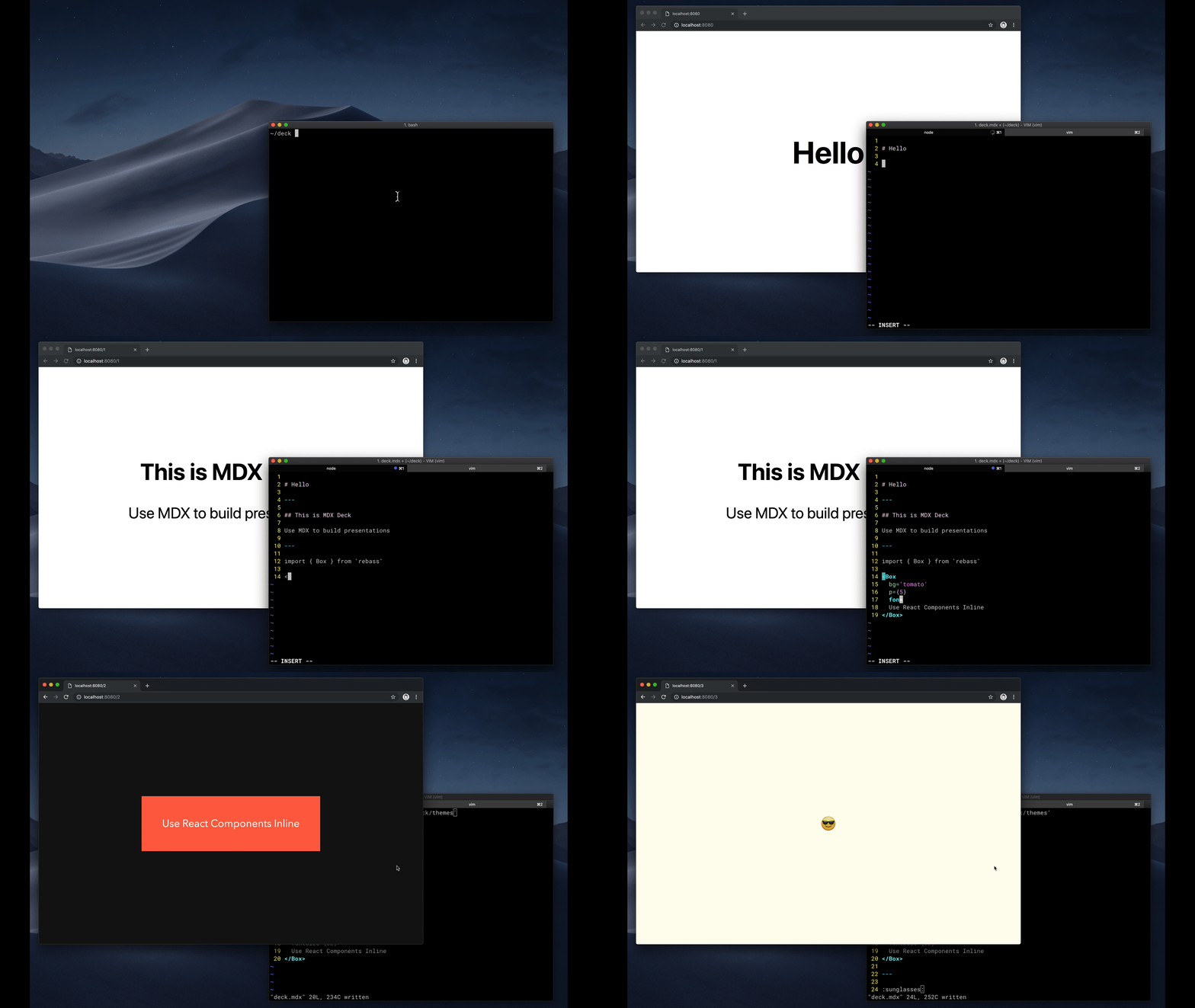
# MDX Deck <img src='docs/ace.png' width='24' height='24' />
Award-winning React [MDX][]-based presentation decks
[![Build Status][badge]][circleci]
[![Version][]][npm]
[![Downloads][]][npm]
[badge]: https://flat.badgen.net/github/status/jxnblk/mdx-deck/master/ci/circleci
[circleci]: https://circleci.com/gh/jxnblk/mdx-deck
[version]: https://flat.badgen.net/npm/v/mdx-deck
[downloads]: https://flat.badgen.net/npm/dm/mdx-deck
[npm]: https://npmjs.com/package/mdx-deck
- :memo: Write presentations in markdown
- :atom_symbol: Import and use [React components](#imports)
- :nail_care: Customizable [themes](#theming) and components
- :zero: Zero-config CLI
- :tipping_hand_woman: [Presenter mode](#presenter-mode)
- :notebook: [Speaker notes](#speaker-notes)
[View demo](https://mdx-deck.jxnblk.com)
- [Getting Started](#getting-started)
- [Using MDX](#using-mdx)
- [Theming](#theming)
- [Components](#components)
- [Layouts](#layouts)
- [Presenter Mode](#presenter-mode)
- [Keyboard Shortcuts](#keyboard-shortcuts)
- [CLI Options](#cli-options)
- [Videos & Articles](#videos-articles)
- [Examples](#examples)
## Getting Started
```sh
npm i -D mdx-deck
```
Create an [MDX][] file and separate each slide with `---`.
````mdx
# Hello
---
## This is my deck
---
## The End
````
Add a run script to your `package.json` with the MDX Deck CLI
pointing to the `.mdx` file to start the development server:
```json
"scripts": {
"start": "mdx-deck deck.mdx"
}
```
Start the development server:
```sh
npm start
```
Use the left and right arrow keys to navigate through the presentation.
## Using MDX
MDX uses Markdown syntax and can render React components inline with JSX.
### Imports
To import components, use ES import syntax separated with empty lines between any markdown or JSX syntax.
```mdx
import { Box } from 'theme-ui'
<Box color="tomato">Hello</Box>
```
Read more about MDX syntax in the [MDX Docs][mdx].
## Theming
<div>
<img src='docs/images/future.png' width='256' />
<img src='docs/images/comic.png' width='256' />
<img src='docs/images/yellow.png' width='256' />
</div>
MDX Deck uses [Theme UI][] and [Emotion][] for styling, making practically any part of the presentation themeable.
It also includes several built-in themes to change the look and feel of the presentation.
- See the list of available [Themes](docs/themes.md)
- Read more about theming in the [Theming docs](docs/theming.md).
## Components
MDX Deck includes built-in components to help with creating presentations,
a `Notes` component for adding speaker notes,
a `Head` component for the document head,
`Header` and `Footer` components for persistent header and footer content,
and a `Steps` component for adding multiple intermediate steps in a single slide.
Read more in the [Components](docs/components.md) docs.
### Third-Party Components
These optional libraries are intended for use with MDX Deck.
- [CodeSurfer][]: React component for scrolling, zooming and highlighting code.
- [mdx-code][]: Runnable code playgrounds for MDX Deck.
- [mdx-deck-live-code][]: Live React and JS coding in slides.
_Note: please check with version compatibility when using these libraries._
[codesurfer]: https://github.com/pomber/code-surfer
[mdx-code]: https://github.com/pranaygp/mdx-code
[mdx-deck-live-code]: https://github.com/JReinhold/mdx-deck-live-code
## Layouts
Each slide can include a custom layout around its content,
which can be used as a *template* for visually differentiating slides.
```js
// example Layout.js
import React from 'react'
export default ({ children }) => (
<div
style={{
width: '100vw',
height: '100vh',
backgroundColor: 'tomato',
}}>
{children}
</div>
)
```
```mdx
import Layout from './Layout'
# No Layout
---
<Layout>
# Custom Layout
</Layout>
```
The layout component will wrap the MDX elements within that slide,
which means you can add custom layout styles
or style child elements with CSS-in-JS.
## Presenter Mode
Press `Option + P` to toggle *Presenter Mode*,
which will show a preview of the next slide, a timer, and speaker notes.

The presentation can be opened in two separate windows at the same time,
and it will stay in sync with the other window.
## Keyboard Shortcuts
| Key | Description |
| ----------- | -------------------------------------------- |
| Left Arrow, Page Up, Shift + Space | Go to previous slide (or step in [Steps][]) |
| Right Arrow, Page Down, Space | Go to next slide (or step in [Steps][]) |
| Option + P | Toggle [Presenter Mode](#presenter-mode) |
| Option + O | Toggle Overview Mode
| Option + G | Toggle Grid Mode
[steps]: docs/components.md#steps
## CLI Options
```
-p --port Dev server port
-h --host Host the dev server listens to
--no-open Prevent from opening in default browser
```
## Videos & Articles
- [Egghead Tutorial][egghead] by [Andrew Del Prete](https://github.com/andrewdelprete).
- [mdx-deck: slide decks powered by markdown and react][kcd-blog] by [Kent C. Dodds][]
- [Make Fast & Beautiful Presentations with MDX-Deck][hw-video] by [Harry Wolff][] ([Demo][hw-demo])
- [What is MDX][kcd-video] by [Kent C. Dodds][]
- [Build a Custom Provider Component for MDX-Deck][ks-egghead] by [Kyle Shevlin][]
[egghead]: https://egghead.io/lessons/react-build-a-slide-deck-with-mdx-deck-using-markdown-react
[kent c. dodds]: https://mobile.twitter.com/kentcdodds
[kcd-video]: http://youtu.be/d2sQiI5NFAM?a
[kcd-blog]: https://kentcdodds.com/blog/mdx-deck-slide-decks-powered-by-markdown-and-react
[hw-video]: https://www.youtube.com/watch?v=LvP2EqCiQMg&feature=youtu.be
[hw-demo]: https://github.com/hswolff/mdx-deck-demo
[harry wolff]: https://mobile.twitter.com/hswolff
[ks-egghead]: https://egghead.io/lessons/javascript-build-a-custom-provider-component-for-mdx-deck
[kyle shevlin]: https://twitter.com/kyleshevlin
## Examples
See how others have used MDX Deck for their presentations.
- [Design Systems & React][design-systems-react] by [Diana Mounter](https://mobile.twitter.com/broccolini)
- [Bringing Brazil to the Cloud, Now][brazil-now] by [Guillermo Rauch](https://mobile.twitter.com/rauchg/)
- [Simplify React][simplify-react] by [Kent C. Dodds](https://mobile.twitter.com/kentcdodds)
- [I Got 99 Problems but GraphQL Ain't One][99-problems] by [Sara Vieira](https://mobile.twitter.com/NikkitaFTW)
- [Stop de #divFest][stop-div-fest] by [Sara Vieira](https://mobile.twitter.com/NikkitaFTW)
- [MDX, authors and richer JAMstack content][mdx-talk] by [Josh Dzielak](https://mobile.twitter.com/dzello)
- [Components as Data: A Cross Platform GraphQL Powered Component API][components-as-data] by [Luke Herrington](https://mobile.twitter.com/lukeherrington)
- [A short history of webdevs future 🔮][webdev-intro] by [Hendrik Wallbaum](https://github.com/hoverbaum)
### Usage Examples
The following examples will open in CodeSandbox.
- [Basic Example](https://codesandbox.io/s/github/jxnblk/mdx-deck/tree/master/examples/basic)
- [Syntax Highlighting](https://codesandbox.io/s/github/jxnblk/mdx-deck/tree/master/examples/syntax-highlighting)
- [Steps](https://codesandbox.io/s/github/jxnblk/mdx-deck/tree/master/examples/steps)
- [Head](https://codesandbox.io/s/github/jxnblk/mdx-deck/tree/master/examples/head)
- [Header & Footer](https://codesandbox.io/s/github/jxnblk/mdx-deck/tree/master/examples/header-footer)
---
### Related
- [MDX][]
- [Gatsby][]
- [Theme UI][]
- [Emotion][]
- [Spectacle][]
[MIT License](LICENSE.md)
[mdx]: https://mdxjs.com/
[gatsby]: https://gatsbyjs.org
[spectacle]: https://github.com/FormidableLabs/spectacle
[emotion]: https://emotion.sh
[theme ui]: https://theme-ui.com
<!-- examples -->
[design-systems-react]: https://github-ds.now.sh/#0
[brazil-now]: https://braziljs.now.sh
[simplify-react]: https://simply-react.netlify.com/#0
[99-problems]: https://99-problems-graphql-aint-one.now.sh/#0
[stop-div-fest]: https://stop-div-fest.now.sh/
[mdx-talk]: https://mdx-talk.developermode.com/
[components-as-data]: https://componentsasdata.lukeherrington.com
[webdev-intro]: https://webdev-intro.talks.hoverbaum.net/
================================================
FILE: packages/mdx-deck/cli.js
================================================
#!/usr/bin/env node
const path = require('path')
const meow = require('meow')
const execa = require('execa')
const chalk = require('chalk')
const fs = require('fs-extra')
const pkg = require('./package.json')
const log = (...args) => {
console.log(chalk.green('[mdx-deck]'), ...args)
}
log.error = (...args) => {
console.log(chalk.red('[err]'), ...args)
}
const cli = meow(
`
${chalk.gray('Usage')}
$ ${chalk.green('mdx-deck deck.mdx')}
$ ${chalk.green('mdx-deck build deck.mdx')}
${chalk.gray('Options')}
-h --host Dev server host
-p --port Dev server port
--no-open Prevent from opening in default browser
`,
{
description: chalk.green('@mdx-deck/lite ') + chalk.gray(pkg.description),
flags: {
port: {
type: 'string',
alias: 'p',
default: '8000',
},
host: {
type: 'string',
alias: 'h',
default: 'localhost',
},
open: {
type: 'boolean',
alias: 'o',
default: true,
},
},
}
)
const [cmd, file] = cli.input
const filename = file || cmd
if (!filename) cli.showHelp(0)
process.env.__SRC__ = path.resolve(filename)
const opts = Object.assign({}, cli.flags)
let dev
const gatsby = async (...args) => {
await execa('gatsby', ['clean'], {
cwd: __dirname,
stdio: 'inherit',
preferLocal: true,
})
return execa('gatsby', args.filter(Boolean), {
cwd: __dirname,
stdio: 'inherit',
preferLocal: true,
})
}
switch (cmd) {
case 'build':
gatsby('build').then(() => {
const public = path.join(__dirname, 'public')
const dist = path.join(process.cwd(), 'public')
if (public === dist) return
fs.copySync(public, dist)
})
break
case 'dev':
default:
gatsby(
'develop',
'--host',
opts.host,
'--port',
opts.port,
opts.open && '--open'
)
break
}
================================================
FILE: packages/mdx-deck/gatsby-config.js
================================================
const path = require('path')
const src = process.env.__SRC__
const dirname = path.dirname(src)
module.exports = {
plugins: [
{
resolve: '@mdx-deck/gatsby-plugin',
options: {
path: src,
dirname,
},
},
{
resolve: 'gatsby-source-filesystem',
options: {
path: dirname,
ignore: [
'node_modules',
'public',
'.cache',
]
},
},
{
resolve: 'gatsby-plugin-compile-es6-packages',
options: {
modules: ['mdx-deck', '@mdx-deck/themes'],
},
},
],
}
================================================
FILE: packages/mdx-deck/hello.mdx
================================================
<Head>
<title>MDX Deck v4</title>
</Head>
<Header>
MDX Deck v4
</Header>
# Hello
<Notes>
## To do
- [x] Print mode
- [x] Grid mode
- [x] page up/down
- [x] Deprecate layouts/docs??
- [x] Clean up docs/readme
- [x] theme.components
- [-] Changelog
- [ ] Clean up demo
</Notes>
---
## This is MDX Deck v4
MDX-based presentation decks
<Notes>
These are top-secret speaker notes. Shhhh!
</Notes>
---
### What's New
<StepList>
- Persistent headers and footers
- Simplified API
- Refactored internals & bug fixes
</StepList>
---
<img
src='https://images.unsplash.com/photo-1485881374599-20e5ddb80d84?ixlib=rb-1.2.1&q=80&fm=jpg&crop=entropy&cs=tinysrgb&w=1080&fit=max&ixid=eyJhcHBfaWQiOjF9'
/>
<Notes>
Stand clear of the closing doors
</Notes>
---
```jsx
import React from 'react'
export default props =>
<div
{...props}
css={{
padding: 32,
backgroundColor: 'tomato',
}}
/>
```
---
## Get Started :sunglasses:
[GitHub](https://github.com/jxnblk/mdx-deck)
================================================
FILE: packages/mdx-deck/index.js
================================================
import * as themes from '@mdx-deck/themes'
export { themes }
export * from '@mdx-deck/gatsby-plugin'
================================================
FILE: packages/mdx-deck/package.json
================================================
{
"name": "mdx-deck",
"version": "4.1.1",
"description": "MDX-based presentation decks",
"bin": {
"mdx-deck": "./cli.js"
},
"main": "index.js",
"scripts": {
"start": "./cli.js hello.mdx",
"build": "./cli.js build hello.mdx",
"help": "./cli.js"
},
"keywords": [],
"author": "Brent Jackson",
"license": "MIT",
"repository": "github:jxnblk/mdx-deck",
"dependencies": {
"@mdx-deck/gatsby-plugin": "^4.1.1",
"@mdx-deck/themes": "^4.1.0",
"chalk": "^3.0.0",
"execa": "^4.0.0",
"fs-extra": "^8.1.0",
"gatsby": "^2.13.24",
"gatsby-plugin-compile-es6-packages": "^2.0.0",
"gatsby-source-filesystem": "^2.1.48",
"initit": "^1.0.0-2",
"meow": "^6.0.0",
"react": "^16.8.6",
"react-dom": "^16.8.6"
},
"gitHead": "13d00b47780424cc3b52d38ad6f19e99d007c06a"
}
================================================
FILE: packages/starter/decks/.gitkeep
================================================
================================================
FILE: packages/starter/gatsby-config.js
================================================
module.exports = {
plugins: ['gatsby-theme-mdx-deck'],
}
================================================
FILE: packages/starter/package.json
================================================
{
"private": true,
"name": "@mdx-deck/gatsby-starter",
"version": "4.1.0",
"main": "index.js",
"license": "MIT",
"scripts": {
"start": "gatsby develop",
"clean": "gatsby clean",
"build": "gatsby build"
},
"dependencies": {
"gatsby": "^2.13.25",
"gatsby-theme-mdx-deck": "^4.1.0",
"react": "^16.8.6",
"react-dom": "^16.8.6"
},
"gitHead": "36497d5571f1f354261b9f72f1f67e23c07bc22e"
}
================================================
FILE: packages/themes/README.md
================================================
# @mdx-deck/themes
Themes used in MDX Deck
https://github.com/jxnblk/mdx-deck
================================================
FILE: packages/themes/base.js
================================================
// kept for backwards compatibility
export default {}
================================================
FILE: packages/themes/big.js
================================================
const blue = '#0af'
export default {
googleFont: 'https://fonts.googleapis.com/css?family=Bowlby+One+SC',
fonts: {
body: '"Bowlby One SC", sans-serif',
},
colors: {
text: '#dff',
background: '#011',
primary: blue,
blue,
black: '#000',
},
fontWeights: {
heading: 600,
bold: 600,
},
styles: {
pre: {
color: 'primary',
bg: 'black',
},
code: {
color: 'primary',
},
},
}
================================================
FILE: packages/themes/book.js
================================================
const white = '#fffceb'
const black = '#11111f'
const blue = '#2d5dd7'
export default {
fonts: {
body: '"Crimson Text", serif',
},
googleFont: 'https://fonts.googleapis.com/css?family=Crimson+Text',
colors: {
text: black,
background: white,
link: blue,
},
styles: {
root: {
textAlign: 'left',
},
Slide: {
display: 'block',
padding: '2em',
textAlign: 'left',
},
},
}
================================================
FILE: packages/themes/code.js
================================================
const blue = '#00cdf1'
const black = '#003d48'
const primary = '#0800e3'
export default {
googleFont: 'https://fonts.googleapis.com/css?family=Source+Code+Pro',
fonts: {
body: '"Source Code Pro", monospace',
monospace: '"Source Code Pro", monospace',
},
colors: {
text: black,
background: blue,
primary,
},
styles: {
pre: {
color: 'background',
bg: 'text',
},
},
}
================================================
FILE: packages/themes/comic.js
================================================
const white = '#fffceb'
const black = '#351e38'
const blue = '#2d5dd7'
export default {
googleFont: 'https://fonts.googleapis.com/css?family=Gloria+Hallelujah',
fonts: {
body: '"Gloria Hallelujah", cursive',
},
colors: {
text: black,
background: white,
primary: blue,
},
}
================================================
FILE: packages/themes/condensed.js
================================================
const blue = '#0af'
export default {
googleFont: 'https://fonts.googleapis.com/css?family=Roboto+Condensed',
fonts: {
body: '"Roboto Condensed", system-ui, sans-serif',
monospace: '"Roboto Mono", monospace',
},
colors: {
text: '#fff',
background: '#000',
primary: blue,
pre: blue,
darkgray: '#111',
},
fontWeights: {
heading: 600,
bold: 600,
},
text: {
heading: {
textTransform: 'uppercase',
},
},
styles: {
pre: {
color: 'primary',
bg: 'darkgray',
},
code: {
color: 'primary',
},
},
}
================================================
FILE: packages/themes/dark.js
================================================
export default {
colors: {
text: '#fff',
background: '#000',
primary: '#08f',
secondary: '#f0f',
darkgray: '#333',
},
styles: {
pre: {
color: 'secondary',
bg: 'darkgray',
},
code: {
color: 'secondary',
},
},
}
================================================
FILE: packages/themes/future.js
================================================
const blue = '#0af'
export default {
fonts: {
body: '"Avenir Next", system-ui, sans-serif',
},
colors: {
text: '#fff',
background: '#111',
primary: blue,
black: '#000',
},
fontWeights: {
heading: 600,
bold: 600,
},
text: {
heading: {
textTransform: 'uppercase',
letterSpacing: '0.1em',
},
},
styles: {
pre: {
color: 'primary',
bg: 'black',
},
code: {
color: 'primary',
},
},
}
================================================
FILE: packages/themes/index.js
================================================
export { default } from './base'
export { default as dark } from './dark'
export { default as future } from './future'
export { default as condensed } from './condensed'
export { default as yellow } from './yellow'
export { default as swiss } from './swiss'
export { default as poppins } from './poppins'
// serif
export { default as book } from './book'
// script
export { default as script } from './script'
export { default as comic } from './comic'
export { default as notes } from './notes'
export { default as code } from './code'
export { default as lobster } from './lobster'
// syntax highlighting
export {
default as highlight,
default as syntaxHighlighter,
} from './syntax-highlighter'
export {
default as prism,
default as syntaxHighlighterPrism,
} from './syntax-highlighter-prism'
================================================
FILE: packages/themes/lobster.js
================================================
const text = '#220011'
export default {
googleFont: 'https://fonts.googleapis.com/css?family=Lobster|Roboto+Mono',
fonts: {
body: 'Lobster, cursive',
monospace: '"Roboto Mono", monospace',
},
colors: {
text: text,
background: 'tomato',
primary: text,
},
}
================================================
FILE: packages/themes/notes.js
================================================
const white = '#fff'
const black = '#000'
export default {
googleFont:
'https://fonts.googleapis.com/css?family=Annie+Use+Your+Telescope',
fonts: {
body: '"Annie Use Your Telescope", cursive',
},
colors: {
text: black,
background: white,
},
styles: {
root: {
textAlign: 'center',
},
pre: {
textAlign: 'left',
},
},
}
================================================
FILE: packages/themes/package.json
================================================
{
"name": "@mdx-deck/themes",
"version": "4.1.0",
"main": "index.js",
"author": "Brent Jackson <jxnblk@gmail.com>",
"license": "MIT",
"dependencies": {
"lodash.merge": "^4.6.1",
"react-syntax-highlighter": "^12.2.1"
},
"gitHead": "13d00b47780424cc3b52d38ad6f19e99d007c06a"
}
================================================
FILE: packages/themes/poppins.js
================================================
export default {
googleFont: 'https://fonts.googleapis.com/css?family=Poppins:400,900',
fonts: {
body: '"Poppins", sans-serif',
},
fontWeights: {
heading: 900,
bold: 900,
},
text: {
heading: {
fontWeight: 900,
letterSpacing: '-0.05em',
},
},
styles: {
blockquote: {
fontSize: '1.75em',
textAlign: 'left',
letterSpacing: '-0.05em',
},
},
}
================================================
FILE: packages/themes/script.js
================================================
const cream = '#fe9'
const black = '#320'
export default {
googleFont: 'https://fonts.googleapis.com/css?family=Yellowtail|Roboto+Mono',
fonts: {
body: '"Yellowtail", cursive',
monospace: '"Roboto Mono", Menlo, monospace',
},
colors: {
text: black,
background: cream,
primary: black,
},
styles: {
root: {
textAlign: 'center',
},
pre: {
textAlign: 'left',
},
},
}
================================================
FILE: packages/themes/swiss.js
================================================
const white = '#fff'
const black = '#000'
const red = '#f00'
export default {
fonts: {
body: '"Helvetica Neue", Helvetica, Arial, sans-serif',
},
colors: {
text: black,
background: white,
primary: red,
},
styles: {
root: {
textAlign: 'left',
},
Slide: {
display: 'block',
padding: '2em',
textAlign: 'left',
},
},
}
================================================
FILE: packages/themes/syntax-highlighter-prism.js
================================================
import React from 'react'
import { Prism } from 'react-syntax-highlighter'
import { getLanguage } from './syntax-highlighter'
export const pre = props => props.children
export const code = props => {
const language = getLanguage(props.className)
return <Prism language={language} {...props} />
}
export default {
components: {
pre,
code,
},
}
================================================
FILE: packages/themes/syntax-highlighter.js
================================================
import React from 'react'
import SyntaxHighlighter from 'react-syntax-highlighter'
export const getLanguage = className => {
const match = /language-(\w*)/.exec(className || 'language-javascript')
let lang = 'javascript'
if (match && match.length > 1) {
lang = match[1]
}
return lang
}
export const pre = props => props.children
export const code = props => {
const language = getLanguage(props.className)
return <SyntaxHighlighter language={language} {...props} />
}
export default {
components: {
pre,
code,
},
}
================================================
FILE: packages/themes/yellow.js
================================================
const yellow = '#fd0'
export default {
googleFont:
'https://fonts.googleapis.com/css?family=Roboto+Condensed:400,700|Roboto+Mono',
fonts: {
body: '"Roboto Condensed", system-ui, sans-serif',
monospace: '"Roboto Mono", monospace',
},
colors: {
text: '#000',
background: yellow,
primary: '#333',
},
text: {
heading: {
textTransform: 'uppercase',
},
},
styles: {
pre: {
textAlign: 'left',
color: 'background',
bg: 'text',
},
code: {
color: 'background',
bg: 'text',
},
},
}
================================================
FILE: packages/website-pdf/.gitignore
================================================
dist
================================================
FILE: packages/website-pdf/README.md
================================================
# website-pdf
Save a URL as a PDF
```sh
npm i -D website-pdf
```
```sh
website-pdf http://example.com -o example.pdf
```
## Options
```
-o --out-file Output filename
-w --width Width in pixels
-h --height Height in pixels
--no-sandbox Disable puppeteer sandbox
```
================================================
FILE: packages/website-pdf/cli.js
================================================
#!/usr/bin/env node
const path = require('path')
const meow = require('meow')
const cli = meow(
`
Usage:
$ website-pdf http://example.com
Options:
-o --out-file Output filename
-w --width Width in pixels
-h --height Height in pixels
--no-sandbox Disable puppeteer sandbox
`,
{
flags: {
outFile: {
type: 'string',
alias: 'o',
default: 'website.pdf',
},
width: {
type: 'string',
alias: 'w',
default: '1280',
},
height: {
type: 'string',
alias: 'h',
default: '960',
},
sandbox: {
type: 'boolean',
default: true,
},
},
}
)
const [url] = cli.input
if (!url) {
cli.showHelp(0)
}
const opts = Object.assign({}, cli.flags, {
url,
})
require('./index')(opts)
.then(filename => {
console.log(`saved PDF to`, filename)
process.exit(0)
})
.catch(err => {
console.log(err)
process.exit(1)
})
================================================
FILE: packages/website-pdf/index.js
================================================
const path = require('path')
const puppeteer = require('puppeteer')
const mkdirp = require('mkdirp')
module.exports = async ({ url, outFile, width, height, sandbox }) => {
if (!url) {
throw new Error('URL is required for website-pdf')
}
const args = []
if (!sandbox) {
args.push('--no-sandbox', '--disable-setuid-sandbox')
}
const browser = await puppeteer.launch({ args })
const page = await browser.newPage()
const filename = path.resolve(outFile)
const outDir = path.dirname(filename)
mkdirp.sync(outDir)
await page.goto(url, {
waitUntil: 'networkidle2',
})
await page.pdf({
width,
height,
path: filename,
scale: 1,
printBackground: true,
})
await browser.close()
return filename
}
================================================
FILE: packages/website-pdf/package.json
================================================
{
"name": "website-pdf",
"version": "4.1.0",
"author": "Brent Jackson <jxnblk@gmail.com>",
"license": "MIT",
"bin": {
"website-pdf": "./cli.js"
},
"scripts": {
"test": "./cli.js http://localhost:8000/print -o ../../docs/dist"
},
"dependencies": {
"meow": "^6.0.0",
"mkdirp": "^1.0.3",
"puppeteer": "^2.0.0"
},
"gitHead": "13d00b47780424cc3b52d38ad6f19e99d007c06a"
}
================================================
FILE: templates/basic/.gitignore
================================================
dist
node_modules
================================================
FILE: templates/basic/README.md
================================================
# mdx-deck basic template
This was generated with [mdx-deck][]'s `npm init deck` command.
## Development
To run the presentation deck in development mode:
```sh
npm start
```
Edit the [`deck.mdx`](deck.mdx) file to get started.
## Exporting
To build the presentation deck as static HTML:
```sh
npm run build
```
For more documentation see the [mdx-deck][] repo.
[mdx-deck]: https://github.com/jxnblk/mdx-deck
================================================
FILE: templates/basic/deck.mdx
================================================
import { Head, Notes } from 'mdx-deck'
import { theme } from './theme'
export const themes = [ theme ]
<Head>
<title>Presentation Title</title>
</Head>
# Hello
---
## Edit this file
To create your presentation
<Notes>
Create speaker notes with the Notes component
</Notes>
---
<https://github.com/jxnblk/mdx-deck>
================================================
FILE: templates/basic/package.json
================================================
{
"private": true,
"name": "@mdx-deck/basic-template",
"version": "4.1.1",
"scripts": {
"start": "mdx-deck deck.mdx",
"build": "mdx-deck build deck.mdx",
"help": "mdx-deck"
},
"devDependencies": {
"mdx-deck": "^4.1.1"
}
}
================================================
FILE: templates/basic/theme.js
================================================
export const theme = {
// Customize your presentation theme here.
//
// Read the docs for more info:
// https://github.com/jxnblk/mdx-deck/blob/master/docs/theming.md
// https://github.com/jxnblk/mdx-deck/blob/master/docs/themes.md
}
gitextract_d6xf2xq3/
├── .circleci/
│ └── config.yml
├── .gitignore
├── .prettierrc
├── CHANGELOG.md
├── CONTRIBUTING.md
├── LICENSE.md
├── MIGRATION.md
├── babel.config.js
├── cypress/
│ ├── integration/
│ │ └── hello.js
│ ├── plugins/
│ │ └── index.js
│ └── support/
│ ├── commands.js
│ └── index.js
├── cypress.json
├── docs/
│ ├── Counter.js
│ ├── api.md
│ ├── components.md
│ ├── demo.mdx
│ ├── exporting.md
│ ├── gatsby.md
│ ├── layouts.md
│ ├── package.json
│ ├── presenting.md
│ ├── themes.md
│ └── theming.md
├── examples/
│ ├── README.md
│ ├── aspect-ratio/
│ │ ├── deck.mdx
│ │ └── package.json
│ ├── basic/
│ │ ├── deck.mdx
│ │ └── package.json
│ ├── gatsby/
│ │ ├── decks/
│ │ │ ├── beep.mdx
│ │ │ └── hello.mdx
│ │ ├── gatsby-config.js
│ │ ├── package.json
│ │ └── src/
│ │ └── pages/
│ │ └── index.mdx
│ ├── head/
│ │ ├── deck.mdx
│ │ └── package.json
│ ├── header-footer/
│ │ ├── deck.mdx
│ │ └── package.json
│ ├── images/
│ │ ├── deck.mdx
│ │ └── package.json
│ ├── layouts/
│ │ ├── deck.mdx
│ │ └── package.json
│ ├── multiple/
│ │ ├── deck.js
│ │ ├── one.mdx
│ │ ├── package.json
│ │ └── two.mdx
│ ├── prism/
│ │ ├── deck.mdx
│ │ └── package.json
│ ├── provider/
│ │ ├── deck.mdx
│ │ ├── package.json
│ │ └── theme.js
│ ├── steps/
│ │ ├── deck.mdx
│ │ └── package.json
│ ├── syntax-highlighting/
│ │ ├── deck.mdx
│ │ └── package.json
│ └── themes/
│ ├── deck.mdx
│ ├── package.json
│ └── theme.js
├── lerna.json
├── netlify.toml
├── package.json
├── packages/
│ ├── create-deck/
│ │ ├── README.md
│ │ ├── cli.js
│ │ └── package.json
│ ├── gatsby-plugin/
│ │ ├── .gitignore
│ │ ├── .npmignore
│ │ ├── README.md
│ │ ├── gatsby-browser.js
│ │ ├── gatsby-config.js
│ │ ├── gatsby-node.js
│ │ ├── gatsby-ssr.js
│ │ ├── index.js
│ │ ├── package.json
│ │ ├── src/
│ │ │ ├── clock.js
│ │ │ ├── components.js
│ │ │ ├── container.js
│ │ │ ├── context.js
│ │ │ ├── deck.js
│ │ │ ├── footer.js
│ │ │ ├── header.js
│ │ │ ├── index.js
│ │ │ ├── keyboard.js
│ │ │ ├── modes.js
│ │ │ ├── slide.js
│ │ │ ├── split-slides.js
│ │ │ ├── storage.js
│ │ │ ├── theme.js
│ │ │ ├── timer.js
│ │ │ └── use-steps.js
│ │ └── test/
│ │ ├── __snapshots__/
│ │ │ └── components.js.snap
│ │ ├── clock.js
│ │ ├── components.js
│ │ └── deck.js
│ ├── gatsby-theme/
│ │ ├── .gitignore
│ │ ├── README.md
│ │ ├── decks/
│ │ │ ├── beep.mdx
│ │ │ └── hello.mdx
│ │ ├── gatsby-browser.js
│ │ ├── gatsby-config.js
│ │ ├── gatsby-node.js
│ │ ├── gatsby-ssr.js
│ │ ├── index.js
│ │ ├── package.json
│ │ └── src/
│ │ ├── components/
│ │ │ ├── app.js
│ │ │ ├── appear.js
│ │ │ ├── clock.js
│ │ │ ├── deck.js
│ │ │ ├── decks.js
│ │ │ ├── embed.js
│ │ │ ├── full-screen-code.js
│ │ │ ├── grid.js
│ │ │ ├── head.js
│ │ │ ├── horizontal.js
│ │ │ ├── image.js
│ │ │ ├── invert.js
│ │ │ ├── notes.js
│ │ │ ├── overview.js
│ │ │ ├── presenter-footer.js
│ │ │ ├── presenter.js
│ │ │ ├── slide-list.js
│ │ │ ├── slide.js
│ │ │ ├── split-right.js
│ │ │ ├── split.js
│ │ │ ├── timer.js
│ │ │ ├── wrapper.js
│ │ │ └── zoom.js
│ │ ├── constants.js
│ │ ├── context.js
│ │ ├── convert-legacy-theme.js
│ │ ├── gatsby-plugin-theme-ui/
│ │ │ ├── components.js
│ │ │ └── index.js
│ │ ├── hooks/
│ │ │ ├── use-deck.js
│ │ │ ├── use-keyboard.js
│ │ │ ├── use-steps.js
│ │ │ ├── use-storage.js
│ │ │ └── use-swipe.js
│ │ ├── index.js
│ │ ├── navigate.js
│ │ ├── split-slides.js
│ │ └── templates/
│ │ ├── deck.js
│ │ └── decks.js
│ ├── mdx-deck/
│ │ ├── .gitignore
│ │ ├── .npmignore
│ │ ├── README.md
│ │ ├── cli.js
│ │ ├── gatsby-config.js
│ │ ├── hello.mdx
│ │ ├── index.js
│ │ └── package.json
│ ├── starter/
│ │ ├── decks/
│ │ │ └── .gitkeep
│ │ ├── gatsby-config.js
│ │ └── package.json
│ ├── themes/
│ │ ├── README.md
│ │ ├── base.js
│ │ ├── big.js
│ │ ├── book.js
│ │ ├── code.js
│ │ ├── comic.js
│ │ ├── condensed.js
│ │ ├── dark.js
│ │ ├── future.js
│ │ ├── index.js
│ │ ├── lobster.js
│ │ ├── notes.js
│ │ ├── package.json
│ │ ├── poppins.js
│ │ ├── script.js
│ │ ├── swiss.js
│ │ ├── syntax-highlighter-prism.js
│ │ ├── syntax-highlighter.js
│ │ └── yellow.js
│ └── website-pdf/
│ ├── .gitignore
│ ├── README.md
│ ├── cli.js
│ ├── index.js
│ └── package.json
└── templates/
└── basic/
├── .gitignore
├── README.md
├── deck.mdx
├── package.json
└── theme.js
SYMBOL INDEX (3 symbols across 2 files)

FILE: docs/Counter.js
  class Counter (line 37) | class Counter extends React.Component {
    method render (line 50) | render() {

FILE: packages/gatsby-theme/gatsby-config.js
  constant IS_LOCAL (line 1) | const IS_LOCAL = process.cwd() === __dirname
Condensed preview — 181 files, each showing path, character count, and a content snippet. Download the .json file or copy for the full structured content (173K chars).
[
{
"path": ".circleci/config.yml",
"chars": 992,
"preview": "# Javascript Node CircleCI 2.0 configuration file\n#\n# Check https://circleci.com/docs/2.0/language-javascript/ for more "
},
{
"path": ".gitignore",
"chars": 81,
"preview": "dist\npublic\ncoverage\nnode_modules\npackage-lock.json\npublic\n.cache\ncypress/videos\n"
},
{
"path": ".prettierrc",
"chars": 99,
"preview": "{\n \"semi\": false,\n \"singleQuote\": true,\n \"trailingComma\": \"es5\",\n \"jsxBracketSameLine\": true\n}\n"
},
{
"path": "CHANGELOG.md",
"chars": 9998,
"preview": "# Changelog\n\n## Unreleased\n\n- Add missing dependency\n\n## v4.1.0\n\n- Update colors on notes theme\n- Add support for static"
},
{
"path": "CONTRIBUTING.md",
"chars": 3966,
"preview": "# Contributing\n\nThanks for contributing!\n\nPlease take a look at the issues and PRs to see if there's already some discus"
},
{
"path": "LICENSE.md",
"chars": 1083,
"preview": "\n# The MIT License (MIT)\nCopyright (c) 2018 Brent Jackson\n\nPermission is hereby granted, free of charge, to any person o"
},
{
"path": "MIGRATION.md",
"chars": 5123,
"preview": "# Migration\n\n## Upgrading to MDX Deck v4\n\nFor simple decks, upgrading to v4 should not require any major changes and sho"
},
{
"path": "babel.config.js",
"chars": 91,
"preview": "module.exports = {\n presets: [\n '@babel/preset-env',\n '@babel/preset-react',\n ],\n}\n"
},
{
"path": "cypress/integration/hello.js",
"chars": 407,
"preview": "context('MDX Deck', () => {\n beforeEach(() => {\n cy.visit('http://localhost:8000')\n })\n\n it('opens', () => {\n c"
},
{
"path": "cypress/plugins/index.js",
"chars": 644,
"preview": "// ***********************************************************\n// This example plugins/index.js can be used to load plug"
},
{
"path": "cypress/support/commands.js",
"chars": 841,
"preview": "// ***********************************************\n// This example commands.js shows you how to\n// create various custom"
},
{
"path": "cypress/support/index.js",
"chars": 670,
"preview": "// ***********************************************************\n// This example support/index.js is processed and\n// load"
},
{
"path": "cypress.json",
"chars": 42,
"preview": "{\n \"baseUrl\": \"http://localhost:8000/\"\n}\n"
},
{
"path": "docs/Counter.js",
"chars": 1117,
"preview": "import React from 'react'\nimport styled from '@emotion/styled'\nimport { space, color } from 'styled-system'\n\nconst Root "
},
{
"path": "docs/api.md",
"chars": 731,
"preview": "# API\n\n## Components\n\n- `Head`: Adds elements to the document `<head>`\n- `Notes`: Adds speaker notes to a slide\n- `Steps"
},
{
"path": "docs/components.md",
"chars": 2558,
"preview": "# Components\n\nMDX Deck includes components to help with creating presentations.\nThese components are provided with MDX's"
},
{
"path": "docs/demo.mdx",
"chars": 1948,
"preview": "import Counter from './Counter'\n\n<Head>\n <title>MDX Deck</title>\n <meta name='twitter:card' content='summary_large_ima"
},
{
"path": "docs/exporting.md",
"chars": 1014,
"preview": "# Exporting\n\n## Static Build\n\nTo export your deck as a static HTML page with JS bundle,\nadd a `build` script to your `pa"
},
{
"path": "docs/gatsby.md",
"chars": 1265,
"preview": "\n# Usage with Gatsby\n\nMDX Deck includes a Gatsby theme, which can be used in any existing Gatsby site.\nThis means you ca"
},
{
"path": "docs/layouts.md",
"chars": 1697,
"preview": "# Layouts\n\nEach slide can include a custom layout around its content.\nThis is a way to provide *templates* for certain s"
},
{
"path": "docs/package.json",
"chars": 403,
"preview": "{\n \"private\": true,\n \"name\": \"@mdx-deck/docs\",\n \"version\": \"4.1.1\",\n \"main\": \"index.js\",\n \"author\": \"Brent Jackson "
},
{
"path": "docs/presenting.md",
"chars": 583,
"preview": "\n# Presenting\n\n1. Enter presenter mode by pressing `Opt + P`\n2. Click the link at the bottom to open the presentation in"
},
{
"path": "docs/themes.md",
"chars": 1198,
"preview": "# Themes\n\n\n\n---\n\n\n\n```js\nimport { big } from 'mdx-deck/t"
},
{
"path": "docs/theming.md",
"chars": 3173,
"preview": "# Theming\n\nMDX Deck uses [Theme UI][] and [Emotion][] for styling, making practically any part of the presentation theme"
},
{
"path": "examples/README.md",
"chars": 1249,
"preview": "\n# Examples\n\n- [Basic Example](https://codesandbox.io/s/github/jxnblk/mdx-deck/tree/master/examples/basic)\n- [Multiple D"
},
{
"path": "examples/aspect-ratio/deck.mdx",
"chars": 220,
"preview": "import { future, aspect } from 'mdx-deck/themes'\n\nexport const themes = [\n future,\n aspect,\n]\n\n# Hello!\n\n---\n\nThis dec"
},
{
"path": "examples/aspect-ratio/package.json",
"chars": 258,
"preview": "{\n \"private\": true,\n \"name\": \"@mdx-deck/aspect-ratio-example\",\n \"version\": \"4.1.1\",\n \"scripts\": {\n \"start\": \"mdx-"
},
{
"path": "examples/basic/deck.mdx",
"chars": 33,
"preview": "\n# Hello!\n\n---\n\nThis is MDX Deck\n"
},
{
"path": "examples/basic/package.json",
"chars": 251,
"preview": "{\n \"private\": true,\n \"name\": \"@mdx-deck/basic-example\",\n \"version\": \"4.1.1\",\n \"scripts\": {\n \"start\": \"mdx-deck de"
},
{
"path": "examples/gatsby/decks/beep.mdx",
"chars": 32,
"preview": "\n# Beep\n\n---\n\n## Boop\n\n---\n\nBop\n"
},
{
"path": "examples/gatsby/decks/hello.mdx",
"chars": 56,
"preview": "\n# Hello\n\n---\n\nThis is built with gatsby-theme-mdx-deck\n"
},
{
"path": "examples/gatsby/gatsby-config.js",
"chars": 207,
"preview": "module.exports = {\n pathPrefix: '/mdx-deck',\n plugins: [\n 'gatsby-plugin-catch-links',\n {\n resolve: 'gatsby"
},
{
"path": "examples/gatsby/package.json",
"chars": 510,
"preview": "{\n \"private\": true,\n \"name\": \"@mdx-deck/gatsby-example\",\n \"version\": \"4.1.0\",\n \"main\": \"index.js\",\n \"license\": \"MIT"
},
{
"path": "examples/gatsby/src/pages/index.mdx",
"chars": 46,
"preview": "\n# MDX Deck Gatsby Example\n\n- [Deck](/slides)\n"
},
{
"path": "examples/head/deck.mdx",
"chars": 85,
"preview": "\n<Head>\n <title>Hello</title>\n</Head>\n\n# Hello!\n\n---\n\nThis deck has a custom title\n\n"
},
{
"path": "examples/head/package.json",
"chars": 250,
"preview": "{\n \"private\": true,\n \"name\": \"@mdx-deck/head-example\",\n \"version\": \"4.1.1\",\n \"scripts\": {\n \"start\": \"mdx-deck dec"
},
{
"path": "examples/header-footer/deck.mdx",
"chars": 142,
"preview": "\n<Header>\n\n# Header\n\n</Header>\n\n<Footer>\n\n[@jxnblk](https://twitter.com/jxnblk)\n\n</Footer>\n\n# Hello!\n\n---\n\nThis deck has"
},
{
"path": "examples/header-footer/package.json",
"chars": 259,
"preview": "{\n \"private\": true,\n \"name\": \"@mdx-deck/header-footer-example\",\n \"version\": \"4.1.1\",\n \"scripts\": {\n \"start\": \"mdx"
},
{
"path": "examples/images/deck.mdx",
"chars": 297,
"preview": "import {\n Image,\n} from 'mdx-deck'\n\n# Hello!\n\n---\n\n<Image\n src='https://source.unsplash.com/random/768x2048?brooklyn'\n"
},
{
"path": "examples/images/package.json",
"chars": 252,
"preview": "{\n \"private\": true,\n \"name\": \"@mdx-deck/images-example\",\n \"version\": \"4.1.1\",\n \"scripts\": {\n \"start\": \"mdx-deck d"
},
{
"path": "examples/layouts/deck.mdx",
"chars": 536,
"preview": "\n# Hello!\n\n---\n\n<Invert>\n\n## Invert Layout\n\n</Invert>\n\n---\n\n<Split>\n\n\nconst path = require('path')\nconst meow = require('meow')\nconst chalk = req"
},
{
"path": "packages/create-deck/package.json",
"chars": 345,
"preview": "{\n \"name\": \"create-deck\",\n \"version\": \"4.0.0\",\n \"description\": \"Create mdx-deck presentations\",\n \"bin\": {\n \"creat"
},
{
"path": "packages/gatsby-plugin/.gitignore",
"chars": 23,
"preview": "coverage\n.cache\npublic\n"
},
{
"path": "packages/gatsby-plugin/.npmignore",
"chars": 28,
"preview": ".cache\ncoverage\npublic\ntest\n"
},
{
"path": "packages/gatsby-plugin/README.md",
"chars": 247,
"preview": "\n# @mdx-deck/gatsby-plugin\n\nPlugin used internally by mdx-deck core package -- **not intended for standalone usage**\n\nSe"
},
{
"path": "packages/gatsby-plugin/gatsby-browser.js",
"chars": 40,
"preview": "export { wrapPageElement } from './src'\n"
},
{
"path": "packages/gatsby-plugin/gatsby-config.js",
"chars": 73,
"preview": "module.exports = {\n plugins: [\n 'gatsby-plugin-react-helmet',\n ],\n}\n"
},
{
"path": "packages/gatsby-plugin/gatsby-node.js",
"chars": 1301,
"preview": "const fs = require('fs')\nconst path = require('path')\nconst { createPath, validatePath } = require('gatsby-page-utils')\n"
},
{
"path": "packages/gatsby-plugin/gatsby-ssr.js",
"chars": 40,
"preview": "export { wrapPageElement } from './src'\n"
},
{
"path": "packages/gatsby-plugin/index.js",
"chars": 30,
"preview": "// noop\nexport * from './src'\n"
},
{
"path": "packages/gatsby-plugin/package.json",
"chars": 904,
"preview": "{\n \"name\": \"@mdx-deck/gatsby-plugin\",\n \"version\": \"4.1.1\",\n \"main\": \"index.js\",\n \"author\": \"Brent Jackson\",\n \"licen"
},
{
"path": "packages/gatsby-plugin/src/clock.js",
"chars": 352,
"preview": "import React from 'react'\n\nexport default props => {\n const [time, setTime] = React.useState(new Date().toLocaleTimeStr"
},
{
"path": "packages/gatsby-plugin/src/components.js",
"chars": 3775,
"preview": "/** @jsx jsx */\nimport { jsx } from 'theme-ui'\nimport React from 'react'\nimport useSteps from './use-steps'\n\nconst creat"
},
{
"path": "packages/gatsby-plugin/src/container.js",
"chars": 6013,
"preview": "/** @jsx jsx */\nimport { jsx, Box, Flex } from 'theme-ui'\nimport React from 'react'\nimport { Context, useDeck } from './"
},
{
"path": "packages/gatsby-plugin/src/context.js",
"chars": 130,
"preview": "import React from 'react'\n\nexport const Context = React.createContext({})\n\nexport const useDeck = () => React.useContext"
},
{
"path": "packages/gatsby-plugin/src/deck.js",
"chars": 2640,
"preview": "import React from 'react'\nimport { Helmet } from 'react-helmet'\nimport { ThemeProvider, merge } from 'theme-ui'\nimport s"
},
{
"path": "packages/gatsby-plugin/src/footer.js",
"chars": 273,
"preview": "/** @jsx jsx */\nimport { jsx } from 'theme-ui'\n\nexport default props =>\n <footer\n {...props}\n sx={{\n positio"
},
{
"path": "packages/gatsby-plugin/src/header.js",
"chars": 270,
"preview": "/** @jsx jsx */\nimport { jsx } from 'theme-ui'\n\nexport default props =>\n <header\n {...props}\n sx={{\n positio"
},
{
"path": "packages/gatsby-plugin/src/index.js",
"chars": 506,
"preview": "import React from 'react'\nimport { MDXProvider } from '@mdx-js/react'\nimport wrapper from './deck'\nimport * as mdxCompon"
},
{
"path": "packages/gatsby-plugin/src/keyboard.js",
"chars": 1857,
"preview": "import React from 'react'\nimport { useDeck } from './context'\nimport modes from './modes'\n\nconst keys = {\n right: 39,\n "
},
{
"path": "packages/gatsby-plugin/src/modes.js",
"chars": 125,
"preview": "export default {\n default: 'default',\n presenter: 'presenter',\n overview: 'overview',\n grid: 'grid',\n print: 'print"
},
{
"path": "packages/gatsby-plugin/src/slide.js",
"chars": 518,
"preview": "/** @jsx jsx */\nimport { jsx } from 'theme-ui'\n\nexport default ({\n zoom,\n width = '100%',\n height = '100%',\n childre"
},
{
"path": "packages/gatsby-plugin/src/split-slides.js",
"chars": 1678,
"preview": "import React from 'react'\n\nexport default props => {\n const arr = React.Children.toArray(props.children)\n const splits"
},
{
"path": "packages/gatsby-plugin/src/storage.js",
"chars": 1312,
"preview": "import React from 'react'\nimport { useDeck } from './context'\n\nconst keys = {\n slide: 'mdx-deck-slide',\n step: 'mdx-de"
},
{
"path": "packages/gatsby-plugin/src/theme.js",
"chars": 1177,
"preview": "// base theme\nexport default {\n colors: {\n text: '#fff',\n background: '#000',\n backdrop: '#111',\n },\n fonts:"
},
{
"path": "packages/gatsby-plugin/src/timer.js",
"chars": 860,
"preview": "/** @jsx jsx */\nimport { jsx } from 'theme-ui'\nimport React from 'react'\nimport hhmmss from 'hhmmss'\n\nexport default pro"
},
{
"path": "packages/gatsby-plugin/src/use-steps.js",
"chars": 377,
"preview": "import React from 'react'\nimport { useDeck } from './context'\n\nexport const useSteps = length => {\n const context = use"
},
{
"path": "packages/gatsby-plugin/test/__snapshots__/components.js.snap",
"chars": 3859,
"preview": "// Jest Snapshot v1, https://goo.gl/fbAQLP\n\nexports[`Color renders 1`] = `\n.emotion-0 {\n display: -webkit-box;\n displa"
},
{
"path": "packages/gatsby-plugin/test/clock.js",
"chars": 255,
"preview": "import React from 'react'\nimport renderer from 'react-test-renderer'\nimport Clock from '../src/clock'\n\nconst render = el"
},
{
"path": "packages/gatsby-plugin/test/components.js",
"chars": 1671,
"preview": "import React from 'react'\nimport renderer from 'react-test-renderer'\nimport {\n Notes,\n Head,\n Header,\n Footer,\n Col"
},
{
"path": "packages/gatsby-plugin/test/deck.js",
"chars": 5329,
"preview": "import React from 'react'\nimport {\n render,\n fireEvent,\n cleanup\n} from '@testing-library/react'\nimport Deck from '.."
},
{
"path": "packages/gatsby-theme/.gitignore",
"chars": 14,
"preview": ".cache\npublic\n"
},
{
"path": "packages/gatsby-theme/README.md",
"chars": 1108,
"preview": "\n# gatsby-theme-mdx-deck\n\nAdd MDX Deck presentations to any Gatsby site\n\n```sh\nnpm i gatsby-theme-mdx-deck\n```\n\n```js\n//"
},
{
"path": "packages/gatsby-theme/decks/beep.mdx",
"chars": 27,
"preview": "\n# Beep\n\n---\n\n## Boop bop\n\n"
},
{
"path": "packages/gatsby-theme/decks/hello.mdx",
"chars": 677,
"preview": "import { Head, Appear, Notes } from '../src'\n\n<Head>\n <link\n rel='stylesheet'\n href='https://fonts.googleapis.com"
},
{
"path": "packages/gatsby-theme/gatsby-browser.js",
"chars": 40,
"preview": "export { wrapPageElement } from './src'\n"
},
{
"path": "packages/gatsby-theme/gatsby-config.js",
"chars": 935,
"preview": "const IS_LOCAL = process.cwd() === __dirname\n\nconst remarkPlugins = [require('remark-unwrap-images'), require('remark-em"
},
{
"path": "packages/gatsby-theme/gatsby-node.js",
"chars": 4315,
"preview": "// based on gatsby-theme-blog\nconst fs = require(`fs`)\nconst path = require(`path`)\nconst mkdirp = require(`mkdirp`)\ncon"
},
{
"path": "packages/gatsby-theme/gatsby-ssr.js",
"chars": 40,
"preview": "export { wrapPageElement } from './src'\n"
},
{
"path": "packages/gatsby-theme/index.js",
"chars": 22,
"preview": "export * from './src'\n"
},
{
"path": "packages/gatsby-theme/package.json",
"chars": 1316,
"preview": "{\n \"name\": \"gatsby-theme-mdx-deck\",\n \"version\": \"4.1.0\",\n \"main\": \"index.js\",\n \"license\": \"MIT\",\n \"scripts\": {\n "
},
{
"path": "packages/gatsby-theme/src/components/app.js",
"chars": 779,
"preview": "import React, { useReducer } from 'react'\nimport merge from 'lodash.merge'\nimport Context from '../context'\nimport { mod"
},
{
"path": "packages/gatsby-theme/src/components/appear.js",
"chars": 414,
"preview": "import React from 'react'\nimport useSteps from '../hooks/use-steps'\n\nexport const Appear = props => {\n const children ="
},
{
"path": "packages/gatsby-theme/src/components/clock.js",
"chars": 407,
"preview": "import { useEffect, useState } from 'react'\n\nexport const Clock = props => {\n const [time, setTime] = useState(new Date"
},
{
"path": "packages/gatsby-theme/src/components/deck.js",
"chars": 3438,
"preview": "import React from 'react'\nimport { Router, globalHistory } from '@reach/router'\nimport { Global } from '@emotion/core'\ni"
},
{
"path": "packages/gatsby-theme/src/components/decks.js",
"chars": 780,
"preview": "/** @jsx jsx */\nimport { jsx } from 'theme-ui'\nimport { Link } from 'gatsby'\n\nexport default ({ decks }) => {\n return ("
},
{
"path": "packages/gatsby-theme/src/components/embed.js",
"chars": 711,
"preview": "/** @jsx jsx */\nimport { jsx } from 'theme-ui'\nimport splitSlides from '../split-slides'\nimport Slide from './slide'\nimp"
},
{
"path": "packages/gatsby-theme/src/components/full-screen-code.js",
"chars": 378,
"preview": "/** @jsx jsx */\nimport { jsx } from 'theme-ui'\n\nexport const FullScreenCode = ({ ...props }) => (\n <div\n {...props}\n"
},
{
"path": "packages/gatsby-theme/src/components/grid.js",
"chars": 767,
"preview": "/** @jsx jsx */\nimport { jsx } from 'theme-ui'\nimport { navigate } from '@reach/router'\nimport useDeck from '../hooks/us"
},
{
"path": "packages/gatsby-theme/src/components/head.js",
"chars": 81,
"preview": "export const Head = props => false\n\nHead.mdxDeckHead = true\n\nexport default Head\n"
},
{
"path": "packages/gatsby-theme/src/components/horizontal.js",
"chars": 543,
"preview": "/** @jsx jsx */\nimport { jsx } from 'theme-ui'\nimport React from 'react'\n\nexport const Horizontal = ({ ...props }) => {\n"
},
{
"path": "packages/gatsby-theme/src/components/image.js",
"chars": 408,
"preview": "/** @jsx jsx */\nimport { jsx } from 'theme-ui'\n\nexport const Image = ({\n width = '100%',\n height = '100%',\n size = 'c"
},
{
"path": "packages/gatsby-theme/src/components/invert.js",
"chars": 407,
"preview": "/** @jsx jsx */\nimport { jsx } from 'theme-ui'\n\nexport const Invert = ({ ...props }) => (\n <div\n {...props}\n sx={"
},
{
"path": "packages/gatsby-theme/src/components/notes.js",
"chars": 279,
"preview": "import { useEffect } from 'react'\nimport useDeck from '../hooks/use-deck'\n\nexport const Notes = props => {\n const conte"
},
{
"path": "packages/gatsby-theme/src/components/overview.js",
"chars": 1315,
"preview": "/** @jsx jsx */\nimport { jsx } from 'theme-ui'\nimport { navigate } from '@reach/router'\nimport useDeck from '../hooks/us"
},
{
"path": "packages/gatsby-theme/src/components/presenter-footer.js",
"chars": 970,
"preview": "/** @jsx jsx */\nimport { jsx } from 'theme-ui'\nimport React from 'react'\nimport { globalHistory } from '@reach/router'\ni"
},
{
"path": "packages/gatsby-theme/src/components/presenter.js",
"chars": 1595,
"preview": "/** @jsx jsx */\nimport { jsx } from 'theme-ui'\nimport React from 'react'\nimport Zoom from './zoom'\nimport Slide from './"
},
{
"path": "packages/gatsby-theme/src/components/slide-list.js",
"chars": 1310,
"preview": "/** @jsx jsx */\nimport { jsx } from 'theme-ui'\nimport React, { useEffect, useRef } from 'react'\nimport Zoom from './zoom"
},
{
"path": "packages/gatsby-theme/src/components/slide.js",
"chars": 1042,
"preview": "/** @jsx jsx */\nimport { jsx } from 'theme-ui'\nimport React, { Fragment } from 'react'\nimport Context from '../context'\n"
},
{
"path": "packages/gatsby-theme/src/components/split-right.js",
"chars": 494,
"preview": "/** @jsx jsx */\nimport { jsx } from 'theme-ui'\nimport React from 'react'\n\nexport const SplitRight = ({ children, ...prop"
},
{
"path": "packages/gatsby-theme/src/components/split.js",
"chars": 484,
"preview": "/** @jsx jsx */\nimport { jsx } from 'theme-ui'\nimport React from 'react'\n\nexport const Split = ({ children, ...props }) "
},
{
"path": "packages/gatsby-theme/src/components/timer.js",
"chars": 1109,
"preview": "/** @jsx jsx */\nimport { jsx } from 'theme-ui'\nimport React, { useEffect } from 'react'\nimport hhmmss from 'hhmmss'\nimpo"
},
{
"path": "packages/gatsby-theme/src/components/wrapper.js",
"chars": 1267,
"preview": "/** @jsx jsx */\nimport { jsx } from 'theme-ui'\nimport React, { Fragment, useState, useEffect } from 'react'\nimport useDe"
},
{
"path": "packages/gatsby-theme/src/components/zoom.js",
"chars": 678,
"preview": "/** @jsx jsx */\nimport { jsx } from 'theme-ui'\n\nexport const Zoom = ({ ratio, zoom = 1, ...props }) => (\n <div\n sx={"
},
{
"path": "packages/gatsby-theme/src/constants.js",
"chars": 129,
"preview": "export const modes = {\n normal: 'NORMAL',\n presenter: 'PRESENTER',\n overview: 'OVERVIEW',\n grid: 'GRID',\n print: 'P"
},
{
"path": "packages/gatsby-theme/src/context.js",
"chars": 72,
"preview": "import { createContext } from 'react'\n\nexport default createContext({})\n"
},
{
"path": "packages/gatsby-theme/src/convert-legacy-theme.js",
"chars": 1286,
"preview": "import merge from 'lodash.merge'\n\nexport const convertLegacyTheme = (legacyTheme = {}) => {\n const {\n components,\n "
},
{
"path": "packages/gatsby-theme/src/gatsby-plugin-theme-ui/components.js",
"chars": 243,
"preview": "import {\n Appear,\n Notes,\n Head,\n Image,\n FullScreenCode,\n Horizontal,\n Invert,\n Split,\n SplitRight,\n} from '.."
},
{
"path": "packages/gatsby-theme/src/gatsby-plugin-theme-ui/index.js",
"chars": 1815,
"preview": "export default {\n colors: {\n text: '#000',\n background: '#fff',\n primary: '#07c',\n secondary: '#80c',\n m"
},
{
"path": "packages/gatsby-theme/src/hooks/use-deck.js",
"chars": 149,
"preview": "import { useContext } from 'react'\nimport DeckContext from '../context'\n\nexport const useDeck = () => useContext(DeckCon"
},
{
"path": "packages/gatsby-theme/src/hooks/use-keyboard.js",
"chars": 2217,
"preview": "/* eslint-disable */\nimport { useEffect } from 'react'\nimport { navigate } from '@reach/router'\nimport useDeck from './u"
},
{
"path": "packages/gatsby-theme/src/hooks/use-steps.js",
"chars": 355,
"preview": "import { useEffect } from 'react'\nimport useDeck from './use-deck'\n\nexport const useSteps = length => {\n const context "
},
{
"path": "packages/gatsby-theme/src/hooks/use-storage.js",
"chars": 1464,
"preview": "import { useEffect, useState } from 'react'\nimport { navigate } from '@reach/router'\nimport useDeck from './use-deck'\n\nc"
},
{
"path": "packages/gatsby-theme/src/hooks/use-swipe.js",
"chars": 747,
"preview": "import { useSwipeable } from 'react-swipeable'\nimport useDeck from './use-deck'\nimport { previous, next } from '../navig"
},
{
"path": "packages/gatsby-theme/src/index.js",
"chars": 925,
"preview": "import React from 'react'\nimport App from './components/app'\n\nexport const wrapPageElement = ({ element }) => <App>{elem"
},
{
"path": "packages/gatsby-theme/src/navigate.js",
"chars": 795,
"preview": "// utilities for navigation\nimport { navigate } from '@reach/router'\n\nconst nextSlide = ({ slug, length, index, setState"
},
{
"path": "packages/gatsby-theme/src/split-slides.js",
"chars": 1062,
"preview": "import React from 'react'\n\nexport default props => {\n const arr = React.Children.toArray(props.children)\n const splits"
},
{
"path": "packages/gatsby-theme/src/templates/deck.js",
"chars": 680,
"preview": "import React from 'react'\nimport { graphql } from 'gatsby'\nimport { MDXRenderer } from 'gatsby-plugin-mdx'\nimport Deck f"
},
{
"path": "packages/gatsby-theme/src/templates/decks.js",
"chars": 213,
"preview": "import React from 'react'\nimport Decks from '../components/decks'\n\nexport default ({ pageContext, ...props }) => {\n con"
},
{
"path": "packages/mdx-deck/.gitignore",
"chars": 21,
"preview": ".cache\npublic\nstatic\n"
},
{
"path": "packages/mdx-deck/.npmignore",
"chars": 21,
"preview": ".cache\npublic\nstatic\n"
},
{
"path": "packages/mdx-deck/README.md",
"chars": 8291,
"preview": "\n\n# MDX Deck <img src='docs/ace.png' width='24' height='24' />\n\nAward"
},
{
"path": "packages/mdx-deck/cli.js",
"chars": 1930,
"preview": "#!/usr/bin/env node\nconst path = require('path')\nconst meow = require('meow')\nconst execa = require('execa')\nconst chalk"
},
{
"path": "packages/mdx-deck/gatsby-config.js",
"chars": 595,
"preview": "const path = require('path')\n\nconst src = process.env.__SRC__\nconst dirname = path.dirname(src)\n\nmodule.exports = {\n pl"
},
{
"path": "packages/mdx-deck/hello.mdx",
"chars": 1010,
"preview": "\n<Head>\n <title>MDX Deck v4</title>\n</Head>\n\n<Header>\n\nMDX Deck v4\n\n</Header>\n\n# Hello\n\n<Notes>\n\n## To do\n\n- [x] Print "
},
{
"path": "packages/mdx-deck/index.js",
"chars": 102,
"preview": "import * as themes from '@mdx-deck/themes'\n\nexport { themes }\nexport * from '@mdx-deck/gatsby-plugin'\n"
},
{
"path": "packages/mdx-deck/package.json",
"chars": 838,
"preview": "{\n \"name\": \"mdx-deck\",\n \"version\": \"4.1.1\",\n \"description\": \"MDX-based presentation decks\",\n \"bin\": {\n \"mdx-deck\""
},
{
"path": "packages/starter/decks/.gitkeep",
"chars": 0,
"preview": ""
},
{
"path": "packages/starter/gatsby-config.js",
"chars": 59,
"preview": "module.exports = {\n plugins: ['gatsby-theme-mdx-deck'],\n}\n"
},
{
"path": "packages/starter/package.json",
"chars": 430,
"preview": "{\n \"private\": true,\n \"name\": \"@mdx-deck/gatsby-starter\",\n \"version\": \"4.1.0\",\n \"main\": \"index.js\",\n \"license\": \"MIT"
},
{
"path": "packages/themes/README.md",
"chars": 80,
"preview": "# @mdx-deck/themes\n\nThemes used in MDX Deck\n\nhttps://github.com/jxnblk/mdx-deck\n"
},
{
"path": "packages/themes/base.js",
"chars": 54,
"preview": "// kept for backwards compatibility\nexport default {}\n"
},
{
"path": "packages/themes/big.js",
"chars": 451,
"preview": "const blue = '#0af'\n\nexport default {\n googleFont: 'https://fonts.googleapis.com/css?family=Bowlby+One+SC',\n fonts: {\n"
},
{
"path": "packages/themes/book.js",
"chars": 437,
"preview": "const white = '#fffceb'\nconst black = '#11111f'\nconst blue = '#2d5dd7'\n\nexport default {\n fonts: {\n body: '\"Crimson "
},
{
"path": "packages/themes/code.js",
"chars": 420,
"preview": "const blue = '#00cdf1'\nconst black = '#003d48'\nconst primary = '#0800e3'\n\nexport default {\n googleFont: 'https://fonts."
},
{
"path": "packages/themes/comic.js",
"chars": 300,
"preview": "const white = '#fffceb'\nconst black = '#351e38'\nconst blue = '#2d5dd7'\n\nexport default {\n googleFont: 'https://fonts.go"
},
{
"path": "packages/themes/condensed.js",
"chars": 593,
"preview": "const blue = '#0af'\n\nexport default {\n googleFont: 'https://fonts.googleapis.com/css?family=Roboto+Condensed',\n fonts:"
},
{
"path": "packages/themes/dark.js",
"chars": 272,
"preview": "export default {\n colors: {\n text: '#fff',\n background: '#000',\n primary: '#08f',\n secondary: '#f0f',\n d"
},
{
"path": "packages/themes/future.js",
"chars": 480,
"preview": "const blue = '#0af'\n\nexport default {\n fonts: {\n body: '\"Avenir Next\", system-ui, sans-serif',\n },\n colors: {\n "
},
{
"path": "packages/themes/index.js",
"chars": 807,
"preview": "export { default } from './base'\nexport { default as dark } from './dark'\nexport { default as future } from './future'\ne"
},
{
"path": "packages/themes/lobster.js",
"chars": 287,
"preview": "const text = '#220011'\n\nexport default {\n googleFont: 'https://fonts.googleapis.com/css?family=Lobster|Roboto+Mono',\n "
},
{
"path": "packages/themes/notes.js",
"chars": 376,
"preview": "const white = '#fff'\nconst black = '#000'\n\nexport default {\n googleFont:\n 'https://fonts.googleapis.com/css?family=A"
},
{
"path": "packages/themes/package.json",
"chars": 299,
"preview": "{\n \"name\": \"@mdx-deck/themes\",\n \"version\": \"4.1.0\",\n \"main\": \"index.js\",\n \"author\": \"Brent Jackson <jxnblk@gmail.com"
},
{
"path": "packages/themes/poppins.js",
"chars": 415,
"preview": "export default {\n googleFont: 'https://fonts.googleapis.com/css?family=Poppins:400,900',\n fonts: {\n body: '\"Poppins"
},
{
"path": "packages/themes/script.js",
"chars": 426,
"preview": "const cream = '#fe9'\nconst black = '#320'\n\nexport default {\n googleFont: 'https://fonts.googleapis.com/css?family=Yello"
},
{
"path": "packages/themes/swiss.js",
"chars": 384,
"preview": "const white = '#fff'\nconst black = '#000'\nconst red = '#f00'\n\nexport default {\n fonts: {\n body: '\"Helvetica Neue\", H"
},
{
"path": "packages/themes/syntax-highlighter-prism.js",
"chars": 363,
"preview": "import React from 'react'\nimport { Prism } from 'react-syntax-highlighter'\n\nimport { getLanguage } from './syntax-highli"
},
{
"path": "packages/themes/syntax-highlighter.js",
"chars": 549,
"preview": "import React from 'react'\nimport SyntaxHighlighter from 'react-syntax-highlighter'\n\nexport const getLanguage = className"
},
{
"path": "packages/themes/yellow.js",
"chars": 574,
"preview": "const yellow = '#fd0'\n\nexport default {\n googleFont:\n 'https://fonts.googleapis.com/css?family=Roboto+Condensed:400,"
},
{
"path": "packages/website-pdf/.gitignore",
"chars": 5,
"preview": "dist\n"
},
{
"path": "packages/website-pdf/README.md",
"chars": 284,
"preview": "# website-pdf\n\nSave a URL as a PDF\n\n```sh\nnpm i -D website-pdf\n```\n\n```sh\nwebsite-pdf http://example.com -o example.pdf\n"
},
{
"path": "packages/website-pdf/cli.js",
"chars": 1004,
"preview": "#!/usr/bin/env node\nconst path = require('path')\nconst meow = require('meow')\n\nconst cli = meow(\n `\n Usage:\n\n $ web"
},
{
"path": "packages/website-pdf/index.js",
"chars": 756,
"preview": "const path = require('path')\nconst puppeteer = require('puppeteer')\nconst mkdirp = require('mkdirp')\n\nmodule.exports = a"
},
{
"path": "packages/website-pdf/package.json",
"chars": 408,
"preview": "{\n \"name\": \"website-pdf\",\n \"version\": \"4.1.0\",\n \"author\": \"Brent Jackson <jxnblk@gmail.com>\",\n \"license\": \"MIT\",\n \""
},
{
"path": "templates/basic/.gitignore",
"chars": 18,
"preview": "dist\nnode_modules\n"
},
{
"path": "templates/basic/README.md",
"chars": 419,
"preview": "# mdx-deck basic template\n\nThis was generated with [mdx-deck][]'s `npm init deck` command.\n\n## Development\n\nTo run the p"
},
{
"path": "templates/basic/deck.mdx",
"chars": 325,
"preview": "import { Head, Notes } from 'mdx-deck'\nimport { theme } from './theme'\n\nexport const themes = [ theme ]\n\n<Head>\n <title"
},
{
"path": "templates/basic/package.json",
"chars": 252,
"preview": "{\n \"private\": true,\n \"name\": \"@mdx-deck/basic-template\",\n \"version\": \"4.1.1\",\n \"scripts\": {\n \"start\": \"mdx-deck d"
},
{
"path": "templates/basic/theme.js",
"chars": 244,
"preview": "export const theme = {\n // Customize your presentation theme here.\n //\n // Read the docs for more info:\n // https://"
}
]
About this extraction
This page contains the full source code of the jxnblk/mdx-deck GitHub repository, extracted and formatted as plain text for AI agents and large language models (LLMs). The extraction includes 181 files (149.6 KB), approximately 46.5k tokens, and a symbol index with 3 extracted functions, classes, methods, constants, and types. Use this with OpenClaw, Claude, ChatGPT, Cursor, Windsurf, or any other AI tool that accepts text input. You can copy the full output to your clipboard or download it as a .txt file.
Extracted by GitExtract — free GitHub repo to text converter for AI. Built by Nikandr Surkov.