Showing preview only (522K chars total). Download the full file or copy to clipboard to get everything.
Repository: latextemplates/scientific-thesis-template
Branch: main
Commit: 87300365db9b
Files: 46
Total size: 502.2 KB
Directory structure:
gitextract_oid3vs_r/

├── .aspell.conf
├── .aspell.de.pws
├── .aspell.en.pws
├── .dockerignore
├── .editorconfig
├── .github/
│   ├── FUNDING.yml
│   ├── PULL_REQUEST_TEMPLATE.md
│   ├── _config.yml
│   ├── dependabot.yml
│   └── workflows/
│       ├── check.yml
│       ├── gh-pages.yml
│       └── update-files.yml
├── .gitignore
├── .gitmodules
├── .vscode/
│   └── extensions.json
├── CHANGELOG.md
├── CONTRIBUTING.md
├── Dockerfile
├── LICENSE
├── Makefile
├── README.md
├── Texlivefile
├── _latexmkrc
├── abbreviations.tex
├── bibliography.bib
├── commands.tex
├── config.tex
├── data/
│   └── data.csv
├── docs/
│   ├── adr/
│   │   ├── 0000-use-markdown-architectural-decision-records.md
│   │   ├── 0001-offer-tex-files-instead-of-a-package.md
│   │   ├── 0002-use-cc0-as-license.md
│   │   ├── 0003-use-minted-for-code-highlithing.md
│   │   ├── 0005-use-lualatex-as-default.md
│   │   ├── index.md
│   │   └── template.md
│   ├── latex-setup.md
│   └── overleaf/
│       └── overleaf.md
├── latexhints-english.tex
├── latexhints-german-plantuml.tex
├── latexhints-german.tex
├── latexhints-minted-german.tex
├── localSettings.yaml
├── pre-documentclass.tex
├── stfloats.sty
├── tikz-uml.sty
└── vscode.settings.json
================================================
FILE CONTENTS
================================================
================================================
FILE: .aspell.conf
================================================
add-tex-command "minted options" ppppppppppppppppppppppp
add-tex-command @ifundefined pppppp
add-tex-command Cref p
add-tex-command DeclareFontFamily ppp
add-tex-command DeclareFontShape pppppp
add-tex-command DeclareMathSymbol ppppp
add-tex-command DeclareSymbolFont pppppp
add-tex-command DisableLigatures p
add-tex-command FXRegisterAuthor ppp
add-tex-command PassOptionsToPackage pp
add-tex-command RequirePackage op
add-tex-command begin pop
add-tex-command bibliographystyle p
add-tex-command captionsetup op
add-tex-command citep op
add-tex-command citet op
add-tex-command color p
add-tex-command cref p
add-tex-command frac pp
add-tex-command hypersetup p
add-tex-command label p
add-tex-command languageshorthands p
add-tex-command lstset ppppppppppppppppppppppp
add-tex-command mathit p
add-tex-command newcommand pp
add-tex-command oname p
add-tex-command patchcmd ppp
add-tex-command renewcommand pp
add-tex-command restoresymbol pp
add-tex-command savesymbol p
add-tex-command setmainfont ooooppppppppppp
add-tex-command setmathfont ooooppppppppppp
add-tex-command setminted ppppppp
add-tex-command setmonofont ooooppppppppppp
add-tex-command setsansfont oooooooopppppppppppp
add-tex-command tcbinputlisting ppppppppppppppppppppppp
add-tex-command texttt p
add-tex-command tikzpicture op
add-tex-command tikzset p
add-tex-command usemintedstyle p
add-tex-command usepackage oooooop
add-tex-command usetikzlibrary p
================================================
FILE: .aspell.de.pws
================================================
personal_ws-1.1 en 122 utf-8
ACM
Atlantic
BPEL
BPMN
Bei
Cleveref
Das
Database
Diag
Firstname
Geänderter
Hier
IEEEtran
JSON
JabRef
Kommentar
LaTeX
LaTeXing
Lastname
Manuelle
Markierter
Markierung
North
OMG
ORCID
OldStyle
Organization
Practitioner
RDBMS
RGB
TODOs
Textfarbe
Treaty
UML
Worten
abbreviationdot
aboveskip
acmnumeric
angepasst
applica
args
auch
backticks
basewidth
basicstyle
bei
belowskip
breaklines
category
cls
commentstyle
cref
da
dante
dazu
der
dwarflike
eclipseKeywords
eclipseStrings
ein
einigen
enquote
error
escapeinside
ff
firstline
firstnumber
flXML
fontsize
fr
funktioniert
für
geändert
gp
html
hypertext
ist
itemizations
json
kräftig
language
lastline
lastname
letzten
linenos
longplural
lst
lstlisting
markup
microtype
mindflow
morecomment
nato
nd
nm
noch
numbersep
numberstyle
nur
oldstyle
paralist
powerset
produziert
pygments
rdbms
seit
shortplural
showstringspaces
siunitx
stepnumber
stringstyle
subcaption
subfig
subfigure
subfigures
tion
tt
werden
wird
wurde
xleftmargin
œ
================================================
FILE: .aspell.en.pws
================================================
personal_ws-1.1 en 122 utf-8
ACM
Atlantic
BPEL
BPMN
Bei
Cleveref
Das
Database
Diag
Firstname
Geänderter
Hier
IEEEtran
JSON
JabRef
Kommentar
LaTeX
LaTeXing
Lastname
Manuelle
Markierter
Markierung
North
OMG
ORCID
OldStyle
Organization
Practitioner
RDBMS
RGB
TODOs
Textfarbe
Treaty
UML
Worten
abbreviationdot
aboveskip
acmnumeric
angepasst
applica
args
auch
backticks
basewidth
basicstyle
bei
belowskip
breaklines
category
cls
commentstyle
cref
da
dante
dazu
der
dwarflike
eclipseKeywords
eclipseStrings
ein
einigen
enquote
error
escapeinside
ff
firstline
firstnumber
flXML
fontsize
fr
funktioniert
für
geändert
gp
html
hypertext
ist
itemizations
json
kräftig
language
lastline
lastname
letzten
linenos
longplural
lst
lstlisting
markup
microtype
mindflow
morecomment
nato
nd
nm
noch
numbersep
numberstyle
nur
oldstyle
paralist
powerset
produziert
pygments
rdbms
seit
shortplural
showstringspaces
siunitx
stepnumber
stringstyle
subcaption
subfig
subfigure
subfigures
tion
tt
werden
wird
wurde
xleftmargin
œ
================================================
FILE: .dockerignore
================================================
.github
Dockerfile
generator-latex-template
main-english.pdf
main-english-*.pdf
graphics/*.pdf_tex
# spelling
*.spell.bad
*.spell.txt
# plantuml
*-plantuml.latex
*-plantuml.txt
# latexindent
*.bak
*.bak?
*.bak??
# tex4ht
*.4ct
*.4tc
# Generated when using Listing environment
# \newfloat{Listing}{tbp}{code}[chapter]
*.code
# IntelliJ
.idea/
# Created by https://www.toptal.com/developers/gitignore/api/emacs,latex,linux,macos,jabref,windows,libreoffice,microsoftoffice,visualstudiocode
# Edit at https://www.toptal.com/developers/gitignore?templates=emacs,latex,linux,macos,jabref,windows,libreoffice,microsoftoffice,visualstudiocode
### Emacs ###
# -*- mode: gitignore; -*-
*~
\#*\#
/.emacs.desktop
/.emacs.desktop.lock
*.elc
auto-save-list
tramp
.\#*
# Org-mode
.org-id-locations
*_archive
# flymake-mode
*_flymake.*
# eshell files
/eshell/history
/eshell/lastdir
# elpa packages
/elpa/
# reftex files
*.rel
# AUCTeX auto folder
/auto/
# cask packages
.cask/
dist/
# Flycheck
flycheck_*.el
# server auth directory
/server/
# projectiles files
.projectile
# directory configuration
.dir-locals.el
# network security
/network-security.data
### JabRef ###
# JabRef - https://www.jabref.org/
*.bak
*.sav
### LaTeX ###
## Core latex/pdflatex auxiliary files:
*.aux
*.lof
*.log
*.lot
*.fls
*.out
*.toc
*.fmt
*.fot
*.cb
*.cb2
.*.lb
## Intermediate documents:
*.dvi
*.xdv
*-converted-to.*
# these rules might exclude image files for figures etc.
# *.ps
# *.eps
# *.pdf
## Generated if empty string is given at "Please type another file name for output:"
.pdf
## Bibliography auxiliary files (bibtex/biblatex/biber):
*.bbl
*.bcf
*.blg
*-blx.aux
*-blx.bib
*.run.xml
## Build tool auxiliary files:
*.fdb_latexmk
*.synctex
*.synctex(busy)
*.synctex.gz
*.synctex.gz(busy)
*.pdfsync
## Build tool directories for auxiliary files
# latexrun
latex.out/
## Auxiliary and intermediate files from other packages:
# algorithms
*.alg
*.loa
# achemso
acs-*.bib
# amsthm
*.thm
# beamer
*.nav
*.pre
*.snm
*.vrb
# changes
*.soc
# comment
*.cut
# cprotect
*.cpt
# elsarticle (documentclass of Elsevier journals)
*.spl
# endnotes
*.ent
# fixme
*.lox
# feynmf/feynmp
*.mf
*.mp
*.t[1-9]
*.t[1-9][0-9]
*.tfm
#(r)(e)ledmac/(r)(e)ledpar
*.end
*.?end
*.[1-9]
*.[1-9][0-9]
*.[1-9][0-9][0-9]
*.[1-9]R
*.[1-9][0-9]R
*.[1-9][0-9][0-9]R
*.eledsec[1-9]
*.eledsec[1-9]R
*.eledsec[1-9][0-9]
*.eledsec[1-9][0-9]R
*.eledsec[1-9][0-9][0-9]
*.eledsec[1-9][0-9][0-9]R
# glossaries
*.acn
*.acr
*.glg
*.glo
*.gls
*.glsdefs
*.lzo
*.lzs
*.slg
*.slo
*.sls
# uncomment this for glossaries-extra (will ignore makeindex's style files!)
# *.ist
# gnuplot
*.gnuplot
*.table
# gnuplottex
*-gnuplottex-*
# gregoriotex
*.gaux
*.glog
*.gtex
# htlatex
*.4ct
*.4tc
*.idv
*.lg
*.trc
*.xref
# hyperref
*.brf
# knitr
*-concordance.tex
# TODO Uncomment the next line if you use knitr and want to ignore its generated tikz files
# *.tikz
*-tikzDictionary
# listings
*.lol
# luatexja-ruby
*.ltjruby
# makeidx
*.idx
*.ilg
*.ind
# minitoc
*.maf
*.mlf
*.mlt
*.mtc[0-9]*
*.slf[0-9]*
*.slt[0-9]*
*.stc[0-9]*
# minted
_minted*
*.pyg
# morewrites
*.mw
# newpax
*.newpax
# nomencl
*.nlg
*.nlo
*.nls
# pax
*.pax
# pdfpcnotes
*.pdfpc
# sagetex
*.sagetex.sage
*.sagetex.py
*.sagetex.scmd
# scrwfile
*.wrt
# svg
svg-inkscape/
# sympy
*.sout
*.sympy
sympy-plots-for-*.tex/
# pdfcomment
*.upa
*.upb
# pythontex
*.pytxcode
pythontex-files-*/
# tcolorbox
*.listing
# thmtools
*.loe
# TikZ & PGF
*.dpth
*.md5
*.auxlock
# titletoc
*.ptc
# todonotes
*.tdo
# vhistory
*.hst
*.ver
# easy-todo
*.lod
# xcolor
*.xcp
# xmpincl
*.xmpi
# xindy
*.xdy
# xypic precompiled matrices and outlines
*.xyc
*.xyd
# endfloat
*.ttt
*.fff
# Latexian
TSWLatexianTemp*
## Editors:
# WinEdt
# Texpad
.texpadtmp
# LyX
*.lyx~
# Kile
*.backup
# gummi
.*.swp
# KBibTeX
*~[0-9]*
# TeXnicCenter
*.tps
# auto folder when using emacs and auctex
./auto/*
*.el
# expex forward references with \gathertags
*-tags.tex
# standalone packages
*.sta
# Makeindex log files
*.lpz
# xwatermark package
*.xwm
# REVTeX puts footnotes in the bibliography by default, unless the nofootinbib
# option is specified. Footnotes are the stored in a file with suffix Notes.bib.
# Uncomment the next line to have this generated file ignored.
#*Notes.bib
### LaTeX Patch ###
# LIPIcs / OASIcs
*.vtc
# glossaries
*.glstex
### LibreOffice ###
# LibreOffice locks
.~lock.*#
### Linux ###
# temporary files which can be created if a process still has a handle open of a deleted file
.fuse_hidden*
# KDE directory preferences
.directory
# Linux trash folder which might appear on any partition or disk
.Trash-*
# .nfs files are created when an open file is removed but is still being accessed
.nfs*
### macOS ###
# General
.DS_Store
.AppleDouble
.LSOverride
# Icon must end with two \r
Icon
# Thumbnails
._*
# Files that might appear in the root of a volume
.DocumentRevisions-V100
.fseventsd
.Spotlight-V100
.TemporaryItems
.Trashes
.VolumeIcon.icns
.com.apple.timemachine.donotpresent
# Directories potentially created on remote AFP share
.AppleDB
.AppleDesktop
Network Trash Folder
Temporary Items
.apdisk
### macOS Patch ###
# iCloud generated files
*.icloud
### MicrosoftOffice ###
*.tmp
# Word temporary
~$*.doc*
# Word Auto Backup File
Backup of *.doc*
# Excel temporary
~$*.xls*
# Excel Backup File
*.xlk
# PowerPoint temporary
~$*.ppt*
# Visio autosave temporary files
*.~vsd*
### VisualStudioCode ###
.vscode/*
!.vscode/settings.json
!.vscode/tasks.json
!.vscode/launch.json
!.vscode/extensions.json
!.vscode/*.code-snippets
# Local History for Visual Studio Code
.history/
# Built Visual Studio Code Extensions
*.vsix
### VisualStudioCode Patch ###
# Ignore all local history of files
.history
.ionide
### Windows ###
# Windows thumbnail cache files
Thumbs.db
Thumbs.db:encryptable
ehthumbs.db
ehthumbs_vista.db
# Dump file
*.stackdump
# Folder config file
[Dd]esktop.ini
# Recycle Bin used on file shares
$RECYCLE.BIN/
# Windows Installer files
*.cab
*.msi
*.msix
*.msm
*.msp
# Windows shortcuts
*.lnk
# End of https://www.toptal.com/developers/gitignore/api/emacs,latex,linux,macos,jabref,windows,libreoffice,microsoftoffice,visualstudiocode
================================================
FILE: .editorconfig
================================================
root = true
[*]
charset = utf-8
indent_style = space
indent_size = 2
insert_final_newline = true
trim_trailing_whitespace = true
================================================
FILE: .github/FUNDING.yml
================================================
github: [koppor]
================================================
FILE: .github/PULL_REQUEST_TEMPLATE.md
================================================
<...describe the change...>
- [ ] Change in CHANGELOG.md described
================================================
FILE: .github/_config.yml
================================================
remote_theme: adr/slate
anchors: true
show_downloads: false
================================================
FILE: .github/dependabot.yml
================================================
version: 2
updates:
- package-ecosystem: "github-actions"
directory: '/'
schedule:
interval: 'weekly'
================================================
FILE: .github/workflows/check.yml
================================================
name: Check
on:
push:
branches:
- main
pull_request:
schedule:
- cron: "5 6 * * 1"
workflow_dispatch:
concurrency:
group: "${{ github.workflow }}-${{ github.head_ref || github.ref }}"
cancel-in-progress: true
jobs:
pdf:
name: pdf (latexmk main-english)
runs-on: ubuntu-latest
steps:
- name: Set up Git repository
uses: actions/checkout@v6
- name: Install TeX Live
uses: zauguin/install-texlive@v4
with:
package_file: '${{ github.workspace }}/Texlivefile'
texlive_version: 2025
- name: Prepare latexmk
run: |
updmap -sys
texhash
tlmgr generate language --rebuild-sys
if [ ! -f "latexmkrc" ]; then
cp "_latexmkrc" "latexmkrc"
fi
- run: latexmk main-english
# Highlight mis-spelled words in the PDF
- uses: awalsh128/cache-apt-pkgs-action@latest
with:
packages: aspell aspell-en aspell-de
version: 1.0
execute_install_scripts: true
- name: post-setup aspell
# refs https://github.com/awalsh128/cache-apt-pkgs-action/issues/157
run: |
sudo apt-get install -y aspell-en aspell-de
- name: aspell
# Needs more adaption for scientific thesis; therefore disabled
if: ${{ false }}
run: |
for tex in $(ls *.tex content/*.tex 2>/dev/null); do
if [[ "en" == "de" && "$tex" == thesis-example* ]]; then
continue
fi
# The lualatex package "spelling" requires the content to be in a file ending with ".spell.bad"
aspell --mode=tex\
-l en_US\
--encoding=utf-8\
--conf=./.aspell.conf\
-p ./.aspell.en.pws list\
< $tex | sort | uniq >> main-english.spell.bad
done
- run: latexmk main-english
- name: Job summary using texlogsieve
run: |
texlogsieve --version | head -n 1
echo '```' >> $GITHUB_STEP_SUMMARY
texlogsieve main-english.log | tee -a "$GITHUB_STEP_SUMMARY" || true
echo '```' >> $GITHUB_STEP_SUMMARY
- uses: actions/upload-artifact@v7
with:
name: test-result
path: |
main-english.pdf
main-english.log
main-english.fls
word-count:
runs-on: ubuntu-latest
steps:
- name: Set up Git repository
uses: actions/checkout@v6
- name: Install TeX Live
uses: zauguin/install-texlive@v4
with:
package_file: '${{ github.workspace }}/Texlivefile'
texlive_version: 2025
- name: Count words
run: |
texcount -utf8 -inc main-english.tex > texcount.txt
echo "## TeXcount word count" >> $GITHUB_STEP_SUMMARY
echo "" >> $GITHUB_STEP_SUMMARY
cat "texcount.txt" >> $GITHUB_STEP_SUMMARY
texcount -utf8 -inc -v -html main-english.tex > texcount.html
# output for summary
# too verbose - therefore disabled
#
# texcount -utf8 -inc -v -htmlcore main-english.tex > texcount.html-body
# echo "" >> $GITHUB_STEP_SUMMARY
# echo "## TeXcount LaTeX interpretation" >> $GITHUB_STEP_SUMMARY
# echo "" >> $GITHUB_STEP_SUMMARY
# cat "texcount.html-body" >> $GITHUB_STEP_SUMMARY
- uses: actions/upload-artifact@v7
with:
name: word-count
path: |
texcount.txt
texcount.html
spell-check:
# This is based on https://github.com/mh61503891/action-paper-aspell/tree/master
#
runs-on: ubuntu-latest
steps:
- name: Set up Git repository
uses: actions/checkout@v6
# Original action does not work well - see https://github.com/awalsh128/cache-apt-pkgs-action/pull/136
# The action is not updated - and thus the dictionaries are not updated
- uses: awalsh128/cache-apt-pkgs-action@latest
with:
packages: aspell aspell-en aspell-de
version: 1.0
execute_install_scripts: true
- name: post-setup aspell
# refs https://github.com/awalsh128/cache-apt-pkgs-action/issues/157
run: |
sudo apt-get install -y aspell-en aspell-de
- name: aspell
run: |
echo "| file | status |" >> $GITHUB_STEP_SUMMARY
echo "| -- | -- |" >> $GITHUB_STEP_SUMMARY
failure=0
for tex in $(ls *.tex content/*.tex 2>/dev/null); do
if [[ "en" == "de" && "$tex" == thesis-example* ]]; then
echo "$tex skipped"
continue
fi
echo "Checking $tex..."
# Words are output in the order they appear in the document
words=$(aspell --mode=tex -l en_US --encoding=utf-8 --conf=./.aspell.conf -p ./.aspell.en.pws list < $tex | tr '\n' ' ')
if [ -z "$words" ]; then
echo "| $tex | ✅ |" >> $GITHUB_STEP_SUMMARY
else
echo "| $tex | ❌ $words |" >> $GITHUB_STEP_SUMMARY
if [[ "$tex" == "main-english.tex" ]]; then
failure=1
fi
fi
done
if [[ "$failure" -eq 1 ]]; then
echo "" >> $GITHUB_STEP_SUMMARY
echo 'If you want to ignore words, add them to `.aspell.en.pws` (your personal aspell dictionary)' >> $GITHUB_STEP_SUMMARY
exit 1
fi
indent:
runs-on: ubuntu-latest
steps:
- name: Set up Git repository
uses: actions/checkout@v6
- uses: awalsh128/cache-apt-pkgs-action@latest
with:
packages: libyaml-tiny-perl libfile-homedir-perl
version: 1.0
execute_install_scripts: true
- name: Install latexindent
uses: zauguin/install-texlive@v4
with:
packages: latexindent
texlive_version: 2025
- run: make format
- name: No changes made by latexindent
run: git diff --exit-code
================================================
FILE: .github/workflows/gh-pages.yml
================================================
name: gh pages
on:
push:
branches:
- main
- add-gh-pages-workflow
workflow_dispatch:
concurrency:
group: "${{ github.workflow }}-${{ github.head_ref || github.ref }}"
cancel-in-progress: true
permissions:
contents: write
jobs:
publish:
if: ${{ github.repository == 'latextemplates/scientific-thesis-template' }}
runs-on: ubuntu-latest
steps:
- name: Set up Git repository
uses: actions/checkout@v6
- name: Install TeX Live
uses: zauguin/install-texlive@v4
with:
package_file: '${{ github.workspace }}/Texlivefile'
texlive_version: 2025
- name: Prepare latexmk
run: |
updmap -sys
texhash
tlmgr generate language --rebuild-sys
if [ ! -f "latexmkrc" ]; then
cp "_latexmkrc" "latexmkrc"
fi
- run: latexmk main-english
- run: latexmk main-english-university-of-hamburg.tex
- run: latexmk main-german.tex
- run: latexmk main-german-university-of-hamburg.tex
- run: latexmk main-minted-english
- run: latexmk main-minted-english-university-of-hamburg.tex
- run: latexmk main-minted-german.tex
- run: latexmk main-minted-german-university-of-hamburg.tex
- name: prepare publish
run: |
mkdir publish
cp README.md publish/index.md
cd publish
cp -r ../docs/* .
cp ../*.pdf .
- name: Deploy to GitHub Pages
uses: crazy-max/ghaction-github-pages@v5
with:
target_branch: gh-pages
build_dir: publish
env:
GITHUB_TOKEN: ${{ secrets.GITHUB_TOKEN }}
================================================
FILE: .github/workflows/update-files.yml
================================================
name: Update Files
on:
push:
branches:
- switch-to-ltg
- update-ltg
workflow_dispatch:
concurrency:
group: update-files
cancel-in-progress: true
jobs:
generatetex:
runs-on: ubuntu-latest
strategy:
matrix:
language: [en, de]
listings: [listings, minted]
variant: [ustutt, university-of-hamburg]
steps:
- name: Set up Git repository
uses: actions/checkout@v6
with:
submodules: recursive
ref: '${{ github.event.pull_request.head.ref }}'
token: ${{ secrets.GH_TOKEN_WRITE }}
- uses: actions/setup-node@v6
with:
node-version: '22'
cache: 'npm'
cache-dependency-path: 'generator-latex-template/package-lock.json'
- name: Make generator available globally
working-directory: ${{ github.workspace }}/generator-latex-template
run: |
npm install
npm link
npm install -g yo
- run: mkdir /tmp/ltg
- name: Generate template
shell: bash
working-directory: /tmp/ltg
run: |
yo $GITHUB_WORKSPACE/generator-latex-template/generators/app/index.js \
--githubpublish\
--overleaf=true\
--docker=iot\
--documentclass=scientific-thesis\
--thesisvariant=${{ matrix.variant }}\
--papersize=a4\
--latexcompiler=both\
--bibtextool=biblatex\
--texlive=2025\
--lang=${{ matrix.language }}\
--font=default\
--listings=${{ matrix.listings }}\
--cleveref=true\
--enquotes=csquotes\
--tweakouterquote=babel\
--todo=pdfcomment\
--examples=true\
--howtotext=true
env:
yeoman_test: true
- name: Prepare files
working-directory: /tmp/ltg
run: |
ls -la
if [ ${{ matrix.language }} == "en" ]; then
LANGUAGE=english
else
LANGUAGE=german
fi
if [ ${{ matrix.variant }} == "ustutt" ]; then
VARIANT=""
else
VARIANT="-university-of-hamburg"
fi
if [ ${{ matrix.listings }} == "minted" ]; then
mv main-$LANGUAGE.tex main-minted-$LANGUAGE$VARIANT.tex
else
if [ -n "$VARIANT" ]; then
mv main-$LANGUAGE.tex main-$LANGUAGE$VARIANT.tex
fi
fi
# remove files which should not be overwritten
# _latexmkrc alternates between including and excluding "--shell-escape"; we just want to keep the minted + en version of it
if [ "${{ matrix.listings }}" != "minted" ] || [ "${{ matrix.language }}" != "en" ]; then
echo "REMOVING _latexmkrc"
rm Makefile
rm README.md
rm _latexmkrc
rm -rf .github/workflows
rm .dockerignore
rm .gitignore
rm abbreviations.tex
rm commands.tex
fi
# Files are ready
# Overwrite old versions in $GITHUB_WORKSPACE
cp -r * $GITHUB_WORKSPACE
cp -r .* $GITHUB_WORKSPACE
# output current status
cd ${{ github.workspace }}
git status
git diff
- name: Commit changes
uses: EndBug/add-and-commit@v10
with:
message: 'Update files based on generated files by template generator'
author_name: 'github-actions[bot]'
author_email: 'github-actions[bot]@users.noreply.github.com'
push: false
- name: Push changes
run: |
parallel --retries 10 --delay 9 ::: "git pull --rebase; git push"
publish:
runs-on: ubuntu-latest
needs: [generatetex]
steps:
- name: Set up Git repository
uses: actions/checkout@v6
with:
ref: '${{ github.event.pull_request.head.ref }}'
- name: Create latexmkrc
run: |
ls -la
# use latexmkrc (which is disabled due to easy overleaf usage)
cp _latexmkrc latexmkrc
- name: Install TeX Live
uses: zauguin/install-texlive@v4
with:
package_file: '${{ github.workspace }}/Texlivefile'
- name: Prepare latexmk
run: |
updmap -sys
texhash
tlmgr generate language --rebuild-sys
- name: Build all examples
run: |
for doc in main*.tex; do
latexmk "$doc"
echo "" >> "$GITHUB_STEP_SUMMARY"
echo "## $doc" >> "$GITHUB_STEP_SUMMARY"
echo "" >> "$GITHUB_STEP_SUMMARY"
echo '```' >> "$GITHUB_STEP_SUMMARY"
texlogsieve < "${doc%.tex}.log" >> "$GITHUB_STEP_SUMMARY" || true
echo '```' >> "$GITHUB_STEP_SUMMARY"
done
- run: |
mkdir publish
cp main*.pdf publish/
cp README.md publish/
cp .github/_config.yml publish/
mkdir publish/docs
cp -r docs/adr publish/docs/
- uses: actions/upload-artifact@v7
with:
name: publish
path: publish/
- name: Deploy
if: github.ref == 'refs/heads/main'
uses: peaceiris/actions-gh-pages@v4
with:
github_token: ${{ secrets.GITHUB_TOKEN }}
publish_dir: ./publish
enable_jekyll: true
================================================
FILE: .gitignore
================================================
main-english.pdf
main-english-*.pdf
figures/*.pdf_tex
main-english.tex
main-english-university-of-hamburg.tex
main-german.tex
main-german-university-of-hamburg.tex
main-minted-english.tex
main-minted-english-university-of-hamburg.tex
main-minted-german.tex
main-minted-german-university-of-hamburg.tex
# glossaries
*.glo-abr
# glossaries-extra
*.ist
# spelling
*.spell.bad
*.spell.txt
# plantuml
*-plantuml.latex
*-plantuml.txt
# latexindent
*.bak
*.bak?
*.bak??
# tex4ht
*.4ct
*.4tc
# Generated when using Listing environment
# \newfloat{Listing}{tbp}{code}[chapter]
*.code
# IntelliJ
.idea/
# new minted
*.data.minted
# Created by https://www.toptal.com/developers/gitignore/api/emacs,latex,linux,macos,jabref,windows,libreoffice,microsoftoffice,visualstudiocode
# Edit at https://www.toptal.com/developers/gitignore?templates=emacs,latex,linux,macos,jabref,windows,libreoffice,microsoftoffice,visualstudiocode
### Emacs ###
# -*- mode: gitignore; -*-
*~
\#*\#
/.emacs.desktop
/.emacs.desktop.lock
*.elc
auto-save-list
tramp
.\#*
# Org-mode
.org-id-locations
*_archive
# flymake-mode
*_flymake.*
# eshell files
/eshell/history
/eshell/lastdir
# elpa packages
/elpa/
# reftex files
*.rel
# AUCTeX auto folder
/auto/
# cask packages
.cask/
dist/
# Flycheck
flycheck_*.el
# server auth directory
/server/
# projectiles files
.projectile
# directory configuration
.dir-locals.el
# network security
/network-security.data
### JabRef ###
# JabRef - https://www.jabref.org/
*.bak
*.sav
### LaTeX ###
## Core latex/pdflatex auxiliary files:
*.aux
*.lof
*.log
*.lot
*.fls
*.out
*.toc
*.fmt
*.fot
*.cb
*.cb2
.*.lb
## Intermediate documents:
*.dvi
*.xdv
*-converted-to.*
# these rules might exclude image files for figures etc.
# *.ps
# *.eps
# *.pdf
## Generated if empty string is given at "Please type another file name for output:"
.pdf
## Bibliography auxiliary files (bibtex/biblatex/biber):
*.bbl
*.bcf
*.blg
*-blx.aux
*-blx.bib
*.run.xml
## Build tool auxiliary files:
*.fdb_latexmk
*.synctex
*.synctex(busy)
*.synctex.gz
*.synctex.gz(busy)
*.pdfsync
## Build tool directories for auxiliary files
# latexrun
latex.out/
## Auxiliary and intermediate files from other packages:
# algorithms
*.alg
*.loa
# achemso
acs-*.bib
# amsthm
*.thm
# beamer
*.nav
*.pre
*.snm
*.vrb
# changes
*.soc
# comment
*.cut
# cprotect
*.cpt
# elsarticle (documentclass of Elsevier journals)
*.spl
# endnotes
*.ent
# fixme
*.lox
# feynmf/feynmp
*.mf
*.mp
*.t[1-9]
*.t[1-9][0-9]
*.tfm
#(r)(e)ledmac/(r)(e)ledpar
*.end
*.?end
*.[1-9]
*.[1-9][0-9]
*.[1-9][0-9][0-9]
*.[1-9]R
*.[1-9][0-9]R
*.[1-9][0-9][0-9]R
*.eledsec[1-9]
*.eledsec[1-9]R
*.eledsec[1-9][0-9]
*.eledsec[1-9][0-9]R
*.eledsec[1-9][0-9][0-9]
*.eledsec[1-9][0-9][0-9]R
# glossaries
*.acn
*.acr
*.glg
*.glo
*.gls
*.glsdefs
*.lzo
*.lzs
*.slg
*.slo
*.sls
# uncomment this for glossaries-extra (will ignore makeindex's style files!)
# *.ist
# gnuplot
*.gnuplot
*.table
# gnuplottex
*-gnuplottex-*
# gregoriotex
*.gaux
*.glog
*.gtex
# htlatex
*.4ct
*.4tc
*.idv
*.lg
*.trc
*.xref
# hyperref
*.brf
# knitr
*-concordance.tex
# TODO Uncomment the next line if you use knitr and want to ignore its generated tikz files
# *.tikz
*-tikzDictionary
# listings
*.lol
# luatexja-ruby
*.ltjruby
# makeidx
*.idx
*.ilg
*.ind
# minitoc
*.maf
*.mlf
*.mlt
*.mtc[0-9]*
*.slf[0-9]*
*.slt[0-9]*
*.stc[0-9]*
# minted
_minted*
*.pyg
# morewrites
*.mw
# newpax
*.newpax
# nomencl
*.nlg
*.nlo
*.nls
# pax
*.pax
# pdfpcnotes
*.pdfpc
# sagetex
*.sagetex.sage
*.sagetex.py
*.sagetex.scmd
# scrwfile
*.wrt
# svg
svg-inkscape/
# sympy
*.sout
*.sympy
sympy-plots-for-*.tex/
# pdfcomment
*.upa
*.upb
# pythontex
*.pytxcode
pythontex-files-*/
# tcolorbox
*.listing
# thmtools
*.loe
# TikZ & PGF
*.dpth
*.md5
*.auxlock
# titletoc
*.ptc
# todonotes
*.tdo
# vhistory
*.hst
*.ver
# easy-todo
*.lod
# xcolor
*.xcp
# xmpincl
*.xmpi
# xindy
*.xdy
# xypic precompiled matrices and outlines
*.xyc
*.xyd
# endfloat
*.ttt
*.fff
# Latexian
TSWLatexianTemp*
## Editors:
# WinEdt
# Texpad
.texpadtmp
# LyX
*.lyx~
# Kile
*.backup
# gummi
.*.swp
# KBibTeX
*~[0-9]*
# TeXnicCenter
*.tps
# auto folder when using emacs and auctex
./auto/*
*.el
# expex forward references with \gathertags
*-tags.tex
# standalone packages
*.sta
# Makeindex log files
*.lpz
# xwatermark package
*.xwm
# REVTeX puts footnotes in the bibliography by default, unless the nofootinbib
# option is specified. Footnotes are the stored in a file with suffix Notes.bib.
# Uncomment the next line to have this generated file ignored.
#*Notes.bib
### LaTeX Patch ###
# LIPIcs / OASIcs
*.vtc
# glossaries
*.glstex
### LibreOffice ###
# LibreOffice locks
.~lock.*#
### Linux ###
# temporary files which can be created if a process still has a handle open of a deleted file
.fuse_hidden*
# KDE directory preferences
.directory
# Linux trash folder which might appear on any partition or disk
.Trash-*
# .nfs files are created when an open file is removed but is still being accessed
.nfs*
### macOS ###
# General
.DS_Store
.AppleDouble
.LSOverride
# Icon must end with two \r
Icon
# Thumbnails
._*
# Files that might appear in the root of a volume
.DocumentRevisions-V100
.fseventsd
.Spotlight-V100
.TemporaryItems
.Trashes
.VolumeIcon.icns
.com.apple.timemachine.donotpresent
# Directories potentially created on remote AFP share
.AppleDB
.AppleDesktop
Network Trash Folder
Temporary Items
.apdisk
### macOS Patch ###
# iCloud generated files
*.icloud
### MicrosoftOffice ###
*.tmp
# Word temporary
~$*.doc*
# Word Auto Backup File
Backup of *.doc*
# Excel temporary
~$*.xls*
# Excel Backup File
*.xlk
# PowerPoint temporary
~$*.ppt*
# Visio autosave temporary files
*.~vsd*
### VisualStudioCode ###
.vscode/*
!.vscode/settings.json
!.vscode/tasks.json
!.vscode/launch.json
!.vscode/extensions.json
!.vscode/*.code-snippets
# Local History for Visual Studio Code
.history/
# Built Visual Studio Code Extensions
*.vsix
### VisualStudioCode Patch ###
# Ignore all local history of files
.history
.ionide
### Windows ###
# Windows thumbnail cache files
Thumbs.db
Thumbs.db:encryptable
ehthumbs.db
ehthumbs_vista.db
# Dump file
*.stackdump
# Folder config file
[Dd]esktop.ini
# Recycle Bin used on file shares
$RECYCLE.BIN/
# Windows Installer files
*.cab
*.msi
*.msix
*.msm
*.msp
# Windows shortcuts
*.lnk
# End of https://www.toptal.com/developers/gitignore/api/emacs,latex,linux,macos,jabref,windows,libreoffice,microsoftoffice,visualstudiocode
================================================
FILE: .gitmodules
================================================
[submodule "generator-latex-template"]
path = generator-latex-template
url = https://github.com/latextemplates/generator-latex-template.git
================================================
FILE: .vscode/extensions.json
================================================
{
"recommendations": [
"manhen.latex-workshop-2",
"tecosaur.latex-utilities",
"ltex-plus.vscode-ltex-plus"
]
}
================================================
FILE: CHANGELOG.md
================================================
# Changelog
All notable changes to this project will be documented in this file.
The format is based on [Keep a Changelog](http://keepachangelog.com/).
From 2025-01-26 onwards, versioning is done using [Calendar Versioning](https://calver.org/).
## [2025-10-25]
### Added
- Added initial support for University of Hamburg
### Changed
- Single line spacing in text
## [2025-10-20]
### Changed
- Now generated using the [latex template generator](https://www.npmjs.com/package/generator-latex-template).
- One `main-*` document for both pdflatex and lualatex.
### Removed
- Removed support for Paderborn
## [2025-01-26]
### Added
- Added initial `Dockerfile` to enable building using Docker.
- Added package [mindflow](https://www.ctan.org/pkg/mindflow), which supports quickly noting down thoughts with a) a proper rendering of LaTeX and b) a proper differentiation from the main text
- Added more LaTeX hints
### Changed
- Switch to pdflatex (to speed up compile time)
- Now generated using the [latex template generator](https://www.npmjs.com/package/generator-latex-template).
- Replaced `\ifluatex` statements by separate `.tex` documents. This makes each `.tex` document smaller and simpler to understand.
- Updated to TeXLive 2021
### Fixed
- Fixed examples in latexhints
- Fixed typo in latexmk action name
- Fixed mention of license in README
### Removed
## [3.0.0] – 2020-09-03
### Fixed
- Fixed loading of newtxmath.
- Fixed loading of "TeX Gyre Termes" and "TeX Gyre Heros" on MiKTeX.
- Fixed bold and italics
- Fixed font in math environment `\mathrm` to use "TeX Gyre Termes"
- Fixed renaming of `\acronymname` to "Abkürzungsverzeichnis" when using the german template
- Fixed loading of "TeX Gyre Heros" variants on LuaLaTeX
- Fixed the broken PlantUML setup link in the documentation
### Changed
- Simplified styleguide of `config.tex`
- Removed package [dtk-logos](https://ctan.org/tex-archive/usergrps/dante/dtk), because it causes issues with lualatex
- Removed package [amssymb](https://ctan.org/pkg/amsfonts?lang=de) to fix compilation error. [#125](https://github.com/latextemplates/scientific-thesis-template/issues/125)
- Change documentation to tell users to download `master.zip` instead of the latest release.
- Switch from lualatex to pdflatex as default compiler.
### Added
- Added section "related work". [#127](https://github.com/latextemplates/scientific-thesis-template/issues/127)
### Removed
- Removed option `hyperref` at xcolor package. It is not used and caused troubles at some setups.
## [3.0.0-beta.4] – 2019-02-10
### Added
- Added [stfloats](https://ctan.org/pkg/stfloats) package to enable footnotes below floats.
- Added `ngerman` as class option for German documents.
- Added macros `\eg` and `\ie`.
- Added macro `\powerset` to correctly typeset the powerset symbol.
- Added example for [forest package](https://ctan.org/pkg/forest).
- Enable deletion of *.bbl when calling `latexmk -c`
### Changed
- Change kind of loading of `cleveref` package.
- Strings for `cleveref` in German are set explicitly.
### Fixed
- There were English words appearing in German documents. [#100](https://github.com/latextemplates/scientific-thesis-template/pull/100) [#103](https://github.com/latextemplates/scientific-thesis-template/issues/103)
- Links to abbreviations work again. [#102](https://github.com/latextemplates/scientific-thesis-template/issues/102)
- Fix spacing between numbers and text in the TOC. [#78](https://github.com/latextemplates/scientific-thesis-template/issues/78)
- `latexhints-minted-german.tex` compiles with pdflatex again
- Fix "LaTeX Warning: Reference `tab:Results' on page 1 undefined on input line 422."
## [3.0.0-beta.3] – 2018-06-06
## Fixed
- German quotes are correct when using `\qq{...}`.
- `.editorconfig` only for `*.tex`, `*.bib`, `*.yaml` to enable seamless editing of `*.cpp`, `*.java`, etc. Fixes [#25](https://github.com/latextemplates/scientific-thesis-template/issues/90).
### Changed
- Bibliography goes before appendix.
## [3.0.0-beta.2] – 2018-06-04
### Added
- LatexDemo to show the LaTeX source code for equations and enumerations and the result in a box next to it.
- ADR-0004 explaining the usage of lualatex for ligature handling.
### Changed
- Moved documentation contents of `README.md` to `docs/index.md`.
- Refined setup instructions.
- Refined overleaf instructions.
- Refined instructions not to use `\\` to separate paragraphs in LaTeX (but to use a blank line).
- Documentation improvements in `config.tex`.
## [3.0.0-beta.1] – 2018-03-12
### Added
- Magic comment `% !TeX TXS-program:compile = txs:///lualatex/[--shell-escape]` to `main-minted-german.tex`.
### Changed
- Default compiler is `lualatex` (instead of `pdflatex`): `% !TeX program` and `.latexmkrc` adapted accordingly.
- Quotes are now made by `\qq{word}` instead of `\enquote{word}` to easy typing.
## [2.5.0] – 2018-03-07
### Added
- Add package [selnolig](https://ctan.org/pkg/selnolig) to correctly handle [ligatures](https://en.wikipedia.org/wiki/Typographic_ligature).
- Add package [tikz-uml](https://perso.ensta-paristech.fr/~kielbasi/tikzuml/) for generating uml diagrams.
- Add package [longtable](https://www.ctan.org/pkg/longtable) for tables over multiple pages.
### Changed
- Monospaced font is now Inconsolata.
- Reorderded `latexhints-*.tex` to keep topics (figures, tables, code) together.
- Switch from `glyphtounicode` to [cmap](https://ctan.org/pkg/cmap) package.
### Fixed
- Fix encoding in PDF bookmarks (pdf.js).
- Compilation with `lualatex` works again.
## [2.4.0] – 2018-02-28
### Added
- Added hint on `\abs` command to `latexhints-*.tex`.
- Added `\initialism` and direct commands (e.g., `BPEL`) to have nice renderings of names of standards.
Thereby added [lccaps](https://ctan.org/pkg/lccaps) package.
They are rendered differently in English and German documents.
### Fixed
- Babel shorthands work in English texts, too.
- No more warning of deprecated `firstinits` (fixed by replacing it by `giveninits`).
- In English hints: no more double section "Weitere Illustrationen".
### Changed
- `maxcitenames` of biblatex is now `2` to abbreviate also three authors when using `\Citet{...}`.
### Removed
- Removed outdated hint on `\textsc` in `latexhints-*.tex`.
## [2.3.0] – 2018-02-04
### Changed
- URLs are typeset in monospaced font again. With the change of the font to Times Roman, it looks good in the monospaced font again.
- Replace 1997 [footnote](https://ctan.org/pkg/footnote) package by [footnotehyper](https://ctan.org/pkg/footnotehyper).
- Switch from manual `\clubpenalty` and `\widowpenalty` commands to [nowidow](https://www.ctan.org/pkg/nowidow) package.
- More English translations in `config.tex`.
- Ligatures are disabled for monospaced font. E.g., \texttt{--} stays `--` and is not converted to an en dash.
### Fixed
- Listings rendered by minted are now also shown in the TOC
- latexindent config: `removeSentenceLineBreaks` set to 0 to avoid collapsing of environments
## [2.2.0] – 2018-01-19
### Added
- Added package [upquote](https://ctan.org/pkg/upquote) to enable backticks in verbatim text.
### Changed
- Change package option `final` to `draft=false` to reduce output from KOMA-Script
- Change font text to Times Roman for both English and German templates. Fixes [#48](https://github.com/latextemplates/scientific-thesis-template/issues/48).
## [2.1.1] – 2018-01-18
### Added
- Lines in listings (made by `lstlistings`) are numbered.
- Initial [latexindent](https://ctan.org/pkg/latexindent) config.
### Fixed
- Fixed numbering of minted listings.
## [2.1.0] – 2018-01-16
### Added
- Added `main-minted-german.tex` to show how [minted](https://github.com/gpoore/minted) can be used.
- Added an explanation (`docs/overleaf.md`) with screenshots of how to start at overleaf.
### Changed
- Switched from [subfig](https://ctan.org/pkg/subfig) to [subcaption](https://ctan.org/pkg/subcaption) package
- Enabled line breaks in long urls (which are not separated by spaces or slashes) in the bibliography.
- Option `hyphens` added to package `url`: URLs can now also be hyphenated at hyphens, even though that might be confusing: Is the "-" part of the address or just a hyphen?.
- Switch from `uni-stuttgart-cs-cover.sty` to [scientific-thesis-cover](https://ctan.org/pkg/scientific-thesis-cover).
- Rename `latex-hints-de.tex` to `latexhints-german.tex` to be consistent with the filename pattern for `main-*.tex`.
## [2.0.1] – 2017-12-19
### Added
- Added homepage at <https://github.com/latextemplates/scientific-thesis-template> containing rendered examples created by CircleCI.
- Added [Markdown Architectural Decision Records](https://adr.github.io/madr/) to `docs/adr` folder.
### Changed
- Microtype is now loaded with `babel=true` option. This should lead to even better micro-typographic results.
- Refined styleguide in `config.tex`.
- Refined `README.md`.
### Fixed
- Fix typo in "Bachelor" in `main-paderborn-*.tex`.
## [2.0.0] – 2017-12-18
### Added
- `main-paderborn-english.tex` and `main-paderborn-german.tex`- start documents for Paderborn University.
- `main-english.tex` – start document for English documents.
### Fixed
- Remove outdated section "Using with your own git repository"
### Changed
- The main file for works is `main-german.tex` for German documents.
- No text content in sub files. Most users do not need the split. Advanced users can split the content by themselves.
- All configuration files put in the root folder.
- Remove "CR classification" from `uni-stuttgart-cs-cover.sty`.
- git tags now without `v` prefix.
- Change license to [CC0](https://creativecommons.org/publicdomain/zero/1.0/) to ensure wide use.
## [1.3.0] – 2017-12-11
### Added
- New course "Medieninformatik" (`medinf`)
### Fixed
- Translate float name of 'Algorithmus' environment in English thesis
- Translate float name of 'algorithm' environment only in German thesis
### Changed
- The repository uses the branch `master` as default branch and not `template` anymore.
## [1.2.0] – 2017-07-28
### Changed
- Fixed non-inline todos
- Use German name for 'list of todos' in German thesis
## [1.1.0] – 2017-07-22
### Changed
- English works also take the same heading style than German works (sans serif)
- made font size default again (now 11pt instead of 12pt) to look better
- margins are set in a way that the page content does not "jump" when reading on screen.
## 1.0.0 – 2017-06-16
### Changed
- Start versioning based on the current version at 1.0.0.
- Add initial [CONTRIBUTING.md](CONTRIBUTING.md).
- `number` for a thesis is now completely optional.
[Unreleased]: https://github.com/latextemplates/scientific-thesis-template/compare/2025-10-25...HEAD
[2025-10-25]: https://github.com/latextemplates/scientific-thesis-template/compare/2025-10-20...2025-10-25
[2025-10-20]: https://github.com/latextemplates/scientific-thesis-template/compare/2025-01-26...2025-10-20
[2025-01-26]: https://github.com/latextemplates/scientific-thesis-template/compare/3.0.0...2025-01-26
[3.0.0]: https://github.com/latextemplates/scientific-thesis-template/compare/3.0.0-beta.4...3.0.0
[3.0.0-beta.4]: https://github.com/latextemplates/scientific-thesis-template/compare/3.0.0-beta.3...3.0.0-beta.4
[3.0.0-beta.3]: https://github.com/latextemplates/scientific-thesis-template/compare/3.0.0-beta.2...3.0.0-beta.3
[3.0.0-beta.2]: https://github.com/latextemplates/scientific-thesis-template/compare/3.0.0-beta.1...3.0.0-beta.2
[3.0.0-beta.1]: https://github.com/latextemplates/scientific-thesis-template/compare/2.5.0...3.0.0-beta.1
[2.5.0]: https://github.com/latextemplates/scientific-thesis-template/compare/2.4.0...2.5.0
[2.4.0]: https://github.com/latextemplates/scientific-thesis-template/compare/2.3.0...2.4.0
[2.3.0]: https://github.com/latextemplates/scientific-thesis-template/compare/2.2.0...2.3.0
[2.2.0]: https://github.com/latextemplates/scientific-thesis-template/compare/2.1.1...2.2.0
[2.1.1]: https://github.com/latextemplates/scientific-thesis-template/compare/2.1.0...2.1.1
[2.1.0]: https://github.com/latextemplates/scientific-thesis-template/compare/2.0.1...2.1.0
[2.0.1]: https://github.com/latextemplates/scientific-thesis-template/compare/2.0.0...2.0.1
[2.0.0]: https://github.com/latextemplates/scientific-thesis-template/compare/v1.2.0...2.0.0
[1.3.0]: https://github.com/latextemplates/scientific-thesis-template/compare/v1.2.0...v1.3.0
[1.2.0]: https://github.com/latextemplates/scientific-thesis-template/compare/v1.1.0...v1.2.0
[1.1.0]: https://github.com/latextemplates/scientific-thesis-template/compare/v1.0.0...v1.1.0
<!-- markdownlint-disable-file MD024 MD033 -->
================================================
FILE: CONTRIBUTING.md
================================================
# Contributing to the scientific thesis template
We welcome contributions to this template and encourage to create a fork, clone, **create a new branch** (such as `fix-for-issue-121`), **work on the new branch — not master**, and create a pull request.
Be sure to create a **separate branch** for each improvement you implement.
Take a look at GitHub's excellent [help documentation] for a detailed explanation and the explanation of [Feature Branch Workflow](https://de.atlassian.com/git/tutorials/comparing-workflows#feature-branch-workflow) for the idea behind this kind of development.
Alternatively, you can just use the edit button if a single file in the web browser.
Steps described at https://github.com/JabRef/help.jabref.org/blob/gh-pages/CONTRIBUTING.md.
Keep in mind that these steps are wrote for <https://help.jabref.org>, but they are also fully applicable for this repository.
## Rights
By contributing, you agree that your contribution is made available under [BSD0](https://choosealicense.com/licenses/0bsd/#), but that the current maintainer of this work may change the license as it fits.
## Create a pull request
Create a pull request on GitHub.
For text inspirations, consider [How to write the perfect pull request](https://github.com/blog/1943-how-to-write-the-perfect-pull-request).
You can add the prefix `[WIP]` to indicate that the pull request is not yet complete, but you want to discuss something or inform about the current state of affairs.
================================================
FILE: Dockerfile
================================================
FROM registry.gitlab.com/islandoftex/images/texlive:latest
WORKDIR /workdir
================================================
FILE: LICENSE
================================================
BSD Zero Clause License
Copyright (c) [year] [fullname]
Permission to use, copy, modify, and/or distribute this software for any
purpose with or without fee is hereby granted.
THE SOFTWARE IS PROVIDED "AS IS" AND THE AUTHOR DISCLAIMS ALL WARRANTIES WITH
REGARD TO THIS SOFTWARE INCLUDING ALL IMPLIED WARRANTIES OF MERCHANTABILITY
AND FITNESS. IN NO EVENT SHALL THE AUTHOR BE LIABLE FOR ANY SPECIAL, DIRECT,
INDIRECT, OR CONSEQUENTIAL DAMAGES OR ANY DAMAGES WHATSOEVER RESULTING FROM
LOSS OF USE, DATA OR PROFITS, WHETHER IN AN ACTION OF CONTRACT, NEGLIGENCE OR
OTHER TORTIOUS ACTION, ARISING OUT OF OR IN CONNECTION WITH THE USE OR
PERFORMANCE OF THIS SOFTWARE.
================================================
FILE: Makefile
================================================
# Executables
## Required for thumbpdf as latexmk does not support thumbpdf by itself
latexcompiler = lualatex
## evince at linux
viewer = 'C:/Program Files (x86)/SumatraPDF/SumatraPDF.exe'
## Editor
editor = gedit
# Files
## Main file name and literature list
MASTER_TEX = main-english.tex
LITERATURE = bibliography.bib
## Derived file names
SRC = $(shell basename $(MASTER_TEX) .tex)
TEX_FILES = $(wildcard *.tex content/*.tex)
GFX_FILES = $(wildcard figures/*)
PDF = $(SRC).pdf
AUX = $(SRC).aux
# Other
date=$(shell date +%Y%m%d%H%M)
# Tasks
## was wird gemacht, falls nur make aufgerufen wird
## hier sollte noch der aspell check rein für jedes file einzeln über for schleife
all: $(PDF)
.PHONY: $(PDF)
compile: $(PDF)
$(PDF): $(MASTER_TEX) $(LITERATURE) $(TEX_FILES) $(GFX_FILES)
latexmk $(MASTER_TEX)
clean:
latexmk -C
## Endversion - mit eingebauter Seitenvorschau
## Mehrere Durchlaeufe, da bei longtable einige runs mehr vonnoeten sind...
final: $(PDF)
thumbpdf $(PDF)
$(latexcompiler) $(MASTER_TEX)
mrproper: clean
rm -f *~
# Verschiedene Ausgabformate
pdf: $(PDF)
stand: $(PDF)
cp $(PDF) "Ausarbeitung - Stand $(date).pdf"
html: clean pdf
rm $(AUX)
htlatex $(SRC) "html,word,charset=utf8" " -utf8"
# Tools
view: pdf
$(viewer) $(PDF)&
edit:
$(viewer) $(PDF)&
$(editor) *.tex&
# Support
## Rechtschreibung
##
## Das Ganze am Besten vor der final und als eigene Version ala "make aspell"
##
## .aspell.conf - zu ignorierende LaTeX-Befehle
## Schreiben der LaTeX-Befehle in eine config Dateiname. Sieht so aus:
## add-tex-command democommand PO // PO := prüfe []{} ;; po := ignoriere []{}
##
## .aspell.en.pws - persönliches Wörterbuch
aspell:
for tex in $(TEX_FILES);
do
aspell --mode=tex -l en_US --encoding=utf-8 --conf=./.aspell.conf -p ./.aspell.en.pws -c $$tex;
done
showundef:
grep undefined $(LOG)
## Reformatierung
format:
latexindent -l -s -sl -w $(SRC)
indent:
latexindent -y="indentPreamble:1,defaultIndent:' '" -m -w $(SRC)
split-sentences:
latexindent -m -l -s -sl -w $(SRC)
================================================
FILE: README.md
================================================
# LaTeX Template for a Scientific Thesis
This template is a general template for scientific theses.
Currently, it is the unofficial LaTeX template for Master, Bachelor, Diploma, and Student Theses at following institutions:
- University of Stuttgart, Computer Science
- 🇺🇸 [English example](https://latextemplates.github.io/scientific-thesis-template/main-english.pdf)
- 🇺🇸 [English example with minted and PlantUML](https://latextemplates.github.io/scientific-thesis-template/main-minted-english.pdf)
- 🇺🇸 [English example with minted and PlantUML (University of Hamburg)](https://latextemplates.github.io/scientific-thesis-template/main-minted-english-university-of-hamburg.pdf)
- 🇩🇪 [German example](https://latextemplates.github.io/scientific-thesis-template/main-german.pdf)
- 🇩🇪 [German example with minted and PlantUML](https://latextemplates.github.io/scientific-thesis-template/main-minted-german.pdf)
- 🇩🇪 [German example with minted and PlantUML (Universität Hamburg)](https://latextemplates.github.io/scientific-thesis-template/main-minted-german-university-of-hamburg.pdf)
The template will be extended to support theses from different institutions.
For [architectural decision records](https://adr.github.io) see [docs/adr](docs/adr/).
## Quick start
1. Download
1. Go to the development version at <https://github.com/latextemplates/scientific-thesis-template/archive/main.zip>. Reason: LaTeX packages change so fast over time and we cannot do a release on each change.
2. Extract `scientific-thesis-template-main.zip` to the directory you want to work. E.g., `c:\users\user\documents\thesis`.
2. Start texing
- University of Stuttgart:
- English: `main-english.tex`
- German: `main-german.tex`
- German advanced usage: `main-minted-german.tex` (see below)
### Usage at overleaf
See [docs/overleaf](docs/overleaf/).
## Usage
- `main-english.tex` is the main document
- Use "lualatex + biblatex" in your TeX editor or `latexmk main-english` / `make` in the command line
### Using `latexmk`
[latexmk] is a very smart tool for latex compilation.
It executes the latex tools as often as needed to get the final PDF.
(More information about why `latexmk` is great can be found at <https://tex.stackexchange.com/a/249243/9075>.)
To build the whole document, execute following command.
Note that this requires a working perl installation.
```bash
latexmk main-english
```
To enable latexmk, please move `_latexmkrc` to `latexmkrc`.
If you want automatic compilation use following command:
```bash
latexmk -pvc main-english
```
This will also open a [Sumatra PDF] and only works with the supplied configuration.
#### latexmk configuration
This repository ships a `.latexmkrc` which is read by latexmk.
In case there is a `_latexmkrc` file, you need to rename it to `.latexmkrc`.
It is configured for Windows and especially sets Sumatra PDF as default PDF viewer.
You can make this local configuration a global configuration, when you put it at [the right place](http://tex.stackexchange.com/a/41149/9075).
If you want to add more packages, configure it there.
For instance, for support of `makeglossaries` see <http://tex.stackexchange.com/questions/1226/how-to-make-latexmk-use-makeglossaries>.
### Debugging LaTeX errors
In case something goes wrong, you can instruct the LaTeX compiler to stop at the first error:
```bash
lualatex --synctex=1 --shell-escape main-english
```
Run `biber main-english` to get the bibliography rendered (execute `lualatex` afterwards).
### Advanced usage
On the command line, there are additional features:
- `latexmk -C` or `make clean` for cleaning up
- `make format` to reformat the `.tex` files (one sentence per line and indent)
- `make aspell` for interactive spell checking
- `make stand`: Creates a new PDF with the current status of the thesis.
- `make view`: Opens the configured viewer
- `make mrproper`: Cleans up and removes also editor backup files.
## Benefits
Following features are enabled in this template:
- (Optional) Typesetting of listings using advanced highlighting powered by the [minted] package.
`minted` provides better output than [listings], but requires [latexminted] to be installed.
- Generated PDF allows for copy and paste of text without getting words with [ligatures](https://en.wikipedia.org/wiki/Typographic_ligature) such as "workflow" destroyed.
This is enabled by `glyphtounicode`, which encodes ligatures (such as fl) using unicode characters.
- Ligatures are removed if they are typeset at the wrong place.
This is enabled by the [selnolig](https://tex.meta.stackexchange.com/questions/2884/new-package-selnolig-that-automates-suppression-of-typographic-ligatures) package.
- Support of hyperlinked references without extra color thanx to [hyperref].
- Better breaking of long URLs.
- Support for `\powerset` command.
- Support todos as pdf annotations. This is enabled by the [pdfcomment] package.
- [microtypographic extensions](https://www.ctan.org/pkg/microtype) for a better look of the paper.
- Modern packages such as [microtype], [cleveref], [csquotes], [paralist], [hyperref], [hypcap], [upquote], [booktabs].
- LaTeX compilation using the modern [lualatex] compiler.
For older systems, [pdflatex](https://en.wikipedia.org/wiki/PdfTeX) is still supported.
- [biblatex]+[biber] instead of plain [bibtex] to have a more intuitive `.bib` file:
Unicode (UTF-8) is fully supported and commands such as `\citeauthor{...}` work out of the box. See also <https://tex.stackexchange.com/q/8411/9075>.
- [latexmk] for easy compilation of the LaTeX document.
- Ready-to-go configuration for [latexindent].
- Proper hyphenation and microtype for English texts.
- Hints on writing an abstract and thesis by Dirk Fahland.
## Disabled features
Following features were not activated for this template.
You can run the [latex template generator] to enable the features.
Congratulations. You chose to use all available features.
## Tool hints
### Prerequisites
- Windows: Recent [MiKTeX](http://miktex.org/). MiKTeX installation hints are given at <http://latextemplates.github.io/scientific-thesis-template/#installation-hints-for-windows>.
- Mac OS X: Recent [TeX Live](https://www.tug.org/texlive/) (e.g. through [MacTeX](https://tug.org/mactex/)) - Try `sudo tlmgr update --all` if you encounter issues with biblatex
- Linux: Recent TeX Live distribution
See <docs/latex-setup.md> for refined installation instructions.
### Usage of `minted`
To have minted running properly, you have to do following steps on Windows:
1. Install python: `choco install python` - that uses [chocolatey](https://chocolatey.org/) to install Python
2. Install [latexminted]: `pip instal latexminted` - that uses the Python package manager to install the minted library
3. When latexing, use `-shell-escape`: `pdflatex -shell-escape main-english`.
You can also just execute `latexmk main-english`.
### VS Code configuration
Currently, following extensions are recommended:
- [LaTeX Workshop](https://marketplace.visualstudio.com/items?itemName=James-Yu.latex-workshop) to support LaTeX in VS Code and
- [LaTeX Utilities](https://marketplace.visualstudio.com/items?itemName=tecosaur.latex-utilities) to enhance LaTeX Workshop
- [LTeX+] to have a nice spell checker that also identifies grammar issues
Then, change the setting of LaTeX Workshop to use `biber`:
Press <kbd>Shift</kbd>+<kbd>Ctrl</kbd>+<kbd>P</kbd> to open the command palette.
Then type "JSON" and select "Preferences: Open Settings (JSON)" to open `settings.json`.
Update the following lines in VS Code's `settings.json` to contain:
```javascript
"latex-workshop.latex.recipes": [
{
"name": "lualatex ➞ biblatex ➞ lualatex × 2 🔃",
"tools": [
"lualatex",
"biblatex",
"lualatex",
"lualatex"
]
},
],
"latex-workshop.latex.tools": [
// ...
{
"name": "biblatex",
"command": "biblatex",
"args": [
"%DOCFILE%"
],
"env": {}
},
// ...
],
```
The following settings are additionally recommended:
```javascript
{
"editor.wordWrap": "on", // enable soft line breaks
"latex-workshop.view.pdf.viewer": "tab", // display the generaded PDF in a separate tab
"latex-workshop.view.pdf.backgroundColor": "#cccccc", // use a darker background in de PDF viewer to lift of the pages from it
"latex-workshop.latex.autoBuild.run": "never", // never automatically build; alternative: "onSave" (on saving .tex files)
"editor.renderWhitespace": "all", // display all whitespaces
}
```
Alternatively, just copy and paste the contents of the [vscode.settings.json](vscode.settings.json) file to your VS Code settings file.
You can manually trigger compilation by hitting the green button in the extension or using other methods provided by LaTeX Workshop.
Please remove the magic comments (`% !TeX program ...`) at the top of the `main-....tex` file.
Although [LaTeX-Workshop supports magic comments](https://github.com/James-Yu/LaTeX-Workshop/blob/master/README.md#magic-comments), it currently does not work reliably.
Without the magic comments, compilation works.
### LTeX+ tips and tricks
[LTeX+] is an offline grammar and spell checker with support for LaTeX and Markdown.
Add a magic comment to your files to tell LTeX+ which language to use:
```latex
% LTeX: language=de-DE
```
If you want to use different languages in the text, use the `\foreignlanguage{language}{text}` command.
LTeX+ will detect these elements and automatically switch the spell checker's language.
For example:
```latex
\foreignlanguage{english}{Therefore, our proposed approach will change the world.}
```
## Usage with docker
The generated `Dockerfile` is based on the [Dockerfile by the Island of TeX](https://gitlab.com/islandoftex/images/texlive#tex-live-docker-image).
```cmd
docker run --rm -v "c:\users\example\latex-document:/workdir" ltg latexmk
```
Following one-time setup is required:
```cmd
docker build -t ltg .
```
## Contained Directories and Files
### Directories
- [figures](graphics/) Directory containing the figures.
By using LuaLaTex/PDFLaTeX it is possible to use PDFs, JPGs, PNGs, ... We recommend to use PDFs to enable smooth scaling.
### Files
- `main-english.tex` - The main `.tex` file loading all LaTeX packages and their configurations.
- Add text here
- Adjust title etc. here
- [bibliography.bib](bibliography.bib) - Bibliography. [biblatex] format. Manage it with [JabRef].
- [abbreviations.tex](abbreviations.tex) - Acronyms and abbreviations.
- [commands.tex](commands.tex) - Example LaTeX macros.
Following additional files are included, which do not need to be adapted:
- [localSettings.yaml](localSettings.yaml) - Settings for [latexindent](https://ctan.org/pkg/latexindent)
- [Makefile](Makefile) - The Makefile. Builds on latexmk.
- [Texlivefile](Texlivefile) - List of packages required for a minimal TeXLive installation.
## FAQs
### Q: How can I synchronize updates from the template to my repository?
1. Initialize your git repository as usual
2. Add this repository as git remote: `git remote add template https://github.com/latextemplates/{template}.git`
3. Merge the branch `template/main` into your `main` branch: `git merge template/main`.
After that you can use and push the `main` branch as usual.
Notes on syncing with the upstream repository [are available from GitHub](https://help.github.com/articles/syncing-a-fork/).
### Q: I get the error `! pdfTeX error (font expansion): auto expansion is only possible with scalable fonts.`
Install the `cm-super` package using the MiKTeX package manager. Then, run `initexmf --mkmaps` on the command line. (Long description: <https://tex.stackexchange.com/a/324972/9075>)
### Q: I get `Package csquotes Error: Unbalanced groups or invalid nesting.` What can I do?
A: You have activated `\MakeOuterQuote{"}` and used some special babel command to allow hyphenation at other places as a dash. One example is writing `application"=specific`.
Now, you have to decide whether you want keep using plain quotes to enquote a word or use the special hyphenation command.
In other words: Do you want `"quote"` and `app\-lication\-specific` or `\enquote{quote} and application"=specific`?
Note that this should not happen when the template is generated as the setting `tweakouterquote` ensures that these two options are mutually exclusive.
### Q: I need more space. What can I do?
The most simple solution to get more space is to exchange the font.
### Q: How can I reformat my `.tex` files?
Execute `latexindent -l -s -sl -w main-english.tex`
Alternatively, execute `make format`.
### Q: How I want to obey the one-sentence-per-line rule. How to do?
See "How can I reformat my `.tex` files?"
### Q: I want to use minted, because I think its syntax highlighting seems to be better.
You can re-generate the template and choose `minted` as listings environment.
Moreover, ensure that python and [latexminted] are installed properly:
- `choco install python`
- `pip install latexminted`
### Q: I have troubles with minted on Windows.
For instance, on gets following output:
```text
! Package minted Error: minted v3+ executable is not installed, is not added to
PATH, or is not permitted with restricted shell escape; or MiKTeX is being use
d with -aux-directory or -output-directory without setting a TEXMF_OUTPUT_DIREC
TORY environment variable.
```
Try out following command to update `latexminted`.
See [minted#425](https://github.com/gpoore/minted/issues/425) for details.
```shell
python3 -m pip install --force-reinstall latexminted
```
### Q: Can I also write in German?
Yes. You can regenerate the template and choose "German" as language.
### Q: I was recommended the Harvard style
This template uses the alphabetic style.
That style is explained at the [biblatex documentation](http://texdoc.net/texmf-dist/doc/latex/biblatex/biblatex.pdf) on page 60:
> The alphabetic labels resemble a compact author-year
> style to some extent, but the way they are employed is similar to a numeric citation
> scheme. For example, instead of “Jones 1995” this style would use the label “[Jon95]”.
> “Jones and Williams 1986” would be rendered as “[JW86]”.
We are aware that the University of Stuttgart [recommends to use the Hardvard style](https://ilias3.uni-stuttgart.de/ilias.php?ref_id=12257&from_page=11895&obj_id=11896&cmd=layout&cmdClass=illmpresentationgui&cmdNode=dn&baseClass=ilLMPresentationGUI).
However, this style is not common in natural sciences and information science.
### Q: `ngerman-x-latest` is reported missing
Install the package `dehyph-exptl`.
### Q: I get ``! I can't find file `clmr28t10+20'.``
You seem to use `latexmk` locally.
Please move `_latexmkrc` to `latexmkrc` to get `latexmk` working.
If you don't do this, `latexmk` tries to execute `latex`, which tries to produce a DVI file (and not a PDF file).
### Q: I get `Font "LatinModernMath-Regular" not found.`. What can I do?
Error message:
```text
luaotfload | db : Reload initiated (formats: otf,ttf,ttc); reason: Font "LatinModernMath-Regular" not found.
luaotfload | resolve : sequence of 3 lookups yielded nothing appropriate.
! Package fontspec Error: The font "LatinModernMath-Regular" cannot be found.
```
Install the package `lm-math` manually.
### Q: I get ``File `ushyphex.tex' not found.``
Install package `tugboat`.
### Q: I get `! Package fontspec Error: The font "LinuxLibertineO" cannot be found.`. What can I do?
Install the package `libertine` manually.
### Q: I get `! Package fontspec Error: The font "TeXGyreTermes" cannot be found.`. What can I do?
Install the package `tex-gyre` and `tex-gyre-math` manually.
### Q: I get `! error: (type 1): cannot find encoding file 'ntx-ot1-tlf.enc' for reading`. What can I do?
See <https://tex.stackexchange.com/a/240850/9075>: Install the packages `newpx` and `newtxsf` manually.
### Q: I get `! TeX capacity exceeded, sorry [main memory size=3000000].`. What can I do?
Follow the steps at <https://tex.stackexchange.com/a/548335/9075>
Try with following command
```bash
lualatex -shell-escape --extra-mem-top=10000000 --synctex=1 main-english.tex
```
See <https://tex.stackexchange.com/a/124206/9075> for details.
### Q: There is an output that biber/biblatex too old
See installation hints of how to update them at different systems.
### Q: MiKTeX complains about missing `.sty` files.
Use the [MiKTeX console](https://miktex.org/howto/miktex-console) to refresh the package index.
Then, automatic installation should work again.
### Q: I cannot get minted to run. There is this `-shell-escape` warning.
Please ensure that your compilation command includes `-shell-escape`.
E.g., `lualatex -shell-escape -synctex=1 main-minted-german.tex`.
When compiling `main-minted-german.tex` with TeXStudio, you will see a dialog warning about overriding the compilation command.
Just answer "(a) allow for this document" and it will work.
### Q: How to include Excel charts properly?
1. Select the Excel chart you want to use.
2. Print to PDF with the option "Print Selected Chart".
3. Remove empty space of the created PDF page with `pdfcrop chart.pdf chart_cropped.pdf` (install via MikTeX first, if not available; check via `pdfcrop --version`).
4. Use [pdfscissors](https://sites.google.com/site/pdfscissors) to crop the borders and title (maybe you have to allow <https://sites.google.com> in the Java security center in the control panel).
5. Include the PDF in LaTeX via `\includegraphics{chart_cropped.pdf}`.
### Q: How do I change the appearance of chapter headings?
Look for `% Code for my fancy chapters.` in your main `.tex` file and play around with parameters.
### Q: Aren't there other templates?
Sure. The [Hagenberg Thesis Document Collection](https://github.com/Digital-Media/HagenbergThesis) seems to be the most promising.
However, they currently do not support microtype and not the cover of the University of Stuttgart.
We are collecting alternatives at the issue [#25](https://github.com/latextemplates/scientific-thesis-template/issues/25) and plan to add a comparison to each other template.
### Q: Do I have to do something special for the final version?
- If you included some version control statements, please remove them. Currently, the template does not support any, but it used to support SVN.
- By using `\largepage` and `\shortpage`, single lines at the bottom or at the top of the page can be manually fixed.
- Search the PDF for "TODO" or similar things. Remove `\usepackage{todonotes}` in your main `.tex` file.
- Ensure that you run `lualatex` at least three times and that there are no "undefined references".
- The margins are intended for good screen reading. **Do not change them** (or do exactly know what you are doing).
### Q: `main-minted-german.tex` does not compile: ``File `main-minted-german-plantuml.latex' not found. \end{plantuml}``. What can I do?
You did not setup the [plantuml package](https://www.ctan.org/pkg/plantuml) correctly.
Please head to <https://koppor.github.io/plantuml/> for installation instructions.
## Further information
- Other templates: <https://latextemplates.github.io/>
- For German users, go to <https://texfragen.de/>.
- Frank Mittelbach with Ulrike Fischer: [The LaTeX Companion](https://www.latex-project.org/news/2023/03/17/TLC3/) is the ultimate guide for LaTeX: The authors went through all packages offered by [CTAN](https://ctan.org/), selected the most promising ones, described them, and provide minimal working example for each of it.
- Lutz Hering, Heike Hering: [How to Write Technial Reports](https://doi.org/10.1007/978-3-540-69929-3), Springer, 2010; also available in German [Technische Berichte - verständlich gliedern, gut gestalten, überzeugend vortragen](https://doi.org/10.1007/978-3-8348-8317-9). - Highly recommended, because it guides through all aspects of a report (such as a Master Thesis).
- Marcus Deininger et al.: [Studienarbeiten - Ein Leitfaden zur Erstellung, Durchführung und Präsentation wissenschaftlicher Abschlussarbeiten am Beispiel Informatik](https://vdf.ch/studienarbeiten.html?author_id=2877), vdf. - Recommended as guideline for planning and working on the whole thesis.
- Charles Lipson, [Cite Right, Second Edition: A Quick Guide to Citation Styles--MLA, APA, Chicago, the Sciences, Professions, and More](http://www.press.uchicago.edu/ucp/books/book/chicago/C/bo10702043.html), Chicago Guides to Writing, Editing, and Publishing, 2011. - Recommended in case you are unsure about how to correctly cite something.
## License
The license of this work is [0BSD](https://spdx.org/licenses/0BSD.html) which corresponds to "public domain".
Any derived work can freely be relicensed and can omit original copyright and license information.
[biber]: https://www.ctan.org/pkg/biber
[biblatex]: http://tex.stackexchange.com/tags/biblatex/info
[bibtex]: https://www.ctan.org/pkg/bibtex
[booktabs]: https://ctan.org/pkg/booktabs
[cleveref]: https://ctan.org/pkg/cleveref
[csquotes]: https://www.ctan.org/pkg/csquotes
[hypcap]: https://www.ctan.org/pkg/hypcap
[hyperref]: https://ctan.org/pkg/hyperref
[latexindent]: https://ctan.org/pkg/latexindent
[latexmk]: http://tex.stackexchange.com/tags/latexmk/info
[listings]: https://ctan.org/pkg/listings
[lualatex]: http://www.luatex.org/
[microtype]: https://ctan.org/pkg/microtype
[minted]: https://ctan.org/pkg/minted
[natbib]: https://ctan.org/pkg/natbib
[paralist]: https://www.ctan.org/pkg/paralist
[pdfcomment]: https://www.ctan.org/pkg/pdfcomment
[upquote]: https://www.ctan.org/pkg/upquote
[JabRef]: https://www.jabref.org
[LanguageTool]: https://languagetool.org/
[latex template generator]: https://www.npmjs.com/package/generator-latex-template
[LTeX+]: https://marketplace.visualstudio.com/items?itemName=ltex-plus.vscode-ltex-plus
[latexminted]: https://pypi.org/project/latexminted/
[Sumatra PDF]: https://www.sumatrapdfreader.org/free-pdf-reader
<!-- disable markdown-lint rules contradicting our writing of FAQs -->
<!-- markdownlint-disable-file MD001 MD013 MD026 -->
================================================
FILE: Texlivefile
================================================
scheme-basic
latexindent
latexmk
texlogsieve
amsmath
acmart
algorithms
algorithmicx
algpseudocodex
autotype
auxhook
babel
babel-english
babel-german
biblatex
biber
bigfoot
bigintcalc
bitset
blindtext
bookcover
booktabs
caption
catchfile
cfr-lm
charter
cleveref
cm-super
cmap
comment
csquotes
ctablestack
currfile
datetime2
datetime2-german
datetime2-english
datatool
dehyph-exptl
diagbox
enumitem
environ
epstopdf
etexcmds
etoolbox
everyshi
fgruler
fifo-stack
filehook
fixmath
float
floatbytocbasic
floatflt
fncychap
fontaxes
fontspec
footmisc
gettitlestring
glossaries
glossaries-german
glossaries-english
glossaries-extra
graphics
helvetic
hyphenex
inconsolata
hycolor
hypcap
hyperref
hyperxmp
hyph-utf8
hyphen-english
hyphen-german
ifmtarg
ifplatform
iftex
infwarerr
intcalc
koma-script
kvdefinekeys
kvoptions
kvsetkeys
letltxmacro
libertine
libertinus-fonts
lineno
lipsum
listings
ltxcmds
lscapeenhanced
luacode
lualatex-math
luatex85
luatexbase
luaxml
ly1
marginnote
mathdesign
mathtools
mfirstuc
microtype
mindflow
minim-math
minted
mnsymbol
multirow
mwe
natbib
ncctools
newcomputermodern
newfloat
newtx
newtxtt
nfssext-cfr
ntheorem
nowidow
paralist
pdfcomment
pdfescape
pdflscape
pdftexcmds
pdfpages
pgf
pict2e
placeins
psnfss
ragged2e
refcount
rerunfilecheck
scientific-thesis-cover
scrhack
selnolig
setspace
setspaceenhanced
sidecap
siunitx
snapshot
soul
soulpos
spelling
stringenc
sttools
subfig
svn-prov
tabto-ltx
tcolorbox
texcount
texlogsieve
tex-gyre
tikzmark
times
tools
totcount
totpages
tracklang
translations
trimspaces
txfonts
unicode-math
uniquecounter
upquote
url
varwidth
xcharter
xcolor
xifthen
xfor
xkeyval
xpatch
xstring
zref
================================================
FILE: _latexmkrc
================================================
$pdflatex = 'lualatex --shell-escape --file-line-error --synctex=-1 %O %S';
#Use SumatraPDF instead of the default PDF viewer
$pdf_previewer = 'start "C:\Program Files\SumatraPDF\SumatraPDF.exe"';
#SumatraPDF updates automatically
$preview_mode = 0;
#automatically call lualatex/pdflatex (instead of latex)
$pdf_mode = 1;
# enable deletion of *.bbl when calling "latexmk -c"
$bibtex_use = 2;
# Glossaries inclusion inspired by https://tex.stackexchange.com/a/44316/9075
add_cus_dep('glo', 'gls', 0, 'run_makeglossaries');
add_cus_dep('acn', 'acr', 0, 'run_makeglossaries');
sub run_makeglossaries {
if ( $silent ) {
# we use -lite to avoid an installation of perl
system "makeglossaries-lite", "-q", $_[0];
}
else {
system "makeglossaries-lite", $_[0];
};
}
#remove more files than in the default configuration
@generated_exts = qw(acn acr alg aux code fls glg glo glo-abr gls glsdefs idx ind ist lof lol lot out run.xml synctex thm toc tpt upa upb wrt);
$clean_ext .= ' %R.ist %R.xdy';
================================================
FILE: abbreviations.tex
================================================
% Note the difference between "acronym" and "abbreviation": https://english.stackexchange.com/q/3755/66058
% We regard abbreviation as superset of acronym
\newabbreviation{er}{ER}{error rate}
\newabbreviation{fr}{FR}{Fehlerrate}
\newabbreviation[shortplural={RDBMS},longplural={RDBMS}]{rdbms}{RDBMS}{Relational Database Management System}
\newabbreviation[category=abbreviationdot]{dante}{DANTE e.V.}{Deutschsprachige Anwendervereinigung \TeX\ e.V.}
\newabbreviation{gp}{G.P.}{General Practitioner}
% Source: https://tex.stackexchange.com/a/154566/9075
\newabbreviation{html}{HTML}{hypertext markup language}
\newacronym{nato}{NATO}{North Atlantic Treaty Organization}
================================================
FILE: bibliography.bib
================================================
% Encoding: UTF-8
@InProceedings{Winery,
author = {Oliver Kopp and others},
booktitle = {Proceedings of 11\textsuperscript{th} International Conference on Service-Oriented Computing (ICSOC'13)},
title = {{Winery -- A Modeling Tool for {TOSCA}-based Cloud Applications}},
year = {2013},
pages = {700--704},
publisher = {Springer Berlin Heidelberg},
series = {LNCS},
volume = {8274},
doi = {10.1007/978-3-642-45005-1_64},
keywords = {Cloud Applications; Modeling; TOSCA; Management; Portability},
}
@Article{Binz2009,
author = {Tobias Binz and Gerd Breiter and Frank Leymann and Thomas Spatzier},
journal = {IEEE Internet Computing},
title = {{Portable Cloud Services Using TOSCA}},
year = {2012},
issn = {1089-7801},
month = may,
number = {03},
pages = {80--85},
volume = {16},
doi = {10.1109/mic.2012.43},
publisher = {IEEE Computer Society},
}
@Manual{mwe,
title = {The \texttt{mwe} Package},
author = {Martin Scharrer},
year = {2017},
url = {http://texdoc.net/mwe},
}
@Comment{jabref-meta: databaseType:biblatex;}
================================================
FILE: commands.tex
================================================
% 🇩🇪 wird fuer Tabellen benötigt (z.B. >{centering\RBS}p{2.5cm} erzeugt einen zentrierten 2,5cm breiten Absatz in einer Tabelle
\newcommand{\RBS}{\let\\=\tabularnewline}
% 🇺🇸 To avoid issues with Springer's \mathplus. See also http://tex.stackexchange.com/q/212644/9075
\providecommand\mathplus{+}
% 🇺🇸 from hmks makros.tex - \indexify
\newcommand{\toindex}[1]{\index{#1}#1}
% 🇩🇪 Tipp aus "The Comprehensive LaTeX Symbol List"
\newcommand{\dotcup}{\ensuremath{\,\mathaccent\cdot\cup\,}}
% 🇩🇪 Anstatt $|x|$ $\abs{x}$ verwenden. Die Betragsstriche skalieren automatisch, falls "x" etwas größer sein sollte...
\newcommand{\abs}[1]{\left\lvert#1\right\rvert}
% 🇩🇪 Seitengrößen - Gegen Schusterjungen und Hurenkinder...
\newcommand{\largepage}{\enlargethispage{\baselineskip}}
\newcommand{\shortpage}{\enlargethispage{-\baselineskip}}
\newcommand{\initialism}[1]{%
\textlcc{#1}\xspace%
}
\newcommand{\OMG}{\initialism{OMG}}
\newcommand{\BPEL}{\initialism{BPEL}}
\newcommand{\BPMN}{\initialism{BPMN}}
\newcommand{\UML}{\initialism{UML}}
================================================
FILE: config.tex
================================================
% !TeX encoding = utf8
% -*- coding:utf-8 mod:LaTeX -*-
% EN: This file includes basic packages and sets options. The order of package
% loading is important
% DE: In dieser Datei werden zuerst die benoetigten Pakete eingebunden und
% danach diverse Optionen gesetzt. Achtung Reihenfolge ist entscheidend!
% EN: Styleguide:
% - English comments are prefixed with "EN", German comments are prefixed with "DE"
% - Prefixed headings define the language for the subsequent paragraphs
% - It is tried to organize packages in blocks. Bocks are separated by two empty lines.
% DE: Styleguide:
%
% Ein sehr kleiner Styleguide. Packages werden in Blöcken organisiert.
% Zwischen zwei Blöcken sind 2 Leerzeilen!
% EN: Enable copy and paste of text from the PDF
% Only required for pdflatex. It "just works" in the case of lualatex.
% mmap enables mathematical symbols but does not work with the newtx font set
% See: https://tex.stackexchange.com/a/64457/9075
% Other solutions outlined at http://goemonx.blogspot.de/2012/01/pdflatex-ligaturen-und-copynpaste.html and http://tex.stackexchange.com/questions/4397/make-ligatures-in-linux-libertine-copyable-and-searchable
% Troubleshooting outlined at https://tex.stackexchange.com/a/100618/9075
\ifluatex
\else
\usepackage{cmap}
\fi
% EN: File encoding
% DE: Codierung
% Wir sind im 21 Jahrhundert, utf-8 löst so viele Probleme.
%
% Mit UTF-8 funktionieren folgende Pakete nicht mehr. Bitte beachten!
% * fancyvrb mit §
% * easylist -> http://www.ctan.org/tex-archive/macros/latex/contrib/easylist/
\ifluatex
% EN: See https://tex.stackexchange.com/a/158517/9075
% Not required, because of usage of fontspec package
%\usepackage[utf8]{luainputenc}
\else
\usepackage[utf8]{inputenc}
\fi
% DE: Parallelbetrieb tex4ht und pdflatex
\makeatletter
\@ifpackageloaded{tex4ht}{
\def\iftex4ht{\iftrue}
}{
\def\iftex4ht{\iffalse}
}
\makeatother
% EN: Mathematics
% DE: Mathematik
%
% DE: Viele Mathematik-Sachen. Siehe https://texdoc.net/pkg/amsmath
%
% EN: Options must be passed this way, otherwise it does not work with glossaries
% DE: fleqn (=Gleichungen linksbündig platzieren) funktioniert nicht direkt. Es muss noch ein Patch gemacht werden:
\PassOptionsToPackage{fleqn,leqno}{amsmath}
%
% DE: amsmath Muss nicht mehr geladen werden, da es von newtxmath automatisch geladen wird
% \usepackage{amsmath}
%% EN: Fonts
%% DE: Schriften
%%
%% !!! If you change the font, be sure that words such as "workflow" can
%% !!! still be copied from the PDF. If this is not the case, you have
%% !!! to use glyphtounicode. See comment at cmap package
% EN: Times Roman for all text
\ifluatex
\RequirePackage{amsmath}
\RequirePackage{unicode-math}
\setmainfont{TeX Gyre Termes}
\setmathfont{texgyretermes-math.otf}
\setsansfont[Scale=.9]{TeX Gyre Heros}
\setmonofont[StylisticSet={1,3},Scale=.9]{inconsolata}
\else
\RequirePackage{newtxtext}
\RequirePackage{newtxmath}
% EN: looks good with times, but no equivalent for lualatex found,
% therefore replaced with inconsolata
%\RequirePackage[zerostyle=b,scaled=.9]{newtxtt}
\RequirePackage[varl,scaled=.9]{inconsolata}
% DE: Symbole
% unicode-math scheint für die meisten schon etwas anzubieten
%
%\usepackage[geometry]{ifsym} % \BigSquare
% EN: The euro sign
% DE: Das Euro Zeichen
% Fuer Palatino (mathpazo.sty): richtiges Euro-Zeichen
% Alternative: \usepackage{eurosym}
\newcommand{\EUR}{\ppleuro}
\fi
% DE: Noch mehr Symbole
%\usepackage{stmaryrd} %fuer \ovee, \owedge, \otimes
%\usepackage{marvosym} %fuer \Writinghand %patched to not redefine \Rightarrow
%\usepackage{mathrsfs} %mittels \mathscr{} schoenen geschwungenen Buchstaben erzeugen
%\usepackage{calrsfs} %\mathcal{} ein bisserl dickeren buchstaben erzeugen - sieht net so gut aus.
% EN: Fallback font - if the subsequent font packages do not define a font (e.g., monospaced)
% This is the modern package for "Computer Modern".
% In case this gets activated, one has to switch from cmap package to glyphtounicode (in the case of pdflatex)
% DE: Fallback-Schriftart
%\usepackage[%
% rm={oldstyle=false,proportional=true},%
% sf={oldstyle=false,proportional=true},%
% tt={oldstyle=false,proportional=true,variable=true},%
% qt=false%
%]{cfr-lm}
% EN: Headings are typset in Helvetica (which is similar to Arial)
% DE: Schriftart fuer die Ueberschriften - ueberschreibt lmodern
%\usepackage[scaled=.95]{helvet}
% DE: Für Schreibschrift würde tun, muss aber nicht
%\usepackage{mathrsfs} % \mathscr{ABC}
% EN: Font for the main text
% DE: Schriftart fuer den Fliesstext - ueberschreibt lmodern
% Linux Libertine, siehe http://www.linuxlibertine.org/
% Packageparamter [osf] = Minuskel-Ziffern
% rm = libertine im Brottext, Linux Biolinum NICHT als serifenlose Schrift, sondern helvet (von oben) beibehalten
%\usepackage[rm]{libertine}
% EN: Alternative Font: Palantino. It is recommended by Prof. Ludewig for German texts
% DE: Alternative Schriftart: Palantino, Packageparamter [osf] = Minuskel-Ziffern
% Bitte nur in deutschen Texten
%\usepackage{mathpazo} %ftp://ftp.dante.de/tex-archive/fonts/mathpazo/ - Tipp aus DE-TEX-FAQ 8.2.1
% DE: Schriftart fuer Programmcode - ueberschreibt lmodern
% Falls auskommentiert, wird die Standardschriftart lmodern genommen
% Fuer schreibmaschinenartige Schluesselwoerter in den Listings - geht bei alten Installationen nicht, da einige Fontshapes (<>=) fehlen
%\usepackage[scaled=.92]{luximono}
%\usepackage{courier}
% DE: BeraMono als Typewriter-Schrift, Tipp von http://tex.stackexchange.com/a/71346/9075
%\usepackage[scaled=0.83]{beramono}
% EN: backticks (`) are rendered as such in verbatim environments.
% See the following links for details:
% - https://tex.stackexchange.com/a/341057/9075
% - https://tex.stackexchange.com/a/47451/9075
% - https://tex.stackexchange.com/a/166791/9075
\usepackage{upquote}
% EN: For \texttrademark{}
\usepackage{textcomp}
% EN: name-clashes von marvosym und mathabx vermeiden:
\def\delsym#1{%
% \expandafter\let\expandafter\origsym\expandafter=\csname#1\endcsname
% \expandafter\let\csname orig#1\endcsname=\origsym
\expandafter\let\csname#1\endcsname=\relax
}
%\usepackage{pifont}
%\usepackage{bbding}
%\delsym{Asterisk}
%\delsym{Sun}\delsym{Mercury}\delsym{Venus}\delsym{Earth}\delsym{Mars}
%\delsym{Jupiter}\delsym{Saturn}\delsym{Uranus}\delsym{Neptune}
%\delsym{Pluto}\delsym{Aries}\delsym{Taurus}\delsym{Gemini}
%\delsym{Rightarrow}
%\usepackage{mathabx} - Ueberschreibt leider zu viel - und die \le-Zeichen usw. sehen nicht gut aus!
% EN: Modern font encoding
% Has to be loaded AFTER any font packages. See https://tex.stackexchange.com/a/2869/9075.
\ifluatex
\else
\usepackage[T1]{fontenc}
\fi
%
% EN: Character protrusion and font expansion. See http://www.ctan.org/tex-archive/macros/latex/contrib/microtype/
% DE: Optischer Randausgleich und Grauwertkorrektur
\usepackage[
babel=true, % EN: Enable language-specific kerning. Take language-settings from the language of the current document (see Section 6 of microtype.pdf)
expansion=alltext,
protrusion=alltext-nott, % EN: Ensure that at listings, there is no change at the margin of the listing
final % EN: Always enable microtype, even if in draft mode. This helps finding bad boxes quickly.
% In the standard configuration, this template is always in the final mode, so this option only makes a difference if "pros" use the draft mode
]{microtype}
% EN: \texttt{test -- test} keeps the "--" as "--" (and does not convert it to an en dash)
\DisableLigatures{encoding = T1, family = tt* }
% DE: fuer microtype
% DE: tracking=true muss als Parameter des microtype-packages mitgegeben werden
% DE: Deaktiviert, da dies bei Algorithmen seltsam aussieht
%\DeclareMicrotypeSet*[tracking]{my}{ font = */*/*/sc/* }%
%\SetTracking{ encoding = *, shape = sc }{ 45 }
% DE: Hier wird festgelegt,
% dass alle Passagen in Kapitälchen automatisch leicht
% gesperrt werden.
% Quelle: http://homepage.ruhr-uni-bochum.de/Georg.Verweyen/pakete.html
% Deaktiviert, da sonst "BPEL", "BPMN" usw. wirklich komisch aussehen.
% Macht wohl nur bei geisteswissenschaftlichen Arbeiten Sinn.
% EN: amsmath teaks
% EN: Fixes bugs in AMS math
% Currently conflicts with unicode-math
% \usepackage{mathtools}
%\numberwithin{equation}{section}
%\renewcommand{\theequation}{\thesection.\Roman{equation}}
% EN: work-around ams-math problem with align and 9 -> 10. Does not work with glossaries, No visual changes.
%\addtolength\mathindent{1em}
% EN: For theorems, replacement for amsthm
\usepackage[amsmath,hyperref]{ntheorem}
\theorempreskipamount 2ex plus1ex minus0.5ex
\theorempostskipamount 2ex plus1ex minus0.5ex
\theoremstyle{break}
\newtheorem{definition}{Definition}[section]
% CTAN: https://ctan.org/pkg/lccaps
% Doc: http://texdoc.net/pkg/lccaps
%
% Required for DE/EN \initialism
\usepackage{lccaps}
% EN: Definition of colors. The "hyperref" argument is not used as we do not want to change the border colors of links: Links are not colored anymore.
% DE: Farbdefinitionen
\usepackage[dvipsnames]{xcolor}
% EN: Required for custom acronyms/glossaries style.
% Left aligned Columns in tables with fixed width.
% See http://tex.stackexchange.com/questions/91566/syntax-similar-to-centering-for-right-and-left
\usepackage{ragged2e}
% DE: Wichtig, ansonsten erscheint "No room for a new \write"
\usepackage{scrwfile}
% EN: Support for language-specific hyphenation
% DE: Neue deutsche Rechtschreibung und Literatur statt "Literature"
% Die folgende Einstellung ist der Nachfolger von ngerman.sty
\ifdeutsch
% DE: letzte Sprache ist default, Einbindung von "american" ermöglicht \begin{otherlanguage}{amercian}...\end{otherlanguage} oder \foreignlanguage{american}{Text in American}
% Siehe auch http://tex.stackexchange.com/a/50638/9075
\usepackage[american,main=ngerman]{babel}
% Ein "abstract" ist eine "Kurzfassung", keine "Zusammenfassung"
\addto\captionsngerman{%
\renewcommand\abstractname{Kurzfassung}%
}
\ifluatex
% EN: conditionally disable ligatures. See https://github.com/latextemplates/scientific-thesis-template/issues/54
% for a discussion
\usepackage[ngerman]{selnolig}
\fi
\else
% EN: Set English as the language and allow to write hyphenated"=words
% `american`, `english` and `USenglish` are synonyms for babel package (according to https://tex.stackexchange.com/questions/12775/babel-english-american-usenglish).
% "english" has to go last to set it as the default language
\usepackage[ngerman,main=english]{babel}
% EN: Hint by http://tex.stackexchange.com/a/321066/9075 -> enable "= as dashes
\addto\extrasenglish{\languageshorthands{ngerman}\useshorthands{"}}
\ifluatex
% EN: conditionally disable ligatures. See https://github.com/latextemplates/scientific-thesis-template/issues/54
% for a discussion
\usepackage[english]{selnolig}
\fi
\fi
%
% EN: For easy quotations: \enquote{text}
% This package is very smart when nesting is applied, otherwise textcmds (see below) provides a shorter command
% Note that this package results in a warning when it is loaded before minted (actually fvextra).
% DE: Anführungszeichen
% Zitate in \enquote{...} setzen, dann werden automatisch die richtigen Anführungszeichen verwendet.
% Dieses package erzeugt eine Warnung, wenn es vor minted (genauer fvextra) geladen wird.
\usepackage{csquotes}
% EN: For even easier quotations: \qq{text}.
% Is not smart in the case of nesting, but good enough for most cases
\usepackage{textcmds}
\ifdeutsch
% EN: German quotes are different. So do not use the English quotes, but the ones provided by the csquotes package.
\renewcommand{\qq}[1]{\enquote{#1}}
\fi
% EN: extended enumarations
% DE: erweitertes Enumerate
\usepackage{paralist}
% DE: Gestaltung der Kopf- und Fußteilen
\usepackage[automark]{scrlayer-scrpage}
\automark[section]{chapter}
\setkomafont{pageheadfoot}{\normalfont\sffamily}
\setkomafont{pagenumber}{\normalfont\sffamily}
% DE: funktioniert nicht: Alle Linien sind hier weg
%\setheadsepline[.4pt]{.4pt}
% DE: Intelligentes Leerzeichen um hinter Abkürzungen die richtigen Abstände zu erhalten, auch leere.
% Siehe commands.tex \gq{}
\usepackage{xspace}
% DE: Macht \xspace und \enquote kompatibel
\makeatletter
\xspaceaddexceptions{\grqq \grq \csq@qclose@i \} }
\makeatother
\newcommand{\eg}{e.\,g.,\ }
\newcommand{\ie}{i.\,e.,\ }
% EN: introduce \powerset - hint by http://matheplanet.com/matheplanet/nuke/html/viewtopic.php?topic=136492&post_id=997377
\DeclareFontFamily{U}{MnSymbolC}{}
\DeclareSymbolFont{MnSyC}{U}{MnSymbolC}{m}{n}
\DeclareFontShape{U}{MnSymbolC}{m}{n}{
<-6> MnSymbolC5
<6-7> MnSymbolC6
<7-8> MnSymbolC7
<8-9> MnSymbolC8
<9-10> MnSymbolC9
<10-12> MnSymbolC10
<12-> MnSymbolC12%
}{}
\DeclareMathSymbol{\powerset}{\mathord}{MnSyC}{180}
% EN: Package for the appendix
% DE: Anhang
\usepackage{appendix}
%[toc,page,title,header]
%
% EN: Graphics
% DE: Grafikeinbindungen
%
% EN: The parameter "pdftex" is not required
\usepackage{graphicx}
\graphicspath{{\getgraphicspath}}
\newcommand{\getgraphicspath}{graphics/}
% EN: Enables inclusion of SVG graphics - 1:1 approach
% This is NOT the approach of https://ctan.org/pkg/svg-inkscape,
% which allows text in SVG to be typeset using LaTeX
% We just include the SVG as is.
\usepackage{epstopdf}
\epstopdfDeclareGraphicsRule{.svg}{pdf}{.pdf}{%
inkscape -z -D --file=#1 --export-pdf=\OutputFile
}
% EN: Enables inclusion of SVG graphics - text-rendered-with-LaTeX-approach
% This is the approach of https://ctan.org/pkg/svg-inkscape,
\newcommand{\executeiffilenewer}[3]{%
\IfFileExists{#2}
{
%\message{file #2 exists}
\ifnum\pdfstrcmp{\pdffilemoddate{#1}}%
{\pdffilemoddate{#2}}>0%
{\immediate\write18{#3}}
\else
{%\message{file up to date #2}
}
\fi%
}{
%\message{file #2 doesn't exist}
%\message{argument: #3}
%\immediate\write18{echo "test" > xoutput.txt}
\immediate\write18{#3}
}
}
\newcommand{\includesvg}[1]{%
\executeiffilenewer{#1.svg}{#1.pdf}%
{
inkscape -z -D --file=\getgraphicspath#1.svg %
--export-pdf=\getgraphicspath#1.pdf --export-latex}%
\input{\getgraphicspath#1.pdf_tex}%
}
% EN: Enable typesetting values with SI units.
\ifdeutsch
\usepackage[mode=text,group-minimum-digits=4]{siunitx}
\sisetup{locale=DE}
\else
\usepackage[mode=text,group-minimum-digits=4,group-separator={,}]{siunitx}
\sisetup{locale=US}
\fi
% EN: Extensions for tables
% DE: Tabellenerweiterungen
\usepackage{array} %increases tex's buffer size and enables ``>'' in tablespecs
\usepackage{longtable}
\usepackage{dcolumn} %Aligning numbers by decimal points in table columns
\ifdeutsch
\newcolumntype{d}[1]{D{.}{,}{#1}}
\else
\newcolumntype{d}[1]{D{.}{.}{#1}}
\fi
\setlength{\extrarowheight}{1pt}
% DE: Eine Zelle, die sich über mehrere Zeilen erstreckt.
% Siehe Beispieltabelle in Kapitel 2
\usepackage{multirow}
% DE: Fuer Tabellen mit Variablen Spaltenbreiten
%\usepackage{tabularx}
%\usepackage{tabulary}
% EN: Links behave as they should. Enables "\url{...}" for URL typesettings.
% Allow URL breaks also at a hyphen, even though it might be confusing: Is the "-" part of the address or just a hyphen?
% See https://tex.stackexchange.com/a/3034/9075.
% DE: Links verhalten sich so, wie sie sollen
% Zeilenumbrüche bei URLs auch bei Bindestrichen erlauben, auch wenn es verwirrend sein könnte: Gehört der Bindestrich zur URL oder ist es ein Trennstrich?
% Siehe https://tex.stackexchange.com/a/3034/9075.
\usepackage[hyphens]{url}
%
% EN: When activated, use text font as URL font, not the monospaced one.
% For all options see https://tex.stackexchange.com/a/261435/9075.
% \urlstyle{same}
%
% EN: Hint by http://tex.stackexchange.com/a/10419/9075.
\makeatletter
\g@addto@macro{\UrlBreaks}{\UrlOrds}
\makeatother
% DE: Index über Begriffe, Abkürzungen
%\usepackage{makeidx} makeidx ist out -> http://xindy.sf.net verwenden
% DE: lustiger Hack fuer das Abkuerzungsverzeichnis
% nach latex durchlauf folgendes ausfuehren
% makeindex ausarbeitung.nlo -s nomencl.ist -o ausarbeitung.nls
% danach nochmal latex
%\usepackage{nomencl}
% \let\abk\nomenclature %Deutsche Ueberschrift setzen
% \renewcommand{\nomname}{List of Abbreviations}
% %Punkte zw. Abkuerzung und Erklaerung
% \setlength{\nomlabelwidth}{.2\hsize}
% \renewcommand{\nomlabel}[1]{#1 \dotfill}
% %Zeilenabstaende verkleinern
% \setlength{\nomitemsep}{-\parsep}
% \makenomenclature
% EN: Logic for TeX - enables if-then-else in commands
% DE: Logik für TeX
% FÜr if-then-else @ commands.tex
\usepackage{ifthen}
% EN: Code Listings
% DE: Listings
\usepackage{listings}
\lstset{language=XML,
showstringspaces=false,
extendedchars=true,
basicstyle=\footnotesize\ttfamily,
commentstyle=\slshape,
% DE: Original: \rmfamily, damit werden die Strings im Quellcode hervorgehoben. Zusaetzlich evtl.: \scshape oder \rmfamily durch \ttfamily ersetzen. Dann sieht's aus, wie bei fancyvrb
stringstyle=\ttfamily,
breaklines=true,
breakatwhitespace=true,
% EN: alternative: fixed
columns=flexible,
numbers=left,
numberstyle=\tiny,
basewidth=.5em,
xleftmargin=.5cm,
% aboveskip=0mm, %DE: deaktivieren, falls man lstlistings direkt als floating object benutzt (\begin{lstlisting}[float,...])
% belowskip=0mm, %DE: deaktivieren, falls man lstlistings direkt als floating object benutzt (\begin{lstlisting}[float,...])
captionpos=b
}
\ifluatex
\else
% EN: Enable UTF-8 support - see https://tex.stackexchange.com/q/419327/9075
\usepackage{listingsutf8}
\lstset{inputencoding=utf8/latin1}
\fi
\ifdeutsch
\renewcommand{\lstlistlistingname}{Verzeichnis der Listings}
\fi
% EN: Alternative to listings could be fancyvrb. Can be used together.
% DE: Alternative zu Listings ist fancyvrb. Kann auch beides gleichzeitig benutzt werden.
\usepackage{fancyvrb}
%
% EN: Font size for the normal text
% DE: Groesse fuer den Fliesstext. Falls deaktiviert: \normalsize
%\fvset{fontsize=\small}
%
% DE: Somit kann im Text ganz einfach §verbatim§ text gesetzt werden.
% Disabled, because UTF-8 does not work any more and lualatex causes issues
%\DefineShortVerb{\§}
%
% EN: Shrink font size of listings
\RecustomVerbatimEnvironment{Verbatim}{Verbatim}{fontsize=\footnotesize}
\RecustomVerbatimCommand{\VerbatimInput}{VerbatimInput}{fontsize=\footnotesize}
%
% EN: Hack for fancyvrb based on http://newsgroups.derkeiler.com/Archive/Comp/comp.text.tex/2008-12/msg00075.html
% Change of the solution: \Vref somehow collided with cleveref/varioref as the output of \Vref{} was "Abschnitt 4.3 auf Seite 85"; therefore changed to \myVref -- so completely removed
% See https://tex.stackexchange.com/q/132420/9075 for more information.
\newcommand{\Vlabel}[1]{\label[line]{#1}\hypertarget{#1}{}}
\newcommand{\lref}[1]{\hyperlink{#1}{\FancyVerbLineautorefname~\ref*{#1}}}
% EN: Tunings of captions for floats, listings, ...
% DE: Bildunterschriften bei floats genauso formatieren wie bei Listings
% Anpassung wird unten bei den newfloat-Deklarationen vorgenommen
% https://www.ctan.org/pkg/caption2 is superseeded by this package.
\usepackage{caption}
% EN: Provides rotating figures, where the PDF page is also turned
% DE: Ermoeglicht es, Abbildungen um 90 Grad zu drehen
% Alternatives Paket: rotating Allerdings wird hier nur das Bild gedreht, während bei lscape auch die PDF-Seite gedreht wird.
% Das Paket lscape dreht die Seite auch nicht
\usepackage{pdflscape}
% EN: Required for proper environments of fancyvrb and lstlistings
% There is also the newfloat package (recommended by minted), but we currently have no experience with that
% DE: Wird für fancyvrb und für lstlistings verwendet
\usepackage{float}
%
% EN: Alternative to float package
%\usepackage{floatrow}
% DE: zustäzlich für den Paramter [H] = Floats WIRKLICH da wo sie deklariert wurden paltzieren - ganz ohne Kompromisse
% floatrow ist der Nachfolger von float
% Allerdings macht floatrow in manchen Konstellationen Probleme. Deshalb ist das Paket deaktiviert.
%
% EN: See http://www.tex.ac.uk/cgi-bin/texfaq2html?label=floats
% DE: floats IMMER nach einer Referenzierung platzieren
%\usepackage{flafter}
% EN: Put footnotes below floats
% Source: https://tex.stackexchange.com/a/32993/9075
\usepackage{stfloats}
\fnbelowfloat
% EN: For nested figures
% DE: Fuer Abbildungen innerhalb von Abbildungen
% Ersetzt die Pakete subfigure und subfig - siehe https://tex.stackexchange.com/a/13778/9075
\usepackage[hypcap=true]{subcaption}
% EN: Extended support for footnotes
% DE: Fußnoten
%
%\usepackage{dblfnote} %Zweispaltige Fußnoten
%
% Keine hochgestellten Ziffern in der Fußnote (KOMA-Script-spezifisch):
%\deffootnote[1.5em]{0pt}{1em}{\makebox[1.5em][l]{\bfseries\thefootnotemark}}
%
% Abstand zwischen Fußnoten vergrößern:
%\setlength{\footnotesep}{.85\baselineskip}
%
% EN: Following command disables the separating line of the footnote
% DE: Folgendes Kommando deaktiviert die Trennlinie zur Fußnote
%\renewcommand{\footnoterule}{}
%
\addtolength{\skip\footins}{\baselineskip} % Abstand Text <-> Fußnote
%
% Fußnoten immer ganz unten auf einer \raggedbottom-Seite
% fnpos kommt aus dem yafoot package
\usepackage{fnpos}
\makeFNbelow
\makeFNbottom
% EN: Variable page heights
% DE: Variable Seitenhöhen zulassen
\raggedbottom
% DE: Falls die Seitenzahl bei einer Referenz auf eine Abbildung nur dann angegeben werden soll,
% falls sich die Abbildung nicht auf der selben Seite befindet...
\iftex4ht
%tex4ht does not work well with vref, therefore we emulate vref behavior
\newcommand{\vref}[1]{\ref{#1}}
\else
\ifdeutsch
\usepackage[ngerman]{varioref}
\else
\usepackage{varioref}
\fi
\fi
% EN: More beautiful tables if one uses \toprule, \midrule, \bottomrule
% DE: Noch schoenere Tabellen als mit booktabs mit http://www.zvisionwelt.de/downloads.html
\usepackage{booktabs}
%
%\usepackage[section]{placeins}
% EN: Graphs and Automata
%
% TODO: Since version 3.0 (2013-10-01), it supports pdflatex via the auto-pst-pdf package
% Requires -shell-escape
%\usepackage{gastex}
%\usepackage{multicol}
% DE: kollidiert mit diplomarbeit.sty
%\usepackage{setspace}
% DE: biblatex statt bibtex
\usepackage[
backend = biber, %biber does not work with 64x versions alternative: bibtex8
%minalphanames only works with biber backend
sortcites = true,
bibstyle = alphabetic,
citestyle = alphabetic,
giveninits = true,
useprefix = false, %"von, van, etc." will be printed, too. See below.
minnames = 1,
minalphanames = 3,
maxalphanames = 4,
maxbibnames = 99,
maxcitenames = 2,
natbib = true,
eprint = true,
url = true,
doi = true,
isbn = true,
backref = true]{biblatex}
% enable more breaks at URLs. See https://tex.stackexchange.com/a/134281.
\setcounter{biburllcpenalty}{7000}
\setcounter{biburlucpenalty}{8000}
\bibliography{bibliography}
%\addbibresource[datatype=bibtex]{bibliography.bib}
%Do not put "vd" in the label, but put it at "\citeauthor"
%Source: http://tex.stackexchange.com/a/30277/9075
\makeatletter
\AtBeginDocument{\toggletrue{blx@useprefix}}
\AtBeginBibliography{\togglefalse{blx@useprefix}}
\makeatother
%Thin spaces between initials
%http://tex.stackexchange.com/a/11083/9075
\renewrobustcmd*{\bibinitdelim}{\,}
%Keep first and last name together in the bibliography
%http://tex.stackexchange.com/a/196192/9075
\renewcommand*\bibnamedelimc{\addnbspace}
\renewcommand*\bibnamedelimd{\addnbspace}
%Replace last "and" with a comma in bibliography
%See http://tex.stackexchange.com/a/41532/9075
\AtBeginBibliography{%
\renewcommand*{\finalnamedelim}{\addcomma\space}%
}
\DefineBibliographyStrings{ngerman}{
backrefpage = {zitiert auf S\adddot},
backrefpages = {zitiert auf S\adddot},
andothers = {et\ \addabbrvspace al\adddot},
%Tipp von http://www.mrunix.de/forums/showthread.php?64665-biblatex-Kann-%DCberschrift-vom-Inhaltsverzeichnis-nicht-%E4ndern&p=293656&viewfull=1#post293656
bibliography = {Literaturverzeichnis}
}
% EN: enable hyperlinked author names when using \citeauthor
% source: http://tex.stackexchange.com/a/75916/9075
\DeclareCiteCommand{\citeauthor}
{\boolfalse{citetracker}%
\boolfalse{pagetracker}%
\usebibmacro{prenote}}
{\ifciteindex
{\indexnames{labelname}}
{}%
\printtext[bibhyperref]{\printnames{labelname}}}
{\multicitedelim}
{\usebibmacro{postnote}}
% EN: natbib compatibility
%\newcommand{\citep}[1]{\cite{#1}}
%\newcommand{\citet}[1]{\citeauthor{#1} \cite{#1}}
% EN: Beginning of sentence - analogous to cleveref - important for names such as "zur Muehlen"
%\newcommand{\Citep}[1]{\cite{#1}}
%\newcommand{\Citet}[1]{\Citeauthor{#1} \cite{#1}}
% DE: Blindtext. Paket "blindtext" ist fortgeschritterner als "lipsum" und kann auch Mathematik im Text (http://texblog.org/2011/02/26/generating-dummy-textblindtext-with-latex-for-testing/)
% kantlipsum (https://www.ctan.org/tex-archive/macros/latex/contrib/kantlipsum) ist auch ganz nett, aber eben auch keine Mathematik
% Wird verwendet, um etwas Text zu erzeugen, um eine volle Seite wegen Layout zu sehen.
\usepackage[math]{blindtext}
% EN: Make LaTeX logos available by commands. E.g., \lualatex
% Disabled, because currently causes \not= already defined
%\usepackage{dtk-logos}
% quick replacement:
\newcommand{\LuaLaTeX}{Lua\LaTeX\xspace}
\newcommand{\lualatex}{\LuaLaTeX}
% DE: Neue Pakete bitte VOR hyperref einbinden. Insbesondere bei Verwendung des
% Pakets "index" wichtig, da sonst die Referenzierung nicht funktioniert.
% Für die Indizierung selbst ist unter http://xindy.sourceforge.net
% ein gutes Tool zu erhalten.
% Hier also neue packages einbinden.
% EN: Add new packages at this place.
% EN: Provides hyperlinks
% Option "unicode" fixes umlauts in the PDF bookmarks - see https://tex.stackexchange.com/a/338770/9075
%
% DE: Erlaubt Hyperlinks im Dokument.
% Alle Optionen nach \hypersetup verschoben, sonst crash
% Siehe auch: "Praktisches LaTeX" - www.itp.uni-hannover.de/~kreutzm
\usepackage[unicode]{hyperref}
% EN: Define colors
% DE: Da es mit KOMA 3 und xcolor zu Problemen mit den global Options kommt MÜSSEN die Optionen so gesetzt werden.
% Eigene Farbdefinitionen ohne die Namen des xcolor packages
\definecolor{darkblue}{rgb}{0,0,.5}
\definecolor{black}{rgb}{0,0,0}
% EN: Define the color of links and more
\hypersetup{
% have both title and number hyperlinking to content
linktoc=all,
bookmarksnumbered=true,
bookmarksopen=true,
bookmarksopenlevel=1,
breaklinks=true,
colorlinks=true,
pdfstartview=Fit,
pdfpagelayout=SinglePage, % DE: Alterntaive: TwoPageRight -- zweiseitige Darstellung: ungerade Seiten rechts im PDF-Viewer - siehe auch http://tex.stackexchange.com/a/21109/9075
%pdfencoding=utf8, % EN: This is probably the same as passing the option "unicode" at \usepackage{hyperref}
filecolor=darkblue,
urlcolor=darkblue,
linkcolor=black,
citecolor=black
}
% EN: Abbreviations - has to be loaded after hyperref
% DE: Abkürzungsverzeichnis - muss nach hyperref geladen werden
%
% DE: siehe http://www.dickimaw-books.com/cgi-bin/faq.cgi?action=view&categorylabel=glossaries#glsnewwriteexceeded
\usepackage[acronym,indexonlyfirst,nomain]{glossaries}
\ifdeutsch
\addto\captionsngerman % DE: siehe https://tex.stackexchange.com/a/154566
{%
\renewcommand*{\acronymname}{Abkürzungsverzeichnis}
}
\else
\addto\captionsenglish{%
\renewcommand*{\acronymname}{List of Abbreviations}%
}
\fi
\renewcommand*{\glsgroupskip}{}
%
% EN: Removed Glossarie as a table as a quick fix to get the template working again
% See http://tex.stackexchange.com/questions/145579/how-to-print-acronyms-of-glossaries-into-a-table
%
\makenoidxglossaries
% EN: Extensions for references inside the document (\cref{fig:sample}, ...)
% DE: cleveref für cref statt autoref, da cleveref auch bei Definitionen funktioniert
\usepackage[capitalise,nameinlink,noabbrev]{cleveref}
\ifdeutsch
\crefname{table}{Tabelle}{Tabellen}
\Crefname{table}{Tabelle}{Tabellen}
\crefname{figure}{\figurename}{\figurename}
\Crefname{figure}{Abbildung}{Abbildungen}
\crefname{equation}{Gleichung}{Gleichungen}
\Crefname{equation}{Gleichung}{Gleichungen}
\crefname{theorem}{Theorem}{Theoreme}
\Crefname{theorem}{Theorem}{Theoreme}
\crefname{listing}{\lstlistingname}{\lstlistingname}
\Crefname{listing}{Listing}{Listings}
\crefname{section}{Abschnitt}{Abschnitte}
\Crefname{section}{Abschnitt}{Abschnitte}
\crefname{paragraph}{Abschnitt}{Abschnitte}
\Crefname{paragraph}{Abschnitt}{Abschnitte}
\crefname{subparagraph}{Abschnitt}{Abschnitte}
\Crefname{subparagraph}{Abschnitt}{Abschnitte}
\else
\crefname{listing}{\lstlistingname}{\lstlistingname}
\Crefname{listing}{Listing}{Listings}
\fi
% DE: Zur Darstellung von Algorithmen
% Algorithm muss nach hyperref geladen werden
\usepackage[chapter]{algorithm}
\usepackage[]{algpseudocode}
% DE: Links auf Gleitumgebungen springen nicht zur Beschriftung,
% Doc: http://mirror.ctan.org/tex-archive/macros/latex/contrib/oberdiek/hypcap.pdf
% sondern zum Anfang der Gleitumgebung
\usepackage[all]{hypcap}
% DE: Deckblattstyle
%
\ifdeutsch
\PassOptionsToPackage{language=german}{scientific-thesis-cover}
\else
\PassOptionsToPackage{language=english}{scientific-thesis-cover}
\fi
% EN: Bugfixes packages
%\usepackage{fixltx2e} %Fuer neueste LaTeX-Installationen nicht mehr benoetigt - bereinigte einige Ungereimtheiten, die auf Grund von Rueckwaertskompatibilitaet beibahlten wurden.
%\usepackage{mparhack} %Fixt die Position von marginpars (die in DAs selten bis gar nicht gebraucht werden}
%\usepackage{ellipsis} %Fixt die Abstaende vor \ldots. Wird wohl auch nicht benoetigt.
% EN: Settings for captions of floats
% DE: Formatierung der Beschriftungen
%
\captionsetup{
format=hang,
labelfont=bf,
justification=justified,
%single line captions should be centered, multiline captions justified
singlelinecheck=true
}
% EN: New float environments for listings and algorithms
%
% \floatstyle{ruled} % TODO: enabled or disabled causes no change - listings and algorithms are always ruled
%
\newfloat{Listing}{tbp}{code}[chapter]
\crefname{Listing}{Listing}{Listings}
\newfloat{Algorithmus}{tbp}{alg}[chapter]
\ifdeutsch
\crefname{Algorithmus}{Algorithmus}{Algorithmus}
\else
\crefname{Algorithmus}{Algorithm}{Algorithms}
\floatname{Algorithmus}{Algorithm}
\fi
% EN: Various chapter styles
% DE: unterschiedliche Chapter-Styles
% u.a. Paket fncychap
% Andere Kapitelueberschriften
% falls einem der Standard von KOMA nicht gefaellt...
% Falls man zurück zu KOMA moechte, dann muss jede der vier folgenden Moeglichkeiten deaktiviert sein.
%\usepackage[Sonny]{fncychap}
%\usepackage[Bjarne]{fncychap}
%\usepackage[Lenny]{fncychap}
%DE: Zur Aktivierung eines der folgenden Möglichkeiten ein Paar von "\iffalse" und "\fi" auskommentieren
\iffalse
\usepackage[Bjarne]{fncychap}
\ChNameVar{\Large\sf} \ChNumVar{\Huge} \ChTitleVar{\Large\sf}
\ChRuleWidth{0.5pt} \ChNameUpperCase
\fi
\iffalse
\usepackage[Rejne]{fncychap}
\ChNameVar{\centering\Huge\rm\bfseries}
\ChNumVar{\Huge}
\ChTitleVar{\centering\Huge\rm}
\ChNameUpperCase
\ChTitleUpperCase
\ChRuleWidth{1pt}
\fi
\iffalse
\usepackage{fncychap}
\ChNameUpperCase
\ChTitleUpperCase
\ChNameVar{\raggedright\normalsize} %\rm
\ChNumVar{\bfseries\Large}
\ChTitleVar{\raggedright\Huge}
\ChRuleWidth{1pt}
\fi
\iffalse
\usepackage[Bjornstrup]{fncychap}
\ChNumVar{\fontsize{76}{80}\selectfont\sffamily\bfseries}
\ChTitleVar{\raggedright\Large\sffamily\bfseries}
\fi
% EN: Complete different chapter style - self-made
% Innen drin kann man dann noch zwischen
% * serifenloser Schriftart (eingestellt)
% * serifenhafter Schriftart (wenn kein zusaetzliches Kommando aktiviert ist) und
% * Kapitälchen wählen
\iffalse
\makeatletter
%\def\thickhrulefill{\leavevmode \leaders \hrule height 1ex \hfill \kern \z@}
%Fuer Kapitel mit Kapitelnummer
\def\@makechapterhead#1{%
\vspace*{10\p@}%
{\parindent \z@ \raggedright \reset@font
%Default-Schrift: Serifenhaft (gut fuer englische Dokumente)
%A) Fuer serifenlose Schrift:
\fontfamily{phv}\selectfont
%B) Fuer Kapitaelchen:
%\fontseries{m}\fontshape{sc}\selectfont
%C) Fuer ganz "normale" Schrift:
%\normalfont
%
\Large \@chapapp{} \thechapter
\par\nobreak\vspace*{10\p@}%
\interlinepenalty\@M
{\Huge\bfseries\baselineskip3ex
%Fuer Kapitaelchen folgende Zeile aktivieren:
%\fontseries{m}\fontshape{sc}\selectfont
#1\par\nobreak}
\vspace*{10\p@}%
\makebox[\textwidth]{\hrulefill}% \hrulefill alone does not work
\par\nobreak
\vskip 40\p@
}}
%Fuer Kapitel ohne Kapitelnummer (z.B. Inhaltsverzeichnis)
\def\@makeschapterhead#1{%
\vspace*{10\p@}%
{\parindent \z@ \raggedright \reset@font
\normalfont \vphantom{\@chapapp{} \thechapter}
\par\nobreak\vspace*{10\p@}%
\interlinepenalty\@M
{\Huge \bfseries %
%Default-Schrift: Serifenhaft (gut fuer englische Dokumente)
%A) Fuer serifenlose Schrift folgende Zeile aktivieren:
\fontfamily{phv}\selectfont
%B) Fuer Kapitaelchen folgende Zeile aktivieren:
%\fontseries{m}\fontshape{sc}\selectfont
#1\par\nobreak}
\vspace*{10\p@}%
\makebox[\textwidth]{\hrulefill}% \hrulefill does not work
\par\nobreak
\vskip 40\p@
}}
%
\makeatother
\fi
% DE: Minitoc-Einstellungen
%\dominitoc
%\renewcommand{\mtctitle}{Inhaltsverzeichnis dieses Kapitels}
% EN: Nicer paragraph line placement:
% - Disable single lines at the start of a paragraph (Schusterjungen)
% - Disable single lines at the end of a paragraph (Hurenkinder)
% Normally, this is clubpenalty and widowpenalty, but using a package, it feels more non-hacky
\usepackage[all,defaultlines=3]{nowidow}
%
\displaywidowpenalty = 10000
% EN: Try to get rid of "overfull hbox" things and let the text flow better
% See also
% - http://groups.google.de/group/de.comp.text.tex/browse_thread/thread/f97da71d90442816/f5da290593fd647e?lnk=st&q=tolerance+emergencystretch&rnum=5&hl=de#f5da290593fd647e
% - http://www.tex.ac.uk/cgi-bin/texfaq2html?label=overfull
\tolerance=2000
%
% EN: This could be increased to 20pt
\setlength{\emergencystretch}{3pt}
%
% EN: Suppress hbox warnings if less than 1pt
\setlength{\hfuzz}{1pt}
% EN: Fix names for algorithms in German
% DE: fuer algorithm.sty: - falls Deutsch und nicht Englisch.
\ifdeutsch
\floatname{algorithm}{Algorithmus}
\renewcommand{\listalgorithmname}{Verzeichnis der Algorithmen}
\fi
% Float-placements - http://dcwww.camd.dtu.dk/~schiotz/comp/LatexTips/LatexTips.html#figplacement
% and http://people.cs.uu.nl/piet/floats/node1.html
\renewcommand{\topfraction}{0.85}
\renewcommand{\bottomfraction}{0.95}
\renewcommand{\textfraction}{0.1}
\renewcommand{\floatpagefraction}{0.75}
%\setcounter{totalnumber}{5}
% EN: ensure that floats covering a whole page are placed at the top of the page
% see http://tex.stackexchange.com/a/28565/9075
\makeatletter
\setlength{\@fptop}{0pt}
\setlength{\@fpbot}{0pt plus 1fil}
\makeatother
% DE: Bei Gleichungen nur dann die Nummer zeigen, wenn die Gleichung auch referenziert wird
% Funktioniert mit MiKTeX Stand 2012-01-13 nicht. Deshalb ist dieser Schalter deaktiviert.
%
%\mathtoolsset{showonlyrefs}
% EN: Margins
% DE: Ränder
% Viele Moeglichkeiten, die Raender im Dokument einzustellen.
%
% Satzspiegel neu berechnen. Dokumentation dazu ist in "scrguide.pdf" von KOMA-Skript zu finden
% Optionen werden bei \documentclass[] in ausarbeitung.tex mitgegeben.
% \typearea[current]{current} %neu berechnen, da neue Schrift eingebunden
%\usepackage{a4}
%\usepackage{a4wide}
%\areaset{170mm}{277mm} %a4:29,7hochx21mbreit
%Wer die Masse direkt eingeben moechte:
%Bei diesem Beispiel wird die Regel nicht beachtet, dass der innere Rand halb so gross wie der aussere Rand und der obere Rand halb so gross wie der untere Rand sein sollte
%\usepackage[inner=2.5cm, outer=2.5cm, includefoot, top=3cm, bottom=1.5cm]{geometry}
% EN: Package geometry to enlarge on page
%
% Normally, geometry should not be used as the typearea package calculates the margins perfectly for printing
% However, we want better screen-readable documents where the content does not "jump"
% Thus, we fix the margins left and right to the same value
%
% Source: http://www.howtotex.com/tips-tricks/change-margins-of-a-single-page/
%
\usepackage[
left=3cm,right=3cm,top=2.5cm,bottom=2.5cm,
headsep=18pt,
footskip=30pt,
includehead,
includefoot
]{geometry}
% EN: Provides todo notes
% DE: schoene TODOs
\ifdeutsch
\usepackage[colorinlistoftodos,ngerman]{todonotes}
\else
\usepackage[colorinlistoftodos]{todonotes}
\fi
\setlength{\marginparwidth}{2,5cm}
\let\xtodo\todo
\renewcommand{\todo}[1]{\xtodo[inline,color=black!5]{#1}}
\newcommand{\utodo}[1]{\xtodo[inline,color=green!5]{#1}}
\newcommand{\itodo}[1]{\xtodo[inline]{#1}}
% EN: Enable footnotes in tables.
% This package supersedes the 1997 package "footnote"
\usepackage{footnotehyper}
% TODO: The footnotehyper author recommends to enclose the respective area with \begin{savenotes} ... \end{savenotes}
\makesavenoteenv{tabular}
\makesavenoteenv{table}
% Reuse of footnotes, see http://tex.stackexchange.com/questions/10102/multiple-references-to-the-same-footnote-with-hyperref-support-is-there-a-bett
\crefformat{footnote}{#2\footnotemark[#1]#3}
% EN: pgfplots (optional if the package is installed)
% PGFPlots draws high-quality function plots in normal or logarithmic scaling
\IfFileExists{pgfplots.sty}{
\usepackage{pgfplots}
% EN: highest version supported by overleaf as of 2018-03-16
\pgfplotsset{compat=1.14}
}{}
% EN: pgfplotstable (optional if the package is installed)
% PGFPlots generates tables from CSV files
\IfFileExists{pgfplotstable.sty}{
\usepackage{pgfplotstable}
}{}
% EN: Package for creating graphics programmatically
\usepackage{tikz}
% EN: Package for creating uml diagramms
\usepackage{tikz-uml}
% EN: Forest: apgf/TikZ-based package for drawing linguistic trees - https://ctan.org/pkg/forest
\usepackage{forest}
% EN: Enable PlantUML listings in the environment "plantuml"
\IfFileExists{plantuml.sty}{
\usepackage[output=latex]{plantuml}
}{}
% EN: Layout: bottoms of pages not aligned with each other
% DE: Der untere Rand darf "flattern"
\raggedbottom
% DE: Wie tief wird das Inhaltsverzeichnis aufgeschlüsselt
% 0 --\chapter
% 1 --\section % fuer kuerzeres Inhaltsverzeichnis verwenden - oder minitoc benutzen
% 2 --\subsection
% 3 --\subsubsection
% 4 --\paragraph
\setcounter{tocdepth}{1}
% EN: Fixes wrong spacing in the TOC.
% Source: https://tex.stackexchange.com/a/33842/9075 -> comment by esdd
\RedeclareSectionCommand[tocnumwidth=2.8em]{section}
% DE: Angaben in die PDF-Infos uebernehmen
\makeatletter
\hypersetup{
pdftitle={}, %Titel der Arbeit
pdfauthor={}, %Author
pdfkeywords={}, % CR-Klassifikation und ggf. weitere Stichworte
pdfsubject={}
}
\makeatother
% EN: Higher compression of the output PDF
\pdfcompresslevel=9
% EN: Required for a recent version of komascript, as some packages are not as compatible with KOMAScript as they should be
% Has to be loaded at the *very* end, so we use "\AtEndPreamble" by etoolsbox
\usepackage{etoolbox}
\AtEndPreamble{\usepackage{scrhack}}
% EN: Provide tables over multiple pages
\usepackage{longtable}
% EN: Show LaTeX commands and their results in the document
% Enables the command \PrintDemo
% See https://github.com/latextemplates/scientific-thesis-template/issues/82 for further discussion
\usepackage{latexdemo}
% DE: Fuer deutsche Texte: Weniger Silbentrennung, mehr Abstand zwischen den Woertern
\ifdeutsch
\setlength{\emergencystretch}{3em} % Silbentrennung reduzieren durch mehr frei Raum zwischen den Worten
\fi
================================================
FILE: data/data.csv
================================================
a,b,c,d
1,4,5,1
2,3,1,5
3,5,6,1
4,1,4,9
5,3,4,7
================================================
FILE: docs/adr/0000-use-markdown-architectural-decision-records.md
================================================
# Use Markdown Architectural Decision Records
Should we record the architectural decisions made in this project?
And if we do, how to structure these recordings?
## Considered Options
* Use [MADR](https://adr.github.io/madr/) 2.0.1 - The Markdown Architectural Decision Records
* [Michael Nygard's template](http://thinkrelevance.com/blog/2011/11/15/documenting-architecture-decisions) - The first incarnation of the term "ADR". Maintainable by [adr-tools](https://github.com/npryce/adr-tools).
* [Sustainable Architectural Decisions](https://www.infoq.com/articles/sustainable-architectural-design-decisions) - The Y-Statements
* Other templates listed at <https://github.com/joelparkerhenderson/architecture_decision_record>
* No records
## Decision Outcome
Chosen option: MADR 2.0.1, because:
- Implicit assumptions should be made explicit.
Design documentation is important to enable people understanding the decisions later on.
See also [A rational design process: How and why to fake it](https://doi.org/10.1109/TSE.1986.6312940).
- The MADR template is lean and fits our development style.
- Version 2.0.1 is the latest one available when starting to document ADRs.
================================================
FILE: docs/adr/0001-offer-tex-files-instead-of-a-package.md
================================================
# Offer tex files instead of a package
It has to be decided how the template is distributed.
## Considered Alternatives
* Distribute using a ZIP file downloadable via GitHub
* Offer as latex package (`.sty`) distributed using CTAN
* Offer as a class file (`.cls`) distributed using CTAN
## Decision Outcome
* Chosen Alternative: Distribute using a ZIP file downloadable via GitHub
* It should be easy for users to
1) start using the template and
2) apply hints from tex.stackexchange or other LaTeX help platforms.
When distributing as package (`.cls` and `.sty` files) (such as [hagenberg-thesis](https://ctan.org/pkg/hagenberg-thesis)), it is difficult for users to adapt the packages.
The main reason is that there will be never as much help as for basic classes such as [KOMA-Script](https://www.komascript.de/).
* When there is an update, it will be more difficult for users to pick the updates.
They could do it by advanced use of git or just by coping the patches manually.
However, there should not be much updates coming
================================================
FILE: docs/adr/0002-use-cc0-as-license.md
================================================
# Use CC0 as license
Each information published should take a license to clearly state what is allowed and what not.
- The template should be usable freely.
- The license should be an accepted one at least in the European Union and the US.
## Considered Options
* CC0
* MIT
* GPL
## Decision Outcome
Chosen option: CC0, because comes out best (see below).
## Pros and Cons of the Options
### CC0
* Good, because allows the user to do anything
* Bad, because the license text is long
* Bad, because not as well-known as MIT, GPL
### MIT
* Good, because well-known
* Bad, because more a code license than a license for text
### GPL
* Good, because well-known
* Bad, because forces the user of the template to make available his text under GPL, too.
A long reasoning regarding this statement is done at: <https://opensource.stackexchange.com/a/4206/5671>
================================================
FILE: docs/adr/0003-use-minted-for-code-highlithing.md
================================================
# Use minted for code highlighting
## Context and Problem Statement
Source code needs to be highlighted
## Considered Options
* [minted](https://www.ctan.org/pkg/minted)
* [listings](https://www.ctan.org/pkg/listings)
* [pygmentex](https://www.ctan.org/pkg/pygmentex)
* [texments](https://www.ctan.org/pkg/texments)
## Decision Outcome
Chosen option: "minted", because
1. Listings is inferior because it doesn't utilize a full lexer
2. Minted offers integration with [pygments](http://pygments.org/) and is actively maintained.
3. The person who took over minted development, [evaluated all alternatives](https://tex.stackexchange.com/a/103471/9075) and came to the conclusion that minted is the most promising solution.
Positive Consequences:
* Source is highlighted properly
Negative consequences:
* Users need to install python and pygments
================================================
FILE: docs/adr/0005-use-lualatex-as-default.md
================================================
# Use lualatex as default
## Context and Problem Statement
Which latex compiler to use?
* pdflatex
* xelatex
* lualatex
## Decision Outcome
Chosen option: "lualatex", because well-maintained and better typography.
We accept that compilation will take longer.
Users can switch to pdflatex if they want and are aware of the consequences.
================================================
FILE: docs/adr/index.md
================================================
# Architectural Decision Log
This log lists the architectural decisions for the scientific-thesis-template.
<!-- adrlog -- Regenerate the content by using "adr-log -i". You can install it via "npm install -g adr-log" -->
- [ADR-0000](0000-use-markdown-architectural-decision-records.md) - Use Markdown Architectural Decision Records
- [ADR-0001](0001-offer-tex-files-instead-of-a-package.md) - Offer tex files instead of a package
- [ADR-0002](0002-use-cc0-as-license.md) - Use CC0 as license
- [ADR-0003](0003-use-minted-for-code-highlithing.md) - Use minted for code highlighting
- [ADR-0004](0004-use-lualatex-for-correct-ligatures.md) - Use lualatex for correct ligatures
<!-- adrlogstop -->
For new ADRs, please use [template.md](template.md) as basis.
More information on MADR is available at <https://adr.github.io/madr/>.
General information about architectural decision records is available at <https://adr.github.io/>.
================================================
FILE: docs/adr/template.md
================================================
# [short title of solved problem and solution]
* Status: [proposed | rejected | accepted | deprecated | … | superseded by [ADR-0005](0005-example.md)] <!-- optional -->
* Deciders: [list everyone involved in the decision] <!-- optional -->
* Date: [YYYY-MM-DD when the decision was last updated] <!-- optional -->
Technical Story: [description | ticket/issue URL] <!-- optional -->
## Context and Problem Statement
[Describe the context and problem statement, e.g., in free form using two to three sentences. You may want to articulate the problem in form of a question.]
## Decision Drivers <!-- optional -->
* [driver 1, e.g., a force, facing concern, …]
* [driver 2, e.g., a force, facing concern, …]
* … <!-- numbers of drivers can vary -->
## Considered Options
* [option 1]
* [option 2]
* [option 3]
* … <!-- numbers of options can vary -->
## Decision Outcome
Chosen option: "[option 1]", because [justification. e.g., only option, which meets k.o. criterion decision driver | which resolves force force | … | comes out best (see below)].
### Positive Consequences <!-- optional -->
* [e.g., improvement of quality attribute satisfaction, follow-up decisions required, …]
* …
### Negative Consequences <!-- optional -->
* [e.g., compromising quality attribute, follow-up decisions required, …]
* …
## Pros and Cons of the Options <!-- optional -->
### [option 1]
[example | description | pointer to more information | …] <!-- optional -->
* Good, because [argument a]
* Good, because [argument b]
* Bad, because [argument c]
* … <!-- numbers of pros and cons can vary -->
### [option 2]
[example | description | pointer to more information | …] <!-- optional -->
* Good, because [argument a]
* Good, because [argument b]
* Bad, because [argument c]
* … <!-- numbers of pros and cons can vary -->
### [option 3]
[example | description | pointer to more information | …] <!-- optional -->
* Good, because [argument a]
* Good, because [argument b]
* Bad, because [argument c]
* … <!-- numbers of pros and cons can vary -->
## Links <!-- optional -->
* [Link type] [Link to ADR] <!-- example: Refined by [ADR-0005](0005-example.md) -->
* … <!-- numbers of links can vary -->
================================================
FILE: docs/latex-setup.md
================================================
# Recommended LaTeX environments
## TeXStudio as LaTeX Editor
Grammar and spell checking is available at [TeXstudio].
Please download [LanguageTool] and [configure TeXstudio to use it](http://wiki.languagetool.org/checking-la-tex-with-languagetool#toc4).
Note that it is enough to point to `languagetool-server.jar`.

The template is compiled using normal compilation commands.
Your LaTeX environment (such as [TeXStudio]) should take care about the compilation transparently.
If you open `main-minted-german.tex`, there will be a warning that the compilation command will be overridden.
Please answer `(a) allow for this document`:

At "Build & View", there will be a question to update to biber.
Please answer `(a) allow for this document`:

When the "Package Installation" dialog pops up at TeXStudio, choose your username at "The package will be installed for:" and uncheck "Always show this dialog before installing packages."
If you want to include .svg graphics, [inkscape] has to be in your path.
**Attention!** The first compilation will take **at least 30 seconds**, because there will be some LaTeX packages installed.
**If TeXstudio doesn't fit your need, check [the list of all available LaTeX Editors](http://tex.stackexchange.com/questions/339/latex-editors-ides).**
## JabRef for managing literature
Use [JabRef] to manage your bibliography.
Quick installation using [Chocolatey]: `choco install texstudio languagetool jabref`.
A comparison to other literature management software is available at <https://ultimate-comparisons.github.io/ultimate-reference-management-software-comparison/>.
See [LaTeX Editors/IDEs question on TeX.SX](http://tex.stackexchange.com/questions/339/latex-editors-ides) for a complete list of LaTeX editors.
## Installation hints for Ubuntu
- From Ubuntu 18.10 onwards, the basic version of the template works without issues.
Advanced usages such as cool syntax highlighting with [minted](https://www.ctan.org/pkg/minted) needs more configuration.
- Ubuntu 16.04 [ships biber 2.4](https://bugs.launchpad.net/ubuntu/+source/biber/+bug/1589644), so you have to upgrade your texlive distribution.
The easiest way is to uninstall the ubuntu package and use [install-tl-ubuntu](https://github.com/scottkosty/install-tl-ubuntu).
Then, you can follow the instructions given at <http://tex.stackexchange.com/a/55459/9075> to update your texlive distribution.
If you do not want to have an updated installation, but fiddle around with dirty patching your installation, please follow <http://tex.stackexchange.com/questions/84624/how-to-upgrade-biblatex-properly>.
Always working solution: Use the [docker image](https://gitlab.com/islandoftex/images/texlive#tex-live-docker-image).
This provides a perfectly configured latex distribution with all required tools.
1. Execute `sudo visudo` to edit the sudoers file
1. Add the line `myusername ALL = (root) NOPASSWD: /usr/bin/docker`. Replace `myusername` accordingly. (Source: <https://unix.stackexchange.com/a/13058/18033>)
1. Execute `sudo docker pull registry.gitlab.com/islandoftex/images/texlive:latest`.
This should not ask for any password.
Will download approx. 4GB.
1. Open TeXstudio
1. Options > Configure TeXstudio > Commands
1. Set "PdfLaTeX" to `docker run --rm -v DIROFTEXDOCUMENT:DIROFTEXDOCUMENT --workdir=DIROFTEXDOCUMENT registry.gitlab.com/islandoftex/images/texlive:latest pdflatex --shell-escape -synctex=1 -interaction=nonstopmode %.tex`, replace `DIROFTEXDOCUMENT` by the directory of your latex document. Example: `/home/user/thesis`.
1. Set "LuaLaTeX" to `docker run --rm -v DIROFTEXDOCUMENT:DIROFTEXDOCUMENT --workdir=DIROFTEXDOCUMENT registry.gitlab.com/islandoftex/images/texlive:latest lualatex --shell-escape -synctex=1 -interaction=nonstopmode %.tex`, replace `DIROFTEXDOCUMENT` by the directory of your latex document. Example: `/home/user/thesis`.
1. Set "Biber" to `docker run --rm -v DIROFTEXDOCUMENT:DIROFTEXDOCUMENT --workdir=DIROFTEXDOCUMENT registry.gitlab.com/islandoftex/images/texlive:latest biber %`, replace `DIROFTEXDOCUMENT` by the directory of your latex document. Example: `/home/user/thesis`.
1. Check if the "docker pull" command from step 3 succeed. If not, wait.
1. Try to press the "Compile" (<kbd>F6</kbd>) button in TeXstudio.
## Installation hints for Windows
Note: The default installation of MiKTeX might ship with incompatible biblatex and biber packages.
**You have to keep your MiKTeX up to date.**
In case you followed the linked installation steps, you only have to run "Update MiKTeX".
If you installed MiKTeX other ways, you have to run "Update MiKTeX (Admin)" and "Update MiKTeX" and check in both tools for updates (see <http://tex.stackexchange.com/a/108490/9075>).
### Preparations
1. Install [chocolatey]:
1. Open `cmd.exe` as Administartor
2. Paste and hit <kbd>Enter</kbd> `@"%SystemRoot%\System32\WindowsPowerShell\v1.0\powershell.exe" -NoProfile -InputFormat None -ExecutionPolicy Bypass -Command "iex ((New-Object System.Net.WebClient).DownloadString('https://chocolatey.org/install.ps1'))" && SET "PATH=%PATH%;%ALLUSERSPROFILE%\chocolatey\bin"`
1. Execute `choco feature enable -n=allowGlobalConfirmation` to get rid off additional installation confirmations.
1. Execute `choco install texstudio sumatrapdf.install strawberryperl jre8 jabref languagetool` to install necessary tooling.
1. In case [PlantUML](http://plantuml.com/) should be used, follow the installation instructions at <https://koppor.github.io/plantuml/> listed at the "pre-conditions" section.
1. For more recommended tooling see <https://github.com/koppor/koppors-chocolatey-scripts>.
### Recommended setup of MiKTeX
1. Download the basic installer from <http://miktex.org/download>
1. Start it
1. First screen: Read the license conditions and be sure that you really agree.
- Check "I accept the MiKTeX copying conditions"
- Click "Next"
1. Second screen: "Shared Installation": Install MiKTeX for: "Only for: `username`".
- Check first option
- Click "Next"
1. Third screen: "Installation Directory": Install MiKTeX to: `C:\MiKTeX`. This enabled browsing for documentation at `C:\MiKTeX29\doc\latex`
- Input "C:\MiKTeX" in the input field
- Click "Next"
1. Fourth screen: "Settings": Preferred paper: A4 and install missing packages on the fly.
- First combo box: "A4"
- Second combo box: "Yes":
- Click "Next"
1. Fifth screen: Press "Start"
1. Now a window "Executing" appears. It will take about 5 minutes until this is finished.
1. At the last screen: Click "Close"
1. After the installation:
1. Open `cmd.exe`
2. Execute `refreshenv` to make MiKTeX's binaries known right after the installation
3. Execute `mpm --update-db`
4. Execute `mpm --update`
5. Execute `mpm --install=tex-gyre` (to resolve `fontspec error: "font-not-found"`, `\setmainfont{TeX Gyre Termes}`)
6. Execute `mpm --install=tex-gyre-math`
7. Execute `mpm --install=cm-super`
8. Execute `initexmf --update-fndb` (ensure that no other MiKTeX tooling such as the [MiKTeX Console](https://miktex.org/howto/miktex-console) is run in parallel - see <https://github.com/MiKTeX/miktex/issues/98#issuecomment-375952270>)
9. Execute `initexmf --mklinks --force`
[chocolatey]: https://chocolatey.org/
[JabRef]: https://www.jabref.org
[LanguageTool]: https://languagetool.org/
[TeXstudio]: http://texstudio.sourceforge.net/
================================================
FILE: docs/overleaf/overleaf.md
================================================
# Usage at overleaf
<!-- toc -->
- [Automatic setup](#automatic-setup)
- [Manual setup](#manual-setup)
<!-- tocstop -->
## Automatic setup
1. Sign in at overleaf and click on "upload new project"

2. Choose "Upload Zip"

3. Select <https://github.com/latextemplates/scientific-thesis-template/archive/main.zip> for uploading

4. Upload main.zip

5. Ignore import error of `latexmkrc`

6. Choose main file: For English, choose `main-english.tex`. For German, choose `main-german.tex`.

<!--
7. See error missing `sty` files.
You get following error:

The Overleaf FAQ states at [What packages do you support?](https://www.overleaf.com/help/30-what-packages-do-you-support) that they support TeX Live 2016, which does not include all new packages.
The templates makes use of two packages, which are not included at overleaf until now.
Thus, you have to upload the sty files manually.
8. Upload `llcaps.sty`

Insert the URL <https://raw.githubusercontent.com/latextemplates/stys-for-overleaf/master/lccaps.sty>

9. Upload `scientific-thesis-cover.sty`
Similar as `llcaps.sty`. Use <https://raw.githubusercontent.com/latextemplates/scientific-thesis-cover/master/scientific-thesis-cover.sty> as URL.
10. ~~Switch build tool to lualatex.~~
LuaLaTeX is currently not working on Overleaf.
You have to wait for an overleaf update.
~~Choose lualatex in project settings as outlined at <https://www.overleaf.com/blog/167-new-build-options-available-on-writelatex-compile-with-lualatex-or-latex-plus-dvipdf#.WqE7rOdG3kY>.~~
<!-- 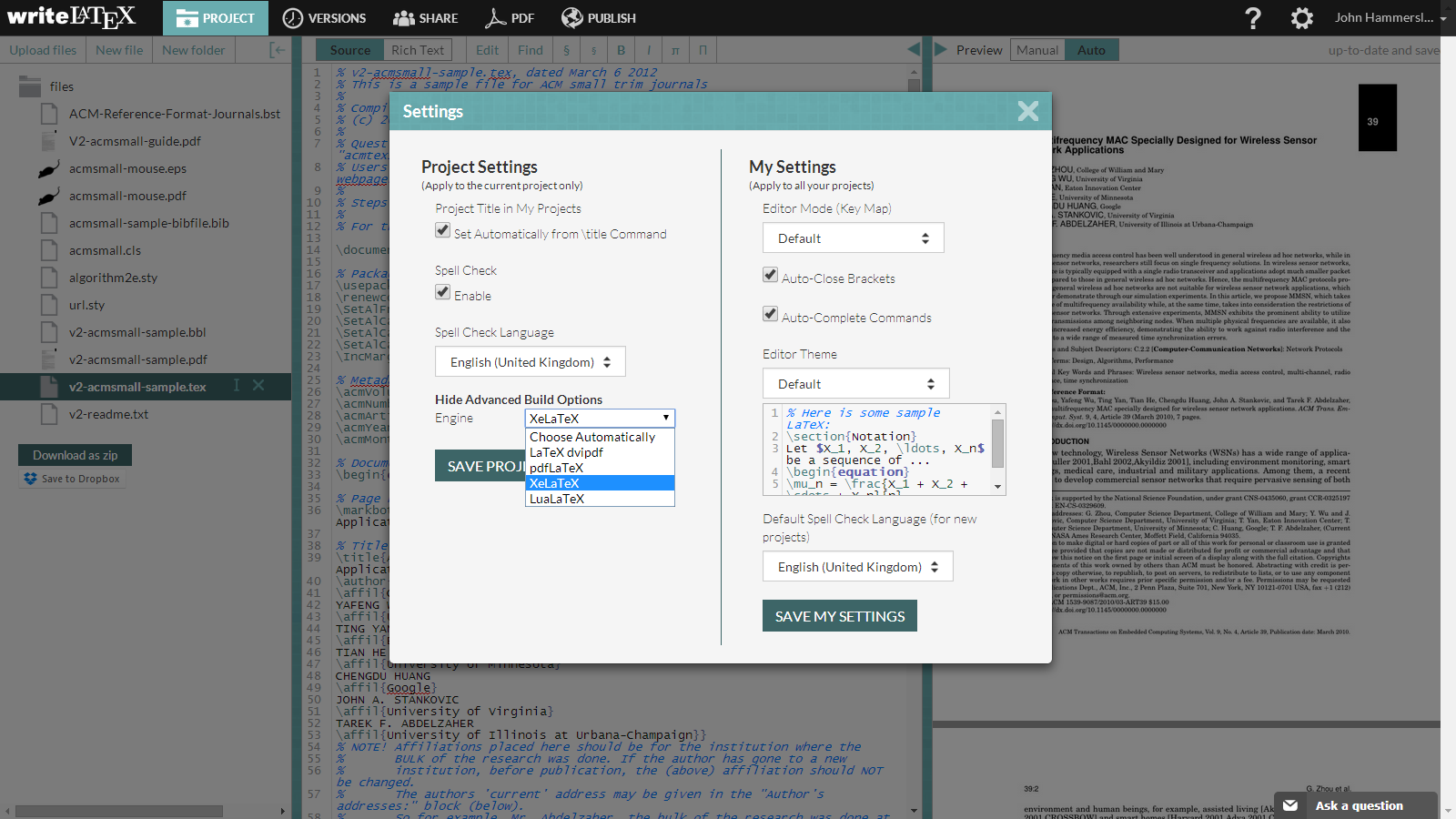 -->
11. Now you can start working in the main file.
## Manual setup
1. create new overleaf project
2. clone the overleaf project using git
3. copy the files to that directory. Follow the steps at "Download" above
4. delete `.latexmkrc`
5. `git add .`
6. `git commit -m"initial import"`
7. `git push`
================================================
FILE: latexhints-english.tex
================================================
% !TeX root = main-english.tex
% !TeX spellcheck = en-US
% !TeX encoding = utf8
% -*- coding:utf-8 mod:LaTeX -*-
%This smart spell only works if no changes have been made to the chapter
%using the options proposed in preambel/chapterheads.tex.
\setchapterpreamble[u]{%
\dictum[Albert Einstein]{We cannot solve our problems with the same level of thinking that created them}
}
\chapter{LaTeX Hints}
\label{chap:latexhints}
One sentence per line.
This rule is important for the usage of version control systems.
A new line is generated with a blank line.
As you would do in Word:
New paragraphs are generated by pressing enter.
In LaTeX, this does not lead to a new paragraph as LaTeX joins subsequent lines.
In case you want a new paragraph, just press enter twice (!).
This leads to an empty line.
In word, there is the functionality to press shift and enter.
This leads to a hard line break.
The text starts at the beginning of a new line.
In LaTeX, you can do that by using two backslashes (\textbackslash\textbackslash).
This is rarely used.
Please do \textit{not} use two backslashes for new paragraphs.
For instance, this sentence belongs to the same paragraph, whereas the last one started a new one.
A long motivation for that is provided at \url{http://loopspace.mathforge.org/HowDidIDoThat/TeX/VCS/#section.3}.
One can write \emph{emphasized text (rendered in italics)} and \textbf{bold text}.
\section{File Encoding and Support of Umlauts}
\label{sec:firstsectioninlatexhints}
The template offers foll UTF-8 support.
All recent editors should not have issues with that.
\section{Citations}
References are set by means of \texttt{\textbackslash cite[key]}.
\begin{filecontents*}[overwrite]{\democodefile}
Example: \cite{WSPA} or by author input: \citet{WSPA}.
\end{filecontents*}
\PrintDemo{style=parallel}
The following sentence demonstrates
\begin{inparaenum}[1.]
\item the capitalization of author names at the beginning of the sentence,
\item the correct citation using author names and the reference,
\item that the author names are a hyperlink to the bibliography and that
\item the bibliography contains the name prefix \qq{van der} of \qq{Wil M.\,P.\ van der Aalst}.
\end{inparaenum}
\begin{filecontents*}[overwrite]{\democodefile}
\Citet{RVvdA2016} present a study on the effectiveness of workflow management systems.
\end{filecontents*}
\PrintDemo{style=parallel}
The following sentence demonstrates that you can overwrite the text part of the generated label using \texttt{label} in a bibliopgrahie"=entry, but the year and the uniqueness are still generated by biber.
\begin{filecontents*}[overwrite]{\democodefile}
The workflow engine Apache ODE \cite{ApacheODE} executes \BPEL processes reliably.
\end{filecontents*}
\PrintDemo{style=parallel}
\begin{filecontents*}[overwrite]{\democodefile}
Words are best enclosed using \texttt{\textbackslash qq\{..\}}, then the correct quotes are used.
\end{filecontents*}
\PrintDemo{style=parallel}
When creating the Bibtex file it is recommended to make sure that the DOI is listed.
\section{Formulas and Equations}
\label{sec:mf}
\begin{filecontents*}[overwrite]{\democodefile}
Equations $f(x)=x$ inside the text can be provided.
\end{filecontents*}
\PrintDemo{style=parallel}
A list with all available mathematical symbols is provided at \url{http://texdoc.net/pkg/symbols-a4}.
\begin{filecontents*}[overwrite]{\democodefile}
As an example, the set of natural numbers is given by $\mathbb{N}$.
\end{filecontents*}
\PrintDemo{style=parallel}
For the documentation of editing mathematical formulas read the package documentation of \texttt{amsmath}\footnote{\url{http://texdoc.net/pkg/amsmath}}.
Equation~\ref{eq:test} is numbered and can be referenced in the text:
\begin{filecontents*}[overwrite]{\democodefile}
\begin{align}
\label{eq:test}
x = y
\end{align}
\end{filecontents*}
\PrintDemo{style=parallel}
The following equation is not numbered because of using \texttt{\textbackslash align*} as environment.
\begin{filecontents*}[overwrite]{\democodefile}
\begin{align*}
x = y
\end{align*}
\end{filecontents*}
\PrintDemo{style=parallel}
The template offers \verb+\abs+ to enable the bars to scale well at the absolute value:
\begin{filecontents*}[overwrite]{\democodefile}
$\abs{X}$.
\end{filecontents*}
\PrintDemo{style=parallel}
The documentation available at \url{http://www.ctan.org/tex-archive/help/Catalogue/entries/voss-mathmode.html} provides more details about mathematical environments.
%%%%%%%%%%%%%%%%%%%%%%%%%%%%%%%%%%%%%%%%%%%%%%%%%%%%%%%%%%%%%%%%%%%%%%%%%%%%%%
\section{Sourcecode}
%%%%%%%%%%%%%%%%%%%%%%%%%%%%%%%%%%%%%%%%%%%%%%%%%%%%%%%%%%%%%%%%%%%%%%%%%%%%%%
\Cref{lst:ListingANDlstlisting} shows how to embed source code.
With \texttt{\textbackslash lstinputlisting} the source code can be loaded directly from files.
%Listing-Umgebung wurde durch \newfloat{Listing} definiert
\begin{Listing}
\begin{lstlisting}
<listing name="second sample">
<content>not interesting</content>
</listing>
\end{lstlisting}
\caption{The code is separated by two horizontal lines in the listings environment.}
\label{lst:ListingANDlstlisting}
\end{Listing}
\begin{filecontents*}[overwrite]{\democodefile}
Source code is also available in the text \lstinline|<listing />|.
\end{filecontents*}
\PrintDemo{style=parallel}
%%%%%%%%%%%%%%%%%%%%%%%%%%%%%%%%%%%%%%%%%%%%%%%%%%%%%%%%%%%%%%%%%%%%%%%%%%%%%%
\section{Pseudocode}
%%%%%%%%%%%%%%%%%%%%%%%%%%%%%%%%%%%%%%%%%%%%%%%%%%%%%%%%%%%%%%%%%%%%%%%%%%%%%%
\Cref{alg:sample} shows a sample algorithm.
\begin{Algorithmus} %Use the environment only if you want to place the algorithm similar to graphics from TeX
\caption{Sample algorithm}
\label{alg:sample}
\begin{algorithmic}
\Procedure{Sample}{$a$,$v_e$}
\State $\mathsf{parentHandled} \gets (a = \mathsf{process}) \lor \mathsf{visited}(a'), (a',c,a) \in \mathsf{HR}$
\State \Comment $(a',c'a) \in \mathsf{HR}$ denotes that $a'$ is the parent of $a$
\If{$\mathsf{parentHandled}\,\land(\mathcal{L}_\mathit{in}(a)=\emptyset\,\lor\,\forall l \in \mathcal{L}_\mathit{in}(a): \mathsf{visited}(l))$}
\State $\mathsf{visited}(a) \gets \text{true}$
\State $\mathsf{writes}_\circ(a,v_e) \gets
\begin{cases}
\mathsf{joinLinks}(a,v_e) & \abs{\mathcal{L}_\mathit{in}(a)} > 0\\
\mathsf{writes}_\circ(p,v_e)
& \exists p: (p,c,a) \in \mathsf{HR}\\
(\emptyset, \emptyset, \emptyset, false) & \text{otherwise}
\end{cases}
$
\If{$a\in\mathcal{A}_\mathit{basic}$}
\State \Call{HandleBasicActivity}{$a$,$v_e$}
\ElsIf{$a\in\mathcal{A}_\mathit{flow}$}
\State \Call{HandleFlow}{$a$,$v_e$}
\ElsIf{$a = \mathsf{process}$} \Comment Directly handle the contained activity
\State \Call{HandleActivity}{$a'$,$v_e$}, $(a,\bot,a') \in \mathsf{HR}$
\State $\mathsf{writes}_\bullet(a) \gets \mathsf{writes}_\bullet(a')$
\EndIf
\ForAll{$l \in \mathcal{L}_\mathit{out}(a)$}
\State \Call{HandleLink}{$l$,$v_e$}
\EndFor
\EndIf
\EndProcedure
\end{algorithmic}
\end{Algorithmus}
\clearpage
And if you want to write an algorithm that goes over several pages, you can only do this with the following \textbf{dirty} hack:
{
\begin{minipage}{\textwidth}
\hrule height .8pt width\textwidth
\vskip.3em%\vskip\abovecaptionskip\relax
\stepcounter{Algorithmus}
\addcontentsline{alg}{Algorithmus}{\protect\numberline{\theAlgorithmus}{\ignorespaces Description \relax}}
\noindent\textbf{Algorithmus \theAlgorithmus} Description
%\stepcounter{algorithm}
%\addcontentsline{alg}{Algorithmus}{\thealgorithm{}\hskip0em Description}
%\textbf{Algorithmus \thealgorithm} Description
\vskip.3em%\vskip\belowcaptionskip\relax
\hrule height .5pt width\textwidth
\end{minipage}
%without the following line, the text is never at the rule
\vskip-.3em
%
code goes here\\
test2\\
%
\vskip-.7em
\hrule height .5pt width\textwidth
}
%%%%%%%%%%%%%%%%%%%%%%%%%%%%%%%%%%%%%%%%%%%%%%%%%%%%%%%%%%%%%%%%%%%%%%%%%%%%%%
\section{Figures}
%%%%%%%%%%%%%%%%%%%%%%%%%%%%%%%%%%%%%%%%%%%%%%%%%%%%%%%%%%%%%%%%%%%%%%%%%%%%%%
The \cref{fig:chor1} and \ref{fig:chor2} are important to understand this document.
In the appendix \vref{fig:AnhangsChor} shows again the complete choreography.
%The parameters in square brackets are optional - e.g. [htb!]
%htb! means: Dear LaTeX, please place this image here first ("_h_ere"). If this does not work, place it at the "_t_op" of the page. And if this is not possible, please place it at the "_b_ottom" of the page. And please, please prefer here and above, even if it doesn't look so optimal ("!")
%These should NOT be used if possible. LaTeX's algorithm for placing the glide environment is already very good!
\begin{figure}
\centering
\includegraphics[width=\textwidth]{choreography.pdf}
\caption{Example Choreography}
\label{fig:chor1}
\end{figure}
\begin{figure}
\centering
\includegraphics[width=.8\textwidth]{choreography.pdf}
\caption[Example Choreography]{The example choreography. Now slightly smaller to demonstrate \texttt{\textbackslash textwidth}. And also the use of alternative captions for the list of images. However, the latter is only conditionally recommended, because who reads so much text under a picture? Or is it just a matter of style?}
\label{fig:chor2}
\end{figure}
\begin{figure}
\hfill
\begin{subfigure}{.3\textwidth}
\includegraphics[width=\textwidth]{choreography.pdf}
\caption{Choreography 1}
\label{fig:subfigA}
\end{subfigure}
\hfill
\begin{subfigure}{.3\textwidth}
\includegraphics[width=\textwidth]{choreography.pdf}
\caption{Choreography 2}
\label{fig:subfigB}
\end{subfigure}
\hfill
\begin{subfigure}{.3\textwidth}
\includegraphics[width=.9\textwidth]{choreography.pdf}
\caption{Choreography 3}
\label{fig:subfigC}
\end{subfigure}
\caption{Example to place 3 illustrations next to each other. Further, it is possible to reference each separately.}
\label{fig:subfig_example}
\end{figure}
\Cref{fig:subfig_example} shows the usage of the package subcaption.
It is indeed possible to reference to sub figures: \Cref{fig:subfigA}.
It is possible to convert SVGs to PDF directly during compilation.
This is described in the source code of latex-tipps.tex, but commented out.
\iffalse % <-- Take this away if inkscape is in the path
The SVG in \cref{fig:directSVG} is directly included, while the text in the SVG in \cref{fig:latexSVG} is set using pdflatex.
If you want to see the graphics, inkscape must be in PATH and in the text source \texttt{\textbackslash{}iffalse} and \text{\textbackslash{}iftrue} have to be commented out.
\begin{figure}
\centering
\includegraphics{svgexample.svg}
\caption{SVG directly included}
\label{fig:directSVG}
\end{figure}
\begin{figure}
\centering
\def\svgwidth{.4\textwidth}
\includesvg{svgexample}
\caption{Text in SVN set via \LaTeX{}}
\label{fig:latexSVG}
\end{figure}
\fi % <-- Take this away if inkscape is in the path
\section{More Illustrations}
\Cref{fig:AnhangsChor,fig:AnhangsChor2} show two choreographies, which should further explain the facts. The second figure is rotated 90 degrees to demonstrate the \texttt{pdflscape} package.
\begin{figure}
\centering
\includegraphics[width=\textwidth]{choreography.pdf}
\caption{Example Choreography I}
\label{fig:AnhangsChor}
\end{figure}
\begin{landscape}
%sidewaysfigure
\begin{figure}
\centering
\includegraphics[width=\textwidth]{choreography.pdf}
\caption{Example Choreography II}
\label{fig:AnhangsChor2}
\end{figure}
\end{landscape}
\IfFileExists{pgfplots.sty}{
%%%%%%%%%%%%%%%%%%%%%%%%%%%%%%%%%%%%%%%%%%%%%%%%%%%%%%%%%%%%%%%%%%%%%%%%%%%%%%
\section{Plots with pgfplots}
%%%%%%%%%%%%%%%%%%%%%%%%%%%%%%%%%%%%%%%%%%%%%%%%%%%%%%%%%%%%%%%%%%%%%%%%%%%%%%
The package pdfplots provides plotting of functions directly in \LaTeX~like with matlab or gnuplot. Some visual examples are available here\footnote{\url{http://texdoc.net/pkg/visualtikz}}.
\begin{figure}[h]
\centering
\begin{tikzpicture}
\begin{axis}[xlabel=$x$,
ylabel=$\sin(x)$]
\addplot {sin(deg(x))}; % Print sine function
\end{axis}
\end{tikzpicture}
\caption{Plot of $\sin(x)$ direclty inside the figure environment with pgfplots.}
\end{figure}
\begin{figure}[h]
\centering
\begin{tikzpicture}
\begin{axis}[xlabel=$x$,
ylabel=$y$]
\addplot table [x=a, y=c, col sep=comma] {data/data.csv}; % Read coordinates from csv file and plot them
\end{axis}
\end{tikzpicture}
\caption{Coordinates $x$ and $y$ read from csv file and plotted pgfplots.}
\end{figure}
}{}
%%%%%%%%%%%%%%%%%%%%%%%%%%%%%%%%%%%%%%%%%%%%%%%%%%%%%%%%%%%%%%%%%%%%%%%%%%%%%%
\section{Figures with tikz}
%%%%%%%%%%%%%%%%%%%%%%%%%%%%%%%%%%%%%%%%%%%%%%%%%%%%%%%%%%%%%%%%%%%%%%%%%%%%%%
The tikz is a package for creating graphics programmatically. With this package grids or other regular strucutres can be easliy generated.
\begin{figure}[ht]
\centering
\begin{tikzpicture}
\draw(0,0) rectangle (4,4);
\foreach \x in {0.5,1,1.5,2,2.5,3,3.5}
\foreach \y in {0.5,1,1.5,2,2.5,3,3.5}
\draw(\x,\y) circle (1pt);
\end{tikzpicture}
\caption{A regular grid generated easily with two for loops.}\label{fig:tikz_example}
\end{figure}
%%%%%%%%%%%%%%%%%%%%%%%%%%%%%%%%%%%%%%%%%%%%%%%%%%%%%%%%%%%%%%%%%%%%%%%%%%%%%%
\section{UML diagrams using tikz-uml}
%%%%%%%%%%%%%%%%%%%%%%%%%%%%%%%%%%%%%%%%%%%%%%%%%%%%%%%%%%%%%%%%%%%%%%%%%%%%%%
\Cref{fig:uml} presents a class diagram typeset using tikz-uml.
\begin{figure}
\centering
\begin{tikzpicture}
\begin{umlpackage}{p}
\begin{umlpackage}{sp1}
\umlclass[template=T]{A}{
n : uint \\ t : float
}{}
\umlclass[y=-3]{B}{
d : double
}{
\umlvirt{setB(b : B) : void} \\ getB() : B}
\end{umlpackage}
\begin{umlpackage}[x=10,y=-6]{sp2}
\umlinterface{C}{
n : uint \\ s : string
}{}
\end{umlpackage}
\umlclass[x=2,y=-10]{D}{
n : uint
}{}
\end{umlpackage}
\umlassoc[geometry=-|-, arg1=tata, mult1=*, pos1=0.3, arg2=toto, mult2=1, pos2=2.9, align2=left]{C}{B}
\umlunicompo[geometry=-|, arg=titi, mult=*, pos=1.7, stereo=vector]{D}{C}
\umlimport[geometry=|-, anchors=90 and 50, name=import]{sp2}{sp1}
\umlaggreg[arg=tutu, mult=1, pos=0.8, angle1=30, angle2=60, loopsize=2cm]{D}{D}
\umlinherit[geometry=-|]{D}{B}
\umlnote[x=2.5,y=-6, width=3cm]{B}{A note with respect to class B}
\umlnote[x=7.5,y=-2]{import-2}{A anotation}
\end{tikzpicture}
\caption{Class diagram generated with tikz-uml. Example adapted from Nicolas Kielbasiewicz.}
\label{fig:uml}
\end{figure}
\section{UML diagrams using PlantUML}
In case \lualatex{} is used and PlantUML is installed, UML diagrams can be defined using PlantUML.
% Only works if "--shell-escape" is activated. Please activate only if you are sure, your compilation settings are correct
%\IfFileExists{plantuml.sty}{\input{latexhints-english-plantuml}}{}
%%%%%%%%%%%%%%%%%%%%%%%%%%%%%%%%%%%%%%%%%%%%%%%%%%%%%%%%%%%%%%%%%%%%%%%%%%%%%%
\section{Linguistic Forests}
%%%%%%%%%%%%%%%%%%%%%%%%%%%%%%%%%%%%%%%%%%%%%%%%%%%%%%%%%%%%%%%%%%%%%%%%%%%%%%
\begin{filecontents*}[overwrite]{\democodefile}
\begin{forest}
[VP
[DP]
[V’
[V]
[DP]
]
]
\end{forest}
\end{filecontents*}
\PrintDemo{style=parallel}
%%%%%%%%%%%%%%%%%%%%%%%%%%%%%%%%%%%%%%%%%%%%%%%%%%%%%%%%%%%%%%%%%%%%%%%%%%%%%%
\section{Tables}
%%%%%%%%%%%%%%%%%%%%%%%%%%%%%%%%%%%%%%%%%%%%%%%%%%%%%%%%%%%%%%%%%%%%%%%%%%%%%%
\cref{tab:Ergebnisse} shows results and \cref{tab:Werte} shows how numerical data can be represented in a table.
\begin{table}
\centering
\begin{tabular}{ccc}
\toprule
\multicolumn{2}{c}{\textbf{summed}} & \textbf{Title} \\ \midrule
Table & as & in \\
\url{tabsatz.pdf} & recommended & gesetzt \\
\multirow{2}{*}{Example} & \multicolumn{2}{c}{a nice example} \\
& \multicolumn{2}{c}{for using \qq{multirow}} \\
\bottomrule
\end{tabular}
\caption[Example Table]{Exampe Table -- see \url{http://www.ctan.org/tex-archive/info/german/tabsatz/}}
\label{tab:Ergebnisse}
\end{table}
\begin{table}
\centering
\begin{tabular}{l *{8}{d{3.2}}}
\toprule
& \multicolumn{2}{c}{\textbf{Parameter 1}} & \multicolumn{2}{c}{\textbf{Parameter 2}} & \multicolumn{2}{c}{\textbf{Parameter 3}} & \multicolumn{2}{c}{\textbf{Parameter 4}} \\
\cmidrule(r){2-3}\cmidrule(lr){4-5}\cmidrule(lr){6-7}\cmidrule(l){8-9}
\textbf{Bedingungen} & \multicolumn{1}{c}{\textbf{M}} & \multicolumn{1}{c}{\textbf{SD}} & \multicolumn{1}{c}{\textbf{M}} & \multicolumn{1}{c}{\textbf{SD}} & \multicolumn{1}{c}{\textbf{M}} & \multicolumn{1}{c}{\textbf{SD}} & \multicolumn{1}{c}{\textbf{M}} & \multicolumn{1}{c}{\textbf{SD}} \\
\midrule
W & 1.1 & 5.55 & 6.66 & .01 & & & & \\
X & 22.22 & 0.0 & 77.5 & .1 & & & & \\
Y & 333.3 & .1 & 11.11 & .05 & & & & \\
Z & 4444.44 & 77.77 & 14.06 & .3 & & & & \\
\bottomrule
\end{tabular}
\caption{Example table for 4 constraints (W-Z), each having 4 parameters with (M und SD). Note: use always the same number of decimal places.}
\label{tab:Werte}
\end{table}
\IfFileExists{pgfplotstable.sty}{
\subsection{Tables with pgfplots}
With the pgfplotstable package tables can be directly generated from a csv file.
\begin{table}[h]
\centering
\pgfplotstabletypeset[
col sep = comma,
every head row/.style={before row=\toprule,after row=\midrule},
every last row/.style={after row=\bottomrule},
display columns/0/.style={string type,column name={}}
]
{data/data.csv}
\caption{Table directly generated from the values of a csf file.}
\end{table}
}{}
\section{Tables spanning multiple pages}
\begin{longtable}{|l|l|l|}
\caption{A sample long table.} \label{tab:long} \\
\hline \multicolumn{1}{|c|}{\textbf{First column}} & \multicolumn{1}{c|}{\textbf{Second column}} & \multicolumn{1}{c|}{\textbf{Third column}} \\ \hline
\endfirsthead
\multicolumn{3}{c}%
{{\bfseries \tablename\ \thetable{} -- continued from previous page}} \\
\hline \multicolumn{1}{|c|}{\textbf{First column}} & \multicolumn{1}{c|}{\textbf{Second column}} & \multicolumn{1}{c|}{\textbf{Third column}} \\ \hline
\endhead
\hline \multicolumn{3}{|r|}{{Continued on next page}} \\ \hline
\endfoot
\hline \hline
\endlastfoot
A & BC & D \\
A & BC & D \\
A & BC & D \\
A & BC & D \\
A & BC & D \\
A & BC & D \\
A & BC & D \\
A & BC & D \\
A & BC & D \\
A & BC & D \\
A & BC & D \\
A & BC & D \\
A & BC & D \\
A & BC & D \\
A & BC & D \\
A & BC & D \\
A & BC & D \\
A & BC & D \\
A & BC & D \\
A & BC & D \\
A & BC & D \\
A & BC & D \\
A & BC & D \\
A & BC & D \\
A & BC & D \\
A & BC & D \\
A & BC & D \\
A & BC & D \\
A & BC & D \\
A & BC & D \\
A & BC & D \\
A & BC & D \\
A & BC & D \\
A & BC & D \\
A & BC & D \\
A & BC & D \\
A & BC & D \\
A & BC & D \\
A & BC & D \\
A & BC & D \\
A & BC & D \\
A & BC & D \\
A & BC & D \\
A & BC & D \\
A & BC & D \\
A & BC & D \\
A & BC & D \\
A & BC & D \\
A & BC & D \\
A & BC & D \\
A & BC & D \\
A & BC & D \\
A & BC & D \\
A & BC & D \\
A & BC & D \\
A & BC & D \\
A & BC & D \\
A & BC & D \\
A & BC & D \\
A & BC & D \\
A & BC & D \\
A & BC & D \\
A & BC & D \\
A & BC & D \\
A & BC & D \\
A & BC & D \\
A & BC & D \\
A & BC & D \\
A & BC & D \\
A & BC & D \\
A & BC & D \\
A & BC & D \\
A & BC & D \\
A & BC & D \\
A & BC & D \\
A & BC & D \\
A & BC & D \\
A & BC & D \\
A & BC & D \\
A & BC & D \\
\end{longtable}
%%%%%%%%%%%%%%%%%%%%%%%%%%%%%%%%%%%%%%%%%%%%%%%%%%%%%%%%%%%%%%%%%%%%%%%%%%%%%%
\section{Abbreviations}
%%%%%%%%%%%%%%%%%%%%%%%%%%%%%%%%%%%%%%%%%%%%%%%%%%%%%%%%%%%%%%%%%%%%%%%%%%%%%%
At the first pass, the \gls{fr} was 5.
At the second pass was \gls{fr} 3.
The plural form can be seen here: \glspl{er}.
To demonstrate what the list of abbreviations looks like for longer description texts, \glspl{rdbms} must be mentioned here.
With \verb+\gls{...}+ you can enter abbreviations, the first time you call it, the long form is used.
When reusing \verb+\gls{..}+ the short form is automatically displayed.
The abbreviation is also automatically inserted in the abbreviation list.
With \verb+\glspl{...}+ the plural form is used.
If you want the short form to appear directly at the first use, you can use \verb+\glsunset{..}+ to mark an abbreviation as already used.
The opposite is achieved with \verb+\glsreset{..}+.
Abbreviations are defined in \verb+\content\ausarbeitung.tex+ by means of \verb+\newacronym{...}{...}{...}+.
More information at: \url{http://tug.ctan.org/macros/latex/contrib/glossaries/glossariesbegin.pdf}
%%%%%%%%%%%%%%%%%%%%%%%%%%%%%%%%%%%%%%%%%%%%%%%%%%%%%%%%%%%%%%%%%%%%%%%%%%%%%%
\section{References}
%%%%%%%%%%%%%%%%%%%%%%%%%%%%%%%%%%%%%%%%%%%%%%%%%%%%%%%%%%%%%%%%%%%%%%%%%%%%%%
For distant sections \qq{varioref} is recommended:
\qq{See \vref{sec:mf}}.
The command \texttt{\textbackslash{}vref} works similarly to \texttt{\textbackslash{}cref} the difference being that a reference to the page is additionally added.
\texttt{vref}: \qq{\vref{sec:firstsectioninlatexhints}}, \texttt{cref}: \qq{\cref{sec:firstsectioninlatexhints}}, \texttt{ref}: \qq{\ref{sec:firstsectioninlatexhints}}.
If \qq{varioref} causes difficulties, then \qq{cref} can be used instead.
This also creates the word \qq{section} automatically: \cref{sec:mf}.
This is also possible for illustrations etc.
In English please use \verb1\Cref{...}1 (with large \qq{C} at the beginning).
%With MiKTeX installation from 2012-01-16 no longer necessary.
%If a section becomes longer than one page and you want to refer to a specific place in the section with \texttt{\textbackslash{}vref}, then you should use \texttt{\textbackslash{}phantomsection} then using \texttt{vref} will also display the correct page number.
%%The link location will be placed on the line below.
%%Tipp von http://en.wikibooks.org/wiki/LaTeX/Labels_and_Cross-referencing#The_hyperref_package_and_.5Cphantomsection
%\phantomsection
%\label{alabel}
%View the example for \texttt{\textbackslash{}phantomsection} in the \LaTeX{} source code.
%Here is the example: See Section \vref{hack1} and Section \vref{hack2}.
%%%%%%%%%%%%%%%%%%%%%%%%%%%%%%%%%%%%%%%%%%%%%%%%%%%%%%%%%%%%%%%%%%%%%%%%%%%%%%
\section{Definitions}
%%%%%%%%%%%%%%%%%%%%%%%%%%%%%%%%%%%%%%%%%%%%%%%%%%%%%%%%%%%%%%%%%%%%%%%%%%%%%%
\begin{definition}[Title]
\label{def:def1}
Definition Text
\end{definition}
\Cref{def:def1} shows \ldots
%%%%%%%%%%%%%%%%%%%%%%%%%%%%%%%%%%%%%%%%%%%%%%%%%%%%%%%%%%%%%%%%%%%%%%%%%%%%%%
\section{Footnotes}
%%%%%%%%%%%%%%%%%%%%%%%%%%%%%%%%%%%%%%%%%%%%%%%%%%%%%%%%%%%%%%%%%%%%%%%%%%%%%%
Footnotes are provided by the command \verb+\footnote{...}+\footnote{\label{fussnote}Example footnote.}. Citing footnotes is possible by provinding a label\verb+\footnote{\label{...}...}+ and cite the footnote with \verb+\cref{...}+ in the text\cref{fussnote}.
%%%%%%%%%%%%%%%%%%%%%%%%%%%%%%%%%%%%%%%%%%%%%%%%%%%%%%%%%%%%%%%%%%%%%%%%%%%%%%
%%%%%%%%%%%%%%%%%%%%%%%%%%%%%%%%%%%%%%%%%%%%%%%%%%%%%%%%%%%%%%%%%%%%%%%%%%%%%%
\section{Various Things}
%%%%%%%%%%%%%%%%%%%%%%%%%%%%%%%%%%%%%%%%%%%%%%%%%%%%%%%%%%%%%%%%%%%%%%%%%%%%%%
\label{sec:diff}
\ifdeutsch
Numbers (123\,654\,789) are nicely set.
Either in a line or as a non-lining figure.
The latter is reached by the parameter \texttt{osf} at package \texttt{libertine} or.\ \texttt{mathpazo} in \text{fonts.tex}.
\fi
\begin{filecontents*}[overwrite]{\democodefile}
\begin{compactenum}[I.]
\item You can also keep the numbering compact thanks to paralist
\item and switch to a different numbering
\end{compactenum}
\end{filecontents*}
\PrintDemo{style=parallel}
The words \qq{workflow} and \qq{dwarflike} can be copied from the PDF and pasted to a text file.
\begin{filecontents*}[overwrite]{\democodefile}
In case \LuaLaTeX{} is used as the compiler, there is no ligature at \qq{f\/l} in the word \qq{dwarflike} (in contrast to \qq{fl} at \qq{workflow}).
In other words: \qq{dwarflike} and \qq{dwarf\/like} look the same in the PDF.
In case they do not, there is an issue with Lua\LaTeX{} and the selnolig package.
\end{filecontents*}
\PrintDemo{style=parallel}
% Meta comment: The precise form of the optimal ligation suppression command may vary depending on the character pairs involved - see https://tex.stackexchange.com/q/28437/9075
%%%%%%%%%%%%%%%%%%%%%%%%%%%%%%%%%%%%%%%%%%%%%%%%%%%%%%%%%%%%%%%%%%%%%%%%%%%%%%
\section{Closing remarks}
%%%%%%%%%%%%%%%%%%%%%%%%%%%%%%%%%%%%%%%%%%%%%%%%%%%%%%%%%%%%%%%%%%%%%%%%%%%%%%
Please feel free to provide enhancements for this template and create a new ticket on GitHub (\url{https://github.com/latextemplates/uni-stuttgart-computer-science-template/issues}).
================================================
FILE: latexhints-german-plantuml.tex
================================================
\Cref{fig:umlcar} zeigt ein einfaches UML-Diagramm mittels PlantUML.
\begin{figure}
\centering
\begin{plantuml}
@startuml
class Car
Driver - Car : drives >
Car *- Wheel : have 4 >
Car -- Person : < owns
@enduml
\end{plantuml}
\caption{Einfaches PlantUML-Diagramm}
\label{fig:umlcar}
\end{figure}
\Cref{fig:plantuml} zeigt das Beispiel von \cref{fig:uml} mittels PlantUML.
\begin{figure}
\centering
\begin{plantuml}
@startuml
package "p" #DDDDDD {
package "sp1" #DDDDDD {
class A<T> {
+ n : uint
+ t : float
}
class B {
+ d : double
- setB(b: B): void
+ getB(): B
}
note bottom of Class: A note on class B
}
package "sp2" #DDDDDD {
interface C << interface >> {
+ n : uint
+ s : string
}
}
class D {
+ n : uint
}
sp2 ..> sp1 : N1
note on link: An annotation
B <|--D
B "1 toto" --> "0..* tata" C
D "1" o-- D : tutu
D *--> "titi 0..*" C : << vector >>
}
@enduml
\end{plantuml}
\caption{PlantUML-Diagramm}
\label{fig:plantuml}
\end{figure}
================================================
FILE: latexhints-german.tex
================================================
% !TeX root = main-german.tex
% !TeX spellcheck = de_DE
% !TeX encoding = utf8
% -*- coding:utf-8 mod:LaTeX -*-
%Die Angabe des schlauen Spruchs auf diesem Wege funtioniert nur,
%wenn keine Änderung des Kapitels mittels den in preambel/chapterheads.tex
%vorgeschlagenen Möglichkeiten durchgeführt wurde.
\setchapterpreamble[u]{%
\dictum[Albert Einstein]{Probleme kann man niemals mit derselben Denkweise lösen, durch die sie entstanden sind.}
}
\chapter{LaTeX-Tipps}
\label{chap:latextipps}
In diesem Kapitel sollen allgemeine \LaTeX-Hinweise gegeben werden.
\section{Trennung von Absätzen}
Pro Satz eine neue Zeile.
Das ist wichtig, um sauber versionieren zu können.
In LaTeX werden Absätze durch eine Leerzeile getrennt.
Analogie zu Word: Bei Word werden neue Absätze durch einmal Eingabetaste gemacht.
Dies führt bei LaTeX jedoch nicht zu einem neuen Absatz, da LaTeX direkt aufeinanderfolgende Zeilen zu einer Zeile zusammenfügt.
Möchte man nun einen Absatz haben, muss man zweimal die Eingabetaste drücken.
Dies führt zu einer leeren Zeile.
In Word gibt es die Funktion Großschreibetaste und Eingabetaste gleichzeitig.
Wenn man dies drückt, wird einer harter Umbruch erzwungen.
Der Text fängt am Anfang der neuen Zeile an.
In LaTeX erreicht man dies durch Doppelbackslashes (\textbackslash\textbackslash) erzeugt.
Dies verwendet man quasi nie.
Folglich werden neue Abstäze insbesondere \emph{nicht} durch Doppelbackslashes erzeugt.
Beispielsweise begann der letzte Satz in einem neuen Absatz.
Eine ausführliche Motivation hierfür findet sich in \url{http://loopspace.mathforge.org/HowDidIDoThat/TeX/VCS/#section.3}.
Möchte man die Art des Absatzes ändern, so kann man die Dokumentklassenoption \texttt{parskip} verwenden.
Beispielsweise kann man mit \texttt{parskip=off} erreichen, dass statt eines freien Bereichs die erste Zeile des Absatzes eingezogen wird.
\section{File-Encoding und Unterstützung von Umlauten}
\label{sec:firstsectioninlatexhints}
Die Vorlage wurde 2010 auf UTF-8 umgestellt.
Alle neueren Editoren sollten damit keine Schwierigkeiten haben.
\section{Zitate}
Referenzen werden mittels \texttt{\textbackslash cite[key]} gesetzt.
Beispiel: \cite{WSPA} oder mit Autorenangabe: \citet{WSPA}.
Der folgende Satz demonstriert
\begin{filecontents*}[overwrite]{\democodefile}
\begin{inparaenum}[1.]
\item die Großschreibung von Autorennamen am Satzanfang,
\item die richtige Zitation unter Verwendung von Autorennamen und der Referenz,
\item dass die Autorennamen ein Hyperlink auf das Literaturverzeichnis sind sowie
\item dass in dem Literaturverzeichnis der Namenspräfix \qq{van der} von \qq{Wil M.\,P.\ van der Aalst} steht.
\end{inparaenum}
\end{filecontents*}
\PrintDemo{style=parallel}
\Citet{RVvdA2016} präsentieren eine Studie über die Effektivität von Workflow-Management-Systemen.
Der folgende Satz demonstriert, dass man mittels \texttt{label} in einem Bibliopgrahie"=Eintrag den Textteil des generierten Labels überschreiben kann, aber das Jahr und die Eindeutigkeit noch von biber generiert wird.
Die Apache ODE Engine \cite{ApacheODE} ist eine Workflow-Maschine, die \BPEL-Prozesse zuverlässig ausführt.
Wörter am besten mittels \texttt{\textbackslash qq\{...\}} \qq{einschließen}, dann werden die richtigen Anführungszeichen verwendet.
Beim Erstellen der Bibtex-Datei wird empfohlen darauf zu achten, dass die DOI aufgeführt wird.
\section{Mathematische Formeln}
\label{sec:mf}
Mathematische Formeln kann man $so$ setzen. \texttt{symbols-a4.pdf} (zu finden auf \url{http://texdoc.net/pkg/symbols-a4}) enthält eine Liste der unter LaTeX direkt verfügbaren Symbole.
Beispielsweise $\mathbb{N}$ für die Menge der natürlichen Zahlen.
Für eine vollständige Dokumentation für mathematischen Formelsatz sollte die Dokumentation zu \texttt{amsmath}, \url{http://texdoc.net/pkg/amsmath} gelesen werden.
Folgende Gleichung erhält keine Nummer, da \texttt{\textbackslash equation*} verwendet wurde.
\begin{filecontents*}[overwrite]{\democodefile}
\begin{equation*}
x = y
\end{equation*}
\end{filecontents*}
\PrintDemo{style=parallel}
Die Gleichung~\ref{eq:test} erhält eine Nummer:
\begin{filecontents*}[overwrite]{\democodefile}
\begin{equation}
\label{eq:test}
x = y
\end{equation}
\end{filecontents*}
\PrintDemo{style=parallel}
Die Vorlage bietet \verb+\abs+ an, damit die Absolutbetragsstriche richtig skalieren:
$\abs{X}$.
Eine ausführliche Anleitung zum Mathematikmodus von LaTeX findet sich in \url{http://www.ctan.org/tex-archive/help/Catalogue/entries/voss-mathmode.html}.
\section{Quellcode}
\Cref{lst:ListingANDlstlisting,helloworld} zeigen, wie man Programmlistings einbindet.
Mittels \texttt{\textbackslash lstinputlisting} kann man den Inhalt direkt aus Dateien lesen.
%Listing-Umgebung wurde durch \newfloat{Listing} definiert
\begin{Listing}
\begin{lstlisting}[language=XML]
<listing name="second sample">
<!-- comment -->
<content>not interesting</content>
</listing>
\end{lstlisting}
\caption{lstlisting in einer Listings-Umgebung, damit das Listing durch Balken abgetrennt ist}
\label{lst:ListingANDlstlisting}
\end{Listing}
%TODO: Currently not shown in TOC
\lstinputlisting[language=C++,label=helloworld,caption={"`hello world"' in C++.},float]{code/helloworld.cpp}
Quellcode im \lstinline|<listing />| ist auch möglich.
\section{Pseudocode}
\Cref{alg:sample} zeigt einen Beispielalgorithmus.
\begin{Algorithmus} %Die Umgebung nur benutzen, wenn man den Algorithmus ähnlich wie Graphiken von TeX platzieren lassen möchte
\caption{Sample algorithm}
\label{alg:sample}
%EN: This is an environment from the algorithmicx package
\begin{algorithmic}
\Procedure{Sample}{$a$,$v_e$}
\State $\mathsf{parentHandled} \gets (a = \mathsf{process}) \lor \mathsf{visited}(a'), (a',c,a) \in \mathsf{HR}$
\State \Comment $(a',c'a) \in \mathsf{HR}$ denotes that $a'$ is the parent of $a$
\If{$\mathsf{parentHandled}\,\land(\mathcal{L}_\mathit{in}(a)=\emptyset\,\lor\,\forall l \in \mathcal{L}_\mathit{in}(a): \mathsf{visited}(l))$}
\State $\mathsf{visited}(a) \gets \text{true}$
\State $\mathsf{writes}_\circ(a,v_e) \gets
\begin{cases}
\mathsf{joinLinks}(a,v_e) & \abs{\mathcal{L}_\mathit{in}(a)} > 0 \\
\mathsf{writes}_\circ(p,v_e)
& \exists p: (p,c,a) \in \mathsf{HR} \\
(\emptyset, \emptyset, \emptyset, false) & \text{otherwise}
\end{cases}
$
\If{$a\in\mathcal{A}_\mathit{basic}$}
\State \Call{HandleBasicActivity}{$a$,$v_e$}
\ElsIf{$a\in\mathcal{A}_\mathit{flow}$}
\State \Call{HandleFlow}{$a$,$v_e$}
\ElsIf{$a = \mathsf{process}$} \Comment Directly handle the contained activity
\State \Call{HandleActivity}{$a'$,$v_e$}, $(a,\bot,a') \in \mathsf{HR}$
\State $\mathsf{writes}_\bullet(a) \gets \mathsf{writes}_\bullet(a')$
\EndIf
\ForAll{$l \in \mathcal{L}_\mathit{out}(a)$}
\State \Call{HandleLink}{$l$,$v_e$}
\EndFor
\EndIf
\EndProcedure
\end{algorithmic}
\end{Algorithmus}
\clearpage
Und wer einen Algorithmus schreiben möchte, der über mehrere Seiten geht, der kann das nur mit folgendem \textbf{üblen} Hack tun:
{
\begin{minipage}{\textwidth}
\hrule height .8pt width\textwidth
\vskip.3em%\vskip\abovecaptionskip\relax
\stepcounter{Algorithmus}
\addcontentsline{alg}{Algorithmus}{\protect\numberline{\theAlgorithmus}{\ignorespaces Description \relax}}
\noindent\textbf{Algorithmus \theAlgorithmus} Description
%\stepcounter{algorithm}
%\addcontentsline{alg}{Algorithmus}{\thealgorithm{}\hskip0em Description}
%\textbf{Algorithmus \thealgorithm} Description
\vskip.3em%\vskip\belowcaptionskip\relax
\hrule height .5pt width\textwidth
\end{minipage}
%without the following line, the text is never at the rule
\vskip-.3em
%
code goes here\\
test2\\
%
\vskip-.7em
\hrule height .5pt width\textwidth
}
\section{Abbildungen}
Die \cref{fig:chor1} und \ref{fig:chor2} sind für das Verständnis dieses Dokuments wichtig.
Im Anhang zeigt \vref{fig:AnhangsChor} erneut die komplette Choreographie.
%Die Parameter in eckigen Klammern sind optionale Parameter - z.B. [htb!]
%htb! bedeutet: "Liebes LaTeX, bitte platziere diese Abbildung zuerst hier ("_h_ere"). Falls das nicht funktioniert, dann bitte oben auf der Seite ("_t_op"). Und falls das nicht geht, bitte unten auf der Seite ("_b_ottom"). Und bitte, bitte bevorzuge hier und oben, auch wenn's net so optimal aussieht ("!")
%Diese sollten nach Möglichkeit NICHT verwendet werden. LaTeX's Algorithmus für das Platzieren der Gleitumgebung ist schon sehr gut!
\begin{figure}
\centering
\includegraphics[width=\textwidth]{choreography.pdf}
\caption{Beispiel-Choreographie}
\label{fig:chor1}
\end{figure}
\begin{figure}
\centering
\includegraphics[width=.8\textwidth]{choreography.pdf}
\caption[Beispiel-Choreographie]{Die Beispiel-Choreographie.
Nun etwas kleiner, damit \texttt{\textbackslash textwidth} demonstriert wird.
Und auch die Verwendung von alternativen Bildunterschriften für das Verzeichnis der Abbildungen.
Letzteres ist allerdings nur Bedingt zu empfehlen, denn wer liest schon so viel Text unter einem Bild?
Oder ist es einfach nur Stilsache?
}
\label{fig:chor2}
\end{figure}
\begin{figure}
\hfill
\begin{subfigure}{.3\textwidth}
\includegraphics[width=\textwidth]{choreography.pdf}
\caption{Choreografie 1}
\label{fig:subfigA}
\end{subfigure}
\hfill
\begin{subfigure}{.3\textwidth}
\includegraphics[width=\textwidth]{choreography.pdf}
\caption{Choreografie 2}
\label{fig:subfigB}
\end{subfigure}
\hfill
\begin{subfigure}{.3\textwidth}
\includegraphics[width=.9\textwidth]{choreography.pdf}
\caption{Choreografie 3}
\label{fig:subfigC}
\end{subfigure}
\caption{Beispiel um 3 Abbildung nebeneinader zu stellen nur jedes einzeln referenzieren zu können.}
\label{fig:subfig_example}
\end{figure}
\Cref{fig:subfig_example} zeigt die Verwendung des subcaption-Pakets.
Es ist auch möglich, auf Unterabbildungen zu verweisen: \Cref{fig:subfigA}.
Es ist möglich, SVGs direkt beim Kompilieren in PDF umzuwandeln.
Dies ist im Quellcode zu latex-tipps.tex beschrieben, allerdings auskommentiert.
\iffalse % <-- Das hier wegnehmen, falls inkscape im Pfad ist
Das SVG in \cref{fig:directSVG} ist direkt eingebunden, während der Text im SVG in \cref{fig:latexSVG} mittels pdflatex gesetzt ist.
Falls man die Graphiken sehen möchte, muss inkscape im PATH sein und im Tex-Quelltext \texttt{\textbackslash{}iffalse} und \texttt{\textbackslash{}iftrue} auskommentiert sein.
\begin{figure}
\centering
\includegraphics{svgexample.svg}
\caption{SVG direkt eingebunden}
\label{fig:directSVG}
\end{figure}
\begin{figure}
\centering
\def\svgwidth{.4\textwidth}
\includesvg{svgexample}
\caption{Text im SVG mittels \LaTeX{} gesetzt}
\label{fig:latexSVG}
\end{figure}
\fi % <-- Das hier wegnehmen, falls inkscape im Pfad ist
\section{Weitere Illustrationen}
\Cref{fig:AnhangsChor,fig:AnhangsChor2} zeigen zwei Choreographien, die den Sachverhalt weiter erläutern sollen.
Die zweite Abbildung ist um 90 Grad gedreht, um das Paket \texttt{pdflscape} zu demonstrieren.
\begin{figure}
\centering
\includegraphics[width=\textwidth]{choreography.pdf}
\caption{Beispiel-Choreographie I}
\label{fig:AnhangsChor}
\end{figure}
\begin{landscape}
\begin{figure}
\centering
\includegraphics[width=\textwidth]{choreography.pdf}
\caption{Beispiel-Choreographie II}
\label{fig:AnhangsChor2}
\end{figure}
\end{landscape}
\iffalse
\clearpage
FIXME - This does not work with MiKTeX as of 2016-12-30
TODO- demonstrate rotating package
%hint by http://tex.stackexchange.com/a/3265/9075
%other option is to use changepage according to http://tex.stackexchange.com/a/2639/9075. This, however, has issues with landscape
\thispagestyle{empty}
\savegeometry{koma}
%If you only have height problems, this is not needed at all
\addtolength{\textwidth}{2cm}
\addtolength{\evensidemargin}{-1cm}
\begin{landscape}
%sidewaysfigure
\begin{figure}
\centering
\includegraphics[width=0.9\paperheight]{choreography.pdf}
\caption{Beispiel-Choreographie, auf einer weißen Seite gezeigt wird und über die definierten Seitenränder herausragt}
\end{figure}
\end{landscape}
%the original layout is restored.
%%\restoregeometry cannot be used as we use \addtolength
\loadgeometry{koma}
\fi
\IfFileExists{pgfplots.sty}{
\section{Plots with pgfplots}
Pgfplot ist ein Paket um Graphen zu plotten ohne den Umweg über gnuplot oder matplotlib zu gehen.
%hint by http://tex.stackexchange.com/a/3265/9075%other option is to use changepage according to http://tex.stackexchange.com/a/2639/9075. This, however, has issues with landscape%If you only have height problems, this is not needed at all%sidewaysfigure%the original layout is restored.%%\restoregeometry cannot be used as we use \addtolength
\begin{figure}[h]
\centering
\begin{tikzpicture}
\begin{axis}[xlabel=$x$,
ylabel=$\sin(x)$]
\addplot {sin(deg(x))}; % Sinus-Funktion zeichnen
\end{axis}
\end{tikzpicture}
\caption{$\sin(x)$ mit pgfplots.}
\end{figure}
\begin{figure}[h]
\centering
\begin{tikzpicture}
\begin{axis}[xlabel=$x$,
ylabel=$y$]
\addplot table [x=a, y=c, col sep=comma] {data/data.csv}; % Koordinaten aus einer CSV-Datei lesen und plotten
\end{axis}
\end{tikzpicture}
\caption{Koordianten $x$ und $y$ aus einer CSV-Datei geplottet mit pgfplots.}
\end{figure}
}{}
\section{Figures with tikz}
TikZ ist ein Paket um Zeichnungen mittels Programmierung zu erstellen.
Dieses Paket eignet sich um Gitter zu erstellen oder andere regelmäßige Strukturen zu erstellen.
Hier gibt es sehr viele visuelle Beispiele was tikz alles kann\footnote{\url{http://texdoc.net/pkg/visualtikz}}.
\begin{figure}[ht]
\centering
\begin{tikzpicture}
\draw(0,0) rectangle (4,4);
\foreach \x in {0.5,1,1.5,2,2.5,3,3.5}
\foreach \y in {0.5,1,1.5,2,2.5,3,3.5}
\draw(\x,\y) circle (1pt);
\end{tikzpicture}
\caption{Eine tikz-Graphik.}\label{fig:tikz_example}
\end{figure}
\section{UML-Diagramme mit tikz-uml}
\Cref{fig:uml} zeigt ein Klassendiagramm, das mittels tikz-uml gesetzt wurde.
\begin{figure}
\centering
\begin{tikzpicture}
\begin{umlpackage}{p}
\begin{umlpackage}{sp1}
\umlclass[template=T]{A}{
n : uint \\ t : float
}{}
\umlclass[y=-3]{B}{
d : double
}{
\umlvirt{setB(b : B) : void} \\ getB() : B}
\end{umlpackage}
\begin{umlpackage}[x=10,y=-6]{sp2}
\umlinterface{C}{
n : uint \\ s : string
}{}
\end{umlpackage}
\umlclass[x=2,y=-10]{D}{
n : uint
}{}
\end{umlpackage}
\umlassoc[geometry=-|-, arg1=tata, mult1=*, pos1=0.3, arg2=toto, mult2=1, pos2=2.9, align2=left]{C}{B}
\umlunicompo[geometry=-|, arg=titi, mult=*, pos=1.7, stereo=vector]{D}{C}
\umlimport[geometry=|-, anchors=90 and 50, name=import]{sp2}{sp1}
\umlaggreg[arg=tutu, mult=1, pos=0.8, angle1=30, angle2=60, loopsize=2cm]{D}{D}
\umlinherit[geometry=-|]{D}{B}
\umlnote[x=2.5,y=-6, width=3cm]{B}{Eine Notiz f\"ur die Klasse B}
\umlnote[x=7.5,y=-2]{import-2}{Eine Anmerkung}
\end{tikzpicture}
\caption{Ein Klassendiagramm mit tikz-uml generiert. Beispiel von Nicolas Kielbasiewicz adaptiert.}
\label{fig:uml}
\end{figure}
\section{Tabellen}
\cref{tab:Ergebnisse} zeigt Ergebnisse und die \cref{tab:Ergebnisse} zeigt wie numerische Daten in einer Tabelle representiert werden können.
\begin{table}
\centering
\begin{tabular}{ccc}
\toprule
\multicolumn{2}{c}{\textbf{zusammengefasst}} & \textbf{Titel} \\ \midrule
Tabelle & wie & in \\
\url{tabsatz.pdf} & empfohlen & gesetzt \\
\multirow{2}{*}{Beispiel} & \multicolumn{2}{c}{ein schönes Beispiel} \\
& \multicolumn{2}{c}{für die Verwendung von \qq{multirow}} \\
\bottomrule
\end{tabular}
\caption[Beispieltabelle]{Beispieltabelle -- siehe \url{http://www.ctan.org/tex-archive/info/german/tabsatz/}}
\label{tab:Ergebnisse}
\end{table}
\begin{table}
\centering
\begin{tabular}{l *{8}{d{3.2}}}
\toprule
& \multicolumn{2}{c}{\textbf{Parameter 1}} & \multicolumn{2}{c}{\textbf{Parameter 2}} & \multicolumn{2}{c}{\textbf{Parameter 3}} & \multicolumn{2}{c}{\textbf{Parameter 4}} \\
\cmidrule(r){2-3}\cmidrule(lr){4-5}\cmidrule(lr){6-7}\cmidrule(l){8-9}
\textbf{Bedingungen} & \multicolumn{1}{c}{\textbf{M}} & \multicolumn{1}{c}{\textbf{SD}} & \multicolumn{1}{c}{\textbf{M}} & \multicolumn{1}{c}{\textbf{SD}} & \multicolumn{1}{c}{\textbf{M}} & \multicolumn{1}{c}{\textbf{SD}} & \multicolumn{1}{c}{\textbf{M}} & \multicolumn{1}{c}{\textbf{SD}} \\
\midrule
W & 1.1 & 5.55 & 6.66 & .01 & & & & \\
X & 22.22 & 0.0 & 77.5 & .1 & & & & \\
Y & 333.3 & .1 & 11.11 & .05 & & & & \\
Z & 4444.44 & 77.77 & 14.06 & .3 & & & & \\
\bottomrule
\end{tabular}
\caption{
Beispieltabelle f\"{u}r 4 Bedingungen (W-Z) mit jeweils 4 Parameters mit (M und SD).
Hinweis: Stets die selbe Anzahl an Nachkommastellen angeben.
}
\label{tab:Werte}
\end{table}
\IfFileExists{pgfplotstable.sty}{
\subsection{Tabellen mit pgfplots}
Mit pgfplots koennen Tabellen direkt aus einer CSV-Datei erstellt werden.
\begin{table}[h]
\centering
\pgfplotstabletypeset[
col sep = comma,
every head row/.style={before row=\toprule,after row=\midrule},
every last row/.style={after row=\bottomrule},
display columns/0/.style={string type,column name={}}
]
{data/data.csv}
\caption{Tabelle generiert aus einer CSV-Datei mit pgfplots}
\end{table}
}{}
\section{Tabellen über mehere Seiten}
\begin{longtable}{|l|l|l|}
\caption{Tabelle \"uber mehere Seiten} \label{tab:long} \\
\hline \multicolumn{1}{|c|}{\textbf{A}} & \multicolumn{1}{c|}{\textbf{B}} & \multicolumn{1}{c|}{\textbf{B}} \\ \hline
\endfirsthead
\multicolumn{3}{c}%
{{\bfseries \tablename\ \thetable{} -- von dor vorherigen Seite weitergeführt}} \\
\hline \multicolumn{1}{|c|}{\textbf{First column}} & \multicolumn{1}{c|}{\textbf{Second column}} & \multicolumn{1}{c|}{\textbf{Third column}} \\ \hline
\endhead
\hline \multicolumn{3}{|r|}{{Wird auf der n\"achsten Seite fortgef\"uhrt}} \\ \hline
\endfoot
\hline \hline
\endlastfoot
A & B C & D \\
A & B C & D \\
A & B C & D \\
A & B C & D \\
A & B C & D \\
A & B C & D \\
A & B C & D \\
A & B C & D \\
A & B C & D \\
A & B C & D \\
A & B C & D \\
A & B C & D \\
A & B C & D \\
A & B C & D \\
A & B C & D \\
A & B C & D \\
A & B C & D \\
A & B C & D \\
A & B C & D \\
A & B C & D \\
A & B C & D \\
A & B C & D \\
A & B C & D \\
A & B C & D \\
A & B C & D \\
A & B C & D \\
A & B C & D \\
A & B C & D \\
A & B C & D \\
A & B C & D \\
A & B C & D \\
A & B C & D \\
A & B C & D \\
A & B C & D \\
A & B C & D \\
A & B C & D \\
A & B C & D \\
A & B C & D \\
A & B C & D \\
A & B C & D \\
A & B C & D \\
A & B C & D \\
A & B C & D \\
A & B C & D \\
A & B C & D \\
A & B C & D \\
A & B C & D \\
A & B C & D \\
A & B C & D \\
A & B C & D \\
A & B C & D \\
A & B C & D \\
A & B C & D \\
A & B C & D \\
A & B C & D \\
A & B C & D \\
A & B C & D \\
A & B C & D \\
A & B C & D \\
A & B C & D \\
A & B C & D \\
A & B C & D \\
A & B C & D \\
A & B C & D \\
A & B C & D \\
A & B C & D \\
A & B C & D \\
A & B C & D \\
A & B C & D \\
A & B C & D \\
A & B C & D \\
A & B C & D \\
A & B C & D \\
A & B C & D \\
A & B C & D \\
A & B C & D \\
A & B C & D \\
A & B C & D \\
A & B C & D \\
A & B C & D \\
\end{longtable}
\section{Abkürzungen}
Beim ersten Durchlauf betrug die \gls{fr} 5.
Beim zweiten Durchlauf war die \gls{fr} 3.
Die Pluralform sieht man hier: \glspl{er}.
Um zu demonstrieren, wie das Abkürzungsverzeichnis bei längeren Beschreibungstexten aussieht, muss hier noch \glspl{rdbms} erwähnt werden.
Mit \verb+\gls{...}+ können Abkürzungen eingebaut werden, beim ersten Aufrufen wird die lange Form eingesetzt.
Beim wiederholten Verwenden von \verb+\gls{...}+ wird automatisch die kurz Form angezeigt.
Außerdem wird die Abkürzung automatisch in die Abkürzungsliste eingefügt.
Mit \verb+\glspl{...}+ wird die Pluralform verwendet.
Möchte man, dass bei der ersten Verwendung direkt die Kurzform erscheint, so kann man mit \verb+\glsunset{...}+ eine Abkürzung als bereits verwendet markieren.
Das Gegenteil erreicht man mit \verb+\glsreset{...}+.
Definiert werden Abkürzungen in der Datei \textit{content\\ausarbeitung.tex} mithilfe von \verb+\newacronym{...}{...}{...}+.
Mehr Infos unter: \url{http://tug.ctan.org/macros/latex/contrib/glossaries/glossariesbegin.pdf}
\section{Verweise}
Für weit entfernte Abschnitte ist \qq{varioref} zu empfehlen:
\qq{Siehe \vref{sec:mf}}.
Das Kommando \texttt{\textbackslash{}vref} funktioniert ähnlich wie \texttt{\textbackslash{}cref} mit dem Unterschied, dass zusätzlich ein Verweis auf die Seite hinzugefügt wird.
\texttt{vref}: \qq{\vref{sec:firstsectioninlatexhints}}, \texttt{cref}: \qq{\cref{sec:firstsectioninlatexhints}}, \texttt{ref}: \qq{\ref{sec:firstsectioninlatexhints}}.
Falls \qq{varioref} Schwierigkeiten macht, dann kann man stattdessen \qq{cref} verwenden.
Dies erzeugt auch das Wort \qq{Abschnitt} automatisch: \cref{sec:mf}.
Das geht auch für Abbildungen usw.
Im Englischen bitte \verb1\Cref{...}1 (mit großem \qq{C} am Anfang) verwenden.
%Mit MiKTeX Installation ab dem 2012-01-16 nicht mehr nötig
%Falls ein Abschnitt länger als eine Seite wird und man mittels \texttt{\textbackslash{}vref} auf eine konkrete Stelle in der Section
%verweisen möchte, dann sollte man \texttt{\textbackslash{}phantomsection} verwenden und dann wird
%auch bei \texttt{vref} die richtige Seite angeben.
%%The link location will be placed on the line below.
%%Tipp von http://en.wikibooks.org/wiki/LaTeX/Labels_and_Cross-referencing#The_hyperref_package_and_.5Cphantomsection
%\phantomsection
%\label{alabel}
%Das Beispiel für \texttt{\textbackslash{}phantomsection} bitte im \LaTeX{}-Quellcode anschauen.
%Hier das Beispiel: Siehe Abschnitt \vref{hack1} und Abschnitt \vref{hack2}.
\section{Definitionen}
\begin{definition}[Title]
\label{def:def1}
Definition Text
\end{definition}
\Cref{def:def1} zeigt \ldots
\section{Fußnoten}
Fußnoten können mit dem Befehl \verb+\footnote{...}+ gesetzt werden\footnote{\label{fussnote}Diese Fußnote ist ein Beispiel.
}.
Mehrfache Verwendung von Fußnoten ist möglich indem man zu erst ein Label in der Fußnote setzt \verb+\footnote{\label{...}...}+ und anschließend mittels \verb+\cref{...}+ die Fußnote erneut verwendet\cref{fussnote}.
\section{Verschiedenes}
\label{sec:diff}
\ifdeutsch
Ziffern (123\,654\,789) werden schön gesetzt.
Entweder in einer Linie oder als Minuskel-Ziffern.
Letzteres erreicht man durch den Parameter \texttt{osf} bei dem Paket \texttt{libertine} bzw.\ \texttt{mathpazo} in \texttt{fonts.tex}.
\fi
\begin{compactenum}[I.]
\item Man kann auch die Nummerierung dank paralist kompakt halten
\item und auf eine andere Nummerierung umstellen
\end{compactenum}
Die Wörter \qq{Workflow} und \qq{Auflage} lassen sich im PDF kopieren und in eine Textdatei einfügen.
Bei der Nutzung von \LuaLaTeX{} wird bei \qq{Auflage} automatisch keine Ligatur bei \qq{f\/l} (im Gegensatz zu \qq{fl} bei \qq{workflow}) gesetzt.
In anderen Worten: \qq{Auflage} und \qq{Auf\/lage} sehen im Falle der Nutzung von \LuaLaTeX{} im PDF gleich aus.
Weiterhin setzt dieses Vorgehen die Duden-Regeln bezüglich \qq{Ligaturen} \cite[S.\ 96]{Duden2001} um.
\section{Schlusswort}
Verbesserungsvorschläge für diese Vorlage sind immer willkommen.
Bitte bei GitHub ein Ticket eintragen (\url{https://github.com/latextemplates/scientific-thesis-template/issues}).
================================================
FILE: latexhints-minted-german.tex
================================================
% !TeX root = main-minted-german.tex
\section{UML-Diagramme mit PlantUML}
Falls \lualatex{} verwendet wird und PlantUML installiert ist, können UML-Diagramme mittels PlantUML erstellt werden.
\ifluatex
\IfFileExists{plantuml.sty}{\input{latexhints-german-plantuml}}{}
\fi
\section{minted}
\href{https://github.com/gpoore/minted}{minted} ist eine Alternative zum \href{https://ctan.org/pkg/listings}{lstlistings}-Paket, das erweiterte Syntax-Hervorhebungen erlaubt.
\Cref{lst:xml} zeigt ein XML-Listing.
% Cleveref and minted do not play together, so we have to use \lineref - seee https://tex.stackexchange.com/q/132420/9075
Man kann auch direkt auf eine Zeile verweisen: \lref{commentline}.
% Unbedingt Listing mit großem "l" benutzen, da sonst das Listing nicht im "Verzeichnis der Listings" auftaucht.
\begin{Listing}[hb]
\begin{minted}[linenos=true,escapeinside=||]{xml}
<listing name="third sample">
<!-- comment -->
<content>not interesting</content> |\Vlabel{commentline}|
</listing>
\end{minted}
\caption{XML-Dokument gerendert mittels minted}
\label{lst:xml}
\end{Listing}
================================================
FILE: localSettings.yaml
================================================
indentPreamble: 1
defaultIndent: ' '
maxNumberOfBackUps: 9
modifyLineBreaks:
preserveBlankLines: 1
condenseMultipleBlankLinesInto: 0
oneSentencePerLine:
manipulateSentences: 1
removeSentenceLineBreaks: 0
sentencesFollow:
par: 1
blankLine: 1
fullStop: 1
exclamationMark: 1
questionMark: 1
rightBrace: 1
commentOnPreviousLine: 1
other: 0
sentencesBeginWith:
A-Z: 1
a-z: 0
other: 0
sentencesEndWith:
basicFullStop: 0
betterFullStop: 1
exclamationMark: 1
questionMark: 1
other: '(?:\.\)(?!\h*[a-z]))|(?:(?<!(?:(?:e\.g)|(?:i\.e)|(?:etc))))\.(?!(?:[a-z]|[A-Z]|\-|\,|\.|[0-9]))'
noAdditionalIndent:
abstract: 1
# ifluatex: 1
ltgexample: 1
specialBeginEnd:
begingroup:
begin: '\\begingroup'
end: '\\endgroup'
lookForThis: 1
bgroup:
begin: '\\bgroup'
end: '\\egroup'
verbatimCommands:
verb: 1
lstinline: 1
# documentation: https://latexindentpl.readthedocs.io/en/latest/sec-default-user-local.html#verbatim-code-blocks
verbatimEnvironments:
lstlisting: 1
markdown: 1
mindflow: 1
minted: 1
verbatim: 1
# TODO: algorithm configuration - see https://latexindentpl.readthedocs.io/en/latest/sec-default-user-local.html#lst-special2-mod1
================================================
FILE: pre-documentclass.tex
================================================
% EN: This file is loaded before the \documentclass command in the main document
% EN: The following package allows \\ at the title page
% For more information see https://github.com/latextemplates/scientific-thesis-cover/issues/4
\RequirePackage{kvoptions-patch}
\ifenglisch
\PassOptionsToClass{numbers=noenddot}{scrbook}
\else
%()Aus scrguide.pdf - der Dokumentation von KOMA-Script)
%Nach DUDEN steht in Gliederungen, in denen ausschließlich arabische Ziffern für die Nummerierung
%verwendet werden, am Ende der Gliederungsnummern kein abschließender Punkt
%(siehe [DUD96, R3]). Wird hingegen innerhalb der Gliederung auch mit römischen Zahlen
%oder Groß- oder Kleinbuchstaben gearbeitet, so steht am Ende aller Gliederungsnummern ein
%abschließender Punkt (siehe [DUD96, R4])
\PassOptionsToClass{numbers=autoendperiod}{scrbook}
\fi
% Warns about outdated packages and missing caption declarations
% See https://www.ctan.org/pkg/nag
\RequirePackage[l2tabu, orthodox]{nag}
%DE: Neue deutsche Trennmuster
% Siehe http://www.ctan.org/pkg/dehyph-exptl und http://projekte.dante.de/Trennmuster/WebHome
% Nur für pdflatex, nicht für lualatex
\RequirePackage{ifluatex}
\ifluatex
% do not load anything
\else
\ifdeutsch
\RequirePackage[ngerman=ngerman-x-latest]{hyphsubst}
\fi
\fi
================================================
FILE: stfloats.sty
================================================
%%
%% This is file `stfloats.sty',
%% generated with the docstrip utility.
%%
%% The original source files were:
%%
%% stfloats.dtx (with options: `package')
%%
%% Copyright (C) 1997-2025 by Sigitas Tolu\v{s}is <sigitas@vtex.lt>
%% VTeX UAB, Mokslininku 2a, Vilnius, Lithuania
%% --------------------------------------------------------------------------
%% This work may be distributed and/or modified under the
%% conditions of the LaTeX Project Public License, either version 1.3
%% of this license or (at your option) any later version.
%% The latest version of this license is in
%% http://www.latex-project.org/lppl.txt
%% and version 1.3 or later is part of all distributions of LaTeX
%% version 2005/12/01 or later.
%%
%% PURPOSE: Improve float mechanism and baselineskip settings
%%
\NeedsTeXFormat{LaTeX2e}[2015/12/01]
\ProvidesPackage{stfloats}
[2025/06/18 v3.4 Improve float mechanism and baselineskip settings]
\newif\if@kernel@version@MMXXV
\@ifundefined{@makespecialcolbox}{\@kernel@version@MMXXVtrue}{}
\gdef\@dblbotlist{}
\newcount\@dblbotnum
\newcount\c@dblbotnumber
\@defaultunits\expandafter\c@dblbotnumber\fmtversion\relax\@nnil
\ifnum\c@dblbotnumber<2015\relax
\@latex@error{Too old LaTeX format (<2015)!\MessageBreak
Update LaTeX system!}\@ehd
\fi
\setcounter{dblbotnumber}{2}
\def\@dbflt#1{\@ifnextchar[{\@xdblfloat{#1}}{\@xdblfloat{#1}[tbp]}}
\g@addto@macro\@dblfloatplacement{\global\@dblbotnum\c@dblbotnumber}
\def\@addtodblcol{%
\begingroup
\@insertfalse
\@setfloattypecounts
\@getfpsbit \tw@
\ifodd\@tempcnta
\@flsetnum \@dbltopnum
\ifnum \@dbltopnum>\z@
\@tempswafalse
\ifdim \@dbltoproom>\ht\@currbox
\@tempswatrue
\else
\ifnum \@fpstype<\sixt@@n
\advance \@dbltoproom \@textmin
\ifdim \@dbltoproom>\ht\@currbox
\@tempswatrue
\fi
\advance \@dbltoproom -\@textmin
\fi
\fi
\if@tempswa
\@bitor \@currtype \@deferlist
\@testwrongwidth\@currbox
\if@test
\else
%% [[ stfloats adds
\@bitor \@currtype \@dblbotlist
\if@test
\else
%% stfloats adds ]]
\@tempdima -\ht\@currbox
\advance\@tempdima
-\ifx \@dbltoplist\@empty \dbltextfloatsep \else
\dblfloatsep \fi
\global \advance \@dbltoproom \@tempdima
\global \advance \@colht \@tempdima
\global \advance \@dbltopnum \m@ne
\@cons \@dbltoplist \@currbox
\@inserttrue
%% [[ stfloats adds
\fi
%% stfloats adds ]]
\fi
\fi
\fi
\fi
\if@insert
\else
%% [[ stfloats adds
\@getfpsbit 4\relax
\ifodd\@tempcnta
\@flsetnum \@dblbotnum
\ifnum \@dblbotnum>\z@
\@tempswafalse
\ifdim \@dbltoproom>\ht\@currbox
\@tempswatrue
\else
\ifnum \@fpstype<\sixt@@n
\advance \@dbltoproom \@textmin
\ifdim \@dbltoproom>\ht\@currbox
\@tempswatrue
\fi
\advance \@dbltoproom -\@textmin
\fi
\fi
\if@tempswa
\@bitor \@currtype \@deferlist
\@testwrongwidth\@currbox
\if@test
\else
\@tempdima -\ht\@currbox
\advance\@tempdima
-\ifx \@dblbotlist\@empty \dbltextfloatsep \else
\dblfloatsep \fi
\global \advance \@dbltoproom \@tempdima
\global \advance \@colht \@tempdima
\global \advance \@dblbotnum \m@ne
\@cons \@dblb
gitextract_oid3vs_r/ ├── .aspell.conf ├── .aspell.de.pws ├── .aspell.en.pws ├── .dockerignore ├── .editorconfig ├── .github/ │ ├── FUNDING.yml │ ├── PULL_REQUEST_TEMPLATE.md │ ├── _config.yml │ ├── dependabot.yml │ └── workflows/ │ ├── check.yml │ ├── gh-pages.yml │ └── update-files.yml ├── .gitignore ├── .gitmodules ├── .vscode/ │ └── extensions.json ├── CHANGELOG.md ├── CONTRIBUTING.md ├── Dockerfile ├── LICENSE ├── Makefile ├── README.md ├── Texlivefile ├── _latexmkrc ├── abbreviations.tex ├── bibliography.bib ├── commands.tex ├── config.tex ├── data/ │ └── data.csv ├── docs/ │ ├── adr/ │ │ ├── 0000-use-markdown-architectural-decision-records.md │ │ ├── 0001-offer-tex-files-instead-of-a-package.md │ │ ├── 0002-use-cc0-as-license.md │ │ ├── 0003-use-minted-for-code-highlithing.md │ │ ├── 0005-use-lualatex-as-default.md │ │ ├── index.md │ │ └── template.md │ ├── latex-setup.md │ └── overleaf/ │ └── overleaf.md ├── latexhints-english.tex ├── latexhints-german-plantuml.tex ├── latexhints-german.tex ├── latexhints-minted-german.tex ├── localSettings.yaml ├── pre-documentclass.tex ├── stfloats.sty ├── tikz-uml.sty └── vscode.settings.json
Condensed preview — 46 files, each showing path, character count, and a content snippet. Download the .json file or copy for the full structured content (543K chars).
[
  {
    "path": ".aspell.conf",
    "chars": 1429,
    "preview": "add-tex-command \"minted options\" ppppppppppppppppppppppp\nadd-tex-command @ifundefined pppppp\nadd-tex-command Cref p\nadd-"
  },
  {
    "path": ".aspell.de.pws",
    "chars": 1003,
    "preview": "personal_ws-1.1 en 122 utf-8\nACM\nAtlantic\nBPEL\nBPMN\nBei\nCleveref\nDas\nDatabase\nDiag\nFirstname\nGeänderter\nHier\nIEEEtran\nJS"
  },
  {
    "path": ".aspell.en.pws",
    "chars": 1003,
    "preview": "personal_ws-1.1 en 122 utf-8\nACM\nAtlantic\nBPEL\nBPMN\nBei\nCleveref\nDas\nDatabase\nDiag\nFirstname\nGeänderter\nHier\nIEEEtran\nJS"
  },
  {
    "path": ".dockerignore",
    "chars": 6240,
    "preview": ".github\nDockerfile\ngenerator-latex-template\n\nmain-english.pdf\nmain-english-*.pdf\ngraphics/*.pdf_tex\n\n# spelling\n*.spell."
  },
  {
    "path": ".editorconfig",
    "chars": 130,
    "preview": "root = true\n\n[*]\ncharset = utf-8\nindent_style = space\nindent_size = 2\ninsert_final_newline = true\ntrim_trailing_whitespa"
  },
  {
    "path": ".github/FUNDING.yml",
    "chars": 17,
    "preview": "github: [koppor]\n"
  },
  {
    "path": ".github/PULL_REQUEST_TEMPLATE.md",
    "chars": 68,
    "preview": "<...describe the change...>\n\n- [ ] Change in CHANGELOG.md described\n"
  },
  {
    "path": ".github/_config.yml",
    "chars": 60,
    "preview": "remote_theme: adr/slate\nanchors: true\nshow_downloads: false\n"
  },
  {
    "path": ".github/dependabot.yml",
    "chars": 118,
    "preview": "version: 2\nupdates:\n  - package-ecosystem: \"github-actions\"\n    directory: '/'\n    schedule:\n      interval: 'weekly'\n"
  },
  {
    "path": ".github/workflows/check.yml",
    "chars": 6067,
    "preview": "name: Check\non:\n  push:\n    branches:\n      - main\n  pull_request:\n  schedule:\n    - cron: \"5 6 * * 1\"\n  workflow_dispat"
  },
  {
    "path": ".github/workflows/gh-pages.yml",
    "chars": 1676,
    "preview": "name: gh pages\non:\n  push:\n    branches:\n      - main\n      - add-gh-pages-workflow\n  workflow_dispatch:\nconcurrency:\n  "
  },
  {
    "path": ".github/workflows/update-files.yml",
    "chars": 5425,
    "preview": "name: Update Files\non:\n  push:\n    branches:\n      - switch-to-ltg\n      - update-ltg\n  workflow_dispatch:\nconcurrency:\n"
  },
  {
    "path": ".gitignore",
    "chars": 6518,
    "preview": "main-english.pdf\nmain-english-*.pdf\nfigures/*.pdf_tex\n\nmain-english.tex\nmain-english-university-of-hamburg.tex\nmain-germ"
  },
  {
    "path": ".gitmodules",
    "chars": 142,
    "preview": "[submodule \"generator-latex-template\"]\n\tpath = generator-latex-template\n\turl = https://github.com/latextemplates/generat"
  },
  {
    "path": ".vscode/extensions.json",
    "chars": 143,
    "preview": "{\n    \"recommendations\": [\n        \"manhen.latex-workshop-2\",\n        \"tecosaur.latex-utilities\",\n        \"ltex-plus.vsc"
  },
  {
    "path": "CHANGELOG.md",
    "chars": 12735,
    "preview": "# Changelog\n\nAll notable changes to this project will be documented in this file.\n\nThe format is based on [Keep a Change"
  },
  {
    "path": "CONTRIBUTING.md",
    "chars": 1482,
    "preview": "# Contributing to the scientific thesis template\n\nWe welcome contributions to this template and encourage to create a fo"
  },
  {
    "path": "Dockerfile",
    "chars": 76,
    "preview": "FROM registry.gitlab.com/islandoftex/images/texlive:latest\nWORKDIR /workdir\n"
  },
  {
    "path": "LICENSE",
    "chars": 665,
    "preview": "BSD Zero Clause License\n\nCopyright (c) [year] [fullname]\n\nPermission to use, copy, modify, and/or distribute this softwa"
  },
  {
    "path": "Makefile",
    "chars": 2059,
    "preview": "# Executables\n\n## Required for thumbpdf as latexmk does not support thumbpdf by itself\nlatexcompiler = lualatex\n\n## evin"
  },
  {
    "path": "README.md",
    "chars": 22384,
    "preview": "# LaTeX Template for a Scientific Thesis\n\nThis template is a general template for scientific theses.\nCurrently, it is th"
  },
  {
    "path": "Texlivefile",
    "chars": 1653,
    "preview": "scheme-basic\nlatexindent\nlatexmk\ntexlogsieve\n\namsmath\nacmart\nalgorithms\nalgorithmicx\nalgpseudocodex\nautotype\nauxhook\nbab"
  },
  {
    "path": "_latexmkrc",
    "chars": 1014,
    "preview": "$pdflatex = 'lualatex --shell-escape --file-line-error --synctex=-1 %O %S';\n\n#Use SumatraPDF instead of the default PDF "
  },
  {
    "path": "abbreviations.tex",
    "chars": 670,
    "preview": "% Note the difference between \"acronym\" and \"abbreviation\": https://english.stackexchange.com/q/3755/66058\n% We regard a"
  },
  {
    "path": "bibliography.bib",
    "chars": 1144,
    "preview": "% Encoding: UTF-8\n\n@InProceedings{Winery,\n  author    = {Oliver Kopp and others},\n  booktitle = {Proceedings of 11\\texts"
  },
  {
    "path": "commands.tex",
    "chars": 1039,
    "preview": "% 🇩🇪 wird fuer Tabellen benötigt (z.B. >{centering\\RBS}p{2.5cm} erzeugt einen zentrierten 2,5cm breiten Absatz in einer "
  },
  {
    "path": "config.tex",
    "chars": 40572,
    "preview": "% !TeX encoding = utf8\n% -*- coding:utf-8 mod:LaTeX -*-\n\n% EN: This file includes basic packages and sets options. The o"
  },
  {
    "path": "data/data.csv",
    "chars": 47,
    "preview": "a,b,c,d\n1,4,5,1\n2,3,1,5\n3,5,6,1\n4,1,4,9\n5,3,4,7"
  },
  {
    "path": "docs/adr/0000-use-markdown-architectural-decision-records.md",
    "chars": 1182,
    "preview": "# Use Markdown Architectural Decision Records\n\nShould we record the architectural decisions made in this project?\nAnd if"
  },
  {
    "path": "docs/adr/0001-offer-tex-files-instead-of-a-package.md",
    "chars": 1048,
    "preview": "# Offer tex files instead of a package\n\nIt has to be decided how the template is distributed.\n\n## Considered Alternative"
  },
  {
    "path": "docs/adr/0002-use-cc0-as-license.md",
    "chars": 867,
    "preview": "# Use CC0 as license\n\nEach information published should take a license to clearly state what is allowed and what not.\n\n-"
  },
  {
    "path": "docs/adr/0003-use-minted-for-code-highlithing.md",
    "chars": 855,
    "preview": "# Use minted for code highlighting\n\n## Context and Problem Statement\n\nSource code needs to be highlighted\n\n## Considered"
  },
  {
    "path": "docs/adr/0005-use-lualatex-as-default.md",
    "chars": 341,
    "preview": "# Use lualatex as default\n\n## Context and Problem Statement\n\nWhich latex compiler to use?\n\n* pdflatex\n* xelatex\n* lualat"
  },
  {
    "path": "docs/adr/index.md",
    "chars": 934,
    "preview": "# Architectural Decision Log\n\nThis log lists the architectural decisions for the scientific-thesis-template.\n\n<!-- adrlo"
  },
  {
    "path": "docs/adr/template.md",
    "chars": 2204,
    "preview": "# [short title of solved problem and solution]\n\n* Status: [proposed | rejected | accepted | deprecated | … | superseded "
  },
  {
    "path": "docs/latex-setup.md",
    "chars": 7650,
    "preview": "# Recommended LaTeX environments\n\n## TeXStudio as LaTeX Editor\n\nGrammar and spell checking is available at [TeXstudio].\n"
  },
  {
    "path": "docs/overleaf/overleaf.md",
    "chars": 2351,
    "preview": "# Usage at overleaf\n\n<!-- toc -->\n\n- [Automatic setup](#automatic-setup)\n- [Manual setup](#manual-setup)\n\n<!-- tocstop -"
  },
  {
    "path": "latexhints-english.tex",
    "chars": 26328,
    "preview": "% !TeX root = main-english.tex\n% !TeX spellcheck = en-US\n% !TeX encoding = utf8\n% -*- coding:utf-8 mod:LaTeX -*-\n\n%This "
  },
  {
    "path": "latexhints-german-plantuml.tex",
    "chars": 1205,
    "preview": "\\Cref{fig:umlcar} zeigt ein einfaches UML-Diagramm mittels PlantUML.\n\n\\begin{figure}\n  \\centering\n  \\begin{plantuml}\n  @"
  },
  {
    "path": "latexhints-german.tex",
    "chars": 25465,
    "preview": "% !TeX root = main-german.tex\n% !TeX spellcheck = de_DE\n% !TeX encoding = utf8\n% -*- coding:utf-8 mod:LaTeX -*-\n\n%Die An"
  },
  {
    "path": "latexhints-minted-german.tex",
    "chars": 1100,
    "preview": "% !TeX root = main-minted-german.tex\n\n\\section{UML-Diagramme mit PlantUML}\n\nFalls \\lualatex{} verwendet wird und PlantUM"
  },
  {
    "path": "localSettings.yaml",
    "chars": 1297,
    "preview": "indentPreamble: 1\ndefaultIndent: '  '\nmaxNumberOfBackUps: 9\nmodifyLineBreaks:\n  preserveBlankLines: 1\n  condenseMultiple"
  },
  {
    "path": "pre-documentclass.tex",
    "chars": 1316,
    "preview": "% EN: This file is loaded before the \\documentclass command in the main document\n\n% EN: The following package allows \\\\ "
  },
  {
    "path": "stfloats.sty",
    "chars": 19135,
    "preview": "%%\n%% This is file `stfloats.sty',\n%% generated with the docstrip utility.\n%%\n%% The original source files were:\n%%\n%% s"
  },
  {
    "path": "tikz-uml.sty",
    "chars": 302703,
    "preview": "%%%%%%%%%%%%%%%%%%%%%%%%%%%%%\n% Start of tikz-uml.sty\n%\n% Some macros for UML Diagrams.\n% Home page of project : \n% Auth"
  },
  {
    "path": "vscode.settings.json",
    "chars": 2642,
    "preview": "{\n    \"editor.wordWrap\": \"on\",\n    \"latex-workshop.view.pdf.viewer\": \"tab\",\n    \"latex-workshop.view.pdf.backgroundColor"
  }
]
About this extraction
This page contains the full source code of the latextemplates/scientific-thesis-template GitHub repository, extracted and formatted as plain text for AI agents and large language models (LLMs). The extraction includes 46 files (502.2 KB), approximately 147.4k tokens. Use this with OpenClaw, Claude, ChatGPT, Cursor, Windsurf, or any other AI tool that accepts text input. You can copy the full output to your clipboard or download it as a .txt file.
Extracted by GitExtract — free GitHub repo to text converter for AI. Built by Nikandr Surkov.