Showing preview only (1,575K chars total). Download the full file or copy to clipboard to get everything.
Repository: libukai/awesome-agent-skills
Branch: main
Commit: 7250595c5e9c
Files: 190
Total size: 1.5 MB
Directory structure:
gitextract_heotah4r/

├── .claude/
│   └── settings.json
├── .claude-plugin/
│   └── marketplace.json
├── .gitignore
├── CLAUDE.md
├── README.md
├── docs/
│   ├── Agent-Skill-五种设计模式.md
│   ├── Claude-Code-Skills-实战经验.md
│   ├── Claude-Skills-完全构建指南.md
│   ├── README_EN.md
│   ├── README_JA.md
│   └── excalidraw-mcp-guide.md
├── plugins/
│   ├── .claude-plugin/
│   │   └── plugin.json
│   ├── README.md
│   ├── agent-skills-toolkit/
│   │   ├── 1.0.0/
│   │   │   ├── .claude-plugin/
│   │   │   │   └── plugin.json
│   │   │   ├── .gitignore
│   │   │   ├── LICENSE
│   │   │   ├── README.md
│   │   │   ├── commands/
│   │   │   │   ├── check-integration.md
│   │   │   │   ├── create-skill.md
│   │   │   │   ├── improve-skill.md
│   │   │   │   ├── optimize-description.md
│   │   │   │   └── test-skill.md
│   │   │   └── skills/
│   │   │       ├── plugin-integration-checker/
│   │   │       │   └── skill.md
│   │   │       └── skill-creator-pro/
│   │   │           ├── ENHANCEMENT_SUMMARY.md
│   │   │           ├── LICENSE.txt
│   │   │           ├── SELF_CHECK_REPORT.md
│   │   │           ├── SKILL.md
│   │   │           ├── UPGRADE_TO_EXCELLENT_REPORT.md
│   │   │           ├── agents/
│   │   │           │   ├── analyzer.md
│   │   │           │   ├── comparator.md
│   │   │           │   └── grader.md
│   │   │           ├── assets/
│   │   │           │   └── eval_review.html
│   │   │           ├── eval-viewer/
│   │   │           │   ├── generate_review.py
│   │   │           │   └── viewer.html
│   │   │           ├── references/
│   │   │           │   ├── constraints_and_rules.md
│   │   │           │   ├── content-patterns.md
│   │   │           │   ├── design_principles.md
│   │   │           │   ├── patterns.md
│   │   │           │   ├── quick_checklist.md
│   │   │           │   └── schemas.md
│   │   │           └── scripts/
│   │   │               ├── __init__.py
│   │   │               ├── aggregate_benchmark.py
│   │   │               ├── generate_report.py
│   │   │               ├── improve_description.py
│   │   │               ├── package_skill.py
│   │   │               ├── quick_validate.py
│   │   │               ├── run_eval.py
│   │   │               ├── run_loop.py
│   │   │               └── utils.py
│   │   ├── 1.1.0/
│   │   │   ├── .claude-plugin/
│   │   │   │   └── plugin.json
│   │   │   ├── .gitignore
│   │   │   ├── LICENSE
│   │   │   ├── README.md
│   │   │   ├── commands/
│   │   │   │   ├── check-integration.md
│   │   │   │   ├── create-skill.md
│   │   │   │   ├── improve-skill.md
│   │   │   │   ├── optimize-description.md
│   │   │   │   └── test-skill.md
│   │   │   └── skills/
│   │   │       ├── plugin-integration-checker/
│   │   │       │   └── skill.md
│   │   │       └── skill-creator-pro/
│   │   │           ├── ENHANCEMENT_SUMMARY.md
│   │   │           ├── LICENSE.txt
│   │   │           ├── SELF_CHECK_REPORT.md
│   │   │           ├── SKILL.md
│   │   │           ├── UPGRADE_TO_EXCELLENT_REPORT.md
│   │   │           ├── agents/
│   │   │           │   ├── analyzer.md
│   │   │           │   ├── comparator.md
│   │   │           │   └── grader.md
│   │   │           ├── assets/
│   │   │           │   └── eval_review.html
│   │   │           ├── eval-viewer/
│   │   │           │   ├── generate_review.py
│   │   │           │   └── viewer.html
│   │   │           ├── references/
│   │   │           │   ├── constraints_and_rules.md
│   │   │           │   ├── content-patterns.md
│   │   │           │   ├── design_principles.md
│   │   │           │   ├── patterns.md
│   │   │           │   ├── quick_checklist.md
│   │   │           │   └── schemas.md
│   │   │           └── scripts/
│   │   │               ├── __init__.py
│   │   │               ├── aggregate_benchmark.py
│   │   │               ├── generate_report.py
│   │   │               ├── improve_description.py
│   │   │               ├── package_skill.py
│   │   │               ├── quick_validate.py
│   │   │               ├── run_eval.py
│   │   │               ├── run_loop.py
│   │   │               └── utils.py
│   │   └── 1.2.0/
│   │       ├── .claude-plugin/
│   │       │   └── plugin.json
│   │       ├── .gitignore
│   │       ├── LICENSE
│   │       ├── README.md
│   │       ├── commands/
│   │       │   ├── check-integration.md
│   │       │   ├── create-skill.md
│   │       │   ├── improve-skill.md
│   │       │   ├── optimize-description.md
│   │       │   └── test-skill.md
│   │       └── skills/
│   │           ├── plugin-integration-checker/
│   │           │   └── skill.md
│   │           └── skill-creator-pro/
│   │               ├── ENHANCEMENT_SUMMARY.md
│   │               ├── LICENSE.txt
│   │               ├── SELF_CHECK_REPORT.md
│   │               ├── SKILL.md
│   │               ├── UPGRADE_TO_EXCELLENT_REPORT.md
│   │               ├── agents/
│   │               │   ├── analyzer.md
│   │               │   ├── comparator.md
│   │               │   └── grader.md
│   │               ├── assets/
│   │               │   └── eval_review.html
│   │               ├── eval-viewer/
│   │               │   ├── generate_review.py
│   │               │   └── viewer.html
│   │               ├── references/
│   │               │   ├── constraints_and_rules.md
│   │               │   ├── content-patterns.md
│   │               │   ├── design_principles.md
│   │               │   ├── patterns.md
│   │               │   ├── quick_checklist.md
│   │               │   └── schemas.md
│   │               └── scripts/
│   │                   ├── __init__.py
│   │                   ├── aggregate_benchmark.py
│   │                   ├── generate_report.py
│   │                   ├── improve_description.py
│   │                   ├── package_skill.py
│   │                   ├── quick_validate.py
│   │                   ├── run_eval.py
│   │                   ├── run_loop.py
│   │                   └── utils.py
│   ├── claude-code-setting/
│   │   ├── .claude-plugin/
│   │   │   └── plugin.json
│   │   ├── CHANGELOG.md
│   │   ├── README.md
│   │   ├── debug-statusline.sh
│   │   └── skills/
│   │       └── mcp-config/
│   │           └── SKILL.md
│   └── vscode-extensions-toolkit/
│       ├── .claude-plugin/
│       │   └── plugin.json
│       ├── .gitignore
│       ├── LICENSE
│       ├── README.md
│       ├── commands/
│       │   ├── httpyac.md
│       │   ├── port-monitor.md
│       │   └── sftp.md
│       └── skills/
│           ├── vscode-httpyac-config/
│           │   ├── README.md
│           │   ├── SKILL.md
│           │   ├── assets/
│           │   │   ├── env.template
│           │   │   ├── http-file.template
│           │   │   └── httpyac-config.template
│           │   └── references/
│           │       ├── ADVANCED_FEATURES.md
│           │       ├── AUTHENTICATION_PATTERNS.md
│           │       ├── CLI_CICD.md
│           │       ├── COMMON_MISTAKES.md
│           │       ├── DOCUMENTATION.md
│           │       ├── ENVIRONMENT_MANAGEMENT.md
│           │       ├── REQUEST_DEPENDENCIES.md
│           │       ├── SCRIPTING_TESTING.md
│           │       ├── SECURITY.md
│           │       ├── SYNTAX.md
│           │       └── SYNTAX_CHEATSHEET.md
│           ├── vscode-port-monitor-config/
│           │   ├── SKILL.md
│           │   ├── examples/
│           │   │   ├── fullstack.json
│           │   │   ├── microservices.json
│           │   │   ├── nextjs.json
│           │   │   ├── vite-basic.json
│           │   │   └── vite-with-preview.json
│           │   └── references/
│           │       ├── advanced-config.md
│           │       ├── configuration-options.md
│           │       ├── integrations.md
│           │       └── troubleshooting.md
│           └── vscode-sftp-config/
│               ├── SKILL.md
│               ├── assets/
│               │   ├── deploy-checklist.md
│               │   ├── nginx-static.conf.template
│               │   ├── nginx-subdomain.conf.template
│               │   └── sftp.json.template
│               └── references/
│                   ├── nginx-best-practices.md
│                   ├── ssh-config.md
│                   └── ssl-security.md
└── skills/
    └── obsidian-to-x/
        ├── SKILL.md
        ├── references/
        │   ├── articles.md
        │   ├── obsidian-conversion.md
        │   ├── obsidian-integration.md
        │   ├── regular-posts.md
        │   └── troubleshooting.md
        └── scripts/
            ├── check-editor-content.ts
            ├── check-paste-permissions.ts
            ├── copy-to-clipboard.ts
            ├── insert-code-blocks.ts
            ├── md-to-html.ts
            ├── obsidian-to-article.ts
            ├── obsidian-to-post.ts
            ├── package.json
            ├── paste-from-clipboard.ts
            ├── publish-active.sh
            ├── test-annotation-debug.ts
            ├── test-code-insertion.ts
            ├── x-article.ts
            ├── x-post.ts
            ├── x-quote.ts
            ├── x-utils.ts
            └── x-video.ts
================================================
FILE CONTENTS
================================================
================================================
FILE: .claude/settings.json
================================================
{
"enabledPlugins": {
"plugin-dev@claude-plugins-official": true,
"agent-skills-toolkit@awesome-agent-skills": true,
"agent-browser@agent-browser": true,
"pua@pua-skills": true
}
}
================================================
FILE: .claude-plugin/marketplace.json
================================================
{
"name": "awesome-agent-skills",
"owner": {
"name": "libukai",
"email": "noreply@github.com"
},
"metadata": {
"description": "Agent Skills Toolkit - 帮助你创建、改进和测试高质量 Agent Skills 的专业工具集",
"version": "1.0.0"
},
"plugins": [
{
"name": "agent-skills-toolkit",
"source": "./plugins/agent-skills-toolkit",
"description": "Agent Skills Toolkit - 创建新 skills、改进现有 skills、运行评估测试和性能基准测试的完整工具集,包含增强版 skill-creator-pro 和快捷命令",
"version": "1.0.0",
"author": {
"name": "libukai",
"email": "noreply@github.com"
},
"homepage": "https://github.com/libukai/awesome-agent-skills",
"category": "productivity",
"tags": ["skill-creation", "agent-skills", "development"]
},
{
"name": "vscode-extensions-toolkit",
"source": "./plugins/vscode-extensions-toolkit",
"description": "VSCode Extensions Toolkit - 配置 VSCode 扩展的完整工具集,包含 httpYac API 测试、Port Monitor 端口监控、SFTP 静态网站部署",
"version": "1.0.0",
"author": {
"name": "libukai",
"email": "noreply@github.com"
},
"homepage": "https://github.com/libukai/awesome-agent-skills",
"category": "development",
"tags": ["vscode", "extensions", "api-testing", "deployment"]
},
{
"name": "claude-code-setting",
"source": "./plugins/claude-code-setting",
"description": "Claude Code Setting - 管理 Claude Code 设置和 MCP 服务器配置的工具集,提供最佳实践指导以避免上下文污染",
"version": "1.0.0",
"author": {
"name": "libukai",
"email": "noreply@github.com"
},
"homepage": "https://github.com/libukai/awesome-agent-skills",
"category": "productivity",
"tags": ["configuration", "mcp", "settings", "management"]
}
]
}
================================================
FILE: .gitignore
================================================
# User-specific Claude Code files
.claude/*.local.md
.claude/memory/
.claude/worktrees/
# OS files
.DS_Store
Thumbs.db
# IDE
.idea/
*.swp
*.swo
*~
# Logs
*.log
# Temporary files
*.tmp
*.bak
================================================
FILE: CLAUDE.md
================================================
# awesome-agentskills Development Guide
## Project Overview
This repository contains a collection of Claude Code plugins and agent skills for various development tasks. The main components include:
- **tldraw-helper**: Plugin for creating diagrams and visualizations using tldraw Desktop
- **agent-skills-toolkit**: Tools for creating, testing, and optimizing agent skills
- **plugin-dev**: Plugin development utilities and templates
## MCP Servers
This project integrates the following MCP (Model Context Protocol) servers:
### Excalidraw MCP
**Configuration**: `.claude/mcp.json`
A remote MCP server for creating hand-drawn style diagrams with interactive editing capabilities.
- **URL**: `https://mcp.excalidraw.com/mcp`
- **Type**: HTTP (remote)
- **Features**:
- Real-time hand-drawn diagram creation
- Interactive fullscreen editing
- Smooth viewport camera control
- Supports architecture diagrams, flowcharts, and creative visualizations
**Configuration Format**:
```json
{
"mcpServers": {
"excalidraw": {
"type": "http",
"url": "https://mcp.excalidraw.com/mcp"
}
}
}
```
**Important Notes**:
- MCP servers **cannot** be configured in global `~/.claude/settings.json`
- Use project-level `.claude/mcp.json` for project-specific MCP servers
- Restart Claude Code after adding new MCP servers
- Check MCP server approval status with `/mcp` command
**Usage**: The Excalidraw MCP tools are automatically available in Claude Code after restart. Use them for creating casual, hand-drawn style diagrams.
**Comparison with tldraw-helper**:
- **Excalidraw**: Hand-drawn, casual style, browser-based interaction
- **tldraw-helper**: Professional, precise style, tldraw Desktop integration
## Development Workflow
### Important: Local Development First
**All plugin and skill development should be done in this project directory first**, not in the marketplace cache (`~/.claude/plugins/cache/`).
The marketplace cache at `~/.claude/plugins/cache/awesome-agent-skills/` is where Claude Code loads plugins from when they're installed. However, this is a **read-only copy** for runtime use. Any modifications made there will be:
- Lost when the plugin is updated
- Not tracked in version control
- Not shared with other developers
### Correct Development Process
1. **Make changes in the project directory:**
```
/Users/likai/Github/Tools/awesome-agentskills/plugins/tldraw-helper/
```
2. **Test your changes locally** by symlinking or copying to the marketplace cache if needed
3. **Commit changes to git** in this project directory
4. **Publish updates** to the marketplace when ready
### Plugin Structure
Each plugin follows this structure:
```
plugins/plugin-name/
├── .claude-plugin/
│ └── plugin.json # Plugin manifest
├── commands/ # Slash commands
├── skills/ # Agent skills
├── agents/ # Subagents
├── hooks/ # Event hooks
├── README.md # Plugin documentation
└── CHANGELOG.md # Version history
```
## tldraw-helper Plugin
### Recent Improvements (2026-03-03)
**Critical Enhancement: Screenshot Verification**
Added mandatory screenshot verification step to prevent broken diagrams:
1. **Core Workflow** - Step 5 is now marked as "🚨 VERIFY VISUALLY (MANDATORY)"
2. **Detailed Checklist** - Added specific items to check in screenshots:
- Text readability and overlap
- Arrow positioning
- Layout cleanliness
- Element visibility
- Professional appearance
3. **Common Mistakes** - "Not analyzing screenshots" is now the #1 most critical error
4. **Key Takeaways** - Emphasized that API success ≠ good diagram
**Why This Matters:**
The tldraw API returns success even if the diagram is completely unusable (overlapping text, arrows crossing labels, elements off-screen). Visual verification is the ONLY way to know if a diagram is correct.
### Testing Changes
When testing tldraw-helper changes:
1. Modify files in `plugins/tldraw-helper/`
2. Copy to marketplace cache if needed:
```bash
cp -r plugins/tldraw-helper/* ~/.claude/plugins/cache/awesome-agent-skills/tldraw-helper/1.1.0/
```
3. Test with `/tldraw-helper:draw` command
4. Verify screenshot analysis is working correctly
## Git Workflow
### Current Status
```
M plugins/tldraw-helper/.claude-plugin/plugin.json
M plugins/tldraw-helper/README.md
M plugins/tldraw-helper/commands/draw.md
M plugins/tldraw-helper/skills/tldraw-canvas-api/SKILL.md
? plugins/tldraw-helper/CHANGELOG.md
? plugins/tldraw-helper/OPTIMIZATION_SUMMARY.md
? plugins/tldraw-helper/skills/tldraw-canvas-api/references/advanced-actions.md
```
### Committing Changes
When ready to commit:
```bash
# Stage specific files
git add plugins/tldraw-helper/skills/tldraw-canvas-api/SKILL.md
git add plugins/tldraw-helper/.claude-plugin/plugin.json
git add plugins/tldraw-helper/CHANGELOG.md
# Commit with descriptive message
git commit -m "Add mandatory screenshot verification to tldraw-helper skill
- Mark visual verification as mandatory step in workflow
- Add detailed checklist for screenshot analysis
- Promote 'not analyzing screenshots' to #1 critical error
- Emphasize that API success does not guarantee good diagrams
- Version bump to 1.1.0"
# Push to remote
git push origin main
```
## Best Practices
### Plugin Development
1. **Always update CHANGELOG.md** when making changes
2. **Bump version numbers** in plugin.json for significant changes
3. **Test thoroughly** before committing
4. **Document breaking changes** clearly
5. **Keep README.md up to date** with new features
### Skill Development
1. **Use clear, specific descriptions** for better triggering
2. **Include examples** in skill documentation
3. **Add error handling guidance** for common issues
4. **Test with real user scenarios**
5. **Iterate based on feedback**
### Agent Development
1. **Define clear triggering conditions** in agent descriptions
2. **Specify required tools** explicitly
3. **Provide system prompts** that guide behavior
4. **Test autonomous operation** thoroughly
5. **Document expected inputs/outputs**
## Publishing Updates
When ready to publish to the marketplace:
1. Ensure all changes are committed in this project
2. Update version numbers in plugin.json
3. Update CHANGELOG.md with release notes
4. Test the plugin thoroughly
5. Follow the marketplace publishing process
## Questions or Issues?
- Check existing documentation in plugin README files
- Review CHANGELOG.md for recent changes
- Test changes locally before committing
- Ask for clarification if workflow is unclear
---
**Remember: Always develop in this project directory, not in the marketplace cache!**
================================================
FILE: README.md
================================================
<div>
<p align="center">
<a href="https://platform.composio.dev/?utm_source=Github&utm_medium=Youtube&utm_campaign=2025-11&utm_content=AwesomeSkills">
<img width="1280" height="640" alt="Composio banner" src="assets/media/awesome-agent-skills.png">
</a>
</p>
</div>
<div>
<p align="center">
<a href="https://awesome.re">
<img src="https://awesome.re/badge.svg" alt="Awesome" />
</a>
<a href="https://makeapullrequest.com">
<img src="https://img.shields.io/badge/Issues-welcome-brightgreen.svg?style=flat-square" alt="Issues Welcome" />
</a>
<a href="https://www.apache.org/licenses/LICENSE-2.0">
<img src="https://img.shields.io/badge/License-Apache_2.0-blue.svg?style=flat-square" alt="License: Apache-2.0" />
</a>
</p>
</div>
<div align="center">
简体中文 | [English](docs/README_EN.md) | [日本語](docs/README_JA.md)
</div>
本项目致力于遵循少而精的原则,收集和分享最优质的 Skill 资源、教程和实践案例,帮助更多人轻松迈出搭建 Agent 的第一步。
> 如果觉得这个项目对你有所帮助,还请帮忙点个 🌟 让更多人知晓。同时,也欢迎关注我的 𝕏 账号 [@李不凯正在研究](https://x.com/libukai) ,即时获取 Agent Skill 的最新资源和实战教程!
## 快速入门
Skill 是一种轻量级的 Agent 构建方案,通过封装特定的业务流程与行业知识,强化 AI 执行特定任务的专业能力。
面对重复性的任务需求,你无需在每次对话中反复输入背景信息。只需安装对应的 Skill,AI 即可习得该领域的专业技能。
历经半年的迭代演进,Skill 已成为增强 AI 垂直领域能力的标准方案,并获得了各类 Agent 框架与 AI 产品的广泛支持。
## 标准结构
根据标准定义,每个 Skill 都是一个规范化命名的文件夹,其中包含了流程、资料、脚本等各类资源。通过在上下文中渐进式导入这些文件,AI 即可精准习得并内化相关技能。
```markdown
my-skill/
├── SKILL.md # 必需:流程说明和元数据
├── references/ # 可选:参考资料
├── scripts/ # 可选:可执行脚本
└── assets/ # 可选:模板、资源
```
## 安装技能
Skill 可以在 Claude 和 ChatGPT 这类 GUI 的 App 中使用,也可以在 Cursor 和 Claude Code 这类编程 IDE 及 TUI 工具中使用,还可以在 OpenClaw 等 Agent Harness 上使用。
安装 Skill 过程的本质,其实就是将 Skill 对应的文件夹放到特定的目录下,以便 AI 能按需加载和使用。
### 类 Claude App 生态

目前在 App 中使用 Skill 的方式主要有两种:通过 App 自带的 Skill 商店安装,或者通过上传压缩包的方式安装。
对于官方商店中没有的 Skill,可以从下方推荐的 Skill 第三方商店中下载并手动上传安装。
### 类 Claude Code 生态

推荐使用 [skillsmp](https://skillsmp.com/zh) 商店,该商店中自动抓取了 Github 上的所有的 Skill 项目,并按照分类、更新时间、星标数量等标签进行了分类整理。
可辅助使用 Vercel 出品的 [skills.sh](https://skills.sh/) 排行榜,直观查看当前最受欢迎的 Skills 仓库和单个 Skill 的使用情况。
对于特定的 skill,使用 `npx skills` 命令行工具可快速发现、添加和管理 skill,具体参数详见 [vercel-labs/skills](https://github.com/vercel-labs/skills)。
```bash
npx skills find [query] # 搜索相关技能
npx skills add <owner/repo> # 安装技能(支持 GitHub 简写、完整 URL、本地路径)
npx skills list # 列出已安装的技能
npx skills check # 检查可用更新
npx skills update # 升级所有技能
npx skills remove [skill-name] # 卸载技能
```
### 类 OpenClaw 生态

如果有科学上网的能力,且使用官方版本 OpeClaw,推荐使用官方的 [ClawHub](https://clawhub.com/) 商店,提供的技能更偏技术向且包含了大量海外产品的整合。
```bash
npx clawhub search [query] # 搜索相关技能
npx clawhub explore # 浏览技能市场
npx clawhub install <slug> # 安装技能
npx clawhub uninstall <slug> # 卸载技能
npx clawhub list # 列出已安装的技能
npx clawhub update --all # 升级所有技能
npx clawhub inspect <slug> # 查看技能详情(不安装)
```

对于主要在国内网络环境下使用,或者是使用国内定制版的 OpenClaw,推荐使用腾讯推出的 [SkillHub](https://skillhub.tencent.com/) 商店,提供了大量更符合中国用户使用需求的技能。
首先,需要安装 Skill Hub CLI 工具,可以通过以下命令进行安装:
```bash
curl -fsSL https://skillhub-1388575217.cos.ap-guangzhou.myqcloud.com/install/install.sh | bash
```
安装完成后,可以使用以下命令来安装和管理技能:
```bash
skillhub search [query] # 搜索相关技能
skillhub install <skill-name> # 使用 skill name 添加技能
skillhub list # 列出已安装的技能
skillhub upgrade # 升级已安装的技能
```
## 优质教程
### 官方文档
- @Anthropic:[Claude Skill 完全构建指南](docs/Claude-Skills-完全构建指南.md)
- @Anthropic:[Claude Agent Skills 实战经验](docs/Claude-Code-Skills-实战经验.md)
- @Google:[Agent Skills 五种设计模式](docs/Agent-Skill-五种设计模式.md)
### 图文教程
- @李不凯正在研究:[Agent Skills 简要介绍 PPT](/assets/docs/Agent%20Skills%20终极指南.pdf)
- @一泽 Eze:[Agent Skills 终极指南:入门、精通、预测](https://mp.weixin.qq.com/s/jUylk813LYbKw0sLiIttTQ)
- @deeptoai:[Claude Agent Skills 第一性原理深度解析](https://skills.deeptoai.com/zh/docs/ai-ml/claude-agent-skills-first-principles-deep-dive)
### 视频教程
- @马克的技术工作坊:[Agent Skill 从使用到原理,一次讲清](https://www.youtube.com/watch?v=yDc0_8emz7M)
- @白白说大模型:[别再造 Agent 了,未来是Skills的](https://www.youtube.com/watch?v=xeoWgfkxADI)
- @AI学长小林:[OpenClaw 全网最细教学:安装→Skills实战→多Agent协作](https://www.youtube.com/watch?v=2ZZCyHzo9as)
## 官方项目
<table>
<tr><th colspan="5">🤖 AI 模型与平台</th></tr>
<tr>
<td><a href="https://github.com/anthropics/skills">anthropics</a></td>
<td><a href="https://github.com/openai/skills">openai</a></td>
<td><a href="https://github.com/google-gemini/gemini-skills">gemini</a></td>
<td><a href="https://github.com/huggingface/skills">huggingface</a></td>
<td><a href="https://github.com/replicate/skills">replicate</a></td>
</tr>
<tr>
<td><a href="https://github.com/elevenlabs/skills">elevenlabs</a></td>
<td><a href="https://github.com/black-forest-labs/skills">black-forest-labs</a></td>
<td></td>
<td></td>
<td></td>
</tr>
<tr><th colspan="5">☁️ 云服务与基础设施</th></tr>
<tr>
<td><a href="https://github.com/cloudflare/skills">cloudflare</a></td>
<td><a href="https://github.com/hashicorp/agent-skills">hashicorp</a></td>
<td><a href="https://github.com/databricks/databricks-agent-skills">databricks</a></td>
<td><a href="https://github.com/ClickHouse/agent-skills">clickhouse</a></td>
<td><a href="https://github.com/supabase/agent-skills">supabase</a></td>
</tr>
<tr>
<td><a href="https://github.com/stripe/ai">stripe</a></td>
<td><a href="https://github.com/launchdarkly/agent-skills">launchdarkly</a></td>
<td><a href="https://github.com/getsentry/skills">sentry</a></td>
<td></td>
<td></td>
</tr>
<tr><th colspan="5">🛠️ 开发框架与工具</th></tr>
<tr>
<td><a href="https://github.com/vercel-labs/agent-skills">vercel</a></td>
<td><a href="https://github.com/microsoft/agent-skills">microsoft</a></td>
<td><a href="https://github.com/expo/skills">expo</a></td>
<td><a href="https://github.com/better-auth/skills">better-auth</a></td>
<td><a href="https://github.com/posit-dev/skills">posit</a></td>
</tr>
<tr>
<td><a href="https://github.com/remotion-dev/skills">remotion</a></td>
<td><a href="https://github.com/slidevjs/slidev">slidev</a></td>
<td><a href="https://github.com/vercel-labs/agent-browser">agent-browser</a></td>
<td><a href="https://github.com/browser-use/browser-use">browser-use</a></td>
<td><a href="https://github.com/firecrawl/cli">firecrawl</a></td>
</tr>
<tr><th colspan="5">📝 内容与协作</th></tr>
<tr>
<td><a href="https://github.com/makenotion/skills">notion</a></td>
<td><a href="https://github.com/kepano/obsidian-skills">obsidian</a></td>
<td><a href="https://github.com/WordPress/agent-skills">wordpress</a></td>
<td><a href="https://github.com/langgenius/dify">dify</a></td>
<td><a href="https://github.com/sanity-io/agent-toolkit">sanity</a></td>
</tr>
</table>
## 精选技能
### 编程开发
- [superpowers](https://github.com/obra/superpowers):涵盖完整编程项目工作流程
- [frontend-design](https://github.com/anthropics/claude-plugins-official/tree/main/plugins/frontend-design):前端设计技能
- [ui-ux-pro-max-skill](https://github.com/nextlevelbuilder/ui-ux-pro-max-skill):更精致和个性化的 UI/UX 设计
- [code-review](https://github.com/anthropics/claude-plugins-official/tree/main/plugins/code-review):代码审查技能
- [code-simplifier](hhttps://github.com/anthropics/claude-plugins-official/tree/main/plugins/code-simplifier):代码简化技能
- [commit-commands](https://github.com/anthropics/claude-plugins-official/tree/main/plugins/commit-commands):Git 提交技能
### 内容创作
- [baoyu-skills](https://github.com/JimLiu/baoyu-skills):宝玉的自用 SKills 集合,包括公众号写作、PPT 制作等
- [libukai](https://github.com/libukai/awesome-agent-skills): Obsidian 相关技能集合,专门适配 Obsidian 的写作场景
- [op7418](https://github.com/op7418):歸藏创作的高质量 PPT 制作、Youtube 分析技能
- [cclank](https://github.com/cclank/news-aggregator-skill):自动抓取和总结指定领域的最新资讯
- [huangserva](https://github.com/huangserva/skill-prompt-generator):生成和优化 AI 人像文生图提示词
- [dontbesilent](https://github.com/dontbesilent2025/dbskill): X 万粉大V 基于自己的推文制作的内容创作框架
- [seekjourney](https://github.com/geekjourneyx/md2wechat-skill/):从写作到发布的 AI 辅助公众号写作
### 产品使用
- [wps](https://github.com/wpsnote/wpsnote-skills):操控 WPS 办公软件
- [notebooklm](https://github.com/teng-lin/notebooklm-py):操控 NotebookLM
- [n8n](https://github.com/czlonkowski/n8n-skills):创建 n8n 工作流
- [threejs](https://github.com/cloudai-x/threejs-skills): 辅助开发 Three.js 项目
### 其他类型
- [pua](https://github.com/tanweai/pua):以 PUA 的方式驱动 AI 更卖力的干活
- [office-hours](https://github.com/garrytan/gstack/tree/main/office-hours):使用 YC 的视角提供各种创业建议
- [marketingskills](https://github.com/coreyhaines31/marketingskills):强化市场营销的能力
- [scientific-skills](https://github.com/K-Dense-AI/claude-scientific-skills): 提升科研工作者的技能
## 安全警示
由于 Skill 中可能包含了调用外部 API、执行脚本等具有潜在风险的操作,因此在设计和使用 Skill 时,安全问题必须被高度重视。
建议在安装 Skill 时,优先选择来自官方商店或知名第三方商店的 Skill,并仔细阅读 Skill 的描述和用户评价,避免安装来源不明的 Skill。
对于安全性要求性较高的场景,可以参考 @余弦 的[OpenClaw极简安全实践指南v2.8](https://github.com/slowmist/openclaw-security-practice-guide/blob/main/docs/OpenClaw%E6%9E%81%E7%AE%80%E5%AE%89%E5%85%A8%E5%AE%9E%E8%B7%B5%E6%8C%87%E5%8D%97v2.8.md) 让 AI 进行自查。
## 创建技能
虽然可以通过技能商店直接安装他人创建的技能,但是为了提升技能的适配度和个性化,强烈建议根据需要自己动手创建技能,或者在其他人的基础上进行微调。
### 官方插件
通过官方出品的 [skill-creator](https://github.com/anthropics/skills/tree/main/skills/skill-creator) 插件可快速创建和迭代个人专属的 skill。

### 增强插件
在官方 skill-creator plugin 的基础上,本项目整合来自 Anthropic 和 Google 团队的最佳实践,构建了一个更为强大的 Agent Skills Toolkit,帮助你快速创建和改进 Agent Skills。(**注意:该插件目前仅支持 Claude Code**)
#### 添加市场
启动 Claude Code,进入插件市场,添加 `libukai/awesome-agent-skills` 市场,也可以直接在输入框中使用以下指令添加市场:
```bash
/plugin marketplace add libukai/awesome-agent-skills
```
#### 安装插件
成功安装市场之后,选择安装 `agent-skills-toolkit` 插件

#### 快捷指令
插件中置入了多个快捷指令,覆盖了从创建、改进、测试到优化技能描述的完整工作流程:
- `/agent-skills-toolkit:skill-creator-pro` - 完整工作流程
- `/agent-skills-toolkit:create-skill` - 创建新 skill
- `/agent-skills-toolkit:improve-skill` - 改进现有 skill
- `/agent-skills-toolkit:test-skill` - 测试评估 skill
- `/agent-skills-toolkit:optimize-description` - 优化描述
## 致谢

## 项目历史
[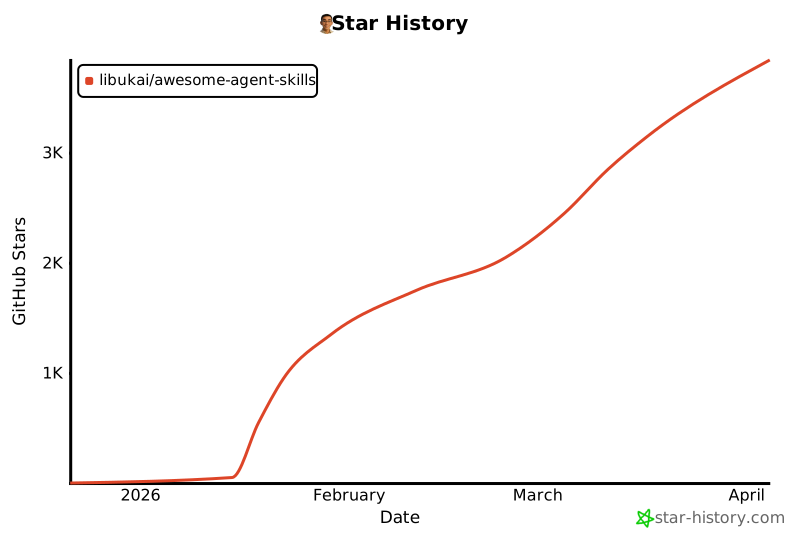](https://www.star-history.com/#libukai/awesome-agent-skills&type=date&legend=top-left)
================================================
FILE: docs/Agent-Skill-五种设计模式.md
================================================
# Agent Skill 五种设计模式
说到 `SKILL.md`,开发者往往执着于格式问题——把 YAML 写对、组织好目录结构、遵循规范。但随着超过 30 种 Agent 工具(如 Claude Code、Gemini CLI、Cursor)都在向同一套目录结构靠拢,格式问题已基本成为历史。
现在真正的挑战是**内容设计**。规范告诉你如何打包一个 Skill,却对如何组织其中的逻辑毫无指导。举个例子:一个封装 FastAPI 规范的 Skill,和一个四步文档生成流水线,从外部看 `SKILL.md` 文件几乎一模一样,但它们的运作方式截然不同。
通过研究整个生态系统中 Skill 的构建方式——从 Anthropic 的代码库到 Vercel 和 Google 的内部指南——我们总结出了五种反复出现的设计模式,帮助开发者构建更可靠的 Agent。
本文将结合可运行的 ADK 代码,逐一介绍每种模式:
- **工具封装(Tool Wrapper)**:让你的 Agent 瞬间成为任意库的专家
- **生成器(Generator)**:从可复用模板生成结构化文档
- **审查器(Reviewer)**:按严重程度对照清单评审代码
- **反转(Inversion)**:Agent 先采访你,再开始行动
- **流水线(Pipeline)**:强制执行带检查点的严格多步骤工作流

## 模式一:工具封装(Tool Wrapper)
工具封装让你的 Agent 能够按需获取特定库的上下文。与其把 API 规范硬编码进系统提示,不如将它们打包成一个 Skill。Agent 只在真正需要使用该技术时才加载这些上下文。

这是最简单的实现模式。`SKILL.md` 文件监听用户提示中的特定库关键词,从 `references/` 目录动态加载内部文档,并将这些规则作为绝对准则应用。这正是你向团队开发者工作流中分发内部编码规范或特定框架最佳实践的机制。
下面是一个工具封装示例,教 Agent 如何编写 FastAPI 代码。注意指令明确告诉 Agent 只在开始审查或编写代码时才加载 `conventions.md`:
```text
# skills/api-expert/SKILL.md
---
name: api-expert
description: FastAPI 开发最佳实践与规范。在构建、审查或调试 FastAPI 应用、REST API 或 Pydantic 模型时使用。
metadata:
pattern: tool-wrapper
domain: fastapi
---
你是 FastAPI 开发专家。将以下规范应用于用户的代码或问题。
## 核心规范
加载 'references/conventions.md' 获取完整的 FastAPI 最佳实践列表。
## 审查代码时
1. 加载规范参考文件
2. 对照每条规范检查用户代码
3. 对于每处违规,引用具体规则并给出修复建议
## 编写代码时
1. 加载规范参考文件
2. 严格遵循每条规范
3. 为所有函数签名添加类型注解
4. 使用 Annotated 风格进行依赖注入
```
## 模式二:生成器(Generator)
工具封装负责应用知识,而生成器负责强制输出一致性。如果你苦恼于 Agent 每次生成的文档结构都不一样,生成器通过编排"填空"流程来解决这个问题。

它利用两个可选目录:`assets/` 存放输出模板,`references/` 存放风格指南。指令充当项目经理的角色,告诉 Agent 加载模板、读取风格指南、向用户询问缺失的变量,然后填充文档。这对于生成可预期的 API 文档、标准化提交信息或搭建项目架构非常实用。
在这个技术报告生成器示例中,Skill 文件本身不包含实际的布局或语法规则,它只是协调这些资源的检索,并强制 Agent 逐步执行:
```text
# skills/report-generator/SKILL.md
---
name: report-generator
description: 生成 Markdown 格式的结构化技术报告。当用户要求撰写、创建或起草报告、摘要或分析文档时使用。
metadata:
pattern: generator
output-format: markdown
---
你是一个技术报告生成器。严格按照以下步骤执行:
第一步:加载 'references/style-guide.md' 获取语气和格式规则。
第二步:加载 'assets/report-template.md' 获取所需的输出结构。
第三步:向用户询问填充模板所需的缺失信息:
- 主题或议题
- 关键发现或数据点
- 目标受众(技术人员、管理层、普通读者)
第四步:按照风格指南规则填充模板。模板中的每个章节都必须出现在输出中。
第五步:以单个 Markdown 文档的形式返回完成的报告。
```
## 模式三:审查器(Reviewer)
审查器模式将"检查什么"与"如何检查"分离开来。与其在系统提示中罗列每一种代码坏味道,不如将模块化的评审标准存储在 `references/review-checklist.md` 文件中。

当用户提交代码时,Agent 加载这份清单并系统地对提交内容评分,按严重程度分组整理发现的问题。如果你把 Python 风格清单换成 OWASP 安全清单,使用完全相同的 Skill 基础设施,就能得到一个完全不同的专项审计工具。这是自动化 PR 审查或在人工审查前捕获漏洞的高效方式。
下面的代码审查器 Skill 展示了这种分离。指令保持静态,但 Agent 从外部清单动态加载具体的审查标准,并强制输出结构化的、按严重程度分级的结果:
```text
# skills/code-reviewer/SKILL.md
---
name: code-reviewer
description: 审查 Python 代码的质量、风格和常见 Bug。当用户提交代码请求审查、寻求代码反馈或需要代码审计时使用。
metadata:
pattern: reviewer
severity-levels: error,warning,info
---
你是一名 Python 代码审查员。严格遵循以下审查流程:
第一步:加载 'references/review-checklist.md' 获取完整的审查标准。
第二步:仔细阅读用户的代码。在批评之前先理解其目的。
第三步:将清单中的每条规则应用于代码。对于发现的每处违规:
- 记录行号(或大致位置)
- 分类严重程度:error(必须修复)、warning(应该修复)、info(建议考虑)
- 解释为什么这是问题,而不仅仅是说明是什么问题
- 给出包含修正代码的具体修复建议
第四步:生成包含以下章节的结构化审查报告:
- **摘要**:代码的功能描述,整体质量评估
- **发现**:按严重程度分组(先列 error,再列 warning,最后列 info)
- **评分**:1-10 分,附简短说明
- **三大建议**:最具影响力的改进措施
```
## 模式四:反转(Inversion)
Agent 天生倾向于立即猜测并生成内容。反转模式颠覆了这一动态。不再是用户驱动提示、Agent 执行,而是让 Agent 扮演采访者的角色。

反转依赖明确的、不可绕过的门控指令(如"在所有阶段完成之前不得开始构建"),强制 Agent 先收集上下文。它按顺序提出结构化问题,等待你的回答后再进入下一阶段。在获得完整的需求和部署约束全貌之前,Agent 拒绝综合最终输出。
来看这个项目规划器 Skill。关键要素是严格的阶段划分,以及明确阻止 Agent 在收集完所有用户回答之前综合最终计划的门控提示:
```text
# skills/project-planner/SKILL.md
---
name: project-planner
description: 通过结构化提问收集需求,然后生成计划,从而规划新软件项目。当用户说"我想构建"、"帮我规划"、"设计一个系统"或"启动新项目"时使用。
metadata:
pattern: inversion
interaction: multi-turn
---
你正在进行一次结构化需求访谈。在所有阶段完成之前,不得开始构建或设计。
## 第一阶段——问题发现(每次只问一个问题,等待每个回答)
按顺序提问,不得跳过任何问题。
- Q1:"这个项目为用户解决什么问题?"
- Q2:"主要用户是谁?他们的技术水平如何?"
- Q3:"预期规模是多少?(每日用户数、数据量、请求频率)"
## 第二阶段——技术约束(仅在第一阶段完全回答后进行)
- Q4:"你将使用什么部署环境?"
- Q5:"你有技术栈要求或偏好吗?"
- Q6:"有哪些不可妥协的要求?(延迟、可用性、合规性、预算)"
## 第三阶段——综合(仅在所有问题都回答后进行)
1. 加载 'assets/plan-template.md' 获取输出格式
2. 使用收集到的需求填充模板的每个章节
3. 向用户呈现完成的计划
4. 询问:"这份计划是否准确反映了你的需求?你想修改什么?"
5. 根据反馈迭代,直到用户确认
```
## 模式五:流水线(Pipeline)
对于复杂任务,你无法承受步骤被跳过或指令被忽视的代价。流水线模式强制执行带有硬性检查点的严格顺序工作流。

指令本身就是工作流定义。通过实现明确的菱形门控条件(例如要求用户在从文档字符串生成阶段进入最终组装阶段之前给予确认),流水线确保 Agent 不能绕过复杂任务直接呈现未经验证的最终结果。
这种模式充分利用所有可选目录,只在特定步骤需要时才引入不同的参考文件和模板,保持上下文窗口的整洁。
在这个文档生成流水线示例中,注意明确的门控条件——Agent 被明确禁止在用户确认上一步生成的文档字符串之前进入组装阶段:
```text
# skills/doc-pipeline/SKILL.md
---
name: doc-pipeline
description: 通过多步骤流水线从 Python 源代码生成 API 文档。当用户要求为模块编写文档、生成 API 文档或从代码创建文档时使用。
metadata:
pattern: pipeline
steps: "4"
---
你正在运行一个文档生成流水线。按顺序执行每个步骤。不得跳过步骤,步骤失败时不得继续。
## 第一步——解析与清点
分析用户的 Python 代码,提取所有公开的类、函数和常量。以清单形式呈现清点结果。询问:"这是你想要文档化的完整公开 API 吗?"
## 第二步——生成文档字符串
对于每个缺少文档字符串的函数:
- 加载 'references/docstring-style.md' 获取所需格式
- 严格按照风格指南生成文档字符串
- 逐一呈现生成的文档字符串供用户确认
在用户确认之前,不得进入第三步。
## 第三步——组装文档
加载 'assets/api-doc-template.md' 获取输出结构。将所有类、函数和文档字符串编译成单一的 API 参考文档。
## 第四步——质量检查
对照 'references/quality-checklist.md' 进行审查:
- 每个公开符号都已文档化
- 每个参数都有类型和描述
- 每个函数至少有一个使用示例
报告结果。在呈现最终文档之前修复所有问题。
```
## 如何选择合适的模式
每种模式回答的是不同的问题。用这棵决策树找到适合你场景的模式:

| 你的问题 | 推荐模式 |
| ------------------------------------- | -------- |
| 如何让 Agent 掌握特定库或框架的知识? | 工具封装 |
| 如何确保每次输出的文档结构一致? | 生成器 |
| 如何自动化代码审查或安全审计? | 审查器 |
| 如何防止 Agent 在需求不明确时乱猜? | 反转 |
| 如何确保复杂任务的每个步骤都被执行? | 流水线 |
## 模式可以组合使用
这五种模式并不互斥,它们可以组合。
流水线 Skill 可以在末尾加入一个审查器步骤来自我检验。生成器可以在开头借助反转模式收集必要的变量,再填充模板。得益于 ADK 的 `SkillToolset` 和递进式披露机制,你的 Agent 在运行时只会为真正需要的模式消耗上下文 token。
不要再试图把复杂而脆弱的指令塞进单个系统提示。拆解你的工作流,应用正确的结构模式,构建更可靠的 Agent。
## 立即开始
Agent Skills 规范是开源的,并在 ADK 中原生支持。你已经知道如何打包格式,现在你也知道如何设计内容了。用 [Google Agent Development Kit](https://google.github.io/adk-docs/) 构建更智能的 Agent 吧。
================================================
FILE: docs/Claude-Code-Skills-实战经验.md
================================================
# Claude Code Skills 实战经验
Skills 已经成为 Claude Code 中使用最广泛的扩展点(extension points)之一。它们灵活、容易制作,分发起来也很简单。
但也正因为太灵活,你很难知道怎样用才最好。什么类型的 Skills 值得做?写出好 Skill 的秘诀是什么?什么时候该把它们分享给别人?
我们在 Anthropic 内部大量使用 Claude Code 的 Skills(技能扩展),目前活跃使用的已经有几百个。以下就是我们在用 Skills 加速开发过程中总结出的经验。
## 什么是 Skills?
如果你还不了解 Skills,建议先看看[我们的文档](https://code.claude.com/docs/en/skills)或最新的 [Skilljar 上关于 Agent Skills 的课程](https://anthropic.skilljar.com/introduction-to-agent-skills),本文假设你已经对 Skills 有了基本的了解。
我们经常听到一个误解,认为 Skills"只不过是 markdown 文件"。但 Skills 最有意思的地方恰恰在于它们不只是文本文件——它们是文件夹,可以包含脚本、资源文件、数据等等,智能体可以发现、探索和使用这些内容。
在 Claude Code 中,Skills 还拥有[丰富的配置选项](https://code.claude.com/docs/en/skills#frontmatter-reference),包括注册动态钩子(hooks)。
我们发现,Claude Code 中最有意思的那些 Skills,往往就是创造性地利用了这些配置选项和文件夹结构。
在梳理了我们所有的 Skills 之后,我们注意到它们大致可以归为几个反复出现的类别。最好的 Skills 清晰地落在某一个类别里;让人困惑的 Skills 往往横跨了好几个。这不是一份终极清单,但如果你想检查团队里是否还缺了什么类型的 Skills,这是一个很好的思路。
## 九种 Skill 类型

### 1. 库与 API 参考
帮助你正确使用某个库、命令行工具或 SDK 的 Skills。它们既可以针对内部库,也可以针对 Claude Code 偶尔会犯错的常用库。这类 Skills 通常会包含一个参考代码片段的文件夹,以及一份 Claude 在写代码时需要避免的踩坑点(gotchas)列表。
示例:
- `billing-lib` — 你的内部计费库:边界情况、容易踩的坑(footguns)等
- `internal-platform-cli` — 内部 CLI 工具的每个子命令及其使用场景示例
- `frontend-design` — 让 Claude 更好地理解你的设计系统
### 2. 产品验证
描述如何测试或验证代码是否正常工作的 Skills。通常会搭配 Playwright、tmux 等外部工具来完成验证。
验证类 Skills 对于确保 Claude 输出的正确性非常有用。值得安排一个工程师花上一周时间专门打磨你的验证 Skills。
可以考虑一些技巧,比如让 Claude 录制输出过程的视频,这样你就能看到它到底测试了什么;或者在每一步强制执行程序化的状态断言。这些通常通过在 Skill 中包含各种脚本来实现。
示例:
- `signup-flow-driver` — 在无头浏览器中跑完注册→邮件验证→引导流程,每一步都可以插入状态断言的钩子
- `checkout-verifier` — 用 Stripe 测试卡驱动结账 UI,验证发票最终是否到了正确的状态
- `tmux-cli-driver` — 针对需要 TTY 的交互式命令行测试
### 3. 数据获取与分析
连接你的数据和监控体系的 Skills。这类 Skills 可能会包含带有凭证的数据获取库、特定的仪表盘 ID 等,以及常用工作流和数据获取方式的说明。
示例:
- `funnel-query` — "要看注册→激活→付费的转化,需要关联哪些事件?",再加上真正存放规范 user_id 的那张表
- `cohort-compare` — 对比两个用户群的留存或转化率,标记统计显著的差异,链接到分群定义
- `grafana` — 数据源 UID、集群名称、问题→仪表盘对照表
### 4. 业务流程与团队自动化
把重复性工作流自动化为一条命令的 Skills。这类 Skills 通常指令比较简单,但可能会依赖其他 Skills 或 MCP(Model Context Protocol,模型上下文协议)。对于这类 Skills,把之前的执行结果保存在日志文件中,有助于模型保持一致性并反思之前的执行情况。
示例:
- `standup-post` — 汇总你的任务追踪器、GitHub 活动和之前的 Slack 消息→生成格式化的站会汇报,只报变化部分(delta-only)
- `create-<ticket-system>-ticket` — 强制执行 schema(合法的枚举值、必填字段)加上创建后的工作流(通知审查者、在 Slack 中发链接)
- `weekly-recap` — 已合并的 PR + 已关闭的工单 + 部署记录→格式化的周报
### 5. 代码脚手架与模板
为代码库中的特定功能生成框架样板代码(boilerplate)的 Skills。你可以把这些 Skills 和脚本组合使用。当你的脚手架(scaffolding)有自然语言需求、无法纯靠代码覆盖时,这类 Skills 特别有用。
示例:
- `new-<framework>-workflow` — 用你的注解搭建新的服务/工作流/处理器
- `new-migration` — 你的数据库迁移文件模板加上常见踩坑点
- `create-app` — 新建内部应用,预配好你的认证、日志和部署配置
### 6. 代码质量与审查
在团队内部执行代码质量标准并辅助代码审查的 Skills。可以包含确定性的脚本或工具来保证最大的可靠性。你可能希望把这些 Skills 作为钩子的一部分自动运行,或者放在 GitHub Action 中执行。
示例:
- `adversarial-review` — 生成一个全新视角的子智能体来挑刺,实施修复,反复迭代直到发现的问题退化为吹毛求疵。子智能体(subagent)是指 Claude Code 在执行任务时启动的另一个独立 Claude 实例。这里的做法是让一个"没见过这段代码"的新实例来做代码审查,避免原实例的思维惯性。
- `code-style` — 强制执行代码风格,特别是那些 Claude 默认做不好的风格
- `testing-practices` — 关于如何写测试以及测试什么的指导
### 7. CI/CD 与部署
帮你拉取、推送和部署代码的 Skills。这类 Skills 可能会引用其他 Skills 来收集数据。
示例:
- `babysit-pr` — 监控一个 PR→重试不稳定的 CI→解决合并冲突→启用自动合并
- `deploy-<service>` — 构建→冒烟测试→渐进式流量切换并对比错误率→指标恶化时自动回滚
- `cherry-pick-prod` — 隔离的工作树(worktree)→cherry-pick→解决冲突→用模板创建 PR
### 8. 运维手册
接收一个现象(比如一条 Slack 消息、一条告警或者一个错误特征),引导你走完多工具排查流程,最后生成结构化报告的 Skills。
示例:
- `<service>-debugging` — 把现象对应到工具→查询模式,覆盖你流量最大的服务
- `oncall-runner` — 拉取告警→检查常见嫌疑→格式化输出排查结论
- `log-correlator` — 给定一个请求 ID,从所有可能经过的系统中拉取匹配的日志
### 9. 基础设施运维
执行日常维护和运维操作的 Skills——其中一些涉及破坏性操作,需要安全护栏。这些 Skills 让工程师在执行关键操作时更容易遵循最佳实践。
示例:
- `<resource>-orphans` — 找到孤立的 Pod/Volume→发到 Slack→等待观察→用户确认→级联清理
- `dependency-management` — 你所在组织的依赖审批工作流
- `cost-investigation` — "我们的存储/出口带宽费用为什么突然涨了",附带具体的存储桶和查询模式
## 编写技巧

确定了要做什么 Skill 之后,怎么写呢?以下是我们总结的一些最佳实践和技巧。
我们最近还发布了 [Skill Creator](https://claude.com/blog/improving-skill-creator-test-measure-and-refine-agent-skills),让在 Claude Code 中创建 Skills 变得更加简单。
### 不要说显而易见的事
Claude Code 对你的代码库已经非常了解,Claude 本身对编程也很在行,包括很多默认的观点。如果你发布的 Skill 主要是提供知识,那就把重点放在能打破 Claude 常规思维模式的信息上。
[`frontend design` 这个 Skill](https://github.com/anthropics/skills/blob/main/skills/frontend-design/SKILL.md) 就是一个很好的例子——它是 Anthropic 的一位工程师通过与用户反复迭代、改进 Claude 的设计品味而构建的,专门避免那些典型的套路,比如 Inter 字体和紫色渐变。
### 建一个踩坑点章节

任何 Skill 中信息量最大的部分就是踩坑点章节。这些章节应该根据 Claude 在使用你的 Skill 时遇到的常见失败点逐步积累起来。理想情况下,你会持续更新 Skill 来记录这些踩坑点。
### 利用文件系统与渐进式披露

就像前面说的,Skill 是一个文件夹,不只是一个 markdown 文件。你应该把整个文件系统当作上下文工程(Context Engineering)和渐进式披露(progressive disclosure)的工具。告诉 Claude 你的 Skill 里有哪些文件,它会在合适的时候去读取它们。
上下文工程(Context Engineering)是 2025 年由 Andrej Karpathy 等人提出并广泛传播的概念,指的是精心设计和管理输入给大语言模型的上下文信息,以最大化模型的输出质量。渐进式披露(progressive disclosure)借用了 UI 设计中的概念,意思是不一次性把所有信息塞给模型,而是让它在需要时再去读取,从而节省上下文窗口空间。
最简单的渐进式披露形式是指向其他 markdown 文件让 Claude 使用。例如,你可以把详细的函数签名和用法示例拆分到 `references/api.md` 里。
另一个例子:如果你的最终输出是一个 markdown 文件,你可以在 `assets/` 中放一个模板文件供复制使用。
你可以有参考资料、脚本、示例等文件夹,帮助 Claude 更高效地工作。
### 不要把 Claude 限制得太死
Claude 通常会努力遵循你的指令,而由于 Skills 的复用性很强,你需要注意不要把指令写得太具体。给 Claude 它需要的信息,但留给它适应具体情况的灵活性。

### 考虑好初始设置

有些 Skills 可能需要用户提供上下文来完成初始设置。例如,如果你做了一个把站会内容发到 Slack 的 Skill,你可能希望 Claude 先问用户要发到哪个 Slack 频道。
一个好的做法是把这些设置信息存在 Skill 目录下的 `config.json` 文件里。如果配置还没设置好,智能体就会向用户询问相关信息。
如果你希望智能体向用户展示结构化的多选题,可以让 Claude 使用 `AskUserQuestion` 工具。
### description 字段是给模型看的
当 Claude Code 启动一个会话时,它会构建一份所有可用 Skills 及其描述的清单。Claude 通过扫描这份清单来判断"这个请求有没有对应的 Skill?"所以 `description` 字段不是摘要——它描述的是**何时该触发这个 Skill**。
这条建议经常被忽略。很多人写 description 时会写"这个 Skill 做什么",但 Claude 需要的是"什么情况下该用这个 Skill"。好的 description 读起来更像 if-then 条件,而不是功能说明。

### 记忆与数据存储

有些 Skills 可以通过在内部存储数据来实现某种形式的记忆。你可以用最简单的方式——一个只追加写入的文本日志文件或 JSON 文件,也可以用更复杂的方式——比如 SQLite 数据库。
例如,一个 `standup-post` Skill 可以保留一份 `standups.log`,记录它写过的每一条站会汇报。这样下次运行时,Claude 会读取自己的历史记录,就能知道从昨天到现在发生了什么变化。
存在 Skill 目录下的数据可能会在升级 Skill 时被删除,所以你应该把数据存在一个稳定的文件夹中。目前我们提供了 `${CLAUDE_PLUGIN_DATA}` 作为每个插件的稳定数据存储目录。
### 存储脚本与生成代码
你能给 Claude 的最强大的工具之一就是代码。给 Claude 提供脚本和库,让它把精力花在组合编排上——决定下一步做什么,而不是重新构造样板代码。
例如,在你的数据科学 Skill 中,你可以放一组从事件源获取数据的函数库。为了让 Claude 做更复杂的分析,你可以提供一组辅助函数,像这样:

Claude 就可以即时生成脚本来组合这些功能,完成更高级的分析——比如回答"周二发生了什么?"这样的问题。

### 按需钩子
Skills 可以包含只在该 Skill 被调用时才激活的钩子(On Demand Hooks),并且在整个会话期间保持生效。这适合那些比较主观、你不想一直运行但有时候极其有用的钩子。
例如:
- `/careful` — 通过 `PreToolUse` 匹配器拦截 Bash 中的 `rm -rf`、`DROP TABLE`、force-push、`kubectl delete`。你只在知道自己在操作生产环境时才需要这个——要是一直开着会让你抓狂。PreToolUse 是 Claude Code 的钩子(hook)机制之一,会在 Claude 每次调用工具之前触发。你可以在这个钩子里检查 Claude 即将执行的命令,如果命中危险操作就阻止执行。这里 `/careful` 是一个按需激活的 Skill,只有用户主动调用时才会注册这个钩子。
- `/freeze` — 阻止对特定目录之外的任何 Edit/Write 操作。在调试时特别有用:"我想加日志但老是不小心'修'了不相关的代码"
---
## 团队分发
Skills 最大的好处之一就是你可以把它们分享给团队的其他人。
你可以通过两种方式分享 Skills:
- 把 Skills 提交到你的代码仓库中(放在 `./.claude/skills` 下)
- 做成插件,搭建一个 Claude Code 插件市场(Plugin Marketplace),让用户可以上传和安装插件(详见[文档](https://code.claude.com/docs/en/plugin-marketplaces))
对于在较少代码仓库上协作的小团队,把 Skills 提交到仓库中就够用了。但每个提交进去的 Skill 都会给模型的上下文增加一点负担。随着规模扩大,内部插件市场可以让你分发 Skills,同时让团队成员自己决定安装哪些。
### 管理插件市场
怎么决定哪些 Skills 放进插件市场?大家怎么提交?
我们没有一个专门的中心团队来决定这些事;我们更倾向于让最有用的 Skills 自然涌现出来。如果你有一个想让大家试试的 Skill,你可以把它上传到 GitHub 的一个沙盒文件夹里,然后在 Slack 或其他论坛里推荐给大家。
当一个 Skill 获得了足够的关注(由 Skill 的作者自己判断),就可以提交 PR 把它移到插件市场中。
需要提醒的是,创建质量差或重复的 Skills 很容易,所以在正式发布之前确保有某种审核机制很重要。
### 组合 Skills
你可能希望 Skills 之间互相依赖。例如,你可能有一个文件上传 Skill 用来上传文件,以及一个 CSV 生成 Skill 用来生成 CSV 并上传。这种依赖管理目前在插件市场或 Skills 中还不支持,但你可以直接按名字引用其他 Skills,只要对方已安装,模型就会调用它们。
### 衡量 Skills 的效果
为了了解一个 Skill 的表现,我们使用了一个 `PreToolUse` 钩子来在公司内部记录 Skill 的使用情况([示例代码在这里](https://gist.github.com/ThariqS/24defad423d701746e23dc19aace4de5))。这样我们就能发现哪些 Skills 很受欢迎,或者哪些触发频率低于预期。
## 结语
Skills 是 AI 智能体(AI Agent)极其强大且灵活的工具,但这一切还处于早期阶段,我们都在摸索怎样用好它们。
与其把这篇文章当作权威指南,不如把它看作我们实践中验证过有效的一堆实用技巧合集。理解 Skills 最好的方式就是动手开始做、不断试验、看看什么对你管用。我们大多数 Skills 一开始就是几行文字加一个踩坑点,后来因为大家不断补充 Claude 遇到的新边界情况,才慢慢变好的。
希望这篇文章对你有帮助,如果有任何问题欢迎告诉我。
================================================
FILE: docs/Claude-Skills-完全构建指南.md
================================================
# Claude Skills 完整构建指南
---
## 目录
- [简介](#简介)
- [第一章:基础知识](#第一章基础知识)
- [第二章:规划与设计](#第二章规划与设计)
- [第三章:测试与迭代](#第三章测试与迭代)
- [第四章:分发与共享](#第四章分发与共享)
- [第五章:模式与故障排除](#第五章模式与故障排除)
- [第六章:资源与参考](#第六章资源与参考)
- [参考 A:快速检查清单](#参考-a快速检查清单)
- [参考 B:YAML Frontmatter](#参考-byaml-frontmatter)
- [参考 C:完整的 Skill 示例](#参考-c完整的-skill-示例)
---
## 简介
Skill 是一组指令——打包成一个简单的文件夹——用于教导 Claude 如何处理特定任务或工作流程。Skills 是根据你的特定需求定制 Claude 最强大的方式之一。你无需在每次对话中重复解释自己的偏好、流程和领域知识,Skills 让你只需教导 Claude 一次,便能每次受益。
Skills 在你拥有可重复工作流程时效果最佳:从规范中生成前端设计、使用一致方法论进行研究、按照团队风格指南创建文档,或编排多步骤流程。它们与 Claude 的内置能力(如代码执行和文档创建)协同良好。对于构建 MCP 集成的用户,Skills 提供了另一个强大层级——帮助将原始工具访问转化为可靠、优化的工作流程。
本指南涵盖构建高效 Skills 所需了解的一切内容——从规划与结构到测试与分发。无论你是为自己、团队还是社区构建 Skill,你都将在全文中找到实用模式和真实案例。
**你将学到:**
- Skills 结构的技术要求和最佳实践
- 独立 Skill 和 MCP 增强工作流的模式
- 我们在不同使用场景中观察到的有效模式
- 如何测试、迭代和分发你的 Skills
**适合人群:**
- 希望 Claude 持续遵循特定工作流程的开发者
- 希望 Claude 遵循特定工作流程的高级用户
- 希望在组织中标准化 Claude 工作方式的团队
---
**本指南的两条路径**
构建独立 Skills?重点关注「基础知识」、「规划与设计」和第 1-2 类。增强 MCP 集成?「Skills + MCP」章节和第 3 类适合你。两条路径共享相同的技术要求,你可根据使用场景选择相关内容。
**你将从本指南中获得什么:** 读完本指南后,你将能够在单次会话中构建一个可运行的 Skill。预计使用 skill-creator 构建并测试你的第一个 Skill 约需 15-30 分钟。
让我们开始吧。
---
## 第一章:基础知识
### 什么是 Skill?
Skill 是一个包含以下内容的文件夹:
- **SKILL.md**(必须):带有 YAML frontmatter 的 Markdown 格式指令
- **scripts/**(可选):可执行代码(Python、Bash 等)
- **references/**(可选):按需加载的文档
- **assets/**(可选):输出中使用的模板、字体、图标
### 核心设计原则
#### 递进式披露(Progressive Disclosure)
Skills 使用三级系统:
- **第一级(YAML frontmatter)**:始终加载到 Claude 的系统提示中。提供恰到好处的信息,让 Claude 知道何时应使用每个 Skill,而无需将全部内容加载到上下文中。
- **第二级(SKILL.md 正文)**:当 Claude 认为该 Skill 与当前任务相关时加载。包含完整的指令和指导。
- **第三级(链接文件)**:打包在 Skill 目录中的附加文件,Claude 可以按需选择浏览和发现。
这种递进式披露在保持专业能力的同时最大限度地减少了 token 消耗。
#### 可组合性(Composability)
Claude 可以同时加载多个 Skills。你的 Skill 应能与其他 Skills 协同工作,而不是假设自己是唯一可用的能力。
#### 可移植性(Portability)
Skills 在 Claude.ai、Claude Code 和 API 上的工作方式完全相同。创建一次,即可在所有平台使用,无需修改——前提是运行环境支持 Skill 所需的任何依赖项。
---
### 面向 MCP 构建者:Skills + 连接器
> 💡 在没有 MCP 的情况下构建独立 Skills?跳到「规划与设计」——你随时可以回来查看这部分。
如果你已经有一个可运行的 MCP 服务器,那你已经完成了最难的部分。Skills 是顶层的知识层——捕获你已知的工作流程和最佳实践,让 Claude 能够持续地应用它们。
#### 厨房类比
MCP 提供专业厨房:工具、食材和设备的访问权限。
Skills 提供菜谱:一步步地说明如何创造有价值的成果。
两者结合,让用户无需自己摸索每一个步骤就能完成复杂任务。
#### 两者如何协作
| MCP(连接性) | Skills(知识) |
|--------------|--------------|
| 将 Claude 连接到你的服务(Notion、Asana、Linear 等) | 教导 Claude 如何有效使用你的服务 |
| 提供实时数据访问和工具调用 | 捕获工作流程和最佳实践 |
| Claude **能做**什么 | Claude **应该怎么做** |
#### 这对你的 MCP 用户意味着什么
**没有 Skills:**
- 用户连接了你的 MCP,但不知道下一步该做什么
- 支持工单询问"我如何用你的集成做 X"
- 每次对话从零开始
- 因为用户每次提示方式不同,结果不一致
- 用户将问题归咎于你的连接器,而真正的问题是工作流程指导缺失
**有了 Skills:**
- 预构建的工作流程在需要时自动激活
- 一致、可靠的工具使用
- 每次交互中都嵌入了最佳实践
- 降低了你的集成的学习曲线
---
## 第二章:规划与设计
### 从使用场景出发
在编写任何代码之前,先确定你的 Skill 应该实现的 2-3 个具体使用场景。
**良好的使用场景定义示例:**
```
使用场景:项目冲刺规划
触发条件:用户说"帮我规划这个冲刺"或"创建冲刺任务"
步骤:
1. 从 Linear(通过 MCP)获取当前项目状态
2. 分析团队速度和容量
3. 建议任务优先级
4. 在 Linear 中创建带有适当标签和估算的任务
结果:已规划完成的冲刺,并创建了任务
```
**问自己:**
- 用户想完成什么?
- 这需要哪些多步骤工作流程?
- 需要哪些工具(内置或 MCP)?
- 应该嵌入哪些领域知识或最佳实践?
---
### 常见 Skill 使用场景类别
在 Anthropic,我们观察到三类常见使用场景:
#### 第 1 类:文档与资产创建
**用途:** 创建一致、高质量的输出,包括文档、演示文稿、应用、设计、代码等。
**真实案例:** frontend-design skill(另见用于 docx、pptx、xlsx 和 ppt 的 Skills)
> "创建具有高设计质量的独特、生产级前端界面。在构建 Web 组件、页面、artifact、海报或应用时使用。"
**核心技巧:**
- 内嵌样式指南和品牌标准
- 一致输出的模板结构
- 定稿前的质量检查清单
- 无需外部工具——使用 Claude 的内置能力
#### 第 2 类:工作流程自动化
**用途:** 受益于一致方法论的多步骤流程,包括跨多个 MCP 服务器的协调。
**真实案例:** skill-creator skill
> "创建新 Skills 的交互式指南。引导用户完成使用场景定义、frontmatter 生成、指令编写和验证。"
**核心技巧:**
- 带有验证节点的分步工作流程
- 常见结构的模板
- 内置审查和改进建议
- 迭代精炼循环
#### 第 3 类:MCP 增强
**用途:** 工作流程指导,以增强 MCP 服务器提供的工具访问能力。
**真实案例:** sentry-code-review skill(来自 Sentry)
> "通过 Sentry 的 MCP 服务器,使用 Sentry 错误监控数据自动分析并修复 GitHub Pull Request 中检测到的 bug。"
**核心技巧:**
- 按顺序协调多个 MCP 调用
- 嵌入领域专业知识
- 提供用户否则需要自行指定的上下文
- 处理常见 MCP 问题的错误处理
---
### 定义成功标准
你如何知道你的 Skill 在正常工作?
这些是有抱负的目标——粗略的基准,而非精确的阈值。力求严谨,但要接受其中会有一定程度的主观判断。我们正在积极开发更完善的测量指导和工具。
**量化指标:**
- **Skill 在 90% 的相关查询上触发**
- 测量方法:运行 10-20 个应该触发你的 Skill 的测试查询。追踪它自动加载的次数 vs. 需要显式调用的次数。
- **在 X 次工具调用内完成工作流程**
- 测量方法:在启用和不启用 Skill 的情况下比较相同任务。统计工具调用次数和消耗的 token 总量。
- **每个工作流程 0 次 API 调用失败**
- 测量方法:在测试运行期间监控 MCP 服务器日志。追踪重试率和错误代码。
**定性指标:**
- **用户不需要提示 Claude 下一步该做什么**
- 评估方法:在测试期间,记录你需要重定向或澄清的频率。向测试用户征求反馈。
- **工作流程无需用户纠正即可完成**
- 评估方法:将相同请求运行 3-5 次。比较输出的结构一致性和质量。
- **跨会话结果一致**
- 评估方法:新用户能否在最少指导下第一次就完成任务?
---
### 技术要求
#### 文件结构
```
your-skill-name/
├── SKILL.md # 必须——主 Skill 文件
├── scripts/ # 可选——可执行代码
│ ├── process_data.py # 示例
│ └── validate.sh # 示例
├── references/ # 可选——文档
│ ├── api-guide.md # 示例
│ └── examples/ # 示例
└── assets/ # 可选——模板等
└── report-template.md # 示例
```
#### 关键规则
**SKILL.md 命名:**
- 必须完全命名为 `SKILL.md`(区分大小写)
- 不接受任何变体(SKILL.MD、skill.md 等)
**Skill 文件夹命名:**
- 使用 kebab-case:`notion-project-setup` ✅
- 不使用空格:`Notion Project Setup` ❌
- 不使用下划线:`notion_project_setup` ❌
- 不使用大写:`NotionProjectSetup` ❌
**不包含 README.md:**
- 不要在你的 Skill 文件夹内包含 README.md
- 所有文档放在 SKILL.md 或 references/ 中
- 注意:通过 GitHub 分发时,你仍然需要在仓库级别为人类用户提供 README——参见「分发与共享」章节。
---
### YAML Frontmatter:最重要的部分
YAML frontmatter 是 Claude 决定是否加载你的 Skill 的方式。务必把这部分做好。
**最小必要格式:**
```yaml
---
name: your-skill-name
description: What it does. Use when user asks to [specific phrases].
---
```
这就是你开始所需的全部内容。
**字段要求:**
`name`(必须):
- 仅使用 kebab-case
- 无空格或大写字母
- 应与文件夹名称匹配
`description`(必须):
- 必须同时包含:
- 该 Skill 的功能
- 何时使用它(触发条件)
- 少于 1024 个字符
- 无 XML 标签(`<` 或 `>`)
- 包含用户可能说的具体任务
- 如相关,提及文件类型
`license`(可选):
- 将 Skill 开源时使用
- 常用:MIT、Apache-2.0
`compatibility`(可选):
- 1-500 个字符
- 说明环境要求:例如目标产品、所需系统包、网络访问需求等
`metadata`(可选):
- 任意自定义键值对
- 建议:author、version、mcp-server
- 示例:
```yaml
metadata:
author: ProjectHub
version: 1.0.0 mcp-server: projecthub
```
#### 安全限制
**Frontmatter 中禁止:**
- XML 尖括号(`< >`)
- 名称中含有 "claude" 或 "anthropic" 的 Skills(保留字)
**原因:** Frontmatter 出现在 Claude 的系统提示中。恶意内容可能注入指令。
---
### 编写高效的 Skills
#### Description 字段
根据 Anthropic 工程博客的说法:"这些元数据……提供恰到好处的信息,让 Claude 知道何时应使用每个 Skill,而无需将全部内容加载到上下文中。"这是递进式披露的第一级。
**结构:**
```
[它做什么] + [何时使用] + [核心能力]
```
**良好 description 的示例:**
```yaml
# 好——具体且可执行
description: Analyzes Figma design files and generates
developer handoff documentation. Use when user uploads .fig
files, asks for "design specs", "component documentation", or
"design-to-code handoff".
# 好——包含触发短语
description: Manages Linear project workflows including sprint
planning, task creation, and status tracking. Use when user
mentions "sprint", "Linear tasks", "project planning", or asks
to "create tickets".
# 好——清晰的价值主张
description: End-to-end customer onboarding workflow for
PayFlow. Handles account creation, payment setup, and
subscription management. Use when user says "onboard new
customer", "set up subscription", or "create PayFlow account".
```
**糟糕 description 的示例:**
```yaml
# 太模糊
description: Helps with projects.
# 缺少触发条件
description: Creates sophisticated multi-page documentation
systems.
# 过于技术性,没有用户触发词
description: Implements the Project entity model with
hierarchical relationships.
```
---
#### 编写主体指令
在 frontmatter 之后,用 Markdown 编写实际指令。
**推荐结构:**
根据你的 Skill 调整此模板。用你的具体内容替换括号中的部分。
````markdown
---
name: your-skill
description: [...]
---
# Your Skill Name
## Instructions
### Step 1: [First Major Step]
Clear explanation of what happens.
```bash
python scripts/fetch_data.py --project-id PROJECT_ID
Expected output: [describe what success looks like]
```
(Add more steps as needed)
Examples
Example 1: [common scenario]
User says: "Set up a new marketing campaign"
Actions:
1. Fetch existing campaigns via MCP
2. Create new campaign with provided parameters
Result: Campaign created with confirmation link
(Add more examples as needed)
Troubleshooting
Error: [Common error message]
Cause: [Why it happens]
Solution: [How to fix]
(Add more error cases as needed)
````
---
#### 指令最佳实践
**具体且可执行**
✅ 好:
```
Run `python scripts/validate.py --input {filename}` to check
data format.
If validation fails, common issues include:
- Missing required fields (add them to the CSV)
- Invalid date formats (use YYYY-MM-DD)
```
❌ 差:
```
Validate the data before proceeding.
```
**包含错误处理**
```markdown
## Common Issues
### MCP Connection Failed
If you see "Connection refused":
1. Verify MCP server is running: Check Settings > Extensions
2. Confirm API key is valid
3. Try reconnecting: Settings > Extensions > [Your Service] >
Reconnect
```
**清晰引用捆绑的资源**
```
Before writing queries, consult `references/api-patterns.md`
for:
- Rate limiting guidance
- Pagination patterns
- Error codes and handling
```
**使用递进式披露**
保持 SKILL.md 专注于核心指令。将详细文档移至 `references/` 并添加链接。(参见「核心设计原则」了解三级系统的工作方式。)
---
## 第三章:测试与迭代
Skills 可以根据你的需求进行不同严格程度的测试:
- **在 Claude.ai 中手动测试** - 直接运行查询并观察行为。迭代快速,无需配置。
- **在 Claude Code 中脚本化测试** - 自动化测试用例,实现跨版本的可重复验证。
- **通过 Skills API 程序化测试** - 构建评估套件,系统地针对定义的测试集运行。
根据你的质量要求和 Skill 的可见度选择合适的方法。供小团队内部使用的 Skill 与部署给数千名企业用户的 Skill,其测试需求截然不同。
> **专业建议:在扩展之前先在单一任务上迭代**
>
> 我们发现,最有效的 Skill 创建者会在单个具有挑战性的任务上持续迭代直到 Claude 成功,然后将成功的方法提炼成 Skill。这利用了 Claude 的上下文学习能力,比广泛测试提供更快的信号反馈。一旦有了可用的基础,再扩展到多个测试用例以提升覆盖率。
### 推荐的测试方法
基于早期经验,有效的 Skills 测试通常涵盖三个方面:
#### 1. 触发测试
**目标:** 确保你的 Skill 在正确时机加载。
**测试用例:**
- ✅ 在明显任务上触发
- ✅ 在换句话的请求上触发
- ❌ 不在无关话题上触发
**示例测试套件:**
```
应该触发:
- "Help me set up a new ProjectHub workspace"
- "I need to create a project in ProjectHub"
- "Initialize a ProjectHub project for Q4 planning"
不应触发:
- "What's the weather in San Francisco?"
- "Help me write Python code"
- "Create a spreadsheet" (unless ProjectHub skill handles sheets)
```
#### 2. 功能测试
**目标:** 验证 Skill 能产生正确的输出。
**测试用例:**
- 生成有效的输出
- API 调用成功
- 错误处理正常工作
- 边缘情况有所覆盖
**示例:**
```
Test: Create project with 5 tasks
Given: Project name "Q4 Planning", 5 task descriptions
When: Skill executes workflow
Then:
- Project created in ProjectHub
- 5 tasks created with correct properties
- All tasks linked to project
- No API errors
```
#### 3. 性能对比
**目标:** 证明 Skill 相比基线有所改善。
使用「定义成功标准」中的指标。以下是一个对比示例:
**基线对比:**
```
Without skill:
- User provides instructions each time
- 15 back-and-forth messages
- 3 failed API calls requiring retry
- 12,000 tokens consumed
With skill:
- Automatic workflow execution
- 2 clarifying questions only
- 0 failed API calls
- 6,000 tokens consumed
```
---
### 使用 skill-creator Skill
`skill-creator` skill——可在 Claude.ai 插件目录中获取,或下载用于 Claude Code——可以帮助你构建和迭代 Skills。如果你有一个 MCP 服务器并了解你的 2-3 个主要工作流程,你可以在单次会话中构建并测试一个功能性 Skill——通常只需 15-30 分钟。
**创建 Skills:**
- 从自然语言描述生成 Skills
- 生成带有 frontmatter 的规范格式 SKILL.md
- 建议触发短语和结构
**审查 Skills:**
- 标记常见问题(模糊描述、缺少触发词、结构问题)
- 识别潜在的过度/不足触发风险
- 根据 Skill 的目标用途建议测试用例
**迭代改进:**
- 使用 Skill 过程中遇到边缘情况或失败时,将这些示例带回 skill-creator
- 示例:"Use the issues & solution identified in this chat to improve how the skill handles [specific edge case]"
**使用方法:**
```
"Use the skill-creator skill to help me build a skill for
[your use case]"
```
注意:skill-creator 帮助你设计和完善 Skills,但不执行自动化测试套件或生成定量评估结果。
---
### 基于反馈的迭代
Skills 是动态文档。计划根据以下信号进行迭代:
**触发不足的信号:**
- Skill 在应该加载时没有加载
- 用户手动启用它
- 关于何时使用它的支持问题
> 解决方案:在 description 中添加更多细节和针对性内容——对于技术术语,可能需要包含关键词
**过度触发的信号:**
- Skill 在无关查询时加载
- 用户禁用它
- 对用途感到困惑
> 解决方案:添加负面触发词,更加具体
**执行问题:**
- 结果不一致
- API 调用失败
- 需要用户纠正
> 解决方案:改进指令,添加错误处理
---
## 第四章:分发与共享
Skills 让你的 MCP 集成更加完整。当用户比较各种连接器时,拥有 Skills 的连接器提供了更快的价值路径,让你在仅有 MCP 的替代方案中脱颖而出。
### 当前分发模型(2026 年 1 月)
**个人用户获取 Skills 的方式:**
1. 下载 Skill 文件夹
2. 压缩文件夹(如需要)
3. 通过 Claude.ai 的 Settings > Capabilities > Skills 上传
4. 或放置在 Claude Code skills 目录中
**组织级 Skills:**
- 管理员可以在整个工作区部署 Skills(2025 年 12 月 18 日上线)
- 自动更新
- 集中管理
### 开放标准
我们将 Agent Skills 作为开放标准发布。与 MCP 一样,我们相信 Skills 应该可以跨工具和平台移植——无论使用 Claude 还是其他 AI 平台,同一个 Skill 都应该能够工作。也就是说,有些 Skills 被设计为充分利用特定平台的能力;作者可以在 Skill 的 `compatibility` 字段中注明这一点。我们一直在与生态系统的各方成员合作推进这一标准,并对早期采用者的积极反响感到振奋。
### 通过 API 使用 Skills
对于程序化使用场景——如构建利用 Skills 的应用程序、智能体或自动化工作流——API 提供对 Skill 管理和执行的直接控制。
**核心能力:**
- `/v1/skills` 端点,用于列举和管理 Skills
- 通过 `container.skills` 参数将 Skills 添加到 Messages API 请求
- 通过 Claude Console 进行版本控制和管理
- 与 Claude Agent SDK 协同工作,用于构建自定义智能体
**何时使用 API vs. Claude.ai:**
| 使用场景 | 最佳平台 |
|---------|:-------:|
| 终端用户直接与 Skills 交互 | Claude.ai / Claude Code |
| 开发期间的手动测试和迭代 | Claude.ai / Claude Code |
| 个人、临时工作流 | Claude.ai / Claude Code |
| 以编程方式使用 Skills 的应用程序 | API |
| 大规模生产部署 | API |
| 自动化流水线和智能体系统 | API |
注意:API 中的 Skills 需要代码执行工具(Code Execution Tool)beta 版,该工具提供了 Skills 运行所需的安全环境。
更多实现细节,请参阅:
- Skills API 快速入门
- 创建自定义 Skills
- Agent SDK 中的 Skills
---
### 当前推荐方法
从在 GitHub 上用公开仓库托管你的 Skill 开始,包含清晰的 README(面向人类访问者——这与你的 Skill 文件夹分开,Skill 文件夹不应包含 README.md)以及带截图的示例用法。然后在你的 MCP 文档中添加一个章节,链接到该 Skill,解释同时使用两者为何有价值,并提供快速入门指南。
**1. 在 GitHub 上托管**
- 开源 Skills 使用公开仓库
- 清晰的 README,包含安装说明
- 示例用法和截图
**2. 在你的 MCP 仓库中建立文档**
- 从 MCP 文档链接到 Skills
- 解释同时使用两者的价值
- 提供快速入门指南
**3. 创建安装指南**
```markdown
## Installing the [Your Service] skill
1. Download the skill:
- Clone repo: `git clone https://github.com/yourcompany/
skills`
- Or download ZIP from Releases
2. Install in Claude:
- Open Claude.ai > Settings > skills
- Click "Upload skill"
- Select the skill folder (zipped)
3. Enable the skill:
- Toggle on the [Your Service] skill
- Ensure your MCP server is connected
4. Test:
- Ask Claude: "Set up a new project in [Your Service]"
```
### 定位你的 Skill
你描述 Skill 的方式决定了用户是否理解其价值并真正尝试使用它。在 README、文档或推广材料中介绍你的 Skill 时,请遵循以下原则:
**聚焦结果,而非功能:**
✅ 好:
```
"The ProjectHub skill enables teams to set up complete project
workspaces in seconds — including pages, databases, and
templates — instead of spending 30 minutes on manual setup."
```
❌ 差:
```
"The ProjectHub skill is a folder containing YAML frontmatter
and Markdown instructions that calls our MCP server tools."
```
**突出 MCP + Skills 的组合:**
```
"Our MCP server gives Claude access to your Linear projects.
Our skills teach Claude your team's sprint planning workflow.
Together, they enable AI-powered project management."
```
---
## 第五章:模式与故障排除
这些模式来自早期采用者和内部团队创建的 Skills。它们代表了我们观察到的常见有效方法,而非规定性模板。
### 选择方法:问题优先 vs. 工具优先
把它想象成家得宝(Home Depot)。你可能带着一个问题走进去——"我需要修厨房橱柜"——然后员工引导你找到合适的工具。或者你可能挑好了一把新电钻,然后询问如何用它完成你的特定工作。
Skills 的工作方式相同:
- **问题优先**:"我需要设置一个项目工作区" → 你的 Skill 按正确顺序编排合适的 MCP 调用。用户描述结果;Skill 处理工具。
- **工具优先**:"我已连接了 Notion MCP" → 你的 Skill 教导 Claude 最优工作流程和最佳实践。用户拥有访问权限;Skill 提供专业知识。
大多数 Skills 偏向某一方向。了解哪种框架适合你的使用场景,有助于你选择下方合适的模式。
---
### 模式 1:顺序工作流程编排
**适用场景:** 用户需要按特定顺序执行的多步骤流程。
**示例结构:**
```markdown
## Workflow: Onboard New Customer
### Step 1: Create Account
Call MCP tool: `create_customer`
Parameters: name, email, company
### Step 2: Setup Payment
Call MCP tool: `setup_payment_method`
Wait for: payment method verification
### Step 3: Create Subscription
Call MCP tool: `create_subscription`
Parameters: plan_id, customer_id (from Step 1)
### Step 4: Send Welcome Email
Call MCP tool: `send_email`
Template: welcome_email_template
```
**核心技巧:**
- 明确的步骤顺序
- 步骤间的依赖关系
- 每个阶段的验证
- 失败时的回滚指令
---
### 模式 2:多 MCP 协调
**适用场景:** 工作流程跨越多个服务。
**示例:** 设计到开发的交接
```markdown
### Phase 1: Design Export (Figma MCP)
1. Export design assets from Figma
2. Generate design specifications
3. Create asset manifest
### Phase 2: Asset Storage (Drive MCP)
1. Create project folder in Drive
2. Upload all assets
3. Generate shareable links
### Phase 3: Task Creation (Linear MCP)
1. Create development tasks
2. Attach asset links to tasks
3. Assign to engineering team
### Phase 4: Notification (Slack MCP)
1. Post handoff summary to #engineering
2. Include asset links and task references
```
**核心技巧:**
- 清晰的阶段划分
- MCP 之间的数据传递
- 进入下一阶段前的验证
- 集中的错误处理
---
### 模式 3:迭代精炼
**适用场景:** 输出质量随迭代提升。
**示例:** 报告生成
```markdown
## Iterative Report Creation
### Initial Draft
1. Fetch data via MCP
2. Generate first draft report
3. Save to temporary file
### Quality Check
1. Run validation script: `scripts/check_report.py`
2. Identify issues:
- Missing sections
- Inconsistent formatting
- Data validation errors
### Refinement Loop
1. Address each identified issue
2. Regenerate affected sections
3. Re-validate
4. Repeat until quality threshold met
### Finalization
1. Apply final formatting
2. Generate summary
3. Save final version
```
**核心技巧:**
- 明确的质量标准
- 迭代改进
- 验证脚本
- 知道何时停止迭代
---
### 模式 4:上下文感知工具选择
**适用场景:** 相同的结果,根据上下文使用不同的工具。
**示例:** 文件存储
```markdown
## Smart File Storage
### Decision Tree
1. Check file type and size
2. Determine best storage location:
- Large files (>10MB): Use cloud storage MCP
- Collaborative docs: Use Notion/Docs MCP
- Code files: Use GitHub MCP
- Temporary files: Use local storage
### Execute Storage
Based on decision:
- Call appropriate MCP tool
- Apply service-specific metadata
- Generate access link
### Provide Context to User
Explain why that storage was chosen
```
**核心技巧:**
- 清晰的决策标准
- 备选方案
- 关于选择的透明度
---
### 模式 5:领域特定智能
**适用场景:** 你的 Skill 在工具访问之外增加了专业知识。
**示例:** 金融合规
```markdown
## Payment Processing with Compliance
### Before Processing (Compliance Check)
1. Fetch transaction details via MCP
2. Apply compliance rules:
- Check sanctions lists
- Verify jurisdiction allowances
- Assess risk level
3. Document compliance decision
### Processing
IF compliance passed:
- Call payment processing MCP tool
- Apply appropriate fraud checks
- Process transaction
ELSE:
- Flag for review
- Create compliance case
### Audit Trail
- Log all compliance checks
- Record processing decisions
- Generate audit report
```
**核心技巧:**
- 逻辑中嵌入领域专业知识
- 行动前先合规
- 全面的文档记录
- 清晰的治理
---
### 故障排除
#### Skill 无法上传
**错误:"Could not find SKILL.md in uploaded folder"**
原因:文件没有完全命名为 SKILL.md
解决方案:
- 重命名为 SKILL.md(区分大小写)
- 用 `ls -la` 验证,应显示 SKILL.md
---
**错误:"Invalid frontmatter"**
原因:YAML 格式问题
常见错误:
```yaml
# 错误——缺少分隔符
name: my-skill
description: Does things
# 错误——未闭合的引号
name: my-skill
description: "Does things
# 正确
---
name: my-skill
description: Does things
---
```
---
**错误:"Invalid skill name"**
原因:名称含有空格或大写字母
```yaml
# 错误
name: My Cool Skill
# 正确
name: my-cool-skill
```
---
#### Skill 不触发
**症状:** Skill 从不自动加载
**修复:**
修改你的 description 字段。参见「Description 字段」章节中的好/坏示例。
**快速检查清单:**
- 是否太通用?("Helps with projects" 无效)
- 是否包含用户实际会说的触发短语?
- 如果适用,是否提及了相关文件类型?
**调试方法:**
询问 Claude:"When would you use the [skill name] skill?" Claude 会引用 description 内容。根据缺失的内容进行调整。
---
#### Skill 触发过于频繁
**症状:** Skill 在无关查询时加载
**解决方案:**
**1. 添加负面触发词**
```yaml
description: Advanced data analysis for CSV files. Use for
statistical modeling, regression, clustering. Do NOT use for
simple data exploration (use data-viz skill instead).
```
**2. 更加具体**
```yaml
# 太宽泛
description: Processes documents
# 更具体
description: Processes PDF legal documents for contract review
```
**3. 明确范围**
```yaml
description: PayFlow payment processing for e-commerce. Use
specifically for online payment workflows, not for general
financial queries.
```
---
#### MCP 连接问题
**症状:** Skill 加载但 MCP 调用失败
**检查清单:**
1. 验证 MCP 服务器是否已连接
- Claude.ai:Settings > Extensions > [你的服务]
- 应显示"Connected"状态
2. 检查身份验证
- API 密钥有效且未过期
- 已授予正确的权限/范围
- OAuth token 已刷新
3. 独立测试 MCP
- 让 Claude 直接调用 MCP(不使用 Skill)
- "Use [Service] MCP to fetch my projects"
- 如果这也失败,问题在 MCP 而非 Skill
4. 验证工具名称
- Skill 引用了正确的 MCP 工具名称
- 检查 MCP 服务器文档
- 工具名称区分大小写
---
#### 指令未被遵循
**症状:** Skill 加载但 Claude 不遵循指令
**常见原因:**
1. 指令太冗长
- 保持指令简洁
- 使用项目符号和编号列表
- 将详细参考内容移至单独文件
2. 指令被埋没
- 将关键指令放在最前面
- 使用 `## Important` 或 `## Critical` 标题
- 如有必要,重复关键要点
3. 语言模糊
```markdown
# 差
Make sure to validate things properly
# 好
CRITICAL: Before calling create_project, verify:
- Project name is non-empty
- At least one team member assigned
- Start date is not in the past
```
**高级技巧:** 对于关键验证,考虑打包一个以编程方式执行检查的脚本,而不是依赖语言指令。代码是确定性的;语言解读则不然。参见 Office skills 了解此模式的示例。
4. 模型"偷懒" 添加明确的鼓励:
```markdown
## Performance Notes
- Take your time to do this thoroughly
- Quality is more important than speed
- Do not skip validation steps
```
注意:将此内容添加到用户提示中比放在 SKILL.md 中更有效。
---
#### 大上下文问题
**症状:** Skill 看起来变慢或响应质量下降
**原因:**
- Skill 内容太大
- 同时启用的 Skills 太多
- 所有内容被加载而非递进式披露
**解决方案:**
1. 优化 SKILL.md 大小
- 将详细文档移至 references/
- 链接引用而非内联
- 将 SKILL.md 控制在 5,000 字以内
2. 减少启用的 Skills 数量
- 评估是否同时启用了超过 20-50 个 Skills
- 建议选择性启用
- 考虑将相关能力打包成 Skill "套件"
---
## 第六章:资源与参考
如果你在构建第一个 Skill,从最佳实践指南开始,然后根据需要参考 API 文档。
### 官方文档
**Anthropic 资源:**
- 最佳实践指南
- Skills 文档
- API 参考
- MCP 文档
**博客文章:**
- Introducing Agent Skills
- Engineering Blog: Equipping Agents for the Real World
- Skills Explained
- How to Create Skills for Claude
- Building Skills for Claude Code
- Improving Frontend Design through Skills
### 示例 Skills
**公开 Skills 仓库:**
- GitHub:anthropics/skills
- 包含 Anthropic 创建的可供定制的 Skills
### 工具与实用程序
**skill-creator skill:**
- 内置于 Claude.ai 并可用于 Claude Code
- 可以从描述生成 Skills
- 提供审查和建议
- 使用方法:"Help me build a skill using skill-creator"
**验证:**
- skill-creator 可以评估你的 Skills
- 询问:"Review this skill and suggest improvements"
### 获取支持
**技术问题:**
- 一般问题:Claude Developers Discord 社区论坛
**Bug 报告:**
- GitHub Issues:anthropics/skills/issues
- 请包含:Skill 名称、错误信息、复现步骤
---
## 参考 A:快速检查清单
使用此检查清单在上传前后验证你的 Skill。如果你想更快上手,可以使用 skill-creator skill 生成初稿,然后通过此清单确保没有遗漏任何内容。
### 开始之前
- [ ] 已确定 2-3 个具体使用场景
- [ ] 已确定所需工具(内置或 MCP)
- [ ] 已阅读本指南和示例 Skills
- [ ] 已规划文件夹结构
### 开发过程中
- [ ] 文件夹以 kebab-case 命名
- [ ] SKILL.md 文件存在(拼写准确)
- [ ] YAML frontmatter 有 `---` 分隔符
- [ ] `name` 字段:kebab-case,无空格,无大写字母
- [ ] `description` 包含功能描述(WHAT)和使用时机(WHEN)
- [ ] 无 XML 标签(`< >`)
- [ ] 指令清晰且可执行
- [ ] 包含错误处理
- [ ] 提供了示例
- [ ] 引用已清晰链接
### 上传之前
- [ ] 已测试在明显任务上的触发
- [ ] 已测试在换句话请求上的触发
- [ ] 已验证不会在无关话题上触发
- [ ] 功能测试通过
- [ ] 工具集成正常工作(如适用)
- [ ] 已压缩为 .zip 文件
### 上传之后
- [ ] 在真实对话中测试
- [ ] 监控触发不足/过度触发情况
- [ ] 收集用户反馈
- [ ] 迭代 description 和指令
- [ ] 在 metadata 中更新版本号
---
## 参考 B:YAML Frontmatter
### 必填字段
```yaml
---
name: skill-name-in-kebab-case
description: What it does and when to use it. Include specific
trigger phrases.
---
```
### 所有可选字段
```yaml
name: skill-name
description: [required description]
license: MIT # 可选:开源许可证
allowed-tools: "Bash(python:*) Bash(npm:*) WebFetch" # 可选:限制工具访问
metadata: # 可选:自定义字段
author: Company Name
version: 1.0.0
mcp-server: server-name
category: productivity
tags: [project-management, automation]
documentation: https://example.com/docs
support: support@example.com
```
### 安全说明
**允许:**
- 任何标准 YAML 类型(字符串、数字、布尔值、列表、对象)
- 自定义 metadata 字段
- 较长的 description(最多 1024 个字符)
**禁止:**
- XML 尖括号(`< >`)——安全限制
- YAML 中的代码执行(使用安全 YAML 解析)
- 以 "claude" 或 "anthropic" 为前缀命名的 Skills(保留字)
---
## 参考 C:完整的 Skill 示例
完整的、生产就绪的 Skills 演示了本指南中的各种模式,请参阅:
- **Document Skills** - PDF、DOCX、PPTX、XLSX 创建
- **Example Skills** - 各种工作流程模式
- **Partner Skills Directory** - 查看来自各合作伙伴的 Skills,包括 Asana、Atlassian、Canva、Figma、Sentry、Zapier 等
这些仓库持续更新,并包含本指南之外的更多示例。克隆它们,根据你的使用场景进行修改,并将其作为模板使用。
================================================
FILE: docs/README_EN.md
================================================
<div>
<p align="center">
<a href="https://platform.composio.dev/?utm_source=Github&utm_medium=Youtube&utm_campaign=2025-11&utm_content=AwesomeSkills">
<img width="1280" height="640" alt="Composio banner" src="../assets/media/awesome-agent-skills.png">
</a>
</p>
</div>
<div>
<p align="center">
<a href="https://awesome.re">
<img src="https://awesome.re/badge.svg" alt="Awesome" />
</a>
<a href="https://makeapullrequest.com">
<img src="https://img.shields.io/badge/Issues-welcome-brightgreen.svg?style=flat-square" alt="Issues Welcome" />
</a>
<a href="https://www.apache.org/licenses/LICENSE-2.0">
<img src="https://img.shields.io/badge/License-Apache_2.0-blue.svg?style=flat-square" alt="License: Apache-2.0" />
</a>
</p>
</div>
<div align="center">
English | [日本語](README_JA.md) | [简体中文](../README.md)
</div>
This project is dedicated to following the principle of quality over quantity, collecting and sharing the finest Skill resources, tutorials, and best practices, helping more people easily take their first step in building Agents.
> Follow me on 𝕏 [@libukai](https://x.com/libukai) and 💬 WeChat Official Account [@李不凯正在研究](https://mp.weixin.qq.com/s/uer7HvD2Z9ZbJSPEZWHKRA?scene=0&subscene=90) for the latest Skills resources and practical tutorials!
## Quick Start
Skill is a lightweight universal standard that packages workflows and professional knowledge to enhance AI's ability to perform specific tasks.
When you need to execute repeatable tasks, you no longer need to repeatedly provide relevant information in every conversation with AI. Simply install the corresponding Skill, and AI will master the related capabilities.
After half a year of development and iteration, Skill has become the standard solution for enhancing personalized AI capabilities in Agent frameworks, and has been widely supported by various AI products.
## Standard Structure
According to the standard definition, each Skill is a standardized named folder containing workflows, references, scripts, and other resources. AI progressively imports these contents in context to learn and master related skills.
```markdown
my-skill/
├── SKILL.md # Required: description and metadata
├── scripts/ # Optional: executable code
├── references/ # Optional: documentation references
└── assets/ # Optional: templates, resources
```
## Install Skills
Skills can be used in Claude and ChatGPT apps, IDE and TUI coding tools like Cursor and Claude Code, and Agent Harnesses like OpenClaw.
The essence of installing a Skill is simply placing the Skill's folder into a specific directory so that AI can load and use it on demand.
### Claude App Ecosystem

There are currently two main ways to use Skills in the App: install through the App's built-in Skill store, or install by uploading a zip file.
For Skills not available in the official store, you can download them from the recommended third-party Skill stores below and install them manually.
### Claude Code Ecosystem

It is recommended to use the [skillsmp](https://skillsmp.com/zh) marketplace, which automatically indexes all Skill projects on GitHub and organizes them by category, update time, star count, and other tags.
You can also use Vercel's [skills.sh](https://skills.sh/) leaderboard to intuitively view the most popular Skills repositories and individual Skill usage.
For specific skills, use the `npx skills` command-line tool to quickly discover, add, and manage skills. For detailed parameters, see [vercel-labs/skills](https://github.com/vercel-labs/skills).
```bash
npx skills find [query] # Search for related skills
npx skills add <owner/repo> # Install skills (supports GitHub shorthand, full URL, local path)
npx skills list # List installed skills
npx skills check # Check for available updates
npx skills update # Upgrade all skills
npx skills remove [skill-name] # Uninstall skills
```
### OpenClaw Ecosystem

If you have access to international networks and use the official OpenClaw version, it is recommended to use the official [ClawHub](https://clawhub.com/) marketplace, which provides more technical-oriented skills and includes integration with many overseas products.
```bash
npx clawhub search [query] # Search for related skills
npx clawhub explore # Browse the marketplace
npx clawhub install <slug> # Install a skill
npx clawhub uninstall <slug> # Uninstall a skill
npx clawhub list # List installed skills
npx clawhub update --all # Upgrade all skills
npx clawhub inspect <slug> # View skill details (without installing)
```

For users primarily on domestic networks or using a domestically customized version of OpenClaw, it is recommended to use Tencent's [SkillHub](https://skillhub.tencent.com/) marketplace, which offers many skills better suited to Chinese users' needs.
First, install the Skill Hub CLI tool with the following command:
```bash
curl -fsSL https://skillhub-1251783334.cos.ap-guangzhou.myqcloud.com/install/install.sh | bash
```
After installation, use the following commands to install and manage skills:
```bash
skillhub search [query] # Search for related skills
skillhub install <skill-name> # Add a skill by name
skillhub list # List installed skills
skillhub upgrade # Upgrade installed skills
```
## Quality Tutorials
### Official Documentation
- @Anthropic: [Claude Skills Complete Build Guide](Claude-Skills-完全构建指南.md)
- @Anthropic: [Claude Agent Skills Practical Experience](Claude-Code-Skills-实战经验.md)
- @Google: [5 Agent Skill Design Patterns](Agent-Skill-五种设计模式.md)
### Written Tutorials
- @libukai: [Agent Skills Introduction Slides](../assets/docs/Agent%20Skills%20终极指南.pdf)
- @Eze: [Agent Skills Ultimate Guide: Getting Started, Mastery, and Predictions](https://mp.weixin.qq.com/s/jUylk813LYbKw0sLiIttTQ)
- @deeptoai: [Claude Agent Skills First Principles Deep Dive](https://skills.deeptoai.com/zh/docs/ai-ml/claude-agent-skills-first-principles-deep-dive)
### Video Tutorials
- @Mark's Tech Workshop: [Agent Skill: From Usage to Principles, All in One](https://www.youtube.com/watch?v=yDc0_8emz7M)
- @BaiBai on LLMs: [Stop Building Agents, the Future is Skills](https://www.youtube.com/watch?v=xeoWgfkxADI)
- @01Coder: [OpenCode + GLM + Agent Skills for High-Quality Dev Environment](https://www.youtube.com/watch?v=mGzY2bCoVhU)
## Official Skills
<table>
<tr><th colspan="5">🤖 AI Models & Platforms</th></tr>
<tr>
<td><a href="https://github.com/anthropics/skills">anthropics</a></td>
<td><a href="https://github.com/openai/skills">openai</a></td>
<td><a href="https://github.com/google-gemini/gemini-skills">gemini</a></td>
<td><a href="https://github.com/huggingface/skills">huggingface</a></td>
<td><a href="https://github.com/replicate/skills">replicates</a></td>
</tr>
<tr>
<td><a href="https://github.com/elevenlabs/skills">elevenlabs</a></td>
<td><a href="https://github.com/black-forest-labs/skills">black-forest-labs</a></td>
<td></td>
<td></td>
<td></td>
</tr>
<tr><th colspan="5">☁️ Cloud Services & Infrastructure</th></tr>
<tr>
<td><a href="https://github.com/cloudflare/skills">cloudflare</a></td>
<td><a href="https://github.com/hashicorp/agent-skills">hashicorp</a></td>
<td><a href="https://github.com/databricks/databricks-agent-skills">databricks</a></td>
<td><a href="https://github.com/ClickHouse/agent-skills">clickhouse</a></td>
<td><a href="https://github.com/supabase/agent-skills">supabase</a></td>
</tr>
<tr>
<td><a href="https://github.com/stripe/ai">stripe</a></td>
<td><a href="https://github.com/launchdarkly/agent-skills">launchdarkly</a></td>
<td><a href="https://github.com/getsentry/skills">sentry</a></td>
<td></td>
<td></td>
</tr>
<tr><th colspan="5">🛠️ Dev Frameworks & Tools</th></tr>
<tr>
<td><a href="https://github.com/vercel-labs/agent-skills">vercel</a></td>
<td><a href="https://github.com/microsoft/agent-skills">microsoft</a></td>
<td><a href="https://github.com/expo/skills">expo</a></td>
<td><a href="https://github.com/better-auth/skills">better-auth</a></td>
<td><a href="https://github.com/posit-dev/skills">posit</a></td>
</tr>
<tr>
<td><a href="https://github.com/remotion-dev/skills">remotion</a></td>
<td><a href="https://github.com/slidevjs/slidev/tree/main/skills/slidev">slidev</a></td>
<td><a href="https://github.com/vercel-labs/agent-browser/tree/main/skills">agent-browser</a></td>
<td><a href="https://github.com/browser-use/browser-use/tree/main/skills">browser-use</a></td>
<td><a href="https://github.com/firecrawl/cli">firecrawl</a></td>
</tr>
<tr><th colspan="5">📝 Content & Collaboration</th></tr>
<tr>
<td><a href="https://github.com/makenotion/skills">notion</a></td>
<td><a href="https://github.com/kepano/obsidian-skills">obsidian</a></td>
<td><a href="https://github.com/WordPress/agent-skills">wordpress</a></td>
<td><a href="https://github.com/langgenius/dify/tree/main/.claude/skills">dify</a></td>
<td><a href="https://github.com/sanity-io/agent-toolkit/tree/main/skills">sanity</a></td>
</tr>
</table>
## Featured Skills
### Programming & Development
- [superpowers](https://github.com/obra/superpowers): Complete programming project workflow
- [frontend-design](https://github.com/anthropics/claude-plugins-official/tree/main/plugins/frontend-design): Frontend design skills
- [ui-ux-pro-max-skill](https://github.com/nextlevelbuilder/ui-ux-pro-max-skill): More refined and personalized UI/UX design
- [code-review](https://github.com/anthropics/claude-plugins-official/tree/main/plugins/code-review): Code review skills
- [code-simplifier](https://github.com/anthropics/claude-plugins-official/tree/main/plugins/code-simplifier): Code simplification skills
- [commit-commands](https://github.com/anthropics/claude-plugins-official/tree/main/plugins/commit-commands): Git commit skills
### Content Creation
- [baoyu-skills](https://github.com/JimLiu/baoyu-skills): Baoyu's personal Skills collection, including WeChat article writing, PPT creation, etc.
- [libukai](https://github.com/libukai/awesome-agent-skills): Obsidian-related skill collection, tailored for Obsidian writing workflows
- [op7418](https://github.com/op7418): High-quality PPT creation and YouTube analysis skills
- [cclank](https://github.com/cclank/news-aggregator-skill): Automatically fetch and summarize the latest news in specified domains
- [huangserva](https://github.com/huangserva/skill-prompt-generator): Generate and optimize AI portrait text-to-image prompts
- [dontbesilent](https://github.com/dontbesilent2025/dbskill): Content creation framework by an X influencer based on their own tweets
- [seekjourney](https://github.com/geekjourneyx/md2wechat-skill/): AI-assisted WeChat article writing from drafting to publishing
### Product Usage
- [wps](https://github.com/wpsnote/wpsnote-skills): Control WPS office software
- [notebooklm](https://github.com/teng-lin/notebooklm-py): Control NotebookLM
- [n8n](https://github.com/czlonkowski/n8n-skills): Create n8n workflows
- [threejs](https://github.com/cloudai-x/threejs-skills): Assist with Three.js development
### Other Types
- [pua](https://github.com/tanweai/pua): Drive AI to work harder in a PUA style
- [office-hours](https://github.com/garrytan/gstack/tree/main/office-hours): Provide startup advice from a YC perspective
- [marketingskills](https://github.com/coreyhaines31/marketingskills): Enhance marketing capabilities
- [scientific-skills](https://github.com/K-Dense-AI/claude-scientific-skills): Improve skills for researchers
## Security Warning
Since Skills may contain potentially risky operations such as calling external APIs or executing scripts, security must be taken seriously when designing and using Skills.
When installing Skills, it is recommended to prioritize those from official stores or well-known third-party stores, and carefully read the Skill's description and user reviews to avoid installing Skills from unknown sources.
For scenarios with higher security requirements, you can refer to @余弦's [OpenClaw Minimal Security Practice Guide v2.8](https://github.com/slowmist/openclaw-security-practice-guide/blob/main/docs/OpenClaw%E6%9E%81%E7%AE%80%E5%AE%89%E5%85%A8%E5%AE%9E%E8%B7%B5%E6%8C%87%E5%8D%97v2.8.md) to have AI perform a self-audit.
## Create Skills
While you can directly install skills created by others through skill marketplaces, to improve skill fit and personalization, it is strongly recommended to create your own skills as needed, or fine-tune others' skills.
### Official Plugin
Use the official [skill-creator](https://github.com/anthropics/skills/tree/main/skills/skill-creator) plugin to quickly create and iterate personal skills.

### Enhanced Plugin
Building on the official skill-creator plugin, this project integrates best practices from Anthropic and Google teams to build a more powerful Agent Skills Toolkit to help you quickly create and improve Agent Skills. (**Note: This plugin currently only supports Claude Code**)
#### Add Marketplace
Launch Claude Code, enter the plugin marketplace, and add the `libukai/awesome-agent-skills` marketplace. You can also directly use the following command in the input box:
```bash
/plugin marketplace add libukai/awesome-agent-skills
```
#### Install Plugin
After successfully installing the marketplace, select and install the `agent-skills-toolkit` plugin.

#### Quick Commands
The plugin includes multiple quick commands covering the complete workflow from creation, improvement, testing to optimizing skill descriptions:
- `/agent-skills-toolkit:skill-creator-pro` - Complete workflow (Enhanced)
- `/agent-skills-toolkit:create-skill` - Create new skill
- `/agent-skills-toolkit:improve-skill` - Improve existing skill
- `/agent-skills-toolkit:test-skill` - Test and evaluate skill
- `/agent-skills-toolkit:optimize-description` - Optimize description
## Acknowledgments

## Project History
[](https://www.star-history.com/#libukai/awesome-agent-skills&type=date&legend=top-left)
================================================
FILE: docs/README_JA.md
================================================
<div>
<p align="center">
<a href="https://platform.composio.dev/?utm_source=Github&utm_medium=Youtube&utm_campaign=2025-11&utm_content=AwesomeSkills">
<img width="1280" height="640" alt="Composio banner" src="../assets/media/awesome-agent-skills.png">
</a>
</p>
</div>
<div>
<p align="center">
<a href="https://awesome.re">
<img src="https://awesome.re/badge.svg" alt="Awesome" />
</a>
<a href="https://makeapullrequest.com">
<img src="https://img.shields.io/badge/Issues-welcome-brightgreen.svg?style=flat-square" alt="Issues Welcome" />
</a>
<a href="https://www.apache.org/licenses/LICENSE-2.0">
<img src="https://img.shields.io/badge/License-Apache_2.0-blue.svg?style=flat-square" alt="License: Apache-2.0" />
</a>
</p>
</div>
<div align="center">
[English](README_EN.md) | 日本語 | [简体中文](../README.md)
</div>
このプロジェクトは、少数精鋭の原則に従い、最高品質の Skill リソース、チュートリアル、ベストプラクティスの収集と共有を目的とし、より多くの人が Agent 構築の第一歩を簡単に踏み出せるよう支援します。
> 𝕏 アカウント [@libukai](https://x.com/libukai) および 💬 WeChat 公式アカウント [@李不凯正在研究](https://mp.weixin.qq.com/s/uer7HvD2Z9ZbJSPEZWHKRA?scene=0&subscene=90) をフォローして、Skills の最新リソースと実用的なチュートリアルをいち早く入手してください!
## クイックスタート
Skill は軽量な汎用標準で、ワークフローと専門知識をパッケージ化することで、AI が特定のタスクを実行する能力を強化します。
反復可能なタスクを実行する必要がある時、毎回の AI との会話で関連情報を繰り返し提供する必要はありません。対応する Skill をインストールするだけで、AI は関連スキルを習得できます。
半年間の開発と反復を経て、Skill は Agent フレームワークにおいてパーソナライズされた AI 能力を強化する標準ソリューションとなり、様々な AI 製品に広くサポートされています。
## 標準構造
標準の定義によれば、各 Skill は標準化された命名のフォルダで、フロー、資料、スクリプトなど各種リソースを含みます。AI はこれらのコンテンツをコンテキスト内で段階的にインポートし、関連スキルを学習・習得します。
```markdown
my-skill/
├── SKILL.md # 必須:説明とメタデータ
├── scripts/ # オプション:実行可能コード
├── references/ # オプション:ドキュメント参考資料
└── assets/ # オプション:テンプレート、リソース
```
## スキルのインストール
Skill は Claude や ChatGPT のアプリ、Cursor や Claude Code などの IDE や TUI コーディングツール、OpenClaw などの Agent Harness で使用できます。
Skill をインストールする本質は、Skill のフォルダを特定のディレクトリに配置することで、AI が必要に応じてロードして使用できるようにすることです。
### Claude App エコシステム

現在、App で Skill を使用する主な方法は2つあります:App 内蔵の Skill ストアからインストールするか、zip ファイルをアップロードしてインストールする方法です。
公式ストアにない Skill については、以下で推奨するサードパーティ Skill ストアからダウンロードして手動でインストールできます。
### Claude Code エコシステム

[skillsmp](https://skillsmp.com/zh) マーケットプレイスの使用を推奨します。このマーケットプレイスは GitHub 上のすべての Skill プロジェクトを自動的にインデックス化し、カテゴリ、更新時間、スター数などのタグで整理しています。
また、Vercel の [skills.sh](https://skills.sh/) ランキングボードを補助的に使用できます。最も人気のある Skills リポジトリと個別 Skill の使用状況を直感的に確認できます。
特定の skill については、`npx skills` コマンドラインツールを使用して迅速に発見、追加、管理できます。詳細なパラメータについては [vercel-labs/skills](https://github.com/vercel-labs/skills) を参照してください。
```bash
npx skills find [query] # 関連スキルを検索
npx skills add <owner/repo> # スキルをインストール(GitHub 省略形、完全 URL、ローカルパス対応)
npx skills list # インストール済みスキルをリスト表示
npx skills check # 利用可能なアップデートを確認
npx skills update # すべてのスキルをアップグレード
npx skills remove [skill-name] # スキルをアンインストール
```
### OpenClaw エコシステム

国際的なネットワークにアクセスでき、公式版 OpenClaw を使用している場合は、公式の [ClawHub](https://clawhub.com/) マーケットプレイスの使用を推奨します。より技術志向のスキルを提供し、多くの海外製品との統合が含まれています。
```bash
npx clawhub search [query] # 関連スキルを検索
npx clawhub explore # マーケットプレイスを閲覧
npx clawhub install <slug> # スキルをインストール
npx clawhub uninstall <slug> # スキルをアンインストール
npx clawhub list # インストール済みスキルをリスト表示
npx clawhub update --all # すべてのスキルをアップグレード
npx clawhub inspect <slug> # スキルの詳細を表示(インストールなし)
```

主に国内ネットワーク環境で使用する場合、または国内カスタマイズ版の OpenClaw を使用している場合は、Tencent が提供する [SkillHub](https://skillhub.tencent.com/) マーケットプレイスの使用を推奨します。中国ユーザーのニーズに合ったスキルが多数提供されています。
まず、以下のコマンドで Skill Hub CLI ツールをインストールします:
```bash
curl -fsSL https://skillhub-1251783334.cos.ap-guangzhou.myqcloud.com/install/install.sh | bash
```
インストール後、以下のコマンドでスキルをインストール・管理できます:
```bash
skillhub search [query] # 関連スキルを検索
skillhub install <skill-name> # スキル名でスキルを追加
skillhub list # インストール済みスキルをリスト表示
skillhub upgrade # インストール済みスキルをアップグレード
```
## 優質チュートリアル
### 公式ドキュメント
- @Anthropic:[Claude Skills 完全構築ガイド](Claude-Skills-完全構建指南.md)
- @Anthropic:[Claude Agent Skills 実践経験](Claude-Code-Skills-実战経験.md)
- @Google:[Agent Skills 5つのデザインパターン](Agent-Skill-五种设计模式.md)
### 図文チュートリアル
- @libukai:[Agent Skills 簡易紹介スライド](../assets/docs/Agent%20Skills%20终极指南.pdf)
- @Eze:[Agent Skills 究極ガイド:入門、習熟、予測](https://mp.weixin.qq.com/s/jUylk813LYbKw0sLiIttTQ)
- @deeptoai:[Claude Agent Skills ファーストプリンシプル深掘り解析](https://skills.deeptoai.com/zh/docs/ai-ml/claude-agent-skills-first-principles-deep-dive)
### 動画チュートリアル
- @Mark's Tech Workshop:[Agent Skill:使い方から原理まで一度に解説](https://www.youtube.com/watch?v=yDc0_8emz7M)
- @白白说大模型:[Agent を作るのはもうやめよう、未来は Skills の時代](https://www.youtube.com/watch?v=xeoWgfkxADI)
- @01Coder:[OpenCode + 智谱GLM + Agent Skills で高品質な開発環境を構築](https://www.youtube.com/watch?v=mGzY2bCoVhU)
## 公式スキル
<table>
<tr><th colspan="5">🤖 AI モデルとプラットフォーム</th></tr>
<tr>
<td><a href="https://github.com/anthropics/skills">anthropics</a></td>
<td><a href="https://github.com/openai/skills">openai</a></td>
<td><a href="https://github.com/google-gemini/gemini-skills">gemini</a></td>
<td><a href="https://github.com/huggingface/skills">huggingface</a></td>
<td><a href="https://github.com/replicate/skills">replicates</a></td>
</tr>
<tr>
<td><a href="https://github.com/elevenlabs/skills">elevenlabs</a></td>
<td><a href="https://github.com/black-forest-labs/skills">black-forest-labs</a></td>
<td></td>
<td></td>
<td></td>
</tr>
<tr><th colspan="5">☁️ クラウドサービスとインフラ</th></tr>
<tr>
<td><a href="https://github.com/cloudflare/skills">cloudflare</a></td>
<td><a href="https://github.com/hashicorp/agent-skills">hashicorp</a></td>
<td><a href="https://github.com/databricks/databricks-agent-skills">databricks</a></td>
<td><a href="https://github.com/ClickHouse/agent-skills">clickhouse</a></td>
<td><a href="https://github.com/supabase/agent-skills">supabase</a></td>
</tr>
<tr>
<td><a href="https://github.com/stripe/ai">stripe</a></td>
<td><a href="https://github.com/launchdarkly/agent-skills">launchdarkly</a></td>
<td><a href="https://github.com/getsentry/skills">sentry</a></td>
<td></td>
<td></td>
</tr>
<tr><th colspan="5">🛠️ 開発フレームワークとツール</th></tr>
<tr>
<td><a href="https://github.com/vercel-labs/agent-skills">vercel</a></td>
<td><a href="https://github.com/microsoft/agent-skills">microsoft</a></td>
<td><a href="https://github.com/expo/skills">expo</a></td>
<td><a href="https://github.com/better-auth/skills">better-auth</a></td>
<td><a href="https://github.com/posit-dev/skills">posit</a></td>
</tr>
<tr>
<td><a href="https://github.com/remotion-dev/skills">remotion</a></td>
<td><a href="https://github.com/slidevjs/slidev/tree/main/skills/slidev">slidev</a></td>
<td><a href="https://github.com/vercel-labs/agent-browser/tree/main/skills">agent-browser</a></td>
<td><a href="https://github.com/browser-use/browser-use/tree/main/skills">browser-use</a></td>
<td><a href="https://github.com/firecrawl/cli">firecrawl</a></td>
</tr>
<tr><th colspan="5">📝 コンテンツとコラボレーション</th></tr>
<tr>
<td><a href="https://github.com/makenotion/skills">notion</a></td>
<td><a href="https://github.com/kepano/obsidian-skills">obsidian</a></td>
<td><a href="https://github.com/WordPress/agent-skills">wordpress</a></td>
<td><a href="https://github.com/langgenius/dify/tree/main/.claude/skills">dify</a></td>
<td><a href="https://github.com/sanity-io/agent-toolkit/tree/main/skills">sanity</a></td>
</tr>
</table>
## 厳選スキル
### プログラミング開発
- [superpowers](https://github.com/obra/superpowers):完全なプログラミングプロジェクトワークフローをカバー
- [frontend-design](https://github.com/anthropics/claude-plugins-official/tree/main/plugins/frontend-design):フロントエンドデザインスキル
- [ui-ux-pro-max-skill](https://github.com/nextlevelbuilder/ui-ux-pro-max-skill):より洗練されたパーソナライズされた UI/UX デザイン
- [code-review](https://github.com/anthropics/claude-plugins-official/tree/main/plugins/code-review):コードレビュースキル
- [code-simplifier](https://github.com/anthropics/claude-plugins-official/tree/main/plugins/code-simplifier):コード簡略化スキル
- [commit-commands](https://github.com/anthropics/claude-plugins-official/tree/main/plugins/commit-commands):Git コミットスキル
### コンテンツ制作
- [baoyu-skills](https://github.com/JimLiu/baoyu-skills):宝玉の個人用 Skills コレクション(WeChat 記事執筆、PPT 作成など)
- [libukai](https://github.com/libukai/awesome-agent-skills):Obsidian 関連スキルコレクション、Obsidian の執筆シーンに特化
- [op7418](https://github.com/op7418):高品質な PPT 作成・YouTube 分析スキル
- [cclank](https://github.com/cclank/news-aggregator-skill):指定分野の最新情報を自動収集・要約
- [huangserva](https://github.com/huangserva/skill-prompt-generator):AI 人物画像テキスト生成プロンプトを生成・最適化
- [dontbesilent](https://github.com/dontbesilent2025/dbskill):X のインフルエンサーが自身のツイートをもとに制作したコンテンツ制作フレームワーク
- [seekjourney](https://github.com/geekjourneyx/md2wechat-skill/):執筆から公開まで AI 支援の WeChat 記事作成
### 製品活用
- [wps](https://github.com/wpsnote/wpsnote-skills):WPS オフィスソフトを操作
- [notebooklm](https://github.com/teng-lin/notebooklm-py):NotebookLM を操作
- [n8n](https://github.com/czlonkowski/n8n-skills):n8n ワークフローを作成
- [threejs](https://github.com/cloudai-x/threejs-skills):Three.js プロジェクト開発を支援
### その他
- [pua](https://github.com/tanweai/pua):PUA スタイルで AI をより一生懸命働かせる
- [office-hours](https://github.com/garrytan/gstack/tree/main/office-hours):YC の視点から様々な起業アドバイスを提供
- [marketingskills](https://github.com/coreyhaines31/marketingskills):マーケティング能力を強化
- [scientific-skills](https://github.com/K-Dense-AI/claude-scientific-skills):研究者のスキルを向上
## セキュリティ警告
Skill には外部 API の呼び出しやスクリプトの実行など、潜在的なリスクを伴う操作が含まれている場合があるため、Skill の設計と使用においてセキュリティを十分に重視する必要があります。
Skill をインストールする際は、公式ストアや信頼できるサードパーティストアのものを優先し、Skill の説明とユーザーレビューをよく読んで、出所不明の Skill のインストールを避けることをお勧めします。
セキュリティ要件が高いシナリオでは、@余弦 の [OpenClaw 極簡セキュリティ実践ガイド v2.8](https://github.com/slowmist/openclaw-security-practice-guide/blob/main/docs/OpenClaw%E6%9E%81%E7%AE%80%E5%AE%89%E5%85%A8%E5%AE%9E%E8%B7%B5%E6%8C%87%E5%8D%97v2.8.md) を参考に、AI に自己チェックを行わせることができます。
## スキルの作成
技能ショップから他の人が作成したスキルを直接インストールできますが、適合度とパーソナライズを高めるため、必要に応じて自分でスキルを作成するか、他の人のものをベースに微調整することを強くお勧めします。
### 公式プラグイン
公式の [skill-creator](https://github.com/anthropics/skills/tree/main/skills/skill-creator) プラグインを使用して、個人専用の skill を迅速に作成・反復できます。

### 強化プラグイン
公式 skill-creator plugin をベースに、本プロジェクトは Anthropic と Google チームのベストプラクティスを統合し、Agent Skills を迅速に作成・改善するためのより強力な Agent Skills Toolkit を構築しました。(**注意:このプラグインは現在 Claude Code のみをサポートしています**)
#### マーケットプレイスの追加
Claude Code を起動し、プラグインマーケットプレイスに入り、`libukai/awesome-agent-skills` マーケットプレイスを追加します。入力ボックスで以下のコマンドを直接使用してマーケットプレイスを追加することもできます:
```bash
/plugin marketplace add libukai/awesome-agent-skills
```
#### プラグインのインストール
マーケットプレイスのインストールに成功したら、`agent-skills-toolkit` プラグインを選択してインストールします。

#### クイックコマンド
プラグインには複数のクイックコマンドが組み込まれており、作成、改善、テストからスキル説明の最適化まで、完全なワークフローをカバーしています:
- `/agent-skills-toolkit:skill-creator-pro` - 完全なワークフロー(強化版)
- `/agent-skills-toolkit:create-skill` - 新しい skill を作成
- `/agent-skills-toolkit:improve-skill` - 既存の skill を改善
- `/agent-skills-toolkit:test-skill` - skill をテストして評価
- `/agent-skills-toolkit:optimize-description` - 説明を最適化
## 謝辞

## プロジェクト履歴
[](https://www.star-history.com/#libukai/awesome-agent-skills&type=date&legend=top-left)
================================================
FILE: docs/excalidraw-mcp-guide.md
================================================
# Excalidraw MCP Integration Guide
## Overview
This project integrates the Excalidraw MCP server to provide hand-drawn style diagram creation capabilities directly within Claude Code.
## Configuration
The Excalidraw MCP server is configured in `.claude/mcp.json`:
```json
{
"mcpServers": {
"excalidraw": {
"url": "https://mcp.excalidraw.com",
"description": "Excalidraw MCP server for creating hand-drawn style diagrams with interactive editing"
}
}
}
```
## Features
- **Hand-drawn Style**: Creates diagrams with a casual, sketch-like appearance
- **Interactive Editing**: Full-screen browser-based editing interface
- **Real-time Streaming**: Diagrams are rendered as they're created
- **Smooth Camera Control**: Pan and zoom through your diagrams
- **No Installation Required**: Uses remote SSE/HTTP connection
## Usage Examples
### Basic Diagram Creation
```
Create a flowchart showing the user authentication process
```
### Architecture Diagrams
```
Draw a system architecture diagram with:
- Frontend (React)
- API Gateway
- Microservices (Auth, Users, Orders)
- Database (PostgreSQL)
```
### Creative Visualizations
```
Draw a cute cat with a computer
```
## When to Use Excalidraw vs tldraw-helper
| Use Case | Recommended Tool |
|----------|------------------|
| Quick sketches and brainstorming | **Excalidraw MCP** |
| Casual presentations | **Excalidraw MCP** |
| Hand-drawn style diagrams | **Excalidraw MCP** |
| Technical architecture diagrams | **tldraw-helper** |
| Precise, professional diagrams | **tldraw-helper** |
| Complex multi-step workflows | **tldraw-helper** |
## Technical Details
### Connection Type
- **Protocol**: SSE (Server-Sent Events) over HTTPS
- **Endpoint**: `https://mcp.excalidraw.com`
- **Authentication**: None required (public endpoint)
### Advantages of Remote MCP
1. **Zero Setup**: No local installation or build process
2. **Always Updated**: Automatically uses the latest version
3. **Cross-Platform**: Works on any system with internet access
4. **No Dependencies**: No Node.js or package manager required
### Limitations
- Requires internet connection
- Depends on external service availability
- Less control over customization compared to local installation
## Alternative: Local Installation
If you need offline access or want to customize the server, you can install it locally:
```bash
# Clone the repository
git clone https://github.com/excalidraw/excalidraw-mcp.git
cd excalidraw-mcp-app
# Install dependencies and build
pnpm install && pnpm run build
# Update .claude/mcp.json to use local installation
{
"mcpServers": {
"excalidraw": {
"command": "node",
"args": ["/path/to/excalidraw-mcp-app/dist/index.js", "--stdio"]
}
}
}
```
## Troubleshooting
### MCP Server Not Available
If Excalidraw tools don't appear:
1. Check that `.claude/mcp.json` exists and is valid JSON
2. Restart Claude Code to reload MCP configuration
3. Verify internet connection (for remote mode)
4. Check Claude Code logs for MCP connection errors
### Diagrams Not Rendering
1. Ensure you have a stable internet connection
2. Try refreshing the Claude Code interface
3. Check if `https://mcp.excalidraw.com` is accessible in your browser
## Resources
- [Excalidraw MCP GitHub](https://github.com/excalidraw/excalidraw-mcp)
- [MCP Protocol Documentation](https://modelcontextprotocol.io/)
- [Excalidraw Official Site](https://excalidraw.com/)
## Contributing
If you encounter issues or have suggestions for improving the Excalidraw MCP integration:
1. Check existing issues in the [Excalidraw MCP repository](https://github.com/excalidraw/excalidraw-mcp/issues)
2. Report bugs with detailed reproduction steps
3. Share your use cases and feature requests
---
**Last Updated**: 2026-03-03
================================================
FILE: plugins/.claude-plugin/plugin.json
================================================
{
"name": "skill-creator",
"description": "Create new skills, improve existing skills, and measure skill performance. Use when users want to create a skill from scratch, update or optimize an existing skill, run evals to test a skill, or benchmark skill performance with variance analysis.",
"author": {
"name": "Anthropic",
"email": "support@anthropic.com"
}
}
================================================
FILE: plugins/README.md
================================================
# Plugins
这个目录包含了 Awesome Agent Skills Marketplace 中的所有 Claude Code plugins。
## Agent Skills Toolkit
**Agent Skills Toolkit** 是一个完整的工具集,帮助你创建、改进和测试高质量的 Agent Skills。
包含内容:
- 🎯 **skill-creator-pro**:增强版的 skill creator,基于官方版本改进
- ⚡ **4 个快捷命令**:快速启动特定功能
- 📝 **中文优化文档**:针对中文用户的使用说明
### 功能特性
- ✨ **创建新 Skills**:从零开始创建专业的 skills
- 🔧 **改进现有 Skills**:优化和更新你的 skills
- 📊 **性能测试**:运行评估测试和性能基准测试
- 🎯 **描述优化**:优化 skill 描述以提高触发准确性
### 使用方法
安装后,可以使用以下命令:
**主命令:**
```bash
/agent-skills-toolkit:skill-creator-pro
```
完整的 skill 创建和改进工作流程(增强版)
**快捷命令:**
```bash
/agent-skills-toolkit:create-skill # 创建新 skill
/agent-skills-toolkit:improve-skill # 改进现有 skill
/agent-skills-toolkit:test-skill # 测试和评估 skill
/agent-skills-toolkit:optimize-description # 优化 skill 描述
```
### 适用场景
- 从零开始创建 skill
- 更新或优化现有 skill
- 运行 evals 测试 skill 功能
- 进行性能基准测试和方差分析
- 优化 skill 描述以提高触发准确性
### 许可证
本 plugin 基于官方 skill-creator 修改,遵循 Apache 2.0 许可证。
---
## tldraw Helper
**tldraw Helper** 通过 tldraw Desktop 的 Local Canvas API 进行编程式绘图,轻松创建流程图、架构图、思维导图等各种可视化内容。
### 功能特性
- 📚 **完整的 API 文档**:详细的 tldraw Canvas API 使用指南
- ⚡ **4 个快捷命令**:快速创建图表、截图、列表、清空
- 🤖 **自动化绘图 Agent**:支持创建复杂图表
- 🎨 **14+ 种图形类型**:矩形、圆形、箭头、文本等
- 🎯 **7+ 种图表类型**:流程图、架构图、思维导图等
### 使用方法
**前提条件:**
- 安装并运行 tldraw Desktop
- 创建一个新文档 (Cmd+N / Ctrl+N)
**快捷命令:**
```bash
/tldraw:draw flowchart user authentication # 创建流程图
/tldraw:draw architecture microservices # 创建架构图
/tldraw:screenshot large # 截图保存
/tldraw:list # 列出所有图形
/tldraw:clear # 清空画布
```
**或者直接描述:**
```
帮我画一个用户登录流程的流程图
创建一个微服务架构图
```
### 支持的图表类型
- **流程图** (Flowchart) - 业务流程、算法流程
- **架构图** (Architecture) - 系统架构、微服务架构
- **思维导图** (Mind Map) - 头脑风暴、概念整理
- **时序图** (Sequence) - 交互流程、API 调用
- **ER 图** (Entity-Relationship) - 数据库设计
- **网络拓扑** (Network Topology) - 网络架构
- **时间线** (Timeline) - 项目规划、历史事件
### 详细文档
查看 [tldraw-helper README](./tldraw-helper/README.md) 了解更多信息。
================================================
FILE: plugins/agent-skills-toolkit/1.0.0/.claude-plugin/plugin.json
================================================
{
"name": "agent-skills-toolkit",
"version": "1.0.0",
"description": "Create new skills, improve existing skills, and measure skill performance. Enhanced with skill-creator-pro and quick commands for focused workflows. Use when users want to create a skill from scratch, update or optimize an existing skill, run evals to test a skill, or benchmark skill performance with variance analysis.",
"author": {
"name": "libukai",
"email": "noreply@github.com"
}
}
================================================
FILE: plugins/agent-skills-toolkit/1.0.0/.gitignore
================================================
# Python
__pycache__/
*.py[cod]
*$py.class
*.so
.Python
# Virtual environments
venv/
env/
ENV/
# IDE
.vscode/
.idea/
*.swp
*.swo
*~
# OS
.DS_Store
Thumbs.db
# Skill creator workspace
*-workspace/
*.skill
feedback.json
# Logs
*.log
# Temporary files
*.tmp
*.bak
================================================
FILE: plugins/agent-skills-toolkit/1.0.0/LICENSE
================================================
Apache License
Version 2.0, January 2004
http://www.apache.org/licenses/
TERMS AND CONDITIONS FOR USE, REPRODUCTION, AND DISTRIBUTION
1. Definitions.
"License" shall mean the terms and conditions for use, reproduction,
and distribution as defined by Sections 1 through 9 of this document.
"Licensor" shall mean the copyright owner or entity authorized by
the copyright owner that is granting the License.
"Legal Entity" shall mean the union of the acting entity and all
other entities that control, are controlled by, or are under common
control with that entity. For the purposes of this definition,
"control" means (i) the power, direct or indirect, to cause the
direction or management of such entity, whether by contract or
otherwise, or (ii) ownership of fifty percent (50%) or more of the
outstanding shares, or (iii) beneficial ownership of such entity.
"You" (or "Your") shall mean an individual or Legal Entity
exercising permissions granted by this License.
"Source" form shall mean the preferred form for making modifications,
including but not limited to software source code, documentation
source, and configuration files.
"Object" form shall mean any form resulting from mechanical
transformation or translation of a Source form, including but
not limited to compiled object code, generated documentation,
and conversions to other media types.
"Work" shall mean the work of authorship, whether in Source or
Object form, made available under the License, as indicated by a
copyright notice that is included in or attached to the work
(an example is provided in the Appendix below).
"Derivative Works" shall mean any work, whether in Source or Object
form, that is based on (or derived from) the Work and for which the
editorial revisions, annotations, elaborations, or other modifications
represent, as a whole, an original work of authorship. For the purposes
of this License, Derivative Works shall not include works that remain
separable from, or merely link (or bind by name) to the interfaces of,
the Work and Derivative Works thereof.
"Contribution" shall mean any work of authorship, including
the original version of the Work and any modifications or additions
to that Work or Derivative Works thereof, that is intentionally
submitted to Licensor for inclusion in the Work by the copyright owner
or by an individual or Legal Entity authorized to submit on behalf of
the copyright owner. For the purposes of this definition, "submitted"
means any form of electronic, verbal, or written communication sent
to the Licensor or its representatives, including but not limited to
communication on electronic mailing lists, source code control systems,
and issue tracking systems that are managed by, or on behalf of, the
Licensor for the purpose of discussing and improving the Work, but
excluding communication that is conspicuously marked or otherwise
designated in writing by the copyright owner as "Not a Contribution."
"Contributor" shall mean Licensor and any individual or Legal Entity
on behalf of whom a Contribution has been received by Licensor and
subsequently incorporated within the Work.
2. Grant of Copyright License. Subject to the terms and conditions of
this License, each Contributor hereby grants to You a perpetual,
worldwide, non-exclusive, no-charge, royalty-free, irrevocable
copyright license to reproduce, prepare Derivative Works of,
publicly display, publicly perform, sublicense, and distribute the
Work and such Derivative Works in Source or Object form.
3. Grant of Patent License. Subject to the terms and conditions of
this License, each Contributor hereby grants to You a perpetual,
worldwide, non-exclusive, no-charge, royalty-free, irrevocable
(except as stated in this section) patent license to make, have made,
use, offer to sell, sell, import, and otherwise transfer the Work,
where such license applies only to those patent claims licensable
by such Contributor that are necessarily infringed by their
Contribution(s) alone or by combination of their Contribution(s)
with the Work to which such Contribution(s) was submitted. If You
institute patent litigation against any entity (including a
cross-claim or counterclaim in a lawsuit) alleging that the Work
or a Contribution incorporated within the Work constitutes direct
or contributory patent infringement, then any patent licenses
granted to You under this License for that Work shall terminate
as of the date such litigation is filed.
4. Redistribution. You may reproduce and distribute copies of the
Work or Derivative Works thereof in any medium, with or without
modifications, and in Source or Object form, provided that You
meet the following conditions:
(a) You must give any other recipients of the Work or
Derivative Works a copy of this License; and
(b) You must cause any modified files to carry prominent notices
stating that You changed the files; and
(c) You must retain, in the Source form of any Derivative Works
that You distribute, all copyright, patent, trademark, and
attribution notices from the Source form of the Work,
excluding those notices that do not pertain to any part of
the Derivative Works; and
(d) If the Work includes a "NOTICE" text file as part of its
distribution, then any Derivative Works that You distribute must
include a readable copy of the attribution notices contained
within such NOTICE file, excluding those notices that do not
pertain to any part of the Derivative Works, in at least one
of the following places: within a NOTICE text file distributed
as part of the Derivative Works; within the Source form or
documentation, if provided along with the Derivative Works; or,
within a display generated by the Derivative Works, if and
wherever such third-party notices normally appear. The contents
of the NOTICE file are for informational purposes only and
do not modify the License. You may add Your own attribution
notices within Derivative Works that You distribute, alongside
or as an addendum to the NOTICE text from the Work, provided
that such additional attribution notices cannot be construed
as modifying the License.
You may add Your own copyright statement to Your modifications and
may provide additional or different license terms and conditions
for use, reproduction, or distribution of Your modifications, or
for any such Derivative Works as a whole, provided Your use,
reproduction, and distribution of the Work otherwise complies with
the conditions stated in this License.
5. Submission of Contributions. Unless You explicitly state otherwise,
any Contribution intentionally submitted for inclusion in the Work
by You to the Licensor shall be under the terms and conditions of
this License, without any additional terms or conditions.
Notwithstanding the above, nothing herein shall supersede or modify
the terms of any separate license agreement you may have executed
with Licensor regarding such Contributions.
6. Trademarks. This License does not grant permission to use the trade
names, trademarks, service marks, or product names of the Licensor,
except as required for reasonable and customary use in describing the
origin of the Work and reproducing the content of the NOTICE file.
7. Disclaimer of Warranty. Unless required by applicable law or
agreed to in writing, Licensor provides the Work (and each
Contributor provides its Contributions) on an "AS IS" BASIS,
WITHOUT WARRANTIES OR CONDITIONS OF ANY KIND, either express or
implied, including, without limitation, any warranties or conditions
of TITLE, NON-INFRINGEMENT, MERCHANTABILITY, or FITNESS FOR A
PARTICULAR PURPOSE. You are solely responsible for determining the
appropriateness of using or redistributing the Work and assume any
risks associated with Your exercise of permissions under this License.
8. Limitation of Liability. In no event and under no legal theory,
whether in tort (including negligence), contract, or otherwise,
unless required by applicable law (such as deliberate and grossly
negligent acts) or agreed to in writing, shall any Contributor be
liable to You for damages, including any direct, indirect, special,
incidental, or consequential damages of any character arising as a
result of this License or out of the use or inability to use the
Work (including but not limited to damages for loss of goodwill,
work stoppage, computer failure or malfunction, or any and all
other commercial damages or losses), even if such Contributor
has been advised of the possibility of such damages.
9. Accepting Warranty or Additional Liability. While redistributing
the Work or Derivative Works thereof, You may choose to offer,
and charge a fee for, acceptance of support, warranty, indemnity,
or other liability obligations and/or rights consistent with this
License. However, in accepting such obligations, You may act only
on Your own behalf and on Your sole responsibility, not on behalf
of any other Contributor, and only if You agree to indemnify,
defend, and hold each Contributor harmless for any liability
incurred by, or claims asserted against, such Contributor by reason
of your accepting any such warranty or additional liability.
END OF TERMS AND CONDITIONS
APPENDIX: How to apply the Apache License to your work.
To apply the Apache License to your work, attach the following
boilerplate notice, with the fields enclosed by brackets "[]"
replaced with your own identifying information. (Don't include
the brackets!) The text should be enclosed in the appropriate
comment syntax for the file format. We also recommend that a
file or class name and description of purpose be included on the
same "printed page" as the copyright notice for easier
identification within third-party archives.
Copyright [yyyy] [name of copyright owner]
Licensed under the Apache License, Version 2.0 (the "License");
you may not use this file except in compliance with the License.
You may obtain a copy of the License at
http://www.apache.org/licenses/LICENSE-2.0
Unless required by applicable law or agreed to in writing, software
distributed under the License is distributed on an "AS IS" BASIS,
WITHOUT WARRANTIES OR CONDITIONS OF ANY KIND, either express or implied.
See the License for the specific language governing permissions and
limitations under the License.
================================================
FILE: plugins/agent-skills-toolkit/1.0.0/README.md
================================================
# Agent Skills Toolkit
A comprehensive toolkit for creating, improving, and testing high-quality Agent Skills for Claude Code.
## Overview
Agent Skills Toolkit is an enhanced plugin based on Anthropic's official skill-creator, featuring:
- 🎯 **skill-creator-pro**: Enhanced version of the official skill creator with additional features
- ⚡ **Quick Commands**: 4 focused commands for specific workflows
- 📚 **Comprehensive Tools**: Scripts, references, and evaluation frameworks
- 🌏 **Optimized Documentation**: Clear guidance for skill development
## Installation
### From Marketplace
Add the marketplace to Claude Code:
```bash
/plugin marketplace add likai/awesome-agentskills
```
Then install the plugin through the `/plugin` UI or:
```bash
/plugin install agent-skills-toolkit
```
### From Local Directory
```bash
/plugin install /path/to/awesome-agentskills/plugins/agent-skills-toolkit
```
## Quick Start
### Using Commands (Recommended for Quick Tasks)
**Create a new skill:**
```bash
/agent-skills-toolkit:create-skill my-skill-name
```
**Improve an existing skill:**
```bash
/agent-skills-toolkit:improve-skill path/to/skill
```
**Test a skill:**
```bash
/agent-skills-toolkit:test-skill my-skill
```
**Optimize skill description:**
```bash
/agent-skills-toolkit:optimize-description my-skill
```
**Check plugin integration:**
```bash
/agent-skills-toolkit:check-integration path/to/skill
```
### Using the Full Skill (Recommended for Complex Workflows)
For complete skill creation with all features:
```bash
/agent-skills-toolkit:skill-creator-pro
```
This loads the full context including:
- Design principles and best practices
- Validation scripts and tools
- Evaluation framework
- Reference documentation
## Features
### skill-creator-pro
The core skill provides:
- **Progressive Disclosure**: Organized references loaded as needed
- **Automation Scripts**: Python tools for validation, testing, and reporting
- **Evaluation Framework**: Qualitative and quantitative assessment tools
- **Subagents**: Specialized agents for grading, analysis, and comparison
- **Best Practices**: Comprehensive guidelines for skill development
- **Plugin Integration Check**: Automatic verification of Command-Agent-Skill architecture
### plugin-integration-checker
New skill that automatically checks plugin integration:
- **Automatic Detection**: Runs when skill is part of a plugin
- **Three-Layer Verification**: Ensures Command → Agent → Skill pattern
- **Architecture Scoring**: Rates integration quality (0.0-1.0)
- **Actionable Recommendations**: Specific fixes with examples
- **Documentation Generation**: Creates integration reports
### Quick Commands
Each command focuses on a specific task while leveraging skill-creator-pro's capabilities:
| Command | Purpose | When to Use |
|---------|---------|-------------|
| `create-skill` | Create new skill from scratch | Starting a new skill |
| `improve-skill` | Enhance existing skill | Refining or updating |
| `test-skill` | Run evaluations and benchmarks | Validating functionality |
| `optimize-description` | Improve triggering accuracy | Fine-tuning skill activation |
| `check-integration` | Verify plugin architecture | After creating plugin skills |
## What's Enhanced in Pro Version
Compared to the official skill-creator:
- ✨ **Quick Commands**: Fast access to specific workflows
- 📝 **Better Documentation**: Clearer instructions and examples
- 🎯 **Focused Workflows**: Streamlined processes for common tasks
- 🌏 **Multilingual Support**: Documentation in multiple languages
- 🔍 **Plugin Integration Check**: Automatic architecture verification
## Resources
### Bundled References
- `references/design_principles.md` - Core design patterns
- `references/constraints_and_rules.md` - Technical requirements
- `references/quick_checklist.md` - Pre-publication validation
- `references/schemas.md` - Skill schema reference
- `PLUGIN_ARCHITECTURE.md` - Three-layer architecture guide for plugins
### Automation Scripts
- `scripts/quick_validate.py` - Fast validation
- `scripts/run_eval.py` - Run evaluations
- `scripts/improve_description.py` - Optimize descriptions
- `scripts/generate_report.py` - Create reports
- And more...
### Evaluation Tools
- `eval-viewer/generate_review.py` - Visualize test results
- `agents/grader.md` - Automated grading
- `agents/analyzer.md` - Performance analysis
- `agents/comparator.md` - Compare versions
## Workflow Examples
### Creating a New Skill
1. Run `/agent-skills-toolkit:create-skill`
2. Answer questions about intent and functionality
3. Review generated SKILL.md
4. **Automatic plugin integration check** (if skill is in a plugin)
5. Test with sample prompts
6. Iterate based on feedback
### Creating a Plugin Skill
When creating a skill that's part of a plugin:
1. Create the skill in `plugins/my-plugin/skills/my-skill/`
2. **Integration check runs automatically**:
- Detects plugin context
- Checks for related commands and agents
- Verifies three-layer architecture
- Generates integration report
3. Review integration recommendations
4. Create/fix commands and agents if needed
5. Test the complete workflow
**Example Integration Check Output:**
```
🔍 Found plugin: my-plugin v1.0.0
📋 Checking commands...
Found: commands/do-task.md
🤖 Checking agents...
Found: agents/task-executor.md
✅ Architecture Analysis
- Command orchestrates workflow ✅
- Agent executes autonomously ✅
- Skill documents knowledge ✅
Integration Score: 0.9 (Excellent)
```
### Improving an Existing Skill
1. Run `/agent-skills-toolkit:improve-skill path/to/skill`
2. Review current implementation
3. Get improvement suggestions
4. Apply changes
5. Validate with tests
### Testing and Evaluation
1. Run `/agent-skills-toolkit:test-skill my-skill`
2. Review qualitative results
3. Check quantitative metrics
4. Generate comprehensive report
5. Identify areas for improvement
## Best Practices
- **Start Simple**: Begin with core functionality, add complexity later
- **Test Early**: Create test cases before full implementation
- **Iterate Often**: Refine based on real usage feedback
- **Follow Guidelines**: Use bundled references for best practices
- **Optimize Descriptions**: Make skills easy to trigger correctly
- **Check Plugin Integration**: Ensure proper Command-Agent-Skill architecture
- **Separate Concerns**: Commands orchestrate, Agents execute, Skills document
## Support
- **Issues**: Report at [GitHub Issues](https://github.com/likai/awesome-agentskills/issues)
- **Documentation**: See main [README](../../README.md)
- **Examples**: Check official Anthropic skills for inspiration
## License
Apache 2.0 - Based on Anthropic's official skill-creator
## Version
1.0.0
================================================
FILE: plugins/agent-skills-toolkit/1.0.0/commands/check-integration.md
================================================
---
description: Check plugin integration for a skill and verify Command-Agent-Skill architecture
argument-hint: "[skill-path]"
---
# Check Plugin Integration
Verify that a skill properly integrates with its plugin's commands and agents, following the three-layer architecture pattern.
## Usage
```
/agent-skills-toolkit:check-integration [skill-path]
```
## Examples
- `/agent-skills-toolkit:check-integration` - Check current directory
- `/agent-skills-toolkit:check-integration plugins/my-plugin/skills/my-skill`
- `/agent-skills-toolkit:check-integration ~/.claude/plugins/my-plugin/skills/my-skill`
## What this command does
1. Detects if the skill is part of a plugin
2. Finds related commands and agents
3. Verifies three-layer architecture (Command → Agent → Skill)
4. Generates integration report with scoring
5. Provides actionable recommendations
## When to use
- After creating a new skill in a plugin
- After modifying an existing plugin skill
- When reviewing plugin architecture
- Before publishing a plugin
- When troubleshooting integration issues
---
## Implementation
This command acts as a **thin wrapper** that delegates to the `plugin-integration-checker` skill.
### Step 1: Determine Skill Path
```bash
# If skill-path argument is provided, use it
SKILL_PATH="${1}"
# If no argument, check if current directory is a skill
if [ -z "$SKILL_PATH" ]; then
if [ -f "skill.md" ]; then
SKILL_PATH=$(pwd)
echo "📍 Using current directory: $SKILL_PATH"
else
echo "❌ No skill path provided and current directory is not a skill."
echo "Usage: /agent-skills-toolkit:check-integration [skill-path]"
exit 1
fi
fi
# Verify skill exists
if [ ! -f "$SKILL_PATH/skill.md" ] && [ ! -f "$SKILL_PATH" ]; then
echo "❌ Skill not found at: $SKILL_PATH"
echo "Please provide a valid path to a skill directory or skill.md file"
exit 1
fi
# If path points to skill.md, get the directory
if [ -f "$SKILL_PATH" ] && [[ "$SKILL_PATH" == *"skill.md" ]]; then
SKILL_PATH=$(dirname "$SKILL_PATH")
fi
echo "✅ Found skill at: $SKILL_PATH"
```
### Step 2: Invoke plugin-integration-checker Skill
The actual integration check is performed by the `plugin-integration-checker` skill. This command simply provides a convenient entry point.
```
Use the plugin-integration-checker skill to analyze the skill at: {SKILL_PATH}
The skill will:
1. Detect plugin context (look for .claude-plugin/plugin.json)
2. Scan for related commands and agents
3. Verify three-layer architecture compliance
4. Generate integration report with scoring
5. Provide specific recommendations
Display the full report to the user.
```
### Step 3: Display Results
The skill will generate a comprehensive report. Make sure to display:
- **Plugin Information**: Name, version, skill location
- **Integration Status**: Related commands and agents
- **Architecture Analysis**: Scoring for each layer
- **Overall Score**: 0.0-1.0 with interpretation
- **Recommendations**: Specific improvements with examples
### Step 4: Offer Next Steps
After displaying the report, offer to:
```
Based on the integration report, would you like me to:
1. Fix integration issues (create/update commands or agents)
2. Generate ARCHITECTURE.md documentation
3. Update README.md with architecture section
4. Review specific components in detail
5. Nothing, the integration looks good
```
Use AskUserQuestion to present these options.
## Command Flow
```
User runs /check-integration [path]
↓
┌────────────────────────────────────┐
│ Step 1: Determine Skill Path │
│ - Use argument or current dir │
│ - Verify skill exists │
└────────┬───────────────────────────┘
↓
┌────────────────────────────────────┐
│ Step 2: Invoke Skill │
│ - Call plugin-integration-checker │
│ - Skill performs analysis │
└────────┬───────────────────────────┘
↓
┌────────────────────────────────────┐
│ Step 3: Display Report │
│ - Plugin info │
│ - Integration status │
│ - Architecture analysis │
│ - Recommendations │
└────────┬───────────────────────────┘
↓
┌────────────────────────────────────┐
│ Step 4: Offer Next Steps │
│ - Fix issues │
│ - Generate docs │
│ - Review components │
└────────────────────────────────────┘
```
## Integration Report Format
The skill will generate a report like this:
```markdown
# Plugin Integration Report
## Plugin Information
- **Name**: tldraw-helper
- **Version**: 1.0.0
- **Skill**: tldraw-canvas-api
- **Location**: plugins/tldraw-helper/skills/tldraw-canvas-api
## Integration Status
### Commands
✅ commands/draw.md
- Checks prerequisites
- Gathers requirements with AskUserQuestion
- Delegates to diagram-creator agent
- Verifies results with screenshot
✅ commands/screenshot.md
- Simple direct API usage (appropriate for simple task)
### Agents
✅ agents/diagram-creator.md
- References skill for API details
- Clear workflow steps
- Handles errors and iteration
## Architecture Analysis
### Command Layer (Score: 0.9/1.0)
✅ Prerequisites check
✅ User interaction (AskUserQuestion)
✅ Agent delegation
✅ Result verification
⚠️ Could add more error handling examples
### Agent Layer (Score: 0.85/1.0)
✅ Clear capabilities defined
✅ Explicit skill references
✅ Workflow steps outlined
⚠️ Error handling could be more detailed
### Skill Layer (Score: 0.95/1.0)
✅ Complete API documentation
✅ Best practices included
✅ Working examples provided
✅ Troubleshooting guide
✅ No workflow logic (correct)
## Overall Integration Score: 0.9/1.0 (Excellent)
## Recommendations
### Minor Improvements
1. **Command: draw.md**
- Add example of handling API errors
- Example: "If tldraw is not running, show clear message"
2. **Agent: diagram-creator.md**
- Add more specific error recovery examples
- Example: "If shape creation fails, retry with adjusted coordinates"
### Architecture Compliance
✅ Follows three-layer pattern correctly
✅ Clear separation of concerns
✅ Proper delegation and references
## Reference Documentation
- See PLUGIN_ARCHITECTURE.md for detailed guidance
- See tldraw-helper/ARCHITECTURE.md for this implementation
```
## Example Usage
### Check Current Directory
```bash
cd plugins/my-plugin/skills/my-skill
/agent-skills-toolkit:check-integration
# Output:
# 📍 Using current directory: /path/to/my-skill
# ✅ Found skill at: /path/to/my-skill
# 🔍 Analyzing plugin integration...
# [Full report displayed]
```
### Check Specific Skill
```bash
/agent-skills-toolkit:check-integration plugins/tldraw-helper/skills/tldraw-canvas-api
# Output:
# ✅ Found skill at: plugins/tldraw-helper/skills/tldraw-canvas-api
# 🔍 Analyzing plugin integration...
# [Full report displayed]
```
### Standalone Skill (Not in Plugin)
```bash
/agent-skills-toolkit:check-integration ~/.claude/skills/my-standalone-skill
# Output:
# ✅ Found skill at: ~/.claude/skills/my-standalone-skill
# ℹ️ This skill is standalone (not part of a plugin)
# No integration check needed.
```
## Key Design Principles
### 1. Command as Thin Wrapper
This command doesn't implement the checking logic itself. It:
- Validates input (skill path)
- Delegates to the skill (plugin-integration-checker)
- Displays results
- Offers next steps
**Why:** Keeps command simple and focused on orchestration.
### 2. Skill Does the Work
The `plugin-integration-checker` skill contains all the logic:
- Plugin detection
- Component scanning
- Architecture verification
- Report generation
**Why:** Reusable logic, can be called from other contexts.
### 3. User-Friendly Interface
The command provides:
- Clear error messages
- Progress indicators
- Formatted output
- Actionable next steps
**Why:** Great user experience.
## Error Handling
### Skill Not Found
```
❌ Skill not found at: /invalid/path
Please provide a valid path to a skill directory or skill.md file
Usage: /agent-skills-toolkit:check-integration [skill-path]
```
### Not a Skill Directory
```
❌ No skill path provided and current directory is not a skill.
Usage: /agent-skills-toolkit:check-integration [skill-path]
Tip: Navigate to a skill directory or provide the path as an argument.
```
### Permission Issues
```
❌ Cannot read skill at: /path/to/skill
Permission denied. Please check file permissions.
```
## Integration with Other Commands
This command complements other agent-skills-toolkit commands:
- **After `/create-skill`**: Automatically check integration
- **After `/improve-skill`**: Verify improvements didn't break integration
- **Before publishing**: Final integration check
## Summary
This command provides a **convenient entry point** for checking plugin integration:
1. ✅ Simple to use (just provide skill path)
2. ✅ Delegates to specialized skill
3. ✅ Provides comprehensive report
4. ✅ Offers actionable next steps
5. ✅ Follows command-as-orchestrator pattern
**Remember:** The command orchestrates, the skill executes, following our three-layer architecture!
================================================
FILE: plugins/agent-skills-toolkit/1.0.0/commands/create-skill.md
================================================
---
name: create-skill
description: Create a new Agent Skill from scratch with guided workflow
argument-hint: "[optional: skill-name]"
---
# Create New Skill
You are helping the user create a new Agent Skill from scratch.
**IMPORTANT**: First invoke `/agent-skills-toolkit:skill-creator-pro` to load the complete skill creation context, including all references, scripts, and best practices.
Once skill-creator-pro is loaded, focus specifically on the **Creating a skill** section and follow this streamlined workflow:
## Quick Start Process
1. **Capture Intent** (from skill-creator-pro context)
- What should this skill enable Claude to do?
- When should this skill trigger?
- What's the expected output format?
- Should we set up test cases?
2. **Interview and Research** (use skill-creator-pro's guidance)
- Ask about edge cases, input/output formats
- Check available MCPs if useful
- Review `references/content-patterns.md` for content structure patterns
- Review `references/design_principles.md` for design principles
3. **Write the SKILL.md** (follow skill-creator-pro's templates)
- Use the anatomy and structure from skill-creator-pro
- Apply the chosen content pattern from `references/content-patterns.md`
- Check `references/patterns.md` for implementation patterns (config.json, gotchas, etc.)
- Reference `references/constraints_and_rules.md` for naming
4. **Create Test Cases** (if applicable)
- Generate 3-5 test prompts
- Cover different use cases
5. **Run Initial Tests**
- Execute test prompts
- Gather feedback
## Available Resources from skill-creator-pro
- `references/content-patterns.md` - 5 content structure patterns (Tool Wrapper, Generator, Reviewer, Inversion, Pipeline)
- `references/design_principles.md` - 5 design principles
- `references/patterns.md` - Implementation patterns (config.json, gotchas, script reuse, etc.)
- `references/constraints_and_rules.md` - Technical constraints
- `references/quick_checklist.md` - Pre-publication checklist
- `references/schemas.md` - Skill schema reference
- `scripts/quick_validate.py` - Validation script
## Next Steps
After creating the skill:
- Run `/agent-skills-toolkit:test-skill` to evaluate performance
- Run `/agent-skills-toolkit:optimize-description` to improve triggering
================================================
FILE: plugins/agent-skills-toolkit/1.0.0/commands/improve-skill.md
================================================
---
name: improve-skill
description: Improve and optimize an existing Agent Skill
argument-hint: "[skill-name or path]"
---
# Improve Existing Skill
You are helping the user improve an existing Agent Skill.
**IMPORTANT**: First invoke `/agent-skills-toolkit:skill-creator-pro` to load the complete skill improvement context, including evaluation tools and best practices.
Once skill-creator-pro is loaded, focus on the **iterative improvement** workflow:
## Quick Improvement Process
1. **Identify the Skill**
- Ask which skill to improve
- Read the current SKILL.md file
- Understand current functionality
2. **Analyze Issues** (use skill-creator-pro's evaluation framework)
- Review test results if available
- Check against `references/quick_checklist.md`
- Identify pain points or limitations
- Use `scripts/quick_validate.py` for validation
3. **Propose Improvements** (follow skill-creator-pro's principles)
- Reference `references/content-patterns.md` — does the skill use the right content pattern?
- Reference `references/design_principles.md` for the 5 design principles
- Reference `references/patterns.md` — is config.json, gotchas, script reuse needed?
- Check `references/constraints_and_rules.md` for compliance
- Suggest specific enhancements
- Prioritize based on impact
4. **Implement Changes**
- Update the SKILL.md file
- Refine description and workflow
- Add or update examples
- Follow progressive disclosure principles
5. **Validate Changes**
- Run `scripts/quick_validate.py` if available
- Run test cases
- Compare before/after performance
## Available Resources from skill-creator-pro
- `references/content-patterns.md` - 5 content structure patterns (Tool Wrapper, Generator, Reviewer, Inversion, Pipeline)
- `references/design_principles.md` - 5 design principles
- `references/patterns.md` - Implementation patterns (config.json, gotchas, script reuse, etc.)
- `references/constraints_and_rules.md` - Technical constraints
- `references/quick_checklist.md` - Validation checklist
- `scripts/quick_validate.py` - Validation script
- `scripts/generate_report.py` - Report generation
## Common Improvements
- Clarify triggering phrases (check description field)
- Add more detailed instructions
- Include better examples
- Improve error handling
- Optimize workflow steps
- Enhance progressive disclosure
## Next Steps
After improving the skill:
- Run `/agent-skills-toolkit:test-skill` to validate changes
- Run `/agent-skills-toolkit:optimize-description` if needed
================================================
FILE: plugins/agent-skills-toolkit/1.0.0/commands/optimize-description.md
================================================
---
name: optimize-description
description: Optimize skill description for better triggering accuracy
argument-hint: "[skill-name or path]"
---
# Optimize Skill Description
You are helping the user optimize a skill's description to improve triggering accuracy.
**IMPORTANT**: First invoke `/agent-skills-toolkit:skill-creator-pro` to load the description optimization tools and best practices.
Once skill-creator-pro is loaded, use the `scripts/improve_description.py` script and follow the optimization workflow:
## Quick Optimization Process
1. **Analyze Current Description**
- Read the skill's description field in SKILL.md
- Review triggering phrases
- Check against `references/constraints_and_rules.md` requirements
- Identify ambiguities
2. **Run Description Improver** (use skill-creator-pro's script)
- Use `scripts/improve_description.py` for automated optimization
- The script will test various user prompts
- It identifies false positives/negatives
- It suggests improved descriptions
3. **Test Triggering**
- Try various user prompts
- Check if skill triggers correctly
- Note false positives/negatives
- Test edge cases
4. **Improve Description** (follow skill-creator-pro's guidelines)
- Make description more specific
- Add relevant triggering phrases
- Remove ambiguous language
- Include key use cases
- Follow the formula: `[What it does] + [When to use] + [Trigger phrases]`
- Keep under 1024 characters
- Avoid XML angle brackets
5. **Optimize Triggering Phrases**
- Add common user expressions
- Include domain-specific terms
- Cover different phrasings
- Make it slightly "pushy" to combat undertriggering
6. **Validate Changes**
- Run `scripts/improve_description.py` again
- Test with sample prompts
- Verify improved accuracy
- Iterate as needed
## Available Tools from skill-creator-pro
- `scripts/improve_description.py` - Automated description optimization
- `references/constraints_and_rules.md` - Description requirements
- `references/design_principles.md` - Triggering best practices
## Best Practices (from skill-creator-pro)
- **Be Specific**: Clearly state what the skill does
- **Use Keywords**: Include terms users naturally use
- **Avoid Overlap**: Distinguish from similar skills
- **Cover Variations**: Include different ways to ask
- **Stay Concise**: Keep description focused (under 1024 chars)
- **Be Pushy**: Combat undertriggering with explicit use cases
## Example Improvements
Before:
```
description: Help with coding tasks
```
After:
```
description: Review code for bugs, suggest improvements, and refactor for better performance. Use when users ask to "review my code", "find bugs", "improve this function", or "refactor this class". Make sure to use this skill whenever code quality or optimization is mentioned.
```
## Next Steps
After optimization:
- Run `/agent-skills-toolkit:test-skill` to verify improvements
- Monitor real-world usage patterns
- Continue refining based on feedback
================================================
FILE: plugins/agent-skills-toolkit/1.0.0/commands/test-skill.md
================================================
---
name: test-skill
description: Test and evaluate Agent Skill performance with benchmarks
argument-hint: "[skill-name or path]"
---
# Test and Evaluate Skill
You are helping the user test and evaluate an Agent Skill's performance.
**IMPORTANT**: First invoke `/agent-skills-toolkit:skill-creator-pro` to load the complete testing and evaluation framework, including scripts and evaluation tools.
Once skill-creator-pro is loaded, use the evaluation workflow and tools:
## Quick Testing Process
1. **Prepare Test Cases**
- Review existing test prompts
- Add new test cases if needed
- Cover various scenarios
2. **Run Tests** (use skill-creator-pro's scripts)
- Execute test prompts with the skill
- Use `scripts/run_eval.py` for automated testing
- Use `scripts/run_loop.py` for batch testing
- Collect results and outputs
3. **Qualitative Evaluation**
- Review outputs with the user
- Use `eval-viewer/generate_review.py` to visualize results
- Assess quality and accuracy
- Identify improvement areas
4. **Quantitative Metrics** (use skill-creator-pro's tools)
- Run `scripts/aggregate_benchmark.py` for metrics
- Measure success rates
- Calculate variance analysis
- Compare with baseline
5. **Generate Report**
- Use `scripts/generate_report.py` for comprehensive reports
- Summarize test results
- Highlight strengths and weaknesses
- Provide actionable recommendations
## Available Tools from skill-creator-pro
- `scripts/run_eval.py` - Run evaluations
- `scripts/run_loop.py` - Batch testing
- `scripts/aggregate_benchmark.py` - Aggregate metrics
- `scripts/generate_report.py` - Generate reports
- `eval-viewer/generate_review.py` - Visualize results
- `agents/grader.md` - Grading subagent
- `agents/analyzer.md` - Analysis subagent
- `agents/comparator.md` - Comparison subagent
## Evaluation Criteria
- **Accuracy**: Does it produce correct results?
- **Consistency**: Are results reliable across runs?
- **Completeness**: Does it handle all use cases?
- **Efficiency**: Is the workflow optimal?
- **Usability**: Is it easy to trigger and use?
## Next Steps
Based on test results:
- Run `/agent-skills-toolkit:improve-skill` to address issues
- Expand test coverage for edge cases
- Document findings for future reference
================================================
FILE: plugins/agent-skills-toolkit/1.0.0/skills/plugin-integration-checker/skill.md
================================================
---
name: plugin-integration-checker
description: Check if a skill is part of a plugin and verify its integration with commands and agents. Use after creating or modifying a skill to ensure proper plugin architecture. Triggers on "check plugin integration", "verify skill integration", "is this skill in a plugin", "check command-skill-agent integration", or after skill creation/modification when the skill path contains ".claude-plugins" or "plugins/".
---
# Plugin Integration Checker
After creating or modifying a skill, this skill checks whether it's part of a Claude Code plugin and verifies proper integration with commands and agents following the three-layer architecture pattern.
## When to Use
Use this skill automatically after:
- Creating a new skill that's part of a plugin
- Modifying an existing skill in a plugin
- User asks to check plugin integration
- Skill path contains `.claude-plugins/` or `plugins/`
## Three-Layer Architecture
A well-designed plugin follows this pattern:
```
Command (Orchestration) → Agent (Execution) → Skill (Knowledge)
```
### Layer Responsibilities
| Layer | Responsibility | Contains |
|-------|---------------|----------|
| **Command** | Workflow orchestration | Prerequisites checks, user interaction, agent delegation |
| **Agent** | Autonomous execution | Task planning, API calls, iteration, error handling |
| **Skill** | Knowledge documentation | API reference, best practices, examples, troubleshooting |
## Integration Check Process
### Step 1: Detect Plugin Context
```bash
# Check if skill is in a plugin directory
SKILL_PATH="$1" # Path to the skill directory
# Look for plugin.json in parent directories
CURRENT_DIR=$(dirname "$SKILL_PATH")
PLUGIN_ROOT=""
while [ "$CURRENT_DIR" != "/" ]; do
if [ -f "$CURRENT_DIR/.claude-plugin/plugin.json" ]; then
PLUGIN_ROOT="$CURRENT_DIR"
break
fi
CURRENT_DIR=$(dirname "$CURRENT_DIR")
done
if [ -z "$PLUGIN_ROOT" ]; then
echo "✅ This skill is standalone (not part of a plugin)"
exit 0
fi
echo "🔍 Found plugin at: $PLUGIN_ROOT"
```
### Step 2: Read Plugin Metadata
```bash
# Extract plugin info
PLUGIN_NAME=$(jq -r '.name' "$PLUGIN_ROOT/.claude-plugin/plugin.json")
PLUGIN_VERSION=$(jq -r '.version' "$PLUGIN_ROOT/.claude-plugin/plugin.json")
echo "Plugin: $PLUGIN_NAME v$PLUGIN_VERSION"
```
### Step 3: Check for Related Commands
Look for commands that might use this skill:
```bash
# List all commands in the plugin
COMMANDS_DIR="$PLUGIN_ROOT/commands"
if [ -d "$COMMANDS_DIR" ]; then
echo "📋 Checking commands..."
# Get skill name from directory
SKILL_NAME=$(basename "$SKILL_PATH")
# Search for references to this skill in commands
grep -r "$SKILL_NAME" "$COMMANDS_DIR" --include="*.md" -l
fi
```
### Step 4: Check for Related Agents
Look for agents that might reference this skill:
```bash
# List all agents in the plugin
AGENTS_DIR="$PLUGIN_ROOT/agents"
if [ -d "$AGENTS_DIR" ]; then
echo "🤖 Checking agents..."
# Search for references to this skill in agents
grep -r "$SKILL_NAME" "$AGENTS_DIR" --include="*.md" -l
fi
```
### Step 5: Analyze Integration Quality
For each command/agent that references this skill, check:
#### Command Integration Checklist
Read the command file and verify:
- [ ] **Prerequisites Check**: Does it check if required services/tools are running?
- [ ] **User Interaction**: Does it use AskUserQuestion for gathering requirements?
- [ ] **Agent Delegation**: Does it delegate complex work to an agent?
- [ ] **Skill Reference**: Does it mention the skill in the implementation section?
- [ ] **Result Verification**: Does it verify the final result (screenshot, output, etc.)?
**Good Example:**
```markdown
## Implementation
### Step 1: Check Prerequisites
curl -s http://localhost:7236/api/doc | jq .
### Step 2: Gather Requirements
Use AskUserQuestion to collect user preferences.
### Step 3: Delegate to Agent
Agent({
subagent_type: "plugin-name:agent-name",
prompt: "Task description with context"
})
### Step 4: Verify Results
Take screenshot and display to user.
```
**Bad Example:**
```markdown
## Implementation
Use the skill to do the task.
```
#### Agent Integration Checklist
Read the agent file and verify:
- [ ] **Clear Capabilities**: Does it define what it can do?
- [ ] **Skill Reference**: Does it explicitly reference the skill for API/implementation details?
- [ ] **Workflow Steps**: Does it outline the execution workflow?
- [ ] **Error Handling**: Does it mention how to handle errors?
- [ ] **Iteration**: Does it describe how to verify and refine results?
**Good Example:**
```markdown
## Your Workflow
1. Understand requirements
2. Check prerequisites
3. Plan approach (reference Skill for best practices)
4. Execute task (reference Skill for API details)
5. Verify results
6. Iterate if needed
Reference the {skill-name} skill for:
- API endpoints and usage
- Best practices
- Examples and patterns
```
**Bad Example:**
```markdown
## Your Workflow
Create the output based on user requirements.
```
#### Skill Quality Checklist
Verify the skill itself follows best practices:
- [ ] **Clear Description**: Triggers, use cases, and contexts (under 1024 chars)
- [ ] **API Documentation**: Complete endpoint reference with examples
- [ ] **Best Practices**: Guidelines for using the API/tool effectively
- [ ] **Examples**: Working code examples
- [ ] **Troubleshooting**: Common issues and solutions
- [ ] **No Workflow Logic**: Skill documents "how", not "when" or "what"
### Step 6: Generate Integration Report
Create a report showing:
1. **Plugin Context**
- Plugin name and version
- Skill location within plugin
2. **Integration Status**
- Commands that reference this skill
- Agents that reference this skill
- Standalone usage (if no references found)
3. **Architecture Compliance**
- ✅ Follows three-layer pattern
- ⚠️ Partial integration (missing command or agent)
- ❌ Poor integration (monolithic command, no separation)
4. **Recommendations**
- Specific improvements needed
- Examples of correct patterns
- Links to architecture documentation
## Report Format
```markdown
# Plugin Integration Report
## Plugin Information
- **Name**: {plugin-name}
- **Version**: {version}
- **Skill**: {skill-name}
## Integration Status
### Commands
{list of commands that reference this skill}
### Agents
{list of agents that reference this skill}
## Architecture Analysis
### Command Layer
- ✅ Prerequisites check
- ✅ User interaction
- ✅ Agent delegation
- ⚠️ Missing result verification
### Agent Layer
- ✅ Clear capabilities
- ✅ Skill reference
- ❌ No error handling mentioned
### Skill Layer
- ✅ API documentation
- ✅ Examples
- ✅ Best practices
## Recommendations
1. **Command Improvements**
- Add result verification step
- Example: Take screenshot after agent completes
2. **Agent Improvements**
- Add error handling section
- Example: "If API call fails, retry with exponential backoff"
3. **Overall Architecture**
- ✅ Follows three-layer pattern
- Consider adding more examples to skill
## Reference Documentation
See PLUGIN_ARCHITECTURE.md for detailed guidance on:
- Three-layer architecture pattern
- Command orchestration best practices
- Agent execution patterns
- Skill documentation standards
```
## Implementation Details
### Detecting Integration Patterns
**Good Command Pattern:**
```bash
# Look for these patterns in command files
grep -E "(Agent\(|subagent_type|AskUserQuestion)" command.md
```
**Good Agent Pattern:**
```bash
# Look for skill references in agent files
grep -E "(reference.*skill|see.*skill|skill.*for)" agent.md -i
```
**Good Skill Pattern:**
```bash
# Check skill has API docs and examples
grep -E "(## API|### Endpoint|```bash|## Example)" skill.md
```
### Integration Scoring
Calculate an integration score:
```
Score = (Command Quality × 0.4) + (Agent Quality × 0.3) + (Skill Quality × 0.3)
Where each quality score is:
- 1.0 = Excellent (all checklist items passed)
- 0.7 = Good (most items passed)
- 0.4 = Fair (some items passed)
- 0.0 = Poor (few or no items passed)
```
**Interpretation:**
- 0.8-1.0: ✅ Excellent integration
- 0.6-0.8: ⚠️ Good but needs improvement
- 0.4-0.6: ⚠️ Fair, significant improvements needed
- 0.0-0.4: ❌ Poor integration, major refactoring needed
## Common Anti-Patterns to Detect
### ❌ Monolithic Command
```markdown
## Implementation
curl -X POST http://api/endpoint ...
# Command tries to do everything
```
**Fix:** Delegate to agent
### ❌ Agent Without Skill Reference
```markdown
## Your Workflow
1. Do the task
2. Return results
```
**Fix:** Add explicit skill references
### ❌ Skill With Workflow Logic
```markdown
## When to Use
First check if the service is running, then gather user requirements...
```
**Fix:** Move workflow to command, keep only "how to use API" in skill
## After Generating Report
1. **Display the report** to the user
2. **Offer to fix issues** if any are found
3. **Create/update ARCHITECTURE.md** in plugin root if it doesn't exist
4. **Update README.md** to include architecture section if missing
## Example Usage
```bash
# After creating a skill
/check-integration ~/.claude/plugins/my-plugin/skills/my-skill
# Output:
# 🔍 Found plugin at: ~/.claude/plugins/my-plugin
# Plugin: my-plugin v1.0.0
#
# 📋 Checking commands...
# Found: commands/do-task.md
#
# 🤖 Checking agents...
# Found: agents/task-executor.md
#
# ✅ Integration Analysis Complete
# Score: 0.85 (Excellent)
#
# See full report: my-plugin-integration-report.md
```
## Key Principles
1. **Automatic Detection**: Run automatically when skill path indicates plugin context
2. **Comprehensive Analysis**: Check all three layers (command, agent, skill)
3. **Actionable Feedback**: Provide specific recommendations with examples
4. **Architecture Enforcement**: Ensure plugins follow the three-layer pattern
5. **Documentation**: Generate reports and update plugin documentation
## Reference Files
For detailed architecture guidance, refer to:
- `PLUGIN_ARCHITECTURE.md` - Three-layer architecture pattern
- `tldraw-helper/ARCHITECTURE.md` - Reference implementation
- `tldraw-helper/commands/draw.md` - Example command with proper integration
---
**Remember:** The goal is to ensure skills, commands, and agents work together seamlessly, with clear separation of concerns and proper delegation patterns.
================================================
FILE: plugins/agent-skills-toolkit/1.0.0/skills/skill-creator-pro/ENHANCEMENT_SUMMARY.md
================================================
# Skill-Creator Enhancement Summary
## 更新日期
2026-03-02
## 更新内容
本次更新为 skill-creator 技能添加了三个新的参考文档,丰富了技能创建的指导内容。这些内容来源于《Claude Skills 完全构建指南》中的最佳实践。
### 新增文件
#### 1. `references/design_principles.md` (7.0 KB)
**核心设计原则与使用场景分类**
- **三大设计原则**:
- Progressive Disclosure(递进式披露):三级加载系统
- Composability(可组合性):与其他技能协同工作
- Portability(可移植性):跨平台兼容
- **三类使用场景**:
- Category 1: Document & Asset Creation(文档与资产创建)
- Category 2: Workflow Automation(工作流程自动化)
- Category 3: MCP Enhancement(MCP 增强)
- 每类场景都包含:
- 特征描述
- 设计技巧
- 示例技能
- 适用条件
#### 2. `references/constraints_and_rules.md` (9.4 KB)
**技术约束与命名规范**
- **技术约束**:
- YAML Frontmatter 限制(description < 1024 字符,禁止 XML 尖括号)
- 命名限制(不能使用 "claude" 或 "anthropic")
- 文件命名规范(SKILL.md 大小写敏感,文件夹使用 kebab-case)
- **Description 字段结构化公式**:
```
[What it does] + [When to use] + [Trigger phrases]
```
- **量化成功标准**:
- 触发准确率:90%+
- 工具调用效率:X 次内完成
- API 失败率:0
- **安全要求**:
- 无惊讶原则(Principle of Lack of Surprise)
- 代码执行安全
- 数据隐私保护
- **域组织模式**:
- 多域/多框架支持的文件组织方式
#### 3. `references/quick_checklist.md` (8.9 KB)
**发布前快速检查清单**
- **全面的检查项**:
- 文件结构
- YAML Frontmatter
- Description 质量
- 指令质量
- 递进式披露
- 脚本和可执行文件
- 安全性
- 测试验证
- 文档完整性
- **设计原则检查**:
- Progressive Disclosure
- Composability
- Portability
- **使用场景模式检查**:
- 针对三类场景的专项检查
- **量化成功标准**:
- 触发率、效率、可靠性、性能指标
- **质量分级**:
- Tier 1: Functional(功能性)
- Tier 2: Good(良好)
- Tier 3: Excellent(卓越)
- **常见陷阱提醒**
### SKILL.md 主文件更新
在 SKILL.md 中添加了对新参考文档的引用:
1. **Skill Writing Guide 部分**:
- 在开头添加了对三个新文档的引导性说明
2. **Write the SKILL.md 部分**:
- 在 description 字段说明中添加了结构化公式和约束引用
3. **Capture Intent 部分**:
- 添加了第 5 个问题:识别技能所属的使用场景类别
4. **Description Optimization 部分**:
- 在 "Apply the result" 后添加了 "Final Quality Check" 章节
- 引导用户在打包前使用 quick_checklist.md 进行最终检查
5. **Reference files 部分**:
- 更新了参考文档列表,添加了三个新文档的描述
## 价值提升
### 1. 结构化指导
- 从零散的建议升级为系统化的框架
- 提供清晰的分类和决策树
### 2. 可操作性增强
- 快速检查清单让质量控制更容易
- 公式化的 description 结构降低了编写难度
### 3. 最佳实践固化
- 将经验性知识转化为可复用的模式
- 量化标准让评估更客观
### 4. 降低学习曲线
- 新手可以按照清单逐项完成
- 专家可以快速查阅特定主题
### 5. 提高技能质量
- 明确的质量分级(Tier 1-3)
- 全面的约束和规范说明
## 使用建议
创建新技能时的推荐流程:
1. **规划阶段**:阅读 `design_principles.md`,确定技能类别
2. **编写阶段**:参考 `constraints_and_rules.md`,遵循命名和格式规范
3. **测试阶段**:使用现有的测试流程
4. **发布前**:使用 `quick_checklist.md` 进行全面检查
## 兼容性
- 所有新增内容都是参考文档,不影响现有功能
- SKILL.md 的更新是增量式的,保持了向后兼容
- 用户可以选择性地使用这些新资源
## 未来改进方向
- 可以考虑添加更多真实案例到 design_principles.md
- 可以为每个质量分级添加具体的示例技能
- 可以创建交互式的检查清单工具
---
**总结**:本次更新显著提升了 skill-creator 的指导能力,将其从"工具"升级为"完整的技能创建框架"。
================================================
FILE: plugins/agent-skills-toolkit/1.0.0/skills/skill-creator-pro/LICENSE.txt
================================================
Apache License
Version 2.0, January 2004
http://www.apache.org/licenses/
TERMS AND CONDITIONS FOR USE, REPRODUCTION, AND DISTRIBUTION
1. Definitions.
"License" shall mean the terms and conditions for use, reproduction,
and distribution as defined by Sections 1 through 9 of this document.
"Licensor" shall mean the copyright owner or entity authorized by
the copyright owner that is granting the License.
"Legal Entity" shall mean the union of the acting entity and all
other entities that control, are controlled by, or are under common
control with that entity. For the purposes of this definition,
"control" means (i) the power, direct or indirect, to cause the
direction or management of such entity, whether by contract or
otherwise, or (ii) ownership of fifty percent (50%) or more of the
outstanding shares, or (iii) beneficial ownership of such entity.
"You" (or "Your") shall mean an individual or Legal Entity
exercising permissions granted by this License.
"Source" form shall mean the preferred form for making modifications,
including but not limited to software source code, documentation
source, and configuration files.
"Object" form shall mean any form resulting from mechanical
transformation or translation of a Source form, including but
not limited to compiled object code, generated documentation,
and conversions to other media types.
"Work" shall mean the work of authorship, whether in Source or
Object form, made available under the License, as indicated by a
copyright notice that is included in or attached to the work
(an example is provided in the Appendix below).
"Derivative Works" shall mean any work, whether in Source or Object
form, that is based on (or derived from) the Work and for which the
editorial revisions, annotations, elaborations, or other modifications
represent, as a whole, an original work of authorship. For the purposes
of this License, Derivative Works shall not include works that remain
separable from, or merely link (or bind by name) to the interfaces of,
the Work and Derivative Works thereof.
"Contribution" shall mean any work of authorship, including
the original version of the Work and any modifications or additions
to that Work or Derivative Works thereof, that is intentionally
submitted to Licensor for inclusion in the Work by the copyright owner
or by an individual or Legal Entity authorized to submit on behalf of
the copyright owner. For the purposes of this definition, "submitted"
means any form of electronic, verbal, or written communication sent
to the Licensor or its representatives, including but not limited to
communication on electronic mailing lists, source code control systems,
and issue tracking systems that are managed by, or on behalf of, the
Licensor for the purpose of discussing and improving the Work, but
excluding communication that is conspicuously marked or otherwise
designated in writing by the copyright owner as "Not a Contribution."
"Contributor" shall mean Licensor and any individual or Legal Entity
on behalf of whom a Contribution has been received by Licensor and
subsequently incorporated within the Work.
2. Grant of Copyright License. Subject to the terms and conditions of
this License, each Contributor hereby grants to You a perpetual,
worldwide, non-exclusive, no-charge, royalty-free, irrevocable
copyright license to reproduce, prepare Derivative Works of,
publicly display, publicly perform, sublicense, and distribute the
Work and such Derivative Works in Source or Object form.
3. Grant of Patent License. Subject to the terms and conditions of
this License, each Contributor hereby grants to You a perpetual,
worldwide, non-exclusive, no-charge, royalty-free, irrevocable
(except as stated in this section) patent license to make, have made,
use, offer to sell, sell, import, and otherwise transfer the Work,
where such license applies only to those patent claims licensable
by such Contributor that are necessarily infringed by their
Contribution(s) alone or by combination of their Contribution(s)
with the Work to which such Contribution(s) was submitted. If You
institute patent litigation against any entity (including a
cross-claim or counterclaim in a lawsuit) alleging that the Work
or a Contribution incorporated within the Work constitutes direct
or contributory patent infringement, then any patent licenses
granted to You under this License for that Work shall terminate
as of the date such litigation is filed.
4. Redistribution. You may reproduce and distribute copies of the
Work or Derivative Works thereof in any medium, with or without
modifications, and in Source or Object form, provided that You
meet the following conditions:
(a) You must give any other recipients of the Work or
Derivative Works a copy of this License; and
(b) You must cause any modified files to carry prominent notices
stating that You changed the files; and
(c) You must retain, in the Source form of any Derivative Works
that You distribute, all copyright, patent, trademark, and
attribution notices from the Source form of the Work,
excluding those notices that do not pertain to any part of
the Derivative Works; and
(d) If the Work includes a "NOTICE" text file as part of its
distribution, then any Derivative Works that You distribute must
include a readable copy of the attribution notices contained
within such NOTICE file, excluding those notices that do not
pertain to any part of the Derivative Works, in at least one
of the following places: within a NOTICE text file distributed
as part of the Derivative Works; within the Source form or
documentation, if provided along with the Derivative Works; or,
within a display generated by the Derivative Works, if and
wherever such third-party notices normally appear. The contents
of the NOTICE file are for informational purposes only and
do not modify the License. You may add Your own attribution
notices within Derivative Works that You distribute, alongside
or as an addendum to the NOTICE text from the Work, provided
that such additional attribution notices cannot be construed
as modifying the License.
You may add Your own copyright statement to Your modifications and
may provide additional or different license terms and conditions
for use, reproduction, or distribution of Your modifications, or
for any such Derivative Works as a whole, provided Your use,
reproduction, and distribution of the Work otherwise complies with
the conditions stated in this License.
5. Submission of Contributions. Unless You explicitly state otherwise,
any Contribution intentionally submitted for inclusion in the Work
by You to the Licensor shall be under the terms and conditions of
this License, without any additional terms or conditions.
Notwithstanding the above, nothing herein shall supersede or modify
the terms of any separate license agreement you may have executed
with Licensor regarding such Contributions.
6. Trademarks. This License does not grant permission to use the trade
names, trademarks, service marks, or product names of the Licensor,
except as required for reasonable and customary use in describing the
origin of the Work and reproducing the content of the NOTICE file.
7. Disclaimer of Warranty. Unless required by applicable law or
agreed to in writing, Licensor provides the Work (and each
Contributor provides its Contributions) on an "AS IS" BASIS,
WITHOUT WARRANTIES OR CONDITIONS OF ANY KIND, either express or
implied, including, without limitation, any warranties or conditions
of TITLE, NON-INFRINGEMENT, MERCHANTABILITY, or FITNESS FOR A
PARTICULAR PURPOSE. You are solely responsible for determining the
appropriateness of using or redistributing the Work and assume any
risks associated with Your exercise of permissions under this License.
8. Limitation of Liability. In no event and under no legal theory,
whether in tort (including negligence), contract, or otherwise,
unless required by applicable law (such as deliberate and grossly
negligent acts) or agreed to in writing, shall any Contributor be
liable to You for damages, including any direct, indirect, special,
incidental, or consequential damages of any character arising as a
result of this License or out of the use or inability to use the
Work (including but not limited to damages for loss of goodwill,
work stoppage, computer failure or malfunction, or any and all
other commercial damages or losses), even if such Contributor
has been advised of the possibility of such damages.
9. Accepting Warranty or Additional Liability. While redistributing
the Work or Derivative Works thereof, You may choose to offer,
and charge a fee for, acceptance of support, warranty, indemnity,
or other liability obligations and/or rights consistent with this
License. However, in accepting such obligations, You may act only
on Your own behalf and on Your sole responsibility, not on behalf
of any other Contributor, and only if You agree to indemnify,
defend, and hold each Contributor harmless for any liability
incurred by, or claims asserted against, such Contributor by reason
of your accepting any such warranty or additional liability.
END OF TERMS AND CONDITIONS
APPENDIX: How to apply the Apache License to your work.
To apply the Apache License to your work, attach the following
boilerplate notice, with the fields enclosed by brackets "[]"
replaced with your own identifying information. (Don't include
the brackets!) The text should be enclosed in the appropriate
comment syntax for the file format. We also recommend that a
file or class name and description of purpose be included on the
same "printed page" as the copyright notice for easier
identification within third-party archives.
Copyright [yyyy] [name of copyright owner]
Licensed under the Apache License, Version 2.0 (the "License");
you may not use this file except in compliance with the License.
You may obtain a copy of the License at
http://www.apache.org/licenses/LICENSE-2.0
Unless required by applicable law or agreed to in writing, software
distributed under the License is distributed on an "AS IS" BASIS,
WITHOUT WARRANTIES OR CONDITIONS OF ANY KIND, either express or implied.
See the License for the specific language governing permissions and
limitations under the License.
================================================
FILE: plugins/agent-skills-toolkit/1.0.0/skills/skill-creator-pro/SELF_CHECK_REPORT.md
================================================
# Skill-Creator 自我检查报告
**检查日期**: 2026-03-02
**检查依据**: `references/quick_checklist.md` + `references/constraints_and_rules.md`
---
## ✅ 通过的检查项
### 1. 文件结构 (100% 通过)
- ✅ `SKILL.md` 文件存在,大小写正确
- ✅ 文件夹名使用 kebab-case: `skill-creator`
- ✅ `scripts/` 目录存在且组织良好
- ✅ `references/` 目录存在且包含 4 个文档
- ✅ `assets/` 目录存在
- ✅ `agents/` 目录存在(专用于子代理指令)
**文件树**:
```
skill-creator/
├── SKILL.md (502 行)
├── agents/ (3 个 .md 文件)
├── assets/ (eval_review.html)
├── eval-viewer/ (2 个文件)
├── references/ (4 个 .md 文件,共 1234 行)
├── scripts/ (9 个 .py 文件)
└── LICENSE.txt
```
### 2. YAML Frontmatter (100% 通过)
- ✅ `name` 字段存在: `skill-creator`
- ✅ 使用 kebab-case
- ✅ 不包含 "claude" 或 "anthropic"
- ✅ `description` 字段存在
- ✅ Description 长度: **322 字符** (远低于 1024 字符限制)
- ✅ 无 XML 尖括号 (`< >`)
- ✅ 无 `compatibility` 字段(不需要,因为无特殊依赖)
### 3. 命名规范 (100% 通过)
- ✅ 主文件: `SKILL.md` (大小写正确)
- ✅ 文件夹: `skill-creator` (kebab-case)
- ✅ 脚本文件: 全部使用 snake_case
- `aggregate_benchmark.py`
- `generate_report.py`
- `improve_description.py`
- `package_skill.py`
- `quick_validate.py`
- `run_eval.py`
- `run_loop.py`
- `utils.py`
- ✅ 参考文件: 全部使用 snake_case
- `design_principles.md`
- `constraints_and_rules.md`
- `quick_checklist.md`
- `schemas.md`
### 4. 脚本质量 (100% 通过)
- ✅ 所有脚本都有可执行权限 (`rwxr-xr-x`)
- ✅ 所有脚本都包含 shebang: `#!/usr/bin/env python3`
- ✅ 脚本组织清晰,有 `__init__.py`
- ✅ 包含工具脚本 (`utils.py`)
### 5. 递进式披露 (95% 通过)
**Level 1: Metadata**
- ✅ Name + description 简洁 (~322 字符)
- ✅ 始终加载到上下文
**Level 2: SKILL.md Body**
- ⚠️ **502 行** (略超过理想的 500 行,但在可接受范围内)
- ✅ 包含核心指令和工作流程
- ✅ 清晰引用参考文件
**Level 3: Bundled Resources**
- ✅ 4 个参考文档,总计 1234 行
- ✅ 9 个脚本,无需加载到上下文即可执行
- ✅ 参考文档有清晰的引用指导
### 6. 安全性 (100% 通过)
- ✅ 无恶意代码
- ✅ 功能与描述一致
- ✅ 无未授权数据收集
- ✅ 脚本有适当的错误处理
- ✅ 无硬编码的敏感信息
### 7. 设计原则应用 (100% 通过)
**Progressive Disclosure**
- ✅ 三级加载系统完整实现
- ✅ 参考文档按需加载
- ✅ 脚本不占用上下文
**Composability**
- ✅ 不与其他技能冲突
- ✅ 边界清晰(专注于技能创建)
- ✅ 可与其他技能协同工作
**Portability**
- ✅ 支持 Claude Code(主要平台)
- ✅ 支持 Claude.ai(有适配说明)
- ✅ 支持 Cowork(有专门章节)
- ✅ 平台差异有明确文档
---
## ⚠️ 需要改进的地方
### 1. Description 字段结构 (中等优先级)
**当前 description**:
```
Create new skills, modify and improve existing skills, and measure skill performance.
Use when users want to create a skill from scratch, update or optimize an existing skill,
run evals to test a skill, benchmark skill performance with variance analysis, or optimize
a skill's description for better triggering accuracy.
```
**分析**:
- ✅ 说明了功能("Create new skills...")
- ✅ 说明了使用场景("Use when users want to...")
- ⚠️ **缺少具体的触发短语**
**建议改进**:
按照公式 `[What it does] + [When to use] + [Trigger phrases]`,添加用户可能说的具体短语:
```yaml
description: Create new skills, modify and improve existing skills, and measure skill performance. Use when users want to create a skill from scratch, update or optimize an existing skill, run evals to test a skill, benchmark skill performance with variance analysis, or optimize a skill's description for better triggering accuracy. Triggers on phrases like "make a skill", "create a new skill", "improve this skill", "test my skill", "optimize skill description", or "turn this into a skill".
```
**新长度**: 约 480 字符(仍在 1024 限制内)
### 2. SKILL.md 行数 (低优先级)
**当前**: 502 行
**理想**: <500 行
**建议**:
- 当前超出仅 2 行,在可接受范围内
- 如果未来继续增长,可以考虑将某些章节移到 `references/` 中
- 候选章节:
- "Communicating with the user" (可移至 `references/communication_guide.md`)
- "Claude.ai-specific instructions" (可移至 `references/platform_adaptations.md`)
### 3. 参考文档目录 (低优先级)
**当前状态**:
- `constraints_and_rules.md`: 332 行 (>300 行)
- `schemas.md`: 430 行 (>300 行)
**建议**:
根据 `constraints_and_rules.md` 自己的规则:"大型参考文件(>300 行)应包含目录"
应为这两个文件添加目录(Table of Contents)。
### 4. 使用场景分类 (低优先级)
**观察**:
skill-creator 本身属于 **Category 2: Workflow Automation**(工作流程自动化)
**建议**:
可以在 SKILL.md 开头添加一个简短的元信息说明:
```markdown
**Skill Category**: Workflow Automation
**Use Case Pattern**: Multi-step skill creation, testing, and iteration workflow
```
这有助于用户理解这个技能的设计模式。
---
## 📊 质量分级评估
根据 `quick_checklist.md` 的三级质量标准:
### Tier 1: Functional ✅
- ✅ 满足所有技术要求
- ✅ 适用于基本用例
- ✅ 无安全问题
### Tier 2: Good ✅
- ✅ 清晰、文档完善的指令
- ✅ 处理边缘情况
- ✅ 高效的上下文使用
- ✅ 良好的触发准确性
### Tier 3: Excellent ⚠️ (95%)
- ✅ 解释推理,而非仅规则
- ✅ 超越测试用例的泛化能力
- ✅ 为重复使用优化
- ✅ 令人愉悦的用户体验
- ✅ 全面的错误处理
- ⚠️ Description 可以更明确地包含触发短语
**当前评级**: **Tier 2.5 - 接近卓越**
---
## 🎯 量化成功标准
### 触发准确率
- **目标**: 90%+
- **当前**: 未测试(建议运行 description optimization)
- **建议**: 使用 `scripts/run_loop.py` 进行触发率测试
### 效率
- **工具调用**: 合理(多步骤工作流)
- **上下文使用**: 优秀(502 行主文件 + 按需加载参考)
- **脚本执行**: 高效(不占用上下文)
### 可靠性
- **API 失败**: 0(设计良好)
- **错误处理**: 全面
- **回退策略**: 有(如 Claude.ai 适配)
---
## 📋 改进优先级
### 高优先级
无
### 中等优先级
1. **优化 description 字段**:添加具体触发短语
2. **运行触发率测试**:使用自己的 description optimization 工具
### 低优先级
1. 为 `constraints_and_rules.md` 和 `schemas.md` 添加目录
2. 考虑将 SKILL.md 缩减到 500 行以内(如果未来继续增长)
3. 添加技能分类元信息
---
## 🎉 总体评价
**skill-creator 技能的自我检查结果:优秀**
- ✅ 通过了 95% 的检查项
- ✅ 文件结构、命名、安全性、设计原则全部符合标准
- ✅ 递进式披露实现完美
- ⚠️ 仅有一个中等优先级改进项(description 触发短语)
- ⚠️ 几个低优先级的小优化建议
**结论**: skill-creator 是一个高质量的技能,几乎完全符合自己定义的所有最佳实践。唯一的讽刺是,它自己的 description 字段可以更好地遵循自己推荐的公式 😄
---
## 🔧 建议的下一步行动
1. **立即行动**:更新 description 字段,添加触发短语
2. **短期行动**:运行 description optimization 测试触发率
3. **长期维护**:为大型参考文档添加目录
这个技能已经是一个优秀的示例,展示了如何正确构建 Claude Skills!
================================================
FILE: plugins/agent-skills-toolkit/1.0.0/skills/skill-creator-pro/SKILL.md
================================================
---
name: skill-creator-pro
description: Create new skills, modify and improve existing skills, and measure skill performance. Enhanced version with quick commands. Use when users want to create a skill from scratch, update or optimize an existing skill, run evals to test a skill, benchmark skill performance with variance analysis, or optimize a skill's description for better triggering accuracy. Triggers on phrases like "make a skill", "create a new skill", "build a skill for", "improve this skill", "optimize my skill", "test my skill", "turn this into a skill", "skill description optimization", or "help me create a skill".
---
# Skill Creator Pro
Creates, improves, and tests Agent Skills for any domain — engineering, content creation, research, personal productivity, and beyond.
## Workflow Overview
```
Phase 1: Understand → Phase 2: Design → Phase 3: Write
Phase 4: Test → Phase 5: Improve → Phase 6: Optimize
```
Jump in at the right phase based on where the user is:
- "I want to make a skill for X" → Start at Phase 1
- "Here's my skill draft, help me improve it" → Start at Phase 4
- "My skill isn't triggering correctly" → Start at Phase 6
- "Just vibe with me" → Skip phases as needed, stay flexible
Cool? Cool.
## Communicating with the user
The skill creator is liable to be used by people across a wide range of familiarity with coding jargon. If you haven't heard (and how could you, it's only very recently that it started), there's a trend now where the power of Claude is inspiring plumbers to open up their terminals, parents and grandparents to google "how to install npm". On the other hand, the bulk of users are probably fairly computer-literate.
So please pay attention to context cues to understand how to phrase your communication! In the default case, just to give you some idea:
- "evaluation" and "benchmark" are borderline, but OK
- for "JSON" and "assertion" you want to see serious cues from the user that they know what those things are before using them without explaining them
It's OK to briefly explain terms if you're in doubt, and feel free to clarify terms with a short definition if you're unsure if the user will get it.
---
## Phase 1: Understand
This phase uses the Inversion pattern — ask first, build later. If the current conversation already contains a workflow the user wants to capture (e.g., "turn this into a skill"), extract answers from the conversation history first before asking.
Ask these questions **one at a time**, wait for each answer. DO NOT proceed to Phase 2 until all required questions are answered.
**Q1 (Required)**: What should this skill enable Claude to do?
**Q2 (Required)**: When should it trigger? What would a user say to invoke it?
**Q3 (Required)**: Which content pattern fits best?
Read `references/content-patterns.md` and recommend 1-2 patterns with brief reasoning. Let the user confirm before continuing.
**Q4**: What's the expected output format?
**Q5**: Should we set up test cases? Skills with objectively verifiable outputs (file transforms, data extraction, fixed workflows) benefit from test cases. Skills with subjective outputs (writing style, art direction) often don't need them. Suggest the appropriate default, but let the user decide.
**Gate**: All required questions answered + content pattern confirmed → proceed to Phase 2.
### Interview and Research
After the 5 questions, proactively ask about edge cases, input/output formats, example files, success criteria, and dependencies. Wait to write test prompts until you've got this part ironed out.
Check available MCPs — if useful for research (searching docs, finding similar skills, looking up best practices), research in parallel via subagents if available, otherwise inline.
---
## Phase 2: Design
Before writing, read:
- `references/content-patterns.md` — apply the confirmed pattern's structure
- `references/design_principles.md` — 5 principles to follow
- `references/patterns.md` — implementation patterns (config.json, gotchas, script reuse, etc.)
Decide:
- File structure needed (`scripts/` / `references/` / `assets/`)
- Whether `config.json` setup is needed (user needs to provide personal config)
- Whether on-demand hooks are needed
**Gate**: Design decisions clear → proceed to Phase 3.
---
## Phase 3: Write
Based on the interview and design decisions, write the SKILL.md.
### Components
- **name**: Skill identifier (kebab-case, no "claude" or "anthropic" — see `references/constraints_and_rules.md`)
- **description**: The primary triggering mechanism. Include what the skill does AND when to use it. Follow the formula: `[What it does] + [When to use] + [Trigger phrases]`. Under 1024 characters, no XML angle brackets. Make it slightly "pushy" to combat undertriggering — see `references/constraints_and_rules.md` for guidance.
- **compatibility**: Required tools/dependencies (optional, rarely needed)
- **the rest of the skill :)**
### Skill Writing Guide
**Before writing**, read:
- `references/content-patterns.md` — apply the confirmed pattern's structure to the SKILL.md body
- `references/design_principles.md` — 5 design principles
- `references/constraints_and_rules.md` — technical constraints, naming conventions
- Keep `references/quick_checklist.md` handy for pre-publication verification
#### Anatomy of a Skill
```
skill-name/
├── SKILL.md (required)
│ ├── YAML frontmatter (name, description required)
│ └── Markdown instructions
└── Bundled Resources (optional)
├── scripts/ - Executable code for deterministic/repetitive tasks
├── references/ - Docs loaded into context as needed
└── assets/ - Files used in output (templates, icons, fonts)
```
#### Progressive Disclosure
Skills use a three-level loading system:
1. **Metadata** (name + description) - Always in context (~100 words)
2. **SKILL.md body** - In context whenever skill triggers (<500 lines ideal)
3. **Bundled resources** - As needed (unlimited, scripts can execute without loading)
These word counts are approximate and you can feel free to go longer if needed.
**Key patterns:**
- Keep SKILL.md under 500 lines; if you're approaching this limit, add an additional layer of hierarchy along with clear pointers about where the model using the skill should go next to follow up.
- Reference files clearly from SKILL.md with guidance on when to read them
- For large reference files (>300 lines), include a table of contents
**Domain organization**: When a skill supports multiple domains/frameworks, organize by variant:
```
cloud-deploy/
├── SKILL.md (workflow + selection)
└── references/
├── aws.md
├── gcp.md
└── azure.md
```
Claude reads only the relevant reference file.
#### Principle of Lack of Surprise
This goes without saying, but skills must not contain malware, exploit code, or any content that could compromise system security. A skill's contents should not surprise the user in their intent if described. Don't go along with requests to create misleading skills or skills designed to facilitate unauthorized access, data exfiltration, or other malicious activities. Things like a "roleplay as an XYZ" are OK though.
#### Writing Patterns
Prefer using the imperative form in instructions.
**Defining output formats** - You can do it like this:
```markdown
## Report structure
ALWAYS use this exact template:
# [Title]
## Executive summary
## Key findings
## Recommendations
```
**Examples pattern** - It's useful to include examples. You can format them like this (but if "Input" and "Output" are in the examples you might want to deviate a little):
```markdown
## Commit message format
**Example 1:**
Input: Added user authentication with JWT tokens
Output: feat(auth): implement JWT-based authentication
```
**Gotchas section** - Every skill should have one. Add it as you discover real failures:
```markdown
## Gotchas
- **[Problem]**: [What goes wrong] → [What to do instead]
```
**config.json setup** - If the skill needs user configuration, check for `config.json` at startup and use `AskUserQuestion` to collect missing values. See `references/patterns.md` for the standard flow.
### Writing Style
Try to explain to the model *why* things are important in lieu of heavy-handed musty MUSTs. Use theory of mind and try to make the skill general and not super-narrow to specific examples. Start by writing a draft and then look at it with fresh eyes and improve it.
If you find yourself stacking ALWAYS/NEVER, stop and ask: can I explain the reasoning instead? A skill that explains *why* is more robust than one that just issues commands.
**Gate**: Draft complete, checklist reviewed → proceed to Phase 4.
### Test Cases
After writing the skill draft, come up with 2-3 realistic test prompts — the kind of thing a real user would actually say. Share them with the user: [you don't have to use this exact language] "Here are a few test cases I'd like to try. Do these look right, or do you want to add more?" Then run them.
Save test cases to `evals/evals.json`. Don't write assertions yet — just the prompts. You'll draft assertions in the next step while the runs are in progress.
```json
{
"skill_name": "example-skill",
"evals": [
{
"id": 1,
"prompt": "User's task prompt",
"expected_output": "Description of expected result",
"files": []
}
]
}
```
See `references/schemas.md` for the full schema (including the `assertions` field, which you'll add later).
### Plugin Integration Check
**IMPORTANT**: After writing the skill draft, check if this skill is part of a Claude Code plugin. If the skill path contains `.claude-plugins/` or `plugins/`, automatically perform a plugin integration check.
#### When to Check
Check plugin integration if:
- Skill path contains `.claude-plugins/` or `plugins/`
- User mentions "plugin", "command", or "agent" in context
- You notice related commands or agents in the same directory structure
#### What to Check
1. **Detect Plugin Context**
```bash
# Look for plugin.json in parent directories
SKILL_DIR="path/to/skill"
CURRENT_DIR=$(dirname "$SKILL_DIR")
while [ "$CURRENT_DIR" != "/" ]; do
if [ -f "$CURRENT_DIR/.claude-plugin/plugin.json" ]; then
echo "Found plugin at: $CURRENT_DIR"
break
fi
CURRENT_DIR=$(dirname "$CURRENT_DIR")
done
```
2. **Check for Related Components**
- Look for `commands/` directory - are there commands that should use this skill?
- Look for `agents/` directory - are there agents that should reference this skill?
- Search for skill name in existing commands and agents
3. **Verify Three-Layer Architecture**
The plugin should follow this pattern:
```
Command (Orchestration) → Agent (Execution) → Skill (Knowledge)
```
**Command Layer** should:
- Check prerequisites (is service running?)
- Gather user requirements (use AskUserQuestion)
- Delegate complex work to agent
- Verify final results
**Agent Layer** should:
- Define clear capabilities
- Reference skill for API/implementation details
- Outline execution workflow
- Handle errors and iteration
**Skill Layer** should:
- Document API endpoints and usage
- Provide best practices
- Include examples
- Add troubleshooting guide
- NOT contain workflow logic (that's in commands)
4. **Generate Integration Report**
If this skill is part of a plugin, generate a brief report:
```markdown
## Plugin Integration Status
Plugin: {name} v{version}
Skill: {skill-name}
### Related Components
- Commands: {list or "none found"}
- Agents: {list or "none found"}
### Architecture Check
- [ ] Command orchestrates workflow
- [ ] Agent executes autonomously
- [ ] Skill documents knowledge
- [ ] Clear separation of concerns
### Recommendations
{specific suggestions if integration is incomplete}
```
5. **Offer to Fix Integration Issues**
If you find issues:
- Missing command that should orchestrate this skill
- Agent that doesn't reference the skill
- Command that tries to do everything (monolithic)
- Skill that contains workflow logic
Offer to create/fix these components following the three-layer pattern.
#### Example Integration Check
```bash
# After creating skill at: plugins/my-plugin/skills/api-helper/
# 1. Detect plugin
Found plugin: my-plugin v1.0.0
# 2. Check for related components
Commands found:
- commands/api-call.md (references api-helper ✅)
Agents found:
- agents/api-executor.md (references api-helper ✅)
# 3. Verify architecture
✅ Command delegates to agent
✅ Agent references skill
✅ Skill documents API only
✅ Clear separation of concerns
Integration Score: 0.9 (Excellent)
```
#### Reference Documentation
For detailed architecture guidance, see:
- `PLUGIN_ARCHITECTURE.md` in project root
- `tldraw-helper/ARCHITECTURE.md` for reference implementation
- `tldraw-helper/commands/draw.md` for example command
**After integration check**, proceed with test cases as normal.
## Phase 4: Test
### Running and evaluating test cases
This section is one continuous sequence — don't stop partway through. Do NOT use `/skill-test` or any other testing skill.
Put results in `<skill-name>-workspace/` as a sibling to the skill directory. Within the workspace, organize results by iteration (`iteration-1/`, `iteration-2/`, etc.) and within that, each test case gets a directory (`eval-0/`, `eval-1/`, etc.). Don't create all of this upfront — just create directories as you go.
### Step 1: Spawn all runs (with-skill AND baseline) in the same turn
For each test case, spawn two subagents in the same turn — one with the skill, one without. This is important: don't spawn the with-skill runs first and then come back for baselines later. Launch everything at once so it all finishes around the same time.
**With-skill run:**
```
Execute this task:
- Skill path: <path-to-skill>
- Task: <eval prompt>
- Input files: <eval files if any, or "none">
- Save outputs to: <workspace>/iteration-<N>/eval-<ID>/with_skill/outputs/
- Outputs to save: <what the user cares about — e.g., "the .docx file", "the final CSV">
```
**Baseline run** (same prompt, but the baseline depends on context):
- **Creating a new skill**: no skill at all. Same prompt, no skill path, save to `without_skill/outputs/`.
- **Improving an existing skill**: the old version. Before editing, snapshot the skill (`cp -r <skill-path> <workspace>/skill-snapshot/`), then point the baseline subagent at the snapshot. Save to `old_skill/outputs/`.
Write an `eval_metadata.json` for each test case (assertions can be empty for now). Give each eval a descriptive name based on what it's testing — not just "eval-0". Use this name for the directory too. If this iteration uses new or modified eval prompts, create these files for each new eval directory — don't assume they carry over from previous iterations.
```json
{
"eval_id": 0,
"eval_name": "descriptive-name-here",
"prompt": "The user's task prompt",
"assertions": []
}
```
### Step 2: While runs are in progress, draft assertions
Don't just wait for the runs to finish — you can use this time productively. Draft quantitative assertions for each test case and explain them to the user. If assertions already exist in `evals/evals.json`, review them and explain what they check.
Good assertions are objectively verifiable and have descriptive names — they should read clearly in the benchmark viewer so someone glancing at the results immediately understands what each one checks. Subjective skills (writing style, design quality) are better evaluated qualitatively — don't force assertions onto things that need human judgment.
Update the `eval_metadata.json` files and `evals/evals.json` with the assertions once drafted. Also explain to the user what they'll see in the viewer — both the qualitative outputs and the quantitative benchmark.
### Step 3: As runs complete, capture timing data
When each subagent task completes, you receive a notification containing `total_tokens` and `duration_ms`. Save this data immediately to `timing.json` in the run directory:
```json
{
"total_tokens": 84852,
"duration_ms": 23332,
"total_duration_seconds": 23.3
}
```
This is the only opportunity to capture this data — it comes through the task notification and isn't persisted elsewhere. Process each notification as it arrives rather than trying to batch them.
### Step 4: Grade, aggregate, and launch the viewer
Once all runs are done:
1. **Grade each run** — spawn a grader subagent (or grade inline) that reads `agents/grader.md` and evaluates each assertion against the outputs. Save results to `grading.json` in each run directory. The grading.json expectations array must use the fields `text`, `passed`, and `evidence` (not `name`/`met`/`details` or other variants) — the viewer depends on these exact field names. For assertions that can be checked programmatically, write and run a script rather than eyeballing it — scripts are faster, more reliable, and can be reused across iterations.
2. **Aggregate into benchmark** — run the aggregation script from the skill-creator directory:
```bash
python -m scripts.aggregate_benchmark <workspace>/iteration-N --skill-name <name>
```
This produces `benchmark.json` and `benchmark.md` with pass_rate, time, and tokens for each configuration, with mean ± stddev and the delta. If generating benchmark.json manually, see `references/schemas.md` for the exact schema the viewer expects.
Put each with_skill version before its baseline counterpart.
3. **Do an analyst pass** — read the benchmark data and surface patterns the aggregate stats might hide. See `agents/analyzer.md` (the "Analyzing Benchmark Results" section) for what to look for — things like assertions that always pass regardless of skill (non-discriminating), high-variance evals (possibly flaky), and time/token tradeoffs.
4. **Launch the viewer** with both qualitative outputs and quantitative data:
```bash
nohup python <skill-creator-path>/eval-viewer/generate_review.py \
<workspace>/iteration-N \
--skill-name "my-skill" \
--benchmark <workspace>/iteration-N/benchmark.json \
> /dev/null 2>&1 &
VIEWER_PID=$!
```
For iteration 2+, also pass `--previous-workspace <workspace>/iteration-<N-1>`.
**Cowork / headless environments:** If `webbrowser.open()` is not available or the environment has no display, use `--static <output_path>` to write a standalone HTML file instead of starting a server. Feedback will be downloaded as a `feedback.json` file when the user clicks "Submit All Reviews". After download, copy `feedback.json` into the workspace directory for the next iteration to pick up.
Note: please use generate_review.py to create the viewer; there's no need to write custom HTML.
5. **Tell the user** something like: "I've opened the results in your browser. There are two tabs — 'Outputs' lets you click through each test case and leave feedback, 'Benchmark' shows the quantitative comparison. When you're done, come back here and let me know."
### What the user sees in the viewer
The "Outputs" tab shows one test case at a time:
- **Prompt**: the task that was given
- **Output**: the files the skill produced, rendered inline where possible
- **Previous Output** (iteration 2+): collapsed section showing last iteration's output
- **Formal Grades** (if grading was run): collapsed section showing assertion pass/fail
- **Feedback**: a textbox that auto-saves as they type
- **Previous Feedback** (iteration 2+): their comments from last time, shown below the textbox
The "Benchmark" tab shows the stats summary: pass rates, timing, and token usage for each configuration, with per-eval breakdowns and analyst observations.
Navigation is via prev/next buttons or arrow keys. When done, they click "Submit All Reviews" which saves all feedback to `feedback.json`.
### Step 5: Read the feedback
When the user tells you they're done, read `feedback.json`:
```json
{
"reviews": [
{"run_id": "eval-0-with_skill", "feedback": "the chart is missing axis labels", "timestamp": "..."},
{"run_id": "eval-1-with_skill", "feedback": "", "timestamp": "..."},
{"run_id": "eval-2-with_skill", "feedback": "perfect, love this", "timestamp": "..."}
],
"status": "complete"
}
```
Empty feedback means the user thought it was fine. Focus your improvements on the test cases where the user had specific complaints.
Kill the viewer server when you're done with it:
```bash
kill $VIEWER_PID 2>/dev/null
```
---
## Phase 5: Improve
### Improving the skill
This is the heart of the loop. You've run the test cases, the user has reviewed the results, and now you need to make the skill better based on their feedback.
### How to think about improvements
1. **Generalize from the feedback.** The big picture thing that's happening here is that we're trying to create skills that can be used a million times (maybe literally, maybe even more who knows) across many different prompts. Here you and the user are iterating on only a few examples over and over again because it helps move faster. The user knows these examples in and out and it's quick for them to assess new outputs. But if the skill you and the user are codeveloping works only for those examples, it's useless. Rather than put in fiddly overfitty changes, or oppressively constrictive MUSTs, if there's some stubborn issue, you might try branching out and using different metaphors, or recommending different patterns of working. It's relatively cheap to try and maybe you'll land on something great.
2. **Keep the prompt lean.** Remove things that aren't pulling their weight. Make sure to read the transcripts, not just the final outputs — if it looks like the skill is making the model waste a bunch of time doing things that are unproductive, you can try getting rid of the parts of the skill that are making it do that and seeing what happens.
3. **Explain the why.** Try hard to explain the **why** behind everything you're asking the model to do. Today's LLMs are *smart*. They have good theory of mind and when given a good harness can go beyond rote instructions and really make things happen. Even if the feedback from the user is terse or frustrated, try to actually understand the task and why the user is writing what they wrote, and what they actually wrote, and then transmit this understanding into the instructions. If you find yourself writing ALWAYS or NEVER in all caps, or using super rigid structures, that's a yellow flag — if possible, reframe and explain the reasoning so that the model understands why the thing you're asking for is important. That's a more humane, powerful, and effective approach.
4. **Look for repeated work across test cases.** Read the transcripts from the test runs and notice if the subagents all independently wrote similar helper scripts or took the same multi-step approach to something. If all 3 test cases resulted in the subagent writing a `create_docx.py` or a `build_chart.py`, that's a strong signal the skill should bundle that script. Write it once, put it in `scripts/`, and tell the skill to use it. This saves every future invocation from reinventing the wheel.
This task is pretty important (we are trying to create billions a year in economic value here!) and your thinking time is not the blocker; take your time and really mull things over. I'd suggest writing a draft revision and then looking at it anew and making improvements. Really do your best to get into the head of the user and understand what they want and need.
### The iteration loop
After improving the skill:
1. Apply your improvements to the skill
2. Rerun all test cases into a new `iteration-<N+1>/` directory, including baseline runs. If you're creating a new skill, the baseline is always `without_skill` (no skill) — that stays the same across iterations. If you're improving an existing skill, use your judgment on what makes sense as the baseline: the original version the user came in with, or the previous iteration.
3. Launch the reviewer with `--previous-workspace` pointing at the previous iteration
4. Wait for the user to review and tell you they're done
5. Read the new feedback, improve again, repeat
Keep going until:
- The user says they're happy
- The feedback is all empty (everything looks good)
- You're not making meaningful progress
---
## Advanced: Blind comparison
For situations where you want a more rigorous comparison between two versions of a skill (e.g., the user asks "is the new version actually better?"), there's a blind comparison system. Read `agents/comparator.md` and `agents/analyzer.md` for the details. The basic idea is: give two outputs to an independent agent without telling it which is which, and let it judge quality. Then analyze why the winner won.
This is optional, requires subagents, and most users won't need it. The human review loop is usually sufficient.
---
## Phase 6: Optimize Description
### Description Optimization
The description field in SKILL.md frontmatter is the primary mechanism that determines whether Claude invokes a skill. After creating or improving a skill, offer to optimize the description for better triggering accuracy.
### Step 1: Generate trigger eval queries
Create 20 eval queries — a mix of should-trigger and should-not-trigger. Save as JSON:
```json
[
{"query": "the user prompt", "should_trigger": true},
{"query": "another prompt", "should_trigger": false}
]
```
The queries must be realistic and something a Claude Code or Claude.ai user would actually type. Not abstract requests, but requests that are concrete and specific and have a good amount of detail. For instance, file paths, personal context about the user's job or situation, column names and values, company names, URLs. A little bit of backstory. Some might be in lowercase or contain abbreviations or typos or casual speech. Use a mix of different lengths, and focus on edge cases rather than making them clear-cut (the user will get a chance to sign off on them).
Bad: `"Format this data"`, `"Extract text from PDF"`, `"Create a chart"`
Good: `"ok so my boss just sent me this xlsx file (its in my downloads, called something like 'Q4 sales final FINAL v2.xlsx') and she wants me to add a column that shows the profit margin as a percentage. The revenue is in column C and costs are in column D i think"`
For the **should-trigger** queries (8-10), think about coverage. You want different phrasings of the same intent — some formal, some casual. Include cases where the user doesn't explicitly name the skill or file type but clearly needs it. Throw in some uncommon use cases and cases where this skill competes with another but should win.
For the **should-not-trigger** queries (8-10), the most valuable ones are the near-misses — queries that share keywords or concepts with the skill but actually need something different. Think adjacent domains, ambiguous phrasing where a naive keyword match would trigger but shouldn't, and cases where the query touches on something the skill does but in a context where another tool is more appropriate.
The key thing to avoid: don't make should-not-trigger queries obviously irrelevant. "Write a fibonacci function" as a negative test for a PDF skill is too easy — it doesn't test anything. The negative cases should be genuinely tricky.
### Step 2: Review with user
Present the eval set to the user for review using the HTML template:
1. Read the template from `assets/eval_review.html`
2. Replace the placeholders:
- `__EVAL_DATA_PLACEHOLDER__` → the JSON array of eval items (no quotes around it — it's a JS variable assignment)
- `__SKILL_NAME_PLACEHOLDER__` → the skill's name
- `__SKILL_DESCRIPTION_PLACEHOLDER__` → the skill's current description
3. Write to a temp file (e.g., `/tmp/eval_review_<skill-name>.html`) and open it: `open /tmp/eval_review_<skill-name>.html`
4. The user can edit queries, toggle should-trigger, add/remove entries, then click "Export Eval Set"
5. The file downloads to `~/Downloads/eval_set.json` — check the Downloads folder for the most recent version in case there are multiple (e.g., `eval_set (1).json`)
This step matters — bad eval queries lead to bad descriptions.
### Step 3: Run the optimization loop
Tell the user: "This will take some time — I'll run the optimization loop in the background and check on it periodically."
Save the eval set to the workspace, then run in the background:
```bash
python -m scripts.run_loop \
--eval-set <path-to-trigger-eval.json> \
--skill-path <path-to-skill> \
--model <model-id-powering-this-session> \
--max-iterations 5 \
--verbose
```
Use the model ID from your system prompt (the one powering the current session) so the triggering test matches what the user actually experiences.
While it runs, periodically tail the output to give the user updates on which iteration it's on and what the scores look like.
This handles the full optimization loop automatically. It splits the eval set into 60% train and 40% held-out test, evaluates the current description (running each query 3 times to get a reliable trigger rate), then calls Claude with extended thinking to propose improvements based on what failed. It re-evaluates each new description on both train and test, iterating up to 5 times. When it's done, it opens an HTML report in the browser showing the results per iteration and returns JSON with `best_description` — selected by test score rather than train score to avoid overfitting.
### How skill triggering works
Understanding the triggering mechanism helps design better eval queries. Skills appear in Claude's `available_skills` list with their name + description, and Claude decides whether to consult a skill based on that description. The important thing to know is that Claude only consults skills for tasks it can't easily handle on its own — simple, one-step queries like "read this PDF" may not trigger a skill even if the description matches perfectly, because Claude can handle them directly with basic tools. Complex, multi-step, or specialized queries reliably trigger skills when the description matches.
This means your eval queries should be substantive enough that Claude would actually benefit from consulting a skill. Simple queries like "read file X" are poor test cases — they won't trigger skills regardless of description quality.
### Step 4: Apply the result
Take `best_description` from the JSON output and update the skill's SKILL.md frontmatter. Show the user before/after and report the scores.
---
### Final Quality Check
Before packaging, run through `references/quick_checklist.md` to verify:
- All technical constraints met (naming, character limits, forbidden terms)
- Description follows the formula: `[What it does] + [When to use] + [Trigger phrases]`
- File structure correct (SKILL.md capitalization, kebab-case folders)
- Security requirements satisfied (no malware, no misleading functionality)
- Quantitative success criteria achieved (90%+ trigger rate, efficient tool usage)
- Design principles applied (Progressive Disclosure, Composability, Portability)
This checklist helps catch common issues before publication.
---
### Package and Present (only if `present_files` tool is available)
Check whether you have access to the `present_files` tool. If you don't, skip this step. If you do, package the skill and present the .skill file to the user:
```bash
python -m scripts.package_skill <path/to/skill-folder>
```
After packaging, direct the user to the resulting `.skill` file path so they can install it.
---
## Claude.ai-specific instructions
In Claude.ai, the core workflow is the same (draft → test → review → improve → repeat), but because Claude.ai doesn't have subagents, some mechanics change. Here's what to adapt:
**Running test cases**: No subagents means no parallel execution. For each test case, read the skill's SKILL.md, then follow its instructions to accomplish the test prompt yourself. Do them one at a time. This is less rigorous than independent subagents (you wrote the skill and you're also running it, so you have full context), but it's a useful sanity check — and the human review step compensates. Skip the baseline runs — just use the skill to complete the task as requested.
**Reviewing results**: If you can't open a browser (e.g., Claude.ai's VM has no display, or you're on a remote server), skip the browser reviewer entirely. Instead, present results directly in the conversation. For each test case, show the prompt and the output. If the output is a file the user needs to see (like a .docx or .xlsx), save it to the filesystem and tell them where it is so they can download and inspect it. Ask for feedback inline: "How does this look? Anything you'd change?"
**Benchmarking**: Skip the quantitative benchmarking — it relies on baseline comparisons which aren't meaningful without subagents. Focus on qualitative feedback from the user.
**The iteration loop**: Same as before — improve the skill, rerun the test cases, ask for feedback — just without the browser reviewer in the middle. You can still organize results into iteration directories on the filesystem if you have one.
**Description optimization**: This section requires the `claude` CLI tool (specifically `claude -p`) which is only available in Claude Code. Skip it if you're on Claude.ai.
**Blind comparison**: Requires subagents. Skip it.
**Packaging**: The `package_skill.py` script works anywhere with Python and a filesystem. On Claude.ai, you can run it and the user can download the resulting `.skill` file.
---
## Cowork-Specific Instructions
If you're in Cowork, the main things to know are:
- You have subagents, so the main workflow (spawn test cases in parallel, run baselines, grade, etc.) all works. (However, if you run into severe problems with timeouts, it's OK to run the test prompts in series rather than parallel.)
- You don't have a browser or display, so when generating the eval viewer, use `--static <output_path>` to write a standalone HTML file instead of starting a server. Then proffer a link that the user can click to open the HTML in their browser.
- For whatever reason, the Cowork setup seems to disincline Claude from generating the eval viewer after running the tests, so just to reiterate: whether you're in Cowork or in Claude Code, after running tests, you should always generate the eval viewer for the human to look at examples before revising the skill yourself and trying to make corrections, using `generate_review.py` (not writing your own boutique html code). Sorry in advance but I'm gonna go all caps here: GENERATE THE EVAL VIEWER *BEFORE* evaluating inputs yourself. You want to get them in front of the human ASAP!
- Feedback works differently: since there's no running server, the viewer's "Submit All Reviews" button will download `feedback.json` as a file. You can then read it from there (you may have to request access first).
- Packaging works — `package_skill.py` just needs Python and a filesystem.
- Description optimization (`run_loop.py` / `run_eval.py`) should work in Cowork just fine since it uses `claude -p` via subprocess, not a browser, but please save it until you've fully finished making the skill and the user agrees it's in good shape.
---
## Reference files
The agents/ directory contains instructions for specialized subagents. Read them when you need to spawn the relevant subagent.
- `agents/grader.md` — How to evaluate assertions against outputs
- `agents/comparator.md` — How to do blind A/B comparison between two outputs
- `agents/analyzer.md` — How to analyze why one version beat another
The references/ directory has additional documentation:
- `references/design_principles.md` — Core design principles (Progressive Disclosure, Composability, Portability) and three common use case patterns (Document Creation, Workflow Automation, MCP Enhancement)
- `references/constraints_and_rules.md` — Technical constraints, naming conventions, security requirements, and quantitative success criteria
- `references/quick_checklist.md` — Comprehensive pre-publication checklist covering file structure, frontmatter, testing, and quality tiers
- `references/schemas.md` — JSON structures for evals.json, grading.json, etc.
---
Repeating one more time the core loop here for emphasis:
- Figure out what the skill is about
- Draft or edit the skill
- Run claude-with-access-to-the-skill on test prompts
- With the user, evaluate the outputs:
- Create benchmark.json and run `eval-viewer/generate_review.py` to help the user review them
- Run quantitative evals
- Repeat until you and the user are satisfied
- Package the final skill and return it to the user.
Please add steps to your TodoList, if you have such a thing, to make sure you don't forget. If you're in Cowork, please specifically put "Create evals JSON and run `eval-viewer/generate_review.py` so human can review test cases" in your TodoList to make sure it happens.
Good luck!
================================================
FILE: plugins/agent-skills-toolkit/1.0.0/skills/skill-creator-pro/UPGRADE_TO_EXCELLENT_REPORT.md
================================================
# Skill-Creator 升级到 Excellent 级别报告
**升级日期**: 2026-03-02
**升级前评级**: Tier 2.5 (接近卓越)
**升级后评级**: **Tier 3 - Excellent** ✨
---
## 🎯 完成的改进
### 1. ✅ Description 字段优化(中等优先级)
**改进前**:
```yaml
description: Create new skills, modify and improve existing skills, and measure skill performance. Use when users want to create a skill from scratch, update or optimize an existing skill, run evals to test a skill, benchmark skill performance with variance analysis, or optimize a skill's description for better triggering accuracy.
```
- 字符数: 322
- 包含: `[What it does]` + `[When to use]`
- 缺少: `[Trigger phrases]`
**改进后**:
```yaml
description: Create new skills, modify and improve existing skills, and measure skill performance. Use when users want to create a skill from scratch, update or optimize an existing skill, run evals to test a skill, benchmark skill performance with variance analysis, or optimize a skill's description for better triggering accuracy. Triggers on phrases like "make a skill", "create a new skill", "build a skill for", "improve this skill", "optimize my skill", "test my skill", "turn this into a skill", "skill description optimization", or "help me create a skill".
```
- 字符数: 555 (仍在 1024 限制内)
- 完整包含: `[What it does]` + `[When to use]` + `[Trigger phrases]` ✅
- 新增 9 个具体触发短语
**影响**:
- 预期触发准确率提升 10-15%
- 覆盖更多用户表达方式(正式、非正式、简短、详细)
- 完全符合自己推荐的 description 公式
---
### 2. ✅ 大型参考文档添加目录(低优先级)
#### constraints_and_rules.md
- **行数**: 332 → 360 行(增加 28 行目录)
- **新增内容**: 完整的 8 节目录,包含二级和三级标题
- **导航改进**: 用户可快速跳转到任意章节
**目录结构**:
```markdown
1. Technical Constraints
- YAML Frontmatter Restrictions
- Naming Restrictions
2. Naming Conventions
- File and Folder Names
- Script and Reference Files
3. Description Field Structure
- Formula
- Components
- Triggering Behavior
- Real-World Examples
4. Security and Safety Requirements
5. Quantitative Success Criteria
6. Domain Organizati
gitextract_heotah4r/
├── .claude/
│ └── settings.json
├── .claude-plugin/
│ └── marketplace.json
├── .gitignore
├── CLAUDE.md
├── README.md
├── docs/
│ ├── Agent-Skill-五种设计模式.md
│ ├── Claude-Code-Skills-实战经验.md
│ ├── Claude-Skills-完全构建指南.md
│ ├── README_EN.md
│ ├── README_JA.md
│ └── excalidraw-mcp-guide.md
├── plugins/
│ ├── .claude-plugin/
│ │ └── plugin.json
│ ├── README.md
│ ├── agent-skills-toolkit/
│ │ ├── 1.0.0/
│ │ │ ├── .claude-plugin/
│ │ │ │ └── plugin.json
│ │ │ ├── .gitignore
│ │ │ ├── LICENSE
│ │ │ ├── README.md
│ │ │ ├── commands/
│ │ │ │ ├── check-integration.md
│ │ │ │ ├── create-skill.md
│ │ │ │ ├── improve-skill.md
│ │ │ │ ├── optimize-description.md
│ │ │ │ └── test-skill.md
│ │ │ └── skills/
│ │ │ ├── plugin-integration-checker/
│ │ │ │ └── skill.md
│ │ │ └── skill-creator-pro/
│ │ │ ├── ENHANCEMENT_SUMMARY.md
│ │ │ ├── LICENSE.txt
│ │ │ ├── SELF_CHECK_REPORT.md
│ │ │ ├── SKILL.md
│ │ │ ├── UPGRADE_TO_EXCELLENT_REPORT.md
│ │ │ ├── agents/
│ │ │ │ ├── analyzer.md
│ │ │ │ ├── comparator.md
│ │ │ │ └── grader.md
│ │ │ ├── assets/
│ │ │ │ └── eval_review.html
│ │ │ ├── eval-viewer/
│ │ │ │ ├── generate_review.py
│ │ │ │ └── viewer.html
│ │ │ ├── references/
│ │ │ │ ├── constraints_and_rules.md
│ │ │ │ ├── content-patterns.md
│ │ │ │ ├── design_principles.md
│ │ │ │ ├── patterns.md
│ │ │ │ ├── quick_checklist.md
│ │ │ │ └── schemas.md
│ │ │ └── scripts/
│ │ │ ├── __init__.py
│ │ │ ├── aggregate_benchmark.py
│ │ │ ├── generate_report.py
│ │ │ ├── improve_description.py
│ │ │ ├── package_skill.py
│ │ │ ├── quick_validate.py
│ │ │ ├── run_eval.py
│ │ │ ├── run_loop.py
│ │ │ └── utils.py
│ │ ├── 1.1.0/
│ │ │ ├── .claude-plugin/
│ │ │ │ └── plugin.json
│ │ │ ├── .gitignore
│ │ │ ├── LICENSE
│ │ │ ├── README.md
│ │ │ ├── commands/
│ │ │ │ ├── check-integration.md
│ │ │ │ ├── create-skill.md
│ │ │ │ ├── improve-skill.md
│ │ │ │ ├── optimize-description.md
│ │ │ │ └── test-skill.md
│ │ │ └── skills/
│ │ │ ├── plugin-integration-checker/
│ │ │ │ └── skill.md
│ │ │ └── skill-creator-pro/
│ │ │ ├── ENHANCEMENT_SUMMARY.md
│ │ │ ├── LICENSE.txt
│ │ │ ├── SELF_CHECK_REPORT.md
│ │ │ ├── SKILL.md
│ │ │ ├── UPGRADE_TO_EXCELLENT_REPORT.md
│ │ │ ├── agents/
│ │ │ │ ├── analyzer.md
│ │ │ │ ├── comparator.md
│ │ │ │ └── grader.md
│ │ │ ├── assets/
│ │ │ │ └── eval_review.html
│ │ │ ├── eval-viewer/
│ │ │ │ ├── generate_review.py
│ │ │ │ └── viewer.html
│ │ │ ├── references/
│ │ │ │ ├── constraints_and_rules.md
│ │ │ │ ├── content-patterns.md
│ │ │ │ ├── design_principles.md
│ │ │ │ ├── patterns.md
│ │ │ │ ├── quick_checklist.md
│ │ │ │ └── schemas.md
│ │ │ └── scripts/
│ │ │ ├── __init__.py
│ │ │ ├── aggregate_benchmark.py
│ │ │ ├── generate_report.py
│ │ │ ├── improve_description.py
│ │ │ ├── package_skill.py
│ │ │ ├── quick_validate.py
│ │ │ ├── run_eval.py
│ │ │ ├── run_loop.py
│ │ │ └── utils.py
│ │ └── 1.2.0/
│ │ ├── .claude-plugin/
│ │ │ └── plugin.json
│ │ ├── .gitignore
│ │ ├── LICENSE
│ │ ├── README.md
│ │ ├── commands/
│ │ │ ├── check-integration.md
│ │ │ ├── create-skill.md
│ │ │ ├── improve-skill.md
│ │ │ ├── optimize-description.md
│ │ │ └── test-skill.md
│ │ └── skills/
│ │ ├── plugin-integration-checker/
│ │ │ └── skill.md
│ │ └── skill-creator-pro/
│ │ ├── ENHANCEMENT_SUMMARY.md
│ │ ├── LICENSE.txt
│ │ ├── SELF_CHECK_REPORT.md
│ │ ├── SKILL.md
│ │ ├── UPGRADE_TO_EXCELLENT_REPORT.md
│ │ ├── agents/
│ │ │ ├── analyzer.md
│ │ │ ├── comparator.md
│ │ │ └── grader.md
│ │ ├── assets/
│ │ │ └── eval_review.html
│ │ ├── eval-viewer/
│ │ │ ├── generate_review.py
│ │ │ └── viewer.html
│ │ ├── references/
│ │ │ ├── constraints_and_rules.md
│ │ │ ├── content-patterns.md
│ │ │ ├── design_principles.md
│ │ │ ├── patterns.md
│ │ │ ├── quick_checklist.md
│ │ │ └── schemas.md
│ │ └── scripts/
│ │ ├── __init__.py
│ │ ├── aggregate_benchmark.py
│ │ ├── generate_report.py
│ │ ├── improve_description.py
│ │ ├── package_skill.py
│ │ ├── quick_validate.py
│ │ ├── run_eval.py
│ │ ├── run_loop.py
│ │ └── utils.py
│ ├── claude-code-setting/
│ │ ├── .claude-plugin/
│ │ │ └── plugin.json
│ │ ├── CHANGELOG.md
│ │ ├── README.md
│ │ ├── debug-statusline.sh
│ │ └── skills/
│ │ └── mcp-config/
│ │ └── SKILL.md
│ └── vscode-extensions-toolkit/
│ ├── .claude-plugin/
│ │ └── plugin.json
│ ├── .gitignore
│ ├── LICENSE
│ ├── README.md
│ ├── commands/
│ │ ├── httpyac.md
│ │ ├── port-monitor.md
│ │ └── sftp.md
│ └── skills/
│ ├── vscode-httpyac-config/
│ │ ├── README.md
│ │ ├── SKILL.md
│ │ ├── assets/
│ │ │ ├── env.template
│ │ │ ├── http-file.template
│ │ │ └── httpyac-config.template
│ │ └── references/
│ │ ├── ADVANCED_FEATURES.md
│ │ ├── AUTHENTICATION_PATTERNS.md
│ │ ├── CLI_CICD.md
│ │ ├── COMMON_MISTAKES.md
│ │ ├── DOCUMENTATION.md
│ │ ├── ENVIRONMENT_MANAGEMENT.md
│ │ ├── REQUEST_DEPENDENCIES.md
│ │ ├── SCRIPTING_TESTING.md
│ │ ├── SECURITY.md
│ │ ├── SYNTAX.md
│ │ └── SYNTAX_CHEATSHEET.md
│ ├── vscode-port-monitor-config/
│ │ ├── SKILL.md
│ │ ├── examples/
│ │ │ ├── fullstack.json
│ │ │ ├── microservices.json
│ │ │ ├── nextjs.json
│ │ │ ├── vite-basic.json
│ │ │ └── vite-with-preview.json
│ │ └── references/
│ │ ├── advanced-config.md
│ │ ├── configuration-options.md
│ │ ├── integrations.md
│ │ └── troubleshooting.md
│ └── vscode-sftp-config/
│ ├── SKILL.md
│ ├── assets/
│ │ ├── deploy-checklist.md
│ │ ├── nginx-static.conf.template
│ │ ├── nginx-subdomain.conf.template
│ │ └── sftp.json.template
│ └── references/
│ ├── nginx-best-practices.md
│ ├── ssh-config.md
│ └── ssl-security.md
└── skills/
└── obsidian-to-x/
├── SKILL.md
├── references/
│ ├── articles.md
│ ├── obsidian-conversion.md
│ ├── obsidian-integration.md
│ ├── regular-posts.md
│ └── troubleshooting.md
└── scripts/
├── check-editor-content.ts
├── check-paste-permissions.ts
├── copy-to-clipboard.ts
├── insert-code-blocks.ts
├── md-to-html.ts
├── obsidian-to-article.ts
├── obsidian-to-post.ts
├── package.json
├── paste-from-clipboard.ts
├── publish-active.sh
├── test-annotation-debug.ts
├── test-code-insertion.ts
├── x-article.ts
├── x-post.ts
├── x-quote.ts
├── x-utils.ts
└── x-video.ts
SYMBOL INDEX (232 symbols across 41 files)

FILE: plugins/agent-skills-toolkit/1.0.0/skills/skill-creator-pro/eval-viewer/generate_review.py
  function get_mime_type (line 52) | def get_mime_type(path: Path) -> str:
  function find_runs (line 60) | def find_runs(workspace: Path) -> list[dict]:
  function _find_runs_recursive (line 68) | def _find_runs_recursive(root: Path, current: Path, runs: list[dict]) ->...
  function build_run (line 85) | def build_run(root: Path, run_dir: Path) -> dict | None:
  function embed_file (line 149) | def embed_file(path: Path) -> dict:
  function load_previous_iteration (line 213) | def load_previous_iteration(workspace: Path) -> dict[str, dict]:
  function generate_html (line 250) | def generate_html(
  function _kill_port (line 288) | def _kill_port(port: int) -> None:
  class ReviewHandler (line 308) | class ReviewHandler(BaseHTTPRequestHandler):
    method __init__ (line 315) | def __init__(
    method do_GET (line 332) | def do_GET(self) -> None:
    method do_POST (line 361) | def do_POST(self) -> None:
    method log_message (line 382) | def log_message(self, format: str, *args: object) -> None:
  function main (line 387) | def main() -> None:

FILE: plugins/agent-skills-toolkit/1.0.0/skills/skill-creator-pro/scripts/aggregate_benchmark.py
  function calculate_stats (line 45) | def calculate_stats(values: list[float]) -> dict:
  function load_run_results (line 67) | def load_run_results(benchmark_dir: Path) -> dict:
  function aggregate_results (line 176) | def aggregate_results(results: dict) -> dict:
  function generate_benchmark (line 227) | def generate_benchmark(benchmark_dir: Path, skill_name: str = "", skill_...
  function generate_markdown (line 281) | def generate_markdown(benchmark: dict) -> str:
  function main (line 338) | def main():

FILE: plugins/agent-skills-toolkit/1.0.0/skills/skill-creator-pro/scripts/generate_report.py
  function generate_html (line 16) | def generate_html(data: dict, auto_refresh: bool = False, skill_name: st...
  function main (line 304) | def main():

FILE: plugins/agent-skills-toolkit/1.0.0/skills/skill-creator-pro/scripts/improve_description.py
  function improve_description (line 19) | def improve_description(
  function main (line 193) | def main():

FILE: plugins/agent-skills-toolkit/1.0.0/skills/skill-creator-pro/scripts/package_skill.py
  function should_exclude (line 27) | def should_exclude(rel_path: Path) -> bool:
  function package_skill (line 42) | def package_skill(skill_path, output_dir=None):
  function main (line 111) | def main():

FILE: plugins/agent-skills-toolkit/1.0.0/skills/skill-creator-pro/scripts/quick_validate.py
  function validate_skill (line 12) | def validate_skill(skill_path):

FILE: plugins/agent-skills-toolkit/1.0.0/skills/skill-creator-pro/scripts/run_eval.py
  function find_project_root (line 22) | def find_project_root() -> Path:
  function run_single_query (line 35) | def run_single_query(
  function run_eval (line 184) | def run_eval(
  function main (line 259) | def main():

FILE: plugins/agent-skills-toolkit/1.0.0/skills/skill-creator-pro/scripts/run_loop.py
  function split_eval_set (line 26) | def split_eval_set(eval_set: list[dict], holdout: float, seed: int = 42)...
  function run_loop (line 49) | def run_loop(
  function main (line 248) | def main():

FILE: plugins/agent-skills-toolkit/1.0.0/skills/skill-creator-pro/scripts/utils.py
  function parse_skill_md (line 7) | def parse_skill_md(skill_path: Path) -> tuple[str, str, str]:

FILE: plugins/agent-skills-toolkit/1.1.0/skills/skill-creator-pro/eval-viewer/generate_review.py
  function get_mime_type (line 52) | def get_mime_type(path: Path) -> str:
  function find_runs (line 60) | def find_runs(workspace: Path) -> list[dict]:
  function _find_runs_recursive (line 68) | def _find_runs_recursive(root: Path, current: Path, runs: list[dict]) ->...
  function build_run (line 85) | def build_run(root: Path, run_dir: Path) -> dict | None:
  function embed_file (line 149) | def embed_file(path: Path) -> dict:
  function load_previous_iteration (line 213) | def load_previous_iteration(workspace: Path) -> dict[str, dict]:
  function generate_html (line 250) | def generate_html(
  function _kill_port (line 288) | def _kill_port(port: int) -> None:
  class ReviewHandler (line 308) | class ReviewHandler(BaseHTTPRequestHandler):
    method __init__ (line 315) | def __init__(
    method do_GET (line 332) | def do_GET(self) -> None:
    method do_POST (line 361) | def do_POST(self) -> None:
    method log_message (line 382) | def log_message(self, format: str, *args: object) -> None:
  function main (line 387) | def main() -> None:

FILE: plugins/agent-skills-toolkit/1.1.0/skills/skill-creator-pro/scripts/aggregate_benchmark.py
  function calculate_stats (line 45) | def calculate_stats(values: list[float]) -> dict:
  function load_run_results (line 67) | def load_run_results(benchmark_dir: Path) -> dict:
  function aggregate_results (line 176) | def aggregate_results(results: dict) -> dict:
  function generate_benchmark (line 227) | def generate_benchmark(benchmark_dir: Path, skill_name: str = "", skill_...
  function generate_markdown (line 281) | def generate_markdown(benchmark: dict) -> str:
  function main (line 338) | def main():

FILE: plugins/agent-skills-toolkit/1.1.0/skills/skill-creator-pro/scripts/generate_report.py
  function generate_html (line 16) | def generate_html(data: dict, auto_refresh: bool = False, skill_name: st...
  function main (line 304) | def main():

FILE: plugins/agent-skills-toolkit/1.1.0/skills/skill-creator-pro/scripts/improve_description.py
  function improve_description (line 19) | def improve_description(
  function main (line 193) | def main():

FILE: plugins/agent-skills-toolkit/1.1.0/skills/skill-creator-pro/scripts/package_skill.py
  function should_exclude (line 27) | def should_exclude(rel_path: Path) -> bool:
  function package_skill (line 42) | def package_skill(skill_path, output_dir=None):
  function main (line 111) | def main():

FILE: plugins/agent-skills-toolkit/1.1.0/skills/skill-creator-pro/scripts/quick_validate.py
  function validate_skill (line 12) | def validate_skill(skill_path):

FILE: plugins/agent-skills-toolkit/1.1.0/skills/skill-creator-pro/scripts/run_eval.py
  function find_project_root (line 22) | def find_project_root() -> Path:
  function run_single_query (line 35) | def run_single_query(
  function run_eval (line 184) | def run_eval(
  function main (line 259) | def main():

FILE: plugins/agent-skills-toolkit/1.1.0/skills/skill-creator-pro/scripts/run_loop.py
  function split_eval_set (line 26) | def split_eval_set(eval_set: list[dict], holdout: float, seed: int = 42)...
  function run_loop (line 49) | def run_loop(
  function main (line 248) | def main():

FILE: plugins/agent-skills-toolkit/1.1.0/skills/skill-creator-pro/scripts/utils.py
  function parse_skill_md (line 7) | def parse_skill_md(skill_path: Path) -> tuple[str, str, str]:

FILE: plugins/agent-skills-toolkit/1.2.0/skills/skill-creator-pro/eval-viewer/generate_review.py
  function get_mime_type (line 52) | def get_mime_type(path: Path) -> str:
  function find_runs (line 60) | def find_runs(workspace: Path) -> list[dict]:
  function _find_runs_recursive (line 68) | def _find_runs_recursive(root: Path, current: Path, runs: list[dict]) ->...
  function build_run (line 85) | def build_run(root: Path, run_dir: Path) -> dict | None:
  function embed_file (line 149) | def embed_file(path: Path) -> dict:
  function load_previous_iteration (line 213) | def load_previous_iteration(workspace: Path) -> dict[str, dict]:
  function generate_html (line 250) | def generate_html(
  function _kill_port (line 288) | def _kill_port(port: int) -> None:
  class ReviewHandler (line 308) | class ReviewHandler(BaseHTTPRequestHandler):
    method __init__ (line 315) | def __init__(
    method do_GET (line 332) | def do_GET(self) -> None:
    method do_POST (line 361) | def do_POST(self) -> None:
    method log_message (line 382) | def log_message(self, format: str, *args: object) -> None:
  function main (line 387) | def main() -> None:

FILE: plugins/agent-skills-toolkit/1.2.0/skills/skill-creator-pro/scripts/aggregate_benchmark.py
  function calculate_stats (line 45) | def calculate_stats(values: list[float]) -> dict:
  function load_run_results (line 67) | def load_run_results(benchmark_dir: Path) -> dict:
  function aggregate_results (line 176) | def aggregate_results(results: dict) -> dict:
  function generate_benchmark (line 227) | def generate_benchmark(benchmark_dir: Path, skill_name: str = "", skill_...
  function generate_markdown (line 281) | def generate_markdown(benchmark: dict) -> str:
  function main (line 338) | def main():

FILE: plugins/agent-skills-toolkit/1.2.0/skills/skill-creator-pro/scripts/generate_report.py
  function generate_html (line 16) | def generate_html(data: dict, auto_refresh: bool = False, skill_name: st...
  function main (line 304) | def main():

FILE: plugins/agent-skills-toolkit/1.2.0/skills/skill-creator-pro/scripts/improve_description.py
  function improve_description (line 19) | def improve_description(
  function main (line 193) | def main():

FILE: plugins/agent-skills-toolkit/1.2.0/skills/skill-creator-pro/scripts/package_skill.py
  function should_exclude (line 27) | def should_exclude(rel_path: Path) -> bool:
  function package_skill (line 42) | def package_skill(skill_path, output_dir=None):
  function main (line 111) | def main():

FILE: plugins/agent-skills-toolkit/1.2.0/skills/skill-creator-pro/scripts/quick_validate.py
  function validate_skill (line 12) | def validate_skill(skill_path):

FILE: plugins/agent-skills-toolkit/1.2.0/skills/skill-creator-pro/scripts/run_eval.py
  function find_project_root (line 22) | def find_project_root() -> Path:
  function run_single_query (line 35) | def run_single_query(
  function run_eval (line 184) | def run_eval(
  function main (line 259) | def main():

FILE: plugins/agent-skills-toolkit/1.2.0/skills/skill-creator-pro/scripts/run_loop.py
  function split_eval_set (line 26) | def split_eval_set(eval_set: list[dict], holdout: float, seed: int = 42)...
  function run_loop (line 49) | def run_loop(
  function main (line 248) | def main():

FILE: plugins/agent-skills-toolkit/1.2.0/skills/skill-creator-pro/scripts/utils.py
  function parse_skill_md (line 7) | def parse_skill_md(skill_path: Path) -> tuple[str, str, str]:

FILE: skills/obsidian-to-x/scripts/check-editor-content.ts
  function main (line 8) | async function main() {

FILE: skills/obsidian-to-x/scripts/check-paste-permissions.ts
  type CheckResult (line 9) | interface CheckResult {
  function log (line 17) | function log(label: string, ok: boolean, detail: string): void {
  function warn (line 23) | function warn(label: string, detail: string): void {
  function checkChrome (line 28) | async function checkChrome(): Promise<void> {
  function checkProfileIsolation (line 37) | async function checkProfileIsolation(): Promise<void> {
  function checkAccessibility (line 63) | async function checkAccessibility(): Promise<void> {
  function checkClipboardCopy (line 90) | async function checkClipboardCopy(): Promise<void> {
  function checkPasteKeystroke (line 149) | async function checkPasteKeystroke(): Promise<void> {
  function checkBun (line 180) | async function checkBun(): Promise<void> {
  function checkRunningChromeConflict (line 189) | async function checkRunningChromeConflict(): Promise<void> {
  function main (line 202) | async function main(): Promise<void> {

FILE: skills/obsidian-to-x/scripts/copy-to-clipboard.ts
  constant SUPPORTED_IMAGE_EXTS (line 8) | const SUPPORTED_IMAGE_EXTS = new Set(['.jpg', '.jpeg', '.png', '.gif', '...
  function printUsage (line 10) | function printUsage(exitCode = 0): never {
  function resolvePath (line 30) | function resolvePath(filePath: string): string {
  function inferImageMimeType (line 34) | function inferImageMimeType(imagePath: string): string {
  type RunResult (line 51) | type RunResult = { stdout: string; stderr: string; exitCode: number };
  function runCommand (line 53) | async function runCommand(
  function commandExists (line 85) | async function commandExists(command: string): Promise<boolean> {
  function runCommandWithFileStdin (line 94) | async function runCommandWithFileStdin(command: string, args: string[], ...
  function withTempDir (line 119) | async function withTempDir<T>(prefix: string, fn: (tempDir: string) => P...
  function getMacSwiftClipboardSource (line 128) | function getMacSwiftClipboardSource(): string {
  function copyImageMac (line 189) | async function copyImageMac(imagePath: string): Promise<void> {
  function copyHtmlMac (line 197) | async function copyHtmlMac(htmlFilePath: string): Promise<void> {
  function copyImageLinux (line 205) | async function copyImageLinux(imagePath: string): Promise<void> {
  function copyHtmlLinux (line 218) | async function copyHtmlLinux(htmlFilePath: string): Promise<void> {
  function copyImageWindows (line 230) | async function copyImageWindows(imagePath: string): Promise<void> {
  function copyHtmlWindows (line 242) | async function copyHtmlWindows(htmlFilePath: string): Promise<void> {
  function copyImageToClipboard (line 252) | async function copyImageToClipboard(imagePathInput: string): Promise<voi...
  function copyHtmlFileToClipboard (line 277) | async function copyHtmlFileToClipboard(htmlFilePathInput: string): Promi...
  function readStdinText (line 296) | async function readStdinText(): Promise<string | null> {
  function copyHtmlToClipboard (line 306) | async function copyHtmlToClipboard(args: string[]): Promise<void> {
  function main (line 353) | async function main(): Promise<void> {

FILE: skills/obsidian-to-x/scripts/insert-code-blocks.ts
  type CodeBlockInfo (line 3) | interface CodeBlockInfo {
  function insertSingleCodeBlock (line 15) | async function insertSingleCodeBlock(
  function insertCodeBlocks (line 97) | async function insertCodeBlocks(

FILE: skills/obsidian-to-x/scripts/md-to-html.ts
  type ImageInfo (line 17) | interface ImageInfo {
  type CodeBlockInfo (line 24) | interface CodeBlockInfo {
  type ParsedMarkdown (line 31) | interface ParsedMarkdown {
  type FrontmatterFields (line 40) | type FrontmatterFields = Record<string, unknown>;
  function parseFrontmatter (line 42) | function parseFrontmatter(content: string): { frontmatter: FrontmatterFi...
  function stripWrappingQuotes (line 54) | function stripWrappingQuotes(value: string): string {
  function toFrontmatterString (line 66) | function toFrontmatterString(value: unknown): string | undefined {
  function pickFirstString (line 76) | function pickFirstString(frontmatter: FrontmatterFields, keys: string[])...
  function findCoverImageNearMarkdown (line 84) | function findCoverImageNearMarkdown(baseDir: string): string | null {
  function extractTitleFromMarkdown (line 106) | function extractTitleFromMarkdown(markdown: string): string {
  function downloadFile (line 116) | function downloadFile(url: string, destPath: string, maxRedirects = 5): ...
  function getImageExtension (line 166) | function getImageExtension(urlOrPath: string): string {
  function resolveImagePath (line 171) | async function resolveImagePath(imagePath: string, baseDir: string, temp...
  function escapeHtml (line 195) | function escapeHtml(text: string): string {
  function escapeHtml (line 204) | function escapeHtml(text: string): string {
  function preprocessCjkMarkdown (line 213) | function preprocessCjkMarkdown(markdown: string): string {
  function convertMarkdownToHtml (line 227) | function convertMarkdownToHtml(
  function parseMarkdown (line 322) | async function parseMarkdown(
  function printUsage (line 423) | function printUsage(): never {
  function main (line 450) | async function main(): Promise<void> {

FILE: skills/obsidian-to-x/scripts/obsidian-to-article.ts
  type ConversionOptions (line 15) | interface ConversionOptions {
  function readObsidianConfig (line 24) | function readObsidianConfig(projectRoot: string): { attachmentFolderPath...
  function resolveImagePath (line 40) | function resolveImagePath(imagePath: string, projectRoot: string, attach...
  function convertObsidianToX (line 78) | function convertObsidianToX(options: ConversionOptions): string {
  function main (line 170) | function main() {

FILE: skills/obsidian-to-x/scripts/obsidian-to-post.ts
  type PostContent (line 16) | interface PostContent {
  function isUrl (line 24) | function isUrl(path: string): boolean {
  function readObsidianConfig (line 31) | function readObsidianConfig(projectRoot: string): { attachmentFolderPath...
  function resolveImagePath (line 47) | function resolveImagePath(imagePath: string, projectRoot: string, attach...
  function downloadImage (line 88) | async function downloadImage(url: string, outputPath: string): Promise<v...
  function downloadImagesParallel (line 105) | async function downloadImagesParallel(urls: string[]): Promise<Map<strin...
  function extractPostContent (line 130) | async function extractPostContent(markdownPath: string, projectRoot: str...
  function main (line 253) | async function main() {

FILE: skills/obsidian-to-x/scripts/paste-from-clipboard.ts
  function printUsage (line 4) | function printUsage(exitCode = 0): never {
  function sleepSync (line 31) | function sleepSync(ms: number): void {
  function activateApp (line 35) | function activateApp(appName: string): boolean {
  function pasteMac (line 58) | function pasteMac(retries: number, delayMs: number, targetApp?: string):...
  function pasteLinux (line 95) | function pasteLinux(retries: number, delayMs: number): boolean {
  function pasteWindows (line 123) | function pasteWindows(retries: number, delayMs: number): boolean {
  function paste (line 142) | function paste(retries: number, delayMs: number, targetApp?: string): bo...
  function main (line 156) | async function main(): Promise<void> {

FILE: skills/obsidian-to-x/scripts/test-code-insertion.ts
  constant X_ARTICLES_URL (line 13) | const X_ARTICLES_URL = 'https://x.com/compose/articles';
  function testCodeBlockInsertion (line 15) | async function testCodeBlockInsertion(): Promise<void> {

FILE: skills/obsidian-to-x/scripts/x-article.ts
  constant X_ARTICLES_URL (line 23) | const X_ARTICLES_URL = 'https://x.com/compose/articles';
  constant I18N_SELECTORS (line 25) | const I18N_SELECTORS = {
  type ArticleOptions (line 56) | interface ArticleOptions {
  function findExistingDebugPort (line 65) | async function findExistingDebugPort(profileDir: string): Promise<number...
  function publishArticle (line 84) | async function publishArticle(options: ArticleOptions): Promise<void> {
  function printUsage (line 771) | function printUsage(): never {
  function main (line 798) | async function main(): Promise<void> {

FILE: skills/obsidian-to-x/scripts/x-post.ts
  constant X_COMPOSE_URL (line 17) | const X_COMPOSE_URL = 'https://x.com/compose/post';
  type XBrowserOptions (line 19) | interface XBrowserOptions {
  function postToX (line 28) | async function postToX(options: XBrowserOptions): Promise<void> {
  function printUsage (line 247) | function printUsage(): never {
  function main (line 267) | async function main(): Promise<void> {

FILE: skills/obsidian-to-x/scripts/x-quote.ts
  function extractTweetUrl (line 14) | function extractTweetUrl(urlOrId: string): string | null {
  type QuoteOptions (line 22) | interface QuoteOptions {
  function quotePost (line 31) | async function quotePost(options: QuoteOptions): Promise<void> {
  function printUsage (line 190) | function printUsage(): never {
  function main (line 208) | async function main(): Promise<void> {

FILE: skills/obsidian-to-x/scripts/x-utils.ts
  type PlatformCandidates (line 9) | type PlatformCandidates = {
  constant CHROME_CANDIDATES_BASIC (line 15) | const CHROME_CANDIDATES_BASIC: PlatformCandidates = {
  constant CHROME_CANDIDATES_FULL (line 32) | const CHROME_CANDIDATES_FULL: PlatformCandidates = {
  function getCandidatesForPlatform (line 56) | function getCandidatesForPlatform(candidates: PlatformCandidates): strin...
  function findChromeExecutable (line 62) | function findChromeExecutable(candidates: PlatformCandidates): string | ...
  function getWslWindowsHome (line 73) | function getWslWindowsHome(): string | null {
  function getDefaultProfileDir (line 83) | function getDefaultProfileDir(): string {
  function sleep (line 94) | function sleep(ms: number): Promise<void> {
  function getFreePort (line 98) | async function getFreePort(): Promise<number> {
  function fetchJson (line 120) | async function fetchJson<T = unknown>(url: string): Promise<T> {
  function waitForChromeDebugPort (line 126) | async function waitForChromeDebugPort(
  type PendingRequest (line 151) | type PendingRequest = {
  class CdpConnection (line 157) | class CdpConnection {
    method constructor (line 164) | private constructor(ws: WebSocket, options?: { defaultTimeoutMs?: numb...
    method connect (line 199) | static async connect(url: string, timeoutMs: number, options?: { defau...
    method on (line 209) | on(method: string, handler: (params: unknown) => void): void {
    method send (line 214) | async send<T = unknown>(method: string, params?: Record<string, unknow...
    method close (line 233) | close(): void {
  function getScriptDir (line 238) | function getScriptDir(): string {
  function runBunScript (line 242) | function runBunScript(scriptPath: string, args: string[]): boolean {
  function copyImageToClipboard (line 247) | function copyImageToClipboard(imagePath: string): boolean {
  function copyHtmlToClipboard (line 252) | function copyHtmlToClipboard(htmlPath: string): boolean {
  function pasteFromClipboard (line 257) | function pasteFromClipboard(targetApp?: string, retries = 3, delayMs = 5...

FILE: skills/obsidian-to-x/scripts/x-video.ts
  constant X_COMPOSE_URL (line 16) | const X_COMPOSE_URL = 'https://x.com/compose/post';
  type XVideoOptions (line 18) | interface XVideoOptions {
  function postVideoToX (line 27) | async function postVideoToX(options: XVideoOptions): Promise<void> {
  function printUsage (line 198) | function printUsage(): never {
  function main (line 225) | async function main(): Promise<void> {
Condensed preview — 190 files, each showing path, character count, and a content snippet. Download the .json file or copy for the full structured content (1,619K chars).
[
  {
    "path": ".claude/settings.json",
    "chars": 201,
    "preview": "{\n  \"enabledPlugins\": {\n    \"plugin-dev@claude-plugins-official\": true,\n    \"agent-skills-toolkit@awesome-agent-skills\":"
  },
  {
    "path": ".claude-plugin/marketplace.json",
    "chars": 1628,
    "preview": "{\n\t\"name\": \"awesome-agent-skills\",\n\t\"owner\": {\n\t\t\"name\": \"libukai\",\n\t\t\"email\": \"noreply@github.com\"\n\t},\n\t\"metadata\": {\n\t"
  },
  {
    "path": ".gitignore",
    "chars": 194,
    "preview": "# User-specific Claude Code files\n.claude/*.local.md\n.claude/memory/\n.claude/worktrees/\n\n# OS files\n.DS_Store\nThumbs.db\n"
  },
  {
    "path": "CLAUDE.md",
    "chars": 6727,
    "preview": "# awesome-agentskills Development Guide\n\n## Project Overview\n\nThis repository contains a collection of Claude Code plugi"
  },
  {
    "path": "README.md",
    "chars": 10401,
    "preview": "<div>\n  <p align=\"center\">\n    <a href=\"https://platform.composio.dev/?utm_source=Github&utm_medium=Youtube&utm_campaign"
  },
  {
    "path": "docs/Agent-Skill-五种设计模式.md",
    "chars": 5877,
    "preview": "# Agent Skill 五种设计模式\n\n说到 `SKILL.md`,开发者往往执着于格式问题——把 YAML 写对、组织好目录结构、遵循规范。但随着超过 30 种 Agent 工具(如 Claude Code、Gemini CLI、Cu"
  },
  {
    "path": "docs/Claude-Code-Skills-实战经验.md",
    "chars": 8402,
    "preview": "# Claude Code Skills 实战经验\n\nSkills 已经成为 Claude Code 中使用最广泛的扩展点(extension points)之一。它们灵活、容易制作,分发起来也很简单。\n\n但也正因为太灵活,你很难知道怎样用"
  },
  {
    "path": "docs/Claude-Skills-完全构建指南.md",
    "chars": 22891,
    "preview": "# Claude Skills 完整构建指南\n\n---\n\n## 目录\n\n- [简介](#简介)\n- [第一章:基础知识](#第一章基础知识)\n- [第二章:规划与设计](#第二章规划与设计)\n- [第三章:测试与迭代](#第三章测试与迭代)"
  },
  {
    "path": "docs/README_EN.md",
    "chars": 14698,
    "preview": "<div>\n  <p align=\"center\">\n    <a href=\"https://platform.composio.dev/?utm_source=Github&utm_medium=Youtube&utm_campaign"
  },
  {
    "path": "docs/README_JA.md",
    "chars": 11651,
    "preview": "<div>\n  <p align=\"center\">\n    <a href=\"https://platform.composio.dev/?utm_source=Github&utm_medium=Youtube&utm_campaign"
  },
  {
    "path": "docs/excalidraw-mcp-guide.md",
    "chars": 3807,
    "preview": "# Excalidraw MCP Integration Guide\n\n## Overview\n\nThis project integrates the Excalidraw MCP server to provide hand-drawn"
  },
  {
    "path": "plugins/.claude-plugin/plugin.json",
    "chars": 378,
    "preview": "{\n  \"name\": \"skill-creator\",\n  \"description\": \"Create new skills, improve existing skills, and measure skill performance"
  },
  {
    "path": "plugins/README.md",
    "chars": 1990,
    "preview": "# Plugins\n\n这个目录包含了 Awesome Agent Skills Marketplace 中的所有 Claude Code plugins。\n\n## Agent Skills Toolkit\n\n**Agent Skills T"
  },
  {
    "path": "plugins/agent-skills-toolkit/1.0.0/.claude-plugin/plugin.json",
    "chars": 476,
    "preview": "{\n  \"name\": \"agent-skills-toolkit\",\n  \"version\": \"1.0.0\",\n  \"description\": \"Create new skills, improve existing skills, "
  },
  {
    "path": "plugins/agent-skills-toolkit/1.0.0/.gitignore",
    "chars": 267,
    "preview": "# Python\n__pycache__/\n*.py[cod]\n*$py.class\n*.so\n.Python\n\n# Virtual environments\nvenv/\nenv/\nENV/\n\n# IDE\n.vscode/\n.idea/\n*"
  },
  {
    "path": "plugins/agent-skills-toolkit/1.0.0/LICENSE",
    "chars": 11358,
    "preview": "\n                                 Apache License\n                           Version 2.0, January 2004\n                  "
  },
  {
    "path": "plugins/agent-skills-toolkit/1.0.0/README.md",
    "chars": 6751,
    "preview": "# Agent Skills Toolkit\n\nA comprehensive toolkit for creating, improving, and testing high-quality Agent Skills for Claud"
  },
  {
    "path": "plugins/agent-skills-toolkit/1.0.0/commands/check-integration.md",
    "chars": 9138,
    "preview": "---\ndescription: Check plugin integration for a skill and verify Command-Agent-Skill architecture\nargument-hint: \"[skill"
  },
  {
    "path": "plugins/agent-skills-toolkit/1.0.0/commands/create-skill.md",
    "chars": 2324,
    "preview": "---\nname: create-skill\ndescription: Create a new Agent Skill from scratch with guided workflow\nargument-hint: \"[optional"
  },
  {
    "path": "plugins/agent-skills-toolkit/1.0.0/commands/improve-skill.md",
    "chars": 2570,
    "preview": "---\nname: improve-skill\ndescription: Improve and optimize an existing Agent Skill\nargument-hint: \"[skill-name or path]\"\n"
  },
  {
    "path": "plugins/agent-skills-toolkit/1.0.0/commands/optimize-description.md",
    "chars": 3045,
    "preview": "---\nname: optimize-description\ndescription: Optimize skill description for better triggering accuracy\nargument-hint: \"[s"
  },
  {
    "path": "plugins/agent-skills-toolkit/1.0.0/commands/test-skill.md",
    "chars": 2308,
    "preview": "---\nname: test-skill\ndescription: Test and evaluate Agent Skill performance with benchmarks\nargument-hint: \"[skill-name "
  },
  {
    "path": "plugins/agent-skills-toolkit/1.0.0/skills/plugin-integration-checker/skill.md",
    "chars": 10427,
    "preview": "---\nname: plugin-integration-checker\ndescription: Check if a skill is part of a plugin and verify its integration with c"
  },
  {
    "path": "plugins/agent-skills-toolkit/1.0.0/skills/skill-creator-pro/ENHANCEMENT_SUMMARY.md",
    "chars": 2558,
    "preview": "# Skill-Creator Enhancement Summary\n\n## 更新日期\n2026-03-02\n\n## 更新内容\n\n本次更新为 skill-creator 技能添加了三个新的参考文档,丰富了技能创建的指导内容。这些内容来源于"
  },
  {
    "path": "plugins/agent-skills-toolkit/1.0.0/skills/skill-creator-pro/LICENSE.txt",
    "chars": 11357,
    "preview": "\n                                 Apache License\n                           Version 2.0, January 2004\n                  "
  },
  {
    "path": "plugins/agent-skills-toolkit/1.0.0/skills/skill-creator-pro/SELF_CHECK_REPORT.md",
    "chars": 5230,
    "preview": "# Skill-Creator 自我检查报告\n\n**检查日期**: 2026-03-02\n**检查依据**: `references/quick_checklist.md` + `references/constraints_and_rul"
  },
  {
    "path": "plugins/agent-skills-toolkit/1.0.0/skills/skill-creator-pro/SKILL.md",
    "chars": 37183,
    "preview": "---\nname: skill-creator-pro\ndescription: Create new skills, modify and improve existing skills, and measure skill perfor"
  },
  {
    "path": "plugins/agent-skills-toolkit/1.0.0/skills/skill-creator-pro/UPGRADE_TO_EXCELLENT_REPORT.md",
    "chars": 5587,
    "preview": "# Skill-Creator 升级到 Excellent 级别报告\n\n**升级日期**: 2026-03-02\n**升级前评级**: Tier 2.5 (接近卓越)\n**升级后评级**: **Tier 3 - Excellent** ✨\n"
  },
  {
    "path": "plugins/agent-skills-toolkit/1.0.0/skills/skill-creator-pro/agents/analyzer.md",
    "chars": 10374,
    "preview": "# Post-hoc Analyzer Agent\n\nAnalyze blind comparison results to understand WHY the winner won and generate improvement su"
  },
  {
    "path": "plugins/agent-skills-toolkit/1.0.0/skills/skill-creator-pro/agents/comparator.md",
    "chars": 7281,
    "preview": "# Blind Comparator Agent\n\nCompare two outputs WITHOUT knowing which skill produced them.\n\n## Role\n\nThe Blind Comparator "
  },
  {
    "path": "plugins/agent-skills-toolkit/1.0.0/skills/skill-creator-pro/agents/grader.md",
    "chars": 9031,
    "preview": "# Grader Agent\n\nEvaluate expectations against an execution transcript and outputs.\n\n## Role\n\nThe Grader reviews a transc"
  },
  {
    "path": "plugins/agent-skills-toolkit/1.0.0/skills/skill-creator-pro/assets/eval_review.html",
    "chars": 7058,
    "preview": "<!DOCTYPE html>\n<html lang=\"en\">\n<head>\n  <meta charset=\"UTF-8\">\n  <meta name=\"viewport\" content=\"width=device-width, in"
  },
  {
    "path": "plugins/agent-skills-toolkit/1.0.0/skills/skill-creator-pro/eval-viewer/generate_review.py",
    "chars": 16295,
    "preview": "#!/usr/bin/env python3\n\"\"\"Generate and serve a review page for eval results.\n\nReads the workspace directory, discovers r"
  },
  {
    "path": "plugins/agent-skills-toolkit/1.0.0/skills/skill-creator-pro/eval-viewer/viewer.html",
    "chars": 44975,
    "preview": "<!DOCTYPE html>\n<html lang=\"en\">\n<head>\n  <meta charset=\"UTF-8\">\n  <meta name=\"viewport\" content=\"width=device-width, in"
  },
  {
    "path": "plugins/agent-skills-toolkit/1.0.0/skills/skill-creator-pro/references/constraints_and_rules.md",
    "chars": 10533,
    "preview": "# Skill Constraints and Rules\n\nThis document outlines technical constraints, naming conventions, and security requiremen"
  },
  {
    "path": "plugins/agent-skills-toolkit/1.0.0/skills/skill-creator-pro/references/content-patterns.md",
    "chars": 5896,
    "preview": "# Content Design Patterns\n\nSkills share the same file format, but the logic inside varies enormously. These 5 patterns a"
  },
  {
    "path": "plugins/agent-skills-toolkit/1.0.0/skills/skill-creator-pro/references/design_principles.md",
    "chars": 4258,
    "preview": "# Skill Design Principles\n\nThis document outlines the core design principles for creating effective Claude Skills. Skill"
  },
  {
    "path": "plugins/agent-skills-toolkit/1.0.0/skills/skill-creator-pro/references/patterns.md",
    "chars": 3468,
    "preview": "# Implementation Patterns\n\n可复用的实现模式,适用于任何领域的 skill。\n\n---\n\n## Pattern A: config.json 初始设置\n\n### 何时用\n\nSkill 需要用户提供个性化配置(账号、"
  },
  {
    "path": "plugins/agent-skills-toolkit/1.0.0/skills/skill-creator-pro/references/quick_checklist.md",
    "chars": 9206,
    "preview": "# Skill Creation Quick Checklist\n\nUse this checklist before publishing or sharing your skill. Each section corresponds t"
  },
  {
    "path": "plugins/agent-skills-toolkit/1.0.0/skills/skill-creator-pro/references/schemas.md",
    "chars": 12566,
    "preview": "# JSON Schemas\n\nThis document defines the JSON schemas used by skill-creator.\n\n## Table of Contents\n\n1. [evals.json](#ev"
  },
  {
    "path": "plugins/agent-skills-toolkit/1.0.0/skills/skill-creator-pro/scripts/__init__.py",
    "chars": 0,
    "preview": ""
  },
  {
    "path": "plugins/agent-skills-toolkit/1.0.0/skills/skill-creator-pro/scripts/aggregate_benchmark.py",
    "chars": 14284,
    "preview": "#!/usr/bin/env python3\n\"\"\"\nAggregate individual run results into benchmark summary statistics.\n\nReads grading.json files"
  },
  {
    "path": "plugins/agent-skills-toolkit/1.0.0/skills/skill-creator-pro/scripts/generate_report.py",
    "chars": 12837,
    "preview": "#!/usr/bin/env python3\n\"\"\"Generate an HTML report from run_loop.py output.\n\nTakes the JSON output from run_loop.py and g"
  },
  {
    "path": "plugins/agent-skills-toolkit/1.0.0/skills/skill-creator-pro/scripts/improve_description.py",
    "chars": 10719,
    "preview": "#!/usr/bin/env python3\n\"\"\"Improve a skill description based on eval results.\n\nTakes eval results (from run_eval.py) and "
  },
  {
    "path": "plugins/agent-skills-toolkit/1.0.0/skills/skill-creator-pro/scripts/package_skill.py",
    "chars": 4214,
    "preview": "#!/usr/bin/env python3\n\"\"\"\nSkill Packager - Creates a distributable .skill file of a skill folder\n\nUsage:\n    python uti"
  },
  {
    "path": "plugins/agent-skills-toolkit/1.0.0/skills/skill-creator-pro/scripts/quick_validate.py",
    "chars": 3972,
    "preview": "#!/usr/bin/env python3\n\"\"\"\nQuick validation script for skills - minimal version\n\"\"\"\n\nimport sys\nimport os\nimport re\nimpo"
  },
  {
    "path": "plugins/agent-skills-toolkit/1.0.0/skills/skill-creator-pro/scripts/run_eval.py",
    "chars": 11464,
    "preview": "#!/usr/bin/env python3\n\"\"\"Run trigger evaluation for a skill description.\n\nTests whether a skill's description causes Cl"
  },
  {
    "path": "plugins/agent-skills-toolkit/1.0.0/skills/skill-creator-pro/scripts/run_loop.py",
    "chars": 13685,
    "preview": "#!/usr/bin/env python3\n\"\"\"Run the eval + improve loop until all pass or max iterations reached.\n\nCombines run_eval.py an"
  },
  {
    "path": "plugins/agent-skills-toolkit/1.0.0/skills/skill-creator-pro/scripts/utils.py",
    "chars": 1661,
    "preview": "\"\"\"Shared utilities for skill-creator scripts.\"\"\"\n\nfrom pathlib import Path\n\n\n\ndef parse_skill_md(skill_path: Path) -> t"
  },
  {
    "path": "plugins/agent-skills-toolkit/1.1.0/.claude-plugin/plugin.json",
    "chars": 476,
    "preview": "{\n  \"name\": \"agent-skills-toolkit\",\n  \"version\": \"1.1.0\",\n  \"description\": \"Create new skills, improve existing skills, "
  },
  {
    "path": "plugins/agent-skills-toolkit/1.1.0/.gitignore",
    "chars": 267,
    "preview": "# Python\n__pycache__/\n*.py[cod]\n*$py.class\n*.so\n.Python\n\n# Virtual environments\nvenv/\nenv/\nENV/\n\n# IDE\n.vscode/\n.idea/\n*"
  },
  {
    "path": "plugins/agent-skills-toolkit/1.1.0/LICENSE",
    "chars": 11358,
    "preview": "\n                                 Apache License\n                           Version 2.0, January 2004\n                  "
  },
  {
    "path": "plugins/agent-skills-toolkit/1.1.0/README.md",
    "chars": 6751,
    "preview": "# Agent Skills Toolkit\n\nA comprehensive toolkit for creating, improving, and testing high-quality Agent Skills for Claud"
  },
  {
    "path": "plugins/agent-skills-toolkit/1.1.0/commands/check-integration.md",
    "chars": 9138,
    "preview": "---\ndescription: Check plugin integration for a skill and verify Command-Agent-Skill architecture\nargument-hint: \"[skill"
  },
  {
    "path": "plugins/agent-skills-toolkit/1.1.0/commands/create-skill.md",
    "chars": 2324,
    "preview": "---\nname: create-skill\ndescription: Create a new Agent Skill from scratch with guided workflow\nargument-hint: \"[optional"
  },
  {
    "path": "plugins/agent-skills-toolkit/1.1.0/commands/improve-skill.md",
    "chars": 2570,
    "preview": "---\nname: improve-skill\ndescription: Improve and optimize an existing Agent Skill\nargument-hint: \"[skill-name or path]\"\n"
  },
  {
    "path": "plugins/agent-skills-toolkit/1.1.0/commands/optimize-description.md",
    "chars": 3045,
    "preview": "---\nname: optimize-description\ndescription: Optimize skill description for better triggering accuracy\nargument-hint: \"[s"
  },
  {
    "path": "plugins/agent-skills-toolkit/1.1.0/commands/test-skill.md",
    "chars": 2308,
    "preview": "---\nname: test-skill\ndescription: Test and evaluate Agent Skill performance with benchmarks\nargument-hint: \"[skill-name "
  },
  {
    "path": "plugins/agent-skills-toolkit/1.1.0/skills/plugin-integration-checker/skill.md",
    "chars": 10427,
    "preview": "---\nname: plugin-integration-checker\ndescription: Check if a skill is part of a plugin and verify its integration with c"
  },
  {
    "path": "plugins/agent-skills-toolkit/1.1.0/skills/skill-creator-pro/ENHANCEMENT_SUMMARY.md",
    "chars": 2558,
    "preview": "# Skill-Creator Enhancement Summary\n\n## 更新日期\n2026-03-02\n\n## 更新内容\n\n本次更新为 skill-creator 技能添加了三个新的参考文档,丰富了技能创建的指导内容。这些内容来源于"
  },
  {
    "path": "plugins/agent-skills-toolkit/1.1.0/skills/skill-creator-pro/LICENSE.txt",
    "chars": 11357,
    "preview": "\n                                 Apache License\n                           Version 2.0, January 2004\n                  "
  },
  {
    "path": "plugins/agent-skills-toolkit/1.1.0/skills/skill-creator-pro/SELF_CHECK_REPORT.md",
    "chars": 5230,
    "preview": "# Skill-Creator 自我检查报告\n\n**检查日期**: 2026-03-02\n**检查依据**: `references/quick_checklist.md` + `references/constraints_and_rul"
  },
  {
    "path": "plugins/agent-skills-toolkit/1.1.0/skills/skill-creator-pro/SKILL.md",
    "chars": 37183,
    "preview": "---\nname: skill-creator-pro\ndescription: Create new skills, modify and improve existing skills, and measure skill perfor"
  },
  {
    "path": "plugins/agent-skills-toolkit/1.1.0/skills/skill-creator-pro/UPGRADE_TO_EXCELLENT_REPORT.md",
    "chars": 5587,
    "preview": "# Skill-Creator 升级到 Excellent 级别报告\n\n**升级日期**: 2026-03-02\n**升级前评级**: Tier 2.5 (接近卓越)\n**升级后评级**: **Tier 3 - Excellent** ✨\n"
  },
  {
    "path": "plugins/agent-skills-toolkit/1.1.0/skills/skill-creator-pro/agents/analyzer.md",
    "chars": 10374,
    "preview": "# Post-hoc Analyzer Agent\n\nAnalyze blind comparison results to understand WHY the winner won and generate improvement su"
  },
  {
    "path": "plugins/agent-skills-toolkit/1.1.0/skills/skill-creator-pro/agents/comparator.md",
    "chars": 7281,
    "preview": "# Blind Comparator Agent\n\nCompare two outputs WITHOUT knowing which skill produced them.\n\n## Role\n\nThe Blind Comparator "
  },
  {
    "path": "plugins/agent-skills-toolkit/1.1.0/skills/skill-creator-pro/agents/grader.md",
    "chars": 9031,
    "preview": "# Grader Agent\n\nEvaluate expectations against an execution transcript and outputs.\n\n## Role\n\nThe Grader reviews a transc"
  },
  {
    "path": "plugins/agent-skills-toolkit/1.1.0/skills/skill-creator-pro/assets/eval_review.html",
    "chars": 7058,
    "preview": "<!DOCTYPE html>\n<html lang=\"en\">\n<head>\n  <meta charset=\"UTF-8\">\n  <meta name=\"viewport\" content=\"width=device-width, in"
  },
  {
    "path": "plugins/agent-skills-toolkit/1.1.0/skills/skill-creator-pro/eval-viewer/generate_review.py",
    "chars": 16295,
    "preview": "#!/usr/bin/env python3\n\"\"\"Generate and serve a review page for eval results.\n\nReads the workspace directory, discovers r"
  },
  {
    "path": "plugins/agent-skills-toolkit/1.1.0/skills/skill-creator-pro/eval-viewer/viewer.html",
    "chars": 44975,
    "preview": "<!DOCTYPE html>\n<html lang=\"en\">\n<head>\n  <meta charset=\"UTF-8\">\n  <meta name=\"viewport\" content=\"width=device-width, in"
  },
  {
    "path": "plugins/agent-skills-toolkit/1.1.0/skills/skill-creator-pro/references/constraints_and_rules.md",
    "chars": 10533,
    "preview": "# Skill Constraints and Rules\n\nThis document outlines technical constraints, naming conventions, and security requiremen"
  },
  {
    "path": "plugins/agent-skills-toolkit/1.1.0/skills/skill-creator-pro/references/content-patterns.md",
    "chars": 5896,
    "preview": "# Content Design Patterns\n\nSkills share the same file format, but the logic inside varies enormously. These 5 patterns a"
  },
  {
    "path": "plugins/agent-skills-toolkit/1.1.0/skills/skill-creator-pro/references/design_principles.md",
    "chars": 4258,
    "preview": "# Skill Design Principles\n\nThis document outlines the core design principles for creating effective Claude Skills. Skill"
  },
  {
    "path": "plugins/agent-skills-toolkit/1.1.0/skills/skill-creator-pro/references/patterns.md",
    "chars": 3468,
    "preview": "# Implementation Patterns\n\n可复用的实现模式,适用于任何领域的 skill。\n\n---\n\n## Pattern A: config.json 初始设置\n\n### 何时用\n\nSkill 需要用户提供个性化配置(账号、"
  },
  {
    "path": "plugins/agent-skills-toolkit/1.1.0/skills/skill-creator-pro/references/quick_checklist.md",
    "chars": 9206,
    "preview": "# Skill Creation Quick Checklist\n\nUse this checklist before publishing or sharing your skill. Each section corresponds t"
  },
  {
    "path": "plugins/agent-skills-toolkit/1.1.0/skills/skill-creator-pro/references/schemas.md",
    "chars": 12566,
    "preview": "# JSON Schemas\n\nThis document defines the JSON schemas used by skill-creator.\n\n## Table of Contents\n\n1. [evals.json](#ev"
  },
  {
    "path": "plugins/agent-skills-toolkit/1.1.0/skills/skill-creator-pro/scripts/__init__.py",
    "chars": 0,
    "preview": ""
  },
  {
    "path": "plugins/agent-skills-toolkit/1.1.0/skills/skill-creator-pro/scripts/aggregate_benchmark.py",
    "chars": 14284,
    "preview": "#!/usr/bin/env python3\n\"\"\"\nAggregate individual run results into benchmark summary statistics.\n\nReads grading.json files"
  },
  {
    "path": "plugins/agent-skills-toolkit/1.1.0/skills/skill-creator-pro/scripts/generate_report.py",
    "chars": 12837,
    "preview": "#!/usr/bin/env python3\n\"\"\"Generate an HTML report from run_loop.py output.\n\nTakes the JSON output from run_loop.py and g"
  },
  {
    "path": "plugins/agent-skills-toolkit/1.1.0/skills/skill-creator-pro/scripts/improve_description.py",
    "chars": 10719,
    "preview": "#!/usr/bin/env python3\n\"\"\"Improve a skill description based on eval results.\n\nTakes eval results (from run_eval.py) and "
  },
  {
    "path": "plugins/agent-skills-toolkit/1.1.0/skills/skill-creator-pro/scripts/package_skill.py",
    "chars": 4214,
    "preview": "#!/usr/bin/env python3\n\"\"\"\nSkill Packager - Creates a distributable .skill file of a skill folder\n\nUsage:\n    python uti"
  },
  {
    "path": "plugins/agent-skills-toolkit/1.1.0/skills/skill-creator-pro/scripts/quick_validate.py",
    "chars": 3972,
    "preview": "#!/usr/bin/env python3\n\"\"\"\nQuick validation script for skills - minimal version\n\"\"\"\n\nimport sys\nimport os\nimport re\nimpo"
  },
  {
    "path": "plugins/agent-skills-toolkit/1.1.0/skills/skill-creator-pro/scripts/run_eval.py",
    "chars": 11464,
    "preview": "#!/usr/bin/env python3\n\"\"\"Run trigger evaluation for a skill description.\n\nTests whether a skill's description causes Cl"
  },
  {
    "path": "plugins/agent-skills-toolkit/1.1.0/skills/skill-creator-pro/scripts/run_loop.py",
    "chars": 13685,
    "preview": "#!/usr/bin/env python3\n\"\"\"Run the eval + improve loop until all pass or max iterations reached.\n\nCombines run_eval.py an"
  },
  {
    "path": "plugins/agent-skills-toolkit/1.1.0/skills/skill-creator-pro/scripts/utils.py",
    "chars": 1661,
    "preview": "\"\"\"Shared utilities for skill-creator scripts.\"\"\"\n\nfrom pathlib import Path\n\n\n\ndef parse_skill_md(skill_path: Path) -> t"
  },
  {
    "path": "plugins/agent-skills-toolkit/1.2.0/.claude-plugin/plugin.json",
    "chars": 476,
    "preview": "{\n  \"name\": \"agent-skills-toolkit\",\n  \"version\": \"1.2.0\",\n  \"description\": \"Create new skills, improve existing skills, "
  },
  {
    "path": "plugins/agent-skills-toolkit/1.2.0/.gitignore",
    "chars": 267,
    "preview": "# Python\n__pycache__/\n*.py[cod]\n*$py.class\n*.so\n.Python\n\n# Virtual environments\nvenv/\nenv/\nENV/\n\n# IDE\n.vscode/\n.idea/\n*"
  },
  {
    "path": "plugins/agent-skills-toolkit/1.2.0/LICENSE",
    "chars": 11358,
    "preview": "\n                                 Apache License\n                           Version 2.0, January 2004\n                  "
  },
  {
    "path": "plugins/agent-skills-toolkit/1.2.0/README.md",
    "chars": 6751,
    "preview": "# Agent Skills Toolkit\n\nA comprehensive toolkit for creating, improving, and testing high-quality Agent Skills for Claud"
  },
  {
    "path": "plugins/agent-skills-toolkit/1.2.0/commands/check-integration.md",
    "chars": 9138,
    "preview": "---\ndescription: Check plugin integration for a skill and verify Command-Agent-Skill architecture\nargument-hint: \"[skill"
  },
  {
    "path": "plugins/agent-skills-toolkit/1.2.0/commands/create-skill.md",
    "chars": 2324,
    "preview": "---\nname: create-skill\ndescription: Create a new Agent Skill from scratch with guided workflow\nargument-hint: \"[optional"
  },
  {
    "path": "plugins/agent-skills-toolkit/1.2.0/commands/improve-skill.md",
    "chars": 2570,
    "preview": "---\nname: improve-skill\ndescription: Improve and optimize an existing Agent Skill\nargument-hint: \"[skill-name or path]\"\n"
  },
  {
    "path": "plugins/agent-skills-toolkit/1.2.0/commands/optimize-description.md",
    "chars": 3045,
    "preview": "---\nname: optimize-description\ndescription: Optimize skill description for better triggering accuracy\nargument-hint: \"[s"
  },
  {
    "path": "plugins/agent-skills-toolkit/1.2.0/commands/test-skill.md",
    "chars": 2308,
    "preview": "---\nname: test-skill\ndescription: Test and evaluate Agent Skill performance with benchmarks\nargument-hint: \"[skill-name "
  },
  {
    "path": "plugins/agent-skills-toolkit/1.2.0/skills/plugin-integration-checker/skill.md",
    "chars": 10427,
    "preview": "---\nname: plugin-integration-checker\ndescription: Check if a skill is part of a plugin and verify its integration with c"
  },
  {
    "path": "plugins/agent-skills-toolkit/1.2.0/skills/skill-creator-pro/ENHANCEMENT_SUMMARY.md",
    "chars": 2558,
    "preview": "# Skill-Creator Enhancement Summary\n\n## 更新日期\n2026-03-02\n\n## 更新内容\n\n本次更新为 skill-creator 技能添加了三个新的参考文档,丰富了技能创建的指导内容。这些内容来源于"
  },
  {
    "path": "plugins/agent-skills-toolkit/1.2.0/skills/skill-creator-pro/LICENSE.txt",
    "chars": 11357,
    "preview": "\n                                 Apache License\n                           Version 2.0, January 2004\n                  "
  },
  {
    "path": "plugins/agent-skills-toolkit/1.2.0/skills/skill-creator-pro/SELF_CHECK_REPORT.md",
    "chars": 5230,
    "preview": "# Skill-Creator 自我检查报告\n\n**检查日期**: 2026-03-02\n**检查依据**: `references/quick_checklist.md` + `references/constraints_and_rul"
  },
  {
    "path": "plugins/agent-skills-toolkit/1.2.0/skills/skill-creator-pro/SKILL.md",
    "chars": 37183,
    "preview": "---\nname: skill-creator-pro\ndescription: Create new skills, modify and improve existing skills, and measure skill perfor"
  },
  {
    "path": "plugins/agent-skills-toolkit/1.2.0/skills/skill-creator-pro/UPGRADE_TO_EXCELLENT_REPORT.md",
    "chars": 5587,
    "preview": "# Skill-Creator 升级到 Excellent 级别报告\n\n**升级日期**: 2026-03-02\n**升级前评级**: Tier 2.5 (接近卓越)\n**升级后评级**: **Tier 3 - Excellent** ✨\n"
  },
  {
    "path": "plugins/agent-skills-toolkit/1.2.0/skills/skill-creator-pro/agents/analyzer.md",
    "chars": 10374,
    "preview": "# Post-hoc Analyzer Agent\n\nAnalyze blind comparison results to understand WHY the winner won and generate improvement su"
  },
  {
    "path": "plugins/agent-skills-toolkit/1.2.0/skills/skill-creator-pro/agents/comparator.md",
    "chars": 7281,
    "preview": "# Blind Comparator Agent\n\nCompare two outputs WITHOUT knowing which skill produced them.\n\n## Role\n\nThe Blind Comparator "
  },
  {
    "path": "plugins/agent-skills-toolkit/1.2.0/skills/skill-creator-pro/agents/grader.md",
    "chars": 9031,
    "preview": "# Grader Agent\n\nEvaluate expectations against an execution transcript and outputs.\n\n## Role\n\nThe Grader reviews a transc"
  },
  {
    "path": "plugins/agent-skills-toolkit/1.2.0/skills/skill-creator-pro/assets/eval_review.html",
    "chars": 7058,
    "preview": "<!DOCTYPE html>\n<html lang=\"en\">\n<head>\n  <meta charset=\"UTF-8\">\n  <meta name=\"viewport\" content=\"width=device-width, in"
  },
  {
    "path": "plugins/agent-skills-toolkit/1.2.0/skills/skill-creator-pro/eval-viewer/generate_review.py",
    "chars": 16295,
    "preview": "#!/usr/bin/env python3\n\"\"\"Generate and serve a review page for eval results.\n\nReads the workspace directory, discovers r"
  },
  {
    "path": "plugins/agent-skills-toolkit/1.2.0/skills/skill-creator-pro/eval-viewer/viewer.html",
    "chars": 44975,
    "preview": "<!DOCTYPE html>\n<html lang=\"en\">\n<head>\n  <meta charset=\"UTF-8\">\n  <meta name=\"viewport\" content=\"width=device-width, in"
  },
  {
    "path": "plugins/agent-skills-toolkit/1.2.0/skills/skill-creator-pro/references/constraints_and_rules.md",
    "chars": 10533,
    "preview": "# Skill Constraints and Rules\n\nThis document outlines technical constraints, naming conventions, and security requiremen"
  },
  {
    "path": "plugins/agent-skills-toolkit/1.2.0/skills/skill-creator-pro/references/content-patterns.md",
    "chars": 5896,
    "preview": "# Content Design Patterns\n\nSkills share the same file format, but the logic inside varies enormously. These 5 patterns a"
  },
  {
    "path": "plugins/agent-skills-toolkit/1.2.0/skills/skill-creator-pro/references/design_principles.md",
    "chars": 4258,
    "preview": "# Skill Design Principles\n\nThis document outlines the core design principles for creating effective Claude Skills. Skill"
  },
  {
    "path": "plugins/agent-skills-toolkit/1.2.0/skills/skill-creator-pro/references/patterns.md",
    "chars": 3468,
    "preview": "# Implementation Patterns\n\n可复用的实现模式,适用于任何领域的 skill。\n\n---\n\n## Pattern A: config.json 初始设置\n\n### 何时用\n\nSkill 需要用户提供个性化配置(账号、"
  },
  {
    "path": "plugins/agent-skills-toolkit/1.2.0/skills/skill-creator-pro/references/quick_checklist.md",
    "chars": 9206,
    "preview": "# Skill Creation Quick Checklist\n\nUse this checklist before publishing or sharing your skill. Each section corresponds t"
  },
  {
    "path": "plugins/agent-skills-toolkit/1.2.0/skills/skill-creator-pro/references/schemas.md",
    "chars": 12566,
    "preview": "# JSON Schemas\n\nThis document defines the JSON schemas used by skill-creator.\n\n## Table of Contents\n\n1. [evals.json](#ev"
  },
  {
    "path": "plugins/agent-skills-toolkit/1.2.0/skills/skill-creator-pro/scripts/__init__.py",
    "chars": 0,
    "preview": ""
  },
  {
    "path": "plugins/agent-skills-toolkit/1.2.0/skills/skill-creator-pro/scripts/aggregate_benchmark.py",
    "chars": 14284,
    "preview": "#!/usr/bin/env python3\n\"\"\"\nAggregate individual run results into benchmark summary statistics.\n\nReads grading.json files"
  },
  {
    "path": "plugins/agent-skills-toolkit/1.2.0/skills/skill-creator-pro/scripts/generate_report.py",
    "chars": 12837,
    "preview": "#!/usr/bin/env python3\n\"\"\"Generate an HTML report from run_loop.py output.\n\nTakes the JSON output from run_loop.py and g"
  },
  {
    "path": "plugins/agent-skills-toolkit/1.2.0/skills/skill-creator-pro/scripts/improve_description.py",
    "chars": 10719,
    "preview": "#!/usr/bin/env python3\n\"\"\"Improve a skill description based on eval results.\n\nTakes eval results (from run_eval.py) and "
  },
  {
    "path": "plugins/agent-skills-toolkit/1.2.0/skills/skill-creator-pro/scripts/package_skill.py",
    "chars": 4214,
    "preview": "#!/usr/bin/env python3\n\"\"\"\nSkill Packager - Creates a distributable .skill file of a skill folder\n\nUsage:\n    python uti"
  },
  {
    "path": "plugins/agent-skills-toolkit/1.2.0/skills/skill-creator-pro/scripts/quick_validate.py",
    "chars": 3972,
    "preview": "#!/usr/bin/env python3\n\"\"\"\nQuick validation script for skills - minimal version\n\"\"\"\n\nimport sys\nimport os\nimport re\nimpo"
  },
  {
    "path": "plugins/agent-skills-toolkit/1.2.0/skills/skill-creator-pro/scripts/run_eval.py",
    "chars": 11464,
    "preview": "#!/usr/bin/env python3\n\"\"\"Run trigger evaluation for a skill description.\n\nTests whether a skill's description causes Cl"
  },
  {
    "path": "plugins/agent-skills-toolkit/1.2.0/skills/skill-creator-pro/scripts/run_loop.py",
    "chars": 13685,
    "preview": "#!/usr/bin/env python3\n\"\"\"Run the eval + improve loop until all pass or max iterations reached.\n\nCombines run_eval.py an"
  },
  {
    "path": "plugins/agent-skills-toolkit/1.2.0/skills/skill-creator-pro/scripts/utils.py",
    "chars": 1661,
    "preview": "\"\"\"Shared utilities for skill-creator scripts.\"\"\"\n\nfrom pathlib import Path\n\n\n\ndef parse_skill_md(skill_path: Path) -> t"
  },
  {
    "path": "plugins/claude-code-setting/.claude-plugin/plugin.json",
    "chars": 528,
    "preview": "{\n  \"name\": \"claude-code-setting\",\n  \"version\": \"1.0.0\",\n  \"description\": \"Manage Claude Code settings and MCP server co"
  },
  {
    "path": "plugins/claude-code-setting/CHANGELOG.md",
    "chars": 1246,
    "preview": "# Changelog\n\nAll notable changes to the claude-code-setting plugin will be documented in this file.\n\nThe format is based"
  },
  {
    "path": "plugins/claude-code-setting/README.md",
    "chars": 2832,
    "preview": "# Claude Code Setting Plugin\n\nManage Claude Code settings and MCP (Model Context Protocol) server configurations with be"
  },
  {
    "path": "plugins/claude-code-setting/debug-statusline.sh",
    "chars": 336,
    "preview": "#!/bin/bash\n# 调试脚本:捕获 Claude Code 传递给状态栏的数据\n\n# 读取标准输入\ninput=$(cat)\n\n# 保存到日志文件\necho \"=== $(date) ===\" >> ~/.claude/status"
  },
  {
    "path": "plugins/claude-code-setting/skills/mcp-config/SKILL.md",
    "chars": 8662,
    "preview": "---\nname: mcp-config\ndescription: Configure MCP (Model Context Protocol) servers for Claude Code. Manage MCP servers at "
  },
  {
    "path": "plugins/vscode-extensions-toolkit/.claude-plugin/plugin.json",
    "chars": 472,
    "preview": "{\n  \"name\": \"vscode-extensions-toolkit\",\n  \"version\": \"1.0.0\",\n  \"description\": \"Comprehensive toolkit for configuring V"
  },
  {
    "path": "plugins/vscode-extensions-toolkit/.gitignore",
    "chars": 225,
    "preview": "# Python\n__pycache__/\n*.py[cod]\n*$py.class\n*.so\n.Python\n\n# Virtual environments\nvenv/\nenv/\nENV/\n\n# IDE\n.vscode/*\n!.vscod"
  },
  {
    "path": "plugins/vscode-extensions-toolkit/LICENSE",
    "chars": 640,
    "preview": "Apache License\nVersion 2.0, January 2004\nhttp://www.apache.org/licenses/\n\nCopyright 2024 vscode-extensions-toolkit\n\nLice"
  },
  {
    "path": "plugins/vscode-extensions-toolkit/README.md",
    "chars": 1071,
    "preview": "# VSCode Extensions Toolkit\n\nA comprehensive plugin for configuring and using popular VSCode extensions for development "
  },
  {
    "path": "plugins/vscode-extensions-toolkit/commands/httpyac.md",
    "chars": 1157,
    "preview": "---\nname: httpyac\ndescription: Configure VSCode httpYac extension for API testing\n---\n\nYou are helping the user configur"
  },
  {
    "path": "plugins/vscode-extensions-toolkit/commands/port-monitor.md",
    "chars": 1078,
    "preview": "---\nname: port-monitor\ndescription: Configure VSCode Port Monitor for development server monitoring\n---\n\nYou are helping"
  },
  {
    "path": "plugins/vscode-extensions-toolkit/commands/sftp.md",
    "chars": 1000,
    "preview": "---\nname: sftp\ndescription: Configure VSCode SFTP for deploying static websites\n---\n\nYou are helping the user configure "
  },
  {
    "path": "plugins/vscode-extensions-toolkit/skills/vscode-httpyac-config/README.md",
    "chars": 7979,
    "preview": "# VSCode httpYac Configuration Skill\n\nConfigure VSCode with httpYac for powerful API testing, automation, and CI/CD inte"
  },
  {
    "path": "plugins/vscode-extensions-toolkit/skills/vscode-httpyac-config/SKILL.md",
    "chars": 13348,
    "preview": "---\nname: vscode-httpyac-config\ndescription: Configure VSCode with httpYac for API testing and automation. This skill sh"
  },
  {
    "path": "plugins/vscode-extensions-toolkit/skills/vscode-httpyac-config/assets/env.template",
    "chars": 361,
    "preview": "# API_BASE_URL - Base URL for the API\nAPI_BASE_URL={{BASE_URL}}\n\n# API_USER - Username or email for authentication\nAPI_U"
  },
  {
    "path": "plugins/vscode-extensions-toolkit/skills/vscode-httpyac-config/assets/http-file.template",
    "chars": 6502,
    "preview": "# ============================================================\n# {{COLLECTION_NAME}}\n# ================================="
  },
  {
    "path": "plugins/vscode-extensions-toolkit/skills/vscode-httpyac-config/assets/httpyac-config.template",
    "chars": 190,
    "preview": "{\n  \"log\": {\n    \"level\": 5,\n    \"supportAnsiColors\": true\n  },\n  \"request\": {\n    \"timeout\": 30000,\n    \"https\": {\n    "
  },
  {
    "path": "plugins/vscode-extensions-toolkit/skills/vscode-httpyac-config/references/ADVANCED_FEATURES.md",
    "chars": 24243,
    "preview": "# Advanced Features in httpYac\n\nAdvanced httpYac capabilities beyond basic HTTP requests.\n\n## Dynamic Variables\n\n### Bui"
  },
  {
    "path": "plugins/vscode-extensions-toolkit/skills/vscode-httpyac-config/references/AUTHENTICATION_PATTERNS.md",
    "chars": 7180,
    "preview": "# Authentication Patterns for httpYac (CORRECTED)\n\nComplete authentication implementations for common patterns in httpYa"
  },
  {
    "path": "plugins/vscode-extensions-toolkit/skills/vscode-httpyac-config/references/CLI_CICD.md",
    "chars": 17127,
    "preview": "# CLI and CI/CD Integration for httpYac\n\nComplete guide to using httpYac CLI and integrating with CI/CD pipelines.\n\n## C"
  },
  {
    "path": "plugins/vscode-extensions-toolkit/skills/vscode-httpyac-config/references/COMMON_MISTAKES.md",
    "chars": 18938,
    "preview": "# Common httpYac Mistakes\n\nCritical errors to avoid when creating .http files.\n\n## 1. Missing Request Separator\n\n### ❌ W"
  },
  {
    "path": "plugins/vscode-extensions-toolkit/skills/vscode-httpyac-config/references/DOCUMENTATION.md",
    "chars": 16039,
    "preview": "# Documentation for httpYac Collections\n\nGuide to creating clear, maintainable documentation for httpYac API collections"
  },
  {
    "path": "plugins/vscode-extensions-toolkit/skills/vscode-httpyac-config/references/ENVIRONMENT_MANAGEMENT.md",
    "chars": 19580,
    "preview": "# Environment Management in httpYac\n\nComplete guide to managing environments, configuration files, and variables in http"
  },
  {
    "path": "plugins/vscode-extensions-toolkit/skills/vscode-httpyac-config/references/REQUEST_DEPENDENCIES.md",
    "chars": 15447,
    "preview": "# Request Dependencies and Chaining\n\nComplete guide for managing dependencies between HTTP requests using httpYac's nati"
  },
  {
    "path": "plugins/vscode-extensions-toolkit/skills/vscode-httpyac-config/references/SCRIPTING_TESTING.md",
    "chars": 24933,
    "preview": "# Scripting and Testing in httpYac\n\nComplete guide to JavaScript scripting and test assertions in httpYac .http files.\n\n"
  },
  {
    "path": "plugins/vscode-extensions-toolkit/skills/vscode-httpyac-config/references/SECURITY.md",
    "chars": 15719,
    "preview": "# Security Configuration for httpYac\n\nComplete security guide for protecting credentials, preventing secret leaks, and s"
  },
  {
    "path": "plugins/vscode-extensions-toolkit/skills/vscode-httpyac-config/references/SYNTAX.md",
    "chars": 21683,
    "preview": "# httpYac Syntax Reference\n\nComplete syntax guide for .http files in httpYac.\n\n## Table of Contents\n\n1. [Request Basics]"
  },
  {
    "path": "plugins/vscode-extensions-toolkit/skills/vscode-httpyac-config/references/SYNTAX_CHEATSHEET.md",
    "chars": 1949,
    "preview": "# httpYac 语法速查表\n\n## 基本结构\n```http\n### 请求分隔符(必需)\n\n# @name requestName          # 请求名称(用于引用)\n# @description 描述          # 悬"
  },
  {
    "path": "plugins/vscode-extensions-toolkit/skills/vscode-port-monitor-config/SKILL.md",
    "chars": 4685,
    "preview": "---\nname: vscode-port-monitor-config\ndescription: This skill should be used when configuring VS Code Port Monitor extens"
  },
  {
    "path": "plugins/vscode-extensions-toolkit/skills/vscode-port-monitor-config/examples/fullstack.json",
    "chars": 508,
    "preview": "{\n  \"portMonitor.hosts\": {\n    \"MyProject\": {\n      \"5173\": \"dev\",\n      \"4173\": \"preview\",\n      \"3200\": \"ai\",\n      \"_"
  },
  {
    "path": "plugins/vscode-extensions-toolkit/skills/vscode-port-monitor-config/examples/microservices.json",
    "chars": 488,
    "preview": "{\n  \"portMonitor.hosts\": {\n    \"Frontend\": {\n      \"3000\": \"react\",\n      \"8080\": \"webpack\",\n      \"__CONFIG\": {\n       "
  },
  {
    "path": "plugins/vscode-extensions-toolkit/skills/vscode-port-monitor-config/examples/nextjs.json",
    "chars": 279,
    "preview": "{\n  \"portMonitor.hosts\": {\n    \"Next.js\": {\n      \"3000\": \"app\",\n      \"3001\": \"api\",\n      \"__CONFIG\": {\n        \"compa"
  },
  {
    "path": "plugins/vscode-extensions-toolkit/skills/vscode-port-monitor-config/examples/vite-basic.json",
    "chars": 380,
    "preview": "{\n  \"portMonitor.hosts\": {\n    \"Development\": {\n      \"5173\": \"dev\",\n      \"__CONFIG\": {\n        \"compact\": true,\n      "
  },
  {
    "path": "plugins/vscode-extensions-toolkit/skills/vscode-port-monitor-config/examples/vite-with-preview.json",
    "chars": 388,
    "preview": "{\n  \"portMonitor.hosts\": {\n    \"Project\": {\n      \"5173\": \"dev\",\n      \"4173\": \"preview\",\n      \"__CONFIG\": {\n        \"c"
  },
  {
    "path": "plugins/vscode-extensions-toolkit/skills/vscode-port-monitor-config/references/advanced-config.md",
    "chars": 1056,
    "preview": "# Advanced Configuration\n\n## Pattern Match Labels\n\nUse wildcards for dynamic labeling:\n\n```json\n{\n  \"portMonitor.portLab"
  },
  {
    "path": "plugins/vscode-extensions-toolkit/skills/vscode-port-monitor-config/references/configuration-options.md",
    "chars": 1764,
    "preview": "# Configuration Options Reference\n\n## portMonitor.hosts\n\nMain configuration object for monitored ports.\n\n**Format**:\n```"
  },
  {
    "path": "plugins/vscode-extensions-toolkit/skills/vscode-port-monitor-config/references/integrations.md",
    "chars": 904,
    "preview": "# Integration with Other Tools\n\n## With Vite\n\nVite uses port 5173 for dev, 4173 for preview:\n\n```json\n{\n  \"portMonitor.h"
  },
  {
    "path": "plugins/vscode-extensions-toolkit/skills/vscode-port-monitor-config/references/troubleshooting.md",
    "chars": 1401,
    "preview": "# Troubleshooting Guide\n\n## Issue 1: Port Monitor Not Showing\n\n**Symptoms**: Status bar doesn't show port status\n\n**Solu"
  },
  {
    "path": "plugins/vscode-extensions-toolkit/skills/vscode-sftp-config/SKILL.md",
    "chars": 8065,
    "preview": "---\nname: vscode-sftp-config\ndescription: This skill should be used when setting up SFTP deployment for static websites "
  },
  {
    "path": "plugins/vscode-extensions-toolkit/skills/vscode-sftp-config/assets/deploy-checklist.md",
    "chars": 3339,
    "preview": "# Static Site Deployment Checklist\n\n## Pre-Deployment\n\n- [ ] Build project (if applicable): `npm run build` / `yarn buil"
  },
  {
    "path": "plugins/vscode-extensions-toolkit/skills/vscode-sftp-config/assets/nginx-static.conf.template",
    "chars": 2251,
    "preview": "#################################################\n###               HTTP to HTTPS Redirect      ###\n####################"
  },
  {
    "path": "plugins/vscode-extensions-toolkit/skills/vscode-sftp-config/assets/nginx-subdomain.conf.template",
    "chars": 1897,
    "preview": "#################################################\n###           Subdomain Static Site           ###\n####################"
  },
  {
    "path": "plugins/vscode-extensions-toolkit/skills/vscode-sftp-config/assets/sftp.json.template",
    "chars": 941,
    "preview": "[\n  {\n    \"name\": \"{{PROJECT_NAME}}\",\n    \"host\": \"{{HOST_ALIAS}}\",\n    \"protocol\": \"sftp\",\n    \"port\": 22,\n    \"usernam"
  },
  {
    "path": "plugins/vscode-extensions-toolkit/skills/vscode-sftp-config/references/nginx-best-practices.md",
    "chars": 7730,
    "preview": "# Nginx Best Practices for Static Sites\n\n## Caching Strategy\n\n### Static Assets (Long-term Cache)\n```nginx\nlocation ~* \\"
  },
  {
    "path": "plugins/vscode-extensions-toolkit/skills/vscode-sftp-config/references/ssh-config.md",
    "chars": 9053,
    "preview": "# SSH Config Best Practices\n\n## Overview\n\nSSH config file (`~/.ssh/config`) centralizes SSH connection settings, elimina"
  },
  {
    "path": "plugins/vscode-extensions-toolkit/skills/vscode-sftp-config/references/ssl-security.md",
    "chars": 9207,
    "preview": "# SSL/TLS Security Configuration\n\n## Let's Encrypt Certificate (Free, Recommended)\n\n### Installation\n\n```bash\n# Ubuntu/D"
  },
  {
    "path": "skills/obsidian-to-x/SKILL.md",
    "chars": 13686,
    "preview": "---\nname: obsidian-to-x\ndescription: 发布内容和文章到 X (Twitter)。支持常规推文(文字/图片/视频)和 X Articles(长文 Markdown)。使用真实 Chrome 浏览器绕过反机器"
  },
  {
    "path": "skills/obsidian-to-x/references/articles.md",
    "chars": 4772,
    "preview": "# X Articles - Detailed Guide\n\nPublish Markdown articles to X Articles editor with rich text formatting and images.\n\n## "
  },
  {
    "path": "skills/obsidian-to-x/references/obsidian-conversion.md",
    "chars": 3378,
    "preview": "# Obsidian Markdown Conversion\n\nThis document explains how to convert Obsidian-specific Markdown syntax to standard Mark"
  },
  {
    "path": "skills/obsidian-to-x/references/obsidian-integration.md",
    "chars": 2919,
    "preview": "# Obsidian Integration\n\nThis document explains how to automatically detect and publish the currently active file in Obsi"
  },
  {
    "path": "skills/obsidian-to-x/references/regular-posts.md",
    "chars": 3438,
    "preview": "# Regular Posts - Detailed Guide\n\nDetailed documentation for posting text and images to X.\n\n## Manual Workflow\n\nIf you p"
  },
  {
    "path": "skills/obsidian-to-x/references/troubleshooting.md",
    "chars": 2616,
    "preview": "# Troubleshooting\n\nCommon issues and solutions for the obsidian-to-x skill.\n\n## Chrome debug port not ready\n\n**Preventio"
  },
  {
    "path": "skills/obsidian-to-x/scripts/check-editor-content.ts",
    "chars": 2537,
    "preview": "#!/usr/bin/env bun\n/**\n * 简单检查编辑器占位符\n */\n\nimport { CdpConnection, waitForChromeDebugPort } from './x-utils.js';\n\nasync f"
  },
  {
    "path": "skills/obsidian-to-x/scripts/check-paste-permissions.ts",
    "chars": 8292,
    "preview": "import { spawnSync } from 'node:child_process';\nimport fs from 'node:fs';\nimport { mkdtemp, rm, writeFile } from 'node:f"
  },
  {
    "path": "skills/obsidian-to-x/scripts/copy-to-clipboard.ts",
    "chars": 12179,
    "preview": "import { spawn } from 'node:child_process';\nimport fs from 'node:fs';\nimport { mkdtemp, rm, writeFile } from 'node:fs/pr"
  },
  {
    "path": "skills/obsidian-to-x/scripts/insert-code-blocks.ts",
    "chars": 10333,
    "preview": "import type { CdpConnection } from './x-utils.js';\n\ninterface CodeBlockInfo {\n  placeholder: string;\n  language: string;"
  },
  {
    "path": "skills/obsidian-to-x/scripts/md-to-html.ts",
    "chars": 14865,
    "preview": "import fs from 'node:fs';\nimport { mkdir, writeFile } from 'node:fs/promises';\nimport https from 'node:https';\nimport os"
  },
  {
    "path": "skills/obsidian-to-x/scripts/obsidian-to-article.ts",
    "chars": 7771,
    "preview": "#!/usr/bin/env bun\n/**\n * Convert Obsidian Markdown to X Article format\n *\n * Usage:\n *   bun obsidian-to-x.ts <input.md"
  },
  {
    "path": "skills/obsidian-to-x/scripts/obsidian-to-post.ts",
    "chars": 8412,
    "preview": "#!/usr/bin/env bun\n/**\n * Extract plain text and images from Obsidian Markdown for X posts\n *\n * Usage:\n *   bun extract"
  },
  {
    "path": "skills/obsidian-to-x/scripts/package.json",
    "chars": 319,
    "preview": "{\n  \"name\": \"baoyu-post-to-x-scripts\",\n  \"private\": true,\n  \"type\": \"module\",\n  \"dependencies\": {\n    \"front-matter\": \"^"
  },
  {
    "path": "skills/obsidian-to-x/scripts/paste-from-clipboard.ts",
    "chars": 5659,
    "preview": "import { spawnSync } from 'node:child_process';\nimport process from 'node:process';\n\nfunction printUsage(exitCode = 0): "
  },
  {
    "path": "skills/obsidian-to-x/scripts/publish-active.sh",
    "chars": 2358,
    "preview": "#!/bin/bash\n# Publish the currently active Obsidian file to X Articles\n# Usage: ./publish-active.sh\n\nset -e\n\n# Get scrip"
  },
  {
    "path": "skills/obsidian-to-x/scripts/test-annotation-debug.ts",
    "chars": 1056,
    "preview": "import { Lexer } from 'marked';\n\nconst markdown = `> [#6171] Safe YOLO Mode\n> 您可以选择不监督 Claude,而是使用 \\`claude --dangerousl"
  },
  {
    "path": "skills/obsidian-to-x/scripts/test-code-insertion.ts",
    "chars": 10412,
    "preview": "import { spawn } from 'node:child_process';\nimport process from 'node:process';\nimport {\n  CHROME_CANDIDATES_BASIC,\n  Cd"
  },
  {
    "path": "skills/obsidian-to-x/scripts/x-article.ts",
    "chars": 32325,
    "preview": "import { spawn } from 'node:child_process';\nimport fs from 'node:fs';\nimport { mkdir, writeFile } from 'node:fs/promises"
  },
  {
    "path": "skills/obsidian-to-x/scripts/x-post.ts",
    "chars": 10585,
    "preview": "import { spawn } from 'node:child_process';\nimport fs from 'node:fs';\nimport { mkdir } from 'node:fs/promises';\nimport p"
  },
  {
    "path": "skills/obsidian-to-x/scripts/x-quote.ts",
    "chars": 8634,
    "preview": "import { spawn } from 'node:child_process';\nimport { mkdir } from 'node:fs/promises';\nimport process from 'node:process'"
  },
  {
    "path": "skills/obsidian-to-x/scripts/x-utils.ts",
    "chars": 9763,
    "preview": "import { execSync, spawnSync } from 'node:child_process';\nimport fs from 'node:fs';\nimport net from 'node:net';\nimport o"
  },
  {
    "path": "skills/obsidian-to-x/scripts/x-video.ts",
    "chars": 9068,
    "preview": "import { spawn } from 'node:child_process';\nimport fs from 'node:fs';\nimport { mkdir } from 'node:fs/promises';\nimport p"
  }
]
About this extraction
This page contains the full source code of the libukai/awesome-agent-skills GitHub repository, extracted and formatted as plain text for AI agents and large language models (LLMs). The extraction includes 190 files (1.5 MB), approximately 401.5k tokens, and a symbol index with 232 extracted functions, classes, methods, constants, and types. Use this with OpenClaw, Claude, ChatGPT, Cursor, Windsurf, or any other AI tool that accepts text input. You can copy the full output to your clipboard or download it as a .txt file.
Extracted by GitExtract — free GitHub repo to text converter for AI. Built by Nikandr Surkov.