Repository: liujingxing/rxhttp
Branch: master
Commit: abf9696ae585
Files: 230
Total size: 760.0 KB
Directory structure:
gitextract_l14p6_sk/
├── .github/
│ └── FUNDING.yml
├── .gitignore
├── LICENSE
├── README.md
├── README_zh.md
├── app/
│ ├── .gitignore
│ ├── build.gradle
│ ├── proguard-rules.pro
│ └── src/
│ ├── androidTest/
│ │ └── java/
│ │ └── com/
│ │ └── example/
│ │ └── httpsender/
│ │ └── ExampleInstrumentedTest.java
│ ├── main/
│ │ ├── AndroidManifest.xml
│ │ ├── java/
│ │ │ └── com/
│ │ │ └── example/
│ │ │ └── httpsender/
│ │ │ ├── AppHolder.java
│ │ │ ├── DownloadMultiAdapter.java
│ │ │ ├── ExceptionHelper.java
│ │ │ ├── LoggingEventListener.kt
│ │ │ ├── MainActivity.java
│ │ │ ├── MyViewModel.kt
│ │ │ ├── OnError.java
│ │ │ ├── Presenter.kt
│ │ │ ├── RxHttpManager.java
│ │ │ ├── Tip.java
│ │ │ ├── ToolBarActivity.java
│ │ │ ├── adapter/
│ │ │ │ └── FragmentPageAdapter.java
│ │ │ ├── entity/
│ │ │ │ ├── Article.java
│ │ │ │ ├── DownloadTask.java
│ │ │ │ ├── ErrorInfo.java
│ │ │ │ ├── Location.java
│ │ │ │ ├── Name.java
│ │ │ │ ├── NewsDataXml.java
│ │ │ │ ├── NewsXml.java
│ │ │ │ ├── PageList.java
│ │ │ │ ├── Response.java
│ │ │ │ ├── Url.kt
│ │ │ │ └── User.java
│ │ │ ├── fragment/
│ │ │ │ ├── AwaitFragment.kt
│ │ │ │ ├── BaseFragment.kt
│ │ │ │ ├── FlowFragment.kt
│ │ │ │ ├── MultiDownloadFragment.java
│ │ │ │ └── RxJavaFragment.kt
│ │ │ ├── interceptor/
│ │ │ │ ├── RedirectInterceptor.java
│ │ │ │ └── TokenInterceptor.java
│ │ │ ├── kt/
│ │ │ │ ├── Activity.kt
│ │ │ │ ├── KotlinExtensions.kt
│ │ │ │ └── Uri.kt
│ │ │ ├── param/
│ │ │ │ ├── GetEncryptParam.java
│ │ │ │ ├── PostEncryptFormParam.java
│ │ │ │ ├── PostEncryptJsonParam.kt
│ │ │ │ └── PostEncryptJsonParam1.java
│ │ │ ├── parser/
│ │ │ │ ├── Android10DownloadFactory.kt
│ │ │ │ ├── ResponseParser.kt
│ │ │ │ └── java/
│ │ │ │ ├── DoubleTypeParser.java
│ │ │ │ └── ResponseParser.java
│ │ │ ├── utils/
│ │ │ │ └── Preferences.java
│ │ │ ├── view/
│ │ │ │ └── ScaleTransitionPagerTitleView.java
│ │ │ └── vm/
│ │ │ ├── MultiTaskAwaitDownloader.kt
│ │ │ ├── MultiTaskDownloader.kt
│ │ │ └── MultiTaskFlowDownloader.kt
│ │ └── res/
│ │ ├── drawable/
│ │ │ └── ic_launcher_background.xml
│ │ ├── drawable-v24/
│ │ │ └── ic_launcher_foreground.xml
│ │ ├── layout/
│ │ │ ├── await_fragment.xml
│ │ │ ├── download_multi_adapter.xml
│ │ │ ├── flow_fragment.xml
│ │ │ ├── main_activity.xml
│ │ │ ├── multi_download_fragment.xml
│ │ │ ├── rxjava_fragment.xml
│ │ │ └── toolbar_activity.xml
│ │ ├── menu/
│ │ │ └── download.xml
│ │ ├── mipmap-anydpi-v26/
│ │ │ ├── ic_launcher.xml
│ │ │ └── ic_launcher_round.xml
│ │ ├── values/
│ │ │ ├── colors.xml
│ │ │ ├── strings.xml
│ │ │ ├── styles.xml
│ │ │ └── themes.xml
│ │ └── xml/
│ │ └── network_config.xml
│ └── test/
│ └── java/
│ ├── com/
│ │ └── rxhttp/
│ │ └── compiler/
│ │ ├── AbstractTestSymbolProcessor.kt
│ │ ├── KspProcessorTest.kt
│ │ ├── TestParser1.kt
│ │ └── TestParser2.kt
│ └── com.example.httpsender/
│ └── AsyncTest.java
├── build.gradle
├── gradle/
│ ├── libs.versions.toml
│ └── wrapper/
│ ├── gradle-wrapper.jar
│ └── gradle-wrapper.properties
├── gradle.properties
├── jitpack.yml
├── maven.gradle
├── maven_dependency.md
├── rxhttp/
│ ├── build.gradle
│ └── src/
│ ├── main/
│ │ ├── java/
│ │ │ └── rxhttp/
│ │ │ ├── AwaitTransform.kt
│ │ │ ├── CallFactoryExt.kt
│ │ │ ├── Platform.java
│ │ │ ├── RxHttpPlugins.java
│ │ │ └── wrapper/
│ │ │ ├── CallFactory.kt
│ │ │ ├── OkHttpCompat.java
│ │ │ ├── cache/
│ │ │ │ ├── CacheManager.java
│ │ │ │ ├── CacheMode.java
│ │ │ │ ├── CacheStrategy.java
│ │ │ │ ├── HeadersVary.java
│ │ │ │ └── InternalCache.java
│ │ │ ├── callback/
│ │ │ │ ├── Consumer.java
│ │ │ │ ├── Function.java
│ │ │ │ ├── IConverter.java
│ │ │ │ ├── JsonConverter.java
│ │ │ │ ├── OutputStreamFactory.kt
│ │ │ │ ├── ProgressCallback.java
│ │ │ │ └── ProgressCallbackHelper.kt
│ │ │ ├── converter/
│ │ │ │ └── GsonConverter.java
│ │ │ ├── cookie/
│ │ │ │ ├── CookieStore.java
│ │ │ │ └── ICookieJar.java
│ │ │ ├── coroutines/
│ │ │ │ ├── Await.kt
│ │ │ │ ├── CallAwait.kt
│ │ │ │ └── CallFlow.kt
│ │ │ ├── entity/
│ │ │ │ ├── DownloadOffSize.java
│ │ │ │ ├── EmptyResponseBody.java
│ │ │ │ ├── ExpandOutputStream.java
│ │ │ │ ├── FileRequestBody.java
│ │ │ │ ├── KeyValuePair.java
│ │ │ │ ├── OkResponse.java
│ │ │ │ ├── ParameterizedTypeImpl.java
│ │ │ │ ├── Progress.java
│ │ │ │ ├── UpFile.java
│ │ │ │ └── UriRequestBody.java
│ │ │ ├── exception/
│ │ │ │ ├── CacheReadFailedException.java
│ │ │ │ ├── HttpStatusCodeException.java
│ │ │ │ ├── ParseException.java
│ │ │ │ └── ProxyException.java
│ │ │ ├── intercept/
│ │ │ │ ├── CacheInterceptor.kt
│ │ │ │ ├── LogInterceptor.kt
│ │ │ │ └── RangeInterceptor.java
│ │ │ ├── param/
│ │ │ │ ├── AbstractBodyParam.java
│ │ │ │ ├── AbstractParam.java
│ │ │ │ ├── BodyParam.kt
│ │ │ │ ├── FormParam.java
│ │ │ │ ├── ICache.java
│ │ │ │ ├── IHeaders.java
│ │ │ │ ├── IParam.java
│ │ │ │ ├── IPart.java
│ │ │ │ ├── IRequest.java
│ │ │ │ ├── JsonArrayParam.java
│ │ │ │ ├── JsonParam.java
│ │ │ │ ├── Method.java
│ │ │ │ ├── NoBodyParam.java
│ │ │ │ └── Param.java
│ │ │ ├── parse/
│ │ │ │ ├── OkResponseParser.java
│ │ │ │ ├── Parser.java
│ │ │ │ ├── SmartParser.java
│ │ │ │ ├── StreamParser.kt
│ │ │ │ └── TypeParser.java
│ │ │ ├── progress/
│ │ │ │ └── ProgressRequestBody.java
│ │ │ ├── ssl/
│ │ │ │ └── HttpsUtils.java
│ │ │ └── utils/
│ │ │ ├── BuildUtil.java
│ │ │ ├── CacheUtil.java
│ │ │ ├── Converter.java
│ │ │ ├── Converter.kt
│ │ │ ├── GsonUtil.java
│ │ │ ├── JSONStringer.java
│ │ │ ├── Json.kt
│ │ │ ├── LogTime.java
│ │ │ ├── LogUtil.java
│ │ │ ├── PathEncoder.kt
│ │ │ ├── Speeder.kt
│ │ │ ├── TypeUtil.java
│ │ │ ├── Uri.kt
│ │ │ └── Utils.kt
│ │ └── java-templates/
│ │ └── rxhttp/
│ │ └── internal/
│ │ └── RxHttpVersion.kt
│ └── test/
│ └── java/
│ └── rxhttp/
│ └── wrapper/
│ └── entity/
│ └── ParameterizedTypeImplTest.java
├── rxhttp-annotation/
│ ├── build.gradle
│ └── src/
│ └── main/
│ └── java/
│ └── rxhttp/
│ └── wrapper/
│ └── annotation/
│ ├── Converter.java
│ ├── DefaultDomain.java
│ ├── Domain.java
│ ├── OkClient.java
│ ├── Param.java
│ └── Parser.java
├── rxhttp-compiler/
│ ├── build.gradle
│ └── src/
│ └── main/
│ ├── java/
│ │ └── com/
│ │ └── rxhttp/
│ │ └── compiler/
│ │ ├── Constants.kt
│ │ ├── KaptProcessor.kt
│ │ ├── KspProcessor.kt
│ │ ├── RxJavaVersion.kt
│ │ ├── Variables.kt
│ │ ├── common/
│ │ │ ├── KtUtil.kt
│ │ │ ├── ObservableUtil.kt
│ │ │ └── StringUtil.kt
│ │ ├── kapt/
│ │ │ ├── BaseRxHttpGenerator.kt
│ │ │ ├── ClassHelper.kt
│ │ │ ├── ConverterVisitor.kt
│ │ │ ├── DefaultDomainVisitor.kt
│ │ │ ├── DomainVisitor.kt
│ │ │ ├── OkClientVisitor.kt
│ │ │ ├── ParamsVisitor.kt
│ │ │ ├── ParserVisitor.kt
│ │ │ ├── RxHttpExtensions.kt
│ │ │ ├── RxHttpGenerator.kt
│ │ │ ├── RxHttpWrapper.kt
│ │ │ ├── Utils.kt
│ │ │ └── maven/
│ │ │ ├── KaptRxJava2Processor.kt
│ │ │ └── KaptRxJava3Processor.kt
│ │ └── ksp/
│ │ ├── BaseRxHttpGenerator.kt
│ │ ├── ClassHelper.kt
│ │ ├── ConverterVisitor.kt
│ │ ├── DefaultDomainVisitor.kt
│ │ ├── DomainVisitor.kt
│ │ ├── KClassHelper.kt
│ │ ├── Ksp.kt
│ │ ├── OkClientVisitor.kt
│ │ ├── ParamsVisitor.kt
│ │ ├── ParserVisitor.kt
│ │ ├── RxHttpExtensions.kt
│ │ ├── RxHttpGenerator.kt
│ │ └── RxHttpWrapper.kt
│ └── resources/
│ └── META-INF/
│ ├── gradle/
│ │ └── incremental.annotation.processors
│ └── services/
│ ├── com.google.devtools.ksp.processing.SymbolProcessorProvider
│ └── javax.annotation.processing.Processor
├── rxhttp-converter/
│ ├── converter-fastjson/
│ │ ├── .gitignore
│ │ ├── build.gradle
│ │ └── src/
│ │ └── main/
│ │ └── java/
│ │ └── rxhttp/
│ │ └── wrapper/
│ │ └── converter/
│ │ └── FastJsonConverter.java
│ ├── converter-jackson/
│ │ ├── .gitignore
│ │ ├── build.gradle
│ │ └── src/
│ │ └── main/
│ │ └── java/
│ │ └── rxhttp/
│ │ └── wrapper/
│ │ └── converter/
│ │ └── JacksonConverter.java
│ ├── converter-moshi/
│ │ ├── .gitignore
│ │ ├── build.gradle
│ │ └── src/
│ │ └── main/
│ │ └── java/
│ │ └── rxhttp/
│ │ └── wrapper/
│ │ └── converter/
│ │ └── MoshiConverter.java
│ ├── converter-protobuf/
│ │ ├── .gitignore
│ │ ├── build.gradle
│ │ └── src/
│ │ └── main/
│ │ └── java/
│ │ └── rxhttp/
│ │ └── wrapper/
│ │ └── converter/
│ │ └── ProtoConverter.java
│ ├── converter-serialization/
│ │ ├── .gitignore
│ │ ├── build.gradle
│ │ └── src/
│ │ └── main/
│ │ └── java/
│ │ └── rxhttp/
│ │ └── wrapper/
│ │ └── converter/
│ │ └── SerializationConverter.kt
│ └── converter-simplexml/
│ ├── .gitignore
│ ├── build.gradle
│ └── src/
│ └── main/
│ └── java/
│ └── rxhttp/
│ └── wrapper/
│ └── converter/
│ └── XmlConverter.java
└── settings.gradle
================================================
FILE CONTENTS
================================================
================================================
FILE: .github/FUNDING.yml
================================================
# These are supported funding model platforms
github: # Replace with up to 4 GitHub Sponsors-enabled usernames e.g., [user1, user2]
patreon: # Replace with a single Patreon username
open_collective: # Replace with a single Open Collective username
ko_fi: # Replace with a single Ko-fi username
tidelift: # Replace with a single Tidelift platform-name/package-name e.g., npm/babel
community_bridge: # Replace with a single Community Bridge project-name e.g., cloud-foundry
liberapay: # Replace with a single Liberapay username
issuehunt: # Replace with a single IssueHunt username
otechie: # Replace with a single Otechie username
lfx_crowdfunding: # Replace with a single LFX Crowdfunding project-name e.g., cloud-foundry
custom: https://p1-juejin.byteimg.com/tos-cn-i-k3u1fbpfcp/fa6d3941c2c944e59831640fa0ece60d~tplv-k3u1fbpfcp-watermark.image
================================================
FILE: .gitignore
================================================
# Built application files
*.apk
*.ap_
# Files for the ART/Dalvik VM
*.dex
# Java class files
*.class
# Generated files
bin/
gen/
out/
# Gradle files
.gradle/
build/
# Local configuration file (sdk path, etc)
local.properties
# Proguard folder generated by Eclipse
proguard/
# Log Files
*.log
# Android Studio Navigation editor temp files
.navigation/
# Android Studio captures folder
captures/
# IntelliJ
*.iml
.idea/workspace.xml
.idea/tasks.xml
.idea/gradle.xml
.idea/assetWizardSettings.xml
.idea/dictionaries
.idea/libraries
.idea/caches
# Keystore files
# Uncomment the following line if you do not want to check your keystore files in.
#*.jks
# External native build folder generated in Android Studio 2.2 and later
.externalNativeBuild
# Google Services (e.g. APIs or Firebase)
google-services.json
# Freeline
freeline.py
freeline/
freeline_project_description.json
# fastlane
fastlane/report.xml
fastlane/Preview.html
fastlane/screenshots
fastlane/test_output
fastlane/readme.md
.idea/codeStyles/Project.xml
.idea/misc.xml
.idea/modules.xml
.idea/runConfigurations.xml
.idea/vcs.xml
.idea
gradlew.bat
gradlew
================================================
FILE: LICENSE
================================================
Apache License
Version 2.0, January 2004
http://www.apache.org/licenses/
TERMS AND CONDITIONS FOR USE, REPRODUCTION, AND DISTRIBUTION
1. Definitions.
"License" shall mean the terms and conditions for use, reproduction,
and distribution as defined by Sections 1 through 9 of this document.
"Licensor" shall mean the copyright owner or entity authorized by
the copyright owner that is granting the License.
"Legal Entity" shall mean the union of the acting entity and all
other entities that control, are controlled by, or are under common
control with that entity. For the purposes of this definition,
"control" means (i) the power, direct or indirect, to cause the
direction or management of such entity, whether by contract or
otherwise, or (ii) ownership of fifty percent (50%) or more of the
outstanding shares, or (iii) beneficial ownership of such entity.
"You" (or "Your") shall mean an individual or Legal Entity
exercising permissions granted by this License.
"Source" form shall mean the preferred form for making modifications,
including but not limited to software source code, documentation
source, and configuration files.
"Object" form shall mean any form resulting from mechanical
transformation or translation of a Source form, including but
not limited to compiled object code, generated documentation,
and conversions to other media types.
"Work" shall mean the work of authorship, whether in Source or
Object form, made available under the License, as indicated by a
copyright notice that is included in or attached to the work
(an example is provided in the Appendix below).
"Derivative Works" shall mean any work, whether in Source or Object
form, that is based on (or derived from) the Work and for which the
editorial revisions, annotations, elaborations, or other modifications
represent, as a whole, an original work of authorship. For the purposes
of this License, Derivative Works shall not include works that remain
separable from, or merely link (or bind by name) to the interfaces of,
the Work and Derivative Works thereof.
"Contribution" shall mean any work of authorship, including
the original version of the Work and any modifications or additions
to that Work or Derivative Works thereof, that is intentionally
submitted to Licensor for inclusion in the Work by the copyright owner
or by an individual or Legal Entity authorized to submit on behalf of
the copyright owner. For the purposes of this definition, "submitted"
means any form of electronic, verbal, or written communication sent
to the Licensor or its representatives, including but not limited to
communication on electronic mailing lists, source code control systems,
and issue tracking systems that are managed by, or on behalf of, the
Licensor for the purpose of discussing and improving the Work, but
excluding communication that is conspicuously marked or otherwise
designated in writing by the copyright owner as "Not a Contribution."
"Contributor" shall mean Licensor and any individual or Legal Entity
on behalf of whom a Contribution has been received by Licensor and
subsequently incorporated within the Work.
2. Grant of Copyright License. Subject to the terms and conditions of
this License, each Contributor hereby grants to You a perpetual,
worldwide, non-exclusive, no-charge, royalty-free, irrevocable
copyright license to reproduce, prepare Derivative Works of,
publicly display, publicly perform, sublicense, and distribute the
Work and such Derivative Works in Source or Object form.
3. Grant of Patent License. Subject to the terms and conditions of
this License, each Contributor hereby grants to You a perpetual,
worldwide, non-exclusive, no-charge, royalty-free, irrevocable
(except as stated in this section) patent license to make, have made,
use, offer to sell, sell, import, and otherwise transfer the Work,
where such license applies only to those patent claims licensable
by such Contributor that are necessarily infringed by their
Contribution(s) alone or by combination of their Contribution(s)
with the Work to which such Contribution(s) was submitted. If You
institute patent litigation against any entity (including a
cross-claim or counterclaim in a lawsuit) alleging that the Work
or a Contribution incorporated within the Work constitutes direct
or contributory patent infringement, then any patent licenses
granted to You under this License for that Work shall terminate
as of the date such litigation is filed.
4. Redistribution. You may reproduce and distribute copies of the
Work or Derivative Works thereof in any medium, with or without
modifications, and in Source or Object form, provided that You
meet the following conditions:
(a) You must give any other recipients of the Work or
Derivative Works a copy of this License; and
(b) You must cause any modified files to carry prominent notices
stating that You changed the files; and
(c) You must retain, in the Source form of any Derivative Works
that You distribute, all copyright, patent, trademark, and
attribution notices from the Source form of the Work,
excluding those notices that do not pertain to any part of
the Derivative Works; and
(d) If the Work includes a "NOTICE" text file as part of its
distribution, then any Derivative Works that You distribute must
include a readable copy of the attribution notices contained
within such NOTICE file, excluding those notices that do not
pertain to any part of the Derivative Works, in at least one
of the following places: within a NOTICE text file distributed
as part of the Derivative Works; within the Source form or
documentation, if provided along with the Derivative Works; or,
within a display generated by the Derivative Works, if and
wherever such third-party notices normally appear. The contents
of the NOTICE file are for informational purposes only and
do not modify the License. You may add Your own attribution
notices within Derivative Works that You distribute, alongside
or as an addendum to the NOTICE text from the Work, provided
that such additional attribution notices cannot be construed
as modifying the License.
You may add Your own copyright statement to Your modifications and
may provide additional or different license terms and conditions
for use, reproduction, or distribution of Your modifications, or
for any such Derivative Works as a whole, provided Your use,
reproduction, and distribution of the Work otherwise complies with
the conditions stated in this License.
5. Submission of Contributions. Unless You explicitly state otherwise,
any Contribution intentionally submitted for inclusion in the Work
by You to the Licensor shall be under the terms and conditions of
this License, without any additional terms or conditions.
Notwithstanding the above, nothing herein shall supersede or modify
the terms of any separate license agreement you may have executed
with Licensor regarding such Contributions.
6. Trademarks. This License does not grant permission to use the trade
names, trademarks, service marks, or product names of the Licensor,
except as required for reasonable and customary use in describing the
origin of the Work and reproducing the content of the NOTICE file.
7. Disclaimer of Warranty. Unless required by applicable law or
agreed to in writing, Licensor provides the Work (and each
Contributor provides its Contributions) on an "AS IS" BASIS,
WITHOUT WARRANTIES OR CONDITIONS OF ANY KIND, either express or
implied, including, without limitation, any warranties or conditions
of TITLE, NON-INFRINGEMENT, MERCHANTABILITY, or FITNESS FOR A
PARTICULAR PURPOSE. You are solely responsible for determining the
appropriateness of using or redistributing the Work and assume any
risks associated with Your exercise of permissions under this License.
8. Limitation of Liability. In no event and under no legal theory,
whether in tort (including negligence), contract, or otherwise,
unless required by applicable law (such as deliberate and grossly
negligent acts) or agreed to in writing, shall any Contributor be
liable to You for damages, including any direct, indirect, special,
incidental, or consequential damages of any character arising as a
result of this License or out of the use or inability to use the
Work (including but not limited to damages for loss of goodwill,
work stoppage, computer failure or malfunction, or any and all
other commercial damages or losses), even if such Contributor
has been advised of the possibility of such damages.
9. Accepting Warranty or Additional Liability. While redistributing
the Work or Derivative Works thereof, You may choose to offer,
and charge a fee for, acceptance of support, warranty, indemnity,
or other liability obligations and/or rights consistent with this
License. However, in accepting such obligations, You may act only
on Your own behalf and on Your sole responsibility, not on behalf
of any other Contributor, and only if You agree to indemnify,
defend, and hold each Contributor harmless for any liability
incurred by, or claims asserted against, such Contributor by reason
of your accepting any such warranty or additional liability.
END OF TERMS AND CONDITIONS
APPENDIX: How to apply the Apache License to your work.
To apply the Apache License to your work, attach the following
boilerplate notice, with the fields enclosed by brackets "[]"
replaced with your own identifying information. (Don't include
the brackets!) The text should be enclosed in the appropriate
comment syntax for the file format. We also recommend that a
file or class name and description of purpose be included on the
same "printed page" as the copyright notice for easier
identification within third-party archives.
Copyright [yyyy] [name of copyright owner]
Licensed under the Apache License, Version 2.0 (the "License");
you may not use this file except in compliance with the License.
You may obtain a copy of the License at
http://www.apache.org/licenses/LICENSE-2.0
Unless required by applicable law or agreed to in writing, software
distributed under the License is distributed on an "AS IS" BASIS,
WITHOUT WARRANTIES OR CONDITIONS OF ANY KIND, either express or implied.
See the License for the specific language governing permissions and
limitations under the License.
================================================
FILE: README.md
================================================
# RxHttp
English | [中文文档](https://github.com/liujingxing/rxhttp/blob/master/README_zh.md)
[](https://jitpack.io/#liujingxing/rxhttp)
# [(RxHttp 3.0 更新指南,升级必看)](https://github.com/liujingxing/rxhttp/wiki/RxHttp-3.0-%E6%9B%B4%E6%96%B0%E6%8C%87%E5%8D%97%EF%BC%8C%E5%8D%87%E7%BA%A7%E5%BF%85%E7%9C%8B)
# 使用RxHttp的知名App
抖音旗下***汽水音乐***(app v18.1.0 设置/关于汽水音乐/开源软件声明 可查)
# A type-safe HTTP client for Android. Written based on OkHttp
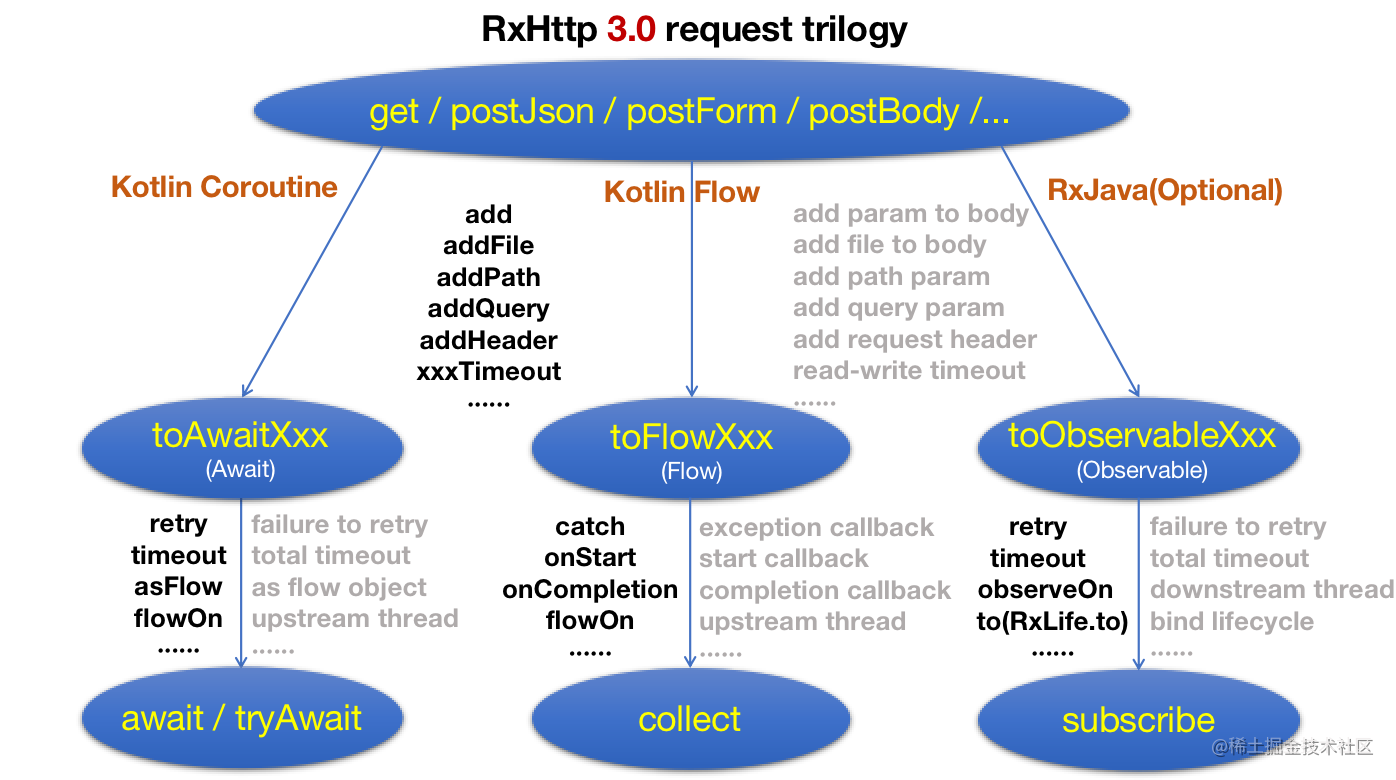
## 1、Feature
- Support kotlin coroutines, RxJava2, RxJava3
- Support Gson, Xml, ProtoBuf, FastJson and other third-party data parsing tools
- Supports automatic closure of requests in FragmentActivity, Fragment, View, ViewModel, and any class
- Support global encryption and decryption, add common parameters and headers, network cache, all support a request set up separately
## 2、usage
1、Adding dependencies and configurations
### Required
1、Add jitpack to your build.gradle
```java
allprojects {
repositories {
maven { url "https://jitpack.io" }
}
}
```
2、Java 8 or higher
```java
android {
compileOptions {
sourceCompatibility JavaVersion.VERSION_1_8
targetCompatibility JavaVersion.VERSION_1_8
}
}
```
3、Add RxHttp dependency
```kotlin
plugins {
// kapt/ksp choose one
// id 'kotlin-kapt'
id 'com.google.devtools.ksp' version '2.3.4'
}
dependencies {
def rxhttp_version = '3.5.1'
implementation 'com.squareup.okhttp3:okhttp:4.12.0'
implementation "com.github.liujingxing.rxhttp:rxhttp:$rxhttp_version"
// ksp/kapt/annotationProcessor choose one
ksp "com.github.liujingxing.rxhttp:rxhttp-compiler:$rxhttp_version"
}
```
### Optional
### 1、Converter
```kotlin
implementation "com.github.liujingxing.rxhttp:converter-serialization:$rxhttp_version"
implementation "com.github.liujingxing.rxhttp:converter-fastjson:$rxhttp_version"
implementation "com.github.liujingxing.rxhttp:converter-jackson:$rxhttp_version"
implementation "com.github.liujingxing.rxhttp:converter-moshi:$rxhttp_version"
implementation "com.github.liujingxing.rxhttp:converter-protobuf:$rxhttp_version"
implementation "com.github.liujingxing.rxhttp:converter-simplexml:$rxhttp_version"
```
### 2、RxJava
RxHttp + RxJava3
```java
implementation 'io.reactivex.rxjava3:rxjava:3.1.6'
implementation 'io.reactivex.rxjava3:rxandroid:3.0.2'
implementation 'com.github.liujingxing.rxlife:rxlife-rxjava3:2.2.2' //RxJava3, Automatic close request
```
RxHttp + RxJava2
```java
implementation 'io.reactivex.rxjava2:rxjava:2.2.8'
implementation 'io.reactivex.rxjava2:rxandroid:2.1.1'
implementation 'com.github.liujingxing.rxlife:rxlife-rxjava2:2.2.2' //RxJava2, Automatic close request
```
ksp passes the RxJava version
```java
ksp {
arg("rxhttp_rxjava", "3.1.6")
}
```
Kapt passes the RxJava version
```java
kapt {
arguments {
arg("rxhttp_rxjava", "3.1.6")
}
}
```
javaCompileOptions passes the RxJava version
```java
android {
defaultConfig {
javaCompileOptions {
annotationProcessorOptions {
arguments = [
rxhttp_rxjava: '3.1.6',
]
}
}
}
}
```
### 3、set RxHttp class package name
ksp pass package name
```java
ksp {
arg("rxhttp_package", "rxhttp.xxx")
}
```
kapt pass package name
```java
kapt {
arguments {
arg("rxhttp_package", "rxhttp.xxx")
}
}
```
javaCompileOptions pass package name
```java
android {
defaultConfig {
javaCompileOptions {
annotationProcessorOptions {
arguments = [
rxhttp_package: 'rxhttp.xxx'
]
}
}
}
}
```
**Finally, rebuild the project, which is necessary**
2、Initialize the SDK
This step is optional
```java
RxHttpPlugins.init(OkHttpClient)
.setDebug(boolean)
.setOnParamAssembly(Consumer)
....
```
3、Configuration BaseUrl
This step is optional
```java
public class Url {
//Add the @defaultDomain annotation to BASE_URL
@DefaultDomain
public static BASE_URL = "https://..."
}
```
4、Perform the requested
```java
// java
RxHttp.get("/service/...") //1、You can choose get,postFrom,postJson etc
.addQuery("key", "value") //add query param
.addHeader("headerKey", "headerValue") //add request header
.toObservable(Student.class) //2、Use the toXxx method to determine the return value type, customizable
.subscribe(student -> { //3、Subscribing observer
//Success callback,Default IO thread
}, throwable -> {
//Abnormal callback
});
// kotlin
RxHttp.postForm("/service/...") //post FormBody
.add("key", "value") //add param to body
.addQuery("key1", "value1") //add query param
.addFile("file", File(".../1.png")) //add file to body
.toObservable()
.subscribe({ student ->
//Default IO thread
}, { throwable ->
})
// kotlin coroutine
val students = RxHttp.postJson("/service/...") //1、post {application/json; charset=utf-8}
.toAwaitList() //2、Use the toXxx method to determine the return value type, customizable
.await() //3、Get the return value, await is the suspend method
```
## 3、Advanced usage
1、Close the request
```java
//In Rxjava2 , Automatic close request
RxHttp.get("/service/...")
.toObservableString()
.as(RxLife.as(this)) //The Activity destroys and automatically closes the request
.subscribe(s -> {
//Default IO thread
}, throwable -> {
});
//In Rxjava3 , Automatic close request
RxHttp.get("/service/...")
.toObservableString()
.to(RxLife.to(this)) //The Activity destroys and automatically closes the request
.subscribe(s -> {
//Default IO thread
}, throwable -> {
});
//In RxJava2/RxJava3, close the request manually
Disposable disposable = RxHttp.get("/service/...")
.toObservableString()
.subscribe(s -> {
//Default IO thread
}, throwable -> {
});
disposable.dispose(); //Close the request at the appropriate time
```
## 4、ProGuard
If you are using RxHttp v2.2.8 or above the shrinking and obfuscation rules are included automatically.
Otherwise you must manually add the options in [rxhttp.pro](https://github.com/liujingxing/rxhttp/blob/master/rxhttp/src/main/resources/META-INF/proguard/rxhttp.pro).
## 5、Donations
If this project helps you a lot and you want to support the project's development and maintenance of this project, feel free to scan the following QR code for donation. Your donation is highly appreciated. Thank you!

# Licenses
```
Copyright 2019 liujingxing
Licensed under the Apache License, Version 2.0 (the "License");
you may not use this file except in compliance with the License.
You may obtain a copy of the License at
http://www.apache.org/licenses/LICENSE-2.0
Unless required by applicable law or agreed to in writing, software
distributed under the License is distributed on an "AS IS" BASIS,
WITHOUT WARRANTIES OR CONDITIONS OF ANY KIND, either express or implied.
See the License for the specific language governing permissions and
limitations under the License.
```
================================================
FILE: README_zh.md
================================================
# RxHttp
[English](https://github.com/liujingxing/rxhttp/blob/master/README.md) | 中文文档
[](https://jitpack.io/#liujingxing/rxhttp)

[](https://github.com/liujingxing/rxhttp/wiki/%E6%9B%B4%E6%96%B0%E6%97%A5%E5%BF%97)
[](https://github.com/liujingxing/rxhttp/wiki/FAQ)
[](https://juejin.cn/user/272334612601559/posts)
# [(RxHttp 3.0 更新指南,升级必看)](https://github.com/liujingxing/rxhttp/wiki/RxHttp-3.0-%E6%9B%B4%E6%96%B0%E6%8C%87%E5%8D%97%EF%BC%8C%E5%8D%87%E7%BA%A7%E5%BF%85%E7%9C%8B)
# 使用RxHttp的知名App
抖音旗下***汽水音乐***(app v18.1.0 设置/关于汽水音乐/开源软件声明 可查)
***加我微信 ljx-studio 拉你进微信群(备注RxHttp)***
# 1、主要优势
***1. 30秒即可上手,学习成本极低***
***2. 史上最优雅的支持 Kotlin 协程***
***3. 史上最优雅的处理多个BaseUrl及动态BaseUrl***
***4. 史上最优雅的对错误统一处理,且不打破Lambda表达式***
***5. 史上最优雅的文件上传/下载/断点下载/进度监听,已适配Android 10***
***6. 支持Gson、Xml、ProtoBuf、FastJson等第三方数据解析工具***
***7. 支持Get、Post、Put、Delete等任意请求方式,可自定义请求方式***
***8. 支持在Activity/Fragment/View/ViewModel/任意类中,自动关闭请求***
***9. 支持全局加解密、添加公共参数及头部、网络缓存,均支持对某个请求单独设置***
# 2、请求三部曲
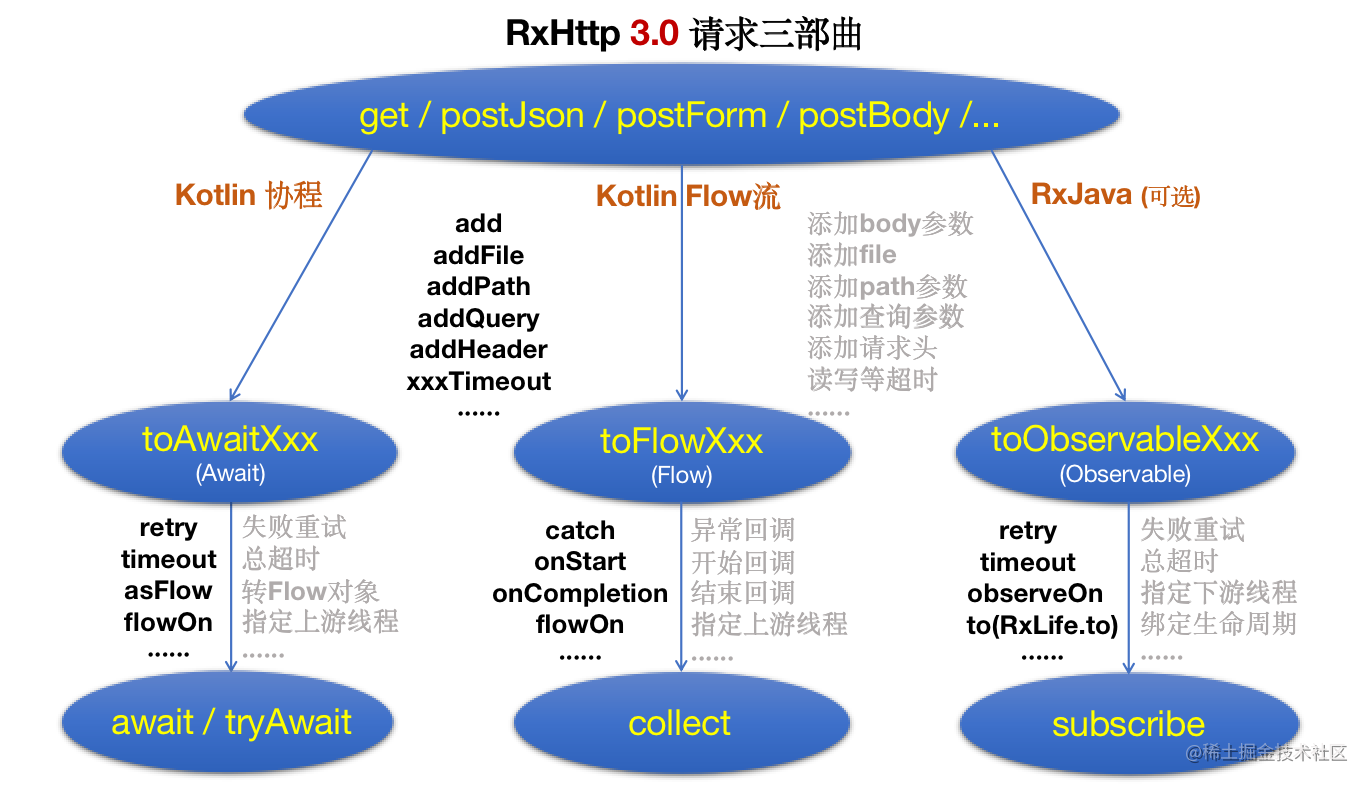
***代码表示,
[toObservableXxx、toAwaitXxx、toFlowXxx方法介绍点这里](https://github.com/liujingxing/rxhttp/wiki/RxJava%E3%80%81Await%E3%80%81Flow-%E5%AF%B9%E5%BA%94%E7%9A%84-asXxx%E3%80%81toXxx%E3%80%81toFlowXxx%E6%96%B9%E6%B3%95%E4%BB%8B%E7%BB%8D)***
* Flow/Await下 toXxxResponse> 等价与 toObservableResponsePageList(Class)
*/
public ResponseParser(Type type) {
super(type);
}
@SuppressWarnings("unchecked")
@Override
public T onParse(@NotNull okhttp3.Response response) throws IOException {
Response data = Converter.convertTo(response, Response.class, types);
T t = data.getData(); //获取data字段
if (t == null && types[0] == String.class) {
/*
* 考虑到有些时候服务端会返回:{"errorCode":0,"errorMsg":"关注成功"} 类似没有data的数据
* 此时code正确,但是data字段为空,直接返回data的话,会报空指针错误,
* 所以,判断泛型为String类型时,重新赋值,并确保赋值不为null
*/
t = (T) data.getMsg();
}
if (data.getCode() != 0 || t == null) {//code不等于0,说明数据不正确,抛出异常
throw new ParseException(String.valueOf(data.getCode()), data.getMsg(), response);
}
return t;
}
}
================================================
FILE: app/src/main/java/com/example/httpsender/utils/Preferences.java
================================================
package com.example.httpsender.utils;
import android.content.SharedPreferences;
import android.preference.PreferenceManager;
import com.example.httpsender.AppHolder;
/**
* User: hqs
* Date: 2016/5/10
* Time: 19:07
*/
public class Preferences {
private static SharedPreferences sharedPreferences;
private static SharedPreferences.Editor editor;
private Preferences() {
}
private static SharedPreferences getInstance() {
if (sharedPreferences == null) {
synchronized (Preferences.class) {
if (sharedPreferences == null) {
sharedPreferences = PreferenceManager.getDefaultSharedPreferences(AppHolder.getInstance());
}
}
}
return sharedPreferences;
}
public static SharedPreferences.Editor getEditor() {
if (editor == null) {
editor = getInstance().edit();
}
return editor;
}
public static String getValue(String key, String defaultValue) {
return getInstance().getString(key, defaultValue);
}
public static void setValue(String key, String value) {
getEditor().putString(key, value).commit();
}
public static int getValue(String key, int defaultValue) {
return getInstance().getInt(key, defaultValue);
}
public static void setValue(String key, int value) {
getEditor().putInt(key, value).commit();
}
public static void setFloat(String key, float value) {
getEditor().putFloat(key, value).commit();
}
public static float getFloat(String key, float defaultValue) {
return getInstance().getFloat(key, defaultValue);
}
public static boolean getValue(String key, boolean defaultValue) {
return getInstance().getBoolean(key, defaultValue);
}
public static void setValue(String key, boolean value) {
getEditor().putBoolean(key, value).commit();
}
public static long getValue(String key, long defaultValue) {
return getInstance().getLong(key, defaultValue);
}
public static void setValue(String key, long value) {
getEditor().putLong(key, value).commit();
}
}
================================================
FILE: app/src/main/java/com/example/httpsender/view/ScaleTransitionPagerTitleView.java
================================================
package com.example.httpsender.view;
import android.content.Context;
import net.lucode.hackware.magicindicator.buildins.commonnavigator.titles.ColorTransitionPagerTitleView;
/**
* 带颜色渐变和缩放的指示器标题
* 博客: http://hackware.lucode.net
* Created by hackware on 2016/6/26.
*/
public class ScaleTransitionPagerTitleView extends ColorTransitionPagerTitleView {
private float mMinScale = 0.75f;
public ScaleTransitionPagerTitleView(Context context) {
super(context);
}
@Override
public void onEnter(int index, int totalCount, float enterPercent, boolean leftToRight) {
super.onEnter(index, totalCount, enterPercent, leftToRight); // 实现颜色渐变
setScaleX(mMinScale + (1.0f - mMinScale) * enterPercent);
setScaleY(mMinScale + (1.0f - mMinScale) * enterPercent);
}
@Override
public void onLeave(int index, int totalCount, float leavePercent, boolean leftToRight) {
super.onLeave(index, totalCount, leavePercent, leftToRight); // 实现颜色渐变
setScaleX(1.0f + (mMinScale - 1.0f) * leavePercent);
setScaleY(1.0f + (mMinScale - 1.0f) * leavePercent);
}
public float getMinScale() {
return mMinScale;
}
public void setMinScale(float minScale) {
mMinScale = minScale;
}
}
================================================
FILE: app/src/main/java/com/example/httpsender/vm/MultiTaskAwaitDownloader.kt
================================================
package com.example.httpsender.vm
import androidx.lifecycle.MutableLiveData
import com.example.httpsender.Tip
import com.example.httpsender.entity.DownloadTask
import com.example.httpsender.utils.Preferences
import kotlinx.coroutines.CoroutineScope
import kotlinx.coroutines.Dispatchers
import kotlinx.coroutines.launch
import okhttp3.internal.http2.StreamResetException
import okio.ByteString.Companion.encodeUtf8
import rxhttp.RxHttpPlugins
import rxhttp.awaitResult
import rxhttp.wrapper.param.RxHttp
import java.io.File
import java.util.*
/**
* User: ljx
* Date: 2020/7/12
* Time: 18:00
*/
object MultiTaskAwaitDownloader {
const val IDLE = 0 //未开始,闲置状态
const val WAITING = 1 //等待中状态
const val DOWNLOADING = 2 //下载中
const val PAUSED = 3 //已暂停
const val COMPLETED = 4 //已完成
const val FAIL = 5 //下载失败
const val CANCEL = 6 //取消状态,等待时被取消
private const val MAX_TASK_COUNT = 3 //最大并发数
@JvmStatic
val liveTask = MutableLiveData() //用于刷新UI
@JvmStatic
val allTask = ArrayList() //所有下载任务
private val waitTask = LinkedList() //等待下载的任务
private val downloadingTask = LinkedList() //下载中的任务
//记录每个文件的总大小,key为文件url
private val lengthMap = HashMap()
@JvmStatic
fun addTasks(tasks: ArrayList) {
val allTaskList = allTask
tasks.forEach {
if (!allTaskList.contains(it)) {
val md5Key = it.url.encodeUtf8().md5().hex()
val length = Preferences.getValue(md5Key, -1L)
if (length != -1L) {
it.totalSize = length
it.currentSize = File(it.localPath).length()
it.progress = it.currentSize * 1.0f / it.totalSize
lengthMap[it.url] = length
if (it.currentSize > 0) {
it.state = PAUSED
}
if (it.totalSize == it.currentSize) {
//如果当前size等于总size,则任务文件下载完成,注意: 这个判断不是100%准确,最好能对文件做md5校验
it.state = COMPLETED
}
}
allTaskList.add(it)
}
}
}
//开始下载所有任务
@JvmStatic
fun startAllDownloadTask() {
val allTaskList = allTask
allTaskList.forEach {
if (it.state != COMPLETED && it.state != DOWNLOADING) {
download(it)
}
}
}
@JvmStatic
fun download(task: DownloadTask) {
if (downloadingTask.size >= MAX_TASK_COUNT) {
//超过最大下载数,添加进等待队列
task.state = WAITING
updateTask(task)
waitTask.offer(task)
return
}
task.state = DOWNLOADING
updateTask(task)
downloadingTask.add(task)
//如果想使用RxJava或Await下载,更改以下代码即可
CoroutineScope(Dispatchers.Main).launch {
// RxHttp.get(task.url)
// .tag(task.url) //记录tag,手动取消下载时用到
// .toDownloadAwait(task.localPath, true) {
// //下载进度回调,0-100,仅在进度有更新时才会回调
// task.progress = it.progress //当前进度 0-100
// task.currentSize = it.currentSize //当前已下载的字节大小
// task.totalSize = it.totalSize //要下载的总字节大小
// updateTask(task)
// val key = task.url
// val length = lengthMap[key]
// if (length != task.totalSize) {
// //服务器返回的文件总大小与本地的不一致,则更新
// lengthMap[key] = task.totalSize
// saveTotalSize(lengthMap)
// }
// }.awaitResult {
// Tip.show("下载成功")
// task.state = COMPLETED
// }.onFailure {
// //手动取消下载时,会收到StreamResetException异常,不做任何处理
// if (it !is StreamResetException) {
// Tip.show("下载失败")
// task.state = FAIL
// }
// }
//下载结束,不管任务成功还是失败,如果还有在等待的任务,都开启下一个任务
updateTask(task)
downloadingTask.remove(task)
waitTask.poll()?.let { download(it) }
}
}
private fun saveTotalSize(map: HashMap) {
val editor = Preferences.getEditor()
for ((key, value) in map) {
val md5Key = key.encodeUtf8().md5().hex()
editor.putLong(md5Key, value)
}
editor.commit()
}
//关闭所有任务
@JvmStatic
fun cancelAllTask() {
var iterator = waitTask.iterator()
while (iterator.hasNext()) {
val task = iterator.next()
task.state = CANCEL
iterator.remove()
updateTask(task)
}
iterator = downloadingTask.iterator()
while (iterator.hasNext()) {
val task = iterator.next()
iterator.remove()
RxHttpPlugins.cancelAll(task.url)
task.state = CANCEL
updateTask(task)
}
}
//等待中->取消下载
@JvmStatic
fun removeWaitTask(task: DownloadTask) {
waitTask.remove(task)
task.state = CANCEL
updateTask(task)
}
//暂停下载
@JvmStatic
fun pauseTask(task: DownloadTask) {
//根据tag取消下载
RxHttpPlugins.cancelAll(task.url)
task.state = PAUSED
updateTask(task)
}
@JvmStatic
fun haveTaskExecuting(): Boolean {
return waitTask.size > 0 || downloadingTask.size > 0
}
//发送通知,更新UI
private fun updateTask(task: DownloadTask) {
liveTask.value = task
}
}
================================================
FILE: app/src/main/java/com/example/httpsender/vm/MultiTaskDownloader.kt
================================================
package com.example.httpsender.vm
import android.annotation.SuppressLint
import androidx.lifecycle.MutableLiveData
import com.example.httpsender.Tip
import com.example.httpsender.entity.DownloadTask
import com.example.httpsender.utils.Preferences
import okhttp3.internal.http2.StreamResetException
import okio.ByteString.Companion.encodeUtf8
import rxhttp.RxHttpPlugins
import rxhttp.wrapper.param.RxHttp
import java.io.File
import java.util.*
/**
* User: ljx
* Date: 2020/7/12
* Time: 18:00
*/
object MultiTaskDownloader {
const val IDLE = 0 //未开始,闲置状态
const val WAITING = 1 //等待中状态
const val DOWNLOADING = 2 //下载中
const val PAUSED = 3 //已暂停
const val COMPLETED = 4 //已完成
const val FAIL = 5 //下载失败
const val CANCEL = 6 //取消状态,等待时被取消
private const val MAX_TASK_COUNT = 3 //最大并发数
@JvmStatic
val liveTask = MutableLiveData() //用于刷新UI
@JvmStatic
val allTask = ArrayList() //所有下载任务
private val waitTask = LinkedList() //等待下载的任务
private val downloadingTask = LinkedList() //下载中的任务
//记录每个文件的总大小,key为文件url
private val lengthMap = HashMap()
@JvmStatic
fun addTasks(tasks: ArrayList) {
val allTaskList = allTask
tasks.forEach {
if (!allTaskList.contains(it)) {
val md5Key = it.url.encodeUtf8().md5().hex()
val length = Preferences.getValue(md5Key, -1L)
if (length != -1L) {
it.totalSize = length
it.currentSize = File(it.localPath).length()
it.progress = it.currentSize * 1.0f / it.totalSize
lengthMap[it.url] = length
if (it.currentSize > 0) {
it.state = PAUSED
}
if (it.totalSize == it.currentSize) {
//如果当前size等于总size,则任务文件下载完成,注意: 这个判断不是100%准确,最好能对文件做md5校验
it.state = COMPLETED
}
}
allTaskList.add(it)
}
}
}
//开始下载所有任务
@JvmStatic
fun startAllDownloadTask() {
val allTaskList = allTask
allTaskList.forEach {
if (it.state != COMPLETED && it.state != DOWNLOADING) {
download(it)
}
}
}
@SuppressLint("CheckResult")
@JvmStatic
fun download(task: DownloadTask) {
if (downloadingTask.size >= MAX_TASK_COUNT) {
//超过最大下载数,添加进等待队列
task.state = WAITING
updateTask(task)
waitTask.offer(task)
return
}
task.state = DOWNLOADING
updateTask(task)
downloadingTask.add(task)
//如果想使用Await或Flow下载,更改以下代码即可
RxHttp.get(task.url)
.tag(task.url) //记录tag,手动取消下载时用到
.toDownloadObservable(task.localPath, true)
.onMainProgress {
//下载进度回调,0-100,仅在进度有更新时才会回调
task.speed = it.speed
task.remainingTime = it.calculateRemainingTime()
task.progress = it.fraction //当前进度 [0.0, 1.0]
task.currentSize = it.currentSize //当前已下载的字节大小
task.totalSize = it.totalSize //要下载的总字节大小
updateTask(task)
val key = task.url
val length = lengthMap[key]
if (length != task.totalSize) {
//服务器返回的文件总大小与本地的不一致,则更新
lengthMap[key] = task.totalSize
saveTotalSize(lengthMap)
}
}
.doFinally {
updateTask(task)
//不管任务成功还是失败,如果还有在等待的任务,都开启下一个任务
downloadingTask.remove(task)
waitTask.poll()?.let { download(it) }
}
.subscribe({
Tip.show("下载完成")
task.state = COMPLETED
}, {
//手动取消下载时,会收到StreamResetException异常,不做任何处理
if (it !is StreamResetException){
Tip.show("下载失败")
task.state = FAIL
}
})
}
private fun saveTotalSize(map: HashMap) {
val editor = Preferences.getEditor()
for ((key, value) in map) {
val md5Key = key.encodeUtf8().md5().hex()
editor.putLong(md5Key, value)
}
editor.commit()
}
//关闭所有任务
@JvmStatic
fun cancelAllTask() {
var iterator = waitTask.iterator()
while (iterator.hasNext()) {
val task = iterator.next()
task.state = CANCEL
iterator.remove()
updateTask(task)
}
iterator = downloadingTask.iterator()
while (iterator.hasNext()) {
val task = iterator.next()
iterator.remove()
RxHttpPlugins.cancelAll(task.url)
task.state = CANCEL
updateTask(task)
}
}
//等待中->取消下载
@JvmStatic
fun removeWaitTask(task: DownloadTask) {
waitTask.remove(task)
task.state = CANCEL
updateTask(task)
}
//暂停下载
@JvmStatic
fun pauseTask(task: DownloadTask) {
//根据tag取消下载
RxHttpPlugins.cancelAll(task.url)
task.state = PAUSED
task.speed = 0
task.remainingTime = -1
updateTask(task)
}
@JvmStatic
fun haveTaskExecuting(): Boolean {
return waitTask.size > 0 || downloadingTask.size > 0
}
//发送通知,更新UI
private fun updateTask(task: DownloadTask) {
liveTask.value = task
}
}
================================================
FILE: app/src/main/java/com/example/httpsender/vm/MultiTaskFlowDownloader.kt
================================================
package com.example.httpsender.vm
import androidx.lifecycle.MutableLiveData
import com.example.httpsender.Tip
import com.example.httpsender.entity.DownloadTask
import com.example.httpsender.utils.Preferences
import kotlinx.coroutines.CoroutineScope
import kotlinx.coroutines.Dispatchers
import kotlinx.coroutines.flow.catch
import kotlinx.coroutines.launch
import okhttp3.internal.http2.StreamResetException
import okio.ByteString.Companion.encodeUtf8
import rxhttp.RxHttpPlugins
import rxhttp.toDownloadFlow
import rxhttp.wrapper.param.RxHttp
import java.io.File
import java.util.*
/**
* User: ljx
* Date: 2020/7/12
* Time: 18:00
*/
object MultiTaskFlowDownloader {
const val IDLE = 0 //未开始,闲置状态
const val WAITING = 1 //等待中状态
const val DOWNLOADING = 2 //下载中
const val PAUSED = 3 //已暂停
const val COMPLETED = 4 //已完成
const val FAIL = 5 //下载失败
const val CANCEL = 6 //取消状态,等待时被取消
private const val MAX_TASK_COUNT = 3 //最大并发数
@JvmStatic
val liveTask = MutableLiveData() //用于刷新UI
@JvmStatic
val allTask = ArrayList() //所有下载任务
private val waitTask = LinkedList() //等待下载的任务
private val downloadingTask = LinkedList() //下载中的任务
//记录每个文件的总大小,key为文件url
private val lengthMap = HashMap()
@JvmStatic
fun addTasks(tasks: ArrayList) {
val allTaskList = allTask
tasks.forEach {
if (!allTaskList.contains(it)) {
val md5Key = it.url.encodeUtf8().md5().hex()
val length = Preferences.getValue(md5Key, -1L)
if (length != -1L) {
it.totalSize = length
it.currentSize = File(it.localPath).length()
it.progress = it.currentSize * 1.0f / it.totalSize
lengthMap[it.url] = length
if (it.currentSize > 0) {
it.state = PAUSED
}
if (it.totalSize == it.currentSize) {
//如果当前size等于总size,则任务文件下载完成,注意: 这个判断不是100%准确,最好能对文件做md5校验
it.state = COMPLETED
}
}
allTaskList.add(it)
}
}
}
//开始下载所有任务
@JvmStatic
fun startAllDownloadTask() {
val allTaskList = allTask
allTaskList.forEach {
if (it.state != COMPLETED && it.state != DOWNLOADING) {
download(it)
}
}
}
@JvmStatic
fun download(task: DownloadTask) {
if (downloadingTask.size >= MAX_TASK_COUNT) {
//超过最大下载数,添加进等待队列
task.state = WAITING
updateTask(task)
waitTask.offer(task)
return
}
task.state = DOWNLOADING
updateTask(task)
downloadingTask.add(task)
//如果想使用RxJava或Flow下载,更改以下代码即可
CoroutineScope(Dispatchers.Main).launch {
RxHttp.get(task.url)
.tag(task.url) //记录tag,手动取消下载时用到
.toDownloadFlow(task.localPath, true)
.onProgress{
//下载进度回调,0-100,仅在进度有更新时才会回调
task.progress = it.fraction //当前进度 [0.0, 1.0]
task.currentSize = it.currentSize //当前已下载的字节大小
task.totalSize = it.totalSize //要下载的总字节大小
updateTask(task)
val key = task.url
val length = lengthMap[key]
if (length != task.totalSize) {
//服务器返回的文件总大小与本地的不一致,则更新
lengthMap[key] = task.totalSize
saveTotalSize(lengthMap)
}
}.catch {
//手动取消下载时,会收到StreamResetException异常,不做任何处理
if (it !is StreamResetException) {
Tip.show("下载失败")
task.state = FAIL
}
}.collect {
Tip.show("下载成功")
task.state = COMPLETED
}
//下载结束,不管任务成功还是失败,如果还有在等待的任务,都开启下一个任务
updateTask(task)
downloadingTask.remove(task)
waitTask.poll()?.let { download(it) }
}
}
private fun saveTotalSize(map: HashMap) {
val editor = Preferences.getEditor()
for ((key, value) in map) {
val md5Key = key.encodeUtf8().md5().hex()
editor.putLong(md5Key, value)
}
editor.commit()
}
//关闭所有任务
@JvmStatic
fun cancelAllTask() {
var iterator = waitTask.iterator()
while (iterator.hasNext()) {
val task = iterator.next()
task.state = CANCEL
iterator.remove()
updateTask(task)
}
iterator = downloadingTask.iterator()
while (iterator.hasNext()) {
val task = iterator.next()
iterator.remove()
RxHttpPlugins.cancelAll(task.url)
task.state = CANCEL
updateTask(task)
}
}
//等待中->取消下载
@JvmStatic
fun removeWaitTask(task: DownloadTask) {
waitTask.remove(task)
task.state = CANCEL
updateTask(task)
}
//暂停下载
@JvmStatic
fun pauseTask(task: DownloadTask) {
//根据tag取消下载
RxHttpPlugins.cancelAll(task.url)
task.state = PAUSED
updateTask(task)
}
@JvmStatic
fun haveTaskExecuting(): Boolean {
return waitTask.size > 0 || downloadingTask.size > 0
}
//发送通知,更新UI
private fun updateTask(task: DownloadTask) {
liveTask.value = task
}
}
================================================
FILE: app/src/main/res/drawable/ic_launcher_background.xml
================================================
================================================
FILE: app/src/main/res/drawable-v24/ic_launcher_foreground.xml
================================================
================================================
FILE: app/src/main/res/layout/await_fragment.xml
================================================
================================================
FILE: app/src/main/res/layout/download_multi_adapter.xml
================================================
================================================
FILE: app/src/main/res/layout/flow_fragment.xml
================================================
================================================
FILE: app/src/main/res/layout/main_activity.xml
================================================
================================================
FILE: app/src/main/res/layout/multi_download_fragment.xml
================================================
================================================
FILE: app/src/main/res/layout/rxjava_fragment.xml
================================================
================================================
FILE: app/src/main/res/layout/toolbar_activity.xml
================================================
================================================
FILE: app/src/main/res/menu/download.xml
================================================
================================================
FILE: app/src/main/res/mipmap-anydpi-v26/ic_launcher.xml
================================================
================================================
FILE: app/src/main/res/mipmap-anydpi-v26/ic_launcher_round.xml
================================================
================================================
FILE: app/src/main/res/values/colors.xml
================================================
#008577#00574B#D81B60
================================================
FILE: app/src/main/res/values/strings.xml
================================================
RxHttp当前无网络,请检查你的网络设置网络连接不可用,请稍后重试!网络不给力,请稍候重试!连接超时,请稍后再试
================================================
FILE: app/src/main/res/values/styles.xml
================================================
================================================
FILE: app/src/main/res/values/themes.xml
================================================
================================================
FILE: app/src/main/res/xml/network_config.xml
================================================
================================================
FILE: app/src/test/java/com/rxhttp/compiler/AbstractTestSymbolProcessor.kt
================================================
package com.rxhttp.compiler
import com.google.devtools.ksp.processing.*
import com.google.devtools.ksp.symbol.KSAnnotated
/**
* Helper class to write tests, only used in Ksp Compile Testing tests, not a public API.
*/
open class AbstractTestSymbolProcessor(
protected val codeGenerator: CodeGenerator
) : SymbolProcessor {
override fun process(resolver: Resolver): List {
return emptyList()
}
}
// Would be nice if SymbolProcessorProvider was a fun interface
internal fun processorProviderOf(
body: (environment: SymbolProcessorEnvironment) -> SymbolProcessor
): SymbolProcessorProvider {
return object : SymbolProcessorProvider {
override fun create(
environment: SymbolProcessorEnvironment
): SymbolProcessor {
return body(environment)
}
}
}
================================================
FILE: app/src/test/java/com/rxhttp/compiler/KspProcessorTest.kt
================================================
package com.rxhttp.compiler
import com.google.devtools.ksp.processing.CodeGenerator
import com.google.devtools.ksp.processing.Resolver
import com.google.devtools.ksp.symbol.KSAnnotated
import com.google.devtools.ksp.symbol.KSClassDeclaration
import com.rxhttp.compiler.ksp.getParserTypeParam
import com.tschuchort.compiletesting.KotlinCompilation
import com.tschuchort.compiletesting.SourceFile
import com.tschuchort.compiletesting.symbolProcessorProviders
import org.jetbrains.kotlin.compiler.plugin.ExperimentalCompilerApi
import org.junit.Assert
import org.junit.Test
import org.junit.runner.RunWith
import org.junit.runners.JUnit4
import rxhttp.wrapper.annotation.Parser
import java.io.File
/**
* User: ljx
* Date: 2023/8/27
* Time: 17:04
*/
@RunWith(JUnit4::class)
class KspProcessorTest {
@OptIn(ExperimentalCompilerApi::class)
@Test
fun testKspProvider() {
val compilation = KotlinCompilation().apply {
sources = sourceFiles()
symbolProcessorProviders = listOf(KspProvider())
}
val result = compilation.compile()
Assert.assertEquals(result.exitCode, KotlinCompilation.ExitCode.COMPILATION_ERROR)
}
@OptIn(ExperimentalCompilerApi::class)
@Test
fun testKspProvider1() {
val compilation = KotlinCompilation().apply {
sources = sourceFiles()
symbolProcessorProviders = listOf(processorProviderOf {
TestSymbolProcessor(it.codeGenerator)
})
}
val result = compilation.compile()
Assert.assertEquals(result.exitCode, KotlinCompilation.ExitCode.COMPILATION_ERROR)
}
class TestSymbolProcessor(codeGenerator: CodeGenerator) :
AbstractTestSymbolProcessor(codeGenerator) {
override fun process(resolver: Resolver): List {
resolver.getSymbolsWithAnnotation(Parser::class.java.name).forEach {
if (it is KSClassDeclaration) {
val parserTypeParam = it.getParserTypeParam()
println("parserTypeParam=$parserTypeParam")
}
}
return emptyList()
}
}
private fun sourceFiles(): List {
val kotlinPath = "src/main/java/com/example/httpsender/parser"
val entityPath = "src/main/java/com/example/httpsender/entity"
val annotationPrefix = "../rxhttp-annotation/src/main/java/rxhttp/wrapper/annotation"
val parserPrefix = "../rxhttp/src/main/java/rxhttp/wrapper/parse"
val testPrefix = "src/test/java/com/rxhttp/compiler"
return mutableListOf(
// "$kotlinPath/ResponseParser.kt",
"$entityPath/Response.java",
"$parserPrefix/TypeParser.java",
"$parserPrefix/Parser.java",
"$parserPrefix/TypeParser.java",
"$annotationPrefix/Converter.java",
"$annotationPrefix/DefaultDomain.java",
"$annotationPrefix/Domain.java",
"$annotationPrefix/OkClient.java",
"$annotationPrefix/Param.java",
"$annotationPrefix/Parser.java",
"$testPrefix/TestParser1.kt",
"$testPrefix/TestParser2.kt",
"src/main/java/com/example/httpsender/entity/User.java",
"../rxhttp/src/main/java/rxhttp/wrapper/callback/Consumer.java"
).map { SourceFile.fromPath(File(it)) }
}
}
================================================
FILE: app/src/test/java/com/rxhttp/compiler/TestParser1.kt
================================================
package com.rxhttp.compiler
import rxhttp.wrapper.parse.TypeParser
/**
* User: ljx
* Date: 2023/8/28
* Time: 11:12
*/
open class TestParser1 : TypeParser {
protected constructor() : super()
override fun onParse(response: okhttp3.Response): F {
TODO("Not yet implemented")
}
}
================================================
FILE: app/src/test/java/com/rxhttp/compiler/TestParser2.kt
================================================
package com.rxhttp.compiler
import com.example.httpsender.entity.Response
import com.example.httpsender.entity.User
import rxhttp.wrapper.annotation.Parser
import rxhttp.wrapper.callback.Consumer
import java.lang.reflect.Type
/**
* User: ljx
* Date: 2023/8/28
* Time: 11:12
*/
@Parser(name = "test")
class TestParser2: TestParser1?, C>,
rxhttp.wrapper.parse.Parser?> {
protected constructor() : super()
constructor(typeT: Type, typeF: Type, typeS: Type)
override fun onParse(response: okhttp3.Response): Response {
TODO("Not yet implemented")
// return null
// return super.onParse(response)
}
// override fun accept(t: User) {
// TODO("Not yet implemented")
// }
}
================================================
FILE: app/src/test/java/com.example.httpsender/AsyncTest.java
================================================
package com.example.httpsender;
import static org.junit.Assert.assertEquals;
import static org.junit.Assert.assertFalse;
import static org.junit.Assert.assertTrue;
import static java.util.concurrent.TimeUnit.SECONDS;
import static okhttp3.mockwebserver.SocketPolicy.DISCONNECT_AFTER_REQUEST;
import com.example.httpsender.entity.Url;
import com.example.httpsender.entity.User;
import org.junit.Before;
import org.junit.Test;
import java.io.IOException;
import java.lang.reflect.Type;
import java.util.List;
import java.util.concurrent.TimeUnit;
import io.reactivex.rxjava3.observers.TestObserver;
import okhttp3.mockwebserver.MockResponse;
import okhttp3.mockwebserver.MockWebServer;
import okhttp3.mockwebserver.RecordedRequest;
import rxhttp.RxHttpPlugins;
import rxhttp.wrapper.annotation.DefaultDomain;
import rxhttp.wrapper.entity.OkResponse;
import rxhttp.wrapper.entity.ParameterizedTypeImpl;
import rxhttp.wrapper.param.RxHttp;
/**
* User: ljx
* Date: 2020/6/20
* Time: 09:14
*/
public class AsyncTest {
@DefaultDomain
public static String baseUrl = "";
MockWebServer server = new MockWebServer();
@Before
public void setUp() throws Exception {
RxHttpPlugins.init(null).setDebug(true);
baseUrl = server.url("").toString();
System.out.println("baseUrl="+baseUrl);
Url.baseUrl = baseUrl;
}
@Test
public void success() throws InterruptedException {
TestObserver observer = new TestObserver<>();
RxHttp.postForm("/test")
.toObservableString()
.subscribe(observer);
assertFalse(observer.await(1, SECONDS)); //等待1s后返回数据
server.enqueue(new MockResponse()
.setBody("{\"code\":100}")
.throttleBody(1, 100, TimeUnit.MILLISECONDS) //模拟网速慢,每100毫秒传递1个字节
);
assertTrue(observer.await(2, SECONDS)); //等待读取Body
observer.assertComplete();
RecordedRequest request = server.takeRequest();
assertEquals("/test", request.getPath());
assertEquals("POST", request.getMethod());
}
@Test
public void successList() throws InterruptedException {
TestObserver> observer = new TestObserver<>();
RxHttp.postForm("/test")
.toObservableList(int.class)
.subscribe(observer);
assertFalse(observer.await(1, SECONDS)); //等待1s后返回数据
server.enqueue(new MockResponse()
.setBody("[1,2,3,4]")
.throttleBody(1, 100, TimeUnit.MILLISECONDS) //模拟网速慢,每100毫秒传递1个字节
);
assertTrue(observer.await(2, SECONDS)); //等待读取Body
observer.assertComplete();
}
@Test
public void successOKResponse() throws InterruptedException {
Type type = ParameterizedTypeImpl.get(OkResponse.class, User.class);
TestObserver> observer = new TestObserver<>();
RxHttp.postForm("/test")
.>toObservable(type)
.subscribe(observer);
assertFalse(observer.await(1, SECONDS)); //等待1s后返回数据
server.enqueue(new MockResponse()
.setBody("{\"token\":\"abcdefg\"}")
.throttleBody(1, 100, TimeUnit.MILLISECONDS) //模拟网速慢,每100毫秒传递1个字节
);
assertTrue(observer.await(2, SECONDS)); //等待读取Body
observer.assertComplete();
}
@Test
public void failure() throws InterruptedException {
TestObserver observer = new TestObserver<>();
RxHttp.postForm("/test")
.toObservableString()
.subscribe(observer);
assertFalse(observer.await(1, SECONDS));
server.enqueue(new MockResponse().setSocketPolicy(DISCONNECT_AFTER_REQUEST));
observer.await(1, SECONDS);
observer.assertError(IOException.class);
}
}
================================================
FILE: build.gradle
================================================
plugins {
alias(libs.plugins.android.application) apply false
alias(libs.plugins.kotlin.android) apply false
}
================================================
FILE: gradle/libs.versions.toml
================================================
[versions]
agp = "9.0.0"
kotlin = "2.3.10"
android = "4.1.1.4"
appcompat = "1.7.1"
constraintlayout = "2.2.1"
fastjson = "1.2.76"
fragment = "1.8.9"
gson = "2.13.2"
jacksonCore = "2.19.2"
javapoet = "1.13.0"
junit = "4.13.2"
junitVersion = "1.3.0"
espressoCore = "3.7.0"
kotlinCompileTestingKsp = "1.6.0"
kotlinpoet = "2.2.0"
kotlinxCoroutinesAndroid = "1.10.2"
kotlinxSerializationJson = "1.10.0"
lifecycleRuntime = "2.10.0"
magicindicator = "1.7.0"
moshi = "1.15.2"
multidex = "2.0.1"
okhttp = "5.3.2"
protobufJava = "4.33.5"
recyclerview = "1.4.0"
rxandroid = "3.0.2"
rxhttp = "3.5.1"
rxjava = "3.1.12"
rxlifeRxjava3 = "2.2.2"
simpleXml = "2.7.1"
utilcodex = "1.31.1"
ksp = "2.3.5"
[libraries]
android = { module = "com.google.android:android", version.ref = "android" }
androidx-appcompat = { module = "androidx.appcompat:appcompat", version.ref = "appcompat" }
androidx-constraintlayout = { module = "androidx.constraintlayout:constraintlayout", version.ref = "constraintlayout" }
androidx-espresso-core = { module = "androidx.test.espresso:espresso-core", version.ref = "espressoCore" }
androidx-fragment-ktx = { module = "androidx.fragment:fragment-ktx", version.ref = "fragment" }
androidx-junit = { module = "androidx.test.ext:junit", version.ref = "junitVersion" }
androidx-lifecycle-livedata-ktx = { module = "androidx.lifecycle:lifecycle-livedata-ktx", version.ref = "lifecycleRuntime" }
androidx-lifecycle-runtime-ktx = { module = "androidx.lifecycle:lifecycle-runtime-ktx", version.ref = "lifecycleRuntime" }
androidx-lifecycle-service = { module = "androidx.lifecycle:lifecycle-service", version.ref = "lifecycleRuntime" }
androidx-lifecycle-viewmodel-ktx = { module = "androidx.lifecycle:lifecycle-viewmodel-ktx", version.ref = "lifecycleRuntime" }
androidx-multidex = { module = "androidx.multidex:multidex", version.ref = "multidex" }
androidx-recyclerview = { module = "androidx.recyclerview:recyclerview", version.ref = "recyclerview" }
rxhttp = { module = "com.github.liujingxing.rxhttp:rxhttp", version.ref = "rxhttp" }
rxhttp-compiler = { module = "com.github.liujingxing.rxhttp:rxhttp-compiler", version.ref = "rxhttp" }
rxhttp-annotation = { module = "com.github.liujingxing.rxhttp:rxhttp-annotation", version.ref = "rxhttp" }
rxhttp-converter-fastjson = { module = "com.github.liujingxing.rxhttp:converter-fastjson", version.ref = "rxhttp" }
rxhttp-converter-jackson = { module = "com.github.liujingxing.rxhttp:converter-jackson", version.ref = "rxhttp" }
rxhttp-converter-moshi = { module = "com.github.liujingxing.rxhttp:converter-moshi", version.ref = "rxhttp" }
rxhttp-converter-protobuf = { module = "com.github.liujingxing.rxhttp:converter-protobuf", version.ref = "rxhttp" }
rxhttp-converter-serialization = { module = "com.github.liujingxing.rxhttp:converter-serialization", version.ref = "rxhttp" }
rxhttp-converter-simplexml = { module = "com.github.liujingxing.rxhttp:converter-simplexml", version.ref = "rxhttp" }
fastjson = { module = "com.alibaba:fastjson", version.ref = "fastjson" }
gson = { module = "com.google.code.gson:gson", version.ref = "gson" }
jackson-annotations = { module = "com.fasterxml.jackson.core:jackson-annotations", version.ref = "jacksonCore" }
jackson-core = { module = "com.fasterxml.jackson.core:jackson-core", version.ref = "jacksonCore" }
jackson-databind = { module = "com.fasterxml.jackson.core:jackson-databind", version.ref = "jacksonCore" }
javapoet = { module = "com.squareup:javapoet", version.ref = "javapoet" }
junit = { module = "junit:junit", version.ref = "junit" }
kotlin-compile-testing-ksp = { module = "com.github.tschuchortdev:kotlin-compile-testing-ksp", version.ref = "kotlinCompileTestingKsp" }
kotlinpoet = { module = "com.squareup:kotlinpoet", version.ref = "kotlinpoet" }
kotlinpoet-javapoet = { module = "com.squareup:kotlinpoet-javapoet", version.ref = "kotlinpoet" }
kotlinpoet-ksp = { module = "com.squareup:kotlinpoet-ksp", version.ref = "kotlinpoet" }
kotlinx-coroutines-android = { module = "org.jetbrains.kotlinx:kotlinx-coroutines-android", version.ref = "kotlinxCoroutinesAndroid" }
kotlinx-serialization-json = { module = "org.jetbrains.kotlinx:kotlinx-serialization-json", version.ref = "kotlinxSerializationJson" }
github-magicindicator = { module = "com.github.hackware1993:MagicIndicator", version.ref = "magicindicator" }
mockwebserver = { module = "com.squareup.okhttp3:mockwebserver", version.ref = "okhttp" }
moshi = { module = "com.squareup.moshi:moshi", version.ref = "moshi" }
okhttp = { module = "com.squareup.okhttp3:okhttp", version.ref = "okhttp" }
protobuf-java = { module = "com.google.protobuf:protobuf-java", version.ref = "protobufJava" }
rxandroid = { module = "io.reactivex.rxjava3:rxandroid", version.ref = "rxandroid" }
rxjava = { module = "io.reactivex.rxjava3:rxjava", version.ref = "rxjava" }
github-rxlife-rxjava3 = { module = "com.github.liujingxing.rxlife:rxlife-rxjava3", version.ref = "rxlifeRxjava3" }
simple-xml = { module = "org.simpleframework:simple-xml", version.ref = "simpleXml" }
symbol-processing-api = { module = "com.google.devtools.ksp:symbol-processing-api", version.ref = "ksp" }
utilcodex = { module = "com.blankj:utilcodex", version.ref = "utilcodex" }
[plugins]
android-application = { id = "com.android.application", version.ref = "agp" }
kotlin-android = { id = "org.jetbrains.kotlin.android", version.ref = "kotlin" }
================================================
FILE: gradle/wrapper/gradle-wrapper.properties
================================================
#Tue Oct 13 10:34:15 CST 2020
distributionBase=GRADLE_USER_HOME
distributionPath=wrapper/dists
zipStoreBase=GRADLE_USER_HOME
zipStorePath=wrapper/dists
distributionUrl=https\://services.gradle.org/distributions/gradle-9.3.1-bin.zip
================================================
FILE: gradle.properties
================================================
# Project-wide Gradle settings.
# IDE (e.g. Android Studio) users:
# Gradle settings configured through the IDE *will override*
# any settings specified in this file.
# For more details on how to configure your build environment visit
# http://www.gradle.org/docs/current/userguide/build_environment.html
# Specifies the JVM arguments used for the daemon process.
# The setting is particularly useful for tweaking memory settings.
android.enableJetifier=true
android.useAndroidX=true
org.gradle.jvmargs=-Xmx1536m
# When configured, Gradle will run in incubating parallel mode.
# This option should only be used with decoupled projects. More details, visit
# http://www.gradle.org/docs/current/userguide/multi_project_builds.html#sec:decoupled_projects
# org.gradle.parallel=true
#org.gradle.daemon=true
#org.gradle.jvmargs=-agentlib:jdwp=transport=dt_socket,server=y,suspend=n,address=5005
jdk_version=8
android.defaults.buildfeatures.resvalues=true
android.sdk.defaultTargetSdkToCompileSdkIfUnset=false
android.enableAppCompileTimeRClass=false
android.usesSdkInManifest.disallowed=false
android.uniquePackageNames=false
android.dependency.useConstraints=true
android.r8.strictFullModeForKeepRules=false
android.r8.optimizedResourceShrinking=false
android.builtInKotlin=false
android.newDsl=false
================================================
FILE: jitpack.yml
================================================
jdk:
- openjdk17
================================================
FILE: maven.gradle
================================================
apply plugin: 'maven-publish'
publishing {
publications {
release(MavenPublication) {
from components.java
}
}
}
================================================
FILE: maven_dependency.md
================================================
## 注意
- RxHttp支持`RxJava2和RxJava3`,依赖时需要选择对应的注解处理器,如不需要支持RxJava,则可不选择注解处理器
```xml
com.squareup.okhttp3okhttp4.12.0com.github.liujingxing.rxhttprxhttp3.5.1io.reactivex.rxjava3rxjava3.1.5org.apache.maven.pluginsmaven-compiler-plugin3.8.11.81.8com.github.liujingxing.rxhttprxhttp-compiler3.5.1
com.rxhttp.compiler.maven.AnnotationRxJava3Processor
```
================================================
FILE: rxhttp/build.gradle
================================================
import org.jetbrains.kotlin.gradle.dsl.JvmTarget
plugins {
id 'java-library'
id 'org.jetbrains.kotlin.jvm'
}
apply from: '../maven.gradle'
sourceSets {
main.java.srcDirs += "$buildDir/generated/sources/java-templates/java/main"
}
compileKotlin {
dependsOn 'copyJavaTemplates'
}
tasks.register('copyJavaTemplates', Copy) {
from 'src/main/java-templates'
into "${layout.buildDirectory.get()}/generated/sources/java-templates/java/main"
expand('projectVersion': libs.versions.rxhttp.get())
filteringCharset = 'UTF-8'
}
dependencies {
implementation fileTree(dir: 'libs', include: ['*.jar'])
compileOnly libs.android
compileOnly libs.okhttp
// api libs.rxhttp.annotation
api projects.rxhttpAnnotation
api libs.gson
api libs.kotlinx.coroutines.android
testImplementation libs.junit
}
java {
sourceCompatibility = "$jdk_version"
targetCompatibility = "$jdk_version"
}
kotlin {
compilerOptions {
jvmTarget = JvmTarget.JVM_1_8
}
}
================================================
FILE: rxhttp/src/main/java/rxhttp/AwaitTransform.kt
================================================
package rxhttp
import kotlinx.coroutines.CoroutineScope
import kotlinx.coroutines.CoroutineStart
import kotlinx.coroutines.Deferred
import kotlinx.coroutines.InternalCoroutinesApi
import kotlinx.coroutines.Job
import kotlinx.coroutines.SupervisorJob
import kotlinx.coroutines.async
import kotlinx.coroutines.currentCoroutineContext
import kotlinx.coroutines.flow.Flow
import kotlinx.coroutines.flow.flow
import kotlinx.coroutines.withContext
import kotlinx.coroutines.withTimeout
import rxhttp.wrapper.coroutines.Await
import kotlin.coroutines.CoroutineContext
import kotlin.coroutines.EmptyCoroutineContext
/**
* User: ljx
* Date: 2021/9/18
* Time: 17:56
*/
private class SafeAwait(private val block: suspend () -> T) : Await {
override suspend fun await(): T = block()
}
fun newAwait(block: suspend () -> T): Await = SafeAwait(block)
/**
* @param times retry times, default Long.MAX_VALUE Always try again
* @param period retry period, default 0, time in milliseconds
* @param test retry conditions, default true,Unconditional retry
*/
fun Await.retry(
times: Long = Long.MAX_VALUE,
period: Long = 0,
test: suspend (Throwable) -> Boolean = { true }
): Await = object : Await {
var retryTime = times
override suspend fun await(): T {
return try {
this@retry.await()
} catch (e: Throwable) {
e.throwCancellationCause(currentCoroutineContext())
val remaining = retryTime //Remaining retries
if (remaining != Long.MAX_VALUE) {
retryTime = remaining - 1
}
val pass = test(e)
if (remaining > 0 && pass) {
kotlinx.coroutines.delay(period)
await()
} else throw e
}
}
}
fun Await.onStart(
action: suspend () -> Unit
): Await = newAwait {
action()
await()
}
/**
* @param times repeat times, default Long.MAX_VALUE Always repeat
* @param period repeat period, default 0, time in milliseconds
* @param stop repeat stop conditions, default false,Unconditional repeat
*/
fun Await.repeat(
times: Long = Long.MAX_VALUE,
period: Long = 0,
stop: suspend (T) -> Boolean = { false }
): Await = object : Await {
var remaining = if (times == Long.MAX_VALUE) Long.MAX_VALUE else times - 1
override suspend fun await(): T {
while (remaining > 0) {
if (remaining != Long.MAX_VALUE) {
remaining--
}
val t = this@repeat.await()
if (stop(t)) {
return t
}
kotlinx.coroutines.delay(period)
}
return this@repeat.await()
}
}
/**
* Changes the context where this flow is executed to the given [context].
* This operator is composable and affects only preceding operators that do not have its own context.
* This operator is context preserving: [context] **does not** leak into the downstream flow.
*
* For example:
*
* ```
* lifecycleScope.launch {
* val t = RxHttp.get("...")
* .toAwait()
* .map { ... } // Will be executed in IO
* .flowOn(Dispatchers.IO)
* .map { ... } // Will be executed in Default
* .flowOn(Dispatchers.Default)
* .flowOn(Dispatchers.IO)
* .map { ... } // Will be executed in the Main
* .await() // Will be executed in the Main
* }
* ```
*/
fun Await.flowOn(
context: CoroutineContext
): Await = newAwait {
withContext(context) { await() }
}
/**
* Creates a flow that produces values from the given Await.
*/
fun Await.asFlow(): Flow = flow {
emit(await())
}
/**
* Set the timeout for the request
* @param timeMillis timeout time in milliseconds.
*
* timeMillis should be less than the sum of (connection + read + write) durations, otherwise invalid
*/
fun Await.timeout(
timeMillis: Long
): Await = newAwait {
withTimeout(timeMillis) { await() }
}
/**
* Returns a Await containing the specified object when an error occurs.
*/
fun Await.onErrorReturnItem(t: T): Await = onErrorReturn { t }
/**
* Returns a Await containing the object specified by the [map] function when an error occurs.
*/
inline fun Await.onErrorReturn(
crossinline map: suspend (Throwable) -> T
): Await = newAwait {
try {
await()
} catch (e: Throwable) {
e.throwCancellationCause(currentCoroutineContext())
map(e)
}
}
/**
* Returns a Await containing the results of applying the given [map] function
*/
inline fun Await.map(
crossinline map: suspend (T) -> R
): Await = newAwait {
map(await())
}
inline fun Await.onEach(
crossinline each: suspend (T) -> Unit
): Await = newAwait {
await().also { each(it) }
}
/**
* Delay return by [timeMillis] millisecond after await.
*
* @param timeMillis time in milliseconds.
*/
fun Await.delay(timeMillis: Long): Await = newAwait {
await().also { kotlinx.coroutines.delay(timeMillis) }
}
/**
* Delay return by [timeMillis] millisecond before await.
*
* @param timeMillis time in milliseconds.
*/
fun Await.startDelay(timeMillis: Long): Await = newAwait {
kotlinx.coroutines.delay(timeMillis)
await()
}
/**
* 为修复 https://github.com/liujingxing/rxhttp/issues/533 问题,请使用supervisorScope + safeAsync方法替换
*
* For example:
*
* ```
* lifecycleScope.launch {
* supervisorScope {
* val deferred1 = RxHttp.get("...")
* .safeAsync(this)
* val deferred2 = RxHttp.get("...")
* .safeAsync(this)
* }
* }
* ```
*/
@Deprecated(message = "Use [Await.safeAsync] instead")
fun Await.async(
scope: CoroutineScope,
context: CoroutineContext = SupervisorJob(scope.coroutineContext[Job]),
start: CoroutineStart = CoroutineStart.DEFAULT
): Deferred = safeAsync(scope, context, start)
/**
* Creates a coroutine and returns its future result as an implementation of [Deferred].
*/
fun Await.safeAsync(
scope: CoroutineScope,
context: CoroutineContext = EmptyCoroutineContext,
start: CoroutineStart = CoroutineStart.DEFAULT,
): Deferred = scope.async(context, start) {
await()
}
suspend inline fun Await.awaitResult(): Result = resultCatching { await() }
suspend inline fun Await.awaitResult(onSuccess: (T) -> Unit): Result =
awaitResult().onSuccess(onSuccess)
suspend inline fun Deferred.awaitResult(): Result = resultCatching { await() }
suspend inline fun Deferred.awaitResult(onSuccess: (T) -> Unit): Result =
awaitResult().onSuccess(onSuccess)
//return null when an error occurs.
suspend fun Deferred.tryAwait(onCatch: ((Throwable) -> Unit)? = null): T? =
try {
await()
} catch (e: Throwable) {
e.throwCancellationCause(currentCoroutineContext())
onCatch?.invoke(e)
null
}
//return null when an error occurs.
suspend fun Await.tryAwait(onCatch: ((Throwable) -> Unit)? = null): T? =
try {
await()
} catch (e: Throwable) {
e.throwCancellationCause(currentCoroutineContext())
onCatch?.invoke(e)
null
}
//return default value when an error occurs.
suspend inline fun Deferred.safeAwait(onCatch: (Throwable) -> T): T =
try {
await()
} catch (e: Throwable) {
e.throwCancellationCause(currentCoroutineContext())
onCatch(e)
}
//return default value when an error occurs.
suspend inline fun Await.safeAwait(onCatch: (Throwable) -> T): T =
try {
await()
} catch (e: Throwable) {
e.throwCancellationCause(currentCoroutineContext())
onCatch(e)
}
suspend inline fun T.resultCatching(block: T.() -> R): Result {
return try {
Result.success(block())
} catch (e: Throwable) {
e.throwCancellationCause(currentCoroutineContext())
Result.failure(e)
}
}
fun Throwable.throwCancellationCause(coroutineContext: CoroutineContext) {
if (isCancellationCause(coroutineContext)) throw this
}
@OptIn(InternalCoroutinesApi::class)
internal fun Throwable.isCancellationCause(coroutineContext: CoroutineContext): Boolean {
val job = coroutineContext[Job]
if (job == null || !job.isCancelled) return false
return this == job.getCancellationException()
}
================================================
FILE: rxhttp/src/main/java/rxhttp/CallFactoryExt.kt
================================================
package rxhttp
import android.content.Context
import android.net.Uri
import rxhttp.wrapper.CallFactory
import rxhttp.wrapper.ITag
import rxhttp.wrapper.callback.FileOutputStreamFactory
import rxhttp.wrapper.callback.OutputStreamFactory
import rxhttp.wrapper.callback.UriOutputStreamFactory
import rxhttp.wrapper.coroutines.Await
import rxhttp.wrapper.coroutines.CallAwait
import rxhttp.wrapper.coroutines.CallFlow
import rxhttp.wrapper.parse.Parser
import rxhttp.wrapper.parse.SmartParser
import rxhttp.wrapper.parse.StreamParser
import rxhttp.wrapper.utils.javaTypeOf
/**
* User: ljx
* Date: 2021/9/18
* Time: 17:34
*/
fun CallFactory.toAwait(parser: Parser): CallAwait = CallAwait(this, parser)
inline fun CallFactory.toAwait(): CallAwait = toAwait(SmartParser.wrap(javaTypeOf()))
fun CallFactory.toAwaitString(): CallAwait = toAwait()
inline fun CallFactory.toAwaitList(): CallAwait> = toAwait()
fun CallFactory.toDownloadAwait(
destPath: String,
append: Boolean = false,
): Await = toDownloadAwait(FileOutputStreamFactory(destPath), append)
fun CallFactory.toDownloadAwait(
context: Context,
uri: Uri,
append: Boolean = false,
): Await = toDownloadAwait(UriOutputStreamFactory(context, uri), append)
fun CallFactory.toDownloadAwait(
osFactory: OutputStreamFactory,
append: Boolean = false,
): Await {
if (append && this is ITag) {
tag(OutputStreamFactory::class.java, osFactory)
}
return toAwait(StreamParser(osFactory))
}
fun CallFactory.toFlow(parser: Parser): CallFlow = CallFlow(this, parser)
inline fun CallFactory.toFlow(): CallFlow = toFlow(SmartParser.wrap(javaTypeOf()))
fun CallFactory.toFlowString(): CallFlow = toFlow()
inline fun CallFactory.toFlowList(): CallFlow> = toFlow()
/**
* @param destPath Local storage path
* @param append is append download
*/
fun CallFactory.toDownloadFlow(
destPath: String,
append: Boolean = false,
): CallFlow = toDownloadFlow(FileOutputStreamFactory(destPath), append)
fun CallFactory.toDownloadFlow(
context: Context,
uri: Uri,
append: Boolean = false,
): CallFlow = toDownloadFlow(UriOutputStreamFactory(context, uri), append)
fun CallFactory.toDownloadFlow(
osFactory: OutputStreamFactory,
append: Boolean = false,
): CallFlow {
if (append && this is ITag) {
tag(OutputStreamFactory::class.java, osFactory)
}
return toFlow(StreamParser(osFactory))
}
================================================
FILE: rxhttp/src/main/java/rxhttp/Platform.java
================================================
package rxhttp;
import android.os.Build;
import android.util.Log;
import java.io.PrintWriter;
import java.io.StringWriter;
import rxhttp.wrapper.utils.LogUtil;
/**
* User: ljx
* Date: 2019-12-29
* Time: 16:07
*/
public class Platform {
private static final Platform PLATFORM = findPlatform();
public static Platform get() {
return PLATFORM;
}
private Platform() {
}
private static Platform findPlatform() {
try {
Class.forName("android.os.Build");
if (Build.VERSION.SDK_INT != 0) {
return new Android();
}
} catch (ClassNotFoundException ignored) {
}
return new Platform();
}
//是否Android平台
public boolean isAndroid() {
return false;
}
public boolean sdkLessThan(int api) {
return false;
}
public void logi(String tag, String message) {
System.out.println(tag + ": " + message);
}
public void logd(String tag, String message) {
System.out.println(tag + ": " + message);
}
public void loge(String tag, String message) {
System.out.println(tag + ": " + message);
}
public void loge(String tag, String message, Throwable e) {
System.err.println(tag + ": " + message);
e.printStackTrace();
}
public void loge(String tag, Throwable e) {
e.printStackTrace();
}
static final class Android extends Platform {
Android() {
super();
}
@Override
public boolean isAndroid() {
return true;
}
@Override
public boolean sdkLessThan(int api) {
return Build.VERSION.SDK_INT < api;
}
@Override
public void logi(String tag, String message) {
log(Log.INFO, tag, message);
}
@Override
public void logd(String tag, String message) {
log(Log.DEBUG, tag, message);
}
@Override
public void loge(String tag, String message) {
log(Log.ERROR, tag, message);
}
@Override
public void loge(String tag, String message, Throwable e) {
log(Log.ERROR, tag, message);
printThrowable(e, tag);
}
@Override
public void loge(String tag, Throwable e) {
printThrowable(e, tag);
}
private void log(int priority, String tag, String content) {
int p = 3 * 1024;
int i = 0;
while (content.getBytes().length > p) {
String logContent = new String(content.getBytes(), 0, p);
//最后一个字符有可能是乱码(中文被截取一个字节等原因),故移除
logContent = logContent.substring(0, logContent.length() - 1);
Log.println(priority, tag, logContent);
if (!LogUtil.isSegmentPrint()) return;
Log.v(tag, "<---------------------------------- Segment " + (++i) + " ---------------------------------->");
content = content.substring(logContent.length());
}
if (content.length() > 0)
Log.println(priority, tag, content);
}
private void printThrowable(Throwable ex, String tag) {
StringWriter sw = new StringWriter();
PrintWriter pw = new PrintWriter(sw);
ex.printStackTrace(pw);
pw.flush();
String s = sw.toString();
int position = 0;
int len = s.length();
while (position < len) {
int index = s.indexOf('\n', position);
if (index == -1) index = len;
log(Log.ERROR, tag, s.substring(position, index));
position = index + 1;
}
}
}
}
================================================
FILE: rxhttp/src/main/java/rxhttp/RxHttpPlugins.java
================================================
package rxhttp;
import org.jetbrains.annotations.NotNull;
import org.jetbrains.annotations.Nullable;
import java.io.File;
import java.io.IOException;
import java.util.Arrays;
import java.util.Collections;
import java.util.List;
import okhttp3.Call;
import okhttp3.Dispatcher;
import okhttp3.OkHttpClient;
import rxhttp.wrapper.cache.CacheManager;
import rxhttp.wrapper.cache.CacheMode;
import rxhttp.wrapper.cache.CacheStrategy;
import rxhttp.wrapper.cache.InternalCache;
import rxhttp.wrapper.callback.Consumer;
import rxhttp.wrapper.callback.IConverter;
import rxhttp.wrapper.callback.Function;
import rxhttp.wrapper.converter.GsonConverter;
import rxhttp.wrapper.param.Param;
import rxhttp.wrapper.utils.LogUtil;
/**
* User: ljx
* Date: 2019-07-14
* Time: 11:24
*/
public class RxHttpPlugins {
private static final RxHttpPlugins plugins = new RxHttpPlugins();
private OkHttpClient okClient;
private Consumer> onParamAssembly;
private Function decoder;
private IConverter converter = GsonConverter.create();
private List excludeCacheKeys = Collections.emptyList();
private InternalCache cache;
private CacheStrategy cacheStrategy = new CacheStrategy(CacheMode.ONLY_NETWORK);
private RxHttpPlugins() {
}
public static RxHttpPlugins init(OkHttpClient okHttpClient) {
plugins.okClient = okHttpClient;
return plugins;
}
public static boolean isInit() {
return plugins.okClient != null;
}
public static OkHttpClient getOkHttpClient() {
if (plugins.okClient == null)
init(getDefaultOkHttpClient());
return plugins.okClient;
}
public static OkHttpClient.Builder newOkClientBuilder() {
return getOkHttpClient().newBuilder();
}
public RxHttpPlugins setDebug(boolean debug) {
return setDebug(debug, false, -1);
}
public RxHttpPlugins setDebug(boolean debug, boolean segmentPrint) {
return setDebug(debug, segmentPrint, -1);
}
public RxHttpPlugins setDebug(boolean debug, boolean segmentPrint, int indentSpaces) {
LogUtil.setDebug(debug, segmentPrint, indentSpaces);
return this;
}
/**
* 设置统一公共参数回调接口,通过该接口,可添加公共参数/请求头,每次请求前会回调该接口
* 若部分接口不需要添加公共参数,发请求前,调用 RxHttp#setAssemblyEnabled(boolean) 方法设置false即可
*/
public RxHttpPlugins setOnParamAssembly(Consumer> onParamAssembly) {
this.onParamAssembly = onParamAssembly;
return this;
}
/**
* 设置统一数据解码/解密器,每次请求成功后会回调该接口并传入Http请求的结果
* 通过该接口,可以统一对数据解密,并将解密后的数据返回即可
* 若部分接口不需要回调该接口,发请求前,调用 RxHttp#setDecoderEnabled(boolean) 方法设置false即可
*/
public RxHttpPlugins setResultDecoder(Function decoder) {
this.decoder = decoder;
return this;
}
public RxHttpPlugins setConverter(IConverter converter) {
if (converter == null)
throw new IllegalArgumentException("converter can not be null");
this.converter = converter;
return this;
}
public static IConverter getConverter() {
return plugins.converter;
}
public static void onParamAssembly(@NotNull Param source) {
if (!source.isAssemblyEnabled()) return;
Consumer> consumer = plugins.onParamAssembly;
if (consumer != null) {
consumer.accept(source);
}
}
// Decoder source
public static String onResultDecoder(String source) throws IOException {
Function f = plugins.decoder;
return f != null ? f.apply(source) : source;
}
public RxHttpPlugins setCache(File directory, long maxSize) {
return setCache(directory, maxSize, CacheMode.ONLY_NETWORK, Long.MAX_VALUE);
}
public RxHttpPlugins setCache(File directory, long maxSize, long cacheValidTime) {
return setCache(directory, maxSize, CacheMode.ONLY_NETWORK, cacheValidTime);
}
public RxHttpPlugins setCache(File directory, long maxSize, CacheMode cacheMode) {
return setCache(directory, maxSize, cacheMode, Long.MAX_VALUE);
}
public RxHttpPlugins setCache(File directory, long maxSize, CacheMode cacheMode, long cacheValidTime) {
if (maxSize <= 0) {
throw new IllegalArgumentException("maxSize > 0 required but it was " + maxSize);
}
CacheManager rxHttpCache = new CacheManager(directory, maxSize);
cache = rxHttpCache.internalCache;
cacheStrategy = new CacheStrategy(cacheMode, cacheValidTime);
return this;
}
public static CacheStrategy getCacheStrategy() {
return new CacheStrategy(plugins.cacheStrategy);
}
public static InternalCache getCache() {
return plugins.cache;
}
/**
* Call {@link RxHttpPlugins#setCache(File,long)} setCache method to set the cache directory and size before using the cache
*/
public static InternalCache getCacheOrThrow() {
final InternalCache cache = plugins.cache;
if (cache == null) {
throw new IllegalArgumentException("Call 'setCache(File,long)' method to set the cache directory and size before using the cache");
}
return cache;
}
public RxHttpPlugins setExcludeCacheKeys(String... keys) {
excludeCacheKeys = Arrays.asList(keys);
return this;
}
public static List getExcludeCacheKeys() {
return plugins.excludeCacheKeys;
}
//Cancel all requests
public static void cancelAll() {
cancelAll(plugins.okClient);
}
//Cancel the request according to tag
public static void cancelAll(Object tag) {
cancelAll(plugins.okClient, tag);
}
public static void cancelAll(@Nullable OkHttpClient okClient) {
if (okClient == null) return;
okClient.dispatcher().cancelAll();
}
public static void cancelAll(@Nullable OkHttpClient okClient, @Nullable Object tag) {
if (tag == null || okClient == null) return;
Dispatcher dispatcher = okClient.dispatcher();
for (Call call : dispatcher.queuedCalls()) {
if (tag.equals(call.request().tag())) {
call.cancel();
}
}
for (Call call : dispatcher.runningCalls()) {
if (tag.equals(call.request().tag())) {
call.cancel();
}
}
}
//Default OkHttpClient object in RxHttp
private static OkHttpClient getDefaultOkHttpClient() {
return new OkHttpClient.Builder().build();
}
}
================================================
FILE: rxhttp/src/main/java/rxhttp/wrapper/CallFactory.kt
================================================
package rxhttp.wrapper
import okhttp3.Call
import rxhttp.wrapper.param.AbstractBodyParam
/**
* User: ljx
* Date: 2020/3/21
* Time: 23:56
*/
interface CallFactory {
fun newCall(): Call
}
interface ITag {
fun tag(type: Class, tag: T): CallFactory
}
interface BodyParamFactory : CallFactory {
val param: AbstractBodyParam<*>
}
================================================
FILE: rxhttp/src/main/java/rxhttp/wrapper/OkHttpCompat.java
================================================
package rxhttp.wrapper;
import org.jetbrains.annotations.NotNull;
import org.jetbrains.annotations.Nullable;
import java.io.Closeable;
import java.io.File;
import java.io.IOException;
import java.lang.reflect.Constructor;
import java.lang.reflect.Field;
import java.lang.reflect.Method;
import java.util.List;
import okhttp3.CookieJar;
import okhttp3.Headers;
import okhttp3.HttpUrl;
import okhttp3.MediaType;
import okhttp3.MultipartBody;
import okhttp3.OkHttpClient;
import okhttp3.Request;
import okhttp3.RequestBody;
import okhttp3.Response;
import okhttp3.ResponseBody;
import okhttp3.internal.cache.DiskLruCache;
import okhttp3.internal.cache.DiskLruCache.Companion;
import okhttp3.internal.concurrent.TaskRunner;
import okhttp3.internal.http.StatusLine;
import okio.Buffer;
import okio.ByteString;
import okio.FileSystem;
import okio.Path;
import rxhttp.wrapper.exception.HttpStatusCodeException;
import rxhttp.wrapper.param.Param;
import rxhttp.wrapper.utils.Utils;
/**
* 此类的作用在于兼用OkHttp版本 注意: 本类一定要用Java语言编写,kotlin将无法兼容新老版本
* User: ljx
* Date: 2020/5/17
* Time: 15:28
*/
public class OkHttpCompat {
private static String OKHTTP_USER_AGENT;
public static boolean needDecodeResult(Response response) {
return !"false".equals(response.request().header(Param.DATA_DECRYPT));
}
public static void closeQuietly(Closeable... closeables) {
if (closeables == null) return;
for (Closeable closeable : closeables) {
if (closeable == null) continue;
Utils.closeQuietly(closeable);
}
}
public static ResponseBody buffer(final ResponseBody body) throws IOException {
Buffer buffer = new Buffer();
body.source().readAll(buffer);
return ResponseBody.create(body.contentType(), body.contentLength(), buffer);
}
public static RequestBody create(@Nullable MediaType contentType, String content) {
return RequestBody.create(contentType, content);
}
public static RequestBody create(final @Nullable MediaType contentType, final ByteString content) {
return RequestBody.create(contentType, content);
}
public static RequestBody create(final @Nullable MediaType contentType, final byte[] content,
final int offset, final int byteCount) {
return RequestBody.create(contentType, content, offset, byteCount);
}
public static MultipartBody.Part part(RequestBody body) {
return MultipartBody.Part.create(body);
}
public static MultipartBody.Part part(@Nullable Headers headers, RequestBody body) {
return MultipartBody.Part.create(headers, body);
}
public static MultipartBody.Part part(String name, @Nullable String filename, RequestBody body) {
return MultipartBody.Part.createFormData(name, filename, body);
}
public static Request request(Response response) {
return response.request();
}
public static List pathSegments(Response response) {
return response.request().url().pathSegments();
}
public static HttpUrl url(Request request) {
return request.url();
}
public static CookieJar cookieJar(OkHttpClient okHttpClient) {
return okHttpClient.cookieJar();
}
public static String header(Response response, String name) {
return response.header(name);
}
public static boolean isPartialContent(Response response) {
return response.code() == 206;
}
public static long receivedResponseAtMillis(Response response) {
return response.receivedResponseAtMillis();
}
@NotNull
public static ResponseBody throwIfFail(Response response) throws IOException {
ResponseBody rawBody = response.body();
if (!response.isSuccessful()) {
try {
ResponseBody bufferBody = buffer(rawBody);
response = response.newBuilder().body(bufferBody).build();
throw new HttpStatusCodeException(response);
} finally {
rawBody.close();
}
}
return rawBody;
}
//从响应头 Content-Range 中,取 contentLength
public static long getContentLength(Response response) {
long contentLength = -1;
ResponseBody body = response.body();
if (body != null) {
if ((contentLength = body.contentLength()) != -1) {
return contentLength;
}
}
String headerValue = response.header("Content-Range");
if (headerValue != null) {
//响应头Content-Range格式 : bytes 100001-20000000/20000001
try {
int divideIndex = headerValue.indexOf("/"); //斜杠下标
int blankIndex = headerValue.indexOf(" ");
String fromToValue = headerValue.substring(blankIndex + 1, divideIndex);
String[] split = fromToValue.split("-");
long start = Long.parseLong(split[0]); //开始下载位置
long end = Long.parseLong(split[1]); //结束下载位置
contentLength = end - start + 1; //要下载的总长度
} catch (Exception ignore) {
}
}
return contentLength;
}
//解析http状态行
public static StatusLine parse(String statusLine) throws IOException {
if (okHttpVersionCompare("4.0.0") >= 0) {
return StatusLine.Companion.parse(statusLine);
} else {
Class statusLineClass = StatusLine.class;
try {
Method parse = statusLineClass.getDeclaredMethod("parse", String.class);
return (StatusLine) parse.invoke(statusLineClass, statusLine);
} catch (Exception e) {
throw new IOException(e.getMessage());
}
}
}
public static DiskLruCache newDiskLruCache(File directory, int appVersion, int valueCount, long maxSize) {
if (okHttpVersionCompare("5.0.0") >= 0) {
return new DiskLruCache(FileSystem.SYSTEM, Path.get(directory), appVersion, valueCount, maxSize, TaskRunner.INSTANCE);
} else {
Class fileSystemClass;
Object fileSystem;
try {
fileSystemClass = Class.forName("okhttp3.internal.io.FileSystem");
fileSystem = fileSystemClass.getDeclaredField("SYSTEM").get(null);
} catch (Throwable e) {
throw new RuntimeException(e);
}
if (okHttpVersionCompare("4.3.0") >= 0) {
try {
Constructor constructor = DiskLruCache.class.getConstructor(fileSystemClass, File.class, int.class, int.class, long.class, TaskRunner.class);
return constructor.newInstance(fileSystem, directory, appVersion, valueCount, maxSize, TaskRunner.INSTANCE);
} catch (Throwable ignore) {
}
} else if (okHttpVersionCompare("4.0.0") >= 0) {
Companion companion = DiskLruCache.Companion;
Class clazz = companion.getClass();
try {
Method create = clazz.getDeclaredMethod("create", fileSystemClass, File.class, int.class, int.class, long.class);
return (DiskLruCache) create.invoke(companion, fileSystem, directory, appVersion, valueCount, maxSize);
} catch (Throwable ignore) {
}
} else {
Class clazz = DiskLruCache.class;
try {
Method create = clazz.getDeclaredMethod("create", fileSystemClass, File.class, int.class, int.class, long.class);
return (DiskLruCache) create.invoke(null, fileSystem, directory, appVersion, valueCount, maxSize);
} catch (Throwable ignore) {
}
}
}
throw new RuntimeException("Please upgrade OkHttp to V3.12.0 or higher");
}
//okhttp版本比较,当前版本大于version2,返回 >0; 等于,返回=0; 否则,返回 <0
public static int okHttpVersionCompare(String version2) {
String[] okHttpUserAgentArr = getOkHttpUserAgent().split("/");
String okhttpVersion = okHttpUserAgentArr[okHttpUserAgentArr.length - 1];
return versionCompare(okhttpVersion, version2);
}
//获取OkHttp版本号
public static String getOkHttpUserAgent() {
if (OKHTTP_USER_AGENT != null) return OKHTTP_USER_AGENT;
try {
//5.0.0及以上版本获取userAgent方式
Class clazz = Class.forName("okhttp3.internal._UtilCommonKt");
return OKHTTP_USER_AGENT = (String) clazz.getDeclaredField("USER_AGENT").get(null);
} catch (Throwable ignore) {
}
try {
//4.7.x及以上版本获取userAgent方式
Class clazz = Class.forName("okhttp3.internal.Util");
return OKHTTP_USER_AGENT = (String) clazz.getDeclaredField("userAgent").get(null);
} catch (Throwable ignore) {
}
try {
Class clazz = Class.forName("okhttp3.internal.Version");
try {
//4.x.x及以上版本获取userAgent方式
Field userAgent = clazz.getDeclaredField("userAgent");
return OKHTTP_USER_AGENT = (String) userAgent.get(null);
} catch (Exception ignore) {
}
//4.x.x以下版本获取userAgent方式
Method userAgent = clazz.getDeclaredMethod("userAgent");
return OKHTTP_USER_AGENT = (String) userAgent.invoke(null);
} catch (Throwable ignore) {
}
return OKHTTP_USER_AGENT = "okhttp/x.x.x";
}
private static int versionCompare(String version1, String version2) {
String[] versionArr1 = version1.split("\\.");
String[] versionArr2 = version2.split("\\.");
int minLen = Math.min(versionArr1.length, versionArr2.length);
int diff = 0;
for (int i = 0; i < minLen; i++) {
String v1 = versionArr1[i];
String v2 = versionArr2[i];
diff = v1.length() - v2.length();
if (diff == 0) {
diff = v1.compareTo(v2);
}
if (diff != 0) {
break;
}
}
diff = (diff != 0) ? diff : (versionArr1.length - versionArr2.length);
return diff;
}
}
================================================
FILE: rxhttp/src/main/java/rxhttp/wrapper/cache/CacheManager.java
================================================
package rxhttp.wrapper.cache;
import static java.util.concurrent.TimeUnit.MILLISECONDS;
import org.jetbrains.annotations.NotNull;
import org.jetbrains.annotations.Nullable;
import java.io.Closeable;
import java.io.File;
import java.io.Flushable;
import java.io.IOException;
import java.security.cert.Certificate;
import java.security.cert.CertificateEncodingException;
import java.security.cert.CertificateException;
import java.security.cert.CertificateFactory;
import java.util.ArrayList;
import java.util.Collections;
import java.util.Iterator;
import java.util.List;
import java.util.NoSuchElementException;
import okhttp3.CipherSuite;
import okhttp3.Handshake;
import okhttp3.Headers;
import okhttp3.MediaType;
import okhttp3.Protocol;
import okhttp3.Request;
import okhttp3.Response;
import okhttp3.ResponseBody;
import okhttp3.TlsVersion;
import okhttp3.internal.cache.CacheRequest;
import okhttp3.internal.cache.DiskLruCache;
import okhttp3.internal.http.RealResponseBody;
import okhttp3.internal.http.StatusLine;
import okhttp3.internal.platform.Platform;
import okio.Buffer;
import okio.BufferedSink;
import okio.BufferedSource;
import okio.ByteString;
import okio.ForwardingSink;
import okio.ForwardingSource;
import okio.Okio;
import okio.Sink;
import okio.Source;
import okio.Timeout;
import rxhttp.wrapper.OkHttpCompat;
import rxhttp.wrapper.utils.Utils;
/**
* User: ljx
* Date: 2019-12-14
* Time: 16:59
*/
public class CacheManager implements Closeable, Flushable {
private static final int VERSION = 201105;
private static final int ENTRY_METADATA = 0;
private static final int ENTRY_BODY = 1;
private static final int ENTRY_COUNT = 2;
public final InternalCache internalCache = new InternalCache() {
@Nullable
@Override
public Response get(Request request, String key) throws IOException {
return CacheManager.this.get(request, key);
}
@Override
public Response put(Response response, String key) throws IOException {
return CacheManager.this.put(response, key);
}
@Override
public void remove(String key) throws IOException {
CacheManager.this.remove(key);
}
@Override
public void removeAll() throws IOException {
CacheManager.this.evictAll();
}
@Override
public long size() throws IOException {
return CacheManager.this.size();
}
};
private final DiskLruCache cache;
/**
* Create a cache of at most {@code maxSize} bytes in {@code directory}.
*
* @param directory File
* @param maxSize long
*/
public CacheManager(File directory, long maxSize) {
this.cache = OkHttpCompat.newDiskLruCache(directory, VERSION, ENTRY_COUNT, maxSize);
}
public static String md5(String key) {
return ByteString.encodeUtf8(key).md5().hex();
}
@Nullable
private Response get(Request request, String key) {
String md5Key = md5(key != null ? key : request.url().toString());
DiskLruCache.Snapshot snapshot;
CacheManager.Entry entry;
try {
snapshot = cache.get(md5Key);
if (snapshot == null) {
return null;
}
} catch (IOException e) {
// Give up because the cache cannot be read.
return null;
}
try {
entry = new CacheManager.Entry(snapshot.getSource(ENTRY_METADATA));
} catch (IOException e) {
Utils.closeQuietly(snapshot);
return null;
}
return entry.response(request, snapshot);
}
private Response put(Response networkResponse, String key) throws IOException {
CacheRequest cacheRequest = putResponse(networkResponse, key); //写响应头、message等信息
return cacheWritingResponse(cacheRequest, networkResponse); //写
}
@Nullable
private CacheRequest putResponse(Response response, String key) {
CacheManager.Entry entry = new CacheManager.Entry(response);
DiskLruCache.Editor editor = null;
try {
String md5Key = md5(key != null ? key : response.request().url().toString());
editor = cache.edit(md5Key);
if (editor == null) {
return null;
}
entry.writeTo(editor);
return new CacheManager.CacheRequestImpl(editor);
} catch (IOException e) {
abortQuietly(editor);
return null;
}
}
private okhttp3.Response cacheWritingResponse(final CacheRequest cacheRequest, okhttp3.Response response)
throws IOException {
// Some apps return a null body; for compatibility we treat that like a null cache request.
if (cacheRequest == null) return response;
Sink cacheBodyUnbuffered = cacheRequest.body();
ResponseBody body = response.body();
if (body == null) return response;
final BufferedSource source = body.source();
final BufferedSink cacheBody = Okio.buffer(cacheBodyUnbuffered);
Source cacheWritingSource = new Source() {
boolean cacheRequestClosed;
@Override
public long read(@NotNull Buffer sink, long byteCount) throws IOException {
long bytesRead;
try {
bytesRead = source.read(sink, byteCount);
} catch (IOException e) {
if (!cacheRequestClosed) {
cacheRequestClosed = true;
cacheRequest.abort(); // Failed to write a complete cache response.
}
throw e;
}
if (bytesRead == -1) {
if (!cacheRequestClosed) {
cacheRequestClosed = true;
cacheBody.close(); // The cache response is complete!
}
return -1;
}
sink.copyTo(cacheBody.buffer(), sink.size() - bytesRead, bytesRead);
cacheBody.emitCompleteSegments();
return bytesRead;
}
@NotNull
@Override
public Timeout timeout() {
return source.timeout();
}
@Override
public void close() throws IOException {
//这里本应传入ExchangeCodec.DISCARD_STREAM_TIMEOUT_MILLIS常量,但为兼容老版本,故直接传入常量对应的值100
if (!cacheRequestClosed
&& !Utils.discard(this, 100, MILLISECONDS)) {
cacheRequestClosed = true;
cacheRequest.abort();
}
source.close();
}
};
String contentType = response.header("Content-Type");
long contentLength = response.body().contentLength();
return response.newBuilder()
.body(new RealResponseBody(contentType, contentLength, Okio.buffer(cacheWritingSource)))
.build();
}
private void remove(String key) throws IOException {
cache.remove(md5(key));
}
private void abortQuietly(@Nullable DiskLruCache.Editor editor) {
// Give up because the cache cannot be written.
try {
if (editor != null) {
editor.abort();
}
} catch (IOException ignored) {
}
}
/**
* Initialize the cache. This will include reading the journal files from the storage and building
* up the necessary in-memory cache information.
*
*
The initialization time may vary depending on the journal file size and the current actual
* cache size. The application needs to be aware of calling this function during the
* initialization phase and preferably in a background worker thread.
*
*
Note that if the application chooses to not call this method to initialize the cache. By
* default, the okhttp will perform lazy initialization upon the first usage of the cache.
*
* @throws IOException 初始化失败
*/
public void initialize() throws IOException {
cache.initialize();
}
/**
* Closes the cache and deletes all of its stored values. This will delete all files in the cache
* directory including files that weren't created by the cache.
*/
private void delete() throws IOException {
cache.delete();
}
/**
* Deletes all values stored in the cache. In-flight writes to the cache will complete normally,
* but the corresponding responses will not be stored.
*/
private void evictAll() throws IOException {
cache.evictAll();
}
public Iterator urls() throws IOException {
return new Iterator() {
final Iterator delegate = cache.snapshots();
@Nullable String nextUrl;
boolean canRemove;
@Override
public boolean hasNext() {
if (nextUrl != null) return true;
canRemove = false; // Prevent delegate.remove() on the wrong item!
while (delegate.hasNext()) {
try (DiskLruCache.Snapshot snapshot = delegate.next()) {
BufferedSource metadata = Okio.buffer(snapshot.getSource(ENTRY_METADATA));
nextUrl = metadata.readUtf8LineStrict();
return true;
} catch (IOException ignored) {
// We couldn't read the metadata for this snapshot; possibly because the host filesystem
// has disappeared! Skip it.
}
}
return false;
}
@Override
public String next() {
if (!hasNext()) throw new NoSuchElementException();
String result = nextUrl;
nextUrl = null;
canRemove = true;
return result;
}
@Override
public void remove() {
if (!canRemove) throw new IllegalStateException("remove() before next()");
delegate.remove();
}
};
}
public long size() throws IOException {
return cache.size();
}
/**
* @return Max size of the cache (in bytes).
*/
public long maxSize() {
return cache.getMaxSize();
}
@Override
public void flush() throws IOException {
cache.flush();
}
@Override
public void close() throws IOException {
cache.close();
}
public File directory() {
return cache.getDirectory().toFile();
}
public boolean isClosed() {
return cache.isClosed();
}
private final class CacheRequestImpl implements CacheRequest {
private final DiskLruCache.Editor editor;
private final Sink cacheOut;
private final Sink body;
boolean done;
CacheRequestImpl(final DiskLruCache.Editor editor) {
this.editor = editor;
this.cacheOut = editor.newSink(ENTRY_BODY);
this.body = new ForwardingSink(cacheOut) {
@Override
public void close() throws IOException {
synchronized (CacheManager.this) {
if (done) {
return;
}
done = true;
}
super.close();
editor.commit();
}
};
}
@Override
public void abort() {
synchronized (CacheManager.this) {
if (done) {
return;
}
done = true;
}
Utils.closeQuietly(cacheOut);
try {
editor.abort();
} catch (IOException ignored) {
}
}
@NotNull
@Override
public Sink body() {
return body;
}
}
private static final class Entry {
/**
* Synthetic response header: the local time when the request was sent.
*/
private static final String SENT_MILLIS = Platform.get().getPrefix() + "-Sent-Millis";
/**
* Synthetic response header: the local time when the response was received.
*/
private static final String RECEIVED_MILLIS = Platform.get().getPrefix() + "-Received-Millis";
private final String url;
private final Headers varyHeaders;
private final String requestMethod;
private final Protocol protocol;
private final int code;
private final String message;
private final Headers responseHeaders;
private final @Nullable Handshake handshake;
private final long sentRequestMillis;
private final long receivedResponseMillis;
/**
* Reads an entry from an input stream. A typical entry looks like this:
*
* The file is newline separated. The first two lines are the URL and the request method. Next
* is the number of HTTP Vary request header lines, followed by those lines.
*
*
Next is the response status line, followed by the number of HTTP response header lines,
* followed by those lines.
*
*
HTTPS responses also contain SSL session information. This begins with a blank line, and
* then a line containing the cipher suite. Next is the length of the peer certificate chain.
* These certificates are base64-encoded and appear each on their own line. The next line
* contains the length of the local certificate chain. These certificates are also
* base64-encoded and appear each on their own line. A length of -1 is used to encode a null
* array. The last line is optional. If present, it contains the TLS version.
*/
Entry(Source in) throws IOException {
try {
BufferedSource source = Okio.buffer(in);
url = source.readUtf8LineStrict();
requestMethod = source.readUtf8LineStrict();
Headers.Builder varyHeadersBuilder = new Headers.Builder();
int varyRequestHeaderLineCount = readInt(source);
for (int i = 0; i < varyRequestHeaderLineCount; i++) {
addUnsafeNonAscii(varyHeadersBuilder, source.readUtf8LineStrict());
}
varyHeaders = varyHeadersBuilder.build();
StatusLine statusLine = OkHttpCompat.parse(source.readUtf8LineStrict());
protocol = statusLine.protocol;
code = statusLine.code;
message = statusLine.message;
Headers.Builder responseHeadersBuilder = new Headers.Builder();
int responseHeaderLineCount = readInt(source);
for (int i = 0; i < responseHeaderLineCount; i++) {
addUnsafeNonAscii(responseHeadersBuilder, source.readUtf8LineStrict());
}
String sendRequestMillisString = responseHeadersBuilder.get(SENT_MILLIS);
String receivedResponseMillisString = responseHeadersBuilder.get(RECEIVED_MILLIS);
responseHeadersBuilder.removeAll(SENT_MILLIS);
responseHeadersBuilder.removeAll(RECEIVED_MILLIS);
sentRequestMillis = sendRequestMillisString != null
? Long.parseLong(sendRequestMillisString)
: 0L;
receivedResponseMillis = receivedResponseMillisString != null
? Long.parseLong(receivedResponseMillisString)
: 0L;
responseHeaders = responseHeadersBuilder.build();
if (isHttps()) {
String blank = source.readUtf8LineStrict();
if (blank.length() > 0) {
throw new IOException("expected \"\" but was \"" + blank + "\"");
}
String cipherSuiteString = source.readUtf8LineStrict();
CipherSuite cipherSuite = CipherSuite.forJavaName(cipherSuiteString);
List peerCertificates = readCertificateList(source);
List localCertificates = readCertificateList(source);
TlsVersion tlsVersion = !source.exhausted()
? TlsVersion.forJavaName(source.readUtf8LineStrict())
: TlsVersion.SSL_3_0;
handshake = Handshake.get(tlsVersion, cipherSuite, peerCertificates, localCertificates);
} else {
handshake = null;
}
} finally {
in.close();
}
}
/**
* Add a header with the specified name and value. Does validation of header names, allowing
* non-ASCII values.
*/
void addUnsafeNonAscii(Headers.Builder builder, String line) {
int index = line.indexOf(":", 1);
if (index != -1) {
builder.addUnsafeNonAscii(line.substring(0, index), line.substring(index + 1));
} else if (line.startsWith(":")) {
builder.addUnsafeNonAscii("", line.substring(1));
} else {
builder.addUnsafeNonAscii("", line);
}
}
Entry(Response response) {
this.url = response.request().url().toString();
this.varyHeaders = HeadersVary.varyHeaders(response);
this.requestMethod = response.request().method();
this.protocol = response.protocol();
this.code = response.code();
this.message = response.message();
this.responseHeaders = response.headers();
this.handshake = response.handshake();
this.sentRequestMillis = response.sentRequestAtMillis();
this.receivedResponseMillis = response.receivedResponseAtMillis();
}
public void writeTo(DiskLruCache.Editor editor) throws IOException {
BufferedSink sink = Okio.buffer(editor.newSink(ENTRY_METADATA));
sink.writeUtf8(url)
.writeByte('\n');
sink.writeUtf8(requestMethod)
.writeByte('\n');
sink.writeDecimalLong(varyHeaders.size())
.writeByte('\n');
for (int i = 0, size = varyHeaders.size(); i < size; i++) {
sink.writeUtf8(varyHeaders.name(i))
.writeUtf8(": ")
.writeUtf8(varyHeaders.value(i))
.writeByte('\n');
}
sink.writeUtf8(new StatusLine(protocol, code, message).toString())
.writeByte('\n');
sink.writeDecimalLong(responseHeaders.size() + 2)
.writeByte('\n');
for (int i = 0, size = responseHeaders.size(); i < size; i++) {
sink.writeUtf8(responseHeaders.name(i))
.writeUtf8(": ")
.writeUtf8(responseHeaders.value(i))
.writeByte('\n');
}
sink.writeUtf8(SENT_MILLIS)
.writeUtf8(": ")
.writeDecimalLong(sentRequestMillis)
.writeByte('\n');
sink.writeUtf8(RECEIVED_MILLIS)
.writeUtf8(": ")
.writeDecimalLong(receivedResponseMillis)
.writeByte('\n');
if (isHttps()) {
sink.writeByte('\n');
sink.writeUtf8(handshake.cipherSuite().javaName())
.writeByte('\n');
writeCertList(sink, handshake.peerCertificates());
writeCertList(sink, handshake.localCertificates());
sink.writeUtf8(handshake.tlsVersion().javaName()).writeByte('\n');
}
sink.close();
}
private boolean isHttps() {
return url.startsWith("https://");
}
private List
 > 更多功能,请[下载apk](https://github.com/liujingxing/rxhttp/blob/master/screen/app-debug.apk)体验
# 7、Donations
如果它对你帮助很大,并且你很想支持库的后续开发和维护,那么你可以扫下方二维码随意打赏我,就当是请我喝杯咖啡或是啤酒,开源不易,感激不尽

# Licenses
```
Copyright 2019 liujingxing
Licensed under the Apache License, Version 2.0 (the "License");
you may not use this file except in compliance with the License.
You may obtain a copy of the License at
http://www.apache.org/licenses/LICENSE-2.0
Unless required by applicable law or agreed to in writing, software
distributed under the License is distributed on an "AS IS" BASIS,
WITHOUT WARRANTIES OR CONDITIONS OF ANY KIND, either express or implied.
See the License for the specific language governing permissions and
limitations under the License.
```
================================================
FILE: app/.gitignore
================================================
#/build
/release
================================================
FILE: app/build.gradle
================================================
plugins {
alias(libs.plugins.android.application)
alias(libs.plugins.kotlin.android)
id 'kotlin-kapt'
id 'com.google.devtools.ksp' version libs.versions.ksp
}
android {
namespace 'com.example.httpsender'
compileSdk 35
defaultConfig {
applicationId "com.example.rxhttp"
minSdk 23
targetSdk 35
versionCode 1
versionName "1.0"
multiDexEnabled true
testInstrumentationRunner "androidx.test.runner.AndroidJUnitRunner"
}
buildTypes {
release {
minifyEnabled true
proguardFiles getDefaultProguardFile('proguard-android-optimize.txt'), 'proguard-rules.pro'
}
debug {
minifyEnabled false
proguardFiles getDefaultProguardFile('proguard-android-optimize.txt'), 'proguard-rules.pro'
}
}
compileOptions {
sourceCompatibility JavaVersion.VERSION_17
targetCompatibility JavaVersion.VERSION_17
}
buildFeatures {
buildConfig = true
dataBinding = true
}
lint {
abortOnError false
checkReleaseBuilds false
}
}
ksp {
arg("rxhttp_rxjava", libs.versions.rxjava.get())
// arg("rxhttp_package", "rxhttp")
}
kapt {
arguments {
arg("rxhttp_rxjava", libs.versions.rxjava.get()) //可传入rxjava2、rxjava3或具体版本号,如 3.1.1
// arg("rxhttp_package", "rxhttp") //设置RxHttp相关类的包名,多module依赖时,需要配置不同的包名
}
}
dependencies {
implementation libs.androidx.multidex
implementation libs.androidx.appcompat
implementation libs.androidx.recyclerview
implementation libs.androidx.constraintlayout
implementation libs.github.magicindicator
implementation libs.androidx.fragment.ktx
implementation libs.androidx.lifecycle.runtime.ktx
implementation libs.androidx.lifecycle.livedata.ktx
implementation libs.androidx.lifecycle.viewmodel.ktx
implementation libs.androidx.lifecycle.service
implementation projects.rxhttp
ksp projects.rxhttpCompiler
// kapt projects.rxhttpCompiler
implementation libs.okhttp
testImplementation libs.mockwebserver
// implementation libs.rxhttp
// ksp libs.rxhttp.compiler
// kapt libs.rxhttp.compiler
//管理RxJava及生命周期,Activity/Fragment 销毁,自动关闭未完成的请求
implementation libs.github.rxlife.rxjava3
implementation libs.rxandroid
implementation libs.rxjava
// implementation libs.rxhttp.converter.serialization
// implementation libs.rxhttp.converter.fastjson
// implementation libs.rxhttp.converter.jackson
// implementation libs.rxhttp.converter.moshi
// implementation libs.rxhttp.converter.protobuf
// implementation libs.rxhttp.converter.simplexml
implementation projects.rxhttpConverter.converterSerialization
implementation projects.rxhttpConverter.converterFastjson
implementation projects.rxhttpConverter.converterSimplexml
implementation projects.rxhttpConverter.converterProtobuf
implementation projects.rxhttpConverter.converterMoshi
implementation projects.rxhttpConverter.converterJackson
testImplementation libs.junit
androidTestImplementation libs.androidx.junit
androidTestImplementation libs.androidx.espresso.core
implementation libs.utilcodex
testImplementation libs.kotlin.compile.testing.ksp
testImplementation libs.kotlinpoet
testImplementation libs.kotlinpoet.ksp
testImplementation projects.rxhttpCompiler
}
================================================
FILE: app/proguard-rules.pro
================================================
# Add project specific ProGuard rules here.
# You can control the set of applied configuration files using the
# proguardFiles setting in build.gradle.
#
# For more details, see
# http://developer.android.com/guide/developing/tools/proguard.html
# If your project uses WebView with JS, uncomment the following
# and specify the fully qualified class name to the JavaScript interface
# class:
#-keepclassmembers class fqcn.of.javascript.interface.for.webview {
# public *;
#}
# Uncomment this to preserve the line number information for
# debugging stack traces.
#-keepattributes SourceFile,LineNumberTable
# If you keep the line number information, uncomment this to
# hide the original source file name.
#-renamesourcefileattribute SourceFile
-keepclassmembers class com.example.httpsender.entity.** {
> 更多功能,请[下载apk](https://github.com/liujingxing/rxhttp/blob/master/screen/app-debug.apk)体验
# 7、Donations
如果它对你帮助很大,并且你很想支持库的后续开发和维护,那么你可以扫下方二维码随意打赏我,就当是请我喝杯咖啡或是啤酒,开源不易,感激不尽

# Licenses
```
Copyright 2019 liujingxing
Licensed under the Apache License, Version 2.0 (the "License");
you may not use this file except in compliance with the License.
You may obtain a copy of the License at
http://www.apache.org/licenses/LICENSE-2.0
Unless required by applicable law or agreed to in writing, software
distributed under the License is distributed on an "AS IS" BASIS,
WITHOUT WARRANTIES OR CONDITIONS OF ANY KIND, either express or implied.
See the License for the specific language governing permissions and
limitations under the License.
```
================================================
FILE: app/.gitignore
================================================
#/build
/release
================================================
FILE: app/build.gradle
================================================
plugins {
alias(libs.plugins.android.application)
alias(libs.plugins.kotlin.android)
id 'kotlin-kapt'
id 'com.google.devtools.ksp' version libs.versions.ksp
}
android {
namespace 'com.example.httpsender'
compileSdk 35
defaultConfig {
applicationId "com.example.rxhttp"
minSdk 23
targetSdk 35
versionCode 1
versionName "1.0"
multiDexEnabled true
testInstrumentationRunner "androidx.test.runner.AndroidJUnitRunner"
}
buildTypes {
release {
minifyEnabled true
proguardFiles getDefaultProguardFile('proguard-android-optimize.txt'), 'proguard-rules.pro'
}
debug {
minifyEnabled false
proguardFiles getDefaultProguardFile('proguard-android-optimize.txt'), 'proguard-rules.pro'
}
}
compileOptions {
sourceCompatibility JavaVersion.VERSION_17
targetCompatibility JavaVersion.VERSION_17
}
buildFeatures {
buildConfig = true
dataBinding = true
}
lint {
abortOnError false
checkReleaseBuilds false
}
}
ksp {
arg("rxhttp_rxjava", libs.versions.rxjava.get())
// arg("rxhttp_package", "rxhttp")
}
kapt {
arguments {
arg("rxhttp_rxjava", libs.versions.rxjava.get()) //可传入rxjava2、rxjava3或具体版本号,如 3.1.1
// arg("rxhttp_package", "rxhttp") //设置RxHttp相关类的包名,多module依赖时,需要配置不同的包名
}
}
dependencies {
implementation libs.androidx.multidex
implementation libs.androidx.appcompat
implementation libs.androidx.recyclerview
implementation libs.androidx.constraintlayout
implementation libs.github.magicindicator
implementation libs.androidx.fragment.ktx
implementation libs.androidx.lifecycle.runtime.ktx
implementation libs.androidx.lifecycle.livedata.ktx
implementation libs.androidx.lifecycle.viewmodel.ktx
implementation libs.androidx.lifecycle.service
implementation projects.rxhttp
ksp projects.rxhttpCompiler
// kapt projects.rxhttpCompiler
implementation libs.okhttp
testImplementation libs.mockwebserver
// implementation libs.rxhttp
// ksp libs.rxhttp.compiler
// kapt libs.rxhttp.compiler
//管理RxJava及生命周期,Activity/Fragment 销毁,自动关闭未完成的请求
implementation libs.github.rxlife.rxjava3
implementation libs.rxandroid
implementation libs.rxjava
// implementation libs.rxhttp.converter.serialization
// implementation libs.rxhttp.converter.fastjson
// implementation libs.rxhttp.converter.jackson
// implementation libs.rxhttp.converter.moshi
// implementation libs.rxhttp.converter.protobuf
// implementation libs.rxhttp.converter.simplexml
implementation projects.rxhttpConverter.converterSerialization
implementation projects.rxhttpConverter.converterFastjson
implementation projects.rxhttpConverter.converterSimplexml
implementation projects.rxhttpConverter.converterProtobuf
implementation projects.rxhttpConverter.converterMoshi
implementation projects.rxhttpConverter.converterJackson
testImplementation libs.junit
androidTestImplementation libs.androidx.junit
androidTestImplementation libs.androidx.espresso.core
implementation libs.utilcodex
testImplementation libs.kotlin.compile.testing.ksp
testImplementation libs.kotlinpoet
testImplementation libs.kotlinpoet.ksp
testImplementation projects.rxhttpCompiler
}
================================================
FILE: app/proguard-rules.pro
================================================
# Add project specific ProGuard rules here.
# You can control the set of applied configuration files using the
# proguardFiles setting in build.gradle.
#
# For more details, see
# http://developer.android.com/guide/developing/tools/proguard.html
# If your project uses WebView with JS, uncomment the following
# and specify the fully qualified class name to the JavaScript interface
# class:
#-keepclassmembers class fqcn.of.javascript.interface.for.webview {
# public *;
#}
# Uncomment this to preserve the line number information for
# debugging stack traces.
#-keepattributes SourceFile,LineNumberTable
# If you keep the line number information, uncomment this to
# hide the original source file name.
#-renamesourcefileattribute SourceFile
-keepclassmembers class com.example.httpsender.entity.** {