Repository: martinmicunda/ionic-photo-gallery
Branch: master
Commit: 1bc0fb186b66
Files: 92
Total size: 145.6 KB
Directory structure:
gitextract_wm1rz9xf/
├── .editorconfig
├── .gitignore
├── LICENSE
├── README.md
├── Vagrantfile
├── ansible/
│ └── playbook.yml
├── bin/
│ ├── ansible-install-roles.sh
│ └── ansible-uninstall-roles.sh
├── ionic/
│ ├── .bowerrc
│ ├── .gitignore
│ ├── bower.json
│ ├── config.xml
│ ├── gulpfile.js
│ ├── hooks/
│ │ ├── README.md
│ │ ├── after_platform_add/
│ │ │ └── 010_install_plugins.js
│ │ ├── after_plugin_add/
│ │ │ └── 010_register_plugin.js
│ │ ├── after_plugin_rm/
│ │ │ └── 010_deregister_plugin.js
│ │ ├── after_prepare/
│ │ │ ├── 010_add_platform_class.js
│ │ │ └── 020_remove_sass_from_platforms.js
│ │ └── before_platform_add/
│ │ └── init_directories.js
│ ├── ionic.project
│ ├── package.json
│ ├── scss/
│ │ └── ionic.app.scss
│ ├── test/
│ │ └── .gitKeep
│ └── www/
│ ├── css/
│ │ └── style.css
│ ├── index.html
│ └── js/
│ ├── app.js
│ ├── components/
│ │ └── .gitkeep
│ ├── core/
│ │ ├── config/
│ │ │ └── config.js
│ │ ├── core.js
│ │ └── services/
│ │ ├── authentication/
│ │ │ ├── authentication.service.js
│ │ │ ├── base64.service.js
│ │ │ ├── interceptor.service.js
│ │ │ └── token.service.js
│ │ ├── camera/
│ │ │ └── camera.service.js
│ │ ├── error/
│ │ │ └── error.service.js
│ │ ├── image/
│ │ │ └── image.service.js
│ │ └── user/
│ │ └── user.service.js
│ └── routes/
│ ├── galleries/
│ │ ├── galleries.controller.js
│ │ ├── galleries.html
│ │ ├── galleries.js
│ │ └── galleries.route.js
│ ├── gallery/
│ │ ├── gallery.controller.js
│ │ ├── gallery.html
│ │ ├── gallery.js
│ │ └── gallery.route.js
│ ├── layout/
│ │ ├── layout.controller.js
│ │ ├── layout.js
│ │ ├── layout.route.js
│ │ └── side-menu.html
│ ├── signin/
│ │ ├── signin.controller.js
│ │ ├── signin.html
│ │ ├── signin.js
│ │ └── signin.route.js
│ ├── signup/
│ │ ├── signup.controller.js
│ │ ├── signup.html
│ │ ├── signup.js
│ │ └── signup.route.js
│ ├── user/
│ │ ├── user.controller.js
│ │ ├── user.html
│ │ ├── user.js
│ │ └── user.route.js
│ └── users/
│ ├── users.controller.js
│ ├── users.html
│ ├── users.js
│ └── users.route.js
└── server/
├── .editorconfig
├── .gitignore
├── .jshintignore
├── .jshintrc
├── LICENSE
├── README.md
├── index.js
├── package.json
├── src/
│ ├── authentication/
│ │ ├── authentication.config.js
│ │ ├── authentication.controller.js
│ │ ├── authentication.routes.js
│ │ ├── strategies/
│ │ │ └── local.js
│ │ └── token.controller.js
│ ├── config/
│ │ ├── config.js
│ │ ├── express.js
│ │ ├── mongoose.js
│ │ ├── redis.js
│ │ └── seed.js
│ ├── image/
│ │ ├── image.controller.js
│ │ ├── image.model.js
│ │ └── image.routes.js
│ ├── user/
│ │ ├── user.controller.js
│ │ ├── user.model.js
│ │ └── user.routes.js
│ └── utils/
│ └── path-utils.js
└── test/
└── .gitKeep
================================================
FILE CONTENTS
================================================
================================================
FILE: .editorconfig
================================================
# http://editorconfig.org
root = true
[*]
indent_style = space
indent_size = 4
end_of_line = lf
charset = utf-8
trim_trailing_whitespace = true
insert_final_newline = true
[*.md]
trim_trailing_whitespace = false
================================================
FILE: .gitignore
================================================
# Logs
logs
*.log
# Runtime data
pids
*.pid
*.seed
# Directory for instrumented libs generated by jscoverage/JSCover
lib-cov
# Coverage directory used by tools like istanbul
coverage
# Grunt intermediate storage (http://gruntjs.com/creating-plugins#storing-task-files)
.grunt
# Compiled binary addons (http://nodejs.org/api/addons.html)
build/Release
# Dependency directory
# Commenting this out is preferred by some people, see
# https://www.npmjs.org/doc/misc/npm-faq.html#should-i-check-my-node_modules-folder-into-git-
node_modules
# Users Environment Variables
.lock-wscript
# DevOps
*.box
.vagrant
# IDEs
.idea/
.envrc
.bash_history
.cache
.config
.ionic
.node-gyp
.npm
uploads/
================================================
FILE: LICENSE
================================================
The MIT License (MIT)
Copyright (c) 2015 Martin Micunda
Permission is hereby granted, free of charge, to any person obtaining a copy
of this software and associated documentation files (the "Software"), to deal
in the Software without restriction, including without limitation the rights
to use, copy, modify, merge, publish, distribute, sublicense, and/or sell
copies of the Software, and to permit persons to whom the Software is
furnished to do so, subject to the following conditions:
The above copyright notice and this permission notice shall be included in all
copies or substantial portions of the Software.
THE SOFTWARE IS PROVIDED "AS IS", WITHOUT WARRANTY OF ANY KIND, EXPRESS OR
IMPLIED, INCLUDING BUT NOT LIMITED TO THE WARRANTIES OF MERCHANTABILITY,
FITNESS FOR A PARTICULAR PURPOSE AND NONINFRINGEMENT. IN NO EVENT SHALL THE
AUTHORS OR COPYRIGHT HOLDERS BE LIABLE FOR ANY CLAIM, DAMAGES OR OTHER
LIABILITY, WHETHER IN AN ACTION OF CONTRACT, TORT OR OTHERWISE, ARISING FROM,
OUT OF OR IN CONNECTION WITH THE SOFTWARE OR THE USE OR OTHER DEALINGS IN THE
SOFTWARE.
================================================
FILE: README.md
================================================
Ionic Photo Gallery
======================
[](https://heroku.com/deploy?template=https://github.com/martinmicunda/ionic-photo-gallery/tree/heroku)
A hybrid app with authentication that allows registered users view a gallery of photos they have uploaded via the camera phone. The blog post I have written about this project can be found on my [blog](http://martinmicunda.com/2015/04/10/build-ionic-photo-gallery-app-I/).


## Table of Contents
- [Technologies Used](#technologies-used)
- [Architecture Diagram](#architecture-diagram)
- [Development](#diagram-development)
- [Installation & Configuration](#installation-and-configuration)
- [Platform & Tools](#platform-and-tools)
- [Installation](#installation)
- [Running App](#running-app)
- [Server](#server)
- [Ionic](#ionic)
- [Building for iOS](#building-for-ios)
- [Building for Android](#building-for-android)
- [Vagrant](#vagrant)
- [Ansible](#ansible)
- [FAQ](#faq)
- [License](#license)
## Technologies Used
| Mobile Side | Server Side | DevOps |
|:-------------------:|:-------------------:|:-------------------:|
| [Angular.js](http://angularjs.org/)  | [Node.js](http://nodejs.org/) | [Gulp](http://gulpjs.com/)  [Bower](http://bower.io/) ![Bower] (https://avatars3.githubusercontent.com/u/3709251?s=30) |
[Ionic](http://ionicframework.com/) | [MongoDB](http://www.mongodb.org/) ![MongoDB] (https://avatars3.githubusercontent.com/u/45120?v=2&s=30) | [NPM](https://www.npmjs.org/) ![NPM] (https://avatars0.githubusercontent.com/u/6078720?s=30) [Ansible](https://www.ansible.com/) ![Ansible] (https://avatars3.githubusercontent.com/u/1507452?v=2&s=30) |
[Material Design](https://material.angularjs.org/)  | [Express.js](http://expressjs.com/) | [Vagrant](http://www.vagrantup.com/) |
| [Cordova](https://cordova.apache.org/) | [Redis](http://redis.io/) |
## Architecture Diagram
### Development

## Installation & Configuration
### Platform & Tools
You need to have installed follow tools on your machine:
- [Virtualbox](https://www.virtualbox.org/wiki/Downloads) 4.3.16+
- [Vagrant](http://www.vagrantup.com/downloads.html) 1.6.2+
- [Ansible](http://docs.ansible.com/intro_installation.html) 1.7.0+
### Installation
**1.** Clone main repository:
```bash
$ git clone https://github.com/martinmicunda/ionic-photo-gallery.git
$ cd ionic-photo-gallery
```
**2.** The following command would add a new `ubuntu trusty64 box`, and if an existing one is found, it will override it:
```bash
$ vagrant box add ubuntu/trusty64 --force
```
>**NOTE:** This process may take a while, as most Vagrant boxes will be at least **200 MB** big.
Verify that box was installed by running the `list` subcommand that will list the boxes installed within Vagrant along with the provider that backs the box:
```bash
$ vagrant box list
ubuntu/trusty64 (virtualbox, 14.04)
```
**3.** The following command would install an `ansible roles` for this project, and if an existing one is found, it will override it:
```bash
$ bash bin/ansible-install-roles.sh
```
Verify that ansible roles were installed by running the `list` subcommand that will list the installed roles:
```bash
$ ansible-galaxy list
- DavidWittman.redis, 1.0.3
- laggyluke.direnv, v2.6.0
- martinmicunda.common, v1.0.1
- martinmicunda.ionic, v1.0.0
- martinmicunda.nodejs, v1.0.1
- nickp666.android-sdk, v0.0.1
- Stouts.mongodb, 2.1.8
- williamyeh.oracle-java, master
```
**4.** Now, run `vagrant up` that will create and provisioning `default` VM box.
```bash
$ vagrant up
```
>**NOTE:** **Vagrant will provision the virtual machine only once on the first run, any subsequent provisioning must be executed with the** `--provision` **flag either** `vagrant up --provision` **or** `vagrant reload --provision` **or** `vagrant provision` **if vagrant box is already running. The provisioning will re-run also if you destroy the VM and rebuild it with** `vagrant destroy` **and** `vagrant up` **.**
If there have been no errors when executing the above commands, the machines `default` should be created. The following command would outputs status of the vagrant machine:
```bash
$ vagrant status
Current machine states:
default running (virtualbox)
```
Now you should be able to ssh into box:
```bash
$ vagrant ssh
```
## Running App
### Server
**1.** To start the server you need to ssh into box:
```bash
$ vagrant ssh
```
**2.** Install the server dependencies:
```bash
$ cd server
$ npm install
```
**3.** Start the server:
```bash
$ npm start
```
>**NOTE:** **The [direnv](http://direnv.net/) is use as an environment variable manager so when you first time cd into server directory with a `.envrc` file in it, it will refuse to load the file. This is to protect you, since the contents of the .envrc will be executed by your shell, and they might come from untrusted sources. Simply run `direnv allow`, and it will trust that file until the next time it changes.**
### Ionic
**1.** To start the server you need to ssh into box:
```bash
$ vagrant ssh
```
**2.** Install the ionic dependencies:
```bash
$ cd ionic
$ npm install
```
**3.** Start the ionic:
```bash
$ npm start
```
Open up your browser and navigate to [http://127.0.0.1:8100](http://127.0.0.1:8100) and you should see ionic app up and running.
## Building for iOS
**1.** ssh into box:
```bash
$ vagrant ssh
```
**2.** Add support for the iOS platform:
```bash
$ cd ionic
$ ionic platform add ios
```
**3.** Build the project:
```bash
$ ionic build ios
```
**4.** Open `ionic-photo-gallery.xcodeproj` in the `ionic-photo-gallery/ionic/platforms/ios` folder.
**5.** In [Xcode](https://developer.apple.com/xcode/), run the application on a device connected to your computer or in the iOS emulator.
## Building for Android
**1.** ssh into box:
```bash
$ vagrant ssh
```
**2.** Add support for the Android platform:
```bash
$ cd ionic
$ ionic platform add android
```
**3.** Build the project:
```bash
$ ionic build android
```
**NOTE:** (martin) work in progress!!
1. Start Genymotion
2. Open Genymotion Shell
3. Run follow command to get IP address
```bash
$ devices list
```
you should see something like this:
```bash
Genymotion virtual device 0 is off. Please select a new virtual device with command : devices select
Available devices:
Id | Select | Status | Type | IP Address | Name
----+--------+---------------+----------+-----------------+---------------
0 | | On | virtual | 192.168.58.101 | Samsung Galaxy S4 - 4.4.4 - API 19 - 1080x1920
```
5. Go to vagrant box using 'vagrant up' and 'vagrant ssh'.
6. Type: `adb connect 192.168.56.101` and `adb devices`. You should see something like this:
```
vagrant@vagrant-ubuntu-trusty-64:~$ adb connect 192.168.58.101
connected to 192.168.58.101:5555
vagrant@vagrant-ubuntu-trusty-64:~$ adb devices
List of devices attached
192.168.58.101:5555 device
```
7. Run `ionic run android`
## Vagrant
There’s a ton of commands you can use to talk to Vagrant. For a full list see the [official docs](http://docs.vagrantup.com/v2/cli/), but here are the more common ones.
* `vagrant up` - use this command to `start` your virtual environment
* `vagrant halt` - use this command to `stop` your virtual environment
* `vagrant suspend` - use this command to `pause` your virtual environment, make sure you do this before shutting down your computer to safely be able to restore the environment later.
* `vagrant destroy` - use this command to `removes` your virtual environment from your machine
* `vagrant reload` - use this command to your virtual environment, if you add the `--provision` flag, it will reprovision the box as well; this is useful with removing or adding things to the server via Ansible.
* `vagrant ssh` - use this command to `connect` to the virtual server
## Ansible
To get better understanding how Ansible works check the [official docs](http://docs.ansible.com/). Ansible installs the following software:
* [git](http://git-scm.com/)
* [node.js](https://nodejs.org/)
* [npm](https://www.npmjs.com/)
* [mongodb](https://www.mongodb.org/)
* [redis](http://redis.io/)
* [java 7](http://www.oracle.com/technetwork/java/javase/downloads/jre7-downloads-1880261.html)
* [android SDK](https://developer.android.com/sdk/index.html)
* [apache ant](http://ant.apache.org/)
* [cordova](https://cordova.apache.org/)
* [ionic CLI](http://ionicframework.com/docs/cli/)
* [direnv](http://direnv.net/)
The `mongodb` and `redis` services are started after provisioning takes place.
## FAQ
### What if I want to uninstall application?
**1.** The following command would permanently removes the `default` virtual box from your machine:
```bash
$ vagrant destroy
```
**2.** The following command would uninstall an `ansible roles` for this project:
```bash
$ bash bin/ansible-uninstall-roles.sh
```
**4.** The following command would remove `trusty64 box`:
```bash
$ vagrant box remove trusty64
```
### What if I want a fresh install?
If you wish to destroy the `default` virtual boxe to make sure you have a fresh start, you can do these steps:
```bash
$ vagrant destroy
$ vagrant up
```
## License
The MIT License
Copyright (c) 2015 Martin Micunda
Permission is hereby granted, free of charge, to any person obtaining a copy
of this software and associated documentation files (the "Software"), to deal
in the Software without restriction, including without limitation the rights
to use, copy, modify, merge, publish, distribute, sublicense, and/or sell
copies of the Software, and to permit persons to whom the Software is
furnished to do so, subject to the following conditions:
The above copyright notice and this permission notice shall be included in
all copies or substantial portions of the Software.
THE SOFTWARE IS PROVIDED "AS IS", WITHOUT WARRANTY OF ANY KIND, EXPRESS OR
IMPLIED, INCLUDING BUT NOT LIMITED TO THE WARRANTIES OF MERCHANTABILITY,
FITNESS FOR A PARTICULAR PURPOSE AND NONINFRINGEMENT. IN NO EVENT SHALL THE
AUTHORS OR COPYRIGHT HOLDERS BE LIABLE FOR ANY CLAIM, DAMAGES OR OTHER
LIABILITY, WHETHER IN AN ACTION OF CONTRACT, TORT OR OTHERWISE, ARISING FROM,
OUT OF OR IN CONNECTION WITH THE SOFTWARE OR THE USE OR OTHER DEALINGS IN
THE SOFTWARE.
================================================
FILE: Vagrantfile
================================================
#####################################################################################
# Vagrant Development Environment for Ionic applications. #
# #
# Author: Martin Micunda #
#-----------------------------------------------------------------------------------#
# Prerequisites: Virtualbox, Vagrant, Ansible #
# Usage: command 'vagrant up' in the folder of the Vagrantfile #
#####################################################################################
# Vagrantfile API/syntax version. Don't touch unless you know what you're doing!
VAGRANTFILE_API_VERSION = "2"
# This Vagrant environment requires Vagrant 1.6.0 or higher.
Vagrant.require_version ">= 1.6.0"
#####################################################################################
# VAGRANT MAGIC BEGINS HERE #
#-----------------------------------------------------------------------------------#
# For full documentation on vagrant please visit www.vagrantup.com! #
#####################################################################################
Vagrant.configure(VAGRANTFILE_API_VERSION) do |config|
# Specify the base box
config.vm.box = "ubuntu/trusty64"
# ionic
config.vm.network "forwarded_port", guest: 8100, host: 8100
# livereload
config.vm.network "forwarded_port", guest: 35729, host: 35729
# server app
config.vm.network "forwarded_port", guest: 3000, host: 3000
config.vm.synced_folder ".", "/home/vagrant/ionic-photo-gallery"
# Provision the VirtualBoxe with Ansible
config.vm.provision "ansible" do |ansible|
ansible.playbook = "ansible/playbook.yml"
ansible.raw_arguments = ['-v']
end
# Configure VM settings for server running in VirtualBox
config.vm.provider "virtualbox" do |vb|
# set the Video Ram to 128 megs
vb.customize ["modifyvm", :id, "--vram", "128"]
# turn on the USB drivers so that we can connect an Android device
vb.customize ["modifyvm", :id, "--usb", "on"]
# add a usb device filter for a Android Device
vb.customize ["usbfilter", "add", "0", "--target", :id, "--name", "android", "--vendorid", "0x18d1"]
# this is the name in the VirtualBox Manager UI
vb.name = "IonicBox"
# set the system memory for the virtual machine
vb.memory = 2048
# number of Physical CPUs to allocate
vb.cpus = 2
end
end
================================================
FILE: ansible/playbook.yml
================================================
---
- name: Install node.js, direnv, mongodb, redis, java, android-sdk and ionic
hosts: all
sudo: yes
roles:
- martinmicunda.common
- martinmicunda.nodejs
- martinmicunda.ionic
- laggyluke.direnv
- Stouts.mongodb
- DavidWittman.redis
- williamyeh.oracle-java
- nickpack.android_sdk
vars:
java_version: 7
android_sdk_download_location: http://dl.google.com/android/android-sdk_r24.1.2-linux.tgz
android_sdk_install_location: /home/vagrant/android-sdk-linux
android_sdk_dependency_packages:
- "libncurses5" #libncurses5:i386
# - "libstdc++6" #libstdc++6:i386
- "lib32stdc++6"
- "zlib1g" #zlib1g:i386
- "lib32z1"
- "imagemagick"
- "expect"
- "ant"
- "ccache"
- "autoconf"
- "automake"
- "python-dev"
- "zlibc"
- "android-tools-adb"
android_sdks_to_install: "platform-tool,build-tools-22.0.1,build-tools-21.1.2,build-tools-20.0.0,build-tools-19.1.0,android-22,android-21,android-20,android-19"
================================================
FILE: bin/ansible-install-roles.sh
================================================
#!/bin/bash
set -e
ansible-galaxy install martinmicunda.common \
martinmicunda.nodejs \
martinmicunda.ionic \
laggyluke.direnv \
Stouts.mongodb \
DavidWittman.redis \
williamyeh.oracle-java \
nickpack.android_sdk \
--force
================================================
FILE: bin/ansible-uninstall-roles.sh
================================================
#!/bin/bash
set -e
ansible-galaxy remove martinmicunda.common \
martinmicunda.nodejs \
martinmicunda.ionic \
laggyluke.direnv \
Stouts.mongodb \
DavidWittman.redis \
williamyeh.oracle-java \
nickpack.android_sdk
================================================
FILE: ionic/.bowerrc
================================================
{
"directory": "www/lib"
}
================================================
FILE: ionic/.gitignore
================================================
# Specifies intentionally untracked files to ignore when using Git
# http://git-scm.com/docs/gitignore
node_modules/
platforms/
plugins/
www/lib
================================================
FILE: ionic/bower.json
================================================
{
"name": "ionic-photo-gallery",
"private": "true",
"devDependencies": {
"ionic": "driftyco/ionic-bower#1.0.0-rc.2",
"restangular": "1.4.0",
"angular-local-storage": "0.1.5",
"angular-material": "0.8.3",
"angular-messages": "1.3.13"
},
"dependencies": {
"ngCordova": "~0.1.14-alpha"
}
}
================================================
FILE: ionic/config.xml
================================================
ionic-photo-gallery
A hybrid app with authentication that allows registered users view a gallery of photos they have uploaded via the camera phone.
Martin Micunda
================================================
FILE: ionic/gulpfile.js
================================================
var gulp = require('gulp');
var gutil = require('gulp-util');
var bower = require('bower');
var concat = require('gulp-concat');
var sass = require('gulp-sass');
var minifyCss = require('gulp-minify-css');
var rename = require('gulp-rename');
var sh = require('shelljs');
var paths = {
sass: ['./scss/**/*.scss']
};
gulp.task('default', ['sass']);
gulp.task('sass', function(done) {
gulp.src('./scss/ionic.app.scss')
.pipe(sass())
.pipe(gulp.dest('./www/css/'))
.pipe(minifyCss({
keepSpecialComments: 0
}))
.pipe(rename({ extname: '.min.css' }))
.pipe(gulp.dest('./www/css/'))
.on('end', done);
});
gulp.task('watch', function() {
gulp.watch(paths.sass, ['sass']);
});
gulp.task('install', ['git-check'], function() {
return bower.commands.install()
.on('log', function(data) {
gutil.log('bower', gutil.colors.cyan(data.id), data.message);
});
});
gulp.task('git-check', function(done) {
if (!sh.which('git')) {
console.log(
' ' + gutil.colors.red('Git is not installed.'),
'\n Git, the version control system, is required to download Ionic.',
'\n Download git here:', gutil.colors.cyan('http://git-scm.com/downloads') + '.',
'\n Once git is installed, run \'' + gutil.colors.cyan('gulp install') + '\' again.'
);
process.exit(1);
}
done();
});
================================================
FILE: ionic/hooks/README.md
================================================
# Cordova Hooks
This directory may contain scripts used to customize cordova commands. This
directory used to exist at `.cordova/hooks`, but has now been moved to the
project root. Any scripts you add to these directories will be executed before
and after the commands corresponding to the directory name. Useful for
integrating your own build systems or integrating with version control systems.
__Remember__: Make your scripts executable.
## Hook Directories
The following subdirectories will be used for hooks:
after_build/
after_compile/
after_docs/
after_emulate/
after_platform_add/
after_platform_rm/
after_platform_ls/
after_plugin_add/
after_plugin_ls/
after_plugin_rm/
after_plugin_search/
after_prepare/
after_run/
after_serve/
before_build/
before_compile/
before_docs/
before_emulate/
before_platform_add/
before_platform_rm/
before_platform_ls/
before_plugin_add/
before_plugin_ls/
before_plugin_rm/
before_plugin_search/
before_prepare/
before_run/
before_serve/
pre_package/ <-- Windows 8 and Windows Phone only.
## Script Interface
All scripts are run from the project's root directory and have the root directory passes as the first argument. All other options are passed to the script using environment variables:
* CORDOVA_VERSION - The version of the Cordova-CLI.
* CORDOVA_PLATFORMS - Comma separated list of platforms that the command applies to (e.g.: android, ios).
* CORDOVA_PLUGINS - Comma separated list of plugin IDs that the command applies to (e.g.: org.apache.cordova.file, org.apache.cordova.file-transfer)
* CORDOVA_HOOK - Path to the hook that is being executed.
* CORDOVA_CMDLINE - The exact command-line arguments passed to cordova (e.g.: cordova run ios --emulate)
If a script returns a non-zero exit code, then the parent cordova command will be aborted.
## Writing hooks
We highly recommend writting your hooks using Node.js so that they are
cross-platform. Some good examples are shown here:
[http://devgirl.org/2013/11/12/three-hooks-your-cordovaphonegap-project-needs/](http://devgirl.org/2013/11/12/three-hooks-your-cordovaphonegap-project-needs/)
================================================
FILE: ionic/hooks/after_platform_add/010_install_plugins.js
================================================
#!/usr/bin/env node
/**
* Install all plugins listed in package.json
* https://raw.githubusercontent.com/diegonetto/generator-ionic/master/templates/hooks/after_platform_add/install_plugins.js
*/
var exec = require('child_process').exec;
var path = require('path');
var sys = require('sys');
var packageJSON = null;
try {
packageJSON = require('../../package.json');
} catch(ex) {
console.log('\nThere was an error fetching your package.json file.')
console.log('\nPlease ensure a valid package.json is in the root of this project\n')
return;
}
var cmd = process.platform === 'win32' ? 'cordova.cmd' : 'cordova';
// var script = path.resolve(__dirname, '../../node_modules/cordova/bin', cmd);
packageJSON.cordovaPlugins = packageJSON.cordovaPlugins || [];
packageJSON.cordovaPlugins.forEach(function (plugin) {
exec('cordova plugin add ' + plugin, function (error, stdout, stderr) {
sys.puts(stdout);
});
});
================================================
FILE: ionic/hooks/after_plugin_add/010_register_plugin.js
================================================
#!/usr/bin/env node
/**
* Push plugins to cordovaPlugins array after_plugin_add
*/
var fs = require('fs'),
packageJSON = require('../../package.json'),
path = require('path');
packageJSON.cordovaPlugins = packageJSON.cordovaPlugins || [];
process.env.CORDOVA_PLUGINS.split(',').forEach(function (plugin) {
var configString,
idRegEx,
id,
pluginXmlPath,
pluginToAdd;
if(plugin.indexOf('https') != -1 || plugin.indexOf('git') != -1) {
console.log('Installing plugin from url');
}
if(plugin.indexOf('/') != -1) {
try {
pluginXmlPath = path.resolve(plugin, 'plugin.xml');
console.log('got pluginXmlPath:', pluginXmlPath);
if (!fs.existsSync(pluginXmlPath)) {
var errorMessage = ['There was no plugin.xml file found for path: ', pluginXmlPath].join('');
return;
}
configString = fs.readFileSync(pluginXmlPath,{encoding: 'utf8'});
idRegEx = new RegExp(']*id="(.*)"', 'i');
id = idRegEx.exec(configString)[1]
pluginToAdd = {id: id, locator: plugin};
} catch(ex) {
console.log('There was an error retrieving the plugin.xml filr from the 010_register_plugin.js hook', ex);
}
} else {
pluginToAdd = plugin;
}
if(typeof pluginToAdd == 'string' && packageJSON.cordovaPlugins.indexOf(pluginToAdd) == -1) {
packageJSON.cordovaPlugins.push(pluginToAdd);
} else if (typeof pluginToAdd == 'object') {
var pluginExists = false;
packageJSON.cordovaPlugins.forEach(function(checkPlugin) {
if(typeof checkPlugin == 'object' && checkPlugin.id == pluginToAdd.id) {
pluginExists = true;
}
})
if(!pluginExists) {
packageJSON.cordovaPlugins.push(pluginToAdd);
}
}
});
fs.writeFileSync('package.json', JSON.stringify(packageJSON, null, 2));
================================================
FILE: ionic/hooks/after_plugin_rm/010_deregister_plugin.js
================================================
#!/usr/bin/env node
/**
* Remove plugins from cordovaPlugins array after_plugin_rm
*/
var fs = require('fs');
var packageJSON = require('../../package.json');
packageJSON.cordovaPlugins = packageJSON.cordovaPlugins || [];
process.env.CORDOVA_PLUGINS.split(',').forEach(function (plugin) {
var index = packageJSON.cordovaPlugins.indexOf(plugin);
if (index > -1) {
packageJSON.cordovaPlugins.splice(index, 1);
} else {
//If it didnt find a match, it may be listed as {id,locator}
for(var i = 0, j = packageJSON.cordovaPlugins.length; i < j; i++) {
var packagePlugin = packageJSON.cordovaPlugins[i];
if(typeof packagePlugin == 'object' && packagePlugin.id == plugin) {
packageJSON.cordovaPlugins.splice(index, 1);
break;
}
}
}
});
fs.writeFile('package.json', JSON.stringify(packageJSON, null, 2));
================================================
FILE: ionic/hooks/after_prepare/010_add_platform_class.js
================================================
#!/usr/bin/env node
// Add Platform Class
// v1.0
// Automatically adds the platform class to the body tag
// after the `prepare` command. By placing the platform CSS classes
// directly in the HTML built for the platform, it speeds up
// rendering the correct layout/style for the specific platform
// instead of waiting for the JS to figure out the correct classes.
var fs = require('fs');
var path = require('path');
var rootdir = process.argv[2];
function addPlatformBodyTag(indexPath, platform) {
// add the platform class to the body tag
try {
var platformClass = 'platform-' + platform;
var cordovaClass = 'platform-cordova platform-webview';
var html = fs.readFileSync(indexPath, 'utf8');
var bodyTag = findBodyTag(html);
if(!bodyTag) return; // no opening body tag, something's wrong
if(bodyTag.indexOf(platformClass) > -1) return; // already added
var newBodyTag = bodyTag;
var classAttr = findClassAttr(bodyTag);
if(classAttr) {
// body tag has existing class attribute, add the classname
var endingQuote = classAttr.substring(classAttr.length-1);
var newClassAttr = classAttr.substring(0, classAttr.length-1);
newClassAttr += ' ' + platformClass + ' ' + cordovaClass + endingQuote;
newBodyTag = bodyTag.replace(classAttr, newClassAttr);
} else {
// add class attribute to the body tag
newBodyTag = bodyTag.replace('>', ' class="' + platformClass + ' ' + cordovaClass + '">');
}
html = html.replace(bodyTag, newBodyTag);
fs.writeFileSync(indexPath, html, 'utf8');
process.stdout.write('add to body class: ' + platformClass + '\n');
} catch(e) {
process.stdout.write(e);
}
}
function findBodyTag(html) {
// get the body tag
try{
return html.match(/])(.*?)>/gi)[0];
}catch(e){}
}
function findClassAttr(bodyTag) {
// get the body tag's class attribute
try{
return bodyTag.match(/ class=["|'](.*?)["|']/gi)[0];
}catch(e){}
}
if (rootdir) {
// go through each of the platform directories that have been prepared
var platforms = (process.env.CORDOVA_PLATFORMS ? process.env.CORDOVA_PLATFORMS.split(',') : []);
for(var x=0; x img:first-child {
max-width: 60px;
max-height: 60px;
text-align: center;
position: relative;
left: 0;
margin-bottom: 15px;
}
/* vertical center */
/*.scroll-content {*/
/*display: table !important;*/
/*width: 100% !important;*/
/*height: 100% !important;*/
/*}*/
/*.scroll {*/
/*display: table-cell;*/
/*vertical-align: middle;*/
/*text-align: center;*/
/*}*/
a {
color: #333;
text-decoration: none;
outline: 0;
}
.link-button {
color: #333;
border: 0;
background: none;
padding: 0;
}
.text-small {
font-size: 12px;
}
.text-muted {
color: #777;
}
/* fix ionic border input issue */
textarea, input[type="text"], input[type="password"], input[type="datetime"], input[type="datetime-local"], input[type="date"], input[type="month"], input[type="time"], input[type="week"], input[type="number"], input[type="email"], input[type="url"], input[type="search"], input[type="tel"], input[type="color"] {
border: 1px solid rgba(0, 0, 0, 0.117647);
border-right-width: 0;
border-top-width: 0;
border-left-width: 0;
}
md-input-container.md-default-theme:not(.md-input-invalid).md-input-focused md-icon {
fill: rgb(0,150,136)
}
md-input-container.md-input-invalid > md-icon {
fill: rgb(244,67,54)
}
.messages {
margin-left: 56px;
}
.bar.bar-positive {
background-color: rgb(0,150,136);
border-color: #00796B;
background-image: linear-gradient(0deg, #00796B, #00796B 50%, transparent 50%);
}
.heading-item {
background-color: #00796B;
}
.heading-item .greeting {
color: #fff;
font-weight: bold;
}
.heading-item .message {
color: #fff;
}
.item-avatar {
padding-top: 25px;
min-height: 80px;
}
.item-avatar > img:first-child {
border: 1px solid #fff;
top: 25px;
}
.sidebar .sidebar-nav {
margin: 0;
padding: 0;
}
.sidebar .sidebar-nav li {
position: relative;
list-style-type: none;
}
.sidebar-default .sidebar-nav li > a {
background-color: transparent;
font-family: 'RobotoDraft', 'Roboto', 'Helvetica Neue, Helvetica, Arial', sans-serif;
font-style: normal;
font-weight: 300;
font-size: 14px;
line-height: 1.4;
}
.sidebar .sidebar-nav li a {
position: relative;
cursor: pointer;
user-select: none;
display: block;
height: 48px;
line-height: 48px;
padding: 0;
padding-left: 16px;
padding-right: 56px;
text-decoration: none;
clear: both;
font-weight: 500;
overflow: hidden;
-o-text-overflow: ellipsis;
text-overflow: ellipsis;
white-space: nowrap;
-webkit-transition: all 0.2s ease-in-out;
-o-transition: all 0.2s ease-in-out;
transition: all 0.2s ease-in-out;
}
.sidebar-nav li > a i {
color: #757575;
}
.sidebar .sidebar-icon {
display: inline-block;
margin-right: 16px;
min-width: 40px;
width: 40px;
text-align: left;
font-size: 20px;
font-weight: 300;
color: #333;
}
.sidebar-nav .divider {
background-color: #bdbdbd;
}
.sidebar .sidebar-divider, .sidebar .sidebar-nav .divider {
position: relative;
display: block;
height: 1px;
margin: 8px 0;
padding: 0;
overflow: hidden;
}
.item.activated {
background-color: transparent;
}
.camera {
position: absolute;
bottom: 20px;
right: 20px;
}
.camera i {
font-size: 30px;
}
/* Galleries view */
.galleries-list {
flex-wrap: wrap;
-webkit-flex-flow: row wrap;
}
.gallery {
height: calc(50vw - 15px);
box-shadow: 0 1px 3px rgba(0, 0, 0, 0.3);
border-radius: 2px;
background-color: #FFF;
position: relative;
display: block;
}
.gallery .gallery-image {
width: 100%;
height: 100%;
border-radius: 2px;
}
.gallery .gallery-bg {
position: absolute;
top: 0px;
left: 0px;
width: 100%;
height: 100%;
background: rgba(42, 42, 42, 0.3);
}
.gallery .gallery-title, .galleries-view .gallery .gallery-title {
position: absolute;
bottom: 0;
left: 0;
width: 100%;
height: 20%;
background: rgba(0,0,0,0.5);
color: #fff;
}
.galleries-view .gallery .gallery-title {
padding: 3px 5px;
}
.gallery-view .gallery .gallery-title {
text-align: center;
}
.gallery .gallery-title i {
font-size: 2em;
}
.gallery .gallery-title h5, .gallery .gallery-title h6 {
color: #fff;
margin: 0;
}
/* TODO: Remove this once issue with ngMaterial is fix */
.md-button.md-default-theme.md-primary.md-fab, .md-button.md-default-theme.md-primary {
color: rgb(255,255,255);
background-color: rgb(0,150,136);
}
md-input-container:not(.md-input-has-value) input:not(:focus) {
color: inherit;
}
md-icon i {
padding-left: 15px;
font-size: 20px;
}
.messages {
color: red;
}
md-input-container > md-icon {
top: 10px;
}
================================================
FILE: ionic/www/index.html
================================================
================================================
FILE: ionic/www/js/app.js
================================================
/**
* Main app module.
*
* @author Martin Micunda {@link http://martinmicunda.com}
* @copyright Copyright (c) 2015, Martin Micunda
* @license The MIT License {@link http://opensource.org/licenses/MIT}
*/
(function () {
'use strict';
angular.module('app', [
// angular modules
'ngAnimate',
'ngSanitize',
'ngMessages',
//'ngMaterial',
// 3rd party modules
'ui.router',
'ionic',
'restangular',
'LocalStorageModule',
'ngCordova',
// app modules
'app.core',
'app.layout',
'app.signup',
'app.signin',
'app.user',
'app.users',
'app.gallery',
'app.galleries'
]);
})();
================================================
FILE: ionic/www/js/components/.gitkeep
================================================
================================================
FILE: ionic/www/js/core/config/config.js
================================================
/**
* Core configuration.
*
* @author Martin Micunda {@link http://martinmicunda.com}
* @copyright Copyright (c) 2015, Martin Micunda
* @license The MIT License {@link http://opensource.org/licenses/MIT}
*/
(function () {
'use strict';
/* @ngInject */
function onConfig($urlRouterProvider, RestangularProvider, localStorageServiceProvider, SERVER_API_URL) {
// use "ionic-photo-gallery" as a localStorage name prefix so app doesn’t accidently read data from another app using the same variable names
localStorageServiceProvider.setPrefix('ionic-photo-gallery');
// set material design template
//$mdThemingProvider.theme('default')
// .primaryPalette('teal')
// .accentPalette('brown')
// .warnPalette('deep-orange');
/*********************************************************************
* Route provider configuration based on these config constant values
*********************************************************************/
// set restful base API Route
RestangularProvider.setBaseUrl(SERVER_API_URL);
// set the `id` field to `_id`
RestangularProvider.setRestangularFields({
id: '_id'
});
$urlRouterProvider.otherwise('/signin');
}
/* @ngInject */
function onRun($ionicPlatform, $rootScope, $location, Authentication) {
$ionicPlatform.ready(function() {
// save user profile details to $rootScope
$rootScope.me = Authentication.getCurrentUser();
// Hide the accessory bar by default (remove this to show the accessory bar above the keyboard
// for form inputs)
if (window.cordova && window.cordova.plugins.Keyboard) {
cordova.plugins.Keyboard.hideKeyboardAccessoryBar(true);
}
if (window.StatusBar) {
// org.apache.cordova.statusbar required
StatusBar.styleDefault();
}
$rootScope.$on('$stateChangeStart', function (event, toState) {
if(toState.data.authenticate && !Authentication.isAuthenticated()) {
console.log('No authorized!');
event.preventDefault();
$location.path('/#/signin');
}
});
});
}
angular
.module('app.core')
.config(onConfig)
.run(onRun)
.constant('SERVER_API_URL', 'http://127.0.0.1:3000'); //192.168.0.100 - 172.20.10.3
})();
================================================
FILE: ionic/www/js/core/core.js
================================================
/**
* Core module.
*
* @author Martin Micunda {@link http://martinmicunda.com}
* @copyright Copyright (c) 2015, Martin Micunda
* @license The MIT License {@link http://opensource.org/licenses/MIT}
*/
(function () {
'use strict';
/**
* @ngdoc module
* @name app.core
*/
angular.module('app.core', []);
})();
================================================
FILE: ionic/www/js/core/services/authentication/authentication.service.js
================================================
/**
* Authentication service.
*
* @author Martin Micunda {@link http://martinmicunda.com}
* @copyright Copyright (c) 2015, Martin Micunda
* @license The MIT License {@link http://opensource.org/licenses/MIT}
*/
(function () {
'use strict';
/**
* @ngInject
*/
function AuthenticationProvider() {
this.$get = function($http, Restangular, Token, localStorageService) {
var currentUser = null;
function saveUserAndToken(token) {
// store token to local storage
Token.set(token);
// decode user data from payload token
currentUser = Token.decodeToken(token);
// save user to locale storage
localStorageService.set('user', currentUser);
}
return {
signup: function(params) {
return Restangular
.all('auth/signup')
.post(params)
.then(function(response) {
saveUserAndToken(response.token);
});
},
signin: function(params) {
return Restangular
.all('auth/signin')
.post(params)
.then(function(response) {
saveUserAndToken(response.token);
});
},
signout: function() {
return Restangular
.one('auth/signout')
.get()
.then(function(){
currentUser = null;
Token.remove();
});
},
isAuthenticated: function() {
return !!Token.get();
},
getCurrentUser: function() {
return currentUser || localStorageService.get('user')
}
};
};
}
angular
.module('app.core')
.provider('Authentication', AuthenticationProvider);
})();
================================================
FILE: ionic/www/js/core/services/authentication/base64.service.js
================================================
/**
* Base64 service.
*
* @author Martin Micunda {@link http://martinmicunda.com}
* @copyright Copyright (c) 2015, Martin Micunda
* @license The MIT License {@link http://opensource.org/licenses/MIT}
*/
(function () {
'use strict';
/**
* @ngdoc service
* @name Base64
* @module app.core
*
* @description
* The `Base64` service decode binary data.
*
* @ngInject
*/
function Base64() {
return {
// this is used to parse the user profile
decode: function(str) {
var output = str.replace('-', '+').replace('_', '/');
switch (output.length % 4) {
case 0:
break;
case 2:
output += '==';
break;
case 3:
output += '=';
break;
default:
throw 'Illegal base64url string!';
}
// base-64: atob decodes, btoa encodes
return window.atob(output); // polyfill https://github.com/davidchambers/Base64.js
}
};
}
angular
.module('app.core')
.factory('Base64', Base64);
})();
================================================
FILE: ionic/www/js/core/services/authentication/interceptor.service.js
================================================
/**
* Authentication interceptor.
*
* @author Martin Micunda {@link http://martinmicunda.com}
* @copyright Copyright (c) 2015, Martin Micunda
* @license The MIT License {@link http://opensource.org/licenses/MIT}
*/
(function () {
'use strict';
/**
* @description
* The http interceptor that listens for authentication failures.
*
* @param $q
* @param $location
* @param Token
* @returns {{request: request, responseError: responseError}}
* @constructor
* @ngInject
*/
function AuthenticationInterceptor($q, $location, Token) {
return {
request: function (config) {
var token = Token.get();
if (token) {
config.headers = config.headers || {};
config.headers.Authorization = 'Bearer ' + token;
}
return config;
},
responseError: function (rejection) {
// revoke client authentication if 401 is received
if (rejection != null && rejection.status === 401 && !!Token.get()) {
Token.remove();
$location.path('/');
}
return $q.reject(rejection);
}
};
}
angular
.module('app.core')
.factory('AuthenticationInterceptor', AuthenticationInterceptor)
.config(function ($httpProvider) {
// we have to add the interceptor to the queue as a string because the interceptor depends upon service instances that are not available in the config block.
$httpProvider.interceptors.push('AuthenticationInterceptor');
});
})();
================================================
FILE: ionic/www/js/core/services/authentication/token.service.js
================================================
/**
* Token service.
*
* @author Martin Micunda {@link http://martinmicunda.com}
* @copyright Copyright (c) 2015, Martin Micunda
* @license The MIT License {@link http://opensource.org/licenses/MIT}
*/
(function () {
'use strict';
/**
* @ngdoc service
* @name Token
* @module app.core
* @requires localStorageService
* @requires Base64
*
* @description
* The `Token` service store token to local storage, cookie or memory.
*
* @ngInject
*/
function Token(localStorageService, Base64) {
/**
* @type {string}
* @private
*/
var _tokenStorageKey = 'token';
/**
* @type {string}
* @private
*/
var _cachedToken = '';
/**
* @ngdoc method
* @name Token#set
* @description Set token.
* @param {string} token
*/
var set = function(token) {
_cachedToken = token;
localStorageService.set(_tokenStorageKey, token)
};
/**
* @ngdoc method
* @name Token#get
* @description Get token.
* @returns {string} token
*/
var get = function() {
if (!_cachedToken) {
_cachedToken = localStorageService.get(_tokenStorageKey);
}
return _cachedToken;
};
/**
* @ngdoc method
* @name Token#remove
* @description Remove token.
*/
var remove = function() {
_cachedToken = null;
localStorageService.remove(_tokenStorageKey);
};
/**
* @ngdoc method
* @name Token#decodeToken
* @description Decode the token.
*/
var decodeToken = function(token) {
var parts = token.split('.');
if (parts.length !== 3) {
throw new Error('JWT must have 3 parts');
}
// get payload part of token that contains user data (Token look like xxxxxxxxxxx.yyyy.zzzzzzzzzzzz the y is the encoded payload.)
var encoded = parts[1];
// decode user data from payload token
var decoded = Base64.decode(encoded);
if (!decoded) {
throw new Error('Cannot decode the token');
}
return JSON.parse(decoded);
};
return {
set: set,
get: get,
remove: remove,
decodeToken: decodeToken
}
}
angular
.module('app.core')
.factory('Token', Token);
})();
================================================
FILE: ionic/www/js/core/services/camera/camera.service.js
================================================
/**
* Camera service that takes and uploads image to server.
*
* @author Martin Micunda {@link http://martinmicunda.com}
* @copyright Copyright (c) 2015, Martin Micunda
* @license The MIT License {@link http://opensource.org/licenses/MIT}
*/
(function () {
'use strict';
/**
* @ngdoc service
* @name CameraService
* @module app.core
* @requires $q
* @requires $rootScope
* @requires $cordovaFileTransfer
* @requires $cordovaCamera
* @requires $ionicLoading
* @requires Token
* @requires SERVER_API_URL
* @description
* Service to take picture via camera phone and upload photo to server.
*
* @ngInject
*/
function CameraService($q, $rootScope, $cordovaFileTransfer, $cordovaCamera, $ionicLoading, Token, SERVER_API_URL) {
/**
* @type {object}
* @private
*/
var _cameraOptions = null;
// catch error when we are testing on desktop as Camera is not available on desktop
try {
_cameraOptions = {
quality: 75,
destinationType: Camera.DestinationType.FILE_URI,
sourceType: Camera.PictureSourceType.CAMERA,
allowEdit: true,
encodingType: Camera.EncodingType.JPEG,
popoverOptions: CameraPopoverOptions,
targetWidth: 100,
targetHeight: 100,
saveToPhotoAlbum: false
};
} catch(err) {
console.error('CameraService: ' + err);
}
/**
* @type {object}
* @private
*/
var fileTransferOptions = {
fileKey: 'image',
fileName: 'img/ionic.png',
mimeType: 'image/png',
chunkedMode: false,
params: { // these options.params, will be available in req.body at the server-side
userId: $rootScope.me._id,
url: SERVER_API_URL
},
headers: {
Authorization: 'Bearer ' + Token.get()
}
};
/**
* @ngdoc method
* @name CameraService#clearCache
* @description Clear camera cache (only required for FILE_URI).
* @private
*/
var clearCache = function() {
$cordovaCamera.cleanup().then(function () {
console.log('Camera cleanup success.');
}, function(error) {
console.error('Camera cleanup failed because: ' + error);
});
};
/**
* @ngdoc method
* @name CameraService#takePicture
* @description Take and upload picture to server.
*/
var takePicture = function() {
var q = $q.defer();
function onSuccess(imageURI) {
$ionicLoading.show({template: 'Uploading...'});
// upload image to server
$cordovaFileTransfer.upload(SERVER_API_URL + '/images', imageURI, fileTransferOptions)
.then(function() {
console.log('Image has been uploaded successfully: ' + fileTransferOptions.fileName);
q.resolve();
}, function(error) {
console.error('Image has not been uploaded successfully: ' + JSON.stringify(error));
q.reject(error);
}).then(function() {
$ionicLoading.hide();
clearCache();
});
}
function onFailure(error) {
console.error(error);
q.reject(error);
}
$cordovaCamera.getPicture(_cameraOptions).then(onSuccess, onFailure);
return q.promise;
};
return {
takePicture: takePicture
}
}
angular
.module('app.core')
.factory('CameraService', CameraService);
})();
================================================
FILE: ionic/www/js/core/services/error/error.service.js
================================================
/**
* Authentication interceptor.
*
* @author Martin Micunda {@link http://martinmicunda.com}
* @copyright Copyright (c) 2015, Martin Micunda
* @license The MIT License {@link http://opensource.org/licenses/MIT}
*/
(function () {
'use strict';
/**
* @description
* The http interceptor that listens for errors.
*
* @param $q
* @param $cordovaDialogs
* @returns {{responseError: responseError}}
* @constructor
* @ngInject
*/
function ErrorInterceptor($q, $cordovaDialogs) {
return {
responseError: function (rejection) {
if(rejection != null && rejection.status === 401) {
$cordovaDialogs.alert('The username or password you entered is incorrect.', 'Disconnected', 'OK');
} else if(rejection != null && rejection.status === 0) {
$cordovaDialogs.alert('Couldn\'t connect to the internet please check your network connection.', 'Network Error', 'OK');
} else if(rejection != null ) {
$cordovaDialogs.alert('An error occurred on the system, please contact the system administrator.', 'Error', 'OK');
}
return $q.reject(rejection);
}
};
}
angular
.module('app.core')
.factory('ErrorInterceptor', ErrorInterceptor)
.config(function ($httpProvider) {
// we have to add the interceptor to the queue as a string because the interceptor depends upon service instances that are not available in the config block.
$httpProvider.interceptors.push('ErrorInterceptor');
});
})();
================================================
FILE: ionic/www/js/core/services/image/image.service.js
================================================
/**
* Image service.
*
* @author Martin Micunda {@link http://martinmicunda.com}
* @copyright Copyright (c) 2015, Martin Micunda
* @license The MIT License {@link http://opensource.org/licenses/MIT}
*/
(function () {
'use strict';
/**
* @ngdoc service
* @name ImageService
* @module app.core
* @requires Restangular
* @description
* Service to get the image data.
*
* @ngInject
*/
function ImageService(Restangular) {
return {
/**
* @ngdoc method
* @name ImageService:get
* @description
* Retrieve image by id.
*
* @returns {promise} A promise which is resolved in image data.
*/
get: function(id) {
return Restangular
.one('images', id)
.get();
},
/**
* @ngdoc method
* @name ImageService:getByUser
* @description
* Retrieve all images that belong to user.
*
* @returns {promise} A promise which is resolved in image list data.
*/
getByUser: function(userId) {
return Restangular
.all('images')
.getList({userId: userId});
},
/**
* @ngdoc method
* @name ImageService:delete
* @description
* Delete image by id.
*
* @returns {promise} A promise which is resolved in image list data.
*/
delete: function(id) {
return Restangular
.one('images', id)
.remove();
}
};
}
angular
.module('app.core')
.factory('ImageService', ImageService);
})();
================================================
FILE: ionic/www/js/core/services/user/user.service.js
================================================
/**
* User service.
*
* @author Martin Micunda {@link http://martinmicunda.com}
* @copyright Copyright (c) 2015, Martin Micunda
* @license The MIT License {@link http://opensource.org/licenses/MIT}
*/
(function () {
'use strict';
/**
* @ngdoc service
* @name UserService
* @module app.core
* @requires Restangular
* @description
* Service to get the user data.
*
* @ngInject
*/
function UserService(Restangular) {
return {
/**
* @ngdoc method
* @name UserService:get
* @description
* Retrieve user by id.
*
* @returns {promise} A promise which is resolved in user data.
*/
get: function(id) {
return Restangular
.one('users', id)
.get();
},
/**
* @ngdoc method
* @name UserService:getList
* @description
* Retrieve all users.
*
* @returns {promise} A promise which is resolved in users list data.
*/
getList: function() {
return Restangular
.all('users')
.getList();
}
};
}
angular
.module('app.core')
.factory('UserService', UserService);
})();
================================================
FILE: ionic/www/js/routes/galleries/galleries.controller.js
================================================
/**
* Galleries controller.
*
* @author Martin Micunda {@link http://martinmicunda.com}
* @copyright Copyright (c) 2015, Martin Micunda
* @license The MIT License {@link http://opensource.org/licenses/MIT}
*/
(function () {
'use strict';
/**
* @ngdoc controller
* @name GalleriesCtrl
* @module app.galleries
* @description
* Controller for the galleries page.
*
* @ngInject
*/
function GalleriesCtrl(users) {
var vm = this;
vm.users = users;
}
angular
.module('app.galleries')
.controller('GalleriesCtrl', GalleriesCtrl);
})();
================================================
FILE: ionic/www/js/routes/galleries/galleries.html
================================================
================================================
FILE: ionic/www/js/routes/users/users.js
================================================
/**
* Users module.
*
* @author Martin Micunda {@link http://martinmicunda.com}
* @copyright Copyright (c) 2015, Martin Micunda
* @license The MIT License {@link http://opensource.org/licenses/MIT}
*/
(function () {
'use strict';
/**
* @ngdoc module
* @name app.users
*/
angular.module('app.users', []);
})();
================================================
FILE: ionic/www/js/routes/users/users.route.js
================================================
/**
* Users route.
*
* @author Martin Micunda {@link http://martinmicunda.com}
* @copyright Copyright (c) 2015, Martin Micunda
* @license The MIT License {@link http://opensource.org/licenses/MIT}
*/
(function () {
'use strict';
/**
* @ngdoc object
* @name usersRoute
* @module app.users
* @requires $stateProvider
* @description
* Router for the users page.
*
* @ngInject
*/
function usersRoute($stateProvider) {
$stateProvider
.state('app.users', {
url: '/users',
views: {
'menuContent': {
templateUrl: 'js/routes/users/users.html',
controller: 'UsersCtrl as vm'
}
},
resolve: {/* @ngInject */
users: function(UserService){
return UserService.getList();
}
},
data: {
authenticate: true
}
});
}
angular
.module('app.users')
.config(usersRoute);
})();
================================================
FILE: server/.editorconfig
================================================
# http://editorconfig.org
root = true
[*]
indent_style = space
indent_size = 4
end_of_line = lf
charset = utf-8
trim_trailing_whitespace = true
insert_final_newline = true
[*.md]
trim_trailing_whitespace = false
================================================
FILE: server/.gitignore
================================================
# Logs
logs
*.log
# Runtime data
pids
*.pid
*.seed
# Directory for instrumented libs generated by jscoverage/JSCover
lib-cov
# Coverage directory used by tools like istanbul
coverage
# Grunt intermediate storage (http://gruntjs.com/creating-plugins#storing-task-files)
.grunt
# Compiled binary addons (http://nodejs.org/api/addons.html)
build/Release
# Dependency directory
# Commenting this out is preferred by some people, see
# https://www.npmjs.org/doc/misc/npm-faq.html#should-i-check-my-node_modules-folder-into-git-
node_modules
# Users Environment Variables
.lock-wscript
# DevOps
*.box
.vagrant
# IDEs
.idea/
.envrc
.bash_history
.cache
.config
.node-gyp
.npm
# uploaded files
uploads/
================================================
FILE: server/.jshintignore
================================================
node_modules/**/*
build
================================================
FILE: server/.jshintrc
================================================
{
"node": true,
"esnext": true,
"bitwise": true,
"camelcase": true,
"curly": true,
"eqeqeq": true,
"immed": true,
"indent": 2,
"latedef": true,
"newcap": true,
"noarg": true,
"quotmark": "single",
"regexp": true,
"undef": true,
"unused": true,
"strict": true,
"trailing": true,
"smarttabs": true,
"white": true,
"maxlen": 80,
"latedef": true
}
================================================
FILE: server/LICENSE
================================================
The MIT License (MIT)
Copyright (c) 2015 Martin Micunda
Permission is hereby granted, free of charge, to any person obtaining a copy
of this software and associated documentation files (the "Software"), to deal
in the Software without restriction, including without limitation the rights
to use, copy, modify, merge, publish, distribute, sublicense, and/or sell
copies of the Software, and to permit persons to whom the Software is
furnished to do so, subject to the following conditions:
The above copyright notice and this permission notice shall be included in all
copies or substantial portions of the Software.
THE SOFTWARE IS PROVIDED "AS IS", WITHOUT WARRANTY OF ANY KIND, EXPRESS OR
IMPLIED, INCLUDING BUT NOT LIMITED TO THE WARRANTIES OF MERCHANTABILITY,
FITNESS FOR A PARTICULAR PURPOSE AND NONINFRINGEMENT. IN NO EVENT SHALL THE
AUTHORS OR COPYRIGHT HOLDERS BE LIABLE FOR ANY CLAIM, DAMAGES OR OTHER
LIABILITY, WHETHER IN AN ACTION OF CONTRACT, TORT OR OTHERWISE, ARISING FROM,
OUT OF OR IN CONNECTION WITH THE SOFTWARE OR THE USE OR OTHER DEALINGS IN THE
SOFTWARE.
================================================
FILE: server/README.md
================================================
Ionic Photo Gallery
======================
[](https://heroku.com/deploy?template=https://github.com/martinmicunda/ionic-photo-gallery/tree/heroku)
[](https://www.npmjs.org/package/ionic-photo-gallery-server)
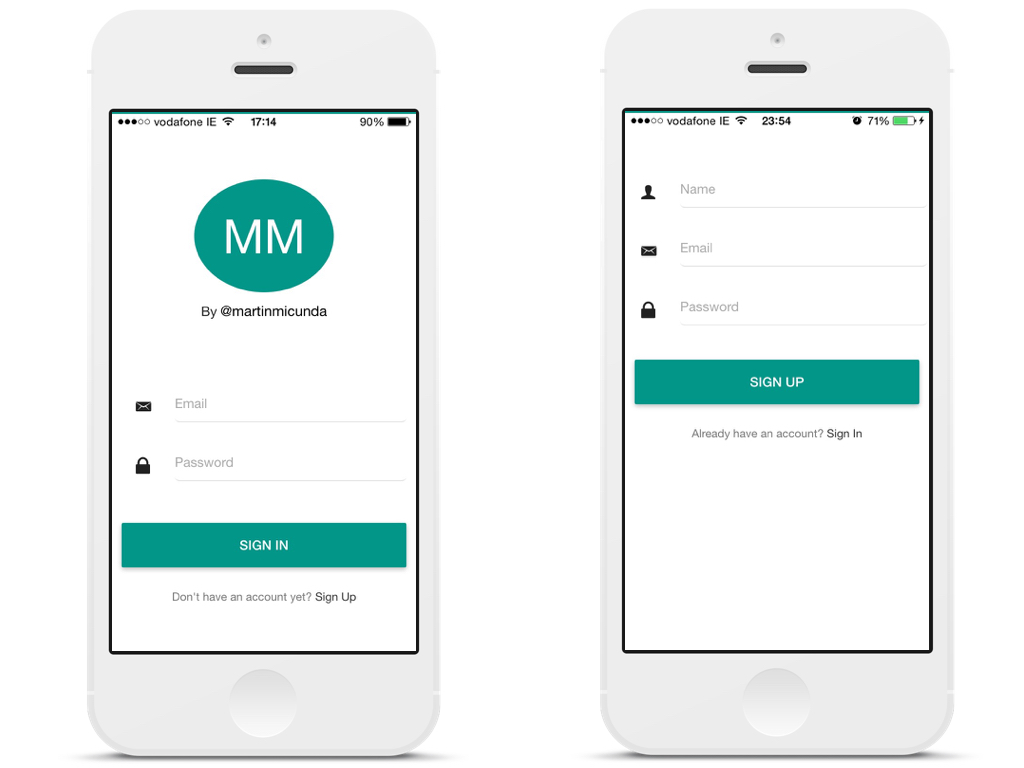
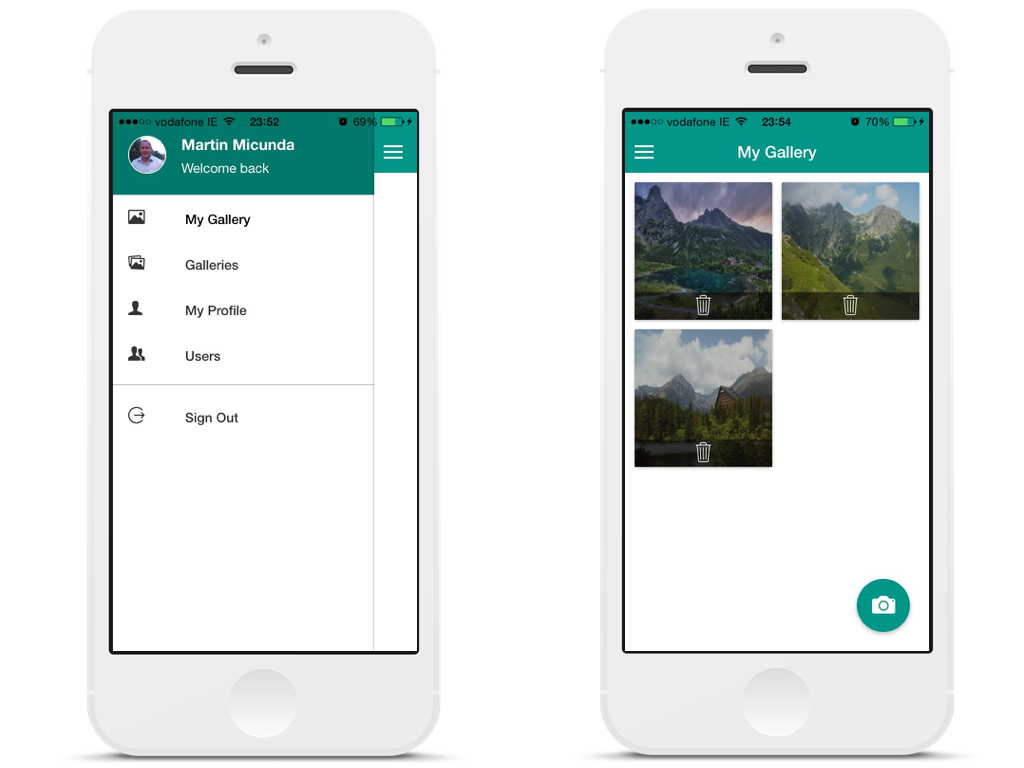
A hybrid app with authentication that allows registered users view a gallery of photos they have uploaded via the camera phone. The blog post I have written about this project can be found on my [blog](http://martinmicunda.com/2015/04/10/build-ionic-photo-gallery-app-I/).
## Table of Contents
- [Technologies Used](#technologies-used)
- [Architecture Diagram](#architecture-diagram)
- [Development](#diagram-development)
- [Installation & Configuration](#installation-and-configuration)
- [Platform & Tools](#platform-and-tools)
- [Installation](#installation)
- [Running App](#running-app)
- [Server](#server)
- [Ionic](#ionic)
- [Building for iOS](#building-for-ios)
- [Building for Android](#building-for-android)
- [Vagrant](#vagrant)
- [Ansible](#ansible)
- [FAQ](#faq)
- [License](#license)
## Technologies Used
| Mobile Side | Server Side | DevOps |
|:-------------------:|:-------------------:|:-------------------:|
| [Angular.js](http://angularjs.org/)  | [Node.js](http://nodejs.org/) | [Gulp](http://gulpjs.com/)  [Bower](http://bower.io/) ![Bower] (https://avatars3.githubusercontent.com/u/3709251?s=30) |
[Ionic](http://ionicframework.com/) | [MongoDB](http://www.mongodb.org/) ![MongoDB] (https://avatars3.githubusercontent.com/u/45120?v=2&s=30) | [NPM](https://www.npmjs.org/) ![NPM] (https://avatars0.githubusercontent.com/u/6078720?s=30) [Ansible](https://www.ansible.com/) ![Ansible] (https://avatars3.githubusercontent.com/u/1507452?v=2&s=30) |
[Material Design](https://material.angularjs.org/)  | [Express.js](http://expressjs.com/) | [Vagrant](http://www.vagrantup.com/) |
| [Cordova](https://cordova.apache.org/) | [Redis](http://redis.io/) |
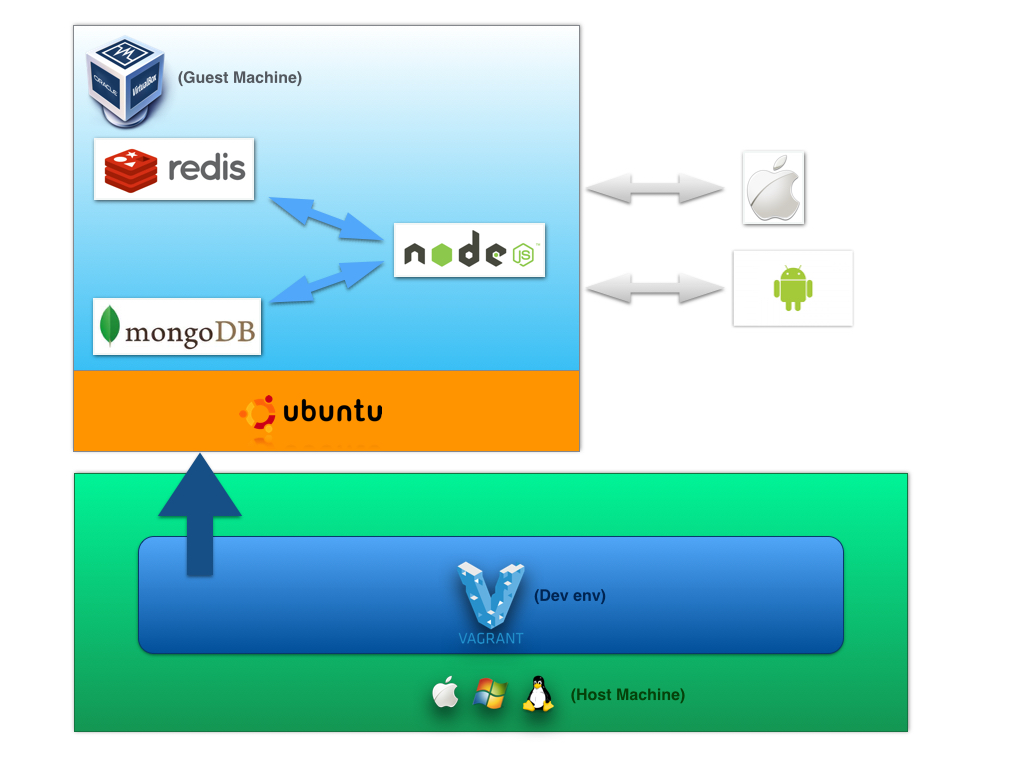
## Architecture Diagram
### Development
## Installation & Configuration
### Platform & Tools
You need to have installed follow tools on your machine:
- [Virtualbox](https://www.virtualbox.org/wiki/Downloads) 4.3.16+
- [Vagrant](http://www.vagrantup.com/downloads.html) 1.6.2+
- [Ansible](http://docs.ansible.com/intro_installation.html) 1.7.0+
### Installation
**1.** Clone main repository:
```bash
$ git clone git@github.com:martinmicunda/ionic-photo-gallery.git
$ cd ionic-photo-gallery
```
**2.** The following command would add a new `ubuntu trusty64 box`, and if an existing one is found, it will override it:
```bash
$ vagrant box add ubuntu/trusty64 --force
```
>**NOTE:** This process may take a while, as most Vagrant boxes will be at least **200 MB** big.
Verify that box was installed by running the `list` subcommand that will list the boxes installed within Vagrant along with the provider that backs the box:
```bash
$ vagrant box list
ubuntu/trusty64 (virtualbox, 14.04)
```
**3.** The following command would install an `ansible roles` for this project, and if an existing one is found, it will override it:
```bash
$ bash bin/ansible-install-roles.sh
```
Verify that ansible roles were installed by running the `list` subcommand that will list the installed roles:
```bash
$ ansible-galaxy list
- DavidWittman.redis, 1.0.3
- laggyluke.direnv, v2.6.0
- martinmicunda.common, v1.0.1
- martinmicunda.ionic, v1.0.0
- martinmicunda.nodejs, v1.0.1
- nickp666.android-sdk, v0.0.1
- Stouts.mongodb, 2.1.8
- williamyeh.oracle-java, master
```
**4.** Now, run `vagrant up` that will create and provisioning `default` VM box.
```bash
$ vagrant up
```
>**NOTE:** **Vagrant will provision the virtual machine only once on the first run, any subsequent provisioning must be executed with the** `--provision` **flag either** `vagrant up --provision` **or** `vagrant reload --provision` **or** `vagrant provision` **if vagrant box is already running. The provisioning will re-run also if you destroy the VM and rebuild it with** `vagrant destroy` **and** `vagrant up` **.**
If there have been no errors when executing the above commands, the machines `default` should be created. The following command would outputs status of the vagrant machine:
```bash
$ vagrant status
Current machine states:
default running (virtualbox)
```
Now you should be able to ssh into box:
```bash
$ vagrant ssh
```
## Running App
### Server
**1.** To start the server you need to ssh into box:
```bash
$ vagrant ssh
```
**2.** Install the server dependencies:
```bash
$ cd server
$ npm install
```
**3.** Start the server:
```bash
$ npm start
```
>**NOTE:** **The [direnv](http://direnv.net/) is use as an environment variable manager so when you first time cd into server directory with a `.envrc` file in it, it will refuse to load the file. This is to protect you, since the contents of the .envrc will be executed by your shell, and they might come from untrusted sources. Simply run `direnv allow`, and it will trust that file until the next time it changes.**
### Ionic
**1.** To start the server you need to ssh into box:
```bash
$ vagrant ssh
```
**2.** Install the ionic dependencies:
```bash
$ cd ionic
$ npm install
```
**3.** Start the ionic:
```bash
$ npm start
```
Open up your browser and navigate to [http://127.0.0.1:8100](http://127.0.0.1:8100) and you should see ionic app up and running.
## Building for iOS
**1.** ssh into box:
```bash
$ vagrant ssh
```
**2.** Add support for the iOS platform:
```bash
$ cd ionic
$ ionic platform add ios
```
**3.** Build the project:
```bash
$ ionic build ios
```
**4.** Open `ionic-photo-gallery.xcodeproj` in the `ionic-photo-gallery/ionic/platforms/ios` folder.
**5.** In [Xcode](https://developer.apple.com/xcode/), run the application on a device connected to your computer or in the iOS emulator.
## Building for Android
**1.** ssh into box:
```bash
$ vagrant ssh
```
**2.** Add support for the Android platform:
```bash
$ cd ionic
$ ionic platform add android
```
**3.** Build the project:
```bash
$ ionic build android
```
**NOTE:** (martin) work in progress!!
1. Start Genymotion
2. Open Genymotion Shell
3. Run follow command to get IP address
```bash
$ devices list
```
you should see something like this:
```bash
Genymotion virtual device 0 is off. Please select a new virtual device with command : devices select
Available devices:
Id | Select | Status | Type | IP Address | Name
----+--------+---------------+----------+-----------------+---------------
0 | | On | virtual | 192.168.58.101 | Samsung Galaxy S4 - 4.4.4 - API 19 - 1080x1920
```
5. Go to vagrant box using 'vagrant up' and 'vagrant ssh'.
6. Type: `adb connect 192.168.56.101` and `adb devices`. You should see something like this:
```
vagrant@vagrant-ubuntu-trusty-64:~$ adb connect 192.168.58.101
connected to 192.168.58.101:5555
vagrant@vagrant-ubuntu-trusty-64:~$ adb devices
List of devices attached
192.168.58.101:5555 device
```
7. Run `ionic run android`
## Vagrant
There’s a ton of commands you can use to talk to Vagrant. For a full list see the [official docs](http://docs.vagrantup.com/v2/cli/), but here are the more common ones.
* `vagrant up` - use this command to `start` your virtual environment
* `vagrant halt` - use this command to `stop` your virtual environment
* `vagrant suspend` - use this command to `pause` your virtual environment, make sure you do this before shutting down your computer to safely be able to restore the environment later.
* `vagrant destroy` - use this command to `removes` your virtual environment from your machine
* `vagrant reload` - use this command to your virtual environment, if you add the `--provision` flag, it will reprovision the box as well; this is useful with removing or adding things to the server via Ansible.
* `vagrant ssh` - use this command to `connect` to the virtual server
## Ansible
To get better understanding how Ansible works check the [official docs](http://docs.ansible.com/). Ansible installs the following software:
* [git](http://git-scm.com/)
* [node.js](https://nodejs.org/)
* [npm](https://www.npmjs.com/)
* [mongodb](https://www.mongodb.org/)
* [redis](http://redis.io/)
* [java 7](http://www.oracle.com/technetwork/java/javase/downloads/jre7-downloads-1880261.html)
* [android SDK](https://developer.android.com/sdk/index.html)
* [apache ant](http://ant.apache.org/)
* [cordova](https://cordova.apache.org/)
* [ionic CLI](http://ionicframework.com/docs/cli/)
* [direnv](http://direnv.net/)
The `mongodb` and `redis` services are started after provisioning takes place.
## FAQ
### What if I want to uninstall application?
**1.** The following command would permanently removes the `default` virtual box from your machine:
```bash
$ vagrant destroy
```
**2.** The following command would uninstall an `ansible roles` for this project:
```bash
$ bash bin/ansible-uninstall-roles.sh
```
**4.** The following command would remove `trusty64 box`:
```bash
$ vagrant box remove trusty64
```
### What if I want a fresh install?
If you wish to destroy the `default` virtual boxe to make sure you have a fresh start, you can do these steps:
```bash
$ vagrant destroy
$ vagrant up
```
## License
The MIT License
Copyright (c) 2015 Martin Micunda
Permission is hereby granted, free of charge, to any person obtaining a copy
of this software and associated documentation files (the "Software"), to deal
in the Software without restriction, including without limitation the rights
to use, copy, modify, merge, publish, distribute, sublicense, and/or sell
copies of the Software, and to permit persons to whom the Software is
furnished to do so, subject to the following conditions:
The above copyright notice and this permission notice shall be included in
all copies or substantial portions of the Software.
THE SOFTWARE IS PROVIDED "AS IS", WITHOUT WARRANTY OF ANY KIND, EXPRESS OR
IMPLIED, INCLUDING BUT NOT LIMITED TO THE WARRANTIES OF MERCHANTABILITY,
FITNESS FOR A PARTICULAR PURPOSE AND NONINFRINGEMENT. IN NO EVENT SHALL THE
AUTHORS OR COPYRIGHT HOLDERS BE LIABLE FOR ANY CLAIM, DAMAGES OR OTHER
LIABILITY, WHETHER IN AN ACTION OF CONTRACT, TORT OR OTHERWISE, ARISING FROM,
OUT OF OR IN CONNECTION WITH THE SOFTWARE OR THE USE OR OTHER DEALINGS IN
THE SOFTWARE.
================================================
FILE: server/index.js
================================================
/**
* @author Martin Micunda {@link http://martinmicunda.com}
* @copyright Copyright (c) 2015, Martin Micunda
* @license The MIT License {@link http://opensource.org/licenses/MIT}
*/
'use strict';
/**
* Module dependencies.
*/
var colors = require('colors');
var logger = require('mm-node-logger')(module);
var pkg = require('./package.json');
var config = require('./src/config/config');
var express = require('./src/config/express');
var mongodb = require('./src/config/mongoose');
// Initialize mongoose
mongodb(function startServer() {
// Initialize express
var app = express.init();
// Start up the server on the port specified in the config after we connected to mongodb
app.listen(config.server.port, function () {
var serverBanner = ['',
'*************************************' + ' EXPRESS SERVER '.yellow + '********************************************',
'*',
'* ' + pkg.description ,
'* @version ' + pkg.version,
'* @author ' + pkg.author.name,
'* @copyright ' + new Date().getFullYear() + ' ' + pkg.author.name,
'* @license ' + pkg.license.type + ', ' + pkg.license.url,
'*',
'*' + ' App started on port: '.blue + config.server.port + ' - with environment: '.blue + config.environment.blue,
'*',
'*************************************************************************************************',
''].join('\n');
logger.info(serverBanner);
});
module.exports = app;
});
================================================
FILE: server/package.json
================================================
{
"name": "ionic-photo-gallery-server",
"version": "0.0.6",
"description": "A hybrid app with authentication that allows registered users view a gallery of photos they have uploaded via the camera phone.",
"author": {
"name": "Martin Micunda",
"url": "http://martinmicunda.com"
},
"main": "index.js",
"scripts": {
"start": "node index.js",
"dev": "nodemon index -w 'src/**/*' --ext 'js json'",
"debug": "nodemon index --debug -w 'src/**/*' --ext 'js json'",
"lint": "jshint src/**/*.js",
"audit": "nsp audit-shrinkwrap && nsp audit-package",
"missing": "npm ls --depth 1",
"outdated": "npm outdated --depth 0",
"prepush": "npm shrinkwrap && npm test",
"postmerge": "npm install",
"pretest": "npm run lint"
},
"pre-commit": [
"lint",
"audit",
"missing",
"outdated"
],
"repository": {
"type": "git",
"url": "https://github.com/martinmicunda/ionic-photo-gallery"
},
"bugs": {
"url": "https://github.com/martinmicunda/ionic-photo-gallery/issues"
},
"files": [
"src",
"index.js",
"LICENSE",
"README.md"
],
"keywords": [
"mm",
"ionic",
"node",
"express",
"mobile"
],
"dependencies": {
"express": "^4.12.3",
"mm-node-logger": "^0.0.*",
"colors": "^1.0.3",
"morgan": "^1.5.2",
"helmet": "^0.7.0",
"body-parser": "^1.12.2",
"method-override": "^2.3.2",
"passport": "^0.2.1",
"passport-local": "^1.0.0",
"mongoose": "^3.8.25",
"redis": "^0.12.1",
"jsonwebtoken": "^4.2.1",
"path": "^0.11.14",
"glob": "^5.0.3",
"lodash": "^3.5.0",
"bcryptjs": "^2.1.0",
"cors": "^2.5.3",
"multer": "^0.1.8"
},
"devDependencies": {
"nsp": "^1.0.0",
"jshint": "latest",
"nodemon": "^1.3.7"
},
"license": {
"type": "MIT",
"url": "https://github.com/martinmicunda/ionic-photo-gallery/master/LICENSE"
},
"engines": {
"node": ">=0.12",
"npm": ">=2.x"
}
}
================================================
FILE: server/src/authentication/authentication.config.js
================================================
/**
* Authentication configuration.
*
* @author Martin Micunda {@link http://martinmicunda.com}
* @copyright Copyright (c) 2015, Martin Micunda
* @license The MIT License {@link http://opensource.org/licenses/MIT}
*/
'use strict';
/**
* Module dependencies.
*/
var path = require('path');
var passport = require('passport');
var User = require('../user/user.model.js');
var config = require('../config/config');
var pathUtils = require('../utils/path-utils');
module.exports = function(app) {
// Initialize strategies
pathUtils.getGlobbedPaths(path.join(__dirname, './strategies/**/*.js')).forEach(function(strategy) {
require(path.resolve(strategy))(User, config);
});
// Add passport's middleware
app.use(passport.initialize());
};
================================================
FILE: server/src/authentication/authentication.controller.js
================================================
/**
* Authentication controller.
*
* @author Martin Micunda {@link http://martinmicunda.com}
* @copyright Copyright (c) 2015, Martin Micunda
* @license The MIT License {@link http://opensource.org/licenses/MIT}
*/
'use strict';
/**
* Module dependencies.
*/
var logger = require('mm-node-logger')(module);
var passport = require('passport');
var token = require('./token.controller.js');
var User = require('../user/user.model.js');
/**
* Signin with email after passport authentication.
*
* @param {Object} req The request object
* @param {Object} res The request object
* @param {Object} next The request object
* @returns {Object} the new created JWT token
* @api public
*/
function signin(req, res, next) {
passport.authenticate('local', function (err, user, info) {
var error = err || info;
if (error) return res.status(401).send(error);
// Remove sensitive data before login
user.password = undefined;
user.salt = undefined;
token.createToken(user, function(res, err, token) {
if(err) {
logger.error(err);
return res.status(400).send(err);
}
res.status(201).json({token: token});
}.bind(null, res));
})(req, res, next)
}
/**
* Signout user and expire token.
*
* @param {Object} req The request object
* @param {Object} res The request object
* @api public
*/
function signout(req, res) {
token.expireToken(req.headers, function(err, success) {
if (err) {
logger.error(err.message);
return res.status(401).send(err.message);
}
if(success) {
delete req.user;
res.sendStatus(200);
} else {
res.sendStatus(401);
}
});
}
/**
* Create new user and login user in.
*
* @param {Object} req The request object
* @param {Object} res The response object
* @returns {Object} the new created JWT token
* @api public
*/
function signup(req, res) {
var email = req.body.email || '';
var password = req.body.password || '';
if (email == '' || password == '') {
return res.sendStatus(400);
}
// Init Variables
var user = new User(req.body);
// Add missing user fields
user.provider = 'local';
// Then save the user
user.save(function(err, user) {
if (err) {
logger.error(err.message);
return res.status(400).send(err);
} else {
// Remove sensitive data before login
user.password = undefined;
user.salt = undefined;
token.createToken(user, function(res, err, token) {
if (err) {
logger.error(err.message);
return res.status(400).send(err);
}
res.status(201).json({token: token});
}.bind(null, res));
}
});
}
/**
* Middleware to verify the token and attaches the user object
* to the request if authenticated.
*
* @param {Object} req The request object
* @param {Object} res The request object
* @param {Object} next The request object
* @api public
*/
function isAuthenticated(req, res, next) {
token.verifyToken(req.headers, function(next, err, data) {
if (err) {
logger.error(err.message);
return res.status(401).send(err.message);
}
req.user = data;
next();
}.bind(null, next));
}
module.exports = {
signin: signin,
signout: signout,
signup: signup,
isAuthenticated: isAuthenticated
};
================================================
FILE: server/src/authentication/authentication.routes.js
================================================
/**
* Authentication routes.
*
* @author Martin Micunda {@link http://martinmicunda.com}
* @copyright Copyright (c) 2015, Martin Micunda
* @license The MIT License {@link http://opensource.org/licenses/MIT}
*/
'use strict';
/**
* Module dependencies.
*/
var authentication = require('./authentication.controller.js');
/**
* Set authentication routes.
*
* @param {Object} app The express application
*/
function setAuthenticationRoutes(app) {
app.route('/auth/signin').post(authentication.signin);
app.route('/auth/signout').get(authentication.signout);
app.route('/auth/signup').post(authentication.signup);
}
module.exports = setAuthenticationRoutes;
================================================
FILE: server/src/authentication/strategies/local.js
================================================
/**
* Authentication local strategy module.
*
* @author Martin Micunda {@link http://martinmicunda.com}
* @copyright Copyright (c) 2015, Martin Micunda
* @license The MIT License {@link http://opensource.org/licenses/MIT}
*/
'use strict';
/**
* Module dependencies.
*/
var passport = require('passport');
var LocalStrategy = require('passport-local').Strategy;
function localStrategy(User, config) {
passport.use(new LocalStrategy({
usernameField: 'email',
passwordField: 'password'
},
function(email, password, callback) {
User.findOne({
email: email.toLowerCase()
}, function(err, user) {
if (err) return callback(err);
// no user found with that email
if (!user) {
return callback(null, false, { message: 'The email is not registered.' });
}
// make sure the password is correct
user.comparePassword(password, function(err, isMatch) {
if (err) { return callback(err); }
// password did not match
if (!isMatch) {
return callback(null, false, { message: 'The password is not correct.' });
}
// success
return callback(null, user);
});
});
}
));
}
module.exports = localStrategy;
================================================
FILE: server/src/authentication/token.controller.js
================================================
/**
* Token controller.
*
* @author Martin Micunda {@link http://martinmicunda.com}
* @copyright Copyright (c) 2015, Martin Micunda
* @license The MIT License {@link http://opensource.org/licenses/MIT}
*/
'use strict';
/**
* Module dependencies.
*/
var jwt = require('jsonwebtoken');
var redis = require('../config/redis');
var config = require('../config/config');
/**
* Extract the token from the header Authorization.
*
* @method extractTokenFromHeader
* @param {Object} headers The request headers
* @returns {String} the token
* @private
*/
function extractTokenFromHeader(headers) {
if (headers == null) throw new Error('Header is null');
if (headers.authorization == null) throw new Error('Authorization header is null');
var authorization = headers.authorization;
var authArr = authorization.split(' ');
if (authArr.length !== 2) throw new Error('Authorization header value is not of length 2');
// retrieve token
var token = authArr[1];
// verify token
try {
jwt.verify(token, config.token.secret);
} catch(err) {
throw new Error('The token is not valid');
}
return token;
}
/**
* Create a new JWT token and stores it in redis with payload data for a particular period of time.
*
* @method createToken
* @param {Object} payload An additional information that we can pass with token e.g. {user: 2, admin: true}
* @param {Function} cb Callback function
* @returns {Function} callback function `callback(null, token)` if successfully created
*/
function createToken(payload, cb) {
var ttl = config.token.expiration;
if(payload != null && typeof payload !== 'object') { return cb(new Error('payload is not an Object')) }
if(ttl != null && typeof ttl !== 'number') { return cb(new Error('ttl is not a valid Number')) }
/**
* Token is divided in 3 parts:
* - header
* - payload (It contains some additional information that we can pass with token e.g. {user: 2, admin: true}. This gets encoded into base64.)
* - signature
*
* Token is something like xxxxxxxxxxx.yyyy.zzzzzzzzzzzz. Where the x is the encoded header, the y is the encoded payload and
* the z is the signature. So on front-end we can decode the yyyy part (the payload) if we need.
*/
var token = jwt.sign(payload, config.token.secret, { expiresInMinutes: config.token.expiration });
if(redis) {
// stores a token with payload data for a ttl period of time
redis.setex(token, ttl, JSON.stringify(payload), function (token, err, reply) {
if (err) {
return cb(err);
}
if (reply) {
cb(null, token);
} else {
cb(new Error('Token not set in Redis'));
}
}.bind(null, token));
} else {
cb(null, token);
}
}
/**
* Expires a token by deleting the entry in redis.
*
* @method expireToken
* @param {Object} headers The request headers
* @param {Function} cb Callback function
* @returns {Function} callback function `callback(null, true)` if successfully deleted
*/
function expireToken(headers, cb) {
try {
var token = extractTokenFromHeader(headers);
if(token == null) {return cb(new Error('Token is null'));}
if(redis) {
// delete token from redis
redis.del(token, function (err, reply) {
if (err) {
return cb(err);
}
if (!reply) {
return cb(new Error('Token not found'));
}
return cb(null, true);
});
} else {
cb(null, true);
}
} catch (err) {
return cb(err);
}
}
/**
* Verify if token is valid.
*
* @method verifyToken
* @param {Object} headers The request headers
* @param {Function} cb Callback function
* @returns {Function} callback function `callback(null, JSON.parse(userData))` if token exist
*/
function verifyToken(headers, cb) {
try {
var token = extractTokenFromHeader(headers);
if(token == null) {return cb(new Error('Token is null'));}
if(redis) {
// gets the associated data of the token
redis.get(token, function(err, userData) {
if(err) {return cb(err);}
if(!userData) {return cb(new Error('Token not found'));}
return cb(null, JSON.parse(userData));
});
} else {
cb(null, true);
}
} catch (err) {
return cb(err);
}
}
module.exports = {
createToken: createToken,
expireToken: expireToken,
verifyToken: verifyToken
};
================================================
FILE: server/src/config/config.js
================================================
/**
* An application configuration.
*
* @author Martin Micunda {@link http://martinmicunda.com}
* @copyright Copyright (c) 2015, Martin Micunda
* @license The MIT License {@link http://opensource.org/licenses/MIT}
*/
'use strict';
var config = {};
config.environment = process.env.NODE_ENV || 'development';
// Upload files in memory
config.uploadFilesInMemory = process.env.UPLOAD_FILES_IN_MEMORY || false;
// Populate the DB with sample data
config.seedDB = true;
// Token settings
config.token = {
secret: process.env.TOKEN_SECRET || 'ionic-photo-gallery',
expiration: process.env.TOKEN_EXPIRATION || 60*60*24 //24 hours
};
// Server settings
config.server = {
host: '0.0.0.0',
port: process.env.NODE_PORT || process.env.PORT || 3000
};
// MongoDB settings
config.mongodb = {
dbURI: process.env.MONGODB_URI || process.env.MONGOLAB_URI || "mongodb://127.0.0.1:27017/ionic-photo-gallery",
dbOptions: {"user": "", "pass": ""}
};
// Redis settings
if (process.env.REDISTOGO_URL) {
var rtg = require('url').parse(process.env.REDISTOGO_URL);
process.env.REDIS_HOST = rtg.hostname;
process.env.REDIS_PORT = rtg.port;
process.env.REDIS_AUTH = rtg.auth.split(":")[1];
}
config.redis = {
isAvailable: process.env.IS_REDIS_AVAILABLE || true,
host: process.env.REDIS_HOST || '127.0.0.1',
port: process.env.REDIS_PORT || 6379,
auth: process.env.REDIS_AUTH || '',
options: {}
};
// Export configuration object
module.exports = config;
================================================
FILE: server/src/config/express.js
================================================
/**
* Express configuration.
*
* @author Martin Micunda {@link http://martinmicunda.com}
* @copyright Copyright (c) 2015, Martin Micunda
* @license The MIT License {@link http://opensource.org/licenses/MIT}
*/
'use strict';
/**
* Module dependencies.
*/
var cors = require('cors');
var path = require('path');
var morgan = require('morgan');
var helmet = require('helmet');
var multer = require('multer');
var logger = require('mm-node-logger')(module);
var express = require('express');
var bodyParser = require('body-parser');
var methodOverride = require('method-override');
var pathUtils = require('../utils/path-utils');
var config = require('./config');
/**
* Initialize application middleware.
*
* @method initMiddleware
* @param {Object} app The express application
* @private
*/
function initMiddleware(app) {
// Showing stack errors
app.set('showStackError', true);
// Enable jsonp
app.enable('jsonp callback');
// Environment dependent middleware
if (config.environment === 'development') {
// Enable logger (morgan)
app.use(morgan('dev'));
// Disable views cache
app.set('view cache', false);
} else if (config.environment === 'production') {
app.locals.cache = 'memory';
}
// Request body parsing middleware should be above methodOverride
app.use(bodyParser.urlencoded({
extended: true
}));
app.use(bodyParser.json());
app.use(methodOverride());
// Add multipart handling middleware
app.use(multer({
dest: './uploads/',
inMemory: config.uploadFilesInMemory
}));
// Setting router and the static folder for uploaded files
app.use('/uploads', express.static(path.resolve('./uploads')));
}
/**
* Configure Helmet headers configuration.
*
* @method initHelmetHeaders
* @param {Object} app The express application
* @private
*/
function initHelmetHeaders(app) {
// Use helmet to secure Express headers
app.use(helmet.xframe());
app.use(helmet.xssFilter());
app.use(helmet.nosniff());
app.use(helmet.ienoopen());
app.disable('x-powered-by');
}
/**
* Configure CORS (Cross-Origin Resource Sharing) headers to support Cross-site HTTP requests.
*
* @method initCrossDomain
* @param {Object} app The express application
* @private
*/
function initCrossDomain(app) {
// setup CORS
app.use(cors());
app.use(function(req, res, next) {
// Website you wish to allow to connect
res.set('Access-Control-Allow-Origin', '*');
// Request methods you wish to allow
res.set('Access-Control-Allow-Methods', 'GET, POST, DELETE, PUT');
// Request headers you wish to allow
res.set('Access-Control-Allow-Headers', 'Origin, Accept, Content-Type, X-Requested-With, X-CSRF-Token');
// Pass to next layer of middleware
next();
});
}
/**
* Configure app modules config files.
*
* @method initGonfig
* @param {Object} app The express application
* @private
*/
function initGonfig(app) {
// Globbing config files
pathUtils.getGlobbedPaths(path.join(__dirname, '../**/*.config.js')).forEach(function (routePath) {
require(path.resolve(routePath))(app);
});
}
/**
* Configure app routes.
*
* @method initRoutes
* @param {Object} app The express application
* @private
*/
function initRoutes(app) {
// Globbing routing files
pathUtils.getGlobbedPaths(path.join(__dirname, '../**/*.routes.js')).forEach(function (routePath) {
require(path.resolve(routePath))(app);
});
}
/**
* Configure error handling.
*
* @method initErrorRoutes
* @param {Object} app The express application
* @private
*/
function initErrorRoutes(app) {
// Assume 'not found' in the error msgs is a 404. this is somewhat silly, but valid, you can do whatever you like, set properties, use instanceof etc.
app.use(function (err, req, res, next) {
// If the error object doesn't exists
if (!err) return next();
// Log it
logger.error('Internal error(%d): %s', res.statusCode, err.stack);
// Redirect to error page
res.sendStatus(500);
});
// Assume 404 since no middleware responded
app.use(function (req, res) {
// Redirect to not found page
res.sendStatus(404);
});
}
/**
* Populate DB with sample data.
*
* @method initDB
* @private
*/
function initDB() {
if(config.seedDB) {
require('./seed');
}
}
/**
* Initialize the Express application.
*
* @method init
* @returns {Object} the express application
*/
function init() {
// Initialize express app
var app = express();
// Initialize Express middleware
initMiddleware(app);
// Initialize Helmet security headers
initHelmetHeaders(app);
// Initialize CORS
initCrossDomain(app);
// Initialize config
initGonfig(app);
// Initialize routes
initRoutes(app);
// Initialize error routes
initErrorRoutes(app);
// Initialize DB with sample data
initDB();
return app;
}
module.exports.init = init;
================================================
FILE: server/src/config/mongoose.js
================================================
/**
* This module follow best practice for creating, maintaining and using a Mongoose connection like:
* - open the connection when the app process start
* - start the app server when after the database connection is open (optional)
* - monitor the connection events (`connected`, `error` and `disconnected`)
* - close the connection when the app process terminates
*
* @author Martin Micunda {@link http://martinmicunda.com}
* @copyright Copyright (c) 2015, Martin Micunda
* @license The MIT License {@link http://opensource.org/licenses/MIT}
*/
'use strict';
/**
* Module dependencies.
*/
var logger = require('mm-node-logger')(module);
var mongoose = require('mongoose');
var config = require('./config');
/**
* Create mongoose connection.
*
* @param {*=} cb The callback that start server
*/
function createMongooseConnection(cb) {
// create the database connection
mongoose.connect(config.mongodb.dbURI, config.mongodb.dbOptions);
// when successfully connected
mongoose.connection.on('connected', function () {
logger.info('Mongoose connected to ' + config.mongodb.dbURI);
});
// if the connection throws an error
mongoose.connection.on('error', function (err) {
logger.error('Mongoose connection error: ' + err);
});
// when the connection is disconnected
mongoose.connection.on('disconnected', function () {
logger.info('Mongoose disconnected');
});
// when the connection is open
mongoose.connection.once('open', function () {
if(cb && typeof(cb) === 'function') {cb();}
});
// if the Node process ends, close the Mongoose connection
process.on('SIGINT', function() {
mongoose.connection.close(function () {
logger.info('Mongoose disconnected through app termination');
process.exit(0);
});
});
}
module.exports = createMongooseConnection;
================================================
FILE: server/src/config/redis.js
================================================
/**
* Redis configuration.
*
* @author Martin Micunda {@link http://martinmicunda.com}
* @copyright Copyright (c) 2015, Martin Micunda
* @license The MIT License {@link http://opensource.org/licenses/MIT}
*/
'use strict';
/**
* Module dependencies.
*/
var redis = require('redis');
var logger = require('mm-node-logger')(module);
var config = require('./config');
var redisClient = null;
if(config.redis.isAvailable) {
redisClient = redis.createClient(config.redis.port, config.redis.host);
redisClient.auth(config.redis.auth);
redisClient.on('connect', function () {
logger.info('Redis connected to ' + config.redis.host + ':' + config.redis.port);
});
redisClient.on('error', function (err) {
logger.error('Redis error: ' + err);
});
}
module.exports = redisClient;
================================================
FILE: server/src/config/seed.js
================================================
/**
* Populate DB with sample data on server start to disable, edit config.js, and set `seedDB: false`
*
* @author Martin Micunda {@link http://martinmicunda.com}
* @copyright Copyright (c) 2015, Martin Micunda
* @license The MIT License {@link http://opensource.org/licenses/MIT}
*/
'use strict';
/**
* Module dependencies.
*/
var logger = require('mm-node-logger')(module);
var mongoose = require('mongoose');
var User = require('../user/user.model');
var Image = require('../image/image.model');
var testUserId = mongoose.Types.ObjectId();
User.find({}).remove(function() {
User.create({
provider: 'local',
name: 'Martin Micunda',
email: 'martinmicunda@test.com',
password: 'test',
avatar: 'https://avatars2.githubusercontent.com/u/1643606?v=3'
}, {
_id: testUserId,
provider: 'local',
name: 'Test',
email: 'test@test.com',
password: 'test'
}, {
provider: 'local',
name: 'Admin',
email: 'admin@admin.com',
password: 'admin'
}, function() {
logger.info('Finished populating users');
}
);
});
Image.find({}).remove(function() {
Image.create({
fileName : 'Slovakia 1',
url : 'http://www.rocketroute.com/wp-content/uploads/Carpathian-mountains-Slovakia-685x458.jpg?125416',
user: testUserId
}, {
fileName : 'Slovakia 2',
url : 'http://www.travelslovakia.sk/images/blog/small-group-tours/tatra-mountains-self-guided.jpg?125416',
user: testUserId
}, {
fileName : 'Slovakia 3',
url : 'http://www.travelslovakia.sk/images/day-tours/high-tatras.jpg?125416',
user: testUserId
}, function() {
logger.info('Finished populating images');
});
});
================================================
FILE: server/src/image/image.controller.js
================================================
/**
* User controller.
*
* @author Martin Micunda {@link http://martinmicunda.com}
* @copyright Copyright (c) 2015, Martin Micunda
* @license The MIT License {@link http://opensource.org/licenses/MIT}
*/
'use strict';
/**
* Module dependencies.
*/
var path = require('path');
var logger = require('mm-node-logger')(module);
var Image = require('./image.model.js');
/**
* Find list of images by user id.
*
* @param {Object} req The request object
* @param {Object} res The request object
* @returns {Array} the list of images corresponding to the specified user id
* @api public
*/
function findByUser(req, res) {
return Image.find({user: req.query.userId}, function (err, images) {
if (err) {
logger.error(err.message);
return res.status(400).send(err);
} else {
return res.json(images);
}
});
}
/**
* Create image.
*
* @param {Object} req The request object
* @param {Object} res The request object
* @returns {Object} the new create image
* @api public
*/
function create(req, res) {
var image = new Image();
image.fileName = req.files.image.name;
image.url = path.join(req.body.url, req.files.image.path);
image.user = req.body.userId;
image.save(function(err, image) {
if (err) {
logger.error(err.message);
return res.status(400).send(err);
} else {
res.status(201).json(image);
}
});
}
/**
* Delete image.
*
* @param {Object} req The request object
* @param {Object} res The request object
* @api public
*/
function deleteImage(req, res) {
Image.findByIdAndRemove(req.params.id, function(err) {
if (err) {
logger.error(err.message);
return res.status(500).send(err);
} else {
res.sendStatus(204);
}
});
}
module.exports = {
findByUser: findByUser,
create: create,
delete: deleteImage
};
================================================
FILE: server/src/image/image.model.js
================================================
/**
* Image model.
*
* @author Martin Micunda {@link http://martinmicunda.com}
* @copyright Copyright (c) 2015, Martin Micunda
* @license The MIT License {@link http://opensource.org/licenses/MIT}
*/
'use strict';
/**
* Module dependencies.
*/
var mongoose = require('mongoose');
var User = require('../user/user.model.js');
/**
* Image Schema
*/
var ImageSchema = new mongoose.Schema({
fileName: {
type: String
},
url: {
type: String,
trim: true,
required: true
},
user: {
type: mongoose.Schema.Types.ObjectId,
ref: User
}
});
module.exports = mongoose.model('Image', ImageSchema);
================================================
FILE: server/src/image/image.routes.js
================================================
/**
* Image routes.
*
* @author Martin Micunda {@link http://martinmicunda.com}
* @copyright Copyright (c) 2015, Martin Micunda
* @license The MIT License {@link http://opensource.org/licenses/MIT}
*/
'use strict';
/**
* Module dependencies.
*/
var image = require('./image.controller.js');
var authentication = require('../authentication/authentication.controller.js');
/**
* Set image routes.
*
* @param {Object} app The express application
*/
function setImageRoutes(app) {
app.route('/images')
.post(authentication.isAuthenticated, image.create)
.get(authentication.isAuthenticated, image.findByUser);
app.route('/images/:id').delete(authentication.isAuthenticated, image.delete);
}
module.exports = setImageRoutes;
================================================
FILE: server/src/user/user.controller.js
================================================
/**
* User controller.
*
* @author Martin Micunda {@link http://martinmicunda.com}
* @copyright Copyright (c) 2015, Martin Micunda
* @license The MIT License {@link http://opensource.org/licenses/MIT}
*/
'use strict';
/**
* Module dependencies.
*/
var logger = require('mm-node-logger')(module);
var User = require('./user.model.js');
/**
* Find an user by id.
*
* @param {Object} req The request object
* @param {Object} res The request object
* @returns {Object} the user corresponding to the specified id
* @api public
*/
function findById(req, res) {
return User.findById(req.params.id, 'name email avatar', function (err, user) {
if (err) {
logger.error(err.message);
return res.status(400).send(err);
} else {
res.json(user);
}
});
}
/**
* List of users.
*
* @param {Object} req The request object
* @param {Object} res The request object
* @returns {Array} the list of users
* @api public
*/
function findAll(req, res) {
User.find(function(err, users) {
if (err) {
logger.error(err.message);
return res.status(400).send(err);
} else {
res.json(users);
}
});
}
module.exports = {
findById: findById,
findAll: findAll
};
================================================
FILE: server/src/user/user.model.js
================================================
/**
* User model.
*
* @author Martin Micunda {@link http://martinmicunda.com}
* @copyright Copyright (c) 2015, Martin Micunda
* @license The MIT License {@link http://opensource.org/licenses/MIT}
*/
'use strict';
/**
* Module dependencies.
*/
var bcrypt = require('bcryptjs');
var mongoose = require('mongoose');
var SALT_WORK_FACTOR = 10;
var authTypes = ['github', 'twitter', 'facebook', 'google'];
/**
* A Validation function for local strategy properties
*/
var validateLocalStrategyProperty = function(property) {
return ((this.provider !== 'local' && !this.updated) || property.length);
};
/**
* User Schema
*/
var UserSchema = new mongoose.Schema({
name: {
type: String,
trim: true,
validate: [validateLocalStrategyProperty, 'Please fill in your name']
},
email: {
type: String,
trim: true,
unique: true,
required: true,
lowercase: true,
validate: [validateLocalStrategyProperty, 'Please fill in your email'],
match: [/.+\@.+\..+/, 'Please fill a valid email address']
},
password: {
type: String,
required: true
},
salt: {
type: String
},
avatar: {
type: String,
default: 'https://raw.githubusercontent.com/martinmicunda/employee-scheduling-ui/master/src/images/anonymous.jpg?123456'
},
provider: {
type: String,
required: 'Provider is required'
},
updated: {
type: Date
},
created: {
type: Date,
default: Date.now
}
});
/**
* Validations
*/
// Validate empty email
UserSchema
.path('email')
.validate(function(email) {
// if you are authenticating by any of the oauth strategies, don't validate
if (authTypes.indexOf(this.provider) !== -1) return true;
return email.length;
}, 'Email cannot be blank');
// Validate empty password
UserSchema
.path('password')
.validate(function(password) {
// if you are authenticating by any of the oauth strategies, don't validate
if (authTypes.indexOf(this.provider) !== -1) return true;
return password.length;
}, 'Password cannot be blank');
// Validate email is not taken
UserSchema
.path('email')
.validate(function(value, respond) {
var self = this;
this.constructor.findOne({email: value}, function(err, user) {
if(err) throw err;
if(user) {
if(self.id === user.id) return respond(true);
return respond(false);
}
respond(true);
});
}, 'The specified email address is already in use.');
/**
* Pre-save hook (execute before each user.save() call)
*/
UserSchema.pre('save', function(next) {
var user = this;
// only hash the password if it has been modified (or is new)
if (!user.isModified('password')) { return next(); }
// password changed so we need to hash it (generate a salt)
bcrypt.genSalt(SALT_WORK_FACTOR, function(err, salt) {
if (err) { return next(err); }
// TODO (martin): is it good idea to store salt?
// store salt
user.salt = salt;
// hash the password using our new salt
bcrypt.hash(user.password, salt, function(err, hash) {
if (err) { return next(err); }
// override the cleartext password with the hashed one
user.password = hash;
next();
});
});
});
/**
* Check if the passwords are the same.
*
* @param {String} password The user password
* @param {Function} cb Callback function
* @returns {Function} callback function `callback(null, true)` if password matched
*/
UserSchema.methods.comparePassword = function(password, cb) {
bcrypt.compare(password, this.password, function(err, isMatch) {
cb(err, isMatch);
});
};
module.exports = mongoose.model('User', UserSchema);
================================================
FILE: server/src/user/user.routes.js
================================================
/**
* User routes.
*
* @author Martin Micunda {@link http://martinmicunda.com}
* @copyright Copyright (c) 2015, Martin Micunda
* @license The MIT License {@link http://opensource.org/licenses/MIT}
*/
'use strict';
/**
* Module dependencies.
*/
var user = require('./user.controller.js');
var authentication = require('../authentication/authentication.controller.js');
/**
* Set user routes.
*
* @param {Object} app The express application
*/
function setUserRoutes(app) {
app.route('/users/:id').get(authentication.isAuthenticated, user.findById);
app.route('/users').get(authentication.isAuthenticated, user.findAll);
}
module.exports = setUserRoutes;
================================================
FILE: server/src/utils/path-utils.js
================================================
/**
* Utils for path.
*
* @author Martin Micunda {@link http://martinmicunda.com}
* @copyright Copyright (c) 2015, Martin Micunda
* @license The MIT License {@link http://opensource.org/licenses/MIT}
*/
'use strict';
/**
* Module dependencies.
*/
var _ = require('lodash');
var glob = require('glob');
var path = require('path');
/**
* Get files by glob patterns
*/
function getGlobbedPaths(globPatterns, excludes) {
// URL paths regex
var urlRegex = new RegExp('^(?:[a-z]+:)?\/\/', 'i');
// The output array
var output = [];
// If glob pattern is array so we use each pattern in a recursive way, otherwise we use glob
if (_.isArray(globPatterns)) {
globPatterns.forEach(function(globPattern) {
output = _.union(output, getGlobbedPaths(globPattern, excludes));
});
} else if (_.isString(globPatterns)) {
if (urlRegex.test(globPatterns)) {
output.push(globPatterns);
} else {
var files = glob.sync(globPatterns);
if (excludes) {
files = files.map(function(file) {
if (_.isArray(excludes)) {
for (var i in excludes) {
file = file.replace(excludes[i], '');
}
} else {
file = file.replace(excludes, '');
}
return file;
});
}
output = _.union(output, files);
}
}
return output;
}
exports.getGlobbedPaths = getGlobbedPaths;
================================================
FILE: server/test/.gitKeep
================================================
 | [Gulp](http://gulpjs.com/)  [Bower](http://bower.io/) ![Bower] (https://avatars3.githubusercontent.com/u/3709251?s=30) |
[Ionic](http://ionicframework.com/)
| [Gulp](http://gulpjs.com/)  [Bower](http://bower.io/) ![Bower] (https://avatars3.githubusercontent.com/u/3709251?s=30) |
[Ionic](http://ionicframework.com/)  | [MongoDB](http://www.mongodb.org/) ![MongoDB] (https://avatars3.githubusercontent.com/u/45120?v=2&s=30) | [NPM](https://www.npmjs.org/) ![NPM] (https://avatars0.githubusercontent.com/u/6078720?s=30) [Ansible](https://www.ansible.com/) ![Ansible] (https://avatars3.githubusercontent.com/u/1507452?v=2&s=30) |
[Material Design](https://material.angularjs.org/)  | [Express.js](http://expressjs.com/)
| [MongoDB](http://www.mongodb.org/) ![MongoDB] (https://avatars3.githubusercontent.com/u/45120?v=2&s=30) | [NPM](https://www.npmjs.org/) ![NPM] (https://avatars0.githubusercontent.com/u/6078720?s=30) [Ansible](https://www.ansible.com/) ![Ansible] (https://avatars3.githubusercontent.com/u/1507452?v=2&s=30) |
[Material Design](https://material.angularjs.org/)  | [Express.js](http://expressjs.com/) | [Vagrant](http://www.vagrantup.com/)
  |
| [Cordova](https://cordova.apache.org/)
|
| [Cordova](https://cordova.apache.org/)  | [Redis](http://redis.io/)
  |
## Architecture Diagram
### Development

## Installation & Configuration
### Platform & Tools
You need to have installed follow tools on your machine:
- [Virtualbox](https://www.virtualbox.org/wiki/Downloads) 4.3.16+
- [Vagrant](http://www.vagrantup.com/downloads.html) 1.6.2+
- [Ansible](http://docs.ansible.com/intro_installation.html) 1.7.0+
### Installation
**1.** Clone main repository:
```bash
$ git clone git@github.com:martinmicunda/ionic-photo-gallery.git
$ cd ionic-photo-gallery
```
**2.** The following command would add a new `ubuntu trusty64 box`, and if an existing one is found, it will override it:
```bash
$ vagrant box add ubuntu/trusty64 --force
```
>**NOTE:** This process may take a while, as most Vagrant boxes will be at least **200 MB** big.
Verify that box was installed by running the `list` subcommand that will list the boxes installed within Vagrant along with the provider that backs the box:
```bash
$ vagrant box list
ubuntu/trusty64 (virtualbox, 14.04)
```
**3.** The following command would install an `ansible roles` for this project, and if an existing one is found, it will override it:
```bash
$ bash bin/ansible-install-roles.sh
```
Verify that ansible roles were installed by running the `list` subcommand that will list the installed roles:
```bash
$ ansible-galaxy list
- DavidWittman.redis, 1.0.3
- laggyluke.direnv, v2.6.0
- martinmicunda.common, v1.0.1
- martinmicunda.ionic, v1.0.0
- martinmicunda.nodejs, v1.0.1
- nickp666.android-sdk, v0.0.1
- Stouts.mongodb, 2.1.8
- williamyeh.oracle-java, master
```
**4.** Now, run `vagrant up` that will create and provisioning `default` VM box.
```bash
$ vagrant up
```
>**NOTE:** **Vagrant will provision the virtual machine only once on the first run, any subsequent provisioning must be executed with the** `--provision` **flag either** `vagrant up --provision` **or** `vagrant reload --provision` **or** `vagrant provision` **if vagrant box is already running. The provisioning will re-run also if you destroy the VM and rebuild it with** `vagrant destroy` **and** `vagrant up` **.**
If there have been no errors when executing the above commands, the machines `default` should be created. The following command would outputs status of the vagrant machine:
```bash
$ vagrant status
Current machine states:
default running (virtualbox)
```
Now you should be able to ssh into box:
```bash
$ vagrant ssh
```
## Running App
### Server
**1.** To start the server you need to ssh into box:
```bash
$ vagrant ssh
```
**2.** Install the server dependencies:
```bash
$ cd server
$ npm install
```
**3.** Start the server:
```bash
$ npm start
```
>**NOTE:** **The [direnv](http://direnv.net/) is use as an environment variable manager so when you first time cd into server directory with a `.envrc` file in it, it will refuse to load the file. This is to protect you, since the contents of the .envrc will be executed by your shell, and they might come from untrusted sources. Simply run `direnv allow`, and it will trust that file until the next time it changes.**
### Ionic
**1.** To start the server you need to ssh into box:
```bash
$ vagrant ssh
```
**2.** Install the ionic dependencies:
```bash
$ cd ionic
$ npm install
```
**3.** Start the ionic:
```bash
$ npm start
```
Open up your browser and navigate to [http://127.0.0.1:8100](http://127.0.0.1:8100) and you should see ionic app up and running.
## Building for iOS
**1.** ssh into box:
```bash
$ vagrant ssh
```
**2.** Add support for the iOS platform:
```bash
$ cd ionic
$ ionic platform add ios
```
**3.** Build the project:
```bash
$ ionic build ios
```
**4.** Open `ionic-photo-gallery.xcodeproj` in the `ionic-photo-gallery/ionic/platforms/ios` folder.
**5.** In [Xcode](https://developer.apple.com/xcode/), run the application on a device connected to your computer or in the iOS emulator.
## Building for Android
**1.** ssh into box:
```bash
$ vagrant ssh
```
**2.** Add support for the Android platform:
```bash
$ cd ionic
$ ionic platform add android
```
**3.** Build the project:
```bash
$ ionic build android
```
**NOTE:** (martin) work in progress!!
1. Start Genymotion
2. Open Genymotion Shell
3. Run follow command to get IP address
```bash
$ devices list
```
you should see something like this:
```bash
Genymotion virtual device 0 is off. Please select a new virtual device with command : devices select
Available devices:
Id | Select | Status | Type | IP Address | Name
----+--------+---------------+----------+-----------------+---------------
0 | | On | virtual | 192.168.58.101 | Samsung Galaxy S4 - 4.4.4 - API 19 - 1080x1920
```
5. Go to vagrant box using 'vagrant up' and 'vagrant ssh'.
6. Type: `adb connect 192.168.56.101` and `adb devices`. You should see something like this:
```
vagrant@vagrant-ubuntu-trusty-64:~$ adb connect 192.168.58.101
connected to 192.168.58.101:5555
vagrant@vagrant-ubuntu-trusty-64:~$ adb devices
List of devices attached
192.168.58.101:5555 device
```
7. Run `ionic run android`
## Vagrant
There’s a ton of commands you can use to talk to Vagrant. For a full list see the [official docs](http://docs.vagrantup.com/v2/cli/), but here are the more common ones.
* `vagrant up` - use this command to `start` your virtual environment
* `vagrant halt` - use this command to `stop` your virtual environment
* `vagrant suspend` - use this command to `pause` your virtual environment, make sure you do this before shutting down your computer to safely be able to restore the environment later.
* `vagrant destroy` - use this command to `removes` your virtual environment from your machine
* `vagrant reload` - use this command to your virtual environment, if you add the `--provision` flag, it will reprovision the box as well; this is useful with removing or adding things to the server via Ansible.
* `vagrant ssh` - use this command to `connect` to the virtual server
## Ansible
To get better understanding how Ansible works check the [official docs](http://docs.ansible.com/). Ansible installs the following software:
* [git](http://git-scm.com/)
* [node.js](https://nodejs.org/)
* [npm](https://www.npmjs.com/)
* [mongodb](https://www.mongodb.org/)
* [redis](http://redis.io/)
* [java 7](http://www.oracle.com/technetwork/java/javase/downloads/jre7-downloads-1880261.html)
* [android SDK](https://developer.android.com/sdk/index.html)
* [apache ant](http://ant.apache.org/)
* [cordova](https://cordova.apache.org/)
* [ionic CLI](http://ionicframework.com/docs/cli/)
* [direnv](http://direnv.net/)
The `mongodb` and `redis` services are started after provisioning takes place.
## FAQ
### What if I want to uninstall application?
**1.** The following command would permanently removes the `default` virtual box from your machine:
```bash
$ vagrant destroy
```
**2.** The following command would uninstall an `ansible roles` for this project:
```bash
$ bash bin/ansible-uninstall-roles.sh
```
**4.** The following command would remove `trusty64 box`:
```bash
$ vagrant box remove trusty64
```
### What if I want a fresh install?
If you wish to destroy the `default` virtual boxe to make sure you have a fresh start, you can do these steps:
```bash
$ vagrant destroy
$ vagrant up
```
## License
The MIT License
Copyright (c) 2015 Martin Micunda
Permission is hereby granted, free of charge, to any person obtaining a copy
of this software and associated documentation files (the "Software"), to deal
in the Software without restriction, including without limitation the rights
to use, copy, modify, merge, publish, distribute, sublicense, and/or sell
copies of the Software, and to permit persons to whom the Software is
furnished to do so, subject to the following conditions:
The above copyright notice and this permission notice shall be included in
all copies or substantial portions of the Software.
THE SOFTWARE IS PROVIDED "AS IS", WITHOUT WARRANTY OF ANY KIND, EXPRESS OR
IMPLIED, INCLUDING BUT NOT LIMITED TO THE WARRANTIES OF MERCHANTABILITY,
FITNESS FOR A PARTICULAR PURPOSE AND NONINFRINGEMENT. IN NO EVENT SHALL THE
AUTHORS OR COPYRIGHT HOLDERS BE LIABLE FOR ANY CLAIM, DAMAGES OR OTHER
LIABILITY, WHETHER IN AN ACTION OF CONTRACT, TORT OR OTHERWISE, ARISING FROM,
OUT OF OR IN CONNECTION WITH THE SOFTWARE OR THE USE OR OTHER DEALINGS IN
THE SOFTWARE.
================================================
FILE: server/index.js
================================================
/**
* @author Martin Micunda {@link http://martinmicunda.com}
* @copyright Copyright (c) 2015, Martin Micunda
* @license The MIT License {@link http://opensource.org/licenses/MIT}
*/
'use strict';
/**
* Module dependencies.
*/
var colors = require('colors');
var logger = require('mm-node-logger')(module);
var pkg = require('./package.json');
var config = require('./src/config/config');
var express = require('./src/config/express');
var mongodb = require('./src/config/mongoose');
// Initialize mongoose
mongodb(function startServer() {
// Initialize express
var app = express.init();
// Start up the server on the port specified in the config after we connected to mongodb
app.listen(config.server.port, function () {
var serverBanner = ['',
'*************************************' + ' EXPRESS SERVER '.yellow + '********************************************',
'*',
'* ' + pkg.description ,
'* @version ' + pkg.version,
'* @author ' + pkg.author.name,
'* @copyright ' + new Date().getFullYear() + ' ' + pkg.author.name,
'* @license ' + pkg.license.type + ', ' + pkg.license.url,
'*',
'*' + ' App started on port: '.blue + config.server.port + ' - with environment: '.blue + config.environment.blue,
'*',
'*************************************************************************************************',
''].join('\n');
logger.info(serverBanner);
});
module.exports = app;
});
================================================
FILE: server/package.json
================================================
{
"name": "ionic-photo-gallery-server",
"version": "0.0.6",
"description": "A hybrid app with authentication that allows registered users view a gallery of photos they have uploaded via the camera phone.",
"author": {
"name": "Martin Micunda",
"url": "http://martinmicunda.com"
},
"main": "index.js",
"scripts": {
"start": "node index.js",
"dev": "nodemon index -w 'src/**/*' --ext 'js json'",
"debug": "nodemon index --debug -w 'src/**/*' --ext 'js json'",
"lint": "jshint src/**/*.js",
"audit": "nsp audit-shrinkwrap && nsp audit-package",
"missing": "npm ls --depth 1",
"outdated": "npm outdated --depth 0",
"prepush": "npm shrinkwrap && npm test",
"postmerge": "npm install",
"pretest": "npm run lint"
},
"pre-commit": [
"lint",
"audit",
"missing",
"outdated"
],
"repository": {
"type": "git",
"url": "https://github.com/martinmicunda/ionic-photo-gallery"
},
"bugs": {
"url": "https://github.com/martinmicunda/ionic-photo-gallery/issues"
},
"files": [
"src",
"index.js",
"LICENSE",
"README.md"
],
"keywords": [
"mm",
"ionic",
"node",
"express",
"mobile"
],
"dependencies": {
"express": "^4.12.3",
"mm-node-logger": "^0.0.*",
"colors": "^1.0.3",
"morgan": "^1.5.2",
"helmet": "^0.7.0",
"body-parser": "^1.12.2",
"method-override": "^2.3.2",
"passport": "^0.2.1",
"passport-local": "^1.0.0",
"mongoose": "^3.8.25",
"redis": "^0.12.1",
"jsonwebtoken": "^4.2.1",
"path": "^0.11.14",
"glob": "^5.0.3",
"lodash": "^3.5.0",
"bcryptjs": "^2.1.0",
"cors": "^2.5.3",
"multer": "^0.1.8"
},
"devDependencies": {
"nsp": "^1.0.0",
"jshint": "latest",
"nodemon": "^1.3.7"
},
"license": {
"type": "MIT",
"url": "https://github.com/martinmicunda/ionic-photo-gallery/master/LICENSE"
},
"engines": {
"node": ">=0.12",
"npm": ">=2.x"
}
}
================================================
FILE: server/src/authentication/authentication.config.js
================================================
/**
* Authentication configuration.
*
* @author Martin Micunda {@link http://martinmicunda.com}
* @copyright Copyright (c) 2015, Martin Micunda
* @license The MIT License {@link http://opensource.org/licenses/MIT}
*/
'use strict';
/**
* Module dependencies.
*/
var path = require('path');
var passport = require('passport');
var User = require('../user/user.model.js');
var config = require('../config/config');
var pathUtils = require('../utils/path-utils');
module.exports = function(app) {
// Initialize strategies
pathUtils.getGlobbedPaths(path.join(__dirname, './strategies/**/*.js')).forEach(function(strategy) {
require(path.resolve(strategy))(User, config);
});
// Add passport's middleware
app.use(passport.initialize());
};
================================================
FILE: server/src/authentication/authentication.controller.js
================================================
/**
* Authentication controller.
*
* @author Martin Micunda {@link http://martinmicunda.com}
* @copyright Copyright (c) 2015, Martin Micunda
* @license The MIT License {@link http://opensource.org/licenses/MIT}
*/
'use strict';
/**
* Module dependencies.
*/
var logger = require('mm-node-logger')(module);
var passport = require('passport');
var token = require('./token.controller.js');
var User = require('../user/user.model.js');
/**
* Signin with email after passport authentication.
*
* @param {Object} req The request object
* @param {Object} res The request object
* @param {Object} next The request object
* @returns {Object} the new created JWT token
* @api public
*/
function signin(req, res, next) {
passport.authenticate('local', function (err, user, info) {
var error = err || info;
if (error) return res.status(401).send(error);
// Remove sensitive data before login
user.password = undefined;
user.salt = undefined;
token.createToken(user, function(res, err, token) {
if(err) {
logger.error(err);
return res.status(400).send(err);
}
res.status(201).json({token: token});
}.bind(null, res));
})(req, res, next)
}
/**
* Signout user and expire token.
*
* @param {Object} req The request object
* @param {Object} res The request object
* @api public
*/
function signout(req, res) {
token.expireToken(req.headers, function(err, success) {
if (err) {
logger.error(err.message);
return res.status(401).send(err.message);
}
if(success) {
delete req.user;
res.sendStatus(200);
} else {
res.sendStatus(401);
}
});
}
/**
* Create new user and login user in.
*
* @param {Object} req The request object
* @param {Object} res The response object
* @returns {Object} the new created JWT token
* @api public
*/
function signup(req, res) {
var email = req.body.email || '';
var password = req.body.password || '';
if (email == '' || password == '') {
return res.sendStatus(400);
}
// Init Variables
var user = new User(req.body);
// Add missing user fields
user.provider = 'local';
// Then save the user
user.save(function(err, user) {
if (err) {
logger.error(err.message);
return res.status(400).send(err);
} else {
// Remove sensitive data before login
user.password = undefined;
user.salt = undefined;
token.createToken(user, function(res, err, token) {
if (err) {
logger.error(err.message);
return res.status(400).send(err);
}
res.status(201).json({token: token});
}.bind(null, res));
}
});
}
/**
* Middleware to verify the token and attaches the user object
* to the request if authenticated.
*
* @param {Object} req The request object
* @param {Object} res The request object
* @param {Object} next The request object
* @api public
*/
function isAuthenticated(req, res, next) {
token.verifyToken(req.headers, function(next, err, data) {
if (err) {
logger.error(err.message);
return res.status(401).send(err.message);
}
req.user = data;
next();
}.bind(null, next));
}
module.exports = {
signin: signin,
signout: signout,
signup: signup,
isAuthenticated: isAuthenticated
};
================================================
FILE: server/src/authentication/authentication.routes.js
================================================
/**
* Authentication routes.
*
* @author Martin Micunda {@link http://martinmicunda.com}
* @copyright Copyright (c) 2015, Martin Micunda
* @license The MIT License {@link http://opensource.org/licenses/MIT}
*/
'use strict';
/**
* Module dependencies.
*/
var authentication = require('./authentication.controller.js');
/**
* Set authentication routes.
*
* @param {Object} app The express application
*/
function setAuthenticationRoutes(app) {
app.route('/auth/signin').post(authentication.signin);
app.route('/auth/signout').get(authentication.signout);
app.route('/auth/signup').post(authentication.signup);
}
module.exports = setAuthenticationRoutes;
================================================
FILE: server/src/authentication/strategies/local.js
================================================
/**
* Authentication local strategy module.
*
* @author Martin Micunda {@link http://martinmicunda.com}
* @copyright Copyright (c) 2015, Martin Micunda
* @license The MIT License {@link http://opensource.org/licenses/MIT}
*/
'use strict';
/**
* Module dependencies.
*/
var passport = require('passport');
var LocalStrategy = require('passport-local').Strategy;
function localStrategy(User, config) {
passport.use(new LocalStrategy({
usernameField: 'email',
passwordField: 'password'
},
function(email, password, callback) {
User.findOne({
email: email.toLowerCase()
}, function(err, user) {
if (err) return callback(err);
// no user found with that email
if (!user) {
return callback(null, false, { message: 'The email is not registered.' });
}
// make sure the password is correct
user.comparePassword(password, function(err, isMatch) {
if (err) { return callback(err); }
// password did not match
if (!isMatch) {
return callback(null, false, { message: 'The password is not correct.' });
}
// success
return callback(null, user);
});
});
}
));
}
module.exports = localStrategy;
================================================
FILE: server/src/authentication/token.controller.js
================================================
/**
* Token controller.
*
* @author Martin Micunda {@link http://martinmicunda.com}
* @copyright Copyright (c) 2015, Martin Micunda
* @license The MIT License {@link http://opensource.org/licenses/MIT}
*/
'use strict';
/**
* Module dependencies.
*/
var jwt = require('jsonwebtoken');
var redis = require('../config/redis');
var config = require('../config/config');
/**
* Extract the token from the header Authorization.
*
* @method extractTokenFromHeader
* @param {Object} headers The request headers
* @returns {String} the token
* @private
*/
function extractTokenFromHeader(headers) {
if (headers == null) throw new Error('Header is null');
if (headers.authorization == null) throw new Error('Authorization header is null');
var authorization = headers.authorization;
var authArr = authorization.split(' ');
if (authArr.length !== 2) throw new Error('Authorization header value is not of length 2');
// retrieve token
var token = authArr[1];
// verify token
try {
jwt.verify(token, config.token.secret);
} catch(err) {
throw new Error('The token is not valid');
}
return token;
}
/**
* Create a new JWT token and stores it in redis with payload data for a particular period of time.
*
* @method createToken
* @param {Object} payload An additional information that we can pass with token e.g. {user: 2, admin: true}
* @param {Function} cb Callback function
* @returns {Function} callback function `callback(null, token)` if successfully created
*/
function createToken(payload, cb) {
var ttl = config.token.expiration;
if(payload != null && typeof payload !== 'object') { return cb(new Error('payload is not an Object')) }
if(ttl != null && typeof ttl !== 'number') { return cb(new Error('ttl is not a valid Number')) }
/**
* Token is divided in 3 parts:
* - header
* - payload (It contains some additional information that we can pass with token e.g. {user: 2, admin: true}. This gets encoded into base64.)
* - signature
*
* Token is something like xxxxxxxxxxx.yyyy.zzzzzzzzzzzz. Where the x is the encoded header, the y is the encoded payload and
* the z is the signature. So on front-end we can decode the yyyy part (the payload) if we need.
*/
var token = jwt.sign(payload, config.token.secret, { expiresInMinutes: config.token.expiration });
if(redis) {
// stores a token with payload data for a ttl period of time
redis.setex(token, ttl, JSON.stringify(payload), function (token, err, reply) {
if (err) {
return cb(err);
}
if (reply) {
cb(null, token);
} else {
cb(new Error('Token not set in Redis'));
}
}.bind(null, token));
} else {
cb(null, token);
}
}
/**
* Expires a token by deleting the entry in redis.
*
* @method expireToken
* @param {Object} headers The request headers
* @param {Function} cb Callback function
* @returns {Function} callback function `callback(null, true)` if successfully deleted
*/
function expireToken(headers, cb) {
try {
var token = extractTokenFromHeader(headers);
if(token == null) {return cb(new Error('Token is null'));}
if(redis) {
// delete token from redis
redis.del(token, function (err, reply) {
if (err) {
return cb(err);
}
if (!reply) {
return cb(new Error('Token not found'));
}
return cb(null, true);
});
} else {
cb(null, true);
}
} catch (err) {
return cb(err);
}
}
/**
* Verify if token is valid.
*
* @method verifyToken
* @param {Object} headers The request headers
* @param {Function} cb Callback function
* @returns {Function} callback function `callback(null, JSON.parse(userData))` if token exist
*/
function verifyToken(headers, cb) {
try {
var token = extractTokenFromHeader(headers);
if(token == null) {return cb(new Error('Token is null'));}
if(redis) {
// gets the associated data of the token
redis.get(token, function(err, userData) {
if(err) {return cb(err);}
if(!userData) {return cb(new Error('Token not found'));}
return cb(null, JSON.parse(userData));
});
} else {
cb(null, true);
}
} catch (err) {
return cb(err);
}
}
module.exports = {
createToken: createToken,
expireToken: expireToken,
verifyToken: verifyToken
};
================================================
FILE: server/src/config/config.js
================================================
/**
* An application configuration.
*
* @author Martin Micunda {@link http://martinmicunda.com}
* @copyright Copyright (c) 2015, Martin Micunda
* @license The MIT License {@link http://opensource.org/licenses/MIT}
*/
'use strict';
var config = {};
config.environment = process.env.NODE_ENV || 'development';
// Upload files in memory
config.uploadFilesInMemory = process.env.UPLOAD_FILES_IN_MEMORY || false;
// Populate the DB with sample data
config.seedDB = true;
// Token settings
config.token = {
secret: process.env.TOKEN_SECRET || 'ionic-photo-gallery',
expiration: process.env.TOKEN_EXPIRATION || 60*60*24 //24 hours
};
// Server settings
config.server = {
host: '0.0.0.0',
port: process.env.NODE_PORT || process.env.PORT || 3000
};
// MongoDB settings
config.mongodb = {
dbURI: process.env.MONGODB_URI || process.env.MONGOLAB_URI || "mongodb://127.0.0.1:27017/ionic-photo-gallery",
dbOptions: {"user": "", "pass": ""}
};
// Redis settings
if (process.env.REDISTOGO_URL) {
var rtg = require('url').parse(process.env.REDISTOGO_URL);
process.env.REDIS_HOST = rtg.hostname;
process.env.REDIS_PORT = rtg.port;
process.env.REDIS_AUTH = rtg.auth.split(":")[1];
}
config.redis = {
isAvailable: process.env.IS_REDIS_AVAILABLE || true,
host: process.env.REDIS_HOST || '127.0.0.1',
port: process.env.REDIS_PORT || 6379,
auth: process.env.REDIS_AUTH || '',
options: {}
};
// Export configuration object
module.exports = config;
================================================
FILE: server/src/config/express.js
================================================
/**
* Express configuration.
*
* @author Martin Micunda {@link http://martinmicunda.com}
* @copyright Copyright (c) 2015, Martin Micunda
* @license The MIT License {@link http://opensource.org/licenses/MIT}
*/
'use strict';
/**
* Module dependencies.
*/
var cors = require('cors');
var path = require('path');
var morgan = require('morgan');
var helmet = require('helmet');
var multer = require('multer');
var logger = require('mm-node-logger')(module);
var express = require('express');
var bodyParser = require('body-parser');
var methodOverride = require('method-override');
var pathUtils = require('../utils/path-utils');
var config = require('./config');
/**
* Initialize application middleware.
*
* @method initMiddleware
* @param {Object} app The express application
* @private
*/
function initMiddleware(app) {
// Showing stack errors
app.set('showStackError', true);
// Enable jsonp
app.enable('jsonp callback');
// Environment dependent middleware
if (config.environment === 'development') {
// Enable logger (morgan)
app.use(morgan('dev'));
// Disable views cache
app.set('view cache', false);
} else if (config.environment === 'production') {
app.locals.cache = 'memory';
}
// Request body parsing middleware should be above methodOverride
app.use(bodyParser.urlencoded({
extended: true
}));
app.use(bodyParser.json());
app.use(methodOverride());
// Add multipart handling middleware
app.use(multer({
dest: './uploads/',
inMemory: config.uploadFilesInMemory
}));
// Setting router and the static folder for uploaded files
app.use('/uploads', express.static(path.resolve('./uploads')));
}
/**
* Configure Helmet headers configuration.
*
* @method initHelmetHeaders
* @param {Object} app The express application
* @private
*/
function initHelmetHeaders(app) {
// Use helmet to secure Express headers
app.use(helmet.xframe());
app.use(helmet.xssFilter());
app.use(helmet.nosniff());
app.use(helmet.ienoopen());
app.disable('x-powered-by');
}
/**
* Configure CORS (Cross-Origin Resource Sharing) headers to support Cross-site HTTP requests.
*
* @method initCrossDomain
* @param {Object} app The express application
* @private
*/
function initCrossDomain(app) {
// setup CORS
app.use(cors());
app.use(function(req, res, next) {
// Website you wish to allow to connect
res.set('Access-Control-Allow-Origin', '*');
// Request methods you wish to allow
res.set('Access-Control-Allow-Methods', 'GET, POST, DELETE, PUT');
// Request headers you wish to allow
res.set('Access-Control-Allow-Headers', 'Origin, Accept, Content-Type, X-Requested-With, X-CSRF-Token');
// Pass to next layer of middleware
next();
});
}
/**
* Configure app modules config files.
*
* @method initGonfig
* @param {Object} app The express application
* @private
*/
function initGonfig(app) {
// Globbing config files
pathUtils.getGlobbedPaths(path.join(__dirname, '../**/*.config.js')).forEach(function (routePath) {
require(path.resolve(routePath))(app);
});
}
/**
* Configure app routes.
*
* @method initRoutes
* @param {Object} app The express application
* @private
*/
function initRoutes(app) {
// Globbing routing files
pathUtils.getGlobbedPaths(path.join(__dirname, '../**/*.routes.js')).forEach(function (routePath) {
require(path.resolve(routePath))(app);
});
}
/**
* Configure error handling.
*
* @method initErrorRoutes
* @param {Object} app The express application
* @private
*/
function initErrorRoutes(app) {
// Assume 'not found' in the error msgs is a 404. this is somewhat silly, but valid, you can do whatever you like, set properties, use instanceof etc.
app.use(function (err, req, res, next) {
// If the error object doesn't exists
if (!err) return next();
// Log it
logger.error('Internal error(%d): %s', res.statusCode, err.stack);
// Redirect to error page
res.sendStatus(500);
});
// Assume 404 since no middleware responded
app.use(function (req, res) {
// Redirect to not found page
res.sendStatus(404);
});
}
/**
* Populate DB with sample data.
*
* @method initDB
* @private
*/
function initDB() {
if(config.seedDB) {
require('./seed');
}
}
/**
* Initialize the Express application.
*
* @method init
* @returns {Object} the express application
*/
function init() {
// Initialize express app
var app = express();
// Initialize Express middleware
initMiddleware(app);
// Initialize Helmet security headers
initHelmetHeaders(app);
// Initialize CORS
initCrossDomain(app);
// Initialize config
initGonfig(app);
// Initialize routes
initRoutes(app);
// Initialize error routes
initErrorRoutes(app);
// Initialize DB with sample data
initDB();
return app;
}
module.exports.init = init;
================================================
FILE: server/src/config/mongoose.js
================================================
/**
* This module follow best practice for creating, maintaining and using a Mongoose connection like:
* - open the connection when the app process start
* - start the app server when after the database connection is open (optional)
* - monitor the connection events (`connected`, `error` and `disconnected`)
* - close the connection when the app process terminates
*
* @author Martin Micunda {@link http://martinmicunda.com}
* @copyright Copyright (c) 2015, Martin Micunda
* @license The MIT License {@link http://opensource.org/licenses/MIT}
*/
'use strict';
/**
* Module dependencies.
*/
var logger = require('mm-node-logger')(module);
var mongoose = require('mongoose');
var config = require('./config');
/**
* Create mongoose connection.
*
* @param {*=} cb The callback that start server
*/
function createMongooseConnection(cb) {
// create the database connection
mongoose.connect(config.mongodb.dbURI, config.mongodb.dbOptions);
// when successfully connected
mongoose.connection.on('connected', function () {
logger.info('Mongoose connected to ' + config.mongodb.dbURI);
});
// if the connection throws an error
mongoose.connection.on('error', function (err) {
logger.error('Mongoose connection error: ' + err);
});
// when the connection is disconnected
mongoose.connection.on('disconnected', function () {
logger.info('Mongoose disconnected');
});
// when the connection is open
mongoose.connection.once('open', function () {
if(cb && typeof(cb) === 'function') {cb();}
});
// if the Node process ends, close the Mongoose connection
process.on('SIGINT', function() {
mongoose.connection.close(function () {
logger.info('Mongoose disconnected through app termination');
process.exit(0);
});
});
}
module.exports = createMongooseConnection;
================================================
FILE: server/src/config/redis.js
================================================
/**
* Redis configuration.
*
* @author Martin Micunda {@link http://martinmicunda.com}
* @copyright Copyright (c) 2015, Martin Micunda
* @license The MIT License {@link http://opensource.org/licenses/MIT}
*/
'use strict';
/**
* Module dependencies.
*/
var redis = require('redis');
var logger = require('mm-node-logger')(module);
var config = require('./config');
var redisClient = null;
if(config.redis.isAvailable) {
redisClient = redis.createClient(config.redis.port, config.redis.host);
redisClient.auth(config.redis.auth);
redisClient.on('connect', function () {
logger.info('Redis connected to ' + config.redis.host + ':' + config.redis.port);
});
redisClient.on('error', function (err) {
logger.error('Redis error: ' + err);
});
}
module.exports = redisClient;
================================================
FILE: server/src/config/seed.js
================================================
/**
* Populate DB with sample data on server start to disable, edit config.js, and set `seedDB: false`
*
* @author Martin Micunda {@link http://martinmicunda.com}
* @copyright Copyright (c) 2015, Martin Micunda
* @license The MIT License {@link http://opensource.org/licenses/MIT}
*/
'use strict';
/**
* Module dependencies.
*/
var logger = require('mm-node-logger')(module);
var mongoose = require('mongoose');
var User = require('../user/user.model');
var Image = require('../image/image.model');
var testUserId = mongoose.Types.ObjectId();
User.find({}).remove(function() {
User.create({
provider: 'local',
name: 'Martin Micunda',
email: 'martinmicunda@test.com',
password: 'test',
avatar: 'https://avatars2.githubusercontent.com/u/1643606?v=3'
}, {
_id: testUserId,
provider: 'local',
name: 'Test',
email: 'test@test.com',
password: 'test'
}, {
provider: 'local',
name: 'Admin',
email: 'admin@admin.com',
password: 'admin'
}, function() {
logger.info('Finished populating users');
}
);
});
Image.find({}).remove(function() {
Image.create({
fileName : 'Slovakia 1',
url : 'http://www.rocketroute.com/wp-content/uploads/Carpathian-mountains-Slovakia-685x458.jpg?125416',
user: testUserId
}, {
fileName : 'Slovakia 2',
url : 'http://www.travelslovakia.sk/images/blog/small-group-tours/tatra-mountains-self-guided.jpg?125416',
user: testUserId
}, {
fileName : 'Slovakia 3',
url : 'http://www.travelslovakia.sk/images/day-tours/high-tatras.jpg?125416',
user: testUserId
}, function() {
logger.info('Finished populating images');
});
});
================================================
FILE: server/src/image/image.controller.js
================================================
/**
* User controller.
*
* @author Martin Micunda {@link http://martinmicunda.com}
* @copyright Copyright (c) 2015, Martin Micunda
* @license The MIT License {@link http://opensource.org/licenses/MIT}
*/
'use strict';
/**
* Module dependencies.
*/
var path = require('path');
var logger = require('mm-node-logger')(module);
var Image = require('./image.model.js');
/**
* Find list of images by user id.
*
* @param {Object} req The request object
* @param {Object} res The request object
* @returns {Array} the list of images corresponding to the specified user id
* @api public
*/
function findByUser(req, res) {
return Image.find({user: req.query.userId}, function (err, images) {
if (err) {
logger.error(err.message);
return res.status(400).send(err);
} else {
return res.json(images);
}
});
}
/**
* Create image.
*
* @param {Object} req The request object
* @param {Object} res The request object
* @returns {Object} the new create image
* @api public
*/
function create(req, res) {
var image = new Image();
image.fileName = req.files.image.name;
image.url = path.join(req.body.url, req.files.image.path);
image.user = req.body.userId;
image.save(function(err, image) {
if (err) {
logger.error(err.message);
return res.status(400).send(err);
} else {
res.status(201).json(image);
}
});
}
/**
* Delete image.
*
* @param {Object} req The request object
* @param {Object} res The request object
* @api public
*/
function deleteImage(req, res) {
Image.findByIdAndRemove(req.params.id, function(err) {
if (err) {
logger.error(err.message);
return res.status(500).send(err);
} else {
res.sendStatus(204);
}
});
}
module.exports = {
findByUser: findByUser,
create: create,
delete: deleteImage
};
================================================
FILE: server/src/image/image.model.js
================================================
/**
* Image model.
*
* @author Martin Micunda {@link http://martinmicunda.com}
* @copyright Copyright (c) 2015, Martin Micunda
* @license The MIT License {@link http://opensource.org/licenses/MIT}
*/
'use strict';
/**
* Module dependencies.
*/
var mongoose = require('mongoose');
var User = require('../user/user.model.js');
/**
* Image Schema
*/
var ImageSchema = new mongoose.Schema({
fileName: {
type: String
},
url: {
type: String,
trim: true,
required: true
},
user: {
type: mongoose.Schema.Types.ObjectId,
ref: User
}
});
module.exports = mongoose.model('Image', ImageSchema);
================================================
FILE: server/src/image/image.routes.js
================================================
/**
* Image routes.
*
* @author Martin Micunda {@link http://martinmicunda.com}
* @copyright Copyright (c) 2015, Martin Micunda
* @license The MIT License {@link http://opensource.org/licenses/MIT}
*/
'use strict';
/**
* Module dependencies.
*/
var image = require('./image.controller.js');
var authentication = require('../authentication/authentication.controller.js');
/**
* Set image routes.
*
* @param {Object} app The express application
*/
function setImageRoutes(app) {
app.route('/images')
.post(authentication.isAuthenticated, image.create)
.get(authentication.isAuthenticated, image.findByUser);
app.route('/images/:id').delete(authentication.isAuthenticated, image.delete);
}
module.exports = setImageRoutes;
================================================
FILE: server/src/user/user.controller.js
================================================
/**
* User controller.
*
* @author Martin Micunda {@link http://martinmicunda.com}
* @copyright Copyright (c) 2015, Martin Micunda
* @license The MIT License {@link http://opensource.org/licenses/MIT}
*/
'use strict';
/**
* Module dependencies.
*/
var logger = require('mm-node-logger')(module);
var User = require('./user.model.js');
/**
* Find an user by id.
*
* @param {Object} req The request object
* @param {Object} res The request object
* @returns {Object} the user corresponding to the specified id
* @api public
*/
function findById(req, res) {
return User.findById(req.params.id, 'name email avatar', function (err, user) {
if (err) {
logger.error(err.message);
return res.status(400).send(err);
} else {
res.json(user);
}
});
}
/**
* List of users.
*
* @param {Object} req The request object
* @param {Object} res The request object
* @returns {Array} the list of users
* @api public
*/
function findAll(req, res) {
User.find(function(err, users) {
if (err) {
logger.error(err.message);
return res.status(400).send(err);
} else {
res.json(users);
}
});
}
module.exports = {
findById: findById,
findAll: findAll
};
================================================
FILE: server/src/user/user.model.js
================================================
/**
* User model.
*
* @author Martin Micunda {@link http://martinmicunda.com}
* @copyright Copyright (c) 2015, Martin Micunda
* @license The MIT License {@link http://opensource.org/licenses/MIT}
*/
'use strict';
/**
* Module dependencies.
*/
var bcrypt = require('bcryptjs');
var mongoose = require('mongoose');
var SALT_WORK_FACTOR = 10;
var authTypes = ['github', 'twitter', 'facebook', 'google'];
/**
* A Validation function for local strategy properties
*/
var validateLocalStrategyProperty = function(property) {
return ((this.provider !== 'local' && !this.updated) || property.length);
};
/**
* User Schema
*/
var UserSchema = new mongoose.Schema({
name: {
type: String,
trim: true,
validate: [validateLocalStrategyProperty, 'Please fill in your name']
},
email: {
type: String,
trim: true,
unique: true,
required: true,
lowercase: true,
validate: [validateLocalStrategyProperty, 'Please fill in your email'],
match: [/.+\@.+\..+/, 'Please fill a valid email address']
},
password: {
type: String,
required: true
},
salt: {
type: String
},
avatar: {
type: String,
default: 'https://raw.githubusercontent.com/martinmicunda/employee-scheduling-ui/master/src/images/anonymous.jpg?123456'
},
provider: {
type: String,
required: 'Provider is required'
},
updated: {
type: Date
},
created: {
type: Date,
default: Date.now
}
});
/**
* Validations
*/
// Validate empty email
UserSchema
.path('email')
.validate(function(email) {
// if you are authenticating by any of the oauth strategies, don't validate
if (authTypes.indexOf(this.provider) !== -1) return true;
return email.length;
}, 'Email cannot be blank');
// Validate empty password
UserSchema
.path('password')
.validate(function(password) {
// if you are authenticating by any of the oauth strategies, don't validate
if (authTypes.indexOf(this.provider) !== -1) return true;
return password.length;
}, 'Password cannot be blank');
// Validate email is not taken
UserSchema
.path('email')
.validate(function(value, respond) {
var self = this;
this.constructor.findOne({email: value}, function(err, user) {
if(err) throw err;
if(user) {
if(self.id === user.id) return respond(true);
return respond(false);
}
respond(true);
});
}, 'The specified email address is already in use.');
/**
* Pre-save hook (execute before each user.save() call)
*/
UserSchema.pre('save', function(next) {
var user = this;
// only hash the password if it has been modified (or is new)
if (!user.isModified('password')) { return next(); }
// password changed so we need to hash it (generate a salt)
bcrypt.genSalt(SALT_WORK_FACTOR, function(err, salt) {
if (err) { return next(err); }
// TODO (martin): is it good idea to store salt?
// store salt
user.salt = salt;
// hash the password using our new salt
bcrypt.hash(user.password, salt, function(err, hash) {
if (err) { return next(err); }
// override the cleartext password with the hashed one
user.password = hash;
next();
});
});
});
/**
* Check if the passwords are the same.
*
* @param {String} password The user password
* @param {Function} cb Callback function
* @returns {Function} callback function `callback(null, true)` if password matched
*/
UserSchema.methods.comparePassword = function(password, cb) {
bcrypt.compare(password, this.password, function(err, isMatch) {
cb(err, isMatch);
});
};
module.exports = mongoose.model('User', UserSchema);
================================================
FILE: server/src/user/user.routes.js
================================================
/**
* User routes.
*
* @author Martin Micunda {@link http://martinmicunda.com}
* @copyright Copyright (c) 2015, Martin Micunda
* @license The MIT License {@link http://opensource.org/licenses/MIT}
*/
'use strict';
/**
* Module dependencies.
*/
var user = require('./user.controller.js');
var authentication = require('../authentication/authentication.controller.js');
/**
* Set user routes.
*
* @param {Object} app The express application
*/
function setUserRoutes(app) {
app.route('/users/:id').get(authentication.isAuthenticated, user.findById);
app.route('/users').get(authentication.isAuthenticated, user.findAll);
}
module.exports = setUserRoutes;
================================================
FILE: server/src/utils/path-utils.js
================================================
/**
* Utils for path.
*
* @author Martin Micunda {@link http://martinmicunda.com}
* @copyright Copyright (c) 2015, Martin Micunda
* @license The MIT License {@link http://opensource.org/licenses/MIT}
*/
'use strict';
/**
* Module dependencies.
*/
var _ = require('lodash');
var glob = require('glob');
var path = require('path');
/**
* Get files by glob patterns
*/
function getGlobbedPaths(globPatterns, excludes) {
// URL paths regex
var urlRegex = new RegExp('^(?:[a-z]+:)?\/\/', 'i');
// The output array
var output = [];
// If glob pattern is array so we use each pattern in a recursive way, otherwise we use glob
if (_.isArray(globPatterns)) {
globPatterns.forEach(function(globPattern) {
output = _.union(output, getGlobbedPaths(globPattern, excludes));
});
} else if (_.isString(globPatterns)) {
if (urlRegex.test(globPatterns)) {
output.push(globPatterns);
} else {
var files = glob.sync(globPatterns);
if (excludes) {
files = files.map(function(file) {
if (_.isArray(excludes)) {
for (var i in excludes) {
file = file.replace(excludes[i], '');
}
} else {
file = file.replace(excludes, '');
}
return file;
});
}
output = _.union(output, files);
}
}
return output;
}
exports.getGlobbedPaths = getGlobbedPaths;
================================================
FILE: server/test/.gitKeep
================================================
|
## Architecture Diagram
### Development

## Installation & Configuration
### Platform & Tools
You need to have installed follow tools on your machine:
- [Virtualbox](https://www.virtualbox.org/wiki/Downloads) 4.3.16+
- [Vagrant](http://www.vagrantup.com/downloads.html) 1.6.2+
- [Ansible](http://docs.ansible.com/intro_installation.html) 1.7.0+
### Installation
**1.** Clone main repository:
```bash
$ git clone git@github.com:martinmicunda/ionic-photo-gallery.git
$ cd ionic-photo-gallery
```
**2.** The following command would add a new `ubuntu trusty64 box`, and if an existing one is found, it will override it:
```bash
$ vagrant box add ubuntu/trusty64 --force
```
>**NOTE:** This process may take a while, as most Vagrant boxes will be at least **200 MB** big.
Verify that box was installed by running the `list` subcommand that will list the boxes installed within Vagrant along with the provider that backs the box:
```bash
$ vagrant box list
ubuntu/trusty64 (virtualbox, 14.04)
```
**3.** The following command would install an `ansible roles` for this project, and if an existing one is found, it will override it:
```bash
$ bash bin/ansible-install-roles.sh
```
Verify that ansible roles were installed by running the `list` subcommand that will list the installed roles:
```bash
$ ansible-galaxy list
- DavidWittman.redis, 1.0.3
- laggyluke.direnv, v2.6.0
- martinmicunda.common, v1.0.1
- martinmicunda.ionic, v1.0.0
- martinmicunda.nodejs, v1.0.1
- nickp666.android-sdk, v0.0.1
- Stouts.mongodb, 2.1.8
- williamyeh.oracle-java, master
```
**4.** Now, run `vagrant up` that will create and provisioning `default` VM box.
```bash
$ vagrant up
```
>**NOTE:** **Vagrant will provision the virtual machine only once on the first run, any subsequent provisioning must be executed with the** `--provision` **flag either** `vagrant up --provision` **or** `vagrant reload --provision` **or** `vagrant provision` **if vagrant box is already running. The provisioning will re-run also if you destroy the VM and rebuild it with** `vagrant destroy` **and** `vagrant up` **.**
If there have been no errors when executing the above commands, the machines `default` should be created. The following command would outputs status of the vagrant machine:
```bash
$ vagrant status
Current machine states:
default running (virtualbox)
```
Now you should be able to ssh into box:
```bash
$ vagrant ssh
```
## Running App
### Server
**1.** To start the server you need to ssh into box:
```bash
$ vagrant ssh
```
**2.** Install the server dependencies:
```bash
$ cd server
$ npm install
```
**3.** Start the server:
```bash
$ npm start
```
>**NOTE:** **The [direnv](http://direnv.net/) is use as an environment variable manager so when you first time cd into server directory with a `.envrc` file in it, it will refuse to load the file. This is to protect you, since the contents of the .envrc will be executed by your shell, and they might come from untrusted sources. Simply run `direnv allow`, and it will trust that file until the next time it changes.**
### Ionic
**1.** To start the server you need to ssh into box:
```bash
$ vagrant ssh
```
**2.** Install the ionic dependencies:
```bash
$ cd ionic
$ npm install
```
**3.** Start the ionic:
```bash
$ npm start
```
Open up your browser and navigate to [http://127.0.0.1:8100](http://127.0.0.1:8100) and you should see ionic app up and running.
## Building for iOS
**1.** ssh into box:
```bash
$ vagrant ssh
```
**2.** Add support for the iOS platform:
```bash
$ cd ionic
$ ionic platform add ios
```
**3.** Build the project:
```bash
$ ionic build ios
```
**4.** Open `ionic-photo-gallery.xcodeproj` in the `ionic-photo-gallery/ionic/platforms/ios` folder.
**5.** In [Xcode](https://developer.apple.com/xcode/), run the application on a device connected to your computer or in the iOS emulator.
## Building for Android
**1.** ssh into box:
```bash
$ vagrant ssh
```
**2.** Add support for the Android platform:
```bash
$ cd ionic
$ ionic platform add android
```
**3.** Build the project:
```bash
$ ionic build android
```
**NOTE:** (martin) work in progress!!
1. Start Genymotion
2. Open Genymotion Shell
3. Run follow command to get IP address
```bash
$ devices list
```
you should see something like this:
```bash
Genymotion virtual device 0 is off. Please select a new virtual device with command : devices select
Available devices:
Id | Select | Status | Type | IP Address | Name
----+--------+---------------+----------+-----------------+---------------
0 | | On | virtual | 192.168.58.101 | Samsung Galaxy S4 - 4.4.4 - API 19 - 1080x1920
```
5. Go to vagrant box using 'vagrant up' and 'vagrant ssh'.
6. Type: `adb connect 192.168.56.101` and `adb devices`. You should see something like this:
```
vagrant@vagrant-ubuntu-trusty-64:~$ adb connect 192.168.58.101
connected to 192.168.58.101:5555
vagrant@vagrant-ubuntu-trusty-64:~$ adb devices
List of devices attached
192.168.58.101:5555 device
```
7. Run `ionic run android`
## Vagrant
There’s a ton of commands you can use to talk to Vagrant. For a full list see the [official docs](http://docs.vagrantup.com/v2/cli/), but here are the more common ones.
* `vagrant up` - use this command to `start` your virtual environment
* `vagrant halt` - use this command to `stop` your virtual environment
* `vagrant suspend` - use this command to `pause` your virtual environment, make sure you do this before shutting down your computer to safely be able to restore the environment later.
* `vagrant destroy` - use this command to `removes` your virtual environment from your machine
* `vagrant reload` - use this command to your virtual environment, if you add the `--provision` flag, it will reprovision the box as well; this is useful with removing or adding things to the server via Ansible.
* `vagrant ssh` - use this command to `connect` to the virtual server
## Ansible
To get better understanding how Ansible works check the [official docs](http://docs.ansible.com/). Ansible installs the following software:
* [git](http://git-scm.com/)
* [node.js](https://nodejs.org/)
* [npm](https://www.npmjs.com/)
* [mongodb](https://www.mongodb.org/)
* [redis](http://redis.io/)
* [java 7](http://www.oracle.com/technetwork/java/javase/downloads/jre7-downloads-1880261.html)
* [android SDK](https://developer.android.com/sdk/index.html)
* [apache ant](http://ant.apache.org/)
* [cordova](https://cordova.apache.org/)
* [ionic CLI](http://ionicframework.com/docs/cli/)
* [direnv](http://direnv.net/)
The `mongodb` and `redis` services are started after provisioning takes place.
## FAQ
### What if I want to uninstall application?
**1.** The following command would permanently removes the `default` virtual box from your machine:
```bash
$ vagrant destroy
```
**2.** The following command would uninstall an `ansible roles` for this project:
```bash
$ bash bin/ansible-uninstall-roles.sh
```
**4.** The following command would remove `trusty64 box`:
```bash
$ vagrant box remove trusty64
```
### What if I want a fresh install?
If you wish to destroy the `default` virtual boxe to make sure you have a fresh start, you can do these steps:
```bash
$ vagrant destroy
$ vagrant up
```
## License
The MIT License
Copyright (c) 2015 Martin Micunda
Permission is hereby granted, free of charge, to any person obtaining a copy
of this software and associated documentation files (the "Software"), to deal
in the Software without restriction, including without limitation the rights
to use, copy, modify, merge, publish, distribute, sublicense, and/or sell
copies of the Software, and to permit persons to whom the Software is
furnished to do so, subject to the following conditions:
The above copyright notice and this permission notice shall be included in
all copies or substantial portions of the Software.
THE SOFTWARE IS PROVIDED "AS IS", WITHOUT WARRANTY OF ANY KIND, EXPRESS OR
IMPLIED, INCLUDING BUT NOT LIMITED TO THE WARRANTIES OF MERCHANTABILITY,
FITNESS FOR A PARTICULAR PURPOSE AND NONINFRINGEMENT. IN NO EVENT SHALL THE
AUTHORS OR COPYRIGHT HOLDERS BE LIABLE FOR ANY CLAIM, DAMAGES OR OTHER
LIABILITY, WHETHER IN AN ACTION OF CONTRACT, TORT OR OTHERWISE, ARISING FROM,
OUT OF OR IN CONNECTION WITH THE SOFTWARE OR THE USE OR OTHER DEALINGS IN
THE SOFTWARE.
================================================
FILE: server/index.js
================================================
/**
* @author Martin Micunda {@link http://martinmicunda.com}
* @copyright Copyright (c) 2015, Martin Micunda
* @license The MIT License {@link http://opensource.org/licenses/MIT}
*/
'use strict';
/**
* Module dependencies.
*/
var colors = require('colors');
var logger = require('mm-node-logger')(module);
var pkg = require('./package.json');
var config = require('./src/config/config');
var express = require('./src/config/express');
var mongodb = require('./src/config/mongoose');
// Initialize mongoose
mongodb(function startServer() {
// Initialize express
var app = express.init();
// Start up the server on the port specified in the config after we connected to mongodb
app.listen(config.server.port, function () {
var serverBanner = ['',
'*************************************' + ' EXPRESS SERVER '.yellow + '********************************************',
'*',
'* ' + pkg.description ,
'* @version ' + pkg.version,
'* @author ' + pkg.author.name,
'* @copyright ' + new Date().getFullYear() + ' ' + pkg.author.name,
'* @license ' + pkg.license.type + ', ' + pkg.license.url,
'*',
'*' + ' App started on port: '.blue + config.server.port + ' - with environment: '.blue + config.environment.blue,
'*',
'*************************************************************************************************',
''].join('\n');
logger.info(serverBanner);
});
module.exports = app;
});
================================================
FILE: server/package.json
================================================
{
"name": "ionic-photo-gallery-server",
"version": "0.0.6",
"description": "A hybrid app with authentication that allows registered users view a gallery of photos they have uploaded via the camera phone.",
"author": {
"name": "Martin Micunda",
"url": "http://martinmicunda.com"
},
"main": "index.js",
"scripts": {
"start": "node index.js",
"dev": "nodemon index -w 'src/**/*' --ext 'js json'",
"debug": "nodemon index --debug -w 'src/**/*' --ext 'js json'",
"lint": "jshint src/**/*.js",
"audit": "nsp audit-shrinkwrap && nsp audit-package",
"missing": "npm ls --depth 1",
"outdated": "npm outdated --depth 0",
"prepush": "npm shrinkwrap && npm test",
"postmerge": "npm install",
"pretest": "npm run lint"
},
"pre-commit": [
"lint",
"audit",
"missing",
"outdated"
],
"repository": {
"type": "git",
"url": "https://github.com/martinmicunda/ionic-photo-gallery"
},
"bugs": {
"url": "https://github.com/martinmicunda/ionic-photo-gallery/issues"
},
"files": [
"src",
"index.js",
"LICENSE",
"README.md"
],
"keywords": [
"mm",
"ionic",
"node",
"express",
"mobile"
],
"dependencies": {
"express": "^4.12.3",
"mm-node-logger": "^0.0.*",
"colors": "^1.0.3",
"morgan": "^1.5.2",
"helmet": "^0.7.0",
"body-parser": "^1.12.2",
"method-override": "^2.3.2",
"passport": "^0.2.1",
"passport-local": "^1.0.0",
"mongoose": "^3.8.25",
"redis": "^0.12.1",
"jsonwebtoken": "^4.2.1",
"path": "^0.11.14",
"glob": "^5.0.3",
"lodash": "^3.5.0",
"bcryptjs": "^2.1.0",
"cors": "^2.5.3",
"multer": "^0.1.8"
},
"devDependencies": {
"nsp": "^1.0.0",
"jshint": "latest",
"nodemon": "^1.3.7"
},
"license": {
"type": "MIT",
"url": "https://github.com/martinmicunda/ionic-photo-gallery/master/LICENSE"
},
"engines": {
"node": ">=0.12",
"npm": ">=2.x"
}
}
================================================
FILE: server/src/authentication/authentication.config.js
================================================
/**
* Authentication configuration.
*
* @author Martin Micunda {@link http://martinmicunda.com}
* @copyright Copyright (c) 2015, Martin Micunda
* @license The MIT License {@link http://opensource.org/licenses/MIT}
*/
'use strict';
/**
* Module dependencies.
*/
var path = require('path');
var passport = require('passport');
var User = require('../user/user.model.js');
var config = require('../config/config');
var pathUtils = require('../utils/path-utils');
module.exports = function(app) {
// Initialize strategies
pathUtils.getGlobbedPaths(path.join(__dirname, './strategies/**/*.js')).forEach(function(strategy) {
require(path.resolve(strategy))(User, config);
});
// Add passport's middleware
app.use(passport.initialize());
};
================================================
FILE: server/src/authentication/authentication.controller.js
================================================
/**
* Authentication controller.
*
* @author Martin Micunda {@link http://martinmicunda.com}
* @copyright Copyright (c) 2015, Martin Micunda
* @license The MIT License {@link http://opensource.org/licenses/MIT}
*/
'use strict';
/**
* Module dependencies.
*/
var logger = require('mm-node-logger')(module);
var passport = require('passport');
var token = require('./token.controller.js');
var User = require('../user/user.model.js');
/**
* Signin with email after passport authentication.
*
* @param {Object} req The request object
* @param {Object} res The request object
* @param {Object} next The request object
* @returns {Object} the new created JWT token
* @api public
*/
function signin(req, res, next) {
passport.authenticate('local', function (err, user, info) {
var error = err || info;
if (error) return res.status(401).send(error);
// Remove sensitive data before login
user.password = undefined;
user.salt = undefined;
token.createToken(user, function(res, err, token) {
if(err) {
logger.error(err);
return res.status(400).send(err);
}
res.status(201).json({token: token});
}.bind(null, res));
})(req, res, next)
}
/**
* Signout user and expire token.
*
* @param {Object} req The request object
* @param {Object} res The request object
* @api public
*/
function signout(req, res) {
token.expireToken(req.headers, function(err, success) {
if (err) {
logger.error(err.message);
return res.status(401).send(err.message);
}
if(success) {
delete req.user;
res.sendStatus(200);
} else {
res.sendStatus(401);
}
});
}
/**
* Create new user and login user in.
*
* @param {Object} req The request object
* @param {Object} res The response object
* @returns {Object} the new created JWT token
* @api public
*/
function signup(req, res) {
var email = req.body.email || '';
var password = req.body.password || '';
if (email == '' || password == '') {
return res.sendStatus(400);
}
// Init Variables
var user = new User(req.body);
// Add missing user fields
user.provider = 'local';
// Then save the user
user.save(function(err, user) {
if (err) {
logger.error(err.message);
return res.status(400).send(err);
} else {
// Remove sensitive data before login
user.password = undefined;
user.salt = undefined;
token.createToken(user, function(res, err, token) {
if (err) {
logger.error(err.message);
return res.status(400).send(err);
}
res.status(201).json({token: token});
}.bind(null, res));
}
});
}
/**
* Middleware to verify the token and attaches the user object
* to the request if authenticated.
*
* @param {Object} req The request object
* @param {Object} res The request object
* @param {Object} next The request object
* @api public
*/
function isAuthenticated(req, res, next) {
token.verifyToken(req.headers, function(next, err, data) {
if (err) {
logger.error(err.message);
return res.status(401).send(err.message);
}
req.user = data;
next();
}.bind(null, next));
}
module.exports = {
signin: signin,
signout: signout,
signup: signup,
isAuthenticated: isAuthenticated
};
================================================
FILE: server/src/authentication/authentication.routes.js
================================================
/**
* Authentication routes.
*
* @author Martin Micunda {@link http://martinmicunda.com}
* @copyright Copyright (c) 2015, Martin Micunda
* @license The MIT License {@link http://opensource.org/licenses/MIT}
*/
'use strict';
/**
* Module dependencies.
*/
var authentication = require('./authentication.controller.js');
/**
* Set authentication routes.
*
* @param {Object} app The express application
*/
function setAuthenticationRoutes(app) {
app.route('/auth/signin').post(authentication.signin);
app.route('/auth/signout').get(authentication.signout);
app.route('/auth/signup').post(authentication.signup);
}
module.exports = setAuthenticationRoutes;
================================================
FILE: server/src/authentication/strategies/local.js
================================================
/**
* Authentication local strategy module.
*
* @author Martin Micunda {@link http://martinmicunda.com}
* @copyright Copyright (c) 2015, Martin Micunda
* @license The MIT License {@link http://opensource.org/licenses/MIT}
*/
'use strict';
/**
* Module dependencies.
*/
var passport = require('passport');
var LocalStrategy = require('passport-local').Strategy;
function localStrategy(User, config) {
passport.use(new LocalStrategy({
usernameField: 'email',
passwordField: 'password'
},
function(email, password, callback) {
User.findOne({
email: email.toLowerCase()
}, function(err, user) {
if (err) return callback(err);
// no user found with that email
if (!user) {
return callback(null, false, { message: 'The email is not registered.' });
}
// make sure the password is correct
user.comparePassword(password, function(err, isMatch) {
if (err) { return callback(err); }
// password did not match
if (!isMatch) {
return callback(null, false, { message: 'The password is not correct.' });
}
// success
return callback(null, user);
});
});
}
));
}
module.exports = localStrategy;
================================================
FILE: server/src/authentication/token.controller.js
================================================
/**
* Token controller.
*
* @author Martin Micunda {@link http://martinmicunda.com}
* @copyright Copyright (c) 2015, Martin Micunda
* @license The MIT License {@link http://opensource.org/licenses/MIT}
*/
'use strict';
/**
* Module dependencies.
*/
var jwt = require('jsonwebtoken');
var redis = require('../config/redis');
var config = require('../config/config');
/**
* Extract the token from the header Authorization.
*
* @method extractTokenFromHeader
* @param {Object} headers The request headers
* @returns {String} the token
* @private
*/
function extractTokenFromHeader(headers) {
if (headers == null) throw new Error('Header is null');
if (headers.authorization == null) throw new Error('Authorization header is null');
var authorization = headers.authorization;
var authArr = authorization.split(' ');
if (authArr.length !== 2) throw new Error('Authorization header value is not of length 2');
// retrieve token
var token = authArr[1];
// verify token
try {
jwt.verify(token, config.token.secret);
} catch(err) {
throw new Error('The token is not valid');
}
return token;
}
/**
* Create a new JWT token and stores it in redis with payload data for a particular period of time.
*
* @method createToken
* @param {Object} payload An additional information that we can pass with token e.g. {user: 2, admin: true}
* @param {Function} cb Callback function
* @returns {Function} callback function `callback(null, token)` if successfully created
*/
function createToken(payload, cb) {
var ttl = config.token.expiration;
if(payload != null && typeof payload !== 'object') { return cb(new Error('payload is not an Object')) }
if(ttl != null && typeof ttl !== 'number') { return cb(new Error('ttl is not a valid Number')) }
/**
* Token is divided in 3 parts:
* - header
* - payload (It contains some additional information that we can pass with token e.g. {user: 2, admin: true}. This gets encoded into base64.)
* - signature
*
* Token is something like xxxxxxxxxxx.yyyy.zzzzzzzzzzzz. Where the x is the encoded header, the y is the encoded payload and
* the z is the signature. So on front-end we can decode the yyyy part (the payload) if we need.
*/
var token = jwt.sign(payload, config.token.secret, { expiresInMinutes: config.token.expiration });
if(redis) {
// stores a token with payload data for a ttl period of time
redis.setex(token, ttl, JSON.stringify(payload), function (token, err, reply) {
if (err) {
return cb(err);
}
if (reply) {
cb(null, token);
} else {
cb(new Error('Token not set in Redis'));
}
}.bind(null, token));
} else {
cb(null, token);
}
}
/**
* Expires a token by deleting the entry in redis.
*
* @method expireToken
* @param {Object} headers The request headers
* @param {Function} cb Callback function
* @returns {Function} callback function `callback(null, true)` if successfully deleted
*/
function expireToken(headers, cb) {
try {
var token = extractTokenFromHeader(headers);
if(token == null) {return cb(new Error('Token is null'));}
if(redis) {
// delete token from redis
redis.del(token, function (err, reply) {
if (err) {
return cb(err);
}
if (!reply) {
return cb(new Error('Token not found'));
}
return cb(null, true);
});
} else {
cb(null, true);
}
} catch (err) {
return cb(err);
}
}
/**
* Verify if token is valid.
*
* @method verifyToken
* @param {Object} headers The request headers
* @param {Function} cb Callback function
* @returns {Function} callback function `callback(null, JSON.parse(userData))` if token exist
*/
function verifyToken(headers, cb) {
try {
var token = extractTokenFromHeader(headers);
if(token == null) {return cb(new Error('Token is null'));}
if(redis) {
// gets the associated data of the token
redis.get(token, function(err, userData) {
if(err) {return cb(err);}
if(!userData) {return cb(new Error('Token not found'));}
return cb(null, JSON.parse(userData));
});
} else {
cb(null, true);
}
} catch (err) {
return cb(err);
}
}
module.exports = {
createToken: createToken,
expireToken: expireToken,
verifyToken: verifyToken
};
================================================
FILE: server/src/config/config.js
================================================
/**
* An application configuration.
*
* @author Martin Micunda {@link http://martinmicunda.com}
* @copyright Copyright (c) 2015, Martin Micunda
* @license The MIT License {@link http://opensource.org/licenses/MIT}
*/
'use strict';
var config = {};
config.environment = process.env.NODE_ENV || 'development';
// Upload files in memory
config.uploadFilesInMemory = process.env.UPLOAD_FILES_IN_MEMORY || false;
// Populate the DB with sample data
config.seedDB = true;
// Token settings
config.token = {
secret: process.env.TOKEN_SECRET || 'ionic-photo-gallery',
expiration: process.env.TOKEN_EXPIRATION || 60*60*24 //24 hours
};
// Server settings
config.server = {
host: '0.0.0.0',
port: process.env.NODE_PORT || process.env.PORT || 3000
};
// MongoDB settings
config.mongodb = {
dbURI: process.env.MONGODB_URI || process.env.MONGOLAB_URI || "mongodb://127.0.0.1:27017/ionic-photo-gallery",
dbOptions: {"user": "", "pass": ""}
};
// Redis settings
if (process.env.REDISTOGO_URL) {
var rtg = require('url').parse(process.env.REDISTOGO_URL);
process.env.REDIS_HOST = rtg.hostname;
process.env.REDIS_PORT = rtg.port;
process.env.REDIS_AUTH = rtg.auth.split(":")[1];
}
config.redis = {
isAvailable: process.env.IS_REDIS_AVAILABLE || true,
host: process.env.REDIS_HOST || '127.0.0.1',
port: process.env.REDIS_PORT || 6379,
auth: process.env.REDIS_AUTH || '',
options: {}
};
// Export configuration object
module.exports = config;
================================================
FILE: server/src/config/express.js
================================================
/**
* Express configuration.
*
* @author Martin Micunda {@link http://martinmicunda.com}
* @copyright Copyright (c) 2015, Martin Micunda
* @license The MIT License {@link http://opensource.org/licenses/MIT}
*/
'use strict';
/**
* Module dependencies.
*/
var cors = require('cors');
var path = require('path');
var morgan = require('morgan');
var helmet = require('helmet');
var multer = require('multer');
var logger = require('mm-node-logger')(module);
var express = require('express');
var bodyParser = require('body-parser');
var methodOverride = require('method-override');
var pathUtils = require('../utils/path-utils');
var config = require('./config');
/**
* Initialize application middleware.
*
* @method initMiddleware
* @param {Object} app The express application
* @private
*/
function initMiddleware(app) {
// Showing stack errors
app.set('showStackError', true);
// Enable jsonp
app.enable('jsonp callback');
// Environment dependent middleware
if (config.environment === 'development') {
// Enable logger (morgan)
app.use(morgan('dev'));
// Disable views cache
app.set('view cache', false);
} else if (config.environment === 'production') {
app.locals.cache = 'memory';
}
// Request body parsing middleware should be above methodOverride
app.use(bodyParser.urlencoded({
extended: true
}));
app.use(bodyParser.json());
app.use(methodOverride());
// Add multipart handling middleware
app.use(multer({
dest: './uploads/',
inMemory: config.uploadFilesInMemory
}));
// Setting router and the static folder for uploaded files
app.use('/uploads', express.static(path.resolve('./uploads')));
}
/**
* Configure Helmet headers configuration.
*
* @method initHelmetHeaders
* @param {Object} app The express application
* @private
*/
function initHelmetHeaders(app) {
// Use helmet to secure Express headers
app.use(helmet.xframe());
app.use(helmet.xssFilter());
app.use(helmet.nosniff());
app.use(helmet.ienoopen());
app.disable('x-powered-by');
}
/**
* Configure CORS (Cross-Origin Resource Sharing) headers to support Cross-site HTTP requests.
*
* @method initCrossDomain
* @param {Object} app The express application
* @private
*/
function initCrossDomain(app) {
// setup CORS
app.use(cors());
app.use(function(req, res, next) {
// Website you wish to allow to connect
res.set('Access-Control-Allow-Origin', '*');
// Request methods you wish to allow
res.set('Access-Control-Allow-Methods', 'GET, POST, DELETE, PUT');
// Request headers you wish to allow
res.set('Access-Control-Allow-Headers', 'Origin, Accept, Content-Type, X-Requested-With, X-CSRF-Token');
// Pass to next layer of middleware
next();
});
}
/**
* Configure app modules config files.
*
* @method initGonfig
* @param {Object} app The express application
* @private
*/
function initGonfig(app) {
// Globbing config files
pathUtils.getGlobbedPaths(path.join(__dirname, '../**/*.config.js')).forEach(function (routePath) {
require(path.resolve(routePath))(app);
});
}
/**
* Configure app routes.
*
* @method initRoutes
* @param {Object} app The express application
* @private
*/
function initRoutes(app) {
// Globbing routing files
pathUtils.getGlobbedPaths(path.join(__dirname, '../**/*.routes.js')).forEach(function (routePath) {
require(path.resolve(routePath))(app);
});
}
/**
* Configure error handling.
*
* @method initErrorRoutes
* @param {Object} app The express application
* @private
*/
function initErrorRoutes(app) {
// Assume 'not found' in the error msgs is a 404. this is somewhat silly, but valid, you can do whatever you like, set properties, use instanceof etc.
app.use(function (err, req, res, next) {
// If the error object doesn't exists
if (!err) return next();
// Log it
logger.error('Internal error(%d): %s', res.statusCode, err.stack);
// Redirect to error page
res.sendStatus(500);
});
// Assume 404 since no middleware responded
app.use(function (req, res) {
// Redirect to not found page
res.sendStatus(404);
});
}
/**
* Populate DB with sample data.
*
* @method initDB
* @private
*/
function initDB() {
if(config.seedDB) {
require('./seed');
}
}
/**
* Initialize the Express application.
*
* @method init
* @returns {Object} the express application
*/
function init() {
// Initialize express app
var app = express();
// Initialize Express middleware
initMiddleware(app);
// Initialize Helmet security headers
initHelmetHeaders(app);
// Initialize CORS
initCrossDomain(app);
// Initialize config
initGonfig(app);
// Initialize routes
initRoutes(app);
// Initialize error routes
initErrorRoutes(app);
// Initialize DB with sample data
initDB();
return app;
}
module.exports.init = init;
================================================
FILE: server/src/config/mongoose.js
================================================
/**
* This module follow best practice for creating, maintaining and using a Mongoose connection like:
* - open the connection when the app process start
* - start the app server when after the database connection is open (optional)
* - monitor the connection events (`connected`, `error` and `disconnected`)
* - close the connection when the app process terminates
*
* @author Martin Micunda {@link http://martinmicunda.com}
* @copyright Copyright (c) 2015, Martin Micunda
* @license The MIT License {@link http://opensource.org/licenses/MIT}
*/
'use strict';
/**
* Module dependencies.
*/
var logger = require('mm-node-logger')(module);
var mongoose = require('mongoose');
var config = require('./config');
/**
* Create mongoose connection.
*
* @param {*=} cb The callback that start server
*/
function createMongooseConnection(cb) {
// create the database connection
mongoose.connect(config.mongodb.dbURI, config.mongodb.dbOptions);
// when successfully connected
mongoose.connection.on('connected', function () {
logger.info('Mongoose connected to ' + config.mongodb.dbURI);
});
// if the connection throws an error
mongoose.connection.on('error', function (err) {
logger.error('Mongoose connection error: ' + err);
});
// when the connection is disconnected
mongoose.connection.on('disconnected', function () {
logger.info('Mongoose disconnected');
});
// when the connection is open
mongoose.connection.once('open', function () {
if(cb && typeof(cb) === 'function') {cb();}
});
// if the Node process ends, close the Mongoose connection
process.on('SIGINT', function() {
mongoose.connection.close(function () {
logger.info('Mongoose disconnected through app termination');
process.exit(0);
});
});
}
module.exports = createMongooseConnection;
================================================
FILE: server/src/config/redis.js
================================================
/**
* Redis configuration.
*
* @author Martin Micunda {@link http://martinmicunda.com}
* @copyright Copyright (c) 2015, Martin Micunda
* @license The MIT License {@link http://opensource.org/licenses/MIT}
*/
'use strict';
/**
* Module dependencies.
*/
var redis = require('redis');
var logger = require('mm-node-logger')(module);
var config = require('./config');
var redisClient = null;
if(config.redis.isAvailable) {
redisClient = redis.createClient(config.redis.port, config.redis.host);
redisClient.auth(config.redis.auth);
redisClient.on('connect', function () {
logger.info('Redis connected to ' + config.redis.host + ':' + config.redis.port);
});
redisClient.on('error', function (err) {
logger.error('Redis error: ' + err);
});
}
module.exports = redisClient;
================================================
FILE: server/src/config/seed.js
================================================
/**
* Populate DB with sample data on server start to disable, edit config.js, and set `seedDB: false`
*
* @author Martin Micunda {@link http://martinmicunda.com}
* @copyright Copyright (c) 2015, Martin Micunda
* @license The MIT License {@link http://opensource.org/licenses/MIT}
*/
'use strict';
/**
* Module dependencies.
*/
var logger = require('mm-node-logger')(module);
var mongoose = require('mongoose');
var User = require('../user/user.model');
var Image = require('../image/image.model');
var testUserId = mongoose.Types.ObjectId();
User.find({}).remove(function() {
User.create({
provider: 'local',
name: 'Martin Micunda',
email: 'martinmicunda@test.com',
password: 'test',
avatar: 'https://avatars2.githubusercontent.com/u/1643606?v=3'
}, {
_id: testUserId,
provider: 'local',
name: 'Test',
email: 'test@test.com',
password: 'test'
}, {
provider: 'local',
name: 'Admin',
email: 'admin@admin.com',
password: 'admin'
}, function() {
logger.info('Finished populating users');
}
);
});
Image.find({}).remove(function() {
Image.create({
fileName : 'Slovakia 1',
url : 'http://www.rocketroute.com/wp-content/uploads/Carpathian-mountains-Slovakia-685x458.jpg?125416',
user: testUserId
}, {
fileName : 'Slovakia 2',
url : 'http://www.travelslovakia.sk/images/blog/small-group-tours/tatra-mountains-self-guided.jpg?125416',
user: testUserId
}, {
fileName : 'Slovakia 3',
url : 'http://www.travelslovakia.sk/images/day-tours/high-tatras.jpg?125416',
user: testUserId
}, function() {
logger.info('Finished populating images');
});
});
================================================
FILE: server/src/image/image.controller.js
================================================
/**
* User controller.
*
* @author Martin Micunda {@link http://martinmicunda.com}
* @copyright Copyright (c) 2015, Martin Micunda
* @license The MIT License {@link http://opensource.org/licenses/MIT}
*/
'use strict';
/**
* Module dependencies.
*/
var path = require('path');
var logger = require('mm-node-logger')(module);
var Image = require('./image.model.js');
/**
* Find list of images by user id.
*
* @param {Object} req The request object
* @param {Object} res The request object
* @returns {Array} the list of images corresponding to the specified user id
* @api public
*/
function findByUser(req, res) {
return Image.find({user: req.query.userId}, function (err, images) {
if (err) {
logger.error(err.message);
return res.status(400).send(err);
} else {
return res.json(images);
}
});
}
/**
* Create image.
*
* @param {Object} req The request object
* @param {Object} res The request object
* @returns {Object} the new create image
* @api public
*/
function create(req, res) {
var image = new Image();
image.fileName = req.files.image.name;
image.url = path.join(req.body.url, req.files.image.path);
image.user = req.body.userId;
image.save(function(err, image) {
if (err) {
logger.error(err.message);
return res.status(400).send(err);
} else {
res.status(201).json(image);
}
});
}
/**
* Delete image.
*
* @param {Object} req The request object
* @param {Object} res The request object
* @api public
*/
function deleteImage(req, res) {
Image.findByIdAndRemove(req.params.id, function(err) {
if (err) {
logger.error(err.message);
return res.status(500).send(err);
} else {
res.sendStatus(204);
}
});
}
module.exports = {
findByUser: findByUser,
create: create,
delete: deleteImage
};
================================================
FILE: server/src/image/image.model.js
================================================
/**
* Image model.
*
* @author Martin Micunda {@link http://martinmicunda.com}
* @copyright Copyright (c) 2015, Martin Micunda
* @license The MIT License {@link http://opensource.org/licenses/MIT}
*/
'use strict';
/**
* Module dependencies.
*/
var mongoose = require('mongoose');
var User = require('../user/user.model.js');
/**
* Image Schema
*/
var ImageSchema = new mongoose.Schema({
fileName: {
type: String
},
url: {
type: String,
trim: true,
required: true
},
user: {
type: mongoose.Schema.Types.ObjectId,
ref: User
}
});
module.exports = mongoose.model('Image', ImageSchema);
================================================
FILE: server/src/image/image.routes.js
================================================
/**
* Image routes.
*
* @author Martin Micunda {@link http://martinmicunda.com}
* @copyright Copyright (c) 2015, Martin Micunda
* @license The MIT License {@link http://opensource.org/licenses/MIT}
*/
'use strict';
/**
* Module dependencies.
*/
var image = require('./image.controller.js');
var authentication = require('../authentication/authentication.controller.js');
/**
* Set image routes.
*
* @param {Object} app The express application
*/
function setImageRoutes(app) {
app.route('/images')
.post(authentication.isAuthenticated, image.create)
.get(authentication.isAuthenticated, image.findByUser);
app.route('/images/:id').delete(authentication.isAuthenticated, image.delete);
}
module.exports = setImageRoutes;
================================================
FILE: server/src/user/user.controller.js
================================================
/**
* User controller.
*
* @author Martin Micunda {@link http://martinmicunda.com}
* @copyright Copyright (c) 2015, Martin Micunda
* @license The MIT License {@link http://opensource.org/licenses/MIT}
*/
'use strict';
/**
* Module dependencies.
*/
var logger = require('mm-node-logger')(module);
var User = require('./user.model.js');
/**
* Find an user by id.
*
* @param {Object} req The request object
* @param {Object} res The request object
* @returns {Object} the user corresponding to the specified id
* @api public
*/
function findById(req, res) {
return User.findById(req.params.id, 'name email avatar', function (err, user) {
if (err) {
logger.error(err.message);
return res.status(400).send(err);
} else {
res.json(user);
}
});
}
/**
* List of users.
*
* @param {Object} req The request object
* @param {Object} res The request object
* @returns {Array} the list of users
* @api public
*/
function findAll(req, res) {
User.find(function(err, users) {
if (err) {
logger.error(err.message);
return res.status(400).send(err);
} else {
res.json(users);
}
});
}
module.exports = {
findById: findById,
findAll: findAll
};
================================================
FILE: server/src/user/user.model.js
================================================
/**
* User model.
*
* @author Martin Micunda {@link http://martinmicunda.com}
* @copyright Copyright (c) 2015, Martin Micunda
* @license The MIT License {@link http://opensource.org/licenses/MIT}
*/
'use strict';
/**
* Module dependencies.
*/
var bcrypt = require('bcryptjs');
var mongoose = require('mongoose');
var SALT_WORK_FACTOR = 10;
var authTypes = ['github', 'twitter', 'facebook', 'google'];
/**
* A Validation function for local strategy properties
*/
var validateLocalStrategyProperty = function(property) {
return ((this.provider !== 'local' && !this.updated) || property.length);
};
/**
* User Schema
*/
var UserSchema = new mongoose.Schema({
name: {
type: String,
trim: true,
validate: [validateLocalStrategyProperty, 'Please fill in your name']
},
email: {
type: String,
trim: true,
unique: true,
required: true,
lowercase: true,
validate: [validateLocalStrategyProperty, 'Please fill in your email'],
match: [/.+\@.+\..+/, 'Please fill a valid email address']
},
password: {
type: String,
required: true
},
salt: {
type: String
},
avatar: {
type: String,
default: 'https://raw.githubusercontent.com/martinmicunda/employee-scheduling-ui/master/src/images/anonymous.jpg?123456'
},
provider: {
type: String,
required: 'Provider is required'
},
updated: {
type: Date
},
created: {
type: Date,
default: Date.now
}
});
/**
* Validations
*/
// Validate empty email
UserSchema
.path('email')
.validate(function(email) {
// if you are authenticating by any of the oauth strategies, don't validate
if (authTypes.indexOf(this.provider) !== -1) return true;
return email.length;
}, 'Email cannot be blank');
// Validate empty password
UserSchema
.path('password')
.validate(function(password) {
// if you are authenticating by any of the oauth strategies, don't validate
if (authTypes.indexOf(this.provider) !== -1) return true;
return password.length;
}, 'Password cannot be blank');
// Validate email is not taken
UserSchema
.path('email')
.validate(function(value, respond) {
var self = this;
this.constructor.findOne({email: value}, function(err, user) {
if(err) throw err;
if(user) {
if(self.id === user.id) return respond(true);
return respond(false);
}
respond(true);
});
}, 'The specified email address is already in use.');
/**
* Pre-save hook (execute before each user.save() call)
*/
UserSchema.pre('save', function(next) {
var user = this;
// only hash the password if it has been modified (or is new)
if (!user.isModified('password')) { return next(); }
// password changed so we need to hash it (generate a salt)
bcrypt.genSalt(SALT_WORK_FACTOR, function(err, salt) {
if (err) { return next(err); }
// TODO (martin): is it good idea to store salt?
// store salt
user.salt = salt;
// hash the password using our new salt
bcrypt.hash(user.password, salt, function(err, hash) {
if (err) { return next(err); }
// override the cleartext password with the hashed one
user.password = hash;
next();
});
});
});
/**
* Check if the passwords are the same.
*
* @param {String} password The user password
* @param {Function} cb Callback function
* @returns {Function} callback function `callback(null, true)` if password matched
*/
UserSchema.methods.comparePassword = function(password, cb) {
bcrypt.compare(password, this.password, function(err, isMatch) {
cb(err, isMatch);
});
};
module.exports = mongoose.model('User', UserSchema);
================================================
FILE: server/src/user/user.routes.js
================================================
/**
* User routes.
*
* @author Martin Micunda {@link http://martinmicunda.com}
* @copyright Copyright (c) 2015, Martin Micunda
* @license The MIT License {@link http://opensource.org/licenses/MIT}
*/
'use strict';
/**
* Module dependencies.
*/
var user = require('./user.controller.js');
var authentication = require('../authentication/authentication.controller.js');
/**
* Set user routes.
*
* @param {Object} app The express application
*/
function setUserRoutes(app) {
app.route('/users/:id').get(authentication.isAuthenticated, user.findById);
app.route('/users').get(authentication.isAuthenticated, user.findAll);
}
module.exports = setUserRoutes;
================================================
FILE: server/src/utils/path-utils.js
================================================
/**
* Utils for path.
*
* @author Martin Micunda {@link http://martinmicunda.com}
* @copyright Copyright (c) 2015, Martin Micunda
* @license The MIT License {@link http://opensource.org/licenses/MIT}
*/
'use strict';
/**
* Module dependencies.
*/
var _ = require('lodash');
var glob = require('glob');
var path = require('path');
/**
* Get files by glob patterns
*/
function getGlobbedPaths(globPatterns, excludes) {
// URL paths regex
var urlRegex = new RegExp('^(?:[a-z]+:)?\/\/', 'i');
// The output array
var output = [];
// If glob pattern is array so we use each pattern in a recursive way, otherwise we use glob
if (_.isArray(globPatterns)) {
globPatterns.forEach(function(globPattern) {
output = _.union(output, getGlobbedPaths(globPattern, excludes));
});
} else if (_.isString(globPatterns)) {
if (urlRegex.test(globPatterns)) {
output.push(globPatterns);
} else {
var files = glob.sync(globPatterns);
if (excludes) {
files = files.map(function(file) {
if (_.isArray(excludes)) {
for (var i in excludes) {
file = file.replace(excludes[i], '');
}
} else {
file = file.replace(excludes, '');
}
return file;
});
}
output = _.union(output, files);
}
}
return output;
}
exports.getGlobbedPaths = getGlobbedPaths;
================================================
FILE: server/test/.gitKeep
================================================