Showing preview only (1,268K chars total). Download the full file or copy to clipboard to get everything.
Repository: mayswind/AriaNg
Branch: master
Commit: 7ad711a4f1e6
Files: 110
Total size: 1.2 MB
Directory structure:
gitextract_pqu1y9il/

├── .circleci/
│   └── config.yml
├── .editorconfig
├── .eslintrc.json
├── .gitattributes
├── .gitignore
├── LICENSE
├── README.md
├── gulpfile.js
├── i18n/
│   └── en.sample.txt
├── package.json
├── scripts/
│   └── publish_dailybuild.sh
└── src/
    ├── index.html
    ├── langs/
    │   ├── cz_CZ.txt
    │   ├── de_DE.txt
    │   ├── es.txt
    │   ├── fr_FR.txt
    │   ├── it_IT.txt
    │   ├── ja_JP.txt
    │   ├── pl_PL.txt
    │   ├── ru_RU.txt
    │   ├── zh_Hans.txt
    │   └── zh_Hant.txt
    ├── robots.txt
    ├── scripts/
    │   ├── config/
    │   │   ├── aria2Errors.js
    │   │   ├── aria2Options.js
    │   │   ├── aria2RpcConstants.js
    │   │   ├── buildConfiguration.js
    │   │   ├── configuration.js
    │   │   ├── constants.js
    │   │   ├── defaultLanguage.js
    │   │   ├── fileTypes.js
    │   │   ├── initiator.js
    │   │   └── languages.js
    │   ├── controllers/
    │   │   ├── command.js
    │   │   ├── debug.js
    │   │   ├── list.js
    │   │   ├── main.js
    │   │   ├── new.js
    │   │   ├── settings-aria2.js
    │   │   ├── settings-ariang.js
    │   │   ├── status.js
    │   │   └── task-detail.js
    │   ├── core/
    │   │   ├── __core.js
    │   │   ├── __fix.js
    │   │   ├── app.js
    │   │   ├── root.js
    │   │   └── router.js
    │   ├── directives/
    │   │   ├── autoFocus.js
    │   │   ├── blobDownload.js
    │   │   ├── chart.js
    │   │   ├── exportCommandApiDialog.js
    │   │   ├── indeterminate.js
    │   │   ├── pieceBar.js
    │   │   ├── pieceMap.js
    │   │   ├── placeholder.js
    │   │   ├── setting.js
    │   │   ├── settingDialog.js
    │   │   ├── tooltip.js
    │   │   └── validUrls.js
    │   ├── filters/
    │   │   ├── dateDuration.js
    │   │   ├── fileOrderBy.js
    │   │   ├── logOrderBy.js
    │   │   ├── longDate.js
    │   │   ├── peerOrderBy.js
    │   │   ├── percent.js
    │   │   ├── reverse.js
    │   │   ├── taskOrderBy.js
    │   │   ├── taskStatus.js
    │   │   ├── timeDisplayName.js
    │   │   └── volume.js
    │   └── services/
    │       ├── aria2HttpRpcService.js
    │       ├── aria2RpcService.js
    │       ├── aria2SettingService.js
    │       ├── aria2TaskService.js
    │       ├── aria2WebSocketRpcService.js
    │       ├── ariaNgAssetsCacheService.js
    │       ├── ariaNgCommonService.js
    │       ├── ariaNgFileService.js
    │       ├── ariaNgKeyboardService.js
    │       ├── ariaNgLanguageLoader.js
    │       ├── ariaNgLocalizationService.js
    │       ├── ariaNgLogService.js
    │       ├── ariaNgMonitorService.js
    │       ├── ariaNgNotificationService.js
    │       ├── ariaNgSettingService.js
    │       ├── ariaNgStorageService.js
    │       ├── ariaNgTitleService.js
    │       └── ariaNgVersionService.js
    ├── styles/
    │   ├── controls/
    │   │   ├── angular-promise-buttons.css
    │   │   ├── chart.css
    │   │   ├── global-status.css
    │   │   ├── new-task-table.css
    │   │   ├── piece-bar-map.css
    │   │   ├── settings-table.css
    │   │   └── task-table.css
    │   ├── core/
    │   │   ├── core.css
    │   │   └── extend.css
    │   └── theme/
    │       ├── default-dark.css
    │       └── default.css
    └── views/
        ├── debug.html
        ├── export-command-api-dialog.html
        ├── list.html
        ├── new.html
        ├── notification-reloadable.html
        ├── setting-dialog.html
        ├── setting.html
        ├── settings-aria2.html
        ├── settings-ariang.html
        ├── status.html
        └── task-detail.html
================================================
FILE CONTENTS
================================================
================================================
FILE: .circleci/config.yml
================================================
version: 2
defaults: &defaults
docker:
- image: circleci/node:14.17.0-browsers
working_directory: ~/AriaNg
jobs:
build:
<<: *defaults
steps:
- checkout
- run: npm install
- run: sudo npm install -g gulp
- run: gulp clean build
- save_cache:
key: v1-ariang-{{ .Environment.CIRCLE_SHA1 }}
paths:
- ~/AriaNg
publish_daily_build:
<<: *defaults
steps:
- restore_cache:
key: v1-ariang-{{ .Environment.CIRCLE_SHA1 }}
- add_ssh_keys:
fingerprints:
- run: bash ./scripts/publish_dailybuild.sh
workflows:
version: 2
build_and_publish:
jobs:
- build
- publish_daily_build:
requires:
- build
filters:
branches:
only: master
================================================
FILE: .editorconfig
================================================
# EditorConfig helps developers define and maintain consistent
# coding styles between different editors and IDEs
# editorconfig.org
root = true
[*]
# change these settings to your own preference
indent_style = space
indent_size = 4
# we recommend you to keep these unchanged
end_of_line = lf
charset = utf-8
trim_trailing_whitespace = true
insert_final_newline = true
[*.md]
trim_trailing_whitespace = false
[package.json]
indent_style = space
indent_size = 2
================================================
FILE: .eslintrc.json
================================================
{
"env": {
"browser": true,
"node": true
},
"extends": [
"angular",
"eslint:recommended"
],
"parserOptions": {
"sourceType": "module"
},
"rules": {
"indent": [
"error",
4
],
"linebreak-style": [
"error",
"unix"
],
"quotes": [
"error",
"single"
],
"semi": [
"error",
"always"
]
}
}
================================================
FILE: .gitattributes
================================================
* text=auto
================================================
FILE: .gitignore
================================================
# Created by .ignore support plugin (hsz.mobi)
### Yeoman template
node_modules/
bower_components/
*.log
build/
dist/
### Windows template
# Windows image file caches
Thumbs.db
ehthumbs.db
# Folder config file
Desktop.ini
# Recycle Bin used on file shares
$RECYCLE.BIN/
# Windows Installer files
*.cab
*.msi
*.msm
*.msp
# Windows shortcuts
*.lnk
### Linux template
*~
# temporary files which can be created if a process still has a handle open of a deleted file
.fuse_hidden*
# KDE directory preferences
.directory
# Linux trash folder which might appear on any partition or disk
.Trash-*
### JetBrains template
# Covers JetBrains IDEs: IntelliJ, RubyMine, PhpStorm, AppCode, PyCharm, CLion, Android Studio and Webstorm
# Reference: https://intellij-support.jetbrains.com/hc/en-us/articles/206544839
.idea/
*.iml
# Mongo Explorer plugin:
.idea/mongoSettings.xml
## File-based project format:
*.iws
## Plugin-specific files:
# IntelliJ
/out/
# mpeltonen/sbt-idea plugin
.idea_modules/
# JIRA plugin
atlassian-ide-plugin.xml
# Crashlytics plugin (for Android Studio and IntelliJ)
com_crashlytics_export_strings.xml
crashlytics.properties
crashlytics-build.properties
fabric.properties
### Node template
# Logs
logs
*.log
npm-debug.log*
# Runtime data
pids
*.pid
*.seed
# Directory for instrumented libs generated by jscoverage/JSCover
lib-cov
# Coverage directory used by tools like istanbul
coverage
# Grunt intermediate storage (http://gruntjs.com/creating-plugins#storing-task-files)
.grunt
# node-waf configuration
.lock-wscript
# Compiled binary addons (http://nodejs.org/api/addons.html)
build/Release
# Dependency directories
node_modules
jspm_packages
# Optional npm cache directory
.npm
# Optional REPL history
.node_repl_history
### OSX template
.DS_Store
.AppleDouble
.LSOverride
# Icon must end with two \r
Icon
# Thumbnails
._*
# Files that might appear in the root of a volume
.DocumentRevisions-V100
.fseventsd
.Spotlight-V100
.TemporaryItems
.Trashes
.VolumeIcon.icns
# Directories potentially created on remote AFP share
.AppleDB
.AppleDesktop
Network Trash Folder
Temporary Items
.apdisk
# Visual Studio Code
.vscode/
*.code-workspace
.tmp
================================================
FILE: LICENSE
================================================
The MIT License (MIT)
Copyright (c) 2016-2026 MaysWind (i@mayswind.net)
Permission is hereby granted, free of charge, to any person obtaining a copy
of this software and associated documentation files (the "Software"), to deal
in the Software without restriction, including without limitation the rights
to use, copy, modify, merge, publish, distribute, sublicense, and/or sell
copies of the Software, and to permit persons to whom the Software is
furnished to do so, subject to the following conditions:
The above copyright notice and this permission notice shall be included in all
copies or substantial portions of the Software.
THE SOFTWARE IS PROVIDED "AS IS", WITHOUT WARRANTY OF ANY KIND, EXPRESS OR
IMPLIED, INCLUDING BUT NOT LIMITED TO THE WARRANTIES OF MERCHANTABILITY,
FITNESS FOR A PARTICULAR PURPOSE AND NONINFRINGEMENT. IN NO EVENT SHALL THE
AUTHORS OR COPYRIGHT HOLDERS BE LIABLE FOR ANY CLAIM, DAMAGES OR OTHER
LIABILITY, WHETHER IN AN ACTION OF CONTRACT, TORT OR OTHERWISE, ARISING FROM,
OUT OF OR IN CONNECTION WITH THE SOFTWARE OR THE USE OR OTHER DEALINGS IN THE
SOFTWARE.
================================================
FILE: README.md
================================================
# AriaNg
[](https://github.com/mayswind/AriaNg/blob/master/LICENSE)
[](https://circleci.com/gh/mayswind/AriaNg/tree/master)
[](https://github.com/mayswind/AriaNg/releases)
## Introduction
AriaNg is a modern web frontend making [aria2](https://github.com/aria2/aria2) easier to use. AriaNg is written in pure html & javascript, thus it does not need any compilers or runtime environment. You can just put AriaNg in your web server and open it in your browser. AriaNg uses responsive layout, and supports any desktop or mobile devices.
## Features
1. Pure Html & Javascript, no runtime required
2. Responsive design, supporting desktop and mobile devices
3. User-friendly interface
* Sort tasks (by name, size, progress, remaining time, download speed, etc.), files, bittorrent peers
* Search tasks
* Retry tasks
* Adjust task order by dragging
* More information of tasks (health percentage, client information of bt peers, etc.)
* Filter files by specified file types (videos, audios, pictures, documents, applications, archives, etc.) or file extensions
* Tree view for multi-directory task
* Download / upload speed chart for aria2 or single task
* Full support for aria2 settings
4. Dark theme
5. Url command line api support
6. Download finished notification
7. Multi-languages support
8. Multi aria2 RPC host support
9. Exporting and Importing settings support
10. Less bandwidth usage, only requesting incremental data
## Screenshots
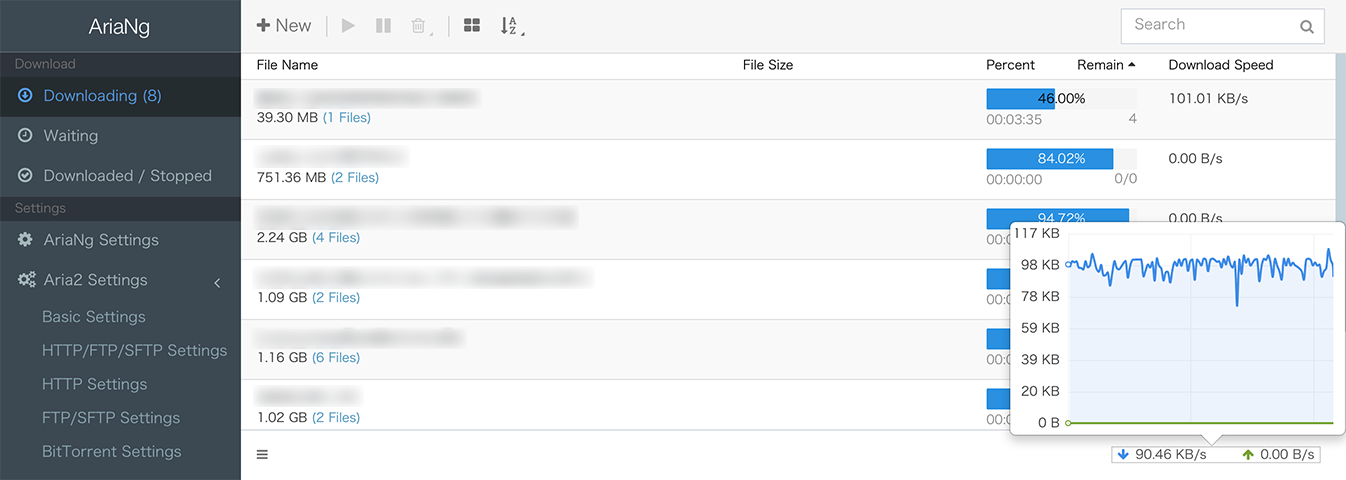
#### Desktop
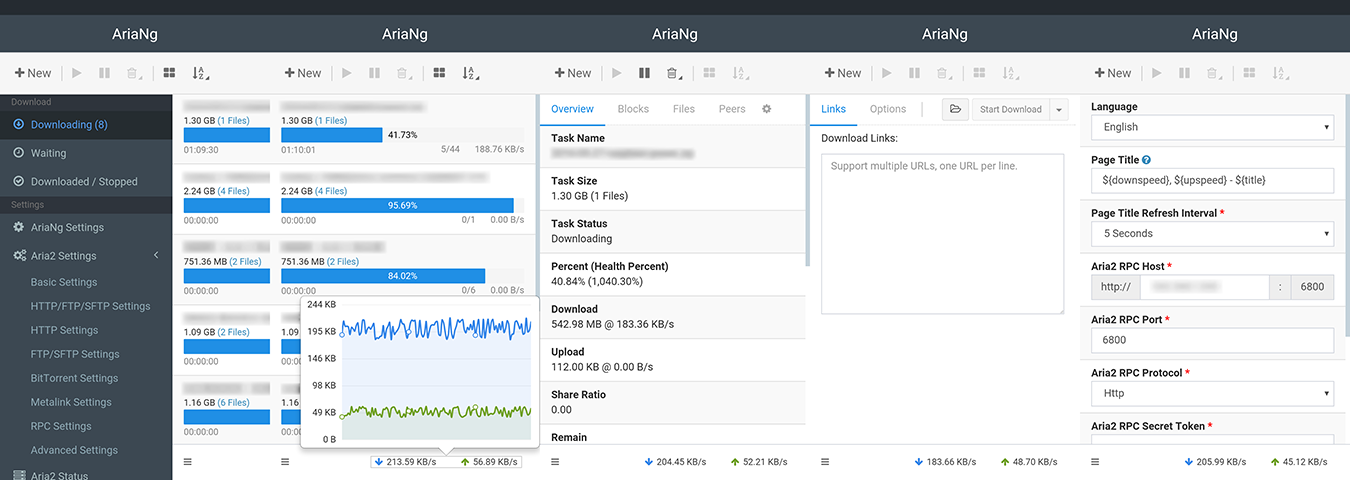
#### Mobile Device
## Installation
AriaNg now provides three versions, standard version, all-in-one version and [AriaNg Native](https://github.com/mayswind/AriaNg-Native). Standard version is suitable for deployment in the web server, and provides on-demand loading. All-In-One version is suitable for local using, and you can download it and just open the only html file in browser. [AriaNg Native](https://github.com/mayswind/AriaNg-Native) is also suitable for local using, and is no need for browser.
#### Prebuilt release
Latest Release: [https://github.com/mayswind/AriaNg/releases](https://github.com/mayswind/AriaNg/releases)
Latest Daily Build (Standard Version): [https://github.com/mayswind/AriaNg-DailyBuild/archive/master.zip](https://github.com/mayswind/AriaNg-DailyBuild/archive/master.zip)
#### Building from source
Make sure you have [Node.js](https://nodejs.org/), [NPM](https://www.npmjs.com/) and [Gulp](https://gulpjs.com/) installed. Then download the source code, and follow these steps.
##### Standard Version
$ npm install
$ gulp clean build
##### All-In-One Version
$ npm install
$ gulp clean build-bundle
The builds will be placed in the dist directory.
#### Usage Notes
Since AriaNg standard version loads language resources asynchronously, you may not open index.html directly on the local file system to run AriaNg. It is recommended that you can use the all-in-one version or deploy AriaNg in a web container or download [AriaNg Native](https://github.com/mayswind/AriaNg-Native) that does not require a browser to run.
## Translating
Everyone is welcome to contribute translations. All translations files are put in `/src/langs/`. You can just modify and commit a new pull request.
If you want to translate AriaNg to a new language, you can add language configuration to `/src/scripts/config/languages.js`, then copy `/i18n/en.sample.txt` to `/src/langs/` and rename it to the language code to be translated, then you can start the translation work.
Currently available translations:
| Tag | Language | Contributors |
| --- | --- | --- |
| cz-CZ | Čeština | [@vorm04](https://github.com/vorm04) |
| de-DE | Deutsch | [@Malonsow](https://github.com/Malonsow) |
| en | English | / |
| es | Español | [@castillofrancodamian](https://github.com/castillofrancodamian) |
| fr-FR | Français | [@Valaraukar86](https://github.com/Valaraukar86) |
| it-IT | Italiano | [@ale-saglia](https://github.com/ale-saglia) |
| ja-JP | 日本語 | [@massangoDa](https://github.com/massangoDa) |
| pl-PL | Polski | [@Pirania3680](https://github.com/Pirania3680) |
| ru-RU | Русский | [@gazizovemil](https://github.com/gazizovemil) |
| zh-Hans | 简体中文 | / |
| zh-Hant | 繁體中文 | [@zhtw2013](https://github.com/zhtw2013) [@ChiaYen-Kan](https://github.com/ChiaYen-Kan) |
Don't see your language? Help us add it!
## Documents
1. [English](http://ariang.mayswind.net)
2. [Simplified Chinese (简体中文)](http://ariang.mayswind.net/zh_Hans)
## Demo
Please visit [http://ariang.mayswind.net/latest](http://ariang.mayswind.net/latest)
## Third Party Extensions
There are some third-party applications based on AriaNg, so you can use AriaNg in more scenarios or devices. Please visit [Third Party Extensions](http://ariang.mayswind.net/3rd-extensions.html) for more information.
## License
[MIT](https://github.com/mayswind/AriaNg/blob/master/LICENSE)
================================================
FILE: gulpfile.js
================================================
const gulp = require('gulp');
const gulpLoadPlugins = require('gulp-load-plugins');
const browserSync = require('browser-sync');
const del = require('del');
const fs = require('fs');
const git = require('git-rev-sync');
const tryFn = require('nice-try');
const saveLicense = require('uglify-save-license');
const $ = gulpLoadPlugins();
const reload = browserSync.reload;
gulp.task('clean', () => del(['.tmp', 'dist']));
gulp.task('lint', () => gulp.src([
'src/scripts/**/*.js'
]).pipe(reload({stream: true, once: true}))
.pipe($.eslint.format())
.pipe($.if(!browserSync.active, $.eslint.failAfterError()))
.pipe(gulp.dest('src/scripts')));
gulp.task('prepare-fonts', () => gulp.src([
'node_modules/font-awesome/fonts/fontawesome-webfont.*'
]).pipe(gulp.dest('.tmp/fonts')));
gulp.task('process-fonts', gulp.series('prepare-fonts', () => gulp.src([
'.tmp/fonts/**/*'
]).pipe(gulp.dest('dist/fonts'))));
gulp.task('prepare-langs', () => gulp.src([
'src/langs/**/*'
]).pipe(gulp.dest('.tmp/langs')));
gulp.task('process-langs', gulp.series('prepare-langs', () => gulp.src([
'.tmp/langs/**/*'
]).pipe(gulp.dest('dist/langs'))));
gulp.task('prepare-styles', () => gulp.src([
'src/styles/**/*.css'
]).pipe($.autoprefixer())
.pipe(gulp.dest('.tmp/styles'))
.pipe(reload({stream: true})));
gulp.task('prepare-scripts', () => gulp.src([
'src/scripts/**/*.js'
]).pipe($.plumber())
.pipe($.injectVersion({replace: '${ARIANG_VERSION}'}))
.pipe($.replace(/\${ARIANG_BUILD_COMMIT}/g, tryFn(git.short) || 'Local'))
.pipe(gulp.dest('.tmp/scripts'))
.pipe(reload({stream: true})));
gulp.task('prepare-views', () => gulp.src([
'src/views/**/*.html'
]).pipe($.htmlmin({collapseWhitespace: true}))
.pipe($.angularTemplatecache({module: 'ariaNg', filename: 'views/templates.js', root: 'views/'}))
.pipe(gulp.dest('.tmp/scripts')));
gulp.task('prepare-html', gulp.series('prepare-styles', 'prepare-scripts', 'prepare-views', () => gulp.src([
'src/*.html'
]).pipe($.useref({searchPath: ['.tmp', 'src', '.']}))
.pipe($.if('js/*.js', $.replace(/\/\/# sourceMappingURL=.*/g, '')))
.pipe($.if('css/*.css', $.replace(/\/\*# sourceMappingURL=.* \*\/$/g, '')))
.pipe($.if(['js/moment-with-locales-*.min.js', 'js/plugins.min.js', 'js/aria-ng.min.js'], $.uglify({output: {comments: saveLicense}})))
.pipe($.if(['css/plugins.min.css', 'css/aria-ng.min.css'], $.cssnano({safe: true, autoprefixer: false})))
.pipe($.replace(/url\((\.\.\/fonts\/[a-zA-Z0-9\-]+\.woff2)(\?[a-zA-Z0-9\-_=.]+)?\)/g, (match, fileName) => {
return 'url(' + fileName + ')'; // remove version of woff2 file (woff2 file should be cached via application cache)
}))
.pipe($.if(['js/plugins.min.js', 'js/aria-ng.min.js', 'css/plugins.min.css', 'css/aria-ng.min.css'], $.rev()))
.pipe($.if('*.html', $.htmlmin({collapseWhitespace: true})))
.pipe($.revReplace())
.pipe(gulp.dest('.tmp'))));
gulp.task('process-html', gulp.series('prepare-html', () => gulp.src([
'.tmp/*.html'
]).pipe($.replace(/<!-- AriaNg-Bundle:\w+ -->/, ''))
.pipe(gulp.dest('dist'))));
gulp.task('process-assets', gulp.series('process-html', () => gulp.src([
'.tmp/css/**/*',
'.tmp/js/**/*'
], {base: '.tmp'})
.pipe(gulp.dest('dist'))));
gulp.task('prepare-assets-bundle', () => gulp.src([
'src/favicon.png'
]).pipe(gulp.dest('.tmp')));
gulp.task('process-assets-bundle', gulp.series('prepare-fonts', 'prepare-langs', 'prepare-html', 'prepare-assets-bundle', () => gulp.src('.tmp/index.html')
.pipe($.replace(/<link rel="stylesheet" href="(css\/[a-zA-Z0-9\-_.]+\.css)">/g, (match, fileName) => {
const content = fs.readFileSync('.tmp/' + fileName, 'utf8');
return '<style type="text/css">' + content + '</style>';
}))
.pipe($.replace(/<script src="(js\/[a-zA-Z0-9\-_.]+\.js)"><\/script>/g, (match, fileName) => {
const content = fs.readFileSync('.tmp/' + fileName, 'utf8');
return '<script type="application/javascript">' + content + '</script>';
}))
.pipe($.replace(/url\(\.\.\/(fonts\/[a-zA-Z0-9\-]+\.woff)(\?[a-zA-Z0-9\-_=.]+)?\)/g, (match, fileName) => {
if (!fs.existsSync('.tmp/' + fileName)) {
return match;
}
const contentBuffer = fs.readFileSync('.tmp/' + fileName);
const contentBase64 = contentBuffer.toString('base64');
return 'url(data:application/x-font-woff;base64,' + contentBase64 + ')';
}))
.pipe($.replace(/<link rel="icon" href="([a-zA-Z0-9\-_.]+\.png)">/g, (match, fileName) => {
if (!fs.existsSync('.tmp/' + fileName)) {
return match;
}
const contentBuffer = fs.readFileSync('.tmp/' + fileName);
const contentBase64 = contentBuffer.toString('base64');
return '<link rel="icon" href="data:image/png;base64,' + contentBase64 + '">';
}))
.pipe($.replace('<!-- AriaNg-Bundle:languages -->', () => {
const langDir = '.tmp/langs/';
let result = '';
const fileNames = fs.readdirSync(langDir, 'utf8');
if (fileNames.length > 0) {
result = '<script type="application/javascript">' +
'angular.module("ariaNg").config(["ariaNgAssetsCacheServiceProvider",function(e){';
for (const fileName of fileNames) {
let content = fs.readFileSync(langDir + fileName, 'utf8');
const lastPointIndex = fileName.lastIndexOf('.');
const languageName = fileName.substr(0, lastPointIndex);
content = content.replace(/\\/g, '\\\\');
content = content.replace(/\r/g, '');
content = content.replace(/\n/g, '\\n');
content = content.replace(/"/g, '\\"');
result += 'e.setLanguageAsset(\'' + languageName + '\',"' + content + '");';
}
result += '}]);</script>';
}
return result;
}))
.pipe($.replace(/<[a-z]+( [a-z\-]+="[a-zA-Z0-9\- ]+")* [a-z\-]+="((favicon.ico)|(tileicon.png)|(touchicon.png))"\/?>/g, ''))
.pipe(gulp.dest('dist'))));
gulp.task('process-full-extras', () => gulp.src([
'LICENSE',
'src/*.*',
'!src/*.html'
], {
dot: true
}).pipe(gulp.dest('dist')));
gulp.task('process-tiny-extras', () => gulp.src([
'LICENSE'
]).pipe(gulp.dest('dist')));
gulp.task('info', () => gulp.src([
'dist/**/*'
]).pipe($.size({title: 'build', gzip: true})));
gulp.task('build', gulp.series('lint', 'process-fonts', 'process-langs', 'process-assets', 'process-full-extras', 'info'));
gulp.task('build-bundle', gulp.series('lint', 'process-assets-bundle', 'process-tiny-extras', 'info'));
gulp.task('serve', gulp.series('prepare-styles', 'prepare-scripts', 'prepare-fonts', () => {
browserSync({
notify: false,
port: 9000,
server: {
baseDir: ['.tmp', 'src'],
routes: {
'/node_modules': 'node_modules'
}
}
});
gulp.watch([
'src/*.html',
'src/*.ico',
'src/*.png',
'src/langs/*.txt',
'src/views/*.html',
'src/imgs/**/*',
'.tmp/fonts/**/*'
]).on('change', reload);
gulp.watch('src/styles/**/*.css', gulp.series('prepare-styles'));
gulp.watch('src/scripts/**/*.js', gulp.series('prepare-scripts'));
gulp.watch('src/fonts/**/*', gulp.series('prepare-fonts'));
}));
gulp.task('serve:dist', () => {
browserSync({
notify: false,
port: 9000,
server: {
baseDir: ['dist']
}
});
});
gulp.task('default', gulp.series('clean', 'build'));
================================================
FILE: i18n/en.sample.txt
================================================
[global]
AriaNg Version=AriaNg Version
Operation Result=Operation Result
Operation Succeeded=Operation Succeeded
is connected=is connected
Error=Error
OK=OK
Confirm=Confirm
Cancel=Cancel
Close=Close
True=True
False=False
DEBUG=Debug
INFO=Info
WARN=Warn
ERROR=Error
Connecting=Connecting
Connected=Connected
Disconnected=Disconnected
Reconnecting=Reconnecting
Waiting to reconnect=Waiting to reconnect
Global=Global
New=New
Start=Start
Pause=Pause
Retry=Retry
Retry Selected Tasks=Retry Selected Tasks
Delete=Delete
Select All=Select All
Select None=Select None
Select Invert=Select Invert
Select All Failed Tasks=Select All Failed Tasks
Select All Completed Tasks=Select All Completed Tasks
Select All Tasks=Select All Tasks
Display Order=Display Order
Copy Download Url=Copy Download Url
Copy Magnet Link=Copy Magnet Link
Help=Help
Search=Search
Default=Default
Expand=Expand
Collapse=Collapse
Expand All=Expand All
Collapse All=Collapse All
Open=Open
Save=Save
Import=Import
Remove Task=Remove Task
Remove Selected Task=Remove Selected Task
Clear Stopped Tasks=Clear Stopped Tasks
Click to view task detail=Click to view task detail
By File Name=By File Name
By File Size=By File Size
By Progress=By Progress
By Selected Status=By Selected Status
By Remaining=By Remaining
By Download Speed=By Download Speed
By Upload Speed=By Upload Speed
By Peer Address=By Peer Address
By Client Name=By Client Name
Filters=Filters
Download=Download
Upload=Upload
Downloading=Downloading
Pending Verification=Pending Verification
Verifying=Verifying
Seeding=Seeding
Waiting=Waiting
Paused=Paused
Completed=Completed
Error Occurred=Error Occurred
Removed=Removed
Finished / Stopped=Finished / Stopped
Uncompleted=Uncompleted
Click to pin=Click to pin
Settings=Settings
AriaNg Settings=AriaNg Settings
Aria2 Settings=Aria2 Settings
Basic Settings=Basic Settings
HTTP/FTP/SFTP Settings=HTTP/FTP/SFTP Settings
HTTP Settings=HTTP Settings
FTP/SFTP Settings=FTP/SFTP Settings
BitTorrent Settings=BitTorrent Settings
Metalink Settings=Metalink Settings
RPC Settings=RPC Settings
Advanced Settings=Advanced Settings
AriaNg Debug Console=AriaNg Debug Console
Aria2 Status=Aria2 Status
File Name=File Name
File Size=File Size
Progress=Progress
Share Ratio=Share Ratio
Remaining=Remaining
Download Speed=Download Speed
Upload Speed=Upload Speed
Links=Links
Torrent File=Torrent File
Metalink File=Metalink File
File Name:=File Name:
Options=Options
Overview=Overview
Pieces=Pieces
Files=Files
Peers=Peers
Task Name=Task Name
Task Size=Task Size
Task Status=Task Status
Error Description=Error Description
Health Percentage=Health Percentage
Info Hash=Info Hash
Seeders=Seeders
Connections=Connections
Seed Creation Time=Seed Creation Time
Download Url=Download Url
Download Dir=Download Dir
BT Tracker Servers=BT Tracker Servers
Copy=Copy
(Choose Files)=(Choose Files)
Videos=Videos
Audios=Audios
Pictures=Pictures
Documents=Documents
Applications=Applications
Archives=Archives
Other=Other
Custom=Custom
Custom Choose File=Custom Choose File
Address=Address
Client=Client
Status=Status
Speed=Speed
(local)=(local)
No Data=No Data
No connected peers=No connected peers
Failed to change some tasks state.=Failed to change some tasks state.
Confirm Retry=Confirm Retry
Are you sure you want to retry the selected task? AriaNg will create same task after clicking OK.=Are you sure you want to retry the selected task? AriaNg will create same task after clicking OK.
Failed to retry this task.=Failed to retry this task.
{successCount} tasks have been retried and {failedCount} tasks are failed.={{successCount}} tasks have been retried and {{failedCount}} tasks are failed.
Confirm Remove=Confirm Remove
Are you sure you want to remove the selected task?=Are you sure you want to remove the selected task?
Failed to remove some task(s).=Failed to remove some task(s).
Confirm Clear=Confirm Clear
Are you sure you want to clear stopped tasks?=Are you sure you want to clear stopped tasks?
Download Links:=Download Links:
Download Now=Download Now
Download Later=Download Later
Open Torrent File=Open Torrent File
Open Metalink File=Open Metalink File
Support multiple URLs, one URL per line.=Support multiple URLs, one URL per line.
Your browser does not support loading file!=Your browser does not support loading file!
The selected file type is invalid!=The selected file type is invalid!
Failed to load file!=Failed to load file!
Download Completed=Download Completed
BT Download Completed=BT Download Completed
Download Error=Download Error
AriaNg Url=AriaNg Url
Command API Url=Command API Url
Export Command API=Export Command API
Export=Export
Copied=Copied
Pause After Task Created=Pause After Task Created
Language=Language
Theme=Theme
Light=Light
Dark=Dark
Follow system settings=Follow system settings
Debug Mode=Debug Mode
Page Title=Page Title
Preview=Preview
Tips: You can use the "noprefix" tag to ignore the prefix, "nosuffix" tag to ignore the suffix, and "scale\=n" tag to set the decimal precision.=Tips: You can use the "noprefix" tag to ignore the prefix, "nosuffix" tag to ignore the suffix, and "scale\=n" tag to set the decimal precision.
Example: ${downspeed:noprefix:nosuffix:scale\=1}=Example: ${downspeed:noprefix:nosuffix:scale\=1}
Updating Page Title Interval=Updating Page Title Interval
Enable Browser Notification=Enable Browser Notification
Browser Notification Sound=Browser Notification Sound
Browser Notification Frequency=Browser Notification Frequency
Unlimited=Unlimited
High (Up to 10 Notifications / 1 Minute)=High (Up to 10 Notifications / 1 Minute)
Middle (Up to 1 Notification / 1 Minute)=Middle (Up to 1 Notification / 1 Minute)
Low (Up to 1 Notification / 5 Minutes)=Low (Up to 1 Notification / 5 Minutes)
WebSocket Auto Reconnect Interval=WebSocket Auto Reconnect Interval
Aria2 RPC Alias=Aria2 RPC Alias
Aria2 RPC Address=Aria2 RPC Address
Aria2 RPC Protocol=Aria2 RPC Protocol
Aria2 RPC Http Request Method=Aria2 RPC Http Request Method
POST method only supports aria2 v1.15.2 and above.=POST method only supports aria2 v1.15.2 and above.
Aria2 RPC Request Headers=Aria2 RPC Request Headers
Support multiple request headers, one header per line, each line containing "header name: header value".=Support multiple request headers, one header per line, each line containing "header name: header value".
Aria2 RPC Secret Token=Aria2 RPC Secret Token
Activate=Activate
Reset Settings=Reset Settings
Confirm Reset=Confirm Reset
Are you sure you want to reset all settings?=Are you sure you want to reset all settings?
Clear Settings History=Clear Settings History
Are you sure you want to clear all settings history?=Are you sure you want to clear all settings history?
Delete RPC Setting=Delete RPC Setting
Add New RPC Setting=Add New RPC Setting
Are you sure you want to remove rpc setting "{rpcName}"?=Are you sure you want to remove rpc setting "{{rpcName}}"?
Updating Global Stat Interval=Updating Global Stat Interval
Updating Task Information Interval=Updating Task Information Interval
Keyboard Shortcuts=Keyboard Shortcuts
Supported Keyboard Shortcuts=Supported Keyboard Shortcuts
Set Focus On Search Box=Set Focus On Search Box
Swipe Gesture=Swipe Gesture
Change Tasks Order by Drag-and-drop=Change Tasks Order by Drag-and-drop
Action After Creating New Tasks=Action After Creating New Tasks
Navigate to Task List Page=Navigate to Task List Page
Navigate to Task Detail Page=Navigate to Task Detail Page
Action After Retrying Task=Action After Retrying Task
Navigate to Downloading Tasks Page=Navigate to Downloading Tasks Page
Stay on Current Page=Stay on Current Page
Remove Old Tasks After Retrying=Remove Old Tasks After Retrying
Confirm Task Removal=Confirm Task Removal
Include Prefix When Copying From Task Details=Include Prefix When Copying From Task Details
Show Pieces Info In Task Detail Page=Show Pieces Info In Task Detail Page
Pieces Amount is Less than or Equal to {value}=Pieces Amount is Less than or Equal to {{value}}
RPC List Display Order=RPC List Display Order
Each Task List Page Uses Independent Display Order=Each Task List Page Uses Independent Display Order
Recently Used=Recently Used
RPC Alias=RPC Alias
Import / Export AriaNg Settings=Import / Export AriaNg Settings
Import Settings=Import Settings
Export Settings=Export Settings
AriaNg settings data=AriaNg settings data
Confirm Import=Confirm Import
Are you sure you want to import all settings?=Are you sure you want to import all settings?
Invalid settings data format!=Invalid settings data format!
Data has been copied to clipboard.=Data has been copied to clipboard.
Supported Placeholder=Supported Placeholder
AriaNg Title=AriaNg Title
Current RPC Alias=Current RPC Alias
Downloading Count=Downloading Count
Waiting Count=Waiting Count
Stopped Count=Stopped Count
You have disabled notification in your browser. You should change your browser's settings before you enable this function.=You have disabled notification in your browser. You should change your browser's settings before you enable this function.
Language resource has been updated, please reload the page for the changes to take effect.=Language resource has been updated, please reload the page for the changes to take effect.
Configuration has been modified, please reload the page for the changes to take effect.=Configuration has been modified, please reload the page for the changes to take effect.
Reload AriaNg=Reload AriaNg
Show Secret=Show Secret
Hide Secret=Hide Secret
Aria2 Version=Aria2 Version
Enabled Features=Enabled Features
Operations=Operations
Reconnect=Reconnect
Save Session=Save Session
Shutdown Aria2=Shutdown Aria2
Confirm Shutdown=Confirm Shutdown
Are you sure you want to shutdown aria2?=Are you sure you want to shutdown aria2?
Session has been saved successfully.=Session has been saved successfully.
Aria2 has been shutdown successfully.=Aria2 has been shutdown successfully.
Toggle Navigation=Toggle Navigation
Shortcut=Shortcut
Global Rate Limit=Global Rate Limit
Loading=Loading...
More Than One Day=More than 1 day
Unknown=Unknown
Bytes=Bytes
Hours=Hours
Minutes=Minutes
Seconds=Seconds
Milliseconds=Milliseconds
Http=Http
Http (Disabled)=Http (Disabled)
Https=Https
WebSocket=WebSocket
WebSocket (Disabled)=WebSocket (Disabled)
WebSocket (Security)=WebSocket (Security)
Http and WebSocket would be disabled when accessing AriaNg via Https.=Http and WebSocket would be disabled when accessing AriaNg via Https.
POST=POST
GET=GET
Enabled=Enabled
Disabled=Disabled
Always=Always
Never=Never
BitTorrent=BitTorrent
Changes to the settings take effect after refreshing page.=Changes to the settings take effect after refreshing page.
Logging Time=Logging Time
Log Level=Log Level
Auto Refresh=Auto Refresh
Refresh Now=Refresh Now
Clear Logs=Clear Logs
Are you sure you want to clear debug logs?=Are you sure you want to clear debug logs?
Show Detail=Show Detail
Log Detail=Log Detail
Aria2 RPC Debug=Aria2 RPC Debug
Aria2 RPC Request Method=Aria2 RPC Request Method
Aria2 RPC Request Parameters=Aria2 RPC Request Parameters
Aria2 RPC Response=Aria2 RPC Response
Execute=Execute
RPC method is illegal!=RPC method is illegal!
AriaNg does not support this RPC method!=AriaNg does not support this RPC method!
RPC request parameters are invalid!=RPC request parameters are invalid!
Type is illegal!=Type is illegal!
Parameter is invalid!=Parameter is invalid!
Option value cannot be empty!=Option value cannot be empty!
Input number is invalid!=Input number is invalid!
Input number is below min value!=Input number is below min value {{value}}!
Input number is above max value!=Input number is above max value {{value}}!
Input value is invalid!=Input value is invalid!
Protocol is invalid!=Protocol is invalid!
RPC host cannot be empty!=RPC host cannot be empty!
RPC secret is not base64 encoded!=RPC secret is not base64 encoded!
URL is not base64 encoded!=URL is not base64 encoded!
Tap to configure and get started with AriaNg.=Tap to configure and get started with AriaNg.
Cannot initialize WebSocket!=Cannot initialize WebSocket!
Cannot connect to aria2!=Cannot connect to aria2!
Access Denied!=Access Denied!
You cannot use AriaNg because this browser does not meet the minimum requirements for data storage.=You cannot use AriaNg because this browser does not meet the minimum requirements for data storage.
[error]
unknown=Unknown error occurred.
operation.timeout=Operation timed out.
resource.notfound=Resource was not found.
resource.notfound.max-file-not-found=Resource was not found. See --max-file-not-found option.
download.aborted.lowest-speed-limit=Download is aborted because download speed was too slow. See --lowest-speed-limit option.
network.problem=Network problem occurred.
resume.notsupported=Remote server does not support resume.
space.notenough=There was not enough disk space available.
piece.length.different=Piece length was different from one in .aria2 control file. See --allow-piece-length-change option.
download.sametime=aria2 was downloading same file at that moment.
download.torrent.sametime=aria2 was downloading same file at that moment.
file.exists=File already existed. See --allow-overwrite option.
file.rename.failed=Failed to rename file. See --auto-file-renaming option.
file.open.failed=Failed to open existing file.
file.create.failed=Failed to create new file or truncate existing file.
io.error=Filesystem error occurred.
directory.create.failed=Failed to create directory.
name.resolution.failed=Failed to resolve domain name.
metalink.file.parse.failed=Failed to parse Metalink document.
ftp.command.failed=FTP command failed.
http.response.header.bad=HTTP response header was bad or unexpected.
redirects.toomany=Too many redirects occurred.
http.authorization.failed=HTTP authorization failed.
bencoded.file.parse.failed=Failed to parse bencoded file (usually ".torrent" file).
torrent.file.corrupted=The ".torrent" file was corrupted or missing information that aria2 needed.
magnet.uri.bad=Magnet URI was bad.
option.bad=Bad/unrecognized option was given or unexpected option argument was given.
server.overload=The remote server was unable to handle the request due to a temporary overloading or maintenance.
rpc.request.parse.failed=Failed to parse JSON-RPC request.
checksum.failed=Checksum validation failed.
[languages]
Czech=Czech
German=German
English=English
Spanish=Spanish
French=French
Italian=Italian
Polish=Polish
Russian=Russian
Simplified Chinese=Simplified Chinese
Traditional Chinese=Traditional Chinese
[format]
longdate=MM/DD/YYYY HH:mm:ss
time.millisecond={{value}} Millisecond
time.milliseconds={{value}} Milliseconds
time.second={{value}} Second
time.seconds={{value}} Seconds
time.minute={{value}} Minute
time.minutes={{value}} Minutes
time.hour={{value}} Hour
time.hours={{value}} Hours
requires.aria2-version=Requires aria2 v{{version}} or higher
task.new.download-links=Download Links ({{count}} Links):
task.pieceinfo=Completed: {{completed}}, Total: {{total}}
task.error-occurred=Error Occurred ({{errorcode}})
task.verifying-percent=Verifying ({{verifiedPercent}}%)
settings.file-count=({{count}} Files)
settings.total-count=(Total Count: {{count}})
debug.latest-logs=Latest {{count}} Logs
[rpc.error]
unauthorized=Authorization Failed!
[option]
true=True
false=False
default=Default
none=None
hide=Hide
full=Full
http=Http
https=Https
ftp=Ftp
mem=Memory Only
get=GET
tunnel=TUNNEL
plain=Plain
arc4=ARC4
binary=Binary
ascii=ASCII
debug=Debug
info=Info
notice=Notice
warn=Warn
error=Error
adaptive=adaptive
epoll=epoll
falloc=falloc
feedback=feedback
geom=geom
inorder=inorder
kqueue=kqueue
poll=poll
port=port
prealloc=prealloc
random=random
select=select
trunc=trunc
SSLv3=SSLv3
TLSv1=TLSv1
TLSv1.1=TLSv1.1
TLSv1.2=TLSv1.2
[options]
dir.name=Download Path
dir.description=
log.name=Log File
log.description=The file name of the log file. If - is specified, log is written to stdout. If empty string("") is specified, or this option is omitted, no log is written to disk at all.
max-concurrent-downloads.name=Max Concurrent Downloads
max-concurrent-downloads.description=
check-integrity.name=Check Integrity
check-integrity.description=Check file integrity by validating piece hashes or a hash of entire file. This option has effect only in BitTorrent, Metalink downloads with checksums or HTTP(S)/FTP downloads with --checksum option.
continue.name=Resume Download
continue.description=Continue downloading a partially downloaded file. Use this option to resume a download started by a web browser or another program which downloads files sequentially from the beginning. Currently this option is only applicable to HTTP(S)/FTP downloads.
all-proxy.name=Proxy Server
all-proxy.description=Use a proxy server for all protocols. You also can override this setting and specify a proxy server for a particular protocol using --http-proxy, --https-proxy and --ftp-proxy This affects all downloads. The format of PROXY is [http://][USER:PASSWORD@]HOST[:PORT].
all-proxy-user.name=Proxy User Name
all-proxy-user.description=
all-proxy-passwd.name=Proxy Password
all-proxy-passwd.description=
checksum.name=Checksum
checksum.description=Set checksum. The option value format is TYPE\=DIGEST. TYPE is hash type. The supported hash type is listed in Hash Algorithms in aria2c -v. DIGEST is hex digest. For example, setting sha-1 digest looks like this: sha-1=0192ba11326fe2298c8cb4de616f4d4140213838 This option applies only to HTTP(S)/FTP downloads.
connect-timeout.name=Connect Timeout
connect-timeout.description=Set the connect timeout in seconds to establish connection to HTTP/FTP/proxy server. After the connection is established, this option makes no effect and --timeout option is used instead.
dry-run.name=Dry Run
dry-run.description=If true is given, aria2 just checks whether the remote file is available and doesn't download data. This option has effect on HTTP/FTP download. BitTorrent downloads are canceled if true is specified.
lowest-speed-limit.name=Lowest Speed Limit
lowest-speed-limit.description=Close connection if download speed is lower than or equal to this value(bytes per sec). 0 means aria2 does not have a lowest speed limit. You can append K or M (1K = 1024, 1M = 1024K). This option does not affect BitTorrent downloads.
max-connection-per-server.name=Max Connection Per Server
max-connection-per-server.description=
max-file-not-found.name=Max File Not Found Try Times
max-file-not-found.description=If aria2 receives "file not found" status from the remote HTTP/FTP servers NUM times without getting a single byte, then force the download to fail. Specify 0 to disable this option. This options is effective only when using HTTP/FTP servers. The number of retry attempt is counted toward --max-tries, so it should be configured too.
max-tries.name=Max Try Times
max-tries.description=Set number of tries. 0 means unlimited.
min-split-size.name=Min Split Size
min-split-size.description=aria2 does not split less than 2*SIZE byte range. For example, let's consider downloading 20MiB file. If SIZE is 10M, aria2 can split file into 2 range [0-10MiB) and [10MiB-20MiB) and download it using 2 sources(if --split >= 2, of course). If SIZE is 15M, since 2*15M > 20MiB, aria2 does not split file and download it using 1 source. You can append K or M (1K = 1024, 1M = 1024K). Possible Values: 1M-1024M.
netrc-path.name=.netrc Path
netrc-path.description=
no-netrc.name=Disable netrc
no-netrc.description=
no-proxy.name=No Proxy List
no-proxy.description=Specify a comma separated list of host names, domains and network addresses with or without a subnet mask where no proxy should be used.
out.name=File Name
out.description=The file name of the downloaded file. It is always relative to the directory given in --dir option. When the --force-sequential option is used, this option is ignored.
proxy-method.name=Proxy Method
proxy-method.description=Set the method to use in proxy request. METHOD is either GET or TUNNEL. HTTPS downloads always use TUNNEL regardless of this option.
remote-time.name=Remote File Timestamp
remote-time.description=Retrieve timestamp of the remote file from the remote HTTP/FTP server and if it is available, apply it to the local file.
reuse-uri.name=Reuse Uri
reuse-uri.description=Reuse already used URIs if no unused URIs are left.
retry-wait.name=Retry Wait
retry-wait.description=Set the seconds to wait between retries. When SEC > 0, aria2 will retry downloads when the HTTP server returns a 503 response.
server-stat-of.name=Server Stat Output
server-stat-of.description=Specify the file name to which performance profile of the servers is saved. You can load saved data using --server-stat-if option.
server-stat-timeout.name=Server Stat Timeout
server-stat-timeout.description=Specifies timeout in seconds to invalidate performance profile of the servers since the last contact to them.
split.name=Split Count
split.description=Download a file using N connections. If more than N URIs are given, first N URIs are used and remaining URIs are used for backup. If less than N URIs are given, those URIs are used more than once so that N connections total are made simultaneously. The number of connections to the same host is restricted by the --max-connection-per-server option.
stream-piece-selector.name=Piece Selection Algorithm
stream-piece-selector.description=Specify piece selection algorithm used in HTTP/FTP download. Piece means fixed length segment which is downloaded in parallel in segmented download. If default is given, aria2 selects piece so that it reduces the number of establishing connection. This is reasonable default behavior because establishing connection is an expensive operation. If inorder is given, aria2 selects piece which has minimum index. Index=0 means first of the file. This will be useful to view movie while downloading it. --enable-http-pipelining option may be useful to reduce re-connection overhead. Please note that aria2 honors --min-split-size option, so it will be necessary to specify a reasonable value to --min-split-size option. If random is given, aria2 selects piece randomly. Like inorder, --min-split-size option is honored. If geom is given, at the beginning aria2 selects piece which has minimum index like inorder, but it exponentially increasingly keeps space from previously selected piece. This will reduce the number of establishing connection and at the same time it will download the beginning part of the file first. This will be useful to view movie while downloading it.
timeout.name=Timeout
timeout.description=
uri-selector.name=URI Selection Algorithm
uri-selector.description=Specify URI selection algorithm. The possible values are inorder, feedback and adaptive. If inorder is given, URI is tried in the order appeared in the URI list. If feedback is given, aria2 uses download speed observed in the previous downloads and choose fastest server in the URI list. This also effectively skips dead mirrors. The observed download speed is a part of performance profile of servers mentioned in --server-stat-of and --server-stat-if If adaptive is given, selects one of the best mirrors for the first and reserved connections. For supplementary ones, it returns mirrors which has not been tested yet, and if each of them has already been tested, returns mirrors which has to be tested again. Otherwise, it doesn't select anymore mirrors. Like feedback, it uses a performance profile of servers.
check-certificate.name=Check Certificate
check-certificate.description=
http-accept-gzip.name=Accept GZip
http-accept-gzip.description=Send Accept: deflate, gzip request header and inflate response if remote server responds with Content-Encoding: gzip or Content-Encoding: deflate.
http-auth-challenge.name=Auth Challenge
http-auth-challenge.description=Send HTTP authorization header only when it is requested by the server. If false is set, then authorization header is always sent to the server. There is an exception: if user name and password are embedded in URI, authorization header is always sent to the server regardless of this option.
http-no-cache.name=No Cache
http-no-cache.description=Send Cache-Control: no-cache and Pragma: no-cache header to avoid cached content. If false is given, these headers are not sent and you can add Cache-Control header with a directive you like using --header option.
http-user.name=HTTP Default User Name
http-user.description=
http-passwd.name=HTTP Default Password
http-passwd.description=
http-proxy.name=HTTP Proxy Server
http-proxy.description=
http-proxy-user.name=HTTP Proxy User Name
http-proxy-user.description=
http-proxy-passwd.name=HTTP Proxy Password
http-proxy-passwd.description=
https-proxy.name=HTTPS Proxy Server
https-proxy.description=
https-proxy-user.name=HTTPS Proxy User Name
https-proxy-user.description=
https-proxy-passwd.name=HTTPS Proxy Password
https-proxy-passwd.description=
referer.name=Referer
referer.description=Set an http referrer (Referer). This affects all http/https downloads. If * is given, the download URI is also used as the referrer. This may be useful when used together with the --parameterized-uri option.
enable-http-keep-alive.name=Enable Persistent Connection
enable-http-keep-alive.description=Enable HTTP/1.1 persistent connection.
enable-http-pipelining.name=Enable HTTP Pipelining
enable-http-pipelining.description=Enable HTTP/1.1 pipelining.
header.name=Custom Header
header.description=Append HEADER to HTTP request header. Put one item per line, each item containing "header name: header value".
save-cookies.name=Cookies Path
save-cookies.description=Save Cookies to FILE in Mozilla/Firefox(1.x/2.x)/ Netscape format. If FILE already exists, it is overwritten. Session Cookies are also saved and their expiry values are treated as 0.
use-head.name=Use HEAD Method
use-head.description=Use HEAD method for the first request to the HTTP server.
user-agent.name=Custom User Agent
user-agent.description=
ftp-user.name=FTP Default User Name
ftp-user.description=
ftp-passwd.name=FTP Default Password
ftp-passwd.description=If user name is embedded but password is missing in URI, aria2 tries to resolve password using .netrc. If password is found in .netrc, then use it as password. If not, use the password specified in this option.
ftp-pasv.name=Passive Mode
ftp-pasv.description=Use the passive mode in FTP. If false is given, the active mode will be used. This option is ignored for SFTP transfer.
ftp-proxy.name=FTP Proxy Server
ftp-proxy.description=
ftp-proxy-user.name=FTP Proxy User Name
ftp-proxy-user.description=
ftp-proxy-passwd.name=FTP Proxy Password
ftp-proxy-passwd.description=
ftp-type.name=Transfer Type
ftp-type.description=
ftp-reuse-connection.name=Reuse Connection
ftp-reuse-connection.description=
ssh-host-key-md.name=SSH Public Key Checksum
ssh-host-key-md.description=Set checksum for SSH host public key. The option value format is TYPE=DIGEST. TYPE is hash type. The supported hash type is sha-1 or md5. DIGEST is hex digest. For example: sha-1=b030503d4de4539dc7885e6f0f5e256704edf4c3. This option can be used to validate server's public key when SFTP is used. If this option is not set, which is default, no validation takes place.
bt-detach-seed-only.name=Detach Seed Only
bt-detach-seed-only.description=Exclude seed only downloads when counting concurrent active downloads (See -j option). This means that if -j3 is given and this option is turned on and 3 downloads are active and one of those enters seed mode, then it is excluded from active download count (thus it becomes 2), and the next download waiting in queue gets started. But be aware that seeding item is still recognized as active download in RPC method.
bt-enable-hook-after-hash-check.name=Enable Hook After Hash Check
bt-enable-hook-after-hash-check.description=Allow hook command invocation after hash check (see -V option) in BitTorrent download. By default, when hash check succeeds, the command given by --on-bt-download-complete is executed. To disable this action, give false to this option.
bt-enable-lpd.name=Enable Local Peer Discovery (LPD)
bt-enable-lpd.description=Enable Local Peer Discovery. If a private flag is set in a torrent, aria2 doesn't use this feature for that download even if true is given.
bt-exclude-tracker.name=BitTorrent Exclude Trackers
bt-exclude-tracker.description=Comma separated list of BitTorrent tracker's announce URI to remove. You can use special value * which matches all URIs, thus removes all announce URIs. When specifying * in shell command-line, don't forget to escape or quote it.
bt-external-ip.name=External IP
bt-external-ip.description=Specify the external IP address to use in BitTorrent download and DHT. It may be sent to BitTorrent tracker. For DHT, this option should be set to report that local node is downloading a particular torrent. This is critical to use DHT in a private network. Although this function is named external, it can accept any kind of IP addresses.
bt-force-encryption.name=Force Encryption
bt-force-encryption.description=Requires BitTorrent message payload encryption with arc4. This is a shorthand of --bt-require-crypto --bt-min-crypto-level=arc4. This option does not change the option value of those options. If true is given, deny legacy BitTorrent handshake and only use Obfuscation handshake and always encrypt message payload.
bt-hash-check-seed.name=Hash Check Before Seeding
bt-hash-check-seed.description=If true is given, after hash check using --check-integrity option and file is complete, continue to seed file. If you want to check file and download it only when it is damaged or incomplete, set this option to false. This option has effect only on BitTorrent download.
bt-load-saved-metadata.name=Load Saved Metadata File
bt-load-saved-metadata.description=Before getting torrent metadata from DHT when downloading with magnet link, first try to read file saved by --bt-save-metadata option. If it is successful, then skip downloading metadata from DHT.
bt-max-open-files.name=Max Open Files
bt-max-open-files.description=Specify maximum number of files to open in multi-file BitTorrent/Metalink download globally.
bt-max-peers.name=Max Peers
bt-max-peers.description=Specify the maximum number of peers per torrent. 0 means unlimited.
bt-metadata-only.name=Download Metadata Only
bt-metadata-only.description=Download meta data only. The file(s) described in meta data will not be downloaded. This option has effect only when BitTorrent Magnet URI is used.
bt-min-crypto-level.name=Min Crypto Level
bt-min-crypto-level.description=Set minimum level of encryption method. If several encryption methods are provided by a peer, aria2 chooses the lowest one which satisfies the given level.
bt-prioritize-piece.name=Prioritize Piece
bt-prioritize-piece.description=Try to download first and last pieces of each file first. This is useful for previewing files. The argument can contain 2 keywords: head and tail. To include both keywords, they must be separated by comma. These keywords can take one parameter, SIZE. For example, if head=SIZE is specified, pieces in the range of first SIZE bytes of each file get higher priority. tail=SIZE means the range of last SIZE bytes of each file. SIZE can include K or M (1K = 1024, 1M = 1024K).
bt-remove-unselected-file.name=Remove Unselected File
bt-remove-unselected-file.description=Removes the unselected files when download is completed in BitTorrent. To select files, use --select-file option. If it is not used, all files are assumed to be selected. Please use this option with care because it will actually remove files from your disk.
bt-require-crypto.name=Require Crypto
bt-require-crypto.description=If true is given, aria2 doesn't accept and establish connection with legacy BitTorrent handshake(\19BitTorrent protocol). Thus aria2 always uses Obfuscation handshake.
bt-request-peer-speed-limit.name=Preferred Download Speed
bt-request-peer-speed-limit.description=If the whole download speed of every torrent is lower than SPEED, aria2 temporarily increases the number of peers to try for more download speed. Configuring this option with your preferred download speed can increase your download speed in some cases. You can append K or M (1K = 1024, 1M = 1024K).
bt-save-metadata.name=Save Metadata
bt-save-metadata.description=Save meta data as ".torrent" file. This option has effect only when BitTorrent Magnet URI is used. The file name is hex encoded info hash with suffix ".torrent". The directory to be saved is the same directory where download file is saved. If the same file already exists, meta data is not saved.
bt-seed-unverified.name=Not Verify Downloaded Fileds
bt-seed-unverified.description=Seed previously downloaded files without verifying piece hashes.
bt-stop-timeout.name=Stop Timeout
bt-stop-timeout.description=Stop BitTorrent download if download speed is 0 in consecutive SEC seconds. If 0 is given, this feature is disabled.
bt-tracker.name=BitTorrent Trackers
bt-tracker.description=Comma separated list of additional BitTorrent tracker's announce URI. These URIs are not affected by --bt-exclude-tracker option because they are added after URIs in --bt-exclude-tracker option are removed.
bt-tracker-connect-timeout.name=BitTorrent Tracker Connect Timeout
bt-tracker-connect-timeout.description=Set the connect timeout in seconds to establish connection to tracker. After the connection is established, this option makes no effect and --bt-tracker-timeout option is used instead.
bt-tracker-interval.name=BitTorrent Tracker Connect Interval
bt-tracker-interval.description=Set the interval in seconds between tracker requests. This completely overrides interval value and aria2 just uses this value and ignores the min interval and interval value in the response of tracker. If 0 is set, aria2 determines interval based on the response of tracker and the download progress.
bt-tracker-timeout.name=BitTorrent Tracker Timeout
bt-tracker-timeout.description=
dht-file-path.name=DHT (IPv4) File
dht-file-path.description=Change the IPv4 DHT routing table file to PATH.
dht-file-path6.name=DHT (IPv6) File
dht-file-path6.description=Change the IPv6 DHT routing table file to PATH.
dht-listen-port.name=DHT Listen Port
dht-listen-port.description=Set UDP listening port used by DHT(IPv4, IPv6) and UDP tracker. Multiple ports can be specified by using "," for example: 6881,6885. You can also use - to specify a range: 6881-6999. , and - can be used together.
dht-message-timeout.name=DHT Message Timeout
dht-message-timeout.description=
enable-dht.name=Enable DHT (IPv4)
enable-dht.description=Enable IPv4 DHT functionality. It also enables UDP tracker support. If a private flag is set in a torrent, aria2 doesn't use DHT for that download even if true is given.
enable-dht6.name=Enable DHT (IPv6)
enable-dht6.description=Enable IPv6 DHT functionality. If a private flag is set in a torrent, aria2 doesn't use DHT for that download even if true is given. Use --dht-listen-port option to specify port number to listen on.
enable-peer-exchange.name=Enable Peer Exchange
enable-peer-exchange.description=Enable Peer Exchange extension. If a private flag is set in a torrent, this feature is disabled for that download even if true is given.
follow-torrent.name=Follow Torrent
follow-torrent.description=If true or mem is specified, when a file whose suffix is .torrent or content type is application/x-bittorrent is downloaded, aria2 parses it as a torrent file and downloads files mentioned in it. If mem is specified, a torrent file is not written to the disk, but is just kept in memory. If false is specified, the .torrent file is downloaded to the disk, but is not parsed as a torrent and its contents are not downloaded.
listen-port.name=Listen Port
listen-port.description=Set TCP port number for BitTorrent downloads. Multiple ports can be specified by using "," for example: 6881,6885. You can also use - to specify a range: 6881-6999. , and - can be used together: 6881-6889,6999.
max-overall-upload-limit.name=Global Max Upload Limit
max-overall-upload-limit.description=Set max overall upload speed in bytes/sec. 0 means unrestricted. You can append K or M (1K = 1024, 1M = 1024K).
max-upload-limit.name=Max Upload Limit
max-upload-limit.description=Set max upload speed per each torrent in bytes/sec. 0 means unrestricted. You can append K or M (1K = 1024, 1M = 1024K).
peer-id-prefix.name=Peer ID Prefix
peer-id-prefix.description=Specify the prefix of peer ID. The peer ID in BitTorrent is 20 byte length. If more than 20 bytes are specified, only first 20 bytes are used. If less than 20 bytes are specified, random byte data are added to make its length 20 bytes.
peer-agent.name=Peer Agent
peer-agent.description=Specify the string used during the bitorrent extended handshake for the peer’s client version.
seed-ratio.name=Min Share Ratio
seed-ratio.description=Specify share ratio. Seed completed torrents until share ratio reaches RATIO. You are strongly encouraged to specify equals or more than 1.0 here. Specify 0.0 if you intend to do seeding regardless of share ratio. If --seed-time option is specified along with this option, seeding ends when at least one of the conditions is satisfied.
seed-time.name=Min Seed Time
seed-time.description=Specify seeding time in (fractional) minutes. Specifying --seed-time=0 disables seeding after download completed.
follow-metalink.name=Follow Metalink
follow-metalink.description=If true or mem is specified, when a file whose suffix is .meta4 or .metalink or content type of application/metalink4+xml or application/metalink+xml is downloaded, aria2 parses it as a metalink file and downloads files mentioned in it. If mem is specified, a metalink file is not written to the disk, but is just kept in memory. If false is specified, the .metalink file is downloaded to the disk, but is not parsed as a metalink file and its contents are not downloaded.
metalink-base-uri.name=Base URI
metalink-base-uri.description=Specify base URI to resolve relative URI in metalink:url and metalink:metaurl element in a metalink file stored in local disk. If URI points to a directory, URI must end with /.
metalink-language.name=Language
metalink-language.description=
metalink-location.name=Preferred Server Location
metalink-location.description=The location of the preferred server. A comma-delimited list of locations is acceptable, for example, jp,us.
metalink-os.name=Operation System
metalink-os.description=The operating system of the file to download.
metalink-version.name=Version
metalink-version.description=The version of the file to download.
metalink-preferred-protocol.name=Preferred Protocol
metalink-preferred-protocol.description=Specify preferred protocol. The possible values are http, https, ftp and none. Specify none to disable this feature.
metalink-enable-unique-protocol.name=Enable Unique Protocol
metalink-enable-unique-protocol.description=If true is given and several protocols are available for a mirror in a metalink file, aria2 uses one of them. Use --metalink-preferred-protocol option to specify the preference of protocol.
enable-rpc.name=Enable JSON-RPC/XML-RPC Server
enable-rpc.description=
pause-metadata.name=Pause After Metadata Downloaded
pause-metadata.description=Pause downloads created as a result of metadata download. There are 3 types of metadata downloads in aria2: (1) downloading .torrent file. (2) downloading torrent metadata using magnet link. (3) downloading metalink file. These metadata downloads will generate downloads using their metadata. This option pauses these subsequent downloads. This option is effective only when --enable-rpc=true is given.
rpc-allow-origin-all.name=Allow All Origin Request
rpc-allow-origin-all.description=Add Access-Control-Allow-Origin header field with value * to the RPC response.
rpc-listen-all.name=Listen on All Network Interfaces
rpc-listen-all.description=Listen incoming JSON-RPC/XML-RPC requests on all network interfaces. If false is given, listen only on local loopback interface.
rpc-listen-port.name=Listen Port
rpc-listen-port.description=
rpc-max-request-size.name=Max Request Size
rpc-max-request-size.description=Set max size of JSON-RPC/XML-RPC request. If aria2 detects the request is more than SIZE bytes, it drops connection.
rpc-save-upload-metadata.name=Save Upload Metadata
rpc-save-upload-metadata.description=Save the uploaded torrent or metalink meta data in the directory specified by --dir option. The file name consists of SHA-1 hash hex string of meta data plus extension. For torrent, the extension is '.torrent'. For metalink, it is '.meta4'. If false is given to this option, the downloads added by aria2.addTorrent() or aria2.addMetalink() will not be saved by --save-session option.
rpc-secure.name=Enable SSL/TLS
rpc-secure.description=RPC transport will be encrypted by SSL/TLS. The RPC clients must use https scheme to access the server. For WebSocket client, use wss scheme. Use --rpc-certificate and --rpc-private-key options to specify the server certificate and private key.
allow-overwrite.name=Allow Overwrite
allow-overwrite.description=Restart download from scratch if the corresponding control file doesn't exist. See also --auto-file-renaming option.
allow-piece-length-change.name=Allow Piece Length Change
allow-piece-length-change.description=If false is given, aria2 aborts download when a piece length is different from one in a control file. If true is given, you can proceed but some download progress will be lost.
always-resume.name=Always Resume Download
always-resume.description=Always resume download. If true is given, aria2 always tries to resume download and if resume is not possible, aborts download. If false is given, when all given URIs do not support resume or aria2 encounters N URIs which does not support resume (N is the value specified using --max-resume-failure-tries option), aria2 downloads file from scratch. See --max-resume-failure-tries option.
async-dns.name=Asynchronous DNS
async-dns.description=
auto-file-renaming.name=Auto File Renaming
auto-file-renaming.description=Rename file name if the same file already exists. This option works only in HTTP(S)/FTP download. The new file name has a dot and a number(1..9999) appended after the name, but before the file extension, if any.
auto-save-interval.name=Auto Save Interval
auto-save-interval.description=Save a control file(*.aria2) every SEC seconds. If 0 is given, a control file is not saved during download. aria2 saves a control file when it stops regardless of the value. The possible values are between 0 to 600.
conditional-get.name=Conditional Download
conditional-get.description=Download file only when the local file is older than remote file. This function only works with HTTP(S) downloads only. It does not work if file size is specified in Metalink. It also ignores Content-Disposition header. If a control file exists, this option will be ignored. This function uses If-Modified-Since header to get only newer file conditionally. When getting modification time of local file, it uses user supplied file name (see --out option) or file name part in URI if --out is not specified. To overwrite existing file, --allow-overwrite is required.
conf-path.name=Configuration File
conf-path.description=
console-log-level.name=Console Log Level
console-log-level.description=
content-disposition-default-utf8.name=Use UTF-8 to Handle Content-Disposition
content-disposition-default-utf8.description=Handle quoted string in Content-Disposition header as UTF-8 instead of ISO-8859-1, for example, the filename parameter, but not the extended version filename.
daemon.name=Enable Daemon
daemon.description=
deferred-input.name=Deferred Load
deferred-input.description=If true is given, aria2 does not read all URIs and options from file specified by --input-file option at startup, but it reads one by one when it needs later. This may reduce memory usage if input file contains a lot of URIs to download. If false is given, aria2 reads all URIs and options at startup. --deferred-input option will be disabled when --save-session is used together.
disable-ipv6.name=Disable IPv6
disable-ipv6.description=
disk-cache.name=Disk Cache
disk-cache.description=Enable disk cache. If SIZE is 0, the disk cache is disabled. This feature caches the downloaded data in memory, which grows to at most SIZE bytes. The cache storage is created for aria2 instance and shared by all downloads. The one advantage of the disk cache is reduce the disk I/O because the data are written in larger unit and it is reordered by the offset of the file. If hash checking is involved and the data are cached in memory, we don't need to read them from the disk. SIZE can include K or M (1K = 1024, 1M = 1024K).
download-result.name=Download Result
download-result.description=This option changes the way Download Results is formatted. If OPT is default, print GID, status, average download speed and path/URI. If multiple files are involved, path/URI of first requested file is printed and remaining ones are omitted. If OPT is full, print GID, status, average download speed, percentage of progress and path/URI. The percentage of progress and path/URI are printed for each requested file in each row. If OPT is hide, Download Results is hidden.
dscp.name=DSCP
dscp.description=Set DSCP value in outgoing IP packets of BitTorrent traffic for QoS. This parameter sets only DSCP bits in TOS field of IP packets, not the whole field. If you take values from /usr/include/netinet/ip.h divide them by 4 (otherwise values would be incorrect, e.g. your CS1 class would turn into CS4). If you take commonly used values from RFC, network vendors' documentation, Wikipedia or any other source, use them as they are.
rlimit-nofile.name=Soft Limit of Open File Descriptors
rlimit-nofile.description=Set the soft limit of open file descriptors. This open will only have effect when: a. The system supports it (posix). b. The limit does not exceed the hard limit. c. The specified limit is larger than the current soft limit. This is equivalent to setting nofile via ulimit, except that it will never decrease the limit. This option is only available on systems supporting the rlimit API.
enable-color.name=Enable Color in Terminal
enable-color.description=
enable-mmap.name=Enable MMap
enable-mmap.description=Map files into memory. This option may not work if the file space is not pre-allocated. See --file-allocation.
event-poll.name=Event Polling Method
event-poll.description=Specify the method for polling events. The possible values are epoll, kqueue, port, poll and select. For each epoll, kqueue, port and poll, it is available if system supports it. epoll is available on recent Linux. kqueue is available on various *BSD systems including Mac OS X. port is available on Open Solaris. The default value may vary depending on the system you use.
file-allocation.name=File Allocation Method
file-allocation.description=Specify file allocation method. none doesn't pre-allocate file space. prealloc pre-allocates file space before download begins. This may take some time depending on the size of the file. If you are using newer file systems such as ext4 (with extents support), btrfs, xfs or NTFS(MinGW build only), falloc is your best choice. It allocates large(few GiB) files almost instantly. Don't use falloc with legacy file systems such as ext3 and FAT32 because it takes almost same time as prealloc and it blocks aria2 entirely until allocation finishes. falloc may not be available if your system doesn't have posix_fallocate(3) function. trunc uses ftruncate(2) system call or platform-specific counterpart to truncate a file to a specified length. In multi file torrent downloads, the files adjacent forward to the specified files are also allocated if they share the same piece.
force-save.name=Force Save
force-save.description=Save download with --save-session option even if the download is completed or removed. This option also saves control file in that situations. This may be useful to save BitTorrent seeding which is recognized as completed state.
save-not-found.name=Save Not Found File
save-not-found.description=Save download with --save-session option even if the file was not found on the server. This option also saves control file in that situations.
hash-check-only.name=Hash Check Only
hash-check-only.description=If true is given, after hash check using --check-integrity option, abort download whether or not download is complete.
human-readable.name=Console Human Readable Output
human-readable.description=Print sizes and speed in human readable format (e.g., 1.2Ki, 3.4Mi) in the console readout.
keep-unfinished-download-result.name=Keep Unfinished Download Result
keep-unfinished-download-result.description=Keep unfinished download results even if doing so exceeds --max-download-result. This is useful if all unfinished downloads must be saved in session file (see --save-session option). Please keep in mind that there is no upper bound to the number of unfinished download result to keep. If that is undesirable, turn this option off.
max-download-result.name=Max Download Result
max-download-result.description=Set maximum number of download result kept in memory. The download results are completed/error/removed downloads. The download results are stored in FIFO queue and it can store at most NUM download results. When queue is full and new download result is created, oldest download result is removed from the front of the queue and new one is pushed to the back. Setting big number in this option may result high memory consumption after thousands of downloads. Specifying 0 means no download result is kept. Note that unfinished downloads are kept in memory regardless of this option value. See --keep-unfinished-download-result option.
max-mmap-limit.name=Max MMap Limit
max-mmap-limit.description=Set the maximum file size to enable mmap (see --enable-mmap option). The file size is determined by the sum of all files contained in one download. For example, if a download contains 5 files, then file size is the total size of those files. If file size is strictly greater than the size specified in this option, mmap will be disabled.
max-resume-failure-tries.name=Max Resume Failure Try Times
max-resume-failure-tries.description=When used with --always-resume=false, aria2 downloads file from scratch when aria2 detects N number of URIs that does not support resume. If N is 0, aria2 downloads file from scratch when all given URIs do not support resume. See --always-resume option.
min-tls-version.name=Min TLS Version
min-tls-version.description=Specify minimum SSL/TLS version to enable.
log-level.name=Log Level
log-level.description=
optimize-concurrent-downloads.name=Optimize Concurrent Downloads
optimize-concurrent-downloads.description=Optimizes the number of concurrent downloads according to the bandwidth available. aria2 uses the download speed observed in the previous downloads to adapt the number of downloads launched in parallel according to the rule N = A + B Log10(speed in Mbps). The coefficients A and B can be customized in the option arguments with A and B separated by a colon. The default values (A=5, B=25) lead to using typically 5 parallel downloads on 1Mbps networks and above 50 on 100Mbps networks. The number of parallel downloads remains constrained under the maximum defined by the --max-concurrent-downloads parameter.
piece-length.name=Piece Length
piece-length.description=Set a piece length for HTTP/FTP downloads. This is the boundary when aria2 splits a file. All splits occur at multiple of this length. This option will be ignored in BitTorrent downloads. It will be also ignored if Metalink file contains piece hashes.
show-console-readout.name=Show Console Output
show-console-readout.description=
summary-interval.name=Download Summary Output Interval
summary-interval.description=Set interval in seconds to output download progress summary. Setting 0 suppresses the output.
max-overall-download-limit.name=Global Max Download Limit
max-overall-download-limit.description=Set max overall download speed in bytes/sec. 0 means unrestricted. You can append K or M (1K = 1024, 1M = 1024K).
max-download-limit.name=Max Download Limit
max-download-limit.description=Set max download speed per each download in bytes/sec. 0 means unrestricted. You can append K or M (1K = 1024, 1M = 1024K).
no-conf.name=Disable Configuration File
no-conf.description=
no-file-allocation-limit.name=No File Allocation Limit
no-file-allocation-limit.description=No file allocation is made for files whose size is smaller than SIZE. You can append K or M (1K = 1024, 1M = 1024K).
parameterized-uri.name=Enable Parameterized URI
parameterized-uri.description=Enable parameterized URI support. You can specify set of parts: http://{sv1,sv2,sv3}/foo.iso. Also you can specify numeric sequences with step counter: http://host/image[000-100:2].img. A step counter can be omitted. If all URIs do not point to the same file, such as the second example above, -Z option is required.
quiet.name=Disable Console Output
quiet.description=
realtime-chunk-checksum.name=Realtime Data Chunk Validation
realtime-chunk-checksum.description=Validate chunk of data by calculating checksum while downloading a file if chunk checksums are provided.
remove-control-file.name=Remove Control File
remove-control-file.description=Remove control file before download. Using with --allow-overwrite=true, download always starts from scratch. This will be useful for users behind proxy server which disables resume.
save-session.name=Session Save File
save-session.description=Save error/unfinished downloads to FILE on exit. You can pass this output file to aria2c with --input-file option on restart. If you like the output to be gzipped append a .gz extension to the file name. Please note that downloads added by aria2.addTorrent() and aria2.addMetalink() RPC method and whose meta data could not be saved as a file are not saved. Downloads removed using aria2.remove() and aria2.forceRemove() will not be saved.
save-session-interval.name=Save Session Interval
save-session-interval.description=Save error/unfinished downloads to a file specified by --save-session option every SEC seconds. If 0 is given, file will be saved only when aria2 exits.
socket-recv-buffer-size.name=Socket Receive Buffer Size
socket-recv-buffer-size.description=Set the maximum socket receive buffer in bytes. Specifing 0 will disable this option. This value will be set to socket file descriptor using SO_RCVBUF socket option with setsockopt() call.
stop.name=Auto Shutdown Time
stop.description=Stop application after SEC seconds has passed. If 0 is given, this feature is disabled.
truncate-console-readout.name=Truncate Console Output
truncate-console-readout.description=Truncate console readout to fit in a single line.
================================================
FILE: package.json
================================================
{
"private": true,
"engines": {
"node": ">=14"
},
"dependencies": {
"admin-lte": "2.4.18",
"angular": "1.6.10",
"angular-animate": "1.6.10",
"angular-bittorrent-peerid": "^1.3.4",
"angular-busy": "^4.1.4",
"angular-clipboard": "^1.7.0",
"angular-cookies": "1.6.10",
"angular-input-dropdown": "git+https://github.com/mayswind/angular-input-dropdown.git#68670e39816698b3eb98c0e740a0efe77d5fbdd1",
"angular-local-storage": "^0.7.1",
"angular-messages": "1.6.10",
"angular-moment": "1.3.0",
"angular-promise-buttons": "^0.1.23",
"angular-route": "1.6.10",
"angular-sanitize": "1.6.10",
"angular-sweetalert": "^1.1.2",
"angular-touch": "1.6.10",
"angular-translate": "^2.19.0",
"angular-ui-notification": "^0.3.6",
"angular-utf8-base64": "^0.0.5",
"angular-websocket": "^2.0.1",
"angularjs-dragula": "^2.0.0",
"awesome-bootstrap-checkbox": "^0.3.7",
"bootstrap": "3.4.1",
"bootstrap-contextmenu": "^1.0.0",
"echarts": "3.8.5",
"font-awesome": "^4.7.0",
"jquery": "3.4.1",
"jquery-slimscroll": "^1.3.8",
"moment": "2.29.4",
"natural-compare": "1.4.0",
"sweetalert": "^1.1.3"
},
"devDependencies": {
"browser-sync": "^2.27.7",
"del": "^6.0.0",
"eslint-config-angular": "^0.5.0",
"eslint-plugin-angular": "^4.1.0",
"git-rev-sync": "^3.0.1",
"gulp": "^4.0.2",
"gulp-angular-templatecache": "^2.2.7",
"gulp-autoprefixer": "^8.0.0",
"gulp-cssnano": "^2.1.3",
"gulp-eslint": "^4.0.2",
"gulp-htmlmin": "^5.0.1",
"gulp-if": "^3.0.0",
"gulp-inject-version": "^1.0.1",
"gulp-load-plugins": "^2.0.7",
"gulp-plumber": "^1.2.1",
"gulp-replace": "^1.0.0",
"gulp-rev": "^9.0.0",
"gulp-rev-replace": "^0.4.4",
"gulp-size": "^4.0.1",
"gulp-sourcemaps": "^3.0.0",
"gulp-uglify": "^3.0.2",
"gulp-useref": "^5.0.0",
"nice-try": "^3.0.0",
"uglify-save-license": "^0.4.1"
},
"name": "ariang",
"description": "AriaNg, a modern web frontend making aria2 easier to use.",
"version": "1.3.14",
"main": "index.html",
"scripts": {
"test": "echo \"Error: no test specified\" && exit 0",
"build": "gulp clean build"
},
"browsers": [
"> 1%",
"last 2 versions",
"Firefox ESR"
],
"repository": {
"type": "git",
"url": "git+https://github.com/mayswind/AriaNg.git"
},
"keywords": [
"aria2",
"Web",
"Frontend",
"UI"
],
"author": "MaysWind <i@mayswind.net>",
"license": "MIT",
"bugs": {
"url": "https://github.com/mayswind/AriaNg/issues"
},
"homepage": "http://ariang.mayswind.net/"
}
================================================
FILE: scripts/publish_dailybuild.sh
================================================
if [ $CI == "true" ] && [ $CIRCLE_BRANCH == "master" ]; then
git config --global user.name "CircleCI";
git config --global user.email "CircleCI";
ssh -o StrictHostKeyChecking=no git@github.com
echo "Publishing daily build...";
git clone git@github.com:mayswind/AriaNg-DailyBuild.git $HOME/AriaNg-DailyBuild/
rm -rf $HOME/AriaNg-DailyBuild/*
cp dist/* $HOME/AriaNg-DailyBuild/ -r;
cd $HOME/AriaNg-DailyBuild/;
git add -A;
git commit -a -m "daily build #$CIRCLE_SHA1";
git push origin master;
echo "Done.";
fi
================================================
FILE: src/index.html
================================================
<!DOCTYPE html>
<html ng-app="ariaNg">
<head>
<meta charset="utf-8">
<meta http-equiv="Content-Type" content="text/html;charset=utf-8"/>
<meta http-equiv="X-UA-Compatible" content="IE=edge">
<meta name="viewport" content="width=device-width, initial-scale=1, maximum-scale=1, user-scalable=no, minimal-ui, viewport-fit=cover">
<meta name="mobile-web-app-capable" content="yes">
<meta name="apple-mobile-web-app-capable" content="yes"/>
<meta name="apple-mobile-web-app-title" content="AriaNg"/>
<meta name="apple-mobile-web-app-status-bar-style" content="default"/>
<meta name="msapplication-TileColor" content="#3c4852">
<meta name="msapplication-TileImage" content="tileicon.png">
<meta name="description" content="AriaNg, a modern web frontend making aria2 easier to use.">
<meta name="theme-color" content="#3c4852">
<meta name="format-detection" content="telephone=no"/>
<title>AriaNg</title>
<link rel="icon" href="favicon.png">
<!--[if IE]><link rel="shortcut icon" href="favicon.ico"><![endif]-->
<link rel="apple-touch-icon" href="touchicon.png">
<!-- build:css css/bootstrap-3.4.1.min.css -->
<link rel="stylesheet" href="../node_modules/bootstrap/dist/css/bootstrap.min.css"/>
<!-- endbuild -->
<!-- build:css css/plugins.min.css -->
<link rel="stylesheet" href="../node_modules/font-awesome/css/font-awesome.min.css"/>
<link rel="stylesheet" href="../node_modules/admin-lte/dist/css/AdminLTE.min.css"/>
<link rel="stylesheet" href="../node_modules/sweetalert/dist/sweetalert.css"/>
<link rel="stylesheet" href="../node_modules/awesome-bootstrap-checkbox/awesome-bootstrap-checkbox.css"/>
<link rel="stylesheet" href="../node_modules/angular/angular-csp.css"/>
<link rel="stylesheet" href="../node_modules/angular-ui-notification/dist/angular-ui-notification.min.css"/>
<link rel="stylesheet" href="../node_modules/angular-busy/dist/angular-busy.min.css"/>
<link rel="stylesheet" href="../node_modules/angular-input-dropdown/inputDropdownStyles.css"/>
<link rel="stylesheet" href="../node_modules/angularjs-dragula/dist/dragula.min.css"/>
<!-- endbuild -->
<!-- build:css css/aria-ng.min.css -->
<link rel="stylesheet" href="styles/core/core.css">
<link rel="stylesheet" href="styles/core/extend.css">
<link rel="stylesheet" href="styles/controls/global-status.css"/>
<link rel="stylesheet" href="styles/controls/task-table.css"/>
<link rel="stylesheet" href="styles/controls/settings-table.css"/>
<link rel="stylesheet" href="styles/controls/new-task-table.css"/>
<link rel="stylesheet" href="styles/controls/piece-bar-map.css"/>
<link rel="stylesheet" href="styles/controls/chart.css"/>
<link rel="stylesheet" href="styles/controls/angular-promise-buttons.css"/>
<link rel="stylesheet" href="styles/theme/default.css">
<link rel="stylesheet" href="styles/theme/default-dark.css">
<!-- endbuild -->
</head>
<body class="hold-transition skin-aria-ng sidebar-mini fixed">
<div class="wrapper" ng-controller="MainController" ng-swipe-left="swipeActions.leftSwipe()" ng-swipe-right="swipeActions.rightSwipe()" ng-swipe-disable-mouse>
<header class="main-header">
<div class="logo">
<div class="logo-mini">AriaNg</div>
<div class="logo-lg" title="AriaNg {{ariaNgVersion}}">
<div class="dropdown">
<span class="dropdown-toggle" data-toggle="dropdown">
<span class="logo-lg-title">AriaNg</span><i class="fa fa-caret-right fa-right-bottom fa-rotate-45 fa-half" aria-hidden="true"></i>
</span>
<ul class="dropdown-menu dropdown-menu-right rpcselect-dropdown" role="menu">
<li ng-repeat="setting in rpcSettings" ng-class="{'active': setting.isDefault}">
<a class="pointer-cursor" ng-click="switchRpcSetting(setting)">
<span ng-bind="(setting.rpcAlias ? setting.rpcAlias : setting.rpcHost + ':' + setting.rpcPort)">RPC</span>
<i class="fa" ng-class="{'fa-check': setting.isDefault}"></i>
</a>
</li>
</ul>
</div>
</div>
</div>
<nav class="navbar navbar-static-top" role="navigation">
<div class="navbar-toolbar">
<ul class="nav navbar-nav">
<li>
<a class="toolbar" title="{{'New' | translate}}" ng-href="#!/new">
<i class="fa fa-plus"></i>
<span translate>New</span>
</a>
</li>
<li class="divider"></li>
<li class="disabled" ng-class="{'disabled': !isSpecifiedTaskSelected('paused')}">
<a class="toolbar" title="{{'Start' | translate}}" ng-click="changeTasksState('start')">
<i class="fa fa-play"></i>
</a>
</li>
<li class="disabled" ng-class="{'disabled': !isSpecifiedTaskSelected('active', 'waiting')}">
<a class="toolbar" title="{{'Pause' | translate}}" ng-click="changeTasksState('pause')">
<i class="fa fa-pause"></i>
</a>
</li>
<li class="disabled" ng-class="{'disabled': !isTaskSelected() && !isSpecifiedTaskShowing('complete', 'error', 'removed')}">
<a class="toolbar dropdown-toggle" data-toggle="dropdown" title="{{'Delete' | translate}}">
<i class="fa fa-trash-o"></i>
<i class="fa fa-caret-right fa-right-bottom fa-rotate-45 fa-half" aria-hidden="true"></i>
</a>
<ul class="dropdown-menu" role="menu">
<li ng-if="isTaskSelected()">
<a class="pointer-cursor" ng-click="removeTasks()">
<span translate>Remove Task</span>
</a>
</li>
<li ng-if="taskContext.enableSelectAll && isSpecifiedTaskShowing('complete', 'error', 'removed')">
<a class="pointer-cursor" ng-click="clearStoppedTasks()">
<span translate>Clear Stopped Tasks</span>
</a>
</li>
</ul>
</li>
<li class="divider"></li>
<li class="disabled" ng-class="{'disabled': !taskContext.enableSelectAll || !taskContext.list || taskContext.list.length < 1}">
<a class="toolbar" title="{{'Select All' | translate}}" ng-click="selectAllTasks()">
<i class="fa fa-th-large"></i>
</a>
</li>
<li class="disabled" ng-class="{'disabled': !taskContext.enableSelectAll || !taskContext.list || taskContext.list.length < 1}">
<a class="toolbar dropdown-toggle" data-toggle="dropdown" title="{{'Display Order' | translate}}">
<i class="fa fa-sort-alpha-asc"></i>
<i class="fa fa-caret-right fa-right-bottom fa-rotate-45 fa-half" aria-hidden="true"></i>
</a>
<ul class="dropdown-menu" role="menu">
<li>
<a class="pointer-cursor" ng-click="changeDisplayOrder('default:asc')">
<span translate>Default</span>
<i class="fa" ng-class="{'fa-check': isSetDisplayOrder('default')}"></i>
</a>
</li>
<li>
<a class="pointer-cursor" ng-click="changeDisplayOrder('name:asc')">
<span translate>By File Name</span>
<i class="fa" ng-class="{'fa-check': isSetDisplayOrder('name')}"></i>
</a>
</li>
<li>
<a class="pointer-cursor" ng-click="changeDisplayOrder('size:asc')">
<span translate>By File Size</span>
<i class="fa" ng-class="{'fa-check': isSetDisplayOrder('size')}"></i>
</a>
</li>
<li>
<a class="pointer-cursor" ng-click="changeDisplayOrder('percent:desc')">
<span translate>By Progress</span>
<i class="fa" ng-class="{'fa-check': isSetDisplayOrder('percent')}"></i>
</a>
</li>
<li>
<a class="pointer-cursor" ng-click="changeDisplayOrder('remain:asc')">
<span translate>By Remaining</span>
<i class="fa" ng-class="{'fa-check': isSetDisplayOrder('remain')}"></i>
</a>
</li>
<li>
<a class="pointer-cursor" ng-click="changeDisplayOrder('dspeed:desc')">
<span translate>By Download Speed</span>
<i class="fa" ng-class="{'fa-check': isSetDisplayOrder('dspeed')}"></i>
</a>
</li>
<li>
<a class="pointer-cursor" ng-click="changeDisplayOrder('uspeed:desc')">
<span translate>By Upload Speed</span>
<i class="fa" ng-class="{'fa-check': isSetDisplayOrder('uspeed')}"></i>
</a>
</li>
</ul>
</li>
<li class="divider"></li>
<li>
<a class="toolbar" title="{{'Help' | translate}}" href="https://github.com/mayswind/AriaNg" target="_blank">
<i class="fa fa-question-circle-o"></i>
</a>
</li>
</ul>
</div>
<div class="navbar-searchbar hidden-xs">
<ul class="nav navbar-nav">
<li>
<input id="search-box" class="form-control" type="text"
ng-placeholder="('Search' | translate)"
title="{{'Search' | translate}}"
ng-model="searchContext.text" />
<div class="form-control-icon">
<span class="fa fa-search form-control-feedback"></span>
</div>
</li>
</ul>
</div>
</nav>
</header>
<aside class="main-sidebar">
<section class="sidebar">
<ul id="siderbar-menu" class="sidebar-menu" data-widget="tree" data-animation-speed="300">
<li class="header" translate>Download</li>
<li data-href-match="/downloading">
<a href="#!/downloading"><i class="fa fa-arrow-circle-o-down"></i> <span ng-bind="('Downloading' | translate) + (globalStat && globalStat.numActive > 0 ? ' (' + globalStat.numActive + ')' : '')">Downloading</span></a>
</li>
<li data-href-match="/waiting">
<a href="#!/waiting"><i class="fa fa-clock-o"></i> <span ng-bind="('Waiting' | translate) + (globalStat && globalStat.numWaiting > 0 ? ' (' + globalStat.numWaiting + ')' : '')">Waiting</span></a>
</li>
<li data-href-match="/stopped">
<a href="#!/stopped"><i class="fa fa-check-circle-o"></i> <span ng-bind="('Finished / Stopped' | translate) + (globalStat && globalStat.numStopped > 0 ? ' (' + globalStat.numStopped + ')' : '')">Finished / Stopped</span></a>
</li>
<li class="header" translate>Settings</li>
<li data-href-match="/settings/ariang">
<a href="#!/settings/ariang"><i class="fa fa-cog"></i> <span translate>AriaNg Settings</span></a>
</li>
<li class="treeview">
<a href="javascript:void(0);">
<i class="fa fa-cogs"></i>
<span translate>Aria2 Settings</span>
<span class="pull-right-container">
<i class="fa fa-angle-left pull-right"></i>
</span>
</a>
<ul class="treeview-menu">
<li data-href-match="/settings/aria2/basic">
<a href="#!/settings/aria2/basic"> <span translate>Basic Settings</span></a>
</li>
<li data-href-match="/settings/aria2/http-ftp-sftp">
<a href="#!/settings/aria2/http-ftp-sftp"> <span translate>HTTP/FTP/SFTP Settings</span></a>
</li>
<li data-href-match="/settings/aria2/http">
<a href="#!/settings/aria2/http"> <span translate>HTTP Settings</span></a>
</li>
<li data-href-match="/settings/aria2/ftp-sftp">
<a href="#!/settings/aria2/ftp-sftp"> <span translate>FTP/SFTP Settings</span></a>
</li>
<li data-href-match="/settings/aria2/bt">
<a href="#!/settings/aria2/bt"> <span translate>BitTorrent Settings</span></a>
</li>
<li data-href-match="/settings/aria2/metalink">
<a href="#!/settings/aria2/metalink"> <span translate>Metalink Settings</span></a>
</li>
<li data-href-match="/settings/aria2/rpc">
<a href="#!/settings/aria2/rpc"> <span translate>RPC Settings</span></a>
</li>
<li data-href-match="/settings/aria2/advanced">
<a href="#!/settings/aria2/advanced"> <span translate>Advanced Settings</span></a>
</li>
</ul>
</li>
<li class="ng-cloak" data-href-match="/debug" ng-if="enableDebugMode()">
<a href="#!/debug"><i class="fa fa-wrench"></i> <span translate>AriaNg Debug Console</span></a>
</li>
<li data-href-match="/status">
<a href="#!/status">
<span class="label status-label pull-right auto-ellipsis" ng-if="globalStatusContext.isEnabled || isCurrentRpcUseWebSocket" ng-class="{'label-primary': taskContext.rpcStatus === 'Connecting' || taskContext.rpcStatus === 'Reconnecting', 'label-default': taskContext.rpcStatus === 'Waiting to reconnect', 'label-success': taskContext.rpcStatus === 'Connected', 'label-danger': taskContext.rpcStatus === 'Disconnected'}" ng-bind="taskContext.rpcStatus | translate"></span>
<i class="fa fa-server"></i> <span translate>Aria2 Status</span>
</a>
</li>
</ul>
</section>
</aside>
<div id="content-wrapper" class="content-wrapper">
<div id="content-body" class="content-body">
<div ng-view cg-busy="{ promise: loadPromise, message: ('Loading' | translate) }"></div>
</div>
</div>
<footer class="main-footer">
<nav class="navbar" role="navigation">
<div class="navbar-toolbar">
<ul class="nav navbar-nav">
<li>
<a data-toggle="push-menu" role="button" title="{{'Toggle Navigation' | translate}}">
<i class="fa fa-bars"></i>
</a>
</li>
<li class="divider"></li>
<li class="dropup">
<a class="dropdown-toggle" data-toggle="dropdown" role="button" title="{{'Shortcut' | translate}}">
<i class="fa fa-wrench"></i>
<span translate>Shortcut</span>
<i class="fa fa-caret-right fa-right-bottom fa-rotate-45 fa-half" aria-hidden="true"></i>
</a>
<ul class="dropdown-menu" role="menu">
<li>
<a class="pointer-cursor" ng-click="showQuickSettingDialog('globalSpeedLimit', 'Global Rate Limit')">
<span translate>Global Rate Limit</span>
</a>
</li>
</ul>
</li>
</ul>
</div>
<div class="pull-right ng-cloak" ng-if="globalStatusContext.isEnabled">
<a class="global-status" title="{{('Click to pin' | translate)}}"
ng-pop-chart ng-data="globalStatusContext.data" ng-theme="currentTheme"
ng-container="body" ng-placement="top" ng-trigger="click hover" ng-popover-class="global-status-chart">
<span class="realtime-speed">
<i class="icon-download fa fa-arrow-down"></i>
<span ng-bind="(globalStat.downloadSpeed | readableVolume) + '/s'"></span>
</span>
<span class="realtime-speed">
<i class="icon-upload fa fa-arrow-up"></i>
<span ng-bind="(globalStat.uploadSpeed | readableVolume) + '/s'"></span>
</span>
</a>
</div>
</nav>
</footer>
<ng-setting-dialog setting="quickSettingContext"></ng-setting-dialog>
</div>
<!-- build:js js/jquery-3.3.1.min.js -->
<script src="../node_modules/jquery/dist/jquery.min.js"></script>
<!-- endbuild -->
<!-- build:js js/angular-packages-1.6.10.min.js -->
<script src="../node_modules/angular/angular.min.js"></script>
<script src="../node_modules/angular-route/angular-route.min.js"></script>
<script src="../node_modules/angular-sanitize/angular-sanitize.min.js"></script>
<script src="../node_modules/angular-touch/angular-touch.min.js"></script>
<script src="../node_modules/angular-messages/angular-messages.min.js"></script>
<script src="../node_modules/angular-cookies/angular-cookies.min.js"></script>
<script src="../node_modules/angular-animate/angular-animate.min.js"></script>
<!-- endbuild -->
<!-- build:js js/bootstrap-3.4.1.min.js -->
<script src="../node_modules/bootstrap/dist/js/bootstrap.min.js"></script>
<!-- endbuild -->
<!-- build:js js/moment-with-locales-2.29.4.min.js -->
<script src="../node_modules/moment/min/moment.min.js"></script>
<script src="../node_modules/moment/locale/zh-cn.js"></script>
<script src="../node_modules/moment/locale/zh-tw.js"></script>
<!-- endbuild -->
<!-- build:js js/echarts-common-3.8.5.min.js -->
<script src="../node_modules/echarts/dist/echarts.common.min.js"></script>
<!-- endbuild -->
<!-- build:js js/plugins.min.js -->
<script src="../node_modules/admin-lte/dist/js/adminlte.js"></script>
<script src="../node_modules/jquery-slimscroll/jquery.slimscroll.min.js"></script>
<script src="../node_modules/sweetalert/dist/sweetalert.min.js"></script>
<script src="../node_modules/bootstrap-contextmenu/bootstrap-contextmenu.js"></script>
<script src="../node_modules/natural-compare/index.js"></script>
<script src="../node_modules/angular-translate/dist/angular-translate.min.js"></script>
<script src="../node_modules/angular-moment/angular-moment.min.js"></script>
<script src="../node_modules/angular-websocket/dist/angular-websocket.min.js"></script>
<script src="../node_modules/angular-utf8-base64/angular-utf8-base64.js"></script>
<script src="../node_modules/angular-local-storage/dist/angular-local-storage.min.js"></script>
<script src="../node_modules/angular-ui-notification/dist/angular-ui-notification.min.js"></script>
<script src="../node_modules/angular-bittorrent-peerid/angular-bittorrent-peerid.min.js"></script>
<script src="../node_modules/angular-busy/dist/angular-busy.min.js"></script>
<script src="../node_modules/angular-promise-buttons/dist/angular-promise-buttons.min.js"></script>
<script src="../node_modules/angular-clipboard/angular-clipboard.js"></script>
<script src="../node_modules/angular-input-dropdown/inputDropdown.js"></script>
<script src="../node_modules/angularjs-dragula/dist/angularjs-dragula.min.js"></script>
<script src="../node_modules/angular-sweetalert/SweetAlert.js"></script>
<!-- endbuild -->
<!-- build:js js/aria-ng.min.js -->
<script src="scripts/core/__core.js"></script>
<script src="scripts/core/__fix.js"></script>
<script src="scripts/core/app.js"></script>
<script src="scripts/core/router.js"></script>
<script src="scripts/core/root.js"></script>
<script src="scripts/config/constants.js"></script>
<script src="scripts/config/buildConfiguration.js"></script>
<script src="scripts/config/configuration.js"></script>
<script src="scripts/config/fileTypes.js"></script>
<script src="scripts/config/initiator.js"></script>
<script src="scripts/config/languages.js"></script>
<script src="scripts/config/defaultLanguage.js"></script>
<script src="scripts/config/aria2Options.js"></script>
<script src="scripts/config/aria2Errors.js"></script>
<script src="scripts/config/aria2RpcConstants.js"></script>
<script src="scripts/controllers/command.js"></script>
<script src="scripts/controllers/debug.js"></script>
<script src="scripts/controllers/main.js"></script>
<script src="scripts/controllers/new.js"></script>
<script src="scripts/controllers/list.js"></script>
<script src="scripts/controllers/task-detail.js"></script>
<script src="scripts/controllers/settings-ariang.js"></script>
<script src="scripts/controllers/settings-aria2.js"></script>
<script src="scripts/controllers/status.js"></script>
<script src="scripts/directives/autoFocus.js"></script>
<script src="scripts/directives/pieceBar.js"></script>
<script src="scripts/directives/pieceMap.js"></script>
<script src="scripts/directives/chart.js"></script>
<script src="scripts/directives/exportCommandApiDialog.js"></script>
<script src="scripts/directives/indeterminate.js"></script>
<script src="scripts/directives/placeholder.js"></script>
<script src="scripts/directives/setting.js"></script>
<script src="scripts/directives/settingDialog.js"></script>
<script src="scripts/directives/tooltip.js"></script>
<script src="scripts/directives/validUrls.js"></script>
<script src="scripts/directives/blobDownload.js"></script>
<script src="scripts/filters/dateDuration.js"></script>
<script src="scripts/filters/fileOrderBy.js"></script>
<script src="scripts/filters/logOrderBy.js"></script>
<script src="scripts/filters/longDate.js"></script>
<script src="scripts/filters/peerOrderBy.js"></script>
<script src="scripts/filters/percent.js"></script>
<script src="scripts/filters/reverse.js"></script>
<script src="scripts/filters/taskOrderBy.js"></script>
<script src="scripts/filters/taskStatus.js"></script>
<script src="scripts/filters/timeDisplayName.js"></script>
<script src="scripts/filters/volume.js"></script>
<script src="scripts/services/ariaNgAssetsCacheService.js"></script>
<script src="scripts/services/ariaNgLanguageLoader.js"></script>
<script src="scripts/services/ariaNgCommonService.js"></script>
<script src="scripts/services/ariaNgKeyboardService.js"></script>
<script src="scripts/services/ariaNgNotificationService.js"></script>
<script src="scripts/services/ariaNgLocalizationService.js"></script>
<script src="scripts/services/ariaNgLogService.js"></script>
<script src="scripts/services/ariaNgStorageService.js"></script>
<script src="scripts/services/ariaNgFileService.js"></script>
<script src="scripts/services/ariaNgSettingService.js"></script>
<script src="scripts/services/ariaNgMonitorService.js"></script>
<script src="scripts/services/ariaNgTitleService.js"></script>
<script src="scripts/services/ariaNgVersionService.js"></script>
<script src="scripts/services/aria2HttpRpcService.js"></script>
<script src="scripts/services/aria2WebSocketRpcService.js"></script>
<script src="scripts/services/aria2RpcService.js"></script>
<script src="scripts/services/aria2TaskService.js"></script>
<script src="scripts/services/aria2SettingService.js"></script>
<script src="scripts/views/templates.js"></script>
<!-- endbuild -->
<!-- AriaNg-Bundle:languages -->
</body>
</html>
================================================
FILE: src/langs/cz_CZ.txt
================================================
[global]
AriaNg Version=Verze AriaNg
Operation Result=Výsledek operace
Operation Succeeded=Operace byla úspěšná
is connected=je připojeno
Error=Chyba
OK=OK
Confirm=Potvrdit
Cancel=Zrušit
Close=Zavřít
True=Pravda
False=Nepravda
DEBUG=Ladění
INFO=Informace
WARN=Upozornění
ERROR=Chyba
Connecting=Připojování
Connected=Připojeno
Disconnected=Odpojeno
Reconnecting=Opětovné připojování
Waiting to reconnect=Čekání na opětovné připojení
Global=Globální
New=Nový
Start=Spustit
Pause=Pozastavit
Retry=Zkusit znovu
Retry Selected Tasks=Znovu spustit vybrané úlohy
Delete=Smazat
Select All=Vybrat vše
Select None=Zrušit výběr
Select Invert=Invertovat výběr
Select All Failed Tasks=Vybrat všechny neúspěšné úlohy
Select All Completed Tasks=Vybrat všechny dokončené úlohy
Select All Tasks=Vybrat všechny úlohy
Display Order=Pořadí zobrazení
Copy Download Url=Kopírovat URL ke stažení
Copy Magnet Link=Kopírovat magnetický odkaz
Help=Nápověda
Search=Hledat
Default=Výchozí
Expand=Rozbalit
Collapse=Zabalit
Expand All=Rozbalit vše
Collapse All=Zabalit vše
Open=Otevřít
Save=Uložit
Import=Importovat
Remove Task=Odstranit úlohu
Remove Selected Task=Odstranit vybranou úlohu
Clear Stopped Tasks=Vymazat zastavené úlohy
Click to view task detail=Klikněte pro zobrazení detailu úlohy
By File Name=Podle názvu souboru
By File Size=Podle velikosti souboru
By Progress=Podle pokroku
By Selected Status=Podle vybraného stavu
By Remaining=Podle zbývajícího
By Download Speed=Podle rychlosti stahování
By Upload Speed=Podle rychlosti nahrávání
By Peer Address=Podle adresy peeru
By Client Name=Podle názvu klienta
Filters=Filtry
Download=Stáhnout
Upload=Nahrát
Downloading=Stahuje se
Pending Verification=Čeká na ověření
Verifying=Ověřování
Seeding=Sdílení
Waiting=Čekání
Paused=Pozastaveno
Completed=Dokončeno
Error Occurred=Došlo k chybě
Removed=Odstraněno
Finished / Stopped=Dokončeno / Zastaveno
Uncompleted=Nedokončeno
Click to pin=Klikněte pro připnutí
Settings=Nastavení
AriaNg Settings=Nastavení AriaNg
Aria2 Settings=Nastavení Aria2
Basic Settings=Základní nastavení
HTTP/FTP/SFTP Settings=Nastavení HTTP/FTP/SFTP
HTTP Settings=Nastavení HTTP
FTP/SFTP Settings=Nastavení FTP/SFTP
BitTorrent Settings=Nastavení BitTorrentu
Metalink Settings=Nastavení Metalinku
RPC Settings=Nastavení RPC
Advanced Settings=Pokročilé nastavení
AriaNg Debug Console=Ladicí konzole AriaNg
Aria2 Status=Stav Aria2
File Name=Název souboru
File Size=Velikost souboru
Progress=Pokrok
Share Ratio=Poměr sdílení
Remaining=Zbývající
Download Speed=Rychlost stahování
Upload Speed=Rychlost nahrávání
Links=Odkazy
Torrent File=Torrent soubor
Metalink File=Metalink soubor
File Name:=Název souboru:
Options=Možnosti
Overview=Přehled
Pieces=Části
Files=Soubory
Peers=Peery
Task Name=Název úlohy
Task Size=Velikost úlohy
Task Status=Stav úlohy
Error Description=Popis chyby
Health Percentage=Procento celistvosti
Info Hash=Hash informace
Seeders=Sdílející
Connections=Připojení
Seed Creation Time=Čas vytvoření sdílení
Download Url=Url stažení
Download Dir=Dir stažení
BT Tracker Servers=Servery BT trackeru
Copy=Kopírovat
(Choose Files)=(Vybrat soubory)
Videos=Videa
Audios=Audia
Pictures=Obrázky
Documents=Dokumenty
Applications=Aplikace
Archives=Archivy
Other=Jiné
Custom=Vlastní
Custom Choose File=Vlastní výběr souboru
Address=Adresa
Client=Klient
Status=Stav
Speed=Rychlost
(local)=(lokální)
No Data=Žádná data
No connected peers=Žádné připojené peery
Failed to change some tasks state.=Nepodařilo se změnit stav některých úloh.
Confirm Retry=Potvrdit opakování
Are you sure you want to retry the selected task? AriaNg will create same task after clicking OK.=Opravdu chcete opakovat vybranou úlohu? AriaNg vytvoří stejnou úlohu po kliknutí na OK.
Failed to retry this task.=Nepodařilo se opakovat tuto úlohu.
{successCount} tasks have been retried and {failedCount} tasks are failed.={{successCount}} úloh bylo opakováno a {{failedCount}} úloh selhalo.
Confirm Remove=Potvrdit odstranění
Are you sure you want to remove the selected task?=Opravdu chcete odstranit vybranou úlohu?
Failed to remove some task(s).=Nepodařilo se odstranit některé úlohy.
Confirm Clear=Potvrdit vymazání
Are you sure you want to clear stopped tasks?=Opravdu chcete vymazat zastavené úlohy?
Download Links:=Odkazy ke stažení:
Download Now=Stáhnout nyní
Download Later=Stáhnout později
Open Torrent File=Otevřít Torrent soubor
Open Metalink File=Otevřít Metalink soubor
Support multiple URLs, one URL per line.=Podporuje více URL, jednu URL na řádek.
Your browser does not support loading file!=Váš prohlížeč nepodporuje načítání souborů!
The selected file type is invalid!=Vybraný typ souboru je neplatný!
Failed to load file!=Nepodařilo se načíst soubor!
Download Completed=Stahování dokončeno
BT Download Completed=BT stahování dokončeno
Download Error=Chyba při stahování
AriaNg Url=AriaNg URL
Command API Url=URL API příkazu
Export Command API=Exportovat API příkaz
Export=Exportovat
Copied=Zkopírováno
Pause After Task Created=Pozastavit po vytvoření úlohy
Language=Jazyk
Theme=Motiv
Light=Světlý
Dark=Tmavý
Follow system settings=Řídit se nastavením systému
Debug Mode=Režim ladění
Page Title=Titul stránky
Preview=Náhled
Tips: You can use the "noprefix" tag to ignore the prefix, "nosuffix" tag to ignore the suffix, and "scale\=n" tag to set the decimal precision.=Tipy: Můžete použít tag "noprefix" pro ignorování předpony, "nosuffix" pro ignorování přípony a "scale\=n" pro nastavení desetinné přesnosti.
Example: ${downspeed:noprefix:nosuffix:scale\=1}=Příklad: ${downspeed:noprefix:nosuffix:scale\=1}
Updating Page Title Interval=Interval aktualizace titulku stránky
Enable Browser Notification=Povolit upozornění v prohlížeči
Browser Notification Sound=Zvuk upozornění prohlížeče
Browser Notification Frequency=Frekvence upozornění v prohlížeči
Unlimited=Neomezeno
High (Up to 10 Notifications / 1 Minute)=Vysoká (až 10 upozornění za 1 minutu)
Middle (Up to 1 Notification / 1 Minute)=Střední (až 1 upozornění za 1 minutu)
Low (Up to 1 Notification / 5 Minutes)=Nízká (až 1 upozornění za 5 minut)
WebSocket Auto Reconnect Interval=Interval automatického připojení WebSocketu
Aria2 RPC Alias=Alias Aria2 RPC
Aria2 RPC Address=Adresa Aria2 RPC
Aria2 RPC Protocol=Protokol Aria2 RPC
Aria2 RPC Http Request Method=Metoda HTTP požadavku Aria2 RPC
POST method only supports aria2 v1.15.2 and above.=Metoda POST podporuje pouze Aria2 v1.15.2 a novější.
Aria2 RPC Request Headers=Záhlaví požadavků Aria2 RPC
Support multiple request headers, one header per line, each line containing "header name: header value".=Podporuje více záhlaví požadavků, jedno záhlaví na řádku, každá řádka obsahuje "název záhlaví: hodnota záhlaví".
Aria2 RPC Secret Token=Tajný token Aria2 RPC
Activate=Aktivovat
Reset Settings=Obnovit nastavení
Confirm Reset=Potvrdit obnovení
Are you sure you want to reset all settings?=Opravdu chcete obnovit všechna nastavení?
Clear Settings History=Vymazat historii nastavení
Are you sure you want to clear all settings history?=Opravdu chcete vymazat celou historii nastavení?
Delete RPC Setting=Odstranit nastavení RPC
Add New RPC Setting=Přidat nové nastavení RPC
Are you sure you want to remove rpc setting "{rpcName}"?=Opravdu chcete odstranit nastavení RPC "{{rpcName}}"?
Updating Global Stat Interval=Interval aktualizace globální statistiky
Updating Task Information Interval=Interval aktualizace informací o úloze
Keyboard Shortcuts=Klávesové zkratky
Supported Keyboard Shortcuts=Podporované klávesové zkratky
Set Focus On Search Box=Umístit kurzor na vyhledávací pole
Swipe Gesture=Gesto přejetí
Change Tasks Order by Drag-and-drop=Změnit pořadí úloh pomocí přetahování
Action After Creating New Tasks=Akce po vytvoření nových úloh
Navigate to Task List Page=Přejít na stránku seznamu úloh
Navigate to Task Detail Page=Přejít na stránku detailu úlohy
Action After Retrying Task=Akce po opětovném spuštění úlohy
Navigate to Downloading Tasks Page=Přejít na stránku stahovaných úloh
Stay on Current Page=Zůstat na aktuální stránce
Remove Old Tasks After Retrying=Odstranit staré úlohy po opětovném spuštění
Confirm Task Removal=Potvrdit odstranění úlohy
Include Prefix When Copying From Task Details=Zahrnout předponu při kopírování z detailu úlohy
Show Pieces Info In Task Detail Page=Zobrazit informace o částech na stránce detailu úlohy
Pieces Amount is Less than or Equal to {value}=Počet částí je menší nebo roven hodnotě {{value}}
RPC List Display Order=Pořadí zobrazení seznamu RPC
Each Task List Page Uses Independent Display Order=Každá stránka seznamu úloh používá nezávislé pořadí zobrazení
Recently Used=Nedávno použité
RPC Alias=Alias RPC
Import / Export AriaNg Settings=Import / Export nastavení AriaNg
Import Settings=Importovat nastavení
Export Settings=Exportovat nastavení
AriaNg settings data=Data nastavení AriaNg
Confirm Import=Potvrdit import
Are you sure you want to import all settings?=Opravdu chcete importovat všechna nastavení?
Invalid settings data format!=Neplatný formát dat nastavení!
Data has been copied to clipboard.=Data byla zkopírována do schránky.
Supported Placeholder=Podporovaný zástupný symbol
AriaNg Title=Titul AriaNg
Current RPC Alias=Aktuální alias RPC
Downloading Count=Počet stahování
Waiting Count=Počet čekajících
Stopped Count=Počet zastavených
You have disabled notification in your browser. You should change your browser's settings before you enable this function.=Upozornění jsou v prohlížeči zakázána. Změňte nastavení prohlížeče, než tuto funkci povolíte.
Language resource has been updated, please reload the page for the changes to take effect.=Jazykový zdroj byl aktualizován, prosím, načtěte stránku znovu, aby se změny projevily.
Configuration has been modified, please reload the page for the changes to take effect.=Konfigurace byla upravena, prosím, načtěte stránku znovu, aby se změny projevily.
Reload AriaNg=Načíst znovu AriaNg
Show Secret=Zobrazit tajemství
Hide Secret=Skrýt tajemství
Aria2 Version=Verze Aria2
Enabled Features=Povolené funkce
Operations=Operace
Reconnect=Znovu připojit
Save Session=Uložit relaci
Shutdown Aria2=Vypnout Aria2
Confirm Shutdown=Potvrdit vypnutí
Are you sure you want to shutdown aria2?=Opravdu chcete vypnout Aria2?
Session has been saved successfully.=Relace byla úspěšně uložena.
Aria2 has been shutdown successfully.=Aria2 byla úspěšně vypnuta.
Toggle Navigation=Přepnout navigaci
Shortcut=Zkratka
Global Rate Limit=Globální omezení rychlosti
Loading=Načítání
More Than One Day=Více než 1 den
Unknown=Neznámé
Bytes=Bajty
Hours=Hodiny
Minutes=Minuty
Seconds=Sekundy
Milliseconds=Milisekundy
Http=Http
Http (Disabled)=Http (Zakázáno)
Https=Https
WebSocket=WebSocket
WebSocket (Disabled)=WebSocket (Zakázáno)
WebSocket (Security)=WebSocket (Zabezpečení)
Http and WebSocket would be disabled when accessing AriaNg via Https.=Http a WebSocket budou zakázány při přístupu k AriaNg přes Https.
POST=POST
GET=GET
Enabled=Povolené
Disabled=Zakázané
Always=Vždy
Never=Nikdy
BitTorrent=BitTorrent
Changes to the settings take effect after refreshing page.=Změny v nastavení se projeví po obnovení stránky.
Logging Time=Čas protokolování
Log Level=Úroveň protokolů
Auto Refresh=Automatické obnovení
Refresh Now=Obnovit nyní
Clear Logs=Vymazat protokoly
Are you sure you want to clear debug logs?=Opravdu chcete vymazat ladicí protokoly?
Show Detail=Zobrazit podrobnosti
Log Detail=Podrobnosti protokolu
Aria2 RPC Debug=Ladění Aria2 RPC
Aria2 RPC Request Method=Metoda požadavku Aria2 RPC
Aria2 RPC Request Parameters=Parametry požadavku Aria2 RPC
Aria2 RPC Response=Odpověď Aria2 RPC
Execute=Spustit
RPC method is illegal!=Metoda RPC je neplatná!
AriaNg does not support this RPC method!=AriaNg nepodporuje tuto metodu RPC!
RPC request parameters are invalid!=Parametry požadavku RPC jsou neplatné!
Type is illegal!=Typ je neplatný!
Parameter is invalid!=Parametr je neplatný!
Option value cannot be empty!=Hodnota volby nesmí být prázdná!
Input number is invalid!=Zadané číslo je neplatné!
Input number is below min value!=Zadané číslo je nižší než minimální hodnota {{value}}!
Input number is above max value!=Zadané číslo je vyšší než maximální hodnota {{value}}!
Input value is invalid!=Zadaná hodnota je neplatná!
Protocol is invalid!=Protokol je neplatný!
RPC host cannot be empty!=Hostitel RPC nesmí být prázdný!
RPC secret is not base64 encoded!=RPC tajemství není zakódováno v base64!
URL is not base64 encoded!=URL není zakódováno v base64!
Tap to configure and get started with AriaNg.=Klepněte pro konfiguraci a začněte používat AriaNg.
Cannot initialize WebSocket!=Nelze inicializovat WebSocket!
Cannot connect to aria2!=Nelze se připojit k aria2!
Access Denied!=Přístup byl odepřen!
You cannot use AriaNg because this browser does not meet the minimum requirements for data storage.=Nelze používat AriaNg, protože tento prohlížeč nesplňuje minimální požadavky pro ukládání dat.
[error]
unknown=Došlo k neznámé chybě.
operation.timeout=Časový limit operace vypršel.
resource.notfound=Zdroj nebyl nalezen.
resource.notfound.max-file-not-found=Zdroj nebyl nalezen. Viz volba --max-file-not-found.
download.aborted.lowest-speed-limit=Stahování bylo přerušeno, protože rychlost stahování byla příliš nízká. Viz volba --lowest-speed-limit.
network.problem=Došlo k problému se sítí.
resume.notsupported=Vzdálený server nepodporuje pokračování.
space.notenough=Na disku není dostatek volného místa.
piece.length.different=Délka částí se liší od délky uvedené v kontrolním souboru .aria2. Viz volba --allow-piece-length-change.
download.sametime=Aria2 v tu chvíli stahovala stejný soubor.
download.torrent.sametime=Aria2 v tu chvíli stahovala stejný torrent.
file.exists=Soubor již existuje. Viz volba --allow-overwrite.
file.rename.failed=Nepodařilo se přejmenovat soubor. Viz volba --auto-file-renaming.
file.open.failed=Nepodařilo se otevřít existující soubor.
file.create.failed=Nepodařilo se vytvořit nový soubor nebo zkrátit existující soubor.
io.error=Došlo k chybě souborového systému.
directory.create.failed=Nepodařilo se vytvořit adresář.
name.resolution.failed=Nepodařilo se přeložit název domény.
metalink.file.parse.failed=Nepodařilo se analyzovat dokument Metalink.
ftp.command.failed=Příkaz FTP selhal.
http.response.header.bad=Hlavička HTTP odpovědi byla neplatná nebo nerozpoznaná.
redirects.toomany=Došlo k příliš mnoha přesměrováním.
http.authorization.failed=HTTP autorizace selhala.
bencoded.file.parse.failed=Nepodařilo se analyzovat bencoded soubor (obvykle soubor ".torrent").
torrent.file.corrupted=Soubor ".torrent" byl poškozený nebo mu chyběly informace, které aria2 potřebovala.
magnet.uri.bad=Magnetický URI byl neplatný.
option.bad=Byla zadána špatná/nerozpoznaná volba nebo neočekávaný argument volby.
server.overload=Vzdálený server nedokázal zpracovat požadavek kvůli přetížení nebo údržbě.
rpc.request.parse.failed=Nepodařilo se analyzovat JSON-RPC požadavek.
checksum.failed=Validace kontrolního součtu selhala.
[languages]
Czech=Čeština
German=Němčina
English=Angličtina
Spanish=Španělština
French=Francouzština
Italian=Italština
Japanese=Japonština
Polish=Polština
Russian=Ruština
Simplified Chinese=Zjednodušená čínština
Traditional Chinese=Tradiční čínština
[format]
longdate=MM/DD/RRRR HH:mm:ss
time.millisecond={{value}} milisekunda
time.milliseconds={{value}} milisekund
time.second={{value}} sekunda
time.seconds={{value}} sekund
time.minute={{value}} minuta
time.minutes={{value}} minut
time.hour={{value}} hodina
time.hours={{value}} hodin
requires.aria2-version=Vyžaduje Aria2 v{{version}} nebo vyšší
task.new.download-links=Odkazy ke stažení ({{count}} odkazů):
task.pieceinfo=Dokončeno: {{completed}}, Celkem: {{total}}
task.error-occurred=Došlo k chybě ({{errorcode}})
task.verifying-percent=Ověřování ({{verifiedPercent}}%)
settings.file-count=({{count}} souborů)
settings.total-count=(Celkový počet: {{count}})
debug.latest-logs=Nejnovější {{count}} logu
[rpc.error]
unauthorized=Autorizace selhala!
[option]
true=Pravda
false=Nepravda
default=Výchozí
none=Žádné
hide=Skrýt
full=Plný
http=Http
https=Https
ftp=Ftp
mem=Pouze paměť
get=GET
tunnel=Tunel
plain=Prostý
arc4=ARC4
binary=Binární
ascii=ASCII
debug=Ladění
info=Informace
notice=Upozornění
warn=Varování
error=Chyba
adaptive=Adaptivní
epoll=Epoll
falloc=Falloc
feedback=Zpětná vazba
geom=Geometrie
inorder=V pořadí
kqueue=Kqueue
poll=Poll
port=Port
prealloc=Předalokace
random=Náhodný
select=Vybrat
trunc=Zkrátit
SSLv3=SSLv3
TLSv1=TLSv1
TLSv1.1=TLSv1.1
TLSv1.2=TLSv1.2
[options]
dir.name=Stahování cesta
dir.description=Udává ředitelství, do kterého budou stažené soubory uloženy.
log.name=Soubor logu
log.description=Název souboru logu. Pokud je zadáno "-", log se zapisuje na standardní výstup. Pokud je zadán prázdný řetězec (""), nebo pokud je tato volba vynechána, log se vůbec nezapisuje na disk.
max-concurrent-downloads.name=Maximální počet současných stahování
max-concurrent-downloads.description=Nastavuje maximální počet souborů, které bude aria2 stahovat najednou.
check-integrity.name=Kontrola integrity
check-integrity.description=Ověřuje integritu souboru validací hashů částí nebo celého souboru. Tato volba má účinek pouze u stahování BitTorrent, Metalink s kontrolními součty nebo u HTTP(S)/FTP stahování s volbou --checksum.
continue.name=Obnovit stahování
continue.description=Pokračuje ve stahování částečně staženého souboru. Použijte tuto volbu pro obnovení stahování, které bylo zahájeno webovým prohlížečem nebo jiným programem, který stahuje soubory sekvenčně od začátku. Tato volba je momentálně použitelná pouze pro HTTP(S)/FTP stahování.
all-proxy.name=Proxy server
all-proxy.description=Použít proxy server pro všechny protokoly. Také můžete tuto konfiguraci přepsat a specifikovat proxy server pro konkrétní protokol pomocí --http-proxy, --https-proxy a --ftp-proxy. Toto ovlivňuje všechna stahování. Formát PROXY je [http://][UŽIVATEL:HESLO@]HOST[:PORT].
all-proxy-user.name=Uživatelské jméno proxy
all-proxy-user.description=Určuje uživatelské jméno pro autentifikace při připojení ke všem proxy serverům.
all-proxy-passwd.name=Heslo proxy
all-proxy-passwd.description=Určuje heslo pro autentifikace při připojení ke všem proxy serverům.
checksum.name=Kontrolní součet
checksum.description=Nastavit kontrolní součet. Formát hodnoty volby je TYP=DIGEST. TYP je typ hash. Podporované typy hash jsou uvedeny v Hash Algorithms v aria2c -v. DIGEST je hexadecimální digest. Například nastavení sha-1 digestu vypadá takto: sha-1=0192ba11326fe2298c8cb4de616f4d4140213838. Tato volba platí pouze pro HTTP(S)/FTP stahování.
connect-timeout.name=Časový limit připojení
connect-timeout.description=Nastavte časový limit připojení v sekundách pro navázání spojení s HTTP/FTP/proxy serverem. Po navázání spojení tato volba přestane mít účinek a použije se volba --timeout.
dry-run.name=Zkušební start
dry-run.description=Pokud je zadáno "Pravda", aria2 pouze zkontroluje, zda je vzdálený soubor dostupný, a nestahuje žádná data. Tato volba má účinek pouze u HTTP/FTP stahování. Stahování BitTorrentu se zruší, pokud je zadáno "Pravda".
lowest-speed-limit.name=Nejnižší rychlost stahování
lowest-speed-limit.description=Ukončit spojení, pokud je rychlost stahování nižší nebo rovna této hodnotě (bajty za sekundu). 0 znamená, že aria2 nemá žádný limit na nejnižší rychlost. Můžete připojit K nebo M (1K = 1024, 1M = 1024K). Tato volba neovlivňuje stahování BitTorrentu.
max-connection-per-server.name=Maximální počet připojení na server
max-connection-per-server.description=Nastavuje maximální počet spojení, které může aria2 současně instalovat s jedním serverem pro stažení jednoho souboru. To pomáhá optimalizovat rychlost stahování tím, že zabraňuje přílišnému zatížení serveru.
max-file-not-found.name=Maximální počet pokusů o nalezení souboru
max-file-not-found.description=Pokud aria2 obdrží stav "soubor nenalezen" od vzdálených HTTP/FTP serverů NUM krát bez získání jediného bajtu, vynutí selhání stahování. Zadejte 0 pro deaktivaci této volby. Tato volba je účinná pouze při použití HTTP/FTP serverů. Počet pokusů se počítá do --max-tries, takže by měla být také nastavena.
max-tries.name=Maximální počet pokusů
max-tries.description=Nastavit počet pokusů. 0 znamená neomezený počet.
min-split-size.name=Minimální velikost části
min-split-size.description=aria2 nerozdělí méně než 2*SIZE bajtů. Například, pokud stahujete 20MiB soubor a SIZE je 10M, aria2 může rozdělit soubor na 2 rozsahy [0-10MiB) a [10MiB-20MiB) a stáhnout je pomocí 2 zdrojů (pokud --split >= 2, samozřejmě). Pokud je SIZE 15M, protože 2*15M > 20MiB, aria2 nerozdělí soubor a stáhne ho pomocí 1 zdroje. Můžete připojit K nebo M (1K = 1024, 1M = 1024K). Možné hodnoty: 1M-1024M.
netrc-path.name=Cesta k .netrc
netrc-path.description=Udává cestu k souboru .netrc, který bude použit pro autentifikaci při připojení k serveru.
no-netrc.name=Zakázat netrc
no-netrc.description=Vypíná použití souboru .netrc pro autentifikaci. Pokud je instalováno, aria2 nebude vyhledávat a používat tento soubor k autentifikaci.
no-proxy.name=Seznam bez proxy
no-proxy.description=Specifikujte seznam názvů hostitelů, domén a síťových adres oddělených čárkami s nebo bez masky podsítě, kde se proxy nemá používat.
out.name=Název souboru
out.description=Název staženého souboru. Vždy je relativní k adresáři uvedenému v možnosti --dir. Při použití možnosti --force-sequential je tato možnost ignorována.
proxy-method.name=Metoda proxy
proxy-method.description=Nastavte metodu použitou v proxy požadavku. Metoda je buď "GET" nebo "Tunel". Stahování přes HTTPS vždy používá "Tunel" bez ohledu na tuto možnost.
remote-time.name=Časová značka vzdáleného souboru
remote-time.description=Získá časovou značku vzdáleného souboru z HTTP/FTP serveru a pokud je dostupné, aplikuje ji na místní soubor.
reuse-uri.name=Znovu použít URI
reuse-uri.description=Znovu použít již použitá URI, pokud nezbývají žádná nepoužitá URI.
retry-wait.name=Čekání na opakování
retry-wait.description=Nastavte počet sekund čekání mezi opakováními. Pokud je SEC > 0, aria2 znovu zkouší stahování, když HTTP server vrátí odpověď 503.
server-stat-of.name=Výstup statistiky serveru
server-stat-of.description=Určete název souboru, do kterého se uloží profil výkonu serverů. Uložená data můžete načíst pomocí možnosti --server-stat-if.
server-stat-timeout.name=Timeout statistiky serveru
server-stat-timeout.description=Určuje timeout v sekundách pro zneplatnění profilu výkonu serverů od posledního kontaktu s nimi.
split.name=Počet rozdělení
split.description=Stáhněte soubor pomocí N připojení. Pokud je zadáno více než N URI, prvních N URI je použito a zbývající URI slouží jako záložní. Pokud je zadáno méně než N URI, tato URI se použijí vícekrát, aby bylo současně vytvořeno celkem N připojení. Počet připojení ke stejnému hostiteli je omezen možností --max-connection-per-server.
stream-piece-selector.name=Algoritmus výběru částí
stream-piece-selector.description=Určete algoritmus výběru částí použitý při stahování HTTP/FTP. Část znamená segment s pevnou délkou, který se stahuje paralelně při segmentovaném stahování. Pokud je zadán výchozí algoritmus, aria2 vybírá části tak, aby snížila počet vytváření připojení. To je rozumné výchozí chování, protože vytváření připojení je nákladná operace. Pokud je zadán "V pořadí", aria2 vybírá část s minimálním indexem. Index=0 znamená začátek souboru. To může být užitečné pro sledování filmu při stahování. Možnost --enable-http-pipelining může být užitečná pro snížení režijních nákladů na opakované připojení. Pamatujte, že aria2 respektuje možnost --min-split-size, takže bude nutné nastavit rozumnou hodnotu pro možnost --min-split-size. Pokud je zadán "Náhodný", aria2 vybírá části náhodně. Stejně jako u "V pořadí" se respektuje možnost --min-split-size. Pokud je zadán geom, na začátku aria2 vybírá část s minimálním indexem jako u "V pořadí", ale exponenciálně zvyšuje vzdálenost od dříve vybrané části. To sníží počet vytváření připojení a zároveň stáhne začátek souboru jako první. To bude užitečné pro sledování filmu při stahování.
timeout.name=Timeout
timeout.description=Určuje timeout pro všechny webové transakce. Pokud se operace během uvedené doby nedokončí, bude přerušena. Hodnota je uvedena ve vteřinách.
uri-selector.name=Algoritmus výběru URI
uri-selector.description=Určete algoritmus výběru URI. Možné hodnoty jsou "V pořadí", "Zpětná vazba" a "Adaptivní". Pokud je zadán "V pořadí", URI se zkouší v pořadí, ve kterém se objevily v seznamu URI. Pokud je zadán "Zpětná vazba", aria2 používá rychlost stahování pozorovanou v předchozích stahováních a vybírá nejrychlejší server v seznamu URI. To také efektivně přeskočí nefunkční zrcadla. Pozorovaná rychlost stahování je součástí výkonového profilu serverů uvedeného v --server-stat-of a --server-stat-if. Pokud je zadán "Adaptivní", vybere jedno z nejlepších zrcadel pro první a rezervované připojení. Pro doplňková připojení vrací zrcadla, která ještě nebyla testována, a pokud byla všechna již testována, vrací zrcadla, která je třeba znovu otestovat. Jinak již nevybírá žádná další zrcadla. Stejně jako "Zpětná vazba" používá výkonový profil serverů.
check-certificate.name=Kontrola certifikátu
check-certificate.description=Definuje, zda bude aria2 ověřovat SSL certifikáty při spojení s HTTPS servery. Pokud je nastaveno "Pravda", bude aria2 ověřovat certifikáty, pokud "Nepravda" - bude je ignorovat.
http-accept-gzip.name=Akceptovat GZip
http-accept-gzip.description=Odesílá hlavičku požadavku Accept: deflate, gzip a dekomprimuje odpověď, pokud vzdálený server odpoví s Content-Encoding: gzip nebo Content-Encoding: deflate.
http-auth-challenge.name=Autentizační výzva
http-auth-challenge.description=Odesílá hlavičku HTTP autorizace pouze tehdy, pokud je požadována serverem. Pokud je nastaveno false, hlavička autorizace je vždy odesílána na server. Výjimkou je, pokud je uživatelské jméno a heslo vloženo do URI, hlavička autorizace je vždy odeslána na server bez ohledu na tuto možnost.
http-no-cache.name=Bez cache
http-no-cache.description=Odesílá hlavičky Cache-Control: no-cache a Pragma: no-cache, aby se předešlo uloženému obsahu. Pokud je zadáno false, tyto hlavičky nejsou odesílány a můžete přidat hlavičku Cache-Control s libovolnou direktivou pomocí možnosti --header.
http-user.name=Výchozí uživatelské jméno HTTP
http-user.description=Určuje uživatelské jméno pro autentifikace při připojení k HTTP serveru.
http-passwd.name=Výchozí heslo HTTP
http-passwd.description=Určuje heslo pro autentifikace při připojení k HTTP serveru.
http-proxy.name=HTTP proxy server
http-proxy.description=Instaluje proxy server pro HTTP připojení. Zadejte adresu proxy serveru, přes kterou budou HTTP dotazy procházet.
http-proxy-user.name=Uživatelské jméno pro HTTP proxy
http-proxy-user.description=Určuje uživatelské jméno pro autentifikace při připojení k HTTP proxy serveru.
http-proxy-passwd.name=Heslo pro HTTP proxy
http-proxy-passwd.description=Určuje heslo pro autentifikace při připojení k HTTP proxy serveru.
https-proxy.name=HTTPS proxy server
https-proxy.description=Určuje proxy server pro HTTPS připojení. Zadejte adresu proxy serveru, přes kterou budou HTTPS dotazy procházet.
https-proxy-user.name=Uživatelské jméno pro HTTPS proxy
https-proxy-user.description=Určuje uživatelské jméno pro autentifikace při připojení k HTTPS proxy serveru.
https-proxy-passwd.name=Heslo pro HTTPS proxy
https-proxy-passwd.description=Určuje heslo pro autentifikace při připojení k HTTPS proxy serveru.
referer.name=Odkazující stránka
referer.description=Nastavte HTTP odkazující stránku (Referer). Toto ovlivňuje všechna HTTP/HTTPS stahování. Pokud je zadána *, adresa URI stahování se také používá jako odkazující stránka. To může být užitečné při použití společně s možností --parameterized-uri.
enable-http-keep-alive.name=Povolit přetrvávající připojení
enable-http-keep-alive.description=Povolit přetrvávající připojení HTTP/1.1.
enable-http-pipelining.name=Povolit HTTP pipelining
enable-http-pipelining.description=Povolit HTTP/1.1 pipelining.
header.name=Vlastní záhlaví
header.description=Připojit záhlaví k HTTP požadavkovému záhlaví. Uveďte jednu položku na řádek, každá položka obsahuje "název záhlaví: hodnota záhlaví".
save-cookies.name=Cesta k souboru Cookies
save-cookies.description=Uložit cookies do SOUBORU ve formátu Mozilla/Firefox(1.x/2.x)/Netscape. Pokud SOUBOR již existuje, bude přepsán. Session cookies jsou také uloženy a jejich hodnoty vypršení platnosti jsou považovány za 0.
use-head.name=Použít metodu HEAD
use-head.description=Použít metodu HEAD pro první požadavek na HTTP server.
user-agent.name=Uživatelský agent
user-agent.description=Určuje řetězec uživatelského agentu (User-Agent), který bude aria2 používat při komunikaci s webovými servery.
ftp-user.name=Výchozí uživatelské jméno FTP
ftp-user.description=Nastavuje uživatelské jméno, které bude standardně používáno pro ověřování při připojování k serverům FTP.
ftp-passwd.name=Výchozí heslo FTP
ftp-passwd.description=Pokud je uživatelské jméno vloženo, ale heslo v URI chybí, aria2 se pokusí získat heslo z .netrc. Pokud je heslo nalezeno v .netrc, použije jej jako heslo. Pokud ne, použije heslo zadané v této možnosti.
ftp-pasv.name=Pasivní režim
ftp-pasv.description=Použít pasivní režim v FTP. Pokud je zadáno false, bude použit aktivní režim. Tato možnost je ignorována pro přenos SFTP.
ftp-proxy.name=FTP Proxy Server
ftp-proxy.description=Nastaví proxy server pro připojení FTP. Zadejte adresu proxy serveru, přes který budou procházet požadavky FTP.
ftp-proxy-user.name=Uživatelské jméno pro FTP proxy
ftp-proxy-user.description=Nastaví uživatelské jméno, které se použije pro ověření při připojování k serveru proxy FTP.
ftp-proxy-passwd.name=Heslo pro FTP proxy
ftp-proxy-passwd.description=Nastaví heslo pro ověření při připojování k serveru proxy FTP.
ftp-type.name=Typ přenosu
ftp-type.description=Nastavuje typ přenosu pro připojení FTP. Možné hodnoty: passive nebo active.
ftp-reuse-connection.name=Znovu použít připojení
ftp-reuse-connection.description=Umožňuje opětovné použití jediného FTP připojení pro více stahování nebo odesílání, čímž se zvyšuje výkon.
ssh-host-key-md.name=Kontrolní součet veřejného SSH klíče
ssh-host-key-md.description=Nastavte kontrolní součet veřejného SSH klíče. Formát hodnoty možnosti je TYPE=DIGEST. TYPE je typ hash. Podporované typy hash jsou sha-1 nebo md5. DIGEST je hexadecimální digest. Například: sha-1=b030503d4de4539dc7885e6f0f5e256704edf4c3. Tato možnost může být použita k ověření veřejného klíče serveru při použití SFTP. Pokud tato možnost není nastavena (což je výchozí), ověřování neprobíhá.
bt-detach-seed-only.name=Vyloučit pouze seedy
bt-detach-seed-only.description=Vyloučit pouze seedy při počítání současných aktivních stahování (viz možnost -j). To znamená, že pokud je zadáno -j3, tato možnost je zapnuta a 3 stahování jsou aktivní a jedno z nich přejde do režimu seeding, pak je vyňato z počtu aktivních stahování (tím se počet stane 2) a další stahování čekající ve frontě se spustí. Upozorňujeme však, že seeding položka je stále považována za aktivní stahování v metodě RPC.
bt-enable-hook-after-hash-check.name=Povolit hook po kontrolě hash
bt-enable-hook-after-hash-check.description=Povolit spuštění příkazu hook po kontrole hash (viz možnost -V) v BitTorrent stahování. Ve výchozím nastavení, když kontrola hash uspěje, se spustí příkaz zadaný pomocí --on-bt-download-complete. Chcete-li tuto akci zakázat, zadejte false do této možnosti.
bt-enable-lpd.name=Povolit lokální vyhledávání peerů (LPD)
bt-enable-lpd.description=Povolit lokální vyhledávání peerů. Pokud je v torrentu nastaven příznak private, aria2 tuto funkci pro toto stahování nepoužívá, i když je zadáno "Pravda".
bt-exclude-tracker.name=BitTorrent vyloučení trackerů
bt-exclude-tracker.description=Čárkou oddělený seznam URI trackerů BitTorrentu, které mají být odstraněny. Můžete použít speciální hodnotu *, která odpovídá všem URI a tím odstraní všechny URI pro oznamování. Při zadávání * v příkazovém řádku shellu nezapomeňte jej escapovat nebo uzavřít do uvozovek.
bt-external-ip.name=Externí IP
bt-external-ip.description=Zadejte externí IP adresu, která se má použít při stahování pomocí BitTorrentu a DHT. Může být odeslána trackeru BitTorrentu. U DHT by měla být tato možnost nastavena pro oznámení, že lokální uzel stahuje konkrétní torrent. To je důležité při použití DHT v privátní síti. Ačkoliv je tato funkce označena jako externí, může přijímat jakýkoliv typ IP adresy.
bt-force-encryption.name=Vynutit šifrování
bt-force-encryption.description=Vyžaduje šifrování datového obsahu zprávy BitTorrent pomocí arc4. Toto je zkratka pro --bt-require-crypto --bt-min-crypto-level=arc4. Tato možnost nemění hodnotu těchto možností. Pokud je zadáno "Pravda", zamítne starší handshake BitTorrent a použije pouze handshake s obfuskováním a vždy šifruje datový obsah zprávy.
bt-hash-check-seed.name=Kontrola hash před seedováním
bt-hash-check-seed.description=Pokud je zadáno "Pravda", po kontrole hash pomocí --check-integrity možnosti a dokončení souboru pokračuje seedování souboru. Pokud chcete zkontrolovat soubor a stáhnout jej pouze v případě, že je poškozený nebo neúplný, nastavte tuto možnost na false. Tato možnost má vliv pouze na stahování BitTorrent.
bt-load-saved-metadata.name=Načíst uložený soubor metadat
bt-load-saved-metadata.description=Před získáním torrentových metadat z DHT při stahování pomocí magnetického odkazu se nejdříve pokusí přečíst soubor uložený pomocí možnosti --bt-save-metadata. Pokud je to úspěšné, přeskočí se stahování metadat z DHT.
bt-max-open-files.name=Maximální počet otevřených souborů
bt-max-open-files.description=Nastavte maximální počet souborů, které lze otevřít při stahování více souborů pomocí BitTorrent/Metalink globálně.
bt-max-peers.name=Maximální počet peerů
bt-max-peers.description=Nastavte maximální počet peerů na torrent. 0 znamená neomezeně.
bt-metadata-only.name=Stáhnout pouze metadata
bt-metadata-only.description=Stáhněte pouze metadata. Soubory popsané v metadatech nebudou staženy. Tato možnost má vliv pouze při použití BitTorrent Magnet URI.
bt-min-crypto-level.name=Minimální úroveň šifrování
bt-min-crypto-level.description=Nastavte minimální úroveň metody šifrování. Pokud peer poskytuje několik metod šifrování, aria2 vybere nejnižší, která splňuje danou úroveň.
bt-prioritize-piece.name=Upřednostnit část
bt-prioritize-piece.description=Pokuste se nejprve stáhnout první a poslední části každého souboru. To je užitečné pro náhledy souborů. Argument může obsahovat 2 klíčová slova: head a tail. Pro zahrnutí obou klíčových slov musí být oddělena čárkou. Tato klíčová slova mohou mít jeden parametr, SIZE. Například pokud je specifikováno head=SIZE, části v rozsahu prvních SIZE bajtů každého souboru mají vyšší prioritu. tail=SIZE znamená rozsah posledních SIZE bajtů každého souboru. SIZE může obsahovat K nebo M (1K = 1024, 1M = 1024K).
bt-remove-unselected-file.name=Odstranit nevybrané soubory
bt-remove-unselected-file.description=Odstraní nevybrané soubory po dokončení stahování v BitTorrent. Pro výběr souborů použijte možnost --select-file. Pokud není použita, všechny soubory se považují za vybrané. Používejte tuto možnost s opatrností, protože skutečně odstraní soubory z vašeho disku.
bt-require-crypto.name=Vyžadovat šifrování
bt-require-crypto.description=Pokud je zadáno "Pravda", aria2 neakceptuje ani neetabluje spojení se starším handshake BitTorrent (\19BitTorrent protocol). Aria2 tedy vždy používá handshake s obfuskováním.
bt-request-peer-speed-limit.name=Preferovaná rychlost stahování
bt-request-peer-speed-limit.description=Pokud je celková rychlost stahování u všech torrentů nižší než SPEED, aria2 dočasně zvýší počet peerů, aby dosáhla vyšší rychlosti stahování. Nastavení této možnosti na vaši preferovanou rychlost stahování může v některých případech zvýšit rychlost stahování. Můžete přidat K nebo M (1K = 1024, 1M = 1024K).
bt-save-metadata.name=Uložit metadata
bt-save-metadata.description=Uložit metadata jako ".torrent" soubor. Tato možnost má vliv pouze při použití BitTorrent Magnet URI. Název souboru je hexadecimálně kódovaný info hash s příponou ".torrent". Adresář, do kterého je uložen, je stejný jako adresář, kde je uložen stažený soubor. Pokud již stejný soubor existuje, metadata se neuloží.
bt-seed-unverified.name=Neověřovat stažené soubory
bt-seed-unverified.description=Seedujte dříve stažené soubory bez ověření hash částí.
bt-stop-timeout.name=Časový limit zastavení
bt-stop-timeout.description=Zastaví stahování BitTorrent, pokud rychlost stahování je 0 během po sobě jdoucích SEC sekund. Pokud je zadáno 0, tato funkce je deaktivována.
bt-tracker.name=BitTorrent trackery
bt-tracker.description=Čárkou oddělený seznam dodatečných URI trackerů BitTorrentu. Tyto URI nejsou ovlivněny možností --bt-exclude-tracker, protože jsou přidány po odstranění URI uvedených v možnosti --bt-exclude-tracker.
bt-tracker-connect-timeout.name=Časový limit připojení trackeru
bt-tracker-connect-timeout.description=Nastavte časový limit připojení k trackeru v sekundách. Po navázání připojení tato možnost již nemá vliv a místo ní se použije možnost --bt-tracker-timeout.
bt-tracker-interval.name=Interval připojení trackeru
bt-tracker-interval.description=Nastavte interval v sekundách mezi požadavky trackeru. Tento interval zcela přepisuje hodnotu intervalu a aria2 používá pouze tuto hodnotu, ignoruje minimální interval a hodnotu intervalu v odpovědi trackeru. Pokud je nastavena hodnota 0, aria2 určí interval na základě odpovědi trackeru a pokroku stahování.
bt-tracker-timeout.name=Časový limit trackeru
bt-tracker-timeout.description=Nastavuje časový limit pro interakci se sledovači BitTorrent. Určuje dobu čekání na odpověď od sledovače před opakovaným pokusem.
dht-file-path.name=Soubor DHT (IPv4)
dht-file-path.description=Změňte soubor směrovací tabulky DHT IPv4 na PATH.
dht-file-path6.name=Soubor DHT (IPv6)
dht-file-path6.description=Změňte soubor směrovací tabulky DHT IPv6 na PATH.
dht-listen-port.name=Port pro DHT
dht-listen-port.description=Nastavte UDP port pro naslouchání používaný DHT (IPv4, IPv6) a UDP trackerem. Více portů lze zadat pomocí "," například: 6881,6885. Můžete také použít "-" pro určení rozsahu: 6881-6999. "," a "-" lze kombinovat.
dht-message-timeout.name=Časový limit zprávy DHT
dht-message-timeout.description=Nastavuje časový limit pro zasílání zpráv v DHT (Distributed Hash Table). Určuje dobu čekání na odpověď od kolegů v síti DHT
enable-dht.name=Povolit DHT (IPv4)
enable-dht.description=Povolit funkčnost DHT IPv4. Tato možnost také povoluje podporu UDP trackeru. Pokud je v torrentu nastaven příznak privatní, aria2 tuto funkci nepoužije pro dané stahování, i když je zadáno "Pravda".
enable-dht6.name=Povolit DHT (IPv6)
enable-dht6.description=Povolit funkčnost DHT IPv6. Pokud je v torrentu nastaven příznak přivatní, aria2 tuto funkci nepoužije pro dané stahování, i když je zadáno "Pravda". Použijte možnost --dht-listen-port pro zadání čísla portu pro naslouchání.
enable-peer-exchange.name=Povolit výměnu peerů
enable-peer-exchange.description=Povolit rozšíření výměny peerů. Pokud je v torrentu nastaven příznak privatní, tato funkce je pro toto stahování deaktivována, i když je zadáno "Pravda".
follow-torrent.name=Sledovat torrent
follow-torrent.description=Pokud je zadáno "Pravda" nebo pouze paměť, při stažení souboru s příponou .torrent nebo s obsahem typu application/x-bittorrent aria2 jej analyzuje jako torrentový soubor a stáhne v něm zmíněné soubory. Pokud je zadáno pouze paměť, torrentový soubor není uložen na disk, ale zůstává pouze v paměti. Pokud je zadáno "Nepravda", .torrent soubor je stažen na disk, ale není analyzován jako torrent a jeho obsah není stažen.
listen-port.name=Port pro naslouchání
listen-port.description=Nastavte číslo TCP portu pro stahování BitTorrent. Více portů lze zadat pomocí "," například: 6881,6885. Můžete také použít "-" pro určení rozsahu: 6881-6999. "," a "-" lze kombinovat: 6881-6889,6999.
max-overall-upload-limit.name=Globální maximální limit nahrávání
max-overall-upload-limit.description=Nastavte maximální celkovou rychlost nahrávání v bajtech za sekundu. 0 znamená neomezeně. Můžete přidat K nebo M (1K = 1024, 1M = 1024K).
max-upload-limit.name=Maximální limit nahrávání
max-upload-limit.description=Nastavte maximální rychlost nahrávání pro každý torrent v bajtech za sekundu. 0 znamená neomezeně. Můžete přidat K nebo M (1K = 1024, 1M = 1024K).
peer-id-prefix.name=Předpona Peer ID
peer-id-prefix.description=Zadejte předponu ID peeru. Peer ID v BitTorrentu má délku 20 bajtů. Pokud je zadáno více než 20 bajtů, použije se pouze prvních 20. Pokud je zadáno méně než 20 bajtů, přidají se náhodná data, aby byla délka 20 bajtů.
peer-agent.name=Agent peeru
peer-agent.description=Zadejte řetězec použitý během rozšířeného handshaku BitTorrent pro verzi klienta peeru.
seed-ratio.name=Minimální podíl sdílení
seed-ratio.description=Nastavte podíl sdílení. Seedujte dokončené torrenty, dokud podíl sdílení nedosáhne RATIO. Důrazně doporučujeme zadat rovno nebo více než 1.0. Zadejte 0.0, pokud máte v úmyslu seedovat bez ohledu na podíl sdílení. Pokud je tato možnost zadána společně s možností --seed-time, seedování skončí, jakmile je splněna alespoň jedna z podmínek.
seed-time.name=Minimální čas seedování
seed-time.description=Specifikujte dobu sdílení v (desetinných) minutách. Zadání --seed-time=0 zakáže sdílení po dokončení stahování.
follow-metalink.name=Sledovat Metalink
follow-metalink.description=Pokud je nastaveno "Pravda" nebo pouze paměť, při stahování souboru s příponou .meta4 nebo .metalink nebo s typem obsahu application/metalink4+xml nebo application/metalink+xml, aria2 jej interpretuje jako soubor metalink a stáhne soubory v něm uvedené. Pokud je zadáno pouze paměť, soubor metalink se neukládá na disk, ale pouze do paměti. Pokud je zadáno "Nepravda", soubor .metalink se stáhne na disk, ale nebude interpretován jako metalink a jeho obsah se nestáhne.
metalink-base-uri.name=Základní URI
metalink-base-uri.description=Zadejte základní URI pro rozlišení relativního URI v elementech metalink:url a metalink:metaurl v souboru metalink uloženém na lokálním disku. Pokud URI ukazuje na adresář, musí končit znakem /.
metalink-language.name=Jazyk
metalink-language.description=Nastaví jazyk, který se má použít pro metadata Metalink. Jazyk je specifikován jako kód jazyka, například "en" pro angličtinu.
metalink-location.name=Preferované umístění serveru
metalink-location.description=Umístění preferovaného serveru. Je možné zadat seznam umístění oddělený čárkami, například jp,us.
metalink-os.name=Operační systém
metalink-os.description=Operační systém souboru ke stažení.
metalink-version.name=Verze
metalink-version.description=Verze souboru ke stažení.
metalink-preferred-protocol.name=Preferovaný protokol
metalink-preferred-protocol.description=Zadejte preferovaný protokol. Možné hodnoty jsou http, https, ftp a "Žadné". Zadejte "Žadné" pro deaktivaci této funkce.
metalink-enable-unique-protocol.name=Povolit unikátní protokol
metalink-enable-unique-protocol.description=Pokud je zadáno "Pravda" a v souboru metalink je pro zrcadlo dostupných několik protokolů, aria2 použije jeden z nich. Pomocí volby --metalink-preferred-protocol můžete specifikovat preferenci protokolu.
enable-rpc.name=Povolit JSON-RPC/XML-RPC server
enable-rpc.description=Umožňuje rozhraní vzdáleného volání procedur (RPC), které umožňuje ovládat aria2 externími aplikacemi.
pause-metadata.name=Pozastavit po stažení metadat
pause-metadata.description=Pozastavit stahování vytvořená na základě stažených metadat. V aria2 existují tři typy stahování metadat: (1) stahování souboru .torrent, (2) stahování metadat torrentu pomocí magnetického odkazu, (3) stahování souboru metalink. Tato stahování metadat vytvoří stahování pomocí svých metadat. Tato možnost pozastaví tato následná stahování. Tato možnost je účinná pouze tehdy, když je zadáno --enable-rpc=true.
rpc-allow-origin-all.name=Povolit všechny požadavky původu
rpc-allow-origin-all.description=Přidat pole hlavičky Access-Control-Allow-Origin s hodnotou * do odpovědi RPC.
rpc-listen-all.name=Naslouchat na všech síťových rozhraních
rpc-listen-all.description=Naslouchat příchozím požadavkům JSON-RPC/XML-RPC na všech síťových rozhraních. Pokud je zadáno "Nepravda", naslouchá pouze na lokálním loopback rozhraní.
rpc-listen-port.name=Port naslouchání
rpc-listen-port.description=Nastavuje port, na kterém bude aria2 naslouchat požadavkům RPC. Ve výchozím nastavení se používá port 6800.
rpc-max-request-size.name=Maximální velikost požadavku
rpc-max-request-size.description=Nastavte maximální velikost požadavku JSON-RPC/XML-RPC. Pokud aria2 zjistí, že požadavek přesahuje velikost SIZE bajtů, připojení přeruší.
rpc-save-upload-metadata.name=Uložit metadata nahrávání
rpc-save-upload-metadata.description=Uložte metadata nahraných torrentů nebo metalinků do adresáře určeného možností --dir. Název souboru se skládá z hexadecimálního řetězce SHA-1 hashe metadat a přípony. Pro torrent je přípona '.torrent'. Pro metalink je to '.meta4'. Pokud je této možnosti zadáno "Nepravda", stahování přidaná aria2.addTorrent() nebo aria2.addMetalink() nebudou uložena pomocí volby --save-session.
rpc-secure.name=Povolit SSL/TLS
rpc-secure.description=Přenos RPC bude šifrován pomocí SSL/TLS. Klienti RPC musí používat schéma https pro přístup k serveru. Pro klienta WebSocket použijte schéma wss. K určení certifikátu serveru a soukromého klíče použijte možnosti --rpc-certificate a --rpc-private-key.
allow-overwrite.name=Povolit přepsání
allow-overwrite.description=Restartujte stahování od začátku, pokud neexistuje odpovídající kontrolní soubor. Viz také možnost --auto-file-renaming.
allow-piece-length-change.name=Povolit změnu délky dílku
allow-piece-length-change.description=Pokud je zadáno "Nepravda", aria2 ukončí stahování, když se délka dílku liší od délky v kontrolním souboru. Pokud je zadáno "Pravda", můžete pokračovat, ale část pokroku stahování bude ztracena.
always-resume.name=Vždy obnovit stahování
always-resume.description=Vždy obnovit stahování. Pokud je zadáno "Pravda", aria2 vždy zkusí obnovit stahování a pokud obnovení není možné, stahování přeruší. Pokud je zadáno "Nepravda", pokud žádné z uvedených URI nepodporuje obnovení nebo aria2 narazí na N URI, které obnovení nepodporují (N je hodnota zadaná pomocí volby --max-resume-failure-tries), aria2 stáhne soubor od začátku. Viz volba --max-resume-failure-tries.
async-dns.name=Asynchronní DNS
async-dns.description=Umožňuje asynchronní překlad DNS, který může zlepšit výkon při překladu názvů hostitelů.
auto-file-renaming.name=Automatické přejmenování souboru
auto-file-renaming.description=Přejmenujte název souboru, pokud již existuje stejný soubor. Tato volba funguje pouze při stahování přes HTTP(S)/FTP. Nový název souboru bude obsahovat tečku a číslo (1..9999) připojené za názvem, ale před příponou souboru, pokud existuje.
auto-save-interval.name=Interval automatického ukládání
auto-save-interval.description=Uložte kontrolní soubor (*.aria2) každých SEC sekund. Pokud je zadáno 0, kontrolní soubor se během stahování neukládá. aria2 uloží kontrolní soubor, když se stahování zastaví, bez ohledu na hodnotu. Možné hodnoty jsou mezi 0 a 600.
conditional-get.name=Podmíněné stahování
conditional-get.description=Stahujte soubor pouze tehdy, když je místní soubor starší než vzdálený soubor. Tato funkce funguje pouze u stahování HTTP(S). Nefunguje, pokud je velikost souboru specifikována v Metalink. Ignoruje také hlavičku Content-Disposition. Pokud existuje kontrolní soubor, tato volba bude ignorována. Tato funkce používá hlavičku If-Modified-Since k podmíněnému stahování novějšího souboru. Při získávání času úpravy místního souboru se používá název souboru zadaný uživatelem (viz volba --out) nebo část názvu souboru v URI, pokud --out není specifikováno. Pro přepsání existujícího souboru je vyžadováno --allow-overwrite.
conf-path.name=Konfigurační soubor
conf-path.description=Určuje cestu ke konfiguračnímu souboru, který bude použit při spuštění aria2.
console-log-level.name=Úroveň konzolového logu
console-log-level.description=Nastavuje úroveň podrobností pro výstup protokolu konzoly. Dostupné úrovně: ladění, informace, upozornění, varování a chyba.
content-disposition-default-utf8.name=Použít UTF-8 pro zpracování Content-Disposition
content-disposition-default-utf8.description=Zpracovávejte řetězce uvedené v hlavičce Content-Disposition jako UTF-8 namísto ISO-8859-1, například parametr filename, ale ne jeho rozšířenou verzi.
daemon.name=Povolit Daemon
daemon.description=Spustí aria2 na pozadí jako Daemona, čímž uvolní terminál pro další úkoly.
deferred-input.name=Odložené načítání
deferred-input.description=Pokud je zadáno "Pravda", aria2 nečte všechny URI a možnosti ze souboru zadaného volbou --input-file při spuštění, ale čte je po jednom, když je to potřeba. To může snížit spotřebu paměti, pokud vstupní soubor obsahuje velké množství URI ke stažení. Pokud je zadáno "Nepravda", aria2 čte všechny URI a možnosti při spuštění. Možnost --deferred-input bude deaktivována, když je použita spolu s --save-session.
disable-ipv6.name=Deaktivovat IPv6
disable-ipv6.description=Zakáže použití IPv6 pro všechna síťová připojení.
disk-cache.name=Cache na disku
disk-cache.description=Povolit cache na disku. Pokud je velikost SIZE nastavena na 0, cache na disku je deaktivována. Tato funkce ukládá stažená data do paměti, která roste až na velikost SIZE bajtů. Úložný prostor cache je vytvořen pro instanci aria2 a je sdílen mezi všemi stahováními. Výhodou cache na disku je snížení I/O operací na disku, protože data jsou zapisována ve větších blocích a jsou přeorganizována podle offsetu souboru. Pokud je zapojeno kontrolování hashů a data jsou uložena v paměti, není nutné je číst z disku. SIZE může zahrnovat K nebo M (1K = 1024, 1M = 1024K).
download-result.name=Výsledek stahování
download-result.description=Tato volba mění formát výstupu výsledků stahování. Pokud je OPT nastaven na "Výchozí", zobrazí GID, stav, průměrnou rychlost stahování a cestu/URI. Pokud je zapojeno více souborů, je vytištěna cesta/URI prvního požadovaného souboru a ostatní jsou vynechány. Pokud je OPT nastaven na "Úplný", zobrazí GID, stav, průměrnou rychlost stahování, procento pokroku a cestu/URI. Procento pokroku a cesta/URI jsou zobrazeny pro každý požadovaný soubor v každém řádku. Pokud je OPT nastaven na "Skrýt", výsledky stahování jsou skryty.
dscp.name=DSCP
dscp.description=Nastavte hodnotu DSCP v odchozích IP paketech BitTorrent provozu pro QoS. Tento parametr nastaví pouze bity DSCP v poli TOS IP paketů, nikoliv celé pole. Pokud používáte hodnoty z /usr/include/netinet/ip.h, rozdělte je o 4 (jinak by hodnoty byly nesprávné, např. vaše třída CS1 by se změnila na CS4). Pokud používáte běžně používané hodnoty z RFC, dokumentace síťových poskytovatelů, Wikipedie nebo jiných zdrojů, používejte je tak, jak jsou.
rlimit-nofile.name=Měkký limit otevřených popisovačů souborů
rlimit-nofile.description=Nastavte měkký limit pro otevřené popisovače souborů. Tento limit bude mít efekt pouze pokud: a. Systém jej podporuje (posix). b. Limit nepřesahuje tvrdý limit. c. Zadaný limit je větší než aktuální měkký limit. Toto je ekvivalentní nastavení nofile pomocí ulimit, s tím rozdílem, že nikdy nezměníte limit na nižší hodnotu. Tato volba je dostupná pouze na systémech podporujících API rlimit.
enable-color.name=Povolit barvy v terminálu
enable-color.description=Povolí nebo zakáže použití barevného stylu ve výstupu konzoly.
enable-mmap.name=Povolit MMap
enable-mmap.description=Mapujte soubory do paměti. Tato volba nebude fungovat, pokud není prostor pro soubory předem alokován. Viz --file-allocation.
event-poll.name=Metoda volení událostí
event-poll.description=Specifikujte metodu pro volení událostí. Možné hodnoty jsou "Epoll", "Kqueue", "Port", "Poll" a "Vybrat". Pro každou z "Epoll", "Kqueue", "Port" a "Poll", je k dispozici, pokud to systém podporuje. "Epoll" je k dispozici na novějších verzích Linuxu. "Kqueue" je k dispozici na různých systémech *BSD včetně Mac OS X. "Port" je k dispozici na Open Solaris. Výchozí hodnota se může lišit podle použitého systému.
file-allocation.name=Metoda alokace souboru
file-allocation.description=Specifikujte metodu alokace souboru. "Žadné" nealokuje prostor souboru předem. "Předalokace" alokuje prostor souboru před začátkem stahování. To může nějaký čas trvat, v závislosti na velikosti souboru. Pokud používáte novější souborové systémy jako ext4 (s podporou extents), btrfs, xfs nebo NTFS (pouze MinGW verze), "Falloc" je nejlepší volba. Alokuje velké (několik GiB) soubory téměř okamžitě. Nepoužívejte "Falloc" na starších souborových systémech jako ext3 a FAT32, protože to trvá téměř stejně dlouho jako předalokace a zcela zablokuje aria2, dokud alokace neskončí. "Falloc" nemusí být k dispozici, pokud váš systém nemá funkci posix_fallocate(3). "Zkrátit" používá systémový hovor ftruncate(2) nebo platformě specifický ekvivalent pro zkrácení souboru na specifikovanou délku. U multi-souborových torrent stahování jsou alokovány i soubory sousedící vpřed k uvedeným souborům, pokud sdílejí stejný kus.
force-save.name=Vynutit uložení
force-save.description=Uloží stahování pomocí volby --save-session, i když je stahování dokončeno nebo odstraněno. Tato volba také uloží kontrolní soubor v těchto situacích. To může být užitečné pro uložení BitTorrent seeding, které je rozpoznáno jako dokončený stav.
save-not-found.name=Uložit soubor, který nebyl nalezen
save-not-found.description=Uloží stahování pomocí volby --save-session, i když soubor nebyl nalezen na serveru. Tato volba také uloží kontrolní soubor v těchto situacích.
hash-check-only.name=Kontrola hashů pouze
hash-check-only.description=Pokud je zadáno"Pravda", po kontrole hashů pomocí volby --check-integrity, přeruší stahování, bez ohledu na to, zda je stahování dokončeno.
human-readable.name=Konzolový výstup ve formátu čitelném pro člověka
human-readable.description=Tiskněte velikosti a rychlosti ve formátu čitelném pro člověka (např. 1.2Ki, 3.4Mi) v konzolovém výstupu.
keep-unfinished-download-result.name=Udržet nedokončené výsledky stahování
keep-unfinished-download-result.description=Udržujte nedokončené výsledky stahování, i když tím přesáhnete limit --max-download-result. To je užitečné, pokud musí být všechny nedokončené stahování uloženy v souboru relace (viz volba --save-session). Mějte na paměti, že neexistuje žádný horní limit pro počet nedokončených výsledků stahování, které je třeba uchovat. Pokud to není žádoucí, tuto volbu vypněte.
max-download-result.name=Maximální počet výsledků stahování
max-download-result.description=Určuje maximální počet výsledků stahování, které budou uchovávány v paměti. Výsledky stahování zahrnují dokončené/selhané/odstraněné stahování. Výsledky stahování jsou uchovávány v FIFO frontě a může obsahovat maximálně NUM výsledků stahování. Když je fronta plná a je vytvořen nový výsledek stahování, nejstarší výsledek je odstraněn z přední části fronty a nový je přidán na konec. Nastavení vyššího čísla v této volbě může vést k vyšší spotřebě paměti po tisících stahování. Specifikování hodnoty 0 znamená, že výsledky stahování nebudou uchovávány. Nezapomeňte, že neukončené stahování se uchovává v paměti bez ohledu na tuto volbu. Viz také volba --keep-unfinished-download-result.
max-mmap-limit.name=Maximální limit MMap
max-mmap-limit.description=Určuje maximální velikost souboru pro povolení Mmap (viz volba --enable-mmap). Velikost souboru je určena součtem všech souborů obsažených v jednom stahování. Například pokud stahování obsahuje 5 souborů, celková velikost souborů je součet těchto souborů. Pokud je velikost souboru přísně větší než velikost určená touto volbou, Mmap bude zakázáno.
max-resume-failure-tries.name=Maximální počet pokusů o obnovení po selhání
max-resume-failure-tries.description=Při použití s volbou --always-resume=false, aria2 stáhne soubor od začátku, když zjistí N URI, které nepodporují obnovení. Pokud je N rovno 0, aria2 stáhne soubor od začátku, když všechny zadané URI nepodporují obnovení. Viz volba --always-resume.
min-tls-version.name=Minimální verze TLS
min-tls-version.description=Určuje minimální verzi SSL/TLS pro povolení.
log-level.name=Úroveň protokolování
log-level.description=Určuje úroveň protokolování pro aplikaci.
optimize-concurrent-downloads.name=Optimalizovat souběžné stahování
optimize-concurrent-downloads.description=Optimalizuje počet souběžných stahování podle dostupné šířky pásma. aria2 používá rychlost stahování pozorovanou v předchozích stahováních k přizpůsobení počtu stahování spuštěných paralelně podle pravidla N = A + B Log10(rýchlost v Mbps). Koeficienty A a B lze přizpůsobit v argumentech volby s oddělením A a B dvojtečkou. Výchozí hodnoty (A=5, B=25) vedou k používání typických 5 paralelních stahování na 1Mbps síťích a více než 50 na 100Mbps sítích. Počet paralelních stahování zůstává omezen maximem definovaným parametrem --max-concurrent-downloads.
piece-length.name=Velikost bloku
piece-length.description=Určuje velikost bloku pro HTTP/FTP stahování. Toto je hranice, kdy aria2 rozdělí soubor. Všechna dělení probíhají na násobcích této velikosti. Tato volba bude ignorována při BitTorrent stahováních. Bude také ignorována, pokud Metalink soubor obsahuje hashe kousků.
show-console-readout.name=Zobrazit výstup v konzoli
show-console-readout.description=Určuje, zda se má výstup zobrazit v konzole.
summary-interval.name=Interval pro výstup souhrnu stahování
summary-interval.description=Určuje interval v sekundách pro zobrazení souhrnu pokroku stahování. Nastavení na 0 potlačí výstup.
max-overall-download-limit.name=Globální maximální limit stahování
max-overall-download-limit.description=Určuje maximální celkovou rychlost stahování v bajtech za sekundu. 0 znamená neomezeno. Můžete přidat K nebo M (1K = 1024, 1M = 1024K).
max-download-limit.name=Maximální limit stahování
max-download-limit.description=Určuje maximální rychlost stahování pro každý soubor v bajtech za sekundu. 0 znamená neomezeno. Můžete přidat K nebo M (1K = 1024, 1M = 1024K).
no-conf.name=Zakázat konfigurační soubor
no-conf.description=Zakáže načítání konfiguračního souboru.
no-file-allocation-limit.name=Bez limitu alokace souboru
no-file-allocation-limit.description=Bez alokace souboru pro soubory menší než URČITÁ velikost. Můžete přidat K nebo M (1K = 1024, 1M = 1024K).
parameterized-uri.name=Povolit parametrizované URI
parameterized-uri.description=Povolí podporu parametrizovaných URI. Můžete specifikovat sadu částí: http://{sv1,sv2,sv3}/foo.iso. Také můžete specifikovat číselné posloupnosti s krokovým čítačem: http://host/image[000-100:2].img. Krokový čítač může být vynechán. Pokud všechny URI neodkazují na stejný soubor, jako v druhém příkladu výše, je nutná volba -Z.
quiet.name=Zakázat výstup do konzole
quiet.description=Zakáže všechny výstupy do konzole.
realtime-chunk-checksum.name=Reálná kontrola součtů datového bloku
realtime-chunk-checksum.description=Validuje blok dat výpočtem kontrolního součtu během stahování souboru, pokud jsou poskytnuty kontrolní součty bloků.
remove-control-file.name=Odstranit kontrolní soubor
remove-control-file.description=Odstranit kontrolní soubor před stažením. Použití s volbou --allow-overwrite=true vždy začne stahování od začátku. Tato volba bude užitečná pro uživatele za proxy servery, které zakazují obnovení.
save-session.name=Soubor pro uložení sezení
save-session.description=Uloží chybné/nehotové stahování do SOUBORU při ukončení. Tento výstupní soubor můžete předat aria2c s volbou --input-file při restartu. Pokud chcete, aby byl soubor uložen v komprimovaném formátu, přidejte příponu .gz.
save-session-interval.name=Interval pro ukládání sezení
save-session-interval.description=Uloží chybné/nehotové stahování do souboru specifikovaného volbou --save-session každých SEC sekund. Pokud je zadáno 0, soubor se uloží pouze při ukončení aria2.
socket-recv-buffer-size.name=Velikost přijímacího bufferu socketu
socket-recv-buffer-size.description=Určuje maximální velikost přijímacího bufferu socketu v bajtech. Pokud zadáte 0, tato volba bude zakázána. Tato hodnota bude nastavena na socket souborového deskriptoru pomocí socketové volby SO_RCVBUF a funkce setsockopt().
stop.name=Automatické vypnutí
stop.description=Zastaví aplikaci po uplynutí SEC sekund. Pokud je zadáno 0, tato funkce je zakázána.
truncate-console-readout.name=Oříznout výstup v konzoli
truncate-console-readout.description=Ořízne výstup do konzole tak, aby se vešel na jeden řádek.
================================================
FILE: src/langs/de_DE.txt
================================================
[global]
AriaNg Version=AriaNg Version
Operation Result=Ausführungsergebnis
Operation Succeeded=Ausführung erfolgreich
is connected=verbunden
Error=Fehler
OK=OK
Confirm=Bestätigen
Cancel=Abbrechen
Close=Schließen
True=Ja
False=Nein
DEBUG=Debug
INFO=Info
WARN=Warnung
ERROR=Fehler
Connecting=Verbinden
Connected=Verbunden
Disconnected=Getrennt
Reconnecting=Wiederverbinden
Waiting to reconnect=Warte auf erneute verbindung
Global=Global
New=Neu
Start=Starten
Pause=Pause
Retry=Nochmal
Retry Selected Tasks=Wiederholte ausgewählte Aufgaben
Delete=Löschen
Select All=Alle auswählen
Select None=Nichts auswählen
Select Invert=Auswahl umkehren
Select All Failed Tasks=Wähle alle fehlgeschlagenen Aufgaben
Select All Completed Tasks=Wähle alle erfolgreichen Aufgaben
Select All Tasks=Wähle alle Aufgaben
Display Order=Anzeigereihenfolge
Copy Download Url=Kopiere Download URL
Copy Magnet Link=Kopiere Magnet Link
Help=Hilfe
Search=Suche
Default=Standard
Expand=Erweitern
Collapse=Reduzieren
Expand All=Alle erweitern
Collapse All=Alle reduzieren
Open=Öffnen
Save=Speichern
Import=Importieren
Remove Task=Aufgabe entfernen
Remove Selected Task=Ausgewählte Aufgabe entfernen
Clear Stopped Tasks=Gestoppte Aufgaben löschen
Click to view task detail=Klicken, um Aufgabendetails anzuzeigen
By File Name=Nach Dateiname
By File Size=Nach Dateigröße
By Progress=Nach Fortschritt
By Selected Status=Nach ausgewähltem Status
By Remaining=Nach verbleibender Zeit
By Download Speed=Nach Download-Geschwindigkeit
By Upload Speed=Nach Upload-Geschwindigkeit
By Peer Address=Nach Peer-Adresse
By Client Name=Nach Client-Name
Filters=Filter
Download=Herunterladen
Upload=Hochladen
Downloading=Wird heruntergeladen
Pending Verification=Ausstehende Überprüfung
Verifying=Überprüfen
Seeding=Verteilen
Waiting=Warten
Paused=Pausiert
Completed=Abgeschlossen
Error Occurred=Fehler aufgetreten
Removed=Entfernt
Finished / Stopped=Beendet / Gestoppt
Uncompleted=Unvollständig
Click to pin=Klicken zum Anheften
Settings=Einstellungen
AriaNg Settings=AriaNg Einstellungen
Aria2 Settings=Aria2 Einstellungen
Basic Settings=Grundeinstellungen
HTTP/FTP/SFTP Settings=HTTP/FTP/SFTP Einstellungen
HTTP Settings=HTTP Einstellungen
FTP/SFTP Settings=FTP/SFTP Einstellungen
BitTorrent Settings=BitTorrent Einstellungen
Metalink Settings=Metalink Einstellungen
RPC Settings=RPC Einstellungen
Advanced Settings=Erweiterte Einstellungen
AriaNg Debug Console=AriaNg Debug-Konsole
Aria2 Status=Aria2 Status
File Name=Dateiname
File Size=Dateigröße
Progress=Fortschritt
Share Ratio=Teilverhältnis
Remaining=Verbleibend
Download Speed=Download-Geschwindigkeit
Upload Speed=Upload-Geschwindigkeit
Links=Links
Torrent File=Torrent-Datei
Metalink File=Metalink-Datei
File Name:=Dateiname:
Options=Optionen
Overview=Übersicht
Pieces=Teile
Files=Dateien
Peers=Peers
Task Name=Aufgabenname
Task Size=Aufgabengröße
Task Status=Aufgabenstatus
Error Description=Fehlerbeschreibung
Health Percentage=Gesundheitsprozentsatz
Info Hash=Info-Hash
Seeders=Seeder
Connections=Verbindungen
Seed Creation Time=Seed-Erstellungszeit
Download Url=Download-URL
Download Dir=Download-Verzeichnis
BT Tracker Servers=BT-Tracker-Server
Copy=Kopieren
(Choose Files)=(Dateien auswählen)
Videos=Videos
Audios=Audios
Pictures=Bilder
Documents=Dokumente
Applications=Anwendungen
Archives=Archive
Other=Andere
Custom=Benutzerdefiniert
Custom Choose File=Benutzerdefinierte Dateiauswahl
Address=Adresse
Client=Client
Status=Status
Speed=Geschwindigkeit
(local)=(lokal)
No Data=Keine Daten
No connected peers=Keine verbundenen Peers
Failed to change some tasks state.=Fehler beim Ändern des Status einiger Aufgaben.
Confirm Retry=Erneut versuchen bestätigen
Are you sure you want to retry the selected task? AriaNg will create same task after clicking OK.=Sind Sie sicher, dass Sie die ausgewählte Aufgabe erneut versuchen möchten? AriaNg erstellt nach Klick auf OK dieselbe Aufgabe.
Failed to retry this task.=Fehler beim erneuten Versuch dieser Aufgabe.
{successCount} tasks have been retried and {failedCount} tasks are failed.={{successCount}} Aufgaben wurden erneut versucht und {{failedCount}} Aufgaben sind fehlgeschlagen.
Confirm Remove=Entfernen bestätigen
Are you sure you want to remove the selected task?=Sind Sie sicher, dass Sie die ausgewählte Aufgabe entfernen möchten?
Failed to remove some task(s).=Fehler beim Entfernen einiger Aufgaben.
Confirm Clear=Löschen bestätigen
Are you sure you want to clear stopped tasks?=Sind Sie sicher, dass Sie gestoppte Aufgaben löschen möchten?
Download Links:=Download-Links:
Download Now=Jetzt herunterladen
Download Later=Später herunterladen
Open Torrent File=Torrent-Datei öffnen
Open Metalink File=Metalink-Datei öffnen
Support multiple URLs, one URL per line.=Mehrere URLs werden unterstützt; eine URL pro Zeile.
Your browser does not support loading file!=Ihr Browser unterstützt das Laden von Dateien nicht!
The selected file type is invalid!=Der ausgewählte Dateityp ist ungültig!
Failed to load file!=Datei konnte nicht geladen werden!
Download Completed=Download abgeschlossen
BT Download Completed=BT-Download abgeschlossen
Download Error=Download-Fehler
AriaNg Url=AriaNg-URL
Command API Url=Command-API-URL
Export Command API=Command-API exportieren
Export=Exportieren
Copied=Kopiert
Pause After Task Created=Nach Erstellung der Aufgabe pausieren
Language=Sprache
Theme=Design
Light=Hell
Dark=Dunkel
Follow system settings=Systemeinstellungen folgen
Debug Mode=Debug-Modus
Page Title=Seitentitel
Preview=Vorschau
Tips: You can use the "noprefix" tag to ignore the prefix, "nosuffix" tag to ignore the suffix, and "scale\=n" tag to set the decimal precision.=Tipp: Sie können das Tag "noprefix" verwenden, um das Präfix zu ignorieren, "nosuffix", um das Suffix zu ignorieren, und "scale\=n", um die Dezimalgenauigkeit festzulegen.
Example: ${downspeed:noprefix:nosuffix:scale\=1}=Beispiel: ${downspeed:noprefix:nosuffix:scale\=1}
Updating Page Title Interval=Intervall für Seitentitel-Aktualisierung
Enable Browser Notification=Browser-Benachrichtigung aktivieren
Browser Notification Sound=Benachrichtigungston
Browser Notification Frequency=Benachrichtigungshäufigkeit
Unlimited=Unbegrenzt
High (Up to 10 Notifications / 1 Minute)=Hoch (Bis zu 10 Benachrichtigungen / Minute)
Middle (Up to 1 Notification / 1 Minute)=Mittel (Bis zu 1 Benachrichtigung / Minute)
Low (Up to 1 Notification / 5 Minutes)=Niedrig (Bis zu 1 Benachrichtigung / 5 Minuten)
WebSocket Auto Reconnect Interval=WebSocket-Auto-Wiederverbindungsintervall
Aria2 RPC Alias=Aria2-RPC-Alias
Aria2 RPC Address=Aria2-RPC-Adresse
Aria2 RPC Protocol=Aria2-RPC-Protokoll
Aria2 RPC Http Request Method=Aria2-RPC-HTTP-Anfragemethode
POST method only supports aria2 v1.15.2 and above.=POST-Methode wird nur von aria2 v1.15.2 und höher unterstützt.
Aria2 RPC Request Headers=Aria2-RPC-Anfrage-Header
Support multiple request headers, one header per line, each line containing "header name: header value".=Mehrere Anfrage-Header werden unterstützt; ein Header pro Zeile, jede Zeile enthält "Headername: Headerwert".
Aria2 RPC Secret Token=Aria2-RPC-Geheimtoken
Activate=Aktivieren
Reset Settings=Einstellungen zurücksetzen
Confirm Reset=Zurücksetzen bestätigen
Are you sure you want to reset all settings?=Sind Sie sicher, dass Sie alle Einstellungen zurücksetzen möchten?
Clear Settings History=Einstellungshistorie löschen
Are you sure you want to clear all settings history?=Sind Sie sicher, dass Sie die gesamte Einstellungshistorie löschen möchten?
Delete RPC Setting=RPC-Einstellung löschen
Add New RPC Setting=Neue RPC-Einstellung hinzufügen
Are you sure you want to remove rpc setting "{rpcName}"?=Sind Sie sicher, dass Sie die RPC-Einstellung "{{rpcName}}" entfernen möchten?
Updating Global Stat Interval=Intervall für globale Statistik-Aktualisierung
Updating Task Information Interval=Intervall für Aufgabeninfo-Aktualisierung
Keyboard Shortcuts=Tastenkombinationen
Supported Keyboard Shortcuts=Unterstützte Tastenkombinationen
Set Focus On Search Box=Fokus auf Suchfeld setzen
Swipe Gesture=Wischgeste
Change Tasks Order by Drag-and-drop=Aufgabenreihenfolge per Drag-and-drop ändern
Action After Creating New Tasks=Aktion nach Erstellung neuer Aufgaben
Navigate to Task List Page=Zur Aufgabenlisten-Seite navigieren
Navigate to Task Detail Page=Zur Aufgabendetail-Seite navigieren
Action After Retrying Task=Aktion nach erneutem Versuch der Aufgabe
Navigate to Downloading Tasks Page=Zur Seite "Wird heruntergeladen" navigieren
Stay on Current Page=Auf aktueller Seite bleiben
Remove Old Tasks After Retrying=Alte Aufgaben nach erneutem Versuch entfernen
Confirm Task Removal=Entfernen der Aufgabe bestätigen
Include Prefix When Copying From Task Details=Präfix beim Kopieren aus Aufgabendetails einbeziehen
Show Pieces Info In Task Detail Page=Teile-Info auf Aufgabendetail-Seite anzeigen
Pieces Amount is Less than or Equal to {value}=Anzahl der Teile ist kleiner oder gleich {{value}}
RPC List Display Order=Anzeige-Reihenfolge der RPC-Liste
Each Task List Page Uses Independent Display Order=Jede Aufgabenlisten-Seite verwendet eigene Anzeige-Reihenfolge
Recently Used=Kürzlich verwendet
RPC Alias=RPC-Alias
Import / Export AriaNg Settings=AriaNg-Einstellungen importieren/exportieren
Import Settings=Einstellungen importieren
Export Settings=Einstellungen exportieren
AriaNg settings data=AriaNg-Einstellungsdaten
Confirm Import=Import bestätigen
Are you sure you want to import all settings?=Sind Sie sicher, dass Sie alle Einstellungen importieren möchten?
Invalid settings data format!=Ungültiges Einstellungsdatenformat!
Data has been copied to clipboard.=Daten wurden in die Zwischenablage kopiert.
Supported Placeholder=Unterstützte Platzhalter
AriaNg Title=AriaNg-Titel
Current RPC Alias=Aktueller RPC-Alias
Downloading Count=Anzahl der Downloads
Waiting Count=Anzahl der Wartenden
Stopped Count=Anzahl der Gestoppten
You have disabled notification in your browser. You should change your browser's settings before you enable this function.=Sie haben Benachrichtigungen in Ihrem Browser deaktiviert. Sie sollten die Einstellungen Ihres Browsers ändern, bevor Sie diese Funktion aktivieren.
Language resource has been updated, please reload the page for the changes to take effect.=Die Sprachressource wurde aktualisiert, bitte laden Sie die Seite neu, damit die Änderungen wirksam werden.
Configuration has been modified, please reload the page for the changes to take effect.=Die Konfiguration wurde geändert, bitte laden Sie die Seite neu, damit die Änderungen wirksam werden.
Reload AriaNg=AriaNg neu laden
Show Secret=Geheimnis anzeigen
Hide Secret=Geheimnis verbergen
Aria2 Version=Aria2-Version
Enabled Features=Aktivierte Funktionen
Operations=Operationen
Reconnect=Neu verbinden
Save Session=Sitzung speichern
Shutdown Aria2=Aria2 herunterfahren
Confirm Shutdown=Herunterfahren bestätigen
Are you sure you want to shutdown aria2?=Sind Sie sicher, dass Sie aria2 herunterfahren möchten?
Session has been saved successfully.=Sitzung wurde erfolgreich gespeichert.
Aria2 has been shutdown successfully.=Aria2 wurde erfolgreich heruntergefahren.
Toggle Navigation=Navigation umschalten
Shortcut=Kurzbefehl
Global Rate Limit=Globale Geschwindigkeitsbegrenzung
Loading=Laden...
More Than One Day=Mehr als 1 Tag
Unknown=Unbekannt
Bytes=Bytes
Hours=Stunden
Minutes=Minuten
Seconds=Sekunden
Milliseconds=Millisekunden
Http=Http
Http (Disabled)=Http (Deaktiviert)
Https=Https
WebSocket=WebSocket
WebSocket (Disabled)=WebSocket (Deaktiviert)
WebSocket (Security)=WebSocket (Sicherheit)
Http and WebSocket would be disabled when accessing AriaNg via Https.=Http und WebSocket werden deaktiviert, wenn AriaNg über Https aufgerufen wird.
POST=POST
GET=GET
Enabled=Aktiviert
Disabled=Deaktiviert
Always=Immer
Never=Nie
BitTorrent=BitTorrent
Changes to the settings take effect after refreshing page.=Änderungen an den Einstellungen werden nach dem Aktualisieren der Seite wirksam.
Logging Time=Protokollierungszeit
Log Level=Protokollierungsstufe
Auto Refresh=Automatisch aktualisieren
Refresh Now=Jetzt aktualisieren
Clear Logs=Protokolle löschen
Are you sure you want to clear debug logs?=Sind Sie sicher, dass Sie die Debug-Protokolle löschen möchten?
Show Detail=Details anzeigen
Log Detail=Protokolldetails
Aria2 RPC Debug=Aria2-RPC-Debug
Aria2 RPC Request Method=Aria2-RPC-Anfragemethode
Aria2 RPC Request Parameters=Aria2-RPC-Anfrageparameter
Aria2 RPC Response=Aria2-RPC-Antwort
Execute=Ausführen
RPC method is illegal!=RPC-Methode ist ungültig!
AriaNg does not support this RPC method!=AriaNg unterstützt diese RPC-Methode nicht!
RPC request parameters are invalid!=RPC-Anfrageparameter sind ungültig!
Type is illegal!=Typ ist ungültig!
Parameter is invalid!=Parameter ist ungültig!
Option value cannot be empty!=Optionswert darf nicht leer sein!
Input number is invalid!=Eingegebene Zahl ist ungültig!
Input number is below min value!=Eingegebene Zahl liegt unter dem Mindestwert {{value}}!
Input number is above max value!=Eingegebene Zahl liegt über dem Maximalwert {{value}}!
Input value is invalid!=Eingegebener Wert ist ungültig!
Protocol is invalid!=Protokoll ist ungültig!
RPC host cannot be empty!=RPC-Host darf nicht leer sein!
RPC secret is not base64 encoded!=RPC-Geheimnis ist nicht base64-codiert!
URL is not base64 encoded!=URL ist nicht base64-codiert!
Tap to configure and get started with AriaNg.=Tippen Sie, um AriaNg zu konfigurieren und zu starten.
Cannot initialize WebSocket!=WebSocket kann nicht initialisiert werden!
Cannot connect to aria2!=Verbindung zu aria2 kann nicht hergestellt werden!
Access Denied!=Zugriff verweigert!
You cannot use AriaNg because this browser does not meet the minimum requirements for data storage.=Sie können AriaNg nicht verwenden, da Ihr Browser die Mindestanforderungen für die Datenspeicherung nicht erfüllt.
[error]
unknown=Unbekannter Fehler ist aufgetreten.
operation.timeout=Vorgang hat zu lange gedauert.
resource.notfound=Ressource wurde nicht gefunden.
resource.notfound.max-file-not-found=Ressource wurde nicht gefunden. Siehe Option --max-file-not-found.
download.aborted.lowest-speed-limit=Download wurde abgebrochen, da die Download-Geschwindigkeit zu niedrig war. Siehe Option --lowest-speed-limit.
network.problem=Netzwerkproblem ist aufgetreten.
resume.notsupported=Der Remote-Server unterstützt keine Wiederaufnahme.
space.notenough=Nicht genügend Speicherplatz verfügbar.
piece.length.different=Stücklänge unterscheidet sich von der in der .aria2-Steuerdatei. Siehe Option --allow-piece-length-change.
download.sametime=aria2 hat die gleiche Datei bereits heruntergeladen.
download.torrent.sametime=aria2 hat die gleiche Datei bereits heruntergeladen.
file.exists=Datei existiert bereits. Siehe Option --allow-overwrite.
file.rename.failed=Datei konnte nicht umbenannt werden. Siehe Option --auto-file-renaming.
file.open.failed=Vorhandene Datei konnte nicht geöffnet werden.
file.create.failed=Neue Datei konnte nicht erstellt oder vorhandene Datei konnte nicht gekürzt werden.
io.error=Dateisystemfehler ist aufgetreten.
directory.create.failed=Verzeichnis konnte nicht erstellt werden.
name.resolution.failed=Domainname konnte nicht aufgelöst werden.
metalink.file.parse.failed=Metalink-Dokument konnte nicht verarbeitet werden.
ftp.command.failed=FTP-Befehl ist fehlgeschlagen.
http.response.header.bad=HTTP-Antwort-Header war fehlerhaft oder unerwartet.
redirects.toomany=Zu viele Weiterleitungen sind aufgetreten.
http.authorization.failed=HTTP-Authentifizierung ist fehlgeschlagen.
bencoded.file.parse.failed=Bencoded-Datei (meistens ".torrent"-Datei) konnte nicht verarbeitet werden.
torrent.file.corrupted=Die ".torrent"-Datei war beschädigt oder enthielt nicht die benötigten Informationen für aria2.
magnet.uri.bad=Magnet-URI war fehlerhaft.
option.bad=Ungültige/unerkannte Option oder unerwartetes Optionsargument wurde angegeben.
server.overload=Der Remote-Server konnte die Anfrage aufgrund einer vorübergehenden Überlastung oder Wartung nicht bearbeiten.
rpc.request.parse.failed=JSON-RPC-Anfrage konnte nicht verarbeitet werden.
checksum.failed=Prüfsummenvalidierung ist fehlgeschlagen.
[languages]
Czech=Tschechisch
German=Deutsch
English=Englisch
Spanish=Spanisch
French=Französisch
Italian=Italienisch
Japanese=Japanisch
Polish=Polisch
Russian=Russisch
Simplified Chinese=Einfaches Chinesisch
Traditional Chinese=Traditionelles Chinesisch
[format]
longdate=MM/DD/YYYY HH:mm:ss
time.millisecond={{value}} Millisekunde
time.milliseconds={{value}} Millisekunden
time.second={{value}} Sekunde
time.seconds={{value}} Sekunden
time.minute={{value}} Minute
time.minutes={{value}} Minuten
time.hour={{value}} Stunde
time.hours={{value}} Stunden
requires.aria2-version=Benötigt aria2 v{{version}} oder höher
task.new.download-links=Download Links ({{count}} Links):
task.pieceinfo=Abgeschlossen: {{completed}}, Gesamt: {{total}}
task.error-occurred=Fehler aufgetreten ({{errorcode}})
task.verifying-percent=Verifizieren ({{verifiedPercent}}%)
settings.file-count=({{count}} Dateien)
settings.total-count=(Gesamtanzahl: {{count}})
debug.latest-logs=Letzten {{count}} Logs
[rpc.error]
unauthorized=Authorisierung fehlgeschlagen!
[option]
true=Wahr
false=Falsch
default=Standard
none=Keine
hide=Ausblenden
full=Vollständig
http=Http
https=Https
ftp=Ftp
mem=Nur Speicher
get=GET
tunnel=TUNNEL
plain=Klartext
arc4=ARC4
binary=Binär
ascii=ASCII
debug=Debug
info=Info
notice=Hinweis
warn=Warnung
error=Fehler
adaptive=Adaptiv
epoll=epoll
falloc=falloc
feedback=Rückmeldung
geom=Geometrisch
inorder=In Reihenfolge
kqueue=kqueue
poll=poll
port=port
prealloc=Vorabzuweisung
random=Zufällig
select=Auswählen
trunc=Abschneiden
SSLv3=SSLv3
TLSv1=TLSv1
TLSv1.1=TLSv1.1
TLSv1.2=TLSv1.2
[options]
dir.name=Download-Pfad
dir.description=Gibt das Verzeichnis an, in dem die heruntergeladenen Dateien gespeichert werden sollen.
log.name=Protokolldatei
log.description=Der Dateiname der Protokolldatei. Wenn - angegeben ist, wird das Protokoll auf stdout geschrieben. Wenn ein leerer String ("") angegeben ist oder diese Option weggelassen wird, wird kein Protokoll auf die Festplatte geschrieben.
max-concurrent-downloads.name=Maximale gleichzeitige Downloads
max-concurrent-downloads.description=Legt die maximale Anzahl von Dateien fest, die aria2 auf einmal herunterladen kann.
check-integrity.name=Integrität prüfen
check-integrity.description=Dateiintegrität durch Validierung von Stück-Hashes oder eines Hashs der gesamten Datei prüfen. Diese Option wirkt sich nur auf BitTorrent-, Metalink-Downloads mit Prüfsummen oder HTTP(S)/FTP-Downloads mit der Option --checksum aus.
continue.name=Download fortsetzen
continue.description=Fortsetzen einer teilweise heruntergeladenen Datei. Verwenden Sie diese Option, um einen Download fortzusetzen, der von einem Webbrowser oder einem anderen Programm gestartet wurde, das Dateien sequentiell vom Anfang herunterlädt. Derzeit ist diese Option nur für HTTP(S)/FTP-Downloads anwendbar.
all-proxy.name=Proxy-Server
all-proxy.description=Proxy-Server für alle Protokolle verwenden. Sie können diese Einstellung überschreiben und einen Proxy-Server für ein bestimmtes Protokoll mit --http-proxy, --https-proxy und --ftp-proxy angeben. Dies betrifft alle Downloads. Das Format von PROXY ist [http://][USER:PASSWORD@]HOST[:PORT].
all-proxy-user.name=Proxy-Benutzername
all-proxy-user.description=Gibt den Benutzernamen für die Authentifizierung bei der Verbindung mit allen Proxyservern an.
all-proxy-passwd.name=Proxy-Passwort
all-proxy-passwd.description=Gibt das Passwort für die Authentifizierung bei der Verbindung mit allen Proxyservern an.
checksum.name=Prüfsumme
checksum.description=Prüfsumme festlegen. Das Format des Optionswerts ist TYP=DIGEST. TYP ist der Hash-Typ. Die unterstützten Hash-Typen sind in Hash Algorithms in aria2c -v aufgeführt. DIGEST ist der hexadezimale Digest. Beispiel: sha-1=0192ba11326fe2298c8cb4de616f4d4140213838 Diese Option gilt nur für HTTP(S)/FTP-Downloads.
connect-timeout.name=Verbindungs-Timeout
connect-timeout.description=Verbindungs-Timeout in Sekunden zum Aufbau der Verbindung zu HTTP/FTP/Proxy-Server festlegen. Nach dem Verbindungsaufbau hat diese Option keine Wirkung mehr und stattdessen wird die Option --timeout verwendet.
dry-run.name=Testlauf
dry-run.description=Wenn true angegeben ist, prüft aria2 nur, ob die Remote-Datei verfügbar ist und lädt keine Daten herunter. Diese Option wirkt sich auf HTTP/FTP-Downloads aus. BitTorrent-Downloads werden abgebrochen, wenn true angegeben ist.
lowest-speed-limit.name=Minimale Geschwindigkeit
lowest-speed-limit.description=Verbindung schließen, wenn die Download-Geschwindigkeit kleiner oder gleich diesem Wert (Bytes pro Sekunde) ist. 0 bedeutet, dass aria2 keine minimale Geschwindigkeit hat. Sie können K oder M anhängen (1K = 1024, 1M = 1024K). Diese Option betrifft BitTorrent-Downloads nicht.
max-connection-per-server.name=Maximale Verbindungen pro Server
max-connection-per-server.description=Legt die maximale Anzahl der Verbindungen fest, die aria2 gleichzeitig mit einem Server aufbauen kann, um eine Datei herunterzuladen. Dies hilft, die Download-Geschwindigkeit zu optimieren, indem eine übermäßige Serverlast vermieden wird.
max-file-not-found.name=Maximale "Datei nicht gefunden"-Versuche
max-file-not-found.description=Wenn aria2 vom Remote-HTTP/FTP-Server NUM-mal den Status "Datei nicht gefunden" erhält, ohne ein einziges Byte zu bekommen, wird der Download erzwungen abgebrochen. 0 deaktiviert diese Option. Diese Option ist nur bei HTTP/FTP-Servern wirksam. Die Anzahl der Wiederholungsversuche wird auf --max-tries angerechnet, daher sollte diese ebenfalls konfiguriert werden.
max-tries.name=Maximale Versuche
max-tries.description=Anzahl der Versuche festlegen. 0 bedeutet unbegrenzt.
min-split-size.name=Minimale Split-Größe
min-split-size.description=aria2 teilt keinen Bereich kleiner als 2*GRÖSSE Byte. Beispiel: Beim Download einer 20MiB-Datei. Wenn GRÖSSE 10M ist, kann aria2 die Datei in 2 Bereiche [0-10MiB) und [10MiB-20MiB) aufteilen und mit 2 Quellen herunterladen (wenn --split >= 2). Wenn GRÖSSE 15M ist, da 2*15M > 20MiB, wird die Datei nicht geteilt und mit 1 Quelle heruntergeladen. Sie können K oder M anhängen (1K = 1024, 1M = 1024K). Mögliche Werte: 1M-1024M.
netrc-path.name=.netrc-Pfad
netrc-path.description=Gibt den Pfad zur .netrc-Datei an, die für die Authentifizierung bei der Verbindung mit dem Server verwendet werden soll.
no-netrc.name=.netrc deaktivieren
no-netrc.description=Deaktiviert die Verwendung der .netrc-Datei für die Authentifizierung. Wenn sie installiert ist, wird aria2 nicht nach dieser Datei suchen und sie nicht zur Authentifizierung verwenden.
no-proxy.name=Keine Proxy-Liste
no-proxy.description=Geben Sie eine durch Kommas getrennte Liste von Hostnamen, Domains und Netzwerkadressen mit oder ohne Subnetzmaske an, bei denen kein Proxy verwendet werden soll.
out.name=Dateiname
out.description=Der Dateiname der heruntergeladenen Datei. Er ist immer relativ zum Verzeichnis, das mit der Option --dir angegeben wurde. Wenn die Option --force-sequential verwendet wird, wird diese Option ignoriert.
proxy-method.name=Proxy-Methode
proxy-method.description=Methode für Proxy-Anfrage festlegen. METHODE ist entweder GET oder TUNNEL. HTTPS-Downloads verwenden immer TUNNEL, unabhängig von dieser Option.
remote-time.name=Remote-Datei-Zeitstempel
remote-time.description=Zeitstempel der Remote-Datei vom HTTP/FTP-Server abrufen und, falls verfügbar, auf die lokale Datei anwenden.
reuse-uri.name=URI wiederverwenden
reuse-uri.description=Bereits verwendete URIs wiederverwenden, wenn keine unbenutzten URIs mehr vorhanden sind.
retry-wait.name=Wartezeit bei Wiederholung
retry-wait.description=Sekunden festlegen, die zwischen Wiederholungen gewartet werden. Wenn SEC > 0, wiederholt aria2 Downloads, wenn der HTTP-Server eine 503-Antwort zurückgibt.
server-stat-of.name=Server-Statistik-Ausgabe
server-stat-of.description=Dateiname angeben, in den das Leistungsprofil der Server gespeichert wird. Sie können gespeicherte Daten mit der Option --server-stat-if laden.
server-stat-timeout.name=Server-Statistik-Timeout
server-stat-timeout.description=Timeout in Sekunden angeben, um das Leistungsprofil der Server seit dem letzten Kontakt zu ihnen ungültig zu machen.
split.name=Split-Anzahl
split.description=Datei mit N Verbindungen herunterladen. Wenn mehr als N URIs angegeben sind, werden die ersten N URIs verwendet und die übrigen als Backup. Wenn weniger als N URIs angegeben sind, werden diese URIs mehrmals verwendet, sodass insgesamt N Verbindungen gleichzeitig hergestellt werden. Die Anzahl der Verbindungen zum selben Host wird durch die Option --max-connection-per-server eingeschränkt.
stream-piece-selector.name=Stückauswahl-Algorithmus
stream-piece-selector.description=Stückauswahl-Algorithmus für HTTP/FTP-Download festlegen. Stück bedeutet ein Segment fester Länge, das im parallelen Download heruntergeladen wird. Bei default wählt aria2 Stücke so aus, dass die Anzahl der Verbindungsaufbauten reduziert wird. Dies ist das vernünftige Standardverhalten, da Verbindungsaufbau teuer ist. Bei inorder wählt aria2 das Stück mit dem kleinsten Index. Index=0 bedeutet Anfang der Datei. Dies ist nützlich, um Filme während des Downloads anzusehen. Die Option --enable-http-pipelining kann helfen, den Overhead durch erneute Verbindungen zu reduzieren. Beachten Sie, dass aria2 die Option --min-split-size beachtet, daher sollte ein sinnvoller Wert für --min-split-size angegeben werden. Bei random wählt aria2 Stücke zufällig aus. Wie bei inorder wird --min-split-size beachtet. Bei geom wählt aria2 zu Beginn Stücke mit dem kleinsten Index wie bei inorder, aber es hält exponentiell zunehmend Abstand zu zuvor gewählten Stücken. Dies reduziert die Anzahl der Verbindungsaufbauten und lädt gleichzeitig den Anfang der Datei zuerst herunter. Dies ist nützlich, um Filme während des Downloads anzusehen.
timeout.name=Timeout
timeout.description=Gibt eine Zeitüberschreitung für alle Web-Transaktionen an. Wenn der Vorgang nicht innerhalb der angegebenen Zeit abgeschlossen wird, wird er abgebrochen. Der Wert wird in Sekunden angegeben.
uri-selector.name=URI-Auswahl-Algorithmus
uri-selector.description=URI-Auswahl-Algorithmus festlegen. Mögliche Werte sind inorder, feedback und adaptive. Bei inorder wird die URI in der Reihenfolge der URI-Liste versucht. Bei feedback verwendet aria2 die Download-Geschwindigkeit aus vorherigen Downloads und wählt den schnellsten Server aus der URI-Liste. Dies überspringt auch effektiv tote Mirrors. Die beobachtete Download-Geschwindigkeit ist Teil des Leistungsprofils der Server, wie in --server-stat-of und --server-stat-if erwähnt. Bei adaptive werden die besten Mirrors für die ersten und reservierten Verbindungen ausgewählt. Für ergänzende Verbindungen werden Mirrors zurückgegeben, die noch nicht getestet wurden, und wenn alle getestet wurden, Mirrors, die erneut getestet werden müssen. Andernfalls werden keine weiteren Mirrors ausgewählt. Wie bei feedback wird ein Leistungsprofil der Server verwendet.
check-certificate.name=Zertifikat prüfen
check-certificate.description=Legt fest, ob aria2 SSL-Zertifikate bei der Verbindung zu HTTPS-Servern authentifiziert. Bei „True“ prüft aria2 die Zertifikate, bei „False“ ignoriert es sie.
http-accept-gzip.name=GZip akzeptieren
http-accept-gzip.description=Sendet Accept: deflate, gzip im Request-Header und entpackt die Antwort, wenn der Remote-Server mit Content-Encoding: gzip oder Content-Encoding: deflate antwortet.
http-auth-challenge.name=Auth-Herausforderung
http-auth-challenge.description=Sendet HTTP-Authentifizierungs-Header nur, wenn dieser vom Server angefordert wird. Wenn false gesetzt ist, wird der Authentifizierungs-Header immer an den Server gesendet. Ausnahme: Wenn Benutzername und Passwort in der URI eingebettet sind, wird der Authentifizierungs-Header immer gesendet, unabhängig von dieser Option.
http-no-cache.name=Kein Cache
http-no-cache.description=Sendet Cache-Control: no-cache und Pragma: no-cache, um zwischengespeicherte Inhalte zu vermeiden. Bei false werden diese Header nicht gesendet und Sie können Cache-Control-Header mit einer gewünschten Direktive über die Option --header hinzufügen.
http-user.name=HTTP-Standard-Benutzername
http-user.description=Gibt den Benutzernamen für die Authentifizierung bei der Verbindung mit dem HTTP-Server an.
http-passwd.name=HTTP-Standard-Passwort
http-passwd.description=Gibt ein Passwort für die Authentifizierung bei der Verbindung mit einem HTTP-Server an.
http-proxy.name=HTTP-Proxy-Server
http-proxy.description=Installiert einen Proxyserver für HTTP-Verbindungen. Geben Sie die Adresse des Proxy-Servers an, über den HTTP-Anfragen laufen sollen.
http-proxy-user.name=HTTP-Proxy-Benutzername
http-proxy-user.description=Gibt den Benutzernamen für die Authentifizierung bei der Verbindung mit dem HTTP-Proxyserver an.
http-proxy-passwd.name=HTTP-Proxy-Passwort
http-proxy-passwd.description=Gibt das Passwort für die Authentifizierung bei der Verbindung mit dem HTTP-Proxyserver an.
https-proxy.name=HTTPS-Proxy-Server
https-proxy.description=Gibt einen Proxyserver für HTTPS-Verbindungen an. Geben Sie die Adresse des Proxy-Servers an, über den HTTPS-Anfragen laufen sollen.
https-proxy-user.name=HTTPS-Proxy-Benutzername
https-proxy-user.description=Gibt den Benutzernamen für die Authentifizierung bei der Verbindung mit einem HTTPS-Proxyserver an.
https-proxy-passwd.name=HTTPS-Proxy-Passwort
https-proxy-passwd.description=Gibt das Passwort für die Authentifizierung bei der Verbindung mit einem HTTPS-Proxyserver an.
referer.name=Referer
referer.description=HTTP-Referer (Referrer) festlegen. Dies betrifft alle HTTP/HTTPS-Downloads. Wenn * angegeben ist, wird die Download-URI auch als Referer verwendet. Dies kann nützlich sein in Kombination mit der Option --parameterized-uri.
enable-http-keep-alive.name=Persistente Verbindung aktivieren
enable-http-keep-alive.description=HTTP/1.1 persistente Verbindung aktivieren.
enable-http-pipelining.name=HTTP-Pipelining aktivieren
enable-http-pipelining.description=HTTP/1.1-Pipelining aktivieren.
header.name=Benutzerdefinierter Header
header.description=HEADER zum HTTP-Request-Header hinzufügen. Ein Eintrag pro Zeile, jeder Eintrag enthält "Headername: Headervalue".
save-cookies.name=Cookies-Pfad
save-cookies.description=Cookies in Datei im Mozilla/Firefox(1.x/2.x)/Netscape-Format speichern. Wenn die Datei bereits existiert, wird sie überschrieben. Sitzungs-Cookies werden ebenfalls gespeichert und deren Ablaufwerte als 0 behandelt.
use-head.name=HEAD-Methode verwenden
use-head.description=HEAD-Methode für die erste Anfrage an den HTTP-Server verwenden.
user-agent.name=Benutzerdefinierter User-Agent
user-agent.description=Gibt den User-Agent String an, den aria2 bei der Kommunikation mit Webservern verwendet.
ftp-user.name=FTP-Standard-Benutzername
ftp-user.description=Legt den Benutzernamen fest, der standardmäßig für die Authentifizierung bei Verbindungen zu FTP-Servern verwendet wird.
ftp-passwd.name=FTP-Standard-Passwort
ftp-passwd.description=Wenn Benutzername eingebettet ist, aber Passwort in der URI fehlt, versucht aria2, das Passwort über .netrc zu ermitteln. Wenn Passwort in .netrc gefunden wird, wird es verwendet. Andernfalls wird das in dieser Option angegebene Passwort verwendet.
ftp-pasv.name=Passiver Modus
ftp-pasv.description=Passiven Modus bei FTP verwenden. Bei false wird der aktive Modus verwendet. Diese Option wird bei SFTP-Übertragungen ignoriert.
ftp-proxy.name=FTP-Proxy-Server
ftp-proxy.description=Richtet einen Proxyserver für FTP-Verbindungen ein. Geben Sie die Adresse des Proxy-Servers an, über den FTP-Anfragen laufen sollen.
ftp-proxy-user.name=FTP-Proxy-Benutzername
ftp-proxy-user.description=Legt den Benutzernamen fest, der für die Authentifizierung bei der Verbindung mit dem FTP-Proxy verwendet wird.
ftp-proxy-passwd.name=FTP-Proxy-Passwort
ftp-proxy-passwd.description=Legt das Passwort fest, das für die Authentifizierung bei der Verbindung mit dem FTP-Proxy verwendet wird.
ftp-type.name=Übertragungsart
ftp-type.description=Legt die Übertragungsart für die FTP-Verbindung fest. Mögliche Werte: passiv oder aktiv.
ftp-reuse-connection.name=Verbindung wiederverwenden
ftp-reuse-connection.description=Ermöglicht die Wiederverwendung einer einzigen FTP-Verbindung für mehrere Downloads oder Uploads und erhöht so die Leistung.
ssh-host-key-md.name=SSH-Public-Key-Prüfsumme
ssh-host-key-md.description=Prüfsumme für SSH-Host-Public-Key festlegen. Das Format des Optionswerts ist TYP=DIGEST. TYP ist der Hash-Typ. Unterstützte Hash-Typen sind sha-1 oder md5. DIGEST ist der hexadezimale Digest. Beispiel: sha-1=b030503d4de4539dc7885e6f0f5e256704edf4c3. Diese Option kann zur Validierung des Server-Public-Keys bei SFTP verwendet werden. Wenn diese Option nicht gesetzt ist (Standard), findet keine Validierung statt.
bt-detach-seed-only.name=Nur Seed trennen
bt-detach-seed-only.description=Seed-Only-Downloads beim Zählen der gleichzeitigen aktiven Downloads ausschließen (siehe -j Option). Das bedeutet, wenn -j3 angegeben ist und diese Option aktiviert ist und 3 Downloads aktiv sind und einer davon in den Seed-Modus wechselt, wird er aus der aktiven Download-Zählung ausgeschlossen (wird also zu 2), und der nächste Download in der Warteschlange wird gestartet. Beachten Sie, dass das seeding-Element weiterhin als aktiver Download in der RPC-Methode erkannt wird.
bt-enable-hook-after-hash-check.name=Hook nach Hash-Prüfung aktivieren
bt-enable-hook-after-hash-check.description=Hook-Befehl nach Hash-Prüfung (siehe -V Option) im BitTorrent-Download zulassen. Standardmäßig wird bei erfolgreicher Hash-Prüfung der mit --on-bt-download-complete angegebene Befehl ausgeführt. Um diese Aktion zu deaktivieren, geben Sie false an.
bt-enable-lpd.name=Lokale Peer-Erkennung (LPD) aktivieren
bt-enable-lpd.description=Lokale Peer-Erkennung aktivieren. Wenn ein privates Flag in einem Torrent gesetzt ist, verwendet aria2 diese Funktion für diesen Download nicht, auch wenn true angegeben ist.
bt-exclude-tracker.name=BitTorrent-Tracker ausschließen
bt-exclude-tracker.description=Kommagetrennte Liste von BitTorrent-Tracker-Announce-URIs, die entfernt werden sollen. Sie können den speziellen Wert * verwenden, der alle URIs trifft und somit alle Announce-URIs entfernt. Wenn Sie * in der Shell-Befehlszeile angeben, denken Sie daran, es zu escapen oder zu quoten.
bt-external-ip.name=Externe IP
bt-external-ip.description=Externe IP-Adresse für BitTorrent-Download und DHT angeben. Sie kann an den BitTorrent-Tracker gesendet werden. Für DHT sollte diese Option gesetzt werden, um anzugeben, dass der lokale Node einen bestimmten Torrent herunterlädt. Dies ist wichtig für die Verwendung von DHT in einem privaten Netzwerk. Obwohl diese Funktion "extern" heißt, kann sie jede Art von IP-Adressen akzeptieren.
bt-force-encryption.name=Verschlüsselung erzwingen
bt-force-encryption.description=Erfordert Verschlüsselung der BitTorrent-Nachrichten mit arc4. Dies ist eine Kurzform für --bt-require-crypto --bt-min-crypto-level=arc4. Diese Option ändert die Werte dieser Optionen nicht. Bei true wird das Legacy-BitTorrent-Handshake abgelehnt und nur das Obfuscation-Handshake verwendet und Nachrichten immer verschlüsselt.
bt-hash-check-seed.name=Hash-Prüfung vor Seeding
bt-hash-check-seed.description=Wenn true angegeben ist, wird nach der Hash-Prüfung mit --check-integrity und vollständiger Datei weiterhin gesät. Wenn Sie die Datei prüfen und nur herunterladen möchten, wenn sie beschädigt oder unvollständig ist, setzen Sie diese Option auf false. Diese Option wirkt sich nur auf BitTorrent-Downloads aus.
bt-load-saved-metadata.name=Gespeicherte Metadaten-Datei laden
bt-load-saved-metadata.description=Bevor Torrent-Metadaten von DHT beim Download mit Magnet-Link abgerufen werden, wird zuerst versucht, die von --bt-save-metadata gespeicherte
gitextract_pqu1y9il/
├── .circleci/
│ └── config.yml
├── .editorconfig
├── .eslintrc.json
├── .gitattributes
├── .gitignore
├── LICENSE
├── README.md
├── gulpfile.js
├── i18n/
│ └── en.sample.txt
├── package.json
├── scripts/
│ └── publish_dailybuild.sh
└── src/
├── index.html
├── langs/
│ ├── cz_CZ.txt
│ ├── de_DE.txt
│ ├── es.txt
│ ├── fr_FR.txt
│ ├── it_IT.txt
│ ├── ja_JP.txt
│ ├── pl_PL.txt
│ ├── ru_RU.txt
│ ├── zh_Hans.txt
│ └── zh_Hant.txt
├── robots.txt
├── scripts/
│ ├── config/
│ │ ├── aria2Errors.js
│ │ ├── aria2Options.js
│ │ ├── aria2RpcConstants.js
│ │ ├── buildConfiguration.js
│ │ ├── configuration.js
│ │ ├── constants.js
│ │ ├── defaultLanguage.js
│ │ ├── fileTypes.js
│ │ ├── initiator.js
│ │ └── languages.js
│ ├── controllers/
│ │ ├── command.js
│ │ ├── debug.js
│ │ ├── list.js
│ │ ├── main.js
│ │ ├── new.js
│ │ ├── settings-aria2.js
│ │ ├── settings-ariang.js
│ │ ├── status.js
│ │ └── task-detail.js
│ ├── core/
│ │ ├── __core.js
│ │ ├── __fix.js
│ │ ├── app.js
│ │ ├── root.js
│ │ └── router.js
│ ├── directives/
│ │ ├── autoFocus.js
│ │ ├── blobDownload.js
│ │ ├── chart.js
│ │ ├── exportCommandApiDialog.js
│ │ ├── indeterminate.js
│ │ ├── pieceBar.js
│ │ ├── pieceMap.js
│ │ ├── placeholder.js
│ │ ├── setting.js
│ │ ├── settingDialog.js
│ │ ├── tooltip.js
│ │ └── validUrls.js
│ ├── filters/
│ │ ├── dateDuration.js
│ │ ├── fileOrderBy.js
│ │ ├── logOrderBy.js
│ │ ├── longDate.js
│ │ ├── peerOrderBy.js
│ │ ├── percent.js
│ │ ├── reverse.js
│ │ ├── taskOrderBy.js
│ │ ├── taskStatus.js
│ │ ├── timeDisplayName.js
│ │ └── volume.js
│ └── services/
│ ├── aria2HttpRpcService.js
│ ├── aria2RpcService.js
│ ├── aria2SettingService.js
│ ├── aria2TaskService.js
│ ├── aria2WebSocketRpcService.js
│ ├── ariaNgAssetsCacheService.js
│ ├── ariaNgCommonService.js
│ ├── ariaNgFileService.js
│ ├── ariaNgKeyboardService.js
│ ├── ariaNgLanguageLoader.js
│ ├── ariaNgLocalizationService.js
│ ├── ariaNgLogService.js
│ ├── ariaNgMonitorService.js
│ ├── ariaNgNotificationService.js
│ ├── ariaNgSettingService.js
│ ├── ariaNgStorageService.js
│ ├── ariaNgTitleService.js
│ └── ariaNgVersionService.js
├── styles/
│ ├── controls/
│ │ ├── angular-promise-buttons.css
│ │ ├── chart.css
│ │ ├── global-status.css
│ │ ├── new-task-table.css
│ │ ├── piece-bar-map.css
│ │ ├── settings-table.css
│ │ └── task-table.css
│ ├── core/
│ │ ├── core.css
│ │ └── extend.css
│ └── theme/
│ ├── default-dark.css
│ └── default.css
└── views/
├── debug.html
├── export-command-api-dialog.html
├── list.html
├── new.html
├── notification-reloadable.html
├── setting-dialog.html
├── setting.html
├── settings-aria2.html
├── settings-ariang.html
├── status.html
└── task-detail.html
Condensed preview — 110 files, each showing path, character count, and a content snippet. Download the .json file or copy for the full structured content (1,286K chars).
[
{
"path": ".circleci/config.yml",
"chars": 821,
"preview": "version: 2\n\ndefaults: &defaults\n docker:\n - image: circleci/node:14.17.0-browsers\n working_directory: ~/AriaNg\n\njob"
},
{
"path": ".editorconfig",
"chars": 468,
"preview": "# EditorConfig helps developers define and maintain consistent\n# coding styles between different editors and IDEs\n# edit"
},
{
"path": ".eslintrc.json",
"chars": 513,
"preview": "{\n \"env\": {\n \"browser\": true,\n \"node\": true\n },\n \"extends\": [\n \"angular\",\n \"eslint:"
},
{
"path": ".gitattributes",
"chars": 11,
"preview": "* text=auto"
},
{
"path": ".gitignore",
"chars": 2186,
"preview": "# Created by .ignore support plugin (hsz.mobi)\n### Yeoman template\nnode_modules/\nbower_components/\n*.log\n\nbuild/\ndist/\n#"
},
{
"path": "LICENSE",
"chars": 1097,
"preview": "The MIT License (MIT)\n\nCopyright (c) 2016-2026 MaysWind (i@mayswind.net)\n\nPermission is hereby granted, free of charge, "
},
{
"path": "README.md",
"chars": 5330,
"preview": "# AriaNg\n[](https://github.com/mayswind/"
},
{
"path": "gulpfile.js",
"chars": 7656,
"preview": "const gulp = require('gulp');\nconst gulpLoadPlugins = require('gulp-load-plugins');\nconst browserSync = require('browser"
},
{
"path": "i18n/en.sample.txt",
"chars": 54930,
"preview": "[global]\nAriaNg Version=AriaNg Version\nOperation Result=Operation Result\nOperation Succeeded=Operation Succeeded\nis conn"
},
{
"path": "package.json",
"chars": 2662,
"preview": "{\n \"private\": true,\n \"engines\": {\n \"node\": \">=14\"\n },\n \"dependencies\": {\n \"admin-lte\": \"2.4.18\",\n \"angular\""
},
{
"path": "scripts/publish_dailybuild.sh",
"chars": 538,
"preview": "if [ $CI == \"true\" ] && [ $CIRCLE_BRANCH == \"master\" ]; then\n git config --global user.name \"CircleCI\";\n git config --"
},
{
"path": "src/index.html",
"chars": 25364,
"preview": "<!DOCTYPE html>\n<html ng-app=\"ariaNg\">\n<head>\n <meta charset=\"utf-8\">\n <meta http-equiv=\"Content-Type\" content=\"te"
},
{
"path": "src/langs/cz_CZ.txt",
"chars": 60712,
"preview": "[global]\nAriaNg Version=Verze AriaNg\nOperation Result=Výsledek operace\nOperation Succeeded=Operace byla úspěšná\nis conne"
},
{
"path": "src/langs/de_DE.txt",
"chars": 64940,
"preview": "[global]\nAriaNg Version=AriaNg Version\nOperation Result=Ausführungsergebnis\nOperation Succeeded=Ausführung erfolgreich\ni"
},
{
"path": "src/langs/es.txt",
"chars": 63875,
"preview": "[global]\nAriaNg Version=Versión de AriaNg\nOperation Result=Resultado de la operación\nOperation Succeeded=Operación exito"
},
{
"path": "src/langs/fr_FR.txt",
"chars": 66272,
"preview": "[global]\nAriaNg Version=Version de AriaNg\nOperation Result=Résultat de l'opération\nOperation Succeeded=Opération réussie"
},
{
"path": "src/langs/it_IT.txt",
"chars": 58231,
"preview": "[global]\nAriaNg Version=Versione di AriaNg\nOperation Result=Risultato dell'operazione\nOperation Succeeded=Operazione com"
},
{
"path": "src/langs/ja_JP.txt",
"chars": 28360,
"preview": "[global]\nAriaNg Version=AriaNg バージョン\nOperation Result=操作結果\nOperation Succeeded=操作が成功しました\nis connected=接続済み\nError=エラー\nOK="
},
{
"path": "src/langs/pl_PL.txt",
"chars": 58314,
"preview": "[global]\nAriaNg Version=Wersja AriaNg\nOperation Result=Wynik operacji\nOperation Succeeded=Operacja zakończona sukcesem\ni"
},
{
"path": "src/langs/ru_RU.txt",
"chars": 63257,
"preview": "[global]\nAriaNg Version=Версия AriaNg\nOperation Result=Результат операции\nOperation Succeeded=Операция завершена успешно"
},
{
"path": "src/langs/zh_Hans.txt",
"chars": 33011,
"preview": "[global]\nAriaNg Version=AriaNg 版本\nOperation Result=操作结果\nOperation Succeeded=操作成功\nis connected=已连接\nError=错误\nOK=确定\nConfirm"
},
{
"path": "src/langs/zh_Hant.txt",
"chars": 33082,
"preview": "[global]\nAriaNg Version=AriaNg 版本\nOperation Result=操作結果\nOperation Succeeded=操作成功\nis connected=已連線\nError=錯誤\nOK=確定\nConfirm"
},
{
"path": "src/robots.txt",
"chars": 36,
"preview": "# AriaNg\n\nUser-agent: *\nDisallow: /\n"
},
{
"path": "src/scripts/config/aria2Errors.js",
"chars": 2940,
"preview": "(function () {\n 'use strict';\n\n angular.module('ariaNg').constant('aria2Errors', {\n //'0': { }, //All downl"
},
{
"path": "src/scripts/config/aria2Options.js",
"chars": 32044,
"preview": "(function () {\n 'use strict';\n angular.module('ariaNg').constant('aria2AllOptions', {\n // Aria2 Option Defi"
},
{
"path": "src/scripts/config/aria2RpcConstants.js",
"chars": 405,
"preview": "(function () {\n 'use strict';\n\n angular.module('ariaNg').constant('aria2RpcConstants', {\n rpcServiceVersion"
},
{
"path": "src/scripts/config/buildConfiguration.js",
"chars": 205,
"preview": "(function () {\n 'use strict';\n\n angular.module('ariaNg').constant('ariaNgBuildConfiguration', {\n buildVersi"
},
{
"path": "src/scripts/config/configuration.js",
"chars": 1628,
"preview": "(function () {\n 'use strict';\n\n angular.module('ariaNg').config(['$qProvider', '$translateProvider', 'localStorage"
},
{
"path": "src/scripts/config/constants.js",
"chars": 2216,
"preview": "(function () {\n 'use strict';\n\n angular.module('ariaNg').constant('ariaNgConstants', {\n title: 'AriaNg',\n "
},
{
"path": "src/scripts/config/defaultLanguage.js",
"chars": 70155,
"preview": "(function () {\n 'use strict';\n\n angular.module('ariaNg').config(['$translateProvider', 'ariaNgConstants', function"
},
{
"path": "src/scripts/config/fileTypes.js",
"chars": 4956,
"preview": " (function () {\n 'use strict';\n\n angular.module('ariaNg').constant('ariaNgFileTypes', {\n video: {\n "
},
{
"path": "src/scripts/config/initiator.js",
"chars": 409,
"preview": "(function () {\n 'use strict';\n\n angular.module('ariaNg').run(['moment', 'ariaNgLocalizationService', 'ariaNgSettin"
},
{
"path": "src/scripts/config/languages.js",
"chars": 1259,
"preview": "(function () {\n 'use strict';\n\n angular.module('ariaNg').constant('ariaNgLanguages', {\n 'cz_CZ': {\n "
},
{
"path": "src/scripts/controllers/command.js",
"chars": 4564,
"preview": "(function () {\n 'use strict';\n\n angular.module('ariaNg').controller('CommandController', ['$rootScope', '$window',"
},
{
"path": "src/scripts/controllers/debug.js",
"chars": 9172,
"preview": "(function () {\n 'use strict';\n\n angular.module('ariaNg').controller('AriaNgDebugController', ['$rootScope', '$scop"
},
{
"path": "src/scripts/controllers/list.js",
"chars": 5606,
"preview": "(function () {\n 'use strict';\n\n angular.module('ariaNg').controller('DownloadListController', ['$rootScope', '$sco"
},
{
"path": "src/scripts/controllers/main.js",
"chars": 16901,
"preview": "(function () {\n 'use strict';\n\n angular.module('ariaNg').controller('MainController', ['$rootScope', '$scope', '$r"
},
{
"path": "src/scripts/controllers/new.js",
"chars": 9685,
"preview": "(function () {\n 'use strict';\n\n angular.module('ariaNg').controller('NewTaskController', ['$rootScope', '$scope', "
},
{
"path": "src/scripts/controllers/settings-aria2.js",
"chars": 1554,
"preview": "(function () {\n 'use strict';\n\n angular.module('ariaNg').controller('Aria2SettingsController', ['$rootScope', '$sc"
},
{
"path": "src/scripts/controllers/settings-ariang.js",
"chars": 15758,
"preview": "(function () {\n 'use strict';\n\n angular.module('ariaNg').controller('AriaNgSettingsController', ['$rootScope', '$s"
},
{
"path": "src/scripts/controllers/status.js",
"chars": 2174,
"preview": "(function () {\n 'use strict';\n\n angular.module('ariaNg').controller('Aria2StatusController', ['$rootScope', '$scop"
},
{
"path": "src/scripts/controllers/task-detail.js",
"chars": 25188,
"preview": "(function () {\n 'use strict';\n\n angular.module('ariaNg').controller('TaskDetailController', ['$rootScope', '$scope"
},
{
"path": "src/scripts/core/__core.js",
"chars": 909,
"preview": "/*!\n * AriaNg\n * https://github.com/mayswind/AriaNg\n */\n\n(function () {\n 'use strict';\n\n var ltIE10 = (function ()"
},
{
"path": "src/scripts/core/__fix.js",
"chars": 532,
"preview": "(function () {\n 'use strict';\n\n //copy from AdminLTE app.js\n var fixContentWrapperHeight = function () {\n "
},
{
"path": "src/scripts/core/app.js",
"chars": 583,
"preview": "(function () {\n 'use strict';\n\n var ariaNg = angular.module('ariaNg', [\n 'ngRoute',\n 'ngSanitize',\n "
},
{
"path": "src/scripts/core/root.js",
"chars": 18862,
"preview": "(function () {\n 'use strict';\n\n angular.module('ariaNg').run(['$window', '$rootScope', '$location', '$document', '"
},
{
"path": "src/scripts/core/router.js",
"chars": 3454,
"preview": "(function () {\n 'use strict';\n\n angular.module('ariaNg').config(['$routeProvider', function ($routeProvider) {\n "
},
{
"path": "src/scripts/directives/autoFocus.js",
"chars": 352,
"preview": "(function () {\n 'use strict';\n\n angular.module('ariaNg').directive('ngAutoFocus', ['$timeout', function ($timeout)"
},
{
"path": "src/scripts/directives/blobDownload.js",
"chars": 791,
"preview": "(function () {\n 'use strict';\n\n angular.module('ariaNg').directive('ngBlobDownload', ['ariaNgFileService', functio"
},
{
"path": "src/scripts/directives/chart.js",
"chars": 8380,
"preview": "(function () {\n 'use strict';\n\n angular.module('ariaNg').directive('ngChart', ['$window', 'chartTheme', function ("
},
{
"path": "src/scripts/directives/exportCommandApiDialog.js",
"chars": 4490,
"preview": "(function () {\n 'use strict';\n\n angular.module('ariaNg').directive('ngExportCommandApiDialog', ['clipboard', 'aria"
},
{
"path": "src/scripts/directives/indeterminate.js",
"chars": 514,
"preview": "(function () {\n 'use strict';\n\n angular.module('ariaNg').directive('ngIndeterminate', function () {\n return"
},
{
"path": "src/scripts/directives/pieceBar.js",
"chars": 1675,
"preview": "(function () {\n 'use strict';\n\n angular.module('ariaNg').directive('ngPieceBar', ['aria2TaskService', function (ar"
},
{
"path": "src/scripts/directives/pieceMap.js",
"chars": 2313,
"preview": "(function () {\n 'use strict';\n\n angular.module('ariaNg').directive('ngPieceMap', ['aria2TaskService', function (ar"
},
{
"path": "src/scripts/directives/placeholder.js",
"chars": 457,
"preview": "(function () {\n 'use strict';\n\n angular.module('ariaNg').directive('ngPlaceholder', function () {\n return {"
},
{
"path": "src/scripts/directives/setting.js",
"chars": 14123,
"preview": "(function () {\n 'use strict';\n\n angular.module('ariaNg').directive('ngSetting', ['$timeout', '$q', 'ariaNgConstant"
},
{
"path": "src/scripts/directives/settingDialog.js",
"chars": 2656,
"preview": "(function () {\n 'use strict';\n\n angular.module('ariaNg').directive('ngSettingDialog', ['ariaNgCommonService', 'ari"
},
{
"path": "src/scripts/directives/tooltip.js",
"chars": 2326,
"preview": "(function () {\n 'use strict';\n\n angular.module('ariaNg').directive('ngTooltip', function () {\n return {\n "
},
{
"path": "src/scripts/directives/validUrls.js",
"chars": 895,
"preview": "(function () {\n 'use strict';\n\n angular.module('ariaNg').directive('ngValidUrls', ['ariaNgCommonService', function"
},
{
"path": "src/scripts/filters/dateDuration.js",
"chars": 368,
"preview": "(function () {\n 'use strict';\n\n angular.module('ariaNg').filter('dateDuration', ['moment', function (moment) {\n "
},
{
"path": "src/scripts/filters/fileOrderBy.js",
"chars": 1222,
"preview": "(function () {\n 'use strict';\n\n angular.module('ariaNg').filter('fileOrderBy', ['$filter', 'ariaNgCommonService', "
},
{
"path": "src/scripts/filters/logOrderBy.js",
"chars": 667,
"preview": "(function () {\n 'use strict';\n\n angular.module('ariaNg').filter('logOrderBy', ['$filter', 'ariaNgCommonService', f"
},
{
"path": "src/scripts/filters/longDate.js",
"chars": 395,
"preview": "(function () {\n 'use strict';\n\n angular.module('ariaNg').filter('longDate', ['ariaNgCommonService', 'ariaNgLocaliz"
},
{
"path": "src/scripts/filters/peerOrderBy.js",
"chars": 1253,
"preview": "(function () {\n 'use strict';\n\n angular.module('ariaNg').filter('peerOrderBy', ['$filter', 'ariaNgCommonService', "
},
{
"path": "src/scripts/filters/percent.js",
"chars": 350,
"preview": "(function () {\n 'use strict';\n\n angular.module('ariaNg').filter('percent', ['$filter', function ($filter) {\n "
},
{
"path": "src/scripts/filters/reverse.js",
"chars": 268,
"preview": "(function () {\n 'use strict';\n\n angular.module('ariaNg').filter('reverse', function () {\n return function(a"
},
{
"path": "src/scripts/filters/taskOrderBy.js",
"chars": 1391,
"preview": "(function () {\n 'use strict';\n\n angular.module('ariaNg').filter('taskOrderBy', ['$filter', 'ariaNgCommonService', "
},
{
"path": "src/scripts/filters/taskStatus.js",
"chars": 1315,
"preview": "(function () {\n 'use strict';\n\n angular.module('ariaNg').filter('taskStatus', function () {\n return functio"
},
{
"path": "src/scripts/filters/timeDisplayName.js",
"chars": 590,
"preview": "(function () {\n 'use strict';\n\n angular.module('ariaNg').filter('timeDisplayName', ['ariaNgCommonService', 'ariaNg"
},
{
"path": "src/scripts/filters/volume.js",
"chars": 1509,
"preview": "(function () {\n 'use strict';\n\n angular.module('ariaNg').filter('readableVolume', ['$filter', function ($filter) {"
},
{
"path": "src/scripts/services/aria2HttpRpcService.js",
"chars": 5358,
"preview": "(function () {\n 'use strict';\n\n angular.module('ariaNg').factory('aria2HttpRpcService', ['$http', 'ariaNgConstants"
},
{
"path": "src/scripts/services/aria2RpcService.js",
"chars": 23750,
"preview": "(function () {\n 'use strict';\n\n angular.module('ariaNg').factory('aria2RpcService', ['$location', '$q', 'aria2RpcC"
},
{
"path": "src/scripts/services/aria2SettingService.js",
"chars": 10748,
"preview": "(function () {\n 'use strict';\n\n angular.module('ariaNg').factory('aria2SettingService', ['ariaNgConstants', 'aria2"
},
{
"path": "src/scripts/services/aria2TaskService.js",
"chars": 41667,
"preview": "(function () {\n 'use strict';\n\n angular.module('ariaNg').factory('aria2TaskService', ['$q', 'bittorrentPeeridServi"
},
{
"path": "src/scripts/services/aria2WebSocketRpcService.js",
"chars": 10862,
"preview": "(function () {\n 'use strict';\n\n angular.module('ariaNg').factory('aria2WebSocketRpcService', ['$q', '$websocket', "
},
{
"path": "src/scripts/services/ariaNgAssetsCacheService.js",
"chars": 1581,
"preview": "(function () {\n 'use strict';\n\n angular.module('ariaNg').provider('ariaNgAssetsCacheService', [function () {\n "
},
{
"path": "src/scripts/services/ariaNgCommonService.js",
"chars": 12216,
"preview": "(function () {\n 'use strict';\n\n angular.module('ariaNg').factory('ariaNgCommonService', ['$window', '$location', '"
},
{
"path": "src/scripts/services/ariaNgFileService.js",
"chars": 7265,
"preview": "(function () {\n 'use strict';\n\n angular.module('ariaNg').factory('ariaNgFileService', ['$window', function ($windo"
},
{
"path": "src/scripts/services/ariaNgKeyboardService.js",
"chars": 1901,
"preview": "(function () {\n 'use strict';\n\n angular.module('ariaNg').factory('ariaNgKeyboardService', ['$window', function ($w"
},
{
"path": "src/scripts/services/ariaNgLanguageLoader.js",
"chars": 6277,
"preview": "(function () {\n 'use strict';\n\n angular.module('ariaNg').factory('ariaNgLanguageLoader', ['$http', '$q', 'ariaNgCo"
},
{
"path": "src/scripts/services/ariaNgLocalizationService.js",
"chars": 629,
"preview": "(function () {\n 'use strict';\n\n angular.module('ariaNg').factory('ariaNgLocalizationService', ['$translate', 'amMo"
},
{
"path": "src/scripts/services/ariaNgLogService.js",
"chars": 3319,
"preview": "(function () {\n 'use strict';\n\n angular.module('ariaNg').factory('ariaNgLogService', ['$log', 'ariaNgConstants', f"
},
{
"path": "src/scripts/services/ariaNgMonitorService.js",
"chars": 5592,
"preview": "(function () {\n 'use strict';\n\n angular.module('ariaNg').factory('ariaNgMonitorService', ['$filter', 'ariaNgConsta"
},
{
"path": "src/scripts/services/ariaNgNotificationService.js",
"chars": 8492,
"preview": "(function () {\n 'use strict';\n\n angular.module('ariaNg').factory('ariaNgNotificationService', ['$window', 'Notific"
},
{
"path": "src/scripts/services/ariaNgSettingService.js",
"chars": 27089,
"preview": "(function () {\n 'use strict';\n\n angular.module('ariaNg').factory('ariaNgSettingService', ['$window', '$location', "
},
{
"path": "src/scripts/services/ariaNgStorageService.js",
"chars": 1394,
"preview": "(function () {\n 'use strict';\n\n angular.module('ariaNg').factory('ariaNgStorageService', ['$window', 'localStorage"
},
{
"path": "src/scripts/services/ariaNgTitleService.js",
"chars": 5893,
"preview": "(function () {\n 'use strict';\n\n angular.module('ariaNg').factory('ariaNgTitleService', ['$filter', 'ariaNgConstant"
},
{
"path": "src/scripts/services/ariaNgVersionService.js",
"chars": 442,
"preview": "(function () {\n 'use strict';\n\n angular.module('ariaNg').factory('ariaNgVersionService', ['ariaNgBuildConfiguratio"
},
{
"path": "src/styles/controls/angular-promise-buttons.css",
"chars": 2912,
"preview": "/* angular-promise-buttons */\n@-webkit-keyframes three-quarters {\n 0% {\n -webkit-transform: rotate(0deg);\n "
},
{
"path": "src/styles/controls/chart.css",
"chars": 493,
"preview": "/* chart */\n.chart-popover {\n max-width: 320px;\n}\n\n.chart-popover .popover-content {\n padding: 0;\n}\n\n.chart-pop-wr"
},
{
"path": "src/styles/controls/global-status.css",
"chars": 340,
"preview": "/* global-status */\n.global-status {\n cursor: pointer;\n}\n\n.global-status > .realtime-speed {\n padding: 0 15px 0 15"
},
{
"path": "src/styles/controls/new-task-table.css",
"chars": 922,
"preview": "/* new-task-table */\n.new-task-table {\n margin-left: 15px;\n margin-right: 15px;\n}\n\n@media screen and (orientation:"
},
{
"path": "src/styles/controls/piece-bar-map.css",
"chars": 1012,
"preview": "/* piece-bar / piece-map */\n.piece-bar-wrapper {\n height: 20px;\n}\n\n.piece-bar {\n width: 100%;\n}\n\n.piece-map {\n "
},
{
"path": "src/styles/controls/settings-table.css",
"chars": 2843,
"preview": "/* settings-table */\n.settings-table {\n margin-left: 15px;\n margin-right: 15px;\n}\n\n@media screen and (orientation:"
},
{
"path": "src/styles/controls/task-table.css",
"chars": 2724,
"preview": "/* task-table */\n.task-table {\n margin-left: 15px;\n margin-right: 15px;\n}\n\n@media screen and (orientation: landsca"
},
{
"path": "src/styles/core/core.css",
"chars": 6874,
"preview": "/*!\n * AriaNg\n * https://github.com/mayswind/AriaNg\n */\n\n/* basic */\nhtml {\n margin: 0;\n padding: 0;\n}\n\nbody {\n "
},
{
"path": "src/styles/core/extend.css",
"chars": 3503,
"preview": "/* bootstrap */\n.btn.active.focus,\n.btn.active:focus,\n.btn.focus,\n.btn:active.focus,\n.btn:active:focus,\n.btn:focus {\n "
},
{
"path": "src/styles/theme/default-dark.css",
"chars": 11223,
"preview": "/* skin-aria-ng core */\n.theme-dark.skin-aria-ng {\n color: #eee;\n background-color: #1a1a1a;\n}\n\n\n.theme-dark.skin-"
},
{
"path": "src/styles/theme/default.css",
"chars": 12817,
"preview": "/* skin-aria-ng core */\n.skin-aria-ng {\n overflow-y: hidden;\n}\n\n.skin-aria-ng,\n.skin-aria-ng h1,\n.skin-aria-ng h2,\n.s"
},
{
"path": "src/views/debug.html",
"chars": 11154,
"preview": "<section class=\"content no-padding ng-cloak\" ng-show=\"enableDebugMode()\">\n <div class=\"nav-tabs-custom\">\n <ul "
},
{
"path": "src/views/export-command-api-dialog.html",
"chars": 3005,
"preview": "<div class=\"modal fade\" tabindex=\"-1\" role=\"dialog\">\n <div class=\"modal-dialog modal-lg\" role=\"document\">\n <di"
},
{
"path": "src/views/list.html",
"chars": 13967,
"preview": "<section class=\"content no-padding\">\n <div id=\"task-table\" class=\"task-table\">\n <div class=\"task-table-title\">"
},
{
"path": "src/views/new.html",
"chars": 7278,
"preview": "<section class=\"content no-padding\">\n <form name=\"newTaskForm\" ng-submit=\"startDownload()\" novalidate>\n <div c"
},
{
"path": "src/views/notification-reloadable.html",
"chars": 262,
"preview": "<div class=\"ui-notification custom-template\">\n <div class=\"message\" ng-bind-html=\"message\"></div>\n <div class=\"mes"
},
{
"path": "src/views/setting-dialog.html",
"chars": 1343,
"preview": "<div class=\"modal fade\" tabindex=\"-1\" role=\"dialog\">\n <div class=\"modal-dialog\" role=\"document\">\n <div class=\""
},
{
"path": "src/views/setting.html",
"chars": 3674,
"preview": "<div class=\"row\" data-option-key=\"{{option.key}}\">\n <div class=\"setting-key setting-key-without-desc col-sm-4\">\n "
},
{
"path": "src/views/settings-aria2.html",
"chars": 467,
"preview": "<section class=\"content no-padding\">\n <div class=\"settings-table striped hoverable\">\n <ng-setting ng-repeat=\"o"
},
{
"path": "src/views/settings-ariang.html",
"chars": 36685,
"preview": "<section class=\"content no-padding\">\n <div class=\"nav-tabs-custom\">\n <ul class=\"nav nav-tabs\">\n <li"
},
{
"path": "src/views/status.html",
"chars": 3978,
"preview": "<section class=\"content no-padding\">\n <div class=\"settings-table striped hoverable\">\n <div class=\"row\">\n "
},
{
"path": "src/views/task-detail.html",
"chars": 35972,
"preview": "<section class=\"content no-padding\">\n <div class=\"nav-tabs-custom\">\n <ul class=\"nav nav-tabs\" ng-if=\"task\">\n "
}
]
About this extraction
This page contains the full source code of the mayswind/AriaNg GitHub repository, extracted and formatted as plain text for AI agents and large language models (LLMs). The extraction includes 110 files (1.2 MB), approximately 304.2k tokens. Use this with OpenClaw, Claude, ChatGPT, Cursor, Windsurf, or any other AI tool that accepts text input. You can copy the full output to your clipboard or download it as a .txt file.
Extracted by GitExtract — free GitHub repo to text converter for AI. Built by Nikandr Surkov.