Repository: microsoft/frontend-bootcamp Branch: master Commit: 7cea32428e16 Files: 253 Total size: 284.4 KB Directory structure: gitextract_0cjb0ebu/ ├── .gitignore ├── .vscode/ │ ├── extensions.json │ └── settings.json ├── LICENSE ├── LICENSE-CODE ├── README.md ├── assets/ │ ├── scripts.js │ ├── shared.css │ └── step.css ├── azure-pipelines.pr.yml ├── azure-pipelines.yml ├── bonus-jest/ │ ├── demo/ │ │ ├── README.md │ │ ├── index.html │ │ └── src/ │ │ ├── TestMe.spec.tsx │ │ ├── TestMe.tsx │ │ ├── index.spec.tsx │ │ ├── index.ts │ │ └── multiply.ts │ └── exercise/ │ ├── README.md │ ├── index.html │ └── src/ │ ├── TestMe.spec.tsx │ ├── TestMe.tsx │ ├── index.ts │ ├── stack.spec.ts │ └── stack.ts ├── bonus-servicecalls/ │ └── demo/ │ ├── README.md │ ├── index.html │ └── src/ │ ├── actions/ │ │ └── index.ts │ ├── components/ │ │ ├── TodoApp.tsx │ │ ├── TodoFooter.tsx │ │ ├── TodoHeader.tsx │ │ ├── TodoList.tsx │ │ └── TodoListItem.tsx │ ├── index.tsx │ ├── reducers/ │ │ └── index.ts │ ├── service/ │ │ └── index.ts │ └── store/ │ └── index.ts ├── index.html ├── jest.config.js ├── jest.setup.js ├── markdownReadme/ │ └── src/ │ └── index.ts ├── package.json ├── playground/ │ └── index.html ├── prettier.config.js ├── server/ │ ├── index.js │ └── now.json ├── step1-01/ │ ├── demo/ │ │ ├── index.html │ │ └── style.css │ ├── exercise/ │ │ ├── README.md │ │ ├── answers.html │ │ └── index.html │ └── lesson/ │ ├── README.md │ ├── index.html │ └── src/ │ └── index.tsx ├── step1-02/ │ ├── demo/ │ │ └── index.html │ ├── exercise/ │ │ ├── README.md │ │ ├── answers.css │ │ └── index.html │ └── lesson/ │ ├── README.md │ ├── index.html │ └── src/ │ └── index.tsx ├── step1-03/ │ ├── demo/ │ │ └── index.html │ ├── exercise/ │ │ ├── README.md │ │ ├── answer.js │ │ └── index.html │ └── lesson/ │ ├── README.md │ ├── index.html │ └── src/ │ └── index.tsx ├── step1-04/ │ ├── demo/ │ │ └── index.html │ ├── final/ │ │ ├── README.md │ │ ├── index.html │ │ └── src/ │ │ ├── App.tsx │ │ ├── components/ │ │ │ ├── Button.css │ │ │ ├── Button.tsx │ │ │ └── Counter.tsx │ │ └── index.tsx │ └── lesson/ │ ├── README.md │ ├── index.html │ └── src/ │ └── index.tsx ├── step1-05/ │ ├── TodoApp.html │ ├── demo/ │ │ ├── README.md │ │ ├── index.html │ │ └── src/ │ │ ├── App.tsx │ │ ├── index.tsx │ │ └── style.css │ └── exercise/ │ ├── README.md │ ├── index.html │ └── src/ │ ├── App.tsx │ ├── components/ │ │ ├── TodoHeader.tsx │ │ └── TodoListItem.tsx │ ├── index.tsx │ └── style.css ├── step1-06/ │ ├── demo/ │ │ ├── README.md │ │ ├── index.html │ │ └── src/ │ │ ├── TodoApp.tsx │ │ ├── components/ │ │ │ ├── TodoFooter.tsx │ │ │ ├── TodoHeader.tsx │ │ │ ├── TodoList.tsx │ │ │ └── TodoListItem.tsx │ │ ├── index.tsx │ │ └── style.css │ ├── exercise/ │ │ ├── README.md │ │ ├── index.html │ │ └── src/ │ │ ├── TodoApp.tsx │ │ ├── components/ │ │ │ ├── TodoFooter.tsx │ │ │ ├── TodoHeader.tsx │ │ │ ├── TodoList.tsx │ │ │ └── TodoListItem.tsx │ │ ├── index.tsx │ │ └── style.css │ └── index.html ├── step1-07/ │ ├── demo/ │ │ ├── README.md │ │ ├── index.html │ │ └── src/ │ │ ├── TodoApp.tsx │ │ ├── TodoApp.types.ts │ │ ├── components/ │ │ │ ├── TodoFooter.tsx │ │ │ ├── TodoHeader.tsx │ │ │ ├── TodoList.tsx │ │ │ └── TodoListItem.tsx │ │ ├── index.tsx │ │ └── style.css │ ├── exercise/ │ │ ├── README.md │ │ ├── index.html │ │ └── src/ │ │ ├── TodoApp.tsx │ │ ├── TodoApp.types.ts │ │ ├── components/ │ │ │ ├── TodoFooter.tsx │ │ │ ├── TodoHeader.tsx │ │ │ ├── TodoList.tsx │ │ │ └── TodoListItem.tsx │ │ ├── index.tsx │ │ └── style.css │ └── final/ │ ├── index.html │ └── src/ │ ├── TodoApp.tsx │ ├── TodoApp.types.ts │ ├── components/ │ │ ├── TodoFooter.tsx │ │ ├── TodoHeader.tsx │ │ ├── TodoList.tsx │ │ └── TodoListItem.tsx │ ├── index.tsx │ └── style.css ├── step2-01/ │ ├── demo/ │ │ ├── README.md │ │ ├── index.html │ │ └── src/ │ │ ├── async/ │ │ │ └── index.ts │ │ ├── generics/ │ │ │ └── index.ts │ │ ├── index.tsx │ │ ├── interfaces/ │ │ │ └── index.ts │ │ ├── modules/ │ │ │ ├── default.ts │ │ │ ├── index.ts │ │ │ └── named.ts │ │ ├── spread/ │ │ │ └── index.ts │ │ └── types/ │ │ └── index.ts │ ├── exercise/ │ │ ├── README.md │ │ ├── index.html │ │ └── src/ │ │ ├── fibonacci.ts │ │ ├── index.ts │ │ └── stack.ts │ └── final/ │ ├── README.md │ ├── index.html │ └── src/ │ ├── fibonacci.ts │ ├── index.ts │ └── stack.ts ├── step2-02/ │ ├── demo/ │ │ ├── README.md │ │ ├── index.html │ │ └── src/ │ │ ├── components/ │ │ │ ├── TodoApp.tsx │ │ │ ├── TodoFooter.tsx │ │ │ ├── TodoHeader.tsx │ │ │ ├── TodoList.tsx │ │ │ └── TodoListItem.tsx │ │ ├── index.tsx │ │ └── store/ │ │ └── index.ts │ └── exercise/ │ ├── README.md │ ├── index.html │ └── src/ │ ├── components/ │ │ ├── TodoApp.tsx │ │ ├── TodoFooter.tsx │ │ ├── TodoHeader.tsx │ │ ├── TodoList.tsx │ │ └── TodoListItem.tsx │ ├── index.tsx │ └── store/ │ └── index.ts ├── step2-03/ │ ├── demo/ │ │ ├── README.md │ │ ├── index.html │ │ └── src/ │ │ ├── components/ │ │ │ ├── TodoApp.tsx │ │ │ ├── TodoFooter.tsx │ │ │ ├── TodoHeader.tsx │ │ │ ├── TodoList.tsx │ │ │ └── TodoListItem.tsx │ │ ├── index.tsx │ │ └── store/ │ │ └── index.ts │ └── exercise/ │ ├── README.md │ ├── index.html │ └── src/ │ ├── components/ │ │ ├── TodoApp.tsx │ │ ├── TodoFooter.tsx │ │ ├── TodoHeader.tsx │ │ ├── TodoList.tsx │ │ └── TodoListItem.tsx │ ├── index.tsx │ └── store/ │ └── index.ts ├── step2-04/ │ ├── demo/ │ │ ├── README.md │ │ ├── index.html │ │ └── src/ │ │ ├── TodoContext.ts │ │ ├── components/ │ │ │ ├── TodoApp.tsx │ │ │ ├── TodoFooter.tsx │ │ │ ├── TodoHeader.tsx │ │ │ ├── TodoList.tsx │ │ │ └── TodoListItem.tsx │ │ ├── index.tsx │ │ └── store/ │ │ └── index.ts │ └── exercise/ │ ├── README.md │ ├── index.html │ └── src/ │ ├── TodoContext.ts │ ├── components/ │ │ ├── TodoApp.tsx │ │ ├── TodoFooter.tsx │ │ ├── TodoHeader.tsx │ │ ├── TodoList.tsx │ │ └── TodoListItem.tsx │ ├── index.tsx │ └── store/ │ └── index.ts ├── step2-05/ │ ├── demo/ │ │ ├── README.md │ │ ├── index.html │ │ └── src/ │ │ ├── actions/ │ │ │ └── index.ts │ │ ├── index.tsx │ │ ├── reducers/ │ │ │ └── index.ts │ │ └── store/ │ │ └── index.ts │ └── exercise/ │ ├── README.md │ ├── index.html │ └── src/ │ ├── actions/ │ │ └── index.ts │ ├── index.tsx │ ├── reducers/ │ │ └── index.ts │ └── store/ │ └── index.ts ├── step2-06/ │ ├── demo/ │ │ ├── README.md │ │ ├── index.html │ │ └── src/ │ │ ├── actions/ │ │ │ └── index.ts │ │ ├── components/ │ │ │ ├── TodoApp.tsx │ │ │ ├── TodoFooter.tsx │ │ │ ├── TodoHeader.tsx │ │ │ ├── TodoList.tsx │ │ │ └── TodoListItem.tsx │ │ ├── index.tsx │ │ ├── reducers/ │ │ │ └── index.ts │ │ └── store/ │ │ └── index.ts │ └── exercise/ │ ├── README.md │ ├── index.html │ └── src/ │ ├── actions/ │ │ └── index.ts │ ├── components/ │ │ ├── TodoApp.tsx │ │ ├── TodoFooter.tsx │ │ ├── TodoHeader.tsx │ │ ├── TodoList.tsx │ │ └── TodoListItem.tsx │ ├── index.tsx │ ├── reducers/ │ │ └── index.ts │ └── store/ │ └── index.ts ├── tsconfig.json └── webpack.config.js ================================================ FILE CONTENTS ================================================ ================================================ FILE: .gitignore ================================================ node_modules dist lib *.log .DS_Store tmp.json ================================================ FILE: .vscode/extensions.json ================================================ { // See http://go.microsoft.com/fwlink/?LinkId=827846 // for the documentation about the extensions.json format "recommendations": [ // Extension identifier format: ${publisher}.${name}. Example: vscode.csharp "esbenp.prettier-vscode" ] } ================================================ FILE: .vscode/settings.json ================================================ { "prettier.printWidth": 140, "prettier.tabWidth": 2, "prettier.singleQuote": true, "editor.tabSize": 2, "editor.formatOnSave": true } ================================================ FILE: LICENSE ================================================ Attribution 4.0 International ======================================================================= Creative Commons Corporation ("Creative Commons") is not a law firm and does not provide legal services or legal advice. Distribution of Creative Commons public licenses does not create a lawyer-client or other relationship. Creative Commons makes its licenses and related information available on an "as-is" basis. Creative Commons gives no warranties regarding its licenses, any material licensed under their terms and conditions, or any related information. Creative Commons disclaims all liability for damages resulting from their use to the fullest extent possible. Using Creative Commons Public Licenses Creative Commons public licenses provide a standard set of terms and conditions that creators and other rights holders may use to share original works of authorship and other material subject to copyright and certain other rights specified in the public license below. The following considerations are for informational purposes only, are not exhaustive, and do not form part of our licenses. Considerations for licensors: Our public licenses are intended for use by those authorized to give the public permission to use material in ways otherwise restricted by copyright and certain other rights. Our licenses are irrevocable. Licensors should read and understand the terms and conditions of the license they choose before applying it. Licensors should also secure all rights necessary before applying our licenses so that the public can reuse the material as expected. Licensors should clearly mark any material not subject to the license. This includes other CC- licensed material, or material used under an exception or limitation to copyright. More considerations for licensors: wiki.creativecommons.org/Considerations_for_licensors Considerations for the public: By using one of our public licenses, a licensor grants the public permission to use the licensed material under specified terms and conditions. If the licensor's permission is not necessary for any reason--for example, because of any applicable exception or limitation to copyright--then that use is not regulated by the license. Our licenses grant only permissions under copyright and certain other rights that a licensor has authority to grant. Use of the licensed material may still be restricted for other reasons, including because others have copyright or other rights in the material. A licensor may make special requests, such as asking that all changes be marked or described. Although not required by our licenses, you are encouraged to respect those requests where reasonable. More_considerations for the public: wiki.creativecommons.org/Considerations_for_licensees ======================================================================= Creative Commons Attribution 4.0 International Public License By exercising the Licensed Rights (defined below), You accept and agree to be bound by the terms and conditions of this Creative Commons Attribution 4.0 International Public License ("Public License"). To the extent this Public License may be interpreted as a contract, You are granted the Licensed Rights in consideration of Your acceptance of these terms and conditions, and the Licensor grants You such rights in consideration of benefits the Licensor receives from making the Licensed Material available under these terms and conditions. Section 1 -- Definitions. a. Adapted Material means material subject to Copyright and Similar Rights that is derived from or based upon the Licensed Material and in which the Licensed Material is translated, altered, arranged, transformed, or otherwise modified in a manner requiring permission under the Copyright and Similar Rights held by the Licensor. For purposes of this Public License, where the Licensed Material is a musical work, performance, or sound recording, Adapted Material is always produced where the Licensed Material is synched in timed relation with a moving image. b. Adapter's License means the license You apply to Your Copyright and Similar Rights in Your contributions to Adapted Material in accordance with the terms and conditions of this Public License. c. Copyright and Similar Rights means copyright and/or similar rights closely related to copyright including, without limitation, performance, broadcast, sound recording, and Sui Generis Database Rights, without regard to how the rights are labeled or categorized. For purposes of this Public License, the rights specified in Section 2(b)(1)-(2) are not Copyright and Similar Rights. d. Effective Technological Measures means those measures that, in the absence of proper authority, may not be circumvented under laws fulfilling obligations under Article 11 of the WIPO Copyright Treaty adopted on December 20, 1996, and/or similar international agreements. e. Exceptions and Limitations means fair use, fair dealing, and/or any other exception or limitation to Copyright and Similar Rights that applies to Your use of the Licensed Material. f. Licensed Material means the artistic or literary work, database, or other material to which the Licensor applied this Public License. g. Licensed Rights means the rights granted to You subject to the terms and conditions of this Public License, which are limited to all Copyright and Similar Rights that apply to Your use of the Licensed Material and that the Licensor has authority to license. h. Licensor means the individual(s) or entity(ies) granting rights under this Public License. i. Share means to provide material to the public by any means or process that requires permission under the Licensed Rights, such as reproduction, public display, public performance, distribution, dissemination, communication, or importation, and to make material available to the public including in ways that members of the public may access the material from a place and at a time individually chosen by them. j. Sui Generis Database Rights means rights other than copyright resulting from Directive 96/9/EC of the European Parliament and of the Council of 11 March 1996 on the legal protection of databases, as amended and/or succeeded, as well as other essentially equivalent rights anywhere in the world. k. You means the individual or entity exercising the Licensed Rights under this Public License. Your has a corresponding meaning. Section 2 -- Scope. a. License grant. 1. Subject to the terms and conditions of this Public License, the Licensor hereby grants You a worldwide, royalty-free, non-sublicensable, non-exclusive, irrevocable license to exercise the Licensed Rights in the Licensed Material to: a. reproduce and Share the Licensed Material, in whole or in part; and b. produce, reproduce, and Share Adapted Material. 2. Exceptions and Limitations. For the avoidance of doubt, where Exceptions and Limitations apply to Your use, this Public License does not apply, and You do not need to comply with its terms and conditions. 3. Term. The term of this Public License is specified in Section 6(a). 4. Media and formats; technical modifications allowed. The Licensor authorizes You to exercise the Licensed Rights in all media and formats whether now known or hereafter created, and to make technical modifications necessary to do so. The Licensor waives and/or agrees not to assert any right or authority to forbid You from making technical modifications necessary to exercise the Licensed Rights, including technical modifications necessary to circumvent Effective Technological Measures. For purposes of this Public License, simply making modifications authorized by this Section 2(a) (4) never produces Adapted Material. 5. Downstream recipients. a. Offer from the Licensor -- Licensed Material. Every recipient of the Licensed Material automatically receives an offer from the Licensor to exercise the Licensed Rights under the terms and conditions of this Public License. b. No downstream restrictions. You may not offer or impose any additional or different terms or conditions on, or apply any Effective Technological Measures to, the Licensed Material if doing so restricts exercise of the Licensed Rights by any recipient of the Licensed Material. 6. No endorsement. Nothing in this Public License constitutes or may be construed as permission to assert or imply that You are, or that Your use of the Licensed Material is, connected with, or sponsored, endorsed, or granted official status by, the Licensor or others designated to receive attribution as provided in Section 3(a)(1)(A)(i). b. Other rights. 1. Moral rights, such as the right of integrity, are not licensed under this Public License, nor are publicity, privacy, and/or other similar personality rights; however, to the extent possible, the Licensor waives and/or agrees not to assert any such rights held by the Licensor to the limited extent necessary to allow You to exercise the Licensed Rights, but not otherwise. 2. Patent and trademark rights are not licensed under this Public License. 3. To the extent possible, the Licensor waives any right to collect royalties from You for the exercise of the Licensed Rights, whether directly or through a collecting society under any voluntary or waivable statutory or compulsory licensing scheme. In all other cases the Licensor expressly reserves any right to collect such royalties. Section 3 -- License Conditions. Your exercise of the Licensed Rights is expressly made subject to the following conditions. a. Attribution. 1. If You Share the Licensed Material (including in modified form), You must: a. retain the following if it is supplied by the Licensor with the Licensed Material: i. identification of the creator(s) of the Licensed Material and any others designated to receive attribution, in any reasonable manner requested by the Licensor (including by pseudonym if designated); ii. a copyright notice; iii. a notice that refers to this Public License; iv. a notice that refers to the disclaimer of warranties; v. a URI or hyperlink to the Licensed Material to the extent reasonably practicable; b. indicate if You modified the Licensed Material and retain an indication of any previous modifications; and c. indicate the Licensed Material is licensed under this Public License, and include the text of, or the URI or hyperlink to, this Public License. 2. You may satisfy the conditions in Section 3(a)(1) in any reasonable manner based on the medium, means, and context in which You Share the Licensed Material. For example, it may be reasonable to satisfy the conditions by providing a URI or hyperlink to a resource that includes the required information. 3. If requested by the Licensor, You must remove any of the information required by Section 3(a)(1)(A) to the extent reasonably practicable. 4. If You Share Adapted Material You produce, the Adapter's License You apply must not prevent recipients of the Adapted Material from complying with this Public License. Section 4 -- Sui Generis Database Rights. Where the Licensed Rights include Sui Generis Database Rights that apply to Your use of the Licensed Material: a. for the avoidance of doubt, Section 2(a)(1) grants You the right to extract, reuse, reproduce, and Share all or a substantial portion of the contents of the database; b. if You include all or a substantial portion of the database contents in a database in which You have Sui Generis Database Rights, then the database in which You have Sui Generis Database Rights (but not its individual contents) is Adapted Material; and c. You must comply with the conditions in Section 3(a) if You Share all or a substantial portion of the contents of the database. For the avoidance of doubt, this Section 4 supplements and does not replace Your obligations under this Public License where the Licensed Rights include other Copyright and Similar Rights. Section 5 -- Disclaimer of Warranties and Limitation of Liability. a. UNLESS OTHERWISE SEPARATELY UNDERTAKEN BY THE LICENSOR, TO THE EXTENT POSSIBLE, THE LICENSOR OFFERS THE LICENSED MATERIAL AS-IS AND AS-AVAILABLE, AND MAKES NO REPRESENTATIONS OR WARRANTIES OF ANY KIND CONCERNING THE LICENSED MATERIAL, WHETHER EXPRESS, IMPLIED, STATUTORY, OR OTHER. THIS INCLUDES, WITHOUT LIMITATION, WARRANTIES OF TITLE, MERCHANTABILITY, FITNESS FOR A PARTICULAR PURPOSE, NON-INFRINGEMENT, ABSENCE OF LATENT OR OTHER DEFECTS, ACCURACY, OR THE PRESENCE OR ABSENCE OF ERRORS, WHETHER OR NOT KNOWN OR DISCOVERABLE. WHERE DISCLAIMERS OF WARRANTIES ARE NOT ALLOWED IN FULL OR IN PART, THIS DISCLAIMER MAY NOT APPLY TO YOU. b. TO THE EXTENT POSSIBLE, IN NO EVENT WILL THE LICENSOR BE LIABLE TO YOU ON ANY LEGAL THEORY (INCLUDING, WITHOUT LIMITATION, NEGLIGENCE) OR OTHERWISE FOR ANY DIRECT, SPECIAL, INDIRECT, INCIDENTAL, CONSEQUENTIAL, PUNITIVE, EXEMPLARY, OR OTHER LOSSES, COSTS, EXPENSES, OR DAMAGES ARISING OUT OF THIS PUBLIC LICENSE OR USE OF THE LICENSED MATERIAL, EVEN IF THE LICENSOR HAS BEEN ADVISED OF THE POSSIBILITY OF SUCH LOSSES, COSTS, EXPENSES, OR DAMAGES. WHERE A LIMITATION OF LIABILITY IS NOT ALLOWED IN FULL OR IN PART, THIS LIMITATION MAY NOT APPLY TO YOU. c. The disclaimer of warranties and limitation of liability provided above shall be interpreted in a manner that, to the extent possible, most closely approximates an absolute disclaimer and waiver of all liability. Section 6 -- Term and Termination. a. This Public License applies for the term of the Copyright and Similar Rights licensed here. However, if You fail to comply with this Public License, then Your rights under this Public License terminate automatically. b. Where Your right to use the Licensed Material has terminated under Section 6(a), it reinstates: 1. automatically as of the date the violation is cured, provided it is cured within 30 days of Your discovery of the violation; or 2. upon express reinstatement by the Licensor. For the avoidance of doubt, this Section 6(b) does not affect any right the Licensor may have to seek remedies for Your violations of this Public License. c. For the avoidance of doubt, the Licensor may also offer the Licensed Material under separate terms or conditions or stop distributing the Licensed Material at any time; however, doing so will not terminate this Public License. d. Sections 1, 5, 6, 7, and 8 survive termination of this Public License. Section 7 -- Other Terms and Conditions. a. The Licensor shall not be bound by any additional or different terms or conditions communicated by You unless expressly agreed. b. Any arrangements, understandings, or agreements regarding the Licensed Material not stated herein are separate from and independent of the terms and conditions of this Public License. Section 8 -- Interpretation. a. For the avoidance of doubt, this Public License does not, and shall not be interpreted to, reduce, limit, restrict, or impose conditions on any use of the Licensed Material that could lawfully be made without permission under this Public License. b. To the extent possible, if any provision of this Public License is deemed unenforceable, it shall be automatically reformed to the minimum extent necessary to make it enforceable. If the provision cannot be reformed, it shall be severed from this Public License without affecting the enforceability of the remaining terms and conditions. c. No term or condition of this Public License will be waived and no failure to comply consented to unless expressly agreed to by the Licensor. d. Nothing in this Public License constitutes or may be interpreted as a limitation upon, or waiver of, any privileges and immunities that apply to the Licensor or You, including from the legal processes of any jurisdiction or authority. ======================================================================= Creative Commons is not a party to its public licenses. Notwithstanding, Creative Commons may elect to apply one of its public licenses to material it publishes and in those instances will be considered the “Licensor.” The text of the Creative Commons public licenses is dedicated to the public domain under the CC0 Public Domain Dedication. Except for the limited purpose of indicating that material is shared under a Creative Commons public license or as otherwise permitted by the Creative Commons policies published at creativecommons.org/policies, Creative Commons does not authorize the use of the trademark "Creative Commons" or any other trademark or logo of Creative Commons without its prior written consent including, without limitation, in connection with any unauthorized modifications to any of its public licenses or any other arrangements, understandings, or agreements concerning use of licensed material. For the avoidance of doubt, this paragraph does not form part of the public licenses. Creative Commons may be contacted at creativecommons.org. ================================================ FILE: LICENSE-CODE ================================================ MIT License Copyright (c) 2019-present Microsoft Corporation Permission is hereby granted, free of charge, to any person obtaining a copy of this software and associated documentation files (the "Software"), to deal in the Software without restriction, including without limitation the rights to use, copy, modify, merge, publish, distribute, sublicense, and/or sell copies of the Software, and to permit persons to whom the Software is furnished to do so, subject to the following conditions: The above copyright notice and this permission notice shall be included in all copies or substantial portions of the Software. THE SOFTWARE IS PROVIDED "AS IS", WITHOUT WARRANTY OF ANY KIND, EXPRESS OR IMPLIED, INCLUDING BUT NOT LIMITED TO THE WARRANTIES OF MERCHANTABILITY, FITNESS FOR A PARTICULAR PURPOSE AND NONINFRINGEMENT. IN NO EVENT SHALL THE AUTHORS OR COPYRIGHT HOLDERS BE LIABLE FOR ANY CLAIM, DAMAGES OR OTHER LIABILITY, WHETHER IN AN ACTION OF CONTRACT, TORT OR OTHERWISE, ARISING FROM, OUT OF OR IN CONNECTION WITH THE SOFTWARE OR THE USE OR OTHER DEALINGS IN THE SOFTWARE. ================================================ FILE: README.md ================================================ # Frontend Bootcamp / Days in the Web ## Welcome In this two-day workshop you'll learn the basics of frontend development while building a working web app. The first day provides an introduction to the fundamentals of the web: HTML, CSS and JavaScript. This is targeted at new and experienced developers alike. On the second day we'll dive into more advanced topics like TypeScript, state management, and testing. While the examples should be accessible to anyone, you'll get the most out of it if you have some prior experience with programming and web technologies. ## Getting set up ### 1. Required software Before starting, make sure your computer has up-to-date versions of the following installed: - [Node/NPM](https://nodejs.org/en/) (choose the **LTS** option, which should be version 10) - [Git](https://git-scm.com/downloads) - [Visual Studio Code](https://code.visualstudio.com) - If using a Mac, also follow [these steps](https://code.visualstudio.com/docs/setup/mac#_launching-from-the-command-line) to install the `code` terminal command. - If you already had VS Code installed, check for updates! - React Developer Tools for [Chrome](https://chrome.google.com/webstore/detail/react-developer-tools/fmkadmapgofadopljbjfkapdkoienihi?hl=en) or [Firefox](https://addons.mozilla.org/en-US/firefox/addon/react-devtools/) ### 2. Installing and opening the project - Open VS Code and then press ```ctrl + ` ``` (backtick, in top left corner of keyboard) to open the built-in terminal - Use the `cd` (change directory) command to find an appropriate place for your code - Type `git clone https://github.com/Microsoft/frontend-bootcamp.git` into the terminal to pull down a copy of the workshop code - Type `cd frontend-bootcamp` to change your current directory to the bootcamp folder - Type `npm install` to install all of the project dependencies - Type `code -r .` to open the bootcamp code in VS Code > If on a Mac, be sure you've followed [these steps](https://code.visualstudio.com/docs/setup/mac#_launching-from-the-command-line) first to make the `code` command available. ### 3. Run the "inner loop" build At this point, your VS Code window should look something like this: To start the dev "inner loop," run: ``` npm start ``` This will load the site shown below. ### 4. Lesson Structure 1. Demos will either be via CodePen (Steps 1, 2 and 3) or done in the step folder. Follow the step README to walkthrough the demo. 2. Much like demos, exercises are done via CodePen or in the project step folders. These exercises will give you an opportunity to try what was demonstrated in the first step. ## What to expect For each lesson, the presenter will walk through some demo code to teach core concepts about the topic. Don't worry about writing code at this point. Just follow along via the readmes linked below. Most lessons also have an exercise portion. Exercise instructions are usually found in the readme for each step's "exercise" folder. ### Day one Day one covers the basics of HTML, CSS and JavaScript, as well as an introduction to React and Typescript. 1. [Introduction to HTML](step1-01) 2. [Introduction to CSS](step1-02) 3. [Introduction JavaScript](step1-03) 4. [Introduction to React](step1-04) 5. [React Components](step1-05) 6. [State-driven UI](step1-06) 7. [Types and UI-driven state](step1-07) ### Day two 1. [TypeScript basics](step2-01) 2. [Fluent UI component library](step2-02) 3. [Theming and styling](step2-03) 4. [React Context](step2-04) 5. [Redux: Store](step2-05) 6. [Redux: React binding](step2-06) ### Bonus content * [Redux: Service calls](bonus-servicecalls) * [Testing with Jest](bonus-jest) ## Additional resources - [MDN Web Docs](https://developer.mozilla.org/en-US/) - [React Docs](https://reactjs.org/docs/getting-started.html) - [Thinking in React](https://reactjs.org/docs/thinking-in-react.html) ## Follow the authors! If you are interested in JavaScript, TypeScript, React, Redux, or Design Systems, follow us on Twitter: - [@kenneth_chau](https://twitter.com/kenneth_chau) - [@micahgodbolt](https://twitter.com/micahgodbolt) ## Contributing This project welcomes contributions and suggestions. Most contributions require you to agree to a Contributor License Agreement (CLA) declaring that you have the right to, and actually do, grant us the rights to use your contribution. For details, visit https://cla.microsoft.com. When you submit a pull request, a CLA-bot will automatically determine whether you need to provide a CLA and decorate the PR appropriately (e.g., label, comment). Simply follow the instructions provided by the bot. You will only need to do this once across all repos using our CLA. This project has adopted the [Microsoft Open Source Code of Conduct](https://opensource.microsoft.com/codeofconduct/). For more information see the [Code of Conduct FAQ](https://opensource.microsoft.com/codeofconduct/faq/) or contact [opencode@microsoft.com](mailto:opencode@microsoft.com) with any additional questions or comments. ## Legal notices Microsoft and any contributors grant you a license to the Microsoft documentation and other content in this repository under the [Creative Commons Attribution 4.0 International Public License](https://creativecommons.org/licenses/by/4.0/legalcode), see the [LICENSE](LICENSE) file, and grant you a license to any code in the repository under the [MIT License](https://opensource.org/licenses/MIT), see the [LICENSE-CODE](LICENSE-CODE) file. Microsoft, Windows, Microsoft Azure and/or other Microsoft products and services referenced in the documentation may be either trademarks or registered trademarks of Microsoft in the United States and/or other countries. The licenses for this project do not grant you rights to use any Microsoft names, logos, or trademarks. Microsoft's general trademark guidelines can be found at http://go.microsoft.com/fwlink/?LinkID=254653. Privacy information can be found at https://privacy.microsoft.com/en-us/ Microsoft and any contributors reserve all other rights, whether under their respective copyrights, patents, or trademarks, whether by implication, estoppel or otherwise. ================================================ FILE: assets/scripts.js ================================================ // prettier-ignore var appInsights = window.appInsights || function (a) { function b(a) { c[a] = function () { var b = arguments; c.queue.push(function () { c[a].apply(c, b) }) } } var c = { config: a }, d = document, e = window; setTimeout(function () { var b = d.createElement("script"); b.src = a.url || "https://az416426.vo.msecnd.net/scripts/a/ai.0.js", d.getElementsByTagName("script")[0].parentNode.appendChild(b) }); try { c.cookie = d.cookie } catch (a) { } c.queue = []; for (var f = ["Event", "Exception", "Metric", "PageView", "Trace", "Dependency"]; f.length;)b("track" + f.pop()); if (b("setAuthenticatedUserContext"), b("clearAuthenticatedUserContext"), b("startTrackEvent"), b("stopTrackEvent"), b("startTrackPage"), b("stopTrackPage"), b("flush"), !a.disableExceptionTracking) { f = "onerror", b("_" + f); var g = e[f]; e[f] = function (a, b, d, e, h) { var i = g && g(a, b, d, e, h); return !0 !== i && c["_" + f](a, b, d, e, h), i } } return c }({ instrumentationKey: "6ad37ae0-c4ab-4739-925c-1e2773c31f17" }); // prettier-ignore if (window.location.hostname !== 'localhost') { window.appInsights = appInsights, appInsights.queue && 0 === appInsights.queue.length && appInsights.trackPageView(null, null, { urlReferrer: document.referrer }); } ================================================ FILE: assets/shared.css ================================================ html { box-sizing: border-box; } *, *:before, *:after { box-sizing: inherit; } body { background-color: #f3f2f1; } a { color: #0078d4; text-decoration: none; } a:hover { text-decoration: underline; } h1 { margin: 0; } h1 a { font-size: 16px; font-weight: 400; } .Container { justify-content: center; padding: 20px 0; max-width: 1040px; margin: 0 auto; } .Tiles { grid-template-columns: repeat(auto-fit, minmax(180px, 1fr)); grid-gap: 20px; display: grid; list-style-type: none; margin: 0; padding: 0; counter-reset: steps; } .Tile { background-color: white; border-radius: 2px; box-shadow: 0 3.2px 7.2px 0 rgba(0, 0, 0, 0.132), 0 0.6px 1.8px 0 rgba(0, 0, 0, 0.108); opacity: 0.96; transition: all 0.15s linear; position: relative; overflow: hidden; padding: 12px; } .Tile:not(.Tile--intro):hover { box-shadow: 0 6.4px 14.4px 0 rgba(0, 0, 0, 0.132), 0 1.2px 3.6px 0 rgba(0, 0, 0, 0.108); opacity: 1; } .Tile.Tile--numbered::after { counter-increment: steps; content: counter(steps); position: absolute; left: -20px; bottom: -3px; font-size: 220px; line-height: 188px; color: #eaeaea; z-index: 1; } .Tile-link { align-items: center; text-align: center; color: #323130; display: flex; flex-direction: column; height: 148px; justify-content: center; text-decoration: none; position: relative; font-size: 24px; font-weight: 200; z-index: 2; } a.Tile-link { color: #0078d7; } a.Tile-link:hover { text-decoration: underline; } .Tile-link i { font-size: 32px; margin-bottom: 12px; color: #605e5c; } .Tile-links { font-size: 16px; color: #605e5c; } .Tile-links a { text-decoration: none; color: #0078d4; } .Tile-links a:hover { text-decoration: underline; } .Tile--intro { grid-column: span 2; padding: 20px; } .Tile--intro h1 { font-size: 24px; font-weight: 300; margin: 8px 0; padding: 0; } .Tile--intro p { font-size: 14px; margin: 0; } .Tile--intro a, .Tile--intro a:visited { color: #0078d4; } ================================================ FILE: assets/step.css ================================================ @import url(https://static2.sharepointonline.com/files/fabric/office-ui-fabric-core/9.6.1/css/fabric.min.css); body { display: flex; box-sizing: border-box; margin: 0; padding: 0; } img { max-width: 100%; } li { margin-bottom: 3px; } blockquote { background: white; padding: 0px 5px; } body.ms-Fabric { font-size: 16px; line-height: 20px; } #app { flex: 1 1 40%; padding: 50px; } #app pre { border-radius: 2px; border: 1px solid #999; padding: 15px; } #markdownReadme { box-sizing: border-box; flex: 1 1 60%; background: #f3f2f1; padding: 50px; margin: 0 auto; height: 100vh; overflow: auto; } #markdownReadme.exercise { background-color: #ecf6fd; } #markdownReadme pre { padding: 5px; border-radius: 3px; background: #1e1e1e; margin: 15px 0; overflow: auto; } #markdownReadme code { font-family: Consolas, Menlo, Monaco, monospace; font-size: 0.9em; background-color: white; padding: 0.2em 0.4em; border-radius: 5px; } #markdownReadme code.hljs { background-color: inherit; font-weight: bold; } /** * highlight.js style */ /* * Visual Studio 2015 dark style * Author: Nicolas LLOBERA */ .hljs { display: block; overflow-x: auto; padding: 0.5em; background: #1e1e1e; color: #fff; } .hljs-keyword, .hljs-literal, .hljs-symbol, .hljs-name { color: #5da4df; } .hljs-link { color: #569cd6; text-decoration: underline; } .hljs-built_in, .hljs-type { color: #4ec9b0; } .hljs-number, .hljs-class { color: #b8d7a3; } .hljs-string, .hljs-meta-string { color: #d69d85; } .hljs-regexp, .hljs-template-tag { color: #9a5334; } .hljs-subst, .hljs-function, .hljs-title, .hljs-params, .hljs-formula { color: #dcdcdc; } .hljs-comment, .hljs-quote { color: #6dce5e; font-style: italic; } .hljs-doctag { color: #608b4e; } .hljs-meta, .hljs-meta-keyword, .hljs-tag { color: #9b9b9b; } .hljs-variable, .hljs-template-variable { color: #bd63c5; } .hljs-attr, .hljs-attribute, .hljs-builtin-name { color: #9cdcfe; } .hljs-section { color: gold; } .hljs-emphasis { font-style: italic; } .hljs-strong { font-weight: bold; } /*.hljs-code { font-family:'Monospace'; }*/ .hljs-bullet, .hljs-selector-tag, .hljs-selector-id, .hljs-selector-class, .hljs-selector-attr, .hljs-selector-pseudo { color: #d7ba7d; } .hljs-addition { background-color: #144212; display: inline-block; width: 100%; } .hljs-deletion { background-color: #600; display: inline-block; width: 100%; } ================================================ FILE: azure-pipelines.pr.yml ================================================ # Node.js # Build a general Node.js project with npm. # Add steps that analyze code, save build artifacts, deploy, and more: # https://docs.microsoft.com/azure/devops/pipelines/languages/javascript trigger: none pool: vmImage: 'Ubuntu-16.04' steps: - task: NodeTool@0 inputs: versionSpec: '10.x' displayName: 'Install Node.js' - script: | npm install npm run build displayName: 'npm install, build' ================================================ FILE: azure-pipelines.yml ================================================ # Node.js # Build a general Node.js project with npm. # Add steps that analyze code, save build artifacts, deploy, and more: # https://docs.microsoft.com/azure/devops/pipelines/languages/javascript pr: none trigger: - master pool: vmImage: 'Ubuntu-16.04' steps: - task: NodeTool@0 inputs: versionSpec: '10.x' displayName: 'Install Node.js' - script: | git config user.email "kchau@microsoft.com" git config user.name "Ken Chau" git remote set-url origin https://kenotron:$(git.pat)@github.com/Microsoft/frontend-bootcamp.git git checkout master git pull npm install git checkout -b build_$(Build.BuildId) npm run build git add . git commit -m "adding docs" git subtree split --prefix docs -b temp_$(Build.BuildId) git push origin temp_$(Build.BuildId):refs/heads/gh-pages --force displayName: 'npm install, build and push docs to gh-pages' ================================================ FILE: bonus-jest/demo/README.md ================================================ # Bonus: Testing TypeScript code with Jest (Demo) [Lessons](../../) | [Exercise](../exercise/) [Jest](https://jestjs.io/) is a test framework made by Facebook and is very popular in the React and wider JS ecosystems. In this exercise, we will work on implementing simple unit tests using Jest. ## Jest features - Multi-threaded and isolated test runner - Provides a fake browser-like environment if needed (window, document, DOM, etc) using [jsdom](https://github.com/jsdom/jsdom) - Snapshots: Jest can create text-based snapshots of rendered components. These snapshots can be checked in and show API or large object changes alongside code changes in pull requests. - Code coverage is integrated (`--coverage`) - Very clear error messages showing where a test failure occurred ## How to use Jest Using `create-react-app` or other project generators, Jest should already be pre-configured. Running `npm test` usually will trigger it! Setting up Jest in a new project is outside the scope of this course, but if you're interested in how it works, take a look at the bootcamp project's `jest.config.js` and `jest.setup.js` files or the [getting started documentation](https://jestjs.io/docs/en/getting-started). ## What does a test look like? ```ts // describe(), it() and expect() are globally exported, // so they don't need to be imported in each test file describe('Something to be tested', () => { it('should describe the behavior', () => { expect(true).toBe(true); }); }); ``` - `describe()` takes a string describing the thing to be tested (often a component or file name) and a function which runs tests. - `it()` takes a string describing the behavior to be tested and a function to run the test. - `expect()` takes the actual value as a parameter and returns an object with various "matcher" methods to test against an expected value/condition. `toBe` is just one of [many available matchers](https://jestjs.io/docs/en/expect). > When choosing test names, think of the strings passed to `describe` and `it` as forming a sentence. For example, inside `describe('MyComponent', ...)` you might have a test `it('renders some text', ...)`, which forms the sentence a sentence describing the behavior: "MyComponent renders some text." ## Testing React components using Enzyme [Enzyme](https://airbnb.io/enzyme/) is made by Airbnb and provides utilities to help test React components. In a real app using ReactDOM, the top-level component will be rendered on the page using `ReactDOM.render()`. Enzyme provides a lighter-weight `mount()` function which is usually adequate for testing purposes. `mount()` returns a wrapper that can be inspected and provides functionality like `find()`, simulating clicks, etc. The following code demonstrates how Enzyme can be used to help test React components. ```tsx import React from 'react'; import { mount } from 'enzyme'; import { TestMe } from './TestMe'; describe('TestMe Component', () => { it('should have a non-clickable component when the original InnerMe is clicked', () => { const wrapper = mount(); wrapper.find('#innerMe').simulate('click'); expect(wrapper.find('#innerMe').text()).toBe('Clicked'); }); }); describe('Foo Component Tests', () => { it('allows us to set props', () => { const wrapper = mount(); expect(wrapper.props().bar).toBe('baz'); wrapper.setProps({ bar: 'foo' }); expect(wrapper.props().bar).toBe('foo'); wrapper.find('button').simulate('click'); }); }); ``` ## Advanced topics ### Mocking Mocking functions is a large part of what makes Jest a powerful testing library. Jest actually intercepts the module loading process in Node.js, allowing it to mock entire modules if needed. There are many ways to mock, as you'd imagine in a language as flexible as JS. We only look at the simplest case, but there's a lot of depth here. To mock a function: ```ts it('some test function', () => { const mockCallback = jest.fn(x => 42 + x); mockCallback(1); mockCallback(2); expect(mockCallback).toHaveBeenCalledTimes(2); }); ``` Read more about jest mocking [here](https://jestjs.io/docs/en/mock-functions.html). ### Async testing For testing async scenarios, the test runner needs some way to know when the scenario is finished. Jest tests can handle async scenarios using callbacks, promises, or async/await. ```ts // Callback it('tests callback functions', (done) => { setTimeout(() => { done(); }, 1000); }); // Returning a promise it('tests promise functions', () => { return someFunctionThatReturnsPromise()); }); // Async/await (recommended) it('tests async functions', async () => { expect(await someFunction()).toBe(5); }); ``` # Demo ## Jest basics In this repo, we can start an inner loop development of tests by running `npm test` from the root of the `frontend-bootcamp` folder. Take a look at code inside `demo/src`: 1. `index.ts` exports a few functions for a counter as well as a function for squaring numbers. We'll use this last function to demonstrate how mocks work. 2. `multiply.ts` is a contrived example of a function that is exported 3. `index.spec.ts` is the test file Note how tests are re-run when either test files or source files under `src` are saved. ================================================ FILE: bonus-jest/demo/index.html ================================================
For this step, we look at unit testing. Run
npm test
in the command line.
================================================ FILE: bonus-jest/demo/src/TestMe.spec.tsx ================================================ import React from 'react'; import { mount } from 'enzyme'; import { TestMe } from './TestMe'; describe('TestMe Component', () => { it('should have a non-clickable component when the original InnerMe is clicked', () => { const wrapper = mount(); wrapper.find('#innerMe').simulate('click'); expect(wrapper.find('#innerMe').text()).toBe('Clicked'); }); }); ================================================ FILE: bonus-jest/demo/src/TestMe.tsx ================================================ import React from 'react'; export interface TestMeProps { name: string; } export interface TestMeState { clicked: boolean; } export const TestMe = (props: TestMeProps) => { return (
); }; export class InnerMe extends React.Component { state = { clicked: false }; onClick = () => { this.setState({ clicked: true }); }; render() { return !this.state.clicked ? (
Hello {this.props.name}, Click Me
) : (
Clicked
); } } ================================================ FILE: bonus-jest/demo/src/index.spec.tsx ================================================ import React from 'react'; import { mount } from 'enzyme'; describe('index', () => { it('placeholder', () => { }); }); ================================================ FILE: bonus-jest/demo/src/index.ts ================================================ import { multiply } from './multiply'; let counter = 0; export function getCount() { return counter; } export function increment() { return ++counter; } export function decrement() { return --counter; } export function square(x: number) { return multiply(x, x); } ================================================ FILE: bonus-jest/demo/src/multiply.ts ================================================ export function multiply(x: number, y: number) { return x * y; } ================================================ FILE: bonus-jest/exercise/README.md ================================================ # Bonus: Testing TypeScript code with Jest (Exercise) [Lessons](../../) | [Demo](../demo/) Start the test runner by running `npm test` in the root of the `frontend-bootcamp` folder. ## Basic testing 1. Look at `exercise/src/stack.ts` for a sample implementation of a stack 2. Follow the instructions inside `stack.spec.ts` file to complete the two tests ## Enzyme Testing 1. Open up `exercise/src/TestMe.spec.tsx` 2. Fill in the test using Enzyme concepts introduced in the demo ================================================ FILE: bonus-jest/exercise/index.html ================================================
For this step, we look at unit testing. Run
npm test
in the command line.
================================================ FILE: bonus-jest/exercise/src/TestMe.spec.tsx ================================================ import React from 'react'; import { mount } from 'enzyme'; import { TestMe } from './TestMe'; describe('TestMe Component', () => { it('should render correctly when hovered', () => { // TODO: // 1. mount a Component here // 2. use enzyme wrapper's find() method to retrieve the #innerMe element // 3. simulate a hover with "mouseover" event via the simulate() API // 4. make assertions with expect on the text() of the #innerMe element }); }); ================================================ FILE: bonus-jest/exercise/src/TestMe.tsx ================================================ import React from 'react'; export interface TestMeProps { name: string; } export interface TestMeState { enabled: boolean; } export const TestMe = (props: TestMeProps) => { return (
); }; export class InnerMe extends React.Component { state = { enabled: false }; onMouseOver = () => { this.setState({ enabled: true }); }; render() { return !this.state.enabled ? (
Hello {this.props.name}, Hover Over Me
) : (
Enabled
); } } ================================================ FILE: bonus-jest/exercise/src/index.ts ================================================ export { Stack } from './stack'; export { TestMe } from './TestMe'; ================================================ FILE: bonus-jest/exercise/src/stack.spec.ts ================================================ // TODO: Import the stack here describe('Stack', () => { it('should push item to the top of the stack', () => { // TODO: implement test here: // 1. Instantiate a new Stack - i.e. const stack = new Stack(); // 2. Use stack push calls to add some items to the stack // 3. Write assertions via the expect() API }); it('should pop the item from the top of stack', () => { // TODO: implement test here: // 1. Instantiate a new Stack - i.e. const stack = new Stack(); // 2. Use stack push calls to add some items to the stack // 3. pop a few items off the stack // 4. write assertions via the expect() API }); }); ================================================ FILE: bonus-jest/exercise/src/stack.ts ================================================ export class Stack { private _items: T[] = []; /** Add an item to the top of the stack. */ push(item: T) { this._items.push(item); } /** Remove the top item from the stack and return it. */ pop(): T { if (this._items.length > 0) { return this._items.pop(); } } /** Return the top item from the stack without removing it. */ peek(): T { if (this._items.length > 0) { return this._items[this._items.length - 1]; } } /** Get the number of items in the stack/ */ get count(): number { return this._items.length; } } ================================================ FILE: bonus-servicecalls/demo/README.md ================================================ # Bonus: Service calls (Demo) [Lessons](../../) > Note: this step doesn't work with the live site on github.io. Clone the repo to try this step out. ## `redux-thunk`: side effects inside action creators The [Redux Thunk](https://github.com/reduxjs/redux-thunk) middleware allows writing actions that make service calls. Remember those simple little action functions? They're called action creators. These little functions can be charged with superpowers to allow asynchronous side effects to happen while creating the messages. Asynchronous side effects include service calls against APIs. Action creators are a natural place to put service calls. Redux Thunk middleware passes `dispatch()` and `getState()` from the store into the action creators. This allows the action creator itself to dispatch different actions in between async side effects. Combined with the async / await syntax, coding service calls is a cinch! Most of the time, in a single-page app, we apply **optimistic UI updates**. We can update the UI before the network call completes so the UI feels more responsive. ## Action creator with a thunk [What's a thunk?](https://daveceddia.com/what-is-a-thunk/) - it is a wrapper function that returns a function. What does it do? Let's find out! This action creator just returns an object: ```ts function addTodo(label: string) { return { type: 'addTodo', id: uuid(), label }; } ``` In order for us to make service calls, we need to supercharge this with the power of `redux-thunk` ```ts function addTodo(label: string) { return async (dispatch: any, getState: () => Store) => { const addAction = actions.addTodo(label); const id = addAction.id; dispatch(addAction); await service.add(id, getState().todos[id]); }; } ``` Let's make some observations: 1. The outer function has the same function signature as the previous one 2. It returns a function that has `dispatch` and `getState` as parameters 3. The inner function is `async` enabled, and can await on "side effects" like asynchronous service calls 4. This inner function has the ability to dispatch additional actions because it has been passed the `dispatch()` function from the store 5. This inner function also has access to the state tree via `getState()` ================================================ FILE: bonus-servicecalls/demo/index.html ================================================
================================================ FILE: bonus-servicecalls/demo/src/actions/index.ts ================================================ import uuid from 'uuid/v4'; import { Store } from '../store'; import * as service from '../service'; export const actions = { addTodo: (label: string) => ({ type: 'addTodo', id: uuid(), label }), remove: (id: string) => ({ type: 'remove', id }), complete: (id: string) => ({ type: 'complete', id }), clear: () => ({ type: 'clear' }), setFilter: (filter: string) => ({ type: 'setFilter', filter }), edit: (id: string, label: string) => ({ type: 'edit', id, label }) }; export const actionsWithService = { addTodo: (label: string) => { return async (dispatch: any, getState: () => Store) => { const addAction = actions.addTodo(label); const id = addAction.id; dispatch(addAction); await service.add(id, getState().todos[id]); }; }, remove: (id: string) => { return async (dispatch: any, getState: () => Store) => { dispatch(actions.remove(id)); await service.remove(id); }; }, complete: (id: string) => { return async (dispatch: any, getState: () => Store) => { dispatch(actions.complete(id)); await service.update(id, getState().todos[id]); }; }, clear: () => { return async (dispatch: any, getState: () => Store) => { dispatch(actions.clear()); await service.updateAll(getState().todos); }; }, edit: (id: string, label: string) => { return async (dispatch: any, getState: () => Store) => { dispatch(actions.edit(id, label)); await service.update(id, getState().todos[id]); }; } }; ================================================ FILE: bonus-servicecalls/demo/src/components/TodoApp.tsx ================================================ import React from 'react'; import { Stack } from 'office-ui-fabric-react'; import { TodoFooter } from './TodoFooter'; import { TodoHeader } from './TodoHeader'; import { TodoList } from './TodoList'; export const TodoApp = () => { return ( ); }; ================================================ FILE: bonus-servicecalls/demo/src/components/TodoFooter.tsx ================================================ import React from 'react'; import { DefaultButton, Stack, Text } from 'office-ui-fabric-react'; import { actionsWithService } from '../actions'; import { connect } from 'react-redux'; import { Store } from '../store'; interface TodoFooterProps { todos: Store['todos']; clear: () => void; } const TodoFooter = (props: TodoFooterProps) => { const { todos, clear } = props; const itemCount = Object.keys(todos).filter(id => !todos[id].completed).length; return ( {itemCount} item{itemCount === 1 ? '' : 's'} left clear()}>Clear Completed ); }; const ConnectedTodoFooter = connect( (state: Store) => ({ todos: state.todos }), (dispatch: any) => ({ clear: () => dispatch(actionsWithService.clear()) }) )(TodoFooter); export { ConnectedTodoFooter as TodoFooter }; ================================================ FILE: bonus-servicecalls/demo/src/components/TodoHeader.tsx ================================================ import React from 'react'; import { Stack, Text, Pivot, PivotItem, TextField, PrimaryButton } from 'office-ui-fabric-react'; import { FilterTypes } from '../store'; import { actions, actionsWithService } from '../actions'; import { connect } from 'react-redux'; interface TodoHeaderProps { addTodo: (label: string) => void; setFilter: (filter: FilterTypes) => void; } interface TodoHeaderState { labelInput: string; } class TodoHeader extends React.Component { constructor(props: TodoHeaderProps) { super(props); this.state = { labelInput: undefined }; } render() { return ( todos ({ ...(props.focused && { field: { backgroundColor: '#c7e0f4' } }) })} /> Add ); } private onAdd = () => { this.props.addTodo(this.state.labelInput); this.setState({ labelInput: undefined }); }; private onChange = (evt: React.FormEvent, newValue: string) => { this.setState({ labelInput: newValue }); }; private onFilter = (item: PivotItem) => { this.props.setFilter(item.props.headerText as FilterTypes); }; } const ConnectedTodoHeader = connect( state => ({}), (dispatch: any) => ({ addTodo: label => dispatch(actionsWithService.addTodo(label)), setFilter: filter => dispatch(actions.setFilter(filter)) }) )(TodoHeader); export { ConnectedTodoHeader as TodoHeader }; ================================================ FILE: bonus-servicecalls/demo/src/components/TodoList.tsx ================================================ import React from 'react'; import { Stack } from 'office-ui-fabric-react'; import { TodoListItem } from './TodoListItem'; import { connect } from 'react-redux'; import { Store } from '../store'; interface TodoListProps { todos: Store['todos']; filter: Store['filter']; } const TodoList = (props: TodoListProps) => { const { filter, todos } = props; const filteredTodos = Object.keys(todos).filter(id => { return filter === 'all' || (filter === 'completed' && todos[id].completed) || (filter === 'active' && !todos[id].completed); }); return ( {filteredTodos.map(id => ( ))} ); }; const ConnectedTodoList = connect((state: Store) => ({ ...state }))(TodoList); export { ConnectedTodoList as TodoList }; ================================================ FILE: bonus-servicecalls/demo/src/components/TodoListItem.tsx ================================================ import React from 'react'; import { Stack, Checkbox, IconButton, TextField, DefaultButton } from 'office-ui-fabric-react'; import { actionsWithService } from '../actions'; import { Store } from '../store'; import { connect } from 'react-redux'; interface TodoListItemProps { id: string; todos: Store['todos']; complete: (id: string) => void; remove: (id: string) => void; edit: (id: string, label: string) => void; } interface TodoListItemState { editing: boolean; editLabel: string; } class TodoListItem extends React.Component { constructor(props: TodoListItemProps) { super(props); this.state = { editing: false, editLabel: undefined }; } render() { const { id, todos, complete, remove } = this.props; const item = todos[id]; return ( {!this.state.editing && ( <> complete(id)} />
remove(id)} />
)} {this.state.editing && ( Save )}
); } private onEdit = () => { const { id, todos } = this.props; const { label } = todos[id]; this.setState({ editing: true, editLabel: this.state.editLabel || label }); }; private onDoneEdit = () => { this.props.edit(this.props.id, this.state.editLabel); this.setState({ editing: false, editLabel: undefined }); }; private onChange = (evt: React.FormEvent, newValue: string) => { this.setState({ editLabel: newValue }); }; } const ConnectedTodoListItem = connect( (state: Store) => ({ todos: state.todos }), (dispatch: any) => ({ complete: id => dispatch(actionsWithService.complete(id)), remove: id => dispatch(actionsWithService.remove(id)), edit: (id, label) => dispatch(actionsWithService.edit(id, label)) }) )(TodoListItem); export { ConnectedTodoListItem as TodoListItem }; ================================================ FILE: bonus-servicecalls/demo/src/index.tsx ================================================ import React from 'react'; import ReactDOM from 'react-dom'; import { reducer } from './reducers'; import { createStore, applyMiddleware } from 'redux'; import { TodoApp } from './components/TodoApp'; import { Provider } from 'react-redux'; import { initializeIcons } from '@uifabric/icons'; import { composeWithDevTools } from 'redux-devtools-extension'; import thunk from 'redux-thunk'; import * as service from './service'; import { Store, FilterTypes } from './store'; (async () => { const preloadStore = { todos: (await service.getAll()) as Store['todos'], filter: 'all' as FilterTypes }; const store = createStore(reducer, preloadStore, composeWithDevTools(applyMiddleware(thunk))); initializeIcons(); ReactDOM.render( , document.getElementById('app') ); })(); ================================================ FILE: bonus-servicecalls/demo/src/reducers/index.ts ================================================ import { Store } from '../store'; import { combineReducers } from 'redux'; import { createReducer } from 'redux-starter-kit'; export const todosReducer = createReducer( {}, { addTodo(state, action) { state[action.id] = { label: action.label, completed: false }; }, remove(state, action) { delete state[action.id]; }, clear(state, action) { Object.keys(state).forEach(key => { if (state[key].completed) { delete state[key]; } }); }, complete(state, action) { state[action.id].completed = !state[action.id].completed; }, edit(state, action) { state[action.id].label = action.label; } } ); export const filterReducer = createReducer('all', { setFilter(state, action) { return action.filter; } }); export const reducer = combineReducers({ todos: todosReducer, filter: filterReducer }); ================================================ FILE: bonus-servicecalls/demo/src/service/index.ts ================================================ import { TodoItem, Store } from '../store'; const HOST = 'http://localhost:3000'; export async function add(id: string, todo: TodoItem) { const response = await fetch(`${HOST}/todos/${id}`, { method: 'post', headers: { 'content-type': 'application/json' }, body: JSON.stringify(todo) }); return await response.json(); } export async function update(id: string, todo: TodoItem) { const response = await fetch(`${HOST}/todos/${id}`, { method: 'put', headers: { 'content-type': 'application/json' }, body: JSON.stringify(todo) }); return await response.json(); } export async function remove(id: string) { const response = await fetch(`${HOST}/todos/${id}`, { method: 'delete' }); return await response.json(); } export async function getAll() { const response = await fetch(`${HOST}/todos`, { method: 'get' }); return await response.json(); } export async function updateAll(todos: Store['todos']) { const response = await fetch(`${HOST}/todos`, { method: 'post', headers: { 'content-type': 'application/json' }, body: JSON.stringify(todos) }); return await response.json(); } ================================================ FILE: bonus-servicecalls/demo/src/store/index.ts ================================================ export type FilterTypes = 'all' | 'active' | 'completed'; export interface TodoItem { label: string; completed: boolean; } export interface Store { todos: { [id: string]: TodoItem; }; filter: FilterTypes; } ================================================ FILE: index.html ================================================ Microsoft Days in the Web - Welcome

Frontend Bootcamp View on GitHub

================================================ FILE: jest.config.js ================================================ module.exports = { preset: 'ts-jest', setupFiles: ['./jest.setup.js'], testEnvironment: 'jsdom', testPathIgnorePatterns: ['/node_modules/', '/docs/'] }; ================================================ FILE: jest.setup.js ================================================ // setup file var enzyme = require('enzyme'); var Adapter = require('enzyme-adapter-react-16'); enzyme.configure({ adapter: new Adapter() }); ================================================ FILE: markdownReadme/src/index.ts ================================================ import marked, { Renderer } from 'marked'; import hljs from 'highlight.js/lib/highlight'; import javascript from 'highlight.js/lib/languages/javascript'; import typescript from 'highlight.js/lib/languages/typescript'; import html from 'highlight.js/lib/languages/xml'; import css from 'highlight.js/lib/languages/css'; hljs.registerLanguage('javascript', javascript); hljs.registerLanguage('typescript', typescript); hljs.registerLanguage('html', html); hljs.registerLanguage('css', css); async function run() { const div = document.getElementById('markdownReadme'); // Create your custom renderer. const renderer = new Renderer(); renderer.code = (code, language) => { // Check whether the given language is valid for highlight.js. const validLang = !!(language && hljs.getLanguage(language)); // Highlight only if the language is valid. const highlighted = validLang ? hljs.highlight(language, code).value : code; // Render the highlighted code with `hljs` class. return `
${highlighted}
`; }; marked.setOptions({ renderer }); if (div) { const response = await fetch(div.dataset['src'] || '../README.md'); const markdownText = await response.text(); div.innerHTML = marked(markdownText); restoreScroll(div); div.addEventListener('scroll', evt => { saveScroll(div); }); window.addEventListener('resize', evt => { saveScroll(div); }); } } const scrollKey = `${window.location.pathname}_scrolltop`; function saveScroll(div: HTMLElement) { window.localStorage.setItem(scrollKey, String(div.scrollTop)); } function restoreScroll(div: HTMLElement) { const scrollTop = window.localStorage.getItem(scrollKey); if (scrollTop) { div.scrollTop = parseInt(scrollTop); } } run(); ================================================ FILE: package.json ================================================ { "name": "bootcamp", "version": "1.0.0", "description": "", "repository": { "type": "git", "url": "https://github.com/Microsoft/frontend-bootcamp" }, "main": "index.js", "scripts": { "start:client": "webpack-dev-server --mode development --progress --open", "test": "jest --watch", "build": "rimraf docs && webpack --progress --mode production", "start:server": "nodemon -w server server/index.js", "start": "run-p start:server start:client", "deploy-ghpages": "git push origin :gh-pages && git subtree push --prefix docs origin gh-pages" }, "keywords": [], "author": "", "license": "ISC", "devDependencies": { "@types/body-parser": "^1.17.0", "@types/cors": "^2.8.4", "@types/enzyme": "^3.9.0", "@types/express": "^4.16.1", "@types/jest": "^23.3.13", "@types/node": "~10.12.21", "@types/react": "^16.7.20", "@types/react-dom": "^16.0.11", "@types/react-redux": "^7.0.0", "@types/redux": "^3.6.0", "@types/uuid": "^3.4.4", "body-parser": "^1.18.3", "copy-webpack-plugin": "^4.6.0", "cors": "^2.8.5", "css-loader": "^2.1.0", "fork-ts-checker-async-overlay-webpack-plugin": "^0.1.0", "fork-ts-checker-webpack-plugin": "^0.5.2", "html-webpack-plugin": "^4.0.0-beta.5", "jest": "^24.1.0", "nodemon": "^1.18.9", "npm-run-all": "^4.1.5", "rimraf": "^2.6.3", "style-loader": "^0.23.1", "ts-jest": "^24.0.0", "ts-loader": "^5.3.3", "tslint": "^5.13.0", "typescript": "^3.3.3", "uuid": "^3.3.2", "webpack": "^4.28.4", "webpack-cli": "^3.2.1", "webpack-dev-server": "^3.1.14" }, "dependencies": { "@uifabric/fluent-theme": "^0.14.1", "@uifabric/theme-samples": "^0.1.4", "enzyme": "^3.9.0", "enzyme-adapter-react-16": "^1.9.1", "express": "^4.16.4", "highlight.js": "^9.14.2", "immer": "^1.12.1", "marked": "^0.6.1", "office-ui-fabric-react": "^6.144.0", "react": "^16.8.3", "react-dom": "^16.8.3", "react-redux": "^6.0.0", "redux": "^4.0.1", "redux-devtools-extension": "^2.13.8", "redux-starter-kit": "^0.4.3", "redux-thunk": "^2.3.0" } } ================================================ FILE: playground/index.html ================================================ ================================================ FILE: prettier.config.js ================================================ module.exports = { singleQuote: true, tabWidth: 2, printWidth: 140 }; ================================================ FILE: server/index.js ================================================ // @ts-check const fs = require('fs'); const express = require('express'); const bodyParser = require('body-parser'); const cors = require('cors'); const app = express(); const store = { /** @type {any} */ read() { if (fs.existsSync('tmp.json')) { store.todos = JSON.parse(fs.readFileSync('tmp.json').toString()); } else { store.todos = {}; } return store.todos; }, save() { fs.writeFileSync('tmp.json', JSON.stringify(store.todos)); }, todos: {} }; app.use(bodyParser.json()); app.use(cors()); app.get('/todos', (req, res) => { res.json(store.read()); }); app.put('/todos/:id', (req, res) => { store.todos[req.params.id] = req.body; store.save(); res.json('ok'); }); app.post('/todos/:id', (req, res) => { store.todos[req.params.id] = req.body; store.save(); res.json('ok'); }); app.delete('/todos/:id', (req, res) => { delete store.todos[req.params.id]; store.save(); res.json('ok'); }); app.post('/todos', (req, res) => { store.todos = req.body; store.save(); res.json('ok'); }); app.get('/hello', (req, res) => { res.send('world'); }); app.listen(process.env.NODE_ENV === 'production' ? undefined : 3000, () => { console.log('Listening at http://localhost:3000'); }); ================================================ FILE: server/now.json ================================================ { "version": 2, "name": "todo-server", "builds": [{ "src": "*.js", "use": "@now/node-server" }], "env": { "NODE_ENV": "production" } } ================================================ FILE: step1-01/demo/index.html ================================================ Intro to HTML

Why Semantic HTML

Semantic

This is a paragraph about why semantic HTML is important.

A unordered list

  • Unordered item 1
  • Another unordered item
  • and another unordered item

An ordered list

  1. Ordered item 1
  2. Another ordered item
  3. and another ordered item

Next up

Fluid Framework


Non Semantic
This is a paragraph about why semantic HTML is important.
A unordered list
Unordered item 1
Another unordered item
and another unordered item
An ordered list
Ordered item 1
Another ordered item
and another ordered item
Next up
Fluid Framework


Document Metadata

  <html>
    <head>
      <title>Intro to HTML</title>
      <link rel="stylesheet" href="./style.css" />
      
      <style>
        hr {
          margin: 40px;
        }
      </style>
    </head>
  </html>
      

Content Sections

  <body>
    <header>
      <h1>Heading 1</h1>
      <h2>Heading 2</h2>
      <h3>Heading 3</h3>
      <h4>Heading 4</h4>
      <h5>Heading 5</h5>
      <h6>Heading 6</h6>

      <nav></nav>
    </header>

    <main>
      <article></article>
      <aside></aside>
    </main>

    <footer></footer>
  </body>
      

Block Text content

Div

Lorem ipsum dolor sit amet consectetur adipisicing elit. Quo et quod odio velit, hic qui autem dolores magni earum ducimus dolorem modi, numquam laborum accusamus adipisci eius excepturi doloremque vero.
Lorem ipsum dolor sit amet consectetur adipisicing elit. Dolore voluptatum maiores vitae? Architecto amet provident labore error officia accusantium reiciendis, vero perspiciatis. Incidunt numquam enim deserunt, velit earum totam veritatis.
Lorem ipsum dolor sit amet consectetur adipisicing elit. Laudantium nobis ex optio, minus in, eum ratione magnam aut distinctio, aliquid libero eaque nihil provident nemo est adipisci repellendus nisi numquam?

Paragraph

Lorem ipsum dolor sit amet consectetur, adipisicing elit. Officia, vero! Eum optio veniam nisi, assumenda ea velit in corrupti vel eos reprehenderit beatae libero rem iusto, maiores, corporis sunt laborum.

Lorem ipsum dolor sit, amet consectetur adipisicing elit. Reiciendis porro consequuntur exercitationem, perspiciatis nam saepe, odit enim omnis qui commodi cupiditate in eveniet. Nemo maxime ipsam recusandae consectetur voluptatum non?

Ordered List

  1. Ordered
  2. list
  3. items

Unordered List

  • Unordered
  • list
  • items

Pre

        // This is a pre tag            --           It respects spacing and tabs
        
        <ul>
          <li>Unordered</li>
          <li>list</li>
          <li>items</li>
        </ul>
      
        // But actual code still needs to be escaped
        
        &lt;ul&gt;
          &lt;li&gt;Unordered&lt;/li&gt;
          &lt;li&gt;list&lt;/li&gt;
          &lt;li&gt;items&lt;/li&gt;
        &lt;/ul&gt;
      

Inline text elements

Anchor tag and span

Anchor Tag with span tag wrapped around part of it

Inline style tags

b tag em tag i tag sub tag sup tab code tag

Image tag

Fabric Logo Fabric Logo Fabric Logo

Table content

Column 1 header Column 2 header
The table body with two columns
Another table row with two columns
Row spanning both columns

Forms

================================================ FILE: step1-01/demo/style.css ================================================ aside { float: right; width: 33%; padding: 10px; background: #eee; } form > div { margin-bottom: 20px; } h2 a { color: #0078d4; text-decoration: none; } h2 a:hover { text-decoration: underline; } body { font-family: 'Segoe UI', Tahoma, Geneva, Verdana, sans-serif; } ================================================ FILE: step1-01/exercise/README.md ================================================ # Step 1.1 - Introduction to HTML (Exercise) See index.html from [npm start](http://localhost:8080/step1-01/exercise/) or the [live site](https://microsoft.github.io/frontend-bootcamp/step1-01/exercise/) for the exercise. ================================================ FILE: step1-01/exercise/answers.html ================================================

The Recipe 4th of July Baked Beans

It's great how a single meal can take you back dozens of years. This is one of those recipes that never seems to fail to impress.

I learned this recipe from the cousin of one of my college friends back in Nashville Tennessee. We had an amazing 4th of July feast which included this recipe and some bratwurst like these Wisconsin Beer Brats

Prep Time:
10 minutes
Cook time:
3+ hours
Servings:
12

Ingredients:

  • 1LB Bacon chopped
  • 3 Cans Bush's Original Baked Beans
  • 1 Walla Wall Onion chopped
  • 3 ground garlic cloves
  • 4 Tablespoons of mustard
  • 3 Tablespoons of molasses
  • 4 Tablespoons of brown sugar

Directions:

  1. Cook bacon until it is mostly cooked, then drain most of the grease and put aside
  2. Cook onion in remaining bacon grease
  3. Combine onions and bacon, then add garlic, cook for a few more minutes
  4. Add beans and get up to simmer temperature
  5. Add mustard until your beans are nice and yellow
  6. Add molasses until color darkens again
  7. Add brown sugar until properly sweet
  8. Simmer for a long time, occasionally stirring

Expert Tips:

Burning off most of the liquid gives you nice, hearty, sticky beans. If the beans get too dry, you can always add beer!

Nutritional Information:

Calories:
lots
Fat:
lots
Fun:
lots
================================================ FILE: step1-01/exercise/index.html ================================================
/*
Step 1 Exercise

The power of HTML is its ability to represent complex information in a way that conveys meaning. In this exercise you are going to be creating an HTML page for my favorite recipe.

## The Exercise

1. Create a recipe page to host our recipe
2. Use header, main, footer, headings (h1/h2 etc), paragraphs, lists
3. Use ordered and unordered lists appropriately
4. Add the `baked_beans.jpg` image: https://raw.githubusercontent.com/Microsoft/frontend-bootcamp/master/step1-01/exercise/baked_beans.jpg
5. Add an anchor tag around 'Wisconsin Beer Brats'

> Note that CodePen takes care of the `HTML` and `Body` tags, so you can simply start with the content

## The Recipe

Title:
4th of July Baked Beans

Description:
It's great how a single meal can take you back dozens of years. This is one of those recipes that never seems to fail to impress.

I learned this recipe from the cousin of one of my college friends back in Nashville Tennessee. We had an amazing 4th of July feast which included this recipe and some bratwurst like these Wisconsin Beer Brats https://www.culinaryhill.com/wisconsin-beer-brats/

Prep Time: 10 minutes
Cook time: 3+ hours
Servings: 12

Ingredients:
1LB Bacon chopped
3 Cans Bush's Original Baked Beans
1 Walla Wall Onion chopped
3 ground garlic cloves
4 Tablespoons of mustard
3 Tablespoons of molasses
4 Tablespoons of brown sugar

Directions:
Cook bacon until it is mostly cooked, then drain most of the grease and put aside
Cook onion in remaining bacon grease
Combine onions and bacon, then add garlic, cook for a few more minutes
Add beans and get up to simmer temperature
Add mustard until your beans are nice and yellow
Add molasses until color darkens again
Add brown sugar until properly sweet
Simmer for a long time, occasionally stirring

Expert Tips:
Burning off most of the liquid gives you nice, hearty, sticky beans.
If the beans get too dry, you can always add beer!

Nutritional Information:
Calories: lots
Fat: lots
Fun: lots

*/

      
Add Recipe Here
================================================ FILE: step1-01/lesson/README.md ================================================ # Step 1.1 - Introduction to HTML [Demo](../demo/) | [Exercise](../exercise/) ## How the web works A simple web page is rendered on the screen via the following steps. > There are many sub-steps in this process, but these are the highlights. 1. You instruct the browser which web page you'd like to see 2. The browser looks up the site on a DNS server - This is like a big phone book for website server addresses 3. The browser asks the server to send over a specific page of the website, such as `developer.mozilla.org/filename.html` or `developer.mozilla.org` - If asked for a "root"-level address, most servers will return `/index.html` 4. The server sends the HTML file back to the browser 5. The browser starts to read the HTML file from the top to the bottom, stopping any time that additional resources are required: - CSS stylesheets - JavaScript files - Fonts - Images 6. Browser makes requests for additional resources - Those resources might request even more files 7. Once the browser gets to the bottom of the page it can start working on rendering, and then display the page ![MDN Page Load](https://user-images.githubusercontent.com/1434956/53033758-9da8d580-3426-11e9-9ab8-09f42ccab9a8.png) ## HTML demo HTML tags are the basis of all web applications. They give the page structure and define the content within. An HTML tag takes the following form: ```html ``` HTML tags can also be nested to create a tree that we call the [Document Object Model](https://developer.mozilla.org/en-US/docs/Web/API/Document_Object_Model/Introduction). The [HTML demo page](https://microsoft.github.io/frontend-bootcamp/step1-01/demo) shows a large collection of HTML elements that you will come across during development. The full list of elements can be found on [MDN](https://developer.mozilla.org/en-US/docs/Web/HTML/Element). ## Sample webpage ```html Frontend Workshop: By Micah Godbolt and Ken Chau

Frontend Workshop

About This Workshop

The first day provides an introduction to the fundamentals of the web: HTML, CSS and JavaScript.

Picture of the Todo App we will build

On the second day we'll dive into more advanced topics like TypeScript, testing, and state management.
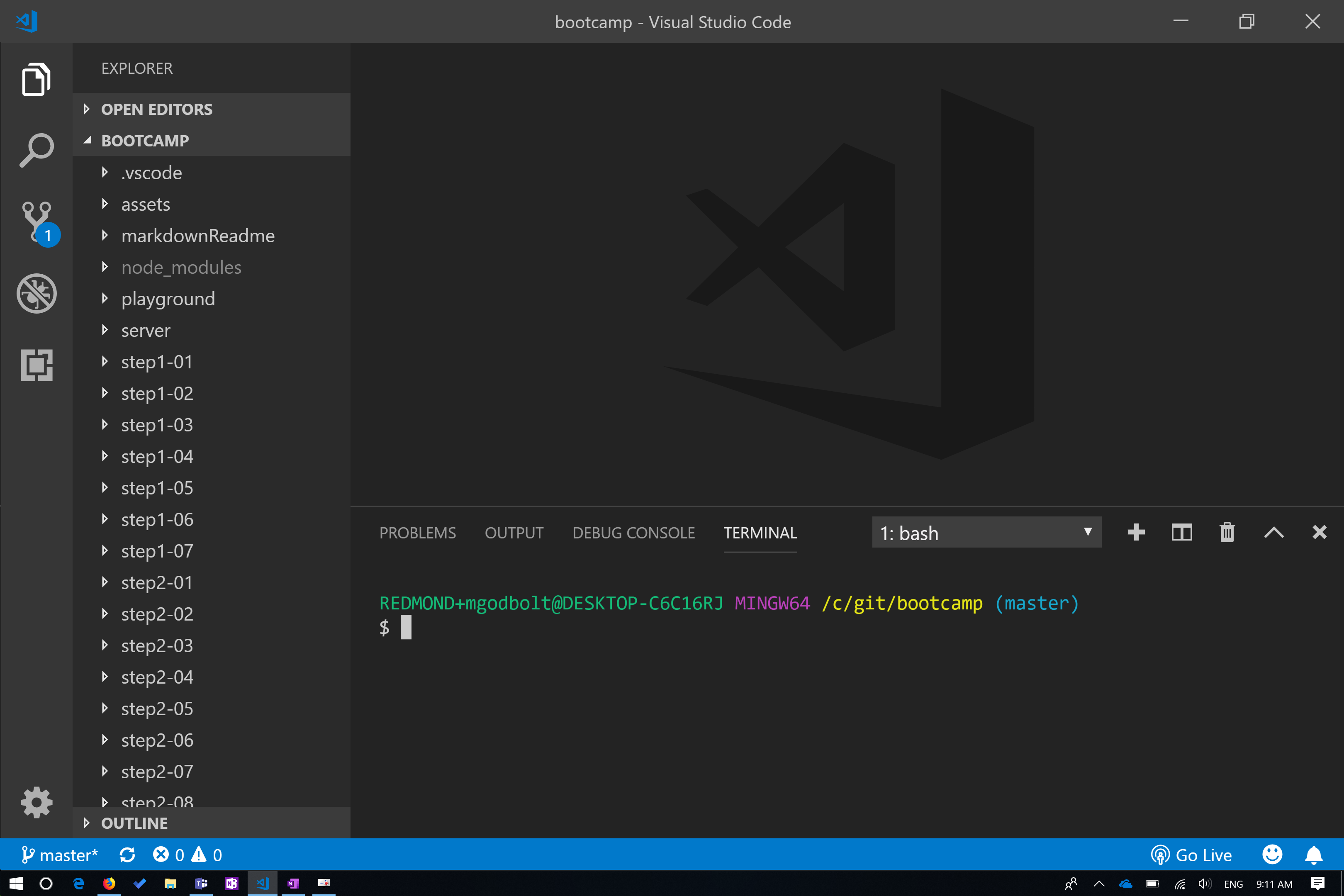
``` ================================================ FILE: step1-01/lesson/index.html ================================================
================================================ FILE: step1-01/lesson/src/index.tsx ================================================ ================================================ FILE: step1-02/demo/index.html ================================================
/* Targeting the entire page */
//body {
  font: 1.2em sans-serif;
}

/* Targeting an HTML tag */
//h1 {
  /* Color name */
  color: black;

  /* 6-digit hex  */
  background: #ababab;

  /* Margin: specified separately for each side */
  margin-bottom: 15px;
  margin-top: 15px;

  /* Shorthand: Padding applies to all sides  */
  padding: 10px;

  /* Border shorthand and 3-digit hex */
  border: 1px solid #ddd;
}

/* Overriding inherited styles */
//span {
  color: #004578;
}

/* Sibling selector */
//a + a {
  /* Changing elements from inline to block */
  display: block;
}

/* Targeting a class name  */
//.tiles {
  display: flex;
}

/* Descendant selector */
//.tiles img {
  width: 100%;
}

/* Direct descendant selector */
//.tiles > div {
  /* rgb color */
  background: rgb(10, 10, 10);
  color: white;
  flex-basis: 100%;
  /* Padding/margin shorthand. Goes clockwise from top.
  10px - all
  10px 20px - top/bottom left/right
  10px 20px 15px - top left/right bottom
  */
  padding: 10px 20px 15px;
  margin: 10px 20px 10px 0;
  border: 1px solid white;
}

/* Qualified selector */
//div.important-links {
  background: #004578;
}

/* Style inheritance only works for unstyled elements */
//a {
  color: white;
}

/* Hover pseudo-selector */
//a:hover {
  color: #ccc;
}

/* Positional pseudo-selector  */
//.tiles > div:last-child {
  /* overrides margin-right but leaves other margins alone */
  margin-right: 0;
}

/* ID selector */
//#contact-form {
  display: flex;
  flex-direction: column;
}

/* Attribute selector */
//input[type='submit'] {
  margin-top: 10px;
}   
      
<h1>This is my <span>Title</span></h1>
<div class="tiles">
  <div class="important-links">
    <h2>Important Links</h2>
    <a href="#">We're Awesome</a>
    <a href="#">Learn More</a>
    <a href="#">Hire Us</a>
  </div>
  <div>
    <h2>Our Logo</h2>
    <img src="https://github.com/microsoft/frontend-bootcamp/blob/master/assets/fabric.jpg?raw=true" width="100" alt="fabric logo" />
  </div>
  <div>
    <h2>Contact Us</h2>
    <div id="contact-form">
      <label>Email</label><input type="email" />
      <input value="Submit" type="submit" />
    </div>
  </div>
</div>
      
================================================ FILE: step1-02/exercise/README.md ================================================ # Step 1.2 - Introduction to CSS (Exercise) See index.html from [npm start](http://localhost:8080/step1-02/exercise/) or the [live site](https://microsoft.github.io/frontend-bootcamp/step1-02/exercise/) for the exercise. ================================================ FILE: step1-02/exercise/answers.css ================================================ /* 1. Text Color: Red */ h2 { color: red; } /* 2. Color Green (hint: Sibling Selector) */ h2 + div { color: green; } /* 3. Border Green*/ .myList li { border: 1px solid green; } /* 4. Background Green */ .myClass { background: green; } /* 5. Background Green & Color White (Hint Qualified Selector) */ .myClass.otherClass { color: white; } /* 6. Background Yellow */ #myId { background: yellow; } /* Bonus: Border Pink*/ section > div:last-child { border: 1px solid pink; } ================================================ FILE: step1-02/exercise/index.html ================================================
/* 1. */

/* 2. */

/* 3. */

/* 4. */

/* 5. */

/* 6. */

/* Bonus */
      
<!-- Without changing the HTML markup, apply the styles asked for in the markup. Do not apply styles that a tag doesn't ask for. -->

<section>
  <h2>1. Text Color: Red</h2>
  <div>2. Color Green (hint: Sibling Selector)</div>
  <main>
    <ul class="myList">
      <li>
        3. Border Green
      </li>
    </ul>
    <div class="myClass">4. Background Green</div>
    <div class="myClass otherClass">
      5. Background Green & Color White
      (Hint Qualified Selector)
    </div>
    <div id="myId" class="otherClass">6. Background Yellow</div>
  </main>
  <ul>
    <li>
      Don't Style Me
    </li>
  </ul>
  <div>Bonus: Border Pink</div>
</section>
      
================================================ FILE: step1-02/lesson/README.md ================================================ # Step 1.2 - Introduction to CSS (Demo) [Demo](../demo/) | [Exercise](../exercise/) ## CSS properties Now that we've gone over adding HTML tags to the page, let's cover adding styles to those tags. We can do quite a lot with styles! We can change: - Typography - Colors - Appearance (corners, borders, decorations) - Layout - Position - Display format: inline vs block - Animations - and [many more](https://developer.mozilla.org/en-US/docs/Web/CSS/Reference) CSS styles are always written in `property: value` pairs (like `background: blue;`) and terminated with a semicolon. ## Applying CSS to an HTML file CSS can be applied to HTML tags in three different ways. 1. Inline using an HTML tag's `style` attribute - `
Hello
` 2. Via a `